
OSRD Protocol for Bosch PTZ Cameras Receiver/Drivers, G1, G2, G3, VEZ, and VG4 Series AutoDomes. Instruction Book
|
|
|
- Vincent Russell
- 9 years ago
- Views:
Transcription
1 OSRD Protocol for Bosch PTZ Cameras Receiver/Drivers, G1, G2, G3, VEZ, and VG4 Series AutoDomes en Instruction Book

2

3 OSRD Protocol for Bosch PTZ Cameras Table of Contents en iii Table of Contents 1 Introduction Controlling Bosch PTZ Cameras Numeric Designations 2 2 OSRD Commands OSRD Message Syntax Packet Length Byte High Order Address Byte/Low Order Address Byte Opcode Data Bytes Checksum 5 3 Opcode Descriptions Standard Opcodes Opcode 2 <0x02>: Start/Stop Fixed-speed PTZ, Focus, and Iris Opcode 3 <0x03>: Fixed-speed PTZ for a Specified Period Opcode 4 <0x04>: Repetitive Fixed-speed PTZ Opcode 5 <0x05>: Start/Stop Variable-speed PTZ Opcode 6 <0x06>: Repetitive Fixed-speed Zoom, Focus, and Iris Opcode 7 <0x07>: Auxiliary ON/OFF and Preposition SET/SHOT Commands Opcode 8 <0x08>: Repetitive Variable-speed PTZ, Focus, and Iris Extended OSRD Commands Opcode 9 <0x09>: Fine Speed PTZ Opcode 10 <0x0A>: Position Report and Reply (4-byte version) Opcode 10 <0x0A>: Position Commands (10-, 12-, 16-, 17-byte versions) Opcode 12 <0x0C>: Ping Command (no data requested) Opcode 12 <0x0C>: Ping Command (data requested) Opcode 15 <0x0F>: Information Requested and Reply Opcode 16 <0x10>: Title Set Opcode 18 <0x12>: Auxiliary Commands with Data Opcode 19 <0x13>: Set Position Opcode 19 <0x13>: Get Position 28 4 Opcode 20 <0x14>: BiCom Command Interface Data Byte Codes BiCom Byte Descriptions Server ID Object/Member ID Operation Data Bytes 32 5 Examples Setting the AutoPanScan Speed Inverting the Camera Image 34 Bosch Security Systems, Inc. Instruction Book F.01U

4 iv en Table of Contents OSRD Protocol for Bosch PTZ Cameras 6 Appendix: Hardware Configuration 35 7 Appendix: Opcode Usage 36 F.01U Instruction Book Bosch Security Systems, Inc.

5 OSRD Protocol for Bosch PTZ Cameras Introduction en 1 1 Introduction This manual describes the On-site Receiver/Driver (OSRD) protocol that transfers messages over a serial connection to a pan/tilt/zoom device (for example a Bosch receiver/driver). This manual describes the message structure, command structure, and the values for the parameters that comprise the message. If you are not familiar with these protocols, you can use this manual to learn the syntax and capabilities of OSRD. It is recommended, however, that you understand API programming concepts and bit manipulation. The electrical interface of this protocol is typically RS-232 or Bosch Biphase. 1.1 Controlling Bosch PTZ Cameras The OSRD protocol utilizes Opcodes to determine the actual function to be executed by the receiver/driver. The original OSRD protocol contained seven Opcodes. With the introduction of the G3 Series AutoDome, the OSRD protocol was extended to include nine new Opcodes to control the new pan/tilt/zoom features of the G3 AutoDome. The VG4 Series AutoDome supports the original seven OSRD Opcodes, and a more recent protocol called BiCom. BiCom provides equivalent functionality as that of the extended OSRD opcodes. To use the BiCom commands within and OSRD message packet, the controller device uses Opcode 20 <0x14> to send a BiCom command within an OSRD packet. The following table summarizes the control code protocols and the products that support each: Protocol PTZ Device VG4 AutoDome VEZ AutoDome Easy G3 AutoDome G2 AutoDome G1 AutoDome LTC 8016 Receiver/ Driver OSRD Opcode 2 <0x02> Opcode 3 <0x03> Opcode 4 <0x04> Opcode 5 <0x05> Opcode 6 <0x06> Opcode 7 <0x07> Opcode 8 <0x08> OSRD Extended Opcode 9 <0x09> Opcode 10 <0x0A> Opcode 12 <0x0C> Opcode 15 <0x0F> Opcode 16 <0x10> Opcode 18 <0x12> Opcode 19 <0x13> BiCom within OSRD Opcode 20 <0x14> BiCom 1. The G3 and VG4 series AutoDomes do not support all commands available in Opcode 7. The Aux Toggle, Aux On Latch, Aux Off Latch, and the Cancel Latch Aux commands are not supported. 2. The initial firmware version of LTC 8016 does not support the recent Aux commands found in Dinion series cameras. For a complete list of controllers, functions, and supported Opcodes, see Section 7 Appendix: Opcode Usage, page 36. Bosch Security Systems, Inc. Instruction Book F.01U

6 2 en Introduction OSRD Protocol for Bosch PTZ Cameras 1.2 Numeric Designations The OSRD protocol specifies that numeric data represent the components of a command message packet. Most of the numeric data is represented as hexadecimal numbers, but some of the actual data values are expressed as decimal numbers. This manual uses the following conventions to distinguish between hexadecimal and decimal numbers: The value 25 is interpreted as a decimal value. The value 0x25 is interpreted as a hexadecimal value. F.01U Instruction Book Bosch Security Systems, Inc.

7 OSRD Protocol for Bosch PTZ Cameras Introduction en 3 2 OSRD Commands Control code data is sent in message packets. For certain functions, commands must be sent repetitively at a rate of 20 Hz to maintain a smooth operational response of the device being driven by the receiver/driver. See Section 6 Appendix: Hardware Configuration, page 35, for more information on hardware configuration. The general format of an OSRD command is: Byte Bit 7 Bit 6 Bit 5 Bit 4 Bit 3 Bit 2 Bit 1 Bit 0 0x00 1 Packet Length Byte 0x01 0 High Order Address byte (upper 7 bits of a 14-bit camera number) 0x02 0 Low Order Address byte (lower 7 bits of a 14-bit camera number) 0x03 0 Opcode 0x04 0 Data Byte 1 0x05 0 Data Byte 2 0x0N 0 Data Byte N 0xN+1 0 Checksum of all previous bytes (lower 7 bits only) 2.1 OSRD Message Syntax The following sections describe the attributes of the required information for each data byte position above Packet Length Byte Each packet begins with a Length byte that specifies the number of bytes in the remainder of the packet (the Length byte itself is not included in this number). The most significant bit (MSB) of the Length byte is always set to 1. The MSB must be zero for ALL other bytes of the message packet. For the functions below, only control commands with lengths of 6 and 7 bits are used, therefore, the Length byte (with the MSB set) will be either 0x86 or 0x High Order Address Byte/Low Order Address Byte The message packet contains a device (VG4, G3, G2, or G1 AutoDome and Receiver/Driver) address number encoded using a 14-bit binary value. (Including an address value permits the data to be broadcast to all receiver/driver sites but only the site set to a matching address will respond.) This address number is sent using 2 bytes of the message packet. The binary value corresponds to the logical camera number of the camera site being controlled minus 1. The High Order Address byte consists of the upper 7 bits of the 14-bit binary camera number. The Low Order Address byte consists of the lower 7 bits of the 14-bit binary camera number. In all cases, the MSB of each byte is not counted as part of the address number and must always be reset to zero so it will not be confused with the Length byte. Since the use of a 14- bit binary number provides a camera number range from 1 to 16384, the corresponding device Address data bytes would take the form of 0x0000 to 0x7F7F. The High Order Byte (the upper 7 bits of the 14-bit binary camera number) is used for cameras with an address greater than 127. Use the Low Order Byte (the lower 7 bits of the 14-bit binary camera number) for cameras with an address of 1 to 127. For example, camera number 1 is encoded with all 14 data bits reset to zero. Camera number 2 has its Least Significant Bit (LSB) set to 1 and all other bits set to zero. The table below provides examples of Address Bytes: Bosch Security Systems, Inc. Instruction Book F.01U

8 4 en Introduction OSRD Protocol for Bosch PTZ Cameras Camera Number Encoded Value 14-bit Binary Value High Order Byte Low Order Byte x00 0x x00 0x x00 0x7F x80 0x x01 0x7F x02 0x x03 0x x03 0x7F x04 0x x07 0x7F x27 0x x4E 0x0E x7F 0x7F Opcode Defines the type of data packet. See Section 3 Opcode Descriptions, page 6, for details about each Opcode. Use Opcode 20 (0x14) to send a BiCom API message to a VG4 AutoDome Data Bytes Each Opcode requires a specific number of data byte fields. The data bytes determine the function that the controller device sends to the head-end device. Refer to the specific Opcode description below for the appropriate number of data byte fields and for the appropriate values for the fields. A data byte consists of a 7-bit (bit positions 0 through 6) word; Bosch reserves the MSB (bit position 7). Bit position 7 is not used when you specify a value in the data byte. By ignoring bit position 7, the decimal value of bit position 7 (128) is shifted to bit position 0 of the second data byte. Certain data values require more than one data byte to express the value; therefore you must split a full binary value (maximum of 13 bits) into a high-order data byte value and a low-order data byte value. The low-order data byte consists of bit numbers 0-6 (bit number 7 is not used). The high-order data byte consists of bit numbers The following table shows the bit positions for a high-order and for a low-order data byte with their corresponding bit numbers and decimal values: Bit Position Data Byte 1 (High-order) Bit Number Decimal Value Bit Position Data Byte 2 Bit Number (Low-order) Decimal Value F.01U Instruction Book Bosch Security Systems, Inc.

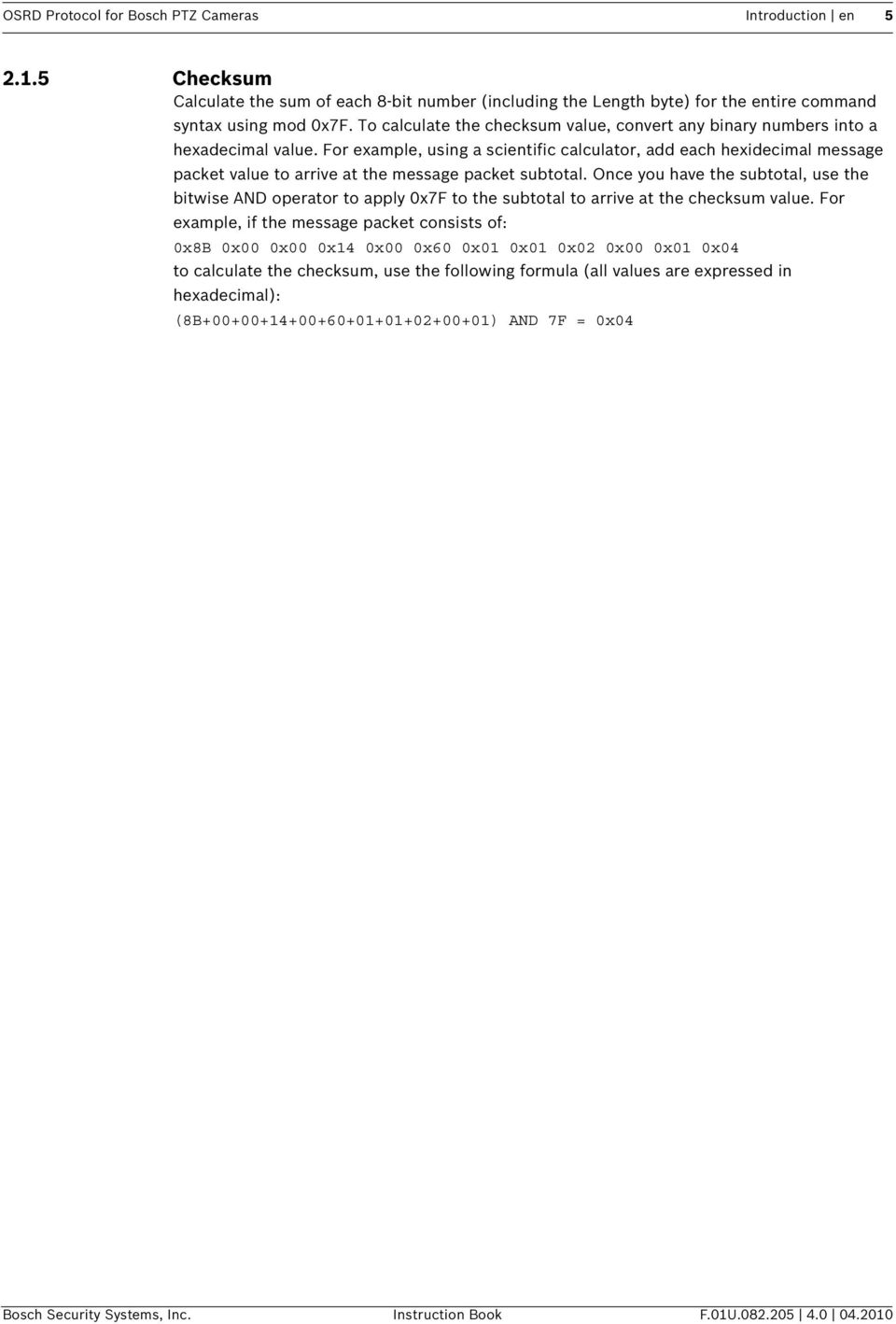
9 OSRD Protocol for Bosch PTZ Cameras Introduction en Checksum Calculate the sum of each 8-bit number (including the Length byte) for the entire command syntax using mod 0x7F. To calculate the checksum value, convert any binary numbers into a hexadecimal value. For example, using a scientific calculator, add each hexidecimal message packet value to arrive at the message packet subtotal. Once you have the subtotal, use the bitwise AND operator to apply 0x7F to the subtotal to arrive at the checksum value. For example, if the message packet consists of: 0x8B 0x00 0x00 0x14 0x00 0x60 0x01 0x01 0x02 0x00 0x01 0x04 to calculate the checksum, use the following formula (all values are expressed in hexadecimal): (8B ) AND 7F = 0x04 Bosch Security Systems, Inc. Instruction Book F.01U
10 6 en Introduction OSRD Protocol for Bosch PTZ Cameras 3 Opcode Descriptions This section describes the standard and the extended set of OSRD Opcode commands. The standard set of Opcodes consists of Opcodes 2 <0x02> through 8 <0x08> (Opcode 1 <0x01> is not used) and are available for all Receiver/Drivers and G1, G2, G3 Series AutoDomes. For VG4 Series AutoDomes, Opcode <0x02> and Opcodes <0x04> through <0x08> are available, the VG4 Series does not support Opcode <0x03>. The extended set consists of Opcodes 9 <0x09>, 10 <0x0A>, 12 <0x0C>, 15 <0x0F>, 16 <0x10>, 18 <0x12>, Opcode 19 <0x13>, and Opcode 20 <0x14>. The entire extended set is available for G3 AutoDomes, version 5.00 or higher, only. VG4 Series AutoDomes support Opcodes 9 <0x09>, 10 <0x0A>, 9 <0x13>, and 20 <0x14> only. In all cases, a 1 written into a bit position initiates the specified action. If conflicting bits are set (e.g., Pan Left and Pan Right), the action is undefined, but the device resolves the conflict with no damage. If the device receives a command while still processing a previous command, the old command is aborted, and the new one executed. To issue the corresponding command with a VG4 Series AutoDome, use Opcode 20 (0x14). see Section 4 Opcode 20 <0x14>: BiCom Command Interface, page Standard Opcodes The standard Opcodes are the original OSRD Opcodes and are available for all Bosch AutoDome models and Receiver/Drivers. Each Opcode sends a command to a device for a specified period of time, which is referenced in the title of the Opcode in the following way: Start/Stop: The command is in effect until a controller device sends a stop command. Repetitive: The device controller must send the same command within a specified period of time or the camera ceases the command function Opcode 2 <0x02>: Start/Stop Fixed-speed PTZ, Focus, and Iris Opcode 2 <0x02> activates fixed-speed pan/tilt/zoom functions for an indefinite period. A logical 1 (one) activates the indicated function, which remains active until explicitly turned off. The functions can be turned off by a command with a different Opcode or by Opcode 2 <0x02> with a 0 (zero) in the associated data bit position. Command <0x86><Address MSB><Address LSB><0x02><Data Byte 1><Data Byte 2><checksum> Data Byte Codes Data Byte 1 0 X X Pan Left Tilt Up Zoom Out Focus Near Iris Brighter Data Byte 2 0 X X Pan Right Tilt Down Zoom In Focus Far Iris Darker An X indicates that the bit position is not used. A value of 1 (one) in a bit position starts the operation. A value of 0 (zero) in a bit position stops the operation Opcode 3 <0x03>: Fixed-speed PTZ for a Specified Period Opcode 3 <0x03> is referred to as the poor man's preposition because it can be used to operate any pan/tilt/zoom device (even those without preposition capability) to approximate positions by moving for a specified time in the desired direction. The duration of the function is specified using a 6-bit data value where the time is specified in units of half-seconds. This provides a time range of 1/2 second duration (all bits reset to zero) to 32 seconds (all bits set to 1). Note that the actual duration of the function may only approximate the specified time due to conditions at the receiver/driver site. Note: Opcode 3 <0x03> is available for G3, G2, G1 Series AutoDomes, LTC 8016, and for Receivers/Drivers. F.01U Instruction Book Bosch Security Systems, Inc.

11 OSRD Protocol for Bosch PTZ Cameras Introduction en 7 Command <0x86><Address MSB><Address LSB><0x03><Data Byte 1><Data Byte 2><checksum> Data Byte Codes Data Byte 1 0 Duration Bit Duration Bit Duration Duration Bit Duration Bit Duration Bit Focus Far 5 4 Bit Data Byte 2 0 Focus Near Zoom In Zoom Out Tilt Up Tilt Down Pan Left Pan Right A value of 1 (one) in a bit position starts the operation. A value of 0 (zero) in a bit position stops the operation. The operation continues for the time specified in bits 1 through 5 or until stopped by this or another Opcode Opcode 4 <0x04>: Repetitive Fixed-speed PTZ Opcode 4 <0x04> activates pan/tilt/zoom functions at a fixed speed determined by the Receiver/Driver or by the AutoDome. This Opcode activates the specified function for at least 50 ms, so the command must be issued at a frequency of no less than 20 Hz for smooth operation. Command <0x86><Address MSB><Address LSB><0x04><Data Byte 1><Data Byte 2><checksum> Data Byte Codes Data Byte 1 0 X X X Focus Far Data Byte 2 0 Focus Near Zoom In Zoom Out Tilt Up Tilt Down Pan Left Pan Right An X indicates that the bit position is not used. A value of 1 (one) in a bit position starts the operation. A value of 0 (zero) in a bit position stops the operation. Bosch Security Systems, Inc. Instruction Book F.01U

12 8 en Introduction OSRD Protocol for Bosch PTZ Cameras Opcode 5 <0x05>: Start/Stop Variable-speed PTZ Opcode 5 <0x05> activates variable-speed functions for an indefinite period. A logic one activates the indicated function, which remains active until explicitly turned off. The appropriate Speed Bits determine the speed for the Pan, Tilt, and Zoom operations. The Receiver/Driver settings determine the Focus and Iris speed. The functions can be turned off by a command with a different Opcode or by Opcode 5 <0x05> with a zero in the associated data bit position. Command <0x86><Address MSB><Address LSB><0x05><Data Byte 1><Data Byte 2><Data Byte 3> <checksum> Data Byte Codes Data Byte 1 0 Zoom Zoom Zoom Tilt Speed Tilt Speed Tilt Speed Tilt Speed Speed Bit Speed Bit Speed Bit Bit 3 Bit 2 Bit 1 Bit Data Byte 2 0 Pan Speed Bit 3 Pan Speed Bit 2 Pan Speed Bit 1 An X indicates that the bit position is not used. A value of 1 (one) in a bit position starts the operation. A value of 0 (zero) in a bit position stops the operation Opcode 6 <0x06>: Repetitive Fixed-speed Zoom, Focus, and Iris Opcode 6 <0x06> activates the zoom, focus, and iris functions at a fixed speed determined by the Receiver/Driver or by the AutoDome. This Opcode causes the specified function to be activated for at least 50 ms, so the command must be issued at a frequency of no less than 20 Hz for smooth operation. An X indicates that the bit position is not used. A value of 1 (one) in a bit position starts the operation. A value of 0 (zero) in a bit position stops the operation. Pan Speed Iris Brighter Iris Darker Bit 0 Focus Far Data Byte 3 0 Focus Near Zoom In Zoom Out Tilt Up Tilt Down Pan Left Pan Right Command <0x86><Address MSB><Address LSB><0x06><Data Byte 1><Data Byte 2><checksum> Data Byte Codes Data Byte 1 0 X X X X X X X Data Byte 2 0 X Iris Brighter Iris Darker Focus Far Focus Near Zoom In Zoom Out F.01U Instruction Book Bosch Security Systems, Inc.

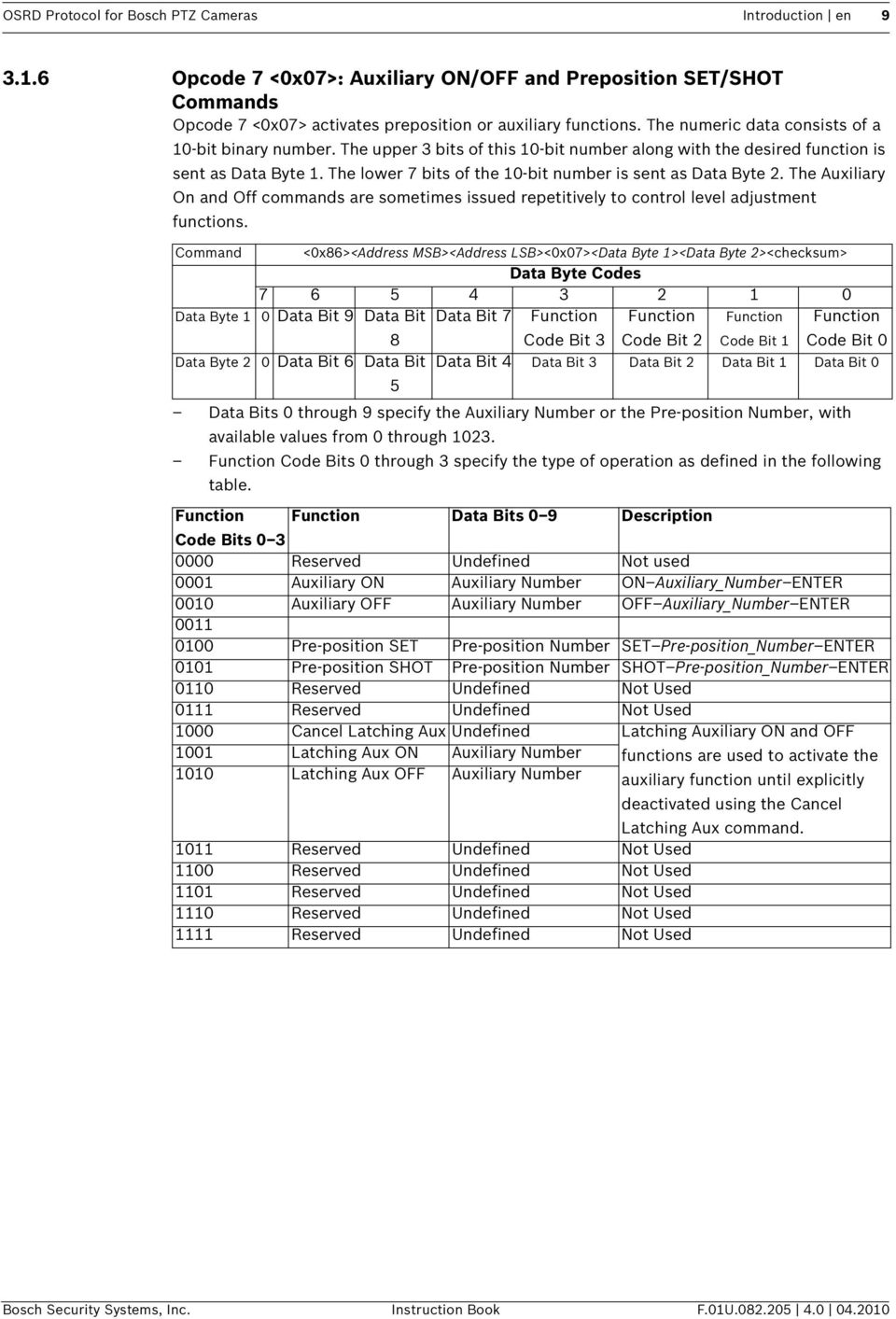
13 OSRD Protocol for Bosch PTZ Cameras Introduction en Opcode 7 <0x07>: Auxiliary ON/OFF and Preposition SET/SHOT Commands Opcode 7 <0x07> activates preposition or auxiliary functions. The numeric data consists of a 10-bit binary number. The upper 3 bits of this 10-bit number along with the desired function is sent as Data Byte 1. The lower 7 bits of the 10-bit number is sent as Data Byte 2. The Auxiliary On and Off commands are sometimes issued repetitively to control level adjustment functions. Command <0x86><Address MSB><Address LSB><0x07><Data Byte 1><Data Byte 2><checksum> Data Byte Codes Data Byte 1 0 Data Bit 9 Data Bit Data Bit 7 Function Function Function Function 8 Code Bit 3 Code Bit 2 Code Bit 1 Code Bit 0 Data Byte 2 0 Data Bit 6 Data Bit Data Bit 4 Data Bit 3 Data Bit 2 Data Bit 1 Data Bit 0 5 Data Bits 0 through 9 specify the Auxiliary Number or the Pre-position Number, with available values from 0 through Function Code Bits 0 through 3 specify the type of operation as defined in the following table. Function Function Data Bits 0 9 Description Code Bits Reserved Undefined Not used 0001 Auxiliary ON Auxiliary Number ON Auxiliary_Number ENTER 0010 Auxiliary OFF Auxiliary Number OFF Auxiliary_Number ENTER Pre-position SET Pre-position Number SET Pre-position_Number ENTER 0101 Pre-position SHOT Pre-position Number SHOT Pre-position_Number ENTER 0110 Reserved Undefined Not Used 0111 Reserved Undefined Not Used 1000 Cancel Latching Aux Undefined Latching Auxiliary ON and OFF 1001 Latching Aux ON Auxiliary Number functions are used to activate the 1010 Latching Aux OFF Auxiliary Number auxiliary function until explicitly deactivated using the Cancel Latching Aux command Reserved Undefined Not Used 1100 Reserved Undefined Not Used 1101 Reserved Undefined Not Used 1110 Reserved Undefined Not Used 1111 Reserved Undefined Not Used Bosch Security Systems, Inc. Instruction Book F.01U
14 10 en Introduction OSRD Protocol for Bosch PTZ Cameras Opcode 8 <0x08>: Repetitive Variable-speed PTZ, Focus, and Iris Opcode 8 <0x08> activates pan, tilt, zoom, focus, and iris functions. It provides for variable speed control over pan/tilt/zoom functions. The pan and tilt functions require a speed value of 0 to 15; 0 is the slowest speed and 15 is the fastest speed. The zoom function requires a speed value of 0 to 7; 0 is the slowest speed and 7 is the fastest speed. This Opcode causes the specified function to be activated for at least 50 ms, so the command must be issued at a frequency of no less than 20 Hz for smooth operation. Command <0x86><Address MSB><Address LSB><0x08><Data Byte 1><Data Byte 2><Data Byte 3> <checksum> Data Byte Codes Data Byte 1 0 Zoom Zoom Zoom Tilt Tilt Speed Tilt Speed Tilt Speed Bit Speed Bit Speed Bit Speed Bit Bit 2 Bit 1 Speed Bit Data Byte 2 0 Pan Speed Pan Speed Pan Speed Pan Speed Iris Brighter Iris Darker Focus Far Bit 3 Bit 2 Bit 1 Bit 0 Data Byte 3 0 Focus Near Zoom In Zoom Out Tilt Up Tilt Down Pan Left Pan Right A value of 1 (one) in a bit position starts the operation. A value of 0 (zero) in a bit position stops the operation. The appropriate Speed Bits determine the speed for the pan, tilt, and zoom operations. The Receiver/Driver settings determine the speed for the focus and iris operations. F.01U Instruction Book Bosch Security Systems, Inc.

15 OSRD Protocol for Bosch PTZ Cameras Introduction en Extended OSRD Commands The Extended set of OSRD commands (Opcodes 9 <0x09>, 10 <0x0A>, 12 <0x0C>, 15 <0x0F>, 16 <0x10>, 18 <0x12>, and 19 <0x13) is available only for G3 AutoDomes version 5.00 or higher. VG4 Series AutoDomes support Opcodes 9 <0x09>, 10 <0x0A>, 19 <0x13>, and 20 <0x14> only. i NOTICE! An operator must use Opcode 14 <0x14> with the Bilinx Command Interface syntax to send the extended OSRD commands to a VG4 Series AutoDome (see Section 4 Opcode 20 <0x14>: BiCom Command Interface, page 29) Opcode 9 <0x09>: Fine Speed PTZ Opcode 9 <0x09> activates pan, tilt, zoom, focus, and iris functions. It provides for continuous fine speed control over pan/tilt/zoom functions. The allowed speed for a pan or tilt operation is from 1 degree/second to 128 degrees/second. A speed setting of 0 corresponds to 1 degree/second and a speed setting of 127 corresponds to the maximum speed of 128 degrees/second. The functions can be turned off by a command with a different Opcode or by Opcode 9 <0x09> with a zero in the associated data bit position. Command <0x86><Address MSB><Address LSB><0x09><Data Byte 1><Data Byte 2><Data Byte 3> <checksum> Data Byte Codes Data Byte 1 0 Pan Speed Bit 6 Pan Speed Bit 5 Pan Speed Bit 4 Pan Speed Bit 3 Pan Speed Bit 2 Pan Speed Bit 1 Pan Speed Bit 0 Data Byte 2 0 Tilt Speed Bit 6 Tilt Speed Bit 5 Tilt Speed Bit 4 Tilt Speed Bit 3 Tilt Speed Bit 2 Tilt Speed Bit 1 Tilt Speed Bit 0 Data Byte 3 0 Zoom Speed Zoom Speed Zoom Speed X Iris Brighter Iris Darker Focus Far Bit 2 Bit 1 Bit 0 Data Byte 4 0 Focus Near Zoom In Zoom Out Tilt Up Tilt Down Pan Left Pan Right An X indicates that the bit position is not used. A value of 1 (one) in a bit position starts the operation. A value of 0 (zero) in a bit position stops the operation. The Receiver/Driver settings determine the speed for the focus and iris operations Opcode 10 <0x0A>: Position Report and Reply (4-byte version) Opcode 10 <0x0A> (4-byte version) queries a G3 or VG4 AutoDome for its current pan and tilt positions. The value for the pan position varies from 0 (zero) to 127,999, which represents the full 360 degree rotation. The value 0 represents the Home position of the AutoDome and the values increase as the Pan position of the AutoDome moves in the left-to-right direction from the Home position. The value for the tilt position varies from 0 (zero) to 31,999 to represent the 90 degree tilt range. The value 0 represents the Home position of the AutoDome and the values increase as the Tilt position of the AutoDome moves in the tilt-down direction. For example, if the tilt position of the AutoDome is at the 90 degree down angle, the value for the tilt position is 31,999. Note: Opcode 10 <0x0A> is a variable length command. This section describes the 4-byte version of the command. See the next section for a description of the 10-, 12-, 16-, and the 17- byte versions of Opcode 10 <0x0A>. Bosch Security Systems, Inc. Instruction Book F.01U

16 12 en Introduction OSRD Protocol for Bosch PTZ Cameras Command <0x84><Address MSB><Address LSB><0x0A><checksum> Response Data Byte Codes Pan Position Pan Position Pan Position Pan Position Data Byte 1 Bit 16 Bit 15 Bit 14 Pan Position 0 Pan Position Pan Position Pan Position Pan Position Pan Position Pan Position Pan Position Data Byte 2 Bit 13 Bit 12 Bit 11 Bit 10 Bit 9 Bit 8 Bit 7 Pan Position 0 Pan Position Pan Position Pan Position Pan Position Pan Position Pan Position Pan Position Data Byte 3 Bit 6 Bit 5 Bit 4 Bit 3 Bit 2 Bit 1 Bit 0 Tilt Position Data Byte Tilt Position Bit 14 Tilt Position 0 Tilt Position Tilt Position Tilt Position Tilt Position Tilt Position Tilt Position Tilt Position Date Byte 2 Bit 13 Bit 12 Bit 11 Bit 10 Bit 9 Bit 8 Bit 7 Tilt Position 0 Tilt Position Tilt Position Tilt Position Tilt Position Tilt Position Tilt Position Tilt Position Data Byte 3 Bit 6 Bit 5 Bit 4 Bit 3 Bit 2 Bit 1 Bit 0 Reply <length byte w/bit7 set><address MSB><Address LSB><0x87><0x0A> <Pan Position Data Byte 1><Pan Position Data Byte 2> <Pan Position Data Byte 3> <Tilt Position Data Byte 1><Tilt Position Data Byte 2><Tilt Position Data Byte 3><checksum> A value of 1 (one) in a bit position starts the operation. A value of 0 (zero) in a bit position stops the operation. The Receiver/Driver settings determine the speed for the focus and iris operations. F.01U Instruction Book Bosch Security Systems, Inc.

17 OSRD Protocol for Bosch PTZ Cameras Introduction en Opcode 10 <0x0A>: Position Commands (10-, 12-, 16-, 17-byte versions) Opcode 10 <0x0A> (the 10-, 12-, 16-, and the 17-byte version) commands a G3 or VG4 AutoDome to move to an absolute position at a specified velocity and acceleration. This Opcode also commands the device to set the absolute positions for the zoom, focus, and the iris functions. The value for the pan position varies from 0 (zero) to 127,999, which represents the full 360 degree rotation. The value 0 represents the Home position of the AutoDome and the values increase as the Pan position of the AutoDome moves in the left-to-right direction from the Home position. The value for the tilt position varies from 0 (zero) to 31,999 to represent the 90 degree tilt range. The value 0 represents the Home position of the AutoDome and the values increase as the Tilt position of the AutoDome moves in the tilt-down direction. For example, if the tilt position of the AutoDome is at the 90 degree down angle, the value for the tilt position is 31,999. The acceptable values for the pan and tilt velocities and for the pan and tilt accelerations are from 0 through 7. The velocity values represent evenly spaced speeds from 10 degrees/ second to 130 degrees/second, while the acceleration values represent evenly spaced acceleration from 10 degrees/second 2 to 130 degrees/second 2. The device ignores the Velocity/Acceleration values, however, if the value for the Velocity/Acceleration Ignore Bit is set to 1. In addition to the pan and tilt settings, Opcode 10 <0x0A> allows an operator to set the values for the zoom, focus, iris, backlight compensation, AGC, and the white balance functions. The following table summarizes the values for these functions: Function Values Explanation Zoom Range of 0x4 to 0xAA or 0xFF OxFF instructs the unit to ignore any Focus Range of 0x8 to 0xFE or OxFF setting for the particular function. Iris Range of 0x31 to 0xCF or 0xFF AutoFocus 0 (zero) or 1 0 deactivates the function. AutoIris 0 (zero) or 1 1 activates the function. Backlight Compensation 0 (zero) or 1 AGC 0 (zero) or 1 White Balance 0x00 Sets white balance to Automatic. 0x01 Sets white balance to Indoor. 0x10 Sets white balance to Outdoor. 0x11 Sets white balance to One-push. Note: Opcode 10 <0x0A> is a variable length command. This section describes the 10-, 12-, 16-, and the 17-byte versions of the command. See the previous section for a description of the 4-byte version of Opcode 10 <0x0A>. Bosch Security Systems, Inc. Instruction Book F.01U

18 14 en Introduction OSRD Protocol for Bosch PTZ Cameras Command IF 10-byte length, ADD: <0x8A> ELSE IF 12-byte length ADD: <0x9C> ELSE IF 16-byte length ADD: <0x90> ELSE IF 17-byte length ADD: <0x91> ; THEN ADD <Address MSB><Address LSB><0x0A><Pan Position Data Byte 1><Pan Position Data Byte 2><Pan Position Data Byte 3><Tilt Position Data Byte 1> <Tilt Position Data Byte 2><Tilt Position Data Byte 3> THEN IF Length >= 12 bytes; ADD <PanVelocity/Acceleration Data Byte><TiltVelocity/Acceleration Data Byte> THEN IF Length >= 16 bytes; ADD <Zoom/Focus/Iris Configuration and LSBs>Zoom Position Data Byte> <Focus Position Data Byte><Iris Position Data Byte> THEN IF Length >= 17 bytes; ADD <Camera Setting Data Byte> ELSE ADD (for all lengths) <checksum> Data Byte Codes (as required by the number of bytes) Pan Position 0 Pan Position Pan Position Pan Position Pan Data Byte 1 Ignore Bit Bit 16 Bit Pan Position 0 Pan Position Pan Position Pan Position Pan Position Pan Position Pan Position Pan Data Byte 2 Bit 13 Bit 12 Bit 11 Bit 10 Bit 9 Bit 8 7 Pan Position 0 Pan Position Pan Position Pan Position Pan Position Pan Position Pan Position Pan Data Byte 3 Bit 6 Bit 5 Bit 4 Bit 3 Bit 2 Bit 1 0 Tilt Position Data Byte 1 0 Tilt Position Ignore Bit Tilt Position Bit 14 Tilt Position 0 Tilt Position Tilt Position Tilt Position Tilt Position Tilt Position Tilt Position Tilt Position Date Byte 2 Bit 13 Bit 12 Bit 11 Bit 10 Bit 9 Bit 8 Bit 7 Tilt Position 0 Tilt Position Tilt Position Tilt Position Tilt Position Tilt Position Tilt Position Tilt Position Data Byte 3 Bit 6 Bit 5 Bit 4 Bit 3 Bit 2 Bit 1 Bit 0 Pan Velocity/ 0 Pan Velocity/ Pan Accel. Pan Accel. Pan Accel. Pan Velocity Pan Velocity Pan Velocity Acceleration Accel. Ignore Bit 2 Bit 1 Bit 0 Bit 2 Bit 1 Bit 0 Data Byte Bit Tilt Velocity/ 0 Tilt Velocity/ Tilt Accel. Tilt Accel. Tilt Accel. Tilt Velocity Tilt Velocity Tilt Velocity Acceleration Data Byte Accel. Ignore Bit Bit 2 Bit 1 Bit 0 Bit 2 Bit 1 Bit 0 F.01U Instruction Book Bosch Security Systems, Inc.

19 OSRD Protocol for Bosch PTZ Cameras Introduction en 15 Lens Mode 0 X Auto Iris Bit Auto Focus X Zoom Focus Iris Position and LSB Bit Bit 0 Zoom 0 Zoom Zoom Zoom Zoom 0 Zoom 0 Zoom Zoom Position Data Byte Focus 7 0 Focus 6 Focus 5 Focus 4 Focus 3 Focus 2 Focus 1 Focus Position Data Byte Iris Position 7 0 Iris Position 6 Iris Position 5 Iris Position 4 Iris Position 3 Iris Position 2 Iris Position 1 Iris Position Data Byte Camera Bit 7 Bit 6 Bit 5 Bit 4 0 X X X Backlight Bit 3 AGC Bit Bit 2 White Bit 1 White Settings Data Comp. Bit Balance Bit Balance Bit Byte Opcode 12 <0x0C>: Ping Command (no data requested) Opcode 12 <0x0C> queries the G3 AutoDome to establish communications. When the device receives a query with a ping type of 0 (zero) it responds with the reply in the table below. The device returns no other data. Command Ping Type Data Byte Data Requested Data Byte Reply <0x86><Address MSB><Address LSB><0x0C><0x00 (ping type)> <Data Requested Data Byte><checksum> Data Byte Codes 0 Ping Type 0x00 0 Query Camera Query Lens Query Iris Query Focus Query Zoom Settings Bit Mode and LSB Data Bit Query Tilt Query Pan <length byte w/bit7 set><address MSB><Address LSB><0x4C><0x00><0x00><0x00><0x00> <checksum> Bosch Security Systems, Inc. Instruction Book F.01U

20 16 en Introduction OSRD Protocol for Bosch PTZ Cameras Opcode 12 <0x0C>: Ping Command (data requested) Opcode 12 <0x0C>, with data requested, queries the G3 AutoDome for the values of the settings as determined in the Received Command. When the device receives a query with a ping type of 1 it responds with the reply in the table below. The data that this Opcode receives is summarized in this table: Function Values Explanation Pan Position 0 (zero) through 127,999 0 represents the Home position of the AutoDome. Values increase as the Pan position of the AutoDome moves in the left-to-right direction from the Home position. Tilt Position 0 (zero) through 31,999 0 represents the Home position of the AutoDome. Values increase as the Pan position of the AutoDome moves in the left-to-right direction from the Home position. Zoom Range of 0x04 to 0xAA Focus Range of 0x08 to 0xFE Iris Range of 0x31 to 0xCF AutoFocus 0 (zero) or 1 0 indicates the function is deactivated. AutoIris 0 (zero) or 1 1 indicates the function is activate. Backlight Compensation 0 (zero) or 1 AGC 0 (zero) or 1 White Balance 0x00 White balance is set to Automatic. 0x01 White balance is set to Indoor. 0x10 White balance is set to Outdoor. 0x11 White balance is set to One-push. F.01U Instruction Book Bosch Security Systems, Inc.

21 OSRD Protocol for Bosch PTZ Cameras Introduction en 17 Command <0x86><Address MSB><Address LSB><0x0C><0x01 (ping type)> <Data Requested Data Byte><checksum> Data Byte Codes Ping Type 0 Ping Type 0x01 Data Byte Data 0 Query Camera Query Lens Query Iris Query Focus Query Zoom Query Tilt Query Pan Requested Settings Bit Mode and Data Byte LSB Data Bit Reply <length byte w/bit7 set><address MSB><Address LSB><0x4C><0x01> <Data Requested Data Byte>< Requested Data ><checksum> Response Data Byte Codes Pan Pan Position Pan Position Pan Position Position Bit 16 Bit 15 Bit 14 Data 0 Pan Position Pan Position Pan Position Pan Position Pan Position Pan Position Pan Position Bit 13 Bit 12 Bit 11 Bit 10 Bit 9 Bit 8 Bit 7 0 Pan Position Pan Position Pan Position Pan Position Pan Position Pan Position Pan Position Bit 6 Bit 5 Bit 4 Bit 3 Bit 2 Bit 1 Bit 0 Tilt Position Tilt Position Bit 14 Data 0 Tilt Position Tilt Position Tilt Position Tilt Position Tilt Position Tilt Position Tilt Position Bit 13 Bit 12 Bit 11 Bit 10 Bit 9 Bit 8 Bit 7 0 Tilt Position Tilt Position Tilt Position Tilt Position Tilt Position Tilt Position Tilt Position Bit 6 Bit 5 Bit 4 Bit 3 Bit 2 Bit 1 Bit 0 Lens 0 X Auto Iris Bit Auto Focus X Zoom Focus Iris Position Mode and Bit Bit 0 LSB Bit Data 0 0 Zoom Position Data Focus Position Data Iris Position Data Camera Settings 0 Zoom Position Zoom Zoom Zoom Bit Focus Focus Focus Focus Iris Position Bit 7 Zoom 3 Focus 3 Zoom 2 Focus 2 Zoom 1 Focus 1 Iris Position Iris Position Iris Position Iris Position Iris Position Iris Position Bit 6 Bit 5 Bit 4 Bit 3 Bit 2 Bit 1 0 X X X Backlight Comp. Bit AGC Bit White Balance Bit 1 White Balance Bit Opcode 15 <0x0F>: Information Requested and Reply Opcode 15 <0x0F> queries a G2 or G3 AutoDome to obtain information about the device. The amount and type of information returned depends on the structure of the message. The message may contain requests for specific values contained in these three categories: Data Requested: AutoTrack, AutoDome Information Request, Special Tracking Mode, and AutoTrack Frequency AutoDome Data: Receiver/Driver or Camera Type, Receiver/Driver Software Version, Line Lock Delay, Camera Settings, and E-Zoom Tracking Components: Camera Data, Lens Mode and LSB, Iris Position, Focus Position, Zoom Position, Tilt Position, and Pan Position. Bosch Security Systems, Inc. Instruction Book F.01U
22 18 en Introduction OSRD Protocol for Bosch PTZ Cameras Depending on the information requested from the query message, the device returns a message with the appropriate values for these device attributes: Function Returned Value Explanation AutoDome Generation 0x02 LTC 0809, AutoDome Generation 2 0x03 LTC 0829, AutoDome Generation 3 Camera Type 0x42 High-resolution NTSC Color Camera 0x43 High-resolution PAL Color Camera Maximum Lens Zoom Maximum amount of zoom possible for the lens. Software Version whole_number.fractional number The whole number to the left of the decimal point is the major release number. The fractional number to the right of the decimal point is the version of the release. Line Lock Delay The delay value from the zero crossing used for the Line Lock function. Backlight Compensation 0 (zero) or 1 0 indicates the function is deactivated. AGC 1 indicates the function is activate. White Balance 0x00 White balance is set to Automatic. 0x01 White balance is set to Indoor. 0x10 White balance is set to Outdoor. 0x11 White balance is set to One-push. E-Zoom The current electronic zoom setting. AutoTrack Frequency 0x00 5 Hz 0x01 10 Hz 0x10 20 Hz x Hz Pan Position 0 (zero) through 127,999 0 represents the Home position of the AutoDome. Values increase as the Pan position of the AutoDome moves in the left-to-right direction from the Home position. Tilt Position 0 (zero) through 31,999 0 represents the Home position of the AutoDome. Values increase as the Pan position of the AutoDome moves in the left-to-right direction from the Home position. Zoom Range of 0x04 to 0xAA Focus Range of 0x08 to 0xFE Iris Range of 0x31 to 0xCF AutoFocus 0 (zero) or 1 0 indicates the function is deactivated. AutoIris 0 (zero) or 1 1 indicates the function is activate. White Balance 0x00 White balance is set to Automatic. 0x01 White balance is set to Indoor. 0x10 White balance is set to Outdoor. 0x11 White balance is set to One-push. F.01U Instruction Book Bosch Security Systems, Inc.
23 OSRD Protocol for Bosch PTZ Cameras Introduction en 19 Command Data Requested Data Byte Autodome Data Requested Data Byte Tracking Components Requested Data Byte <0x87><Address MSB><Address LSB><0x0F><Data Requested Data Byte><AutoDome Data Requested Data Byte><Tracking Components Data Byte><checksum> Data Byte Codes 0 AutoTrack Bit 0 Receiver/ Driver and Camera Type Information Bit 0 Query Camera Data Bit AutoDome Information Request Bit Receiver/ Driver Software Version Bit Query Lens Mode and LSB Data Bit X X Special Tracking Mode Bit Line Lock Delay Setting Bit Camera Settings Data Bit E-Zoom Data Bit Query Iris Query Focus Query Zoom AutoTrack Frequency Bit 1 X Query Tilt AutoTrack Frequency Bit 2 X Query Pan Reply 0 <length byte w/bit7 set><address MSB><Address LSB><0x4F> <Data Requested Data Byte (with the Auto Track Bit set to 0)> <Autodome Data Requested Data Byte><0x00>< Requested Data ><checksum> Response Data Byte Codes Receiver/ Driver and 0 AutoDome Generation AutoDome Generation AutoDome Generation AutoDome Generation AutoDome Generation AutoDome Generation AutoDome Generation Camera Type Number Bit Number Bit Number Bit Number Bit Number Bit Number Bit Number Bit Information Camera Type Bit 6 Camera Type Bit 5 Camera Type Bit 4 Camera Type Bit 3 Camera Type Bit 2 Camera Type Bit 1 Camera Type Bit 0 0 Lens Max Zoom Bit 6 Lens Max Zoom Bit 5 Lens Max Zoom Bit 4 Lens Max Zoom Bit 3 Lens Max Zoom Bit 2 Lens Max Zoom Bit 1 Lens Max Zoom Bit 0 Receiver/ Driver 0 Version Whole Version Whole Version Whole Version Whole Version Whole Version Whole Version Whole Software Number Bit Number Bit Number Bit Number Bit Number Bit Number Bit Number Bit Version Version Fractional Version Fractional Version Fractional Version Fractional Version Fractional Version Fractional Version Fractional Number Bit Number Bit Number Bit Number Bit Number Bit Number Bit Number Bit Line Lock 0 Line Lock Line Lock Line Lock Line Lock Line Lock Line Lock Line Lock Delay Setting Delay Bit 13 Delay Bit 12 Delay Bit 11 Delay Bit 10 Delay Bit 9 Delay Bit 8 Delay Bit 7 0 Line Lock Delay Bit 6 Line Lock Delay Bit 5 Line Lock Delay Bit 4 Line Lock Delay Bit 3 Line Lock Delay Bit 2 Line Lock Delay Bit 1 Line Lock Delay Bit 0 Camera 0 X X X Backlight AGC Bit White White Settings Data Comp. Bit Balance Bit Balance Bit 1 0 E-Zoom Data 0 E-Zoom Data Bit 6 E-Zoom Data Bit 5 E-Zoom Data Bit 4 E-Zoom Data Bit 3 E-Zoom Data Bit 2 E-Zoom Data Bit 1 E-Zoom Data Bit 0 Automatic Position Reply <length byte w/bit7 set><address MSB><Address LSB><0x4F><0x40><0x00> <Tracking Components Data Byte>< Requested Data ><checksum> Response Data Byte Codes Bosch Security Systems, Inc. Instruction Book F.01U
24 20 en Introduction OSRD Protocol for Bosch PTZ Cameras Pan Position Pan Position Pan Position Pan Position Data Bit 16 Bit 15 Bit 14 0 Pan Position Pan Position Pan Position Pan Position Pan Position Pan Position Pan Position Bit 13 Bit 12 Bit 11 Bit 10 Bit 9 Bit 8 Bit 7 0 Pan Position Pan Position Pan Position Pan Position Pan Position Pan Position Pan Position Bit 6 Bit 5 Bit 4 Bit 3 Bit 2 Bit 1 Bit 0 Tilt Position Data Tilt Position Bit 14 0 Tilt Position Tilt Position Tilt Position Tilt Position Tilt Position Tilt Position Tilt Position Bit 13 Bit 12 Bit 11 Bit 10 Bit 9 Bit 8 Bit 7 0 Tilt Position Tilt Position Tilt Position Tilt Position Tilt Position Tilt Position Tilt Position Bit 6 Bit 5 Bit 4 Bit 3 Bit 2 Bit 1 Bit 0 Lens Mode and 0 X Auto Iris Bit Auto Focus X Zoom Focus Iris Position LSB Bit Data Bit Bit Zoom Position 0 Zoom Zoom Zoom Zoom Zoom Data Focus Position 0 Focus Focus Focus Focus Focus Data Iris Position 0 Iris Position Iris Position Iris Position Iris Position Iris Position Data Bit 7 Bit 6 Bit 5 Bit 4 Bit 3 Camera 0 X X X Backlight AGC Bit Settings Comp. Bit Zoom 2 Focus 2 Iris Position Bit 2 White Balance Bit 1 Zoom 1 Focus 1 Iris Position Bit 1 White Balance Bit 0 F.01U Instruction Book Bosch Security Systems, Inc.
25 OSRD Protocol for Bosch PTZ Cameras Introduction en Opcode 16 <0x10>: Title Set Opcode 16 <0x10> sends shot and zone titles to the camera device. Keep these conditions in mind when issuing this command: The value of the Length byte is 0x85 + the number of characters in the title. You must include leading spaces with a title. Trailing spaces, however, are not necessary. The Opcode command overwrites previous titles. The Opcode sends a maximum of 16 characters in the ASCII format. To specify the Title Number for the shot or the zone, use: Shots 1 through 99: use the values 1 through 99, respectively. Zones 1 through 16: use the values 100 through 116, respectively. The syntax for the Opcode 16 <0x10> command is: <0x8X><Address MSB><Address LSB><0x10><TitleNumber><Char1> <Char16><checksum> Opcode 18 <0x12>: Auxiliary Commands with Data Opcode 18 <0x12> directly adjusts and requests user-specified parameters, including parameters that accept actual values, not just On/Off commands. The following table lists the auxiliary commands and their associated values: Auxiliary Command Name Pre-encoded Data Full Range Data Code 3 Iris Control 0 = Auto 1 = Manual 4 Focus Control 0 = Spot 1 = Continuous Auto 2 = Continuous Manual 9 Return On 0 = Off 1 = Preset 1 2 = Previous Aux 11 AutoIris Level Adjustment Step 1 to AutoPan Speed 1 to 60 degrees/second 15 Pre-position Tour Period Index into a zero-based array of seconds (3, 4, 5, 10, 15, 20, 25, 30, 40, 50, 60, 120, 180, 240, 300, 600) for example, 2 = 5 seconds and 4 = 15 seconds 18 AutoPivot 0 = Off 1 = On 20 Backlight Compensation 0 = Off 1 = On N/A Bosch Security Systems, Inc. Instruction Book F.01U
26 22 en Introduction OSRD Protocol for Bosch PTZ Cameras Auxiliary Command Name Pre-encoded Data Full Range Data Code 23 Electronic Shutter X = NTSC - PAL 0 = Auto Slow Shutter 1 = 1 2 = 1/2 3 = 1/4 to 1/3 4 = 1/8 to 1/6 5 = 1/15 to 1/12 6 = 1/30 to 1/25 7 = 1/60 to 1/60 8 = 1/90 to 1/75 9 = 1/100 to 1/ = 1/125 to 1/ = 1/180 to 1/ = 1/250 to 1/ = 1/350 to 1/ = 1/500 to 1/ = 1/100 to 1/ = 1/1500 to 1/ = 1/2000 to 1/ = 1/3000 to 1/ = 1/4000 to 1/ = 1/6000 to 1/ = 1/10000 to 1/ Electronic Stabilization (25X camera only) 0 = Off 1 = On 30 White Balance 0 = Auto 1 = Indoor 2 = Outdoor 3 = One Push 4 = Extended Auto 41 Line Lock Phase Adjust 0 to 359 degrees 42 Sync Mode 0 = Line Lock 1 = Crystal 43 AGC Maximum Gain Setting: 6 = 28 db 5 = 24 db 4 = 20 db 3 = 16 db 2 = 12 db 1 = 8 db 44 Aperture Correction Step 1 to Night Mode 0 = Off 1 = On 2 = Auto F.01U Instruction Book Bosch Security Systems, Inc.
27 OSRD Protocol for Bosch PTZ Cameras Introduction en 23 Auxiliary Command Name Pre-encoded Data Full Range Data Code 58 IRE Steps 1 through 10: 1 = 10 IRE 2 = 15 IRE 3 = 20 IRE 4 = 25 IRE 5 = 30 IRE 6 = 35 IRE 7 = 40 IRE 8 = 45 IRE 9 = 60 IRE 10 = 55 IRE 60 On-screen Display 0 = Off 1 = On 61 On-screen Display Adjust Data [7:0]: Line Number 0 to max Data [15:8] = Brightness 65 Alarm/Relay State bit [3:0] (Get only): Alarm input 3-1 state 1 = Active 2 = Not bit [4] (Set/Get): Relay Output 1 = Active 0 = Not 66 Display Software Version (Get only) Major.Minor Data [15:8] = Major value Data [7:0] = Minor value 80 Digital Zoom 0 = Disable 1 = Enable 86 Sector Masking Data [15:0] = sectors 1 through Zoom Polarity 0 = Normal 1 = Reversed 92 Focus Polarity 0 = Normal 1 = Reversed 93 Iris Polarity 0 = Normal 1 = Reversed 201 PTZ Fixed-speed Control Speed Steps 1 through Focus Speed Steps 1 through Iris Speed Steps 1 through Inactivity Period Index into a zero-based array of seconds (3, 4, 5, 10, 15, 20, 25, 30, 40, 50, 60, 120, 180, 240, 300, 600) for example, 2 = 5 seconds and 4 = 15 seconds 205 Max Zoom Speed 0 = Slowest 1 = Medium 2 = Fastest Bosch Security Systems, Inc. Instruction Book F.01U
28 24 en Introduction OSRD Protocol for Bosch PTZ Cameras Auxiliary Command Name Pre-encoded Data Full Range Data Code 206 Unique Identifier Unique identifier that is burnt in the program flash that is currently used for FastAddressing 207 Password Actual password in BCD format 208 Boot Code Revision (Get only) Major.Minor Data [15:8] = Major value Data [7:0] = Minor value 209 Alarm Setup Information Bit: [1:0]: Alarm input -1 [3:2]: 00=Off, 01=N.O., 10=N.C., 11=Pressure [10:4]: Got to shot, 0=not shot [11] OSD: 1=yes, 0=no [12] Transmit: 1=yes, 0=no [13] Track: 1=yes, 0=no F.01U Instruction Book Bosch Security Systems, Inc.
29 OSRD Protocol for Bosch PTZ Cameras Introduction en Opcode 19 <0x13>: Set Position Opcode 19 <0x13> Set sends pan, tilt, and zoom positions (expressed in radians x 1000) and sends the focal length (expressed in mm x 10) to a PTZ device. For example, if the operator needs to set the pan position to radians, the command sends the value as 1234 (as a hexadecimal value); and if the operator needs to set the focal length to 5.6 mm, the command sends the value as 56 (as a hexadecimal value). Function Set Position Command <0x8B><Address MSB><Address LSB><0x13><Ignore Data><Pan Position Data Byte 1> <Pan Position Data Byte 2><Tilt Position Data Byte 1><Tilt Position Data Byte 2> <Focal Length Data Byte 1><Focal Length Data Byte 2><checksum> Data Byte Codes Ignore Ignore Zoom Ignore Tilt Ignore Pan Data Pan 0 Ignore Pan Pan Position Pan Position Pan Position Pan Position Pan Position Pan Position Position 12 Bit 11 Bit 10 Bit 9 Bit 8 Bit 7 Data 1 Pan 0 Pan Position Pan Position Pan Position Pan Position Pan Position Pan Position Pan Position 6 Bit 5 Bit 4 Bit 3 Bit 2 Bit 1 Bit 0 Data 2 Tilt 0 Ignore Tilt Tilt Position Tilt Position Tilt Position Tilt Position Tilt Position Tilt Position Position 12 Bit 11 Bit 10 Bit 9 Bit 8 Bit 7 Data 1 Tilt 0 Tilt Position Tilt Position Tilt Position Tilt Position Tilt Position Tilt Position Tilt Position 6 Bit 5 Bit 4 Bit 3 Bit 2 Bit 1 Bit 0 Data 2 Focal 0Focal Length Focal Length Focal Length Focal Length Focal Length Focal Length Focal Length Length Data 1 Bit 13 Bit 12 Bit 11 Bit 10 Bit 9 Bit 8 Bit 7 Focal Length Data 2 Reply 0Focal Length Focal Length Focal Length Focal Length Focal Length Focal Length Focal Length Bit 6 Bit 5 Bit 4 Bit 3 Bit 2 Bit 1 Bit 0 No Reply Setting the Camera Position To set the camera pan or tilt position you must convert the original value (typically expressed in degrees) several times to arrive at a hexadecimal value for the high-order data value byte (data byte 1) and for the low-order data value byte (data byte 2). Use the following order of conversions: Convert degrees to radians using the following equation: Radians = Degrees x (π/180) Multiply radians by Convert the decimal radian value into a binary number. Split the binary number into the high-order and the low-order byte values. Convert the high-order and the low-order byte values into hexadecimal values. Bosch Security Systems, Inc. Instruction Book F.01U
30 26 en Introduction OSRD Protocol for Bosch PTZ Cameras Bit Position Data Byte 1 (High-order) Bit Number Decimal Value Hex Data Value C Bit Position Data Byte 2 Bit Number (Low-order) Decimal Value Hex Data Value For example, to set a pan position of 90 degrees: 1. Convert 90 degrees into radians: 90 x (π/180) = radians 2. Multiply radians by 1000: x 1000 = Convert 1571 into a binary value: 1571 (decimal) = (binary) 4. Split the binary value into the high-order and the low-order bytes: High-order data byte: Low-order data byte: (The low-order byte consists of the values in bit numbers 0-6 and the high-order byte consists of the values in bit numbers 7-12.) 5. Convert the high-order and the low-order data bytes into hexadecimal values: = 0x0c = 0x23 6. Use the hexadecimal values in the command to instruct the AutoDome to pan 90 degrees from the home position. F.01U Instruction Book Bosch Security Systems, Inc.
31 OSRD Protocol for Bosch PTZ Cameras Introduction en 27 The following table summarizes useful pan and tilt limits for the AutoDome camera: Position Degrees Radians Radians Binary Binary Data Byte 1 x 1000 Split Data Byte 2 Pan Home Position x00 0x00 Quarter x0C 0x23 Half x18 0x46 Right Limit x18 0x7A Tilt Straight Down x0E 0x4c Horizontal x1A 0x6E The best method to control the dome in relation to absolute positions is to establish control of the dome, move to a desired position while viewing the video on the monitor, and then use the GET command to query the dome for the absolute values in radians. These values may then be stored for this scene so that they may be used later with the SET command to move back to this position. For example, if the current pan position is radians, the device returns the value 1234; and if the focal length is 5.6 mm, the device returns the value 56. Bosch Security Systems, Inc. Instruction Book F.01U
32 28 en Introduction OSRD Protocol for Bosch PTZ Cameras Opcode 19 <0x13>: Get Position Opcode 19 <0x13> Get queries the device for its current pan, tilt, and zoom positions (expressed in radians x 1000) and its current focal length (expressed in mm x 10). For example, if the current pan position is radians, the device returns the value 1234; and if the focal length is 5.6 mm, the device returns the value 56. This command returns a different reply length depending on the version of the AutoDome. Function Command Reply (VG4, 11 bytes) Reply (G3, 12 bytes) Get Position <0x84><Address MSB><Address LSB><0x13<checksum> Data Byte Codes: None <0x8A><Address MSB><Address LSB><0x53><Pan Position Data Byte 1> <Pan Position Data Byte 2><Tilt Position Data Byte 1><Tilt Position Data Byte 2> <Focal Length Data Byte 1><Focal Length Data Byte 2><checksum> <0x8B>><Address MSB><Address LSB><0x53><Ignore Data><Pan Position Data Byte 1><Pan Position Data Byte 2><Tilt Position Data Byte 1><Tilt Position Data Byte 2><Focal Length Data Byte 1><Focal Length Data Byte 2><checksum> F.01U Instruction Book Bosch Security Systems, Inc.
33 OSRD Protocol for Bosch PTZ Cameras Introduction en 29 4 Opcode 20 <0x14>: BiCom Command Interface This chapter describes the syntax and structure of a BiCom command sent within an OSRD message packet using Opcode 20 <0x14>. This Opcode allows a controller device to send a BiCom command to a camera that supports only the Standard Opcodes. This chapter describes the three aspects of the BiCom protocol: The syntax for sending a BiCom command within an OSRD message packet. The method to identify the command that sends an instruction to or receives a value from a VG4 Series AutoDome. The location of each bit in the command message. i NOTICE! You must use a BiCom command within an OSRD message packet (using Opcode 20 <0x14> to send or an Extended Opcode command to a VG4 Series AutoDome. See the BiCom Protocol for Bosch PTZ Cameras manual for a full description of the BiCom protocol. Bosch Security Systems, Inc. Instruction Book F.01U
34 30 en Introduction OSRD Protocol for Bosch PTZ Cameras 4.1 Data Byte Codes Each component of the command syntax after the <0x14> constant consists of a value in each bit location for a byte or a two-byte number. Data Bit Position Length value = 1 Bit 6 Bit 5 Bit 4 Bit 3 Bit 2 Bit 1 Bit 0 Address MSB value = 0 Bit 14 Bit 13 Bit 12 Bit 11 Bit 10 Bit 9 Bit 8 LSB value = 0 Bit 6 Bit 5 Bit 4 Bit 3 Bit 2 Bit 1 Bit 0 Server ID MSB Bit 15 Bit 14 Bit 13 Bit 12 Bit 11 Bit 10 Bit 9 Bit 8 LSB Bit 7 Bit 6 Bit 5 Bit 4 Bit 3 Bit 2 Bit 1 Bit 0 Opocode 14 value = 0 value = 0 value = 0 value = 1 value = 0 value = 1 value = 0 value = 0 Object/ Member ID MSB Object Bit 12 Object Bit 11 Object Bit 10 Object Bit 9 Object Bit 8 Object Bit 7 Object Bit 6 Object Bit 5 LSB Object Bit 4 Object Bit 3 Object Bit 2 Object Bit 1 Member Bit 3 Member Bit 2 Member Bit 1 Member Bit 0 Operation Bit 7 Bit 6 Bit 5 Bit 4 Bit 3 Bit 2 Bit 1 Bit 0 Data Byte 1 Bit 7 Bit 6 Bit 5 Bit 4 Bit 3 Bit 2 Bit 1 Bit 0 Data Byte N Bit 7 Bit 6 Bit 5 Bit 4 Bit 3 Bit 2 Bit 1 Bit 0 (15 max) Checksum value=0 Bit 6 Bit 5 Bit 4 Bit 3 Bit 2 Bit 1 Bit 0 F.01U Instruction Book Bosch Security Systems, Inc.
35 OSRD Protocol for Bosch PTZ Cameras Introduction en BiCom Byte Descriptions The following sections describe the bytes required by the BiCom protocol to send a command. See the BiCom Protocol for Bosch PTZ Cameras manual for a full description of the BiCom protocol Server ID The Server ID parameter consists of two bytes. Once the eight positions of the LSB are filled, use the next 8 positions in the MSB. Server Name Server ID MSB Server ID LSB Device Server 0x00 0x020 I/O Server 0x00 0x0A0 Content Analysis (CA) Server 0x00 0x080 Camera Server 0x00 0x040 PTZ Server 0x00 0x Object/Member ID The Object/Member ID bytes consist of two bytes, but the division of the MSB and the LSB differ from that of the Server ID. Using the object/member pair allows you to group settings in one object. For example, the object Position contains the members Orientation and Area (among others). The Member ID consists of the first four bit positions of the LSB (0, 1, 2, 3) and the Object ID consists of bit position 4 through 7 of the LSB and all eight bit positions of the MSB. For example, the following two-byte string contains the ID for the Position object and the ID for the Orientation member: Object ID Member ID MSB LSB Position Object Orientation Member This two-byte string translates to 0x011A in hexidecimal Operation Identifies the Operation to be preformed on the object/member. The Generic Operations Type table, below, describes the operations in the range 0x00 0x7F that are common to all object/ members (not all operations are available on all object/members). See the BiCom Protocol for Bosch PTZ Cameras manual for a full description of the Generic operations. Every object can also define its own unique operations, which reside in the range 0x80 0xFF. Operation Code Description Get 0x01 Returns the object value. Set 0x02 Sets the object value. SetGet 0x03 Sets the object value and returns it. Inc 0x04 Increments the object value with a predefined value. IncGet 0x05 Increments the object value with a predefined value and returns it. Dec 0x06 Decrements the object value with a predefined value. DecGet 0x07 Decrements the object value with a predefined value and returns it. SetDefault 0x08 Resets the object value to the default value. SetGetDefault 0x09 Resets the object value to the default value and returns the new value. Nop 0x0A No function. The operation is used to check if an object exists. GetMax 0x0B Returns the maximum value of the object. GetMin 0x0C Returns the minimum value of the object. Reserved 0x0D 0x06E Error 0x6F Error Event 0x70 0x7F Returns a value on an event (not requested). Bosch Security Systems, Inc. Instruction Book F.01U
36 32 en Introduction OSRD Protocol for Bosch PTZ Cameras Data Bytes Each BiCom requires a specific number of data byte fields. See the BiCom Protocol for Bosch PTZ Cameras manual for a full description of the data bytes required for each BiCom command. F.01U Instruction Book Bosch Security Systems, Inc.
37 OSRD Protocol for Bosch PTZ Cameras Introduction en 33 5 Examples This section presents two real-world examples of sending commands to a VG4 AutoDome using Opcode 14. To communicate with the VG4 AutoDome, the operator uses the following syntax: <length_with_bit_7_set><address_msb><address_lsb><0x14><server_id_msb> <Server_ID_LSB><Object/ Member_ID_MSB><Object/Member_ID_LSB><Operation><Data_Byte_1> <Data_Byte_n><checksum> 5.1 Setting the AutoPanScan Speed To set the AutoPanScan speed of Fast Address camera 8 to 30 /seconds, the operator issues the following command to the camera: Syntax length_with_bit_7_set Address_MSB Address_LSB Opcode 0x14 Server_ID_MSB Server_ID_LSB Object/ID Member_ID Operation Data_Byte_1 Data_Byte_2 checksum Value <0x8B> <0x00> <0x07> <0x14> <0x00> <0x60> <0x01> <0x02> <0x02> <0x00> <0x1E> <0x29> Description length camera number 8 constant VG4 PTZ server AutoPanScan Speed Set 30 /second This command does not return a value to the operator Bosch Security Systems, Inc. Instruction Book F.01U
38 34 en Introduction OSRD Protocol for Bosch PTZ Cameras 5.2 Inverting the Camera Image To set the Position/Orientation (Object/Member) to invert the image for Fast Address camera 8 and to get the setting for the Position/Orientation issue the following command: Syntax length_with_bit_7_set Address_MSB Address_LSB Opcode 0x14 Server_ID_MSB Server_ID_LSB Object/ID Member_ID Operation Data_Byte_1 Data_Byte_2 checksum Value <0x8B> <0x00> <0x07> <0x14> <0x00> <0x60> <0x01> <0x1A> <0x03> <0x00> <0x01> <0x25> Description length camera number 8 constant VG4 PTZ server Position Orientation SetGet Value 1 = Invert The operator sends the command above to set the Orientation to invert the camera image. The VG4, then, returns the command below that confirms that the camera accepted the setting. Syntax length_with_bit_7_set Address_MSB Address_LSB Opcode Server_ID_MSB Server_ID_LSB Object/ID Member_ID Operation Data_Byte_1 Data_Byte_2 checksum Value <0x8B> <0x00> <0x07> <0x54> <0x00> <0x60> <0x01> <0x1A> <0x03> <0x00> <0x01> <0x65> Description length camera number 8 constant VG4 PTZ server Position Orientation SetGet Value 1 = Invert The return command mirrors the send command except for the Opcode constant value, which in turn changes the value for checksum. In this case, the camera confirms that the image is inverted because the Data Byte packets are the same as in the send command. F.01U Instruction Book Bosch Security Systems, Inc.
39 OSRD Protocol for Bosch PTZ Cameras Introduction en 35 6 Appendix: Hardware Configuration Bosch Security System controller-based products employ a high speed serial data line to communicate with remote AutoDome series PTZ cameras and/or LTC 8560 and LTC 8561 series Receiver/Drivers. This data communication scheme has the following characteristics: Default RS-232 parameters for receiver/drivers are: 9600 baud, 1 stop bit, 8 data bits, no parity, and no handshake. The data communication scheme uses an Application Specific Integrated Circuit (ASIC) transceiver design, based on the now discontinued National chip set DP8342 (transmitter) and DP8343 (receiver). The ASIC chip handles the data processing and is sent in a message packet format. If the data consists of a single command (such as those associated with preposition or auxiliary control commands), only a single message packet may be transmitted. If the data sent is continuous (such as those associated with an Allegiant keyboard PTZ operation), the packets are repeated at the rate of 20 times per second. The message packet duration depends upon the type of data being sent and may vary from approximately 2.8 milliseconds (i.e., a single preposition command) to over 28 milliseconds (i.e., Allegiant Crosspoint data). The transmission circuit utilizes a transformer coupled design having 120 ohm characteristic line impedance. When no data is sent, the transmission line is completely non-active -- no carrier signal or other voltage is present. The overall amplitude can vary significantly (it is a differential type signal), but typically it ranges between 1 and 3 volts peak-to-peak. A concept of the data transmission link is shown in the following diagram: ASIC Data IC (Tx mode) 1:1 56 Ohms 1:1 ASIC Data IC (Rx mode) Data Input and Control Signal Lines +Data -Data Drive Circuitry 56 Ohms 18 Gage Shielded Twisted Pair Typical 100 Ohms +Data -Data Data Output and Control Signal Lines Bosch Security Systems, Inc. Instruction Book F.01U
40 36 en Introduction OSRD Protocol for Bosch PTZ Cameras 7 Appendix: Opcode Usage This table summarizes the Opcode used for a specific function sent from a specific controller: Opcode Usage Based on Function Below Controllers P/T Zoom Focus Iris Aux PP Allegiant GUI (variable speed icon device) GUI (fixed speed icon device) Variable Speed KBD (UF22=Var; CPU 7 on) Variable Speed KBD (UF22=Fix; CPU 7 on) Fixed Speed KBD (UF22=Var; CPU 7 off) Fixed Speed KBD (UF22=Var; CPU 7 off) Allegiant Sequence Functions N/A 7 BVMS GUI Mode TBD TBD TBD TBD TBD IntuiKey Keyboard TBD TBD TBD TBD TBD DESA XL/DESA Divar IntuiKey Keyboard Control Center Software Web Server DiBos 8 (v ) GUI Mode Web Browser N/A LTC 5136 AutoDome Controller LTC 5138 Virtual Keyboard (discontinued) VIDOS Software GUI Mode IntuiKey Keyboard VIPX Encoder COM Port, v (Web browser) VJ Encoder COM Port, V (Web browser) 5 5 N/A 5 7 VIP Encoder COM Port, v (Web browser) 5 5 N/A 5 7 F.01U Instruction Book Bosch Security Systems, Inc.
41
42 Americas Bosch Security Systems, Inc. 850 Greenfield Road Lancaster, Pennsylvania USA Telephone Fax Europe, Middle East, Africa: Bosch Security Systems B.V. P.O. Box JB Eindhoven, The Netherlands Phone: Fax: [email protected] Asia-Pacific: Bosch Security Systems Pte Ltd 38C Jalan Pemimpin Singapore Phone: Fax: [email protected] Bosch Security Systems, Inc. 2008; F.01U ; Data subject to change without notice.
Bosch Protocol Technical Information
 Bosch Protocol Technical Information en 1 Bosch Protocol Technical Information en Application Note Bosch Protocol Technical Information en 2 1 Contents 1 Contents...2 2 Change History...2 Introduction...3
Service Pack Release Letter MIC Series 550 System Controller 2.12.00.07. Table of Contents
 Service Pack Release Letter Table of Contents 1. Introduction 2 1.1 Disclaimer of Warranty 2 1.2 Purpose 2 1.3 Scope 2 1.4 Installation Requirements 2 2. About This Service Pack Release 2 3. Hardware Changes
Data Acquisition Module with I2C interface «I2C-FLEXEL» User s Guide
 Data Acquisition Module with I2C interface «I2C-FLEXEL» User s Guide Sensors LCD Real Time Clock/ Calendar DC Motors Buzzer LED dimming Relay control I2C-FLEXEL PS2 Keyboards Servo Motors IR Remote Control
Product Guide Specification
 Americas Bosch Security Systems, Inc. 130 Perinton Parkway Fairport, New York, 14450, USA Phone: + 1 800 289 0096 Fax: +1 585 223 9180 [email protected] www.boschsecurity.us Europe, Middle East,
G3A Series AutoDome Indoor Systems
 Video G3A Series AutoDome Indoor Systems G3A Series AutoDome Indoor Systems www.boschsecurity.com u Day/Night, color and B/W versions u 26x (Day/Night) or 18x optical zoom range +12x digital zoom u Privacy
ASCII CONTROL COMMANDS FOR MATRIX SWITCHING SYSTEMS AN_0001
 APPLICATION NOTE ASCII CONTROL COMMANDS FOR MATRIX SWITCHING SYSTEMS AN_0001 TABLE OF CONTENTS Section GENERAL DESCRIPTION 1.0 CAMERA TO MONITOR CALL-UP 2.0 TOUR/SEQUENCE CONTROL 3.0 PAN/TILT/LENS CONTROL
Technical Support Bulletin Nr.18 Modbus Tips
 Technical Support Bulletin Nr.18 Modbus Tips Contents! Definitions! Implemented commands! Examples of commands or frames! Calculating the logical area! Reading a signed variable! Example of commands supported
High Speed Dome Camera
 High Speed Dome Camera SD-627 Explorer 6" Indoor/outdoor 27X High Speed Dome Camera For applications requiring flexible pan, tilt, and zoom functionality, SecuMaster offers an indoor/outdoor SD-627 P-T-Z
IP Matrix MVC-FIPM. Installation and Operating Manual
 IP Matrix MVC-FIPM en Installation and Operating Manual IP Matrix IP Matrix Table of Contents en 3 Table of Contents 1 Preface 5 1.1 About this Manual 5 1.2 Conventions in this Manual 5 1.3 Intended Use
Application Note. Introduction AN2471/D 3/2003. PC Master Software Communication Protocol Specification
 Application Note 3/2003 PC Master Software Communication Protocol Specification By Pavel Kania and Michal Hanak S 3 L Applications Engineerings MCSL Roznov pod Radhostem Introduction The purpose of this
Instruction Manual LZV1722 HD PTZ Camera. On-Screen Display (OSD) Menu
 Instruction Manual LZV1722 HD PTZ Camera On-Screen Display (OSD) Menu Instruction Manual LZV1722 HD PTZ Camera #LX400027; r. 1.0/16996/16996; en-us iii Thank you for purchasing this product. Lorex is
Nemo 96HD/HD+ MODBUS
 18/12/12 Pagina 1 di 28 MULTIFUNCTION FIRMWARE 2.30 Nemo 96HD/HD+ MODBUS COMMUNICATION PROTOCOL CONTENTS 1.0 ABSTRACT 2.0 DATA MESSAGE DESCRIPTION 2.1 Parameters description 2.2 Data format 2.3 Description
Appendix B RCS11 Remote Communications
 Appendix B RCS11 Remote Communications B.1 Host Computer Remote Communications Control and status messages are conveyed between the RCS11 and the host computer using packetized message blocks in accordance
2011, The McGraw-Hill Companies, Inc. Chapter 3
 Chapter 3 3.1 Decimal System The radix or base of a number system determines the total number of different symbols or digits used by that system. The decimal system has a base of 10 with the digits 0 through
22X DSP COLOR ZOOM CAMERA AUTO FOCUS ZOOM CAMERA
 Instruction Manual 22X DSP COLOR ZOOM CAMERA AUTO FOCUS ZOOM CAMERA OPERATION / INSTALLATION MANUAL Thank you for using this product. Please read this manual carefully before use, Please keep this instruction
Firmware Release Letter BVIP Firmware 5.52. Table of Contents. 1. Introduction 2 1.1 Disclaimer of Warranty 2 1.2 Purpose 2 1.
 Firmware Release Letter BVIP Firmware 5.52 Table of Contents 1. Introduction 2 1.1 Disclaimer of Warranty 2 1.2 Purpose 2 1.3 Scope 2 2. About This Service Pack Release 2 3. Hardware s 2 4. Software s
HOST Embedded System. SLAVE EasyMDB interface. Reference Manual EasyMDB RS232-TTL. 1 Introduction
 Reference Manual EasyMDB RS232-TTL 1 Introduction This document explains how to use the interface EasyMDB RS232-TTL and describe the connections and the necessary commands for communicating with Cash System
User Manual of Web Client
 User Manual of Web Client 1 Index Chapter 1 Software Installation... 3 Chapter 2 Begin to Use... 5 2.1 Login and Exit... 5 2.2 Preview Interface Instruction... 6 2.3 Preview Image... 7 Chapter 3 Playback...
Table 1 below is a complete list of MPTH commands with descriptions. Table 1 : MPTH Commands. Command Name Code Setting Value Description
 MPTH: Commands Table 1 below is a complete list of MPTH commands with descriptions. Note: Commands are three bytes long, Command Start Byte (default is 128), Command Code, Setting value. Table 1 : MPTH
eztcp Technical Document Modbus/TCP of eztcp Caution: Specifications of this document may be changed without prior notice for improvement.
 eztcp Technical Document Modbus/TCP of eztcp Version 1.3 Caution: Specifications of this document may be changed without prior notice for improvement. Sollae Systems Co., Ltd. http://www.sollae.co.kr Contents
Goals. Unary Numbers. Decimal Numbers. 3,148 is. 1000 s 100 s 10 s 1 s. Number Bases 1/12/2009. COMP370 Intro to Computer Architecture 1
 Number Bases //9 Goals Numbers Understand binary and hexadecimal numbers Be able to convert between number bases Understand binary fractions COMP37 Introduction to Computer Architecture Unary Numbers Decimal
KTD-313 Data Converter. Installation Manual
 KTD-313 Data Converter Installation Manual Copyright Disclaimer Trademarks and patents Intended use FCC compliance Copyright 2006, GE Security Inc. All rights reserved. This document may not be copied
Speed Dome. Technical Manual
 Speed Dome Technical Manual 1 Notices The information in this documentation is subject to change without notice and does not represent any commitment on behalf of HIKVISION. HIKVISION disclaims any liability
AutoDome 500i Series Intelligent PTZ Camera System
 CCTV AutoDome 500i Series Intelligent PTZ Camera System AutoDome 500i Series Intelligent PTZ Camera System Fully interchangeable CPUs, cameras, housings, communications, and mounts Choice of 540 TVL 36x
XA20-XA25 and Vixia HF G30 Remote Operation Via the Wi-Fi Remote App
 XA20-XA25 and Vixia HF G30 Remote Operation Via the Wi-Fi Remote App You can operate the camcorder remotely via Wi-Fi Remote, a Web browser application that can be accessed using the Web browser*1 of devices
Inwall 4 Input / 4 Output Module
 Inwall 4 Input / 4 Output Module IO44C02KNX Product Handbook Product: Inwall 4 Input / 4 Output Module Order Code: IO44C02KNX 1/27 INDEX 1. General Introduction... 3 2. Technical data... 3 2.1 Wiring Diagram...
ENTTEC Pixie Driver API Specification
 ENTTEC Pixie Driver API Specification Purpose This document specifies the interface requirements for PC based application programs to use the ENTTEC Pixie Driver board to drive RGB or RGBW type LED strips.
NHD-0420D3Z-FL-GBW-V3
 NHD-0420D3Z-FL-GBW-V3 Serial Liquid Crystal Display Module NHD- Newhaven Display 0420-4 Lines x 20 Characters D3Z- Model F- Transflective L- Yellow/Green LED Backlight G- STN-Gray B- 6:00 Optimal View
The camera shall be based upon standardised components and proven technology generally using open and published protocols.
 PRODUCT: Division 28 Level 1 Level 2 Level 3 HIGH DEFINITION, IP DOME CAMERA VB-M640VE 1.3 Mega pixel, High Definition, IP Fixed Outdoor Dome Camera ELECTRONIC SAFETY and SECURITY 28 20 00 ELECTRONIC SURVEILLANCE
Software Manual RS232 Laser Merge Module. Document # SU-256521-09 Rev A
 Laser Merge Module Document # SU-256521-09 Rev A The information presented in this document is proprietary to Spectral Applied Research Inc. and cannot be used for any purpose other than that for which
INSTRUCTION MANUAL. Installing the Software NO. XX134-24-00. NOTES Refer to XX134 REV. 510 SEC. 3
 INSTRUCTION MANUAL NOTES Refer to XX134 NO. XX134-24-00 REV. 510 Vicon Direct Control Software It is possible to control the SurveyorVFT or Surveyor -Mini camera dome from a PC using the Direct Control
Universal Camera Setup Software MIC Camset. User Manual
 Universal Camera Setup Software MIC Camset en User Manual Universal Camera Setup Software Table of Contents en 3 Table of Contents 1 Introduction 5 2 Using Quick Start Guides 6 2.1 Connecting MIC to Universal
Multi Client (Integration)
 Multi Client (Integration) Installation and User s Guide Ver 12.10.x *All contents of this document may change without prior notice. INDEX 1. Index 01 2. Introduction 02 3. Installation 03 4. Using Multi
Quick user guide for the Vista Quantum 960H range of DVRs, models included
 Quantum 960H DVR range Quick User guide Quick user guide for the Vista Quantum 960H range of DVRs, models included QX960H08-xxx QX960H16-xxx QP960H04-xxx QP960H08-xxx QP960H16-xxx Full manual found on
Oct: 50 8 = 6 (r = 2) 6 8 = 0 (r = 6) Writing the remainders in reverse order we get: (50) 10 = (62) 8
 ECE Department Summer LECTURE #5: Number Systems EEL : Digital Logic and Computer Systems Based on lecture notes by Dr. Eric M. Schwartz Decimal Number System: -Our standard number system is base, also
Projector Control Command Reference Manual
 Projector Control Reference Manual Copyright (C) NEC Display Solutions, Ltd. 2014-2015 BDT140013 Revision 4.0 Introduction This manual describes the commands used to control an NEC-made projector from
Configuration Variables For Digital Command Control, All Scales
 This document received approval from the NMRA Board of Trustees in July 1995, March 1997, July 2003, and July 2006. Changes since the last approved version are indicated by change bars on the left or right
IR HIGH SPEED DOME CAMERA USER S MANUAL V3.0
 IR HIGH SPEED DOME CAMERA USER S MANUAL V3.0 Table of Contents Precautions...2 Features.3 Technical Data..9 Installation Guide 10 Dome Settings.. 18 Operation Instructions 22 1 1 Precaution 1. Please read
AutoDome 700 Series IP PTZ Camera VG5 700 Series. User Manual
 AutoDome 700 Series IP PTZ Camera VG5 700 Series en User Manual AutoDome 700 Series IP PTZ Camera Table of Contents en 3 Table of Contents 1 Getting Started 6 1.1 Powering On 6 1.2 Establishing AutoDome
ImagineWorldClient Client Management Software. User s Manual. (Revision-2)
 ImagineWorldClient Client Management Software User s Manual (Revision-2) (888) 379-2666 US Toll Free (905) 336-9665 Phone (905) 336-9662 Fax www.videotransmitters.com 1 Contents 1. CMS SOFTWARE FEATURES...4
IP Surveillance TroubleShooting Guide Version: 0.9 Release: 20060527
 IP Surveillance TroubleShooting Guide Version: 0.9 Release: 20060527 Chapter. 1. Introduction ACTi provides you a series of guides for your project from proposal stage to maintenance stage. They work
D/N VANDAL RES. VARI-FOCAL DOME CAMERA
 D/N VANDAL RES. VARI-FOCAL DOME CAMERA PIH-2342X/2346X W/S INSTRUCTION MANUAL IMPORTANT SAFEGUARDS CAUTION RISK OF ELECTRIC SHOCK DO NOT OPEN CAUTION TO REDUCE THE RISK OF ELECTRIC SHOCK, DO NOT REMOVE
Camera Technology Guide. Factors to consider when selecting your video surveillance cameras
 Camera Technology Guide Factors to consider when selecting your video surveillance cameras Introduction Investing in a video surveillance system is a smart move. You have many assets to protect so you
APPENDIX. SureSERVO QUICK START GUIDE. In This Appendix... Quick Start for SureServo Drives...A 2. Tuning Quick Start for SureServo Drives...
 SureSERVO QUICK START GUIDE APPENDIX BA In This Appendix... Quick Start for SureServo Drives.............A 2 Spin the Motor......................................A 2 Position Mode Quick Start (Pt & Pr)......................A
Consult protocol, Nissan Technical egroup, Issue 6
 Consult protocol, Nissan Technical egroup, Issue 6 1. Electrical and Signaling protocol 1.1. Consult terminal or PC communications is via three wire bus. TX, RX and Async Clock. 1.2. TX data to ECU level
SYMETRIX SOLUTIONS: TECH TIP August 2015
 String Output Modules The purpose of this document is to provide an understanding of operation and configuration of the two different String Output modules available within SymNet Composer. The two different
CMS-DH CENTRAL MANAGEMENT SOFTWARE
 CMS-DH CENTRAL MANAGEMENT SOFTWARE CMS-DH is a central management software that allows you to view and manage up to 300 DH200 series DVRs. System Requirements Your system must meet the system requirements
Time Synchronization & Timekeeping
 70072-0111-14 TECHNICAL NOTE 06/2009 Time Synchronization & Timekeeping Time synchronization lets you synchronize the internal clocks of all networked PowerLogic ION meters and devices. Once synchronized,
The camera shall be based upon standardised components and proven technology generally using open and published protocols.
 PRODUCT: Division 28 Level 1 Level 2 Level 3 HIGH DEFINITION, IP DOME CAMERA VB-S31D 2.1Megapixel, High Definition, IP PT Compact Dome Camera ELECTRONIC SAFETY and SECURITY 28 20 00 ELECTRONIC SURVEILLANCE
SD Memory Card Recorder Instructions. ver 110516.01
 SD Memory Card Recorder Instructions ver 110516.01 Contents 1. SD CARD RECORDER MAIN UNIT 3 2. REMOTE CONTROL FOR SD CARD RECORDER 4 3. TURNING ON THE RECORDER: 5 4. HOW TO RECORD: 6 5. HOW TO TAKE A PICTURE:
D/N VANDAL RES. VARI-FOCAL IR DOME CAMERA
 D/N VANDAL RES. VARI-FOCAL IR DOME CAMERA PIH-0746XW/0746XS INSTRUCTION MANUAL IMPORTANT SAFEGUARDS CAUTION RISK OF ELECTRIC SHOCK DO NOT OPEN CAUTION TO REDUCE THE RISK OF ELECTRIC SHOCK, DO NOT REMOVE
FCB-EV Series. Colour Block Cameras FCB-EV7500 FCB-EV7300 FCB-EV7520 FCB-EV7320 FCB-EV7310 FCB-EV7100 FCB-EV5500 FCB-EV5300
 FCB-EV7520 FCB-EV7320 FCB-EV7500 FCB-EV7300 FCB-EV5500 FCB-EV7310 FCB-EV5300 FCB-EV Series Colour Block Cameras FCB-EV7520 FCB-EV7320 FCB-EV7500 FCB-EV7300 FCB-EV7310 FCB-EV5500 FCB-EV5300 IMAGE IMAGE
RS485 & Modbus Protocol Guide
 RS485 & Modbus Protocol Guide Products Covered Quadratic Integra 1000 Switchboard Integra 1000 Integra 1540 Integra 1560 Integra 1580 Quadratic Integra 2000 System Protection Relay (SPR) Tyco Electronics
ACTi Streaming Explorer User s Manual Ver 2.1.09
 ACTi Streaming Explorer User s Manual Ver 2.1.09 2011/06/24 Overview Streaming Explorer is a Web tool used to manage devices remotely. The Functions provided include Connection, PTZ, DI/DO, Motion, Camera
MBP_MSTR: Modbus Plus Master 12
 Unity Pro MBP_MSTR 33002527 07/2011 MBP_MSTR: Modbus Plus Master 12 Introduction This chapter describes the MBP_MSTR block. What s in this Chapter? This chapter contains the following topics: Topic Page
USB Card Reader Configuration Utility. User Manual. Draft!
 USB Card Reader Configuration Utility User Manual Draft! SB Research 2009 The Configuration Utility for USB card reader family: Concept: To allow for field programming of the USB card readers a configuration
Keystation Pro 88 Advanced Guide. Contents: 1 Getting Started. 2 Terminology. 3 Performance Operations of the Keystation Pro 88
 Keystation Pro 88 Advanced Guide Contents: 1 Getting Started 2 Terminology 3 Performance Operations of the Keystation Pro 88 Sending Program Changes During Performance Sending Bank Changes During Performance
CCD, Sony Super HAD Interline Transfer Genlock synchronization - Switching-over colour/b&w
 Home Security IP Cameras»> IP Cameras (discontinued) NTC-4151/PP 1/4 Network Day&Night Camera, 22x, 480TVL, Housing, 12VDC Art-Nr. 93158 Main Features 1/3 Super HAD colour/b&w CCD sensor Sensitivity of
The Answer to the 14 Most Frequently Asked Modbus Questions
 Modbus Frequently Asked Questions WP-34-REV0-0609-1/7 The Answer to the 14 Most Frequently Asked Modbus Questions Exactly what is Modbus? Modbus is an open serial communications protocol widely used in
NETWORK CAMERA SNC-RZ30N SNC-RZ30P
 NETWORK CAMERA SNC-RZ30N SNC-RZ30P The Network Camera Experience - Anyone, Anytime, Anywhere Network cameras have been steadily making their way into the market over the past few years, yet few have been
Video surveillance camera Installation Guide
 Video surveillance camera Installation Guide TV7085 TV7086 TV7087 TV7088 14 1. Preface Dear Customer, Thank you for purchasing this Eyseo digital surveillance camera. You made the right decision in choosing
Interface Protocol v1.2
 Interface Protocol v1.2 Uart Configure on PC Baud Rate Bits Stop bits Parity 9600 bps 8 Bits 1 Bit No Parity Basic Uart Transfer Format Start 0/1 : These bytes are both 0x55. Control : This byte is controling
AutoDome Modular Camera System VG4 Series Firmware Update Manual. Firmware Update Manual
 AutoDome Modular Camera System VG4 Series Firmware Update Manual en Firmware Update Manual AutoDome Modular Camera System Table of Contents en iii Table of Contents 1 VG4 Firmware Updates via a TCP/IP
Useful Number Systems
 Useful Number Systems Decimal Base = 10 Digit Set = {0, 1, 2, 3, 4, 5, 6, 7, 8, 9} Binary Base = 2 Digit Set = {0, 1} Octal Base = 8 = 2 3 Digit Set = {0, 1, 2, 3, 4, 5, 6, 7} Hexadecimal Base = 16 = 2
Motion Activated Camera User Manual
 Brinno MAC200 User Manual Last Modified on 12/23/2015 7:51 pm EST Motion Activated Camera User Manual www.brinno.com Register@online http://www.brinno.com/support/register.html contact us: [email protected]
www.dallmeier.com Features
 The is a weather-proof 3-megapixel HD network camera with automatic Day/Night switching and integrated IR (infrared) illumination. The camera provides real-time Full HD video (1080p/30) using the H.264
Adva Movi nta g g C e a Li m n e e ras Product overview
 Advantage Line Moving Cameras Productoverview overview Product AUTODOME Family Megapixel / HD Standard PTZ Compact PTZ Compact Fixed VG5-72xx VJR-8xx VJR-F801 Camera Type AUTODOME 7000 HD AUTODOME Junior
User s Manual of DVR DVS Remote Client Software V 4.0.1
 User s Manual of DVR DVS Remote Client Software V 4.0.1 Index Version description...4 1 Introduction...8 2 Software Install, Uninstall and use...9 2.1 Install remote client software ver4.0.1...9 2.2 Uninstall
BINARY CODED DECIMAL: B.C.D.
 BINARY CODED DECIMAL: B.C.D. ANOTHER METHOD TO REPRESENT DECIMAL NUMBERS USEFUL BECAUSE MANY DIGITAL DEVICES PROCESS + DISPLAY NUMBERS IN TENS IN BCD EACH NUMBER IS DEFINED BY A BINARY CODE OF 4 BITS.
Intel Hexadecimal Object File Format Specification Revision A, 1/6/88
 Intel Hexadecimal Object File Format Specification Revision A, 1/6/88 DISCLAIMER Intel makes no representation or warranties with respect to the contents hereof and specifically disclaims any implied warranties
Before attempting to connect or operate this product, please read these instructions carefully and save this manual for future use.
 Operating Instructions Network Camera Model No. WV-SP105, WV-SP102 WV-SP105E, WV-SP102E WV-SP105 WV-SP102 WV-SP105 WV-SP102 Before attempting to connect or operate this product, please read these instructions
Scripting Language Reference. SimpleBGC 32bit
 Scripting Language Reference SimpleBGC 32bit Firmware ver.: 2.5x Updated: 05.08.2015 Overview Scripting language is intended to control a gimbal by user-written program. This program is uploaded to controller
ABB i-bus EIB Universal Interfaces US/U 4.2 US/U 2.2
 Product Manual ABB i-bus EIB US/U 4.2 US/U 2.2 Intelligent Installation Systems Intelligent and limitless Contents Page 1 General............................................. 3 1.1 Product and functional
Dolphin In-Circuit programming Updating Firmware in the field
 Dolphin In-Circuit programming Updating Firmware in the field 1 Introduction In systems e.g. gateways, where an external microcontroller is connected to a Dolphin based product like a TCM300 it might be
13-1. This chapter explains how to use different objects.
 13-1 13.Objects This chapter explains how to use different objects. 13.1. Bit Lamp... 13-3 13.2. Word Lamp... 13-5 13.3. Set Bit... 13-9 13.4. Set Word... 13-11 13.5. Function Key... 13-18 13.6. Toggle
plc numbers - 13.1 Encoded values; BCD and ASCII Error detection; parity, gray code and checksums
 plc numbers - 3. Topics: Number bases; binary, octal, decimal, hexadecimal Binary calculations; s compliments, addition, subtraction and Boolean operations Encoded values; BCD and ASCII Error detection;
3-Channel 0-20mA analyzer with CAN bus and logic output. A2C-mA-M12-X. General Description. Features. Specifications
 3-Channel 0-20mA analyzer with CAN bus and logic output. A2C-mA-M12-X General Description The A2C-mA-M12 is a 0-20mA analyzer that can measure 3 x ma signals simultaneously. The analyzer can calculate
Dinion XF the high-performance, smart surveillance camera. Dinion XF the flagship of the Dinion family
 High-performance, smart surveillance cameras Dinion XF Day/Night Camera Series See the 15-bit difference Dinion XF the high-performance, smart surveillance camera e 15-bit DSP technology providing the
HEGS5300 CCTV Control Keyboard
 HEGS5300 CCTV Control Keyboard User Manual MXMU000933 July 2004 Rev. A ISSUE DATE REVISIONS A July 2004 Initial Release (PCN 1752). Rev. A ii MXMU000933 FCC COMPLIANCE STATEMENT INFORMATION TO THE USER:
AUTODOME camera family. July 2014. Our focus is tracking of objects of interest from every angle
 AUTODOME camera family July 2014 Our focus is tracking of objects of interest from every angle Our focus is tracking relevant details of moving objects, 24/7 AUTODOME cameras bring imaging to the next
ACR122 NFC Contactless Smart Card Reader
 Datenblatt / Specifications ACR122 NFC Contactless Smart Card Reader Table of Contents 1. Introduction... 3 1.1. USB Interface... 3 2. Implementation... 4 2.1. Smart Card Reader Interface Overview... 5
From Product Management Telephone Nuremberg
 Release Letter Product: Version: IVA Intelligent Video Analysis 4.50 1. General Intelligent Video Analysis (IVA) version 4.50 is the successor of IVA 4.00. IVA is a continuously growing product with an
XIS-3420/XIS-31HCX XIS-3310/XIS-31NT Wide Area Monitoring Solutions
 XIS-3420/XIS-31HCX XIS-3310/XIS-31NT Wide Area Monitoring Solutions Wide Area Monitoring Monitor Your Grounds, Borders, and Key Facilities with a Sony Wide Area Monitoring (WAM) Solution - Which can help
Infinity OMNI-Plus V1382TIRH. User Manual Version #2: Camera with ICON Menu
 Infinity OMNI-Plus V1382TIRH User Manual Version #2: Camera with ICON Menu 11192010 PRECAUTIONS Do not open or modify. Do not open the case except during maintenance and installation, for it may be dangerous
WIZnet S2E (Serial-to-Ethernet) Device s Configuration Tool Programming Guide
 WIZnet S2E (Serial-to-Ethernet) Device s Configuration Tool Programming Guide Rev 0.2 This document describes how to make your own Configuration Tool for WIZ100SR, WIZ105SR and WIZ110SR of WIZnet. And
D/N VANDAL RESISTANT 700TVL VARI-FOCAL IR DOME CAMERA CMR6082X/6082MX3.6 N/P CMR6086X/6086MX3.6 N/P
 D/N VANDAL RESISTANT 700TVL VARI-FOCAL IR DOME CAMERA CMR6082X/6082MX3.6 N/P CMR6086X/6086MX3.6 N/P INSTRUCTION MANUAL IMPORTANT SAFEGUARDS CAUTION RISK OF ELECTRIC SHOCK DO NOT OPEN CAUTION TO REDUCE
LED Bulb Manual. Aeotec by Aeon Labs LED Bulb.
 LED Bulb Manual Aeotec by Aeon Labs LED Bulb. Aeotec LED Bulb is a multi-coloured LED bulb which allows control (on/off/dim/colour change) via wireless Z-Wave commands. The LED Bulb can also communicate
IDDERO HOME SERVER. Quick start guide. www.iddero.com 150302-02
 IDDERO HOME SERVER Quick start guide www.iddero.com 150302-02 TABLE OF CONTENTS 1 INTRODUCTION... 3 2 IDDERO CONFIGURATION SOFTWARE... 3 2.1 Installation and First Steps...3 3 IDDERO HOME SERVER CONFIGURATION...
RS-485 Protocol Manual
 RS-485 Protocol Manual Revision: 1.0 January 11, 2000 RS-485 Protocol Guidelines and Description Page i Table of Contents 1.0 COMMUNICATIONS BUS OVERVIEW... 1 2.0 DESIGN GUIDELINES... 1 2.1 Hardware Design
HD Color Video Camera
 A-E99-- () HD Color Video Camera Command List Version. BRC-H9 Sony Corporation Table of Contents VISCA RS-C/RS- Commands... Overview of VISCA... VISCA Communication Specifications... VISCA Device Setting
Communicating with a Barco projector over network. Technical note
 Communicating with a Barco projector over network Technical note MED20080612/00 12/06/2008 Barco nv Media & Entertainment Division Noordlaan 5, B-8520 Kuurne Phone: +32 56.36.89.70 Fax: +32 56.36.883.86
Digital System Design Prof. D Roychoudhry Department of Computer Science and Engineering Indian Institute of Technology, Kharagpur
 Digital System Design Prof. D Roychoudhry Department of Computer Science and Engineering Indian Institute of Technology, Kharagpur Lecture - 04 Digital Logic II May, I before starting the today s lecture
SRF08 Ultra sonic range finder Technical Specification
 SRF08 Ultra sonic range finder Technical Specification Communication with the SRF08 ultrasonic rangefinder is via the I2C bus. This is available on popular controllers such as the OOPic and Stamp BS2p,
DVS Net (Integration)
 DVS Net (Integration) Installation and User s Guide Ver 11.10.x Digital Video Security System Digital Video Recorder www.tuniss.com PLEASE CALL TUNISS COMPUTER AT: 650-401-6138 FOR ANY QUASTIONS REGARDING
PRODUCT MANUAL SKX OPEN SKX ADVANCE ZN1RX-SKXOPEN. Edition 2 Version 1.1
 PRODUCT MANUAL SKX OPEN SKX ADVANCE ZN1RX-SKXOPEN Edition 2 Version 1.1 INDEX 1. Introduction... 3 1.1. SKX Interface... 3 1.2. SKX Installation... 5 1.3. SKX Advance: Application Program... 5 1.3.1. SKX
APPENDIX B. Routers route based on the network number. The router that delivers the data packet to the correct destination host uses the host ID.
 APPENDIX B IP Subnetting IP Addressing Routers route based on the network number. The router that delivers the data packet to the correct destination host uses the host ID. IP Classes An IP address is
Quick start: Energy Switch EU
 Technical specifications Normal operating voltage Quick start: Energy Switch EU 230Vac/50Hz Recommended max. load 3000W 600W Frequency range Wireless range Energy measurement 868.42 MHz 30~100 meters in
Application Unit, MDRC AB/S 1.1, GH Q631 0030 R0111
 , GH Q631 0030 R0111 SK 0010 B 98 The application unit is a DIN rail mounted device for insertion in the distribution board. The connection to the EIB is established via a bus connecting terminal at the
EARTH PEOPLE TECHNOLOGY SERIAL GRAPH TOOL FOR THE ARDUINO UNO USER MANUAL
 EARTH PEOPLE TECHNOLOGY SERIAL GRAPH TOOL FOR THE ARDUINO UNO USER MANUAL The Serial Graph Tool for the Arduino Uno provides a simple interface for graphing data to the PC from the Uno. It can graph up