
Magic-Swing, Magic-Force, and Bifold MC521 Control Box Quick-Reference Guide
|
|
|
- Liliana Ward
- 9 years ago
- Views:
Transcription
1 Stanley Access Technologies Magic-Swing, Magic-Force, and Bifold MC Control Box Quick-Reference Guide 00 Rev. C, //0 Prohibition on Copying Any unauthorized reproduction, disclosure or distribution of copies by any person of any portion of this work may be a violation of copyright law of the United States of America and other countries, could result in the awarding of statutory damages of up to $0,000 ( USC 0) for infringement, and may result in further civil and criminal penalties. All rights reserved.

2 Stanley Access Technologies TABLE OF CONTENTS. PURPOSE.... Discussion.... Applicability.... Features and Functions.... PRECAUTIONS.... WIRING INSTRUCTIONS.... Evaluating Power Requirements.... Connecting Main Power Wiring.... Connecting Breakout Status Signal Wiring (Magic-Swing Operators).... Connecting Breakout Status Signal Wiring (Magic-Force Operators).... Wiring the Operator Switch Module (Magic-Force Operators).... Wiring the Operator for Required Handing (Magic-Force Operators).... Wiring the ON/OFF/HOLD OPEN Switch and Power Switch.... Wiring the Door Activation or Safety Device.... Wiring Sentrex Wiring Bodyguard Wiring Superscan Wiring Holding Beam Wiring the Cycle Counter.... TUNE-IN INSTRUCTIONS.... Initial Tune-In Settings.... Tuning In the MC Controller Using the Palm Pilot.... Tuning In the MC Controller Using the Controller Pushbuttons.... Final Tune-In Adjustments SPARE PARTS LIST... ATTACHMENTS Attachment, Breakout Status Wiring on Magic-Swing Operators... Attachment, Magic-Force Wiring Diagram MC... Attachment, Magic-Force Wiring Diagram MC With Power Close Option... Attachment, Magic-Swing Wiring Diagram MC... Attachment, Terminal Block Connections TB Through TB... Attachment, MC Controller Controls and Indicators... Attachment, ANSI/BHMA and UL Compliance Requirements for Swinging and Folding Doors... Attachment, Palm Troubleshooting Aid Swing/Bifold... 00, THE STANLEY WORKS. ALL RIGHTS RESERVED. 00 Rev. C, //0 of

3 . PURPOSE. Discussion This manual provides abbreviated descriptive information, wiring instructions, and tune-in instructions for the MC controller used with Magic-Swing, Magic-Force, and Bifold operators. The manual is intended as a quick-reference guide. Attachment illustrates the MC controller controls and indicators.. Applicability This manual is applicable on MC control box used with Magic-Swing, Magic-Force, and Bifold operators.. Features and Functions.. Magic-Touch : A feature that allows the door to be actuated by a slight manual movement of the door--without the need for an approach sensor. The MC control box controls the Magic-Touch hold-open time delay. Magic-Touch can be used with press plates or a radio control system, providing the system with two separate time delays. Magic-Touch is not recommended for use with a dual door system using Sentrex. With dual door systems, Magic-Touch can be selected to open doors independently or simultaneously... Reverse On Obstruction: A reverse-on-obstruction feature causes the door to reverse motion if an obstruction is met during door opening or closing... Safety Check: This feature monitors the safety signal activation on every open cycle. If a safety carpet or overhead safety sensor fails "open" or can no longer detect a pedestrian, the door stays open for seconds to indicate that there is a problem... Emergency Breakout: Disconnects power to the motor when the door is manually pushed in the emergency-out direction. The operator then automatically resets and power is resumed... S Logic: Used in trained-traffic applications and is not compatible with sensors. Allows door to open when switch is pushed and door to close when the next sequential switch is pushed. S can be used with a safety sensor... Automatic Open-Check Calculation: Open-check position the area where the door slows down before fully open is calculated for approximately 0 in the opening direction during first install sequence (FIS). Open-check length can be adjusted using a Palm Pilot or the controller pushbuttons... Low- and High-Energy Operation: Allows selection of low-speed range (low-energy applications) or high-speed range (full-energy and all dual-operator applications)... Bifold Safety Sensor Logic: Allows selection of bifold logic versus carpet or timer logic. Used in bifold door systems, it eliminates the need for a lockout relay for the overhead safety sensor... Single- or Dual-Door Selection: Allows selection of single- or dual-door operation...0 Opening Speed Adjustment: Permits adjustment of door opening speed. 00, THE STANLEY WORKS. ALL RIGHTS RESERVED. 00 Rev. C, //0 of

4 . PRECAUTIONS.. Closing Speed Adjustment: On Magic-Force operators, a dual-adjustment closing speed control with two rheostats permits independent adjustment of door closing speed and closing check speed. On Magic-Swing operators, provisions are provided for the installation of an optional single-adjustment closing speed control... Open Check Speed Adjustment: Permits adjustment of door open check speed... Torque Adjustment: Allows adjustment of the door opening force. Open torque, check torque, and stall torque are independent adjustments... Stall Logic: Used with a door-mounted sensor system to stop door motion when a pedestrian or object is present... One-Piece Switch Module: On Magic-Force operators, the individual breakout, breakout status, close check, and auxiliary switches have been replaced with a single one-piece switch module... The Magic-Touch time delay must be greater than seconds to ensure compliance with ANSI A., American National Standard for Power Assist and Low Energy Power Operated Doors, specifications... All ANSI/BHMA and UL Requirements in Attachment must be met before the door is put into operation.. WIRING INSTRUCTIONS. Evaluating Power Requirements.. EVALUATE door system power requirements as follows: ENSURE power source is a dedicated VAC, 0/0 Hz source with 0A circuit rating per two controllers. ENSURE power source is not shared with other equipment, i.e., cash registers, EAS systems, or other electromagnetic interference generators.. Connecting Main Power Wiring WARNING To prevent injury to personnel, incoming electrical power to header must be deenergized before connecting control box electrical harness to electrical service... DEENERGIZE incoming electrical power to header... Refer to Attachments,, and, and, using the wire nut provided, CONNECT ground wire assembly (P/N ) to electrical service ground wire... In a concealed location inside the header (not visible from the exterior of the header), DRILL a hole for a No. screw... INSTALL ground wire ring terminal and star washer onto the No. screw provided, and FASTEN screw, star washer, and ground wire to header... In a concealed location inside the header, DRILL a second hole for a No. screw. 00, THE STANLEY WORKS. ALL RIGHTS RESERVED. 00 Rev. C, //0 of

5 .. INSTALL power line harness ring terminal and star washer onto the No. screw provided, and FASTEN screw, star washer, and ground wire to header... Using the wire nuts provided, CONNECT power line harness to electrical service as follows: CONNECT power pigtail assembly black wire to black (line) service wire. CONNECT power pigtail assembly white wire to white (neutral) service wire.. Connecting Breakout Status Signal Wiring (Magic-Swing Operators) WARNING To prevent injury to personnel and damage to equipment, control box power must be deenergized before connecting breakout status signal wiring. CAUTION If the motor is running and the breakout status switch is not connected, arcing across the breakout switch contacts can occur. This will result in damage to the breakout switch. To prevent damage from switch contact arcing, the breakout status switch must always be connected. NOTE. The breakout status switch should be used in all applications where there is no positive door stop in the breakout direction.. The auxiliary switch is the breakout status signal switch. The auxiliary switch was formerly the open check switch on the operator switch plate (top cam)... Refer to Attachment, and CONNECT breakout status wiring... REMOVE quick-connect terminal (brown wire) from the normally open terminal of the auxiliary switch (formerly open check switch), and INSTALL onto normally closed terminal... CONNECT yellow jumper wires installed on the single/dual motor harness as follows: a. INSTALL stripped end of first jumper wire (from position of the -pin connector on operator harness) into terminal of control box connector TB. b. INSTALL stripped end of second jumper wire (from position of the -pin connector on operator harness) into terminal 0 of control box connector TB... SET the auxiliary cam for approximately activation (toward breakout direction), and ADJUST cam as necessary to trip the corresponding microswitch prior to activation of the breakout switch. NOTE In a dual-door application, the breakout switches of each operator need to be wired in series to ensure that the control box will not open the doors if either breakout status switch is activated... IF application is a pair of doors, PERFORM the following: a. REPEAT steps.. and.. for the second door operator. b. CONNECT stripped end of one yellow jumper wire from each operator to terminals and 0 of control box connector TB. 00, THE STANLEY WORKS. ALL RIGHTS RESERVED. 00 Rev. C, //0 of

6 .. Using a wire nut, CONNECT remaining wire from first operator to remaining wire on second operator... VERIFY breakout status/breakout cam is properly set as follows: a. Refer to Figure, and visually INSPECT cams for proper setting. Figure. Breakout Status/Breakout Cam Settings (Magic-Swing Operators) TOP CAM = AUX SWITCH CENTER CAM = EMERGENCY BREAKOUT SWITCH BOTTOM CAM = CLOSE CHECK SWITCH COM N.O. N.C. EMERGENCY SWITCH N.C.: RED N.O.: YELLOW COM.: BLACK TOP CAM = AUX SWITCH CENTER CAM = EMERGENCY BREAKOUT SWITCH BOTTOM CAM = CLOSE CHECK SWITCH COM N.O. N.C. OPEN CHECK SWITCH N.O.: BROWN COM.: ORANGE N. C. N.O. COM. CLOSE CHECK SWITCH N.C.: ITE COM.: BLUE R. H. SHOWN L. H. SHOWN N. C. N.O. COM. mcb00 b. UNPLUG TB from control box. NOTE When checking breakout status switch continuity, the switch is first checked with the door closed, then again with the door in the breakout (negative ) position. In a dual-door application, both doors can be tested at the same time in the closed position. However, the doors must be tested individually when checking switch continuity with the doors in the breakout (negative ) position. c. ENSURE door is in the closed position. d. Using a multimeter, CHECK continuity between TB terminals and 0, and ENSURE there is continuity. e. PUSH door in the breakout direction, and HOLD door at approximately the negative position. f. Using a multimeter, CHECK continuity between TB terminals and 0, and ENSURE there is an open circuit. g. RELEASE door. h. PLUG TB into control box. 00, THE STANLEY WORKS. ALL RIGHTS RESERVED. 00 Rev. C, //0 of

7 . Connecting Breakout Status Signal Wiring (Magic-Force Operators) WARNING To prevent injury to personnel and damage to equipment, control box power must be deenergized before connecting breakout status signal wiring. CAUTION If the motor is running and the breakout status switch is not connected, arcing across the breakout switch contacts can occur. This will result in damage to the breakout switch. To prevent damage from switch contact arcing, the breakout status switch must always be connected... SET POWER switch to OFF... IF single-operator application, PERFORM the following: INSTALL one breakout status switch wire to terminal of control box connector TB. INSTALL second breakout status switch wire to terminal 0 of control box connector TB... IF dual-operator application, PERFORM the following to put the breakout switches in series: INSTALL one breakout status switch wire from one operator to terminal of control box connector TB. INSTALL one breakout status switch wire from second operator to terminal 0 of control box connector TB. CONNECT remaining two yellow breakout status switch wires together with a wire nut... VERIFY breakout status/breakout cams are properly set as follows: 00, THE STANLEY WORKS. ALL RIGHTS RESERVED. 00 Rev. C, //0 of

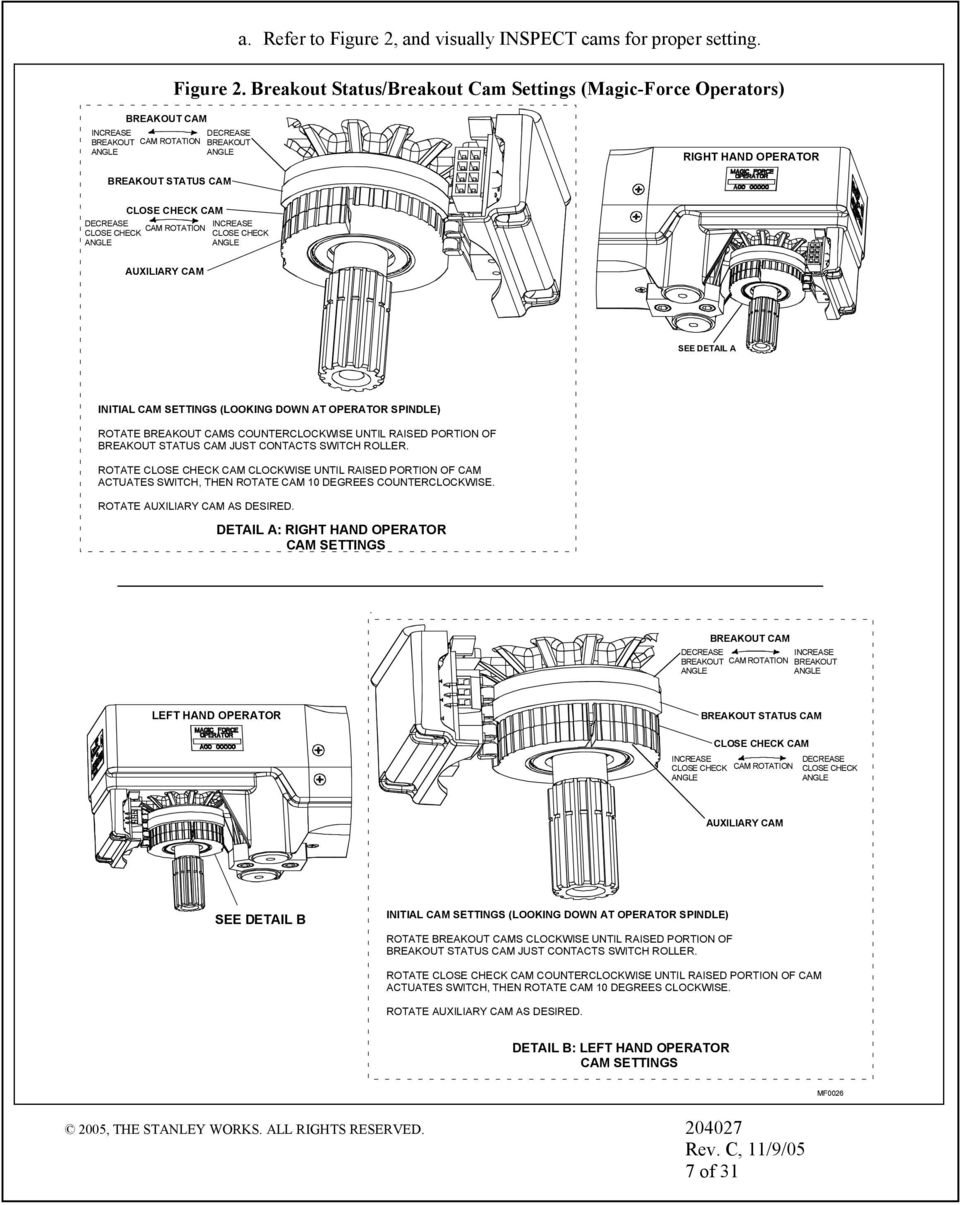
8 a. Refer to Figure, and visually INSPECT cams for proper setting. Figure. Breakout Status/Breakout Cam Settings (Magic-Force Operators) BREAKOUT CAM INCREASE DECREASE BREAKOUT CAM ROTATION BREAKOUT ANGLE ANGLE RIGHT HAND OPERATOR BREAKOUT STATUS CAM CLOSE CHECK CAM DECREASE INCREASE CAM ROTATION CLOSE CHECK CLOSE CHECK ANGLE ANGLE AUXILIARY CAM SEE DETAIL A INITIAL CAM SETTINGS (LOOKING DOWN AT OPERATOR SPINDLE) ROTATE BREAKOUT CAMS COUNTERCLOCKWISE UNTIL RAISED PORTION OF BREAKOUT STATUS CAM JUST CONTACTS SWITCH ROLLER. ROTATE CLOSE CHECK CAM CLOCKWISE UNTIL RAISED PORTION OF CAM ACTUATES SWITCH, THEN ROTATE CAM 0 DEGREES COUNTERCLOCKWISE. ROTATE AUXILIARY CAM AS DESIRED. DETAIL A: RIGHT HAND OPERATOR CAM SETTINGS BREAKOUT CAM DECREASE INCREASE BREAKOUT CAM ROTATION BREAKOUT ANGLE ANGLE LEFT HAND OPERATOR BREAKOUT STATUS CAM CLOSE CHECK CAM INCREASE CLOSE CHECK CAM ROTATION ANGLE DECREASE CLOSE CHECK ANGLE AUXILIARY CAM SEE DETAIL B INITIAL CAM SETTINGS (LOOKING DOWN AT OPERATOR SPINDLE) ROTATE BREAKOUT CAMS CLOCKWISE UNTIL RAISED PORTION OF BREAKOUT STATUS CAM JUST CONTACTS SWITCH ROLLER. ROTATE CLOSE CHECK CAM COUNTERCLOCKWISE UNTIL RAISED PORTION OF CAM ACTUATES SWITCH, THEN ROTATE CAM 0 DEGREES CLOCKWISE. ROTATE AUXILIARY CAM AS DESIRED. DETAIL B: LEFT HAND OPERATOR CAM SETTINGS MF00 00, THE STANLEY WORKS. ALL RIGHTS RESERVED. 00 Rev. C, //0 of
9 b. UNPLUG TB from control box. NOTE When checking breakout status switch continuity, the switch is checked twice; first with the door closed, then with the door in the breakout (negative ) position. In a dual-door application, both doors can be tested at the same time in the closed position. However, the doors must be tested individually when checking switch continuity with the doors in the breakout (negative ) position. c. ENSURE door is in the closed position. d. Using a multimeter, CHECK continuity between TB terminals and 0, and ENSURE there is continuity. e. PUSH door in the breakout direction, and HOLD door at approximately the negative position. f. Using a multimeter, CHECK continuity between TB terminals and 0, and ENSURE there is an open circuit. g. RELEASE door. h. PLUG TB into control box.. Wiring the Operator Switch Module (Magic-Force Operators).. Refer to Attachment or as applicable, and CONNECT switch module harness to dual-adjustment closing speed control connector J... IF auxiliary position switch will be used, refer to Figure, and PERFORM the following: a. LIFT switch module release lever up, and SLIDE switch module out of operator Figure. Wiring the Auxiliary Position Switch (Magic-Force Operators) OPERATOR HOUSING SWITCH MODULE RELEASE LEVER (PRESS LEVER UP TO RELEASE SWITCH MODULE) AUXILIARY POSITION SWITCH TERMINAL BLOCK NORMALLY CLOSED CONTACT SWITCH MODULE NORMALLY OPEN CONTACT housing. b. CONNECT wiring to auxiliary position switch terminal block as shown. c. SLIDE switch module into operator housing until switch module release lever snaps into place. 00, THE STANLEY WORKS. ALL RIGHTS RESERVED. 00 Rev. C, //0 of MCB00

10 . Wiring the Operator for Required Handing (Magic-Force Operators) NOTE Operator cams are factory-set for right hand operation... Refer to Figure, and DETERMINE door handing. Figure. Door Handing DOOR OPENING MOTION LEFT HAND RIGHT HAND MCB00.. CONNECT encoder cable adapter 00 from encoder to control box encoder and encoder connectors if applicable... If Sentrex is installed with a left hand Magic-Force operator, refer to Attachment or and INSTALL encoder handing harness (part No. )... CONNECT operator harness from close speed module to control box motor and motor connectors if applicable. Wiring the ON/OFF/HOLD OPEN Switch and Power Switch.. Refer to Attachment, and CONNECT ON/OFF/HOLD OPEN switch wiring as follows: TB Terminal Connection Switch Wire Color Hold open Yellow Common Orange Automatic Violet.. SET POWER switch to OFF... CONNECT POWER switch harness - to power harness CONNECT line connect harness to power harness Wiring the Door Activation or Safety Device NOTE Attachments,, and illustrate typical wiring for various devices. Though the specific device may not be shown, this attachment can be used as a general guide. Specific wiring instructions from the manufacturer must also be consulted... Refer to Attachment,, or and applicable manufacturer's instructions, and CONNECT door activation or safety device. 00, THE STANLEY WORKS. ALL RIGHTS RESERVED. 00 Rev. C, //0 of

11 . Wiring Sentrex CAUTION Do Not connect Sentrex Microboard or Sensors until control box is fully tuned. NOTE Select Sentrex when in step of Table if tuning with pushbuttons, even though Sentrex has not been connected at this time. If tuning with PDA, select Sentrex for Safety Logic in Step. For left hand Magic Force Operators, add encoder handing jumper between encoder and encoder cable adapter... Refer to Attachment,, or, and CONNECT Sentrex as follows: TB Terminal Connection Sentrex Wire Color VSX (+) Power for Sensor Head Red Serial Communication Green Serial Communication White D (-) Ground for Sensor Head Black.0 Wiring Bodyguard NOTE The Bodyguard does not require a lockout relay for use with the MC control box. A 00-ohm -watt resistor is needed. Part Number provides the resistor and terminal block. The MC control box generates the data signals for door open, closing, and closed positions. Refer to Attachment,, or as applicable for wiring connections. Program the Bodyguard Relay Output to #.. Wiring Superscan Refer to Attachment,, or as applicable for wiring connections. To inhibit the Stall Superscan, a switch is required in series with the Stall output.. Wiring Holding Beam The Holding Beam input is used in applications when there is a rail-mounted holding beam. When the door is closing and the beam is obstructed, the door will not open until the door is completely closed and the header-mounted sensor becomes active. When the door is open and the beam is obstructed, the door will remain open. Refer to Attachment,, or as applicable for wiring connections. 00, THE STANLEY WORKS. ALL RIGHTS RESERVED. 00 Rev. C, //0 0 of

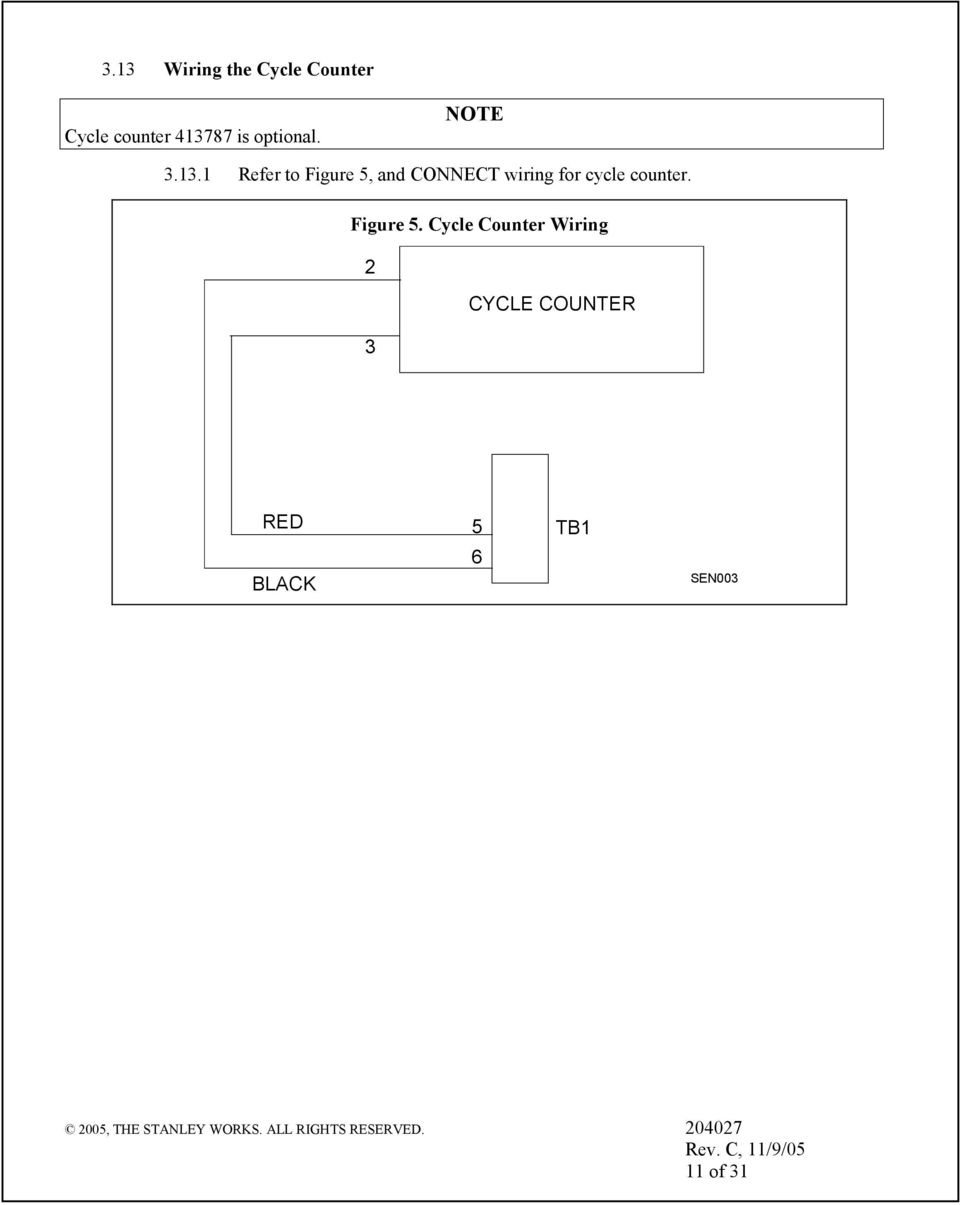
12 . Wiring the Cycle Counter Cycle counter is optional. NOTE.. Refer to Figure, and CONNECT wiring for cycle counter. Figure. Cycle Counter Wiring CYCLE COUNTER RED BLACK TB SEN00 00, THE STANLEY WORKS. ALL RIGHTS RESERVED. 00 Rev. C, //0 of
13 . TUNE-IN INSTRUCTIONS. Initial Tune-In Settings.. SET ON/OFF/HOLD OPEN switch to OFF... SET POWER switch to ON.. Tuning In the MC Controller Using the Palm Pilot WARNING To prevent injury to personnel and damage to equipment, the following settings must be made before using the door. NOTE The following steps provide instructions for tuning the MC controller using the Palm Pilot. MC application software is required. Step : Select MC Tool Box from the list of applications. Step : Select Restart FIS on the Main selection menu. (FIS = First Install Sequence) Step : Select door type. Step : Setup the door type, the motor configuration, and the handing. Press Begin FIS when finished. 00, THE STANLEY WORKS. ALL RIGHTS RESERVED. 00 Rev. C, //0 of

14 Step : If additional configuration is needed press Configure Door. Step : Configure additional settings and press Update after each setting has been changed. Once completed, press Cancel to go back to the Main selection menu. Motor and Motor have independent settings. Step : Press Begin Auto Configure. Step : Put Function switch to Hold Open momentarily, and then back to Closed. Step : Press OK. Step 0: Door will go through a learn sequence to configure itself. The door will perform the following operations in learn mode: Open fully at check speed Close partially to learn stall Close fully Open halfway at open speed and stop Close fully WARNING: During this sequence the sensors are inactive and the door has no SAFETY. To stop the door, turn power off. 00, THE STANLEY WORKS. ALL RIGHTS RESERVED. 00 Rev. C, //0 of

15 Step : If the door requires additional changes to be made to the settings, select Configure Door. Step : Configure settings as needed and press Update after each setting has been changed. Once completed, press Cancel to go back to the Main selection menu. Door must be cycled to full open for changes to be stored in permanent memory. Step : If the door is not operating correctly press Trouble Shoot to enter the Trouble Shooting menu. Step : View the I/O grid to verify the sensors and inputs. Step : Press More> to access more functions. Step : Press Clone Settings to pull all of the settings out of one controller and put them into another door. 00, THE STANLEY WORKS. ALL RIGHTS RESERVED. 00 Rev. C, //0 of

16 Step : To pull all of the settings out of one controller and put them into another door, press Fetch Settings. To put the settings into another controller plug the Palm into the other controller and press Push Settings. Note: Push Settings feature will not work if both doors are not the same or if the software version between the two doors is different. Step : Press Summary Listing to view all current settings for Motor and Motor. Step : Review the information on the summary listing. 00, THE STANLEY WORKS. ALL RIGHTS RESERVED. 00 Rev. C, //0 of

17 . Tuning In the MC Controller Using the Controller Pushbuttons NOTE. To change the INDEX: Hold ENTER switch while pressing UP or DOWN to get to desired INDEX. To change a VALUE: Unlock the keypad by setting index to value 0. After the desired INDEX is selected, release ENTER and within. seconds press UP or DOWN to get the desired VALUE. (If the the UP or DOWN buttons are not pressed within. seconds of releasing the ENTER button, the display will change from the VALUE back to the STATUS.). To display STATUS CODE: A few seconds after the VALUE is selected, the display indicates the STATUS CODE. To show the INDEX and VALUE To show the INDEX, hold ENTER. Once ENTER is released the display will show the VALUE of that INDEX.. Read the descriptions entirely before performing each step. Check the INDEX and VALUE after each step.. To store changes in permanent memory: Cycling door open one time will store changes.. To lock keypad: Lock keypad by setting index to value 0 or by turning power OFF and then ON.. To access the door cycle counter function: a. Ensure that the keypad is locked by setting index to 0. b. Ensure that the index is set to any index but. c. Press the up or down key to access the door cycle counter. d. The display will show dc followed by four pairs of digits, followed by dc. For example, if the door count was cycles the door will display dc dc. Step Table. FIS Procedure Using Pushbuttons Description Display Index Value Status Code Set Function switch to Closed. Turn power on. Unlock keypad Restart FIS. 0 A0 Select door type (Refer to Table ) 00 Refer to Table A0 Select Motor handing 0 00 = Right hand 0 = Left hand A0 00, THE STANLEY WORKS. ALL RIGHTS RESERVED. 00 Rev. C, //0 of

18 Step Description Display Index Value Status Code Select Motor handing 0 00 = Right hand 0 = Left hand Accept FIS. As soon as the VALUE is changed to 0, display will go to INDEX 00 (Open Speed value) and then to A. (Note: 0 is the default value for low energy.) Make changes: Safety Logic (Note: If there are no sensors connected, leave at default value of 00.) 0 Function switch: Switch to OPEN, momentarily, then CLOSED/LOCKED. Wait for the learn sequence to end. Display will show A when finished. A0 0 0 A 00 = Sensor 0 = Sentrex 0 = Carpet 0=Carpet sec. 0= Bifold Lock keypad 0 00 Final Tune in A A Table. MC Mode Values Code MC Operational Mode 0 Dura-Glide door style Single Motor 0 Dura-Glide door style Dual Motor 0 Magic-Swing Door Style Single Motor 0 Magic-Swing Door Style Dual Motor 0 Magic-Force Door Style Single Motor 0 Magic-Force Door Style Dual Motor 0 Magic-Force Door Style Single Motor Low Energy 0 Magic-Force Door Style Dual Motor Low Energy 0 Bifold door style--single Motor 0 Bifold door Style--Dual Motor Table. Index List Index Description 00- API Mode Specific Door Operational Values-These depend upon the mode selected 0- Reserved Command - Restart FIS. Entering 0 will cause FIS to restart. Reserved Command RESTART AUTOCONFIGURATION, Entering 0 will cause auto configuration. 00, THE STANLEY WORKS. ALL RIGHTS RESERVED. 00 Rev. C, //0 of

19 Index Description Entering 0 will cause auto configuration. Command Lock. Entering 0 will lock all VALUE inputs except this INDEX. This prevents inadvertent changes to input values. VALUEs may be unlocked by entering 00 in this INDEX. Keypad is automatically locked upon normal door motion. Table. Magic Force/Magic Swing Configuration Codes Motor Index Min. Max. Description Defaults Value Value Low Energy Full Energy 00 0 Open speed, revolutions per second Check speed, revolutions per second Stall speed, percent of PWM counts N/A N/A 0 00 Open check length, percent of full opening N/A N/A 0 00 Magic Touch sensitivity (00 = OFF, 0- = sensitivity) (0 = max. sensitivity) Magic Touch hold open time ( sec. max. = %) 0 00 Hold-open delay in percent ( sec. max. = %) Open torque, percent of full torque 0 0 Check torque, percent of full torque 0 0 Stall torque, percent of full torque 0 Reserved NA NA 00 0 Safety Logic (00 = Sensor, 0 = Sentrex, 0 = Carpet, 0 = Carpet Sec., 0 = Bifold S Operation, 00 = OFF, 0 = ON Obstruction Time (percent) (. sec. max. = %) 00 0 Open Acceleration Slope Open Braking Slope Magic touch mode (Dual = 00, Single = 0) 0 0 Reserved NA NA Note: Door must be cycled open for changes to be stored in permanent memory. 00, THE STANLEY WORKS. ALL RIGHTS RESERVED. 00 Rev. C, //0 of

20 Table. Magic Force/Magic Swing Configuration Codes Motor Index Min. Value Max. Value Description Defaults Low Energy Full Energy 0 0 Open speed, revolutions per second Check speed, revolutions per second Stall speed, percent of PWM counts N/A N/A 00 Open check length, percent of full opening N/A N/A 00 Magic Touch sensitivity (00 = OFF, 0- = sensitivity) (0 = max. sensitivity) Magic Touch hold open time ( sec. max. = %) 00 Hold-open delay in % ( sec. max. = %) 0 0 Open torque, percent of full torque 0 Check torque, percent of full torque 0 Stall torque, percent of full torque 0 Reserved NA NA Reserved NA NA Reserved NA NA 00 Obstruction time in % (. sec. max. = %) 00 0 Open Acceleration Slope Open Braking Slope 0 Reserved NA NA Reserved NA NA Table. Status Codes Status Code Description 00 Normal operation All OK 0 Breakout Stall state A0 First installation sequence (FIS) A Auto-configuration sequence A Auto-configuration confirmation sequence b0 Invalid mode b Encoder error dc Display door cycle counter EE Obstruction in Learn Mode 0b Obstruction after Learn Mode 00, THE STANLEY WORKS. ALL RIGHTS RESERVED. 00 Rev. C, //0 of

21 . Final Tune-In Adjustments.. Refer to ANSI/BHMA A.0, "American National Standard for Power Operated Doors" or ANSI/BHMA A., American National Standard for Power Assist and Low Energy Power Operated Doors and Attachment, and DETERMINE ANSI and UL door operating requirements... CYCLE and RECYCLE door several times to verify proper speeds and forces, and PERFORM adjustments in the following order: a. ADJUST close check cam. b. ADJUST open speed. c. ADJUST open check speed. d. ADJUST "CLS" (close speed) rheostat. e. ADJUST "CK" (close check speed) rheostat. NOTE Adjustments to the CK (close check) rheostat also affect closing speed. Closing speed must always be checked after adjusting close check speed. f. ADJUST "CLS" (close speed) rheostat. CAUTION To prevent motor overheating and premature motor failure, stall speed must not be set too high. g. ADJUST stall speed. h. ADJUST torque. i. ADJUST time delay. WARNING The Magic-Touch time delay must be set to at least seconds to ensure compliance with ANSI/BHMA A., American National Standard for Power Assist and Low Energy Power Operated Doors specifications. j. ADJUST Magic-Touch time delay. k. ADJUST breakout and breakout status cams. l. Refer to Attachment, and ENSURE all ANSI/BHMA, and UL compliance requirements are met. m. POWER DOWN the door, POWER UP the door, and ENSURE that all settings have been stored in the controller. 00, THE STANLEY WORKS. ALL RIGHTS RESERVED. 00 Rev. C, //0 0 of
22 . SPARE PARTS LIST Table shows the spare parts for the MC control box used with Magic-Swing, Magic-Force, and Bifold operators. Table. Spare Parts Description MC Controller and terminal blocks MC Controller Manual 00 Power and Function Switch Assembly feet - Power and Function Switch Assembly feet - Harness Encoder Handing Harness Line Harness Power inch 000 Harness Phone Cord 0 feet Harness Phone Cord feet - Adapter Female DB to RJ Terminal Block Plug 0 position 0 MC New Palm Cable 0 Harness Encoder Cable Adapter inch. 00 Resistor Assembly, Bodyguard Part Number 00, THE STANLEY WORKS. ALL RIGHTS RESERVED. 00 Rev. C, //0 of
23 Attachment Breakout Status Wiring for Magic-Swing Operators (Sheet of ) TB COM. AUX. SWITCH GREEN N.C. N.O. OPERATOR NO. AUX. SWITCH N.C. COM. N.O. TB ITE RED 0 N.C. WIRE HARNESS (CONNECTOR SEEN FROM WIRES SIDE) TWO-WIRE HARNESS TERMINATED BY TWO COMM. MATE-N-LOCK RECEPTACLE CONTACTS COM. N.O. AUX. SWITCH OPERATOR NO. 0 BREAKOUT STATUS WIRING--SINGLE DOOR BREAKOUT STATUS WIRING--DUAL DOOR MCBA0A 00 Rev. C, //0 Page of 00, THE STANLEY WORKS. ALL RIGHTS RESERVED.
24 Attachment Magic-Force Wiring Diagram MC (Sheet of ) HARNESS P/N BODY GUA RELAY SET TO # BN BL SWING STALL SENSOR OR OPTION ONLY BIFOLD BREAKOUT SWITCHES SUPERSCAN APPROACH YL BN STANGUA BIFOLD ONLY VAC VAC STALL VAC SAFETY VAC SENSOR SAFETY BREAKOUT BL BL BN TB 0 TB 0 SUPERSCAN STALL TB 0 BREAKOUT TB VAC OPERATE VAC SENSOR OPERATE BN YL 0 COUNTER TB 0 JUMPER - JUMPER - SENTREX FLEX LINK JUMPERS TB TB TB 0 HARNESS 00 PRESS PLATE 00 Rev. C, //0 Page of 00, THE STANLEY WORKS. ALL RIGHTS RESERVED. TB TB TB OPERATE SENSOR SAFETY SENSOR VAC VAC OPERATE VAC VAC SAFETY OPERATE SENTREX MICRO BOA J CLOSE SPEED CONTROL P/N 0 TB 0 ADD IF SENTREX IS INSTALLED (LEFT HAND OPERATOR ONLY) CONTROLLER PDA VAC VAC HOLD HOLDING BEAM BEAM TB 0 MOTOR ENCODER LEFT HAND OPERATOR BREAKOUT BREAKOUT STATUS CLOSE CHECK AUXILARY 000 AUXILARY SWITCH CONNECTIONS HARNESS 0- HARNESS 0- J MOTOR ENCODER CLOSE SPEED CONTROL P/N 0 SWITCH ASS'Y P/N YL OR VI TB 0 HARNESS - OR - VI OR YL HARNESS LINE NEUTRAL 0 VAC LINE EARTH GROUND GROUND SCREW IN HEADER RIGHT HAND OPERATOR BREAKOUT BREAKOUT STATUS CLOSE CHECK AUXILARY AUTO ON OFF AUTO/CLOSE/OPEN HOLD OPEN SWITCH ON POWER SWITCH HARNESS P/N AUXILARY SWITCH CONNECTIONS SWITCH ASS'Y P/N OFF SCHEMATIC CENTER OFF SCHEMATIC UCSW00B
25 RELAY SET TO # BODY GUA BN BL SWING STALL SENSOR OPTION ONLY OR VAC VAC STALL SAFETY SENSOR BL BIFOLD BREAKOUT SWITCHES SUPERSCAN APPROACH YL BN BL BN TB 0 STANGUA BIFOLD ONLY VAC VAC SAFETY BREAKOUT OPERATE SENSOR TB 0 TB 0 COUNTER SUPERSCAN STALL TB BREAKOUT VAC VAC OPERATE BN YL TB JUMPER - JUMPER Attachment Magic-Force Wiring Diagram MC With Power Close Option (Sheet of ) SENTREX FLEX LINK JUMPERS TB TB TB 0 HARNESS 00 TB TB TB OPERATE SENSOR SAFETY SENSOR PRESS PLATE VAC VAC OPERATE VAC VAC SENTREX MICRO BOA SAFETY OPERATE J CLOSE SPEED CONTROL P/N 0 CONTROLLER POWER CLOSE P/N JP ADD IF SENTREX IS INSTALLED (LEFT HAND OPERATOR ONLY) TB 0 0 HOLD BEAM J S TL HARNESS 0- PDA VAC VAC HOLDING BEAM TB 0 MOTOR ENCODER MOTOR HANDING HARNESS CLOSE SPEED CONTROL P/N 0 J BREAKOUT BREAKOUT STATUS CLOSE CHECK AUXILARY AUXILARY SWITCH CONNECTIONS HARNESS JP HARNESS P/N LEFT HAND OPERATOR J S T L SWITCH ASS'Y P/N YL OR VI TB 0 VI OR YL HARNESS LINE NEUTRAL EARTH GROUND 0 VAC LINE GROUND SCREW IN HEADER HARNESS - OR - AUXILARY SWITCH CONNECTIONS SWITCH ASS'Y P/N AUTO ON OFF AUTO/CLOSE/OPEN HOLD OPEN SWITCH ON POWER SWITCH OFF SCHEMATIC HARNESS P/N POWER CLOSE P/N MOTOR RIGHT HAND OPERATOR BREAKOUT ENCODERBREAKOUT STATUS CLOSE CHECK AUXILARY CENTER OFF SCHEMATIC UCSW00B 00 Rev. C, //0 Page of 00, THE STANLEY WORKS. ALL RIGHTS RESERVED.
26 Attachment Magic-Swing Wiring Diagram MC (Sheet of ) HARNESS 0- RELAY SET TO # BODY GUA STALL SENSOR OPTION SAFETY SENSOR BN BL SUPERSCAN APPROACH YL BN BL TB TB VAC VAC STALL VAC VAC SAFETY BREAKOUT 0 COUNTER SENTREX FLEX LINK 00 Rev. C, //0 Page of 00, THE STANLEY WORKS. ALL RIGHTS RESERVED. BL BN 0 TB 0 SUPERSCAN STALL OPERATE SENSOR BREAKOUT JUMPER - JUMPER - VAC VAC OPERATE BN YL TB 0 TB 0 TB TB JUMPERS OPERATE SENSOR SAFETY SENSOR PRESS PLATE TB TB TB TB 0 HARNESS - 00 SENTREX MICRO BOA VAC VAC OPERATE VAC VAC SAFETY OPERATE TB 0 MOTOR ENCODER CONTROLLER HOLD BEAM PDA VAC VAC HOLDING BEAM TB 0 Y VIEW "Y" YL OR VI HARNESS HARNESS 0- MOTOR ENCODER Y TB 0 HARNESS - OR - VI OR YL LINE NEUTRAL EARTH GROUND 0 VAC LINE GROUND SCREW IN HEADER X CENTER OFF SCHEMATIC AUTO ON OFF AUTO/CLOSE/OPEN HOLD OPEN SWITCH ON POWER SWITCH OFF SCHEMATIC VIEW "X" X UCSW00B
27 SENTREX FLEX LINK Attachment Terminal Block Connections TB through TB (Sheet of ) () () () TB HOLD OPEN POSITION (YL) (OR) AUTOMATIC POSITION (VI) TB (ROCKER SWITCH WIRING) () CYCLE COUNTER () () BODYGUA DATA 0 0 EXT VAC () * VAC () TB EXT VAC () VAC () TB EXT VAC () VAC () TB () () SENTOP STALL () OPERATE SENSOR INT VAC () VAC () INT VAC () VAC () INT VAC VAC () () HOLDING BEAM SAFETY () SAFETY () BREAKOUT (YL) PUSH PLATE * REMOVE IF EXTERNAL (YL) 00 POWER SUPPLY IS USED. Rev. C, //0 Page of 00, THE STANLEY WORKS. ALL RIGHTS RESERVED UCSW0B
28 Attachment MC Controller Controls and Indicators (Sheet of ) ENCODER U0 U0 J0 j0 THIS OPERATOR CONTROL MUST BE ADJUSTED TO ANSI STANDAS BY STANLEY TRAINED PERSONNEL. REFER TO INSTRUCTIONS FOR WIRING AND ADJUSTMENTS. MOTOR J0 MOTOR 0 TB TB 0 TB TB ENCODER J0 UP TB S0 S0 S0 DOWN ENTER COM COM (RS) 0 TB 0 TB ENCDR TB VAC OUTPUT A MAX VAC OUTPUT 0.A MAX COM STANLEY ACCESS TECHNOLOGIES 000 CONTROLLER R INPUT V 0/0Hz A, W MAX Z0 FUSE INSIDE. DISCONNECT POWER BEFORE SERVICING. MOTOR J0 N G L WARNING - FOR CONTINUED PROTECTION AGAINST FIRE, REPLACE ONLY WITH THE SAME TYPE AND RATING OF FUSE. MOTOR J0 SEE DETAIL A ENCODER U0 U0 J0 ENCODER 0 0 TB TB 0 TB TB J0 TB S0 S0 UP DOWN ENTER S0 00 Rev. C, //0 Page of 00, THE STANLEY WORKS. ALL RIGHTS RESERVED COM COM DETAIL A (RS) UC00B
29 Attachment MC Controller Controls and Indicators (Sheet of ) ITEM CONTROL/ DESCRIPTION INDICATOR Motor Connector J0 Motor No. connector. Power Connector J0 Connection point for incoming line, neutral, and common power wiring. Fuse Z0 Controller fuse-- Amp, 0V Motor Connector J0 Motor No. connector. Terminal Block Connector Connection point for door cycle counter and Sentrex. TB Terminal Block Connector Connection point for function switch (rocker). TB Encoder Connector J0 Connection point for motor encoder No.. Two Digit Display Displays Controller Status. Also serves as the display for tune-in by pushbutton switches. Encoder Connector J0 Connection point for motor encoder No.. 0 Up Pushbutton Switch Used manual setup and tuning of door when PDA is not available. S0 Down Pushbutton Switch Used for manual setup and tuning of door when PDA is not available. S0 Enter Pushbutton Switch Used for manual setup and tuning of door when PDA is not available. S0 COMM Jack RS COMM connector. Connection point for PDA harness. COMM Jack RS COMM connector. Future provision. Terminal Block Connector Not used. TB Terminal Block Connector Connection point for operate sensor, safety sensor, and push plate. TB Terminal Block Connector TB Connection point for stall sensor, safety sensor, and breakout switch. Using jumper wires across TB terminals to and to, internal transformer supplies power to multiple external sensors. J0 Connection point for Sentrex microboard. 00 Rev. C, //0 Page of 00, THE STANLEY WORKS. ALL RIGHTS RESERVED.
30 Attachment ANSI/BHMA and UL Compliance Requirements for Swinging and Folding Doors (Sheet of ) Final adjustment and proper operation of the door system must be and shall be performed in the field. Note: These instructions are for informational purposes and do not substitute for review against the current revision of the referenced standards. Where a requirement exists in multiple standards, such as the ANSI/BHMA standard and the UL standard, the more restrictive condition applies. Other local codes and fire codes likely exist, and must also be followed..0 ANSI/BHMA A.0 Full/Standard Power Swinging and Folding Door Systems Full/standard power swinging and folding door systems must be installed and adjusted for compliance with the current version of ANSI/BHMA A.0, American National Standard for Power Operated Pedestrian Doors. Critical aspects of the installation for compliance with A.0 include: Guide rail size, location, and type. Control mat size, layout, molding height, active areas and sensitivity. Sensor pattern size, sensitivity, and function. Knowing Act guidelines, secondary activating zones and double egress swing door requirements. Entrapment protection rules including door speeds, forces, and time delays. Signage. (Decals and application instructions are provided with the door operator.).0 ANSI/BHMA A. Low Energy Swinging Door Systems Low energy swinging door systems must be installed and adjusted for compliance with the current version of ANSI/BHMA A., American National Standard for Power Assist and Low Energy Power Operated Doors. Critical aspects of the installation for compliance with A. include: Opening times and force. Closing times and force. Manual opening force. Time delay. Signage. (Decals and application instructions are provided with the door operator.).0 UL Compliance All power operated door systems must be installed in compliance with the current edition of UL, Standard for Safety for Door, Drapery, Gate, Louver, and Window Operators and Systems. 00 Rev. C, //0 Page of 00, THE STANLEY WORKS. ALL RIGHTS RESERVED.
31 Attachment ANSI/BHMA and UL Compliance Requirements for Swinging and Folding Doors (Sheet of ). Wiring.. To reduce the risk of electric shock proper and reliable grounding is mandatory. See Main Power Wiring instructions and Wiring Diagrams in this guide for grounding techniques... Permanent wiring is to be employed as required by the National Electrical Code and/or local codes... Connection of external devices is shown in the wiring diagrams and terminal block layouts elsewhere in this guide. Refer to these figures for proper wiring of external devices to ensure compliance with UL.. Knowing Act Doors activated by a manual switch (Knowing Act switch in ANSI/BHMA terms) must have the switch installed in a location from which operation of the door can be observed by the person operating the switch.. Entrapment - Swinging Doors To ensure that a swinging door operates in accordance with UL entrapment protection criteria the following must be established: Manual opening force or breakout force with power on or off must be less than 0 lbf (. N). Closing force must be less than 0 lbf (. N) at the lock/latch stile. Closing time through the final 0 degrees must be greater than. seconds. Maximum recommended door weight: Magic-Access Operator = 0 lbs ( kg) Magic-Force Operator = 0 lbs (0 kg) Magic-Swing Operator = 00 lbs (0 kg). Entrapment Folding Doors To ensure that a folding door operates in accordance with UL entrapment protection criteria the following must be established: Breakout force with power on or off must be less than 0 lbf (. N). Closing force must be less than 0 lbf (. N) between fully open and latch check. Closing time through the final inches of closing (latch check) must be greater than. seconds measured at the lead edge of each FX (fold slide) panel. Maximum recommended door weight: Bifold Door = 00 lbs ( kg) each panel 00 Rev. C, //0 Page 0 of 00, THE STANLEY WORKS. ALL RIGHTS RESERVED.
32 Attachment Palm Troubleshooting Aid Swing/Bifold (Sheet of ) Terminal Description State & Pin TB- External Cycle Counter Output Dark = low (counter increments) TB- Bodyguard Data Output Bodyguard Dark = door closed Function Switch states for TB Hold Off Open TB- TB- Auto On TB- Stall Input (Swing) Dark = detecting Stanguard (Fold) Dark = triggered or detecting TB- & Safety Input Dark = detecting TB- TB- Breakout Input Dark = no breakout TB- & Operate Sensor Input & Dark = detecting TB- Push Plate Input (connected internally) TB- & Safety Input Dark = detecting TB- TB- & Push Plate Input & Dark = detecting TB- Operate Sensor Input (connected internally) TB- Sentrex Operate Internal From MicroBoard Dark = detecting TB- Holding Beam Dark = detecting TB-0 Spare 00 Rev. C, //0 Page of 00, THE STANLEY WORKS. ALL RIGHTS RESERVED.
Automatic Swinging Door Systems
 Automatic Swinging Door Systems Operation and Maintenance Manual Including: Magic-Force, Magic-Swing and Magic-Access Contents Section Page Caution Statement. 2 To Our Customers 3 Service Availability...
Analog Control Wiring & Adjustment Manual for Gyro Tech Swing Door Operators
 NABCO ENTRANCES Inc. S82 W18717 Gemini Drive Muskego, WI 53150 Phone: 877-622-2694 Fax: 888-679-3319 Technical Assistance: 866-622-8325 www.nabcoentrances.com Email: [email protected] Analog Control
Model 201 Wiegand Touchpad Reader Installation Guide
 Model 201 Wiegand Touchpad Reader Installation Guide P/N 460353001C 15AUG11 2011 UTC Fire & Security. All rights reserved. This document may not be copied in whole or in part or otherwise reproduced without
DORMA MODEL PS-406BB POWER SUPPLY INSTALLATION INSTRUCTIONS
 Features: INSTALLATION Install in accordance with NFPA 70. DORMA MODEL PS-406BB POWER SUPPLY INSTALLATION INSTRUCTIONS Up to 1.95 Amps Load Capacity Class 2 Rated Outputs Overload, Over Voltage, and Short
INSTALLATION GUIDE. Card Reader & Controller with KIM Swipe Reader for Solitaire 850 / 950 / 850L Learnlok PK2930
 INSTALLATION GUIDE Card Reader & Controller with KIM Swipe Reader for Solitaire 850 / 950 / 850L Learnlok PK2930 Card Reader and Controller Model 3.5 with KIM Swipe Reader Table of Contents 1. Features..................................
JANUS INTERNATIONAL CORPORATION INSTALLATION INSTRUCTIONS Pantheon Mini Operator
 JANUS INTERNATIONAL CORPORATION INSTALLATION INSTRUCTIONS Pantheon Mini Operator The Janus Pantheon mini operator does not typically require the provision of any additional site requirements other than
PRODUCTIVITY THROUGH INNOVATION 600 CONTROL DIRECT DRIVE TECHNICAL/OPERATION MANUAL
 Rev. D PRODUCTIVITY THROUGH INNOVATION 600 CONTROL DIRECT DRIVE TECHNICAL/OPERATION MANUAL 10 BORIGHT AVENUE, KENILWORTH NEW JERSEY 07033 TELEPHONE: 800-524-0273 FAX: 908-686-9317 TABLE OF CONTENTS Page
Magnum IV Control Wiring & Adjustment Manual for Gyro Tech Swing Door Operators
 NABCO ENTRANCES Inc. S82 W877 Gemini Drive Muskego, WI 5350 Phone: 877-622-2694 Fax: 888-679-339 Technical Assistance: 866-622-8325 www.nabcoentrances.com Email: [email protected] Magnum IV Control
 ABLOY DA60 SWING DOOR OPERATOR Installation and commissioning manual Abloy Oy An ASSA ABLOY Group company APPROVALS / STANDARDS Low Voltage directive 7//EEC as amended by the directive 9/68/EEC EMC directive
Rain+Birdt. Simple To Set Timer (SST) Setup & Operation Instructions. English. 1-800- RAIN BIRD (800-724-6247) or visit www.rainbird.
 Rain+Birdt Simple To Set r (SST) Setup & Operation Instructions English Installation...2 Tools and Supplies Needed...2 Step 1. Mount r...2 Step 2. Connect Power...2 Indoor r...2 Outdoor r...2 Step 3. Connect
AUTOMATIC SWINGING DOOR
 AAADM American Association of Automatic Door Manufacturers AUTOMATIC SWINGING DOOR OWNER'S MANUAL Distributed by: Section Contents Page Caution 2 To Our Customers 3 Service Availability 3 Compliance with
Troubleshooting and Diagnostics
 Troubleshooting and Diagnostics The troubleshooting and diagnostics guide provides instructions to assist in tracking down the source of many basic controller installation problems. If there is a problem
Retrofit Kit Manual. Low Energy Operator
 G Y R O T E C H ENTRANCES Inc. S82 W18717 Gemini Drive P.O. Box 906 Muskego, WI 53150 Phone: 877-622-2694 Fax: 888-679-3319 www.nabcoentrances.com Automatic Entrance Systems Retrofit Kit Manual Model 710
Model 2300DR Installation Guide
 Model 2300DR Installation Guide POWER ACCESS CORPORATION P.O. BOX 1050 170 MAIN STREET NEW HARTFORD, CT 06057 800-344-0088 WEBSITE: www.power-access.com EMAIL: [email protected] 1 STANDARD PARTS
OEM Manual MODEL 2350 ELECTRONIC DUAL CYLINDER SCALE
 OEM Manual MODEL 2350 ELECTRONIC DUAL CYLINDER SCALE Scaletron Industries, Ltd. Bedminster Industrial Park 53 Apple Tree Lane P.O. Box 365 Plumsteadville, PA 18949 USA Toll Free: 1-800-257-5911 (USA &
Lighting Controls ! WARNING RISK OF ELECTRIC SHOCK. Installation Instructions DESCRIPTION
 GE Lighting Installation Instructions Lighting Controls Centralized Lighting Control Panel Interior Catalog Number CLCINTxx DESCRIPTION The Centralized Lighting Control System is a small network of relay
INSTALLATION & SERVICE MANUAL. Display Panel
 INSTALLATION & SERVICE MANUAL Display Panel The PowerLine EMS TM is a specialized power distribution and energy management system intended to be used in recreational vehicles. The Control Module is housed
INSTALLATION MANUAL 3RP / 5RP 4-BUTTON SERIES VEHICLE SECURITY SYSTEMS
 3RP / 5RP 4-BUTTON SERIES VEHICLE SECURITY SYSTEMS INSTALLATION MANUAL Before you begin the installation Read the INSTRUCTIONS! Always use a multi-meter when verifying vehicle wiring. Before mounting the
OPL BASIC. Dosing System for Professional Laundry machines. Contents
 OPL BASIC Dosing System for Professional Laundry machines Contents 1 Getting Started. Page 2 2 Installation. Page 4 3 Set Up & Operation. Page 8 4 Maintenance & Accessories. Page 10 5 Troubleshooting Page
D-4990 PRECISION HARDWARE
 D-4990 PRECISION HARDWARE INTRODUCTION TABLE OF CONTENTS Page Introduction...2 ADA Blue-Paint Access...2 Features/Benefits...3 Electrical Data Specifications...4 How To Order...4 INTRODUCTION Page Standard
INSTALLATION INSTRUCTIONS
 LIGHTING CONTROL PANELS 4 AND 8 RELAYS INSTALLATION INSTRUCTIONS INSTALLATION OVERVIEW The installation instructions contained in this document are provided as a guide for proper and reliable installation.
e-ask electronic Access Security Keyless-entry
 e-ask electronic Access Security Keyless-entry e-fob Keyless-entry entry System Full-Function Function Installation Manual FCC ID: TV2EFOB1 (UM20 ~ 22793-02) Table of Contents Introduction... 1 e-fob Operation
1R / 4-BUTTON SERIES
 Button 1 1R / 4-BUTTON SERIES VEHICLE SECURITY SYSTEM Standard Features: Two 4-Button Remote Transmitters Status indicator (LED) Valet / override switch Multi-tone siren Dual stage impact detector Remote
CHAPTER 11: Flip Flops
 CHAPTER 11: Flip Flops In this chapter, you will be building the part of the circuit that controls the command sequencing. The required circuit must operate the counter and the memory chip. When the teach
Digi-Motor Installation Guide
 Digi-Motor Installation Guide Installation Video...located at marsdelivers.com Digi-Motor Installation Guide Digi-Motor For technical assistance with your Azure Digi-Motor, call the MARS technical support
WIRING HARNESS FOR AS635P4. BLUE PLUG RED, BLUE, BLACK, WHITE - Plug in dual stage sensor harness
 WIRING HARNESS FOR AS635P4 ANTENNA NOT USED 5 PIN WHITE PLUG 2 PIN WHITE PLUG GREEN - PARKING BRAKE INPUT (-) BLUE - NOT USED 3 PIN BLUE PLUG RED, BLUE, BLACK, WHITE - Plug in dual stage sensor harness
e-4 AWT07MLED 7 Q TFT LCD MONITOR (LED Backlighted) USER MANUAL
 Thank you for purchasing our product. Please read this User s Manual before using the product. Change without Notice AWT07MLED 7 Q TFT LCD MONITOR (LED Backlighted) USER MANUAL e-4 SAFETY PRECAUTIONS Federal
Part Name/Description Part Number Quantity. Power Cable 4000950-5 1
 Note: Indented items indicate parts included in an assembly listed above Part Name/Description Part Number Quantity Power Cable 4000950-5 1 Raven Harness Adapter Kit 4100525 1 Installation Instructions
ABB Drives. User s Manual HTL Encoder Interface FEN-31
 ABB Drives User s Manual HTL Encoder Interface FEN-31 HTL Encoder Interface FEN-31 User s Manual 3AUA0000031044 Rev B EN EFFECTIVE: 2010-04-06 2010 ABB Oy. All Rights Reserved. 5 Safety instructions
INSTALLATION INSTRUCTIONS
 INSTALLATION INSTRUCTIONS Accessory Application Publications No. AII 26327 2004 S2000 Issue Date OCT 2004 PARTS LIST Security System: P/N 08E51-S84-100 Attachment Kit: P/N 08E55-S2A-101 2 Remote controls
Instruction Manual. 2in1 LAN Tester & Multimeter. Model: LA-1011
 Instruction Manual 2in1 LAN Tester & Multimeter Model: LA-1011 1 Contents Introduction... Features... Safety Precautions.. Meter Description... Electrical Specification... Operation.. AutoRanging Multimeter.
Model SETR-50 and SETR-51 Trim Tab Control
 Model SETR-50 and SETR-51 Trim Tab Control Pictured above is the SETR-50 with black switches on a gray background. The SETR-51 is identical except for the color, wherein it has black switches on a black
Table of Contents. www.hunterfan.com. What to Expect with. Preparation. Tools Needed. Wiring. Hanging the Fan. Blades. Motor Housing.
 www.hunterfan.com Table of Contents What to Expect with Your Installation 30 inches Hanging the Fan Wiring 8 Maintenance, Operation & Cleaning Light Kit 13??? 14 1 9 Troubleshooting 11 5 Blades Motor Housing
www.sebury.com.cn Digital Keypad Use s Manual
 K3 K4 www.sebury.com.cn Digital Keypad Use s Manual Contents Introduction Introduction Specifications Intramural Interface Circuit 3 Mounting 3 Wiring 5 Power UP 7 Engineer Programming Mode 7 The K3/K4
EXPERIMENT 2 TRAFFIC LIGHT CONTROL SYSTEM FOR AN INTERSECTION USING S7-300 PLC
 YEDITEPE UNIVERSITY ENGINEERING & ARCHITECTURE FACULTY INDUSTRIAL ELECTRONICS LABORATORY EE 432 INDUSTRIAL ELECTRONICS EXPERIMENT 2 TRAFFIC LIGHT CONTROL SYSTEM FOR AN INTERSECTION USING S7-300 PLC Introduction:
INSTALLATION AND OPERATING INSTRUCTIONS For Model GL1 Gate Locks
 Securitron Magnalock Corp. www.securitron.com ASSA ABLOY, the global leader Tel 800.624.5625 [email protected] in door opening solutions INSTALLATION AND OPERATING INSTRUCTIONS For Model GL1 Gate
PUSH BUTTON START INSTALLATION MANUAL
 PUSH BUTTON START INSTALLATION MANUAL ALTHOUGH THIS PRODUCT HAS BEEN THOROUGHLY TESTED KPIERSON TECHNOLOGIES ASSUMES NO RESPONSIBILITY FOR ANY DAMAGE THAT MAY RESULT BY THE INSTALLATION OF THIS PRODUCT.
INSTALLATION INSTRUCTIONS
 INSTALLATION INSTRUCTIONS Accessory Application Publications No. AII23628 2003 PILOT Issue Date MAY 2002 PARTS LIST Security System Kit (sold separately): P/N 08E51-S84-100 2 Remote controls Attachment
APOLLO Gate Operators, Inc.
 APOLLO Gate Operators, Inc. Model 7200ETL Post Mounted Residential & Heavy Duty Commercial Slide Gate Operator INSTALLATION MANUAL 04/11 CONTENTS IMPORTANT SAFETY INSTRUCTIONS... 3 Applications... 4 Pre-Installation
SP4-LOC SAFEPATH4 REMOTE MICROPHONE AND LOCAL OPERATOR CONSOLE
 SP4LOC SAFEPATH4 REMOTE MICROPHONE AND LOCAL OPERATOR CONSOLE INSTALLATION AND OPERATION MANUAL MASS NOTIFICATION SYSTEM Part Number: P84767 Rev. A Copyright 2006 Cooper Wheelock, Inc. All rights reserved.
IntelliBrite Controller (For IntelliBrite Pool, Spa and Landscape Lighting Fixtures) Installation and User s Guide
 IntelliBrite Controller (For IntelliBrite Pool, Spa and Landscape Lighting Fixtures) Installation and User s Guide *619751* P/N 619751 - Rev C IMPORTANT SAFETY INSTRUCTIONS READ AND FOLLOW ALL INSTRUCTIONS
NOTE: It is the responsibility of the installation organization to have only technically qualified personnel performing the installation.
 This quick start guide provides, basic installation information, drawings, first time power-on instructions, and short descriptions of key terms and concepts for installing the EntraGuard Platinum Telephone
Owner s Manual AWM910 JENSEN AWM910 COMPACT DISC PLAYER RADIO CD COMPACT MUSIC SYSTEM MUTE AUX BAND AUX IN PUSH PUSH PWR VOL ALARM T/F AUD SPK A SPK B
 AWM910 Owner s Manual COMPACT DISC PLAYER PUSH 1 2 3 4 5 6 RPT SCAN RDM H M PUSH PWR VOL ALARM SET ON/OFF EQ T/F AUD RADIO CD COMPACT MUSIC SYSTEM MUTE AUX BAND CD AUX IN A B A+B JENSEN AWM910 Thank You!
NC-12 Modbus Application
 NC-12 Modbus Application NC-12 1 Table of Contents 1 Table of Contents... 2 2 Glossary... 3 SCADA...3 3 NC-12 Modbus in general... 3 4 Entire system... 4 4.1 PFC to PC connection alternatives...4 4.1.1
Addendum to the Operating Instructions
 Drive Technology \ Drive Automation \ System Integration \ Services Addendum to the Operating Instructions MOVIMOT with AS-Interface and AC Motor DT/DV Unit Replacement MOVIMOT MM..C -> MM..D with MLK3A
BUILDING INSTRUCTIONS
 etap2hw 38 mm I2C to LCD Interface BUILDING INSTRUCTIONS October 2013 P. Verbruggen Rev 1.01 15-Oct-13 Page 1 Table of Contents Chapter 1 General Information 1.1 ESD Precautions 1.2 Further Supplies 1.3
MOVFR ELECTRICAL ADJUSTMENTS. G.A.L. MFG. CORP. NEW YORK CITY U.S.A. http://www.gal.com
 MOVFR ELECTRICAL ADJUSTMENTS G.A.L. MFG. CORP. NEW YORK CITY U.S.A. http://www.gal.com 1 ELECTRICAL ADJUSTMENTS ADJUSTING INSTRUCTIONS FOR THE G.A.L. VARIABLE FREQUENCY CLOSED LOOP DOOR OPERATOR TYPE MOVFR
SYSTEM 4C. C R H Electronics Design
 SYSTEM 4C C R H Electronics Design SYSTEM 4C All in one modular 4 axis CNC drive board By C R Harding Specifications Main PCB & Input PCB Available with up to 4 Axis X, Y, Z, A outputs. Independent 25
Express5800/120Ed. Rack Mount Kit Installation Procedures PN: 455-01607-001
 Express5800/120Ed Rack Mount Kit Installation Procedures PN: 455-01607-001 Proprietary Notice and Liability Disclaimer The information disclosed in this document, including all designs and related materials,
BATTERY BOX INSTALLATION WARNING WARNING CAUTION ATTENTION AVERTISSEMENT ADVERTENCIA PRECAUCIÓN SOLBBOX12V CARTON INVENTORY COMPLETED OVERVIEW
 WARNING CARTON INVENTORY CAUTION with: Charger, Cable 15', Fuses (2), Battery Strap and Strain Relief (2) Model SOLBBOX 12V Battery Not Included AVERTISSEMENT ATTENTION DC Power Adapter 12Vdc to 32Vdc
SECTION G2: CABLE PROCESSOR MODULE MAINTENANCE
 SECTION G2: CABLE PROCESSOR MODULE MAINTENANCE Cable Processor Module overview WARNING! When tipping the Cable Processor Module back, (after removing the toggle arm pin), use extreme caution not to drop
Operating Instructions
 D-TEK Vehicle Loop Detector Operating Instructions This product is an accessory or part of a system. Always read and follow the manufacturer s instructions for the equipment you are connecting this product
How to read this guide
 How to read this guide The following shows the symbols used in this Quick start guide with descriptions and examples. Symbol Description Example P oint Reference Caution [ ] This symbol explains information
Fire Fighter Phone System Installation Instructions
 Fire Fighter Phone System Installation Instructions Introduction This publication describes the installation procedure for the Fire Fighter s Phone on a 4100U or a 4100ES Fire Alarm Control Panel (FACP).
Model 5511 Filler Controller User s Manual Version 1.1 October 2011
 Thompson Scale Company WEIGHING SYSTEMS & PACKAGING MACHINERY CONTROLS 2758 Bingle Road Houston, Texas 77055 Phone: 713/932-9071 Fax: 713/932-9379 www.thompsonscale.com Model 5511 Filler Controller User
TS510 & TS500. Installation & User Guide. Compatible Equipment
 Installation & User Guide Compatible Equipment TS510 REM - Remote Keypad 9040 - Loudspeaker DC54/58 - Digital Communicator SD1+ - Speech Dialler 496525 Issue A 1 of 10 TS510 and TS500 Overview Introduction
MODEL 5010 DUAL CHANNEL SMOKE/FIRE DETECTION MODULE
 DESCRIPTION MODEL 5010 DUAL CHANNEL SMOKE/FIRE DETECTION MODULE DESCRIPTION The SST Model 5010 Two Channel Smoke/Fire Detection Module provides two independent detection input channels for the NOVA-5000
MANAGEMENT SOLUTION (P.A.M.S.)
 DOORKING SYSTEMS ACCESS CONTROL SOLUTIONS PERIMETER ACCESS MANAGEMENT SOLUTION (P.A.M.S.) Revision N, updated 01.12 PERIMETER ACCESS MANAGEMENT SOLUTION (P.A.M.S.) Design Concept How the System Works TYPICAL
A1000 Cheat Sheet (Open Loop Vector)
 A1000 Cheat Sheet (Open Loop Vector) The following procedure is a supplement to supplied with this equipment and will guide the user in properly wiring the A1000 and. It will also show the user how to
V1504 Vertical Platform Lift OWNER S MANUAL
 V1504 Vertical Platform Lift OWNER S MANUAL (To Be Retained by Owner After Installation by Authorized Savaria Dealer) Part No. 000692 01-m03-2016 2 IMPORTANT Ensure that only an authorized Savaria Dealer
Control Box Wiring For PRSstandard Tool
 888-680-4466 ShopBotTools.com Control Box Wiring For PRSstandard Tool Copyright 2016 ShopBot Tools, Inc. page 1 Copyright 2016 ShopBot Tools, Inc. page 2 Table of Contents Introduction:...5 Installation:...5
TraceTek TTDM Series Leak Detection and Location Modules Replacement Parts Installation Instructions
 TraceTek TTDM Series Leak Detection and Location Modules Replacement Parts Installation Instructions TRACETEK TraceTek TTDM Replacement Parts General Information These instructions detail the steps to
TS93 EMR T/PT/TDE. Surface applied door closer
 TS EMR T/PT/TDE Surface applied door closer Installation instructions: Pull side track mount door closer with smoke detector (EMR T) Push side track mount door closer with smoke detector (EMR PT) Double
Applied Electronics. Commercial Dimming System UPDATE NOTICE
 REV. A Applied Electronics Commercial Dimming System UPDATE NOTICE This notice is to inform the end user of an additional feature added to this DP12/2400 dimming unit. This unit has been outfitted with
PRO PLM Installation Instructions
 PRO PLM Installation Instructions PROFESSIONAL INSTALLATION STRONGLY RECOMMENDED Installation Precautions: Roll down window to avoid locking keys in vehicle during installation Avoid mounting components
HCS-3300/3302/3304 USB Remote Programmable Laboratory Grade Switching Mode Power Supply
 1. INTRODUCTION HCS-3300/3302/3304 USB Remote Programmable Laboratory Grade Switching Mode Power Supply User Manual This family of efficient, upgraded SMPS with small form factor, auto cross over CV CC,
MAINTENANCE & TROUBLESHOOTING
 MAINTENANCE & TROUBLESHOOTING This section describes how to: clean the lens clean the fan intake filter replace the projection lamp replace the batteries in the remote control use the Kensington lock feature
Bluetooth + USB 16 Servo Controller [RKI-1005 & RKI-1205]
![Bluetooth + USB 16 Servo Controller [RKI-1005 & RKI-1205]](/thumbs/40/21161302.jpg "Bluetooth + USB 16 Servo Controller [RKI-1005 & RKI-1205]") Bluetooth + USB 16 Servo Controller [RKI-1005 & RKI-1205] Users Manual Robokits India [email protected] http://www.robokitsworld.com Page 1 Bluetooth + USB 16 Servo Controller is used to control up to
Bluetooth + USB 16 Servo Controller [RKI-1005 & RKI-1205] Users Manual Robokits India [email protected] http://www.robokitsworld.com Page 1 Bluetooth + USB 16 Servo Controller is used to control up to
Modular I/O System Analog and Digital Interface Modules
 OPERATING INSTRUCTIONS Modular I/O System Analog and Digital Interface Modules Installation Operation Maintenance Document Information Document ID Title: Operating Instructions Modular I/O System Part
9452/9453 Installation and User Guide
 9452/9453 Installation and User Guide Compatible Equipment 9425 Remote Keypad 9040 Internal Sounder 660 Speech Communicator 8440 4-Channel Minicom 496330 Issue 1 1 of 10 9452/3 Introduction The 9452 and
INSTALLATION/PROGRAMMING INSTRUCTIONS 928 ENTRYCHECK
 3580 Willow Lane, Westlake Village, CA 91361-4921 (805) 494-0622 Fax: (805) 494-8861 www.sdcsecurity.com E-mail: [email protected] INSTALLATION/PROGRAMMING INSTRUCTIONS 928 ENTRYCHECK INTRODUCTION
2.0 Installation 1. Remove the cover using a small flat blade screwdriver. Figure 2: Cover Removal
 O N DS160/DS161 Installation Guide High Performance Request-to-Exit Sensors 1.0 Description The DS160/161 is a passive-infrared (PIR) detector designed for Request to Exit (REX) interior applications.
HM-W536 Install Guide
 HM-W536 Install Guide 9/13/2013 IMPORTANT SAFETY INSTRUCTIONS Warning - When using electrical devices, basic safety precautions should be followed to reduce the risk of fire, electrical shock or injury.
REC FIM LOCKPICK INSTALLATION OPTIONS
 REC FIM LOCKPICK INSTALLATION OPTIONS TM PLUG INTO RADIO PLUG WHITE CONNECTOR INTO RADIO PLUG AND PLAY RADIO CONNECTORS UNPLUG ORIGINAL RADIO GRAY CONNECTOR THEN PLUG IN HERE AFTERMARKET FRONT CAMERA VIDEO
4P359542-1H. Wireless LAN Connecting Adapter <BRP069A41> Installation Manual
 4P359542-1H Wireless LAN Connecting Adapter Installation Manual Wireless LAN Connecting Adapter Installation Manual Homepage: http://www.onlinecontroller.daikineurope.com For details
GPS AutoSteer System Installation Manual
 GPS AutoSteer System Installation Manual Supported Vehicles John Deere Sprayers 4720 4630 4730 4830 AutoTrac Ready PN: 602-0227-01-A LEGAL DISCLAIMER Note: Read and follow ALL instructions in this manual
V1504 Vertical Platform Lift OWNER S MANUAL
 V1504 Vertical Platform Lift OWNER S MANUAL (To Be Retained by Owner After Installation by Authorized Savaria Dealer) Part No. 000692 03-m12-2013 2 IMPORTANT Ensure that only an authorized Savaria Dealer
Automatic Door Openers and ADA Devices Rev. 0 Bid # 48240056. Scope of Work
 Scope of Work I. Scope of Solicitation II. Instructions to Offerors III. Scope of Work / Specifications IV. Terms and Conditions - Special I. SCOPE OF SOLICITATION Clemson is seeking to initiate a turnkey
INSTALLATION MANUAL XM3 Reader
 INSTALLATION MANUAL XM3 Reader Conditions Transactions, deliveries et cetera will be according to the general terms of delivery as deposited at the Chamber of Commerce at Meppel, The Netherlands. Registration
From the office of: Waylin McMillen DATE: 12-15-08 NUMBER: TB-08-008
 From the office of: Waylin McMillen DATE: 12-15-08 NUMBER: TB-08-008 Adjustment of 5100 Bottom Weatherstrip A crowbar may be used to adjust the maximum Displacement of the weatherstrip. The sweep is set
How To Control A Car Alarm On A Car With A Remote Control System
 MODEL CA100 REMOTE CONTROL AUTO ALARM SYSTEM INSTALLATION & OPERATION INSTRUCTIONS WIRING DIAGRAM Black Antenna Wire 6 Pin 6 Pin Mini Connector Valet Switch Blue LED Indicator Blue Wire: (-) 200mA Unlock
COLOR VIDEO DOOR PHONE CDV-71BE/D
 COLOR VIDEO DOOR PHONE CDV-71BE/D 513-11, Sangdaewon-dong, Jungwon-gu, Seongnam-si, Gyeonggi-do, Korea Int l Business Dept. : Tel.; +82-31-7393-540~550 Fax.; +82-31-745-2133 Web site : www.commax.com Printed
Gemini II. Subwoofer System OWNERS MANUAL
 Gemini II Subwoofer System OWNERS MANUAL CONTENTS Page No. 1) Safety instructions. 2) 3) 4) Connecting up your Gemini II. Connecting up using the high level input. Connecting up using the low level input.
CMD-10k COMMANDER SERIES REMOTE CONTROL ENTRY SYSTEM
 CMD-10k COMMANDER SERIES REMOTE CONTROL ENTRY SYSTEM INTRODUCTION Thank you for purchasing the CMD-10k Commander from Dakota Digital. This, along with many other products that Dakota Digital has to offer,
SAVE THIS MANUAL FOR FUTURE REFERENCE
 Digital Home Safe THIS MANUAL CONTAINS IMPORTANT INFORMATION REGARDING THE OPERATION AND MAINTENANCE OF THE SAFE COMPLETELY READ AND UNDERSTAND THE MANUAL BEFORE SECURING ITEMS IN THE SAFE SAVE THIS MANUAL
with MERCURY FREE 1 HP Relays ! WARNING Before using this product read and understand instructions.
 B Installation & Maintenance Instructions MM-414 Series 150E and 157E Low Water Cut-Off/Pump Controllers For Steam Boilers and Other Level Control Applications A Typical Applications: Primary or secondary
Multi Function, User Configurable Remote Vehicle Security System with 4 Button Replaceable Membrane Remote Transmitter
 MODEL PRO-9744 INSTALLATION MANUAL Multi Function, User Configurable Remote Vehicle Security System with 4 Button Replaceable Membrane Remote Transmitter This System Allows The Transmitter Buttons To Be
PART 8: FIELD WIRING. n WARNING NOTICE. Boiler Manual
 PART 8: FIELD WIRING A. INSTALLATION MUST COMPLY WITH: 1. National Electrical Code and any other national, state, provincial or local codes or regulations. 2. In Canada, CSA C22.1 Canadian Electrical Code
Draper Low Voltage, Remote Control, Serial and Network Wiring Guide
 Draper Low Voltage, Remote Control, Serial and Network Wiring Guide Copyright 2007 Draper Inc. Form LV-RC-Serial-Network_Wiring07 Print ed in U.S.A. Draper Low Voltage, Remote Control, Serial and Network
CM705B - Universal Expander Module CM707B - Plug On Zone Expander Security Systems
 CM705B - Universal Expander Module CM707B - Plug On Zone Expander Security Systems EN Security System CM705B CM705B - Universal Expander Module The CM705B universal expander provides a cost effective way
Using your LED Plus keypad
 Using your LED Plus keypad System 238 System 2316 System 238i System 2316i Part Number 5-051-372-00 Rev B Thank you for purchasing this C&K alarm system Your system is one of the most powerful and advanced
CMD-8000 rev. A COMMANDER SERIES REMOTE CONTROL ENTRY SYSTEM
 INTRODUCTION CMD-8000 rev. A COMMANDER SERIES REMOTE CONTROL ENTRY SYSTEM Thank you for purchasing the CMD-8000 Commander from Dakota Digital. This, along with many other products that Dakota Digital has
HP UPS R1500 Generation 3
 HP UPS R1500 Generation 3 Installation Instructions Part Number 650952-001 NOTE: The rating label on the device provides the class (A or B) of the equipment. Class B devices have a Federal Communications
430 Power/Electronics Replacement
 Replacing the main board WARNING Before proceeding, turn off the main power switch and unplug the power cord. Caution Make sure you are properly grounded with an ESD strap before continuing. The main printed
Master Time Clock MTC-200 MTC-400 MTC-600. Users Manual
 Master Time Clock MTC-200 MTC-400 MTC-600 Users Manual Toll Free (888)713-0373 Phone (972)987-4408 FAX (877)720-9291 www.midwest-time.com [email protected] TABLE OF CONTENTS TOPIC PAGE GENERAL DESCRIPTION
KCIEN KCIENSBP. Heavy Duty Stainless Steel Illuminated Keypads INSTALLATION MANUAL. Range: DIGICODE (Stand-Alone Keypad)
 KCIENSBP KCIEN Heavy Duty Stainless Steel Illuminated Keypads Range: DIGICODE (Stand-Alone Keypad) INSTALLATION MANUAL Features: Input voltage: 12V to 24V AC or 12V to 48V DC Illuminated keys Heavy duty
BROOKFIELD MODEL VTE250 ELECTRIC VISCOSEL PROCESS VISCOMETER. Installation, Operation, and Maintenance Instructions. Manual No.
 BROOKFIELD MODEL VTE250 ELECTRIC VISCOSEL PROCESS VISCOMETER Installation, Operation, and Maintenance Instructions Manual No. M06-512 SPECIALISTS IN THE MEASUREMENT AND CONTROL OF VISCOSITY BROOKFIELD
SERVICE MANUAL FOR 12 VDC WALL THERMOSTAT AIR CONDITIONING SYSTEMS ROOF TOP UNITS ONLY
 RV Products Division SERVICE MANUAL FOR 12 VDC WALL THERMOSTAT AIR CONDITIONING SYSTEMS ROOF TOP UNITS ONLY Airxcel, Inc. RV Products Division P.O. Box 4020 Wichita, KS 67204 1976A376 (1-11) TABLE OF CONTENTS
PDS-750-TR Touring Power Supply Operator s Manual
 PDS-750-TR Touring Power Supply Operator s Manual Rev 1.2 2004 City Theatrical, Inc. Patent Pending 2 CONTENTS The City Theatrical PDS-750-TR...3 Cautions...3 Compliance Certifications...3 Compatibility