
Altivar 61 Variable Speed Drive Controllers Simplified Manual
|
|
|
- Bartholomew Mason
- 9 years ago
- Views:
Transcription
1 Instruction Bulletin Retain for future use. Altivar 61 Variable Speed Drive Controllers Simplified Manual hp (55 90 kw) / V hp ( kw) / V hp ( kw) / V For Use in the United States of America

2 Altivar 61 Variable Speed Drive Controllers Simplified Manual / Schneider Electric All Rights Reserved

3 Altivar 61 Variable Speed Drive Controllers Simplified Manual 3/2009 TABLE OF CONTENTS Hazard Categories and Special Symbols Please Note Before you begin Product Support Output Interrupting Rating Input Withstand Current Rating (without line reactor or choke) Drive Containment Rating with OCPD Three phase motor 200 V to 240 V Three-phase motor 380 V to 480 V Three-phase motor 500 V to 690 V Handling and storage Unpacking and Handling Before You Begin Mounting recoendations Dimensions and Weights DC Bus Voltage Measurement Procedure Measuring the DC bus voltage Installing the drive Installing the line reactor on ATV61H Y drives Installing the line reactor on ATV61H M3XD and ATV61 N4D drives Installing the transformer(s) on ATV61H Y drives Recoendations Installing the DC choke or the transformer(s) Example of installing a transformer on an ATV61HC25Y drive Power Power Terminals Access to the power terminals Functions of power terminals Accessing the power terminals on ATV61H Y drives Characteristics and functions of power terminals Maximum wire size and tightening torque Control Terminals Access to the control terminals Operation on an IT system and corner grounded system Disconnecting filters Principle and precautions Drive settings (factory configuration) Power switching via line contactor Starting Test on a low-power motor or without a motor, using motors in parallel

4 Altivar 61 Variable Speed Drive Controllers Simplified Manual /2009 Graphic Display Terminal Drive state codes Integrated Display Terminal Access to Menus Macro configuration Parameters that can be changed while the drive is running or stopped Drive does not start, no detected fault code displayed Conditions requiring a power reset Auto-Reset Conditions (customer configured) Auto-Reset Conditions

5 Altivar 61 Variable Speed Drive Controllers Simplified Manual 3/2009 Hazard Categories and Special Symbols Hazard Categories and Special Symbols The following symbols and special messages may appear in this manual or on the equipment to warn of potential hazards or to call attention to information that clarifies or simplifies a procedure. A lightning bolt or ANSI man symbol in a Danger or Warning safety label on the equipment indicates an electrical hazard which, as indicated below, can or will result in personal injury if the instructions are not followed. The exclamation point symbol in a safety message in a manual indicates potential personal injury hazards. Obey all safety messages introduced by this symbol to avoid possible injury or death. Symbol Name Lightning Bolt ANSI Man Exclamation Point DANGER DANGER indicates an iinently hazardous situation which, if not avoided, will result in death or serious injury. WARNING WARNING indicates a potentially hazardous situation which, if not avoided, can result in death or serious injury. CAUTION CAUTION indicates a potentially hazardous situation which, if not avoided, can result in minor or moderate injury. 5

6 Altivar 61 Variable Speed Drive Controllers Simplified Manual Please Note 3/2009 Please Note CAUTION CAUTION, used without the safety alert symbol, indicates a potentially hazardous situation which, if not avoided, can result in property damage. Electrical equipment should be installed, operated, serviced, and maintained only by qualified personnel. No responsibility is assumed by Schneider Electric for any consequences arising out of the use of this material. 6

7 Altivar 61 Variable Speed Drive Controllers Simplified Manual 3/2009 Before you begin Before you begin Read and understand these instructions before performing any procedure on this drive 1. DANGER HAZARD OF ELECTRIC SHOCK, EXPLOSION, OR ARC FLASH Read and understand this manual before installing or operating the Altivar 61 drives. Installation, adjustment, repair, and maintenance must be performed by qualified personnel. The user is responsible for conforming to all applicable code requirements with respect to grounding the equipment. Many parts in this drive, including printed circuit boards, operate at the line voltage. DO NOT TOUCH. Use only electrically insulated tools. DO NOT short across DC bus capacitors or touch unshielded components or terminal strip screw connections with voltage present. Before servicing the drive: Disconnect all power including external control power that may be present before servicing the drive. Place a DO NOT TURN ON label on the drive disconnect. Lock disconnect in the open position. WAIT 15 MINUTES for the DC bus capacitors to discharge. Then follow the DC bus voltage measurement procedure on page 28 to verify that the DC voltage is less than 42 V. The drive LEDs are not indicators of the absence of DC bus voltage. Install and close all covers before applying power or starting and stopping the drive. Failure to follow these instructions will result in death or serious injury. 1 The word drive as it is used in this manual refers to the controller portion of the adjustable speed drive as per the NEC. 7

8 Altivar 61 Variable Speed Drive Controllers Simplified Manual Before you begin 3/2009 WARNING LOSS OF CONTROL The designer of any control scheme must consider the potential failure modes of control paths and, for certain critical control functions, provide a means to achieve a safe state during and after a path failure. Examples of critical control functions are emergency stop and overtravel stop. Separate or redundant control paths must be provided for critical control functions. System control paths may include counication links. Consideration must be given to the implications of unanticipated transmission delays or failures of the link. 1 Each implementation of an Altivar 61 drive must be individually and thoroughly tested for proper operation before being placed into service. Failure to follow these instructions can result in death, serious injury, or equipment damage. 1 For additional information refer to NEMA ICS 1.1 (latest edition), Safety Guidelines for the Application, Installation, and Maintenance of Solid State Control and to NEMA ICS 7.1 (latest edition), Safety Standards for Construction and Guide for Selection, Installation and Operation of Adjustable-Speed Drive Systems. 8

9 Altivar 61 Variable Speed Drive Controllers Simplified Manual 3/2009 Product Support CAUTION RISK OF PERMANENT DAMAGE TO DRIVE If no power is applied to the drive for a long period, the performance of its electrolytic capacitors will be reduced. Apply power to the drive every two years using the following procedure. Without a motor connected to the drive, gradually increase the voltage using an adjustable AC source connected between drive terminals L1 and L2: 25% of rated voltage for 30 minutes 50% of rated voltage for 30 minutes 75% of rated voltage for 30 minutes 100% of rated voltage for at least 5 hours Check the drive operation before placing into service. Failure to follow these instructions can result in equipment damage. Product Support For more information, call, fax, or write: Schneider Electric AC Drives Product Support Group 8001 Knightdale Blvd Knightdale, NC For support and assistance, contact the Product Support Group. The Product Support Group is staffed Monday through Friday from 8:00 am until 6:00 pm Eastern time to assist with product selection, start-up, and diagnosis of product or application problems. Emergency phone support is available 24 hours a day, 365 days a year. Toll free: Fax Line: SquareD ( ) [email protected]

10 Altivar 61 Variable Speed Drive Controllers Simplified Manual Product Support 3/

11 Altivar 61 Variable Speed Drive Controllers Simplified Manual 4/2009 Setting Up the Drive Setting Up the Drive b 1 Take delivery of the drive. Ensure that the catalog number printed on the label is the same as that on the purchase order. Remove the drive from its packaging and ensure that it has not been damaged in transit. b 2 Check the line voltage. Ensure that the line voltage is compatible with the voltage range of the drive. b 3 Mount the drive (page 21). Mount the drive according to the instructions in this document. Install any internal and external options. Steps 1 4 must be performed with the power off. Install and connect the line reactor (page 29) or the transformers (page 30) b 4 Wire the drive (page 37). Connect the motor, ensuring that its connections correspond to the voltage. With power off, connect the line supply. Connect the control wiring. Connect the speed reference. b 5 Energize drive with no inputs active. Removing the control terminal card ensures no active inputs. See page 43 for control terminal card removal procedure. If you are using a separate power supply for the control section follow the instructions on page 44. b 6 Select the language (page 58), if the drive is equipped with a graphic display terminal. b 7 Configure the menu [SIMPLY START] (SIM-) (page 61). 2-wire or 3-wire control Macro configuration Motor parameters Optimize performance. To optimize performance: Refer to the auto-tuning section on 66. NOTE: Ensure that the wiring of the drive is compatible with its configuration. Motor thermal current Acceleration and deceleration ramps Speed variation range b 8 Start. 11

12 Altivar 61 Variable Speed Drive Controllers Simplified Manual Short-Circuit Marking System Applied to Schneider Electric AC Drives 4/2009 Short-Circuit Marking System Applied to Schneider Electric AC Drives Output Interrupting Rating Altivar drives have a prospective short-circuit rating that is based on three performance attributes that affect all drives. The performance attributes are characterized by three rating parameters described below and listed in Tables 1 3 on pages The overall maximum rating of the drive is the lowest of the three ratings. Higher ratings can be attained for Altivar drives. Contact Schneider Electric for tested combinations of overcurrent protective devices (OCPD), line reactors, and enclosures or refer to the Altivar 61 and 71 Supplementary Short Circuit Protection Information bulletin shipped with the drive. The maximum prospective input short-circuit current at which the drive is capable of interrupting a short-circuit at its motor output terminals. The output interrupting rating conforms to the existing short-circuit requirements of UL508C 3rd edition with revisions effective February 15, Input Withstand Current Rating (without line reactor or choke) The maximum prospective input short-circuit current at the drive input terminals with which the drive was designed to operate. The input withstand current rating is an important parameter in determining the maximum thermal and electrical operating limits for the drive. Exceeding the maximum prospective input short-circuit current rating may cause overheating with reduction of drive life expectancy or damage to the drive. CAUTION DRIVE OVERHEATING Ensure the prospective input short-circuit current does not exceed the input withstand current rating. Failure to follow these instructions can result in equipment damage. 12

13 Altivar 61 Variable Speed Drive Controllers Simplified Manual 4/2009 Drive Containment Rating with OCPD Drive Containment Rating with OCPD The maximum prospective input short-circuit current at the drive input terminals with the marked OCPD present at which an internal component breakdown in the drive will not create a shock, flame, fire or expulsion hazard outside the marked enclosure structure. This rating applies to drives with a listed enclosure rating or to drives that have a listed enclosure rating with the addition of conduit box. DANGER HAZARD OF ELECTRIC SHOCK, EXPLOSION, OR ARC FLASH Only use the overcurrent protective device marked on the drive or in the manual. Do not operate the drive on an input mains line with a prospective input short circuit current greater than the Drive Containment Rating. Ensure that the drive has a listed enclosure rating or uses the conduit kit to achieve an enclosure rating. Failure to follow these instructions will result in death or serious injury. Use of the drive with different prospective short-circuit currents may be possible. Contact Schneider Electric for tested combinations of OCPD, line reactors, drives and enclosures or refer to the Altivar 61 and 71 Supplementary Short Circuit Protection Information bulletin shipped with the drive. 13

14 Altivar 61 Variable Speed Drive Controllers Simplified Manual Three phase motor 200 V to 240 V 4/2009 Three phase motor 200 V to 240 V For drives with an input line voltage of 200 V to 240 V, a Class J time delay or non-time delay fuse is required. Table 1 on page 14 shows the maximum available short-circuit current value for each of the rating parameters. Table 1: 200 V to 240 V 50/60 Hz Three Phase Supply Voltage Altivar 61 Drive Motor Power Indicated on Plate 1 Part Number 2 Output Interrupting Rating Input Withstand Current Drive Containment Rating Max. Fuse Size kw hp ka ka ka A ATV61HD55M3X ATV61HD75M3X ATV61HD90M3X These power ratings are given for an ambient temperature of 45 C (113 F) and at the factory-set switching frequency of 2.5 khz, used in continuous operation. 2 The drives are provided with a DC choke as standard. The DC choke can be omitted by adding the letter D to the catalog number. For example, ATV 61HD90N4 becomes ATV 61HD90N4D. A customer supplied input line reactor must be used in place of the DC choke. See the installation manual for more information. 14

15 Altivar 61 Variable Speed Drive Controllers Simplified Manual 4/2009 Three-phase motor 380 V to 480 V Three-phase motor 380 V to 480 V For drives with an input line voltage of 380 V to 480 V, a Class J time delay or non-time delay fuse is required. Table 2 on page 15 shows the fuse size required and available short circuit current rating associated with each drive. NOTE: The ATV61HC31N4 and ATV61HC63N4 uses a Class T rather than a Class J.The ATV61HC40N4 uses a semiconductor fuse rather then a Class J time delay or non-time delay fuse. Table 2: 380 V to 480 V, 50/60 Hz Three Phase Supply Voltage Altivar 61 Drive Motor Power Output Part Indicated on Number2 Interrupting Plate 1 Rating Input Withstand Current Drive Containment Rating Max. Fuse Size kw hp ka ka ka A ATV61HD90N ATV61HC11N / ATV61HC13N ATV61HC16N ATV61HC22N ATV61HC25N / ATV61HC28N ATV61HC31N ATV61HC40N ATV61HC50N x600/2 x ATV61HC63N x800 1 These power ratings are given for an ambient temperature of 45 C (113 F) and at the factory-set switching frequency of 2.5 khz, used in continuous operation. 2 The drives are provided with a DC choke as standard. The DC choke can be omitted by adding the letter D to the catalog number. For example, ATV 61HD90N4 becomes ATV 61HD90N4D. A customer supplied input line reactor must be used in place of the DC choke. See the installation manual for more information. 15

16 Altivar 61 Variable Speed Drive Controllers Simplified Manual Three-phase motor 500 V to 690 V 4/2009 Three-phase motor 500 V to 690 V For drives with an input line voltage of 500 V to 690 V, a Class J time delay or non-time delay fuse is required. Table 3 shows the fuse size required and available short circuit current rating associated with each drive. Table 3: 500 V to 690 V, 50/60 Hz Three Phase Supply Voltage Altivar 61 Drive Motor Power Indicated on Plate 1 Part Number 2 Output Interrupting Rating Input Withstand Current Drive Containment Rating Max. Fuse Size kw (500 V) hp (575 V) kw (690 V) ka ka ka A ATV61HC11Y ATV61HC13Y ATV61HC16Y ATV61HC20Y / ATV61HC25Y ATV61HC31Y ATV61HC40Y ATV61HC50Y x ATV61HC63Y x ATV61HC80Y x630 1 These power ratings are given for an ambient temperature of 45 C (113 F) and at the factory-set switching frequency of 2.5 khz, used in continuous operation. 2 The 500 V to 690 V drives must use a customer supplied input line reactor or special transformer for all installations. See the installation manual for more information. 16

17 Altivar 61 Variable Speed Drive Controllers Simplified Manual 4/2009 Receiving, Handling, and Storage Receiving, Handling, and Storage Handling and storage To help protect the drive prior to installation, handle and store the device in its packaging. Ensure that the ambient conditions are acceptable. Refer to Dimensions and Weights on pages WARNING DAMAGED PACKAGING If the packaging appears damaged, it can be dangerous to open it or handle it. Handle with care. Failure to follow these instructions can result in death or serious injury. WARNING DAMAGED DRIVE EQUIPMENT Do not operate or install any drive or drive accessory that appears damaged. Failure to follow these instructions can result in death or serious injury. 17

18 Altivar 61 Variable Speed Drive Controllers Simplified Manual Unpacking and Handling 4/2009 Unpacking and Handling The packaging contains one or more items depending on the model: ATV61H M3X and ATV61H N4 comprises the drive and a DC choke. ATV61H M3XD and ATV61H N4D comprises the drive only. ATV61H Y comprises the drive and one or two transformers. In Figure 1, the drive and the DC choke or transformer(s) are mounted on a pallet with screws (A). The DC choke or transformer(s) are supplied pre-assembled for easy transport. Figure 1: Unpacking and handling the drive DC choke or transformer(s) A B C 60 max. D E 18
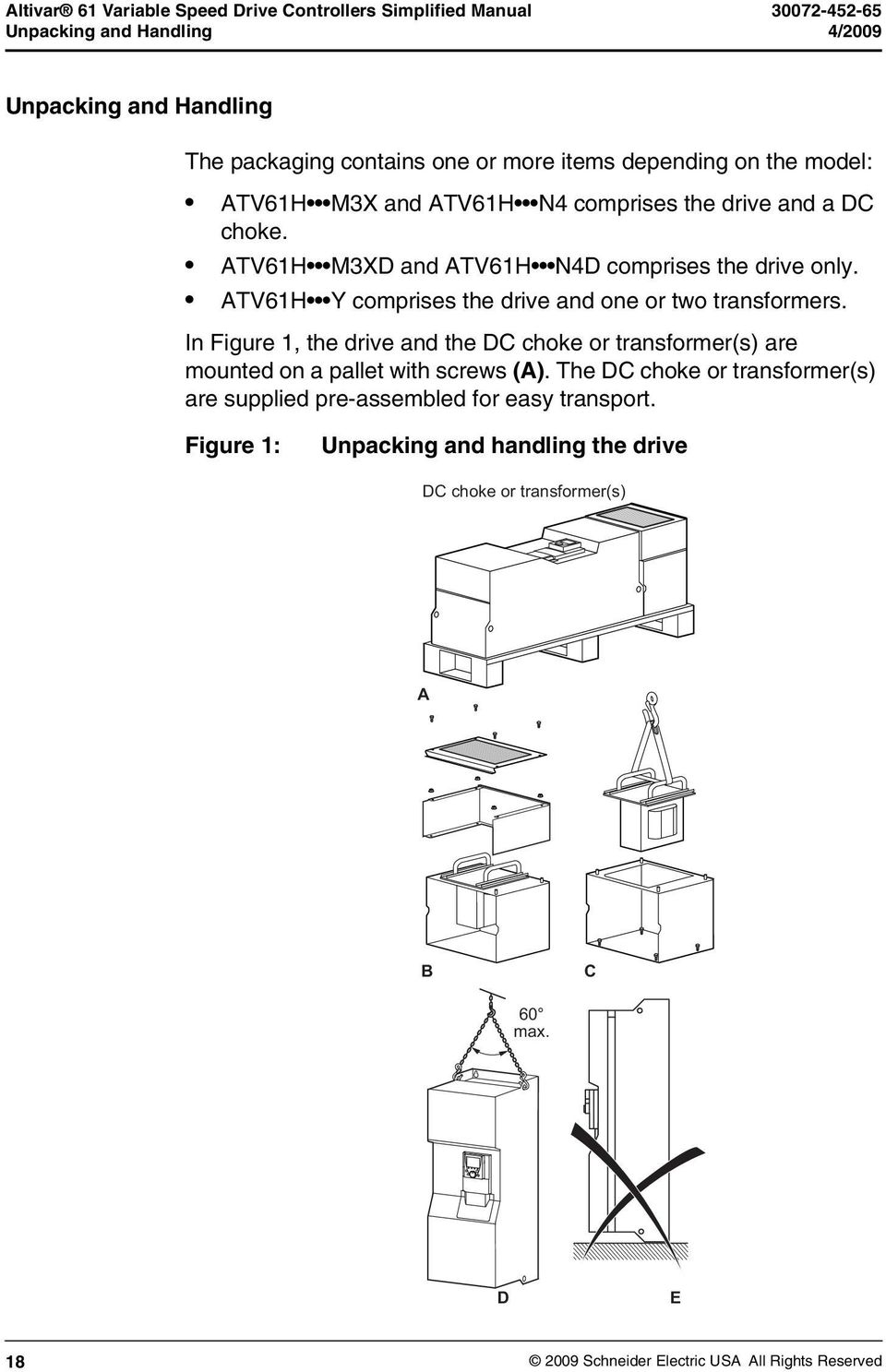
19 Altivar 61 Variable Speed Drive Controllers Simplified Manual 4/2009 Unpacking and Handling The unit should be unpacked in the following order (see Figure 1 on page 18): 1. Disassemble the components of the DC choke or transformer(s) (B) for installation later, and use a hoist to remove the choke or transformers (C). 2. Remove the screws (C) from the choke or transformer support on the pallet. WARNING RISK OF CUTS Take every precaution and use protective gloves to avoid this risk of cutting your hands. The screws that hold the choke or transformer support on the pallet are difficult to access. Failure to follow these instructions can result in death or serious injury. 3. Remove the screws holding the drive on the pallet and use a hoist to lift it off. It has lifting lugs for this purpose (D). WARNING RISK OF TOPPLING Do not stand the drive upright. Keep the drive on the pallet until it is installed. Failure to follow these instructions can result in death or serious injury. 19

20 Altivar 61 Variable Speed Drive Controllers Simplified Manual Before You Begin 4/2009 Before You Begin You must observe the following precautions. DANGER UNINTENDED EQUIPMENT OPERATION Before turning on and configuring the Altivar 61 drive, ensure that the PWR (POWER REMOVAL) input is deactivated (at state 0) in order to help prevent unintended operation. Before turning the controller on or upon exiting the configuration menus, ensure that the inputs assigned to the run coand are deactivated (at state 0) since they can cause the motor to start iediately. Refer to the characteristics and functions table in the Control Terminals section on page 44 for more information about the Power Removal Input. Failure to follow these instructions will result in death or serious injury. CAUTION INCOMPATIBLE LINE VOLTAGE Before turning on and configuring the drive, ensure that the line voltage is compatible with the supply voltage range shown on the drive nameplate. The drive may be damaged if the line voltage is not compatible. Failure to follow these instructions can result in equipment damage. NOTE: The Power Removal function takes priority over any run coand. For use as an emergency stop, this function requires the use of connection diagrams conforming to category 3 of standard EN and safety integrity level 2 according to IEC/EN Consult the ATV61 Installation Manual on the CD-ROM supplied with the drive. 20

21 Altivar 61 Variable Speed Drive Controllers Simplified Manual 4/2009 Mounting recoendations Mounting recoendations Figure 2: ATV61HD55M3X to ATV61HD90M3X, ATV61HD90N4 to ATV61HC63N4, ATV61HC611Y to ATV61HC80Y X1 X ATV61H X1 1 All dimensions are in. X2 1 D55M3X D90M3X, D90N4, C11N C13N4 C22N4, C11Y C20Y C25N4, C31N4, C25Y C40Y C40N4, C50N C63N4, C50Y C80Y When forced cooling is provided. These drives can be mounted side by side, observing the following mounting recoendations: NOTE: The enclosure size and ventilation must be considered since drives dissipate a lot of heat. The dimensions on this page indicate the minimum free space required around the drives when adequate forced cooling is provided. For more information about enclosure mounting, refer to the installation manual on the CD-ROM provided with the drive
22 Altivar 61 Variable Speed Drive Controllers Simplified Manual Dimensions and Weights 4/2009 Dimensions and Weights With or without 1 option card (1) b 2 option cards (1) Coon front view ATV 61HC25N4, HC31N4 with braking unit VW3 A7 101 Front view a H K1 K K2 670 (26.37) 377 (14.77 in) 392 = G = 540 (21.26 in) (15.43 in) (4.03 in) (1.08 in) ATV61H a b G H K K1 K2 Ø For screws Weight kg (lb.) D55M3X, D90N4 D75M3X, C11N4 320 (12.60) 920 (36.22) 250 (9.84) 650 (25.59) 150 (5.91) 75 (2.95) 30 (1.18) 11.5 (0.45) 60 (132) 74 (163) C13N4, D90M3X, C16N4, C11Y C20Y 360 (14.17) 340 (13.39) 1022 (40.23) 1190 (46.62) 298 (11.73) 285 (11.22) 758 (29.84) 920 (36.22) 150 (5.91) 150 (5.91) 72 (2.83) 75 (2.95) 30 (1.18) 30 (1.18) 11.5 (0.45) 11.5 (0.45) M10 80 (176) 116 (255) C22N4 440 (17.32) 1190 (46.62) 350 (13.78) 920 (36.22) 150 (5.91) 75 (2.95) 30 (1.18) 11.5 (0.45) 163 (358) C25N4, C31N4, C25Y C40Y 595 (23.43) 1190 (46.62) ) 920 (36.22) 150 (5.91) 75 (2.95) 30 (1.18) 11.5 (0.45) 207 (455) 22
23 Altivar 61 Variable Speed Drive Controllers Simplified Manual 4/2009 Dimensions and Weights With 0 or 1 option card (1) With 2 option cards (1) ATV61H C40N4 to C50N4 ATV61HC63N4 377 (14.77 in) b 392 (15.43 in) a J1 J J1 =K2 H K1 K = G G = G a J1 J J1 G = ATV61H C40N4 C50N4 C63N4 1 a 890 (35.04) 1120 (44.09) b 1390 (54.72) 1390 (54.72) G 417 (16.44) (20.96) J 75 (2.76) 70 (2.76) J1 380 (14.96) 495 (1949) H 1120 (14.09) 1120 (44.09) K 150 (5.91) 150 (5.91) K ) 75 (2.95) K2 30 (1.18) 30 (1.18) Ø 11.5 (0.45) 11.5 (0.45) For screws M10 M10 Weight kg (lb.) 320 (704) 330 (726) 435 (957) For the addition of I/O extension cards, counication cards, the multi-pump card or the "Controller Inside" prograable card. 23
24 Altivar 61 Variable Speed Drive Controllers Simplified Manual Dimensions and Weights 4/2009 With 0 or 1 option card (1) b With 2 option cards (1) 4 x ATV61H D55M3XD to D90M3XD ATV61H D90N4D to C22N4D H h 4 x ATV61H C25N4D to C31N4D with braking unit (VW3A7 101) H h 377 (14.84 in) 392 (15.43 in) = G = a 97.5 (3.82 in.) 540 (21.17 in.) 660 (25.87 in.) 22.5 (0.88 in.) ATV61H a b G H h Ø For screws Weight kg (lb.) D55M3XD, D90N4D D75M3XD, C11N4D 310 (12.20) 680 (26.77) 250 (9.84) 650 (25.59) 15 (0.59) 11.5 (0.45) M10 60 (132) 74 (163) C13N4D, D90M3XD 350 (13.78) 782 (30.79) 298 (11.73) 758 (29.84) 12 (0.47) 11.5 (0.45) M10 80 (176) C16N4D 330 (12.99) 950 (37.4) 285 (11.22) 920 (36.22) 15 (0.59) 11.5 (0.45) M10 80 (176) C22N4D 430 (16.33) 950 (37.4) 350 (13.78) 920 (36.22) 5 (0.59) 11.5 (0.45) M (242 C25N4D, C31N4D 585 (23.03) 950 (37.4) 540 (21.26) 920 (36.22) 15 (0.59) 11.5 (0.45) M (309) 24
25 Altivar 61 Variable Speed Drive Controllers Simplified Manual 4/2009 Dimensions and Weights With 0 or 1 option card (1) With 2 option cards (1) ATV61H C40N4D to C50N4D K ATV61H C63N4D b H 377 (14.84 in) 392 (15.43 in) = G G = = G G = a a ATV61H C40N4D C50N4D C63N4D a 880 (35.65) 1,110 (43.49) b 1,150 (54.72) 1,150 (54.72) G (16.44) (20.96) H 1,120 (44.09) 1,120 (44.09) F 415 (16.34) (20) Ø 11.5 ( (0.45) For screws M10 M10 Weight kg (lb.) 215 (474) 225 (496) 300 (661) 1 For the addition of I/O extension cards, counication cards, the multi-pump card or the "Controller Inside" prograable card. 25
26 Altivar 61 Variable Speed Drive Controllers Simplified Manual Dimensions and Weights 4/2009 With 0 or 1 option card (1) With 2 option cards (1) ATV61H C11Y to C20Y ATV61H C25Y to C40Y with braking b a H K1 K K2 670 (26.37) 377 (14.77 in) 392 = G = 540 (21.26 in) (15.43 in) (4.03 in) (1.08 in) ATV61H a b G H K K1 K2 Ø For screws Weight kg (lb.) C11Y...C20Y 340 (13.39) 1,190( 46.62) 285 (11.22) 920 (36.22) 150 (5.91) 75 (2.95) 30 (1.18) 11.5 (0.45) M (242) C25Y...C40Y 595 (23.43) 1,190( 46.62) 540 (21.26) 920 (36.22) 150 (5.91) 75 (2.95) 30 (1.18) 11.5 (0.45) M (418) 26
27 Altivar 61 Variable Speed Drive Controllers Simplified Manual 4/2009 Dimensions and Weights With 0 or 1 option card (1) With 2 option cards (1) ATV61H C50Y to C80Y a J1 J J1 b 377 (14.77 in) 392 (15.43 in) = G G = ATV61H a b G J J1 H K K1 K2 Ø For screws Weight kg (lb.) C50Y... C80Y 1120 (44.09) 1390 (54.72) (20.96) 70 (2.76) 495 (1949) 1,120 (44.09) 150 (5.91) 75 (2.95) 30 (1.18) 11.5 (0.45) M (880) 1 For the addition of I/O extension cards, counication cards, the multi-pump card or the "Controller Inside" prograable card. 27
28 Altivar 61 Variable Speed Drive Controllers Simplified Manual DC Bus Voltage Measurement Procedure 4/2009 DC Bus Voltage Measurement Procedure Measuring the DC bus voltage DANGER HAZARD OF ELECTRIC SHOCK, EXPLOSION, OR ARC FLASH Read and understand the instructions on page 7 before performing this procedure. Failure to follow these instructions will result in death or serious injury. The DC bus voltage can exceed 1,000 V c. Use a properly rated voltage-sensing device when performing this procedure. To measure the DC bus voltage: 1. Disconnect the drive power supply. 2. Wait 15 minutes to allow the DC bus to discharge. 3. Measure the voltage of the DC bus between the PO and PC/ terminals to ensure that the voltage is less than 42 V c. 4. If the DC bus capacitors do not discharge completely, contact your local Schneider Electric representative. Do not repair or operate the drive. 28
29 Altivar 61 Variable Speed Drive Controllers Simplified Manual 4/2009 Installing the drive Installing the drive Mount the drive on a wall or the back of the enclosure in accordance with the recoendations described in this document, before installing the DC choke or transformer(s). Mount the DC choke or the transformer(s) on the back of the enclosure or on the wall above the drive and connect it/them up. Installation and connection instructions are given on page 31 for the choke and page 34 for the transformer(s). Make sure that the seal between the drive and the choke or transformer is properly seated. Installing the line reactor on ATV61H Y drives The use of an AC line reactor (which must be ordered separately) is mandatory on these drives if a special transformer is not used (for example, 12-pulse). CAUTION CONTROLLER DAMAGE A 3 5% impedance input line reactor is required on all ATV61HC Y drive installations. Failure to follow these instructions can result in equipment damage. Installing the line reactor on ATV61H M3XD and ATV61 N4D drives ATV61H D55M3XD to D90M3XD and ATV61H D90N4D to C63N4D drives are supplied without a DC choke. A minimum 3% impedance input line reactor (ordered separately) must be used for connecting these drives to a three phase line supply. 29
30 Altivar 61 Variable Speed Drive Controllers Simplified Manual Installing the transformer(s) on ATV61H Y drives 4/2009 Installing the transformer(s) on ATV61H Y drives Recoendations ATV61H C Y to C80Y drives are supplied with one or two transformers to power the fan. The transformer(s) must be installed on top of the drive and wired in accordance with the recoendations set out in this document. If the safety of personnel requires the prohibition of unwanted or unintended operation, electronic locking is performed by the Altivar 61 s Power Removal function. This function requires the use of connection diagrams conforming to category 3 of standard EN and safety integrity level 2 according to IEC/EN (refer to the catalog or the CD-ROM supplied with the drive). The Power Removal function takes priority over any run coand. CAUTION INCOMPATIBLE LINE VOLTAGE Before turning on and configuring the drive, ensure that the line voltage is compatible with the supply voltage range shown on the drive nameplate. The drive may be damaged if the line voltage is not compatible. Failure to follow these instructions can result in injury or equipment damage. 30
31 Altivar 61 Variable Speed Drive Controllers Simplified Manual 4/2009 Installing the DC choke or the transformer(s) Installing the DC choke or the transformer(s) Figure 3: Installing DC chokes on an ATV61HC22N4 drive Mount the DC choke chassis (1) on the wall, on top of the drive. Ensure that the chassis is tightly secured to the drive to maintain the IP54 seal of the ventilation duct. Install the DC choke (2) on the chassis (1) using the nuts provided. Connect the choke between the PO and PA/+ terminals on the drive (see Figure 4 on page 33). Connect the grounding strip between the DC choke chassis (1) and the drive. 31
32 Altivar 61 Variable Speed Drive Controllers Simplified Manual Installing the DC choke or the transformer(s) 4/2009 Mount the cover (3) on the chassis and secure it with the nuts provided. Mount panels (5) and (6) using the screws provided. Once the choke has been installed, the degree of protection for the top of the drive is IP31. NOTE: The number of DC chokes supplied with the drive varies according to the drive rating. Between 1 and 4 chokes can be connected in parallel as illustrated in the following examples. Table 4: Drive and choke combinations Drive Number of chokes in parallel Choke model ATV61HD55M3X, D75M3X 1 DC-CHOKE 5 ATV61HD90M3X 1 DC-CHOKE 6 ATV61HD90N4, C11N4 1 DC-CHOKE 1 ATV61HC13N4 1 DC-CHOKE 2 ATV61HC16N4 1 DC-CHOKE 4 ATV61HC22N4 2 DC-CHOKE 1 ATV61HC25N4 2 DC-CHOKE 3 ATV61HC31N4 2 DC-CHOKE 4 ATV61HC40N4 3 DC-CHOKE 3 ATV61HC50N4 4 DC-CHOKE 2 ATV61HC63N4 4 DC-CHOKE 7. 32
33 Altivar 61 Variable Speed Drive Controllers Simplified Manual 4/2009 Installing the DC choke or the transformer(s) Figure 4: DC chokes connected in parallel Example 1: ATV61H D M3X to D90M3X, ATV61H D90N4 to C16N4 Grounding strips Example 3: ATV61HC40N4 PO PA/+ PO.1 PA/+ PO.2 Example 2: ATV61H C22N4 to C31N4 Example 4: ATV61H C50N4 to C63N4 Grounding strips PO.1 PA/+ PO.2 PO PA/+ 33
34 Altivar 61 Variable Speed Drive Controllers Simplified Manual Example of installing a transformer on an ATV61HC25Y drive 4/2009 Example of installing a transformer on an ATV61HC25Y drive Figure 5: Installing a transformer on an ATV61HC25Y drive Mount the transformer chassis (1) on the wall, on top of the drive. Ensure that the chassis is tightly secured to the drive to maintain the IP54 seal of the ventilation duct. Mount the transformer (2) on the chassis (1) using the nuts provided. Connect the transformer connector to the drive (see Figure 7 and Figure 8 on page 36). Connect the grounding strips between the transformer chassis 1 and the drive. Mount the cover (3) on the chassis and secure it with the nuts (4) provided. Mount panels (5) and (6) using the screws provided. Once the transformer has been installed, the degree of protection of the top of the drive is IP31. 34
35 Altivar 61 Variable Speed Drive Controllers Simplified Manual 4/2009 Example of installing a transformer on an ATV61HC25Y drive Location of transformers: ATV61HC11Y to C20Y ATV61HC25Y to C40Y ATV61HC50Y to C80Y 1 to 2 transformers can be connected as illustrated in the following examples. Table 5: Drive and transformer combinations Drive Number of transformers ATV61HC11Y to C20Y 1 ATV61HC25Y to C40Y 1 ATV61HC50Y to C80Y 2 Figure 6: Examples of drive and transformer combinations Example 1: ATV61H C11Y to C20Y Example 2: ATV61H C25Y to C40Y Unused X0 connectors are put into the parking position Grounding strips Transformer connectors Example 3: ATV61H C50Y to C80Y Unused X0 connectors are put into the parking position Transformer connectors Grounding strips 35
36 Altivar 61 Variable Speed Drive Controllers Simplified Manual Example of installing a transformer on an ATV61HC25Y drive 4/2009 Each transformer is equipped with a 500 V/600 V connector and a 690 V connector. See Figure 7 and Figure 8. The unused connector is put into the parking position. Figure 7: Connecting a 500 V/50 Hz or 600 V/60 Hz supply transformer (use X2A) X0 Parking position X2B X2A X2 Used position Figure 8: Connecting a 690 V/50 Hz supply transformer (use X2B) X0 Parking position X2A X2B X2 Used position The ATV61HC50Y to ATV61HC80Y models include 2 transformers. Set up this connection for each transformer. CAUTION DRIVE TRANSFORMER DAMAGE Ensure the transformer connection corresponds to the line voltage. Failure to follow these instructions can result in injury or equipment damage. 36
37 Altivar 61 Variable Speed Drive Controllers Simplified Manual 4/2009 Wiring Wiring Power Ground the drive to local and national code requirements. A minimum wire size of ² (6 AWG) may be required to meet standards limiting leakage current. DANGER HAZARD OF ELECTRIC SHOCK, EXPLOSION, OR ARC FLASH Ground equipment using the provided ground connecting point as shown in the figure below. The drive panel must be properly grounded before power is applied. Failure to follow these instructions will result in death or serious injury. YES NO Drive Drive Drive Drive Drive Drive Drive Drive Drive Ensure that the resistance of the ground is 1 Ω or less. If grounding several drives you must connect each one directly, as shown in the figure above. Do not loop the ground cables or connect them in series 37
38 Altivar 61 Variable Speed Drive Controllers Simplified Manual Power 4/2009 WARNING IMPROPER WIRING PRACTICES The ATV61 controller will be damaged if input line voltage is applied to the output terminals (U/T1,V/T2,W/T3). Check the power connections before energizing the ATV61 drive. If replacing another drive, verify that all wiring connections to the ATV61 controller comply with all wiring instructions in this manual. Failure to follow these instructions can result in death, serious injury, or equipment damage. Where local and national codes require upstream protection by means of a residual current device, use a Type A device for singlephase drives and a Type B device for three-phase drives as defined in the IEC Choose a suitable model integrating: Harmonic Frequency (HF) current filtering A time delay that helps prevent tripping caused by the load from stray capacitance on power-up. The time delay is not possible for 30 ma devices; in this case, choose devices with iunity against nuisance tripping. If the installation includes several drives, provide one residual current device per drive. WARNING INADEQUATE OVERCURRENT PROTECTION Overcurrent protective devices must be properly coordinated. The Canadian Electrical Code and the National Electrical Code require branch circuit protection. Use the over current protective device recoended on the drive nameplate or in document to achieve published short-circuit current ratings. Do not connect the drive to a power feeder whose short-circuit capacity exceeds the controller short-circuit current rating listed on the controller nameplate or in document Failure to follow these instructions can result in death, serious injury, or equipment damage. 38
39 Altivar 61 Variable Speed Drive Controllers Simplified Manual 4/2009 Power Terminals CAUTION IMPROPER USE OF A BRAKING RESISTOR Wire the thermal protection contact on the resistor so that the drive power supply is disconnected iediately in the event of a detected fault (refer to the manual supplied with the resistor). Failure to follow these instructions can result in equipment damage. Power Terminals Access to the power terminals To access the power terminals, unscrew the front panel and remove the cover. Figure 9: Accessing power terminals Terminals for DC choke Fan power supply DC bus power supply Power section line supply Output to the motor Connections to ground Output to braking resistor (up to ATV61HC16N4 rating only) 39
40 Altivar 61 Variable Speed Drive Controllers Simplified Manual Functions of power terminals 4/2009 Functions of power terminals Terminals Function Drive 3x t Ground connection terminals All ratings R/L1 S/L2 T/L3 1 Power section line supply All ratings PO DC choke connection ATV61H D55M3X, D90M3X, ATV61H D90N4 to C31N4 PO.1, PO.2 DC choke connection ATV61H C40N4, C63N4 PA/+ DC bus + polarity and DC choke connection All ratings PC/ DC bus polarity All ratings PA Output to braking resistor ATV61H D55M3X, D90M3X, PB Output to braking resistor ATV61H D90N4 to C22N4 2 U/T1 V/T2 W/T3 Outputs to the motor All ratings RO, SO, TO Separate fan supply when the drive is only powered by the DC bus (refer to the CD-ROM supplied with the drive) ATV61H D75M3X, D90M3X, ATV61H C13N4 to C63N4 BU+, BU- + and - polarities to be connected to the braking unit ATV61H C25N4 to C63N4 (refer to the User's Manual X20, X92, X3 Braking unit control cable connection for the braking unit) 1 2 ATV61H C40N4 to C63N4 drives have two input bridges. The power section AC supply is connected on terminals R/L1.1 R/L1.2, S/L2.1 S/L2.2 and T/L3.1 T/L3.2. From the ATV61HC25N4 upwards, there are no braking resistor connection terminals on the drive as the braking unit is optional (please refer to the catalog). The braking resistor is connected on the braking unit. 40
41 Altivar 61 Variable Speed Drive Controllers Simplified Manual 4/2009 Accessing the power terminals on ATV61H Y drives Accessing the power terminals on ATV61H Y drives To access the power terminals, unscrew the front panel and remove the cover. Figure 10: Accessing power terminals Fan power supply DC bus power supply Power section line supply Output to the motor Connections to ground Output to braking resistor (up to ATV61HC20Y rating only) Characteristics and functions of power terminals Terminals Function Drive 3x t Ground connection terminals All ratings R/L1 S/L2 T/L3 1 Power section line supply All ratings PA/+ DC bus + polarity and DC choke connection All ratings PC/ DC bus polarity All ratings PA Output to braking resistor PB Output to braking resistor ATV61H C11Y to C20Y 2 U/T1 V/T2 W/T3 Outputs to the motor All ratings RO, SO, TO Separate fan supply when the drive is only powered by ATV61H C11Y to C80Y the DC bus BU+, BU- X20, X92, X3 + and - polarities to be connected to the braking unit Braking unit control cable connection ATV61H C25Y to C80Y (refer to the User's Manual for the braking unit) 1 ATV61H C50Y to C80Y drives have two input bridges. The power section AC supply is connected on terminals R/L1.1 R/L1.2, S/L2.1 S/L2.2 and T/L3.1 - T/L From the ATV61HC25Y upwards, there are no braking resistor connection terminals on the drive as the braking unit is optional (please refer to the catalog). The braking resistor is connected on the braking unit. 41
42 Altivar 61 Variable Speed Drive Controllers Simplified Manual Maximum wire size and tightening torque 4/2009 Maximum wire size and tightening torque Table 6: Wire size and tightening torque Drive terminals L1/R, L2/S, L3/T R/L1.1, R/L1.2, S/L2.1, S/L2.2, T/L3.1, T/L3.2 U/T1, V/T2, W/T3 PC/-, PA/+ PA, PB RO, SO, TO ATV 61HD55M3X ATV 61HD75M3X ATV 61HD90N4 ATV 61HC11N4 ATV 61HD90M3X ATV 61HC13N4 ATV61HC16N4 ATV 61HC11Y ATV 61HC13Y ATV 61HC16Y ATV 61HC20Y ATV 61HC22N4 ATV 61HC25N4 ATV 61HC31N4 ATV 61HC25Y ATV 61HC31Y ATV 61HC40Y ATV 61HC40N4 ATV 61HC50N4 ATV 61HC63N4 ATV 61HC50Y ATV 61HC63Y ATV 61HC80Y 2 x /24 N m 2 x 250 MCM / 212 lb.in 2 x /24 N m 2 x 250 MCM / 212 lb.in 2 x /24 N m 2 x 250 MCM / 212 lb.in 2 x /41 N m 2 x 350 MCM / 360 lb.in 4 x /41 N m 3 x 350 MCM / 360 lb.in 4 x /41 N m 4 x 500 MCM / 360 lb.in 2 x 2 x /41 N m 4 x 500 MCM /360 lb.in 2 x 4 x /41 N m 3 x 500 MCM /360 lb.in 4 x /41 N m 3 x 500 MCM /360 lb.in 2 x / 24 N m 2 x 250 MCM / 212 lb.in 2 x / 24 N m 2 x 250 MCM / 212 lb.in 2 x / 24 N m 2 x 250 MCM / 212 lb.in 2 x / 41 N m 2 x 350 MCM / 360 lb.in 4 x / 41 N m 3 x 350 MCM / 360 lb.in 4 x / 41 N m 4 x 500 MCM / 360 lb.in 4 x / 41 N m 4 x 500 MCM / 360 lb.in 6 x /41 N m 5 x 500 MCM / 360 lb.in 6 x /41 N m 5 x 500 MCM / 360 lb.in 2 x / 41 N m 2 x 250 MCM / 360 lb.in 2 x / 41 N m 2 x 250 MCM / 360 lb.in 2 x / 41 N m 2 x 250 MCM / 360 lb.in 2 x / 41 N m 2 x 350 MCM / 360 lb.in 4 x / 41 N m 3 x 350 MCM / 360 lb.in 8 x / 41 N m 4 x 500 MCM / 360 lb.in 8 x / 41 N m 4 x 500 MCM / 360 lb.in 8 x /41 N m 5 x 500 MCM / 360 lb.in 8 x /41 N m 5 x 500 MCM / 360 lb.in 60 2 / 12 N m 250 MCM / 106 lb.in 60 2 / 12 N m 250 MCM / 106 lb.in / 24 N m 250 MCM / 212 lb.in / 24 N m 250 MCM / 212 lb.in / 1.4 N m 10 AWG 12 lb.in / 1.4 N m 10 AWG 12 lb.in / 1.4 N m 10 AWG 12 b.in / 1.4 N m 10 AWG 12 lb.in / 1.4 N m 10 AWG 12 lb.in / 1.4 N m 10 AWG 12 lb.in / 1.4 N m 10 AWG 12 lb.in / 1.4 N m 10 AWG 12 lb.in /1.4 N m 10 AWG 12 lb.in 42
43 Altivar 61 Variable Speed Drive Controllers Simplified Manual 4/2009 Control Terminals Control Terminals Access to the control terminals To access the control terminals, open the cover on the front panel of the control section. 2. To make it easier to wire the drive control section, remove the control terminal card by loosening the screw until the spring is fully extended. 3. Remove the card by sliding it downwards. NOTE: For control wiring the maximum wire size is 2.5 ² (14 AWG). The maximum tightening torque is 0.6 N m (5.3 lb-in). DANGER UNINTENDED EQUIPMENT OPERATION The accidental grounding of logic inputs configured for Sink Logic can result in unintended activation of drive functions. Protect the signal conductors against damage that could result in unintentional conductor grounding. Follow NFPA 79 and EN guidelines for proper control circuit grounding practices. Failure to follow these instructions will result in death or serious injury. CAUTION IMPROPERLY SECURED TERMINAL CARD When replacing the control terminal card, it is essential to fully tighten the captive screw. Torque the captive screw to 1.1 to 1.7 N m (9.7 to 15 lb-in). Failure to follow these instructions can result in equipment damage. 43
44 Altivar 61 Variable Speed Drive Controllers Simplified Manual Access to the control terminals 4/2009 Table 7: Characteristics and functions of the control terminals Terminals Function R1A R1B R1C R2A R2C 1 relay logic output, one N.C. contact and one N.O. contact with coon point (R1A to R1C is N.O.; R1B to R1C is N.C.) 1 relay logic output one N.O. contact V c power supply for reference potentiometer 1 to 10 kω AI1+ AI1 Electrical characteristics Minimum switching capacity: 3 ma for 24 V c Maximum switching capacity: on resistive load (cos ϕ = 1): 5 A for 250 V a or 30 V V c on inductive load (cos ϕ = 0.4 and L/R = 7 ms): 2 A for 250 V a or 30 V c Max. response time: 7 ms ±0.5 ms Electrical service life: 100,000 operations +10 V c (10.5 V ±0.5 V) 10 ma max. Differential analog input AI1 10 to +10 V c (max. safe voltage 24 V) Reaction time: 2 ms ±0.5 ms, 11-bit resolution + 1 sign bit Accuracy ±0.6% for Δθ = 60 C (140 F), linearity ±0.15% of max. value COM Analog I/O coon 0 V AI2 Depending on the software configuration: Analog input 0 to +10 V c (max. safe voltage 24 V), impedance 30 kω Analog voltage or current input Analog input X Y ma, X and Y prograable from 0 to 20 ma, impedance 250 Ω Reaction time: 2 ms ±0.5 ms 11-bit resolution, accuracy ±0.6% for Δθ = 60 C (140 F), linearity ±0.15% of max. value COM Analog I/O coon 0 V AO1 P24 0V LI1 LI2 LI3 LI4 LI5 LI6 Depending on the software configuration: Analog voltage or current output or logic output Input for external +24 V c control power supply Logic input coon and 0 V of external P24 power supply Analog output 0 to +10 V c, min. load impedance 50 kω Analog output X Y ma, X and Y can be prograed from 0 to 20 ma, max. load impedance 500 Ω 10-bit resolution, reaction time: 2 ms ±0.5 ms Accuracy ±1% for Δθ = 60 C (140 F), linearity ±0.2% of max. value Logic output: 0 or 10 V, 0 to 20 ma +24 V c (min. 19 V, max. 30 V) Power 30 W 0 V Prograable logic inputs +24 V c (max. 30 V) Impedance 3.5 kω Reaction time: 2 ms ± 0.5 ms Depending on the position of the SW2 switch: LI (Prograable logic input) or PTC (Input for PTC probes) NOTE: Δθ = temperature change SW1 Switch State 0 State 1 Source (factory setting) < 5 V c > 11 V c Sink Int or Sink Ext SW2 = LI (factory setting): Same characteristics as logic inputs LI1 to LI5 SW2 = PTC: Trip threshold 3 kω, reset threshold 1.8 kω Short-circuit detection threshold < 50 Ω > 16 V c < 10 V c 44
45 Altivar 61 Variable Speed Drive Controllers Simplified Manual 4/2009 Access to the control terminals Table 7: Characteristics and functions of the control terminals (continued) Terminals Function Electrical characteristics +24 Logic input power supply SW1 switch in Source or Sink Int position: Internal +24 V c power supply (min. 21 V, max. 27 V), protected against short-circuits and overloads 200 ma max. SW1 switch in Sink Ext position: Input for external +24 V c power supply for the logic inputs PWR Power Removal input. 24 V c (max. 30 V) Impedance 1.5 kω State 0 if < 2 V, state 1 if > 17 V Reaction time: 10 ms When PWR is not connected to 24 V, the motor cannot be started (compliance with functional safety standard EN and IEC/EN 61508). NOTE: Δθ = temperature change Arrangement of the control terminals SW2 SW1 Logic input switch Source Factory Sink Ext setting: Int Source R1A R1B R1C R2A R2C +10 AI1+ AI1- COM AI2 COM AO1 LI6 input switch P24 0V LI1 LI2 LI3 LI4 LI5 LI6 +24 PWR RJ45 PTC LI RJ45 connector Factory setting: LI Maximum wire size: 2.5 ² (14 AWG) Max. tightening torque: 0.6 N m (5.3 lb-in) Note: The ATV61 controller is supplied with links between the PWR and +24 terminals and the AI1- and COM terminals. 45
46 Altivar 61 Variable Speed Drive Controllers Simplified Manual Connection diagrams 4/2009 Connection diagrams CAUTION CONTROLLER DAMAGE A 3 5% impedance input line reactor is required on all ATV71HC Y drive controller installations. Failure to follow these instructions can result in equipment damage. (2) ATV61 3-phase supply NOTE: Line reactor, if required, for ATV61H M3X and ATV61H N4. This line reactor is compulsory for ATV61H Y drives (to be ordered separately) if a special transformer is not used (for example, 12-pulse). (1) R / L1 U / T1 S / L2 V / T2 M 3 c T / L3 W / T3 R1A (4) R1C (3) P0 R1B PA / + R2A PB R2C PC / - Braking resistor, if used P24 0 V +10 LI1 AI1 + LI2 Reference potentiometer LI3 AI1 - COM LI4 AI2 LI5 0 to +10 V or X Y ma COM LI6 +24 AO1 PWR Line reactor is required for 575 V installations. Refer to the drive nameplate or document or to Tables 1, 2, 3 of this document for recoended fuses. R1relay contacts for remote signaling of drive status. Installation of a load reactor or motor filter is recoended for all 575 V installations. Install interference suppressors on all inductive circuits near the drive or coupled to the same circuit (such as relays, contactors, and solenoid valves). Use shielded cable for PWR input connections. See page 52 for factory configurations for logic inputs, analog inputs, relays and analog inputs 46
47 Altivar 61 Variable Speed Drive Controllers Simplified Manual 4/2009 Operation on an IT system and corner grounded system Power terminal connection diagram ATV61H C50N4, C63N4, C50Y, C63Y and C80Y 1 Line reactor, if used, for ATV61H M3X and ATV61H N4. This line reactor is compulsory for ATV61H Y drives (to be ordered separately) if a special transformer is not used (for example, 12-pulse). ATV61H C25N4 to C63N4 and ATV61H C25Y to C80Y For these drive ratings, braking resistors are connected to the external braking unit. Please refer to the braking unit User's Manual. Drive supplied by the DC bus Consult the CD-ROM supplied with the drive. Operation on an IT system and corner grounded system CAUTION RISK OF DAMAGE TO THE DRIVE Certain precautions have to be taken when using the drive on an IT system; please refer to the Installation Manual on the CD-ROM supplied with the drive for more information. Failure to follow these instructions can result in injury or equipment damage. 47
48 Altivar 61 Variable Speed Drive Controllers Simplified Manual Operation on an IT system and corner grounded system 4/2009 WARNING RISK OF ELECTRIC SHOCK ATV61HC Y drives must not be connected on a corner grounded system. Failure to follow these instructions can result in death, serious injury or equipment damage. IT system: Isolated or impedance grounded neutral. Use a permanent insulation monitor compatible with non-linear loads, such as a Merlin Gerin type XM200. Altivar 61 drive controllers feature built-in coon mode RFI (EMC) filters. When an ATV61HC Y drive controller is operating on an isolated or resistance grounded electrical distribution system, the filters must be isolated (disconnected). For any other drive controller referenced in this manual the filter should be isolated (disconnected). Corner Grounded System: The ATV61HC Y drive controllers must never be connected on a corner grounded electrical distribution system. When any other drive controller referenced in this manual is connected to a corner grounded electricaldistribution system the filters must be isolated (disconnected). 48
49 Altivar 61 Variable Speed Drive Controllers Simplified Manual 4/2009 Disconnecting filters Disconnecting filters ATV61H D90N4 to C13N4 and ATV61H C11Y to C20Y: Normal (filter connected) IT system (filter disconnected) ATV61H C16N4 to C22N4: Normal (filter connected) IT system (filter disconnected) 49
50 Altivar 61 Variable Speed Drive Controllers Simplified Manual Disconnecting filters 4/2009 ATV61H C25N4 to C31N4 and ATV61H C25Y to C40Y: Normal (filter connected) IT system (filter disconnected) ATV61HC40N4: Normal (filter connected) IT system (filter disconnected) ATV61HC50N4: Normal (filter connected) IT system (filter disconnected) 50
51 Altivar 61 Variable Speed Drive Controllers Simplified Manual 4/2009 Disconnecting filters ATV61HC63N4 and ATV61H C50Y to C80Y: Normal (filter connected) IT system (filter disconnected) 51
52 Altivar 61 Variable Speed Drive Controllers Simplified Manual Electromagnetic Compatibility, Wiring 4/2009 Electromagnetic Compatibility, Wiring Principle and precautions Important: The high frequency equipotential ground connection between the drive, motor, and cable shielding does not eliminate the need to connect the ground (PE) conductors (green-yellow) to the appropriate terminals on each unit. To help accomplish this, the user must follow the following points. Grounds between the drive, motor, and cable shielding must have high-frequency equipotentiality. When using shielded cable for the motor, use a 4-conductor cable so that one wire will be the ground connection between the motor and the drive. Size of the ground conductor must be selected in compliance with local and national codes. The shield can then be grounded at both ends. Metal ducting or conduit can be used for part or all of the shielding length, provided there is no break in continuity. When using shielded cable for the Dynamic Brake (DB) resistors, use a 3-conductor cable so that one wire will be the ground connection between the DB resistor assembly and the drive. Size of the ground conductor must be selected in compliance with local and national codes. The shield can then be grounded at both ends. Metal ducting or conduit can be used for part or all of the shielding length, provided there is no break in continuity. When using shielded cable for control signals, if the cable is connecting equipment that is close together and the grounds are bonded together, then both ends of the shield can be grounded. If the cable is connected to equipment that may have a different ground potential, then ground the shield at one end only to prevent large currents from flowing in the shield. The shield on the ungrounded end may be tied to ground with a capacitor (for example: 10 nf, 100 V or higher) in order to provide a path for the higher frequency noise. Keep the control circuits away from the power circuits. For control and speed reference circuits, use of shielded twisted cables with a pitch of between 25 and 50 (0.98 and 1.97 in.) is recoended. Ensure maximum separation between the power supply cable (line supply) and the motor cable and also ensure maximum separation between the control cables and any power cables. 52
53 Altivar 61 Variable Speed Drive Controllers Simplified Manual 4/2009 Setup Preliminary Recoendations The motor cables must be at least 0.5 m (20 in.) long. Do not use surge arresters or power factor correction capacitors on the variable speed drive output. If using an additional input filter, refer to the Installation Guide for more information. For installation of the EMC plate provided with the drive and instructions for meeting EN55011 Class A directive, refer to the Installation Guide. Setup Preliminary Recoendations Drive settings (factory configuration) The Altivar 61 drive is factory-set for the following operating conditions: : Table 8: Factory configurations Macro-configuration Motor frequency Motor control type Pumps/fans 50 Hz Energy-saving variable torque applications Normal stop mode on deceleration ramp Stop mode Freewheel, in the event of a detected fault Linear, acceleration, and 3 s deceleration ramps Low speed 0 Hz High speed 50 Hz Motor thermal current Rated drive current Standstill injection braking current 0.7 x rated drive current, for 0.5 s Automatic starts No automatic starts after a detected fault is cleared Switching frequency 2.5 khz to 12 khz depending on drive rating LI1: forward (1 operating direction), 2-wire control type is transition. See Starting on page 54. LI2: inactive (not assigned) LI3: switching of 2 Logic inputs nd speed reference. If LI3 = 0 the speed reference AI1 is active. If LI3 = 1 the speed reference AI2 is active. LI4: fault reset LI5, LI6: inactive (not assigned) 53
54 Altivar 61 Variable Speed Drive Controllers Simplified Manual Power switching via line contactor 4/2009 Table 8: Factory configurations (continued) Analog inputs Relay R1 Relay R2 Analog output AO1 AI1: 1 st speed reference 0 to 10 V AI2: 2 nd speed reference 0 to 20 ma NOTE: For 4 20 ma, go to Menu [1.5 Input/Output CFG], then to [AI2 configuration] and change [AI2 min. value] from 0 to 4. R1C to R1A contact opens and R1C to R1B contact closes in the event of a detected fault or when the drive is powered off. R2A to R2C contact closes when the drive is running. 0 to 20 ma, motor frequency For prograing instructions, refer to the ATV61 prograing manual on the CD-ROM included with the drive. Power switching via line contactor CAUTION EXCESSIVE LINE CONTACTOR SWITCHING Avoid operating the contactor frequently to avoid premature aging of the filter capacitors. Do not have cycle times less than 60 seconds. Failure to follow these instructions can result in equipment damage. Starting NOTE: The factory setting for the prograing parameter [2-wire type] is set to [Transition], when input line power is applied nst may display as the drive state and the controller will not start. This could indicate that a run coand was present before the input line power was applied and a transition or change of state must be made to this coand before the drive will start. If it is desired that the drive starts when the input line power is applied without a transition of the run coand, make the following change to the program configuration. Go to the menu [1.5 Inputs/Outputs CFG] and change parameter [2-wire type] from [Transition] to [Level]. When the change is made, the drive can begin 54
55 Altivar 61 Variable Speed Drive Controllers Simplified Manual 4/2009 Test on a low-power motor or without a motor, using motors in parallel running iediately on application of the input line power if a run coand is present. For more information, see page 58. Test on a low-power motor or without a motor, using motors in parallel Consult the Prograing Manual on the CD-ROM supplied with the drive. 55
56 Altivar 61 Variable Speed Drive Controllers Simplified Manual Display Terminals 4/2009 Display Terminals Graphic Display Terminal The graphic display terminal can be disconnected and connected remotely (for example, on the door of an enclosure) using the cables and accessories available as options. 1 Graphic display 2 Function keys F1, F2, F3, F4 3 STOP/RESET button 7 ESC key: Cancels a value, a parameter or a menu to return to the previous selection 4 RUN button 6 Button for reversing the rotation direction of the motor 5 Navigation button: Press (ENT): To save the current value To enter the selected menu or parameter Turn CW/CCW: To increase or decrease a value To go to the next or previous line To increase or decrease the reference if control via the graphic display terminal is activated NOTE: Buttons 3, 4, 5, and 6 can be used to control the drive directly, if control via the graphic display terminal is activated. 56
57 Altivar 61 Variable Speed Drive Controllers Simplified Manual 4/2009 Drive state codes Drive state codes Table 9: Drive state codes ACC Acceleration CLI Current limiting CTL Controlled stop on input phase loss DCB DC injection braking in progress DEC Deceleration FLU Motor fluxing in progress FRF Drive at fallback speed FST Fast stop NLP No line power (no line supply on L1, L2, L3) NST Freewheel stop OBR Auto-adapted deceleration PRA Power Removal function active (drive locked) RDY Drive ready RUN Drive running SOC Controlled output cut in progress TUN Auto-tuning in progress USA Undervoltage alarm The first time the drive is powered on, the user is automatically guided through the menus as far as [1. DRIVE MENU]. The parameters in the [1.1 SIMPLY START] submenu must be configured before the motor is started up. To optimize performance, perform an auto-tune (see Table 10 on page 66). Only the [1.1 SIMPLY START] menu is described in this document. For more information about the content of the other menus, consult the Prograing Manual and the CD-ROM supplied with the drive. 57
58 Altivar 61 Variable Speed Drive Controllers Simplified Manual Drive state codes 4/2009 Figure 11: First time drive power on menu ATV61HU22N4 2.2kW/3HP 380/480V Config. n 1 Displayed for 3 seconds following power-up 3 seconds English Français Deutsch Español Italiano 5 LANGUAGE Switches to [5 LANGUAGE] menu automatically. Select the language and press ENT. Chinese RDY Term +0.00Hz REM 2 ACCESS LEVEL Basic Standard Advanced Expert Switches to [2 ACCESS LEVEL] menu (consult the Prograing Manual on the CD-ROM supplied with the drive) Select the access level and press ENT. RDY Term +0.00Hz REM 1 DRIVE MENU 1.1 SIMPLY START 1.2. MONITORING 1.3. SETTINGS 1.4. MOTOR CONTROL 1.5. INPUTS / OUTPUTS CFG Code << >> T/K Switches to [1 DRIVE MENU] (consult the Prograing Manual on the CD-ROM supplied with the drive) ESC 58
59 Altivar 61 Variable Speed Drive Controllers Simplified Manual 4/2009 Integrated Display Terminal Figure 11: First time drive power on menu (continued) RDY Term +0.00Hz REM MAIN MENU 1 DRIVE MENU 2 ACCESS LEVEL 3 OPEN / SAVE AS 4 PASSWORD 5 LANGUAGE Code T/K Press ESC to return to [MAIN MENU] Integrated Display Terminal The graphic display terminal described on page 56 is supplied as standard. In addition to the removable graphic display an integrated display terminal with a 7-segment 4-digit display will be provided. Returns to the previous menu or parameter, or increases the displayed value Goes to the next menu or parameter, or decreases the displayed value Exits a menu or parameter, or cancels the displayed value to return to the previous value in the memory Enters a menu or parameter, or saves the displayed parameter or value Pressing or does not store the choices. Press and hold down (>2 s) or to scroll through the data quickly. Press ENT to save and store the selection. The display flashes once a value is stored. 59
60 Altivar 61 Variable Speed Drive Controllers Simplified Manual Access to Menus 4/2009 Access to Menus A normal display has no detected fault present and no startup: 43.0: Display of the parameter selected in the SUP menu (default selection: motor frequency) CLI: Current limit CtL: Controlled stop on input phase loss dcb: DC injection braking in progress FLU: Motor fluxing in progress FrF: Drive at fallback speed FSt: Fast stop nlp: No line power (no line supply on L1, L2, L3) nst: Freewheel stop. Obr: Auto-adapted deceleration PrA: Power Removal function active (drive locked) rdy: Drive ready run: Drive running SOC: Controlled output cut in progress tun: Auto-tuning in progress USA: Undervoltage alarm The display flashes continuously to indicate the presence of a detected fault. Power-up XXX Displays the drive state ENT Menus ESC ESC SIM- ENT ESC ENT ESC SIMPLY START Simplified menu for fast startup Consult the Prograing Manual on the CD-ROM supplied with the drive. A dash appears after menu and submenu codes to differentiate them from parameter codes. Example: SIM- menu, ACC parameter 60
61 Altivar 61 Variable Speed Drive Controllers Simplified Manual 4/2009 [1.1 SIMPLY START] (SIM-) Menu [1.1 SIMPLY START] (SIM-) Menu DANGER UNINTENDED EQUIPMENT OPERATION Changes to parameters in other menus may change the [1.1 SIMPLY START] (SIM-) parameter settings. Read and understand the ATV61 Prograing Manual before configuring parameter values. Failure to follow these instructions will result in death or serious injury. The [1.1 SIMPLY START] (SIM-) menu can be used to quickly configure key parameters to get the drive and motor running. Modifying parameters in other menus may modify the parameter settings in the [1.1 SIMPLY START] (SIM-) menu. As an example, configuration of motor parameters in [1.4 MOTOR CONTROL] (drc-) will be reflected in the [1.1 SIMPLY START] (SIM-) parameters. The [1.1-SIMPLY START] (SIM-) menu can be used for quick startup, which is sufficient for many of applications. NOTE: The parameters of the [1.1 SIMPLY START] (SIM-) menu must be entered in the order in which they appear, as the later ones are dependent on the first ones. For example [2/3 wire control] (tcc) must be configured before any other parameters. 61
62 Altivar 61 Variable Speed Drive Controllers Simplified Manual Macro configuration 4/2009 Macro configuration Selecting a macro configuration allows you to quickly configure the drive with settings that are suitable for a specific application. Input/ output AI1 [Ref.1 channel] [Ref.1 channel] [Ref.1 channel] (PID reference) [Start/Stop] [Gen. Use] [PID regul.] [Network C.] [Pumps.Fans] [Ref.2 channel] ([Ref.1 channel] = integrated Modbus) [Ref.1 channel] AI2 [No] [Suing ref. 2] [PID feedback] [No] [Ref.1B channel] AO1 [Motor freq.] [Motor freq.] [Motor freq.] [Motor freq.] [Motor freq.] R1 [No drive flt] [No drive flt] [No drive flt] [No drive flt] [No drive flt] R2 [No] [No] [No] [No] [Drv running] LI1 (2-wire) [Forward] [Forward] [Forward] [Forward] [Forward] LI2 (2-wire) [Fault reset] [Reverse] [Fault reset] [Fault reset] [No] LI3 (2-wire) [No] [Jog] [PID integral reset] [Ref. 2 switching] [Ref 1B switching] LI4 (2-wire) [No] [Fault reset] [2 preset PID ref.] [Forced local] [Fault reset] LI5 (2-wire) [No] [Torque limitation] [4 preset PID ref.] [No] [No] LI6 (2-wire) [No] [No] [No] [No] [No] LI1 (3-wire) Stop Stop Stop Stop Stop LI2 (3-wire) [Forward] [Forward] [Forward] [Forward] [Forward] LI3 (3-wire) [Fault reset] [Reverse] [Fault reset] [Fault reset] [No] LI4 (3-wire) [No] [Jog] [PID integral reset] [Ref. 2 switching] [Ref 1B switching] LI5 (3-wire) [No] [Fault reset] [2 preset PID ref.] [Forced local] [Fault reset] LI6 (3-wire) [No] [Torque limitation] [4 preset PID ref.] [No] [No] The assignment of inputs LI1 to LI6 differs in 3-wire control. Factory settings NOTE: All settings listed in the preceding table can be modified, adjusted and reassigned. Consult the ATV61 Prograing Manual on the CD-ROM supplied with the drive. 62
63 Altivar 61 Variable Speed Drive Controllers Simplified Manual 4/2009 Macro configuration The following table describes the codes, adjustment range, and factory settings. Table 10: Codes, adjustment range, and factory settings Code Name/Description Adjustment range Factory setting tcc 2C 3C [2/3 wire control] [2 wire] (2C) [2 wire] (2C) [3 wire] (3C) 2-wire control Maintained control: Maintained closed to run and maintained opened to stop. 3-wire control (Pulse control): A forward or reverse pulse is sufficient to coand starting, a stop pulse is sufficient to coand stopping. ATV LI1 LIx ATV LI1 LI2 LIx Example of source wiring: LI1: forward LIx: reverse Example of source wiring: LI1: stop LI2: forward LIx: reverse To change the assignment of [2/3 wire control] (tcc) press and hold the ENT key for 2 s. The [2 wire type] (tct) function and the functions assigning the logic inputs and analog inputs will return to the factory settings. The selected macro configuration will reset, losing its custom settings. DANGER UNINTENDED EQUIPMENT OPERATION Ensure that this parameter is configured before configuring the [1.6 COMMAND] (Ctl-) and [1.7 APPLICATION FUNCT.] (FUn-). Ensure that this assignment change is compatible with the wiring scheme used. For more information, consult the CD-ROM with the drive. Failure to follow these instructions will result in death or serious injury. 63
64 Altivar 61 Variable Speed Drive Controllers Simplified Manual Macro configuration 4/2009 Table 10: Codes, adjustment range, and factory settings (continued) Code Name/Description Adjustment range Factory setting CFG [Macro configuration] [Pumps.Fans] (PnF) StS GEn PId net PnF [Start/Stop] (StS): Start/stop [Gen. Use] (GEn): General use [PID regul.] (PId): PID regulation [Network C.] (net): Counication bus [Pumps.Fans] (PnF): Pumps/fans To change the assignment of [Macro configuration] (CFG) press the ENT key for 2 s. DANGER UNINTENDED EQUIPMENT OPERATION Ensure that the selected macro configuration is compatible with the wiring scheme used. Failure to follow these instructions will result in death or serious injury. CCFG YES [Customized macro] Read-only parameter, visible only if at least one macro configuration parameter has been modified. [Yes] (YES) bfr [Standard mot. freq] [50 Hz IEC] (50) [50 Hz IEC] (50): IEC [60 Hz NEMA] (60): NEMA This parameter modifies the presets of the following parameters: [Rated motor power] (npr), [Rated motor volt.] (UnS), [Rated mot. current] (ncr), [Rated motor freq.] (FrS), [Rated motor speed] (nsp) and [Max frequency] (tfr), see below; and [Mot. therm. current] (ItH) and [High speed] (HSP), see page 67. IPL [Input phase loss] Varies with the drive rating. no YES [Ignore] (no): A detected phase loss is ignored. To be used when the drive is supplied via a single phase supply or by the DC bus. [Freewheel] (YES): A detected phase loss with freewheel stop. If one phase is lost, the drive indicates mode [Input phase loss] (IPL); but if 2 or 3 phases are lost, the drive continues to operate until it trips due to undervoltage. This parameter is only accessible in this menu on ATV61H037M3 to HU75M3 drives (used with a single phase supply). npr [Rated motor power] According to drive rating Varies with the drive rating. Rated motor power given on the nameplate, in kw if [Standard mot. freq] (bfr) = [50 Hz IEC] (50), in HP if [Standard mot. freq] (bfr) = [60 Hz NEMA] (60). 64
65 Altivar 61 Variable Speed Drive Controllers Simplified Manual 4/2009 Macro configuration Table 10: Codes, adjustment range, and factory settings (continued) Code Name/Description Adjustment range Factory setting UnS [Rated motor volt.] According to drive rating Rated motor voltage given on the nameplate. ATV61 M3: 100 to 240 V ATV61 N4: 200 to 480 V ATV61 Y: 400 to 690 V ncr [Rated mot. current] 0.25 to 1.1 or 1.2 Hz depending on rating Rated motor current given on the nameplate. Varies with the drive rating and [Standard mot. freq] (bfr) Varies with the drive rating and [Standard mot. freq] (bfr) FrS [Rated motor freq.] 10 to 500 or 1000 Hz depending on rating 50 Hz Rated motor frequency given on the nameplate. The factory setting is 50 Hz, or preset to 60 Hz if [Standard mot. freq] (bfr) is set to 60 Hz. Varies with the drive rating. Rated motor speed given on the nameplate. 0 to 9999 rpm and to krpm on the integrated display terminal. If, rather than the rated speed, the nameplate indicates the synchronous speed and the slip in Hz or as a %, calculate the rated speed as follows: 100 slip as a % Nominal speed = Synchronous speed x 100 or 50 slip in Hz Nominal speed = Synchronous speed x 50 (50 Hz motors) or Nominal speed = Synchronous speed x 60 slip in Hz (60 Hz motors) 60 nsp [Nom motor speed] 0 to rpm tfr [Max frequency] 10 to 1000 Hz 60 Hz The factory setting is 60 Hz, or preset to 72 Hz if [Standard mot. freq] (bfr) is set to 60 Hz. The maximum value is limited by the following conditions: It must not exceed 10 times the value of [Rated motor freq.] (FrS) Values between 500 Hz and 1000 Hz are possible only in V/F control and for powers limited to 37 kw (50 HP) for ATV61H and 45 kw (60 HP) for ATV61W. In this case configure [Motor control type] (Ctt) before [Max frequency] (tfr). 65
66 Altivar 61 Variable Speed Drive Controllers Simplified Manual Macro configuration 4/2009 Table 10: Codes, adjustment range, and factory settings (continued) Code Name/Description Adjustment range Factory setting tun [Auto tuning] [No] (no) DANGER HAZARD OF ELECTRIC SHOCK, EXPLOSION, OR ARC FLASH During auto tuning, the motor operates at rated current. Do not service the motor during auto tuning. Failure to follow these instructions will result in death or serious injury. DANGER UNINTENDED EQUIPMENT OPERATION The following motor parameters must be correctly configured before starting auto tuning: [Rated motor volt.] (UnS), [Rated motor freq.] (FrS), [Rated mot. current] (ncr), [Rated motor speed] (nsp), and [Rated motor power] (npr). If one or more of these parameters is modified after auto tuning has been performed, Auto tuning (tun) will be set to [No] and the procedure must be repeated. Failure to follow these instructions will result in death or serious injury. no YES done [No] (no): Auto-tuning not performed. [Yes] (YES) : Auto-tuning is performed as soon as possible, then the parameter automatically changes to [Done] (done). [Done] (done): Use of the values given the last time auto-tuning was performed. Important: It is essential that all motor parameters [Rated motor volt.] (UnS), [Rated motor freq.] (FrS), [Rated mot. current.] (ncr), [Rated motor speed] (nsp), [Rated motor power] (npr) are configured correctly before starting auto-tuning. If one or more of these parameters is modified after auto-tuning has been performed, [Auto tuning] (tun) will return to [No] (no) and the procedure must be repeated. Auto-tuning is performed only if no stop coand has been activated. If a freewheel stop or fast stop function has been assigned to a logic input, this input must be set to 1 (active at 0). Auto-tuning takes priority over any run or prefluxing coands, which will take effect after the auto-tuning sequence. If auto-tuning is unsuccessful, the drive displays [No] (no) and, depending on the configuration of [Autotune fault mgt] (tnl) (consult the CD-ROM supplied with the drive), may switch to [Auto-tuning] (tnf) detected fault. Auto-tuning may last for 1 to 2 seconds. Do not interrupt; wait for the display to change to [Done] (done) or [No] (no). NOTE: During auto-tuning the motor operates at rated current. 66
67 Altivar 61 Variable Speed Drive Controllers Simplified Manual 4/2009 Parameters that can be changed while the drive is running or stopped Table 10: Codes, adjustment range, and factory settings (continued) Code Name/Description Adjustment range Factory setting tus [Auto tuning status] [Not done] (tab) tab PEnd PrOG FAIL done (for information only, cannot be modified) [Not done] (tab): The default stator resistance value is used to control the motor. [Pending] (PEnd): Auto-tuning has been requested but not yet performed. [In Progress] (PrOG): Auto-tuning in progress. [Failed] (FAIL): Auto-tuning unsuccessful. [Done] (done): The stator resistance measured by the auto-tuning function is used to control the motor. PHr [Output Ph rotation] [ABC] (AbC) AbC ACb [ABC] (AbC): Forward [ACB] (ACb): Reverse This parameter can be used to reverse the rotation direction of the motor without reversing the wiring. Parameters that can be changed while the drive is running or stopped Table 11: Parameters that can be changed while the drive is running or stopped Code Name/Description Factory setting ItH [Mot. therm. current] 0 to 1.1 or 1.2 In (1) according to rating Varies with the drive rating. Motor thermal overload current, to be set to the rated current indicated on the nameplate. ACC [Acceleration] 0.1 to s 3.0 s Time to accelerate from 0 to the [Rated motor freq.] (FrS) (page 65). Ensure that this value is compatible with the inertia being driven. dec [Deceleration] 0.1 to s 3.0 s Time to decelerate from the [Rated motor freq.] (FrS) (page 65) to 0. Ensure that this value is compatible with the inertia being driven. LSP [Low speed] 0 Motor frequency at minimum reference, can be set between 0 and [High speed] (HSP). HSP [High speed] 50 Hz Motor frequency at maximum reference, can be set between [Low speed] (LSP) and [Max frequency] (tfr). The factory setting changes to 60 Hz if [ Standard mot. freq] (bfr) = [60 Hz] (60). (1) In corresponds to the rated controller current indicated in the installation manual and on the controller nameplate. 67
68 Altivar 61 Variable Speed Drive Controllers Simplified Manual Detected Faults and Troubleshooting 4/2009 Detected Faults and Troubleshooting Drive does not start, no detected fault code displayed If the display does not light up, check the power supply to the drive. If the drive displays [Freewheel] (nst) or [Fast stop] (FSt): The Fast Stop and Freewheel functions help prevent the drive from starting if the corresponding logic inputs are not powered up. This is normal these functions are active at zero so that the drive will stop if there is a wire break. Make sure that the run coand input or inputs are activated according to the selected control mode: [2/3 wire control] (tcc) parameter, described on page 63 [2 wire type] (tct) parameter, described on page 54 and in the ATV61 prograing manual on the CD-ROM supplied with the drive. Conditions requiring a power reset DANGER LOSS OF PERSONNEL AND EQUIPMENT PROTECTION FEATURES Enabling fault inhibition (InH) will disable the drive protection features. InH should not be enabled for typical applications of this equipment. InH should be enabled only in extraordinary situations where a thorough risk analysis demonstrates that the presence of adjustable speed drive protection features poses a greater risk than personnel injury or equipment damage. Failure to follow these instructions will result in death or serious injury. Table 12 on page 69 lists the conditions requiring a power reset. A power reset is accomplished by cycling power to the drive after the cause of the condition has been removed. 68
69 Altivar 61 Variable Speed Drive Controllers Simplified Manual 4/2009 Conditions requiring a power reset AI2F, EnF, SOF, SPF, and tnf conditions can also be reset remotely by means of a logic input or control bit (consult the Prograing Manual on the CD-ROM supplied with the drive). EnF, InFA, InFb, SOF, SPF, and tnf conditions can be inhibited and cleared remotely by means of a logic input or control bit (consult the Prograing Manual on the CD-ROM supplied with the drive). Table 12: Conditions requiring a power reset Code Name Probable cause Remedy AI2F [AI2 input] AI2 signal out of range Check the wiring of analog input AI2 and the value of the signal. bof [DBR overload] Incorrect DB resistor settings buf [DB unit sh. Circuit] Short-circuit output from braking unit CrF1 [Precharge] Charging relay control condition or charging resistor damaged CrF2 EEF1 EEF2 FCF1 HdF ILF [Thyr. soft charge] [Control Eeprom] [Power Eeprom] [Out. contact. stuck] [IGBT desaturation] [internal com. link] Improper DC bus charging condition (thyristors) Control card Internal memory Power card internal memory The output contactor remains closed although the opening conditions have been met Short-circuit or grounding at the drive output Counication condition between option card and drive InF1 [Rating error] The power card is different from the card stored InF2 InF3 [Incompatible PB] [Internal serial link] The power card is incompatible with the control card Counication condition between the internal cards Check the size of the resistor and wait for it to cool down. Check parameters [DB Resistor Power] (brp) and [DB Resistor value] (bru) (consult the CD-ROM supplied with the drive). Check the wiring of the braking unit and the resistor. Check the braking resistor. Turn the drive off and then back on again. Check the internal connections. Contact Schneider Electric Product Support. Check the environment (electromagnetic compatibility). Turn off, reset, return to factory settings. Contact Schneider Electric Product Support. Check the contactor and its wiring. Check the feedback circuit. Check the cables connecting the drive to the motor, and the motor insulation. Perform the diagnostic tests via the [1.10 DIAGNOSTICS] menu. Check the environment (electromagnetic compatibility). Check the connections. Ensure that no more than 2 option cards (max. permitted) have been installed on the drive. Replace the option card. Contact Schneider Electric Product Support. Check the catalog number of the power card and ensure that it is compatible with the drive. Check the catalog number of the power card and ensure that it is compatible with the drive. Check the internal connections. Contact Schneider Electric Product Support. 69
70 Altivar 61 Variable Speed Drive Controllers Simplified Manual Conditions requiring a power reset 4/2009 Table 12: Conditions requiring a power reset (continued) Code Name Probable cause Remedy InF4 InF6 InF7 InF8 InF9 InFA InFb InFC [Internal MFG area] [Internaloption] [Internalhard init.] [Internalctrl supply] [Internal- I measure] [Internalmains circuit] [Internalth. sensor] [Internaltime meas.] Internal data inconsistent Contact Schneider Electric Product Support to have the drive recalibrated. The option installed in the controller is not recognized Initialization of the drive is incomplete The control section power supply is incorrect The current measurements are incorrect The input stage is not operating correctly The drive temperature sensor is not operating correctly Detected fault on the electronic time measurement component InFE [internal- CPU ] Internal microprocessor event OCF [Overcurrent] Motor parameters are not set correctly Excessive inertia or load Mechanical locking PrF [Power removal] SCF1 [Motor short circuit] SCF2 SCF3 [Impedant sh. circuit] [Ground short circuit] Detected fault with the drive s Power Removal safety function 1 Short-circuit or grounding at the drive output Significant ground leakage current at the controller output if several motors are connected in parallel SOF [Overspeed] Instability Overhauling load SPF [Speed Feedback Loss] Encoder feedback signal missing. tnf [Auto-tuning ] Special motor, or motor power not suitable for the drive Motor not connected to the drive 1 Safety function as defined by IEC Check the catalog reference and compatibility of the option. Turn off the drive to reset. Check the control section power supply. Replace the current sensors or the power card. Contact Schneider Electric Product Support. Perform the diagnostic tests via the [1.10 DIAGNOSTICS] menu. Contact Schneider Electric Product Support. Replace the temperature sensor. Contact Schneider Electric Product Support. Contact Schneider Electric Product Support. Turn off the drive to reset. Contact Schneider Electric Product Support. Check the motor parameters. Check the size of the motor, controller, and load. Check the state of the mechanism. Contact Schneider Electric Product Support. Check the cables connecting the drive to the motor, and the insulation of the motor Perform the diagnostic tests via the [1.10 DIAGNOSTICS] menu. Reduce the switching frequency. Connect chokes in series with the motor. Check the motor, gain and stability parameters. Add a braking resistor. Check the size of the motor, controller, and load. Check the wiring between the encoder and the drive. Check the encoder. Ensure that the motor and drive are compatible. Ensure that the motor is present during auto-tuning. If an output contactor is being used, close it during auto-tuning. 70
71 Altivar 61 Variable Speed Drive Controllers Simplified Manual 4/2009 Auto-Reset Conditions (customer configured) Auto-Reset Conditions (customer configured) DANGER LOSS OF PERSONNEL AND EQUIPMENT PROTECTION FEATURES Enabling the fault inhibition (InH) will disable the drive protection features. InH should not be enabled for typical applications of this equipment. InH should be enabled only in extraordinary situations where a thorough risk analysis demonstrates that the presence of adjustable speed drive protection features poses a greater risk than personnel injury or equipment damage. Failure to follow these instructions will result in death or serious injury. Table 13 lists the conditions that can be reset with the automatic restart function after the cause has been removed. These conditions can also be reset by turning the drive off then on again, or by means of a logic input or control bit (consult the Prograing Manual on the CD-ROM supplied with the drive). The following conditions can be inhibited and cleared remotely by means of a logic input or control bit: APF, CnF, COF, EPF1, EPF2, FCF2, LFF2, LFF3, LFF4, nff, ObF, OHF, OLC, OLF, OPF1, OPF2, OSF, OtF1, OtF2, OtFL, PHF, PtF1, PtF2, PtFL, SLF1, SLF2, SLF3, SPIF, SSF, tjf, and ULF (consult the Prograing Manual on the CD-ROM supplied with the drive). Table 13: Auto-Reset Conditions (customer configured) Code Name Probable cause Remedy APF [Application fault] Controller Inside card Check the card prograing. Refer to the card documentation. CnF [Com. network] Counication interruption Check the environment (electromagnetic compatibility). Check the wiring. Check the time-out. Replace the option card. Contact Schneider Electric Product Support. 71
72 Altivar 61 Variable Speed Drive Controllers Simplified Manual Auto-Reset Conditions (customer configured) 4/2009 Table 13: Auto-Reset Conditions (customer configured) (continued) Code Name Probable cause Remedy COF [CAN com.] Interruption in counication on the CANopen bus EPF1 [External flt-li/bit] An external device, depending on user EPF2 [External fault com.] A counication network FCF2 [Out. contact. open.] The output contactor remains open although the closing conditions have been met LCF [input contactor] The drive is not turned on even though [Mains V. time out] (LCt) has elapsed. LFF2 LFF3 LFF4 [AI2 4-20mA loss] [AI3 4-20mA loss] [AI4 4-20mA loss] Loss of the 4 to 20 ma reference on analog input AI2, AI3 or AI4 Check the counication bus. Check the time-out. Refer to the CANopen user's manual. Correct the device and reset the drive. Correct the counication network and reset the drive. Check the contactor and its wiring. Check the feedback circuit. Check the contactor and its wiring. Check the time-out. Check the line/contactor/controller connection. Check the connection on the analog inputs. nff [No Flow Fault] Zero fluid Check and correct the cause of the low flow. Check the zero fluid detection parameters (consult the Prograing Manual on the CD-ROM supplied with the drive). ObF [Overbraking] Braking ramp too short Overhauling load OHF [Drive overheat] Ambient temperature too high Drive ventilation blocked Drive cooling fan OLC [Proc.Overload Flt] Process overload (consult the prograing manual on the CD-ROM) OLF [Motor overload] Motor power rating too small for the application Overload setting incorrect for the motor full-load rating Output phase loss (see OPF1) Increase the deceleration time. Install a braking resistor if necessary. Activate the [Dec ramp adapt.] (bra) function (consult the Prograing Manual on the CD-ROM supplied with the drive), if it is compatible with the application. Check the motor load, the drive ventilation, and the ambient temperature. Wait for the controller to cool down before restarting. Check and remove the cause of the overload. Check the parameters of the [PROCESS UNDERLOAD] (OLd-) function (consult the CD-ROM supplied with the controller). Check the setting of the motor thermal current parameter. Check the motor load. Wait for the motor to cool down before restarting. 72
73 Altivar 61 Variable Speed Drive Controllers Simplified Manual 4/2009 Auto-Reset Conditions (customer configured) Table 13: Auto-Reset Conditions (customer configured) (continued) Code Name Probable cause Remedy OPF1 [1 motor phase loss] Loose connection causing loss of one phase at controller output OPF2 [3 motor phase loss] Motor not connected or motor power too low Output contactor open Instantaneous instability in the motor current OSF [Mains overvoltage] Line voltage too high Disturbances in the line supply OtF1 [PTC1 overheat] Overheating of the PTC1 probes detected OtF2 [PTC2 overheat] Overheating of the PTC2 probes detected OtFL [PTC=LI6 overheat] Overheating of PTC probes detected on input LI6. PtF1 [PTC1 probe] PTC1 probes open or short-circuited PtF2 [PTC2 probe] PTC2 probes open or short-circuited PtFL [LI6=PTC probe] PTC probes on input LI6 open or short-circuited Check the connections from the drive to the motor. Check the connections from the drive to the motor. If an output contactor is being used, consult the Prograing Manual on the CD-ROM supplied with the drive. Test on a low-power motor or without a motor: In factory settings mode, motor phase loss detection is active [Output Phase Loss] (OPL) = [Yes] (YES). To check the drive in a test or maintenance environment without having to switch to a motor with the same rating as the drive (particularly useful in the case of high-power drives), deactivate motor phase loss detection [Output phase loss] (OPL) = [No] (no). Check and optimize the parameters [Rated motor volt.] (UnS) and [Rated mot. current.] (ncr) and perform an [Auto tuning] (tun). Check the line voltage. Check the motor load and motor size. Check the motor ventilation. Wait for the motor to cool before restarting. Check the type and state of the PTC probes. Check the PTC probes and the wiring between them and the motor/controller. SCF4 [IGBT short circuit] Power component Perform a test via the [1.10 DIAGNOSTICS] menu. Contact Schneider Electric Product Support. 73
74 Altivar 61 Variable Speed Drive Controllers Simplified Manual Auto-Reset Conditions (customer configured) 4/2009 Table 13: Auto-Reset Conditions (customer configured) (continued) Code Name Probable cause Remedy SCF5 [Motor short circuit] Short-circuit at drive output SLF1 [Modbus com.] Interruption in counication on the Modbus bus Check the cables connecting the controller to the motor, and the motor insulation. Perform a test via the [1.10 DIAGNOSTICS] menu. Contact Schneider Electric Product Support. Check the counication bus. Check the time-out. Refer to the Modbus User's Manual SLF2 [PowerSuite com.] Counication with PowerSuite software SLF3 [HMI com.] Counication with the graphic display terminal SPIF [PI Feedback] PID feedback below the lower limit Check the PowerSuite connecting cable. Check the time-out. Check the terminal connection. Check the time-out. Check the PID function feedback. Check the PID feedback supervision threshold and time delay (consult the Prograing Manual on the CD-ROM supplied with the drive). SSF [Torque/current lim] Switch to torque limitation Check if there are any mechanical problems. Consult the Prograing Manual on the CD-ROM supplied with the drive. tjf [IGBT overheat] Drive overheated Check the size of the load, motor, and controller. Reduce the switching frequency. Wait for the drive to cool before restarting. ULF [Proc. Underload Flt] Process underload Check and remove the cause of the underload. Consult the Prograing Manual on the CD-ROM supplied with the drive. 74
75 Altivar 61 Variable Speed Drive Controllers Simplified Manual 4/2009 Auto-Reset Conditions Auto-Reset Conditions DANGER LOSS OF PERSONNEL AND EQUIPMENT PROTECTION Enabling the fault inhibition parameter (InH) will disable the drive protection features. InH should not be enabled for typical applications of this equipment. InH should be enabled only in extraordinary situations where a thorough risk analysis demonstrates that the presence of adjustable speed drive protection features poses a greater risk than personnel injury or equipment damage. Failure to follow these instructions will result in death or serious injury. Table 14 on page 76 lists the conditions that can be reset as soon as the cause of the condition has been removed. The USF condition can be inhibited and cleared remotely by means of a logic input or control bit ([Fault inhibit assign.] (InH), consult the CD-ROM supplied with the drive). 75
76 Altivar 61 Variable Speed Drive Controllers Simplified Manual Auto-Reset Conditions 4/2009 Table 14: Auto Reset Conditions Code Name Probable cause Remedy CFF [Incorrect config.] Option card changed or removed Check that there are no card errors. If the option card was changed or removed deliberately, consult the Prograing Manual on the CD-ROM supplied with the drive. The current configuration is inconsistent CFI [Invalid config.] Invalid configuration. The configuration loaded in the controller via the bus or network is inconsistent. HCF [Cards pairing] The [CARDS PAIRING] (PPI-) function has been configured and a drive card has been changed PHF [Input phase loss] Controller incorrectly supplied or a fuse blown Loss of one phase 3-phase ATV61 used on a single phase line supply Unbalanced load Monitors only with the drive on load. PrtF [Power Ident] The [Power Identification] (Prt) parameter is incorrect. Control card replaced by a control card configured on a drive with a different rating USF [Undervoltage] Line supply too low Transient voltage dip Damaged pre-charge resistor Return to factory settings or retrieve the backup configuration, if it is valid (consult the Prograing Manual on the CD-ROM supplied with the drive). Check the configuration loaded previously. Load a compatible configuration. Consult the Prograing Manual on the CD-ROM supplied with the drive. Check the power connection and the fuses. Use a 3-phase mains supply Disable [Input phase loss] (IPL) = [No] (no). Enter the correct parameter (reserved for Schneider Electric product support). Check that there are no card errors. If the control card was changed deliberately, consult the Prograing Manual on the CD-ROM supplied with the drive. Check the voltage and the voltage parameter (consult the Prograing Manual on the CD-ROM supplied with the drive). Replace the pre-charge resistor. Contact Schneider Electric Product Support. 76
77
78 Altivar 61 Variable Speed Drive Controllers Simplified Manual Instruction Bulletin Schneider Electric USA 8001 Knightdale Blvd Knightdale, NC USA SquareD ( ) Electrical equipment should be installed, operated, serviced, and maintained only by qualified personnel. No responsibility is assumed by Schneider Electric for any consequences arising out of the use of this material Schneider Electric All Rights Reserved 3/2009
Altivar 61 Variable Speed Drives Simplified Manual
 Instruction Bulletin Retain for future use. Altivar 61 Variable Speed Drives Simplified Manual 0.5 60 hp (0.37 45 kw) / 200 240 V 1 100 hp (0.75 75 kw) / 380 480 V 3 100 hp (2.2 90 kw) / 500 690 V For
Altivar 71. Variable speed drives for synchronous motors and asynchronous motors
 Altivar 71 Installation Manual Retain for future use Variable speed drives for synchronous motors and asynchronous motors 0.37 (0.5 HP)... 45 KW (60 HP)/200-24 0.75 (1 HP)... 75 KW (100 HP)/380-48 1.5
Variable speed drives for synchronous and asynchronous motors
 Imptant infmation Altivar XXXXXX Variable speed drives f synchronous and asynchronous mots ATEX manual F ATEX applications in explosive gas atmosphere in the presence of combustible dust 0/010 S1A0 www.schneider-electric.com
Data Bulletin Variable Frequency Drives and Short-Circuit Current Ratings
 Data Bulletin Variable Frequency Drives and Short-Circuit Current Ratings 8800DB1203 03/2013 Retain for future use. Introduction Short-circuit current s (SCCRs) for variable frequency drives (VFDs) is
2354235 11/2008. Altistart 22. Soft start - soft stop unit. User manual 08/2012 BBV51330. www.schneider-electric.com
 2354235 11/2008 Altistart 22 Soft start - soft stop unit User manual 08/2012 BBV51330 www.schneider-electric.com The information provided in this documentation contains general descriptions and/or technical
Instruction Bulletin. MCS025 Sync-Check Module Installation Sheet
 Instruction Bulletin 63230-216-244B1 LaVergne, TN, USA MCS025 Sync-Check Module Installation Sheet Retain for future use. DANGER HAZARD OF ELECTRIC SHOCK, EXPLOSION, OR ARC FLASH Only qualified electrical
Addendum to the Operating Instructions
 Drive Technology \ Drive Automation \ System Integration \ Services Addendum to the Operating Instructions MOVIMOT with AS-Interface and AC Motor DT/DV Unit Replacement MOVIMOT MM..C -> MM..D with MLK3A
Type: EASY719 DC RC Article No.: 274119. Ordering information Relay outputs Quantity 6 Power supply V DC 24 V DC. Description
 Type: EASY719 DC RC Article.: 274119 Ordering information Relay outputs Quantity 6 Power supply V DC 24 V DC Description 12 digital inputs (4 inputs available as analog inputs) 6 relay outputs LCD display
A1000 Cheat Sheet (Open Loop Vector)
 A1000 Cheat Sheet (Open Loop Vector) The following procedure is a supplement to supplied with this equipment and will guide the user in properly wiring the A1000 and. It will also show the user how to
VLT Series 3500 Adjustable Frequency Drive Instruction Manual
 Adjustable Frequency Drive Instruction Manual VLT Series 3500 Instruction Manual 175R5237 - Document Version 5.00 This manual applies to all VLT Series 3502-3800 Adjustable Frequency Drives with software
Altivar 212 Drive. Selection Guide. Make the most of your energy SM
 Altivar 212 Drive Selection Guide Variable speed drives for asynchronous motors used in centrifugal pump and fan applications Make the most of your energy SM Altivar 212 Drive Selection The Altivar 212
PowerFlex 700S and 700H Frame 12 DC Bus Connector Kit
 PowerFlex 700S and 700H Frame 12 DC Bus Connector Kit Installation Instructions This document provides instructions for the installation of a DC bus connector kit for PowerFlex 700S and 700H frame 12 drives
Square D Clipsal DIN-Rail Four-Channel Auxiliary Input Unit
 Square D Clipsal DIN-Rail Four-Channel Auxiliary Input Unit SLCLE5504AUX for Use with Wired C-Bus Networks Instruction Bulletin Retain for future use. Square D Clipsal DIN-Rail Four-Channel Auxiliary Input
Voltage monitoring relays CM-ESS.2 For single-phase AC/DC voltages
 Data sheet Voltage monitoring relays CM-ESS.2 For single-phase AC/DC voltages The CM-ESS.2 is an electronic voltage monitoring relay that provides reliable monitoring of voltages as well as detection of
Modular I/O System Analog and Digital Interface Modules
 OPERATING INSTRUCTIONS Modular I/O System Analog and Digital Interface Modules Installation Operation Maintenance Document Information Document ID Title: Operating Instructions Modular I/O System Part
Altivar 71. Network braking units VW3 A7 201... 241. User's manual. Retain for future use
 Altivar 7 User's manual Retain for future use Network braking units VW3 A7 2... 24 Contents Before you begin 4 Steps for setting up the braking unit 5 Checking the installation 6 Recommendations 3 Characteristics
Power Supply Unit, Primary Switched, Narrow Design MINI-PS-12-24DC/24DC/1
 Power Supply Unit, Primary Switched, Narrow Design MINI POWER provides: Extra narrow design with widths of 22.5 mm, 45 mm, and 67.5 mm (0.886, 1.772, and 2.657 in.) Global use due to a wide-range input
ABB 1 NEW. Three-phase monitoring relay for grid feeding CM-UFS.1. Data sheet. Features. Approvals. Marks. Order data. Order data - Accessories
 2CDC 251 014 F0t09 Features Monitoring of three-phase mains for grid feeding Type-tested in accordance with DIN V VDE V 0126-1-1: February 2006 Neutral conductor connection configurable Can also be used
Process modules Digital input PMI for 24 V DC inputs for 120 V AC inputs
 E031026 000823 Process modules Digital input PMI for inputs for 120 V AC inputs PMI Input E4, E5, GND L- PMI 120 V AC Input E4, E5, Common C E6, E7, GND L- E6, E7, Common C LEDs for the inputs operation
Instruction Bulletin 52012-008-01 March 1997 Price $10.00 ALTIVAR 18. Adjustable Speed Drive Controllers for Asynchronous Motors.
 Instruction Bulletin 52012-008-01 March 1997 Price $10.00 ALTIVAR 18 Adjustable Speed Drive Controllers for Asynchronous Motors User s Manual DANGER HAZARDOUS VOLTAGE. Read and understand this bulletin
Number 1 in efficiency
 PowerXL DE1 Variable Speed Starter www.eaton.eu/de1 Number 1 in efficiency The easiest way of variable motor speed NEW Variation DE11 The new device category! The PowerXL DE1 Variable Speed Starter Why
Current valve. for AC 24 V pulse/pause control of electrical loads up to 30 kw
 4 937 DESIO Current valve for AC 24 V pulse/pause control of electrical loads up to 30 kw SEA45.1 Use The current valve is used for the control of electric heating elements in heating, ventilation and
MTE SERIES RLW. World REACTORS USER MANUAL PART NO. INSTR 030 REL. 090930. 2009 MTE Corporation
 MTE SERIES RLW World REACTORS USER MANUAL PART NO. INSTR 030 REL. 090930 2009 MTE Corporation IMPORTANT USER INFORMATION NOTICE MTE Series RLW reactors are components designed to improve the reliability
Type: DILM115(RAC240) Article No.: 239548 Sales text Contactor,55kW/400V,AC operated. Ordering information
 Type: DILM115(RAC240) Article No.: 239548 Sales text Contactor,55kW/400V,AC operated Ordering information Connection technique Description Description Rated operational current Screw terminals 3 pole AC
I nstallation. M100Q Series Proportional Actuator with R81Q Controller Board for Thermistor Sensor Applications. Tools Needed.
 FANs 268.1, 1628.3 Installation Bulletin M100Q Issue Date 1099 M100Q Series Proportional Actuator with R81Q Controller Board for Thermistor Sensor Applications I nstallation Parts Included M110QGA-1 and
Single Phase Soft Starter
 Single Phase Soft Starter Installation & Operating Manual 6/02 Table of Contents Section 1 General Information................................................... 1 1 General Description................................................
MCR1900 Media Converter 19-Slot Chassis
 MCR1900 Media Converter 19-Slot Chassis Installation Guide Part #5500304-11 Copyright Statement This document must not be reproduced in any way whatsoever, either printed or electronically, without the
Duct Humidity Transmitter
 SDC-H Duct Humidity Transmitter Features Replaceable sensor element Humidity measurement for air ducts Minimum and maximum value memory 0 0V, 0 0mA or 0V, 4 0mA measuring signals selectable with jumpers
ABB Drives. User s Manual. Pulse Encoder Interface Module RTAC-01
 ABB Drives User s Manual Pulse Encoder Interface Module RTAC-0 Pulse Encoder Interface Module RTAC-0 User s Manual 3AFE 64486853 REV A EN EFFECTIVE:.5.00 00 ABB Oy. All Rights Reserved. Safety instructions
Thermistor motor protection
 Thermistor motor protection CM-E Range Thermistor motor protection Thermistor motor protection relays Benefits and advantages Selection table Operating principle and fields of application for thermistor
Brake module AX5021. Documentation. Please read this document carefully before installing and commissioning the brake module!
 Documentation Brake module AX5021 Please read this document carefully before installing and commissioning the brake module! Version : 1.2 : 2012.03.05 Date Article-no. : TDmlAX-5021-0000-0200 Page 2/8
Three-phase monitoring relay CM-PFE
 Data sheet Three-phase monitoring relay CM-PFE The CM-PFE is a three-phase monitoring relay that monitors the phase parameter phase sequence and phase failure in three-phase mains. 2CDC 251 005 S0012 Characteristics
Voltage monitoring relays CM-ESS.2 For single-phase AC/DC voltages
 Data sheet Voltage monitoring relays CM-ESS.2 For single-phase AC/DC voltages The CM-ESS.2 is an electronic voltage monitoring relay that provides reliable monitoring of voltages as well as detection of
33.6W Power over Ethernet Waterproof Adapter PoE Plus Single Port Injector for Outdoor Application
 33.6W Power over Ethernet Waterproof Adapter PoE Plus Single Port Injector for Outdoor Application Features Compliant with the IEEE802.3at Standard -40 to +60 C Temperature Range Diagnostic LEDs Full Protection
Contents Energy savings Ctt tls PIF
 Contents Important information 4 Before you begin 5 Documentation structure 7 Steps for setting up (also refer to Quick Start) 8 Setup - Preliminary recommendations 9 Drive ratings 10 Dimensions and weights
Manual motor starter MS116
 Data sheet Manual motor starter MS116 Manual motor starters are electromechanical devices for motor and circuit protection. These devices offer local motor disconnect means, manual ON/ OFF control, and
SAFETY PRECAUTIONS AND INSTRUCTIONS FOR USE OF TECHNICAL INFORMATION
 SAFETY PRECAUTIONS AND INSTRUCTIONS FOR USE OF TECHNICAL INFORMATION Please read and understand the product instruction manual before installing, servicing or operating Yaskawa products. Technical content
Whale 3. User Manual and Installation Guide. DC Servo drive. Contents. 1. Safety, policy and warranty. 1.1. Safety notes. 1.2. Policy. 1.3. Warranty.
 Whale 3 DC Servo drive User Manual and Installation Guide Contents 1. Safety, policy and warranty. 1.1. Safety notes. 1.2. Policy. 1.3. Warranty. 2. Electric specifications. 2.1.Operation ranges. 3. Connections
HP UPS R1500 Generation 3
 HP UPS R1500 Generation 3 Installation Instructions Part Number 650952-001 NOTE: The rating label on the device provides the class (A or B) of the equipment. Class B devices have a Federal Communications
Outdoor 33.6W Dual Port Passive Power-over-Ethernet Midspan For External Security Cameras and Wireless Access Points
 Outdoor 33.6W Dual Port Passive Power-over-Ethernet Midspan For External Security Cameras and Wireless Access Points Features SELV Compliant No Detection Passive Injector Gigabit Compatible Full Protection
ARCO Electric Products Installation and Maintenance Manual Low Voltage Automatic Power Factor Correction Capacitor Systems 2013
 ARCO Electric Products Installation and Maintenance Manual Low Voltage Automatic Power Factor Correction Capacitor Systems 2013 READ CAREFULLY These instructions are intended to cover good practices in
Specifying a Variable Frequency Drive s
 Specifying a Variable Frequency Drive s Put on by Bruce Reeves and Jeremy Gonzales Dykman Electrical Covering the Western US For all of your VFD and Soft Start and Motor Needs How To Specify a Variable
Analog Servo Drive 25A8
 Description Power Range NOTE: This product has been replaced by the AxCent family of servo drives. Please visit our website at www.a-m-c.com or contact us for replacement model information and retrofit
Phone: 800.894.0412 - Fax: 888.723.4773 - Web: www.clrwtr.com - Email: [email protected]
 Product description Wide rated operational voltage 208 600 V AC Wide rated control supply voltage 100 250 V, 50/60 Hz Rated operational current 18 to 370 A Wide ambient temperature range, -25 to +60 ºC
PowerFlex 700H and 700S AC Drives Frame 11 Main Fan Capacitor Replacement Kit
 Installation Instructions PowerFlex 700H and 700S AC Drives Frame 11 Main Fan Capacitor Replacement Kit ATTENTION: The sheet metal cover and mounting screws on the ASIC Board located on the power structure
Square D Clipsal C-Bus Network Analyzer
 Square D Clipsal C-Bus Network Analyzer for Use with C-Bus Wired Networks Instruction Bulletin Retain for future use. Square D Clipsal C-Bus Network Analyzer 63249-420-234A1 Instruction Bulletin 12/2006
VEO. V4PF480Y/277VSYTK02 Art.Nr.: 2104200. V4PF480Y/277VSYTK02P Art.Nr.: 2104210 TECHNICAL DATA
 Monitoring of phase sequence and phase loss Monitoring of asymmetry Temperature monitoring (PTC) Supply voltage 208-480 V AC Supply circuit = measuring circuit 2 change-over contacts Width 45 mm Control
2354235 11/2008. Altivar 12. Variable speed drives for asynchronous motors. User manual 05/2010 BBV28581. www.schneider-electric.
 2354235 11/2008 Altivar 12 Variable speed drives for asynchronous motors User manual 05/2010 BBV28581 www.schneider-electric.com Contents Contents 3 Important information 4 Before you begin 5 Documentation
MINI MCR-SL-R-UI(-SP)
 Resistance/potiposition transducer INTERFACE Data Sheet 0807_en_05 Description PHOENIX CONTACT - 0/008 Features The slim MINI MCR-SL-R-UI... potiposition transducer has a width of only 6. mm and converts
SIMATIC. ET 200S distributed I/O Digital electronic module 8DO DC24V/0.5 A (6ES7132-4BF00-0AA0) Preface. Properties 1. Diagnostics 2.
 SIMATIC ET 200S distributed I/O SIMATIC Preface Properties 1 Diagnostics 2 ET 200S distributed I/O Digital electronic module 8DO DC24V/0.5 A (6ES7132-4BF00-0AA0) Manual 04/2007 A5E01077385-01 Safety Guidelines
Power Supplies 3. SDN-P DIN Rail Series
 SDN-P DIN Rail Series The SDN DIN Rail power supplies provide industry leading performance. Sag Immunity, transient suppression and noise tolerant, the SDN series ensures compatibility in demanding applications.
Electronic timer CT-AHD.12 OFF-delayed with 1 c/o (SPDT) contact
 Data sheet Electronic timer CT-AHD.12 OFF-delayed with 1 c/o (SPDT) contact The CT-AHD.12 is an electronic time relay with OFF-delay. It is from the CT-D range. With their MDRC profile and a width of only
ABB Drives. User s Manual HTL Encoder Interface FEN-31
 ABB Drives User s Manual HTL Encoder Interface FEN-31 HTL Encoder Interface FEN-31 User s Manual 3AUA0000031044 Rev B EN EFFECTIVE: 2010-04-06 2010 ABB Oy. All Rights Reserved. 5 Safety instructions
ABB 1. Three-phase monitoring relay CM-PFS. Data sheet. Features. Approvals. Marks. Order data. Order data - Accessories. Application.
 1SR 430 824 F9300 Features Monitoring of three-phase mains for phase sequence and failure Powered by the measuring circuit 2 c/o (SPDT) contacts 1 LED for status indication Approvals R: yellow LED - relay
VSD Series Drives. November 2009 Supersedes September 2006. Powered by Eaton Technology. User Manual
 Powered by Eaton Technology VSD Series Drives User Manual Supersedes September 2006 LIT-1201828 For more information visit: www.johnsoncontrols.com Powered by Eaton Technology VSD Series Drives User Manual
When any of the following symbols appear, read the associated information carefully. Symbol Meaning Description
 Samba OPLC SM35-J-R20 Installation Guide The Unitronics SM35-J-R20 offers the following onboard I/Os: 12 Digital Inputs, configurable via wiring to include: 1 HSC/Shaft-encoder Input, 2 Analog inputs (only
R.C.C.B. s two-pole LEXIC
 87045 LIMOGES Cedex Telephone : (+33) 05 55 06 87 87 Fax : (+ 33) 05 55 06 88 88 R.C.C.B. s two-pole LEXIC 089 06/09/10/11/12/15/16/17/18/ 27/28/29/30/35, CONTENTS PAGES 1. Electrical and mechanical characteristics...
Cross-beam scanning system to detect slim objects. 100 mm 3.937 in
 891 Object Area Sensor General terms and conditions... F-17 Related Information Glossary of terms... P.1359~ Sensor selection guide...p.831~ General precautions... P.1405 PHOTO PHOTO Conforming to EMC
vacon 100 vacon 100 flow vacon 100 hvac ac drives installation manual wall-mounted drives
 vacon 100 vacon 100 flow vacon 100 hvac ac drives installation manual wall-mounted drives PREFACE VACON 3 PREFACE Document ID: DPD01711F Date: 8.7.2015 ABOUT THIS MANUAL This manual is copyright of Vacon
mecotron Safety relay ESTOP-2 For emergency stop monitoring
 E0006 000824 Safety relay E-2 For emergency stop monitoring Description The safety module E-2 for emergency stop monitoring is used for safety breaking one or more circuits and is designed to be incorporated
Model 1756 Test Lead Kit
 Keithley Instruments 28775 Aurora Road Cleveland, Ohio 44139 1-888-KEITHLEY http://www.keithley.com Model 1756 Test Lead Kit Gerneral Purpose Test Lead Information Description These test leads allow you
ADM1TE 5/30A DIN rail single phase two wire energy meter
 ADMTE 5/30A DIN rail single phase two wire energy meter. Safety instruction.2 Foreword.3 Performance criteria.4 Specifications.5 Basic errors.6 Description.7 Dimensions.8 Installation.9 Operating.0 Troubleshooting.
VCM Installation and Operations Manual. Table of Contents
 Table of Contents VCM Installation and Operations Manual 1.0 Introduction... 1 2.0 Product Inspection... 2 2.1 Nameplate Layout... 2 3.0 Operating Precautions... 3 3.1 Before Power up... 3 3.2 During Power
Manual No. YEG-TOE-S616-55.1-OY. VARISPEED F7 Vector Control Frequency Inverter USER S MANUAL
 Manual No. YEG-TOE-S616-55.1-OY VARISPEED F7 Control Frequency Inverter USER S MANUAL Table of Content Warnings... VII Safety Precautions and Instructions for Use... VIII EMC Compatibility... X Line Filters...
Bulletin 150 Smart Motor Controllers SMC-3 Smart Motor Controller
 Overview/Modes of Operation Bulletin 150 Smart Motor Controller The SMC-3 is a compact, simple to use, solid-state motor controller designed to operate 3-phase motors. It features a built-in overload relay
CONNECTOR AMPLIFIER FOR PROPORTIONAL VALVES (4-20 ma Input Version)
 TECHNICAL DATASHEET #TD1102AX CONNECTOR AMPLIFIER FOR PROPORTIONAL VALVES (4-20 ma Input Version) Part Number: Connector Amplifier CAPV-H-4-20MA-x complete with cable CAPV-4C-yM Where: x = current output
CAUTION OPC-LM1-IL. Option Card for Encoder of Line Driver Output. Instruction Manual
 Instruction Manual OPC-LM1-IL Option Card for Encoder of Line Driver Output CAUTION Deliver this instruction manual without fail to those who actually operate the equipment. Read this operation manual
CAT AVR V2.3. Instruction Manual. Voltage regulator for generators. March 2008
 CAT AVR V2.3 Voltage regulator for generators March 2008 Instruction Manual Warnings WARNING The system should not be installed, operated, serviced or modified except by qualified personnel who understand
Electronic overload relay EF65, EF96 and EF146
 Data sheet Electronic overload relay EF65, EF96 and EF146 Electronic overload relays offer reliable protection in case of overload and phase-failure. They are the alternative to thermal overload relays.
G670 Intermittent Pilot Ignition Controls
 Installation Sheets Manual 121 Gas Combustion Combination Controls and Systems Section G Technical Bulletin Issue Date 0300 Intermittent Pilot Ignition Controls Figure 1: Intermittent Pilot Ignition Control
Three-phase monitoring relays CM-PSS CM-PSS.31 and CM-PSS.41
 Data sheet Three-phase monitoring relays CM-PSS CM-PSS.31 and CM-PSS.41 The three-phase monitoring relays CM-PSS.x1 monitor the phase parameters phase sequence, phase failure as well as over- and undervoltage.
LC1D65AM7 TeSys D contactor - 3P(3 NO) - AC-3 - <= 440 V 65 A - 220 V AC coil
 Product data sheet Characteristics LC1D65AM7 TeSys D contactor - 3P(3 NO) - AC-3 -
HM-W536 Install Guide
 HM-W536 Install Guide 9/13/2013 IMPORTANT SAFETY INSTRUCTIONS Warning - When using electrical devices, basic safety precautions should be followed to reduce the risk of fire, electrical shock or injury.
Drayton Digistat +2RF/+3RF
 /+3RF Programmable Room Thermostat Wireless Model: RF700/22090 Model: RF701/22092 Power Supply: Battery - Thermostat Mains - Digistat SCR Invensys Controls Europe Customer Service Tel: 0845 130 5522 Customer
PSR The compact range Description
 Description The PSR range is the most compact of all the ABB softstarter ranges, thereby making it possible to fit many devices into the same enclosure. The system concept with Manual Motor Starters provides
Speed Control Relays SX2
 SX2 File 850 CONENS Description.....................................................Page General Information................................................ 2-3 SX2DV General Information...........................................
Voltage Regulator SPAU 341 C. Product Guide
 Issued: July 1998 Status: Updated Version: D/25.04.2006 Data subject to change without notice Features Comprehensive voltage regulation for power transformers with on-load tapchangers in distribution substations
SED2 Variable Frequency Drives Startup, Operation, and Maintenance Manual
 SED2 Variable Frequency Drives Startup, Operation, and Maintenance Manual Item Number 125-3201, Rev. CA SED2 Variable Frequency Drives Startup, Operation, and Maintenance Manual NOTICE The information
Bulletin 150 SMC Flex Smart Motor Controller Specifications
 Specifications Specifications Standard Features Optional Features Installation Setup Communications Power Wiring Control Wiring Keypad Software Starting and Stopping Modes Protection and Diagnostics Metering
Voltage monitoring relays CM-ESS.M For single-phase AC/DC voltages
 Data sheet Voltage monitoring relays CM-ESS.M For single-phase AC/DC voltages The CM-ESS.M is an electronic voltage monitoring relay that provides reliable monitoring of voltages as well as detection of
Installation and User Guide
 Installation and User Guide 458-UNI8 8-Channel Universal Dimmer Module Introduction The 458/UNI8 is an 8-channel universal, digital transistor, dimmer module. Each channel s mode can be selected for either
Safety automation solutions
 Operating principle, characteristics Preventa safety s types XPS AV,, For and switch monitoring Operating principle Safety s XPS AV, and are used for monitoring circuits conforming to standards EN/ISO
AMFA-27 AMFA-29. Operator s Manual & Installation Instructions. Rev. 2.5
 AMFA-27 AMFA-29 Operator s Manual & Installation Instructions Rev. 2.5 Date: 17 July, 2010 Permanently-connected, utility Interactive, single-phase, inverters Model AMFA-27 WIND TURBINE INVERTER (240 VAC
DUAL%CHANNEL BROADBAND%LINEAR%AMPLIFIER Model&A800D
 ELECTRONICS AB DUAL%CHANNEL BROADBAND%LINEAR%AMPLIFIER Model&A800D & HIGH&VOLTAGE& FIXED&GAIN& BROADBAND & 800Vpp&60mA& 100x& DC&to&ca&200&kHz & LOW&OUTPUT&IMPEDANCE& HIGH&SLEW&RATE &
CAUTION OPC-LM1-ID. Option Card for Frequency Divider. Fuji Electric FA Components & Systems Co., Ltd. Instruction Manual
 Instruction Manual Option Card for Frequency Divider Deliver this instruction manual without fail to those who actually operate the equipment. Read this operation manual and understand the description
AutoRanging Digital MultiMeter
 Owner's Manual AutoRanging Digital MultiMeter Model No. 82139 CAUTION: Read, understand and follow Safety Rules and Operating Instructions in this manual before using this product. Safety Operation Maintenance
SECTION 26 29 23 VARIABLE FREQUENCY DRIVES
 SECTION 26 29 23 VARIABLE FREQUENCY DRIVES PART 1 GENERAL 1.01 SCOPE A. Furnish and install individual freestanding variable frequency AC drives (VFD) as shown on the Drawings and specified herein. 1.02
Wiser Panel Meter, Model Number WISERCTPM200 Installer s Guide
 Instruction Bulletin EAV85226 08/2014 Wiser Panel Meter, Model Number WISERCTPM200 Installer s Guide Retain for future use. Product Description Kit Contents The Wiser Panel Meter is for use in energy management
Quick Start Instructions. Frequency Inverter. Series KFU 2- / 4- 0,55 to 3,0 kw 230 V KFU 2-0,55 to 132 kw 400 V KFU 4- KN 621.
 Quick Start Instructions Frequency Inverter Series KF 2- / 4-0,55 to 3,0 kw 230 V KF 2-0,55 to 132 kw 400 V KF 4- KN 621.1401e This documentation describes the first steps for an easy commissioning of
Electronic overload relay EF19 and EF45
 Data sheet Electronic overload relay EF19 and EF45 Electronic overload relays offer reliable protection in case of overload and phase-failure. They are the alternative to thermal overload relays. Motor
Solid State Timers Type F
 Solid State Timers Type F Class 9050 CATALOG CONTENTS Description.....................................................Page Product Descriptions............................................. 3 Application
Temperature monitoring relays CM-TCS Monitoring relays for monitoring temperatures with a PT100 sensor (2- or 3-wire connection)
 Data sheet Temperature monitoring relays CM-TCS Monitoring relays for monitoring temperatures with a PT100 sensor (2- or 3-wire connection) The temperature monitoring relays CM-TCS monitor overtemperature,
Type: DILM50(230V50HZ,240V60HZ) Article No.: 277830
 Type: DILM50(230V50HZ,240V60HZ) Article No.: 277830 Ordering information Rated operational current AC 3 400 V I e A 50 Max. rating for three phase motors, 50 60 Hz AC 3 230 V Max. rating for three phase
Instruction Manual. 2in1 LAN Tester & Multimeter. Model: LA-1011
 Instruction Manual 2in1 LAN Tester & Multimeter Model: LA-1011 1 Contents Introduction... Features... Safety Precautions.. Meter Description... Electrical Specification... Operation.. AutoRanging Multimeter.
Service Facts. WARNING: HAZARDOUS VOLTAGE - DISCONNECT POWER and DISCHARGE 4TTM3-SF-1. Split System Cooling 4TTM3018-4TTM3060
 4TTM3-SF-1 Service Facts Split System Cooling 4TTM3018-4TTM3060! CAUTION UNIT CONTAINS R-410A REFRIGERANT! R-410A OPERATING PRESSURE EXCEEDS THE LIMIT OF R-22. PROPER SERVICE EQUIPMENT IS REQUIRED. FAILURE
Chromalox. Installation, Operation. Portable Industrial Unit Blower Air Heater Type DRA RENEWAL PARTS IDENTIFICATION
 Chromalox Installation, Operation RENEWAL PARTS IDENTIFICATION Portable Industrial Unit Blower Air Type DRA and DIVISION SALES REFERENCE DATE SECTION (Supersedes P-) PF-) NOVEMBER, 00 DRA PF- -0-00 Specifications
Digi-Motor Installation Guide
 Digi-Motor Installation Guide Installation Video...located at marsdelivers.com Digi-Motor Installation Guide Digi-Motor For technical assistance with your Azure Digi-Motor, call the MARS technical support
Mini Circuit Breakers, Fuse Blocks, and Electronic Circuit Protection
 Technical Data Mini Circuit Breakers, Fuse Blocks, and Electronic Circuit Protection Topic Page 1489-M Miniature Circuit Breakers 2 1492-SP Supplementary Protectors 15 1492-D Circuit Breakers 27 188 Regional
RM17TE 183...528 V AC. Main. Product or component type. Product specific application. Relay monitored parameters 250 V DC 5 A DC
 Characteristics multifunction control relay RM17-TE - range 183..528 V AC Complementary Reset time Maximum switching voltage Minimum switching current Maximum switching current [Us] rated supply voltage