
PROFLAME GT-GTM-GTMF-GTMFS
|
|
|
- Emil Chambers
- 10 years ago
- Views:
Transcription
1 GT-GTM-GTMF-GTMFS ADVANCED REMOTE CONTROL SYSTEMS (09) Subject to change without notice w w w. s i t g r o u p. i t

2 The Standalone Proflame is an automatic ignition gas control system that includes an user selectable intermittent or standing pilot. Features include: twin safety system with true flame detection for enhanced safety and reliability, On/Off, Manual Hi/Low, and Remote modulation valve configurations, integrated for use with the Proflame Remote Control GT, GTM, GTMF, GTMS and GTMFS families, operable from a wall switch or a remote control, a low power consumption design provides a choice for AC power, Battery power or AC power with Battery back up. The 880 Proflame Control provides basic ON/OFF operation of gas flow to the pilot and main burners of the heating appliance. The 886 Proflame Control has the same functions as the 880 control except that it includes HI/LO knob for manual flame height adjustment. The Proflame controls are designed to be used with either LPG or Natural Gas and can be converted by use of an OEM supplied conversion kit. The 880 valves can also be upgraded to 886 configurations by installing OEM supplied conversion kits. The Proflame GTMS is a modular remote control system that directs multiple functions of modern hearth appliances. The GTMS is configured to control the on/off and flame height operation of the main burner, provides for thermostatic control of the appliance and Split Flow dual burner control. The control features an advanced Smart thermostat which automatically modulates the flame height optimizing room temperature management. The Proflame GTMS system is specifically developed to be used together with the Proflame 885 valve, Digital Fireplace Control (DFC) board and provides battery back up in the event of line power loss. The Proflame GTMFS is a modular remote control system that directs multiple functions of modern hearth appliances. The GTMFS is configured to control the on/off and flame height operation of the main burner and provides for thermostatic control of the appliance. Additional features include; fan speed control through 6 levels, a remotely actuated 120/60Hz power outlet and Split Flow dual burner control. Comfort control is advanced by the Smart thermostat feature which automatically modulates the flame height optimizing the temperature management and the room ambience. The Proflame GTMFS system is specifically developed to be used together with the Proflame 885 valve, Digital Fireplace Control (DFC) board and provides battery back up in the event of line power loss.

3 Standalone SPLIT FLOW GTMF & GTMFS ONLY GTMFS ONLY IGNITION BOARD SPLIT FLOW 880 GTMF & GTMFS ONLY GTMFS ONLY PR OF FM LAM C E IGNITION BOARD PR O Re FLA ce M ive E r 82 0 Co NO m VA bin m ati illi on vo Ga lt H s C I-L on O W tro l 885 IGNITION BOARD millivolt HI-LOW Gas NOVA Control NOVA millivolt SPLIT FLOW 820 NOVA millivolt HI-LOW 829 NOVA millivolt OF FM LAM C E GTMF & GTMFS ONLY PR GTMFS ONLY PR O Re FLA ce M ive E r SPLIT FLOW PRO GTMFS ONLY FLA FM ME C ME PROFLA 82 Co 9 NOVA millivolptr mbination OFL Gas Cont A Rero celi ME ver ME PROFLA r Receive ME PROFLA r itte 885 Transm 885 ME 886 PROFLA C FM SPLIT FLOW 82 0 Co NO m VA bin m at illi ion vo Ga lt H s C I-L on O W tro l PR 886 OF millivolt NOVA millivolt HI-LOW 829 NOVA LA ontrol Gas M E M C GasEControl GTMF & GTMFS ONLY PROFLA r e iv ece 829 R GTMFS ONLY Com N PR bin OVA O atio mpilr Re FLA n GTr liovof l ce M asanc LtA ive E somnt M E r ittrol IGNITION BOARD er 820 NOVA 829 NOVA millivolt 880 millivolt HI-LOW GTMF only E M LA 82 ROF Gas Control 0 Gas Control ill 820 NOVA millivolt HI-LOW r ivolt l PRP NNOVA m te A 829 NOVA millivolt it V Co NO O sm 820 millivolt HI-LOW 9OaFn 829 NOVA millivolt Tr8a2Tr Contro m VA Gas Control on Gas Gas ControlGTMS b n inalti AM m & GTMFS ONLY Gas Control Combsm 829 NOVA millivolt inati illi GT only E W i LO It on vo H t lt er millivo Ga lt H ntrol o 0 NOVA n G880 C 2 s 8 I a s 885 Co LO atio SPLIT FLOW nt W Combin ro l GTMF & GTMFS ONLY livolt HI-LOW Gas Control Co 829 m bin NO ati VA on mi Ga llivo s C lt on tro IGNITION BOARD880 Gas Control Gas Control PRO Tra FLAM ns E 829 NOVA millivoltmitte r SPLIT FLOW PR OF L GTMF & GTMFS ONLY FM AME C GTMFS ONLY PR O Re FLA ce M IGNITION BOARDiver E GTMF & GTMFS ONLY GTMFS ONLY IGNITION BOARD IGNITION BOARD Co 82 m 9N bin O at VA ion m Ga illivo s C lt on tro l GTMF & GTMFS ONLY SPLIT FLOW PR Tra OF ns LAM m itt E er VA m atio illivol n G t HIas C LOW ont rol 886 l PROFLAM E 820 NOVA millivolt HI-LOW 829 NOVA millivolt PROFLAM E PROFLAM E 820 NOVARe millivolt ceiver HI-LOW Gas Control 820 NOVA millivolt HI -LOW Combinatio n Gas Cont rol GTMF & GTMFS ONLY GTMFS ONLY PR Gas Control Tra OFL ns AM m itt E er Co 829 m bin NO ati VA on mi Ga llivo s C lt on tro SPLIT FLOW 820 NOVA millivolt HI-LOW l Co 829 m bin NO ati VA on mi Ga llivo s C lt 886 on tro l NOVA millivolt HI-LOW 0 _I00_gtmf_cat_only W olt HI-LO ol VA milliv NOVA 820 NO tio829 as Contrmillivolt G n ombina GTMFS ONLY 829 NOVA millivolt Gas Control IGNITION BOARD olt VA milliv 829 NO Gas Control tion a in b m Co /0 / S GTM G IGNI 8 Comb 8 Comb

4 main characteristics Feature icon GT GTM GTMS GTMF GTMFS Room Temperature Display Child Lock Low Battery On/Off Thermostat Flame On/Off only Flame On/Off & Modulation (6 Levels) Smart Thermostat Fan Speed Control (6 Levels) On/Off Auxiliary Outlet (120V) Constant Outlet (120V) Split flow ( ) Indicates included Features technical data remote control Supply voltage: Ambient temperature ratings: Radio frequency: 4.5 V (three 1.5 V AAA batteries) 0 to 50 C (32 to 122 F) 315 MHz receiver Supply voltage: Ambient temperature ratings: Radio frequency: 6.0 V (four 1.5 V AA batteries) 0 to 60 C (32 to 140 F) 315 MHz

5 fan control module (Proflame GTMF & GTMFS only) Supply voltage/frequency: Ambient temperature ratings: Three wires bus: Output voltage/frequency/current: Aux switched output: Fan speed output: 120 V / 60 Hz 0 to 60 C (32 to 140 F) two wires to provide DC voltage to the receiver; one wire gives uni-directionally signal from the receiver 120 V / 60 Hz / 5 A 120 V / 60 Hz / 2 A 120 V / 60 Hz / 1 A DFC control board Supply voltage Ambient temperature ratings Spark voltage Spark energy Spark frequency Tested gas types Pilot ignition source DC IN: 7Vdc - 200mA max (Class 2 power supply) BB IN: 6Vdc - 200mA max (four 1.5V size AA batteries) -18 to +80 C (0 to +176 F) >15kV >0,7mJ 1Hz the system has been tested both for NG, and LPG gas types/mixtures Intermittent/Continuous system COMPONENTS The Standalone System consists of four main elements: 1. Proflame Digital Fireplace Control (DFC) 2. Proflame 880, or 886 families of gas valves 3. Pilot assembly 4. Proflame DFC wiring harness to connect the DFC to the gas valve, and to the pilot burner The GTMS System consists of eight main elements: 1. Proflame GT Series 2. Proflame GT Series 3. Proflame Digital Fireplace Control (DFC) 4. Proflame Gas Valve 885 family (also the 880, 886 families are compatible) 5. Pilot assembly 6. Split Flow Control (optional) 7. Proflame GT Series wiring harness to connect the to the DFC wirings, to the Gas valve stepper motor, and to the Split Flow Control 8. Proflame DFC wiring harness to connect the DFC to the gas valve, and to the pilot burner The GTMFS System consists of nine elements: 1. Proflame GT Series 2. Proflame GT Series 3. Proflame Fan Control Module (FCM) 4. Proflame Digital Fireplace Control (DFC) 5. Proflame Gas Valve 885 family (also the 880, 886 families are compatible) 6. Pilot assembly 7. Split Flow Control (optional) 8. Proflame GT Series wiring harness to connect the to the FCM, to the DFC wirings, to the Gas valve stepper motor, and to the Split Flow Control 9. Proflame DFC wiring harness to connect the DFC to the gas valve, and to the pilot burner.

6 transmitter (remote Control with LCD Display) The Proflame uses a streamline design with a simple button layout and informative LCD displaywith blue back light (Fig.1). The transmitter is powered by 3 AAA type batteries. A Mode key is provided to index between the features and a Thermostat key Is used to turn on/ off or index through thermostat functions (Fig. 1 & 2A & 2B & 2C & 2D). Blue LCD display ON/OFF Key THERMOSTAT Key Up/Down Arrow Key MODE Key Fig. 1: Proflame. Transmission Thermostat OFF/ ON Child safety lock-out Low battery alarm Room Temperature Set Point Temperature/State Flame ON Fig. 2A: LCD display (Proflame GT configuration)

7 Transmission Thermostat OFF/ ON/SMART Child safety lock-out Low battery alarm Room Temperature Set Point Temperature/Level/State Flame ON Fig. 2B: LCD display (Proflame GTM configuration) Transmission Thermostat OFF/ ON/SMART Child safety lock-out Low battery alarm Room Temperature Set Point Temperature/Level/State Fan Flame ON Aux ON Fig. 2C: LCD display (Proflame GTMF configuration) Transmission Thermostat OFF/ ON/SMART Child safety lock-out Low battery alarm Room Temperature Set Point Temperature/Level/State Fan Flame ON Split flow Fig. 2D: LCD display (Proflame GTMFS configuration) Aux ON

8 receiver The Proflame (Fig. 3) connects directly to the gas valve stepper motor, and to the Fan Control Module with a wiring harness. The receiver is powered by 4 AA type batteries. The receiver accepts commands via radio frequency from the to operate the appliance in accordance with the particular Proflame system configuration. The slider switch can be set to one of these three positions: ON (Manual Override), Remote (Remote control) or OFF. PRG Key 12 PIN terminal 3 Positions Slider Fig. 3: Proflame body. Fan Control Module (Proflame GTMF & GTMFS only) Fan Control Module (FCM) offers the added ability to control the fan speed from off through six (6) speeds, a remotely actuated 120V outlet, and a constantly powered 120V outlet. The FCM provides DC power to the receiver allowing the batteries to be used only in the event of line power loss (Fig.4). Mains voltage supply cord module on/off switch communication bus (3 pin) FAN outlet plug Mains voltage plug AUX outlet plug Fig. 4: Fan Control Module.

9 DFC control board The Proflame Digital Fireplace Control (DFC) board is a device that allows the automatic ignition and pilot flame supervision, to command the functions of a hearth appliance, see fig.4a. It s configured to control the ON/OFF main burner operation, giving the choice of both IPI (intermittent pilot ignition), and CPI (continuous pilot ignition) modes. The Proflame DFC board controls and connects directly to the pilot assembly and an automatic valve of the Proflame 880, 886 and 885 families using low electric power. The DFC Board can be powered by an AC/DC wall adaptor and battery pack for back up (Stand Alone System). When used with the Proflame Remote System, with or without a split flow valve, the DFC Board can be powered by an AC/DC wall adaptor via specific wire harness using the receiver batteries for back up (GTM System). Additionally, the DFC Board can be powered by the Fan Control Module (FCM) via specific wire harness using the receiver batteries for back up (GTMF System). IONIZATION DIAGNOSTIC SPARK GROUND MAIN WIRING VALVE, COMMAND, POWER Fig. 4A: Proflame DFC Board.

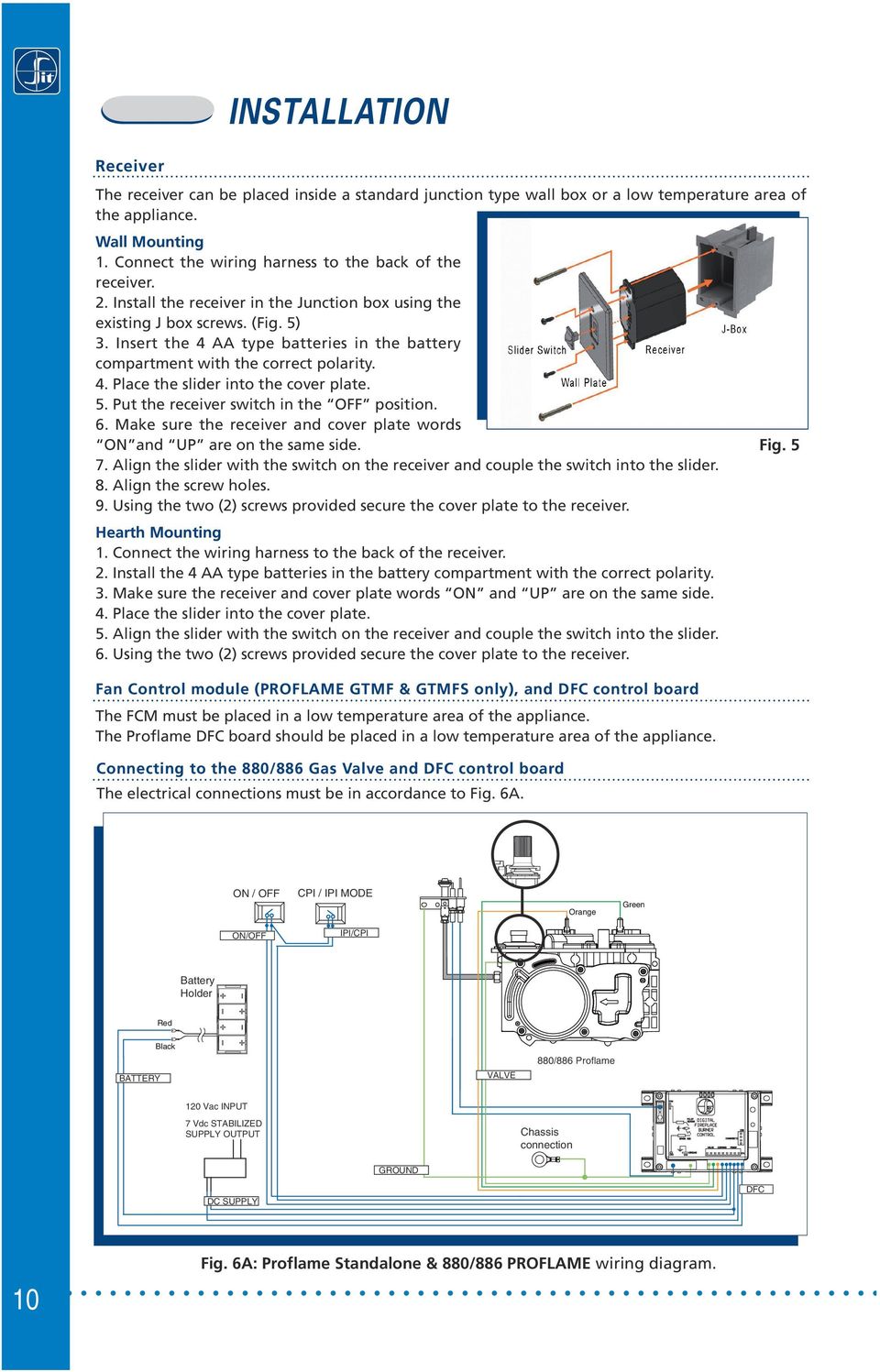
10 installation The receiver can be placed inside a standard junction type wall box or a low temperature area of the appliance. Wall Mounting 1. Connect the wiring harness to the back of the receiver. 2. Install the receiver in the Junction box using the existing J box screws. (Fig. 5) 3. Insert the 4 AA type batteries in the battery compartment with the correct polarity. 4. Place the slider into the cover plate. 5. Put the receiver switch in the OFF position. 6. Make sure the receiver and cover plate words ON and UP are on the same side. 7. Align the slider with the switch on the receiver and couple the switch into the slider. 8. Align the screw holes. 9. Using the two (2) screws provided secure the cover plate to the receiver. Hearth Mounting 1. Connect the wiring harness to the back of the receiver. 2. Install the 4 AA type batteries in the battery compartment with the correct polarity. 3. Make sure the receiver and cover plate words ON and UP are on the same side. 4. Place the slider into the cover plate. 5. Align the slider with the switch on the receiver and couple the switch into the slider. 6. Using the two (2) screws provided secure the cover plate to the receiver. Fan Control module (Proflame GTMF & GTMFS only), and DFC control board The FCM must be placed in a low temperature area of the appliance. The Proflame DFC board should be placed in a low temperature area of the appliance. Connecting to the 880/886 Gas Valve and DFC control board The electrical connections must be in accordance to Fig. 6A. Fig. 5 ON / OFF CPI / IPI MODE Orange Green ON/OFF IPI/CPI Battery Holder Red BATTERY Black VALVE 880/886 Proflame 120 Vac INPUT 7 Vdc STABILIZED SUPPLY OUTPUT Chassis connection GROUND DC SUPPLY DFC 10 Fig. 6A: Proflame Standalone & 880/886 wiring diagram.
11 Connecting to the 885 Gas Valve and DFC control board (Proflame GTM & GTMS & GTMF & GTMFS only) The electrical connections must be in accordance to Fig. 6B ( GTM & GTMS) or 6C (GTMF & GTMFS). 120 Vac INPUT REMOTE 7 Vdc STABILIZED SUPPLY OUTPUT REMOTE DC SUPPLY MOTOR Pilot Orange Green 14 Pin Connector Pink Blue GTMS only Split Flow RECEIVER SPLIT FLOW Chassis connection 885 Remote control TH ON / OFF GROUND TPTH IPI/CPI DFC SUPPLY DC SUPPLY CPI / IPI MODE Fig. 6B: Proflame GTM & GTMS & 885 wiring diagram. REMOTE 120V OUT REMOTE FCM-COM MOTOR Pilot Orange Green 14 Pin Connector Pink Blue GTMFS only RECEIVER Split Flow SPLIT FLOW 885 Remote control Chassis connection TH ON / OFF GROUND TPTH IPI/CPI DFC SUPPLY DFC SUPPLY CPI / IPI MODE Fig. 6C: Proflame GTMF & GTMFS & 885 wiring diagram. 11

12 Preliminary check of a Standalone Proflame system Before applying any power supply to the DFC board please verify that the electrical connections are in accordance to Fig. 6A Initializing the System for the first time Set the main burner ON/OFF switch to the OFF position. If installed, set the pilot flame mode selector switch to the IPI position. Install 4 AA batteries into the battery holder, and respect the polarity indicated on the battery holder silkscreen. Connect the battery holder to the DFC s main wiring harness. Connect the AC/DC wall adapter to the DFC s DC-jack connector on the main wiring harness, and plug it into the wall mains supply. Setting the Appliance into Continuous Pilot ignition mode If installed on the wirings, set the IPI/CPI Pilot Mode Switch to the CPI position (switch closed). At that point the DFC ignition board will immediately complete the ignition sequence for the Pilot Flame, and then will remain with the Pilot Flame ON, waiting for a command to ignite the Main Burner Flame. Turning ON the Appliance Close the ON/OFF command contact on the ON/OFF wires, and this will command the DFC ignition board to Turn-ON the appliance s main burner. Turning OFF the Appliance Open the ON/OFF command contact on the ON/OFF wires, and this will command the DFC ignition board to Turn-OFF the appliance s main burner. NOTE: if the Continuous Pilot ignition mode is selected, the Pilot ON Flame will remain. To also turn it completely OFF, switch the appliance into Intermittent Pilot ignition mode, so set the IPI/CPI Pilot Mode Switch to the IPI position (switch opened). Command definitions Pilot IPI / CPI switch Main Turn ON switch Command reference name Commanded Fireplace State Opened, IPI Opened Turn-OFF Flames OFF Opened, IPI Closed Turn-ON Pilot + Main burner flames ON Closed, CPI Opened Pilot-ON Pilot flame ON Closed, CPI Closed Turn-ON Pilot + Main burner flames ON 12

13 Temperature indication Display With the system in the OFF position, press the Thermostat Key and the Mode Key at the same time. Look at the LCD screen on the to verify that a C or F is visible to the right of the Room Temperature display. (Fig. 7) OPERATING PROCEDURE for a remote control system Initializing the System for the first time Install the 4 AA batteries into the receiver battery bay. Note the polarity of the battery and insert into the battery bay as indicated on the Battery cover (+/-). Place the 3 position slider switch in the REMOTE position. (fig. 3) Insert the end of the paper clip or similar object into the hole marked PRG on the front cover (fig 3). The will beep three (3) times to indicate that it is ready to synchronize with a. Install the 3 AAA type batteries in the battery bay, located on the base of the. With the batteries already installed in the, push the ON button. The will beep four times to indicate the s command is accepted. The system is now initialized. Fig. 7: Remote Control display in Farenheit and Celsius. Setting the Appliance into Continuous Pilot ignition mode If installed on the wirings, set the IPI/CPI Pilot Mode Switch to the CPI position (switch closed). At that point the DFC ignition board will immediately complete the ignition sequence for the Pilot Flame, and then will remain with the Pilot Flame ON, waiting for a command to ignite the Main Burner Flame. Turning ON the Appliance Press the ON/OFF Key on the. The display will show all active Icons on the screen. At the same time the will command the DFC board to start the ignition process. Once the pilot flame is proven the DFC board will open the main valve outlet and the appliance main burner will ignite. A single beep from the will confirm reception of the command. Fig. 8: Remote Control display. Turning OFF the Appliance Press the ON/OFF Key on the. The LCD display will only show the room temperature and Icon (Fig. 8). At the same time the disconnects will command the DFC board to turn off the burner. Depending on the system model (IPI or CPI) the pilot may shut off (IPI) or remain lit (CPI) and the appliance burner turns OFF. A single beep from the confirms reception of the command. NOTE: if the Continuous Pilot ignition mode is selected, the Pilot ON Flame will remain. To also turn it completely OFF, switch the appliance into Intermittent Pilot ignition mode, so set the IPI/CPI Pilot Mode Switch to the IPI position (switch opened). 13

14 Flame Height Control Proflame GT: with the system on, and the flame present in the appliance, pressing the Down Arrow Key (Fig. 1) will turn OFF the flame while the remote system is still on. If the Up Urrow Key is pressed while in the above described state the flame will come on. ( Fig. 9A & 9D) Proflame GTM & GTMF: has six (6) flame levels. With the system on, and the flame level at the maximum in the appliance, pressing the Down Arrow Key (Fig. 1) once will reduce the flame height by one step until the flame is turned OFF. The Up Arrow Key will increase the flame height each time it is pressed. If the Up Arrow Key is pressed while the system is on but the flame is off, the flame will come on in the high position. ( Fig. 9A & 9B & 9C& 9D ) A single beep will confirm reception of the command. Fig. 8: Fig. 9A: Flame Off Fig. 9B: Flame Level 1 Fig. 9: Fig. 9C: Flame level 5 Fig. 9D: Flame Level Maximum Split flow function ( GTMS & GTMFS only ) The secondary burner is controlled by the split Flow. To activate this function use the Mode Key (Fig. 1) to index to the SPLIT FLOW icon (Fig. 9E & 9F). Pressing the Up Arrow Key will activate the secondary burner. Pressing the Down Arrow Key will turn the secondary burner OFF. A single beep will confirm the reception of the command. 14 Fig. 9: Fig. 9E Fig. 9F

15 Room Thermostat ( Operation) The Remote Control can operate as a room thermostat. The thermostat can be set to a desired temperature to control the comfort level in a room. To activate this function, press the Thermostat Key (Fig. 1). The Lcd display on the will change to show that the room thermostat is ON and the set temperature is now displayed (Fig. 10). To adjust the set temperature, press the Up or Down Arrow Keys until the desired set temperature is displayed on the LCD screen of the (Fig. 11). ROOM TEMPERATURE SET TEMPERATURE Fig. 10 Fig. 11 Smart Thermostat ( Operation) (Proflame GTM & GTMF & GTMFS only) The Smart Thermostat function adjusts the flame height in accordance to the difference between the set point temperature and the actual room temperatures. As the room temperature gets closer to the set point the Smart Function will modulate the flame down. To activate this function, press the Thermostat Key (Fig. 1) until the word "SMART" appears to the right of the temperature bulb graphic (Fig. 12). To adjust the set temperature, press the Up or Down Arrow Keys until the desidered set temperature is displayed on the LCD screen of the (Fig. 13). Fig. 12: Smart flame function Fig

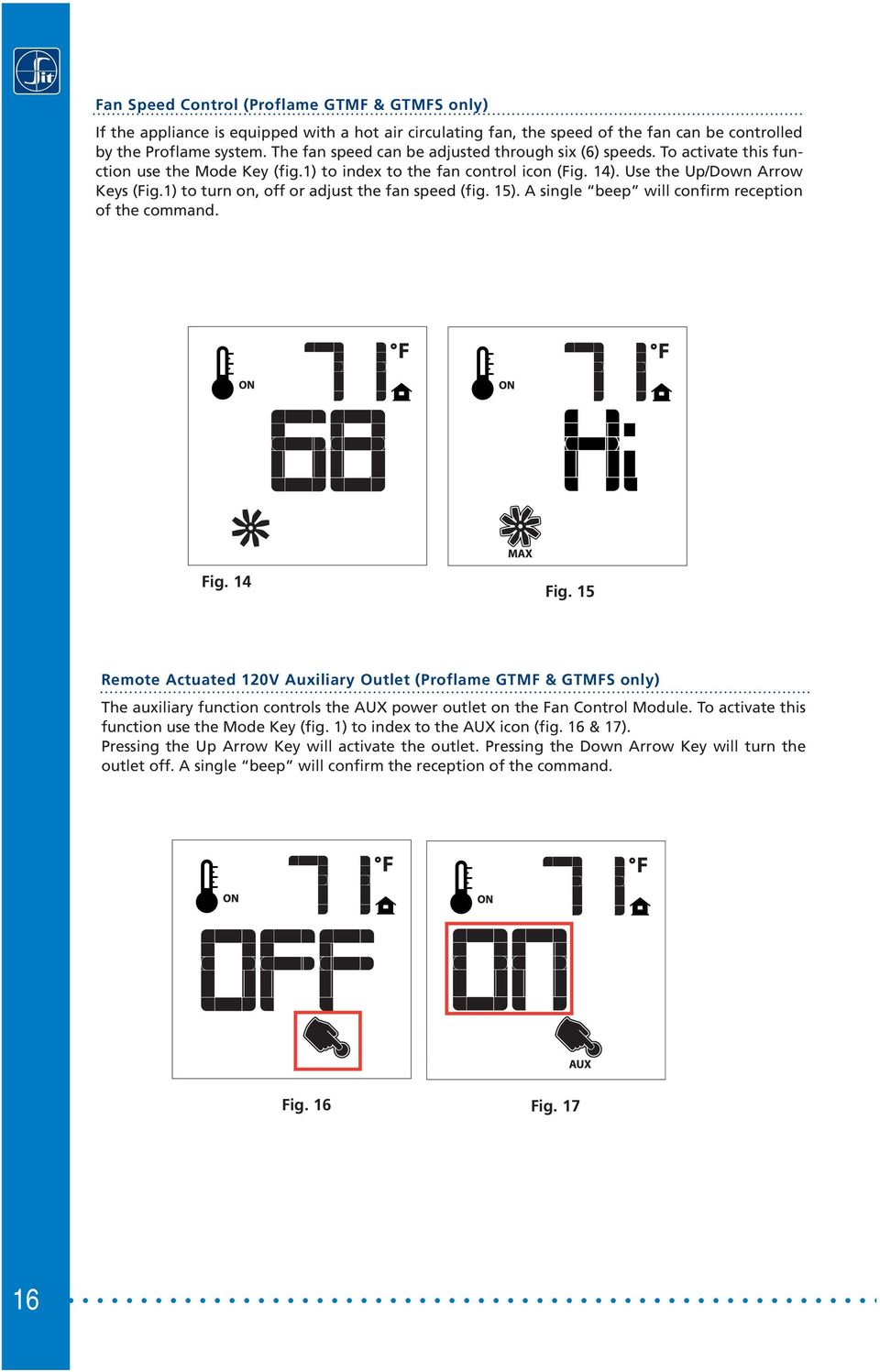
16 Fan Speed Control (Proflame GTMF & GTMFS only) If the appliance is equipped with a hot air circulating fan, the speed of the fan can be controlled by the Proflame system. The fan speed can be adjusted through six (6) speeds. To activate this function use the Mode Key (fig.1) to index to the fan control icon (Fig. 14). Use the Up/Down Arrow Keys (fig.1) to turn on, off or adjust the fan speed (fig. 15). A single beep will confirm reception of the command. Fig. 14 Fig. 15 Remote Actuated 120V Auxiliary Outlet (Proflame GTMF & GTMFS only) The auxiliary function controls the AUX power outlet on the Fan Control Module. To activate this function use the Mode Key (fig. 1) to index to the AUX icon (fig. 16 & 17). Pressing the Up Arrow Key will activate the outlet. Pressing the Down Arrow Key will turn the outlet off. A single beep will confirm the reception of the command. Fig. 16 Fig
17 Key lock This function will lock the keys to avoid unsupervised operation. To activate this function, press the MODE and UP keys at the same time (Fig. 18). To de-activate this function, press the MODE and UP keys at the same time. Fig. 18 Low Battery Power detection The life span of the remote control batteries depends on various factors: quality of the batteries used, the number of ignitions of the appliance, the number of changes to the room thermostat set point, etc. When the transmitter batteries are low, an Icon will appear on the LCD display of the transmitter (Fig. 19) before all battery power is lost. When the batteries are replaced this Icon will disappear. Fig. 19 The life span of the receiver batteries depends on various factors: quality of the batteries used, the number of ignitions of the appliance, the number of changes to the room thermostat set point, etc. When the receiver batteries are low, No beep will be emitted from the receiver when it receives an On/Off command from the transmitter. This is an alert for a low battery condition for the receiver. When the batteries are replaced the beep will be emitted from the receiver when the ON/OFF key is pressed (See Initialization of The System). 17

18 Manual override If the batteries of the or are low or depleted, the appliance can still be turned on manually by sliding to the ON position the three position slider switch on the. This will bypass the remote control feature of the system and the appliance main burner will Turn-ON. APPENDIX Command definitions Pilot IPI / CPI Position of the Command reference Commanded Fireplace switch receiver slider switch name State Opened, IPI OFF REMOTE and OFF received Turn-OFF Flames OFF Opened, IPI ON REMOTE and ON received Turn-ON Pilot + Main burner flames ON Closed, CPI OFF REMOTE and OFF received Pilot-ON Pilot flame ON Closed, CPI ON REMOTE and ON received Turn-ON Pilot + Main burner flames ON 18

19 dimensional drawings 115 PRG REMOTE REMOTE PRG Hearth mounted 115 REMOTE PRG Wall mounted REMOTE PRG 42 DFC Control Board FCM Dimensions are in millimeters 19

20 SIT La Precisa S.p.A. Viale dell Industria PADOVA - ITALY Tel. +39/049/ , Fax +39/049/ [email protected]

AC-115 Compact Networked Single Door Controller. Installation and User Manual
 AC-115 Compact Networked Single Controller Installation and User Manual December 2007 Table of Contents Table of Contents 1. Introduction...5 1.1 Key Features... 6 1.2 Technical Specifications... 7 2.
Instruction Manual. 2in1 LAN Tester & Multimeter. Model: LA-1011
 Instruction Manual 2in1 LAN Tester & Multimeter Model: LA-1011 1 Contents Introduction... Features... Safety Precautions.. Meter Description... Electrical Specification... Operation.. AutoRanging Multimeter.
820 NOVA mv THERMOPILE POWER SUPPLY THERMOELECTRIC SAFETY DEVICE SERVO-CONTROLLED PRESSURE REGULATOR SHUT-OFF SOLENOID VALVE.
 SIT Group 820 NOVA mv MULTIFUNCTIONAL CONTROL FOR GAS THERMOPILE POWER SUPPLY THERMOELECTRIC SAFETY DEVICE SERVO-CONTROLLED PRESSURE REGULATOR SHUT-OFF SOLENOID VALVE PIN 3AP700/2 SINGLE-KNOB MULTIFUNCTIONAL
INSTALLATION GUIDE. Card Reader & Controller with KIM Swipe Reader for Solitaire 850 / 950 / 850L Learnlok PK2930
 INSTALLATION GUIDE Card Reader & Controller with KIM Swipe Reader for Solitaire 850 / 950 / 850L Learnlok PK2930 Card Reader and Controller Model 3.5 with KIM Swipe Reader Table of Contents 1. Features..................................
Electronic Control Devices The European Product Catalogue 2007
 FX14 Field Controller (1/4) FX14 Field Controller The FX14 is an equipment field controller in the Facility Explorer range of products. The controller is designed specifically for commercial Heating, Ventilating,
e-ask electronic Access Security Keyless-entry
 e-ask electronic Access Security Keyless-entry e-fob Keyless-entry entry System Full-Function Function Installation Manual FCC ID: TV2EFOB1 (UM20 ~ 22793-02) Table of Contents Introduction... 1 e-fob Operation
Alpha Climatic Programmable Modulating Boiler Energy Manager. Installation and User Instructions
 Alpha Climatic Programmable Modulating Boiler Energy Manager Part No 3.022144 (Hard Wired) Part No 3.022143 (Radio Frequency) Installation and User Instructions 1. Description The Alpha Climatic energy
RDJ10RF/SET. Wireless room temperature controller with 24-hour time switch and LCD. Programmable, for heating systems
 3 072 RDJ10RF RCR10/433 Wireless room temperature controller with 24-hour time switch and LCD Programmable, for heating systems RDJ10RF/SET Operating modes: Automatic, Comfort, Energy Saving, and Frost
SIMPLE ELECTRONIC IGNITION WIRE DIAGRAM THERMOSTAT (3) PV PILOT BURNER/IGNITOR - SENSOR Q345A (9) SPARK (4) GND (BURNER) CHASSIS GND
 Honeywell Electronic Ignition Troubleshooting Tech Tip April 2007 The Honeywell S8610H Intermittent Pilot Module provides the ignition sequencing, pilot spark, pilot flame monitoring, Pilot Valve (PV)
How To Use A Power Supply On A Powerline 2.2 (Ai)
 KNX/EIB Product documentation Issue: 05.08.2010 629x1220 Push button sensor 3 comfort 1-gang Push button sensor 3 comfort 2-gang (1+1) Push button sensor 3 comfort 3-gang Push button sensor 3 comfort 4-gang
Manual revision August 2015 p/n 65-06-01361
 Manual revision August 2015 p/n 65-06-01361 1 Mendota Proflame Training Table of Contents PROFLAME I Proflame I Wiring/part information Page 4 Proflame I Digital Fireplace Burner Control box wiring Page
RVL470. Heating Controller. Building Technologies HVAC Products. Series B
 2 522 Heating Controller Series B RVL470 Multifunctional heating controller for use in residential and non-residential buildings; suitable for weather-dependent flow temperature control of heating zones
How To Control A Thermostat
 CONTENTS Installation Instructions for Heating & Air Conditioning 1F72 5/2 Day Programmable Heat Pump Thermostat Preparations... 1 Thermostat Details... 1 Removing Old Thermostat... 1-2 Mounting and Wiring...
G670 Intermittent Pilot Ignition Controls
 Installation Sheets Manual 121 Gas Combustion Combination Controls and Systems Section G Technical Bulletin Issue Date 0300 Intermittent Pilot Ignition Controls Figure 1: Intermittent Pilot Ignition Control
Temperature & Humidity SMS Alert Controller
 Temperature & Humidity Alert Controller METERS 3 simple steps starting the unit: Insert the SIM card Plug in the sensors connectors Connect the AC power cord. Specifications: AC 90~260V Auto Select Internal
Heat Surge Model X5C Fire Place Insert Service Manual Applies to all units w/30000208 circuit board
 Heat Surge Model X5C Fire Place Insert Service Manual Applies to all units w/30000208 circuit board 2012 HS M4417A BR16597R-1 HEAT SURGE 8000 FREEDOM AVE, N. CANTON, OH 44720 330-244-8161 WWW.HEATSURGE.COM
GSM HOME SECURITY SYSTEM
 Cell /Mobile phone home security system GSM HOME SECURITY SYSTEM Model : GSM-120 TABLE OF CONTENTS 1. FEATURES... 1 2. APPLICATION... 2 3. SPECIFICATIONS... 3 4. FRONT PANEL & LAYOUT DESCRIPTION...6 5.
Drayton Digistat +2RF/+3RF
 /+3RF Programmable Room Thermostat Wireless Model: RF700/22090 Model: RF701/22092 Power Supply: Battery - Thermostat Mains - Digistat SCR Invensys Controls Europe Customer Service Tel: 0845 130 5522 Customer
AN500T, AN1000, AN1000T, AN1500, AN1500T AN2000, AN2000T
 Product Instruction Manual Accona AN500T, AN1000, AN1000T, AN1500, AN1500T AN2000, AN2000T Panel heater v16.5/5 Version 3.2 Jan 2015 Contents 1. Important safety points 2. Installation 2.1. Wall mounting
SERVICE INSTRUCTION R410A. WALL MOUNTEDtype INVERTER SPLIT TYPE ROOM AIR CONDITIONER. Models Indoor unit Outdoor unit
 SERVICE INSTRUCTION SPLIT TYPE ROOM AIR CONDITIONER WALL MOUNTEDtype INVERTER Models Indoor unit Outdoor unit ASYG07LECA ASYG09LECA ASYG12LECA ASYG14LECA AOYG07LEC AOYG09LEC AOYG12LEC AOYG14LEC R410A CONTENTS
PRO PLM Installation Instructions
 PRO PLM Installation Instructions PROFESSIONAL INSTALLATION STRONGLY RECOMMENDED Installation Precautions: Roll down window to avoid locking keys in vehicle during installation Avoid mounting components
SERVICE MANUAL 12VDC WALL THERMOSTAT AIR CONDITIONING SYSTEMS ROOFTOP UNITS ONLY
 SERVICE MANUAL 12VDC WALL THERMOSTAT AIR CONDITIONING SYSTEMS ROOFTOP UNITS ONLY! WARNING - SHOCK HAZARD! TO PREVENT THE POSSIBILITY OF SEVERE PERSONAL INJURY, DEATH, OR EQUIPMENT DAMAGE DUE TO ELECTRICAL
How To Program An Autodialer
 GJD HYL005 GSM Autodialer Instruction Manual Please read these instructions before you start the installation Features: LCD display. Programmable 9 x 32 digit phone numbers for each trigger. 10 second
Install Guide CT101. Caution. Caution
 Install Guide CT101 PG 1 Caution top cover Your thermostat is a precise instrument, handle it with care. Turn off electricity to the system before installing or servicing thermostat or any part of the
its ELECTRIC POSITION for electric heat, or set the units fan control appropriately to ELECTRIC or another appropriate setting.
 Troubleshooting Poor Temperature Regulation This page lists problems that may affect the temperature performance of your LUX thermostat with suggested resolutions. For more detailed information please
Technical Information
 Date of last update: Oct-11 Ref: D7.8.4/1011/E Application Engineering Europe CORESENSE DIAGNOSTICS FOR STREAM REFRIGERATION COMPRESSORS CoreSense Diagnostics for Stream Refrigeration Compressors... 1
T5000 T000 LCD Digital Fan Coil Thermostat
 T5000 T000 LCD Digital Fan Coil Thermostat T000 LCD Digital Fan Coil Thermostat T000 LCD Digital Fan Coil Thermostats are designed to control heating, cooling, or year round air conditioning unit in Commercial,
TruPower-Portable-500W. Solar Starter kit
 TruPower-Portable-500W Solar Starter kit This Solar starter kit is an easy to use solar power supply system that is the complete solution for all your solar power needs. It is a solar generator that converts
Install Guide CT100. Caution. Caution ENGLISH. disconnect the power supply before beginning work.
 Install Guide CT100 PG 1 Caution top cover Your thermostat is a precise instrument, handle it with care. Turn off electricity to the system before installing or servicing thermostat or any part of the
1R / 4-BUTTON SERIES
 Button 1 1R / 4-BUTTON SERIES VEHICLE SECURITY SYSTEM Standard Features: Two 4-Button Remote Transmitters Status indicator (LED) Valet / override switch Multi-tone siren Dual stage impact detector Remote
PUSH BUTTON START INSTALLATION MANUAL
 PUSH BUTTON START INSTALLATION MANUAL ALTHOUGH THIS PRODUCT HAS BEEN THOROUGHLY TESTED KPIERSON TECHNOLOGIES ASSUMES NO RESPONSIBILITY FOR ANY DAMAGE THAT MAY RESULT BY THE INSTALLATION OF THIS PRODUCT.
SERVICE MANUAL FOR 6535 SERIES TWO TON HIGH EFFICIENCY PACKAGED HEAT PUMPS
 SERVICE MANUAL FOR 6535 SERIES TWO TON HIGH EFFICIENCY PACKAGED HEAT PUMPS TABLE OF CONTENTS 1. Warnings...2 2. Accessibility Of Appliance...3 3. Unit Dimensions And Specifications...3 4. Unit Specifications
HERZ-Thermal Actuators
 HERZ-Thermal Actuators Data Sheet 7708-7990, Issue 1011 Dimensions in mm 1 7710 00 1 7710 01 1 7711 18 1 7710 80 1 7710 81 1 7711 80 1 7711 81 1 7990 00 1 7980 00 1 7708 11 1 7708 10 1 7708 23 1 7709 01
http://waterheatertimer.org/how-to-troubleshoot-gas-water-heater.html
 http://waterheatertimer.org/how-to-troubleshoot-gas-water-heater.html APPLY POWER TO APPLIANCE FIELD WIRING CORRECT? DPLAY ERROR CODE 1 OR 2 Intelli-Vent TM Sequence of Operation REQUEST FOR HEAT PRESENT?
Heating Controller. Building Technologies HVAC Products
 2 474 Heating Controller RVP300 Multifunctional heating controller for use in residential and non-residential buildings; suitable for weather-dependent flow temperature control of heating zones with or
SP1790JK 900MHz Wireless Indoor/Outdoor Speakers. User Manual INTRODUCTION FEATURES IMPORTANT SAFETY INFORMATION
 SP1790JK 900MHz Wireless Indoor/Outdoor Speakers INTRODUCTION This 900 MHz digital hybrid wireless speaker system uses the latest wireless technology that enables you to enjoy music and TV sound anywhere
Mobile Satellite Solutions. A WiWorld Partner SATELLITE TV ANTENNA CONTROLLER RFM-1000/1100 TECHNICAL MANUAL STOW SEARCH
 Mobile Satellite Solutions A WiWorld Partner SATELLITE TV ANTENNA CONTROLLER RFM-1000/1100 TECHNICAL MANUAL SEARCH STOW Ver. 1 June 2012 WARNING Make all electrical and coax connections from the controller
AUTOMATIC TRANSFER SWITCH CONTROL UNIT OPERATOR S MANUAL
 ATS-220 AUTOMATIC TRANSFER SWITCH CONTROL UNIT OPERATOR S MANUAL For Use in 208 to 240 Volts Single and 3 Phase ATS Systems With 110Volt AC or DC Control Motors and selenoids 4501 NW 27 ave Miami FL 33142
Single Day Alarm Clock with. Bluetooth and USB Play-through
 Single Day Alarm Clock with Bluetooth and USB Play-through MODEL : BSC 200 READ THIS INSTRUCTION MANUAL BEFORE OPERATING THE APPLIANCE. SAVE THIS MANUAL FOR FUTURE REFERENCE. TABLE OF CONTENTS IMPORTANT
ATS-505. GB Version 1
 ATS-505 GB Version 1 Control Locations Power/Sleep Power On/off/Alarm off/sleep function Display Switch between radio frequency and time while radio is power on Mode Mode set up (please see below mode
Electric Rotary Actuator - On/Off or programmable control actuator
 Electric Rotary Actuator - On/Off or programmable control actuator Direct mounting on quarter-turn valves Manual override standard Corrosion resistant Adjustable limit switches Multi-voltage version Type
ER102. Emergency Crank Weather Radio Owner s Manual. www.midlandradio.com
 ER102 Emergency Crank Weather Radio Owner s Manual Table of Contents Welcome to the World of Midland Electronics Major ER102 Features ER102 Controls and Functions ER102 Power Sources - Built-in Rechargeble
EKON BMS HVAC system. Simply Smart. www.ekonhome.com. Touch Screen Controller. Going green. Wireless. Wireless Thermostat with Light Switch
 Going green EKON BMS HVAC system Wireless Thermostat with Light Switch Control Fan Coil or Central AirCon Wireless Touch Screen Controller Wireless Light or Motorized Blind Wall Switch www.ekonhome.com
RISH CON - Hz. Salient Features : Application : Product Features: FREQUENCY TRANSDUCER
 Application : The RISH CON - Hz transducer is used for frequency measurement. The output signal is proportional to measured frequency and is either load independent DC Current or load independent DC Voltage.
QUICK INSTALLATION GUIDE
 QUICK INSTALLATION GUIDE Read Installer Notes before removing cover from Thermostat. 1F85RF-275 Wireless Remote Kit INSTALLER NOTES IMPORTANT Do not apply power to the thermostat or wireless sensor until
MCR1900 Media Converter 19-Slot Chassis
 MCR1900 Media Converter 19-Slot Chassis Installation Guide Part #5500304-11 Copyright Statement This document must not be reproduced in any way whatsoever, either printed or electronically, without the
TYXIA. *2702178_Rev.1* Installation and User Guide. Wireless receiver. TYXIA RF 642-1 channel
 Installation and User Guide TYXIA Wireless receiver TYXIA RF 642-1 channel DELTA DORE Bonnemain - 35270 COMBOURG - France E-mail : [email protected] Unit compliant with the requirements of directives:
prestige Condensing Water Boiler SERVICE TECHNICIAN S TROUBLE SHOOTING GUIDE 2008-36 TSG-PRESTIGE Date revised: 12/6/10
 prestige Condensing Water Boiler SERVICE TECHNICIAN S TROUBLE SHOOTING GUIDE Date revised: 12/6/10 2008-36 TSG-PRESTIGE Table of Contents INTRODUCTION Page 1-2 SERVICING TIPS AND INSTRUCTIONS Page 3-4
HM-W536 Install Guide
 HM-W536 Install Guide 9/13/2013 IMPORTANT SAFETY INSTRUCTIONS Warning - When using electrical devices, basic safety precautions should be followed to reduce the risk of fire, electrical shock or injury.
4.3-inch Back-Up Camera
 TM 4.-inch Back-Up Camera Model No.: PKC0BU4 Owner s Manual and Warranty Information Read these instructions completely before using this product. Retain this Owner s Manual for future reference. INTRODUCTION
Sensi TM. Wi-Fi Programmable Thermostat MANUAL OPERATION. Version: March 2016 2016 Emerson Electric Co. All rights reserved.
 Sensi TM Wi-Fi Programmable Thermostat MANUAL OPERATION Version: March 2016 2016 Emerson Electric Co. All rights reserved. Contents MANUAL OPERATION GUIDE Buttons and Icons 3 Basic Functionality 4 Manual
ST Series POWER SUPPLIES USER INSTRUCTIONS
 Introduction These instructions detail the installation and operation requirements for the ST20 & ST35 power supplies. These have been designed for operation in RV s providing a DC power system, with optional
Switch Actuator, 8-fold, 10 A, MDRC AT/S 8.10.1, GH Q631 0075 R0111
 , GH Q631 0075 R0111 The 8-fold switch actuator is a DIN rail mounted device for insertion in the distribution board. It is connected to the EIB via a bus terminal. In the event of bus voltage failure,
PT-6000 Power Tower INSTALLATION MANUAL SPECIFICATIONS
 PT-6000 Power Tower INSTALLATION MANUAL 10.5 9.75 12 22.75 10.75 MAXIMUM SOIL HEIGHT: DO NOT ALLOW FILL TO EXCEED THIS LEVEL! 11.5 4 4 13 Optional PT-BASE for new installations or when previous 2000/6000
REMOTE CONTROL MANUAL
 REMOTE CONTROL MANUAL ENGLISH CONTENT PRECAUTIONS...1-2 USING THE REMOTE CONTROL UNIT...3 OPERATION...4-9 Thank you for purchasing our Room Air Conditioner. Before using your air-conditioner, please read
Fan, Cypress / GreenField Installation Instructions (sku 99000173)
 Packing List Blower Assembly Wiring Harness Rheostat Snap Disc Rheostat Nut, Spacer, and Knob Warnings WARNING: NOTE: NOTE: Fan, Cypress / GreenField Make sure power to the stove has been shut off prior
User Manual. ATX12V / EPS12V Power Supply TG-I460R (460W+460W) TG-I550R (550W+550W) Switching Power Supply User Manual
 ATX12V / EPS12V Power Supply TG-I460R (460W+460W) TG-I550R (550W+550W) User Manual Table of Contents 1 Introduction 2 General specification 3 Installation 4 Pin assignment & function of connectors 5 Drawing
Air Conditioning Sign-Off Sheet
 Air Conditioning Sign-Off Sheet Printed Technician Name Address Social Security Number Telephone Number City State Zip Code Install Or Verify The Accuracy Of An Air Conditioner s Installation The candidate
Thermostat with display
 H/LN4691-0 674 59-64170 Thermostat with display RA00118AA_I-01PC-13W39 www.homesystems-legrandgroup.com Thermostat with display Contents Thermostat with display 1 Introduction 4 1.1 Warnings and recommendations
ER-1 Emergency Response System INSTALLATION & PROGRAMMING GUIDE
 Emergency Response System INSTALLATION & PROGRAMMING GUIDE Copyright micron 2005 Contents Product Description 3 Console Operation Overview 4 Console Wiring Diagram 5 User Manual 6 Transmitter Assembly
Draper Low Voltage, Remote Control, Serial and Network Wiring Guide
 Draper Low Voltage, Remote Control, Serial and Network Wiring Guide Copyright 2007 Draper Inc. Form LV-RC-Serial-Network_Wiring07 Print ed in U.S.A. Draper Low Voltage, Remote Control, Serial and Network
SWITCH! DESCRIPTION. ENVIRONMENTAL SPECIFICATIONS Operating Temperature: 0 C to +40 C SPECIFICATION SHEET:
 SWITCH The Budderfly lighting switch is a Decora style, plug-and-play replacement for your existing building switches. Installing a Budderfly adapter transforms your building s existing wiring into the
SD Rack. DiGiCo SD Rack. User Manual B - August 2013 1-1
 DiGiCo SD Rack User Manual B - August 2013 1-1 Contents 1.1 Introduction......1-4 1.1.1 SD-Rack Unit and Modules, Installation Notes......1-4 1.2 SD Rack Power......1-6 1.3 SD Rack Clocking......1-6 1.4
TECHNICAL SERVICE DEPARTMENT Technical Service Bulletin 1-800-432-8373. 2 Inch PowerVent LED Indicator Explanations & Troubleshooting Table
 New Robertshaw control valve was introduced in May 2008 as a replacement part. See last page for troubleshooting this replacement part. All voltage inputs are 120V. All electrical connectors are Molex
Applied Electronics. Commercial Dimming System UPDATE NOTICE
 REV. A Applied Electronics Commercial Dimming System UPDATE NOTICE This notice is to inform the end user of an additional feature added to this DP12/2400 dimming unit. This unit has been outfitted with
i ChatterBox! Motorcycle Security
 i Before you Start the Installation * Please read this manual to become familiar with the requirements necessary to complete the installation. * Use a high quality multi-meter to test all wires before
Modular I/O System Analog and Digital Interface Modules
 OPERATING INSTRUCTIONS Modular I/O System Analog and Digital Interface Modules Installation Operation Maintenance Document Information Document ID Title: Operating Instructions Modular I/O System Part
Rheem Spare Parts Manual. Commercial gas model A631265 Exterior 265L
 Commercial gas model A631265 Exterior 265L Commercial gas model A631265 Exterior 265L Item Part No. Description 1 221735 Foam cover 2 221914 Anode x 3 (black) 1153mm 2 221924 Anode x 3 (blue) 1153mm 3
Installation Guide. Wireless N Access Point EAP110/EAP120/EAP220
 Installation Guide Wireless N Access Point EAP110/EAP120/EAP220 CONTENTS Network Topology 01 Hardware Overview 02 Hardware Installation 05 1. Installation Requirements... 05 2. Mounting Bracket... 05
Manual for Fire Suppression & Methane Detection System
 Manual for Fire Suppression & Methane Detection System Fogmaker North America Post address: 150 Gordon Dr Exton, PA 19341 Delivery address: 150 Gordon Dr Exton, PA 19341 Tel: 610-265-3610 Fax: 610-265-8327
Shadow TX(A) Shadow RX
 Shadow TX(A) Shadow RX Asset Management and RFID Transmitter Tags Asset Management Receiver The Shadow TX(A) and Shadow RX wireless asset management system is a standalone wireless asset tracking system
Technote. Frese OPTIMA Compact actuators DN10-DN32. Application. Features thermic actuators. Features motoric actuators. Approval. www.frese.
 Page 1 of 6 Application Proportional 0-10V or 3-position modulating or On/ Off control of Frese OPTIMA Compact valves in heating, ventilating and air conditioning systems. The actuator can be mounted on
162 CB CABLE TRACER. Filter Probe & Tone Generator INSTRUCTION MANUAL
 162 CB CABLE TRACER Filter Probe & Tone Generator INSTRUCTION MANUAL INDEX PAGE 1. INTRODUCTION... 1 2. FILTER PROBE... 1-3 3. TONE GENERATOR... 3-6 4. SPECIFICATION... 7-8 5. MAINTENANCE... 8 1. INTRODUCTION
MODELS 7007 Gorilla Cycle Alarm 7017 Gorilla Cycle Alarm with 2-way pager system 1017 2-way pager system
 MODELS 7007 Gorilla Cycle Alarm 7017 Gorilla Cycle Alarm with 2-way pager system 1017 2-way pager system Remote Control Motorcycle Alarm System Installation & Operation Instructions Sistema de Alarma de
TX GSM SMS Auto-dial Alarm System. Installation and User Manual
 TX GSM SMS Auto-dial Alarm System Installation and User Manual Product Features: 1. 16 wireless zones, 3 wired zones alarm system, suitable for small to medium size offices and homes. 2. The system uses
PCS300 Universal IP Reporting Module V1.0
 PCS300 Universal IP Reporting Module V1.0 Reference and Installation Manual Patents: One or more of the following US patents may apply: 7046142, 6215399, 6111256, 6104319, 5920259, 5886632, 5721542, 5287111,
INSTALLATION MANUAL 3RP / 5RP 4-BUTTON SERIES VEHICLE SECURITY SYSTEMS
 3RP / 5RP 4-BUTTON SERIES VEHICLE SECURITY SYSTEMS INSTALLATION MANUAL Before you begin the installation Read the INSTRUCTIONS! Always use a multi-meter when verifying vehicle wiring. Before mounting the
WIRING HARNESS FOR AS635P4. BLUE PLUG RED, BLUE, BLACK, WHITE - Plug in dual stage sensor harness
 WIRING HARNESS FOR AS635P4 ANTENNA NOT USED 5 PIN WHITE PLUG 2 PIN WHITE PLUG GREEN - PARKING BRAKE INPUT (-) BLUE - NOT USED 3 PIN BLUE PLUG RED, BLUE, BLACK, WHITE - Plug in dual stage sensor harness
Operator: Save these instructions for future use!
 WHITE-RODGERS 36C01 Combination Gas Valves (24 Volt and 120 Volt Models) INSTALLATI INSTRUCTIS FAILURE TO READ AND FOLLOW ALL INSTRUCTIS CAREFULLY BEFORE INSTALLING OR OPERATING THIS CTROL COULD CAUSE
DORMA MODEL PS-406BB POWER SUPPLY INSTALLATION INSTRUCTIONS
 Features: INSTALLATION Install in accordance with NFPA 70. DORMA MODEL PS-406BB POWER SUPPLY INSTALLATION INSTRUCTIONS Up to 1.95 Amps Load Capacity Class 2 Rated Outputs Overload, Over Voltage, and Short
Electronic Control Devices The European Product Catalogue 2007
 FX07 Field Controller (1/4) FX07 Field Controller Display Model Dimensions in mm (inches) The FX07 is a terminal unit controller in the Facility Explorer range of products. The controller is designed specifically
Installation Instructions
 H5HK Series Installation Instructions 3 Phase Electric Heater Kits 7.5 and 0 TON Package A/C Systems Description Installation of 08/40V and 480V H5HK 3 Phase Heater Kits in 7.5 and 0 TON Packaged Air Conditioners.
Install Guide 3M-50. Caution. Caution
 PG 1 Install Guide 3M-50 aution Your thermostat is a precise instrument, handle it with care. Turn off electricity to the HVA system before installing or servicing thermostat or any part of the system.
RI-215A Operator s Manual. Part Number: 71-0045RK Revision 0 Released: 10/3/05
 RI-215A Operator s Manual Part Number: 71-0045RK Revision 0 Released: 10/3/05 Warranty RKI Instruments, Inc., warrants gas alarm equipment sold by us to be free from defects in materials and workmanship,
CelluLine CGW-TS GSM Cellular Gateway. Installation and Programming Manual
 CelluLine CGW-TS GSM Cellular Gateway Installation and Programming Manual CelluLine CGW-TS GSM Cellular Gateway Installation and Programming Manual CGWTS-M001A Version 1, Release 1, December 2004 NOTICE
Portable Air Conditioner. OWNER S MANUAL Read these instructions before use. Model: MF08CESWW. Voltage rating: 115V~60Hz Power rating : 800W
 MODE ALARM Portable Air Conditioner OWNER S MANUAL Read these instructions before use 8 Model: MF08CESWW Voltage rating: 115V~60Hz Power rating : 800W Customer Support : 1-800-474-2147 For product inquiries
HCS-3300/3302/3304 USB Remote Programmable Laboratory Grade Switching Mode Power Supply
 1. INTRODUCTION HCS-3300/3302/3304 USB Remote Programmable Laboratory Grade Switching Mode Power Supply User Manual This family of efficient, upgraded SMPS with small form factor, auto cross over CV CC,
TABLE OF CONTENTS. TABLE OF CONTENTS... 1 Package content... 1. INTRODUCTION Dear customer... 2 Features... 2 Caution... 2
 Headset Englisch 19.07.2001 14:26 Uhr Seite 1 TABLE OF CONTENTS 1 TABLE OF CONTENTS............................................................... 1 Package content..................................................................
CO2 Alarm. Operation. Application
 CO Alarm 100-77V AC Supply Voltage Two pre-configured alarm and control thresholds Thresholds factory set to customer requirements on dispersive infrared sensing technology Optional internal audible alarm
CM705B - Universal Expander Module CM707B - Plug On Zone Expander Security Systems
 CM705B - Universal Expander Module CM707B - Plug On Zone Expander Security Systems EN Security System CM705B CM705B - Universal Expander Module The CM705B universal expander provides a cost effective way
SERVICE MANUAL FOR 12 VDC WALL THERMOSTAT AIR CONDITIONING SYSTEMS ROOF TOP UNITS ONLY
 RV Products Division SERVICE MANUAL FOR 12 VDC WALL THERMOSTAT AIR CONDITIONING SYSTEMS ROOF TOP UNITS ONLY Airxcel, Inc. RV Products Division P.O. Box 4020 Wichita, KS 67204 1976A376 (1-11) TABLE OF CONTENTS
Aludesign K A T A L O G
 Aludesign K A T A L O G plynové radiátory DESIGN The result of lengthy experience and technological research, GAZELLE TECHNO today is a universally recognised gas radiator*. It has been completely re-designed
InnoMedia ESBC 9580-4B. Quick Install Guide. www.innomedia.com 1
 InnoMedia ESBC 9580-4B Quick Install Guide www.innomedia.com 1 Table of Contents Introduction 2 Package Contents 2 CAUTION 2 Installation 3 Wall-Mounting Instructions 5 Troubleshooting 6 Appendix A. LED
www.sebury.com.cn Digital Keypad Use s Manual
 K3 K4 www.sebury.com.cn Digital Keypad Use s Manual Contents Introduction Introduction Specifications Intramural Interface Circuit 3 Mounting 3 Wiring 5 Power UP 7 Engineer Programming Mode 7 The K3/K4
0.8 U N /0.5 U N 0.8 U N /0.5 U N 0.8 U N /0.5 U N 0.2 U N /0.1 U N 0.2 U N /0.1 U N 0.2 U N /0.1 U N
 55 Series - General purpose relays 7-10 A Features 55.12 55.13 55.14 Printed circuit mount, general purpose 2, 3 & 4 Pole relays 55.12-2 Pole 10 A 55.13-3 Pole 10 A 55.14-4 Pole 7 A AC coils & DC coils
1F82-261 Programmable Electronic Digital Heat Pump Thermostat INSTALLATION AND OPERATION INSTRUCTIONS
 FAILURE TO READ AND FOLLOW ALL INSTRUCTIONS CAREFULLY BEFORE INSTALLING OR OPERATING THIS CONTROL COULD CAUSE PERSONAL INJURY AND/OR PROPERTY DAMAGE. DESCRIPTION ELECTRICAL DATA Electrical Rating: 20 to
Total Protection Alarm System
 www.skylinkhome.com Total Protection Alarm System MODEL: SC-10 101A073-001 AUG, 2005. CUSTOMER SERVICE 17 Sheard Avenue, Brampton, Ontario, Canada L6Y 1J3 Tel : (800) 304-1187 Fax : (800) 286-1320 Email
TS93 EMR T/PT/TDE. Surface applied door closer
 TS EMR T/PT/TDE Surface applied door closer Installation instructions: Pull side track mount door closer with smoke detector (EMR T) Push side track mount door closer with smoke detector (EMR PT) Double
LOXONE 12 Channel Amplifier
 LOXONE 12 Channel Amplifier Item no.: 200110 Thank you for purchasing the Loxone Twelve Channel Amplifier. The versatility of the Amplifier makes it the perfect choice for almost every type of custom multi-room
Programmable Room Thermostat 7 Day (5-2 Day) Models: 22083 / 22087 Power Supply: Battery / Mains
 Drayton Programmable Room Thermostat 7 Day (5-2 Day) Models: 22083 / 22087 Power Supply: Battery / Mains Invensys Controls Europe Technical Helpline: +44 (0) 845 130 7722 www.draytoncontrols.co.uk Installation