
Collaboration. Michael McCabe Information Architect black and white solutions for a grey world
|
|
|
- Deborah Payne
- 9 years ago
- Views:
Transcription
1 Collaboration Michael McCabe Information Architect black and white solutions for a grey world
2 Slide Deck & Webcast Recording links Questions and Answers We will answer questions at the end In Microsoft Live Meeting Click the Q&A panel or click Alt-Q After the webcast - extra questions to [email protected] Remember to go to the full screen in Live Meeting (F5)
3 About Gig Werks Collaboration Communities Content Search Insight Q&A
4 Company began in 2002 Gold Partner Since 2002 Field managed since 2004 Microsoft Best Technology Partner 2010 and 2011 Various other Microsoft Awards and Tech Forum Award Winner 2008 Invited into the Partner Evidence Program for SharePoint 2010 Market Focus From 100 seats to 150,000 Headquartered in New York, with clients across the United States
5 SharePoint 2010 The Business Collaboration Platform Bringing people together
6 productivity Best productivity experience across PC, phone, and browser The cloud UNIFIED COMMUNICATIONS COLLABORATION ENTERPRISE CONTENT MANAGEMENT BUSINESS INTELLIGENCE ENTERPRISE SEARCH
7 Increasingly demanding environment 57 of workers use social media for business purposes at least once per week and 15% of them use a consumer tool instead of the corporate sponsored one. In 2009, over 70 of business and IT teams are geographically distributed. 52 of those surveyed said increasing speed of access to internal experts is a top benefit of Web 2.0 technologies in the enterprise. 74 of enterprises have already implemented some corporate collaboration software, out of which 61% plan to expand or upgrade their current implementation. Employees spend up to 25 of their working day on non-productive, document collaboration related tasks.
8 Microsoft SharePoint 2010 The Business Collaboration Platform for the Enterprise and the Internet Composites Sites Communities Deliver the Best Productivity Experience Cut Costs with a Unified Infrastructure Insights Content Rapidly Respond to Business Needs Search 8

9 Communities Connect people and expertise Collaborate anywhere, anytime Share signals and feedback
10 Connect people and expertise Information from Active Directory or HR system Freeform about me section Associated content and relationships Recent activity Build your network Profiles provide a place to build your work identity and connect with others in your organization Find the right person People search helps you find the expert in your organization even when you don t know their name Colleagues and their activity My Sites keep you connected to what s going on around you with updates from your colleagues in the Newsfeed
11 Connect people and expertise Refine by title, skills, or other attributes Sort by social distance Information pulled from the My Site profile Build your network Profiles provide a place to build your work identity and connect with others in your organization Find the right person People search helps you find the expert in your organization even when you don t know their name Colleagues and their activity My Sites keep you connected to what s going on around you with updates from your colleagues in the Newsfeed
12 Connect people and expertise Status update from a colleague Your tag was used on a document Build your network Profiles provide a place to build your work identity and connect with others in your organization Find the right person People search helps you find the expert in your organization even when you don t know their name Colleagues and their activity My Sites keep you connected to what s going on around you with updates from your colleagues in the Newsfeed
13 Collaborate anywhere, anytime Easy editing Wiki linking Embedded video Work the way you want Blogs, wikis, rich media and Office integration enable collaborative authoring on the web with flexibility and continuity All in one place Sites are a central place to bring together the right people and information for your team, community or project Take it on the go Mobile access and SharePoint Workspace make sure you re covered when away from the office
14 Collaborate anywhere, anytime Documents with version control Shared task list Forum discussion board Work the way you want Blogs, wikis, rich media and Office integration enable collaborative authoring on the web with flexibility and continuity All in one place Sites are a central place to bring together the right people and information for your team, community or project Take it on the go Mobile access and SharePoint Workspace make sure you re covered when away from the office
15 Collaborate anywhere, anytime Access your shared documents with SharePoint Workspace Mobile Check out and edit from client Search by file name or fully-indexed content on the server Notifications for updates and additions Work the way you want Blogs, wikis, rich media and Office integration enable collaborative authoring on the web with flexibility and continuity All in one place Sites are a central place to bring together the right people and information for your team, community or project Take it on the go Mobile access and SharePoint Workspace make sure you re covered when away from the office

16 Share signals and feedback Auto suggestions Recent notes and tags on the same item Follow tags Stay up-to-date on the topics that matter and discover new items based on what s tagged See responses Use ratings and comments to know what your organization found most helpful and relevant Start the conversation Integration with Microsoft Lync puts you in touch immediately with a call, IM, or
17 Share signals and feedback Add Note Board to any page Aggregated 5-star rating Follow tags Stay up-to-date on the topics that matter and discover new items based on what s tagged See responses Use ratings and comments to know what your organization found most helpful and relevant Start the conversation Integration with Microsoft Lync puts you in touch immediately with a call, IM, or
18 Share signals and feedback Availability and presence Click to call Follow tags Stay up-to-date on the topics that matter and discover new items based on what s tagged See responses Use ratings and comments to know what your organization found most helpful and relevant Start the conversation Integration with Microsoft Lync puts you in touch immediately with a call, IM, or

19 Content $ Align work processes with business priorities Make the tools support the business Decrease costs by managing the right content

20 Align work processes with business priorities Submissions matched to a content type Property based conditions route content Content is routed to the specified location Transparent processes Automate key business processes and enable the quick and consistent application of policies and taxonomies Productivity and information value Promote intuitive tools available in Microsoft Office that enable people to access SharePoint functionality from applications that are familiar Participation from everyone Make it easier for people to find, share, and use information
21 Align work processes with business priorities SharePoint locations by current, recent, or saved Access your enterprise content with SharePoint Workspace Mobile Save to SharePoint Download a copy for offline access and editing, upload changes when you re back online Interact with workflows Transparent processes Automate key business processes and enable the quick and consistent application of policies and taxonomies Productivity and information value Promote intuitive tools available in Microsoft Office that enable people to access SharePoint functionality from applications that are familiar Participation from everyone Make it easier for people to find, share, and use information
22 Align work processes with business priorities Tag and share notes Unique document IDs Metadata driven navigation Transparent processes Automate key business processes and enable the quick and consistent application of policies and taxonomies Productivity and information value Promote intuitive tools available in Microsoft Office that enable people to access SharePoint functionality from applications that are familiar Participation from everyone Make it easier for people to find, share, and use information

23 Make the tools support the business Declare records in place Content and properties are locked to prevent editing and deletion Records management Manage and archive records in-place, archive them to a central repository, or combine the two approaches Content consistency Apply the same ECM functionality to traditional content, Web pages, and social content Compliance with detailed auditing Compliance and auditing at the file level and across repositories
24 Make the tools support the business Traditional records archive Supports hierarchical file plans Records management Manage records in-place, archive them to a central repository, or combine the two approaches Content consistency Apply the same ECM functionality to traditional content, Web pages, and social content Compliance with detailed auditing Compliance and auditing at the file level and across repositories
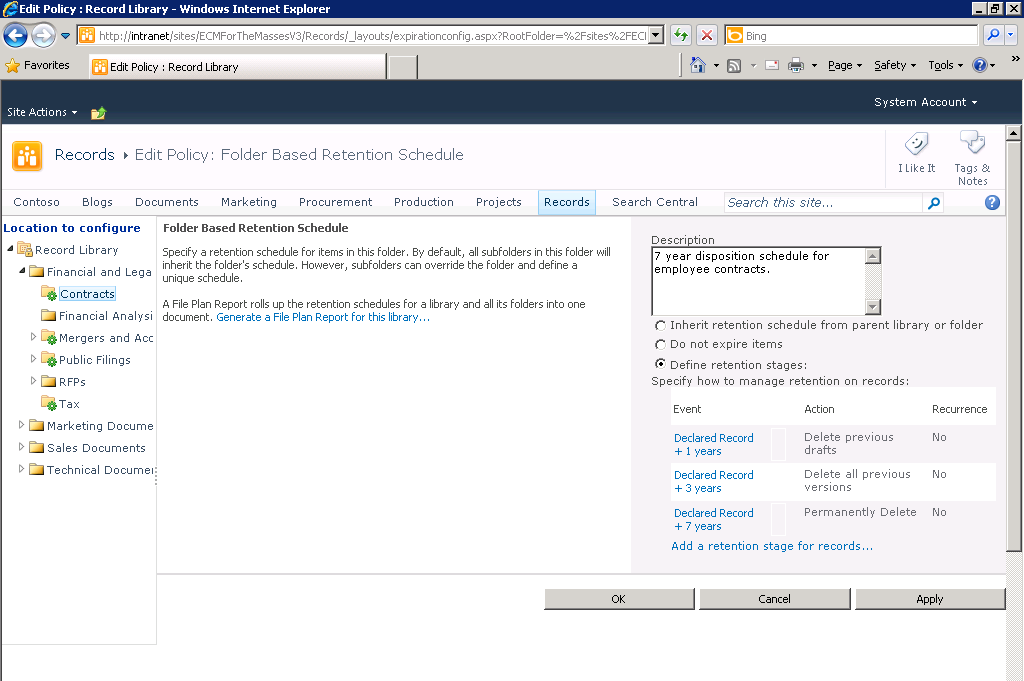
25 Make the tools support the business Retention schedule details and source of definition Current hold and record status Per item audit reports Records management Manage records in-place, archive them to a central repository, or combine the two approaches Content consistency Apply the same ECM functionality to traditional content, Web pages, and social content Compliance with detailed auditing Compliance and auditing at the file level and across repositories

26 Decrease costs by managing the right content effectively Content type or location based policies Multi-stage retention schedules Available for records and non records Retention policies Use multi-stage policies to drive retention schedules and to control when content should be archived or expired Risk and compliance Reduce risk by managing content quickly and confidently IT effectiveness Manage metadata, content types, and policies from a centralized location

27 Decrease costs by managing the right content effectively All content treated equally during discovery Hold content in place or export to another location Retention policies Use multi-stage policies to drive retention schedules and to control when content should be archived or expired Risk and compliance Reduce risk by managing content quickly and confidently IT effectiveness Manage metadata, content types, and policies from a centralized location

28 Decrease costs by managing the right content effectively Centralized taxonomy term store Import existing taxonomy Flexible management options Retention policies Use multi-stage policies to drive retention schedules and to control when content should be archived or expired Risk and compliance Reduce risk by managing content quickly and confidently IT effectiveness Manage metadata, content types, and policies from a centralized location

29 Search Get better answers, faster Connect with people and expertise Customize the search experience
30 Get better answers, faster Sorting on any property Query completion Deep navigation Related searches & people Scrolling previews Document thumbnails Federated results Read in Office Web Apps Explore using navigators Enables you to understand the scope of information available, with exact counts of results Visualize your results Quickly recognize what you re looking for without opening separate applications Improve relevance Based on how people tag and rate content in SharePoint and on click-thrus of search results
31 Connect with people and expertise Phonetic name lookup Filter by title, expertise & other attributes Sorting by social distance Real-time presence Expertise matching Find recent content Org browsing Find people An address book search that matches names phonetically and lets you browse organizations Discover expertise Based on terms matched from mined Outlook inbox data and SharePoint My Site profiles Use My Site information Bridge connections faster and see more relevant results based on social distance
32 Customize the search experience Targeted featured content using configurable visual best bets Find specific customers Top information new market view report to send to clients Role-specific relevance Visual navigation Direct action from search results Line of business data Find experts and see availability Drilldown to single view Business-specific navigation based on automatic tagging Add needed metadata Pre-built extractors automatically tag people, locations, and company names Tune relevance ranking Search results based on content freshness and data source that recognizes synonyms, acronyms and other business terms Build new kinds of applications Allow people to work with disparate information, gain insight based on business and role and increase efficiency

33 Insights $ Empower your people to create, access, and share information Enables people to have the right information at the right time Reduce infrastructure costs and drive decision making
34 Empower decision makers Familiar user interface and experience Improved formatting and charts Data from multiple sources Easier navigation with Slicers Self-service analysis Increase individual productivity by delivering information through familiar and intuitive tools Data access Easily connect to and work with data from multiple sources Collaboration Easily share analysis with colleagues by publishing directly to SharePoint
35 Improve organizational effectiveness Get the same rich fidelity with a web browser, including ribbon and Excel functions Published workbooks maintain live data connections Refresh workbook data manually or automatically Only people with the correct permissions can view published data Centrally store and manage all reports for easy discoverability Accountability Align to key metrics and strategy with a single version of the truth Transparency Provide trusted access to the right information and people at the right time Discoverability Enable users to find the right information across all data sources


36 Enable IT efficiency Simplify management of BI content using the PowerPivot Management Dashboard Provide user-driven application administration and monitoring Access performance and reliability information through browserbased dashboards Manage and facilitate access to secure organizational data Enterprise-ready platform Scale with a highly interoperable platform and unified architecture, inside and outside the firewall Robust infrastructure investments Ensure performance and reliability with powerful management tools and features Increased developer effectiveness Easily create applications from a single development platform
37 Microsoft SharePoint 2010 The Business Collaboration Platform for the Enterprise and the Internet Composites Sites Communities Deliver the Best Productivity Experience Cut Costs with a Unified Infrastructure Insights Content Rapidly Respond to Business Needs Search 3 7
38
39 We d love to hear more detailed feedback on this session ... [email protected] To get more related materials please visit: Connect with Gig Werks:
Priyo Lahiri Partner Technical Consultant [email protected] Microsoft Corporation
 Priyo Lahiri Partner Technical Consultant [email protected] Microsoft Corporation Introduction to Business Intelligence Trends in BI BI (Insights) in SharePoint 2010 Demo Business Insights in Microsoft
Office 365 SharePoint Online
 Office 365 SharePoint Online May 8, 2012 Statera Consultants: Erin Giffin Thomas Baer Agenda Overview of SharePoint Online capabilities Demo User Experience Admin Experience Online vs. OnPrem Hybrid Scenario
The Webcast will begin at 1:00pm EST. www.gig-werks.com
 SharePoint 2013 & SharePoint Online Security, Compliance & ediscovery The Webcast will begin at 1:00pm EST Today s Presentation: Introduction & About Gig Werks Gig Werks Experience with SharePoint Office
Extend the value of Microsoft Dynamics ERP with other technology innovations from Microsoft
 Extend the value of Microsoft Dynamics ERP with other technology innovations from Microsoft Combined with these products and technologies, Microsoft Dynamics ERP solutions can help you gain momentum in
Configuring SharePoint 2013 Document Management and Search. Scott Jamison Chief Architect & CEO Jornata [email protected]
 Configuring SharePoint 2013 Document Management and Search Scott Jamison Chief Architect & CEO Jornata [email protected] Configuring SharePoint 2013 Document Management and Search Scott Jamison
Executive Summary WHO SHOULD READ THIS PAPER?
 The Business Value of Business Intelligence in SharePoint 2010 Executive Summary SharePoint 2010 is The Business Collaboration Platform for the Enterprise & the Web that enables you to connect & empower
What s New. Microsoft Corp. All rights reserved
 What s New Microsoft Project Server 2010 provides unifi ed project and portfolio management to help organizations prioritize investments, align resources and execute projects effi ciently and effectively.
Project Management through
 Project Management through Unified Project and Portfolio Fluent User Interface Management Built on SharePoint Server 2010 Time Reporting Enhancements Project Initiation & Business Case Exchange Server
Legal Matter Task Management & Reporting in SharePoint and Office 365
 Legal Matter Task Management & Reporting in SharePoint and Office 365 Why Gig Werks Be it in the Cloud with Office 365 or on premise, Gig Werks has delivered targeted and focused business solutions for
WHITE PAPER. CRM Evolved. Introducing the Era of Intelligent Engagement
 WHITE PAPER CRM Evolved Introducing the Era of Intelligent Engagement November 2015 CRM Evolved Introduction Digital Transformation, a key focus of successful organizations, proves itself a business imperative,
Achieve more with less
 Energy reduction Enterprise Fax Servers Solutions Integrations: SharePoint case Whitepaper Achieve more with less SharePoint 2010 Benefits and Migration Costs Why Fax Server Integration Receive faxes to
Entwickler. SharePoint Foundation. Standard Edition. Enterprise Edition
 Entwickler Access Services nein nein ja App Catalog () App Deployment: Autohosted Apps nein nein nein App Deployment: Cloud-Hosted Apps App Deployment: -Hosted Apps App Management Services BCS: Alerts
Common Situations. Departments choosing best in class solutions for their specific needs. Lack of coordinated BI strategy across the enterprise
 Common Situations Lack of coordinated BI strategy across the enterprise Departments choosing best in class solutions for their specific needs Acquisitions of companies using different BI tools 2 3-5 BI
32 Benefits of Pipeliner CRM
 SLIDE DECK: 32 Benefits of r CRM www.pipelinersales.com 32 Benefits of r CRM r originally was designed as a tool for sales empowerment. With its newest release r meets the highest requirements for enterprise
AEC Document Control with SharePoint & Office 365
 AEC Document Control with SharePoint & Office 365 RFI, Transmittal & Submittal Management Today s Presentation Introduction About Gig Werks & AEC Expertise Challenges Facing the AEC About ProjectReady
The Webcast will begin at 1:00pm EST. www.gig-werks.com
 Power Business Intelligence for SharePoint Online and Office 365 The Webcast will begin at 1:00pm EST Today s Presentation: Introduction & About Gig Werks Gig Werks Experience with SharePoint & Business
SharePoint Benefits. Engage partners customers and employees across one platform. Internet Extranet Intranet
 SharePoint Benefits Engage partners customers and employees across one platform Internet Extranet Intranet Agenda Extranet Business Optimization What is your organizational strategy? Extranet Business
Digital Marketplace - G-Cloud
 Digital Marketplace - G-Cloud SharePoint Services Core offer 22 services in this area: 1. SharePoint Forms SharePoint comes with out-of-the-box web-based forms that allow for data to be captured for your
SHAREPOINT 2016 POWER USER BETA. Duration: 4 days
 SHAREPOINT 2016 POWER USER BETA Duration: 4 days Overview This course delivers the complete site owner story from start to finish in an engaging and practical way to ensure you have the confidence to plan
Enterprise Records Management in SharePoint and Office 365
 Enterprise Records Management in SharePoint and Office 365 Today s Presentation: Introduction & About Gig Werks SharePoint 2013 ECM & Records Management Advantages to 3rd Party Applications About RecordPoint
The Webcast will begin at 1:00pm EST. www.gig-werks.com
 Workflow throughout the Enterprise for Legal Firms and Departments The Webcast will begin at 1:00pm EST www.gig-werks.com Today s Presentation: Introduction & About Gig Werks Gig Werks Experience with
Michelle Metzger TLG Learning. Support: 1-855-460-5880
 Michelle Metzger TLG Learning 14 years in the Training & Consulting Industry Microsoft Certified Trainer Certified SQL Administrator Certified SharePoint Administrator Introduction to SharePoint 2013 New
SharePoint 2013 Solutions for Legal: Secure File Transfer & Document Comparison. www.gig-werks.com
 SharePoint 2013 Solutions for Legal: Secure File Transfer & Document Comparison Today s Presentation: Introduction About Gig Werks SharePoint 2013 Overview for Legal Workshare SharePoint 2013 Solutions
Collaborative Project & Program Management for the AEC with SharePoint & Office 365
 Collaborative Project & Program Management for the AEC with SharePoint & Office 365 Today s Presentation Introduction About Gig Werks & AEC Expertise Advantages of Office 365 & The Cloud ProjectReady Applications
Microsoft SharePoint Products & Technologies
 Tips & Tricks / SharePoint Page 1 of 2 Microsoft SharePoint Products & Technologies SharePoint Products and Technologies provide you enterprise-scale capabilities to meet businesscritical needs such as
Office SharePoint Server 2007
 Top 10 Benefits of WSS 3.0 Office SharePoint Server 2007 1. Improve team productivity with easy-to-use collaborative tools Connect people with the information and resources they need. Users can create
Content Lifecycle and Records Management in SharePoint for Legal
 Content Lifecycle and Records Management in SharePoint for Legal Today s Presentation Will Cover: About Gig Werks SharePoint 2013 Overview New ECM Features and Functionality in SharePoint 2013 About Collabware
Microsoft FAST Search Server 2010 for SharePoint Evaluation Guide
 Microsoft FAST Search Server 2010 for SharePoint Evaluation Guide 1 www.microsoft.com/sharepoint The information contained in this document represents the current view of Microsoft Corporation on the issues
Implementing SharePoint 2010 as a Compliant Information Management Platform
 Implementing SharePoint 2010 as a Compliant Information Management Platform Changing the Paradigm with a Business Oriented Approach to Records Management Introduction This document sets out the results
Record Management in SharePoint
 Record Management in SharePoint JULY 2013 (please consult http://www.katprotech.com/whitepapers for the latest version of this paper) ABOUT KATPROTECHNOLOGIES: Katpro Technologies is an advanced technology
Getting Started with Office 365 Contents
 Getting Started with Office 365 Contents What is Office 365?... 2 Key Service Highlights for Students:... 2 Summary of Benefits of Office 365 for IOE Students... 3 Learn More with Videos... 3 Logging onto
Advanced Solutions of Microsoft SharePoint Server 2013
 Course 20332B: Advanced Solutions of Microsoft SharePoint Server 2013 Course Details Course Outline Module 1: Understanding the SharePoint Server 2013 Architecture This module introduces the architectural
Microsoft Project 2010 builds on the Microsoft Project 2007 foundation with flexible work management solutions and the right collaboration tools for
 Microsoft Project 2010 builds on the Microsoft Project 2007 foundation with flexible work management solutions and the right collaboration tools for occasional and professional project managers. Project
SharePoint Online Quick Reference
 SharePoint Online Quick Reference www.messageops.com What is SharePoint? Microsoft SharePoint is a collaboration tool utilized by enterprises and small-medium businesses as a means for productivity solutions.
Enabling Business Intelligence for Everyone
 Enabling Business Intelligence for Everyone WHITEPAPER PUBLISHED: OCTOBER 2009 For the latest information, please see https://www.microsoft.com/bi Contents Introduction... 3 The Business Intelligence challenge...
Enhance Collaboration and Mitigate Risk with Email and Document Management in SharePoint
 Enhance Collaboration and Mitigate Risk with Email and Document Management in SharePoint The Webcast will begin at 1:00pm EST Introduction & About Gig Werks Gig Werks Experience in the AEC SharePoint 2013
SharePoint 2013 - Comparison of Features
 2013 - Comparison of Features 2013 Features User Authentication and Authorization Foundation 2013 Server 2013 Standard Server 2013 Enterprise User authentication in 2013 is the process that verifies the
The Socialtext Enterprise Collaboration Platform
 The Socialtext Enterprise Collaboration Platform Socialtext transforms business processes and organizational culture by bringing real-time collaboration to the enterprise. By unlocking knowledge, expertise,
Microsoft SharePoint Products & Technologies
 Tips & Tricks / SharePoint Page 1 of 2 Microsoft SharePoint Products & Technologies SharePoint Products and Technologies provide you enterprise-scale capabilities to meet businesscritical needs such as
 Introducing Microsoft SharePoint Foundation 2010 Executive Summary This paper describes how Microsoft SharePoint Foundation 2010 is the next step forward for the Microsoft fundamental collaboration technology
Document Management. Document Management for the Agile Enterprise. AuraTech Pte Ltd
 Document Management Document Management for the Agile Enterprise AuraTech Pte Ltd 30 Robinson Road, #04-01B Robinson Towers, Singapore 048546 http://www.consultaura.com PH: 6224 9238 Try it! Call AuraTech
SharePoint 2010 vs. SharePoint 2013 Feature Comparison
 SharePoint 2010 vs. SharePoint 2013 Feature Comparison March 2013 2013 SUSAN HANLEY LLC SharePoint 2010 vs. 2013 From a document collaboration perspective, the structures of both versions are the same
Microsoft SharePoint THE PLATFORM ENTERPRISES NEED
 Microsoft SharePoint THE PLATFORM ENTERPRISES NEED Presentation Outline Purpose of the Presentation The Right Team Introduction to SharePoint SharePoint as DMS SharePoint ac ECM SharePoint for Workflows
Insights for SharePoint 2013 INTRODUCTION TO THE BI TOOLS
 Insights for SharePoint 2013 INTRODUCTION TO THE BI TOOLS Webinar Topics Intro to BI Tools What is SharePoint? What is Business Intelligence? Evolution of Business Intelligence Common Challenges of BI
SHAREPOINT NEWBIES Claudia Frank, 17 January 2016
 SHAREPOINT NEWBIES Claudia Frank, 17 January 2016 AGENDA WHAT IS SHAREPOINT? SHAREPOINT 2013 KEY FEATURES Data Connectivity Business Connectivity Services Import Data without Code User driven solutions
www.ducenit.com Analance Data Integration Technical Whitepaper
 Analance Data Integration Technical Whitepaper Executive Summary Business Intelligence is a thriving discipline in the marvelous era of computing in which we live. It s the process of analyzing and exploring
Record Tagging for Microsoft Dynamics CRM
 Record Tagging for Microsoft Dynamics CRM An easy and intuitive way to apply tags to records in CRM Why tagging? Tagging has become a very normal way for content creators and consumers to apply unstructured
Microsoft Project Server 2013
 Project Server 2013 Project Server 2013 is a flexible on-premises solution for project portfolio management (PPM) and everyday work. Team members, project participants, and business decision makers can
Advanced Solutions of Microsoft SharePoint Server 2013 Course 20332A; 5 Days, Instructor-led
 Lincoln Land Community College Capital City Training Center 130 West Mason Springfield, IL 62702 217-782-7436 www.llcc.edu/cctc Advanced Solutions of Microsoft SharePoint Server 2013 Course 20332A; 5 Days,
MS 50547B Microsoft SharePoint 2010 Collection and Site Administration
 MS 50547B Microsoft SharePoint 2010 Collection and Site Administration Description: Days: 5 Prerequisites: This five-day instructor-led Site Collection and Site Administrator course gives students who
SAP BusinessObjects Edge BI, Standard Package Preferred Business Intelligence Choice for Growing Companies
 SAP Solutions for Small Businesses and Midsize Companies SAP BusinessObjects Edge BI, Standard Package Preferred Business Intelligence Choice for Growing Companies SAP BusinessObjects Edge BI, Standard
2007 to 2010 SharePoint Migration - Take Time to Reorganize
 2007 to 2010 SharePoint Migration - Take Time to Reorganize by Mark Klinchin CTO, MetaVis Technologies May 2010 Phone: (610)-717-0413 Email: [email protected] Website: www.metavistech.com Introduction
BIRT Performance Analytics Summary of Features. Product Brochure
 Summary of Features Product Brochure With BIRT Performance Scorecard (now BIRT Performance Analytics) we are able to generate intuitive progress reports to present to the public that effectively measure
Microsoft Lync 2010 The Essentials
 Microsoft Lync 2010 The Essentials Training User Guide Syed Ali Raza Director IT NUML Email : [email protected] Engr Fazal-i-Hassan UC Specialist Email : [email protected] August 29, 2011 MICROSOFT
SharePoint and Contract Management. Alan Weintraub Practice Director ECM Consulting (610) 234-4032 (office) (484) 467-5720 (Mobile)
 1 SharePoint and Contract Management Alan Weintraub Practice Director ECM Consulting (610) 234-4032 (office) (484) 467-5720 (Mobile) 2 Agenda What is SharePoint MOSS 2007 Contract Management Demonstration
Records Management and SharePoint 2013
 Records Management and SharePoint 2013 SHAREPOINT MANAGEMENT, ARCHITECTURE AND DESIGN Bob Mixon Senior SharePoint Architect, Information Architect, Project Manager Copyright Protected by 2013, 2014. Bob
The Homebuilder Intelligence Suite
 The Homebuilder Intelligence Suite informxl is a comprehensive reporting suite providing builders with better data insight for more intelligent and informed decisions. Summary to detail, desktop to mobile,
SharePoint 2013 Site Owner and Power User Boot Camp SP31; 3 Days, Instructor-led
 SharePoint 2013 Site Owner and Power User Boot Camp SP31; 3 Days, Instructor-led Course Description Users that have some basic knowledge of navigating a SharePoint site will find this class the perfect
SharePoint 2013: Key feature improvements
 E-001 SharePoint 2013: Key feature improvements nonlinear enterprise is the enterprise collaboration and communication technology division of nonlinear creations. Relying on our Enterprise Performance
Sametime 101: Feature Overview. Roberto Chiabra IBM Certified IT Specialist
 Sametime 101: Feature Overview Roberto Chiabra IBM Certified IT Specialist IBM Sametime software 101: Feature Overview Rich Presence Enterprise Instant Messaging Mobility Online Meetings Voice & Video
SAP Digital CRM. Getting Started Guide. All-in-one customer engagement built for teams. Run Simple
 SAP Digital CRM Getting Started Guide All-in-one customer engagement built for teams Run Simple 3 Powerful Tools at Your Fingertips 4 Get Started Now Log on Choose your features Explore your home page
Business Intelligence in SharePoint 2013
 Business Intelligence in SharePoint 2013 Empowering users to change their world Jason Himmelstein, MVP Senior Technical Director, SharePoint @sharepointlhorn http://www.sharepointlonghorn.com Gold Sponsor
SharePoint 2010 Intranet Case Study. Presented by Peter Carson President, Envision IT
 SharePoint 2010 Intranet Case Study Presented by Peter Carson President, Envision IT Peter Carson President, Envision IT Virtual Technical Specialist, Microsoft Canada Computer Engineering, UW [email protected]
Top Five Ways Any Business Can Benefit from Box
 Top Five Ways Any Business Can Benefit from Box Every business, no matter what size, has documents and information that are the foundation of the company. Team members need to access and collaborate on
Project Management System Services
 Project Management System Services Today's projects need to deal with increasing amounts of information that require better tools to help navigate through all the data produced by projects. Our services
Using Microsoft Business Intelligence Dashboards and Reports in the Federal Government
 Using Microsoft Business Intelligence Dashboards and Reports in the Federal Government A White Paper on Leveraging Existing Investments in Microsoft Technology for Analytics and Reporting June 2013 Dev
Business Intelligence Using SharePoint 2013 and Office365
 Business Intelligence Using SharePoint 2013 and Office365 Firdouz Hussain Shaik Trigent Software Introduction Many successful companies have been investing large sums of money in business intelligence
Data Mining, Predictive Analytics with Microsoft Analysis Services and Excel PowerPivot
 www.etidaho.com (208) 327-0768 Data Mining, Predictive Analytics with Microsoft Analysis Services and Excel PowerPivot 3 Days About this Course This course is designed for the end users and analysts that
Enterprise 2.0 and SharePoint 2010
 Enterprise 2.0 and SharePoint 2010 Doculabs has many clients that are investigating their options for deploying Enterprise 2.0 or social computing capabilities for their organizations. From a technology
and 2010: rprise Increasingly, must ation, es, partners, s intelligence.
 Autodesk Vault 2012 Autodesk Vault 2012 and Microsoft SharePoint 2010: Providing Accesss to Design Data Across the Enter rprise Increasingly, to succeed, businesses must collaborate effectively y both
Microsoft Visio 2010 Business Intelligence
 Microsoft Visio 2010 Business Intelligence St. Louis SharePoint User Group Candy Parisi Microsoft Visio Solution Specialist April 10, 2012 Agenda Microsoft Business Intelligence Overview Visio Business
How Microsoft IT India s Test Organization Enabled Efficient Business Intelligence
 How Microsoft IT India s Test Organization Enabled Efficient Business Intelligence December 2013 The following content may no longer reflect Microsoft s current position or infrastructure. This content
Data Analysis in SharePoint Pilot Report
 Data Analysis in SharePoint Pilot Report 1 Aim The purpose of this experiment is to explore the data analysis features of SharePoint 2013 and how it can be used to visualize information in the university
Digital Asset Management. Content Control for Valuable Media Assets
 Digital Asset Management Content Control for Valuable Media Assets Overview Digital asset management is a core infrastructure requirement for media organizations and marketing departments that need to
PBI365: Data Analytics and Reporting with Power BI
 POWER BI FOR BUSINESS ANALYSTS AND POWER USERS 3 DAYS PBI365: Data Analytics and Reporting with Power BI AUDIENCE FORMAT COURSE DESCRIPTION Business Analysts, Statisticians and Data Scientists Instructor-led
CONCEPTCLASSIFIER FOR SHAREPOINT
 CONCEPTCLASSIFIER FOR SHAREPOINT PRODUCT OVERVIEW The only SharePoint 2007 and 2010 solution that delivers automatic conceptual metadata generation, auto-classification and powerful taxonomy tools running
www.sryas.com Analance Data Integration Technical Whitepaper
 Analance Data Integration Technical Whitepaper Executive Summary Business Intelligence is a thriving discipline in the marvelous era of computing in which we live. It s the process of analyzing and exploring
SharePoint 2013 for Business Process Automation
 SharePoint 2013 for Business Process Automation Course Number: 12966 Category: SharePoint Duration: 3 Days Course Description This three-day instructor-led course teaches business professionals how to
Intelligent Dashboards made Simple! Using Excel Services
 Intelligent Dashboards made Simple! Using Excel Services Presented by: Asif Rehmani, SharePoint Server MVP Trainer/Solution Architect [email protected] Who am I? One of the founders of Chicago
Microsoft Power BI. Nov 21, 2015
 Nov 21, 2015 Microsoft Power BI Biray Giray Practice Lead - Enterprise Architecture, Collaboration, ECM, Information Architecture and Governance getalbert.ca [email protected] Michael McKiernan
Elevate Customer Experience and Engagement in the New Digital World
 Elevate Customer Experience and Engagement in the New Digital World John Chan CRM Solutions Lead, Microsoft Business Solutions Microsoft Asia Customer buying behavior has fundamentally changed therefore,
Managing explicit knowledge using SharePoint in a collaborative environment: ICIMOD s experience
 Managing explicit knowledge using SharePoint in a collaborative environment: ICIMOD s experience I Abstract Sushil Pandey, Deependra Tandukar, Saisab Pradhan Integrated Knowledge Management, ICIMOD {spandey,dtandukar,spradhan}@icimod.org
SQL Server 2016 BI Any Data, Anytime, Anywhere. Phua Chiu Kiang PCK CONSULTING MVP (Data Platform)
 SQL Server 2016 BI Any Data, Anytime, Anywhere Phua Chiu Kiang PCK CONSULTING MVP (Data Platform) SQL Server 2016 Pin paginated report items to Power BI dashboards Visualization Mobile and paginated reports
Melissa Coates. Tools & Techniques for Implementing Corporate and Self-Service BI. Triad SQL BI User Group 6/25/2013. BI Architect, Intellinet
 Tools & Techniques for Implementing Corporate and Self-Service BI Triad SQL BI User Group 6/25/2013 Melissa Coates BI Architect, Intellinet Blog: sqlchick.com Twitter: @sqlchick About Melissa Business
Enterprise Private Cloud Storage
 Enterprise Private Cloud Storage The term cloud storage seems to have acquired many definitions. At Cloud Leverage, we define cloud storage as an enterprise-class file server located in multiple geographically