
SharePoint Benefits. Engage partners customers and employees across one platform. Internet Extranet Intranet
|
|
|
- Giles Logan
- 10 years ago
- Views:
Transcription

1

2 SharePoint Benefits Engage partners customers and employees across one platform Internet Extranet Intranet

3 Agenda
4 Extranet Business Optimization What is your organizational strategy? Extranet Business Goals Reduce supply chain inefficiencies Interact with your loyal customer base Extend self service strategies Share business resources with partners Enable mobile capabilities Extend remote employee access


5 Extranet Stakeholder Goals What are the benefits for extranet stakeholders? Executive Leadership Business growth New strategic opportunities Legal requirement compliance Operational cost reductions Technical Managers Content management Search capabilities Infrastructure Security Extranet Stakeholder Goals Information Workers Knowledgebase availability Flexible customer support Familiar interface tools Dynamic application access


6 Business Extranets Connecting your business communities for success Cost Reduction Competitive Advantage Extranet Business Growth Internet Customers Partners Employees Intranet


7 Business Challenges Extranet Benefits Extranets Achieving your business goals Competitive Advantage Cost Reduction Business Growth Challenge Limited insights into partner initiatives Team Collaboration across locations and time zones Limited accessibility to partner resources Benefits Real-time sharing of business intelligence Anytime partner site collaboration strategies Segregate and protect sensitive shared business resources Challenge Inefficient partner\vendor workflow processes Support costs for customer service teams Attracting diverse remote mobile employee talent pool Benefits Enabled workflow processing for streamlined interactions Customer self-service opportunities Comprehensive access to shared resources and LOB applications Challenge Limited customer insights to future marketing initiatives Time to marketing latency 24/7 customer access to personalized offerings Benefits Trusted customer feedback on goods and services offerings Centralized content publishing access Mobile customer access to targeted services


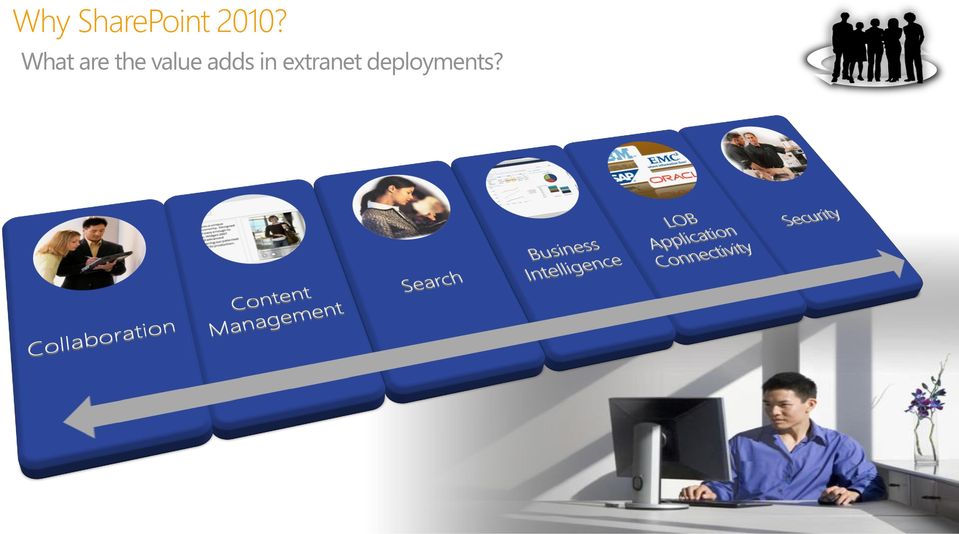
8 Extranet Requirements Branding Integration Communities Mobile Access Performance Authentication Content Management Collaboration LOB Connectivity Security Search Business Intelligence New Service Applications Customer Experience Self Service Portals

9 Why SharePoint 2010? What are the value adds in extranet deployments?
10 Partner and Customer Collaboration Sharing information across business boundaries Partner team announcements Partner / Vendor discussion boards Shared business document storage Internal / External links to shared resources


11 Extranet Content Management Unified content deployment strategy Convenient Ribbon Interface Digital Asset Management and Approval Processes Rapid customer facing publishing Video streaming for enhanced customer experience

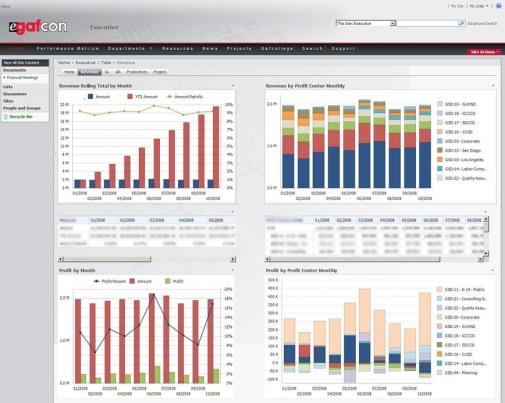
12 Shared Partner Insights Leveraging partner real time metrics for business growth Flexible graphic analysis Partner relationship workflow processes Detailed shared revenue partner KPIs

13 Enhanced Search Experience Finding the right resources and people - FAST Connecting partners and customers to resources and expertise Content navigators with exact counts Document thumbnails Document previews


14 LOB Application Connectivity Sharing information across business applications Connect partners and customers to information from multiple applications across your enterprise
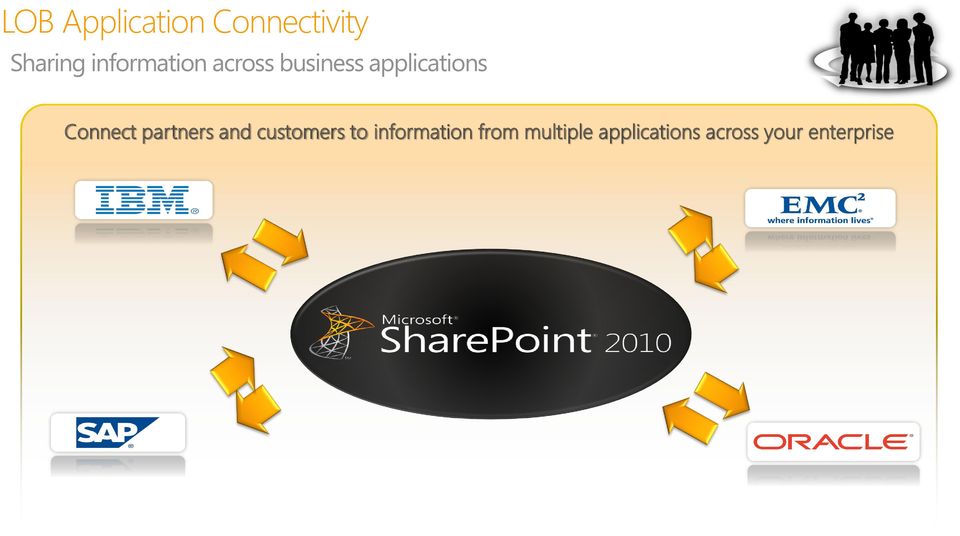

15 Extranet Access Security Confidently control access and content Business Ready Security Integrate & extend security across the enterprise Help protect everywhere access anywhere Simplify the security experience and manage compliance

16 SharePoint Server for Internet Sites Product Details The ideal solution for small to medium-sized businesses to reach their customers on the internet with easy-to-use Web Content Management and compliance for single domains*. Features SharePoint Standard CAL Features Licensing Enterprise Content Management Web Publishing Out-of-the-box Workflows Social Networking (for authenticated users) Search Single Domain License for Internet or Extranet Use A license is required for every server (WFE, SSA, Index) providing standard capabilities Step-up SKU to Enterprise is available to customers with active SA** Product Details The ideal solution for enterprise customers with multiple domains, across many geographies who want to provide high availability to their site visitors combined with a powerful search experience. Features SharePoint Standard CAL Features Licensing + Enterprise CAL Features Enterprise Content Management Web Publishing Out-of-the-box Workflows Social Networking (for authenticated users) Search InfoPath Services SharePoint Business Intelligence (Excel Services and PerformancePoint) Access Services Visio Services Rights for FAST Search for SharePoint (for use outside the firewall)*** Multiple Domain License for Internet or Extranet Use A license is required for every server (WFE, SSA, Index) providing enterprise capabilities Customers will require a completely new license of FIS Enterprise if a customer only purchased the license to FIS Standard Product Details FAST provides the platform for driving high-volume commerce and content experiences uniquely personalized to the individual. For highly tailored search solutions or highly personalized experiences for top tier websites, FAST Search for Internet Sites provides the industry leading solution. Features Visual Search (Document Thumbnails and Previews) Deep Refinement (Faceted Search) Meta-data Extraction People Search Federation Visual best bets Custom search experiences (per user/profile) Business Intelligence Indexing Connector Content Processing Pipeline Relevancy model and more.

17 Guided Conversation Usage Scenarios User Bases Authentication User/Site Provisioning Content Security Architecture Search Driven Applications Implementation OOB out of the box and very common scenarios Configuration still OOB but may require higher level of understanding and/or administrator (IT) rights Customization typically requires IT involvement and/or custom code Keep in mind, it is all relative, these are just guidelines

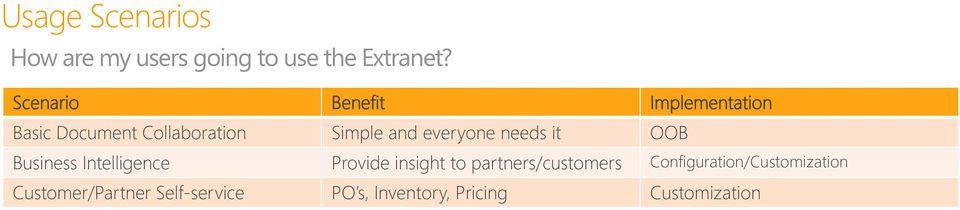
18 Usage Scenarios How are my users going to use the Extranet? Scenario Benefit Implementation Basic Document Collaboration Simple and everyone needs it OOB Business Intelligence Provide insight to partners/customers Configuration/Customization Customer/Partner Self-service PO s, Inventory, Pricing Customization
19 Authentication How will my users authenticate? Authentication Benefit Implementation Active Directory Active Directory Federation Services Existing Expertise Simple Still AD Distribute User Mgt OOB Configuration LDAP/Custom/SQL Flexible Customization Need to also think about Claims Based Authentication

20 User Bases What types of users will use the Extranet? User Base Location of Users Implementation Employees Active Directory OOB Contractors Active Directory OOB Partners/Customers Partner Active Directory OOB New Internal AD Configuration - ADFS Partners/Customers Not Active Directory Customization ADFS/LDAP

21 User Provisioning How will external users get created? Type Benefit Implementation IT provision Simple and comfortable OOB Self Provision through Active Directory Front End Self Provision through Sharepoint Easy for Employees Easy for everyone Visibility Configuration Customization Need to also think about Who owns the user Password resetting User validation User expiration User auditing
22 Site Provisioning How will sites get created? Type Benefit Implementation IT provisioning Single and comfortable OOB Provision through workflow Controllable Configuration Self Provision through Sharepoint Easy for everyone Visibility Customization Need to also think about Who owns the site Who grants access Site expiration Site auditing NDA information Records Management and/or compliance
23 Content - Protecting How will content get protected? Type Benefit Implementation Site or item protection Easy to implement OOB Content Types More granular control Configuration Rights Management Highest Level Protection Customization Need to also think about What kind of content is not allowed Data Loss Prevention Forefront and partners
24 Content - Auditing How to log what users do? Type Benefit Implementation Web/Sharepoint Auditing Built in logging and reports OOB IMP Auditing/Custom Reports Built in and more granular Configuration Rights Management More restrictive and granular Customization Need to also think about Recovery of lost information Involve Records Mgt and/or compliance team
25 Content - Expiring How to get rid of content? Type Benefit Implementation Site expiration Simple and built in OOB Content Type/IMP More granular control Configuration Rights Management Expire even when not in Sharepoint Customization Need to also think about Records Management Compliance Deleting or Archiving
26 Questions 26
27
SharePoint 2010 as an Extranet Platform
 SharePoint 2010 as an Extranet Platform Agenda SharePoint versions and licensing Extranet scenarios AD vs. SQL FBA Under the Hood Envision IT Extranet User Manager Wrap-up and Q&A Extranet technology solutions
SharePoint 2010 as an Extranet Platform
 SharePoint 2010 as an Extranet Platform Peter Carson President Envision IT www.envisionit.com blog.petercarson.ca [email protected] SPONSORS Agenda SharePoint versions and licensing Extranet scenarios
SharePoint 2010 Intranet Case Study. Presented by Peter Carson President, Envision IT
 SharePoint 2010 Intranet Case Study Presented by Peter Carson President, Envision IT Peter Carson President, Envision IT Virtual Technical Specialist, Microsoft Canada Computer Engineering, UW [email protected]
Collaboration. Michael McCabe Information Architect [email protected]. black and white solutions for a grey world
 Collaboration Michael McCabe Information Architect [email protected] black and white solutions for a grey world Slide Deck & Webcast Recording links Questions and Answers We will answer questions at
SharePoint 2010 Interview Questions-Architect
 Basic Intro SharePoint Architecture Questions 1) What are Web Applications in SharePoint? An IIS Web site created and used by SharePoint 2010. Saying an IIS virtual server is also an acceptable answer.
THE FUTURE OF COLLABORATION
 THE FUTURE OF COLLABORATION Dell + Microsoft Office SharePoint Server 2007 SIMPLIFYING IT Microsoft Office SharePoint Server 2007 is one of the most valuable tools for today s businesses, letting you efficiently
Advanced Solutions of Microsoft SharePoint Server 2013 Course 20332A; 5 Days, Instructor-led
 Lincoln Land Community College Capital City Training Center 130 West Mason Springfield, IL 62702 217-782-7436 www.llcc.edu/cctc Advanced Solutions of Microsoft SharePoint Server 2013 Course 20332A; 5 Days,
Course: 10174B: Configuring and Administering Microsoft SharePoint 2010
 Course: 10174B: Configuring and Administering Microsoft SharePoint 2010 Description: This five-day instructor-led course teaches students how to install, configure, and administer Microsoft SharePoint
Executive Summary WHO SHOULD READ THIS PAPER?
 The Business Value of Business Intelligence in SharePoint 2010 Executive Summary SharePoint 2010 is The Business Collaboration Platform for the Enterprise & the Web that enables you to connect & empower
Business process efficiency is improved with task management, alerts, notifications and automated process workflows.
 UNCLASSIFIED 23/02/2015 v3.3 Cobweb Hosted SharePoint 3.0 Service Description Cobweb Hosted SharePoint is a web-based document collaboration tool that helps you maximise productivity in a truly flexible,
Office 365 SharePoint Online
 Office 365 SharePoint Online May 8, 2012 Statera Consultants: Erin Giffin Thomas Baer Agenda Overview of SharePoint Online capabilities Demo User Experience Admin Experience Online vs. OnPrem Hybrid Scenario
Advanced Solutions of Microsoft SharePoint Server 2013
 Course 20332B: Advanced Solutions of Microsoft SharePoint Server 2013 Course Details Course Outline Module 1: Understanding the SharePoint Server 2013 Architecture This module introduces the architectural
Enterprise 2.0 and SharePoint 2010
 Enterprise 2.0 and SharePoint 2010 Doculabs has many clients that are investigating their options for deploying Enterprise 2.0 or social computing capabilities for their organizations. From a technology
10231B: Designing a Microsoft SharePoint 2010 Infrastructure
 10231B: Designing a Microsoft SharePoint 2010 Infrastructure Course Number: 10231B Course Length: 5 Days Course Overview This 5 day course teaches IT Professionals to design and deploy Microsoft SharePoint
Entwickler. SharePoint Foundation. Standard Edition. Enterprise Edition
 Entwickler Access Services nein nein ja App Catalog () App Deployment: Autohosted Apps nein nein nein App Deployment: Cloud-Hosted Apps App Deployment: -Hosted Apps App Management Services BCS: Alerts
Configuring and Administering Microsoft SharePoint 2010
 Course 10174 : Configuring and Administering Microsoft SharePoint 2010 Page 1 of 7 Configuring and Administering Microsoft SharePoint 2010 Course 10174: 4 days; Instructor-Led Introduction This four-day
and 2010: rprise Increasingly, must ation, es, partners, s intelligence.
 Autodesk Vault 2012 Autodesk Vault 2012 and Microsoft SharePoint 2010: Providing Accesss to Design Data Across the Enter rprise Increasingly, to succeed, businesses must collaborate effectively y both
SharePoint Operational Governance. al 1
 SharePoint Operational Governance al 1 About the Speaker Dan Lewis Senior Consultant, Microsoft Corporation U.S. Enterprise Services Consulting for IT Operations MCITP, MCTS, MCAD, MOF Email: [email protected]
Course 10174B: Configuring and Administering Microsoft SharePoint 2010
 Course 10174B: Configuring and Administering Microsoft SharePoint 2010 Five Days, Instructor-Led About this course This five-day instructor-led course teaches students how to install, configure, and administer
 Introducing Microsoft SharePoint Foundation 2010 Executive Summary This paper describes how Microsoft SharePoint Foundation 2010 is the next step forward for the Microsoft fundamental collaboration technology
How To Create A Help Desk For A System Center System Manager
 System Center Service Manager Vision and Planned Capabilities Microsoft Corporation Published: April 2008 Executive Summary The Service Desk function is the primary point of contact between end users and
Michael Noel. Colin Spence. SharePoint UNLEASHED. 800 East 96th Street, Indianapolis, Indiana 46240 USA
 Michael Noel Colin Spence SharePoint 2013 UNLEASHED 800 East 96th Street, Indianapolis, Indiana 46240 USA Table of Contents Introduction 1 Part I Planning for and Deploying SharePoint Server 2013 1 Introducing
SHAREPOINT ARCHITECTURE FUNDAMENTALS
 CHAPTER 4 SHAREPOINT ARCHITECTURE FUNDAMENTALS Whether you re a business user, manager, architect, developer, or IT pro, you ll want to understand the fundamental structure and core terminology of SharePoint
Tom Braekeleirs Product Marketing Manager Microsoft Dynamics. Joerg Lorenz Chief Executive Officer ITIS AG
 Tom Braekeleirs Product Marketing Manager Microsoft Dynamics Joerg Lorenz Chief Executive Officer ITIS AG Agenda Market Trends and Challenges The Customer-Centric Business Strategies for Profitable Growth
Operationalize Policies. Take Action. Establish Policies. Opportunity to use same tools and practices from desktop management in server environment
 Microsoft IT Systems Strategy DATACENTER APPLICATIONS Process-Led, Model-Driven Unified and Virtualized USER-CENTRICITY ServiceEnabled Basic Standardize d Rationalized Dynamic Cost center Efficient cost
The Recipe for Sarbanes-Oxley Compliance using Microsoft s SharePoint 2010 platform
 The Recipe for Sarbanes-Oxley Compliance using Microsoft s SharePoint 2010 platform Technical Discussion David Churchill CEO DraftPoint Inc. The information contained in this document represents the current
10174: Configuring and Managing Microsoft SharePoint 2010
 10174: Configuring and Managing Microsoft SharePoint 2010 Microsoft - Sharepoint Promoção: 10% Desconto Localidade: Porto Data: 14 Mar 2016 Preço: 1650 ( Os valores apresentados não incluem IVA. Oferta
Microsoft Technology Practice Capability document. MOSS / WSS Building Portal based Information Worker Solutions. Overview
 Microsoft Technology Practice Capability document Overview Microsoft Office SharePoint Server (MOSS) and Windows SharePoint Services (WSS) facilitate rapid website creation that supports specific content
"Charting the Course...... to Your Success!" MOC 10174 B Configuring and Administering Microsoft SharePoint 2010. Course Summary
 Description Course Summary This five-day instructor-led course teaches students how to install, configure, and administer Microsoft SharePoint and also how to manage and monitor sites and users by using
Presentation Agenda - Format & Content
 Presentation Agenda - Format & Content Introduction to Deltascheme Overview of SharePoint Current SharePoint 2010 projects Areas to consider when implementing SharePoint Complimentary 3 rd party products
Mirjam van Olst. Best Practices & Considerations for Designing Your SharePoint Logical Architecture
 Mirjam van Olst Best Practices & Considerations for Designing Your SharePoint Logical Architecture About me http://sharepointchick.com @mirjamvanolst [email protected] Agenda Introduction Logical Architecture
Office SharePoint Server 2007
 Top 10 Benefits of WSS 3.0 Office SharePoint Server 2007 1. Improve team productivity with easy-to-use collaborative tools Connect people with the information and resources they need. Users can create
Configuring and Administering Microsoft SharePoint 2013 Curso Personalizado en
 Configuring and Administering Microsoft SharePoint 2013 Course: Corrientes 861 Piso 5 S2000CTH Rosario Argentina TEL: +54 (341) 426 4844 [email protected] Configuring and Administering Microsoft SharePoint
Microsoft SharePoint THE PLATFORM ENTERPRISES NEED
 Microsoft SharePoint THE PLATFORM ENTERPRISES NEED Presentation Outline Purpose of the Presentation The Right Team Introduction to SharePoint SharePoint as DMS SharePoint ac ECM SharePoint for Workflows
WINDOWS SERVER SMALL BUSINESS SOLUTIONS. Name: Marko Drev
 WINDOWS SERVER SMALL BUSINESS SOLUTIONS Name: Marko Drev SMB Windows Server Family SOLUTION SERVERS TRADITIONAL SERVERS Complete server platform, integrated and optimized Customizable Server platform for
SharePoint 2013 Logical Architecture
 SharePoint 2013 Logical Architecture This document is provided "as-is". Information and views expressed in this document, including URL and other Internet Web site references, may change without notice.
The SharePoint Maturity Model
 The SharePoint Maturity Model Version 2.1 Last revised: 16 November 2011 11/27/2011 Copyright 2011 Sadalit Van Buren 1 What s In It For Me? The Maturity Model can help you develop your strategic roadmap,
SharePoint Integration Framework Developers Cookbook
 Sitecore CMS 6.3 to 6.6 and SIP 3.2 SharePoint Integration Framework Developers Cookbook Rev: 2013-11-28 Sitecore CMS 6.3 to 6.6 and SIP 3.2 SharePoint Integration Framework Developers Cookbook A Guide
PROPALMS TSE 6.0 March 2008
 PROPALMS March 2008 An Analysis of and Terminal Services: Contents System Administration... 2 Server Management... 3 Application Management... 5 Security... 7 End User Experience... 8 Monitoring and Reporting...
Achieve more with less
 Energy reduction Enterprise Fax Servers Solutions Integrations: SharePoint case Whitepaper Achieve more with less SharePoint 2010 Benefits and Migration Costs Why Fax Server Integration Receive faxes to
NCSU SSO. Case Study
 NCSU SSO Case Study 2 2 NCSU Project Requirements and Goals NCSU Operating Environment Provide support for a number Apps and Programs Different vendors have their authentication databases End users must
Collaborating with External Users
 Collaborating with External Users Peter Carson March 10, 2015 Gold Sponsor Silver Sponsors Peter Carson President, Envision IT SharePoint MVP Virtual Technical Specialist, Microsoft Canada [email protected]
Office 365 SharePoint Online White Paper
 Office 365 SharePoint Online White Paper Introduction Overview Cloud computing is slowly changing the way IT companies are offering their software solutions and services. Through cloud computing, IT companies
Implementing and Administering an Enterprise SharePoint Environment
 Implementing and Administering an Enterprise SharePoint Environment There are numerous planning and management issues that your team needs to address when deploying SharePoint. This process can be simplified
Contents of This Paper
 Contents of This Paper Overview Key Functional Areas of SharePoint Where Varonis Helps And How A Project Plan for SharePoint with Varonis Overview The purpose of this document is to explain the complementary
Microsoft Office SharePoint Server (MOSS) 2007 Overview
 Microsoft Office SharePoint Server (MOSS) 2007 Overview for Technology Manager Wei Wang MOSS Technical Expert Consultant [email protected] 17.04.2010 - Seite 1 Agenda Collaboration Portal Search
Streamline your staffing process with a vendor management system that fits your business
 Peopleclick VMS Streamline your staffing process with a vendor management system that fits your business Peopleclick VMS is web-based, enterprise-wide vendor management software that automates, tracks
Kaseya IT Automation Framework
 Kaseya Kaseya IT Automation Framework An Integrated solution designed for reducing complexity while increasing productivity for IT Professionals and Managed Service Providers. The powerful, web-based automation
BI & DASHBOARDS WITH SHAREPOINT 2007
 BI & DASHBOARDS WITH SHAREPOINT 2007 Leveraging SharePoint to Deliver Business Intelligence Solutions Rob Kerr, Principal Consultant BlueGranite [email protected] http://blog.robkerr.com About BlueGranite
Microsoft Visio 2010 Business Intelligence
 Microsoft Visio 2010 Business Intelligence St. Louis SharePoint User Group Candy Parisi Microsoft Visio Solution Specialist April 10, 2012 Agenda Microsoft Business Intelligence Overview Visio Business
Digital Marketplace - G-Cloud
 Digital Marketplace - G-Cloud SharePoint Services Core offer 22 services in this area: 1. SharePoint Forms SharePoint comes with out-of-the-box web-based forms that allow for data to be captured for your
SHAREPOINT 2016 POWER USER BETA. Duration: 4 days
 SHAREPOINT 2016 POWER USER BETA Duration: 4 days Overview This course delivers the complete site owner story from start to finish in an engaging and practical way to ensure you have the confidence to plan
Enterprise Solutions IT Services 4132 Heartleaf Ln Naperville, IL 60564
 Who we are Ensar Solutions Inc. is a Microsoft focused IT Services company. Our business is built around an exclusive focus on Microsoft SharePoint, Dynamics CRM, AX, Social, Azure and Mobile solutions.
PREMIER SUPPORT STANDARD SERVICES BRONZE SILVER GOLD
 SERVICE SUMMARY ITonDemand provides four levels of service to choose from to meet our clients range of needs. Plans can also be customized according to more specific environment needs. PREMIER SUPPORT
The Webcast will begin at 1:00pm EST. www.gig-werks.com
 SharePoint 2013 & SharePoint Online Security, Compliance & ediscovery The Webcast will begin at 1:00pm EST Today s Presentation: Introduction & About Gig Werks Gig Werks Experience with SharePoint Office
Qlik Sense Enabling the New Enterprise
 Technical Brief Qlik Sense Enabling the New Enterprise Generations of Business Intelligence The evolution of the BI market can be described as a series of disruptions. Each change occurred when a technology
ITMC 2079 MCTS Configuring and Administering Microsoft SharePoint 2010
 ITMC 2079 MCTS Configuring and Administering Microsoft SharePoint 2010 Length: 48 Hours Delivery Method: Instructor-led (classroom); MOC 10174 Course Description The course teaches students how to install,
Microsoft FAST Search Server 2010 for SharePoint Evaluation Guide
 Microsoft FAST Search Server 2010 for SharePoint Evaluation Guide 1 www.microsoft.com/sharepoint The information contained in this document represents the current view of Microsoft Corporation on the issues
U-LINC : Workflow and Notifications Anytime and Anywhere for Microsoft Dynamics GP
 U-LINC : Workflow and Notifications Anytime and Anywhere for Microsoft Dynamics GP An Integrity Data White Paper U-LINC has given us the ability to quickly and easily implement workflow solutions into
Priyo Lahiri Partner Technical Consultant [email protected] Microsoft Corporation
 Priyo Lahiri Partner Technical Consultant [email protected] Microsoft Corporation Introduction to Business Intelligence Trends in BI BI (Insights) in SharePoint 2010 Demo Business Insights in Microsoft
Business Intelligence
 Microsoft Dynamics NAV 2009 Business Intelligence Driving insight for more confident results White Paper November 2008 www.microsoft.com/dynamics/nav Table of Contents Overview... 3 What Is Business Intelligence?...
Business Intelligence
 Microsoft Dynamics NAV 2009 Business Intelligence Driving insight for more confident results White Paper November 2008 www.microsoft.com/dynamics/nav Table of Contents Overview... 3 What Is Business Intelligence?...
SERVICES BRONZE SILVER GOLD PLATINUM. On-Site emergency response time 3 Hours 3 Hours 1-2 Hours 1 Hour or Less
 SERVICE SUMMARY ITonDemand provides four levels of service to choose from to meet our clients range of needs. Plans can also be customized according to more specific environment needs. SERVICES BRONZE
10174 - SharePoint 2010
 Configuring and Managing Microsoft SharePoint 2010 Introduction The course teaches students how to install, configure and administer SharePoint, and also manage and monitor sites and users by using SharePoint
Microsoft Enterprise Project Management 2010 Licensing Guide
 Microsoft Enterprise Project Management 2010 Licensing Guide Microsoft Project 2010 Licensing Microsoft Project 2010 is a family of products that provide a range of functionality depending on organizational
Enterprise Solution for Remote Desktop Services... 2. System Administration... 3. Server Management... 4. Server Management (Continued)...
 CONTENTS Enterprise Solution for Remote Desktop Services... 2 System Administration... 3 Server Management... 4 Server Management (Continued)... 5 Application Management... 6 Application Management (Continued)...
PRINTVIS: Your Printing Industry Solution Based on Microsoft Dynamics NAV
 PRINTVIS: Your Printing Industry Solution Based on Microsoft Dynamics NAV PrintVis: Your Printing Industry Solution Based on Microsoft Dynamics NAV From management and financials all the way to the production
Better Together with Microsoft Dynamics CRM
 Better Together with Microsoft Dynamics CRM Enhance the power and effectiveness of Microsoft Dynamics CRM business software with Microsoft products and technologies that work even better, together. Microsoft
Workflow and Forms Services for People-Driven Process Management
 Workflow and Forms Services for People-Driven Process Management AuraTech Pte Ltd 30 Robinson Road, #04-01B Robinson Towers, Singapore 048546 http://www.consultaura.com PH: 6224 9238 Call AuraTech for
Becoming a Cloud Services Broker. Neelam Chakrabarty Sr. Product Marketing Manager, HP SW Cloud Products, HP April 17, 2013
 Becoming a Cloud Services Broker Neelam Chakrabarty Sr. Product Marketing Manager, HP SW Cloud Products, HP April 17, 2013 Hybrid delivery for the future Traditional IT Evolving current state Future Information
DOCOsoft SharePoint Components
 DOCOsoft SharePoint Components 2011 1 Table of Contents Introduction... 3 SharePoint Enhancements... 4 SharePoint Plugin for Outlook... 4 SharePoint Viewer... 7 SharePoint Audit... 9 SharePoint Document
Top 8 Identity and Access Management Challenges with Your SaaS Applications. Okta White paper
 Okta White paper Top 8 Identity and Access Management Challenges with Your SaaS Applications Okta Inc. 301 Brannan Street, Suite 300 San Francisco CA, 94107 [email protected] 1-888-722-7871 wp-top8-113012
The SharePoint Maturity Model
 The SharePoint Maturity Model Presented as a Live Broadcast for Nothing But SharePoint 1 March 2011 Hosted By 1 Agenda Logistics What s in it for me? About Me About My Company About the SharePoint Maturity
Securing the Cloud through Comprehensive Identity Management Solution
 Securing the Cloud through Comprehensive Identity Management Solution Millie Mak Senior IT Specialist What is Cloud Computing? A user experience and a business model Cloud computing is an emerging style
Whitepaper: Manage Access Control for Network Resources with Securitay s Security Policy Manager
 Whitepaper: Manage Access Control for Network Resources with Securitay s Security Policy Manager Introduction The past several years has seen an increase in the amount of attention paid to security management
Capitalize on Big Data for Competitive Advantage with Bedrock TM, an integrated Management Platform for Hadoop Data Lakes
 Capitalize on Big Data for Competitive Advantage with Bedrock TM, an integrated Management Platform for Hadoop Data Lakes Highly competitive enterprises are increasingly finding ways to maximize and accelerate
BPM vs. SharePoint: Which is Right for Your Business
 Gain a high level comparison between Business Process Management (BPM) platforms and SharePoint to better establish the proper software fit for your enterprise. BPM solutions and SharePoint are often viewed
Cisco Unified Communications and Collaboration technology is changing the way we go about the business of the University.
 Data Sheet Cisco Optimization s Optimize Your Solution using Cisco Expertise and Leading Practices Optimizing Your Business Architecture Today, enabling business innovation and agility is about being able
The biggest challenges of Life Sciences companies today. Comply or Perish: Maintaining 21 CFR Part 11 Compliance
 S E P T E M B E R 2 0 1 3 Comply or Perish: The biggest challenges of Life Sciences companies today are maintaining a robust product pipeline and reducing time to market while complying with an increasing
126 SW 148 th Street Suite C-100, #105 Seattle, WA 98166 Tel: 877-795-9372 Fax: 866-417-6192 www.seattlepro.com
 SharePoint 2010 Bootcamp This five-day course is designed to equip Systems Administrators, Integrators and Developers with a strong foundation for implementing solutions on Microsoft SharePoint 2010. Attendees
How To Use Windows Small Business Server 2011 Essentials
 Everything Your Business Needs in a Server, Nothing it doesn t. Ideal as a first server for small businesses with up to 25 users, Windows Small Business Server 2011 Essentials provides a cost-effective
Luis Melo Head of CRM/CX. Capventis. Policy Automation. Knowledge Management. Field Service Management. Web Customer Service
 Luis Melo Head of CRM/CX MARKETING CLOUD Capventis COMMERCE CLOUD SERVICE CLOUD SALES CLOUD SOCIAL CLOUD Web Customer Cross Channel Policy Automation Field Cloud Platform MARKETING CLOUD COMMERCE CLOUD
No-Code SharePoint 2013 Workflows with SharePoint Designer 2013 and Visio 55048A; 3 Days, Instructor-led
 Lincoln Land Community College Capital City Training Center 130 West Mason Springfield, IL 62702 217-782-7436 www.llcc.edu/cctc No-Code SharePoint 2013 Workflows with SharePoint Designer 2013 and Visio
IBM Global Business Services Microsoft Dynamics CRM solutions from IBM
 IBM Global Business Services Microsoft Dynamics CRM solutions from IBM Power your productivity 2 Microsoft Dynamics CRM solutions from IBM Highlights Win more deals by spending more time on selling and
<Insert Picture Here> Oracle Identity And Access Management
 Oracle Identity And Access Management Gautam Gopal, MSIST, CISSP Senior Security Sales Consultant Oracle Public Sector The following is intended to outline our general product direction.
Cortado Corporate Server
 Cortado Corporate Server 100 % On Premise Installed & Run Entirely On Your Corporate Network Feature Mobile Device Device Policy Application E-mail Push Wi-Fi Configuration Push Enable secure BYOD and