
English. Configuring SATA Hard Drive(s)
|
|
|
- Janice Hampton
- 9 years ago
- Views:
Transcription
1 Configuring SATA Hard Drive(s) To configure SATA hard drive(s), follow the steps below: (1) Install SATA hard drive(s) in your system. (2) Configure SATA controller mode and boot sequence in BIOS Setup. (3) Configure RAID set in RAID BIOS. (Note) (4) Make a floppy disk containing the SATA controller driver. (Note) (5) Install the SATA controller driver during OS installation. (Note) Before you begin Please prepare: (a) Two SATA hard drives (to ensure optimal performance, it is recommended that you use two hard drives with identical model and capacity). If you do not want to create RAID with the SATA controller, you may prepare only one hard drive. (b) An empty formatted floppy disk. (Note) (c) Windows XP/2000 setup disk. (d) Driver CD for your motherboard. (1) Install SATA hard drive(s) in your system Attach one end of the SATA signal cable to the rear of the SATA hard drive and the other end to available SATA port(s) on the motherboard. Then connect the power connector from your power supply to the hard drive. (2) Configuring SATA controller mode and boot sequence in BIOS Setup You have to make sure whether the SATA controller is configured correctly in system BIOS Setup and set BIOS boot sequence for the SATA hard drive(s). Step 1: Turn on your computer and press Del to enter BIOS Setup during POST (Power-On Self Test). Make sure that the SATA Controller under the Integrated Peripherals menu is enabled. To create RAID, set SATA Controller Mode (Figure 1) to RAID (IDE by default). Set SATA Controller Mode to IDE if you do not want to create RAID. (Note) Required for setting up RAID array

2 CMOS Setup Utility-Copyright (C) Award Software Integrated Peripherals SATA Controller Item Help SATA Controller Mode [RAID] Menu Level IDE DMA transfer access OnChip IDE Channel0 OnChip IDE Channel1 IDE Prefetch Mode Azalia HDA Controller [Auto] LAN Controller USB 1.1 Controller USB 2.0 Controller USB Keyboard Support [Disabled] USB Mouse Support [Disabled] OnBoard LAN Boot ROM [Disabled] Legacy USB storage detect Onboard Serial Port 1 [3F8/IRQ4] Onboard Serial Port 2 [2F8/IRQ3] Onboard Parallel Port [378/IRQ7] Parallel Port Mode [SPP] x EPP Mode Select EPP1.7 : Move Enter: Select +/-/PU/PD: Value F10: Save ESC: Exit F1: General Help F5: Previous Values F6: Fail-Safe Defaults F7: Optimized Defaults Figure 1 The BIOS Setup menus described in this section may not show the exact settings for your motherboard. The actual BIOS Setup menu options you will see shall depend on the motherboard you have and the BIOS version. Step 2: Set First Boot Device under the Advanced BIOS Features menu to CDROM to boot from Windows installation CD (Figure 2). CMOS Setup Utility-Copyright (C) Award Software Advanced BIOS Features Init Display First [PEG] Item Help Hard Disk Boot Priority [Press Enter] Menu Level First Boot Device [CDROM] Second Boot Device [Hard Disk] Third Boot Device [CDROM] Password Check [Setup] CPU Hyper-Threading Limit CPUID Max. to 3 [Disabled] No-Execute Memory Protect CPU Enhanced Halt (C1E) CPU Thermal Monitor 2(TM2) CPU EIST Function Virtualization Technology : Move Enter: Select +/-/PU/PD: Value F10: Save ESC: Exit F1: General Help F5: Previous Values F6: Fail-Safe Defaults F7: Optimized Defaults Step 3: Save and exit BIOS Setup. Figure 2 GA-VM900M Motherboard - 2 -
![0 Controller USB Keyboard Support [Disabled] USB Mouse Support [Disabled] OnBoard LAN Boot ROM [Disabled] Legacy USB storage detect Onboard Serial Port 1 [3F8/IRQ4] Onboard Serial Port 2 [2F8/IRQ3]](/docs-images/43/16174275/images/page_2.jpg "Onboard Parallel Port [378/IRQ7] Parallel Port Mode [SPP] x EPP Mode Select EPP1.")
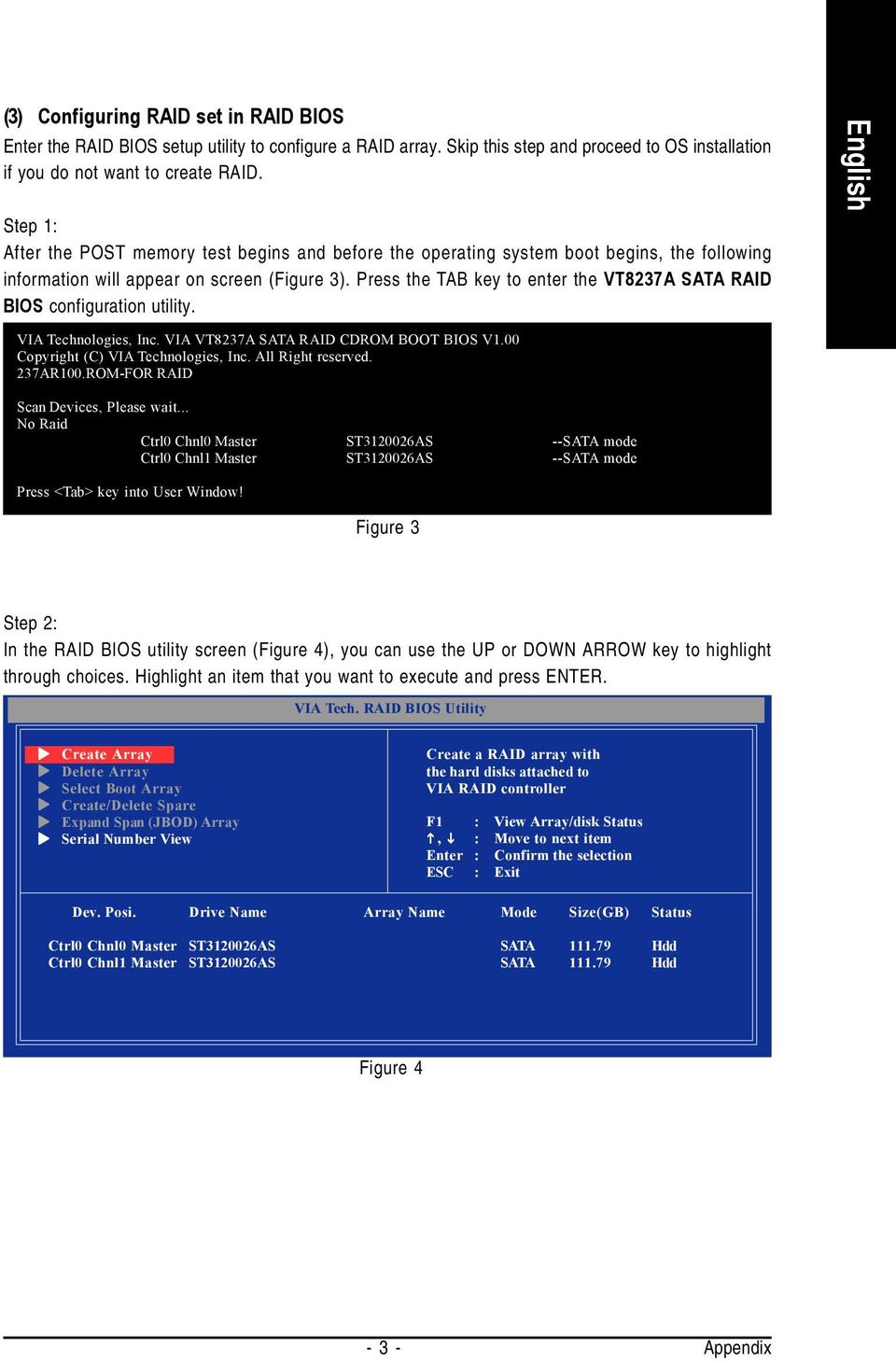
3 (3) Configuring RAID set in RAID BIOS Enter the RAID BIOS setup utility to configure a RAID array. Skip this step and proceed to OS installation if you do not want to create RAID. Step 1: After the POST memory test begins and before the operating system boot begins, the following information will appear on screen (Figure 3). Press the TAB key to enter the VT8237A SATA RAID BIOS configuration utility. VIA Technologies, Inc. VIA VT8237A SATA RAID CDROM BOOT BIOS V1.00 Copyright (C) VIA Technologies, Inc. All Right reserved. 237AR100.ROM-FOR RAID Scan Devices, Please wait... No Raid Ctrl0 Chnl0 Master ST AS --SATA mode Ctrl0 Chnl1 Master ST AS --SATA mode Press <Tab> key into User Window! Figure 3 Step 2: In the RAID BIOS utility screen (Figure 4), you can use the UP or DOWN ARROW key to highlight through choices. Highlight an item that you want to execute and press ENTER. Create Array Delete Array Select Boot Array Create/Delete Spare Expand Span (JBOD) Array Serial Number View Create a RAID array with, : Move to next item Ctrl0 Chnl0 Master ST AS SATA Hdd Ctrl0 Chnl1 Master ST AS SATA Hdd Figure 4-3 -
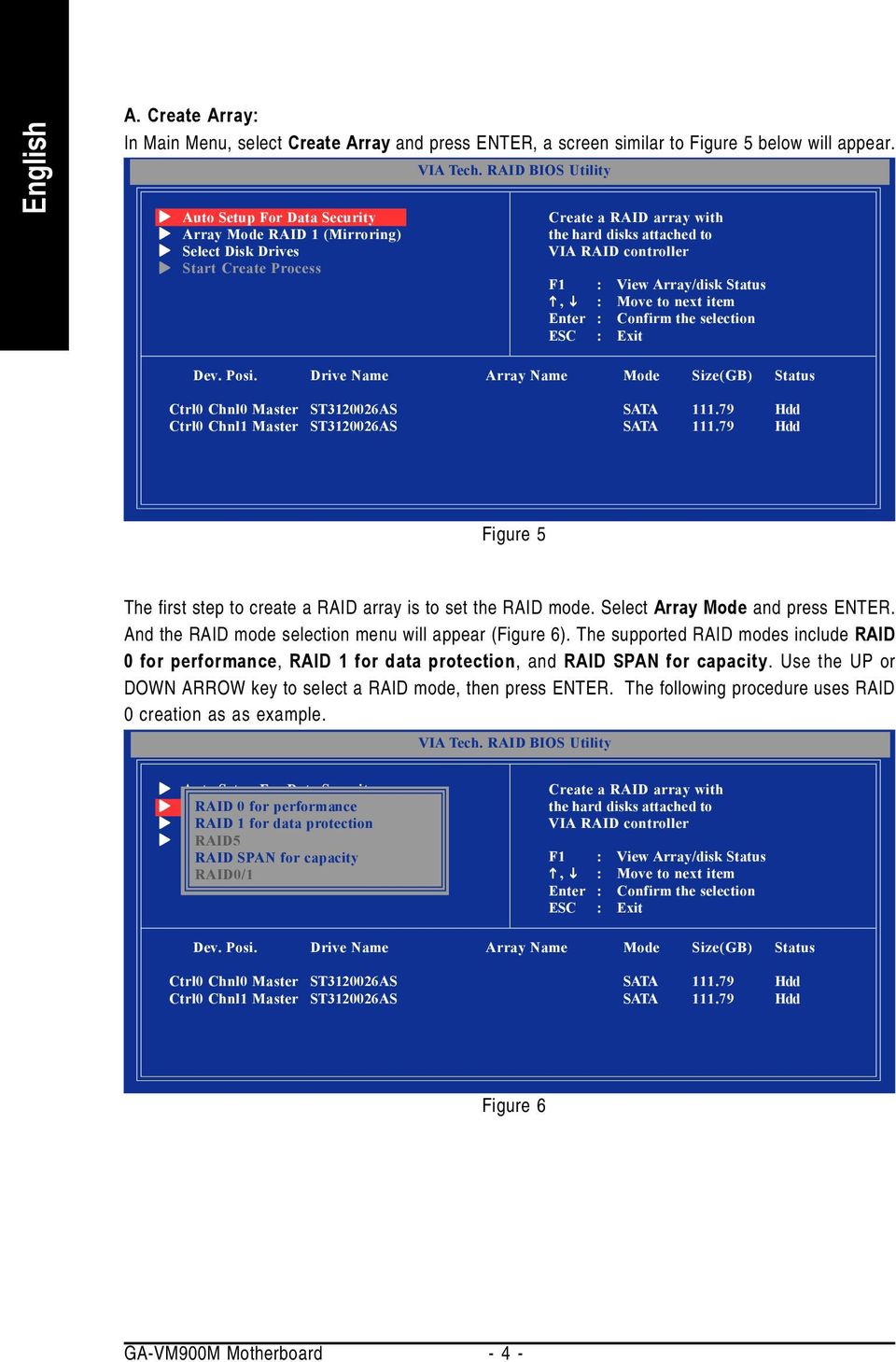
4 A. Create Array: In Main Menu, select Create Array and press ENTER, a screen similar to Figure 5 below will appear. Auto Setup For Data Security Array Mode RAID 1 (Mirroring) Select Disk Drives Start Create Process Create a RAID array with, : Move to next item Ctrl0 Chnl0 Master ST AS SATA Hdd Ctrl0 Chnl1 Master ST AS SATA Hdd Figure 5 The first step to create a RAID array is to set the RAID mode. Select Array Mode and press ENTER. And the RAID mode selection menu will appear (Figure 6). The supported RAID modes include RAID 0 for performance, RAID 1 for data protection, and RAID SPAN for capacity. Use the UP or DOWN ARROW key to select a RAID mode, then press ENTER. The following procedure uses RAID 0 creation as as example. Auto Setup For Data Security Array RAID Mode 0 for RAID performance 0 (Striping) Select RAID Disk 1 for Drives data protection Start RAID5 Create Process RAID SPAN for capacity RAID0/1 Create a RAID array with, : Move to next item Ctrl0 Chnl0 Master ST AS SATA Hdd Ctrl0 Chnl1 Master ST AS SATA Hdd Figure 6 GA-VM900M Motherboard - 4 -
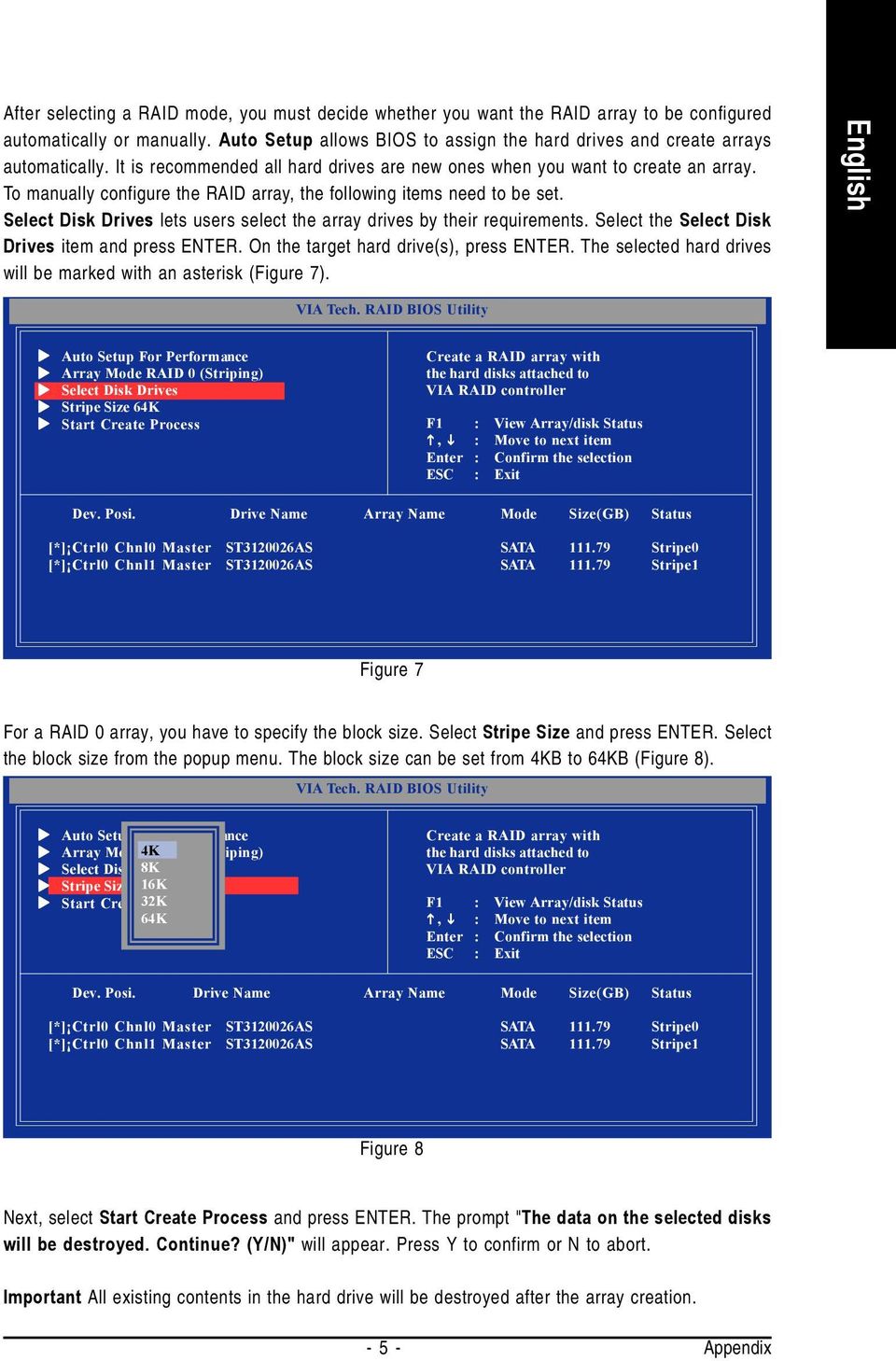
5 After selecting a RAID mode, you must decide whether you want the RAID array to be configured automatically or manually. Auto Setup allows BIOS to assign the hard drives and create arrays automatically. It is recommended all hard drives are new ones when you want to create an array. To manually configure the RAID array, the following items need to be set. Select Disk Drives lets users select the array drives by their requirements. Select the Select Disk Drives item and press ENTER. On the target hard drive(s), press ENTER. The selected hard drives will be marked with an asterisk (Figure 7). Auto Setup For Performance Array Mode RAID 0 (Striping) Select Disk Drives Stripe Size 64K Start Create Process Create a RAID array with, : Move to next item [*] Ctrl0 Chnl0 Master ST AS SATA Stripe0 [*] Ctrl0 Chnl1 Master ST AS SATA Stripe1 Figure 7 For a RAID 0 array, you have to specify the block size. Select Stripe Size and press ENTER. Select the block size from the popup menu. The block size can be set from 4KB to 64KB (Figure 8). Auto Setup For Performance Array Mode 4K RAID 0 (Striping) Select Disk Drives 8K Stripe Size 64K 16K Start Create 32K Process 64K Create a RAID array with, : Move to next item [*] Ctrl0 Chnl0 Master ST AS SATA Stripe0 [*] Ctrl0 Chnl1 Master ST AS SATA Stripe1 Figure 8 Next, select Start Create Process and press ENTER. The prompt "The data on the selected disks will be destroyed. Continue? (Y/N)" will appear. Press Y to confirm or N to abort. Important All existing contents in the hard drive will be destroyed after the array creation
6 B. View Array Status: Press F1 to show the array status on the lower screen. If there are no disk arrays then nothing will be displayed on the screen (Figure 9). Create Array Delete Array Select Boot Array Create/Delete Spare Expand Span (JBOD) Array Serial Number View View Array/Disks Status.., : Move to next item Array No. Array Type Stripe/Block Size Cap. (GB) Status Array 0 Stripe 64K Normal Ctrl0 Chnl0 Master ST AS Stripe0 Ctrl0 Chnl1 Master ST AS Stripe1 Figure 9 C. Select Boot Array: You can select a disk array as boot device if you want to boot operating system from an array. Boot disk array cannot be selected if the operating system does not boot from the disk array. Highlight the Select Boot Array item in Main Menu and press ENTER. Then press ENTER on the target disk array. The bootable array will be marked with b (Figure 10). If you want to cancel the boot array setting, press ENTER on the bootable array and its boot setting will be canceled. Create Array Delete Array Select Boot Array Create/Delete Spare Expand Span (JBOD) Array Serial Number View Set Boot OK! Set/Clear bootable array, : Move to next item Array No. Array Type Stripe/Block Size Cap. (GB) Status [b]array 0 Stripe 64K Normal Ctrl0 Chnl0 Master ST AS Boot Ctrl0 Chnl1 Master ST AS Boot Figure 10 GA-VM900M Motherboard - 6 -

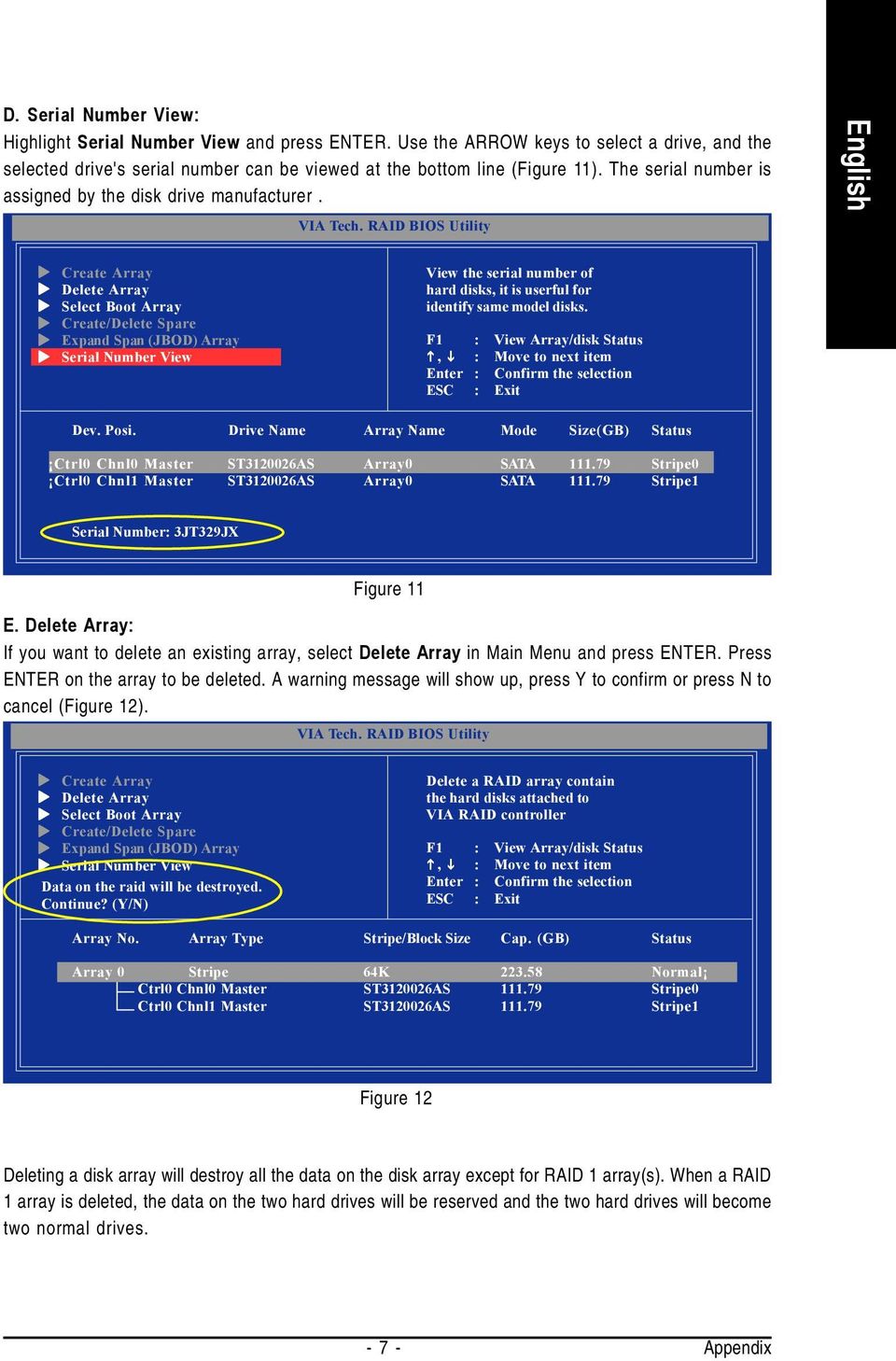
7 D. Serial Number View: Highlight Serial Number View and press ENTER. Use the ARROW keys to select a drive, and the selected drive's serial number can be viewed at the bottom line (Figure 11). The serial number is assigned by the disk drive manufacturer. Create Array Delete Array Select Boot Array Create/Delete Spare Expand Span (JBOD) Array Serial Number View View the serial number of hard disks, it is userful for identify same model disks., : Move to next item Ctrl0 Chnl0 Master ST AS Array0 SATA Stripe0 Ctrl0 Chnl1 Master ST AS Array0 SATA Stripe1 Serial Number: 3JT329JX Figure 11 E. Delete Array: If you want to delete an existing array, select Delete Array in Main Menu and press ENTER. Press ENTER on the array to be deleted. A warning message will show up, press Y to confirm or press N to cancel (Figure 12). Create Array Delete Array Select Boot Array Create/Delete Spare Expand Span (JBOD) Array Serial Number View Data on the raid will be destroyed. Continue? (Y/N) Delete a RAID array contain, : Move to next item Array No. Array Type Stripe/Block Size Cap. (GB) Status Array 0 Stripe 64K Normal Ctrl0 Chnl0 Master ST AS Stripe0 Ctrl0 Chnl1 Master ST AS Stripe1 Figure 12 Deleting a disk array will destroy all the data on the disk array except for RAID 1 array(s). When a RAID 1 array is deleted, the data on the two hard drives will be reserved and the two hard drives will become two normal drives
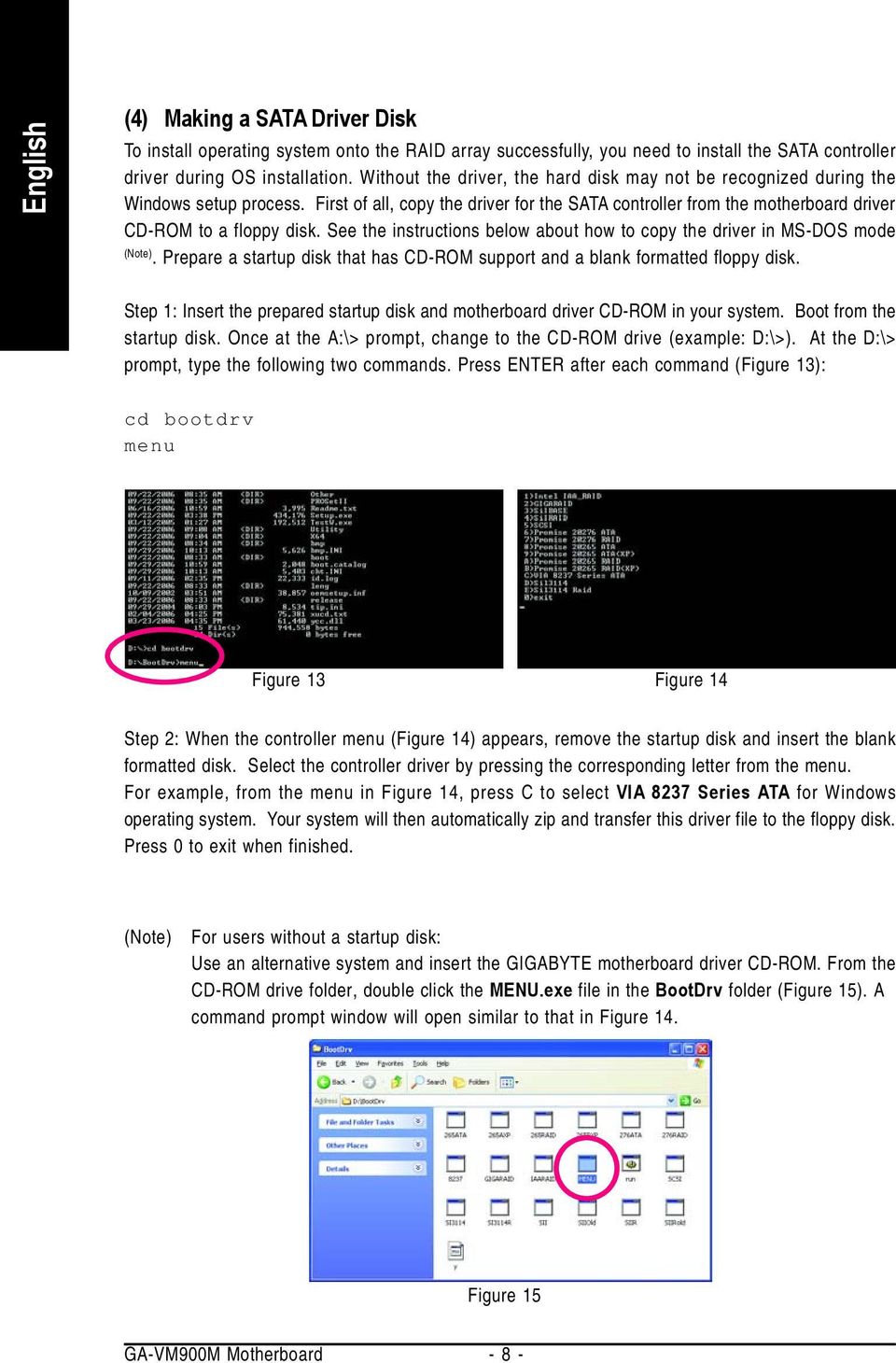
8 (4) Making a SATA Driver Disk To install operating system onto the RAID array successfully, you need to install the SATA controller driver during OS installation. Without the driver, the hard disk may not be recognized during the Windows setup process. First of all, copy the driver for the SATA controller from the motherboard driver CD-ROM to a floppy disk. See the instructions below about how to copy the driver in MS-DOS mode (Note). Prepare a startup disk that has CD-ROM support and a blank formatted floppy disk. Step 1: Insert the prepared startup disk and motherboard driver CD-ROM in your system. Boot from the startup disk. Once at the A:\> prompt, change to the CD-ROM drive (example: D:\>). At the D:\> prompt, type the following two commands. Press ENTER after each command (Figure 13): cd bootdrv menu Figure 13 Figure 14 Step 2: When the controller menu (Figure 14) appears, remove the startup disk and insert the blank formatted disk. Select the controller driver by pressing the corresponding letter from the menu. For example, from the menu in Figure 14, press C to select VIA 8237 Series ATA for Windows operating system. Your system will then automatically zip and transfer this driver file to the floppy disk. Press 0 to exit when finished. (Note) For users without a startup disk: Use an alternative system and insert the GIGABYTE motherboard driver CD-ROM. From the CD-ROM drive folder, double click the MENU.exe file in the BootDrv folder (Figure 15). A command prompt window will open similar to that in Figure 14. Figure 15 GA-VM900M Motherboard - 8 -
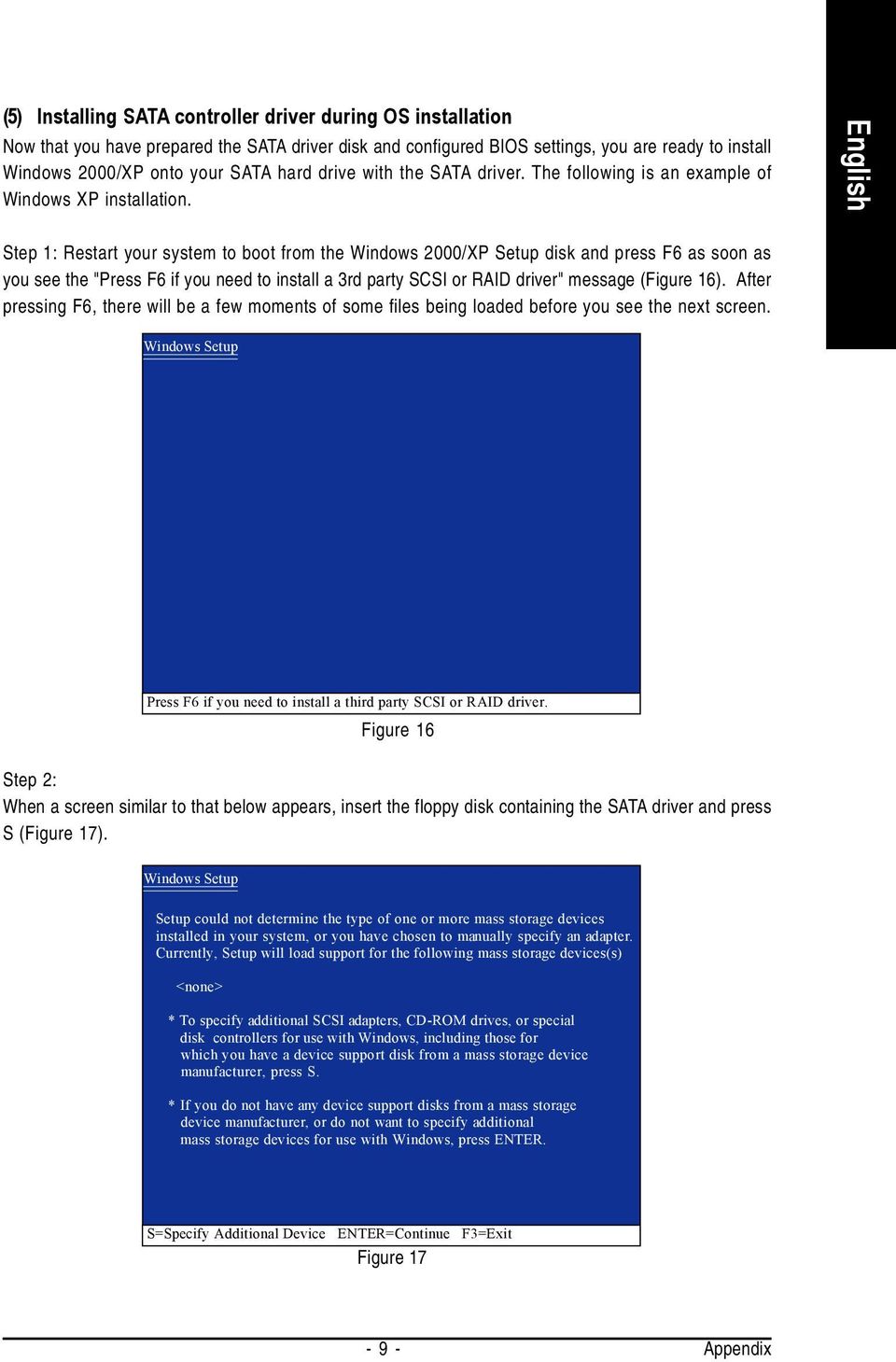
9 (5) Installing SATA controller driver during OS installation Now that you have prepared the SATA driver disk and configured BIOS settings, you are ready to install Windows 2000/XP onto your SATA hard drive with the SATA driver. The following is an example of Windows XP installation. Step 1: Restart your system to boot from the Windows 2000/XP Setup disk and press F6 as soon as you see the "Press F6 if you need to install a 3rd party SCSI or RAID driver" message (Figure 16). After pressing F6, there will be a few moments of some files being loaded before you see the next screen. Windows Setup Press F6 if you need to install a third party SCSI or RAID driver. Figure 16 Step 2: When a screen similar to that below appears, insert the floppy disk containing the SATA driver and press S (Figure 17). Windows Setup Setup could not determine the type of one or more mass storage devices installed in your system, or you have chosen to manually specify an adapter. Currently, Setup will load support for the following mass storage devices(s) <none> * To specify additional SCSI adapters, CD-ROM drives, or special disk controllers for use with Windows, including those for which you have a device support disk from a mass storage device manufacturer, press S. * If you do not have any device support disks from a mass storage device manufacturer, or do not want to specify additional mass storage devices for use with Windows, press ENTER. S=Specify Additional Device ENTER=Continue F3=Exit Figure
10 Step 3: If Setup correctly recognizes the driver in the floppy disk, a controller menu similar to Figure 18 below will appear. If you want to install Windows XP, use the ARROW keys to select VIA V-RAID Controller Series (Windows XP) and press ENTER. Then it will begin to load the SATA driver from the floppy disk. Windows Setup You have chosen to configure a SCSI Adapter for use with Windows, using a device support disk provided by an adapter manufacturer. Select the SCSI Adapter you want from the following list, or press ESC to return to the previous screen. VIA V-RAID Controller Series (Windows XP) VIA V-RAID Controller Series (Windows 2K) VIA V-RAID Controller Series (Windows NT4) ENTER=Select F3=Exit Figure 18 If a message appears saying one or some file(s) cannot be found, please check the floppy disk or copy the correct SATA driver again from the motherboard driver CD. Step 4: When the screen as shown below appears, press ENTER to continue the SATA driver installation from the floppy disk. The driver installation will be finished in about one minute. Windows Setup Setup will load support for the following mass storage device(s): VIA V-RAID Controller Series (Windows XP) * To specify additional SCSI adapters, CD-ROM drives, or special disk controllers for use with Windows, including those for which you have a device support disk from a mass storage device manufacturer, press S. * If you do not have any device support disks from a mass storage device manufacturer, or do not want to specify additional mass storage devices for use with Windows, press ENTER. S=Specify Additional Device ENTER=Continue F3=Exit Figure 19 GA-VM900M Motherboard

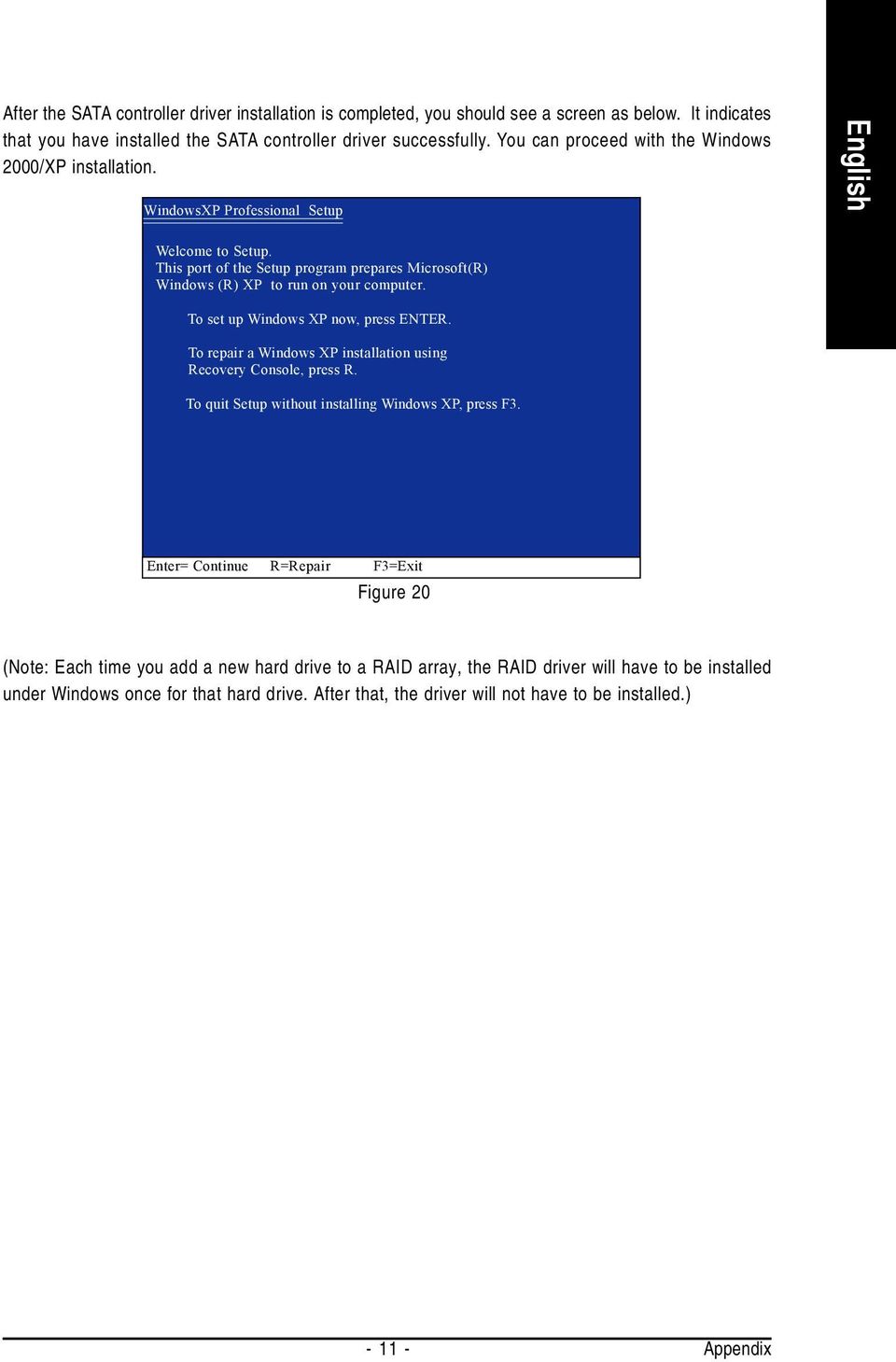
11 After the SATA controller driver installation is completed, you should see a screen as below. It indicates that you have installed the SATA controller driver successfully. You can proceed with the Windows 2000/XP installation. WindowsXP Professional Setup Welcome to Setup. This port of the Setup program prepares Microsoft(R) Windows (R) XP to run on your computer. To set up Windows XP now, press ENTER. To repair a Windows XP installation using Recovery Console, press R. To quit Setup without installing Windows XP, press F3. Enter= Continue R=Repair F3=Exit Figure 20 (Note: Each time you add a new hard drive to a RAID array, the RAID driver will have to be installed under Windows once for that hard drive. After that, the driver will not have to be installed.)
How To Set Up Your Motherboard With A Power Supply And Power Supply On A Microtower 2.2 (Ios) With A Hard Disk Drive On A Mini Usb 2.3 (I386) With An External Hard Disk (I2)
 4-1-4 Configuring SATA Hard Drive(s) To configure SATA hard drive(s), follow the steps below: (1) Install SATA hard drive(s) in your system. (2) Configure SATA controller mode and boot sequence in BIOS
4-1-4 Serial ATA SATA. A. Intel ICH8R (1) SATA (1) SATA (2) BIOS SATA (3) RAID BIOS RAID (4) SATA (5) SATA
 4-1-4 Serial ATA (1) (2) BIOS (3) RAID BIOS RAID ( ) (4) (5) (a) ( RAID ) (b) (c) Windows XP 2000 (d) A. Intel ICH8R (1) ( ) ( ) RAID - 69 - (2) BIOS BIOS 1 BIOS POST (Power-On Self Test ) BIOS CMOS
Serial ATA ( ULi M1573)... 2
 Serial ATA ( ULi M1573)... 2 (1) SATA... 2 (2) BIOS SATA... 3 (3) RAID BIOS RAID... 5 (4) SATA... 13 (5) SATA... 15 Serial ATA ( ULi M1573) SATA (1) SATA (2) BIOS SATA (3)* RAID BIOS RAID (4) SATA (5)
Table of Contents. Configuring IDE RAID Hard Drive(s) (Controller GigaRAID (IT8212))... 2
 Table of Contents Configuring IDE RAID Hard Drive(s) (Controller GigaRAID (IT8212))... 2 (1) Installing IDE hard drive(s) in your system... 2 (2) Configuring GigaRAID controller mode and boot sequence
VT8237 SATA RAID User Manual
 VT8237 SATA RAID User Manual Enter BIOS Configuration Utility When the system powers on, the following information will appear on screen. Press the Tab key to enter BIOS configuration utility. 39 VIA Technologies,Inc.VIA
VIA RAID configurations
 VIA RAID configurations The motherboard includes a high performance IDE RAID controller integrated in the VIA VT8237R southbridge chipset. It supports RAID 0, RAID 1 and JBOD with two independent Serial
SATA1.5G/ATA133 RAID Controller Card RC215 User Manual
 SATA1.5G/ATA133 RAID Controller Card RC215 Features and Benefits Compliant with Serial ATA 1.0 specification Compliant with PCI Specification, revision 2.2 Provides three independent channels to connect
SATA+Ultra ATA RAID CONTROLLER RC212. User Manual
 SATA+Ultra ATA RAID CONTROLLER RC212 Contents Feature and benefits Package contents System requirement Magic Switch introduction and jumper setting Hardware installation Important message for user RAID
Intel ESB2 SATA RAID Setup Guidelines
 Intel ESB2 SATA RAID Setup Guidelines Intel ESB2 SATA RAID Setup Guidelines After all the hardware has been installed, you must first configure Intel ESB2 SATA RAID Settings before you install the Windows
SATA RAID Function (Only for chipset Sil3132 used) User s Manual
 SATA RAID Function (Only for chipset Sil3132 used) User s Manual 12ME-SI3132-001 Table of Contents 1 WELCOME...4 1.1 SATARAID5 FEATURES...4 2 AN INTRODUCTION TO RAID...5 2.1 DISK STRIPING (RAID 0)...5
RAID installation guide for ITE8212F
 RAID installation guide for ITE8212F Contents Contents 2 1 Introduction 3 1.1 About this Guide 3 1.2 The Basics 3 1.2.1 What is RAID? 3 1.2.2 Advantages of RAID 3 1.2.3 Disadvantages of RAID 3 1.3 Different
Guide to SATA Hard Disks Installation and RAID Configuration
 Guide to SATA Hard Disks Installation and RAID Configuration 1. Guide to SATA Hard Disks Installation... 2 1.1 Serial ATA (SATA) Hard Disks Installation... 2 2. Guide to RAID Configurations... 3 2.1 Introduction
PCI SATA + PATA Raid Card
 PCI SATA + PATA Raid Card User Manual Ver. 5.00 All brand names and trademarks are properties of their Respective owners. Features and Benefits Compliant with Serial ATA 1.0 specification Compliant with
SiS964 RAID. User s Manual. Edition. Trademarks V1.0 P/N: 91-187-U49-M2-0E
 SiS964 RAID User s Manual Edition V1.0 P/N: 91-187-U49-M2-0E Trademarks All brand or product names mentioned are trademarks or registered trademarks of their respective holders. CONTENTS Introduction...
RAID Manual. Edition. Trademarks V1.0 P/N: 91-187-CK8-A5-0E
 RAID Manual Edition V1.0 P/N: 91-187-CK8-A5-0E Trademarks All brand or product names mentioned are trademarks or registered trademarks of their respective holders. Contents NVIDIA RAID... 1 RAID Arrays...
SiS 180 S-ATA User s Manual. Quick User s Guide. Version 0.1
 SiS 180 S-ATA User s Manual Quick User s Guide Version 0.1 Edition April 2003 Copyright Trademarks SiS is a registered trademark of Silicon Integrated Systems Corp. All brand or product names mentioned
VIA / JMicron RAID Installation Guide
 VIA / JMicron RAID Installation Guide 1. Introduction to VIA / JMicron RAID Installation Guide. 3 2. VIA RAID Installation Guide. 3 2.1 VIA BIOS RAID Installation Guide.. 3 2.1.1 Introduction of RAID.
ForceWare Software NVIDIA RAID User s Guide. Version 2.0 A
 ForceWare Software NVIDIA RAID User s Guide Version 2.0 A NVIDIA Corporation September 3, 2004 NVIDIA Applications NVIDIA RAID User s Guide Version 2.0 Published by NVIDIA Corporation 2701 San Tomas Expressway
www.devicemanuals.eu
 AMD RAID Introduction The integrate one SATA host controller separately, and support RAID function for performance and reliability. SB950 SATA RAID provides support for RAID 0 (Striping), RAID 1 (Mirroring),
Intel ICH7R/ICH9R/ICH10R HostRAID Setup Guidelines
 Intel ICH7R/ICH9R/ICH10R HostRAID Setup Guidelines Intel ICH7R/ICH9R/ICH10R HostRAID Setup Guidelines After all hardware has been installed, you must fi rst confi gure the Intel SATA HostRAID settings
SiS964/SiS180 SATA w/ RAID User s Manual. Quick User s Guide. Version 0.3
 SiS964/SiS180 SATA w/ RAID User s Manual Quick User s Guide Version 0.3 Edition December 2003 Copyright 2003 Silicon Integrated Systems Corp. Trademarks SiS is a registered trademark of Silicon Integrated
AMD RAID Installation Guide
 AMD RAID Installation Guide 1. AMD BIOS RAID Installation Guide.. 2 1.1 Introduction to RAID.. 2 1.2 RAID Configurations Precautions 3 1.3 Installing Windows 8 / 8 64-bit / 7 / 7 64-bit / Vista TM / Vista
NVIDIA RAID Installation Guide
 NVIDIA RAID Installation Guide 1. NVIDIA BIOS RAID Installation Guide.. 2 1.1 Introduction to RAID. 2 1.2 RAID Configurations Precautions.. 3 1.3 Create Disk Array. 4 2. NVIDIA Windows RAID Installation
SiS S-ATA User s Manual. Quick User s Guide. Version 0.1
 SiS S-ATA User s Manual Quick User s Guide Version 0.1 Edition April 2003 Copyright Trademarks SiS is a registered trademark of Silicon Integrated Systems Corp. All brand or product names mentioned are
How To Set Up A Raid On A Hard Disk Drive On A Sasa S964 (Sasa) (Sasa) (Ios) (Tos) And Sas964 S9 64 (Sata) (
 SiS964/SiS180 SATA w/ RAID User s Manual Quick User s Guide Version 0.3 Edition December 2003 Copyright 2003 Silicon Integrated Systems Corp. Trademarks SiS is a registered trademark of Silicon Integrated
Promise FastTrak 100-Lite RAID Controller
 Promise FastTrak 100-Lite RAID Controller User s Manual Version 1.3, November 9, 2001 Copyright Copyright by Promise Technology, Inc. ( Promise ), XP. No part of this manual may be reproduced or transmitted
AMD RAID Installation Guide
 AMD RAID Installation Guide 1. AMD BIOS RAID Installation Guide.. 2 1.1 Introduction to RAID.. 2 1.2 RAID Configurations Precautions 3 1.3 Installing Windows 7 / 7 64-bit / Vista / Vista 64-bit / XP /
Onboard-RAID. Onboard-RAID supports striping (RAID 0), mirroring (RAID 1), striping/mirroring (RAID 0+1), or spanning (JBOD) operation, respectively.
 1. Introduction Onboard-RAID IEI s Onboard-RAID is designed with Promise IDE RAID controller to provide a cost-effective, high performance RAID that adds performance and/or reliability to systems using
RAID User Guide. Edition. Trademarks V1.0 P/N: 91-187C51GME0-00
 RAID User Guide Edition V1.0 P/N: 91-187C51GME0-00 Trademarks All brand or product names mentioned are trademarks or registered trademarks of their respective holders. Contents NVIDIA RAID...1 RAID Arrays...1
AMD RAID Installation Guide
 AMD RAID Installation Guide 1. AMD BIOS RAID Installation Guide.. 2 1.1 Introduction to RAID.. 2 1.2 RAID Configurations Precautions 3 1.3 Installing Windows XP / XP 64-bit / Vista / Vista 64-bit With
RAID configuration and driver installation guide
 Server systems and motherboards RAID configuration and driver installation guide For AP130-E1 5U Rackmount Server AP1720-E2 5U Rackmount Server NCCH-DL Motherboard PSCH-L Motherboard E1600 First edition
Guide to SATA Hard Disks Installation and RAID Configuration
 Guide to SATA Hard Disks Installation and RAID Configuration 1. Guide to SATA Hard Disks Installation..2 1.1 Serial ATA (SATA) Hard Disks Installation 2 1.2 Making An SATA Driver Diskette 3 2. Guide to
RAID installation guide for Silicon Image SiI3114
 RAID installation guide for Silicon Image SiI3114 Contents Contents 2 1 Introduction 4 1.1 About this Guide 4 1.2 The Basics 4 1.2.1 What is RAID? 4 1.2.2 Advantages of RAID 4 1.2.3 Disadvantages of RAID
VIA Fedora Linux Core 8 (x86&x86_64) VT8237R/VT8237A/VT8237S/VT8251/CX700/VX800 V-RAID V3.10 Driver Installation Guide
 VIA Fedora Linux Core 8 (x86&x86_64) VT8237R/VT8237A/VT8237S/VT8251/CX700/VX800 V-RAID V3.10 Driver Installation Guide 1. Summary Version 0.8, December 03, 2007 Copyright 2003~2007 VIA Technologies, INC
AwardBIOS Setup Utility
 AwardBIOS Setup Utility Modifications to the BIOS Setup settings should be performed by advanced users only. Setting items to incorrect values may cause your system to malfunction. Introducing BIOS Setup...2
ForceWare Software MediaShield User s Guide. Version 5.0
 ForceWare Software MediaShield User s Guide Version 5.0 NVIDIA Corporation May 1, 2006 NVIDIA Applications MediaShield User s Guide Version 5.0 Published by NVIDIA Corporation 2701 San Tomas Expressway
M5281/M5283. Serial ATA and Parallel ATA Host Controller. RAID BIOS/Driver/Utility Manual
 Serial ATA and Parallel ATA Host Controller Rev. 0.96 December 03, 2003 Copyright 2003 ULi Electronics Inc. All rights reserved. COPYRIGHT NOTICE All information in this document is considered ULi Electronics
LSI Software RAID Configuration Utility
 LSI Software RAID Configuration Utility E8581 First Edition August 2013 Copyright 2013 ASUSTeK COMPUTER INC. All Rights Reserved. No part of this manual, including the products and software described in
PCI ATA 133 RAID Controller Card. User Manual
 PCI ATA 133 RAID Controller Card User Manual Features and Benefits Silicon Image SiI 0680 Compliant with UltraDMA6 ATA/133 specifications Compliant with PCI v2.2 Plug-n-Play Provides two independent Ultra
The SATA II PCIe RAID is an ultra high-speed two channel Serial ATA Generation II RAID controller for use in PCI Express enabled systems.
 SATA II PCIe RAID Quick Installation Guide Introducing the SATA II PCIe RAID The SATA II PCIe RAID is an ultra high-speed two channel Serial ATA Generation II RAID controller for use in PCI Express enabled
HP dx5150 RAID Installation and Setup Guide Version 1.10. Document Part Number: 403571-001
 HP dx5150 RAID Installation and Setup Guide Version 1.10 Document Part Number: 403571-001 July 2005 Copyright 2005 Hewlett-Packard Development Company, L.P. The information contained herein is subject
The motherboard supports the following SATA RAID solutions:
 Setting up RAID The motherboard supports the following SATA RAID solutions: LSI MegaRAID software RAID Configuration Utility with RAID 0, RAID 1, and RAID 10 support (for both Linux and Windows OS). Intel
Serial ATA RAID PCI Card
 Serial ATA RAID PCI Card User Manual 1 Features Silicon Image SiI3512 SATA controller chip Compliant with PCI Specification, Rev. 2.3 Compliant with Serial ATA 1.0 specification Provides two independent
VIA RAID Installation Guide
 VIA RAID Installation Guide 1 VIA BIOS RAID Installation Guide.... 3 1.1 Introduction of RAID... 3 1.2 RAID Configuration Precautions... 3 1.3 BIOS Configuration Utility.. 4 1.3.1 Enter BIOS Configuration
6-Port SATA II 150 PCI Host Card w/raid
 6-Port SATA II 150 PCI Host Card w/raid User Manual Model: UGT-ST310R All brand names and trademarks are properties of their respective owners. w w w. v a n t e c u s a. c o m Table of Contents 1. Bus
Guide to SATA Hard Disks Installation and RAID Configuration
 Guide to SATA Hard Disks Installation and RAID Configuration 1. Guide to SATA Hard Disks Installation... 2 1.1 Serial ATA (SATA) Hard Disks Installation... 2 2. Guide to RAID Configurations... 3 2.1 Introduction
Encore SATA2 RAID PCIe Card
 Encore SATA2 RAID PCIe Card User Manual Ver. 2.00 All brand names and trademarks are properties of their Respective owners. 1 Features and Benefits Compliant with PCI Express Base Specification 1.0a Compliant
Ultra ATA 133 RAID PCI Pro
 Ultra ATA 133 RAID PCI Pro 1-1 Introduction Quick Installation Guide This ultra high-speed dual channel Ultra ATA/133 RAID controller is designed to support RAID 0, 1, 0+1 and JBOD. RAID configurations
4+1 SATA II 300 IDE/PATA PCI-E. Combo Host Card w/ RAID & Port. Multiplier
 4+1 SATA II 300 IDE/PATA PCI-E Combo Host Card w/ RAID & Port Multiplier User Manual Model: UGT-IS100R All brand names and trademarks are properties of their respective owners. w w w. v a n t e c u s a.
Using ATI Array Management Software (WebPAM)
 Redundant Array of Independent Disks (RAID) on HP Compaq dc5750 Business PCs Using ATI Array Management Software (WebPAM) Introduction............................................................ 2 Mirroring
Guide to SATA Hard Disks Installation and RAID Configuration
 Guide to SATA Hard Disks Installation and RAID Configuration 1. Guide to SATA Hard Disks Installation...2 1.1 Serial ATA (SATA) Hard Disks Installation...2 2. Guide to RAID Confi gurations...3 2.1 Introduction
Serial ATA RAID PCI. User's Manual
 Serial ATA RAID PCI User's Manual Chapter 1 Introduction Table of Contents 1-1 Features and Benefits. 1 1-2 System Requirements. 1 Chapter 2 RAID Arrays 2-1 RAID Overview.. 2 2-1.1 RAID 0 (striping)...
Chapter 2 Array Configuration [SATA Setup Utility] This chapter explains array configurations using this array controller.
![Chapter 2 Array Configuration [SATA Setup Utility] This chapter explains array configurations using this array controller.](/thumbs/21/1077848.jpg "Chapter 2 Array Configuration [SATA Setup Utility] This chapter explains array configurations using this array controller.") Embedded MegaRAID SATA User's Guide Areas Covered Before Reading This Manual This section explains the notes for your safety and conventions used in this manual. Chapter 1 Overview This chapter introduces
Embedded MegaRAID SATA User's Guide Areas Covered Before Reading This Manual This section explains the notes for your safety and conventions used in this manual. Chapter 1 Overview This chapter introduces
Phoenix SecureCore TM Setup Utility
 Phoenix SecureCore TM Setup Utility Important information: We continually strive to bring you the latest and proven features and technologies. As part of our drive to continually improve our products modifications
RocketRAID 1820. User, s Manual. Revision: 1.0 Date: Sept. 2003 HighPoint Technologies, Inc.
 RocketRAID 1820 User, s Manual Revision: 1.0 Date: Sept. 2003 HighPoint Technologies, Inc. Notice Reasonable effort has been made to ensure that the information in this manual is accurate. HighPoint assumes
SBI-7125B-T1 Blade Module RAID Setup Procedure
 SBI-7125B-T1 Blade Module RAID Setup Procedure Revison 1.0 SBI-7125B-T1 Blade Module RAID Setup Procedure The information in this User s Manual has been carefully reviewed and is believed to be accurate.
Serial ATA 4-Channel RAID Quick Installation Guide
 Serial ATA 4-Channel RAID Quick Installation Guide Introducing the Serial ATA 4-Channel RAID The Serial ATA 4-Channel RAID is an ultra high-speed four channel Serial ATA controller for use in Pentium class
ESATA PCI CARD. User s Manual
 ESATA PCI CARD User s Manual Introduction... 3 System Requirements... 3 RAID Introduction... 3 BIOS Configuration Utility... 5 Configuring Arrays... 5 RAID Mode Definitions... 5 BIOS Configuration Utility...
RocketRAID 1640. User's Manual. Revision: 1.0 Date: Mar. 2003 HighPoint Technologies, Inc.
 RocketRAID 1640 User's Manual Revision: 1.0 Date: Mar. 2003 HighPoint Technologies, Inc. Copyright Copyright 2003 HighPoint Technologies, Inc.. This document contains materials protected by International
Promise RAID Function
 Promise RAID Function (Only For Chipset 20265/20276 Used) USER S MANUAL 12ME-RAI276-001 RAID Function Copyright Copyright by GIGA-BYTE TECHNOLOGY CO., LTD. ( GBT ) No part of this manual may be reproduced
Guide to SATA Hard Disks Installation and RAID Configuration
 Guide to SATA Hard Disks Installation and RAID Configuration 1. Guide to SATA Hard Disks Installation...2 1.1 Serial ATA (SATA) Hard Disks Installation...2 2. Guide to RAID Configurations...3 2.1 Introduction
Low Profile Ultra ATA-133 RAID PCI Host
 Low Profile Ultra ATA-133 RAID PCI Host User Manual English LINDY No. 70642 www.lindy.com LINDY ELECTRONICS LIMITED & LINDY-ELEKTRONIK GMBH - FIRST EDITION (November 2004) 1. Introduction This Low Profile
SATA II PCIe RAID Quick Installation Guide
 SATA II PCIe RAID Quick Installation Guide Introducing the SATA II PCIe RAID The SATA II PCIe RAID is an ultra high-speed two channel Serial ATA Generation II RAID controller for use in PCI Express enabled
ITE RAID Controller USER MANUAL
 ITE RAID Controller USER MANUAL 120410096E1N Copyright Copyright 2004. All rights reserved. No part of this publication may be reproduced, transmitted, transcribed, stored in a retrieval system or translated
RAID installation guide
 RAID installation guide V1.0 Date : 2009-06-29 TWINHEAD INTERNATIONAL CORP. 10F, 550 Rueiguang Road Neihu, Taipei, Taiwan 114,ROC. TEL(886)2 5589 9999 FAX (886) 2 5555 7777 Enabling RAID in BIOS Perform
SATA II PCIe RAID Quick Installation Guide
 SATA II PCIe RAID Quick Installation Guide Introducing the SATA II PCIe RAID The SATA II PCIe RAID is an ultra high-speed two channel Serial ATA Generation II RAID controller for use in PCI Express enabled
EX-3516 4-Port SATA3 RAID/HyperDuo PCIe(x2) Card
 EX-3516 4-Port SATA3 RAID/HyperDuo PCIe(x2) Card Thank you for purchasing this 4-Port SATA3 RAID/HyperDuo PCIe Card. It is designed to support up to 4 SATA3 ports in RAID 0 and RAID 1, RAID 0+1 modes and
Intel Matrix Storage Manager 8.x
 Intel Matrix Storage Manager 8.x User's Manual January 2009 Revision 1.0 Document Number: XXXXXX INFORMATION IN THIS DOCUMENT IS PROVIDED IN CONNECTION WITH INTEL PRODUCTS. NO LICENSE, EXPRESS OR IMPLIED,
Tutorial How to upgrade firmware on Phison S8 controller MyDigitalSSD using a Windows PE environment
 Tutorial How to upgrade firmware on Phison S8 controller MyDigitalSSD using a Windows PE environment Version 2.0 This tutorial will walk you through how to create a bootable USB drive to enter into a WINPE
DESKTOP. Internal Drive Installation Guide
 DESKTOP Internal Drive Installation Guide Seagate Desktop Installation Guide 2013 Seagate Technology LLC. All rights reserved. Seagate, Seagate Technology, the Wave logo, and FreeAgent are trademarks or
Serial ATA 2 Ports PCI Host
 Serial ATA 2 Ports PCI Host This Manual is for the various Model of 2ports SATA HBA: Model A: Low Profile Serial ATA Internal 2 Ports Model B: Low Profile External 1 Port + Internal 1 Port Model C: Low
4 Channel 6-Port SATA 6Gb/s PCIe RAID Host Card
 4 Channel 6-Port SATA 6Gb/s PCIe RAID Host Card User Manual Model: UGT-ST644R All brand names and trademarks are properties of their respective owners www.vantecusa.com Contents: Chapter 1: Introduction...
SATA II 4 Port PCI RAID Card RC217 User Manual
 SATA II 4 Port PCI RAID Card RC217 SATA II 4 Port PCI RAID Card This Manual is for many Models of SATAII RAID5 HBA that uses Silicon Image SATA II SiI3124 chipset: 1) 32bit PCI bus host card 2) 64bit PCI-X
SATARAID5 Serial ATA RAID5 Management Software. Users Manual
 SATARAID5 Serial ATA RAID5 Management Software Home Edition Users Manual 03/14/05 Silicon Image, Inc. 1060 East Arques Ave. Sunnyvale CA 94085 (408) 616-4000 www.siliconimage.com Copyright 2004, Silicon
esata 3.0Gbps RAID ExpressCard
 esata 3.0Gbps RAID ExpressCard 1. Introduction Quick Installation Guide The esata 3.0Gbps 2-channel RAID ExpressCard provides two ultra high-speed esata channels with RAID 0/1 features into your notebook
Tutorial How to upgrade firmware on Phison S5 controller MyDigitalSSD
 Tutorial How to upgrade firmware on Phison S5 controller MyDigitalSSD Version 1.3 This tutorial will walk you through how to create a bootable USB drive and how to apply the newest firmware S5FAM030 to
VAIO Computer Recovery Options Guide
 VAIO Computer Recovery Options Guide This guide provides information about restoring individual software programs, software drivers, drive partition(s), or the hard disk drive to the original factory settings.
LSI MegaRAID User s Manual
 LSI MegaRAID User s Manual Q2143 August 2005 Copyright Information No part of this manual, including the products and software described in it,may be reproduced, transmitted, transcribed, stored in a retrieval
PCIe SATA 6G Raid Card
 PCIe SATA 6G Raid Card User Manual Ver. 1.00 All brand names and trademarks are properties of their respective owners. Contents: Chapter 1: Introduction... 3 1.1 Product Introduction... 3 1.2 Features...
Fujitsu LifeBook S Series
 Fujitsu LifeBook S Series BIOS Guide LifeBook S Series Model: S7220 Document Date: 07/08/2008 Document Part Number: FPC58-1920-01 FUJITSU COMPUTER SYSTEMS CORPORATION 1 LifeBook S Series BIOS S Series
SATA II-150 PCI RAID
 SATA II-150 PCI RAID Quick Installation Guide Introducing the SATA II-150 PCI RAID The SATA II-150 PCI RAID is an ultra high-speed two channel Serial ATA Generation II RAID controller for use in PCI enabled
2.5" XTreme Files OS & Data Backup/Restore User Manual Please read the Instruction manual before using the XTreme Files (X Series) 1.
 2.5" XTreme Files OS & Data Backup/Restore User Manual Please read the Instruction manual before using the XTreme Files (X Series) 1. The suggested interface for your computer is USB2.0 to have better
Addonics. 4-Port External SATA II PCI/PCI-X RAID5 Controller Card (ADS3GX4R5-E) User s Guide Revision 1.1 T E C H N O L O G I E S
 Addonics T E C H N O L O G I E S 4-Port External SATA II PCI/PCI-X RAID5 Controller Card (ADS3GX4R5-E) User s Guide Revision 1.1 FCC Warning Statement This equipment has been tested and found to comply
Serial-ATA IDE Card. Version 1.0
 Serial-ATA IDE Card Version 1.0 Contents 1.0 Features....P.3 2.0 System Requirement.P.3 3.0 Driver Installation..P.4 Windows NT4.0 / 2000 / XP Fresh Installation.. P4 Windows 98SE / ME Fresh Installation.
SERIAL ATA HOST CONTROLLER CARD USER MANUAL SATA3112-150R SATA3112-150I WARNING
 SD-SIL3112-041103 SERIAL ATA HOST CONTROLLER CARD USER MANUAL SATA3112-150R SATA3112-150I WARNING Before installing and activating RAID function, please make sure you have a complete backup of your existing
46xx_47xx_1546_1547 RAID Recovery/Set Up Instructions
 46xx_47xx_1546_1547 RAID Recovery/Set Up Instructions Note: The Windows RAID utility should handle most RAID recovery situations without any trouble. In Windows, when the ICON in the RAID utility turns
IDE2410 ATA-100 IDE RAID Card. Version 1.0
 IDE2410 ATA-100 IDE RAID Card Version 1.0 Contents 1.0 Features....P.3 2.0 System Requirement.P.3 3.0 Installing the ATA/100 IDE Controller Card P.4 4.0 Driver Installation..P.4 5.0 RAID Explained.P.7
Guide to SATA Hard Disks Installation and RAID Configuration
 Guide to SATA Hard Disks Installation and RAID Configuration 1. Guide to SATA Hard Disks Installation...2 1.1 Serial ATA (SATA) Hard Disks Installation...2 2. Guide to RAID Configurations...3 2.1 Introduction
RAID Option Installation
 RAID Option Installation Introduction RAID option is a PCI board including two HDD. The RAID option installation is carried out in 4 main phases: Pase A: Hardware installation Phase B: Configuration of
PCI Express SATA / esata 6Gb/s RAID Card User Manual
 PCI Express SATA / esata 6Gb/s RAID Card User Manual Specifications : - 2 x SATA 6Gb/s Port (SATA version) - 2 x esata 6Gb/s Port (esata version) - Max. 6Gb/s transfer rate per port - Supports both SATA
HP User Manual for LSI Integrated RAID on HP xw4200/xw6200/xw8200/xw9300 Workstation
 HP User Manual for LSI Integrated RAID on HP xw4200/xw6200/xw8200/xw9300 Workstation LSI Integrated RAID controller and Host Bus Adapter... 2 Steps common to all methods for enabling LSI Integrated RAID...
Table of Contents 1. INTRODUCTION TO THE DC-200 RAID CARD... 3
 Table of Contents 1. INTRODUCTION TO THE DC-200 RAID CARD... 3 1.1 UNDERSTANDING RAID CONCEPTS... 3 1.2 OVERVIEW OF DC-200 RAID CARD... 3 1.2.1 Features and specifications of the DC-200 RAID card... 5
Intel Rapid Storage Technology
 Intel Rapid Storage Technology User Guide August 2011 Revision 1.0 1 Document Number: XXXXXX INFORMATION IN THIS DOCUMENT IS PROVIDED IN CONNECTION WITH INTEL PRODUCTS. NO LICENSE, EXPRESS OR IMPLIED,
Configuring ThinkServer RAID 100 on the TS140 and TS440
 Configuring ThinkServer RAID 100 on the TS140 and TS440 Lenovo ThinkServer TS Series Servers Lenovo Enterprise Product Group Version 1.0 September 17, 2013 2013 Lenovo. All rights reserved. LENOVO PROVIDES
Intel ICH5R Serial ATA RAID. Quick User s Guide
 Intel ICH5R Serial ATA RAID Quick User s Guide Quick User s Guide Version 1.0 G52-M6728X9-K01 1 Edition April 2003 Copyright 2003 MICRO-STAR INT L CO., LTD. The material in this document is the intellectual
Fujitsu LIFEBOOK T Series
 Fujitsu LIFEBOOK T Series BIOS Guide LIFEBOOK T Series Model: T731 Document Date: 6/23/2011 Document Part Number: FPC58-2898-01 FUJITSU AMERICA, INC. 1 LIFEBOOK T731 BIOS T Series BIOS BIOS SETUP UTILITY
FASTTRAK USER MANUAL TX2200, TX2300. Version 3.2
 FASTTRAK TX2200, TX2300 USER MANUAL Version 3.2 FastTrak TX2200, TX2300 User Manual Copyright 2007 Promise Technology, Inc. All Rights Reserved. Copyright by Promise Technology, Inc. (Promise Technology).
Adaptec SAS RAID Configuration and the Windows OS Installation Instructions
 Adaptec SAS RAID Confi guration and the Windows OS Installation Instructions Adaptec SAS RAID Configuration and the Windows OS Installation Instructions After all the hardware has been installed, you must
USB 2.0 3.5 External Hard Disk Drive
 USB 2.0 3.5 External Hard Disk Drive System Requirements Notebook or Desktop PC with USB2.0 or USB1.1 port. Windows 98SE/Me/2000, or Windows XP (Make sure the device driver for USB Host controller has