
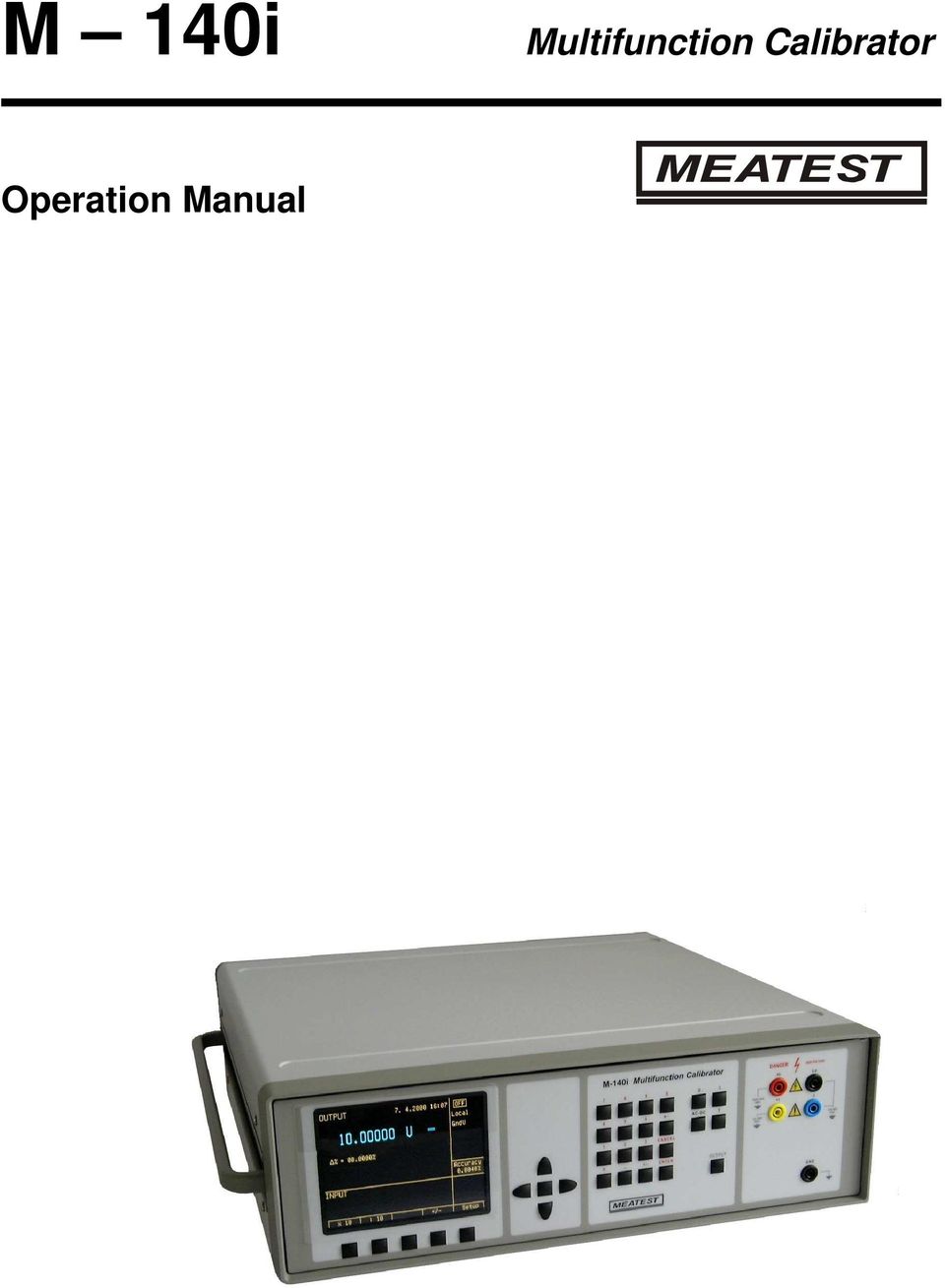
M 140i. Multifunction Calibrator. Operation Manual
|
|
|
- Gerard Williamson
- 10 years ago
- Views:
Transcription
1 M 140i Multifunction Calibrator Operation Manual
2 M-140i Multifunction Calibrator MEATEST, s.r.o. 2 Operation Manual v33

3 MEATEST, s.r.o. M-140i Multifunction Calibrator Content Operation Manual... 1 Basic Information... 5 Preparation for operation... 6 Inspecting package contents, selecting the installation location...6 Power-on...6 Warm-up time...6 Replacement of fuse...6 Safety precautions...7 Description of controls... 8 Front panel...8 Rear panel...12 Control of the calibrator Selection of function...13 Setting the value of output signal...13 Setting relative deviation...14 Change of value by factor of ten...15 Connection / disconnection of output terminals...16 Setting the frequency...16 Generation of calibrated voltage...17 Generation of calibrated current...19 Simulation of temperature sensors...20 Setup menu Calibration mode Error messages Functional description of the calibrator Calibrator s maintenance Verification test System control RS232 bus properties...48 Command syntax...48 Examples of use Calibration of measurement instruments...54 Multimeters Thermometers Specification Accessories Operation Manual v33 3
4 M-140i Multifunction Calibrator MEATEST, s.r.o. 4 Operation Manual v33

5 MEATEST, s.r.o. M-140i Multifunction Calibrator Basic Information M-140i is a multifunction calibrator, to be used primarily as a standard for calibration laboratories. It can be used for calibration of any measuring instrument which measures voltage, and current. The calibrator includes a function which simulates thermocouple temperature sensors. Basic features of the calibrator include: generation of calibrated DC and AC voltage in the range of 0 µv to 1000 V, DC and AC current in the range of 0 µa to 20 A (50 µa to 1000 A when using a 50-turn coil). Maximum precision of the calibrator is % for DC voltage, 0.03 % for AC voltage, % for DC current and % for AC current. Maximum frequency range is 20 Hz to 100 khz. Simulation of thermocouple temperature sensors can be used to calibrate thermometers and heat sensing units. The calibrator allows the simulation of all common R, S, B, J, T, E, K, N type of thermocouples. Compensation of cold junction of thermocouple is achieved by entering the respective temperature using the calibrator s keyboard. The accuracy of simulated temperature sensors depends on the value and type of sensor and ranges from 0.4 o C to 4.3 o C. The calibrator includes many other features which facilitate easy use. For example relative deviation from set value of the output, currently displayed uncertainty of the output signal, calibration and internal testing procedures. The concept of calibrator control and indication of its status is based on flat luminiscent display, which provides all necessary information. The calibrator is controlled by opening menus on the display and selection from menus. Frequently used functions are assigned direct-control keys. The calibrator comes with RS- 232 serial line, which allow the calibrator to be controlled from a PC. The calibrator can easily fit within calibration systems featuring CALIBER/WinQbase software support. ATTENTION! The calibrator generates life-threatening high voltage. The calibrator can only be used in line with this Manual. Operation Manual v33 5
6 M-140i Multifunction Calibrator MEATEST, s.r.o. Preparation for operation Inspecting package contents, selecting the installation location Basic package includes the following items: Multifunction calibrator Power cord Spare fuse T4L250/T, T8L250/T Operation manual. Test report Test cable 1000V/20 A 2 pcs RS 232 cable The calibrator should be powered by 230/115 V 50/60 Hz mains. It is a laboratory instrument whose parameters are guaranteed at 23±2 o C. Before powering on the instruments, place it on a level surface. Do not cover the vents at the bottom side and the fan opening at the rear panel. Power-on Before connecting the calibrator to the mains, check the position of the mains voltage selector located at the rear panel. Plug one end of the power cord into the connector located at the rear panel and connect the other end of the power cord into a wall outlet. Switch on the mains switch located at the rear panel. Flat display is lit. The calibrator performs internal hardware checks for 5 seconds. After the tests conclude, the calibrator resets to its reference state, i.e. the following parameters are set: Function DC voltage Range 20 V Set value 10 V Output terminals OFF Note. The calibrator resets to its reference status in case of power switching off and reconnection. Warm-up time The calibrator works after it is switched on and the initial checks complete. Specified parameters are only guaranteed after the instrument warms up for 60 minutes. During this period, the instrument cannot be calibrated. The display shows cannot access the calibration message if calibration is attempted during this period. Replacement of fuse The calibrator includes a fuse located in the mains connector at the rear panel. Replace the fuse as follows: Switch off the calibrator Remove the end of power cord from the mains connector at the rear panel. Insert the blade of a flat screwdriver into the opening cut in the mains voltage selector and pull out the fuse holder. Remove the fuse and replace it with new fuse of the same rating. 6 Operation Manual v33

7 MEATEST, s.r.o. M-140i Multifunction Calibrator Safety precautions The instrument has been designed in Safety Class I according to EN The design reflects the requirements of A2 amendment of the standard. Safety is ensured by the design and by the use of specific component types. The manufacturer is not liable for the damage caused by modification of the construction or replacement of parts with non-original ones. Safety symbols used on the equipment Warning, reference to the documentation Warning - risk of electric shock Danger - high voltage Operation Manual v33 7

8 M-140i Multifunction Calibrator MEATEST, s.r.o. Description of controls Front panel The front panel of the calibrator includes a flat luminiscent display, control buttons and output terminals. The following picture shows the control part of the front panel Display buttons There are five buttons below the display, whose meaning changes depending on the contents of the display. These buttons usually call-up the MENU, allow range change, step, logging of values etc. 2 Cursor buttons Using these buttons, the cursor can be controlled within allowed limits on the display. The keyboard includes two buttons (<, >) which allow the cursor to be set to the required position at the display. The cursor can be moved to the left or right. These buttons are usually used to step through the options and to move from one option to another or between the menu levels. Numeric values can be set in some control modes as well. In these cases, the buttons marked (, ) allow the user to increase or decrease the number at the cursor button. The central button is used to confirm the selection (ENTER), or to SELECT from the menu. 3 Numeric keyboard The keyboard allows the entry of numeric values on the display. The central button is used to confirm the selection (ENTER). CANCEL button can be used to cancel the entry. 8 Operation Manual v33
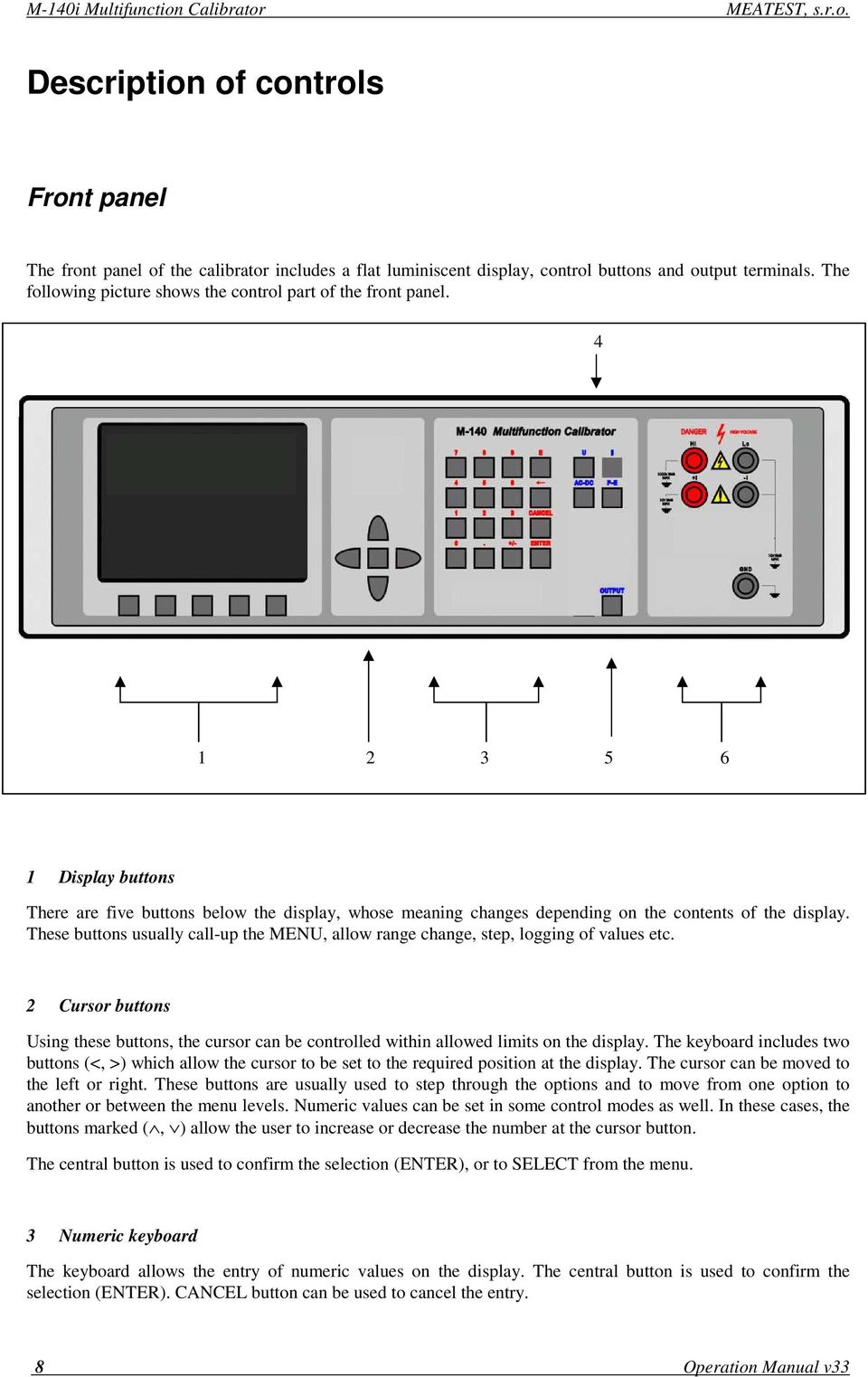
9 MEATEST, s.r.o. M-140i Multifunction Calibrator 4 Function buttons Function buttons can be used to call-up the functions of the calibrator directly. The following buttons are provided: function DC voltage AC voltage DC current AC current simulation of temperature sensors button U / DC U / AC I / DC I / AC T After the function mode is changed, the parameters of the respective function are restored. If the respective function was never used, the calibrator resets to its reference values. Reference values for individual functions are listed below. function value parameters DC voltage 10V - - AC voltage 10 V f = 1000 Hz DC current 100 ma - - AC current 100 ma f = 1000 Hz simulation of temperature sensors 100 o C TC type R cold junction temperature of TC sensors 23 o C Type R 5 Output terminal button OUTPUT button is used to connect the output signal of the calibrator to the output terminals. The connection is confirmed by symbol on the display. 6 Output terminals Output signal of the calibrator is connected to the output terminals. Current ranges are connected to +I / -I terminals. All other functions (voltage, temperature sensor simulation) are connected to Hi / Lo terminals. GND terminal is connected to the chassis of the calibrator. It is connected to the ground terminal of the mains plug. Using the SETUP MENU of the calibrator, the output terminals of the calibrator can be grounded as well. Grounding is done internally by connecting Lo and GND terminals using a relay. This circuit design is suitable for most calibrations, when the object (multimeter) being calibrated is floating. Front panel display shows all information provided by the calibrator, e.g. set parameters of the signal, error messages, setup information. The display is divided to several information sections. Operation Manual v33 9

10 M-140i Multifunction Calibrator MEATEST, s.r.o. 7 Display 1a 1b 1c 1d 1e 3 2b 1g 1f The display is divided to three horizontal sections: 1. OUTPUT section This section displays the set-up values of generated signals and the data related to the calibrator status. The section includes the following types of data: a) Information line designation of display section: OUTPUT error messages. The messages appear when an attempt is made to set up an invalid state of the calibrator, if analogue circuits of the calibrator are overloaded or if a communication error occurs when the calibrator is controlled using GPIB bus. real date and time, if its display is set-up in the setup menu. b) Auxiliary data This line displays the total value of output signal if a non-zero relative deviation is set. c) Main data This line displays the main data of the output signal and the unit of measurement (using double size signs). The line also includes two symbols ( ) to define the actual position of the cursor during adjustment of the value. <, > buttons can be used to move the cursor and, buttons to change the value. (The value can be also changed using the potentiometer). d) Monitoring line This line displays the numbers entered using the numeric keyboard when the main data are set using the numeric keyboard. The information allows the entered information to be checked. e) Minor data There are two lines displaying the minor data of the output signal, especially: set relative deviation from main set value in % 10 Operation Manual v33

11 MEATEST, s.r.o. M-140i Multifunction Calibrator frequency (for DC voltage, current, power, energy functions) cold junction temperature of TC sensors and the selected type of TC sensor f) Information section The information section located in the right part of the display displays additional information related to the selected function: symbol of connected or disconnected output terminals. At the same time, a LED located above the OUTPUT button is lit. information about remote/local control of the calibrator. If the calibrator is controlled remotely, REM is displayed. If the calibrator is controlled locally using the keyboard, LOCAL is displayed. information about the use of 50-turn coil (COIL x50) at the current output of the calibrator, if this feature is turned on using the SETUP menu. information about the type of connected cable adapter, if used information about the grounding method of output terminals: GND I, GND U as set up using the setup menu. g) Information about the uncertainty of the output signal This section displays the maximum error of the main value of the output signal. The value is calculated using the main specification listed in the User s Manual and it is displayed in %. 2. INPUT section This section displays the values measured by the multimeter. It is not available in M-140i version. 3. Display buttons section This line displays the symbolic descriptions which define the meaning of four related display buttons. The respective meanings are as follows: symbol button function note x 10 increase set value 10 x : 10 decrease set value 10 x +/- reversed polarity of output voltage and current only for DC U, DC I functions Calib. SETUP enter the calibration menu enter the setup menu TC type selection of thermocouple sensor type only for T function f enter the frequency of the signal only for U, I function Operation Manual v33 11

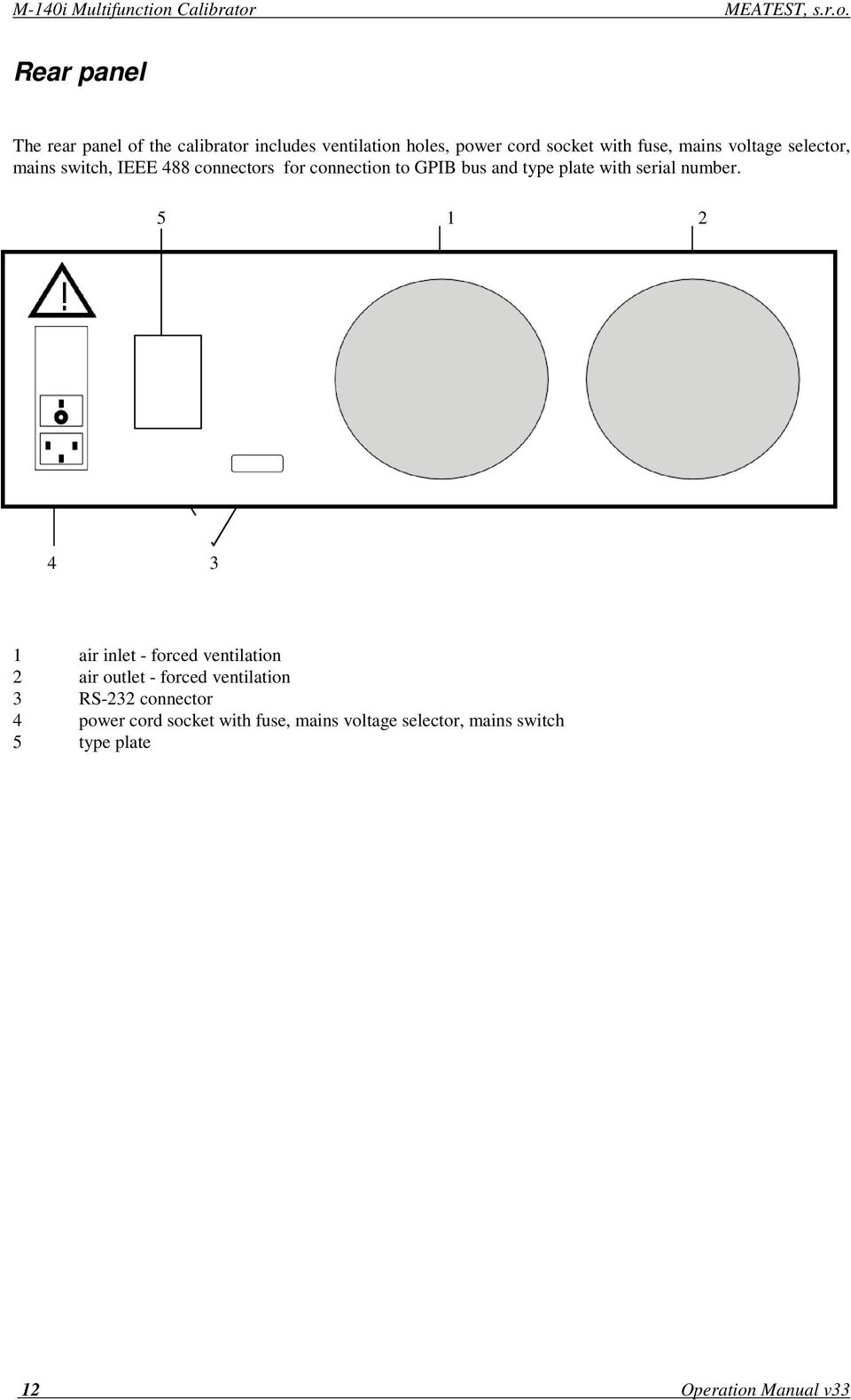
12 M-140i Multifunction Calibrator MEATEST, s.r.o. Rear panel The rear panel of the calibrator includes ventilation holes, power cord socket with fuse, mains voltage selector, mains switch, IEEE 488 connectors for connection to GPIB bus and type plate with serial number air inlet - forced ventilation 2 air outlet - forced ventilation 3 RS-232 connector 4 power cord socket with fuse, mains voltage selector, mains switch 5 type plate 12 Operation Manual v33
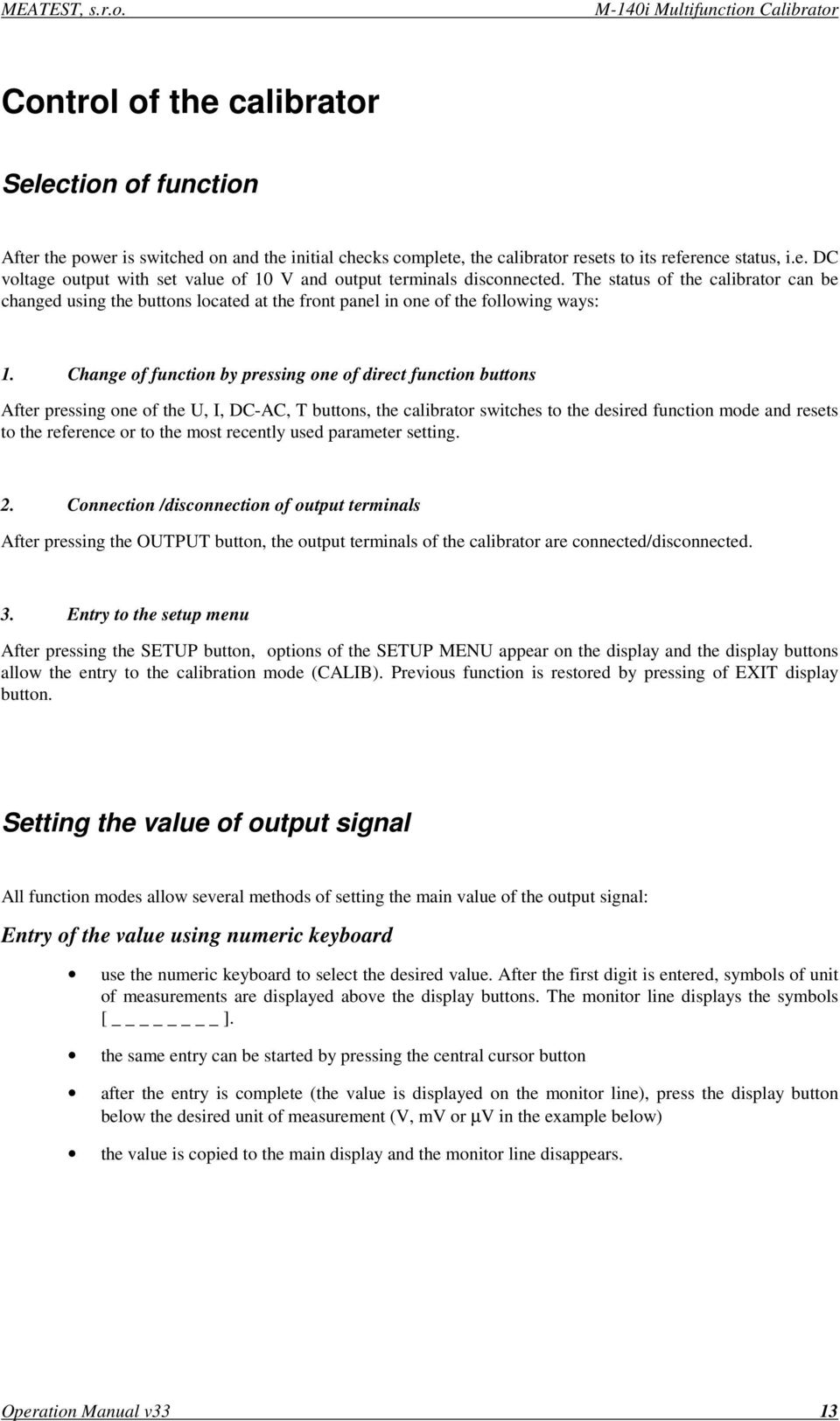
13 MEATEST, s.r.o. M-140i Multifunction Calibrator Control of the calibrator Selection of function After the power is switched on and the initial checks complete, the calibrator resets to its reference status, i.e. DC voltage output with set value of 10 V and output terminals disconnected. The status of the calibrator can be changed using the buttons located at the front panel in one of the following ways: 1. Change of function by pressing one of direct function buttons After pressing one of the U, I, DC-AC, T buttons, the calibrator switches to the desired function mode and resets to the reference or to the most recently used parameter setting. 2. Connection /disconnection of output terminals After pressing the OUTPUT button, the output terminals of the calibrator are connected/disconnected. 3. Entry to the setup menu After pressing the SETUP button, options of the SETUP MENU appear on the display and the display buttons allow the entry to the calibration mode (CALIB). Previous function is restored by pressing of EXIT display button. Setting the value of output signal All function modes allow several methods of setting the main value of the output signal: Entry of the value using numeric keyboard use the numeric keyboard to select the desired value. After the first digit is entered, symbols of unit of measurements are displayed above the display buttons. The monitor line displays the symbols [ ]. the same entry can be started by pressing the central cursor button after the entry is complete (the value is displayed on the monitor line), press the display button below the desired unit of measurement (V, mv or µv in the example below) the value is copied to the main display and the monitor line disappears. Operation Manual v33 13
14 M-140i Multifunction Calibrator MEATEST, s.r.o. Entry of the value using cursor buttons press <, >, or button. The display now includes cursor marks which point to the active digit. and buttons can be used to change the active digit. <, > buttons can be used to change the position of the cursor marks to get to the default screen, press EXIT button or keep pressing the center cursor button until there is no [ _ ] under any value. All values can be set using the buttons or the potentiometer. Reverse polarity In DC voltage and DC current modes, the polarity of the output value can be reversed by pressing +/- display button. - symbol appears in front of the main data value. Setting relative deviation All function modes of the calibrator except frequency mode allow a relative deviation of output value from the main data to be set using a separate display. Relative deviation is displayed in the minor data section of the display and is designated with %= % symbol. The relative deviation can be entered using one of the methods described above, e.g. using the numeric keyboard, cursor keys or the potentiometer. Setting relative deviation using numeric keyboard keep pressing the center cursor button until [ _ ] symbols appear under the relative deviation value in the minor data section of the display enter the desired deviation and confirm the value by pressing % display button or by pressing ENTER on the numeric keyboard the auxiliary line below the main data on the display displays the total value of output signal including the unit of measurement the value of the signal at output terminals is: the value indicated by the main display + %. 14 Operation Manual v33
![<, > buttons can be used to change the position of the cursor marks to get to the default screen, press EXIT button or keep pressing the center cursor button until there is no [ _ ] under any value.](/docs-images/50/15244333/images/page_14.jpg "All values can be set using the buttons or the potentiometer. Reverse polarity In DC voltage and DC current modes, the polarity of the output value can be reversed by pressing +/- display button.")
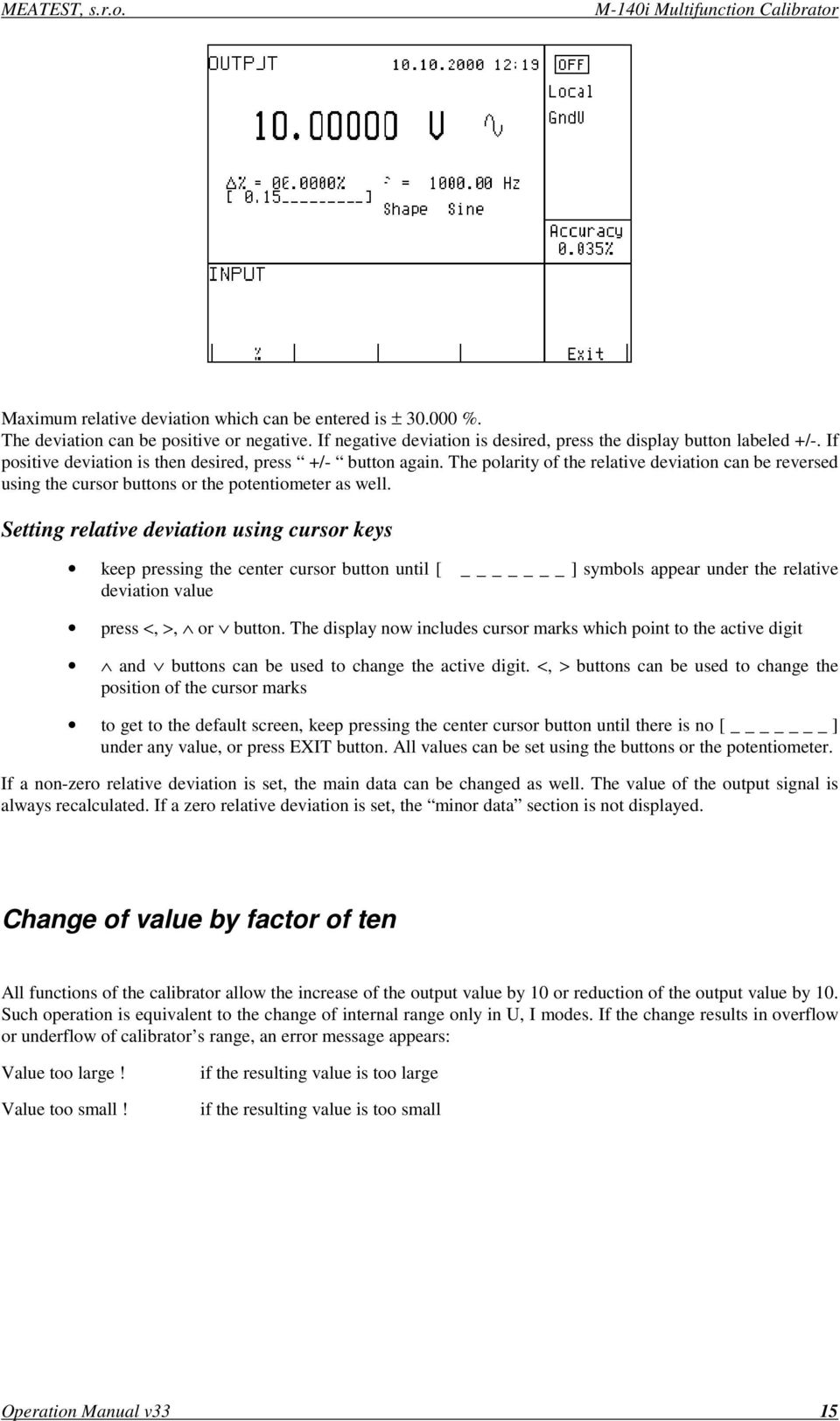
15 MEATEST, s.r.o. M-140i Multifunction Calibrator Maximum relative deviation which can be entered is ± %. The deviation can be positive or negative. If negative deviation is desired, press the display button labeled +/-. If positive deviation is then desired, press +/- button again. The polarity of the relative deviation can be reversed using the cursor buttons or the potentiometer as well. Setting relative deviation using cursor keys keep pressing the center cursor button until [ _ ] symbols appear under the relative deviation value press <, >, or button. The display now includes cursor marks which point to the active digit and buttons can be used to change the active digit. <, > buttons can be used to change the position of the cursor marks to get to the default screen, keep pressing the center cursor button until there is no [ _ ] under any value, or press EXIT button. All values can be set using the buttons or the potentiometer. If a non-zero relative deviation is set, the main data can be changed as well. The value of the output signal is always recalculated. If a zero relative deviation is set, the minor data section is not displayed. Change of value by factor of ten All functions of the calibrator allow the increase of the output value by 10 or reduction of the output value by 10. Such operation is equivalent to the change of internal range only in U, I modes. If the change results in overflow or underflow of calibrator s range, an error message appears: Value too large! Value too small! if the resulting value is too large if the resulting value is too small Operation Manual v33 15
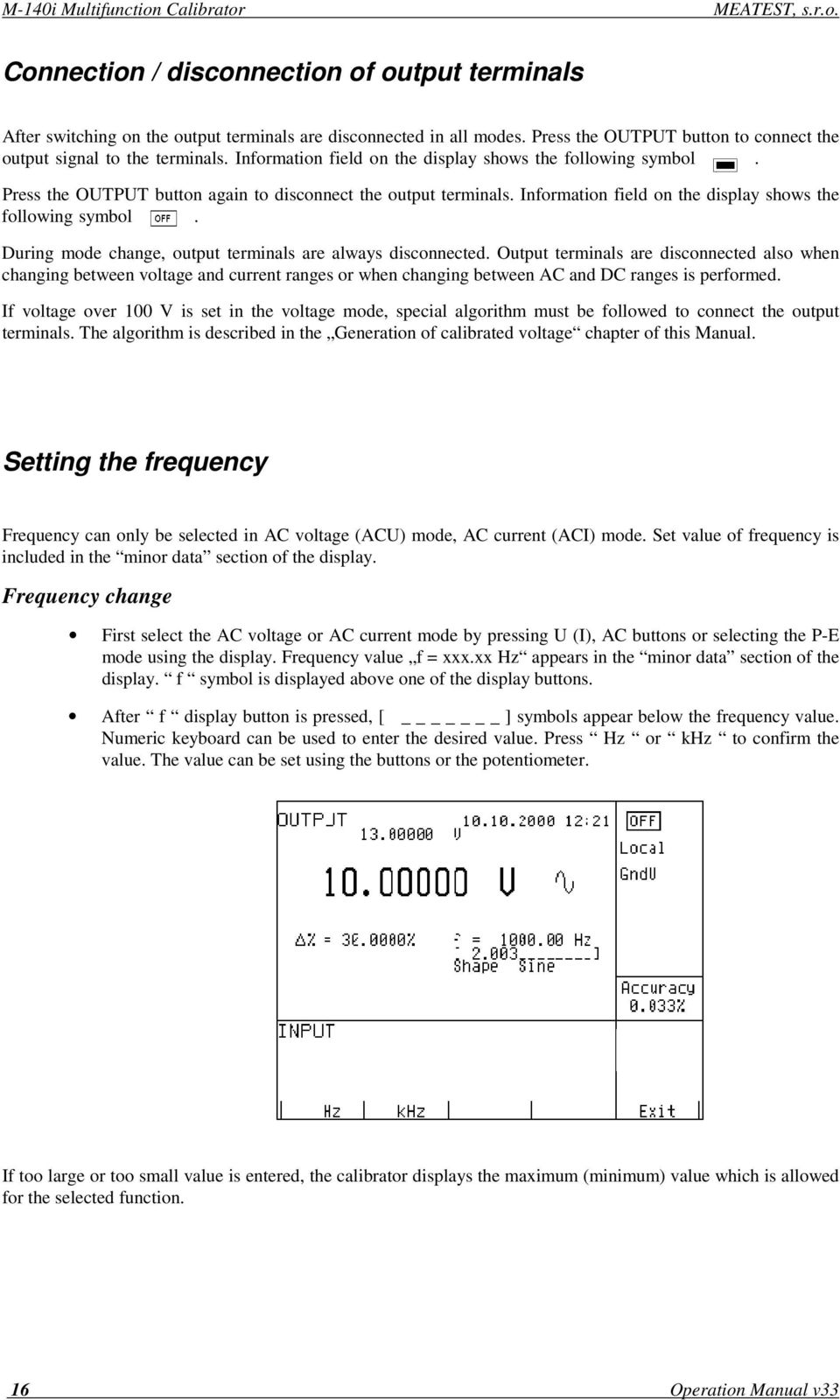
16 M-140i Multifunction Calibrator MEATEST, s.r.o. Connection / disconnection of output terminals After switching on the output terminals are disconnected in all modes. Press the OUTPUT button to connect the output signal to the terminals. Information field on the display shows the following symbol. Press the OUTPUT button again to disconnect the output terminals. Information field on the display shows the following symbol. During mode change, output terminals are always disconnected. Output terminals are disconnected also when changing between voltage and current ranges or when changing between AC and DC ranges is performed. If voltage over 100 V is set in the voltage mode, special algorithm must be followed to connect the output terminals. The algorithm is described in the Generation of calibrated voltage chapter of this Manual. Setting the frequency Frequency can only be selected in AC voltage (ACU) mode, AC current (ACI) mode. Set value of frequency is included in the minor data section of the display. Frequency change First select the AC voltage or AC current mode by pressing U (I), AC buttons or selecting the P-E mode using the display. Frequency value f = xxx.xx Hz appears in the minor data section of the display. f symbol is displayed above one of the display buttons. After f display button is pressed, [ _ ] symbols appear below the frequency value. Numeric keyboard can be used to enter the desired value. Press Hz or khz to confirm the value. The value can be set using the buttons or the potentiometer. If too large or too small value is entered, the calibrator displays the maximum (minimum) value which is allowed for the selected function. 16 Operation Manual v33
17 MEATEST, s.r.o. M-140i Multifunction Calibrator Generation of calibrated voltage The multifunction calibrator provides calibrated DC and AC voltage. Output terminals for voltage ranges are labeled Hi and Lo at the front panel. Depending on the setting of the calibrator, voltage up to 1000 Vef can be present at the terminals. DC voltage range is 0 to 1000 V. AC voltage range is 100 µv to 1000 V. Control in the voltage mode Press U button on the calibrator and then select AC or DC mode by pressing DC-AC button. The display shows the following data: * main data of set voltage * relative deviation * uncertainty of output voltage * frequency (when AC voltage is generated) * total value of output voltage when non-zero relative deviation is set Set the desired value of voltage, including polarity when necessary, frequency and relative deviation. The signal is yet not connected to the output terminals. The information section of the display shows the symbol which informs about the disconnection of output terminals. Press OUTPUT button. Information section of the display shows the symbol. Calibrated voltage corresponding to set parameters is present at the output terminals. Control sequence when output voltage over 100 V is selected When output voltage over 100 V is selected, the information section of the display shows the symbol which informs that a life-threatening voltage will be present at the output terminals. If the output terminals are currently connected, they will be disconnected when output voltage over 100 V is selected. OUTPUT button must be pressed to reconnect the output signal to the output terminals. After the OUTPUT button is pressed, an interrupted beep is sound, information section of the display shows the symbol notifying the user about the connection of the dangerous output signal to the output terminals. Voltage, polarity, frequency, absolute and relative deviation can be set without the outputs being disconnected. The output terminals are automatically disconnected when changing between AC and DC ranges or when changing the function mode. Overloading of terminals If the output terminals are overloaded or short-circuited in the voltage mode, the calibrator disconnects the signal from the output terminals and reports Overload U output error. Operation Manual v33 17
18 M-140i Multifunction Calibrator MEATEST, s.r.o. ATTENTION DANGEROUS VOLTAGE When working with voltages over 50 V, rules for work with dangerous voltage must be adhered to. Never touch the measurement circuit when voltage over 50 V is set and output terminals are connected! ATTENTION DANGEROUS VOLTAGE When the calibrator is controlled remotely, it is not possible to disconnect the output voltage using the buttons located at the front panel! The calibrator must be first switched to local control mode by pressing the LOCAL button and then the output terminals can be disconnected or the mains switch must be switched off! 18 Operation Manual v33

19 MEATEST, s.r.o. M-140i Multifunction Calibrator Generation of calibrated current The multifunction calibrator provides calibrated DC and AC current. Output terminals for voltage ranges are labeled +I and -I at the front panel. The terminals can carry high current and are the only terminals to which the calibrated object can be connected. Depending on the setting of the calibrator, current up to 20 A ef can be driven by the terminals. DC current range is 0 to 20 A AC current range is 1µA to 20 A When 50-turn coil (option ) is used, AC current range is 50µA to 1000 A. Control in the current mode Press I button on the calibrator and then select AC or DC mode by pressing DC-AC button. The display shows the following data: * main data of set current * relative deviation * uncertainty of output current * frequency (when AC current is generated) * total value of output current when non-zero absolute or relative deviation is set * time after which the output terminals will be disconnected when the output current over 10 A is selected. Set the desired value of voltage, including polarity when necessary, frequency and relative deviation. The signal is yet not connected to the output terminals. The information section of the display shows the symbol which informs about the disconnection of output terminals. Connect the load or short the output terminals labeled +I, -I. Press OUTPUT button. Information section of the display shows the symbol. Calibrated current corresponding to set parameters is driven by the output terminals. If COILx50 function is activated (see below - Setup functions menu), the optional 50-turn coil must be connected to output terminals. The calibrator can be used to calibrate 50 µa to 1000 A ammeters. The calibrator generates AC and DC current within the range up to 20 A. CAUTION If GND terminal is connected to Lo, -I terminals, it is prohibited to connect external load to GND / Hi or GND / +I terminals. Such connection can damage the calibrator. Operation Manual v33 19

20 M-140i Multifunction Calibrator MEATEST, s.r.o. Overloading the terminals When external circuit connected to current output terminals is disconnected or there is higher voltage at the load than permitted, the calibrator disconnects the output terminals and displays Overload I output message. The same message can be displayed when 50-turn coil is used for AC current output at frequencies above 80 Hz. It depends on the set current and the type of ammeter connected. If the output terminals are disconnected due to time limitation of output current over 10 A, the calibrator displays Current timeout! message. Simulation of temperature sensors The multifunction calibrator can simulate thermocouple temperature sensors. When thermocouples are simulated, a simulated voltage corresponding to set temperature, sensor type and temperature of cold end of thermocouple is connected to Hi - Lo terminals. Temperature setting range: -250 to o C depending on simulated sensor type Sensor types: thermocouple K, N, R, S, B, J, T, E Temperature scale: ITS 90, PTS 68 Setting the temperature Press T button on the calibrator. The main value on the display is set temperature. The display shows the following data: * main data of temperature in o C or K * sensor type thermocouples: K, N, R, S, B, J, T, E * cold junction temperature of thermocouple sensors labeled RJ * set value of relate deviation in %, labeled T = xxxx.x C (K) the information section shows: * temperature scale type * uncertainty of simulated temperature value of selected temperature sensor type Set the main value of temperature using numeric keyboard, cursor buttons or potentiometer. Output terminals are disconnected, the information section of the display shows the symbol which shows that output terminals are disconnected. Connect the object to be calibrated to Hi - Lo terminals. Press OUTPUT button. 20 Operation Manual v33

21 MEATEST, s.r.o. M-140i Multifunction Calibrator The display shows the symbol of connected output terminals. Note Load of output terminals is limited similarly to corresponding voltage or current ranges. Entry of cold junction temperature For thermocouples, the temperature of cold junction can be entered. The entry is performed by setting the RJ field in the auxiliary data section of the display. Select the thermocouple mode and keep pressing the center cursor button until [ _ ] symbols appear under the (RJ = xxxx.x o C) value, if o C unit of measurement is used, or under (RJ = xxxx.x K) value, if K unit of measurement is used. Set the value using numeric keyboard. Confirm the value by pressing o C or K display button or by pressing ENTER. Operation Manual v33 21
22 M-140i Multifunction Calibrator MEATEST, s.r.o. Setup menu The multifunction calibrator allows some other, less frequently used parameters to be set. Setup menu is used to set these parameters. Setup menu is opened by pressing SETUP display button. If output terminals are connected, they will be disconnected and the following display appears: Use or cursor button or the knob of the potentiometer to browse the menu options. Active option is always inverted and when changed, the descriptions of display buttons change as well. Display buttons show how the respective parameter can be set. Each parameter can be changed after the knob of the potentiometer is pressed. Press EXIT display button twice to save the parameters when the setting is completed. New settings are retained when the calibrator is switched off. Setup menu offers the following options: 1. Coil x50... xx ON/OFF This parameter can be set on when 50-turn current coil is going to be used for clamp ammeter calibration. The coil multiplies the output current. OFF is set by the manufacturer. 2. GND U... xx ON/OFF This parameter connects Lo terminal to GND. In practice this means that Lo terminal is grounded. By pressing the display buttons, the terminal can be grounded or ungrounded. ON is set by the manufacturer, output terminal is grounded. 3. GND I... xx ON/OFF This parameter connects -I to GND. In practice this means that -I terminal is grounded. By pressing the display buttons, the terminal can be grounded or ungrounded. OFF is set by the manufacturer, output terminals are not grounded. It is recommended to ground only the voltage channel GND U ON, GND I OFF, for all ranges except the generation of power or energy. If the meter to be calibrated has Lo terminal grounded, it is recommended to unground both outputs of the calibrator, GND U OFF, GND I OFF to exclude ground loops. Note 22 Operation Manual v33
23 MEATEST, s.r.o. M-140i Multifunction Calibrator If neither the calibrator s output, nor the meter s inputs are grounded, signal/noise ratio can arise at the calibrator s output. 4. Temp.scale... xx ITS90/PTS68 This parameter allows the temperature scale for platinum resistance temperature sensors to be selected. Pressing the display buttons allows to switch between ITS90 and PTS68 temperature scales. ITS90 is set by the manufacturer. 5. Temp.unit... xx o C/K This parameter allows the temperature unit for simulation of temperature sensors to be selected. Pressing the display buttons allows to switch between C and K. C is set by the manufacturer. 6. Phase.unit... xx N/A Not available in M-140i version. 7. Output xx N/A Not available in M-140i version. 8. Meter average... xx N/A Not available in M-140i version. 9. Interface... xx N/A Not available in M-140i version. 10. GPIB address... xx N/A Not available in M-140i version. 11. RS232 baud rate... xx UP/DOWN Indicates the communication speed of RS232 bus. UP/DOWN display buttons can be used to select 150, 300, 600, 1200, 2400, 4800, 9600, Perfect communication with the PC requires equal values set at the PC and the calibrator. 12. Handshake... xx OFF/Xon-Xoff Indicates the communication handshake. Display buttons can be used to select OFF or Xon/Xoff. Perfect communication with the PC requires equal values set at the PC and the calibrator. 13. Keyb.beep... xx ON/OFF This parameter allows the acoustic indication of pressed buttons to be switched off or on. ON and OFF display buttons can be used to switch the indication off or on. ON is set by the manufacturer. Operation Manual v33 23
24 M-140i Multifunction Calibrator MEATEST, s.r.o. This parameter does not control the acoustic indication of output voltages over 100 V and identification of errors. 14. Keyb.volume... xx UP/DOWN This parameter allows the volume of acoustic indication to be set. UP and DOWN display buttons allow to set the value in the range of 00 to 15. The bigger the value, the louder sound. This parameter controls the volume of keyboard beep (if switched on), indication of output voltages over 100 V and identification of errors when controlling the calibrator. 15. Brightness... xx UP/DOWN This parameter sets the contrast of the display. UP and DOWN display buttons allow to set the value in the range of 00 to Rotary change... xx N/A Not available in M-140i version. 17. Switch polarity... xx N/A Not available in M-140i version. 18. Switch activity... xx N/A Not available in M-140i version. 19. Cal.code Entry of calibration code. Calibration code is a five-digit number, which must be entered to access the calibration mode. If the calibration code is set to 00000, this information is displayed in the Setup menu. Calibration code can be changed. New calibration code can be directly entered using numeric keyboard and confirmed by pressing ENTER. If non-zero calibration code is set, correct calibration code must be entered to access the calibration mode. Non-zero calibration code is not displayed further on the display. The purpose of the calibration code is to prevent unauthorized users from changing the calibration of the instrument. Note 24 Operation Manual v33
25 MEATEST, s.r.o. M-140i Multifunction Calibrator It is advisable to write down actual calibration code if changed. If you forget the calibration code, you have to send the calibrator to the manufacturer. 20. Cal.date... xx.yyyy Displays the date of last calibration of the calibrator (month/year). The parameter cannot be changed, as it is automatically recorded when leaving the calibration mode. 21. Serial No... xxxxxx Displays the serial number of the calibrator. The parameter cannot be changed. 22. Time... xx:yy Displays real time. The parameter can be changed using HOUR UP, HOUR DO, MIN UP, MIN DO. display buttons. 23. Date... xx.yy.zzzz Displays real time. The parameter can be changed using DAY UP, MONTH UP, YEAR UP, YEAR DO display buttons. 24. Time on display... xx ON/OFF If set to ON, time and date are displayed in the upper part of the display. If OFF is set, time and date are not displayed. ON is set by the manufacturer. Operation Manual v33 25
26 M-140i Multifunction Calibrator MEATEST, s.r.o. Calibration mode The multifunction calibrator includes a calibration procedure, which allows calibration of the calibrator. Zero point and slope of the characteristics of individual generation and measurement ranges are set during the calibration in predefined order. The calibration can only be controlled using the buttons and menu on the calibrator. Calibration principles The calibrator can be calibrated: completely, i.e. all functions are calibrated in all recommended points partially, i.e. only selected functions are calibrated in all recommended points partially, i.e. only selected functions are calibrated in selected points Complete calibration consists of all partial calibrations performed in the order defined by the calibration menu. If an item of the calibration menu, e.g. VOLTAGE DC is selected, it is not necessary to calibrate all ranges defined by the calibration algorithm. If new calibration of all ranges is not possible (e.g. the required standard is not available), old calibration data can be confirmed, i.e. current step of the calibration can be skipped. Calibration interruption can be performed in any point of the calibration procedure. However this particular calibration influences parameters of the calibrator. Accuracy of the calibrator is guaranteed when full calibration was done. DC voltage calibration is performed by setting the zero and slope of the scale in all ranges and in both signal polarities (+ and -) (except the 1000 V range, where zero correction is not necessary). AC voltage calibration is performed by setting the zero and slope of the scale in all ranges at 1000 Hz (except the 1000 V range, where the calibration is performed at 500 Hz). DC current calibration is performed by setting the zero and slope of the scale in all ranges and in both signal polarities (+ and -). AC current calibration is performed by setting the zero and slope of the scale in all ranges at 1000 Hz (except the 20 A, where the calibration is performed at 120 Hz). Access to the calibration procedure Calibration code is required to access the calibration procedure. Press SETUP to open the setup menu. Press CALIB display button. If an attempt is made to access the calibration procedure within 60 minutes after the calibrator was switched on, the calibrator does not open the respective menu and displays the following message instead: Err 21 Time warm up! xx minutes remain 26 Operation Manual v33
27 MEATEST, s.r.o. M-140i Multifunction Calibrator If the calibrator is already on for at least 60 minutes, it requests the entry of the calibration code after CAL. MODE display button is pressed. Enter the correct calibration code using numeric keyboard and press ENTER. If incorrect calibration code is entered, an error message appears on the display for approximately 3 seconds: Err 20 Bad calib. code! If correct calibration code is entered, calibration menu appears: Use and cursor buttons to move the cursor through the list: 1. VOLTAGE DC All DC voltage ranges calibration 2. VOLTAGE AC All AC voltage ranges calibration 3. CURRENT DC All DC current ranges calibration 4. CURRENT AC All AC current ranges calibration Note: All the rest functions labeled as N/A are not available in M-140i version. Selection of calibration type Operation Manual v33 27
28 M-140i Multifunction Calibrator MEATEST, s.r.o. After the calibration menu is displayed, one of partial calibrations can be selected. Use and cursor buttons to move the cursor through the list. Having selected the required function to be calibrated, press SELECT display button. The following data are shown (the following example is valid for VOLTAGE DC range): The table lists recommended calibration points. Having selected the required calibration point using SELECT display button, the following data are shown. Display buttons have the following meaning: WRITE SKIP EXIT new calibration value is entered into the memory, old value is irreversibly lost current calibration step is skipped, old value is retained in the memory current calibration is terminated. After this button is pressed, the calibration memory hold all data (old or new entered) and the calibrator returns to the calibration menu. It is not necessary to calibrate all ranges; calibration of only selected ranges is possible by skipping the ranges which do not need to be calibrated. Moreover, the display shows the range which is being calibrated (RANGE), and the value to be set at the external standard multimeter (VALUE). 28 Operation Manual v33
29 MEATEST, s.r.o. M-140i Multifunction Calibrator Setting the new calibration data Use,, <, > cursor buttons to set such main data on the display, when the output signal measured by external standard multimeter reaches the required calibration point. When the standard output value is reached, press WRITE to write new calibration value to the calibration memory. If you press SKIP button, the calibrator ignores the new value and old value is retained. After you press WRITE (or SKIP ), the calibrator moves on to the next calibration point. The procedure is repeated for all calibration points of the selected function. If you press EXIT button before completing the calibration, the calibrator returns to the calibration menu. Termination of calibration The calibration can be terminated in the following cases: complete calibration has been performed, new calibration data have been entered, the program has returned to the calibration menu, calibration of selected function has been performed, new calibration data have been entered, the program has returned to the calibration menu, calibration of selected range(s) of selected function has been performed, new calibration data have been entered, the program has returned to the calibration menu, the calibration has been started but no calibration data have been entered, the program has returned to the calibration menu after EXIT display button has been pressed, Press EXIT display button to terminate the calibration. After the button is pressed, the calibration date is saved internally and the calibrator returns to the state it was in before the calibration has been started. Calibration points Each function of the calibrator has assigned fixed calibration points which have to be set during the calibration. For VOLTAGE DC, VOLTAGE AC, CURRENT DC, CURRENT AC the signal value is set using the keyboard. T function does not require any calibration, as the output voltage or resistance is based on arithmetic interpolation using standard tables of temperature sensor values. The calibrator needs no calibration of the frequency parameter. Operation Manual v33 29
30 M-140i Multifunction Calibrator MEATEST, s.r.o. VOLTAGE DC function nominal value [V] set limits [V] range [V] note u 20 m zero calibration u -20 m zero calibration 19 m 4 u 20 m slope calibration -19 m 4 u -20 m slope calibration u 200 m zero calibration u -200m zero calibration 190 m 6 u 200 m slope calibration -190 m 6 u -200m slope calibration u 2 zero calibration u -2 zero calibration u 2 slope calibration u -2 slope calibration u 20 zero calibration u -20 zero calibration u 20 slope calibration u -20 slope calibration u 200 zero calibration u -200 zero calibration u 200 slope calibration u -200 slope calibration m 1000 slope calibration m slope calibration Table DC VOLTAGE VOLTAGE AC function nominal value [V] set limits [V] range [V] recommended frequency[hz] 1.9 m 5 u 20 m m 10 u 20 m m 15 u 200 m m 40 u 200 m m 30 u u u m m m m m Table AC VOLTAGE Other then recommended frequencies can be used for calibration. Specification of the calibrator is valid when recommended frequency is used. 30 Operation Manual v33
31 MEATEST, s.r.o. M-140i Multifunction Calibrator CURRENT DC function nominal value [A] set limits [A] range [A] note n 200 u zero calibration n -200 u zero calibration 190 u 5 n 200 u slope calibration 190 u 5 n -200 u slope calibration n 2 m zero calibration n -2 m zero calibration 1.9 m 50 n 2 m slope calibration 1.9 m 50 n -2 m slope calibration n 20 m zero calibration n -20 m zero calibration 19 m 200 n 20 m slope calibration -19m 200 n -20 m slope calibration u 200 m zero calibration u -200 m zero calibration 190 m 2 u 200 m slope calibration -190 m 2 u -200 m slope calibration u 2 zero calibration u -2 zero calibration u 2 slope calibration u -2 slope calibration u 20 zero calibration u -20 zero calibration u 20 slope calibration u -20 slope calibration Table DC CURRENT CURRENT AC function nominal value [A] set limits [A] range [A] recommended frequency[hz] 19 u 5 n 200 u u 50 n 200 u u 40 n 2 m m 200 n 2 m m 200 n 20 m m 2 u 20 m m 2 u 200 m m 20 u 200 m m 20 u u m m Table AC CURRENT Other then recommended frequency can be used for calibration. Specification of the calibrator is valid when recommended frequency is used. Operation Manual v33 31
32 M-140i Multifunction Calibrator MEATEST, s.r.o. Full calibration procedure Following pages describe procedure of the full calibration. Required instruments: Following instruments are required for calibration: 81/2 digit multimeter type Agilent 3458A or Fluke 8508A or other type with accuracy % on DC voltage Resistance shunt 10 mω, 100 mω Burster 1280, or other type with accuracy 0.01% Counter HP 53181A, HO 53130, BM 642 or other with accuracy 0,001 % HP8903A Distortion analyzer and scope with bandwidth min. 20 MHz are recommended for THD measuring of AC signals. Calibration procedure 1. Connect the calibrator and the multimeter to the mains and let them switched on for at least three hours in a laboratory at 23±1 o C. 2. Press SETUP display button to call up the setup menu and then CALIB display button to call up the calibration menu. 3. Enter the calibration code and press ENTER (default calibration code is ). 4. DC voltage ranges calibration a) Connect the voltage input terminals of the multimeter to the Hi - Lo output terminals of the calibrator. b) Select VOLTAGE DC from the calibration menu and confirm by pressing SELECT button. Switch M-140 output terminals ON. c) Follow the instructions provided on the calibrator s display and the DCU table to adjust the calibrator s output in the calibration points. d) To adjust the calibrator s output in the calibration points, press SELECT button and use <, >,, cursor buttons or potentiometer to adjust output voltage. Confirm correctly set value by pressing WRITE display button. If you want to skip the calibration point whose calibration you have already entered, press SKIP display button. e) Switch output terminals OFF 5. AC voltage ranges calibration a) Select VOLTAGE AC from the calibration menu and confirm by pressing SELECT button. Switch M-140 output terminals ON. b) Follow the instructions provided on the calibrator s display and the ACU table to adjust the calibrator s output in the calibration points. c) To adjust the calibrator s output in the calibration points, press SELECT button and use <, >,, cursor buttons or potentiometer to adjust the output voltage. Confirm correctly set value by pressing WRITE display button. If you want to skip the calibration point whose calibration you have already entered, press SKIP display button. d) Switch output terminals OFF. Disconnect multimeter and calibrator. 32 Operation Manual v33
33 MEATEST, s.r.o. M-140i Multifunction Calibrator 6. DC current ranges calibration a) Connect current input terminals of the multimeter to the +I - -I output terminals of the calibrator. Select CURRENT DC from the calibration menu. b) Select DC current measurement range on external multimeter. Switch output terminals ON c) Follow the instructions provided on the calibrator s display and the DCI table to adjust the calibrator s output in the calibration points. d) To adjust the calibrator s output in the calibration points, press SELECT button and use <, >,, cursor buttons or potentiometer to adjust the output current. Confirm correctly set value by pressing WRITE display button. If you want to skip the calibration point whose calibration you have already entered, press SKIP display button. e) Resistance shunt should be used on 2A, 20 A ranges, if standard multimeter does not cover this range. 7. AC current ranges calibration a) Select CURRENT AC from the calibration menu. Set the same function on external multimeter. b) Follow the instructions provided on the calibrator s display and the ACI table to adjust the calibrator s output in the calibration points. c) To adjust the calibrator s output in the calibration points, press SELECT button and use <, >,, cursor buttons or potentiometer to adjust the output current. Confirm correctly set value by pressing WRITE display button. If you want to skip the calibration point whose calibration you have already entered, press SKIP display button. d) Resistance shunt should be used on 2A, 20 A ranges, if standard multimeter does not cover this range. Error messages If an error occurs during the calibrator s operation or control, error message is displayed on the display. Errors can be caused by: incorrect control using the front panel, i.e. attempts to force a prohibited mode, e.g. setting an out-of-range value, overloading of output terminals etc., fault of the calibrator, e.g. internal communication error during the communication between individual functional blocks, incorrect control using RS-232 interface. Below you can see a sample error message which appears when too large value is attempted to set up. All error messages are displayed in the center of the display. Operation Manual v33 33
34 M-140i Multifunction Calibrator MEATEST, s.r.o. The following table lists all error messages, their meaning and simple troubleshooting. 34 Operation Manual v33
35 MEATEST, s.r.o. M-140i Multifunction Calibrator No error label description troubleshooting 01 Overload 2V! 2V range overloaded Output current is too high. Increase load resistance. 02 Overload 20V! 20 V range overloaded Output current is too high. Increase load resistance. 03 Overload 200V! 200, 1000 V ranges overloaded Output current is too high. Increase load resistance. 04 Overload I output! Current output overloaded Voltage on the load is too high. Decrease load resistance. 05 High temperature! Too high internal temperature Output stages are overloaded. Do not use ranges 200V, 1000V or 20 A for at least 10 minutes. Check if the ventilation holes are free. 06 Overload RC! RC simulator overloaded Test current is too high. Use lower range of tested Ohmmeter. 07 FBK error! Internal error Turn off the calibrator and turn on it again. 08 OUTPUT must be in OFF state! Cable adapter tried to be exchanged while output terminals was ON Switch off output terminals with button OUTPUT, change the adapter, and switch output terminals on. 20 Bad calib. code! Bad calibration code Wrong calibration code was entered, calibration cannot start. Enter correct calibration code. 21 Time warm up! Attempt to start calibration before warm up 30 Internal RxD timeout! 31 Internal communication! 37 Calibrator is not ready! 40 Value too large! Maximum value is out of limit 41 Value too small! Minimum value is out of limit 42 Deviation too large! Attempt to start calibration before 60 minutes warm up period. Let the calibrator turned on for at least 60 minutes. Internal error Internal error of the calibrator. Turn the calibrator off and after 5 s turn on. If the error will appear again, contact manufacturer. Internal error Internal error of the calibrator. Turn the calibrator off and after 5 s turn on. If the error will appear again, contact manufacturer. Internal error Internal error of the calibrator. Turn the calibrator off and after 5 s turn on. If the error will appear again, contact manufacturer. Deviation is too high 44 Unable +/-! Change of polarity is not allowed 45 Unable polarity! Negative polarity is not allowed. 46 Unable DC/AC! DC/AC conversion is not possible 47 Current timeout! Time limit for current over 10 A exceeded Attempt to set value over possible range. Set correct value. Attempt to set value under possible range. Set correct value. Set deviation is out of limit 30% to +30%. Set correct value. Attempt to change polarity, where it is not allowed.. Concerned modes ACV, ACI. Attempt to set negative polarity, where it is not allowed.. Concerned modes ACV, ACI. Attempt to change parameter AC/DC where it is nonsense or where it is not allowed. Long-term loading current terminals with output current over A. Operation Manual v33 35
36 M-140i Multifunction Calibrator MEATEST, s.r.o. Functional description of the calibrator Basic blocks Basic functional blocks are: front panel keyboard LCD display output terminals output voltage amplifier 200 V output voltage amplifier 20 A main board voltage amplifier 2 V voltage amplifier 20 V DC reference voltage with DAC generator feedback circuits phase shift circuits current ranges generator multimeter power line transformer power supply board interface GPIB and RS232 Note: List of basic functional blocks contains all blocks of M-140 model. In M-140i version some of them miss. 36 Operation Manual v33
37 MEATEST, s.r.o. M-140i Multifunction Calibrator Operation Manual v33 37
38 M-140i Multifunction Calibrator MEATEST, s.r.o. 2, 20 V DC voltage ranges The functional scheme is shown in the picture below: There is a DC reference voltage source integrated within the 22bit measurement converter. Its output is fed to the output stage for 2 and 20 V range. Output voltage present at Hi and Lo terminals is sensed by sensing wires. Feedback eliminates the influence of amplifier s output impedance and of the resistance of wires within the calibrator. 200 V DC voltage range The block diagram functional scheme is shown in the picture below. The scheme is similar to 2 and 20 V ranges. A 240 V power amplifier with electronic fuses is connected to the output of 20 V amplifier. 2 to 200 V AC voltage ranges The functional scheme is shown in the picture below: 38 Operation Manual v33
39 MEATEST, s.r.o. M-140i Multifunction Calibrator The calibrator s built-in generator generates a sine wave with voltage-controlled amplitude. The frequency is derived from microprocessor control circuit s crystal oscillator. The signal is fed to 20 V or 200 V amplifier and then to output terminals. Feedback circuits sense the voltage present at the output terminals, normalize its value and detects it. This results in a signal corresponding to average value of the output voltage. This signal is further filtered and compared to the set value of output voltage. The error value controls the amplitude of the generator s output. 20mV and 200 mv voltage ranges 20 mv and 200 mv voltage ranges are derived from 2 and 20 V voltage ranges. The output of the amplifier is fed to an inverting attentuator with 1:100 nominal division ratio. The signal is then led to the output terminals, sensed via local feedback. This connection allows to load the calibrator output with output current of several ma without losing accuracy V AC, DC voltage range The highest voltage range of the calibrator uses 200 V amplifier. It is connected to a pair of transformers with ca 1:6 transformation ratio. In 1000 V AC mode, the output of 200 V amplifier is transformed and led to the output terminals. The output voltage is sensed, rectified and compared to reference DC voltage provided by the DA converter. error value controls the amplitude of the generator s output so that there is correct voltage at the output terminals. In 1000 V DC mode, 12 khz signal is transformed, rectified, filtered and led to the output terminals. The output voltage is sensed equally to 1000 V AC mode. Operation Manual v33 39
40 M-140i Multifunction Calibrator MEATEST, s.r.o. Current converter The current converter and current amplifier form a separate design block based on a transconductivity converter with 10-5 S nominal conversion ratio. A six-range switched current amplifier connects to the output of the current converter. Its input is fitted with overload input protection and a separate circuit which measures the shift between output voltage and current in 2 and 20 A current ranges. The output stage is push-pull in B class. power stage Resistance and capacitance simulator Resistance and capacitance are simulated using an electronic simulator. DA convertor power stage Hi and Lo are calibrator s output terminals. The stage including U1 operating amplifier converts voltage to current. U2 is a separation amplifier. R1 to R5 and C1 to C3 are range impedance. DA converter has 0 to +1 and 0 to -1 conversion ration and allows the simulation of resistance and capacitance values different from the range impedances. The output stage increases the permitted current load of the output. ATTENTION The simulator s output voltage (Hi - Lo terminals) is limited to 8 Vpk. Frequency synthesizer Frequency synthesis circuitry allows fine setting of frequency in the whole calibrator s range. Frequency synthesis uses DSP circuits with basic frequency 20 MHz. 40 Operation Manual v33
41 MEATEST, s.r.o. M-140i Multifunction Calibrator Calibrator s maintenance The multifunction calibrator is electronic instrument with microprocessor control. All blocks which are heavily loaded during the operation are cooled by a fan. Rules for correct operation Especially the following rules should be adhered to guarantee correct operation of the calibrator: The calibrator can only be switched on and off by pressing the mains switch located at the rear panel. Do not connect the calibrator to other voltage than set by the voltage selector. Do not block the vent openings located at the rear panel and bottom panel. The calibrator must not be operated in dusty environment. It was designed to be used in a laboratory. No liquid or small objects can be permitted to enter the calibrator through the vent openings.. Do not switch the calibrator outside its operating temperature range. Connect the instruments to be calibrated to proper output terminals. There is no way of protecting the calibrator from the damage caused by some improper connections. Do not damage the output terminals by plugging in bananas thicker than the terminals were designed for. Whenever possible, use the setup menu to ground Lo output terminal (GND U ON setup function). Do not overload the power stages by leaving the calibrator switched on with the load connected for a long time, especially on 20 A current range and 200V and 1000 V voltage ranges. If the instruments to be calibrated are not connected to calibrator s output terminals using original cables, ensure that cables suitable for the calibration voltage and current are used. Maximum output voltage can reach 1000 V AC and the maximum output current can reach 20 A AC. Regular maintenance The calibrator does not require any special maintenance of electrical or mechanical parts. If is gets dirty, the case and the display can be cleaned by a wool rag moistened with alcohol. The calibrator should be calibrated in the recommended 12-month intervals. A calibration center should perform the calibration. What to do in case of failure If an obvious failure occurs during the operation (e.g. the display is not lit, the fan is not turning), the calibrator must be switched off immediately. First, check the fuse located in the power cord receptacle. Procedure is following: Remove the end of power cord from the mains connector at the rear panel. Insert the blade of a flat screwdriver into the opening cut in the mains voltage selector and pry out the fuse holder. Operation Manual v33 41
42 M-140i Multifunction Calibrator MEATEST, s.r.o. Remove the fuse. Replace it with new fuse of the same rating if the fuse was broken. Replace the fuse holder, reconnect the power cord and switch on the calibrator. If the problem persists, contact the manufacturer. If an obvious fault is evidenced, e.g. a measurement range or an operating mode is not functional, the user cannot correct the fault. Contact the manufacturer. Hidden faults can cause different symptoms and be caused by different causes. Usually, they cause instability of some parameter. Hidden defects can be caused by unacceptable distortion, degraded insulation etc. In this case contact the manufacturer. Sometimes it seems that the calibrator has hidden defect, when the rules for correct operation are not adhered to. In this case, the fault is caused by the operator. Most frequent cases of false hidden defects : mains voltage out of tolerance limits or unstable wrong grounding of the measurement circuit (bad connection of the ground terminal of the mains outlet, or several ground connection when grounding loops are formed) proximity to sources of intensive influence, whose products are spread through the mains or propagated by the electromagnetic field strong electrostatic or electromagnetic field which can cause major instability during calibration using higher impedance. 42 Operation Manual v33
43 MEATEST, s.r.o. M-140i Multifunction Calibrator Verification test Procedure recommended for verifying parameters of the calibrator is described in this chapter. During tests it is not necessary access to the interior of the instrument. Required equipment Following instruments are required for performance verification test: 81/2 digit multimeter type Agilent 3458A or Fluke 8508A or other type with accuracy % on DC voltage resistance shunt 10 mω, 100 mω Burster 1280, or other type with accuracy 0.01% counter HP 53181A, HO 53130, BM 642 or other with accuracy 0,001 % HP8903A Distortion analyzer and scope with bandwidth min. 20 MHz are recommended for THD measuring of AC signals. Configuration of the calibrator Calibrator should be tested directly from the front panel terminals and without use of terminal adapter or For build-in multimeter testing cable adapters Option 40 and Option 60 are recommended. To suppress influence of noise or interference with power line frequency in measuring circuit it is recommended following setting of the calibrator (in SETUP MENU): Coil x50 OFF GND U ON (in capacitance test OFF) GND I ON (in capacitance test OFF) Note: It is recommended to ground only the voltage channel GND U ON, GND I OFF, for all ranges except the generation of power or energy. If the meter to be calibrated has Lo terminal grounded, it is recommended to un-ground both outputs of the calibrator, GND U OFF, GND I OFF to exclude ground loops. If it is grounded neither calibrator nor standard meter, higher level can occur on the output terminals. In general, when calibrator is connected to the standard meter, ground loops can be arise through power line connection. Ground loops can result apparently worse noise, short term stability or non-harmonic distortion of output signal. If necessary use toroidal chokes to suppress this products. In all other items in SETUP MENU the setting of parameters don t influence accuracy of the calibrator. Use sin waveform of the output signal on all AC tests. Performance verification may be performed after warm-up period i.e. 1 hour after switching on. Calibrator have to be in temperature stabilize condition at minimum 8 hours before performance verification test is started. Basic steps of the performance verification test Verification procedure consists of following steps: 20 V DC voltage test with linearity check Operation Manual v33 43
44 M-140i Multifunction Calibrator MEATEST, s.r.o. DC voltage internal ranges 20 mv, 200 mv, 2 V, 240 V, 1000 V test 20 V AC voltage test with linearity check AC voltage internal ranges 20 mv, 200 mv, 2 V, 20V, 240 V, 1000 V test 200 ma DC current test with linearity check DC current internal ranges 200 ua, 2 ma, 20 ma test AC current internal ranges 200 ua, 2 ma, 20 ma, 200 ma test AC/DC high current ranges 2 A, 20 A test Frequency nominal value 1 khz test Distortion checking of AC voltage, range 20 V. Procedure Following part describes procedure of performance verification test. Recommended measuring points are the same as the points in table of limits (see tables bellow). 1. Connect the calibrator to the mains and let them switched on for at least one hour in a laboratory at 23±1 o C. 2. Connect voltage input of the standard multimeter to the voltage output terminals of the calibrator. Set appropriate parameters on the standard multimeter to achieve its best accuracy. 3. Perform 20 VDC linearity, DC voltage, 20 VAC linearity, AC voltage tests according to the tables I, II, III, IV. Deviations should not exceed specified limits. 4. Connect current input of standard multimeter to the current output terminals of the calibrator. Set appropriate parameters on the standard multimeter to meet its best accuracy. 5. Perform 200 madc linearity, DC current, AC current tests according to the tables V, VI, VII. Deviations should not exceed specified limits. 6. Connect current output terminals of the calibrator to the current terminals of resistance shunt 100 mohm. Connect voltage input of standard multimeter to the voltage terminals of the resistance shunt. Set range 100 (200)mV on standard multimeter. 7. Perform AC/DC high current test on range 2 A according to the table VIII. Deviation should not exceed specified limit. 8. Connect current output terminals of the calibrator to the current terminals of resistance shunt 10 mohm. Connect voltage input of standard multimeter to the voltage terminals of the resistance shunt. Set range 100 (200)mV on standard multimeter. 9. Perform AC/DC high current test on range 20 A according to the table VIII. Deviation should not exceed specified limit. 10. Perform frequency test according to the table IX. Deviation should not exceed specified limit. 11. Check harmonic distortion of output signal. It should not exceed 0.05%. If calibrator is out of limits is in some points of this test, appropriate function and range should be recalibrated. It is not necessary to recalibrate all functions, but only this one, which does not meet specification. See chapter Calibration mode, where recalibration procedure is described. 44 Operation Manual v33
45 MEATEST, s.r.o. M-140i Multifunction Calibrator Tables of limits 20 V DC Basic range with linearity test Function Range Value (V) Frequency (Hz) Deviation allowed(%value) V-DC 20.0 V V-DC 20.0 V V-DC 20.0 V V-DC 20.0 V V-DC 20.0 V V-DC 20.0 V V-DC 20.0 V V-DC 20.0 V V-DC 20.0 V V-DC 20.0 V V-DC 20.0 V V-DC 20.0 V V-DC 20.0 V V-DC 20.0 V V-DC 20.0 V V-DC 20.0 V V-DC 20.0 V V-DC 20.0 V V-DC 20.0 V V-DC 20.0 V Table I DC voltage test Function Range Value (V) Frequency (Hz) Deviation allowed(%value) V-DC 2.0 V V-DC 2.0 V V-DC V V-DC V V-DC V V-DC V V-DC V V-DC V Table II 20 V AC Basic range with linearity test Function Range Value (V) Frequency (Hz) Deviation allowed(%value) V-AC 20.0 V V-AC 20.0 V V-AC 20.0 V V-AC 20.0 V V-AC 20.0 V V-AC 20.0 V V-AC 20.0 V V-AC 20.0 V V-AC 20.0 V V-AC 20.0 V Table III Operation Manual v33 45
46 M-140i Multifunction Calibrator MEATEST, s.r.o. AC voltage test Function Range Value (V) Frequency (Hz) Deviation allowed(%value) V-AC 20 mv V-AC 200 mv V-AC 2.0 V V-AC 20.0 V V-AC 20.0 V V-AC 20.0 V V-AC 20.0 V V-AC 20.0 V V-AC V V-AC 1000 V Table IV 200 ma DC Basic range with linearity test Function Range Value (A) Frequency (Hz) Deviation allowed(%value) A-DC ma A-DC ma A-DC ma A-DC ma A-DC ma A-DC ma A-DC ma A-DC ma A-DC ma A-DC ma A-DC ma A-DC ma A-DC ma A-DC ma A-DC ma A-DC ma A-DC ma A-DC ma A-DC ma A-DC ma Table V DC current test Function Range Value (A) Frequency (Hz) Deviation allowed(%value) A-DC ua A-DC ua A-DC 2.0 ma A-DC 2.0 ma A-DC 20.0 ma A-DC 20.0 ma Table VI 46 Operation Manual v33
47 MEATEST, s.r.o. M-140i Multifunction Calibrator AC current test Function Range Value (A) Frequency (Hz) Deviation allowed(%value) A-AC ua A-AC 2.0 ma A-AC 20.0 ma A-AC 20.0 ma A-AC 20.0 ma A-AC 20.0 ma A-AC ma Table VII AC/DC high current test Function Range Value (A) Frequency (Hz) Deviation allowed(%value) A-DC 2.0 A A-DC 2.0 A A-AC 2.0 A A-DC 10.0 A A-DC 10.0 A A-AC 10.0 A Table VIII Frequency test Function Range Value (Hz) Frequency (Hz) Deviation allowed(%value) FREQ 1 khz Table IX Operation Manual v33 47
48 M-140i Multifunction Calibrator MEATEST, s.r.o. System control The calibrator includes RS232 serial line. System connectors are located at the rear panel. For the remote control to work properly, bus parameters must be set in the system menu. For RS232 bus, communication speed can be set (150 to Bd) and software handshake XON/XOFF can be set. RS232 bus properties To transfer the data using RS232 bus, 8N1 data format is used, i.e. each data word includes 8 bits, no parity and one stop bit. The communication speed can be set using the system menu. Available values: 150, 300, 600, 1200, 2400, 4800, 9600 and Bd. Software handshake (communication control) XON/XOFF can be set to control the transfer of the data through the bus. RS-232 connector layout Pin Label Direction Note 2 TXD output transmitter 3 RXD input receiver 5 GND - ground 9-pin connector D-SUB FEMALE Cable between the calibrator and PC (configuration 1:1) PC D-Sub 1 D-Sub 2 M-140 Receiver 2 2 Transmitter Transmitter 3 3 Receiver Ground 5 5 Ground Command syntax The commands described in this chapter can be issued through both buses (IEEE-488 and RS232). All commands listed in this chapter are explained in two columns: KEYWORD and PARAMETERS. KEYWORD column includes the name of the command. Each command includes one or more keywords. If a keyword is in brackets ( [ ] ), it is not mandatory. Non-mandatory commands are used only to achieve compatibility with language standard SCPI. Capitals designate the abbreviated form of the commands; extended form is written in lowercase. Command parameters are in brackets (<>); each parameter is separated using a comma. Parameters in brackets ( [ ] ) are not mandatory. Line ( ) means or and is used to separate several alternative parameters. Semicolon ; is used to separate more commands written on one line. E.g. VOLT 2.5 ; OUTP ON Note: Each command must end in <cr> or <lf>. Both codes <crlf> can be used at the same time. The calibrator performs all commands written on one line of the program after it receives <cr>, <lf> or <crlf> code. Without this code, the program line is ignored. 48 Operation Manual v33
49 MEATEST, s.r.o. M-140i Multifunction Calibrator Description of abbreviations <DNPD> = Decimal Numeric Program Data, this format is used to express decimal number with or without the exponent. <CPD> = Character Program Data. Usually, it represents a group of alternative character parameters. E.g. {ON OFF 0 1}.? = A flag indicating a request for the value of the parameter specified by the command. No other parameter than the question mark can be used. (?) = A flag indicating a request for the parameter specified by the command. This command permits a value to be set as well as requested. <cr> = <lf> = carriage return. ASCII code 13. This code executes the program line. line feed. ASCII code 10. This code executes the program line. OUTPut subsystem This subsystem allows to control the output terminals of M140 calibrator, to activate the four-wire output or to switch the calibrator to x50 current coil (option , ). Keyword Parameters OUTPut [:STATe] (?) <CPD> { ON OFF 0 1 } : ISELection (?) <CPD> { HIGHi HI50turn } OUTP [:STAT] (?) <CPD> { ON OFF 0 1 } This command activates or deactivates the output of M140 calibrator. ON or 1 - activates the output OFF or 0 - deactivates the output If query is sent, M140 returns ON if the output is active or OFF if it is inactive Example: OUTP 1 <cr> - activates the output OUTP? <cr> - the calibrator returns ON or OFF OUTP :ISEL (?) <CPD> { HIGH HI50 } This command activates or deactivates the 1000A current range (using a 50-turn coil). HIGH - deactivates the 50-turn coil HI50 - activates the 50-turn coil (up to 1000A range) If query is sent, M140 returns HIGH if the 50-turn coil is deactivated or HI50 if it is activated. Example: OUTP :ISEL HI50 <cr> activates the 50-turn coil OUTP :ISEL? <cr> the calibrator returns HIGH or HI50 SOURce subsystem This subsystem allows to control the individual functions of M140 calibrator. Keyword Parameters Operation Manual v33 49
50 M-140i Multifunction Calibrator MEATEST, s.r.o. [SOURce] : VOLTage [: LEVEl] [: IMMediate] [: AMPLitude] (?) <DNPD> : CURRent [: LEVEl] [: IMMediate] [: AMPLitude] (?) <DNPD> : EARTh : VOLTage (?) <CPD> { ON OFF 0 1 } : CURRent (?) <CPD> { ON OFF 0 1 } : TEMPerature : UNITs (?) <CPD> { C CEL K } : SCALe (?) <CPD> { TS68 TS90 } : THERmocouple [: LEVEl] [: IMMediate] [: AMPLitude] (?) <DNPD> : RJUNction (?) <DNPD> : TYPE (?) <CPD> { B E J K N R S T } [SOUR] :VOLT [:LEVE] [:IMM] [:AMPL] (?) <DNPD> This command activates the generation of DC or AC voltage (depending on the DC or SIN parameter of the FUNC command). <DNPD> Represents the value of DC or AC voltage expressed in Volts. Negative value is accepted for DC voltage. Technical Data chapter lists the acceptable ranges. If query is sent, M140 returns the set value of current using standard exponential format. Example: mV is returned as e-002. Positive numbers are not preceded with + sign. [SOUR] :CURR [:LEVE] [:IMM] [:AMPL] (?) <DNPD> This command activates the generation of DC or AC current (depending on the DC or SIN parameter of the FUNC command). <DNPD> Represents the value of DC or AC current expressed in Amperes. Negative value is accepted for DC current. Technical Data chapter lists the acceptable ranges. If query is sent, M140 returns the set value of current using standard exponential format. Example: mA is returned as e-002. Positive numbers are not preceded with + sign. [SOUR] :EART :VOLT (?) <CPD> { ON OFF 0 1 } This command connects or disconnects the voltage Lo terminal to/from GND terminal. ON or 1 grounds the voltage output OFF or 0 ungrounds the voltage output If query is sent, M140 returns ON when the output is grounded or OFF when ungrounded. Example: EART : VOLT 1 <cr> - grounds the voltage output terminals EART : VOLT? <cr> - the calibrator returns ON or OFF 50 Operation Manual v33
51 MEATEST, s.r.o. M-140i Multifunction Calibrator [SOUR] :EART :CURR (?) <CPD> { ON OFF 0 1 } This command connects or disconnects the current Lo terminal to/from GND terminal. ON or 1 grounds the current output OFF or 0 ungrounds the current output If query is sent, M140 returns ON if the current terminals are gronded or OFF if ungrounded. Example: EART : CURR 1 <cr> - grounds the current output terminals EART : CURR? <cr> - the calibrator returns ON or OFF [SOUR] :FREQ [:CW] (?) <DNPD> This command sets the frequency being generated. Examples: AC voltage frequency : FUNC :SIN ; :VOLT <DNPD>; :FREQ <DNPD> <cr> AC current frequency : FUNC :SIN ; :CURR <DNPD>; :FREQ <DNPD> <cr> Digital frequency : FUNC :SQU ; :FREQ <DNPD> <cr> <DNPD> Represents the frequency in Hz.. Technical Data chapter lists the acceptable ranges which depend on the selected function mode. If query is sent, M140 returns the set value of the current using standard exponential format. Example: 20.5kHz is returned as e+004. [SOUR] :TEMP :UNIT (?) <CPD> { C CEL K } This command sets the unit of measurement of temperature. C or CEL sets Centigrade K sets Kelvin The unit of measurement remains valid after the calibrator is switched off. If query is sent, M140 returns the set unit of measurement{ C K }. [SOUR] :TEMP :SCAL (?) <CPD> { TS68 TS90 } This command sets one of temperature scales. The setting influences the simulation of resistance temperature sensors and thermocouples. TS68 sets IPTS-68 temperature scale TS90 sets ITS-90 temperature scale The temperature scale remains valid after the calibrator is switched off. If query is sent, M140 returns the set temperature scale { TS68 TS90 }. [SOUR] :TEMP :THER [:LEVE] [:IMM] [:AMPL] (?) <DNPD> This command activates the simulation of thermocouples (DC voltage generation). Operation Manual v33 51
52 M-140i Multifunction Calibrator MEATEST, s.r.o. <DNPD> Represents the temperature expressed in the units set by the UNIT command. Technical Data chapter lists the acceptable ranges. If query is sent, M140 returns the set temperature using standard exponential format. Example: 20.5 C is returned as e+001. [SOUR] :TEMP :THER :RJUN (?) <DNPD> This command sets the temperature of cold end of thermocouple. <DNPD> Represents the temperature expressed in the units set by the UNIT command. Technical Data chapter lists the acceptable ranges. Example: to set the temperature of cold end of thermocouple to 25 C: :TEMP :THER :RJUN 25 <cr> If query is sent, M140 returns the set temperature using standard exponential format. Example: 20.5 C is returned as e+001. [SOUR] :TEMP :THER :TYPE (?) <CPD> { B E J K N R S T } This command sets the type of thermocouple to be simulated. Example: to activate the simulation of S type thermocouple at 350 C: :TEMP :THER 350; :TEMP :THER :TYPE S <cr> If query is sent, M140 returns the set type thermocouple { B E J K N R S T }. I/D (instrument identification) *IDN? This command returns the identification of the manufacturer, model, serial number and firmware revision. The reply is formatted as follows: MEATEST,M-140,412341,4.6 Operation complete *OPC <cr> This command sets the OPC bit in the ESR (Event Status Register) when all pending operations are complete. Operation complete? *OPC? <cr> This command returns 1 to the output queue after all pending operations are complete. Operation complete? *OPC? <cr> 52 Operation Manual v33
53 MEATEST, s.r.o. M-140i Multifunction Calibrator This command returns 1 to the output queue after all pending operations are complete. Wait-to-Continue command *WAI <cr> Prevents the instrument from executing any further commands or queries until all previous remote commands have been executed. Reset *RST <cr> This command resets the calibrator to its initial status. Test operation *TST? <cr> This command executes an internal self-test. Return the self-test result ( 0 for pass or 1 for fail). Remote control *REM <cr> This command activates the remote control. When remote control is active, the calibrator ignores all controls from the front panel, except LOCAL button. Local control *LOC <cr> This command activates the local control (using front panel buttons). Local control lock *LLO <cr> This command locks out the local control; the calibrator cannot be returned to local control by pressing LOCAL button. Return to local control can only be performed by a command sent through the bus, or by switching the calibrator off and on. Local control unlock *UNL <cr> This command cancels the *LLO command. Unlocked calibrator can be returned to local control mode by pressing LOCAL button. Operation Manual v33 53
54 M-140i Multifunction Calibrator MEATEST, s.r.o. Examples of use Calibration of measurement instruments The calibrator can be used for direct calibration of various instruments which measure electrical values. Opt cable adapter is recommended. The cable adapter includes a temperature sensor which allows the measurement of external temperature. Measured value can be displayed by pressing INPUT button. Multimeters The calibrator can be used for calibration of digital and analogue multimeters (DCV, ACV, DCI, ACI, resistance, capacitance, temperature, frequency and duty cycle. Voltage ranges Thanks to low output impedance and high output current, the calibrator can be used for calibration of analogue voltmeters and milivoltmeters having low input impedance. Voltage output is connected to Hi/Lo terminals. The calibrator does not allow the four-wire connection of the instrument to be calibrated. It is not recommended to connect non-standard load to the voltage output. The calibrator is designed to be used for calibration of voltmeters. Output terminals should be loaded with high and real impedance. Although the output is fitted with fast electronic and microprocessor protection, high capacitance or inductance loads can lead to oscillations of output amplifiers and result in damage. The instrument to be calibrated can be connected directly to the front panel terminals. If L terminal of the instrument to be calibrated is not grounded, then calibrator s Lo terminal should be grounded (GND U ON, see Setup menu chapter). Connection of a multimeter to be calibrated (voltage range) to calibrator s output terminals Current ranges All DC and AC current ranges are connected to calibrator s +I/-I terminals. When using the current output under heavy load (10 to 20 A), the runtime is limited to 0 to 60 s. The runtime depends on the set current and it is controlled by the microprocessor. The user cannot extend the runtime; if longer runtime is required, the output terminals must be unloaded, some time must elapse (for example1 min.) and the load can then be connected again. 54 Operation Manual v33
55 MEATEST, s.r.o. M-140i Multifunction Calibrator When feeding 2 to 20 A current to the output terminals, the output voltage must not exceed approx. 1.5 Vef. If the current induces higher voltage on the load, the calibrator disconnects the output terminals and displays an error message. When ammeters are being calibrated using currents over 1 A, it is important to connect the terminals properly, paying attention both to the calibrator s output terminals and the instrument s input terminals. Excessive contact resistance can heat up the terminals and cause calibration errors. Excessive and unstable contact resistance has non-linear characteristic and can distort the output AC current. It is not recommended to connect non-standard load to the current output. The calibrator is designed to be used for calibration of ammeters. Output terminals should be loaded with low and real impedance. Although the output is fitted with fast electronic and microprocessor protection, high capacitance or inductance can lead to oscillations of output amplifiers and result in damage. The instrument to be calibrated can be connected directly to the front panel terminals. If L terminal of the instrument to be calibrated is not grounded, then calibrator s -U (-I) terminal should be grounded (GND U ON, GND I ON, see Setup menu chapter). Optional current coil can extend the calibrator s current range to 1000 A. The coil can be used for calibration of both DC and AC ammeters. The clamps of the ammeter must be positioned in angle 90 o to the coil. When using the current coil, no steel or other magnetic objects must be present in the vicinity (50 cm) of the current coil, as they would deform the magnetic field and cause big calibration error. Connection of current coil: Current coil Opt Thermometers The calibrator can be used for calibration of transducers used in thermometers and heat meters, which use a thermocouple sensor. The block connected to the sensor is checked, as it is disconnected from the transducer and the calibrator s output is connected to the transducer s input instead. Simulation of thermal sensor is activated by pressing T direct mode button. The calibrator can be connected to transducer s input directly from Hi/Lo terminals. Temperature of cold junction must be compensated by manual setting of RJ value. The connection is similar to voltmeter connection. Operation Manual v33 55
56 M-140i Multifunction Calibrator MEATEST, s.r.o. Specification Uncertainties include long-term stability, temperature coefficient, linearity, load and line regulation and the traceability of factory and National calibration standards. Specified accuracy is valid after one hour warm up in temperature range 23 ± 2 o C. Specified accuracy is one year accuracy. Calibrator Voltage summary range DCV: summary range ACV: internal ranges: frequency range: frequency resolution: frequency uncertainty: % wave form: sin DCV uncertainty 0 µv 1000 V 0.1 mv 1000 V 20 mv, 200 mv, 2 V, 20 V, 240 V, 1000 V 20 Hz to 50 khz bellow 20 V 20 Hz to 10 khz bellow 200 V 20 Hz to 1000 Hz bellow 1000 V 6 digit range % value + % range max. current ma 0 µv mv µv mv mv µv mv V V V V V V V * 2 value of the range for uncertainty calculation is 200 V ACV uncertainty range % value + % range max. current ma % value + % range max. current ma 20 Hz - 10 khz 20 Hz - 10 khz 10 khz - 50 khz 10 khz - 50 khz mv mv µv µv mv mv µv µv mv V V V V V * V V * * 1 valid for f < 1000 Hz * 2 value of the range for uncertainty calculation is 200 V, in the range 200 to 240 V is frequency limited to 1 khz. range % value+ % range max. current ma 50 khz khz 50 khz khz mv mv µv mv mv µv mv V V V V V * V V Operation Manual v33
57 MEATEST, s.r.o. M-140i Multifunction Calibrator Auxiliary parameters range 20mV 200mV 2V 20V 200V 1000V THD *2 *3 0,05% uv 0,05% uv 0,05% 0,05% 0,05% 0,2% output impedance < 10 mω < 10 mω < 10 mω < 10 mω < 100 mω < 100 mω maximal capacitance 500 pf 500 pf 500 pf 500 pf 300 pf 150 pf load *2 parameter includes non-linear distortion and non-harmonic noise *3 valid for frequencies to 10 khz Current summary range DCI: 0 µa - 20 A (with current coil to 1000A) summary range ACI: 1 µa 20 A (with current coil to 1000 A) internal ranges: 200 µa, 2 ma, 20 ma, 200 ma, 2 A, 20 A frequency range: 20 Hz to 5 khz bellow 200 ma 20 Hz to 1000 Hz bellow 20 A frequency resolution: 6 digit frequency uncertainty: % wave form: sin DCI uncertainty range % value + % range max. voltage V µa µa na µa ma ma ma ma ma ma A A A ACI uncertainty range % value + % range max voltage Vef % value + % range max voltage Vef 20 Hz - 1 khz 1 khz 5 khz µa µa na na µa ma ma ma ma ma ma A A A range % value + % range max voltage Vef 5 khz 10 khz µa µa µa ma ma ma ma ma ma A A A When option Current Coil is used, add uncertainty 0.3% of the set current to the value specified in above table. Output current is multiplied by factor 50. Auxiliary parameters range 200 ua 2 ma 20 ma 200 ma 2 A 10 A maximal inductive load 400 uh 400 uh 400 uh 400 uh 200 uh 100 uh THD *1 0,2% 0,2% 0,2% 0,2% 0,2% 0,3% *1 parameter includes non-linear distortion and non-harmonic noise Operation Manual v33 57
58 M-140i Multifunction Calibrator MEATEST, s.r.o. Temperature sensors simulation temperature scale: ITS 90, PTS 68 types of sensors: TC type K, N, R, S, B, J, T, E temperature range: -250 to o C according to the type temperature uncertainty: 0.4 to 4.3 o C (see table bellow) Ranges and uncertainties of TC sensor simulation R range [ o C] uncertainty [ o C] S range [ o C] uncertainty [ o C] B range [ o C] uncertainty [ o C] J range [ o C] uncertainty [ o C] T range [ o C] uncertainty [ o C] E range [ o C] uncertainty [ o C] K range [ o C] uncertainty [ o C] N range [ o C] uncertainty [ o C] Uncertainties in the table are maximal uncertainties of TC sensor simulation. Actual uncertainty for each set value of simulated temperature is determined by uncertainty of relevant resistance. Actual temperature uncertainty is displayed on the calibrator display. Actual uncertainties are always lower than those in above table. General data Warm up time: 60 minutes Reference temperature: 23 ± 2 C Range of working temperatures: 23 ± 10 C Temperature coefficient Temperature coefficient for temperature outside of Tcal ±2 C between +13 C to +33 C is 0.1 x / C Dimension: 450 x 480 x 150 mm Power line: /230 V 50/60 Hz Power consumption: 45 VA without load Max. 150 VA with full load Safety class: I according EN ed 2 Used external fuses: F4L250V 1 pcs Used internal fuses: F1.6L250V 3 pcs F200mL250V 2 pcs F2.5L250V 2 pcs 58 Operation Manual v33
59 MEATEST, s.r.o. M-140i Multifunction Calibrator Accessories Basic accessories (included in delivery) Power line cord 1 pc Operation manual 1 pc Test report 1 pc Spare fuse 2 pc Test cable 1000V/20A, 1m 2 pc Cable RS RS-232 cable 1 pc Options (extra ordered) Current coil 25/50 turn Option 10 Output cable 20A/1000V (black) Option 11 Output cable 20A/1000V (red) WinQbase SW for calibration of instrument Caliber Program module for multimeters Manufacturer MEATEST, s.r.o tel: Zelezna 509/3, Brno fax: Czech Republic [email protected] Operation Manual v33 59
HCS-3300/3302/3304 USB Remote Programmable Laboratory Grade Switching Mode Power Supply
 1. INTRODUCTION HCS-3300/3302/3304 USB Remote Programmable Laboratory Grade Switching Mode Power Supply User Manual This family of efficient, upgraded SMPS with small form factor, auto cross over CV CC,
Instruction Manual. 2in1 LAN Tester & Multimeter. Model: LA-1011
 Instruction Manual 2in1 LAN Tester & Multimeter Model: LA-1011 1 Contents Introduction... Features... Safety Precautions.. Meter Description... Electrical Specification... Operation.. AutoRanging Multimeter.
Daker DK 1, 2, 3 kva. Manuel d installation Installation manual. Part. LE05334AC-07/13-01 GF
 Daker DK 1, 2, 3 kva Manuel d installation Installation manual Part. LE05334AC-07/13-01 GF Daker DK 1, 2, 3 kva Index 1 Introduction 24 2 Conditions of use 24 3 LCD Panel 25 4 Installation 28 5 UPS communicator
IDEAL INDUSTRIES, INC. TECHNICAL MANUAL MODELS: 61-763 61-765
 IDEAL INDUSTRIES, INC. TECHNICAL MANUAL MODELS: 61-763 61-765 The Service Information provides the following information: Precautions and safety information Specifications Performance test procedure Calibration
PICOTEST. M3500A 6.5 Digit Digital Multimeter. User s Manual
 PICOTEST M3500A 6.5 Digit Digital Multimeter User s Manual Printed date: 02/2009 M3500A DMM 2 User s Manual Table of Contents 1 GENERAL INFORMATION... 6 1.1 FEATURE OVERVIEW... 6 1.2 WARRANTY INFORMATION...
LOXONE 12 Channel Amplifier
 LOXONE 12 Channel Amplifier Item no.: 200110 Thank you for purchasing the Loxone Twelve Channel Amplifier. The versatility of the Amplifier makes it the perfect choice for almost every type of custom multi-room
AutoRanging Digital MultiMeter
 Owner's Manual AutoRanging Digital MultiMeter Model No. 82139 CAUTION: Read, understand and follow Safety Rules and Operating Instructions in this manual before using this product. Safety Operation Maintenance
User's Guide. True RMS Industrial Multimeter
 User's Guide 97650 True RMS Industrial Multimeter Ω C ã F ã 10A V µ 10A V ã ã ma A Introduction This meter measures AC/DC Voltage, AC/DC Current, Resistance, Capacitance, Frequency (electrical & electronic),
Multi-Range Programmable DC Power Supplies 9115 Series
 Data Sheet 1200 W Multi-Range DC Power Supplies Features & Benefits Any 9115 series model can replace several supplies on your bench or in your rack. Unlike conventional supplies with fixed output ratings,
Multi-Range Programmable DC Power Supplies 9115 Series
 Data Sheet Multi-Range Programmable DC Power Supplies 1200 W / 3000 W Multi-Range DC Power Supplies Features & Benefits Any model can replace several supplies on your bench or in your rack. Unlike conventional
Online UPS. PowerWalker VFI 1000R/1U
 Online UPS PowerWalker VFI 1000R/1U Manual Uninterruptible Power Supply System Table of Contents 1. Important Safety Warning... 1 1-1. Transportation... 1 1-2. Preparation... 1 1-3. Installation... 1 1-4.
High Power Programmable DC Power Supplies PVS Series
 Data Sheet High Power Programmable DC Power Supplies The PVS10005, PVS60085, and PVS60085MR programmable DC power supplies offer clean output power up to 5.1 kw, excellent regulation, and fast transient
The table below lists the symbols used on the Clamp and/or in this manual. Important Information. See manual.
 i800 AC Current Clamp Instruction Sheet Introduction The i800 AC Current Clamp, the Clamp, has been designed for use with multimeters, recorders, power analyzers, safety testers, etc., for accurate non-intrusive
Keysight N4877A Clock Data Recovery and Demultiplexer 1:2
 Keysight N4877A Clock Data Recovery and Demultiplexer 1:2 Getting Started Getting Started with the Keysight N4877A Clock Data Recovery and Demultiplexer 1:2 You only need a few minutes to get started
User and installation manual
 User and installation manual aquaero 5 The information contained in this manual is subject to change without prior notice. All rights reserved. Current as of April 2011 ENGLISH: PAGE 1 DEUTSCH: SEITE 13
Congratulations! Thank you!
 TM-47 ORDERCODE D1370 Congratulations! You have bought a great, innovative product from DAP Audio. The DAP Audio Microphone range brings excitement to any venue. Whether you want simple plug-&-play action
Electrical Safety Tester
 Electrical Safety Tester GPT-9000 Series QUICK START GUIDE GW INSTEK PART NO. 82PT-99040MA1 ISO-9001 CERTIFIED MANUFACTURER This manual contains proprietary information, which is protected by copyright.
Quick Connect. quick - simple - efficient. www.g-mw.de
 Quick Connect quick - simple - efficient www.g-mw.de Phone: +49 9103 7129-0 Fax: +49 9103 7129-207 Innovative connection technology to plug three single-phase current transformers to multifunctional power
How to read this guide
 How to read this guide The following shows the symbols used in this Quick start guide with descriptions and examples. Symbol Description Example P oint Reference Caution [ ] This symbol explains information
Modular I/O System Analog and Digital Interface Modules
 OPERATING INSTRUCTIONS Modular I/O System Analog and Digital Interface Modules Installation Operation Maintenance Document Information Document ID Title: Operating Instructions Modular I/O System Part
B/S/H/ Error codes and service programmes PH
 1 ERROR CODES AND APPLIANCE MESSAGES... 3 1.1 Complete overview of all error codes (in order)... 3 Automatic switch-off... 3 Display is dark and any individual LEDs are lit... 3 E 005... 3 E 011... 3 E
Essential Electrical Concepts
 Essential Electrical Concepts Introduction Modern vehicles incorporate many electrical and electronic components and systems: Audio Lights Navigation Engine control Transmission control Braking and traction
Agilent E3633A and E3634A DC Power Supplies
 Service Guide Part Number: E3634-90010 Seventh Edition, April 21, 2014 Copyright Agilent Technologies, Inc. 1998 2014 All Rights Reserved. Agilent E3633A and E3634A DC Power Supplies Agilent Technologies
NX Series Inverters. HVAC Pocket Programming Guide
 NX Series Inverters HVAC Pocket Programming Guide HVAC Pocket Programming Guide HVAC Pocket Programming Guide / Contents This guide provides a single reference document for the user of NXL HVAC (product
Lab E1: Introduction to Circuits
 E1.1 Lab E1: Introduction to Circuits The purpose of the this lab is to introduce you to some basic instrumentation used in electrical circuits. You will learn to use a DC power supply, a digital multimeter
Current Monitoring Kit
 Current Monitoring Kit QUICK START GUIDE DO090-6 CONTENTS Issues: 1) 2.10.02 WP A4 format 2) 2.10.02 Added safety warning 3) 17.3.06 Word A5 format. S1: Removed relay modules. S2: Added MI010. S4.1: added
Portable Air Conditioner
 Portable Air Conditioner Owner's Manual Model:3 in 1 12,000 Btu/h Series 3 Please read this owner s manual carefully before operation and retain it for future reference. CONTENTS 1. SUMMARY...1 2. PORTABLE
Manual Ranging MultiMeter
 Owner s Manual Manual Ranging MultiMeter Model 82345 CAUTION: Read, understand and follow Safety Rules and Operating Instructions in this manual before using this product.! Safety! Operation! Maintenance!
User's Guide. Integrating Sound Level Datalogger. Model 407780. Introduction
 User's Guide 99 Washington Street Melrose, MA 02176 Phone 781-665-1400 Toll Free 1-800-517-8431 Visit us at www.testequipmentdepot.com Back to the Extech 407780 Product Page Integrating Sound Level Datalogger
UM-X Field display for continous level sensors
 Technical Documentation Field display for continous level sensors 10/2007 Edition: 1 Item No.: 207120 FAFNIR GmbH Bahrenfelder Str. 19 D-22765 Hamburg Telephone: +49 (0)40-39 82 07-0 Fax: +49 (0)40-3 90
MPA-101. WARNING: Improper installation could result in damage to the amplifier and/or speakers. Read all instructions before installation.
 MPA-101 WARNING: Improper installation could result in damage to the amplifier and/or speakers. Read all instructions before installation. The lightning flash with arrowhead, within an equilateral triangle,
Master Time Clock MTC-200 MTC-400 MTC-600. Users Manual
 Master Time Clock MTC-200 MTC-400 MTC-600 Users Manual Toll Free (888)713-0373 Phone (972)987-4408 FAX (877)720-9291 www.midwest-time.com [email protected] TABLE OF CONTENTS TOPIC PAGE GENERAL DESCRIPTION
Wahl C50 Calibrator FEATURES
 NEW! On Site Multifunction Portable Far Superior Accuracy as Compared to Fluke! Simultaneous Measurement and Generation Quick Connect Terminals Anti-Shock Boot Quick Connect Terminals Navigator Power Supply,
Physical Specifications (Custom design available.)
 Helmholtz Coils A useful laboratory technique for getting a fairly uniform magnetic field, is to use a pair of circular coils on a common axis with equal currents flowing in the same sense. For a given
Heat Surge Model X5C Fire Place Insert Service Manual Applies to all units w/30000208 circuit board
 Heat Surge Model X5C Fire Place Insert Service Manual Applies to all units w/30000208 circuit board 2012 HS M4417A BR16597R-1 HEAT SURGE 8000 FREEDOM AVE, N. CANTON, OH 44720 330-244-8161 WWW.HEATSURGE.COM
STEREO PREAMPLIFIER INSTRUCTIONS FOR USE
 XX STEREO PREAMPLIFIER INSTRUCTIONS FOR USE Thank you for purchasing the Musical Fidelity A5 CR Preamplifier. Used properly and carefully, it should give many years of outstanding musical reproduction.
T0118 T2118 T3118. Instruction Manual
 Programmable indoor transmitter of temperature T0118 Programmable indoor transmitter of atmospheric pressure T2118 Programmable indoor transmitter of temperature, relative humidity and other derived humidity
RI-215A Operator s Manual. Part Number: 71-0045RK Revision 0 Released: 10/3/05
 RI-215A Operator s Manual Part Number: 71-0045RK Revision 0 Released: 10/3/05 Warranty RKI Instruments, Inc., warrants gas alarm equipment sold by us to be free from defects in materials and workmanship,
Back-UPS 650 VA 120 V with AVR (BX650CI-LM)
 Back-UPS 650 VA 120 V with AVR (BX650CI-LM) Overview Do not install the unit in direct sunlight, in areas of excessive heat or humidity, or in contact with fluids ON/OFF button Battery connector Circuit
LS1024B / LS2024B/ LS3024B. Solar Charge Controller USER MANUAL
 EPSOLAR LS1024B / LS2024B/ LS3024B Solar Charge Controller USER MANUAL Thank you very much for selecting our product! This manual offers important information and suggestions with respect to installation,
1. SAFETY INFORMATION
 RS-232 Sound Level Meter 72-860A INSTRUCTION MANUAL www.tenma.com 1. SAFETY INFORMATION Read the following safety information carefully before attempting to operate or service the meter. Use the meter
Ground Resistance Clamp On Tester
 USER MANUAL Ground Resistance Clamp On Tester MODEL 382357 Introduction Congratulations on your purchase of Extech s 382357 Ground Resistance Tester. This Clamp on device allows the user to measure ground
Taurus Super-S3 LCM. Dual-Bay RAID Storage Enclosure for two 3.5-inch Serial ATA Hard Drives. User Manual March 31, 2014 v1.2 www.akitio.
 Dual-Bay RAID Storage Enclosure for two 3.5-inch Serial ATA Hard Drives User Manual March 31, 2014 v1.2 www.akitio.com EN Table of Contents Table of Contents 1 Introduction... 1 1.1 Technical Specifications...
Loop Calibration and Maintenance
 Loop Calibration and Maintenance Application Note Introduction Process instrumentation requires periodic calibration and maintenance to ensure that it is operating correctly. This application note contains
User s Manual Before using the inverter, you need to read and save the safety instructions.
 User s Manual Before using the inverter, you need to read and save the safety instructions. STI SERIES (STI200, STI300, STI500, STI700, STI1000) Power Frequency Pure Sine Wave Inverter The information
OPERATION MANUAL. Pen type, separate electrode SOIL PH METER Model : PH-220S
 Pen type, separate electrode SOIL PH METER Model : PH-220S Your purchase of this SOIL PH METER marks a step forward for you into the field of precision measurement. Although this METER is a complex and
OEM Manual MODEL 2350 ELECTRONIC DUAL CYLINDER SCALE
 OEM Manual MODEL 2350 ELECTRONIC DUAL CYLINDER SCALE Scaletron Industries, Ltd. Bedminster Industrial Park 53 Apple Tree Lane P.O. Box 365 Plumsteadville, PA 18949 USA Toll Free: 1-800-257-5911 (USA &
NEWTECH PRO 1-2-3 KVA ONLINE UNINTERRUPTIBLE POWER SUPPLY USER MANUAL
 NEWTECH PRO 1-2-3 KVA ONLINE UNINTERRUPTIBLE POWER SUPPLY USER MANUAL [email protected] / www.tuncmatik.com Table of Contents 1. Important Safety Warning 2 1-1. Transportation 2 1-2. Preparation 2 1-3.
RIGOL. Quick Guide. DS1000CA Series Oscilloscope. Aug. 2011. RIGOL Technologies, Inc.
 Quick Guide DS1000CA Series Oscilloscope Aug. 2011 Technologies, Inc. Guaranty and Declaration Copyright 2011 Technologies, Inc. All Rights Reserved. Trademark Information is a registered trademark of
DC Electronic Loads 8500 series
 Data Sheet DC Electronic Loads 8500 series 2400W 600 W - 1200 W 300 W Versatile & Economical DC Electronic Loads The 8500 series Programmable DC Electronic Loads can be used for testing and evaluating
Technical Datasheet Scalar Network Analyzer Model 8003-10 MHz to 40 GHz
 Technical Datasheet Scalar Network Analyzer Model 8003-10 MHz to 40 GHz The Giga-tronics Model 8003 Precision Scalar Network Analyzer combines a 90 db wide dynamic range with the accuracy and linearity
FLOW CALCULATOR INSTRUCTION MANUAL MESURES BAMOPHOX 759 26-06-2007 759 M1 02 E MES FLOW CALCULATOR 759-02/1
 BAMOPHOX 759 E - M FLOW CALCULATOR INSTRUCTION MANUAL MESURES 22, Rue de la Voie des Bans - Z.I. de la Gare - 95100 ARGENTEUIL Tél : (33) 01 30 25 83 20 - Web : www.bamo.fr Fax : (33) 01 34 10 16 05 -
REGULINE 600VA / 1000VA REGULATOR USER MANUAL
 REGULINE 600VA / 1000VA REGULATOR USER MANUAL TUNÇMATİK REGULINE SERIES AUTOMATIC VOLTAGE REGULATOR Models: REGULINE 600VA / REGULINE 1000VA Principle of Operation Automatic Voltage Regulators regulate
MCR1900 Media Converter 19-Slot Chassis
 MCR1900 Media Converter 19-Slot Chassis Installation Guide Part #5500304-11 Copyright Statement This document must not be reproduced in any way whatsoever, either printed or electronically, without the
D397-12-880 Issue D Original. Instruction Manual. Turbo Controller. TIC Turbo Controller 200W
 D397-12-880 Issue D Original Instruction Manual Turbo Controller Description TIC Turbo Controller 100W TIC Turbo Controller 200W Item Number D397-11-000 D397-12-000 CONTENTS Section Title Page 1 INTRODUCTION
1.44 kw Programmable DC Power Supplies XLN Series
 Data sheet 1.44 kw Programmable DC Power Supplies XLN Series New Family of High Density System Power Supplies The B&K Precision XLN series are compact, programmable, single-output DC power supplies, suitable
GSM Door Phone System
 GSM Door Phone System System Installation, Setting and Operation Manual User Manual (263-S V1) Please read this user manual completely before operating this system and keep it in a safe place for future
Auto-ranging Digital Multimeter 52-0052-2 INSTRUCTION MANUAL
 Auto-ranging Digital Multimeter 52-0052-2 INSTRUCTION MANUAL WARNING: READ AND UNDERSTAND THIS MANUAL BEFORE USING YOUR MULTIMETER. FAILURE TO UNDERSTAND AND COMPLY WITH WARNINGS AND OPERATING INSTRUCTIONS
Dielectric Withstand and Ground Bond Testers For Production Line Safety Agency Compliance Testing
 Dielectric Withstand and Ground Bond Testers For Production Line Safety Agency Compliance Testing U.S. patent#: 5,548,501, 6,054,865. Other patents pending. Safety agency listed. ENHANCED GRAPHIC LCD The
MOUNTING AND OPERATING INSTRUCTIONS
 MOUNTING AND OPERATING INSTRUCTIONS CF 51/55 1. Delivery CF 51/55-1 calculator with battery (optionally with mains power supply) - 1 wall mounting bracket - package with material for sealing, screws, wall
Photovoltaic Solar Energy Unit EESFB
 Technical Teaching Equipment Photovoltaic Solar Energy Unit EESFB Products Products range Units 5.-Energy Electronic console PROCESS DIAGRAM AND UNIT ELEMENTS ALLOCATION Worlddidac Member ISO 9000: Quality
1587/1577. Insulation Multimeters. Technical Data. Two powerful tools in one.
 1587/1577 Insulation Multimeters Technical Data Two powerful tools in one. The Fluke 1587 and 1577 Insulation Multimeters combine a digital insulation tester with a full-featured, true-rms digital multimeter
Automation System TROVIS 6400 TROVIS 6493 Compact Controller
 Automation System TROVIS 6400 TROVIS 6493 Compact Controller For panel mounting (front frame 48 x 96 mm/1.89 x 3.78 inch) Application Digital controller to automate industrial and process plants for general
3M Wrist Strap and Footwear Tester 740. User s Guide
 3M Wrist Strap and Footwear Tester 740 User s Guide Table of Contents Section Page Safety Information...3 1.0 General...4 2.0 Description...4 3.0 Operation...5 4.0 Wall Mounting...5 5.0 Wrist Strap Test...6
AXIS 291 1U Video Server Rack Installation Guide
 AXIS 291 1U Video Server Rack Installation Guide About This Document This document describes how to install Axis blade video servers in the AXIS 291 1U Video Server Rack. Updated versions of this document
INSTALLATION GUIDE. Card Reader & Controller with KIM Swipe Reader for Solitaire 850 / 950 / 850L Learnlok PK2930
 INSTALLATION GUIDE Card Reader & Controller with KIM Swipe Reader for Solitaire 850 / 950 / 850L Learnlok PK2930 Card Reader and Controller Model 3.5 with KIM Swipe Reader Table of Contents 1. Features..................................
IMPORTANT SAFETY INSTRUCTIONS WARNING READ AND SAVE THESE OPERATING AND SAFETY INSTRUCTIONS BEFORE USING THIS HEATER.
 THERMAWAVE CERAMIC HEATER Model HZ-850 Series Model HZ-860 Series IMPORTANT SAFETY INSTRUCTIONS WARNING READ AND SAVE THESE OPERATING AND SAFETY INSTRUCTIONS BEFORE USING THIS HEATER. Warning Failure to
HP UPS R1500 Generation 3
 HP UPS R1500 Generation 3 Installation Instructions Part Number 650952-001 NOTE: The rating label on the device provides the class (A or B) of the equipment. Class B devices have a Federal Communications
Insulation Resistance Monitoring System (IRMS) Operator Manual 96A0257 Rev. D
 Airfield Solutions Insulation Resistance Monitoring System (IRMS) Operator Manual 96A0257 Rev. D Table of Contents Table of Contents... i 1. INTRODUCTION... 1-1 1.1 FINDING YOUR WAY AROUND... 1-2 1.2 SUPPORT
PID Microprocessor temperature controllers CTD43 - CTD46 - CTH46
 PID Microprocessor temperature controllers CTD43 - CTD46 - CTH46 Display 1. Red measurement display (or the set point for CTD 43 by pressing, indicated by a flashing decimal point). 2. Green display of
TS1200 Intelligent Lead Free Soldering Station. Operation Manual
 TS1200 Intelligent Lead Free Soldering Station Operation Manual Thank you for purchasing an Intelligent Lead Free Soldering Station. It is designed for lead free soldering. Please read this manual before
DeviceNet Bus Software Help for Programming an Allen Bradley Control System
 FBP FieldBusPlug V7 DeviceNet Bus Software Help for Programming an Allen Bradley Control System DeviceNet Software Help for Programming an Allen Bradley Control System Contents Page General Purpose...
46120-F0 Solar Energy Training System
 46120-F0 Solar Energy Training System LabVolt Series Datasheet Festo Didactic en 120 V - 60 Hz 06/2016 Table of Contents General Description 2 List of Equipment 2 List of Manuals 3 Table of Contents of
CR9971 2 Band Auto Set Dual Alarm Clock Radio ROBERTS. Sound for Generations. Please read this manual before use
 ROBERTS Sound for Generations CR9971 2 Band Auto Set Dual Alarm Clock Radio Please read this manual before use Contents Contents... 1 Controls...2-5 Switching on... 6 Setting the time manually... 6 Setting
Active Speaker System LX523 AUDAC PROFESSIONAL AUDIO EQUIPMENT. Active Speaker System with remote input LX523. User Manual & Installation Guide
 Active Speaker System LX523 AUDAC PROFESSIONAL AUDIO EQUIPMENT Active Speaker System with remote input LX523 User Manual & Installation Guide AUDAC PROFESSIONAL AUDIO EQUIPMENT User Manual & Installation
CONTENTS. PAGE Chapter 1 General Information 1. Chapter 2 Setup 4 DP450-VDC 7 DP450-VAC 7 DP450-DCC 7 DP450-F 8 DP450-HACC 9 DP450-HDCC 11 DP450-E 13
 CONTENTS PAGE Chapter 1 General Information 1 Chapter 2 Setup 4 DP450-VDC 7 DP450-VAC 7 DP450-DCC 7 DP450-F 8 DP450-HACC 9 DP450-HDCC 11 DP450-E 13 Chapter 3 Alarm/Excitation Options 15 Wiring 17 Chapter
10 Multimeter. Users Manual
 10 Multimeter Users Manual 1991-2001 Fluke Corporation, All rights reserved. Printed in USA All product names are trademarks of their respective companies. 10 MULTIMETER m m Mk SELECT RANGE OFF VDC VAC
UPS Network Interface. Quick InstallationGuide
 UPS Network Interface Quick InstallationGuide Version 1.1 March 1999 COPYRIGHT Copyright 1999 RINGDALE UK Limited. All rights reserved. No part of this publication may be reproduced, transmitted, transcribed,
Ground Resistance Clamp-On Tester
 User s Manual Ground Resistance Clamp-On Tester MODEL 382357 Warranty EXTECH INSTRUMENTS CORPORATION (a FLIR company) warrants the basic instrument to be free of defects in parts and workmanship for one
EVAL-UFDC-1/UFDC-1M-16
 Evaluation Board for Universal Frequency-to- Digital Converters UFDC-1 and UFDC-1M-16 EVAL-UFDC-1/UFDC-1M-16 FEATURES Full-Featured Evaluation Board for the Universal Frequency-to-Digital Converters UFDC-1
GSM HOME SECURITY SYSTEM
 Cell /Mobile phone home security system GSM HOME SECURITY SYSTEM Model : GSM-120 TABLE OF CONTENTS 1. FEATURES... 1 2. APPLICATION... 2 3. SPECIFICATIONS... 3 4. FRONT PANEL & LAYOUT DESCRIPTION...6 5.
How To Use An Hm804X Series Of Power Supplies
 value-instruments.com Power Supply All-Rounder for Lab and Test Field data sheet parameters, as well as an impressive variety of effortless features. Despite this large array of features, the instruments
Transmitter Interface Program
 Transmitter Interface Program Operational Manual Version 3.0.4 1 Overview The transmitter interface software allows you to adjust configuration settings of your Max solid state transmitters. The following
Back-UPS Pro 1300/1500 Installation and Operation
 Back-UPS Pro 1300/1500 Installation and Operation Inventory Safety Do not install the Back-UPS in direct sunlight, in excessive heat, humidity, or in contact with fluids. Connect the battery bu059a bu058a
M1000 Process Alarm Monitor
 Data Sheet Process Alarm Monitor Reliable Supervision and Control 10 inputs with LED indications Supports both NO/NC input contacts 10 open collector outputs Built-in siren relay Text label for alarm descriptions
MAKING MODERN LIVING POSSIBLE. UniLynx Indoor User Manual. ULX 1800i ULX 3000i ULX 3600i ULX 5400i SOLAR INVERTERS
 MAKING MODERN LIVING POSSIBLE UniLynx Indoor User Manual ULX 1800i ULX 3000i ULX 3600i ULX 5400i SOLAR INVERTERS Contents Contents 1. Introduction 2 Introduction 2 2. Function Description 3 Definition
Doorbell Intercom Security System
 Doorbell Intercom Security System POWER IN USE OFF A B C LOCK CALL TALK Installation Guide Model WHDB-301 EXPLANATION OF GRAPHIC WARNING SYMBOLS This symbol is intended to alert the user to the presence
Current Monitoring Kit QUICK START GUIDE
 Current Monitoring Kit QUICK START GUIDE Pico Technology EL040 Current Monitoring Kit Quick Start Guide CONTENTS 1 Introduction... 1 2 Kit contents... 3 3 Installation... 3 3.1 Connecting the system together...
DC POWER SUPPLY ALIMENTATION C.C.
 DC POWER SUPPLY ALIMENTATION C.C. ISO-TECH IPS 303A 201-3424 ISO-TECH IPS 601A 201-3446 82IP-303A0ME E1 SAFETY TERMS AND SYMBOLS These terms may appear in this manual or on the product: WARNING. Warning
AIR QUALITY SURVEILLANCE BRANCH ACCEPTANCE TEST PROCEDURE (ATP) FOR. Teledyne Advanced Pollution Instruments Model 400 E Ozone Analyzer AQSB ATP 002
 AIR QUALITY SURVEILLANCE BRANCH ACCEPTANCE TEST PROCEDURE (ATP) FOR Teledyne Advanced Pollution Instruments Model 400 E Ozone Analyzer AQSB ATP 002 First Edition MONITORING AND LABORATORY DIVISION August
SOUND LEVEL METER 94405
 SOUND LEVEL METER 94405 INSTRUCTION MANUAL REC FAST A/C 1. SAFETY INFORMATION Read the following safety information carefully before attempting to operate or service the meter. Use the meter only as specified
MANUAL PC1000R [email protected]
 MANUAL PC1000R [email protected] Features The APart PC1000R is a professional multisource CD/USB/SD card music player, equipped with balanced and unbalanced analog outputs, coaxial and optical digital
Performance Verification of GigaSPEED X10D Installations with Fluke Networks DTX 1800 CableAnalyzer
 SYSTIMAX Solutions Performance Verification of GigaSPEED X10D Installations with Fluke Networks DTX 1800 CableAnalyzer Issue 2 Draft 1 June 2010 Contents Overview 3 GigaSPEED X10D Guaranteed Channel Performance
Troubleshooting Guide, Freedom and Fleet Power Inverter/Chargers
 Technical Note Freedom/Fleet Power 512-0084-01-01 Rev 1 Troubleshooting Guide, Freedom and Fleet Power Inverter/Chargers Overview This document is a guide for troubleshooting inverters, battery chargers,
DUAL%CHANNEL BROADBAND%LINEAR%AMPLIFIER Model&A800D
 ELECTRONICS AB DUAL%CHANNEL BROADBAND%LINEAR%AMPLIFIER Model&A800D & HIGH&VOLTAGE& FIXED&GAIN& BROADBAND & 800Vpp&60mA& 100x& DC&to&ca&200&kHz & LOW&OUTPUT&IMPEDANCE& HIGH&SLEW&RATE &
PicoScope 6000A/B Series
 PicoScope 6000A/B Series PC Oscilloscopes User's Guide -1 PicoScope 6000A/B Series User's Guide I Contents 1 Welcome...1 2 Introduction...2 1 Using this guide 2 Safety symbols 3 Safety warnings 4 FCC
By Authority Of THE UNITED STATES OF AMERICA Legally Binding Document
 By Authority Of THE UNITED STATES OF AMERICA Legally Binding Document By the Authority Vested By Part 5 of the United States Code 552(a) and Part 1 of the Code of Regulations 51 the attached document has
DRTS 33. The new generation of advanced test equipments for Relays, Energy meters, Transducers and Power quality meters
 The new generation of advanced test equipments for Relays, Energy meters, Transducers and Power quality meters Testing all relay technologies: electromechanical, solid state, numerical and IEC61850 Manual
Setting Up the ZigBee Ethernet Gateway
 Setting Up the ZigBee Ethernet Gateway MAN-01-00030-1.4 This manual describes how to install and set up ZigBee communication between a SolarEdge device (Inverters or Safety and Monitoring Interface) and
Application/Connection Examples
 This Quick Start Guide is designed to familiarize the user with the connection and configuration of the DTS-305 DIN rail mounted single / 3 phase power & energy meter with RS-485 or TCP communications.