
AXIS 291 1U Video Server Rack Installation Guide
|
|
|
- Ellen Boyd
- 10 years ago
- Views:
Transcription
1 AXIS 291 1U Video Server Rack Installation Guide
2 About This Document This document describes how to install Axis blade video servers in the AXIS 291 1U Video Server Rack. Updated versions of this document will be available on the Axis Web site. Intellectual Property Rights - Axis AB has intellectual property rights relating to technology embodied in the product described in this document. In particular, and without limitation, these intellectual property rights may include one or more of the patents listed at and one or more additional patents or pending patent applications in the US and other countries. Legal Considerations - Camera surveillance can be prohibited by laws that vary from country to country. Check the laws in your local region before using this product for surveillance purposes. Electromagnetic Compatibility (EMC) - This equipment generates, uses, and can radiate radio frequency energy, and if not installed and used in accordance with the instruction manual, may cause interference to radio communications. Shielded cables should be used to ensure compliance with EMC standards. Unused video server slots must be covered by cover plates. US - This equipment has been tested and found to comply with the limits for a Class B digital device, pursuant to Part 15 of the FCC Rules. These limits are designed to provide reasonable protection against harmful interference in a residential installation. This equipment generates, uses and can radiate radio frequency energy and, if not installed and used in accordance with the instructions, may cause harmful interference to radio communications. However, there is no guarantee that interference will not occur in a particular installation. If this equipment does cause harmful interference to radio or television reception, which can be determined by turning the equipment off and on, the user is encouraged to try to correct the interference by one or more of the following measures: Reorient or relocate the receiving antenna. Increase the separation between the equipment and receiver. Connect the equipment into an outlet on a circuit different from that to which the receiver is connected. Consult the dealer or an experienced radio/tv technician for help. Europe - This digital equipment fulfills the requirements for radiated emission according to limit B of EN55022, and the requirements for immunity according to EN55024 residential, commercial, and light industry. Japan - This is a class B product based on the standard of the Voluntary Control Council for Interference from Information Technology Equipment (VCCI). If this is used near a radio or television receiver in a domestic environment, it may cause radio interference. Install and use the equipment according to the instruction manual Australia - This electronic device meets the requirements of the Radio communications (Electromagnetic Compatibility) Standard AS/NZS CISPR 22. Compliance is not valid for unshielded network cables. Canada - This Class B digital apparatus complies with Canadian ICES-003. Liability - Every care has been taken in the preparation of this guide. Please inform your local Axis office of any inaccuracies or omissions. Axis Communications AB cannot be held responsible for any technical or typographical errors and reserves the right to make changes to the product and manuals without prior notice. Axis Communications AB makes no warranty of any kind with regard to the material contained within this document, including, but not limited to, the implied warranties of merchantability and fitness for a particular purpose. Axis Communications AB shall not be liable nor responsible for incidental or consequential damages in connection with the furnishing, performance or use of this material. Support Services - Should you require any technical assistance, please contact your Axis reseller. If your questions cannot be answered immediately, your reseller will forward your queries through the appropriate channels to ensure a rapid response. If you are connected to the Internet, you can: download user documentation and firmware updates find answers to resolved problems in the FAQ database. Search by product, category, or phrases report problems to Axis support staff by logging in to your private support area Visit the Axis Support Web at AXIS 291 IU Video Server Rack Installation Guide, v.1.1 Date: January 2007 Part No: Copyright Axis Communications AB, 2006 AXIS COMMUNICATIONS <Product Name> Quick User s Guide

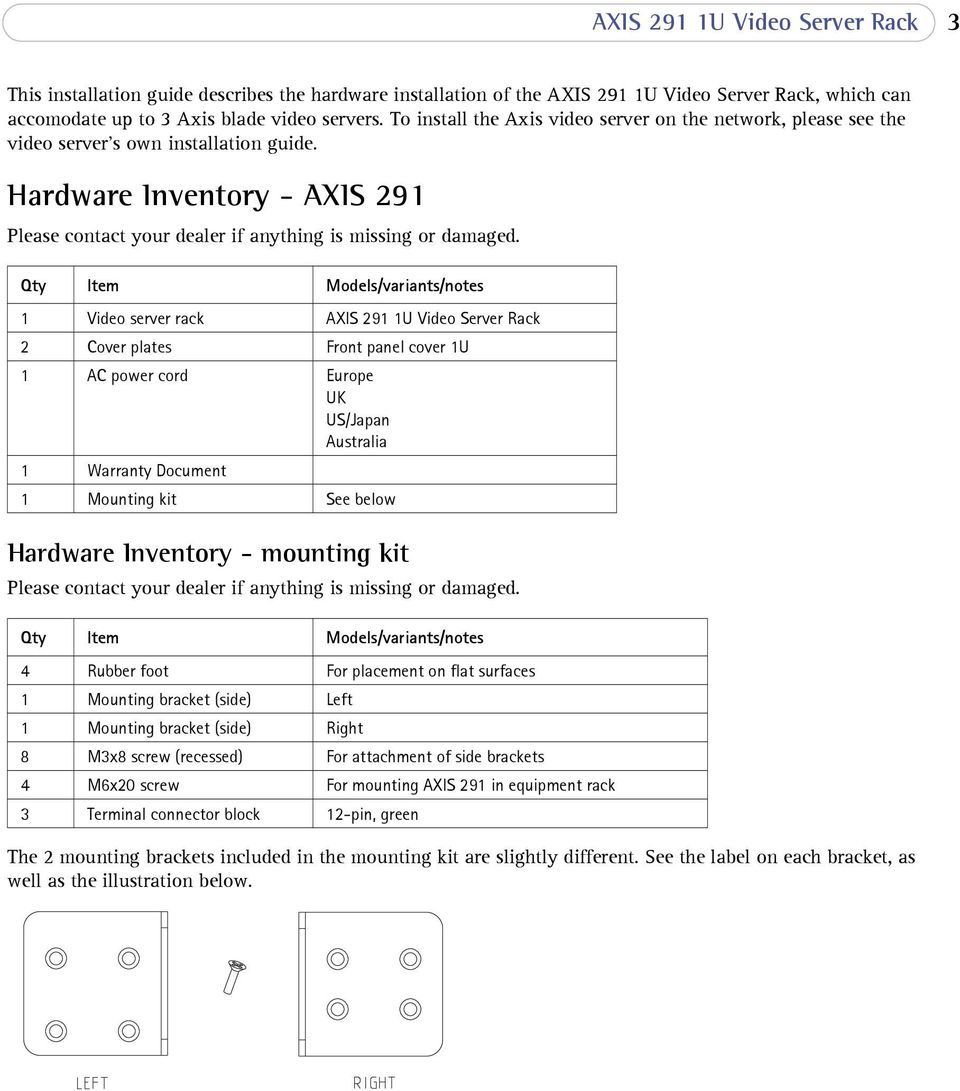
3 AXIS 291 1U Video Server Rack 3 This installation guide describes the hardware installation of the AXIS 291 1U Video Server Rack, which can accomodate up to 3 Axis blade video servers. To install the Axis video server on the network, please see the video server s own installation guide. Hardware Inventory - AXIS 291 Please contact your dealer if anything is missing or damaged. Qty Item Models/variants/notes 1 Video server rack AXIS 291 1U Video Server Rack 2 Cover plates Front panel cover 1U 1 AC power cord Europe UK US/Japan Australia 1 Warranty Document 1 Mounting kit See below Hardware Inventory - mounting kit Please contact your dealer if anything is missing or damaged. Qty Item Models/variants/notes 4 Rubber foot For placement on flat surfaces 1 Mounting bracket (side) Left 1 Mounting bracket (side) Right 8 M3x8 screw (recessed) For attachment of side brackets 4 M6x20 screw For mounting AXIS 291 in equipment rack 3 Terminal connector block 12-pin, green The 2 mounting brackets included in the mounting kit are slightly different. See the label on each bracket, as well as the illustration below.
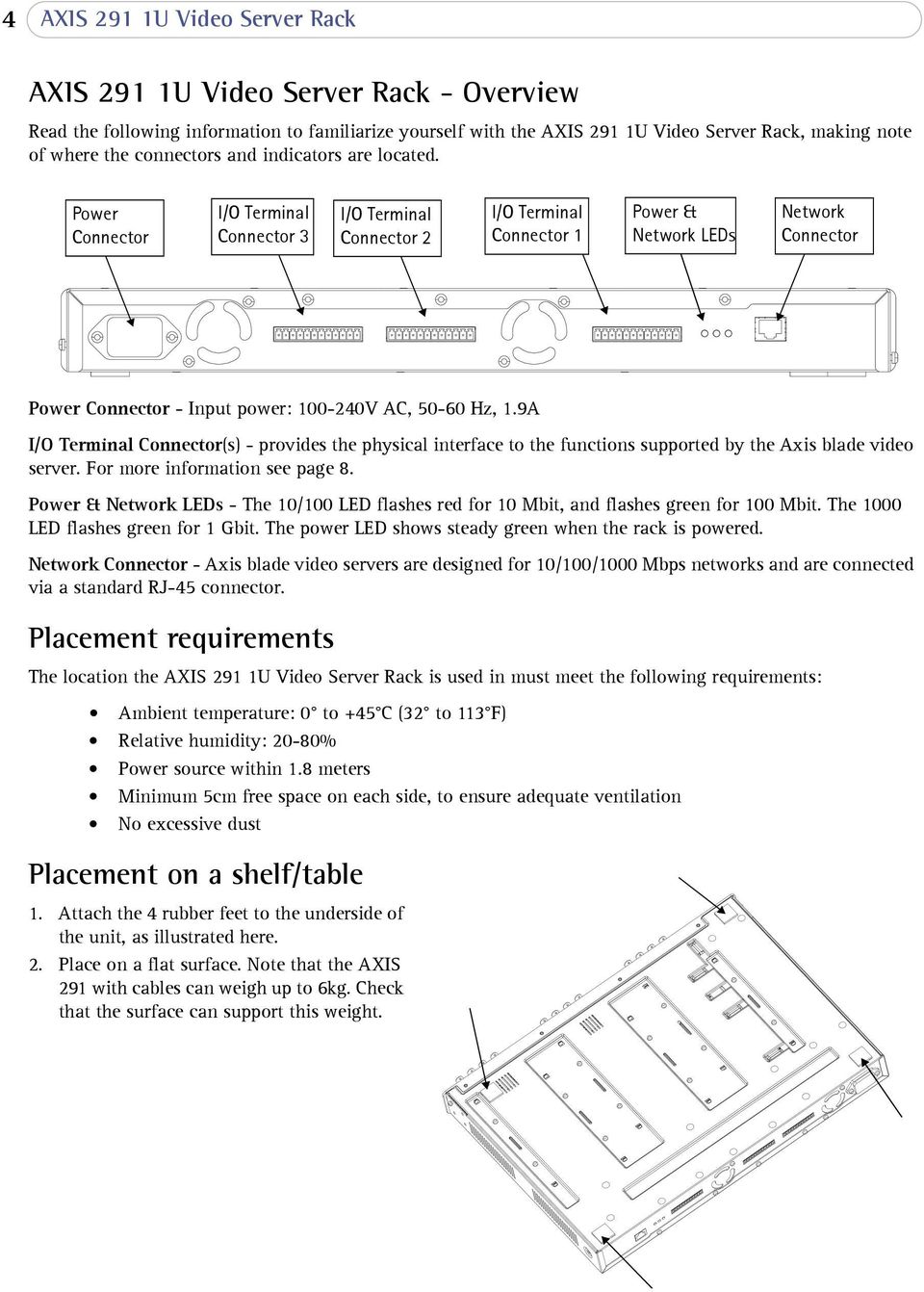
4 4 AXIS 291 1U Video Server Rack AXIS 291 1U Video Server Rack - Overview Read the following information to familiarize yourself with the AXIS 291 1U Video Server Rack, making note of where the connectors and indicators are located. Power Connector I/O Terminal Connector 3 I/O Terminal Connector 2 I/O Terminal Connector 1 Power & Network LEDs Network Connector Power Connector - Input power: V AC, Hz, 1.9A I/O Terminal Connector(s) - provides the physical interface to the functions supported by the Axis blade video server. For more information see page 8. Power & Network LEDs - The 10/100 LED flashes red for 10 Mbit, and flashes green for 100 Mbit. The 1000 LED flashes green for 1 Gbit. The power LED shows steady green when the rack is powered. Network Connector - Axis blade video servers are designed for 10/100/1000 Mbps networks and are connected via a standard RJ-45 connector. Placement requirements The location the AXIS 291 1U Video Server Rack is used in must meet the following requirements: Ambient temperature: 0 to +45 C (32 to 113 F) Relative humidity: 20-80% Power source within 1.8 meters Minimum 5cm free space on each side, to ensure adequate ventilation No excessive dust Placement on a shelf/table 1. Attach the 4 rubber feet to the underside of the unit, as illustrated here. 2. Place on a flat surface. Note that the AXIS 291 with cables can weigh up to 6kg. Check that the surface can support this weight.
5 AXIS 291 1U Video Server Rack 5 Installation in a 19 equipment rack Requirements: Pozidriv screwdriver #1 Pozidriv screwdriver #3 The rack must be braced and bolted to the floor. The AXIS 291 must be grounded to the same ground as the equipment rack. When mounting the AXIS 291 in a rack, never stack other units directly on top - the mounting brackets are not designed to support more than 1 unit. Each unit in the rack must be secured with appropriate brackets. Place the heaviest units at the bottom of the rack. Attaching the brackets The 2 mounting brackets are slightly different. To tell these apart, see the label on each bracket. See also the illustration on page Remove the screw shown here from each side of the unit. These will be replaced by the screws used to fasten the bracket. 2. Using the M3X8 screws, fasten the bracket to the side of the unit. Do not use the screw that was removed in step Slide the AXIS 291 into the equipment rack. Insert the M6X20 screws and tighten.

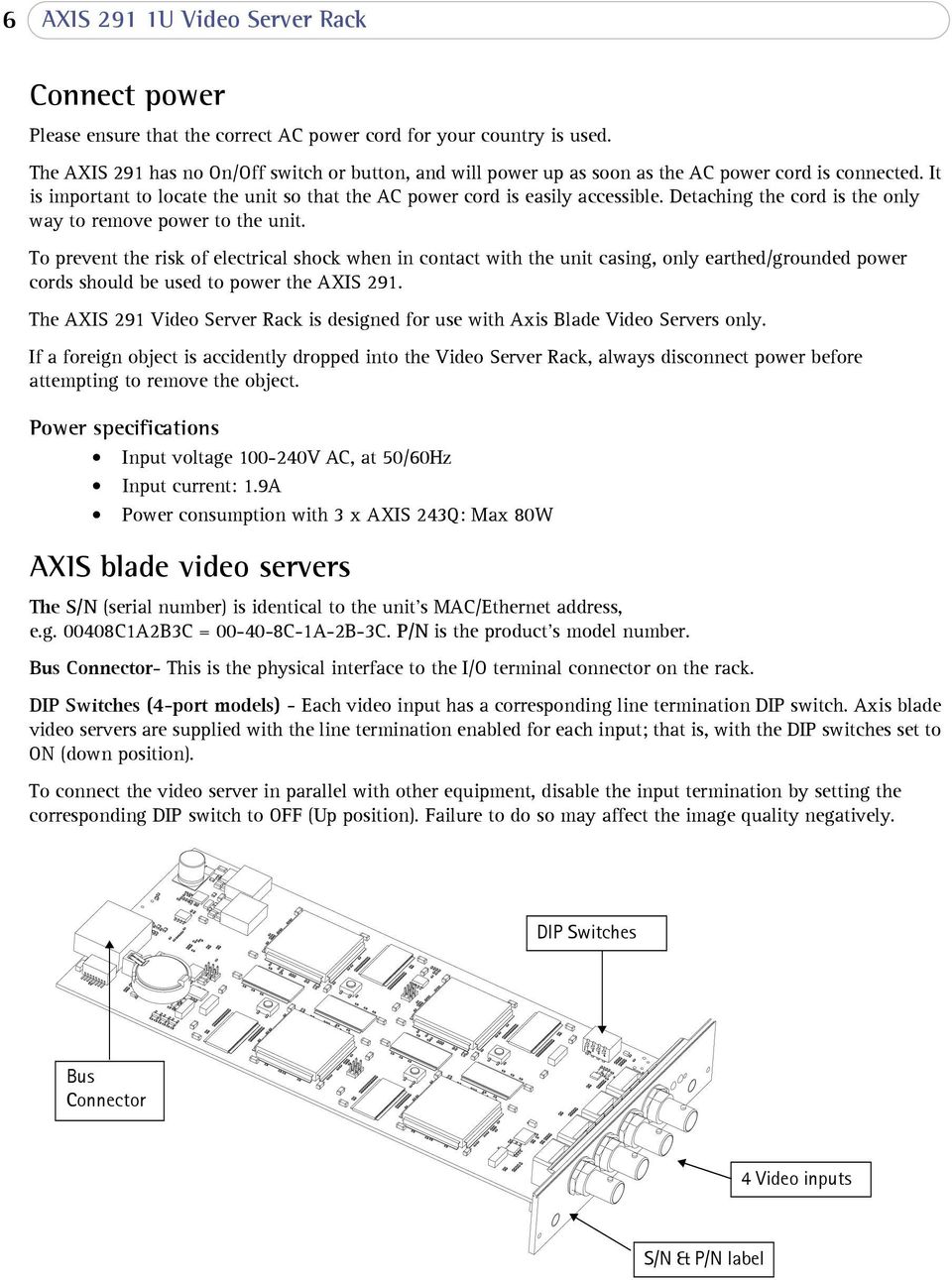
6 6 AXIS 291 1U Video Server Rack Connect power Please ensure that the correct AC power cord for your country is used. The AXIS 291 has no On/Off switch or button, and will power up as soon as the AC power cord is connected. It is important to locate the unit so that the AC power cord is easily accessible. Detaching the cord is the only way to remove power to the unit. To prevent the risk of electrical shock when in contact with the unit casing, only earthed/grounded power cords should be used to power the AXIS 291. The AXIS 291 Video Server Rack is designed for use with Axis Blade Video Servers only. If a foreign object is accidently dropped into the Video Server Rack, always disconnect power before attempting to remove the object. Power specifications Input voltage V AC, at 50/60Hz Input current: 1.9A Power consumption with 3 x AXIS 243Q: Max 80W AXIS blade video servers The S/N (serial number) is identical to the unit s MAC/Ethernet address, e.g C1A2B3C = C-1A-2B-3C. P/N is the product s model number. Bus Connector- This is the physical interface to the I/O terminal connector on the rack. DIP Switches (4-port models) - Each video input has a corresponding line termination DIP switch. Axis blade video servers are supplied with the line termination enabled for each input; that is, with the DIP switches set to ON (down position). To connect the video server in parallel with other equipment, disable the input termination by setting the corresponding DIP switch to OFF (Up position). Failure to do so may affect the image quality negatively. DIP Switches Bus Connector 4 Video inputs S/N & P/N label
7 AXIS 291 1U Video Server Rack 7 DIP Switches (1-port models) - These models can accomodate either composite or Y/C video. The type to use is determined by the DIP switch settings. 1-port AXIS blade video servers are supplied configured for composite video input, as shown in the table below. Switch Description 75 ohm video in termination 75 ohm video out termination Connects video in and video out Not used Composite video input on off on n/a Y/C video input on on off n/a Mounting AXIS blade video servers The AXIS 291 can accomodate 3 Axis blade video servers. The slots for these are numbered 1-3 from left to right, as seen from the front. The I/O connectors for each slot on the rear panel are also numbered. 1. If mounted, remove the front panel cover from the slot in which the video server will be mounted. 2. Slide the video server into place, using the guides as an aid. The dip switch for setting the line termination should be visible on the top edge. 3. Fix the video server in place, using the screws from the front panel.

8 8 AXIS 291 1U Video Server Rack The I/O Terminal connector The AXIS 291 server provides an I/O terminal connector for each Axis blade video server (see illustration on page 4). This is used for connecting external equipment, in applications for e.g. motion detection, event triggering, time lapse recording, alarm notification via , image storage to FTP locations, etc. Connector interfaces The interfaces available via the 12-pin I/O terminal connector are as follows: 4 Digital inputs - used for e.g. a pushbutton. If the button is pressed, the state changes and the input will be active (shown under Event Configuration > Port Status). 4 Transistor outputs - for e.g. alarm devices that can be activated from Output buttons on the Live View page, or as an action to an Event Type. The output will show as active (in Event Configuration > Port Status) if the device is activated. RS-485 interface, for e.g. Pan/Tilt/Zoom devices (see for drivers) Auxiliary power Connector pinout Pin Function Description 1 Auxiliary DC Power Input This pin can be used to power auxiliary equipment, max 100mA 2 GND 3 Digital Input 1 Connect to GND to activate or leave floating (or unconnected) to 4 Digital Input 2 deactivate. 5 Digital Input 3 6 Digital Input 4 7 Transistor Output With a maximum load of 100mA and maximum voltage of 24V DC, this 8 Transistor Output output has an open-collector NPN transistor with the emitter connected to pin 2 (GND). If it is to be used with an external relay, a 9 Transistor Output diode must be connected in parallel with the load for protection 10 Transistor Output against any voltage transients. 11 RS A (non-inverting) A half-duplex RS-485 interface for controlling auxiliary equipment, 12 RS B (inverting) e g. PTZ devices. To connect input/output devices to the I/O terminal connector: 1. Referring to the table above, loosen the corresponding screw on top of the pin on the green connector block. 2. Push the cable into the connector block and secure it by fastening the screw. 3. Once all devices are connected, push the connector block into the terminal connector on the rear panel of the AXIS 291. For compatible replacement connectors, contact quoting: MC1.5/12-ST-3.81 (art no ).
AXIS 241Q/S Blade - Rack Solution Installation Guide
 AXIS 241Q/S Blade - Rack Solution Installation Guide 2 About This Document This document is intended as an addendum to the video server User s Manual. It includes instructions for installing the Axis Rack
AXIS T81B22 DC 30W Midspan
 INSTALLATION GUIDE AXIS T81B22 DC 30W Midspan ENGLISH About this Document This document includes instructions for installing AXIS T81B22 on your network. Previous experience of networking will be beneficial
INSTALLATION GUIDE. AXIS T8133 Midspan 30W
 INSTALLATION GUIDE AXIS T8133 Midspan 30W ENGLISH Liability Every care has been taken in the preparation of this document. Please inform your local Axis office of any inaccuracies or omissions. Axis Communications
IP Box Camera ACM-5711. Ver. 081016. Hardware User s Manual
 IP Box Camera ACM-5711 Ver. 081016 Hardware User s Manual 0 0 PRECAUTIONS 1. Read these instructions All the safety and operating instructions should be read before the product is operated. 2. Heed all
Square D Clipsal DIN-Rail Four-Channel Auxiliary Input Unit
 Square D Clipsal DIN-Rail Four-Channel Auxiliary Input Unit SLCLE5504AUX for Use with Wired C-Bus Networks Instruction Bulletin Retain for future use. Square D Clipsal DIN-Rail Four-Channel Auxiliary Input
Triple Expansion Chassis
 Triple Expansion Chassis AP9604 Installation Manual Contents Introduction............................. 1 Installation.............................. 2 Power Considerations...................... 5 Operations..............................
VS-0202 VS-0204. User Manual
 User Manual VS-0202 VS-0204 Read this guide thoroughly and follow the installation and operation procedures carefully in order to prevent any damage to the units and/or any devices that connect to them.
Mercury Helios 2 ASSEMBLY MANUAL & USER GUIDE
 Mercury Helios 2 ASSEMBLY MANUAL & USER GUIDE TABLE OF CONTENTS INTRODUCTION...1 1.1 MINIMUM SYSTEM REQUIREMENTS 1.1.1 Apple Mac Requirements 1.1.2 PC Requirements 1.1.3 Supported PCIe Cards 1.2 PACKAGE
LevelOne IFE-0500 4-Port PoE + 1-Port TP Industrial Fast Ethernet Switch User Manual
 LevelOne IFE-0500 4-Port PoE + 1-Port TP Industrial Fast Ethernet Switch User Manual Ver. 1.0.0-0711 1 FCC Warning This Equipment has been tested and found to comply with the limits for a Class-A digital
HP UPS R1500 Generation 3
 HP UPS R1500 Generation 3 Installation Instructions Part Number 650952-001 NOTE: The rating label on the device provides the class (A or B) of the equipment. Class B devices have a Federal Communications
AXIS Q6032-C PTZ Dome Network Camera AXIS Q6034-C PTZ Dome Network Camera AXIS Q6035-C PTZ Dome Network Camera
 INSTALLATION GUIDE AXIS Q60 Series AXIS Q6032-C PTZ Dome Network Camera AXIS Q6034-C PTZ Dome Network Camera AXIS Q6035-C PTZ Dome Network Camera ENGLISH FRANÇAIS DEUTSCH ITALIANO ESPAÑOL Legal Considerations
8-Port HDMI Switch USER MANUAL VS0801H
 8-Port HDMI Switch USER MANUAL VS0801H FCC Information This equipment has been tested and found to comply with the limits for a Class B digital device, pursuant to Part 15 of the FCC Rules. These limits
HDMI Matrix Switch USER MANUAL VM0404H
 HDMI Matrix Switch USER MANUAL VM0404H FCC Information This equipment has been tested and found to comply with the limits for a Class B digital device, pursuant to Part 15 of the FCC Rules. These limits
MCR1900 Media Converter 19-Slot Chassis
 MCR1900 Media Converter 19-Slot Chassis Installation Guide Part #5500304-11 Copyright Statement This document must not be reproduced in any way whatsoever, either printed or electronically, without the
CONSOLE REMOTE I /O AC 9V
 CONSOLE CONSOLE REMOTE I /O AC 9V AC 9V REMOTE I /O User Manual CE-220 Read this guide thoroughly and follow the installation and operation procedures carefully in order to prevent any damage to the units
SATA and SAS Hard Drive Backplane
 SATSASBAY3BK Instruction Manual SATA and SAS Hard Drive Backplane 3 Drive 3.5 Removable SATA/SAS Mobile Rack Backplane FCC Compliance Statement This equipment has been tested and found to comply with the
Disclaimers. Important Notice
 Disclaimers Disclaimers Important Notice Copyright SolarEdge Inc. All rights reserved. No part of this document may be reproduced, stored in a retrieval system, or transmitted, in any form or by any means,
User Guide TL-SG1016/ TL-SG1024 16/24-port Gigabit Ethernet Switch
 User Guide TL-SG1016/ TL-SG1024 16/24-port Gigabit Ethernet Switch Rev:2.0.0 7106500823 COPYRIGHT & TRADEMARKS Specifications are subject to change without notice. is a registered trademark of TP-LINK
BroadBand PowerShield. User Manual
 BroadBand PowerShield User Manual 990-0375G 12/2006 Chapter 1 General Information The PowerShield provides a power source for broadband telephony and other DC applications. Safety This Safety Guide contains
Gigabit Ethernet Switch 10/100/1000 Mbps GS605 / GS608. Installation Guide
 Gigabit Ethernet Switch 10/100/1000 Mbps GS605 / GS608 Installation Guide Introduction The NETGEAR 5/8-Port Gigabit Ethernet Switch Model GS605 / GS608 provides you with a high-speed, reliable, easy-to-use
C24-CAMANL Video Server/Encoder
 C24-CAMANL Video Server/Encoder User s Guide Table of Contents CHAPTER 1 INTRODUCTION... 1 Overview... 1 Physical Details - Video Server... 2 Package Contents... 3 CHAPTER 2 BASIC SETUP... 4 System Requirements...
CAUTION RISK OF ELECTRIC SHOCK DO NOT OPEN
 BeoLab 4 Guide CAUTION RISK OF ELECTRIC SHOCK DO NOT OPEN CAUTION: To reduce the risk of electric shock, do not remove cover (or back). No User-serviceable parts inside. Refer servicing to qualified service
XTEND 900 MHZ WIRELESS MODEM For use with VEEDER-ROOT EMR³ DATALINK INSTALLATION INSTRUCTIONS Manual 577013-859, Rev. B
 INTRODUCTION This Installation Guide Contains the necessary information to Connect the Wireless Modems to the EMR³ Interconnect Box and the Office Computer for running the EMR³ Datalink Program. For Specific
Outdoor-Ready Box. Hardware Manual KCM-5211E, KCM-5311E KCM-5511, KCM-5611. Ver. 2014/10/15
 Outdoor-Ready Box Hardware Manual KCM-5211E, KCM-5311E KCM-5511, KCM-5611 Ver. 2014/10/15 Table of Contents Precautions 3 Safety Instructions... 4 Introduction 6 Package Contents... 6 Physical Description...
USER MANUAL VS92A / VS94A / VS98A
 Video Splitter USER MANUAL VS92A / VS94A / VS98A FCC Information This equipment has been tested and found to comply with the limits for a Class B digital device, pursuant to Part 15 of the FCC Rules. These
DMX USB PRO. User Manual. www.enttec.com
 DMX USB PRO User Manual www.enttec.com Firmware V1.43 February 2007 Package Contents Your DMX USB PRO package should contain these items: DMX USB PRO (Part No. 70304) Driver for Windows software on the
IMPORTANT SAFETY INSTRUCTIONS
 IMPORTANT SAFETY INSTRUCTIONS Before you install or use the apparatus, you must read and understand these Important Safety Instructions. At all times when using the apparatus you must follow these Important
Mini PCI Express FireWire Adapter Card
 MPEX1394B3 Instruction Manual Mini PCI Express FireWire Adapter Card 3-Port Mini PCI Express to 1394b FireWire Adapter Card Manual Revision:01/10/2011 For the most up-to-date information, please visit
ADSL Modem Installation Guide. Model # 36R515 Part # 030-300108 Rev. D Revision Date 12/2000. ADSL Modem Installation Guide
 ADSL Modem Installation Guide Model # 36R515 Part # 030-300108 Rev. D Revision Date 12/2000 ADSL Modem Installation Guide Installation Instructions Westell ADSL Modem 1. Package Inspection and Contents...2
SCREENLOGIC INTERFACE WIRELESS CONNECTION KIT
 SCREENLOGIC INTERFACE WIRELESS CONNECTION KIT FOR INTELLITOUCH AND EASYTOUCH CONTROL SYSTEMS INSTALLATION GUIDE IMPORTANT SAFETY INSTRUCTIONS READ AND FOLLOW ALL INSTRUCTIONS SAVE THESE INSTRUCTIONS Technical
AXIS Camera Station Quick Installation Guide
 AXIS Camera Station Quick Installation Guide Copyright Axis Communications AB April 2005 Rev. 3.5 Part Number 23997 1 Table of Contents Regulatory Information.................................. 3 AXIS Camera
PCI Express USB 2.0 Adapter Card
 PEXUSB400 Instruction Manual PCI Express USB 2.0 Adapter Card 4-Port (Independent) PCI Express to High Speed USB 2.0 Adapter Card FCC Compliance Statement This equipment has been tested and found to comply
ScreenLogic Wireless Connection Kit. Installation Guide. pool/spa control system
 pool/spa control system ScreenLogic Wireless Connection Kit Installation Guide P/N 520663 - Rev B 8 Technical Support Contact Technical Support at: Sanford, North Carolina (8 A.M. to 5 P.M.) Phone: (800)
ALL8808POE. 8 Port Gigabit PoE+ Switch. Manual
 ALL8808POE 8 Port Gigabit PoE+ Switch Manual FCC Certifications This Equipment has been tested and found to comply with the limits for a Class B digital device, pursuant to part 15 of the FCC Rules. These
ES-3305P V2 / ES-3308P V2. Quick Installation Guide. 09-2013 / v1.0
 ES-3305P V2 / ES-3308P V2 Quick Installation Guide 09-2013 / v1.0 1 COPYRIGHT Copyright Edimax Technology Co., Ltd. all rights reserved. No part of this publication may be reproduced, transmitted, transcribed,
DVI Video Splitter USER MANUAL VS-162 / VS-164
 DVI Video Splitter USER MANUAL VS-162 / VS-164 FCC Information This equipment has been tested and found to comply with the limits for a Class B digital device, pursuant to Part 15 of the FCC Rules. These
3.5 USB 3.0 to SATA III HDD Enclosure with UASP Support
 3.5 USB 3.0 to SATA III HDD Enclosure with UASP Support S3510BMU33 S3510SMU33 *actual product may vary from photos DE: Bedienungsanleitung - de.startech.com FR: Guide de l'utilisateur - fr.startech.com
USB 2.0 Peripheral Switch USER MANUAL US221A / US421A
 USB 2.0 Peripheral Switch USER MANUAL US221A / US421A FCC Information This equipment has been tested and found to comply with the limits for a Class B digital device, pursuant to Part 15 of the FCC Rules.
RC8021 Indoor Camera Installation Guide
 RC8021 Indoor Camera Installation Guide P/N: 957YL502GJ Document Version: 1.0 Copyright 2011. All Rights Reserved. All trademarks and trade names are the properties of their respective owners i Package
Quick Installation Guide 24-port PoE switch with 2 copper Gigabit ports and 2 Gigabit SFP ports (af Version 15.4W)
 Quick Installation Guide 24-port PoE switch with 2 copper Gigabit ports and 2 Gigabit SFP ports (af Version 15.4W) Table of Contents Introduction.. Power Over Ethernet (PoE) & Features.... Unpacking and
PCI Express USB 3.0 Controller Adapter Card
 PEXUSB3S2 Instruction Manual PCI Express USB 3.0 Controller Adapter Card 2-Port PCI Express SuperSpeed USB 3.0 Controller Adapter Card FCC Compliance Statement This equipment has been tested and found
Technical Support. Support Information
 Technical Support Please refer to the Support Information card that shipped with your product. By registering your product at www.netgear.com/register, we can provide you with faster expert technical support
BeoLab 7-1 BeoLab 7-2. Guide
 BeoLab 7-1 BeoLab 7-2 Guide CAUTION: To reduce the risk of electric shock, do not remove cover (or back). No User-serviceable parts inside. Refer servicing to qualified service personnel. WARNING: To prevent
External Hard Drive esata & USB 2.0 Combo. User Guide English
 External Hard Drive esata & USB 2.0 Combo User Guide English Contents Introduction 3 Controls, Connectors and Indicators 3 Front Panel Area 3 Rear Panel Area 3 About the Hard Drive 4 Locating the Drive
FB-500A User s Manual
 Megapixel Day & Night Fixed Box Network Camera FB-500A User s Manual Quality Service Group Product name: Network Camera (FB-500A Series) Release Date: 2011/7 Manual Revision: V1.0 Web site: Email: www.brickcom.com
Disclaimers. Important Notice
 Disclaimers Disclaimers Important Notice Copyright SolarEdge Inc. All rights reserved. No part of this document may be reproduced, stored in a retrieval system, or transmitted, in any form or by any means,
BPM Series. Metered Rack Mount PDUs. Quick Start Guide. Models Covered:
 WTI Part No.: 13963 Rev.: PM Series Metered Rack Mount PDUs Models Covered: PM-8HS20-1 PM-16VS30-1 PM-24VS30-1 PM-24VS30-D PM-8HS20-2 PM-16VS30-2 PM-24VS30-2 PM-24VS30-Y PM-16VS20-1 PM-24VS20-1 PM-24VS20-D
INSTALLATION GUIDE. AXIS Camera Station
 INSTALLATION GUIDE AXIS Camera Station About this Guide This guide is intended for administrators and users of the AXIS Camera Station, and is applicable for software release 3.50 and later. It covers
16-Port and 24-Port 10/100 Switches
 16-Port and 24-Port 10/100 Switches Use this guide to install the following products: SR216 SR224 16-Port 10/100 Switch 24-Port 10/100 Switch User Guide COPYRIGHT & TRADEMARKS Specifications are subject
USER MANUAL. PingBrother EPIW104 managed passive poe switch & IP watchdog
 USER MANUAL PingBrother EPIW104 managed passive poe switch & IP watchdog CONTENT Content... 2 Chapter 1... 3 1.1 Preface... 3 1.2 CE mark warning... 3 1.3 FCC warning... 4 Chapter 2... 5 2.1 Physical description...
3.5in Black USB 2.0 IDE SATA External Hard Drive Enclosure
 3.5in Black USB 2.0 IDE SATA External Hard Drive Enclosure UNI3510U2 UNI3510U2EB UNI3510U2EB UNI3510UEBGB *actual product may vary from photos DE: Bedienungsanleitung - de.startech.com FR: Guide de l'utilisateur
5-port 10/100Base-TX Industrial Switch (314500) User s Guide
 5-port 10/100Base-TX Industrial Switch (314500) User s Guide COPYRIGHT All rights reserved. No part of this publication may be reproduced, stored in a retrieval system, or transmitted in any form or by
About Your NetBotz 4-20mA Sensor Pod
 Thank you for purchasing this NetBotz 4-20mA Sensor Pod. Each 4-20mA Sensor Pod enables you to connect up to four 4-20mA sensors to your NetBotz 420 or NetBotz 500 appliance. Hundreds of 4-20mA sensors
C-Bus. Single Zone Thermostat. 5070THB Series. Installation Instructions REGISTERED DESIGN REGISTERED PATENT
 C-Bus Single Zone Thermostat 5070THB Series REGISTERED DESIGN REGISTERED PATENT Clipsal is a registered trademark of Clipsal Australia Pty Ltd ABN 27 007 873 529. Copyright Clipsal Australia Pty Ltd 2008.
16-port Gigabit Switch 10/100/1000 Mbps GS116. Installation Guide
 16-port Gigabit Switch 10/100/1000 Mbps GS116 Installation Guide Introduction The NETGEAR 16-port Gigabit Switch Model GS116 provides you with a low-cost, reliable, high-performance switch to connect up
INSTALLATION GUIDE ConnectLine TV Adapter Getting started
 INSTALLATION GUIDE ConnectLine TV Adapter Getting started PURPOSE OF THIS GUIDE READ THIS FIRST Before your hearing instruments can receive sound from the TV, the adapter must be connected to the TV and
iosafe Solo External Hard Drive
 Users Manual & Limited Warranty iosafe Solo External Hard Drive USB 2.0 Fireproof Waterproof FloSafe Cooling Technology Data Recovery Service 910-10841-00 REV 7.1 2 COPYRIGHTS Copyright iosafe, Inc. 2009.
FCC COMPLIANCE STATEMENT FOR AMERICAN USERS
 FCC COMPLIANCE STATEMENT FOR AMERICAN USERS This equipment has been tested and found to comply with the limits for a CLASS A digital device, pursuant to Part 15 of the FCC Rules. These limits are designed
IFS SP-PoE Splitter User Manual
 IFS SP-PoE Splitter User Manual P/N 1069176-EN REV 1.01 ISS 01JUL10 2011 UTC Fire & Security. All rights reserved. Content Overview 2 Package contents 2 Introduction 3 Product Specifications 3 Hardware
Alarm Clock USER GUIDE
 Alarm Clock USER GUIDE Jazwares, Inc. 2012 CONTENTS Please read the instructions along with the Alarm Clock carefully before you use it, so that you can operate it conveniently. WELCOME & Warnings Page
4 Port PCI Express Low Profile High Speed USB Card
 4 Port PCI Express Low Profile High Speed USB Card PEXUSB4DP DE: Bedienungsanleitung - de.startech.com FR: Guide de l'utilisateur - fr.startech.com ES: Guía del usuario - es.startech.com IT: Guida per
2M IR Mini Dome Quick Installation Guide
 2M IR Mini Dome 2M IR Mini Dome Quick Installation Guide Please follow the installation steps below to set up 2M IR Mini Dome IP Camera. Check the package contents against the list below. See P.1 Physical
Conference Phone UserÕs Manual. Part No. 54-2070-01R1 Printed in Korea. 2002 Bogen Communications, Inc.
 Part No. 54-2070-01R1 Printed in Korea. 2002 Bogen Communications, Inc. UserÕs Manual Notice Every effort was made to ensure that the information in this guide was complete and accurate at the time of
FTP-1000 Touchpad/Display. Installation Manual. Stay. Away. Disarm. Quick Exit
 FTP-1000 Touchpad/Display Installation Manual A B 1 2 3 4 5 6 7 8 9 0 * # Stay Away Disarm Quick Exit C D Copyright Disclaimer Trademarks and patents Intended use FCC compliance Copyright 2005, GE Security
AXIS 5810 A Bluetooth Print Plug. Quick Start
 AXIS 5810 AXIS 5810 A Bluetooth Print Plug Quick Start BLUETOOTH is a trademark owned by its proprietor and used by Axis Communications AB under license 1 AXIS 5810 Regulatory Information Regulatory Information
110244-003. PrintPAD CN3/4/3e/4e. User Guide
 110244-003 PrintPAD CN3/4/3e/4e User Guide TABLE OF CONTENTS PrintPAD CN3/4 & PrintPAD CN3e/4e Printer Views...1 Open View...1 Closed View...1 Using Batteries: General Guidelines...1 Installing and/or
Wireless Travel Mouse with 5-Buttons User Manual
 Wireless Travel Mouse with 5-Buttons User Manual Product Features 1. Radio frequency 27MHz wireless transmission 2. Use of 256 ID codes to prevent interference between several wireless mice being used
Kvaser Mini PCI Express User s Guide
 Kvaser Mini PCI Express User s Guide Copyright 2013-2014 Kvaser AB, Mölndal, Sweden http://www.kvaser.com Printed Sunday 28 th September, 2014 We believe that the information contained herein was accurate
StorTrends 3400 Hardware Guide for Onsite Support
 StorTrends 3400 Hardware Guide for Onsite Support MAN-3400-SS 11/21/2012 Copyright 1985-2012 American Megatrends, Inc. All rights reserved. American Megatrends, Inc. 5555 Oakbrook Parkway, Building 200
Gateway Port Replicator User Guide
 Gateway Port Replicator User Guide Using the Port Replicator Identifying features Connecting and disconnecting the port replicator 1 Using the Port Replicator Top Power button Component Icon Description
palm Switch 500 5 Port 10/100 Base-TX Switch with Auto MDI/MDI-X User Guide
 palm Switch 500 5 Port 10/100 Base-TX Switch with Auto MDI/MDI-X User Guide Rev. 1.0 June, 2003 User Guide 1. Introduction Welcome to the World of Mini-Networking. In the modern business society, communication
ST122VGAU. Instruction Manual. VGA Video Switch. 2-Port Automatic VGA Video Switch
 VGA Video Switch ST122VGAU Instruction Manual 2-Port Automatic VGA Video Switch FCC Compliance Statement This equipment has been tested and found to comply with the limits for a Class B digital device,
5-port / 8-port 10/100BaseTX Industrial Ethernet Switch User Manual
 5-port / 8-port 10/100BaseTX Industrial Ethernet Switch User Manual Content Overview... 1 Introduction... 1 Features... 3 Packing List... 4 Safety Precaution... 4 Hardware Description... 5 Front Panel...
Serial ATA Hard Drive Docking Station
 Serial ATA Hard Drive Docking Station UNIDOCK2U Instruction Manual USB to SATA, IDE External Hard Drive Docking Station for 2.5 or 3.5 Hard Drives FCC Compliance Statement This equipment has been tested
16/32 Channel 1U Rack Mount CCTV Power Supply
 16/32 Channel 1U Rack Mount CCTV Power Supply Manual PH-A3224-GUQ Shown 16-Channel 32-Channel PTC PH-A1612-PUQ PH-A3224-PUQ Glass Fuse PH-A1612-GUQ PH-A3224-GUQ Industrial design 12 Amp 3 Amps per channel
2 Bay USB 3.0 RAID 3.5in HDD Enclosure
 2 Bay USB 3.0 RAID 3.5in HDD Enclosure SAT3520U3SR *actual product may vary from photos DE: Bedienungsanleitung - de.startech.com FR: Guide de l'utilisateur - fr.startech.com ES: Guía del usuario - es.startech.com
HDMI Switch USER MANUAL VS481A
 HDMI Switch USER MANUAL VS481A FCC Information This equipment has been tested and found to comply with the limits for a Class B digital device, pursuant to Part 15 of the FCC Rules. These limits are designed
Cisco TelePresence MCU 4500 Series safety and compliance information
 Cisco TelePresence MCU 4500 Series safety and compliance information On this page: Safety information symbols Operating guidelines Safety warnings Technical specifications Compliance information WEEE information
Composite/S-Video to VGA Video Converter
 Composite/S-Video to VGA Video Converter VID2VGATV2 *actual product may vary from photos DE: Bedienungsanleitung - de.startech.com FR: Guide de l'utilisateur - fr.startech.com ES: Guía del usuario - es.startech.com
Power Over Ethernet Adapters POE101
 Power Over Ethernet Adapters POE101 Installation Guide Introduction NETGEAR POE101 Power over Ethernet adapters are designed to supply operational power to devices through an Ethernet cable. These adapters
3.5 External Hard Drive Enclosure
 UNI3510U2E / UNI3510U2EGB UNI3510U2EB / UNI3510UEBGB Instruction Manual 3.5 External Hard Drive Enclosure 3.5 esata/usb 2.0 to IDE/SATA External Hard Drive Enclosure with One-Touch Backup FCC Compliance
4 Port PCI Express Gigabit Ethernet PoE PSE Network Card
 4 Port PCI Express Gigabit Ethernet PoE PSE Network Card ST4000PEXPSE *actual product may vary from photos DE: Bedienungsanleitung - de.startech.com FR: Guide de l'utilisateur - fr.startech.com ES: Guía
Removable 2.5 SATA HDD Backup System
 Removable 2.5 SATA HDD Backup System SAT2510U3REM SAT2510U3S *actual product may vary from photos DE: Bedienungsanleitung - de.startech.com FR: Guide de l'utilisateur - fr.startech.com ES: Guía del usuario
user s manual Battery Case model #: SPB3200 Battery Case Charger for Samsung Galaxy S 4
 user s manual model #: SPB3200 Charger for Samsung Galaxy S 4 What s Included Unpack the battery case and make sure all accessories are put aside so they will not be lost. hello. USB to Micro USB Cable
Business Audio System: Music & Messaging MP3 Player. by Grace Digital Audio. User Guide. Model No. GDI-USBM10
 Business Audio System: Music & Messaging MP3 Player by Grace Digital Audio User Guide Model No. GDI-USBM10 User Guide Contents Introduction 2 Safety & General Use Information 2 Features 3 Set Up & Operation
Perle Protocol Transparent Media Converter Modules
 Perle Protocol Transparent Media Converter Modules Installation Guide C-4GPT-DSFP CM-4GPT-DSFP Part# 5500335-10 Overview This document contains instructions necessary for the installation and operation
ARCHOS (www.archos.com/support).
 1 ! www.archos.com/register, ARCHOS.. ARCHOS, (www.archos.com/register).. ARCHOS (www.archos.com/support)., Windows, Windows Help Start ( ), Help and Support.. ARCHOS. 2 ,.! /, : ARCHOS 9,,,,,. -.,. ARCHOS
How To Use A Ves-0116 Video Splitter With Audio And Video From A Computer Or Tv Aten (Ves-116)
 User Manual VS-0116 Read this guide thoroughly and follow the installation and operation procedures carefully in order to prevent any damage to the units and/or any devices that connect to them. This package
User Guide TL-SG1016D 16-Port Gigabit Switch TL-SG1024D 24-Port Gigabit Switch
 User Guide TL-SG1016D 16-Port Gigabit Switch TL-SG1024D 24-Port Gigabit Switch Rev: 1.1.0 7106503251 COPYRIGHT & TRADEMARKS Specifications are subject to change without notice. is a registered trademark
HP ProCurve High-Speed Transceivers Installation Guide
 HP ProCurve High-Speed Transceivers Installation Guide Introduction The HP ProCurve High-Speed Transceivers can be installed into a number of HP ProCurve networking devices to provide 100 Mbps and 1000
2.5/3.5 SATA HDD Docking Station
 SATADOCKU2 SATADOCKU2E SATADOCK22UE 2.5/3.5 SATA HDD Docking Station FCC Compliance Statement This equipment has been tested and found to comply with the limits for a Class B digital device, pursuant to
9,'(2 #6(3$5$725 8VHU V#0DQXDO 96043;
 9,'(2 #6(3$5$725 8VHU V#0DQXDO 96043; Introduction 3 Features 3 Specifications 4 Installation 4 Stand-Alone Installation 4 Daisy-Chain Installation 5 Preventing Radio & TV Interference 6 Limited Warranty
2100 POS System. 2100 User Guide
 2100 POS System 2100 User Guide Thank you for selecting UTC RETAIL s innovative Model 2100 Point of Sale solution! This guide is designed to acquaint you with the features and functionality of the 2100
Power Supply Guide Version 1.0 for D-Show
 Power Supply Guide Version 1.0 for D-Show Digidesign 2001 Junipero Serra Boulevard Daly City, CA 94014-3886 USA tel: 650 731 6300 fax: 650 731 6399 Technical Support (USA) tel: 650 731 6100 fax: 650 731
USB 3.0 to M.2 NGFF SSD Enclosure with UASP
 USB 3.0 to M.2 NGFF SSD Enclosure with UASP SM2NGFFMBU33 *actual product may vary from photos DE: Bedienungsanleitung - de.startech.com FR: Guide de l'utilisateur - fr.startech.com ES: Guía del usuario
PCS300 Universal IP Reporting Module V1.0
 PCS300 Universal IP Reporting Module V1.0 Reference and Installation Manual Patents: One or more of the following US patents may apply: 7046142, 6215399, 6111256, 6104319, 5920259, 5886632, 5721542, 5287111,
Antenna Splitter ASA 1. Instruction manual
 Antenna Splitter ASA 1 Instruction manual Contents Important safety instructions... 2 The ASA 1 active antenna splitter... 4 Delivery includes... 4 Operating elements... 5 Putting the ASA 1 into operation...
User Manual. RK-2d / RK-2t. dedicated KVM switch and rackmount screen technology. Designed and manufactured by Austin Hughes
 dedicated KVM switch and rackmount screen technology User Manual RK-2d / RK-2t 1U Short Depth Keyboard Drawer Designed and manufactured by Austin Hughes 751 Legal Information First English printing, October
Owner s Manual. Not suitable for mobile applications. Important Safety Instructions 2. Quick Installation 3. Basic Operation 4. Storage & Service 7
 Register online today for a chance to win a FREE Tripp Lite product! www.tripplite.com/warranty Owner s Manual Internet Office & BC Personal UPS Systems Not suitable for mobile applications. Important
e-4 AWT07MLED 7 Q TFT LCD MONITOR (LED Backlighted) USER MANUAL
 Thank you for purchasing our product. Please read this User s Manual before using the product. Change without Notice AWT07MLED 7 Q TFT LCD MONITOR (LED Backlighted) USER MANUAL e-4 SAFETY PRECAUTIONS Federal