
Cat. No. W408-E2-02-X. CJ1W-PRT21 PROFIBUS-DP Slave Unit OPERATION MANUAL
|
|
|
- Geoffrey Rodgers
- 10 years ago
- Views:
Transcription
1 Cat. No. W408-E2-02-X CJ1W-PRT21 PROFIBUS-DP Slave Unit OPERATION MANUAL

2 CJ1W-PRT21 PROFIBUS-DP Slave Unit Operation Manual Produced January 2005

3 ii

4 Notice: OMRON products are manufactured for use according to proper procedures by a qualified operator and only for the purposes described in this manual. The following conventions are used to indicate and classify precautions in this manual. Always heed the information provided with them. Failure to heed precautions can result in injury to people or damage to property.!danger!warning!caution Indicates an imminently hazardous situation which, if not avoided, will result in death or serious injury. Indicates a potentially hazardous situation which, if not avoided, could result in death or serious injury. Indicates a potentially hazardous situation which, if not avoided, may result in minor or moderate injury, or property damage. OMRON Product References All OMRON products are capitalized in this manual. The word Unit is also capitalized when it refers to an OMRON product, regardless of whether or not it appears in the proper name of the product. The abbreviation Ch, which appears in some displays and on some OMRON products, often means word and is abbreviated Wd in documentation in this sense. The abbreviation PC means Programmable Controller and is not used as an abbreviation for anything else. Visual Aids The following headings appear in the left column of the manual to help you locate different types of information. Note Indicates information of particular interest for efficient and convenient operation of the product. 1,2,3... Indicates lists of one sort or another, such as procedures, checklists, etc. OMRON, 2004 All rights reserved. No part of this publication may be reproduced, stored in a retrieval system, or transmitted, in any form, or by any means, mechanical, electronic, photocopying, recording, or otherwise, without the prior written permission of OMRON. No patent liability is assumed with respect to the use of the information contained herein. Moreover, because OMRON is constantly striving to improve its high-quality products, the information contained in this manual is subject to change without notice. Every precaution has been taken in the preparation of this manual. Nevertheless, OMRON assumes no responsibility for errors or omissions. Neither is any liability assumed for damages resulting from the use of the information contained in this publication. iii

5 iv

6 TABLE OF CONTENTS PRECAUTIONS Intended Audience x 2 General Precautions x 3 Safety Precautions x 4 Operating Environment Precautions xii 5 Application Precautions xiii 6 Conformance to EC Directives xv SECTION 1 PROFIBUS-DP Introduction Protocol architecture Device types PROFIBUS-DP characteristics Device Data Base files Profiles SECTION 2 Features and System Configuration Overall Specification Dimensions Performance SECTION 3 Installation Physical layout of the Unit Connecting PC Components Setting up a network SECTION 4 User Interface Input and Output Data I/O Data Mapping I/O Data Format Data Mapping Control and status area Configuration information PLC status information LEDS ix v
7 TABLE OF CONTENTS SECTION 5 Troubleshooting and Maintenance Error Indicators Troubleshooting Maintenance Addition/Replacement of Units Appendices A GSD file for CJ1W-PRT B Device specific parameters and diagnostics C PLC Status information words Index Revision History vi

8 About this Manual This manual describes the installation and operation of the CJ1W-PRT21 PROFIBUS-DP Slave Unit and includes the sections described below. Please read this manual carefully and be sure you understand the information provided before attempting to install or operate the PROFIBUS-DP Slave Unit. Be sure to read the precautions provided in the following section. Precautions provides general precautions for using the MC Unit, Programmable Controller (PC), and related devices. Section 1 gives a brief description of PROFIBUS-DP. Section 2 explains the installation of the PROFIBUS-DP. Section 3 provides the overall specification and the communication performance of the Unit. Section 4 describes interface with the user. Section 5 describes the troubleshooting procedures and maintenance operations.!warning Failure to read and understand the information provided in this manual may result in personal injury or death, damage to the product, or product failure. Please read each section in its entirety and be sure you understand the information provided in the section and related sections before attempting any of the procedures or operations given. vii

9

10 PRECAUTIONS This section provides general precautions for using the CJ-series Programmable Controllers (PCs) and related devices. The information contained in this section is important for the safe and reliable application of Programmable Controllers. You must read this section and understand the information contained before attempting to set up or operate a PC system. 1 Intended Audience x 2 General Precautions x 3 Safety Precautions x 4 Operating Environment Precautions xii 5 Application Precautions xiii 6 Conformance to EC Directives xv 6-1 Applicable Directives xv 6-2 Concepts xv 6-3 Conformance to EC Directives xv 6-4 Relay Output Noise Reduction Methods xv ix

11 Intended Audience 1 1 Intended Audience 2 General Precautions This manual is intended for the following personnel, who must also have knowledge of electrical systems (an electrical engineer or the equivalent). Personnel in charge of installing FA systems. Personnel in charge of designing FA systems. Personnel in charge of managing FA systems and facilities. The user must operate the product according to the performance specifications described in the operation manuals. Before using the product under conditions which are not described in the manual or applying the product to nuclear control systems, railroad systems, aviation systems, vehicles, combustion systems, medical equipment, amusement machines, safety equipment, and other systems, machines, and equipment that may have a serious influence on lives and property if used improperly, consult your OMRON representative. Make sure that the ratings and performance characteristics of the product are sufficient for the systems, machines, and equipment, and be sure to provide the systems, machines, and equipment with double safety mechanisms. This manual provides information for programming and operating the Unit. Be sure to read this manual before attempting to use the Unit and keep this manual close at hand for reference during operation.!warning It is extremely important that a PC and all PC Units be used for the specified purpose and under the specified conditions, especially in applications that can directly or indirectly affect human life. You must consult with your OMRON representative before applying a PC System to the above-mentioned applications. 3 Safety Precautions!WARNING The CPU Unit refreshes I/O even when the program is stopped (i.e., even in PROGRAM mode). Confirm safety thoroughly in advance before changing the status of any part of memory allocated to I/O Units, Special I/O Units, or CPU Bus Units. Any changes to the data allocated to any Unit may result in unexpected operation of the loads connected to the Unit. Any of the following operation may result in changes to memory status. Transferring I/O memory data to the CPU Unit from a Programming Device. Changing present values in memory from a Programming Device. Force-setting/-resetting bits from a Programming Device. Transferring I/O memory files from a Memory Card or EM file memory to the CPU Unit. Transferring I/O memory from a host computer or from another PC on a network.!warning Do not attempt to take any Unit apart while the power is being supplied. Doing so may result in electric shock. x

12 Safety Precautions 3!WARNING Do not touch any of the terminals or terminal blocks while the power is being supplied. Doing so may result in electric shock.!warning Do not attempt to disassemble, repair, or modify any Units. Any attempt to do so may result in malfunction, fire, or electric shock.!warning Do not touch the Power Supply Unit while power is being supplied or immediately after power has been turned OFF. Doing so may result in electric shock.!warning Provide safety measures in external circuits (i.e., not in the Programmable Controller), including the following items, to ensure safety in the system if an abnormality occurs due to malfunction of the PC or another external factor affecting the PC operation. Not doing so may result in serious accidents. Emergency stop circuits, interlock circuits, limit circuits, and similar safety measures must be provided in external control circuits. The PC will turn OFF all outputs when its self-diagnosis function detects any error or when a severe failure alarm (FALS) instruction is executed. As a countermeasure for such errors, external safety measures must be provided to ensure safety in the system. The PC outputs may remain ON or OFF due to deposition or burning of the output relays or destruction of the output transistors. As a countermeasure for such problems, external safety measures must be provided to ensure safety in the system. When the 24-V DC output (service power supply to the PC) is overloaded or short-circuited, the voltage may drop and result in the outputs being turned OFF. As a countermeasure for such problems, external safety measures must be provided to ensure safety in the system.!caution Confirm safety before transferring data files stored in the file memory (Memory Card or EM file memory) to the I/O area (CIO) of the CPU Unit using a peripheral tool. Otherwise, the devices connected to the output unit may malfunction regardless of the operation mode of the CPU Unit.!Caution Execute online edit only after confirming that no adverse effects will be caused by extending the cycle time. Otherwise, the input signals may not be readable.!caution Confirm safety at the destination node before transferring a program to another node or changing contents of the I/O memory area. Doing either of these without confirming safety may result in injury.!caution Tighten the screws on the terminal block of the AC Power Supply Unit to the torque specified in the operation manual. The loose screws may result in burning or malfunction. xi

13 Operating Environment Precautions 4 4 Operating Environment Precautions!Caution Do not operate the control system in the following locations: Locations subject to direct sunlight. Locations subject to temperatures or humidity outside the range specified in the specifications. Locations subject to condensation as the result of severe changes in temperature. Locations subject to corrosive or flammable gases. Locations subject to dust (especially iron dust) or salts. Locations subject to exposure to water, oil, or chemicals. Locations subject to shock or vibration.!caution Take appropriate and sufficient countermeasures when installing systems in the following locations: Locations subject to static electricity or other forms of noise. Locations subject to strong electromagnetic fields. Locations subject to possible exposure to radioactivity. Locations close to power supplies.!caution The operating environment of the PC System can have a large effect on the longevity and reliability of the system. Improper operating environments can lead to malfunction, failure, and other unforeseeable problems with the PC System. Be sure that the operating environment is within the specified conditions at installation and remains within the specified conditions during the life of the system. xii

14 Application Precautions 5 5 Application Precautions Observe the following precautions when using the PROFIBUS-DP Slave Units or the PLC.!WARNING Failure to abide by the following precautions could lead to serious or possibly fatal injury. Always heed these precautions. Always ground the system to 100 Ω or less when installing the system to protect against electrical shock. Always turn off the power supply to the PLC before attempting any of the following. Performing any of the following with the power supply turned on may lead to electrical shock: Mounting or removing any Units (e.g., I/O Units, CPU Units, etc.) or memory cassettes. Assembling any devices or racks. Connecting or disconnecting any connectors, cables or wiring. Setting DIP switches or rotary switches.!caution Failure to abide by the following precautions could lead to faulty operation of the PLC or the system, or could damage the PLC or PLC Units. Always heed these precautions. Fail-safe measures must be taken by the customer to ensure safety in the event of incorrect, missing or abnormal signals caused by broken signal lines, momentary power interruptions, or other causes. Interlock circuits, limit circuits and similar safety measures in external circuits (i.e., not in the Programmable Controller) must be provided by the customer. If the I/O Hold Bit is turned ON, the outputs from the PLC will not be turned OFF, and will maintain their previous status when the PLC is switched from RUN or MONITOR mode to PROGRAM mode. Make sure that the external loads will not procedure dangerous conditions when this occurs (When operation stops for a fatal error, including those produced with the FALS instruction, all outputs from Output Unit will be turned OFF, and only the internal output status will be remained.) Use the Units only with the power supplies and voltages specified in the operation manuals. Other power supplies and voltages may damage the Units. Take appropriate measures to ensure that the specified power with the rated voltage and frequency is supplied. Be particularly careful in places where the power supply is unstable. An incorrect power supply may result in malfunction. Install external breakers and take other safety measures against shortcircuiting in external wiring. Insufficient safety measures against shortcircuiting may result in burning. Do not apply voltages exceeding the rated input voltages to Input Units. The Input Units may be destroyed. Do not apply voltages exceeding the maximum switching capacity to Output Units. The Output Units may be destroyed. Always disconnect the LG terminal when performing withstand voltages tests. Install the Units properly as specified in the operation manuals. Improper installation of the Units may result in malfunction. xiii

15 Application Precautions 5!Caution Be sure that all mounting screws, terminal screws, and cable connector screws are tightened to the torque specified in the relevant manuals. Incorrect tightening may result in malfunction. Leave the label attached to the Unit when wiring. Removing the label may result in malfunction if foreign matter enters the Unit. Remove the label after the completion of wiring to ensure proper heat dissipation. Leaving the label attached may result in malfunction. Use crimp terminals for wiring. Do not connect bare stranded wires directly to terminals. Connection of bare stranded wires may result in burning. Wire all connections correctly. Double-check all wiring and switch settings before turning on the power supply. Incorrect wiring may result in burning. Mount Units only after checking terminal blocks and connectors completely. Be sure that the terminal blocks, Memory Units, expansion cables, and other items with locking devices are properly locked into place. Improper locking may result in malfunction. Check switch settings, the contents of the DM Area, and other preparations before starting operation. Starting operation without the proper settings or data may result in an unexpected operation. Check the user program for proper execution before actually running it on the Unit. Not checking the program may result in an unexpected operation. Confirm that no adverse effect will occur in the system before attempting any of the following. Not doing so may result in unexpected operation. Changing the operating mode of the PC. Force-setting/force-resetting any bit in memory. Changing the present value of any word or any set value in memory. Resume operation with a new CPU Unit only after transferring the contents of the DM Area, H Area, and other data required for resuming operation to the new Unit. Not doing so may result in an unexpected operation. Do not pull on the cables or bend the cables beyond their natural limit. Doing either of these may break the cables. Do not place object on top of the cables or other wiring lines. Doing so may break the cables. When replacing parts, be sure to confirm that the rating of a new part is correct. Not doing so may result in malfunction or burning. Before touching a Unit, be sure to first touch a grounded metallic object in order to discharge any static built-up. Not doing so may result in malfunction or damage. Do not touch circuit boards or the components mounted to them with your bare hands. There are sharp leads and other parts on the boards that may cause injury if handed improperly. Provide proper shielding when installing in the following locations: Locations subject to static electricity or other sources of noise. Locations subject to strong electromagnetic fields. Locations subject to exposure to radiation. Locations near power supply lines. Do not attempt to take any Units apart, to repair any Units, or to modify any Units in any way. xiv

16 Conformance to EC Directives 6 6 Conformance to EC Directives 6-1 Applicable Directives 6-2 Concepts EMC Directives Low Voltage Directive EMC Directives OMRON devices that comply with EC Directives also conform to the related EMC standards so that they can be more easily built into other devices or the overall machine. The actual products have been checked for conformity to EMC standards (see the following note). Whether the products conform to the standards in the system used by the customer, however, must be checked by the customer. EMC-related performance of the OMRON devices that comply with EC Directives will vary depending on the configuration, wiring, and other conditions of the equipment or control panel on which the OMRON devices are installed. The customer must, therefore, perform the final check to confirm that devices and the overall machine conform to EMC standards. Note Applicable EMC (Electromagnetic Compatibility) standards are as follows: 6-3 Conformance to EC Directives EMS (Electromagnetic Susceptibility): EN EMI (Electromagnetic Interference): EN (Radiated emission: 10-m regulations) Low Voltage Directive Always ensure that devices operating at voltages of 50 to 1,000 V AC and 75 to 1,500 V DC meet the required safety standards for the PC (EN ). The CJ-series PCs comply with EC Directives. To ensure that the machine or device in which the CJ-series PC is used complies with EC Directives, the PC must be installed as follows: 1,2, The CJ-series PC must be installed within a control panel. 2. You must use reinforced insulation or double insulation for the DC power supplies used for the communications power supply and I/O power supplies. 3. CJ-series PCs complying with EC Directives also conform to the Common Emission Standard (EN ). Radiated emission characteristics (10-m regulations) may vary depending on the configuration of the control panel used, other devices connected to the control panel, wiring, and other conditions. You must therefore confirm that the overall machine or equipment complies with EC Directives. 6-4 Relay Output Noise Reduction Methods The CJ-series PCs conform to the Common Emission Standards (EN ) of the EMC Directives. However, noise generated by relay output switching may not satisfy these Standards. In such a case, a noise filter must be connected to the load side or other appropriate countermeasures must be provided external to the PC. xv

17 Conformance to EC Directives 6 Countermeasures taken to satisfy the standards vary depending on the devices on the load side, wiring, configuration of machines, etc. Following are examples of countermeasures for reducing the generated noise. Countermeasures (Refer to EN for more details.) Countermeasures are not required if the frequency of load switching for the whole system with the PC included is less than 5 times per minute. Countermeasures are required if the frequency of load switching for the whole system with the PC included is more than 5 times per minute. Countermeasure Examples When switching an inductive load, connect an surge protector, diodes, etc., in parallel with the load or contact as shown below. CR method Circuit Current Characteristic Required element AC DC C Power supply R Diode method Power supply Varistor method Power supply Inductive load Inductive load Inductive load Yes Yes If the load is a relay or solenoid, there is a time lag between the moment the circuit is opened and the moment the load is reset. If the supply voltage is 24 or 48 V, insert the surge protector in parallel with the load. If the supply voltage is 100 to 200 V, insert the surge protector between the contacts. No Yes The diode connected in parallel with the load changes energy accumulated by the coil into a current, which then flows into the coil so that the current will be converted into Joule heat by the resistance of the inductive load. This time lag, between the moment the circuit is opened and the moment the load is reset, caused by this method is longer than that caused by the CR method. Yes Yes The varistor method prevents the imposition of high voltage between the contacts by using the constant voltage characteristic of the varistor. There is time lag between the moment the circuit is opened and the moment the load is reset. If the supply voltage is 24 or 48 V, insert the varistor in parallel with the load. If the supply voltage is 100 to 200 V, insert the varistor between the contacts. The capacitance of the capacitor must be 1 to 0.5 µf per contact current of 1 A and resistance of the resistor must be 0.5 to 1 Ω per contact voltage of 1 V. These values, however, vary with the load and the characteristics of the relay. Decide these values from experiments, and take into consideration that the capacitance suppresses spark discharge when the contacts are separated and the resistance limits the current that flows into the load when the circuit is closed again. The dielectric strength of the capacitor must be 200 to 300 V. If the circuit is an AC circuit, use a capacitor with no polarity. The reversed dielectric strength value of the diode must be at least 10 times as large as the circuit voltage value. The forward current of the diode must be the same as or larger than the load current. The reversed dielectric strength value of the diode may be two to three times larger than the supply voltage if the surge protector is applied to electronic circuits with low circuit voltages. --- xvi

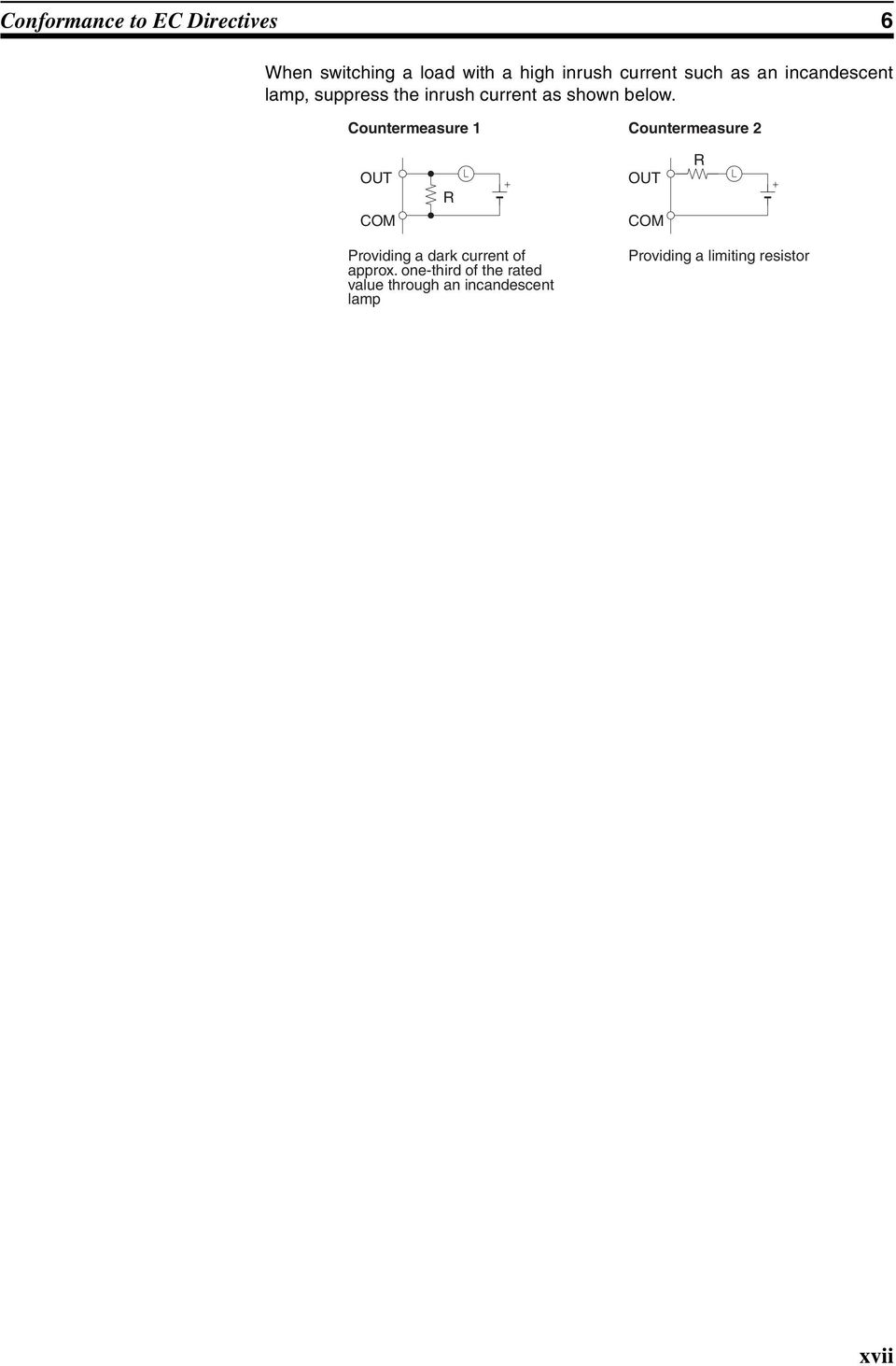
18 Conformance to EC Directives 6 When switching a load with a high inrush current such as an incandescent lamp, suppress the inrush current as shown below. Countermeasure 1 Countermeasure 2 OUT COM R OUT COM R Providing a dark current of approx. one-third of the rated value through an incandescent lamp Providing a limiting resistor xvii
19 Conformance to EC Directives 6 xviii

20 SECTION 1 PROFIBUS-DP This section provides a brief description of PROFIBUS-DP 1-1 Introduction Protocol architecture Device types PROFIBUS-DP characteristics Bus Access Protocol Data throughput Diagnostic functions Protection mechanisms Network states Device Data Base files Profiles

21 Introduction Section Introduction Standard EN50170 PROFIBUS is a vendor-independent, open fieldbus standard for a wide range of applications in manufacturing, process and building automation. Vendor independence and openness are guaranteed by the PROFIBUS standard EN With PROFIBUS, devices of different manufacturers can communicate without special interface adjustments.the PROFIBUS family consists of three compatible versions: High speed PROFIBUS-DP DP stands for Decentralised Periphery. It is optimised for high speed and lowcost interfacing, especially designed for communication between automation control systems and distributed I/O at the device level. Process Automation PROFIBUS-PA PA stands for Process Automation. It permits sensors and actuators to be connected on one common bus line even in intrinsically-safe areas. It permits data communication and power supply over the bus using 2-wire technology according the international standard IEC Higher level PROFIBUS-FMS FMS stands for Fieldbus Message Specification. This version is the generalpurpose solution for communication tasks at a higher level. Powerful services open up a wide range of applications and provide great flexibility. It can also be used for extensive and complex communications tasks. Uniform bus access protocol PROFIBUS-DP and PROFIBUS-FMS use the same transmission technology and a uniform bus access protocol. Thus, both versions can be operated simultaneously on the same cable. However, FMS field devices cannot be controlled by DP masters or vice versa.!caution It is not possible to exchange one of these family members by another family member. This will cause faulty operation. The rest of this section only describes PROFIBUS-DP.Protocol architecture 1-2 Protocol architecture OSI The PROFIBUS protocol architecture is oriented on the OSI (Open System Interconnection) reference model in accordance with the international standard ISO Layer 1 (physical layer) of this model defines the physical transmission characteristics. Layer 2 (data link layer) defines the bus access protocol. Layer 7 (application layer) defines the application functions 2
22 Protocol architecture Section 1-2 DP-Profiles DP-Extensions User Interface Layer DP Basic Functions (7) Application Layer (6) Presentation Layer (5) Session Layer NOT DEFINED (4) Transport Layer (3) Network Layer (2) Data Link Layer Fieldbus Data Link (FDL) (1) Physical Layer RS-485 / Fibre Optics Layer 1, 2 and user interface PROFIBUS-DP uses layers 1 and 2, and the user interface. Layers 3 to 7 are not defined. This streamlined architecture ensures fast and efficient data transmission. The application functions which are available to the user, as well as the system and device behaviour of the various PROFIBUS-DP device types, are specified in the user interface. Transmission medium High-speed, inexpensive RS-485 transmission technology or fibre optics are available for transmission. RS-485 transmission is the most frequently used transmission technology. Its application area includes all areas in which high transmission speed and simple inexpensive installation are required. Twisted pair shielded copper cable with one conductor pair is used. Easy installation The RS-485 transmission technology is very easy to handle. Installation of the twisted pair cable does not require expert knowledge. The bus structure permits addition and removal of stations or step-by-step commissioning of the system without influencing the other stations. Later expansions have no effect on stations which are already in operation. Transmission speeds between 9.6 kbit/s and 12 Mbit/s can be selected. One unique transmission speed is selected for all devices on the bus when the system is commissioned. Cable length The maximum cable length depends on the transmission speed (see Fieldbus cabling). The specified cable lengths are based on type-a cable (see Fieldbus cabling). The length can be increased by the use of repeaters. The use of more than 3 repeaters in series is not recommended. 3
23 Device types Section Device types PROFIBUS distinguishes between master devices and slave devices. Master devices Master devices determine the data communication on the bus. A master can send messages without an external request, as long as it holds the bus access right (the token). Masters are also called active stations in the PROFI- BUS standard. DPM1, DPM2 There are two types of master devices: DP master class 1 (DPM1) and DP master class 2 (DPM2). A DPM1 is a central controller which exchanges information with the decentralised stations (i.e. DP slaves) within a specified message cycle. DPM2 devices are programmers, configuration devices or operator panels. They are used during commissioning, for configuration of the DP system, or for operation and monitoring purposes. Slave devices Slave devices are peripheral devices. Typical slave devices include input/output devices, valves, drives, and measuring transmitters. They do not have bus access rights and they can only acknowledge received messages or send messages to the master when requested to do so. Slaves are also called passive stations. The CJ1W-PRT21 is a PROFIBUS-DP slave device. 4
24 PROFIBUS-DP characteristics Section PROFIBUS-DP characteristics Bus Access Protocol Layer 2 The bus access protocol is implemented by layer 2. This protocol also includes data security and the handling of the transmission protocols and messages. Medium Access Control The Medium Access Control (MAC) specifies the procedures which determine when a station is permitted to transmit data. A token passing procedure is used to handle the bus access between master devices, and a polling procedure is used to handle the communication between a master device and its assigned slave device(s). Token passing The token passing procedure guarantees that the bus access right (the token) is assigned to each master within a precisely defined time frame. The token message, a special message for passing access rights from one master to the next master, must be passed around the logical token ring - once to each master - within a specified target rotation time. Each master executes this procedure automatically. A user can only change the target rotation time, but is not recommended. Polling procedure The polling or master-slave procedure permits the master, which currently owns the token, to access its assigned slaves. The picture below shows a possible configuration The configuration shows three active stations (masters) and six passive stations (slaves).. Token Passing Active stations Master devices DPM1 DPM2 DPM1 Polling PROFIBUS Passive stations Slave devices The three masters form a logical token ring. When an active station receives the token message, it can perform its master role for a certain period of time. During this time it can communicate with all assigned slave stations in a master-slave communication relationship, and a DPM2 master can take the initiative to communicate with DPM1 master stations in a master-master communication relationship. 5
25 PROFIBUS-DP characteristics Section 1-4 Multi-peer communication Data throughput Transmission time In addition to logical peer-to-peer data transmission, PROFIBUS-DP provides multi-peer communication (broadcast and multicast). Broadcast communication: an active station sends an unacknowledged message to all other stations (masters and slaves). Multicast communication: an active station sends an unacknowledged message to a predetermined group of stations (masters and slaves). At 12 Mbit/s, PROFIBUS-DP requires only about 1 ms for the transmission of 512 bits of input data and 512 bits of output data distributed over 32 stations. The figure below shows the typical PROFIBUS-DP transmission time depending on the number of stations and the transmission speed. The data throughput will decrease when more than one master is used. Bus cycle time [ms] Baud Rate (kbit/s) Slaves Diagnostic functions Extensive diagnostics Device related diagnostics Module related diagnostics Channel related diagnostics The extensive diagnostic functions of PROFIBUS-DP enable fast location of faults. The diagnostic messages are transmitted over the bus and collected at the master. These messages are divided into three levels: Device related diagnostics These messages concern the general operational status of the whole device (e.g. overtemperature or low voltage). Module related diagnostics These messages indicate that a fault is present in a specific I/O range (e.g. an 8-bit output module) of a station. Channel related diagnostics These messages indicate an error at an individual input or output (e.g. short circuit on output 5). 6
26 PROFIBUS-DP characteristics Section Protection mechanisms Time monitoring PROFIBUS-DP provides effective protection functions against parameterisation errors or failure of the transmission equipment. Time monitoring is provided at the DP master and at the DP slaves. The monitoring interval is specified during the configuration. At the master At the slave Protection mechanism at the master. The DPM1 master monitors data transmission of its active slaves with the Data_Control_Timer. A separate control timer is used for each slave. This timer expires when correct data transmission does not occur within the monitoring interval. If the master s Auto_Clear mode is enabled, the DPM1 exits the Operate state, switches the outputs of all assigned slaves to fail-safe status, and changes to its Clear state (see also Network states). Protection mechanisms at the slave. The slave uses the watchdog control to detect failures of the master or the transmission line. If no data communication with the master occurs within the watchdog control interval, the slave automatically switches its outputs to the fail-safe status. This mechanism can be enabled or disabled for each individual slave. Also, access protection is available for the inputs and outputs of the DP slaves operating in multi-master systems. This ensures that direct access can only be performed by the authorised master. For other masters, the slaves offer an image of their inputs and outputs, which can be read by any master, even without access rights Network states Off-line Stop Clear Operate Auto_Clear PROFIBUS-DP distinguishes four different network states. Off-line Communication between all DP participants is stopped. Stop Communication between DPM1 and DP slaves is stopped. Only communication between DPM1 and DPM2 is possible. Clear DPM1 master attempts to set parameters, check the configuration, and subsequently perform data exchange with its associated DP-slaves. The data exchange comprises reading the inputs of the DP-slaves and writing zero s to the outputs of the DP-slaves. Operate DPM1 master exchanges data with its assigned slaves, inputs are read and outputs are written. Beside this, the DPM1 cyclically sends its local status to all assigned DP slaves (with a multicast message) at a configurable time interval. When an error occurs during the data transfer phase of the DPM1, the Auto_Clear configuration setting determines the subsequent actions. If this parameter is set to false, the DPM1 remains in the 'Operate' state. If set to true, the DPM1 switches the outputs of all assigned DP slaves to the fail-safe state and the network state changes to the 'Clear' state. 7
27 Device Data Base files Section Device Data Base files GSD-file To achieve straightforward configuration of a PROFIBUS-DP network, the characteristic features of a device are specified in a file. This file is called a GSD-file (Gerätestammdaten file). The language of the GSD file is expressed with the last letter from the extension, *.GS?: Default: =GSD English =GSE Deutsch =GSG Italian =GSI Portuguese =GSP Spanish =GSS General section DP-master section DP-slave section Configurator 1-6 Profiles Exchanging devices The GSD files are prepared individually by the vendor for each type of device, according to a fixed format. Some parameters are mandatory, some have a default value and some are optional. The device data base file is divided into three parts: General specifications This section contains the vendor name, the device name, hardware- and software release versions, station type and identification number, protocol specification and supported baud rates. DP master-related specifications This section contains all parameters which only apply to DP master devices (e.g. maximum memory size for the master parameter set, maximum number of entries in the list of active stations, or the maximum number of slaves the master can handle). DP slave-related specifications This section contains all specification related to slaves (e.g. minimum time between two slave poll cycles, specification of the inputs and outputs, and consistency of the I/O data). The device data base file of each device is loaded in the configurator and downloaded to the master device. Refer to the Operation Manual of the PROFIBUS-DP Master Unit for usage of the GSD file in the master's configuration software. GSD files are usually supplied with each unit. Alternatively, GSD files can be downloaded from the Internet, either from the manufacturer's site, or from the GSD library of the PROFIBUS Nutzerorganisation at To enable the exchange of devices from different vendors, the user data has to have the same format. The PROFIBUS-DP protocol does not define the format of user data, it is only responsible for the transmission of this data. The format of user data may be defined in so called profiles. Profiles can reduce engineering costs since the meaning of application-related parameters is specified precisely. Profiles have been defined for specific areas like drive technology, encoders, and for sensors / actuators. 8
28 SECTION 2 Features and System Configuration This section describes the overall specification and the communication performance of the PROFIBUS-DP CJ1W-PRT21 Slave Unit 2-1 Overall Specification Dimensions Performance
29 Overall Specification Section Overall Specification Modal code Installation Environment User Interface PLC Interface Profibus Interface Host PLC System Maximum number of Units per PLC system Current consumption Weight Storage temperature Operating temperature Operating humidity Conformance to EMCand environmental standards Switch settings CJ1W-PRT21 CJ ma (maximum) at 5V DC from PLC power supply 90 g (typical) -20 o C to +70 o C 0 o C to +55 o C 10 to 90% (non-condensing) EN EN Special I/O Machine number (00-95) by 2 rotary switch PROFIBUS-DP node address (00-99) by 2 rotary switches LED Indicators Unit status: RUN (green LED), ERC (red LED) Network status: COMM (green LED), BF (red LED) CPU status: ERH (red LED) No. of CIO words allocated PLC -> Unit: 1 word control data Unit -> PLC: 1 word status data No. of DM words allocated Unit -> PLC: 8 words of Unit setup information Amount of I/O data per Unit Fixed: 2 words CIO area (one in, one out) for Unit status + control bits. 2 words status information from the host PLC, containing operation status and error code (read from location A400). This information will be sent to the PROFIBUS master: as extended diagnostics, only at a change of data content. optionally, attached to the I/O data, each PROFIBUS cycle. Variable: 2 user-defined areas for PROFIBUS I/O data, with the following restrictions: Up to 100 words input in one PLC area (CIO, H, D, EM). Up to 100 words output in one PLC area (CIO, H, D, EM). Inputs+outputs must be 180 words or less Applicable standard EN50170 Vol. 2 Conformance to Certificate No. Z01033 PROFIBUS standard Bus connector 9-pin female sub-d connector (RS-485 PROFIBUS connector) Bus address 0 to 99, Remote setting not supported Baud rate (auto-detect) 9.6k, 19.2k, 45.45k, 93.75k, 187.5k, 500k, 1.5M, 3M, 6M, 12M bit/s Supported functions (as responder) Station type GSD file to DPM1 + DPM2 masters to DPM2 master only Data_Exchange Slave_Diag Set_Prm Chk_cfg Global_Control (SYNC/FREEZE/CLEAR) RD_Inp RD_outp Get_cfg Modular station, max. 32 modules Configurable with In-, Out-, and I/O-modules of 1, 2, 4, 8, and 16 words Total of 0~100 words in + 0~100 words. Sum of Input and Output size can be up to 180 words OC_0602.GSD, supplied with the unit 10
30 Dimensions Section Dimensions The following figure shows the dimensions of the Unit. (All dimensions are in mm.) 31 mm 5 mm 65 mm PRT21 RUN ERC ERH COMM BF Indicator LEDs MACH No. x10 1 Rotary switches x mm NODE No. x10 1 x10 0 Bus D-SUB 9 connector 11
31 Performance Section Performance Asynchronous The CJ1W-PRT21 s task is to exchange predetermined amounts of data between the host PLC system and a PROFIBUS-DP master unit. Its performance in terms of data transfer rate is therefore mainly governed by two factors external to the Unit: the PROFIBUS-DP cycle time and the host PLC s cycle time. The PLC cycle and the PROFIBUS-DP cycle will generally be: independent, of unequal length, more or less variable, and therefore fundamentally asynchronous. In case the PROFIBUS-DP cycle time is longer than the host PLC cycle time, it may occur that slave input data, sent by the Unit s host PLC only during a single PLC cycle, cannot be read in time by the PROFIBUS master. Data sent by host PLC I/O refresh Data in slave input buffer Master-Slave polling PROFIBUS master input data In case the PROFIBUS-DP cycle time is shorter than the host PLC cycle time, it may occur that slave output data, sent by the PROFIBUS master only during a single fieldbus cycle, cannot be read in time by the Unit s host PLC. Data read by host PLC A C D F I/O refresh Data in slave output buffer A B C D E F Master-Slave polling PROFIBUS master output data A B C D E F If it is necessary that each different set of transmitted data is acknowledged by the receiving side, the user will have to implement a verification mechanism in the PLC programs on both the master and the slave PLC. An example is to reserve one byte/word in the master s data block for a transmission counter, which is copied back by the slave in its reply. The master may only transmit the next data if the received counter value equals the sent value, indicating that the previous data was received by the slave. Consistency The CJ1W-PRT21 guarantees consistency over the full length of the PROFI- BUS data message, i.e. all I/O data in one PROFIBUS message is transferred to the host PLC in one I/O refresh, and vice versa. There are added modules without consistency which simplify communication with Siemens S7 masters. 12
32 Performance Section 2-3 PROFIBUS-DP cycle time The overall PROFIBUS-DP communication cycle time will depend on the number and types of PROFIBUS-DP master(s) and other slaves connected to the network, and the overall bus parameters defined in the configuration of the master unit(s). The time required to exchange I/O data between the CJ1W-PRT21 and its master will depend on the number of input and output words defined in the master s configuration, the selected baud rate, and on the performance of the master unit itself. The minimum time interval between subsequent I/O data exchanges with the CJ1W-PRT21 (minimum slave interval) is 0.5 ms as defined in the Unit s GSD file. PLC cycle time The host PLC s cycle time mainly depends on the size of the PLC program and the I/O refresh times of all I/O Units on its backplanes. The size of the PLC program is application specific. Besides optimising the PLC program, the program execution time can only be decreased by using a faster CPU Unit. I/O Refresh Time The total I/O refresh time depends on the types of Units that are mounted. Not all Units refresh the same amount of data. The I/O refresh time of the CJ1W- PRT21 depends on the number of I/O data words that have been mapped. For the CJ1G CPU45: I/O Refresh Time = n x 1 µs. n = number of I/O data words Maximum words = 184, so maximum I/O refresh time becomes 184 x 1 µs = ms 13
33
34 SECTION 3 Installation This section describes the installation of the PROFIBUS-DP CJ1W-PRT21 Slave Unit 3-1 Physical layout of the Unit LEDs Rotary Switches BUS Connector Connecting PC Components Setting up a network Fieldbus cabling Configuring PROFIBUS-DP systems
35 Physical layout of the Unit Section Physical layout of the Unit PRT21 RUN ERC ERH COMM BF Indicator LEDs MACH No. x10 1 Rotary switches x10 0 NODE No. x10 1 x10 0 Bus D-SUB 9 connector LEDs The front view shows the indicator LEDs, the rotary switches, and the 9-pin female sub-d PROFIBUS-DP connector. The CJ1W-PRT21 has 5 indicator LEDs. Three LEDs (RUN, ERC and ERH) give a status indication of the Unit in general. PRT21 RUN ERC ERH COMM BF Two LEDs (COMM and BF) are related to the status of the PROFIBUS- DP network. During normal operation, the RUN and COMM LEDs (green) should be ON, while the ERC, ERH and BF LEDs (red) should be OFF. Refer to 4-8 LEDS for a detailed description of the LED functions Rotary Switches The CJ1W-PRT21 has 4 rotary switches to: set its Special I/O Unit number or Machine No. (00-95) set the PROFIBUS-DP node address (00-99) Note Always turn off the power to the PLC before changing a rotary switch setting. The Unit only reads the settings during the initialisation after power-on. Use a small flat-blade screwdriver to turn the rotary switches; be careful not to damage the switches. 16
36 Physical layout of the Unit Section 3-1 MACH No. The MACH No. rotary switches are used to select the CJ1 Special I/O Unit number or so called Machine No.. The Special I/O number setting determines which words in the CIO Area and Data Memory Area are allocated to the CJ1W-PRT21. Any Machine number in the setting range is allowed as long as it has not been set on another Special I/O Unit connected to the PLC. If the same number is used for the CJ1W-PRT21 and another Special I/O Unit, an Unit/Rack Number Duplication error (FALS 80E9) will occur in the PLC, and it will not be possible to start up the PROFIBUS-DP Slave communication see (Appendix B Device specific parameters and diagnostics). NODE ADDRESS Two switches, marked Node No. x10 1 and x10 0, are used to set the PROFI- BUS-DP node address of the Unit. Addresses in the range of 00 through 99 are valid. Be sure the node address on the unit is equal to the station address in the masters configuration BUS Connector The fieldbus connector is a 9-pin female sub-d connector, as recommended in the PROFIBUS standard EN50170 Vol.2. Table 1 Profibus Connector Pin No. Signal Description 1 Shield Shield / functional ground B-line Data signal 4 RTS Direction control signal for repeaters (TTL) 5 DGND Data ground 6 VP Supply voltage for terminator resistance (+5V) A-line Data signal Data Signal RTS The PROFIBUS User Group recommends the following colour coding for the data signal lines: A-line = Green B-line = Red These data signal lines must be connected to the corresponding signal terminals or pins at the master unit and other stations (i.e. A to A, B to B). For detailed PROFIBUS-DP cable requirements, see Fieldbus cabling. The signal RTS (TTL signal relative to DGND) is meant for the direction control of repeaters in case repeaters without self control capability are used 17
37 Connecting PC Components Section 3-2 VP, DGND The signals VP and DGND are meant to power an externally mounted bus terminator. VP 390Ω The powering of the 220 Ω termination resistor ensures a defined idle state potential on the data lines. To ensure proper functioning up to the highest baud rate, each bus segment has to be terminated at both ends of the cable. B-line 220Ω A-line 390Ω DGND 3-2 Connecting PC Components The Units that make up a CJ-series PC can be connected simply by pressing the Units together and locking the sliders by moving them toward the back of the Units. The End Cover is connected in the same way to the Unit on the far right side of the PLC. Follow the procedure listed below to connect PLC components. 1,2, The following diagram shows the connection of two Units that make up a CJ-series PLC. Join the Units so that the connectors fit exactly. 18
38 Connecting PC Components Section The yellow sliders at the top and bottom of each Unit lock the Units together. Move the sliders toward the back of the Units as shown below until they click into place. Note If the locking tabs are not secured properly, the CJ-series PLC may not function properly. Be sure to slide the locking tabs until they are securely in place. 3. Attach the End Cover to the Unit on the far right side of the Rack. CPU Rack Note Connect the I/O Control Unit directly to the CPU Unit to enable connecting Expansion Racks. Expansion Rack Note Connect the I/O Interface Unit directly to the Power Supply Unit. There is no Backplane for the CJ-series. The PC is constructed by connecting Units together using the connectors on the sides. 19
39 Connecting PC Components Section 3-2!Caution Attach the End Cover to the Unit on the far right side of the Rack. An I/O bus error will occur and the PC will not operate in either RUN or MONITOR mode if the End Cover is not connected. If this occurs, the following information will be set in memory. Name Address Status I/O Bus Error Flag A ON I/O Bus Error Slot Number A40400 to A E Hex I/O Bus Error Rack Number A40408 to A E Hex Note 1. Always turn OFF the power supply before connecting Units to each other. 2. Always turn OFF the power supply to the entire system before replacing a Unit. A maximum of 10 I/O Units can be connected to a CPU Rack or an Expansion Rack. If 11 or more I/O Units are connected, and I/O overflow error will occur and the PC will not operate in either RUN or MONITOR mode. If this occurs, FALS(80E9) occurs, the Too Many I/O Points error flag (A40111) will turn ON and A40713 to A40715 (I/O Overflow Details) will turn ON (see Appendix B Device specific parameters and diagnostics). 20
40 Setting up a network Section Setting up a network Fieldbus cabling Bus structure Cable type All PROFIBUS-DP devices are connected in a line structure. Each RS-485 bus segment may contain up to 32 stations (masters, slaves, repeaters). When more than 32 stations are required, repeaters must be used to link the individual bus segments. The bus must be terminated at the beginning and at the end of each segment. The standard EN50170 Vol.2 specifies to use shielded twisted pair cables with the following parameters (PROFIBUS line type A): Table 2 PROFIBUS Cable parameters Parameter Value Impedance 135 to 165 Ω (3 to20 MHz) Capacitance per unit length < 30 pf/m Loop resistance < 110 W/km Core diameter > 0.64 mm Core cross section > 0.34 mm (22 AWG) Maximum length The maximum length of the cable depends on the transmission speed. The cable lengths specified in the table below are based on the above cable specifications. Table 3 Maximum cable lengths Baud rate (kbit/s) Length/segment (m) 9.6, 19.2, 45.45, , 6000, Repeaters The maximum communication distance as specified in Table 3 can be increased by the use of repeaters. The repeater must be included in the count of the number of stations on the segment. Even though repeaters do not have a node address, they represent an electrical load on the bus segment like any master or slave station. If a repeater is located at the end of a bus segment, it should provide bus termination as well. It is recommended to limit the number of repeaters in series between any two stations in the system to a maximum of three units, as shown in the following example (3 repeaters are encountered in communication between segment 6 and segments 1, 2 and 4). 21
41 Setting up a network Section 3-3 M/S Segment 1 Max. 31 Stations Segment 2 Max. 31 Stations M/S REP Segment 4 Max. 31 Stations REP Segment 3 Max. 31 Stations Segment 5 Max. 31 Stations REP REP M/S M/S M/S M/S REP Master or slave station Repeater Termination REP Segment 6 Max. 31 Stations M/S Max. total number of stations = 126 Stub lines Stub lines (branches from the main line) should be avoided for data transmission speeds of more than 500 kbit/s. Except at end stations with termination, it is recommended to always use plug connectors that permit two data cables to be connected directly to the plug. This method allows the bus connector to be plugged and unplugged at all times without interrupting data communication between other stations. 22
42 Setting up a network Section 3-3 Fieldbus connector The connector plug to be used on the CJ1W-PRT21 is a 9-pin male sub-d connector, preferably with a metal case, and a facility to connect the shield of the cable to the case. The cable should at least be connected to pin 3 (B-line) and pin 8 (A-line) of the connector. At baud rates of 1.5 Mbit/s or higher, always use special PROFIBUS-DP connectors with built-in series inductances, to ensure that cable reflections caused by the capacitive the load of each unit are minimised. Connectors with built-in inductors and termination resistors, as shown here schematically, are available from various manufacturers. To ensure electromagnetic compatibility (EMC), the shield of the cable should be connected to the metal case of the connector. If this is impossible, use pin 1. When the Unit is installed within a control cabinet, the cable shield of the bus cable should be electrically connected to a grounding rail as close as possible to the cable lead-through using a shield grounding clamp or similar. The cable shield should continue within the cabinet to the fieldbus device. Ensure that the PLC and the control cabinet in which the device is mounted have the same ground potential by providing a large-area metallic contact to ground (use e.g. galvanised steel to ensure a good connection). Grounding rails should not be attached to painted surfaces. You may find further information about: Commissioning of PROFIBUS equipment Testing the PROFIBUS cable and bus connectors Determining the loop resistance Testing for correct bus termination Determining the segment length and cable route Other test methods Example of an equipment report in the PROFIBUS guideline "Installation Guideline for PROFIBUS-DP/FMS" (PNO Order No ), which is available at every regional PROFIBUS user organisation Configuring PROFIBUS-DP systems Configurator After making the physical connections of the network, the PROFIBUS-DP system needs to be configured. For each master and its assigned slaves, a configuration has to be defined using a dedicated configuration program. The configurator provides the master with information about: The slaves that are connected to the master. The assignment of slaves to groups for broadcast / multicast messages. The mapping of the slaves into the memory of the master. The bus parameters (e.g. baud rate, target rotation time etc.). 23
43 Setting up a network Section 3-3 C200HW-PRM21 GSD file Modular slave Check configuration Parameter data For more details about the configurator for the C200HW-PRM21 Master Unit, refer to OMRON Catalog No. W349-E1. To configure a master unit to communicate with the CJ1W-PRT21, the Unit s device database file OC_0602.GSD is required. Based on the contents of this file, the configuration program for the master unit will allow the user to specify the amount of input- and output data to be exchanged. The sizes of the inand the output block can both be set in 1-word increments from 0 to 100 words. The CJ1W-PRT21 is characterised as a modular slave. The following types of data exchange modules are pre-defined: IN modules of 1, 2, 4, 8, and 16 words OUT modules of 1, 2, 4, 8, and 16 words IN/OUT modules of 1+1, 2+2, 4+4, 8+8, and words By concatenating up to 32 modules, any desired size of input and output block can be created (multiple selections of any module type are allowed). The sequence in which the modules are entered is irrelevant. Only the resulting total lengths of the input and output areas are of significance. Upon startup of the PROFIBUS-DP communication, the master unit will send a Chk_Cfg message so that the slave can verify that the master s expected I/O configuration for the slave is correct. The CJ1W-PRT21 Slave Unit will accept any in/ out words up to 100 input, 100 output words. The maximum of input + outputs must be 180 words or less. The Set_Prm telegram will provide the following information at system startup, after a restart and in data exchange mode: Start address of the area in the host PLC where to read and to send to the master. Format (Motorola/Intel) of the data to be sent to the master. Actions to be taken in case of PLC status change or fatal errors. Inclusion of 2 words PLC status information or not. 24
44 Setting up a network Section 3-3 Fail safe support: Off: After the master sends a global control command CLEAR, the slave requires data telegramcontaining 0000 as data, in order to remain in data exchange mode. On: After the master sends a global control command CLEAR, the slave can accept data telegrams containing no data, while still remaining in data exchange mode Watchdog Base: The slave uses the watchdog control to detect failures of the master or the transmission line. If no data communication with the master occurs within the watchdog control interval, the slave automatically switches its outputs to the fail-safe status. The watchdog control time can be specified in intervals of 1 ms or 10 ms. Output data on PROFIBUS fail: The user can select how the slave will behave on the host PLC s I/O bus in case the PROFIBUS data exchange communications fails: Clear data to Host PLC Hold data to Host PLC Output data format: The user can select how the data bytes of a PROFIBUS data exchange telegram are mapped to the host PLC data words. Motorola Intel See 4-3 I/O Data Format for details: Output to slave PLC area: The user can select the area to which the unit will write PROFIBUS output data received from its master. See 4-2 I/O Data Mapping for details. Output area start address: Sets the start address in the host PLC to which the PROFIBUS output data, received from the master, will be written. Action on slave PLC PROGRAM mode: Defines how the slave will behave on PROFIBUS in case the host PLC is in PROGRAM mode (as opposed to RUN or MONITOR mode). Action on slave PLC I/O bus fail: Defines how the slave will behave on PROFIBUS in case (the communication with) the host PLC has a fatal error (CPU ERC LED ON) e.g. I/O refresh timeout. Input data format: Defines how Host PLC data words are mapped to a PROFIBUS data exchange telegram. See 4-3 I/O Data Format for details. Input from slave PLC area: Selects the area from which the unit will read PROFIBUS input data to be sent to its master. 25
45 Setting up a network Section 3-3 Input area start address: Sets the start address in the host PLC, from which the PROFIBUS input data, to be sent to the master, will be read. Slave PLC status indication: Selects if the PLC status information should occupy the first two words of input data to the PROFIBUS master. Example The example below shows a slave configuration screen. The CJ1W-PRT21 is configured as a slave with 2 words input for status information and ( =) 36 words input data and ( =) 40 words output data. The terms input and output are to be interpreted as seen from the PROFIBUS-DP master unit. List of available module types, defined in GSD file I/O data limits, defined in GSD file Total I/O sizes, calculated by Configurator List of modules, selected by user 26
46 Setting up a network Section 3-3 Slave PLC status indication configured as Cyclic by first 2 input words If the Slave PLC status indication is configured as Cyclic by first 2 input words then the connections between master and slave are as follows: Master Slave 1 st IN word 1 st Slave PLC status word 2 nd IN word 2 nd Slave PLC status word 3 rd IN word CIO 50 4 th IN word CIO th IN word CIO 85 1 st OUT word CIO nd OUT word CIO th OUT word CIO
47
48 SECTION 4 User Interface This section describes the Interface between the CJ1-series PLC CPU and the PROFIBUS-DP CJ1W-PRT21 Slave Unit. 4-1 Input and Output Data I/O Data Mapping I/O Data Format Data Mapping Control and status area Control bits Allocated CIO words Status Flags Configuration information Allocated DM words Slave Parameter Data Slave Output Data Slave Input Data PLC status information LEDS
49 Input and Output Data Section Input and Output Data The CJ1W-PRT21 forms a link between two bus systems: the host PLC s I/O bus on one side, and PROFIBUS-DP on the other. The Unit can be considered as a slave to both systems: the I/O bus communication is controlled by the CPU Unit of the host PLC, the PROFIBUS-DP communication is controlled by a PROFIBUS-DP master. Definitions Being a slave of two systems may cause confusion as to which data should be considered input data and which is output data. In this manual all I/O data communication is defined from the point of view of the PROFIBUS-DP system: Slave INPUT Data Slave INPUT Data is process data which the CJ1W-PRT21 reads from the assigned areas on demand of the host PLC. The CJ1W-PRT21 sends this data to the PROFIBUS-DP master unit. Host PLC I/O Bus CJ1W-PRT21 PROFIBUS PROFIBUS Master Figure 1 Slave INPUT data direction Slave OUTPUT Data Slave OUTPUT Data is process data which the CJ1W-PRT21 receives from the PROFIBUS-DP master unit. The CJ1W-PRT21 writes this data to the assigned areas on demand of the host PLC. Host PLC I/O Bus CJ1W-PRT21 PROFIBUS PROFIBUS Master Figure 2 Slave OUTPUT data direction 30
50 I/O Data Mapping Section I/O Data Mapping Data flow The figure below shows the flow of remote I/O data in the PLC system. It is possible to map the PROFIBUS-DP I/O data to the CIO, D, EM, H or W areas of the PLC memory. The input and output areas can be assigned independently. Host PLC CIO Area I/O Area (Not allocated words 1 ) I/O Area (Not used 2 ) Data Link Area (Not allocated words 1 ) Internal I/O Areas CPU Bus unit area (Not allocated words 1 ) CIO CIO CIO CIO CIO CIO CIO CIO CJ1W-PRT21 Special I/O Unit Area (Not allocated words 1 ) DeviceNet Area (Not allocated words 1 ) Work Area Holding Area Data Memory Area Purposed for Special I/O units (not allocated words 1 ) CIO CIO W H D D D D I/O BUS Input + Output = max 180 words (360 bytes) Input buffer Max. 100 words (200 bytes) Output buffer Max. 100 words (200 bytes) PROFIBUS-DP Input + Output = max 180 words (360 bytes) Purposed for CPU BUS units (not allocated words 1 ) D Extended Data Memory Area E0_ EC_ Words that are not allocated can be used 2 Unused words can be used, but those areas may be used in future for expanding functions. 3 The EM Area is divided into 32,767-word regions called banks. The number of EM banks depends upon the model of CPU Unit (see CJ1 Operation manual 2-1 Specification). Slave input data is transferred via the I/O bus on the PLC Backplane to the input buffer of the Unit. Each PROFIBUS-DP cycle this data is transmitted to the master over PROFIBUS. Slave output data received from PROFIBUS is first stored in the output buffer of the Unit. During an I/O refresh, this data is transferred to the memory of the host PLC via the I/O Bus. 31
51 I/O Data Format Section 4-3 I/O refresh By default, I/O refreshes are executed at the end of each PLC program cycle, but they can also be triggered by the IORF instruction. See the applicable PLC CPU Operation Manual for more details. Maximum I/O data For CJ1W-PRT21, the maximum amount of mapped I/O data is 100 words input words output with the following restrictions: Input + outputs must be 180 words or less. 4-3 I/O Data Format The CJ1W-PRT21 allows the user to select between two methods to map the word-oriented PLC data to the essentially byte-oriented PROFIBUS-DP messages. The default method is Motorola format (Big-Endian), which allows easy data exchange with other OMRON PROFIBUS-DP devices. For communication with other manufacturers devices, in some cases it may be more convenient to select Intel format (Little-Endian). Motorola (Big-Endian) By default, the most significant byte of a PLC data word will be mapped to an even byte in the PROFIBUS-DP message, the least significant byte is mapped to an odd byte, e.g. PLC data area PROFIBUS-DP message bit # bit # word byte A B A B 1 C D 2 1 C D E F E F 3 Intel (Little-Endian) Alternatively, selecting Intel format will result in: PLC data area PROFIBUS-DP message bit # bit # word byte A B A B C D E F E F 2 C D 3 D word m+2 bit 12 indicates how the data bytes of a PROFIBUS data telegram are mapped to Host PLC data words: 0: Motorola (high byte first), 1: Intel (low byte first). 32
52 Data Mapping Section Data Mapping The mapping of PROFIBUS I/O data to the host PLC is controlled by the Set_Prm (set parameter) and Chk_Cfg (Check configuration) telegrams sent by the PROFIBUS Master. At startup of the PROFIBUS communication the following commands are sent. Master Slave Slave diagnostic Not OK Set_Prm 1) Chk_Cfg 2) Slave diagnostic OK Data Data Data Data 1) At system startup, after a restart and in data exchange mode the Set_Prm telegram will provide the following information: Start address of the area in the host PLC where to read to sent to the master. Format (Motorola/Intel) of the data to be sent to the master. Actions to be taken in case of PLC status change or fatal errors. Inclusion of 2 words PLC status information or not. 2) The Chk_Cfg telegram will provide the number of words to be read from the host PLC and to be sent to the Master plus the number of words to be received from the Master and to be written to the host PLC. Note 1. Until the Set_Prm and Chk_Cfg have been accepted by the Unit, only the control- and status CIO words are exchanged with the host PLC. The status information will indicate that no I/O data is exchanged. 2. After the Set_Prm telegram is received by the Unit, it will check if the specified data areas in the host PLC exist. If not, this will be indicated as a Parameter Fault to the PROFIBUS master, and in CIO n After the Chk_Cfg telegram is received by the Unit, it will check if the specified data areas in the host PLC exist. If not, this will be indicated as a Configuration Fault to the PROFIBUS master, and in CIO n In case the parameters specify to include PLC status information in the input data, the amount of input data read from the PLC will be 2 words less than the PROFIBUS input data length. If the input data length is less than 2 words, this is also indicated as a Configuration Fault. 33
53 Control and status area Section Control and status area After initialisation of the Unit (RUN LED is ON), the control- and status words are exchanged between the host PLC and the Unit during each I/O refresh Allocated CIO words The CIO words are in the area assigned to the Special I/O unit, depending on the Machine no. (00-95). Start address CIO Area = <MACH No.> x 10 Table 4 Unit settings area MACH No. CIO Area MACH No. CIO Area 00 CIO 2000-CIO CIO 2060-CIO CIO 2010-CIO CIO 2070-CIO CIO 2020-CIO CIO 2080-CIO CIO 2030-CIO CIO 2090-CIO CIO 2040-CIO CIO 2100-CIO CIO 2050-CIO CIO 2940-CIO Control bits The PROFIBUS-DP communication status of CJ1W-PRT21 can be controlled through the first CIO word (CIO n) allocated via the Machine No. setting (n = *Mach.No.). The communication status set by these bits is retained until the Unit is restarted (Power-on or reset). After a restart, PROFIBUS-DP communication is enabled by default. CIO n Start communication Stop communication CIO n.00 CIO n.01 Start Communication 0 1: PROFIBUS-DP communication will be enabled. If the communication is already enabled, no specific action is taken. 1 0: No action. Stop Communication 0 1: PROFIBUS-DP communication will be disabled (Slave Off-line). If the communication is already disabled, no specific action is taken. 1 0: No action. In case start communication and stop communication are both set from 0 1 at the same moment, communication will be enabled (default value). 34
54 Control and status area Section Status Flags The CJ1W-PRT21 indicates its status in the second CIO word (CIO n+1) allocated via the Machine No. setting. The lower byte shows the PROFIBUS-DP related status information, the higher byte indicates configuration errors. At power-on, or after a reset of the unit, the initial value shall be In a 'normal' situation only CIO n+1.00 will be ON. CIO n Data exchange active CLEAR FREEZE SYNC Watchdog disabled Watchdog base 1 ms Fail-safe enabled Parameter/Configuration error Incorrect start address (slave input area) Incorrect end address (slave input area) Incorrect start address (slave output area) Incorrect end address (slave output area) CIO n+1.00 Data exchange active 0: The slave unit is not in data exchange mode. 1: The slave unit is exchanging I/O data with its master. When this flag is ON, the assigned slave output area of the Host PLC contains data sent by the PROFIBUS master. When the flag is off, the user should not process the data from this area since its validity cannot be guaranteed. This does not necessarily mean that slave outputs are updated cyclically: If the communication watchdog timer is disabled by the master (see CIO n+1.04), the I/O data refresh interval may be of indefinite length. In 'Clear' mode (see CIO n+1.01), only the slave inputs are read, while all slave outputs are forced to 0. CIO n+1.01 CLEAR 0: Not in CLEAR mode. 1: The master has sent a global control command CLEAR, which resets all outputs of all the addressed slaves on the network. 35
55 Control and status area Section 4-5 CIO n+1.02 CIO n+1.03 CIO n+1.04 CIO n+1.05 FREEZE 0: Not in FREEZE mode. 1: The slave has accepted a global control command FREEZE from its master. The slave input data from the PLC is not updated at the PROFIBUS-DP interface until the next FREEZE command to this slave, or until the slave receives an UNFREEZE command. SYNC 0: Not in SYNC mode. 1: The slave has accepted a global control command SYNC from its master. The slave output data to the PLC is not updated at the PLC I/O bus interface until the next SYNC command to this slave, or until the slave receives an UNSYNC command Watchdog disabled 0: The slave's watchdog is enabled by the PROFIBUS-DP master, and the actual watchdog time is indicated in D m+1. 1: The master has disabled the slave's watchdog. If the Master-Slave communication fails, the slave will not exit data exchange mode, and its outputs will keep their state as received in the last data exchange telegram. Watchdog timebase 1 ms 0: The slave's watchdog uses the default timebase of 10 ms. The product of the two watchdog factors indicated by D m+1 is multiplied by 10 ms to give the actual watchdog time. 1: The slave's watchdog uses the optional timebase of 1 ms. The product of the two watchdog factors indicated by D m+1 is multiplied by 1 ms to give the actual watchdog time. 36
56 Control and status area Section 4-5 CIO n+1.06 CIO n+1.08 Fail_safe enabled 0: After the master sends a global control command CLEAR, the slave requires data telegrams containing 0000 as data, in order to remain in data exchange mode. 1: After the master sends a global control command CLEAR, the slave can accept data telegrams containing no data, while still remaining in data exchange mode Parameter/Configuration error 0: The slave unit has received and accepted Set_Prm and Chk_Cfg telegrams from its master. 1: The slave has not received, or received incorrect parameter and/or configuration telegrams from a master unit. I/O data exchange over PROFIBUS-DP will not take place. Parameter Error can be caused by: Invalid standard parameter settings (valid settings are described in the PROFIBUS standard [4]). Invalid user parameter settings (allowed settings are described in the GSD file of the Unit). Incorrect start addresses for I/O data in the host PLC system. If one of them is invalid, parameter error is indicated, plus CIO n+1.12 and/or CIO n+1.14 will be set. Configuration Error can be caused by: Input- or output length > 100 words Input + output length > 180 words Input length < 2 words while PLC status should be included. Input- or output length causing errors indicated by CIO n+1.13, CIO n+1.15 Note When the Parameter/Configuration flag is ON, the status of CIO n CIO n+1.06 and CIO n+1.08 are not updated. 37
57 Control and status area Section 4-5 CIO n+1.12 CIO n+1.13 CIO n+1.14 CIO n+1.15 Incorrect start address for slave input area 0: No error 1: There is an error in the slave input area mapping. The start address of the area as specified in the Set_Prm telegram is invalid for this PLC CPU type. The BF LED is BLINKING to indicate a configuration- or parameterisation error; no I/O data is transferred between master and slave units. Incorrect end address for slave input area 0: No error 1: There is an error in the slave input area mapping. The end address of the area as specified by the start address in the Set_Prm telegram, plus the data length in the Chk_Cfg telegram, is invalid for this PLC CPU type. The BF LED is BLINKING to indicate a configuration- or parameterisation error; no I/O data is transferred between master and slave units. Incorrect start address for slave output area 0: No error 1: There is an error in the slave output area mapping. The start address of the area as specified in the Set_Prm telegram is invalid for this PLC CPU type. The BF LED is BLINKING to indicate a configuration- or parameterisation error; no I/O data is transferred between master and slave units. Incorrect end address for slave output area 0: No error 1: There is an error in the slave output area mapping. The end address of the area as specified by the start address in the Set_Prm telegram, plus the data length in the Chk_Cfg telegram, is invalid for this PLC CPU type. The BF LED is BLINKING to indicate a configuration- or parameterisation error; no I/O data is transferred between master and slave units. 38
58 Configuration information Section Configuration information The CJ1W-PRT21 provides 8 DM words to indicate configuration- and parameterisation data received from the PROFIBUS-DP master unit. These words are not part of the cyclic refresh, but the unit writes this information to the Host PLC when the data in the unit changes. At power-on, or at a reset of the unit, all data will be set to 0. The DM words are in the area assigned to the Special I/O unit, depending on the Machine No. The first word in the DM area allocated to the Unit will be indicated by D m, the last word by D m+7 Table 5 Overview of Unit settings D Word Function m Group assignment (00-FF) Master address (00-7F, FF) m+1 WD factor 2 (00-FF) WD factor 1 (00-FF) m+2 Output Data processing flags Output area code m+3 Output start address m+4 Output data length m+5 Input Data processing flags Input area code m+6 Input start address m+7 Input data length The contents will only change: When the unit has accepted a Set_Prm and a Chk_Cfg telegram from a master. When the slave exits 'data_exchange' state (resets all data to 0, except Master address = FF). The user should make sure not to overwrite this information by the PLC program Allocated DM words Note DM indication is not synchronised with the PLC's refresh cycle, this information is intended for debugging purposes. The DM words are in the area assigned to the Special I/O unit, depending on the Machine no. (00-95). Start address DM Area = MACH No. x 100 Table 6 Unit settings area MACH No. DM Area MACH No. DM Area 00 D D D D D D D D D D D D D D D D D D D D D D D D
59 Configuration information Section Slave Parameter Data D m Master address Group assignment Group 1 Group 2 Group 3 Group 4 Group 5 Group 6 Group 7 Group 8 D m low byte Master Address Hexadecimal value (00~7D) indicating the node address of the PROFIBUS-DP Master from which the Unit has received and accepted the Chk_Cfg and Set_Prm telegrams. FFh indicates that the slave has not been configured by a master. D m high byte Group Assignment Indicates to which groups (numbered 1-8) the slave has been assigned by the PROFIBUS-DP master / configurator. When receiving a global control command, the slave will decide if the command is intended for a group of slaves to which it has been assigned. The value is provided by the PROFIBUS master's Set_Prm telegram, and indicated in D m after both the Set_Prm and Chk_Cfg telegrams have been accepted. 40
60 Configuration information Section 4-6 D m Watchdog factor 1 Watchdog factor 2 D m+1 Watchdog Factors The master's parameterisation telegram contains the value to which the slave's communication watchdog timer will be set. The actual watchdog control time is set to WDfact1 * WDfact2 * WD timebase. The WD timebase can be either 10 ms (default) or 1 ms (optional). This selection is made by the PROFIBUS master and indicated in CIO n The actual watchdog control time can have any value from 2 ms (2*1*1) to ms (FF*FF*10). A value of 00h means that the slave has not been parameterised. The values are provided by the PROFIBUS master's Set_Prm telegram, and indicated in D m+3 after both the Set_Prm and Chk_Cfg telegrams have been accepted.!caution The Slave will exit data exchange mode if the communication watchdog is enabled, and the time between two PROFIBUS-DP messages received from the master exceeds Twd WDtimebase ms. For example, if the Watchdog timeout (T WD ) has been set to 100 ms and the Watchdog timebase has been set to 10 ms, two PROFIBUS-DP messages received from the master should not be more than 90 ms apart. In this state, the Data exchange active flag (CIO n+1.00) will be off, and all slave output data to the host PLC will be The slave needs to receive the correct Set_Prm and Chk_Cfg messages from the master to re-enter data exchange mode. 41
61 Configuration information Section Slave Output Data D m Output area code Action on PROFIBUS fail Outputs Motorola/Intel mode D m+2 low byte Output area code(data from Master to Slave PLC) Indicates the area to which the unit will write PROFIBUS output data received from its master. 00: No assignment made 01: CIO area (CIOxxxx) 03: DM area (Dxxxxx) 04: Work area (Wxxx) 05: Holding area (Hxxx) 08: EM bank 0 (E0-xxxxx) 09: EM bank 1 (E1-xxxxx) 0A: EM bank 2 (E2-xxxxx) 0B: EM bank 3 (E3-xxxxx) 0C: EM bank 4 (E4-xxxxx) 0D: EM bank 5 (E5-xxxxx) 0E: EM bank 6 (E6-xxxxx) 0F: EM bank 7 (E7-xxxxx) 10: EM bank 8 (E8-xxxxx) 11: EM bank 9 (E9-xxxxx) 12: EM bank A (EA-xxxxx) 13: EM bank B (EB-xxxxx) 14: EM bank C (EC-xxxxx) D m+2 bit 8 Action on PROFIBUS fail Indicates how the slave will behave on the Host PLC's I/O bus in case the PROFIBUS data exchange communication fails (e.g. comm. watchdog timeout) 0: Clear data to Host PLC 1: Hold data to Host PLC D m+2 bit 12 Outputs Motorola/Intel mode Indicates how the data bytes of a PROFIBUS data exchange telegram are mapped to Host PLC data words. 0: Motorola (high byte first) 1: Intel (low byte first) The values in D m+2 are provided by the PROFIBUS master's Set_Prm telegram, and indicated in D m+2 after both the Set_Prm and Chk_Cfg telegrams have been accepted. 42
62 Configuration information Section 4-6 D m Output start address D m+3 Output start address (data from Master to Slave PLC) Indicates the start address in the area indicated in D m+2, to which the PROFIBUS output data, received from the master, will be written. The value is provided by the PROFIBUS master's Set_Prm telegram, and indicated in D m+3 after both the Set_Prm and Chk_Cfg telegrams have been accepted. The indication is only valid in case the output area code is unequal to 00. The start address is indicated as a hexadecimal value in the range FFF (i.e decimal). D m Output data length D m+4 Output data length(data from Master to Slave PLC) The value indicates the size of the area to which the PROFI- BUS output data, received from the master, will be written. The value is provided by the PROFIBUS master's Chk_Cfg telegram, and indicated in D m+4 after both the Set_Prm and Chk_Cfg telegrams have been accepted. The indication is only valid in case the output area code is unequal to 00. The length (in words) is indicated as a hexadecimal value in the range (i.e decimal). Note Before using the Slave output data in the PLC program, the user is to make sure the Unit Status Flags (in CIO n+1) indicate that: PROFIBUS data exchange is active, there are no configuration errors, and that the correct data format is selected. See section Slave Output Data. Otherwise the Slave Output words may contain invalid data. 43
63 Configuration information Section Slave Input Data D m Input area code Action on PLC PROGRAM mode Action on PLC fatal error Inputs Motorola/Intel mode Include PLC status as input data D m+5 low byte Input area code (data from Slave PLC to Master) Indicates the area to which the unit will write PROFIBUS input data to be sent to its master. 00: No (correct) assignment made, slave has not been configured 01: CIO area (CIOxxxx) 03: DM area (Dxxxxx) 04: Work area (Wxxx) 05: Holding area (Hxxx) 08: EM bank 0 (E0-xxxxx) 09: EM bank 1 (E1-xxxxx) 0A: EM bank 2 (E2-xxxxx) 0B: EM bank 3 (E3-xxxxx) 0C: EM bank 4 (E4-xxxxx) 0D: EM bank 5 (E5-xxxxx) 0E: EM bank 6 (E6-xxxxx) 0F: EM bank 7 (E7-xxxxx) 10: EM bank 8 (E8-xxxxx) 11: EM bank 9 (E9-xxxxx) 12: EM bank A (EA-xxxxx) 13: EM bank B (EB-xxxxx) 14: EM bank C (EC-xxxxx) 44
64 Configuration information Section 4-6 D m+5 bit 8+9 D m+5 bit D m+5 bit 12 D m+5 bit 15 Action on PLC PROGRAM mode Indicates how the slave will behave on PROFIBUS in case the host PLC is in PROGRAM mode (as opposed to RUN or MON- ITOR mode) 00: Slave has not been configured by a master (n.a.). 01: Continue data exchange, and provide diagnostics to the master. 10: Exit data exchange, and provide diagnostics to the master. In this case the Slave will send static diagnostics messages to the master. Action on PLC fatal error Indicates how the slave will behave on PROFIBUS in case (the communication with) the host PLC has a fatal error (CPU ERH LED ON) e.g. I/O refresh timeout) 00: Slave has not been configured by a master (n.a.). 01: Continue data exchange, and provide diagnostics to the master 10: Exit data exchange, and provide diagnostics to the master. In this case the Slave will send static diagnostics messages to the master. Inputs Motorola / Intel mode Indicates how Host PLC data words are mapped to a PROFI- BUS data exchange telegram. 0: Motorola (high byte first) 1: Intel (low byte first) The values in D m+5 are provided by the PROFIBUS master's Set_Prm telegram, and indicated in D m+2 after both the Set_Prm and Chk_Cfg telegrams have been accepted. Include PLC status in input data Indicates if the PLC status information should occupy the first two words of input data to the PROFIBUS master. 0: Do not include PLC status words 1: Include PLC status words. See section 4-7 PLC status information ahead of actual input data 45
65 Configuration information Section 4-6 D m Input start address D m+6 Input start address (data from Slave PLC to Master) Indicates the start address in the area indicated in D m+5, from which the PROFIBUS input data will be read. The value is provided by the PROFIBUS master's Set_Prm telegram, and indicated in D m+6 after both the Set_Prm and Chk_Cfg telegrams have been accepted. The indication is only valid in case the input area code is unequal to 00. The start address is indicated as a hexadecimal value in the range FFF (i.e decimal). D m Input data length D m+7 Input data length (data from Slave PLC to Master) The value indicates the size of the area from which the PROFIBUS input data will be read. The value is provided by the PROFIBUS master's Chk_Cfg telegram, and indicated in D m+7 after both the Set_Prm and Chk_Cfg telegrams have been accepted. The indication is only valid in case the input area code is unequal to 00. The length (in words) is indicated as a hexadecimal value in the range (i.e decimal). 46
66 PLC status information Section PLC status information The user may specify that the first two input words to be sent over PROFIBUS will contain status information about the slave PLC. This information is also contained in the PROFIBUS-DP diagnostics, but access to cyclic I/O data may be easier than to diagnostics. In case the status of the slave PLC is unknown (at startup, or at fatal I/O bus error), both Words 0 and 1 are set to "0000" (status unknown). Contents of the 2 PLC status information words: Word 0 PROGRAM Mode MONITOR Mode RUN Mode Output OFF Mode CPU Waiting CPU Executing (RUN/MONITOR Mode CPU Initialization (RUN/MONITOR Mode) Non-Fatal PLC Error (FAL) Fatal PLC Errror (FALS) Word Error code as in PLC word A400 The content of A400 is read from the Host PLC in each I/O refresh. Error codes see Appendix B Device specific parameters and diagnostics. Note Shown format for both words is in Motorola mode. If Intel mode is specified for the PROFIBUS inputs, the high and low bytes will change places. 47
67 LEDS Section LEDS PRT21 RUN ERC COMM ERH BF CJ1W-PRT21 uses 5 LEDs to indicate the status of the Unit. The RUN, ERC and ERH LEDs indicate the status of the unit in general. The functions of these LEDs are described in the table below. Table 7 PLC-related status LEDs LED Color Description RUN Green OFF The Special Unit is not in operation. ON The Special Unit is in operation. ERC Red OFF The Special Unit is normal. (ERror of Controller, i.e. Unit error) ON The Special Unit has an operational failure. ERH (ERror of Host, i.e. PLC CPU Error) Red OFF The CPU is normal BLINK The CPU is in program mode and the Unit has been programmed to stop (Action PRGmode in Configuration is set to Stop). The unit is configured correctly. The Unit will transmit Static Diagnostics to the PROFI- BUS Master. The CPU has a PLC fatal error and the Unit has been programmed to stop (Action Fatal Error in Configuration is set to Stop). The unit is configured correctly. The Unit will transmit Static Diagnostics to the PROFI- BUS Master. ON The CPU has an operational failure. The BF and COMM LEDs indicate the status of the PROFIBUS-DP interface. The functions of these LEDs are described in the table below. Table 8 PROFIBUS-DP-related LEDs LED Color Description COMM Green OFF No PROFIBUS-DP Data exchange communication ON I/O data exchange on PROFIBUS-DP is active. (same as CIO n+1.00) BF (Bus Fail) Red OFF No PROFIBUS-DP communication errors, Set_Prm and Chk_Cfg telegrams have been accepted. BLINK The unit communicates with a master, but is not in data exchange mode. Either the Set_Prm or the Chk_Cfg telegram contained incorrect data. ON Response monitoring time has elapsed. The master did not address CJ1W-PRT21 within the configured watchdog time, or no master was present after power-on (COMM LED will be OFF). Note 1. Blink frequency: 1 Hz (50% duty cycle) 2. COMM OFF and BF OFF indicate that the unit communicates with the master, but does NOT exchange I/O data (diag_not_ready, due to e.g. PROGRAM mode or fatal PLC error). 48
68 SECTION 5 Troubleshooting and Maintenance This section describes the troubleshooting procedures and maintenance operations needed to keep the PROFIBUS-DP network operating properly. 5-1 Error Indicators Troubleshooting Maintenance Cleaning Inspection Addition/Replacement of Units
69 Error Indicators Section Error Indicators 5-2 Troubleshooting Table 9 PLC Errors The Unit provides the following error indicators: The status word CIO n+1, which is transferred to the PLC CIO area in every I/O refresh after initialisation of the Unit. The five LEDs at the front of the Unit: RUN, ERC, ERH, COMM and BF. These indicators are described in Section 4-5 Control and status area and Section 4-8 LEDS Possible problems have been divided in the following categories: PLC Errors Start-up problems I/O data communication problems Description Possible cause Possible remedy An I/O verification error occurred. An I/O Unit Over error occurred. A Special I/O Unit error occurred. An I/O Bus error occurred. The current PLC configuration is not the same as it was when the I/O table was registered. The MACH No. rotary switch setting is incorrect. Two Units claim the same Machine number. The Unit is not connected properly or was removed while the power was on. Check the I/O table with the I/O table verification operation and correct it if necessary. After correcting it, perform the I/O Table Create operation. Make sure that the setting does not exceed the maximum allowed Machine number. See section Rotary Switches. If it does exceed the limit, adjust the Machine number and restart the Unit. Adjust the MACH No. switch setting and restart the Unit. Turn the power off, make sure that the Unit is connected properly and turn the power on again. The Unit is not connected properly. Turn the power off, make sure that the Unit is connected properly and turn the power on again. The Unit is defective Replace the CJ1W-PRT21 Table 10 Start-up problems Description Possible cause Possible remedy No LEDs are ON or The PLC s power is off Turn the PLC s power supply on Flashing The Unit is defective. Replace the CJ1W-PRT21. ERH LED is ON A fatal error was detected at startup. The Try to solve the cause and restart the CPU. If this does cause is reported in word 1 or A400 at the not help, replace the CPU. host PLC. See Appendix C PLC Status information words ERC LED is ON SIOU refresh is disabled. Unit Error. The Unit is defective. Check PLC settings. Replace the CJ1W-PRT21 50
70 Troubleshooting Section 5-2 Table 11 I/O data communication problems Description Possible cause Possible remedy COMM LED is OFF and BF LED is ON COMM LED is OFF and BF LED is flashing Control bit CIO n+1.00 of the control bits is OFF. The PROFIBUS communication is inhibited. The PROFIBUS configuration is not correct, There is NO communication with master. The PROFIBUS wiring is not correct. The PROFIBUS network has not been terminated correctly. The PROFIBUS master unit is defective The Slave Unit is defective. The PROFIBUS configuration is not correct. There is communication with master. No configuration data is selected for slave The Slave Unit is defective. Set the Start communication bit (CIO n.00). Verify that the correct GSD-file (OC_0602.GSD) is used in the master. Verify that the Unit has the same station address as in the master's configuration. Verify that no station address is used twice. Verify that the correct pins of the BUS connector are connected, that there are no short circuits or line interruptions, the correct cable type is used, and that the stub lines are not too long (see Fieldbus cabling). Terminate the network at the appropriate places. See Fieldbus cabling). Replace the master unit. Replace the CJ1W-PRT21. Check CIO n+1.08 (Parameter/Configuration Error flag) Verify the configuration and the parameter data of the slave After changing a configuration, download the configuration to the applicable master unit. Verify that the network has been configured to communicate at a baud rate supported by the Unit. Check the configuration at the master. Replace the CJ1W-PRT21. 51
71 Troubleshooting Section 5-2 Table 12 I/O data communication problems (continued) Description Possible cause Possible remedy The COMM LED is ON, but no I/O data is exchanged with the PLC. No I/O data is exchanged with the PROFIBUS master Another Special I/O Unit makes use of the same data area(s). The slave operates in Sync or Freeze - mode. WatchDog is off Slave Unit is defective. Slave is not connected properly. The master unit or the transmission line have failed, the watchdog of the slave has switched the outputs of the slave to the fail-safe state. SIOU refresh is disabled. Slave Unit is defective. Check the mapping of the Unit and other Special I/O Units. If they overlap, then one Unit overwrites the data area of the other Unit and makes it look like that no data is being exchanged with the PLC. If an overlap exists, the Unit s DM settings should be changed. In these modes, the I/O data is only updated after another transmission of the Sync or Freeze command. If this is not desired, these modes should be turned OFF by the master (Unsync / Unfreeze). Check CIO n at master side. Enable Watchdog. Replace the CJ1W-PRT21. Check the slave's connection to PROFIBUS. Are the correct pins connected, is the shield also connected, is the bus length not exceeded? Check the transmission line and master unit or disable the slave s watchdog (recommended for troubleshooting only). Check PLC settings. Replace the CJ1W-PRT21. 52
72 Maintenance Section Maintenance This section describes the routine cleaning and inspection recommended as regular maintenance Cleaning Clean the PROFIBUS-DP Slave Units regularly as described below in order to keep it in optimal operating condition. Wipe the Unit with a dry, soft cloth for regular cleaning. When a spot cannot be removed with a dry cloth, dampen the cloth with a neutral cleanser, wring out the cloth, and wipe the Unit. A smudge may remain on the Unit from gum, vinyl, or tape that was left on for a long time. Remove the smudge when cleaning.!caution Never use volatile solvents such as paint thinner or benzene or chemical wipes. These substances could damage the surface of the Unit Inspection Be sure to inspect the system periodically to keep it in its optimal operating condition. In general, inspect the system once every 6 to 12 months, but inspect more frequently if the system is used with high temperature or humidity or under dirty / dusty conditions. Inspection Equipment Prepare the following equipment before inspecting the system. Required Equipment Have a standard and Philips-head screwdriver, multimeter, alcohol, and a clean cloth. Equipment that could be needed Depending on the system conditions, a synchroscope, oscilloscope, thermometer, or hygrometer (to measure humidity) might be needed. Inspection Procedure Check the items in the following table and correct any items that are below standard. Environmental conditions Installation Item Standard Equipment Ambient temperature 0 to 55 C Thermometer Ambient humidity 10 to 90% Hygrometer Dust/dirt accumulation None --- Are the Units installed securely? Are the communications connectors fully inserted? Are the external wiring screws tight? Are the connecting cables undamaged? No looseness --- No looseness --- No looseness --- No damage
73 Addition/Replacement of Units Section Addition/Replacement of Units Download new configuration The PROFIBUS-DP network allows to connect and disconnect nodes while in operation. Only the addition of a new node to an existing configuration will require a new configuration file to be downloaded in the master unit, which may temporarily disable all communication by this master unit on PROFIBUS. Plugging/unplugging of any node in a PROFIBUS-DP network is liable to result in a temporary increase of the communication cycle time. Do not plug or unplug the CJ1W-PRT21 on the PLC backplane while the PLC is powered. Doing so may result in damage to the Unit and/or the PLC system. 54
74 Appendix A GSD file for CJ1W-PRT21 ;******************************************************************************* ;** ** ;** Omron Europe B.V. ** ;** ** ;** European Headquarters ** ;** Wegalaan ** ;** NL-2132 JD Hoofddorp ** ;** The Netherlands ** ;** ** ;** Automation & Drives Development Centre ** ;** Zilverenberg 2 ** ;** NL-5234 GM 's-hertogenbosch ** ;** The Netherlands ** ;** ** ;******************************************************************************* ;** ** ;** Device DataBase File for CJ1W-PRT21 PLC I/O Slave ** ;** ** ;** Filename: OC_0602.GSD ** ;** Version : ** ;** Date : November 16, 2004 ** ;** ** ;** (C) Copyright OMRON Corporation 2004 ** ;** All Rights Reserved ** ;** ** ;******************************************************************************* ;** ** ;** Important notice: ** ;** ================== ** ;** - Any modification of parameters in this file may lead to undefined ** ;** behavior of the Profibus-DP system. ** ;** ** ; General information *********************************************************/ ; #Profibus_DP ; GSD_Revision = 2 ; GSD file revision 2.0. ; Vendor_Name = "OMRON Corporation" ; Vendor name string. Model_Name = "OMRON CJ1W-PRT21" ; Model type string. Ident_Number = 0x0602 ; PNO Identification number. ; ; FMS_supp = 0 ; Profibus-FMS not supported. 55
75 56 Appendix Protocol_Ident = 0 ; Profibus-DP supported. Station_Type = 0 ; Station = DP-Slave. Slave_Family = 10 ; Slave family = 10 (PLC). ; Revision = "V2.2" ; Device revision 2.2. Hardware_Release = "V1.1" ; Hardware revision 1.1. ; ( A). Software_Release = "V2.0" ; Software revision 2.0. ; Bitmap_Device = "OC0602_R" ; Bitmap RUNNING Bitmap_Diag = "OC0602_D" ; Bitmap DIAGNOSTIC Bitmap_SF = "OC0602_S" ; Bitmap SPECIAL ; ; Specific implementation information *****************************************/ ; Implementation_type = "SPC3" ; DP protocol. ; handled by SPC3. Redundancy = 0 ; Redundancy NOT supported. Repeater_Ctrl_Sig = 2 ; Supported, TTL level 24V_Pins = 0 ; No external 24 Volt input. ; Set_Slave_Add_supp = 0 ; Station address is set ; through hardware address ; selectors. ; Media access information ****************************************************/ ; Automatic baud rate select Auto_Baud_supp = 1 ; (SPC3 specific feature). ; Supported baud rates: 9.6_supp = 1 ; 9600 Baud 19.2_supp = 1 ; 19.2 kbaud 45.45_supp = 1 ; kbaud 93.75_supp = 1 ; kbaud 187.5_supp = 1 ; kbaud 500_supp = 1 ; 500 kbaud 1.5M_supp = 1 ; 1.5 MBaud 3M_supp = 1 ; 3 MBaud 6M_supp = 1 ; 6 MBaud 12M_supp = 1 ; 12 MBaud ; Max. response times: MaxTsdr_9.6 = 60 ; 60 Tbit = 6.25 msec. MaxTsdr_19.2 = 60 ; 60 Tbit = msec. MaxTsdr_45.45 = 60 ; 60 Tbit = 1.32 msec. MaxTsdr_93.75 = 60 ; 60 Tbit = 640 usec. MaxTsdr_187.5 = 60 ; 60 Tbit = 320 usec. MaxTsdr_500 = 100 ; 100 Tbit = 200 usec. MaxTsdr_1.5M = 150 ; 150 Tbit = 100 usec. MaxTsdr_3M = 250 ; 250 Tbit = 83 usec. MaxTsdr_6M = 450 ; 450 Tbit = 75 usec. MaxTsdr_12M = 800 ; 800 Tbit = 67 usec. ; Min_Slave_Intervall = 5 ; Minimum slave interval =
76 Appendix ; 0.5 msec. ; ; DP-slave information ********************************************************/ ; Freeze_Mode_supp = 1 ; Freeze mode supported. Sync_Mode_supp = 1 ; Sync mode supported. Fail_Safe = 1 ; Fail safe supported. ; Modular_Station = 1 ; Modular station. Max_Module = 32 ; Maximum # of modules: 32. ; Max_Input_Len = 200 ; Maximum # of input bytes. Max_Output_Len = 200 ; Maximum # of output bytes. Max_Data_Len = 360 ; Maximum # of data bytes. ; PrmText=1 Text(1)="Continue I/O data exchange" Text(2)="Stop I/O data exchange" EndPrmText ; PrmText=2 ; Compatible with DRM21 Text(1)="CIO area (CIOxxxx)" ; Text(3)="Data Memory (Dxxxxx)" Text(4)="Work area (Wxxx)" Text(5)="Holding area (Hxxx)" Text(8)="EM bank 0 (E0-xxxxx)" Text(9)="EM bank 1 (E1-xxxxx)" Text(10)="EM bank 2 (E2-xxxxx)" Text(11)="EM bank 3 (E3-xxxxx)" Text(12)="EM bank 4 (E4-xxxxx)" Text(13)="EM bank 5 (E5-xxxxx)" Text(14)="EM bank 6 (E6-xxxxx)" Text(15)="EM bank 7 (E7-xxxxx)" Text(16)="EM bank 8 (E8-xxxxx)" Text(17)="EM bank 9 (E9-xxxxx)" Text(18)="EM bank A (EA-xxxxx)" Text(19)="EM bank B (EB-xxxxx)" Text(20)="EM bank C (EC-xxxxx)" EndPrmText PrmText=3 Text(0)="Motorola (default)" Text(1)="Intel" EndPrmText PrmText=4 Text(0)="Reset to 0 (default)" Text(1)="Hold last value" EndPrmText 57
77 Appendix PrmText=5 Text(0)="OFF" Text(4)="ON (default)" EndPrmText PrmText=6 Text(0)="10 ms (default)" Text(4)="1 ms" EndPrmText PrmText=7 Text(0)="PROFIBUS diagnostics only" Text(1)="Cyclic by first 2 input words" EndPrmText ExtUserPrmData=1 "Action on slave PLC PROGRAM mode" BitArea(0-1) Prm_Text_Ref=1 EndExtUserPrmData ExtUserPrmData=2 "Action on slave PLC I/O bus fail" BitArea(2-3) Prm_Text_Ref=1 EndExtUserPrmData ExtUserPrmData=3 "Input from slave PLC area" Unsigned Prm_Text_Ref=2 EndExtUserPrmData ExtUserPrmData=4 "Input area start address " Unsigned EndExtUserPrmData ExtUserPrmData=5 "Input data format" Bit(4) Prm_Text_Ref=3 EndExtUserPrmData ExtUserPrmData=6 "Output to slave PLC area" Unsigned Prm_Text_Ref=2 EndExtUserPrmData ExtUserPrmData=7 "Output area start address " Unsigned EndExtUserPrmData ExtUserPrmData=8 "Output data format" Bit(4) Prm_Text_Ref=3 58
78 Appendix EndExtUserPrmData ExtUserPrmData=9 "Output data on PROFIBUS fail" Bit(0) Prm_Text_Ref=4 EndExtUserPrmData ExtUserPrmData=10 "Fail-Safe support" BitArea(4-7) 4 0,4 Prm_Text_Ref=5 EndExtUserPrmData ExtUserPrmData=11 "Watchdog Base" BitArea(0-3) 0 0,4 Prm_Text_Ref=6 EndExtUserPrmData ExtUserPrmData=12 "Slave PLC status indication" Bit(7) 0 0,1 Prm_Text_Ref=7 EndExtUserPrmData ; User parameter message definition *******************************************/ Max_User_Prm_Data_Len = 11 Ext_User_Prm_Data_Ref(0) = 10 Ext_User_Prm_Data_Ref(0) = 11 Ext_User_Prm_Data_Ref(3) = 9 Ext_User_Prm_Data_Ref(3) = 8 Ext_User_Prm_Data_Ref(4) = 6 Ext_User_Prm_Data_Ref(5) = 7 Ext_User_Prm_Data_Ref(7) = 1 Ext_User_Prm_Data_Ref(7) = 2 Ext_User_Prm_Data_Ref(7) = 5 Ext_User_Prm_Data_Ref(8) = 3 Ext_User_Prm_Data_Ref(9) = 4 Ext_User_Prm_Data_Ref(7) = 12 ; Diagnostics *****************************************************************/ ; Max_Diag_Data_Len = 11 ; Maximum diagnostic length. ; ;Host-Diagnostics (CPU-Mode & Diagnostic) Unit_Diag_Bit(0002) = "PLC Output OFF" Unit_Diag_Bit(0003) = "PLC CPU waiting" Unit_Diag_Bit(0006) = "PLC non-fatal error (FAL)" Unit_Diag_Bit(0007) = "PLC fatal error (FALS)" 59
79 60 Appendix Unit_Diag_Bit(0008) = "PLC in Program mode" Unit_Diag_Bit(0012) = "Invalid start address input area" Unit_Diag_Bit(0013) = "Invalid end address input area" Unit_Diag_Bit(0014) = "Invalid start address outp. area" Unit_Diag_Bit(0015) = "Invalid end address output area" ; ;Error messages in CPU word A400 Unit_Diag_Area = Value (2) ="CPU Bus Unit error" Value (3) ="Special I/O Unit error" Value (4) ="CPU Bus Unit setup error" Value (5) ="Special I/O unit setup error" Value (128) ="Fatal PLC error" Unit_Diag_Area_End ; ; Module definition list ******************************************************/ ; Default configuration ;1 word Out (No Cons.) ;1 word In (No Cons.) ; I/O definitions: Module = " 1 word In/Out" 0xF0 ; 1 word I/O. EndModule ; Module = " 2 words In/Out" 0xF1 ; 2 words I/O. EndModule ; Module = " 4 words In/Out" 0xF3 ; 4 words I/O. EndModule ; Module = " 8 words In/Out" 0xF7 ; 8 words I/O. EndModule ; Module = "16 words In/Out" 0xFF ; 16 words I/O. EndModule ; ; Output definitions: Module = " 1 word Out (from master)" 0xE0 ; 1 word Out. EndModule ; Module = " 2 words Out (from master)" 0xE1 ; 2 words Out. EndModule ; Module = " 4 words Out (from master)" 0xE3 ; 4 words Out. EndModule ; Module = " 8 words Out (from master)" 0xE7 ; 8 words Out. EndModule ; Module = "16 words Out (from master)" 0xEF ; 16 words Out. EndModule ; ; Input definitions: Module = " 1 word In (to master)" 0xD0 ; 1 word In. EndModule ; Module = " 2 words In (to master)" 0xD1 ; 2 words In. EndModule ; Module = " 4 words In (to master)" 0xD3 ; 4 words In. EndModule ; Module = " 8 words In (to master)" 0xD7 ; 8 words In. EndModule ;
80 Appendix Module = "16 words In (to master)" 0xDF ; 16 words In. EndModule ; ; Module = "=== Non-consistent I/O (S7) ===" 0x00 ; No consistency Endmodule ; (for S7 Master) ; ; I/O definitions: Module = " 1 word In/Out (No Cons.)" 0x70 ; 1 word I/O. EndModule ; Module = " 2 words In/Out (No Cons.)" 0x71 ; 2 words I/O. EndModule ; Module = " 4 words In/Out (No Cons.)" 0x73 ; 4 words I/O. EndModule ; Module = " 8 words In/Out (No Cons.)" 0x77 ; 8 words I/O. EndModule ; Module = "16 words In/Out (No Cons.)" 0x7F ; 16 words I/O. EndModule ; ; Output definitions: Module = " 1 word Out (No Cons.)" 0x60 ; 1 word Out. EndModule ; Module = " 2 words Out (No Cons.)" 0x61 ; 2 words Out. EndModule ; Module = " 4 words Out (No Cons.)" 0x63 ; 4 words Out. EndModule ; Module = " 8 words Out (No Cons.)" 0x67 ; 8 words Out. EndModule ; Module = "16 words Out (No Cons.)" 0x6F ; 16 words Out. EndModule ; ; Input definitions: Module = " 1 word In (No Cons.)" 0x50 ; 1 word In. EndModule ; Module = " 2 words In (No Cons.)" 0x51 ; 2 words In. EndModule ; Module = " 4 words In (No Cons.)" 0x53 ; 4 words In. EndModule ; Module = " 8 words In (No Cons.)" 0x57 ; 8 words In. EndModule ; Module = "16 words In (No Cons.)" 0x5F ; 16 words In. EndModule ; ; End of GSD file *************************************************************/ 61
81 62 Appendix
82 Appendix B Device specific parameters and diagnostics B-1 Parameters The parameterisation of the passive stations by the master is first done in the start-up phase of the PROFIBUS-DP system and is also possible in the data exchange mode. The first 10 bytes of parameter data are defined by the PROFIBUS standard the additional 9 bytes are device specific. The format of the parameters is depicted in the following table. Byte Bit Position Designation Lock Req Unlock Sync Freeze WD on Res Res Res Station status Req Req Req 1 00-FF WD_Fact_ FF WD_Fact_2 3 MinTSDR 4 00-FF Ident_Number_High 5 00-FF Ident_Number_Low 6 00-FF Group_Ident 7 0 Fail Safe WD 1 ms 0 0 DPV1_Status_ DPV1_Status_ DPV1_Status_ Motorola/ Reset/ Output options* Intel Hold 11 codes to indicate CIO, H, W, D, E0-EC Output Area* F Out start address High* FF Out start address Low* 14 Incl. Status 0 0 Motorola/ Intel Action Fatal Error (Continue/Stop) Action PRGmode (Continue/Stop) Input options* 15 codes to indicate CIO, H, W, D, E0-EC Input Area* F In start address High* FF In start address Low* Although the Unit does not support PROFIBUS-DP/V1 functionality, the three DPV1 status bytes are reserved in the Set_Prm message. Only the 2 indicated bits can be set by the user. * = for details, see Configuration Information Details 63
83 Appendix B-2 Diagnostics PROFIBUS-DP specifies standard diagnostics and extended diagnostics. The standard diagnostics have a fixed format defined in the PROFIBUS standard. The extended diagnostics are meant for user diagnostics. CJ1W-PRT21 provides extended diagnostics to inform the PROFIBUS master unit about the status of the slave unit and its host PLC. PLC PROGRAM mode Fatal bus error Error message (FAL/FALS code) Invalid start address input area Invalid end address input area Invalid start address output area Invalid end address output area Note Extended diagnostics are sent to the master upon mode changes or when error codes are changed. Byte Designation <According to PROFIBUS standard> Station_status_1 1 <According to PROFIBUS standard> Station_status_2 2 <According to PROFIBUS standard> Station_status_3 3 <Address of master unit [hex]> Diag.Master_Add 4 06 Ident_Number_High 5 02 Ident_Number_Low bytes of Device related diagnostics 7 Fatal error (FALS) 8 Invalid End address output area Non-fatal error (FAL) Invalid Start address output area Invalid End address input area Invalid Start address input area CPU waiting Output off PRO- GRAM mode PLC Status High PLC status Low 9 Error code as in PLC A400 (High byte) 10 Error code as in PLC A400 (Low byte) 64
84 Appendix C PLC Status information words C-1 Fatal Errors A fatal error has occurred if the indicators have the following conditions in RUN or MONITOR mode. Power Supply CPU Unit Indicators Unit Indicator POWER RUN ERR/ALM INH PRPHL COMM ON OFF ON Connect a Programming Console to display the error message. The cause of the error can be determined from the error message and related Auxiliary Area flags and words. Errors are listed in order of importance. When two or more errors occur at the same time, the more serious error s error code will be recorded in A400. If the IOM Hold Bit has not been turned ON to protect I/O memory, all nonretained areas of I/O memory will be cleared when a fatal error other than FALS(007) occurs. If the IOM Hold Bit is ON, the contents of I/O memory will be retained but all outputs will be turned OFF 65
85 Appendix Error Cycle Time Overrun error I/O Bus error I/O Table Setting error Programming Console display CYCLE TIME ERR I/O BUS ERR I/O SET ERR Error code (in A400) Flag and word data 809F A40108: Cycle Time Too Long Flag 80C0 to 80CE or 80CF 80E0 A40114: I/O Bus Error Flag A404: I/O Bus Error Slot and Rack Numbers A40110: I/O Setting Error Flag Probable cause The cycle time has exceeded the maximum cycle time (watch cycle time) set in the PC Setup. Error has occurred in the bus line between the CPU and I/O Units or the End Cover is not connected to the CPU Rack or an Expansion Rack. A40400 to A40407 contain the error slot number (00 to 09) in binary. 0F Hex indicates that the slot cannot be determined. 0E Hex indicates the End Cover is not connected to the CPU Rack or an Expansion Rack. A40408 to A40415 contain the error rack number (00 to 03) in binary. 0F Hex indicates that the rack cannot be determined. 0E Hex indicates the End Cover is not connected to the CPU Rack or an Expansion Rack. The Units that are connected do not agree with the registered I/O table or the number of Units that are connected does not agree with the number in the registered I/O table. (The CJ1W-OC201 Contact Output Unit must be set as a 16-point Output Unit in the I/ O tables made on the CX- Programmer because this Unit is allocated 1 word even though it has only 8 outputs. An I/O setting error will occur if this Unit is set as an 8- point Unit.) Possible remedy Change the program to reduce the cycle time or change the maximum cycle time setting. Check the Maximum Interrupt Task Processing Time in A440 and see if the Cycle Time Watch Time can be changed. The cycle time can be reduced by dividing unused parts of the program into tasks, jumping unused instructions in tasks, and disabling cyclic refreshing of Special I/O Units that do not require frequent refreshing. Try turning the power OFF and ON again. If the error is not corrected, turn the power OFF and check cable connections between the I/O Units and Racks and the End Covers. Check for damage to the cable or Units. Turn ON the power after correcting the cause of the error. Any discrepancies in the I/O table will be detected when the I/O verification operation is performed. If this error occurs even when the number Units is correct, there may be a faulty Unit. Automatically create the I/O tables and check for Units that are not being detected. If the number of Units is not correct, turn OFF the power supply and correctly connect the proper Units. If the number of Units is correct, confirm the Unit in discrepancy, turn OFF the power supply, and then correct the Unit connections. If there is a mistake in the I/O tables, recreate or edit them to correct the mistake. 66
86 Appendix Error Too Many I/O Points error Programming Console display TOO MANY I/O PNT Error code (in A400) Flag and word data 80E1 A40111: Too Many I/ O Points Flag A407: Too Many I/O Points, Details Probable cause The probable causes are listed below. The 3-digit binary value (000 to 101) in A40713 to A40715 indicates the cause of the error. The value of these 3 bits is also output to A40700 to A ) The total number of I/O points set in the I/O Table exceeds the maximum allowed for the CPU Unit 2) The number of Expansion Racks exceeds the maximum (bits: 101). 3) More than 10 I/O Units are connected to one Rack (bits: 111). A40300 ON: A checksum error has occurred in the user program memory. An illegal instruction was detected. A40304 ON: A checksum error has occurred in the PC Setup. A40305 ON: A checksum error has occurred in the registered I/ O table. A40307 ON: A checksum error has occurred in the routing tables. A40308 ON: A checksum error has occurred in the CPU Bus Unit setup. A40309 ON: An error occurred during automatic transfer from the Memory Card at startup. Possible remedy Correct the problem and then turn the power supply OFF and back ON. Check the program and correct the error. Clear the entire PC Setup to 0000 and reenter the settings. Initialize the registered I/O table and generate a new I/O table. Initialize the routing tables and reenter the tables. Initialize the CPU Bus Unit setup and reenter the settings. Make sure that the Memory Card is installed properly and that the correct file is on the Card. 67
87 Appendix Error Unit/Rack Number Duplication error Program error Programming Console display UNIT No. DPL ERR RACK No. DPL ERR PRO- GRAM ERR Error code (in A400) Flag and word data 80E9 A40113: Duplication Error Flag A410: CPU Bus Unit Duplicate Number Flags A40113: Duplication Error Flag A411 to A416: Special I/O Unit Duplicate Number Flags 80EA A409: Expansion Rack Duplicate Rack Number 80F0 A40109: Program Error Flag A294 to A299: Program error information Probable cause The same number has been allocated to more than one CPU Bus Unit. Bits A41000 to A41015 correspond to Machine numbers 0 to F. The same number has been allocated to more than one Special I/O Unit. Bits A41100 to A41615 correspond to Machine numbers 0 to 95. The same I/O word has been allocated to more than one Basic I/O Unit. An Expansion Rack s starting word address exceeds CIO The corresponding bit in A40900 to A40903 (Racks 0 to 3) will be turned ON. The program is incorrect. See the following rows of this table for details. The address at which the program stopped will be output to A298 and A299. Check the Machine numbers, eliminate the duplications, and turn the Rack s power supply OFF and then ON again. Check the Machine numbers, eliminate the duplications, and turn the Rack s power supply OFF and then ON again. Check allocations to Units on the rack number whose bit in ON in A40900 to A Correct the allocations so that no words are allocated more than once, including to Units on other Racks, and turn the Rack s power supply OFF and then ON again. Check the first word setting for the Rack indicated in A40900 to A40903 and change the setting to a valid word address below CIO 0900 with a Programming Device. Check A295 to determine the type of error that occurred and check A298/ A299 to find the program address where the error occurred. Correct the program and then clear the error. A29511: No END error Be sure that there is an END(001) instruction at the end of the task specified in A294 (program stop task number). The address where the END(001) instruction would normally be expected will be provided in A298/A299. A29515: UM overflow error The last address in UM (user program memory) has been exceeded. Possible remedy Use a Programming Device to transfer the program again. 68
88 Appendix Error Programming Console display Error code (in A400) Flag and word data Probable cause Possible remedy Program error (cont.) PRO- GRAM ERR 80F0 A40109: Program Error Flag A294 to A299: Program error information A29513: Differentiation overflow error Too many differentiated instructions have been inserted or deleted during online editing. A29512: Task error A task error has occurred. The following conditions will generate a task error. 1) There is not an executable cyclic task. 2) There is not a program allocated to the task. Check A294 for the number of the task missing a program. 3) The task specified in a TKON(820), TKOF(821), or MSKS(690) instruction does not exist. After writing any changes to the program, switch to PROGRAM mode and then return to MONITOR mode to continue editing the program. Check the startup cyclic task attributes. Check the execution status of each task as controlled by TKON(820) and TKOF(821). Check the relationship between task numbers and the program. Make sure that all of the task numbers specified in TKON(820), TKOF(821), and MSKS(690) instructions have corresponding tasks. Use MSKS(690) to mask any I/O or scheduled interrupt tasks that are not being used and that do not have programs set for them. A29510: Illegal access error An illegal access error has occurred and the PC Setup has been set to stop operation for an instruction error. The following are illegal access errors: 1. Reading/writing a parameter area. 2. Writing memory that is not installed. 3. Writing an EM bank that is EM file memory. 4. Writing to a read-only area. 5. Indirect D/EM address that is not in BCD when BCD mode is specified. Find the program address where the error occurred (A298/A299) and correct the instruction. Alternatively, set the PC Setup to continue operation for an instruction error. A29509: Indirect D/EM BCD error An indirect D/EM BCD error has occurred and the PC Setup has been set to stop operation for an instruction error. Find the program address where the error occurred (A298/A299) and correct the indirect addressing or change to binary mode. Alternatively, set the PC Setup to continue operation for an instruction error. A29508: Instruction error An instruction processing error has occurred and the PC Setup has been set to stop operation for an instruction error. Find the program address where the error occurred (A298/A299) and correct the instruction. Alternatively, set the PC Setup to continue operation for an instruction error. A29514: Illegal instruction error The program contains an instruction that cannot be executed. Re-transfer the program to the CPU Unit. 69
89 Appendix Error Memory error System FALS error Programming Console display MEMORY ERR SYS FAIL FALS Error code (in A400) 80F1 A40115: Memory Error Flag A403: Memory Error Location C101 to C2FF Flag and word data A40106: FALS Error Flag Probable cause An error has occurred in memory. A bit in A403 will turn ON to show the location of the error as listed below. FALS(007) has been executed in the program. The error code in A400 will indicate the FAL number. The leftmost digit of the code will be C and the rightmost 3 digits of the code will be from 100 to 2FF Hex and will correspond to FAL numbers 001 to 511. See below. Possible remedy Correct according to cause indicated by the FAL number (set by user). C-2 Non-fatal Errors A non-fatal error has occurred if the indicators have the following conditions in RUN or MONITOR mode. Power Supply CPU Unit Indicators Unit Indicator POWER RUN ERR/ALM INH PRPHL COMM ON ON Flashing Connect a Programming Console to display the error message. The cause of the error can be determined from the error message and related Auxiliary Area flags and words. Errors are listed in order of importance. When two or more errors occur at the same time, the more serious error s error code will be recorded in A400. Error Programming Console display Error code (in A400) Flag and word data Probable cause Possible remedy Interrupt Task error INTRPT ERR 008B A40213: Interrupt Task Error Flag A426: Interrupt Task Error, Task Number PC Setup Set to Detect Interrupt Task Errors: Attempted to refresh a Special I/O Unit s I/O from an interrupt task with IORF(097) while the Unit s I/ O was being refreshed by cyclic I/O refreshing (duplicate refreshing). Check the program. Either disable detection of interrupt task errors in the PC Setup (address 128, bit 14) or correct the problem in the program. Basic I/O error DENSITY I/O ERR 009A A40212: Basic I/O Unit Error Flag A408: Basic I/O Unit Error, Slot Number An error has occurred in a Basic I/O Unit. A408 contains the errant rack/slot number. Check the errant Unit for blown fuse, etc. 70
90 Appendix Error Programming Console display Error code (in A400) Flag and word data Probable cause Possible remedy PC Setup error PC SETUP ERR 009B A40210: PC Setup Error Flag A406: PC Setup Error Location There is a setting error in the PC Setup. The location of the error is written to A406. Change the indicated setting to a valid setting. Battery error BATT LOW 00F7 A40204: Battery Error Flag This error occurs when the PC Setup has been set to detect battery errors and the CPU Unit s backup battery is missing or its voltage has dropped. Check battery and replace if necessary. Change the PC Setup setting if it is not necessary to detect battery errors. CPU Bus Unit error CPU BU ERR 0200 to 020F A40207: CPU Bus Unit Error Flag A417: CPU Bus Unit Error, Machine number Flags An error occurred in a data exchange between the CPU Unit and a CPU Bus Unit. The corresponding flag in A417 is turned ON to indicate the problem Unit. Bits A41700 to A41715 correspond to Machine numbers 0 to F. Check the Unit indicated in A417. Refer to the Unit s operation manual to find and correct the cause of the error. Restart the Unit by toggling its Restart Bit or turn the power OFF and ON again. Replace the Unit if it will not restart. Special I/O Unit error SIOU ERR 0300 to 035F, or 03FF A40206: Special I/O Unit Error Flag A418 to A423: Special I/O Unit Error, Machine number Flags An error occurred in a data exchange between the CPU Unit and a Special I/O Unit. The corresponding flag in A418 to A423 is turned ON to indicate the problem Unit. Bits A41800 to A42315 correspond to Machine numbers 0 to 95. Check the Unit indicated in A418 to A423. Refer to the Unit s operation manual to find and correct the cause of the error. Restart the Unit by toggling its Restart Bit or turn the power OFF and ON again. Replace the Unit if it will not restart. CPU Bus Unit Setup error CPU BU ST ERR 0400 to 040F A40203: CPU Bus Unit Setting Error Flag A427: CPU Bus Unit Setting Error, Machine number Flags An installed CPU Bus Unit does not match the CPU Bus Unit registered in the I/ O table. The corresponding flag in A427 will be ON. Bits 00 to 15 correspond to Machine numbers 0 to F. Change the registered I/O table. 71
91 Appendix Error Programming Console display Error code (in A400) Flag and word data Probable cause Possible remedy Special I/O Unit Setup error SIOU SETUP ERR 0500 to 055F A40202: Special I/O Unit Setting Error Flag A428 to A433: Special I/O Unit Setting Error, Machine number Flags An installed Special I/O Unit does not match the Special I/O Unit registered in the I/O table. The corresponding flag in A428 to A433 will be ON. Bits A42800 to A43315 correspond to Machine numbers 0 to 95. Change the registered I/O table. System FAL error SYS FAIL FAL 4101 to 42FF A40215: FAL Error Flag A360 to A391: Executed FAL Number Flags FAL(006) has been executed in program. Executed FAL Number Flags A36001 to A39115 correspond to FAL numbers 001 to 511. The error code in A400 will indicate the FAL number. The leftmost digit of the code will be 4 and the rightmost 3 digits of the code will be from 100 to 2FF Hex and will correspond to FAL numbers 001 to 511. Correct according to cause indicated by FAL number (set by user). 72
92 Index A Application, Precautions, xiii Asynchronous, 12 Auto_Clear, 7 B Basic I/O Units Basic I/O errors, 70 Baud rate, 8, 10, 13, 18, 21, 23 BF (LED), 48 Broadcast, 6, 23 BUS Connector, 10, 17, BUS Parameters, 23 C Cable, 3, 21 Length, 3, 21 Type, 21 Clear, 7 COMM (LED), 48 Communication enable, 51 Configuration error, 35, 37 Configurator, 8, 23, 40 Connector PROFIBUS-, 10, 17, 23 Consistency, 12 Control bits, 34 CPU Unit, x, 19, 30, 65 Cycle time PLC, 13 PROFIBUS, 13 D Data exchange active, 41 Data exchange active (status flag), 35 Data format, 32 DDB-file, 8 Default mode, 24 Device Data Base, 8, 24 Diagnostics, 6, 45, 47 Extended, 10 Dimensions, 11 DM Settings, 40, 42, 44 E EC Directives, xv EMC, xv, 10, 23 EN50170, 2 Endian (little vs big), 32 ERC (LED), 48 ERH (LED), 48 Error FAL Error, 70 FALS Error, 65 Indicators, 50 Troubleshooting, 63, 65 F Fail-safe, 7, 35, 52 FAL Error, 70 FALS Error, 65 Files Device Data Base, 8 Freeze, 10, G-I Global control command, 35 37, 40 Grounding, 23 Group assignment, GSD, 8 Humidity, xii, 53 I/O Data format, 32 Data mapping, 31 Maximum, 32 Refresh, 13, 32 Indicators, LEDS See BF, COMM, ERC, ERH, RUN Inductor, 23 Input Area, 31, 39, 44 Data, 30 Freeze, 10, Installation EMC, xv, 10, 23 Grounding, 23 Humidity, Temperature, xii, 53 73
93 Index Intel/Motorola format, 32 IORF Instruction, 32 J-L LEDS, Indicators See BF, COMM, ERC, ERH, RUN Length, See cable Low Voltage Directive, xv M MACH No. (Switch), 17 Machine number, 10, 17 Maintenance, 53 Mapping, 31, 33 Master address, 40 Minimum slave interval, 13 Motorola/Intel format, 32 Multicast, 6 N-O Network states See also, Auto_Clear, Clear, Off-line, Operate, Stop, 7 Node, 17 Node Address PROFIBUS Master, 40 PROFIBUS Slave, 10, 16 17, 21 Node Address (Switch), 17 Off-line, 7 Operate, 7 Operating environment Precautions, xii OSI Reference model, 2 Output Area, 31, 39, 42 Sync, P Performance, 12 PLC Cyce time, 13 MONITOR mode, 20, 25 PROGRAM mode, 25, 45 Polling, 5 Precautions, ix Application, xiii General, x Operating environment, xii Safety, x PROFIBUS Cable, 3, 21 Cycle time, 13 DP, FMS, PA, 2 Profiles, 8 Standard, 2, 17 Q-R Refresh, I/O, 13, 32 Repeater, 3, 21 Rotary switches, RS-485, 3, 21 RTS, 17 RUN (LED), 48 S Safety precautions, x Shielding, 21 Slave parameter data Group assignment, 40 Master address, 40 Watchdog factors, 41 Specification Cable, 21 Station Active, 4 Passive, 4 Status flag Configuration error, 35 Data exchange, 35 Stop (PROFIBUS state), 7 Switches MACH No., Node Address, Sync, T-U Temperature, 53 Temperture, xii Termination, 18, Time monitoring, 7 74
94 Index Token, 4 5 Troubleshooting, Unfreeze, 36 Unit settings, 39 Unsync, 36 V-Z Watchdog, 7, 25 Disabled (status flag), Factor, 41 75
95 76 Index
96 Revision History A manual revision code appears as a suffix to the catalog number on the front cover of the manual. Cat. No. W408-E2-02-X Revision code The following table outlines the changes made to the manual during each revision. Page numbers refer to the previous version. Revision code Date Revised content 1 July 2002 Original production 2 January 2005 Page 11: Added PROFIBUS certificate to table. Page 41: Added example to Caution message. Page 46: Added statement on static diagnostics to description of DM+5, bit 8+9 and bit Page 48: Updated PLC error code image. Page 49: Reformatted table 7. Page 49: Added Blink option to ERH LED description in table 7. Page 49: Corrected Note 2 below table 8. Page 52: Renumbered section to 5.2. Appendix A: Changed GSD file to version 2.2. Appendix B-2: Diagnostics table: Removed Byte 7, Bit 04 and 05. Appendix B-2: Diagnostics table: Removed Byte 8, Bit 02 and
97
Cat. No. W02E-EN-01. SYSMAC CJ-series CJ1W-CTL41-E 4-Channel Counter Unit OPERATION MANUAL
 Cat. No. W02E-EN-01 SYSMAC CJ-series CJ1W-CTL41-E 4-Channel Counter Unit OPERATION MANUAL SYSMAC CJ-series CJ1W-CTL41-E 4-Channel Counter Unit Operation Manual Produced September 2004 i ii Notice: OMRON
Programmable Controllers PROGRAMMING MANUAL
 Cat. No. W394-E1-05 SYSMAC CS Series CS1G/H-CPU@@-EV1 CS1G/H-CPU@@H CS1D-CPU@@H SYSMAC CJ Series CJ1G-CPU@@ CJ1G/H-CPU@@H CJ1M-CPU@@ Programmable Controllers PROGRAMMING MANUAL SYSMAC CS Series CS1G/H-CPU@@-EV1
Cat. No. W317-E1-11 SYSMAC CPM1A. Programmable Controllers OPERATION MANUAL
 Cat. No. W317-E1-11 SYSMAC CPM1A Programmable Controllers OPERATION MANUAL CPM1A Programmable Controllers Operation Manual Revised October 2007 iv Notice: OMRON products are manufactured for use according
GE Power Controls FIELDBUS APPENDIX PROFIBUS DP. Doc. No.: ASTAT Plus PB_Appendix-v0
 GE Power Controls = FIELDBUS APPENDIX PROFIBUS DP = Doc. No.: ASTAT Plus PB_Appendix-v0 Fieldbus Appendix: PROFIBUS DP 1 Fieldbus Introduction...... 2 1.1 Introduction to Profibus-DP... 2 1.2 Network Overview...
USER S MANUAL. CompoBus/D (DeviceNet) Communications Unit MODEL 3G3MV-PDRT1-SINV. (For SYSDRIVE 3G3MV Multi-function Compact Inverters)
 Cat. No. I529-E1-1 USER S MANUAL CompoBus/D (DeviceNet) Communications Unit MODEL 3G3MV-PDRT1-SINV (For SYSDRIVE 3G3MV Multi-function Compact Inverters) Thank you for choosing a 3G3MV Multi-function Compact
DVPPF02-H2. PROFIBUS DP Slave Communication Module Application Manual
 DVPPF02-H2 PROFIBUS DP Slave Communication Module Application Manual Warning Please read this instruction carefully before use and follow this instruction to operate the device in order to prevent damages
USER S MANUAL. Profibus Option Card For Toshiba VF-S11 Inverter
 USER S MANUAL Profibus Option Card For Toshiba VF-S11 Inverter 1 Thank you for purchasing Profibus Option Card. This manual gives you a quick overview of the Profibus Option Card model. Read this manual
applicomio Profibus-DP
 BradCommunications Profibus-DP network interface cards allow deterministic I/O data acquisition for PC-based control applications. Features New! Support of Windows 32-bit and 64-bit (WoW64) Support of
CQM1-SF200/CS1W-SF200
 Safety Relay Unit ( I/O Unit Type) CQM1-SF200/CS1W-SF200 CSM_CQM1-SF200_CS1W-SF200_DS_E_2_1 A Safety Relay Unit That Functions as a I/O Unit. Less Installation Space and Wiring Required. Safety Relay Unit
Smart DeviceNet Remote I/O Terminals
 Smart DeviceNet Remote I/O Terminals ather and Use Information for Effective Preventive Maintenance et more useful data for preventive maintenance when you build cost-effective parallel information systems
Fieldbus slave modules with I/Os, DIO
 140 Fieldbus slave modules with I/Os, DIO 1534CF00 1534CH00 1534PF00 1534PH00 1536CH00 1536CL10 1536PH00 1536PL00 Order number 1534CF00 1534CH00 1534PF00 1534PH00 Figure Type SM 153, CANopen slave, DIO
ABB Drives. User s Manual. Pulse Encoder Interface Module RTAC-01
 ABB Drives User s Manual Pulse Encoder Interface Module RTAC-0 Pulse Encoder Interface Module RTAC-0 User s Manual 3AFE 64486853 REV A EN EFFECTIVE:.5.00 00 ABB Oy. All Rights Reserved. Safety instructions
No. : EX##-OMF0004 OPERATION MANUAL. SI unit EX12#-SMB1
 No. : EX##-OMF0004 OPERATION MANUAL EX12#-SMB1 Contents 1. Safety instructions ------------------------------------------------------ P3 2. Notes ------------------------------------------------------
(CPU01-E/03-E/11-E) OPERATION MANUAL
 Cat. No. W130-E1-05 SYSMAC Programmable Controllers C200H (CPU01-E/03-E/11-E) OPERATION MANUAL C200H Programmable Controllers (CPU01-E/03-E/11-E) Operation Manual Revised June 2003 iv Notice: OMRON products
Practical steps for a successful. PROFIBUS Project. Presented by Dr. Xiu Ji Manchester Metropolitan University
 Practical steps for a successful PROFIBUS Project Presented by Dr. Xiu Ji Manchester Metropolitan University Basics of PROFIBUS Content Practical steps in the design and installation stages Segmentation:
L5354 ControlNet Communications Interface
 L5354 ControlNet Communications Interface Technical Manual HA470733 Issue 2 Copyright SSD Drives Inc 2005 All rights strictly reserved. No part of this document may be stored in a retrieval system, or
Lecture 4 Profibus. Urban Bilstrup [email protected]
 Lecture 4 Profibus Urban Bilstrup [email protected] Profibus Outline Introduction Profibus-DP Physical Layer Link Layer Application Layer 2 Profibus Introduction Three different versions of PROFIBUS
Cat. No. W01E-EN-02. PRT1-SCU11 PROFIBUS-DP Gateway to Host Link/Compoway-F OPERATION MANUAL
 Cat. No. W01E-EN-02 PRT1-SCU11 PROFIBUS-DP Gateway to Host Link/Compoway-F OPERATION MANUAL PRT1-SCU11 PROFIBUS DP Gateway Operation Manual Revised September 19, 2005 iv Notice: OMRON products are manufactured
Programmable Controllers
 Cat. No. W146-E1-5 SYSMAC C20K/C28K/C40K/C60K Programmable Controllers K-type Programmable Controllers OPERATION MANUAL Revised July 1999 Notice: OMRON products are manufactured for use according to proper
SIMATIC NET. CP 243-2 AS-Interface Master B C. Preface Contents. Technical Description and Installation Instructions Interface to the User Program
 Preface Contents SIMATIC NET CP 243-2 AS-Interface Master Manual Technical Description and Installation Instructions Interface to the User Program 2 in the S7-200 CPU Access to the Data of the AS-i Slaves
CRT1-ID16(-1)/OD16(-1), CRT1B-ID/OD/MD@@@@(-1), CRT1-AD04/DA02, CRS1-RPT01
 Cat. No. W457-E1-01 CRT1-ID16(-1)/OD16(-1), CRT1B-ID/OD/MD@@@@(-1), CRT1-AD04/DA02, CRS1-RPT01 CompoNet Slave Units and Repeater Unit OPERATION MANUAL CompoNet CRT1-ID16(-1)/OD16(-1), CRT1B-ID/OD/MD@@@@(-1),
MELSEC FX Series FX3U-32DP. PROFIBUS-DP Interface Block. Programmable Controllers. User's Manual MITSUBISHI ELECTRIC INDUSTRIAL AUTOMATION
 MITSUBISHI ELECTRIC MELSEC FX Series Programmable Controllers User's Manual FX3U-32DP PROFIBUS-DP Interface Block Art. no: JY997D25201 01032007 Version A MITSUBISHI ELECTRIC INDUSTRIAL AUTOMATION Safety
PCAN-B10011S Bus Converter High-speed CAN to Truck Trailer CAN. User Manual. Document version 2.1.0 (2013-11-15)
 PCAN-B10011S Bus Converter High-speed CAN to Truck Trailer CAN User Manual Document version 2.1.0 (2013-11-15) Products taken into account Product Name Model Part number PCAN-B10011S IPEH-002041 CANopen
CMC-PD01 PROFIBUS DP Slave Communication Card Operation Manual
 CMC-PD01 PROFIBUS DP Slave Communication Card Operation Manual CMC-0205820-01 Table of Content 1 Introduction to CMC-PD01... 2 1.1 Product Introduction... 2 1.2 Features... 2 2 Product Profile and Outline...
Digital input modules
 8 172 TX-I/O Digital input modules TXM1.8D TXM1.16D Two fully compatible versions: TXM1.8D: 8 inputs, each with a three-color LED (green, yellow or red) TXM1.16D: As TXM1.8X, but 16 inputs, each with a
ABB Drives. User s Manual HTL Encoder Interface FEN-31
 ABB Drives User s Manual HTL Encoder Interface FEN-31 HTL Encoder Interface FEN-31 User s Manual 3AUA0000031044 Rev B EN EFFECTIVE: 2010-04-06 2010 ABB Oy. All Rights Reserved. 5 Safety instructions
ADM1TE 5/30A DIN rail single phase two wire energy meter
 ADMTE 5/30A DIN rail single phase two wire energy meter. Safety instruction.2 Foreword.3 Performance criteria.4 Specifications.5 Basic errors.6 Description.7 Dimensions.8 Installation.9 Operating.0 Troubleshooting.
Cat.No. W352 E1 3 SYSMAC CPM2A. Programmable Controllers OPERATION MANUAL
 Cat.No. W352 E1 3 SYSMAC CPM2A Programmable Controllers OPERATION MANUAL CPM2A Programmable Controllers Operation Manual Revised December 1999 Notice: OMRON products are manufactured for use according
DLP-PU/E Instruction Manual
 Instruction Manual BEFORE USING THE POWER SUPPLY UNIT Pay attention to all warnings and cautions before using the unit. Incorrect usage could lead to an electrical shock, damage to the unit or a fire hazard.
Adjustment functions for both span and shift have been incorporated
 SENSORS FOR SERIES LED Type Wafer Alignment Sensor FX-0-F FT-F9 FD-F7 EX-F70/F60 M SH-7 FD-L4 M-DW The use of a safe LED light beam now allows for high precision detection with a resolution of 0!m (.8
Modular I/O System Analog and Digital Interface Modules
 OPERATING INSTRUCTIONS Modular I/O System Analog and Digital Interface Modules Installation Operation Maintenance Document Information Document ID Title: Operating Instructions Modular I/O System Part
PROFINET Diagnostics Software and Tools
 PROFINET Diagnostics Software and Tools Dr. Xiu Ji Static wiring test, diagnostics Live system diagnostics Basics of PROFINET Content PROFINET Diagnostics by Dr. Xiu Ji, Page 2 What is PROFINET? PROFINET
LS1024B / LS2024B/ LS3024B. Solar Charge Controller USER MANUAL
 EPSOLAR LS1024B / LS2024B/ LS3024B Solar Charge Controller USER MANUAL Thank you very much for selecting our product! This manual offers important information and suggestions with respect to installation,
CAUTION OPC-LM1-IL. Option Card for Encoder of Line Driver Output. Instruction Manual
 Instruction Manual OPC-LM1-IL Option Card for Encoder of Line Driver Output CAUTION Deliver this instruction manual without fail to those who actually operate the equipment. Read this operation manual
SYSMAC CS and CJ Series CS1W-EIP21 (100Base-TX) CJ1W-EIP21 (100Base-TX) CJ2H-CPU6@-EIP (100Base-TX) CJ2M-CPU3@ (100Base-TX/10Base-T) TM
 Cat. No. W465-E1-09 SYSMAC CS and CJ Series CS1W-EIP21 (100Base-TX) CJ1W-EIP21 (100Base-TX) CJ2H-CPU6@-EIP (100Base-TX) CJ2M-CPU3@ (100Base-TX/10Base-T) TM EtherNet/IP Units OPERATION MANUAL OMRON, 2007
CB15/CB155. PROFIBUS Module
 CB15/CB155 PROFIBUS Module Contents Warning and Caution Notes 1. OVERVIEW 1.1 Description and Features 1.2 Application on a PROFIBUS Link 2. INSTALLATION 2.1 Installing the Module 2.1.1 CB15 Installation
TM7BDM8B expansion block - TM7 - IP67-8 DI/DO - 24V DC - 0.5 A - M8 connector
 Product datasheet Characteristics TM7BDM8B expansion block - TM7 - IP67-8 DI/DO - 24V DC - 0.5 A - M8 connector Main Range of product Product or component type Range compatibility Enclosure material Bus
MCR1900 Media Converter 19-Slot Chassis
 MCR1900 Media Converter 19-Slot Chassis Installation Guide Part #5500304-11 Copyright Statement This document must not be reproduced in any way whatsoever, either printed or electronically, without the
USER'S MANUAL. FX3U-64DP-M PROFIBUS-DP Master Block
 USER'S MANUAL FX3U-64DP-M PROFIBUS-DP Master Block Safety Precautions (Read these precautions before use.) Before installation, operation, maintenance or inspection of this product, thoroughly read through
REFERENCE MANUAL. Communications Commands. SYSMAC CS/CJ/CP Series. SYSMAC One NSJ Series
 Cat. No. W342-E1-14 SYSMAC CS/CJ/CP Series CS1G/H-CPU@@H CS1G/H-CPU@@-EV1 CS1D-CPU@@H CS1D-CPU@@S CS1W-SCB@@-V1 CS1W-SCU@@-V1 CJ2H-CPU6@-ElP CJ2H-CPU6@ CJ1H-CPU@@H-R CJ1G/H-CPU@@H CJ1G-CPU@@P CJ1G-CPU@@
DRM75A 230V 20/100A DIN rail single phase two wire energy meter
 DRM75A 230V 20/100A DIN rail single phase two wire energy meter 1.1 Safety instruction 1.2 Foreword 1.3 Performance criteria 1.4 Specifications 1.5 Basic errors 1.6 Description 1.7 Dimensions 1.8 Installation
How to read this guide
 How to read this guide The following shows the symbols used in this Quick start guide with descriptions and examples. Symbol Description Example P oint Reference Caution [ ] This symbol explains information
Instruction book IQAN-MDM. Publ. no. HY17-8328/UK Edition June, 2007
 Instruction book IQAN-MDM Publ. no. HY17-8328/UK Edition June, 2007 Contents 1 Introduction...............................................................3 Safety symbols................................................................
Safety Manual BT50(T) Safety relay / Expansion relay
 Safety Manual BT50(T) Safety relay / Expansion relay ABB Jokab Safety Varlabergsvägen 11, SE-434 39, Sweden www.abb.com/jokabsafety Read and understand this document Please read and understand this document
Daker DK 1, 2, 3 kva. Manuel d installation Installation manual. Part. LE05334AC-07/13-01 GF
 Daker DK 1, 2, 3 kva Manuel d installation Installation manual Part. LE05334AC-07/13-01 GF Daker DK 1, 2, 3 kva Index 1 Introduction 24 2 Conditions of use 24 3 LCD Panel 25 4 Installation 28 5 UPS communicator
How To Understand A Fieldbus 2.5 (Eh-150) From A Powerpoint Powerbus 2 (Ehemmer) (Ehr-150, Eh-50) (Powerbus 2) (I.O.2
 HITACHI PROGRAMMABLE CONTROLLER PROFIBUS-DP MASTER MODULE APPLICATION MANUAL WARNING To ensure that the equipment described by this manual. As well as all equipment connected to and used with it, operate
Rack mounted telephone- and leased line modem for industrial applications
 Rack mounted telephone- and leased line modem for industrial applications TR-6 Rack modem for industrial PSTNand /-wire leased line applications The TR-6 is an analogue V. 9 -rack PSTN modem as well as
ZC-24DO CANopen I/O Module: 24 Digital Outputs
 Z-PC Line EN ZC-24DO CANopen I/O Module: 24 Digital Outputs Installation Manual Contents: - General Specifications - Technical Specifications - Installation Rules - Electrical connections - DIP-switches
EDI Distributor Control Interface Wiring and Setup Instructions
 Universal I/O EDI Distributor Control Interface Wiring and Setup Instructions EDI UNIVERSAL I/O INTERFACE MODULE The only interface needed for EDI-V5 controls Network compatible with all older EDI controls
SIMATIC S7-300. Getting Started for First Time Users. Order No.: 6ZB5310-0NC02-0BA0 04/2007 A5E01094750-01
 SIMATIC S7-300 Getting Started for First Time Users Order No.: 6ZB5310-0NC02-0BA0 04/2007 A5E01094750-01 Safety Guidelines This manual contains notices you have to observe in order to ensure your personal
CAUTION OPC-LM1-ID. Option Card for Frequency Divider. Fuji Electric FA Components & Systems Co., Ltd. Instruction Manual
 Instruction Manual Option Card for Frequency Divider Deliver this instruction manual without fail to those who actually operate the equipment. Read this operation manual and understand the description
EE-SPY801/802. Photomicrosensors for detecting wafer-carrier mounting. Wafer-carrier Mounting Photomicrosensors. Ordering Information.
 Wafer-carrier Mounting Photomicrosensors EE-SPY1/ CSM_EE-SPY1 DS_E_3_ Photomicrosensors for detecting wafer-carrier mounting. The mounting position is set with a pedestal. The contact surface with the
DeviceNet Communication Manual
 DeviceNet Communication Manual Soft-Starter Series: SSW-07/SSW-08 Language: English Document: 10000046963 / 00 03/2008 Summary ABOUT THIS MANUAL... 5 ABBREVIATIONS AND DEFINITIONS... 5 NUMERICAL REPRESENTATION...
SIMATIC. ET 200S distributed I/O 2AO I ST analog electronic module (6ES7135-4GB01-0AB0) Preface. Properties 1. Parameters 2.
 SIMATIC ET 200S distributed I/O SIMATIC ET 200S distributed I/O 2AO I ST analog electronic module (6ES7135-4GB01-0AB0) Manual Preface Properties 1 Parameters 2 Diagnostics 3 Analog value representation
Documentation. M-Bus 130-mbx
 Documentation M-Bus 130-mbx Introduction The mx M-Bus module is part of the mx Smart Slot communications family. With the integrated SmartSlot technology, mx systems ag offers automatic consumer data read-out
Memory Card (See note.)
 1H/G-CPU@@H 1-series Programmable Controllers Indicators Inner Board Compartment An Inner Board can be mounted here. Peripheral Port The peripheral port connects Programming Devices, such as a Programming
RIGOL. Quick Guide. DS1000CA Series Oscilloscope. Aug. 2011. RIGOL Technologies, Inc.
 Quick Guide DS1000CA Series Oscilloscope Aug. 2011 Technologies, Inc. Guaranty and Declaration Copyright 2011 Technologies, Inc. All Rights Reserved. Trademark Information is a registered trademark of
ZEN-SOFT01-V3. Cat.No.W386-E1-03
 ZEN-SOFT01-V3 Cat.No.W386-E1-03 ZEN-SOFT01-V3 ZEN Support Software Operation Manual Revised April 2003 iv Notice: OMRON products are manufactured for use according to proper procedures by a qualified operator
Square D Clipsal DIN-Rail Four-Channel Auxiliary Input Unit
 Square D Clipsal DIN-Rail Four-Channel Auxiliary Input Unit SLCLE5504AUX for Use with Wired C-Bus Networks Instruction Bulletin Retain for future use. Square D Clipsal DIN-Rail Four-Channel Auxiliary Input
DK40 Datasheet & Hardware manual Version 2
 DK40 Datasheet & Hardware manual Version 2 IPC@CHIP DK40 Evaluation module Beck IPC GmbH http://www.bcl.de page 1 of 11 Table of contents Table of contents... 2 Basic description... 3 Characteristics...
HSP GmbH Zum Handwerkerhof 2 90530 Wendelstein Tel. 09129 / 2852-0 Fax: 09129 / 2852-11 Web: www.hsshsp.de EMAIL: [email protected] NTG-3000.
 NTG-3000 Transducer Data Sheet Document Version 2.8 Page 1 of 10 Versions / Revisions: Document Creation Author Description version date 2.0 2012-07-25 P. Compensis First official version 2.1 2012-08-24
CMC-DN01 DeviceNet Slave Communication Card Operation Manual
 CMC-DN01 DeviceNet Slave Communication Card Operation Manual 2011-12-26-A Warning This operation manual provides introduction on the functions, specifications, installation, basic operation and settings
Kvaser Mini PCI Express User s Guide
 Kvaser Mini PCI Express User s Guide Copyright 2013-2014 Kvaser AB, Mölndal, Sweden http://www.kvaser.com Printed Sunday 28 th September, 2014 We believe that the information contained herein was accurate
E/P Regulator (DeviceNet TM type) ITV1000/2000/3000/2090-DE* Series
 Doc. No. ITV2-OM00095-B P R O D U C T N A M E E/P Regulator (DeviceNet TM type) MODEL/ Series/ Product Number ITV1000/2000/3000/2090-DE* Series Install and operate the product only after reading the Operation
Installation Manual (English) Adjustable Active DP Terminator T1-Pepper Active RS485 segment termination for non-compliant cable
 Installation Manual (English) Adjustable Active DP Terminator T1-Pepper Active RS485 segment termination for non-compliant cable Designed for use with the COMbricks SALT repeater All baudrates Redundant
543-0032-00, 943-0032-00. User s Manual
 543-0032-00, 943-0032-00 User s Manual 1 Comfort Alert Diagnostics Faster Service And Improved Accuracy The Comfort Alert diagnostics module is a breakthrough innovation for troubleshooting heat pump and
PROFIBUS-DP SLAVE MODULE APPLICATION MANUAL
 HITACHI PROGRAMMABLE CONTROLLER PROFIBUS-DP SLAVE MODULE APPLICATION MANUAL NJI-333(x) WARNING To ensure that the equipment described by this manual. As well as all equipment connected to and used with
Machine Automation Controller NX-series. CPU Unit Hardware. User s Manual NX701-1 NX-PA9001/PD7001. CPU Unit Power Supply Unit W535-E1-01
 Machine Automation Controller NX-series CPU Unit Hardware User s Manual NX701-1 NX-PA9001/PD7001 CPU Unit Power Supply Unit W535-E1-01 NOTE All rights reserved. No part of this publication may be reproduced,
Telephone- and leased line modem for industrial applications TD-36
 Telephone- and leased line modem for industrial applications TD-36 Modem for industrial PSTN- and leased line applications The TD-36 is an analogue V.34 PSTN modem as well as an industrial 2-wire leased
Liquid Leakage Sensor Amplifier
 9 Liquid Leakage Sensor Amplifier Space-saving Sensor Amplifier reliably detects a wide variety of liquids ranging from water to chemical liquids with low conductivity 1 Detects leakage of liquid such
PCS0100en 02.2008. Persy Control Services B.V. Netherlands
 P-Bus Gateway PBGW2.128 Universal gateway between the P-bus protocol and open standard protocols. The variety of available electrical interfaces on the gateway offers a wide range of possibilities for
NT620S/620C Programmable Terminals OPERATION MANUAL
 Cat. No. V033-E1-5 NT620S/620C Programmable Terminals OPERATION MANUAL Authorized Distributor: Cat. No. V033-E1-5 Note: Specifications subject to change without notice. Printed in Japan 0401-0.7M (0597)
How To Control A Power Supply With A Mini Transmitter And Switch (Power Supply)
 transmitter (2 wire) / switch for continuous or On/Off Control Indication, monitoring, transmitting and continuous or On/Off control in one device Output signal 4...20 ma, 2-wire for continuous control
PROFINET IO Diagnostics 1
 PROFINET IO is a very cost effective and reliable technology. However, extensive installations can have thousands of PROFINET IO devices operating on many networks. The reliable operation of these networks
Process modules Digital input PMI for 24 V DC inputs for 120 V AC inputs
 E031026 000823 Process modules Digital input PMI for inputs for 120 V AC inputs PMI Input E4, E5, GND L- PMI 120 V AC Input E4, E5, Common C E6, E7, GND L- E6, E7, Common C LEDs for the inputs operation
Installation and safety instructions for AC/DC built-in devices
 The device type and date of manufacture (week/year) can be found on the device rating plate. In the event of any queries about the device, please quote all the details given on the rating plate. For further
is then retained absolutely without interruption.
 Page 1 of 11 DC UPS uninterruptible power supplies - DC UPS module 15 A Compact design, only 50 mm wide Absolutely interruption-free buffering of power failures through immediate electronic connection
What are the basic electrical safety issues and remedies in solar photovoltaic installations?
 What are the basic electrical safety issues and remedies in solar photovoltaic installations? Presented by: Behzad Eghtesady City of Los Angeles Department of Building and Safety Topics Covered Photovoltaic
Brake module AX5021. Documentation. Please read this document carefully before installing and commissioning the brake module!
 Documentation Brake module AX5021 Please read this document carefully before installing and commissioning the brake module! Version : 1.2 : 2012.03.05 Date Article-no. : TDmlAX-5021-0000-0200 Page 2/8
ABB i-bus KNX Switch Actuator, x-fold, 16/20 A, MDRC SA/S x.16.6.1, 2CDG 110 1xx R0011
 , 2CDG 110 1xx R0011 SA/S 8.16.6.1 2CDC 071 006 S0010 The 16/20 A Switch actuators are modular installation devices in Pro M Design for installation in the distribution board. The devices are especially
Permissible ambient temperature Operation Storage, transport
 The Sitras PRO combined DC protective unit and controller is used in the power supply for DC railways in mass transit and main-line systems up 3,000 V DC. It protects DC switch gear and contact line systems
Clear Glass Sensor. Ordering Information E3S-CR67/62. Optimum Sensor for Detecting Transparent Glass and Plastic Bottles
 Clear Glass Sensor Optimum Sensor for Detecting Transparent Glass and Plastic Bottles E3S-CR67/62 Retroreflective Sensor smoothly detects 5-mm gaps. Detects transparent bottles that have a lens effect.
Original instructions Tina 3A/Aps Adaptor unit
 Original instructions Tina 3A/Aps Adaptor unit ABB Jokab Safety Varlabergsvägen 11, SE-434 39 Kungsbacka, Sweden www.abb.com/jokabsafety Read and understand this document Please read and understand this
PRO370D 65A Mbus MID DIN rail three phase four wire energy meter. User manual Version 1.03
 PRO370D 65A Mbus MID DIN rail three phase four wire energy meter User manual Version 1.03 1 Safety instructions... 3 2 Foreword... 4 3 CE certificates... 5 4 MID certificate... 7 5 Performance criteria...
I.S. 1 remote I/O system Redundant coupling via PROFIBUS DP
 I.S. 1 remote I/O system Redundant coupling via PROFIBUS DP 1. Functions An I. S. 1 fieldstation can be equipped with a primary and a redundant central unit (), whereby each has its own independent PROFIBUS
Dupline Field- and Installationbus Dupline Profibus-DP Gateway Type G 3891 0020
 Dupline Field- and Installationbus Dupline Profibus-DP Gateway Type G 3891 0020 Built-in Dupline channel generator PROFIBUS-DP slave according to EN 50 170 Certified by the PNO PROFIBUS-DP communication
How To Write A Profibus Dpl (Profibus) Program
 SIMATIC NET DP Base Programming Interface for CP 5613/CP 5614 Manual Preface, Contents Basic Steps in Creating a DP Application 1 Overview of PROFIBUS DP 2 Overview of the DP Base Interface 3 Description
Install the DeviceNet Module using the following procedure:
 Installation INSTALLATION INSTRUCTIONS: MCD DEVICENET MODULE Order Code: 175G9002 1. Installation Install the DeviceNet Module using the following procedure: 1. Remove control power and mains supply from
Contents. Document information
 User Manual Contents Document information... 2 Introduction... 3 Warnings... 3 Manufacturer... 3 Description... Installation... Configuration... Troubleshooting...11 Technical data...12 Device Scope: PCB
Combi switchbox with integrated 3/2 way pilot valve
 H Combi switchbox with integrated 3/2 way pilot valve Construction The GEMÜ combi switchbox with integrated 3/2 way pilot valve for pneumatically operated quarter turn actuators has a micro-processor controlled
Moxa EtherDevice Switch
 Moxa EtherDevice Switch EDS-205 Hardware Installation Guide Third Edition, June 2008 2008 Moxa Inc., all rights reserved. Reproduction without permission is prohibited. P/N: 1802002050000 Overview The
MDM192 MULTI-DROPS DIGITAL MODEM FOR PRIVATE LINE. USER GUIDE Document reference : 9010709-03
 MDM192 MULTI-DROPS DIGITAL MODEM FOR PRIVATE LINE USER GUIDE Document reference : 9010709-03 If you have questions about the MDM192 or desire assistance, contact ETIC TELECOMMUNICATIONS at the following
SIMATIC NET. DP Base Programming Interface for CP 5613/CP 5614. Preface, Contents. Basic Steps in Creating a DP Application 1
 SIMATIC NET DP Base Programming Interface for CP 5613/CP 5614 Manual Preface, Contents Basic Steps in Creating a DP Application 1 Overview of PROFIBUS DP 2 Overview of the DP Base Interface 3 Description
Cross-beam scanning system to detect slim objects. 100 mm 3.937 in
 891 Object Area Sensor General terms and conditions... F-17 Related Information Glossary of terms... P.1359~ Sensor selection guide...p.831~ General precautions... P.1405 PHOTO PHOTO Conforming to EMC
T7560A,B,C Digital Wall Module
 T7560A,B,C Digital Wall Module HONEYWELL EXCEL 5000 OPEN SYSTEM BEFORE INSTALLATION All wiring must comply with local electrical codes and ordinances or as specified on installation wiring diagrams. Digital
Power Supply Unit, Primary Switched, Narrow Design MINI-PS-12-24DC/24DC/1
 Power Supply Unit, Primary Switched, Narrow Design MINI POWER provides: Extra narrow design with widths of 22.5 mm, 45 mm, and 67.5 mm (0.886, 1.772, and 2.657 in.) Global use due to a wide-range input
CONTROLS DATA MANAGEMENT PROCESS AUTOMATION EUROCUBE. General purpose single phase thyristors and solid state relays Product data.
 425 CONTROLS DATA MANAGEMENT PROCESS AUTOMATION EUROCUBE General purpose single phase thyristors and solid state relays Product data abc 425 EUROCUBE A complete range of low cost solid state relays and
MicroTech II McQuay Maverick II Rooftop Unit Controller BACnet Communication Module (MS/TP)
 Installation and Maintenance Manual IM 852 Group: Controls Part Number: IM 852 Date: June 2007 Supercedes: New MicroTech II McQuay Maverick II Rooftop Unit Controller BACnet Communication Module (MS/TP)
GWY-500 (Profibus Gateway) USER S MANUAL
 GWY-500 (Profibus Gateway) USER S MANUAL COPYRIGHT NOTICE This manual is a publication of Renu Electronics Pvt. Ltd. and is provided for use by its customers only. The contents of the manual are copyrighted