
Case Study - Configuration between NXC2500 and LDAP Server
|
|
|
- Quentin Pope
- 10 years ago
- Views:
Transcription
1 Case Study - Configuration between NXC2500 and LDAP Server 1
2 1. Scenario: Topology: Step-by-step Configurations:...4 a. Configure NXC2500:...4 b. Configure LDAP setting on NXC2500:...10 c. Windows wireless connection setting: Verification: Reference:..23 2

3 1. Scenario A customer may have an NXC2500 controller to manage applications on the network and wants to use an LDAP server for wireless authentication instead of a pre-shared key. In this kind of an application, wireless clients do not need to remember pre-shared keys, which are not easy to remember because MIS needs to make the key complicated or change pre-share key every day in order to reduce the security risk. MIS could use a staff s working account as a username and password in the LDAP database so that wireless clients will not easily forget the authentication information. Otherwise, MIS does not need to require all the staff to remember new passwords, if someone does not work in the company anymore. MIS can just delete the user from the LDAP server to prevent users who are not working company from connecting to the wireless network. Customer Background Info and Requirements: 1. Customer has a NXC controller and LDAP server in the network. 2. Customer can centralize managing the wireless clients authentication information in LDAP database and APs. Proposal: 1. We will use one Wireless LAN Controller (NXC2500) to control the managed APs. 2. Customer can create a username and password for wireless authentication in LDAP database. 3
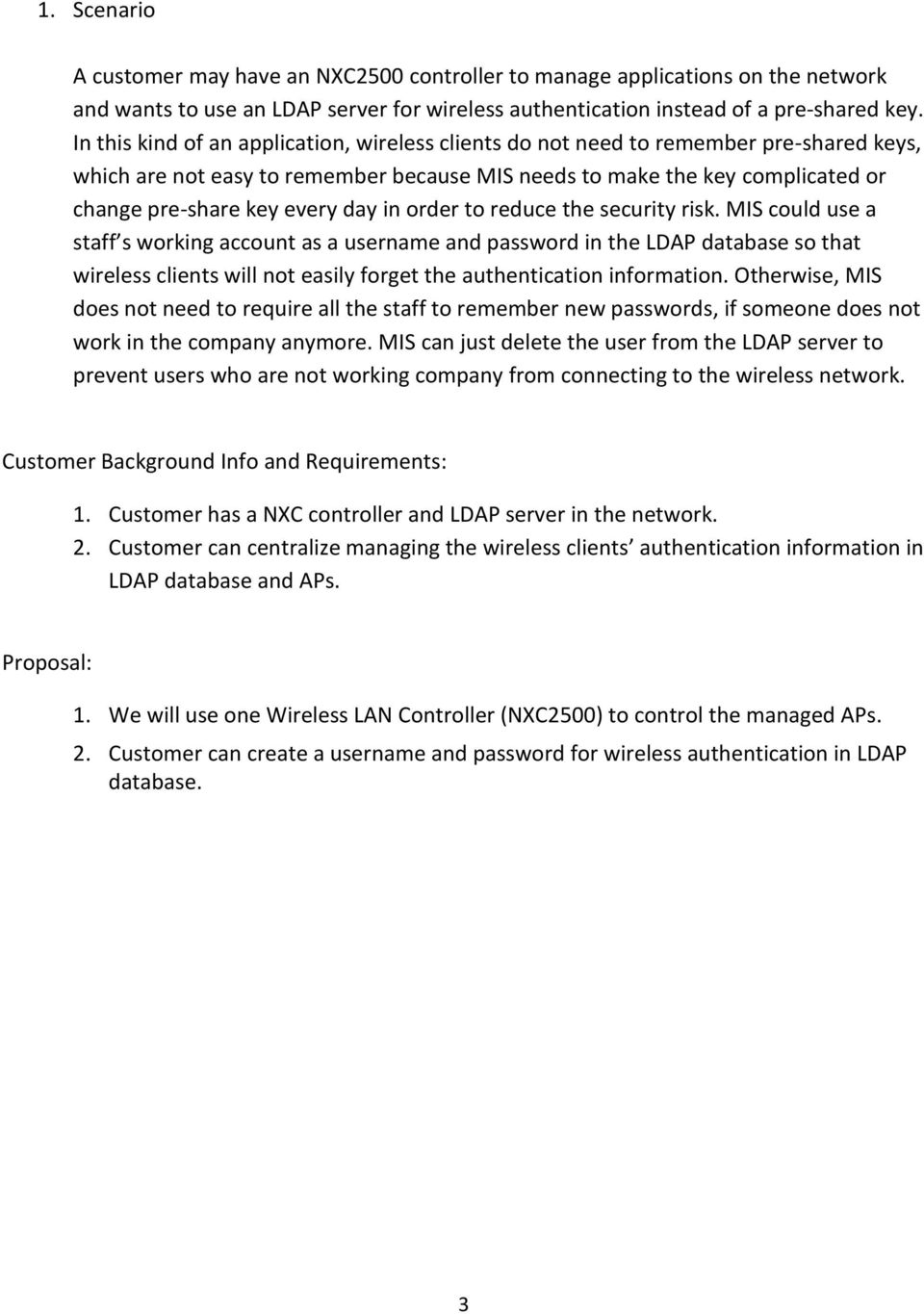
4 2. Topology 3. Step-by-step Configuration a. Configure NXC2500 Step 1. Go to Configuration > Interface > VLAN to remove ge1 from vlan0. 4

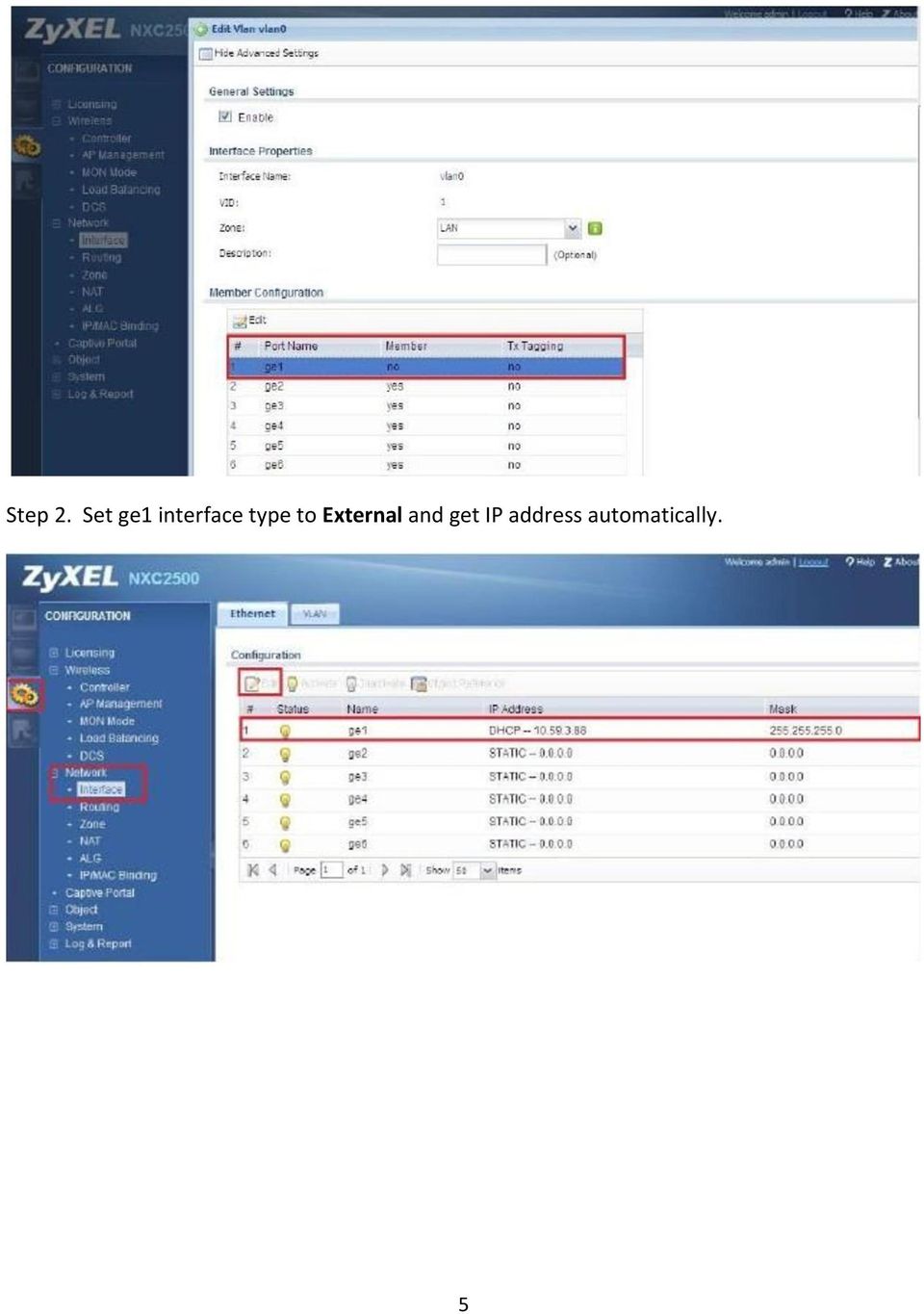
5 Step 2. Set ge1 interface type to External and get IP address automatically. 5
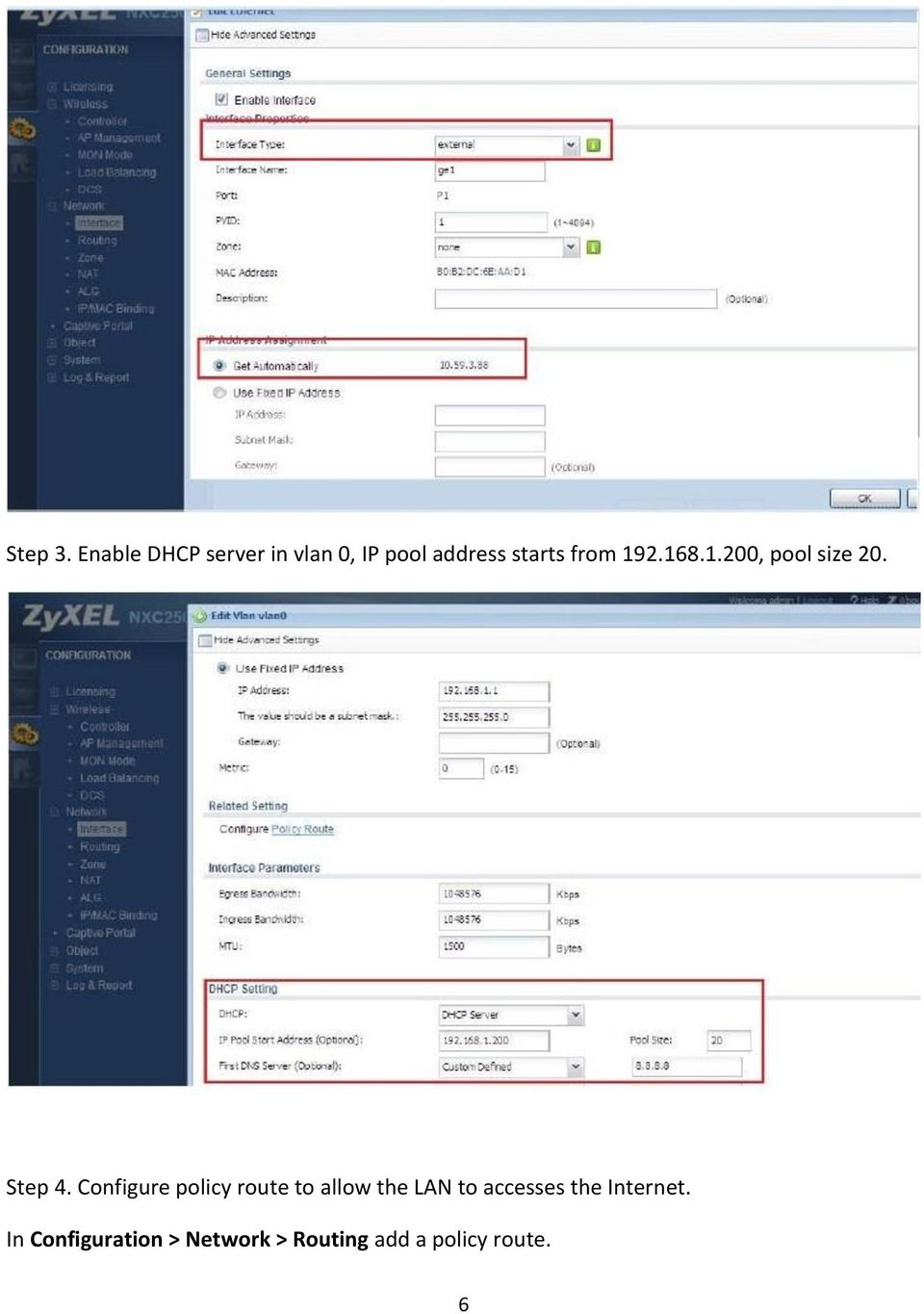
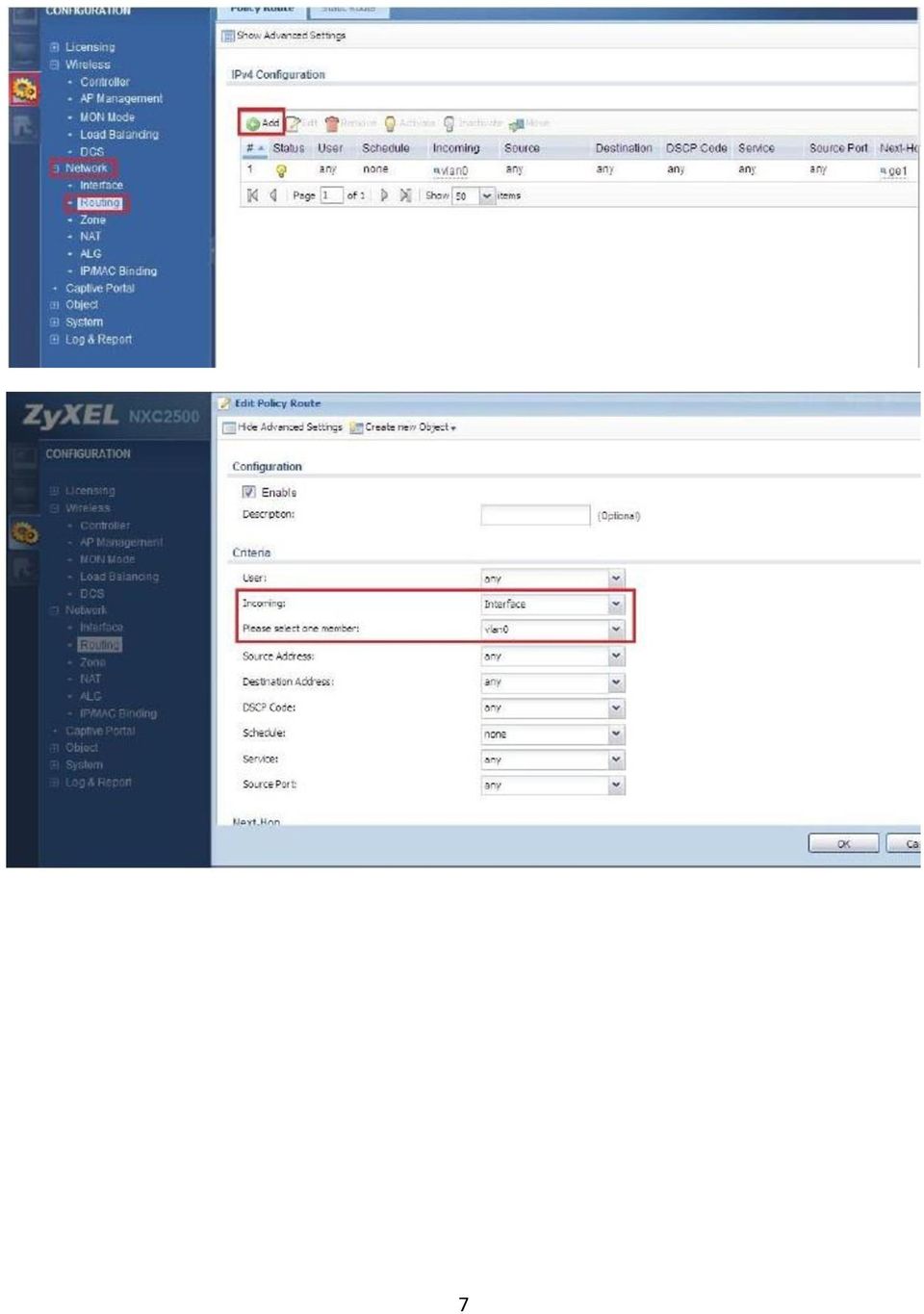
6 Step 3. Enable DHCP server in vlan 0, IP pool address starts from , pool size 20. Step 4. Configure policy route to allow the LAN to accesses the Internet. In Configuration > Network > Routing add a policy route. 6
7 7
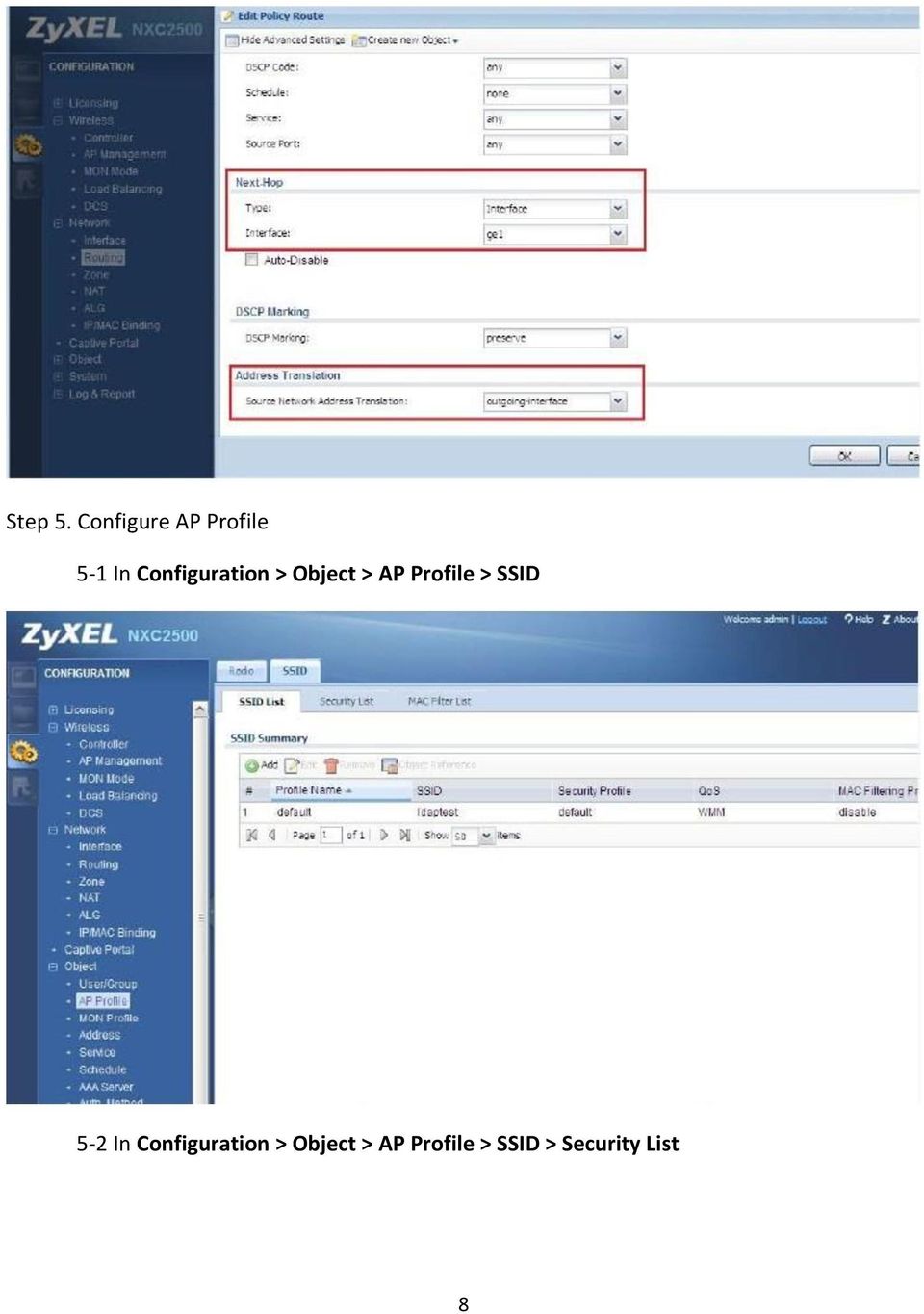
8 Step 5. Configure AP Profile 5-1 In Configuration > Object > AP Profile > SSID 5-2 In Configuration > Object > AP Profile > SSID > Security List 8
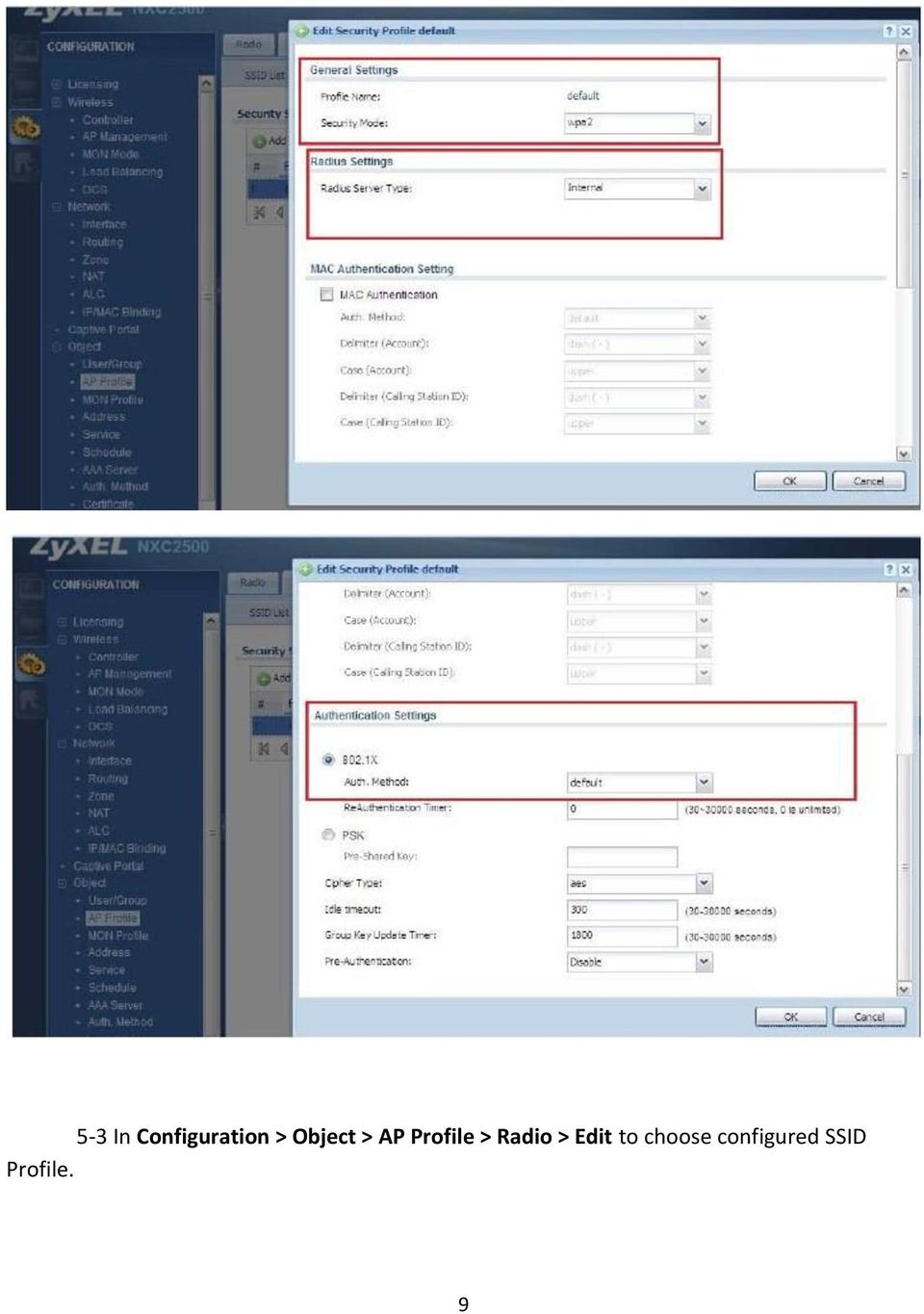
9 5-3 In Configuration > Object > AP Profile > Radio > Edit to choose configured SSID Profile. 9
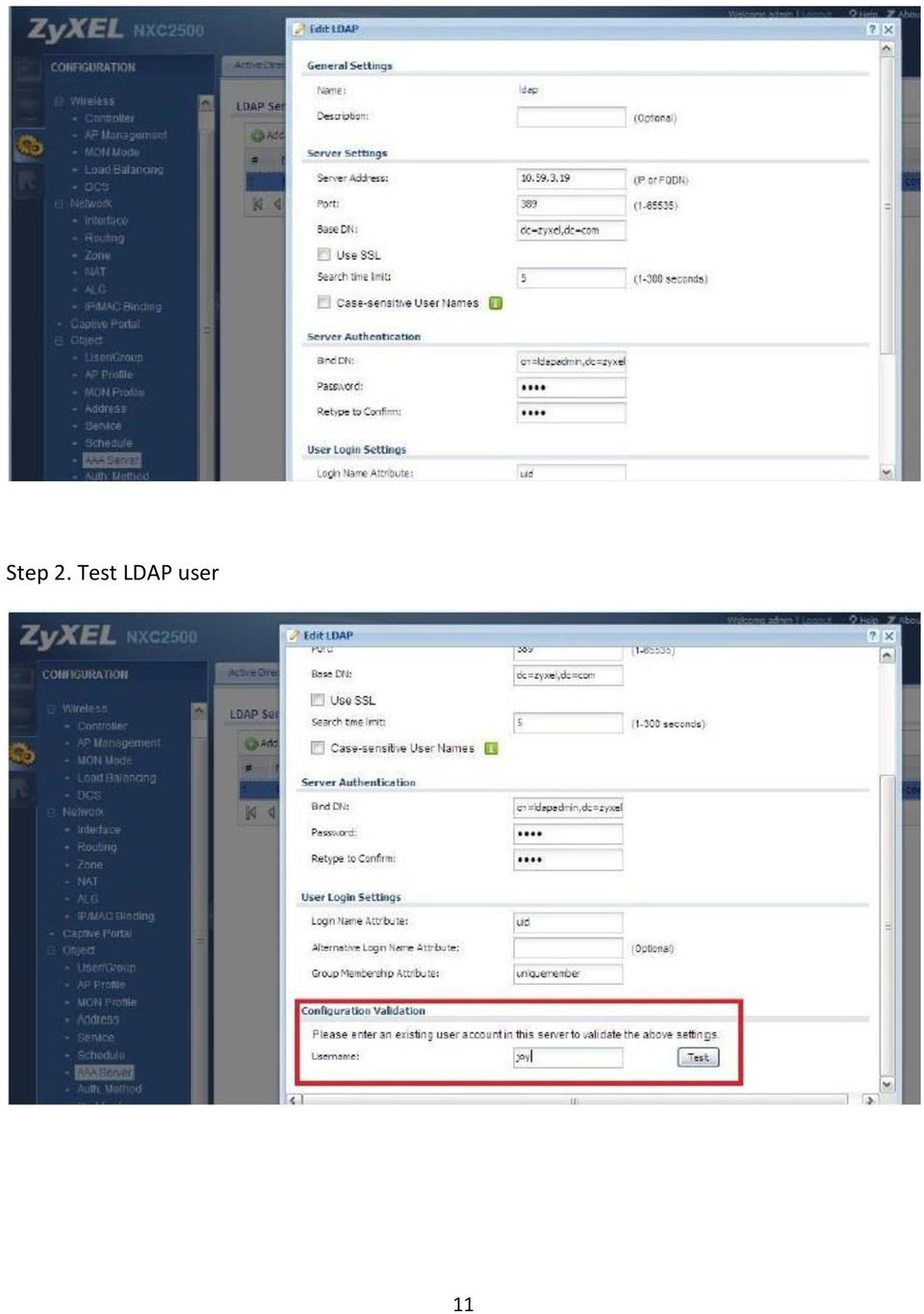
10 b. Configure LDAP setting on NXC2500 Please notice the user password in LDAP server is plain text in this example. Step 1. Configure AAA server In Configuration > Object > AAA Server > LDAP > Edit 10

11 Step 2. Test LDAP user 11
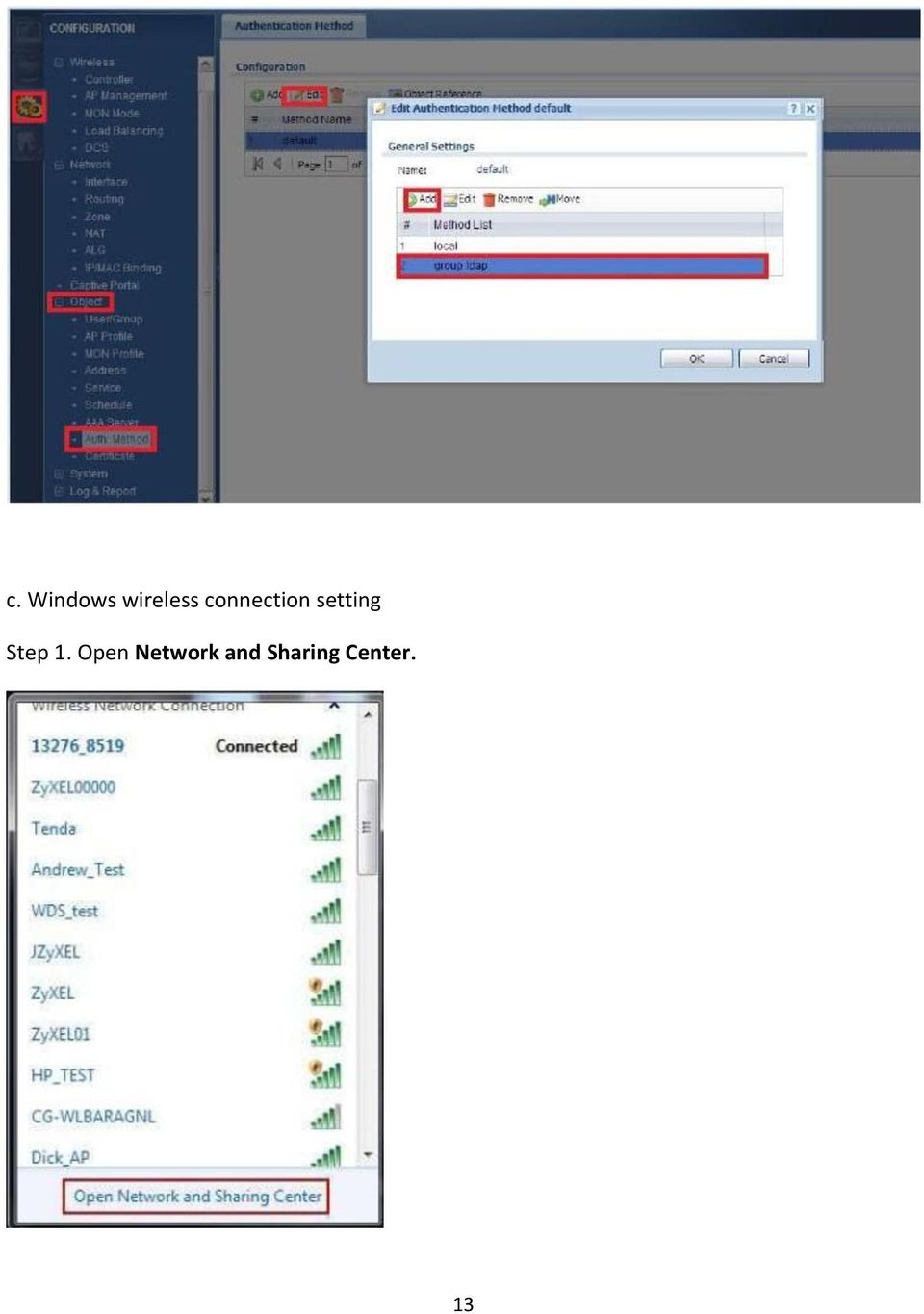
12 Step 3. Configure Auth. Method In Configuration > Object > Auth. Method > Edit to add group ldap 12

13 c. Windows wireless connection setting Step 1. Open Network and Sharing Center. 13
14 Step 2. Click on Manage wireless networks. Step 3. Click on Add to add a new wireless profile. 14

15 Step 4. Click on Manually create a network profile to create a new wireless manually. 15

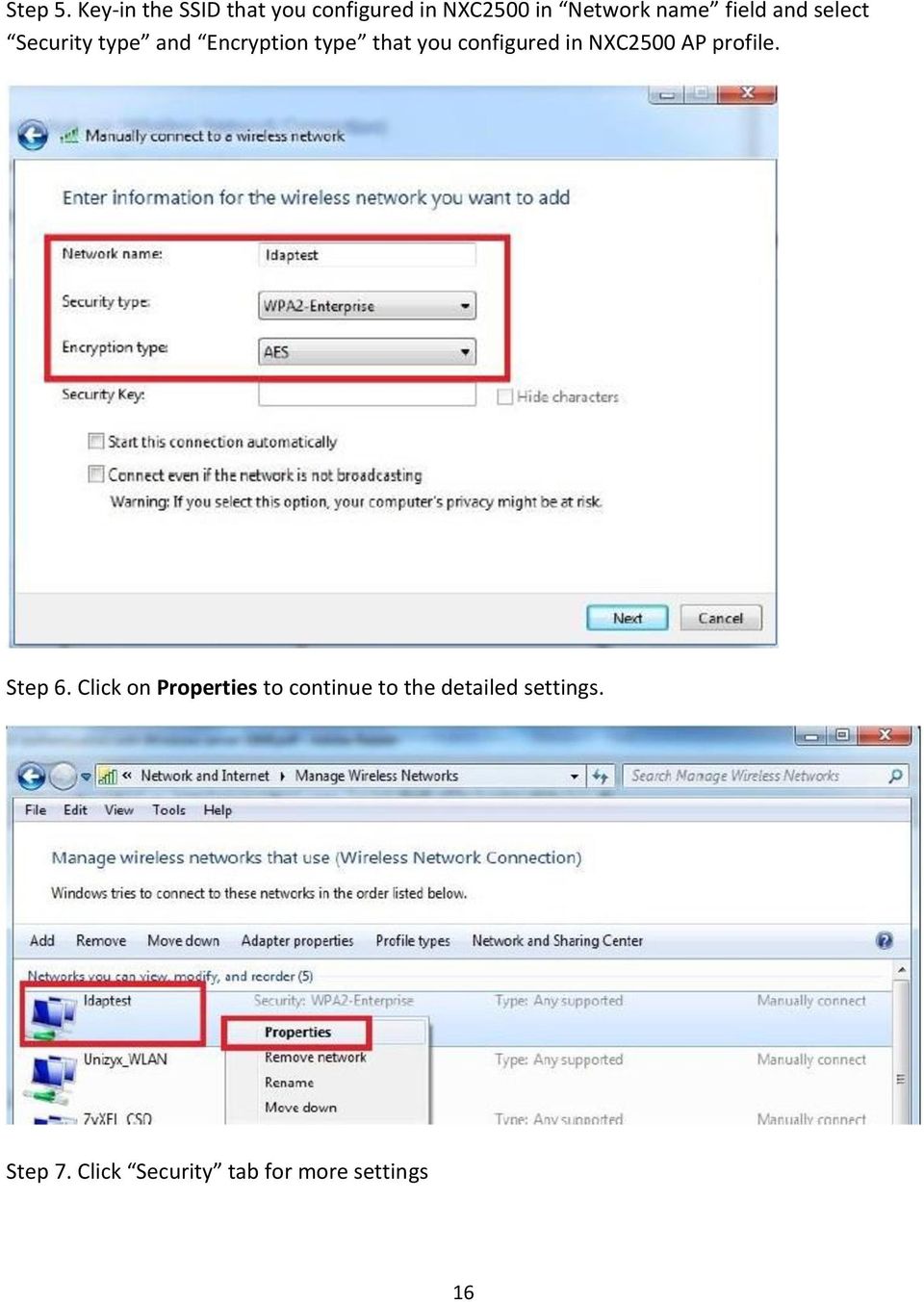
16 Step 5. Key-in the SSID that you configured in NXC2500 in Network name field and select Security type and Encryption type that you configured in NXC2500 AP profile. Step 6. Click on Properties to continue to the detailed settings. Step 7. Click Security tab for more settings 16
17 Step 8. Uncheck the Validate server certificate and then click on Configure. 17

18 Step 9. Uncheck Automatically sue my Windows login name and password (and domain if any). Then, go back to Protected EAP Properties and click on the OK button. Step 10. Click on Advanced Settings. 18

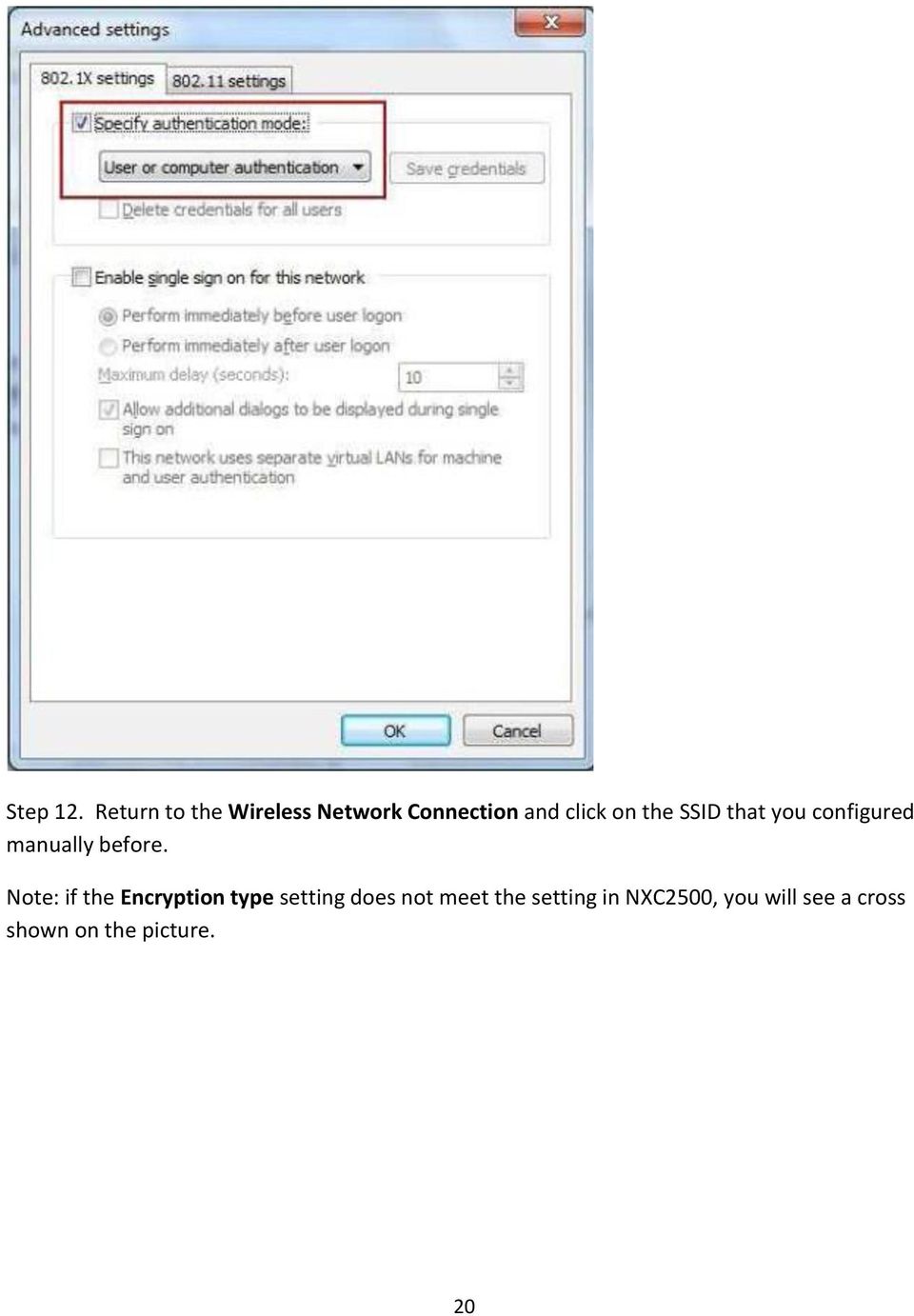
19 Step 11. Place a check in the Specify authentication mode and select user or computer authentication. 19

20 Step 12. Return to the Wireless Network Connection and click on the SSID that you configured manually before. Note: if the Encryption type setting does not meet the setting in NXC2500, you will see a cross shown on the picture. 20
21 Step 13. Enter the username and password created in the LDAP server. The wireless authentication will be successful. 21
22 4. Verification from NXC2500. Go to Monitor > Log 22
23 5. Reference The LDAP encryption is supported on NXC2500. We provide the list of authentication methods, which can be supported. The following table shows the user authentication methods on NXC2500 to support with the password form stored in LDAP server DB. For example, if a customer wants to create a password with SHA1 encryption in the LDAP server for a user, the customer needs to choose network authentication method as EAP-TTLS and Authentication Protocol as PAP on wireless station. 23
24 24
Windows Vista: Connecting to the fastnsecure@hood wireless network at Hood College
 Windows Vista: Connecting to the fastnsecure@hood wireless network at Hood College Please ensure your computer meets the following criteria in order to successfully make a connection to this network: 802.11n
Lab 8.4.5.1 Configuring LEAP/EAP using Local RADIUS Authentication
 Lab 8.4.5.1 Configuring LEAP/EAP using Local RADIUS Authentication Objective Topology Estimated Time: 40 minutes Number of Team Members: Students can work in teams of two. In this lab, the student will
Wireless Network Configuration Guide
 CIT Table of Contents Introduction... 1 General Wireless Settings... 1 1. Windows XP Wireless Configuration... 2 2. Windows XP Intel Pro Wireless Tool... 7 3. Windows Vista Using the Windows Wireless Tools...
User Guide for eduroam
 User Guide for eduroam 獲 以 下 認 證 : Certificado pela: Certified by: 澳 門 望 廈 山 Colina de Mong-Há, Macau 電 話 : (853) 8598 3120 Tel: (853) 8598 3120 傳 真 : (853) 8598 3151 Fax: (853) 8598 3151 www.ift.edu.mo
NXC5500/2500. Application Note. Captive Portal with QR Code. Version 4.20 Edition 2, 02/2015. Copyright 2015 ZyXEL Communications Corporation
 NXC5500/2500 Version 4.20 Edition 2, 02/2015 Application Note Captive Portal with QR Code Copyright 2015 ZyXEL Communications Corporation Captive Portal with QR Code What is Captive Portal with QR code?
Connecting to UNOSECURE using Windows 7
 Connecting to UNOSECURE using Windows 7 1. Click the Wireless status icon on the task bar. 2. Select the unosecure connection and click connect. 3. Enter your UNO username and password. Click OK. UCC Help
Use the below instructions to configure your wireless settings to connect to the secure wireless network using Microsoft Windows Vista/7.
 Use the below instructions to configure your wireless settings to connect to the secure wireless network using Microsoft Windows Vista/7. 1. Click the Windows Start button, then Control Panel How-To-WCC-Secure-Windows-7-11/4/2010-4:09
How to Access Coast Wi-Fi
 How to Access Coast Wi-Fi Below is a summary of the information required to configure your device to connect to the coast-wifi network. For further assistance in configuring your specific device, continue
Connecting to the University Wireless Network
 Connecting to the University Wireless Network Wifi is available to staff and registered students of University in certain areas of the three campuses of the University. This area of coverage will be expanded
Connecting to Secure Wireless (iitk-sec) on Fedora
 Connecting to Secure Wireless (iitk-sec) on Fedora Go to System Preferences Network Connections. Click on Wireless tab and then Add button. Check Connect automatically and Available to all users. Set SSID
Installation Guides - Information required for connection to the Goldfields Institute s (GIT) Wireless Network
 Installation Guides - Information required for connection to the Goldfields Institute s (GIT) Wireless Network Wireless Network Names and Credentials There are two wireless networks operating at the Goldfields
Automatic Setup... 1 Manual Setup... 2 Installing the Wireless Certificates... 18
 Contents Automatic Setup... 1 Manual Setup... 2 Installing the Wireless Certificates... 18 Automatic Setup 1. Click on the Wireless icon in your system tray that looks like. 2. You will see a list of available
Wireless LAN Client Configuration Guide for Windows 7 2015. Configuring 802.1X Authentication Client for Windows 7
 Configuring 802.1X Authentication Client for Windows 7 1. Click on Windows button to display the main menu. Click on Control Panel. 1.1 In the Control Panel window, click on Network and Internet. 1 1.2
WIRELESS SETUP FOR WINDOWS 7
 Computing & Communications WIRELESS SETUP FOR WINDOWS 7 For assistance during the configuration process please call the Computing and Communications Help Desk at 639-2049, [email protected] Who should
Enabling Multiple Wireless Networks on RV320 VPN Router, WAP321 Wireless-N Access Point, and Sx300 Series Switches
 print email Article ID: 4941 Enabling Multiple Wireless Networks on RV320 VPN Router, WAP321 Wireless-N Access Point, and Sx300 Series Switches Objective In an ever-changing business environment, your
Seamless and Secure Access (SSA) Manual Configuration Guide for Windows 7
 Seamless and Secure Access (SSA) Manual Configuration Guide for Windows 7 Page 1 1 Enable Wi-Fi a) Please refer to your computer s user manual to enable the Wireless (Wi-Fi) connection. b) Please click
AP6511 First Time Configuration Procedure
 AP6511 First Time Configuration Procedure Recommended Minimum Configuration Steps From the factory, all of the 6511 AP s should be configured with a shadow IP that starts with 169.254.xxx.xxx with the
Interlink Networks Secure.XS and Cisco Wireless Deployment Guide
 Overview Interlink Networks Secure.XS and Cisco Wireless Deployment Guide (An AVVID certification required document) This document is intended to serve as a guideline to setup Interlink Networks Secure.XS
INFORMATION SYSTEMS SERVICE NETWORKS AND TELECOMMUNICATIONS SECTOR
 INFORMATION SYSTEMS SERVICE NETWORKS AND TELECOMMUNICATIONS SECTOR User Guide: Connecting to the University of Cyprus wireless network ucywifi for Windows Vista operating systems ΥΠΣ ΕΔ/56 Last review
D-Link DAP-1360 Repeater Mode Configuration
 D-Link DAP-1360 Repeater Mode Configuration Outline 1. Package Contents 2. System Requirements 3. Hardware Overview Connections LED s WPS LED/Button 4. Default Settings 5. Configuring your LAN Adapter
Scenario: IPsec Remote-Access VPN Configuration
 CHAPTER 3 Scenario: IPsec Remote-Access VPN Configuration This chapter describes how to use the security appliance to accept remote-access IPsec VPN connections. A remote-access VPN enables you to create
How To Connect To A Wireless Network On Windows 7 (Windows 7) On A Pc Or Mac Or Ipad (Windows) On Pc Or Ipa (Windows 8) On Your Computer Or Mac (Windows). (Windows.7) On An
 Wireless Configuration for Windows 7 Frostburg State University offers wireless service to all employees and students which can be accessed almost anywhere on campus. Network and Sharing Windows 7 includes
Creating a User Profile for Outlook 2013
 Creating a User Profile for Outlook 2013 This document tells you how to create a user profile for Outlook 2013 on your computer (also known as the Outlook client). This is necessary, for example, when
CruzNet Secure Set-Up Instructions for Windows Vista
 CruzNet Secure Set-Up Instructions for Windows Vista 1. In order to start using CruzNet Secure, you'll first need to create a password at https://vpn.soe.ucsc.edu/. Click on the reset your password link.
How to connect to the diamonds wireless network with Vista.
 How to connect to the diamonds wireless network with Vista. This configuration guide requires the use of Windows to configure the wireless settings. 1. Click on the START menu and click the Control Panel.
Network Services One Washington Square, San Jose, CA 95192-0209 408-924-1530
 SJSU Premier Wi-Fi Service Network Services One Washington Square, San Jose, CA 95192-0209 408-924-1530 The SJSU Premier Wi-Fi service transmits your data across a secure, encrypted connection. This ensures
Connec ng to Northwest s WIFI with Windows 7
 Connecting to Northwest s Secure wireless network with your personal computer should be fast and easy if you follow these instructions. To connect your personally-owned computer (with Windows 7 OS) to
V310 Support Note Version 1.0 November, 2011
 1 V310 Support Note Version 1.0 November, 2011 2 Index How to Register V310 to Your SIP server... 3 Register Your V310 through Auto-Provision... 4 Phone Book and Firmware Upgrade... 5 Auto Upgrade... 6
H3C SSL VPN RADIUS Authentication Configuration Example
 H3C SSL VPN RADIUS Authentication Configuration Example Copyright 2012 Hangzhou H3C Technologies Co., Ltd. All rights reserved. No part of this manual may be reproduced or transmitted in any form or by
How to connect to NAU s WPA2 Enterprise implementation in a Residence Hall:
 How to connect to NAU s WPA2 Enterprise implementation in a Residence Hall: General Settings To connect to the ResNet-Secure SSID, a device is needed that supports 802.1X authentication and WPA2 Enterprise.
Create a VPN on your ipad, iphone or ipod Touch and SonicWALL NSA UTM firewall - Part 1: SonicWALL NSA Appliance
 Create a VPN on your ipad, iphone or ipod Touch and SonicWALL NSA UTM firewall - Part 1: SonicWALL NSA Appliance This article will easily explain how to configure your Apple ipad, iphone or ipod Touch
How To Set Up Isu-Oit-Wpa On Windows 7 For Wireless Access (Isu- Oit- Wpa) On A Pc Or Mac Or Ipa (Windows 7) On An Ipa Or Ipac (Windows
 Preface: The ISU-OIT-WPA implementation supports either WPA with TKIP or WPA2 with AES. Both support the enterprise DOT1X & CCKM Authentication Key Management features as well. This document is designed
Connecting to the Rovernet WPA2 Secured Wireless Network with Windows 7
 Connecting to the Rovernet WPA2 Secured Wireless Network with Windows 7 Configuring your wireless device to use WPA2 takes a few minutes. You will, however, need to meet the following system requirements
VPN PPTP Application. Installation Guide
 VPN PPTP Application Installation Guide 1 Configuring a Remote Access PPTP VPN Dial-in Connection A remote worker establishes a PPTP VPN connection with the head office using Microsoft's VPN Adapter (included
UAG4100 Support Notes
 2013 UAG4100 Support Notes CSO ZyXEL 2013/07/29 Table of Contents Scenario 1 Activate a Paid Access Hotspot... 2 Print ticket to access the Internet... 3 Pay with PayPal payment service to access the Internet...
ICT DEPARTMENT. Windows 7. Wireless Authentication Procedures for Windows 7 & 8 Users For Linux and windows XP users visit ICT office
 ICT DEPARTMENT Wireless Authentication Procedures for Windows 7 & 8 Users For Linux and windows XP users visit ICT office Requirements: 1. Wireless enable laptop with Valid Anti-Virus 2. Configure your
Video Administration Backup and Restore Procedures
 CHAPTER 12 Video Administration Backup and Restore Procedures This chapter provides procedures for backing up and restoring the Video Administration database and configuration files. See the following
Wireless Setup for Windows 8
 Wireless Setup for Windows 8 Wireless Names KUEMPLOYEE Only Kettering Staff and Faculty can connect to this wireless o Network Access, Internet Access, Printer Access, License Manager KUSTUDENT Active
Note that if at any time during the setup process you are asked to login, click either Cancel or Work Offline depending upon the prompt.
 USC Marshall School of Business Academic Information Services Configuring Outlook 2010 RPC Over HTTP Protocol For Windows 7 Home Computers or Wireless Laptops The steps in this document cover how to configure
Management Authentication using Windows IAS as a Radius Server
 Management Authentication using Windows IAS as a Radius Server OVERVIEW: In this we are using Radius server Windows IAS as a backend server for the management authentication for the controller. When the
Abstract. Avaya Solution & Interoperability Test Lab
 Avaya Solution & Interoperability Test Lab Application Notes for Configuring Enterasys Wireless Access Point 3000 (RBT3K-AG) to Support Avaya IP Office, Avaya IP Wireless Telephones and Avaya Phone Manager
Edith Cowan University Information Technology Services Centre
 Information There are three wireless networks on campus which give you access to the ECU website, the staff intranet, the internet and other ECU resources: ECU This is the easiest to use and safest wireless
For paid computer support call 604-518-6695 http://www.netdigix.com [email protected]
 Setting up your vpn connection on windows 2000 or XP in continuation from installing x.509 certificate on windows (please do not continue if you have not installed your x.509 certificate): Instructions
Configure WorkGroup Bridge on the WAP131 Access Point
 Article ID: 5036 Configure WorkGroup Bridge on the WAP131 Access Point Objective The Workgroup Bridge feature enables the Wireless Access Point (WAP) to bridge traffic between a remote client and the wireless
WiNG5 CAPTIVE PORTAL DESIGN GUIDE
 WiNG5 DESIGN GUIDE By Sriram Venkiteswaran WiNG5 CAPTIVE PORTAL DESIGN GUIDE June, 2011 TABLE OF CONTENTS HEADING STYLE Introduction To Captive Portal... 1 Overview... 1 Common Applications... 1 Authenticated
Creating a Client-To-Site VPN. BT Cloud Compute. The power to build your own cloud solutions to serve your specific business needs.
 Creating a Client-To-Site VPN BT Cloud Compute The power to build your own cloud solutions to serve your specific business needs Issue 2 Introduction This guide is intended to demonstrate how easy it is
UAG Series. Application Note. Unified Access Gateway. Version 4.00 Edition 1, 04/2014. Copyright 2014 ZyXEL Communications Corporation
 UAG Series Unified Access Gateway Version 4.00 Edition 1, 04/2014 Application Note Copyright 2014 ZyXEL Communications Corporation Table of Contents Scenario 1 How to Activate a Paid Access Hotspot...
Step-by-Step Setup Guide Wireless File Transmitter FTP Mode
 EOS Step-by-Step Setup Guide Wireless File Transmitter FTP Mode Infrastructure Setup Windows XP 2012 Canon U.S.A., Inc. All Rights Reserved. Reproduction in whole or in part without permission is prohibited.
Wi- Fi settings for Windows XP
 Wi- Fi settings for Windows XP On the TU/e there are four Wlan network names or SSID's available. TUE-WPA2 2 The TUE-WPA2 network has WPA2 encryption. This network can be used by both TU/e students and
I. What is VPN? II. Types of VPN connection. There are two types of VPN connection:
 Table of Content I. What is VPN?... 2 II. Types of VPN connection... 2 III. Types of VPN Protocol... 3 IV. Remote Access VPN configuration... 4 a. PPTP protocol configuration... 4 Network Topology... 4
Setting up Windows XP for WPA Wireless Access (ISU-OIT-WPA)
 Preface: The ISU-OIT-WPA implementation supports either WPA with TKIP or WPA2 with AES. Both support the enterprise DOT1X & CCKM Authentication Key Management features as well. This document is designed
Instructions for connecting to winthropsecure. Windows 7/8 Quick Connect Windows 7/8 Manual Wireless Set Up Apple Quick Connect Apple Settings Check
 Instructions for connecting to winthropsecure Windows 7/8 Quick Connect Windows 7/8 Manual Wireless Set Up Apple Quick Connect Apple Settings Check Windows 7 Windows 8 Quick Connect 1. Select the Wi-Fi
SIP Trunking using Optimum Business SIP Trunk Adaptor and the Cisco Call Manager Express Version 8.5
 CISCO SIP Trunking using Optimum Business SIP Trunk Adaptor and the Cisco Call Manager Express Version 8.5 Goal The purpose of this configuration guide is to describe the steps needed to configure the
Product Summary RADIUS Servers
 Configuration Guide for Cisco Secure ACS with 802.1x Authentication for Avaya 3631 Wireless Telephone This document details how to configure the Cisco Secure ACS (Access Control Server) v3.3 with 802.1x
Configuring Routers and Their Settings
 Configuring Routers and Their Settings When installing a router on your home network the routers settings are usually defaulted to automatically protect your home, and simplify setup. This is done because
Connecting to eduroam using Windows 8
 Connecting to eduroam using Windows 8 GUIDE User Services IT Services University of Malta 2013 User Services IT Services University of Malta Msida MSD 2080 Malta May only be reproduced with permission.
Windows Vista and Windows 7 Wireless Configuration For NCC Faculty and Staff Owned Laptops
 Windows Vista and Windows 7 Wireless Configuration For NCC Faculty and Staff Owned Laptops A wireless network for Faculty and Staff to use with their personal laptops, is available throughout campus with
Microsoft Lync Certification Configuration Guide for WiNG 5.5
 Microsoft Lync Certification Configuration Guide for WiNG 5.5 December 2013 Revision 1 MOTOROLA, MOTO, MOTOROLA SOLUTIONS and the Stylized M Logo are trademarks or registered trademarks of Motorola Trademark
Authenticating users of Cisco NCS or Cisco Prime Infrastructure against Microsoft NPS (RADIUS)
 Authenticating users of Cisco NCS or Cisco Prime Infrastructure against Microsoft NPS (RADIUS) Date: January 15, 2013 My hope with this guide is to help others take advantage of a centralized user database
Configuration Guide for RFMS 3.0 Initial Configuration. WiNG 5 How-To Guide. Role-Based Firewall. June 2011 Revision 1.0
 Configuration Guide for RFMS 3.0 Initial Configuration XXX-XXXXXX-XX WiNG 5 How-To Guide Role-Based Firewall June 2011 Revision 1.0 MOTOROLA and the Stylized M Logo are registered in the US Patent & Trademark
Instructions for accessing the new TU wireless Network
 Instructions for accessing the new TU wireless Network These instructions are meant for University owned systems directly supported by ENS Computer Services. Users of other systems may find this document
HKBN Wi-Fi Service User Guide
 HKBN Wi-Fi Service User Guide Content 1. Device Requirements 2. Login Procedures and Auto Login Settings 3. Forget Username / Password 4. Manage Your Auto Login Setting at HKBN Website 5. Technical Support
Enable VPN PPTP Server Function
 How to use VPN PPTP Server/Client on TW- EAV510/EAV510 AC Note: Please make sure that both LAN side networks are in different subnet. Enable VPN PPTP Server Function Go to Advanced Setup - > VPN - > PPTP
Purple Sturgeon Standard VPN Installation Manual for Windows XP
 A. Preparations In order to install Purple Sturgeon Standard VPN you need the following details: 1. Your username 2. Your password 3. The server's IP address 4. The server's pre-shared key This information
The back story of our Wireless (reading will help you understand what is going on in the building):
 Wireless Network The back story of our Wireless (reading will help you understand what is going on in the building): At Robeson we have a non-broadcasting wireless network. This means that if you are using
OUTLOOK EXPRESS EMAIL ACCOUNT SETUP FOR USE WITH ELLIPSE ADVANCED SPAM FILTER
 *PLEASE NOTE* Specific information such as email servers, usernames, email addresses, and passwords should have already been provided to you by Ellipse. Please contact us before beginning, if you do not
Airnet-Student is a new and improved wireless network that is being made available to all Staffordshire University students.
 Airnet-Student Airnet-Student is a new and improved wireless network that is being made available to all Staffordshire University students. Airnet-Student has two key advantages over the current Airnet
MBC WiFi wireless logon: Windows 7 (laptop)
 Connecting to the MBC Guest wireless network requires: FAQ s at end of document A. A connection to the wireless network SSID (identifier for a wireless LAN) from your laptop. B. Authentication to the MBC
Configuration of Cisco Autonomous Access Point with 802.1x Authentication for Avaya 3631 Wireless Telephone
 Configuration of Cisco Autonomous Access Point with 802.1x Authentication for Avaya 3631 Wireless Telephone Product Summary Manufacturer: Cisco Systems: www.cisco.com Access Point: Cisco Aironet 1130AG
External Authentication with Windows 2003 Server with Routing and Remote Access service Authenticating Users Using SecurAccess Server by SecurEnvoy
 External Authentication with Windows 2003 Server with Routing and Remote Access service Authenticating Users Using SecurAccess Server by SecurEnvoy Contact information SecurEnvoy www.securenvoy.com 0845
Mac OS X Secure Wireless Setup Guide
 Mac OS X Secure Wireless Setup Guide Requirements: Apple computer with built-in AirPort card capable of WPA2-Enterprise encryption Mac OS X Snow Leopard version 10.6.0 or greater or Mac OS X Lion version
Step-by-step Guide for Configuring Cisco ACS server as the Radius with an External Windows Database
 Step-by-step Guide for Configuring Cisco ACS server as the Radius with an External Windows Database Table of Contents: INTRODUCTION:... 2 GETTING STARTED:... 3 STEP-1: INTERFACE CONFIGURATION... 4 STEP-2:
Step-by-Step Setup Guide Wireless File Transmitter FTP Mode
 EOS Step-by-Step Setup Guide Wireless File Transmitter FTP Mode Infrastructure Setup Windows 7 2012 Canon U.S.A., Inc. All Rights Reserved. Reproduction in whole or in part without permission is prohibited.
Integrating LANGuardian with Active Directory
 Integrating LANGuardian with Active Directory 01 February 2012 This document describes how to integrate LANGuardian with Microsoft Windows Server and Active Directory. Overview With the optional Identity
Connect to the Sheridan College / Gillette College - STUDENT Secure Wireless Network with the PEAP Client (Windows XP Pro)
 Contents Connect to the Sheridan College / Gillette College - STUDENT Secure Wireless Network with the PEAP Client (Windows XP Pro) 1. Introduction 2. Configuring the Sheridan College / Gillette College
Configuring Avaya 1120E, 1140E, 1220 and 1230 IP Deskphones with Avaya IP Office Release 6.1 Issue 1.0
 Avaya Solution & Interoperability Test Lab Configuring Avaya 1120E, 1140E, 1220 and 1230 IP Deskphones with Avaya IP Office Release 6.1 Issue 1.0 Abstract These Application Notes describe a solution comprised
Table of Contents. Cisco Wi Fi Protected Access 2 (WPA 2) Configuration Example
 Table of Contents Wi Fi Protected Access 2 (WPA 2) Configuration Example...1 Document ID: 67134...1 Introduction...1 Prerequisites...1 Requirements...1 Components Used...2 Conventions...2 Background Information...2
How to integrate RSA ACE Server SecurID Authentication with Juniper Networks Secure Access SSL VPN (SA) with Single Node or Cluster (A/A or A/P)
 How to integrate RSA ACE Server SecurID Authentication with Juniper Networks Secure Access SSL VPN (SA) with Single Node or Cluster (A/A or A/P) Scenario # 1: Single Node or Standalone SA... 2 Scenario
Massey University Wireless Network - Client
 Massey University Wireless Network - Client Configuration Windows Mobile 5/6 Windows Mobile wireless network Requirements Information Technology Services You must have an active Massey network account,
How to set up Outlook Anywhere on your home system
 How to set up Outlook Anywhere on your home system The Outlook Anywhere feature for Microsoft Exchange Server 2007 allows Microsoft Office Outlook 2007 and Outlook 2003 users to connect to their Outlook
Lab 6.2.12a Configure Remote Access Using Cisco Easy VPN
 Lab 6.2.12a Configure Remote Access Using Cisco Easy VPN Objective Scenario Topology In this lab, the students will complete the following tasks: Enable policy lookup via authentication, authorization,
Windows 8 & RT Wireless Configuration For NCC Student Owned Laptops
 Windows 8 & RT Wireless Configuration For NCC Student Owned Laptops A wireless network for Students to use with their personal laptops, is available throughout campus with the SSID NCC-STUDENT. This network
Configuring Outlook 2002-2003 for IMAP. Creating a New IMAP Account. Modify an Existing Account
 mai l. uml. edu mai l. uml. edu Configuring Outlook 2002-2003 for IMAP This document will show you how to setup or modify Outlook 2003 as an IMAP client. It is intended for Faculty and Staff whose mailboxes
Cisco VPN Client Troubleshooting Error Messages
 Cisco VPN Client Troubleshooting Error Messages CAUSE: Computer is not connected to Internet TROUBLESHOOTING: Verify that your computer is connected to the internet. - Check Ethernet cable plugged into
WiNG 5.X How-To Guide
 WiNG 5.X How-To Guide Captive Portals Part No. TME-12-2012-01 Rev. A MOTOROLA, MOTO, MOTOROLA SOLUTIONS and the Stylized M Logo are trademarks or registered trademarks of Motorola Trademark Holdings, LLC
Scenario: Remote-Access VPN Configuration
 CHAPTER 7 Scenario: Remote-Access VPN Configuration A remote-access Virtual Private Network (VPN) enables you to provide secure access to off-site users. ASDM enables you to configure the adaptive security
Training Module for Customer Portal & Customer Care. Enabling the Next Wave of Connectivity
 Training Module for Customer Portal & Customer Care Customer Portal Interface used by the registered end user to interact with the network End user can modify Information, change Password & check the account,billing
How to set up as VPN Network
 How to set up as VPN Network 1 Network and Sharing Firstly open the network and sharing centre by opening control panel and selecting Network and Sharing Center. If Network and Sharing cannot be found
External Authentication with Windows 2008 Server with Routing and Remote Access Service Authenticating Users Using SecurAccess Server by SecurEnvoy
 External Authentication with Windows 2008 Server with Routing and Remote Access Service Authenticating Users Using SecurAccess Server by SecurEnvoy Contact information SecurEnvoy www.securenvoy.com 0845
Step by step guide for connecting PC to wired LAN at dormitories of University of Pardubice
 Step by step guide for connecting PC to wired LAN at dormitories of University of Pardubice English version Version 1.1 July 2008 Information Cente University of Pardubice Content A. Windows XP... 2 B.
6. After connecting reopen the wireless connections window. Right click on RamNet and select properties. Page 2 of 7
 Networking & Telecommunications 001 Allegheny Hall 610-436-3535 West Chester University fax: 610-436-3110 West Chester, Pennsylvania 1938 http://www.wcupa.edu/infoservices/commservices/ RamNet Wireless
AeroLab Wireless Network Code of Conduct. Connecting to the AeroLab Wireless Network
 AeroLab Wireless Network Code of Conduct The AeroLab wireless network is intended for academic use only. Any use of the wireless network for BitTorrent or other Peer-to-Peer file sharing is strictly prohibited.
External Authentication with Cisco VPN 3000 Concentrator Authenticating Users Using SecurAccess Server by SecurEnvoy
 External Authentication with Cisco VPN 3000 Concentrator Authenticating Users Using SecurAccess Server by SecurEnvoy Contact information SecurEnvoy www.securenvoy.com 0845 2600010 1210 Parkview Arlington
VPN L2TP Application. Installation Guide
 VPN L2TP Application Installation Guide 1 Configuring a Remote Access L2TP VPN Dial-in Connection A remote worker establishes a L2TP VPN connection with the head office using Microsoft's VPN Adapter (included
VPN Configuration Guide LANCOM
 VPN Configuration Guide LANCOM equinux AG and equinux USA, Inc. 2008 equinux USA, Inc. All rights reserved. Under the copyright laws, this manual may not be copied, in whole or in part, without the written
Quality Center LDAP Guide
 Information Services Quality Assurance Quality Center LDAP Guide Version 1.0 Lightweight Directory Access Protocol( LDAP) authentication facilitates single sign on by synchronizing Quality Center (QC)
Quick Instructions Installing on a VPS (Virtual Private Server)
 Introduction A Virtual Private Server is a virtual PC held in a remote data centre, which can be accessed via a username/password from any other computer. There are a number of scenarios where you might
How to Set Up Your. Email Account
 How to Set Up Your Email Account Contents Outlook 2002 (Office XP)... 3 Outlook 2003 (Office 2003)... 6 Outlook 2007 (Office 2007)... 10 Outlook 2010 (Office 2010)... 14 Outlook Account Setup Page 2 HOW