
VS-616G5 Series (Revision F) Installation & Quick-Start Manual
|
|
|
- Emily Ward
- 10 years ago
- Views:
Transcription
1 VS-616G5 Series (Revision F) Installation & Quick-Start Manual General Purpose Flux Inverter with VC

2 This page intentionally left blank. 2 VS-616G5 Installation & Quick-Start Manual

3 Precautions! WRNING PRECUTIONS NOTICE 1) Read this manual in its entirety before installing or operating the VS-616G5 inverter. 2) Do not connect or disconnect wiring, or perform signal checks while the power supply is turned ON. 3) The VS-616G5 internal capacitor is still charged even after the power supply is turned OFF. To prevent electrical shock, disconnect all power before servicing the inverter. Then wait at least one minute after the power supply is disconnected and all LED s are extinguished. 4) Do not perform a withstand voltage test or a megger test on any part of the VS-616G5. This electronic equipment uses semiconductors and is vulnerable to high voltage. 5) Do not remove the operator unless the power supply is turned OFF. Never touch the printed control board while the power supply is turned ON. 6) The VS-616G5 is suitable for use on a circuit capable of delivering not more than 65,000 RMS symmetrical amperes, 600 Volts maximum (575V class units), 480 Volts maximum (460V class units), and 240 Volts maximum (230V class units). Failure to observe these and other precautions highlighted in this manual will expose the user to high voltages, resulting in equipment damage, serious injury or death. Printed pril The information contained within this document is the proprietary property of Yaskawa Electric merica, Inc., and may not be copied, reproduced or transmitted to other parties without the expressed written authorization of Yaskawa Electric merica, Inc. No patent liability is assumed with respect to the use of the information contained herein. Moreover, because Yaskawa is constantly improving its high-quality products, the information contained in this manual is subject to change without notice. Every precaution has been taken in the preparation of this manual. Nevertheless, Yaskawa assumes no responsibility for errors or omissions. Neither is any liability assumed for damages resulting from the use of the information contained in this publication. VS-616G5 Installation & Quick-Start Manual 3

4 Contents CONTENTS Section Description Page 1 RECEIVING & INSTLLTION 1.1 INTRODUCTION SOFTWRE VERSION EXPLNTION VS-616G5 SPECIFICTIONS PRELIMINRY INSPECTION Receiving Checking the Nameplate Identifying the Parts MOUNTING Precautions Choosing a Location Removing and Replacing the Digital Operator Removing and Replacing the Front Cover Dimensions/Heat Loss Clearances WIRING Precautions Inspection Standard Connection Diagrams Main Circuit Diagrams Main Circuit Wiring Terminal Functions Wire and Terminal Screw Sizes Control Circuit Wiring OPERTION Precautions TRIL OPERTION Digital Operator Display at Power-up Operation Checkpoints Operation by Digital Operator Operation by Control Circuit Terminal Signal DIGITL OPERTOR DISPLY OPERTION MODE SELECTION QUICK-STRT PROGRMMING Quick-Start Parameter Sequence MIN MENU: INITILIZE MIN MENU: PROGRMMING MIN MENU: UTO-TUNING VS-616G5 Installation & Quick-Start Manual

5 Contents 4 DIGNOSTICS Precautions MINTENNCE & INSPECTION Periodic Inspection Parts Replacement Schedule LRM & FULT DISPLY Inverter larms & Faults Motor Faults PPENDIX.1 VS-616G5 PRMETER TREE VS-616G5 MONITOR DISPLY VS-616G5 PRMETERS BRKING CONNECTION DIGRMS CE CONFORMNCE INFORMTION VS-616G5 Installation & Quick-Start Manual 5

6 Chapter 1 - Receiving & Installation Contents - CHPTER 1 - RECEIVING & INSTLLTION Section Description Page 1 RECEIVING & INSTLLTION 1.1 INTRODUCTION SOFTWRE VERSION EXPLNTION VS-616G5 SPECIFICTIONS PRELIMINRY INSPECTION Receiving Checking the Nameplate Identifying the Parts MOUNTING Precautions Choosing a Location Removing and Replacing the Digital Operator Removing and Replacing the Front Cover Dimensions/Heat Loss Clearances WIRING Precautions Inspection Standard Connection Diagrams Main Circuit Diagrams Main Circuit Wiring Terminal Functions Wire and Terminal Screw Sizes Control Circuit Wiring VS-616G5 Installation & Quick-Start Manual

7 Chapter 1 - Receiving & Installation Introduction 1.1 INTRODUCTION The VS-616G5, a series of high quality, general-purpose inverters with flux vector control, directly controls the current (or torque) in an C induction motor. With an initial power range of 0.5 to 500 HP, it is suited for any application, and provides smooth start-up at low speeds, and extremely precise operation. It s proprietary auto-tuning function enables high-performance tuning of motors manufactured worldwide. The VS-616G5 combines four control methods into one compact drive, including flux vector and conventional control. From precision machinery to multiple motor drives, the VS-616G5 proves to be the Ultimate drive for any application. This functionality includes Yaskawa proprietary features like daptive Control (VC ), full-range automatic torque boost, auto-tuning, UL-recognized electronic thermal motor overload, energy savings operation, PID control, low-noise operation and various other features. It also features a 2-line 16-character, alphanumeric digital operator for simple programming in seven different languages. Utilizing the latest microprocessor technology, members of Yaskawa s design team have collaborated to make the VS-616G5 the Ultimate drive for any application. This manual details installation, quick-start and diagnostic procedures for the VS-616G5 series adjustable frequency drive controller. For more detailed descriptions of programming procedures, contact your Yaskawa representative. VS-616G5 Installation & Quick-Start Manual 7

8 Chapter 1 - Receiving & Installation Software Version Explanation 1.2 SOFTWRE VERSION EXPLNTION Yaskawa recognizes the need to continuously improve product quality. This product may receive feature enhancements in the form of software or hardware changes. New programming parameters will be added to the latest programming manual. When a new parameter is added a software version note will be placed next to the parameter. Software Version Example: For Parameter 1-00, select the language displayed on the digital operator according to the following table: Description 0 English (factory default) 1 Japanese 2 Deutsche <1110>* 3 Francais <1110>* 4 Italiano <1110>* 5 Espanol <1110>* 6 Portugues <1110>* *This version note <1110> indicates that five additional languages have been added with software version The part number of the main control printed circuit board on the drive reflects the software version. The software version normally increases to a higher number with newer versions. Please consult the factory for details. PCB Part Number Example: ETC S1110 represents software version The VS-616G5 ships preset to open loop vector control, quick-start access level. 8 VS-616G5 Installation & Quick-Start Manual

9 Chapter 1 - Receiving & Installation Specifications 1.3 VS-616G5 SPECIFICTIONS 230V Output Characteristics Power Supply 460V Output Characteristics Power Supply Inverter Model CIMR-G5U VS-616G5 20P4 20P7 21P5 22P2 23P7 25P5 27P Nominal Motor Output (HP) * Capacity (kv)** Rated Output Current () # Max. Voltage 3-Phase, 200/208/220/230V (Proportional to input voltage) Rated Output Frequency Up to 400 Hz available Overload Capacity 150% Rated Current / 1 minute Input Current () Rated Voltage & Frequency 3-Phase 200 to 230V, 50/60Hz Voltage Fluctuation +10%, -15% Frequency Fluctuation ±5% CIMR-G5U 40P440P741P542P243P744P045P547P Nominal Motor Output (HP) * Capacity (kv)** Rated Output Current () # Max. Voltage 3-Phase, 380/400/415/440/460V (Proportional to input voltage) Rated Output Frequency Up to 400 Hz available Overload Capacity 150% Rated Current / 1 minute Input Current () Rated Voltage & Frequency # 3-Phase 380 to 460V, 50/60Hz Voltage Fluctuation +10%, -15% Frequency Fluctuation ±5% * HP ratings based on NEM 4-pole motor data. However, when sizing a drive to match a motor, use output current ratings. # For proper operation, the motor rated current must be less than or equal to the inverter rated current. ** kv ratings are based on 200V, 400V, and 600V inputs respectively. VS-616G5 Installation & Quick-Start Manual 9

10 Chapter 1 - Receiving & Installation Specifications VS-616G5 SPECIFICTIONS (continued) 575V Output Characteristics Power Supply Inverter Model CIMR-G5U Nominal Motor Output (HP) * VS-616G5 51P5 52P2 53P7 55P5 57P Constant Torque Variable Torque Capacity (kv) ** Rated Output Current () # Constant Torque () Variable Torque () Maximum Voltage 3-Phase, 500/575/600V(Proportional to input voltage) Rated Output Frequency Up to 400 Hz available Overload Capacity 150% Rated Current / 1 minute (CT rating) 120% Rated Current / 1 minute (VT rating) Input Current () Rated Voltage & Frequency 3-Phase, 500 to 600V, 50/60Hz Voltage Fluctuation +10%, -15% Frequency Fluctuation ±5% * HP ratings based on NEM 4-pole motor data. However, when sizing a drive to match a motor, use output current ratings. # For proper operation, the motor rated current must be less than or equal to the inverter rated current. ** kv ratings are based on 200V, 400V, and 600V inputs respectively. 10 VS-616G5 Installation & Quick-Start Manual

11 VS-616G5 SPECIFICTIONS (continued) Control Characteristics Protective Functions Environmental Conditions Control Method Sine wave PWM Starting Torque 150% below 1Hz (150% at 0 rpm with PG) Speed Control Range 100:1 (1000:1 with PG) Speed Control ccuracy ±0.2% (±0.02% with PG) Speed Response 5Hz (30Hz with PG) Torque Limit Can be set by parameter: 4 quadrant control Torque ccuracy ±5% Torque Response 20Hz (40Hz with PG) Frequency Control Range 0.1 to 400 Hz Frequency ccuracy Digital command: 0.01%, nalog command: 0.1% Frequency Resolution Output Frequency Resolution Frequency Signal Digital Operator Reference: 0.01Hz nalog Reference: 0.03Hz (@60Hz) 0.01 Hz -10 to +10V, 0 to +10V, 4 to 20m ccel/decel Time 0.0 to sec. (ccel/decel time setting independently, 4 steps available) Braking Torque pprox. 20% Motor Overload Protection UL-recognized electronic thermal overload relay (I 2 T) Instantaneous Overcurrent Motor coasts to stop at approximately 200% rated output current. (CT Rating) Fuse Protection Motor coasts to stop at blown fuse. Overload Motor coasts to stop after 1 min. at 150% rated output current. (CT Rating) Overvoltage Motor coasts to stop if converter output voltage exceeds 410VDC (820VDC at 460V input, 1040VDC at 575V input) Undervoltage Motor coasts to stop if converter output voltage drops below user adjustable value Momentary Power Loss Heatsink Overheat Stall Prevention Ground Fault Power Charge Indication Input Phase Loss Location mbient Temperature Storage Temperature Humidity Vibration Immediately stop after 15 ms or longer power loss. (Continuous system operation during power loss less than 2s is equipped as standard.) Thermistor - OH1, OH2 Stall prevention during acceleration, deceleration and constant speed operation Provided by electronic circuit (overcurrent level) Charge LED stays on until bus voltage drops below 50VDC Single-phase protection Indoor (protected from corrosive gases and dust) +14 to 104 F (-10 to 40 C) for NEM 1 type +14 to 113 F (-10 to 45 C) for Open Chassis type -4 to 140 F (-20 to 60 C) 95% RH (non-condensing) 9.8m/s 2 (1G) less than 20Hz, up to 1.96m/s 2 (0.2G) at 20 to 50Hz Chapter 1 - Receiving & Installation Specifications VS-616G5 Installation & Quick-Start Manual 11

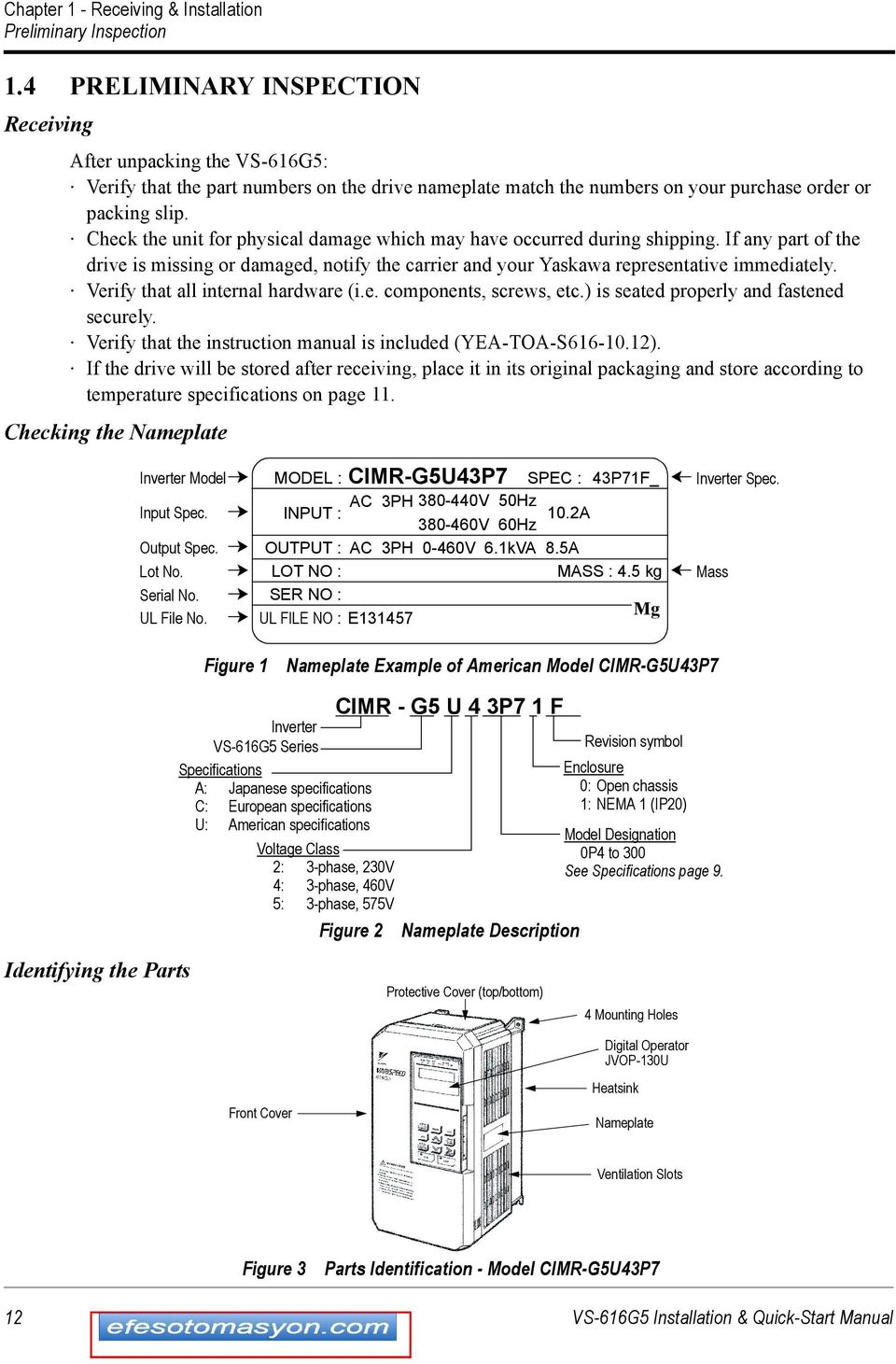
12 Chapter 1 - Receiving & Installation Preliminary Inspection 1.4 PRELIMINRY INSPECTION Receiving fter unpacking the VS-616G5: Verify that the part numbers on the drive nameplate match the numbers on your purchase order or packing slip. Check the unit for physical damage which may have occurred during shipping. If any part of the drive is missing or damaged, notify the carrier and your Yaskawa representative immediately. Verify that all internal hardware (i.e. components, screws, etc.) is seated properly and fastened securely. Verify that the instruction manual is included (YE-TO-S ). If the drive will be stored after receiving, place it in its original packaging and store according to temperature specifications on page 11. Checking the Nameplate Inverter Model Input Spec. Output Spec. Lot No. Serial No. UL File No. CIMR-G5U43P7 SPEC : MODEL : 43P71F_ C 3PH V 50Hz INPUT : V 60Hz 10.2 OUTPUT : C 3PH 0-460V 6.1kV 8.5 LOT NO : MSS : 4.5 kg SER NO : UL FILE NO : E Mg Inverter Spec. Mass Figure 1 Nameplate Example of merican Model CIMR-G5U43P7 Identifying the Parts Inverter VS-616G5 Series Specifications : Japanese specifications C: European specifications U: merican specifications Voltage Class 2: 3-phase, 230V 4: 3-phase, 460V 5: 3-phase, 575V Figure 2 CIMR - G5 U 4 3P7 1 F Nameplate Description Protective Cover (top/bottom) Revision symbol Enclosure 0: Open chassis 1: NEM 1 (IP20) Model Designation 0P4 to 300 See Specifications page 9. 4 Mounting Holes Digital Operator JVOP-130U Front Cover Heatsink Nameplate Ventilation Slots Figure 3 Parts Identification - Model CIMR-G5U43P7 12 VS-616G5 Installation & Quick-Start Manual
13 Chapter 1 - Receiving & Installation Mounting 1.5 MOUNTING! CUTION PRECUTIONS 1) When preparing to mount the VS-616G5, lift it by its base. Never lift it by the front cover. 2) Mount the inverter onto nonflammable material. 3) The VS-616G5 generates heat. For the most effective cooling possible, mount it vertically. For more details, refer to Dimensions/Heat Loss on pages and Clearances on page 19. For mounting configurations other than normal vertical mounting, please consult the factory. 4) When mounting units in an enclosure, install a fan or other cooling device to keep the intake air temperature below 113 F (45 C). Failure to observe these precautions may result in equipment damage. Choosing a Location Be sure that the inverter is mounted in a location protected against the following conditions: Extreme cold and heat. Use only within the ambient temperature range: NEM 1: 14 to 104 F (-10 to 40 C). Open Chassis: 14 to 113 F (-10 to 45 C) Direct sunlight (not for use outdoors) Rain, moisture High humidity Oil sprays, splashes Salt spray Dust or metallic particles in the air Corrosive gases (e.g. sulfurized gas) or liquids Radioactive substances Combustibles (e.g. thinner, solvents, etc.) Physical shock, vibration Magnetic noise (e.g. welding machines, power devices, etc.) VS-616G5 Installation & Quick-Start Manual 13

14 Chapter 1 - Receiving & Installation Mounting Removing and Replacing the Digital Operator Front Cover 2 Digital Operator 1 To remove the digital operator from the front cover, push the operator retaining tab in the direction shown by arrow 1 and lift the digital operator in the direction shown by arrow 2. Figure 4 Removing the Digital Operator Digital Operator 1 Front Cover 2 B Claws Claws To replace the digital operator, engage the operator onto the tabs in the direction shown by arrow 1 and then press the operator onto the B tabs in the direction shown by arrow 2, locking the digital operator into place. Figure 5 Replacing the Digital Operator 14 VS-616G5 Installation & Quick-Start Manual

15 Chapter 1 - Receiving & Installation Mounting Removing and Replacing the Front Cover 1 Front Cover To remove the front cover, first remove the digital operator (see previous section). Then squeeze the cover on both sides in the direction shown by arrows 2 and lift the cover in the direction shown by arrow 3. Figure 6 Removing and Replacing the Front Cover Dimensions/Heat Loss VS-616G5 Installation & Quick-Start Manual 15

16 Chapter 1 - Receiving & Installation Mounting Dimensions/Heat Loss (Continued) Open Chassis Type (IP00) Open Chassis Type (IP00) Voltage 230V 460V Model CIMR- G5U Open Chassis Dimensions in inches (mm) W H D W1 H1 H2 Mass lbs (kg) Heat sink Heat Loss (W) 20P P (140) (280) 6.30 (160) 4.96 (126) (266) 0.28 (7) 6.5 (3) P P (140) (280) 7.09 (180) 4.96 (126) (266) 0.28 (7) 10 (4.5) 23P P5 12 (5.5) (200) (300) 8.07 (205) 7.32 (186) (285) 0.31 (8) 27P5 13 (6) (250) (380) 8.86 (225) 9.29 (236) (365) 0.30 (7.5) 24 (11) (325) (450) (285) (275) (435) 0.30 (7.5) 62 (28) (61) (425) (675) (350) (320) (650) 0.49 (12.5) (62) (475) (800) (350) (370) (775) 0.49 (12.5) 176 (80) (575) (925) (400) (445) (895) 0.59 (15) 298 (135) P (140) (280) 6.30 (160) 4.96 (126) (266) 0.28 (7) 6.5 (3) 40P P5 8.8 (4) P (140) (280) 7.09 (180) 4.96 (126) (266) 0.28 (7) 43P7 10 (4.5) P P (200) (300) 8.07 (205) 7.32 (186) (285) 0.31 (8) 13 (6) 47P (250) (380) 8.86 (225) 9.29 (236) (365) 0.30 (7.5) 24 (11) (325) (450) (285) (275) (435) 0.30 (7.5) 60 (27) (325) (625) (285) (275) (610) 0.30 (7.5) 97 (44) (79) (455) (820) (350) (350) (795) 0.49 (12.5) (80) (375) 298 (135) (575) (925) (445) (895) 0.59 (15) (400) 320 (145) (950) (1450) (435) (750) (1400) 0.98 (25) 794 (360) (960) (1600) (455) (750) (1550) 0.98 (25) 926 (420) Inside unit Total 16 VS-616G5 Installation & Quick-Start Manual

17 Chapter 1 - Receiving & Installation Mounting Voltage 575V Model CIMR- G5U Dimensions/Heat Loss (Continued) Enclosed Type (NEM 1, IP20) Open Chassis Dimensions in inches (mm) Heat Loss (W) Mass Inside W H D W1 H1 H2 lbs (kg) Heat sink Total unit 51P (140) (280) 7.09 (180) 4.96 (126) (266) 0.28 (7) 8.8 (4) 52P P7 13 (6) P (200) (300) 8.07 (205) 7.32 (186) (285) 0.31 (8) (6.5) 57P (250) (380) 8.86 (225) 9.29 (236) (365) 0.29 (7.5) 28 (13) (400) (750) (285) (300) (730) 0.39 (10) 97 (44) (575) (850) (300) (475) (825) 0.49 (12.5) 156 (72) (575) (1050) (325) (475) (1025) 0.49 (12.5) 195 (90) (575) (1250) (330) (475) (1225) 0.49 (12.5) 262 (121) (147) (575) (1600) (355) (475) (1570) 0.59 (15) (152) Voltage 230V Model NEM 1 Dimensions in inches (mm) Mass (CIMR-G5) W H D W1 H1 H2 lbs (kg) 20P4 20P (140) (280) 6.30 (160) 4.96 (126) (266) 0.28 (7) 6.5 (3) 21P5 22P2 23P (140) (280) 7.09 (180) 4.96 (126) (266) 0.28 (7) 10 (4.5) 25P5 12 (5.5) 7.87 (200) (300) 8.07 (205) 7.32 (186) (285) 0.31 (8) 27P5 13 (6) (380) 0.30 (7.5) 9.84 (250) 8.86 (225) 9.29 (236) (365) (400) 1.08 (27.5) 24 (11) (610) 3.44 (87.5) (330) (285) (275) (435) (675) 6.00 (152.5) 71 (32) (67) (430) (985) (350) (320) (650) 8.37 (212.5) (68) (480) (1110) (350) (370) (775) 8.37 (212.5) 192 (87) (580) (1290) (400) (445) (895) (270) 320 (145) VS-616G5 Installation & Quick-Start Manual 17

18 Chapter 1 - Receiving & Installation Mounting Dimensions/Heat Loss (Continued) Enclosed Type (NEM 1, IP20) (Continued) Voltage 460V 575V Model NEM 1 Dimensions in inches (mm) Mass (CIMR-G5) W H D W1 H1 H2 lbs (kg) 40P4 40P (140) (280) 6.30 (160) 4.96 (126) (266) 0.28 (7) 6.5 (3) 41P5 8.8 (4) 42P (140) (280) 7.09 (180) 4.96 (126) (266) 0.28 (7) 43P7 10 (4.5) 44P0 45P5 47P (200) (300) 8.07 (205) 7.32 (186) (285) 0.31 (8) 13 (6) (250) (380) 8.86 (225) 9.29 (236) (365) 0.30 (7.5) 24 (11) (330) (610) (285) (275) (435) 3.44 (87.5) 68 (31) (785) 3.44 (87.5) (330) (285) (275) (610) 106 (48) (850) 6.00 (152.5) (85) (460) (1130) (350) (350) (795) 8.37 (212.5) (86) (375) 320 (145) (580) (1290) (445) (895) (270) (400) 342 (155) 51P5 52P (140) (280) 7.09 (180) 4.96 (126) (266) 0.28 (7) 8.8 (4) 53P7 13 (6) 55P (200) (300) 8.07 (205) 7.32 (186) (285) 0.31 (8) 57P5 14 (6.5) (250) (380) 8.86 (225) 9.29 (236) (365) 0.29 (7.5) 28 (13) (400) (750) (285) (300) (730) 0.39 (10) 97 (44) (575) (850) (300) (475) (825) 0.49 (12.5) 156 (72) (1050) (575) (1066) (325) (475) (1025) 0.49 (12.5) 195 (90) (579) (1465) (330) (475) (1225) 0.49 (12.5) 271 (125) (153) (579) (1966.5) (355) (475) (1570) 0.59 (15) (158) 18 VS-616G5 Installation & Quick-Start Manual

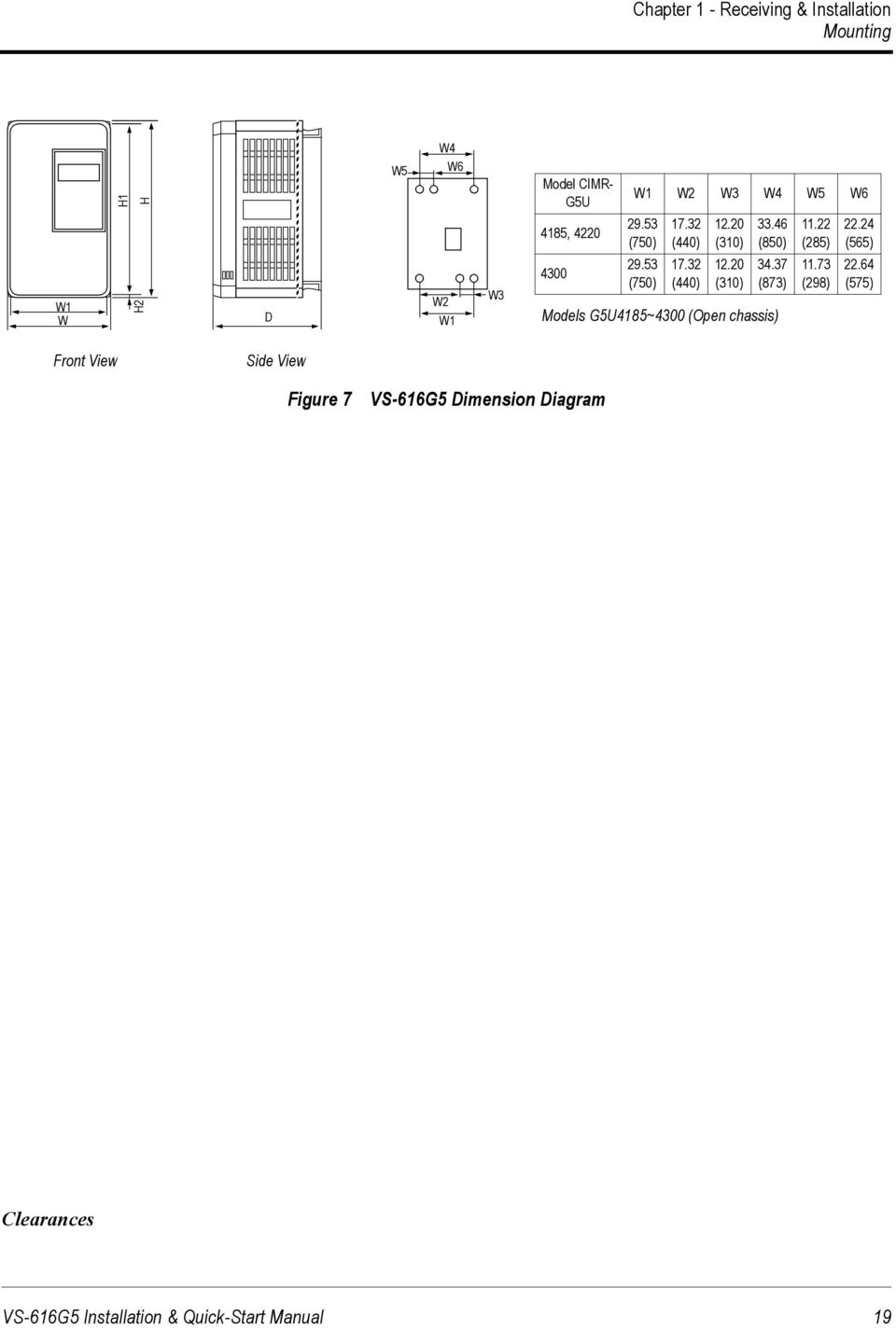
19 Chapter 1 - Receiving & Installation Mounting W4 H1 H W5 W6 Model CIMR- G5U W1 W2 W3 W4 W5 W6 4185, (750) (440) (310) (850) (285) (565) W1 W H2 D W2 W1 W (750) (440) (310) (873) Models G5U4185~4300 (Open chassis) (298) (575) Front View Side View Figure 7 VS-616G5 Dimension Diagram Clearances VS-616G5 Installation & Quick-Start Manual 19
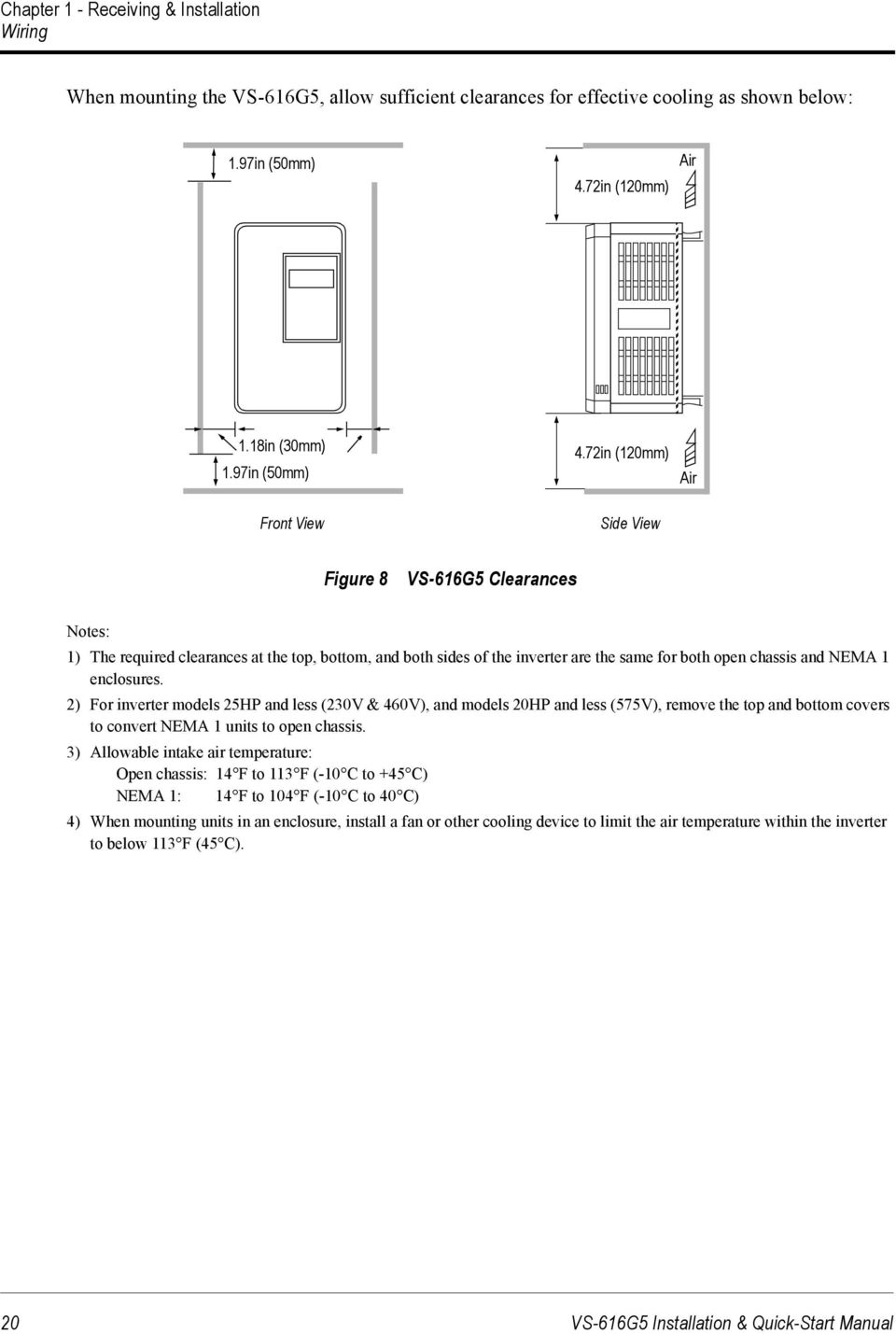
20 Chapter 1 - Receiving & Installation Wiring When mounting the VS-616G5, allow sufficient clearances for effective cooling as shown below: 1.97in (50mm) 4.72in (120mm) ir 1.18in (30mm) 1.97in (50mm) Front View 4.72in (120mm) Side View ir Figure 8 VS-616G5 Clearances Notes: 1) The required clearances at the top, bottom, and both sides of the inverter are the same for both open chassis and NEM 1 enclosures. 2) For inverter models 25HP and less (230V & 460V), and models 20HP and less (575V), remove the top and bottom covers to convert NEM 1 units to open chassis. 3) llowable intake air temperature: Open chassis: 14 F to 113 F (-10 C to +45 C) NEM 1: 14 F to 104 F (-10 C to 40 C) 4) When mounting units in an enclosure, install a fan or other cooling device to limit the air temperature within the inverter to below 113 F (45 C). 20 VS-616G5 Installation & Quick-Start Manual
21 Chapter 1 - Receiving & Installation Wiring 1.6 WIRING! CUTION PRECUTIONS 1) Do not connect or disconnect wiring, or perform signal checks while the power supply is turned ON. 2) Connect the power supply wiring to terminals L1, L2 and L3 on the main circuit input section. DO NOT connect the power supply wiring to output terminals T1, T2 and T3. 3) Connect the motor wiring to terminals T1, T2 and T3 on the main circuit output section. 4) Never touch the output circuit directly or place the output line in contact with the inverter enclosure. 5) Do not connect a phase-advancing capacitor or an LC/RC noise filter to the output circuit. 6) The motor wiring must be less than 328ft (100m) in length, and it is strongly recommended that it be in a separate conduit from all other wiring. 7) Control wiring must be less than 164ft (50m) in length and in a separate conduit from the power wiring. 8) Tighten the screws on the main circuit and control circuit terminals. 9) Low voltage wires shall be wired with Class 1 wiring. 10) Please observe national electrical code (NEC) when wiring electrical devices. Failure to observe these precautions may result in equipment damage. Inspection fter wiring is complete, verify that: ll wiring is correctly installed. Excess screws and wire clippings are removed from inside of the unit. Screws are securely tightened. Exposed wire has no contact with other wiring or terminals. VS-616G5 Installation & Quick-Start Manual 21
22 Chapter 1 - Receiving & Installation Wiring VS-616G5 Standard Connection Diagram DC Link reactor (optional) 1 2 L1 L2 L3 B1 B2 T1 T2 T3 IM Gate Drive 1 - Forward Run when CLOSED 2 - Reverse Run when CLOSED 3 Multi-Function Inputs PWM -10 to +10V to +10V 21 (Com) 22 Multi-Function nalog Outputs 8 11 (Com) nalog Inputs -10 to +10V 4 to 20m -10 to +10V 15 (+15V, 20m) 13 (20kΩ) 14 (250Ω) 16 (20kΩ) 17 (0V) /D ±11 bit Fault Contact Outputs Multi-Function Contact Output 250VC, 1 or less 30VDC, 1 or less Serial Port 33 (-15V, 20m) RS-232 (10-pin) Digital Operator Multi-Function PHC Outputs 48V, 50m or less Figure 9 VS-616G5 Terminal Diagram - Model CIMR-G5U VS-616G5 Installation & Quick-Start Manual
23 Chapter 1 - Receiving & Installation Wiring VS-616G5 Standard Connection Diagram 3 L1 L2 L3 + T1 T2 T3 IM r s200 s400 Gate Drive 1 - Forward Run when CLOSED 2 - Reverse Run when CLOSED 3 Multi-Function Inputs PWM -10 to +10V to +10V 21 (Com) 22 Multi-Function nalog Outputs 8 11 (Com) nalog Inputs -10 to +10V 4 to 20m -10 to +10V 15 (+15V, 20m) 13 (20kΩ) 14 (250Ω) 16 (20kΩ) 17 (0V) /D ±11 bit Fault Contact Outputs Multi-Function Contact Output 250VC, 1 or less 30VDC, 1 or less Serial Port 33 (-15V, 20m) RS-232 (10-pin) Digital Operator Multi-Function PHC Outputs 48V, 50m or less Figure 10 VS-616G5 Terminal Diagram - Model CIMR-G5U4160 VS-616G5 Installation & Quick-Start Manual 23
24 Chapter 1 - Receiving & Installation Wiring VS-616G5 Standard Connection Diagram 3 L1 L2 L3 + T1 T2 T3 IM l 1 l 2 Gate Drive 1 - Forward Run when CLOSED 2 - Reverse Run when CLOSED 3 Multi-Function Inputs PWM -10 to +10V to +10V 21 (Com) 22 Multi-Function nalog Outputs 8 11 (Com) nalog Inputs -10 to +10V 4 to 20m -10 to +10V 15 (+15V, 20m) 13 (20kΩ) 14 (250Ω) 16 (20kΩ) 17 (0V) /D ±11 bit Fault Contact Outputs Multi-Function Contact Output 250VC, 1 or less 30VDC, 1 or less Serial Port 33 (-15V, 20m) RS-232 (10-pin) Digital Operator Multi-Function PHC Outputs 48V, 50m or less Figure 11 VS-616G5 Terminal Diagram - Model CIMR-G5U VS-616G5 Installation & Quick-Start Manual
25 Chapter 1 - Receiving & Installation Wiring Main Circuit Diagrams (230V Class) CIMR-G5U20P4 to 21P5 (optional reactor) 1 2 L1 L2 L3 + B1 B2 T1 T2 T3 CIMR-G5U2018 to 2022 Power Supply Control Circuit 1 2 L1 3 T1 CIMR-G5U22P2 to 27P5 L2 L3 + T2 T3 (optional reactor) 1 2 L1 L2 L3 + B1 B2 T1 T2 T3 r s Cooling Fan Power Supply Internal Cooling Fan Control Circuit CIMR-G5U2030 to 2075 Power Supply Control Circuit 3 Cooling Fan L1 T1 CIMR-G5U2011 to 2015 L2 L3 + T2 T3 (optional reactor) 1 2 L1 L2 L3 3 + T1 T2 T3 r s Cooling Fan Power Supply Internal Cooling Fan Control Circuit Power Supply Control Circuit Cooling Fan VS-616G5 Installation & Quick-Start Manual 25
26 Chapter 1 - Receiving & Installation Wiring Main Circuit Diagrams (460V Class) CIMR-G5U40P4 to 41P5 (optional reactor) 1 2 L1 L2 L3 + B1 B2 T1 T2 T3 CIMR-G5U4055 to Power Supply Control Circuit L1 T1 CIMR-G5U42P2 to 4015 L2 L3 + T2 T3 (optional reactor) 1 2 L1 L2 L3 + B1 B2 T1 T2 T3 r s200 s400 Cooling Fan Power Supply Internal Cooling Fan Control Circuit CIMR-G5U4185 to 4300 Power Supply Control Circuit Cooling Fan CIMR-G5U4018 to 4045 L1 L2 L3 3 + T1 T2 T3 1 2 L1 L2 L3 3 + T1 T2 T3 r s200 s400 Cooling Fan Power Supply Control Circuit r s Cooling Fan Power Supply Internal Cooling Fan Control Circuit 26 VS-616G5 Installation & Quick-Start Manual
27 Chapter 1 - Receiving & Installation Wiring Main Circuit Diagrams (575V Class) CIMR-G5U51P5 (optional reactor) 1 2 L1 L2 L3 + B1 B2 T1 T2 T3 CIMR-G5U5030 to 5160 Power Supply Control Circuit 1 L1 T1 L2 L3 + T2 T3 CIMR-G5U52P2 to 5015 (optional reactor) 1 2 L1 L2 L3 + B1 B2 T1 T2 T3 l 1 l 2 Cooling Fan Power Supply Internal Cooling Fan Control Circuit Power Supply Control Circuit Cooling Fan CIMR-G5U5018 to 5022 B1 B2 1 L1 L2 L3 + T1 T2 T3 l 1 l 2 Power Supply Control Circuit Cooling Fan Internal Cooling Fan VS-616G5 Installation & Quick-Start Manual 27
28 Chapter 1 - Receiving & Installation Wiring Main Circuit Wiring Input Wiring Molded-Case Circuit Breaker (MCCB) Be sure to connect MCCBs or fuses between the C main circuit power supply and VS-616G5 input terminals L1, L2 and L3, to protect the input wiring. Ground Fault Interrupter When connecting a ground fault interrupter to input terminals L1, L2 and L3, select one that is not affected by high frequency. Examples: NV series by Mitsubishi Electric Co., Ltd. (manufactured in or after 1988), EGSG series by Fuji Electric Co., Ltd. (manufactured in or after 1984). Magnetic Contactor (MC) Inverters can be used without an MC installed on the power supply side. When the main circuit power supply is shut OFF in the sequence, an MC can be used instead of an MCCB. However, when an MC is switched OFF on the primary side, dynamic braking does not function and the motor coasts to stop. The load can be operated/stopped by opening/closing the MC on the primary side. However, frequent switching may cause the inverter to malfunction. When using a braking resistor unit, use a sequencer to break the power supply side of the inverter in the event of an overload relay trip contact. If the inverter malfunctions, the braking resistor unit may be burned out. Terminal Block Connection Sequence Input power supply phases can be connected to any terminal regardless of the order of L1, L2 and L3 on the terminal block. C Reactor When connecting an inverter (230V/460V/575V, 15kW or less) to a large capacity power supply transformer (600kV or more), or when switching a phase-advancing capacitor, excessive peak current may flow through the input power supply circuit, which may damage the converter section. In such cases, install a DC reactor (optional) between inverter 1 and 2 terminals, or an C reactor (optional) on the input side. Installation of a reactor is effective for improvement of power factor on the power supply side. Surge Suppressor For inductive loads (i.e. magnetic contactors, magnetic relays, magnetic valves, solenoids, magnetic brakes, etc.) connected near the inverter, use a surge suppressor across the coil to minimize the inductive kick when energizing and de-energizing these devices. Output Wiring Motor Connection Connect motor lead wires to output terminals T1, T2 and T3. Verify that the motor rotates in the forward direction (CCW: counterclockwise when viewed from the motor load side) with the forward run command. If the motor rotation is incorrect, exchange any two of the motor leads. 28 VS-616G5 Installation & Quick-Start Manual
29 Chapter 1 - Receiving & Installation Wiring Magnetic Starter Do not connect a magnetic starter or a magnetic contactor to the output circuit. If the motor load is connected or disconnected while the inverter is running, the inverter overcurrent protective circuitry may trip. Thermal Overload Relay n Underwriter s Laboratory (UL) recognized electronic overload protective function is incorporated into the inverter. However, when driving several motors with one inverter, or when switching between multiple windings of a multiple winding motor, connect an external thermal overload relay. In this case, disable the inverter motor overload feature by setting parameter L1-01 to 0. Wiring Distance Between Inverter and Motor If the total wiring distance between inverter and motor is excessively long and the inverter carrier frequency (IGBT switching frequency) is high, harmonic leakage current from the wiring may adversely affect the inverter and peripheral devices. If the wiring distance is long, reduce the inverter carrier frequency as described below. Carrier frequency can be set by parameter C6-01. Please note that motor audible noise may increase when lowering the carrier frequency. Wiring Distance Between Inverter and Motor Wiring Distance between Inverter and Motor Up to 164 ft. (50m) Up to 328 ft. (100m) More than 328 ft. (100m) Carrier Frequency (Set value of parameter C6-01) 15kHz or less 10kHz or less 5kHz or less Grounding Ground Resistance 230V class: 100Ω or less, 460V class: 10Ω or less, 575V class: 10Ω or less. Never ground the VS-616G5 in common with welding machines, motors, or other high-current electrical equipment. Run all ground wiring in a separate conduit. Use ground wiring as specified in Wire and Terminal Screw Sizes on page 31, and keep the length as short as possible. When using several VS-616G5 units side by side, ground the units as shown in Figure 12, (a) or (b). Do not loop the wires as shown in (c). (a) cceptable (b) cceptable (c) Not cceptable Figure 12 Grounding Example of 3 VS-616G5 Inverters VS-616G5 Installation & Quick-Start Manual 29
30 Chapter 1 - Receiving & Installation Wiring Terminal Functions 230V Class Terminal Functions Model CIMR-G5U 20P4 to 27P to to to 2075 Nominal Motor Output 0.5 to 10HP 15 to 20HP 25 to 30HP 40 to 100HP L1 L2 Main circuit input power supply L3 T1 T2 Inverter output T3 B1 B2 Braking resistor unit --- DC reactor ( 1-2) 1 DC reactor ( 1-2) Braking unit ( 3 - ) DC power supply ( 1 - ) DC power supply ( 1 - ) DC power supply ( 1 - ) ( 1 and 2 terminals 2 Braking unit ( 3 - ) Braking unit ( 3 - ) not provided) r s --- Cooling fan power supply Ground terminal (Ground resistance: 100Ω or less) 460V Class Terminal Functions Model CIMR-G5U 40P4 to to to to 4300 Nominal Motor Output 0.5 to 25HP 30 to 75HP 100 to 200HP 250 to 500HP L1 L2 Main circuit input power supply L3 T1 T2 Inverter output T3 B1 B2 Braking resistor unit --- DC reactor ( 1-2) 1 DC power supply ( 1 - ) s r --- s 200 s 400 DC power supply ( 1 - ) Braking unit ( 3 - ) Cooling fan power supply --- Braking unit ( 3 - ) ( 1 and 2 terminals not provided) Ground terminal (Ground resistance: 10Ω or less) --- Braking unit ( 3 - ) Cooling fan power supply (Control power supply) r - s 200: 200 to 230 VC input r - s 400: 380 to 460 VC input 30 VS-616G5 Installation & Quick-Start Manual
31 Chapter 1 - Receiving & Installation Wiring Terminal Functions (continued) 575V Class Terminal Functions Model CIMR-G5U 51P5 to to to 5160 Nominal Motor Output 2.0 to 20HP 25 to 30HP 40 to 200HP L1 L2 L3 T1 T2 T3 Main circuit input power supply Inverter output B1 B2 Braking resistor unit 1 Braking unit ( 1 - ) DC reactor ( 1-2) DC power supply ( 1 - ) DC power supply ( 1 - DC power supply ( 1 - ) ) 2 l 1 Cooling fan and control power supply l 2 Ground terminal (Ground resistance: 10Ω or less) VS-616G5 Installation & Quick-Start Manual 31
32 Chapter 1 - Receiving & Installation Wiring Wire and Terminal Screw Sizes 230V Class Wire Size Circuit Model CIMR- G5U20P4 Terminal Symbol L1, L2, L3,, 1, 2, B1, B2, T1, T2, T3 Terminal Screw Wire Size * WG mm 2 Max. Torque lb-in (N m) M (1.4) Wire Type G5U20P7 L1, L2, L3,, 1, 2, B1, B2, T1, T2, T3 M (1.4) G5U21P5 G5U22P2 L1, L2, L3,, 1, 2, B1, B2, T1, T2, T3 L1, L2, L3,, 1, 2, B1, B2, T1, T2, T3 M (1.4) M (1.4) G5U23P7 L1, L2, L3,, 1, 2, B1, B2, T1, T2, T3 M (1.4) Main Control G5U25P5 G5U27P5 G5U2011 G5U2015 G5U2018 G5U2022 G5U2030 G5U2037 G5U2045 G5U2055 G5U2075 Common to all models L1, L2, L3,, 1, 2, B1, B2, T1, T2, T3 8 8 M (2.5) L1, L2, L3,, 1, 2, B1, B2, T1, T2, T3 8 8 M (2.5) L1, L2, L3,, 1, 2, 3, T1, T2, T M (5.1) L1, L2, L3,, 1, 2, 3, T1, T2, T3 M (10.2) M (5.1) L1, L2, L3,, 1, 2, 3, T1, T2, T M (10.2) r, s M (1.4) L1, L2, L3,, 1, 2, 3, T1, T2, T M (10.2) r, s M (1.4) L1, L2, L3, T1, T2, T3 M10 4/ (23.0),, 3 M (10.2) r, s M (1.4) L1, L2, L3, T1, T2, T3 M10 1/0 x 2P 60 x 2P (23.0),, 3 M (10.2) r, s M (1.4) L1, L2, L3, T1, T2, T3 M10 1/0 x 2P 60 x 2P (23.0),, 3 M (10.2) r, s M (1.4) L1, L2, L3, T1, T2, T3 M10 1/0 x 2P 60 x 2P (23.0),, 3 M (10.2) r, s M (1.4) L1, L2, L3, T1, T2, T3 M12 4/0 x 2P 100 x 2P (39.5),, 3 M (10.2) r, s M (1.4) Stranded M Solid G M (1.0) Power cable: 600V vinyl sheathed wire or equivalent Twisted shielded wire with Class 1 wiring * Wire sizes are based on 75 C copper wire. Wire and Terminal Screw Sizes 32 VS-616G5 Installation & Quick-Start Manual
33 Chapter 1 - Receiving & Installation Wiring 460V Class Wire Size Circuit Model CIMR- G5U40P4 Terminal Symbol L1, L2, L3,, 1, 2, B1, B2, T1, T2, T3 Terminal Screw Wire Size * WG mm 2 Max. Torque lb-in (N m) M (1.4) Wire Type G5U40P7 G5U41P5 G5U42P2 G5U43P7 G5U44P0 L1, L2, L3,, 1, 2, B1, B2, T1, T2, T3 L1, L2, L3,, 1, 2, B1, B2, T1, T2, T3 L1, L2, L3,, 1, 2, B1, B2, T1, T2, T3 L1, L2, L3,, 1, 2, B1, B2, T1, T2, T3 L1, L2, L3,, 1, 2, B1, B2, T1, T2, T3 M4 M4 M4 M (1.4) 12.4 (1.4) 12.4 (1.4) 12.4 (1.4) M (1.4) G5U45P5 L1, L2, L3,, 1, 2, B1, B2, T1, T2, T3 M (1.4) G5U47P5 L1, L2, L3,, 1, 2, B1, B2, T1, T2, T3 M (2.5) Main Control G5U4011 G5U4015 G5U4018 G5U4022 G5U4030 G5U4037 G5U4045 G5U4055 G5U4075 G5U4110 G5U4160 G5U4185 G5U4220 G5U4300 Common to all models L1, L2, L3,, 1, 2, B1, B2, T1, T2, T3 M (2.5) M (5.1) L1, L2, L3,, 1, 2, B1, B2, T1, T2, T3 M (2.5) M (5.1) L1, L2, L3,, 1, 2, 3, T1, T2, T3 M (5.1) M (10.2) r, s M (1.4) L1, L2, L3,, 1, 2, 3, T1, T2, T3 M (5.1) M (10.2) r, s M (1.4) L1, L2, L3,, 1, 2, 3, T1, T2, T M (10.2) r, s M (1.4) L1, L2, L3,, 1, 2, 3, T1, T2, T M (10.2) r, s M (1.4) L1, L2, L3,, 1, 2, 3, T1, T2, T M (10.2) r, s M (1.4) L1, L2, L3, T1, T2, T3 M10 4/ (23.0),, 3 M (10.2) r, s200, s400 M (1.4) L1, L2, L3, T1, T2, T3 M10 1/0 x 2P 60 x 2P (23.0),, 3 M (10.2) r, s200, s400 M (1.4) L1, L2, L3, T1, T2, T3 M10 1/0 x 2P 60 x 2P (23.0),, 3 M (10.2) r, s200, s400 M (1.4) L1, L2, L3, T1, T2, T3 M12 4/0 x 2P 100 x 2P (39.5),, 3 M (10.2) r, s200, s400 M (1.4) L1, L2, L3,, 1, 3, T1, T2, T3 M16 650MCM x 2P 325 x 2P (98.0) M (10.2) r, s200, s400 M (1.4) L1, L2, L3,, 1, 3, T1, T2, T3 M16 650MCM x 2P 325 x 2P (98.0) M8 1/ (10.2) r, s200, s400 M (1.4) L1, L2, L3,, 1, 3, T1, T2, T3 M16 650MCM x 2P 325 x 2P (98.0) M8 1/ (10.2) r, s200, s400 M (1.4) Stranded M Solid G M (1.0) Power cable: 600V vinyl sheathed wire or equivalent Twisted shielded wire with Class 1 wiring * Wire sizes are based on 75 C copper wire. VS-616G5 Installation & Quick-Start Manual 33
34 Chapter 1 - Receiving & Installation Wiring Wire and Terminal Screw Sizes (continued) 575V Class Wire Size Model Terminal Wire Size * Max. Torque Circuit Terminal Symbol CIMR- Screw WG mm 2 lb-in (N m) G5U51P5 L1, L2, L3,, 1, 2, B1, B2, T1, T2, T3 G5U52P2 M (1.4) G5U53P7 L1, L2, L3,, 1, 2, B1, B2, T1, T2, T M (1.4) G5U55P5 L1, L2, L3,, 1, 2, B1, B2, T1, T2, T3 M (1.4) Main Control G5U57P5 L1, L2, L3,, 1, 2, B1, B2, T1, T2, T M (1.4) G5U5011 L1, L2, L3,, 1, 2, B1, B2, T1, T2, T3 M (1.4) M (5.1) L1, L2, L3,, 1, 2, B1, B2, T1, T2, T3 M (2.5) G5U5015 M (5.1) L1, L2, L3,, 1, B1, B2, T1, T2, T3 M (5.1) G5U5018 G5U (2.3) l 1, l 2 M (1.4) L1, L2, L3,, 1, T1, T2, T3 M8 6-1/ (10.3) G5U (2.3) l 1, l 2 M (1.4) L1, L2, L3,, 1, T1, T2, T3 M8 4-1/ (10.3) G5U (2.3) l 1, l 2 M (1.4) L1, L2, L3,, 1, T1, T2, T3 M8 3-1/ (10.3) G5U (2.3) l 1, l 2 M (1.4) L1, L2, L3,, 1, T1, T2, T3 M8 2-1/ (10.3) G5U (2.3) l 1, l 2 M (1.4) L1, L2, L3,, 1, T1, T2, T3 M8 2/0-1/ (10.3) G5U (2.3) l 1, l 2 M (1.4) L1, L2, L3,, 1, T1, T2, T3 M10 3/ (23) G5U / (2.3) l 1, l 2 M (1.4) L1, L2, L3,, 1, T1, T2, T3 M (39.5) G5U / (2.3) l 1, l 2 M (1.4) L1, L2, L3,, 1, T1, T2, T3 M (39.5) G5U / (2.3) l 1, l 2 M (1.4) Common to all models Stranded M3.5 Solid G (1.0) Wire Type Power cable: 600V vinyl sheathed wire or equivalent Twisted shielded wire with Class 1 wiring * Wire sizes are based on 75 C copper wire. Indicates terminal uses a pressure lug. 34 VS-616G5 Installation & Quick-Start Manual
35 Chapter 1 - Receiving & Installation Wiring Wire and Terminal Screw Sizes (continued) JST Closed Loop Connectors Wire Size * Terminal Max. Torque JST Closed-Loop Connectors (Lugs) WG mm 2 Screw lb-in (N m) M (1.0) M (1.4) M (1.0) M (1.4) M (1.0) M (1.4) M (1.0) M (1.4) 14 2 M (2.5) M (5.1) M (10.2) M (1.4) M (2.5) M (5.1) M (10.2) M (2.5) 8 8 M (5.1) M (10.2) 6 14 M (5.1) M (10.2) 4 22 M (5.1) M (10.2) M (10.2) 1-1/ M (10.2) M (23.0) 3/ (23.0) M10 4/ (23.0) 4/ (39.5) 300MCM 150 M (39.5) 400MCM (39.5) 650MCM 325 M12 x (39.5) M (98.0) Note 1: The use of a JST closed-loop connector (lug) is recommended to maintain proper clearances. Please contact your Yaskawa representative for more information. Note 2: Voltage drop should be considered when determining wire size. Voltage drop can be calculated using the following equation: Phase-to phase voltage drop (V) = 3 wire resistance (Ω/km) x wiring distance (m) x current () x 10-3 Select a wire size so that voltage drop will be less than 2% of the normal rated voltage. VS-616G5 Installation & Quick-Start Manual 35
36 Control Circuit Wiring The table below outlines the functions of the control circuit terminals. Control Circuit Terminals Classification Terminal Signal Function Description Signal Level Sequence Input Signal nalog Input Signal Sequence Output Signal nalog Output Signal 1 Forward run/stop Forward run when closed, stop when open (2-wire configuration) 2 Reverse run/stop Reverse run when closed, stop when open (2-wire configuration) 3 External fault input Fault when closed, normal state when open 4 Fault reset input Reset when closed 5 Master/ux. change ux. freq. ref. when closed Multi-function contact inputs Multi-step speed ref.1) (H1-01 to H1-06) 6 Multi-step speed ref.2 Effective when closed 7 Jog reference Jog run when closed 8 External baseblock Inv. output baseblocked when closed 11 Sequence control input common terminal V Power supply output For analog command +15V power supply 33-15V Power supply output For analog command -15V power supply 13 Master frequency ref. (voltage) -10 to +10V/-100% to +100% 0 to +10V/100% Multi-function analog input (H3-14 Master frequency ref. (current) 4 to 20m/100%. 08, H3-09, H3-10, H3-11) 16 Multi-function analog input -10 to +10V/-100% to +100% 0 to +10 V/100% Multi-function analog input (H3-04, H3-05, H3-06, H3-07) Photo-coupler insulated Input: +24VDC, 8m +15V (llowable current 20m max.) -15V (llowable current 20m max.) -10 to +10V (20kΩ), 0 to +10V/(20kΩ) 4 to 20m (250Ω) -10 to +10V (20kΩ), 0 to +10V/(20kΩ) 17 Common terminal for control circuit 0V 12 Connection to shield sheath of signal lead 9 Dry contact 10 Contact capacity: During running (NO contact) Closed when running 250VC, 1 or less Multi-function output 30VDC, 1 or less (H2-01 to H2-03) 25 Zero speed detection ctivates at min. freq. (E1-09) or less 26 Speed agree detection ctivates when the freq. reaches to ±1Hz of set freq. Open collector output 48V, 50m or less 27 Open collector output common 18 Dry contact 19 Fault contact output When faulted closed between terminals 18 and 20 Contact capacity: (NO/NC contact) When faulted open between terminals 19 and VC, 1 or less 20 30VDC, 1 or less 21 Frequency meter output Multi-function analog 0 to ±11V Max. ±5% 0 to ±10V/100% frequency 22 Common monitor 1 (H4-01, H4-02, H4-03) 2m or less 23 Current monitor 5V/inverter rated current Multi-function analog monitor 2 (H4-04, H4-05, H4-06) 36 VS-616G5 Installation & Quick-Start Manual
37 11 12 (G) Figure 13 Control Circuit Terminal rrangement VS-616G5 Installation & Quick-Start Manual 37
38 This page intentionally left blank. 38 VS-616G5 Installation & Quick-Start Manual
39 VS-616G5 Installation & Quick-Start Manual 39
40 Chapter 2 - Operation Contents - CHPTER 2 - OPERTION Section Description Page 2 OPERTION Precautions TRIL OPERTION Digital Operator Display at Power-up Operation Checkpoints Operation by Digital Operator Operation by Control Circuit Terminal Signal DIGITL OPERTOR DISPLY OPERTION MODE SELECTION VS-616G5 Installation & Quick-Start Manual 37
41 Chapter 2 - Operation Precautions PRECUTIONS! WRNING 1) Only turn ON the input power supply after replacing the front cover. Do not remove the cover while the inverter is powered up. 2) When the retry function (parameter L5-02) is selected, do not approach the inverter or the load, since it may restart suddenly after being stopped. 3) Since the Stop key can be disabled by a function setting, install a separate emergency stop switch to remove input power from the inverter. 4) Do not touch the heatsink or braking resistor, due to very high temperatures. 5) Since it is very easy to change operation speed from low to high speed, verify the safe working range of the motor and machine before operation. lso, verify the parameter settings prior to operation. 6) Install a separate holding brake, if necessary. 7) Do not check signals during operation. 8) ll inverter parameters have been preset at the factory. Do not change the settings unless it is required. Failure to observe these precautions may result in equipment damage, serious personal injury or death. 38 VS-616G5 Installation & Quick-Start Manual
42 Chapter 2 - Operation Trial Operation 2.1 TRIL OPERTION To ensure safety, prior to initial operation, disconnect the machine coupling so that the motor is isolated from the machine. If initial operation must be performed while the motor is still coupled to the machine, use great care to avoid potentially hazardous conditions. Check the following items before a trial run: Wiring and terminal connections are proper. Wire clippings and other debris removed from the unit. Screws are securely tightened. Motor is securely mounted. ll items are correctly grounded. Digital Operator Display at Power-Up When the system is ready for operation, turn ON the power supply. Verify that the inverter powers up properly. If any problems are detected, turn OFF the power supply immediately. The digital operator display illuminates as shown below when the power supply is turned ON. DRIVE FWD REV REMOTE SEQ Frequency Ref U1-01 = 0.00 Hz REF Mode Indicator LEDs: Display Section: DRIVE FWD/REV REMOTE (SEQ/REF) Displays frequency reference. DIGITL OPERTOR JVOP-130U LOCL REMOTE MENU ESC JOG DT ENTER FWD REV RESET RUN STOP Operation Indicator LEDs: Stop LED ON. Figure 14 Digital Operator Display at Power-up VS-616G5 Installation & Quick-Start Manual 39
43 Chapter 2 - Operation Trial Operation Operation Checkpoints: Motor rotates smoothly. Motor rotates in the correct direction. Motor has no abnormal vibration nor noise. cceleration and deceleration are smooth. Unit is not overloaded. Status indicator LEDs and digital operator display are correct. Operation by Digital Operator The diagram below shows a typical operation profile using the digital operator Hz Forward 15Hz Forward 60Hz Stop Power ON Forward Run Reverse Run Reverse Forward JOG Run Frequency Frequency Reference Change 60Hz Figure 15 Operation Sequence by Digital Operator 40 VS-616G5 Installation & Quick-Start Manual
44 Chapter 2 - Operation Trial Operation Typical Operation Example by Digital Operator Description Key Sequence Digital Operator Display!Power ON Displays frequency reference value. Operation Condition Select LOCL mode. "Forward Jog Run (6Hz) JOG run procedure (Runs while depressing JOG key.) #Frequency Change frequency reference value. Digit to be changed blinks. Write-in set value. Select output frequency monitor display. LOCL REMOTE JOG DT ENTER Change the value by depressing RESET DT ENTER ESC Frequency Ref U1-01 = 0.00 Hz REMOTE LED (SEQ, REF) OFF Frequency Ref Hz Frequency Ref Hz Entry ccepted Frequency Ref Hz Output Freq U1-02 = 0.00 Hz $Forward Run Forward run (15Hz) Run & FWD LEDs light. %Frequency Reference Value Change (15~60Hz) Select frequency reference value display Change set value. Write-in set value. Select output frequency monitor display. &Reverse Run Select reverse run. REV LED lights. 'Stop Decelerates to stop. Stop LED lights. RUN DT ENTER Depress twice. Change the value by depressing DT ENTER DT ENTER FWD REV STOP RESET RESET Output Freq U1-02 = Hz Frequency Ref Hz Frequency Ref Hz Entry ccepted Output Freq U1-02 = Hz Output Freq U1-02 = Hz Output Freq U1-02 = 0.00 Hz VS-616G5 Installation & Quick-Start Manual 41
45 Chapter 2 - Operation Trial Operation Operation by Control Circuit Terminal Signal The diagram below shows a typical operation profile using the control circuit terminal signals Forward 60Hz 4 Power ON Operation Stop Frequency Figure 16 Operation Sequence by Control Circuit Terminal Signal Typical Operation Example by Control Circuit Terminal Signal Description Key Sequence Digital Operator Display!Power ON Displays frequency reference value. REMOTE mode is preset at the factory. Output Frequency Display Switch to output frequency display. Forward Jog Run (6Hz) Close between control circuit terminals 1 & 11, and 7 & 11 closed to perform JOG run. Run & FWD LEDs illuminate. Open between terminals 1 & 11, and 7 & 11 after verifying JOG operation "Frequency Input frequency reference via terminal 13 (voltage) or 14 (voltage/current) and verify the input value with the digital operator. Output Frequency Display Select output frequency monitor display. #Forward Run Close between terminals 1 & 11 to perform forward run. $Stop Open between terminals 1 & 11 to stop operation. Stop LED illuminates. Frequency Ref U1-01 = 0.00 Hz REMOTE LED (SEQ, REF) ON Output Freq U1-02 = 0.00 Hz Output Freq U1-02 = 6.00 Hz Frequency Ref U1-01 = Hz Output Freq U1-02 = 0.00 Hz Output Freq U1-02 = Hz Output Freq U1-02 = 0.00 Hz 42 VS-616G5 Installation & Quick-Start Manual
46 Chapter 2 - Operation Trial Operation 2.2 DIGITL OPERTOR DISPLY ll functions of the VS-616G5 are accessed using the digital operator. Below are descriptions of the display and keypad sections. DRIVE FWD REV REMOTE SEQ REF Mode Indicator LEDs Drive Mode LED Illuminates when selecting drive mode (operation via external terminals is possible). OFF when selecting any other mode. Rotation Direction LEDs FWD: Illuminates at forward command. REV: Illuminates at reverse command. Remote Mode LEDs Illuminates when selecting input mode from the control circuit terminal or serial communication. SEQ: Illuminates when selecting run command from the control circuit terminal or serial communication. REF: Illuminates when selecting frequency reference from the control circuit terminals 13, 14, or 16, or serial communication. DIGITL OPERTOR JVOP-130 U LOCL MENU REMOTE JOG FWD REV RUN ESC DT ENTER RESET STOP Display Displays set values of parameters or monitoring values such as output frequency and current (2 lines x 16 characters). Menu Key Displays the main menu for mode selection. Escape Key Returns display to the previous status, before[dt/enter] key was depressed. Returns menu to previous layer (i.e. function, group, mode). Data/Enter Key Selects mode, group, function or parameter. Displays each parameter s set value. By depressing this key (after changing a parameter setting), the set value is entered. Menu/Value Change Keys Selects mode, group, function, parameter or set value. :Increment key : Decrement key Digit Selection Key Selects a digit of a set value to be changed. The selected digit blinks. Resets operation at faults. Operation Command Keys Operation command keys operate the inverter. These are enabled only in the drive mode. STOP: Red LED illuminates after depressing STOP key. RUN: Red LED illuminates after depressing RUN key. FWD/REV: Selects forward or reverse run. JOG: Jog run is enabled while depressing this key. Operation Mode Selection Key lternate between REMOTE and LOCL (digital operator) operation. Figure 17 Digital Operator Display at Power-up VS-616G5 Installation & Quick-Start Manual 43
47 Chapter 2 - Operation Digital Operator Display 2.3 OPERTION MODE SELECTION The VS-616G5 has two operation modes: LOCL and REMOTE (see table below for description). These two modes can be selected by the digital operator LOCL/REMOTE key or a multi-function input terminal command only when operation is stopped. The operation mode selected can be verified by observing the SEQ and REF LEDs on the digital operator (as shown below). The operation mode is set to REMOTE (run by control circuit terminals 13 and/or 14 frequency reference and run command from control circuit terminals) prior to shipment. Multi-function contact inputs from control circuit terminals 3 to 8 are enabled in both operation modes. LOCL: Both frequency reference and run command are set by the digital operator. SEQ and REF LEDs go OFF. REMOTE: Master frequency reference and run command can be selected as described in the table below. Operation Mode Selection Reference Selection (B1-01) REF LED Operation Method Selection (B1-02) SEQ LED 0 Master frequency reference from digital operator OFF Operation by run command from digital operator OFF 1 Master frequency reference from control circuit terminals 13 and 14 ON Operation by run command from control circuit terminal ON 2 Master frequency reference set by serial communication blinking Operation by run command from serial communication blinking 3 Master frequency reference set by option card blinking Operation by run command from option card blinking 4 Master frequency reference set by EWS (Engineering Work Station). This setting will be used with the CP-717 <1110>. ON Operation by run command from EWS (CP-717) <1110>. ON DRIVE FWD REV REMOTE SEQ REF ON, OFF or blinking Figure 18 Operation Mode LEDs 44 VS-616G5 Installation & Quick-Start Manual
48 Chapter 3 - Quick-Start Programming Contents - CHPTER 3 - QUICK-STRT PROGRMMING Section Description Page 3 QUICK-STRT PROGRMMING Quick-Start Parameter Sequence MIN MENU: INITILIZE MIN MENU: PROGRMMING MIN MENU: UTO-TUNING VS-616G5 Installation & Quick-Start Manual 45
49 Chapter 3 - Quick-Start Programming Quick-Start Parameter Sequence Quick-Start Parameter Sequence Parameter Main Menu * Key Press Function No. Frequency Reference U1-01 Output Frequency U1-02 Output Current U1-03 Output Voltage U1-06 U2 Fault Trace Operation U2 DT/ENTER U2-01 to U2-14 U3 Fault History U3 DT/ENTER U3-01 to U3-08 U1 Monitor U1 DT/ENTER U1-01 to U1-14 ESC,, Select Language 1-00 DT/ENTER Initialize Initialize Parameters 1-03 Enter Password 1-04 ESC,,, Reference Source B1-01 DT/ENTER Run Source B1-02 Stopping Method B1-03 cceleration Time 1 C1-01 Deceleration Time 1 C1-02 Preset Frequency Reference 1 D1-01 Preset Frequency Reference 2 D1-02 Preset Frequency Reference 3 D1-03 Preset Frequency Reference 4 D1-04 Jog Frequency Reference D1-09 Input Voltage E1-01 Programming Maximum Frequency E1-04 Maximum Voltage E1-05 Maximum Voltage Output Frequency E1-06 Middle Output Frequency E1-07 Middle Output Voltage E1-08 Minimum Output Frequency E1-09 Minimum Output Voltage E1-10 Base Voltage E1-13 Motor Rated Current E2-01 Motor Rated Slip Frequency E2-02 Motor No-Load Current E2-03 Number of Motor Poles E2-04 ESC,,,, Rated Voltage -- DT/ENTER Rated Current -- uto-tuning Rated Frequency -- Rated Speed -- Number of Poles -- Select Motor 1 or 2 -- ESC,,,,, Modified Constants DT/ENTER ccess Level Motor Selection 1-01 E1-02 Control Method Pattern Selection 1-02 E1-03 * Depress the Menu key on the digital operator to return to Main Menu: Operation. 46 VS-616G5 Installation & Quick-Start Manual
50 The VS-616G5 ships preset to open loop vector control, quick-start access level. Included in this section are descriptions of the Quick-Start parameters, for simplified operation of this drive. 3.1 Main Menu: Initialize <ENTER> Control w/ PG Open Loop 1-00 Language Selection Select Language The standard G5 software incorporates seven display languages. Select the language displayed on the digital operator according to the following table: Description 0 English (factory default) 1 Japanese 2 German <1110> 3 French <1110> 4 Italian <1110> 5 Spanish <1110> 6 Portuguese Chapter 3 - Quick-Start Programming Initialize Menu Flux Control This parameter determines the group of parameters that can be accessed during set-up/programming. There are five access levels ranging from parameters for viewing only (0: Operation Only), to parameters required for advanced applications (4: dvanced Level). The inverter defaults to a setting of 2: Quick Start to aid in simplifying set-up. See the following table: w/ PG Open Loop 1-01 Parameter ccess Level ccess Level Description 0 Operation Only 1 User Program - ccesses parameters selected by OEM. 2 Quick Start Level (factory default) - For maintenance-level programming. 3 Basic Level - For basic programming in most applications. 4 dvanced Level - For advanced programming in special applications. Flux Select the control method best suited for your application. Control w/ PG Open Loop 1-02 Control Method Selection Control Method Description 0 Control - For general-purpose and multiple motor applications. 1 with PG Feedback - For general-purpose applications requiring closed loop speed control. 2 Open Loop (factory default) - For applications requiring open loop speed control, higher torque at low speeds (150% torque below 1Hz). 3 Flux - For applications requiring precise speed and torque control, including zero speed control. Uses encoder feedback. Flux VS-616G5 Installation & Quick-Start Manual 47
51 Chapter 3 - Quick-Start Programming Programming Menu Control Use this parameter to re-initialize the inverter to its factory default settings. It is also possible to re-initialize the inverter to settings as determined by the user. See the G5 Programming Manual for further details on the user initialization. w/ PG Open Loop 1-03 Operator Status Init Parameters Flux Description 0 No Initialization (factory default) 1110 User Initialization Wire Initialization Wire Initialization This parameter allows the password lock-out of users from prohibited parameters. This parameter is used in conjunction with Function 2, the user parameters group. When the user program access level is selected and the programming is locked via the 1-04 password, only those parameters in group 1 and 2 can be accessed. ll other parameters cannot be viewed. Main Menu: Programming <ENTER> Control B1-01 and B1-02 determine how the inverter is to receive a frequency reference and a start/stop command, respectively. Frequency reference and run command can be set independently as shown below: w/ PG Open Loop 1-04 Password Entry Enter Password Control w/ PG Open Loop B1-01 Frequency Reference Selection Reference Source B1-02 Operation Method Selection Run Source Flux Flux Description 0 Command from digital operator 1 Command from control circuit terminal (factory default) 2 Command from serial communication 3 Command from option card 4 Engineering Workstation (EWS) - For use with CP-717 <1110> By depressing the LOCL/REMOTE key on the digital operator, the operation mode can be selected as shown below: Local: Remote: Operation according to frequency reference and run command from digital operator. Operation according to frequency reference and run command set by B1-01 & B1-02. The digital operator is reset to remote operation when power is cycled. 48 VS-616G5 Installation & Quick-Start Manual
52 Chapter 3 - Quick-Start Programming Programming Menu This function selects the stopping method suitable for the particular application. Deceleration to Stop (B1-03 = 0 ) Control w/ PG Open Loop B1-03 Stopping Method Selection Stopping Method Description 0 Deceleration to stop (factory default) 1 Coast to stop 2 DC injection to stop 3 Coast to stop with timer Flux Output Frequency Decel time 1 (C1-02) Zero Speed Level (Frequency at DC Injection Braking Start - B2-01) Factory Default: 0.5Hz Run Command ON DC injection Braking Time at Stop (B2-04) Factory Default: 0.5 s OFF Upon removal of the FWD (REV) run command, the motor decelerates at a deceleration rate determined by the time set in deceleration time 1 (C1-02) and DC injection braking is applied immediately before stop. If the deceleration time is short or the load inertia is large, an overvoltage fault (OV) may occur during deceleration. In this case, increase the deceleration time or install an optional braking resistor/unit. Braking torque: without braking resistor, approx. 20% of motor rated torque with braking resistor, approx. 150% of motor rated torque Coast to Stop (B1-03 = 1 ) Figure 19 Stopping Method - Deceleration to Stop Output frequency Inverter output is shut OFF when stop command is given. Run command ON OFF Figure 20 Stopping Method - Coast to Stop Upon removal of the FWD (REV) run command, the motor coasts. fter a stop command is given, a run command can be accepted, but operation does not start until after the minimum baseblock time (L2-03) elapses. VS-616G5 Installation & Quick-Start Manual 49
53 Chapter 3 - Quick-Start Programming Programming Menu DC Injection Braking Stop (B1-03 = 2 ) Output Frequency Inverter Output OFF during Minimum Baseblock Time (L2-03) Factory Default: 0.5s Run Command ON DC injection Braking Time at Stop (B2-04) Factory Default: 0.0s OFF DC injection Braking Time DC injection Braking Time at Stop (B2-04) F out F max (E1-04) B2-04 x 10 Figure 21 Stopping Method - DC Injection Braking Stop Upon removal of the FWD (REV) run command, the motor brakes to stop, according to the DC injection braking time at stop set in B2-04. If this value is set to 0 (factory default), DC injection braking is disabled, and the motor coasts to stop. When choosing this function, note that the actual stop time from maximum frequency is the time set in B2-04 multiplied by 10 (see the figure above). This stopping method is disabled during flux vector control. Coast to Stop with Timer 1 (B1-03 = 3 ) Output Frequency Decel Time 1 (C1-02) Coasting ccel Time 1 (C1-01) Time FWD (REV) Run Command ON ON ON Run Command Disabled Figure 22 Stopping Method - Coast to Stop w/ Timer fter a stop command is given, a run command is not accepted while the coast to stop timer C1-02 elapses (same as Decel Time 1). fter the timer runs out, another run command must be given for the inverter to begin acceleration. This stopping method is disabled during flux vector control. 50 VS-616G5 Installation & Quick-Start Manual
54 Chapter 3 - Quick-Start Programming Programming Menu Range: 0.00 to s Factory Default: 10.0s Control cceleration time 1 sets the time necessary for the output frequency to accelerate from 0Hz to maximum output frequency as set in parameter E1-04. Deceleration time 1 sets the time necessary for the output frequency to decelerate from the maximum output frequency to 0Hz. w/ PG Open Loop C1-01 cceleration time 1 ccel Time 1 C1-02 Deceleration time 1 Decel Time 1 Flux Range: Factory Default: 0.0 to 400.0Hz 0.0Hz Up to 4 preset speed references (including jog) can be set through multi-function contact input function selections in the Quick-Start mode. Terminals 6 and 7 are factory defaulted to multi-step speed inputs 1 and 2, respectively. See the following table for programming preset speed references in the Quick-Start mode. Note: 9 preset references can be set in the dvanced modes. Control w/ PG Open Loop D1-01 Preset Frequency Reference 1 Reference 1 D1-02 Preset Frequency Reference 2 Reference 2 D1-03 Preset Frequency Reference 3 Reference 3 D1-04 Preset Frequency Reference 4 Reference 4 Terminal 5 Terminal 6 Speed Reference Open Open Speed Reference 1 - Set Reference Source (B1-01) to 0. Closed Open Speed Reference 2 (When H and H3-09 0) Open Closed Speed Reference 3 Closed Closed Speed Reference 4 Flux Control The jog frequency reference can be set in this parameter. In the Quick-Start mode, depress the JOG key on the digital operator, or close terminal 7 when parameter H1-05 is set to 6, to use this function. The jog command always has priority over other reference commands. When using terminal 7 to select the jog frequency, a separate run command must be applied to run the inverter. w/ PG Open Loop D1-09 Jog Frequency Reference JOG Reference Flux VS-616G5 Installation & Quick-Start Manual 51
55 Chapter 3 - Quick-Start Programming Programming Menu Range: Factory Default: Control 155 to 255V (230V class), 310 to 510V (460V class), 445 to 733V (575V class) 230V, 460V, 575V Set this parameter to the inverter input supply voltage in units of 1V. This parameter does not have to be set to the exact incoming voltage level. The nominal voltage is normally sufficient (i.e. 230V, 380V, 460V, 575V). w/ PG Open Loop E1-01 Input Voltage Input Voltage Flux Control Select between fan-cooled, blower-cooled, and vector duty motor types with this parameter. This parameter sets the motor overload (OL1) protection to match typical motor characteristics. Set this parameter to 0 for standard TEFC motors, as these motors typically have a limited constant torque speed range. Set to 1 for standard blower-cooled motors with a constant torque speed range of 10:1. Set to 2 for vector duty motors which have a 100:1 or 1000:1 speed range or when full torque at zero speed is required. w/ PG Open Loop E1-02 Motor Selection Motor Selection Description 0 Fan-cooled motor characteristics (factory default) 1 Blower-cooled motor characteristics 2 duty motor <1110> Flux Control Choose a preset pattern for operation in modes only. It may be necessary to change the pattern when using a high-speed motor, or when special torque adjustment is required in the application. Set values 0 to E: Preset pattern can be selected (E1-04 through E1-13 are fixed). F: Custom pattern can be set (factory default) (E1-04 through E1-13 can be set individually). w/ PG Open Loop E1-03 Pattern Selection Selection Set the pattern according to the applications described in the table on the following page: Flux 52 VS-616G5 Installation & Quick-Start Manual
56 Chapter 3 - Quick-Start Programming Programming Menu Preset Patterns Specifications E1-03 Pattern *1 Specifications E1-03 Pattern *1 General-purpose 50Hz 0 60Hz Saturation 1 F 50Hz Saturation 2 (V) (Hz) High Starting Torque *2 50Hz 60Hz High Starting Torque 1 High Starting Torque 2 High Starting Torque 1 (V) (V) F (Hz) High Starting Torque B (V) (Hz) B (Hz) 60 (V) 230 (V) Hz Hz C C (Hz) (Hz) Variable Torque 50Hz 60Hz Variable Torque 1 Variable Torque 2 Variable Torque 1 Variable Torque (V) (Hz) (V) (Hz) High Speed Operation 120Hz 180Hz D E (V) 230 D (Hz) 120 (V) 230 E (Hz) 180 Notes: *1 The following conditions must be considered when selecting a pattern: The voltage and frequency characteristics of the motor. The maximum speed of the motor. *2 Select a high starting torque pattern only under the following conditions: The wiring distance is long - 492ft (150m) and above. Large voltage drop at start-up. C reactor is connected to the inverter s input or output. motor rated below the nominal output of the inverter is used. *3 Voltage in preset patterns is doubled for 460V class inverters. The 575V patterns are 2.5 times as large as the 230V patterns. VS-616G5 Installation & Quick-Start Manual 53
57 Chapter 3 - Quick-Start Programming Programming Menu Custom Pattern Set up a custom pattern by setting parameter E1-03 to F, and then setting the values in parameters E1-04 to E1-10. Control w/ PG Open Loop E1-04 Maximum Frequency Max Frequency E1-05 Maximum Voltage Max Voltage E1-06 Maximum Voltage Output Frequency Base Frequency E1-07 Middle Output Frequency Mid Frequency E1-08 Middle Output Voltage Mid Voltage E1-09 Minimum Output Frequency Min Frequency E1-10 Minimum Output Voltage Min Voltage E1-13 Motor Base Voltage Base Voltage Flux Voltage Be sure to satisfy the following conditions for setting parameters E1-04 to E1-10: E1-09 E1-07 < E1-06 E1-04 E1-05 E1-08 E E1-09 E1-07 E1-06 E1-04 Frequency Figure 23 Custom Pattern Parameter No. Name Unit Range Factory Default E1-04 Maximum output frequency 0.1 Hz 50.0 to 400 Hz 60.0 Hz E1-05 Maximum voltage 0.1 V 0.1 to 255 V * 230 V * E1-06 Maximum voltage output frequency 0.1 Hz 0.2 to 400 Hz 60.0 Hz (base frequency) E1-07 Mid. output frequency 0.1 Hz 0.1 to 399 Hz 3.0 Hz E1-08 Mid. output frequency voltage 0.1 V 0.1 to 255 V * 17.2 V * E1-09 Minimum output frequency 0.1 Hz 0.1 to 10.0 Hz 1.5 Hz E1-10 Minimum output frequency voltage 0.1 V 0.1 to 50.0 V * 10.3 V * * For 460V class units, the value is twice that of 230V class units. For 575V class units the value is 2.5 times the 230V value. Increasing the voltage in the pattern increases motor torque. However, when setting a custom pattern, increase the voltage gradually while monitoring the motor current, to prevent: Inverter fault trips as a result of motor overexcitation Motor overheat or excessive vibration 54 VS-616G5 Installation & Quick-Start Manual
58 Chapter 3 - Quick-Start Programming Programming Menu V/F Patterns for Inverter Capacity 0.4 ~ 1.5kW for 230V Class* Parameter No. Name Unit Factory E1-03 Pattern Selection E1-04 Max. Output Frequency Hz E1-05 Max. Voltage V E1-06 Max. Voltage Frequency Hz E1-07 Mid. Output Frequency V E1-08 Mid. Output Frequency Voltage V E1-09 Min. Output Frequency Hz E1-10 Min. Output Frequency Voltage V * For 460V class units, the value is twice that of 230V class units. For 575V class units the value is 2.5 times the 230V value. V/F Patterns for Inverter Capacity 0.4 ~ 1.5kW for 230V Class* (Continued) Parameter No. Name Unit Factory E1-03 Pattern Selection 8 9 B C D E F E1-04 Max. Output Frequency Hz E1-05 Max. Voltage V E1-06 Max. Voltage Frequency Hz E1-07 Mid. Output Frequency V E1-08 Mid. Output Frequency Voltage V E1-09 Min. Output Frequency Hz E1-10 Min. Output Frequency Voltage V * For 460V class units, the value is twice that of 230V class units. For 575V class units the value is 2.5 times the 230V value. VS-616G5 Installation & Quick-Start Manual 55
59 Chapter 3 - Quick-Start Programming Programming Menu V/F Patterns for Inverter Capacity 2.2 ~ 45kW for 230V Class* Parameter No. Name Unit Factory E1-03 Pattern Selection E1-04 Max. Output Frequency Hz E1-05 Max. Voltage V E1-06 Max. Voltage Frequency Hz E1-07 Mid. Output Frequency V E1-08 Mid. Output Frequency Voltage V E1-09 Min. Output Frequency Hz E1-10 Min. Output Frequency Voltage V * For 460V class units, the value is twice that of 230V class units. For 575V class units the value is 2.5 times the 230V value. V/F Patterns for Inverter Capacity 2.2 ~ 45kW for 230V Class* (Continued) Parameter No. Name Unit Factory E1-03 Pattern Selection 8 9 B C D E F E1-04 Max. Output Frequency Hz E1-05 Max. Voltage V E1-06 Max. Voltage Frequency Hz E1-07 Mid. Output Frequency V E1-08 Mid. Output Frequency Voltage V E1-09 Min. Output Frequency Hz E1-10 Min. Output Frequency Voltage V * For 460V class units, the value is twice that of 230V class units. For 575V class units the value is 2.5 times the 230V value. 56 VS-616G5 Installation & Quick-Start Manual
60 Chapter 3 - Quick-Start Programming Programming Menu V/F Patterns for Inverter Capacity 55 ~ 300kW for 230V Class* Parameter Name Unit Factory E1-03 E1-04 Pattern Selection Max. Output Frequency Hz 50.0 <21> <21> 50.0 <21> 50.0 <21> E1-05 Max. Voltage V E1-06 E1-07 E1-08 E1-09 E1-10 Max. Voltage Frequency Mid. Output Frequency Mid. Output Frequency Voltage Min. Output Frequency Min. Output Frequency Voltage Hz 50.0 <21> <21> <21> 50.0 <21> V 2.5 <21> <21> 25.0 <21> V 13.8 <21> 13.8 <21> 13.8 <21> 13.8 <21> 40.2 <21> 57.5 <21> 40.2 <21> 57.5 <21> Hz 1.3 <21> <21> 1.3 <21> V <21> <21> 6.9 * For 460V class units, the value is twice that of 230V class units. For 575V class units the value is 2.5 times the 230V value. V/F Patterns for Inverter Capacity 55 ~ 300kW for 230V Class* (Continued) Parameter Name Unit Factory E1-03 E1-04 Pattern Selection Max. Output Frequency 8 9 B C D E F Hz 50.0 <21> 50.0 <21> <21> <21> <21> 60.0 E1-05 Max. Voltage V E1-06 E1-07 E1-08 E1-09 E1-10 Max. Voltage Frequency Mid. Output Frequency Mid. Output Frequency Voltage Min. Output Frequency Min. Output Frequency Voltage Hz 50.0 <21> 50.0 <21> V 2.5 <21> 2.5 <21> V 17.2 <21> 23.0 <21> 17.2 <21> 23.0 <21> 13.8 <21> 13.8 <21> 13.8 <21> 13.8 <21> Hz 1.3 <21> 1.3 <21> V 8.0 <21> 10.3 <21> 8.0 <21> 12.6 <21> * For 460V class units, the value is twice that of 230V class units. For 575V class units the value is 2.5 times the 230V value. VS-616G5 Installation & Quick-Start Manual 57
61 Chapter 3 - Quick-Start Programming Programming Menu Sets the motor rated current in units of 0.01 for inverter sizes 7.5kW and smaller; 0.1 for sizes 11kW and larger. This setting varies depending on the inverter model setting (O2-04). range: 0.00 to 20.00Hz Control Sets the motor rated slip frequency in units of 0.01Hz. This setting varies depending on the motor. Use the following equation to calculate the motor rated slip frequency: w/ PG Open Loop E2-01 Motor Rated Current Motor Rated FL Control w/ PG Open Loop E2-02 Motor Rated Slip Frequency Motor Rated Slip Flux Flux f s = ( N P) f where: f s: slip frequency (Hz) f : motor rated frequency (Hz) N : motor rated speed (rpm) P : number of motor poles Sets the motor no-load current in units of 0.01 for inverter sizes 7.5kW and smaller; 0.1 for sizes 11kW and larger. This setting varies depending on the inverter model setting (O2-04). Range: Factory Default: 2 to 48 poles 4 poles Sets the number of motor poles. Control w/ PG Open Loop E2-03 Motor No-Load Current No-Load Current Control w/ PG Open Loop E2-04 Number of Motor Poles Number of Poles Flux Flux Range: 0 to Factory Default: 1024 Control Sets the encoder pulse count (per revolution) for the closed loop control modes (VF w/pg and Flux ). w/ PG Open Loop F1-04 PG Constant PG Pulses/Rev Flux 58 VS-616G5 Installation & Quick-Start Manual
62 Chapter 3 - Quick-Start Programming uto-tuning Menu Main Menu: uto-tuning <ENTER> daptation to most motors manufactured worldwide is possible with the VS-616G5 automatic tuning function. vailable in both open loop vector and flux vector control modes, the inverter prompts the user for minimal motor information, then guides the user through a quick, simple tuning process. Below is the motor data required for automatic tuning in the quick-start mode: Name Description Control Be sure to uncouple the motor before beginning auto-tuning. fter scrolling through tuning parameters using key, depress Run key to begin auto-tuning. During tuning, Tune Proceeding flashes on the digital operator display. fter complete, Tune Successful is displayed. w/ PG Open Loop Motor Rated Voltage Sets motor s rated voltage in VC. Motor Rated Current Sets motor s rated current in. Motor Rated Frequency Sets motor s rated frequency in Hz. Motor Rated Speed Sets motor s rated speed in rpm. Number of Motor Poles Sets the number of motor poles. Motor Selection Chooses connected motor as 1st or 2nd motor. Flux Note: If the Stop key is depressed during tuning, auto-tuning is interrupted and the motor coasts to stop. The data changed during tuning returns to its original values. fter tuning is complete, depress the Menu key to exit the auto-tuning mode. VS-616G5 Installation & Quick-Start Manual 59
63 This page intentionally left blank. 60 VS-616G5 Installation & Quick-Start Manual
64 Chapter 4 - Diagnostics Contents - CHPTER 4 - DIGNOSTICS Section Description Page 4 DIGNOSTICS Precautions MINTENNCE & INSPECTION Periodic Inspection Parts Replacement Schedule LRM & FULT DISPLYS Inverter larms & Faults Motor Faults VS-616G5 Installation & Quick-Start Manual 61
65 Chapter 4 - Diagnostics Precautions PRECUTIONS! WRNING 1) Never touch high voltage terminals in the inverter. 2) Replace all protective covers before powering up the inverter. When removing the cover, be sure to shut OFF the power supply to the inverter. 3) Perform maintenance or inspection only after verifying that the charge LED has gone OFF, after the main circuit power supply is turned OFF. 4) Only authorized personnel should be permitted to perform maintenance, inspections or parts replacement. Failure to observe these precautions highlighted in this manual will expose the user to high voltages, resulting in equipment damage, serious injury or death. PRECUTIONS! CUTION 1) The control PCB board employs CMOS ICs. Do not touch the CMOS elements. 2) Do not connect or disconnect wiring or connectors while power is applied to the circuit. Failure to observe these precautions may result in equipment damage. 62 VS-616G5 Installation & Quick-Start Manual
66 Chapter 4 - Diagnostics Maintenance & Inspection 4.1 MINTENNCE & INSPECTION This section describes basic maintenance and inspection procedures for the VS-616G5. Periodic Inspection The VS-616G5 will function longer if it is kept clean, cool and dry, and if all precautions highlighted in this manual are observed. Periodically inspect the inverter as described in the table below to prevent accidents and to ensure high performance with high reliability. To prevent electrical shock, disconnect all power before servicing the inverter. Then wait at least five minutes after the power supply is disconnected and all LEDs are extinguished. Component Check Corrective ction External Terminals, Connectors, Mounting Screws, etc. Loose screws or connectors Securely tighten. Heatsink Printed Circuit Board (PCB) Build-up of dust and dirt ccumulation of conductive dust or oil Blow with dry, compressed air [ to Pa (4 to 6kg cm 2 ) pressure]. Blow with dry, compressed air [ to Pa (4 to 6kg cm 2 ) pressure]. If dust and oil cannot be removed, replace the board. Cooling Fan For abnormal noise and vibration Replace the cooling fan. Power Components ccumulation of dust and dirt Blow with dry, compressed air [ to Pa (4 to 6kg cm2) pressure]. Smoothing Capacitor Discoloration or odor Replace the capacitor or the inverter. Parts Replacement Schedule Replace the following parts periodically, for long, safe, trouble-free operation of the VS-616G5: Parts pproximate Interval Remarks Cooling Fan 2 to 3 years Replace with new one. Smoothing Capacitor 5 years Replace with new one (after inspection). Breakers or Relays -- Decide after inspection. Fuses 10 years Replace with new one. luminum Electrolytic Capacitor on PCB Board 5 years Replace with new one (after inspection). Optimum operating conditions: mbient temperature: 86 F yearly average Load factor: 80% or below Operation rate: 12 hours or less per day VS-616G5 Installation & Quick-Start Manual 63
67 Chapter 4 - Diagnostics larm & Fault Displays 4.2 LRM & FULT DISPLYS This section describes the alarm and fault displays, explanations for fault conditions, and corrective actions to be taken if the VS-616G5 malfunctions. Inverter larms & Faults When the VS-616G5 detects a fault, the fault is displayed on the digital operator and activates a fault contact output, after which the motor coasts to a stop. Check the causes listed in the table below and take the corresponding corrective actions. To restart the inverter, remove any run command and turn ON the reset input signal or depress the RESET key on the digital operator, or cycle power to reset the stop status. If taking the corrective actions described does not solve the problem, contact your Yaskawa representative immediately. Unlike faults, alarms do not activate fault contact outputs. fter the cause of the alarm is corrected, the inverter returns to its former operation status automatically. Fault Diagnosis and Corrective ctions Fault Display Name Description Corrective ction Class UV1 DC Bus Undervolt UV2 CTL PS Undervolt UV3 MC nswerback UV Under Voltage OC Overcurrent GF Ground Fault Main circuit undervoltage (PUV) Control circuit undervoltage (CUV) MC fault Momentary power loss Overcurrent (OC) Ground fault (GF) Undervoltage in the DC main circuit during running. Detection level 230 V class: pprox. 190 V or less 460 V class: pprox. 380 V or less 575 V class: pprox. 546 V or less Undervoltage in the control circuit during running. The pre-charge contactor opened during running. The main circuit DC voltage fell below the PUV level. The control power source fell below the CUV level. The pre-charge contactor opened. The inverter output current exceeded the OC level. Inverter output grounding current exceeded 50% of inverter rated current. Check the power supply wiring. Correct the line voltage -- B Check the motor coil resistance. Extend the accel/decel time. Check the motor insulation. Multi-meter check. Check that motor insulation has not deteriorated. Check that connection between inverter and motor is not damaged. 64 VS-616G5 Installation & Quick-Start Manual
68 Chapter 4 - Diagnostics larm & Fault Displays Fault Display Name Description Corrective ction Class OV Overvoltage SC Short Circuit Overvoltage (OV) PUF The Fuse blown (FU) DC Bus Fuse Open OH Heatsink Over tmp OL1 Motor Overloaded OL2 Inv Overloaded PF Input Pha Loss LF Output Pha Loss RR Dyn Brk Transistr RH Dyn Brk Resistor OS Over speed PGO PG open DEV Speed Deviation EF External Fault BB Base Block The main circuit direct current voltage exceeded the OV level. Detection level 230 V class: pprox. 410 V 460 V class: pprox. 820 V 575 V class: pprox V Load short-circuit (SC) Inverter output (load) is short-circuited. Heatsink overheat (OH1) Motor overload (OL1) Inverter Inverter overload (OL2) Input open-phase Output open-phase Braking transistor failure Braking resistor unit overheat Overspeed (OS) Extend the deceleration time, add braking circuit. Check the motor coil resistance. Check the motor installation. Check for damaged transistor, load side short circuit, DC bus fuse is blown. The output transistors were damaged. grounding, etc. The transistor heatsink temperature exceeded the allowable value. output exceeded the motor overload level. Inverter output exceeded the inverter overload level. Inverter input power supply has open phase. Large unbalance in input voltage. Inverter output has open-phase. Check the fan and ambient temperature. Reduce the load. Reduce the load, extend the acceleration time. Check the line voltage. Re-tighten the input terminal screws. Check the output wiring. Check the motor impedance. Re-tighten the output terminal screws. The braking transistor has failed. The inverter requires repair. The braking resistor unit temperature has exceeded the allowable value. (Protects only inverter built-in type) The motor speed exceeded the overspeed level. PG open circuit (PGO) The PG line is broken. The deviation of the speed reference Speed deviation (DEV) and speed feedback exceeded the regulation level. Simultaneous forward/ reverse run commands External baseblock Both FWD and REV run commands are simultaneously input for 500ms or longer. External baseblock command is input from control circuit terminal. Reduce the regenerative load. -- Check the PG line. Check the condition of the motor lock or the load. Check the load. Check sequence circuit. Check sequence circuit. B B B VS-616G5 Installation & Quick-Start Manual 65
69 Chapter 4 - Diagnostics larm & Fault Displays Fault Display Name Description Corrective ction Class EF3 External Fault 3 EF4 External Fault 4 EF5 External Fault 5 EF6 External Fault 6 EF7 External Fault 7 EF8 External Fault 8 OPE01 kv Selection OPE02 Limit OPE03 Terminal OPE10 OPE11 FC/ On-Dly ERR EEPROM R/W Err CLL Serial Com Call CE Memobus Com Err External fault at terminal 3 External fault at terminal 4 External fault at terminal 5 External fault at terminal 6 External fault at terminal 7 External fault at terminal 8 kv setting error (OPE01) Parameter setting range error (OPE02) Multi-function input setting error (OPE03) data setting error (E1-04 to E1-10) Parameter setting error EEPROM writing fault (ERR) SI-B transmission error Transmission error Control Fault occurred in the external control circuit. Fault occurred in the external control circuit. Inverter kv setting error. Parameter data is out of range. Check the condition of the input terminal. If the LED lights when terminal is not connected, then the inverter requires repair. Check the condition of the input terminal. If the LED lights when terminal is not connected, then the inverter requires repair. Check and set the parameter data (O2-04). Check the parameter data settings. Multi-function input settings in H1-01 to H1-06 are not in ascending order. Check the function selection. Or, set values other than F are overlapping. data is set such that the following equation is not satisfied: E1-04 E1-06 > E1-07 E1-09 When one of the following setting errors occurs: Carrier frequency upper limit (C6-01) > 5kHz, and Carrier frequency lower limit (C6-02) 5kHz Carrier frequency proportional gain (C6-03) > 6 and (C6-01) < (C6-02) EEPROM internal data did not match when initializing the parameter. Control data was not received correctly when power supply was turned ON. data was not received correctly when power supply was turned ON. Check the parameter data settings. Check the parameter data settings. Replace the control board. Check transmission devices and transmission signals. Check transmission devices and transmission signals. B C C C C C B C 66 VS-616G5 Installation & Quick-Start Manual
70 Chapter 4 - Diagnostics larm & Fault Displays Fault Display Name Description Corrective ction Class CPF00 COM-ERR(OP&INV) Control circuit fault 1 (CPF00) Digital perator transmission fault Control circuit fault 2 CPF01 (CPF01) COM-ERR(OP&INV) Digital perator transmission fault CPF02 BB Circuit Err CPF03 EEPROM Error CPF04 Internal /D Err CPF05 External /D Err CPF06 Option Error CPF20 Option /D Error Baseblock circuit fault (CPF02) EEPROM fault (CPF03) CPU internal /D converter fault (CPF04) CPU external /D converter fault (CPF05) Option connection fault (CPF06) /D converter fault in analog speed reference card (CPF20) Transmission between the inverter and digital operator cannot be established 5 seconds after supplying power. MPU peripheral element check fault (on-line) Transmission between the inverter and digital operator is established once after supplying power, but later transmission fault continues for more than 2 seconds. MPU peripheral element check fault (on-line). Inverter PCB control board fault. The option card is not installed correctly. Option card (I-14B) /D converter fault Insert the operator connector again. Check the wiring of control circuit. Replace the control board. Insert the digital operator connector again. Check the digital control circuit wiring. Replace the control board. Replace the control board. Install the option card again. Replace the option card. Classes are described as follows: : Major fault. Motor coasts to stop, operation indicator illuminates, and fault contact output (terminals 18 & 19) is activated. B: Fault. Operation continues, operation indicator illuminates, and multi-function fault signal is output (when multi-function output is selected). Fault contact output is not activated. C: larm (warning). Operation cannot be performed, and operation indicator illuminates, but no fault signal is output. VS-616G5 Installation & Quick-Start Manual 67
71 Chapter 4 - Diagnostics larm & Fault Displays Motor Faults If a motor fault occurs, follow the checkpoints listed in the table below and take the corresponding corrective actions. If taking the corrective actions described does not solve the problem, contact your Yaskawa representative immediately. Motor Faults and Corrective ctions Fault Check Point Corrective ction Motor does not rotate Power supply voltage applied to power supply terminals L1, L2, L3? Charge LED is ON? Turn ON power supply. Turn OFF power supply, and then ON again. Check power supply voltage. Make sure terminal screws are tight. Use rectifier type voltmeter to test. Voltage output Turn OFF power supply, then turn ON again. to output terminals T1, T2, T3 correct? Motor locks due to excessive load? Reduce the load and release the lock. Fault displayed in operator display? Check troubleshooting table on page 64. FWD or REV run command entered? Check the wiring. Frequency setting voltage entered (when using terminals 13 or 14)? re reference and run source settings correct? Match Wiring of terminals T1, T2, T3 correct? Motor rotation reverses FWD and REV wiring run signals entered? Motor rotates, but variable speed not available. Motor rpm too high or too low Motor rpm not stable during operation Wiring of frequency setting circuit correct? re reference and run source settings correct? Load excessively large? Motor ratings (number of poles, voltage) correct? ccel/decel speed change ratio for gears, etc. correct? Maximum frequency set value correct? Use rectifier voltmeter. Voltage between motor terminals not excessively reduced? Load excessively large? Load variation excessively large? 3-phase or single-phase power supply used? For 3-phase power supply, open phase? Check the wiring. Check frequency setting voltage. Check reference and run source selections (B1-01, B1-02). wiring to the phase order of the motor leads T1, T2, T3. Correct the wiring. Correct the wiring. Check reference and run source selections (B1-01, B1-02). Reduce the load. Check motor nameplate specifications. Check speed changer (gears, etc.) Check the maximum frequency set value. Check characteristics values. Reduce the load. Reduce the load variation. Increase inverter motor capacity. For 3-phase power supply, check the wiring if power supply is open phase. For single-phase power supply, connect C reactor to the power supply. 68 VS-616G5 Installation & Quick-Start Manual
72 ppendix Contents PPENDIX Section Description Page PPENDIX.1 VS-616G5 PRMETER TREE VS-616G5 MONITOR DISPLY VS-616G5 PRMETERS BRKING CONNECTION DIGRMS CE CONFORMNCE INFORMTION VS-616G5 Installation & Quick-Start Manual 69
73 ppendix VS-616G5 Parameter Tree.1 VS-616G5 Parameter Tree Group Function Parameter No. Quick-start Basic dvanced MENU Initialize Operation U1-01 Frequency Referance 01 U1-02 Output Frequency 02 U1-03 Output Current 03 U1-06* Output Voltage* 06* U2 Fault trace U3 Fault history U1 Monitor Initialize User parameters Programming uto-tuning Modified constants B pplication B1 Sequence B2 DC braking B3 Speed search B4 Delay timers 01, 02 B5 PID control B6 Reference hold B7 Droop control 01, 02 B8 Energy savings 01, 02 B9 Zero servo 01, 02 C Tuning C1 ccel/decel 01, 02 03, 04, , 10, 11 C2 S-curve accel/decel C3 Motor slip compensation C4 Torque compensation C5 SR tuning C6 Carrier frequency 01 02, 03 C7 Hunting prevention 01, 02 C8 Factory Tuning 08, 09, 30, 31 D Reference D1 Preset reference 01-04, D2 Reference limit 01, 02 D3 Jump frequencies D4 Sequence 01, 02 D5 Torque control E Motor E1 pattern E2 Motor set-up E3 Control method 2 01 E4 pattern E5 Motor set-up , 05, 06 F Option F1 PG option set-up F2 I-14 set-up 01 F3 DI-08, 16 set-up 01 F4 O-08, 12 set-up , 06 F5 DO-02 set-up 01,02 F6 DO-08 set-up 01 F7 PO-36F set-up 01 F8 SI-F/G set-up 01 F9 CP-916 set-up H Terminal H1 Digital inputs H2 Digital outputs H3 nalog inputs H4 nalog outputs H5 Serial communication set-up * User Selectable L Protection L1 Motor overload 01, 02 L2 Power loss ridethrough L3 Stall prevention 01, 02, L4 Reference detection 01, L5 Fault restart 01, 02 L6 Torque detection L7 Torque limit L8 Hardware protection 01 02, 03, 05, 07, 10 O Operator O1 Monitor select O2 Key select VS-616G5 Installation & Quick-Start Manual
74 ppendix VS-616G5 Parameter List U Monitor Function Monitor.2 VS-616G5 Monitor Display (Un-XX) Parameter No. U1-01 U1-02 U1-03 U1-04 U1-05 U1-06 U1-07 U1-08 U1-09 Name (Digital Operator Display) Frequency Reference (Frequency Ref) Output Frequency (Output Freq) Output Current (Output Current) Control Method* (Control Method) Motor Speed (Motor Speed) Output Voltage (Output Voltage) DC Bus Voltage V (DC Bus Voltage) Output Power (Output kwatts) Torque Reference (Torque Reference) Min. Unit 0.01Hz 0.01Hz Description The unit differs depending on O1-03 setting. The unit differs depending on O1-03 setting. 0.1 Minimum unit is 0.01 for 7.5 kw or less. 0.01Hz 0: control 1: control with PG 2: control without PG 3: control with PG The unit differs depending on O1-03 setting. 0.1V 1V 0.1kW 0.1% nalog Monitor Output Level 10V/Max. output frequency 10V/Max. output frequency 10V/Inverter rated current Parameter ccess Level w/ PG w/o PG w/ PG Q Q Q Q Q Q Q Q Q Q Q Q Q Q Q Q 10V/Max. output frequency 10V/200V or 400V?575 10V/400V or 800V 10V/Inverter capacity (kw) 10V/Motor rated torque x Q Q Q Q Q Q Q Q Q Q Q Q Q Q Q x x Q Q Monitor U1-10 Input Terminal Status* (Input Term Sts) : T1 Closed 1: T2 Closed 1: T3 Closed 1: T4 Closed Q Q Q Q 1: T5 Closed 1: T6 Closed 1: T7 Closed 1: T8 Closed U1-11 Output Terminal Status* (Output Term Sts) : T9~ 10 Closed 1: T25 Closed 1: T26 Closed 0: Not used Q Q Q Q 0: Not used 0: Not used 0: Not used 1: Fault * Cannot be changed by U1-04 VS-616G5 Installation & Quick-Start Manual 71
75 ppendix VS-616G5 Parameter List U Monitor Function Parameter No. Name (Digital Operator Display) Min. Unit Description nalog Monitor Output Level Parameter ccess Level w/ PG w/o PG w/ PG U1-12 Operation Status* (Int Ctl Sts 1) : During running 1: During zero speed 1: During reverse 1: During reset signal input Q Q Q Q 1: During speed agree 1: Inverter operation ready 1: Minor fault 1: Major fault Monitor U1-13 U1-14 U1-15 U1-16 U1-17 U1-18 U1-19 U1-20 U1-21 U1-22 U1-23 U1-24 Elapsed Time* (Elapsed Time) Software No. at FLSH Side* (FLSH ID) Control Circuit Terminal 13 (Term 13 Level) Control Circuit Terminal 14 Input Voltage (Term 14 Level) Control Circuit Terminal 16 Input (Terminal 16 Level) Motor Secondary Current (Iq) (Mot SEC Current) Motor Excitation Current (Mot EXC Current) Output Frequency after Soft-start (SFS Output) SR Input (SR Input) SR Output (SR Output) Speed Deviation (Speed Deviation) PID Feedback Capacity (PID Feedback) * Cannot be changed by U hour Q Q Q Q Q Q Q Q 0.1% 10V/10V B B B B 0.1% 10V/10V or 20 m B B B B 0.1% 10V/10V B B B B 0.1% 0.1% 0.01Hz 0.01% 0.01% nalog monitor output level becomes 10V/Max. output frequency for control mode with PG. 0.01% 0.01% 10V/Motor rated primary current 10V/Motor rated primary current 10V/Max. output frequency 10V/Max. output frequency 10V/Motor rated primary current 10V/Max. output Frequency 10V/Max. output Frequency B B B B x x B B x x x x x x 72 VS-616G5 Installation & Quick-Start Manual
76 ppendix VS-616G5 Parameter List U Monitor Function Monitor Parameter No. U1-25 U1-26 U1-27 U1-28 U1-32 U1-33 U1-34 U1-35 U1-36 <1110> U1-37 <1110> U1-38 <1110> Name (Digital Operator Display) D1-16H Input Status* (DI-16 Reference) Output Voltage Reference Vq (Voltage Ref (Vq)) Output Voltage Reference Vd (Voltage Ref (Vd)) Software No. at CPU Side* (CPU ID) CR (q) Output (CR (q) Output) CR (d) Output (CR (d) Output) OPE Detection Parameter* (OPE Detected) No. of O Servo Moving Pulses (Zero Servo Pulse) PID Deviation (PID Input) PID Output Capacity (PID Output) PID Reference (PID Setpoint) Min. Unit Displays input value according to F3-01 setting. For example: When lower 8 bit is ON, Binary selection: 256, BCD selection: V 0.1V 10V/200V or 400V 10V/200V or 400V x x x x 0.1% x x 0.1% x x 1 x x x 0.01% PID reference + PID reference bias PID feedback capacity 0.01% PID output capacity Description 0.01% PID reference + PID reference bias nalog Monitor Output Level 10V/Max. Output Frequency 10V/Max. Output Frequency 10V/Max. Output Frequency Parameter ccess Level w/ PG w/o PG w/ PG * Cannot be changed by U1-04 VS-616G5 Installation & Quick-Start Manual 73
77 ppendix VS-616G5 Parameter List U Monitor Function Function U2 Fault Trace Parameter No. U2-01 U2-02 U2-03 U2-04 U2-05 U2-06 U2-07 U2-08 U2-09 U2-10 U2-11 U2-12 U2-13 U2-14 Name (Digital Operator Display) Current Fault (Current Fault) Last Fault (Last Fault) Frequency Reference at Fault (Frequency Ref) Output Frequency at Fault (Output Freq) Output Current at Fault (Output Current) Motor Speed at Fault (Motor Speed) Output Voltage Reference at Fault (Output Voltages) DC Bus Voltage at Fault (DC Bus Voltage) Output Power at Fault (Output kwatts) Torque Reference at Fault (Torque Reference) Input Terminal Status at Fault (Input Term Sts) Output Terminal Status at Fault (Output Term Sts) Operation Status at Fault (Inverter Status) Elapsed Operation Time at Fault (Elapsed Time) Min. Unit Description nalog Monitor Output Level Parameter ccess Level Q Q Q Q Q Q Q Q 0.01Hz Q Q Q Q 0.01Hz Q Q Q Q 0.1 Q Q Q Q 0.01Hz x Q Q Q 0.1V Q Q Q Q 1V Q Q Q Q 0.1kW Q Q Q Q 0.1% x x Q Q Displays the same status as the U1-10. Q Q Q Q Displays the same status as the U1-11. Q Q Q Q Displays the same status as the U1-12. Q Q Q Q 1 hour Q Q Q Q w/ PG w/o PG w/ PG 74 VS-616G5 Installation & Quick-Start Manual
78 ppendix VS-616G5 Parameter List U Monitor Function Function U3 Fault History Parameter No. U3-01 U3-02 U3-03 U3-04 U3-05 U3-06 U3-07 U3-08 Name (Digital Operator Display) Most Recent Fault (Last Fault) Second Most Recent Fault (Fault Message 2) Third Most Recent Fault (Fault Message 3) Fourth/oldest Fault (Fault Message 4) Elapsed Operation Time at Fault (Elapsed Time 1) Elapsed Time of Second Fault (Elapsed Time 2) Elapsed Time of Third Fault (Elapsed Time 3) Elapsed Time of Fourth/ oldest Fault (Elapsed Time 4) Min. Unit Description nalog Monitor Output Level Parameter ccess Level Q Q Q Q Q Q Q Q Q Q Q Q Q Q Q Q 1 hour Q Q Q Q 1 hour Q Q Q Q 1 hour Q Q Q Q 1 hour Q Q Q Q w/ PG w/o PG w/ PG VS-616G5 Installation & Quick-Start Manual 75
79 ppendix VS-616G5 Parameters.3 VS-616G5 Parameters Function Parameter No. Initialize Initialization Name (Digital Operator Display) Language Selection (Select Language) ccess Level (ccess Level) Control Method Selection (Control method) Initialize (Init Parameters) Password 1 * (Enter Password) Range Unit Factory 1 1) 0~ ~ ~ ) N/ Remarks (Digital Operator Display) 0: English 1: Japanese 2: Deutsch <1110> 3: Francais <1110> 4: Italiano <1110> 5: Espanol <1110> 6: Portugues <1110> 0: Operation Only 1: User Level 5) 2: Quick-Start [Q] 3: Basic Level [B] 4: dvanced Level [] 0: V/F Control 1: V/F w/pg Fdbk 2: Open Loop 3: Flux 0 : No Initialize 1110: User Initialize 7) 2220: 2-Wire Initialize 3330: 3-Wire Initialize Password protection for: 1-01 ccess Level 1-02 Control Method 1-03 Initialization 2-01 to 2-32 User Parameters (If selected) Change during Operation o: Enabled x: Disabled Parameter ccess Level w/ PG Open Loop Flux o Q Q Q Q o Q Q Q Q x Q Q Q Q x Q Q Q Q x Q Q Q Q User User Parameters 2-01 ~ 2-32 User Parameters (Function 2) User Parameter 1 to User Parameter 32 x Note 1 Not initialized. (Domestic standard specifications: 1-01 = 1, 1-02 = 2) Note 2 range is only 0 and 1 when the control method is set to flux vector control (1-02 = 3) Note 5 Selection 1: User Level is only available after selecting setting 4: dvanced Level and then entering a user parameter in Note : User Initialize is only available after setting Parameter No. O2-03 to VS-616G5 Installation & Quick-Start Manual
80 ppendix VS-616G5 Parameters Function Parameter No. Group B pplication Function b1 Sequence B1-01 B1-02 B1-03 B1-04 B1-05 B1-06 B1-07 B1-08 <1110> Name (Digital Operator Display) Reference Selection (Reference Source) Operation Method Selection (Run Source) Stopping Method Selection (Stopping Method) Reverse Operation Prohibit (Reverse Oper) Operation Selection for of E1-09 or less (Zero-Speed Oper) Digital Input Scan Time (Cntl Input Scans) Operation selection after switching to remote mode (LOC/REM RUN Sel) 9) Run command acceptance while being programmed (RUN CMD at PRG) Range 0 ~ ~ ~ 3 2) Unit Factory 1 0 0, ~ , , , Remarks (Digital Operator Display) 0: (Operator) 1: (Terminals) 2: Communication (Serial Com) 3: (Option PCB) 4: (EWS) Reference from CP- 717 <1110> 8) 0: (Operator) 1: (Terminals) 2: Communication(Serial Com) 3: (Option PCB) 4: (EWS) Run from CP-717 <1110> 8) 0: (Ramp to Stop) 1: (Coast to Stop) 2: DC injection to stop (DCInj to Stop) 3: Coast to stop with timer (Coast w/timer) 0: (Reverse Enabled) 1: (Reverse Disabled) 0: Run at frequency reference (Run at Freq Ref) 1: (STOP) 2: Run at minimum frequency (RUN at Min Freq) 3: (RUN at Zero RPM) 0: ( 2 ms - 2 Scans) 1: (5 ms - 2 Scans) 0: Cycle external run (Cycle Extern RUN) 1: ccept external run (ccept Extern RUN) 0: Disabled 1: Enabled Change during Operation o: Enabled x: Disabled Parameter ccess Level x Q Q Q Q x Q Q Q Q x Q Q Q Q x B B B B x x x x User Note 2 range is only 0 and 1 when the control method is set to flux vector control (1-02 = 3) Note 8 (Tentative) parameter B1-01 or B1-02 to 4 allows reference and/or run source from CP-717 when either CP-916 or CP-216 option cards are installed. Note 9 Drive can be switched between local and remote mode while continuing to run. When switching from remote to local the last remote speed command will be set as the local speed for a bumpless transition. w/ PG Open Loop Flux VS-616G5 Installation & Quick-Start Manual 77
81 ppendix VS-616G5 Parameters Function Parameter No. Group b pplication Function b2 DC Injection Brake Speed Search Delay Timers Brake Sequence B2-01 B2-02 B2-03 B2-04 B2-08 <1110> B3-01 B3-02 B3-03 B4-01 B4-02 Name (Digital Operator Display) DC Injection Braking Starting Frequency (DCInj Start Freq) DC Injection Current (DCInj Current) DC Injection Time at Start (DCInj DC Injection Braking Time at Stop (DCInj Magnetic Flux Compensation Capacity ( Fi el dco mp) Speed Search Selection at Start (SpdSrch at Start) Speed Search Operation Current (SpdSrch Current) Speed Search Deceleration Time (SpdSrch Dec Time) Timer Function On-delay Time (Delay-ON Timer) Timer Function Off-delay Time (Delay-OFF Timer) Range 0.0~ Hz 0.5 x B B B B 0~100 1% 50 x B B B ~ ~ s 0.00 x B B B B 0.01s 0.50 * 0~500 1% 0 0,1 1 0* 0~200 1% 150* 0.1~ ~ ~ Unit Factory Remarks (Digital Operator Display) * When = 1 (merican), the setting is 0.00s. <24> 100% is no-load current value at Min. frequency (E1-09) 0: Disabled 1: Enabled * Factory setting defaults to 0: Disabled except when (1-02=1) (V/F w/pg Fdbk) or 3 (Flux ). * Factory setting defaults to 150 when 1-02=0 (V/F Control). When 1-02=2 (Open Loop ), the default is 100. Change during Operation o: Enabled x: Disabled Parameter ccess Level x B B B B x - - x x s 2.0 x s 0.0 x 0.1s 0.0 x w/ PG Open Loop Flux User 78 VS-616G5 Installation & Quick-Start Manual
82 ppendix VS-616G5 Parameters Function Parameter No. Group b pplication Function b5 PID Control B5-01 B5-02 B5-03 B5-04 B5-05 B5-06 B5-07 B5-08 B5-09 <1110> B5-10 <1110> B5-11 <1110> Name (Digital Operator Display) PID Control Mode Selection (PID Mode) Proportional Gain (P) (PID Gain) Integral (I) Time (PID I Time) Integral (I) Limit (PID I Limit) Derivative (D) Time (PID D Time) PID Limit (PID Limit) PID Offset djustment (PID Offset) PID Primary Delay Time (PID Delay Time) PID Output Selection (Output Level Sel) PID Output Gain (Output Gain) PID Output Reverse Selection (Output Rev Sel) Range 0 ~ ~ ~ ~ ~ ~ ~ ~ : (Disabled) 1: (Enabled D=Fdbk) 2: Enabled D = Feed Forward (Enabled D=Fdfwd) 3: Reference = Frequency Reference + PID Output (Fref+PID D=Fdbk) 4: Reference = Frequency Reference + PID Output D is feed-forward (Fref+PID D=Fdfwd) s % s % % s , ~ 25.0 Unit Factory 0: PID Forward Output [X 1] (Normal Character) 1: PID Reverse Output [X 1] (Rev Character) x o o o o o o o x x 0, Remarks (Digital Operator Display) 0: When PID output is negative, motor direction is not changed, PID output is limited to 0. (0 limit) 1: When PID output is negative, motor reverses direction. (Reverse) Change during Operation o: Enabled x: Disabled Parameter ccess Level w/ PG Open Loop Flux x User VS-616G5 Installation & Quick-Start Manual 79
83 ppendix VS-616G5 Parameters Function Parameter No. Group b pplication PID Control Function b6 Reference Hold Function b7 Droop Control Droop Control B5-12 <1110> B5-13 <1110> B5-14 <1110> B6-01 B6-02 B6-03 B6-04 B7-01 B7-02 Name (Digital Operator Display) PID Feedback Reference Missing Detection Selection (Fb Los Det Sel) PID Feedback Reference Missing Detection Level (Fb los Det Lvl) PID Feedback Reference Missing Detection Time (Fb los Det Time) Dwell Frequency at Start (Dwell Dwell Time at Start (Dwell Start) Dwell Frequency at Stop (Dwell Stop) Dwell Time at Stop (Dwell Stop) Droop Control Gain (Droop Quantity) Droop Control Delay Time (Droop Delay Time) Range 0~ ~100 1% 0 0.0~ ~ ~ ~ ~ ~ ~ 2.00 Unit Factory 0.1s 1.0 Remarks (Digital Operator Display) 0: PID feedback missing detection disabled. (Disabled) 1: PID feedback missing detection enabled. (larm) Operation continues after detection, Fbl alarm is displayed. 2: PID feedback missing detection enabled. (Fault) Inverter output is shut off after detection, Fbl is displayed. Change during Operation o: Enabled x: Disabled Parameter ccess Level x x x 0.1Hz 0.0 x 0.1s 0.0 x 0.1Hz 0.0 x 0.1s 0.0 x 0.1% 0.0 o s 0.05 o w/ PG Open Loop Flux User 80 VS-616G5 Installation & Quick-Start Manual
84 ppendix VS-616G5 Parameters Function Parameter No. Group b pplication Function b8 Energy Saving Zero Servo B8-01 B8-02 B8-03 <1110> B8-04 <1110> B8-05 <1110> B9-01 B9-02 Name (Digital Operator Display) Energy-saving Gain (Energy Save Gain) Energy-saving Frequency (Energy Save Freq) Energy -saving Mode Selection Energy-saving Control Gain (Energy Save Gain) Energy-saving Control Time Constant (Energy Save F.T) Zero-servo gain (Zero Servo Gain) Zero-servo Completion Width (Zero Servo Count) Range 0~100 1% 80 x ~ Hz 0.0 x - - 0, ~ ~ * 0.01s 0.50* 0: (Disabled) 1: (Enabled) *When control mode 1-02 = 3, default factory setting becomes1.0 *When control mode 1-02 = 3, default factory setting becomes.01 x - - o - - o - - F () Note F () Note F () Note 0~ x ~ Unit Factory Remarks (Digital Operator Display) Change during Operation o: Enabled x: Disabled 1 10 x Parameter ccess Level w/ PG Open Loop Flux F () Note F () Note F () Note Note: US (02x09=1) and EUR. (02x09=2) are dvanced, others are Factory setting. User VS-616G5 Installation & Quick-Start Manual 81
85 ppendix VS-616G5 Parameters Function Parameter No. Group C Tuning Function C1 ccel / Decel C1-01 C1-02 C1-03 C1-04 C1-05 C1-06 C1-07 C1-08 C1-09 C1-10 C1-11 Name (Digital Operator Display) cceleration Time 1 (ccel Time 1) Deceleration Time 1 (Decel Time 1) cceleration Time 2 (ccel Time 2) Deceleration Time 2 (Decel Time 2) cceleration Time 3 (ccel Time 3) Deceleration Time 3 (Decel Time 3) cceleration Time 4 (ccel Time 4) Deceleration Time 4 (Decel Time 4) Emergency Stop Time (Fast Stop Time) ccel/decel Time Set Unit (cc/dec Units) ccel/decel Time Switching Frequency (cc/dec SW Freq) Range Depends on C ~ or 0.0 ~ Depends on C s or 0.1s ~ Unit Factory Remarks (Digital Operator Display) 10.0 o Q Q Q Q 10.0 o Q Q Q Q 10.0 o B B B B 10.0 o B B B B 10.0 x 10.0 x 10.0 x 10.0 x 10.0 x B B B B 0: Set unit of accel/decel time is 0.01s. (0.01 Seconds) 1: Set unit of accel/decel time is 0.1s. (0.1 Seconds) Change during Operation o: Enabled x: Disabled Parameter ccess Level x 0.1Hz 0.0 x w/ PG Open Loop Flux User 82 VS-616G5 Installation & Quick-Start Manual
86 ppendix VS-616G5 Parameters Function Parameter No. Group C Tuning Function C2 S-Curve cc/dec Function C3 Motor Slip Compensation C2-01 C2-02 C2-03 C3-01 C3-02 C3-03 C3-04 C3-05 <1110> C3-06 <1110> Name (Digital Operator Display) S-Curve Characteristic Time at cceleration Start (SCrv cc@ Start) S-Curve Characteristic Time at cceleration End (SCrv cc@ End) S-Curve Characteristic Time at Deceleration Start (SCrv Start) Slip Compensation Gain (Slip Comp Gain) Slip Compensation Primary Delay Time (Slip Comp Time) Slip Compensation Limit (Slip Comp Limt) Slip Compensation Selection during Regeneration (Slip Comp Regen) Flux Calculation Method ( Flux Select) Output Voltage Limit Operation Selection (Output V limit) Range 0.00~ ~ ~ 2.50 Unit Factory 0.01s 0.20 x 0.01s 0.20 x 0.01s 0.20 x 0.0~ * 0~ ms 200* * Default factory setting is 0.0 when 1-02=0 [V/F mode]. When 1-02=2 [Open Loop ] or 3 [Flux ] default factory setting is 1.0 * Default factory setting is 2000ms when 1-02=0 [V/F mode]. When 1-02=2 [Open Loop ] default factory setting is 200ms. o B - B B x - - 0~250 1% 200 x - - 0, , , Remarks (Digital Operator Display) 0 : Disabled 1 : Enabled 0 : Magnetic flux is calculated by output frequency after compensation. (Slip Included) 1 : Magnetic flux is calculated by output frequency before compensation. (Slip Excluded) 0 : Disabled 10) 1 : Enabled 11) Change during Operation o: Enabled x: Disabled Parameter ccess Level x - - x x - - User Note 10 When this parameter is 0 slip compensation will be disabled when the motor is operating above its base speed. The motor voltage will not be reduced above base speed. Note 11 Open Loop : When this parameter is set to 1 the motor voltage will be reduced slightly when the motor is operating above 90% base speed. Slip Compensation is enabled. Speed control accuracy is improved. This may prevent speed instabilities due to motor voltage saturation. This setting may improve speed regulation however motor torque/amp will be reduced by up to 10% due to motor voltage reduction above base speed. Flux : Torque linearity is improved. w/ PG Open Loop Flux VS-616G5 Installation & Quick-Start Manual 83
87 ppendix VS-616G5 Parameters Function Parameter No. Group C Tuning Function C4 Torque Compensation Function C5 SR Tuning C4-01 C4-02 C4-03 <1110> C4-04 <1110> C4-05 <1110> C5-01 C5-02 C5-03 C5-04 C5-05 C5-06 C5-07 C5-08 Name (Digital Operator Display) Torque Compensation Gain (Torq Comp Gain) Torque Compensation Time (Torq Comp Time) Forward Torque Compensation Start (F Reverse Torque Compensation Start. (R start) Torque Compensation Time Constant (TorqCmp Delay T) SR Proportional (P) Gain 1 (SR P Gain 1) SR Integral (I) Time 1 (SR 1 Time 1) SR Proportional (P) Gain 2 (SR P Gain 2) SR Integral (I) Time 2 (SR 1 Time 2) SR Limit (SR Limt) SR Primary Delay Time (SR Delay Time) SR Switching Frequency (SR Gain SW Freq) SR Integral Limit (SR I Limit) Range 0.00~ o B B B - 0~ ms 20* 0.0~ ~ % % 0.0 0~200 1ms ~ ~ ~ ~ ~ ~ ~ Unit Factory * 0.001s 0.500* * 0.001s 0.500* Remarks (Digital Operator Display) * When 1-02=2 [Open Loop ] factory default setting is 20 ms. When 1-02=1or 3 [V/ F or V/F w/pg] factory default setting is 200 ms. Functions only when starting a motor. Torque reference and motor flux can be ramped up quickly to improve speed response during start. setting of 0.0 disables this feature. Functions only when starting a motor. Torque reference and motor flux can be ramped up quickly to improve speed response during start. setting of 0.0 disables this feature. When 0~4ms is set, it is operated without filter. Functions with C4-03 and C4-04. When 1-02=1 [ w/pg] factory default setting is.20. When 1-02=3 factory default setting is When 1-02=1 [ w/pg] factory default setting is.200. When 1-02=3 factory default setting is.500 When 1-02=1 [ w/pg] factory default setting is.02 When 1-02=3 factory default setting is When 1-02=1 [ w/pg] factory default setting is.050. When 1-02=3 factory default setting is.500. Change during Operation o: Enabled x: Disabled Parameter ccess Level x - x x x o - B - B o - B - B o - B - B o - B - B 0.1% 5.0 x s x Hz 0.0 x ~ % x w/ PG Open Loop Flux User 84 VS-616G5 Installation & Quick-Start Manual
88 ppendix VS-616G5 Parameters Function Parameter No. Group C Tuning Function C7 Hunting Prevention Function C6 Carrier Frequency Group C Tuning Function C8 Factory Tuning C6-01 C6-02 C6-03 C7-01 C7-02 C8-08 C8-09 C8-30 <1110> Name (Digital Operator Display) Carrier Frequency Upper Limit (Carrier Freq Max) Carrier Frequency Lower Limit (Carrier Freq Min) Carrier Frequency Proportional Gain (Carrier Freq Gain) Hunting Prevention Selection (Hunt Prev Select) Hunting Prevention Gain (Hunt Prev Gain) FR Gain (FR Gain) FR Time Constant (FR Time) Carrier Frequency Selection during uto-tuning (Carrier in tune) Range 0.4~ 0.1 khz 15.0** 15.0** When control mode is vector x B B B B control (1-02=2, 3), the setting 0.4~ range of C6-01 and C6-02 is 0.1 khz 15.0** ~15.0. ** range and factory setting differ depending on x ~99** 1 00** inverter capacity. x - - 0, ~ ~ Unit Factory 0: Disabled 1: Enabled x x x ~ ms 50 x ~2 1 0 Remarks (Digital Operator Display) 0: Carrier frequency is 2 khz. 1: Carrier frequency depends on C : Carrier frequency is 5 khz. (185~300 kw: 2.5 khz) Change during Operation o: Enabled x: Disabled x - - Parameter ccess Level w/ PG Open Loop Flux User VS-616G5 Installation & Quick-Start Manual 85
89 ppendix VS-616G5 Parameters Function Parameter No. Group d Reference Function d1preset Reference Function d2 Reference Limits Function d3 Jump Frequencies D1-01 D1-02 D1-03 D1-04 D1-05 D1-06 D1-07 D1-08 D1-09 D2-01 D2-02 D3-01 D3-02 D3-03 D3-04 Name (Digital Operator Display) Frequency Reference 1 (Reference 1) Frequency Reference 2 (Reference 2) Frequency Reference 3 (Reference 3) Frequency Reference 4 (Reference 4) Frequency Reference 5 (Reference 5) Frequency Reference 6 (Reference 6) Frequency Reference 7 (Reference 7) Frequency Reference 8 (Reference 8) Jog Frequency Reference (Jog Reference) Frequency Reference Upper Limit (Ref Upper Limit) Frequency Reference Lower Limit (Ref Lower Limit) Jump Frequency 1 (Jump Freq 1) Jump Frequency 2 (Jump Freq 2) Jump Frequency 3 (Jump Freq 3) Jump Frequency Width (Jump Bandwidth) Range 0.00~ ~ ~ ~ ~ ~ ~ ~ ~ Unit Factory Remarks (Digital Operator Display) Change during Operation o: Enabled x: Disabled Parameter ccess Level 0.01Hz 0.00 o Q Q Q Q 0.01Hz 0.00 o Q Q Q Q 0.01Hz 0.00 o Q Q Q Q 0.01Hz 0.00 o Q Q Q Q 0.01Hz 0.00 o B B B B 0.01Hz 0.00 o B B B B 0.01Hz 0.00 o B B B B 0.01Hz 0.00 o B B B B 0.01Hz 6.00 o Q Q Q Q 0.0~ % x B B B B 0.0~ % 0.0 x B B B B 0.0~ Hz 0.0 x B B B B 0.0~ Hz 0.0 x B B B B 0.0~ Hz 0.0 x B B B B 0.0~ Hz 1.0 x B B B B w/ PG Open Loop Flux User 86 VS-616G5 Installation & Quick-Start Manual
90 ppendix VS-616G5 Parameters Function Parameter No. Group d Reference Function d4 Sequence Function d5 Torque Control D4-01 D4-02 D5-01 D5-02 D5-03 D5-04 D5-05 D5-06 Name (Digital Operator Display) Frequency Reference Hold Function Selection (MOP Ref Memory) ±Speed Limits (Trim Control Lvl) Torque Control Selection (Torq Control Sel) Torque Reference Delay Time (Torque Ref Filter) Speed Limit Selection (Speed Limit Sel) Speed Limit (Speed Lmt Value) Speed Limit Bias (Speed Lmt Bias) Speed/torque Control Switching Timer (Ref Hold Time) Range 0, ~100 1% 25* 0, : (Disabled) No hold frequency is memorized. 1: (Enabled) Hold frequency is memorized. *When 02-09=1 [US], the unit is 10%. <24> 0: (Speed Control) 1: (Torque Control) x x x ~ ms 0 x , ~ +120 Unit Factory Remarks (Digital Operator Display) 1: (nalog Input) terminal 13, 14 2: (Program ) Change during Operation o: Enabled x: Disabled Parameter ccess Level x % 0 x ~120 1% 10 x ~ ms 0 x w/ PG Open Loop Flux User VS-616G5 Installation & Quick-Start Manual 87
91 ppendix VS-616G5 Parameters Function Parameter No. Group E Motor Function E1 V/F Pattern E1-01 E1-02 E1-03 E1-04 E1-05 Name (Digital Operator Display) Input Voltage (Input Voltage) Motor Selection (Motor Selection) Pattern Selection (V/F Selection) Max. Output Frequency (Max Frequency) Max. Voltage (Max Voltage) Range 155~ ) 1 V ) 0, 1, ~0F 1 0F 40.0~ Hz 0.0~ ) Unit 0.1 V Factory 60.0* 13) )* Remarks (Digital Operator Display) ¹When 02-09=1 [US], the value is 1.15 times of Japanese spec., which is 230/200 0: (Std Fan-Cooled) 1: (Std Blower-Cooled) 2: ( Motor) <1110> pattern selection 0: 50Hz 1: 60Hz Saturation 2: 50Hz Saturation 3: 72Hz 4: 50Hz Variable Torque 1 5: 50Hz Variable Torque 1 6: 60Hz Variable Torque 1 7: 60Hz Variable Torque 2 8: 50Hz High Starting Torque 1 9: 50Hz High Starting Torque 2 : 60Hz High Starting Torque 1 B: 60Hz High Starting Torque 2 C: 90Hz D: 120Hz E: 180Hz F: User-defined pattern *Factory setting differs depending on the inverter capacity When 02-09=2 [EUR.], the value is 50.0Hz. *Factory setting differs depending on the inverter capacity (02-04). When 02-09=1 (US), the value is 1.15 times of Japanese spec., which is 230/200 Change during Operation o: Enabled x: Disabled Parameter ccess Level x Q Q Q Q x Q Q Q Q x Q Q Q Q x Q Q Q Q x Q Q Q Q Note 13: This value is for the 200V class. For 400V class, the value is twice that of 200V class. For 575V class, then modify the values by 575/200 w/ PG Open Loop Flux User 88 VS-616G5 Installation & Quick-Start Manual
92 ppendix VS-616G5 Parameters Function Parameter No. Group E Motor Torque Control E1-06 E1-07 E1-08 E1-09 E1-10 E1-11 E1-12 E1-13 Name (Digital Operator Display) Max. Voltage Frequency (Base Frequency) Mid. Output Frequency (Mid Frequency ) Mid. Output Frequency Voltage (Mid Voltage ) Min. Output Frequency (Min Frequency) Min. Output Frequency Voltage (Min Voltage) Mid. Output Frequency 2 (Mid Frequency B) Mid. Output Frequency Voltage 2 (Mid Voltage B) Base Voltage (Base Voltage) Range 0.0~ ~ ~ ) 0.0~ ~ ) 0.0~ ~ ) * 0.0~ ) Unit 0.1Hz 0.1Hz 0.1 V 0.1Hz 0.1V 60.0* 13) 3.0* 13) )* 0.5* 13) )* *Factory setting differs depending on the inverter capacity (02-04). When 02-09=2 (EUR.), the value is 50.0Hz. *Factory setting differs depending on the inverter capacity (02-04). When 02-09=2 (EUR.), 1-02=0, and E1-03=OF, the value is 5/6 times that of Japan spec.[for a V/F pattern with a 50Hz base frequency] *Factory setting differs depending on the inverter capacity (02-04). When 02-09=1 (US), the value is 1.15 times of Japanese spec., which is 230/200. *Factory setting differs depending on the inverter capacity (02-04). When 02-09=2 (EUR.), 1-02=0, and E1-03=OF, the value is 5~6 times of Japan. *Factory setting differs depending on the inverter capacity (02-04). When 02-09=1 (US), the value is 1.15 times of Japanese spec., which is 230/200. x Q Q Q Q x Q Q F x Q Q F x Q Q Q x Q Q F 0.1Hz 0.0 x 0.1V V Factory ) * Remarks (Digital Operator Display) *When 02-09=1 (US), the value is 1.15 times of Japanese spec., which is 230/200. *When 02-09=1 (US), the value is 1.15 times of Japanese spec., which is 230/200. Change during Operation o: Enabled x: Disabled Parameter ccess Level x x Q Q Note 13: This value is for the 200V class. For 400V class, the value is twice that of 200V class. For 575V class, then modify the values by 575/200 w/ PG Open Loop Flux User VS-616G5 Installation & Quick-Start Manual 89
93 ppendix VS-616G5 Parameters Function Parameter No. Group E Motor Function E2 Motor Setup E2-00 E2-01 E2-02 E2-03 E2-04 E2-05 E2-06 E2-07 E2-08 E2-09 E2-10 Name (Digital Operator Display) Motor Rated (Motor Rated ) Motor Rated Current (Motor Rated FL) Motor Rated Slip (Motor Rated Slip) Motor No-load Current (No-Load Current) Number of Motor Poles (Number of Poles) Motor Line-to-line Resistance (Term Resistance) Motor Leak Inductance (Leak Inductance) Motor Iron-core Saturation Coefficient 1 (Saturation Comp 1) Motor Iron-core Saturation Coefficient 2 (Saturation Comp 2) Motor Mechanical Loss (Mechanical Loss) Motor Iron Loss of Torque Compensation (Tcomp Iron Loss) Range 0.1~ x * 1.9** x Q Q Q Q 0.00~ 0.01Hz 2.90** * When inverter capacity is 7.5 kw or less, min. setting 0.00~ unit becomes * 1.20** ** Factory setting differs x x Q Q Q Q 2~48 1 pole 4 depending on inverter capacity (02-04). x - Q - Q 0.000~ ~ ~ ~ ~ ~ Unit W Factory 9.842** x 0.1% 18.2** x x x % 0.0 x W 14 Remarks (Digital Operator Display) ccess level is changed from F to. <1110> Change during Operation o: Enabled x: Disabled Parameter ccess Level w/ PG Open Loop Flux x - - User 90 VS-616G5 Installation & Quick-Start Manual
94 ppendix VS-616G5 Parameters Function Parameter No. Name (Digital Operator Display) Range Unit Factory Remarks (Digital Operator Display) Change during Operation o: Enabled x: Disabled Parameter ccess Level w/ PG Open Loop Flux User Group E Motor Function E3 Control Method Function E4 V/F Pattern 2 E3-01 E4-01 E4-02 E4-03 E4-04 E4-05 E4-06 E4-07 Motor 2 Control Method Selection (Control Method) Motor 2 Max. Output Frequency (Max Frequency) Motor 2 Max. Voltage ( Max Voltage) Motor 2 Max. Voltage Frequency (Base Frequency) Motor 2 Mid. Output Frequency 1 (Mid Frequency) Motor 2 Mid. Output Frequency Voltage 1 (Mid Voltage) Motor 2 Min. Output Frequency ( Min Frequency) Motor 2 Min. Output Frequency Voltage (Min Voltage) 0~ ~ ~ ) 0.0~ ~ ~ ) 0.0~ ~ ) 0: (V/F Control) 1: (V/F w/pg Fdbk) 2: (Open Loop ) 3: (Flux ) 0.1Hz 60.0 x 0.1V ) x 0.1Hz 60.0 x 0.1Hz 3.0* 0.1V )* 0.1Hz 0.5* 0.1V * Factory setting differs depending on the control method [E3-01] * Factory setting differs depending on the control method [E3-01] * Factory setting differs depending on the control method [E3-01] * Factory setting differs 2.0* depending on the control 13) method [E3-01] x x x x x 14) 14) 14) 14) 14) 14) 14) 14) 14) 14) 14) 14) 14) 14) 14) 14) 14) 14) Note 13: This value is for the 200V class. For 400V class, the value is twice that of 200V class. For 575V class, then modify the values by 575/200 Note 14: Control mode is determined by E ) 14) 14) 14) 14) 14) F 14) F 14) 14) F 14) VS-616G5 Installation & Quick-Start Manual 91
95 ppendix VS-616G5 Parameters Function Parameter No. Group E Motor Function E5 Motor Setup 2 Group F Options * Function F1 PG Option Setup E5-01 E5-02 E5-03 E5-04 E5-05 E5-06 Motor 2 Rated Current (Motor Rated FL) Motor 2 Rated Slip (Motor Rated Slip) Motor 2 No-load Current (No-Load Current) Motor 2 Number of poles (Motor 2 # Poles) Motor 2 Line-to-line Resistor (Motor 2 term Ohms) Motor 2 Leak Inductance (Motor 2 Leak) 0.00~ ~ ~ * 1.9** 0.01Hz 2.90** x * unit is 0.01 for models of 7.5 kw or 0.01* 1.20** x less. 2~48 1 pole 4 ** Factory setting differs depending on inverter capacity x (02-04) ~ ~ W 9.842** x 0.1% 18.2** x x 14) 14) 14) - 14) 14) 14) 14) 14) 14) 14) 14) - 41) 14) 14) 14) - 14) 14) 14) Note 13: This value is for the 200V class. For 400V class, the value is twice that of 200V class. For 575V class, modify the values by 575/200 Note 14: Control mode is determined by E3-01. PG Constant 0~ *When 02-09=1 (US), 2 F * x - Q - Q (PG Pulses/Rev) (EUR.), factory setting is 1024 Operation Selection at PG Open 1: (Coast to Stop) 0: (Ramp to Stop) F1-02 0~3 1 1 x - B - B Circuit 2: (Fast-Stop) (PG Fdbk Loss Sel) 3: (larm Only) F1-03 F1-04 F1-05 F1-06 F1-07 F1-08 Name (Digital Operator Display) Operation Selection at Overspeed (PG Overspeed Sel) Operation Selection at Deviation (PG Deviation Sel) PG Rotation (PG Rotation Sel) PG Division Rate PG --Pulse monitor (PG Output Ratio) Integral Value during ccel/decel Enable/disable (PG Ramp PI/I Sel) Overspeed Detection Level (PG Overspd Level) Range Unit Factory 0~ ~ , ~ , Remarks (Digital Operator Display) 0: (Ramp to Stop) 1: (Coast to Stop) 2: (Fast-Stop) 3: (larm Only) 0: (Ramp to Stop) 1: (Coast to Stop) 2: (Fast-Stop) 3: (larm Only) 0: Counter-clockwise (Fwd = C.C.W.) 1: Clockwise (Fwd = C.W.) Effective only when control circuit board PG-B2 is used. 0: (Disabled) 1: (Enabled) 14) 14) 14) 14) 14) 14) x - B - B x - B - B x - B - B x - B - B x - B - - 0~120 1% 115 x - - * When access level is BSIC (1-03), constant is not displayed unless the option is connected. Change during Operation o: Enabled x: Disabled Parameter ccess Level w/ PG Open Loop Flux User 92 VS-616G5 Installation & Quick-Start Manual
96 ppendix VS-616G5 Parameters Function Parameter No. Group F Options * Function F1 PG Option Setup F1-09 F1-10 F1-11 F1-12 F1-13 F1-14 Name (Digital Operator Display) Overspeed Detection Delay Time (PG Overspd Time) Excessive Speed Deviation Detection Level (PG Deviate Level) Excessive Speed Deviation detection Delay Time (PG Deviate Time) Number of PG Gear Teeth 1 (PG # Gear Teeth 1) Number of PG Gear Teeth 2 (PG # Gear Teeth 2) PGO Detection Time (PGO Detect Time) Range 0.0~ s 0.0* * When 1-02=1 [ w/pg] factory setting is 1.0. When 1-02=3 [ Flux ] factory setting is 0.0. x - - 0~50 1% 10 x ~ 10.0 Unit Factory Remarks (Digital Operator Display) Change during Operation o: Enabled x: Disabled 0.1s 0.5 x - - 0~ x ~ x ~ s 2.0 x - - Parameter ccess Level w/ PG Open Loop Flux User Function F2 I-14 Setup F2-01 I-14B Card Input Selection (I-14 Input Sel) 0, : (3-ch Individual) 1: (3ch ddition) * When access level is BSIC (1-03), constant is not displayed unless the option is connected. x VS-616G5 Installation & Quick-Start Manual 93
97 ppendix VS-616G5 Parameters Function Parameter No. Group F Options * Function F3 DI-08, 16 Setup Function F4 O F3-01 F4-01 Name (Digital Operator Display) Digital Input Selection (DI Input) Channel 1 Monitor Selection (O Ch1 Select) Range Unit Factory 0~ ~ Remarks (Digital Operator Display) 0: (BCD 1%) 1: (BCD 0.1%) 2: (BCD 0.01%) 3: (BCD 1Hz) 4: (BCD 0.1Hz) 5: (BCD 0.01Hz) 6: BCD Special setting 5 digit input, Binary 255/100% (BCD (5DG) 0.01Hz) 7: (Binary)* *Set value is displayed as decimal. nalog Output option Channel 1 1: Frequency reference 2: Output frequency 3: Inverter output current 5: Motor speed 6: Output voltage 7: DC bus voltage 8: Output power 9: Torque reference (internal) 15: External terminal 13 input voltage 16: External terminal 14 input voltage 17: External terminal 16 input voltage 18: Motor secondary current (Iq) 19: Motor excitation current (Id) 20: Primary frequency after SFS 21: Speed controller SR input 22: Speed controller SR output 23: Speed deviation 24: PID feedback 26: Voltage reference (Vq output) 27: Voltage reference (Vd out put) 32: CR (q) Output 33: CR (d) Output 36: PID Input <1110> 37: PID Output <1110> 38: PID Reference <1110> Change during Operation o: Enabled x: Disabled Parameter ccess Level x x F4-02 Channel 1 Gain 0.00~ (O Ch1 Gain) o Channel 2 Monitor nalog Output option Channel 2 F4-03 Selection 1~ selection x (O Ch2 Select) (same as F4-01) F4-04 Channel 2 Gain 0.00~ (O Ch2 Gain) o F4-05 CH1 Output Bias 10.0 <1110> (O Ch1 Bias) ~10.0 0, o F CH2 Output Bias <1110> ~10.0 0, o * When access level is BSIC (1-03), constant is not displayed unless the option is connected. w/ PG Open Loop Flux User 94 VS-616G5 Installation & Quick-Start Manual
98 ppendix VS-616G5 Parameters Function Parameter No. Function F5 DO - 02 Setup F5-01 F5-02 Name (Digital Operator Display) Channel 1 Output Selection (DO-02 Ch1 Select) Channel 2 Output Selection (DO-02 Ch2 Select) Range 00~ x 00~37 <26> Unit Factory Remarks (Digital Operator Display) Change during Operation o: Enabled x: Disabled 1 1 x Parameter ccess Level w/ PG Open Loop Flux User Function F6 DO - 08 Setup F6-01 Output Mode Selection (DO-08 Selection) 0, : (8ch Individual) 1: (Binary Output) x Group F Options Function F7 PO - 36F Setup Function F8 SI - F./G Setup Function F9 CP-916 Setup / DDS SI-B F7-01 F8-01 F9-01 F9-02 F9-03 F9-04 F9-05 F9-06 Frequency Multiple Selection (PO-36F Selection) SI-F/G Communication Error Detection Operation Selection (E-15 Det Sel) Option External Fault Selection (EFO Selection) Option External Fault Detection Selection (EFO Detection) Option External Fault Detection Operation Selection (EFO Fault ction) Trace Sampling Time (Trace Sample Tim) Torque Reference/ Torque Limit Selection through DP- RM communication (Torq Ref / Lmt Sel) DP-RM Communication Error Detection Operation Selection (BUS Fault Sel) 0~ ~ , , ~ ~ , ~ : (1 X Output Freq) 1: (6 X Output Freq) 2: (10 X Output Freq) 3: (12 X Output Freq) 4: (36 X Output Freq) 0: (Ramp to Stop) 1: (Coast to Stop) 2: (Fast - Stop) 3: (larm Only) 0: When 1 is shown, EFO occurs (Normally Open) 1: When 0 is shown, EFO occurs. (Normally Closed) 0: (lways Detected) 1: (Only During Run) 0: (Ramp to Stop) 1: (Coast to Stop) 2: (Fast - Stop) 3: (larm Only) x x x x x 1 0 x 0: (Disabled) 1: (Enabled) 0: (Ramp to Stop) 1: (Coast to Stop) 2: (Fast - Stop) 3: (larm Only) x x VS-616G5 Installation & Quick-Start Manual 95
99 ppendix VS-616G5 Parameters Function Parameter No. Terminal Function Function H1 Digital Inputs H1-01 H1-02 H1-03 Name (Digital Operator Display) Terminal 3 Selection (Terminal 3 Sel) Terminal 4 Selection (Terminal 4 Sel) Terminal 5 Selection (Terminal 5 Sel) Range Unit 00~ ~ ~77 1 Factory 3 (0) 15) Remarks (Digital Operator Display) Change during Operation o: Enabled x: Disabled Parameter ccess Level Multi-function input (terminal 3) 0: 3-Wire Control 1: Local/Remote Selection 2: Option/Inverter Selection 3: Multi-Step Reference 1 4: Multi-Step Reference 2 5: Multi-Step Reference 3 6: Jog Frequency Reference 7: Multi-ccel/Decel 1 8: External Baseblock N.O. 9: External Baseblock N.C. : ccel/decel Ramp Hold B: OH2 larm Signal C: Terminal 16 Enable D: V/F Mode Select E: SR Integral Reset F: Terminal Not Used 10: MOP Increase 11: MOP Decrease 12: Forward Jog 13: Reverse Jog 14: Fault Reset 15: Fast-Stop N.O. 16: Motor 2 Select 17: Fast Stop N.C. input <1110> 18: Timer Function 19: PID Disable 1: Multi-ccel/Decel 2 1B: Program Lockout 1C: Trim Control Increase 1D: Trim Control Decrease 1E: Ref Sample Hold 1F: Terminal 13/14 Switch 24: External Fault 30: PID Integral Reset 31: PID Control Integral Hold <1110> 60: DC Injection ctivate 61: Speed Search 1 62: Speed Search 2 63: Energy Save Mode 64: Speed Search 3 65: KEB Ridethrough N.C. 66: KEB Ridethrough N.O 71: Speed/Torque Control Change 72: Zero Servo Command 77: SR Gain Switch x B B B B Multi-function input (terminal 4) (same as H1-01) x B B B B Multi-function input (terminal 5) (same as H1-01) x B B B B w/ PG Open Loop Flux User 96 VS-616G5 Installation & Quick-Start Manual
100 ppendix VS-616G5 Parameters Function Parameter No. Terminal Function H2 Digital Outputs H1-04 H1-05 H1-06 Terminal 6 Selection (Terminal 6 Sel) Terminal 7 Selection (Terminal 7 Sel) Terminal 8 Selection (Terminal 8 Sel) 00~ ~ ~ (3) 15) 6 (4) 15) 8 (6) 15) x B B B B x B B B B x B B B B Note 15: Factory settings in the parentheses are values obtained at 3-wire initialization. Multi-function Input Multi-function output 1 (terminal H2-01 Terminal 9, terminal 10) 00~ (same as F5-01) x B B B B (Terminal 9 Sel) Function H3 nalog Inputs H2-02 H2-03 H3-01 H3-02 H3-03 H3-04 H3-05 Name (Digital Operator Display) Multi-function Input Terminal 25 (Terminal 25 Sel) Multi-function Input Terminal 26 (Terminal 26 Sel) Signal Level Selection Terminal 13 (Term 13 Signal) (Terminal 13 Gain) (Terminal 13 Bias) Terminal 16 Signal Level Selection (Term 16 Signal) Terminal 16 Multifunction nalog Input (Terminal 16 Sel) Range 00~ ~ , ~ ~ Unit Factory 0.1% % 0.0 0, ~1F 1 0 Remarks (Digital Operator Display) Multi-function output 2 (terminal 25, terminal 27) (same as F5-01) Multi-function output 3 (terminal 26, terminal 27) (same as F5-01) 0: (0-10 VDC) 1: ( VDC) Frequency reference gain of I- 14U, I-14B (3ch addition input), DI-08, and DI-16 is common. Frequency reference gain of I- 14U, I-14B (3ch addition input), DI-08, and DI-16 is common. 0: (0-10 VDC) 1: ( VDC) Multi-function analog input selection (terminal 16) 0: uxiliary Reference 1: Frequency Gain 2: Frequency Bias 4: Voltage Bias 5: ccel/decel Change 6: DC Brake Current 7: Overtorque Level 8: Stall Prevention Level 9: Reference Lower Limit : Jump Frequency B: PID Feedback C: PID Setpoint D: Frequency Bias 2 10: Forward Torque Limit 11: Reverse Torque Limit 12: Regenerative Torque Limit 13: Torque reference 14: Torque Compensation 15: Forward/Reverse Torque Limit 1F: Not Used Change during Operation o: Enabled x: Disabled Parameter ccess Level w/ PG Open Loop Flux x B B B B x B B B B x B B B B o B B B B o B B B B x B B B B x B B B B User VS-616G5 Installation & Quick-Start Manual 97
101 ppendix VS-616G5 Parameters Function Parameter No. Terminal nalog Inputs H3-06 H3-07 H3-08 H3-09 H3-10 H3-11 H3-12 Name (Digital Operator Display) (Terminal 16 Gain) (Terminal 16 Bias) Signal Level Selection Terminal 14 (Term 14 Signal) Multi-function nalog Input Terminal 14 (Terminal 14 Sel) Terminal 14 Gain (Terminal 14 Gain) Terminal 14 Bias (Terminal 14 Bias) nalog Input Filter Time Constant (Filter vg Time) Range 0.0~ ~ % o B B B B 0.1% 0.0 o B B B B 0, 1, ~1F 1 1F 0.0~ ~ ~ 2.00 Unit Factory Remarks (Digital Operator Display) 0: (0-10 VDC) 1: ( VDC) 2: (4-20 m) The function choices for terminal 14 are the same as the choices for terminal 16 [ see H3-05}, except that [setting 0] uxiliary Reference is not available. Change during Operation o: Enabled x: Disabled Parameter ccess Level x x 0.1% o 0.1% 0.0 o 0.01s 0.00 x w/ PG Open Loop Flux User 98 VS-616G5 Installation & Quick-Start Manual
102 ppendix VS-616G5 Parameters Function Parameter No. Group H Terminal Function Function H4 nalog Outputs H4-01 H4-02 H4-03 H4-04 H4-05 H4-06 H4-07 Name (Digital Operator Display) Monitor Selection Terminal 21 (Terminal 21 Sel) Terminal 21 Output Gain (Terminal 21 Gain) Terminal 21Output Bias (Terminal 21 Bias) Terminal 23 Monitor (Terminal 23 Sel) Terminal 23 Output Gain (Terminal 23 Gain) Terminal 23 Output Bias (Terminal 23 Bias) nalog Output Signal Selection (O Level Select) Range 1~ ~ ~ nalog output selection (terminal 21 (same as F4-01) 1: Frequency reference 2: Output frequency 3: Inverter output current 5: Motor speed 6: Output voltage 7: DC bus voltage 8: Output power 9: Torque reference (internal) 15: External terminal 13 input voltage 16: External terminal 14 input voltage 17: External terminal 16 input voltage 18: Motor secondary current (Iq) 19: Motor excitation current (Id) 20: Primary frequency after SFS 21: Speed controller SR input 22: Speed controller SR output 23: Speed deviation 24: PID feedback 26: Voltage reference (Vq output) 27: Voltage reference (Vd output) 31: Not Used 32: CR (q) Output 33: CR (d) Output 36: PID Input <1110> 37: PID Output <1110> 38: PID Reference <1110> x B B B B o B B B B 0.0% 0.0 o B B B B 1~ ~ ~ Unit Factory nalog output selection (terminal 23) (same as H4-01) x B B B B o B B B B 0.1% 0.0 o B B B B 0, Remarks (Digital Operator Display) 0: ( VDC) 1: ( 10V +10 VDC) Change during Operation o: Enabled x: Disabled Parameter ccess Level w/ PG Open Loop Flux x B B B B User VS-616G5 Installation & Quick-Start Manual 99
103 ppendix VS-616G5 Parameters Function Parameter No. Group H Terminal Function Function H5 Serial Com Setup MODBUS Communication Protection Function L1 Motor Overload Protection Function L2 Power Loss Ride Through H5-01 H5-02 H5-03 H5-04 H5-05 L1-01 L1-02 L2-01 L2--02 L2-03 L2-04 L2-05 L2-06 Name (Digital Operator Display) Station ddress (Serial Comm dr) Communication Speed Selection (Serial Baud Rate) Communication Parity Selection (Serial Com Sel) Stopping Method fter Communication Error (Serial Fault Sel) Timeover Detection (Serial Flt Dtct) Motor Protection Selection (MOL Fault Select ) Motor Protection Time Constant (MOL Time Const) Momentary Power Loss Detection (PwrL Selection) Momentary Power Loss Ride Through (PwrL Ridethru t) Min. Baseblock Time (PwrL Baseblock t) Voltage Recovery Time (PwrL V/F Ramp t) Undervoltage Detection Level (PUV Det Level) KEB Deceleration Rate (KEB Frequency) Range 0~20 1 1F x 0~ , 1, ~ , , ~5.0 min. 0.1 min , 1, ~ s 0.7** 0.1~ s 0.5* 0.0~ s 0.3* 150~ ~ Unit Factory 1V 190* Remarks (Digital Operator Display) 0 : (1200 Baud) 1 : (2400 Baud) 2 : (4800 Baud) 3 : (9600 Baud) 4 : (19200 Baud) <1110> 0 : (No Parity) 1 : (Even Parity) 2 : (Odd Parity) 0: (Ramp to Stop) 1: (Coast to Stop) 2: (Fast - Stop) 3: (larm Only) 0 : (Disabled) 1 : (Enabled) 0: (Disabled) 1: (Coast to Stop) When O2-09=1 [merican Spec] the setting range is 0.1~20min. The factory default setting then becomes 8 min. 8 min. is the operation time from a cold start. 0 : (Disabled) 1 : Power loss ride through (PwrL RideThru t) 2 : (CPU Power ctive) ** Factory setting differs depending on inverter capacity (02-04). * Factory setting differs depending on inverter capacity. Lower limit of setting range is changed from 0 to 0.1. <1110> * Factory setting differs depending on inverter capacity (02-04). *Voltage Class 200V class=190v Det level 400V class=190v x 2= 380V level 575V class=190x575/200=546 level Change during Operation o: Enabled x: Disabled Parameter ccess Level x x x x x B B B B x B B B B x B B B B x B B B B x B B B B x x 0.1% 0.0 x w/ PG Open Loop Flux User 100 VS-616G5 Installation & Quick-Start Manual
104 ppendix VS-616G5 Parameters Function Parameter No. Protection Function L3 Stall Prevention Function L3-01 L3-02 L3-03 L3-04 L3-05 L3-06 L3-07 L3-08 Name (Digital Operator Display) Stall Prevention During cceleration (StallP ccel Sel) Stall Prevention Level During cceleration (StallP ccel Lvl) Stall Prevention Limit During cceleration (StallP CHP Lvl) Stall Prevention During Deceleration (StallP Decel Sel) Stall Prevention Selection during Running (StallP Run Sel) Stall Prevention Level during Running (StallP Run Level) Stall Prevention Function P Gain (StallP Gain) Stall Prevention Function Integral Time (StallP Intg Time) Range 0, 1, : (Disabled) 1: (General Purpose) 2: (Intelligent) x B B B - 0~200 1% 150 x B B B - 0~100 1% 50 x - 0, 1, 2, , 1, : (Disabled) 1: (General Purpose) 2: (Intelligent) <1110> can use setting 2 for all control modes 102=0,1,2,3 3: With braking resistor (Stall prev w/r) When in w/pg 1-02=3 setting 3 cannot be set with braking resistor and with stall prevention. 0: (Disabled) 1: (Decel Time 1) C1-02 2: (Decel Time 2) C1-04 x B B B B x B B ~200 1% 160 x B B ~ 2.00 Unit Factory Remarks (Digital Operator Display) Change during Operation o: Enabled x: Disabled Parameter ccess Level x F F ~250 1 ms 100 x F F - - w/ PG Open Loop Flux User VS-616G5 Installation & Quick-Start Manual 101
105 ppendix VS-616G5 Parameters Function Parameter No. Protection Function L4 Reference Detection Function L5 Fault Restart Function L6 Torque Detection L4-01 L4-02 L4-03 L4-04 L4-05 L5-01 L5-02 L6-01 Name (Digital Operator Display) Frequency Detection Level (Spd gree Level) Frequency Detection Width (Spd gree Width) Frequency Detection Level ± (Spd gree Lvl ±) Frequency Detection Width ± (Spd gree Wdth ±) Frequency Loss Detection Selection (Ref Loss Sel) Number of uto Restart ttempts (Num of Restarts) uto Restart Operation Selection (Restart Sel) Overtorque Detection Selection 1 (Torq Det 1 Sel) Range 0.0~ ~ ~ ~ 20.0 Unit Factory 0.1Hz 0.0 x B B B B 0.1Hz 2.0 x B B B B 0.1Hz 0.0 x 0.1Hz 2.0 x 0, : (Stop) 1: (Run@ 80% PrevRef) x 0~ x B B B B 0, ~4 1 0 Remarks (Digital Operator Display) 0: (No Flt Relay) 1: (Flt Relay ctive) 0: (Disabled) 1: (@Spdgree - lm) Detected during speed agree only. Operation continues after detection and OL3 flashes on display. 2: (t RUN - larm) Overtorque detection during running. Operation continues after detection and OL3 flashes on the display. 3: (@Spdgree - Flt) Detected during the speed agree only. Inverter trips on OL3, output is shut OFF. 4: (t RUN - Fault) Detected during running, and the inverter trips on OL3. Output is shut OFF. Change during Operation o: Enabled x: Disabled Parameter ccess Level w/ PG Open Loop Flux x B B B B x B B B B User 102 VS-616G5 Installation & Quick-Start Manual
106 ppendix VS-616G5 Parameters Function Parameter No. Protection Function L6 Torque Detection Function L7 Torque Limit L6-02 L6-03 L6-04 L6-05 L6-06 L7-01 L7-02 L7-03 L7-04 Name (Digital Operator Display) Overtorque Detection Level 1 (Torq Det 1 Lvl) Overtorque Detection Time 1 (Torq Det 1 Time ) Overtorque Detection Selection 2 (Torq Det 2 Sel) Overtorque Detection Level 2 (Torq Det 2 Lvl) Overtorque Detection Time 2 (Torq Det 2 Time) Forward Torque Limit (Torq Limit Fwd) Reverse Torque Limit (Torq Limit Rev) Forward Regenerative Torque Limit (Torq Lmt Fwd Rgn) Reverse Regenerative Torque Limit (Torq Lmt Rev Rgn) Range 0~300 1% 150 x B B B B 0.0~ s 0.1 x B B B B 0~ : (Disabled) 1: (@Spdgree - lm) Detected during speed agree only. Operation continues after detection and OL4 flashes on display. 2: (t RUN - larm) Overtorque detection during running. Operation continues after detection and OL4 flashes on the display. 3: (@Spdgree - Flt) Detected during the speed agree only. Inverter trips on OL4, output is shut OFF. 4: (t RUN - Fault) Detected during running, and the inverter trips on OL4. Output is shut OFF. x 0~300 1% 150 x 0.0~ 10.0 Unit Factory Remarks (Digital Operator Display) Change during Operation o: Enabled x: Disabled Parameter ccess Level 0.1s 0.1 x 0~300 1% 200 x - - B B 0~300 1% 200 x - - B B 0~300 1% 200 x - - B B 0~300 1% 200 x - - B B w/ PG Open Loop Flux User VS-616G5 Installation & Quick-Start Manual 103
107 ppendix VS-616G5 Parameters Function Parameter No. L8-01 Name (Digital Operator Display) Internal DB Resistor Protection Selection (DB Resistor Prot) Range Unit Factory 0, Remarks (Digital Operator Display) 0: (Not Provided) 1: (Provided) Change during Operation o: Enabled x: Disabled Parameter ccess Level w/ PG Open Loop Flux x B B B B User Protection Protection Function L8 Hardware Protection Function L8 Hardware Protection L8-02 L8-03 L8-05 L8-07 L8-10 L8-17 L8-19 <1110> Overheat Pre-alarm Level (OH Pre-larm Lvl) Operation Selection after OH Prealarm (OH Pre-larm Sel) Input Phase Loss Protection (PH Loss In Sel) Output Phase Loss Protection (PH Loss Out Sel) Short-circuit Protection Selection (Ground Fault Sel) IGBT Protection Selection at Low Frequency (Prtct@L - Spd) OL2 Characteristics Selection at Low Speed (OL2 Chara@L- Spd) 50~130 *Factory setting depends on 1 deg C 95 C* inverter model [02-04]. x 0~ , , 1 1 0* 0, , 1 1 1* 0, : (Ramp to Stop) using C1-02 1: (Coast to Stop) 2: (Fast-Stop) using C1-09 3: (larm Only) display flashes OH Heatsink Ovrtemp 0: (Disabled) 1: (Enabled) 0: (Disabled) 1: (Enabled) *When 02-09=1, the factory default setting is 1. 0: (Disabled) 1: (Enabled) 0: Conventional 1: (Lower fc) Carrier frequency is decreased when fout 10Hz and the load is > 100% iac. 2: (Short term OL2) OL occurs after 2 seconds during low speed [fout 6Hz] current limit. 3: (I-Limit=150%) Current limit is set to 150% of the inverter rated current. < G5 + > ddition * When 02-09=1 factory setting is 1. * When 02-09=2 factory setting is 2. 0: (Disabled) Low frequency OL disabled 1: (Enabled) Low frequency OL enabled x x x x x - x 104 VS-616G5 Installation & Quick-Start Manual
108 ppendix VS-616G5 Parameters Function Parameter No. Operator Function o2 Key Selections Function o1 Monitor Selection O1-01 O1-02 O1-03 Monitor Selection (User Monitor Sel) Monitor Selection after Power Up (Power- On Monitor) Frequency Units of Reference and Monitor (Display Scaling) 4~ ~ ~ O1-04 (Display Units) 0, O1-05 O2-01 O2-02 Name (Digital Operator Display) Parameter No. Display Selection (ddress Display) LOCL/REMOTE Key Enable/Disable (Local/Remote Key) STOP Key Function Selection (Oper STOP Key) Range Unit Factory 0, , , Remarks (Digital Operator Display) Monitor selection 4: Control method 5: Motor speed 6: Output voltage 7: DC bus voltage 8: Output power 9: Torque reference (internal) 10: Input terminal status 11: Output terminal status 12: Internal Control Status 1 13: Elapsed time 14: Flash software ID number 15: External terminal 13 input voltage 16: External terminal 14 input voltage 17: External terminal 16 input voltage 18: Motor secondary current (Iq) 19: Motor excitation current (Id) 20: Primary frequency after SFS 21: Speed controller SR input 22: Speed controller SR output 23: Speed deviation 24: PID feedback 25: DI-16 reference 26: Voltage reference (Vq output) 27: Voltage reference (Vd out put) 28: CPU ID number 1: (Frequency Ref) 2: (Output Freq) 3: (Output Current) 4: (User Monitor) o B B B B o B B B B 1 0 x B B B B 0: (Hertz) 1: (RPM) 0: (Parameter Number) 1: (Memobus ddress) 0: (Disabled) 1: (Enabled) 0: (Disabled) When the inverter is operated from the digital operator. 1: (Enabled) lways enabled. Change during Operation o: Enabled x: Disabled Parameter ccess Level w/ PG Open Loop Flux x B x x B B B B x B B B B User VS-616G5 Installation & Quick-Start Manual 105
109 ppendix VS-616G5 Parameters Function Parameter No. Operator Function o2 Key Selection O2-03 O2-04 O2-05 O2-06 O2-07 O2-08 O2-09 Name (Digital Operator Display) User Parameter Initialization Selection (User Defaults) kv Selection (Inverter Model #) Frequency Reference Method Selection (Operator M.O.P.) Operation Selection When Digital Operator is Disconnected (Oper Detection) Elapsed Timer (Elapsed Time Set) Elapsed Timer Selection (Elapsed Time Run) Initialization Mode Selection (Init Mode Sel) Range 0, 1, ~FF 1 * 0, , 1 1 0* 0~ Unit Factory 0: (No Change) manufacturer default values used 1: (Set Defaults) Sets user specified value as default. 2: (Clear ll) Clears user defaults * Not initialized. Sets the inverter capacity according to the model number. 0: (Disabled) 1: (Enabled) 0: (Disabled) Operation continues even if the digital operator is disconnected. 1: (Enabled) Inverter fault when the digital operator is disconnected. * When 02-09=1, the value is 1. x B B B B x B B B B x x 1 hour x 0, ~3 1 0 Remarks (Digital Operator Display) 0: (Power - On Time) 1: (Running Time) 0: (Japanese spec) 1: (merican spec) 2: (European spec) 3: (OMRON spec) When = 1 or 2, it is added by <1032>. When = 0 or 3, it is added by <1040>. Change during Operation o: Enabled x: Disabled Parameter ccess Level w/ PG Open Loop Flux x x User 106 VS-616G5 Installation & Quick-Start Manual
110 ppendix Braking Connection Diagrams.4 BRKING CONNECTION DIGRMS Braking Resistor Unit 230V: G5U20P4 to 27P5 460V: G5U40P4 to V: G5U51P5 to 5022 Overload Relay Trip Contact 1 2 Braking Resistor Unit P B L1 L2 L3 MCCB MC L1 L2 L3 B1 VS-616PC5 B2 T1 T2 T3 M THRX OFF ON MC MC Overload Relay Trip Contact of Braking Resistor Unit S THRX 1 2 S MC TRX S TRX MC M Fault Contact Figure 24 External Control Circuit for G5 Braking Resistor Connection 230V: G5U2011 to V: G5U4018 to V: G5U5030 to 5160 Braking Unit P Level Detection N 3 4 P0 B P Braking Resistor Unit B 1 2 Overload Relay Trip Contact (Use 1 for G5U5030 to 5160) - 3 & 4 output signal to multi-function fault input. Figure 25 External Control Circuit for G5 Braking Unit Connection VS-616G5 Installation & Quick-Start Manual 107
111 ppendix CE Conformance Information.5 CE CONFORMNCE INFORMTION (PPLICBLE TO 460V MODELS ONLY) CE CONFORMNCE - Low Voltage Directive (LVD) Compliance 1 2 L1 L2 L3 B1 B2 T1 T2 T3 1 IM Gate Drive S1 - Fixed S2 3 Multi-Function Inputs S3 S4 S5 S6 SC (Com) PWM 8 bit 0~10V M (Com) C Multi-Function nalog Outputs G G nalog Inputs Input FI selectable 4~20m or 0~10V 0~+10V 4~20m FS (+15V) FV (20kΩ) FI (250Ω) FC (0V) /D 10 bit M MB MC M1 M2 2 Multi-Function Contact Outputs 250VC, 1 or less 30VDC, 1 or less (overvoltage category 2) Serial Port RS-232 (10-pin) Digital Operator Figure 26 VS-616G5 Terminal Diagram! These circuits are hazardous and are separated from accessible surface by protective separation. " These circuits are not separated from hazardous circuits by protective separation, but only with basic insulation. These circuits cannot be accessed and must not be interconnected with any circuits which are accessible, unless they are isolated from accessible circuits by supplemental insulation. These circuits can be connected only to the following circuits: 30VDC or less (overvoltage category 2) 250VC or less (overvoltage category 2) # These circuits are not separated from hazardous circuits by protective separation, but only with basic insulation. These circuits cannot be accessed and must not be interconnected with any circuits which are accessible, unless they are isolated from accessible circuits by supplemental insulation. 108 VS-616G5 Installation & Quick-Start Manual
112 ppendix CE Conformance Information CE CONFORMNCE - Electro-Magnetic Compatibility (EMC) Compliance In order to conform to EMC standards, exclusive-use methods are required for line filter application, cable shielding and inverter installation. n outline of the methods follows. The line filter and the inverter must be mounted on the same metal plate. The filter should be mounted as close to the inverter as practical. Keep cable as short as possible. The metal plate should be securely grounded. The ground of the line filter and inverter must be bonded to the metal plate with as much area as possible. For line power input cable, screened cable is recommended at least within the panel. The screen of the cable should be connected to a solid ground. For the motor cable, screened cable (max. 20m) must be used and the screen of the motor cable is connected to ground at both ends by a short connection, using as large an area as practical. For a more detailed explanation, please refer to Making YSKW Inverter Products Conform with EMC Directive (EZZ006908). The following table and figures show the line filter list for EMC standards and the installation/wiring of inverter and line filter. Inverter Model CIMR- G5Uxxxx 40P4 40P7 41P5 42P2 43P7 44P0 45P5 47P Line Filter List for EMC Standards Model Line Filter (Manufactured by Schaffner) Rated Current () Mass (kg) Dimensions (mm) W D H FS4874-7/ FS / FS / FS / FS / FS / FS / FS / FS / FS / FS / FS / FS / FS / VS-616G5 Installation & Quick-Start Manual 109
113 ppendix CE Conformance Information L2 L1 L3 GND Ground Bonds (Remove any paint) Line Power Filter Load Inverter L1L2L3 UVW Cable Length: Max. 40cm Metal Plate Motor Cable: Max. 20m Ground Bonds (Remove any paint) IM Fig. 27 Installation of Line Filter and Inverter (Models CIMR-G5U 40P4 to 4015) L2 L1 L3 GND Ground Bonds (Remove any paint) Line Power Filter Load Inverter L1L2L3 UVW Cable Length: Max. 40cm Metal Plate Ground Bonds (Remove any paint) IM Fig. 28 Installation of Line Filter and Inverter (Models CIMR-G5U 4018 to 4300) 110 VS-616G5 Installation & Quick-Start Manual
114 ppendix CE Conformance Information Safety Warnings and Operating Information for Inverters Introduction Depending on their protection rating configuration, parts of inverters can have live, uninsulated and hot surfaces during operation. If housing components, the control unit or terminal covers are removed, incorrect installation and operation can lead to serious injuries and damage to other installations. It is thus absolutely essential to observe all the warnings and instructions in the operating manual. Installation, setup and maintenance should only be performed by properly qualified staff. (IEC 364 / Cenelec HD 384 or DIN VDE 0100 and IEC 664 or DIN VDE. The applicable national safety and accident prevention regulations must also be observed.) For the purpose of observance of the safety requirements qualified staff are defined as individuals who are familiar with the installation, setup and operation of the equipment and who have the proper qualifications for this work. Proper use for intended purpose Inverters are designed for installation in electrical systems or machines. converter installed in a machine may only be activated if the machine conforms to the provisions of EU directive 89/392/ EEC (machine directives). EN must also be observed. The converter may also only be operated if the requirements of the EMC directive (89/336/EEC) are also satisfied. This frequency converter conforms to the requirements of the low-voltage directive, 73/23/EEC. The harmonized standards of the pren 50178/DIN VDE 0160 series have been applied, in combination with EN / VDE Part 500 and EN / VDE The specifications on the ratings plate and the specifications and connection requirements described in the documentation must be observed at all times. Transportation and storage ll instructions for transport, storage and proper handling must be observed. Climatic and environmental conditions must conform to the requirements of pren Installation The converters must be installed and cooled in compliance with the regulations outlines and referred to in the documentation. The cooling air flow direction is an important requirement that must be observed. This means that the unit may only be installed and operated in the specified orientation (e.g. upright). ll distances specified must also be observed. The converters must be protected against excessive stresses. No components may be bent and no distances required for proper insulation may be changed. To prevent the risk of static electricity damage never touch electronic components or contacts. Electrical connections ll national safety regulations (e.g. VBG 4) must be observed when working on live equipment. The electrical installation of the units must conform to the applicable regulations. For further information please refer to the documentation. In particular, please take care to observe all installation instructions as regards proper EMC immunity, e.g. for shielding, earthing, location of filters and cable routing. This also applies for equipment with CE approvals. Compliance with the EMC legislation limits is the responsibility of the machine or system manufacturer. RCCBs For information on the use of RCCBs with inverters please contact your supplier or Yaskawa representative. Operation In some systems it may be necessary to install additional monitoring and protective facilities to comply with the applicable safety and accident prevention regulations. The only changes permitted are to the operator software of the inverters. Please note that the capacitors can remain charged for up to around 5 minutes after the frequency converter has been disconnected from the power supply. You should thus always wait for a short period before opening the unit and touching the electrical connections. VS-616G5 Installation & Quick-Start Manual 111
115 ppendix CE Conformance Information EU Manufacturer s Declaration Products Static inverter, series VS-616G5 Scope YSKW inverters are components (BDM*, defined by IEC 22G/21CDV) designed exclusively for installation in machines or systems (end products) by qualified re-users (e.g. mechanical engineering manufacturers). Responsibility s a component manufacturer we are responsible for the provision of installation instructions. These can be found in the installation guidelines publication EZZ (a Yaskawa publication free upon request). Our products have been tested by authorized bodies pursuant to the requirements of the standards listed below. The products conform to these standards, subject to due and proper observation of the installation instructions provided in section 10 of this manual: Immunity EMC resistance pursuant to EN , Part 2: EN Resistance to static discharge EN Resistance to high-speed transients and bursts EN Testing of resistance to magnetic fields with power systems frequencies ENV 50140Resistance to high-frequency magnetic fields ENV 50141Resistance to conducted interference Emissions EMC interference emissions pursuant to EN , Part 2: EN Class or B limit curve under the conditions described in the operating instructions in the installation guidelines, EZZ YSKW Electric Europe GmbH m Kronberger Hang Schwalbach am Taunus Germany lways observe all the safety instructions provided in this product documentation! * dü: bkürzung bitte kontrollieren. 112 VS-616G5 Installation & Quick-Start Manual
116 ppendix Notes This page intentionally left blank. VS-616G5 Installation & Quick-Start Manual 113
117 YSKW ELECTRIC MERIC, INC. Chicago-Corporate Headquarters 2121 Norman Drive South, Waukegan, IL 60085, U.S.. Phone: (847) Fax: (847) Internet: MOTOMN INC. 805 Liberty Lane, West Carrollton, OH 45449, U.S.. Phone: (937) Fax: (937) YSKW ELECTRIC CORPORTION New Pier Takeshiba South Tower, , Kaigan, Minatoku, Tokyo, , Japan Phone: Fax: Internet: YSKW ELETRICO DO BRSIL COMERCIO LTD. venida Fagundes Filho, 620 Bairro Saude Sao Paolo-SP, Brasil CEP: Phone: Fax: YSKW ELECTRIC EUROPE GmbH m Kronberger Hang 2, Schwalbach, Germany Phone: Fax: MOTOMN ROBOTICS B Box 504 S38525, Torsas, Sweden Phone: Fax: MOTOMN ROBOTEC GmbH Kammerfeldstraβe 1, llershausen, Germany Phone: Fax: YSKW ELECTRIC UK LTD. 1 Hunt Hill Orchardton Woods Cumbernauld, G68 9LF, Scotland, United Kingdom Phone: Fax: YSKW ELECTRIC KORE CORPORTION Paik Nam Bldg , 1-Ga Euljiro, Joong-Gu, Seoul, Korea Phone: Fax: YSKW ELECTRIC (SINGPORE) PTE. LTD. Head Office: 151 Lorong Chuan, #04-01, New Tech Park Singapore , SINGPORE Phone: Fax: TIPEI OFFICE (ND YTEC ENGINEERING CORPORTION) 10F 146 Sung Chiang Road, Taipei, Taiwan Phone: Fax: YSKW JSON (HK) COMPNY LIMITED Rm , Hong Kong Plaza, Connaught Road West, Hong Kong Phone: Fax: BEIJING OFFICE Room No. 301 Office Building of Beijing International Club, 21 Jianguomanwai venue, Beijing , China Phone: Fax: SHNGHI OFFICE 27 Hui He Road Shanghai China Phone: Fax: SHNGHI YSKW-TONJI M & E CO., LTD. 27 Hui He Road Shanghai China Phone: Fax: BEIJING YSKW BEIKE UTOMTION ENGINEERING CO., LTD. 30 Xue Yuan Road,Haidian, Beijing China Phone: Fax: SHOUGNG MOTOMN ROBOT CO., LTD. 7, Yongchang-North Street, Beijing Economic & Technological Development rea, Beijing China Phone: Fax: Yaskawa Electric merica, Inc., pril, 1999 YE-TO-S C Printed In U.S..
A1000 Cheat Sheet (Open Loop Vector)
 A1000 Cheat Sheet (Open Loop Vector) The following procedure is a supplement to supplied with this equipment and will guide the user in properly wiring the A1000 and. It will also show the user how to
Manual No. YEG-TOE-S616-55.1-OY. VARISPEED F7 Vector Control Frequency Inverter USER S MANUAL
 Manual No. YEG-TOE-S616-55.1-OY VARISPEED F7 Control Frequency Inverter USER S MANUAL Table of Content Warnings... VII Safety Precautions and Instructions for Use... VIII EMC Compatibility... X Line Filters...
MTE SERIES RLW. World REACTORS USER MANUAL PART NO. INSTR 030 REL. 090930. 2009 MTE Corporation
 MTE SERIES RLW World REACTORS USER MANUAL PART NO. INSTR 030 REL. 090930 2009 MTE Corporation IMPORTANT USER INFORMATION NOTICE MTE Series RLW reactors are components designed to improve the reliability
J1000. System configuration
 YASKAWA JZ J1000 The basic inverter V/f controlled inverter Good torque performance (150% / 3 Hz) Double rating ND 120%/1min and HD 150%/1 min Overload detection function (150% during 60s) thermal function
SAFETY INSTRUCTIONS WARNING
 Important User Information Thank you for purchasing LS Variable Frequency Drives! SAFETY INSTRUCTIONS Always follow safety instructions to prevent accidents and potential hazards from occurring. In this
Analog Servo Drive 25A8
 Description Power Range NOTE: This product has been replaced by the AxCent family of servo drives. Please visit our website at www.a-m-c.com or contact us for replacement model information and retrofit
Single Phase Soft Starter
 Single Phase Soft Starter Installation & Operating Manual 6/02 Table of Contents Section 1 General Information................................................... 1 1 General Description................................................
32VFD Variable Frequency Drives for Centrifugal Chillers
 32VFD 32VFD Variable Frequency Drives for Centrifugal Chillers ENERGY-SAVING CONTROL FOR CENTRIFUGAL CHILLERS Reduce energy consumption in your existing centrifugal chiller Your chiller was specified to
ARCO Electric Products Installation and Maintenance Manual Low Voltage Automatic Power Factor Correction Capacitor Systems 2013
 ARCO Electric Products Installation and Maintenance Manual Low Voltage Automatic Power Factor Correction Capacitor Systems 2013 READ CAREFULLY These instructions are intended to cover good practices in
Brushless DC Motors Intro duction BLF BLU BLH Installation. Brushless DC Motors. DC Input. AC Input DC Input. BLH Series. Page. BLH Series B-52 B-51
 DC Input BLH Series Brushless DC Motors Intro duction BLF BLU BLH Installation C Input DC Input Page BLH Series B-52 B-51 RoHS-Compliant Brushless DC Motor and Package BLH Series The BLH Series combines
CAUTION OPC-LM1-ID. Option Card for Frequency Divider. Fuji Electric FA Components & Systems Co., Ltd. Instruction Manual
 Instruction Manual Option Card for Frequency Divider Deliver this instruction manual without fail to those who actually operate the equipment. Read this operation manual and understand the description
Bulletin 150 Smart Motor Controllers SMC-3 Smart Motor Controller
 Overview/Modes of Operation Bulletin 150 Smart Motor Controller The SMC-3 is a compact, simple to use, solid-state motor controller designed to operate 3-phase motors. It features a built-in overload relay
2011 Industrial Catalog. DRIVES, PAC, PLCs. Industrial Catalog 2011. www.toshiba.com/ind
 www.toshiba.com/ind 2011 Toshiba International Corporation Rev. 110504 Industrial Catalog 2011 13131 W. Little York Road Houston, TX 77041 Tel: 713-466-0277 Fax: 713-466-8773 US: 800-231-1412 Canada: 800-872-2792
SECTION 26 29 23 VARIABLE FREQUENCY DRIVES
 SECTION 26 29 23 VARIABLE FREQUENCY DRIVES PART 1 GENERAL 1.01 SCOPE A. Furnish and install individual freestanding variable frequency AC drives (VFD) as shown on the Drawings and specified herein. 1.02
VS mini J7. USER S Manual. Compact General Purpose Inverter. VS mini J7
 Manual No. I63E-EN-01 Manual No. I63E-EN-01 VS mini J7 USER S MANUAL OMRON YASKAWA MOTION CONTROL B.V. Wegalaan 65 2132 JD Hoofddorp The Netherlands phone: + 31 (0) 23 568 74 00 fax: + 31 (0) 23 568 74
CAUTION OPC-LM1-IL. Option Card for Encoder of Line Driver Output. Instruction Manual
 Instruction Manual OPC-LM1-IL Option Card for Encoder of Line Driver Output CAUTION Deliver this instruction manual without fail to those who actually operate the equipment. Read this operation manual
SAFETY INSTRUCTIONS. Always follow safety instructions to prevent accidents and potential hazards from occurring.
 Thank you for purchasing LS Variable Frequency Drives! SAFETY INSTRUCTIONS Always follow safety instructions to prevent accidents and potential hazards from occurring. In this manual, safety messages are
VLT Series 3500 Adjustable Frequency Drive Instruction Manual
 Adjustable Frequency Drive Instruction Manual VLT Series 3500 Instruction Manual 175R5237 - Document Version 5.00 This manual applies to all VLT Series 3502-3800 Adjustable Frequency Drives with software
VS-606V7 Series Instruction Manual COMPACT GENERAL-PURPOSE INVERTER (VOLTAGE VECTOR CONTROL)
 VS-606V7 Series Instruction Manual COMPACT GENERAL-PURPOSE INVERTER (VOLTAGE VECTOR CONTROL) PREFACE YASKAWA s VS-606V7 is such a small and simple inverter; as easy as using a contactor. This instruction
SAFETY INSTRUCTIONS WARNING
 Thank you for purchasing LG Variable Frequency Drives! SAFETY INSTRUCTIONS Always follow safety instructions to prevent accidents and potential hazards from occurring. In this manual, safety messages are
NX Series Inverters. HVAC Pocket Programming Guide
 NX Series Inverters HVAC Pocket Programming Guide HVAC Pocket Programming Guide HVAC Pocket Programming Guide / Contents This guide provides a single reference document for the user of NXL HVAC (product
Bulletin 150 SMC Flex Smart Motor Controller Specifications
 Specifications Specifications Standard Features Optional Features Installation Setup Communications Power Wiring Control Wiring Keypad Software Starting and Stopping Modes Protection and Diagnostics Metering
YASKAWA AC Drive-J1000
 YASKAWA AC Drive-J1000 Compact V/f Control Drive Quick Start Guide Type: CIMR-JU Models: 200 V Class, Three-Phase Input: 0.1 to 5.5 kw 200 V Class, Single-Phase Input: 0.1 to 2.2 kw 400 V Class, Three-Phase
VSD Series Drives. November 2009 Supersedes September 2006. Powered by Eaton Technology. User Manual
 Powered by Eaton Technology VSD Series Drives User Manual Supersedes September 2006 LIT-1201828 For more information visit: www.johnsoncontrols.com Powered by Eaton Technology VSD Series Drives User Manual
Instruction Manual. Designed for Fan and Pump Applications
 Instruction Manual Designed for Fan and Pump Applications Thank you for purchasing our FRENIC-Eco series of inverters. This product is designed to drive a three-phase induction motor. Read through this
How To Use The Vacon 0 Machinery
 vacon 0 machinery how would you like your ac drive today? easy adaptation for customer requirements The Vacon 0 Machinery is an extremely compact AC drive for machine builders in the power range from 0.25
Varispeed V7 INSTRUCTION MANUAL
 YASKAWA Varispeed V7 INSTRUCTION MANUAL COMPACT GENERAL-PURPOSE INVERTER (VOLTAGE VECTOR CONTROL) FOR DeviceNet COMMUNICATIONS Upon receipt of the product and prior to initial operation, read these instructions
14. Troubleshooting Guide
 14. Guide 14.1 Refrigeration Cycle System In order to diagnose malfunctions, ensure the air conditioner is free from electrical problems before inspecting the refrigeration cycle. Such problems include
Specifying a Variable Frequency Drive s
 Specifying a Variable Frequency Drive s Put on by Bruce Reeves and Jeremy Gonzales Dykman Electrical Covering the Western US For all of your VFD and Soft Start and Motor Needs How To Specify a Variable
Current valve. for AC 24 V pulse/pause control of electrical loads up to 30 kw
 4 937 DESIO Current valve for AC 24 V pulse/pause control of electrical loads up to 30 kw SEA45.1 Use The current valve is used for the control of electric heating elements in heating, ventilation and
SAFETY INSTRUCTIONS. To prevent injury and property damage, follow these instructions during the installation and operation of the inverter.
 Thank you for purchasing LS Variable Frequency Drives! SAFETY INSTRUCTIONS To prevent injury and property damage, follow these instructions during the installation and operation of the inverter. Incorrect
BT300 HVAC Drives Conventional Bypass (C-Bypass) Options
 BT300 HVAC Drives Conventional Bypass (C-Bypass) Options Description The BT300 Conventional Bypass is a companion package for the family of BT300 HVAC Drives. For information on the family of BT300 HVAC
MCR1900 Media Converter 19-Slot Chassis
 MCR1900 Media Converter 19-Slot Chassis Installation Guide Part #5500304-11 Copyright Statement This document must not be reproduced in any way whatsoever, either printed or electronically, without the
SPEED CONTROL SYSTEM
 SPEED CONTROL SYSTEM INDEX SPEED CONTROL MOTOR FEATURES 144 6W ( 70mm) 153 10W ( 70mm) 155 15W ( 80mm) 157 25W ( 80mm) 159 40W ( 90mm) 161 SPEED CONTROL W ( 90mm) 163 90W ( 90mm) 165 120W ( 90mm) 168 180W
Submit shop drawings for equipment provided under this section Shop drawings shall indicate:
 Section 16435 - SWITCHBOARDS Introduction Part 1 - General Reference The work under this section is subject to requirements of the Contract Documents including the General Conditions, Supplementary Conditions,
Variable Speed AC Motor Drives SM-Basic Installation and Operation Manual
 ELECTRIC MOTORS, GEARMOTORS AND DRIVES Variable Speed AC Motor Drives SM-Basic Installation and Operation Manual We, EC Declaration of Conformity In accordance with EN45014:1998 Leeson Electric Corporation
SAFETY INSTRUCTIONS. Always follow safety instructions to prevent accidents and potential hazards from occurring.
 Thank you for purchasing LS Variable Frequency Drives! SAFETY INSTRUCTIONS Always follow safety instructions to prevent accidents and potential hazards from occurring. In this manual, safety messages are
Installation & Operation Manual for Energenics Air-Flow Optimizer
 1470 Don Street Naples, Florida 34104 Telephone: (239) 643-1711 Fax: (239) 643-6081 Customer Service: (800) 944-1711 Installation & Operation Manual for Energenics Air-Flow Optimizer Table of Contents
Impulse G+/VG+ Series 3, 24 VDC Interface Card Terminal Designations
 Impulse G+/VG+ Series 3, 24 VDC Interface Card Terminal Designations Addendum to: IMPULSE G+ Series 3 Manual (140-10258) IMPULSE VG+ Series 3 Manual (140-10257) This addendum should be used when a 24VDC
CAUTION! THE 7I29 USES VOLTAGE AND POWER LEVELS THAT REPRESENT A HAZARD TO LIFE AND LIMB.
 7I29 MANUAL Rev 1.5 CAUTION! THE 7I29 USES VOLTAGE AND POWER LEVELS THAT REPRESENT A HAZARD TO LIFE AND LIMB. THE 7I29 IS INTENDED FOR USE BY OEMS THAT WILL INTEGRATE IT INTO A SYSTEM WITH INTERLOCKS AND
Installation Manual Version 7.3 IMPORTANT:
 Installation Manual Version 7.3 IMPORTANT: READ ENTIRE MANUAL CAREFULLY, THIS PHASE CONVERTER MUST BE INSTALLED BY A INDUSTRIAL LICENSED ELECTRICIAN 230 VOLTS MODEL ONLY READ FIRST!!!!!! DANGER: HIGH VOLTAGE
CONSTRUCTION STANDARDS DIVISION 23 HEATING VENTILATING AND AIR CONDITIONING
 PART 1-GENERAL 1.01 DESCRIPTION A. This specification is to cover a complete Variable Frequency motor Drive (VFD) consisting of a pulse width modulated (PWM) inverter designed for use on a standard NEMA
543-0032-00, 943-0032-00. User s Manual
 543-0032-00, 943-0032-00 User s Manual 1 Comfort Alert Diagnostics Faster Service And Improved Accuracy The Comfort Alert diagnostics module is a breakthrough innovation for troubleshooting heat pump and
Product Description Full Voltage Starting Electric Fire Pump Controllers FTA1000
 Product Description Full Voltage Starting Electric Fire Pump Controllers FTA1000 Description Firetrol FTA1000 Full Voltage Fire Pump Controllers are intended for use with electric motor driven fi re pumps
Industrial-Grade UPS System Heavy-duty power protection for harsh industrial environments
 Industrial-Grade UPS System Heavy-duty power protection for harsh industrial environments Model #: SM2000RMX Heavy-duty, industrial-grade metal housings Shock and vibration rated to MIL-STD-810D 19 inch
MC1000 Series Installation and Operation Manual
 MC1000 Series Installation and Operation Manual NOTE! The manual covers software version M108314 and above. Refer to parameter 63 for the software version of the drive you are working with. If you are
GPD 506/P5 Start-up Procedure and Checklist
 GPD 506/P5 Start-up Procedure and Checklist Preparation for GPD506/P5 Drive Start-Up...2 HVAC Start-Up Procedure for GPD 506/P5 WITH Bypass Option:...4 HVAC Start-Up Procedure for GPD 506/P5 WITHOUT Bypass
Content. Operational manual for RBU
 Content Operational manual for RBU 1 Safety Precautions...1 1.1 Safety definition... 1 1.2 Warning symbols... 1 1.3 Safety guidelines... 1 2 Inspection...4 2.1 Unpacking inspection... 4 2.2 Application
REGAL-BELOIT. Installation and Operation Manual. Variable Speed AC Motor Drives. Micro and PowerWash Series
 REGAL-BELOIT Variable Speed AC Motor Drives Micro and PowerWash Series Installation and Operation Manual Manual Number: SB184 TABLE OF CONTENTS 1.0 GENERAL................................................1
/ Instruction Manual. Analog Input/Output Interface Card "OPC-G1-AIO"
 / Instruction Manual Analog Input/Output Interface Card "OPC-G1-AIO" Fuji Electric Co., Ltd. INR-SI47-1288b-JE English Version Preface Thank you for purchasing our analog input/output interface card.
VCM Installation and Operations Manual. Table of Contents
 Table of Contents VCM Installation and Operations Manual 1.0 Introduction... 1 2.0 Product Inspection... 2 2.1 Nameplate Layout... 2 3.0 Operating Precautions... 3 3.1 Before Power up... 3 3.2 During Power
VARISPEED V7 IP65 Compact Sensorless Vector Inverter USER S MANUAL
 V7_IP65.qxd 15.02.2006 13:17 Uhr Seite 1 Manual No. I161E-EN-01 VARISPEED V7 IP65 Compact Sensorless Vector Inverter USER S MANUAL OMRON YASKAWA MOTION CONTROL B.V. Wegalaan 65 2132 JD Hoofddorp The Netherlands
Kelly KBS-L Brushless Motor Controller User s Manual
 Kelly KBS-L Brushless Motor Controller User s Manual Devices Supported: KBS24051L KBS24101L KBS24121L KBS36051L KBS36101L KBS48051L KBS48101L KBS48121L KBS72051L KBS72101L KBS72121L Rev.4.1 Jan. 2014 Chapter
AF09-30-22-.. / AF09Z-30-22-.. 2-stack 3-pole Contactors AC / DC Operated - with Screw Terminals
 Technical Datasheet 1SBC101403D0201 24/03/11 AF09-30-22-.. / AF09Z-30-22-.. 2-stack 3-pole Contactors AC / DC Operated - with Screw Terminals AF09(Z) contactors are used for controlling power circuits
Brake module AX5021. Documentation. Please read this document carefully before installing and commissioning the brake module!
 Documentation Brake module AX5021 Please read this document carefully before installing and commissioning the brake module! Version : 1.2 : 2012.03.05 Date Article-no. : TDmlAX-5021-0000-0200 Page 2/8
VLT 6000 HVAC. Contents
 Contents Introduction Safety...3 Safety Guidelines...3 Warnings Against Unintended Start...3 Introduction...4 About this manual...4 Assumptions...4 References...4 Trademarks...5 Programming the VLT 6000
Addendum to the Operating Instructions
 Drive Technology \ Drive Automation \ System Integration \ Services Addendum to the Operating Instructions MOVIMOT with AS-Interface and AC Motor DT/DV Unit Replacement MOVIMOT MM..C -> MM..D with MLK3A
Instruction Manual Copy Adapter "CPAD-C1A" "CP Fuji Electric Systems Co., Ltd. INR-SI47-0886a-EU Rev 052010
 Instruction n Manual Copy Adapter "CPAD-C1A" Thank you for purchasing our Copy Adapter CPAD-C1A. This product is designed to copy function codes and their data, which are stored in the FRENIC-Mini series
LG Air Conditioning Multi F(DX) Fault Codes Sheet. Multi Split Units
 Multi Split Units If there is a fault on any LG Multi unit, an Error mark is indicated on the display window of the indoor unit, wired-remote controller, and LED s of outdoor unit control board. A two
No. : EX##-OMF0004 OPERATION MANUAL. SI unit EX12#-SMB1
 No. : EX##-OMF0004 OPERATION MANUAL EX12#-SMB1 Contents 1. Safety instructions ------------------------------------------------------ P3 2. Notes ------------------------------------------------------
AuCom s IMS2 soft starters are a total motor starting solution, combining highlevel functionality with ease of use:
 AuCom s IMS2 soft starters are a total motor starting solution, combining highlevel functionality with ease of use: advanced soft start and soft stop control protection functions that operate even when
Manual motor starter MS116
 Data sheet Manual motor starter MS116 Manual motor starters are electromechanical devices for motor and circuit protection. These devices offer local motor disconnect means, manual ON/ OFF control, and
ETC TWO STAGE ELECTRONIC TEMPERATURE CONTROL
 RANCO INSTALLATION INSTRUCTIONS ETC TWO STAGE ELECTRONIC TEMPERATURE CONTROL Relay Electrical Ratings PRODUCT DESCRIPTION The Ranco ETC is a microprocessor-based family of electronic temperature controls,
REGULINE 600VA / 1000VA REGULATOR USER MANUAL
 REGULINE 600VA / 1000VA REGULATOR USER MANUAL TUNÇMATİK REGULINE SERIES AUTOMATIC VOLTAGE REGULATOR Models: REGULINE 600VA / REGULINE 1000VA Principle of Operation Automatic Voltage Regulators regulate
Single-phase (220...240 V) voltage monitoring: Undervoltage Overvoltage Window mode (overvoltage + undervoltage) Voltage fault memory selectable
 Features 70.11 70.31 70.41 Electronic voltage monitoring relays for single and three-phase applications Multifunctional types, providing the flexibility of monitoring Undervoltage, Overvoltage, Window
I nstallation. M100Q Series Proportional Actuator with R81Q Controller Board for Thermistor Sensor Applications. Tools Needed.
 FANs 268.1, 1628.3 Installation Bulletin M100Q Issue Date 1099 M100Q Series Proportional Actuator with R81Q Controller Board for Thermistor Sensor Applications I nstallation Parts Included M110QGA-1 and
Whale 3. User Manual and Installation Guide. DC Servo drive. Contents. 1. Safety, policy and warranty. 1.1. Safety notes. 1.2. Policy. 1.3. Warranty.
 Whale 3 DC Servo drive User Manual and Installation Guide Contents 1. Safety, policy and warranty. 1.1. Safety notes. 1.2. Policy. 1.3. Warranty. 2. Electric specifications. 2.1.Operation ranges. 3. Connections
Match. GE Digital Energy. Uninterruptible Power Supply 500-1500 VA. Technology for the Digital World. Match UPS. GE Digital Energy.
 Match Uninterruptible Power Supply 500-1500 VA Manufactured by: General Electric Company Telephone +41 (0)91 / 850 51 51 CH 6595 Riazzino (Locarno) Fax +41 (0)91 / 850 51 44 Switzerland Website www.gedigitalenergy.com
33.6W Power over Ethernet Waterproof Adapter PoE Plus Single Port Injector for Outdoor Application
 33.6W Power over Ethernet Waterproof Adapter PoE Plus Single Port Injector for Outdoor Application Features Compliant with the IEEE802.3at Standard -40 to +60 C Temperature Range Diagnostic LEDs Full Protection
MDC151-024031 Series
 MDC151-024031 Series 24V, 3A Brushless DC Controller User s Guide A N A H E I M A U T O M A T I O N 910 East Orangefair Lane, Anaheim, CA 92801 e-mail: [email protected] (714) 992-6990 fax: (714)
5000VG7S Series. INSTRUCTION MANUAL High-Performance, Vector Control Inverter. CT Use (150%)
 5000VG7S Series INSTRUCTION MANUAL High-Performance, Vector Control Inverter CT Use (150%) 200V Series 400V Series 0.75kW/FRN0.75VG7S-2 3.7kW/FRN3.7VG7S-4 ~90kW/FRN90VG7S-2 ~400kW/FRN400VG7S-4 710kW/FRN710BVG7S-4DC
PRO370D 65A Mbus MID DIN rail three phase four wire energy meter. User manual Version 1.03
 PRO370D 65A Mbus MID DIN rail three phase four wire energy meter User manual Version 1.03 1 Safety instructions... 3 2 Foreword... 4 3 CE certificates... 5 4 MID certificate... 7 5 Performance criteria...
User Guide. AC Variable Speed Drives 0.75-160kW / 1HP - 250HP 200-480V Single and 3 Phase Input. Installation and Operating Instructions
 1 Introduction Optidrive ODV-2 User Guide Revision 2.00 User Guide AC Variable Speed Drives 0.75-160kW / 1HP - 250HP 200-480V Single and 3 Phase Input IP20 IP66 / NEMA 4X IP55 / NEMA 12 IP40 Installation
CQM1-SF200/CS1W-SF200
 Safety Relay Unit ( I/O Unit Type) CQM1-SF200/CS1W-SF200 CSM_CQM1-SF200_CS1W-SF200_DS_E_2_1 A Safety Relay Unit That Functions as a I/O Unit. Less Installation Space and Wiring Required. Safety Relay Unit
ABB Drives. User s Manual. Pulse Encoder Interface Module RTAC-01
 ABB Drives User s Manual Pulse Encoder Interface Module RTAC-0 Pulse Encoder Interface Module RTAC-0 User s Manual 3AFE 64486853 REV A EN EFFECTIVE:.5.00 00 ABB Oy. All Rights Reserved. Safety instructions
Installation, Operation and Maintenance Manual
 Installation, Operation and Maintenance Manual VLT 6000 Series Adjustable Frequency Drive 12/01 23-6108-00 Revision K Rotating shafts and electrical equipment can be hazardous. Therefore, it is strongly
EPL225 Series. 225 Watts. www.xppower.com. AC-DC Power Supplies. Models & Ratings. Summary
 225 Watts 50 W Convection/ 225 W Forced-cooled Ratings 2 by 4 Footprint Low.26 Profile 2 V Fan Output High Efficiency, up to 95% ITE & Medical pprovals High Power Density Less than 0.5 W No Load Input
OPERATING MANUAL. Table of contents. 2 Phase Stepping Motor Driver 2M542. Rev. A. Introduction page 2. Specifications page 2 Timing chart page 3
 2 Phase Stepping Motor Driver 2M542 OPEATING MANUAL Table of contents Introduction page 2 Specifications page 2 Timing chart page 3 Setting page 4 Current set page 4 educe current function page 4 Micro
Daker DK 1, 2, 3 kva. Manuel d installation Installation manual. Part. LE05334AC-07/13-01 GF
 Daker DK 1, 2, 3 kva Manuel d installation Installation manual Part. LE05334AC-07/13-01 GF Daker DK 1, 2, 3 kva Index 1 Introduction 24 2 Conditions of use 24 3 LCD Panel 25 4 Installation 28 5 UPS communicator
Adjustment functions for both span and shift have been incorporated
 SENSORS FOR SERIES LED Type Wafer Alignment Sensor FX-0-F FT-F9 FD-F7 EX-F70/F60 M SH-7 FD-L4 M-DW The use of a safe LED light beam now allows for high precision detection with a resolution of 0!m (.8
DLP-PU/E Instruction Manual
 Instruction Manual BEFORE USING THE POWER SUPPLY UNIT Pay attention to all warnings and cautions before using the unit. Incorrect usage could lead to an electrical shock, damage to the unit or a fire hazard.
1000 Hz High Frequency Custom Software
 YASKAWA AC Drive - V1000 Option 1000 Hz High Custom Software Supplement Software No. VSV91005X To properly use the product, read this manual thoroughly and retain for easy reference, inspection, and maintenance.
The HVAC SOLUTION DELIVERING POWER...SAVING ENERGY
 The HVAC SOLUTION DELIVERING POWER...SAVING ENERGY PowerGate - Cost effective solutions for F 1 Horsepower Rating 001 1-40 HP (208V) 075 1-75 HP (480V) Input Voltage 2V 208-240V 4V 380-480V Disconnect
Model: DC-A2IO Advanced HVAC Controller
 Model: DC-A2IO Advanced HVAC Controller Job Name: Schedule Reference: Date: DC-A2IO Advanced HVAC Controller Package PAC-IF01 M-Net Adapter AL2-14MR-D α2 Simple Application Controller Accessories AL2-2DA
PowerFlex Dynamic Braking Resistor Calculator
 Application Technique PowerFlex Dynamic Braking Resistor Calculator Catalog Numbers 20A, 20B, 20F, 20G, 22A, 22B Important User Information Solid-state equipment has operational characteristics differing
LS1024B / LS2024B/ LS3024B. Solar Charge Controller USER MANUAL
 EPSOLAR LS1024B / LS2024B/ LS3024B Solar Charge Controller USER MANUAL Thank you very much for selecting our product! This manual offers important information and suggestions with respect to installation,
Duct Humidity Transmitter
 SDC-H Duct Humidity Transmitter Features Replaceable sensor element Humidity measurement for air ducts Minimum and maximum value memory 0 0V, 0 0mA or 0V, 4 0mA measuring signals selectable with jumpers
Emotron VSA Variable Speed Drive
 Emotron VSA Variable Speed Drive Instruction manual English Quick Start Guide This guide is designed to assist in installing and running the variable speed drive to verify that the drive and motor are
City of Leesburg, Florida I.T. Data Center 130551 APPENDIX A TOSHIBA UPS INFORMATION
 City of Leesburg, Florida I.T. Data Center 130551 APPENDIX A TOSHIBA UPS INFORMATION This Appendix A includes technical documents and specifications for the Toshiba 4200 FA 30 kva Uninterruptable Power
SINUS M. USER MANUAL -Installation and Programming Instructions-
 15P0073B1 SINUS M VARIABLE FREQUENCY DRIVE USER MANUAL -Installation and Programming Instructions- Issued on 17/02/11 R.03.1 SW Ver. EU2.3 English This manual is integrant and essential to the product.
TAKEDO -3VF V20 INSTRUCTION MANUAL. www.sms.bo.it 3 18-10-2013. REL. DATE T.M. Check and Approval
 TAKEDO -3VF V20 INSTRUCTION MANUAL 3 18-10-2013 REL. DATE T.M. Check and Approval www.sms.bo.it PAGE INTENTIONALLY LEFT BLANK 1 INTRODUCTION TAKEDO-3VF V20 is a new type of drive with built-in EMC filter,
PowerFlex 700S and 700H Frame 12 DC Bus Connector Kit
 PowerFlex 700S and 700H Frame 12 DC Bus Connector Kit Installation Instructions This document provides instructions for the installation of a DC bus connector kit for PowerFlex 700S and 700H frame 12 drives
SmartOnline 200-240V 6kVA 4.2kW On-Line Double-Conversion UPS, Extended Run, SNMP, Webcard, 6U Rack/Tower, DB9 Serial, Hardwire
 SmartOnline 200-240V 6kVA 4.2kW On-Line Double-Conversion UPS, Extended Run, SNMP, Webcard, 6U Rack/Tower, DB9 Serial, Hardwire MODEL NUMBER: SU6000RT3UHV Highlights 6000VA / 6kVA / 4200W on-line double-conversion
BLWR23MDA Series. 24V, 15A Brushless Controller / Motor. User s Guide. 910 East Orangefair Lane, Anaheim, CA 92801 e-mail: info@anaheimautomation.
 BLWR23MDA Series 24V, 15A Brushless Controller / Motor User s Guide A N A H E I M A U T O M A T I O N 910 East Orangefair Lane, Anaheim, CA 92801 e-mail: [email protected] (714) 992-6990 fax:
SX460. Generator Automatic Voltage Regulator Operation Manual
 SX460 Generator Automatic Voltage Regulator Operation Manual Self Excited Automatic Voltage Regulator Compatible with Newage SX460* * Use for reference purpose only and not a genuine Newage product. 1.
DRM75A 230V 20/100A DIN rail single phase two wire energy meter
 DRM75A 230V 20/100A DIN rail single phase two wire energy meter 1.1 Safety instruction 1.2 Foreword 1.3 Performance criteria 1.4 Specifications 1.5 Basic errors 1.6 Description 1.7 Dimensions 1.8 Installation
TOSVERT VF-MB1. Functions for lift application
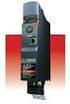 TOSVERT VF-MB1 Functions for lift application The technical information in this manual is provided to explain the principal functions and applications of the product, but not to grant you a license to
Oil and Coolant Circulating Heating System. Model - OCSM
 Oil and Coolant Circulating Heating System Model - OCSM Installation & Operation Manual 216280-000 REV 2 Identifying Your System The HOTSTART heating system is designed to heat fluids for use in marine
Battery Power Inverters
 Battery Power Inverters Renogy 500W 1000W 2000W Pure Sine Wave Inverter Manual 2775 E. Philadelphia St., Ontario, CA 91761 1-800-330-8678 1 Version 1.1 Important Safety Instructions Please save these instructions.