
Performance Tuning Guide
|
|
|
- Fay Wilkerson
- 10 years ago
- Views:
Transcription
1 IBM Tioli Storage Manager Version 6.3 Performance Tuning Guide GC

2

3 IBM Tioli Storage Manager Version 6.3 Performance Tuning Guide GC

4 Note: Before using this information and the product it supports, read the information in Notices on page 73. This edition applies to Version 6.3 of IBM Tioli Storage Manager (product number 5608-E01, 5608-E02, 5608-E03, 5608-E07, 5608-E12), and to all subsequent releases and modifications until otherwise indicated in new editions or technical newsletters. This edition replaces GC Copyright IBM Corporation 1996, US Goernment Users Restricted Rights Use, duplication or disclosure restricted by GSA ADP Schedule Contract with IBM Corp.

5 Contents Preface Who should read this guide Publications Tioli Storage Manager publications..... Tioli Storage FlashCopy Manager publications iii Support information iii Getting technical training iii Searching knowledge bases ix Contacting IBM Software Support xi New for IBM Tioli Storage Manager Version xiii New for the serer in Version xiii Node replication xiii Deduplication of NetApp file-serer data... xiii Database table and index reorganization... xi Automatic backup-archie client deployment xi Multistream database backup and restore processing xi Tioli Monitoring for Tioli Storage Manager updates xi Estimation of processor alue units..... x Prerequisite checker x Storage deice updates xi Administration Center updates xii Serer session disablement and enablement xiii Command-line help for subcommands... xiii Data encryption with SSL xix Chapter 1. Tioli Storage Manager performance tuning oeriew Chapter 2. Tioli Storage Manager serer performance tuning Tuning serer options DBMEMPERCENT EXPINTERVAL MAXSESSIONS MOVEBATCHSIZE and MOVESIZETHRESH.. 4 RESTOREINTERVAL TCPNODELAY TCPWINDOWSIZE TXNGROUPMAX Serer hardware recommendations Database manager for Tioli Storage Manager... 9 Database and log performance Database manager tuning Improing z/os media serer performance Backup performance Tuning the performance of automatic backup-archie client deployment Tuning inentory expiration Remoing olume history files Searching the serer actiity log Client and serer communication using Secure Sockets Layer Scheduling sessions and processes LAN-free backup Maximum number of mount points for a node.. 16 Managing storage pools and olumes Cached disk storage pools Enabling file system cache Tuning storage pool migration Improing storage agent performance Performance improement actiities for serer platforms Actions for better performance on all serer platforms UNIX file systems AIX serer performance AIX: mo commands Linux serer Linux on System z serer Oracle Solaris serer Windows serer Tuning kernel parameters Estimating throughput in untested enironments.. 27 Tuning tape drie performance Using collocation with tape dries Tape drie transfer rate Tuning disk storage performance Configuring the Tioli Storage Manager serer disk enironment Determining the disk system type Disk I/O characteristics Improing serer performance through database configuration Optimizing disk system read-ahead processes.. 33 Determining storage pool olume size Managing file system fragmentation Content Management enironments Busses Chapter 3. Tioli Storage Manager client performance tuning COMMRESTARTDURATION and COMMRESTARTINTERVAL COMPRESSALWAYS COMPRESSION DISKBUFFSIZE MEMORYEFFICIENTBACKUP QUIET RESOURCEUTILIZATION TAPEPROMPT TCPBUFFSIZE TCPNODELAY TCPWINDOWSIZE TXNBYTELIMIT Multiple session backup and restore Copyright IBM Corp. 1996, 2011 iii

6 Analyzing performance data for client backup and restore Client command line options Performance recommendations by client platform. 48 Macintosh client Windows client Client performance recommendations for all platforms Hierarchical Storage Manager tuning Chapter 4. Administration Center performance tuning Administration Center capacity planning Maximum number of actie administrators Processing capacity I/O throughput Processing memory Jaa heap memory size Administration Center setup recommendations.. 54 Installation requirements Locating the Administration Center Minimizing memory usage Optimizing Windows Serer 2003 memory Using the default action Tuning Administration Center performance Tuning processor performance Tuning network performance Tuning memory performance Resoling Administration Center performance tuning issues Sizing the number of Tioli Storage Manager Administration Center installations Optimizing the performance of the Administration Center Modifying the IBM Tioli Monitoring enironment file for performance Chapter 5. Network protocol tuning.. 61 TCP/IP communication concepts and tuning Sliding window Networks Limiting network traffic AIX network settings MTU and MSS settings Oracle Solaris network settings z/os network settings USS client with IBM TCP/IP for z/os TCP/IP and z/os UNIX system serices performance tuning Appendix. Accessibility features for the Tioli Storage Manager product family. 71 Notices Trademarks Glossary Index i IBM Tioli Storage Manager: Performance Tuning Guide

7 Preface Who should read this guide Publications This publication helps you tune the performance of the serers and clients in your IBM Tioli Storage Manager enironment. Before using this publication, you should be familiar with the following areas: The operating systems on which your IBM Tioli Storage Manager serers and clients reside The communication protocols installed on your client and serer machines The audience for this publication is anyone who wants to improe the performance of the Tioli Storage Manager serer and client, and the network and attached hardware as they apply to Tioli Storage Manager. IBM Tioli Storage Manager publications, Tioli Storage FlashCopy Manager publications, and other related publications are aailable online. You can search all publications in the Tioli Storage Manager Information Center: You can download PDF ersions of publications from the Tioli Storage Manager Information Center or from the IBM Publications Center at shop/publications/order/. Go to Tioli Documentation Central to find information centers that contain official product documentation for current and preious ersions of Tioli products, including Tioli Storage Manager products at deeloperworks/wikis/display/tiolidoccentral/tioli+storage+manager. You can also order some related publications from the IBM Publications Center website. The website proides information about ordering publications from countries other than the United States. In the United States, you can order publications by calling Tioli Storage Manager publications The following tables list the publications that make up the Tioli Storage Manager library. Table 1. Tioli Storage Manager serer publications Publication title IBM Tioli Storage Manager for AIX Installation Guide IBM Tioli Storage Manager for AIX Administrator's Guide IBM Tioli Storage Manager for AIX Administrator's Reference IBM Tioli Storage Manager for HP-UX Installation Guide Order number GC SC SC GC Copyright IBM Corp. 1996, 2011

8 Table 1. Tioli Storage Manager serer publications (continued) Publication title IBM Tioli Storage Manager for HP-UX Administrator's Guide IBM Tioli Storage Manager for HP-UX Administrator's Reference IBM Tioli Storage Manager for Linux Installation Guide IBM Tioli Storage Manager for Linux Administrator's Guide IBM Tioli Storage Manager for Linux Administrator's Reference IBM Tioli Storage Manager for Oracle Solaris Installation Guide IBM Tioli Storage Manager for Oracle Solaris Administrator's Guide IBM Tioli Storage Manager for Oracle Solaris Administrator's Reference IBM Tioli Storage Manager for Windows Installation Guide IBM Tioli Storage Manager for Windows Administrator's Guide IBM Tioli Storage Manager for Windows Administrator's Reference IBM Tioli Storage Manager for z/os Media Installation and User's Guide IBM Tioli Storage Manager Upgrade and Migration Guide for V5 Serers IBM Tioli Storage Manager Integration Guide for Tioli Storage Manager FastBack Order number SC SC GC SC SC GC SC SC GC SC SC SC GC SC Table 2. Tioli Storage Manager storage agent publications Publication title IBM Tioli Storage Manager for SAN for AIX Storage Agent User's Guide IBM Tioli Storage Manager for SAN for HP-UX Storage Agent User's Guide IBM Tioli Storage Manager for SAN for Linux Storage Agent User's Guide IBM Tioli Storage Manager for SAN for Oracle Solaris Storage Agent User's Guide IBM Tioli Storage Manager for SAN for Windows Storage Agent User's Guide Order number SC SC SC SC SC Table 3. Tioli Storage Manager client publications Publication title IBM Tioli Storage Manager for UNIX and Linux: Backup-Archie Clients Installation and User's Guide IBM Tioli Storage Manager for Windows: Backup-Archie Clients Installation and User's Guide IBM Tioli Storage Manager Using the Application Programming Interface IBM Tioli Storage Manager for Space Management for UNIX and Linux: User s Guide IBM Tioli Storage Manager HSM for Windows Administration Guide Order number SC SC SC SC SC i IBM Tioli Storage Manager: Performance Tuning Guide
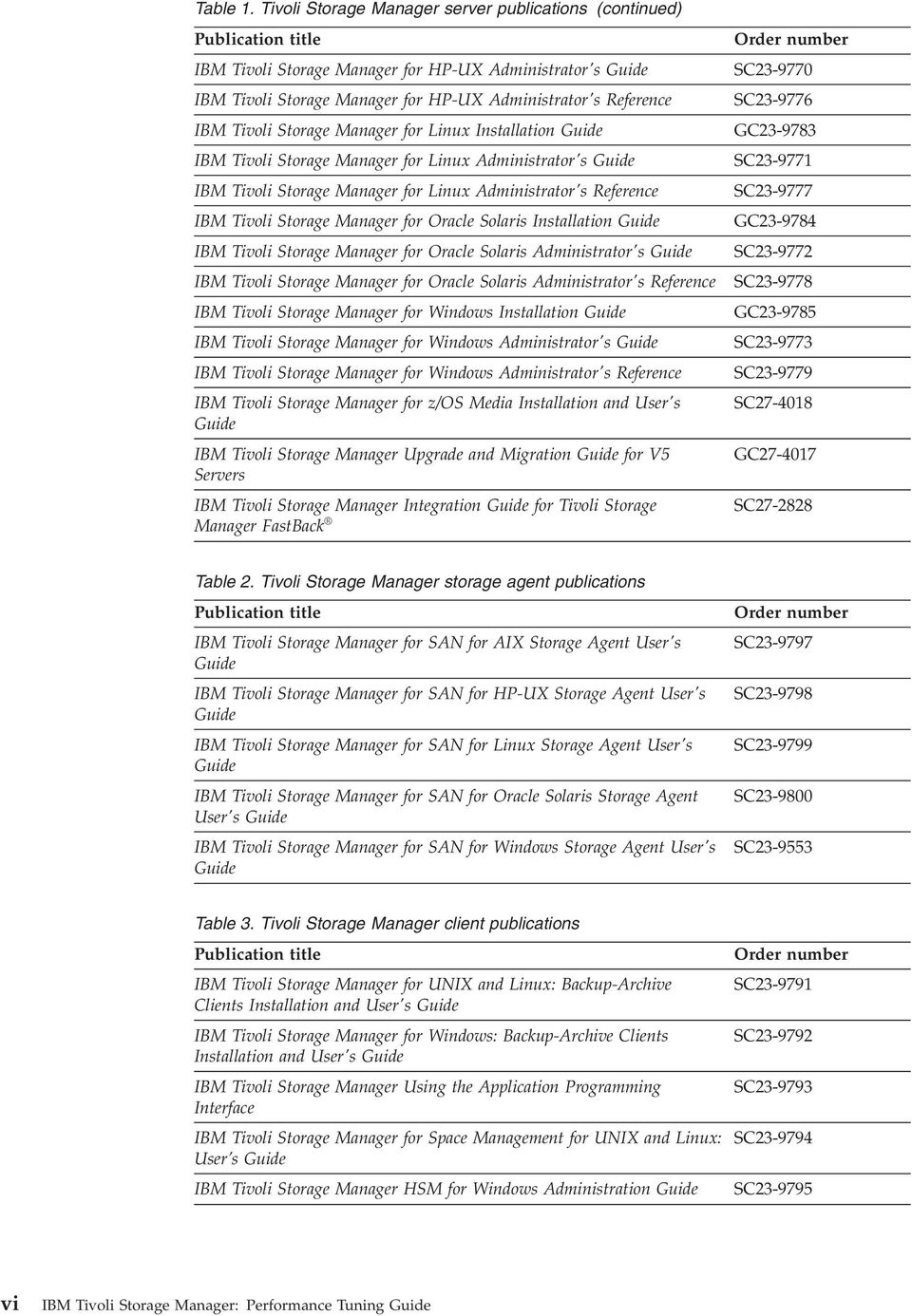
9 Table 4. Tioli Storage Manager data protection publications Publication title IBM Tioli Storage Manager for Databases: Data Protection for Microsoft SQL Serer Installation and User s Guide IBM Tioli Storage Manager for Databases: Data Protection for Oracle for UNIX and Linux Installation and User s Guide IBM Tioli Storage Manager for Databases: Data Protection for Oracle for Windows Installation and User s Guide IBM Tioli Storage Manager for Mail: Data Protection for Microsoft Exchange Serer Installation and User s Guide IBM Tioli Storage Manager for Mail: Data Protection for Lotus Domino UNIX and Linux Installation and User s Guide IBM Tioli Storage Manager for Mail: Data Protection for Lotus Domino for Windows Installation and User s Guide IBM Tioli Storage Manager for Enterprise Resource Planning: Data Protection for SAP Installation and User s Guide for DB2 IBM Tioli Storage Manager for Enterprise Resource Planning: Data Protection for SAP Installation and User s Guide for Oracle IBM Tioli Storage Manager for Virtual Enironments Installation and User s Guide IBM Tioli Storage Manager for Microsoft SharePoint Guide Order number GC SC SC GC SC SC SC SC SC N/A Table 5. IBM Tioli Storage Manager troubleshooting and tuning publications Publication title Order number IBM Tioli Storage Manager Problem Determination Guide GC IBM Tioli Storage Manager Performance Tuning Guide GC IBM Tioli Storage Manager Client Messages and Application SC Programming Interface Return Codes IBM Tioli Storage Manager Serer Messages and Error Codes SC IBM Tioli Storage Manager for Mail: Data Protection for Microsoft GC Exchange Serer Messages IBM Tioli Storage Manager for Databases: Data Protection for Microsoft GC SQL Serer Messages IBM Tioli Storage Manager for Databases: Data Protection for Oracle SC Messages IBM Tioli Storage Manager for Mail: Data Protection for Lotus Domino SC Messages IBM Tioli Storage Manager for Enterprise Resource Planning: Data SC Protection for SAP Messages Note: You can find information about IBM System Storage Archie Manager at c_complydataretention_or.html. Preface ii
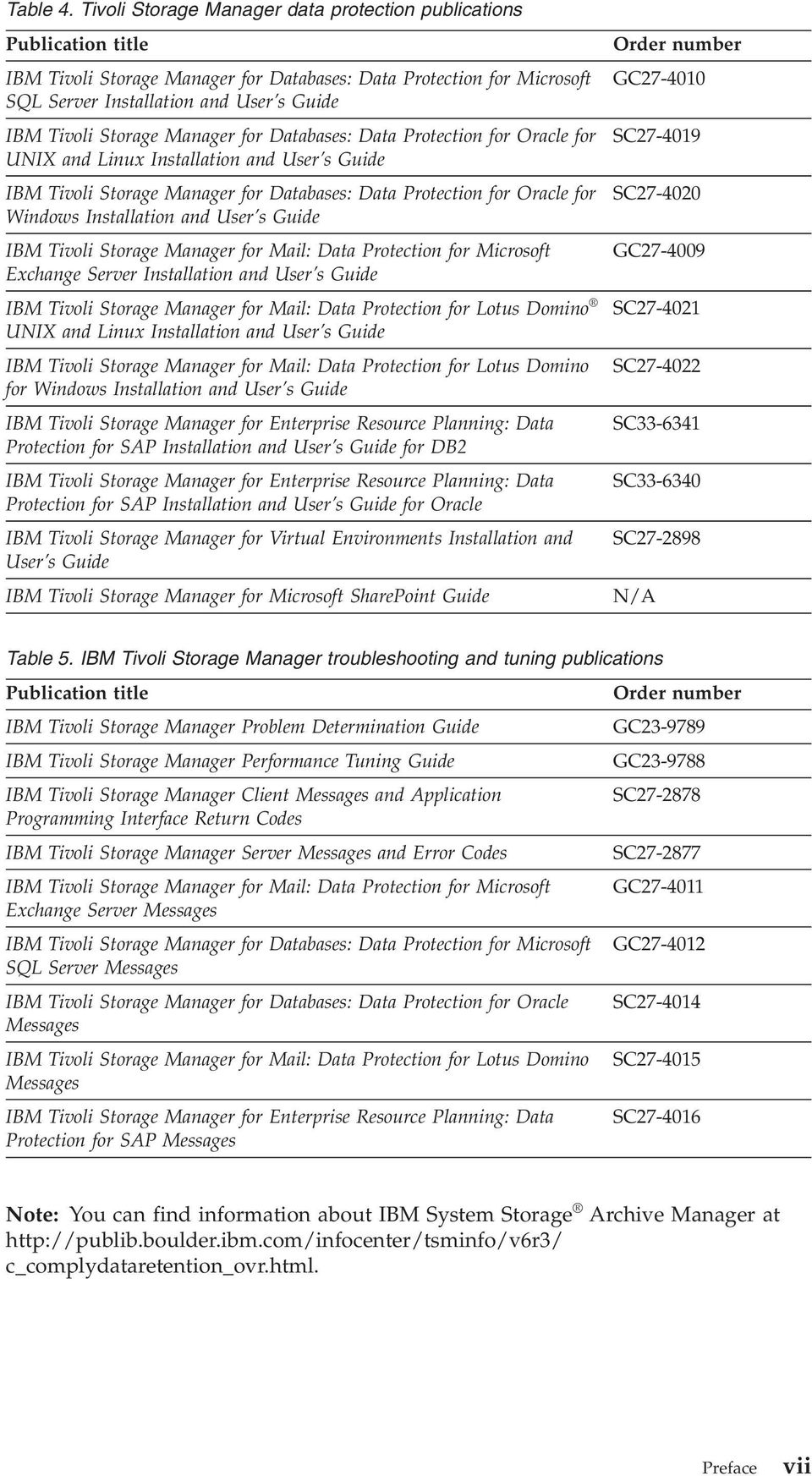
10 Tioli Storage FlashCopy Manager publications The following table lists the publications that make up the Tioli Storage FlashCopy Manager library. Table 6. Tioli Storage FlashCopy Manager publications Publication title IBM Tioli Storage FlashCopy Manager for UNIX and Linux Installation and User s Guide IBM Tioli Storage FlashCopy Manager for Windows Installation and User s Guide IBM Tioli Storage FlashCopy Manager for VMware Installation and User s Guide IBM Tioli Storage FlashCopy Manager Messages Order number SC SC SC GC Support information You can find support information for IBM products from arious sources. Start at the IBM Support Portal: You can select the products that you are interested in and search for a wide ariety of releant information. Getting technical training Information about Tioli technical training courses is aailable online. Go to the following websites to sign up for training, ask questions, and interact with others who use IBM storage products. Tioli software training and certification Choose from instructor led, online classroom training, self-paced Web classes, Tioli certification preparation, and other training options at Tioli Support Technical Exchange Technical experts share their knowledge and answer your questions in webcasts at supp_tech_exch.html. Storage Management community Interact with others who use IBM storage management products at index.html Global Tioli User Community Share information and learn from other Tioli users throughout the world at IBM Education Assistant View short "how to" recordings designed to help you use IBM software products more effectiely at ieduasst/ti1r0/index.jsp iii IBM Tioli Storage Manager: Performance Tuning Guide

11 Searching knowledge bases If you hae a problem with your Tioli Storage Manager family product, there are seeral knowledge bases that you can search. Begin by searching the Tioli Storage Manager Information Center at From this website, you can search the current Tioli Storage Manager documentation. Searching the Internet If you cannot find an answer to your question in the IBM Tioli Storage Manager information center, search the Internet for the information that might help you resole your problem. To search multiple Internet resources, go to the IBM support website at You can search for information without signing in. Sign in using your IBM ID and password if you want to customize the site based on your product usage and information needs. If you do not already hae an IBM ID and password, click Sign in at the top of the page and follow the instructions to register. From the support website, you can search arious resources including: IBM technotes IBM downloads IBM Redbooks publications IBM Authorized Program Analysis Reports (APARs) Select the product and click Downloads to search the APAR list. If you still cannot find a solution to the problem, you can search forums and newsgroups on the Internet for the latest information that might help you find problem resolution. An independent user discussion list, ADSM-L, is hosted by Marist College. You can subscribe by sending an to [email protected]. The body of the message must contain the following text: SUBSCRIBE ADSM-L your_first_name your_family_name. To share your experiences and learn from others in the Tioli Storage Manager and Tioli Storage FlashCopy Manager user communities, go to the following wikis: Tioli Storage Manager wiki tiolistoragemanager Tioli Storage FlashCopy Manager wiki wiki/tioli Storage FlashCopy Manager Preface ix

12 Using IBM Support Assistant IBM Support Assistant is a complimentary software product that can help you with problem determination. It is aailable for some Tioli Storage Manager and Tioli Storage FlashCopy Manager products. To learn about which products are supported, go to the IBM Support Assistant download web page at download.html. IBM Support Assistant helps you gather support information when you must open a problem management record (PMR), which you can then use to track the problem. The product-specific plug-in modules proide you with the following resources: Support links Education links Ability to submit problem management reports You can find more information at the IBM Support Assistant website: You can also install the stand-alone IBM Support Assistant application on any workstation. You can then enhance the application by installing product-specific plug-in modules for the IBM products that you use. Find add-ons for specific products at Finding product fixes A product fix to resole your problem might be aailable from the IBM software support website. You can determine what fixes are aailable by checking the IBM software support website at If you preiously customized the site based on your product usage: 1. Click the link for your product, or a component for which you want to find a fix. 2. Click Downloads, and then click Fixes by ersion. If you hae not customized the site based on your product usage, click Downloads and search for your product. Receiing notification of product fixes You can receie notifications about fixes, flashes, upgrades, and other news about IBM products. To sign up to receie notifications about IBM products, follow these steps: 1. From the support page at click Sign in to create, manage, or iew your subscriptions in the Notifications pane. 2. Sign in using your IBM ID and password. If you do not hae an ID and password, click register now and complete the registration process. 3. Click Manage all my subscriptions in the Notifications pane. 4. Click the Subscribe tab and then click Tioli. 5. Select the products for which you want to receie notifications and click Continue. x IBM Tioli Storage Manager: Performance Tuning Guide

13 6. Specify your notification preferences and click Submit. Contacting IBM Software Support You can contact IBM Software Support if you hae an actie IBM subscription and support contract and if you are authorized to submit problems to IBM. To obtain help from IBM Software Support, complete the following steps: 1. Ensure that you hae completed the following prerequisites: a. Set up a subscription and support contract. b. Determine the business impact of your problem. c. Describe your problem and gather background information. 2. Follow the instructions in Submitting the problem to IBM Software Support on page xii. Setting up a subscription and support contract Set up a subscription and support contract. The type of contract that you need depends on the type of product you hae. For IBM distributed software products (including, but not limited to, IBM Tioli, Lotus, and Rational products, as well as IBM DB2 and IBM WebSphere products that run on Microsoft Windows or on operating systems such as AIX or Linux), enroll in IBM Passport Adantage in one of the following ways: Online: Go to the Passport Adantage website at software/lotus/passportadantage/, click How to enroll, and follow the instructions. By telephone: You can call IBMSERV ( ) in the United States. For the telephone number to call in your country, go to the IBM Software Support Handbook web page at set2/sas/f/handbook/home.html and click Contacts. Determining the business impact When you report a problem to IBM, you are asked to supply a seerity leel. Therefore, you must understand and assess the business impact of the problem you are reporting. Seerity 1 Seerity 2 Seerity 3 Seerity 4 Critical business impact: You are unable to use the program, resulting in a critical impact on operations. This condition requires an immediate solution. Significant business impact: The program is usable but is seerely limited. Some business impact: The program is usable with less significant features (not critical to operations) unaailable. Minimal business impact: The problem causes little impact on operations, or a reasonable circumention to the problem has been implemented. Preface xi

14 Describing the problem and gathering background information When explaining a problem to IBM, it is helpful to be as specific as possible. Include all releant background information so that IBM Software Support specialists can help you sole the problem efficiently. To sae time, know the answers to these questions: What software ersions were you running when the problem occurred? Do you hae logs, traces, and messages that are related to the problem symptoms? IBM Software Support is likely to ask for this information. Can the problem be re-created? If so, what steps led to the failure? Hae any changes been made to the system? For example, hardware, operating system, networking software, and so on. Are you using a workaround for this problem? If so, be prepared to explain it when you report the problem. Submitting the problem to IBM Software Support You can submit the problem to IBM Software Support online or by telephone. Online Go to the IBM Software Support website at support/entry/portal/open_serice_request/software/ Software_support_(general). Sign in to access IBM Serice Requests and enter your information into the problem submission tool. By telephone For the telephone number to call in your country, go to the IBM Software Support Handbook at f/handbook/home.html and click Contacts. xii IBM Tioli Storage Manager: Performance Tuning Guide

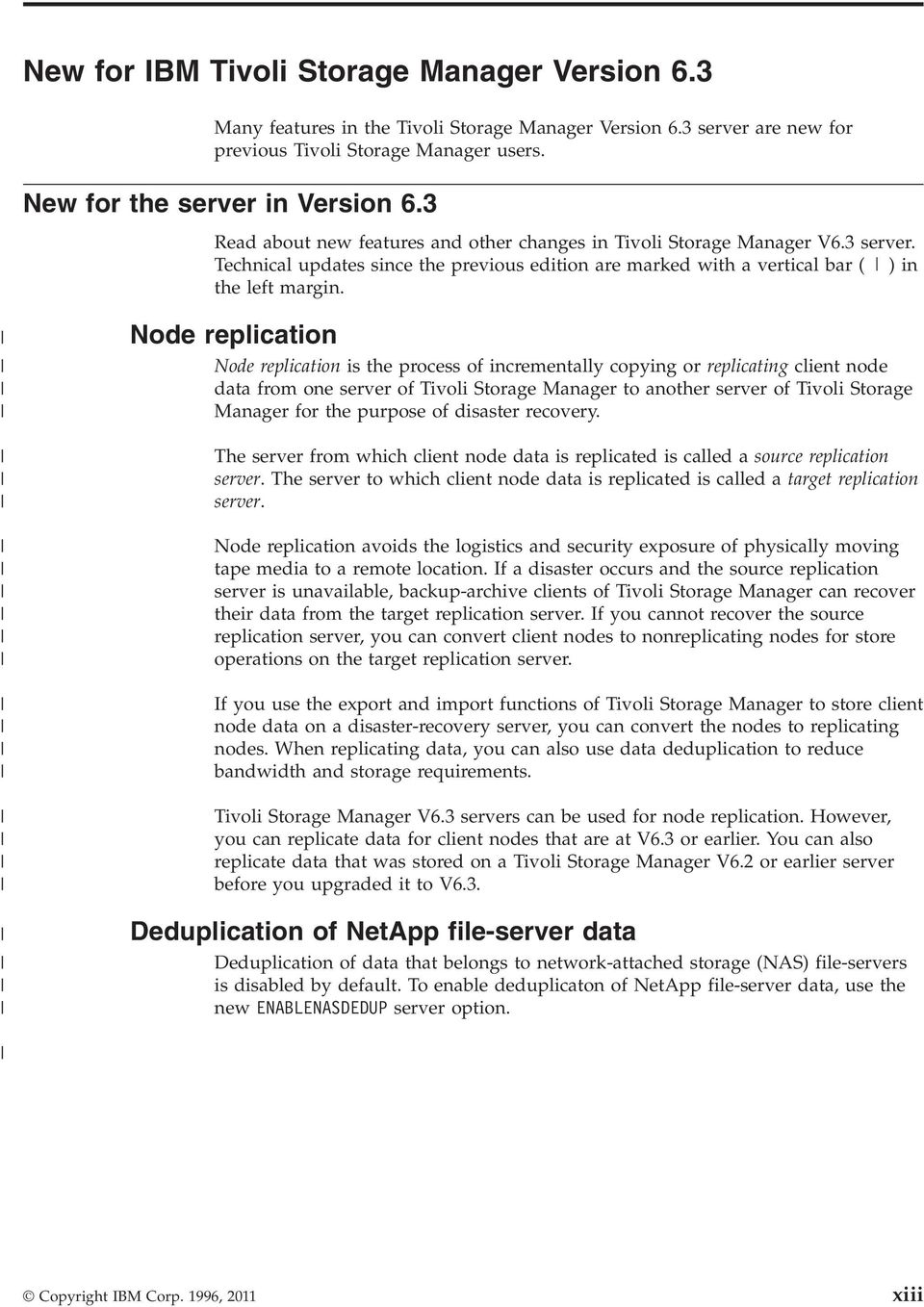
15 New for IBM Tioli Storage Manager Version 6.3 Many features in the Tioli Storage Manager Version 6.3 serer are new for preious Tioli Storage Manager users. New for the serer in Version 6.3 Read about new features and other changes in Tioli Storage Manager V6.3 serer. Technical updates since the preious edition are marked with a ertical bar ()in the left margin. Node replication Node replication is the process of incrementally copying or replicating client node data from one serer of Tioli Storage Manager to another serer of Tioli Storage Manager for the purpose of disaster recoery. The serer from which client node data is replicated is called a source replication serer. The serer to which client node data is replicated is called a target replication serer. Node replication aoids the logistics and security exposure of physically moing tape media to a remote location. If a disaster occurs and the source replication serer is unaailable, backup-archie clients of Tioli Storage Manager can recoer their data from the target replication serer. If you cannot recoer the source replication serer, you can conert client nodes to nonreplicating nodes for store operations on the target replication serer. If you use the export and import functions of Tioli Storage Manager to store client node data on a disaster-recoery serer, you can conert the nodes to replicating nodes. When replicating data, you can also use data deduplication to reduce bandwidth and storage requirements. Tioli Storage Manager V6.3 serers can be used for node replication. Howeer, you can replicate data for client nodes that are at V6.3 or earlier. You can also replicate data that was stored on a Tioli Storage Manager V6.2 or earlier serer before you upgraded it to V6.3. Deduplication of NetApp file-serer data Deduplication of data that belongs to network-attached storage (NAS) file-serers is disabled by default. To enable deduplicaton of NetApp file-serer data, use the new ENABLENASDEDUP serer option. Copyright IBM Corp. 1996, 2011 xiii
16 Database table and index reorganization If automatic table and index reorganization is affecting serer performance, you can manually schedule reorganizations. Automatic backup-archie client deployment Tioli Storage Manager, Version 6.3 can be scheduled to automatically deploy backup-archie client software to all workstations that hae the backup-archie client installed. You can deploy backup-archie clients on Microsoft Windows operating systems from a fix pack or interim fixes for all releases at V5.4 or later. You can migrate the Backup-Archie Client to a newer ersion, release, modification, or fix pack leel that is V5.5 and later. You can deploy backup-archie clients on operating systems other than Windows from all releases at V5.5 or later. These Backup-Archie Clients can go to any later ersion, release, modification, or fix leel. You can coordinate the updates to each Backup-Archie Client from the Administration Center. Multistream database backup and restore processing Multiple, concurrent data streams can reduce the amount of time that is required to back up or restore the database. You can specify multiple, concurrent data streams for automatic or manual database-backup operations. During restore operations, the Tioli Storage Manager serer attempts to use the same number of data streams that you specified for the backup operation. For example, suppose that you specify four data streams for a database backup operation. During a restore operation, the serer attempts to use four dries. If one drie is offline and unaailable, the serer uses three dries for the restore operation. The benefit of multiple, concurrent data streaming depends on the size of the database. In general, if the database is less than 150 GB, the amount of time that you can sae is relatiely small. Multiple, concurrent data streaming also uses more olumes. If the olumes are high-capacity and if you use data compression, the result can be wasted space. Tioli Monitoring for Tioli Storage Manager updates IBM Tioli Monitoring for Tioli Storage Manager, preiously referred to as the Reporting and Monitoring feature, has an improed installation wizard. Cognos is now included for custom report creation. Updates to Tioli Monitoring for Tioli Storage Manager include the following items: Cognos Business Intelligence V8 is an integrated business intelligence suite that is proided as part of Tioli Common Reporting. Tioli Common Reporting is included in the Administration Center installation when you select the Tioli Common Reporting component. See Customizing reports with Cognos Business Intelligence, in the Monitoring operations section of the Administrator's Guide for details. All of the information regarding client and serer reports can also be found in that section. The installation process has been improed to include a prerequisite checker, and now performs all installation configuration tasks automatically. xi IBM Tioli Storage Manager: Performance Tuning Guide

17 A customizable dashboard workspace has been added to display many commonly iewed items in a single iew. With the default setting, the dashboard displays data about the storage space used by node; unsuccessful client and serer schedules; and details about storage pools, dries, and actiity log error messages. You can include multiple serers in a single report. Reports hae been enhanced to refine the accuracy of the data being displayed. New Tioli Enterprise Portal workspaces are: actiity log, agent log, updates to client node status, dries, libraries, occupancy, PVU details, and replication status and details. New client reports are aailable: storage pool media details, storage summary details, replication details, replication growth, and replication summary. New serer reports are aailable: actiity log details, serer throughput, and an updated serer throughput report for data collected by agents earlier than ersion 6.3. Estimation of processor alue units You can use new methods to obtain information about the number of client and serer deices connected to the system, and the utilization of processor alue units (PVUs) by serer deices. The new methods proide information to help you assess the license compliance of the Tioli Storage Manager system. By using the new QUERY PVUESTIMATE command, you can generate reports that estimate the number of serer deices and client deices managed by the Tioli Storage Manager serer. You can also iew PVU information on a per-node basis. These reports are not legally binding, but proide a starting point for determining license requirements. Alternatiely, you can iew PVU information in the Administration Center. The Administration Center proides summaries of client deices, serer deices, and estimated PVUs, and more detailed information. For purposes of PVU estimation, only nodes on Windows 7, Windows XP Professional, and Apple systems are classified as client deices by default. Nodes on all other platforms are classified as serer deices by default. You can update the role classification by issuing the UPDATE NODE command. You can also iew and change the role classifications in the Administration Center client node notebook. For a detailed report, issue the SQL SELECT * FROM PVUESTIMATE_DETAILS command. This command extracts information at the node leel. This data can be exported to a spreadsheet and modified to more accurately represent the system enironment. Prerequisite checker Tioli Storage Manager Version 6.3 includes a prerequisite checker, a tool that can be run before starting the Tioli Storage Manager installation. The prerequisite checker erifies requirements for the Tioli Storage Manager serer, the Administration Center, and Tioli Monitoring for Tioli Storage Manager. The prerequisite checker erifies the operating system, the amount of free disk space, the required memory for the serer, and other prerequisites. The tool presents a summary of results, informs you about changes that are required in your enironment before installation, and creates required directories. In this way, the prerequisite checker can help to simplify the installation process. New for IBM Tioli Storage Manager Version 6.3 x

18 Storage deice updates New deice support and other changes to storage deices are aailable in Tioli Storage Manager Version 6.3. Virtual tape libraries With enhancements aailable in Version 6.3, you can define a library as a irtual tape library (VTL) to Tioli Storage Manager. VTLs primarily use disk subsystems to internally store data. Because they do not use tape media, you can exceed the capabilities of a physical tape library when using VTL storage. Using a VTL, you can define many olumes and dries which proides for greater flexibility in the storage enironment and increases productiity by allowing more simultaneous mounts and tape I/O. Faster formatting of DISK and preallocated FILE olumes AIX HP-UX Linux Solaris On some Linux and UNIX file systems, including ext4 on Linux and JFS2 on AIX, Tioli Storage Manager formats random-access olumes and preallocated sequential-access disk olumes nearly instantaneously. For example, Tioli Storage Manager can format a FILE or DISK olume on JFS2 in less than one second. The new method for formatting olumes on some Linux and UNIX systems is similar to the method that Tioli Storage Manager has been using to format olumes on Windows operating systems. The new method proides the following adantages: During olume formatting, I/O is negligible and does not affect performance. For example, if you are running a serer operation and you require an additional olume, you can format the olume without affecting the performance of the current operation. File system storage is allocated for the full file size without writing blocks and without creating sparse files. For example, if you issue the DEFINE VOLUME command to create a 10 GB olume, the underlying file in the file system consumes 10 GB of storage. Because the FILE olume size does not change, file-system log files do not require constant updating. The possibility for file fragmentation is minimized. Before using the new olume formatting method, Tioli Storage Manager checks the file system to determine whether the file system supports the method. If the file system does not, Tioli Storage Manager uses the old method. Access to storage deices attached by FICON on a z/os system The database of a Tioli Storage Manager V5 serer running on a z/os system can be migrated to a V6.3 serer running on AIX or Linux on System z. After the upgrade, z/os users can continue to access data stored on tape olumes whose contents are accessed by using FICON attached storage deices. The Tioli Storage Manager V6.3 serer accesses client data by using a storage deice attached to z/os. The storage deice is made aailable by IBM Tioli Storage Manager for z/os Media. In addition, Tioli Storage Manager for z/os Media facilitates access to Virtual Storage Access Method (VSAM) linear data sets on z/os by using an enhanced sequential FILE storage method. xi IBM Tioli Storage Manager: Performance Tuning Guide

19 Append-only mode for IBM LTO-5 dries The CHECKTAPEPOS serer option allows the Tioli Storage Manager serer to check the alidity and consistency of data block positions on tape. Enhancements to this option enable a drie to check for data oerwrite problems before each WRITE operation and allow Tioli Storage Manager to reposition tapes to the correct location and continue to write data. Use the CHECKTAPEPOS option with IBM LTO Generation 5 dries. Persistent resere for tape dries Persistent reseration allows tape drie reserations from other serers to be cleared, if, for example, a serer crashes. In Tioli Storage Manager Version 6.3, persistent resere is enabled for dries and drier leels that support the feature. For additional details on persistent resere support, see Technote at Administration Center updates New Administration Center support is aailable in Tioli Storage Manager Version 6.3. Tioli Integrated Portal, Version 2.1 AIX Linux Solaris Windows The Tioli Storage Manager Administration Center uses Tioli Integrated Portal for its graphical user interface (GUI). With Tioli Integrated Portal V2.1, you can now monitor the Administration Center with Internet Explorer 8 and Mozilla Firefox 3.5. All browsers that you used with Tioli Integrated Portal V1.1.1 and later can be used with this latest ersion. When you install Tioli Integrated Portal V2.1 installing Tioli Common Reporting, embedded security serice, or the time scheduling serice is optional. These features can be added and registered with Tioli Integrated Portal V2.1 at a later time. Administration Center policy domain updates With enhancements to the Administration Center, you can now specify serer eent-based archie settings using the Policy Domain and Management Class wizards. If you set an archie retention period for an object through the serer, you can update these settings using the Administration Center Management Class notebook. Setting an archie retention period ensures that objects are not deleted from the Tioli Storage Manager serer until policy-based retention requirements for that object are satisfied. New for IBM Tioli Storage Manager Version 6.3 xii

20 Analysis of client performance data With the new client performance monitor function, you hae the capability to gather and analyze performance data about backup and restore operations for an IBM Tioli Storage Manager client. The client performance monitor function is accessed from the Tioli Storage Manager Administration Center and uses data that is collected by the API. You can iew performance information about processor, disk, and network utilization, and performance data that relates to data transfer rates and data compression. You can analyze data throughput rates at any time during a backup or restore operation. Also, you can use the performance information to analyze processor, disk, or network performance bottlenecks. Serer session disablement and enablement You can now temporarily disable and enable all outbound or inbound sessions for a particular Tioli Storage Manager serer. This feature is useful, for example, if you hae a planned network outage that might affect communication between a source and a target replication serer. To preent replication failures, you can disable outbound sessions from the source replication serer before the outage. After communications hae been reestablished, you can resume replication by enabling outbound sessions. Command-line help for subcommands In this release, you can obtain help for Tioli Storage Manager subcommands. For example, you can display help for the DEFINE DEVCLASS command for 3570 deice classes and for 3590 deice classes. To display command-line help for a subcommand, type help followed by the topic number for the command. Topic numbers are listed in the table of contents, for example: 3.0 Administratie commands DEFINE DEVCLASS (Define a deice class) DEFINE DEVCLASS (Define a 3570 deice class) DEFINE DEVCLASS (Define a 3590 deice class)... To display help for the DEFINE DEVCLASS command for 3570 deice classes, type: help As in preious releases, you can use this method to display help for commands that hae unique names, such as REGISTER NODE: 3.46 REGISTER REGISTER ADMIN (Register an administrator) REGISTER LICENSE (Register a new license) REGISTER NODE (Register a node) To display help for the REGISTER NODE command, you can type: help You can also type help commandname, where commandname is the name of the serer command for which you want information: help register node xiii IBM Tioli Storage Manager: Performance Tuning Guide

21 Data encryption with SSL You can use Secure Sockets Layer (SSL) on HP-UX, Linux, Solaris, AIX, and Windows platforms. With SSL industry-standard communications, you can encrypt all traffic between the backup-archie client, the administratie command-line clients, and the Tioli Storage Manager serer. You can use either self-signed or endor-acquired SSL certificates. Serer self-signed certificates that were created in releases before Tioli Storage Manager V6.3 for SSL sessions are not compatible with the V6.3 client. To use SSL with self-signed certificates, use the SSLTLS12 option after distributing a new self-signed certificate to all V6.3 clients. New for IBM Tioli Storage Manager Version 6.3 xix
22 xx IBM Tioli Storage Manager: Performance Tuning Guide
23 Chapter 1. Tioli Storage Manager performance tuning oeriew Tioli Storage Manager performance can be influenced by arious factors. Tuning for optimal performance requires care and expertise. Tuning IBM Tioli Storage Manager can be complex because of the many operating systems, network configurations, and storage deices that Tioli Storage Manager supports. Performance tuning een for a single platform function is complex. The factors that can affect performance and hae significant effects include: Aerage client file size Percentage of files changed since last incremental backup Percentage of bytes changed since last incremental backup Serer hardware (CPUs, RAM, disk dries, network adapters) Serer storage pool deices (disk, tape, optical) Serer operating system Serer actiity (non-tioli Storage Manager workload) Client hardware (CPUs, RAM, disk dries, network adapters) Client operating system Client actiity (non-tioli Storage Manager workload) Network hardware and configuration Network utilization Network reliability Communication protocols Communication protocol tuning Final output repository type (disk, tape, optical) Copyright IBM Corp. 1996,
24 2 IBM Tioli Storage Manager: Performance Tuning Guide
25 Chapter 2. Tioli Storage Manager serer performance tuning Tuning serer options You can tune the performance of IBM Tioli Storage Manager serers through serer options, commands, and other configuration settings. The options are tunable on all Tioli Storage Manager serers. You can change option settings in the serer options file (dsmser.opt). If you change the serer options file, you must stop and restart the serer for the changes to take effect. You can also change some settings with the serer SETOPT command. Some serer options can be tuned to improe IBM Tioli Storage Manager performance. The following options are tunable on all Tioli Storage Manager serers. You can change any option setting in serer options file (dsmser.opt). You can change some options with the serer SETOPT command. If you change the serer options file, you must halt and restart the serer for the changes to take effect. DBMEMPERCENT The DBMEMPERCENT serer option sets a limit on the percentage of the system memory that is used for the database manager. By default, the percentage of irtual address space that is dedicated to database manager processes is set to 70 to 80% of system RAM. To change this setting to a alue from 10 to 99%, modify the DBMEMPERCENT serer option. Ensure that the alue allows adequate memory for both the IBM Tioli Storage Manager serer and any other applications that are running on the system. The default alue is AUTO. It is generally not necessary to change this setting on a system that is dedicated to a single Tioli Storage Manager serer. If there are other applications that require significant amounts of memory on a system, changing this setting to an appropriate amount might reduce paging. For systems with multiple Tioli Storage Manager serers, changing this setting for each serer is recommended. For example, the percentage of irtual address space could be set to 25% for each of three serers on a system. Each serer could also hae a different alue for this setting, as appropriate for the workload on that serer. EXPINTERVAL Inentory expiration remoes client backup and archie file copies from the serer. The EXPINTERVAL serer option specifies the interal, in hours, between automatic inentory expirations run by the Tioli Storage Manager serer. The default is 24. Backup and archie copy groups can specify the criteria that make copies of files eligible for deletion from data storage. Howeer, een when a file becomes eligible for deletion, the file is not deleted until expiration processing occurs. If expiration processing does not occur periodically, storage pool space is not reclaimed from expired client files, and the Tioli Storage Manager serer requires increased disk storage space. Copyright IBM Corp. 1996,
26 Expiration processing is CPU and database input/output (I/O) intensie. If possible, it should be run when other Tioli Storage Manager processes are not occurring. To enable this, set EXPINTERVAL to 0 and either schedule expiration to occur once each day, or manually start the process with the EXPIRE INVENTORY serer command. Expiration processing can be scheduled by defining an administratie schedule. When using the DURATION parameter on an administratie schedule, periodically check that expiration is actually completing within the specified time. This is the recommended setting: EXPINTERVAL 0 This setting specifies that there is no expiration processing. Use an administratie schedule to run expiration at an appropriate time each day. MAXSESSIONS The MAXSESSIONS serer option specifies the maximum number of simultaneous client sessions that can connect with the Tioli Storage Manager serer. The default alue is 25 client sessions. The minimum alue is 2 client sessions. The maximum alue is limited only by aailable irtual memory or communication resources. By limiting the number of clients, serer performance can be improed, but the aailability of Tioli Storage Manager serices to the clients is reduced. A typical production Tioli Storage Manager serer could hae the MAXSESSIONS parameter set to 100 or greater. MOVEBATCHSIZE and MOVESIZETHRESH The MOVEBATCHSIZE and MOVESIZETHRESH serer options tune the performance of serer processes that inole the moement of data between storage media. These processes include storage pool backup and restore, migration, reclamation, and moe data operations. MOVEBATCHSIZE specifies the number of files to be moed and grouped in a batch, within the same serer transaction. The default alue for MOVEBATCHSIZE is 1000; and the maximum alue is also The MOVESIZETHRESH option specifies, in megabytes, a threshold for the amount of data moed as a batch, within the same serer transaction. When this threshold is reached, no more files are added to the current batch, and a new transaction is started after the current batch is moed. The default alue for MOVESIZETHRESH is 4096; and the maximum alue is The number of client files moed for each serer database transaction are determined by the number and size of the files in the batch. Database transactions can be a serer storage pool backup/restore, migration, reclamation, or moe data operation. If the number of files in the batch equals the MOVEBATCHSIZE before the cumulatie size of the files becomes greater than the MOVESIZETHRESH, then the MOVEBATCHSIZE is used to determine the number of files moed or copied in the transaction. If the cumulatie size of files being gathered for a moe or copy operation exceeds the MOVESIZETHRESH alue before the number of files becomes equialent to the MOVEBATCHSIZE, then the MOVESIZETHRESH alue is used to determine the number of files moed or copied in the transaction. Using alues higher than the default can improe performance of serer data moement operations, such as storage pool migration or backup storage pool, to 4 IBM Tioli Storage Manager: Performance Tuning Guide
27 real tape deices. Virtual tape deices and disk only configurations tend to not benefit from larger alues than the default. When the MOVEBATCHSIZE or MOVESIZETHRESH parameters are increased from their default alues, the serer requires more space in the actie log. The actie log might require an allocation of space two or more times larger than a actie log size which uses the defaults. In addition, the serer requires a longer initialization time at startup. If you choose to increase these alues for performance reasons, be sure to monitor actie log usage during the first few storage pool backup, restore, migration, reclamation, or moe data operations to ensure sufficient actie log space is aailable. The following are the recommended settings: MOVEBATCHSIZE 1000 MOVESIZETHRESH RESTOREINTERVAL The RESTOREINTERVAL option specifies how long, in minutes, that a restartable restore session can be in the database before it can be expired. Restartable restores allow restores to continue after an interruption without starting at the beginning. Restartable restores reduce duplicate effort or manual determination of where a restore process was terminated. The RESTOREINTERVAL option defines the amount of time an interrupted restore can remain in the restartable state. The minimum alue is 0. The maximum is (one week). The default is 1440 (24 hours). If the alue is set to 0 and the restore is interrupted or fails, the restore is still put in the restartable state. Howeer, it is immediately eligible to be expired. Restartable restore sessions consume resources on the Tioli Storage Manager serer. You should not keep these sessions any longer than they are needed. It is recommended that you tune the RESTOREINTERVAL option to your enironment. TCPNODELAY The TCPNODELAY serer option specifies whether the serer allows data packets that are less than the maximum transmission unit (MTU) size to be sent out immediately oer the network. When TCPNODELAY is set to NO, the serer buffers data packets that are less than the MTU size: Buffering can improe network utilization. Buffering requires a delay that can impact session throughput greatly. When set to YES, it disables the TCP/IP Nagle algorithm, which allows data packets less than the MTU size to be sent out immediately. Setting this option to YES might improe performance in higher speed networks. The default is YES. The following is the recommended setting: TCPNODELAY YES Note: This option also exists on the Tioli Storage Manager client. Chapter 2. Tioli Storage Manager serer performance tuning 5
28 TCPWINDOWSIZE The TCPWINDOWSIZE serer option specifies the amount of data receied, in kilobytes, that can be on a TCP/IP connection at one time. The sending host cannot send more data until an acknowledgment and TCP receie window update are receied. Each TCP packet contains the adertised TCP receie window on the connection. A larger window lets the sender continue to send data and might improe communication performance, especially on fast networks with high latency. The TCPWINDOWSIZE option oerrides the operating system's TCP receie window size. In AIX, for instance, these parameters are tcp_sendspace and tcp_recspace and are set as no options. For Tioli Storage Manager, the default is 63 KB, and the maximum is 2048 KB. Specifying TCPWINDOWSIZE 0 causes Tioli Storage Manager to use the operating system default. Using the default is not preferred for operating systems that use a static alue and do not autotune. The reason for that is because the optimal setting for Tioli Storage Manager might not be the same as the optimal setting for other applications. You might need more kernel memory if you set a large TCP receie window size. If Tioli Storage Manager clients and serer are on the same subnet, a larger TCP receie window size is unlikely to improe throughput. The risk of the increased memory requirements might oershadow the benefit. Newer operating systems proide TCP/IP stacks that commit the requested memory as needed. Therefore they hae a lower risk of increased kernel memory for the send and receie buffers. These newer operating systems can also auto-tune the receie buffer size by obsering the session transfer statistics, either increasing or decreasing the receie window as appropriate. For these operating systems only, you might set the Tioli Storage Manager serer TCPWINDOWSIZE option to 0 and use the autotuning feature. These settings are especially useful when there are remote Tioli Storage Manager clients connected to this Tioli Storage Manager serer. For all platforms, TCP receie window scaling, also known as RFC 1323, must be set to use window sizes larger than bytes: AIX AIX: no -o rfc1323=1 HP-UX HP-UX: Using a window size greater than 64 KB-1 automatically enables large window support. Solaris Oracle Solaris 10: Proides TCP window scaling by default. If TCP window scaling is disabled, re-enable it by running the ndd -set /de/tcp tcp_wscale_always 1 command. Linux Linux: Proides TCP window scaling by default. Check to see if TCP window scaling is enabled by running the cat /proc/sys/net/ip4/ tcp_window_scaling command. Windows Windows 2008: Proides TCP window scaling by default. Windows Windows XP Professional and Windows 2003: With regedit, add or modify the following registry name/alue pair under [HKEY_LOCAL_MACHINE\ SYSTEM\CurrentControlSet\Serices\Tcpip\Parameters]: Tcp1323Opts, REG_DWORD, 3 Attention: Before modifying the registry name and alue pair, back up the entire registry. After updating the registry, restart the operating system. 6 IBM Tioli Storage Manager: Performance Tuning Guide
29 Linux On Linux, Tioli Storage Manager sets the TCPWINDOWSIZE serer option to the alue that you specify; howeer the operating system might not use that alue because of auto tuning. The following are the preferred default settings: TCPWINDOWSIZE 63 For a Gigabit Ethernet with 9000 byte MTU (jumbo frames): TCPWINDOWSIZE 128 Or for communications that use Hipersockets between System z LPARs with a 56 KB MTU (maximum transmission unit) size: TCPWINDOWSIZE 256 Tip: This option is also aailable on Tioli Storage Manager Backup-Archie Clients. Determining the TCP receie window size You can determine the TCP receie window size by completing a series of steps. First collect a packet trace to determine the TCP receie window size that is used on a session between a specific Tioli Storage Manager client and serer. You need the first two packets on a session, which can be accomplished by issuing the tcpdump command. Complete the following steps: 1. List the network interfaces by issuing the tcpdump -D command and choose the one that is most appropriate. For example: myclient:/home # tcpdump -D 1.hsi0 2.eth0 3.eth1 4.eth2 5.any (pseudo-deice that captures on all interfaces) 6.lo 2. Issue the tcpdump command to start the packet collection. For example: myclient:/home # tcpdump -i 1 -l -n - > tsmpackets.trc 3. In another prompt window, start the Tioli Storage Manager backup-archie client and back up one small file (can be as small as 10 bytes). 4. Cancel the packet trace collection. Use the keystroke Ctrl+C to cancel the packet trace. 5. Reiew the packet data file with a text editor and find the two entries between the client and serer that look like the following two lines: > : S,... win <...,wscale 7> > : S,... ack win <...,wscale 1,...> Some fields in the preious lines were remoed to simplify the display. The first line is the SYN packet and the second is the SYN,ACK packet. You can search for wscale to find these lines. If you do not find wscale, it was because of one of the following reasons: You did not capture the beginning of a session TCP receie window scaling is not enabled on your client operating system 6. Calculate the session receie window size for the system that sent the packet. Take the window alue, multiplied by 2, raised to the power of the wscale alue. In the two packets shown, the receie window for the client side Chapter 2. Tioli Storage Manager serer performance tuning 7
30 ( ) is * 2**7 = bytes. The receie window for the serer side ( ) is * 2**1 = bytes. The wscale option alue cannot change during the session and is applied to all packets on the session with the same alue. If the wscale option is not found on both the SYN and SYN,ACK packets, it does not apply on the session in either direction. The receie window sizes are then the alues found in each packet (as if wscale was 0). TXNGROUPMAX The TXNGROUPMAX serer option specifies the number of objects that are transferred between a client and serer in a single transaction. The minimum alue is 4 objects, and the maximum alue is 65,000 objects. The default alue is set to 4096 objects. An object is a file or directory. It is possible to affect the performance of client backup, archie, restore, and retriee operations by using a larger alue for this option: 1. Increasing the alue of the TXNGROUPMAX option can improe throughput for operations storing data directly to tape, especially when storing a large number of objects. 2. If you increase the alue of the TXNGROUPMAX option by a large amount, watch for possible effects on the actie log. A larger alue for the TXNGROUPMAX option can result in increased utilization of the actie log, as well as an increased length of time for a transaction to commit. If the effects are seere enough, they can lead to problems with operation of the serer. For more information on managing the actie log, see the Administrator's Guide. 3. A larger alue of the TXNGROUPMAX option can also increase the number of objects that must be resent if the transaction is stopped because an input file changed during backup, or because a new storage olume was required. The larger the alue of the TXNGROUPMAX option, the more data that must be resent. 4. Increasing the TXNGROUPMAX alue affects the responsieness of stopping the operation, and the client might hae to wait longer for the transaction to complete. You can oerride the alue of this option for indiidual client nodes. See the TXNGROUPMAX parameter in the REGISTER NODE and UPDATE NODE commands. This option is related to the TXNBYTELIMIT option in the client options file. TXNBYTELIMIT controls the number of bytes, as opposed to the number of objects, that are transferred between transaction commit points. At the completion of transferring an object, the client commits the transaction if the number of bytes transferred during the transaction reaches or exceeds the alue of TXNBYTELIMIT, regardless of the number of objects transferred. Set TXNGROUPMAX to 4096 in your serer options file. Settings higher than 4096 typically proide no benefit, and might actually degrade throughput when storing data to storage pools on disk. For clients that store small files directly to tape storage pools, setting the TXNGROUPMAX parameter on the UPDATE NODE command to a alue higher than 4096 might improe throughput. 8 IBM Tioli Storage Manager: Performance Tuning Guide
31 Serer hardware recommendations Tioli Storage Manager Version 6 serers hae greater scalability and make much greater use of additional serer hardware than preious ersions. Additional processors and memory can be especially useful for reducing operational windows for incremental backups, archiing, inentory expiration, and storage pool reclamation. New functions such as deduplication can require additional processing capacity. Here are some recommended minimums: Processors Hae at least one processor core per concurrent inentory expiration or deduplication identify process. Memory Minimum memory requirements to run production serers: 12 GB, or 16 GB if you use deduplication. If you plan to run multiple instances, each instance requires the memory listed for one serer. Multiply the memory for one serer by the number of instances planned for the system.for systems with multiple Tioli Storage Manager serers, see DBMEMPERCENT on page 3 for tuning the serer memory limits. I/O adapters Serer performance depends on the system input/output (I/O) throughput capacity for both local area networks (LAN) and storage (SCSI, Fibre Channel). Database manager for Tioli Storage Manager The Tioli Storage Manager database manager automatically manages the space that is aailable to the directories as database space. You create and designate directories that the serer can use for the database. Space allocation is done automatically in the directory locations specified for the database. If the serer needs additional space, you can add directories by using the EXTEND DBSPACE command. You cannot adjust the assigned capacity of the database. Space allocation is done automatically in the directory locations specified for the database. You can specify a log mirror to protect the actie log. Locate the database on fast, reliable storage, such as RAID (redundant array of independent disks) hardware. Ensure that the directories are not placed on file systems that might run out of space. During the successful installation of a Tioli Storage Manager serer, these steps are completed: The database is allocated and initialized. The actie log is allocated and initialized. The archie log is allocated and initialized. If required, allocate and initialize an actie log mirror. Mirroring of the database is not supported by Tioli Storage Manager. The database manager determines when database backups are required and automatically initiates them. The deice class used for the database backups is set by using the SET DBRECOVERY command. Chapter 2. Tioli Storage Manager serer performance tuning 9
32 The serer does not track indiidual database olumes. The serer uses its own fixed-size actie log buffer pool and adjusts the alue of the buffer pool size dynamically. Restriction: Raw logical olumes are not supported for the database and log files. Database and log performance The Tioli Storage Manager database, actie log, and archie log hae different input/output (I/O) operations and must be considered separately for tuning. For most operations the database access pattern is random. Therefore, it is best to use the fastest aailable disk to support database operations. Also, enable write caching on the disk olumes where the database and log files are. Enable write caching only if the cache is nonolatile and can surie unexpected power outages and other failure modes. It is useful to gauge the performance of a database olume by measuring the I/O per second (IOPS) rate. Measuring the IOPS rate works best when only one database olume is allocated per physical olume. A typical Fibre Channel attached disk can manage roughly 150 IOPS before queuing occurs. Some disks, such as Serial Adanced Technology Attachment (SATA) attached disk, can manage fewer IOPS, and some disks might be able to manage more. If a physical disk approaches the 150 IOPS mark, add additional physical disks and additional database olumes to the database configuration. Operating system tools, such as iostat or filemon, are aailable to measure IOPS for physical olumes. Adanced storage adapters or subsystems that use solid-state drie (SSD) technologies can improe Tioli Storage Manager serer database performance. The SSD deices are suited for random IOPS workloads. Some subsystems can dynamically manage the I/O workload to best use the SSD deices along with physical disk dries. It is best to use multiple directories for the database, with up to 4 or 8 directories for a large Tioli Storage Manager database. Locate each database directory on a disk olume that uses separate physical disks from other database directories. The Tioli Storage Manager serer database I/O workload is spread oer all directories, thus increasing the read and write I/O performance. Haing many small capacity physical disks is better than haing a few large capacity physical disks with the same rotation speed. The access pattern for the actie log is always sequential. Physical placement on the underlying disk is important. It is best to isolate the log from the database and from the disk storage pools. If isolating the log cannot be done, then place the log with storage pools and not with the database. Actie log mirroring proides higher reliability, but comes at a cost in performance. Use the MIRRORLOGDIR parameter in the DSMSERV FORMAT command to find the mirror log directory on a disk olume that uses separate physical disks from the actie log. After installation, change the mirror log directory location by changing the alue of the MIRRORLOGDIR option in the serer option file and restarting the serer. Monitor the buffer pool cache to determine whether the hit rate is set to the most productie percentage. When you set your buffer pool hit rate to a high percentage, the database can manage more queries. A hit rate higher than 90% is 10 IBM Tioli Storage Manager: Performance Tuning Guide
33 preferred. To iew the bufferpool hit rate, issue the QUERY DB F=D command. Database manager tuning Proper tuning of the database for IBM Tioli Storage Manager is essential for optimal performance. The Tioli Storage Manager database manager enables self-tuning memory. Key areas to address when determining your Tioli Storage Manager database manager configuration are: The database manager (instance-leel) configuration parameters Database configuration parameters that hae the largest impact on the performance of the system Maintenance operations that you must perform to ensure that the system continues to perform optimally once you hae it running Configuration parameters The primary considerations for the Tioli Storage Manager database are: enough memory for the database manager serer, configuration of enough physical disks to handle the input/output (I/O) requirements, and enough CPUs to handle the workload. Self tuning memory For the best database manager operation remember, that the data and indexes are manipulated in the database buffer pools allocated in memory. Performance is stifled by a lot of paging operations required when there is more buffer pool space defined than real memory. Beside the buffer pools which use the most memory, the sort list, the lock list and the package cache are other memory segments allocated by the database manager. The database manager enables self tuning memory by default. This automatically samples the workload and performance characteristics of the database. Using this feature the database manager adapts the sort heap, lock list, package cache, buffer pool and total database memory improing performance and through put as your enironment requires. Tioli Storage Manager mixes the database workload between transactions recording backups to heay query usage during restore operations. For information on tuning a lock list, see the technical document titled Managing the DB2 LOCKLIST Configuration Parameter with Tioli Storage Manager. Enough disk to handle I/O Efficient performance relies on haing enough physical disk dries to serice the throughput required for the workload. The correct relationship of physical disks to CPU in the database manager serer helps to maintain good performance. One of the most CPU intensie and database intensie parts of the Tioli Storage Manager serer workload is inentory expiration. There should be a ratio of one database directory, array, or LUN for each inentory expiration process. CPUs to handle the workload The power of the database manager system depends on the number and speed of its CPUs. For a balanced system, under normal operations only consume approximately 80% of the aailable CPUs. Chapter 2. Tioli Storage Manager serer performance tuning 11
34 Improing z/os media serer performance When you migrate your system to a Tioli Storage Manager V6.3 serer running AIX or Linux on System z, network throughput requirements can be different from the V5 serer on z/os. After the migration, you might see an increase in the amount of data that is transferred oer networks that are connected to the Tioli Storage Manager serer. Before setting up a network connection between the Tioli Storage Manager serer and the z/os media serer, follow these suggestions: For client connections to back up, archie, restore, and retriee data, the V6.3 serer requires the same network bandwidth as the V5 serer running on z/os. This information is based on the assumption that the migrated V6.3 serer protects the same clients as the V5 serer. More network bandwidth is required for operations that store or retriee data with the z/os media serer than for operations that use a local disk or tape. Use dedicated networks for connections between the V6.3 serer and the z/os media serer. Use technologies that optimize network performance and efficiency, such as jumbo frames and HiperSockets. You can use HiperSockets for connections between Linux and z/os logical partitions located on the same System z central processor complex. To increase the network bandwidth between the V6.3 serer and the z/os media serer, set up multiple interfaces that you specify on a single media serer definition. You can use a comma-delimited expression for the TCP/IP address, as in this example: define serer... hladdress= , lladdress= If you use this method, data can be stored or retrieed by using any aailable network interface. You are not required to distribute storage requirements oer seeral deice classes. This method increases the aailable network bandwidth and supports network connection failoer and load balancing. To reduce network bandwidth requirements, store backup and archie data to a V6.3 serer local disk pool. Then use storage pool backup and storage pool migration to copy and moe the data to z/os media serer tape storage. More network bandwidth is required to back up or archie the data directly to the z/os media serer FILE deice-class storage, and moe the data to z/os tape storage. To optimize network performance when using the z/os media serer, ensure that both the z/os and the Tioli Storage Manager serer systems can use a large TCP/IP window size. On z/os, this means that the TCPIP.PROFILE TCPCONFIG statement includes the TCPMAXRCVBUFRSIZE parameter, which is set to the default alue of 256 K or greater. On AIX, this means that the network tuning parameter rfc1323 is set to 1, which is not the default alue. On Linux, this means that the kernel parameter net.ip4.tcp_window_scaling is set to the default alue of 1. If the z/os media serer stores the data, the single-session backup throughput might be 80% of the throughput expected when using local storage deices to store data. For example, assume the throughput for backing up a large amount of data is 30 MB per second for a V5 serer on z/os. After migrating to the V6.3 serer running AIX or Linux on System z with a z/os media serer, the throughput might be reduced to 80%, or 24 MB per second. Use the Tioli Storage Manager storage agent installed on the client system with the LAN-free communication method to back up or archie data to the z/os 12 IBM Tioli Storage Manager: Performance Tuning Guide
35 media serer directly. This method might reduce the network bandwidth requirements on the V6.3 serer and increase backup throughput. Backup performance When possible, limit the number of ersions of any backup file to the minimum required. File backup performance is degraded when there are many ersions of an object. Use the DEFINE COPYGROUP command and modify the VEREXISTS parameter to control the number of ersions, or use the UPDATE COPYGROUP command. The default number of backup ersions is 2. If the retention requirements in your enironment differ among client machines, use different copy groups rather than taking the lowest common denominator. For example, if your accounting machines require records to be kept for seen years, but other machines need data kept for only two years, do not specify seen for all. Instead, create two separate copy groups. Not only are backups potentially faster, but you also consume less storage because you are not keeping data that you do not need. Tuning the performance of automatic backup-archie client deployment There are arious actions that you can use that might improe backup-archie client deployment performance. Deploy the client when the clients, serer, and network hae minimal actiity. Do not deploy during a backup window. To aoid the cost of retrieing a wrong package, use separate schedules for each client architecture (for example, x86, x64, ia64). When upgrading multiple clients concurrently, store the deployment packages in a random disk or in a sequential file storage pool on disk. Both types of storage pools support read access to the same object from multiple sessions concurrently. This is not the case for storage pools that use tape, including VTLs (een if the data is stored on physical disks), since the serer serializes read access to the storage pool olume containing the upgrade package data in those cases. Proide sufficient cache memory on the disk subsystem used by the random disk or sequential file storage pools containing the deployment packages. Deployment packages are read from the storage pool olumes during retrieal using direct input/output (I/O). This means that the serer operating system does not cache the data in memory, and each I/O must come from the disk subsystem. When deploying many clients at the same time, the disk subsystem sees a high read hit ratio on these data blocks, which leads to faster throughput. Balance multiple clients across the network interfaces on the serer. Balancing might already hae been done to optimize backup performance Chapter 2. Tioli Storage Manager serer performance tuning 13
36 Tuning inentory expiration You can improe inentory expiration by limiting the scope of the data to be expired and by specifying the number of threads running in parallel. In the EXPIRE INVENTORY command you can specify parameters to target specific client nodes and domains, and also to determine the type of data to be processed. For example, you can run expiration on a specific set of nodes if policy changes were made recently that would cause a lot of the data for these nodes to be eligible to be expired. In addition, you can use the RESOURCE parameter to specify the number of parallel processes that you want to run during a single EXPIRE INVENTORY process. You can run up to 10 threads at one time, but if you are processing one node, only one thread is used. The workload is distributed across specified number of threads. You can run up to 10 expiration processes in parallel. The resources represent parallel work by the serer within the single expiration process; expiration still runs as a single process. For example, if you specify three nodes and a three threads or more, then expiration processing for the three client nodes runs in parallel. If you specify three nodes and 3 or more threads, expiration processing for the three nodes runs in parallel, and the two extra resources are ignored. See EXPINTERVAL on page 3 for information about the EXPINTERVAL serer option. Remoing olume history files As olumes are used in Tioli Storage Manager serer, Tioli Storage Manager records the olume use in a olume history file. The records are generated frequently on busy serers. As the olume history file grows, the time it takes to write to the olume history file can increase. The effort can slow down all actiity within the Tioli Storage Manager serer. Prune the olume history file to improe performance. Issue the DEFINE SCHEDULE command to set up an administratie schedule that periodically issues the DELETE VOLHISTORY command and the TODATE option. Searching the serer actiity log When performance problems occur, an abnormal system condition is often the cause. You might determine the cause of performance problems by examining the following files: Serer actiity log files Client error files The db2diag.log actiity log file Any appropriate system log file for your operating system 14 IBM Tioli Storage Manager: Performance Tuning Guide
37 Client and serer communication using Secure Sockets Layer Secure Sockets Layer (SSL) proides secure communications between the IBM Tioli Storage Manager client and serer, but it can affect system performance. Use SSL only for sessions where it is needed. If SSL is needed, consider adding additional processor resources on the Tioli Storage Manager serer system to handle the increased requirements. Scheduling sessions and processes LAN-free backup If possible, schedule serer processes such as expiration, storage pool backup, moe data, export and import operations, and so on, when client backups are not actie. IBM Tioli Storage Manager throughput can degrade if all client backups are started simultaneously. It is better to spread out backup session start-ups oer time. Create seeral client schedules with staggered start times and assign nodes to those schedules appropriately. For nodes that use the client polling method of scheduling, use the SET RANDOMIZE command to spread out the nodes startup times. Using LAN-free backup can improe performance. To do so requires the IBM Tioli Storage Manager storage agent on the client for LAN-free backups to SAN-attached tape, and Tioli SANergy if backups are to be sent to FILE olumes on SAN-attached disk. Back up and restore to tape or disk using the SAN. The adantages are: Metadata is sent to the serer using the LAN while client data is sent oer the SAN. Frees the Tioli Storage Manager serer from handling data leading to better scalability. Potentially faster than LAN backup and restore. Better for large file workloads, databases (Data Protection). Small file workloads hae bottlenecks other than data moement. Ensure that there are sufficient data paths to tape dries. For optimal backup and restore performance when using a LAN-Free client, use the shared memory communication method. Include the LANFREECOMMMETHOD SHAREDMEM option in the client options file. Do not use LAN-free backup if you include more than 20 separate dsmc commands in a script. dsmc start/stop oerhead is higher due to tape mounts. Use the new file list feature to back up a list of files. Chapter 2. Tioli Storage Manager serer performance tuning 15
38 Maximum number of mount points for a node On the REGISTER and UPDATE NODE commands, the MAXNUMMP parameter specifies the maximum number of mount points a node is allowed to use on the serer. The MAXNUMMP parameter alue can be from Zero specifies that the node cannot acquire any mount point for a backup or archie operation. Howeer, the serer still allows the node to use a mount point for a restore or retriee operation. If the client stores its data in a storage pool that has copy storage pools defined for simultaneous backup, the client might require additional mount points. As a general rule, assign one mount point for each copy storage pool of sequential deice type. If the primary storage pool is of sequential deice type, assign a mount point for the primary storage pool also. Managing storage pools and olumes Logical storage pools and storage olumes are the principal components in the IBM Tioli Storage Manager model of data storage. By manipulating the properties of these objects, you can optimize the usage of storage deices. When you configure deices so that the serer can use them to store client data, you create storage pools and storage olumes. The procedures for configuring deices use the set of defaults that proides for storage pools and olumes. The defaults can work well. Howeer, you might hae specific requirements not met by the defaults. There are three common reasons to change the defaults: Optimize and control storage deice usage by arranging the storage hierarchy and tuning migration through the hierarchy (next storage pool, migration thresholds). Reuse tape olumes through reclamation. Reuse is also related to policy and expiration. Keep a client's files on a minimal number of olumes (collocation). Cached disk storage pools Using cached disk storage pools can increase restore performance by aoiding tape mounts. Cached disk storage pool does not refer to cache in the disk hardware, or file system cache in the operating system. The benefit of using cached disk storage pools is seen for restoring files that were recently backed up. If the disk pool is large enough to hold a day's worth of data, then caching is a good option. Use the DEFINE STGPOOL or UPDATE STGPOOL command with the CACHE=YES parameter to enable caching. Howeer, when the storage pool is large and CACHE is set to YES, the storage pool might become fragmented and response will suffer. If this condition is suspected, our recommendation is to turn disk storage pool caching off. Also, disk caching can affect backup throughput because database updates are required to delete cached files in order to create space for the backup files. 16 IBM Tioli Storage Manager: Performance Tuning Guide
39 Enabling file system cache By default, the Tioli Storage Manager serer reads and writes storage pool data with non-buffered I/O, which bypasses the file system cache. To use file system cache for storage pool I/O, specify the DIRECTIO NO serer option in the dsmser.opt file and restart the serer. The DIRECTIO serer option is not displayed in the results from the QUERY OPTION command, but must be requested. Issue the QUERY OPTION DIRECTIO command to display the serer option alue. Use the file system cache for storage pool I/O if it results in a significant performance improement. Using file system cache can decrease oerall serer throughput and increase serer processor utilization. The following enironments might benefit from using the DIRECTIO NO serer option: When using a disk storage system that has a relatiely small cache memory size. When you must improe storage pool migration throughput from the disk olumes by using the operating system read-ahead capability. This option applies only if you are using disk storage that does not proide read-ahead capability. When data that is stored on the Tioli Storage Manager serer is expected to be immediately retrieed through some other process. Enabling the serer to use file system cache is not a preferred practice. If you contact IBM Software Support for a performance issue, you must disclose that you are using this option. You might be asked to disable this option before IBM can resole the issue. Tuning storage pool migration You can improe performance by tuning storage pool migration processes and thresholds. Tuning migration processes Use the DEFINE STGPOOL command and modify the MIGPROCESS parameter to control the number of migration processes that are used for migrating files from a disk storage pool to a tape storage pool. When data is migrated from disk to tape, multiple processes can be used if multiple tape dries are aailable. In some cases, this can improe the time to empty the disk storage olumes, since each migration process works on data for different client nodes. For the MIGPROCESS parameter, you can specify an integer from 1-999, inclusie, but it should not exceed the number of tape dries aailable. The default alue is 1. You can also use the UPDATE STGPOOL command to modify the number of migration processes. Chapter 2. Tioli Storage Manager serer performance tuning 17
40 Restoration of deduplicated data Restore operations from a sequential-access disk (FILE) storage pool that is set up for deduplication hae different performance characteristics than restore operations from a FILE storage pool that is not set up for deduplication. In a FILE storage pool that is not set up for deduplication, files are typically restored in a mainly sequential process. In a FILE storage pool that is set up for deduplication, howeer, data is distributed throughout the storage pool. As a result, the input/output (I/O) is more random, which can lead to slower restore times. This behaior occurs more often with small (less than 100 KB) files. In addition, more serer processor resources are consumed when restoring from a deduplicated storage pool. This occurs because the data is checked to ensure that it has been reassembled properly using MD5 algorithms. Although restore operations of small files from a deduplicated storage pool might be relatiely slow, these operations are still typically faster than restore operations of small files from tape because of the added tape mount and locate time. Tuning migration thresholds Use the DEFINE STGPOOL command and modify the HIGHMIGand LOWMIG parameters to tune migration thresholds. If the thresholds are set too high, migration is delayed. This can cause the disk storage pool to fill, and when a client attempts to send data to the disk storage pool, it sees the full condition and attempts to go to the olume indicated at the next leel in the storage hierarchy. If this is a tape pool, then all dries might be in use by a migration process, in which case the client session waits on the tape media to be freed by the migration process. The client then sits idle. In this case, the migration thresholds should be lowered so migration starts earlier, or more disk space should be allocated to the disk storage pool. You can also use the UPDATE STGPOOL command to modify the migration thresholds. Improing storage agent performance There are steps you can take to get the best performance from your Tioli Storage Manager storage agents. To get the best performance consider the following items when you set options for storage agents: The storage agent has its own configuration file, dsmsta.opt, containing many of the same options as the serer dsmser.opt. In general, use the same settings as recommended for the serer. You can use the DSMSTA SETSTORAGESERVER command for some options. Ensure TCPNODELAY option is set to YES (the default) on both the storage agent and serer. Use the option LANFREECOMMMETHOD SHAREDMEM in the client options file on client platforms that support it to obtain the lowest CPU usage. 18 IBM Tioli Storage Manager: Performance Tuning Guide
41 Performance improement actiities for serer platforms The alues for some serer options ary depending on the platform. Actions for better performance on all serer platforms There are some actions that you can take on most or all platforms to improe serer performance. The following actions will help you optimize Tioli Storage Manager serer performance for your enironment. Format disk storage pool olumes sequentially, one at a time, if they are placed into the same file system. This creates files that hae only a few gaps and improes sequential read and write performance. Optimize the transaction sizes for the Tioli Storage Manager client/serer and serer maintenance functions. Refer to the appropriate options TXNGROUPMAX, TXNBYTELIMIT, MOVEBATCHSIZE, and MOVESIZETHRESH. A larger transaction size increases the size of the serer file aggregates. File aggregation proides throughput improements for many serer data moement and inentory functions, such as storage pool migration, storage pool backup, and inentory expiration. A larger transaction size when using backup directly to tape reduces the number of tape buffer flushes and therefore can improe throughput. UNIX file systems AIX HP-UX Linux Solaris The choice of file system to use for the Tioli Storage Manager serer files is an important factor in the Tioli Storage Manager serer performance. The serer files include: actie log files archie log files log mirror files random disk storage pool olumes sequential file storage pool olumes database files Most users prefer to use a file system that proides adanced features for ensuring optimal performance and data aailability. The Tioli Storage Manager serer uses direct I/O with file systems that support that feature. Using direct I/O can generally improe throughput and reduce processor utilization. AIX To aoid paging with the AIX serer, use the j-rbrw mount option. Linux As root user, limit the amount of memory allowed for caching file data by setting the m.pagecache_limit_mb kernel parameter to Also set the m.swappiness kernel parameter to 0. For example: linuxbox:/ # sysctl m.pagecache_limit_mb m.pagecache_limit_mb = 0 linuxbox:/ # sysctl -w m.pagecache_limit_mb=1024 m.pagecache_limit_mb = 1024 linuxbox:/ # sysctl m.swappiness m.swappiness = 60 linuxbox:/ # sysctl -w m.swappiness=0 m.swappiness = 0 # to display current alue # (0 means no limit) # to change at runtime Chapter 2. Tioli Storage Manager serer performance tuning 19
42 To hae these applied on all reboots, edit the /etc/sysctl.conf file and add m.pagecache_limit_mb=1024 and m.swappiness=0. Tioli Storage Manager formats random-access disk olumes and preallocated sequential-access disk olumes nearly instantaneously when using certain file systems, including JFS2 on AIX and ext4 on Linux. The method for formatting olumes is similar to the method that Tioli Storage Manager uses to format olumes on Windows operating systems. The formatting method proides these adantages: During olume formatting, I/O is negligible and does not affect performance. If you are running a serer operation and you require an additional olume, you can format the olume without affecting the performance of the current operation. File system storage is allocated for the full file size without writing blocks and without creating sparse files. For example, if you issue the DEFINE VOLUME command to create a 10 GB olume, the underlying file in the file system uses 10 GB of storage. The possibility for file fragmentation is minimized. AIX serer performance AIX You can use Tioli Storage Manager serer in System p logical partitions (LPARs) when using dedicated processors. Micropartitioning the processor within LPAR configurations does not ensure better performance results. AIX: mo commands AIX If you run the VMSTAT command and you see that paging is occurring, you can use the mo commands on an AIX serer. The AIX irtual address space is managed by the irtual memory manager (VMM). Use the mo AIX command for the following tasks: To tune the AIX irtual memory system, use the mo command. To show the alues for all tunable mo parameters, specify the -a flag on the command. To ensure that a changed parameter retains its alue, specify the -p flag on the command. AIX file cache (mo minperm/maxperm) You can determine how much memory AIX sets aside for file system cache. AIX can page out application memory (for example the Tioli Storage Manager application) in faor of caching file system data. When paging out application memory, paging of the database buffer pool can lead to slow database performance. Paging of the database buffer pool can cause database cache hit statistics to be oerly optimistic. 20 IBM Tioli Storage Manager: Performance Tuning Guide
43 Tioli Storage Manager serer does not benefit greatly from file system cache. Lowering maxperm causes AIX to retain more application memory. Stop Tioli Storage Manager serer irtual memory paging by modifying the minperm/maxperm parameters. There are two exceptions: RAM-constrained systems and when the database buffer pool size is too large. See DBMEMPERCENT on page 3 for the required settings. A good starting point is setting aside a maximum of 50% (mo p o maxperm%=50) for file system caching, instead of the default of 80%. Lower file system caching further if 50% is not effectie (change realtime). As maxperm approaches minperm, consider lowering minperm as well. Watch VMSTAT for progress, if pageouts go to zero, pageins eentually lower as well. The maxclient parameter might be lowered along with the maxperm parameter. Lowering the maxperm parameter can improe the upgrading of a V5.5 database to a V6 database. Linux serer Linux Disable any unneeded daemons (serices). Most enterprise distributions come with many features, howeer most of the time only a small subset of these features are used. TCP/IP data moement could be blocked or slowed down significantly by an internal firewall. For example, for SUSE 9 x86_64, you can end the firewall by issuing the /etc/init.d/ SuSEfirewall2_setup stop command. Linux on System z serer Linux You can use a number of methods to improe the performance of a Linux on System z serer. To iew a series of documents about performance obserations for the Linux on System z serer, see index.html. The following tasks can help to increase the performance of your Linux on System z serer: Upgrade to SUSE Linux Enterprise Serer 11 Serice Pack 1 (SLES11 SP1) for better disk and network performance. Use Fibre Channel SCSI disks instead of fiber-connected DASD (direct access storage deice), if possible, for greater throughput. Dedicate all Tioli Storage Manager database, log, and storage disks to the Linux guest if the system is running under z/vm. Use logical olume manager (LVM) for disk storage-pool logical olumes. Using LVM striping improes throughput on operations such as storage pool backup and migration. Use the ext4 file system for improed performance, especially when defining storage pool olumes. Use multiple directories for the Tioli Storage Manager serer database. Use one directory on each logical olume, and each logical olume on a different RAID Chapter 2. Tioli Storage Manager serer performance tuning 21
44 (redundant array of independent disks) rank in the disk subsystem. A rank is one or more arrays combined to create a logically contiguous storage space. Use OSA-Express3 network adapters instead of OSA-Express2 for greater throughput and lower processor utilization. See the networking suggestions for OSA-Express3 at the following web site: hardware/networking/features.html. For external network connections to a Linux guest under z/vm, attach the OSA adapter directly to the Linux guest. Oracle Solaris serer Solaris There are a number of actions that can improe performance for a Tioli Storage Manager serer running in a Solaris enironment. Use raw partitions for disk storage pool olumes on the Solaris platforms. Raw logical olumes offer better client backup and restore throughput than ZFS, UFS, or Veritas file system olumes. Use the most recent ersion of Solaris and apply the latest kernel patch. If you choose to use ZFS file systems: Restriction: ZFS does not work with direct I/O. Keep the appropriate amount of free space in the zpool. For DB2 databases, sae 20% of a olume as free space. If the olume goes oer 80%, performance degradation can occur. Use a dedicated zpool for DB2 log files. ZFS can manage the latency-sensitie log actiity and be obsered better when you use a dedicated LUN on dedicated disks for log files. Limit the adjustable replacement cache (ARC) size. ZFS uses ARC to cache data from all pools. The ARC can shrink or expand dynamically. Consider keeping the ZFS cache growth contained by setting the zfs_arc_max parameter. To estimate the upper limit for ZFS ARC, look at the physical memory and remoe the large memory usage. Declare approximately 80% of the remaining memory estimate as the alue for the zfs_arc_max parameter. For example, to set the maximum ARC size to 30 GB, set the zfs:zfs_arc_max parameter in the /etc/system file: set zfs:zfs_arc_max=0x or set zfs:zfs_arc_max= Issue the kstat command to erify the ZFS cache size. Control the ZFS cache. The ZFS primarycache and secondarycache system properties are included in Solaris 10. These system properties help you to determine what is cached in the ARC (primary cache) or the L2ARC (secondary cache). Set the primarycache or secondarycache to all, none, or metadata. When you specify all, both the user data and metadata are cached. When you specify metadata, only metadata is cached. Adjust the ZFS I/O queue size. You can use the zfs_de_max_pending parameter to control the I/O queue depth for a gien LUN. The ZFS queue might become a limiting factor on a read operation if the following is true: There are more than 5 LUNs in a ZFS storage pool Each LUN contains more than 10 physical disks 22 IBM Tioli Storage Manager: Performance Tuning Guide
45 The ZFS I/O queue size is set to 35 by default. This setting means that there are 35 concurrent I/O sessions per LUN. Serice time can increase if zpool contains many LUNs. To reduce the serice time, adjust the ZFS I/O queue size by issuing the following command: echo zfs_de_max_pending/w0t10 mdb -kw In the preceding example, The I/O queue size was reduced to 10. If you choose to use UFS file systems: When you use UFS file system olumes, specify the forcedirectio flag when you mount these file systems. If the file system is mounted with this option, data is transferred directly between the user address space and the disk. If you specify the noforcedirectio option when the file system is mounted, data is buffered in kernel address space when data is transferred between user address space and the disk. Large sequential data transfers benefit from the forcedirectio performance option. The default behaior is noforcedirectio. If you choose to use VxFS file systems: If you use VxFS for disk or file storage pool olumes, mount the VxFS file systems with the direct I/O option: mincache=direct,conosync=direct Windows serer Windows There are a number of actions that can improe performance for an IBM Tioli Storage Manager serer running in a Windows enironment. Use a 64-bit ersion of the Windows Serer 2003 or Windows Serer 2008 to realize the following benefits: a larger irtual memory-address space, support for a larger physical RAM, and improed performance. Use the NTFS file system for the disk storage required by the Tioli Storage Manager serer. Include the database directories, actie log directory, archie log directory, and storage pool olumes. NTFS has the following adantages: Support for larger disk partitions Better data recoery Better file security Formatting storage pool olumes on NTFS is much faster Because of the potential for performance degradation, do not use NTFS file compression on disk olumes that are used by the Tioli Storage Manager serer. For optimal Tioli Storage Manager for Windows serer performance with respect to Windows real memory usage, use the serer property setting for Maximize Throughput for Network Applications. This setting gies priority to application requests for memory oer requests from the Cache Manager for file system cache. This setting makes the most difference in performance on systems that are memory constrained. For optimal backup and restore performance when using a local client on a Windows system, use the shared memory communication method. The method is used by including the COMMMETHOD SHAREDMEM option in the serer options file and in the client options file. When running a Tioli Storage Manager for Windows serer in a VMware guest enironment, use the Vmxnet 3 network adapter type. Proide all disks that are Chapter 2. Tioli Storage Manager serer performance tuning 23
46 used for the serer database, log file, and storage as mapped raw LUNs rather than using irtual disks in a VMware data store. Other actions that can affect Tioli Storage Manager client and serer performance include these actions: Antiirus software can negatiely affect backup performance. Disable or do not install unused serices. Disable or do not install unused network protocols. Gie preference to background application performance. Aoid screen saers. Ensure that the paging file is not fragmented. Ensure that any deice drier is current, especially for new hardware. Tuning kernel parameters For IBM Tioli Storage Manager and DB2 to install and perform properly on HP-UX, Oracle Solaris, and Linux systems, you must update the kernel configuration parameters. If you do not update these parameters, the installation of DB2 and Tioli Storage Manager might fail. If these alues are not set and the installation is successful, operational issues might still be encountered when using the serer. For more information on kernel parameter tuning on HP-UX, Oracle Solaris, and Linux, see the following web site: dociew.wss?uid=swg Using the db2osconf utility with HP-UX and Oracle Solaris systems Use the db2osconf utility to get preferred changes based on the size of your system. The utility checks the current kernel configuration parameter settings and suggests any updates to make. The db2osconf utility suggests updates to help improe performance. The suggested updates proided by the db2osconf utility are the minimum settings required to run DB2 on your system. To run both Tioli Storage Manager and DB2, further changes are required in addition to the suggestions made by the db2osconf utility. The suggested alues are for one Tioli Storage Manager instance-one serer for DB2 Version 9.7, Fix Pack 2 (or later). Details about the db2osconf utility are aailable at the IBM DB2 information center. For Solaris 9 systems, edit the /etc/system file to update kernel parameters. For Solaris 10 systems, use PROJMOD commands to update the kernel parameters. If a kernel parameter is changed, the operating system must be restarted. 24 IBM Tioli Storage Manager: Performance Tuning Guide
47 Updating kernel parameters on HP-UX systems You must hae root authority to modify kernel parameters. 1. Enter the sam command to start the System Administration Manager (SAM) program. 2. Double-click the Kernel Configuration icon. 3. Double-click the Configurable Parameters icon. 4. Double-click the parameter that you want to change, and type the new alue in the Formula/Value field. Click OK. 5. Repeat these steps for all of the kernel configuration parameters that you want to change. 6. When you are finished setting all of the kernel configuration parameters, select Action > Process New Kernel from the action menu bar. Note: The HP-UX operating system automatically restarts after you change the alues for the kernel configuration parameters. Updating kernel parameters on Linux systems DB2 automatically increases interprocess communication (IPC) kernel parameter alues to the preferred settings. To update the kernel parameters on Linux serers, issue the ipcs -l command to list the parameter alues. Then you can analyze the results to determine whether any changes are required for your system. If changes are required, the parameter can be set in the /etc/sysctl.conf file to be applied at system startup. For Red Hat Enterprise Linux 6 (RHEL6), you must set the kernel.shmmax parameter in the /etc/sysctl.conf file before automatically starting the Tioli Storage Manager serer on system startup. The Linux address space layout randomization (ASLR) security technique might cause DB2 process failures. You can change the setting by editing the /etc/sysctl.conf file and restarting the system. Enter this parameter to aoid process failures: kernel.randomize_a_space=0 Details about the Linux ASLR and DB2 can be iewed in the technote at Details are aailable at: IBM DB2 Database for Linux, UNIX, and Windows information center. Preferred kernel parameter alues: Use the information in this table to determine the minimum alues to use in order to run Tioli Storage Manager and DB2 together. Table 7. HP-UX parameter alues Parameter Description Preferred alue semume maxdsiz_64bit The process-wide maximum number of undo structures per process The maximum data segment size, in bytes for a running process ,589,934,592 Chapter 2. Tioli Storage Manager serer performance tuning 25
48 Table 7. HP-UX parameter alues (continued) Parameter Description Preferred alue msgmnb The maximum number of bytes on a message 2,097,152 queue msgmni The maximum number of message queues 32,767 msgtgl The maximum number of messages on all message queues 262,144 Table 8. Solaris 9 parameter alues Parameter Description Preferred alue set semsys:seminfo_semume The process-wide maximum number of undo 5120 structures per process set semsys:seminfo_semmni The number of semaphore identifiers 6144 set shmsys:shminfo_shmmax The maximum shared-memory segment size 46,369,367,654 set shmsys:shminfo_shmmni The minimum shared-memory segment size 6144 set rlim_fd_max The process open-file descriptors limit 65,536 set rlim_fd_cur The file descriptor limit 4096 Table 9. Solaris 10 parameter alues Parameter Description Preferred alue projmod -a -K "project.max-shmmemory=(priileged, ,deny)" instance user ID projmod -a -K "project.max-shmids=(priileged,6144,deny)" instance user ID projmod -a -K "project.max-msgids=(priileged,5120,deny)" instance user ID projmod -a -K "project.max-semids=(priileged,6144, deny)" instance user ID The total amount of shared memory allowed for a project The maximum shared memory IDs for a project 6144 The maximum message queue IDs for a project 5120 The maximum semaphore IDs for a project ,369,367,654 Tip: To obtain information about project settings for a process owner, issue the project -l command or check the /etc/project file. If a project does not exist, issue the following command to add a project: projadd -U process_owner user.process_owner To specify a project name for the commands that are listed in the table, be sure to add the prefix user. to the name of the process owner. Table 10. Linux parameter alues Parameter Description Preferred alue kernel.shmmni 1 The maximum number of segments 256 size of RAM in GB kernel.shmmax 1 The maximum size of a shared memory segment size of RAM in bytes (bytes) kernel.shmall 1 The maximum allocation of shared memory pages (pages) 2 size of RAM in bytes (setting is in 4 KB pages) 1. DB2 automatically increases interprocess communication (IPC) kernel parameter alues to the preferred settings. 26 IBM Tioli Storage Manager: Performance Tuning Guide
49 Table 10. Linux parameter alues (continued) Parameter Description Preferred alue kernel.sem (SEMMNI) 1 The maximum number of arrays 256 size of RAM in GB kernel.sem (SEMMSL) 1 The maximum semaphores per array 250 kernel.sem (SEMMNS) 1 The maximum semaphores per system 256,000 kernel.sem (SEMOPM) 1 The maximum operations per semaphore call 32 kernel.msgmni 1 The maximum number of system-wide message queues 1024 size of RAM in bytes kernel.msgmax 1 The maximum size of messages (bytes) 65,536 kernel.msgmnb 1 The default maximum size of queue (bytes) 65,536 kernel.randomize_a_space The kernel.randomize_a_space parameter configures the kernels use of memory ASLR. When you set the alue to 0, kernel.randomize_a_space=0, it disables ASLR. DB2 data serers rely on fixed addresses for certain shared memory objects, and the ASLR can cause errors for some actiities. To learn more details about the Linux ASLR and DB2, see the technote at: dociew.wss?uid=swg m.swappiness m.oercommit The m.swappiness parameter defines whether the kernel can swap application memory out of physical random access memory (RAM). For more information about kernel parameters, see the DB2 information center. The m.oercommit parameter influences how much irtual memory the kernel can permit to be allocated. For more information about kernel parameters, see the DB2 information center. 0 0 Estimating throughput in untested enironments You can estimate the IBM Tioli Storage Manager throughput rate for untested enironments. Estimating throughput for enironments that hae not been directly tested can be difficult. Howeer, the following important obserations can be made: Throughput oer a network can be expected to reach saturation at around 80 percent of its rated capacity. Efficiency indicates the percentage of maximum throughput rate that can realistically be achieed. This leads to the following maximum throughputs that can be obtained for gien networks: Network Mbit per second MB per second GB per hour % Efficiency Ethernet T T Gigabit Ethernet 1 GB Chapter 2. Tioli Storage Manager serer performance tuning 27
50 Tuning tape drie performance Throughput for backup and restore of small file workloads is basically independent of network type, as long as the network remains unsaturated, and propagation delays are not excessie due to interening routers or switches. Gigabit Ethernet performance is highly dependent on the quality of the Ethernet chipset and the type of bus used. In addition, taking adantage of certain chipset features, such as jumbo frames and other TCP offload features, can hae a large impact on performance. Therefore, performance can ary widely. On some chipsets and machines only 25% efficiency may be possible while on others 90% is easily reached. There are a few basic procedures for maintaining the performance of your tape dries. Configuring enough tape dries You must configure enough tape dries for your enironment: The maximum number of IBM Tioli Storage Manager client sessions backing up directly to tape at any time during the peak backup window. Additional tape dries for other functions that run during the backup window. For example, storage pool migration, storage pool backup, and reclamation. Cleaning tape dries Cleaning the tape drie according to the manufacturer's specifications is ery important to ensure maximum tape drie performance. Failure to clean tape dries can cause read and write errors, drie failures, and generally poor performance. Enabling tape compression In most cases, the preferred method of enabling compression at the tape drie improes Tioli Storage Manager throughput. You can use the FORMAT option of the DEFINE DEVCLASS command to specify the appropriate recording format to be used when writing data to sequential access media. The default is DRIVE, which specifies that Tioli Storage Manager selects the highest format that can be supported by the sequential access drie on which a olume is mounted. This setting usually allows the tape control unit to perform compression. Tip: Aoid specifying the DRIVE alue when a mixture of deices are used in the same library. For example, if you hae dries that support recording formats superior to other dries in a library, do not specify the FORMAT=DRIVE option. Refer to the appropriate Tioli Storage Manager Administrator's Guide for more information If you do not use compression at the client and your data is compressible, you should achiee higher system throughput if you use compression at the tape control unit. Refer to the appropriate Tioli Storage Manager Administrator's Guide for more information concerning your specific tape drie. If you compress the data at the client, we recommend that you not use compression at the tape drie. In this case, you might lose up to 10-12% of the tape capacity at the tape media. 28 IBM Tioli Storage Manager: Performance Tuning Guide
51 Using collocation with tape dries Using collocation can significantly improe the performance of restores for large amounts of data with many files, because fewer tapes are searched for the necessary files. Collocation also decreases the chance for media contention with other clients. The trade-off is that more tapes are needed. Use the COLLOCATE option on the DEFINE STGPOOL command or UPDATE STGPOOL command to enable collocation. The default is collocation by group. Until node groups are defined, howeer, no collocation occurs. When node groups nodes are defined, the serer can collocate data based on these groups. Collocation by group can yield the following performance benefits: Reduce unused tape capacity by allowing more collocated data on indiidual tapes Minimize mounts of target olumes Minimize database scanning and reduce tape passes for sequential-to-sequential transfer Collocation by group gies the best balance of restore performance ersus tape olume efficiency. For those nodes where collocation is needed to improe restore performance, use collocation by group. Manage the number of nodes in the groups so that backup data for the entire group is spread oer a manageable number of olumes. Where practical, a node can be moed from one collocation group to another by first changing the group affinity with the DEFINE NODEGROUPMEMBER command then using the MOVE NODEDATA command. Tape drie transfer rate There are many factors that affect the sustained transfer rate of IBM Tioli Storage Manager when using tape dries. The sustained transfer rate takes into account the net effect of all these factors. These factors include: Natie transfer rate Compression ratio File size Serer attachment Serer attachment HBA type Disk transfer rate Network bandwidth Serer utilization Start/stop performance Application control file actiity Tioli Storage Manager transaction size Bus bandwidth Quality of the media Chapter 2. Tioli Storage Manager serer performance tuning 29
52 Tape drie streaming rate performance Streaming rate is the rate at which a tape drie can read and write, not including any start and stop operations. Most uses of tape do include some start and stop operations, which slow down the sustained rate at which the drie operates. When writing to a tape drie, normally the drie returns control to the application when the data is in the tape drie buffer but before the data has been written to tape. This mode of operation proides all tape dries a significant performance improement. Howeer, the drie's buffer is olatile. For the application to ensure that the write makes it to tape, the application must flush the buffer. Flushing the buffer causes the tape drie to back hitch (start/stop). The IBM Tioli Storage Manager parameters TXNBYTELIMIT and TXNGROUPMAX control how frequently Tioli Storage Manager issues this buffer flush command. When writing to a tape drie, you must consider network bandwidth. For example, 100BaseT Ethernet LAN can sustain 5 to 6 MB per second. Therefore, you cannot backup to a tape drie faster than that. High performance tape dries When you use high performance tape dries with IBM Tioli Storage Manager, it is important to use the appropriate serer and client options to enhance performance. These are the recommended settings: Serer options TXNGROUPMAX 4096 MOVESIZETHRESH MOVEBATCHSIZE 1000 Client options TXNBYTELIMIT 10G If on aerage Tioli Storage Manager clients hae files smaller than 100 KB, it is recommended that these clients back up to a disk storage pool for later migration to tape. This allows more efficient data moement to tape. Tuning disk storage performance Configure your Tioli Storage Manager disk storage to optimize performance. Serer configuration disk: Use as many independent physical disks as you can to minimize I/O contention. Configure one Tioli Storage Manager olume per physical disk or, at the most, two. Keep the disk storage pool olumes separate from the actie log files and the database. Keep the actie log files separate from the disk storage pool olumes and the database. When you configure storage arrays in a subsystem, do not create a single array that uses all disks. It is better to create redundant array of independent disks (RAID) that use from 4 to 8 physical disks per array. For disk subsystems that hae fewer than 16 physical disks, consider creating mirrored arrays of two physical disks each. You can create the mirrored arrays for the Tioli Storage Manager serer database, actie 30 IBM Tioli Storage Manager: Performance Tuning Guide
53 log file, and archie log olumes. Create the mirrored arrays rather than locating these files on the same arrays as the storage pool olumes. For disk storage arrays, use a stripe size of 64 KB or 128 KB rather than one that is larger. The Tioli Storage Manager serer generally performs storage pool I/O that use a 256 KB block size. Unless needed, disable storage subsystem write-cache mirroring where all write I/O is sent to multiple controllers. This capability can reduce write throughput on some storage subsystems. Enable write cache. Configure random disk storage-pool olumes so that one Tioli Storage Manager olume uses the entire disk storage olume. When you use the default olume size, too many olumes might be created, leading to extra costs. See Determining storage pool olume size for information on choosing the right olume size. Serer configuration - disk write cache: Use disk subsystem/adapter write cache for all RAID5 arrays and physical disks with Tioli Storage Manager database olumes (random I/O). Tioli Storage Manager actie log mirroring proides better recoerability than hardware redundancy. Choosing physical disks (JBOD) or RAID arrays: RAID requires more physical disks for equialent performance. Be sure to consider the write penalty of RAID5 arrays. Write throughput is important during backup and archie. Related information Determining storage pool olume size Configuring the Tioli Storage Manager serer disk enironment There are many ways to configure the IBM Tioli Storage Manager serer disk enironment. To find the optimum configuration you must balance cost, capacity, manageability, reliability, and performance. Consider the following ariables when you create the disk enironment. The ariables include, but are not limited to: The type of disk subsystem The number of disk units to allocate to Tioli Storage Manager The number of disk units in the RAID arrays RAID type The number of logical unit numbers (LUNs) per RAID array The number of file systems Tioli Storage Manager olume size When you are designing your disk enironment, consider the following requirements: Low-latency (quicker in returning data) disk units for the database, een solid-state drie (SSD) A database disk that supports parallel reads and writes A storage pool configuration that works well with simultaneous sequential reads and writes of 256 KB Reliability Chapter 2. Tioli Storage Manager serer performance tuning 31
54 Ease of configuration and maintenance (fewer LUNs, file systems, and Tioli Storage Manager storage pool olumes) Determining the disk system type Your options for disk systems ary by how the indiidual disk units are organized to create RAID arrays. You can also look at how logical unit numbers (LUNs) are created from the disk units. The choice of disk system affects how a Tioli Storage Manager disk enironment is configured. The following system types are described here to show you the ariety that is aailable: IBM DS8000 series The DS8000 series of disk systems accepts seeral different RAID types, including RAID5 and RAID10. The size of the arrays, in terms of the quantity of disk units, is fixed. Therefore, a DS8000 series unit has a fixed number of RAID arrays (ranks). The fixed number and size can make it difficult to follow some recommended best practices for Tioli Storage Manager. One such practice is to dedicate a set of disks for Tioli Storage Manager database storage. With this practice, there might be a substantial waste of storage if the database consumes a small percentage of a gien RAID array. IBM DS5000 series The DS5000 series of midrange disk systems can manage a wide ariety of disk configurations. You can create RAID arrays with as few as two and as many as seeral dozen disks. The flexibility allows you to hae smaller RAID arrays for the Tioli Storage Manager database and larger arrays for the Tioli Storage Manager disk storage pool. IBM XIV series The XIV system is not like the RAID array topology as seen in the DS8000 and DS5000 systems. For the XIV series, LUN storage is spread randomly across all of the disk units in the system in 1 MB stripes. The topology allows for multiple parallel access to a LUN, which preents keeping the database separate from the storage pools for a physical disk unit. This option, howeer, gies you many disks to which you can spread the I/O. Virtualized storage Products such as the IBM System Storage SAN Volume Controller can be used in front of, perhaps, seeral different types of storage systems. Pay close attention to which storage system a irtualized LUN maps to. Ensure that the storage systems has the performance characteristics that you want. Disk I/O characteristics Generally, IBM Tioli Storage Manager storage pools are written to and read from using I/O sizes of 256 KB. Using page sizes of 8 KB and 32 KB, the I/O that is utilized by the Tioli Storage Manager database aries. The database might, at times, decide to pre-fetch larger amounts. While Tioli Storage Manager might request the 8 KB and 32 KB I/O sizes, the operating system might choose to run I/O differently. Running the I/O differently can result in smaller or larger I/O being sent to the disk system. 32 IBM Tioli Storage Manager: Performance Tuning Guide
55 Tioli Storage Manager tries to use direct I/O in most situations, which aoids the file system cache. The result of aoiding the cache is better processor efficiency and performance. If you use the operating system tuning parameters to tune the file system cache, you might notice no effect because of this reason. Improing serer performance through database configuration You can improe the Tioli Storage Manager performance by the way that you configure the DB2 database. For databases to use parallel I/O for multiple storage units, you can utilize at least four directories against four different logical unit numbers (LUNs). Do not use Serial Adanced Technology Attachment (SATA) dries for the Tioli Storage Manager database. When deduplicating data, the load on the database becomes greater because there are frequent queries to the database to determine what deduplicated extents are on the serer. With deduplication, you can use more than the four containers and you can also use a solid-state drie (SSD). You can make more than the minimum required amount of random access memory (RAM) aailable to Tioli Storage Manager for use in the database buffer pool. When you increase the amount of RAM, the load on the database disks is lessened. Optimizing disk system read-ahead processes Most adanced disk systems can optimize performance of reading data proactiely when the disk can detect sequential reads. When that happens, disk systems can hae the data for the next read process, in cache, or at least be in progress. Disk systems detect sequential reads on a LUN-by-LUN basis. Howeer, if you hae more than one sequential read in process to a LUN, block detection can fail. Disk systems do not perceie file systems or files within a LUN and distinguish only the blocks being accessed. When two sequential reads are in progress on one LUN, the blocks being accessed no longer respond as sequential. The blocks appear to come from different places, and the read-ahead optimizations are typically stopped. You can aoid this problem by using many small LUNs. You must decide, though, whether you want to create and manage more LUNs. Determining storage pool olume size When you are deciding the size of your storage pool olumes, consider the type of storage, how much storage is aailable, and other ariables. Storage pool olume size depends on these elements: The type of storage pool (random access or sequential file) How much total storage is aailable How many concurrent writes are expected (session and process) How many storage pool olumes you can manage The storage pool collocation settings Whether you use preallocated or scratch olumes Haing the olume size larger than the aerage object size stored in the pool The file deice class allows only one session or process to write to a gien olume at a gien time. Therefore, you must hae at least as many olumes as sessions Chapter 2. Tioli Storage Manager serer performance tuning 33
56 and processes that you expect to write to the pool in parallel. You can be generous when allocating the number of olumes that you can manage. Collocation requires a minimum number of olumes to be used. For example, if you are running collocation by node, you must hae, at minimum, one olume per node. When using collocation with preallocated olumes, consider the potential unused storage within those olumes. Collocation with preallocated olumes requires more olumes, unless collocation by group lessens the unused storage if the groups are designed to minimize this waste. You can aoid file system fragmentation by using preallocated olumes. Example: Choosing olume size for a sequential file storage pool Determine a olume size for a sequential file storage pool with 100 TB of aailable space. Collocation is not used, therefore you do not hae to consider the extra empty space required in pre-allocated olumes. The maximum number of simultaneous backup sessions that are used during the backup window is 250. To prepare for growth and the occasional occurrence where 250 sessions are exceeded, you can double that figure to 500. Using these example alues, the maximum olume size that you need is 204 GB. Managing file system fragmentation Unfragmented olumes generally perform better than fragmented olumes. Fragmentation problems can occur when you use scratch olumes for two pool olumes that are being written to, simultaneously, in append mode in one file system. Therefore, use pre-allocated olumes. Some platforms hae operating system tools that determine how fragmented a storage pool olume file might be. AIX leel. On AIX, issue the fileplace command to determine the fragmentation Linux leel. On Linux issue the filefrag command to determine the fragmentation Fragmentation can also occur when you create seeral preallocated file deice class olumes or random disk pool olumes in parallel in one file system. You can preent fragmentation in the Windows enironment by creating random disk pool olumes and file deice class preallocated olumes. In the Windows enironment, the size of the files is known, and thus the Windows serer can allocate them unfragmented, een when done in parallel. The AIX, Linux, and Solaris Tioli Storage Manager V6.3.0 serer enironments perform similarly when using local file systems. By using more file systems per pool, you can potentially aoid fragmentation because writing to different olumes is more likely to happen in different file systems. Howeer, when you hae more than one olume being written to at one time in a file system, fragmentation can occur quickly. The following options are aailable to you when you decide on the file systems and LUNs: Create one file system per LUN 34 IBM Tioli Storage Manager: Performance Tuning Guide
57 Create multiple file systems per LUN Create a file system spanning multiple LUNs, perhaps with file system features such as striping Content Management enironments Serer performance can be affected by Content Management applications that interface with Tioli Storage Manager through the Tioli Storage Manager client application programming interface (API). While most Tioli Storage Manager operations process many files per transaction, Content Management applications tend to process few, or just one, file per transaction. With as few as one file per transaction, the cost of such transactions becomes critical. Key to Content Management application performance are the time it takes to write to the storage pool and the actie log. To minimize costs, use disk systems that write cache that hides the latency of writing to physical disk. Using Tioli Storage Manager features such as simultaneous write or actie log mirroring can slow performance in the Content Management enironments. Expense comes when there are more writes that must be performed at the end of a transaction that uses Content Management applications. Be careful when you are mirroring to storage oer long distances. The time inoled in the I/O process grows with the distance. Busses If your serer has multiple PCI busses, distribute high-throughput adaptors among the different busses. For systems with busses that hae different speeds, match the adapter to the appropriate buss based on the speed. For example, if you are going to do a lot of backups to disk, you probably do not want your network card and disk adaptor on the same PCI bus. Theoretical limits of busses are just that, theoretical, though you should be able to get close in most cases. As a general rule, it is best to hae only one or two tape dries per SCSI bus and one to four tape dries per fibre host bus adapter (HBA). Mixing tape and disk on the same fibre HBA is not recommended. Een if a gien tape drie is slower than the fibre channel SAN being used, tape drie performance is usually better on the faster interfaces. This is because the indiidual blocks are transferred with lower latency. This allows IBM Tioli Storage Manager and the operating system to send the next block more quickly. For example, an LTO 4 drie perform better on a 4 Gbit SAN than a 2 Gbit SAN een though the drie is only capable of speeds under 2 Gbit. Chapter 2. Tioli Storage Manager serer performance tuning 35
58 36 IBM Tioli Storage Manager: Performance Tuning Guide
59 Chapter 3. Tioli Storage Manager client performance tuning You can tune the performance of IBM Tioli Storage Manager clients. Some Tioli Storage Manager client options can be tuned to improe performance. Tioli Storage Manager client options are specified in either the dsm.sys or dsm.opt file. For optimal backup and restore performance when using a LAN-free client, use the shared memory communication method. Include the LANFREECOMMMETHOD SHAREDMEM option in the client options file. When you use this option it requires less client system processing than other communication methods (especially TCP/IP), and might proide greater throughput on systems that are processor-constrained. COMMRESTARTDURATION and COMMRESTARTINTERVAL The COMMRESTARTDURATION and COMMRESTARTINTERVAL options control the restart window of time and interal between restarts. To make clients more tolerant of network connectiity interruptions, use the options COMMRESTARTDURATION and COMMRESTARTINTERVAL to control the restart window of time and interal between restarts. These options assist in enironments which are subject to heay network congestion or frequent interruptions, and eases the manageability of large numbers of clients by reducing interention on error conditions. In a sense, performance is improed if consideration is gien to account for time to detect, correct, and restart as a result of an error condition. Remember: A scheduled eent continues if the client reconnects with the serer before the COMMRESTARTDURATION alue elapses, een if the eent's startup window has elapsed. The COMMRESTARTDURATION option sets the maximum time for the client to try to reconnect with a serer after a communication failure. The alue is specified in minutes from 0 to The default is 60. The COMMRESTARTINTERVAL option sets the time for the client to wait between attempts to reconnect with a serer after a communication failure. The alue is specified in seconds from 0 to The default is 15. It is recommended that you tune the COMMRESTARTDURATION and COMMRESTARTINTERVAL options to your enironment. Copyright IBM Corp. 1996,
60 COMPRESSALWAYS COMPRESSION The COMPRESSALWAYS option specifies whether to continue compressing an object if it grows during compression, or resend the object, uncompressed. This option is used with the compression option. The COMPRESSALWAYS option is used with the archie, incremental, and selectie commands. This option can also be defined on the serer. If COMPRESSALWAYS YES (the default) is specified, files continue compression een if the file size increases. To stop compression if the file size grows, and resend the file, uncompressed, specify COMPRESSALWAYS NO. This option controls compression only if your administrator specifies that your client node determines the selection. To reduce the impact of retries, use COMPRESSALWAYS YES. It is better to identify common types of files that do not compress well and list these on one or more client option EXCLUDE.COMPRESSION statements. Files that contain large amounts of graphics, audio, or ideo files and files that are already encrypted do not compress well. Een files that seem to be mostly text data (for example, Microsoft WORD documents) can contain a significant amount of graphic data that might cause the files to not compress well. Using Tioli Storage Manager client compression and encryption for the same files is alid. The client first compresses the file data and then encrypts it, so that there is no loss in compression effectieness due to the encryption, and encryption is faster if there is less data to encrypt. For example, to exclude objects that are already compressed or encrypted, enter the following statements: exclude.compression?:\...\*.gif exclude.compression?:\...\*.jpg exclude.compression?:\...\*.zip exclude.compression?:\...\*.mp3 exclude.compression?:\...\*.cab This is the recommended setting: COMPRESSALWAYS YES The COMPRESSION client option specifies if compression is enabled on the Tioli Storage Manager client. For optimal backup and restore performance with a large number of clients, consider using client compression. Compressing the data on the client reduces demand on the network and the Tioli Storage Manager serer. The reduced amount of data on the serer continues to proide performance benefits wheneer this data is moed, such as for storage pool migration and storage pool backup. Howeer, client compression significantly reduces the performance of each client, and the reduction is more pronounced on the slowest client systems. For optimal backup and restore performance when using fast clients and heaily loaded network or serer, use client compression. For optimal backup and restore performance when using a slow client, or a lightly loaded network or serer, do not use compression. Howeer, be sure to consider the trade-off of greater storage requirements on the serer when not using client compression. The default for the COMPRESSION option is NO. 38 IBM Tioli Storage Manager: Performance Tuning Guide
61 For maximum performance with a single fast client, fast network, and fast serer, turn compression off. Two alternaties exist to using compression: If you are backing up to tape, and the tape drie supports its own compression, use the tape drie compression. See Tuning tape drie performance on page 28 for more information. Do not use compression if a client has built-in file compression support. Compression on these clients does reduce the amount of data backed up to the serer. Windows has optional built-in file compression. Compression can cause seere performance degradation when there are many retries due to failed compression attempts. Compression fails when the compressed file is larger than the original. The client detects this and will stop the compression, fail the transaction and resend the entire transaction uncompressed. This occurs because the file type is not suitable for compression or the file is already compressed (zip files, tar files, and so on). Short of turning off compression, there are two options you can use to reduce or eliminate retries due to compression: Use the COMPRESSALWAYS YES option. This default option eliminates retries when you use compression. Use the EXCLUDE.COMPRESSION option in the client options file. This option disables compression for specific files or sets of files (for example, zip files or jpg files). Look in the client output (dsmsched.log) for files that are causing compression retries and then filter those file types. These are the recommended settings: For a single fast client, fast network, fast serer COMPRESSION NO For multiple clients, slow network, slow serer COMPRESSION YES DISKBUFFSIZE The DISKBUFFSIZE client option specifies the maximum disk input/output (I/O) buffer size (in kilobytes) that the client may use when reading files. Optimal backup, archie, or HSM migration client performance may be achieed if the alue for this option is equal to or smaller than the amount of file read ahead proided by the client file system. A larger buffer will require more memory and might not improe performance. The default alue is 32 for all clients except AIX. For AIX, the default alue is 256 except when ENABLELANFREE YES is specified. When ENABLELANFREE YES is specified on AIX, the default alue is 32. API client applications hae a default alue of 1023, except for Windows API client applications (ersion and later), which hae a default alue of 32. The recommended setting is to use the default alue for the client platform. Chapter 3. Tioli Storage Manager client performance tuning 39
62 MEMORYEFFICIENTBACKUP The MEMORYEFFICIENTBACKUP client option specifies the method IBM Tioli Storage Manager uses during incremental backups to determine which objects are new or changed and must be backed up, and which objects are deleted and must be expired. The memory required by the client depends on the method used and the number of objects in the client file systems. An object is a file or a directory. To choose a alue for the MEMORYEFFICIENTBACKUP option, begin by determining the number of objects in the client file systems and rounding that number up to the nearest million. For example, if your client file systems hae 4,200,000 objects, round up to 5,000,000. You would then use 5 as the alue of numobjs. Follow the steps below in sequence, and use the option parameter (YES, NO, or DISKCACHEMETHOD) for the first step that applies. For example, if a 64 bit backup-archie client has 2 GB of real memory aailable for use by the client process and the alue of numobjs is 5, you would specify NO. 1. If the client system is using the 32-bit backup-archie client, and numobjs is less than or equal to 5, and at least numobjs x 300 MB of real memory is aailable for use by the client process, then specify NO, which is the default. 2. If the client system is using the 64-bit backup-archie client, and at least numobjs x 300 MB of real memory is aailable for use by the client process, then specify NO, which is the default. 3. If the client system has at least the following amount of fast temporary disk storage aailable for use by the client process, specify DISKCACHEMETHOD: UNIX or Linux: numobjs x 300 MB Windows: numobjs x 600 MB Mac OS X: numobjs x 1200 MB By default, this disk storage space must be aailable on the olumes being backed up, or you must specify the DISKCACHELOCATION option with the path to the aailable space. 4. If none of the aboe apply, specify YES. Note: Using MEMORYEFFICIENTBACKUP YES can increase the work required on the Tioli Storage Manager serer. The result can be a significant increase in the incremental backup elapsed time, particularly if this option is used for a large number of clients each with a large number of directories. Here are some alternaties to using the MEMORYEFFICIENTBACKUP option to reduce client memory consumption: Use the client include/exclude options to back up only what is necessary. Use journal based incremental backup for Windows (NTFS), AIX (JFS2), or Linux (all supported file systems) clients only. Use the VIRTUALMOUNTPOINT option (UNIX only) to define multiple irtual mount points within a single file system, and back up these mount points sequentially. Spread the data across multiple file systems and back up these file systems sequentially Use the image backup function to backup the entire olume. This might require less time and resources than using incremental backup on some file systems with a large number of small files. 40 IBM Tioli Storage Manager: Performance Tuning Guide
63 The recommended setting is to use the default: MEMORYEFFICIENTBACKUP NO QUIET RESOURCEUTILIZATION The QUIET client option preents messages from being displayed during Tioli Storage Manager backups. The default is the VERBOSE option, and Tioli Storage Manager displays information about each file it backs up. To preent this, use the QUIET option. Howeer, messages and summary information are still written to the log files. There are two main benefits to using the QUIET option: For tape backup, the first transaction group of data is always resent. To aoid this, use the QUIET option to reduce retransmissions at the client. If you are using the client scheduler to schedule backups, using the QUIET option dramatically reduces disk input/output (I/O) oerhead to the schedule log and improes throughput. The RESOURCEUTILIZATION client option regulates the number of concurrent sessions that the IBM Tioli Storage Manager client and serer can use during processing. Multiple sessions can be initiated automatically through a Tioli Storage Manager backup, restore, archie, or retriee command. Although the multiple session function is transparent to the user, there are parameters that enable the user to customize it. The RESOURCEUTILIZATION option increases or decreases the ability of the client to create multiple sessions. For backup or archie, the alue of RESOURCEUTILIZATION does not directly specify the number of sessions created by the client. Howeer, the setting does specify the leel of resources the serer and client can use during backup or archie processing. The higher the alue, the more sessions the client can start. The range for the parameter is from 1 to 10. If the option is not set, by default only two sessions can be started, one for querying the serer and one for sending file data. A setting of 5 permits up to four sessions: two for queries and two for sending data. A setting of 10 permits up to eight sessions: four for queries and four for sending data. The relationship between RESOURCEUTILIZATION and the maximum number of sessions created is part of an internalized algorithm and, as such, is subject to change. This table lists the relationships between RESOURCEUTILIZATION alues and the maximum sessions created. Producer sessions scan the client system for eligible files. The remaining sessions are consumer sessions and are used for data transfer. The threshold alue affects how quickly new sessions are created. RESOURCEUTILIZATION alue Recommendations Maximum number of sessions Unique number of producer sessions Threshold (seconds) Chapter 3. Tioli Storage Manager client performance tuning 41
64 RESOURCEUTILIZATION alue Recommendations Maximum number of sessions Unique number of producer sessions (default) Threshold (seconds) Backup throughput improements that can be achieed by increasing the RESOURCEUTILIZATION leel ary from client node to client node. Factors that affect throughputs of multiple sessions include the configuration of the client storage subsystem (the layout of file systems on physical disks), the client's ability to drie multiple sessions (sufficient CPU, memory), the serer's ability to handle multiple client sessions (CPU, memory, number of storage pool olumes), and sufficient bandwidth in the network to handle the increased traffic. The MAXSESSIONS parameter controls the maximum number of simultaneous client sessions with the Tioli Storage Manager serer. The total number of parallel sessions for a client is counted for the maximum number of sessions allowed with the serer. You need to decide whether to increase the alue of the MAXSESSIONS parameter in the serer option file. When using the RESOURCEUTILIZATION option to enable multiple client/serer sessions for backup direct to tape, the client node maximum mount points allowed parameter, MAXNUMMP, must also be updated at the serer (using the UPDATE NODE command). If the client file system is spread across multiple disks (RAID 0 or RAID 5), or multiple large file systems, the recommended RESOURCEUTILIZATION setting is a alue of 5 or 10. This enables multiple sessions with the serer during backup or archie and can result in substantial throughput improements in some cases. It is not likely to improe incremental backup of a single large file system with a small percentage of changed data. RESOURCEUTILIZATION can be set to a alue other than default if a client backup inoles files that reside in a file system that uses multiple physical disks. Use a setting of 5 or greater. Howeer, for optimal utilization of the Tioli Storage Manager enironment, you must ealuate the load of serer, network bandwidth, client processor, and I/O configuration, and take that into consideration before changing the option. During a restore operation, the default is to use a single session, unless the RESOURCEUTILIZATION option was specified to a alue greater than 2. When restoring files for a critical client system from tape, where the files are located on many tape olumes, set the RESOURCEULTIILZATION alue to 10. Update the node MAXNUMMP alue to 4 to allow restore processing to use up to four tape olumes concurrently (assuming that four tape dries are aailable). If all of the client files 42 IBM Tioli Storage Manager: Performance Tuning Guide
65 being restored reside in random disk storage pools, only one restore session is used, regardless of the RESOURCEUTILIZATION option alue. The default alue for the RESOURCEUTILIZATION option is 1, and the maximum alue is 10. For example, if the data to be restored are on fie different tape olumes, and the maximum number of mount points for the node requesting the restore is fie, and RESOURCEUTILIZATION is set to 3, then three sessions are used for the restore. If the RESOURCEUTILIZATION setting is increased to 5, then fie sessions are used for the restore. There is a one-to-one relationship to the number of restore sessions allowed and the RESOURCEUTILIZATION setting. Here are the recommended settings: For workstations RESOURCEUTILIZATION 1 For a small serer RESOURCEUTILIZATION 5 For a large serer RESOURCEUTILIZATION 10 Note: Non-root UNIX is limited to one session. TAPEPROMPT The TAPEPROMPT client option specifies whether to prompt the user for tape mounts. The TAPEPROMPT option specifies if you want IBM Tioli Storage Manager to wait for a tape to be mounted for a backup, archie, restore or retriee operation, or to prompt you for your choice. The recommended setting is: TAPEPROMPT NO TCPBUFFSIZE The TCPBUFFSIZE option specifies the size of the internal TCP communication buffer, that is used to transfer data between the client node and the serer. A large buffer can improe communication performance, but requires more memory. The default is 32 KB, and the maximum is now 512 KB. The recommended setting is: TCPBUFFSIZE 32 TCPNODELAY Use the TCPNODELAY option to disable the TCP/IP Nagle algorithm, which allows data packets of less than the Maximum Transmission Unit (MTU) size to be sent out immediately. The default is YES. This generally results in better performance for Tioli Storage Manager client/serer communications. The recommended setting is: TCPNODELAY YES Chapter 3. Tioli Storage Manager client performance tuning 43
66 TCPWINDOWSIZE TXNBYTELIMIT Note: TCPNODELAY is also aailable as a serer option. The TCPWINDOWSIZE client option specifies the size of the TCP sliding window in kilobytes. The sending host cannot send more data until an acknowledgment and TCP receie window update are receied. Each TCP packet contains the adertised TCP receie window on the connection. A larger window lets the sender continue to send data and might improe communication performance, especially on fast networks with high latency. The TCPWINDOWSIZE option oerrides the operating system's TCP receie window size. In AIX, for instance, these parameters are tcp_sendspace and tcp_recspace and are set as no options. For Tioli Storage Manager, the default is 63 KB, and the maximum is 2048 KB. Specifying TCPWINDOWSIZE 0 causes Tioli Storage Manager to use the operating system default. Using the default is not preferred for operating systems that use a static alue and do not autotune. The reason for that is because the optimal setting for Tioli Storage Manager might not be the same as the optimal setting for other applications. The recommended setting is: TCPWINDOWSIZE 63 Remember: This option is also on the Tioli Storage Manager serer. The TXNBYTELIMIT client option specifies the maximum transaction size for data transferred between the client and serer. The range of alues is from 300 KB to 32 GB. The default is 25,600 KB. A transaction is the unit of work exchanged between the client and serer. Because the client program can transfer more than one file or directory between the client and serer before it commits the data to serer storage, a transaction can contain more than one file or directory. This is called a transaction group. This option permits you to control the amount of data sent between the client and serer before the serer commits the data and changes to the serer database, thus affecting the speed with which the client performs work. The amount of data sent applies when files are batched together during backup or when receiing files from the serer during a restore procedure. The serer administrator can limit the number of files or directories contained within a group transaction using the TXNGROUPMAX option. The actual size of a transaction can be less than your limit. After this number is reached, the client sends the files to the serer een if the transaction byte limit is not reached. There are seeral items to consider when setting this parameter: Increasing the amount of data per transaction increases actie log requirements on the serer. Check log and log pool space to ensure there is enough space. Also note that a larger log might result in longer serer start-up times. Increasing the amount of data per transaction might result in more data being retransmitted if a retry occurs. This might negatiely affect performance. 44 IBM Tioli Storage Manager: Performance Tuning Guide
67 The benefits of changing this parameter are dependent on configuration and workload characteristics. In particular, this parameter benefits tape storage pool backup more so than disk storage pool backup, especially if many small files are in the workload. When setting the size of transactions consider setting a smaller size if you are suffering many resends due to files changing during backup when using static, shared static, or shared dynamic. This would apply to static as well as to shared because when the client realizes a file has changed during a backup and decides to not send it, the file that is, it would still hae to re-send the other files in that transaction. To enhance performance, set TXNBYTELIMIT to 2 GB, and on the serer, raise TXNGROUPMAX to 256 KB. Additionally, for small file workloads, first stage the backups to a disk storage pool and then migrate to tape. The recommended settings are: TXNBYTELIMIT 25600K For backup directly to tape: TXNBYTELIMIT 10G Multiple session backup and restore Multiple session restore allows the backup-archie clients to perform multiple restore sessions for no-query restore operations, thus increasing the speed of restores. Multiple session restore is similar to multiple session backup support. Multiple session restores can be used under the following conditions: The data to be restored resides on seeral tapes. There are sufficient mount points aailable. The restore is done using the no-query restore protocol. For details about no-query restore, refer to the Backup-Archie Clients Installation and User's Guide. For backup or archie operations, the MAXNUMMP parameter on the UPDATE NODE or REGISTER NODE command controls the number of mount points allowed to a client. The RESOURCEUTILIZATION option affects how many sessions the client can use. Set RESOURCEUTILIZATION to one greater than the number of required sessions (equal to the number of dries that the client to use will use). Issue the restore command so that it results in a no-query-restore process. For backup or archie operations, if the MAXNUMMP setting is too low and if there are not enough mount points for each of the sessions, it might not be possible to use the number of sessions allowed by the RESOURCEUTILIZATION option. The number of sessions used depends on the following settings: The number of mount points aailable to the client. This number is controlled by the MOUNTLIMIT setting in the DEFINE DEVCLASS and UPDATE DEVCLASS commands and by the MAXNUMMP setting in REGISTER NODE and UPDATE NODE serer commands. The MAXNUMMP setting is not enforced for restore or retriee operations. See Maximum number of mount points for a node on page 16 for details. The RESOURCEUTILIZATION client option setting. Because the number of sessions increases for a multiple session restore, set the MAXSESSIONS serer option accordingly. See RESOURCEUTILIZATION on page 41 and MAXSESSIONS on page 4 for details. Chapter 3. Tioli Storage Manager client performance tuning 45
68 If all the files are on random disk, only one session is used. There is no multi-session restore for a random disk-only storage pool restore. Howeer, if you are performing a restore in which the files reside on four tapes or four sequential disk olumes and some on random disk, you can use up to fie sessions during the restore. You can use the MAXNUMMP parameter to set the maximum number of mount points a node can use on the serer. If the RESOURCEUTILIZATION option alue exceeds the alue of the MAXNUMMP on the serer for a node, you are limited to the number of session specified in MAXNUMMP. If the data you want to restore is on fie different tape olumes, the maximum number of mount points is 5 for your node, and RESOURCEUTILIZATION is set to three, then three sessions are used for the restore. If you increase the RESOURCEUTILIZATION setting to 5, then 5 sessions are used for the restore. There is a one to one relationship to the number of restore sessions allowed for the RESOURCEUTILIZATION setting. Multiple restore sessions are only allowed for no-query-restore operations. The serer sends the MAXNUMMP alue to the client during sign-on. During an no-query restore, if the client receies a notification from the serer that another olume has been found and another session can be started to restore the data, the client checks the MAXNUMMP alue. If another session would exceed that alue, the client will not start the session. Some backup considerations: Only one session per file system compares attributes for incremental backup. Incremental backup throughput does not improe for a single file system with a small amount of changed data. Data transfer sessions do not hae file system affinity; each session could send files from multiple file systems. This is good for workload balancing. This is not so good if you are backing up directly to a tape storage pool collocated by filespace. Do not use multiple sessions to back up directly to a storage pool collocated by filespace. Use multiple commands, one per filespace. Multiple sessions might not start if there are not enough entries on the transaction queue. For backup operations directly to tape, you can preent multiple sessions so that data is not spread across multiple olumes by setting RESOURCEUTILIZATION to 2. Some restore considerations: Only one session is used when restoring from random access disk storage pools. Only one file system can be restored at a time with the command line; multiple sessions may still be used for a single file system. Een small clients can gain throughput for restores requiring many tape mounts or locates. Tape cartridge contention might occur, especially when restoring from a collocated node. 46 IBM Tioli Storage Manager: Performance Tuning Guide
69 Analyzing performance data for client backup and restore You can improe performance by analyzing client backup and restore operations data with the Tioli Storage Manager Client Performance Monitor function. With the client performance information, you can implement tuning changes and improe oerall system performance. Use the client performance monitor utilization graphs to detect performance bottlenecks for client operations. You can iew the data throughput rate at any time during a backup or restore operation. You can also iew the utilization rates of the processor and the disk, and the network or tape threads. Using the client performance information, you can, for example, implement changes to improe oerall throughput: If the number of backup tapes that are used is the bottleneck, increase the number of serer sessions. Use multiple paths to the serer or use multiple Tioli Storage Manager serers. Use data compression to reduce the amount of data to be sent to storage. The client performance monitor is automatically installed with the Tioli Storage Manager Administration Center. You can access the client performance monitor and detailed information about how to iew and analyze performance information from the Reporting section of the Administration Center. Client command line options Two options can be used only on the command line and only with specific commands. When specifying options with a command, always precede the option with a dash (-). In general, the command line interface is faster than the GUI and requires less oerhead. Two command line options that might improe IBM Tioli Storage Manager performance are: IFNEWER This option is used in conjunction with the restore command and restores files only if the serer date is newer than the date of the local file. This option might result in lower network utilization if less data traels across the network. INCRBYDATE In a regular incremental backup, the serer reads the attributes of all the files in the file system and passes this information to the client. The client then compares the serer list to a list of its current file system. This comparison can be ery time-consuming, especially for clients on Macintosh, and Windows. These clients sometimes hae a limited amount of memory. With an incremental-by-date backup, the serer only passes the date of the last successful backup. It is not necessary to query eery actie file on the Tioli Storage Manager serer. The time saings are significant. Howeer, regular, periodic incremental backups are still needed to back up files that hae only had their attributes changed. For example, if a new file in your file system has a creation date preious to the last successful backup date, future incremental-by-date backups will not back up this file. This is because the client sees it as already backed up. Also, files that hae been Chapter 3. Tioli Storage Manager client performance tuning 47
70 deleted are not detected by an incremental-by-date backup. These deleted files will be restored if you perform a full system restore. Performance recommendations by client platform Some client performance recommendations ary by platform. Macintosh client Limit the use of Extended Attributes. When Extended Attributes are used, limit their length. Antiirus software can negatiely affect backup and restore performance Windows client Performance recommendations for Windows clients include the shared memory communication method and the use of antiirus products. For optimal backup and restore performance when using a local client on a Windows system, use the shared memory communication method. Specify COMMMETHOD SHAREDMEM in both the serer options file and the client options file. Antiirus products and backup and restore products can use significant amounts of system resources and therefore impact application and file system performance. They may also interact with each other to seriously degrade the performance of either product. For optimal performance of backup and restore: Schedule antiirus file system scans and incremental backups for non-oerlapping times. If the antiirus program allows, change the antiirus program properties so that files are not scanned when opened by the client processes. Some antiirus products can automatically recognize file reads by backup products and do not need to be configured. Check the IBM support site for additional details. Windows journal-based backup Instead of comparing the current state of files with the Tioli Storage Manager database, you can back up those files indicated as changed in the change journal. Journal-based backup uses a real-time determination of changed files and directories and aoids file system scan and attribute comparison. Here are some adantages of journal-based backup: Much faster than classic incremental, but improement depends on the amount of changed data. Requires less memory usage and less client disk input/output (I/O) than full incremental backup. The amount of disk space required for the journal database depends on the number of changed files and directories between successie backups. Good for large file systems with many files that do not change often. For journal-based backup, you must install a Tioli Journal Engine Serice, which monitors file system actiity for file changes. This affects the performance of the file system slightly (approximately 5% during a Netbench test run). Journal options are specified in tsmjbbd.ini. The defaults work well; you just add the file systems to be monitored. 48 IBM Tioli Storage Manager: Performance Tuning Guide
71 Client performance recommendations for all platforms There are a number of actions you can take to improe client performance. Run concurrent sessions on a single client Running two or more client program instances at the same time on the same system might proide better oerall throughput, depending on the aailable resources. Scheduling backups for multiple file systems concurrently on one IBM Tioli Storage Manager client system can be done with any of the following methods: Using one node name, running one client scheduler, and setting the RESOURCEUTILIZATION client option to 5 or greater with multiple file systems included in the schedule or domain specification. Using one node name, running one client scheduler, and scheduling a command that runs a script on the client system that includes multiple command line client statements (using dsmc). Using multiple node names and running one client scheduler for each node name, in which each scheduler uses a unique client options file, etc. Reduce data flow from the client Using INCLUDE/EXCLUDE options appropriately can reduce the amount of data that is backed up and therefore reduce the oerall backup and restore elapsed time and system resource utilization. Minimize client processing oerhead Using the FROMNODE option creates additional oerhead on all clients. Consider using the VIRTUALNODENAME instead of the FROMNODE option. Hierarchical Storage Manager tuning If you must migrate a group of small files to the serer, performance is better if the data moes to disk rather than to tape. After the files are migrated to disk, you can use storage pool migration to moe the files to tape. Performance tuning of Hierarchical Storage Manager (HSM) migration is poor for ery small files that are grouped together with wildcard inocation of DSMMIGRATE command as an example. HSM works on one file at a time, unlike archie, retriee, restore and backup which group files at a transaction boundary. There is one transaction for each file when you use HSM migration and recall. For a group of small files, it is better to use archie or backup to store them to the serer. You might be able to aoid problems with smaller files if you use the HSMGROUPEDMIGRATE option to migrate multiple files within a single transaction. Chapter 3. Tioli Storage Manager client performance tuning 49
72 50 IBM Tioli Storage Manager: Performance Tuning Guide
73 Chapter 4. Administration Center performance tuning You can tune the performance of the Administration Center by careful capacity planning and installation, and by memory, processor, and network settings. Administration Center capacity planning You can estimate how many Tioli Storage Manager Administration Center serers are required to support a gien number of administrators and serers in a large enterprise. You can also size the hardware required by the Administration Center serers. With this information you can allocate sufficient resources to meet the peak application demands with little or no performance degradation and loss of function. If the Administration Center serer shares a system with other applications, add the processing and memory requirements of those applications to the Administration Center requirements to determine the total system requirements. Note: This applies only to the ersion 6.2 and later Administration Center using the IBM Tioli Integrated Portal. Maximum number of actie administrators The number of administrators who are actie at a gien time is limited. Many administrators can be defined to one Administration Center serer without concern. Howeer, the maximum number of administrators who are logged in and performing administratie tasks at a gien time for one Administration Center serer instance is 16 for a Windows or Linux serer. Exceeding this limit is likely to result in an unacceptable rate of task failures and lost administrator productiity. More administrators can likely be logged in at any gien time if they run only a few tasks, for example 3 or 4 per hour, and if those tasks are not concurrent. These limits do not appear to be related to processing power or memory constraints. If the required number of actie administrators is greater than these limits, then plan for multiple Administration Center instances. Processing capacity You can meet an Administration Center enironment with high performance requirements with a dual-processor system haing a speed of 3 GHz or faster. The Administration Center serer can use additional processors, but there might not be a noticeable effect on the application performance. Estimate the Administration Center processor utilization by using the following equation: CpuUtilization (%) = TasksCompleted (per Hour) * The tasks completed per hour rate is the highest total number of tasks per hour expected to be run using the Administration Center serer. It includes tasks run by all administrators logged in at the time. A task is best thought of as the minimum amount of interaction within the administration interface that produces some usable information or completes a preferred operation. The number of tasks run Copyright IBM Corp. 1996,
74 per hour by a single administrator could be between 20 and 100 but not to exceed 2850 tasks per hour. Adjust the CPU utilization further by multiplying by the ratio of 3.4 GHz relatie to the planned processor speed, and multiplying by the ratio of two processors to the planned number of processors. I/O throughput Administration Center disk and network input/output (I/O) requirements are not particularly demanding, and there is no need for sustained high I/O throughput. Howeer, application response time suffers if network delays or disk I/O delays occur. A low latency network proides the best administrator response time. Networks that are poorly tuned, networks that are already saturated by other applications, or networks that hae significantly higher latency (WANs) could significantly affect Administration Center performance. Processing memory The most important resource requirement for the Administration Center is memory. The maximum Jaa heap size is the alue specified for the Administration Center serer; the default is 512 MB. The largest alue that can be configured for the maximum Jaa heap size is 1536 MB for all platforms except AIX, which allows up to 2048 MB. Thus, the Administration Center process working set memory requirement is determined by the amount of Jaa heap memory specified. Add the additional memory required by the operating system to any other applications on the Administration Center serer. Configure the serer configured with at least this much real memory. It is important that the required real memory be aailable. Without adequate real memory, significant response time degradation can occur as the result of system memory paging. Jaa heap memory size The Administration Center maintains information for each actie administratie session as a set of objects in the configured Jaa heap memory. The memory requirements of an administratie session depend on the actiities that the administrator runs during the session. Each open work page requires memory, and each open table requires additional memory that depends on the number of rows and columns in the table. Estimate the Administration Center Jaa heap size by using the following equation: JaaHeapAllocated (MB) = ActieAdmins * 30 ActieAdmins is the maximum number of administrators logged in at a gien time. Additional administrators can be defined in the IBM Tioli Integrated Portal, but as long as they are not logged in, no additional memory is required. The number of Tioli Storage Manager serer connections defined by an administrator in the Administration Center is not an important ariable in determining the Jaa heap size requirements, except in the sense that more serers imply that more actual work may be required. A larger maximum Jaa heap size proides additional memory in the case of unexpected administration actiity or workload growth. Howeer, more real memory would be required. Using a maximum Jaa heap size that is too small for the amount of work being run in the Administration Center causes the Jaa Virtual Machine (JVM) to 52 IBM Tioli Storage Manager: Performance Tuning Guide
75 perform garbage collection more frequently. This, in turn, causes higher processor utilization and slower application response time. In excessie conditions, memory allocation failures can result in the application being unable to perform the requested action until memory is freed up by closing work pages or logging out sessions. Tips for reducing administrator session memory requirements: Close work pages as soon as you are finished with them. Logout if you are not using any administratie functions for more than 30 minutes. Do not configure the session timeout period for more than 30 minutes. Configure both the Administration Center session timeout period and the maximum memory size (Jaa heap size) by using the Administration Center Support Utility. Here is an example of its usage: C:\IBM\AC\products\tsm\bin>supportUtil.bat User ID: iscadmin Password: <enter password> Administration Center Support Utility - Main Menu ================================================== 1. Manage Administration Center tracing 2. Manage the maximum memory size the Administration Center can use 3. Manage the Administration Center session timeout setting 4. Collect trace files, logs and system information to send to support 5. Generate a heap dump of the Jaa irtual machine 6. Generate a Jaa core dump of the Jaa irtual machine 7. View the log file for this utility 9. Exit Enter Selection: 3 Administration Center Support Utility - Manage the Session =========================================================== 1. Update the Administration Center session timeout setting 2. View the Administration Center session timeout setting 99. Return to main menu Enter Selection: 1 The session timeout setting determines how long a session can be idle before it times out. After a timeout occurs the user must log in again. The default timeout setting is 30 minutes. The minimum timeout setting is 10 minutes. To cancel this operation enter an empty alue. Enter the new session timeout (minutes): 30 Updating the session timeout to 30 minutes... Session timeout successfully updated. Restart ISC for changes to take effect. Press Enter to continue...<return> Administration Center Support Utility - Manage the Session =========================================================== 1. Update the Administration Center session timeout setting 2. View the Administration Center session timeout setting 99. Return to main menu Enter Selection: 99 Administration Center Support Utility - Main Menu ================================================== 1. Manage Administration Center tracing 2. Manage the maximum memory size the Administration Center can use 3. Manage the Administration Center session timeout setting 4. Collect trace files, logs and system information to send to support 5. Generate a heap dump of the Jaa irtual machine 6. Generate a Jaa core dump of the Jaa irtual machine 7. View the log file for this utility 9. Exit Enter Selection: 2 Chapter 4. Administration Center performance tuning 53
76 Administration Center Support Utility - Manage the JVM ======================================================= 1. Update the maximum memory size the Administration Center can use 2. View the maximum memory size the Administration Center can use 99. Return to main menu Enter Selection: 1 The maximum memory size determines the largest amount of memory that can be used by the Administration Center. A minimum heap size of 512 MB is recommended. When used by 10 or more users, the recommendation is at least 1024 MB. To cancel this operation enter an empty alue. Enter the new JVM max memory size (MB): 1536 Updating the maximum memory size to 1536 MB... Maximum memory size successfully updated. Press Enter to continue...<return> Remember: Do not configure the maximum memory size (Jaa heap size) to be greater than the aailable real system memory, or significant performance degradation may occur. The Tioli Storage Manager Administration Center Capacity Planner tool can simplify using the equations and can proide recommendations for Administration Center hardware sizings. See your IBM representatie to obtain this tool. Administration Center setup recommendations There are a number of measures you can take that can improe the performance of the Administration Center. Installation requirements The Administration Center installation must meet the minimum hardware requirements. You can find these requirements at: dociew.wss?uid=swg If the Administration Center serer is installed in an enironment in which the workload is light (that is, a single administrator), then the memory requirements calculated using the information in Administration Center capacity planning on page 51 would indicate a smaller memory requirement than the minimums proided on the web. Administration Center serer performance might be acceptable when using this smaller memory amount if the workload is light. Additional memory and processing power can proide significant performance benefits in the case of unexpected demand or workload growth. If an you plan to upgrade an existing Tioli Storage Manager serer, and the existing hardware cannot meet the additional Administration Center requirements, then consider upgraded hardware or an additional system for the Administration Center function. 54 IBM Tioli Storage Manager: Performance Tuning Guide
77 Locating the Administration Center Where you install your Administration Center can affect its performance. You can use a single Administration Center installation to administer multipletioli Storage Manager serers. You can install the Administration Center on the same machine as the Tioli Storage Manager serer if the machine meets the memory requirements described aboe and if it is installed on an operating system that the Administration Center supports. If additional applications are being deployed to the same IBM Tioli Integrated Portal, or if the Administration Center is to be used with multiple Tioli Storage Manager serers and administrators, then install the Administration Center on a system other than one with a Tioli Storage Manager serer. For aailability reasons, you might prefer to install multiple Administration Center images. During administration actiities, more network traffic occurs between the Administration Center system and the administrator's browser than between the Administration Center system and a Tioli Storage Manager serer. Therefore, install the Administration Center close (in network topology) to the administrators, rather than close to the Tioli Storage Manager serers. For example, if you are in Chicago and administer Tioli Storage Manager serers in Los Angeles, Paris, and Tokyo, the Administration Center fshould be installed in Chicago. Minimizing memory usage You can take steps to keep the Administration Center serer memory aailable for those users and tasks that need it the most. For the best results, take all of the following steps: Turn all Administration Center serer tracing off, except as needed for problem determination. Do not increase the Tioli Integrated Portal session timeout aboe 30 minutes. Idle sessions can hold on to large amounts of memory until the session is canceled due to the timeout. Close portlet pages when you are finished using them. Closing the pages frees up any memory held by those pages. Use aailable filtering options where proided when displaying data in large tables. The additional search criteria reduces the amount of data that the Administration Center receies from the Tioli Storage Manager serer and reduces the amount of data sent to the browser and reduces the amount of memory required. Optimizing Windows Serer 2003 memory For a memory-constrained Administration Center serer on Windows, optimize the memory usage for programs. Follow this procedure: 1. Click Start > Settings > Control Panel. 2. In the Control Panel, double-click System. 3. In the System Properties panel, click the Adanced tab then click Performance Settings. 4. In the Performance Options panel, click the Adanced tab. 5. In the Memory Usage section, click Programs. The default is System cache. 6. Click OK and restart the serer. Chapter 4. Administration Center performance tuning 55
78 Using the default action There is a shortcut in the interface for selecting a storage object and using the default action. From a list of selectable objects (serers, policy domains, and so on), the default action in the Select action drop-down box is run when the underlined object is clicked. Usually the default action is to display the properties for an object. Using this shortcut can improe performance by not haing to click the radio button next to the object, then click the drop-down box, and then select the requested action. Tuning Administration Center performance If you experience performance problems with the Administration Center, you can check a number of possible areas that can be tuned. Tuning processor performance Problems with excessie processor utilization when the Administration Center is installed are likely due to other applications using too much of the processors. Use the aailable platform-specific performance tools on the Administration Center serer to inestigate the problem. If total processor utilization is oer 90% for extended periods, either reduce the workload on the system, or add more processing capacity. Tuning network performance If you suspect that your network performance is not optimal, there are steps that you can take. Check that network response time is acceptable. Issue the ping command to determine the response time between the Administration Center serer and the Tioli Storage Manager serer, and between the system used for the browser and the Administration Center serer. Acceptable round-trip response times might be 10 ms for a LAN, or 100 ms for a WAN. If either network response time is consistently higher than expected, contact your network administrator. Een if the ping network response time is good, bulk data transfer rates can be poor. Check the FTP data transfer rate of a 10 MB file between the Administration Center serer and the Tioli Storage Manager serer, and between the system used for the browser and the Administration Center serer. An FTP put or FTP get for a 10 MB file should take no more than a few seconds in a properly configured network. For 100 Mb Ethernet networks, the media speed setting can cause performance problems. This setting can be set to 100 Mb full-duplex, 100 Mb half-duplex, or Auto. Although newer hardware works well with the Auto setting, some combinations of switches, hubs, and adapters exhibit poor performance if incorrectly configured. 56 IBM Tioli Storage Manager: Performance Tuning Guide
79 Tuning memory performance There are three areas that could be the source of memory performance problems. Perform these check to determine Check that the maximum memory size that the Administration Center serer can use, also known as the maximum Jaa heap, is correctly configured for the expected workload in terms of the number of concurrently logged in administrators and task execution rate. Refer to the procedure described in Administration Center capacity planning on page 51. If the maximum Jaa heap is set too low, use the support utility to increase this setting, and stop and restart the Administration Center serer. Stopping the serer frees memory for idle sessions without waiting for the session timeout to expire. Check that the Administration Center serer is not paging system memory. Use the performance tools that are aailable on the Administration Center serer to inestigate. For example, issue the VMSTAT command on UNIX, or check the Windows Performance Monitor Memory object, Pages Output/sec counter. If the system is paging memory, then reduce the amount of memory in use by the actie processes, or add more real memory. Check the amount of real memory currently in use by the Administration Center serer process. Issue the PS command on UNIX, or check the Windows Task Manager (Processes tab, Mem Usage column), or Windows Performance Monitor Process object, Jaa instance, Working Set counter. The following commands can be used on AIX to find the Administration Center serer process ID and then the resident set memory (RSS) for this process: ps -ef grep [I]SC_Portal awk { print $2 } ps axw PID In addition, check the IBM support site for updates to the Tioli Integrated Portaland IBM Tioli Storage Manager Administration Center, and for information that may describe your problem. Resoling Administration Center performance tuning issues You can tune the performance of the Administration Center by sizing the number of Tioli Storage Manager Administration Center installations. Sizing the number of Tioli Storage Manager Administration Center installations Although some ariables can influence this sizing, most ariables can be ignored if the Administration Center installation meets the recommended guidelines. A minimum of 2 GB real memory is suggested for the Administration Center to be dedicated to this system. Ensure that your Administration Center installation meets the following guidelines: The Administration Center is installed on a system dedicated to this function. No applications that require significant processing or memory resources should be installed on this system. The Administration Center is installed on a system that is based on recent hardware (not more than 18 months has elapsed since general aailability of the specific hardware models). Chapter 4. Administration Center performance tuning 57
80 If these conditions are met, it is likely that the system has sufficient processing capacity. Uni-processor systems or dual-processor systems should be sufficient to meet the processing needs for a single Administration Center installation. More processors should not be needed because the major resource demand is for memory. The Administration Center disk input/output (I/O) and network I/O requirements are not particularly demanding, and there is no need for sustained high I/O throughput. Howeer, application response time suffers if network delays or disk I/O delays occur. A low-latency network proides the best administrator response time. Install the IBM Tioli Integrated Portal and Administration Center close to the administrators, rather than close to the Tioli Storage Manager serers. During administration actiities more of the network traffic occurs between the Tioli Integrated Portal and the administrator's browser than between the Tioli Integrated Portal and a Tioli Storage Manager serer. Optimizing the performance of the Administration Center The main Administration Center resource requirement to support seeral Tioli Storage Manager administrators is memory. Performance testing shows that the Administration Center process working set memory is determined by using the following equation: M WorkingSet =100+M JaaHeapSize where: M WorkingSet is the Administration Center process working set memory in MB. M JaaHeapSize is the Administration Center Jaa heap size memory in MB. The working set memory must remain less than 2 GB, which for many 32-bit operating systems is the maximum supported process irtual storage. This size is not likely to be a problem because the maximum Jaa heap size allowed is 1536 MB. The required working set memory must be aailable in random access memory (RAM). Otherwise, significant response time degradation might occur as the result of system memory paging. Therefore, the process working set memory requirement is effectiely determined by the amount of Jaa heap memory required. The system memory sizing must include memory for the operating system and any other applications running on the system. Most operating systems require 256 MB. This much memory should be added to the process working set memory requirement to obtain the system memory requirement. Modifying the IBM Tioli Monitoring enironment file for performance You can improe performance by modifying the ariables in the enironment file that was automatically created when you added an IBM Tioli Monitoring for Tioli Storage Manager agent instance. Windows The enironment file is named KSKENV_xxx, where xxx is the instance name of the monitoring agent that you created. The KSKENV_xxx file is located in the Tioli Monitoring for Tioli Storage Manager installation directory (for example: \IBM\ITM\TMAITM6). 58 IBM Tioli Storage Manager: Performance Tuning Guide
81 AIX Linux The enironment files are named sk_ini, and are located in the /opt/tioli/tsm/reporting/itm/config/.configdata/ directory on both Linux and AIX systems. The following list contains the enironment ariables that you can change to modify the performance for your monitoring agent. Use any text editor to edit the file. CDP_COLLECTION_TIMEOUT, Default alue = 50 This ariable, in seconds, changes how long IBM Tioli Monitoring or Tioli Enterprise Portal waits for data from the agent. You might want to set this ariable if you notice that no data is being sent to IBM Tioli Monitoring, Tioli Enterprise Portal, or Tioli Data Warehouse. Or if the Tioli Storage Manager or Tioli Common Reporting trace file shows that queries to Tioli Storage Manager are taking longer than 50 seconds. KSK_APIHRLIMIT, Default alue = 1 The age, in hours, of the data that is collected by the Tioli Storage Manager and common reporting agent. Do not increase this alue unless you are running the agent on a high performing serer. KSK_APIBUFFER, Default alue = The maximum number of rows that are retrieed from the Tioli Storage Manager database at any one time. This alue can be set to rows or less. If the total number of rows defined by this alue exceeds the total number of rows in the Tioli Storage Manager database, no data is returned. KSK_APITIMEOUT, Default alue = 480 The amount of time, in minutes, before the Tioli Storage Manager Administrators API times out. KSK_PREFETCH_MINUTES, Default alue = 30 The delay in minutes that the Tioli Storage Manager serer is queried for certain attribute groups. You can modify this ariable in the following ways: Increase this alue to reduce the number of times that the agent queries the Tioli Storage Manager serer oer a 24-hour period Reduce this alue to increase the frequency of Tioli Storage Manager serer queries. This alue is for all attribute groups collected by the agent. KSK_PREFETCH_RETENTION_DAYS, Default Value = 2 The number of days that the pre-fetch data is stored in the pre-fetch cache. The pre-fetch cache is for short-term storage of Tioli Storage Manager data that is transferred later to the data warehouse. Two days is a sufficient amount of time for this ariable. KSK_MAXIMUM_ROWS_RETURNED, Default Value = The maximum number of rows that are returned at any one time to the IBM Tioli Monitoring serer. Changing this alue can cause your Tioli Enterprise Portal to receie so many rows of data that it cannot show them all. The speed of the processor and the amount of memory installed in the IBM Tioli Monitoring serer dictates the alue of this ariable. In addition to the agent ariables that you can change, there are also two other alues that are important when tuning the reporting serers. These alues are modified in the Tioli Enterprise Portal history configuration panels and they are: Chapter 4. Administration Center performance tuning 59
82 Warehouse interal, Default alue = 1 day Specifies how often the data that has been collected from IBM Tioli Monitoring is sent to the Tioli Data Warehouse for historical data storage. Possible alues are 15 minutes, 30 minutes, 1 hour, 12 hours, 1 day, and off. Collection interal, Default alue = 1 hour Specifies the length of time between requests from IBM Tioli Monitoring to the Tioli Storage Manager Tioli Common Reporting data collection agent. This alue is typically twice the alue of the KSK_PREFETCH_MINUTES ariable. Possible alues are 1, 5, 15, or 30 minutes, 1 hour, or 1 day. 60 IBM Tioli Storage Manager: Performance Tuning Guide
83 Chapter 5. Network protocol tuning Tuning network protocols can improe the performance of IBM Tioli Storage Manager operations. TCP/IP communication concepts and tuning To tune TCP/IP, the most significant performance improements are found by modifying parameters that affect the data transfer block size, window alues, and connection aailability. The following tasks require system resources: Keeping communication connections aailable Keeping user data until it is acknowledged (on the transmit side) Managing the communications layers These resources include memory, CPU, communications adapters, link utilizations, and inole the limitations of arious communication layer implementations. Data sizes and flow control are the two main factors that cause resource oer-commitment, which results in system performance degradation. TCP/IP protocols and functions The TCP/IP protocols and functions can be categorized by their functional groups. The groups are: the network layer, internetwork layer, transport layer, and application layer. The following table shows the functional groups and their related protocols. Group Protocols and Functions Network layer Ethernet Others Internetwork layer Internet Protocol (IP) Internet Control Message Protocol (ICMP) Address Resolution Protocol (ARP) Transport layer Transmission Control Protocol (TCP) User Datagram Protocol (UDP) Application layer Telnet File Transfer Protocol (FTP) Remote Procedure Call (RPC) Socket Interfaces Others Protocol functions The protocol functions can be categorized as the following: Reliable deliery Packet assembly and disassembly Copyright IBM Corp. 1996,
84 Connection control Flow control Error control Reliable Deliery Reliable deliery serices guarantee to delier a stream of data sent from one machine to another without duplication or loss of data. The reliable protocols use a technique called acknowledgment with retransmission, which requires the recipient to communicate with the source, sending back an acknowledgment after it receies data. Packet assembly and disassembly Each layer of a communications protocol can potentially perform some sort of assembly or disassembly function. If the source and destination nodes do not lie on the same physical network, then the TCP/IP software has to fragment the packets traeling from one network to another if the maximum transmission units (MTUs) on the networks do not match. The TCP/IP software at the receiing station then reassembles the fragments. There are adantages to assembly and disassembly: A communications network may only accept data blocks up to a certain size, hence requiring that larger blocks be broken down. For example, an Ethernet LAN has an MTU size of 1500 bytes, whereas a Token-Ring LAN has an MTU size of up to bytes. Error control might be more efficient for smaller blocks. More equitable access, with shorter delay, may be proided to shared transmission facilities. For example, if the line is slow, allowing too big a block to be transmitted could cause a monopolization of the line. There are also disadantages to assembly and disassembly: Each transmitted unit of data requires some fixed amount of oerhead. Hence the smaller the block, the larger the percentage of oerhead. More blocks hae to be processed for both sending and receiing sides in order to transmit equal amounts of user data, which can take more time. Flow control and error control Flow control is a function proided by a receiing system that limits the amount or rate of data that is sent by a transmitting system. The aim is to regulate traffic to aoid exceeding the receiers system resources. Error control is needed to guard against loss or damage of data and control information. Most techniques inole error detection and retransmission. 62 IBM Tioli Storage Manager: Performance Tuning Guide
85 Networks Sliding window The sliding window allows TCP/IP to use communication channels efficiently, in terms of both flow control and error control. The sliding window is controlled in IBM Tioli Storage Manager through the TCPWINDOWSIZE option. To achiee reliability of communication, the sender sends a packet and waits until it receies an acknowledgment before transmitting another. The sliding window protocol enables the sender to transmit multiple packets before waiting for an acknowledgment. The adantages are: Simultaneous communication in both directions. Better utilization of network bandwidth, especially if there are large transmission delays. Traffic flow with reerse traffic data, known as piggybacking. This reerse traffic might or might not hae anything to with the acknowledgment that is riding on it. Variable window size oer time. Each acknowledgment specifies how many octets hae been receied and contains a window adertisement that specifies how many additional octets of data the receier is prepared to accept, that is, the receier's current buffer size. In response to decreasing window size, the sender decreases the size of its window. Adantages of using ariable window sizes are flow control and reliable transfers. Tip: A client continually shrinking its window size is an indication that the client cannot handle the load. Increasing the window size does not improe performance. Tuning your networks can proide significant performance improements. There is a ariety of actions you can take to tune your networks. Use dedicated networks for backup (LAN or SAN). Keep deice driers updated. Using Ethernet adapter auto detect to set the speed and duplex generally works well with newer adapters and switches. If your network hardware is more than three years old and backup and restore network performance is not as expected, set the speed and duplex to explicit alues (for example, 100 MB full-duplex, 100 MB half-duplex, and so on). Make sure that all connections to the same switch are set to the same alues. Gb Ethernet jumbo frames (9000 bytes) can gie improed throughput and lower host CPU usage especially for larger files. Jumbo frames are only aailable if they are supported on client, serer, and switch. Not all Gb Ethernet hardware supports jumbo frames. In networks with mixed frame-size capabilities (for example, standard Ethernet frames of 1500 bytes and jumbo Ethernet frames of 9000 bytes) it can be adantageous to enable path maximum transmission unit (PMTU) discoery on the systems. Doing so means that each system segments the data sent into frames appropriate to the session partners. Those that are fully capable of jumbo frames use jumbo frames. Those that hae lower capabilities automatically use the largest frames that do not cause frame fragmentation and re-assembly somewhere in the network path. Aoiding fragmentation is important in optimizing the network. Chapter 5. Network protocol tuning 63
86 Limiting network traffic AIX network settings There are seeral IBM Tioli Storage Manager serer SET commands that can limit the amount of network traffic due to client sessions. The SET commands are: SET QUERYSCHEDPERIOD sets the frequency that a client can contact the serer to obtain scheduled work (polling mode). This oerrides the client setting. A shorter frequency means more network traffic due to polling. Use longer settings (6 to 12 hours) to reduce network traffic. Alternately, use Serer Prompted schedule mode to eliminate network traffic due to polling. SET MAXCMDRETRIES sets a global limit on number of times a client scheduled command retries. This oerrides the client setting. A smaller number reduces network traffic due to retries. SET RETRYPERIOD specifies the number of minutes between a retry of a scheduler after a failed attempt to contact the serer. This oerrides the client setting. A larger alue will reduce network traffic due to retries and will make successful retry more likely. Be sure to consider your schedule start-up windows when setting the MAXCMDRETRIES and RETRYPERIOD. If a retry is attempted outside of the start-up window, it fails. You can minimize performance constraints on AIX to achiee better throughput on the serer by tuning the network option parameters on AIX. Tioli Storage Manager uses TCP/IP communication protocol oer the network. You can change the network parameters that control the TCP/IP protocols and the system in general, to obtain maximum throughput. The default alues of the network options in the AIX operating system are sufficient for most Tioli Storage Manager serer configurations. An exception is to set the RFC1323 NO option to 1 if you plan on setting the TCPWINDOWSIZE option greater than 63. In AIX, an application using the TCP/IP communication protocol opens a TCP socket and writes data to this socket. The data is copied from the user space into the socket send buffer, called the tcp_sendspace in kernel space. The receie buffers are called tcp_recspace. The send and receie buffers are made up of smaller buffers called mbufs. An mbuf is a kernel buffer that uses pinned memory and comes in two sizes, 256 bytes and 4096 bytes called mbuf clusters or simply clusters. The maximum socket buffer size limit is determined by the sb_max kernel ariable. Because mbufs are primarily used to store data for incoming and outgoing network traffic, they must be configured to hae a positie effect on network performance. To enable efficient mbuf allocation at all times, a minimum number of mbuf buffers are always kept in the free buffer pool. The minimum number of mbufs is determined by lowmbuf, whereas the minimum number of clusters is determined by the lowclust option. The mb_cl_hiwat option controls the maximum number of free buffers the cluster pool can contain. The thewall network option controls the maximum RAM that can be allocated from the Virtual Memory Manager (VMM) to the mbuf management routines. Use the netstat -m command to obtain detailed information on the mbufs. The netstat -I interface-id command can be used to determine if there are errors in packet transmissions. 64 IBM Tioli Storage Manager: Performance Tuning Guide
87 If the number is greater than 0, oerflows hae occurred. At the deice drier layer, the mbuf chain containing the data is put on the transmit queue, and the adapter is signaled to start the transmission operation. On the receie side, packets are receied by the adapter and then are queued on the drier-managed receie queue. The adapter transmit and receie queue sizes can be configured using the System Management Interface Tool (SMIT). At the deice drier layer, both the transmit and receie queues are configurable. It is possible to oerrun these queues. To determine this, issue the netstat - command, which shows Max Transmits Queued and Max receies Queued. MTU and MSS settings The maximum transmission unit (MTU) and maximum segment size (MSS) setting are important factors in tuning AIX for throughput. For best throughput for systems on the same type of network, it is adisable to use a large MTU. In multi-network enironments, if data traels from a network with a large MTU to a smaller MTU, the IP layer has to fragment the packet into smaller packets (to facilitate transmission on a smaller MTU network), which costs the receiing system CPU time to reassemble the fragment packets. When the data traels to a remote network, TCP in AIX defaults to a maximum segment size (MSS) of 512 bytes. This conseratie alue is based on a requirement that all IP routers support an MTU of at least 576 bytes. Network type MTU MSS (RFC1323 0) MSS (RFC1323 1) FDDI Token ring Ethernet Important: Jumbo frames can be enabled on Gigabit Ethernet and 10 Gigabit Ethernet adapters. Doing so raises the MTU to 9000 bytes. Because there is less oerhead per packet, jumbo frames typically proide better performance, or CPU consumption, or both. Consider jumbo frames especially if you hae a network dedicated to backup tasks. Jumbo frames should only be considered if all equipment between most of your IBM Tioli Storage Manager clients and serer supports jumbo frames, including routers and switches. You can oerride the default MSS in the following three ways: 1. Specify a static route to a specific remote network and use the -mtu option of the route command to specify the MTU to that network. Disadantages of this approach are: It does not work with dynamic routing. It is impractical when the number of remote networks increases. Routes must be set at both ends to negotiate a alue larger than a default MSS. 2. Use the tcp_mssdflt option of the no command to change the default alue of MSS. This is a system wide change. In a multi-network enironment with multiple MTUs, the alue specified to oerride the MSS default should be the minimum MTU alue (of all specified MTUs) less 40. In an enironment with a large default MTU, this approach has the adantage that MSS does not need to be set on a per-network basis. The disadantages are: Chapter 5. Network protocol tuning 65
88 Increasing the default can lead to IP router fragmentation if the destination is on a remote network, and the MTUs of interening networks is not known. The tcp_mssdflt parameter must be set to the same alue on the destination host. 3. Subnet and set the subnetsarelocal option of the no command. Seeral physical networks can be made to share the same network number by subnetting. The subnetsarelocal option specifies, on a system-wide basis, whether subnets are to be considered local or remote networks. With subnetsarelocal=1 (the default), Host A on subnet 1 considers Host B on subnet 2 to be on the same physical network. The consequence of this is that when Host A and Host B establish connection, they negotiate the MSS assuming they are on the same network. This approach has the following adantages: It does not require any static bindings MSS is automatically negotiated. It does not disable or oerride the TCP MSS negotiation so that small differences in the MTU between adjacent subnets can be handled appropriately. The disadantages are: Potential IP router fragmentation when two high-mtu networks are linked through a lower-mtu network. Source and destination networks must both consider subnets to be local. AIX - no (network options) You can configure the network option parameters by using the no command. Use no -a to iew current settings. When using TCP window sizes 64, set rfc1323 to 1. If you see non-zero "No mbuf errors" in entstat, fddistat, or atmstat, raise thewall. Set thewall to at least and sb_max to at least Newer ersions of AIX hae larger defaults. Because the settings for the no command do not surie reboot, use the -p option. Recommended changes: no -o rfc1323=1 The recommended alue for the parameters described is rfc1323 = 1. Oracle Solaris network settings Tuning TCP/IP settings for Oracle Solaris serers and clients can improe performance. Here are some settings that can improe performance. TCPWINDOWSIZE 32K, which is set in the client dsm.sys file, is recommended for the Solaris client in the FDDI and fast (100 Mbit) Ethernet network enironment. TCPWINDOWSIZE 63K or higher is recommended for Gigabit Ethernet network enironment. One good way to find the optimal TCPWINDOWSIZE alue in your specific network enironment is to run the TTCP program multiple times, with different TCPWINDOWSIZE set for each run. The raw network throughput number reported by TTCP can be used as a guide for selecting the best TCPWINDOWSIZE for your IBM Tioli Storage Manager serer and client. TTCP is freeware which can be downloaded from many Solaris freeware websites. The default alues for 66 IBM Tioli Storage Manager: Performance Tuning Guide
89 TCP xmit and rec buffers are only 8 KB for Solaris. The default alue for tcp_xmit_hiwat and tcp_rec_hiwat must be changed to the alue of TCPWINDOWSIZE to aoid any TCP buffer oerrun problem. You can use the Solaris "ndd -set" command to change the alue of these two TCP buffers. On OracleOS, the TCP/IP software parameters can be changed by editing the min inetinet/in_proto.c file in the release kernel build directory (usually/usr/sys). After changing the parameters, you need to rebuild the kernel. The parameters that can affect performance are: tcp_default_mss Specifies the default maximum segment size (MSS) for TCP in bytes. The MSS is based on the maximum transmission unit (MTU) size of the network if the destination is on the same network. To aoid fragmentation, the conseratie alue of 512 is used. For improed performance on Ethernet or Token-Ring, larger MSS alues are recommended. (For example, settings of 1024, 1500, 2048, or 4096 can be used.) On Ethernet LANs, the largest MTU alue is tcp_sendspace Specifies the number of bytes that the user can send to a TCP socket buffer before being blocked. The default alues can be changed on a gien socket with the SO_SNDBUF ioctl. The default alue is 4096 Recommendation: Set the tcp_sendspace parameter to 16 KB or 32 KB. tcp_recspace Specifies the number of bytes that the remote TCP can send to a TCP socket buffer before being blocked. The default alues can be changed on a gien socket with the SO_RCVBUF ioctl. The default alue is Recommendation: Set the parameter to tcp_recspace 16 KB or 32 KB. z/os network settings You can configure the TCP/IP address space for IBM TCP/IP for z/os and tune TCP/IP and z/os UNIX system serices. USS client with IBM TCP/IP for z/os You can configure the TCP/IP address space for IBM TCP/IP for z/os. During initialization of the TCP/IP address space, system operation and configuration parameters are read from a configuration dataset. The program searches for the data set job_name.node_name.tcpip, where node is the node name of the system as specified on the VMCF initialization record. VMCF is a subsystem defined by a line in the IEFSSNxx member that causes the VMCF address space to be created and initialized. If this dataset is not found, the program uses the first of the following data sets it finds: tcpip.node_name.tcpip job_name.profile.tcpi tcpip.profile.tcpip We discuss only the configuration parameters that affect oerall system performance. The arious free pool sizes can be configured depending on the user enironment and are discussed in a later section. In our lab enironment, default alues were used, except as noted. These settings are recommended alues, but they might need to be altered depending on system capacity requirements. Chapter 5. Network protocol tuning 67
90 TCPIP.DATA TCPIP.DATA contains hostname, domainorigin, nsinteraddr, and so on. The content of TCPIP.DATA is the same as for preious releases of TCP/IP for z/os. For a sample TCPIP.DATA, see the IP Configuration manual or see the sample proided with the product. One important recommendation is to keep the statement TRACE RESOLVER commented out to aoid complete tracing of all name queries. This trace should be used for debugging purposes only. PROFILE.TCPIP During initialization of the TCPIP stack, configuration parameters for the stack are read from the PROFILE.TCPIP configuration data set. Reference the z/os IP Configuration manual for additional information on the parameters that are used in this file. The PROFILE.TCPIP data set contains TCP buffer sizes, LAN controller definitions, ports, home IP addresses, gateway statements, VTAM LUs for telnet use, and so on. The TCPWINDOWSIZE client option allows you to set the TCP/IP send and receie buffers independently from TCP/IP. The default size is 63 KB. Therefore, you only need to set the TCP/IP profile TCPMAXRCVBUFRSIZE parameter to a alue equal to or larger than the alue you want for the client TCPWINDOWSIZE option. You can set the TCPSENDBFRSIZE and TCPRCVBUFRSIZE parameters to alues appropriate for the non-ibm Tioli Storage Manager network workloads on the system, because these parameters are oerridden by the client TCPWINDOWSIZE option. When send/rec buffer sizes are not specified in the PROFILE, a default size of 16 KB is used for send/rec buffers. IPCONFIG PATHMTUDISCOVERY TCPCONFIG TCPMAXRCVBUFRSIZE TCPSENDBFRSIZE TCPRCVBUFRSIZE Note: The FTP serer and client application oerride the default settings and use 64 KB-1 as the TCP window size and 180 KB bytes for send/rec buffers. Therefore, there is no change required in the TCPCONFIG statement for FTP serer and client. TCP/IP and z/os UNIX system serices performance tuning There is a ariety of actions you can take to tune TCP/IP and z/os UNIX system serices. Set the client/serer TCP window size to the allowed maximum. Tip: Set the TCP window size on z/os to the allowed maximum by setting TCPRCVBUFRSIZE to 32K or larger. If client workstation permits, set the client window size to Howeer, if the installation is storage constrained, use the default TCPRCVBUFRSIZE of 16K. Ensure that TCP/IP and all other traces are turned off for optimal performance. Trace actiity does create an extra processing oerhead. 68 IBM Tioli Storage Manager: Performance Tuning Guide
91 Follow the z/os UNIX System Serices performance tuning guidelines in the z/os UNIX System Serices Planning manual or at this URL Region sizes and dispatching priority: It is highly recommended that you set the region size to 0K or 0M for the TCPIP stack address space and for started tasks such as the FTP serer, the SMTP/NJE serer, and so on. If your enironment permits, set the dispatching priority for TCPIP and VTAM equialent and keep serers slightly lower than TCPIP and VTAM. For other started tasks, such as FTP, keep them slightly lower than the TCPIP task. If you are using Work Load Manager, follow the aboe recommendations when your installation defines performance goals in a serice policy. Serice policies are defined through an ISPF application and they set goals for all types of z/os managed work. Estimate how many z/os UNIX System Serices users, processes, ptys, sockets and threads would be needed for your z/os UNIX installation. Update your BPXPRMxx member in SYS1.PARMLIB Spread z/os UNIX user HFS datasets oer more DASD olumes for optimal performance. Monitor your z/os UNIX resources with RMF or system commands (DISPLAY ACTIVE, and DISPLAY OMVS, and so on.) Chapter 5. Network protocol tuning 69
92 70 IBM Tioli Storage Manager: Performance Tuning Guide
93 Appendix. Accessibility features for the Tioli Storage Manager product family Accessibility features help users who hae a disability, such as restricted mobility or limited ision, to use information technology products successfully. Accessibility features The following list includes the major accessibility features in the Tioli Storage Manager family of products: Keyboard-only operation Interfaces that are commonly used by screen readers Keys that are discernible by touch but do not actiate just by touching them Industry-standard deices for ports and connectors The attachment of alternatie input and output deices The Tioli Storage Manager Information Center, and its related publications, are accessibility-enabled. The accessibility features of the information center are described at com.ibm.help.ic.doc/iehs36_accessibility.html. Keyboard naigation On Windows, the Tioli Storage Manager product family follows Microsoft conentions for all keyboard naigation and access. Drag and Drop support is managed using the Microsoft Windows Accessibility option known as MouseKeys. For more information about MouseKeys and other Windows accessibility options, please refer to the Windows online help (keyword: MouseKeys). On other operating systems, these products follow the operating-system conentions for keyboard naigation and access. Vendor software The Tioli Storage Manager product family includes certain endor software that is not coered under the IBM license agreement. IBM makes no representation about the accessibility features of these products. Contact the endor for the accessibility information about its products. IBM and accessibility See the IBM Human Ability and Accessibility Center for more information about the commitment that IBM has to accessibility. Copyright IBM Corp. 1996,
94 72 IBM Tioli Storage Manager: Performance Tuning Guide
95 Notices This information was deeloped for products and serices offered in the U.S.A. IBM may not offer the products, serices, or features discussed in this document in other countries. Consult your local IBM representatie for information on the products and serices currently aailable in your area. Any reference to an IBM product, program, or serice is not intended to state or imply that only that IBM product, program, or serice may be used. Any functionally equialent product, program, or serice that does not infringe any IBM intellectual property right may be used instead. Howeer, it is the user's responsibility to ealuate and erify the operation of any non-ibm product, program, or serice. IBM may hae patents or pending patent applications coering subject matter described in this document. The furnishing of this document does not grant you any license to these patents. You can send license inquiries, in writing, to: IBM Director of Licensing IBM Corporation North Castle Drie Armonk, NY U.S.A. For license inquiries regarding double-byte character set (DBCS) information, contact the IBM Intellectual Property Department in your country or send inquiries, in writing, to: Intellectual Property Licensing Legal and Intellectual Property Law IBM Japan Ltd , Shimotsuruma, Yamato-shi Kanagawa Japan The following paragraph does not apply to the United Kingdom or any other country where such proisions are inconsistent with local law: INTERNATIONAL BUSINESS MACHINES CORPORATION PROVIDES THIS PUBLICATION AS IS WITHOUT WARRANTY OF ANY KIND, EITHER EXPRESS OR IMPLIED, INCLUDING, BUT NOT LIMITED TO, THE IMPLIED WARRANTIES OF NON-INFRINGEMENT, MERCHANTABILITY OR FITNESS FOR A PARTICULAR PURPOSE. Some states do not allow disclaimer of express or implied warranties in certain transactions, therefore, this statement may not apply to you. This information could include technical inaccuracies or typographical errors. Changes are periodically made to the information herein; these changes will be incorporated in new editions of the publication. IBM may make improements and/or changes in the product(s) and/or the program(s) described in this publication at any time without notice. Any references in this information to non-ibm websites are proided for conenience only and do not in any manner sere as an endorsement of those websites. The materials at those websites are not part of the materials for this IBM product and use of those websites is at your own risk. Copyright IBM Corp. 1996,
96 IBM may use or distribute any of the information you supply in any way it beliees appropriate without incurring any obligation to you. Licensees of this program who want to hae information about it for the purpose of enabling: (i) the exchange of information between independently created programs and other programs (including this one) and (ii) the mutual use of the information which has been exchanged, should contact: IBM Corporation 2Z4A/ Burnet Road Austin, TX U.S.A. Such information may be aailable, subject to appropriate terms and conditions, including in some cases, payment of a fee. The licensed program described in this information and all licensed material aailable for it are proided by IBM under terms of the IBM Customer Agreement, IBM International Program License Agreement, or any equialent agreement between us. Information concerning non-ibm products was obtained from the suppliers of those products, their published announcements or other publicly aailable sources. IBM has not tested those products and cannot confirm the accuracy of performance, compatibility or any other claims related to non-ibm products. Questions on the capabilities of non-ibm products should be addressed to the suppliers of those products. This information contains examples of data and reports used in daily business operations. To illustrate them as completely as possible, the examples include the names of indiiduals, companies, brands, and products. All of these names are fictitious and any similarity to the names and addresses used by an actual business enterprise is entirely coincidental. COPYRIGHT LICENSE: This information contains sample application programs in source language, which illustrate programming techniques on arious operating platforms. You may copy, modify, and distribute these sample programs in any form without payment to IBM, for the purposes of deeloping, using, marketing or distributing application programs conforming to the application programming interface for the operating platform for which the sample programs are written. These examples hae not been thoroughly tested under all conditions. IBM therefore, cannot guarantee or imply reliability, sericeability, or function of these programs. The sample programs are proided "AS IS", without warranty of any kind. IBM shall not be liable for any damages arising out of your use of the sample programs. Each copy or any portion of these sample programs or any deriatie work, must include a copyright notice as follows: (your company name) (year). Portions of this code are deried from IBM Corp. Sample Programs. Copyright IBM Corp. _enter the year or years_. If you are iewing this information in softcopy, the photographs and color illustrations may not appear. 74 IBM Tioli Storage Manager: Performance Tuning Guide
97 Trademarks IBM, the IBM logo, and ibm.com are trademarks or registered trademarks of International Business Machines Corporation in the United States, other countries, or both. If these and other IBM trademarked terms are marked on their first occurrence in this information with a trademark symbol ( or ), these symbols indicate U.S. registered or common law trademarks owned by IBM at the time this information was published. Such trademarks may also be registered or common law trademarks in other countries. A current list of IBM trademarks is aailable on the Web at "Copyright and trademark information" at copytrade.shtml. Adobe is either a registered trademark or trademark of Adobe Systems Incorporated in the United States, other countries, or both. Intel and Itanium are trademarks or registered trademarks of Intel Corporation or its subsidiaries in the United States and other countries. Jaa TM and all Jaa-based trademarks and logos are trademarks or registered trademarks of Oracle and/or its affiliates. LTO and Ultrium are trademarks of HP, IBM Corp. and Quantum in the U.S. and other countries. Linux is a registered trademark of Linus Toralds in the United States, other countries, or both. Microsoft and Windows are trademarks of Microsoft Corporation in the United States, other countries, or both. Red Hat, the Red Hat "Shadow Man" logo, and all Red Hat-based trademarks and logos are trademarks or registered trademarks of Red Hat, Inc., in the United States and other countries. UNIX is a registered trademark of The Open Group in the United States and other countries. Other product and serice names might be trademarks of IBM or other companies. Notices 75
98 76 IBM Tioli Storage Manager: Performance Tuning Guide
99 Glossary A glossary is aailable with terms and definitions for the IBM Tioli Storage Manager serer and related products. The glossary is located in the Tioli Storage Manager information center: infocenter/tsminfo/6r3 Copyright IBM Corp. 1996,
100 78 IBM Tioli Storage Manager: Performance Tuning Guide
101 Index A accessibility features 71 actie log mirroring 30 adapters per fiber HBA 35 administration center performance tuning suggestions 57, 58 Administration Center estimating requirements 51 I/O throughput 52 installing 54 Jaa heap memory size 52 location 55 memory usage 55 number of administrators 51 optimizing Windows Serer 2003 memory 55, 56 performance tuning 51 processing capacity 51 processing memory 52 setup 54 tuning 56 memory performance 57 network performance 56 processor performance 56 AIX ioo command 20 performance recommendations 20 serer and client TCP/IP tuning 64 Virtual Address space 20 mo command 20 antiirus software 48 B backup LAN-free 15 operations 13 performance 13 throughput 41 BACKUP DB serer command 10 backup-archie client deployment 13 BEGINROUTES/ENDROUTES block 67 best performance settings by serer platform 19 books See publications C cached disk storage pools 16 client commands DSMMIGRATE 49 client options 48 command line only IFNEWER 47 INCRBYDATE 47 COMMMETHOD SHAREDMEM 23, 48 COMMRESTARTDURATION 37 client options 48 (continued) COMMRESTARTINTERVAL 37 COMPRESSALWAYS 38 COMPRESSION 38 DISKBUFFSIZE 39 ENABLELANFREE 39 MEMORYEFFICIENTBACKUP 40 QUIET 41 RESOURCEUTILIZATION 41, 45, 49 TAPEPROMPT 43 TCPBUFFSIZE 43 TCPNODELAY 43 TCPWINDOWSIZE 23, 44, 66 TXNBYTELIMIT 19, 30, 44 VIRTUALMOUNTPOINT 40 VIRTUALNODENAME 49 Windows 48 client tuning options 37 collocation 29 COMMMETHOD SHAREDMEM client option 23, 48 COMMMETHOD SHAREDMEM serer option 23, 48 COMMRESTARTDURATION client option 37 COMMRESTARTINTERVAL client option 37 COMPRESSALWAYS client option 38 COMPRESSION client option 38 Content Management enironments 35 customer support contact xi D database manager 9, 11 database performance 10, 11 DB2 configuration 33 DBMEMPERCENT serer option 3 deduplication in FILE storage pools 18 DEFINE COPYGROUP serer command 13 DEFINE DEVCLASS serer command 28 DEFINE STGPOOL serer command 16, 17, 18, 29 deice driers 63 direct I/O AIX 19 Oracle Solaris 19 disability 71 disk I/O 11 performance considerations 30 write cache 30 disk enironment - configuring 31 disk system read-ahead optimization 33 selecting 32 DISKBUFFSIZE client option 39 documentation See publications dsm.opt file 37 dsm.sys file 37 DSMMIGRATE client command 49 E education see Tioli technical training iii ENABLELANFREE client option 39 enabling compression on tape dries 28 enironment file modifying reporting performance 58 Ethernet adapters 63 EXPINTERVAL serer option 3, 14 EXPIRE INVENTORY serer command 14 EXTEND DBSPACE serer command 9 F file system cache 17 fragmentation 34 fixes, obtaining x FROMNODE option 49 G Gb Ethernet jumbo frames 63 H hardware serer 9 Hierarchical Storage Manager migration 49 I IBM Publications Center iii IBM Support Assistant x INCLUDE/EXCLUDE lists 49 input/output characteristics 32 installing Administration Center 54 Internet, searching for problem resolution ix, x inentory expiration 14 ioo command 20 J Journal File System 20 journal-based backup Windows 48 Copyright IBM Corp. 1996,
102 K kernel parameters 24 keyboard 71 knowledge bases, searching L LAN-free backup 15 Linux for System z 21 Linux serers performance recommendations 21 log performance 10 logical storage pools 16 M Macintosh client antiirus software 48 Extended Attributes 48 manuals See publications maximum segment size (MSS) 65 maximum transmission unit (MTU) 65 Maximum Transmission Unit (MTU) 43 MAXNUMMP serer option 16, 41, 45 MAXSESSIONS serer option 4, 41, 45 MEMORYEFFICIENTBACKUP client option 40 migration Hierarchical Storage Manager 49 processes 17 thresholds 18 mount points, irtual 49 MOVE DATA command 4 MOVEBATCHSIZE serer option 4, 30 MOVESIZETHRESH serer option 4, 30 multi-client backups and restores 49 multiple client sessions 41 multiple PCI busses 35 multiple session backup and restore 45 N networks dedicated 63 for backup 63 protocol tuning 61 settings AIX 64 Oracle Solaris 66 z/os 67 traffic 64 non-buffered I/O 17 NTFS file compression 23 NTFS file system 23 O Oracle Solaris serer and client TCP/IP tuning 66 serer performance recommendations 22 TCPWINDOWSIZE client option 66 ix P Passport Adantage xi performance of network connections migration from z/os 12 performance tuning suggestions administration center 57, 58 problem determination describing problem for IBM Software Support xii determining business impact for IBM Software Support xi submitting a problem to IBM Software xii PROFILE.TCPIP configuration data set 67 publications download order search Tioli Storage FlashCopy Manager iii Tioli Storage Manager Q QUIET client option 41 R RAID arrays 10, 30 raw logical olumes 19, 20 read-ahead optimization disk system 33 recommended alues by platform 48 REGISTER NODE serer command 45 RESOURCEUTILIZATION client option 41, 45, 49 RESTOREINTERVAL serer option 5 S scheduling processes 15 sessions 15 searching the serer actiity log 14 Secure Sockets Layer (SSL) 15 self-tuning memory 11 serer hardware 9 serer commands 16 BACKUP DB 10 database manager 3 DEFINE COPYGROUP 13 DEFINE DEVCLASS 28 DEFINE STGPOOL 16, 17, 18, 29 EXPIRE INVENTORY 14 REGISTER NODE 45 SET MAXCMDRETRIES 64 SET QUERYSCHEDPERIOD 64 SET RETRYPERIOD 64 UPDATE COPYGROUP 13 UPDATE NODE 41, 45 UPDATE STGPOOL 18, 29 serer options 3, 19 serer options (continued) COMMMETHOD SHAREDMEM 23, 48 DBMEMPERCENT 3 EXPINTERVAL 3, 14 MAXNUMMP 16, 41, 45 MAXSESSIONS 4, 41, 45 MOVEBATCHSIZE 4, 30 MOVESIZETHRESH 4, 30 RESTOREINTERVAL 5 TCPNODELAY 5, 18 TCPWINDOWSIZE 6, 23 TXNBYTELIMIT 8, 30 TXNGROUPMAX 8, 19, 30, 44 serer tuning oeriew 1 SET DBRECOVERY serer command 9 SET MAXCMDRETRIES serer command 64 SET QUERYSCHEDPERIOD serer command 64 SET RETRYPERIOD serer command 64 sliding window 44 software support describing problem for IBM Software Support xii determining business impact for IBM Software Support xi submitting a problem xii Software Support contact xi SSL (Secure Sockets Layer) 15 storage olumes 16 Storage Agent 18 storage pool migrating files 17 migration 17, 18 olume size 33 storage pools cached disk 16 support contract xi support information iii support subscription xi system memory 3 T tape dries cleaning 28 compression 28 on a SCSI bus 35 required number 28 streaming rate 30 transfer rate 29 TAPEPROMPT client option 43 TCP communication buffer 43 TCP receie window size 7 TCP/IP AIX serer and client tuning 64 concepts 61 connection aailability 61 data transfer block size 61 error control 61 flow control 61 functional groups application layer 61 internetwork layer IBM Tioli Storage Manager: Performance Tuning Guide
103 TCP/IP (continued) functional groups (continued) network layer 61 transport layer 61 maximum segment size (MSS) 65 maximum transmission unit (MTU) 65 Oracle Solaris serer and client tuning 66 packet assembly and disassembly 61 sliding window 44, 63 tuning 61 window alues 61 z/os tuning 67 TCP/IP and z/os UNIX system serices 68 TCPBUFFSIZE client option 43 TCPIP.DATA 67 TCPNODELAY client option 43 TCPNODELAY serer option 5, 18 TCPWINDOWSIZE client option 23, 44, 66 TCPWINDOWSIZE serer option 6, 23 thresholds migration 18 throughput estimating in untested enironments 27 Tioli technical training iii training, Tioli technical iii transaction size 44 tuning 3 TXNBYTELIMIT client option 19, 30, 44 TXNBYTELIMIT serer option 8, 30 TXNGROUPMAX serer option 8, 19, 30, 44 Z z/os client TCP/IP tuning 67 U UFS file system olumes 22 UNIX file systems 19 UPDATE COPYGROUP serer command 13 UPDATE NODE serer command 41, 45 UPDATE STGPOOL serer command 18, 29 V Virtual Memory Manager 20, 64 VIRTUALMOUNTPOINT client option 40 VIRTUALNODENAME client option 49 mo command 20 olume history files remoing 14 VxFS file system 22 W Windows journal-based backup 48 performance recommendations 23 workload requirements 11 Index 81
104 82 IBM Tioli Storage Manager: Performance Tuning Guide
105
106 Product Number: 5608-E E E E E12 Printed in USA GC
Tivoli Storage Manager for Windows
 Tioli Storage Manager for Windows Version 6.1 Installation Guide GC23-9785-01 Tioli Storage Manager for Windows Version 6.1 Installation Guide GC23-9785-01 Note Before using this information and the product
Data Protection for SAP Installation and User's Guide for Oracle
 IBM Tioli Storage Manager for Enterprise Resource Planning Version 6.3 Data Protection for SAP Installation and User's Guide for Oracle SC33-6340-12 IBM Tioli Storage Manager for Enterprise Resource Planning
Data Protection for Microsoft Exchange Server Installation and User's Guide
 IBM Tioli Storage Manager for Mail Version 6.4 Data Protection for Microsoft Exchange Serer Installation and User's Guide GC27-4009-01 IBM Tioli Storage Manager for Mail Version 6.4 Data Protection for
IBM Tivoli Storage Manager for Linux. Quick Start. Version 5 Release 1 GC23-4692-00
 IBM Tioli Storage Manager for Linux Quick Start Version 5 Release 1 GC23-4692-00 IBM Tioli Storage Manager for Linux Quick Start Version 5 Release 1 GC23-4692-00 Note! Before using this information and
Tivoli Identity Manager Server
 Tioli Identity Manager Serer Version 5.1 Installation and Configuration Guide SC27-2410-01 Tioli Identity Manager Serer Version 5.1 Installation and Configuration Guide SC27-2410-01 Note: Before using
IBM Tivoli Monitoring Version 6.3 Fix Pack 2. Windows OS Agent Reference
 IBM Tioli Monitoring Version 6.3 Fix Pack 2 Windows OS Agent Reference IBM Tioli Monitoring Version 6.3 Fix Pack 2 Windows OS Agent Reference Note Before using this information and the product it supports,
Installation and Configuration Guide
 IBM Tioli Storage Productiity Center Version 5.2 Installation and Configuration Guide SC27-4058-01 IBM Tioli Storage Productiity Center Version 5.2 Installation and Configuration Guide SC27-4058-01 Note:
IBM Tivoli Storage Manager for Databases Version 7.1. Data Protection for Microsoft SQL Server Installation and User's Guide
 IBM Tioli Storage Manager for Databases Version 7.1 Data Protection for Microsoft SQL Serer Installation and User's Guide IBM Tioli Storage Manager for Databases Version 7.1 Data Protection for Microsoft
Data Protection for Microsoft SQL Server Installation and User's Guide
 IBM Tioli Storage Manager for Databases Version 6.3 Data Protection for Microsoft SQL Serer Installation and User's Guide GC27-4010-00 IBM Tioli Storage Manager for Databases Version 6.3 Data Protection
Rocket Servergraph Professional Proactive Data Protection Management
 Rocket Serergraph Professional Proactie Data Protection Management Identifying issues in real time for rapid isolation and resolution Creating efficiencies that free up costly resources Ensure You re Always
Software Installation
 iseries Software Installation Version 5 SC41-5120-05 iseries Software Installation Version 5 SC41-5120-05 Note Before using this information and the product it supports, be sure to read the information
ERserver. Single signon. iseries. Version 5 Release 3
 ERserer iseries Single signon Version 5 Release 3 ERserer iseries Single signon Version 5 Release 3 Note Before using this information and the product it supports, be sure to read the information in Notices,
ERserver. Backup, Recovery, and Media Services for iseries. iseries. Version 5 SC41-5345-03
 ERserer iseries Backup, Recoery, and Media Serices for iseries Version 5 SC41-5345-03 ERserer iseries Backup, Recoery, and Media Serices for iseries Version 5 SC41-5345-03 Note Before using this information
IBM Tivoli Storage Manager Version 7.1.4. Introduction to Data Protection Solutions IBM
 IBM Tivoli Storage Manager Version 7.1.4 Introduction to Data Protection Solutions IBM IBM Tivoli Storage Manager Version 7.1.4 Introduction to Data Protection Solutions IBM Note: Before you use this
IBM InfoSphere Master Data Management Standard and Advanced Editions Version 11 Release 3. Installation Guide GI13-2658-01
 IBM InfoSphere Master Data Management Standard and Adanced Editions Version 11 Release 3 Installation Guide GI13-2658-01 IBM InfoSphere Master Data Management Standard and Adanced Editions Version 11
IBM Sterling Gentran Server for Windows. Quick Start Guide. Version 5.3.1
 IBM Sterling Gentran Serer for Windows Quick Start Guide Version 5.3.1 IBM Sterling Gentran Serer for Windows Quick Start Guide Version 5.3.1 This edition applies to the 5.3.1 ersion of IBM Sterling Gentran:Serer
Product Overview Guide
 IBM Security Identity Manager Version 6.0 Product Oeriew Guide GC14-7692-01 IBM Security Identity Manager Version 6.0 Product Oeriew Guide GC14-7692-01 Note Before using this information and the product
ERserver. iseries. Backup, Recovery and Media Services (BRMS)
 ERserer iseries Backup, Recoery and Media Serices (BRMS) ERserer iseries Backup, Recoery and Media Serices (BRMS) Copyright International Business Machines Corporation 1998, 2002. All rights resered.
IBM License Metric Tool Version 9.0 (includes version 9.0.1, 9.0.1.1 and 9.0.1.2 ) Managing the Software Inventory Guide
 IBM License Metric Tool Version 9.0 (includes ersion 9.0.1, 9.0.1.1 and 9.0.1.2 ) Managing the Software Inentory Guide IBM License Metric Tool Version 9.0 (includes ersion 9.0.1, 9.0.1.1 and 9.0.1.2 )
WebSphere Message Broker. Installation Guide. Version7Release0
 WebSphere Message Broker Installation Guide Version7Release0 WebSphere Message Broker Installation Guide Version7Release0 About this book This book explains how to install WebSphere Message Broker Version
Configuring the Tivoli Enterprise Monitoring Server on z/os
 IBM Tioli Management Serices on z/os Version 6.2.3 Fix Pack 1 Configuring the Tioli Enterprise Monitoring Serer on z/os SC27-2313-03 IBM Tioli Management Serices on z/os Version 6.2.3 Fix Pack 1 Configuring
Backup, Recovery, and Media Services for iseries
 iseries Backup, Recoery, and Media Serices for iseries Version 5 SC41-5345-02 iseries Backup, Recoery, and Media Serices for iseries Version 5 SC41-5345-02 Note Before using this information and the product
Planning an Installation
 IBM Tioli Composite Application Manager for Application Diagnostics Version 7.1.0.2 Planning an Installation GC27-2827-00 IBM Tioli Composite Application Manager for Application Diagnostics Version 7.1.0.2
User s Guide: Beta 1 draft
 IBM Tioli Composite Application Manager for Microsoft Applications: Microsoft SQL Serer Agent Next User s Guide: Beta 1 draft SC23-8880-07 IBM Tioli Composite Application Manager for Microsoft Applications:
IBM Rapid Restore Ultra Version 4.0. User s Guide
 IBM Rapid Restore Ultra Version 4.0 User s Guide IBM Rapid Restore Ultra Version 4.0 User s Guide Notice: Before using this information and the product it supports, be sure to read Notices and Trademarks,
IBM Tivoli Netcool Performance Manager Wireline Component January 2012 Document Revision R2E1. Pack Upgrade Guide
 IBM Tioli Netcool Performance Manager Wireline Component January 2012 Document Reision R2E1 Pack Upgrade Guide Note Before using this information and the product it supports, read the information in Notices
Password Synchronization for Active Directory Plug-in Installation and Configuration Guide
 Tioli Identity Manager Version 5.1 Password Synchronization for Actie Directory Plug-in Installation and Configuration Guide SC23-9622-00 Tioli Identity Manager Version 5.1 Password Synchronization for
ERserver. iseries. Journal management
 ERserer iseries Journal management ERserer iseries Journal management Copyright International Business Machines Corporation 1998, 2001. All rights resered. US Goernment Users Restricted Rights Use, duplication
Data Protection for Microsoft SQL Server Installation and User s Guide
 IBM Tioli Storage Manager for Databases Data Protection for Microsoft SQL Serer Installation and User s Guide Version 5 Release 2 SC32-9059-01 IBM Tioli Storage Manager for Databases Data Protection for
IBM Universal Behavior Exchange Toolkit Release 16.1.2 April 8, 2016. User's Guide IBM
 IBM Uniersal Behaior Exchange Toolkit Release 16.1.2 April 8, 2016 User's Guide IBM Note Before using this information and the product it supports, read the information in Notices on page 39. This document
Renewing default certificates for Tivoli Workload Scheduler
 IBM Tioli Workload Scheduler Renewing default certificates for Tioli Workload Scheduler Version 8.3.0 8.4.0 8.5.0 8.5.1 8.6.0 IBM Tioli Workload Scheduler Renewing default certificates for Tioli Workload
IBM Unica Marketing Operations and Campaign Version 8 Release 6 May 25, 2012. Integration Guide
 IBM Unica Marketing Operations and Campaign Version 8 Release 6 May 25, 2012 Integration Guide Note Before using this information and the product it supports, read the information in Notices on page 51.
Client Messages and Application Programming Interface Return Codes
 Tivoli Storage Manager Version 6.2 Client Messages and Application Programming Interface Return Codes SC27-2877-00 Tivoli Storage Manager Version 6.2 Client Messages and Application Programming Interface
How To Set Up An Ops Console On A Pc Or Mac Or Macbook
 ERserer iseries iseries Access for Windows Operations Console ERserer iseries iseries Access for Windows Operations Console Copyright International Business Machines Corporation 2002, 2003. All rights
ERserver. iseries. Service tools
 ERserer iseries Serice tools ERserer iseries Serice tools Copyright International Business Machines Corporation 2002. All rights resered. US Goernment Users Restricted Rights Use, duplication or disclosure
IBM Maximo for Aviation MRO Version 7 Release 6. Guide
 IBM Maximo for Aiation MRO Version 7 Release 6 Guide Note Before using this information and the product it supports, read the information in Notices on page 185. This edition applies to ersion 7, release
IBM Unica Marketing Platform Version 8 Release 5 June 1, 2012. Administrator's Guide
 IBM Unica Marketing Platform Version 8 Release 5 June 1, 2012 Administrator's Guide Note Before using this information and the product it supports, read the information in Notices on page 449. This edition
Lotus. Notes Version 8.5.2. Lotus Notes Traveler
 Lotus Notes Version 8.5.2 Lotus Notes Traeler Lotus Notes Version 8.5.2 Lotus Notes Traeler Note Before using this information and the product it supports, read the information in the Notices section.
IBM Spectrum Control Base Edition Version 2.1.1. Release Notes
 Version 2.1.1 Release Notes First (June 2015) This edition applies to ersion 2.1.1 of the software package. Newer document editions may be issued for the same product ersion in order to add missing information
AS/400e. Networking PPP connections
 AS/400e Networking PPP connections AS/400e Networking PPP connections Copyright International Business Machines Corporation 1998, 2000. All rights resered. US Goernment Users Restricted Rights Use, duplication
IBM Campaign Version 9 Release 1.1 February 18, 2015. User's Guide
 IBM Campaign Version 9 Release 1.1 February 18, 2015 User's Guide Note Before using this information and the product it supports, read the information in Notices on page 245. This edition applies to ersion
IBM Unica Leads Version 8 Release 5 December 2, 2011. Installation Guide
 IBM Unica Leads Version 8 Release 5 December 2, 2011 Installation Guide Note Before using this information and the product it supports, read the information in Notices on page 61. This edition applies
Tivoli Security Compliance Manager
 Tioli Security Compliance Manager Version 5.1 Tioli Risk Manager Adapter Guide Tioli Security Compliance Manager Version 5.1 Tioli Risk Manager Adapter Guide Note Before using this information and the
IBM Tealeaf CX Version 9 Release 0.2 June 18, 2015. Tealeaf Databases Guide
 IBM Tealeaf CX Version 9 Release 0.2 June 18, 2015 Tealeaf Databases Guide Note Before using this information and the product it supports, read the information in Notices on page 111. This edition applies
IBM Unica Campaign Version 8 Release 6 May 25, 2012. Data Migration Guide
 IBM Unica Campaign Version 8 Release 6 May 25, 2012 Data Migration Guide Note Before using this information and the product it supports, read the information in Notices on page 49. This edition applies
IBM Client Security Solutions. Client Security Software Version 5.3 Installation Guide
 IBM Client Security Solutions Client Security Software Version 5.3 Installation Guide IBM Client Security Solutions Client Security Software Version 5.3 Installation Guide First Edition (May 2004) Before
IBM Storage Management Pack for Microsoft System Center Operations Manager (SCOM) Version 2.4.0. User Guide GC27-3909-11
 IBM Storage Management Pack for Microsoft System Center Operations Manager (SCOM) Version 2.4.0 User Guide GC27-3909-11 Note Before using this document and the product it supports, read the information
IBM Tivoli Web Response Monitor
 IBM Tivoli Web Response Monitor Release Notes Version 2.0.0 GI11-4068-00 +---- Note ------------------------------------------------------------+ Before using this information and the product it supports,
WebSphere MQ for AIX. Quick Beginnings GC34-6076-02
 WebSphere MQ for AIX Quick Beginnings Version 5.3 GC34-6076-02 WebSphere MQ for AIX Quick Beginnings Version 5.3 GC34-6076-02 Note! Before using this information and the product it supports, be sure to
Reverse Proxy Scenarios for Single Sign-On
 Sterling Secure Proxy Reerse Proxy Scenarios for Single Sign-On Version 3.4 Sterling Secure Proxy Reerse Proxy Scenarios for Single Sign-On Version 3.4 Note Before using this information and the product
Tivoli Integrated Portal Administration and configuration guide. Version 1.0 Tivoli Integrated Portal 2.2
 Tioli Integrated Portal Administration and configuration guide Version 1.0 Tioli Integrated Portal 2.2 Tioli Integrated Portal Administration and configuration guide Version 1.0 Tioli Integrated Portal
Load Balancer Administration Guide
 Load Balancer Administration Guide ii Load Balancer Administration Guide Contents Chapter 3. Product oeriew...... 9 What is new in this release......... 10 Components of Load Balancer that are aailable
AS/400e. Digital Certificate Management
 AS/400e Digital Certificate Management AS/400e Digital Certificate Management ii AS/400e: Digital Certificate Management Contents Part 1. Digital Certificate Management............ 1 Chapter 1. Print
ERserver. iseries. Digital certificate management
 ERserer iseries Digital certificate management ERserer iseries Digital certificate management ii iseries: Digital certificate management Contents Part 1. Digital certificate management.....................
Version 9 Release 1.2 September 23, 2015. IBM Campaign Installation Guide IBM
 Version 9 Release 1.2 September 23, 2015 IBM Campaign Installation Guide IBM Note Before using this information and the product it supports, read the information in Notices on page 115. This edition applies
IBM Directory Server Version 4.1 Installation and Configuration Guide for Multiplatforms
 IBM Directory Serer Version 4.1 Installation and Configuration Guide for Multiplatforms IBM Directory Serer Version 4.1 Installation and Configuration Guide for Multiplatforms Note Before using this information
Business Intelligence Guide
 Sterling Call Center and Sterling Store Business Intelligence Guide Release 9.1.0.10 Sterling Call Center and Sterling Store Business Intelligence Guide Release 9.1.0.10 Note Before using this information
Remote Supervisor Adapter II. Installation Instructions for Linux Users
 Remote Superisor Adapter II Installation Instructions for Linux Users Remote Superisor Adapter II Installation Instructions for Linux Users Third Edition (October 2003) Copyright International Business
SmartCloud Notes. Administering SmartCloud Notes: Service-only Environment March 2015
 SmartCloud Notes Administering SmartCloud Notes: Serice-only Enironment March 2015 SmartCloud Notes Administering SmartCloud Notes: Serice-only Enironment March 2015 Note Before using this information
Tivoli Identity Manager
 Tioli Identity Manager Version 5 Actie Directory Adapter Users Guide SC23-6176-00 Tioli Identity Manager Version 5 Actie Directory Adapter Users Guide SC23-6176-00 Note Before using this information and
Readme File for IBM Tivoli Service Automation Manager Extension for Workload Automation. Version 8.6
 Readme File for IBM Tioli Serice Automation Manager Extension for Workload Automation Version 8.6 ii Readme File for IBM Tioli Serice Automation Manager Extension for Workload Automation Contents Chapter
Data Protection for Microsoft SQL Server Installation and User's Guide
 Tioli Storage Manager for Databases Version 5.5.4 Data Protection for Microsoft SQL Serer Installation and User's Guide SC32-9059-03 Tioli Storage Manager for Databases Version 5.5.4 Data Protection for
IBM DB2 9.7 for Linux, UNIX, and Windows
 IBM DB2 9.7 for Linux, UNIX, and Windows Version 9 Release 7 Data Recoery and High Aailability Guide and Reference Updated September, 2010 SC27-2441-02 IBM DB2 9.7 for Linux, UNIX, and Windows Version
Monitoring: Linux OS Agent Version 6.2.2 Fix Pack 2 (Revised May 2010) User s Guide SC32-9447-03
 Tioli Monitoring: Linux OS Agent Version 6.2.2 Fix Pack 2 (Reised May 2010) User s Guide SC32-9447-03 Tioli Monitoring: Linux OS Agent Version 6.2.2 Fix Pack 2 (Reised May 2010) User s Guide SC32-9447-03
iseries Virtual private networking
 iseries Virtual priate networking iseries Virtual priate networking Copyright International Business Machines Corporation 1998, 2001. All rights resered. US Goernment Users Restricted Rights Use, duplication
IBM EMM Reports Version 9 Release 1.1 November 26, 2014. Installation and Configuration Guide
 IBM EMM Reports Version 9 Release 1.1 Noember 26, 2014 Installation and Configuration Guide Note Before using this information and the product it supports, read the information in Notices on page 161.
IBM Endpoint Manager for Software Use Analysis Version 9. Scalability Guide. Version 3
 IBM Endpoint Manager for Software Use Analysis Version 9 Scalability Guide Version 3 IBM Endpoint Manager for Software Use Analysis Version 9 Scalability Guide Version 3 Scalability Guide This edition
IBM SmartCloud Monitoring - Application Insight. User Interface Help SC27-5618-01
 IBM SmartCloud Monitoring - Application Insight User Interface Help SC27-5618-01 IBM SmartCloud Monitoring - Application Insight User Interface Help SC27-5618-01 ii IBM SmartCloud Monitoring - Application
Tivoli Endpoint Manager for Patch Management - Windows - User's Guide
 Tioli Endpoint Manager for Patch Management - Windows - User's Guide ii Tioli Endpoint Manager for Patch Management - Windows - User's Guide Contents Patch Management for Windows User's Guide................
Effective Planning and Use of TSM V6 Deduplication
 Effective Planning and Use of IBM Tivoli Storage Manager V6 Deduplication 08/17/12 1.0 Authors: Jason Basler Dan Wolfe Page 1 of 42 Document Location This is a snapshot of an on-line document. Paper copies
Tivoli Storage Manager for SAN
 Tivoli Storage Manager for SAN for Sun Solaris Version 5.3 Storage Agent User s Guide GC32-0781-03 Tivoli Storage Manager for SAN for Sun Solaris Version 5.3 Storage Agent User s Guide GC32-0781-03 Note!
IBM Informix Dynamic Server Installation Guide for UNIX, Linux, and Mac OS X
 IBM Informix Version 11.50 IBM Informix Dynamic Serer Installation Guide for UNIX, Linux, and Mac OS X GC27-3620-00 IBM Informix Version 11.50 IBM Informix Dynamic Serer Installation Guide for UNIX, Linux,
IBM Security Role and Policy Modeler Version 1 Release 1. Glossary SC27-2800-00
 IBM Security Role and Policy Modeler Version 1 Release 1 Glossary SC27-2800-00 IBM Security Role and Policy Modeler Version 1 Release 1 Glossary SC27-2800-00 March 2012 This edition applies to ersion
IBM. Performance Management. Sterling B2B Integrator. Version 5.2
 Sterling B2B Integrator IBM Performance Management Version 5.2 Sterling B2B Integrator IBM Performance Management Version 5.2 Note Before using this information and the product it supports, read the information
Active Directory Adapter with 64-bit Support User Guide
 IBM Security Identity Manager Version 6.0 Actie Directory Adapter with 64-bit Support User Guide SC27-4385-02 IBM Security Identity Manager Version 6.0 Actie Directory Adapter with 64-bit Support User
IBM Sterling Connect:Direct Secure Plus for UNIX. Implementation Guide. Version 4.1
 IBM Sterling Connect:Direct Secure Plus for UNIX Implementation Guide Version 4.1 IBM Sterling Connect:Direct Secure Plus for UNIX Implementation Guide Version 4.1 Note Before using this information and
Software Installation
 AS/400e Software Installation Version 4 SC41-5120-04 AS/400e Software Installation Version 4 SC41-5120-04 Note Before using this information and the product it supports, be sure to read the information
Adapter for Clarify CRM User Guide
 IBM WebSphere Business Integration Adapters Adapter for Clarify CRM User Guide Adapter Version 4.5.x IBM WebSphere Business Integration Adapters Adapter for Clarify CRM User Guide Adapter Version 4.5.x
Troubleshooting Reference
 IBM SmartCloud Application Performance Management UI Version 7.7 Troubleshooting Reference SC22-5490-01-T IBM SmartCloud Application Performance Management UI Version 7.7 Troubleshooting Reference SC22-5490-01-T
iseries Getting started with iseries
 iseries Getting started with iseries iseries Getting started with iseries Copyright International Business Machines Corporation 1998, 2001. All rights resered. US Goernment Users Restricted Rights Use,
iseries Troubleshooting clusters
 iseries Troubleshooting clusters iseries Troubleshooting clusters Copyright International Business Machines Corporation 1998, 2001. All rights resered. US Goernment Users Restricted Rights Use, duplication
User's Guide - Beta 1 Draft
 IBM Tivoli Composite Application Manager for Microsoft Applications: Microsoft Cluster Server Agent vnext User's Guide - Beta 1 Draft SC27-2316-05 IBM Tivoli Composite Application Manager for Microsoft
BEST/1 Capacity Planning Tool
 iseries BEST/1 Capacity Planning Tool Version 5 SC41-5341-01 iseries BEST/1 Capacity Planning Tool Version 5 SC41-5341-01 Note Before using this information and the product it supports, be sure to read
Operations Console Setup
 iseries Operations Console Setup SC41-5508-02 iseries Operations Console Setup SC41-5508-02 Note Before using this information and the product it supports, be sure to read the information in Safety and
NETWRIX EVENT LOG MANAGER
 NETWRIX EVENT LOG MANAGER QUICK-START GUIDE FOR THE ENTERPRISE EDITION Product Version: 4.0 July/2012. Legal Notice The information in this publication is furnished for information use only, and does not
Lightweight Directory Access Protocol. BladeCenter Management Module and IBM Remote Supervisor Adapters
 Lightweight Directory Access Protocol User s Guide for IBM ERserer BladeCenter Management Module and IBM Remote Superisor Adapters Lightweight Directory Access Protocol User s Guide for IBM ERserer BladeCenter
Scheduler Job Scheduling Console
 Tivoli IBM Tivoli Workload Scheduler Job Scheduling Console Feature Level 1.3 (Revised December 2004) User s Guide SC32-1257-02 Tivoli IBM Tivoli Workload Scheduler Job Scheduling Console Feature Level
Installation and User s Guide
 IBM Tape Deice Driers Installation and User s Guide GC27-2130-08 IBM Tape Deice Driers Installation and User s Guide GC27-2130-08 Note! Before using this information and the product that it supports,
IBM WebSphere Application Server Version 7.0
 IBM WebSphere Application Server Version 7.0 Centralized Installation Manager for IBM WebSphere Application Server Network Deployment Version 7.0 Note: Before using this information, be sure to read the
IBM Tivoli Storage Manager for Enterprise Resource Planning Version 6.4.1. Data Protection for SAP HANA Installation and User's Guide
 IBM Tivoli Storage Manager for Enterprise Resource Planning Version 6.4.1 Data Protection for SAP HANA Installation and User's Guide IBM Tivoli Storage Manager for Enterprise Resource Planning Version
CA ARCserve Backup for Windows
 CA ARCserve Backup for Windows Agent for Microsoft SharePoint Server Guide r15 This documentation and any related computer software help programs (hereinafter referred to as the "Documentation") are for
ERserver. iseries. Remote Access Services: PPP connections
 ERserer iseries Remote Access Serices: PPP connections ERserer iseries Remote Access Serices: PPP connections Copyright International Business Machines Corporation 1998, 2001. All rights resered. US Goernment
IBM Tivoli Storage Manager for Linux Version 7.1.5. Installation Guide IBM
 IBM Tivoli Storage Manager for Linux Version 7.1.5 Installation Guide IBM IBM Tivoli Storage Manager for Linux Version 7.1.5 Installation Guide IBM Note: Before you use this information and the product
CA ARCserve Backup for Windows
 CA ARCserve Backup for Windows Agent for Sybase Guide r16 This Documentation, which includes embedded help systems and electronically distributed materials, (hereinafter referred to as the Documentation