
IBM Tivoli Storage Manager for Enterprise Resource Planning Version Data Protection for SAP HANA Installation and User's Guide
|
|
|
- Agnes Cook
- 10 years ago
- Views:
Transcription
1 IBM Tivoli Storage Manager for Enterprise Resource Planning Version Data Protection for SAP HANA Installation and User's Guide
2

3 IBM Tivoli Storage Manager for Enterprise Resource Planning Version Data Protection for SAP HANA Installation and User's Guide

4 Note: Before using this information and the product it supports, read the information in Notices on page 65. First edition (2014) This edition applies to version 6, release 4, modification 1 of IBM Tivoli Storage Manager for Enterprise Resource Planning: Data Protection for SAP HANA (product number 5608-E05), available as a licensed program. It also applies to all subsequent releases and modifications until otherwise indicated in new editions. Copyright IBM Corporation US Government Users Restricted Rights Use, duplication or disclosure restricted by GSA ADP Schedule Contract with IBM Corp.
5 Contents Tables v About this publication vii Who should read this publication vii Publications vii New for Data Protection for SAP HANA Version ix Chapter 1. Getting started Data Protection for SAP HANA integration with an SAP product The backint interface Chapter 2. Planning Backup strategy for Data Protection for SAP HANA 5 Optimization of Data Protection for SAP HANA performance Network performance optimization Backup server optimization Store data on the Tivoli Storage Manager server.. 7 Planning for space required for SAP HANA backups 8 Parallel backup paths and backup servers Archive inactive data Restore versus backup Create multiple redo log copies Chapter 3. Installing Installing Data Protection for SAP HANA in silent mode Replication environments Installing to test in a replication environment.. 12 Installing manually in a replication environment 13 Uninstalling Data Protection for SAP HANA Chapter 4. Configuring Tivoli Storage Manager server tasks Configure the Tivoli Storage Manager server.. 15 Tivoli Storage Manager client tasks Configure the Tivoli Storage Manager client options Setting Tivoli Storage Manager client options on UNIX or Linux Configuring Data Protection for SAP HANA Configuring Data Protection for SAP HANA with the setup script Manually configuring the Tivoli Storage Manager for Data Protection for SAP HANA Data Protection for SAP HANA profile file Protection of a scale-out solution Chapter 5. Protect data with Data Protection for SAP HANA Backing up SAP data Backing up log and data files Schedule automated backup tasks Multiple log file copies Restoring SAP data Preparing to restore SAP HANA data Restoring and recovering data Chapter 6. Tuning performance Options Buffer copies Buffer size Compression of data for backup Automation options for Data Protection for SAP HANA Data transfer Data throughput rate Performance tuning for data transfer Chapter 7. Troubleshooting Reproducing problems Internet Protocol version 6 (IPv6) support How to find files that contain message output and log files Setup requirements Information to collect for support Chapter 8. Reference information Versioning Manage Tivoli Storage Manager Sessions Crontab file sample Data Protection for SAP HANA profile Profile parameter descriptions Sample Tivoli Storage Manager for ERP SAP HANA profile for UNIX or Linux Protecting Data for SAP HANA files and samples 54 Client system options file sample (dsm.sys) Include and exclude list samples for UNIX or Linux Client user options file sample (dsm.opt) UNIX or Linux Data Protection for SAP planning sheet for the base product Appendix A. Tivoli support information 57 Communities and other learning resources Searching knowledge bases Searching the Internet Using IBM Support Assistant Finding product fixes Receiving notification of product fixes Contacting IBM Software Support Copyright IBM Corp iii

6 Setting up and managing support contracts Determining the business impact Describing the problem and gathering background information Submitting the problem to IBM Software Support 62 Appendix B. Accessibility features for the Tivoli Storage Manager product family Notices Trademarks Privacy policy considerations Glossary A B C D E F G H I J K L M N O P Q R S T U V W Index iv Tivoli Storage Manager for ERP: Data Protection for SAP HANA: Installation and User's Guide
7 Tables 1. Password handling for UNIX or Linux SERVER statement and appropriate profile and option file settings Installation parameters for Data Protection for SAP HANA Copyright IBM Corp v

8 vi Tivoli Storage Manager for ERP: Data Protection for SAP HANA: Installation and User's Guide

9 About this publication This publication documents how to use IBM Tivoli Storage Manager for Enterprise Resource Planning: Data Protection for SAP HANA Version It describes the procedures that are needed to install, configure, and protect your SAP HANA data with Data Protection for SAP HANA. The Data Protection for SAP HANA product is the interface between SAP HANA and the Tivoli Storage Manager Server. Who should read this publication This publication is intended for system programmers and administrators who are responsible for implementing a backup solution in a SAP HANA environment with the Tivoli Storage Manager Server. It describes the procedures that are needed to install and customize IBM Tivoli Storage Manager for Enterprise Resource Planning: Data Protection for SAP HANA, the interface between SAP HANA and Tivoli Storage Manager. The reader must be familiar with the documentation for SAP HANA and the Tivoli Storage Manager Server. Publications The Tivoli Storage Manager product family includes IBM Tivoli Storage FlashCopy Manager, IBM Tivoli Storage Manager for Space Management, IBM Tivoli Storage Manager for Databases, and several other storage management products from IBM Tivoli. For more IBM product documentation, see knowledgecenter/. Copyright IBM Corp vii
10 viii Tivoli Storage Manager for ERP: Data Protection for SAP HANA: Installation and User's Guide

11 New for Data Protection for SAP HANA Version There is new documentation available for IBM Tivoli Storage Manager for Enterprise Resource Planning: Data Protection for SAP HANA Version SAP HANA backups In Data Protection for SAP HANA Version 6.4.1, backing up data is streamed to the Tivoli Storage Manager without having to back up to disk first. All backup and restore operations are controlled by SAP HANA. For more information about backups, see Backing up log and data files on page 31. Copyright IBM Corp ix
12 x Tivoli Storage Manager for ERP: Data Protection for SAP HANA: Installation and User's Guide

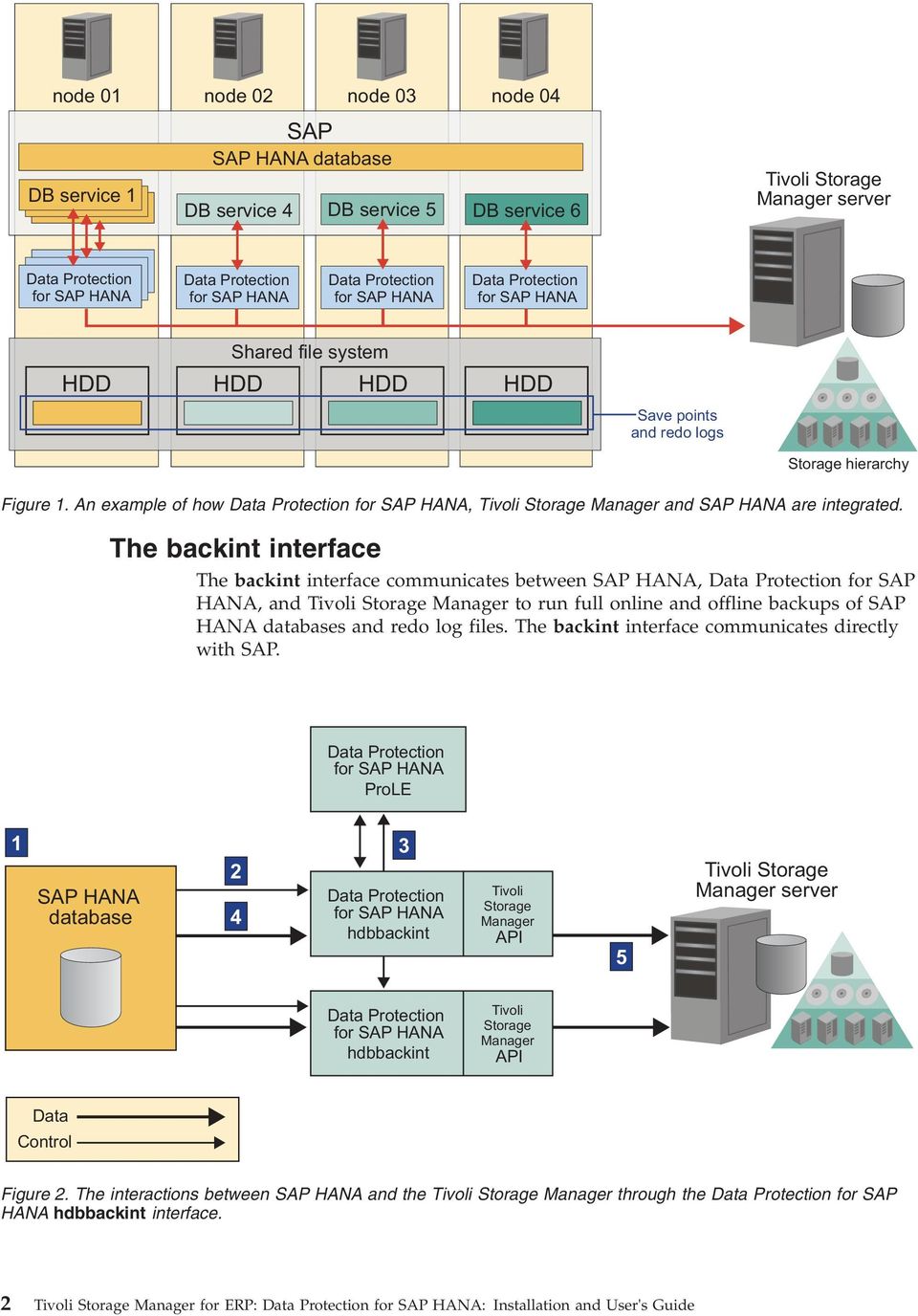
13 Chapter 1. Getting started Tivoli Storage Manager for Enterprise Resource Planning: Data Protection for SAP HANA working with the Tivoli Storage Manager provides a production-oriented solution that enables the backup and restore of SAP HANA system data. Data Protection for SAP HANA is optimized for SAP databases to manage large volumes of data. It is integrated with SAP HANA backup and recovery utilities, the SAP HANA Studio, and hdbsql, and uses SAP backup and recovery procedures. Data Protection for SAP HANA integration with an SAP product Data Protection for SAP HANA operates as a link between SAP HANA and the Tivoli Storage Manager server. The Data Protection for SAP HANA hdbbackint process is used by SAP HANA for backing up full databases and redo log files. The configuration of the hdbbackint process is stored in the initsid.utl profile file. This file contains information that describes how to run backup and restore operations, and can be customized for your SAP HANA environment. The hdbbackint process communicates with the Tivoli Storage Manager server through an API that is shared with other IBM data protection products. It requires that the Data Protection for SAP HANA ProLE process is running. The ProLE process coordinates multiple hdbbackint instances in a full database backup. The process ensures that all backup objects that belong to the same full database backup get assigned to the same backup id. The full database backup is handled as a single entity even it consists of numerous single objects. In a SAP HANA scale-out environment that consists of multiple SAP HANA nodes, Data Protection for SAP HANA is running on each node. Depending on the number of SAP HANA services that are on a node, multiple instances of hdbbackint are started by SAP HANA for data transfer. Copyright IBM Corp

14 node 01 node 02 node 03 node 04 SAP SAP HANA database DB service 1 DB service 4 DB service 5 DB service 6 Tivoli Storage Manager server Data Protection for SAP HANA Data Protection for SAP HANA Data Protection for SAP HANA Data Protection for SAP HANA Shared file system HDD HDD HDD HDD Save points and redo logs Storage hierarchy Figure 1. An example of how Data Protection for SAP HANA, Tivoli Storage Manager and SAP HANA are integrated. The backint interface The backint interface communicates between SAP HANA, Data Protection for SAP HANA, and Tivoli Storage Manager to run full online and offline backups of SAP HANA databases and redo log files. The backint interface communicates directly with SAP. Data Protection for SAP HANA ProLE 1 SAP HANA database Data Protection for SAP HANA hdbbackint Tivoli Storage Manager API 5 Tivoli Storage Manager server Data Protection for SAP HANA hdbbackint Tivoli Storage Manager API Data Control Figure 2. The interactions between SAP HANA and the Tivoli Storage Manager through the Data Protection for SAP HANA hdbbackint interface. 2 Tivoli Storage Manager for ERP: Data Protection for SAP HANA: Installation and User's Guide
15 A Data Protection for SAP HANA backup operation proceeds in the following order: 1. You start a backup operation using the SAP HANA Studio or through the hdbsql command-line interface. 2. A number of SAP HANA hdbbackint processes are started. 3. The hdbbackint processes connect to the ProLE to get the configuration information. 4. SAP HANA sends data to the hdbbackint processes. 5. The data is sent to the Tivoli Storage Manager server through the Tivoli Storage Manager API. All the database and redo log backup information is stored by SAP HANA. The backup history can be viewed in the SAP HANA Studio in the backup tab or by querying the database view M_BACKUP_CATALOG. For more information about hdbbackint, see the SAP HANA Administration Guide. Chapter 1. Getting started 3
16 4 Tivoli Storage Manager for ERP: Data Protection for SAP HANA: Installation and User's Guide

17 Chapter 2. Planning Planning information regarding strategies and components is provided. Backup strategy for Data Protection for SAP HANA To avoid data loss from SAP HANA databases, you must run full backups and redo log file backups regularly. Full database backup The full SAP HANA database is backed up to Tivoli Storage Manager for Enterprise Resource Planning. If needed, the database can be restored without extra redo log files. The frequency of full backups is controlled by the Tivoli Storage Manager recovery time objective (RTO) and recovery point objective (RPO). For more information about full backups, see the SAP HANA Administration Guide. Redo log file backups Back up redo log files so that if data is lost in between two full backups, the data can be restored to a particular point in time. Set the SAP HANA LOG_BACKUP_USING_BACKINT parameter to TRUE to enable backing up redo log files. Edit the frequency of the backup operations with the LOG_BACKUP_TIMEOUT_S. The default value is for a backup every 15 minutes. For more information about redo log file backups, see the SAP HANA Administration Guide. Backing up data with the backup-archive client Use the Tivoli Storage Manager backup-archive client include/exclude function to back up any files that are not backed up by the full database backup, such as configuration files. A scheduled incremental backup would ensure that the configuration files are backed up periodically to be used if data was lost. * * Sample include/exclude list for SAP HANA appliances * * first exclude everything exclude /.../* * * now include relevant files and directories only include /usr/sap/c21/sys/profile/.../* include /usr/sap/c21/sys/global/hdb/custom/config/.../* Backup strategy for the SAP HANA appliance If you experience a total loss of the SAP HANA appliance, use the SAP HANA recovery procedure to recover the system. For information about hardware recovery, see the SAP documentation. Copyright IBM Corp

18 Optimization of Data Protection for SAP HANA performance When SAP HANA backs up data, it sends data for all SAP HANA services, such as nameserver and indexserver in parallel from all nodes. If data is intended to go directly to tape, the number of allowed mount points for the Tivoli Storage Manager node must be adjusted. When you are planning to store data in a disk storage pool and then migrate it to tape, be aware that SAP HANA data is restored in the order that is determined by HANA. Use either disk storage pools or tapes with enough mount points to optimize the restore by reducing the number of tape-seeks and mounts. If the data to be restored for all nodes is on a single tape drive, it can lead to increased restore times or deadlocks. Network performance optimization Backup server optimization When you are setting up the network, there are some items to consider that can improve network performance. Consider these items when you set up the network: LAN-free backup LAN-free backup can reduce the load on the network and on the Tivoli Storage Manager server, thus improving data transfer rates. When you use LAN-free backup, ensure that Fibre Channel adapter capacity to the SAN can accommodate the data transfer rates of the disk reads and tape writes. Network bandwidth In general, the effective throughput capacity is approximately half of the theoretical network bandwidth. For high-speed networks such as Gigabit Ethernet LAN, the network adapters limit the throughput rather than the network itself. Network topology A dedicated backbone network that is used only for backup and restore operations can improve the data transfer rate. TCP options Use TCP options that are the most beneficial for your environment. Multiple Paths Increase the overall throughput rate to the backup server by providing a way to specify multiple network paths. When you are setting up the Tivoli Storage Manager server, there are some items to consider to optimize performance. Consider these items when you set up the Tivoli Storage Manager server. Data Protection for SAP HANA uses the Tivoli Storage Manager archive function for all backup activities: Dedicated backup server A dedicated backup server allows sharing of resources and provides an efficient resource usage. CPU power For a specific data throughput, the CPU load on the backup server is 6 Tivoli Storage Manager for ERP: Data Protection for SAP HANA: Installation and User's Guide
19 approximately 60% of the load on the database server. Therefore, backup server CPU power is not as critical as the CPU power of the database server. However, demands on the Tivoli Storage Manager server CPU do increase when several clients access a single Tivoli Storage Manager server. Storage hierarchy Backup of large data files is to be directed to tape to achieve the highest transfer rates. If disks must be used, use one disk pool per session. Small files such as log files, are to be directed to disk storage first and then moved to tape collectively to avoid excessive tape mounts. Parallel sessions The Tivoli Storage Manager server allows the use of several tape drives in parallel to store data. This setup can increase overall data throughput. To fully use this feature, two conditions must exist. The corresponding Tivoli Storage Manager node must be allowed the appropriate number of mount points and the device class must be allowed the appropriate mount limits. Store data on the Tivoli Storage Manager server In SAP terminology, backup (BRBACKUP) refers to the backup of data; archive (BRARCHIVE) refers to the backing up of log files. Data Protection for SAP uses the Tivoli Storage Manager archive function for backups and archives. Tape storage is the preferred media for storing database contents as it provides the best data throughput for backup and restore operations. For a large scale-out system, the number of required tape drives might become too large. In this case, use a virtual tape library (VTL). A disk-tape storage hierarchy is used for backing up redo log files. This action provides the best protection against data loss, and eliminates the need to mount a tape for each redo log file. Data Protection for SAP transfers data to and from the backup server through single or multiple (parallel) sessions to the Tivoli Storage Manager server. Each session must have a storage device that is associated with it. The SAP backup ID is persistently linked with each backup file. This backup ID can be used later to determine all files that are required for a complete restore. Collocation is a Tivoli Storage Manager function that ensures client data is maintained together on one tape. Deactivate collocation in these situations: v v Deactivate collocation for Data Protection for SAP backups when you enable parallel sessions for use with multiple tape drives in parallel. Deactivate collocation when you use the multiple log copy function. To improve availability (alternate servers) or performance (multiple servers), configure Data Protection for SAP to use multiple Tivoli Storage Manager servers. Consider the location of all backup data before you remove a Tivoli Storage Manager server from the Data Protection for SAP profile. Since Data Protection for SAP accesses only those servers that are defined in the profile, be cautious when you remove a Tivoli Storage Manager server if it contains valid backup data. Database backups are retained for a specified period and then become obsolete. Manage backup storage space by deleting obsolete backups and automating archive retention period with Tivoli Storage Manager options. Alternatively the obsolete backups can be deleted manually in the SAP HANA Studio. Chapter 2. Planning 7
20 Planning for space required for SAP HANA backups Before Data Protection for SAP HANA sends data to Tivoli Storage Manager, it notifies the Tivoli Storage Manager server of the amount of data that is going to be sent. This enables the Tivoli Storage Manager server to select the appropriate storage pool that accommodates this specific amount of data. About this task Through the backint SAP HANA interface, Data Protection for SAP HANA does not know the amount of data that is due to be sent by SAP HANA. It is assumed that half of the memory size is to be transferred. If the system has 1 TB RAM, then the estimated size for the backup object is assumed to be 512 GB. For the data that is stored by the SAP HANA indexserver this number is close to the value for a fully used system. For other SAP HANA services like nameserver or statisticserver, the value is much smaller. Typically the backups of these services are several MB only, and a backup can result in a storage pool that is intended for large objects being used. Procedure v To avoid backing up small items to the next storage pool in line, the required size of the first storage pool should be at least half the size of the appliance memory multiplied with the number of sessions (SESSIONS, MAX_SESSIONS) that are simultaneously sending files. If you use the maxsize parameter for the first storage pool, make sure it is at least half the size of the appliance memory. v Another option is to use Virtual Tape Library for backups. Parallel backup paths and backup servers Data Protection for SAP can use several communication links between Tivoli Storage Manager clients to control alternate backup paths and alternate backup servers. This feature can increase throughput by transferring data over multiple paths simultaneously or to and from several servers in parallel. It can improve the availability of the Tivoli Storage Manager client to server communication and enable disaster recovery backup to a remote Tivoli Storage Manager server. Each path in the initsid.utl profile is defined by a server statement and the corresponding definitions in the Tivoli Storage Manager client system option file dsm.sys. The SERVER <server 1..n> statement denotes Tivoli Storage Manager servers that are defined in the Data Protection for SAP profile. This definition corresponds to the statement SERVERNAME server 1..n in the Tivoli Storage Manager client option file or files. These servers are identified by their TCPSERVERADDRESS and can be on one system (multiple paths) or several systems (multiple servers). SESSIONS denotes the number of parallel sessions that Data Protection for SAP schedules for the path. If only one path is used, SESSIONS must be equal to MAX_SESSIONS, which specifies the total number of parallel sessions to be used (equivalent to number of tape drives/management classes). Data Protection for SAP attempts to communicate with the Tivoli Storage Manager server by using the first path in the profile. If this attempt is successful, Data Protection for SAP starts the number of parallel sessions as specified for this path. If the attempt was unsuccessful, this path is skipped and Data Protection for SAP continues to the next path. This process continues until as many sessions are active as were specified in the total session number (MAX_SESSIONS). If this number is never reached (for example, because several paths were inactive), Data Protection for SAP ends the backup job. 8 Tivoli Storage Manager for ERP: Data Protection for SAP HANA: Installation and User's Guide

21 Archive inactive data Backup backint processes When SAP HANA runs a database backup operation through Data Protection for SAP HANA, a dedicated backint process for each backup object is started. It is possible to use multiple sessions in a single backint process, and each backint process transfers a single object. You do not need to configure multiple sessions for database backup operations. Multiple backint processes run in parallel, and all objects are backed up in parallel. The number of objects depends on the number of SAP HANA nodes in the environment. All nodes host an index server that holds the payload of the database. The backup objects from the index servers are typically the largest objects. The master node hosts a name server, a statistic server, and other services. Backup objects from these additional services are typically smaller than the index server. If the backups must go directly to tape, then the number of mount points must include the additional services. Redo log files Restore versus backup Configure multiple sessions for a single backint process for backing up redo log files. When you are using the redo log copy feature of Tivoli Storage Manager for Enterprise Resource Planning, each redo log file is saved simultaneously in multiple storage pools on the Tivoli Storage Manager servers. Ensure that you have the sane number of sessions opened as redo log copies that are created to be able to duplicate and transfer data. Data Protection for SAP creates a database image that is stored at the bit-level and can be used for routine backup operations. To restore an outdated backup, you must restore it into the same environment it was originally taken from. This process requires you to maintain older versions of SAP, the operating system, database, and Tivoli Storage Manager data to enable a rebuild of the original environment. SAP provides archiving functions that can display business documents that are designated with long-term retention requirements. These business documents are format-independent and can be used for auditing and other legal purposes. Archived data can then be removed from the operational database to reduce the database size and improve backup and restore processing time. Configuration changes and infrastructure problems affect backup and restore operations. Changes that support a fast backup while you are using resources can be considered applicable to the restore operation. Tune the backup operation and then run a restore to verify that the restore operation works in a satisfactory manner. If backups are compressed during a restore operation, the data must be decompressed before you can use it. Chapter 2. Planning 9
22 Create multiple redo log copies Data Protection for SAP HANA can save a number of copies of each redo log by using different Tivoli Storage Manager server management classes. By creating multiple redo-log copies on separate physical media, the administrator can restore and recover a database even if a backup tape becomes corrupted. The Data Protection for SAP profile file keywords important for creating multiple redo log copies: v v v Keyword BRARCHIVEMGTCLASS denotes the Tivoli Storage Manager server management classes to be used when it saves redo logs. With the use of different management classes, the backup media that is targeted for redo logs is separated from the backup media that is targeted for the database objects. Different redo log copies can also be saved to different backup media. Keyword REDOLOG_COPIES allows the administrator to initiate the creation of multiple backup copies of each redo log. By creating multiple copies on separate physical media, the database administrator is able to restore and recover databases in an SAP environment. The restore and recover can occur even if a backup tape becomes corrupted or lost. Keyword MAX_SESSIONS specifies the maximum number of sessions that a single Data Protection for SAP instance is allowed to access to the Tivoli Storage Manager server. These rules describe how Data Protection for SAP satisfies a request to back up redo log files: v v v v Data Protection for SAP creates as many backup copies of each redo log as are specified by the REDOLOG_COPIES keyword. Data Protection for SAP requires as many archive management classes that are defined by BRARCHIVEMGTCLASS as there are redo-log copies requested. To best protect against the loss of data, it is important that the different management classes are linked to different storage pools within Tivoli Storage Manager storage. This way, various redo log copies are on different backup media. When SAP HANA is used, Data Protection for SAP HANA requires that the maximum number of sessions that are defined by MAX_SESSIONS is greater than or equal to the number of redo log copies that are requested. A setup with a smaller number of sessions is not advised with the backint interface. Data Protection for SAP cannot control the order in which Tivoli Storage Manager processes the requests. Therefore, an administrator cannot rely on sessions to be processed in the order they were started by Data Protection for SAP. 10 Tivoli Storage Manager for ERP: Data Protection for SAP HANA: Installation and User's Guide
23 Chapter 3. Installing Install Data Protection for SAP HANA using the install wizard, through the console, or in silent mode using a response file. Before you begin Requirements for Data Protection for SAP HANA are available in the hardware and software requirements technote for each release. For requirements, review the Hardware and Software Requirements technote for your version. See the technote at From the page, follow the link to the technote for your release or update level. Before you install Data Protection for SAP HANA, verify that your system meets the following prerequisites: v SAP HANA SPS 05 revision 45 is installed. v v v v IBM Tivoli Storage Manager API Version 5.5 or later is installed and configured on all SAP HANA nodes where you are going to install and configure Data Protection for SAP HANA. The SAP HANA database is configured on the system where you are going to install and configure Data Protection for SAP HANA. The SAP HANA HDB client is installed on the system. During the installation and configuration of Data Protection for SAP HANA, root access to the appliance host operating system is required. Data Protection for SAP HANA is not integrated with the Tivoli Storage Manager for ERP Administration Assistant. The Administration Assistant cannot be used to configure and monitor Data Protection for SAP HANA. Procedure 1. Log in to the SAP HANA host with the root user ID, and choose where you want to install the package. 2. Mount the DVD and navigate to the Data Protection for SAP HANA installation package. If you are installing from a file share, to ensure that the installer file has adequate permissions to run, enter the following command: chmod +x TIV-TSMERP-HANA-Linux.bin 3. To start the installation process, enter the following command:./ tiv-tsmerp-hana-linux.bin If you are logged on to the SAP HANA host with an X Window System or X terminal, follow the instructions to complete the installation. If you are installing the product from the command line, a console mode installation is started. 4. After you accept the license agreement, click Next and read the pre-installation summary that lists details about the installation folder, and the required disk space. Click Install to begin the installation, and click Done when the process finishes. Copyright IBM Corp
24 Results Data Protection for SAP HANA is installed in the following directory: /opt/tivoli/tsm/tdp_hana. Installing Data Protection for SAP HANA in silent mode You can install Data Protection for SAP HANA in silent mode by using a response file. After you create the response file, you can install the product in silent mode without monitoring the process or inputting any details. About this task Replication environments To install Data Protection for SAP HANA in silent mode, you must first create a response file. Procedure 1. Create a response file for Data Protection for SAP HANA with the following command:./ TIV TSMERP-HANA-Linux.bin -i console -r responsefile This command runs the installation process in console mode and all user input is recorded in the response file. 2. Run the following command to install Data Protection for SAP HANA in silent mode:./ TIV TSMERP-HANA Linux.bin -i silent -f responsefile This command runs the installation process automatically without requiring any user input, Values for options are read from the response file. An environment that has a number of SAP HANA database instances that are synchronized with a primary database instance is a replication environment. Replication is possible on the database level, for example with SAP HANA system replication, or on the storage level, for example with GPFS storage replication. The replicated database instances are typically not online. In a replicated SAP HANA environment the standard installation procedure is not applicable. Installation of Data Protection for SAP HANA is done through one of the following methods: Installation as part of takeover testing. Manual installation on each SAP HANA node. Installing to test in a replication environment In a replication environment, when the primary system is shut down to verify a failover procedure, Data Protection for SAP HANA can be installed as part of the test. About this task When you are setting up a replication environment and you are running a takeover test, the primary system is shut down. Install Data Protection for SAP HANA when the SAP HANA database instance in the replicated environment is online. 12 Tivoli Storage Manager for ERP: Data Protection for SAP HANA: Installation and User's Guide
25 Procedure v v Install Data Protection for SAP HANA by following the procedure at this link Chapter 3, Installing, on page 11. Configure Data Protection for SAP HANA by following the procedure at this link Configuring Data Protection for SAP HANA on page 23. Installing manually in a replication environment In a replicated environment, you need to install Data Protection for SAP HANA manually on each SAP HANA node for a particular database instance. When you are installing in large scale-out environments, you can choose to create a response file to install on each node in silent mode. Before you begin For more information about installing Data Protection for SAP HANA in silent mode, see Installing Data Protection for SAP HANA in silent mode on page 12. Procedure v Install Data Protection for SAP HANA on each SAP HANA node in a database instance. v Install the Tivoli Storage Manager client API on each of the SAP HANA nodes. v Copy the Data Protection for SAP HANA profile from the primary database instance, and use this profile in the replicated environment. v Configure the Tivoli Storage Manager password. If automatic password handling is used, edit NODENAME in the server stanza of the dsm.sys file so that each SAP HANA node uses a unique Tivoli Storage Manager node name. If manual password handling is used, the Tivoli Storage Manager node password must be stored locally by entering the following command for each SAP HANA node: /opt/tivoli/tsm/tdp_hana/hdbbackint -p full path to profile/initsid.utl -f password Uninstalling Data Protection for SAP HANA Uninstall Data Protection for SAP HANA, and remove all of the associated files from your system. Before you begin If you are using.rpm files to uninstall Data Protection for SAP HANA, the uninstallation program remains on the disk. The.rpm packages that were installed during the setup on other SAP HANA nodes remain on these nodes. Procedure 1. Change directory to the uninstall subdirectory in the install folder. 2. Enter the following command: /opt/tivoli/tsm/tdp_hana/uninstall/ uninstaller.bin 3. To remove.rpm packages that were installed during the setup, enter the following command: rpm e TIV TSMERP HANA Chapter 3. Installing 13
26 Results The uninstallation program removes Data Protection for SAP HANA from your system. Services that were installed and used by Data Protection for SAP HANA are stopped and removed. 14 Tivoli Storage Manager for ERP: Data Protection for SAP HANA: Installation and User's Guide
27 Chapter 4. Configuring In addition to configuring Data Protection for SAP HANA you need to configure other applications, for example, the Tivoli Storage Manager backup-archive client. About this task Data Protection for SAP requires certain configuration tasks to be run for these applications: v Data Protection for SAP base product v Tivoli Storage Manager backup-archive client v Tivoli Storage Manager server Tivoli Storage Manager server tasks Data Protection for SAP HANA requires configuration tasks to be done for the Tivoli Storage Manager server as part of the overall product configuration. Configure the Tivoli Storage Manager server When you are configuring Data Protection for SAP HANA you must set up the Tivoli Storage Manager server, and run general and specific server configurations such as setting up storage devices. Although the task examples use Tivoli Storage Manager commands, these tasks can also be run using the Tivoli Storage Manager web client GUI. Consider the following performance-related guidelines before you install the Tivoli Storage Manager server. Tivoli Storage Manager server host system The Tivoli Storage Manager server must be installed on an exclusive system. The tasks that are presented here avoid concurrent processes and disk I/O access with other applications. A single Tivoli Storage Manager server is sufficient for a single SAP system landscape. If the Tivoli Storage Manager server is used to back up and restore other clients, consider installing the server on a large system or by using several Tivoli Storage Manager servers. Network topology Network topologies such as Fast Ethernet and Gigabit Ethernet work well with the Tivoli Storage Manager server. Use fast network topologies to prevent bottlenecks during backup and restore operations. The Tivoli Storage Manager server supports multiple network adapters. This support increases server throughput by providing multiple connections to the same network or by providing several physically distinct networks for the same server. These steps are considered complete when the Tivoli Storage Manager server is successfully installed: v Recovery log volume is allocated and initialized. v Recovery log mirror volume is allocated and initialized. v Database volume is allocated and initialized. Copyright IBM Corp
28 v Database mirror volume is allocated and initialized. v Extra labeled volumes for the backup and archive storage pools are allocated and initialized (disks, tapes, or combinations). v Licenses are registered. v The Tivoli Storage Manager server is started. The latest code fixes for Tivoli Storage Manager can be found at: ftp://public.dhe.ibm.com/storage/tivoli-storage-management/maintenance Specifying a Tivoli Storage Manager server To configure Data Protection for SAP, you need to specify a Tivoli Storage Manager in the profile file. About this task Follow these steps to add a Tivoli Storage Manager server: Procedure 1. Add a server statement to the Data Protection for SAP profile. 2. Adapt the Tivoli Storage Manager options files as described in Verifying the Tivoli Storage Manager server name on page Set and save the Tivoli Storage Manager password for the new server as described in Setting the Tivoli Storage Manager password on page 19. Specifying a storage device A storage device needs to be added when you are configuring. A storage device defines a device class, which handles the type of media. The default device class that is defined for disks is DISK and is considered sufficient. About this task Verify that the following items are established within the Tivoli Storage Manager server after installation. v Query the defined library: q library v Query the defined drives: q drive v Query the defined device class: q devclass 16 Tivoli Storage Manager for ERP: Data Protection for SAP HANA: Installation and User's Guide
29 Defining a storage pool A storage pool needs to be added when you are configuring. A storage pool is a named collection of storage volumes that are associated with one device class. Each storage pool represents a collection of volumes that are the same media type. The storage pool setup defines the storage hierarchy for the appropriate environment. Procedure 1. Define a storage pool for the SAP system data: define stgpool sap_incr device_class_name maxscr=5 2. Define a storage pool for the : define stgpool sap_db device_class_name maxscr=20 3. Define a storage pool for the : define stgpool sap_log1 device_class_name maxscr=3 Results When a library tape device is associated, the maximum scratch volumes (labeled volumes that are empty or contain no valid data) that this storage pool is allowed to use (parameter maxscr) must be defined. The maximum number of scratch tapes depends on the size of the database, the capacity of the tapes, the number of scratch volumes available, and how many versions of the backup must be retained. Replace these values with appropriate estimates. Defining a policy A server policy needs to be specified when you are configuring Tivoli Storage Manager policies. Specify how files are backed up, archived, moved from client node storage, and how they are managed in server storage. A policy definition includes the definition of a policy domain, a policy set, management classes, and copy groups. About this task After you set definitions, a default policy set must be assigned, validated, and activated. For the policy definition, log on as a Tivoli Storage Manager Administrator by using the Admin Command Line or the Web Admin and run the following commands. Procedure 1. Define a policy domain and policy set: define domain sap_c21 define policyset sap_c21 p_c21 2. Define a management class for file system backups, data files, offline redo log files and copies of offline redo logs: define mgmtclass sap_c21 p_c21 mdefault define mgmtclass sap_c21 p_c21 mdb define mgmtclass sap_c21 p_c21 mlog1 define mgmtclass sap_c21 p_c21 mlog2 If you are planning to use this Tivoli Storage Manager server with multiple SAP systems, use a set of different management classes for each system. 3. Define a copy group: Chapter 4. Configuring 17
30 define copygroup sap_c21 p_c21 mdefault type=backup destination=sap_incr define copygroup sap_c21 p_c21 mdefault type=archive destination=archivepool define copygroup sap_c21 p_c21 mdb type=archive destination=sap_db retver=90 define copygroup sap_c21 p_c21 mlog1 type=archive destination=sap_log1 retver=90 define copygroup sap_c21 p_c21 mlog2 type=archive destination=sap_log2 retver=90 Data Protection for SAP HANA stores data in the archive copy group of the management classes. This data expires after a defined number of days. In the example, a retver value of 90 days is used. When no backup is being done within this timeframe, all backup data expires and is no longer available for restore. As an alternative the copy group parameter retver, which specifies the number of days a file is to be kept, can be set to unlimited (9999 or nolimit). Obsolete backups can be deleted manually using the SAP HANA Studio. 4. Assign the default management class: assign defmgmtclass sap_c21 p_c21 mdefault 5. Validate and activate the policy set: validate policyset sap_c21 p_c21 activate policyset sap_c21 p_c21 Registering a node The node must be registered when you are configuring The Tivoli Storage Manager server views its registered clients, application clients, host servers, and source servers as nodes. About this task To register a node, log on as the Tivoli Storage Manager administrator by using the Admin Command Line or the Web Admin, run the command, register node C21 passwd domain=sap_c21 maxnummp=8 When you use two or more tape drives, the maxnummp parameter settings can affect the nodes. It defines the maximum number of mount points that one node can use. The default value is 1. If one node must use more than one mount point, the parameter must be set to the wanted number of mount points. This parameter is not to be set higher than the total number of drives available on the Tivoli Storage Manager server. Setting the IdleTimeOut parameter For simulations of network transfer and media rates, the Tivoli Storage Manager server must be configured so that sessions do not time out during simulation. About this task To avoid sessions timing out, set the parameter IdleTimeOut to a value higher than the time required for sending the largest table space file to the Tivoli Storage Manager. For example: setopt IdleTimeOut Tivoli Storage Manager for ERP: Data Protection for SAP HANA: Installation and User's Guide
31 Determining the Tivoli Storage Manager password method Specify how Data Protection for SAP manages the Tivoli Storage Manager password. There are three options. About this task There are three methods of password handling: No password is required No authentication is done on the Tivoli Storage Manager server. Each user that is connected to the backup server can access Tivoli Storage Manager data without a password. This method is only advised if adequate security measures are established. For example, no password might be acceptable when the Tivoli Storage Manager is only used for SAP, and authentication and authorization is done at the operating system level. This would be the case when no other clients are registered to the Tivoli Storage Manager. Manual handling of password A password is required for each connection to the Tivoli Storage Manager server. In this method, Data Protection for SAP stores the encrypted password in its configuration files. While the password does not expire and is not changed on the Tivoli Storage Manager server, Data Protection for SAP automatically uses the stored password when it connects to Tivoli Storage Manager. This method provides password security and can be set up easily. Whenever the password expires or is changed, the new password must be set with this command: If you are setting the password to be automated (such as in a script), enter this command: where passworda is the password for Tivoli Storage Manager node nodea on Tivoli Storage Manager server servera. Note: 1. The interactive password prompt is omitted only if the passwords for all server stanzas in the.utl file are specified. 2. There is a potential security risk when you record Tivoli Storage Manager passwords in a script. Automatic handling of password A password is required for each connection to the Tivoli Storage Manager server. After the first connection, the password is managed by Tivoli Storage Manager. The Tivoli Storage Manager client stores the current password locally. When the password expires, the password is changed and stored automatically. Setting the Tivoli Storage Manager password: Data Protection for SAP HANA is to be installed after the Tivoli Storage Manager installation is completed. Tivoli Storage Manager provides different password methods to protect data. Data Protection for SAP HANA must use the same method as specified in Tivoli Storage Manager. About this task The default password method during Data Protection for SAP HANA installation is PASSWORDACCESS prompt. The default parameters for Data Protection for SAP HANA are set according to this default value. If a different password method is set in Tivoli Storage Manager, adjust the Data Protection for SAP HANA Chapter 4. Configuring 19
32 parameters. Password configuration matrix: Once you have decided on a password handling method, you can set keywords and profile parameters. After you select the suitable password-handling method, follow this configuration matrix to set the keywords and parameters. Proceed as indicated by the step number. Table 1. Password handling for UNIX or Linux. Password handling parameters and profile actions. Step Profile/Action Parameter Password No Manual Set by Tivoli Storage Manager 1 Tivoli Storage Manager admin AUTHENTICATION EXPIRATION PERIOD (see note 1) OFF ON n days (see note 2) ON n days 2 dsm.sys PASSWORDACCESS Unavailable PROMPT GENERATE PASSWORDDIR (see note 5) Unavailable path 3 Tivoli Storage Manager admin 4 Data Protection for SAP HANAprofile (initsid.utl) NODENAME Unavailable. nodename UPDATE NODE (see notes 1, 6) Unavailable password password For each SERVER statement, specify:passwordrequired ADSMNODE NO nodename YES nodename 6 Command line backom -c password Unavailable password (see notes 3,7) NO (see note 4) password (see notes 3,7 Note: 1. See appropriate Tivoli Storage Manager documentation. 2. If you are using manual password generation during testing, make sure that the expiration period is set to an appropriate time. 3. This password must be the one that is effective on the Tivoli Storage Manager server for the node. 4. ADSMNODE must not be set when PASSWORDACCESS generate is set. 5. The users SIDadm and must have read and write permission for the path specified. 6. This step is only necessary if the password is expired (manual-handling only) or must be changed on the Tivoli Storage Manager server. 7. A password must be entered for each server statement in the Data Protection for SAP profile. 20 Tivoli Storage Manager for ERP: Data Protection for SAP HANA: Installation and User's Guide
33 Verifying the Tivoli Storage Manager server name Procedure v v v Review the Tivoli Storage Manager client options files to make sure that the server name matches the name that is specified in the server statement of the initsid.utl file. Review that other parameters are set correctly. These settings depend on the password method selected. (UNIX or Linux) Define the Tivoli Storage Manager server in the Tivoli Storage Manager client system options file (dsm.sys). The server stanza that is specified in dsm.sys must match the entry in initsid.utl. Deleting backups with the RETVER parameter Use the RETVER profile parameter to automatically delete obsolete backups. About this task Control Data Protection for SAP HANA backup file expiration with the RETVER parameter. RETVER is the parameter of the archive copy group that is used to store the backup data on the Tivoli Storage Manager server. For example, to keep 30 daily backups, set RETVER to 30. Tip: Backups are expired even if no backups are run on that day. Tivoli Storage Manager client tasks Data Protection for SAP requires that configuration tasks be run for the Tivoli Storage Manager client as part of the overall product configuration. Configure the Tivoli Storage Manager client options The Tivoli Storage Manager clients must be configured after the Tivoli Storage Manager server is configured. These clients include the backup-archive client for the file system backups, and the application programming interface (API) client for interface programs. The API client is used to enhance existing applications with backup, archive, restore, and retrieve services. An installed and confirmed API client is a prerequisite for Data Protection for SAP. The clients must be installed on all nodes that interface with the Tivoli Storage Manager server. In a SAP system landscape, the backup-archive client must be installed on every system that is scheduled for a file system backup. Examples of these systems are SAP application servers and the SAP database server. The Tivoli Storage Manager API client must be installed only on the SAP database server system to enable backup and restore operations of the SAP database by using Data Protection for SAP. Chapter 4. Configuring 21
34 Setting Tivoli Storage Manager client options on UNIX or Linux Tivoli Storage Manager clients on UNIX or Linux are configured by setting options in the dsm.opt and dsm.sys files. The include/exclude file is used to define which files are included or excluded during backup, archive, or hierarchical storage processing. About this task Configure the Tivoli Storage Manager backup-archive client to operate in an SAP environment with the following procedure. Procedure 1. Install the Tivoli Storage Manager client software on the SAP database server system. 2. Edit the client system options file dsm.sys and set these values as appropriate for your installation: Servername server_a TCPPort 1500 TCPServeraddress xxx.xxx.xxx.xxx or servername InclExcl /usr/tivoli/tsm/client/ba/bin/inclexcl.list Compression OFF 3. Specify TCPServeraddress If the server and client are on the same system, select loopback. This selection improves TCP/IP communication speed. 4. Specify InclExcl if you want Tivoli Storage Manager to include or exclude the files that are listed in inclexcl.list. 5. Throughput improves when tape drives attached to the Tivoli Storage Manager server provide hardware compression. However, combining hardware compression and Tivoli Storage Manager client software compression (Compression ON) is not advised. 6. Edit the client user options file dsm.opt and set these values as appropriate for your installation: LANGUAGE AMENG (this is the default value) NUMBERFormat 1 (this is the default value) TAPEPROMPT NO TIMEFORMAT 1 (this is the default value) Results When the Tivoli Storage Manager API client is installed on a UNIX or Linux system, ensure that a link exists that points to the Tivoli Storage Manager API installation directory, /usr/tivoli/tsm/client/api/bin64. /usr/lib/libapids.so The Tivoli Storage Manager provides two features for specifying the location of the Tivoli Storage Manager API Client error log: the environment variable DSMI_LOG and the Tivoli Storage Manager system client option ERRORLOGName in dsm.sys. For DSMI_LOG, a directory is specified to which a file named dsierror.log is written. For ERRORLOGName a path and user-defined file name are defined. 22 Tivoli Storage Manager for ERP: Data Protection for SAP HANA: Installation and User's Guide
35 To achieve conclusive logical linking of the environment, configuration and log files in your SAP backup-archive system, you must use the Tivoli Storage Manager system client option ERRORLOGName rather than the environment variable DSMI_LOG. When you use ERRORLOGName, you can include the SID in the file name. This information can speed up problem determination by simplifying identification of the correct error log file. You can match logfile names to the active user client options file name, which must also contain the SID and be stored in environment variable DSMI_CONFIG. This information is especially useful on systems with several SIDs. With this setup, you obtain the following logical interlinking: v Environment variable DSMI_CONFIG is exported from the login shell v Environment variable DSMI_CONFIG points to client user options file /usr/tivoli/tsm/client/api/bin64/dsm_sid.opt v Client user option SERVER servername indsm_sid.opt points to the SERVER servername stanza in /usr/tivoli/tsm/client/api/bin64/dsm.sys v The SERVER servername stanza contains the option ERRORLOGName /writeable_path/dsierror_sid.log If the variable DSMI_LOG exists in your environment from an earlier setup, it is overridden by dsm.sys option ERRORLOGName. However, to avoid confusion, make sure the DSMI_LOG path is identical to the path in ERRORLOGName. Alternatively, you can remove DSMI_LOG completely from your environment. Configuring Data Protection for SAP HANA Configure Data Protection for SAP HANA with the setup.sh script. The setup.sh is stored in the installation directory during the installation process. Configuring Data Protection for SAP HANA with the setup script Data Protection for SAP HANA must be configured using the setup script before it can work with the Tivoli Storage Manager. The setup script setup.sh is stored in the Data Protection for SAP HANA installation directory /opt/tivoli/tsm/ tdp_hana. Before you begin Ensure that the Tivoli Storage Manager node name is specified in the server stanza of the dsm.sys file. About this task The Data Protection for SAP HANA configuration files are stored in the configuration directory, /usr/sap/systemid/sys/global/hdb/opt/hdbconfig. Procedure 1. Log in to Data Protection for SAP HANA using the root user ID, and change to the installation directory, /opt/tivoli/tsm/tdp_hana. 2. Run the Data Protection for SAP HANA setup.sh script, by entering the following command:./setup.sh Chapter 4. Configuring 23
36 3. When prompted, enter the SAP HANA system ID, or accept the proposed value. 4. Enter the instance number or accept the default value of Enter the password for the SYSTEM user. 6. Choose to configure the Tivoli Storage Manager server, or defer the server configuration. For information about manually configuring the Tivoli Storage Manager server, see Manually configuring the Tivoli Storage Manager for Data Protection for SAP HANA on page Choose one of the following Tivoli Storage Manager server password handling methods: v Automatic password handing: to store the Tivoli Storage Manager node password in the Tivoli Storage Manager API. When the password expires on the server, the Tivoli Storage Manager client and server generates a new password. The API updates the password on the client. v Manual password handling: to store the node password in the Tivoli Storage Manager for ERP configuration file. When the password expires, you must update it by using the hdbbackint -f password command. 8. Enter the Tivoli Storage Manager server name as defined in the dsm.sys file. The following parameters must be entered to enable backup and restore of databases and redo log files to the Tivoli Storage Manager a. Enter the Tivoli Storage Manager node name for the ADSMNODE parameter. b. Enter the Tivoli Storage Manager management class for the BRBACKUPMGTCLASS parameter. c. Enter the Tivoli Storage Manager management class for the BRARCHIVEMGTCLASS parameter. 9. Enter a password for the Tivoli Storage Manager node. After you enter the password, it is verified. For a scale-out system with automatic password handling, this step is repeated for each SAP HANA node that belongs to the scale-out system. Protecting multiple SAP HANA databases Multiple SAP HANA database instances that are installed on a single Tivoli Storage Manager host can be protected with Data Protection for SAP HANA. About this task Run the setup script on each database to ensure that each is protected, and has a dedicated initsid.utl file. Procedure Log in with the root user ID. For each SAP HANA database instance, run the setup.sh. For more information about the setup process, see Configuring Data Protection for SAP HANA with the setup script on page 23. Results Running the setup script on each database creates a dedicated profile initsid.utl file for each instance. Parameters are adapted to each database. When you are deleting a database, all corresponding backup data that includes stored objects for the Tivoli Storage Manager node, is deleted. 24 Tivoli Storage Manager for ERP: Data Protection for SAP HANA: Installation and User's Guide
37 Manually configuring the Tivoli Storage Manager for Data Protection for SAP HANA If you chose to defer the configuration of the Tivoli Storage Manager during the setup script for Data Protection for SAP HANA, you must configure it manually. Configure the Tivoli Storage Manager by manually editing the Data Protection for SAP HANA initsid.utl file. Before you begin You must create the server stanza for Tivoli Storage Manager in the dsm.sys file before you proceed to the Data Protection for SAP HANA configuration tasks. Procedure 1. After the setup.sh script finishes, open the Data Protection for SAP HANA initsid.utl file that is in the configuration directory. /usr/sap/sid/sys/global/hdb/opt/hdbconfig/sidinit.utl 2. With details listed in the dsm.sys file, update the following Tivoli Storage Manager parameters in the server section of the initsid.utl file. SERVER server # Servername Tivoli Storage Manager server name ADSMNODE NODE Tivoli Storage Manager node name BRBACKUPMGTCLASS MDB Management classes for database backups BRARCHIVEMGTCLASS MLOG Management classes for redo log backups 3. From the command line, enter the following command /opt/tivoli/tsm/tdp_hana/hdbbackint -p full path to profile/initsid.utl -f password 4. If the password for the Tivoli Storage Manager node is not set, you are prompted to enter the password. Data Protection for SAP HANA profile file The Data Protection for SAP HANA profile file, initsid.utl is automatically created when the setup script is run during the configuration process. The file is used for backup and restore operations. The Data Protection for SAP HANA profile file is named initsid.utl, where the system identifier for the SAP HANA database instance is stored. During the configuration of Data Protection for SAP HANA, the profile file is created in the following directory, /usr/sap/sid/sys/global/hdb/opt/hdbconfig. The SAP HANA configuration is adjusted to use the profile file for backup and recovery operations. Configuring profile tasks Data Protection for SAP requires these product configuration tasks to be done in the Data Protection for SAP profile. Chapter 4. Configuring 25
38 Set the SERVER statement in the Data Protection for SAP HANA profile: The SERVER statement is specified in the Data Protection for SAP HANA profile, and in the Tivoli Storage Manager client option file. There are corresponding keywords in the Tivoli Storage Manager client option file. Depending on the choice of password handling, some parameters are ignored. The corresponding sections in the Data Protection for SAP HANA profile and the Tivoli Storage Manager client option file are established by using the logical server name. This logical server name is defined by the keywords SERVER or SERVERNAME. Table 2. SERVER statement and appropriate profile and option file settings. Configuration possibilities Data Protection for SAP HANA profile initsid.utl single path; no password or manual password single path; automatic password by Tivoli Storage Manager several paths/servers; no password or manual password several paths/servers; automatic password by Tivoli Storage Manager [3] several paths/servers; automatic password by Tivoli Storage Manager [4] Tivoli Storage Manager client option file dsm.sys or server.opt [2] SERVER server SERVERNAME server ADSMNODE node [1] TCPSERVERADDRESS address NODENAME do not specify SERVER ADSMNODE SERVER server 1 ADSMNODE node 1 SERVER server 1 ADSMNODE node n server do not specify SERVER server 1 ADSMNODE do not specify SERVER server n ADSMNODE do not specify SERVER server ADSMNODE do not specify TCP_ADDRESS address 1 SERVER server n ADSMNODE do not specify TCP_ADDRESS address n SERVERNAME server NODENAME node TCPSERVERADDRESS address SERVERNAME server 1 NODENAME do not specify TCPSERVERADDRESS address 1 SERVERNAME server n NODENAME do not specify TCPSERVERADDRESS address n SERVERNAME server 1 NODENAME do not specify TCPSERVERADDRESS address 1 SERVERNAME server n NODENAME do not specify TCPSERVERADDRESS address n SERVERNAME server NODENAME node TCPSERVERADDRESS address Notes: [1] If ADSMNODE is not specified, the host name is used. [2] On UNIX or Linux, dsm.sys is the single client option file for all Tivoli Storage Manager servers. [3] If two different physical systems have the same Tivoli Storage Manager node name or if multiple paths are defined on one node by using several server stanzas, passwordaccess generate might work only for the first stanza that is used after password expiration. During the first client/server contact, the user is prompted for the same password for each server stanza separately. A copy of the password is stored for each stanza. When the password expires, a new password is generated for the stanza that connects the first client/server contact. All subsequent attempts to connect 26 Tivoli Storage Manager for ERP: Data Protection for SAP HANA: Installation and User's Guide
39 through other server stanzas fail because there is no logical link between their copies of the old password and the updated copy. The updated copy is generated by the first stanza that is used after password expiration. To avoid this situation, update the passwords before they expire. When the passwords are expired, run these tasks to update the password: 1. Run dsmadmc and update the password on the server. 2. Run dsmc -servername=stanza1 and use the new password to generate a valid entry. 3. Run dsmc -servername=stanza2 and use the new password to generate a valid entry. [4] You must use Tivoli Storage Manager API 5.5 (or later), you can use the TCP_ADDRESS parameter in the Data Protection for SAP HANA profile. This parameter eliminates the requirement to set multiple stanzas in the Tivoli Storage Manager client option file for multiple paths. The parameter also eliminates the problem when it updates the password (see [3]). Example of SERVER statement with alternate servers: Data Protection for SAP profile is used in certain disaster recovery configurations. This example assumes the following configuration for two servers a and b: v Two Tivoli Storage Manager servers: server_a uses TCP/IP address xxx.xxx.xxx.xxx and uses four tape drives (MAX_SESSIONS 4) server_b uses TCP/IP address yyy.yyy.yyy.yyy and uses four tape drives (MAX_SESSIONS 4) v An SAP database server that is connected to this FDDI network. v Normal backups are processed with server a, which is local to the SAP database server. v A disaster recovery backup is stored on remote server b every Friday. The following is an example of the Data Protection for SAP profile that is used in this disaster recovery configuration: MAX_SESSIONS 4 # 4 tape drives.. SERVER server_a # via network path 1 ADSMNODE C21 SESSIONS 4 PASSWORDREQUIRED YES BRBACKUPMGTCLASS MDB BRARCHIVEMGTCLASS MLOG1 MLOG2 MLOG3 MLOG4 USE_AT 1234 SERVER server_b # via network path 2 ADSMNODE C21 SESSIONS 4 PASSWORDREQUIRED YES BRBACKUPMGTCLASS MDB BRARCHIVEMGTCLASS MLOG1 MLOG2 MLOG3 MLOG4 USE_AT 5 # for Disaster Recovery Chapter 4. Configuring 27
40 Example of SERVER statement with alternate paths: This example assumes that the Tivoli Storage Manager server is configured with two tape drives and two LAN connections. A backup is typically processed through network path 1 (SERVER statement 1). If network path 1 is unavailable, the backup is processed by using network path 2 (SERVER statement 2). If path 1 is active, Data Protection for SAP begins the two sessions as defined in the SERVER statement for path 1. Since MAX_SESSIONS also specifies 2, no more sessions are started. If path 1 is inactive, Data Protection for SAP starts two sessions on path 2. Since MAX_SESSIONS specifies 2, the backup is processed by using path 2. The Data Protection for SAP profile that is used in this alternate path configuration is shown in the following example: MAX_SESSIONS 2 # 2 tape drives.. SERVER server_a # via network path 1 ADSMNODE C21 SESSIONS 2 PASSWORDREQUIRED YES BRBACKUPMGTCLASS mdb BRARCHIVEMGTCLASS mlog1 mlog2 # USE_AT SERVER server_b # via network path 2 ADSMNODE C21 SESSIONS 2 PASSWORDREQUIRED YES BRBACKUPMGTCLASS mdb BRARCHIVEMGTCLASS mlog1 mlog2 # USE_AT Even if the logical names server_a and server_b actually point to the same Tivoli Storage Manager server, the Administration Assistant still considers them to be two different servers. Protection of a scale-out solution When Data Protection for SAP HANA is used to protect a scale-out solution, backup and restore operations run simultaneously on all SAP HANA nodes. SAP requires that each SAP HANA node has access to all backups that are run by any SAP HANA node within the cluster. All data must be stored on a single Tivoli Storage Manager server. For manual password handling, all SAP HANA nodes must have identical Tivoli Storage Manager configurations. Ensure that the stanzas in the dsm.sys file that are referenced by the Tivoli Storage Manager for ERP profile are identical. When you are manually handling passwords, the parameter nodename in the dsm.sys file is commented out. 28 Tivoli Storage Manager for ERP: Data Protection for SAP HANA: Installation and User's Guide
41 SAP HANA instance PRD initprd.utl SAP HANA node 01 # TSM ERP profile... server TSM_SRV... asnode SAP-PRD initprd.utl SAP HANA node 04 # TSM ERP profile... server TSM_SRV... asnode SAP-PRD initprd.utl SAP HANA node 07 # TSM ERP profile... server TSM_SRV... asnode SAP-PRD dsm.sys dsm.sys dsm.sys servername TSM_SRV... NODENAME SAP-PRD-01 passwordaccess generate servername TSM_SRV... NODENAME SAP-PRD-04 passwordaccess generate servername TSM_SRV... NODENAME SAP-PRD-07 passwordaccess generate Figure 3. An example of a Data Protection for SAP HANA scale-out solution with manual password handling selected. If automatic password handling is used, the stanzas in the dsm.sys file that are referenced by the Tivoli Storage Manager for ERP profile must have unique Tivoli Storage Manager node names for each SAP HANA node. Otherwise, the stanzas must be identical. The nodes are used for authentication purposes. By using the Tivoli Storage Manager proxy node feature, the nodes gain access to a single Tivoli Storage ManagerTivoli Storage Manager node that holds the data for the entire SAP HANA instance. In the following example, the Tivoli Storage Manager node SAP PRD is used to store the backup of the entire SAP HANA database. The Tivoli Storage Manager nodes SAP PRD 01, SAP PRD 04, and SAP PRD 07 are used by SAP HANA nodes 01, 04, and 07 to authenticate with the Tivoli Storage Manager server. These Tivoli Storage Manager nodes must have proxy authority to thetivoli Storage Manager node SAP PRD. Similar configurations must be applied to all other nodes within the SAP HANA scale-out system. Chapter 4. Configuring 29
42 30 Tivoli Storage Manager for ERP: Data Protection for SAP HANA: Installation and User's Guide
43 Chapter 5. Protect data with Data Protection for SAP HANA Backing up SAP data Use Data Protection for SAP HANA to back up and restore SAP HANA data to the Tivoli Storage Manager server. Instructions about how to back up your SAP data is provided. About this task Perform the tasks that are required for your operating system. Backing up log and data files During the setup procedure, the SAP HANA configuration is adjusted to use the BACKINT for SAP HANA window to back up the redo logs. SAP HANA regularly backs up the redo logs to the Tivoli Storage Manager. About this task The frequency of backups can be adjusted with the SAP HANA configuration parameter log_backup_timeout_s that is stored in the persistence section of the global.ini file. For more information about how to adjust this parameter, see the SAP HANA documentation. Procedure 1. In the SAP HANA Studio, select the database instance to be backed up. 2. Right-click the database, and select Back Up. Alternatively, in the Specify Backup Settings window, select Backint for the destination type. 3. Optional: On the command line, use the SAP HANA SQL client hdbsql. For example, hdbsql i 53 n vhana06 u system p manager "backup data using backint (DAILY)" connects to the instance with number 53, on host vhana06, as user system with password manager and runs a complete database backup. Schedule automated backup tasks Scheduling and automating backup and archive operations helps to ensure that data is backed up regularly at a specified time. Products that are used to schedule backup operations can be used to automate these operations. SAP scheduler The SAP Computer Center Management System (CCMS) provides a scheduler for database administration and backup planning on a single database server. The scheduler can be started from the SAP GUI command line (transaction code db13) or with the SAP GUI menu function Tools > CCMS > DB administration > DBA scheduling. Crontab (Linux) Automating backups at the database server level is available by using the crontab command. Copyright IBM Corp
44 Tivoli Storage Manager scheduler Tivoli Storage Manager also provides a scheduler function for all of its clients. As a result, automation can be set for multiple database servers. The Tivoli Storage Manager administrative client GUI provides an easy-to-use wizard for defining schedules. Information about how to define Tivoli Storage Manager schedules can be found in the Tivoli Storage Manager Administrator's Reference. IBM Tivoli Workload Scheduler The IBM Tivoli Workload Scheduler provides event-driven automation, monitoring, and job control for both local and remote systems. Sample backup strategy for daily backup processing This figure illustrates the sequence of backup operations to consider for a daily backup schedule. Figure 4. Production Backup Example The automated backup example shown in the graphic displays these common tasks: v A full database backup (offline or without application load) runs each night. v v The Tivoli Storage Manager server moves archived log files from disk to tape after the full database backup. SAP system files are backed up incrementally with the Tivoli Storage Manager backup-archive client. v The last backup in the daily cycle is the backup of the Tivoli Storage Manager database. This backup must always be done. Backups can be moved to disk storage and to tape media. The Tivoli Storage Manager server manages the data regardless of the storage media. However, backing up the SAP database directly to tape is the preferred media. 32 Tivoli Storage Manager for ERP: Data Protection for SAP HANA: Installation and User's Guide
45 Multiple log file copies Backing up multiple copies of a log file in a single archive operation helps protect against this data in the event of a storage hardware failure or disaster recovery situation. These copies can be on different physical Tivoli Storage Manager volumes or on different Tivoli Storage Manager servers. Restoring SAP data When a log file copy is unavailable at restore time, the software switches to another copy. The software continues to restore the log file from that copy. Restore SAP data with the following procedures. About this task Follow the restoring tasks that are required for your operating system. Preparing to restore SAP HANA data The actions that you take to restore SAP HANA data depend on the state of the SAP HANA application. Before you begin Determine the health of the SAP HANA application before you proceed to restoring your SAP HANA data. If you have an SAP HANA hardware failure that cannot be recovered with hardware components, you must restore SAP HANA with the application recovery DVD. Ensure that the SAP HANA operating system and software are running before you restore any SAP HANA databases. When a logical error arises, SAP HANA data can be restored with Data Protection for SAP HANA. Procedure v Recover the SAP HANA configuration files from the Tivoli Storage Manager if they are backed up with the backup-archive client. v Create the dsm.sys and dsm.opt configuration files from the backed up copies that are obtained from the Tivoli Storage Manager. Restoring and recovering data To restore or recover data with Data Protection for SAP HANA, start the SAP HANA Studio. Procedure 1. In the SAP HANA Studio Navigator tab, right-click to select the instance. Select Recovery. If the database instance is still running, a message might be displayed. The message states that the system must be shut down. When you confirm the message, SAP HANA Studio automatically shuts down the instance. 2. In the Specify Recovery Type window, choose the type of recovery that you want to run. 3. In the Locate Log Backups panel the default location can be used. 4. Choose the backup to restore in the Select Data Backups panel. The list of backups is generated from the SAP HANA recovery catalog. This catalog Chapter 5. Protect data with Data Protection for SAP HANA 33
46 contains every backup that is created. By selecting a specific backup and pressing Check Availability it can be verified that the backup exists on the Tivoli Storage Manager server. 5. Advance through the panels, and select the options that you require. What to do next For more information about restoring and recovering data, see the SAP HANA documentation. 34 Tivoli Storage Manager for ERP: Data Protection for SAP HANA: Installation and User's Guide
47 Chapter 6. Tuning performance Information needed to tune Data Protection for SAP HANA performance is provided. A system is considered balanced when the threads on the disk and the network sides are similarly busy throughout the backup, and when resource usage is good. To improve overall throughput, consider adding more resources to create a balanced system. About this task In an optimum setup, a slight network bottleneck is preferred. Under certain conditions, the degree of imbalance cannot be determined from the graphical presentation. Depending on your system characteristics that include system buffering and buffer sizes, usage might reduce to almost zero in the graphical presentation although the system is balanced. In this case, slight modifications can yield a change of bottleneck without significant throughput changes. However, whether the system is disk or network, tape constraints are always shown correctly. A balanced system, however, does not necessarily mean that the data throughput cannot be improved further. Adding new resources can improve the throughput rate. Figure 5. A balanced configuration Procedure v Maintain an optimum setup by ensuring tapes are maintained in streaming mode. Copyright IBM Corp
48 v v Ensure that there is no network idle time, and that the network is at least as fast as the tape. Consider adding new resources to improve the throughput rate. Options Use Tivoli Storage Manager for ERP options to tune performance. Performance tuning for Data Protection for SAP HANA can be addressed by reviewing buffer size and copies, compression of backup data, and automation of backup options. Buffer copies You can change the Data Protection for SAP options to prevent copying data buffers, the original data buffers are sent between Tivoli Storage Manager components. This change can improve performance. Data Protection for SAP HANA uses internal buffers to store and exchange data with the Tivoli Storage Manager Server. When data is sent from one component to another, data buffers are copied by default. Data Protection for SAP HANA can prevent copying data buffers by sending the original data buffers. This process reduces the CPU load of the database server. If client compression or client encryption are specified in the Tivoli Storage Manager options file (dsm.sys or dsm.opt, the original data buffers are sent. For more information, see the description of BUFFCOPY keyword on page Profile parameter descriptions on page 46. Buffer size Adjust buffer size disk I/O to improve transfer rates. The internal data buffer size can be adjusted for Data Protection for SAP HANA. These buffers are used for reading the disk and sending data to the Tivoli Storage Manager client API. The default values typically produce acceptable performance. Optimize the buffer size for disk I/O to improve transfer rates. For disk subsystems, the best transfer rates are achieved when the buffer size is set equal to the stripe size. Before you increase the size of internal buffers, however, ensure that sufficient storage is available for the number of buffers that are specified by Data Protection for SAP. This number correlates to the number of sessions requested. The number of buffers doubles when compression is specified. For more information, see the description of BUFFSIZE keyword on page Profile parameter descriptions on page 46. Compression of data for backup You can adjust the amount of data that is being sent to the Tivoli Storage Manager server by compressing zero-byte blocks (RL_COMPRESSION profile keyword). 36 Tivoli Storage Manager for ERP: Data Protection for SAP HANA: Installation and User's Guide
49 Figure 6. Null Block Compression Data Protection for SAP HANA can decrease the amount of data that is sent to the Tivoli Storage Manager server by compressing zero-byte blocks. Compression can increase the CPU load on the database server and can improve performance in situations when the network is at the point of constraint. Compression is most effective with database files that contain large portions of null blocks. See the description of the RL_COMPRESSION keyword on page Profile parameter descriptions on page 46 for details on how to activate Data Protection for SAP HANA compression. Automation options for Data Protection for SAP HANA Administrative productivity can be improved by using the Data Protection for SAP HANA automation options. Selectable management classes Specify different Tivoli Storage Manager management classes for backup data and archive data. Configure Data Protection for SAP to back up directly to a tape storage pool and to archive HANA log files to a disk storage pool. Multiple management classes can also be specified to use with multiple redo log files. The profile keywords BRARCHIVEMGTCLASS and BRBACKUPMGTCLASS in Profile parameter descriptions on page 46 provide information about specifying management classes. Multiple redo log copies Backing up multiple copies of a log file in a single archive operation helps protect against this data in the event of tape defects or disaster recovery situation. These copies can be on different physical Tivoli Storage Manager volumes or on different Tivoli Storage Manager servers. When a log file copy is unavailable at restore time, Data Protection for SAP automatically switches to another copy. It continues restoring the log file from that copy. The description of the profile keyword REDOLOG_COPIES in Profile parameter descriptions on page 46 provides detailed information about creating and by using multiple redo log copies. Alternate network paths and servers The availability of backed up data can be improved by configuring Data Protection for SAP to use multiple Tivoli Storage Manager servers or multiple network connections to a single Tivoli Storage Manager server. In this configuration, Data Protection for SAP checks all servers and network connections for availability and then does the backup even if some resources are unavailable. Policies can also be set that use different Tivoli Storage Manager servers for different days of the week. Chapter 6. Tuning performance 37
50 Messaging Policies can be created that enable Data Protection for SAP to send different classes of log messages to the Tivoli Storage Manager server. Frontend and backend processing Frontend and backend processing calls programs at specified times during backup processing. See the description of the profile keywords BACKEND and FRONTEND in Profile parameter descriptions on page 46. Data transfer When you use Data Protection for SAP HANA data is passed from disk through to the network and finally to tape. A balanced configuration can help to prevent bottlenecks and to ensure optimized performance. Data throughput rate Throughput rates differ for different environments because of different disk, network bandwidth, server systems, number of tapes, and configuration settings. When you are moving data, certain elements that are used in the movement of data can be tuned to improve data throughput. Throughput rates differ widely among various environments because of different disk, network bandwidth, server systems, number of tapes, and configuration settings. The information that is provided here concentrates on selected elements that are involved in the movement of data. This information determines how to use existing resources to their maximum efficiency and provide insight as to how throughput can be improved. Figure 7. High-level View of the Data Flow During Backup From a high-level view, the data packages must send these elements when it does a backup with Data Protection for SAP HANA: Data is read from disk that is processed by Data Protection for SAP, and sent through the network to tape or disk storage media. If the system is not balanced, the disk I/O, network bandwidth, and storage media rates might create a bottleneck. This situation can cause other resources to remain idle. Overall data throughput is typically measured per file or per entire backup operation. The results are documented as an average throughput rate in the logfile backint.log as the average transmission rate. However, identifying bottlenecks that are derived from log file messages is difficult. For this analysis effort, Data Protection for SAP provides performance sensors that indicate a bottleneck. These bottlenecks are located either in the 38 Tivoli Storage Manager for ERP: Data Protection for SAP HANA: Installation and User's Guide
51 elements that are represented in blue (for disk) or in yellow (for network and tape respectively) in the graphic. Performance tuning for data transfer Figure 8 provides an overview of the three main components that are involved during a Data Protection for SAP HANA data transfer: v The SAP database server. v The network. v The Tivoli Storage Manager server, which is also referred to as a backup server. Figure 8. Data Protection for SAP Data Transfer A continuous stream of data is generated among these components during a backup or restore operation. The weakest component in this stream decreases the overall data transfer rate. Chapter 6. Tuning performance 39
52 40 Tivoli Storage Manager for ERP: Data Protection for SAP HANA: Installation and User's Guide
53 Chapter 7. Troubleshooting To assist with troubleshooting and problem determination, diagnostic files, and system information are displayed in a centralized location. Details are provided about topics that generate questions. About this task Reproducing problems Investigate the log files for the SAP HANA application, the Tivoli Storage Manager server activity log, and the backint log files to find out the differences between successful and unsuccessful operations. Look for one of these patterns when the problem occurs: v v v The problem always occurs at the same time. If this condition is true, view the appropriate log files to determine whether there are any scheduled processes that occur simultaneously. Examples of such processes are virus checker, automatic updates, or batch jobs. The problem always occurs after another operation is done or the same operation is done. The problem occurs when another application or process is processed in parallel. Use the checklist to check what caused the problem, and then attempt to reproduce the problem. About this task When you encounter a problem that occurs during an operation that previously ran successfully, review this list to determine the root cause of the problem. v The setup has changed. v v v A component changed such as the SAP HANA, Tivoli Storage Manager, operating system, network, or hardware components. Patches or updates to one or more of the components were applied. Changes occurred that originated from the system: Check whether the disks are running full with the Linux df command. If network performance decreases, check whether there are new hosts, or new applications. Check whether defects in software or hardware have occurred. If Tivoli Storage Manager server processing decreases, check whether more clients or more operations were added. Information is also available in the Tivoli Storage Manager server activity log. If none of these changes caused the problem, view the last modified time stamp of the configuration files backint.log and backup.logdsm.sysdsm.opt. Run the following command to list all files in the /etc directory, that have been modified in the previous five days: find /etc -type f -ctime 5 -print If you are able to identify changes that are made to the system, roll them back one at a time and try to reproduce the problem. This method frequently reveals which Copyright IBM Corp
54 change or set of changes caused the problem. Internet Protocol version 6 (IPv6) support Data Protection for SAP HANA supports both IPv4 and IPv6 for internal communication. Data Protection for SAP HANA runs in IPv4, IPv6, and mixed environments on Linux. In a mixed environment, the communication depends on the adapter network settings. There is no option to enforce the use of a specific protocol other than by network configuration. Specifically, the ProLE service listens for both IPv4 and IPv6 connection requests if the system is configured accordingly. Connection requests to ProLE are made for the addresses that are returned by the system for the respective port on the local host. Connection requests are made for the addresses that are specified by the user. IPv6 addresses are supported when TCP/IP addresses are specified in a command line or in a profile parameter such as TCP_ADDRESS. However, when the IP address and port are specified in the IPv4 address:service or port format, then the format must be changed to service or port@<ip address> if the IP address is specified in the IPv6 notation. If a dotted decimal IPv4 address, the traditional format can still be used. The specification of IPv6 addresses assumes that Data Protection for SAP HANA is used in an environment in which IPv6 is supported by all hardware and software components. How to find files that contain message output and log files Data Protection for SAP processes are recorded in log files. Information about backup operations can be used to determine which backup should be used to restore your data. Data Protection for SAP HANA records data in 2 log files that can be used during troubleshooting. backup.log backint.log Both log files can be opened through the SAP HANA Studio menu options Open Perspectives > Administration Console. The backup.log log file records the start and finish of backup and restore operations. The success or failure of the operations is also recorded. All SAP HANA node details in a scale-out environment are stored in a single backup.log log file. The backint.log log file contains the Tivoli Storage Manager for ERP data for all database and redo log file backup and restore operations that complete successfully or fail. 42 Tivoli Storage Manager for ERP: Data Protection for SAP HANA: Installation and User's Guide
55 Setup requirements When you are troubleshooting issues while using Data Protection for SAP HANA there are items that you can check to ensure that the setup completed correctly. Ensure that the Data Protection for SAP HANA installation setup is correct by reviewing the following list: v Make sure an entry similar to this example is defined in the /etc/inittab file: tdph:2345:respawn:/opt/tivoli/tsm/tdp_hana/prole -p tdphana The purpose of this entry is to start a daemon process for ProLE, and to verify that the process is running. This process listens to activity on the Data Protection for SAP HANA port. The name of the port must match the name in the /etc/services file as shown in this example: tdphana 57321/tcp #TDP for SAP HANA v v v The lines are added to the /etc/services file during the installation process. If there are conflicts with existing entries, the port number must be changed to any unused number. Make sure that all the files are installed by running this command: rpm -V TIV-TSMERP-HANA If the command returns no output, all files are found. Otherwise, a list of missing files is returned in the output. On one host, make sure that the Data Protection for SAP HANA profile initsid.utl and configuration file initsid.bki are in the /usr/sap/sid/sys/ global/hdb/opt/hdbconfig/ directory. Make sure that /usr/sap/sid/sys/global/hdb/opt/hdbbackint link exists and points to /opt/tivoli/tsm/tdp_hana/hdbbackint. The names of the Tivoli Storage Manager servers that are specified in initsid.utl must match the names in the dsm.sys file. If the Tivoli Storage Manager API or Tivoli Storage Manager backup archive client are installed into their default locations, then it is not necessary to set the DSMI_* variables. If the variables are set, however, make sure that they specify the correct directories and files. The user ID that runs the backups must have the correct permissions to access all of files and directories that are specified by these variables. Also, verify that write permissions exist for the initsid.bki file as this file is the only one to which Data Protection for SAP HANA writes persistent information. Information to collect for support When you contact support, you must be able to provide the following information. v The Data Protection for SAP HANA version level. v The operating system level and patches that were applied. v The SAP HANA version level. v The Tivoli Storage Manager server version. v The Tivoli Storage Manager server operating system level. v Data Protection for SAP configuration file initsid.utl including Tivoli Storage Manager client configuration files (dsm.sys, dsm.opt) v Data Protection for SAP profile (initsid.utl) Chapter 7. Troubleshooting 43
56 v The change history of the system components (if the process worked previously). More information might also be requested from the service representative. 44 Tivoli Storage Manager for ERP: Data Protection for SAP HANA: Installation and User's Guide
57 Chapter 8. Reference information Versioning Data Protection for SAP HANA reference information such as versioning and profile information is provided. When Tivoli Storage Manager for ERP versioning is active (as defined by the MAX_VERSIONS keyword), version information is stored on the Tivoli Storage Manager Server. The version number is increased only after successful backups. Manage Tivoli Storage Manager Sessions Crontab file sample When redo logs are saved directly to a tape pool, the number of Tivoli Storage Manager sessions must not exceed the number of available tape drives. BRARCHIVE might process redo logs while a database backup is still processing or several BRARCHIVE processes might run simultaneously. As a result, these combined sessions might exceed the number of available tape drives. To avoid this situation, save redo logs to disk storage pools and eventually have Tivoli Storage Manager migrate them to tape storage. The following sample output, shows the root crontab jobs. # crontab.sample: # Sample crontab file to be included in the root crontab jobs. # # Task: # Submits backup commands at regularly scheduled intervals # using the SAP HANA command line interface hdbsql. # # ***** NOTE ***** NOTE ***** NOTE ***** # # This file is intended only as a model and should be # carefully tailored to the needs of the specific site. # # ***** NOTE ***** NOTE ***** NOTE ***** # # # Remarks on the crontab file format: # # Each crontab file entry consists of a line with six fields, separated # by spaces and tabs, that contain, respectively: # o The minute (0 through 59) # o The hour (0 through 23) # o The day of the month (1 through 31) # o The month of the year (1 through 12) # o The day of the week (0 through 6 for Sunday through Saturday) # o The shell command # Each of these fields can contain the following: # o A number in the specified range # o Two numbers separated by a dash to indicate an inclusive range # o A list of numbers separated by commas # o An * (asterisk); meaning all allowed values # # # # For the following examples, the system id of the SAP HANA database Copyright IBM Corp
58 # is assumed to be GT3, the instance number 0 and the username # of the database instance owner gt3adm. # # # Full database backup, scheduled every weekday at 8:00 p.m. providing the # database user name (system) and password (manager) on command line # 0 20 * * 1-5 /bin/su - gt3adm -c "hdbsql -i 0 -u system -p manager \"backup data using backint ( /usr/sap/gt3/sys/global/hdb/backint/full_weekday_$(date + m%d ) )\"" # # # Full database backup, scheduled at weekends at 9:00 a.m. using a key # store entry named TSM_BACKUP to connect to the database (please refer # to the SAP HANA administration guide for details how to create a key # store entry) # 0 9 * * 0,6 /bin/su - gt3adm -c "hdbsql -i 0 -U TSM_BACKUP \"backup data using backint ( /usr/sap/gt3/sys/global/hdb/backint/full_weekend_$(date + m%d ) )\"" # Data Protection for SAP HANA profile The Data Protection for SAP HANA profile provides keyword parameters that customize how Data Protection for SAP operates. A sample profile initsid.utl is provided on the product media. These rules apply to the keyword syntax: v Each line is analyzed separately. v Keywords can start in any column of the line. v Keywords must not be preceded by any string, except blanks. v If a keyword is encountered several times, the last one is used. v File processing ends when the END keyword is encountered or the end of file is reached. v The comment symbol is the number sign (#). Scanning of the current line stops when the comment symbol is encountered. No comment is allowed between the keyword and the value or values. For example: #BRARCHIVEMGTCLASS MLOG1 <-- correct BRARCHIVEMGTCLASS MLOG1 # <-- correct BRARCHIVEMGTCLASS # MLOG1 <-- incorrect v Although some keywords are required, most are optional. Each of the optional keywords has a preset default value. Profile parameter descriptions The default value is underlined in these descriptions and applies if the parameter is not specified. ADSMNODE Specifies a node name that is registered to the Tivoli Storage Manager server as a Tivoli Storage Manager node. This parameter must be defined with the respective SERVER statement, as shown in the sample profile. You can assign a different node name to your database system with this option. It is used if you have several SAP database systems in your network with the same name, for example, SID, and they all use the same Tivoli Storage 46 Tivoli Storage Manager for ERP: Data Protection for SAP HANA: Installation and User's Guide
59 Manager server. This keyword must not be set when automated password handling is selected. It is to be set for manual password-handling. BACKUPIDPREFIX 6-charstring SAP Specifies a six-character prefix that is used to create a backup identifier for each archived object. If not specified, the default value is SAP. BRARCHIVEMGTCLASS management_class [management_class...] Specifies the Tivoli Storage Manager management classes that Tivoli Storage Manager for ERP uses when called from BRARCHIVE. Each parameter string can consist of up to 30 characters. Specify a separate BRARCHIVEMGTCLASS for each log file copy requested. As a result, make sure the number of different BRARCHIVE management classes that are specified must be greater than or equal to the number of redo log copies. This parameter must be defined with the respective SERVER statement, as shown in the sample profile. To use different Tivoli Storage Manager servers for backup and archive data, the value :SKIP: can be used to define a server stanza with no archive management classes. This value is allowed for the parameter BRARCHIVEMGTCLASS only. BRBACKUPMGTCLASS management_class [management_class...] Specifies the Tivoli Storage Manager management classes Tivoli Storage Manager for ERP uses The parameter string can consist of up to 30 characters. This parameter must be defined with the respective SERVER statement, as shown in the sample profile. BUFFCOPY SIMPLE PREVENT AUTO This optional parameter controls how Tivoli Storage Manager for ERP uses the internal buffers for transferring data during a backup. If set to SIMPLE, data buffers are copied when they are sent between Tivoli Storage Manager components. This option is the default. If set to PREVENT, the original data buffers are sent between Tivoli Storage Manager components. For this mode, BUFFSIZE is restricted to a maximum of 896 KB. Furthermore, it cannot be selected when the Tivoli Storage Manager client encryption or client compression features are activated. If set to AUTO, Tivoli Storage Manager for ERP runs in PREVENT mode whenever the configuration supports it. Otherwise, SIMPLE mode is automatically selected. This parameter has no effect on restore operations. BUFFSIZE n The size of the buffers sent to the Tivoli Storage Manager API is the value of BUFFSIZE increased by approximately 20 bytes. The valid range is 4096 (4 KB) - 32 MB. Inappropriate values are adjusted automatically. If BUFFCOPY is set to PREVENT, the value of BUFFSIZE must not exceed 896 KB. CONFIG_FILE path/initsid.bki Specifies the configuration file initsid.bki for Tivoli Storage Manager for ERP to store all variable parameters such as passwords and the date of the last password change. This parameter is required. END Specifies the end of the parameter definitions. Tivoli Storage Manager for ERP stops searching the file for keywords when END is encountered. FRONTEND pgmname [parameterlist] Specifies a program pgmname that is called by Tivoli Storage Manager for ERP in a backup run before the connection to the Tivoli Storage Manager Chapter 8. Reference information 47
60 server is established. If pgmname is not a fully qualified path, the default search path is used to find the program. If not specified, front end processing is not done. Example for UNIX or Linux: FRONTEND write operator@remotesite Backup of SAP database object is starting. This process sends a message to a remote user before backup begins. LOG_SERVER servername [verbosity] The servername value specifies the name of the Tivoli Storage Manager server to which log messages are sent. The servername must match one of the servers that are listed in a SERVER statement in order for Tivoli Storage Manager for ERP messages to be logged in the Tivoli Storage Manager server activity log. The verbosity value can be one of these specifications: ERROR, WARNING, ordetail. This value determines which messages are sent. The default value is WARNING, which means that error and warning messages are sent. ERROR sends only error messages. DETAIL sends all message types (errors, warnings, and informational messages). If there is no LOG_SERVER statement in the profile, log messages are not sent to any of the Tivoli Storage Manager servers. MAX_SESSIONS n 1 Specifies the maximum number of parallel Tivoli Storage Manager client sessions that Tivoli Storage Manager for ERP establishes for backup, archive redo logs and restore. For a direct backup or restore on tape drives, the number of sessions must be less than or equal to the number of tape drives available for the backup. Make sure that the MOUNTLIMIT (mountl) parameter in the device class is set to the number of available tape drives. Make sure that the MAXNUMMP parameter of the node is set to the number of available tape drives. The value of keyword MAX_SESSIONS must be less than or equal to the sum of the SESSIONS values specified in the SERVER statements of the currently available servers. PASSWORDREQUIRED NO YES Specifies whether Tivoli Storage Manager requires a password to be supplied by the Tivoli Storage Manager client. This situation depends on the Tivoli Storage Manager installation. If not specified, the default is PASSWORDREQUIRED YES, which implements manual password handling. This parameter must be defined with the respective SERVER statement, as shown in the sample profile. REDOLOG_COPIES n 1 Specifies the number of copies Tivoli Storage Manager for ERP stores for each processed redo log file. The valid range is 1-9. Ifnotspecified, Tivoli Storage Manager for ERP stores one copy of the redo logs. The number of different management classes for archived logs (keyword BRARCHIVEMGTCLASS specified must be greater than or equal to the number of log file copies specified. The number of different management classes that are specified must be greater than or equal to the number of log file copies specified. RL_COMPRESSION NO YES If set to YES, Tivoli Storage Manager for ERP runs a null block compression of the data before they are sent over the network. Although RL compression introduces more CPU load, throughput can be improved when the network is the bottleneck. It is not advised to use RL compression together with the Tivoli Storage Manager API compression. If 48 Tivoli Storage Manager for ERP: Data Protection for SAP HANA: Installation and User's Guide
61 not specified, the default value is NO meaning null block compression is not done. RL_COMPRESSION is only performed if a full database backup was started. The offline log files are not compressed. SERVER servername This keyword specifies the name of the Tivoli Storage Manager server to which Tivoli Storage Manager for ERP backups are to be stored. This statement begins a server section in the Tivoli Storage Manager for ERP profile. At least one server section is required. Server sections are at the end of the profile. A server section ends before a following SERVER keyword, before the END keyword, or at the end of the profile. These dependent keywords are applicable in a server section: v ADSMNODE v BRARCHIVEMGTCLASS v BRBACKUPMGTCLASS v PASSWORDREQUIRED v SESSIONS v TCP_ADDRESS v USE_AT The server name must be defined in the Tivoli Storage Manager profile dsm.sys. To set up alternate or parallel paths, each path is denoted by its own logical server name and corresponding server section, although these logical names refer to the same server. In this case, the Tivoli Storage Manager profiles specify the same TCP/IP address for these server names. To set up alternate or parallel servers, each server is represented by one or more server statements and the corresponding server sections (depending on the number of paths to the server). In this case, the Tivoli Storage Manager profiles specify different TCP/IP addresses for the different servers. SESSIONS n 1 The n value specifies the number of parallel sessions Tivoli Storage Manager for ERP uses for the server. This keyword is required in every server section. This parameter must be defined with the respective SERVER statement, as shown in the sample profile. TRACE FILEIO_MIN FILEIO_MAX COMPR_MIN COMPR_MAX MUX_MIN MUX_MAX TSM_MIN TSM_MAX ASYNC_MIN ASYNC_MAX APPLICATION_MIN APPLICATION_MAX SYSCALL_MIN SYSCALL_MAX COMM_MIN COMM_MAX DEADLOCK_MIN DEADLOCK_MAX PROLE_MIN PROLE_MAX BLAPI_MIN BLAPI_MAX SOCKET_DATA ALL OFF This parameter writes trace information to the file specified with the TRACEFILE parameter. Arguments to TRACE can be any combination of the possible components and levels that are separated by spaces. A trace is written only if both TRACE and TRACEFILE are specified. Do not use this parameter unless instructed to use it by Tivoli Storage Manager for ERP support. Using it can significantly deteriorate the performance of Tivoli Storage Manager for ERP. TRACEFILE path Specifies the name and location of the trace file for Tivoli Storage Manager for ERP to store all trace information. When TRACE is used, path specifies the full path and the name of file. If the value of TRACEFILE contains the string %BID, this string is replaced by the backup ID to get the path and name of the trace file used. For example, specifying /tmp/%bid.trace yields Chapter 8. Reference information 49
62 a trace file /tmp/mybackup.trace for backup ID mybackup. A trace is written only if both TRACE and TRACEFILE are specified. TRACEMAX n Specifies the maximum size of the trace file in KB. The valid range is 4096 (4 MB) - unlimited. If not specified, the trace file size is unlimited. USE_AT days Specifies the days that the Tivoli Storage Manager server (specified with the corresponding SERVER keyword) is used. The days value can be numbers in the range 0 (Sunday) - 6 (Saturday). Multiple numbers can be used when separated by spaces. If not specified, the default is to use the Tivoli Storage Manager server on all days. Sample Tivoli Storage Manager for ERP SAP HANA profile for UNIX or Linux The sample profile file (initsid.utl) is included in the Tivoli Storage Manager for ERP SAP HANA installation package. # # # IBM Tivoli Storage Manager for Enterprise Resource Planning # # Data Protection for SAP HANA (R) # # Sample profile for Data Protection for SAP HANA (R) # # # # See the Data Protection for SAP HANA (R) Installation & # User s Guide for a full description. # # For a comment symbol the character # can be used. # Everything following this character will be interpreted as comment. # # Data Protection for SAP HANA (R) accesses its profile # in "read only" mode. All variable parameters will be written into the file # specified with the CONFIG_FILE parameter. The passwords will be encrypted. # # Prefix of the Backup ID which will be stored in the description field # of the Tivoli Storage Manager archive function. # If this parameter is not specified then the SID of the SAP HANA (R) # instance will be used to prefix the backup ID by default. The value of # this parameter does overrule the default behaviour. # Must be exactly 6 characters. # Default: none. # #BACKUPIDPREFIX SID # # Number of parallel sessions to be established. # Note: This number must not exceed the number of tape drives simultaneously # available to the node on the Tivoli Storage Manager servers to be accessed. # The valid range of MAX_SESSIONS is from 1 and 32. # Default: none. # MAX_SESSIONS 1 # Tivoli Storage Manager client sessions # # Number of parallel sessions to be established for the database backup. 50 Tivoli Storage Manager for ERP: Data Protection for SAP HANA: Installation and User's Guide
63 # Note: This number must not exceed the number of tape drives simultaneously # available to the node for a database backup on the Tivoli Storage Manager # servers to be accessed. # The valid range of MAX_BACK_SESSIONS is from 1 to 32. # Default: MAX_SESSIONS. # #MAX_BACK_SESSIONS 1 # Tivoli Storage Manager client sessions for backup # # Number of parallel sessions to be established for the redo log backup. # Note: This number must not exceed the number of tape drives simultaneously # available to the node for a redo log backup on the Tivoli Storage Manager # servers to be accessed. # The valid range of MAX_ARCH_SESSIONS is from 1 to 32. # Default: MAX_SESSIONS. # #MAX_ARCH_SESSIONS 1 # Tivoli Storage Manager client sessions for archive # # Number of parallel sessions to be established for the restore of files. # Note: This number must not exceed the number of tape drives simultaneously # available to the node for restore processing backup on the Tivoli Storage # Manager servers to be accessed. # The valid range of MAX_RESTORE_SESSIONS is from 1 to 32. # Default: MAX_SESSIONS. # #MAX_RESTORE_SESSIONS 1 # Tivoli Storage Manager client sessions for restore # # Number of backup copies of redo logs. # The valid range of REDOLOG_COPIES is from 1 to 9. # Default: 1. # #REDOLOG_COPIES 2 # # Specifies whether a null block compression of the data is to be performed # before transmission to Tivoli Storage Manager. # Although RL compression introduces additional CPU load, throughput can be # improved when the network is the bottleneck. RL compression in Data # Protection for SAP HANA (R) should not be used together with # Tivoli Storage Manager API compression. # Default: NO # #RL_COMPRESSION YES # # Specifies how many files are read simultaneously and are multiplexed into # one data stream to a Tivoli Storage Manager server. Multiplexing is usefull # when the data rate to a Tivoli Storage Manager server is higher (fast # tapes, fast network) than the I/O rate of a single disk. # The valid range of MULTIPLEXING is from 1 to 8. # Default: 1 (meaning no multiplexing) # #MULTIPLEXING 2 # # Specifies the block size for disk I/O (in bytes). # The default values have been chosen from our performance experiments in # standard hardware environments. # The valid range of BUFFSIZE is from 4KB to 32MB. Chapter 8. Reference information 51
64 # Default: (128 KB) # BUFFSIZE # block size in bytes # # This optional parameter controls how Data Protection for SAP (R) HANA uses # the internal buffers for transferring data during a backup. # Valid values: SIMPLE PREVENT AUTO # Default: SIMPLE # #BUFFCOPY AUTO # # Name of a program to be called before the backup task is started. # Default: none. # #FRONTEND pgmname parameterlist # # Name of a program to be called after the backup task is completed. # Default: none. # #BACKEND pgmname parameterlist # # Control of information for reporting purposes, e.g. messages, statistics. # Default: NO (no additional data will be reported). # #REPORT NO # no additional messages #REPORT YES # all additional messages #REPORT 2 # all additional messages + summary # # Controls generation of a trace file. # Note: we recommend using the trace function only in cooperation with # Data Protection for SAP (R) HANA support. # Default: OFF. # #TRACE OFF # # The full path of the trace file. # Note: for an actual trace the string %BID will be replaced by # the current backupid. Furthermore the current hostname, a time stamp and # the process name will be appended. (.../backup_%bid.trace changes to #.../backup_sap trace.mizar backint). # Default: none. # #TRACEFILE /usr/sap/sid/home/backup.trace #TRACEFILE /usr/sap/sid/home/backup_%bid.trace # # Denotes the maximum size of the trace file in KB. # If not specified, the trace file size is unlimited. # #TRACEMAX max size # trace file size in KB # # Specify the full path of the configuration file. # Default: none. 52 Tivoli Storage Manager for ERP: Data Protection for SAP HANA: Installation and User's Guide
65 # CONFIG_FILE CONFIGDIR/initSID.bki # # Denotes if Data Protection for SAP (R) HANA shall send error/status # information to a Tivoli Storage Manager server. # The servername must match one of the servers listed in a SERVER statement. # Valid values for verbosity are ERROR WARNING DETAIL. # Default: none. # #LOG_SERVER servername [verbosity] #LOG_SERVER server_a ERROR # #************************************************************************** # Statement for servers and paths. # Multiple servers may be defined. #************************************************************************** SERVER SED_SERVER # Servername, as defined in dsm.sys SESSIONS 2 # Maximum number of sessions to this server PASSWORDREQUIRED YES # Use a password ADSMNODE SED_NODE # Tivoli Storage Manager Nodename ASNODE SED_ASNODE # Tivoli Storage Manager Nodename BRBACKUPMGTCLASS SED_MDB # Mgmt-Classes for database backup BRARCHIVEMGTCLASS SED_MLOG # Mgmt-Classes for redo log backup # TCP_ADDRESS # IP address of network interface # on server_a # Overrides IP address of dsm.sys # USE_AT #Days when server_a is used for # backup #************************************************************************** # USE_AT : 0=Su 1=Mo 2=Tu 3=We 4=Th 5=Fr 6=Sa # The valid range of USE_AT is from 0 to 6. # Default: all days #************************************************************************** #SERVER server_b # Servername, as defined in dsm.sys # SESSIONS 2 # Maximum number of sessions # to server_b # PASSWORDREQUIRED YES # Use a password # ADSMNODE NODE # Tivoli Storage Manager Nodename # BRBACKUPMGTCLASS MDB # Mgmt-Classes for database backup # BRARCHIVEMGTCLASS MLOG1 MLOG2 # Mgmt-Classes for redo log backup # TCP_ADDRESS # IP address of network interface # on server_b # Overrides IP address of dsm.sys # USE_AT #Days when server_b is used for # backup #************************************************************************** # USE_AT : 0=Su 1=Mo 2=Tu 3=We 4=Th 5=Fr 6=Sa # Default: all days #************************************************************************** # # End of profile END Chapter 8. Reference information 53
66 Protecting Data for SAP HANA files and samples Use the file samples to assist you with Data Protection for SAP HANA operations. Procedure v v Review the out put samples for dsm.opt, the include/exclude statement, and dsm.sys. Use the planning sheet to help you plan the installation parameters for Data for SAP HANA. Client system options file sample (dsm.sys) The system options file lists information that includes the buffersize and compression status. The following sample shows the typical output. ************************************************************************ * IBM Tivoli Storage Manager * * * * Sample Client System Options file for Unix platforms * ************************************************************************ SErvername server_a COMMmethod TCPip TCPPort 1500 TCPServeraddress TCPBuffsize 32 TCPWindowsize 24 Compression Yes InclExcl /opt/tivoli/tsm/client/ba/bin/hana_inclexcl.list SErvername server_b COMMmethod TCPip TCPPort 1500 TCPServeraddress TCPBuffsize 32 TCPWindowsize 24 Compression Yes InclExcl /opt/tivoli/tsm/client/ba/bin/hana_inclexcl.list Include and exclude list samples for UNIX or Linux The include/exclude list shows the files and directories that are included or excluded for backup operations. * * Sample include/exclude list for SAP HANA appliances * * first exclude everything exclude /.../* * * now include relevant files and directories only include /usr/sap/c21/sys/profile/.../* include /usr/sap/c21/sys/global/hdb/custom/config/.../* 54 Tivoli Storage Manager for ERP: Data Protection for SAP HANA: Installation and User's Guide
67 Client user options file sample (dsm.opt) UNIX or Linux ************************************************************************ * IBM Tivoli Storage Manager * * * * Sample Client User Options file for Unix platforms * ************************************************************************ SErvername server_a Data Protection for SAP planning sheet for the base product Use the planning sheet to assist you when you are installing and configuring Data Protection for SAP HANA. Collect the information in this planning sheet before you install Data Protection for SAP HANA. Table 3. Installation parameters for Data Protection for SAP HANA Linux Installation parameter X Database SID. X Database instance number. X Password of database user SYSTEM. X Tivoli Storage Manager server name or IP address. X X X X X Tivoli Storage Manager node name: Tivoli Storage Manager node that is configured on the Tivoli Storage Manager server that is named for the backup of the SID previously listed. In a scale-out environment, there can be multiple Tivoli Storage Manager node names required. Tivoli Storage Manager management classes for database and redo log backups. Management classes that are configured for the database backup and for the backup of redo logs. Path where the Tivoli Storage Manager API are in (contents of environment variable DSMI_DIR): Default: C:\Program Files\Common Files\tivoli\TSM\api64 Path to client option file of Tivoli Storage Manager (contents of environment variable DSMI_CONFIG). Path to Tivoli Storage Manager log files (contents of environment variable DSMI_LOG): The Tivoli Storage Manager API creates the file dsierror.log in this path. Default: C:\temp Chapter 8. Reference information 55
68 56 Tivoli Storage Manager for ERP: Data Protection for SAP HANA: Installation and User's Guide
69 Appendix A. Tivoli support information You can find support information for Tivoli and other IBM products from various sources. From the IBM Support Portal at you can select the products that you are interested in and search for a wide variety of relevant information. Communities and other learning resources In addition to product documentation, many forms of assistance are available to help you get started as you deploy and use the Tivoli Storage Manager family of products. These resources can also help you to solve problems that you might have. You can use forums, wikis, and other social media tools to ask questions, talk to experts, and learn from others. User groups Tivoli Global Storage Virtual User Group Access this user group at This group makes it possible for individuals from many different industries and types of organizations to share information and work directly with the IBM product experts. Local chapters also exist where members meet in person to share experiences and hear from guest speakers. ADSM.ORG Access this mailing list at This independently managed Storage Management discussion forum started when Tivoli Storage Manager was known as ADSTAR Distributed Storage Manager (ADSM). The members of this forum have many years of experience with Tivoli Storage Manager in almost every type of IT environment. To subscribe to the forum, send an to [email protected]. The body of the message must contain the following text: SUBSCRIBE ADSM-L your_first_name your_family_name. Tivoli Storage Manager community on Service Management Connect Access Service Management Connect at servicemanagement. In the Storage Management community of Service Management Connect, you can connect with IBM in the following ways: v v v Become involved with transparent development, an ongoing, open engagement between users and IBM developers of Tivoli products. You can access early designs, sprint demonstrations, product roadmaps, and prerelease code. Connect one-on-one with the experts to collaborate and network about Tivoli and the Tivoli Storage Manager community. Read blogs to benefit from the expertise and experience of others. Copyright IBM Corp
70 v Use wikis and forums to collaborate with the broader user community. Tivoli Storage Manager wiki on developerworks Access this wiki at sm/index.html. Find the latest best practices, white papers, and links to videos and other resources. When you log on, you can comment on content, or contribute your own content. Tivoli Support Technical Exchange Find information about upcoming Tivoli Support Technical Exchange webcasts at Replays of previous webcasts are also available. Learn from technical experts who share their knowledge and then answer your questions. The sessions are designed to address specific technical issues and provide in-depth but narrowly focused training. Other social media sites LinkedIn You can join groups on LinkedIn, a social media site for professionals. For example: v Tivoli Storage Manager Professionals: groups/tivoli-storage-manager-professionals v TSM: Twitter on Twitter to see the latest news about storage and storage software from IBM. Tivoli education resources Use these education resources to help you increase your Tivoli Storage Manager skills: Tivoli Education and Certification website View available education at education. Use the Search for Training link to find local and online offerings of instructor-led courses for Tivoli Storage Manager. Education Assistant Access resources at tivoli_iea. Scroll to view the list of available training videos. Recorded product demonstrations are also available on a YouTube channel. 58 Tivoli Storage Manager for ERP: Data Protection for SAP HANA: Installation and User's Guide
71 Searching knowledge bases If a problem occurs while you are using one of the Tivoli Storage Manager family of products, you can search several knowledge bases. Begin by searching the IBM product documentation at support/knowledgecenter/. You can enter words, phrases, or message numbers in the Search field to find relevant topics. Searching the Internet If you cannot find an answer to your question in the IBM Knowledge Center, search the Internet for the information that might help you resolve the problem. To search multiple Internet resources, go to the IBM support website at You can search for information without signing in. Sign in using your IBM ID and password if you want to customize the site based on your product usage and information needs. If you do not already have an IBM ID and password, click Sign in at the top of the page and follow the instructions to register. From the support website, you can search various resources: v IBM technotes. v IBM downloads. v IBM Redbooks publications. v IBM Authorized Program Analysis Reports (APARs). Select the product and click Downloads to search the APAR list. Using IBM Support Assistant IBM Support Assistant is a complimentary software product that can help you with problem determination. It is available for some Tivoli Storage Manager and Tivoli Storage FlashCopy Manager products. IBM Support Assistant helps you gather support information when you must open a problem management record (PMR), which you can then use to track the problem. The product-specific plug-in modules provide you with the following resources: v Support links v Education links v Ability to submit problem management reports You can find more information and download the IBM Support Assistant web page at You can also install the stand-alone IBM Support Assistant application on any workstation. You can then enhance the application by installing product-specific plug-in modules for the IBM products that you use. Find add-ons for specific products at Appendix A. Tivoli support information 59
72 Finding product fixes A product fix to resolve a software problem might be available from the IBM software support website. Procedure Determine what fixes are available by checking the IBM software support website at If you previously customized the site based on your product usage: 1. Click the link for the product, or a component for which you want to find a fix. 2. Click Downloads, and then click Search for recommended fixes. If you have not previously customized the site: Click Downloads and search for the product. Receiving notification of product fixes You can receive notifications about fixes, flashes, upgrades, and other news about IBM products. Procedure 1. From the support page at click Sign in and sign in using your IBM ID and password. If you do not have an ID and password, click register now and complete the registration process. 2. Click Manage all my subscriptions in the Notifications pane. 3. Click the Subscribe tab, and then click Tivoli. 4. Select the products for which you want to receive notifications and click Continue. 5. Specify your notification preferences and click Submit. Contacting IBM Software Support You can contact IBM Software Support if you have an active IBM subscription and support contract, and if you are authorized to submit problems to IBM. Procedure 1. Ensure that you have completed the following prerequisites: a. Set up a subscription and support contract. b. Determine the business impact of the problem. c. Describe the problem and gather background information. 2. Follow the instructions in Submitting the problem to IBM Software Support on page Tivoli Storage Manager for ERP: Data Protection for SAP HANA: Installation and User's Guide
73 Setting up and managing support contracts You can set up and manage your Tivoli support contracts by enrolling in IBM Passport Advantage. The type of support contract that you need depends on the type of product you have. Procedure Enroll in IBM Passport Advantage in one of the following ways: v Online: Go to the Passport Advantage website at software/lotus/passportadvantage/, click How to enroll, and follow the instructions. v By telephone: For critical, system-down, or high-severity issues, you can call IBMSERV ( ) in the United States. For the telephone number to call in your country, go to the IBM Software Support Handbook web page at and click Contacts. Determining the business impact When you report a problem to IBM, you are asked to supply a severity level. Therefore, you must understand and assess the business impact of the problem you are reporting. Severity level Severity 1 Severity 2 Severity 3 Severity 4 Description Critical business impact: You are unable to use the program, resulting in a critical impact on operations. This condition requires an immediate solution. Significant business impact: The program is usable but is severely limited. Some business impact: The program is usable with less significant features (not critical to operations) unavailable. Minimal business impact: The problem causes little impact on operations, or a reasonable circumvention to the problem has been implemented. Describing the problem and gathering background information When explaining a problem to IBM, it is helpful to be as specific as possible. Include all relevant background information so that IBM Software Support specialists can help you solve the problem efficiently. To save time, know the answers to these questions: v What software versions were you running when the problem occurred? v Do you have logs, traces, and messages that are related to the problem symptoms? IBM Software Support is likely to ask for this information. v Can the problem be re-created? If so, what steps led to the failure? v Have any changes been made to the system? For example, hardware, operating system, networking software, and so on. v Are you using a workaround for this problem? If so, be prepared to explain it when you report the problem. Appendix A. Tivoli support information 61
74 Submitting the problem to IBM Software Support You can submit the problem to IBM Software Support online or by telephone. Online Go to the IBM Software Support website at support/entry/portal/open_service_request/software/ Software_support_(general). Sign in to access IBM Service Requests and enter your information into the problem submission tool. By telephone For critical, system-down, or severity 1 issues, you can call IBMSERV ( ) in the United States. For the telephone number to call in your country, go to the IBM Software Support Handbook web page at home.html and click Contacts. 62 Tivoli Storage Manager for ERP: Data Protection for SAP HANA: Installation and User's Guide
75 Appendix B. Accessibility features for the Tivoli Storage Manager product family Accessibility features help users who have a disability, such as restricted mobility or limited vision to use information technology products successfully. Accessibility features The IBM Tivoli Storage Manager family of products includes the following accessibility features: v Keyboard-only operation using standard operating-system conventions v Interfaces that support assistive technology such as screen readers The command-line interfaces of all products in the product family are accessible. Tivoli Storage Manager Operations Center provides the following additional accessibility features when you use it with a Mozilla Firefox browser on a Microsoft Windows system: v Screen magnifiers and content zooming v High contrast mode The Operations Center and the Tivoli Storage Manager Server can be installed in console mode, which is accessible. The IBM Knowledge Center is enabled for accessibility. Read about the accessibility features online at kc_help.html#accessibility. Vendor software The Tivoli Storage Manager product family includes certain vendor software that is not covered under the IBM license agreement. IBM makes no representation about the accessibility features of these products. Contact the vendor for the accessibility information about its products. IBM and accessibility See the IBM Human Ability and Accessibility Center ( for information about the commitment that IBM has to accessibility. Copyright IBM Corp
76 64 Tivoli Storage Manager for ERP: Data Protection for SAP HANA: Installation and User's Guide
77 Notices This information was developed for products and services offered in the U.S.A. This material may be available from IBM in other languages. However, you may be required to own a copy of the product or product version in that language in order to access it. IBM may not offer the products, services, or features discussed in this document in other countries. Consult your local IBM representative for information on the products and services currently available in your area. Any reference to an IBM product, program, or service is not intended to state or imply that only that IBM product, program, or service may be used. Any functionally equivalent product, program, or service that does not infringe any IBM intellectual property right may be used instead. However, it is the user's responsibility to evaluate and verify the operation of any non-ibm product, program, or service. IBM may have patents or pending patent applications covering subject matter described in this document. The furnishing of this document does not grant you any license to these patents. You can send license inquiries, in writing, to: IBM Director of Licensing IBM Corporation North Castle Drive Armonk, NY U.S.A. For license inquiries regarding double-byte character set (DBCS) information, contact the IBM Intellectual Property Department in your country or send inquiries, in writing, to: Intellectual Property Licensing Legal and Intellectual Property Law IBM Japan, Ltd , Nihonbashi-Hakozakicho, Chuo-ku Tokyo , Japan The following paragraph does not apply to the United Kingdom or any other country where such provisions are inconsistent with local law: INTERNATIONAL BUSINESS MACHINES CORPORATION PROVIDES THIS PUBLICATION AS IS WITHOUT WARRANTY OF ANY KIND, EITHER EXPRESS OR IMPLIED, INCLUDING, BUT NOT LIMITED TO, THE IMPLIED WARRANTIES OF NON-INFRINGEMENT, MERCHANTABILITY OR FITNESS FOR A PARTICULAR PURPOSE. Some states do not allow disclaimer of express or implied warranties in certain transactions, therefore, this statement may not apply to you. This information could include technical inaccuracies or typographical errors. Changes are periodically made to the information herein; these changes will be incorporated in new editions of the publication. IBM may make improvements and/or changes in the product(s) and/or the program(s) described in this publication at any time without notice. Copyright IBM Corp
78 Any references in this information to non-ibm websites are provided for convenience only and do not in any manner serve as an endorsement of those websites. The materials at those websites are not part of the materials for this IBM product and use of those websites is at your own risk. IBM may use or distribute any of the information you supply in any way it believes appropriate without incurring any obligation to you. Licensees of this program who want to have information about it for the purpose of enabling: (i) the exchange of information between independently created programs and other programs (including this one) and (ii) the mutual use of the information which has been exchanged, should contact: IBM Corporation 2Z4A/ Burnet Road Austin, TX U.S.A. Such information may be available, subject to appropriate terms and conditions, including in some cases, payment of a fee. The licensed program described in this information and all licensed material available for it are provided by IBM under terms of the IBM Customer Agreement, IBM International Program License Agreement, or any equivalent agreement between us. Any performance data contained herein was determined in a controlled environment. Therefore, the results obtained in other operating environments may vary significantly. Some measurements may have been made on development-level systems and there is no guarantee that these measurements will be the same on generally available systems. Furthermore, some measurements may have been estimated through extrapolation. Actual results may vary. Users of this document should verify the applicable data for their specific environment. Information concerning non-ibm products was obtained from the suppliers of those products, their published announcements or other publicly available sources. IBM has not tested those products and cannot confirm the accuracy of performance, compatibility or any other claims related to non-ibm products. Questions on the capabilities of non-ibm products should be addressed to the suppliers of those products. This information contains examples of data and reports used in daily business operations. To illustrate them as completely as possible, the examples include the names of individuals, companies, brands, and products. All of these names are fictitious and any similarity to the names and addresses used by an actual business enterprise is entirely coincidental. COPYRIGHT LICENSE: This information contains sample application programs in source language, which illustrate programming techniques on various operating platforms. You may copy, modify, and distribute these sample programs in any form without payment to IBM, for the purposes of developing, using, marketing or distributing application programs conforming to the application programming interface for the operating platform for which the sample programs are written. These examples have not 66 Tivoli Storage Manager for ERP: Data Protection for SAP HANA: Installation and User's Guide
79 been thoroughly tested under all conditions. IBM, therefore, cannot guarantee or imply reliability, serviceability, or function of these programs. The sample programs are provided "AS IS", without warranty of any kind. IBM shall not be liable for any damages arising out of your use of the sample programs. Each copy or any portion of these sample programs or any derivative work, must include a copyright notice as follows: (your company name) (year). Portions of this code are derived from IBM Corp. Sample Programs. Copyright IBM Corp. _enter the year or years_. If you are viewing this information in softcopy, the photographs and color illustrations may not appear. Trademarks IBM, the IBM logo, and ibm.com are trademarks or registered trademarks of International Business Machines Corp., registered in many jurisdictions worldwide. Other product and service names might be trademarks of IBM or other companies. A current list of IBM trademarks is available on the web at "Copyright and trademark information" at Privacy policy considerations Adobe, the Adobe logo, PostScript, and the PostScript logo are either registered trademarks or trademarks of Adobe Systems Incorporated in the United States, and/or other countries. Java and all Java based trademarks and logos are trademarks or registered trademarks of Oracle and/or its affiliates. Linux is a registered trademark of Linus Torvalds in the United States, other countries, or both. Microsoft, Windows, Windows NT, and the Windows logo are trademarks of Microsoft Corporation in the United States, other countries, or both. SAP and SAP NetWeaver are trademarks or registered trademarks of SAP AG in Germany and in several other countries. UNIX is a registered trademark of The Open Group in the United States and other countries. Other company, product, or service names might be trademarks or service marks of others. IBM Software products, including software as a service solutions, ( Software Offerings ) may use cookies or other technologies to collect product usage information, to help improve the end user experience, to tailor interactions with the end user, or for other purposes. In many cases no personally identifiable information is collected by the Software Offerings. Some of our Software Offerings can help enable you to collect personally identifiable information. If this Software Offering uses cookies to collect personally identifiable information, specific information about this offering s use of cookies is set forth below. This Software Offering does not use cookies or other technologies to collect personally identifiable information. Notices 67
80 If the configurations deployed for this Software Offering provide you as customer the ability to collect personally identifiable information from end users via cookies and other technologies, you should seek your own legal advice about any laws applicable to such data collection, including any requirements for notice and consent. For more information about the use of various technologies, including cookies, for these purposes, see IBM s Privacy Policy at and IBM s Online Privacy Statement at in the section entitled Cookies, Web Beacons and Other Technologies, and the IBM Software Products and Software-as-a-Service Privacy Statement at 68 Tivoli Storage Manager for ERP: Data Protection for SAP HANA: Installation and User's Guide
81 Glossary This glossary provides terms and definitions for Tivoli Storage Manager, Tivoli Storage FlashCopy Manager, and associated products. The following cross-references are used in this glossary: v See refers you from a nonpreferred term to the preferred term or from an abbreviation to the spelled-out form. v See also refers you to a related or contrasting term. For other terms and definitions, see the IBM Terminology website at globalization/terminology. A absolute mode In storage management, a backup copy-group mode that specifies that a file is considered for incremental backup even if the file has not changed since the last backup. See also mode, modified mode. access control list (ACL) In computer security, a list associated with an object that identifies all the subjects that can access the object and their access rights. access mode An attribute of a storage pool or a storage volume that specifies whether the server can write to or read from the storage pool or storage volume. ACK See acknowledgment. acknowledgment (ACK) The transmission of acknowledgment characters as a positive response to a data transmission. ACL See access control list. activate To validate the contents of a policy set and then make it the active policy set. active-data pool A named set of storage pool volumes that contain only active versions of client backup data. See also server storage, storage pool, storage pool volume. active file system A file system to which space management has been added. With space management, tasks for an active file system include automatic migration, reconciliation, selective migration, and recall. See also inactive file system. active policy set The activated policy set that contains the policy rules currently in use by all client nodes assigned to the policy domain. See also policy domain, policy set. active version The most recent backup copy of a file stored. The active version of a file cannot be deleted until a backup process detects that the user has either replaced the file with a newer version or has deleted the file from the file server or workstation. See also backup version, inactive version. activity log A log that records normal activity messages that are generated by the server. These messages include information about server and client operations, such as the start time of sessions or device I/O errors. adaptive subfile backup A type of backup that sends only changed portions of a file to the server, instead of sending the entire file. Adaptive subfile backup reduces network traffic and increases the speed of the backup. administrative client A program that runs on a file server, workstation, or mainframe that administrators use to control and monitor the server. See also backup-archive client. administrative command schedule A database record that describes the planned processing of an administrative command during a specific time period. See also central scheduler, client schedule, schedule. administrative privilege class See privilege class. Copyright IBM Corp
82 administrative session A period of time during which an administrator user ID communicates with a server to perform administrative tasks. See also client node session, session. administrator A person responsible for administrative tasks such as access authorization and content management. Administrators can also grant levels of authority to users. agent node A client node that has been granted proxy authority to perform operations on behalf of another client node, which is the target node. aggregate An object, stored in one or more storage pools, consisting of a group of logical files that are packaged together. See also logical file, physical file. aggregate data transfer rate A performance statistic that indicates the average number of bytes that were transferred per second while processing a given operation. application client A program that is installed on a system to protect an application. The server provides backup services to an application client. archive To copy programs, data, or files to another storage media, usually for long-term storage or security. See also retrieve. archive copy A file or group of files that was archived to server storage archive copy group A policy object containing attributes that control the generation, destination, and expiration of archived files. See also copy group. archive-retention grace period The number of days that the storage manager retains an archived file when the server is unable to rebind the file to an appropriate management class. See also bind. association The defined relationship between a client node and a client schedule. An association identifies the name of a schedule, the name of the policy domain to which the schedule belongs, and the name of a client node that performs scheduled operations. audit To check for logical inconsistencies between information that the server has and the actual condition of the system. The storage manager can audit information about items such as volumes, libraries, and licenses. For example, when a storage manager audits a volume, the server checks for inconsistencies between information about backed-up or archived files that are stored in the database and the actual data that are associated with each backup version or archive copy in server storage. authentication rule A specification that another user can use to either restore or retrieve files from storage. authority The right to access objects, resources, or functions. See also privilege class. authorization rule A specification that permits another user to either restore or retrieve a user's files from storage. authorized user A user who has administrative authority for the client on a workstation. This user changes passwords, performs open registrations, and deletes file spaces. AutoFS See automounted file system. automatic detection A feature that detects, reports, and updates the serial number of a drive or library in the database when the path from the local server is defined. automatic migration The process that is used to automatically move files from a local file system to storage, based on options and settings that are chosen by a root user on a workstation. See also demand migration, threshold migration. automounted file system (AutoFS) A file system that is managed by an 70 Tivoli Storage Manager for ERP: Data Protection for SAP HANA: Installation and User's Guide
83 automounter daemon. The automounter daemon monitors a specified directory path, and automatically mounts the file system to access data. B backup-archive client A program that runs on a workstation or file server and provides a means for users to back up, archive, restore, and retrieve files. See also administrative client. backup copy group A policy object containing attributes that control the generation, destination, and expiration of backup versions of files. A backup copy group belongs to a management class. See also copy group. backup retention grace period The number of days the storage manager retains a backup version after the server is unable to rebind the file to an appropriate management class. backup set A portable, consolidated group of active versions of backup files that are generated for a backup-archive client. backup set collection A group of backup sets that are created at the same time and which have the same backup set name, volume names, description, and device classes. The server identifies each backup set in the collection by its node name, backup set name, and file type. backup version A file or directory that a client node backed up to storage. More than one backup version can exist in storage, but only one backup version is the active version. See also active version, copy group, inactive version. bind To associate a file with a management class name. See also archive-retention grace period, management class, rebind. Glossary 71
84 C cache To place a duplicate copy of a file on random access media when the server migrates a file to another storage pool in the hierarchy. cache file A snapshot of a logical volume created by Logical Volume Snapshot Agent. Blocks are saved immediately before they are modified during the image backup and their logical extents are saved in the cache files. CAD See client acceptor daemon. central scheduler A function that permits an administrator to schedule client operations and administrative commands. The operations can be scheduled to occur periodically or on a specific date. See also administrative command schedule, client schedule. client A software program or computer that requests services from a server. See also server. client acceptor A service that serves the Java applet for the web client to web browsers. On Windows systems, the client acceptor is installed and run as a service. On AIX, UNIX, and Linux systems, the client acceptor is run as a daemon. client acceptor daemon (CAD) See client acceptor. client domain The set of drives, file systems, or volumes that the user selects to back up or archive data, using the backup-archive client. client node A file server or workstation on which the backup-archive client program has been installed, and which has been registered to the server. client node session A session in which a client node communicates with a server to perform backup, restore, archive, retrieve, migrate, or recall requests. See also administrative session. client option set A group of options that are defined on the server and used on client nodes in conjunction with client options files. client options file An editable file that identifies the server and communication method, and provides the configuration for backup, archive, hierarchical storage management, and scheduling. client-polling scheduling mode A method of operation in which the client queries the server for work. See also server-prompted scheduling mode. client schedule A database record that describes the planned processing of a client operation during a specific time period. The client operation can be a backup, archive, restore, or retrieve operation, a client operating system command, or a macro. See also administrative command schedule, central scheduler, schedule. client/server Pertaining to the model of interaction in distributed data processing in which a program on one computer sends a request to a program on another computer and awaits a response. The requesting program is called a client; the answering program is called a server. client system-options file A file, used on AIX, UNIX, or Linux system clients, containing a set of processing options that identify the servers to be contacted for services. This file also specifies communication methods and options for backup, archive, hierarchical storage management, and scheduling. See also client user-options file, options file. client user-options file A file that contains the set of processing options that the clients on the system use. The set can include options that determine the server that the client contacts, and options that affect backup operations, archive operations, hierarchical storage management operations, and scheduled operations. This file is also called the dsm.opt file. For AIX, UNIX, or Linux systems, see also client system-options file. See also client system-options file, options file. 72 Tivoli Storage Manager for ERP: Data Protection for SAP HANA: Installation and User's Guide
85 closed registration A registration process in which only an administrator can register workstations as client nodes with the server. See also open registration. collocation The process of keeping all data belonging to a single-client file space, a single client node, or a group of client nodes on a minimal number of sequential-access volumes within a storage pool. Collocation can reduce the number of volumes that must be accessed when a large amount of data must be restored. collocation group A user-defined group of client nodes whose data is stored on a minimal number of volumes through the process of collocation. commit point A point in time when data is considered to be consistent. communication method The method by which a client and server exchange information. See also Transmission Control Protocol/Internet Protocol. communication protocol A set of defined interfaces that permit computers to communicate with each other. compression A function that removes repetitive characters, spaces, strings of characters, or binary data from the data being processed and replaces characters with control characters. Compression reduces the amount of storage space that is required for data. configuration manager A server that distributes configuration information, such as policies and schedules, to managed servers according to their profiles. Configuration information can include policy and schedules. See also enterprise configuration, managed server, profile. conversation A connection between two programs over a session that allows them to communicate with each other while processing a transaction. See also session. copy backup A full backup in which the transaction log files are not deleted so that backup procedures that use incremental or differential backups are not disrupted. copy group A policy object containing attributes that control how backup versions or archive copies are generated, where backup versions or archive copies are initially located, and when backup versions or archive copies expire. A copy group belongs to a management class. See also archive copy group, backup copy group, backup version,management class. copy storage pool A named set of volumes that contain copies of files that reside in primary storage pools. Copy storage pools are used only to back up the data that is stored in primary storage pools. A copy storage pool cannot be a destination for a backup copy group, an archive copy group, or a management class (for space-managed files). See also destination, primary storage pool, server storage, storage pool, storage pool volume. D daemon A program that runs unattended to perform continuous or periodic functions, such as network control. damaged file A physical file in which read errors have been detected. database backup series One full backup of the database, plus up to 32 incremental backups made since that full backup. Each full backup that is run starts a new database backup series. A number identifies each backup series. See also database snapshot, full backup. database snapshot A complete backup of the entire database to media that can be taken off-site. When a database snapshot is created, the current database backup series is not interrupted. A database snapshot cannot have incremental database backups associated with it. See also database backup series, full backup. Glossary 73
86 data center In a virtualized environment, a container that holds hosts, clusters, networks, and data stores. data deduplication A method of reducing storage needs by eliminating redundant data. Only one instance of the data is retained on storage media. Other instances of the same data are replaced with a pointer to the retained instance. data manager server A server that collects metadata information for client inventory and manages transactions for the storage agent over the local area network. The data manager server informs the storage agent with applicable library attributes and the target volume identifier. data mover A device that moves data on behalf of the server. A network-attached storage (NAS) file server is a data mover. data storage-management applicationprogramming interface (DSMAPI) A set of functions and semantics that can monitor events on files, and manage and maintain the data in a file. In an HSM environment, a DSMAPI uses events to notify data management applications about operations on files, stores arbitrary attribute information with a file, supports managed regions in a file, and uses DSMAPI access rights to control access to a file object. data store In a virtualized environment, the location where virtual machine data is stored. deduplication The process of creating representative records from a set of records that have been identified as representing the same entities. default management class A management class that is assigned to a policy set. This class is used to govern backed up or archived files when a file is not explicitly associated with a specific management class through the include-exclude list. demand migration The process that is used to respond to an out-of-space condition on a file system for which hierarchical storage management (HSM) is active. Files are migrated to server storage until space usage drops to the low threshold that was set for the file system. If the high threshold and low threshold are the same, one file is migrated. See also automatic migration, selective migration, threshold migration. desktop client The group of backup-archive clients that includes clients on Microsoft Windows, Apple, and Novell NetWare operating systems. destination A copy group or management class attribute that specifies the primary storage pool to which a client file will be backed up, archived, or migrated. See also copy storage pool. device class A named set of characteristics that are applied to a group of storage devices. Each device class has a unique name and represents a device type of disk, file, optical disk, or tape. device configuration file 1. For a storage agent, a file that contains the name and password of the storage agent, and information about the server that is managing the SAN-attached libraries and drives that the storage agent uses. 2. For a server, a file that contains information about defined device classes, and, on some servers, defined libraries and drives. The information is a copy of the device configuration information in the database. disaster recovery manager (DRM) A function that assists in preparing and using a disaster recovery plan file for the server. disaster recovery plan A file that is created by the disaster recover manager (DRM) that contains information about how to recover computer systems if a disaster occurs and scripts that can be run to perform some recovery tasks. The file includes information about the software and 74 Tivoli Storage Manager for ERP: Data Protection for SAP HANA: Installation and User's Guide
87 hardware that is used by the server, and the location of recovery media. domain A grouping of client nodes with one or more policy sets, which manage data or storage resources for the client nodes. See also policy domain. DRM See disaster recovery manager. DSMAPI See data storage-management application-programming interface. dynamic serialization Copy serialization in which a file or folder is backed up or archived on the first attempt regardless of whether it changes during a backup or archive. See also shared dynamic serialization, shared static serialization, static serialization. E EA See extended attribute. EB See exabyte. EFS See Encrypted File System. Encrypted File System (EFS) A file system that uses file system-level encryption. enterprise configuration A method of setting up servers so that the administrator can distribute the configuration of one of the servers to the other servers, using server-to-server communication. See also configuration manager, managed server, profile, subscription. enterprise logging The process of sending events from a server to a designated event server. The event server routes the events to designated receivers, such as to a user exit. See also event. error log A data set or file that is used to record error information about a product or system. estimated capacity The available space, in megabytes, of a storage pool. event An occurrence of significance to a task or system. Events can include completion or failure of an operation, a user action, or the change in state of a process. See also enterprise logging, receiver. event record A database record that describes actual status and results for events. event server A server to which other servers can send events for logging. The event server routes the events to any receivers that are enabled for the sending server's events. exabyte (EB) For processor, real and virtual storage capacities and channel volume, 2 to the power of 60 or bytes. For disk storage capacity and communications volume, bytes. exclude The process of identifying files in an include-exclude list. This process prevents the files from being backed up or migrated whenever a user or schedule enters an incremental or selective backup operation. A file can be excluded from backup, from space management, or from both backup and space management. exclude-include list See include-exclude list. expiration The process by which files, data sets, or objects are identified for deletion because their expiration date or retention period has passed. expiring file A migrated or premigrated file that has been marked for expiration and removal from storage. If a stub file or an original copy of a premigrated file is deleted from a local file system, or if the original copy of a premigrated file is updated, the corresponding migrated or premigrated file is marked for expiration the next time reconciliation is run. extend To increase the portion of available space that can be used to store database or recovery log information. extended attribute (EA) Names or value pairs that are associated with files or directories. There are three Glossary 75
88 classes of extended attributes: user attributes, system attributes, and trusted attributes. external library A collection of drives that is managed by the media-management system other than the storage management server. F file access time On AIX, UNIX, or Linux systems, the time when the file was last accessed. file age For migration prioritization purposes, the number of days since a file was last accessed. file device type A device type that specifies the use of sequential access files on disk storage as volumes. file server A dedicated computer and its peripheral storage devices that are connected to a local area network that stores programs and files that are shared by users on the network. file space A logical space in server storage that contains a group of files that have been backed up or archived by a client node, from a single logical partition, file system, or virtual mount point. Client nodes can restore, retrieve, or delete their file spaces from server storage. In server storage, files belonging to a single file space are not necessarily stored together. file space ID (FSID) A unique numeric identifier that the server assigns to a file space when it is stored in server storage. file state The space management mode of a file that resides in a file system to which space management has been added. A file can be in one of three states: resident, premigrated, or migrated. See also migrated file, premigrated file, resident file. file system migrator (FSM) A kernel extension that intercepts all file system operations and provides any space management support that is required. If no space management support is required, the operation is passed to the operating system, which performs its normal functions. The file system migrator is mounted over a file system when space management is added to the file system. file system state The storage management mode of a file system that resides on a workstation on which the hierarchical storage management (HSM) client is installed. A file system can be in one of these states: native, active, inactive, or global inactive. frequency A copy group attribute that specifies the minimum interval, in days, between incremental backups. FSID See file space ID. FSM See file system migrator. full backup The process of backing up the entire server database. A full backup begins a new database backup series. See also database backup series, database snapshot, incremental backup. fuzzy backup A backup version of a file that might not accurately reflect what is currently in the file because the file was backed up at the same time as it was being modified. fuzzy copy A backup version or archive copy of a file that might not accurately reflect the original contents of the file because it was backed up or archived the file while the file was being modified. G GB See gigabyte. General Parallel File System (GPFS) A high-performance shared-disk file system that can provide data access from nodes in a clustered system environment. See also information lifecycle management. gigabyte (GB) For processor storage, real and virtual storage, and channel volume, 10 to the 76 Tivoli Storage Manager for ERP: Data Protection for SAP HANA: Installation and User's Guide
89 power of nine or 1,073,741,824 bytes. For disk storage capacity and communications volume, 1,000,000,000 bytes. global inactive state The state of all file systems to which space management has been added when space management is globally deactivated for a client node. Globally Unique Identifier (GUID) An algorithmically determined number that uniquely identifies an entity within a system. See also Universally Unique Identifier. GPFS See General Parallel File System. GPFS node set A mounted, defined group of GPFS file systems. group backup The backup of a group containing a list of files from one or more file space origins. GUID See Globally Unique Identifier. H hierarchical storage management (HSM) A function that automatically distributes and manages data on disk, tape, or both by regarding devices of these types and potentially others as levels in a storage hierarchy that range from fast, expensive devices to slower, cheaper, and possibly removable devices. The objectives are to minimize access time to data and maximize available media capacity. See also hierarchical storage management client, recall, storage hierarchy. hierarchical storage management client (HSM client) A client program that works with the server to provide hierarchical storage management (HSM) for a system. See also hierarchical storage management, management class. HSM See hierarchical storage management. HSM client See hierarchical storage management client. Glossary 77
90 I ILM image See information lifecycle management. A file system or raw logical volume that is backed up as a single object. image backup A backup of a full file system or raw logical volume as a single object. inactive file system A file system for which space management has been deactivated. See also active file system. inactive version A backup version of a file that is either not the most recent backup version, or that is a backup version of a file that no longer exists on the client system. Inactive backup versions are eligible for expiration processing according to the management class assigned to the file. See also active version, backup version. include-exclude file A file containing statements to determine the files to back up and the associated management classes to use for backup or archive. See also include-exclude list. include-exclude list A list of options that include or exclude selected files for backup. An exclude option identifies files that should not be backed up. An include option identifies files that are exempt from the exclusion rules or assigns a management class to a file or a group of files for backup or archive services. See also include-exclude file. incremental backup The process of backing up files or directories, or copying pages in the database, that are new or changed since the last full or incremental backup. See also selective backup. individual mailbox restore See mailbox restore. information lifecycle management (ILM) A policy-based file-management system for storage pools and file sets. See also General Parallel File System. inode The internal structure that describes the individual files on AIX, UNIX, or Linux systems. An inode contains the node, type, owner, and location of a file. inode number A number specifying a particular inode file in the file system. IP address A unique address for a device or logical unit on a network that uses the Internet Protocol standard. J job file A generated file that contains configuration information for a migration job. The file is XML format and can be created and edited in the hierarchical storage management (HSM) client for Windows client graphical user interface. See also migration job. journal-based backup A method for backing up Windows clients and AIX clients that exploits the change notification mechanism in a file to improve incremental backup performance by reducing the need to fully scan the file system. journal daemon On AIX, UNIX, or Linux systems, a program that tracks change activity for files residing in file systems. journal service In Microsoft Windows, a program that tracks change activity for files residing in file systems. K KB See kilobyte. kilobyte (KB) For processor storage, real and virtual storage, and channel volume, 2 to the power of 10 or 1,024 bytes. For disk storage capacity and communications volume, 1,000 bytes. 78 Tivoli Storage Manager for ERP: Data Protection for SAP HANA: Installation and User's Guide
91 L LAN See local area network. LAN-free data movement The movement of client data between a client system and a storage device on a storage area network (SAN), bypassing the local area network. LAN-free data transfer See LAN-free data movement. leader data Bytes of data, from the beginning of a migrated file, that are stored in the file's corresponding stub file on the local file system. The amount of leader data that is stored in a stub file depends on the stub size that is specified. library 1. A repository for demountable recorded media, such as magnetic disks and magnetic tapes. 2. A collection of one or more drives, and possibly robotic devices (depending on the library type), which can be used to access storage volumes. library client A server that uses server-to-server communication to access a library that is managed by another storage management server. See also library manager. library manager A server that controls device operations when multiple storage management servers share a storage device. See also library client. local 1. Pertaining to a device, file, or system that is accessed directly from a user system, without the use of a communication line. See also remote. 2. For hierarchical storage management products, pertaining to the destination of migrated files that are being moved. See also remote. local area network (LAN) A network that connects several devices in a limited area (such as a single building or campus) and that can be connected to a larger network. local shadow volume Data that is stored on shadow volumes localized to a disk storage subsystem. LOFS See loopback virtual file system. logical file A file that is stored in one or more server storage pools, either by itself or as part of an aggregate. See also aggregate, physical file, physical occupancy. logical occupancy The space that is used by logical files in a storage pool. This space does not include the unused space created when logical files are deleted from aggregate files, so it might be less than the physical occupancy. See also physical occupancy. logical unit number (LUN) In the Small Computer System Interface (SCSI) standard, a unique identifier used to differentiate devices, each of which is a logical unit (LU). logical volume A portion of a physical volume that contains a file system. logical volume backup A back up of a file system or logical volume as a single object. Logical Volume Snapshot Agent (LVSA) Software that can act as the snapshot provider for creating a snapshot of a logical volume during an online image backup. loopback virtual file system (LOFS) A file system that is created by mounting a directory over another local directory, also known as mount-over-mount. A LOFS can also be generated using an automounter. LUN See logical unit number. LVSA See Logical Volume Snapshot Agent. Glossary 79
92 M macro file A file that contains one or more storage manager administrative commands, which can be run only from an administrative client using the MACRO command. See also Tivoli Storage Manager command script. mailbox restore A function that restores Microsoft Exchange Server data (from IBM Data Protection for Microsoft Exchange backups) at the mailbox level or mailbox-item level. managed object A definition in the database of a managed server that was distributed to the managed server by a configuration manager. When a managed server subscribes to a profile, all objects that are associated with that profile become managed objects in the database of the managed server. managed server A server that receives configuration information from a configuration manager using a subscription to one or more profiles. Configuration information can include definitions of objects such as policy and schedules. See also configuration manager, enterprise configuration, profile, subscription. management class A policy object that users can bind to each file to specify how the server manages the file. The management class can contain a backup copy group, an archive copy group, and space management attributes. See also bind, copy group, hierarchical storage management client, policy set, rebind. maximum transmission unit (MTU) The largest possible unit of data that can be sent on a given physical medium in a single frame. For example, the maximum transmission unit for Ethernet is 1500 bytes. MB See megabyte. media server In a z/os environment, a program that provides access to z/os disk and tape storage for Tivoli Storage Manager servers that run on operating systems other than z/os. megabyte (MB) For processor storage, real and virtual storage, and channel volume, 2 to the 20th power or 1,048,576 bytes. For disk storage capacity and communications volume, 1,000,000 bytes. metadata Data that describes the characteristics of data; descriptive data. migrate To move data to another location, or an application to another computer system. migrated file A file that has been copied from a local file system to storage. For HSM clients on UNIX or Linux systems, the file is replaced with a stub file on the local file system. On Windows systems, creation of the stub file is optional. See also file state, premigrated file, resident file, stub file. migration The process of moving data from one computer system to another, or an application to another computer system. migration job A specification of files to migrate, and actions to perform on the original files after migration. See also job file, threshold migration. migration threshold High and low capacities for storage pools or file systems, expressed as percentages, at which migration is set to start and stop. mirroring The process of writing the same data to multiple disks at the same time. The mirroring of data protects it against data loss within the database or within the recovery log. mode A copy group attribute that specifies whether to back up a file that has not been modified since the last time the file was backed up. See also absolute mode, modified mode. modified mode In storage management, a backup copy-group mode that specifies that a file 80 Tivoli Storage Manager for ERP: Data Protection for SAP HANA: Installation and User's Guide
93 is considered for incremental backup only if it has changed since the last backup. A file is considered a changed file if the date, size, owner, or permissions of the file have changed. See also absolute mode, mode. mount limit The maximum number of volumes that can be simultaneously accessed from the same device class. The mount limit determines the maximum number of mount points. See also mount point. mount point A logical drive through which volumes are accessed in a sequential access device class. For removable media device types, such as tape, a mount point is a logical drive associated with a physical drive. For the file device type, a mount point is a logical drive associated with an I/O stream. See also mount limit. mount retention period The maximum number of minutes that the server retains a mounted sequential-access media volume that is not being used before it dismounts the sequential-access media volume. mount wait period The maximum number of minutes that the server waits for a sequential-access volume mount request to be satisfied before canceling the request. MTU See maximum transmission unit. N Nagle algorithm An algorithm that reduces congestion of TCP/IP networks by combining smaller packets and sending them together. named pipe A type of interprocess communication that permits message data streams to pass between peer processes, such as between a client and a server. NAS file server See network-attached storage file server. NAS file server node See NAS node. NAS node A client node that is a network-attached storage (NAS) file server. Data for the NAS node is transferred by a NAS file server that is controlled by the network data management protocol (NDMP). A NAS node is also called a NAS file server node. native file system A file system that is locally added to the file server and is not added for space management. The hierarchical storage manager (HSM) client does not provide space management services to the file system. native format A format of data that is written to a storage pool directly by the server. See also non-native data format. NDMP See Network Data Management Protocol. NetBIOS (Network Basic Input/Output System) A standard interface to networks and personal computers that is used on local area networks to provide message, print-server, and file-server functions. Application programs that use NetBIOS do not have to handle the details of LAN data link control (DLC) protocols. network-attached storage file server (NAS file server) A dedicated storage device with an operating system that is optimized for file-serving functions. A NAS file server can have the characteristics of both a node and a data mover. Network Basic Input/Output System See NetBIOS. Network Data Management Protocol (NDMP) A protocol that allows a network storage-management application to control the backup and recovery of an NDMP-compliant file server, without installing vendor-acquired software on that file server. network data-transfer rate A rate that is calculated by dividing the total number of bytes that are transferred by the data transfer time. For example, this rate can be the time that is spent transferring data over a network. node A file server or workstation on which the Glossary 81
94 backup-archive client program has been installed, and which has been registered to the server. node name A unique name that is used to identify a workstation, file server, or PC to the server. node privilege class A privilege class that gives an administrator the authority to remotely access backup-archive clients for a specific client node or for all clients in a policy domain. See also privilege class. non-native data format A format of data that is written to a storage pool that differs from the format that the server uses for operations. See also native format. O offline volume backup A backup in which the volume is locked so that no other system applications can access it during the backup operation. online volume backup A backup in which the volume is available to other system applications during the backup operation. open registration A registration process in which users can register their workstations as client nodes with the server. See also closed registration. operator privilege class A privilege class that gives an administrator the authority to disable or halt the server, enable the server, cancel server processes, and manage removable media. See also privilege class. options file A file that contains processing options. See also client system-options file, client user-options file. originating file system The file system from which a file was migrated. When a file is recalled, it is returned to its originating file system. orphaned stub file A file for which no migrated file can be found on the server that the client node is P contacting for space management services. For example, a stub file can be orphaned when the client system-options file is modified to contact a server that is different than the one to which the file was migrated. packet In data communication, a sequence of binary digits, including data and control signals, that are transmitted and switched as a composite whole. page A defined unit of space on a storage medium or within a database volume. partial-file recall mode A recall mode that causes the hierarchical storage management (HSM) function to read just a portion of a migrated file from storage, as requested by the application accessing the file. password generation A process that creates and stores a new password in an encrypted password file when the old password expires. Automatic generation of a password prevents password prompting. path An object that defines a one-to-one relationship between a source and a destination. Using the path, the source accesses the destination. Data can flow from the source to the destination, and back. An example of a source is a data mover (such as a network-attached storage [NAS] file server), and an example of a destination is a tape drive. pattern-matching character See wildcard character. physical file A file that is stored in one or more storage pools, consisting of either a single logical file, or a group of logical files that are packaged together as an aggregate. See also aggregate, logical file, physical occupancy. physical occupancy The amount of space that is used by physical files in a storage pool. This space includes the unused space that is created when logical files are deleted from aggregates. See also logical file, logical occupancy, physical file. 82 Tivoli Storage Manager for ERP: Data Protection for SAP HANA: Installation and User's Guide
95 plug-in A separately installable software module that adds function to an existing program, application, or interface. policy domain A grouping of policy users with one or more policy sets, which manage data or storage resources for the users. The users are client nodes that are associated with the policy domain. See also active policy set, domain. policy privilege class A privilege class that gives an administrator the authority to manage policy objects, register client nodes, and schedule client operations for client nodes. Authority can be restricted to certain policy domains. See also privilege class. policy set A group of rules in a policy domain. The rules specify how data or storage resources are automatically managed for client nodes in the policy domain. Rules can be contained in management classes. See also active policy set, management class. premigrated file A file that has been copied to server storage, but has not been replaced with a stub file on the local file system. An identical copy of the file resides both on the local file system and in server storage. Premigrated files occur on UNIX and Linux file systems to which space management has been added. See also file state, migrated file, resident file. premigrated files database A database that contains information about each file that has been premigrated to server storage. premigration The process of copying files that are eligible for migration to server storage, but leaving the original file intact on the local file system. premigration percentage A space management setting that controls whether the next eligible candidates in a file system are premigrated following threshold or demand migration. primary storage pool A named set of volumes that the server uses to store backup versions of files, archive copies of files, and files migrated from client nodes. See also copy storage pool, server storage, storage pool, storage pool volume. privilege class A level of authority that is granted to an administrator. The privilege class determines which administrative tasks the administrator can perform. See also authority, node privilege class, operator privilege class, policy privilege class, storage privilege class, system privilege class. profile A named group of configuration information that can be distributed from a configuration manager when a managed server subscribes. Configuration information can include registered administrator IDs, policies, client schedules, client option sets, administrative schedules, storage manager command scripts, server definitions, and server group definitions. See also configuration manager, enterprise configuration, managed server. profile association On a configuration manager, the defined relationship between a profile and an object such as a policy domain. Profile associations define the configuration information that is distributed to a managed server when it subscribes to the profile. Q quota 1. For HSM on AIX, UNIX, or Linux systems, the limit (in megabytes) on the amount of data that can be migrated and premigrated from a file system to server storage. 2. For HSM on Windows systems, a user-defined limit to the space that is occupied by recalled files. Glossary 83
96 R randomization The process of distributing schedule start times for different clients within a specified percentage of the schedule's startup window. raw logical volume A portion of a physical volume that is comprised of unallocated blocks and has no journaled file system (JFS) definition. A logical volume is read/write accessible only through low-level I/O functions. rebind To associate all backed-up versions of a file with a new management class name. For example, a file that has an active backup version is rebound when a later version of the file is backed up with a different management class association. See also bind, management class. recall To copy a migrated file from server storage back to its originating file system using the hierarchical storage management client. See also selective recall. receiver A server repository that contains a log of server and client messages as events. For example, a receiver can be a file exit, a user exit, or the server console and activity log. See also event. reclamation The process of consolidating the remaining data from many sequential-access volumes onto fewer, new sequential-access volumes. reclamation threshold The percentage of space that a sequential-access media volume must have before the server can reclaim the volume. Space becomes reclaimable when files are expired or are deleted. reconciliation The process of ensuring consistency between the original data repository and the larger system where the data is stored for backup. Examples of larger systems where the data is stored for backup are storage servers or other storage systems. During the reconciliation process, data that is identified as no longer needed is removed. recovery log A log of updates that are about to be written to the database. The log can be used to recover from system and media failures. The recovery log consists of the active log (including the log mirror) and archive logs. register To define a client node or administrator ID that can access the server. registry A repository that contains access and configuration information for users, systems, and software. remote For hierarchical storage management products, pertaining to the origin of migrated files that are being moved. See also local. resident file On a Windows system, a complete file on a local file system that might also be a migrated file because a migrated copy can exist in server storage. On a UNIX or Linux system, a complete file on a local file system that has not been migrated or premigrated, or that has been recalled from server storage and modified. See also file state. restore To copy information from its backup location to the active storage location for use. For example, to copy information from server storage to a client workstation. retention The amount of time, in days, that inactive backed-up or archived files are kept in the storage pool before they are deleted. Copy group attributes and default retention grace periods for the domain define retention. retrieve To copy archived information from the storage pool to the workstation for use. The retrieve operation does not affect the archive version in the storage pool. See also archive. 84 Tivoli Storage Manager for ERP: Data Protection for SAP HANA: Installation and User's Guide
97 root user A system user who operates without restrictions. A root user has the special rights and privileges needed to perform administrative tasks. S SAN See storage area network. schedule A database record that describes client operations or administrative commands to be processed. See also administrative command schedule, client schedule. scheduling mode The type of scheduling operation for the server and client node that supports two scheduling modes: client-polling and server-prompted. scratch volume A labeled volume that is either blank or contains no valid data, that is not defined, and that is available for use. See also volume. script A series of commands, combined in a file, that carry out a particular function when the file is run. Scripts are interpreted as they are run. See also Tivoli Storage Manager command script. Secure Sockets Layer (SSL) A security protocol that provides communication privacy. With SSL, client/server applications can communicate in a way that is designed to prevent eavesdropping, tampering, and message forgery. selective backup The process of backing up certain files or directories from a client domain. The files that are backed up are those that are not excluded in the include-exclude list. The files must meet the requirement for serialization in the backup copy group of the management class that is assigned to each file. See also incremental backup. selective migration The process of copying user-selected files from a local file system to server storage and replacing the files with stub files on the local file system. See also demand migration, threshold migration. selective recall The process of copying user-selected files from server storage to a local file system. See also recall, transparent recall. serialization The process of handling files that are modified during backup or archive processing. See also shared dynamic serialization, shared static serialization, static serialization. server A software program or a computer that provides services to other software programs or other computers. See also client. server options file A file that contains settings that control various server operations. These settings affect such things as communications, devices, and performance. server-prompted scheduling mode A client/server communication technique where the server contacts the client node when tasks must be done. See also client-polling scheduling mode. server storage The primary, copy, and active-data storage pools that are used by the server to store user files such as backup versions, archive copies, and files migrated from hierarchical storage management client nodes (space-managed files). See also active-data pool, copy storage pool, primary storage pool, storage pool volume, volume. session A logical or virtual connection between two stations, software programs, or devices on a network that allows the two elements to communicate and exchange data for the duration of the session. See also administrative session. session resource usage The amount of wait time, processor time, and space that is used or retrieved during a client session. shadow copy A snapshot of a volume. The snapshot can be taken while applications on the system continue to write data to the volumes. Glossary 85
98 shadow volume The data stored from a snapshot of a volume. The snapshot can be taken while applications on the system continue to write data to the volumes. shared dynamic serialization A value for serialization that specifies that a file must not be backed up or archived if it is being modified during the operation. The backup-archive client retries the backup or archive operation a number of times; if the file is being modified during each attempt, the backup-archive client will back up or archive the file on its last try. See also dynamic serialization, serialization, shared static serialization, static serialization. shared library A library device that is used by multiple storage manager servers. See also library. shared static serialization A copy-group serialization value that specifies that a file must not be modified during a backup or archive operation. The client attempts to retry the operation a number of times. If the file is in use during each attempt, the file is not backed up or archived. See also dynamic serialization, serialization, shared dynamic serialization, static serialization. snapshot An image backup type that consists of a point-in-time view of a volume. space-managed file A file that is migrated from a client node by the hierarchical storage management (HSM) client. The HSM client recalls the file to the client node on demand. space management See hierarchical storage management. space monitor daemon A daemon that checks space usage on all file systems for which space management is active, and automatically starts threshold migration when space usage on a file system equals or exceeds its high threshold. sparse file A file that is created with a length greater than the data it contains, leaving empty spaces for the future addition of data. special file On AIX, UNIX, or Linux systems, a file that defines devices for the system, or temporary files that are created by processes. There are three basic types of special files: first-in, first-out (FIFO); block; and character. SSL See Secure Sockets Layer. stabilized file space A file space that exists on the server but not on the client. stanza A group of lines in a file that together have a common function or define a part of the system. Stanzas are usually separated by blank lines or colons, and each stanza has a name. startup window A time period during which a schedule must be initiated. static serialization A copy-group serialization value that specifies that a file must not be modified during a backup or archive operation. If the file is in use during the first attempt, the backup-archive client cannot back up or archive the file. See also dynamic serialization, serialization, shared dynamic serialization, shared static serialization. storage agent A program that enables the backup and restoration of client data directly to and from storage attached to a storage area network (SAN). storage area network (SAN) A dedicated storage network tailored to a specific environment, combining servers, systems, storage products, networking products, software, and services. storage hierarchy A logical order of primary storage pools, as defined by an administrator. The order is typically based on the speed and capacity of the devices that the storage pools use. The storage hierarchy is defined by identifying the next storage pool in a storage pool definition. See also storage pool. storage pool A named set of storage volumes that is the destination that is used to store client 86 Tivoli Storage Manager for ERP: Data Protection for SAP HANA: Installation and User's Guide
99 data. See also active-data pool, copy storage pool, primary storage pool, storage hierarchy. storage pool volume A volume that has been assigned to a storage pool. See also active-data pool, copy storage pool, primary storage pool, server storage, volume. storage privilege class A privilege class that gives an administrator the authority to control how storage resources for the server are allocated and used, such as monitoring the database, the recovery log, and server storage. See also privilege class. stub A shortcut on the Windows file system that is generated by the hierarchical storage management (HSM) client for a migrated file that allows transparent user access. A stub is the sparse file representation of a migrated file, with a reparse point attached. stub file A file that replaces the original file on a local file system when the file is migrated to storage. A stub file contains the information that is necessary to recall a migrated file from server storage. It also contains additional information that can be used to eliminate the need to recall a migrated file. See also migrated file, resident file. stub file size The size of a file that replaces the original file on a local file system when the file is migrated to server storage. The size that is specified for stub files determines how much leader data can be stored in the stub file. The default for stub file size is the block size defined for a file system minus 1 byte. subscription In a storage environment, the process of identifying the subscribers to which the profiles are distributed. See also enterprise configuration, managed server. system privilege class A privilege class that gives an administrator the authority to issue all server commands. See also privilege class. Glossary 87
100 T tape library A set of equipment and facilities that support an installation's tape environment. The tape library can include tape storage racks, mechanisms for automatic tape mounting, a set of tape drives, and a set of related tape volumes mounted on those drives. tape volume prefix The high-level-qualifier of the file name or the data set name in the standard tape label. target node A client node for which other client nodes (called agent nodes) have been granted proxy authority. The proxy authority allows the agent nodes to perform operations such as backup and restore on behalf of the target node, which owns the data. TCA See trusted communications agent. TCP/IP See Transmission Control Protocol/Internet Protocol. threshold migration The process of moving files from a local file system to server storage based on the high and low thresholds that are defined for the file system. See also automatic migration, demand migration, migration job, selective migration. throughput In storage management, the total bytes in the workload, excluding overhead, that are backed up or restored, divided by elapsed time. timeout A time interval that is allotted for an event to occur or complete before operation is interrupted. Tivoli Storage Manager command script A sequence of Tivoli Storage Manager administrative commands that are stored in the database of the Tivoli Storage Manager server. The script can run from any interface to the server. The script can include substitution for command parameters and conditional logic. See also macro file, script. tombstone object A small subset of attributes of a deleted object. The tombstone object is retained for a specified period, and at the end of the specified period, the tombstone object is permanently deleted. Transmission Control Protocol/Internet Protocol (TCP/IP) An industry-standard, nonproprietary set of communication protocols that provides reliable end-to-end connections between applications over interconnected networks of different types. See also communication method. transparent recall The process that is used to automatically recall a migrated file to a workstation or file server when the file is accessed. See also selective recall. trusted communications agent (TCA) A program that handles the sign-on password protocol when clients use password generation. U UCS-2 A 2-byte (16-bit) encoding scheme based on ISO/IEC specification UCS-2 defines three levels of implementation: Level 1-No combining of encoded elements allowed; Level 2-Combining of encoded elements is allowed only for Thai, Indic, Hebrew, and Arabic; Level 3-Any combination of encoded elements are allowed. UNC See Universal Naming Convention. Unicode A character encoding standard that supports the interchange, processing, and display of text that is written in the common languages around the world, plus many classical and historical texts. Unicode-enabled file space Unicode file space names provide support for multilingual workstations without regard for the current locale. Universally Unique Identifier (UUID) The 128-bit numeric identifier that is used to ensure that two components do not have the same identifier. See also Globally Unique Identifier. 88 Tivoli Storage Manager for ERP: Data Protection for SAP HANA: Installation and User's Guide
101 Universal Naming Convention (UNC) The server name and network name combined. These names together identify the resource on the domain. UTF-8 UUID V Unicode Transformation Format, 8-bit encoding form, which is designed for ease of use with existing ASCII-based systems. The CCSID value for data in UTF-8 format is See also UCS-2. See Universally Unique Identifier. validate To check a policy set for conditions that can cause problems if that policy set becomes the active policy set. For example, the validation process checks whether the policy set contains a default management class. version A backup copy of a file stored in server storage. The most recent backup copy of a file is the active version. Earlier copies of the same file are inactive versions. The number of versions retained by the server is determined by the copy group attributes in the management class. virtual file space A representation of a directory on a network-attached storage (NAS) file system as a path to that directory. virtual mount point A directory branch of a file system that is defined as a virtual file system. The virtual file system is backed up to its own file space on the server. The server processes the virtual mount point as a separate file system, but the client operating system does not. virtual volume An archive file on a target server that represents a sequential media volume to a source server. volume A discrete unit of storage on disk, tape or other data recording medium that supports some form of identifier and parameter list, such as a volume label or input/output control. See also scratch volume, server storage, storage pool, storage pool volume. volume history file A file that contains information about volumes that have been used by the server for database backups and for export of administrator, node, policy, or server data. The file also has information about sequential-access storage pool volumes that have been added, reused, or deleted. The information is a copy of volume information that is recorded in the server database. Volume Shadow Copy Service (VSS) A set of Microsoft applicationprogramming interfaces (APIs) that are used to create shadow copy backups of volumes, exact copies of files, including all open files, and so on. VSS See Volume Shadow Copy Service. VSS Backup A backup operation that uses Microsoft Volume Shadow Copy Service (VSS) technology. The backup operation produces an online snapshot (point-in-time consistent copy) of Microsoft Exchange data. This copy can be stored on local shadow volumes or on Tivoli Storage Manager server storage. VSS Fast Restore An operation that restores data from a local snapshot. The snapshot is the VSS backup that resides on a local shadow volume. The restore operation retrieves the data by using a file-level copy method. VSS Instant Restore An operation that restores data from a local snapshot. The snapshot is the VSS backup that resides on a local shadow volume. The restore operation retrieves the data by using a hardware assisted restore method (for example, a FlashCopy operation). VSS offloaded backup A backup operation that uses a Microsoft Volume Shadow Copy Service (VSS) hardware provider (installed on an alternate system) to move IBM Data Protection for Microsoft Exchange data to the Tivoli Storage Manager server. This type of backup operation shifts the backup load from the production system to another system. Glossary 89
102 VSS Restore A function that uses a Microsoft Volume Shadow Copy Service (VSS) software provider to restore VSS Backups (IBM Data Protection for Microsoft Exchange database files and log files) that reside on Tivoli Storage Manager server storage to their original location. W wildcard character A special character such as an asterisk (*) or a question mark (?) that can be used to represent one or more characters. Any character or set of characters can replace the wildcard character. workload partition (WPAR) A partition within a single operating system instance. workstation A terminal or personal computer at which a user can run applications and that is usually connected to a mainframe or a network. worldwide name (WWN) A 64-bit, unsigned name identifier that is unique. WPAR See workload partition. WWN See worldwide name. 90 Tivoli Storage Manager for ERP: Data Protection for SAP HANA: Installation and User's Guide
103 Index A accessibility features 63 activate policy set 17 alternate path 37 alternate paths 28 alternate/parallel backup paths example for availability 28 alternate/parallel backup servers 27, 37 archiving inactive data 9 automation options backup version control 37 frontend/backend processing 37 multiple DB2 log file copies 33 selectable management classes 37 availability improvements with alternate/parallel paths and servers 37 with multiple DB2 Log Files 33 with multiple redo log copies 37 B backint 1 BACKINT interaction with Data Protection for SAP HANA backint 2 hdbbackint 2 backup data 31 backup log file 31 backup paths 8 backup server performance optimization 6 backup strategy planning 5 sample 31 backups 8 balanced configuration 35 BRARCHIVE 45 BRBACKUP 45 buffer copies 36 buffer size 36 C client system options file UNIX and Linux example 54 client user options file UNIX and Linux example 55 compression 6 null block 36 Tivoli Storage Manager 36 configuration 21 Configuration 25 configuration matrix for Tivoli Storage Manager password settings 20 configuring 26 Configuring 15, 23, 25 Configuring Data Protection for SAP HANA setup script 23 setup.sh 23 copies of log files 33 copy group 17 crontab file example 45 customer support contacting 60 D data compression null block 36 Tivoli Storage Manager 36 data protection 1 Data Protection for SAP 15 installation planning sheets 55 profile keyword descriptions 46 Data Protection for SAP HANA ix, 1, 23 getting started 1 Data Protection for SAP profile 46 data throughput 38 DB2 log files creating multiple copies 33 deleting backups 21 device class 6, 16, 17 disability 63 disaster recovery 27 dsm.opt 25 dsm.sys 25 E environment variable TDP_DIR 42 example 27 examples alternate/parallel paths for availability 28 alternate/parallel paths for disaster recovery 27 client system options file (UNIX and Linux) 54 client user options file (UNIX) 55 crontab file 45 include/exclude list (UNIX and Linux) 54 Tivoli Storage Manager profiles for UNIX and Linux 55 F fixes, obtaining 60 G glossary 69 H hdbbackint 1 Copyright IBM Corp
104 I IBM Knowledge Center vii IBM Support Assistant 59 inactive data archiving of 9 include/exclude list UNIX and Linux example 54 initsid.utl 25 installing Data Protection for SAP HANA 11 verifying TSM options 21 installing Data Protection for SAP password handling 19 Integration 1 Internet, searching for problem resolution 59, 60 IPv6 42 K keyboard 63 keywords BRARCHIVEMGTCLASS 33, 37 BRBACKUPMGTCLASS 37 BUFFSIZE 36 REDOLOG_COPIES 33 RL_COMPRESSION 36 syntax for all keywords 46 knowledge bases, searching 59 Knowledge Center vii L LAN-free backup performance optimization 6 log files creating multiple copies 33 how to find 42 logging 37 M management classes 37 Tivoli Storage Manager server configuration 17 MAX_VERSIONS 45 message file how to find 42 multiple copies of redo logs 10 multiple redo log copies 10, 37 multiple SAP HANA databases 24 multiplexing 6 N network performance optimization 6 new in this version ix node number of mount points 18 Tivoli Storage Manager server 18 null block data compression 36 optimizing backup 38 restore 9 P parallel backup and restore number of parallel sessions to specify 48 parallel backup servers alternate 37 Passport Advantage 61 password handling configuration matrix (UNIX or Linux) 20 set the password 19 path alternate 37 performance 6 performance monitoring 38 performance optimization Backup Server 6 by changing buffer size 36 by compressing data 36 CPU power 6 dedicated backbone network 6 general considerations 39 LAN-free backup 6 network bandwidth 6 Performance tuning 35 Planning 6, 8 policy definition 17 domain 17 set 17 activate 17 problem determination 41 describing problem for IBM Software Support 61 determining business impact for IBM Software Support 61 submitting a problem to IBM Software 62 profile 25 profile keywords syntax 46 profiles example of Tivoli Storage Manager for UNIX and Linux 55 protecting 24 Protecting 28, 31 publications vii R REDOLOG_COPIES 33 Replication environment installing Data Protection for SAP HANA 12 installing manually 13 Replication environments 12 Restoring 33 Restoring data recovering data 33 SAP HANA Studio 33 retention 9 RETVER 21 RL_COMPRESSION profile keyword 36 O optimization 6 92 Tivoli Storage Manager for ERP: Data Protection for SAP HANA: Installation and User's Guide
105 S sample Data Protection for SAP profile UNIX or Linux 50 SAP 1 configuration of Tivoli Storage Manager server 18 SAP HANA 28, 33 scale-out environment 28 SERVER 26 SERVER statement 27, 28 SERVERNAME 26 sessions multiple (parallel) 6, 7, 8, 27, 28, 48 single 7 setting up 23 setup requirements 43 SID 26, 42, 46, 55 single host 24 sizing 8 software support describing problem for IBM Software Support 61 determining business impact for IBM Software Support 61 submitting a problem 62 Software Support contacting 60 space required 8 storage device setup Tivoli Storage Manager server 16 storage pool 16 definition 17 storage pools 8 support contract 61 support information 57 support subscription 61 V validate policy set 17 versioning 45 volume 15, 16, 17, 33 T Tivoli Storage Manager 25 data compression 36 options files 21 passwords 19 profile example for UNIX and Linux 55 sessions 45 Tivoli Storage Manager client 21 configuration 21 configuration on UNIX or Linux 22 Tivoli Storage Manager passwords configuration matrix to set keywords 20 Tivoli Storage Manager server adding 16 configuration 15 configuration for SAP 18 configuration, prerequisites 15 management classes 17 node definition 18 performance considerations 15 policy definition 17 storage device setup 16 storage pool definition 17 storing data on 7 troubleshooting 41, 43 IBM support 43 reproducible problems 41 Index 93
106 94 Tivoli Storage Manager for ERP: Data Protection for SAP HANA: Installation and User's Guide
107
108 Product Number: 5608-E05 Printed in USA
Tivoli Data Protection for R/3 Installation & User s Guide
 Tivoli Data Protection for R/3 Installation & User s Guide Version3Release2 Tivoli Data Protection for R/3 Installation & User s Guide Version3Release2 Note! Before using this information and the product
IBM Tivoli Storage Manager Version 7.1.4. Introduction to Data Protection Solutions IBM
 IBM Tivoli Storage Manager Version 7.1.4 Introduction to Data Protection Solutions IBM IBM Tivoli Storage Manager Version 7.1.4 Introduction to Data Protection Solutions IBM Note: Before you use this
IBM Tivoli Storage Manager for Databases Version 7.1.4. Data Protection for Microsoft SQL Server Installation and User's Guide IBM
 IBM Tivoli Storage Manager for Databases Version 7.1.4 Data Protection for Microsoft SQL Server Installation and User's Guide IBM IBM Tivoli Storage Manager for Databases Version 7.1.4 Data Protection
IBM Tivoli Storage Manager for Databases Version 7.1.3. Data Protection for Microsoft SQL Server Installation and User's Guide IBM
 IBM Tivoli Storage Manager for Databases Version 7.1.3 Data Protection for Microsoft SQL Server Installation and User's Guide IBM IBM Tivoli Storage Manager for Databases Version 7.1.3 Data Protection
ADSMConnect Agent for Oracle Backup on Sun Solaris Installation and User's Guide
 ADSTAR Distributed Storage Manager ADSMConnect Agent for Oracle Backup on Sun Solaris Installation and User's Guide IBM Version 2 SH26-4063-00 IBM ADSTAR Distributed Storage Manager ADSMConnect Agent
IBM Tivoli Storage Manager for Virtual Environments Version 7.1.6. Data Protection for VMware User's Guide IBM
 IBM Tivoli Storage Manager for Virtual Environments Version 7.1.6 Data Protection for VMware User's Guide IBM IBM Tivoli Storage Manager for Virtual Environments Version 7.1.6 Data Protection for VMware
IBM Tivoli Storage Manager for Virtual Environments Version 7.1.3. Data Protection for Microsoft Hyper-V Installation and User's Guide IBM
 IBM Tivoli Storage Manager for Virtual Environments Version 7.1.3 Data Protection for Microsoft Hyper-V Installation and User's Guide IBM IBM Tivoli Storage Manager for Virtual Environments Version 7.1.3
Best Practices for SAP MaxDB Backup and Recovery using IBM Tivoli Storage Manager
 Best Practices for SAP MaxDB Backup and Recovery using IBM Tivoli Storage Manager White Paper Tivoli for SAP Development Thomas Ritter [email protected] IBM Boeblingen Laboratory Schoenaicherstrasse
Adaptive Server Enterprise
 Using Backup Server with IBM Tivoli Storage Manager Adaptive Server Enterprise 15.7 DOCUMENT ID: DC01176-01-1570-01 LAST REVISED: September 2011 Copyright 2011 by Sybase, Inc. All rights reserved. This
IBM TSM DISASTER RECOVERY BEST PRACTICES WITH EMC DATA DOMAIN DEDUPLICATION STORAGE
 White Paper IBM TSM DISASTER RECOVERY BEST PRACTICES WITH EMC DATA DOMAIN DEDUPLICATION STORAGE Abstract This white paper focuses on recovery of an IBM Tivoli Storage Manager (TSM) server and explores
SAP HANA Backup and Recovery (Overview, SPS08)
 SAP HANA Backup and Recovery (Overview, SPS08) Andrea Kristen, SAP HANA Product Management October 2014 Disclaimer This presentation outlines our general product direction and should not be relied on in
IBM Tivoli Storage Manager for Mail Version 7.1.4. Data Protection for Microsoft Exchange Server Installation and User's Guide IBM
 IBM Tivoli Storage Manager for Mail Version 7.1.4 Data Protection for Microsoft Exchange Server Installation and User's Guide IBM IBM Tivoli Storage Manager for Mail Version 7.1.4 Data Protection for
VERITAS NetBackup 6.0 for SAP
 VERITAS NetBackup 6.0 for SAP System Administrator s Guide for UNIX and Linux N15265B September 2005 Disclaimer The information contained in this publication is subject to change without notice. VERITAS
SAP Note 1642148 - FAQ: SAP HANA Database Backup & Recovery
 Note Language: English Version: 1 Validity: Valid Since 14.10.2011 Summary Symptom To ensure optimal performance, SAP HANA database holds the bulk of its data in memory. However, it still uses persistent
TSM for Windows Installation Instructions: Download the latest TSM Client Using the following link:
 TSM for Windows Installation Instructions: Download the latest TSM Client Using the following link: ftp://ftp.software.ibm.com/storage/tivoli-storagemanagement/maintenance/client/v6r2/windows/x32/v623/
Effective Planning and Use of TSM V6 Deduplication
 Effective Planning and Use of IBM Tivoli Storage Manager V6 Deduplication 08/17/12 1.0 Authors: Jason Basler Dan Wolfe Page 1 of 42 Document Location This is a snapshot of an on-line document. Paper copies
Administration GUIDE. Exchange Database idataagent. Published On: 11/19/2013 V10 Service Pack 4A Page 1 of 233
 Administration GUIDE Exchange Database idataagent Published On: 11/19/2013 V10 Service Pack 4A Page 1 of 233 User Guide - Exchange Database idataagent Table of Contents Overview Introduction Key Features
IBM WebSphere Application Server Version 7.0
 IBM WebSphere Application Server Version 7.0 Centralized Installation Manager for IBM WebSphere Application Server Network Deployment Version 7.0 Note: Before using this information, be sure to read the
VERITAS NetBackup 6.0 for Microsoft Exchange Server
 VERITAS NetBackup 6.0 for Microsoft Exchange Server System Administrator s Guide for Windows N152688 September 2005 Disclaimer The information contained in this publication is subject to change without
Tivoli Storage Manager for Databases
 Tivoli Storage Manager for Databases Version 5 Release 4 Data Protection for Oracle for UNIX and Linux Installation and User s Guide SC32-9064-03 Tivoli Storage Manager for Databases Version 5 Release
Data Deduplication in Tivoli Storage Manager. Andrzej Bugowski 19-05-2011 Spała
 Data Deduplication in Tivoli Storage Manager Andrzej Bugowski 19-05-2011 Spała Agenda Tivoli Storage, IBM Software Group Deduplication concepts Data deduplication in TSM 6.1 Planning for data deduplication
Active Directory Adapter with 64-bit Support Installation and Configuration Guide
 IBM Security Identity Manager Version 6.0 Active Directory Adapter with 64-bit Support Installation and Configuration Guide SC27-4384-02 IBM Security Identity Manager Version 6.0 Active Directory Adapter
User's Guide - Beta 1 Draft
 IBM Tivoli Composite Application Manager for Microsoft Applications: Microsoft Cluster Server Agent vnext User's Guide - Beta 1 Draft SC27-2316-05 IBM Tivoli Composite Application Manager for Microsoft
Setting Up and Using Tivoli Storage Manager with Storage Director
 Setting Up and Using Tivoli Storage Manager with Storage Director Contents Preface... 3 Install Tivoli... 3 Setup... 3 Storage Director Setup... 3 TSM Setup... 4 Adding the TSM Clients to the configuration...
External Data Connector (EMC Networker)
 Page 1 of 26 External Data Connector (EMC Networker) TABLE OF CONTENTS OVERVIEW SYSTEM REQUIREMENTS INSTALLATION (WINDOWS) INSTALLATION (UNIX) GETTING STARTED Perform a Discovery Perform a Migration ADVANCED
Data Protection for Progress OpenEdge 4GL. Using IBM Tivoli Storage Manager Version 4.0.2
 Data Protection for Progress OpenEdge 4GL Using IBM Tivoli Storage Manager Version 4.0.2 1 Summary of changes This section summarizes changes made to the Data Protection for Progress product and this publication.
IBM Endpoint Manager Version 9.2. Patch Management for SUSE Linux Enterprise User's Guide
 IBM Endpoint Manager Version 9.2 Patch Management for SUSE Linux Enterprise User's Guide IBM Endpoint Manager Version 9.2 Patch Management for SUSE Linux Enterprise User's Guide Note Before using this
Preface... 1. Introduction... 1 High Availability... 2 Users... 4 Other Resources... 5 Conventions... 5
 Table of Contents Preface.................................................... 1 Introduction............................................................. 1 High Availability.........................................................
IBM Tivoli Storage Manager for Databases Version 7.1.3. Data Protection for Microsoft SQL Server Messages IBM
 IBM Tivoli Storage Manager for Databases Version 7.1.3 Data Protection for Microsoft SQL Server Messages IBM IBM Tivoli Storage Manager for Databases Version 7.1.3 Data Protection for Microsoft SQL Server
NetVault LiteSpeed for SQL Server version 7.5.0. Integration with TSM
 NetVault LiteSpeed for SQL Server version 7.5.0 Integration with TSM 2013 Quest Software, Inc. ALL RIGHTS RESERVED. This guide contains proprietary information protected by copyright. The software described
Whitepaper: Back Up SAP HANA and SUSE Linux Enterprise Server with SEP sesam. [email protected] www.sepusa.com Copyright 2014 SEP
 Whitepaper: Back Up SAP HANA and SUSE Linux Enterprise Server with SEP sesam [email protected] www.sepusa.com Table of Contents INTRODUCTION AND OVERVIEW... 3 SOLUTION COMPONENTS... 4-5 SAP HANA... 6 SEP
Disaster Recovery Process with EMC Data Domain and IBM Tivoli Storage Manager
 White Paper Disaster Recovery Process with EMC Data Domain and IBM Tivoli Storage Manager Abstract This white paper explains the process to use for recovery of IBM Tivoli Storage Manager and its client
Metalogix SharePoint Backup. Advanced Installation Guide. Publication Date: August 24, 2015
 Metalogix SharePoint Backup Publication Date: August 24, 2015 All Rights Reserved. This software is protected by copyright law and international treaties. Unauthorized reproduction or distribution of this
Symantec NetBackup OpenStorage Solutions Guide for Disk
 Symantec NetBackup OpenStorage Solutions Guide for Disk UNIX, Windows, Linux Release 7.6 Symantec NetBackup OpenStorage Solutions Guide for Disk The software described in this book is furnished under a
Integrating Data Protection Manager with StorTrends itx
 Integrating Data Protection Manager with StorTrends itx INTEGRATING DATA PROTECTION MANAGER WITH STORTRENDS ITX 2 1. Introduction 2 2. Test Environment 2 Requirements 2 3. Setting up the Application Servers
VERITAS Backup Exec TM 10.0 for Windows Servers
 VERITAS Backup Exec TM 10.0 for Windows Servers Quick Installation Guide N134418 July 2004 Disclaimer The information contained in this publication is subject to change without notice. VERITAS Software
Tivoli Monitoring for Databases: Microsoft SQL Server Agent
 Tivoli Monitoring for Databases: Microsoft SQL Server Agent Version 6.2.0 User s Guide SC32-9452-01 Tivoli Monitoring for Databases: Microsoft SQL Server Agent Version 6.2.0 User s Guide SC32-9452-01
Backup and Recovery. What Backup, Recovery, and Disaster Recovery Mean to Your SQL Anywhere Databases
 Backup and Recovery What Backup, Recovery, and Disaster Recovery Mean to Your SQL Anywhere Databases CONTENTS Introduction 3 Terminology and concepts 3 Database files that make up a database 3 Client-side
Protect SAP HANA Based on SUSE Linux Enterprise Server with SEP sesam
 Protect SAP HANA Based on SUSE Linux Enterprise Server with SEP sesam Many companies of different sizes and from all sectors of industry already use SAP s inmemory appliance, HANA benefiting from quicker
Who is my SAP HANA DBA? What can I expect from her/him? HANA DBA Role & Responsibility. Rajesh Gupta, Deloitte. Consulting September 24, 2015
 Who is my SAP HANA DBA? What can I expect from her/him? HANA DBA Role & Responsibility Rajesh Gupta, Deloitte. Consulting September 24, 2015 Introduction Rajesh Gupta - [email protected] Lead SAP HANA
vcenter Configuration Manager Backup and Disaster Recovery Guide VCM 5.3
 vcenter Configuration Manager Backup and Disaster Recovery Guide VCM 5.3 This document supports the version of each product listed and supports all subsequent versions until the document is replaced by
Workflow Templates Library
 Workflow s Library Table of Contents Intro... 2 Active Directory... 3 Application... 5 Cisco... 7 Database... 8 Excel Automation... 9 Files and Folders... 10 FTP Tasks... 13 Incident Management... 14 Security
AUTOMATED DISASTER RECOVERY SOLUTION USING AZURE SITE RECOVERY FOR FILE SHARES HOSTED ON STORSIMPLE
 AUTOMATED DISASTER RECOVERY SOLUTION USING AZURE SITE RECOVERY FOR FILE SHARES HOSTED ON STORSIMPLE Copyright This document is provided "as-is." Information and views expressed in this document, including
IBM Campaign and IBM Silverpop Engage Version 1 Release 2 August 31, 2015. Integration Guide IBM
 IBM Campaign and IBM Silverpop Engage Version 1 Release 2 August 31, 2015 Integration Guide IBM Note Before using this information and the product it supports, read the information in Notices on page 93.
How To Install An Aneka Cloud On A Windows 7 Computer (For Free)
 MANJRASOFT PTY LTD Aneka 3.0 Manjrasoft 5/13/2013 This document describes in detail the steps involved in installing and configuring an Aneka Cloud. It covers the prerequisites for the installation, the
CA ARCserve Backup for Windows
 CA ARCserve Backup for Windows Agent for Microsoft SharePoint Server Guide r15 This documentation and any related computer software help programs (hereinafter referred to as the "Documentation") are for
Tivoli Endpoint Manager for Remote Control Version 8 Release 2. User s Guide
 Tivoli Endpoint Manager for Remote Control Version 8 Release 2 User s Guide Tivoli Endpoint Manager for Remote Control Version 8 Release 2 User s Guide Note Before using this information and the product
TABLE OF CONTENTS. Administration Guide - SAP for MAXDB idataagent. Page 1 of 89 OVERVIEW SYSTEM REQUIREMENTS - SAP FOR MAXDB IDATAAGENT
 Page 1 of 89 Administration Guide - SAP for MAXDB idataagent TABLE OF CONTENTS OVERVIEW Introduction Key Features Full Range of Backup and Recovery Options SnapProtect Backup Command Line Support Backup
Configuring Backup Settings. Copyright 2009, Oracle. All rights reserved.
 Configuring Backup Settings Objectives After completing this lesson, you should be able to: Use Enterprise Manager to configure backup settings Enable control file autobackup Configure backup destinations
Understanding Disk Storage in Tivoli Storage Manager
 Understanding Disk Storage in Tivoli Storage Manager Dave Cannon Tivoli Storage Manager Architect Oxford University TSM Symposium September 2005 Disclaimer Unless otherwise noted, functions and behavior
User's Guide - Beta 1 Draft
 IBM Tivoli Composite Application Manager for Microsoft Applications: Microsoft Hyper-V Server Agent vnext User's Guide - Beta 1 Draft SC27-2319-05 IBM Tivoli Composite Application Manager for Microsoft
Hardware Information Managing your server, adapters, and devices ESCALA POWER5 REFERENCE 86 A1 00EW 00
 86 A1 00EW 00 86 A1 00EW 00 Table of Contents Managing your server, adapters, and devices...1 Managing your server using the Hardware Management Console...1 What's new...1 Printable PDFs...2 HMC concepts
Tivoli Access Manager Agent for Windows Installation Guide
 IBM Tivoli Identity Manager Tivoli Access Manager Agent for Windows Installation Guide Version 4.5.0 SC32-1165-03 IBM Tivoli Identity Manager Tivoli Access Manager Agent for Windows Installation Guide
vsphere Replication for Disaster Recovery to Cloud
 vsphere Replication for Disaster Recovery to Cloud vsphere Replication 6.0 This document supports the version of each product listed and supports all subsequent versions until the document is replaced
Gladinet Cloud Backup V3.0 User Guide
 Gladinet Cloud Backup V3.0 User Guide Foreword The Gladinet User Guide gives step-by-step instructions for end users. Revision History Gladinet User Guide Date Description Version 8/20/2010 Draft Gladinet
SAP HANA SPS 09 - What s New? Backup/Recovery
 SAP HANA SPS 09 - What s New? Backup/Recovery (Delta from SPS 08 to SPS 09) Andrea Kristen, SAP HANA Product Management November, 2014 2014 SAP SE or an SAP affiliate company. All rights reserved. 1 Agenda
Windows Server 2008 R2 Essentials
 Windows Server 2008 R2 Essentials Installation, Deployment and Management 2 First Edition 2010 Payload Media. This ebook is provided for personal use only. Unauthorized use, reproduction and/or distribution
How To Install The Exchange Idataagent On A Windows 7.5.1 (Windows 7) (Windows 8) (Powerpoint) (For Windows 7) And Windows 7 (Windows) (Netware) (Operations) (X
 Page 1 of 208 User Guide - Exchange Database idataagent TABLE OF CONTENTS OVERVIEW Introduction Key Features Add-On Components Customized Features for Your Exchange Version Terminology SYSTEM REQUIREMENTS
Symantec NetBackup Getting Started Guide. Release 7.1
 Symantec NetBackup Getting Started Guide Release 7.1 21159722 Contents NetBackup Getting Started Guide... 5 About NetBackup... 5 How a NetBackup system works... 6 How to make a NetBackup system work for
System i and System p. Customer service, support, and troubleshooting
 System i and System p Customer service, support, and troubleshooting System i and System p Customer service, support, and troubleshooting Note Before using this information and the product it supports,
Vodacom Managed Hosted Backups
 Vodacom Managed Hosted Backups Robust Data Protection for your Business Critical Data Enterprise class Backup and Recovery and Data Management on Diverse Platforms Vodacom s Managed Hosted Backup offers
Protect Microsoft Exchange databases, achieve long-term data retention
 Technical white paper Protect Microsoft Exchange databases, achieve long-term data retention HP StoreOnce Backup systems, HP StoreOnce Catalyst, and Symantec NetBackup OpenStorage Table of contents Introduction...
CA ARCserve Backup for Windows
 CA ARCserve Backup for Windows Enterprise Option for SAP R/3 for Oracle Guide r15 This documentation and any related computer software help programs (hereinafter referred to as the "Documentation") are
Acronis Backup & Recovery 11
 Acronis Backup & Recovery 11 Quick Start Guide Applies to the following editions: Advanced Server Virtual Edition Advanced Server SBS Edition Advanced Workstation Server for Linux Server for Windows Workstation
IM and Presence Disaster Recovery System
 Disaster Recovery System, page 1 Access the Disaster Recovery System, page 2 Back up data in the Disaster Recovery System, page 3 Restore scenarios, page 9 Backup and restore history, page 15 Data authentication
IBM Tivoli Storage Manager for Linux Version 7.1.5. Installation Guide IBM
 IBM Tivoli Storage Manager for Linux Version 7.1.5 Installation Guide IBM IBM Tivoli Storage Manager for Linux Version 7.1.5 Installation Guide IBM Note: Before you use this information and the product
Enterprise Manager. Version 6.2. Administrator s Guide
 Enterprise Manager Version 6.2 Administrator s Guide Enterprise Manager 6.2 Administrator s Guide Document Number 680-017-017 Revision Date Description A August 2012 Initial release to support version
IBM Endpoint Manager Version 9.1. Patch Management for Red Hat Enterprise Linux User's Guide
 IBM Endpoint Manager Version 9.1 Patch Management for Red Hat Enterprise Linux User's Guide IBM Endpoint Manager Version 9.1 Patch Management for Red Hat Enterprise Linux User's Guide Note Before using
Backup and Restore with 3 rd Party Applications
 Backup and Restore with 3 rd Party Applications Contents Introduction...1 Backup Software Capabilities...1 Backing up a Single Autodesk Vault Site...1 Backup Process...1 Restore Process...1 Backing up
Backing up DB2 with IBM Tivoli Storage Management
 Backing up DB2 with IBM Tivoli Storage Management Covers all aspects of protecting DB2 databases on multiple platforms Backup, restore, and disaster recovery Practical scenarios and how-tos Deirdre Hewgill
IBM Tivoli Storage Manager for Enterprise Resource Planning Version 7.1.3. Messages IBM
 IBM Tivoli Storage Manager for Enterprise Resource Planning Version 7.1.3 Messages IBM IBM Tivoli Storage Manager for Enterprise Resource Planning Version 7.1.3 Messages IBM Note: Before you use this
Oracle Recovery Manager
 1 sur 6 05/08/2014 14:17 ORACLE.COM TECHNOLOGY NETWORK PARTNERS STORE SUPPORT (Sign In / Register for a free DownloadsDocumentation Discussion Forums Articles Sample Code Training RSS Resources For PRODUCT
Redpaper. IBM Tivoli Storage Manager: Bare Machine Recovery for. Front cover. ibm.com/redbooks
 Front cover IBM Tivoli Storage Manager: Bare Machine Recovery for Windows with Cristie BMR Use Cristie BMR with ITSM, to protect your Windows environment Learn how to configure your system for recovery
Scheduler Job Scheduling Console
 Tivoli IBM Tivoli Workload Scheduler Job Scheduling Console Feature Level 1.3 (Revised December 2004) User s Guide SC32-1257-02 Tivoli IBM Tivoli Workload Scheduler Job Scheduling Console Feature Level
Veritas NetBackup for Microsoft Exchange Server Administrator s Guide
 Veritas NetBackup for Microsoft Exchange Server Administrator s Guide Windows Release 6.5 Veritas NetBackup for Microsoft Exchange Server Administrator s Guide Copyright 2002-2007 Symantec Corporation.
Using ADSM to Back Up and Recover Microsoft Exchange Server International Technical Support Organization
 IBML Using ADSM to Back Up and Recover Microsoft Exchange Server Chris Barnes, Petra Jobst, Alex Osuna, Miklos Werner, Patrick Randall International Technical Support Organization http://www.redbooks.ibm.com
RingStor User Manual. Version 2.1 Last Update on September 17th, 2015. RingStor, Inc. 197 Route 18 South, Ste 3000 East Brunswick, NJ 08816.
 RingStor User Manual Version 2.1 Last Update on September 17th, 2015 RingStor, Inc. 197 Route 18 South, Ste 3000 East Brunswick, NJ 08816 Page 1 Table of Contents 1 Overview... 5 1.1 RingStor Data Protection...
Veeam Cloud Connect. Version 8.0. Administrator Guide
 Veeam Cloud Connect Version 8.0 Administrator Guide April, 2015 2015 Veeam Software. All rights reserved. All trademarks are the property of their respective owners. No part of this publication may be
Client Messages and Application Programming Interface Return Codes
 Tivoli Storage Manager Version 6.2 Client Messages and Application Programming Interface Return Codes SC27-2877-00 Tivoli Storage Manager Version 6.2 Client Messages and Application Programming Interface
Service Product: IBM Cloud Automated Modular Management (AMM) for SAP HANA One
 User Guide Service Product: IBM Cloud Automated Modular Management (AMM) for SAP HANA One Release: 06/22/2015 Copyright IBM Corporation 2008, 2015. US Government Users Restricted Rights Use, duplication
VMware vcenter Configuration Manager Backup and Disaster Recovery Guide vcenter Configuration Manager 5.4.1
 VMware vcenter Configuration Manager Backup and Disaster Recovery Guide vcenter Configuration Manager 5.4.1 This document supports the version of each product listed and supports all subsequent versions
REMOTE BACKUP-WHY SO VITAL?
 REMOTE BACKUP-WHY SO VITAL? Any time your company s data or applications become unavailable due to system failure or other disaster, this can quickly translate into lost revenue for your business. Remote
Administration Guide - Documentum idataagent (DB2)
 Page 1 of 65 Administration Guide - Documentum idataagent (DB2) TABLE OF CONTENTS OVERVIEW Introduction Key Features Supported Environments Full Range of Backup and Recovery Options Scheduling Efficient
PROTECTING SAP HANA WITH DATA DOMAIN BOOST FOR DATABASES AND APPLICATIONS
 PROTECTING SAP HANA WITH DATA DOMAIN BOOST FOR DATABASES AND APPLICATIONS Enabling a Smooth Migration from Physical to Virtualized Environments with One Process and One Solution EMC Solutions Abstract
insync Installation Guide
 insync Installation Guide 5.2 Private Cloud Druva Software June 21, 13 Copyright 2007-2013 Druva Inc. All Rights Reserved. Table of Contents Deploying insync Private Cloud... 4 Installing insync Private
How To Backup An Org Database On An Org Server On A Pc Oracle Server On Anorora (Orora) With A Backup And Restore Option On A Windows 7.5.2 (Ororora).Org (Orroboron
 CA ARCserve Backup for Windows Enterprise Option for SAP R/3 for Oracle Guide r16 This Documentation, which includes embedded help systems and electronically distributed materials, (hereinafter referred
Using HP StoreOnce Backup systems for Oracle database backups
 Technical white paper Using HP StoreOnce Backup systems for Oracle database backups Table of contents Introduction 2 Technology overview 2 HP StoreOnce Backup systems key features and benefits 2 HP StoreOnce
VMware vsphere Data Protection Evaluation Guide REVISED APRIL 2015
 VMware vsphere Data Protection REVISED APRIL 2015 Table of Contents Introduction.... 3 Features and Benefits of vsphere Data Protection... 3 Requirements.... 4 Evaluation Workflow... 5 Overview.... 5 Evaluation
Netezza PureData System Administration Course
 Course Length: 2 days CEUs 1.2 AUDIENCE After completion of this course, you should be able to: Administer the IBM PDA/Netezza Install Netezza Client Software Use the Netezza System Interfaces Understand
Acronis Backup & Recovery 11.5 Quick Start Guide
 Acronis Backup & Recovery 11.5 Quick Start Guide Applies to the following editions: Advanced Server for Windows Virtual Edition Advanced Server SBS Edition Advanced Workstation Server for Linux Server
CA arcserve Unified Data Protection Agent for Linux
 CA arcserve Unified Data Protection Agent for Linux User Guide Version 5.0 This Documentation, which includes embedded help systems and electronically distributed materials, (hereinafter referred to as
GWAVA 5. Migration Guide for Netware GWAVA 4 to Linux GWAVA 5
 GWAVA 5 Migration Guide for Netware GWAVA 4 to Linux GWAVA 5 Copyright 2010 GWAVA, Inc. All rights reserved. Content may not be reproduced without permission. http://www.gwava.com Overview While GWAVA
EMC Backup and Recovery for Microsoft SQL Server 2008 Enabled by EMC Celerra Unified Storage
 EMC Backup and Recovery for Microsoft SQL Server 2008 Enabled by EMC Celerra Unified Storage Applied Technology Abstract This white paper describes various backup and recovery solutions available for SQL
TSM Studio Server User Guide 2.9.0.0
 TSM Studio Server User Guide 2.9.0.0 1 Table of Contents Disclaimer... 4 What is TSM Studio Server?... 5 System Requirements... 6 Database Requirements... 6 Installing TSM Studio Server... 7 TSM Studio
IBM Tivoli Storage Manager Version 7.1. Client Messages and Application Programming Interface Return Codes
 IBM Tivoli Storage Manager Version 7.1 Client Messages and Application Programming Interface Return Codes IBM Tivoli Storage Manager Version 7.1 Client Messages and Application Programming Interface Return
Deploying Remote Desktop Connection Broker with High Availability Step-by-Step Guide
 Deploying Remote Desktop Connection Broker with High Availability Step-by-Step Guide Microsoft Corporation Published: May 2010 Abstract This guide describes the steps for configuring Remote Desktop Connection
Using Symantec NetBackup with Symantec Security Information Manager 4.5
 Using Symantec NetBackup with Symantec Security Information Manager 4.5 Using Symantec NetBackup with Symantec Security Information Manager Legal Notice Copyright 2007 Symantec Corporation. All rights
VERITAS NetBackup TM 6.0
 VERITAS NetBackup TM 6.0 System Administrator s Guide, Volume II for UNIX and Linux N15258B September 2005 Disclaimer The information contained in this publication is subject to change without notice.
Microsoft Exchange 2003 Disaster Recovery Operations Guide
 Microsoft Exchange 2003 Disaster Recovery Operations Guide Microsoft Corporation Published: December 12, 2006 Author: Exchange Server Documentation Team Abstract This guide provides installation and deployment