
Sizmek Formats. IAB Mobile Pull. Build Guide
|
|
|
- Daniel Quinn
- 10 years ago
- Views:
Transcription
1 Sizmek Formats IAB Mobile Pull Build Guide

2

3 Table of Contents Overview...3 Supported Platforms... 6 Demos/Downloads... 6 Known Issues... 6 Implementing a IAB Mobile Pull Format...6 Included Template Files... 6 HTML... 6 CSS... 6 Scripts... 7 Videos... 7 Customizing the IAB Mobile Pull... 8 index.html... 8 scripts/script.js... 8 scripts/apps.js... 9 style/style.css... 9 style/apps.css... 9 Customizing Apps... 9 Contact Facebook YouTube Twitter App Maps Photos Pinterest... 12

4 Weather Video Custom Customizing Apps Which Use Blocks Customizing IAB Mobile Pull Graphics Setting Up a IAB Mobile Pull in the Sizmek Platform Reported Interactions Change Log... 16

5 Overview The IAB Mobile Pull format is one of the IAB s Mobile Rising Stars and is released for the mobile web only (not for applications or desktop browsers). This format deprecates the previously released mobile adappter format. This new format is served out of a banner with a pull feature that expands the format to full screen and exposes an extensive suite of interactive plug and play feature APPs. The features are controlled in a content module with a navigation tray accessible for switching between the apps. Overall, it includes a variety of engaging features: Pull to expand: The Pull is designed for touch screens. Pull the collapsed banner from the top or bottom of the screen to expand the ad. The banner ad will be set up for either pull down or pull up based on where it is on the page. If you don t pull past a certain threshold and release, the ad retracts back to the banner state. Fullscreen: The expanded ad will cover the entire screen of the device, providing the maximum possible space for content. The fullscreen content is built on the IAB Full Page Flex format, which features four static design sizes so you can accommodate a wide variety of screens. Creative Foreground 320x x x x768 Creative Background 480x x x x1280 Apps: The Pull features a wide variety of apps, which are similar to apps seen on Android and ios devices. The default template includes the following apps: Contact, Facebook, YouTube, Twitter, App, Maps, Photo, Pinterest, Weather, Video, Custom (Note: Only a subset of these available features may be used with any ad implementation) To see IAB documentation on the Mobile Pull and the Mobile Full Page Flex, please go to: There are three IAB Mobile Pull templates. Collapsed Size Expanded Size Target Device 320x50 Full Screen Smart Phone or Similar Device 728x90 Full Screen Tablet 768x90 Full Screen Tablet 1024x90 Full Screen Tablet The 320x50 template is intended for smartphones. The apps in the template are 290x208 (size of content module) so they can fit comfortably on phone screens. The 768x90 and 1024x90 templates are intended for tablets. The apps in the tablet templates are 435x312 to take advantage of larger tablet screens. The creative foreground in the 768x90 and 1024x90 templates has a minimum size of 480x480, so the smallest Full Page Flex size, 320x320, is not used.
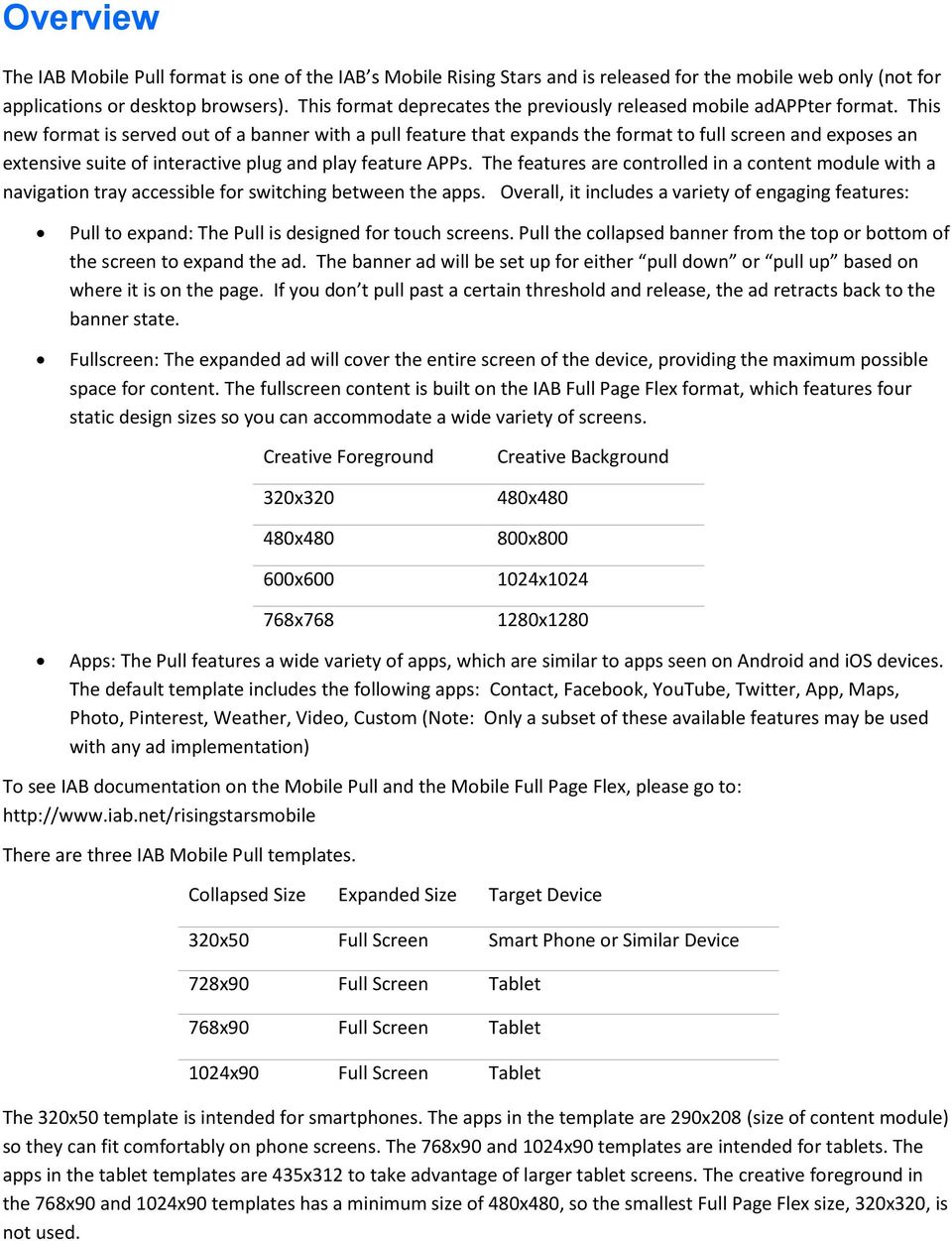
6 There is a scrollable navigation tray that shows thumbnails of the different apps and allows the user to switch between different features. If there is not enough room to show both the content module and the navigation tray, the navigation tray will collapse and hide after a few seconds of non-use and will show an icon for triggering it s redisplay. Under this scenario, a navigation tray may overlap the content module when shown. It is important to note that some of the apps in the Pull require additional setup, such as license keys or back-end services. These features may have an additional cost. Please see the documentation for the Twitter Block, the Store Locator Block (used in the Maps app), and the Weather Block for more information. It is also important to note that the IAB Pull is designed for mobile devices, such as tablets and smartphones. It will not work properly in all desktop browsers. We recommend using Chrome to preview the ad on your desktop. The 320x50 Mobile Pull on a simulated iphone.
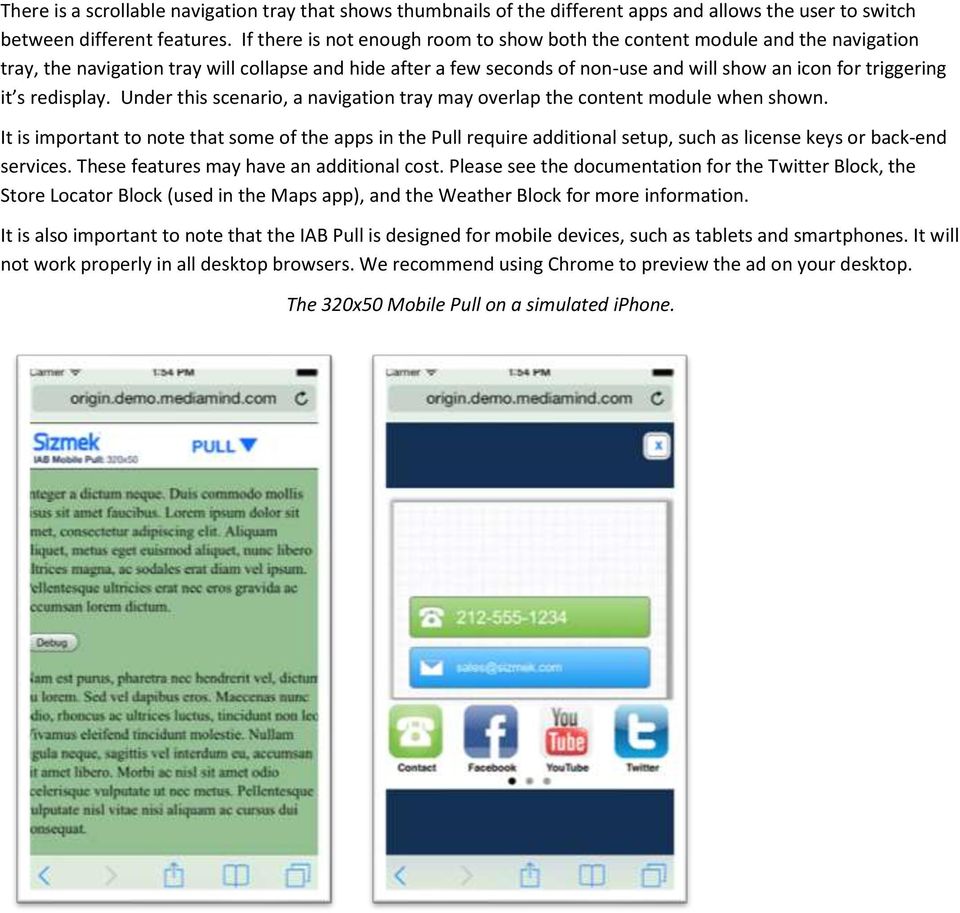
7 The 728x90 Mobile Pull on a simulated ipad.
8 Supported Platforms Platform iphone IPad Android Supported Versions ios 6.0 and later ios 6.0 and later Android 2.3 and later* (including Tablets) * Sizmek does not currently support the Kindle Fire. The default image will be served. Demos/Downloads Once the certification process is complete and the format is fully released, the IAB Mobile Pull will be available on the corporate Creative Zone Known Issues ios 7 If you expand the ad in portrait mode, rotate to landscape, then touch the bottom or top of the screen, the browser UI will appear. At this point, touch interactions with the ad will stop working. The touch interactions will work again after a few attempts to interact with the ad. If you drag down from the very top or very bottom of the screen, the ios notifications pane or the settings pane, respectively, will drag instead of the ad. There is no way currently to override this behavior. Implementing a IAB Mobile Pull Format Before you Begin Make sure you have the following resources available: The IAB Mobile Pull format workspace that is applicable for your campaign. Download the workspace from Quickbase and extract it, preserving the directory structure. Included Template Files HTML The following HTML template files are included: File Name index.html The ad file, with the ad configuration and initialization code. CSS The following HTML template files are included:

9 File Name stylesheets/style.css stylesheets/apps.css The style sheet for the ad and its elements. The style sheet for the apps in the fullscreen expanded state. Scripts The following script template files are included: File Name scripts/script.js scripts/apps.js ipts/mmclientdetector.js ipts/mmdomutils.js ipts/vwtoucharea.js ipts/vwswipenavigator.js ipts/vwtween.js This script is primarily responsible for controlling the expansion and collapse behavior of the ad. It also includes some classes that are used in the logic for preloading and setting up the apps. This script contains code for configuring and controlling the apps. This script is used by other scripts to determine the browser and browser version. This script is used to manipulate the DOM. This script is used to set up touch interactions with elements on the page. It is used in the SwipeNavigator code that allows you to swipe through apps in the dock. This script is used to allow the user to navigate between apps in the dock with touch. This script is used for tweening the dock and apps in the dock. The index file also loads JQuery, which is used in the Twitter block. There are also scripts in the blocks folder that are used for block functionality in the apps. Each of these blocks has its own documentation that goes into the block code extensively. Videos The following script template files are included (Note: For mobile placements, only the mp4 video file should be needed) File Name videos/video.mp4 videos/video.webm Demo video in mp4 format Demo video in webm format

10 videos/video.jpg The poster image for the video. Note the poster image determines the dimensions of the video in the Video app. Customizing the IAB Mobile Pull The IAB Mobile Pull is highly customizable. Here is an overview of the files you may wish to modify. index.html You probably will not need to touch the index file much. The index file has multiple functions. Loads multiple scripts that are used in the ad, such as scripts for tweening and swiping the apps. Contains a script that is used to initialize the ad. Contains tags that dictate the structure of the ad. If you want to change the size of the ad, you should change the EB.initExpansionParams function. EB.initExpansionParams(0, 0, 320, 50); You should change the last two numbers to the width and height of your collapsed banner. The actual expanded dimensions are not needed, as the ad will expand to varying dimensions based on the dimensions of the screen. scripts/script.js The script file primarily controls the logic for expanding and collapsing the ad. When the user drags the ad up or down, it will position the ad appropriately. The pull behavior is achieved using the CSS transform property. The script uses transform to translate the position of the container div up or down to match the position of the user s finger. The script file also receives messages from the custom script attached to the ad in the onmessagereceived function. The custom script will send in messages about the size of the screen when the screen resizes. Normally the CSS will resize the elements in the expanded ad properly, but on Android 2 the script forces the ad to resize appropriately using JavaScript. The custom script also sends in a message about whether the ad should expand up or down. This is determined by the position of the ad on the screen. If the ad is above the midpoint of the screen, the script sends in a message telling the ad to expand down. If the ad is below the midpoint of the screen, the script sends in a message telling the ad to expand up. The script will also determine whether to display the app dock based on the size of the screen. If the screen is shorter than the smallestheight variable, the dock will hide and a button will appear that can be used to toggle the dock as needed. This prevents the dock from covering the apps on short screens. The script file also contains some JavaScript prototypes that need to be loaded before the apps.js file is loaded. These include the Dock prototype, which has logic for showing and hiding the dock, the Preloader prototype, which allows the apps to load scripts, stylesheets, images, and video only when needed, and the Block prototype, which is used to load Sizmek blocks as apps.

11 scripts/apps.js The apps script contains the code used to configure the apps, and sets up the dock for swiping. The apps variable is an array that determines which apps are shown in the ad and how they are ordered. You ll see that it contains a list of apps such as contact, facebook, youtube, etc. If you do not want an app to be displayed, remove it from the array. If you want to change the order of the apps, change their order in the array. You will also see variables for appwidth and appheight, which are used to configure some of the apps that are based on blocks so that they match the height of your other apps. For example, if you set appwidth to 290, the apps that use the appwidth variable will be 290px wide. style/style.css The CSS in the style.css file uses media queries to customize the look of the ad based on the size of the screen. Media queries are a common way to tailor CSS to specific devices based on a range of criteria. The media queries are near the bottom of the document and contain comments so you can easily identify which CSS applies to which size. If you have CSS styles that should only apply to a particular size, only write them in the size you need to target. If you have CSS styles that should apply to every size, write them above the media query section. style.css is mainly used for styling the collapsed banner, but does have some CSS for styling the dock and the dock toggling button based on the size of the screen. It also contains CSS resets to make sure your ad looks as consistent as possible in different browsers. style/apps.css The apps.css file is primarily used for changing the style of the apps in the expanded panel. It is separate from the style.css file so it can be loaded politely. Customizing Apps Each app has settings that can be modified in the apps.js file. Most apps have the following the following properties: Property label wallpaper The label that is shown under the app icon, such as Contact. The URL for background image used in the app. Apps that are built using Sizmek blocks also commonly contain the following properties: Property appid The ID of the app used in the apps array. This name must match the name used in the apps array that determines the presence and
12 ordering of the apps. For example, twitter. container preloadqueue block block.class block.instancename block.config onhide The id of the div that will contain the app, such as DGTwitterContentroot. You can see all of the app divs in the index file. An array of objects pointing to stylesheets and scripts that need to be loaded in order for the block to function. Each object should have a URL property pointing to the file that needs to be loaded, and a target property which tells the preloader where to place the script or style tag. Most items are loaded into the head of the document. Contains properties for identifying and setting up the block. Contains the class name of the block, such as dg_twitterfeed, dg_storelocator, and dg_imagegallery. This must match the class name used to create a new instance of the block. Contains the instance name for the block class instance. This is different from the block class name. You can give the instance any valid variable name. The config property contains all of the configuration properties that are used in the block. Information on configuration properties can be found in the documentation for each block and are beyond the scope of this document. An optional function that will be called when the app is hidden. The Video app uses it to pause the video when the user goes to another app. The apps that are not built using blocks do not have separate documentation, so we will cover their settings here. Contact The Contact app allows users to contact an advertiser by phone or . The Contact app has the following unique properties: Property phonenumber A phone number the user can tap to call. An address the user can tap to .

13 Facebook The Facebook app links to a Facebook page. The Facebook app has the following unique properties: Property link A link to a Facebook page. YouTube The YouTube app links to a YouTube page. The YouTube app has the following unique properties: Property link A link to a YouTube page. Twitter The Twitter app allows you to pull a Twitter feed into your ad. The Twitter block uses a service called FileSnap to pull tweets into the ad without breaking Twitters terms of use. The FileSnap service may have an additional fee. Please refer to documentation for the HTML5 Twitter block to configure the app. App The App app allows you to link to an app in the application store for a variety of devices. The App app has the following unique properties: Property iphonewallpaper ipadwallpaper androidwallpaper winphonewallpaper The wallpaper URL to use on iphones and ipods. The wallpaper URL to use on ipads. The wallpaper URL to use on Android devices. The wallpaper URL to use on Windows phones.

14 defaultwallpaper iphonelink ipadlink androidlink winphonelink hidewhendefault The wallpaper URL to use on other browsers and devices. The App Store link for use on iphones and ipods The App Store link for use on ipads. The Google Play link for use on Android devices. The Windows Phone App store link for use on Windows Phones A Boolean that determines whether the App app should be hidden if is not on a device with a supported app store. Maps The Maps app allows you to display locations, such as stores, that are near a user or given location. The Maps app uses MapQuest by default. Additional fees and back-end setup may be required. Please refer to documentation for the HTML5 Store Locator block to configure the app. Photos The Photos app allows you to display a gallery of photos. Please refer to documentation for the HTML5 Photo Gallery block to configure the app. Pinterest The Pinterest app allows users to pin images to their Pinterest boards. Please refer to documentation for the HTML5 Pinterest block to configure the app. Weather

15 The Weather app allows display weather conditions near a user or given location. Additional fees and back-end setup may be required. Please refer to documentation for the HTML5 Pandora Weather block to configure the app. Video The Video app allows you to display a video with a custom video player. The App app has the following unique properties: Property block.config.width block.config.height block.config.video block.config.actionregister The width of the video app in pixels. The height of the video app in pixels. Contains an object that has the video mp4 URL and the caption that should be shown with the video. Contains your video clickthrough tracking function. Custom The Custom app is a blank slate that you can customize. If you want to change the name of the Custom app do a search for the variable custom in apps.js and replace it with your desired name and label. You will find logic for the custom app towards the bottom of the apps.js file. It includes functions for loading, starting, handling clicks, and hiding the app. Customizing Apps Which Use Blocks You can find all of the blocks that are used in apps in the blocks folder. You will find scripts, stylesheets, and any other assets used in each block. If you want to customize these files, please download and read the documentation for the block you would like to customize. Customizing IAB Mobile Pull Graphics The graphics for the IAB Mobile Pull are all in the images folder. The images folder contains images used for the ad as a whole, as well as a few images used for apps. App-related icons, wallpapers, and UI can be found in the images/apps folder. Please note that the app icons correspond with the app names in the apps.js file. For

16 example, the icon for the twitter app is twitter-icon.png and the icon for the weather app is weathericon.png. This allows the script in apps.js to automatically find the correct icon for each app based on name. Many graphics used in apps that are built using blocks can be found in their respective folder within the blocks folder. Setting Up a IAB Mobile Pull in the Sizmek Platform To set up an IAB Mobile Pull in the Sizmek platform: 1. Archive the workspace into a new ZIP file, preserving the directory structure. You can do this with WinZip, 7Zip, or another archiving program. 1. In the Sizmek platform, under Creative Assets, create a new Workspace by uploading the ZIP file. 2. Under the Ads section, create a new ad. 3. Fill out the form. Set Ad Format to IAB Mobile Pull. The following custom script will automatically be applied in the Advanced Features section of the ad settings: 4. Save the ad. 5. Create a new placement for the ad. Fill out the form. Set the Placement type to In Banner and the Banner size to match the collapsed size of the ad. After you ve saved your placement, you can then generate preview tags to test on your web site. Reported Interactions Besides the standard HTML5 ad interactions, the following are the custom interactions reported by this format and can be reviewed in Sizmek reporting: Custom IAB Mobile Pull Interactions Select_pinterest Pinterest_Button_Clicked Select_app Click_App Click_androidApp Click_defaultApp Click_iphoneApp Click_winphoneApp Select_contact Click_ Tracks opening the Pinterest app. Tracks clicks on the Pin it button. Tracks opening the App app. Tracks clicks to an undefined app. Tracks clicks through to the Android app. Tracks click to the default app. Tracks clicks to the iphone app. Tracks clicks to the Windows Phone app. Tracks opening the Contact app. Tracks clicks to .
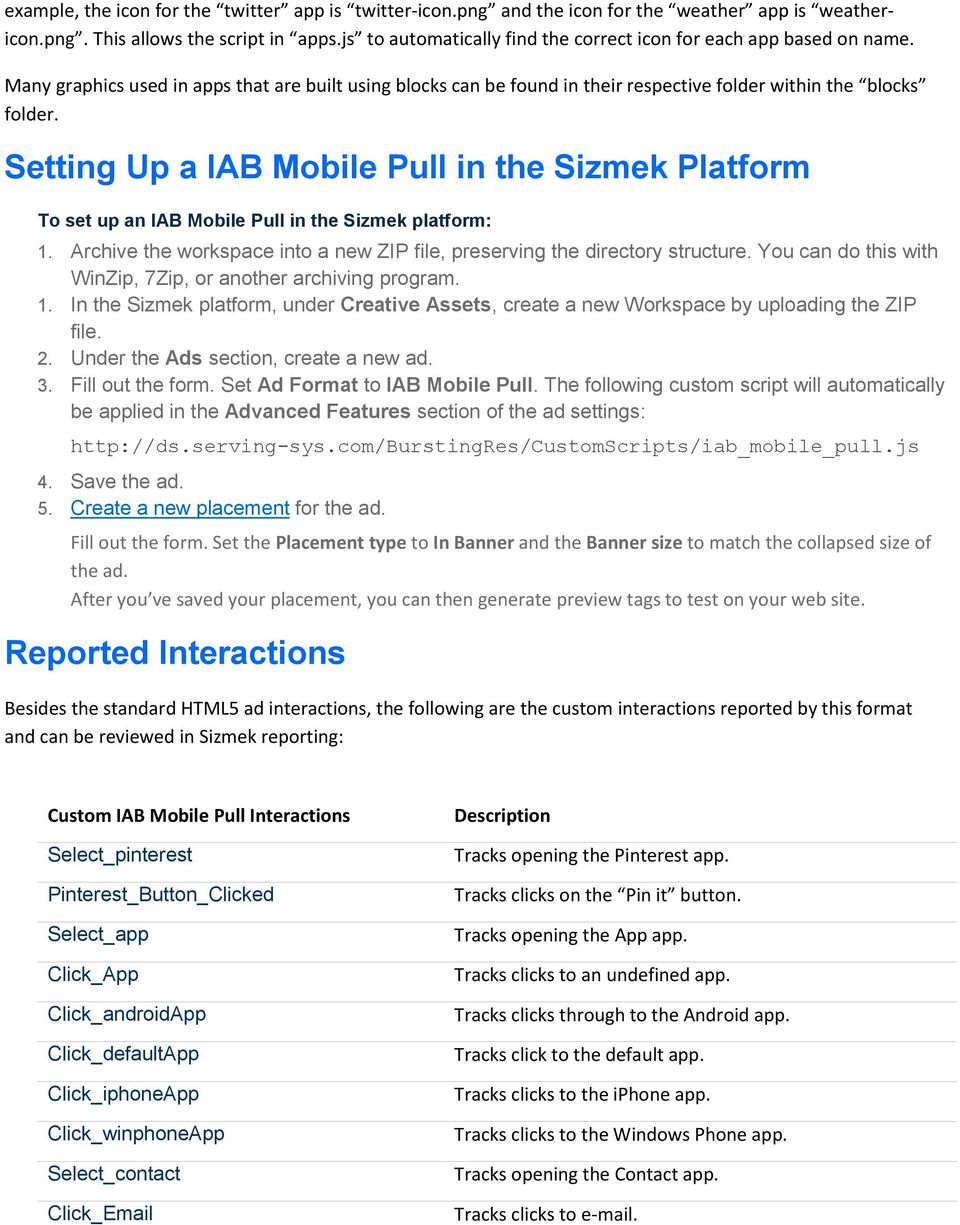
17 Click_Phone Select_facebook Click_Facebook Select_weather Weather_Block_Click Select_youtube Select_twitter Click_Twitter Twitter_Link_In_Tweet_Clicked Twitter_Reply_Clicked Twitter_Retweet_Clicked Select_photos Image_Gallery_ClickThrough_1 Image_Gallery_ClickThrough_2 Image_Gallery_ClickThrough_3 Image_Gallery_ClickThrough_4 Tracks clicks to make a phone call. Tracks opening the Facebook app. Tracks clicks to Facebook. Tracks opening the Weather app. Tracks weather block clickthrough. Tracks opening the YouTube app. Tracks opening the Twitter app. Tracks clicks to Twitter. Tracks clicks on a link in a Tweet. Tracks clicks to reply to a Tweet. Tracks clicks to Retweet. Tracks opening the Photos app. Tracks clicking through on the second image gallery image. Tracks clicking through on the third image gallery image. Tracks clicking through on the fourth image gallery image. Tracks clicking through on the fifth image gallery image. Image_Gallery_Navigated_To_0 Image_Gallery_Navigated_To_1 Image_Gallery_Navigated_To_2 Image_Gallery_Navigated_To_3 Image_Gallery_Navigated_To_4 Select_video Click_To_Video_0 Select_custom Select_maps Store_Locator_GetDirectionsClicked Store_Locator_LocationMarkerClicked Store_Locator_SearchByUserInput Store_Locator_SearchByUserLocation Select_Dock_Navigated_To_0 Tracks navigating to the first image. Tracks navigating to the second image. Tracks navigating to the third image. Tracks navigating to the fourth image. Tracks navigating to the fifth image. Tracks clicking to the Video app. Tracks clicking to show the video. Tracks clicking to the Custom app. Tracks opening the Maps app. Tracks getting directions in the Maps app. Tracks clicking on a location in the Maps app. Tracks searching manually in the Maps app. Tracks searching by geolocation in the Maps app. Tracks navigating to the first dock.

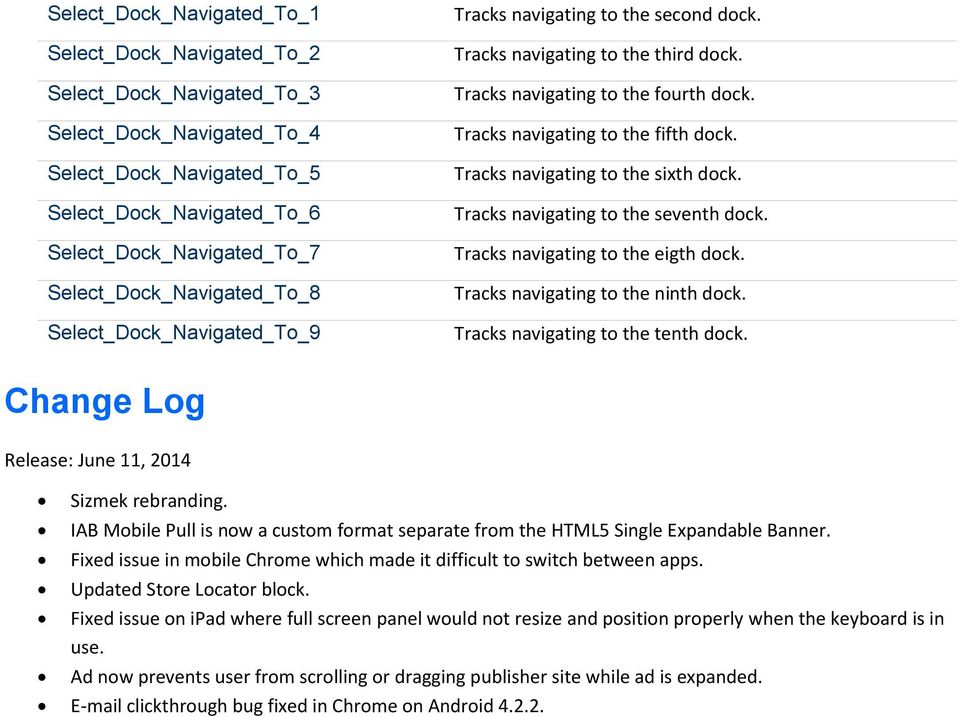
18 Select_Dock_Navigated_To_1 Select_Dock_Navigated_To_2 Select_Dock_Navigated_To_3 Select_Dock_Navigated_To_4 Select_Dock_Navigated_To_5 Select_Dock_Navigated_To_6 Select_Dock_Navigated_To_7 Select_Dock_Navigated_To_8 Select_Dock_Navigated_To_9 Tracks navigating to the second dock. Tracks navigating to the third dock. Tracks navigating to the fourth dock. Tracks navigating to the fifth dock. Tracks navigating to the sixth dock. Tracks navigating to the seventh dock. Tracks navigating to the eigth dock. Tracks navigating to the ninth dock. Tracks navigating to the tenth dock. Change Log Release: June 11, 2014 Sizmek rebranding. IAB Mobile Pull is now a custom format separate from the HTML5 Single Expandable Banner. Fixed issue in mobile Chrome which made it difficult to switch between apps. Updated Store Locator block. Fixed issue on ipad where full screen panel would not resize and position properly when the keyboard is in use. Ad now prevents user from scrolling or dragging publisher site while ad is expanded. clickthrough bug fixed in Chrome on Android
19 Notice The information contained in this document is proprietary and confidential to Sizmek and/or any of its affiliated companies. Disclosure, copying, reproduction, storing or any use of this document or any part thereof without the express prior, written consent of Sizmek or its authorized representatives is strictly prohibited. The information furnished in this document is believed to be accurate and reliable. However no responsibility is assumed by Sizmek for the use of this information. Sizmek reserves the right to make changes to the information included in this document at any time and without notice. Copyright 2014 Sizmek. All rights reserved. Flash is either a registered trademark or trademark of Adobe Systems Incorporated in the United States and/or other countries. Trademark Note: Sizmek, the Sizmek logo, Sizmek Rich Media, Sizmek Mobile, Sizmek Video, Sizmek Channel Connect, Sizmek Workshop, etc. are trademarks and/or registered trademarks of Sizmek. All other trademarks are the property of their respective owners.
Spotify Homepage Takeover
 Formats Spotify Homepage Takeover Build Guide Table of Contents Overview... 2 Supported Platforms... 3 Known Issues... 3 Implementing a Spotify Homepage Takeover... 3 Included Template Files... 3 HTML...
Sizmek Formats. HTML5 Page Skin. Build Guide
 Formats HTML5 Page Skin Build Guide Table of Contents Overview... 2 Supported Platforms... 7 Demos/Downloads... 7 Known Issues:... 7 Implementing a HTML5 Page Skin Format... 7 Included Template Files...
HTML5 Standard Banner
 Sizmek Formats HTML5 Standard Banner Build Guide Table of Contents Overview... 2 Supported Platforms... 3 Demos/Downloads... 3 Known Issues... 3 Recommended Specs... 3 Implementing an HTML5 Standard Banner...
Sizmek Features. Wallpaper. Build Guide
 Features Wallpaper Build Guide Table Of Contents Overview... 3 Known Limitations... 4 Using the Wallpaper Tool... 4 Before you Begin... 4 Creating Background Transforms... 5 Creating Flash Gutters... 7
Sizmek Formats. Collage. Build Guide
 Formats Collage Build Guide Table Of Contents Overview... 3 Supported Platforms... 3 Specifications... 3 Known Issues... 3 Ad Behavior Screenshots... 4 Template Included Files... 8 Setting up in Workshop...
Sizmek Formats. Swell. Build Guide
 Formats Swell Build Guide Table Of Contents Overview... 4 Supported Platforms... 4 Specifications... 4 Known Issues... 4 Ad Behavior Screenshots... 5 Before you Begin... 6 Template Included Files... 6
STANDARD BANNER: Ad Specs
 3 Ad Specs 1 Ad Specs STANDARD BANNER: Ad Specs Dimensions Max LOAD Size Devices Operating System Feature Various OS Blackberry Android ios Kindlefire Windows 120x20 168x28 216x36 * 300x50; 600x100 320x48;
IAB Full page flex Mobile Rising Star Ad Unit
 IAB Full page flex Mobile Rising Star Ad Unit Style Guide and Tech Specs Created By IAB Full Page Flex Ad Unit - Style Guide and Tech Specs. V3 January 2013 0 I. Description The IAB Full page flex Ad Unit
Table of Contents. Overview... 2. Supported Platforms... 3. Demos/Downloads... 3. Known Issues... 3. Note... 3. Included Files...
 Table of Contents Overview... 2 Supported Platforms... 3 Demos/Downloads... 3 Known Issues... 3 Note... 3 Included Files... 5 Implementing the Block... 6 Configuring The HTML5 Polling Block... 6 Setting
The In-Stream LogoKit is an In-Stream linear and non-linear ad format that plays in VPAID-compliant video players. The ad displays icons in the
 The In-Stream LogoKit is an In-Stream linear and non-linear ad format that plays in VPAID-compliant video players. The ad displays icons in the bottom-right corner of the player which, when clicked, open
Ad Specifications and Guidelines
 and Guidelines Banner Ad Formats Full-Screen Formats Full-Screen: Smartphone Full-Screen: Tablet Brand Video App Video Native Formats Brand Native App Native Video Native Rich Media Full HTML5 Support
Overview... 2. Included Files... 6. Implementing the Block... 7
 Overview... 2 The DCO Block Templates...2 DCO Apparel Template Block...3 DCO Auto Template Block...4 Supported Platforms...5 Demos/Downloads...5 Benefits...5 Use Case...6 Included Files... 6 Implementing
Centricity2 Mobile Communications App (MCA) Configuration. Schoolwires Centricity2
 Centricity2 Mobile Communications App (MCA) Configuration Schoolwires Centricity2 Trademark Notice Schoolwires, the Schoolwires logos, and the unique trade dress of Schoolwires are the trademarks, service
Sage CRM. Sage CRM 2016 R1 Mobile Guide
 Sage CRM Sage CRM 2016 R1 Mobile Guide Contents Chapter 1: Introduction to Sage CRM Mobile Solutions 1 Chapter 2: Setting up Sage CRM Mobile Apps 2 Prerequisites for Sage CRM mobile apps 3 Enabling users
Advertising on Onet.pl. Ad products specification
 Advertising on Onet.pl Ad products specification August 16, 2013 2 S t r o n a General rules... 3 Mobile Rich Media...... 4 General rules for Rich Media ads... 4 Rich Media top... 5 Cube 3D... 9 Formats
BT CONTENT SHOWCASE. JOOMLA EXTENSION User guide Version 2.1. Copyright 2013 Bowthemes Inc. [email protected]
 BT CONTENT SHOWCASE JOOMLA EXTENSION User guide Version 2.1 Copyright 2013 Bowthemes Inc. [email protected] 1 Table of Contents Introduction...2 Installing and Upgrading...4 System Requirement...4
A set-up guide and general information to help you get the most out of your new theme.
 Blox. A set-up guide and general information to help you get the most out of your new theme. This document covers the installation, set up, and use of this theme and provides answers and solutions to common
Advertising Specifications, Standards and Guidelines
 Advertising Specifications, Standards and Guidelines www.sitomobile.com MOBILE AD FORMATS Formats and functionality by device type Standard Banners Dimensions File Format Expansion MOBILE LEADERBOARD 320x50
Facebook - Twitter - Google +1 all in one plugin for Joomla enable "Twitter button", "Google +1
 Facebook - Twitter - Google +1 all in one plugin for Joomla enable "Twitter button", "Google +1 button ", Facebook " Like button ", the Facebook " Share This button ", the Facebook " Comment Box ", the
RSW. Responsive Fullscreen WordPress Theme
 RSW Responsive Fullscreen WordPress Theme Thank you for purchasing this theme. This document covers the installation and Setting up of the theme. Please read through this Help Guide if you experience any
JTouch Mobile Extension for Joomla! User Guide
 JTouch Mobile Extension for Joomla! User Guide A Mobilization Plugin & Touch Friendly Template for Joomla! 2.5 Author: Huy Nguyen Co- Author: John Nguyen ABSTRACT The JTouch Mobile extension was developed
Apple Applications > Safari 2008-10-15
 Safari User Guide for Web Developers Apple Applications > Safari 2008-10-15 Apple Inc. 2008 Apple Inc. All rights reserved. No part of this publication may be reproduced, stored in a retrieval system,
Table of Contents. Overview... 2. Supported Platforms... 3. Note... 3. Demos/Downloads... 3. Known Issues... 4. Use Case... 4
 Table of Contents Overview... 2 Supported Platforms... 3 Note... 3 Demos/Downloads... 3 Known Issues... 4 Use Case... 4 Included Files and Parameters... 5 Implementing the Block... 7 Setting Up A Nimbb
SizmekFeatures. HTML5JSSyncFeature
 Features HTML5JSSyncFeature Table of Contents Overview... 2 Supported Platforms... 2 Demos/Downloads... 3 Note... 3 For Tags Served in iframes... 3 Features... 3 Use Case... 3 Included Files... 4 Implementing
ONLINE ACCOUNTABILITY FOR EVERY DEVICE. Quick Reference Guide V1.0
 ONLINE ACCOUNTABILITY FOR EVERY DEVICE Quick Reference Guide V1.0 TABLE OF CONTENTS ACCOUNT SET UP Creating an X3watch account DOWNLOADING AND INSTALLING X3WATCH System Requirements How to install on a
ONLINE BANNER AND EMAIL ADVERTISING SPECIFICATIONS 2014
 1 General Guidelines 2 Newsletters 3 Rich Media 5 Video 6 Mobile Specs 7 Flash 8 Custom Content/ Microsites 8 Skin Specifications ONLINE BANNER AND EMAIL ADVERTISING SPECIFICATIONS 2014 GENERAL GUIDELINES
MAGENTO THEME SHOE STORE
 MAGENTO THEME SHOE STORE Developer: BSEtec Email: [email protected] Website: www.bsetec.com Facebook Profile: License: GPLv3 or later License URL: http://www.gnu.org/licenses/gpl-3.0-standalone.html 1
Digital and Mobile Advertising Specs. Preparing elements that increase revenue and improve results
 Digital and Mobile Advertising Specs Preparing elements that increase revenue and improve results Digital and Mobile Offerings According to emarketer, spending on digital advertising will experience double-digit
Mobility with Eye-Fi Scanning Guide
 Mobility with Eye-Fi Scanning Guide Scan and Transfer Images Wirelessly with Eye-Fi This document is to be used in addition to the scanner s user guide located on the installation disc. The instructions
VIRTUAL DESKTOP COMPANION SOFTWARE FOR MAC
 VIRTUAL DESKTOP COMPANION SOFTWARE FOR MAC USER MANUAL 25206A ABOUT THIS MANUAL Thank you for getting the Boogie Board Sync 9.7 LCD ewriter. This manual will help you with the Sync Virtual Desktop Companion
Welcome to GIFTS Online Mobile... 3
 Legal Notice The software described in this document is furnished under a license agreement. The software may be used or copied only in accordance with the terms of the agreement. No part of this document
Creating Effective Mobile Advertising Campaigns
 Creating Effective Mobile Advertising Campaigns This document pertains specifically to creating Mobile Display Ad Campaigns running on the Google Ads network. It is intended to provide recommendations
Advertising Specifications V2.0
 1 Advertising Specifications V2.0 This document contains the specifications for all Shazam Advertising Formats. It covers the basic dimensions and rules for all placements. SECTION 1 Standard: Ad-served
VIRTUAL DESKTOP COMPANION SOFTWARE FOR WINDOWS
 VIRTUAL DESKTOP COMPANION SOFTWARE FOR WINDOWS USER MANUAL 25205A About this Manual Thank you for getting the Boogie Board Sync 9.7 LCD ewriter. This manual will help you with the Sync Virtual Desktop
Creating mobile layout designs in Adobe Muse
 Creating mobile layout designs in Adobe Muse Using Adobe Muse, you can create site layouts for web content to be displayed on desktop, smartphones, and tablets. Using the mobile design features, you can
Using the owncloud Android App
 Using the owncloud Android App Accessing your files on your owncloud server via the Web interface is easy and convenient, as you can use any Web browser on any operating system without installing special
Adobe Summit 2015 Lab 718: Managing Mobile Apps: A PhoneGap Enterprise Introduction for Marketers
 Adobe Summit 2015 Lab 718: Managing Mobile Apps: A PhoneGap Enterprise Introduction for Marketers 1 INTRODUCTION GOAL OBJECTIVES MODULE 1 AEM & PHONEGAP ENTERPRISE INTRODUCTION LESSON 1- AEM BASICS OVERVIEW
How To Write A Cq5 Authoring Manual On An Ubuntu Cq 5.2.2 (Windows) (Windows 5) (Mac) (Apple) (Amd) (Powerbook) (Html) (Web) (Font
 Adobe CQ5 Authoring Basics Print Manual SFU s Content Management System SFU IT Services CMS Team ABSTRACT A summary of CQ5 Authoring Basics including: Setup and Login, CQ Interface Tour, Versioning, Uploading
Setting Up groov Mobile Apps. Introduction. Setting Up groov Mobile Apps. Using the ios Mobile App
 Introduction Using the ios Mobile App Opto 22 s free groov View apps for ios and Android allow you to use View for one or more groovs on your smartphone or tablet in full-screen mode without the address
DroboAccess User Manual
 DroboAccess User Manual Release 8.2 The DroboAccess developers June 02, 2016 CONTENTS 1 DroboAccess 8.2 User Manual Introduction 1 2 Configuration of DroboAccess 8.2 3 2.1 Users, passwords and share management................................
Quick Start Guide Mobile Entrée 4
 Table of Contents Table of Contents... 1 Installation... 2 Obtaining the Installer... 2 Installation Using the Installer... 2 Site Configuration... 2 Feature Activation... 2 Definition of a Mobile Application
Introduction to Windows 8
 Introduction to Windows 8 Windows 8 is a completely redesigned operating system developed from the ground up with touchscreen use in mind as well as near instant-on capabilities that enable a Windows 8
Frequently Asked Questions for the USA TODAY e-newspaper
 Frequently Asked Questions for the USA TODAY e-newspaper Navigating the USA TODAY e-newspaper A look at the toolbar Toolbar Functions, Buttons, and Descriptions The tab marked Contents will take the e-reader
ADVERTISING SPECS. Base File Weight
 Standard ads Creative constructed in standard web-image formats, such as GIF, JPEG, PNG as well as single file flash (SWF) executions of any of the dimensions listed below are considered standard ads.
Digital Signage with Apps
 Version v1.0.0 Digital Signage with Apps Copyright 2012 Syabas Technology, All Rights Reserved 2 Digital Signage with Apps Project...6 New Project...6 Scheduler...6 Layout Panel...7 Property Panel...8
Getting Started. Version 3.1 Last updated 2014/3/10. Orbweb ME: Getting Started
 Information in this document is subject to change without notice. Companies, names, and data used in examples herein are fictitious unless otherwise noted. No part of this document may be reproduced or
Sage CRM. Sage CRM 7.3 Mobile Guide
 Sage CRM Sage CRM 7.3 Mobile Guide Copyright 2014 Sage Technologies Limited, publisher of this work. All rights reserved. No part of this documentation may be copied, photocopied, reproduced, translated,
Gauge Drawing Tool... 8. Slider Drawing Tool... 8. Toggle Button Drawing Tool... 8. One-Way List Drawing Tool... 8
 v. 20120510 Table of Contents RTiPanel Overview and Requirements... 3 Software Requirements:... 3 Hardware Requirements:... 3 Network Requirements:... 3 Licensing Requirements:... 4 Basic Integration Designer
SETTING UP THE NEW FACEBOOK BUSINESS PAGE DESIGN
 SETTING UP THE NEW FACEBOOK BUSINESS PAGE DESIGN CREATIVE After logging in and accessing your Facebook business page as an administrator, you ll be presented with the following message: Start Tour: Click
2013 Honeywell Users Group Americas Symposium. Mobile App Guide
 2013 Honeywell Users Group Americas Symposium Mobile App Guide Introduction Welcome to the 2013 Honeywell Users Group Americas Symposium. This year, we have replaced the printed agenda book with a mobile
darlingharbour.com Content Management System Tenant User Guide
 darlingharbour.com Content Management System Tenant User Guide August 2014 Table of Contents 1 Introduction... 1 2 Getting started... 1 2.1 Requirements...1 2.2 Logging in...1 2.3 Change your Password...2
USER S MANUAL JOOMLA! GOVERNMENT WEB TEMPLATE
 USER S MANUAL JOOMLA! GOVERNMENT WEB TEMPLATE 1 TABLE OF CONTENTS Introduction 3 Parts of the Government Web Template (GWT) 4 Logging In and Getting Started 5 GWT Joomla! Module Map 8 Editing the Top Bar
Appspace 5.X Reference Guide (Digital Signage) Updated on February 9, 2015
 Appspace 5.X Reference Guide (Digital Signage) Updated on February 9, 2015 1 TABLE OF CONTENTS 2 What is Appspace For Digital Signage... 4 3 Access Appspace... 4 4 Best Practices and Notes... 4 5 Appspace
Introducing our new Editor: Email Creator
 Introducing our new Editor: Email Creator To view a section click on any header below: Creating a Newsletter... 3 Create From Templates... 4 Use Current Templates... 6 Import from File... 7 Import via
ONLINE PREVIEWER MANUAL
 ONLINE PREVIEWER MANUAL Version: 1.20120103 1 Table of Contents 2 About the Adrime Previewer... 3 2.1 Accessing the Previewer... 3 2.2 Account overview... 4 3 Setting up your flight... 6 3.1 Step 1: Uploading
Responsive Web Design for Teachers. Exercise: Building a Responsive Page with the Fluid Grid Layout Feature
 Exercise: Building a Responsive Page with the Fluid Grid Layout Feature Now that you know the basic principles of responsive web design CSS3 Media Queries, fluid images and media, and fluid grids, you
Remote Desktop Services User's Guide
 Contents Remote Desktop Services Document Revision Control Revision Description Author DATE 1.0 Initial Release Karen M. Hess 3/24/2015 1.1 Added section for viewing mapped drives Karen M. Hess 4/15/2015
Sage CRM. 7.2 Mobile Guide
 Sage CRM 7.2 Mobile Guide Copyright 2013 Sage Technologies Limited, publisher of this work. All rights reserved. No part of this documentation may be copied, photocopied, reproduced, translated, microfilmed,
Administrator s Guide ALMComplete Support Ticket Manager
 Administrator s Guide ALMComplete Support Ticket Manager This guide provides an overview of ALMComplete s Support Manager with setup instructions. SoftwarePlanner Release 9.6.0 and higher April 2011 1
Using the Jive for ios App
 Using the Jive for ios App TOC 2 Contents App Overview...3 System Requirements... 4 Release Notes...5 Which Version Am I Using?... 6 Connecting to Your Community... 11 Getting Started...12 Using Your Inbox...13
CWU Content Management System (CMS) User Guide
 CWU Content Management System (CMS) User Guide Last Revision: July 14, 2014 Version: 1.7 CWU Content management System (CMS) User Guide 2 Table of Contents NOTE: Copyright Guidelines... 4 What is a content
After many years we are happy to create a new social plugin with a great potential.
 After many years we are happy to create a new social plugin with a great potential. The Compago Social Share is created for Joomla 3.1 and it will let you share your contents on the most used social network:
Apps for Android. Apps for iphone & ipad INS584-3
 Apps for iphone & ipad INS584-3 Apps for Android Android is a trademark of Google Inc. iphone is a trademark of Apple Inc., registered in the U.S. and other countries. ipad is a trademark of Apple Inc.,
BT BACKGROUND SLIDESHOW JOOMLA EXTENSION User guide Version 2.0
 BT BACKGROUND SLIDESHOW JOOMLA EXTENSION User guide Version 2.0 Copyright 2012 Bowthemes Inc. [email protected] 1 Table of Contents Introduction...2 Related Topics...2 Product Features...2 Installing
P WEBSITE P CATALOGUES P PRICE GUIDES P ONLINE CLOUD STORAGE P e-commerce System. Printed and Electronic (e-documents) Users Guide. vbradug-15.10.
 P WEBSITE P CATALOGUES P PRICE GUIDES P ONLINE CLOUD STORAGE P e-commerce System Printed and Electronic (e-documents) vbradug-5.0.02 Users Guide 205 Bradfield Trading Ltd. All rights reserved. Reproduction
We automatically generate the HTML for this as seen below. Provide the above components for the teaser.txt file.
 Creative Specs Gmail Sponsored Promotions Overview The GSP creative asset will be a ZIP folder, containing four components: 1. Teaser text file 2. Teaser logo image 3. HTML file with the fully expanded
Flexible Identity Federation
 Flexible Identity Federation User guide version 1.0.1 Publication History Date Description Revision 2015.09.25 initial release 1.0.0 2015.12.10 minor corrections 1.0.1 Copyright Orange Business Services
ON24 MOBILE WEBCASTING USER GUIDE AND FAQ FEBRUARY 2015
 FEBRUARY 2015 MOBILE ATTENDEE GUIDE ON24 s Mobile Webcasting console allows you to bring your webcast directly to your audience, regardless of location. Users on mobile devices can register, attend, and
CRESTRON-APP/CRESTRON-APP-PAD Control App for Apple ios
 1 Introduction The Crestron apps CRESTRON-APP and CRESTRON-APP-PAD provide a Smart Graphics touch screen user interface on Apple devices running the ios operating system. CRESTRON-APP can also provide
Communications Cloud Product Enhancements February 2016
 Communications Cloud Product Enhancements February 2016 Table of Contents Pages GoToMeeting... 3-26 GoToTraining...47-60 Communications Cloud Product Enhancements February 2016 GoToMeeting (Return to Table
Generate Android App
 Generate Android App This paper describes how someone with no programming experience can generate an Android application in minutes without writing any code. The application, also called an APK file can
Alfresco Online Collaboration Tool
 Alfresco Online Collaboration Tool USER MANUAL BECOMING FAMILIAR WITH THE USER INTERFACE... 4 MY DASHBOARD... 4 MY PROFILE... 6 VIEWING YOUR FULL PROFILE... 6 EDITING YOUR PROFILE... 7 CHANGING YOUR PASSWORD...
Sage CRM 7.2 Release Preview
 March 2013 7.2 Release Preview Overview The release of 7.2 delivers a host of exciting new features and enhancements that help you leverage the latest trends in mobility, Social CRM, and business collaboration.
Work with Centricity2 Mobile Communications App (MCA) Site Manager. Schoolwires Centricity2
 Work with Centricity2 Mobile Communications App (MCA) Site Manager Schoolwires Centricity2 Trademark Notice Schoolwires, the Schoolwires logos, and the unique trade dress of Schoolwires are the trademarks,
By Global Delight. Voila Screen Capture For Mac 1
 Voila Screen Capture For Mac By Global Delight Voila Screen Capture For Mac 1 Table Of Contents I. General Information...3 1. Product Overview...3 2. Target Market...3 3. Pricing & Availability...4 4.
INSTANT MAGAZINE QUICK GUIDE
 INSTANT MAGAZINE QUICK GUIDE Create an online magazine in a jiffy It s great that you ll be working with our tool! We hope you ll enjoy the creative process. Take a moment to read this quick guide and
WWW.FLIPBUILDER.COM FLIP PDF FOR MAC. Create your flipping book from PDF files on Mac
 WWW.FLIPBUILDER.COM FLIP PDF FOR MAC Create your flipping book from PDF files on Mac About Flip PDF for Mac Flip PDF is your easy way to convert ordinary PDF files into stunning booklets with amazing page-flipping
Adobe Summit 2015 Lab 712: Building Mobile Apps: A PhoneGap Enterprise Introduction for Developers
 Adobe Summit 2015 Lab 712: Building Mobile Apps: A PhoneGap Enterprise Introduction for Developers 1 Table of Contents INTRODUCTION MODULE 1 AEM & PHONEGAP ENTERPRISE INTRODUCTION LESSON 1- AEM BASICS
General Ad Guidelines and Specs
 General Ad Guidelines and Specs www.vervemobile.com General Ad Guidelines Development and delivery specifications PROVIDING FINAL ADS TO VERVE Ad creatives should be sent in one of the following formats:.png,.jpg,
SAS Visual Analytics 7.2 for SAS Cloud: Quick-Start Guide
 SAS Visual Analytics 7.2 for SAS Cloud: Quick-Start Guide Introduction This quick-start guide covers tasks that account administrators need to perform to set up SAS Visual Statistics and SAS Visual Analytics
CRESTRON-APP/CRESTRON-APP-PAD
 1 3 Introduction The free version of the app has limitations on the size and complexity of the project. For complete functionality, upgrade to the Pro version via an in-app purchase. The CRESTRON-APP and
Content Manager User Guide Information Technology Web Services
 Content Manager User Guide Information Technology Web Services The login information in this guide is for training purposes only in a test environment. The login information will change and be redistributed
Store & Share Quick Start
 Store & Share Quick Start What is Store & Share? Store & Share is a service that allows you to upload all of your content (documents, music, video, executable files) into a centralized cloud storage. You
Reference Guide TEAM. Pogoplug Team. Reference Guide. 2012 Cloud Engines Inc., All Rights Reserved.
 Reference Guide Pogoplug Team Reference Guide Table of Contents Table of Contents 1. What s Included 2. Getting Started 3. Customizing the Pogoplug Interface a. Custom UI b. Custom Domain Name c. Custom
SPHOL326: Designing a SharePoint 2013 Site. Hands-On Lab. Lab Manual
 2013 SPHOL326: Designing a SharePoint 2013 Site Hands-On Lab Lab Manual This document is provided as-is. Information and views expressed in this document, including URL and other Internet Web site references,
Mura CMS. (Content Management System) Content Manager Guide
 Mura CMS (Content Management System) Content Manager Guide Table of Contents Table of Contents 1. LOGGING IN...1 2. SITE MANAGER...2 3. ADDING CONTENT (Pages, Folders, etc.)...6 4. WORKING WITH IMAGES...15
PLAYER DEVELOPER GUIDE
 PLAYER DEVELOPER GUIDE CONTENTS CREATING AND BRANDING A PLAYER IN BACKLOT 5 Player Platform and Browser Support 5 How Player Works 6 Setting up Players Using the Backlot API 6 Creating a Player Using the