
Alcatel-Lucent OmniPCX Office R8.1 Maintenance Software
|
|
|
- Christiana Woods
- 10 years ago
- Views:
Transcription
1 Alcatel-Lucent OmniPCX Office R8.1 Maintenance Software Software version: System 810/ OMC 810/26.1a This document lists the correction delta between the maintenance software and the Technical Released version 810/ of the Alcatel-Lucent OmniPCX Office. This document will be updated according to software editions and deliveries. Reminder : system version 810/ has the same level then 800/ /01/2012 Version /12/2011 Version OMC 26.1a ED DATE CHANGE NOTE Service & Support Ref: Maintenance SW follow-up 1
2 System corrections Corrections in crms SIP phone SDP: if more than 1 codec in 200 OK from set OXO should re-invite with only 1 codec. crms OXO810: OTS crash calling web services without sessionid crms ACD Problem: Exceptional opening days versus standard opening days doesn't work crms crms crms crms Call doesn't land on 8082 if a blind transfer is made to the set when it is in busy state SIP phone: call failure when transfer in ringing with path optimization on trunk ISDN Call gets released on 8082 when conference is enabled during unavailability of channel OT4135# Establish and releasing call via conference guide with a wrong number crms If a forwarded extension logs in as ACD agent, forwarding still active ACD calls crms Call forward for direct DDI call to ACD agent is not working since upgrade to R8.1 crms No internal dialing tone crms No name display on IC Touch for calls from or to slave OXO crms SIP Phone - unable to Pick Up a Call initiated by SIP phone crms No My IC Phone reboot after OXO SW download crms Accuracy of PowerCPU clock (new uboot version) crms crms My IC Phone* Calls get dropped when transfer is initiated Call Pick up fails when done from My IC Phone/SIP phone crms xmlsrv signaled by signal 31 (Bad system call) crms crms Service & Support Ref: Maintenance SW follow-up 2 My IC Mobile - Configurations in mobility tab are lost after swap with data saving Forwarding of ACD agent : local calls are not forwarded even if terminal is not logged in as agent. crms My IC Mobile - No manage cal pop up for external outgoing call from application crms connection between Kamailio and OTS may be always down crms My IC Mobile extension : Mobility parameters not always displayed OXO-810 : ARS codec configuration not taken into account for an external incoming call from a crms sip trunk to a SIP phone/8082 crms Portuguese corrections for My IC Mobile crms OTS: New tickets/logs version to allow swap with data saving R800 -> R810 crms In MultiSet, Incoming call are not managed by My IC Mobile application crms crms My IC Mobile reset crms crms crms Corrections in crms crms crms My IC Mobile : event channel is lost after a while when the application is in background Unable to hear the preannouncement message on an ISDN trunk with a SIP Phone CSTA error message are generated during Nomadic call OXO 8.1: ACD engine improvement for ports blocking issues Possible to send Voice mail between different entities OT4135: Establish and releasing call via conference guide OT4135: Incoming call, holding behavior during meet me conference crms Caller identity not displayed in PIMphony while recalling crms Call from SIP phones to ACD group containing SIP phone fails crms System doesn't release the call after a disconnect crms crms crms crms No voice to and from My IC Phone in a meet me conference when hold button is pressed No audio if 8082 A deflected by 8082 B to NOE IP phone PIMphony: called number and call duration of held call vanishes when an active call is released Second call to My IC Phone 8082 not presented if transferred in ringing from any set

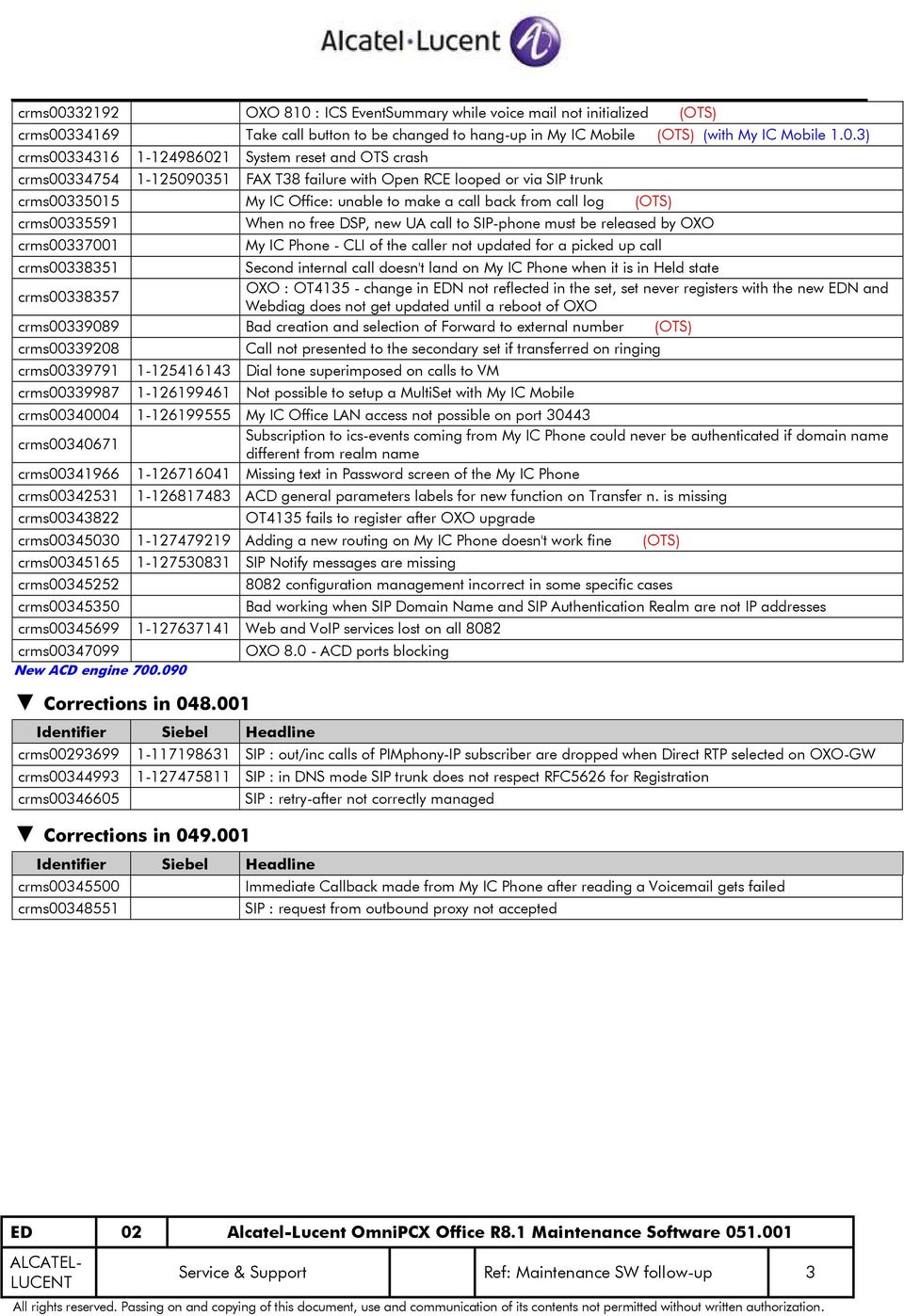
3 crms OXO 810 : ICS EventSummary while voice mail not initialized crms Take call button to be changed to hang-up in My IC Mobile (with My IC Mobile 1.0.3) crms System reset and OTS crash crms FAX T38 failure with Open RCE looped or via SIP trunk crms My IC Office: unable to make a call back from call log crms crms When no free DSP, new UA call to SIP-phone must be released by OXO My IC Phone - CLI of the caller not updated for a picked up call crms Second internal call doesn't land on My IC Phone when it is in Held state crms OXO : OT change in EDN not reflected in the set, set never registers with the new EDN and Webdiag does not get updated until a reboot of OXO crms Bad creation and selection of Forward to external number crms Call not presented to the secondary set if transferred on ringing crms Dial tone superimposed on calls to VM crms Not possible to setup a MultiSet with My IC Mobile crms My IC Office LAN access not possible on port Subscription to ics-events coming from My IC Phone could never be authenticated if domain name crms different from realm name crms Missing text in Password screen of the My IC Phone crms ACD general parameters labels for new function on Transfer n. is missing crms OT4135 fails to register after OXO upgrade crms Adding a new routing on My IC Phone doesn't work fine crms SIP Notify messages are missing crms crms configuration management incorrect in some specific cases Bad working when SIP Domain Name and SIP Authentication Realm are not IP addresses crms Web and VoIP services lost on all 8082 crms New ACD engine Corrections in OXO ACD ports blocking crms SIP : out/inc calls of PIMphony-IP subscriber are dropped when Direct RTP selected on OXO-GW crms SIP : in DNS mode SIP trunk does not respect RFC5626 for Registration crms Corrections in crms crms SIP : retry-after not correctly managed Immediate Callback made from My IC Phone after reading a Voic gets failed SIP : request from outbound proxy not accepted Service & Support Ref: Maintenance SW follow-up 3
4 Corrections in crms My IC Phone upgrade gets failed crms Phantom ring back tome heard randomly between the IP phones crms OXO System goes down or goes for a reset on leaving Missed calls to My IC Mobile New My IC Phone version New IP NOE version for 4008/4018 New uboot-loader version : The version contains new uboot-loader (bios) for the PowerCPU : - The new Boot-loader will be loaded when the system restarts in (first cold start after swap), - DO NOT SWITCH OFF THE SYSTEM DURING THE BIOS UPGRADE (stopping the bios flashing will put the PowerCPU in permanent fault state and the board has to be sent to the repair centre), Reminder : On the Compact Edition cabinet, the uboot-loader is not automatically selected for this type of cabinet. When loading the version , it is necessary to select manually the Boot-loader in the list of items to be sent to the system. Corrections in crms crms crms crms crms Broadcast on 40x8 OT4135: Admin pin code must be available thru MMI No voice between two 8082 sets during call record SIP phone goes out of service after Write to PCX OT Line information is lost after a hold scenario crms First call after blind transfer will fail crms Beep tone heard at START signal in door phone crms Intercity prefix is transferred to remote PCX only after the call is answered by secondary site user crms Summer Time is cancelled for Belarus crms Feature Key "Group Withdrawal" doesn't work after reboot IP Touch crms Dial tone superimposed on calls to VM crms Call not released properly in My IC Mobile iphone application crms Mobile DECT 500 callback from call log not possible crms Incoming SIP call transfer from AA to VM has no audio crms Random OXO slowing down when Keep Alive protocol is H.323 (VoIP) crms Transfer not possible via SIP private crms Busy tone and Wait on Subscriber using Public SIP crms crms OT4135 interface allows to change the time and date even if the NTP service is enabled My IC Mobile: After make call to a wrong number, the system doesn't inform the client crms In response to SIP/OPTION keep alive from internal SIP phones, OXO sends a malformed 200-OK crms External call transferred to subscriber with intercom fails crms Diversion is not working when forward on no answer in PIMphony is used crms My IC Office -- message if no mail box crms External call transferred to internal subscriber with intercom fails. crms Mobile DECT 500 callback from call log not possible. crms IP OBS: out FAX in G711 mode fails (out RTP flow stops) New NOE TDM version for 4029/4039 New version for OT 4135 New version for OT 8118 / 8128 Service & Support Ref: Maintenance SW follow-up 4

5 OMC corrections OMC 810/23.1a crms missing entry in OMC Help OMC 810/24.1a crms Migration using ISDN connection crms ict and ot4135 package has to be removed after deselecting in OMC Soft. Download crms Entries in Misc Window in OMC for My IC Mobile terminal to be disabled OMC 810/25.1a crms IP Conference Phone's Version in OMC to be corrected crms Webdiag not working with OMC IP connection on different port crms In OMC the SIP Password reset button for My IC Phone is too small in German crms IMEI/MAC configuration is not properly managed in mobility tab for My IC Mobile crms Software Download doesn't work with OMC810 / 24.1a OMC 810/26.1a crms My IC Phone upgrade gets failed End of document Service & Support Ref: Maintenance SW follow-up 5

Alcatel-Lucent OmniPCX Office R7.1 Maintenance Software
 Alcatel-Lucent OmniPCX Office R7.1 Maintenance Software Software version: System 710/090.001 This document lists the correction delta between the maintenance software and the Technical Released version
Alcatel-Lucent OmniPCX Office R7.1 Maintenance Software
 Alcatel-Lucent OmniPCX Office R7.1 Maintenance Software Software version: System 710/084.001 This document lists the correction delta between the maintenance software and the Technical Released version
OBS-BIV (FR): SIP TRUNK
 Technical Bulletin Alcatel-Lucent OmniPCX Office TC1788 ed.01 OBS-BIV (FR): SIP TRUNK CONFIGURATION GUIDE OXO R820 This document details the configuration necessary for the ALCATEL-LUCENT OXO R820 to inter-operate
SIP TRUNK SOLUTION: OPENIP (FR) CONFIGURATION GUIDELINE R920
 Technical Bulletin Alcatel-Lucent OmniPCX Office Release 920 SIP TRUNK SOLUTION: OPENIP (FR) CONFIGURATION GUIDELINE R920 This document details how to set up an OXO R920 IPBX for enabling a public SIP
SIP TRUNK SOLUTION: OBS-BIV (FR) CONFIGURATION GUIDELINE R900
 Technical Bulletin Alcatel-Lucent OmniPCX Office Release 900 SIP TRUNK SOLUTION: OBS-BIV (FR) CONFIGURATION GUIDELINE R900 This document details the configuration necessary on the IPBX ALCATEL-LUCENT OXO
IP PBX. SD Card Slot. FXO Ports. PBX WAN port. FXO Ports LED, RED means online
 1 IP PBX SD Card Slot FXO Ports PBX LAN port PBX WAN port FXO Ports LED, RED means online 2 Connect the IP PBX to Your LAN Internet PSTN Router Ethernet Switch FXO Ports 3 Access the PBX s WEB GUI The
SIP TRUNK SOLUTION: SUNRISE (CH) CONFIGURATION GUIDELINE R920
 Technical Bulletin Alcatel-Lucent OmniPCX Office Release 920 SIP TRUNK SOLUTION: SUNRISE (CH) CONFIGURATION GUIDELINE R920 This document details how to set up an OXO R920 IPBX for enabling a public SIP
FortiVoice. Version 7.00 User Guide
 FortiVoice Version 7.00 User Guide FortiVoice Version 7.00 User Guide Revision 2 28 October 2011 Copyright 2011 Fortinet, Inc. All rights reserved. Contents and terms are subject to change by Fortinet
SIP TRUNK SOLUTION: ADD-ON TELECOM (FR) CONFIGURATION GUIDELINE R910
 Technical Bulletin Alcatel-Lucent OmniPCX Office Release 910 SIP TRUNK SOLUTION: ADD-ON TELECOM (FR) CONFIGURATION GUIDELINE R910 This document details the configuration necessary on the IPBX ALCATEL-LUCENT
Link Gate SIP. (Firmware version 1.20)
 Link Gate SIP (Firmware version 1.20) User guide v1.0 1 Content 2 1. Technical parameters - Dimensions 133 x 233 x 60 mm - Weight 850 g - Operating position various - Operating condition temperature: +5
SIP TRUNK SOLUTION PEOPLEFONE (CH): CONFIGURATION GUIDELINE RCE101
 Technical Bulletin Alcatel-Lucent OmniPCX Office R10.1 SIP TRUNK SOLUTION PEOPLEFONE (CH): CONFIGURATION GUIDELINE RCE101 This document details how to set up an IPBX OXO RCE101 for enabling a public SIP
Installation and setup guide V 1.0
 V o I P G S M G A T E BlueGate SIP 1 Installation and setup guide V 1.0 1. General description 1.1 Technical parametres Dimensions 100 x 130 x 37 mm Weight 850 g Operating position various Operating condition
Alcatel-Lucent OXO Configuration Guide. For Use with AT&T s IP Flexible Reach Service. Version 1 / Issue 1 Date July 28, 2009
 Alcatel-Lucent OmniPCX Office R7.1 Configuration Guide For Use with AT&T s IP Flexible Reach Service Version 1 / Issue 1 Date July 28, 2009 www.alcatel-lucent.com AT&T IP Flexible Reach TABLE OF CONTENTS
Extended communication server: Fax Server- Administration
 Extended communication server: Fax Server- Administration OCTOBER, 2008 Alcatel-Lucent Office Offer - All Rights Reserved Alcatel-Lucent 2008 8AL 90403 USAA ed.01 This document explains how to install
Extended communication server 4.1 : VoIP SIP service administration
 Extended communication server 4.1 : VoIP SIP service administration May, 2008 Alcatel-Lucent Office Offer - All Rights Reserved Alcatel-Lucent 2007 This document explains how to configure the ECS VOIP
SIP TRUNK SOLUTION OVH (FR): CONFIGURATION GUIDELINE RCE100
 Technical Bulletin Alcatel-Lucent OmniPCX Office R10.0 SIP TRUNK SOLUTION OVH (FR): CONFIGURATION GUIDELINE RCE100 This document details how to set up an IPBX OXO RCE100 for enabling a public SIP trunk
Provisioning and configuring the SIP Spider
 Provisioning and configuring the SIP Spider Administrator Guide Table of Contents 1. Introduction... 3 2. Manual Provisioning... 4 3. Automatic Provisioning... 5 3.1 Concept... 5 3.2 Preparing the configuration
MyIC setup and configuration (with sample configuration for Alcatel Lucent test environment)
 MyIC setup and configuration (with sample configuration for Alcatel Lucent test environment) N.B. Goto MyIC Preferences in the System Toolbar. Description: this may be any appropriate description of the
SIP Trunking Quick Reference Document
 SIP Trunking Quick Reference Document Publication Information SAMSUNG TELECOMMUNICATIONS AMERICA reserves the right without prior notice to revise information in this publication for any reason. SAMSUNG
Ipiphony Phone System. User Manual. 1 P a g e
 Ipiphony Phone System User Manual 1 P a g e About this Guide This guide explains how to use the basic features of your new Aastra phones. Not all features listed are available by default. Contact your
CyberData VoIP V2 Speaker with VoIP Clock Kit Configuration Guide for OmniPCX Enterprise
 CyberData VoIP V2 Speaker with VoIP Clock Kit Configuration Guide for OmniPCX Enterprise CyberData Corporation 2555 Garden Road Monterey, CA 93940 T:831-373-2601 F: 831-373-4193 www.cyberdata.net 2 Introduction
6.40A AudioCodes Mediant 800 MSBG
 AudioCodes Mediant 800 MSBG Page 1 of 66 6.40A AudioCodes Mediant 800 MSBG 1. Important Notes Check the SIP 3 rd Party Validation Website for current validation status. The SIP 3 rd party Validation Website
How to Configure the Toshiba Strata CIX for use with Integra Telecom SIP Solutions
 How to Configure the Toshiba Strata CIX for use with Integra Telecom SIP Solutions Overview: This document provides a reference for configuration of the Toshiba Strata CIX IP PBX to connect to Integra
SIP Trunking using Optimum Business SIP Trunk Adaptor and the Panasonic KX-NCP500 IP PBX V2.0502
 PANASONIC SIP Trunking using Optimum Business SIP Trunk Adaptor and the Panasonic KX-NCP500 IP PBX V2.0502 Goal The purpose of this configuration guide is to describe the steps needed to configure the
Technical Configuration Notes
 MITEL SIPCoE Technical Configuration Notes Configure Inn-Phone SIP Phone for use with MCD SIP CoE NOTICE The information contained in this document is believed to be accurate in all respects but is not
VoIP Services User Guide
 VoIP Services User Guide Table of Contents Overview of Services 3 Service Numbers 4 Line Services and Codes 5 Voice Mail 12 Overview of Services This guide is about Tera-Byte's VoIP services for residential
Mediatrix 3000 with Asterisk June 22, 2011
 Mediatrix 3000 with Asterisk June 22, 2011 Proprietary 2011 Media5 Corporation Table of Contents Introduction... 3 Network Topology... 3 Equipment Detail... 3 Configuration of the Fax Extension... 4 Configuration
Avaya IP Office 8.1 Configuration Guide
 Avaya IP Office 8.1 Configuration Guide Performed By tekvizion PVS, Inc. Contact: 214-242-5900 www.tekvizion.com Revision: 1.1 Date: 10/14/2013 Copyright 2013 by tekvizion PVS, Inc. All Rights Reserved.
1. OVERVIEW...4. 1.1 SPECIFICATIONS...4 1.2 HARDWARE OVERVIEW...6 1.2.1 Front Panel and LED Indication...6 1.2.2 Back Panel...7
 epbx-100 User s Manual V.1.1 1. OVERVIEW...4 1.1 SPECIFICATIONS...4 1.2 HARDWARE OVERVIEW...6 1.2.1 Front Panel and LED Indication...6 1.2.2 Back Panel...7 2. START TO CONFIGURE EPBX-100...8 2.1 STEP 1...8
Minden, ami újdonság az Alcatel-Lucent OmniPCX Office-ban Pálinkás Péter
 Minden, ami újdonság az Alcatel-Lucent OmniPCX Office-ban Pálinkás Péter OUR SMB OFFERINGS More than: 1,500 ww partners 750,000 SMBs 18 million users SMB OFFERING New products & applications Updated products
Direct IP Calls. Quick IP Call Mode
 Unicorn3112 Tips Direct IP Calls...1 Quick IP Call Mode...1 PSTN Pass Through...2 VoIP-to-PSTN Calls...2 PSTN-to-VoIP Calls...3 Route Calls to PSTN...4 Forward Calls to PSTN...4 Forward Calls to VoIP...4
We are happy to announce the release of UCx Software Version 2.07.01. This replaces previous release version 2.06.04.
 Release Note June 2013 RN1306-010 UCx Software Version 2.07.01 Dear Business Partner, We are happy to announce the release of UCx Software Version 2.07.01. This replaces previous release version 2.06.04.
3CX PBX v12.5. SIP Trunking using the Optimum Business Sip Trunk Adaptor and the 3CX PBX v12.5
 SIP Trunking using the Optimum Business Sip Trunk Adaptor and the 3CX PBX v12.5 Table of Contents 1. Overview 3 2. Prerequisites 3 3. PBX Configuration 3 4. Creating Extensions 4 5. VoIP Provider Setup
GW400 VoIP Gateway. User s Guide
 GW400 VoIP Gateway User s Guide P/N: 956YD30001 Copyright 2006. All Rights Reserved. Document Version: 1.0 All trademarks and trade names are the properties of their respective owners. i Table of Contents
Configuration Guide for connecting the Eircom Advantage 4800/1500/1200 PBXs to the Eircom SIP Voice platform.
 Configuration Guide for connecting the Eircom Advantage 4800/1500/1200 PBXs to the Eircom SIP Voice platform. 1 Contents Introduction.... 3 Installing the Applications Module... 4 Ordering a Licence for
Wireless VoIP Phone User s Manual
 Wireless VoIP Phone User s Manual Table of Contents Chapter 1 Overview of the WiFi phone... 5 1.1 Front Panel and Keypad...5 1.2 Removing and Installing the Battery...7 1.3 Charging the WIFI PHONE...8
IPedge Feature Desc. 12/6/12 OVERVIEW
 IPedge Feature Desc. 12/6/12 OVERVIEW Conference Call The Conference Call feature for IP5000 Series telephones enables a user to establish a conversation with two or more parties. The party that initiates
Abstract. Avaya Solution & Interoperability Test Lab
 Avaya Solution & Interoperability Test Lab Application Notes for Configuring the Ascom Wireless IP- DECT SIP Solution with Avaya IP Office in a Converged Voice over IP and Data Network - Issue 1.1 Abstract
NetComm V90 VoIP Phone Quick Start Guide Draft Release 0.1
 NetComm V90 VoIP Phone Quick Start Guide Draft Release 0.1 Copyright NetComm Ltd Overview NetComm V90 SIP VoIP Phone User Guide Table of Contents Overview... 3 V90 VoIP Phone Specification...4 Shipping
AudioCodes. MP-20x Telephone Adapter. Frequently Asked Questions (FAQs)
 AudioCodes MP-20x Telephone Adapter Frequently Asked Questions (FAQs) Page 2 AudioCodes Customer Support Table of Contents Introduction... 6 Frequently Asked Questions... 7 Web Access... 7 Q1: How must
Digium Switchvox AA65 PBX Configuration
 Digium Switchvox SIP Trunking using Optimum Business SIP Trunk Adaptor and the Digium Switchvox AA65 IP-PBX v23695 Goal The purpose of this configuration guide is to describe the steps needed to configure
IPNext 50 NGN IP-PBX High-performance Next Generation IP-PBX Solution
 IPNext 50 NGN IP-PBX High-performance Next Generation IP-PBX Solution IP-PBX Features www.addpac.com AddPac Technology 2008, Sales and Marketing Contents IP-PBX Features Smart Multimedia Manager VoIP Gateway
SIP Trunk Configuration V/IPedge Feature Description 5/22/13
 SIP Trunk Configuration V/IPedge Feature Description 5/22/13 OVERVIEW Session Initiation Protocol (SIP) is an application layer protocol used for establishing sessions in an IP network. SIP trunks allow
IP Touch 4088 EE/4018 EE SIP Phone installation manual
 IP Touch 4088 EE/4018 EE SIP Phone installation manual 8AL90824AAAAed01 October, 2009 Alcatel-Lucent All Rights Reserved Alcatel-Lucent 2009 1. Overview... 3 2. SIP Stand-Alone Mode... 3 2.1. Initializing
How To Configure A Linksys Pap2T With Virtualbpx On A Cell Phone On A Pc Or Ipad Or Ipa (For Ipa) On A Ipa Or Ip2T On A Sim Sim (For Sim Sims
 Linksys PAP2T Configuration with VirtualPBX The Linksys PAP2T is an inexpensive ATA device that connects to the internet and registers with your Virtual PBX extension, allowing you to use any analog phone
IP Office Technical Tip
 IP Office Technical Tip Tip no: 188 Release Date: September 27, 2007 Region: GLOBAL Verifying IP Office SIP Trunk Operation IP Office back-to-back SIP Line testing IP Office Release 4.0 supports SIP trunking.
Dynamix IP PBX-100. User's Manual
 Dynamix IP PBX-100 User's Manual Version: ippbxum. 100 Dynamix IP PBX-100 3 СН1. Overview 5 1.1 Specifications 5 1.2 Hardware Overview 7 1.2.1 Front Panel and LED Indication...7 1.2.2 Back Panel...8 CH2.
EZLoop IP-PBX Enterprise SIP Server
 EZLoop IP-PBX Enterprise SIP Server Copyright 2007 Teletronics International, Inc. 2 Choke Cherry Road, Rockville, MD 20850 [email protected] www.teletronics.com CH1. Overview...4 1.1 Specifications...4
SIP Trunking using Optimum Business SIP Trunk Adaptor and the Cisco Call Manager Express Version 8.5
 CISCO SIP Trunking using Optimum Business SIP Trunk Adaptor and the Cisco Call Manager Express Version 8.5 Goal The purpose of this configuration guide is to describe the steps needed to configure the
CPEi 800/825 Series. User Manual. * Please see the Introduction Section
 CPEi 800/825 Series User Manual * Please see the Introduction Section Contents Introduction...iii Chapter 1: CPEi 800/825 User Guide Overview... 1-1 Powerful Features in a Single Unit... 1-2 Front of the
intelligence at the edge of the network www.critical-links.com EdgeBOX V 4.5 VoIP How To
 intelligence at the edge of the network www.critical-links.com EdgeBOX V 4.5 VoIP HowTo Page 1 Page 2 Introduction to VoIP on the edgebox VoIP (Voice over Internet Protocol) is handled by an open source
Allo PRI Gateway and Elastix Server
 Allo PRI Gateway and Elastix Server Setup Guide http://www.elastix.org 1.0 Setup Diagram Figure 1-1 is a setup diagram for a single Allo PRI Gateway configuration. We re going to configure a SIP Trunk
How To Program A Talkswitch Phone On A Cell Phone On An Ip Phone On Your Ip Phone (For A Sim Sim) On A Pc Or Ip Phone For A Sim Phone On Iphone Or Ipro (For An Ipro) On
 TALKSWITCH DOCUMENTATION ADDING IP PHONES TO TALKSWITCH RELEASE 6.50 CT.TS005.008104 ANSWERS WITH INTELLIGENCE COPYRIGHT INFORMATION Copyright 2011 Fortinet, Inc. All rights reserved. Fortinet, FortiGate,
Sipura SPA-3102 Simplified Users Guide Version 1.1a In Progress :)
 Sipura SPA-3102 Simplified Users Guide Version 1.1a In Progress :) A Step by Step Introduction Written by Jason from JMG Technology http://www.jmgtechnology.com.au Section 1 Getting Started When you receive
P160S SIP Phone Quick User Guide
 P160S SIP Phone Quick User Guide Version 2.2 TABLE OF CONTENTS 1.0 INTRODUCTION... 1 2.0 PACKAGE CONTENT... 1 3.0 LIST OF FIGURES... 2 4.0 SUMMARY OF KEY FUNCTIONS... 3 5.0 CONNECTING THE IP PHONE... 4
Grandstream Networks, Inc.
 Grandstream Networks, Inc. UCM6100 Basic Configuration Guide Grandstream Networks, Inc. www.grandstream.com TABLE OF CONTENTS OVERIEW... 4 SETUP GUIDE SCENARIO... 4 QUICK INSTALLATION... 5 Connecting the
Installation Manual for Zoom V3 Hardware and Vontronix VoIP Phone Service
 Installation Manual for Zoom V3 Hardware and Vontronix VoIP Phone Service Step 1 Go to www.vontronix.com and click on the link to sign up a new VoIP customer. This will send you to a form to fill out.
Wave SIP Trunk Configuration Guide FOR BROADVOX
 Wave SIP Trunk Configuration Guide FOR BROADVOX Last updated 1/7/2014 Contents Overview... 1 Special Notes... 1 Before you begin... 1 Required SIP trunk provisioning and configuration information... 1
Evolution PBX User Guide for SIP Generic Devices
 Evolution PBX User Guide for SIP Generic Devices Table of contents Introduction... 1 Voicemail... Using Voicemail... Voicemail Menu... Voicemail to Email... 3 Voicemail Web Interface... 4 Find Me Rules...
Voice Response System (VRS)
 Voice Response System (VRS) Feature Availability Available (requires IntraMail license) - 16 Channels (shared with voice mail). Description The IntraMail daughter board provides the option for Voice Response
Technical Configuration Notes
 MITEL SIP CoE Technical Configuration Notes Configure MCD for use with OpenIP SIP Trunking service SIP CoE 11-4940-00186 NOTICE The information contained in this document is believed to be accurate in
SIP-T22P User s Guide
 SIP-T22P User s Guide Thank you for choosing this T-22 Enterprise IP Phone. This phone is especially designed for active users in the office environment. It features fashionable and sleek design, and abundant
Configuring 3CX for Spitfire SIP Trunks
 Configuring 3CX for Spitfire SIP Trunks This document is a guideline for configuring Spitfire SIP trunks onto a 3CX which includes the settings required for Inbound DDI routing and Outbound CLI presentation.
SIP Trunk Configuration Guide. using
 SIP Trunk Configuration Guide using www.cbeyond.net 1-877-441-9783 The information contained in this document is specific to setting up SIP connections between Vertical SBX IP 320 and Cbeyond. If you require
Verizon Collaboration Plug-In for Microsoft Outlook User Guide
 Verizon Collaboration Plug-In for Microsoft Outlook User Guide Version 4.11 Last Updated: July 2011 2011 Verizon. All Rights Reserved. The Verizon and Verizon Business names and logos and all other names,
2100 Series VoIP Phone
 2100 Series VoIP Phone Installation and Operations Manual Made in the USA 3 Year Warranty N56 W24720 N. Corporate Circle Sussex, WI 53089 RP8500SIP 800-451-1460 262-246-4828 (fax) Ver. 4 www.rathmicrotech.com
How To Use A Voicenet Premium Hosted Pbx On A Cell Phone (For A Simplon) On A Simpson Or Ipa Or Ipbx (For An Ipb) On An Ipa (For Simpson)
 voicenet premium hosted pbx administrator s guide Welcome This document is for the Voicenet Premium Hosted PBX Service. This guide will help you to get the best out of your system and get it setup and
Mediatrix 4404 Step by Step Configuration Guide June 22, 2011
 Mediatrix 4404 Step by Step Configuration Guide June 22, 2011 Proprietary 2011 Media5 Corporation Table of Contents First Steps... 3 Identifying your MAC Address... 3 Identifying your Dynamic IP Address...
SIP Proxy Server. Administrator Installation and Configuration Guide. V2.31b. 09SIPXM.SY2.31b.EN3
 SIP Proxy Server Administrator Installation and Configuration Guide V2.31b 09SIPXM.SY2.31b.EN3 DSG, DSG logo, InterPBX, InterServer, Blaze Series, VG5000, VG7000, IP590, IP580, IP500, IP510, InterConsole,
Mediatrix Gateway 440x Series Quick Configuration Guide
 Mediatrix Gateway 440x Series Quick Configuration Guide All BRI Mediatrix gateways are pre-configured on ETH1 port with DHCP and ETH2 port with static IP 192.168.0.10. All PRI Mediatrix gateways are pre-configured
NovaTec release information firmware 00.06.07.00
 NovaTec release information firmware 00.06.07.00 2 Known Issues None. The firmware now needs a valid firmware license to activate telephony functions. Without a valid license a system running firmware
Centrex Service Feature Phone M5216 User Guide. (Version 2.0)
 Centrex Service Feature Phone M5216 User Guide (Version 2.0) Table of Content 1 Phone Set Features and Functions... 4 2 Voice Call Operation... 5 2.1 Answering a call on a Directory Number (DN)... 5 2.2
Configuring Avaya IP Office 500 for Spitfire SIP Trunks
 Configuring Avaya IP Office 500 for Spitfire SIP Trunks This document is a guideline for configuring Spitfire SIP trunks onto Avaya IP Office 500 and includes the settings required for Inbound DDI routing
DSX. DSX SIP Setup. April 22, 2011 Issue 1.04. NEC Corporation of America 4 Forest Parkway, Shelton, CT 06484
 DSX DSX SIP Setup April 22, 2011 Issue 1.04 NEC Corporation of America 4 Forest Parkway, Shelton, CT 06484 Copyright 2011 NEC Corporation of America 6535 N. State Highway 161 Irving, TX 75039-2402 Communications
managedip Hosted TDS Table of Contents Calling Features User Guide
 Table of Contents Anonymous Call Rejection... 2 Automatic Callback... 2 Call Forwarding... 3 Call Park/Directed Call Park... 7 Call Park Retrieve... 8 Call Pickup... 8 Call Retrieve... 8 Call Return...
DPH-140S SIP Phone Quick User Guide
 DPH-140S SIP Phone Quick User Guide Version 1.0 TABLE OF CONTENTS 1.0 INTRODUCTION... 1 2.0 PACKAGE CONTENT... 1 3.0 LIST OF FIGURES... 2 4.0 SUMMARY OF KEY FUNCTIONS... 3 5.0 CONNECTING THE IP PHONE...
Feature Reference. Features: Call Forwarding Call Waiting Conference Calling Outbound Caller ID Block Last Call Return VoiceMail
 Feature Reference This document will provide you with information on and how to use the following features of your phone service with Standard Broadband. Features: Call Forwarding Call Waiting Conference
Digital Voice Services Residential User Guide
 Digital Voice Services Residential User Guide 2 P a g e * Feature Access Codes *11 Broadworks Anywhere (pulling call to alternate phone) *62 Access Voicemail *72 Call Forwarding Always Activation *73 Call
Administration. Avaya Business Communications Manager Find Me/Follow Me. Introduction. Find Me/Follow Me Fundamentals
 Avaya Business Communications Manager Find Me/Follow Me Administration Introduction Find Me/Follow Me allows simultaneous ringing on up to five different external destinations. Users and administrators
Verizon Collaboration Plug-In for Microsoft Outlook User Guide
 Verizon Collaboration Plug-In for Microsoft Outlook User Guide Version 4.11 Last Updated: July 2011 2011 Verizon. All Rights Reserved. The Verizon and Verizon Business names and logos and all other names,
RESIDENTIAL PHONE FEATURES
 RESIDENTIAL PHONE FEATURES User Guide Athens-Dec 9/10 Caller ID The Telephone display screen will show you the caller s name and telephone number, usually after the first complete ring. The service also
How To Use Your Calling Features. A Simple Guide META. 011910sip
 How To Use Your Calling Features A Simple Guide 011910sip META Unconditional Call Forwarding (Call Forwarding) How to activate Unconditional Call Forwarding: 1. 72 followed by the number to which your
IP PBX system USER MANUAL. ver. 2.01.02
 IP PBX system USER MANUAL ver. 2.01.02 Platan Prima IP PBX is a product manufactured by: PLATAN Sp. z o.o. sp.k., 81-855 Sopot, ul. Platanowa 2, Poland tel. +48 58 555 88 00, fax +48 58 555 88 01 e-mail:
Visocall IP PBX Connection
 Visocall IP PBX Connection Specification Authors: V 2.1 Buchmüller Seite 1 von 8 Table of Contents DOCUMENT STATUS... 3 1 INTRODUCTION... 4 2 FUNCTIONALITY... 4 2.1 PAT TELEPHONE FUNCTION... 4 2.2 EVENT
Setup Reference guide
 Setup Reference guide for KX-NS1000 to E1 PRI/R2 Gateway interconnection Panasonic PBX (KX-NS1000 series), Media5 Digital Gateway 3631(Mediatrix 3000 series) Revision 0.2(PSNJ) October.14, 2012 Attention:
MG4 & MG8 Series Gateway Setup Manual
 July 11 MG4 & MG8 Series Gateway Setup Manual Author: Zultys Technical Support Department This document covers basic set up of the following Media Gateway models MG4/S, MG8/S, MG4/O, MG8/O, MG8/SO (MG
Quick Start Guide v1.0
 Quick Start Guide v1.0 Table of contents : 01. Quick Start Guide...03 O2. Configuring your VoIPOffice appliance...14 03. Adding a VoIPtalk trunk...21 04. Configuring UADs for use with VoIPOffice...25 05.
SIP Trunking using the Optimum Business SIP Trunk adaptor and the AltiGen Max1000 IP PBX version 6.7
 SIP Trunking using the Optimum Business SIP Trunk adaptor and the AltiGen Max1000 IP PBX version 6.7 Goal The purpose of this configuration guide is to describe the steps needed to configure the AltiGen
Extension Manual. User portal, Dial codes & Voice mail for 3CX Phone System Version 7.0
 Extension Manual User portal, Dial codes & Voice mail for 3CX Phone System Version 7.0 Copyright 2006-2008, 3CX ltd. http:// E-mail: [email protected] Information in this document is subject to change without
Reject calls from callers who block their Caller ID information so their calls don't even ring on your line.
 Anonymous Call Rejection Reject calls from callers who block their Caller ID information so their calls don't even ring on your line. TO ACTIVATE ANONYMOUS CALL REJECTION 1. 2. Press *77 (on a rotary phone,
V101 SIP VoIP Telephone Adaptor User Manual V1.1m
 V101 SIP VoIP Telephone Adaptor User Manual V1.1m Quick Guide Step 1: Broadband (ADSL/Cable Modem) Connections for V101 A. Connect V101 LAN port to ADSL NAT Router as the following connection. B. Connect
Kapanga The Media over IP Softphone. Quick Start Manual April 2005
 Kapanga The Media over IP Softphone Quick Start Manual April 2005 Quick Start Manual This manual briefly describes the interface, menus and settings available to a Kapanga user. While this document assumes
QB-241/ QB-242 VoIP Phone. User Manual V 1.10
 QB-241/ QB-242 VoIP Phone User Manual V 1.10 Preface About this product The use of this equipment may be subject to local rules and regulations. The following rules and regulations may be relevant in
Optimum Business SIP Trunk Set-up Guide
 Optimum Business SIP Trunk Set-up Guide For use with IP PBX only. SIPSetup 07.13 FOR USE WITH IP PBX ONLY Important: If your PBX is configured to use a PRI connection, do not use this guide. If you need
SIP Trunking using Optimum Business SIP Trunk Adaptor and ShoreTel IP PBX Phone System
 SHORETEL SIP Trunking using Optimum Business SIP Trunk Adaptor and ShoreTel IP PBX Phone System Goal The purpose of this configuration guide is to describe the steps needed to configure the ShoreTel IP
Avaya Solution & Interoperability Test Lab
 Avaya Solution & Interoperability Test Lab Application Notes for Configuring Ascom Wireless IP-DECT SIP Solution with Avaya IP Office 9.0 in a Converged Voice over IP and Data Network - Issue 1.0 Abstract
SIP Trunking using Optimum Business SIP Trunk Adaptor and the Allworx 6x IP PBX 7.1.6.1
 ALLWORX SIP Trunking using Optimum Business SIP Trunk Adaptor and the Allworx 6x IP PBX 7.1.6.1 Goal The purpose of this configuration guide is to describe the steps needed to configure the Allworx 6x
Asterisk 10 Digium Partner Certification Interoperability Report ESCENE SayHi IP Phone
 Asterisk 10 Digium Partner Certification Interoperability Report ESCENE SayHi IP Phone Digium, Inc. 445 Jan Davis Drive NW Huntsville, AL 35806 United States Main Number: 1.256.428.6000 Tech Support: 1.256.428.6161