
Tell Me About Small & Medium Enterprise Communications. v8.0
|
|
|
- Jessie Knight
- 10 years ago
- Views:
Transcription
1 Tell Me About Small & Medium Enterprise Communications v8.0
2 Westcon is a value added distributor of category-leading unified communications, infrastructure, data centre and security solutions with a global network of specialty resellers. Our teams create unique programs and provide exceptional support to accelerate the business of our partners. Strong relationships at every level of the Westcon organisation enable our partners to receive support tailored to their needs. From global logistics and flexible customised financing solutions to pre-sales, technical and engineering assistance, we work with our partners to respond with agility and speed to changing market conditions so they can achieve the fastest time to revenue. The Avaya team at Westcon Convergence provides support through every aspect of the sales cycle, offering dedicated account management, marketing and a wide range of pre and post sales training and support. With a consultative approach the team is dedicated to helping you develop compelling solutions and grow your business. This guide is designed to help you understand Avaya IP Office solutions and the benefits they bring to your customer. LinkedIn Product Management Group Twitter WestconAvaya Share this guide to: Facebook Westcon Avaya IPO

3 CONTENTS Westcon Convergence Support 4 How Westcon Convergence supports its Resellers Product Overview 5 Small & Medium Enterprise Communications (SMEC) Platforms 6 IP Office Nortel Migration Hardware Terminals 11 IP Terminals 1600 Series 12 IP Terminals 9600 Series 13 Digital Terminals 1400 Series 14 Digital Terminals 9500 Series 15 Analogue Terminals 16 DECT R4 17 IP DECT Gateway 18 Wireless IP Telephony Avaya Networking 19 Avaya Networking Solutions Applications 20 Applications Overview 21 IP Office Editions Overview 22 IP Office Basic Edition 23 IP Office Essential Edition 24 IP Office Preferred Edition 25 IP Office Advanced Edition 26 IP Office Networking 27 IP Office Receptionist 28 IP Office Office Worker 29 IP Office Mobile Worker 30 IP Office Tele Worker 31 IP Office Power User 32 IP Office Customer Call Reporter Agents & Supervisors 33 one-x Mobile for IP Office 34 one-x Portal for IP Office 35 IP Office Plug-In for Microsoft Outlook 36 Salesforce.com Integration 37 IP Office Video Softphone 38 IP Office Conferencing Collaboration 39 Why Audio Conferencing? 40 B100 Audio Conference Phones 41 Polycom Conference Phones 42 Video Conferencing 43 Systems Status Application - SSA 43 Advanced Messaging Options 44 Sipera E-SBC: Safe SIP Trunks Complementary Products 45 DevConnect 46 AdvaTel InTouch Headsets 47 Plantronics 52 Plantronics Configuration Guide 55 Jabra 58 Jabra Configuration Guide Technical Specifications 61 Technical Specifications

4 Westcon Convergence Support How Westcon Convergence supports its Resellers Westcon is dedicated to supporting its resellers businesses, and we aim to make working with us an enjoyable and profitable experience. With extensive experience of supporting multiple reseller channels, we know the key to this is to invest heavily in highly-skilled staff, a comprehensive range of services and market leading products. ü Account management A dedicated account manager ensures that our resellers have access to the full range of support and development resources that the Westcon Avaya partnerships offers: Experience and knowledge to grow your business Complete commercial ownership Regular product, pricing and promotion updates Business development support ü Marketing Our compelling market leading programmes are designed to help you develop your own skills and expertise and to develop your convergence business: Dedicated Avaya product management Channel marketing support Comprehensive demand generation initiatives Marketing customisation service Regular product forums & road shows ü Pre-sales support Our highly experienced pre-sales team offer a wealth of knowledge and expertise in the following areas: Advice and consultancy Full support during the bidding process System design validation Support and advice for complex and multi-vendor solutions Full system configuration and pricing Customer presentations and solution demonstrations ü Professional services The Westcon Convergence Professional Services team have extensive experience in implementing and supporting the entire Avaya portfolio. Our services include: Solution pre-staging System installation and commissioning Technical support Maintenance VoIP network readiness testing Project management ü Training and knowledge development Westcon Academy offers a comprehensive training portfolio with a range of Avaya sales, pre and post sales training courses. Exclusive solution sales training delivered by leading industry experts Comprehensive, hands-on technical training Book online at the Westcon Academy site Bespoke training courses and workshops ü Partner Portal Our exclusive partner portal offers innovative convergence solutions and advanced reseller support services to help develop competitive advantage, profitable business and truly converged solutions. These include: Multi-vendor resources and services Extensive Avaya collateral Sales and marketing tools Promotions and incentives Access to Westcon Convergence events convergence.westcon.com ü Customer operations With a strong focus on customer service, Westcon provides comprehensive operational support. Our customer operations team offers the following: Efficient logistics Order processing and fulfilment E-Commerce Query resolution 4 Share this guide to:

5 Small & Medium Enterprise Communications (SMEC) The award winning Avaya IP Office solution has been developed to specifically address SME pain points and offers applications that deliver significant business benefits. Advanced networking capabilities mean that organisations can deploy Avaya IP Office across multiple locations; centralising resources and management, as well as resiliency. Product Overview By implementing a powerful suite of business application tools such as Unified Messaging, Collaboration, Customer Relationship Management and Video Conferencing, Avaya IP Office can transform any business. Cutting edge applications and communication functionality enable businesses to improve productivity, enhance the customer experience and help to reduce costs, ultimately leading to greater revenue opportunities. Key Business Benefits: Be productive regardless of location Users can work anytime and anywhere; from home, on the road, from a hotel room or abroad, and still have access to all the features that would be available from the office desk. Connect the workforce Multiple systems can be networked together, providing VoIP benefits such as free inter-site calls, seamless feature integration, virtual agents and centralised voic , operator and management functionality. Enhance the customer experience Every missed call is a missed opportunity. IP Office provides a range of messaging and customer interaction solutions to ensure calls are never missed. Reduce costs IP Office can significantly help lower costs with SIP trunk support, sophisticated conferencing options, advanced mobility solutions and customer service tools. IP Office - An Overview 5
6 Platforms IP Office 500 Avaya IP Office is a modular communications solution that scales from 2 to 384 extensions. It provides a hybrid mix of analogue, digital, IP and SIP support; all modes can be used concurrently. IP Office has data capabilities built-in, providing IP routing, switching and firewall protection between LAN and WAN. To enhance business performance and competitiveness, a wide range of software applications are available that deliver benefits to various worker profiles across multiple industries. Dimensions (HxWxD): 7.3cm (2.9in) x 44.5cm (17.5in) x 36.5cm (14.4in). Weight: 3.2kg (7lb) A wide range of phones are supported (analogue, digital, IP & SIP) Support for up to 12 expansion modules Support for up to 240 lines Up to 148 voice compression channels Up to 40 channels of voic (Preferred Edition required) Multi-site networking up to 1000 users across 32 systems Audio and video conferencing options Call centre solution IP Office SD Card The SD Card is an integral component of every IP Office system and is required to enable system software, configuration details and activate license keys. The SD Card also provides a cost effective messaging solution with 2 ports enabled by default and scalable to 6 ports via license key activation. The SD Card provides the following functions: System software System configuration License key activation System Status Application Basic Edition (2 port embedded voic that can be scaled to 6 ports) An optional SD Card can also be used to provide backup to the primary SD Card to ensure business continuity. The optional card can be a standard off the shelf class 4 SD card. 6 Share this guide to:

7 IP Office Trunk Cards IP Office trunk cards provide connectivity to ISDN and analogue circuits. Each trunk card installs onto an IP Office base card. Therefore, when designing a solution, the number of base cards verses the number of trunk (daughter) cards must be considered. Platforms Item ATM4 Analogue Line Connectivity BRI 4 ISDN2e Trunk Card BRI 8 ISDN2e Trunk Card IP500 PRI 30 E1 Trunk Card IP500 PRI 60 E1 Trunk Card IP500 BRI S0 Converter Cable Description Provides connectivity for 4 analogue lines Provides connectivity for 2 ISDN2e circuits (4 channels) Provides connectivity for 4 ISDN2e circuits (8 channels) Provides connectivity for up to 30 PRI channels. Note: only 8 circuits are enabled by default. PRI E1 licence is required to increase the number of channel Provides connectivity for up to 60 PRI channels. Note: only 16 circuits are enabled by default. PRI E1 licence is required to increase the number of channels Required to convert BRI to an S08 for ISDN to the desk IP Office Trunk and Endpoint Licensing IP Office SIP and IP endpoints must be enabled via a license key. Additional PRI channels are also available to increase trunk capacity. Trunk Licensing The following licences are required to increase the number of PRI channels: IP500 E1 Additional 2 Channels IP500 E1 Additional 8 Channels IP500 E1 Additional 22 Channels The following licenses are required for SIP trunks: SIP Trunks x 1 SIP Trunks x 5 SIP Trunks x 10 SIP Trunks x 20 Endpoint Licensing An IP Avaya IP Phone licence is required to enable each Avaya IP endpoint including 5600, 1600 and 9600 IP phones as well as 3600 and 3700 wireless phones: Avaya IP Phone x 1 Avaya IP Phones x 5 Avaya IP Phones x 20 Note: 12 x IP Phones are enabled with a VCM32 and VCM64 card with IP Office R6. An SIP Endpoint license is required to enable each 3rd Party SIP endpoint: SIP Endpoint x 1 SIP Endpoint x 5 SIP Endpoint x 10 SIP Endpoint x 20 SIP Endpoint x 50 7

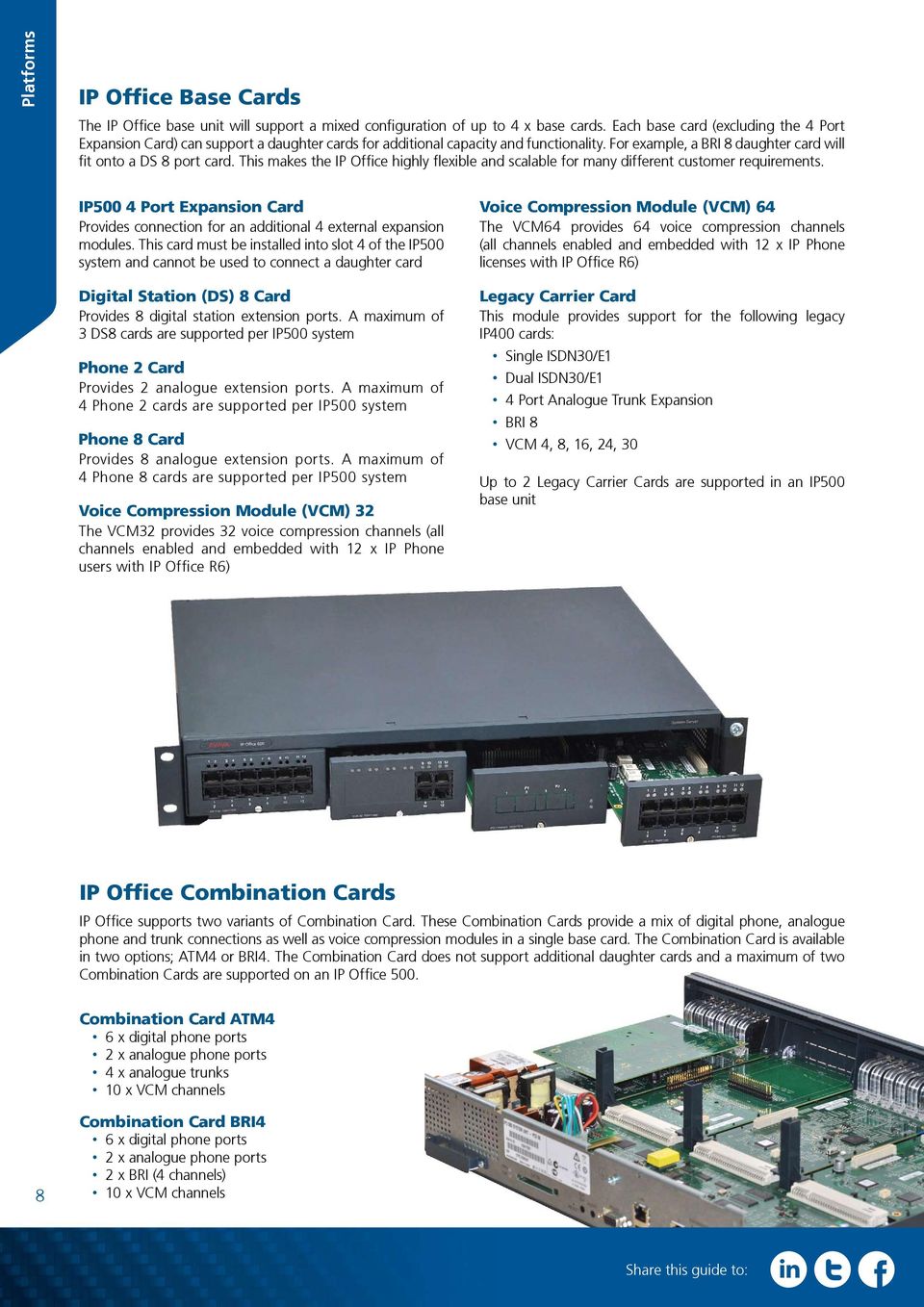
8 Platforms IP Office Base Cards The IP Office base unit will support a mixed configuration of up to 4 x base cards. Each base card (excluding the 4 Port Expansion Card) can support a daughter cards for additional capacity and functionality. For example, a BRI 8 daughter card will fit onto a DS 8 port card. This makes the IP Office highly flexible and scalable for many different customer requirements. IP500 4 Port Expansion Card Provides connection for an additional 4 external expansion modules. This card must be installed into slot 4 of the IP500 system and cannot be used to connect a daughter card Digital Station (DS) 8 Card Provides 8 digital station extension ports. A maximum of 3 DS8 cards are supported per IP500 system Phone 2 Card Provides 2 analogue extension ports. A maximum of 4 Phone 2 cards are supported per IP500 system Phone 8 Card Provides 8 analogue extension ports. A maximum of 4 Phone 8 cards are supported per IP500 system Voice Compression Module (VCM) 32 The VCM32 provides 32 voice compression channels (all channels enabled and embedded with 12 x IP Phone users with IP Office R6) Voice Compression Module (VCM) 64 The VCM64 provides 64 voice compression channels (all channels enabled and embedded with 12 x IP Phone licenses with IP Office R6) Legacy Carrier Card This module provides support for the following legacy IP400 cards: Single ISDN30/E1 Dual ISDN30/E1 4 Port Analogue Trunk Expansion BRI 8 VCM 4, 8, 16, 24, 30 Up to 2 Legacy Carrier Cards are supported in an IP500 base unit IP Office Combination Cards IP Office supports two variants of Combination Card. These Combination Cards provide a mix of digital phone, analogue phone and trunk connections as well as voice compression modules in a single base card. The Combination Card is available in two options; ATM4 or BRI4. The Combination Card does not support additional daughter cards and a maximum of two Combination Cards are supported on an IP Office 500. Combination Card ATM4 6 x digital phone ports 2 x analogue phone ports 4 x analogue trunks 10 x VCM channels 8 Combination Card BRI4 6 x digital phone ports 2 x analogue phone ports 2 x BRI (4 channels) 10 x VCM channels Share this guide to:
9 Expansion Modules Expansion modules can be added to the IP Office base system to increase the overall capacity of the solution. As with the base unit, these expansion modules are fully rack mountable. Up to 8 expansion modules are supported as standard. Platforms Expansion Modules However, the 4 port expansion card increases capacity to 12 expansion modules. Existing IP Office 400 expansion modules are also supported excluding the WAN3 module. IP500 Phone 16 Module Provides connectivity for 16 analogue devices IP500 Phone 30 Module Provides connectivity for 30 analogue devices Power Lead Each expansion module requires a power lead IP500 Rack Mount Kit Rack mount kit for IP500 system and expansion modules IP500 Analogue 16 Module Provides connectivity for 16 analogue circuits Expansion Module ports 9

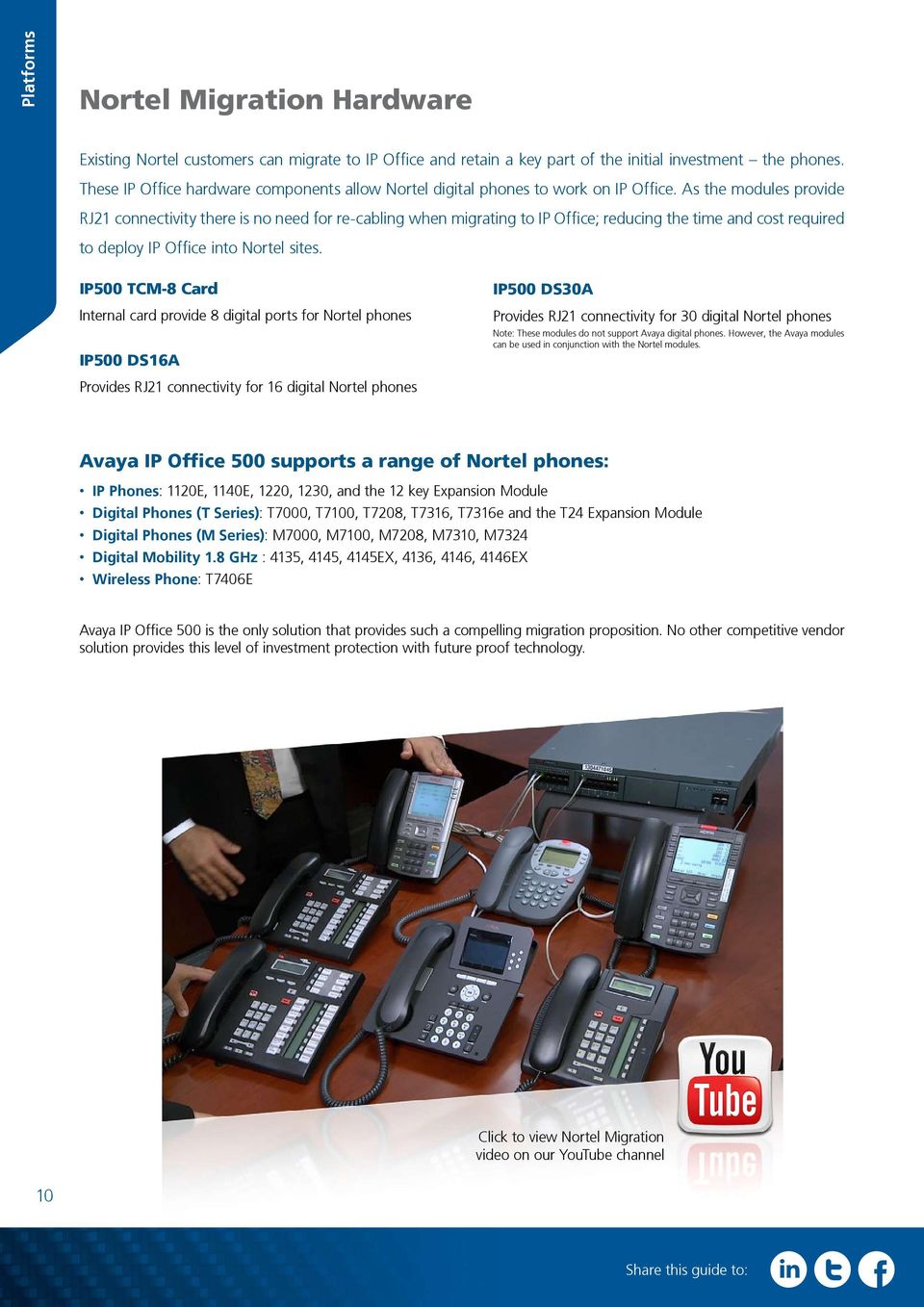
10 Platforms Nortel Migration Hardware Existing Nortel customers can migrate to IP Office and retain a key part of the initial investment the phones. These IP Office hardware components allow Nortel digital phones to work on IP Office. As the modules provide RJ21 connectivity there is no need for re-cabling when migrating to IP Office; reducing the time and cost required to deploy IP Office into Nortel sites. IP500 TCM-8 Card Internal card provide 8 digital ports for Nortel phones IP500 DS16A Provides RJ21 connectivity for 16 digital Nortel phones IP500 DS30A Provides RJ21 connectivity for 30 digital Nortel phones Note: These modules do not support Avaya digital phones. However, the Avaya modules can be used in conjunction with the Nortel modules. Avaya IP Office 500 supports a range of Nortel phones: IP Phones: 1120E, 1140E, 1220, 1230, and the 12 key Expansion Module Digital Phones (T Series) : T7000, T7100, T7208, T7316, T7316e and the T24 Expansion Module Digital Phones (M Series) : M7000, M7100, M7208, M7310, M7324 Digital Mobility 1.8 GHz : 4135, 4145, 4145EX, 4136, 4146, 4146EX Wireless Phone: T7406E Avaya IP Office 500 is the only solution that provides such a compelling migration proposition. No other competitive vendor solution provides this level of investment protection with future proof technology. Click to view Nortel Migration video on our YouTube channel 10 Share this guide to:
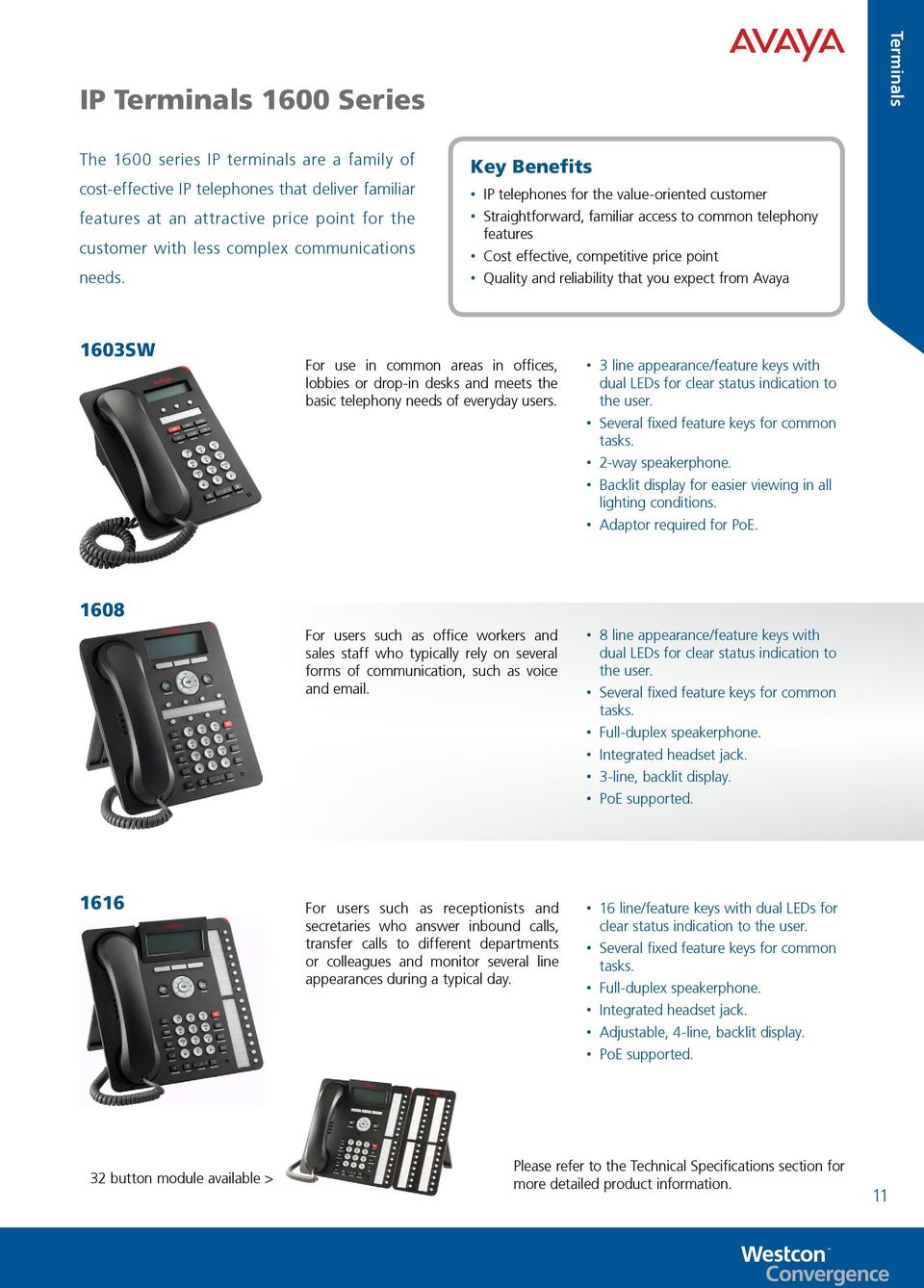
11 IP Terminals 1600 Series Terminals The 1600 series IP terminals are a family of cost-effective IP telephones that deliver familiar features at an attractive price point for the customer with less complex communications needs. Key Benefits IP telephones for the value-oriented customer Straightforward, familiar access to common telephony features Cost effective, competitive price point Quality and reliability that you expect from Avaya 1603SW For use in common areas in offices, lobbies or drop-in desks and meets the basic telephony needs of everyday users. 3 line appearance/feature keys with dual LEDs for clear status indication to the user. Several fixed feature keys for common tasks. 2-way speakerphone. Backlit display for easier viewing in all lighting conditions. Adaptor required for PoE For users such as office workers and sales staff who typically rely on several forms of communication, such as voice and . 8 line appearance/feature keys with dual LEDs for clear status indication to the user. Several fixed feature keys for common tasks. Full-duplex speakerphone. Integrated headset jack. 3-line, backlit display. PoE supported For users such as receptionists and secretaries who answer inbound calls, transfer calls to different departments or colleagues and monitor several line appearances during a typical day. 16 line/feature keys with dual LEDs for clear status indication to the user. Several fixed feature keys for common tasks. Full-duplex speakerphone. Integrated headset jack. Adjustable, 4-line, backlit display. PoE supported. 32 button module available > Please refer to the Technical Specifications section for more detailed product information. 11
12 Terminals IP Terminals 9600 Series The 9600 Series is the next generation of IP terminals delivering a new and unique communications experience to drive increased productivity. Terminals can be customised with a range of standard coloured or custom faceplates (custom faceplates commissioned in consultation with Avaya). 9620L and 9620C For users such as office workers and sales staff who typically rely on several forms of communication, such as voice and . Note: 9620L excludes certain hardware features such as the USB port and interface for bluetooth and gigabit adapters. Backlit mono / colour display. 12 call appearance/feature keys. 4 context sensitive keys. 2 message waiting indicators. Full duplex speakerphone. Speaker and headset buttons. 9630G For users who rely on voice as the main form of communication and who make use of many advanced telephone applications. 24 button module available Backlit high-resolution mono display. 6 line/feature keys and 24 call appearance keys. 4 context sensitive keys. 2 message waiting indicators. Full duplex speakerphone. Speaker, headset and mobility buttons. In-built Gigabit Ethernet support 9640 and 9640G For users who rely on voice as the main form of communication and who make use of many advanced telephone applications. 24 button module available Backlit high resolution colour display. 6 line/feature keys and 24 call appearance keys. 4 context sensitive keys. 2 message waiting indicators. Full duplex speakerphone. Speaker, headset and mobility buttons. Available with in-built Gigabit Ethernet support (9640G) 9650 and 9650C Provides advanced features and capabilities for users that are in constant communication, such as receptionists and secretaries who answer inbound calls, transfer calls to different departments or colleagues and monitor several line appearances during a typical day. 24 button module available Backlit high-resolution mono / colour display. 3 line/feature keys and 24 call appearance keys. 8 additional feature buttons providing easier access to 16 functions. 2 message waiting indicators. Full duplex speakerphone. Speaker and headset buttons. 12 Share this guide to:

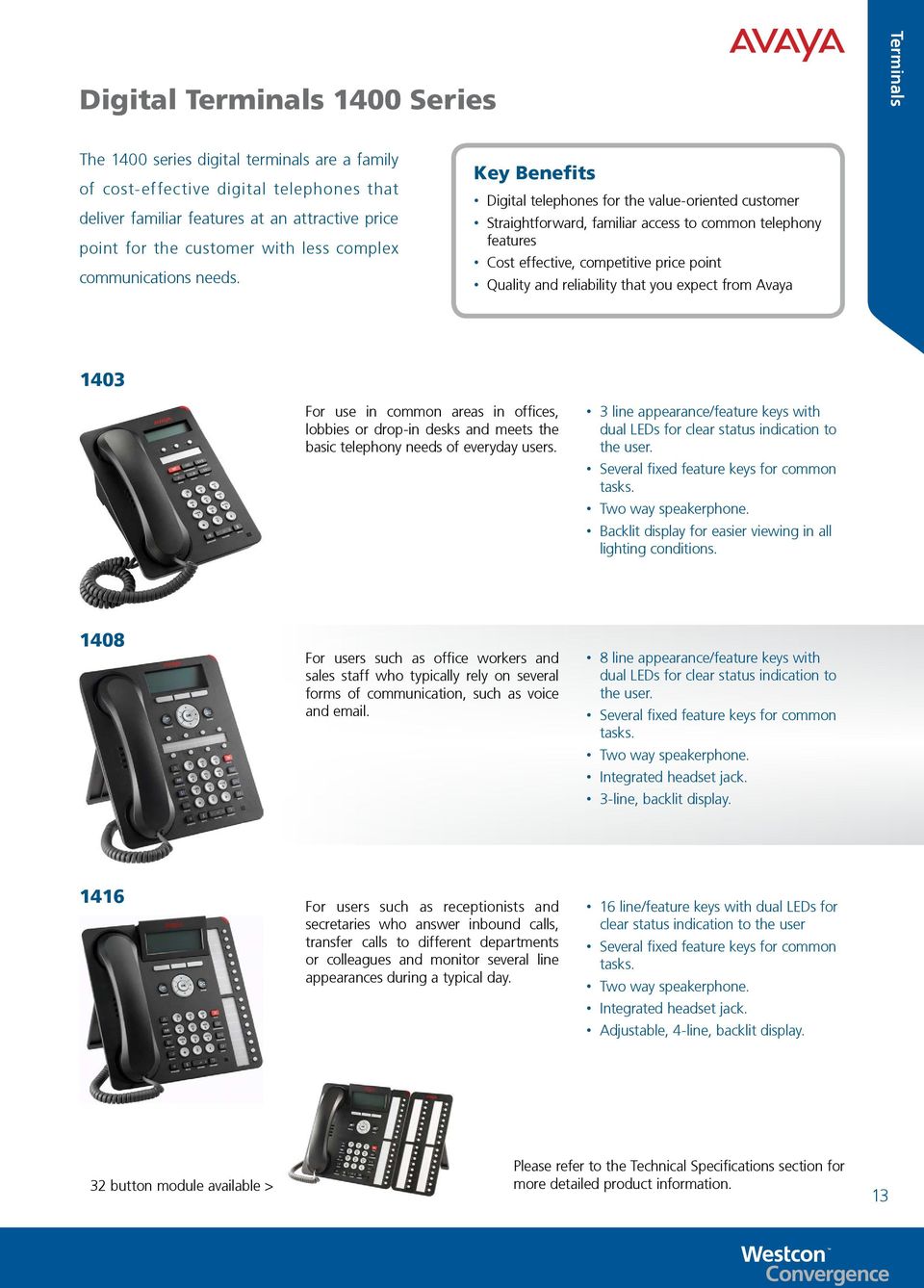
13 Digital Terminals 1400 Series Terminals The 1400 series digital terminals are a family of cost-effective digital telephones that deliver familiar features at an attractive price point for the customer with less complex communications needs. Key Benefits Digital telephones for the value-oriented customer Straightforward, familiar access to common telephony features Cost effective, competitive price point Quality and reliability that you expect from Avaya 1403 For use in common areas in offices, lobbies or drop-in desks and meets the basic telephony needs of everyday users. 3 line appearance/feature keys with dual LEDs for clear status indication to the user. Several fixed feature keys for common tasks. Two way speakerphone. Backlit display for easier viewing in all lighting conditions For users such as office workers and sales staff who typically rely on several forms of communication, such as voice and . 8 line appearance/feature keys with dual LEDs for clear status indication to the user. Several fixed feature keys for common tasks. Two way speakerphone. Integrated headset jack. 3-line, backlit display For users such as receptionists and secretaries who answer inbound calls, transfer calls to different departments or colleagues and monitor several line appearances during a typical day. 16 line/feature keys with dual LEDs for clear status indication to the user Several fixed feature keys for common tasks. Two way speakerphone. Integrated headset jack. Adjustable, 4-line, backlit display. 32 button module available > Please refer to the Technical Specifications section for more detailed product information. 13
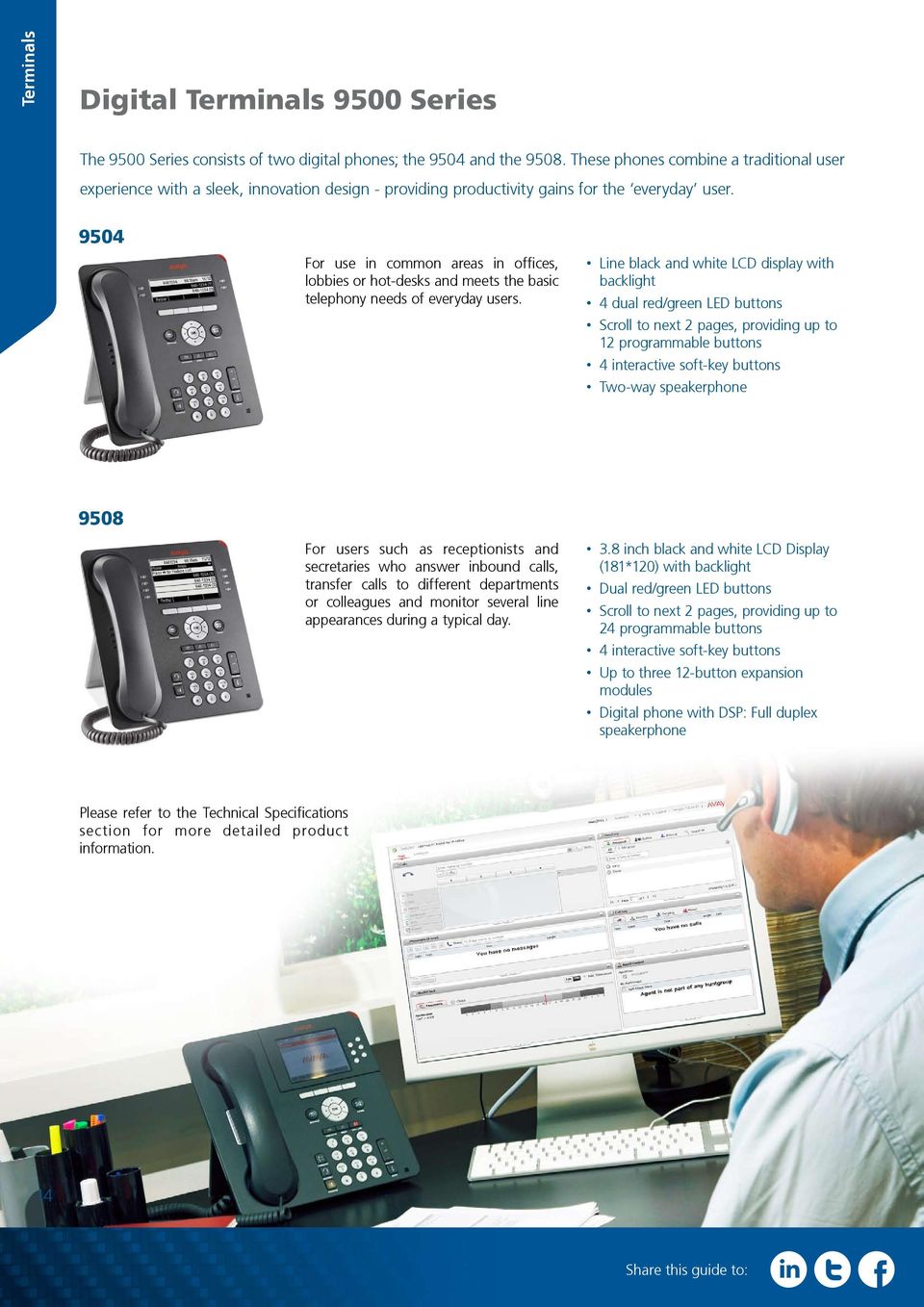
14 Terminals Digital Terminals 9500 Series The 9500 Series consists of two digital phones; the 9504 and the These phones combine a traditional user experience with a sleek, innovation design - providing productivity gains for the everyday user For use in common areas in offices, lobbies or hot-desks and meets the basic telephony needs of everyday users. Line black and white LCD display with backlight 4 dual red/green LED buttons Scroll to next 2 pages, providing up to 12 programmable buttons 4 interactive soft-key buttons Two-way speakerphone 9508 For users such as receptionists and secretaries who answer inbound calls, transfer calls to different departments or colleagues and monitor several line appearances during a typical day. 3.8 inch black and white LCD Display (181*120) with backlight Dual red/green LED buttons Scroll to next 2 pages, providing up to 24 programmable buttons 4 interactive soft-key buttons Up to three 12-button expansion modules Digital phone with DSP: Full duplex speakerphone Please refer to the Technical Specifications section for more detailed product information. 14 Share this guide to:
15 Analogue Terminals Terminals Analogue terminals deliver a high degree of functionality as well as providing a lower cost alternative to system specific terminals. Analogue terminals are particularly appropriate when using applications with Computer Telephony Integration (CTI) for a high proportion of call control. Uniquely, analogue terminals are compatible with caller display functionality and can display the terminal number of the calling party if available. Simple programming of IP Office can convert the numeric display into the company name associated with that number. The 9330AV and 9335AV handsets are officially supported for use on Avaya IP Office equipment, available with or without the Avaya logo ready for personalised branding. Avaya Gemini Basic 9330AV Offers incredible value for money without compromising on quality. Its stylish new design and rugged build quality make it a popular choice for those with a limited budget. Dedicated IP Office message waiting indicator Locking mute button with LED indicator Last number redial Recall button Ring volume adjust Ringing indicator light Wall mountable no additional bracket required Hearing aid compatibility 6 year warranty Interquartz Gemini Speakerphone 9333 This Gemini model has all of the same features as the 9330, but has the addition of speakerphone facility plus 10 non- volatile memories. Features as the 9930 plus: Full hands-free operation Triple standard message waiting (high voltage, reverse polarity and voltage drop) Avaya Gemini CLI 9335AV Offers a whole host of benefits to business users and home-workers. Features include caller ID, handsfree and headset compatibility. Features as the 9333 plus: Display 10 programmable keys Interquartz Door Entry System The Interquartz ID Door Phone provides connection via an analogue extension port. Configuration of the Door Phone can be via a free Windows software package or remotely utilising DTMF. In addition to the simplicity of programming and installation, the ID Door Phone is feature-packed, making it the perfect choice for a whole host of applications. Slim design just 16mm deep PC configuration via USB connection* Remote configuration via DTMF 1, 2 and 4 button models Combination lock control Day / night mode Strong aluminium casing Relay lock control** Backlit inlay cards** Internal heating system** *USB cable available separately **Requires power supply 15

16 Terminals DECT R4 IP DECT delivers secure, high-quality wireless voice communications to mobile employees within a building or across a campus. Consisting of lightweight wireless handsets (portable parts) and associated radio base stations (radio fixed parts), Avaya IP DECT solutions use tried and true standards-based technology that scales to support a large number of users and is particularly useful for those needing highquality wireless voice communications while keeping voice and data on separate enterprise wireless networks. Key Benefits: Increased productivity: Allows employees to be more accessible and productive whilst on the move. Scalability: Customers can be confident that there solution will grow with their business DECT R4 Terminal Black and white display Half-duplex speaker phone Graphical user interface 4-way navigation key 2.5mm headset connection 5 in-built UI languages: * English, German, French, Spanish, Russian (Other languages can be downloaded) Talk time: 16 hours Standby time: 180 hours Charge time: Less than 4 hours 3740 Industrial DECT R4 Terminal Same feature set as 3720 Rugged build: Shockproof certification IEC (procedure 1 from 2 metres) Operating temperature: -10 C to +55 C Liquid and dust protected (IP65) 3725 DECT R4 Terminal 3749 DECT R4 Terminal Full colour display Half-duplex speaker phone Graphical user interface 5-way navigation key Bluetooth headset compatible Liquid & dust protected Multi-function button Text message support (Requires AIWS server) 19 in-built UI languages * English, German, Czech, Norwegian, Portuguese, Danish, Dutch, Finnish, Spanish, Swedish, Polish, Greek, Hungarian, Brazilian Portuguese, Slovakian, Turkish, Russian Talk time: 20 hours (13 with Bluetooth headset*) Standby time: 120 hours Same feature set as 3740 Colour display with backlight and icons Bluetooth support for headsets Intrinsically safe: ATEX and IECEX for: Gas: II 2G Eex ib IIC T4 Dust: II 3D Ex ibd 22 DECT R4 Capacities Feature DECT R4 Maximum Handsets 120 Max Base Stations if Master Server is on a standard RBS 32 Max Base Stations if Master Server is on a Compact RBS 5 Total Base Stations/Compact Base Stations 32 Total number of Compact Base Stations 5 Maximum simultaneous calls 100* DECT R4 Base Station (IPBS) Intranet IP Office 16 *May be limited by the available VCM voice compression channels for calls to non-ip destinations. DECT R4 on IP Office does not support Redundancy option. Avaya Inbuilding Wireless Server (AIWS) DECT Charger 3 rd Party Messaging Server Share this guide to:

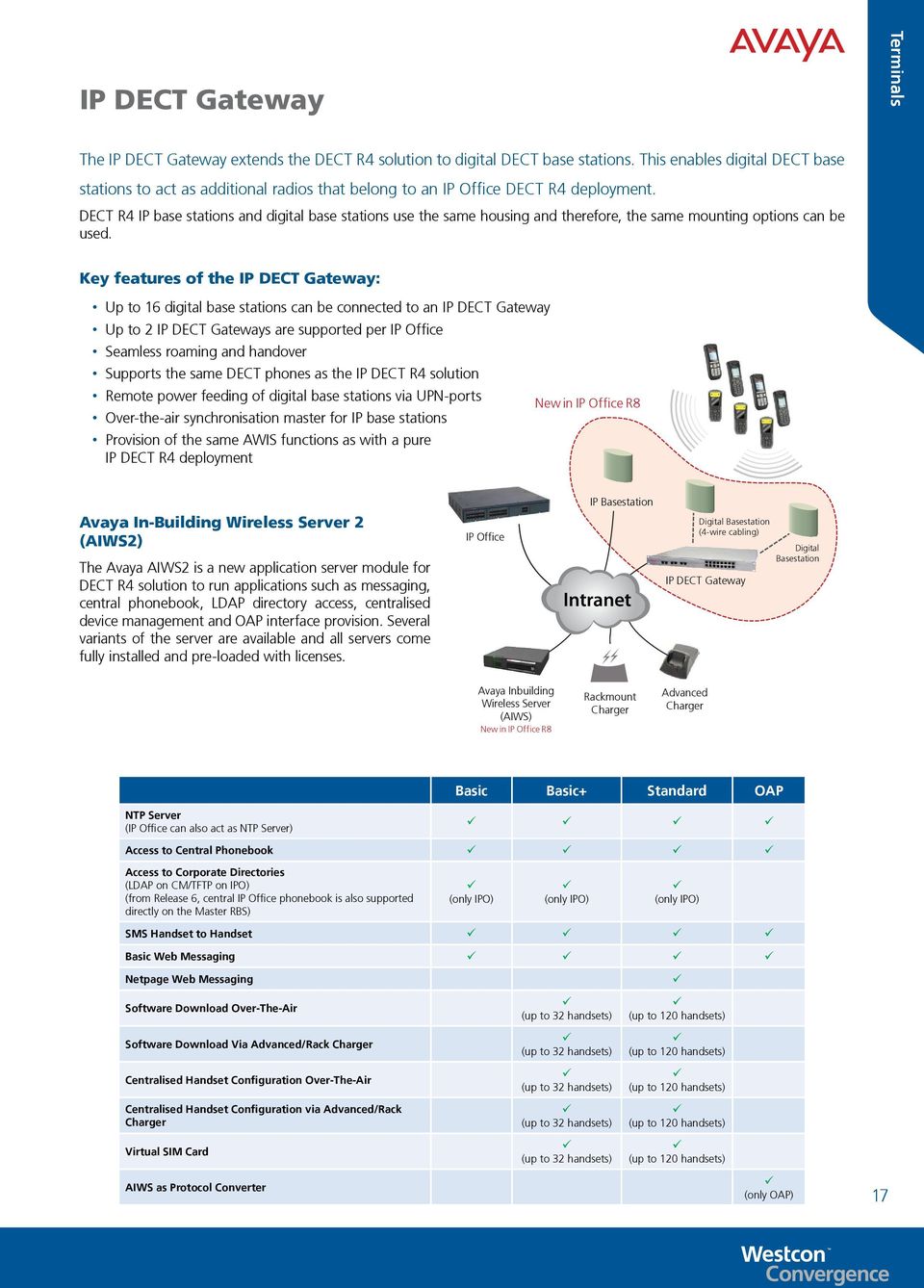
17 IP DECT Gateway Terminals The IP DECT Gateway extends the DECT R4 solution to digital DECT base stations. This enables digital DECT base stations to act as additional radios that belong to an IP Office DECT R4 deployment. DECT R4 IP base stations and digital base stations use the same housing and therefore, the same mounting options can be used. Key features of the IP DECT Gateway: Up to 16 digital base stations can be connected to an IP DECT Gateway Up to 2 IP DECT Gateways are supported per IP Office Seamless roaming and handover Supports the same DECT phones as the IP DECT R4 solution Remote power feeding of digital base stations via UPN-ports New in IP Office R8 Over-the-air synchronisation master for IP base stations Provision of the same AWIS functions as with a pure IP DECT R4 deployment Avaya In-Building Wireless Server 2 (AIWS2) The Avaya AIWS2 is a new application server module for DECT R4 solution to run applications such as messaging, central phonebook, LDAP directory access, centralised device management and OAP interface provision. Several variants of the server are available and all servers come fully installed and pre-loaded with licenses. IP Office IP Basestation Intranet Digital Basestation (4-wire cabling) IP DECT Gateway Digital Basestation Avaya Inbuilding Wireless Server (AIWS) New in IP Office R8 Rackmount Charger Advanced Charger Basic Basic+ Standard OAP NTP Server (IP Office can also act as NTP Server) ü ü ü ü Access to Central Phonebook ü ü ü ü Access to Corporate Directories (LDAP on CM/TFTP on IPO) (from Release 6, central IP Office phonebook is also supported directly on the Master RBS) ü (only IPO) ü (only IPO) ü (only IPO) SMS Handset to Handset ü ü ü ü Basic Web Messaging ü ü ü ü Netpage Web Messaging ü Software Download Over-The-Air ü (up to 32 handsets) ü (up to 120 handsets) Software Download Via Advanced/Rack Charger ü (up to 32 handsets) ü (up to 120 handsets) Centralised Handset Configuration Over-The-Air ü (up to 32 handsets) ü (up to 120 handsets) Centralised Handset Configuration via Advanced/Rack Charger ü (up to 32 handsets) ü (up to 120 handsets) Virtual SIM Card ü (up to 32 handsets) ü (up to 120 handsets) AIWS as Protocol Converter ü (only OAP) 17
18 Terminals Wireless IP Telephony Avaya IP Wireless Terminal solutions transform businesses with improved productivity and responsiveness through state-of-the-art mobile communications. Avaya IP Wireless Terminal solutions enable communication over hand-held wireless terminals using Avaya Communications System and Wireless LAN infrastructure. There are two primary components required when implementing Avaya IP Wireless Terminal Solutions: Avaya Voice Priority Processor (AVPP) Avaya 3641 and 3645 IP Wireless Terminals 3641 IP Wireless Terminal The 3641 has been designed for mission-critical WLAN voice applications. The terminal is secure, reliable, highly durable and features extended battery life. Industry-standard compatibility Backlit display 4 hrs talk time, 80 hrs standby - Extended Battery: 6 hrs talk time, 80 hrs standby* - Ultra-extended Battery: 8 hours talk time, 160 hours standby* Dust, shock and liquid damage resistant a/b/g compatible Headset jack, speakerphone and vibrate alert WPA, WPA2, PSK & WEP wireless security support 3645 IP Wireless Terminal The 3645 has been designed for mission-critical WLAN voice applications. The terminal is secure, reliable, highly durable and features extended battery life. As per 3641 plus: Push-To-Talk Larger earpiece to block out background noise 18 DECT or Wi-Fi Use this guide to help you decide Do you have an existing WLAN network? Note: A survey should be carried out prior to final quote. Yes: Is your WLAN network VoIP ready? No: Do you want a single Voice and Data network? Yes: WLAN, we suggest 36XX. No: Cost-Benefit analysis of installing DECT vs expanding WLAN. Yes: We suggest WLAN. Follow this path. No: We suggest DECT. What are the benefits of DECT? DECT has its own protected frequency band. No interference from other devices. Easier to scale and secure. Higher voice quality, more robust voice solution. Lower-cost installation and handsets. Significantly longer standby/talk time. What are the benefits of WLAN? Can use existing data infrastructure. Only one network to install and maintain. Broader handset choice. Push-to-talk available. Richer application support. Share this guide to:

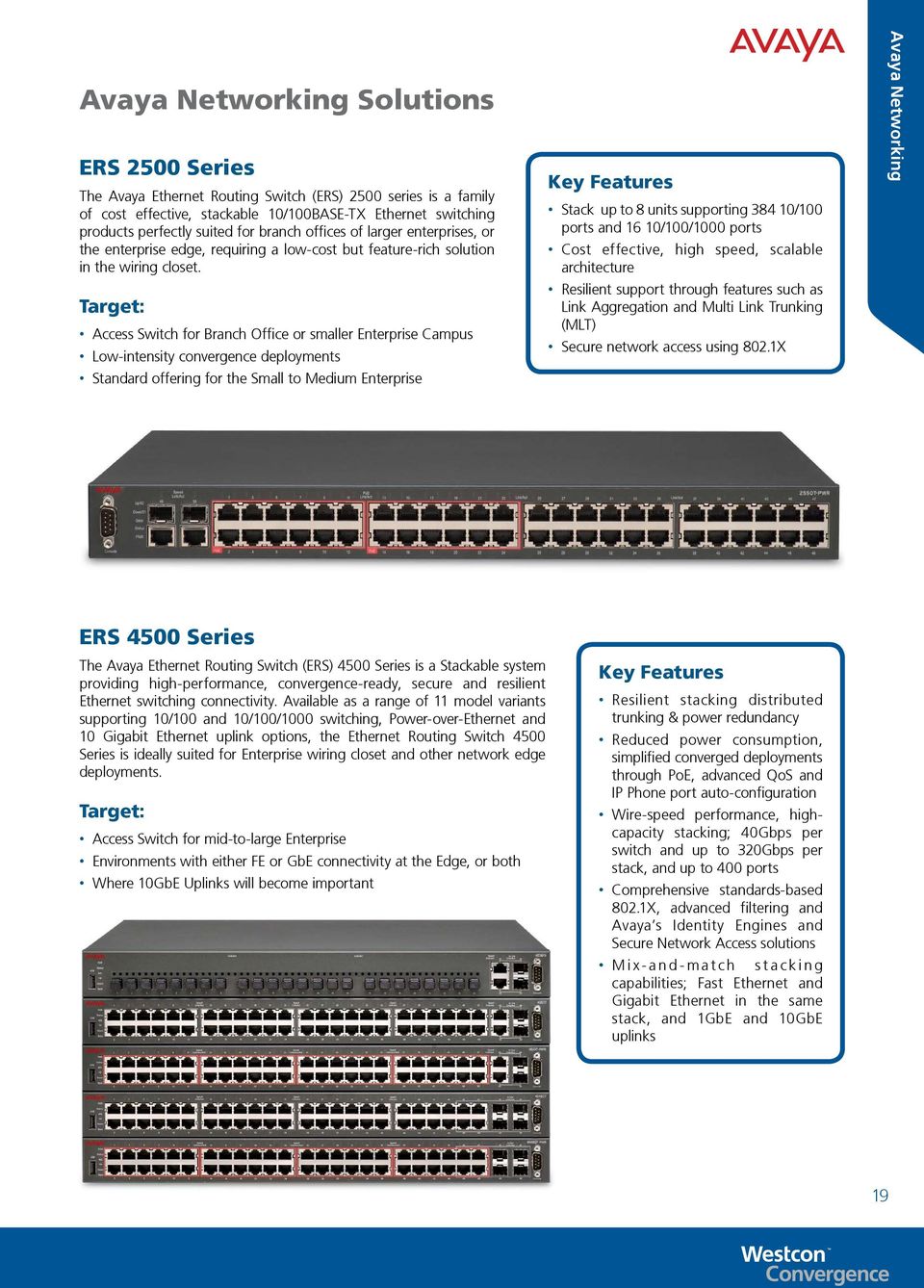
19 Avaya Networking Solutions ERS 2500 Series The Avaya Ethernet Routing Switch (ERS) 2500 series is a family of cost effective, stackable 10/100BASE-TX Ethernet switching products perfectly suited for branch offices of larger enterprises, or the enterprise edge, requiring a low-cost but feature-rich solution in the wiring closet. Target: Access Switch for Branch Office or smaller Enterprise Campus Low-intensity convergence deployments Standard offering for the Small to Medium Enterprise Key Features Stack up to 8 units supporting /100 ports and 16 10/100/1000 ports Cost effective, high speed, scalable architecture Resilient support through features such as Link Aggregation and Multi Link Trunking (MLT) Secure network access using 802.1X Avaya Networking ERS 4500 Series The Avaya Ethernet Routing Switch (ERS) 4500 Series is a Stackable system providing high-performance, convergence-ready, secure and resilient Ethernet switching connectivity. Available as a range of 11 model variants supporting 10/100 and 10/100/1000 switching, Power-over-Ethernet and 10 Gigabit Ethernet uplink options, the Ethernet Routing Switch 4500 Series is ideally suited for Enterprise wiring closet and other network edge deployments. Target: Access Switch for mid-to-large Enterprise Environments with either FE or GbE connectivity at the Edge, or both Where 10GbE Uplinks will become important Key Features Resilient stacking distributed trunking & power redundancy Reduced power consumption, simplified converged deployments through PoE, advanced QoS and IP Phone port auto-configuration Wire-speed performance, highcapacity stacking; 40Gbps per switch and up to 320Gbps per stack, and up to 400 ports Comprehensive standards-based 802.1X, advanced filtering and Avaya s Identity Engines and Secure Network Access solutions M i x - a n d - m a t c h s t a c k i n g capabilities; Fast Ethernet and Gigabit Ethernet in the same stack, and 1GbE and 10GbE uplinks 19
20 Applications Applications Overview Avaya IP Office provides big benefits for small and medium size enterprises with a full complement of sophisticated applications such as advanced messaging and personal productivity applications to cutting edge call centre and conferencing solutions. IP Office is a Unified Communications solution that can benefit all businesses and worker types across a variety of industries on a global scale. Why use applications? Worker Productivity Reduce Costs Employee Morale Customer Loyalty Enhanced Collaboration Revenue Growth Business Continuity Competitive Advantage Trial Licenses Trial licences allow applications to run in fully functional form for 60 days (from the date of licence generation), after which time they cannot be used until upgraded at cost to the full license but can be ordered at any time during the product ownership. 20 Share this guide to:

21 IP Office Editions Overview Applications Basic Edition Basic Telephony Key System Single site only Digital/Analog phones only Auto-attendant 64 party ad hoc only audio conferencing Voic to N/A: User solution, multi-site options Essential Edition IP Telephony / Essential Mobility IP PBX functionality Up to 40 Auto attendants One-X Mobile Essential (all users) Basic call control on mobile devices 128 party ad hoc only audio conferencing Up to 2 remote phones/system Adds Options: Receptionist Preferred Edition UC with Preferred Mobility Full Meet me audio conferencing w/user passwords Unlimited multi-level auto attendant Scalable, resilient voic No limit on VPN phones/system (w/ Teleworker) Call recording Ability to add user solutions Desktop on mobile device, HD video conferencing, IM/presence, calendar mining, Outlook and Salesforce integration Adds Options: Power User, Office Worker, Mobile Worker, Tele Worker, Multi-Site UC with Call Center Track, measure customer service Password protected call recording with search, replay, archiving Alarm notifications Detailed actionable reports Advanced Edition Interactive Voice Response (IVR) Text To Speech Visual Basic Scripting PC Wallboard Adds Options: Agent, Supervisor 21
22 Applications IP Office Basic Edition IP Office Basic Edition is specifically designed to address the needs of small businesses, providing a cost effective and easy to deploy solution. What is it? IP Office Basic Edition delivers key system functionality to single site businesses. Enabled via the System SD Card, Basic Edition limits the capacities and capabilities of IP Office while still providing the tools that help businesses achieve a competitive advantage. Basic Edition Capacity 100 Phones: Up to 100 digital phones (if only using Nortel T and M Series phones) Up to 98 digital phones (any combination of 1400, 9500, Nortel T and M Series) Up to 100 analogue phones 64 Trunks: Up to 32 analogue lines 1 PRI E1 (30 channels) Up to 12 BRI channels Up to 20 SIP trunks Business Benefits: Server-Free Solution: voic is embedded in the SD card removing the need for an external server Low-Touch Solution: IP Office Basic Edition requires minimal programming and hands-on support, reducing time and cost of deployment and maintenance Simply System Management: programming can be via a Telephone User Interface (TUI) or the simplified Manager web GUI Remote Administration: easy to administer via the in-built dial-up modem or LAN/WAN connection Investment Protection: as business needs increase, IP Office can be upgraded to Essential, Preferred and Advanced Editions with minimal investment and no need to change hardware. Key Features: Key System: provides all the features and functionality of a typical key system ideal for sub 20 user, single sites. Voic voic box for every user with up to 25 hours of system wide storage time (15 hours as standard). Scalable: supplied as a 2 port voic as standard; scalable to 6 ports with an additional license key. Audio Conferencing: up to 64 party ad-hoc audio conferencing. Web Manager: web based management interface for simplified installation and ongoing maintenance. Expandable: easy and cost effective to expand capacities and capabilities as business needs grow. 22 Share this guide to:
23 IP Office Essential Edition Applications Efficient and effective call handling can help small businesses to achieve superior customer service and drive revenue. IP Office Essential Edition increases the capability and capacity of Basic Edition, therefore providing businesses with the tools required to deliver customer service excellence at a competitive price point. What is it? Every call is an opportunity. Calls that are not answered or not answered correctly, can result in lost revenue. The right messaging solution can enable small businesses to improve customer service levels, enhancing competitiveness and revenue opportunities. IP Office Essential Edition provides a cost effective way for businesses to implement effective call management processes and efficient call handling. Essential Edition is enabled via the IP Office Essential Edition licence. Business Benefits: Improve Customer Service: efficient call handling via touch tone prompts and call routing means that customers quickly connect to the right person, every time. Better Revenue Opportunities: 24/7 auto-attendant effectively means a business is always open to receive customer orders at no additional cost. Enhance Productivity: being able to retrieve messages regardless of location means that workers can respond faster, improving productivity and speeding up decision making. Competitive Advantage: offers customers superior service while also increasing decision making and productivity. This can give a small business a distinct competitive advantage. Cost Effective: as Essential Edition does not require a dedicated server, it is an ideal solution for businesses on a budget or with no IP network infrastructure. Mobility: mobilise the workforce to provide improved customer service and productivity Key Features: SD Card: Essential Edition connects directly into the IP Office system which means no server is required. Scalable: by default, Essential Edition is supplied as a 2 port voic on the IP Office SD Card. This can be scaled to a maximum of 6 ports with an additional license key. Voic voic box for every IP Office user with up to 25 hours of storage time (system wide). Auto-Attendants: up to 40 automated attendants (maximum 4 simultaneous calls) with customisable greetings and call routing options. Dial By Name: callers can easily reach the person they want to connect with by typing the name on the phone keypad. Remote Voic Retrieval: a range of options enable workers to stay connected regardless of their location. Voic Message Control: control messages via the terminal; save, delete, forward, repeat, rewind and skip message. Mobile Twinning: mobile twinning and one-x Mobile Essential Edition client for all users. VPN Phones: enables two remote VPN phones. Audio Conferencing: up to 128 party audio conferencing. Multiple Language Support 23
24 Applications IP Office Preferred Edition With IP Office Preferred Edition businesses can use communications to achieve a competitive edge. Intelligent call routing and messaging can provide exceptional customer service and productivity levels whilst reducing costs. What is it? IP Office Preferred Edition provides businesses with advanced communication capabilities such as intelligent call routing, sophisticated messaging and call handling as well as database integration. These capabilities enable efficient collaboration with customers and colleagues and help drive a better customer experience as well as higher levels of productivity. With customisable auto-attendant, call routing options and in built call recording, as well as multi-site support, IP Office Preferred Edition is an ideal solution for any business which makes and receives a high volume of customer calls either at a single site or across a number of different locations. Business Benefits: Investment Protection: a scalable solution that can grow with the needs of the business as well as supporting multiple IP Office systems. Better Revenue Opportunities: 24/7 autoattendant effectively means a business is always open to receive customer orders. Enhance Collaboration: secure conferencing and auto-attendant options provide effective collaboration with customers and colleagues meaning faster decision making, better response to customers and quicker revenue recognition. Customer Service Excellence: enhance the customer experience by providing information such as wait time and position in queue. Music on Hold can be replaced with information such as latest promotions, technical tips, new product launches, changes to business; this helps to enrich the customer experience as well as generate revenue opportunities. Maintain Best Practice: built-in call recording helps businesses to monitor customer service and adherence to industry compliance criteria, as well as helping with dispute resolution and staff training. Competitive Advantage: offering customers superior service while also increasing decision making and productivity can give a small business a distinct competitive advantage. Business Continuity: in multi-site network environments, Preferred Edition will continue to provide service in the event of system failure. Key Features: Scalable: up to 40 simultaneous calls for voic access with voic storage dependant on Server hard drive size (4 ports as standard). Auto-Attendants: unlimited multi-level automated attendant with sophisticated routing options and customer service features such as time / day call routing and queue announcements. Automated Announcements: provide customers with business information instead of music on hold. Secure Conferencing: 2 x 64 party conference bridges with PIN access for security and meet me options for ad hoc conference calls. Call Recording: in built recording of incoming and outgoing calls as well as conference calls. User Options: create personal attendants with routing options and customised greetings as well as user message retrieval options. Voic to Synchronisation: receive voic messages via an inbox with synchronisation between server and voic server. Reading and Reply: read and respond to s via Microsoft Exchange. 24 Please note: Essential Edition is a pre-requisite for Preferred Edition Share this guide to:
25 IP Office Advanced Edition Applications IP Office Advanced Edition enables businesses to differentiate through exceptional customer service, providing the tools to effectively handle high call volumes and gather customer intelligence to increase productivity and drive revenue opportunities. What is it? Delivering superior customer service can often only be achieved by being able to manage and monitor customer interactions. IP Office Advanced Edition builds on the capabilities of Preferred Edition by providing a complete call centre solution. Supervisors have the ability to manage agent work groups and customer demands to ensure high service levels are maintained. Historic and real time reporting enables management to make informed decisions about customers, agent performance and call flow. This intelligence is integral to retaining customers and maximising agent performance. Business Benefits: Measure Customer Service: real time and historical reporting indicates levels of customer service. This intelligence provides an opportunity for a business to address potential issues and focus on key areas of improving customer service. Improve Customer Responsiveness: intuitive management tools enable supervisors to react quickly to customer demands and unforeseen circumstances. Call routing rules, agents assignments and service capacity can be changed based on business requirements. Improve Agent Performance: real time and historical reporting on agent activity as well as quality checks through call recordings ensures high agent performance levels. Areas for improvement can be identified and training given to resolve any issues. Dispute Resolution: archived call recordings can help to resolve customer disputes and ensure a satisfactory outcome while maintaining good customer relationships. Maintain Best Practice: alarm thresholds and notifications can be set to ensure a high level of customer service is maintained. Manage Campaign Success: customer information can be captured to help improve the performance of marketing campaigns. For example, local area telephone codes can be captured to provide insight into regional customer demands. Key Features: View Agent Status: supervisors can view real time status on agents such as number of calls answered, average answer time and calls lost. Historical Reporting: standard or customised reports can be created to report on historical call centre information. Campaign Manager: create surveys where customers can automatically give feedback or leave information by providing easy to follow questions via voic . Contact Store: archive call recordings for secure storage and easy retrieval via a web browser. Archived recordings can be searched based on a number of parameters such as date, time and extension number. Interactive Voice Response (IVR): self-help menus can be created to allow customers to automatically interact with a business via voice control. For example, this can be used to allow customers to place or change orders and check delivery status. Text To Speech (TTS): enhance the callers experience by allowing the IP Office to read back information that has been captured from a database. IP Office - Customer Service 25
26 Applications IP Office Networking Many small businesses are spread across a number of offices, each with the same communication requirements. To ensure high levels of productivity and customer service are maintained, workers must be able to seamlessly collaborate and communicate between disparate office locations. What is it? IP Office Small Community Networking (SCN) is a solution that enables up to 32 IP Office systems to be networked together, providing seamless feature transparency and centralised resources such as messaging, receptionist, administration and corporate directory. The ability for workers to hot-desk between remote offices and for agents to be distributed across geographic locations ensures high productivity gains and customer service levels. With in built resiliency functionality, business continuity can also be guaranteed in the event of system failure. Business Benefits: Business Continuity: guarantee continuous business operation and customer service with inherent resiliency and centralised diagnostic features. Improve Worker Retention: providing the tools to work flexibly and seamlessly across multiple locations means rather than losing key workers from the business, they can be re-located without any disruption or additional cost. Low Cost of Ownership: shared centralised resource and remote system management lowers the cost of ownership and maintenance as well as eliminating time and travel costs associated with adds, moves and changes. Enhance Collaboration: worker presence status, centralised dial plan and seamless feature transparency across multiple offices means that customers and colleagues can collaborate quickly and effectively: improving productivity levels and customer service. Reduce Costs: connecting multiple IP Office systems means that calls between offices are placed via the IP network and are therefore free of charge. This can have a significant impact on businesses that have high call volumes between offices. Key Features: Scalable: up to 1000 users across 32 IP Office systems can be connected using SCN. If large networks are required the QSIG can be used to connect IP Office systems with no site or user limit. However, functionality will be limited. Centralised Resources: in a SCN environment key IP Office resources can be shared; Preferred Edition (Voic Pro), Receptionist (SoftConsole) and system administration (IP Office Manager) Centralised Features: in a SCN environment features such as user presence status and corporate directory are shared between sites. Remote Hot-Desking: workers can hot-desk between IP Office systems are retain their user profile settings (not supported with CCC and CCR). Distributed Hunt Groups: hunt groups can include users located in remote offices (not supported with CCC and CCR). Resiliency: SCN provides resiliency if Avaya IP Phones (5600, 1600 and 9600 Series) and IP Office Preferred Edition are deployed. In the event of network failure, the Avaya IP Phones and IP Office Preferred Edition will register to another IP Office system to provide continuous service. What is Small Community Networking (SCN)? When connecting IP Offices together over IP or Packet based networks, Small Community Networking enhances feature transparency. These networks can support up to a maximum of 1000 users across 32 sites. 26 What components are required for SCN? VCM card at each site with appropriate ports Voice Networking license at each site with appropriate channels Share this guide to:
27 IP Office Receptionist Applications A receptionist is usually first to receive contact from a customer; how the call is answered and managed usually determines a customers impression of the business. IP Office Receptionist provides the tools to enable efficient and effective call handling for single sites or multiple locations. What is it? IP Office Receptionist is a powerful application that allows an operator to manage calls for a single site office or across multiple offices within a Small Community Network environment. The PC based application provides a receptionist with an intuitive interface from which calls can be controlled and managed with visual access to all users presence status. This enables efficient, effective call handling and collaboration, maintaining a professional business image. Business Benefits: Better Customer Service: efficient call handling means that customers are quickly connected to the right person every time without having be left on hold or transferred to voic . Professional Business Image: the receptionist is often a high turnover position, therefore maintaining a high level of service can often be difficult. IP Office Receptionist is an intuitive and easy-to-use application meaning that new operators such as temporary workers, can be quickly trained to guarantee consistent service. Lower Cost of Ownership: the IP Office Receptionist application can provide operator support for multiple offices meaning reducing the need for an operator at each site; reducing costs and providing consistency of service. Streamlined Operations: centralising the receptionist ensures that calls are received and handled in a consistent professional manner by a single resource. This can be in a single site or multi-site environment. Centralised Call Management: the IP Office Receptionist offers advanced call management capabilities. Receptionists become empowered to create and control conference calls, manage voic messages and change call forwarding options for colleagues. This helps to ensure customers are always connected to the right person and voic s are responded to quickly. Key Features: Call Management: the intuitive PC interface enables receptionists to efficiently handle incoming and outgoing calls as well as create conference calls and manage queues; all with a click-and-drag of the mouse. Busy Lamp Field Status: Busy lamp fields provide the receptionist with speed dial icons as well as a presence status indication of all IP Office users within a Small Community Network Environment. Incoming Call Scripts: scripts can be created for incoming calls based on DDI and CLI. This gives the receptionist important customer information on call answer to enable a more professional and personal service. Queue Management: up to 8 queues can be created to enable the receptionist to manage calls by exception. Integration with Microsoft Outlook: contacts from Outlook can be created and made visible for click-to-call operation. Door Open Control: For 2 door entry systems. Park Slots: up to 16 park slots can be managed by the receptionist. Call History Logs: up to 100 call history entries. Centralised Receptionist: with a Small Community Network, IP Office Receptionist can provide service to up 32 offices. IP Office - Receptionist Please note: A maximum of 4 x Receptionist applications are supported on an IP Office system. 27
28 Applications IP Office Office Worker Desk-bound office workers have a unique set of communication requirements; efficient call management, presence awareness and easy access to a broad range of telephony features. Typically, desk-bound workers provide back-office support to remote workers and customers. As a result, speed of response and quick decision making is critical to business success. What is it? IP Office Office Worker provides employees with all the communication tools required to be productive from the desk. Office workers typically manage a high volume of calls and often provide back office support to colleagues or deal with customer requests. Therefore, speed of response and efficient call management is critical if customer expectations are to be met. Deploying an IP Office Office Worker solution will ensure that desk-bound workers have the tools to deliver significant competitive advantage to the business. Includes one-x Portal Business Benefits: Improve Customer Loyalty: customer loyalty is driving by offering superior customer service. Providing desk-bound workers with the tools to respond and communicate efficiently with customers can help breed loyalty by exceeding customer expectations. Enhance Productivity: desk-bound workers often manage a high volume of incoming and outgoing calls. IP Office Offer Worker provides the communication tools to help enhance productivity by improving call management. Better Collaboration: Having visibility of colleagues presence status can significantly aid collaboration. IP Office Office Worker provides the tools for deskbound workers to see presence status of every user, including one-x Mobile. Wide Range of Environments: being a web-based solution, IP Office Office Worker provides a solution whether the business operates a Citrix/terminal server infrastructure or Apple Mac computers. Lower Cost of Ownership: one-x Portal for IP Office is a single server solution with the client application accessible via a web browser. This offers a cost effective and easy to deploy solution which provides a high level of functionality. Key Features: Easy to Install: single server solution with web browser client applications makes IP Office Office Worker simple and cost effective to install. Call Management: the intuitive interface facilitates the efficient handling of incoming and outgoing calls as well as providing access to personal, corporate and external directories (LDAP/Active Directory). Presence: system directory entries display user presence to indicate status of colleagues. Voic Management: users can manage voic messages via the desktop. Instant Messaging: desk workers can communicate via Instant Messaging and connect to the right people using presence awareness. Voic to full synchronisation of voic to messages is achieved with Unified Messaging Server (UMS). IP Office - Office Worker 28 Share this guide to:
29 IP Office Mobile Worker Applications Workers who are frequently out of the office often face the challenge of staying in constant contact with customers and colleagues. This can have a big impact on business with decisions being delayed, slow response to customers, orders being lost as well an increased cost of mobile phone calls. What is it? IP Office Mobile Worker enables remote workers to be seamlessly contacted on one number regardless of their location; when the office desk phone rings an external number will also ring (mobile, remote office, home). This eliminates missed calls when workers are away from their desk or out of the office. With Avaya one-x Mobile technology installed on their mobile device, call handling can also be achieved such as transfer, conference, forward, hold and so on. Utilising the Text-To-Speech functionality included with IP Office Mobile Worker also enables s to be managed via a mobile phone. Includes one-x Mobile Preferred Business Benefits: Improve Competitiveness: ensuring remote workers are easily contactable improves the decision making process and enables a fast response to customer demands. Enhance Productivity: the ability to manage calls, voic s and s: all from a mobile phone: ensures that productivity levels remain high and workload does not increase due to unmanaged messages. Reduce Costs: with IP Office Mobile Worker calls can be routed through the IP Office to take advantage of business calling plans. This can significantly reduce call costs. Maintain Best Practise: all calls that are routed to an IP Office Mobile Worker can be tracked, monitored and recorded to ensure customer service levels are maintained and best practises are adhered. Key Features: One Number Access: mobile workers can be contacted on one number whether at the desk phone or away from the office on a mobile phone. Call Control: with Avaya one-x mobile graphical user interface, calls can be controlled from a mobile phone: transfer, conference, hold, call record and so on. Outgoing Calls via IP Office: mobile workers can make outgoing calls via the IP Office rather than the GSM network. Remote Voic Management: voic message can be retrieved and managed via a mobile phone. Reading/Reply: using Text-To-Speech technology, s can be read and replied to from any phone: mobile, remote office or home phone (requires IP Office Preferred Edition and Microsoft Exchange). Tabs for key functionality Home screen with status at a glance Your own status and availability Number of active participants in your conf bridge Voice Mail status Automatic pop up to eaves drop on VM, and/or pickup call from VM Status of unread IM s outsanding Same as voice command, but uses keyboard. Voice recognition system (FMC, start and control conf, VM, find status, directory query, send IM, etc) IP Office - Mobile Worker 29
30 Applications IP Office Tele Worker Empowering employees to work from home can yield great business benefits. Research suggests that flexible working options can significantly improve productivity while also providing business continuity when workers cannot get into the office. What is it? IP Office Tele Worker provides businesses with all the communication tools to enable employees to work efficiently and effectively whether from home or remote locations. Tele Workers have access to all IP Office features and communications tools as if they were in the office, providing seamless service and support to customers and colleagues. Business Benefits: High Productivity: flexible working can significantly improve the work/life balance which has a direct impact on morale. High morale has been proven to increase productivity levels. Business Continuity: events such as severe weather, travel strikes and parental duties can often mean that workers cannot get into the office. Staff absenteeism has a major impact on business productivity and costs. Enabling staff to work from home when they cannot get into the office ensure consistent productivity and customer service without impacting costs. Reduce Travel: travelling to and from the office can often result in unproductive time and travel stress resulting from traffic delays. Working from home eliminates travel which frees more time and improves morale for more productive hours of work. Improve Worker Recruitment: deploying home workers means that staff can be recruited from a larger pool to ensure the best candidate is employed. Retain Key Workers: rather than lose key workers who want to relocate, enable them to work virtually to retain the skill set within the business. Expand Market Reach: Quickly spread market reach into new locations by recruiting local workers with local knowledge and empowering them to work from home. Reduce Costs: enabling employees to work from home can lead to a reduction in office space requirements and associated costs. Key Features: Call Handling: the intuitive graphical user interface facilitates efficient and effective call handling. Call Management: the intuitive interface facilitates the efficient handling of incoming and outgoing calls as well as providing access to personal, corporate and external directories (LDAP/Active Directory). Presence: improve call management and see user presence status on the network. Remote Working: access to all IP Office system features and seamless call handling is achieved via an IP hard phone or one-x Portal application in conjunction with a home or mobile telephone number (internet connection is required). Video Calls: using the Video Softphone, point-to-point realtime video communications can be established to improve collaboration and information sharing. Voic to f u l l synchronisation of voic to messages is achieved with Unified Messaging Server (UMS). Easy to Install: single server solution with web browser client applications makes one-x Portal for IP Office simple and cost effective to install. Includes one-x Portal & IP Video Softphone 30 IP Office - Tele Worker Share this guide to:
31 IP Office Power User Applications Competitive advantage is often determined by the speed at which decisions are made as well as the general customer experience. These fundamental challenges require efficient communications to improve productivity and responsiveness. What is it? The IP Office Power User provides workers with constant and seamless access to communications regardless of the location. Enabling calls to be managed from a range of devices gives workers the flexibility to be productive and efficient at any time and from anywhere. Combining the key elements of the IP Office Mobile Worker and Tele Worker, the Power User is provided with a complete unified communications solution; providing small and medium sized businesses with the tools to attain a competitive advantage. Includes one-x Portal, IP Video Softphone & one-x Mobile Preferred Business Benefits: Improve Productivity: ensuring key workers can communicate at anytime and regardless of location can speed up the decision making process and provide higher levels of productivity. Better Customer Experience: providing constant accessibility and responsiveness to customers enhances the customer experience. Enhance Market Reach: an IP Office Power User is able to work seamlessly regardless of where they are based. This can improve the market reach of a business by providing a cost effective and quick to deploy virtual office in a new region. Grow Revenue: faster decision making and better customer service can often result in greater revenue opportunities. Reduce Cost: allowing key workers to function productively in any location can help to reduce costs associated with office space. Built-in features such as conferencing can also help to save costs by reducing travel requirements and improve collaboration to speed decision making. Retain Key Workers: rather than lose key workers who want to relocate, enable them to work virtually to retain the skill set within the business. Key Features: One Number Access: mobile workers can be contacted on one number whether at the desk phone or away from the office on a mobile phone. Call Management: the intuitive PC interface enables receptionists to efficiently handling incoming and outgoing calls as well as create conference calls, manage queues and so on; all with a click-and-drag of mouse. Presence: improve call management and see user presence status on the network. Remote Working: access to all IP Office system features and seamless call handling is achieved via an IP hard phone or an IP soft phone application used in conjunction with a PC and internet connection (IP Office Voice Compression Module is required). Reading/Reply: using Text-To-Speech technology, s can be read and replied to from any phone: mobile, remote office or home phone (requires IP Office Preferred Edition and Microsoft Exchange). Voic to full synchronisation of voic to messages is achieved with Unified Messaging Server (UMS). Video Calls: using the Video Softphone, point-to-point realtime video communications can be established to improve collaboration and information sharing. IP Office - Power User 31
32 Applications IP Office Customer Call Reporter Agents & Supervisors Improving agent performance and reporting on customer interactions can significantly add value to an organisation. Utilising customer call information enables supervisors to effectively manage agents in order to maximise revenue opportunities and enhance the customer experience. What is it? IP Office Customer Call Reporter (CCR) is an ideal solution for any business that makes and receives a high volume of customer calls; this may be a formal call centre or informal customer facing work groups. CCR is included with IP Office Advanced Edition, however agents and additional supervisors must be activated individually. Both agents and supervisors are provided with a range of tools to help them maximise performance and deliver a superior customer service. Real time and historic reporting provides the customer intelligence to aid decision making and drive competitiveness. Business Benefits: Superior Customer Service: providing agents and supervisors with the tools to manage performance levels and provide a personal customer service can significantly enhance the customer experience. Ensuring calls are answered quickly and agents can seamlessly connect to back-office knowledge workers helps to reduce agent handle time and improve customer satisfaction. Improve Agent Productivity: supervisors can use real time / historical reporting and alarm thresholds to manage high and low call volume periods; ensuring a consistent level of customer service. Agents have visibility of real time information so they can manage their workload to maximise performance. Increase Revenue Opportunities: detailed historic reporting on customer calling patterns can help drive more effective sales campaigns and sales activities to increase revenue opportunities. Maintain Best Practise: all calls that are routed to an agent can be tracked, monitored and recorded to ensure customer service levels are maintained and best practises are adhered. Virtual Agents: agents can be virtually deployed to improve recruitment and retention of key workers, increase market reach and reduce costs. Virtual agents can be managed by supervisors and still have access to the same information and features as office based agents. Key Features: Scalable: supports up to 150 agents and 30 supervisors (1 supervisor is included with IP Office Advanced Edition). Simplified Deployment: CCR runs on a single server with agent and supervisor applications deployed via thin clients. This helps to lower the total cost of ownership and simplifies the deployment of agents. Historical Reporting: CCR provides 6 historical reports however over 100 reports can be customised based on individual business requirements. Alarm Notifications: supervisors can set thresholds based on agent and customer states. Notifications are provided to the supervisor based on threshold settings. Real Time Statistics: agents and supervisors have visibility of real time statistics via web based applications. This information can help agents and supervisors make decisions to improve customer service. Supervisor PC Wallboard: a browser based PC wallboard that can display CCR statistics as well as scrolling messages and an agent leaderboard. 32 IP Office - Customer Service Share this guide to:
33 one-x Mobile for IP Office Applications Small and medium businesses are increasingly more mobile as their employees are demanding increased access from both the home and the road. This presents SMBs with a wide range of challenges when it comes to providing access for these mobile workforces; specifically when employees want the efficiency and familiarity of one device to manage both their personal information and workplace data. What is it? IP Office provides a range of solutions that deliver features and benefits to mobile workers across a range of devices. Avaya one-x Mobile for IP Office provides businesses with the tools to implement a productive and seamless mobile workforce. As the workforce becomes more mobile, it is important to understand that the needs of the workforce vary based on job functions and work locations. IP Office provides two applications that deliver mobile benefits depending on the need of the employee: one-x Mobile Essential Edition is a cost-effective server-less mobility solution that is intended for mobile users that only need voice-based capabilities one-x Mobile Preferred Edition provides rich unified communications capabilities for mobile workforce. It is designed to give mobile users quick access to multiple forms of communications and help users conduct normal business while on the move with an always-on experience. Features & Functionalities User Interface OS Platform (minimum specs) Offer Bundle one-x Mobile Voice-based communications Mobile twinning Mobile call control (via DTMF) one-x Mobile Preferred Data-based unified communications Corporate directory access IM / Presence Geo-location Visual voic Basic User Experience Rich User Experience ios 3.X, Symbian, Windows Mobile Android 2.X Included with IP Office Essential Edition licence for all users Included in Mobile Worker and Power User packages (Preferred Edition licence required) Mobility Offer Included with IP Office Essential Edition PREMIUM Mobility Offer For use with IP Office Preferred Edition one-x Mobile Essential for IP Office Cost-effective mobility without the need for an additional server Mobile twinning with office desk phone Call control as if you are in the office one-x Mobile Preferred for IP Office Integrated server-based solution provides rich functionality Multi-modal communication IM, voice call control, conferencing Supported on Android 2.x Supported on ios 3.x, Symbian, Windows Mobile 33
34 Applications one-x Portal for IP Office Efficient and effective communications can help increase productivity and customer service levels. Therefore, it is imperative that the right solution is deployed to enable workers to maximise performance and streamline communications. What is it? one-x Portal for IP Office is an application that enables workers to control a telephone from a networked PC. one-x Portal for IP Office is accessed via a web browser, making it ideal for thin client or Apple Mac environments. Third party gadgets can be configured in one-x Portal for IP Office to improve productivity by combining the Unified Communications workspace with the personal workspace. Included with Office Worker, Tele Worker & Power User Business Benefits: Lower Cost of Ownership: one-x Portal for IP Office is a single server solution with the client application accessible via a web browser. This offers a cost effective and easy to deploy solution which provides a high level of functionality. Wide Range of Environments: being a web-based solution, one-x Portal for IP Office offers a solution where the business operates a Citrix/terminal server infrastructure or Apple Mac computers. Improve Productivity: ensuring workers have access to IP Office telephony features and advanced call control can help to improve productivity as a result of more efficient and streamline communications. Key Features: Easy to Install: single server solution with web browser client applications makes one-x Portal for IP Office simple and cost effective to install. Call Management: the intuitive interface facilitates the efficient handling of incoming and outgoing calls as well as providing access to personal, corporate and external directories (LDAP/Active Directory). Presence and Instant Messaging: system directory entries display user presence to indicate status of colleagues: Phone Activity (on/off hook) User Activity (DND/away) Calendar Mining (Outlook setting) Federated Presence via Microsoft Exchange and GoogleTalk Customised Presence status message Voic Management: users can manage voic messages via one-x Portal. Telecommuter Mode: call control to be managed from the one-x Portal client while the voice path is via an allocated PSTN or mobile number. 34 Share this guide to:
35 IP Office Plug-In for Microsoft Outlook Applications Microsoft Outlook is the most widely used application by businesses. Desk-based office workers spend most of their time within Outlook to communicate with colleagues, customers and suppliers. Integrating IP Office Unified Communications into Outlook provides workers with unique tools to improve productivity and customer service. What is it? The IP Office Plug-In embeds a subset of one-x Portal functionality into Microsoft Outlook. This significantly improves productivity and customer service by allowing workers to interact with contacts without the need to leave Outlook. Intelligent Presence status, click-to-call and voic management allow workers to benefit from Unified Communications through one application; Microsoft Outlook. Since the majority of knowledge-based employees spend most of their time within Outlook composing and answering s, scheduling appointments, and managing their contacts, integrating other forms of communications into that application makes enormous sense Frost & Sullivan Business Benefits: Improve Productivity: delivering IP Office Unified Communications into Microsoft Outlook enables workers to be more productive with more efficient and effective collaboration. Better Customer Service: federated Presence awareness, click-to-call and visual voic from Outlook improves first time resolution of customer demands. Competitive Advantage: improving customer service through better productivity helps to drive competitive advantage and business growth. Included with Office Worker, Tele Worker or Power User Key Features: Federated Presence. Initiate a voice call from Outlook. Receive notifications for incoming calls with options to accept or reject. Visual voic . View the communication history with a selected contact or logged in user. Export Outlook contacts to one-x Portal server. Plug-in window can be collapsed to avoid capturing the entire screen. The UC features will continue to be available to the Outlook user. Call options on context menu of a contact or from the Outlook calendar. 35
36 Applications Salesforce.com Integration Salesforce.com effectively combines business processes, people and technology working together to achieve a united goal: acquire and maintain satisfied and happy customers. It is difficult to successfully run a business without a strong focus on CRM. What is it? The Salesforce.com plug-in provides integration with IP Office, enabling business users to have telephony call control direct from the Salesforce.com portal. This helps drive productivity allowing workers to connect with customers and suppliers directly from one application: Salesforce.com Business Benefits: Superior Customer Service: providing instant access to Salesforce.com information means that employees are more professional and responsive to customer demands. Call control from Salesforce.com also means that customers can easily and seamlessly be connected to the back-office. Better Productivity: having immediate access to Salesforce.com information means that employees do not have to waste time asking for basic customer details. This helps reduce the call handle time which means employees can manage more calls and customer do not spend unnecessary time in conversation. Key Features: Make an outbound call Receive an incoming call Hold/Unhold call Consultative or Blind transfer Included with Office Worker, Tele Worker or Power User 36 Share this guide to:
37 IP Office Video Softphone Applications Providing workers with the tools to improve collaboration and facilitate flexible working can significantly enhance productivity while also driving down costs. IP Office Video Softphone offers a range of features to help businesses achieve a competitive edge. What is it? The IP Office Video Softphone is PC telephony client that enhances communication and collaboration for remote workers. Providing an easy-to-use application for managing voice and video communication, IP Office Video Softphone can significantly improve productivity while also reducing costs. Support of several audio options including support of wireless headsets with full hook-switch support provides a flexible telephone option, especially for people on the move. Included with Tele Worker & Power User Business Benefits: Improve Collaboration: speed of communication is an important aspect of customer service. Presence awareness and realtime video conversation can significantly enhance collaboration and the customer experience. Reduce Costs: allowing key workers to function productively in any location can help to reduce costs associated with office space and travel. Routing calls over the IP network can also drive down costs a PSTN and mobile call costs. Customer Loyalty: providing a superior customer service by ensuring speed of response can breed customer loyalty. Enhance Productivity: ensuring colleagues can collaborate effectively, regardless of location, can enhance productivity. Key Features: Full Feature Telephony Client: softphone user interface providing standard telephony features similar to an IP Office phone. Choice of modes: run as a standard softphone client or use in conjunction with one-x Portal for additional features and call control. Video Calls: as well as audio calls, IP Office Video Softphone supports end to end video calls on a single IP Office or within an IP Office Small Community Network. Video adds a new level of interaction to the standard phone communication so this is especially useful for users working from a remote location, needing to get in touch with colleagues in the main site or when used in an IP Office Small Community Network. Integration with Avaya Video: desktop to room based video conferencing for point-to-point or point-to-multi-point collaboration (HD). 37
38 Applications IP Office Conferencing With the business world in a constant state of flux, economic, competitive and environmental factors are forcing organisations to evaluate how they communicate and collaborate. As a result, conferencing solutions are starting to be adopted by businesses seeking to gain a competitive edge. What is it? IP Office comes with an in-built audio conference bridge as standard. This enables businesses to eliminate the cost of outsourced conference calls by bringing the functionality inhouse. IP Office Conferencing provides intuitive features to make setting up ad-hoc or scheduled conference calls a simple task. With IP Office Preferred Edition businesses get added security, control and conferencing power as well as conference resource reservation. Business Benefits: Reduce Costs: IP Office Conferencing enables businesses to drastically reduce costs associated with using out-sourced services as well as reducing the cost of travel to and from meetings. With IP Office Conferencing the return on investment can be quick. Reduce Travel: conference calls can significantly reduce the amount of travel time. Not only does this reduce costs, it also improves productivity by cutting wasted travel time and enhancing morale. Higher Productivity: providing instant collaboration with document sharing, regardless of location, can significantly improve productivity by ensuring colleagues share information and decisions are quickly made. Work/Life Balance: reducing the need to travel can have a major impact on the work/life balance which can improve worker morale. A happy workforce is more likely to be productive and loyal to a business. Business Continuity: conferencing can ensure that meetings still go ahead even when events such as industrial action, pandemics and severe weather make it impossible to physically meet. Key Features: Capacity: IP Office supports 2 x 64 conference calls (or combinations of) as standard. Secure Access: with IP Office Preferred Edition, dial-in prompts and PIN codes can be setup for secure access to conference calls. Conference Call Recording: with IP Office Preferred Edition, conference calls can be recorded. Ad-hoc or Scheduled Conference Calls: the meet-me feature enables conference calls to be setup on an ad-hoc basis. Conference Control: IP Office Office Worker, Tele Worker, Power User and Receptionist have the ability to manage and control conference calls via the desktop. 38 Share this guide to:
39 Why Audio Conferencing? Collaboration Businesses increasingly use audio conferencing capabilities to conduct meetings because these technologies save time, cut travel costs and make drive environmental benefits. Global conference phone sales totalled 510,000 in 2009 and analysts expect this number to grow more than 10% annually by 2013 * The benefits of audio conferencing have dramatically shifted businesses attitudes in recent years. A survey revealed that one in three companies now conducts remote business meetings far more frequently than it did in 2009 **. 40% of companies say they intend to increase the frequency of their virtual meetings and 71% say they conduct audio conferences today ***. * Source: Frost & Sullivan World Tabletop Audio Conferencing Endpoints Markets, July 2009 ** Source: Tele2 Sweden, March 2010 *** Source: Meetings International. Advantages of: Phone meetings: Save time and money: Telephone meetings are efficient, spontaneous, simple and help safeguard our environment. Increase potential: Phone meetings help companies streamline processes. Conference Phones: Be, and sound, professional: Top quality sound is essential for efficient, misunderstanding-free meetings. Gather colleagues: Teleconferencing makes it easy to get creativity flowing between your brightest and best collaborators, no matter who they are. Enjoy a fast ROI: A conference phone pays for itself with your first skipped business trip. Audio conferencing vs video conferencing: Invest less: Audio conferencing costs are a fraction of video conference setups. Be spontaneous: With audio conferencing, you can pull together ad hoc meetings with anyone who has a phone. Acknowledge the importance of sound: Successful conferencing call for perfect sound, not perfect pictures. 39
40 Collaboration B100 Audio Conference Phones The Avaya B100 Conference Phone provides the convenience and productivity benefits inherent in a powerful, hands-free conference phone and offers IP Office customers a range of phones suitable for all sizes of rooms. B179 SIP OmniSound ways conference calls SIP based SD call recording Built-in bridging function Expandable with microphones Connection for Wireless headset Phonebook Conference guide Expandable for PA System Web-based configuration of import/export of contacts and settings PoE (Power over Ethernet) B159 OmniSound 2.0 Connects to DECT/mobile phones Analog connection USB-connection Connection for Wireless headset Expandable with microphones SD call recording Expandable for PA System Line selector Phonebook Conference guide Built-in bridging function B149 OmniSound 2.0 Analog connection SD call recording Expandable with microphones Phonebook Conference guide 40 Avaya B100 Series Conference Phone Overview Share this guide to:
41 Polycom Conference Phones Polycom SoundStation Conference Phones Polycom s family of SoundStation conference phones deliver breakthrough voice quality and advanced features that make conference calls more efficient and productive. Collaboration SoundStation IP 7000 Astounding voice quality and clarity from the world s most advanced IP conference phone 22 khz high-fidelity Polycom HD Voice for life-like clarity and intelligibility. 20-foot (6-metre) microphone pickup range. Resists interference from mobile phones and other wireless devices. Connect two units for additional microphone pickup and speaker volume. Large high resolution display and processing power for IP applications. Integration with Polycom HDX high definition video conferencing systems. Integrated Power over Ethernet (PoE) connectivity. Applications Port for mobile phone and PC connectivity. Please note that a SIP Endpoint license is required for each SIP device. SoundStation IP 6000 SoundStation IP 7000 Mic pickup range 12 ft 20 ft Dynamic noise reduction ü ü Intelligent mic mixing ü ü Polycom HD voice technology ü ü Audio bandwidth Up to 14 khz Up to 22 khz Display Local application support Resists mobile phone interference Integrated Power over Ethernet (PoE) Mobile phone / PC connections Enhanced hi-res Limited ü ü û Large multi-line hi-res Full ü ü ü Multi-unit connectivity û ü External speaker support û ü 2-port Ethernet switch û ü Polycom HDX integration û ü 41
42 Collaboration Video Conferencing Travel time, money and energy are saved when video conferencing is used to facilitate collaboration by connecting people regardless of location. Avaya video conferencing systems for rooms allow groups to meet naturally over distance, enabling more productive meetings and real-time decision making. Reducing the requirement to travel in order to collaborate can significantly enhance competitive advantage. What is it? The Avaya Video Conferencing solution provides a range of different endpoints that enhance the collaboration experience. From desktop based video to large conference room endpoints, Avaya Video Conferencing meets the needs of any size or type of business, supporting both single site and multi-site environments. The IP Office Video Softphone supports high definition (HD) video calls to the Avaya 10x0 endpoints; enriching the collaboration experience for remote workers. Point-tomulti-point video calls require either an Avaya 1040 or 1050 MCU bridge endpoint. Specifications Avaya 1010 Avaya 1040 Primary Use Desktop Mid-Large Conference Room wall mount or media centre Embedded MCU No 4-port Number of Supported HD Displays 1 2 HD Display Size (recommended) (720p) (1080i capable) Note: SIP Endpoint license required for each Avaya 10x0 endpoint 42 Share this guide to:
43 Systems Status Application - SSA Collaboration This is a diagnostic tool for system managers and administrators to monitor and check the status of IP Office systems. SSA shows both the current state of an IP Office system and details of any problems that have occurred. The information reported is a combination of real-time events, historical events, status and configuration data to assist fault finding and diagnosis. Key Features: Real-time call status information Replaces Call Status application and complements Monitor application Provides real-time view of system resource such as VCM or VM ports Provides QoS info for IP trunks (SCN, H.323, SIP) Alarms, trunk utilisation and error histories Alarms stored in IP Office (no need for local PC) Event traces per call/trunk/extension Complements SNMP and alarms NOTE: No license is required (included as standard) Advanced Messaging Options Existing Voic Pro customers can enhance IP Office messaging with the following applications. For new businesses, these applications are included with IP Office Preferred Edition. Text-To-Speech Text To Speech facilities can enhance the callers experience by allowing the system to read back to them any information that has been captured from a database. TTS also allows remote collection through voic using Microsoft Exchange. ContactStore ContactStore complements the IP Office voice recording capabilities. It stores and catalogues the recordings so that they are easily accessible for later retrieval. Any recordings that you instruct Voic Pro to send to the Voice Recording Library are placed in a database. 43
44 Collaboration Sipera E-SBC: Safe SIP Trunks Sipera s E-SBC is the first Session Border Controller (SBC) designed from the ground up with the needs and requirements of small companies and enterprises in mind. The E-SBC enables safe SIP trunking by reducing the complexity of SIP trunk termination and the interface into the telephony environment, ensuring proper configuration. In addition, advanced security features are available that include signature-based threat mitigation and the industry s best protection against toll fraud. The industry s only safe SIP trunk choice, Sipera s E-SBC offers: Acquired in 2011, Sipera is now a fully integrated part of Avaya. Sipera strengthens Avaya s UC portfolio with a set of fit-for-purpose, enterpriseclass SBC capabilities for Session Initiation Protocol (SIP) trunking that offers customers and channel partners flexibility, security and value. The company s open, standards-based solutions work in both Avaya and non-avaya networks. Industry standard SBC functionality with Sipera s industry-leading VoIP, SIP and Unified Communications security expertise Capacity ranging from 20 to 2,000 sessions, including high-availability configurations Upgrade options to comprehensive application-layer communications security: UC firewalling, archiving compliance, VoIP and UC proxying, Tele Workers, Borderless UC, advanced endpoint security, and the industry s best protection against VoIP toll fraud and UC intrusion Sipera E-SBC Specifications Key features The true enterprise SBC not a repackaged carrier SBC Unique integration module: simple interface into enterprise telephony environments SIP trunks from 20 sessions to 2,000 sessions Configured and operable typically in 2 hours or less for standard SIP trunk configurations Less than 10% of the cost of carrier SBCs in many configurations Users Dimensions Power Input nominal Current (110V) Maximum Current (110V) AC Power (Max) Interfaces (Ports) Data E-SBC 3 E-SBC 4 20 to 500 simultaneous sessions 501 to 2,000 simultaneous sessions Height: 1.68 (4.27 cm) Width: (44.70 cm) Depth: (54.61 cm) Unit Weight: ~ 26.0 lbs. (11.80kg) Boxed Weight: ~ 45.0 lbs (20.5 kg) 340W redundant - AC 110V 220V auto switching 1.2 A 3 A 345 Watts 6 x 1GbE USB 2 Console LCD Display Replaceable Fan Replaceable Hard Drive Redundant PSU Form Factor 1 (DB 9 - Female) û û û û 1U Environmental Operating Temperature 10 to 35 C (50 to 95 F) nominal operating Temp 20 C operating Temp Range 10 C ~ 35 C Relative Humidity 10 C ~ 90 C Requirement Storage Temperature: -40 to 65 C (-40 to 149 F) 5% to 95% (non-condensing) 44 Certifications & Compliance Security Certification CSA, FCC, UL, RoHS Common Criteria Certified EAL3+ Share this guide to:
45 DevConnect The DevConnect Program is Avaya s main resource for providing new applications and services to customers through relationships with leading edge developers around the world. Through developer education, support, and compliance testing, the DevConnect Team provides the answers to solution needs and enhances Avaya s ability to reach and satisfy global customers. Complementary Products Avaya s DevConnect Program offers opportunities to Developers, System Integrators, Service Providers and Customers through multiple membership levels: Registered: Open to anyone interested in working with Avaya. Limited support and education is offered to members in order to help them begin the development process and create an application/service. Members at this level have not tested their application with Avaya. Gold: This level is open to companies that have a generally available product, or have developed products that interface with one or more Avaya solution. Gold members test their products (per Avaya DevConnect guidelines) for reliable interoperability with specific versions of Avaya product families. Platinum: Platinum members work synergistically with Avaya to develop long-term selling strategies for their products and services. Platinum members also undergo compliance testing as a way to validate their products interoperability with the Avaya family of products. Customer Developers: Avaya customers developing custom/in-house applications that enhance applications and features on Avaya s portfolio of platforms and solutions can obtain support and testing through the DevConnect Program. Compliant Tested Logo: Be sure to look for the DevConnect Compliant Tested Logo when working with a third party for solutions. Only compliant tested solutions through the DevConnect Program ensure member solutions remain compliant with the latest Avaya product releases. More Information: Vertical alignment: DevConnect solutions are generally aligned to key vertical markets: National & Local Government Banking Telecommunications Healthcare Insurance Finance Where to find more detailed information: There are many DevConnect partners around the globe. You can find more information on the Avata business Partner Portal: Avaya Business Partner Portal: Through the Avaya BPP you can access the DevConnect portal. From here you can locate specific DevConnect partners based on the solution requirements you have. National & Local Government Banking Telecommunications Healthcare Finance Recommended: DevConnect partner solution help to add significant value to Avaya solutions and can help you to significantly differentiate your solutions from the competition. Insurance 45
46 Complementary Products AdvaTel InTouch InTouch is designed to address the needs of SMEs to deliver enhanced UC features and enhanced productivity in a simple Microsoft Outlook Plug-in. InTouch allows users to communicate with internal and external contacts easily across multiple platforms of communication via Telephony, Microsoft Outlook, Skype, MSN, and Yahoo. Ten Reasons to Deploy InTouch: A full Outlook plug-in: always there when required; not a separate application Integration: It incorporates both internal & external contacts in the one single package - ideally suited to the communication pattern of SMEs Automatic Outlook calendar mining: indicates to others (both internally and externally) your in a meeting or your out of office availability Consolidate your presence: InTouch federates your presence to all of your contacts via PBX, Skype, MSN and Yahoo so your external as well as your internal contacts know how best to communicate with you at any specific moment in time Glance Management: Your Prime Contacts (a combination of internal and external) are at the top of your list so you see their current status without having to search we call it glance management Call Back reminders: InTouch has Call Back reminders so you never miss calling someone back again. Easily Deployable: No server or IT department required to understand or install - extremely intuitive in operation. Use it as you would Outlook the design criteria InTouch Toolbar: The InTouch toolbar displays all real-time communication options associated with an sender, all within an unopened - e.g. , phone numbers, IM, schedule-a-call, SMS Text etc. Status Notifications: You can set a POUNCE on contacts that are off line so when they come back on-line in any form you will be notified with a special screen pop. And saving the best to last: it is way ahead of what all the opposition SME PBX switches have to offer 46 Click to view AdvaTel Promotional Video in YouTube Share this guide to:
47 Headsets Why Plantronics? Today s business environment is evolving to a new virtual and mobile workspace, enabling greater flexibility and easier communication. As a result, companies are turning to unified communications (UC) platforms to optimise collaboration. Because UC audio devices - including corded headsets, wireless headsets, speakerphones and so on - change the way users perform business communication, it s essential to ensure they meet your company objectives, goals, culture, and user needs. Developing IT processes and best practises is key to selecting the right UC audio devices, minimising the impact on infrastructure, and ensuring successful integration with your UC platform. Improved call quality The latest market leading Plantronics headsets unlike consumer headsets that emphasise bass sounds have a frequency response curve that compensates by boosting the lost high-frequency signals to produce a clearer call. Wideband Technology Traditional telephones provide around 15% of the information in human speech wideband technology on the latest Plantronics headsets captures 33%, so users hear more detail, more clarity and more warmth on VoIP calls. Flexible Connectivity Plantronics headsets support multiple types of telephony connectivity ranging from corded headsets to cordless headsets using Bluetooth or DECT technology allowing the wearer freedom and flexible movement. Elimination of background noise Noise cancelling microphones, placed close to the mouth with a highly adjustable boom, now help to eliminate the intrusive background noises that can affect home and mobile workers. Productivity A recent study showed that headsets can increase productivity in the office alone of up to 43% with time intensive tasks such as note taking or checking documents during telephone calls are simplified and carried out faster. Health and Safety Plantronics SoundGuard and SoundGuard DIGITAL technology ensures that workers are protected against sudden spikes in noise and excessive day to day sound exposure. WW Industry Revenue (Millions $) $4,000 $3,500 $3,000 $2,500 $2,000 $1,500 $1,000 $500 $0 Market Growth Opportunities CY10-CY15 Total CAGR 11% $1.9B $225 $225 $3.3B 5-7% $ % $ % $1, % WW OCC Revenue (Millions $) $1,800 $1,600 $1,400 $1,200 $1,000 $800 $600 $850 $500 $ % $1,400 $200 $625 $225 $0 CY 2010E CY 2015E CY 2010E OCC WW Industry Revenue Expectations CY10-CY15 $25 $100 $100 $750 $575 $300 CY 2015E Office Consumer Mobile Contact Centre Gaming and Computer Specialty Contact Centre Traditional Office Headset UC Headsets Other UC Communication Devices Growth rates may vary with economy, consumer adoption rates, competition and resulting price levels plus other factors. Sources: Frost & Sullivan, Strategy Analytics, NPD Intellect, Gartner, GFK and Company estimates. 47
48 Headsets Product overview Voyager Pro UC Calisto 800 Series Savi 700 Series Savi 430 Blackwire 200 Blackwire 420 Blackwire 600 Technology Bluetooth Bluetooth DECT/Bluetooth DECT Corded Corded Corded Key Target Group Connects to Mobile Users using PC and mobile audio PC/Mobile Home/Office workers PC/Mobile/ Landline Wearing Style Over-the-ear Speakerphone Audio Performance Hearing Protection Mono/PC Wideband Wideband/Full Duplex Professionals using a mix of PC/mobile and desk phones PC/Mobile/ Landline Over the ear/ Over the head/ Convertible Wideband/Full Duplex PC users Users with occasional PC communication Users requiring a portable PC headset for multiple work locations Users with extensive PC communications PC PC via USB PC via USB PC via USB Over-the-ear Mono/PC Wideband Monoaural/ Binaural Binaural Monoaural/Binaural Wideband Stereo Wideband Stereo Wideband Stereo SoundGuard û SoundGuard SoundGuard SoundGuard SoundGuard SoundGuard Noise Reduction ü ü ü ü ü ü ü Call Control Call answer/end, mute, volume +/- Wireless microphone: call answer/end, mute Call answer/end, mute, volume +/- Call answer/ end, mute, volume +/- Call answer/end, mute, volume +/- Call answer/end, mute, volume +/- Call answer/end, mute, volume +/- Range 10m 10m (mic) 120m 120m N/A N/A N/A Echo Cancellation ü ü û û û ü ü Voyager Pro+ A day in the life... Voice Technology Audio for UC 48 Share this guide to:
49 Voyager PRO UC Unify your communications on the go like never before with the next generation Voyager PRO UC system. Headsets Connects PC and mobile communications together Simple one touch call control Wideband technology Smart Sensor technology lets you answer calls by putting on your headset and automatically updates your softphone presence so colleagues know your availability. If your headset is out of reach, incoming calls are automatically transferred between mobile phone and headset. Two noise-cancelling microphones on a boom Listen to your favourite music and podcasts or stream GPS directions on your mobile Calisto 800 Series Experience a whole new way to manage your PC, mobile and home* phone calls with the Calisto 800 Series multi-device speakerphone system. 2.4 colour display and a touch sensitive dial pad Easy caller ID viewing, dialling, answering, switching, and muting across devices for call control Excellent audio quality and superior background noise cancellation. Unique wireless lapel microphone Full duplex wideband audio support and advanced noise cancellation Savi 700 Series Savi Office is the wireless headset system built to unify voice communications. Three-way connectivity lets you easily switch and mix audio between PC, mobile and desk phone calls Automatically routes mobile audio to whichever device you pick up: headset or mobile Easily transfer audio between headset and mobile phone to take calls on-the-road UC presence automatically updated when on a PC, mobile or desk phone call Energy efficient adaptive power system optimises for range and talk time Conference in three additional headsets and guests can continue through multiple calls The Savi 740 is the tightest DECT wireless headset on the market Three comfortable, customisable wearing styles Hot swappable battery* for unlimited talk time Advanced wideband audio using CAT-iq technology for high definition voice quality Noise-cancelling microphone reduces background noise interruptions Enhanced Digital Signal Processing (DSP) provides more natural voice sounds 49
50 Headsets Savi 430 The Plantronics Savi 430 is a wireless headset system for laptop centric professionals using PC softphones and multimedia. Savi 430 offers the highest quality audio with DECT technology built-in to the USB adapter Wideband support offering superior audio quality Excellent battery life with adaptive power usage for extended talk time. The DECT USB adapter has 180 articulation for optimal positioning & storage Control call answer/end, volume and mute with a single button Digital Signal Processing (DSP) provides more natural voice sound SoundGuard technology mitigates audio spikes Conference in up to three additional Savi headsets on a call for improved efficiency Improve PC communications with the only portable DECT USB headset on the market, offering exceptional HD-voice quality and hands-free mobility. Noise-cancelling microphone filters out background noise Savi Go Bluetooth wirelessly connects to Microsoft Office Communicator 2007, Microsoft Lync Server 2010 and your mobile phone. One-touch multifunction call control: Call answer/end/volume adjust/mute controls on one button In-use indicator light: Button lights up when phone is in use Extended boom with noise-cancelling microphone for clearer calls Convertible wearing styles for customisable comfort and fit Savi W440 The Savi W440 is the world s first convertible DECT wireless headset system for mobile centric professionals using PC softphones and multimedia. World s Lightest DECT headset weighing only 22gms Ear loop, neckband or headband wearing styles Unlimited talk time using hot swappable batteries Intuitive buttons for simple volume adjustment, dedicated mute functionality and call answer / end Easy magnetic docking to ensure headset is properly docked and charging Optimised for Microsoft Lync 50 Share this guide to:
51 Blackwire 420 At home, in the office, or on the road, the corded Blackwire 420 headset lets mobile professionals enjoy crystal clear PC audio anywhere work happens. Headsets Durable and stowable headset provides users with the freedom to experience PC audio, through a high quality headset, anytime, anywhere. Noise-cancelling microphone limits outside noise interruptions, ensuring great audio quality and easing listener fatigue Echo cancellation for full-duplex speakerphones when both the microphone and speaker are on at the same time Wideband microphone and Hi-Fi audio with stereo sound. SoundGuard technology provides protection against audio spikes Easy volume adjustment with +/- and mute button, that syncs with Windows audio controls, simplifies operation Blackwire 600 series For those who spend hours each day on long conference calls, webinars and video conferencing, the exceptional voice clarity and all-day comfort of the Blackwire 600 Series make communications more effective and productive. Flexible boom with noise-cancelling microphone Digital wideband telephony Monaural (single earpiece) or binaural (dual earpiece) style Features generously padded ear cushions for optimal comfort during phone-intensive tasks SoundGuard protects against instantaneous sound spikes Call controls include call/answer/end button for easy call management Blackwire 200 An economical headset with high-quality audio and comfort. Noise-cancelling microphone limits outside noise, ensuring great audio quality and easing listener fatigue Digital Signal Processing and wideband frequency optimises audio for more natural voice quality Hi-Fi audio with stereo sound optimises music and video quality Wideband microphone provides the best PC audio telephony available Easy to use inline controls equipped with call answer/end, mute and volume +/- Choose total-focus sound reduction (binaural design) or converse easily with co-workers while wearing the headset (monaural design) Available in monaural (210) and binaural (220) wearing styles SoundGuard protects against instantaneous sound spikes above 118dBA 51
52 Headsets Plantronics Configuration Guide Corded headset solutions 1603, XX, 54XX, 56XX 16XX, 96XX 37XX Dect Headset port call control by removing/ replacing the telephone receiver Connection Port on headset. Call control button on the terminal device Call control button on the DA45 / Blackwire Amplifier: M12/A HIC1 Cable: HIS Cable: 2.5mm to QD DA45 P/N P/N P/N P/N P/N (Requires Plantronics software) Call control button on DA45/Blackwire Entera SupraPlus EncorePro Blackwire 200 Blackwire 420 Blackwire Share this guide to:
53 Headsets Wireless headset solutions 1603, XX, 56XX 14XX, 16XX, 96XX 3725 Dect Mechanical Hookswitch Electronic Hookswitch Call control button on the headset Handset-Lifter HL10 straight plug P/N For Savi Office Products APV-65 P/N APV-62 P/N For CS Products APV-6B P/N APV-6A P/N Call over the headset only possible ACM Requires Plantronics Software Savi Office CS Products W740 W730 W720/710 Savi W430 D100 + WHX Savi Go WG100 Voyager PRO UC B230 CS500 Series Compatible with Savi Office Series 53
54 Headsets Headset Summary Desk Centric Mostly desk-based Noisy environment All day wearing comfort Office Centric In-office mobility 150m wireless range PC, Desk and mobile Mobile Centric Full mobility Mobile appearance Multiple devices BEST Savi W720 WH500 Voyager Pro UC BETTER BlackWire 600 Savi 430 Savi W440 GOOD BlackWire 200 BlackWire 600 BlackWire 420 OTHER 54 Callisto 800 To find out more go to: Share this guide to:
55 Headsets Why Jabra? For call clarity & safety Jabra headsets have superior audio quality, allowing you to experience the true sound of UC. Wideband sound greatly improves voice definition; a PeakStop feature eliminates loud noises above a certain frequency; noise cancelling microphones minimise background noise. For simplicity Jabra has developed a series of Multiuse solutions that work with all your devices. Now you only need one headset for your laptop, handheld device, mobile and desk phone. For comfort and efficiency In the UC-enabled world, your headset will become an indispensable working tool. Already, 8 out of 10 people say they work more effectively with a Jabra headset, which has been ergonomically designed for maximum comfort. For the future Jabra UC Ready headsets also work with existing PSTN telephony. When ready, you can move over painlessly to the new USB based Unified Communications systems For easy plug & play Jabra has a full portfolio of headset solutions, which offer UC compatibility with systems from Avaya, Cisco and IBM and a full suite of headsets optimised for Microsoft Office Communicator 2007 and Lync For freedom of movement A recent study showed that more than half of office workers missed important calls when they were away from their desk. With a Jabra headset, you hear a ring tone in your ear and can answer, wherever you are! Jabra - Innovator leader in headsets Product overview Jabra PRO 900 Series Jabra PRO 9400 Jabra GO 6400 Jabra GN 9330e USB Jabra DIAL 520 Jabra SPEAK 410 Jabra BIZ 2400 Jabra GN 2000 Series Jabra UC Voice 550 Technology DECT DECT / Bluetooth Bluetooth DECT Corded Corded Corded Corded Corded Key Target Group Office based staff Office based staff Mobile centric staff Office based staff Desk based staff Office and Mobile based staff Desk based staff Desk based / frequent UC users Desk based / light to medium use Connects to PC/Mobile/ Landline PC/Mobile/ Landline PC/Mobile/ Landline PC PC PC Mobile/PC PC PC Wearing Style Headband, earhooks & neckband: Mono/Binaural Headband, earhooks & neckband: Mono/ Binaural Headband, earhooks & neckband Headband, earhooks & neckband Handset Speakerphone Headband Monoaural / Binaural Headband Monoaural / Binaural Headband Monoaural / Binaural Audio Performance Wideband Wideband Wideband Mono/PC Wideband PC/Wideband Full Duplex / Wideband Wideband Wideband Wideband Hearing Protection Jabra SafeTone Jabra SafeTone Jabra SafeTone Jabra SafeTone û û Jabra SafeTone Peakstop Technology Peakstop Technology Microphone Noise Reduction Noise cancelling Noise cancelling Noise Blackout Noise cancelling û û Noise cancelling Noise cancelling Noise cancelling Call Control Call answer/ end, mute, Call Park Call answer/ end, mute, Call Park Call answer/ end, mute, Call Park Call answer/ end, mute Call answer/ end, mute Call answer/ end, mute Call answer/ end, mute Call answer/ end, mute Range 120m 150m 100m 120m N/A N/A N/A N/A Echo Cancellation Call answer/ end, mute û û û û û ü û û û 55
56 Headsets Jabra PRO 9400 Series Wireless DECT Touch screen & touch sensors for easy setup and intuitive call control Switch seamlessly between 2 or 3 devices depending on model Park on-going call and switch between all devices Call merging on all devices Conference mode Headband, earhooks and neckband Jabra SafeTone hearing protection Superior audio experience with wideband sound, DSP and 2 microphone Noise Blackout Jabra GO 6400 Series Wireless Bluetooth Touch screen & touch sensors for easy setup and intuitive call control Switch seamlessly between 2 or 3 devices depending on model Superior audio experience with wideband sound, DSP and 2 microphone Noise Blackout Park on-going call and switch between all devices Headband, earhooks and neckband Jabra SafeTone hearing protection Fast Charging Jabra GN9300 Series Wireless DECT Dual connectivity depending on model Digital Signalling Processing and IntelliTone ensure constant call clarity Jabra SafeTone for Jabra GN9350e Multi-unit conference call capability (only Jabra GN9350e) Noise-cancelling microphone Headband, earhooks and neckband Jabra SafeTone hearing protection (only on Jabra 9350e) Jabra PRO 900 Series 56 Wireless DECT Separate call-control button ensures intuitive call handling Talk all day. No need to charge headset during working hours Reduces need to charge headset Up to 120m office range Hear and be heard more clearly with digitally enhanced speech Headband, earhooks and neckband Conference mode Jabra SafeTone hearing protection Jabra PRO 900 Series Share this guide to:
57 Jabra DIAL 520 MS Corded Simple, intuitive user interface, ideal to ease transition to UC Professional performance and great value Great portability Call answer/ end mute, volume Handset LCD showing call details Jabra SPEAK 410 UC Corded Full duplex and true wide band sound Omni-directional 360 mic Integrated cable management Call answer/ end, mute, volume Speakerphone and headset port Headsets Jabra BIZ 2400 USB Series Corded Hi-Fi audio quality with Neodymium speakers Gold contacts for crystal-clear voice transmission Kevlar-reinforced cord for maximum strength Break-proof boom with 360 degree rotation Bluetooth connection for mobile phones Call answer/end, mute, volume, two programmable soft buttons Headband Noise-cancelling microphone Jabra SafeTone hearing protection Adding value to your Avaya UC and phone solutions with Jabra headsets Jabra GN2000 USB Series Corded Durable headset design to ensure high productivity and long service life Self-adjustable soft leatherette ear cushions for greater comfort Call answer/end, mute, volume Headband Noise-cancelling microphone Mono/duo speakers Jabra UC Voice 550 Corded Designed for light-to-medium use Classic leatherette design Soft leatherette padding on the headband Comfortable leatherette ear cushions Intuitive call-control unit for fast user adoption Optimised with all leading Unified Communications platforms 57
58 Headsets Jabra Configuration Guide Corded headset solutions 24XX, 54XX, 56XX 14XX, 95XX, 16XX, 96XX 37XX Dect Multi Purpose Amplifier: GN8000, GN8050 or GN8210 Cable: GN1216 Cable: Cable: LINK 280 GN2100 BIZ 2400 GN2000 GN1900 UC Voice Share this guide to:
59 Headsets Wireless headset solutions 5420, 56XX 5410, 14XX, 95XX, 16XX, 96XX Electronic Hook Switch: LINK Remote Handset Lifter: GN1000 (Phone Dependent) Electronic Hook Switch: LINK PRO 9400 Series GO 6400 Series GN9350e/GN9330e GN9120 Series 59
60 Headsets Headset Summary Desk Centric Mostly desk-based Noisy environment All day wearing comfort Office Centric In-office mobility 150m wireless range PC, Desk and mobile Mobile Centric Full mobility Mobile appearance Multiple devices BEST BIZ 2400 USB PRO 9400 GO 6470 BETTER GN2000 USB GN9350e GO 6430 GOOD UC Voice 550 GN9330e OTHER 60 SPEAK 410 DIAL 520 To find out more go to: Share this guide to:
61 Technical Specifications Table 1: 1400 / 1600 Series Terminal Specifications 14/ / /1616 Backlit Display: ü ü ü Display Detail (Row/Characters): 2/16 3/24 4/24 Hearing Aid Compatible: ü ü ü Line Appearance/Feature Keys: Line/Feature Key Dual LEDs (Red & Green): ü ü ü 2-Way Speakerphone: ü ü ü Message Waiting Indicator: ü ü ü Dual Position Flip Stand: û ü ü Wedge Stand: ü û û 4-way Navigation Cluster button: û ü ü 3 Context Sensitive buttons: û ü ü Volume Button (Separate levels in handset, speaker and ringer): ü ü ü Quick-access voic button: û ü ü Telephony application button: û ü ü Avaya Menu button: ü ü ü Contacts button: û ü ü Call log button: û ü ü Redial button: ü ü ü Speaker button: ü ü ü Mute button: ü ü ü Hold button: ü ü ü Conference button: ü ü ü Transfer button: ü ü ü Drop button: ü ü ü Headset Interface: û ü ü Primary Ethernet Interface (10/100Mbps): Secondary Ethernet Interface Support for PC (10/100Mbps): Module Interface for 32 button module: ü ü ü û ü ü û û ü Optional PoE 802.3af adapter: ü û û Direct PoE Support: û ü ü Optional 5v local power supply: ü ü ü Wall Mount available: û ü ü Maximum Contact Records: N/A Maximum Call Log Records: N/A Table 2: 5400 Series Terminal Specifications Display Detail (Row/ Characters): /24 5/29 7/29 Hearing Aid Compatible: ü ü ü Fixed Feature Keys: Programmable Feature Keys: 14 12/ Way Speakerphone: û ü ü Message Waiting Indicator: ü ü ü Dual Position Flip Stand: û ü ü Wall Mountable: ü ü ü Message Waiting Indicator: ü ü ü Headset socket: û ü ü Volume Button: ü ü ü Voic Message button: û ü ü Embedded Speed Dials: û ü ü Embedded Call Log: û ü ü Personalised Ring Patterns: ü ü ü Adjustable Desk Stand: û ü ü Redial button: ü ü ü Conference button: ü ü ü Transfer button: ü ü ü Drop button: ü ü ü Speaker button: ü ü ü Hold button: ü ü ü Mute button: ü ü ü Headset button: û ü ü Optional EU24 Expansion: û û ü Connection: DS DS DS Power Supply: DS DS DS Technical Specifications Codec support: Language support: G.711, G.726, G.729A/B G.711, G.726, G.729A/B G.711, G.726, G.729A/B English, French, Spanish, German, Italian, Dutch, Portuguese, Russian 61
62 Technical Specifications Table 3: 9600 Series IP Terminal Specifications L 9620C 9621G 9630G G 9641G C Touch Screen: û û û ü û û û ü û û VGA quality greyscale backlit display: ü ü ü û ü û û û ü û VGA quality full colour backlit display: û û û ü û ü ü ü û ü Adjustable display: û ü ü ü ü ü ü ü ü ü Hearing aid compatible: ü ü ü ü ü ü ü ü ü ü Line appearance keys: O.S O.S. 3 3 Line appearance key LEDs: û û û O.S. ü ü ü O.S. ü ü Full-Duplex Wideband Speakerphone: û ü ü ü ü ü ü ü ü ü Message Waiting Indicator: Dual Position Flip Stand: ü ü ü ü ü ü ü ü ü ü Wall mount option: ü ü ü û ü ü ü û ü ü 4-way navigation cluster button: ü ü ü û ü ü ü û ü ü Context sensitive buttons: Transfer option: ü ü ü O.S. ü ü ü O.S. ü ü Volume button: ü ü ü ü ü ü ü ü ü ü Telephony application button: û ü ü û ü ü ü û ü ü Avaya Menu button: ü ü ü ü ü ü ü ü ü ü Forward/Mobility button: û û û ü ü ü ü ü û û Home button: ü û û ü û û û ü û û Message button: ü ü ü ü ü ü ü ü ü ü Speaker button: ü ü ü ü ü ü ü ü ü ü Headset button: ü ü ü ü ü ü ü ü ü ü Contacts button: ü ü ü ü ü ü ü ü ü ü Call log button: ü ü ü ü ü ü ü ü ü ü Native Gigabit option: û û û ü ü û ü ü ü ü Gigabit Module support: û ü ü û û ü û û û û Primary Ethernet Interface (10/100Mbps): ü ü ü û û ü û û û û Primary Ethernet Interface (10/100/1000Mbps): û û û ü ü û ü ü ü ü Secondary Ethernet Interface Support for PC (10/100Mbps): ü ü ü ü ü ü ü ü ü ü Module Interface for 24 button module: ü û û ü ü ü ü ü ü ü Amount of 24 button modules supported: Direct PoE (802.3af) Support: ü ü ü ü ü ü ü ü ü ü PoE Class: Adapter interfaces (For Bluetooth and Gigabit modules): ü ü ü û ü ü ü û ü ü Integrated Bluetooth: û û û ü û û û ü û û USB interface (Supports USB 1.1 thumb drives for personal contacts download): û ü ü û ü ü ü û ü ü Wideband headset interface: ü û û ü ü ü ü ü ü ü Standard headset interface: û ü ü û û û û û û û Maximum Contact Records: 100 Maximum Call Log Records: 30 Call appearance: Optional local power supply: ü ü ü ü ü ü ü ü ü ü Codec support: Language support: Speech dialling language support: G.722, G.711, G.726, G.729A/B (G.729 not available in SIP) English French Spanish English (UK & US) French German Italian Dutch Spanish German Italian Portuguese Russian Cyrillic Japanese (Hanji, Hiragana, Katakana) Dutch Portuguese (Brazillian) Simplified Chinese, Korean Hebrew 62 O.S. = On Screen Share this guide to:
63 Table 4: IP DECT specifications & capacities Ethernet: Power (RFP32 Indoor): Power (RFP34 Outdoor): Weight & Dimensions (RFP32 Indoor): Weight & Dimensions (RFP34 Outdoor): Temperature and Humidity (RFP32 Indoor): Temperature and Humidity (RFP32 Outdoor): Base Stations 10/100 BaseT connection, Power over LAN support (802.3af, Class 0) IP v4 Optional SNMPv1/v2c Power over LAN (802.3af, Class 0) 240 V AC Adapter Current consumption: 120 ma, Power: 6 W Power over LAN only Current consumption: 120 ma Power: 6 W Weight: 417 grams (w/o AC Adapter) Dimensions: W x H x D (151 x 101 x 32 mm) Weight: 970 grams Dimensions: W x H x D (240 x 260 x 60 mm) Ambient temperature: -5 Degrees C to +45 Degrees C Relative humidity: 5 to 95% (non condensing) Ambient temperature: -25 Degrees C to +55 Degrees C Relative humidity: 5 to 95% (non condensing) Technical Specifications Table 5: Keys: Display: Dect R4 Phones Telephone 3720 DECT Telephone 3725 DECT Telephone 3740 DECT Telephone 3749 DECT Telephone Keypad ü ü ü ü Hook on/off buttons ü ü ü ü Softkeys Navigation cluster 4-way 5-way 4-way 4-way Volume buttons ü ü ü Mute button ü ü ü Alarm button ü ü ü Display, illuminated 112 x 115 pixels, Black and white 128 x 160 pixels, 64K colors 128 x 160 pixels, Black and White 128 x 160 pixels, 64K colors Battery indicator ü ü ü ü Signal strength indicator ü ü ü ü Time and date display ü ü ü ü 63
64 Technical Specifications Table 5: Dect R4 Phones Handsfree ü 2-way speakerphone ü 2-way speakerphone Headset interface 2.5 mm ü no, IP65 compatible special plug Bluetooth 2.0 Headset profile û ü û ü Supported Ring tones Ring tone volume 8 levels 8 levels Audio: Vibration ü ü Ringing options Ring, Vibration, visual Ring, Vibration, visual Usage profiles supported supported Keys beep ü selectable ü selectable Volume control 8 levels 8 levels 8 levels 8 levels Message LED (Red-green) ü ü ü ü Call log (Local) 25 entries 25 entries 25 entries 25 entries Local Directory/Contacts Access to IP Office Directory Possible [1] Possible [1] Possible [1] Possible [1] Support of Text Messaging û Optional [1] Optional [1] Optional [1] Features Hardware: Phone lock pin protected pin protected pin protected pin protected Keys lock ü ü ü ü Programmable in Call Feature menu Programmable Call Services Menu 10 functions 10 functions 10 functions 10 functions 10 functions 10 functions 10 functions 10 functions GAP compliant ü ü ü ü Battery Lithium Polymer Lithium-Ion Lithium-Ion Lithium-Ion Standby/Talk time - No Bluetooth 160/16 hours 120/20 hours 150/18 hours 80/10 hours Standby/Talk time - with Bluetooth N/A 120/13 hours N/A 150/18 hours Charge time 4 hours 4 hours 4 hours 4 hours Dust/Liquid Protection level IP 44 IP 65 IP 65 Ruggedness Intrinsically save design (for use e.g. in mining, chemical industry, gas-stations) IEC , procedure 1, dropped 12 times from 1 metre IEC , procedure 1, dropped 12 times from 2.0 m û û û ü Size mm mm 143 x 59 x 29 mm 143 x 59 x 29 mm Weight 115 g (battery and clip included 130 g (battery and clip included) 180 g (battery and clip included) 180 g (battery and clip included) Belt clip options none, standard, swivel none, standard, swivel 1. Requires AIWS Server for integration with IP Office 2. Language supported on phone, IP Office menu items might appear in English. 64 Share this guide to:
65 Table 6: Windows Operating System Support The following table gives a summary of the Server & Client Operating Systems (OS) on which various IP Office applications are tested and supported for IP Office Release 8. IP Office Applications Client Systems Server Systems XP Pro Vista Windows / 2008 R Preferred Edition Server ü û ü û ü ü ü ü ü...with UMS û û û û û û ü ü ü...with Campaigns û û û û û û ü ü ü Preferred Edition Client ü ü ü ü ü ü ü ü ü ContactStore û û ü û û û ü ü û one-x Portal for IP Office û û û û û û ü ü ü Customer Call Reporter û û û û û û ü ü ü SoftConsole ü û ü ü ü ü û û û IP Office Manager ü ü ü ü ü ü ü ü ü System Monitor ü ü ü ü ü ü ü ü ü System Status Application ü ü ü ü ü ü ü ü ü TAPI - 1st Party ü ü ü ü ü ü ü ü ü TAPI - 3rd Party ü ü ü ü ü ü ü ü ü Phone Manager Lite/Pro ü û ü û ü ü û û û Phone Manager IP ü û ü û ü ü û û û Technical Specifications Notes: Vista support is only on Business, Enterprise and Ultimate versions Windows 7 support is only on Professional, Enterprise and Ultimate versions IP Office Release 8.0 applications are supported while running on the following virtual servers: VMWare Microsoft Virtual Server Microsoft Server Hyper-V Table 7: Browser Application Support The following table gives a summary of web-browsers which have been tested by Avaya on various IP Office applications for IP Office Release 7. IP Office Applications IE Firefox Opera Chrome Mac Safari Application Server ü8+ ü3+ ü10+ û ü3.2+ Voic Pro UMS ü8+ ü3+ û û ü3.2+ one-x Portal for IP Office ü7 & 8 only ü3+ ü10+ ü ü3.2+ Customer Call Reporter ü8+ ü3.6+ ü10+ ü ü3.2+ ContactStore 7.8 ü8+ û û û û System Status Application ü8+ ü3+ û û û 65
66 Technical Specifications Table 8: Capacities Voic IP Office Preferred Edition IP Office Essential Edition Number of Mailboxes supported No Limit - Limited only by IP Office configuration. Limited only by IP Office configuration. Maximum Number of Concurrent Calls (ports) Recording Time Up to 40 dependent on license and platform (IP Office - IP406 V2 =20, IP412=30, IP500 = 40). PC dependent (Requires 1MB per minute) 6 simultaneous calls on IP500v2 4 simultaneous calls on IP500 IP500 V2: 2 ports: Up to 15 hours 4 ports: Up to 20 hours 6 ports: Up to 25 hours IP500: Up to 15 hours Table 9: Messaging Features Table 9: Messaging Features IP Office Preferred Edition IP Office Essential Edition Runs as a service ü û Multi-lingual support ü ü Voic for Individual users ü ü Voic for Virtual users ü û Voic for Hunt Groups ü ü Group Broadcast ü û Unified Messaging Service (UMS) Option û Integration with Microsoft Exchange Server 2007/2010 Option Resilience and Backup Option û Capable to interact with Blackberry solution Option [1] Small Community Network Operation ü û Centralised Voic Services ü û Distributed Voic Servers in an SCN ü û Voic Ringback ü ü Voic Help TUI ü û Message Waiting Indication ü ü Visual Voice (interactive menu on phone display) Integration with Phone Manager Pro ü û Personalized Greeting ü ü Extended personal Greetings ü [2] û Continuous Loop Greeting ü û Forward to ü ü Copy to ü ü Listen To (Text To Speech) ü [2] û Send notification ü ü Unified Messaging Service (UMS) Option û Save Message ü ü Delete Message ü ü Forward Message to another Mailbox ü ü Forward to Multiple Mailboxes ü ü Forward with a Header Message ü ü ü û û ü IP Office Preferred Edition IP Office Essential Edition Repeat Message ü ü Rewind Message ü ü Fast Forward Message ü ü Pause Message ü û Skip Message ü ü LIFO/FIFO Message Playback Option ü û Set Message Priority ü [2] û Set automatic message deletion timeframe ü û Alphanumeric Data Collection ü [2] û Callers Caller ID, time and date announced ü ü Call Back Sender (if Caller ID available) ü ü Remote Access to Mailbox ü ü User Definable PIN Code ü ü Known Caller ID PIN Code By-Pass ü ü Call Recording ü û Test Conditions ü û Personal Numbering ü û Speaking Clock ü û Campaign Manager ü û Voic Pro Manager ü û Breakout to Reception Internal and external Customised Voic ü û Intuity TUI emulation mode. ü û Forward s to External Systems (VPIM) ü û Third Party Database Access (IVR) ü û Text To Speech within call flows ü û Support for Visual Basic Scripts ü û Requires UMS (comes with the Power User license) and MS Exchange Server 2007 with a mobility solution (for example a Blackberry) - not provided by Avaya. Intuity mode only. Share this guide to:
67 Table 10: Desktop Application Feature Summary Feature Phone Manager Lite Phone Manager Pro and PC SoftPhone one-x Portal for IP Office Web browser based û û ü OS independent (Windows, Linux, Mac support) û û ü Click to dial û û ü Citrix/terminal server support û û ü Inbound/outbound call handling ü ü ü Phone call control ü ü ü Configure phone preferences ü ü ü Configure keyboard short cuts ü ü ü CLI (ANI) / Name display ü ü ü Technical Specifications Speed dial / Busy Lamp Field management ü - 15 icons maximum. ü icons maximum per tab. ü - from Personal & System Directory Speed Dial tabs (to group Busy Lamp Field icons) ü - 1 tab. ü - 10 tabs maximum. ü - 5 Personal Directory tabs maximum Transfer call by drag and drop to a speed dial icon û ü û View internal users presence ü (Telephony + LCS [1] ) ü (Telephony + LCS [1] ) ü (Telephony [1] + User Status) Send Instant Messages (IM) to internal users ü (requires LCS [1] ) ü (requires LCS [1] ) ü Telecommuter mode û ü (not PC SoftPhone) ü Mobile Twinning Configuration û û ü Call Pick Up û û ü Compact mode û ü ü Call Assistant Personal Phone Directory û ü entries maximum. ü 100 entries maximum System Phone Directory û ü entries maximum. ü 5000 entries maximum External Phone Directory (e.g. LDAP/Active Directory) û ü entries maximum. ü - unlimited Call history log all, missed, messages. ü while logged in. ü while logged in. ü - 24/7 call log Separated incoming/outgoing call log. û ü ü Collect new voic messages. ü ü ü Voic box control (Intuity and IP Office modes). û ü ü Personal Distribution List set up (Intuity mode) û ü û Incoming call scripting. û ü û Time on call. û ü ü Advice of Charge (ISDN service provider dependent) ü ü û Door opening control. û ü ü Queue monitoring. û ü - 2 Queues ü Conference Control Display. ü ü ü Audio Conference Management û û ü 'Screen pop' contacts with Outlook û ü ü Simple Outlook contact record creation. û ü û Agent Mode. û ü ü Distinctive Ringing (WAV file). û ü û Post Connect dial (sending DTMF while connected to another party). ü ü û VoIP mode (to run as an PC Softphone) û Optional license Video Softphone û û ü (with Power User and Teleworker licenses only) ü (with Power User and Teleworker licenses only) 1.LCS: Microsoft Live Communications Server
68 Technical Specifications Table 11: Use Avaya Video Conferencing Specifications Avaya 1010 Avaya 1020 Avaya 1030 Avaya 1040 Avaya 1050 Desktop Office, Work Area, Small Conference Room wall mount or media cart Mid-Large Conference Room wall mount or media centre Mid-Large Conference Room wall mount or media centre Mid-Large Conference Room wall mount or media centre Embedded MCU No No No 4-port 8-port Supported HD Displays HD Display Size (recommended) Video Format & Output* Audio Quality Bandwidth Efficiency 1080p 30fps (720p) (720p) (1080i capable) (1080i capable) (1080i capable) 16:9 aspect ratio Dual video: 720p 30fps / XGA 5fps G.711, G.722, G.728, G :9 Aspect Ratio Dual Video: 720p 30fps / XGA 5fps G.711, G.722, G.728, G :9 aspect ratio Dual Video: 1080p 30fps / 720p 5fps 720p 60fps / 720p 5fps 720p 30fps / 720fps G.711, G.722, G.723, G.729 Same as 1030 Same as 1030 G.711, G.722, G.723, G.729 G.711, G.722, G.723, G.729 N/A N/A 1.7Mbps 1.7Mbps 1.7Mbps 720p 60fps N/A N/A 1.1Mbps 1.1Mbps 1.1Mbps 720p 30fps 1.0Mbps 768Kbps 768Kbps 768Kbps Resolutions at 768Kpbs (30fps) 1024x576 pixels 1024x576 pixels 1280x720 pixels 1280x720 pixels 1280x720 pixels HD Camera Fixed Focus Motorised Motorised Motorised Motorised Optional HD Cameras supported Audio N/A N/A Cameras with built in microphone HDTV Speakers 1-MicPod, HDTV speakers 1-MicPod, HDTV speakers Options: Additional MicPod or Integrated Conference phone Dual MicPod, HDTV speakers Options: Integrated Conference phone Dual MicPod, HDTV speakers Options: Integrated Conference phone PC Content Sharing Receive-only Receive-only Yes Yes Yes Controls Remote Control Remote Control Remote Control Remote Control Remote Control * Actual Resolution depends on capability of remote end and is impacted by the quality of the communication channel Table 12: B100 Series Audio Conference Phones Table 12: B100 Series Audio Conference Phones Area of Use B149 B159 B179 Large situation û ü ü Medium-sized conference room ü ü ü Number of people / Area Up to 10 / 30 m 2 or 320 ft 2 Up to 10 / 30 m 2 or 320 ft 2 Up to 10 / 30 m 2 or 320 ft 2 Number of people with expansion microphones / Area Up to 16 / 70 m 2 or 750 ft 2 Up to 16 / 70 m 2 or 750 ft 2 Up to 16 / 70 m 2 or 750 ft 2 Number of people with PA connection û More than 16 More than 16 Connection Line Protocol Analog Analog SIP To cell phone and cordless handset û ü û To computers for VoIP û ü 68 Features Power over Ethernet û û ü USB port for computer connection û ü û Menu ü ü ü SD call recording ü ü ü Phone book (Number of user (profile) ü ü ü Line selector with bridging function ü ü Connection for wireless headset û ü ü Optional Accessories Expansion Microphones ü ü ü Cables for GSM/DECT connection û ü û Interface box for PA system connection û ü ü Share this guide to:
69 Global Headquarters Baltics Germany Sweden Tarrytown, New York, USA Tel: Fax: North America Tarrytown, New York, USA South Africa Johannesburg Brazil Rio De Janeiro Australia Canberra Vilnius Belgium Westcon Convergence Vilvoorde Westcon Security Vilvoorde Comstor Vilvoorde Czech Republic Comstor Praha Denmark Westcon Convergence Mönchengladbach Westcon Security Unterschleißheim +49 (0) Comstor Berlin +49 (0) Greece Athens Italy Westcon Convergence Milano Malmö Spain Westcon Convergence Madrid convergence.westcon.com Comstor Madrid Portugal Westcon Convergence convergence.westcon.com United Kingdom Westcon Convergence Slough, Burgess Hill, Warrington India Bangalore Indonesia Jakarta UAE Dubai Copenhagen Finland Helsinki France Westcon Convergence Courbevoie Westcon Security Courbevoie Westcon Security Milano Netherlands Westcon Convergence Houten Westcon Security Houten Comstor Houten Westcon Security Slough Comstor Cirencester Comstor Courbevoie Norway Oslo convergence.westcon.com Copyright 2012 Westcon, a Westcon Group, Inc. company. All Rights Reserved. WESTCON is a trademark of Westcon Group, Inc.
Tell Me About Small & Medium Enterprise Communications. v8.1
 Tell Me About Small & Medium Enterprise Communications v8.1 Westcon is a value added distributor of category-leading unified communications, infrastructure, data centre and security solutions with a global
The Raven Computers introduction to Avaya IP Office
 The Raven Computers introduction to Avaya IP Office IP Office - advanced communication for any company 10 reasons to choose Avaya IP Office 1 The right model for your business - With several models to
COMPLEX SYSTEMS ONE SOLUTION
 Communications Products, Inc. United States Coast Guard Avaya IP Office Training DAY 1 LESSONS 1, 2 & 3 COMPLEX SYSTEMS ONE SOLUTION Lesson 1 Introduction & Familiarization to IP Office Lesson Objective:
Announcement date: 9 th September 2009 Effective Date: 9 th November 2009 IP Office 412 End of Sale Regional Availability: Global
 End of Sale Notice Announcement date: 9 th September 2009 Effective Date: 9 th November 2009 Subject: IP Office 412 End of Sale Regional Availability: Global Summary As part of its on-going program of
Our commitment. How is Allworx different? There s no compromising for our customers! Move at your own pace. No compromising on features
 Our commitment Allworx delivers on the promise of VoIP telephony for businesses by overcoming the daunting price and functionality obstacles of other suppliers. Up to now, competitive product offerings
IP Office Phone System Features
 IP Office Phone System Features The Avaya IP Office platform represents the ideal, most versatile office telephone system for small and medium business that money can buy. Our customers love it and industry
Avaya IP Office Platform
 Avaya IP Office Platform A perfect fit for your small business needs The Avaya IP Office Platform is a highly modular telephone system designed specifically for small businesses. The award-winning IP Office
With HD quality Full transparent networking features And on-demand capacity enhancements
 Always more than you expect Panasonic NS1000 SIP BUSINESS COMMUNICATIONS SERVER With HD quality Full transparent networking features And on-demand capacity enhancements The NS1000 at a glance SIP and IP
2- SIP Endpoint Support (IP Endpoint License required per user) Note that Avaya cannot guarantee operation beyond making and receiving calls.
 IP Office Release 5 Product Overview IP Office Release 5 will be supported on the following hardware: IP500 IP406V2 (PCS 8 and later) IP412 All Telephones currently supported in IP Office 4.2 IP Office
MORE ACCESSIBILITY HIGHER QUALITY COMMUNICATIONS CONNECTING YOUR FUTURE KX-NS500 UNIFIED COMMUNICATIONS PLATFORM
 MORE ACCESSIBILITY HIGHER QUALITY COMMUNICATIONS KX-NS500 UNIFIED COMMUNICATIONS PLATFORM CONNECTING YOUR FUTURE 1 THE SYSTEM THAT GROWS WITH YOUR BUSINESS Save communication costs Save network costs Save
IP Office Phones: Choices For Every Small Business
 IP Office Phones: Choices For Every Small Business There s an Avaya IP Office telephone for everyone in your business: Executives/Managers Everyday Users Administrative Assistants/ Receptionists Walkup
KX-NCP500 / KX-NCP1000
 KX-NCP500 / KX-NCP1000 Network Communication Platform Unified Communications Anytime, Anywhere Communication as a factor of success Enhance your business with solutions designed to meet your ever changing
IP COMMUNICATION PLATFORM KX-TDE600
 IP COMMUNICATION PLATFORM KX-TDE600 Future Technology Today Advanced Business Communications for IP Networks The Panasonic KX-TDE600 Pure IP PBX system is an advanced convergence ready business telephony
Advanced Business Communications for IP Networks. A Converged IP Platform offering advanced business solutions for single or multi-site networks.
 KX-TDE Pure IP PBX Advanced Business Communications for IP Networks Investment in a telecommunication system requires business communication foresight. Businesses need to be able to effectively communicate
IP Office - Voice Communications Capabilities
 IP Office - Voice Communications Capabilities IP Office offers full voice functionality with a comprehensive list of features and benefits for the small and mid-sized business and branch office, including:
Avaya Product Comparison
 avaya.com Avaya Product Comparison Small and Medium Enterprise Systems August 2010 Architecture and Capacity Avaya Business Architecture / Models Single Server; Hybrid IP PBX Business 50 (BCM50) Business
Family of Products. Award-winning phone systems for businesses
 Allworx Family of Products 2007 Allworx Family of Products Award-winning phone systems for businesses Whether your business has 10 employees at a single site or hundreds of employees at multiple sites,
GREATER FLEXIBILITY CONNECTING YOUR FUTURE HIGHER QUALITY COMMUNICATION KX-NS700 UNIFIED COMMUNICATIONS PLATFORM
 GREATER FLEXIBILITY HIGHER QUALITY COMMUNICATION KX-NS700 UNIFIED COMMUNICATIONS PLATFORM CONNECTING YOUR FUTURE REDUCE COSTS INCREASE SATISFACTION IMPROVE EFFICIENCY CHOOSE THE SMART HYBRID PBX SYSTEM
Panasonic Telephone Systems
 Panasonic Telephone Systems www.voicesonic.com Phone: 877-289-2829 Comparison of Avaya IP Office 500 vs. Panasonic KX-TDE For the Small Business Market July 2008 This report summarizes the major advantages
Part # Description Further Details CAD Pricing IP500v2 Control Unit 700476005 IP500V2 CONTROL UNIT Included power lead (Part # 700289770) 275.
 AVAYA IP OFFICE (IPO500) May-13 Part # Description Further Details CAD Pricing IP500v2 Control Unit 700476005 IP500V2 CONTROL UNIT Included power lead (Part # 700289770) 275.00 700479710 IP500 SD Card
Avaya IP Office. Simple yet robust collaboration solution for SMBs. 0800 019 0194 [email protected]
 Avaya IP Office Simple yet robust collaboration solution for SMBs Benefits Serve customers effectively Give your business a competitive edge by keeping your communications at peak performance. Easy to
telephone systems with HD quality and many more supportive features and applications Always more than you expect
 Panasonic SIP telephone systems with HD quality and many more supportive features and applications Always more than you expect SIP Session Initiation Protocol SIP is rapidly gaining popularity as the protocol
Allworx. Family of Products. Award-winning phone systems for businesses
 Allworx Family of Products 2011 Award-winning phone systems for businesses Whether your business has 10 employees at a single site or hundreds of employees at multiple sites, traditional phones lines,
Communications. Simplified ipecs UCP. www.ericsson.com/us/connecting-business
 Communications Simplified ipecs UCP Innovative IP Platform for Unified Communications Simple Unified Communications Built-in Users can access voice, video, instant messaging, conference calling and visual
IP Office Receptionist
 IP Office Receptionist Efficient and Professional Call Handling Overview Receptionists can handle dozens, even hundreds of calls daily, so it s easy to see how important it is to deploy a phone application
IP Office Phones: Choices For Every Small Business
 IP Office Phones: Choices For Every Small Business There s an Avaya IP Office telephone for everyone in your business: Executives/Managers Everyday Users Administrative Assistants/ Receptionists Walkup
with HD quality and many more supportive features and applications
 Always more than you expect Panasonic SIP telephony Terminals with HD quality and many more supportive features and applications SIP Terminals key features Advanced technology for an advanced business
IP Office Handset and Conference Phones. Phones that mean business
 IP Office Handset and Conference Phones Phones that mean business 1. Low-cost yet fully featured deskphones 2. Smart, clear sounding conference phones 3. More than just phones 4. Choose the phone that
TERMINALS BROCHURE EVERY VERY CALL ALL MATTERS
 TERMINALS BROCHURE EVERY VERY CALL MATTERS ALL CALL PANASONIC TERMINALS TELEPHONE Panasonic provides a wide range of telephone terminals to suit all your business needs, including Digital, IP and DECT.
IP Office. Simple, Powerful communications for your Small & Medium Business
 IP Office Simple, Powerful communications for your Small & Medium Business Successful companies are always looking for opportunities to do more with less. Their aim is to keep the company flexible, innovative
UNIFIED COMMUNICATIONS. With ipecs UC
 UNIFIED COMMUNICATIONS With ipecs UC SIMPLE UNIFIED COMMUNICATIONS Unified Communications Platform, ipecs UCP ipecs UCP is Ericsson-LG Enterprise s unified communications platform designed to help organisations
Making telephony simple and effective ipecs in Education. ipecs In Education1
 Making telephony simple and effective ipecs in Education ipecs In Education1 Powerful and reliable communications supporting UK Education IP and Digital Hybrid unified communication platforms, data networking,
Equipment Overview. Overview of the KXNS700
 Equipment Overview Smart Hybrid PBX NS700 Overview of the KXNS700 Flexible IP Platform With the KXNS700, it is possible to add activation keys to flexibly increase capacity or functionality when required
Avaya Product Comparison
 Avaya Product Comparison Small and Medium Enterprise Systems June 2012 Architecture / Models Single Server; Hybrid IP PBX The IP Office 500 is a single SME Communications platform with pay as you grow
IP Office Telephones: Choices For Every Small Business
 IP Office Telephones: Choices For Every Small Business There s an Avaya IP Office telephone for everyone in your business: Executives/Managers Everyday Users Administrative Assistants/ Receptionists Walkup
KX-TD connection diagram
 KX-TD connection diagram Application Software Ask for a brochure and/or quotation PanaStat (Call Management Software) Desktop Telephony Assistant (3rd Party CTI solution) Integrated Headsets Optional Features:
Product Brief Nortel Business Communications Manager Digital and IP Phones
 Product Brief Nortel Business Communications Manager Digital and IP Phones Put the power of Business Communications Manager systems into the hands of users To an end user, the telephone is the system.
CALL EVERY MATTERS. Endless Possibilities with a Wide range of Devices. Terminals Brochure. Panasonic PBX platforms support the stylish
 EVERY Panasonic PBX platforms support the stylish CALL and intuitive range of Digital, IP, and DECT wireless telephones. And with support for Applications and Conference units - companies have an extensive
Always more than you expect Panasonic. Telephone Terminals
 Always more than you expect Panasonic Telephone Terminals DIGITAL TELEPHONY The KX-DT300 series digital telephones deliver advanced productivity features, including a large display, bluetooth headset options
OPENTOUCH SUITE FOR THE SMB
 OPENTOUCH SUITE FOR THE SMB Address all your communication and data needs POWERFUL COMMUNICATION SERVER OmniPCX Office Rich Communication Edition (RCE) Flexible communication server for small and mediumsized
CONNECTING YOUR BUSINESS WITH TOMORROW KX-TD. Digital business telephone system range
 CONNECTING YOUR BUSINESS WITH TOMORROW KX-TD Digital business telephone system range KX-TD range Digital super hybrid systems For today The Panasonic brand has been built upon years of manufacturing top
Wellwood Communications Limite d
 Wellwood Communications Limite d Unified Communications Platform, ipecs UCP ipecs UCP is Ericsson-LG Enterprise s unified communications platform designed to help organisations communicate and collaborate
Cisco Unified IP Phone Solutions
 Cisco Unified IP Phone Solutions Cisco provides a complete range of next-generation communications devices that take full advantage of the power of your data network while providing the convenience and
How To Use An Ec.Com.Au'S Sl1100 (Sli1100) For Business
 SL1100 Communications Solution NEC Australia au.nec.com Smart communication for small businesses The SL1100 is a cost effective and powerful communications solution specifically designed with the small
IPECS IN LEGAL SERVICES. With Ericsson-LG
 IPECS IN LEGAL SERVICES With Ericsson-LG SIMPLE UNIFIED COMMUNICATIONS Unified Communications Platform, ipecs UCP ipecs UCP is Ericsson-LG Enterprise s unified communications platform designed to help
Avaya IP Office Unified Communications for Small Business
 Avaya IP Office Unified Communications for Small Business Unified Communications for Small Business is a suite of applications that: Turns a home phone into an IP Office telephone with the Phone Manager
THAN YOU EXPECT TELEPHONE TERMINALS
 ALWAYS MORE PANASONIC THAN YOU EXPECT TELEPHONE TERMINALS WHICH PANASONIC TELEPHONE TERMINAL SOLUTION IS BEST FOR YOUR BUSINESS? For businesses, personal contact with customers is a significant factor
Services. IP Telephony
 A v a y a I P O f f i c e T e l e p h o n e s S i m p l i f y i n g y o u r e v e r y d a y c o m m u n i c a t i o n s T h e r i g h t t e l e p h o n e c a n i m p r o v e t h e e f f i c i e n c y a
Comparison of Panasonic NCP1000 vs. Avaya IP Office 500 For the Small- to Medium-Sized Business Market December 2008
 Comparison of Panasonic NCP1000 vs. Avaya IP Office 500 For the Small- to Medium-Sized Business Market December 2008 This report summarizes the major advantages of NCP1000 over IP Office 500 for the small
UNIFIED COMMUNICATIONS. With ipecs UC
 UNIFIED COMMUNICATIONS With ipecs UC SIMPLE UNIFIED COMMUNICATIONS Unified Communications Platform, ipecs UCP ipecs UCP is Ericsson-LG Enterprise s unified communications platform designed to help organisations
How To Use An Ipcortex Pbx On A Pc Or Mac Or Ipcorta On A Cell Phone Or Ipbx At A Cost Of $99.99 Per Month (For A Sim Sim) Or $99 Per Year
 VoIPCortex IP PBX features and benefits Based on our strategy and using our core VoIPCortex platform we have optimised a small but powerful range of IP PBX solutions to suit a broad set of customer requirements.
The ultimate IP DECT communication devices for voice, text messaging and inhouse mobility
 The ultimate IP DECT communication devices for voice, text messaging and inhouse mobility Table of content On-site Wireless telephony on your IP Network 3 Key Applications 6 10 reasons for Business Mobility
business communications server KX-ns1000 Discover a world of benefits in one business communications solution.
 business communications server Discover a world of benefits in one business communications solution. An IP Platform to Deliver Business Communication INTRODUCING THE PANASONIC In the current era Business
Sales Guide Real Business Benefits with Samsung
 Real Business Benefits with Samsung Samsungbusiness.com Sales Guide IP Phones Unified Communications to fit your budget with no compromise. Large, clear screens deliver relevant information direct to your
IP Office Release 6.0 FAQ
 IP Office Release 6.0 FAQ Issue 5 Updated 30 April 2010 For SME Technical Support for Partners, Advanced Parts Replacement and Warranty Please click Services FAQ for the latest news Contents IP Office
ATTERS CALL. Network Communication Platform. KX-NCP500 and KX-NCP1000 Unified Communication Solutions
 VERY Advanced KX-NCP500 and KX-NCP1000 Unified Communication Solutions Network Communication Platform communications solutions designed to enable your business Unified Communications. Enhance and streamline
Every Call Matters. Endless Possibilities with a wide range of devices
 Endless Possibilities with a wide range of devices Panasonic PBX platforms support the stylish and intuitive Digital and IP telephones, SIP phones, and DECT wireless phones. And with support for IP softphones
SOPHO IPC 100. The hybrid IP communication solution for small and medium-sized organisations
 SOPHO IPC 100 The hybrid IP communication solution for small and medium-sized organisations Sense and simplicity Technology exists to help make our lives easier and more productive. So why is it so often
Hosted Telephony. An Introduction to Our Hosted Services. Managing your Customers. IPW Products. IPW Hosted Telephony
 Hosted Telephony An Introduction to Our Hosted Services IPW Hosted Telephony About IP Wholesale Why partner with IPW? Features of IPW Hosted Telephony Page 2 Managing your Customers Web Portal Wallboard
LDK STEP INTO THE FUTURE
 LDK STEP INTO THE FUTURE READY FOR THE FUTURE IS YOUR BUSINESS BENEFITING FROM THE EVOLUTION IN COMMUNICATIONS? n Use an IP phone at home or when you are travelling to make and receive calls as if you
http://marketingtools.avaya.com/knowledgebase/businesspartner/ipoffice80de/merged...
 http://marketingtools.avaya.com/knowledgebase/businesspartner/ipoffice80de/merged... Seite 1 von 5 Product Description: Introduction Platform and Hardware Support IP Office Control Unit Support IP Office
Avaya IP Office 500 Combo Card with 4 Analog Trunks, 6 digital extensions, 2 analog extensions
 Installation also available! Call for details! Avaya IP Office 500 Control Unit with 4 slots for VOIP, extension or trunk cards, with 2 Port Ethernet Switch (10/100Base-T) 1 Door Phone Entry Relay Port
NEWT Managed PBX A Secure VoIP Architecture Providing Carrier Grade Service
 NEWT Managed PBX A Secure VoIP Architecture Providing Carrier Grade Service This document describes the benefits of the NEWT Digital PBX solution with respect to features, hardware partners, architecture,
CONNECTING YOUR BUSINESS WITH TOMORROW KX-TD
 CONNECTING YOUR BUSINESS WITH TOMORROW KX-TD Digital business telephone system range KX-TD range Digital super hybrid systems For today The Panasonic brand has been built upon years of manufacturing top
MITEL. 5000 Communications Platform
 MITEL 5000 Communications Platform Today s Hybrid Communications Platform In today s competitive business environment, you understand the need to optimize the performance of your organization by utilizing
IP Office: Simple, Powerful Communications for Small and Medium Size Businesses
 IP Office: Simple, Powerful Communications for Small and Medium Size Businesses Successful companies are always looking for new ways to do more with less keeping their business flexible, innovative and
Avaya IP Office Family Overview
 Avaya IP Office Family Overview The all-in-one solution for your business needs Converged Voice and Data Networks Customer Relationship Management Unified Communication Supported by: Avaya Labs and Services
SL1100 Communications Solution
 SL1100 Communications Solution NEC Australia nec.com.au Smart communication for small businesses The SL1100 is a cost effective and powerful communications solution specifically designed with the small
IP Office - Small Office Edition IP406 IP412 Office
 Avaya IP Office is an all-in-one solution specially designed to meet the communications challenges facing small and medium sized businesses. Due to its modular design, the solution can scale from 2 to
IP COMMUNICATION SERVER
 IP COMMUNICATION SERVER Ensure Your Business Success In today s highly competitive business environment, effective and reliable communication is critical to the success of your business. Providing the
OpenCom by. OpenCom 100 series. Convergent Phone Systems designed to meet your needs. www.nextip.com.au
 OpenCom by OpenCom 100 series Convergent Phone Systems designed to meet your needs www.nextip.com.au 2 welcome TO TOMORROW'S WORLD OF COMMUNICATION Businesses today recognise intelligence and flexibility
BRING NEW QUALITY TO YOUR COMMUNICATIONS. Telephone terminals from Panasonic
 BRING NEW QUALITY TO YOUR COMMUNICATIONS Telephone terminals from Panasonic HANDSETS THAT DELIVER THE WORLD-CLASS COMMUNICATIONS YOU DEMAND Exceptional audio quality and proven reliability Intuitive, stylish,
TDS Series. Enterprise Class Hybrid IP Communication System. A High Performance Communication System for Midsize to Large Enterprises 40 TO1280 PORTS
 TDS Series Enterprise Class Hybrid IP Communication System A High Performance Communication System for Midsize to Large Enterprises 40 TO1280 PORTS TDS Series Enterprise Class Communication System Support
Unified CommUniCations. With ipecs UC
 Unified CommUniCations With ipecs UC Simple Unified CommunicATions Unified Communications Platform, ipecs UCP ipecs UCP is Ericsson-LG Enterprise s unified communications platform designed to help organisations
IP Office Release 6.1 FAQ
 IP Office Release 6.1 FAQ Contents IP Office 500 Hardware... 4 What new hardware is in Release 6.1?... 4 Do the SD cards come with Essential Edition built in?... 4 Any change on hour s storage with Essential
OPENTOUCH SUITE FOR THE SMB
 OPENTOUCH SUITE FOR THE SMB Keeping ahead of all your communication and data needs POWERFUL COMMUNICATION SERVER OmniPCX Office Rich Communication Edition (RCE) Flexible communication server for small
Introducing Cisco Unified Communications Express
 CHAPTER 1 Introducing Cisco Unified Communications Express Cisco Unified Communications Express is an award-winning communications solution that is provided with the Cisco Integrated Services Router portfolio.
Your Communications Solution. The Best Communications Solution for your business ipecs-lik. ipecs is an Ericsson-LG Brand
 Your Communications Solution The Best Communications Solution for your business ipecs-lik ipecs is an Ericsson-LG Brand ipecs-lik Simply Unifying for SMB Communications 02 Ericsson-LG In a connected world,
ipecs IN EDUCATION With Ericsson-LG
 ipecs IN EDUCATION With Ericsson-LG POWERFUL AND RELIABLE COMMUNICATIONS SUPPORTING UK EDUCATION IP and Digital Hybrid unified communication platforms, data networking, productivity applications and desktop
Making telephony simple and effective ipecs emg80
 Making telephony simple and effective ipecs emg80 1 Powerful and reliable communications supporting your enterprise IP/TDM Hybrid communication platform, ipecs emg80 ipecs emg80 delivers simple and reliable
How To Get A Phone From Avaya For Free
 A vaya IP Office Telephones TSimplifying your everyday communications The right telephone can improve the efficiency and productivity of everyone in your organization simplify the flow of information and
Cisco SPA508G 8-Line IP Phone
 Q & A Cisco SPA508G 8-Line IP Phone Q. What is the Cisco SPA508G? A. The Cisco SPA508G is an 8-line desktop IP phone with display, 802.3af Power over Ethernet (PoE), and PC port. It includes a full-duplex
Maximiser OS Platforms. SpliceCom. Britain s leading developer of telephone systems
 Maximiser OS Platforms SpliceCom Britain s leading developer of telephone systems SpliceCom Systems The wide range of unique, field proven business telephony solutions available from SpliceCom allows you
Cisco SPA 502G 1-Line IP Phone
 Cisco SPA 502G 1-Line IP Phone Q. What is the Cisco SPA 502G? A. The Cisco SPA 502G is a 1-line desktop IP phone with display, 802.3af Power over Ethernet (PoE), and PC port. It includes a full-duplex
OPENTOUCH SUITE FOR THE SMB
 OPENTOUCH SUITE FOR THE SMB Simplify your communications and maximize your business POWERFUL COMMUNICATION SERVER OmniPCX Office Rich Communication Edition (RCE) Flexible communication server for small
converged communications
 converged communications The future of business communications Enjoy freedom of choice with investment protection The Xen IPK gives you a choice: You can deploy traditional telephony, ToIP, or any combination,
Your Communications Solution. The Best Communications Solution for Your Business ipecs-lik. ipecs is an Ericsson-LG Brand
 Your Communications Solution The Best Communications Solution for Your Business ipecs-lik ipecs is an Ericsson-LG Brand ipecs-lik Simply Unifying for SMB Communications 02 Ericsson-LG As your workforce
The 21 st Century Business Telephone System. VOIP PBX Telephone System
 The 21 st Century Business Telephone System VOIP PBX Telephone System Develop with open standard PLATON is an all-in-one IP-PBX solution for your business operation. It s a PBX system which connect all
BROCHURE OPEN SOLUTIONS POWERED BY MITEL
 BROCHURE OPEN SOLUTIONS POWERED BY MITEL Why choose Open Solution - powered by Mitel? Mitel, the market leader in Western Europe for Communications Solutions is delighted to introduce you to our Open Solutions
Cisco Smart Business Communications System IP Phone Portfolio
 Smart Business Communications System IP Phone Portfolio Rich voice conversations, stylish appearance, and support for business applications. The Smart Business Communications System (SBCS) is an all-in-one
Six Questions to Answer When Buying a Phone System
 2016 NEW PHONE SYSTEM BUYER S GUIDE Six Questions to Answer When Buying a Phone System In addition to the most comprehensive portfolio of voice communications, data and wireless networking products in
KX-NCP500/1000 BROCHURE EVERY VERY CALL CALL MATTERS. Network Communication Platform
 KX-NCP500/1000 BROCHURE EVERY VERY CALL CALL MATTERS Network Communication Platform UNIFIED COMMUNICATIONS YET SIMPLIFIED ENHANCED The Panasonic Network Communication Platforms (KX-NCP) are advanced business
Inter-Tel 5000 Network Communications Solutions
 Inter-Tel 5000 Network Communications Solutions 2006 Today s IP-Centric Communications Platform In today s competitive business environment, you understand the need to optimize the performance of your
Feature Seat and Device Summary
 CLOUD VOICE COMPREHENSIVE, ENTERPRISE-GRADE COMMUNICATION Feature Seat and Device Summary Customized Cloud Communication Services Cloud gives companies the benefits of a cloud service such as simplified
The SL1100. Smart Communications for Small Businesses. www.necsl1100.com. Energy Saving Product. Green
 The SL1100 Smart Communications for Small Businesses www.necsl1100.com Green Office Energy Saving Product Contents 3 Introduction: Why choose the SL1100? 4 The SL1100 Handsets: Features at your fingertips