
The science of computing
|
|
|
- Alaina Marsh
- 10 years ago
- Views:
Transcription
1 The science of computing first edition by Carl Burch Copyright c 2004, by Carl Burch. This publication may be redistributed, in part or in whole, provided that this page is included. A complete version, and additional resources, are available on the Web at

2

3 Contents 1 Introduction Common misconceptions about computer science Textbook goals Logic circuits Understanding circuits Logic circuits Practical considerations Designing circuits Boolean algebra Algebraic laws Converting a truth table Simplifying circuits Data representation Binary representation Combining bits Representing numbers Alternative conversion algorithms Other bases Integer representation Unsigned representation Sign-magnitude representation Two s-complement representation General numbers Fixed-point representation Floating-point representation Representing multimedia Images: The PNM format Run-length encoding General compression concepts Video Sound Computational circuits Integer addition Circuits with memory

4 ii CONTENTS Latches Flip-flops Putting it together: A counter Sequential circuit design (optional) An example Another example Computer architecture Machine design Overview Instruction set The fetch-execute cycle A simple program Machine language features Input and output Loops Assembly language Instruction mnemonics Labels Pseudo-operations Designing assembly programs Pseudocode definition Pseudocode examples Systematic pseudocode Features of real computers (optional) Size Accessing memory Computed jumps The operating system Disk technology Operating system definition Virtual machines Benefits Processes Context switching CPU allocation Memory allocation Artificial intelligence Playing games Game tree search Heuristics Alpha-beta search Summary Nature of intelligence Turing test Searle s Chinese Room experiment

5 CONTENTS iii Symbolic versus connectionist AI Neural networks Perceptrons Networks Computational power Case study: TD-Gammon Language and computation Defining language Context-free languages Grammars Context-free languages Practical languages Regular languages Regular expressions Regular languages Relationship to context-free languages Computational models Finite automata Relationship to languages Limitations Applications Turing machines Definition An example Another example Church-Turing thesis Extent of computability Halting problem Turing machine impossibility Conclusion 107 Index 109

6 iv CONTENTS

7 Chapter 1 Introduction Computer science is the study of algorithms for transforming information. In this course, we explore a variety of approaches to one of the most fundamental questions of computer science: What can computers do? That is, by the course s end, you should have a greater understanding of what computers can and cannot do. We frequently use the term computational power to refer to the range of computation a device can accomplish. Don t let the word power here mislead you: We re not interested in large, expensive, fast equipment. We want to understand the extent of what computers can accomplish, whatever their efficiency. Along the same vein, we would say that a pogo stick is more powerful than a truck: Although a pogo stick may be slow and cheap, one can use it to reach areas that a large truck cannot reach, such as the end of a narrow trail. Since a pogo stick can go more places, we would say that it is more powerful than a truck. When applied to computers, we would say that a simple computer can do everything that a supercomputer can, and so it is just as powerful. 1.1 Common misconceptions about computer science Most students arrive to college without a good understanding of computer science. Often, these students choose to study computer science based on their misconceptions of the subject. In the worst cases, students continue for several semesters before they realize that they have no interest in computer science. Before we continue, let me point out some of the most common misconceptions. Computer science is not primarily about applying computer technology to business needs. Many colleges have such a major called Management Information Systems, closely related to a Management or Business major. Computer science, on the other hand, tends to take a scientist s view: We are interested in studying computation in itself. When we do study business applications of computers, the concentration is on the techniques underlying the software. Learning how to use the software effectively in practice receives much less emphasis. Computer science is not primarily about building faster, better computers. Many colleges have such a major called Computer Engineering, closely related to an Electrical Engineering major. Although computer science entails some study of computer hardware, it focuses more on computer software design, theoretical limits of computation, and human and social factors of computers.

8 2 Chapter 1. Introduction Computer science is not primarily about writing computer programs. Computer science students learn how to write computer programs early in the curriculum, but the emphasis is not present in the real computer science courses later in the curriculum. These more advanced courses often depend on the understanding built up by learning how to program, but they rarely strive primarily to build programming expertise. Computer science does not prepare students for jobs. That is, a good computer science curriculum isn t designed with any particular career in mind. Often, however, businesses look for graduates who have studied computer science extensively in college, because students of the discipline often develop skills and ways of thinking that work well for these jobs. Usually, these businesses want people who can work with others to understand how to use computer technology more effectively. Although this often involves programming computers, it also often does not. Thinking about your future career is important, but people often concentrate too much on the quantifiable characteristics of hiring probabilities and salary. More important, however, is whether the career resonates with your interests: If you can t see yourself taking a job where a major in is important, then majoring in isn t going to prove very useful to your career, and it may even be a detriment. Of course, many students choose to major in computer science because of their curiosity, without regard to future careers. 1.2 Textbook goals This textbook fulfills two major goals. It satisfies the curiosity of students interested in an overview of practical and theoretical approaches to the study of computation. Students who believe they may want to study computer science more intensively can get an overview of the subject to help with their discernment. In addition to students interested in majoring or minoring in computer science, these students include those who major in something else (frequently the natural sciences or mathematics) and simply want to understand computer science well also. The course on which this textbook is based (CSCI 150 at the College of Saint Benedict and Saint John s University) has three major units, of roughly equal size. Students learn the fundamentals of how today s electronic computers work (Chapters 2 through 6 of this book). We follow a bottom-up approach, beginning with simple circuits and building up toward writing programs for a computer in assembly language. Students learn the basics of computer programming, using the specific programming language of Java (represented by the Java Supplement to this book). Students study different approaches to exploring the extent of computational power (Chapters 7 to 10 of this book).

9 Chapter 2 Logic circuits We begin our exploration by considering the question of how a computer works. Answering this question will take several chapters. At the most basic level, a computer is an electrical circuit. In this chapter, we ll examine a system that computer designers use for designing circuits, called a logic circuit. 2.1 Understanding circuits Logic circuits A logic circuit consists of lines, representing wires, and peculiar shapes called logic gates. There are three types of logic gates: NOT gate AND gate OR gate The relationship of the symbols to their names can be difficult to remember. I find it handy to remember that the word AND contains a D, and this is what an AND gate looks like. We ll see how logic gates work in a moment. Each wire carries a single information element, called a bit. A bit s value can be either 0 or 1. In electrical terms, you can think of zero volts representing 0 and five volts representing 1. (In practice, there are many systems for representing 0 and 1 with different voltage levels. For our purposes, the details of voltage are not important.) The word bit, incidentally, comes from Binary digit; the term binary comes from the two (hence bi-) possible values. Here is a diagram of one example logic circuit. x y out We ll think of a bit travelling down a wire until it hits a gate. You can see that some wires intersect in a small, solid circle: This circle indicates that the wires are connected, and so values coming into the circle

10 4 Chapter 2. Logic circuits a o a b o a b (a) NOT gate (b) AND gate (c) OR gate o Figure 2.1: Logic gate behavior. continue down all the wires connected to the circle. If two wires intersect with no circle, this means that one wire goes over the other, like an Interstate overpass, and a value on one wire has no influence on the other. Suppose that we take our example circuit and send a 0 bit on the upper input ( ) and a 1 bit on the lower input ( ). Then these inputs would travel down the wires until they hit a gate. 1 0 x 0 1 y 1 0 out To understand what happens when a value reaches a gate, we need to define how the three gate types work. NOT gate: Takes a single bit and produces the opposite bit (Figure 2.1(a)). In our example circuit, since the upper NOT gate takes 0 as an input, it will produce 1 as an output. AND gate: Takes two inputs and outputs 1 only if both the first input and the second input are 1 (Figure 2.1(b)). In our example circuit, since both inputs to the upper AND gate are 1, the AND gate will output a 1. OR gate: Takes two inputs and outputs 1 if either the first input or the second input are 1 (or if both are 1) (Figure 2.1(c)). After the values filter through the gates based on the behaviors of Figure 2.1, the values in the circuit will be as follows. 0 x 0 1 y out

11 2.2 Designing circuits 5 Based on this diagram, we can see that when is 0 and is 1, the output is 1. By doing the same sort of propagation for other combinations of input values, we can build up a table of how this circuit works for different combinations of inputs. We would end up with the following results Such a table, representing what a circuit computes for each combination of possible inputs, is a truth table. The second row, which says that is 1 if is 0 and is 1, corresponds to the propagation illustrated above Practical considerations Logic gates are physical devices, built using transistors. At the heart of the computer is the central processing unit (CPU), which includes millions of transistors. The designers of the CPU worry about two factors in their circuits: space and speed. The space factor relates to the fact that each transistor takes up space, and the chip containing the transistors is limited in size, so the number of transistors that fit onto a chip is limited by current technology. Since CPU designers want to fit many features onto the chip, they try to build their circuits with as few transistors as possible to accomplish the tasks needed. To reduce the number of transistors, they try to create circuits with few logic gates. The second factor, speed, relates to the fact that transistors take time to operate. Since the designers want the CPU to work as quickly as possible, they work to minimize the circuit depth, which is the maximum distance from any input through the circuit to an output. Consider, for example, the two dotted lines in the following circuit, which indicate two different paths from an input to an output in the circuit. x y The dotted path starting at goes through three gates (an OR gate, then a NOT gate, then another OR gate), while the dotted path starting at goes through only two gates (an AND gate and an OR gate). There are two other paths, too, but none of the paths go through more than three gates. Thus, we would say that this circuit s depth is 3, and this is a rough measure of the circuit s efficiency: Computing an output with this circuit takes about three times the amount of time it takes a single gate to do its work. 2.2 Designing circuits In the previous section, we saw how logic circuits work. This is helpful when you want to understand the behavior of a circuit diagram. But computer designers face the opposite problem: Given a desired behavior, how can we build a circuit with that behavior? In this section, we look at a systematic technique for designing circuits. First, though, we ll take a necessary detour through the study of Boolean expressions.

12 6 Chapter 2. Logic circuits Boolean algebra Boolean algebra, a system of logic designed by George Boole in the middle of the nineteenth century, forms the foundation for modern computers. George Boole noticed that logical functions could be built from AND, OR, and NOT gates and that this observation leads one to be able to reason about logic in a mathematical system. As Boole was working in the nineteenth century, of course, he wasn t thinking about logic circuits. He was examining the field of logic, created for thinking about the validity of philosophical arguments. Philosophers have thought about this subject since the time of Aristotle. Logicians formalized some common mistakes, such as the temptation to conclude that if implies, and if holds, then must hold also. ( Brilliant people wear glasses, and I wear glasses, so I must be brilliant. ) As a mathematician, Boole sought a way to encode sentences like this into algebraic expressions, and he invented what we now call Boolean expressions. An example of a Boolean expression is. A line over a variable (or a larger expression) represents a NOT; for example, the expression corresponds to feeding through a NOT gate. Multiplication (as with ) represents AND. After all, Boole reasoned, the AND truth table (Figure 2.1(b)) is identical to a multiplication table over 0 and 1. Addition (as with ) represents OR. The OR truth table (Figure 2.1(c)) doesn t match an addition table over 0 and 1 exactly although 1 plus 1 is 2, the result of 1 OR 1 is 1 but, Boole decided, it s close enough to be a worthwhile analogy. In Boolean expressions, we observe the regular order of operations: Multiplication (AND) comes before addition (OR). Thus, when we write, we mean. We can use parentheses when this order of operations isn t what we want. For NOT, the bar over the expression indicates the extent of the expression to which it applies; thus, represents NOT OR, while represents NOT OR NOT. A warning: Students new to Boolean expressions frequently try to abbreviate as that is, drawing a single line over the whole expresion, rather than two separate lines over the two individual pieces. This abbreviation is wrong. The first,, translates to NOT AND NOT (that is, both and are 0), while translates to NOT AND (that is, and aren t both 1). We could draw a truth table comparing the results for these two expressions Since the fifth column ( ) and the seventh column ( ) aren t identical, the two expressions aren t equivalent. Every expression directly corresponds to a circuit and vice versa. To determine the expression corresponding to a logic circuit, we feed expressions through the circuit just as values propagate through it. Suppose we do this for our circuit of Section 2.1. y yx x y x y x yx yx+ yx out The upper AND gate s inputs are and, and so it outputs. The lower AND gate outputs, and the OR gate combines these two into.

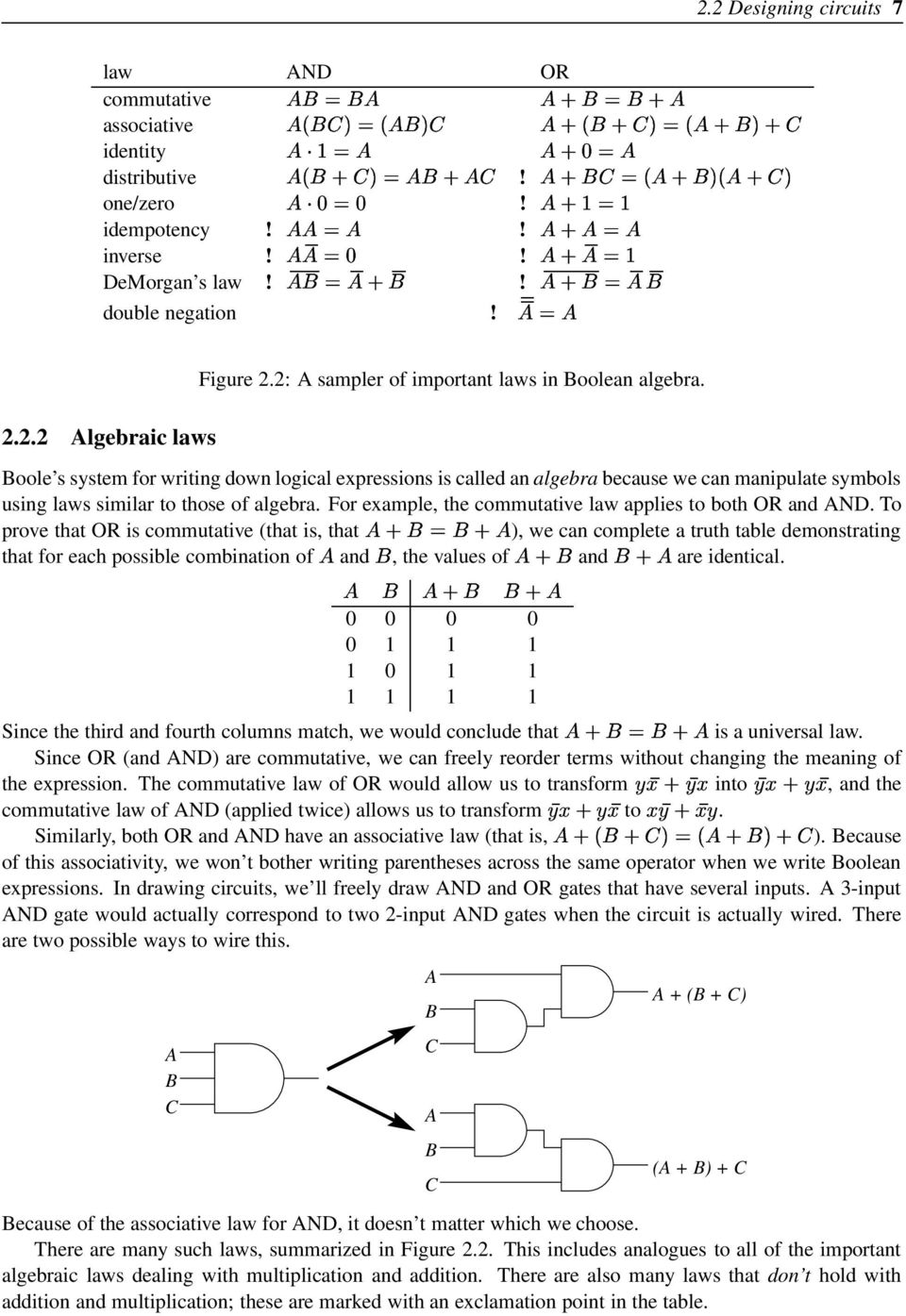
13 2.2 Designing circuits 7 law AND OR commutative associative identity distributive! one/zero! idempotency!! inverse!! DeMorgan s law!! double negation! Algebraic laws Figure 2.2: A sampler of important laws in Boolean algebra. Boole s system for writing down logical expressions is called an algebra because we can manipulate symbols using laws similar to those of algebra. For example, the commutative law applies to both OR and AND. To prove that OR is commutative (that is, that ), we can complete a truth table demonstrating that for each possible combination of and, the values of and are identical Since the third and fourth columns match, we would conclude that is a universal law. Since OR (and AND) are commutative, we can freely reorder terms without changing the meaning of the expression. The commutative law of OR would allow us to transform into, and the commutative law of AND (applied twice) allows us to transform to. Similarly, both OR and AND have an associative law (that is, ). Because of this associativity, we won t bother writing parentheses across the same operator when we write Boolean expressions. In drawing circuits, we ll freely draw AND and OR gates that have several inputs. A 3-input AND gate would actually correspond to two 2-input AND gates when the circuit is actually wired. There are two possible ways to wire this. A B C A B C A B C A + (B + C) (A + B) + C Because of the associative law for AND, it doesn t matter which we choose. There are many such laws, summarized in Figure 2.2. This includes analogues to all of the important algebraic laws dealing with multiplication and addition. There are also many laws that don t hold with addition and multiplication; these are marked with an exclamation point in the table.
14 8 Chapter 2. Logic circuits Converting a truth table Now we can return to our problem: If we have a particular logical function we want to compute, how can we build a circuit to compute it? We ll begin with a description of the logical function as a truth table. Suppose we start with the following function for which we want a circuit Given such a truth table defining a function, we ll build up a Boolean expression representing the function. For each row of the table where the desired output is 1, we describe it as the AND of several factors. description To arrive at a row s description, we choose for each variable either that variable or its negation, depending on which of these is 1 in that row. Then we take the AND of these choices. For example, if we consider the first of the rows above, we consider that since is 0 in this row, is 1; since is 0, is 1; and is 1. Thus, our description is the AND of these choices,. This expression gives 1 for the combination of values on this row; but for other rows, its value is 0, since every other row is different in some variable, and that variable s contribution to the AND would yield 0. Once we have the descriptions for all rows where the desired output is 1, we observe the following: The value of the desired circuit should be 1 if the inputs correspond to the first 1-row, the second 1-row, the third 1-row, or the fourth 1-row. Thus, we ll combine the expressions describing the rows with an OR. Note that we do not include rows where the desired output is 0 for these rows, we want none of the AND terms to yield 1, so that the OR of all terms gives 0. The expression we get is called a sum of products expression. It is called this because it is the OR (a sum, if we understand OR to be like addition) of several ANDs (products, since AND corresponds to multiplication). We call this technique of building an expression from a truth table the sum of products technique. This expression leads immediately to the circuit of Figure 2.3. In general, this technique allows us take any function over bits and build a circuit to compute that function. The existence of such a technique proves that circuits can compute any logical function. Note, incidentally, that the depth of this circuit will always be three (or less), since every path from input to output will go through a NOT gate (maybe), an AND gate, and an OR gate. Thus, this technique shows that it s never necessary to design a circuit that is more than three gates deep. Sometimes, though, designers build deeper circuits because they are concerned not only with speed, but also with size: A larger circuit can often accomplish the same task using fewer gates.

15 2.3 Simplifying circuits 9 x y out z 2.3 Simplifying circuits Figure 2.3: A circuit derived from a given truth table. The circuit generated by the sum-of-products technique can be quite large. This is impractical: Additional gates cost money, so CPU designers want to use gates as economically as possible to make room for more features or to reduce costs. Thus, we d like to make a smaller circuit accomplishing the same thing, if possible. We can simplify a circuit by taking the corresponding expression and reducing it using laws of Boolean algebra. We will insert this simplification step into our derivation process. Thus, our approach for converting a truth table into a circuit will now have three steps. 1. Build a sum of products expression from the truth table. 2. Simplify the expression using laws of Boolean algebra (as in Figure 2.2). 3. Draw the circuit corresponding to this simplified expression. In the rest of this section, we look at a particular technique for simplifying a Boolean expression. Our technique for simplifying expressions works only for sum-of-products expressions that is, the expression must be an OR of terms, each term being an AND of variables or their negations. Suppose we want to simplify the expression 1. We look through the terms looking for all pairs that are identical in every way, except for one variable that is NOTted in one and not NOTted in the other. Our example has two such pairs. If no such pairs are found, we are done. and differ only in. and differ only in.

16 10 Chapter 2. Logic circuits 2. We create a new expression. This expression includes a single term for each pair from step 1; this term keeps everything that the pair shares in common. The expression also keeps any terms that do not participate in any pairs from step 1. For our example, this would lead us to the following. The term arises because this term does not belong to a pair from step 1; we include due to the pair, in which and are the common factors; and we include due to the pair. Note that we include a term for every pair, even if some pairs overlap (that is, if two pairs include the same term). The following reasoning underlies this transformation. Using the law that, we can duplicate the term, which appears in two of the pairs. Because of the associative and commutative laws of OR, we can rearrange and insert parentheses so that the pairs are together. We ll concentrate on the first pair ( ) in the following. (The reasoning for the other pair,, proceeds similarly.) has two terms with in common. Using the distributive law of AND over OR, we get. We can apply the law to get. Finally, we apply AND s identity law ( ) to get. 3. If there are duplicates among the terms, we can remove the duplicates. This is justified by the Boolean algebra law that. (There are no duplicates in this case.) 4. Return to step 1 to see if there are any pairs in this new expression. (In our working example, there are no more pairs to be found.) Thus, we end up with the simplified expression From this we can derive the smaller circuit of Figure 2.4 that works the same as that of Figure 2.3. In this case we have replaced the 10 gates of Figure 2.3 with only 7 in Figure 2.4.
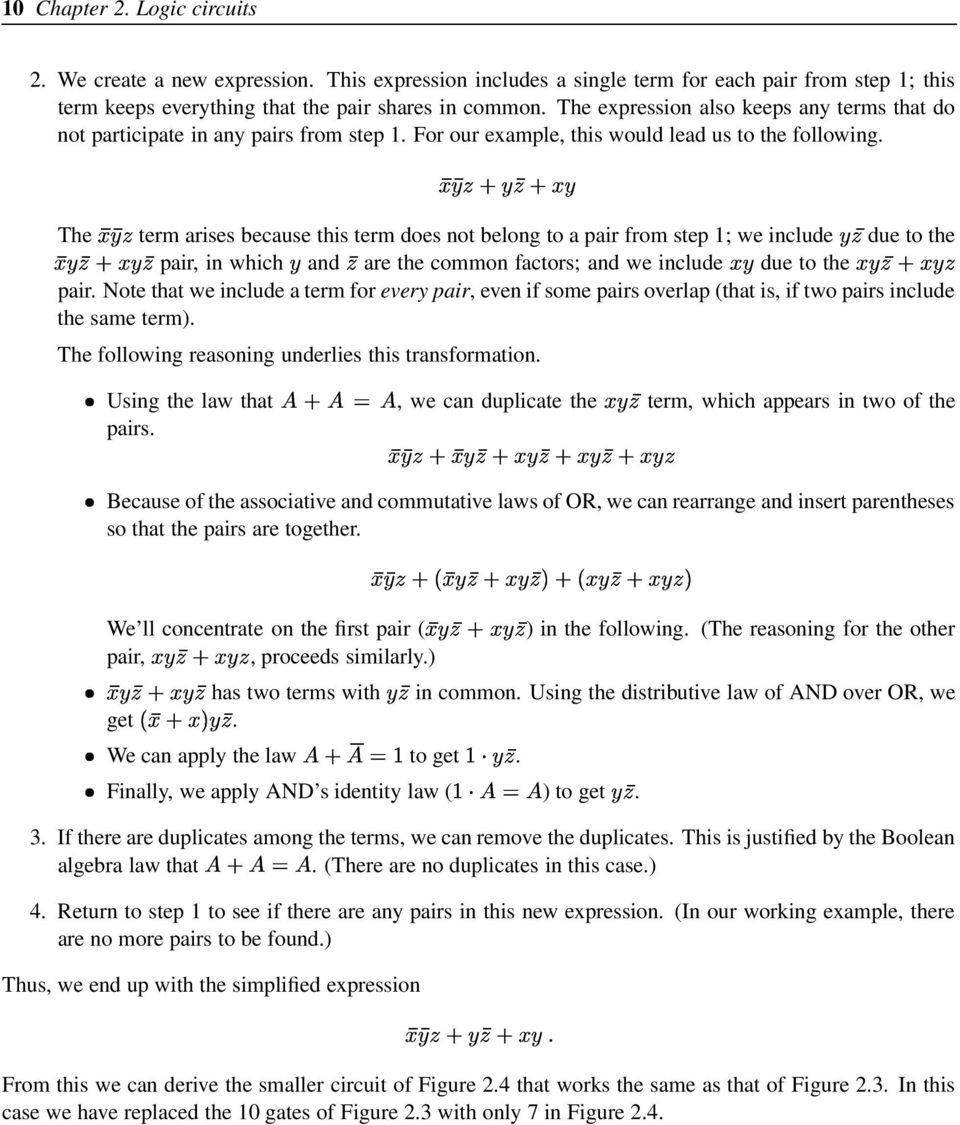
17 2.3 Simplifying circuits 11 x y out z Figure 2.4: A simplified circuit equivalent to Figure 2.3.

18 12 Chapter 2. Logic circuits

19 Chapter 3 Data representation Since computer science is the study of algorithms for transforming information, an important element of the discipline is understanding techniques for representing information. In this chapter, we ll examine some techniques for representing letters, integers, real numbers, and multimedia. 3.1 Binary representation One of the first problems we need to confront is how wires can represent many values, if a wire can only carry a 0 or 1 based on its electrical voltage Combining bits A wire can carry one bit, which can represent up to two values. But suppose we have several values. For example, suppose we want to remember the color of a traffic light (red, amber, or green). What can we do? We can t do this using a single wire, since a wire carries a single bit, which can represent only two values (0 and 1). Thus, we will need to add more bits. Suppose we use two wires. Then we can assign colors to different combinations of bits on the two wires. wire 1 wire 2 meaning 0 0 red 0 1 amber 1 0 green For example, if wire 1 carries 0 and wire 2 carries 1, then this would indicate that the light is amber. In fact, with two bits we can represent up to four values: The fourth combination,, was unnecessary for the traffic light. If we want to represent one of the traditional colors of the rainbow (red, orange, yellow, green, blue, indigo, violet), then two bits would not be enough. But three bits would be: With three bits, there are four distinct values where the first bit is 0 (since there are four different combinations for the other two bits) and four distinct values where the first bit is 1, for a total of eight combinations, which is enough for the rainbow s seven colors. In general, if we have bits, we can represent distinct values through various combinations of the bits values. In fact, this fact is so important that, to emphasize it, we will look at a formal proof. Theorem 1 We can represent distinct values using different combinations of bits.

20 14 Chapter 3. Data representation Proof: For each bit, we have two choices, 0 or 1. We make the simply multiply the number of choices for each bit. times choices independently, so we can There are, therefore, different combinations of choices. Computers often deal with English text, so it would be nice to have some way of assigning distinct values to represent each possible printable character on the keyboard. (We consider lower-case and capital letters as different characters.) How many bits do we need to represent the keyboard characters? If you count the symbols on the keyboard, you ll find that there are 94 printable characters. Six bits don t provide enough distinct values, since they provide only different combinations, but seven is plenty ( ). Thus, we can represent each of the 94 possible printable characters using seven bits. Of course, seven bits actually permit up to 128 different values; the extra 34 can be dedicated to the space key, the enter key, the tab key, and other convenient characters. Many computers today use ASCII (American Standard Code for Information Interchange) for reprenting characters. This seven-bit coding defines the space as , the capital A as , the zero digit as , and so on. Figure 3.1 contains a complete table of the ASCII codes. (Most of the extra 34 values, largely obscure abbrevations in the first column of Figure 3.1, are rarely used today.) Computers deal with characters often enough that designers organize computer data around the size of their representation. Computer designers prefer powers of two, however. (This preference derives from the fact that bits can represent up to different values.) Thus, they don t like dividing memory up into units of seven bits (as required for the ASCII code). Instead, they break memory into groups of eight bits ( ), each of which they call a byte. The extra bit is left unused when representing characters using ASCII. When they want to talk about large numbers of bytes, computer designers group them into kilobytes (KB). The prefixes kilo- come from the metric prefix for a thousand (as in kilometer and kilogram) However, because computers deal in binary, it s more convenient to deal with powers of 2, and so the prefix kilo- in kilobyte actually stands for the closest power of 2 to 1000, which is. These abbreviations extend upward Representing numbers kilobyte KB 1,024 bytes megabyte MB 1,048,576 bytes gigabyte GB billion bytes terabyte TB trillion bytes We can already represent integers from zero to one using a single bit. To represent larger numbers, we need to use combinations of bits. The most convenient technique for assigning values to combinations is based on binary notation (also called base 2). You re already familiar with decimal notation (also called base 10). You may remember the following sort of diagram from grade school That is, in representing the number 1024, we put a 4 in the ones place, a 2 in the tens place, a 0 in the hundreds places, and a 1 in the thousands place. This system is called base 10 because there are 10 possible Sometimes, manufacturers use powers of 10 instead of 2 for marketing purposes. Thus, they may advertise a hard disk as holding 40 GB, when it actually holds only 37.3 GB, or 40 billion bytes.
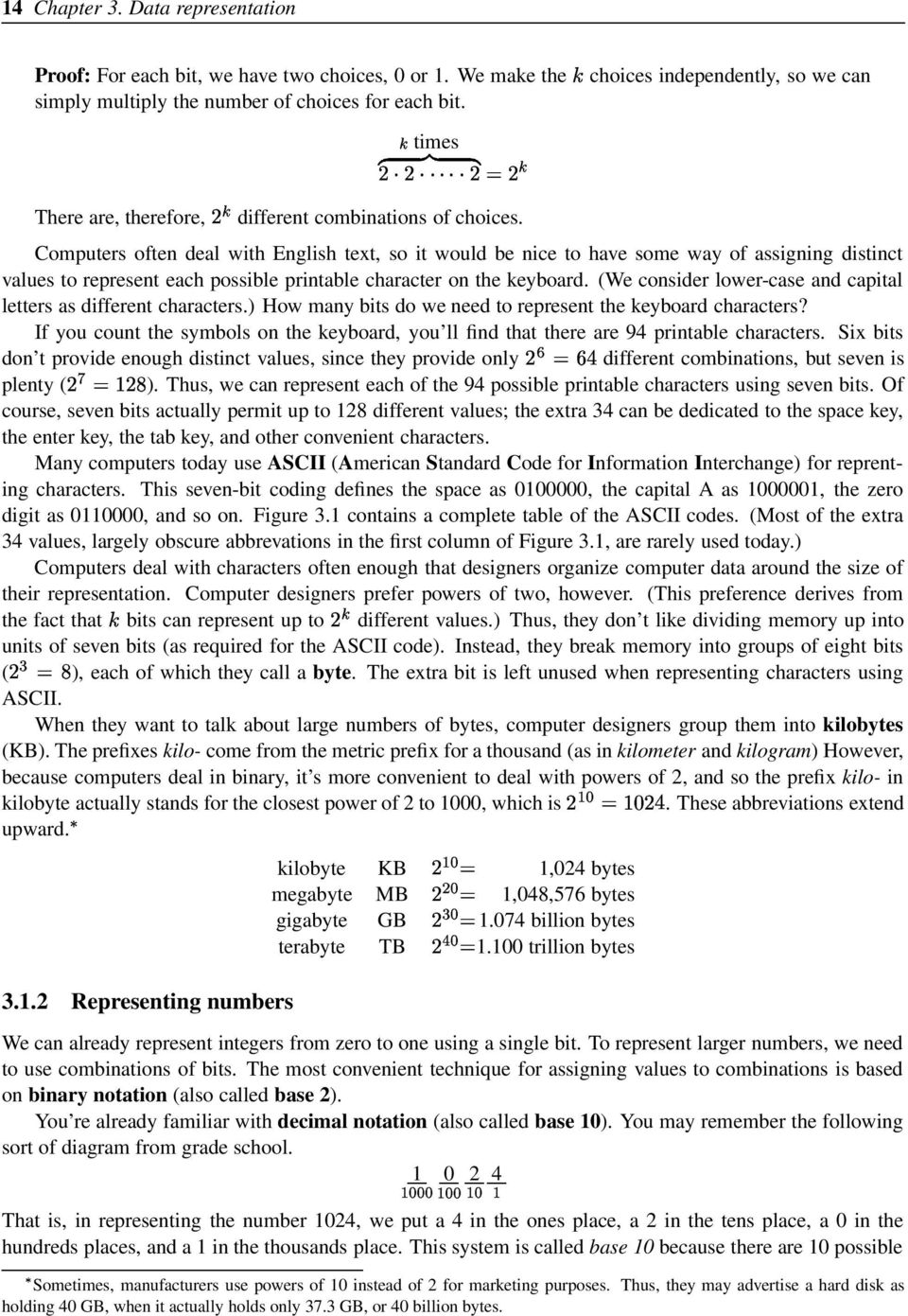
21 3.1 Binary representation NUL SP SOH ! A a STX " B b ETX # C c EOT $ D d ENQ % E e ACK & F f BEL G g BS ( H h HT ) I i NL * J j VT K k NP , L l CR M m SO N n SI / O o DLE P p DC Q q DC R r DC S s DC T t NAK U u SYN V v ETB W w CAN X x EM Y y SUB : Z z ESC ; [ { FS < \ GS = ] } RS > ˆ US ? _ DEL Figure 3.1: The ASCII character assignments.
22 16 Chapter 3. Data representation digits for each place (0 through 9) and because the place values go up by factors of 10 ( ). In binary notation, we have only two digits (0 and 1) and the place values go up by factors of 2. So we have a ones place, a twos place, a fours place, an eights place, a sixteens place, and so on. The following diagrams a number written in binary notation. 1 0 This value, 1011, represents a number with 1 eight, 0 fours, 1 two, and 1 one: 11. (The parenthesized subscripts indicate whether the number is in binary notation or decimal notation.) We ll often want to convert numbers between their binary and decimal representations. We saw how to convert binary to decimal with Here s another example: Suppose we want to identify what represents. We first determine what places the 1 s occupy We then add up the values of these places to get a base-10 value: 36. To convert a number from decimal to binary, we repeatedly determine the largest power of two that fits into the number and subtract it, until we reach zero. The binary representation has a 1 bit in each place whose value we subtracted. Suppose, as an example, we want to convert 88 to binary. We observe the largest power of 2 less than 88 is 64, so we decide that the binary expansion of 88 has a 1 in the 64 s place, and we subtract 64 to get. Then we see than the largest power of 2 less than 24 is 16, so we decide to put a 1 in the 16 s place and subtract 16 from 24 to get 8. Now 8 is the largest power of 2 that fits into 8, so we put a 1 in the 8 s place and subtract to get 0. Once we reach 0, we write down which places we filled with 1 s We put a zero in each empty place and conclude that the binary representation of 88 is Alternative conversion algorithms In the previous section, we saw a procedure (an algorithm) for converting between binary notation and decimal notation, and we saw another procedure for converting between decimal notation and binary notation. Those algorithms work well, but there are alternative algorithms for each that some people prefer. From binary To convert a number written in binary notation to decimal notation, we begin by thinking 0, and we go through the binary representation left-to-right, each time adding that bit to twice the number we are thinking. Suppose, for example, that we want to convert into decimal notation (2) = = = = = = = 88 (10)
23 3.1 Binary representation 17 We end up with the answer 88. This algorithm is based on the following reasoning. A five-bit binary number corresponds to. This latter expression is equivalent to the polynomial where,,,,, and. We can convert this polynomial into an alternative form. In the algorithm, we re computing based on the alternative form instead of the original polynomial. To binary To convert a number in the opposite direction, we repeatedly divide a number by 2 until we reach 0, each time taking note of the remainder. When we string the remainders in reverse order, we get the binary representation of the original number. For example, suppose we want to convert 88 into binary notation. 0 R R 0 2 R 1 5 R 1 11 R R R (10) (2) After going through the repeated division and reading off the remainders, we arrive at Understanding how this process works is simply a matter of observing that it reverses the double-and-add algorithm we just saw for converting from binary to decimal Other bases Binary notation, which tends to lead to very long numerical representations, is cumbersome for humans to remember and type. But using decimal notation obscures the relationship to the individual bits. Thus, when the identity of the individual bits is important, computer scientists often compromise by using a power of two as the base: The popular alternatives are base eight (octal) and base sixteen (hexadecimal). The nice thing about these bases is how easily they translate into binary. Suppose we want to convert 173 to binary. One possible way is to convert this number to base 10 and then convert that answer to binary. But doing a direct conversion turns out to be much simpler: Since each octal digit corresponds to a three-bit binary sequence, we can replace each octal digit of with its three-bit sequence. Thus, we conclude To convert the other way, we split the binary number we want to convert into groups of three (starting from the 1 s place), and then we replace each three-bit sequence with its corresponding octal digit. Suppose we want to convert to octal The first known description of this is in 1299 by a well-known Chinese mathematician Chu Shih-Chieh (1270? 1330?). An obscure Englishman, William George Horner ( ), later rediscovered the principle known today as Horner s method
24 18 Chapter 3. Data representation Thus, we conclude Hexademical, frequently called hex for short, works the same way, except that we use groups of four bits instead. One slight complication is that hexadecimal requires 16 different digits, and we have only 10 available. Computer scientists use Latin letters to fill the gap. Thus, after 0 through 9 come A through F C D A E B F As an example of a conversion from hex to decimal, suppose we want to convert the number F5 to base 10. We would replace the F with 1111 and the 5 with 0101, giving its binary equivalent Integer representation We can now examine how computers remember integers on the computer. (Recall that integers are numbers with no fractional part, like,, or.) Unsigned representation Modern computers usually represent numbers in a fixed amount of space. For example, we might decide that each byte represents a number. A byte, however, is very limiting: The largest number we can fit is , and we often want to deal with larger numbers than that. Thus, computers tend to use groups of bytes called words. Different computers have different word sizes. Very simple machines have 16-bit words; today, most machines use 32-bit words, though some computers use 64-bit words. (The term word comes from the fact that four bytes (32 bits) is equivalent to four ASCII characters, and four letters is the length of many useful English words.) Thirty-two bits is plenty for most numbers, as it allows us to represent any integer from 0 up to 4,294,967,295. But the limitation is becoming increasingly irritating, and so people are beginning to move to 64-bit computers. (This isn t because people are dealing with larger numbers today than earlier, so much as the fact that memory has become much cheaper, and so it seems silly to continue trying to save money by skimping on bits.) The representation of an integer using binary representation in a fixed number of bits is called an unsigned representation. The term comes from the fact that the only numbers representable in the system have no negative sign. But what about negative integers? After all, there are some perfectly respectable numbers below 0. We ll examine two techniques for representing integers both negative and positive: sign-magnitude representation and two s-complement representation Sign-magnitude representation Sign-magnitude representation is the more intuitive technique. Here, we let the first bit indicate whether the number is positive or negative (the number s sign), and the rest tells how far the number is from 0 (its magnitude). Suppose we are working with 8-bit sign-magnitude numbers. would be represented as would be represented as
25 3.2 Integer representation 19 For 3, we use 1 for the first bit, because the number is negative, and then we place into the remaining seven bits. What s the range of integers we can represent with an 8-bit sign-magnitude representation? For the largest number, we d want 0 for the sign bit and 1 everywhere else, giving us , or 127. For the smallest number, we d want 1 for the sign bit and 1 everywhere else, giving us 127. An 8-bit sign-magnitude representation, then, can represent any integer from 127 to 127. This range of integers includes 255 values. But we ve seen that 8 bits can represent up to 256 different values. The discrepency arises from the fact that the representation includes two representations of the number zero ( and, represented as and ). Arithmetic using sign-magnitude representation is somewhat more complicated than we might hope. When you want to see if two numbers are equal, you would need additional circuitry so that is understood as equal to. Adding two numbers requires circuitry to handle the cases of when the numbers signs match and when they don t match. Because of these complications, sign-magnitude representation is not often used for representing integers. We ll see it again, however, when we get to floating-point numbers in Section Two s-complement representation Nearly all computers today use the two s-complement representation for integers. In the two s-complement system, the topmost bit s value is the negation of its meaning in an unsigned system. For example, in an 8-bit unsigned system, the topmost bit is the 128 s place. In an 8-bit two s-complement system, then, we negate the meaning of the topmost bit to be instead. To represent the number 100, we would first choose a 1 for the s place, leaving us with. (We are using the repeated subtraction algorithm described in Section Since the place value is negative, we subtract a negative number.) Then we d choose a for the 16 s place, the 8 s place, and the 4 s place to reach Thus, the 8-bit two s-complement representation of 100 would be would be represented as would be represented as What s the range of numbers representable in an 8-bit two s-complement representation? To arrive at the largest number, we d want 0 for the s bit and 1 everywhere else, giving us , or 127. For the smallest number, we d want 1 for the s bit and 0 everywhere else, giving 128. In an 8-bit two s-complement representation, we can represent any integer from 128 up to 127. (This range includes 256 integers. There are no duplicates as with sig-magnitude representation.) It s instructive to map out the bit patterns (in order of their unsigned value) and their corresponding two s-complement values. 0 0
26 20 Chapter 3. Data representation bit pattern value Notice that the two s-complement representation wraps around: If you take the largest number, , and add 1 to it as if it were an unsigned number, and you get , the smallest number. This wraparound behavior can lead to some interesting behavior. In one game I played as a child (back when 16-bit computers were popular), the score would go up progressively as you guided a monster through a maze. I wasn t very good at the game, but my little brother mastered it enough that the score would hit its maximum value and then wrap around to a very negative value! Trying to get the largest possible score without wrapping around was an interesting challenge. Negating two s-complement numbers For the sign-magnitude representation, it s easy to represent the negation of a number: You just flip the sign bit. For the two s-complement representation, however, the relationship between the representation of a number and the representation of its negation is not as obvious as one might like. The following is a handy algorithm for relating the representation of a number to the representation of its negation: You start at the right, copying bits down, until you reach the first 1, beyond which you flip every bit. The representation of 12, for example, is , so its two s complement representation will be the lower three bits (below and including the lowest 1) are identical, while the rest are all different. 12 (10) bits to flip last one bit -12 (10) Why this works is not immediately obvious. To understand it, we first need to observe that if we have a negative number and we interpret its two s-complement representation in the unsigned format, we end up with. This is because the two s-complement representation of will have a 1 in the uppermost bit, representing, but when we interpret it as an unsigned number, we interpret this bit as representing, which is more than before. The other bits values remain unchanged. Since the value of this uppermost bit has increased by, the unsigned interpretation of the bit pattern is worth more than the two s-complement interpretation. We can understand our negation algorithm as being a two-step process. 1. We flip all the bits (from becomes , for example). 2. We add one to the number (which would give in our example).
27 3.3 General numbers 21 Adding one to a number flips bits from the right, until we reach a zero. Since we already flipped all the bits in the first step, this second step flips these bits back to their original values. Now we can observe that if the original number is when interpreted as an unsigned number, we will have after going through the process. The first step of flipping all bits is equivalent to subtracting each bit from 1, which is the same as subtracting from the all-ones number ( ). Thus, after the first step, we have the value. The second step adds one to this, giving us. When the unsigned representation of is interpreted as a two s-complement number, we understand it to be. Adding two s-complement numbers One of the nice things about two s-complement numbers is that you can add them just as you add regular numbers. Suppose we want to add and We can attempt to do this using regular addition, akin to the technique we traditionally use in adding base-10 numbers We get an extra 1 in the ninth bit of the answer, but if we ignore this ninth bit, we get the correct answer. We can reason that this is correct as follows: Say one of the two numbers is negative and the other is positive. That is, one of the two numbers has a 1 in the s place, and the other has 0 there. If there is no carry into the s place, then the answer is OK, because that means we got the correct sum in the last 7 bits, and then when we add the s place, we ll maintain the represented by the 1 in that location in the negative number. If there is a carry into the s place, then this represents a carry of taken from summing the s column. This carry of (represented by a carry of 1), added to the in that column for the negative number (represented by a 1 in that column), should give us 0. This is exactly what we get we add the carry of 1 into the leftmost column to the 1 of the negative number in this column and then throw away the carry ( ). A similar sort of analysis will also work when we are adding two negative numbers or two positive numbers. Of course, the addition only works if you end up with something in the representable range. If you add 120 and 120 with 8-bit two s-complement numbers, then the result of 240 won t fit. The result of adding 120 and 120 as 8-bit numbers would turn out to be! For dealing with integers that can possibly be negative, computers generally use two s-complement representation rather than sign-magnitude. It is somewhat less intuitive, but it allows simpler arithmetic. (It is true that negation is somewhat more complex, but only slightly so.) Moreover, the two s-complement representation avoids the problem of multiple representations of the same number (0). 3.3 General numbers Representing numbers as fixed-length integers has some notable limitations. It isn t suitable for very large numbers that don t fit into 32 bits, like, nor can it handle numbers that have a fraction, like. We ll now turn to systems for handling a wider range of numbers.
28 22 Chapter 3. Data representation Fixed-point representation One possibility for handling numbers with fractional parts is to add bits after the decimal point: The first bit after the decimal point is the halves place, the next bit the quarters place, the next bit the eighths place, and so on. Suppose that we want to represent We would want 1 in the ones place, leaving us with. Then we want 1 in the halves place, leaving us with. No quarters will fit, so put a 0 there. We want a 1 in the eighths place, and we subtract from to get So the binary representation of would be The idea of fixed-point representation is to split the bits of the representation between the places to the left of the decimal point and places to the right of the decimal point. For example, a 32-bit fixed-point representation might allocate 24 bits for the integer part and 8 bits for the fractional part bits 8 bits integer part fractional part To represent, we would then write The first three bytes give the, and the last byte gives the representation of. Fixed-point representation works well as long as you work with numbers within the given range. The 32-bit fixed-point representation described above can represent any multiple of from 0 up to 16.7 million. But programs frequently need to work with numbers from a much broader range. For this reason, fixed-point representation isn t used very often in today s computing world Floating-point representation Floating-point representation is an alternative technique based on scientific notation. Because we re working with computers, we ll base our scientific notation on powers of 2, not 10 as is traditional. For example, the binary representation of 5.5 is When we convert this to binary scientific notation, we move the decimal point to the left two places, giving us (This is just like converting to scientific notation: It would be ) To represent a number written in scientific notation in bits, we ll decide how to split up the representation to fit it into a fixed number of bits. First, let us define the two parts of scientific representation: In 1.011, we call the mantissa (or the significand), and we call the exponent. In this section we ll use 8 bits to store such a number, divided as follows. 1 bit 4 bits 3 bits sign exponent + 7 mantissa Financial software is a notable exception. Here, designers often want all computations to be precise to the penny, and in fact they should always be rounded to the nearest penny. There is no reason to deal with very large amounts (like trillions of dollars) or fractions of a penny. Such programs use a variant of fixed-point representation that represents each amount as an integer multiple of, just as the fixed-point representation represents numbers as an integer multiple of.
29 3.3 General numbers 23 We use the first bit to represent the sign (1 for negative, 0 for positive), the next four bits for the sum of 7 and the actual exponent (we add 7 to allow for negative exponents), and the last three bits for the fraction of the mantissa. Note that we omit the digit to the left of the decimal point: Since the mantissa has only one nonzero bit to the left of the decimal point, and the only nonzero bit is 1, we know that the bit to the left of the decimal point must be a 1. There s no point in wasting space in inserting this 1 into our bit pattern. We include only the bits of the mantissa to the right of the decimal point. We call this a floating-point representation because the values of the mantissa bits float along with the decimal point, based on the exponent s given value. This is in contrast to fixed-point representation, where the decimal point is always in the same place among the bits given. Continuing our example of , we add 7 to 2 to arrive at for the exponent bits. Into the mantissa bits we place the bits following the decimal point of the scientific notation,. This gives us as the 8-bit floating-point representation of 5.5. Suppose we want to represent First we convert our desired number to binary: Then we convert this to binary scientific notation: Then we fit this into the bits. (a) We choose 1 for the sign bit if the number is negative. (It is, in this case.) (b) We add 7 to the exponent and place the result into the four exponent bits. (In this case, we arrive at ) (c) The three mantissa bits are the first three bits following the leading 1:. (If there are more than three bits, then rounding will be necessary.) Thus we end up with. Conversely, suppose we want to decode the number. 1. We observe that the number is positive, and the exponent bits represent This is 7 more than the actual exponent, and so the actual exponent must be. Thus, in binary scientific notation, we have We convert this to binary: We convert the binary into decimal: Alternative conversion algorithm The process described above for converting from decimal to binary representation relies implicitly on the repeated subtraction algorithm of Section For example, we arrive at for 5.5 by subtracting, then, then. If we wanted to convert 2.375, we would choose a 1 for the 2 s place (leaving ), the s place (leaving ), and the s place (leaving ), giving us Alternatively, we can use a process inspired by the repeated division algorithm of Section Here, we convert to binary in two steps. We take the portion to the left of the decimal point and use the repeated division algorithm of Section In the case of 2.375, we would take the 0, reading the remainders to arrive at 10.. to the left and repeatedly divide until we reach
30 24 Chapter 3. Data representation R 1 1 R (2) We take the portion to the right of the decimal point and repeatedly multiply it by 2, each time extracting the bit to the right of the decimal point, until we reach 0 (or until we have plenty of bits to fill out the mantissa bits). In the example of 2.375, the fractional part is.375. We repeatedly multiply this by 2, each time taking out the integer part as the next bit of the binary fraction, arriving at = = = (2) These bits are the bits following the decimal point in the binary representation. Placed with the bits before the decimal point determined in the previous step, we would conclude with Representable numbers This 8-bit floating-point format can represent a wide range of both small numbers and large numbers. To find the smallest possible positive number we can represent, we would want the sign bit to be 0, we would place 0 in all the exponent bits to get the smallest exponent possible, and we would put 0 in all the mantissa bits. This gives us , which represents To determine the largest positive number, we would want the sign bit still to be 0, we would place 1 in all the exponent bits to get the largest exponent possible, and we would put 1 in all the mantissa bits. This gives us , which represents Thus, our 8-bit floating-point format can represent positive numbers from about to 480. In contrast, the 8-bit two s-complement representation can only represent positive numbers between and. But notice that the floating-point representation can t represent all of the numbers in its range this would be impossible, since eight bits can represent only distinct values, and there are infinitely many real numbers in the range to represent. Suppose we tried to represent 17 in this scheme. In binary, this is When we try to fit the mantissa into the mantissa portion of the 8-bit representation, we find that the final 1 won t fit: We would be forced to round. In this case, computers would ignore the final 1 and use the pattern That rounding means that we re not representing the number precisely. In fact, translates to Computers generally round to the nearest possibility. But, when we are exactly between two possibilities, as in this case, most computers follow the policy of rounding so that the final mantissa bit is 0. This detail of exactly how the rounding occurs is not important to our discussion, however.
31 3.3 General numbers 25 Thus, in our 8-bit floating-point representation, 17 equals 16! That s pretty irritating, but it s a price we have to pay if we want to be able to handle a large range of numbers with such a small number of bits. While a floating-point representation can t represent all numbers precisely, it does give us a guaranteed number of significant digits. For this 8-bit representation, we get a single digit of precision, which is pretty limited. To get more precision, we need more mantissa bits. Suppose we defined a similar 16-bit representation with 1 bit for the sign bit, 6 bits for the exponent plus 31, and 9 bits for the mantissa. 1 bit 6 bits 9 bits sign exponent + 31 mantissa This representation, with its 9 mantissa bits, happens to provide three significant digits. Given a limited length for a floating-point representation, we have to compromise between more mantissa bits (to get more precision) and more exponent bits (to get a wider range of numbers to represent). For 16-bit floating-point numbers, the 6-and-9 split is a reasonable tradeoff of range versus precision. IEEE standard Nearly all computers today follow the the IEEE standard, published in 1980, for representing floating-point numbers. This standard is similar to the 8-bit and 16-bit formats we ve explored already, but the standard deals with longer lengths to gain more precision and range. There are three major varieties of the standard, for 32 bits, 64 bits, and 80 bits. sign exponent mantissa exponent significant format bits bits bits excess digits Our 8-bit Our 16-bit IEEE 32-bit IEEE 64-bit , IEEE 80-bit , All of these formats use an offset for the exponent, called the excess. In all of these formats, the excess is halfway up the range of numbers that can fit into the exponent bits. For the 8-bit format, we had 4 exponent bits; the largest number that can fit into 4 bits is, and so the excess is. The IEEE 32-bit format has 8 exponent bits, and so the largest number that fits is, and the excess is. The IEEE standard formats generally follow the rules we ve outlined so far, but there are two exceptions: the denormalized numbers and the nonnumeric values. We ll look at these next. Denormalized numbers (optional) The first special case is for dealing with very small values. Let s go back to the 8-bit representation we ve been studying. If we plot the small numbers that can be represented exactly on the number line, we get the distribution illustrated in Figure 3.2(a). The smallest representable positive number is (bit pattern ), and the largest representable negative number is (bit pattern ). These are small numbers, but when we look at Figure 3.2(a), we see an anomaly: There is a relatively large gap between them. And notice there is no exact representation of one of the most important numbers of all: zero! To deal with this, the IEEE standard defines the denormalized numbers. The idea is to take the most closely clustered numbers illustrated in Figure 3.2(a) and spread them more evenly across 0. This will give us the diagram in Figure 3.2(b).
32 26 Chapter 3. Data representation /8 17/ / /8 32 (a) With no denormalized case / or or -0 1/8 64 7/8 1 17/8 1 9/ /8 16 negative normalized numbers denormalized numbers positive normalized numbers (b) With a denormalized case Figure 3.2: Distribution of small floating-point numbers with and without a denormalized case. Those closely-clustered numbers in Figure 3.2(a) are those whose exponent bits are all 0. We ll change the meanings of these numbers as follows: When all exponent bits are 0, then the exponent is, and the mantissa has an implied 0 before it. Consider the bit pattern : In a floating-point format incorporating the denormalized case, this represents (Without the denormalized case, this would represent The changes are in the bit before the mantissa s decimal point and in the exponent of.) Suppose we want to represent in our 8-bit floating-point format with a denormalized case. We first convert our number into the form. In this case, we would get Converting to binary, we get approximately In the 8-bit format, however, we have only three mantissa bits, and so we would round this to Thus, we have 0.011, and so our bit representation would be. This is just an approximation to the original number of : It is about Without the denormalized case, the best approximation would be much further off ( ). How would we represent 0? We go through the same process: Converting this into the form, we get. This translates into the bit representation. Why for the exponent? It would make more intuitive sense to use, since this is what the all-zeroes exponent is normally. We use, however, because we want a smooth transition between the normalized values and the denormalized values. The least positive normalized value is (bit pattern ). If we used for the denormalized exponent, then the largest denormalized value would be 0.111, which is roughly half of the smallest positive normalized value. By using the same exponent as for the smallest normalized case, the standard spreads the denormalized numbers evenly from the smallest positive normalized number to 0. Figure 3.2(b) diagrams this: The open circles, representing values handled by the denormalized case, are spread evenly between the solid circles, representing the numbers handled by the normalized case. The word denormalized comes from the fact that the mantissa is not in its normal form, where a nonzero digit is to the left of the decimal point.
33 3.4 Representing multimedia 27 The denormalized case works the same for the IEEE standard floating-point formats, except that the exponent varies based on the format s excess. In the 32-bit standard, for example, the denormalized case is still the case when all exponent bits are zero, but the exponent it represents is (since the normalized case involves an excess-127 exponent, and so the lowest exponent for normalized numbers is ). Nonnumeric values (optional) The IEEE standard s designers were concerned with some special cases particularly, computations where the answer doesn t fit into the range of defined numbers. To address such possibilities, they reserved the all-ones exponent for the nonnumeric values. They designed two types of nonnumeric values into the IEEE standard. If the exponent is all ones and the mantissa is all zeroes, then the number represents infinity or negative infinity, depending on the sign bit. Essentially, these two values are to represent numbers that have gone out of bounds. This value results from an overflow; for example, if you doubled the largest positive value, you would get infinity. Or if you divide 1 by a tiny number, you would get either infinity or negative infinity. If the exponent is all ones, and the mantissa has some non-zero bits, then the number represents not a number, written as NaN. This represents an error condition; some situations where this occurs include finding the square root of, computing the tangent of, and dividing 0 by Representing multimedia Programs often deal with much more complex data than characters, integers, and real numbers. In this section, we ll look at the representation of images, video, and sound Images: The PNM format Most techniques for representing images work by first breaking the image into a grid of pixels; each pixel is a small atom of color in the overall image. The word pixel comes from picture element. (This isn t the only way to represent an image: An important alternative is to represent the image by component shapes. This works well for computer-generated drawings, but it works poorly for photographs.) There are many different formats for representing images. We ll look at one of the simplest: the PNM format. (PNM stands for Portable anymap.) In this format, we represent a picture as a sequence of ASCII characters. P The file begins with the format type in this case, it is P1 to indicate a black-and-white image. The next line provides the width and height of the image in pixels. The rest of the file contains a sequence of ASCII 0 s and 1 s, representing each pixel starting in the upper left corner of the image and going in left-to-right, top-down order. A 1 represents a black pixel, while a 0 represents a white pixel. In this example, the image is a image that looks like the following.
34 28 Chapter 3. Data representation Representing images as text in this way is simple, but it is also very wasteful: Each pixel of the image requires 16 bits (one for the 0 or 1 ASCII code, and one for the ASCII code for the space that separates it from the next pixel s number). PNM has an alternative binary format where we spend only one bit per pixel. Here is an example; since an ASCII representation of the file would make no sense, we have to look at the binary contents directly. byte value description ASCII code for P ASCII code for ASCII code for line break ASCII code for ASCII code for space ASCII code for ASCII code for line break first eight pixels (all of row 1, plus a pixel of row 2) next eight pixels (rest of row 2, plus 2 pixels of row 3) next eight pixels (rest of row 3, plus 3 pixels of row 4) next eight pixels (rest of row 4, plus 4 pixels of row 5) next eight pixels (rest of row 5, plus 5 pixels of row 6) next eight pixels (rest of row 6, plus 6 pixels of row 7) last pixels (rest of row 7, the rest padded with 0 s) The file begins the same as with the ASCII file (except the header is now P4 instead of P1, which in the PNM format indicates that the data within the file is in binary (not ASCII) black-and-white format). When we reach the data describing individual pixels, however, it switches to packing the pixels together into bytes. With the earlier ASCII version, the picture took 105 bytes to represent; this version takes only 14. This technique is not what the term image compression describes, however. For black-and-white images, the uncompressed representation is where you have one bit for each pixel, just as we have in this binary PNM format. A compressed image is one where the image is described using less than one bit per pixel Run-length encoding Describing a black-and-white image with less than one bit per pixel may sound at first like an impossibility. It can be achieved in many cases, however, by taking advantage of the fact that useful images generally have some form of pattern. We ll look at one particularly simple compression technique called run-length encoding. Suppose we begin our file the same as the PNM format, with a file format descriptor followed by the image s dimensions. When we get to describing the pixels values, however, we repeatedly use bytes in the following format. 4 bits # adjacent white pixels 4 bits # adjacent black pixels
35 3.4 Representing multimedia 29 Here, we have four bits describing the number of adjacent white pixels as we go through the image in left-to-right, top-down order; then we have four bits describing the number of adjacent black pixels. If we were to encode the same F image we ve been examining, it would look as follows. (This would not actually be a valid PNM file; the PNM format does not allow for such compression techniques.) byte value description ASCII code for P ASCII code for ASCII code for line break ASCII code for ASCII code for space ASCII code for ASCII code for line break image has eight white pixels, followed by four black pixels image has three white pixels, followed by one black pixels image has six white pixels, followed by three black pixels image has four white pixels, followed by one black pixels image has six white pixels, followed by one black pixels image has twelve white pixels, followed by no black pixels You can see that this scheme has shaved one byte from the uncompressed binary PNM format, which had 14 bytes for the same image. Run-length encoding isn t always effective. Suppose we want to encode a checkerboard pattern. Run-length encoding would look at this and see that each run of white pixels and of black pixels is only 1 pixel long. Thus our scheme would spend repeatedly use eight bits ( ) to describe two adjacent pixels, whereas the uncompressed scheme would take only two bits for the same pixels. Thus the compressed image would actually be about four times larger than the uncompressed version! In many cases, however, run-length encoding turns out to be an effective compression technique, particularly in images that have large white or black regions. Popular image formats, like the GIF and JPEG formats, usually do not use run-length encoding. They use more complex compression techniques that we will not explore here. Like run-length encoding, these techniques also take advantage of repetition in images, but they identify more complex repeated patterns in the image than the simple one-pixel repetition handled by run-length encoding General compression concepts We ve seen that run-length encoding isn t 100% effective. That is, sometimes it gives us something that is the same size or even longer than the original. This is disappointing. Why not study a perfect compression technique, one that always compresses a file? There is a very good reason for this: Perfect compression is impossible. The following argument is a mathematical proof for this important fact. Using four bits, we can represent numbers only up to 15. If there are more than 15 adjacent pixels of the same color, we can describe them as several groups of 15 or fewer pixels, interleaved with groups of 0 pixels of the other color.
36 30 Chapter 3. Data representation Theorem 2 No perfect compression technique exists. Proof: Suppose you described a perfect compression technique to me, and I had an -bit file I wanted to compress. I could apply your technique to my file times, and each time your technique (being perfect) would give me a shorter file. I would end up with a zero-bit file. Now, to be a reasonable compression technique, there must be some corresponding decompression technique to arrive at the original. I can decompress this zero-bit file times to arrive at the original file. Now suppose I have a different -bit file and I compress it times. This will give me a zero-bit file again, and we ve already seen that when we decompress a zero-bit file times, it gives me the first file I compressed. Thus, a file compressed does not always decompress to the same thing; in other words, your proposed compression technique doesn t work. Some image formats (including the JPEG format) use lossy compression. In lossy compression, we are willing to lose some of the original information for the sake of shorter files. The above proof relies on the fact that an effective compression algorithm must be able to restore a compressed file to the exact original. With lossy compression techniques, we forgo this requirement, and thus it s possible to have a lossy compression algorithm that always reduces a file s size. The trick is to make a lossy compression algorithm that doesn t lose any important information. Luckily, images particularly photographs tend to be very rich in extraneous information: A picture of a tree, for example, would have a different shade of green for virtually every leaf, and we don t need all those different shades to understand we re looking at a tree Video In principle, storing video isn t very different from images: You can simply store an image every seconds. (Since movies have 24 frames per second, this would give film-quality animation.) The problem is that this eats up lots of space: Suppose we have a 90-minute video, where we represent each pixel with three bytes. (The resolution would give a -inch picture.) This would require sec min min frames pixels bytes GB sec frame pixel We would need 23 DVDs to store the 90-minute movies. (A DVD can hold 15.9 GB.) If we wanted to use CDs, we would need 567 of them! Compression is a necessity when you re dealing with video. Luckily, lossless compression is not important: Since each frame shows for only a fraction of a second, imperfections in a single frame aren t going to show up. One simple compression technique is similar to the run-length compression technique, but we look for run-lengths along the time dimension. In this technique, we list only the pixels in each frame that differ from the previous frame. Listing each pixel involves giving the coordinates of each pixel, plus the color of that pixel. This works well when the camera is still, when the background tends to remain unchanged. When the camera pans or zooms, however, it causes problem. To provide for these cases also, popular video compression formats (such as MPEG) provide for a more complex specification of the relationship between the pixels of two adjacent frames Sound Sound is another important medium to represent in modern computing systems. Sound consists of vibrations in the air, which can be modeled as a graph of amplitude over time.
37 3.4 Representing multimedia 31 amplitude time (This is a very simple, regular amplitude graph. The graphs you frequently see, especially for human speech, tend to be much more irregular and spiky.) One way of representing the sound is to divide the amplitude graph into regular intervals and to measure the graph s height at each interval. amplitude time Then, we can store the height of the subsequent intervals. A system can interpolate between the sampled points to reproduce the original sound. This technique of sampling is exactly the one used by CDs, which include samples of the amplitude graph taken 44,100 times a second. (The designers chose 44,100 times because the human ear can sense tones with a frequency of up to 22 KHz. That is, the human ear can handle tones that go from down to up to down again 22,000 times a second. By sampling at twice that rate, they get both the down and the up of such cycles so that the sound producer, which interpolates between the samples, can reproduce the sound wave.) CDs use 16 bits to represent each sample s height, and they include samples for both the left and the right speaker to achieve a stereo effect, for a total of 32 bits per sample. Thus, to store music in the CD format, you need megabytes for each minute of sound: samples sec bits sample byte bits MB bytes sec min MB min Since CDs typically store around MB, they can hold around 65 minutes of sound. (Some CDs can hold slightly more data, providing for somewhat longer recordings.) CDs provide high-quality sound through a high sampling rate, but this contains much extraneous information that most ears can t hear. It leaves a lot of room for more efficient representations of sound data. The MP3 audio format is a particularly popular alternative. It uses a more complex understanding of how the human ear perceives sound. The human ear works by recognizing dominant frequencies in the sound it receives. Thus, to convert a sound to MP3 format, computers analyze a sound for the dominant sine waves that add up to the original wave.
38 32 Chapter 3. Data representation amplitude time Computers would ignore any frequencies beyond the ear s limit of 22 KHz, and they give some preference to waves in the range where the ear is most sensitive (2 4 KHz). Then, it stores the frequencies for these sine waves in the MP3 file. The result is a file representing the most important data that is needed to reproduce a sound for the human ear. Through this, and through some more minor techniques, the MP3 files tends to be approximately the size of the simple sampling technique used for CDs.
39 Chapter 4 Computational circuits We saw several simple circuits in Chapter 2. But all these circuits did was to compute some weird function of a combination of bits. Why would anybody want to do that? I can forgive you if you felt underwhelmed. Now that we understand the basics of data representation, we can explore more useful circuits for performing computation. In this chapter, we examine circuits for adding numbers together and circuits to remember data. 4.1 Integer addition First we ll examine a circuit for adding integers, something that we can certainly agree that a computer needs to do. To work toward such a circuit, we first think about how we would do this on paper. Of course, we already understand how to do this for base-10 numbers. The computer will add binary numbers, but we can still use a similar approach. Suppose, for example, that we want to add and The result here is In Section we saw that to add numbers in a two s-complement format, we can simply perform regular addition as if they are unsigned and then throw out any extra bits (like the uppermost bit in the above example). The above, then, could also be understood as the computation of, which would yield a solution of. Thus, though we will build a circuit for unsigned integers, our circuit will apply to adding two s-complement signed integers too. The addition technique is fine on paper, but the computer doesn t have the luxury of a pencil and paper to perform computation like this. We need a circuit. We ll break the design process into two smaller pieces. The first, called a half adder, is for the rightmost column. (The box is intentionally drawn empty; we ll see what circuit it represents soon.) a b half adder sum c out
40 34 Chapter 4. Computational circuits It takes two inputs, representing the two bits in the rightmost column of our addition, and it has two outputs, representing the bit to place in the sum s rightmost column ( ) and the bit to carry to the next column ( ). For each of the other columns, we ll have three inputs: the carry from the previous column ( ) and the two bits in the current column. We ll call the circuit to add these three bits together a full adder. c in a b full adder sum c out The two outputs have the same meaning as with the half adder. The half adder To build the half adder, we consider the four possible combinations of bits for the two inputs. We can draw a truth table for this Notice that the output is the AND function on and. The output is called the exclusive-or function (abbreviated XOR), so named because it is like an OR, but it excludes the possibility of both inputs being 1. We draw a XOR gate as an OR gate with a shield on its inputs. is To design a XOR gate using AND, OR, and NOT gates, we observe that the sum-of-products expression, from which we can construct a circuit. a sum b With a XOR gate built, we can now put together our half adder. a sum b c out Incidentally, many people use use a circled plus sign to represent XOR in Boolean expressions. In this system, represents XOR.
41 4.2 Circuits with memory 35 The full adder To design our full adder, we combine two half adders. The first half adder finds the sum of the first two input bits, and the second sums the first half adder s output with the third input bit. c in a b half adder half adder sum c out Technically, you might say, we should use another half adder to add the carry bits from the two half adders together. But since the carry bits can t both be 1, an OR gate works just as well. (We prefer to use an OR gate because it is only one gate, and a half adder uses several; thus, the OR gate is cheaper.) Putting it together To build our complete circuit, we ll combine a half adder and several full adders, with the carry bits strung between them. For example, here is a four-bit adder. a 3 a 2 a 1 a 0 0 b 3 b 2 b 1 b half adder full adder full adder full adder o 2 o 1 o 0 o 4 o 3 This diagram supposes that the first input is of the form that is, we call the 1 s bit of the fourbit number, the 2 s bit, the 4 s bit, and the 8 s bit. (If we were dealing with two s-complement numbers, would represent the s bit, and the circuit would add properly.) Similarly, the second input is of the form. Numbering the bits this way starting with 0 for the 1 s bit may seem confusing: This numbering system comes from the fact that and so is for the 1 s bit, while is for the 2 s bit since. Each bit stands for the s bit. Designers conventionally use this system for numbering bits. 4.2 Circuits with memory For a computer to be able to work interactively with a human, it must have some form of memory. In working toward this goal, we ll begin by examining a particular type of circuit called a latch Latches It would be nice to have some circuit that remembers a single bit, with a single output representing this bit, and two inputs allowing us to alter the circuit s value when we choose. data set D latch Q
42 36 Chapter 4. Computational circuits We ll call the two inputs what it remembers. But when and. When is 0, the circuit should do nothing except continue emitting becomes 1, the circuit should begin remembering s value instead. memory 0 0 unchanged 0 1 unchanged Such a circuit is called a D latch. It s called a latch because it holds a value. The D designation refers to the particular way the and inputs work. (In particular, D stands for Data.) In this subsection we ll see how to build such a latch. SR latch We begin by considering the following little circuit. S R Q The OR gates with circles after them are NOR gates. They re a combination of an OR gate with a NOT gate attached: Given the inputs and, a NOR gate outputs the value. This circuit with its output going into the upper NOR gate, whose output loops back to the gate computing is peculiar: We haven t seen a circuit with such loops before. This loop is what will give rise to our memory. So what does this circuit do? We can fill out the following table for what this circuit will compute given various combinations of,, and the current value of. We include the current value of (labeled old ) among the input columns of the table because s value loops back as an input to one of the gates. old new ignore ignore To see how we arrive at this table, let s take the first row as an example, when and are both 0, and when is currently 0. In this case, the lower NOR gate must be emitting a 0, since that is what is. This 0, and the input of 0, are the inputs to the upper NOR gate, so the upper NOR gate emits a 1. Tracing this around, this 1 is an input to the lower NOR gate, along with the input of 1, so the lower NOR gate emits a 0. We can continue tracing this around, and the output of the lower NOR gate will continue being 0; thus, we write 0 for the new value in the first row.
43 4.2 Circuits with memory 37 Now let s say we change the input to be 1 this moves us to the fifth row of the table, when is 1, is 0, and is 0. Now look at the upper NOR gate: It receives the input of 1 and the input of 0, so the upper gate emits 0. But this changes the output of the lower NOR gate: With the 0 input from the upper NOR gate, and the input of 0, the lower NOR gate emits 1. Now this 1 goes up to the upper NOR gate, and, with the input of 1, the NOR gate continues to output 0. Now the circuit is again in a stable state, but with now being 1. Thus a 1 is in the last column for the fifth row. We can continue this sort of analysis to complete the other five rows labeled in the above truth table. As for the last two rows, we re simply going to avoid them. We ll assume nobody will ever set both and inputs to 1, since such inputs won t be useful to us. Examining the other rows of the table, we notice that if both and are 0 (the first two rows), then remains unchanged; that is, it remembers a bit. If is 0 and is 1 (the third and fourth rows), then becomes 0 regardless of its previous value. And if is 1 and is 0 (the fifth and sixth rows), then becomes 1 regardless of its previous value. We can tabulate this as follows. memory 0 0 unchanged ignore This circuit is called an SR latch. Again, it s a latch because it holds a bit. The and refer to the traditional names of the inputs. The names and derive from the fact that when is 1, the remembered bit is Set to 1, and when is 1, the remembered bit is Reset to 0. D latch With an SR latch in hand, we can build the D latch we set out to design, which you can recall has inputs of and. What we ll do is translate the various combinations of and to the required and inputs corresponding to desired behavior; from this, we can build a circuit incorporating an SR latch. desired 0 0 old old For the first row of this table, we had already decided that we want the new to remain the same when is 0. We ve seen that the way to accomplish this using an SR latch is to set both and to 0. Thus, you see and in the last two columns of the first row. Deriving the other rows proceeds similarly. Based on this table, we can determine that should be this to build a circuit giving our desired D latch behavior. data set, while should be. We use Q
44 38 Chapter 4. Computational circuits Flip-flops The D latch gives us the ability to remember a bit, but in practice it s more convenient to have components whose values change only at the instant that the input changes to 1. This reduces confusion about what happens when changes if is still 1. Such a circuit whose value changes only at the instant that its input changing values is called a flip-flop. For these circuits, we will call the input the clock. D flip-flop Consider the following circuit, called a D flip-flop. data ck data D latch set Q Notice what this circuit does to compute the input to the D latch: It computes. (The name here stands for clock.) This is weird: According to the law from Boolean algebra, the AND gate would always output 0. What s the point of having a latch if its input is always 0? This apparent pointlessness is explained by considering the fact that gates are physical devices, and they take time to respond to inputs. To understand how this circuit really works, it s useful to look at the following illustration, called a timing diagram. ck ck ck ck a. b. c. time The horizontal axis represents time. The upper line of the diagram (labeled ) indicates that begins at 0, then changes to 1, then back to 0, then back to 1. The first change to occurs at instant in time (diagrammed with a vertical dashed line with a label below it). Since electricity is a physical quantity, voltage cannot change instantaneously, so in this diagram each change in value is diagrammed with a slanted line. Let s look at what happens at time : The outputs of the NOT and AND gates do not immediately change when changes, because they take time to sense the change and react. The beginning of the NOT gate s reaction appears in the diagram at time. More surprisingly, the AND gate reacts at time, too: You can see from the diagram that between and, the AND gate sees a 1 from and a 1 from. The AND gate s behavior is to output a 1 in this circumstance, so at time it begins emitting a 1. By time, it detects that the NOT gate is now at 0, and so the AND gate s output changes back to 0. Thus, the AND gate outputs 1 for a brief instant whenever changes from 0 to 1. In the flip-flop circuit, then, when changes from 0 to 1, the input to the D latch instantaneously becomes 1, and the D latch will remember whatever holds at that instant. Then its input switches back to 0 again, so that further changes to do not influence the latch (until, that is, changes from 0 to 1 in its next cycle). In circuit diagrams, we represent the D flip-flop as follows.
45 4.2 Circuits with memory 39 D D Q flip flop Q in D D D D Q flip flop Q Q flip flop Q o 3 o 2 o 1 o 0 D D Q flip flop Q four bit adder Figure 4.1: A four-bit counter. D D flip flop The triangle is traditional way of denoting an input for which the component acts only when the input changes from 0 to 1. Notice that this component also outputs. The flip-flop outputs this value because it is easy to compute. (The upper NOR gate in the underlying SR latch generates it.) It s often convenient to take advantage of this additional output in circuits. Q Q Putting it together: A counter Suppose we want a circuit that counts how many times the user has given it a 1 bit as an input. Such a simple circuit would be useful, for example, in a turnstile to count people entering. To do this, we ll use four flip-flops, to remember the current count in binary. (Our counter will only count up to 15, the largest four-bit number, and then it will reset to 0. If we want to count higher, we would need more flip-flops.) And we ll include a four-bit adder to compute the next value for these four flip-flops. Figure 4.1 contains a diagram of our circuit. To get a feel for how the circuit of Figure 4.1 works, suppose the input is 0, and all the D flip-flops
46 40 Chapter 4. Computational circuits hold 0. Then these outputs would be fed into the four-bit adder, which also takes its other input of 0001, and would output The lower four bits of this output are fed into the D flip-flops inputs, but the flip-flops values don t change, because their clock inputs (wired to ) are all 0. (The upper bit of the adder s output is ignored in the circuit, we acknowledge this by representing that the output is grounded.) When the input changes to 1 again, then the flip-flops values will suddenly change their remembered values to 1, and the circuit s outputs will reflect this. Also, the four-bit adder would now receive 0001 for its upper four-bit input, so that the adder would output This goes into the flip- flops, but the flip-flops values won t change again, because flip-flops change their value only at the instant that becomes 1, and that time has long past before 0010 reaches them. This last point, by the way, illustrates the point of using flip-flops instead of latches. Suppose we used latches instead. Because the input would still be 1 at this point, the latches would begin remembering And this would go through the adder, and the 0011 would go into the latches. This would go through the adder, and 0100 would go into the latches. The circuit would count incredibly fast until finally would go to 0. We wouldn t be able to predict where it stops. Using flip-flops, however, the count goes up only once each time the input goes to Sequential circuit design (optional) Circuits whose output is dependent solely on the current inputs of the circuit are called combinational circuits. All of the circuits that we studied in Chapter 2 are combinational circuits, as is the adder circuit in this chapter. Other circuits, in which the output may depend on past inputs also, are sequential circuits. Flip-flops are a simple example of sequential circuits. A counter is a more complex example. When we studied combinational circuits, we examined a systematic technique for designing them: You take the truth table, which was the specification of the circuit s design, from there you get a sum-of-products Boolean expression, which you can minimize and then use to build a circuit. In this section, we look at a systematic way for designing sequential circuits. It is a four-step process. 1. Draw a state transition diagram outlining how the circuit should change state as it receives inputs. The number of states will dictate how many flip-flops the circuit must have. 2. Generate a table saying how the flip-flop values should change in each step, based on the flip-flops current values and the inputs to the circuit. Also, generate a table relating the flip-flops values to the desired output of the circuit. 3. Derive combinational circuits to compute the inputs to each flip-flop and to compute each circuit output. 4. Combine these derived circuits together into a sequential circuit An example As an example of this process, suppose we want a circuit using D flip-flops with two inputs and with two outputs. One of the inputs is a clock; the second,, says whether the circuit should count up or down (1 representing up). The circuit should count up to 2, and it should not display wraparound behavior that is, when the circuit is at 0 and says to count down, the circuit remains at 0; and when the circuit is at 2 and says to count up, the circuit remains at 2. In fact, since the gates aren t all identically fast, and the wires aren t all identically long, the changes in latches values would be much more erratic.
47 4.3 Sequential circuit design (optional) 41 Step one: Drawing a state transition diagram In this case, the circuit should remember one of three things: The counter could be at 0, it could be at 1, or it could be at 2. Based on this, we can draw a picture of how what it will remember should change The arrows in this picture represent transitions between states. If, for example, the circuit is at state 0, and the clock changes while input is 1, then the counter s value should change to 1, and so the circuit should move to state 1. Thus we see an arrow labeled 1 extending from state 0 to state 1. Because there are three states, and because two bits can represent three different values, we ll use two flip-flops. (Of course, two bits can actually handle up to four different values. We don t have any use for that last value here, though.) We name the outputs of the two flip-flops and, and we create a table relating flip-flop values to states in the diagram. Step two: Generating tables state Based on our state diagram, we can generate a table of how states should change based on the current state and the input. (We don t include the clock input: It will simply be wired to the clock input of each flip-flop.) old old new new This table is a direct translation of the state diagram. In the first row, for example,, currently 0. The current values of and, and are all indicate that we are in state 0, according to the translation table determined in the previous step. According to the state transition diagram, if we re in state, and is 0, then we should move to state 0. Looking again at the translation table from the previous step, we see that the new values for and should be 0. For the second row, the current and values indicate that we are in state 1. Since this row is for the case that is 0, we look into the state transition diagram for an arrow starting at state 1 and labeled 0, and we observe that this arrow leads to state 0. The translation table indicates that state 0 is indicated by having and both be 0, and so that is what you see in the last two columns of the second row. The entries marked in this table stand for don t-care. They occur here because, when and are 1, we are in an undefined state, and we don t care about the circuit s behavior then. In fact, something would happen should the circuit ever reach this state, but if we ve designed it properly, it never will get there. We don t commit to a behavior for this undefined state now, because that will maintain our freedom later to choose whatever behavior keeps the final circuit simplest. We should also draw a table saying how the circuit s output relates to the flip-flop s values. In this case, we ve chosen the flip-flop values to correspond exactly to the desired outputs, so this part is easy.
48 42 Chapter 4. Computational circuits For other problems, the relationship between the flip-flops values and the table would be more complex. Step three: Derive combinational circuits For the third step, we derive combinational circuits for computing the flip-flops new values and the outputs. For example, for the second flip-flop s value (new ), we can look at our table and see the following. Note that we re removing the new column from before; the circuit will compute that column simultaneously, and so we can t use it in determining new. old old new Following the procedure of Chapter 2, we can derive a circuit for this table. Our sum-of-products expression would be This does not simplify, and so we can stop there. (I ve commuted the two terms to make the circuit diagram later prettier.) Computing the expression for new proceeds similarly, and we would end up with Similarly, the expression for would be, for it would be. Step four: Put the circuits together In the final step, we join these circuits based on the previous step into one overall circuit. Figure 4.2 shows this derived circuit. The top dotted box computes the new expression derived in the previous step. Its output, notice, is looped around back to to be stored the next time changes. Also notice how the circuit inside the dotted box saves unneeded NOT gates by using the flip-flops outputs when appropriate. Similarly, the second dotted box computes new, the third dotted box computes the output, and the bottom dotted box computes the output Another example Let s look at another example. This time, we want a circuit with a single input the clock and a single output. The output should be 1 every fourth time the clock input changes from 0 to 1. If we were to choose the lower in the table to be a 1, we could simplify the circuit. In this case, we re not going to worry about finding the smallest possibility, though.
49 4.3 Sequential circuit design (optional) 43 dir D D flip flop for Q 1 Q Q ck D D flip flop Q for Q 0 Q o 1 o 0 Figure 4.2: A sequential circuit counting up and down between 0 and 2. Step one: Drawing a state transition diagram In this case, the circuit should remember one of four things: The current output could be at 1, it could be at 0 on the first clock pulse, it could be at 0 on the second clock pulse, or it could be at 0 on the third clock pulse. Based on this, we can draw a picture of how what it will remember should change This diagram illustrates that the circuit should cycle through the four states each time the clock changes. In contrast to the last circuit we designed, which had an input other than the clock which affected how the circuit was to modify its state, this circuit has no inputs other than the clock. Thus, the state transition diagram for this circuit doesn t need labels on the arrows between states. Because there are four states, we ll use two flip-flops. We name the outputs of the two flip-flops and, and we create a table relating flip-flop values to states in the diagram. state Step two: Generating tables This problem specifies no circuit inputs other than the clock input, and so the only columns on the left side of our table are the current flip-flops values. Based on our state diagram,
50 44 Chapter 4. Computational circuits D D flip flop for Q 1 Q Q ck D D flip flop Q for Q 0 Q o Figure 4.3: A sequential circuit whose value is 1 every fourth clock pulse. we can generate a table of how states should change based on the current state. old old new new The table for the circuit s output corresponds to the desired output for each state Step three: Derive combinational circuits Based on the tables from the previous steps, we derive Boolean expressions for the flip-flops new values and for the circuit s output. new new Note that the expression for the new Step four: Put the circuits together simplified. Figure 4.3 shows the derived circuit.
51 Chapter 5 Computer architecture Thus far, we ve seen how to build circuits to perform simple computation. A computer, however, is a much more complex device. In this chapter, we ll examine the level on which computers operate programs, and we ll get some feel for how this can be done via circuits. 5.1 Machine design To work with a concrete computer design, we ll examine a computer called HYMN, a simple design invented for teaching purposes. The name stands for HYpothetical MachiNe. (While studying a real industrialstrength computer sounds nice at first, the added complexity interferes with understanding the essential concepts.) Overview Modern computers, including HYMN, include two major parts: the central processing unit, or CPU, and random access memory, or RAM. The CPU performs the computation, while the RAM stores long-term information. central processing unit (CPU) bus random access memory (RAM) A bundle of wires called a bus connects these two pieces. The bus gives the CPU an avenue for communicating with memory to retrieve and store data when needed for computation. RAM is the simpler of the two pieces: It is simply an array of bytes. Although modern computers have millions or even trillions of bytes of RAM, the RAM in HYMN holds only 32 bytes. HYMN s design comes from Noreen Herzfeld s book Computer Concepts and Applications for Non-Majors (manuscript, 2002).
52 46 Chapter 5. Computer architecture central processing unit (CPU) bus RAM Since each byte has 8 bits, and we can use a D flip-flop to remember each bit of RAM, we could build this RAM using D flip-flops. Each byte of RAM has a number for describing it, called its address; when the CPU wants to retrieve data from RAM, it sends the address of the desired byte on the bus. Sometimes, when talking about memory, we ll use notation such as M, which represents the byte whose address is 7 (at the bottom of the RAM s leftmost column in the picture). In most modern computers, the CPU is a single chip including thousands or millions of logic gates. The CPU s design can be split into two major pieces, the control unit and the arithmetic logic unit. control unit arithmetic logic unit CPU PC IR AC bus RAM The control unit controls the overall structure of the computation performed, while the arithmetic logic unit (or ALU) is for performing arithmetic and logical operations. For HYMN, the only arithmetic and logical operations provided by the ALU are addition, subtraction, and identification of whether a number is positive or zero (or neither). In more sophisticated CPUs, the ALU would also include circuitry for other arithmetic operations like multiplication and division and for logical operations like AND, OR, and NOT. As the CPU performs its task, it will remember data. Each location on the CPU for storing a piece of data is called a register. HYMN s design calls for three registers. The accumulator (abbreviated AC) holds temporary data being used for computation. The program counter (abbreviated PC) tracks the address of the instruction to execute next. The instruction register (abbreviated IR) holds the current instruction being executed. You can think of the registers as the computer s short-term memory and RAM as its long-term memory Instruction set Each instruction in the program will be encoded as a value in RAM. In HYMN s design, each instruction is eight bits long, including three bits describing the instruction code (the op code op is short for operation) and five bits containing additional data for the instruction. 3 bits 5 bits op code data
53 5.1 Machine design 47 code op behavior 000 HALT nothing further happens (computer halts) 001 JUMP PC 010 JZER if AC then PC else PC PC 011 JPOS if AC then PC else PC PC 100 LOAD AC M ; PC PC 101 STORE M AC; PC PC 110 ADD AC AC M ; PC PC 111 SUB AC AC M ; PC PC Figure 5.1: The HYMN instruction set. The op code designates one of HYMN s eight possible instruction types, which are tabulated with their behaviors in Figure 5.1. For example, suppose our HYMN computer were running with the following values in registers and memory. (All values are written in hexadecimal.) control unit PC IR AC arithmetic logic unit CPU 02 C5 0E bus The current instruction the computer wants to execute is normally in the IR; at this point, IR holds C5, or To execute this instruction, the control unit would first divide the instruction into its two pieces op code data It interprets the first three bits, 110, as being the operation s code; based on the row labeled 110 in Figure 5.1, we see that we re looking at an ADD instruction. 85 C5 C5 A A 0A RAM ADD AC AC M ; PC PC This says that the computer should do two things to perform this operation. AC AC M : The computer computes AC M and places the result into AC. To compute the value, it looks first at the last five bits of the instruction to determine ; in this case, the last 5. Then, it determines M by looking in memory at five bits give the number address 5; the memory currently contains 07. Finally, it adds this value (07 ) to the current value in AC (that is, 0E ), to arrive at the result 15. The computer places this value into AC. PC PC : The computer takes the current value of PC (that is, 02 ) and adds 1. It places the result, 03, into PC. Thus, after completing the instruction, the computer holds the following data instead. (The only values that have changed are those in AC and PC.)
54 48 Chapter 5. Computer architecture control unit PC IR AC arithmetic logic unit CPU 03 C5 15 bus C5 C5 A A 0A RAM The fetch-execute cycle Computers incorporate a clock for sending signals to the CPU telling it when to move forward in its computation. The clock s job is to simply emit a signal oscillating between 0 and Each oscillation, from 0 to 1 and back to 0, is called a pulse. CPU specifications often include a measure of how fast this clock can go: A 3GHz (three gigahertz) computer, for example, contains a CPU that will work as long as the clock doesn t go faster than three billion (giga-) pulses a second. Doing a single instruction is a two-step process, called the fetch-execute cycle. First, the computer fetches the next instruction to execute. Then, the computer executes this instruction. Through repeating this process ad infinitum, the computer completes its execution. For HYMN, the PC register is for holding the address of the next instruction to execute, and the IR is for holding the current instruction. Thus, during the fetch process, the HYMN CPU will take the contents of PC, send it to RAM via the bus, and the CPU will take RAM s response and place it into the IR. The execute process involves taking the current value stored in the IR (which was placed there in the preceding fetch), determining that instruction s op code by examining its first three bits, and performing the action as specified in the corresponding row of Figure A simple program When we want to run a program, we put the program into RAM before starting the CPU. For example, we might place the following into the memory and then start the CPU. addr value op data (85 ) LOAD (C5 ) ADD (C5 ) ADD (A6 ) STORE (00 ) HALT (07 ) (00 ) 0 There are several factors that play into this speed limitation. One is that electrical signals take time, and a too-fast clock could demand that the computer use information before the computation prompted by the previous pulse has had time to propagate through the circuit, in which case the circuit would use wrong information. Another factor is that a faster clock pushes the gates to work faster; if the gates perform too much computation, they can literally overheat and burn the CPU. Computers with fast clocks often have elaborate cooling systems to prevent overheating.
55 5.2 Machine language features 49 The following table represents what happens as the computer begins running. Each row represents the contents of the registers (written in hexademical) at the beginning of a clock pulse, in which the computer performs either the fetch or execute process. PC IR AC action The computer automatically starts with zero in each of its registers Fetch: CPU fetches the memory at address PC into IR Execute LOAD: CPU fetches the memory at address into AC and places PC into PC. 01 C5 00 Fetch: CPU fetches the memory at address PC into IR. 02 C5 0E Execute ADD: CPU adds the memory at address into AC and places PC into PC. 02 C5 0E Fetch: CPU fetches the memory at address PC into IR. 03 C5 15 Execute ADD: CPU adds the memory at address into AC and places PC into PC. 03 A6 15 Fetch: CPU fetches the memory at address PC into IR. 04 A6 15 Execute STORE: CPU stores AC 15 PC into PC Fetch: CPU fetches the memory at address PC into IR Execute HALT: CPU does nothing Fetch: CPU fetches the memory at address PC into IR Execute HALT: CPU does nothing. into memory at address and places. The computer continues fetching the same HALT instruction and doing nothing. It has stopped performing useful computation. What the computer has accomplished here is to take the number at M, add M to it, and add M again, placing the result into M. Since we had at M, the program placed into M before it halted. 5.2 Machine language features So far, we have seen how the computer executes a straightforward program. In this section we ll consider more complex programming features that enable us to build more sophisticated programs with HYMN Input and output While our program to place three times the contents of memory at address 5 into memory at address 6 is nice, it would be even better if could have a program that interacts with the user. To accomplish this, we ll modify HYMN s structure to include two new components a keypad and a display attached to the bus. central processing unit (CPU) random access memory (RAM) bus addr 0-29 keypad display addr 30 addr 31 We dedicate a memory address to each of these devices: The keypad gets address 30, and the display gets address 31. RAM will not respond to these addresses.
56 50 Chapter 5. Computer architecture When the CPU sends a request to load information from address 30 onto the bus, RAM doesn t respond. Instead, the keypad waits until the user types a number, and it sends that number to the CPU via the bus as its response. Similarly, when the CPU sends a request to store a number to address 31, the display handles the request (by showing the number on the screen). The following program reads a number from the user and displays on the screen. addr value op data (9E ) LOAD (A6 ) STORE (C6 ) ADD (C6 ) ADD (BF ) STORE (00 ) HALT (00 ) 0 It works by loading into AC a number the user types on the keypad (instruction 0), then storing this number in M (instruction 1). Then it adds M to the accumulator twice (instructions 2 and 3); now AC holds. It stores AC in M (instruction 4) which effectively displays on the screen, before halting (instruction 5) Loops HYMN includes three instructions that are useful for writing programs to perform a process repeatedly: JUMP, JPOS, and JZER. The JUMP instruction works by placing the of the instruction into the PC; thus, in the next fetch-execute cycle, the computer will fetch and then execute the instruction at the address given in the JUMP instruction. The effect of this is that the computer jumps to the instruction mentioned in the of the JUMP instruction, rather than merely continuing to the next instruction as with the LOAD, STORE, and ADD instructions. The JPOS ( jump if positive ) and JZER ( jump if zero ) instructions are similar, except that for these the CPU will copy into PC only if the AC holds a positive number (for JPOS) or zero (for JZER). Otherwise, the CPU will increment PC so that the next instruction executes. The following program, which uses the JPOS instruction, displays the numbers from 10 down to 1. addr value op data (9E ) LOAD (BF ) STORE (E5 ) SUB (61 ) JPOS (00 ) HALT (01 ) (0A ) 10 To understand this program, let s trace through the process of HYMN executing it. PC IR AC action The computer starts with zero in each register. 00 9E 00 Fetch: CPU fetches the memory at address PC into IR. 01 9E 0A Execute LOAD: CPU fetches the memory at address into AC and places PC into PC. 01 BF 0A Fetch: CPU fetches the memory at address PC into IR.
57 5.3 Assembly language 51 to address 31 and places PC into PC. Since address 31 refers to the display, the display shows the decimal representation of 02 BF 0A Execute STORE: CPU sends AC A A E5 0A Fetch: CPU fetches the memory at address PC into IR. 03 E5 09 Execute SUB: CPU subtracts the memory at address from AC and places PC into PC Fetch: CPU fetches the memory at address PC into IR Execute JPOS: Since AC is positive, CPU changes PC to. 01 BF 09 Fetch: CPU fetches the memory at address PC into IR. 02 BF 09 Execute STORE: CPU sends AC 9 to address 31 and places PC into PC. Since address 31 refers to the display, the display shows E5 09 Fetch: CPU fetches the memory at address PC into IR. 03 E5 08 Execute SUB: CPU subtracts the memory at address from AC and places PC into PC Fetch: CPU fetches the memory at address PC into IR Execute JPOS: Since AC is positive, CPU changes PC to.. The computer continues repeating the instructions at addresses 1 through 3. Eventually, the CPU sends to the display. to address 31 and places PC into PC. Since 02 BF 01 Execute STORE: CPU sends AC 1 address 31 refers to the display, the display shows E5 01 Fetch: CPU fetches the memory at address PC into IR. 03 E5 00 Execute SUB: CPU subtracts the memory at address from AC and places PC into PC Fetch: CPU fetches the memory at address PC into IR Execute JPOS: Since AC is not positive, CPU changes PC to PC Fetch: CPU fetches the memory at address PC into IR Execute HALT: CPU does nothing. It will continue fetching the same HALT instruction and doing nothing until the power is turned off. Notice that the computer doesn t actualy go to another instruction in a JUMP, JPOS, or JZER. The instructions simply change the contents of the PC register, similarly to how a LOAD instruction changes the contents of the AC register. The actual jump occurs as a side effect of the fact that, in the next fetch phase, the computer fetches the next instruction to execute from the address just stored by the JUMP instruction into PC. 5.3 Assembly language The representation of a program as a sequence of instructions written in the machine s encoding system is called machine language. Because the instructions binary encoding is so foreign for humans, writing programs in machine language is laborious and difficult for programmers to manage. Thus, people prefer to write programs in assembly language, which uses mnemonic codes to describe the instructions. Then they can use a program called an assembler, which translates the mnemonic codes into the corresponding machine code Instruction mnemonics A simple assembly language designed for HYMN allows us to write the name of an operation followed by a base-10 number to give the. For a HALT instruction, for which is irrelevant, we omit the number.
58 52 Chapter 5. Computer architecture Here is an example of a complete program written in HYMN s assembly language. LOAD 6 STORE 31 # address 1: display AC on screen SUB 5 JPOS 1 HALT 1 # address 5 10 # address 6 When the assembler sees a sharp ( # ), it ignores it and any characters after it in the same line. This is a comment; it is useless to the computer, but it can be useful for any human readers of the program. The last two lines of this program illustrate an alternative way in this assembly language for describing what should go into memory: You can simply write the base-10 value that you want to place in memory Labels Putting memory addresses directly in the program, as in the 6 of LOAD 6, forces us to waste a lot of time counting lines in the assembly program. Worse, if we decide to add or remove a line from the program, we end up having to change many instructions data. To alleviate this pain, our assembly language allows us to name a byte with a label. To do this, we begin a line with the label s name, followed by a colon. This label, then, refers to the address of the data given within the line. In instructions where we want to refer to a memory address, then, we can instead write the line s name. LOAD start again: STORE 31 # display AC on screen SUB one JPOS again HALT # (The assembler ignores blank lines like this.) one: 1 # address 5 start: 10 # address 6 The assembler, when it translates this file, goes through a two-step process. First, it determines to which address each label refers. Then, it translates each individual line, substituting for each label the address to which it corresponds. Note that we can use labels for instructions (as again labels the STORE 31 line) or for data (as one labels the 1 line). In general, HYMN doesn t distinguish between instructions and numbers it simply treats data as instructions in some situations (such as the data in IR) and as numbers in other situations (such as the data in AC) (The above assembly language program mixes capital and lower-case letters. The HYMN assembler actually treats lower-case letters and their capital equivalents identically. Thus, we could write this same program in all lower-case letters, all capital letters, or any mix we like.) Pseudo-operations Assemblers also often define pseudo-ops, which appear to be separate instructions in the machine language, but they actually translate to existing instructions. The HYMN assembler defines two of these: READ stands for LOAD 30, and WRITE stands for STORE 31. Thus, we could write our earlier program to read a number and print as follows. READ STORE n ADD n ADD n WRITE HALT n: 0 # reads from the keypad into AC # displays the contents of AC on screen
59 5.4 Designing assembly programs Designing assembly programs Writing large assembly language programs is confusing: Keeping track of register contents and understanding the flow of control through all the jumps can be a nightmare. To alleviate the confusion, designers of assembly language programs use pseudocode to help understand a program s process for solving a problem Pseudocode definition Pseudocode is an informal, formatted mixture of English and mathematics written to describe a computational process. Suppose, for example, that I want to describe the process of reading some number from the user and then printing the sum of the integers up to (i.e., ). The following is one way of writing pseudocode expressing a process for accomplishing this. 1. Read a number from the user, which we ll call. 2. Initialize to Initialize to Repeat the following while : a. Increase by. b. Increment. 5. Display to the user. 6. Stop. This is just one way of writing pseudocode, though. We could equally as well write the following to express the same process. (It happens that this book s pseudocode will look more like the following than the preceding example.) Read. Initialize to 0. Initialize to 1. while, do: Increase by. Increment. end while Write. Stop. The important thing is that we re writing a step-by-step process for accomplish the desired task, with a different line representing each discrete step. But we re not worrying about the details of how to translate this to assembly language we only want to describe the general process. Notice that the pseudocode does not refer to HYMN instructions, registers, or labels. Pseudocode helps in trying to understand conceptually how to solve the problem. Assembly language designers, then, can follow three steps to develop their programs. 1. Develop pseudocode describing the procedure used. 2. Test the procedure by running through the pseudocode on paper. 3. Translate the pseudocode line by line into assembly language. The second of these steps testing the procedure involves some mental calculation on some simple examples. We might, for our example, suppose that the user starts the program and types 5. What values would the variables take on as the pseudocode executes?
60 54 Chapter 5. Computer architecture It would cease repeating the middle steps at this point, since it s no longer true that. Thus, the pseudocode would continue down to displaying, which is 15. This is indeed the correct answer here ( ). One test is never enough to conclude anything, though. A good programmer would try something else. Often, it happens that a program is wrong for very small inputs. So let s suppose the user runs the program and types 1. Then what happens? Now it would display, which is indeed the sum of the numbers from 1 to 1. Once we have our overall design down, we can proceed to a line-by-line translation, in which we take each line independently and create a translation of that line alone. The following diagram illustrates the process. Read n. Initialize sum to 0. Initialize i to 1. while i < n, do: Increase sum by i. Increment i. end while Write sum. Stop. while: done: n: sum: i: v0: v1: READ STORE n LOAD v0 STORE sum LOAD v1 STORE i LOAD i SUB n JPOS done LOAD sum ADD i STORE sum LOAD i ADD v1 STORE i JUMP while LOAD sum WRITE HALT Each line translates to a handful of assembly language instructions. Most translations are straightforward. The only non-obvious part of this translation is translating the line while, do:. This expresses that we want to repeat the steps inside several times, and so at the bottom, it will be necessary to jump back to the beginning. Thus we begin the translation with a while label, and at the end (for end while ) we place a JUMP while instruction. We place a done label on the line immediately following; we want to jump there when it s no longer the case that that is, we want to jump to done when. To test whether, we can test instead whether. (You can see that this is equivalent by subtracting from both sides of.) Thus, at the top, before we go into the steps after the do:, we see assembly code for computing in the accumulator, and then a JPOS instruction saying to jump to done if the result is positive. As we perform this translation, we worry about translating each line alone, without worrying about the other lines. If the pseudocode is correct, then this will give us a correct program. Writing pseudocode allows
61 5.4 Designing assembly programs 55 us to worry about the overall design issues first, and then the translation into assembly language should be a straightforward task Pseudocode examples Learning to write pseudocode is a skill that requires looking at more than one example. In this section, we look at several more. As you read through these examples, try stepping through them with some small numbers to verify that they are correct (and that you understand them). Even though this pseudocode follows a strict system (which we ll examine later), remember that such a systematic technique is not important to the pseudocode concept. The most important thing is to take the problem and separate it into discrete steps, each written in English on a different line. Printing up to Suppose we want to read a number and print the integers counting up to. Read. Initialize to 1. while, do: Write. Increment. end while Stop. Computing Suppose we want to read a number and print. Read. Initialize to. repeat times: Double. end repeat Write. Stop. Multiplication Suppose we want to read two integers and and print their product,. Read. Read. Initialize to 0. repeat times: Increase by. end repeat Print. Stop. Fibonacci sequence Suppose we want to read an integer and print the first numbers in Fibonacci sequence. The Fibonacci sequence, begins with two 1 s, and each successive number is the sum of the preceding two numbers (e.g., ).
62 56 Chapter 5. Computer architecture Read. Initialize to. Write. Initialize to. repeat times: if, then: Write. Increase by. else: Write. Increase by. end if end repeat Stop Systematic pseudocode In general, pseudocode will be composed of three different constructs. Imperative statements are English descriptions of single things to do. Frequently, the imperative statement will involve changing the value associated with a variable, as in Read or Double. Imperative statements in pseudocode generally should not involve doing something several times. ( Let be the sum of the integers from to, should not appear in pseudocode, for example.) Conditional statements say to do a sequence of steps only in particular conditions. In the pseudocode examples in the preceding section, this was represented by the if... then construct in the final example. if. else:. end if, then: construct of the final example. This indicated to do the steps following then in one case (when and to do the steps following else in others (i.e., when ). ), Repetition statements say to perform some sequence of steps repeatedly. The pseudocode examples we ve seen include two types of such constructs. while, do: repeat times:. end while. end repeat You can write good pseudocode for any task based on these three categories of constructs. Once you ve written and tested your pseudocode, you can mechanically translate it into a HYMN program. But you may be wondering: If this translation is so mechanical, then why not have the computer do it for us?
63 5.5 Features of real computers (optional) 57 program SumConsecutive; #include <stdio.h> var Sum, I, N : integer; int main() { int n, sum, i; begin readln(n); Sum := 0; I := 0; while I <= N do begin Sum := Sum + I; I := I + 1 end; writeln(sum) end. } scanf("%d", &n); sum = 0; i = 0; while(i <= n) { sum = sum + i; i = i + 1; } printf("%d\n", sum); return 0; (a) Pascal (b) C Figure 5.2: Example programs in high-level languages. This is, in fact, the idea behind high-level languages, also called programming languages. Some popular programming languages include C, C++, and Java. These languages are basically dialects of pseudocode that have been defined narrowly enough that a computer can break it into pieces. Figure 5.2 gives some example programs written in two well-known high-level programming language, Pascal and C. You can see that they are more similar to pseudocode than they are to the assembly language translation. A computer program called a compiler will read a program written in the high-level language and translates it into an assembly language program. The compiled program can then run on the computer. Compilers are complex programs, but they work very well in their translation, often generating better assembly language programs than humans can manage. 5.5 Features of real computers (optional) While HYMN incorporates most of the concepts in computer design, it does skip over a few additional concepts. In this section, we examine a few of the major differences between HYMN and real computers Size Typical computers are much bigger than HYMN in at least three ways. First, and most significantly, they have more RAM. HYMN allows only 32 bytes of RAM. This is a major limitation on the size of programs we can write and the amount of data the computer can remember. Computers found in the real world tend to have many megabytes (MB) or even gigabytes (GB) of RAM. A second way in which a real computer is bigger is in the size of the instruction set. HYMN has only 8 types of instructions. Actual computers tend to have between 50 and 200 instruction types. These instructions allow the computer to incorporate a variety of useful arithmetic and logical operations, to compute with several data types (such as various integer lengths (16, 32, and 64 bits) and floating-point lengths), and to provide features useful for operating systems design.
64 58 Chapter 5. Computer architecture READ ADD primes_addr LOAD_AC WRITE HALT primes: primes_addr: primes # Read which prime to access from user. # Computer memory address to access. # Load from that address. (LOAD_AC is not in HYMN.) # And display that data. Figure 5.3: A pseudo-hymn program illustrating an array. Finally, while HYMN incorporates only three registers, a real computer would use many more registers. An Intel Pentium chip, which has fewer registers than most, has eight registers for holding 32-bit integers (each analogous to HYMN s accumulator), eight registers for 80-bit floating-point numbers, and many others for specific purposes (including one analogous to HYMN s PC and other internal registers analogous to HYMN s IR) Accessing memory HYMN s architecture incorporates a memory address into each LOAD, STORE, ADD, and SUB instructions. Real computers also provide the capability of accessing memory based on a register s value, called indirect addressing. This capability is useful when you want a list (called an array) of several pieces of data in adjacent memory locations. The program might ask the user which number to access in the list, and the number the user types would go into a register. Based on this, the program can compute the address of the memory slot containing the data, placing the result into a register. Using indirect addressing, the program can access data. As an example of how this might work, we can suppose there were a LOAD AC instruction. LOAD AC AC M AC ; PC PC Figure 5.3 contains a program that uses this hypothetical instruction. The program reads a number the user and displays the th item of a list of prime numbers contained in memory. from Computed jumps A similar thing happens with HYMN s JUMP, JPOS, and JZER instructions: The address to which to jump is incorporated directly in the instruction. Real computers also include the capability to jump based on a register s value. This concept is useful for a subroutine, which is a piece of code designed to be used from other locations in a program. Suppose there is a particular type of computation that is useful in many places in the program; for example, computers rarely have an instruction to raise a integer to a power. Rather than duplicating the code for exponentiation several times within a program, a programmer can write a single exponentation subroutine and simply call the subroutine to make it happen. To see how we might do this through HYMN, suppose that we have a program that includes a subroutine. Before the program JUMPs into the subroutine, it must first store the address of the instruction following
65 5.5 Features of real computers (optional) 59 READ # Read m and n from user, storing them where STORE exp_m # exp subroutine expects. READ STORE exp_n LOAD_PC # Load where to go after finishing subroutine JUMP exp # Now jump into the exp subroutine. LOAD exp_val # The exp subroutine will jump here when done. WRITE HALT exp: STORE exp_ret # Store return address for safekeeping # (Subroutine code omitted. It would compute exp_m to the # (exp_n)th power and place the result into exp_val) LOAD exp_ret exp_m: 0 exp_n: 0 exp_val: 0 exp_ret: 0 JUMP_AC # (JUMP_AC is not in the HYMN definition.) Figure 5.4: A pseudo-hymn program illustrating a subroutine. the JUMP into some location, perhaps the AC. When we JUMP into the subroutine, it can perform its computation and, once it has completed, it can copy the AC value back into PC to return back to the instruction following the JUMP. To construct at a program illustrating this, we need two new instructions in HYMN s instruction set. LOAD PC AC PC ; PC PC JUMP AC PC AC Figure 5.4 contains a program using these hypothetical instructions to illustrate how a subroutine might be called.
66 60 Chapter 5. Computer architecture
67 Chapter 6 The operating system Computers typically use a special piece of software called an operating system; the most popular operating systems for personal computers today are MacOS, Microsoft Windows, and Linux. In this chapter, we ll survey what this software does and how it accomplishes its tasks. 6.1 Disk technology Before we explore operating systems, we need to look a little more carefully at the hardware in today s computers. In HYMN, we ve already gotten an idea of the two most important components of today s computers the CPU and the RAM and how these work. Computers systems can have many other components, though, including such devices as display screens, keyboards, mice, speakers, hard disks, and CD-ROM drives. These devices are called peripherals because they are secondary to the primary components (the CPU and the RAM). Among the peripherals, only one close to being vital to the modern computer s operation: the hard disk. We ll look briefly at how hard disks work before continuing. The hard disk is similar to RAM in its function: It stores data. But it has some important differences. Most notable is the fact that data stored on the hard disk persists even when the power is turned off. But, also, the hard disk is also much cheaper. The primary reason computers don t use it exclusively is because the technology is also much slower. The technology underlying hard disks is significantly different from that of RAM. Hard disks include one or more platters of magnetic material, and each bit is stored in a particular tiny region of the disk, based on the current polarization of the magnetic charge within that region. The magnetic charge does not require any current to maintain its polarization, and this accounts for why data on the disk lasts for long periods without power. For reading or writing the charge at a location at a disk, the disk has an arm which can move toward or away from the platter. With the platters rotating, and the arm moving to and from the center of the platter, the arm can access any position on the platter. At the end of the arm is the head, which has the ability to detect or change the magnetic charge at the point underneath it. Figure 6.1 illustrates the internals of a hard disk. This is what you would see if you were to open up the box in which it is encased. (Normally, the disk is encased in a steel box, tightly sealed to prevent dust from getting in and interfering with the head and scratching the disk.) This particular disk has only one platter, with a head for each side. Disks frequently have two, three, or even more platters. Disks tend to be slow. This is surprising when you consider that a high-quality disk revolves up to 15,000 times a minute. But then we perform a calculation of how long it would take. On average, the arm
68 62 Chapter 6. The operating system arm head platter (a) (b) Figure 6.1: The internals of a hard disk. (This particular hard disk has only one platter.) must wait for a revolution before the desired data comes around to be under it. rev min rev s min ms s ms That time ms may not sound like much, but you need to remember that the clocks on computers often run 2 billion pulses a second (2GHz) or faster. If the computer can complete an instruction every pulse and most computers can, this means 2 billion instructions a second. In those ms it takes to load data from the disk, the computer can complete 4 million instructions. (By contrast, RAM tends to take nanoseconds to access. It s still slow relative to the CPU, but it only takes a few dozen instructions.) To reduce the penalty of the time delay, disks usually read and write blocks of data, called, appropriately enough, blocks. Thus, the ms delay is for reading a full block. (The bytes are packed so densely on the disk that waiting for the disk to rotate through the whole block is relatively fast.) In a typical disk, a block might hold 4 kilobytes. 6.2 Operating system definition The operating system manages the computer s resources for the benefit of programs running on the computer Virtual machines The operating system acts as a virtual machine for programs, giving designers of other programs the illusion that using the computer for display, input, file access, printing, etc., is much easier than it really is. While the operating system must worry about issues like where exactly bytes are distributed on a disk, for example, the programmer of other software can imagine a file as simply a sequence of bytes. There are several virtual machines in a modern computing system, arranged in layers as in Figure 6.2. Without such layers of abstraction, designing a large computer system would be like designing a ship by listing how each individual board is cut and joined. Above the operating system in Figure 6.2 is another virtual machine, represented by the programming language. The language is usually designed to work across a variety of operating systems, so that a single program written in the language will work with other systems. They also often provide the illusion of new capabilities; for example, some programming languages make it seem that the computer has a built-in
69 6.2 Operating system definition 63 User programs Programming language Operating system CPU instruction set Logic gate layout Figure 6.2: Layers of abstraction in a computer system. capacity for exponentiating numbers, but many operating systems and instruction sets do not have such an operation. Below the operating system is the CPU s instruction set. This, too, is a virtual machine, which allows designers to write an operating system without worrying about how the CPU s gates are actually arranged Benefits The operating system, then, serves primarily as an intermediary between the programs and the computer hardware. As an intermediary, it provides three major benefits. It abstracts complex computer resources. For example, when most programs want to store something on the disk, they want to be able to work with a sequence of bytes called a file. Each file has a distinct name, and different files can have different lengths. However, the disk inside a computer (on which files are stored) is a simple device that is not sophisticated enough to handle the concept of a file; all that a disk can do is to read and write fixed-size blocks of data to particular locations identified by number. The operating system creates the file abstraction to simplify access to the disk for other programs. Another important abstraction is the window seen in graphical user interfaces. The window has no basis in computer display technology; the only way to draw something on the screen is to tell it how to color individual pixels. Allowing individual programs to send such messages to the screen would lead to chaos in an environment where multiple programs contend to display information to the user. To work around this, the operating system creates the window abstraction of a rectangular area of the display, and individual programs can request from the operating system a new window into which they can draw without any danger of contention with other programs for the same display space. Other important abstractions include the process abstraction for a running program and the connection abstraction for network communication. It provides hardware compatibility. When you first think of operating systems, you re likely to think that they cause incompatibility issues. After all, one of the first questions asked about new software or hardware is, does it work with my operating system? But in fact they reduce incompatibility problems: We don t recognize this because they reduce compatibility problems in the realm of computer hardware so effectively. As an example of the hardware compatibility issue, consider the many types of disk designs available: There are many technologies (hard disks, floppy disks, CD-ROMs), and even if you choose just one technology, manufacturers often build their disks to work with different interfaces, usually to improve performance for their particular disk. Without an operating system, you would need code in each of your programs to support each type of disk interface. For each program you acquire, you d have to check that it works with the specific disk types your computer has (as well as the same display, the same network device, the same printer, etc.). And, if you decide to buy a new disk, you would find
70 64 Chapter 6. The operating system that it would be compatible with some of your programs (which already contain the relevant code) but not with others. The operating system saves us from this chaos. Because each program accesses the disk (and display, network, printer, etc.) via the abstractions provided by the operating system, it s only important that the hardware be compatible with the operating system. Most operating systems provide a way of extending their hardware facilities through software called a driver, so that manufacturers who produce new hardware can distribute the necessary driver software along with their hardware. One can install the driver in the operating system once, and the hardware is immediately compatible with all of the programs running on the computer. The operating system protects the overall computer system. While it may sound initially nice to give each programmer full freedom of access to the computer system, such trust opens a system to catastrophes. Among these catastrophes is the possibility that a user might download and run a program that appears useful or interesting but in fact does something like wipe the disk. (Such a program is called a trojan horse.) Even in programs written with good intentions, there are often errors ( bugs ) that a user could accidentally trigger. To prevent this, the operating system acts as an intermediary between each individual program and the rest of the system. A program requests something from the operating system using a system call, and the operating system verifies that the request is acceptable before completing it. You can think of an operating system as the adult in the computer, parenting the young user programs. An adult often explains events at the child s level using metaphors (those are the abstractions) and performs tasks, like buying a piece of candy, that the child can t handle on its own. 6.3 Processes Each instance of a running program is termed a process. Like other abstractions created by the operating system, processes don t exist in the hardware; they are a concept created by the operating system to allow it to work with active programs. Today s sophisticated operating systems can have several processes active simultaneously. Often, these processes are programs that the user initiated (like a mail reader or Web browser), but they can also be processes that run silently in the background (like a program that archives sent from other computers). As I write this on my Linux system, the system is managing 80 active processes Context switching The CPU has one thread of execution that is, it does only one thing at once. The OS must provide to each process the illusion that it owns the computer. Thus, the OS will switch processes on and off the CPU; the amount of time the OS runs before it interrupts a process is called the process time slice. The OS designer will choose the time slice duration to be small enough that a human user can t distinguish the difference, but not so small that the OS spends much of its time rotating processes on and off the CPU. During its life, a process cycles between three states. Actually, today s CPUs are much more complex than this; they often work on several instructions simultaneously. However, to keep the overall CPU design simple, most CPUs provide the illusion that the computer does only one instruction at a time. The operating system, built using the CPU s instruction set, is grounded on this illusion.
71 6.3 Processes 65 Running Ready Blocked Running The CPU is currently executing instructions for the process. Ready The process is prepared for the CPU to execute its instructions, but the CPU is doing something else. Blocked The process cannot continue its computation, usually because it is waiting for a hardware device to send it information. For example, when a process asks to read something from a file, the disk can take several milliseconds to generate a response. During this time, the process cannot continue, and so the process is blocked. While it is blocked, the computer could execute millions of instructions for other processes. Many processes spend most of their time in the Blocked state, often because they are waiting for the user to give additional input via the mouse or keyboard. While my computer system has over 80 processes active right now, in fact only a small handful (often, just 1) are in the Ready or Running state. The OS should be designed so that each program can be written as if it has sole control of the CPU. One of the most important elements of this is that each program should own the CPU s registers. With the HYMN architecture, we want to write programs so that a number placed into the accumulator will remain there until a subsequent instruction in the same program replaces it. However, when the operating system switches to another program, that other program will have its own ideas of what should be in the registers. Thus, when the OS moves a process from the Running state to the Ready or Blocked state, it will have to save the current values in each of the registers to a place in memory. The OS maintains a process table in its memory to track data like this about each current process. Then, just before the OS moves a process into the Running state again, the OS can restore the registers stored in next process process table entry. In this way, the next process continues from where it left off with the same register values that existed when that process moved out of the Running state. This procedure of saving one process s context (including its registers) and restoring another is called a context switch. To illustrate, suppose our computer has two processes, and. 1. The computer runs program for 10 milliseconds. (Ten milliseconds is a reasonable period for a time slice, based on the fact that humans cannot perceive time differences smaller than around 40 milliseconds. Of course, the latter fact is also why movies have a frame rate of 24 frames a second ( ms s).) 2. The operating system takes over. It saves the current register values (those that had placed there) into s entry of the process table. 3. The operating system restores the register values stored in s entry of the process table. 4. The OS jumps into program for 10 milliseconds. 5. The operating system takes over again. It saves the register values into s process table entry. 6. The operating system restores the register values from s process table entry. 7. The computer repeats the process.
72 66 Chapter 6. The operating system CPU allocation Because there can be many processes in the Ready state at any time, the computer maintains a ready queue to track these processes. time slice over; back to ready queue CPU ready queue new processes The ready queue is where the processes politely line up, waiting for their turn with the CPU. (Technically, the processes can t really do anything like stand in line when they re not on the CPU. This is just a way of talking about how the operating system is managing what it knows about the processes.) When there are I/O devices, like disks, keyboards, or printers, things get more complicated. (I/O stands for Input/Output.) With such devices, processes might enter the Blocked state waiting for information from them. The operating system will maintain an I/O wait queue for each of these devices. time slice over; back to ready queue CPU ready queue new processes I/O requested disk queue printer queue I/O done A process requesting access to a device goes into the device s I/O wait queue until the device handles the request. The example of Figure 6.3 illustrates how this works. Suppose we have a computer system with the timing assumptions of Figure 6.3(a), and we begin with the four processes of Figure 6.3(b) starting simultaneously in the ready queue. Figure 6.3(c) tabulates how the OS would manage these processes. Note that it has taken a total of 29 ms for the computer to finish all the processes, with an average completion time of per process. Now, for the sake of argument, suppose that our system only allows one process at any time, and so we must run the programs in sequence. takes ms, finishing after ms takes ms, finishing after ms takes ms, finishing after ms takes ms, finishing after ms There is a slight ambiguity at time 18.0, when both and enter the ready queue: The choice of entering first is arbitrary. Also, this table neglects several unimportant details; for example, at time 12.0, the OS would have to suspend while the OS performs the task of moving into the ready queue. ms
73 6.3 Processes 67 run 2 ms print run 1 ms use disk run 1 ms The time slice for a process is 3 ms. The time to execute a context switch is 0.5 ms. The printer takes 4 ms to respond to a request. The disk takes 3 ms to respond to a request. (a) Timing facts for a computer system. run 1 ms run 5 ms print run 1 ms use disk run 1 ms print run 1 ms (b) The details of four processes work. run 1 ms use disk run 5 ms ready disk printer time CPU queue queue queue comment 0.0 (starting configuration) 0.5 enters CPU 2.5 requests printer 3.0 enters CPU 4.0 requests printer 4.5 enters CPU 6.5 finishes with printer 7.5 s time slice expires 8.0 enters CPU 9.0 requests disk 9.5 enters CPU 10.5 requests disk; finishes printer 11.0 enters CPU 12.0 finishes with disk 13.0 ends 13.5 enters CPU 14.5 requests disk 15.0 enters CPU; finishes with disk 18.0 s time slice done; finishes disk 18.5 enters CPU 19.5 ends 20.0 enters CPU 22.0 ends 22.5 enters CPU 23.5 requests printer 27.5 finishes with printer 28.0 enters CPU 29.0 ends (c) A timeline of the OS running the processes. (Queues begin from the left.) Figure 6.3: An example of OS process management.
74 68 Chapter 6. The operating system Thus, without context switching, the computer would take 39 ms to finish all four processes, with an average completion time of ms per process. This is significantly slower than the system with context switching, which took 29 ms total, with an average completion time of ms. It s a bit weird that in adding the expense of context switching, the time taken to finish all the processes actually decreases. A good analogy is a cashier in a grocery store. Suppose the cashier started checking out the next person in line while you were counting up money from your wallet to pay for your groceries. You may find this irritating, because you know that if the cashier gave you total attention, you wouldn t have to wait for the cashier to check out the next person in line. But, overall, this strategy gets people through the line more quickly, since the cashier is not wasting time waiting for customers to count money Memory allocation As we saw when we examined the HYMN architecture, the two most central elements to the computer system are the CPU and RAM. In the previous section, we saw how the operating system can manage the CPU to provide for the possibility of multiple processes. Managing memory is just as important an issue. Swapping Early operating systems used the simple technique of swapping to provide for multiple processes. In this system, the computer treats the contents of RAM as part of the process context, which is swapped along with the register values with each context switch. Of course, the outgoing process s memory must be stored somewhere other than RAM, since the RAM is needed for the incoming process s memory, and so the operating system stashes the data on disk. This system, though it works, makes for extremely expensive context switches. In such a system, context switching involves both copying the current process s memory from RAM to disk and copying the next process s memory from disk to RAM. Because of the access time of milliseconds for disks, and because processes can have lots of memory, this can add up to a lot of time. Computers that use this simple technique do so only because the simplicity of the CPU makes it the only viable approach. Paging To avoid the cost of swapping entire processes between disk and RAM, most computer systems today use a system called virtual memory (also called paging) for allocating memory to processes. In this system, the CPU works with a virtual address space, which is divided into small pieces called pages, of typically one to four kilobytes. The CPU uses a page table, which says for each page whether the page is located in RAM and, if so, the address where it starts. For example, suppose we have a system with four kilobytes of RAM, and we want eight kilobytes of virtual memory.
75 6.3 Processes 69 disk RAM page table pages page frames The system would allocate eight kilobytes on disk to store the pages, and it would divide memory into a page table and three separate page frames in RAM that can each potentially hold a single page of memory. In this example, pages 0, 2, and 4 are located in page frames 1, 3, and 2 of RAM. You can see in the page table (located in the first kilobyte of RAM) that it says that page 0 is in frame 1, page 1 is not in any frame, page 2 is in frame 3, and so on. When a program asks to load memory from an address, the CPU determines which page contains the address, and the CPU refers to the page table (in RAM) to determine whether that page is in RAM. If so, then the page table also says which page frame contains the memory, and the CPU can look within that frame to find the data requested by the program. If the page table indicates that the page is not in RAM, then the CPU generates a page fault, which is a signal for the the operating system to load the page into some page frame. The operating system will load the page and update the page table to reflect that the requested page is in the frame and that the page previously in that frame is no longer in RAM. The advantage of virtual memory is that it only needs to keep the memory that is currently useful in RAM at any time. Processes frequently request large amounts of memory, but they use the memory unfrequently; for example, many Web browsers can play sounds from a Web page, and the code to play these sounds takes up some of the Web browser s memory, but this code lies unused when the user is viewing pages with no accompanying sound. With swapping, this unused code would be copied from disk each time the Web browser is swapped into memory, even though that memory may never be used before the next context switch; with paging, it would only be loaded when it is needed. Another major advantage is that virtual memory dramatically reduces the need to worry about the amount of RAM in a computer. The computer will not refuse to run processes just because the computer doesn t have enough RAM to fit it into memory; the operating system only needs to be able to fit the process into the virtual memory space, which is vast enough to be essentially infinite. This does not mean, however, that RAM is irrelevant. If you have too little RAM to store the pages that are frequently needed by the current processes, then the computer will generate frequent page faults. People call such heavy swapping of pages page thrashing; when it is happening, you can often hear the noise of the hard drive being accessed continuously even though nobody is opening or closing files, and you will feel the system going dramatically slower as it repeatedly retrieves data from disk that ought to be in RAM. Page thrashing indicates that the computer would be going much faster if it had more RAM, or if the current processes needed less memory.
76 70 Chapter 6. The operating system
77 Chapter 7 Artificial intelligence Although artificial intelligence research dates from the dawn of computer science, its goals are so ambitious that it still has far to go. We begin this chapter by exploring the techniques lying behind computer game players. Then we will examine philosophical thought regarding artificial intelligence, and we ll look at some attempts at writing programs that learn which are inspired by the biology of the human brain. 7.1 Playing games The motivation behind game-playing research is much more serious than it sounds. The primary goal is to have computers adapt and plan, so that they can handle serious tasks like driving a car or managing a production line. Game-playing as a topic of study came about because it was fun, manageable, but somewhat beyond current technology. For similar reasons, some robotics researchers today concentrate on creating robots to juggle not because juggling is a useful task, but because it requires dexterity and quick thinking that robots need but currently lack. Classical game-playing techniques work for a variety of games with certain common characteristics. We assume that the game involves two players alternating turns. We assume that both players always know everything about the current state of the game. (This is not true for many card games, for example, because a player does not know the other s hand.) And we assume that the number of moves on each turn is limited. These restrictions encompass many games, including tic-tac-toe, Connect-4, Othello, checkers, chess, and go. Except for go, the techniques covered in this chapter work well for all of the games just listed. In this chapter we look at the simplest of these, tic-tac-toe. In case your childhood somehow lacked tic-tac-toe, let us review the rules. We start with a board, all blank. It is X s turn first, and X can place his mark in any of the nine blanks. Then O places her mark in one of the eight remaining blanks. In response X has seven choices. In this way the players alternate turns until one of the players has three marks along a horizontal, vertical, or diagonal line (thus winning the game), or until the board becomes filled (this is a tie if neither player has won). One approach to writing a tic-tac-toe program is to simply enumerate the situations that may occur and what the computer should do in each case. For example, if the computer is O, and X s first move is in a corner, then O should play in the center. If X s first move is in the center, O should play in a corner. And so on. This approach suffers from two major problems. First, while such a list is feasible for a simple game like tic-tac-toe, it is not for more complex games, which have too many possibilities to each be individually
78 72 Chapter 7. Artificial intelligence X O O X X O X ( ) X O O X O X ( ) X O O X X O X ( ) X O O X O X X ( ) X s turn O s turn X O O X X O O X ( ) X O O X X O X O ( ) X O O X O X O X ( ) X O O X X O X O ( ) X O O X O O X X ( ) X O O X O O X X ( ) X s turn X O O X X O O X X ( ) X O O X X X O X O ( ) X O O X X X O X O ( ) X O O X X O O X X ( ) Figure 7.1: Evaluating a board. considered by a human. Just as serious, a program playing according to a programmer-provided list will never play any better than the programmer; it s hard to see how such an approach demonstrates intelligence Game tree search A more general approach to is have the computer determine how to move by evaluating choices on its own. Say the current board is X O O X O X and the computer, playing X, must choose a move. To do this, the computer can consider each of the three possible next boards and consider which is most appealing. X O O X X O X X O O X X O X X O O X O X X To determine which board is best, the computer can evaluate each one by examining possible moves from it. And to evaluate these resulting boards, the computer can consider the possible moves from them. Essentially, the computer explores all possible futures, which we can picture with a diagram called a game tree, as in Figure 7.1. The parenthesized numbers in Figure 7.1 indicate the value determined for each board: We use for a tie, for a guaranteed win for X, and for a guaranteed win for O. At the bottom, when a final board is reached, the value of the board is the outcome for that board: In the figure, the bottom left board is because
79 7.1 Playing games 73 O X X O X O X ( ) O X O X O X ( ) O X X O X O X ( ) O X O X X O X ( ) X s turn O s turn O X X O O X O X ( ) O X X O O X O X ( ) O X O X O X O X ( ) O X X O O X O X ( ) O X O O X X O X ( ) O X O O X X O X ( ) Figure 7.2: Using heuristics to evaluate a board. X has completed the diagonal. For other boards, the value is the best of the choices for the current player. For the top board, we have three choices: a win for X, a win for O, or a win for O. It is X s turn, so X would choose the win for X; hence the board s value is, and X should move in the board s center. Evaluating such a tree is called the minimax search algorithm, since X chooses the maximum of its childrens values and O chooses the minimum Heuristics The problem with minimax search is that it takes a lot of time. Tic-tac-toe games, which last at most moves, have manageable game trees. But a chess game may last more than moves; the game tree is well beyond the total computing capacity of the world. The solution is simple. We search only to a certain depth of the tree. When we see a board at the depth that is not in a final state, we apply a heuristic function to estimate the board s value. The heuristic function is a function written by the programmer that tells roughly how good the board is. In tic-tac-toe, a simple heuristic function may calculate the difference of the number of possible wins for X and the number of possible wins for O, where a possible win is a row, column, or diagonal with none of the opponent s pieces. The board O X X O X O X has one possible win for X (the right column) and no possible wins for O; its heuristic value would be. We should also make the value of guaranteed wins more extreme ( and, say) to indicate how sure we are of them. With such a heuristic function defined, we can evaluate a board by going to a certain depth and using the heuristic function to evaluate the boards at the bottom depth that are not final. We use the same minimax procedure for boards above the maximum depth. Figure 7.2 illustrates an example going to a depth of. In this example, X would decide for either the second or third choices.
80 74 Chapter 7. Artificial intelligence Alpha-beta search Heuristics coupled with fixed-depth searching allow reasonably good game-playing programs. To improve performance, however, we can look for any unnecessary computation. One particularly interesting enhancement, which most high-quality game-playing programs use, is called alpha-beta search. This technique allows the computer to skip over some boards in its computation without sacrificing the correctness of its result. That is, we can observe that some of the game tree s results are irrelevant before we reach it, and this can allow us to skip over those portions. This reduced computational cost allows a game-playing program to search to a greater depth. Figure 7.2 provides an example where this applies. Call the right-most board in the bottom level, its parent, and the top of the tree. Notice that, no matter what the value of is, the value of will be at most, since O will choose the minimum of its children s values and already knows that the first choice gives. Since at X already knows it can guarantee by choosing the middle route, the exact value of does not matter. Through this reasoning, then, we can avoid evaluating. In this case we would avoid evaluating a single board not so impressive. But the reasoning can help tremendously for larger games, almost doubling the depth that can be handled within the time limit Summary Alpha-beta search is very close to what the best game programs use. The programs do, however, have some additional enhancements. For example, a good chess program will have a large list describing specific moves and responses for the beginning of the game. It may also vary the search depth based on how good the board looks, rather than going to a fixed depth. But aside from such minor enhancements, the technique is not much more sophisticated than alpha-beta search. The primary difference between programs is in the sophistication of the heuristic function. Unfortunately, although these techniques have proven very effective for playing games, they do not generalize well to other planning tasks, where the world is much larger than a few pieces on a board and actions sometimes fail to produce the desired result. (Juggling is an example: You can t predict exactly where something tossed into the air will land, because the effects of rotation and wind currents are too complex.) These real-world problems are much harder. Researchers are currently addressing them, but a long time will pass before they might develop solutions to such problems. Game-playing is just a first step. 7.2 Nature of intelligence Philosophically, the game playing techniques are not very satisfying. Can one really say that a computer using exhaustive search is displaying any intelligence? While major chess computers search through millions of boards for each play, a human grandmaster searches through merely hundreds of moves and still performs as well. One cannot accurately say that a computer is actually reasoning as a human does Turing test Alan Turing, a British mathematician working with the first computers back in the 1940 s, struggled with this question of what constitutes artificial intellegence. Eventually he proposed the following way of testing whether an entity was intelligent. The name alpha-beta search is purely historical. In early descriptions of the algorithm, these two Greek letters were important variables.
81 7.2 Nature of intelligence 75 C A B To see if a computer ( ) is intelligent, we place it and a human ( ) behind a screen, each connected via a communication wire to a human tester ( ) in front. asks questions of and in an attempt to determine which is the human and which is the computer. If can t reliably tell which of and is a human, then must be intelligent. This is called the Turing test. Many accept this aim as the ultimate AI goal. When the conversation is restricted to the domain of game playing, computers appear close to passing the Turing test when restricted to games alone. After playing a historic match with a chess computer in 1996, world chess champion Garry Kasparov said of his opponent, I could feel I could smell a new kind of intelligence across the table. Although he won the series then, he lost to an improved version the next year. Yet computers have not completed even this reduced version of the Turing test: Kasparov maintains that the computer has a distinctive style of play, and this indicates that the champion computer would not pass the Turing test, if only because it plays too well. The general Turing test, though, is a much more difficult goal. It s not something that we re likely to reach soon, but it is something that indicates how we know when we re there Searle s Chinese Room experiment Some people disagree that the Turing test is a good way to evaluate artificial intelligence. It s somewhat irritating that the Turing test is so output-oriented, they say: That computer could be doing anything, and we d be saying that it is intelligent. Such is the stance taken by philosopher John Searle in Searle proposed the following thought experiment called the Chinese room experiment to illustrate his stance: Suppose that everybody communicates via Chinese, and that the human behind the screen ( ) doesn t know any Chinese. In principle, can still appear intelligent, simply by having a vast phrasebook listing each possible input with some English instructions of how to respond, including a corresponding Chinese-symbol output. The book could omit a translation of what the Chinese means, so that doesn t understand what is going on. Even so, if the phrasebook is vast enough, then will appear intelligent to. But if has no idea of what is happening, Searle asks, can we say that is behaving intelligently? (The practicality of such a phrasebook is beside the point. Searle is trying to illustrate the test s shortcoming in principle.) Searle is saying that the Turing test is flawed intelligence cannot be defined as simply appearing to be intelligent, however convenient that may be to a scientist. To be intelligent, something must actually work intelligently. We cannot define intelligence functionally; the method also matters. Searle s argument is not universally accepted, but it stands as a credible argument against the Turing test.
82 76 Chapter 7. Artificial intelligence Symbolic versus connectionist AI Searle s problems with the Turing test bears some similarity to a long-standing debate within the artificial intelligence community, a split between those advocating symbolic AI and those advocating connectionist AI. The symbolic AI camp contends that the best way toward intelligence is to achieve behavior that appears intelligent, by any means possible. And the easiest programs to write are those that manipulate symbols (and thus they take the name symbolists). The minimax search technique for game playing is a symbolist s technique: It is a no-holds-barred approach to playing games. Connectionists assert that this technique is flawed although you may succeed on some simple problems, they say, such a program will never exceed the specific algorithms plugged into it. The program will always be brittle, breaking as soon as we move away from the restricted problem that the program was designed to solve. Instead, connectionists argue, our work on AI should focus on programs that resemble how the human brain works. One of the arguments of connectionists is that the human brain does not resemble symbolic AI at all, so it s difficult to see how symbolic programs are solid steps toward intelligence. They might point to studies of human chess grandmasters, who can play dozens of simultaneous timed games with many different people, winning all of the games. Obviously, though beginners might play by searching through a variety of possible moves, human chess mastery involves something different than becoming more efficient at searching through moves. When we work on the minimax search technique, which relies solely on evaluating vast numbers of possible moves, we re chasing up the wrong tree. Let s review how the brain works. Researchers don t understand it entirely, but they ve done enough experimentation to understand the simplest pieces, which are simple cells called neurons. Each neuron has several dendrites, connected to other neurons via connections called synapses. Other neurons can send electrochemical signals through the synapses through the dendrites. Occasionally, the signals may become so intense that the neuron becomes excited and sends its own electrochemical signals down its axon, which are relayed through synapses to the dendrites of other neurons. The connectionists idea is to simulate the human brain within the computer. (They are called connectionists because the systems they develop rely on the connections between neurons. ) Since the human brain is a mechanical system, they argue, this plan can only result in success. Symbolists don t disagree with them; they simply feel that this is the difficult road to AI, with little room for intermediate success along the way. Incidentally, Searle buys into none of this. He certainly does not agree with the symbolists but neither does he accept the connectionists position. In fact, Searle argues (outside his Chinese room experiment) that AI is impossible. Other philosophers, too, counter that AI researchers have no chance of success. There are a variety of arguments that various philosophers propose for AI s impossibility. Some arguments are based on the assertion that AI requires a materialist view of humanity, where human behavior is understood entirely as a physical phenomenon. Philosophers who reject this materialist view (believing instead in a soul-like entity that affects humans behavior) thus often reject the possibility of true artificial intelligence. AI advocates tend to have a materialist view of humanity, discounting the possibility that humans may have some nonmaterial being. There are also some philosophers who accept the materialist view, but they still argue against the possibility of artificial intelligence. For example, a philosopher might argue that computers can t simulate reality perfectly simulating quantum mechanics perfectly, for example, is seemingly impossible for a computer, but conceivably the human brain s behavior may depend on the intricacies of quantum mechanics.
83 7.3 Neural networks Neural networks To get a better idea of what connectionist AI is about, we ll look at the perceptron, a specific learning device whose behavior is inspired by neurons, and we ll glance at neural networks Perceptrons You can think of a perceptron as looking like the following. x 1 x 2 x 3 w 1 w 2 w 3 w 4 o x 4 The perceptron takes a set of inputs similar to a neuron s dendrites and it uses its thoughts (represented by a weight for each individual dendrite) to generate an output sent along its axon. The pictured perceptron takes four inputs,,,, and, and uses four weights,,, and to generate its output. The inputs and outputs will each be either and. You can think of representing a FALSE value and representing a TRUE value. How does a perceptron compute its output? It finds the weighted sum of the inputs and it outputs if this sum turns out to be positive, and otherwise. For example, suppose that our perceptron s job is to predict in the morning whether somebody will raise a flag on the flagpole during the day. We might have four inputs represent answers to various questions. 1. Is it raining? 2. Is the temperature below freezing? 3. Is it a national holiday? 4. Is school in session? If the answers to these questions are no, yes, no, and yes, then we would represent these answers to the perceptron with. Suppose the current weights within the perceptron are. Then the perceptron would compute Since this is positive, the perceptron would output 1, predicting that the flag will be raised today. If somebody does raise the flag, then the perceptron was correct. When the perceptron is correct, it sees no need to change its weights. But when it is wrong, the perceptron updates its weights according to the following rules. If the correct answer is, and the perceptron predicts, the weights update according to the formula
84 78 Chapter 7. Artificial intelligence If the correct answer is, and the perceptron predicts, the weights update according to the formula In these formulas, represents the learning rate. How big this number is affects how quickly the perceptron adapts to inputs. You do not want the number too large, because otherwise the perceptron will fluctuate wildly. We ll use for. Suppose we wake up the the next day and observe that it is not a national holiday, school is not in session, and it is raining and above freezing. The perceptron would compute Thus, it would output, predicting that the flag will not be raised. But when we actually look, we may find that the flag is up. So now the perceptron will have to adapt its weights, and they will become. Notice that these new weights mean that the perceptron has improved based on what it has just seen: If it sees the same situation again, then it will compute whereas before it computed. This is closer to being positive, and if the perceptron sees the same situation several times in a row, it would keep getting closer, until it eventually got the answer right Networks A single perceptron can t understand much on its own. The problem is that its prediction can only depend on a particular way of combining its inputs (a linear combination), and usually things are more complicated than that. the hope of connectionists is that we can arrange perceptrons in a form of network where the axons of some perceptrons connect to the dendrites of others. x 1 A x x 2 3 B C Z o x 4 D The inputs ( through ) are fed to a variety of perceptrons ( through ), and each of these perceptrons say something about the inputs. These perceptrons outputs go into another perceptron ( ), which combines them into a single output for the entire network. The idea is that the intermediate perceptrons ( through ) might end up computing useful combinations of facts about the inputs. For example, it might be that perceptron would learn to predict whether freezing rain is likely (that is, if it is raining and below freezing), while might learn to predict whether the person in charge feels like raising the flag is particularly worthwhile (school is in session and it is a national holiday). The final perceptron ( ) can then combine these useful facts into a more sophisticated concept than possible with a single perceptron. (With just one layer of hidden perceptrons separating the inputs from the final perceptron, this example network is still pretty simple. Neural networks can use more complex designs, but researchers tend to concentrate more on this simple design.) The difficult part of a neural network is learning. Suppose the network predicts wrongly. Then we are faced with the problem of which perceptron is to blame. We don t necessarily want to penalize all
85 7.3 Neural networks 79 perceptrons, because some of them probably did the right thing. The perceptrons that should adapt are those that made a mistake in their output, but determining which perceptrons erred is difficult. Researchers have come up with an approach to determining this, but it s too complicated for us to examine here Computational power One might validly wonder: How complicated a concept can a neural network represent? After all, a single perceptron, as it is defined here, is very limited in how it can combine inputs into an output. How much additional power can a whole network represent? It s not too difficult to demonstrate that a neural network can compute anything a logic circuit can, if it simply learns the proper combination of weights. The argument is relatively simple: We simply observe that there is a setting of weights for a perceptron that makes it behave like an AND gate, and similarly a setting corresponding to an OR gate, and another corresponding to a NOT gate. It follows, then, that if you give me a circuit of AND, OR, and NOT gates, then I could give you a neural network that can represent the same concept. For example, suppose that we have a perceptron that takes four inputs,,,, and, and we want it to compute the function (the AND of and ). For this to work, we need our network to include an input that is always 1 to go into each perceptron; thus, we ll add another input, which is always 1. 1 x 1 x 2 x 3 w0 w1 w2 w 3 w 4 o x 4 To make the perceptron compute this combination of inputs, we simply configure the weights appropriately. For example, we might choose,,,, and. To verify that this works, we tabulate how it behaves for the four possible variations on and and observe that it matches the AND gate s truth table. computation output???????? Because we can do this similarly for OR and NOT gates, a neural network (where a constant 1 input goes to each perceptron) can end up learning anything that can be represented by replacing the individual perceptrons with AND, OR, and NOT gates instead Case study: TD-Gammon Classical game playing techniques work well for most two-player games where no information is hidden. But for a handful of such games, the variety of possible moves for each turn is so large that game tree techniques break down. Among these games is backgammon. (The rules to backgammon aren t important
86 80 Chapter 7. Artificial intelligence to this discussion. Compared to other classical games, backgammon s most unusual feature is that a player rolls a pair of dice each turn, and the outcome of the roll determines the moves available.) Researchers have put a lot of effort into backgammon using techniques based on minimax search. They haven t had much success with these techniques, though: The programs played at the level of human masters, but they weren t at the championship level. In 1991, a researcher named Tesauro finally made a breakthrough with his program, TD-Gammon, which used a radical approach based on neural networks. TD-Gammon incorporates a neural network that takes a variety of inputs representing some state of the board and outputs a number saying how good the board is. When it is TD-Gammon s turn, it asks its neural network about the quality of the board after each possible move. Then TD-Gammon chooses the move that gives the largest value. Game playing presents new challenges to learning because of the delayed feedback: A player may make a bad move, but the fact that it is bad would not be obvious until several moves later, when the player loses. When the player loses, then the learner is faced with the challenge of determining which of the moves is at fault. This blame-assignment problem is similar, but at a larger scale, than the blame-assignment problem faced with the problem of blaming individual perceptrons for a network s overall prediction. Again, computer scientists have a complex solution to this (called temporal difference learning hence the TD in TD-Gammon s name). Tesauro generated TD-Gammon s neural network by using temporal difference learning to train the network as it played itself through 1.5 million games. After this, Tesauro stopped training the network and began testing it against people. He found that TD-Gammon could easily beat any previous computer backgammon players, and it could even beat human backgammon players. Since then, he has trained the network more and added a small minimax search element to its move computation; the resulting version is competitive with world champions, much better than was possible with only symbolic techniques. The success of TD-Gammon, which appears to play games well without resorting to analyzing millions of boards, is a welcome relief to those who are skeptical of the usefulness of symbolic techniques for artificial intelligence. Researchers have tried to duplicate its success for other games (such as chess). These efforts have not reached world champion levels, but most have learned to play their games at a competition level.
87 Chapter 8 Language and computation In the 1950 s, the American linguist Noam Chomsky considered the following question: What is the structure of language? His answer turns out to form much of the foundation of computer science. In this chapter, we examine a part of this work. 8.1 Defining language One of the first steps to exploring linguistic structure, Chomsky decided, is to define our terms. Chomsky chose a mathematical definition: We define a language as a set of sequences chosen from some set of atoms. For the English language, the set of atoms would be a dictionary of English words, and the language would include such word sequences as the following. this sequence contains five atoms lend me your ears what does this have to do with computer science Though the language of all possible English sentences is quite large, it certainly does not include all possible sequences of atoms in our set. For example, the sequence rise orchid door love blue would not be in our language. Each sequence in the language is called a sentence of the language. This definition of language is mathematical, akin to defining a circle as the set of points equidistant from a single point. Notice that it is general enough to allow for nontraditional languages, too, such as the following three languages. Our atoms could be the letters a and b, and our language could be the set of words formed using the same number of a s as b s. Sentences in this language include ba, abab, and abbaab. Our atoms could be the decimal digits, and our language could be the digit sequences which represent multiples of 5. Sentences in this language include 5, 115, and Our atoms could be the decimal digits, and our language could be the digit sequences which represent prime numbers. Sentences in this language include 31, 101, and In analyzing linguistic structure, Chomsky came up with a variety of systems for describing a language, which have proven especially important to computer science. In this chapter, we ll study two of these systems: context-free grammars and regular expressions.
88 82 Chapter 8. Language and computation 8.2 Context-free languages One of the most important classes of language identified by Chomsky is the context-free language. (Chomsky called them phrase structure grammars, but computer scientists prefer their own term.) Grammars A context-free grammar is a formal definition of a language defined by some rules, each specifying how a single symbol can be replaced by one of a selection of sequences of atoms and symbols. We ll represent symbols using boldface letters and the atoms using italics. The following example rule involves a single symbol S and a single atom a. S a S a a The arrow and vertical bar are for representing rules. Each rule has one arrow ( ). On its left side is the single symbol which can be replaced. The sequences with which the symbol can be replaced are listed on the arrow s right side, with vertical bars ( ) separating the sequences. We can use this example rule to perform the following replacements. S a S a replace S with the first alternative, a S a. a S a a a S a a replace S with the first alternative, a S a. a a S a a a a a a a replace S with the second alternative, a. A derivation is a sequence of steps, beginning from the symbol S and ending in a sequence of only atoms. Each step involves the application of a single rule from the grammar. S a S a a a S a a a a a a a In each step, we have taken a symbol from the preceding line and replaced it with a sequence chosen from the choices given in the grammar. A little bit of thought will reveal that this grammar (consisting of just the one rule S a S a a) allows us to derive any sentence consisting of an odd number of a s. We would say that the grammar describes the language of strings with an odd number of a s. Let s look at a more complex example, which describes a small subset of the English language. S NP VP NP A N PN VP V V NP A a the N cat student moon PN Spot Carl V sees knows The term context-free refers to the fact that each rule describes how the symbol can be replaced, regardless of what surrounds the symbol (its context). This contrasts it with the broader category of context-sensitive grammars, in which replacement rules can be written that only apply in certain contexts.
89 8.2 Context-free languages 83 This context-free language consists of many rules and symbols. The symbols S, NP, VP, A, N, PN, and V stand, respectively for sentence, noun phrase, verb phrase, article, noun, proper noun, and verb. We can derive the sentence, the cat sees Spot using this context-free grammar. S NP VP A N VP A N V NP the N V NP the N sees NP the cat sees NP the cat sees PN the cat sees Spot (When you perform a derivation, it s not important which symbol you choose to replace in each step. Any order of replacements is fine.) In many cases, it s more convenient to represent the steps leading to a sentence described by the grammar using a diagram called a parse tree. S NP VP A N V NP the cat sees PN Spot A parse tree has the starting symbol S at its root. Every node in the tree is either a symbol or an atom. Each symbol node has children representing a sequence of items that can be derived from that symbol. Each atom node has no children. To read the sentence described by the tree, we read through the atoms left to right along the tree s bottom fringe. Other sentences included in this grammar include the following. a cat knows Spot sees the student the moon knows Carl Proving that each of these are described by the grammar is relatively easy: You just have to write a derivation or draw a parse tree. It s more difficult to argue that the following are not described by the grammar. cat sees moon Carl the student knows Context-free languages A context-free language is one that can be described by a context-free grammar. For example, we would say that the language of decimal representations of multiples of 5 is context-free, as it can be represented by
90 84 Chapter 8. Language and computation the following grammar. S N 0 N 5 N D N D (We use to represent the empty sequence this is just to make it clear that the space is intentionally blank.) Often the fact that a language is context-free isn t immediately obvious. For example, consider the language of strings of a s and b s containing the same number of each letter. Is this language contextfree? The way to prove it is to demonstrate a context-free grammar describing the language. Thinking of a grammar for this language isn t so easy. Here, though, is a solution. S a S b S b S a S To get a feel for how this grammar works, we look at we can derive the string aabbba using this grammar. S a S b S a a S b b S a a b b S a a b b b S a a a b b b a A single example isn t enough to convince ourselves that this grammar works, however: We need an argument that our grammar describes the language. In this case, the argument proceeds by noting that if the string begins with an a then there must be some b so that there are the same number of a s and b s between the two and there are the same number of a s and b s following the b. A similar argument applies if the string begins with a b. We ll skip over the details of this argument. Now consider the language of strings of a s, b s, and c s, with the same number of each. Is this contextfree? To test this, we can look for a context-free grammar describing the language. In this case, however, we won t be successful. There is a mathematical proof that no context-free grammar exists for this language, but we won t look at it here Practical languages We can now apply our understanding of context-free languages to the complex languages that people use. Natural languages Chomsky and other linguists are interested in human languages, so the question they want to answer is: Are human languages context-free? Chomsky and most of his fellow American linguists naturally turned to studying English. They have written thousands of rules in an attempt to describe English with a context-free grammar, but no grammar has completely described English yet. Frustrated with this difficulty, they have also tried to look for a proof that it is impossible, with no success there, either. Other languages, however, have yielded more success. For example, researcehrs have discovered that some dialects of Swiss-German are not context-free. In these dialects, speakers say sentence like Claudia watched Helmut let Eva help Hans make Ulrike work. with the following word order instead. (Of course, they use Swiss-German words instead!)
91 8.2 Context-free languages 85 Claudia Helmut Eva Hans Ulrike watched let help make work. The verbs in this sequence are in the same order as the nouns to which they apply. Swiss-German includes verb inflections, and each verb inflection must match with its corresponding noun, just as English requires that a verb must be a singular verb if its subject is singular. To prove that this system isn t context-free, researchers rely on its similarity to an artificial language of strings with a s and b s of the form, where and are identical. There is a mathematical proof that this artificial language is not context-free, and the proof extends to Swiss-German also. There are very few languages that researchers know are not context-free, but their existence demonstrates that the human brain can invent and handle such complex languages. This fact, coupled with the tremendous difficulty of accommodating all of the rules of English into a single context-free grammar, leads many researchers to believe that English is not context-free either. Programming languages On the other hand, programming language designers intentionally design their languages so that programmers can write compilers to interpret the language. One consequence is that programming languages tend to be context-free (or very close to it). Indeed, compilers are usually developed based on the context-free grammar for their language. As an example, the following is a grammar for a small subset of Java. S Type main ( Type Ident ) { Stmts } Stmts Stmt Stmts Stmt Type Ident = Expr ; Expr ; while ( Expr ) Stmt { Stmts } Expr Expr Expr Expr Expr Ident Expr Ident Expr Ident Num Type String int void Type [] Ident x y z main Num Consider the following Java fragment. void main(string[] args) { int y = 1; int x = 4; while(x > 0) { x = x - 1; y = y + y; } } This fragment is a sentence generated by our grammar, as illustrated by the parse tree of Figure 8.1. Of course, this grammar covers a small piece of Java. The grammar for all of Java has hundreds of rules. But such a grammar has been written, and the compiler uses this grammar to break each program into its component parts. Syntax and semantics Throughout this discussion, the distinction between syntax and semantics is important. Syntax refers to the structure of a language, while semantics refers to the language s meaning. Context-free grammars only describe a language s syntax. Semantics is another story entirely. The line separating syntax and semantics is somewhat fuzzy with natural languages. For example, English has a rule that the gender of a pronoun should match the gender of its antecedent. It would be improper for me to say, Alice watches himself, assuming Alice is female. Most linguists would argue that this is a matter of semantics, as it requires knowledge of the meaning of Alice. They would argue, however,
92 86 Chapter 8. Language and computation Type void Ident ( Type Ident ) { Stmts } main Type [] args String S Stmt TypeIdent = Expr; int y Num 1 Stmt TypeIdent = Expr; int x Num 3 while Stmts Expr > Expr Ident x ( Expr ) Num Stmt Stmt 0 Ident = Expr; Ident x Stmts Stmt Num 1 Stmts ε { Stmts } Stmts Stmt x Expr Expr Ident = Expr; Ident Stmts y Expr + Expr y Ident y ε Figure 8.1: Parse tree representing a Java program. that the issue of subject-verb agreement is a syntactic issue. (An example where the subject and verb do not agree is The hobbits watches me : Since hobbits is plural, the verb should be watch.) For programming languages, people generally categorize issues surrounding the generation of a parse tree as syntactic, while others are semantic. The rule that each variable declaration must end in a semicolon, however, is a syntactic rule. The process of taking a program and discerning its structure is called parsing. Thus, you will sometimes see a compiler complain about a parse error. For compilers built around a context-free grammar, this indicates that your program doesn t fit into the language described by its grammar. 8.3 Regular languages Chomsky identified another class of languages that has also proven useful in the context of computer science: the class of regular languages Regular expressions A regular expression is a succinct representation of a language where we use an expression built up of atoms and operators. The simplest regular expression contains a single atom, which represents a language consisting of a string holding that atom only. For example, the regular expression a represents the language a. (This book uses a boldface typewriter font to distinguish regular expressions from individual sentences in the languages they represent.) Larger regular expressions can be built using one of three possible operators. Arithmetic has operators like and. These operators take two numbers and generate a different number. Similarly, the regular expression operators take two languages (described using smaller regular expressions) and generate a new language.
93 8.3 Regular languages 87 The union operator The vertical bar ( ) is the simplest operator, which we pronounce or. It means to unite two languages together. For example, the regular expression a b is the combination of the two regular expressions a a and b b, which gives the language a b. The catenation operator When we write one regular expression after another, as in, it represents the language of all strings composed of a string from followed by a string from. To illustrate, we look at some examples using the union operator and the catenation operator. ab represents any string chosen from a a followed by any string from b b. There is only one choice from each language, so the only possible result is ab. Thus the expression ab represents the language ab. b ca represents either a string chosen from b us the language b ca. b or a string chosen from ca ca. This union gives This illustrates that the catenation operator has a higher precedence than the union operator, just as multiplication precedes addition in arithmetic. You can use parentheses when you don t like this precedence order. (b c)a represents the catenation of any string from b c b c with any string from a a. There are two possibilities for the first choice, and one for the second choice, giving a total of two possibilities, ba ca. (b c)a(b d) is the catenation of any string chosen from (b c)a from b d b d. This gives the language bab cab bad cad. ba ca with any string chosen The repetition operator Finally, we can create a regular expression by following a smaller regular expression with an asterisk ( *, also called a star). This represents any repetition of strings chosen from the preceding regular expression s language. Or, in other words, the expression * represents the set of all strings that can be separated into strings from. Here are some examples. a* allows us to repeat any number of choices from the language a. Thus, we get the following language. a aa aa aaa ab* represents the catenation of any string chosen from a b bb bbb. This gives us the language a ab abb abbb a and any string chosen from b* This example illustrates that the repetition operator precedes the catenation operator (which we ve already seen precedes the union operator). Again, we can use parentheses can designate a different ordering. Here, as with context-free languages, represents an empty sequence. If this order of operations confuses you, think of the order of operations in arithmetic if we understand the union operator as being equivalent to addition, the catenation operator as being equivalent to multiplication, and the repetition operator as being equivalent to squaring something. To understand the regular expression a bc*, then, we would translate it to the arithmetic expression, which would be evaluated in the order, and so the original regular expression s order of precedence is a (b(c*)).
94 88 Chapter 8. Language and computation a*b* represents the catenation of any string chosen from a* from b* b bb bbb. This union is a b aa ab bb aaa aab abb bbb a aa aaa. with any string chosen In this language, the string abb comes from choosing a from the first set and bb from the second set; the string aa in this language comes from catenating aa from the first set and the empty string from the second set. The regular expression a*b* describes the language of all strings consisting of any number of a s followed by any number of b s. (a ab)* Here, we can repeatedly choose from the language a ab a ab aa aab aba abab aaa aaab aaba a ab, giving the language Notice that we don t have to keep choosing the same string: We arrive at aaba by choosing a first, then ab, then a. The regular expression describes the language of all strings of a s and b s where each b has an a directly before it Regular languages A regular language would be any language that can be described using a regular expression. We ve already seen several examples of regular languages starting from regular expressions. The language of decimal representations of multiples of 5 is another language that is obviously regular, since we can express the fact that we need a string of digits ending in a 0 or a 5 with the regular expression ( )*(0 5) Sometimes it takes a bit of thinking to determine whether a language is regular. For example, you shouldn t expect the language of binary representations of multiples of three to be regular: A regular expression for it is simply not easy to discover. But, as it happens, the following regular expression does the job, and so the language is regular. (0 1(01*0)*1)* I wouldn t expect you to make sense of this expression, though Relationship to context-free languages Now that we have the ability to classify a language as regular and/or context-free, it s natural for us to ask: How do these language classes relate? We ve already seen that the language of multiples of 5 is both regular and context-free, so apparently a language can be classified as both. But is it possible for a language to be context-free but not regular? Can a language be regular but not context-free? The answer to the first question is yes, some context-free languages are not regular. An example of such a language is the set of strings of a s and b s with the same number of each. We ve already seen that this is a context-free language. It s more difficult to prove that it s not regular, and we won t explore the proof now. To the second question ( Can a language be regular but not context-free? ), the answer is no. This, we will prove. Theorem 3 Every regular language is context-free.
95 8.3 Regular languages 89 Proof: Every regular language can be described by a regular expression. We ll see how we can build up a context-free grammar that corresponds to any regular expression. First, take the simplest possible regular expression, where is some single atom. Building a context-free grammar for this expression is simple: It consists of the single rule S. Now suppose we have a larger regular expression. There will be some final operator applied in this expression, and this will be a catenation operator, repetition operator, or union operator. We ll see how to construct a grammar for each of these three cases. The union operator Our regular expression is of the form. We can build a context-free grammar for, beginning from some symbol S, and for, beginning from some symbol S. To get our context-free grammar for, we combine these two smaller grammars and add a new rule S S S The catenation operator Our regular expression is of the form. We combine the grammar for, beginning with the symbol S, and for, beginning with the symbol S, and we add a new rule S S S The repetition operator If our regular expression is of the form *, we take the grammar for, beginning with the symbol S, and we add the rule S * S S * As an example of how this might be applied to a regular expression, suppose we were to take the regular expression (a bc)*. The construction of this proof would build up the following contextfree grammar. S (a bc)* S a bc S (a bc)* S a bc S a S bc S bc S b S c S a a S b b S c c Since this grammar was built so that it describes the same language as the regular expression, the original regular language must also be context-free. Based on this theorem, we can construct a Venn diagram illustrating the relationship between our two language classes, along with examples of languages contained in each region. all languages context free languages regular languages L 1 L 2 L 3 : the language of strings containing an even number of a s. : the language of strings containing the same number of a s and b s. : the language of strings containing the same number of a s, b s, and c s.
96 90 Chapter 8. Language and computation Conclusion Chomsky s investigation of classes of languages turns out to be surprisingly useful to the computer science discipline. It lays the foundation for three very distinct areas of the field. It provides a structure for defining programming languages and building compilers for them. It is a starting point for constructing computer systems dealing with human language, such as grammar checkers, speech and handwriting recognition programs, and Web search engines. It lays the theoretical foundations for studying computational power. It is this last, most surprising connection between linguistics and computer science that we explore in the next chapter.
97 Chapter 9 Computational models Mathematicians, logicians, and computer scientists are interested in the inherent limits of computation. Is there anything, they ask, that computers can t compute? The first step to building such a mathematical understanding of the question is to construct models of computation that are simple enough to allow for formal arguments. In this chapter, we ll look at two such computational models, the finite automaton and the Turing machine. 9.1 Finite automata The finite automaton (also called a finite state machine) is a diagram of circles, representing states, and arrows, representing transitions between states. Here is an example. (The numbers within the circles are not really part of the automaton; they are just for reference.) a b a,b 0 b 1 a 2 Each arrow extending from one state to another represents a transition. There is also one arrow which points into a state from nowhere; this indicates the initial state. States represented as double circles are called accepting states. The purpose of the automaton is to process strings to determine whether they are accepted or rejected. This is not an obvious way of modeling computation why not, for example, do something explicitly based on arithmetic? But the simplicity and generality of the computation of determining whether a string is accepted makes it appropriate for our mathematical model. (It also allows for drawing parallels to Chomsky s language hierarchy.) To determine whether the automaton accepts or rejects a string, it goes through the string left-to-right, always occupying a state. We say that it accepts the string if, when it reaches the end, the automaton is in an accepting state (a double circle). We can diagram an automaton s current situation as follows. aabb This represents that the automaton is processing the string aabb; the horizontal bar marks the character at which the automaton is currently looking, with the number above representing the current state of the automaton. This example illustrates an automaton in state 0 while looking at the first character of aabb.
98 92 Chapter 9. Computational models As an example of an automaton at work, let s step through an example: How does the following automaton work given the string aabb? a b a,b 0 b 1 a 2 aabb a abb aa bb aabb aabb We start on the first letter, with our current state being state 0, since that s where the arrow with nothing at its beginning points. We look for the transition starting at state 0 labeled with this current letter (a). Note that the arrow so labeled loops back to state 0. Thus, when we move to the next letter, we ll remain at state 0. Now we re on the second letter, which is also an a. As we move to the next letter, we take the arrow labeled a from our current state 0. This arrow keeps us in state 0. Now we re looking at a b from state 0. As we move to the next letter, we move along the arrow from state 0 labeled b, which in this case takes us to state 1. We now take the arrow labeled b from state 1, which keeps us in the same state. We complete the string in state 1. Since this is an accepting state (as indicated by the double circle), we would say that aabb is accepted by this automaton. If you look at this particular automaton, you can see that it will be in state 0 as long as it looks at a s at the beginning of the string. Then, when it sees a b, it moves to state 1 and remains there as long as it sees b s. It moves to state 2 when it sees an a, and it will remain there thereafter. Since state 2 is its only only nonaccepting state, then, this automaton will reject only those strings that have a b followed by an a. Another way of saying this is that this automaton accepts all strings in which all the a s precede all the b s. Finite automata are extremely simple devices, which makes them quite handy for mathematical purposes. But they re also powerful enough to solve some moderately interesting problems. Let s look at some other examples of automata that solve particular problems. Positive multiples of 2 Suppose we wanted an automaton for identifying all binary representations of positive multiples of 2, such as Essentially, we want the automaton to accept all strings that have at least one nonzero bit and end in a 0. The following automaton implements this idea In this finite automaton, we will be in the left state until we have found a 1 in the input. Then we will be in the center state whenever the last bit read is a 1 and in the right state when the last bit read is a 0. Strings containing both an a and a b at least one a and at least one b. The following automaton identifies strings of a s and b s containing
99 9.1 Finite automata 93 a b a b a b a,b Understanding this automaton is slightly more difficult. To understand it, we can look at why we would be in each state. We will be in the left state only at the beginning of the string. We will be in the top state when we have seen only a s so far. We will be in the bottom state when we have seen only b s so far. We will be in the right state when we have seen both an a and a b. With this in mind, you can convince yourself that each transition represents what ought to be going on. For example, if you re in the top state (you ve seen only a s so far), and then you see a b, then you should go to the right state. Based on this reasoning, we would expect an arrow labeled b from the top state to the right state, and indeed we see that in the automaton Relationship to languages Each finite automaton accepts some strings and rejects others. This set of strings that it accepts is identical to the concept of language we saw in the previous chapter. This provides new opportunities for analysis: In particular, how does the class of languages accepted by finite automata compare to the class of regular languages and the class of context-free languages? As it turns out, finite automata can accept exactly those languages that are regular. This can be proven as a mathematical theorem, although its proof is complex enough that we won t address it now. Theorem 4 The class of regular languages is identical to the class of languages accepted by finite automata. That is, each regular language is accepted by some finite automaton, and each finite automaton accepts a language that is regular. This equivalence is somewhat surprising: From a first examination, there isn t any reason to suspect that regular expressions and finite automata can both describe exactly the same languages Limitations The equivalent power of regular expressions and finite automata means that we can t build an automaton to accept any language that can t be described by a regular expression. Earlier, I mentioned that it s impossible to write a regular expression describing the language of strings with the same number of a s as b s. We didn t prove it, though, because proving this with regular expressions is rather difficult. Proving it with finite automata, however, isn t so bad, and in fact the proof is rather interesting, so we ll examine it. Theorem 5 No finite automaton accepts the language of strings containing only a s and b s where the number of a s equals the number of b s.
100 94 Chapter 9. Computational models Proof: The proof proceeds by contradiction. Suppose that somebody gives us an automaton that they purport accepts the desired language; we ll demonstrate a string on which their automaton gives the wrong answer. Let represent the number of states in this automaton we are given. Now see what state the automaton reaches on a string containing 1 a, 2 a s, 3 a s,..., a s, a s. We re trying different strings, and each one ends in one of the states of the automaton. Thus, at least two of these strings must end in the same state. Let and be two different numbers so that a s and a s both end in the same state. Now consider two strings: a s followed by b s, and a s followed by b s. When we feed each string into the automaton, the automaton will end in the same state, since both strings get to the same state after the a s, and from there the automaton will proceed identically as it goes through the remaining b s. Thus, the automaton will either accept both strings (if this same ending state is an accepting state) or it will reject both strings (if it is not). But the first of these strings contains the same number of a s as b s, and the other does not. Thus, whether our automaton accepts both strings, or it rejects both strings, it will be wrong for one of the two strings. Thus our automaton does not accept the language of strings with the same number of a s as b s. (By the way, this proof is a wonderful instance of the pigeonhole principle in mathematics, where we assert that if we have pigeons to fit into pigeonholes, some pigeonhole must receive more than one pigeon.) Applications It is not too far-fetched that we can regard a computer as a finite automaton: Each setting of bits in its registers and memory would represent a different state. But this would yield a huge number of registers. For HYMN, there are 35 bytes of memory and registers, each with 8 bits. A finite automaton representing the CPU, then, would have states, each representing a certain combination of 0 and 1 values among these bits. That s a massive number about. Thus if we were to build the finite automaton, even with just one atom per state, it would exceed the known universe. (Physicists estimate that the universe contains about atoms.) But the CPU, if built, could easily fit in your fist. The finite automaton s scale is so large that its limitations simply aren t that meaningful. But this doesn t mean that finite automata don t have their uses. They re useful for specifying very simple circuits. Given a finite automaton, it s not difficult to automatically construct a circuit that implements the automaton. In software, finite automata are quite useful for searching through text. In fact, most good text editors and word processors have a search function where you can type a regular expression to specify the search. The editor will build the corresponding finite automaton internally and use it to go through the text looking for situations where the automaton gets into an accepting state. Even if the user types a simple string for which to search (not a more complex regular expression), many text editors will build an automaton. For example, if the user asked to search through a document for dada, the editor might build the following automaton.?? d d a? d d a?? Here the leftmost state represents that the string doesn t look like dada is happening any time soon. The next state says that we have matched the first d of the word so far. The next state says we have matched the
101 9.2 Turing machines 95 first two letters. The next state says we have matched the first three. And the last state says we have matched all four which means that we have completed the string successfully. When the text editor reaches this state, it ll stop and show the user that it has found the string. The advantage of this technique of building an automaton is that, as the editor goes through the text, it only has one action to perform for each letter it examines. With a bit of preprocessing for building the automaton, we can step through a large piece of text very efficiently to find a result. 9.2 Turing machines Alan Turing, a logician working in the 1930 s, considered whether one could have a mechanical process for proving mathematical theorems. To address this question, he came up with a model of computing called the Turing machine today. Today, the Turing machine is still the most popular model of computation. (We saw Alan Turing before, when we looked at the Turing test, but he was quite a bit older then: He invented the Turing test in 1950, while he invented Turing machines in the mid-1930 s.) Definition As it computes, a Turing machine looks something like the following. finite automaton head a b b tape At its heart, a Turing machine is a finite automaton. But the automaton has the capability to use a tape a one-dimensional string of characters on which the machine can read and write. The tape extends infinitely in both directions. At any moment, the Turing machine s head is examining a single square on the tape. Computation in a Turing machine proceeds as follows. 1. The head looks at the character currently under its head, and it determines which transition it will take based on the machine s current state within its finite automaton. 2. The machine may optionally replace the character at the head s current position with a different character. 3. The machine will move its head left or right to an adjacent square. 4. The machine changes its state according to the selected transition. 5. The machine repeats the process for its now-current state and head position. To see whether a Turing machine accepts a string, we write the string onto the tape, with blanks everywhere else, and we place the head at the first character of the string. We start the Turing machine running. When the Turing machine reahces a state where there is no arrow saying what to do next, we say that the
102 96 Chapter 9. Computational models machine has halted. If it halts in an accepting state (a double circle), then the Turing machine has accepted the string initially written on the tape. If, however, it never halts, or if it halts in a non-accepting state, then we say that the Turing machine does not accept the string initially on the tape An example The following picture diagrams the finite automaton that lies within the head of one Turing machine. a,b,x b,x < _ > _ < x 0 > 1 < 2 a b a,b x,< x,< > 3 > 4 > 5 b,x < a,x > a,b,x,_ > _ > 6 In this diagram, the action for each transition is listed below the characters to which the transition applies. The less-than ( ) and greater-than ( ) symbols represent which way the machine should move on the tape as it goes to the next state. If there is a character preceding this symbol (like the x in x, on the first down arrow), then this represents the character to write before making a move. The easiest way to understand the Turing machine is to go through an example of it working. In Figure 9.1, we suppose that we give the string ba to the Turing machine illustrated above, and then we start it up. It s worth working through the steps to understand how the Turing machine processes the string. The right-hand column summarizes the current situation for the machine at each step. For example, the fourth row in this column says: b a This represents that the tape still contains ba. The line above the a represents that the head is currently pointing at the a, and the 1 above the line represents that the Turing machine is currently in the automaton s state 1. Suppose that the machine starts with the string abb instead. Then it goes through the following situations. abb abb abb xbb xbb x bb xxb xxb xxb xxb xxb xxb xxb xxb Once it reaches this point, where it is in state 5 looking at a blank, it will continue going to the right and finding more blanks. The machine will continue reading blanks, never reaching an accepting state, and thus never accepting the string. This machine, as it happens, accomplishes the task of recognizing strings containing the same number of a s as b s. If you remember, Theorem 4, proved that finite automata cannot compute this language. But Turing machines are slightly more flexible: Unlike finite automata, they have the ability to change the letters on the tape and to move both left and right. This added ability allow Turing machines to compute a wider variety of languages than finite automata, including this language. To understand how the machine accomplishes the task, we need to understand the purpose of each state in the automaton. State 0 s job is to move the machine back to the leftmost non-blank character in the string. Once it finds a blank, it moves to the right into state 1.
103 9.2 Turing machines 97 The machine starts in the initial state. The letter at which it starts is arbitrary. The machine takes the transition from the current state (0) labeled with the letter currently under the head (b). In this case, the transition loops back to state 0 and says, so the machine is now in state 0 looking at the letter to the left of the b, which is a blank. The machine takes the transition labeled with a blank from the current state, which brings it into state 1. Since the transition says, the machine moves it head to the right. The transition from state 1 labeled b goes to state 1 and says. The transition from state 1 labeled a goes to state 3 and says x,. The machine replaces the a with an x before moving left. The transition from state 3 labeled b goes to state 3 and says. The transition from state 3 labeled with a blank goes to state 4 and says. The transition from state 4 labeled b goes to state 0 and says x,. The transition from state 0 labeled with a blank goes to state 1 and says. The transition from state 1 labeled x goes to state 1 and says. The transition from state 1 labeled x goes to state 1 and says. The transition from state 1 labeled with a blank goes to state 2 and says. The transition from state 2 labeled x goes to state 2 and says. The transition from state 2 labeled x goes to state 2 and says. The transition from state 2 labeled with a blank goes to state 6 and says. Since state 6 is an accepting state, the machine halts, accepting the initial string ba. ba ba ba ba bx bx bx xx xx xx xx xx xx xx xx Figure 9.1: The example Turing machine processing ba.
104 98 Chapter 9. Computational models State 1 is to go through the string (to the right) searching for an a. Once it finds it, it marks the a out with an x and enters state 3. If it can t find an a, it enters state 2. We reach state 2 if we were looking for an a in state 1 and couldn t find any. Since there are no a s in the string, we hope that there are no b s left. State 2 goes back through the string to verify that the string contains only s. If it finds none, and so reaches a blank, it enters state 6, the accepting state. It it finds a b, we enter state 5, which simply loops infinitely to reject the string. When we reach state 3, we have just marked out an a. State 3 resets the machine back to the leftmost character by repeatedly moving left until we hit a blank, whereupon we move right into state 4. In state 4, we go through the string looking for a b to match up with the a we marked out when we moved from state 1 to 2. We go through the string, passing any a s or x s we find. When we reach a b, we mark it out and go back to state 0 to look for another a-b pair. If we get all the way through the string without reaching a b, we want to reject the string because it has no b corresponding to the a we marked out, and hence we enter state Another example Now let s suppose that we want a Turing machine that determines whether a string begins with some number of a s, followed by the same number of b s. For example, the language we want to handle icnludes the strings ab, aabb, and aaabbb, but not abab or abba. The first thing we need, as we consider how to build a Turing machine, is a strategy for how we might possibly do this with a Turing machine. In this case, we know the string should start with an a. It would make sense to delete it and immediately go to the other end to delete the matching b. Then we can come back to the beginning again and repeat the process. This would slowly whittle down the string to nothing. If we get to nothing with no problems, then the string must fit the desired description. For example, if we begin with the string aaabbb, the process would work as follows. aaabbb aabb ab We begin here. We remove the first a and the last b We remove the first a and the last b We remove the first a and the last b Since we end up with nothing, the original string must be good. To convert this into a finite automaton, we decide on our states. Each state will be responsible for handling a particular task. 1. Begin at the string s beginning and remove the first a. 2. Move to the end of the string. 3. Delete the b at the end of the string. 4. Move back to the beginning of the string, returning to state If the string has been whittled away, accept the string. Designing these states becomes more straightforward with practice. With this description in hand, we can build our Turing machine.
105 9.2 Turing machines 99 _,> a 1 _ > a,b > _ 2 < 3 5 _ > b _,< 4 a,b < Now we need to test it. First we ll try a string the machine ought to accept: aabb. The machine starts here. The machine erases the first a and goes to state 2.. The machine keeps going right as long as it s looking at a s and b s. The machine goes to the left and moves into state 3. It has now reached the end of the string. aabb abb abb ab b The machine deletes the final b and moves left and enters state 4.. The machine keeps going left as long as it s looking at a s and b s. The machine sees a blank from state 4, so it moves to the right and enters state 1. The machine replaces the a with a blank and goes right. The machine goes to the right. The machine goes to the left. The machine replaces the b with a blank and goes left. The machine goes right and enters state 1. The machine goes right and enters state 5. Since at this point, the machine is in state 5 looking at a blank, and there s nothing to do in state 5 for a blank, the machine stops. Because state 5 is an accepting state, we say that the machine accepted the input aabb. The process should reject a string that begin with more a s than there are b s at the end. Let s see what happens for aaabb. aaabb aab a We begin here. We remove the first a and the last b We remove the first a and the last b Now, we can remove the first a, putting us in state 2 of the machine, and state 2 will move to the first space following the string, and then go back one and enter state 3. When it reaches state 3, though, there s no place a b ab ab b b b
106 100 Chapter 9. Computational models to go: The head is looking at an empty square (in fact, the whole tape is empty), and there s no transition from state 3 saying what to do. So the machine stops. Since it stops in state 3, and state 3 isn t an accepting state, the machine has rejected the string. If there are fewer a s at the beginning than b s at the end, the process should reject it, too. aabbb abb b We begin here. We remove the first a and the last b We remove the first a and the last b When we go to remove the first a now, we ll be in state 1, and the head will be looking at a b. There s no arrow from this state saying what to do in state 1 for a b, and so the machine stops. State 1 isn t an accepting state, so the machine rejects the string. Since the machine has passed all our tests, it seems that it works correctly Church-Turing thesis Turing proposed the following thesis, which is called the Church-Turing thesis. (Alonzo Church gets credit for this too, because he independently came up with the same idea. His version uses a different, less accessible model that turns out to be equivalent to Turing machines.) Every effectively computable language can be accepted by some Turing machine. Turing is saying here that his computational model is as powerful as any other mechanical computational model. This isn t the sort of thing that can be proven mathematically, because effectively computable is not specific enough to be proven. But, over the years, some strong evidence has piled up that it is true: People have thought of many other models of computation, and invariably they have found that Turing machines are just as powerful. To prove that one computational model is as powerful as a Turing machine, we use a proof technique called a reduction, where we take an arbitrary machine from our model and demonstrate how to construct a Turing machine that accepts the same language. For example, suppose we wanted to show that Turing machines can compute everything that HYMN can compute. To do this, we first need to establish that a system for HYMN programs to describe language. Let s imagine that we translate each atom of a language into a separate number, and then we can give a sentence to a HYMN program by typing in the numbers representing the atoms of the sentence, followed by. For example, if we re dealing with a language of a s and b s, then we can assign 0 to a and 1 to b, and then to query a program whether, say, aabb is in the language, we can type 0, then 0, then 1, then 1, then. We l suppose that the HYMN program is supposed to respond either with 0 (representing no) or 1 (representing yes). Theorem 6 Turing machines are as powerful as HYMN programs. Proof: Suppose you give me a program for HYMN. I ll show you how I can construct a Turing machine that accepts the same language as your program. Based on this construction, we can conclude that the Turing machines are as powerful as HYMN programs. Basically, we ll just build a Turing machine that can simulate the HYMN system. When it starts, our Turing machine will have the string in question on the tape. The first thing our machine will do will be to write the following just after the string s end. ; ; ;
107 9.3 Extent of computability 101 These additional characters represent storage space for representing a HYMN computer as it executes the program. The portion is a sequence of three 8-bit temporary spaces (initially all 0); includes the three 8-bit register values; and holds the machine language representation of (which, at 32 bytes long, and with a comma before each byte of memory, would take places on the tape). We ll call the three temporary spaces,, and. Building a Turing machine to move around on the tape is complicated. We ll just look at the fetch cycle to see what happens then. The machine will move through the tape to the portion of representing PC and copy this into, placing a caret before the first location in the memory. Placing a caret involves replacing the comma before the byte with a different character (such as ˆ ) temporarily. Then the machine will successively decrement the number in and move the caret forward 9 bits, until holds 0. Then it copies the 8 bits following the caret (which is the current instruction) into the portion of representing IR. The net result of all this computation is that the current instruction to execute has been copied into the IR region of the tape. Having our Turing machine simulate the execute cycle is much more complicated because of the variety of instructions. But they, too, can be done in principle. We ll consider just one, special instruction: When it gets to executing a STORE 31 instruction (for displaying the AC), the Turing machine should go to the AC region of the tape and determine whether that region contains a 0 or a 1. The HYMN program was supposed to print a 0 if it rejected the string and a 1 if it accepted the string. Thus, the Turing machine will likewise enter an accepting state if the AC region of the tape contains a 1, and if that region contains a 0, the machine will enter a non-accepting state with no arrows going out (and so the machine would reject the initial string). The final Turing machine will have thousands of states, but the the size isn t important: As long as we can build a fixed-size Turing machine corresponding to any given HYMN program, we can conclude that Turing machines can do anything that HYMN programs can do. It s very important to realize here that we re saying nothing about efficiency. HYMN would run much faster, largely because it can skip around within memory. Here, we re only concerned with what the machines can perform, not how fast they can perform them. And Turing machines can perform anything that the HYMN can. What about the human brain? How does it relate to the Church-Turing thesis? A person who accepts the Church-Turing thesis (as many people do) and who believes that AI is possible must agree that the human brain can accomplish no more than a Turing machine can that the human brain is essentially a very fancy Turing machine. 9.3 Extent of computability As it happens though we will not examine a proof here every context-free language is Turingcomputable. That is, for any context-free grammar, there is some Turing machine that accepts the same language as that described by the grammar. On the other hand, there are some Turing-computable languages that are not context-free. An example of this is the language of strings of the form, where and are identical. This language includes such strings as aabaab, aa, and bbbabbba. This language is not context-free, but it isn t difficult to build a Turing machine to accept the language. Thus, though the set of context-free languages is a subset of Turing-computable languages, the two sets are not identical. With this in mind, we can extend the Venn diagram from Section
108 102 Chapter 9. Computational models all languages L 4 Turing computable languages context free languages regular languages L 1 L 2 L 3 : language of strings containing an even number of a s. : language of strings containing the same number of a s and b s. : language of strings of the form where and are identical. :??? We haven t seen an example of a language like in the diagram, and this omission leaves us wondering whether such a language exists. That is, is Turing s model all-powerful in describing languages? Or are there some languages that are not Turing-computable? We re going to get to that answer in a moment. But first, we ll take a side tour exploring what computer programs cannot do Halting problem Suppose we define the following language. The Java halting language is the set of strings of the form prog!input, where prog represents a Java program, and if I run prog and type input, then prog eventually stops (i.e., it doesn t enter an infinite loop). Now, we can reasonably ask, is there a Java program that can identify strings in this language? That is, our program would read in a string (of the form prog!input) from the user and then display either yes or no depending on whether that string is in the Java halting language. As it happens, we can prove that in fact writing a Java program that identifies the Java halting language is impossible. The argument is interesting, and so we ll look at it closely. (There s nothing special about Java in this proof we could choose any good programming language, and the argument would still apply.) Theorem 7 No Java program exists to identify strings in the Java halting language. Proof: The proof proceeds by contradiction: Suppose there were such a Java program, which we ll call Halter. We ll see how such a program leads to a contradiction. The program given us would look something like the following. public class Halter { public static boolean isinlanguage(string x) {... } } That is, Halter contains some code that takes a string input and determines whether or not that string is in the Java halting language. Suppose we take this program and use it to compose a different program, called Breaker. public class Breaker { public static boolean isinlanguage(string x) {... // this is taken verbatim from Halter }
109 9.3 Extent of computability 103 public static void main(string[] args) { String prog = readline(); // read program from user if(isinlanguage(prog + "!" + prog)) { // if prog!prog is in language, go into infinite loop while(true) { } } else { // if prog!prog isn t in language, exit program io.println("done"); } } } This is a well-defined program, which would compile well. Now consider the following question: What happens if we run Breaker, and when it reads a program from the user, we type Breaker again? The call to isinlanguage(prog + "!" + prog) will return either true or false. Suppose it returns true that is, it says that prog!prog is not in the language. Based on the definition of our language, this response indicates that if we were to run prog (that is, Breaker) and type prog s code as input, then prog would eventually stop. But if you look at the code for Breaker, you can see that this isn t what actually happens: We ran Breaker and typed Breaker as input, and we re supposing that isinlanguage returns true, and so the program would go into the if statement and enter an infinite loop. We can conclude, then, that the Halter program would be wrong if its isinlanguage method responds with true. So let s suppose that isinlanguage returns false, a response that means prog!prog is in the Java halting language. Based on the definition of this language, this indicates that if we were to run prog (that is, Breaker) and type prog s code as input, then prog would not stop. But when we look at Breaker s code to see what happens when isinlanguage returns false, we see that what will actually happen is that the program prints, done, and it promptly stops. Thus, we can conclude that the Halter program would be wrong if its isinlanguage method responds with false. We ve trapped Halter into a quandary: We were able to work it into a situation where whatever it says yes or no will be wrong. Thus, we can conclude that any program for the Java halting problem will be wrong in at least some circumstances. The fact that we can t solve the halting problem has important implications: One consequence is that there is no way that an operating system could be written to reliably terminate a program when it enters an infinite loop. Such a feature would be nice, because the system could guarantee that the system would never freeze. But such a feature would imply a solution to the halting problem, which we ve just proven is impossible to solve Turing machine impossibility So we know that there are some things that computers can t do. But this doesn t immediately imply anything about Turing machines. We have seen that Turing machines can do anything that computers can do (Theorem 6), but this doesn t apply the other way: Based on what we ve seen so far, Turing machines might be able to do some things that regular computers can t. Maybe Turing mahcines could identify the Java halting language. In fact, in the 1936 paper describing his machines, Turing demonstrates that there are some languages that Turing machines cannot compute. His argument proceeds similarly to the one we just examined for the Java halting language: He gives an example of a particular language and then demonstrates how any Turing machine constructed for that language can be broken.
110 104 Chapter 9. Computational models Before we define the language Turing defined, we first need to observe that it s possible to represent a Turing machine as a string rather than as a diagram of circles and arrows. This string will use the characters used by the machine, plus four additional characters, which we ll name 0, 1, comma, and semicolon. Suppose that the machine has states; we ll name each state with a different binary number between 0 and. To describe the machine completely, we must represent the initial state, the final states, and all transitions. The format of our string will be as follows. initial;finals;transitions This consists of three parts, separated by semicolons. The initial portion is the binary name of the machine s initial state. The final portion contains the binary names of the accepting states, separated by commas. The transitions portion contains a list of all transitions, separated by semicolons. Each transition is represented as follows. This has five parts, separated by commas. source,read,write,dir,dest The name of the state from which the transition comes. A list of the characters to which the transition applies. A list of the characters that should be written to the tape for each possible character read. (If the machine is to leave a character unchanged, read and write will be identical.) 1 if the machine should go right on the transition, 0 if it says to go left. The name of the state to which the transition points. For example, suppose we want to describe the following machine as a string. > a _ b> > a,b,_ > We ll assign the name 0 to the initial state, 1 to the final state, and 10 to the nonterminating state. Then we can make our string describing this machine. transitions 0;1; 0,a,a,1,1;0,,,1,10;0,b,b,1,10;10,ab,ab,1,10 Now we can define the halting problem language. The halting problem language includes all strings of the form M!x where is a string representation of a Turing machine, and if we write on a tape and start, then does not accept. For example, the string 0;1;0,a,a,1,1;0,,,1,10;0,b,b,1,10;10,ab,ab,1,10!b is in the language: The part of string before the exclamation point describes the machine
111 9.3 Extent of computability 105 > a _ b> > a,b,_ > and this machine does not accept b as an input (it loops infinitely). However, the following string is not in this language, since the same machine accepts a as an input. 0;1;0,a,a,1,1;0,,,1,10;0,b,b,1,10;10,ab,ab,1,10!a Theorem 8 No Turing machine exists to solve the halting problem language. Proof: The argument proceeds by contradiction. Suppose, he says, somebody gives us such a machine, called. Then we can construct the following machine and call it. duplicate tape halting problem solution (This is only a diagram of the machine. The boxes contain all the arrows and circles needed to define a complete Turing machine.) This machine begins with a duplicate tape portion, which is simply a sequence of states that replaces a tape containing the string with a tape containing the string x!x. Once this is done, this machine enters the initial state of the machine proposed as a solution to the halting problem. This machine we just built is a normal Turing machine, and so we can represent it as a string. Suppose we put this string representation of down on the tape, and we start up to see what happens. Either will eventually accept this input, or it won t. Suppose it accepts this input. This means that accepted A!A as an input. Thus, according to, does not accept the string representation of. But we were supposing that accepts the string it was given, which was a string representation of. Hence must be wrong. Suppose it rejects this input. This means that did not accept A!A as an input. Thus, according to, must accept the string representation of. But we were supposing that does not accept the string it was given, which was a string representation of. Hence must be wrong. Either way, the proposed solution is wrong, says Turing. Thus, no matter what Turing machine anybody proposes for the halting problem language, the machine will fail sometimes. It s impossible to build a Turing machine that identifies this language.
112 106 Chapter 9. Computational models
113 Chapter 10 Conclusion Throughout this course, we have seen a variety of models of computing, both practical and theoretical. Logic circuits allow us to design circuits to perform computation, including addition and counting (as we saw in Chapter 4). Machine language (Chapter 5) is a simple technique for encoding computation in a sequence of bits. Programming languages, such as Java, are systems for describing computation in a format convenient for humans. Neural networks (Section 7.3) can represent general computation. The Turing machine (Section 9.2) is a simple model of computing that, according to the Church- Turing thesis, is general enough to cover all forms of computing. To show that one model is as powerful as another, we use a proof technique called reduction: If we want to show that can do everything that can, we only have to show that any construction within the system can be translated into the system. Usually, this involves showing how computations in can be simulated on some construction. Theorem 6 (Section 9.2.4), in which we saw that Turing machines can do anything that HYMN programs can do, illustrated exactly this technique: We showed how we could take a HYMN program and construct a Turing machine to accomplish the same thing. Another example of a reduction was in Section 7.3, where we saw that any logic circuit can be simulated on a neural network. Some reductions are very practical. A Java compiler, for example, translates a program in Java into machine language. This compiler is a proof that machine language programs can do anything that Java programs can. Similarly, the program Logisim (which is written in Java to simulate logic circuits) demonstrates that Java programs can compute anything that logic circuits can. Figure 10.1 diagrams some of the reductions between various computational models. Each arrow points from one model to another that is just as powerful. You can see several cycles within the picture, and these cycles mean that all the models contained in the cycle are equally powerful. The picture contains several cycles: Java machine language logic circuits Java Java machine language Turing machines Java Java machine language logic circuits neural networks Java Despite their differences, then, all of these models are equally powerful.
114 108 Chapter 10. Conclusion neural network software neural networks Turing machines Automaton Simulator compiler Java Logisim logic circuits Section Theorem 6 machine language CPU architecture Figure 10.1: Reductions between computational models. You might wonder: Can we get any more power by having several machines running at the same time? The answer turns out to be no. In fact, we saw this when we looked at operating systems in Chapter 6: Modern operating systems end up simulating a computer system with multiple threads of computation, even though the system may in fact have only one CPU. The same technique where we run each computation for a while, and then perform a context switch into another computation extends to other models, too. Through this class, then, we have seen many computational models, developed to serve different purposes. Though they bear little resemblance to each other, they are in fact all computationally equivalent. The Church-Turing thesis asserts that this level of computational power is as much as is possible. So which model should we use in practice? This is a matter of evaluating the practical properties of the model for the problem we have at hand. If you want to prove something about the extent of computation, the simplicity of the Turing machine makes it ideal. But the Turing machine s simplicity is exactly what makes it horrid for developing large-scale software, for which high-level programming languages are better suited. The discipline of computer science involves gaining a greater understanding of these models capabilities, learning how to use them with maximum efficiency, and exploring the effects of computation on humanity. Computer science includes perspectives drawn from many other disciplines, including mathematics, engineering, philosophy, management, sociology, psychology, and many others. The appeal of the subject is how it brings people of all these perspectives into one room, with one purpose, which is at once both interesting and practical: to understand the potential of the concept of computation.
115 Index addition circuit, two s-complement, 21 address, 46 alpha-beta search, 74 ALU, 46 AND gate, 4 arithmetic logic unit, 46 artificial intelligence, ASCII, 14 assembler, 51 assembly language, 51, associative law, 7 atoms, 81 backgammon, 79 base 10, 14 base 2, 14 binary notation, 14 bit, 3 Boole, George, 6 Boolean algebra, 6, 6 7 laws, 7 Boolean expressions, 6 simplifying, 9 10 branch instructions, 50 bus, 45, 49 byte, 14 C, see high-level languages call, 58 careers, 2 CDs, 30, 31 central processing unit, 5, 45 characters, 14 chess, 71 Chinese room experiment, 75 Chomsky, Noam, 81 Church, Alonzo, 100 Church-Turing thesis, 100, 100 circuit depth, 5 circuits, see logic circuits clock, 38, 48 combinational circuit design, 8 10 combinational circuits, 40 comment, 52 commutative law, 7 compatibility, 63 compiler, 57 compression, see data compression computational power, 1 computer engineering, 1 computer science, 1 context switch, 65 context-free grammar, 82 context-free language, 83 control unit, 46 CPU, 45 D latch, 36, 37 D flip-flop, 38 data compression, data representation, decimal notation, 14 Deep Blue, 75 DeMorgan s laws, 7 denormalized numbers, 25 derivation, 82 disk, distributive law, 7 driver, 64 DVDs, 30 English, 84 excess, 25 exclusive-or, 34 exponent, 22 fetch-execute cycle, 48 Fibonacci sequence, 55
116 110 INDEX file, 63 finite automaton, 41, 91 fixed-point representation, 22 flip-flop, 38 floating-point representation, 22 full adder, 34 game tree, 72 games, 71 gates, see logic gates GIF format, 29 go, 71 goals of textbook, 2 grammar, 82 half adder, 33 halt, 96 halting problem language, 104 hard disk, head, Turing machine, 95 heuristic function, 73 hexadecimal, 17 high-level languages, 57 grammar, 85 limits, 102 Horner s method, 17 Horner, William, 17 HYMN, assembly language, 51, 53 instructions, 47 I/O, 66 I/O wait queue, 66 IEEE standard, 25 image representation, indirect addressing, 58 infinity, 27 input/output, 49 instruction format, 46 instructions HYMN, 47 integer representation, Java, see high-level languages Java halting language, 102 jobs, 2 JPEG format, 29 jump instructions, 50 Kasparov, Garry, 75 keyboard, 14 kilobytes, 14 label, 52 language, 81 latch, 36 learning rate, 78 logic, 6 logic circuits, 3, 3 10 counter (4 bits), 39 D flip-flop, 38 D latch, 37 depth, 5 four-bit adder, 35 full adder, 35 half adder, 34 SR latch, 36 XOR, 34 logic gates, 3 AND, 4 delay, 5, 38 NOR, 36 NOT, 4 OR, 4 XOR, 34 lossy compression, 30 machine language, 51 management information systems, 1 mantissa, 22 memory, see RAM circuit, minimax search, 73 misconceptions computer science, 1 2 MP3 format, 31 MPEG, 30 NaN, 27 negation two s-complement, neural network, 78 neurons, 76 nonnumeric values, 27 NOR gate, 36 not a number, 27 NOT gate, 4
117 INDEX 111 octal, 17 op code, 46 operating system, 61, 62 OR gate, 4 overflow, 27 page fault, 69 page frames, 69 page table, 68 page thrashing, 69 pages, 68 paging, 68 parse tree, 83 parsing, 86 Pascal, see high-level languages perceptron, 77 peripherals, 49, 61 phrase structure grammars, 82 pigeonhole principle, 94 pixels, 27 planning, 71 PNM format, preemption, 64 process, 64 process table, 65 programming languages, 57 pseudo-ops, 52 pseudocode, 53 pulse, 48 RAM, 18, 45 random access memory, 45 ready queue, 66 reduction, 100, 107 register, 46 regular expression, 86 robotics, 71 rounding, 24 rules, grammar, 82 run-length encoding, 28 sound, SR latch, 37 state transition diagram, 41 states, 91 subroutine, 58 sum of products, 8 sum of products technique, 8 swapping, 68 Swiss-German, 84 symbol, grammar, 82 syntax, 85 system call, 64 tape, 95 TD-Gammon, 79 Tesauro, Gerald, 79 tic-tac-toe, 71 time slice, 64 timing diagram, 38 transistors, 5 transitions, 91 trojan horse, 64 truth table, 5 Turing machine, 95 Turing test, 75 Turing, Alan, 95, 103 two s-complement representation, 19 unsigned representation, 18 value representation, video, 30 virtual machine, 62 virtual memory, 68 window, 63 words, 18 XOR gate, 34 Searle, John, 75 semantics, 85 sentence, 81 sequential circuits, 40 Shih-Chieh, Chu, 17 sign-magnitude representation, 18 signed integer representation, significand, 22
118 112 INDEX
Memory is implemented as an array of electronic switches
 Memory Structure Memory is implemented as an array of electronic switches Each switch can be in one of two states 0 or 1, on or off, true or false, purple or gold, sitting or standing BInary digits (bits)
Numeral Systems. The number twenty-five can be represented in many ways: Decimal system (base 10): 25 Roman numerals:
 Numeral Systems Which number is larger? 25 8 We need to distinguish between numbers and the symbols that represent them, called numerals. The number 25 is larger than 8, but the numeral 8 above is larger
plc numbers - 13.1 Encoded values; BCD and ASCII Error detection; parity, gray code and checksums
 plc numbers - 3. Topics: Number bases; binary, octal, decimal, hexadecimal Binary calculations; s compliments, addition, subtraction and Boolean operations Encoded values; BCD and ASCII Error detection;
Chapter 5. Binary, octal and hexadecimal numbers
 Chapter 5. Binary, octal and hexadecimal numbers A place to look for some of this material is the Wikipedia page http://en.wikipedia.org/wiki/binary_numeral_system#counting_in_binary Another place that
Levent EREN [email protected] A-306 Office Phone:488-9882 INTRODUCTION TO DIGITAL LOGIC
 Levent EREN [email protected] A-306 Office Phone:488-9882 1 Number Systems Representation Positive radix, positional number systems A number with radix r is represented by a string of digits: A n
Encoding Text with a Small Alphabet
 Chapter 2 Encoding Text with a Small Alphabet Given the nature of the Internet, we can break the process of understanding how information is transmitted into two components. First, we have to figure out
Chapter 1: Digital Systems and Binary Numbers
 Chapter 1: Digital Systems and Binary Numbers Digital age and information age Digital computers general purposes many scientific, industrial and commercial applications Digital systems telephone switching
Chapter 1. Binary, octal and hexadecimal numbers
 Chapter 1. Binary, octal and hexadecimal numbers This material is covered in the books: Nelson Magor Cooke et al, Basic mathematics for electronics (7th edition), Glencoe, Lake Forest, Ill., 1992. [Hamilton
If A is divided by B the result is 2/3. If B is divided by C the result is 4/7. What is the result if A is divided by C?
 Problem 3 If A is divided by B the result is 2/3. If B is divided by C the result is 4/7. What is the result if A is divided by C? Suggested Questions to ask students about Problem 3 The key to this question
Base Conversion written by Cathy Saxton
 Base Conversion written by Cathy Saxton 1. Base 10 In base 10, the digits, from right to left, specify the 1 s, 10 s, 100 s, 1000 s, etc. These are powers of 10 (10 x ): 10 0 = 1, 10 1 = 10, 10 2 = 100,
Computer Science 281 Binary and Hexadecimal Review
 Computer Science 281 Binary and Hexadecimal Review 1 The Binary Number System Computers store everything, both instructions and data, by using many, many transistors, each of which can be in one of two
6 3 4 9 = 6 10 + 3 10 + 4 10 + 9 10
 Lesson The Binary Number System. Why Binary? The number system that you are familiar with, that you use every day, is the decimal number system, also commonly referred to as the base- system. When you
The string of digits 101101 in the binary number system represents the quantity
 Data Representation Section 3.1 Data Types Registers contain either data or control information Control information is a bit or group of bits used to specify the sequence of command signals needed for
EE360: Digital Design I Course Syllabus
 : Course Syllabus Dr. Mohammad H. Awedh Fall 2008 Course Description This course introduces students to the basic concepts of digital systems, including analysis and design. Both combinational and sequential
To convert an arbitrary power of 2 into its English equivalent, remember the rules of exponential arithmetic:
 Binary Numbers In computer science we deal almost exclusively with binary numbers. it will be very helpful to memorize some binary constants and their decimal and English equivalents. By English equivalents
This is great when speed is important and relatively few words are necessary, but Max would be a terrible language for writing a text editor.
 Dealing With ASCII ASCII, of course, is the numeric representation of letters used in most computers. In ASCII, there is a number for each character in a message. Max does not use ACSII very much. In the
1. True or False? A voltage level in the range 0 to 2 volts is interpreted as a binary 1.
 File: chap04, Chapter 04 1. True or False? A voltage level in the range 0 to 2 volts is interpreted as a binary 1. 2. True or False? A gate is a device that accepts a single input signal and produces one
ASCII Code. Numerous codes were invented, including Émile Baudot's code (known as Baudot
 ASCII Code Data coding Morse code was the first code used for long-distance communication. Samuel F.B. Morse invented it in 1844. This code is made up of dots and dashes (a sort of binary code). It was
Binary Representation. Number Systems. Base 10, Base 2, Base 16. Positional Notation. Conversion of Any Base to Decimal.
 Binary Representation The basis of all digital data is binary representation. Binary - means two 1, 0 True, False Hot, Cold On, Off We must be able to handle more than just values for real world problems
BAR CODE 39 ELFRING FONTS INC.
 ELFRING FONTS INC. BAR CODE 39 This package includes 18 versions of a bar code 39 font in scalable TrueType and PostScript formats, a Windows utility, Bar39.exe, that helps you make bar codes, and Visual
Unit 1 Number Sense. In this unit, students will study repeating decimals, percents, fractions, decimals, and proportions.
 Unit 1 Number Sense In this unit, students will study repeating decimals, percents, fractions, decimals, and proportions. BLM Three Types of Percent Problems (p L-34) is a summary BLM for the material
CHAPTER 3 Boolean Algebra and Digital Logic
 CHAPTER 3 Boolean Algebra and Digital Logic 3.1 Introduction 121 3.2 Boolean Algebra 122 3.2.1 Boolean Expressions 123 3.2.2 Boolean Identities 124 3.2.3 Simplification of Boolean Expressions 126 3.2.4
Summation Algebra. x i
 2 Summation Algebra In the next 3 chapters, we deal with the very basic results in summation algebra, descriptive statistics, and matrix algebra that are prerequisites for the study of SEM theory. You
Data Storage. Chapter 3. Objectives. 3-1 Data Types. Data Inside the Computer. After studying this chapter, students should be able to:
 Chapter 3 Data Storage Objectives After studying this chapter, students should be able to: List five different data types used in a computer. Describe how integers are stored in a computer. Describe how
Everything you wanted to know about using Hexadecimal and Octal Numbers in Visual Basic 6
 Everything you wanted to know about using Hexadecimal and Octal Numbers in Visual Basic 6 Number Systems No course on programming would be complete without a discussion of the Hexadecimal (Hex) number
EE 261 Introduction to Logic Circuits. Module #2 Number Systems
 EE 261 Introduction to Logic Circuits Module #2 Number Systems Topics A. Number System Formation B. Base Conversions C. Binary Arithmetic D. Signed Numbers E. Signed Arithmetic F. Binary Codes Textbook
Computers. Hardware. The Central Processing Unit (CPU) CMPT 125: Lecture 1: Understanding the Computer
 Computers CMPT 125: Lecture 1: Understanding the Computer Tamara Smyth, [email protected] School of Computing Science, Simon Fraser University January 3, 2009 A computer performs 2 basic functions: 1.
Number Representation
 Number Representation CS10001: Programming & Data Structures Pallab Dasgupta Professor, Dept. of Computer Sc. & Engg., Indian Institute of Technology Kharagpur Topics to be Discussed How are numeric data
Positional Numbering System
 APPENDIX B Positional Numbering System A positional numbering system uses a set of symbols. The value that each symbol represents, however, depends on its face value and its place value, the value associated
CS101 Lecture 11: Number Systems and Binary Numbers. Aaron Stevens 14 February 2011
 CS101 Lecture 11: Number Systems and Binary Numbers Aaron Stevens 14 February 2011 1 2 1 3!!! MATH WARNING!!! TODAY S LECTURE CONTAINS TRACE AMOUNTS OF ARITHMETIC AND ALGEBRA PLEASE BE ADVISED THAT CALCULTORS
Chapter 1. Computation theory
 Chapter 1. Computation theory In this chapter we will describe computation logic for the machines. This topic is a wide interdisciplinary field, so that the students can work in an interdisciplinary context.
Digital Logic Design. Introduction
 Digital Logic Design Introduction A digital computer stores data in terms of digits (numbers) and proceeds in discrete steps from one state to the next. The states of a digital computer typically involve
what operations can it perform? how does it perform them? on what kind of data? where are instructions and data stored?
 Inside the CPU how does the CPU work? what operations can it perform? how does it perform them? on what kind of data? where are instructions and data stored? some short, boring programs to illustrate the
An Innocent Investigation
 An Innocent Investigation D. Joyce, Clark University January 2006 The beginning. Have you ever wondered why every number is either even or odd? I don t mean to ask if you ever wondered whether every number
Data Storage 3.1. Foundations of Computer Science Cengage Learning
 3 Data Storage 3.1 Foundations of Computer Science Cengage Learning Objectives After studying this chapter, the student should be able to: List five different data types used in a computer. Describe how
2011, The McGraw-Hill Companies, Inc. Chapter 3
 Chapter 3 3.1 Decimal System The radix or base of a number system determines the total number of different symbols or digits used by that system. The decimal system has a base of 10 with the digits 0 through
The Hexadecimal Number System and Memory Addressing
 APPENDIX C The Hexadecimal Number System and Memory Addressing U nderstanding the number system and the coding system that computers use to store data and communicate with each other is fundamental to
Symbols in subject lines. An in-depth look at symbols
 An in-depth look at symbols What is the advantage of using symbols in subject lines? The age of personal emails has changed significantly due to the social media boom, and instead, people are receving
Section 1.4 Place Value Systems of Numeration in Other Bases
 Section.4 Place Value Systems of Numeration in Other Bases Other Bases The Hindu-Arabic system that is used in most of the world today is a positional value system with a base of ten. The simplest reason
Lecture 2. Binary and Hexadecimal Numbers
 Lecture 2 Binary and Hexadecimal Numbers Purpose: Review binary and hexadecimal number representations Convert directly from one base to another base Review addition and subtraction in binary representations
Digital Electronics Detailed Outline
 Digital Electronics Detailed Outline Unit 1: Fundamentals of Analog and Digital Electronics (32 Total Days) Lesson 1.1: Foundations and the Board Game Counter (9 days) 1. Safety is an important concept
NUMBER SYSTEMS APPENDIX D. You will learn about the following in this appendix:
 APPENDIX D NUMBER SYSTEMS You will learn about the following in this appendix: The four important number systems in computing binary, octal, decimal, and hexadecimal. A number system converter program
PROBLEMS (Cap. 4 - Istruzioni macchina)
 98 CHAPTER 2 MACHINE INSTRUCTIONS AND PROGRAMS PROBLEMS (Cap. 4 - Istruzioni macchina) 2.1 Represent the decimal values 5, 2, 14, 10, 26, 19, 51, and 43, as signed, 7-bit numbers in the following binary
Data Storage. 1s and 0s
 Data Storage As mentioned, computer science involves the study of algorithms and getting machines to perform them before we dive into the algorithm part, let s study the machines that we use today to do
3.Basic Gate Combinations
 3.Basic Gate Combinations 3.1 TTL NAND Gate In logic circuits transistors play the role of switches. For those in the TTL gate the conducting state (on) occurs when the baseemmiter signal is high, and
Useful Number Systems
 Useful Number Systems Decimal Base = 10 Digit Set = {0, 1, 2, 3, 4, 5, 6, 7, 8, 9} Binary Base = 2 Digit Set = {0, 1} Octal Base = 8 = 2 3 Digit Set = {0, 1, 2, 3, 4, 5, 6, 7} Hexadecimal Base = 16 = 2
Oct: 50 8 = 6 (r = 2) 6 8 = 0 (r = 6) Writing the remainders in reverse order we get: (50) 10 = (62) 8
 ECE Department Summer LECTURE #5: Number Systems EEL : Digital Logic and Computer Systems Based on lecture notes by Dr. Eric M. Schwartz Decimal Number System: -Our standard number system is base, also
What Is Singapore Math?
 What Is Singapore Math? You may be wondering what Singapore Math is all about, and with good reason. This is a totally new kind of math for you and your child. What you may not know is that Singapore has
Formal Languages and Automata Theory - Regular Expressions and Finite Automata -
 Formal Languages and Automata Theory - Regular Expressions and Finite Automata - Samarjit Chakraborty Computer Engineering and Networks Laboratory Swiss Federal Institute of Technology (ETH) Zürich March
IP Subnetting: Practical Subnet Design and Address Determination Example
 IP Subnetting: Practical Subnet Design and Address Determination Example When educators ask students what they consider to be the most confusing aspect in learning about networking, many say that it is
COLLEGE ALGEBRA. Paul Dawkins
 COLLEGE ALGEBRA Paul Dawkins Table of Contents Preface... iii Outline... iv Preliminaries... Introduction... Integer Exponents... Rational Exponents... 9 Real Exponents...5 Radicals...6 Polynomials...5
The Subnet Training Guide
 The Subnet Training Guide A Step By Step Guide on Understanding and Solving Subnetting Problems by Brendan Choi v25 easysubnetcom The Subnet Training Guide v25 easysubnetcom Chapter 1 Understanding IP
Notes on Factoring. MA 206 Kurt Bryan
 The General Approach Notes on Factoring MA 26 Kurt Bryan Suppose I hand you n, a 2 digit integer and tell you that n is composite, with smallest prime factor around 5 digits. Finding a nontrivial factor
Logic in Computer Science: Logic Gates
 Logic in Computer Science: Logic Gates Lila Kari The University of Western Ontario Logic in Computer Science: Logic Gates CS2209, Applied Logic for Computer Science 1 / 49 Logic and bit operations Computers
EE 42/100 Lecture 24: Latches and Flip Flops. Rev B 4/21/2010 (2:04 PM) Prof. Ali M. Niknejad
 A. M. Niknejad University of California, Berkeley EE 100 / 42 Lecture 24 p. 1/20 EE 42/100 Lecture 24: Latches and Flip Flops ELECTRONICS Rev B 4/21/2010 (2:04 PM) Prof. Ali M. Niknejad University of California,
Session 7 Fractions and Decimals
 Key Terms in This Session Session 7 Fractions and Decimals Previously Introduced prime number rational numbers New in This Session period repeating decimal terminating decimal Introduction In this session,
A Programming Language for Mechanical Translation Victor H. Yngve, Massachusetts Institute of Technology, Cambridge, Massachusetts
 [Mechanical Translation, vol.5, no.1, July 1958; pp. 25-41] A Programming Language for Mechanical Translation Victor H. Yngve, Massachusetts Institute of Technology, Cambridge, Massachusetts A notational
Digital Design. Assoc. Prof. Dr. Berna Örs Yalçın
 Digital Design Assoc. Prof. Dr. Berna Örs Yalçın Istanbul Technical University Faculty of Electrical and Electronics Engineering Office Number: 2318 E-mail: [email protected] Grading 1st Midterm -
Binary Adders: Half Adders and Full Adders
 Binary Adders: Half Adders and Full Adders In this set of slides, we present the two basic types of adders: 1. Half adders, and 2. Full adders. Each type of adder functions to add two binary bits. In order
Chapter 7. Functions and onto. 7.1 Functions
 Chapter 7 Functions and onto This chapter covers functions, including function composition and what it means for a function to be onto. In the process, we ll see what happens when two dissimilar quantifiers
DEBT COLLECTION SYSTEM ACCOUNT SUBMISSION FILE
 CAPITAL RESOLVE LTD. DEBT COLLECTION SYSTEM ACCOUNT SUBMISSION FILE (DCS-ASF1107-7a) For further technical support, please contact Clive Hudson (IT Dept.), 01386 421995 13/02/2012 Account Submission File
Decimals and other fractions
 Chapter 2 Decimals and other fractions How to deal with the bits and pieces When drugs come from the manufacturer they are in doses to suit most adult patients. However, many of your patients will be very
CS311 Lecture: Sequential Circuits
 CS311 Lecture: Sequential Circuits Last revised 8/15/2007 Objectives: 1. To introduce asynchronous and synchronous flip-flops (latches and pulsetriggered, plus asynchronous preset/clear) 2. To introduce
Numeration systems. Resources and methods for learning about these subjects (list a few here, in preparation for your research):
 Numeration systems This worksheet and all related files are licensed under the Creative Commons Attribution License, version 1.0. To view a copy of this license, visit http://creativecommons.org/licenses/by/1.0/,
Circuits and Boolean Expressions
 Circuits and Boolean Expressions Provided by TryEngineering - Lesson Focus Boolean logic is essential to understanding computer architecture. It is also useful in program construction and Artificial Intelligence.
Information, Entropy, and Coding
 Chapter 8 Information, Entropy, and Coding 8. The Need for Data Compression To motivate the material in this chapter, we first consider various data sources and some estimates for the amount of data associated
Monday January 19th 2015 Title: "Transmathematics - a survey of recent results on division by zero" Facilitator: TheNumberNullity / James Anderson, UK
 Monday January 19th 2015 Title: "Transmathematics - a survey of recent results on division by zero" Facilitator: TheNumberNullity / James Anderson, UK It has been my pleasure to give two presentations
Revised Version of Chapter 23. We learned long ago how to solve linear congruences. ax c (mod m)
 Chapter 23 Squares Modulo p Revised Version of Chapter 23 We learned long ago how to solve linear congruences ax c (mod m) (see Chapter 8). It s now time to take the plunge and move on to quadratic equations.
9.2 Summation Notation
 9. Summation Notation 66 9. Summation Notation In the previous section, we introduced sequences and now we shall present notation and theorems concerning the sum of terms of a sequence. We begin with a
A Concrete Introduction. to the Abstract Concepts. of Integers and Algebra using Algebra Tiles
 A Concrete Introduction to the Abstract Concepts of Integers and Algebra using Algebra Tiles Table of Contents Introduction... 1 page Integers 1: Introduction to Integers... 3 2: Working with Algebra Tiles...
(Refer Slide Time: 02:39)
 Computer Architecture Prof. Anshul Kumar Department of Computer Science and Engineering, Indian Institute of Technology, Delhi Lecture - 1 Introduction Welcome to this course on computer architecture.
Introduction to computer science
 Introduction to computer science Michael A. Nielsen University of Queensland Goals: 1. Introduce the notion of the computational complexity of a problem, and define the major computational complexity classes.
Cryptography and Network Security. Prof. D. Mukhopadhyay. Department of Computer Science and Engineering. Indian Institute of Technology, Kharagpur
 Cryptography and Network Security Prof. D. Mukhopadhyay Department of Computer Science and Engineering Indian Institute of Technology, Kharagpur Module No. # 01 Lecture No. # 12 Block Cipher Standards
Binary Representation
 Binary Representation The basis of all digital data is binary representation. Binary - means two 1, 0 True, False Hot, Cold On, Off We must tbe able to handle more than just values for real world problems
Battleships Searching Algorithms
 Activity 6 Battleships Searching Algorithms Summary Computers are often required to find information in large collections of data. They need to develop quick and efficient ways of doing this. This activity
CS104: Data Structures and Object-Oriented Design (Fall 2013) October 24, 2013: Priority Queues Scribes: CS 104 Teaching Team
 CS104: Data Structures and Object-Oriented Design (Fall 2013) October 24, 2013: Priority Queues Scribes: CS 104 Teaching Team Lecture Summary In this lecture, we learned about the ADT Priority Queue. A
Voyager 9520/40 Voyager GS9590 Eclipse 5145
 Voyager 9520/40 Voyager GS9590 Eclipse 5145 Quick Start Guide Aller à www.honeywellaidc.com pour le français. Vai a www.honeywellaidc.com per l'italiano. Gehe zu www.honeywellaidc.com für Deutsch. Ir a
NUMBER SYSTEMS. William Stallings
 NUMBER SYSTEMS William Stallings The Decimal System... The Binary System...3 Converting between Binary and Decimal...3 Integers...4 Fractions...5 Hexadecimal Notation...6 This document available at WilliamStallings.com/StudentSupport.html
MATH10212 Linear Algebra. Systems of Linear Equations. Definition. An n-dimensional vector is a row or a column of n numbers (or letters): a 1.
 MATH10212 Linear Algebra Textbook: D. Poole, Linear Algebra: A Modern Introduction. Thompson, 2006. ISBN 0-534-40596-7. Systems of Linear Equations Definition. An n-dimensional vector is a row or a column
The Classes P and NP
 The Classes P and NP We now shift gears slightly and restrict our attention to the examination of two families of problems which are very important to computer scientists. These families constitute the
CAs and Turing Machines. The Basis for Universal Computation
 CAs and Turing Machines The Basis for Universal Computation What We Mean By Universal When we claim universal computation we mean that the CA is capable of calculating anything that could possibly be calculated*.
Systems I: Computer Organization and Architecture
 Systems I: Computer Organization and Architecture Lecture 2: Number Systems and Arithmetic Number Systems - Base The number system that we use is base : 734 = + 7 + 3 + 4 = x + 7x + 3x + 4x = x 3 + 7x
Getting Started with Excel 2008. Table of Contents
 Table of Contents Elements of An Excel Document... 2 Resizing and Hiding Columns and Rows... 3 Using Panes to Create Spreadsheet Headers... 3 Using the AutoFill Command... 4 Using AutoFill for Sequences...
Primes. Name Period Number Theory
 Primes Name Period A Prime Number is a whole number whose only factors are 1 and itself. To find all of the prime numbers between 1 and 100, complete the following exercise: 1. Cross out 1 by Shading in
Flip-Flops, Registers, Counters, and a Simple Processor
 June 8, 22 5:56 vra235_ch7 Sheet number Page number 349 black chapter 7 Flip-Flops, Registers, Counters, and a Simple Processor 7. Ng f3, h7 h6 349 June 8, 22 5:56 vra235_ch7 Sheet number 2 Page number
CS 3719 (Theory of Computation and Algorithms) Lecture 4
 CS 3719 (Theory of Computation and Algorithms) Lecture 4 Antonina Kolokolova January 18, 2012 1 Undecidable languages 1.1 Church-Turing thesis Let s recap how it all started. In 1990, Hilbert stated a
1.7 Graphs of Functions
 64 Relations and Functions 1.7 Graphs of Functions In Section 1.4 we defined a function as a special type of relation; one in which each x-coordinate was matched with only one y-coordinate. We spent most
Concepts in IP Addressing...
 3 Concepts in IP Addressing Terms You ll Need to Understand: Binary Hexadecimal Decimal Octet IP address Subnet Mask Subnet Host Increment Techniques You ll Need to Master: Identifying Address Class and
One of the most important topics in any discussion of TCP/IP is IP. IP Addressing
 IP Addressing 125 machine, called a RARP server, responds with the answer, and the identity crisis is over. RARP uses the information it does know about the machine s MAC address to learn its IP address
Numbering Systems. InThisAppendix...
 G InThisAppendix... Introduction Binary Numbering System Hexadecimal Numbering System Octal Numbering System Binary Coded Decimal (BCD) Numbering System Real (Floating Point) Numbering System BCD/Binary/Decimal/Hex/Octal
Seriously Simple Sums! Vedic Maths Free Tutorial. Maths Tips and Tricks to Improve Your Math Abilities
 Copyright Notice This e-book is free! Maths Tips and Tricks to Improve Your Math Abilities This publication is protected by international copyright laws. You have the author s permission to transmit this
Chapter 2: Basics on computers and digital information coding. A.A. 2012-2013 Information Technology and Arts Organizations
 Chapter 2: Basics on computers and digital information coding Information Technology and Arts Organizations 1 Syllabus (1/3) 1. Introduction on Information Technologies (IT) and Cultural Heritage (CH)
Square Roots and Other Radicals
 Radicals - Definition Radicals, or roots, are the opposite operation of applying exponents. A power can be undone with a radical and a radical can be undone with a power. For example, if you square 2,
COMBINATIONAL and SEQUENTIAL LOGIC CIRCUITS Hardware implementation and software design
 PH-315 COMINATIONAL and SEUENTIAL LOGIC CIRCUITS Hardware implementation and software design A La Rosa I PURPOSE: To familiarize with combinational and sequential logic circuits Combinational circuits
High School Algebra Reasoning with Equations and Inequalities Solve equations and inequalities in one variable.
 Performance Assessment Task Quadratic (2009) Grade 9 The task challenges a student to demonstrate an understanding of quadratic functions in various forms. A student must make sense of the meaning of relations
Part 1 Foundations of object orientation
 OFWJ_C01.QXD 2/3/06 2:14 pm Page 1 Part 1 Foundations of object orientation OFWJ_C01.QXD 2/3/06 2:14 pm Page 2 1 OFWJ_C01.QXD 2/3/06 2:14 pm Page 3 CHAPTER 1 Objects and classes Main concepts discussed
A Second Course in Mathematics Concepts for Elementary Teachers: Theory, Problems, and Solutions
 A Second Course in Mathematics Concepts for Elementary Teachers: Theory, Problems, and Solutions Marcel B. Finan Arkansas Tech University c All Rights Reserved First Draft February 8, 2006 1 Contents 25
The programming language C. sws1 1
 The programming language C sws1 1 The programming language C invented by Dennis Ritchie in early 1970s who used it to write the first Hello World program C was used to write UNIX Standardised as K&C (Kernighan