
STAAD.Pro Trainer s Manual
|
|
|
- Janel May
- 9 years ago
- Views:
Transcription
1 STAAD.Pro Trainer s Manual Session 1 Overview of Structural Analysis and Design Give an introduction to Structural Engineering. Define Structure and explain the structure types. Explain the basic definitions related to the structural engineering. Shear force and Bending Moment Help the students to recollect the formulas to calculate the shear force and bending moment for various support and load conditions. Introduction Intro to REI and Bentley. Intro to STAAD.Pro V8i. Explain the GUI Global coordinate system Vs Local coordinate system o Intro to Beta angle Introduction to STAAD.editor o Model program in STAAD.editor to create joints Session 2 Creating a New Project & Units Explain the start-up dialogue box. o Structure Types o How to create a new folder in My Computer and call it in STAAD.Pro. Intro for Units in STAAD.Pro and give an idea about the unit combinations. Intro to various model generation methods o Editor o GUI o Structure wizard STAAD.Pro Trainer s Manual Page 1

2 Model Generation (nodes and members) Explain a simple plane frame model with all the necessary dimensions. Motivate the students to find the coordinates of the joints / nodes. Explain the steps to create the same model in STAAD.Pro. o Create the joints in STAAD.Pro. o Connect the joints by using members. Explain the steps to create the same model by using Snap node / beam. o Intro to various types of grids (linear, radial and irregular) Select Menu Explain the various tools used to select the components of the model (nodes and beams) Session: 3 Translational Repeat 3-1 Give the details about the project like dimensions, number of floors, etc. Explain the advantage of using Translational Repeat instead of creating the nodes and joining those by members. Explain the tool with the following options o Direction o # of steps o Default step spacing o Link Step o Open base o Renumber o Explain the application of generation flags (after completing the property and loading commands demonstrate the option once again) STAAD.Pro Trainer s Manual Page 2

3 Give the guidelines to complete the project. Need of grouping the members in floor wise by using member id (Renumber) and Generation flags. Examples / Application: Structure with equally spaced elements. Structure with unequally spaced elements. Circular Repeat 3-2 Explain a project which is in circular shape (as shown in the image) in the plan view with all the necessary dimensions. Explain the tool with the following options. o Axis of rotation o Pass through point o Angle o # of steps Right hand rule to find the direction of rotation. Examples / Application: Structure which has octagonal shape in the plan view. Move After completing the above projects, ask the participants to change the top floor height or any one room span. STAAD.Pro Trainer s Manual Page 3
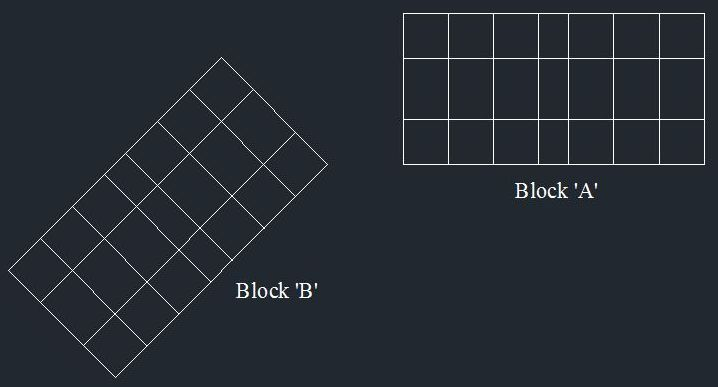

4 Explain the steps how we can achieve it with the help of move tool and cover the Move Origin, Move Joint and Move Member tools with the following options. o Input methods (Nodes and axis values) o Retain Connection Rotate 3-3 Explain the project which has one more block with project # 3-1. Explain the difficulties to get the coordinate values to create the Block B. Explain the rotate command. Explain the steps to complete the project. Assigning a wind load which is not parallel to the building sides. Mirror 3-4 Add one more block to the previous project as like as the image 3-4. STAAD.Pro Trainer s Manual Page 4
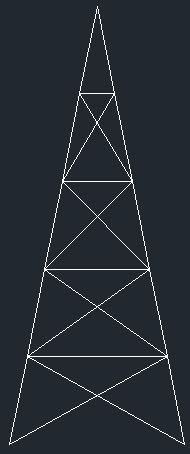
5 Explain mirror command with the following options. o Mirror plane o Plane position Mirror plane, Member orientation (beta angle) Insert Node 3-5 Draw the side view of a transmission tower as shown in the image and assign the necessary dimensions. Ask the students to get the coordinates of each and every joint. Explain the Insert Node tool and justify how it helps to reduce the time taken to complete this project. Cover the following options. o Add new point o Add mid-point o Add 'n' points. Create the two inclined members and divide by means of Insert Node. STAAD.Pro Trainer s Manual Page 5

6 Number of nodes Vs number of segments Add Beam Explain the tool 'Add Beam from Point to Point'. Use the tool to draw the brace members of the transmission tower. Explain Add beam Between Mid-points, Add beam By perpendicular intersection and Curved Beam. In the project # 3-2 replace the straight beams into curved beams. Gamma angle with right hand rule. Create a suitable structure for the given plan (the trainer should give a plan) Create a 3D transmission tower Session 4 Connect Beams Along 4-1 Explain a project where we want to connect two adjacent structures. Explain the tool. Create a roof truss for a building and connect it to the structure. Multiple Structures in STAAD.Pro older versions and STAAD.Pro V8i. STAAD.Pro Trainer s Manual Page 6



7 Stretch Selected Members 4-2 Explain the situation where we required cantilever beams (eg: balconies). Explain how to create the cantilever beams by using Through a distance option. Explain the remaining option and how we can get the same result as like as Connect Beams Along. Intersect Selected Members 4-3 Explain a structure where two members are intersected (eg: Bridge structure as like as above image, Braces in steel transmission tower, etc) Explain the steps for how to highlight and intersect. STAAD.Pro Trainer s Manual Page 7
8 Intro to Steel connection design. Merge Selected Members 4-4 Explain the above project where it has a meeting hall in the top floor. Ask the students to give the steps to create the structure. o Translational repeat o Delete the unwanted columns Explain why we need to merge the beams. Explain the steps to merge the beams. Renumber Explain Renumber Nodes and Renumber Members with the following option. o Sort Criteria Need of renumbering in report setup. Split Beam and Break Beams at Selected Nodes Explain why we need these tools by using image 4 3. Compare these commands with Insert Node. STAAD.Pro Trainer s Manual Page 8
9 Run Structure Wizard Create a space from Run Structure Wizard and compare the time taken with translational repeat. Create a complicated structure which has frame structure and roof truss by using Run Structure Wizard. Create Stadium roof and a simple tower. Advantage of having library models. Create the given structure. Session 5 Support Specification Define all the support types. Explain the steps to create the support types in STAAD.Pro. Explain all the 4 options used to assign the support to the nodes. 6 degrees of freedom. Need of inclined support. Member Property Specification Zd Zd Yd Yd Yb Yd Yd Zd Zb Zb Introduction to prismatic property. Explain the parameters of standard cross sections for column and beam. Explain the steps to create the same with prismatic properties. Explain the parameters required to create a taper I section. Give an intro for the steel table. Explain the steps to assign the member property to the members. STAAD.Pro Trainer s Manual Page 9
10 In normal conditions, for a beam Yd > Zd. Why? Define: Area of cross section, Shear area, Torsional constant, Moment of inertia. Member Offset How can we find the start / end point of a member? Explain the directions to offset. Explain the tool with a plane frame. Give the guidelines and motivate the students to do it for a space frame. Effective span length. Effect of Member Offset in analysis and design. Examples / Application: Bridge structure. Material Specification Intro to material table. Default values of material constants in STAAD.Pro. The steps to create a new material. Explain the steps to assign the material to the members. Explain Set New Member Attributes tool. Define: Young s modulus, Poisson s ratio, Density, Shear Modulus and Co-efficient of thermal expansion. Relationship between Young s modulus, Poisson s ratio and Shear modulus. Examples / Application: A structure with multiple materials. Group Specification Define: Group Explain the steps to create a group. Explain the methods to associate the selected members to the group. STAAD.Pro Trainer s Manual Page 10
11 By using the group assign supports and material properties. Usage of groups in member selection for support, member specification, loads and report setup. Examples / Application: Create a structure and assign groups for Columns, Beams and Braces. Loading - Selfweight Explain the manual calculation steps to find the self-weight of the given beam. Define: Primary load in STAAD.Pro. Explain the need of assigning proper load types for the primary load. Explain the steps in STAAD.Pro to calculate the same. Explain the reason why we need to change the density value of the concrete. Compare the result with manual calculation. Define Dead Load, Live Load, Wind Load, Seismic Load and Load Combinations as per IS Codes. Loads to be added in dead and live loads. Find the self-weight of the project created in the previous sessions. Session 6 Nodal Load Explain the situations where can we use the nodal / joint loads. Difference between force and moment loads. Explain the steps to add and assign the nodal loads in STAAD.Pro. Loads on a roof truss. Loads on a transmission tower. Intro to the equivalent wind load on joints. Define: Support displacement. Member Load STAAD.Pro Trainer s Manual Page 11
12 Difference between Nodal and Member Loads. Explain the situations to use the various member loads. Difference between the various directions (X, GX and PX). Explain d1, d2 and d3. Eccentric loads. How to calculate / get the load values? Area Load Define: One way slab How to calculate the pressure load? Directions: usage of Z. Add an area load and compare the results with the manual calculation. One-way slab load distribution on beams. Unit weight of slab. Floor Load Define: Two way slab. Explain the Range in X, Y and Z directions and Group. Assign the loads on a structure and compare the results with the manual calculation. Explain one way distribution and compare the results with Area load. Assign a floor load for a structure which has open to sky in middle. Two way slab load distribution. o Two way slab in square shape. o Two way slab in rectangular shape. Assignments: Assign the Dead load and Live load for a residential building. Session 7 Wind Load Calculate the wind intensity as per the zone. STAAD.Pro Trainer s Manual Page 12
13 How to generate the wind load? How to assign the wind load to the structure? o Directions and factor o Range Assign it to the structure and explain the results. Explain the exposure factor. Assign it to the selected joints and show the result. Explain how we can assign a wind load for a transmission tower (open structure). Assign the wind load which is not parallel to the sides of the structure. Assign the wind load to a structure which is in circular shape in plan view. How to calculate the wind intensity as per IS 875 Part III. Equivalent nodal loads for the wind load. Explain: Suction load Load Combination Explain the difference between Normal, ABS and SRSS. Explain the steps to create the load combinations in STAAD.Pro V8i. Various load combinations as per IS 456. Automatic Load Combination & Edit Auto Load Rules Load combination Vs Automatic load combination. Explain the need of customised load combinations. How to create a new automatic code. Use the same to create the load combination. Moving Load Intro to bridge design and vehicle load on the bridge. How to define the vehicle load. How to generate a moving load on a bridge structure. o One vehicle o Multiple vehicle at the same time o Two way traffic How to generate moving load on a curved structure. o As a curve in elevation view STAAD.Pro Trainer s Manual Page 13
14 Vehicle loads as per IRC 6. Examples / Application: Loads on a bridge. Loads on a flyover. Reference Load Create reference loads for dead load, live load and wind load. Create primary loads to represent the combination loads. Primary load Vs Reference load Repeat Load Load combination Vs Repeat load How to add the repeat load Assign the dead load, live load, wind load and load combinations for a commercial building as per the IS codes. Create a duplicate of the project and replace the primary loads with the reference loads. Session 8 Analysis How to add the analysis command. Analysis sub-menu (print). Explain the output file. Explain Pre and Post Analysis tools. Explain the Post Processing mode. Intro to analysis and analysis types. Inactive / Delete Specification STAAD.Pro Trainer s Manual Page 14
15 Explain the situation where we need the tools. Command sequences to use the commands. Limitations and factors of those tools. Difference between Inactive and Delete. General Guidelines for Design Explain the Dead, Live and Wind loads. Explain the load commands to be included in dead and live loads. Explain the procedure to calculate the load value for the same as per IS codes. Column and Beam Design Intro to various parameters involved in column and beam design. How to assign the country code and parameters to the members. Design a single beam. o Compare the output with the manual calculation. Explain the procedure to design the entire structure. o How to assign different properties for columns and beams. o Design the columns. o Design the beams. Design procedures in STAAD.Pro. o Column o Beam Design for flexure Design for shear Model (manual) calculation to design a beam Design a commercial building. Session 9 RC Designer Intro o Need of RC Designer o GUI of RC Designer STAAD.Pro Trainer s Manual Page 15
16 Procedure to design o Beam o Column Beam Vs Physical beam Session 10 Seismology How to calculate base shear as per IS 1893:2002 (manual calculation) Seismic design procedure in STAAD.Pro o Compare the result with manual calculation Intro to Seismology o Plate tectonics theory o Earthquake fault types o Seismic Waves o Terminologies o Indian Standards o General principles for design Response Spectrum Analysis Design procedure in STAAD.Pro Intro to dynamic analysis Static analysis Vs Dynamic analysis Design a school building structure against seismic loads. Session 11 Cylindrical and Reverse Cylindrical Coordinate System Explain cylindrical and reverse cylindrical coordinate systems with suitable example o Cylindrical coordinate system STAAD.Pro Trainer s Manual Page 16
17 Pipe line o Reverse cylindrical coordinate system Water tank Spirals Explain the Jtorig tool FEM Modelling How to create a slab in STAAD.Pro o By using Snap plate / Infill plates / Add plate and plate mesh o By using Surface mesh o By using Parametric modelling How to add slab to wall connection How to create a staircase o Straight flight o U shape o Spiral Into to FEM / FEA Parametric Modelling Session 12 Member Truss Need of Member truss command Effect in result o After the analysis show the difference in the result file (beam vs truss member) Define Brace Members Examples / Application: Elevated water tank Transmission towers Run Structure Wizard Explain the ex:18 of the Structural workbook (printed on December 2010) Explain how can we get the dimensions of the model STAAD.Pro Trainer s Manual Page 17
18 Explain the steps to create the model from Structure Wizard Plate Thickness Explain the steps to assign the plate thickness Plate Load Create the suitable model and explain the steps to assign the o Full pressure load o Partial pressure load o Concentrated load o Trapezoidal load o Hydrostatic load o Element joint Load Session 13 Water Tank Design How to create a water tank o Square / rectangular base o Circular base How to assign the suitable loads on a water tank Design procedure How to calculate the water tank dimensions How to calculate the load values acting on the water tank One Way Slab Design Loads to be assigned for the design Steps to be followed for the design Design procedure assume as a beam Two Way Slab Design Loads to be assigned for the design STAAD.Pro Trainer s Manual Page 18
19 Steps to be followed for the design Difference in loading to design a building when it has both members and elements. Design a water tank for your town. Complete the column, Beam and Slab designs for a residential building. Session 14 Staircase Design Loads to be assigned for the design Design procedure Types of staircases Support types Shear wall Design How to create a surface by using Add Surface tool How to assign the surface properties (thickness and material) How to assign the loads Design procedure Intro to Shear wall Solid Modelling and Analysis How to create the model Various loads to be assigned for the solid modelling Explain the analysis results Need of Solid modelling in STAAD.Pro Design a commercial building with shear wall. STAAD.Pro Trainer s Manual Page 19
20 Session 15 STAAD.Beava Intro to STAAD.Beava. Procedure to create the model and analysis. Types of Bridges. Intro to Bridge deck design. Intro to IRC 6. Standard vehicle loads as per the code. Create vehicle loads as per IRC 6 on a bridge structure by using STAAD.Beava Session 16 Member Cable Specification Explain the terms initial tension and un-stretched length Explain the steps to convert a beam member into a cable member Beam Vs Cable member Tension / Compression Specification Explain the steps to assign it to the member. Need of specifying Tension / Compression properties. Table Member Property Explain the type specifications for various cross sections. Intro to Indian standard steel cross sections. STAAD.Pro Trainer s Manual Page 20
21 Steel Design Explain the design parameters as per STAAD.Pro. Explain the design procedure with the following o Check code o Select and Select optimized o Takeoff Intro to steel design as per IS 800:2007. Design a steel frame structure as per IS 800:2007. Session 17 Interactive Steel Design Explain the steel design procedure. Design of Overhead Transmission Line Tower How to create the model. Intro for the loads to be assigned for the design. Explain the analysis results. Design Procedure. Intro to IS 802 Pushover Analysis Explain the various inputs to be given for the pushover analysis Design procedure Intro to non-linear analysis Intro to FEMA Design a steel frame structure against seismic loads (by using Pushover analysis). STAAD.Pro Trainer s Manual Page 21
22 Session 18 Isolated Foundation How to design a single isolated foundation o Compare the design output with the manual design How to import the model from STAAD.Pro and do the design Intro to the foundation types Model manual calculation for an isolated footing design Combined / Strip Foundation Explain the procedure to design a combined / strip foundation in STAAD.Pro Tool Kit Intro to tool kit Design procedure to design an isolated foundation and a combined foundation Design the foundation for a building which has both the isolated and combined foundations. Session 19 Mat Foundation Explain the design procedure to design the mat foundation. Intro to mat foundation. Explain the advantages of mat foundation when compared to other types of shallow foundations. Pile Cap Design Design procedure to design the pile cap. STAAD.Pro Trainer s Manual Page 22
23 Intro to pile and pile cap design. Design the mat foundation for a building structure. Session 20 Import CAD Models Explain Y up and Z up in STAAD.Pro Explain the steps to import a DXF file Report Setup How to generate the report as per the need Importance of Report generation Plotting How to make print out from STAAD.Pro How to export the model to AutoCAD / MS-word to take printouts. Project: Help the students to do a final project. STAAD.Pro Trainer s Manual Page 23
DESIGN OF SLABS. 3) Based on support or boundary condition: Simply supported, Cantilever slab,
 DESIGN OF SLABS Dr. G. P. Chandradhara Professor of Civil Engineering S. J. College of Engineering Mysore 1. GENERAL A slab is a flat two dimensional planar structural element having thickness small compared
SAP2000 Getting Started Tutorial
 SAP2000 Getting Started Tutorial Learn how to define materials, sections, grids, and supports with basic modeling concepts for creating and modifying a concrete bent structure model using a nonprismatic
Tutorial for Assignment #2 Gantry Crane Analysis By ANSYS (Mechanical APDL) V.13.0
 Tutorial for Assignment #2 Gantry Crane Analysis By ANSYS (Mechanical APDL) V.13.0 1 Problem Description Design a gantry crane meeting the geometry presented in Figure 1 on page #325 of the course textbook
TABLE OF CONTENTS. INTRODUCTION... 5 Advance Concrete... 5 Where to find information?... 6 INSTALLATION... 7 STARTING ADVANCE CONCRETE...
 Starting Guide TABLE OF CONTENTS INTRODUCTION... 5 Advance Concrete... 5 Where to find information?... 6 INSTALLATION... 7 STARTING ADVANCE CONCRETE... 7 ADVANCE CONCRETE USER INTERFACE... 7 Other important
INTRODUCTION TO BEAMS
 CHAPTER Structural Steel Design LRFD Method INTRODUCTION TO BEAMS Third Edition A. J. Clark School of Engineering Department of Civil and Environmental Engineering Part II Structural Steel Design and Analysis
Module 5 (Lectures 17 to 19) MAT FOUNDATIONS
 Module 5 (Lectures 17 to 19) MAT FOUNDATIONS Topics 17.1 INTRODUCTION Rectangular Combined Footing: Trapezoidal Combined Footings: Cantilever Footing: Mat foundation: 17.2 COMMON TYPES OF MAT FOUNDATIONS
RFEM 5. Spatial Models Calculated acc. to Finite Element Method. of DLUBAL SOFTWARE GMBH. Dlubal Software GmbH Am Zellweg 2 D-93464 Tiefenbach
 Version July 2013 Program RFEM 5 Spatial Models Calculated acc. to Finite Element Method Tutorial All rights, including those of translations, are reserved. No portion of this book may be reproduced mechanically,
Miss S. S. Nibhorkar 1 1 M. E (Structure) Scholar,
 Volume, Special Issue, ICSTSD Behaviour of Steel Bracing as a Global Retrofitting Technique Miss S. S. Nibhorkar M. E (Structure) Scholar, Civil Engineering Department, G. H. Raisoni College of Engineering
Linear Static Analysis of a Cantilever Beam Using Beam Library (SI Units)
 APPENDIX A Linear Static Analysis of a Cantilever Beam Using Beam Library (SI Units) Objectives: Create a geometric representation of a cantilever beam. Use the geometry model to define an MSC.Nastran
EFFECTS ON NUMBER OF CABLES FOR MODAL ANALYSIS OF CABLE-STAYED BRIDGES
 EFFECTS ON NUMBER OF CABLES FOR MODAL ANALYSIS OF CABLE-STAYED BRIDGES Yang-Cheng Wang Associate Professor & Chairman Department of Civil Engineering Chinese Military Academy Feng-Shan 83000,Taiwan Republic
Loads Tools Checks Reports
 Loads Tools Checks Reports SDC Verifier or the Structural Design Code Verifier is a powerful postprocessor program with an advanced calculation core which works seamlessly with Siemens multi-solver, FEA
4B-2. 2. The stiffness of the floor and roof diaphragms. 3. The relative flexural and shear stiffness of the shear walls and of connections.
 Shear Walls Buildings that use shear walls as the lateral force-resisting system can be designed to provide a safe, serviceable, and economical solution for wind and earthquake resistance. Shear walls
9.3 Two-way Slabs (Part I)
 9.3 Two-way Slabs (Part I) This section covers the following topics. Introduction Analysis and Design Features in Modeling and Analysis Distribution of Moments to Strips 9.3.1 Introduction The slabs are
ETABS. Integrated Building Design Software. Concrete Shear Wall Design Manual. Computers and Structures, Inc. Berkeley, California, USA
 ETABS Integrated Building Design Software Concrete Shear Wall Design Manual Computers and Structures, Inc. Berkeley, California, USA Version 8 January 2002 Copyright The computer program ETABS and all
Table of contents. What is new in Advance Steel 2011
 Table of contents WELCOME TO ADVANCE STEEL 2011, PART OF THE GRAITEC BIM SOLUTION... 5 NEW COMMON INSTALLATION PROCESS... 6 GRAITEC ADVANCE MANAGER... 7 Easy to use GUI to customize settings...7 Settings...8
Optimum proportions for the design of suspension bridge
 Journal of Civil Engineering (IEB), 34 (1) (26) 1-14 Optimum proportions for the design of suspension bridge Tanvir Manzur and Alamgir Habib Department of Civil Engineering Bangladesh University of Engineering
National Council of Examiners for Engineering and Surveying. Principles and Practice of Engineering Structural Examination
 Structural Effective Beginning with the April 2011 The structural engineering exam is a breadth and exam examination offered in two components on successive days. The 8-hour Vertical Forces (Gravity/Other)
AASHTOWare Bridge Design and Rating Training. STL8 Single Span Steel 3D Example (BrDR 6.6)
 AASHTOWare Bridge Design and Rating Training STL8 Single Span Steel 3D Example (BrDR 6.6) Last Modified: 4/28/2015 STL8-1 AASHTOWare BrDR 6.5 AASHTOWare Bridge Design and Rating Training STL8 Single Span
Bridging Your Innovations to Realities
 Graphic User Interface Graphic User Interface Modeling Features Bridge Applications Segmental Bridges Cable Bridges Analysis Features Result Evaluation Design Features 02 07 13 17 28 34 43 48 2 User Interface
SAFE. Key Features and Terminology DESIGN OF SLABS, BEAMS AND FOUNDATIONIS REINFORCED AND POST-TENSIONED CONCRETE
 SAFE DESIGN OF SLABS, BEAMS AND FOUNDATIONIS REINFORCED AND POST-TENSIONED CONCRETE Key Features and Terminology ISO SAF012209M1 Berkeley, California, USA Version 12.1.0 January 2009 Copyright Copyright
Introduction to Beam. Area Moments of Inertia, Deflection, and Volumes of Beams
 Introduction to Beam Theory Area Moments of Inertia, Deflection, and Volumes of Beams Horizontal structural member used to support horizontal loads such as floors, roofs, and decks. Types of beam loads
Draft Table of Contents. Building Code Requirements for Structural Concrete and Commentary ACI 318-14
 Draft Table of Contents Building Code Requirements for Structural Concrete and Commentary ACI 318-14 BUILDING CODE REQUIREMENTS FOR STRUCTURAL CONCRETE (ACI 318 14) Chapter 1 General 1.1 Scope of ACI 318
Roof Tutorial. Chapter 3:
 Chapter 3: Roof Tutorial The majority of Roof Tutorial describes some common roof styles that can be created using settings in the Wall Specification dialog and can be completed independent of the other
ETABS. Integrated Building Design Software. Composite Floor Frame Design Manual. Computers and Structures, Inc. Berkeley, California, USA
 ETABS Integrated Building Design Software Composite Floor Frame Design Manual Computers and Structures, Inc. Berkeley, California, USA Version 8 January 2002 Copyright The computer program ETABS and all
Technical Notes 3B - Brick Masonry Section Properties May 1993
 Technical Notes 3B - Brick Masonry Section Properties May 1993 Abstract: This Technical Notes is a design aid for the Building Code Requirements for Masonry Structures (ACI 530/ASCE 5/TMS 402-92) and Specifications
How To Write An Analysis System For Bridge Test
 Study of Analysis System for Bridge Test Chen Ke, Lu Jian-Ming, Research Institute of Highway, 100088, Beijing, China ([email protected], [email protected]) Summary Analysis System for Bridge Test (Chinese
Weight Measurement Technology
 Kistler-Morse (KM) introduced bolt-on weight measuring systems three decades ago. These devices featured Walter Kistler s invention, the Microcell. Over the years, many improvements were made to the Microcell
Detailing of Reinforcment in Concrete Structures
 Chapter 8 Detailing of Reinforcment in Concrete Structures 8.1 Scope Provisions of Sec. 8.1 and 8.2 of Chapter 8 shall apply for detailing of reinforcement in reinforced concrete members, in general. For
Concrete Frame Design Manual
 Concrete Frame Design Manual Turkish TS 500-2000 with Turkish Seismic Code 2007 For SAP2000 ISO SAP093011M26 Rev. 0 Version 15 Berkeley, California, USA October 2011 COPYRIGHT Copyright Computers and Structures,
Introduction. Background
 Introduction Welcome to CFS, the comprehensive cold-formed steel component design software. The endless variety of shapes and sizes of cold-formed steel members, combined with the complex failure modes
A Case Study Comparing Two Approaches for Applying Area Loads: Tributary Area Loads vs Shell Pressure Loads
 1 A Case Study Comparing Two Approaches for Applying Area Loads: Tributary Area Loads vs Shell Pressure Loads By Dr. Siriwut Sasibut (Application Engineer) S-FRAME Software Inc. #1158 13351 Commerce Parkway
Finite Element Method (ENGC 6321) Syllabus. Second Semester 2013-2014
 Finite Element Method Finite Element Method (ENGC 6321) Syllabus Second Semester 2013-2014 Objectives Understand the basic theory of the FEM Know the behaviour and usage of each type of elements covered
Introduction to Solid Modeling Using SolidWorks 2012 SolidWorks Simulation Tutorial Page 1
 Introduction to Solid Modeling Using SolidWorks 2012 SolidWorks Simulation Tutorial Page 1 In this tutorial, we will use the SolidWorks Simulation finite element analysis (FEA) program to analyze the response
Autodesk Revit LEARNING PATH BUILDING DESIGN SUITE
 Autodesk Revit LEARNING PATH FUNDAMENTALS Duration: 3 days Cost: R5 500 (excl VAT) Revit MEP Duration: 3 days Cost: R5 500 (excl VAT) Revit Structure Duration: 3 days Cost: R5 500 (excl VAT) REVIT ADVANCED
Bridge Builder. BRIDGE BUILDER (Windows version) A Program for Exploring Structural Engineering. Build and Test Bridge Designs on Your Computer
 Bridge Builder A Program for Exploring Structural Engineering Build and Test Bridge Designs on Your Computer Pre-Engineering Software Corporation presents BRIDGE BUILDER (Windows version) A Program For
This manual was produced using ComponentOne Doc-To-Help.
 This manual was produced using ComponentOne Doc-To-Help. Contents MDX Documentation 2 Starting the Program... 2 List of Features... 3 New Features... 4 Fixed Problems... 4 Frequently Asked Questions...
SEISMIC DESIGN. Various building codes consider the following categories for the analysis and design for earthquake loading:
 SEISMIC DESIGN Various building codes consider the following categories for the analysis and design for earthquake loading: 1. Seismic Performance Category (SPC), varies from A to E, depending on how the
SLAB DESIGN. Introduction ACI318 Code provides two design procedures for slab systems:
 Reading Assignment SLAB DESIGN Chapter 9 of Text and, Chapter 13 of ACI318-02 Introduction ACI318 Code provides two design procedures for slab systems: 13.6.1 Direct Design Method (DDM) For slab systems
An introduction to 3D draughting & solid modelling using AutoCAD
 An introduction to 3D draughting & solid modelling using AutoCAD Faculty of Technology University of Plymouth Drake Circus Plymouth PL4 8AA These notes are to be used in conjunction with the AutoCAD software
SEISMIC ANALYSIS AND RETROFITTING OF R.C.C STRUCTURE
 International Journal of Advanced Research in Biology Engineering Science and Technology (IJARBEST) Vol., Issue, April 1 SEISMIC ANALYSIS AND RETROFITTING OF R.C.C STRUCTURE M.R.NAVANEETHA KRISHNAN 1,
Tutorial: 3D Pipe Junction Using Hexa Meshing
 Tutorial: 3D Pipe Junction Using Hexa Meshing Introduction In this tutorial, you will generate a mesh for a three-dimensional pipe junction. After checking the quality of the first mesh, you will create
bi directional loading). Prototype ten story
 NEESR SG: Behavior, Analysis and Design of Complex Wall Systems The laboratory testing presented here was conducted as part of a larger effort that employed laboratory testing and numerical simulation
IES <Virtual Environment> Tutorial. ModelIT (Version 6.0)
 IES Tutorial ModelIT (Version 6.0) 1 Introduction: ModelIT Tutorial This document shows you how to use ModelIT, IES s 3D building geometry modelling tool. The tutorial is intended
Deflections. Question: What are Structural Deflections?
 Question: What are Structural Deflections? Answer: The deformations or movements of a structure and its components, such as beams and trusses, from their original positions. It is as important for the
ETABS. Integrated Building Design Software. Concrete Frame Design Manual. Computers and Structures, Inc. Berkeley, California, USA
 ETABS Integrated Building Design Software Concrete Frame Design Manual Computers and Structures, Inc. Berkeley, California, USA Version 8 January 2002 Copyright The computer program ETABS and all associated
511 - Creating Structural Frame Designs
 4 th Generation VLC courtesy of Edison2 511 - Creating Structural Frame Designs Rahul Kulkarni, Manager, Product Design, Pune Center, Siemens PLM Software #SEU13 Agenda: 511 - Creating Structural Frame
CATIA Wireframe & Surfaces TABLE OF CONTENTS
 TABLE OF CONTENTS Introduction... 1 Wireframe & Surfaces... 2 Pull Down Menus... 3 Edit... 3 Insert... 4 Tools... 6 Generative Shape Design Workbench... 7 Bottom Toolbar... 9 Tools... 9 Analysis... 10
Fastrak Structural steelwork analysis and design
 CSC QUICK START GUIDE BUILDING DESIGNER Fastrak Structural steelwork analysis and design.cscworld.com/fastrak Disclaimer CSC (UK) Ltd does not accept any liability whatsoever for loss or damage arising
DESIGN OF SLABS. Department of Structures and Materials Engineering Faculty of Civil and Environmental Engineering University Tun Hussein Onn Malaysia
 DESIGN OF SLABS Department of Structures and Materials Engineering Faculty of Civil and Environmental Engineering University Tun Hussein Onn Malaysia Introduction Types of Slab Slabs are plate elements
SpaceClaim Introduction Training Session. A SpaceClaim Support Document
 SpaceClaim Introduction Training Session A SpaceClaim Support Document In this class we will walk through the basic tools used to create and modify models in SpaceClaim. Introduction We will focus on:
Tower Cross Arm Numerical Analysis
 Chapter 7 Tower Cross Arm Numerical Analysis In this section the structural analysis of the test tower cross arm is done in Prokon and compared to a full finite element analysis using Ansys. This is done
Type of Force 1 Axial (tension / compression) Shear. 3 Bending 4 Torsion 5 Images 6 Symbol (+ -)
 Cause: external force P Force vs. Stress Effect: internal stress f 05 Force vs. Stress Copyright G G Schierle, 2001-05 press Esc to end, for next, for previous slide 1 Type of Force 1 Axial (tension /
SPECIFICATIONS, LOADS, AND METHODS OF DESIGN
 CHAPTER Structural Steel Design LRFD Method Third Edition SPECIFICATIONS, LOADS, AND METHODS OF DESIGN A. J. Clark School of Engineering Department of Civil and Environmental Engineering Part II Structural
ARCHITECTURE. Asst. Prof. Meltem VATAN KAPTAN [email protected]
 STRUCTURES IN ARCHITECTURE Asst. Prof. Meltem VATAN KAPTAN [email protected] Istanbul Aydin University, Faculty of Engineering and Architecture ISTANBUL, TURKEY December 15, 2011 - GAZIANTEP If
Chapter 6 ROOF-CEILING SYSTEMS
 Chapter 6 ROOF-CEILING SYSTEMS Woodframe roof-ceiling systems are the focus of this chapter. Cold-formed steel framing for a roof-ceiling system also is permitted by the IRC but will not be discussed;
Safe & Sound Bridge Terminology
 Safe & Sound Bridge Terminology Abutment A retaining wall supporting the ends of a bridge, and, in general, retaining or supporting the approach embankment. Approach The part of the bridge that carries
Challenging Skew: Higgins Road Steel I-Girder Bridge over I-90 OTEC 2015 - October 27, 2015 Session 26
 2014 HDR Architecture, 2014 2014 HDR, HDR, Inc., all all rights reserved. Challenging Skew: Higgins Road Steel I-Girder Bridge over I-90 OTEC 2015 - October 27, 2015 Session 26 Brandon Chavel, PhD, P.E.,
AutoCAD Structural Detailing 2011. Getting Started with AutoCAD Structural Detailing, Reinforcement module
 AutoCAD Structural Detailing 2011 Getting Started with AutoCAD Structural Detailing, Reinforcement module 2010 Autodesk, Inc. All Rights Reserved. Except as otherwise permitted by Autodesk, Inc., this
The Basics of FEA Procedure
 CHAPTER 2 The Basics of FEA Procedure 2.1 Introduction This chapter discusses the spring element, especially for the purpose of introducing various concepts involved in use of the FEA technique. A spring
SEISMIC RETROFITTING OF STRUCTURES
 SEISMIC RETROFITTING OF STRUCTURES RANJITH DISSANAYAKE DEPT. OF CIVIL ENGINEERING, FACULTY OF ENGINEERING, UNIVERSITY OF PERADENIYA, SRI LANKA ABSTRACT Many existing reinforced concrete structures in present
The elements used in commercial codes can be classified in two basic categories:
 CHAPTER 3 Truss Element 3.1 Introduction The single most important concept in understanding FEA, is the basic understanding of various finite elements that we employ in an analysis. Elements are used for
Raising the Roof Creating Roofs in Revit David Cohn
 David Cohn AB322-1 Roofs are one of the most complex architectural elements to model, but with Revit you can create just about any type of roof. This class will explore the best methods for creating various
Design Of Reinforced Concrete Structures ii Two-Way Slabs
 1. Inroduction When the ratio (L/S) is less than 2.0, slab is called two-way slab, as shown in the fig. below. Bending will take place in the two directions in a dish-like form. Accordingly, main reinforcement
Lap Fillet Weld Calculations and FEA Techniques
 Lap Fillet Weld Calculations and FEA Techniques By: MS.ME Ahmad A. Abbas Sr. Analysis Engineer [email protected] www.advancedcae.com Sunday, July 11, 2010 Advanced CAE All contents Copyright
Design of reinforced concrete columns. Type of columns. Failure of reinforced concrete columns. Short column. Long column
 Design of reinforced concrete columns Type of columns Failure of reinforced concrete columns Short column Column fails in concrete crushed and bursting. Outward pressure break horizontal ties and bend
What s New V 11. Preferences: Parameters: Layout/ Modifications: Reverse mouse scroll wheel zoom direction
 What s New V 11 Preferences: Reverse mouse scroll wheel zoom direction Assign mouse scroll wheel Middle Button as Fine tune Pricing Method (Manufacturing/Design) Display- Display Long Name Parameters:
Design of Steel Structures Prof. S.R.Satish Kumar and Prof. A.R.Santha Kumar. Fig. 7.21 some of the trusses that are used in steel bridges
 7.7 Truss bridges Fig. 7.21 some of the trusses that are used in steel bridges Truss Girders, lattice girders or open web girders are efficient and economical structural systems, since the members experience
Piston Ring. Problem:
 Problem: A cast-iron piston ring has a mean diameter of 81 mm, a radial height of h 6 mm, and a thickness b 4 mm. The ring is assembled using an expansion tool which separates the split ends a distance
Seismic Risk Prioritization of RC Public Buildings
 Seismic Risk Prioritization of RC Public Buildings In Turkey H. Sucuoğlu & A. Yakut Middle East Technical University, Ankara, Turkey J. Kubin & A. Özmen Prota Inc, Ankara, Turkey SUMMARY Over the past
FOUNDATION DESIGN. Instructional Materials Complementing FEMA 451, Design Examples
 FOUNDATION DESIGN Proportioning elements for: Transfer of seismic forces Strength and stiffness Shallow and deep foundations Elastic and plastic analysis Foundation Design 14-1 Load Path and Transfer to
Roof Tutorial. Chapter 3:
 Chapter 3: Roof Tutorial The first portion of this tutorial can be completed independent of the previous tutorials. We ll go over some common roof styles that can be created using settings in the Wall
The following is an overview of lessons included in the tutorial.
 Chapter 2 Tutorial Tutorial Introduction This tutorial is designed to introduce you to some of Surfer's basic features. After you have completed the tutorial, you should be able to begin creating your
MECHANICS OF SOLIDS - BEAMS TUTORIAL 1 STRESSES IN BEAMS DUE TO BENDING. On completion of this tutorial you should be able to do the following.
 MECHANICS OF SOLIDS - BEAMS TUTOIAL 1 STESSES IN BEAMS DUE TO BENDING This is the first tutorial on bending of beams designed for anyone wishing to study it at a fairly advanced level. You should judge
Structural Analysis. EUROCODE 2 Background and Applications
 Dissemination of information for training Brussels, 20-21 October 2011 1 Prof. Dr.-Ing. Manfred Curbach TU Dresden, Institute for Concrete Structures M.Sc. Martin Just TU Dresden, Institute for Concrete
REHABILITATION OF THE FIGUEIRA DA FOZ BRIDGE
 REHABILITATION OF THE FIGUEIRA DA FOZ BRIDGE A.Rito Proponte, Lda, Lisbon, Portugal J. Appleton A2P Consult, Lda, Lisbon, Portugal ABSTRACT: The Figueira da Foz Bridge includes a 405 m long cable stayed
HowTo Rhino & ICEM. 1) New file setup: choose Millimeter (automatically converts to Meters if imported to ICEM)
 HowTo Rhino & ICEM Simple 2D model 1) New file setup: choose Millimeter (automatically converts to Meters if imported to ICEM) 2) Set units: File Properties Units: Model units: should already be Millimeters
Getting Started with ANSYS ANSYS Workbench Environment
 Getting Started with ANSYS ANSYS Workbench Environment Overview The purpose of this tutorial is to get you started with the ANSYS Workbench environment. We will use a simple, static analysis of a single
Vibrations of a Free-Free Beam
 Vibrations of a Free-Free Beam he bending vibrations of a beam are described by the following equation: y EI x y t 4 2 + ρ A 4 2 (1) y x L E, I, ρ, A are respectively the Young Modulus, second moment of
Sisal Composite Ltd. Apparel 4 Ltd. JM Knit Ltd. Natun Para, Hemayetpur, Savar, Dhaka-1340 (23.789416N,90.266135E)
 Revision: issue 1 Date: 11 June 2014 Sisal Composite Ltd. Apparel 4 Ltd. JM Knit Ltd. Natun Para, Hemayetpur, Savar, Dhaka-1340 (23.789416N,90.266135E) 24 th May 2014 Structural Inspection Report Observations
(Seattle is home of Boeing Jets)
 Dr. Faeq M. Shaikh Seattle, Washington, USA (Seattle is home of Boeing Jets) 1 Pre Requisites for Today s Seminar Basic understanding of Finite Element Analysis Working Knowledge of Laminate Plate Theory
FOOTING DESIGN EXAMPLE
 County: Any Design: BRG Date: 10/007 Hwy: Any Ck Dsn: BRG Date: 10/007 FOOTING DESIGN EXAMPLE Design: Based on AASHTO LRFD 007 Specifications, TxDOT LRFD Bridge Design Manual, and TxDOT Project 0-4371
Shell Elements in ABAQUS/Explicit
 ABAQUS/Explicit: Advanced Topics Appendix 2 Shell Elements in ABAQUS/Explicit ABAQUS/Explicit: Advanced Topics A2.2 Overview ABAQUS/Explicit: Advanced Topics ABAQUS/Explicit: Advanced Topics A2.4 Triangular
PARAMETRIC MODELING. David Rosen. December 1997. By carefully laying-out datums and geometry, then constraining them with dimensions and constraints,
 1 of 5 11/18/2004 6:24 PM PARAMETRIC MODELING David Rosen December 1997 The term parametric modeling denotes the use of parameters to control the dimensions and shape of CAD models. Think of a rubber CAD
Determination of source parameters from seismic spectra
 Topic Determination of source parameters from seismic spectra Authors Michael Baumbach, and Peter Bormann (formerly GeoForschungsZentrum Potsdam, Telegrafenberg, D-14473 Potsdam, Germany); E-mail: [email protected]
Spon Press PRESTRESSED CONCRETE DESIGN EUROCODES. University of Glasgow. Department of Civil Engineering. Prabhakara Bhatt LONDON AND NEW YORK
 PRESTRESSED CONCRETE DESIGN TO EUROCODES Prabhakara Bhatt Department of Civil Engineering University of Glasgow Spon Press an imprint of Taytor & Francfe LONDON AND NEW YORK CONTENTS Preface xix Basic
Technical Assignment 2 TABLE OF CONTENTS
 2 TABLE OF CONTENTS Executive Summary...3 Introduction..5 Gravity Loads......6 Design Codes......7 Materials..8 Existing Structural System.. 10 Existing Floor System 15 Alternate Floor Framing Systems...17
Modeling Curved Surfaces
 Modeling Cylindrical and Curved Theory Views of Cylinders Contour Lines Extruded Surfaces Revolved Surfaces & Cutouts Profile Shape Axis of Revolution Swept Surfaces & Cutouts Profile Shape Path Curves
Specification for Structures to be Built in Disaster Areas
 Ministry of Public Works and Settlement Government of Republic of Turkey Specification for Structures to be Built in Disaster Areas PART III - EARTHQUAKE DISASTER PREVENTION (Chapter 5 through Chapter
Chapter 3 Pre-Installation, Foundations and Piers
 Chapter 3 Pre-Installation, Foundations and Piers 3-1 Pre-Installation Establishes the minimum requirements for the siting, design, materials, access, and installation of manufactured dwellings, accessory
This ReadMe file describes the changes in the release of Multiframe 17.00 V8i.
 Multiframe 17.00 V8i ReadMe 16 September 2013 This ReadMe file describes the changes in the release of Multiframe 17.00 V8i. System Requirements: 32-bit versions will run on Windows XP/Vista/7, and 64-bit
Chapter 2 Basis of design and materials
 Chapter 2 Basis of design and materials 2.1 Structural action It is necessary to start a design by deciding on the type and layout of structure to be used. Tentative sizes must be allocated to each structural
[TECHNICAL REPORT I:]
![[TECHNICAL REPORT I:]](/thumbs/26/8259375.jpg "[TECHNICAL REPORT I:]") [Helios Plaza] Houston, Texas Structural Option Adviser: Dr. Linda Hanagan [TECHNICAL REPORT I:] Structural Concepts & Existing Conditions Table of Contents Executive Summary... 2 Introduction... 3 Structural
[Helios Plaza] Houston, Texas Structural Option Adviser: Dr. Linda Hanagan [TECHNICAL REPORT I:] Structural Concepts & Existing Conditions Table of Contents Executive Summary... 2 Introduction... 3 Structural
Introductory Examples. InfoCAD Program System
 Introductory Examples InfoCAD Program System The description of program functions within this documentation should not be considered a warranty of product features. All warranty and liability claims arising
US 51 Ohio River Bridge Engineering and Environmental Study
 US 51 Ohio River Bridge Engineering and Environmental Study ITEM NOS. 1-100.00 & 1-1140.00 Prepared by: Michael Baker Jr., Inc. 9750 Ormsby Station Rd Louisville, KY 40223 August 16, 2013 Table of Contents
SECTION 5 ANALYSIS OF CONTINUOUS SPANS DEVELOPED BY THE PTI EDC-130 EDUCATION COMMITTEE LEAD AUTHOR: BRYAN ALLRED
 SECTION 5 ANALYSIS OF CONTINUOUS SPANS DEVELOPED BY THE PTI EDC-130 EDUCATION COMMITTEE LEAD AUTHOR: BRYAN ALLRED NOTE: MOMENT DIAGRAM CONVENTION In PT design, it is preferable to draw moment diagrams
Seismic performance evaluation of an existing school building in Turkey
 CHALLENGE JOURNAL OF STRUCTURAL MECHANICS 1 (4) (2015) 161 167 Seismic performance evaluation of an existing school building in Turkey Hüseyin Bilgin * Department of Civil Engineering, Epoka University,
Structural Integrity Analysis
 Structural Integrity Analysis 1. STRESS CONCENTRATION Igor Kokcharov 1.1 STRESSES AND CONCENTRATORS 1.1.1 Stress An applied external force F causes inner forces in the carrying structure. Inner forces