
Preliminary Draft May 19th Video Subsystem
|
|
|
- Jody Hunter
- 10 years ago
- Views:
Transcription
1 Video Subsystem
2 2 Preliminary Draft May 19th 1992

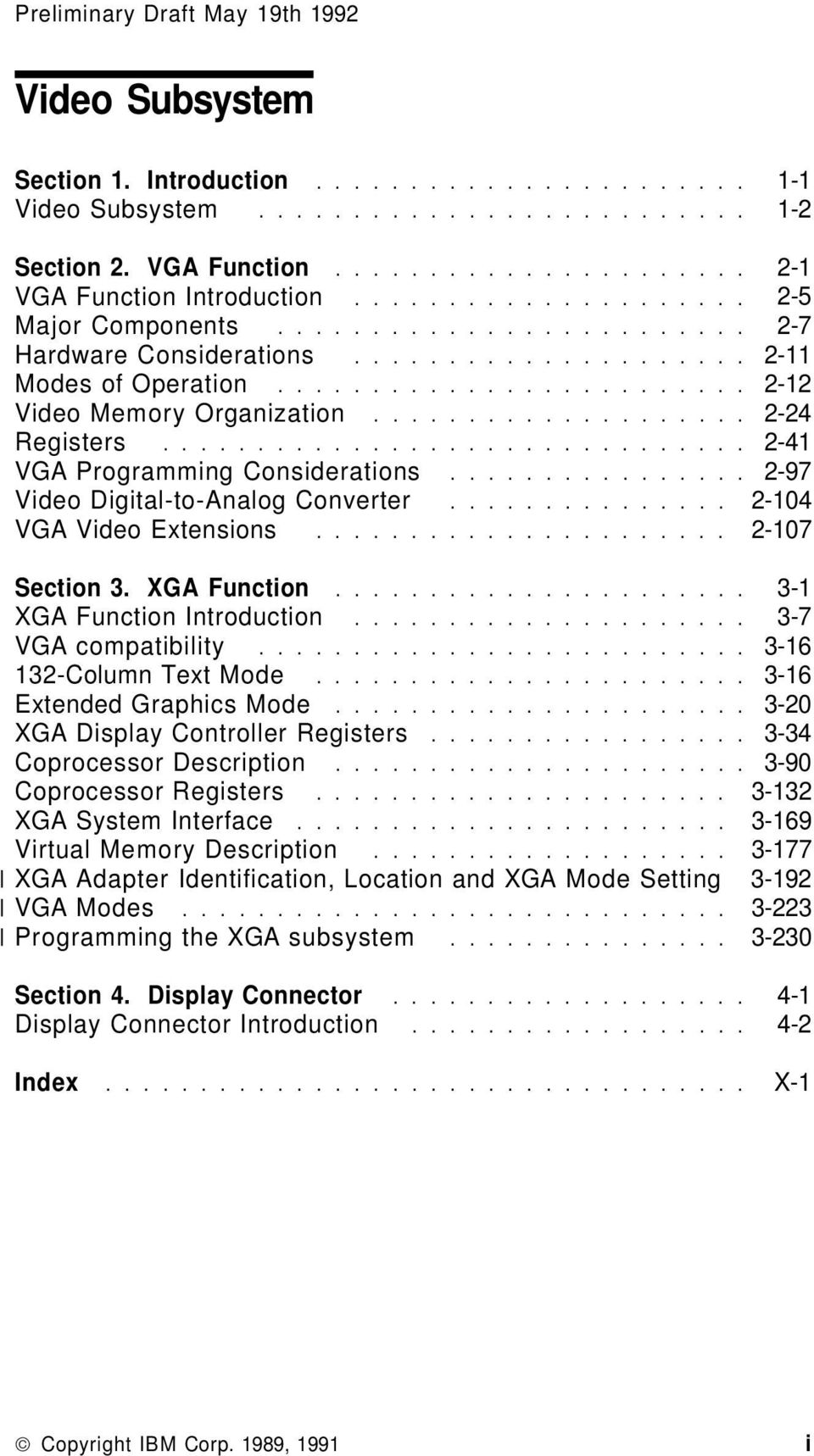
3 Video Subsystem Section 1. Introduction Video Subsystem Section 2. VGA Function VGA Function Introduction Major Components Hardware Considerations Modes of Operation Video Memory Organization Registers VGA Programming Considerations Video Digital-to-Analog Converter VGA Video Extensions Section 3. XGA Function XGA Function Introduction VGA compatibility Column Text Mode Extended Graphics Mode XGA Display Controller Registers Coprocessor Description Coprocessor Registers XGA System Interface Virtual Memory Description XGA Adapter Identification, Location and XGA Mode Setting VGA Modes Programming the XGA subsystem Section 4. Display Connector Display Connector Introduction Index X-1 Copyright IBM Corp. 1989, 1991 i
4 ii Video Subsystem May 7th 1992 Preliminary Draft May 19th 1992
5 Figures 2-1. Diagram of the VGA Function Graphics Controller Attribute Controller ! 2-4. BIOS Video Modes Double Scanning and Border Support Direct-Drive Analog Displays Character/Attribute Format Attribute Byte Definitions BIOS Color Set Video Memory Format PEL Format, Modes Hex 4 and Color Selections, Modes Hex 4 and PEL Format, Mode Hex Bit Definitions C2,C Compatible Color Coding KB Video Memory Map Data Flow for Write Operations Color Compare Operations Video Subsystem Register Overview General Registers Miscellaneous Output Register, Hex 03CC/03C Display Vertical Size Clock Select Definitions Input Status Register 0, Hex 03C Input Status Register 1, Hex 03DA/03BA Feature Control Register, Hex 03DA/03BA and 03CA Video Subsystem Enable Register, Hex 03C Sequencer Registers Sequencer Address Register Reset Register, Index Hex Clocking Mode Register, Index Hex Map Mask Register, Index Hex Character Map Select Register, Index Hex Character Map Select A Character Map Select B Memory Mode Register, Index Hex Map Selection, Chain CRT Controller Registers CRT Controller Address Register, Hex 03B4/03D Horizontal Total Register, Index Hex Copyright IBM Corp. 1989, 1991 iii

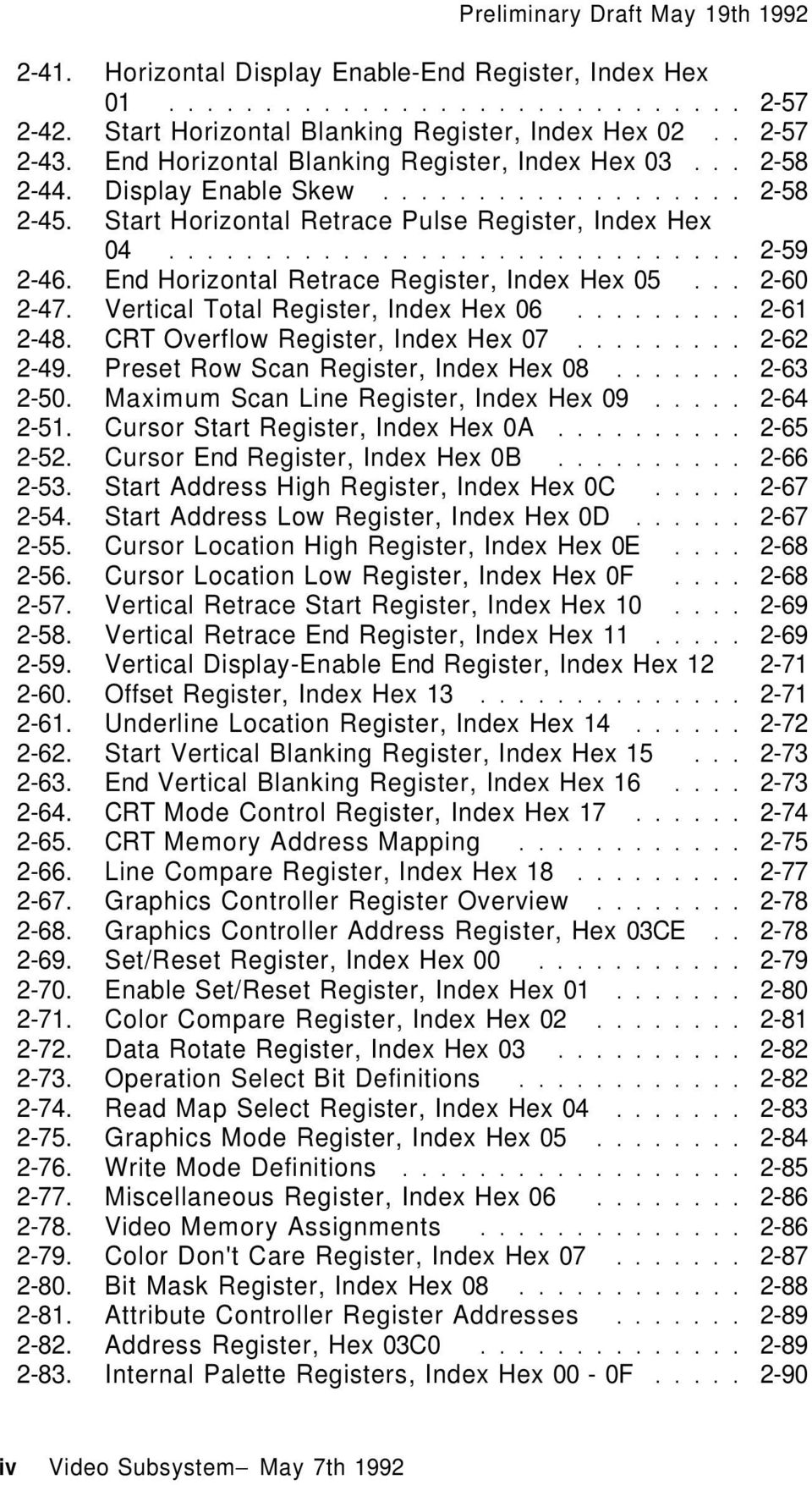
6 2-41. Horizontal Display Enable-End Register, Index Hex Start Horizontal Blanking Register, Index Hex End Horizontal Blanking Register, Index Hex Display Enable Skew Start Horizontal Retrace Pulse Register, Index Hex End Horizontal Retrace Register, Index Hex Vertical Total Register, Index Hex CRT Overflow Register, Index Hex Preset Row Scan Register, Index Hex Maximum Scan Line Register, Index Hex Cursor Start Register, Index Hex 0A Cursor End Register, Index Hex 0B Start Address High Register, Index Hex 0C Start Address Low Register, Index Hex 0D Cursor Location High Register, Index Hex 0E Cursor Location Low Register, Index Hex 0F Vertical Retrace Start Register, Index Hex Vertical Retrace End Register, Index Hex Vertical Display-Enable End Register, Index Hex Offset Register, Index Hex Underline Location Register, Index Hex Start Vertical Blanking Register, Index Hex End Vertical Blanking Register, Index Hex CRT Mode Control Register, Index Hex CRT Memory Address Mapping Line Compare Register, Index Hex Graphics Controller Register Overview Graphics Controller Address Register, Hex 03CE Set/Reset Register, Index Hex Enable Set/Reset Register, Index Hex Color Compare Register, Index Hex Data Rotate Register, Index Hex Operation Select Bit Definitions Read Map Select Register, Index Hex Graphics Mode Register, Index Hex Write Mode Definitions Miscellaneous Register, Index Hex Video Memory Assignments Color Don't Care Register, Index Hex Bit Mask Register, Index Hex Attribute Controller Register Addresses Address Register, Hex 03C Internal Palette Registers, Index Hex 00-0F iv Video Subsystem May 7th 1992
7 2-84. Attribute Mode Control Register, Index Hex Overscan Color Register, Index Hex Color Plane Enable Register, Index Hex Horizontal PEL Panning Register, Index Hex Image Shifting Color Select Register, Index Hex Character Table Structure Character Pattern Example Split Screen Definition Screen Mapping within the Display Buffer Address Space Video DAC Register Auxiliary Video Connector Interface Video Extension Video Extension Signal Timing (DAC Signals) XGA-NI Functional Enhancements XGA Video Subsystem MFI Alternate Attribute Select BIOS Call MFI Attribute Byte MFI Blink Rates Intel Order of the XGA Memory Map Motorola Order of the XGA Memory Map CRT Controller Register Definitions Display PEL Map Offset and Width Definitions Sprite Appearance Defined by 2-bit PEL Sprite Positioning Direct Color Mode Data Word XGA Direct Color Palette Load Display Controller Register Addresses Operating Mode Register, Address Hex 21x Display Mode Bit Assignments Aperture Control Register, Address Hex 21x ! Aperture Size and Location Bit Assignments Interrupt Enable Register, Address Hex 21x Interrupt Status Register, Address Hex 21x Aperture Index Register, Address Hex 21x Aperture Index Bit Assignments Memory Access Mode Register, Address Hex 21x PEL Size Bit Assignments Index Register, Address Hex 21xA XGA Index Register Assignments (Part I) XGA Index Register Assignments (Part II) Auto-Configuration Register, Index Hex System Interface Bus Size System Bus Type Video Subsystem May 7th 1992 v
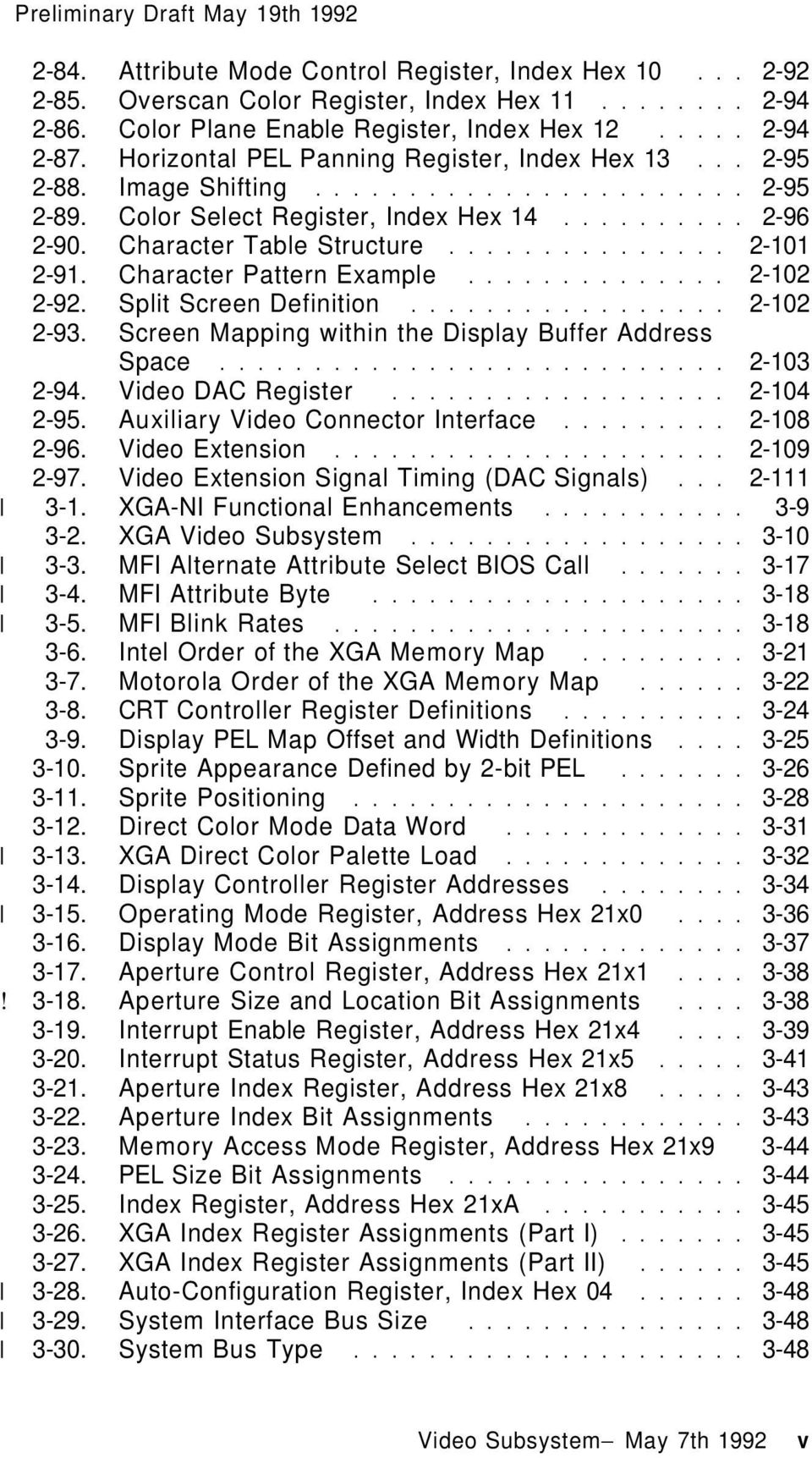
8 3-31. Horizontal Total Registers, Indexes Hex 10 and Horizontal Total Registers Value Assignments Horizontal Display End Registers, Indexes Hex 12 and Horizontal Display End Registers Value Assignments Horizontal Blanking Start Registers, Indexes Hex 14 and Horizontal Blanking Start Registers Value Assignments Horizontal Blanking End Registers, Indexes Hex 16 and Horizontal Blanking End Registers Value Assignments Horizontal Sync Pulse Start Registers, Indexes Hex 18 and Horizontal Sync Pulse Start Registers Value Assignments Horizontal Sync Pulse End Registers, Indexes Hex 1A and 1B Horizontal Sync Pulse End Registers Value Assignments Horizontal Sync Pulse Position Registers (Index 1C and 1E) Horizontal Sync Pulse Delay Bit Assignments Vertical Total Registers, Indexes Hex 20 and Vertical Total Registers Value Assignments Vertical Display End Registers, Indexes Hex 22 and Vertical Display End Registers Value Assignments Vertical Blanking Start Registers, Indexes Hex 24 and Vertical Blanking Start Registers Value Assignments Vertical Blanking End Registers, Indexes Hex 26 and Vertical Blanking End Registers Value Assignments Vertical Sync Pulse Start Registers, Indexes Hex 28 and Vertical Sync Pulse Start Registers Value Assignments Vertical Sync Pulse End Register, Index Hex 2A Vertical Line Compare Registers, Indexes Hex 2C and 2D Vertical Line Compare Registers Value Assignments Sprite Horizontal Start Registers, Indexes Hex 30 and vi Video Subsystem May 7th 1992
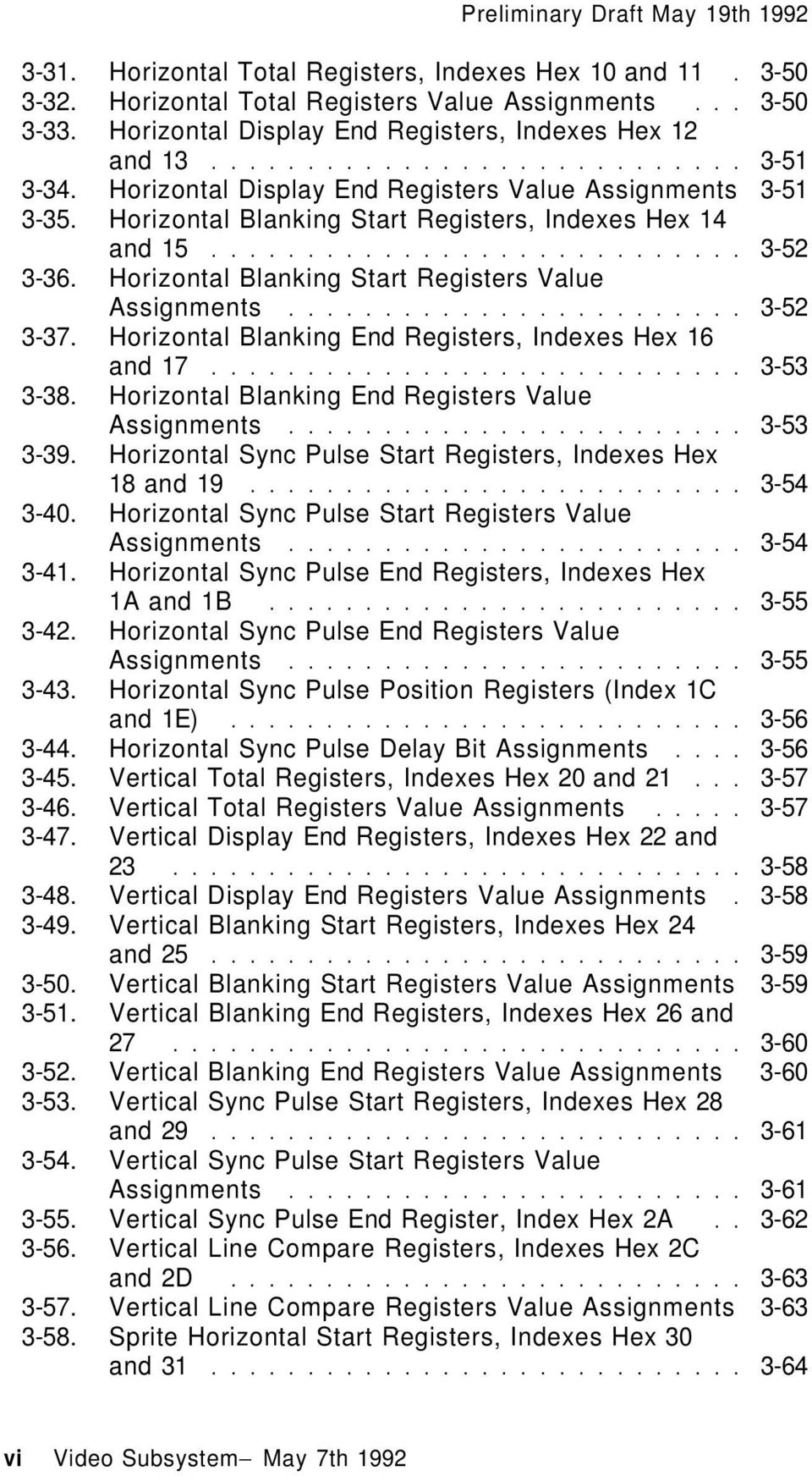
9 3-59. Sprite Horizontal Start Registers Value Assignments Sprite Horizontal Preset, Index Hex Sprite Horizontal Preset Value Assignments Sprite Vertical Start Registers, Indexes Hex 33 and Sprite Vertical Start Registers Value Assignments Sprite Vertical Preset, Index Hex Sprite Vertical Preset Value Assignments Sprite Control Register, Index Hex Sprite Color Registers, Indexes Hex 38 3D Display PEL Map Offset Registers, Indexes Hex Display PEL Map Offset Registers Value Assignments Display PEL Map Width Registers, Indexes Hex 43 and Display PEL Map Width Registers Value Assignments Display Control 1 Register, Index Hex Sync Polarity Bit Assignments Display Blanking Bit Assignments Display Control 2 Register, Index Hex Vertical Scale Factor Bit Assignments Horizontal Scale Factor Bit Assignments Display Control 2 Register PEL Size Bit Assignments Display ID and Comparator, Index Hex Clock Frequency Selector Register, Index Hex Border Color Register, Index Hex Programmable PEL Clock register, Index Hex Programmable Frequency Ranges Direct Color Control register, Index Hex Direct Color Modes Sprite/Palette Index Registers, Indexes Hex 60 and Sprite/Palette Prefetch Index Registers, Indexes 62 and Palette Mask Register, Index Hex Palette Data Register, Index Hex Palette Sequence Register, Index Hex Palette Sequence Register Color Order Bit Assignment Palette Sequence Register Palette Color Bit Assignments Palette Red Prefetch Register, Index Hex Palette Green Prefetch Register, Index Hex Video Subsystem May 7th 1992 vii
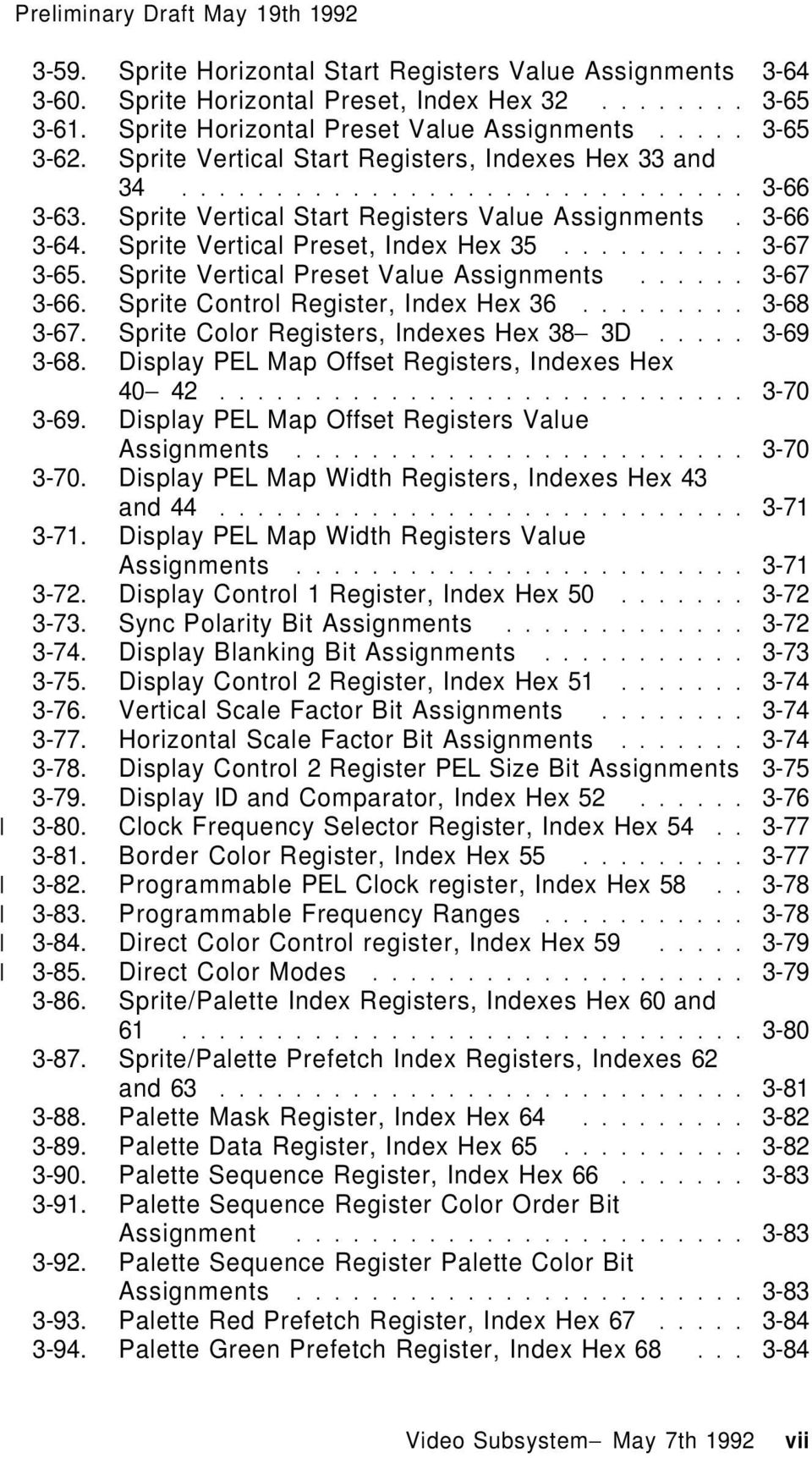
10 3-95. Palette Blue Prefetch Register, Index Hex Sprite Data Register, Index Hex 6A Sprite Prefetch Register, Index Hex 6B Miscellaneous Control Register, Index 6C MFI Control Register, Index 6D Clock Frequency Select Registers Clock Selected Bit Assignments Video Clock Scale Factor Bit Assignments Coprocessor Data Flow XGA PEL Map Origin Repeating Pattern (Tiling) Destination Map Guardband Mask Map Origin X and Y Offsets Destination Boundary Scissor Mask Map Boundary Scissor Mask Map Enabled Scissor Draw and Step Code Draw and Step Example Draw and Step Direction Codes Programming Fewer Than Four Step Codes Bresenham Line Draw Octant Encoding Memory to Memory Line Draw Address Stepping PxBlt Direction Codes Inverting PxBlt Pattern Filling Foreground and Background Mixes Carry Chain Mask for an 8-bit PEL Color Compare Conditions XGA Coprocessor Register Space, Intel Format XGA Coprocessor Register Space, Motorola Format Auxiliary Coprocessor Status Register, Offset Hex Coprocessor Control Register, Offset Hex PEL Map Index Register, Offset Hex PEL Map Index PEL Map n Base Pointer Register, Offset Hex PEL Map n Width Register, Offset Hex PEL Map n Height Register, Offset Hex 1A PEL Map n Format Register, Offset Hex 1C PEL Size Value Assignments Bresenham Error Term E Register, Offset Hex Bresenham Constant K1 Register, Offset Hex Bresenham Constant K2 Register, Offset Hex Direction Steps Register, Offset Hex 2C Foreground Mix Register, Offset Hex viii Video Subsystem May 7th 1992
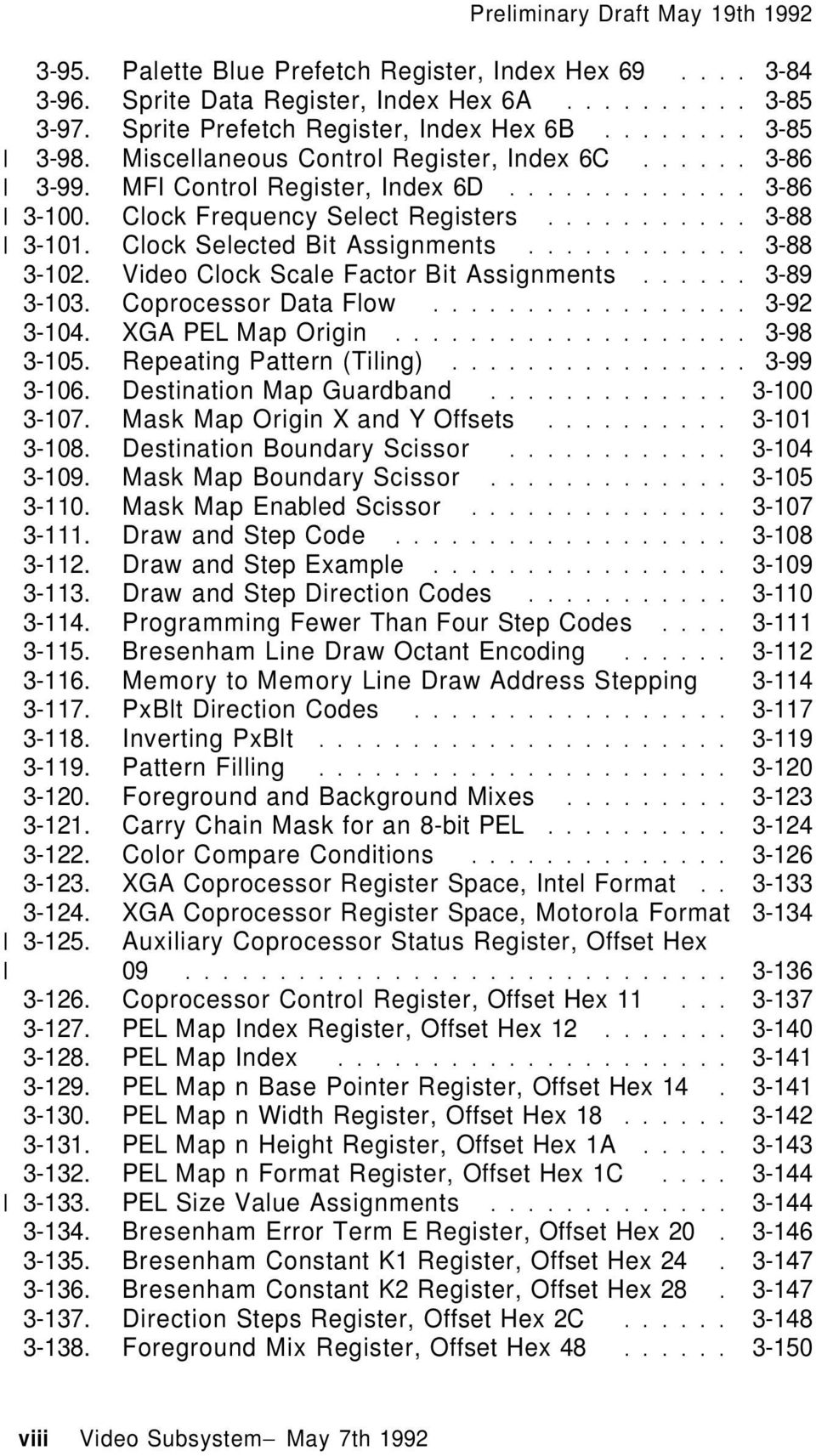
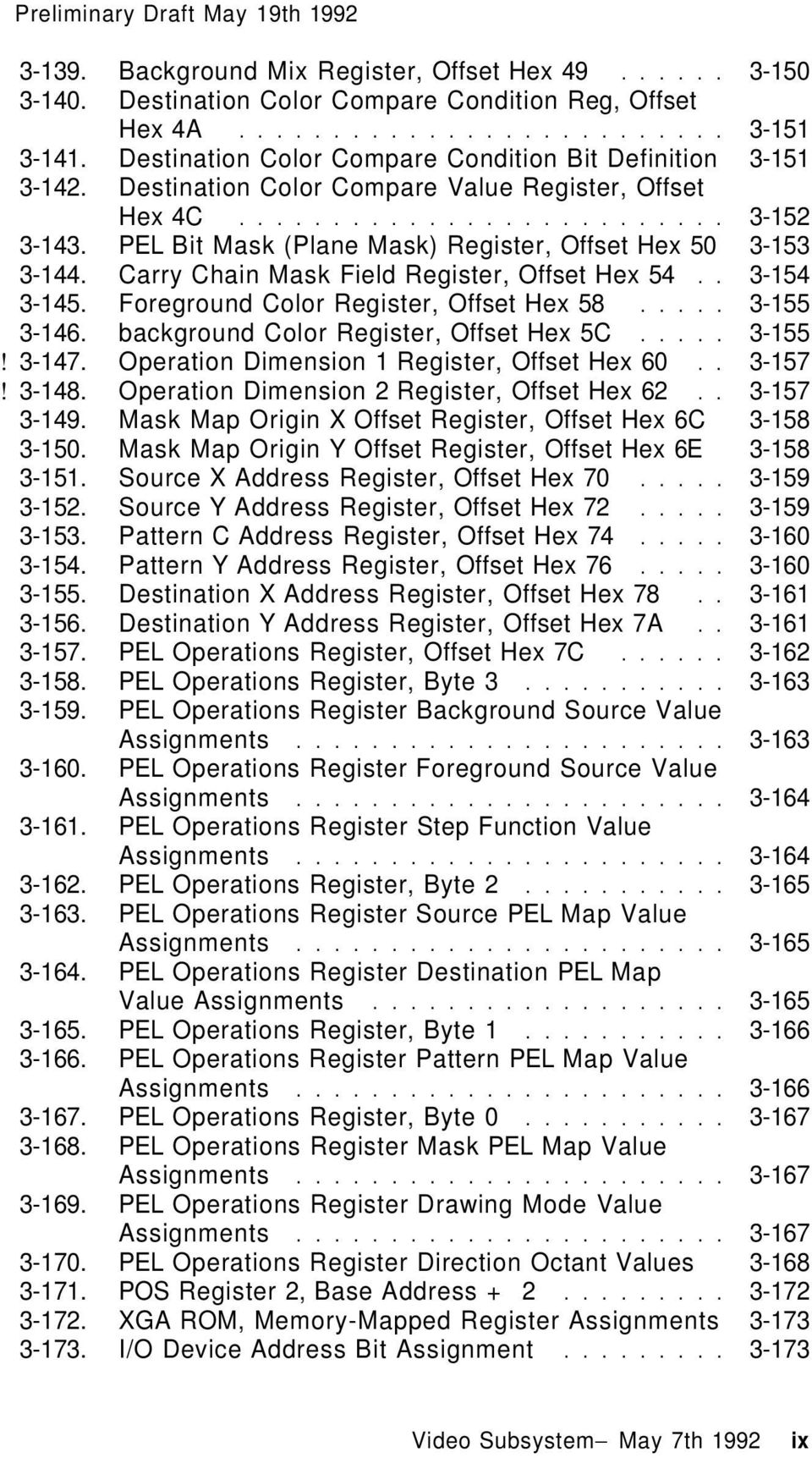
11 Background Mix Register, Offset Hex Destination Color Compare Condition Reg, Offset Hex 4A Destination Color Compare Condition Bit Definition Destination Color Compare Value Register, Offset Hex 4C PEL Bit Mask (Plane Mask) Register, Offset Hex Carry Chain Mask Field Register, Offset Hex Foreground Color Register, Offset Hex background Color Register, Offset Hex 5C ! Operation Dimension 1 Register, Offset Hex ! Operation Dimension 2 Register, Offset Hex Mask Map Origin X Offset Register, Offset Hex 6C Mask Map Origin Y Offset Register, Offset Hex 6E Source X Address Register, Offset Hex Source Y Address Register, Offset Hex Pattern C Address Register, Offset Hex Pattern Y Address Register, Offset Hex Destination X Address Register, Offset Hex Destination Y Address Register, Offset Hex 7A PEL Operations Register, Offset Hex 7C PEL Operations Register, Byte PEL Operations Register Background Source Value Assignments PEL Operations Register Foreground Source Value Assignments PEL Operations Register Step Function Value Assignments PEL Operations Register, Byte PEL Operations Register Source PEL Map Value Assignments PEL Operations Register Destination PEL Map Value Assignments PEL Operations Register, Byte PEL Operations Register Pattern PEL Map Value Assignments PEL Operations Register, Byte PEL Operations Register Mask PEL Map Value Assignments PEL Operations Register Drawing Mode Value Assignments PEL Operations Register Direction Octant Values POS Register 2, Base Address XGA ROM, Memory-Mapped Register Assignments I/O Device Address Bit Assignment Video Subsystem May 7th 1992 ix
12 POS Register 4, Base Address XGA Video Memory Base Address POS Register 5, Base Address MB Aperture Base Address Value Assignments Linear Address Fields Linear to Physical Address Translation Page Directory and Page Table Entry Page Directory and Page Table Access Rights in User Mode Translate Look-Aside Buffer Page Directory Base Address Register, Offset Hex Current Virtual Address Register, Offset Hex Virtual Memory Control Register Virtual Memory Interrupt Status Register DMQS display information file structure DMQS display information file layout DMQS display information file mode data DMQS Extended Graphics Mode Register Settings DMQS Customisation Tag Syntax XGA Video Memory Base Address The XGA Video Memory Base Address Diagram Reading the Display ID Video Memory Size Determination Availability of Extended Graphics Modes Extended Graphics Mode Register Settings VGA Mode Write Sequence Column Text Mode First Write Sequence Column Text Mode Second Write Sequence Coprocessor Register Write Values Background and Foreground Mixes and Colors Bit Layout PEL Operations Register Operation Direction Diagram Definition for PEL Operations Register (Example) Palette Color Line Draw Steps Background and Foreground Mixes and Colors Line Draw Example in Octant Bit Layout PEL Operations Register Direction Octant (Example) Definition for PEL Operations Register (Example) Display Connector Display Connector Signals Vertical Size of Display x Video Subsystem May 7th 1992

13 Notes: Video Subsystem May 7th 1992 xi
14 xii Video Subsystem May 7th 1992 Preliminary Draft May 19th 1992

15 Preface This document is a Preliminary release of the PS/2 Video Subsystem Technical Reference Manual. All information herein is subject to change at any time without notice. The document contains the hardware information on the VGA and XGA Video Subsystems as published in the PS/2 Hardware Interface Technical Reference-Common Interfaces (September 1991! Release). Any errors in that document which have been corrected! here are identified by the revision bars that can be seen marking! this paragraph. Extensions to that document which have been made to detail the XGA-NI Subsystem and associated programming considerations are identified by the revision bars that can be seen marking this paragraph. Copyright IBM Corp. 1989, 1991 xiii

16 xiv Video Subsystem May 7th 1992 Preliminary Draft May 19th 1992
17 Section 1. Introduction Video Subsystem Type Type Copyright IBM Corp. 1989,

18 Video Subsystem The system video can be generated by a Type 1 or Type 2 video subsystem: Type 1 video Video Graphics Array (VGA) Type 2 video Extended Graphics Array (XGA * ). Type 1 The Type 1 video contains the VGA function. The capabilities and operation of the VGA function are described in Section 2, VGA Function on page 2-1. Only one Type 1 video subsystem is allowed in a system. Type 2 The Type 2 video contains the XGA function, which supports the VGA mode, 132-column text mode, and extended graphics mode. There are two levels of XGA Function available: XGA XGA-NI The capabilities and operation of the both levels of XGA function are described in Section 3, XGA Function on page 3-1. * XGA is a trademark of International Business Machines Corporation. 1-2 Video Subsystem May 7th 1992

19 Section 2. VGA Function VGA Function Introduction Major Components ROM BIOS Support Logic VGA Components CRT Controller Sequencer Graphics Controller Attribute Controller Hardware Considerations Modes of Operation Display Support Programmable Option Select Alphanumeric Modes Graphics Modes x 200 Four-Color Graphics (Modes Hex 4 and 5) x 200 Two-Color Graphics (Mode Hex 6) x 350 Graphics (Mode Hex F) x 480 Two-Color Graphics (Mode Hex 11) Color Graphics Modes (Modes Hex D, E, 10, and 12) Color Graphics Mode (Mode Hex 13) Video Memory Organization Memory Modes Modes Hex 0, Modes Hex 2, Modes Hex 4, Mode Hex Mode Hex Mode Hex D Mode Hex E Mode Hex F Mode Hex Mode Hex Mode Hex Mode Hex Memory Operations Write Operations Read Operations Registers General Registers Miscellaneous Output Register Copyright IBM Corp. 1989,
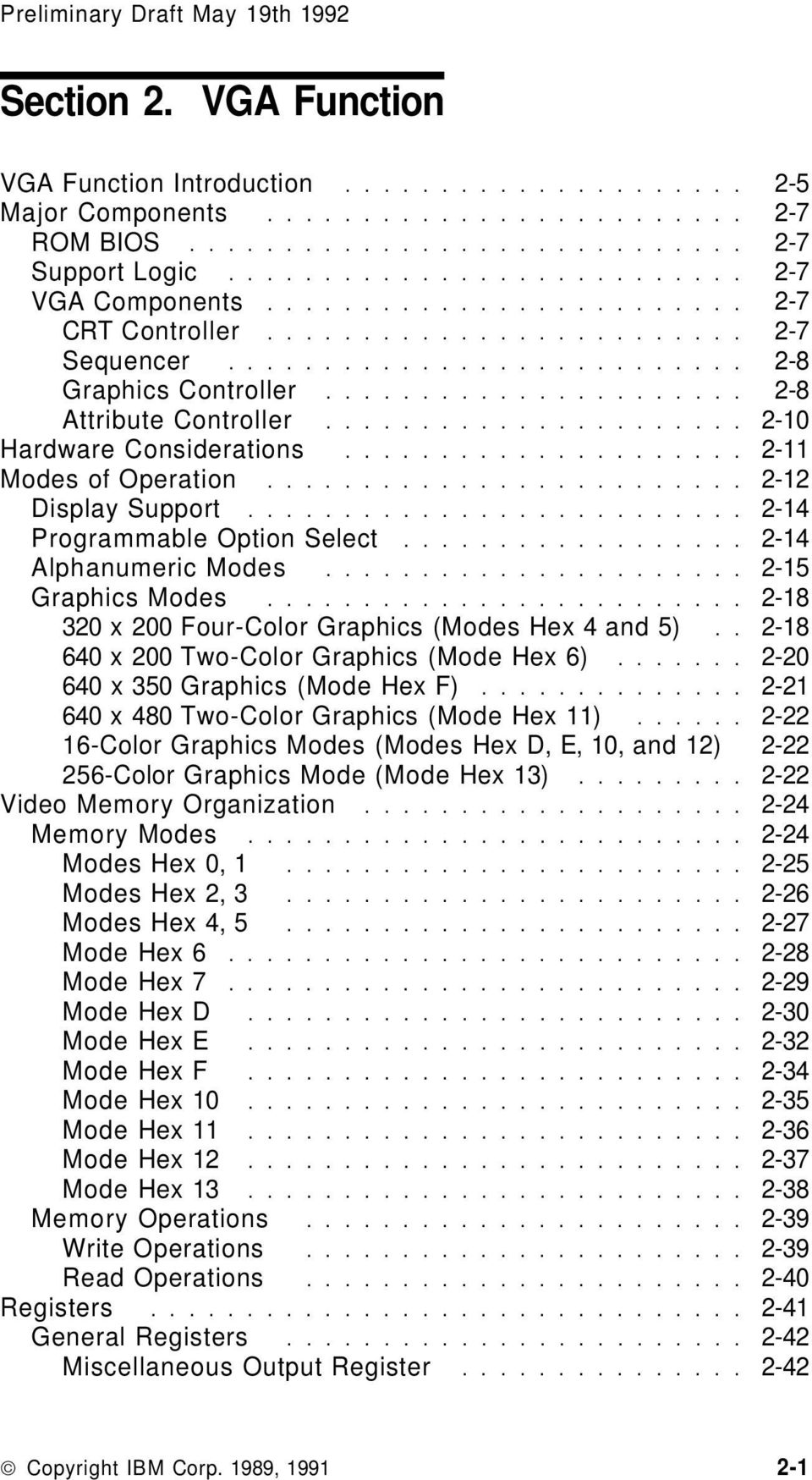
20 Input Status Register Input Status Register Feature Control Register Video Subsystem Enable Register Sequencer Registers Sequencer Address Register Reset Register Clocking Mode Register Map Mask Register Character Map Select Register Memory Mode Register CRT Controller Registers Address Register Horizontal Total Register Horizontal Display-Enable End Register Start Horizontal Blanking Register End Horizontal Blanking Register Start Horizontal Retrace Pulse Register End Horizontal Retrace Register Vertical Total Register Overflow Register Preset Row Scan Register Maximum Scan Line Register Cursor Start Register Cursor End Register Start Address High Register Start Address Low Register Cursor Location High Register Cursor Location Low Register Vertical Retrace Start Register Vertical Retrace End Register Vertical Display-Enable End Register Offset Register Underline Location Register Start Vertical Blanking Register End Vertical Blanking Register CRT Mode Control Register Line Compare Register Graphics Controller Registers Address Register Set/Reset Register Enable Set/Reset Register Color Compare Register Data Rotate Register Read Map Select Register Video Subsystem May 7th 1992

21 Graphics Mode Register Miscellaneous Register Color Don't Care Register Bit Mask Register Attribute Controller Registers Address Register Internal Palette Registers 0 through F Attribute Mode Control Register Overscan Color Register Color Plane Enable Register Horizontal PEL Panning Register Color Select Register VGA Programming Considerations Programming the Registers RAM Loadable Character Generator Creating a Split Screen Video Digital-to-Analog Converter Device Operation Video DAC to System Interface Programming Considerations VGA Video Extensions Auxiliary Video Extension Base Video Extension Video Extension Signal Descriptions Video Extension Signal Timing Video Subsystem May 7th
22 Notes: 2-4 VGA Function May 7th 1992
23 VGA Function Introduction The basic system video is generated by the Type 1 or Type 2 video subsystem. The circuitry that provides the VGA function includes a video buffer, a video digital-to-analog converter (DAC), and test circuitry. Video memory is mapped as four planes of 64Kb by 8 bits (maps 0 through 3). The video DAC drives the analog output to the display connector. The test circuitry determines the type of display attached, color or monochrome. The video subsystem controls the access to video memory from the system and the cathode-ray tube (CRT) controller. It also controls the system addresses assigned to video memory. Up to three starting addresses can be programmed for compatibility with previous video adapters. In the graphics modes, the mode determines the way video information is formatted into memory, and the way memory is organized. In alphanumeric modes, the system writes the ASCII character code and attribute data to video memory maps 0 and 1, respectively. Memory map 2 contains the character font loaded by BIOS during an alphanumeric mode set. The font is used by the character generator to create the character image on the display. Three fonts are contained in read-only memory (ROM): an 8-by-8 font, an 8-by-14 font, and an 8-by-16 font. Up to eight 256-character fonts can be loaded into the video memory map 2; two of these fonts can be active at one time, allowing a 512-character font. The video subsystem formats the information in video memory and sends the output to the video DAC. For color displays, the video DAC sends three analog color signals (red, green, and blue) to the display connector. For monochrome displays, BIOS translates the color information in the DAC, and the DAC drives the summed signal onto the green output. The auxiliary video connector allows video data to be passed between the video subsystem and an adapter plugged into the channel connector. VGA Function May 7th
24 When it is disabled, the video subsystem will not respond to video memory or I/O reads or writes; however, the video image continues to be displayed. Note: Compatibility with other hardware is best achieved by using the BIOS interface or operating system interface whenever possible. The following is a diagram of the VGA function. Figure 2-1. Diagram of the VGA Function 2-6 VGA Function May 7th 1992
25 Major Components The video subsystem contains all circuits necessary to generate the timing for the video memory and generates the video information going to the video DAC. The major components are: ROM BIOS, the support logic, and the Video Graphics Array interface. ROM BIOS BIOS provides software support and contains the character fonts and the system interface to run the video subsystem. Support Logic The support logic consists of the video memory, the clocks, and the video DAC. The video memory consists of at least 256KB; its use and mapping depend on the mode selected. Two clock sources provide the dot rate. The clock source is selected in the Miscellaneous Output register. The video DAC contains the color palette that is used to convert the video data into the video signal sent to the display. Three analog signals (red, green, and blue) are output from the DAC. The maximum number of colors displayed is 256 out of 256K, and the maximum number of gray shades is 64 out of 64. VGA Components The VGA function has four major functional areas: the CRT controller, the sequencer, the graphics controller, and the attribute controller. CRT Controller The CRT controller generates horizontal and vertical synchronization signal timings, addressing for the regenerative buffer, cursor and underline timings, and refresh addressing for the video memory. VGA Function May 7th
26 Sequencer The sequencer generates basic memory timings for the video memory and the character clock for controlling regenerative buffer fetches. It allows the system to access memory during active display intervals by periodically inserting dedicated system microprocessor memory cycles between the display memory cycles. Map mask registers in the sequencer are available to protect entire memory maps from being changed. Graphics Controller The graphics controller is the interface between the video memory and the attribute controller during active display times, and between video memory and the system microprocessor during memory accesses. During active display times, memory data is latched and sent to the attribute controller. In graphics modes, the memory data is converted from parallel to serial bit-plane data before being sent; in alphanumeric modes, the parallel attribute data is sent. During system accesses of video memory, the graphics controller can perform logical operations on the memory data before it reaches video memory or the system data bus. These logical operations are composed of four logical write modes and two logical read modes. The logical operators allow enhanced operations, such as a color compare in the read mode, individual bit masking during write modes, internal 32-bit writes in a single memory cycle, and writing to the display buffer on nonbyte boundaries. 2-8 VGA Function May 7th 1992
27 Figure 2-2. Graphics Controller VGA Function May 7th
28 Attribute Controller The attribute controller takes in data from video memory through the graphics controller and formats it for display. Attribute data in alphanumeric mode and serialized bit-plane data in graphics mode are converted to an 8-bit color value. Each color value is selected from an internal color palette of 64 possible colors (except in 256-color mode). The color value is used as a pointer into the video DAC where it is converted to the analog signals that drive the display. Blinking, underlining, cursor insertion, and PEL panning are also controlled in the attribute controller. Figure 2-3. Attribute Controller 2-10 VGA Function May 7th 1992
29 Hardware Considerations The following are hardware characteristics of the Type 2 video subsystem that must be considered to ensure program compatibility with the Type 1 video subsystem. Performance: Type 2 video generally runs faster than the Type 1 video subsystem; programs that depend on execution time of the video subsystem will operate differently. Video Buffer Compatibility: For each of the video modes, the Type 2 video subsystem maintains a memory mapping that is the same as the Type 1. To maintain this compatibility, the internal addresses to video memory are manipulated so that video memory looks the same. When switching video modes, video data may not be at the same address in video memory. BIOS calls to set and change modes make allowances for changes in addresses, and should be used for all mode switches. Character Generator: Differences in the character generator for the Type 2 video subsystem increase the time it takes to load a new font. Because of the additional load time, there is a chance of briefly observing spurious data on the display. BIOS compensates for this during video mode sets. Register Differences: The following bits for the Type 2 video subsystem differ from the Type 1: Bits 2 and 4 in the Clocking Mode register Bits 5 and 6 in the End Horizontal Blanking register Bits 2 and 4 in the Preset Row Scan register Bit 5 in the Address register of the attribute controller. VGA Function May 7th
30 Modes of Operation Certain modes on previous IBM display adapters distinguished between monochrome and color displays. For example, mode 0 was the same as mode 1 with the color burst turned off. Because color burst is not supported by the PS/2 video, the mode pairs are exactly the same. The support logic for the VGA function recognizes the type of display, and adjusts the output accordingly. When a monochrome display is attached, the colors for the color modes appear as shades of gray. Mode 3+ is the default mode with a color display attached and mode 7+ is the default mode with a monochrome display attached. The following figure describes the alphanumeric (A/N) and all points addressable (APA) graphics modes supported by BIOS. Each color is selected from 256K possibilities, and gray shades from 64 possibilities. The variations within the basic BIOS modes are selected through BIOS calls that set the number of scan lines. The scan line count is set before the mode call is made.! Mode Alpha Buffer Box Max. Vert.! (hex) Type Colors Format Start Size Pgs. Freq. PELs! 0,1 A/N 16 40x25 B8000 8x8 8 70Hz 320x200! 0*,1* A/N 16 40x25 B8000 8x Hz 320x350! 0+,1+ A/N 16 40x25 B8000 9x Hz 360x400! 2,3 A/N 16 80x25 B8000 8x8 8 70Hz 640x200! 2*,3* A/N 16 80x25 B8000 8x Hz 640x350! 2+,3+ A/N 16 80x25 B8000 9x Hz 720x400! 4,5 APA 4 40x25 B8000 8x8 1 70Hz 320x200! 6 APA 2 80x25 B8000 8x8 1 70Hz 640x200! 7 A/N 80x25 B0000 9x Hz 720x350! 7+ A/N 80x25 B0000 9x Hz 720x400! D APA 16 40x25 A0000 8x8 8 70Hz 320x200! E APA 16 80x25 A0000 8x8 4 70Hz 640x200! F APA 80x25 A0000 8x Hz 640x350! 10 APA 16 80x25 A0000 8x Hz 640x350! 11 APA 2 80x30 A0000 8x Hz 640x480! 12 APA 16 80x30 A0000 8x Hz 640x480! 13 APA x25 A0000 8x8 1 70Hz 320x200!! Note: * or + Enhanced modes!! Figure 2-4. BIOS Video Modes In the 200-scan-line modes, the data for each scan line is scanned twice. This double scanning allows the 200-scan-line image to be displayed in 400 scan lines VGA Function May 7th 1992
31 Border support and double scanning depend on the mode selected. The following shows which modes use double scanning and which support a border. Mode (Hex) Double Scan Border Support 0, 1 Yes No 0*, 1* No No 0+, 1+ No No 2, 3 Yes Yes 2*, 3* No Yes 2+, 3+ No Yes 4, 5 Yes No 6 Yes Yes 7 No Yes 7+ No Yes D Yes No E Yes Yes F No Yes 10 No Yes 11 No Yes 12 No Yes 13 Yes Yes Note: * or + Enhanced modes Figure 2-5. Double Scanning and Border Support VGA Function May 7th
32 Display Support The video subsystem supports direct-drive analog displays. The displays must have a horizontal scan rate of 31.5 khz, and a vertical scan rate capability of 50 to 70 Hz. Displays that use a digital input, such as the IBM Color Display, are not supported. The following figure summarizes the minimum display characteristics required to support VGA mode operation. Parameter Color Monochrome Horizontal Scan Rate 31.5 khz 31.5 khz Vertical Scan Rate 50 to 70 Hz 50 to 70 Hz Video Bandwidth 28 MHz 28 MHz Maximum Horizontal 720 PELs 720 PELs Resolution Maximum Vertical Resolution 480 Lines 480 Lines Figure 2-6. Direct-Drive Analog Displays Since color and monochrome displays run at the same scan rate, all modes work on both displays. The vertical gain of the display is controlled by the polarity of the vertical and horizontal synchronization pulses. This is done so 350, 400, or 480 lines can be displayed without adjusting the display. See Signal Timing on page 4-3 for more information. Programmable Option Select The video subsystem supports programmable option select (POS). The video subsystem is placed in the setup mode through the System Board Setup/Enable register (hex 0094). (For more information, see the system-specific sections.) For information on BIOS calls to enable or disable the video, see the IBM Personal System/2 and Personal Computer BIOS Interface Technical Reference VGA Function May 7th 1992
33 Alphanumeric Modes The alphanumeric modes are modes hex 0 through 3 and 7. The mode chart lists the variations of these modes (see Figure 2-4 on page 2-12). The data format for alphanumeric modes is the same as the data format on the IBM Color/Graphics Monitor Adapter, the IBM Monochrome Display Adapter, and the IBM Enhanced Graphics Adapter. BIOS initializes the video subsystem according to the selected mode and loads the color values into the video DAC. These color values can be changed to give a different color set to select from. Bit 3 of the attribute byte can be redefined by the Character Map Select register to act as a switch between character sets, giving the programmer access to 512 characters at one time. When an alphanumeric mode is selected, the BIOS transfers character font patterns from the ROM to map 2. The system stores the character data in map 0, and the attribute data in map 1. In the alphanumeric modes, the programmer views maps 0 and 1 as a single buffer. The CRT controller generates sequential addresses and fetches one character code byte and one attribute byte at a time. The character code and row scan count are combined to make up the address into map 2, which contains the character font. The appropriate dot patterns are then sent to the attribute controller, where color is assigned according to the attribute data. VGA Function May 7th
34 Every display-character position in the alphanumeric mode is defined by two bytes in the display buffer. Both the color/graphics and the monochrome emulation modes use the following 2-byte character/attribute format.. Figure 2-7. Character/Attribute Format See Characters and Keystrokes for characters loaded during a BIOS mode set. The functions of the attribute bytes are defined in the following table. Bit 7 can be redefined in the Attribute Mode Control register to give 16 possible background colors; its default is to control character blinking. Bit 3 can be redefined in the Character Map Select register to select between two character fonts; its default is to control foreground color selection. Bit Color Function 7 B/I Blinking or Background Intensity 6 R Background Color 5 G Background Color 4 B Background Color 3 I/CS Foreground Intensity or Character Font Select 2 R Foreground Color 1 G Foreground Color 0 B Foreground Color Figure 2-8. Attribute Byte Definitions For more information about the attribute bytes, see Character Map Select Register on page 2-52 and Attribute Mode Control Register on page VGA Function May 7th 1992
35 The following are the color values loaded by BIOS for the 16-color modes. Intensity Red Green Blue Color Black Blue Green Cyan Red Magenta Brown White Gray Light Blue Light Green Light Cyan Light Red Light Magenta Yellow White (High Intensity) Figure 2-9. BIOS Color Set Both 40-column and 80-column alphanumeric modes are supported. The features of the 40-column alphanumeric modes (all variations of modes hex 0 and 1) are: 25 rows of 40 characters 2000 bytes of video memory per page One character byte and one attribute byte per character. The features of the 80-column alphanumeric modes (all variations of modes hex 2, 3, and 7) are: 25 rows of 80 characters 4000 bytes of video memory per page One character byte and one attribute byte per character. VGA Function May 7th
36 Graphics Modes The graphics modes supported in BIOS are modes hex 4, 5, 6, F, and 11. The colors described in this section are generated when the BIOS is used to set the mode. BIOS initializes the video subsystem and the DAC palette to generate these colors. If the DAC palette is changed, different colors are generated. 320 x 200 Four-Color Graphics (Modes Hex 4 and 5) Addressing, mapping, and data format are the same as the 320 x 200 PEL mode of the IBM Color/Graphics Monitor Adapter. The display buffer is configured at hex B8000. Bit image data is stored in memory maps 0 and 1. The two bit planes (C0 and C1) are each formed from bits from both memory maps. Features of this mode are: A maximum of 200 rows of 320 PELs Double scanned to display as 400 rows Memory-mapped graphics Four colors for each PEL Four PELs per byte 16,000 bytes of read/write memory. The video memory is organized into two banks of 8,000 bytes each, using the following format. Address hex B8000 contains the PEL information for the upper-left corner of the display area. Figure Video Memory Format 2-18 VGA Function May 7th 1992
37 The following figure shows the format for each byte. Bit Function 7 C1 - First Display PEL 6 C0 - First Display PEL 5 C1 - Second Display PEL 4 C0 - Second Display PEL 3 C1 - Third Display PEL 2 C0 - Third Display PEL 1 C1 - Fourth Display PEL 0 C0 - Fourth Display PEL Figure PEL Format, Modes Hex 4 and 5 The color selected depends on the color set that is used. Color set 1 is the default. For information on changing the color set, see the IBM Personal System/2 and Personal Computer BIOS Interface Technical Reference. Bits C1 C0 Color Selected Color Set 1 Color Set Black Black 0 1 Light Cyan Green 1 0 Light Magenta Red 1 1 Intensified White Brown Figure Color Selections, Modes Hex 4 and 5 VGA Function May 7th
38 640 x 200 Two-Color Graphics (Mode Hex 6) Preliminary Draft May 19th 1992 Addressing, scan-line mapping, and data format are the same as the 640 x 200 PEL black and white mode of the IBM Color/Graphics Monitor Adapter. The display buffer is configured at hex B8000. Bit image data is stored in memory map 0 and comprises a single bit plane (C0). Features of this mode are: A maximum of 200 rows of 640 PELs Double scanned to display as 400 rows Same addressing and scan-line mapping as 320 x 200 graphics Two colors for each PEL Eight PELs per byte 16,000 bytes of read/write memory. The following shows the format for each byte. Bit Function 7 First Display PEL 6 Second Display PEL 5 Third Display PEL 4 Fourth Display PEL 3 Fifth Display PEL 2 Sixth Display PEL 1 Seventh Display PEL 0 Eighth Display PEL Figure PEL Format, Mode Hex 6 The bit definition for each PEL is 0 equals black and 1 equals intensified white VGA Function May 7th 1992
39 640 x 350 Graphics (Mode Hex F) This mode emulates the EGA graphics with the monochrome display and the following attributes: black, video, blinking video, and intensified video. A resolution of 640 x 350 uses 56,000 bytes of video memory to support the four attributes. This mode uses maps 0 and 2; map 0 is the video bit plane (C0), and map 2 is the intensity bit plane (C2). Both planes reside at address hex A0000. The two bits, one from each bit plane, define one PEL. The bit definitions are given in the following table. C2 C0 PEL Color 0 0 Black 0 1 White 1 0 Blinking White 1 1 Intensified White Figure Bit Definitions C2,C0 Memory is organized with successive bytes defining successive PELs. The first eight PELs displayed are defined by the byte at hex A0000, the second eight PELs by the byte at hex A0001, and so on. The most-significant bit in each byte defines the first PEL for that byte. Since both bit planes reside at address hex A0000, the user must select the plane to update through the Map Mask register of the sequence controller (see Video Memory Organization on page 2-24). VGA Function May 7th
40 640 x 480 Two-Color Graphics (Mode Hex 11) Preliminary Draft May 19th 1992 This mode provides two-color graphics with the same data format as mode 6. Addressing and mapping are shown under Video Memory Organization on page The bit image data is stored in map 0 and comprises a single bit plane (C0). The video buffer starts at hex A0000. The first byte contains the first eight PELs; the second byte, at hex A0001, contains the second eight PELs, and so on. The bit definition for each PEL is 0 equals black and 1 equals intensified white. 16-Color Graphics Modes (Modes Hex D, E, 10, and 12) These modes support 16 colors. For all modes, the bit image data is stored in all four memory maps. Each memory map contains the data for one bit plane. The bit planes are C0 through C3 and represent the following colors: C0 = Blue C1 = Green C2 = Red C3 = Intensified The four bits define each PEL on the screen by acting as an address (pointer) into the internal palette in the Extended Graphics mode. The display buffer resides at address hex A0000. The Map Mask register selects any or all of the maps to be updated when the system writes to the display buffer. 256-Color Graphics Mode (Mode Hex 13) This mode provides graphics with the capability of displaying 256 colors at one time. The display buffer is sequential, starts at address hex A0000, and is 64,000 bytes long. The first byte contains the color information for the upper-left PEL. The second byte contains the second PEL, and so on, for 64,000 PELs (320 x 200). The bit image data is stored in all four memory maps and comprises four bit planes. The four bit planes are sampled twice to produce eight bit-plane values that address the video DAC VGA Function May 7th 1992
41 In this mode, the internal palette of the video subsystem is loaded by BIOS and should not be changed. The first 16 locations in the external palette, which is in the video DAC, contain the colors compatible with the alphanumeric modes. The second 16 locations contain 16 evenly spaced gray shades. The next 216 locations contain values based on a hue-saturation-intensity model tuned to provide a usable, generic color set that covers a wide range of color values. The following figure shows the color information that is compatible with the colors in other modes. PEL Bits Color Output Black Blue Green Cyan Red Magenta Brown White Dark Gray Light Blue Light Green Light Cyan Light Red Light Magenta Yellow Intensified White Figure Compatible Color Coding Each color in the palette can be programmed to one of 256K different colors. The features of this mode are: A maximum of 200 rows with 320 PELs Double scanned to display as 400 rows Memory-mapped graphics 256 of 256K colors for each PEL One byte per PEL 64,000 bytes of video memory. VGA Function May 7th
42 Video Memory Organization The display buffer consists of 256KB of dynamic read/write memory configured as four 64KB memory maps. Figure KB Video Memory Map The starting address and size of the display buffer can be changed to maintain compatibility with other display adapters and application software. There are three configurations used by other adapters: Address hex A0000 for a length of 64KB Address hex B0000 for a length of 32KB Address hex B8000 for a length of 32KB. Memory Modes The following pages show the memory organization for each of the BIOS modes VGA Function May 7th 1992
43 Modes Hex 0, 1 VGA Function May 7th
44 Modes Hex 2, VGA Function May 7th 1992
45 Modes Hex 4, 5 VGA Function May 7th
46 Mode Hex VGA Function May 7th 1992
47 Mode Hex 7 VGA Function May 7th
48 Mode Hex D 2-30 VGA Function May 7th 1992
49 VGA Function May 7th
50 Mode Hex E 2-32 VGA Function May 7th 1992
51 VGA Function May 7th
52 Mode Hex F 2-34 VGA Function May 7th 1992
53 Mode Hex 10 VGA Function May 7th
54 Mode Hex VGA Function May 7th 1992
55 Mode Hex 12 VGA Function May 7th
56 Mode Hex VGA Function May 7th 1992
57 Memory Operations Memory operations consist of write and read operations. Write Operations When the system is writing to the display buffer, the maps are enabled by the logical decode of the memory address and the Map Mask register. The addresses used for video memory depend on the mode selected. The data flow for a system write operation is illustrated in the following figure. Figure Data Flow for Write Operations VGA Function May 7th
58 Read Operations The two ways to read the video buffer are selected through the Graphics Mode register in the graphics controller. The mode 0 read operation returns the 8-bit value determined by the logical decode of the memory address and, if applicable, the Read Map Select register. The mode 1 read operation returns the 8-bit value resulting from the color compare operation controlled by the Color Compare and Color Don't Care registers. The data flow for the color compare operation is shown in the following figure. Figure Color Compare Operations 2-40 VGA Function May 7th 1992
59 Registers There are six groups of registers in the video subsystem. All video registers are readable except the system data latches and the attribute address flip-flop. The following figure lists the register groups, their I/O addresses with the type of access (read or write), and page reference numbers. The question mark in the address can be a hex B or D depending on the setting of the I/O address bit in the Miscellaneous Output register, described in General Registers on page Note: Registers All registers in the video subsystem are read/write. The value of reserved bits in these registers must be preserved. Read the register first and change only the bits required. R/W Port Address Page Reference General Registers 2-42 Sequencer Registers 2-47 Address Register R/W 03C4 Data Registers R/W 03C5 CRT Controller Registers 2-55 Address Register R/W 03?4 Data Registers R/W 03?5 Graphics Controller Registers 2-78 Address Register R/W 03CE Data Registers R/W 03CF Attribute Controller Registers 2-89 Address Register R/W 03C0 Data Registers W 03C0 R 03C1 Video DAC Palette Registers Write Address R/W 03C8 Read Address W 03C7 Data R/W 03C9 PEL Mask R/W 03C6 Figure Video Subsystem Register Overview VGA Function May 7th
60 General Registers Register Read Address Write Address Miscellaneous Output Register 03CC 03C2 Input Status Register 0 03C2 Input Status Register 1 03?A Feature Control Register 03CA 03?A Video Subsystem Enable Register 03C3 03C3 Figure General Registers Miscellaneous Output Register The read address for this register is hex 03CC and its write address is hex 03C VSP HSP CS ERAM IOS : Set to 0, Undefined on Read VSP : Vertical Sync Polarity HSP : Horizontal Sync Polarity CS : Clock Select ERAM : Enable RAM IOS : I/O Address Select Figure Miscellaneous Output Register, Hex 03CC/03C VGA Function May 7th 1992
61 The register fields are defined as follows: VSP When set to 0, the Vertical Sync Polarity field (bit 7) selects a positive vertical retrace signal. This bit works with bit 6 to determine the vertical size. HSP When set to 0, the Horizontal Sync Polarity field (bit 6) selects a positive horizontal retrace signal. Bits 7 and 6 select the vertical size as shown in the following figure. Bits 76 Vertical Size 00 Reserved lines lines lines Figure CS Display Vertical Size The Clock Select field (bits 3, 2) selects the clock source according to the following figure. The external clock is driven through the auxiliary video extension. The input clock should be kept between 14.3 MHz and 28.4 MHz. CS Field (binary) Function 00 Selects MHz clock for 640/320 Horizontal PELs 01 Selects MHz clock for 720/360 Horizontal PELs 10 Selects External Clock 11 Reserved Figure ERAM IOS Clock Select Definitions When set to 0, the Enable RAM field (bit 1) disables address decode for the display buffer from the system. The I/O Address Select field (bit 0) selects the CRT controller addresses. When set to 0, this bit sets the CRT controller addresses to hex 03Bx and the address for the Input Status Register 1 to hex 03BA for compatibility with the monochrome adapter. When set to 1, this bit sets CRT controller addresses to hex 03Dx and the Input Status Register 1 address to hex 03DA for compatibility with the color/graphics adapter. The write addresses to the Feature Control register are affected in the same manner. VGA Function May 7th
62 Input Status Register 0 The address for this read-only register is address hex 03C2. Do not write to this register CI SS : Undefined on Read CI : CRT Interrupt SS : Switch Sense Figure Input Status Register 0, Hex 03C2 The register fields are defined as follows: CI SS When the CRT Interrupt field (bit 7) is 1, a vertical retrace interrupt is pending. BIOS uses the Switch Sense field (bit 4) in determining the type of display attached VGA Function May 7th 1992
63 Input Status Register 1 The address for this read-only register is address hex 03DA or 03BA. Do not write to this register VR DE : Undefined on Read VR : Vertical Retrace DE : Display Enable Figure Input Status Register 1, Hex 03DA/03BA The register fields are defined as follows: VR DE When the Vertical Retrace field (bit 3) is 1, it indicates a vertical retrace interval. This bit can be programmed, through the Vertical Retrace End register, to generate an interrupt at the start of the vertical retrace. When the Display Enable field (bit 0) is 1, it indicates a horizontal or vertical retrace interval. This bit is the real-time status of the inverted display enable signal. In the past, programs have used this status bit to restrict screen updates to the inactive display intervals to reduce screen flicker. The video subsystem is designed to eliminate this software requirement; screen updates may be made at any time without screen degradation. VGA Function May 7th
64 Feature Control Register The write address of this register is hex 03DA or 03BA; its read address is hex 03CA. All bits are reserved Feature Control Figure Feature Control Register, Hex 03DA/03BA and 03CA Video Subsystem Enable Register This register (hex 03C3) is reserved. To disable address decoding by the video subsystem, use BIOS INT 10 call, AH = hex 12, BL = hex Video Subsystem Enable Figure Video Subsystem Enable Register, Hex 03C VGA Function May 7th 1992
65 Sequencer Registers The Address register is at address hex 03C4 and the data registers are at address hex 03C5. All registers within the sequencer are read/write. Index Register (Hex) Sequencer Address Reset 00 Clocking Mode 01 Map Mask 02 Character Map Select 03 Memory Mode 04 Figure Sequencer Registers Sequencer Address Register The Address register is at address hex 03C4. This register is loaded with an index value that points to the desired sequencer data register SA : Set to 0, Undefined on Read SA : Sequencer Address Figure Sequencer Address Register The register field is defined as follows: SA The Sequencer Address field (bits 2 0) contains the index value that points to the data register to be accessed. VGA Function May 7th
66 Reset Register This read/write register has an index of hex 00; its address is hex 03C SR ASR : Set to 0, Undefined on Read SR : Synchronous Reset ASR : Asynchronous Reset Figure Reset Register, Index Hex 00 The register fields are defined as follows: SR When set to 0, the Synchronous Reset field (bit 1) commands the sequencer to synchronously clear and halt. Bits 1 and 0 must be 1 to allow the sequencer to operate. To prevent the loss of data, bit 1 must be set to 0 during the active display interval before changing the clock selection. The clock is changed through the Clocking Mode register or the Miscellaneous Output register. ASR When set to 0, the Asynchronous Reset field (bit 0) commands the sequencer to asynchronously clear and halt. Resetting the sequencer with this bit can cause loss of video data VGA Function May 7th 1992
67 Clocking Mode Register This read/write register has an index of hex 01; its address is hex 03C SO SH4 DC SL 1 D89 : Set to 0, Undefined on Read 1 : Set to 1, Undefined on Read SO : Screen Off SH4 : Shift 4 DC : Dot Clock SL : Shift Load D89 : 8/9 Dot Clocks Figure Clocking Mode Register, Index Hex 01 The register fields are defined as follows: SO When set to 1, the Screen Off field (bit 5) turns off the display and assigns maximum memory bandwidth to the system. Although the display is blanked, the synchronization pulses are maintained. This bit can be used for rapid full-screen updates. SH4 When the Shift 4 field (bit 4) and Shift Load field (bit 2) are set to 0, the video serializers are loaded every character clock. When the Shift 4 field is set to 1, the video serializers are loaded every fourth character clock, which is useful when 32 bits are fetched per cycle and chained together in the shift registers. Extended Graphics mode behaves as if this bit is set to 0; therefore, programs should set it to 0. DC When set to 0, the Dot Clock field (bit 3) selects the normal dot clocks derived from the sequencer master clock input. When set to 1, the master clock is divided by 2 to generate the dot clock. All other timings are affected because they are derived from the dot clock. The dot clock divided by 2 is used for 320 and 360 horizontal PEL modes. VGA Function May 7th
68 SL When the Shift Load field (bit 2) and Shift 4 field (bit 4) are set to 0, the video serializers are loaded every character clock. When the Shift Load field (bit 2) is set to 1, the video serializers are loaded every other character clock, which is useful when 16 bits are fetched per cycle and chained together in the shift registers. Extended Graphics mode behaves as if this bit is set to 0; therefore, programs should set it to 0. D89 When set to 0, the 8/9 Dot Clocks field (bit 0) directs the sequencer to generate character clocks 9 dots wide; when set to 1, it directs the sequencer to generate character clocks 8 dots wide. The 9-dot mode is for alphanumeric modes 0+, 1+, 2+, 3+, 7, and 7 + only; the 9th dot equals the 8th dot for ASCII codes hex C0 through DF. All other modes must use 8 dots per character clock. (See the Enable Line Graphics Character Code field in the Attribute Mode Control register on page 2-92.) 2-50 VGA Function May 7th 1992
69 Map Mask Register This read/write register has an index of hex 02; its address is hex 03C M3E M2E M1E M0E : Set to 0, Undefined on Read M3E : Map 3 Enable M2E : Map 2 Enable M1E : Map 1 Enable M0E : Map 0 Enable Figure Map Mask Register, Index Hex 02 The register fields are defined as follows: M3E, M2E, M1E, M0E When set to 1, the map enable fields (bits 3, 2, 1, and 0) enable system access to the corresponding map. If all maps are enabled (chain 4 mode), the system can write its 8-bit value to all four maps in a single memory cycle. This substantially reduces the system overhead during display updates in graphics modes. Data scrolling operations can be enhanced by enabling all maps and writing the display buffer address with the data stored in the system data latches. This is a read-modify-write operation. When access to odd or even maps (odd/even modes) are selected, maps 0 and 1 and maps 2 and 3 should have the same map mask value. When chain 4 mode is selected, all maps should be enabled. VGA Function May 7th
70 Character Map Select Register This register has an index of hex 03; its address is hex 03C5. In alphanumeric modes, bit 3 of the attribute byte normally defines the foreground intensity. This bit can be redefined as a switch between character sets, allowing 512 displayable characters. To enable this feature: 1. Set the extended memory bit in the Memory Mode register (index hex 04) to Select different values for character map A and character map B. This function is supported by BIOS and is a function call within the character generator routines MAH MBH MAL MBL : Set to 0, Undefined on Read MAH : Character Map A Select (MSB) MBH : Character Map B Select (MSB) MAL : Character Map A Select (LS bits) MBL : Character Map B Select (LS bits) Figure Character Map Select Register, Index Hex 03 The register fields are defined as follows: MAH MBH The Character Map A Select field (bit 5) is the most-significant bit for selecting the location of character map A. The Character Map B Select field (bit 4) is the most-significant bit for selecting the location of character map B VGA Function May 7th 1992
71 MAL The Character Map A Select field (bits 3, 2) and Character Map A Select field (bit 5) select the location of character map A. Map A is the area of map 2 containing the character font table used to generate characters when attribute bit 3 is set to 1. The selection is shown in the following figure. Bits 532 Map Selected Table Location st 8KB of Map rd 8KB of Map th 8KB of Map th 8KB of Map nd 8KB of Map th 8KB of Map th 8KB of Map th 8KB of Map 2 Figure MBL Character Map Select A The Character Map B Select field (bits 1, 0) and Character Map B Select field (bit 4) select the location of character map B. Map B is the area of map 2 containing the character font table used to generate characters when attribute bit 3 is set to 0. The selection is shown in the following figure. Bits 410 Map Selected Table Location st 8KB of Map rd 8KB of Map th 8KB of Map th 8KB of Map nd 8KB of Map th 8KB of Map th 8KB of Map th 8KB of Map 2 Figure Character Map Select B VGA Function May 7th
72 Memory Mode Register This register has an index of hex 04; its address is hex 03C CH4 OE EM : Set to 0, Undefined on Read CH4 : Chain 4 OE : Odd/Even EM : Extended Memory Figure Memory Mode Register, Index Hex 04 The register fields are defined as follows: CH4 The Chain 4 field (bit 3) controls the map selected during system read operations. When set to 0, this bit enables system addresses to sequentially access data within a bit map by using the Map Mask register. When set to 1, this bit causes the 2 low-order bits to select the map accessed as shown in the following figure. Address Bits A1 A0 Map Selected Figure Map Selection, Chain 4 OE When the Odd/Even field (bit 2) is set to 0, even system addresses access maps 0 and 2, while odd system addresses access maps 1 and 3. When set to 1, system addresses sequentially access data within a bit map, and the maps are accessed according to the value in the Map Mask register (hex 02). EM When set to 1, the Extended Memory field (bit 1) enables the video memory from 64KB to 256KB. This bit must be set to 1 to enable the character map selection described for the previous register VGA Function May 7th 1992
73 CRT Controller Registers A data register is accessed by writing its index to the Address register at address hex 03D4 or 03B4, and then writing the data to the access port at address hex 03D5 or 03B5. The I/O address used depends on the setting of the I/O address select bit (bit 0) in the Miscellaneous Output register, which is described in General Registers on page The following figure shows the variable part of the address as a question mark. Note: When modifying a register, the setting of reserved bits must be preserved. Read the register first and change only the bits required. Address Register Name (Hex) Address 03?4 Horizontal Total 03?5 00 Horizontal Display-Enable 03?5 01 End Start Horizontal Blanking 03?5 02 End Horizontal Blanking 03?5 03 Start Horizontal Retrace 03?5 04 Pulse Index values not listed are reserved. Figure CRT Controller Registers Index (Hex) End Horizontal Retrace 03?5 05 Vertical Total 03?5 06 Overflow 03?5 07 Preset Row Scan 03?5 08 Maximum Scan Line 03?5 09 Cursor Start 03?5 0A Cursor End 03?5 0B Start Address High 03?5 0C Start Address Low 03?5 0D Cursor Location High 03?5 0E Cursor Location Low 03?5 0F Vertical Retrace Start 03?5 10 Vertical Retrace End 03?5 11 Vertical Display-Enable End 03?5 12 Offset 03?5 13 Underline Location 03?5 14 Start Vertical Blanking 03?5 15 End Vertical Blanking 03?5 16 CRT Mode Control 03?5 17 Line Compare 03?5 18 VGA Function May 7th
74 Address Register This register is at address hex 03B4 or 03D4, and is loaded with an index value that points to the data registers within the CRT controller Index : Set to 0, Undefined on Read Figure CRT Controller Address Register, Hex 03B4/03D4 The register field is defined as follows: Index This field (bits 4 0) is the index that points to the data register accessed through address hex 03D5 or 03B5. Horizontal Total Register This register has an index of hex 00; its address is hex 03D5 or 03B5. The Horizontal Total register (bits 7 0) defines the total number of characters in the horizontal scan interval including the retrace time. The value directly controls the period of the horizontal retrace signal. A horizontal character counter in the CRT controller counts the character clock inputs; comparators are used to compare the register value with the horizontal width of the character to provide horizontal timings. All horizontal and vertical timings are based on this register Horizontal Total Figure Horizontal Total Register, Index Hex 00 The value contained in the register is the total number of characters minus VGA Function May 7th 1992
75 Horizontal Display-Enable End Register This register has an index of hex 01; its address is hex 03D5 or 03B Horizontal Display Enable End Figure Horizontal Display Enable-End Register, Index Hex 01 The Horizontal Display-Enable End register (bits 7 0) defines the length of the horizontal display-enable signal and determines the number of character positions per horizontal line. The value in this register is the total number of displayed characters minus 1. Start Horizontal Blanking Register This register has an index of hex 02; its address is hex 03D5 or 03B Start Horizontal Blanking Figure Start Horizontal Blanking Register, Index Hex 02 The value in the Start Horizontal Blanking register (bits 7 0) is the horizontal character count at which the horizontal blanking signal goes active. VGA Function May 7th
76 End Horizontal Blanking Register This register has an index of hex 03; its address is hex 03D5 or 03B5. It determines when the horizontal blanking signal will go active DES EB 1 : Set to 1, Undefined on Read DES : Display Enable Skew Control EB : End Blanking Figure End Horizontal Blanking Register, Index Hex 03 The register fields are defined as follows: DES The Display Enable Skew Control field (bits 6, 5) determines the amount of skew of the display enable signal. This skew control is needed to provide sufficient time for the CRT controller to read a character and attribute code from the video buffer, gain access to the character generator, and go through the Horizontal PEL Panning register in the attribute controller. Each access requires the display enable signal to be skewed one character clock so that the video output is synchronized with the horizontal and vertical retrace signals. The skew values are shown in the following figure. DES Field (binary) Amount of Skew 00 No character clock skew 01 One character clock skew 10 Two character clock skew 11 Three character clock skew Figure Display Enable Skew Note: Character skew is not adjustable on the Type 2 video and the bits are ignored; however, programs should set these bits for the appropriate skew to maintain compatibility VGA Function May 7th 1992
77 EB The End Blanking field (bits 4 0) contains the 5 low-order bits of a 6-bit value that is compared with the value in the Start Horizontal Blanking register to determine when the horizontal blanking signal goes inactive. The most-significant bit is bit 7 in the End Horizontal Retrace register (index hex 05). To program these bits for a signal width of W, the following algorithm is used: the width W, in character clock units, is added to the value from the Start Horizontal Blanking register. The 6 low-order bits of the result are the 6-bit value programmed. Start Horizontal Retrace Pulse Register This register has an index of hex 04; its address is hex 03D5 or 03B Start Horizontal Retrace Pulse Figure Start Horizontal Retrace Pulse Register, Index Hex 04 The Start Horizontal Retrace Pulse register (bits 7 0) is used to center the screen horizontally by specifying the character position where the horizontal retrace signal goes active. VGA Function May 7th
78 End Horizontal Retrace Register This register has an index of hex 05; its address is hex 03D5 or 03B EB5 HRD EHR EB5 : End Horizontal Blanking, Bit 5 HRD : Horizontal Retrace Delay EHR : End Horizontal Retrace Figure End Horizontal Retrace Register, Index Hex 05 The register fields are defined as follows: EB5 HRD EHR The End Horizontal Blanking, Bit 5 field (bit 7) is the most-significant bit of the end horizontal blanking value in the End Horizontal Blanking register (index hex 03). The Horizontal Retrace Delay field (bits 6, 5) controls the skew of the horizontal retrace signal. The value of this field is the amount of skew provided (from 0 to 3 character clock units). For certain modes, the horizontal retrace signal takes up the entire blanking interval. Some internal timings are generated by the falling edge of the horizontal retrace signal. To ensure that the signals are latched properly, the retrace signal is started before the end of the display enable signal and then skewed several character clock times to provide the proper screen centering. The End Horizontal Retrace field (bits 4 0) is compared with the Start Horizontal Retrace register to give a horizontal character count at which the horizontal retrace signal goes inactive. To program these bits with a signal width of W, the following algorithm is used: the width W, in character clock units, is added to the value in the Start Retrace register. The 5 low-order bits of the result are the 5-bit value programmed VGA Function May 7th 1992
79 Vertical Total Register This register has an index of hex 06; its address is hex 03D5 or 03B Vertical Total Figure Vertical Total Register, Index Hex 06 The Vertical Total register (bits 7 0) contains the 8 low-order bits of a 10-bit vertical total. The value for the vertical total is the number of horizontal raster scans on the display, including vertical retrace, minus 2. This value determines the period of the vertical retrace signal. Bits 8 and 9 are in the Overflow register (index hex 07). VGA Function May 7th
80 Overflow Register This register has an index of hex 07; its address is hex 03D5 or 03B VRS9 VDE9 VT9 LC8 VBS8 VRS8 VDE8 VT8 VRS9 : Vertical Retrace Start, Bit 9 VDE9 : Vertical Display Enable End, Bit 9 VT9 : Vertical Total, Bit 9 LC8 : Line Compare, Bit 8 VBS8 : Vertical Blanking Start, Bit 8 VRS8 : Vertical Retrace Start, Bit 8 VDE8 : Vertical Display Enable End, Bit 8 VT8 : Vertical Total, Bit 8 Figure CRT Overflow Register, Index Hex 07 The register fields are defined as follows: VRS9 VDE9 This is bit 9 of the Vertical Retrace Start register (index hex 10). This is bit 9 of the Vertical Display-Enable End register (index hex 12). VT9 This is bit 9 of the Vertical Total register (index hex 06). LC8 VBS8 VRS8 VDE8 This is bit 8 of the Line Compare register (index hex 18). This is bit 8 of the Start Vertical Blanking register (index hex 15). This is bit 8 of the Vertical Retrace Start register (index hex 10). This is bit 8 of the Vertical Display-Enable End register (index hex 12). VT8 This is bit 8 of the Vertical Total register (index hex 06) VGA Function May 7th 1992
81 Preset Row Scan Register This register has an index of hex 08; its address is hex 03D5 or 03B BP SRS : Set to 0, Undefined on Read BP : Byte Panning SRS : Starting Row Scan Count Figure Preset Row Scan Register, Index Hex 08 The register fields are defined as follows: BP SRS Note: The Byte Panning field (bits 6, 5) controls byte panning in multiple shift modes. (BIOS modes do not use multiple shift operation.) These bits are used in PEL-panning operations, and should normally be set to 0. Extended Graphics mode behaves as if these bits are set to 0; therefore, programs should set it to 0. The Starting Row Scan Count field (bits 4 0) specifies the row scan count for the row starting after a vertical retrace. The row scan counter is incremented every horizontal retrace time until the maximum row scan occurs. When the maximum row scan is reached, the row scan counter is cleared (not preset). The CRT controller latches the start address at the start of the vertical retrace. These register values should be loaded during the active display time. VGA Function May 7th
82 Maximum Scan Line Register This register has an index of hex 09; its address is hex 03D5 or 03B DSC LC9 VBS9 MSL DSC : 200 to 400 Line Conversion (Double Scanning) LC9 : Line Compare, Bit 9 VBS9 : Start Vertical Blanking, Bit 9 MSL : Maximum Scan Line Figure Maximum Scan Line Register, Index Hex 09 The register fields are defined as follows: DSC LC9 VBS9 MSL When the 200 to 400 Line Conversion field (bit 7) is set to 1, 200-scan-line video data is converted to 400-scan-line output. To do this, the clock in the row scan counter is divided by 2, which allows the 200-line modes to be displayed as 400 lines on the display (this is called double scanning; each line is displayed twice). When set to 0, the clock to the row scan counter is equal to the horizontal scan rate. The Line Compare, Bit 9 field (bit 6) is bit 9 of the Line Compare register (index hex 18). The Start Vertical Blanking, Bit 9 field (bit 5) is bit 9 of the Start Vertical Blanking register (index hex 15). The Maximum Scan Line field (bits 4 0) specifies the number of scan lines per character row. The value of this field is the maximum row scan number minus VGA Function May 7th 1992
83 Cursor Start Register This register has an index of hex 0A; its address is hex 03D5 or 03B CO RSCB : Set to 0, Undefined on Read CO : Cursor Off RSCB : Row Scan Cursor Begins Figure Cursor Start Register, Index Hex 0A The register fields are defined as follows: CO RSCB When the Cursor Off field (bit 5) is set to 1, the cursor is disabled. The Row Scan Cursor Begins field (bits 4 0) specifies the row within the character box where the cursor begins. The value of this field is the first line of the cursor minus 1. When this value is greater than that in the Cursor End register, no cursor is displayed. VGA Function May 7th
84 Cursor End Register This register has an index of hex 0B; its address is hex 03D5 or 03B CSK RSCE : Set to 0, Undefined on Read CSK : Cursor Skew Control RSCE : Row Scan Cursor Ends Figure Cursor End Register, Index Hex 0B The register fields are defined as follows: CSK RSCE The Cursor Skew Control field (bits 6, 5) controls the skew of the cursor. The skew value delays the cursor by the selected number of character clocks from 0 to 3. For example, a skew of 1 moves the cursor right one position on the screen. The Row Scan Cursor Ends field (bits 4 0) specifies the row within the character box where the cursor ends. If this value is less than that in the Cursor Start register, no cursor is displayed VGA Function May 7th 1992
85 Start Address High Register This register has an index of hex 0C; its address is hex 03D5 or 03B Start Address High Figure Start Address High Register, Index Hex 0C The Start Address High register (bits 7 0) contains the 8 high-order bits of a 16-bit value that specifies the starting address for the regenerative buffer. The start address points to the first address after the vertical retrace on each screen refresh. Note: The CRT controller latches the start address at the start of the vertical retrace. These register values should be loaded during the active display time. Start Address Low Register This register has an index of hex 0D; its address is hex 03D5 or 03B Start Address Low Figure Start Address Low Register, Index Hex 0D The Start Address Low register (bits 7 0) contains the 8 low-order bits of the starting address for the regenerative buffer. VGA Function May 7th
86 Cursor Location High Register This register has an index of hex 0E; its address is hex 03D5 or 03B Cursor Location High Figure Cursor Location High Register, Index Hex 0E The Cursor Location High register (bits 7 0) contains the 8 high-order bits of the 16-bit cursor location. Cursor Location Low Register This register has an index of hex 0F; its address is hex 03D5 or 03B Cursor Location Low Figure Cursor Location Low Register, Index Hex 0F The Cursor Location Low register (bits 7 0) contains the 8 low-order bits of the cursor location VGA Function May 7th 1992
87 Vertical Retrace Start Register This register has an index of hex 10; its address is hex 03D5 or 03B Vertical Retrace Start Figure Vertical Retrace Start Register, Index Hex 10 The Vertical Retrace Start register (bits 7 0) contains the 8 low-order bits of the 9-bit start position for the vertical retrace signal; it is programmed in horizontal scan lines. Bit 8 is in the Overflow register (index hex 07). Vertical Retrace End Register This register has an index of hex 11; its address is hex 03D5 or 03B PR S5R EVI CVI VRE PR : Protect Registers 0-7 S5R : Select 5 Refresh Cycles EVI : Enable Vertical Interrupt CVI : Clear Vertical Interrupt VRE : Vertical Retrace End Figure Vertical Retrace End Register, Index Hex 11 VGA Function May 7th
88 The register fields are defined as follows: Preliminary Draft May 19th 1992 PR When the Protect Registers 0 7 field (bit 7) is set to 1, write access to the CRT controller registers at index 00 through 07 is disabled. The line compare bit in the Overflow register (index hex 07) is not protected. S5R When the Select 5 Refresh Cycles field (bit 6) is set to 1, five memory refresh cycles per horizontal line are generated. When set to 0, three refresh cycles are selected. Selecting five refresh cycles allows use of the VGA chip with khz displays. This bit should be set to 0 for supported operations. It is set to 0 by a BIOS mode set, a reset, or a power on. EVI When the Enable Vertical Interrupt field (bit 5) is set to 0, it enables a vertical retrace interrupt. The vertical retrace interrupt is IRQ2. This interrupt level can be shared, therefore, to determine whether the video generated the interrupt, check the CRT interrupt bit in Input Status Register 0. CVI When the Clear Vertical Interrupt field (bit 4) is set to 0, it clears a vertical retrace interrupt. At the end of the active vertical display time, a flip-flop is set to indicate an interrupt. An interrupt handler resets this flip-flop by first setting this bit to 0, then resetting it to 1. VRE The Vertical Retrace Start register is compared with the 4 bits in the Vertical Retrace End field (bits 3 0) to determine where the vertical retrace signal goes inactive. It is programmed in units of horizontal scan lines. To program these bits with a signal width of W, the following algorithm is used: the width W, in horizontal scan units, is added to the value in the Start Vertical Retrace register. The 4 low-order bits of the result are the 4-bit value programmed VGA Function May 7th 1992
89 Vertical Display-Enable End Register This register has an index of hex 12; its address is hex 03D5 or 03B Vertical Display Enable End Figure Vertical Display-Enable End Register, Index Hex 12 The Vertical Display-Enable End register (bits 7 0) contains the 8 low-order bits of a 10-bit value that defines the vertical-display-enable end position. The 2 high-order bits are contained in the Overflow register (index hex 07). The 10-bit value is equal to the total number of scan lines minus 1. Offset Register This register has an index of hex 13; its address is hex 03D5 or 03B Offset Figure Offset Register, Index Hex 13 The Offset register (bits 7 0) specifies the logical line width of the screen. The starting memory address for the next character row is larger than the current character row by 2 or 4 times the value of these bits. Depending on the method of clocking the CRT controller, this address is either a word or doubleword address. VGA Function May 7th
90 Underline Location Register This register has an index of hex 14; its address is hex 03D5 or 03B DW CB4 SUL : Set to 0, Undefined on Read DW : Doubleword Mode CB4 : Count By 4 SUL : Start Underline Figure Underline Location Register, Index Hex 14 The register fields are defined as follows: DW When the Doubleword Mode field (bit 6) is set to 1, memory addresses are doubleword addresses. See the description of the word/byte mode bit (bit 6) in the CRT Mode Control register on page CB4 SUL When the Count By 4 field (bit 5) is set to 1, the memory-address counter is clocked with the character clock divided by 4, which is used when doubleword addresses are used. The Start Underline field (bits 4 0) specifies the horizontal scan line of a character row on which an underline occurs. The value programmed is the scan line desired minus VGA Function May 7th 1992
91 Start Vertical Blanking Register This register has an index of hex 15; its address is hex 03D5 or 03B Start Vertical Blanking Figure Start Vertical Blanking Register, Index Hex 15 The Start Vertical Blanking register (bits 7 0) contains the 8 low-order bits of a 10-bit value that specifies the starting location for the vertical blanking signal. Bit 8 is in the Overflow register (index hex 07) and bit 9 is in the Maximum Scan Line register (index hex 09). The 10-bit value is the horizontal scan line count at which the vertical blanking signal becomes active minus 1. End Vertical Blanking Register This register has an index of hex 16; its address is hex 03D5 or 03B End Vertical Blanking Figure End Vertical Blanking Register, Index Hex 16 The End Vertical Blanking register (bits 7 0) specifies the horizontal scan count at which the vertical blanking signal becomes inactive. The register is programmed in units of the horizontal scan line. To program these bits with a vertical blanking signal of width W, the following algorithm is used: the width W, in horizontal scan line units, is added to the value in the Start Vertical Blanking register minus 1. The 8 low-order bits of the result are the 8-bit value programmed. VGA Function May 7th
92 CRT Mode Control Register This register has an index of hex 17; its address is hex 03D5 or 03B RST WB ADW CB2 HRS SRC CMS0 : Set to 0, Undefined on Read RST : Hardware Reset WB : Word/Byte Mode ADW : Address Wrap CB2 : Count By Two HRS : Horizontal Retrace Select SRC : Select Row Scan Counter CMS0 : CMS 0 Figure CRT Mode Control Register, Index Hex 17 The register fields are defined as follows: RST WB When the Hardware Reset field (bit 7) is set to 0, this bit disables the horizontal and vertical retrace signals and forces them to an inactive level. When set to 1, this bit enables the horizontal and vertical retrace signals. This bit does not reset any other registers or signal outputs. When the Word/Byte Mode field (bit 6) is set to 0, the word mode is selected. The word mode shifts the memory-address counter bits down 1 bit; the most-significant bit of the counter appears on the least-significant bit of the memory address outputs. The doubleword bit in the Underline Location register (index hex 14) also controls the addressing. When the doubleword bit is 0, the word/byte bit selects the mode. When the doubleword bit is set to 1, the addressing is shifted by 2 bits. When the Word/Byte Mode field is set to 1, it selects the byte address mode. See the following figure for address output details VGA Function May 7th 1992
93 Memory Address Outputs Modes of Addressing Byte Word Doubleword MA 0 MA 0 MA 15 or 13 MA 12 MA 1 MA 1 MA 0 MA 13 MA 2 MA 2 MA 1 MA 0 MA 3 MA 3 MA 2 MA 1 MA 4 MA 4 MA 3 MA 2 MA 5 MA 5 MA 4 MA 3 MA 6 MA 6 MA 5 MA 4 MA 7 MA 7 MA 6 MA 5 MA 8 MA 8 MA 7 MA 6 MA 9 MA 9 MA 8 MA 7 MA 10 MA 10 MA 9 MA 8 MA 11 MA 11 MA 10 MA 9 MA 12 MA 12 MA 11 MA 10 MA 13 MA 13 MA 12 MA 11 MA 14 MA 14 MA 13 MA 12 MA 15 MA 15 MA 14 MA 13 Figure ADW CRT Memory Address Mapping The Address Wrap field (bit 5) selects the memory-address bit, bit MA 13 or MA 15, that appears on the output pin MA 0 in the word address mode. If VGA is not in the word address mode, bit 0 from the address counter appears on the output pin, MA 0. When set to 1, the Address Wrap field bit selects MA 15. In odd/even mode, this bit should be set to 1 because 256KB of video memory is installed on the system board. (Bit MA 13 is selected in applications where only 64KB is present. This function maintains compatibility with the IBM Color/Graphics Monitor Adapter.) VGA Function May 7th
94 CB2 HRS SRC CMS0 When the Count By Two field (bit 3) is set to 0, the address counter uses the character clock. When set to 1, the address counter uses the character clock input divided by 2. This bit is used to create either a byte or word refresh address for the display buffer. The Horizontal Retrace Select field (bit 2) selects the clock that controls the vertical timing counter. The clocking is either the horizontal retrace clock or horizontal retrace clock divided by 2. When set to 1, the horizontal retrace clock is divided by 2. Dividing the clock effectively doubles the vertical resolution of the CRT controller. The vertical counter has a maximum resolution of 1024 scan lines because the vertical total value is 10 bits wide. If the vertical counter is clocked with the horizontal retrace divided by 2, the vertical resolution is doubled to 2048 scan lines. The Select Row Scan Counter field (bit 1) selects the source of bit 14 of the output multiplexer. When set to 0, bit 1 of the row scan counter is the source. When set to 1, bit 14 of the address counter is the source. The CMS 0 field (bit 0) selects the source of bit 13 of the output multiplexer. When set to 0, bit 0 of the row scan counter is the source. When set to 1, bit 13 of the address counter is the source. The CRT controller used on the IBM Color/Graphics Adapter was capable of using 128 horizontal scan-line addresses. For VGA to obtain 640-by-200 graphics resolution, the CRT controller is programmed for 100 horizontal scan lines with two scan-line addresses per character row. Row scan address bit 0 becomes the most-significant address bit to the display buffer. Successive scan lines of the display image are displaced in 8KB of memory. This bit allows compatibility with the graphics modes of earlier adapters VGA Function May 7th 1992
95 Line Compare Register This register has an index of hex 18; its address is hex 03D5 or 03B Line Compare Figure Line Compare Register, Index Hex 18 The Line Compare Register (bits 7 0) contains the 8 low-order bits of the 10-bit compare target. When the vertical counter reaches the target value, the internal start address of the line counter is cleared. This creates a split screen in which the lower screen is immune to scrolling. Bit 8 is in the Overflow register (index hex 07), and bit 9 is in the Maximum Scan Line register (index hex 09). VGA Function May 7th
96 Graphics Controller Registers The Address register for the graphics controller is at address hex 03CE. The data registers are at address hex 03CF. All registers are read/write. Address (Hex) Index (Hex) Register Name Address 03CE Set/Reset 03CF 00 Enable Set/Reset 03CF 01 Color Compare 03CF 02 Data Rotate 03CF 03 Read Map Select 03CF 04 Graphics Mode 03CF 05 Miscellaneous 03CF 06 Color Don't Care 03CF 07 Bit Mask 03CF 08 Figure Graphics Controller Register Overview Address Register The Address register is at address hex 03CE. This register is loaded with the index value that points to the desired data register within the graphics controller Index : Set to 0, Undefined on Read Figure Graphics Controller Address Register, Hex 03CE The register field is defined as follows: Index The Index field (bits 3 0) contains the index value that points to the data registers VGA Function May 7th 1992
97 Set/Reset Register This register has an index of hex 00; its address is hex 03CF SR3 SR2 SR1 SR0 : Set to 0, Undefined on Read SR3 : Set/Reset Map 3 SR2 : Set/Reset Map 2 SR1 : Set/Reset Map 1 SR0 : Set/Reset Map 0 Figure Set/Reset Register, Index Hex 00 The register fields are defined as follows: SR3, SR2, SR1, SR0 When write mode 0 is selected, the system writes the value of each set/reset field (bits 3, 2, 1, or 0) to its respective memory map. For each write operation, the set/reset bit, if enabled, is written to all 8 bits within that map. Set/reset operation can be enabled on a map-by-map basis through the Enable Set/Reset register. VGA Function May 7th
98 Enable Set/Reset Register The index for this register is hex 01; its address is hex 03CF ESR3 ESR2 ESR1 ESR0 : Set to 0, Undefined on Read ESR3 : Enable Set/Reset Map 3 ESR2 : Enable Set/Reset Map 2 ESR1 : Enable Set/Reset Map 1 ESR0 : Enable Set/Reset Map 0 Figure Enable Set/Reset Register, Index Hex 01 The register fields are defined as follows: ESR3, ESR2, ESR1, ESR0 These fields (bits 3, 2, 1, and 0) enable the set/reset function used when write mode 0 is selected in the Graphics Mode register (index hex 05). When set to 1, the respective memory map receives the value specified in the Set/Reset register. When Set/Reset is not enabled for a map, that map receives the value sent by the system VGA Function May 7th 1992
99 Color Compare Register This register has an index of hex 02; its address is hex 03CF CC3 CC2 CC1 CC0 : Set to 0, Undefined on Read CC3 : Color Compare Map 3 CC2 : Color Compare Map 2 CC1 : Color Compare Map 1 CC0 : Color Compare Map 0 Figure Color Compare Register, Index Hex 02 The register fields are defined as follows: CC3, CC2, CC1, CC0 These color compare map fields (bits 3, 2, 1, and 0) make up the 4-bit color value to be compared when the read mode bit in the Graphics Mode register is set to 1. When the system does a memory read, the data returned from the memory cycle will be a 1 in each bit position where the four maps equal the Color Compare register. If the read mode bit is 0, the data is returned without comparison. The color compare bit is the value that all bits of the corresponding map's byte are compared with. Each of the 8 bit positions in the selected byte are compared across the four maps, and a 1 is returned in each position where the bits of all four maps equal their respective color compare values. VGA Function May 7th
100 Data Rotate Register This register has an index of hex 03; its address is hex 03CF FS RC : Set to 0, Undefined on Read FS : Function Select RC : Rotate Count Figure Data Rotate Register, Index Hex 03 The register fields are defined as follows: FS Data written to the video buffer can be operated on logically by data already in the system latches. The Function Select field (bits 4, 3) determines whether and how this is done. Data can be any of the choices selected by the write mode bits except system latches, which cannot be modified. If rotated data is selected also, the rotate is performed before the logical operation. The logical operations selected are shown in the following table. FS Field (binary) Function 00 Data Unmodified 01 Data ANDed with Latched Data 10 Data ORed with Latched Data 11 Data XORed with Latched Data Figure Operation Select Bit Definitions RC In write mode 0, the Rotate Count field (bits 2 0) selects the number of positions the system data is rotated to the right during a system memory write operation. To write data that is not rotated in mode 0, all bits are set to VGA Function May 7th 1992
101 Read Map Select Register This register has an index of hex 04; its address is hex 03CF MS : Set to 0, Undefined on Read MS : Map Select Figure Read Map Select Register, Index Hex 04 The register field is defined as follows: MS The Map Select field (bits 1, 0) selects the memory map for system read operations. This register has no effect on the color compare read mode. In odd/even modes, the value can be a binary 00 or 01 to select the chained maps 0, 1 and the value can be a binary 10 or 11 to select the chained maps 2, 3. VGA Function May 7th
102 Graphics Mode Register This register has an index of hex 05; its address is hex 03CF C256 SR OE RM WM : Set to 0, Undefined on Read C256 : Color Mode SR : Shift Register Mode OE : Odd/Even RM : Read Mode WM : Write Mode Figure Graphics Mode Register, Index Hex 05 The register fields are defined as follows: C256 When set to 0, the 256-Color Mode field (bit 6) allows bit 5 to control the loading of the shift registers. When set to 1, this field causes the shift registers to be loaded in a manner that supports the 256-color mode. SR When set to 1, the Shift Register Mode field (bit 5) directs the shift registers in the graphics controller to format the serial data stream with even-numbered bits from both maps on even-numbered maps, and odd-numbered bits from both maps on the odd-numbered maps. This bit is used for modes 4 and 5. OE RM When set to 1, the Odd/Even field (bit 4) selects the odd/even addressing mode used by the IBM Color/Graphics Monitor Adapter. Normally, the value here follows the value of Memory Mode register bit 2 in the sequencer. When the Read Mode field (bit 3) is set to 1, the system reads the results of the comparison of the four memory maps and the Color Compare register. When set to 0, the system reads data from the memory map selected by the Read Map Select register, or by the 2 low-order bits of the memory address (this 2-84 VGA Function May 7th 1992
103 WM selection depends on the chain-4 bit in the Memory Mode register of the sequencer). The Write Mode field (bits 1, 0) determines the write mode selected. The write mode selected and its operation are defined in the following figure. The logic operation specified by the function select bits is performed on system data for modes 0, 2, and 3. WM Field (binary) Mode Description 00 Each memory map is written with the system data rotated by the count in the Data Rotate register. If the set/reset function is enabled for a specific map, that map receives the 8-bit value contained in the Set/Reset register. 01 Each memory map is written with the contents of the system latches. These latches are loaded by a system read operation. 10 Memory map n (0 through 3) is filled with 8 bits of the value of data bit n. 11 Each memory map is written with the 8-bit value contained in the Set/Reset register for that map (the Enable Set/Reset register has no effect). Rotated system data is ANDed with the Bit Mask register to form an 8-bit value that performs the same function as the Bit Mask register in write modes 0 and 2 (see also Bit Mask register on page 2-88). Figure Write Mode Definitions VGA Function May 7th
104 Miscellaneous Register This register has an index of hex 06; its address is hex 03CF MM OE GM : Set to 0, Undefined on Read MM : Memory Map OE : Odd/Even GM : Graphics Mode Figure Miscellaneous Register, Index Hex 06 The register fields are defined as follows: MM The Memory Map field (bits 3, 2) controls the mapping of the regenerative buffer into the system address space. The bit functions are defined in the following figure. MM Field (binary) Addressing Assignment 00 A0000 for 128KB 01 A0000 for 64KB 10 B0000 for 32KB 11 B8000 for 32KB Figure OE GM Video Memory Assignments When set to 1, the Odd/Even field (bit 1) directs the system address bit, A0, to be replaced by a higher-order bit. The odd map is then selected when A0 is 1, and the even map when A0 is 0. The Graphics Mode field (bit 0) controls alphanumeric mode addressing. When set to 1, this bit selects graphics modes, which also disables the character generator latches VGA Function May 7th 1992
105 Color Don't Care Register This register has an index of hex 07; its address is hex 03CF M3X M2X M1X M0X : Set to 0, Undefined on Read M3X : Map 3 is Don't Care M2X : Map 2 is Don't Care M1X : Map 1 is Don't Care M0X : Map 0 is Don't Care Figure Color Don't Care Register, Index Hex 07 The register fields are defined as follows: M3X, M2X, M1X, M0X These map don't care fields (bits 3, 2, 1, and 0) select whether a map is going to participate in the color compare cycle. When set to 1, the bits in that map are compared. VGA Function May 7th
106 Bit Mask Register This register has an index of hex 08; its address is hex 03CF Bit Mask Figure Bit Mask Register, Index Hex 08 When a bit in the Bit Mask register (bits 7 0) is set to 1, the corresponding bit position in each map can be changed. When a bit is set to 0, the bit position in the map is masked to prevent change, provided that the location being written was the last location read by the system microprocessor. The bit mask applies to write modes 0 and 2. To preserve bits using the bit mask, data must be latched internally by reading the location. When data is written to preserve the bits, the most current data in the latches is written in those positions. The bit mask applies to all maps simultaneously VGA Function May 7th 1992
107 Attribute Controller Registers Each register for the attribute controller has two addresses. Address hex 03C0 is the write address and hex 03C1 is the read address. The individual data registers are selected by writing their index to the Address register (hex 03C0). Register Name Write Address Read Address Index Address 03C0 03C0 Internal Palette 03C0 03C1 00 0F Attribute Mode Control 10 Overscan Color 11 Color Plane Enable 12 Horizontal PEL Panning 13 Color Select 14 Figure Attribute Controller Register Addresses Address Register This read/write register is at address hex 03C0. The attribute controller registers do not have an input bit to control selection of the address and data registers. An internal address flip-flop controls this selection. Reading Input Status Register 1 clears the flip-flop and selects the Address register. After the Address register has been loaded with the index, the next write operation to 03C0 loads the data register. The flip-flop toggles for each write operation to address hex 03C0. It does not toggle for Read operations to 03C0 or 03C1. (Also see VGA Programming Considerations on page 2-97.) IPAS Index : Set to 0, Undefined on Read IPAS : Internal Palette Address Source Figure Address Register, Hex 03C0 VGA Function May 7th
108 The register fields are defined as follows: IPAS Index Preliminary Draft May 19th 1992 The Internal Palette Address Source field (bit 5) is set to 0 to load color values to the registers in the internal palette. It is set to 1 for normal operation of the attribute controller. Note: Do not access the internal palette while this bit is set to 1. While this bit is 1, the Type 1 video subsystem disables accesses to the palette; however, the Type 2 does not, and the actual color value addressed cannot be ensured. The Index field (bits 4 0) contains the index to the data registers in the attribute controller. Internal Palette Registers 0 through F These registers are at indexes hex 00 through 0F. Their write address is hex 03C0; their read address is hex 03C P5 P4 P3 P2 P1 P0 : Set to 0, Undefined on Read P5 to P0 : Palette Data Figure Internal Palette Registers, Index Hex 00-0F The register fields are defined as follows: P5 P0 These 6-bit registers (bits 5 0) allow a dynamic mapping between the text attribute or graphic color input value and the display color on the CRT screen. When set to 1, this bit selects the appropriate color. The Internal Palette registers should be modified only during the vertical retrace interval to avoid problems with the displayed image. These internal palette values are sent off-chip to the video DAC, where they serve as addresses into the DAC registers. (Also see the attribute controller block diagram on page 2-10.) 2-90 VGA Function May 7th 1992
109 Note: These registers can be accessed only when bit 5 in the Address register is set to 0. When the bit is 1, writes are don't care and reads return undefined data. VGA Function May 7th
110 Attribute Mode Control Register This read/write register is at index hex 10. Its write address is hex 03C0; its read address is hex 03C PS PW PP EB ELG ME G : Set to 0, Undefined on Read PS : P5, P4 Select PW : PEL Width PP : PEL Panning Compatibility EB : Enable Blink/ Select Background Intensity ELG : Enable Line Graphics Character Code ME : Mono Emulation G : Graphics/ Alphanumeric Mode Figure Attribute Mode Control Register, Index Hex 10 The register fields are defined as follows: PS PW PP The P5, P4 Select field (bit 7) selects the source for the P5 and P4 video bits that act as inputs to the video DAC. When set to 0, P5 and P4 are the outputs of the Internal Palette registers. When set to 1, P5 and P4 are bits 1 and 0 of the Color Select register. For more information, see VGA Programming Considerations on page When the PEL Width field (bit 6) is set to 1, the video data is sampled so that 8 bits are available to select a color in the 256-color mode (hex 13). This bit is set to 0 in all other modes. When the PEL Panning Compatibility field (bit 5) is set to 1, a successful line-compare in the CRT controller forces the output of the PEL Panning register to 0 until a vertical synchronization occurs, at which time the output returns to its programmed value. This bit allows a selected portion of a screen to be panned. When set to 0, line compare has no effect on the output of the PEL Panning register VGA Function May 7th 1992
111 EB ELG When the Enable Blink/ Select Background Intensity field (bit 3) is set to 0, the most-significant bit of the attribute selects the background intensity (allows 16 colors for background). When set to 1, this bit enables blinking. When the Enable Line Graphics Character Code field (bit 2) is set to 0, the ninth dot will be the same as the background. When set to 1, this bit enables the special line-graphics character codes for the monochrome emulation mode. This emulation mode forces the ninth dot of a line graphic character to be identical to the eighth dot of the character. The line-graphics character codes for the monochrome emulation mode are hex C0 through hex DF. For character fonts that do not use these line-graphics character codes, bit 2 should be set to 0 to prevent unwanted video information from displaying on the CRT screen. BIOS will set this bit, the correct dot clock, and other registers when the 9-dot alphanumeric mode is selected. ME When the Mono Emulation field (bit 1) is set to 1, monochrome emulation mode is selected. When set to 0, color emulation mode is selected. G When the Graphics/ Alphanumeric Mode field (bit 0) is set to 1, the graphics mode of operation is selected. VGA Function May 7th
112 Overscan Color Register This read/write register is at index hex 11. Its write address is hex 03C0; its read address is hex 03C1. This register determines the border (overscan) color Overscan Color Figure Overscan Color Register, Index Hex 11 The Overscan Color register (bits 7 0) selects the border color used in the 80-column alphanumeric modes and in the graphics modes other than modes 4, 5, and D. Color Plane Enable Register This read/write register is at index hex 12. Its write address is hex 03C0; its read address is hex 03C ECP : Set to 0, Undefined on Read ECP : Enable Color Plane Figure Color Plane Enable Register, Index Hex 12 The register field is defined as follows: ECP Setting a bit in the Enable Color Plane field (bits 3 0) to 1 enables the corresponding display-memory color plane VGA Function May 7th 1992
113 Horizontal PEL Panning Register This read/write register is at index hex 13. Its write address is hex 03C0; its read address is hex 03C HPP : Set to 0, Undefined on Read HPP : Horizontal PEL Panning Figure Horizontal PEL Panning Register, Index Hex 13 The register field is defined as follows: HPP The Horizontal PEL Panning field (bits 3 0) selects the number of PELs that the video data is shifted to the left. PEL panning is available in both alphanumeric (A/N) and graphics modes. The following figure shows the number of PELs shifted for each mode. Register Value Figure Image Shifting Mode Hex 13 Number of PELs Shifted to the Left A/N Modes * * Only mode 7 and the A/N modes with 400 scan lines. All Other Modes VGA Function May 7th
114 Color Select Register This read/write register is at index hex 14. Its write address is hex 03C0; its read address is hex 03C SC7 SC6 SC5 SC4 : Set to 0, Undefined on Read SC7 : S_color 7 SC6 : S_color 6 SC5 : S_color 5 SC4 : S_color 4 Figure Color Select Register, Index Hex 14 The register fields are defined as follows: SC7, SC6 SC5, SC4 In modes other than mode hex 13, the S_color 7 and S_color 6 fields (bits 3, 2) are the 2 most-significant bits of the 8-bit digital color value to the video DAC. In mode hex 13, the 8-bit attribute is the digital color value to the video DAC. These bits are used to switch rapidly between sets of colors in the video DAC. (For more information, see VGA Programming Considerations on page 2-97.) The S_color 5 and S_color 4 fields (bits 1, 0) can be used in place of the P4 and P5 bits from the Internal Palette registers to form the 8-bit digital color value to the video DAC. Selecting these bits is done in the Attribute Mode Control register (index hex 10). These bits are used to switch rapidly between color sets within the video DAC VGA Function May 7th 1992
115 VGA Programming Considerations The following are some programming considerations for the VGA: The following rules must be followed to guarantee the critical timings necessary to ensure the proper operation of the CRT controller: The value in the Horizontal Total register must be at least hex 19. The minimum positive pulse width of the horizontal synchronization signal must be 4 character clock units. The End Horizontal Retrace register must be programmed such that the horizontal synchronization signal goes to 0 at least 1 character clock time before the horizontal display enable signal goes active. The End Vertical Blanking register must be set to a value at least one horizontal scan line greater than the line-compare value. When PEL panning compatibility is enabled in the Attribute Mode Control register, a successful line compare in the CRT controller forces the output of the Horizontal PEL Panning register to 0's until a vertical synchronization occurs. When the vertical synchronization occurs, the output returns to the programmed value. This allows the portion of the screen indicated by the Line Compare register to be operated on by the Horizontal PEL Panning register. A write to the Character Map Select register becomes valid on the next whole character line. This prevents deformed character images when changing character generators in the middle of a character scan line. For mode hex 13, the attribute controller is configured so that the 8-bit attribute in video memory becomes the 8-bit address (P0 through P7) into the video DAC. The user should not modify the contents of the Internal Palette registers when using this mode. To achieve smooth scrolling, see Smooth Scrolling of VGA and 132 Column Text Modes on page VGA Function May 7th
116 The following is the sequence for accessing the attribute data registers: 1. Disable interrupts. 2. Reset the flip-flop for the Attribute Address register. 3. Write the index. 4. Access the data register. 5. Enable interrupts. The Color Select register in the attribute controller section allows rapid switching between color sets in the video DAC. Bit 7 of the Attribute Mode Control register controls the number of bits in the Color Select register used to address the color information in the video DAC (either 2 or 4 bits are used). By changing the value in the Color Select register, an application can switch color sets in graphics and alphanumeric modes. (Mode hex 13 does not use this feature.) Note: For multiple color sets, the user must load the color values. An application that saves the video state must store the 4 bytes of information contained in the system microprocessor latches in the graphics controller subsection. These latches are loaded with 32 bits from video memory (8 bits per map) each time the system reads from video memory. The application must: 1. Use write mode 1 to write the values in the latches to a location in video memory that is not part of the display buffer, such as the last location in the address range. 2. Save the values of the latches by reading them back from video memory. Note: If memory addressing is in the chain-4 or odd/even mode, reconfigure the memory as four sequential maps prior to performing the sequence above. BIOS provides support for completely saving and restoring the video state. Refer to the IBM Personal System/2 and Personal Computer BIOS Interface Technical Reference for more information VGA Function May 7th 1992
117 The Horizontal PEL Panning register allows programs to control the starting position of the display area on the screen. The display area can be shifted to the left up to eight PEL positions. In single-byte shift modes, to pan to more than eight PEL positions, the CRT controller start address is incremented and the Horizontal PEL Panning register is reset to 0. In multiple shift modes, the byte-panning bits (in the Preset Row Scan register) are used as extensions to the Horizontal PEL Panning register. This allows panning across the width of the video output. For example, in the 32-bit shift mode, the byte pan and PEL-panning bits provide panning up to 31 bits. To pan from position 31 to 32, the CRT controller start address is incremented and the panning bits, both PEL and byte, are reset to 0. Further panning can be accomplished by changing the start-address value in the CRT controller registers, Start Address High and Start Address Low. The sequence is: 1. Use the Horizontal PEL Panning register to shift the maximum number of bits to the left. 2. Increment the start address. 3. Set the Horizontal PEL Panning register so that no bits are shifted. The screen is shifted one PEL to the left of the position it was in at the end of Step 1. Repeat Step 1 through Step 3 as often as necessary. When operating in a mode with 200 scan lines, and using a split-screen application that scrolls a second screen on top of the first screen, the Line Compare register (CRT Controller register hex 19) must contain an even value. This is a requirement of the double scanning logic in the CRT controller. If the value in the Cursor Start register (CRT Controller register hex 0A) is greater than that in the Cursor End register (CRT Controller register hex 0B), the cursor is not displayed. In 8-dot character modes, the underline attribute produces a solid line across adjacent characters. In 9-dot character modes, the underline across adjacent characters is dashed. In 9-dot modes with the line-graphics characters (C0 through DF character codes), the underline is solid. VGA Function May 7th
118 Programming the Registers Each of the video components has an address register and a number of data registers. The data registers have addresses common to all registers for that component. The individual registers are selected by a pointer (index) in their Address register. To write to a data register, the Address register is loaded with the index of the desired data register, then the data register is loaded by writing to the common I/O address. The general registers do not share a common address; they each have their own I/O address. See Video DAC to System Interface on page for details on programming the video DAC. For compatibility with the IBM Enhanced Graphics Adapter (EGA), the internal video subsystem palette is programmed the same as the EGA. Using BIOS to program the palette produces a color compatible to that produced by the EGA. Mode hex 13 (256 colors) is programmed so that the first 16 locations in the DAC produce compatible colors. When BIOS is used to load the color palette for a color mode and a monochrome display is attached, the color palette is changed. The colors are summed to produce shades of gray that allow color applications to produce a readable screen. Modifying the following bits must be done while the sequencer is held in a synchronous reset through its Reset register. The bits are: Bits 3 and 0 of the Clocking Mode register Bits 3 and 2 of the Miscellaneous Output register VGA Function May 7th 1992
119 RAM Loadable Character Generator The character generator is RAM loadable and can support characters up to 32 scan lines high. Three character fonts are stored in BIOS, and one is automatically loaded when an alphanumeric mode is selected. The Character Map Select register can be programmed to redefine the function of bit 3 of the attribute byte to be a character-font switch. This allows the user to select between any two character sets residing in map 2, and gives the user access to 512 characters instead of 256. Character fonts can be loaded off line, and up to eight fonts can be loaded at any one time. The structure of the character fonts is described in the following figure. The character generator is in map 2 and must be protected using the map mask function. Figure Character Table Structure VGA Function May 7th
120 The following figure illustrates the structure of each character pattern. If the CRT controller is programmed to generate 16 row scans, then 16 bytes must be filled in for each character in the font. The example below assumes eight row scans per character. Figure Character Pattern Example Creating a Split Screen The VGA hardware supports a split screen. The top portion of the screen is designated as screen A, and the bottom portion is designated as screen B, as in the following figure. Figure Split Screen Definition VGA Function May 7th 1992
121 The following figure shows the screen mapping for a system containing a 32KB alphanumeric storage buffer, such as the VGA. Information displayed on screen A is defined by the Start Address High and Low registers of the CRT controller. Information displayed on screen B always begins at video address hex Figure Screen Mapping within the Display Buffer Address Space The Line Compare register of the CRT controller performs the split screen function. The CRT controller has an internal horizontal scan line counter and logic that compares the counter value to the value in the Line Compare register and clears the memory address generator when a comparison occurs. The linear address generator then sequentially addresses the display buffer starting at location 0. Each subsequent row address is determined by the 16-bit addition of the start-of-line latch and the Offset register. Screen B can be smoothly scrolled onto the display by updating the Line Compare register in synchronization with the vertical retrace signal. Screen B information is not affected by scrolling operations that use the Start Address registers to scroll through screen A information. When PEL-panning compatibility is enabled (Attribute Mode Control register), a successful line comparison forces the output of the Horizontal PEL Panning register to 0's until vertical synchronization occurs. This feature allows the information on screen B to remain unaffected by PEL-panning operations on screen A. VGA Function May 7th
122 Video Digital-to-Analog Converter The video digital-to-analog converter (DAC) integrates the function of a color palette with three internal DACs for driving an analog display. The DAC has 256 registers containing 18 bits each to allow the display of up to 256 colors from a possible 256k colors. Each output signal is driven by a 6-bit DAC. Register Name Read/ Write Address (in Hex) Palette Address (Write Mode) R/W 03C8 Palette Address (Read Mode) W 03C7 DAC State R 03C7 Palette Data R/W 03C9 PEL Mask R 03C6 Figure Video DAC Register Device Operation The palette address (P7 through P0) and the blanking input are sampled on the rising edge of the PEL clock. After three more PEL clock cycles, the video reflects the state of these inputs. During normal operation, the palette address is used as a pointer to one of the 256 data registers in the palette. The value in each data register is converted to an analog signal for each of the three outputs (red, green, blue). The blanking input is used to force the video output to 0 volts. The blanking operation is independent of the palette operation. Each data register is 18 bits wide: 6 bits each for red, green, and blue. The data registers are accessible through the system interface. Video DAC to System Interface The Palette Address register holds an 8-bit value that is used to address a location within the video DAC. The Palette Address register responds to two addresses; the address depends on the type of palette access, read or write. Once the address is loaded, successive accesses to the data register automatically increment the address register VGA Function May 7th 1992
123 For palette write operations, the address for the Palette Address register is hex 03C8. A write cycle consists of writing three successive bytes to the Data register at address hex 03C9. The 6 least-significant bits of each byte are concatenated to form the 18-bit palette data. The order is red value first, then green, then blue. For palette read operations, the address for the Palette Address register is hex 03C7 (in the read mode, the Palette Address register is write only). A read cycle consists of reading three successive bytes from the Data register at address hex 03C9. The 6 least-significant bits of each byte contain the corresponding color value. The order is red value first, then green, then blue. If the Palette Address register is written to during a read or write cycle, a new cycle is initialized and the unfinished cycle is terminated. The effects of writing to the Data register during a read cycle or reading from the Data register during a write cycle are undefined and can change the palette contents. The DAC State register is a read-only register at address hex 03C7. Bits 1 and 0 return the last active operation to the DAC. If the last operation was a read operation, both bits are set to 1. If the last operation was a write, both bits are set to 0. Reading the Read Palette Address register at hex 03C8 or the DAC State register at hex 03C7 does not interfere with read or write cycles. VGA Function May 7th
124 Programming Considerations Preliminary Draft May 19th 1992 As explained in Video DAC to System Interface on page 2-104, the effects of writing to the Data register during a read cycle or reading from the Data register during a write cycle are undefined and can change the palette contents. Therefore, the following sequence must be followed to ensure the integrity of the color palette during accesses to it: 1. Disable interrupts. 2. Write the address to PEL Address register. 3. Write or read three bytes of data. 4. Go to Step 2, repeat for the desired number of locations. 5. Enable interrupts. Note: All accesses to the DAC registers are byte-wide I/O operations. To prevent snow on the screen, an application reading data from or writing data to the DAC registers should ensure that the blank input to the DAC is asserted. This can be accomplished either by restricting data transfers to retrace intervals (use Input Status Register 1 to determine when retrace is occurring) or by using the screen off bit located in the Clocking Mode register in the sequencer. Note: BIOS provides read and write interfaces to the video DAC. Do not write to the PEL Mask register (hex 03C6). Palette information can be changed as a result. This register is correctly initialized to hex FF during a mode set VGA Function May 7th 1992
125 VGA Video Extensions The video extensions provide a means of transferring video information between the base video subsystem and an auxiliary video adapter. The video extensions consist of: The auxiliary video extension The base video extension The auxiliary video signals. The base video is provided by the video subsystem integrated onto the system board, or, when not provided on the system board, by a suitable video adapter. Such an adapter can provide a Micro Channel connector with the base video extension. Video adapters supporting the base video extension must provide the VGA function as the default. For detailed connector dimensions, see Micro Channel Adapter Design in Personal System 2 Hardware Interface Technical Reference - Architectures. The buffers for the base video can be turned off to allow video output from the auxiliary video to be sent through the base video DAC to the display. The video extension can be driven in only one direction at a time. Note: The video extension supports only the VGA function (see Figure 2-97 on page 2-111). VGA Function May 7th
126 Figure Auxiliary Video Connector Interface VGA Function May 7th 1992
127 Auxiliary Video Extension This extension provides a video adapter with the ability to access the resources of the base video subsystem. Figure Video Extension The auxiliary video extension is an optional part of the 16- or 32-bit Micro Channel connector. Note: For more information on the auxiliary and base video connectors and extensions, see Micro Channel Architectures in Personal System 2 Hardware Interface Technical Reference - Architectures. Base Video Extension This extension is for adapters that provide the base video subsystem. Only systems without a base video subsystem on the system board have a connector with this extension. The base video extension signals and auxiliary video extension signals are identical. Video adapters supporting the base video extension must provide the VGA function as the default. The base video extension is an optional part of the 16- or 32-bit Micro Channel connector and is positioned at the end of the matched memory extension. VGA Function May 7th
128 Video Extension Signal Descriptions Preliminary Draft May 19th 1992 The following are signal descriptions for the auxiliary and base video extensions of the channel connector. VSYNC: Vertical Synchronization: This signal is the vertical synchronization signal to the display. Also see the ESYNC description. HSYNC: Horizontal Synchronization: This signal is the horizontal synchronization signal to the display. Also see the ESYNC description. BLANK: Blanking Signal: This signal is connected to the BLANK input of the video DAC. When active (0 V dc), this signal tells the DAC to drive its analog color outputs to 0 V dc. Also see the ESYNC description. P7 P0: Palette Bits: These eight signals contain video information and comprise the PEL address inputs to the video DAC. See also the EVIDEO description. DCLK: Dot Clock: This signal is the PEL clock used by the DAC to latch the digital video signals, P7 through P0. The signals are latched into the DAC on the rising edge of DCLK. This signal is driven through the EXTCLK input to the VGA when DCLK is driven by the adapter. If an adapter is providing the clock, it must also provide the video data to the DAC. Also see the EDCLK description. ESYNC: External Synchronization: This signal is the output-enable signal for the buffer that drives BLANK, VSYNC, and HSYNC. ESYNC is tied to + 5 V dc through a pull-up resistor. When ESYNC is high, the VGA drives BLANK, VSYNC, and HSYNC. When ESYNC is pulled low, the adapter drives BLANK, VSYNC, and HSYNC. EVIDEO: External Video: This signal is the output-enable signal for the buffer that drives P7 through P0. EVIDEO is tied to + 5 V dc through a pull-up resistor. When EVIDEO is high, the VGA drives P7 through P0. When it is pulled low, the adapter drives P7 through P VGA Function May 7th 1992
129 EDCLK: External Dot Clock: This signal is the output-enable signal for the buffer that drives DCLK. EDCLK is tied to + 5 V dc through a pull-up resistor. When EDCLK is high, the VGA is the source of DCLK to the DAC and the adapter. The Miscellaneous Output register should not select clock source 2 (010 binary) when EDCLK is high. When EDCLK is pulled low, the adapter drives DCLK. If the adapter is driving the clock, it must also provide the video data to the DAC, and the Miscellaneous Output register must select clock source 2 (010 binary). Video Extension Signal Timing Symbol Description Minimum (ns) Maximum (ns) T1 PEL Clock Period 28 10,000 T2 Clock Pulse Width High 7 10,000 T3 Clock Pulse Width Low 9 10,000 T4 PEL Set-Up Time 4 T5 PEL Hold Time 4 T6 Blank Set-Up Time 4 T7 Blank Hold Time 4 T8 Analog Output Delay 3(T1) + 5 3(T1) + 30 Figure Video Extension Signal Timing (DAC Signals) VGA Function May 7th
130 Note: Some Video Subsystems drive VGA video at video rates higher than those specified here. This is done to achieve higher screen refresh rates and better front of Screen quality (less flicker). When this is the case, the Video Extension will be disabled and will not available for use VGA Function May 7th 1992
131 Section 3. XGA Function XGA Function Introduction VGA Mode Column Text Mode Extended Graphics Mode IBM PS/2 8514/A Adapter Interface Compatibility High Resolution Support Direct Color Mode Packed PEL Format Hardware Sprite Display Identification Coprocessor XGA Components System Bus Interface Memory and CRT Controller Coprocessor Video Memory Attribute Controller Sprite Controller The Serializer, Palette, and Video DAC Alphanumeric (A/N) Font and Sprite Buffer Compatibility /A Adapter Interface LIM EMS Drivers XGA Applications (Written To The Hardware Interface) VGA compatibility Column Text Mode Main Frame Interactive (MFI) Support Extended Graphics Mode Display Controller Video Memory Format PEL Color Mapping Border Color Mapping Direct Access to Video Memory CRT Controller CRT Controller Register Interpretations Scrolling Sprite Sprite Color Mapping Sprite Buffer Accesses Sprite Positioning Palette Copyright IBM Corp. 1989,
132 Palette Accesses Direct Color Mode Coprocessor Functions XGA Display Controller Registers Register Usage Guidelines Direct Access I/O Registers Operating Mode Register (Address 21x0) Aperture Control Register (Address 21x1) Interrupt Enable Register (Address 21x4) Interrupt Status Register (Address 21x5) Virtual Memory Control Register (Address 21x6) Virtual Memory Interrupt Status Register (Address 21x7) 3-42 Aperture Index Register (Address 21x8) Memory Access Mode Register (Address 21x9) Index Register (Address 21xA) Data Registers (Addresses 21xB to 21xF) Indexed Access I/O Registers Auto-Configuration Register (Index 04) Coprocessor Save/Restore Data Registers (Index 0C and 0D) Horizontal Total Registers (Index 10 and 11) Horizontal Display End Registers (Index 12 and 13) Horizontal Blanking Start Registers (Index 14 and 15) Horizontal Blanking End Registers (Index 16 and 17) Horizontal Sync Pulse Start Registers (Index 18 and 19) 3-54 Horizontal Sync Pulse End Registers (Index 1A and 1B) 3-55 Horizontal Sync Pulse Position Registers (Index 1C and 1E) Vertical Total Registers (Index 20 and 21) Vertical Display End Registers (Index 22 and 23) Vertical Blanking Start Registers (Index 24 and 25) Vertical Blanking End Registers (Index 26 and 27) Vertical Sync Pulse Start Registers (Index 28 and 29) Vertical Sync Pulse End Register (Index 2A) Vertical Line Compare Registers (Index 2C and 2D) Sprite Horizontal Start Registers (Index 30 and 31) Sprite Horizontal Preset Register (Index 32) Sprite Vertical Start Registers (Index 33 and 34) Sprite Vertical Preset Register (Index 35) Sprite Control Register (Index 36) Sprite Color Registers (Index 38 3D) Display PEL Map Offset Registers (Index 40 42) Display PEL Map Width Registers (Index 43 and 44) Display Control 1 Register (Index 50) Display Control 2 Register (Index 51) VGA Function May 7th 1992
133 Display ID and Comparator Register (Index 52) Clock Frequency Select 1 Register (Index 54) Border Color Register (Index 55) Programmable PEL Clock Register (Index 58) Direct Color Control Register (Index 59) Sprite/Palette Index Registers (Index 60 and 61) Sprite/Palette Prefetch Index Registers (Index 62 and 63) 3-81 Palette Mask Register (Index 64) Palette Data Register (Index 65) Palette Sequence Register (Bits 2 0 only) (Index 66) Palette Red Prefetch Register (Index 67) Palette Green Prefetch Register (Index 68) Palette Blue Prefetch Register (Index 69) Sprite Data Register (Index 6A) Sprite Prefetch Register (Index 6B) Miscellaneous Control Register (Index 6C) MFI Control Register (Index 6D) Clock Frequency Select 2 Register (Index 70) Coprocessor Description Programmer's View PEL Formats PEL Fixed and Variable Data The Coprocessor View of Memory PEL Maps PEL Maps A, B, and C (General Maps) PEL Map M (Mask Map) Map Origin X and Y Pointers Scissoring with the Mask Map Drawing Operations Draw and Step Line Draw PEL Block Transfer (PxBlt) Area Fill Logical and Arithmetic Functions Mixes Breaking the Coprocessor Carry Chain Generating the Pattern from the Source Color Expansion PEL Bit Masking Color Compare Controlling Coprocessor Operations Starting a Coprocessor Operation Suspending a Coprocessor Operation Terminating a Coprocessor Operation VGA Function May 7th
134 Coprocessor Operation Completion Coprocessor-Operation-Complete Interrupt Coprocessor Busy Bit Accesses to the Coprocessor During an Operation Coprocessor State Save/Restore Suspending Coprocessor Operations Save/Restore Mechanism Coprocessor Registers Register Usage Guidelines Virtual Memory Registers State Save/Restore Registers Auxiliary Coprocessor Status Register (Offset 09) Coprocessor Control Register (Offset 11) State Length Registers (Offset C and D) Save/Restore Data Ports Register (I/O Index C and D) PEL Interface Registers PEL Map Index Register (Offset 12) PEL Map n Base Pointer Register (Offset 14) PEL Map n Width Register (Offset 18) PEL Map n Height Register (Offset 1A) PEL Map n Format Register (Offset 1C) PEL Maps A, B, and C Mask Map Bresenham Error Term E Register (Offset 20) Bresenham Constant K1 Register (Offset 24) Bresenham Constant K2 Register (Offset 28) Direction Steps Register (Offset 2C) Foreground Mix Register (Offset 48) Background Mix Register (Offset 49) Destination Color Compare Condition Register (Offset 4A) Destination Color Compare Value Register (Offset 4C) PEL Bit Mask (Plane Mask) Register (Offset 50) Carry Chain Mask Register (Offset 54) Foreground Color Register (Offset 58) Background Color Register (Offset 5C) ! Operation Dimension 1 Register (Offset 60) ! Operation Dimension 2 Register (Offset 62) Mask Map Origin X Offset Register (Offset 6C) Mask Map Origin Y Offset Register (Offset 6E) Source X Address Register (Offset 70) Source Y Address Register (Offset 72) Pattern X Address Register (Offset 74) Pattern Y Address Register (Offset 76) Destination X Address Register (Offset 78) VGA Function May 7th 1992
135 Destination Y Address Register (Offset 7A) PEL Operations Register (Offset 7C) XGA System Interface Multiple Instances Multiple XGA Subsystems in VGA Mode Multiple XGA Subsystems in 132-Column Text Mode Multiple XGA Subsystems in Extended Graphics Mode XGA POS Registers Register Usage Guidelines Subsystem Identification Low Byte Register (Base + 0) Subsystem Identification High Byte Register (Base + 1) POS Register 2 (Base + 2) POS Register 4 (Base + 4) POS Register 5 (Base + 5) Virtual Memory Description Address Translation Page Directory and Page Table Entries The XGA Implementation of Virtual Memory The Translate Look-aside Buffer TLB Misses System Coherency VM Page-Not-Present Interrupts VM Protection-Violation Interrupts The XGA in Segmented Systems Virtual Memory Registers Page Directory Base Address Register (Coprocessor Registers, Offset 0) Current Virtual Address Register (Coprocessor Registers, Offset 4) Virtual Memory Control Register (I/O Address 21x6) Virtual Memory Interrupt Status Register (I/O Address 21x7) XGA Adapter Identification, Location and XGA Mode Setting XGA Display Mode Query and Set (DMQS) DMQS Architecture Overview DMQS BIOS Interface DMQS Display Information Files DMQS Display Information File Structure Mode setting from the DMQS Display Information File Composite Display ID XGA Level Identifier DMQS Customisation File Locating and Initialising the XGA Subsystem without DMQS XGA Subsystem Identification VGA Function May 7th
136 Location of XGA subsystem I/O Spaces Display Type Detection Video Memory Size Determination Extended Graphics Modes Available Extended Graphics Mode Setting Procedure VGA Primary Adapter Considerations Multiple XGA Subsystems VGA Modes XGA Adapter Coexistence with VGA Switching the XGA subsystem from XGA to VGA Mode Smooth Scrolling of VGA and 132 Column Text Modes Column Text Mode Effects of VGA & XGA Mode Setting on Video Memory Programming the XGA subsystem General Systems Considerations Coexisting with LIM Expanded Memory Managers INT 2Fh, Screen Switch Notification PS/2 System Video Memory Apertures KB System Video Memory Aperture MB System Video Memory Aperture MB System Video Memory Aperture Video Memory Address Range Programming the XGA Subsystem in Extended Graphics Mode General Register Usage XGA Coprocessor PEL Interface Registers Using the Coprocessor to Perform a PEL Blit (PxBlt) Using the Coprocessor to Perform a Bresenham Line Draw Memory Access Modes Motorola and Intel Formats Other Programming Considerations Waiting for Hardware Not Busy Overlapping PxBlts Inverting PxBlt Area Fill Restrictions Common Problems Performance tips Sprite Handling Palette formats XGA Subsystem Save, Restore, Suspend & Resume Alternative XGA Coprocessor Register Set System Register Usage Direct Color Mode VGA Function May 7th 1992
137 Use of DMA Busmastership Physical Addressability to System Memory Meg Limitation on busmastership addressability Real-Mode DOS Environments XGA Function May 7th
138 XGA Function Introduction The XGA function is generated by the type 2 video subsystem. There are two levels of XGA Function available: XGA XGA-NI This chapter describes the capabilities and operation of the XGA function. The XGA function has three modes: VGA 132-column text Extended Graphics. VGA Mode In VGA mode, the XGA video subsystem is VGA register compatible, as defined in the VGA function description. 132-Column Text Mode In this mode, text is displayed in 132 vertical columns using 200, 350, or 400 scan lines. Extended Graphics Mode Extended Graphics mode provides the following software and hardware support. IBM PS/2 8514/A Adapter Interface Compatibility Compatibility is provided through the XGA Adapter Interface, a device driver supplied with the subsystem as programming support for applications operating in the disk operating system (DOS) environment. XGA Function May 7th
139 High Resolution Support Depending on the display attached and the size of video memory installed, the image on a screen can be defined using 1024 PELs and 768 scan lines with 256 colors. Direct Color Mode In this mode, each 16-bit PEL in video memory specifies the color of the PEL directly. This allows 65,536 colors to be displayed using 640 PELs and 480 scan lines. Packed PEL Format In the packed PEL format, reads and writes to the video memory access all the data that defines a PEL (or PELs) in a single operation. Hardware Sprite The sprite is a 64 x 64 PEL image. When enabled, it overlays the picture that is being displayed. It can be positioned anywhere on the display without affecting the contents of video memory. Display Identification Signals from the attached display identify its characteristics. Applications use this information to determine the maximum resolution and whether the display is color or monochrome. Coprocessor The coprocessor provides hardware drawing-assist functions throughout real or virtual memory. The following functions can be used with the XGA Adapter Interface: PEL-block and bit-block transfers (PxBlt) Line drawing Area filling Logical and arithmetic mixing Map masking Scissoring X and Y axis addressing. 3-8 XGA Function May 7th 1992
140 The following table details the functional enhancements to the XGA-NI subsystem: Function XGA XGA-NI Text Mode VGA only VGA or Character Attributes Main Frame Interactive (MFI) 132 Column Text Mode 8 PEL Characters 8 or 9 PEL Characters Coprocessor Support 1,2,4 and 8 Bits Per PEL 1,2,4,8 and 16 Bits Per PEL Palette Colors 256 Colors From 256K 256 Colors From 16M PEL Frequencies Fixed (Max=45MHz) Programmable (Max=90MHz) Example Resolutions: 640x480, 256, 60Hz, NI, (512KB) 640x480, 64K, up to 75Hz, NI PELS x Lines, 640x480, 64K, 60Hz, NI, (1MB) 800x600, 256, up to 75Hz, NI Simultaneous Colors, 1024x768, 16, 43.5Hz, I, (512KB) 800x600, 64K, up to 60Hz, NI Vertical Refresh Rate, 1024x768, 256, 43.5Hz, I, (1MB) 1024x768, 256, up to 75Hz, NI I/NI, (VRAM Size) Note: I/NI Interlaced/Non-Interlaced KB 1024 Bytes MB Bytes K 1024 Figure 3-1. XGA-NI Functional Enhancements XGA Function May 7th
141 XGA Components The XGA video subsystem components include: System bus interface Memory and CRT controller Coprocessor Video memory Attribute controller Sprite controller Alphanumeric (A/N) font and sprite buffer Serializer Palette Video digital-to-analog convertor (DAC). Figure 3-2. XGA Video Subsystem 3-10 XGA Function May 7th 1992
142 System Bus Interface The system bus interface controls the interface between the video subsystem and the system microprocessor. It decodes the addresses for VGA and XGA I/O registers, the memory addresses for the coprocessor memory-mapped registers, and video memory. It also provides the busmaster function, and determines whether the system data bus is 16 or 32 bits wide. Memory and CRT Controller The memory and CRT controller controls access to video memory by the system microprocessor, displays the contents of video memory on the display, and provides support for the VGA and 132-column text modes. Coprocessor The coprocessor provides hardware drawing-assist functions. These functions can be performed on graphics data in video memory and system memory. The coprocessor updates the video memory independently of the system microprocessor. Instructions are written to a set of memory-mapped registers; the coprocessor then executes the drawing function. The coprocessor functions are: PEL-Block or Bit-Block Transfers Transfers a bit map, or part of a bit map, from one location to another: Within video memory Within system memory Between system and video memory. Line Drawing Draws lines, with a programmable style, into a bit map in video memory or system memory. Area Fill Fills an outlined area in video memory or system memory with a programmable pattern. XGA Function May 7th
143 Logical and Arithmetic Mixing Provides logical and arithmetic operations for use with data in video memory or system memory. Map Masking Controls updates to each PEL for all drawing functions. Scissoring Provides a rectangular-mask function for use instead of the mask map. X and Y Axis Addressing Allows a PEL to be specified by its X and Y coordinates within a PEL map, instead of by its linear address in memory. Video Memory The video subsystem uses a dual-port video memory to store on-screen data, so that video memory can be read serially to display its contents as the data is being updated. Attribute Controller The attribute controller works with the memory and CRT controller to control the color selection and character generation in the 132-column text mode and VGA text modes. Sprite Controller The sprite controller is used to display and control the position and image of the sprite (cursor). The sprite is not available in 132-column text mode or VGA modes. The Serializer, Palette, and Video DAC The serializer takes data from the serial port of video memory in 16- or 32-bit widths (depending on the size of video memory) and converts it to a serial stream of PEL data. The PEL data addresses a palette location, which contains the color value. The color value is passed to the DAC, which converts the digital information into red, green, and blue analog signals for the display. Alphanumeric (A/N) Font and Sprite Buffer This buffer holds the character fonts in 132-column text mode and VGA modes. It also stores the sprite image in Extended Graphics mode XGA Function May 7th 1992
144 Compatibility 8514/A Adapter Interface The XGA function is not hardware register compatible with the 8514/A Adapter Interface. Applications written directly to the register-level interface of the 8514/A Adapter Interface do not run. The XGA function is 8514/A Adapter Interface compatible in the DOS environment through a DOS Adapter Interface driver supplied with the XGA video subsystem. Applications written to the 8514/A DOS Adapter Interface should run unchanged with the XGA Adapter Interface. The following differences, however, should be noted: OS/2 protect mode adapter interface An XGA Adapter Interface driver is not available for the OS/2 protect mode. 640 x 480, mode with 512KB display buffer This is not an Extended Graphics mode, but applications using this mode and written to the rules for the 8514/A Adapter Interface will run. Dual-display buffer applications 8514/A applications using VGA or other advanced function modes that rely on two separate video display buffers do not run on a single-display configuration. These applications run correctly with two video subsystems (when one is an XGA), and each has a display attached. Nondisplay memory The XGA and 8514/A nondisplay (off-screen) memory are mapped differently. Applications using areas of the off-screen memory for storage may not run. Adapter interface code size The XGA Adapter Interface code size is larger than that for the 8514/A. This reduces the amount of system memory available to applications. Adapter interface enhancements The XGA Adapter Interface is a superset of that provided with the 8514/A. Any 8514/A applications using invalid specifications of parameter blocks may XGA Function May 7th
145 trigger some of the additional functions provided by the XGA Adapter Interface. Use of LIM EMS drivers Applications written to the 8514/A Adapter Interface that locate resources, such as bit maps or font definitions, in LIM EMS memory, and pass addresses of these resources to the adapter interface, require a LIM driver that has implemented the Physical Address Services Interface for busmasters. Time-dependent applications Some XGA and 8514/A functions run at different speeds. Applications that rely on a fixed performance may be affected by these differences. XGA Adapter Interface directory and module name The directory and module name of the XGA Adapter Interface \XGAPCDOS\XGAAIDOS.SYS is different from that of the 8514/A \HDIPCDOS\HDILOAD.EXE. Applications written to rely on the existence of either the specific 8514/A module name or directory do not run on the XGA Adapter Interface XGA Function May 7th 1992
146 8514/A and XGA Adapter Interface code type The XGA Adapter Interface is implemented as a.sys device driver. The 8514/A Adapter Interface is implemented as a terminate and stay resident program. Applications written to rely on the adapter interface as a terminate and reside program do not run on the XGA Adapter Interface. LIM EMS Drivers The XGA coprocessor memory-mapped registers are located in system memory address space. They reside in the top 1KB of an 8KB block of memory assigned to the XGA subsystem. The lower 7KB of this block is used to address the ROM of an XGA subsystem on an adapter card. Although an XGA subsystem integrated on the system board does not have a subsystem ROM, an 8KB block of memory is allocated to it to support the coprocessor memory-mapped registers. While the lower 7KB of this 8KB block does not contain any memory, the memory-mapped registers are accessed in the top 1KB of the block. Applications or drivers, such as LIM EMS drivers that scan memory addresses looking for RAM or ROM signatures, may assume incorrectly that all 8KB of memory is available for use. The location of the 8KB block of memory assigned to the XGA subsystem can be determined using the System Unit Reference diskette. See the LIM driver installation instructions for details on how to avoid address conflicts. XGA Applications (Written To The Hardware Interface) Some XGA applications which have a dependency upon specific monitor IDs or Characteristics may not function on XGA-NI See XGA Display Mode Query and Set (DMQS) on page XGA Function May 7th
147 VGA compatibility The XGA subsystem is register compatible with the VGA, as defined in the VGA function description (see Effects of VGA & XGA Mode Setting on Video Memory on page for switching between the different XGA subsystem modes). In addition to normal VGA text mode character attributes, the XGA-NI subsystem has hardware support for Main Frame Interactive (MFI) character attributes. See Main Frame Interactive (MFI) Support on page Column Text Mode In this mode the XGA subsystem is capable of displaying 132 alphanumeric characters on the display. The capabilities of the mode are defined below: XGA Each character is 8 PELs wide. VGA character attributes are available. XGA-NI Each character can be either 8 or 9 PELs wide. VGA or Main Frame Interactive (MFI) character attributes are available. See Main Frame Interactive (MFI) Support on page It is register compatible with the VGA, except for the following VGA CRT controller registers: Horizontal Total VGA requires that this register holds a value that is five less than the number of characters on a scan line. In 132-column text mode, this register requires a value that is one less than the number of characters on a scan line. The End Horizontal Retrace In 132-column text mode the End Horizontal Retrace field has no effect. Instead, Extended Graphics mode Horizontal Sync Pulse End register (index hex 1A) is used to give a larger horizontal count. The Horizontal Retrace Delay field has no effect. Instead, Extended Graphics mode Horizontal Sync Pulse Position registers (index hex 1C and 1E) are used XGA Function May 7th 1992
148 The End Horizontal Blanking, Bit 5 field continues to be effective. See 132-Column Text Mode on page for setting 132-column text mode. See Smooth Scrolling of VGA and 132 Column Text Modes on page for details on achieving smooth scrolling. Main Frame Interactive (MFI) Support MFI character attribute support is available on the XGA-NI subsystem. It is available when operating in VGA or 132 Column Text Mode. To ensure future compatibility, Video BIOS should be used to select or deselect the MFI attribute support. Interrupt 10h - Video BIOS (AH) = 12h - Alternate Select (BL) = 37h - MFI Alternate Attribute Set (AL) = 1 - Enable MFI Attributes (AL) = 0 - Disable MFI Attributes On Return: (AL) = 12h - Function Supported Figure 3-3. MFI Alternate Attribute Select BIOS Call This function can also be enabled/disabled directly using the following registers: Operating Mode Register (Address 21x0) on page 3-36 MFI Control Register (Index 6D) on page 3-86 This is not recommended however. When the XGA-NI subsystem is in a text mode with the MFI attribute function enabled the attribute byte of a character in the display buffer is re-defined from the normal VGA format. This emulates the IBM 3270 and 5250 attributes. XGA Function May 7th
149 BL RV UL CS I R G B BL : Blinking Character / Background Intensity RV : Reverse Video UL : Underline On/Off CS : 5250 Column Seperator On/Off I : Foreground Intensity / Character Select R,G,B : Foreground Color Figure 3-4. MFI Attribute Byte The fields of the byte are defined as follows: BL Operates in the same manner as it does in the VGA attribute definition. When Character Blink is enabled (VGA Register:3C0h Index:10h), BL will cause the character to blink at the MFI rate. When Background intensity is selected, BL will select color 8 as the background color instead of the normal color 0. This is used for the trim border feature of some 3270 emulators, for marking areas of text for printing and other purposes. The MFI Blink rate for cursor and characters is defined below: Mode Blink Rate Duty Cycle VGA Cursor VSYNC/16 50% On, 50% Off VGA Characters VSYNC/32 50% On, 50% Off MFI Cursor Vsync/32 50% On, 50% Off MFI Characters VSYNC/64 75% On, 25% Off Figure 3-5. MFI Blink Rates RV Reverse Video swaps the foreground and background Colors. When set to 1 Reverse Video is selected, when set to 0 Normal video is selected. When Normal Video 3-18 XGA Function May 7th 1992
150 is selected, the Background Color is 0 (or 8 if Background Intensity is set). When Reverse Video is selected, the Foreground Color is 0(or 8 if Background Intensity is set). UL When set to 1, the underline bar of the character cell is set to the foreground color (visible) as opposed to a decode of the foreground and background colors with VGA attributes. When set to 0, the underline bar of the character cell is disabled. CS When CS is set to 1, visible Column Separator PELs are displayed in the 1st and last PEL positions of the character cell, on the same character scan line as the underline bar. If UL is set to 1, the Column Separator PELs are the background color, if UL is set to 0, the Column Separator PELs are the foreground Color. That is, the Column Separator PELs are always visible, even if Underline is selected. When CS is set to 0, the Column Separator PELs are disabled. I This bit selects between low and high intensity for the specified Foreground Color. When set to 0, the low intensity value is used, when set to 1, the high intensity value is used. It is also used to select between character sets. It operates in the same manner as the VGA equivalent bit. See Alphanumeric Modes on page 2-15 R,G,B These bits define the Foreground Color. The operate in the same manner as the VGA foreground color bits. See Alphanumeric Modes on page 2-15 When MFI function is enabled, control of the cursor type, blinking and color are controlled using MFI Control Register (Index 6D) on page XGA Function May 7th
151 Extended Graphics Mode Extended Graphics mode provides applications with high-resolution, a wide range of colors, and high-performance. The XGA coprocessor provides hardware assistance in drawing and moving data in video memory and in system memory. Extended Graphics mode is controlled using a bank of 16 I/O registers, and the coprocessor is controlled by a bank of 128 memory-mapped registers. See XGA Adapter Identification, Location and XGA Mode Setting on page to locate the subsystem in I/O and memory space. Display Controller Video Memory Format The XGA video memory appears to the system as a byte-addressable, packed array of PELs. The PELs may be 1, 2, 4, 8, or 16 bits long. The first PEL in memory is displayed at the top left corner of the screen. The next PEL is immediately to its right and so on. Addressing is not necessarily contiguous, going from one horizontal line to the next. Addressing depends on the values in the Display PEL Map Width registers. See CRT Controller on page Two orders of PELs are supported: Intel and Motorola. To allow the XGA subsystem to function in either environment, the Memory Access Mode register (for display controller accesses) and the PEL Map n Format register (for coprocessor accesses) are used to make the PELs appear in the required order. The two formats are described in the following paragraphs XGA Function May 7th 1992
152 Intel Order: This table represents the first 3 bytes of the memory map in Intel order and shows the layout of the PELs within those bytes for all PEL sizes (bpp = bits-per-pel). Figure 3-6. Intel Order of the XGA Memory Map XGA Function May 7th
153 Motorola Order: This table represents the first 3 bytes of the memory map in Motorola order and shows the layout of the PELs within those bytes for all PEL sizes (bpp = bits-per-pel). Figure 3-7. Motorola Order of the XGA Memory Map PEL Color Mapping In 1, 2, 4, or 8 bits-per-pel modes, the palette address is the numerical value of the PEL. In 16 bits-per-pel mode (direct color), the color mapping is 5 bits red, 6 bits green, and 5 bits blue. See Direct Color Mode on page Border Color Mapping In the border area of the display, the palette is addressed by the Border Color register (index hex 55). The border area is defined in CRT Controller on page Direct Access to Video Memory An application can use normal memory accesses to read or write PELs in video memory. All bits of one or more PELs can be accessed in a single memory cycle XGA Function May 7th 1992
154 System Apertures into Video Memory: The XGA subsystem video memory is accessed in system memory address space through three possible apertures: 4MB Aperture This allows up to 4MB of video memory to be addressed consecutively. If an access is made at an offset higher than the size of memory installed, no memory is written and undefined values are returned when read. 1MB Aperture This allows up to 1MB of video memory to be addressed consecutively. If an access is made at an offset higher than the size of memory installed, no memory is written and undefined values are returned when read. Note: To use the 1MB aperture, the Aperture Index register must be set to 0. 64KB Aperture This allows up to 64KB of video memory to be addressed consecutively. The aperture can be located at any 64KB section of the video memory using the Aperture Index register. See PS/2 System Video Memory Apertures on page for details on locating and using these apertures. CRT Controller The CRT controller generates all timing signals required to drive the serializer and the display. It consists of two counters, one for horizontal parameters and one for vertical parameters, and a series of registers. The counters run continuously, and when the count-value reaches that specified in one of the associated registers, the event controlled by that register occurs. See Effects of VGA & XGA Mode Setting on Video Memory on page for mode tables, including CRT controller register values. XGA Function May 7th
155 CRT Controller Register Interpretations Preliminary Draft May 19th 1992 A representation of the function of each of the CRT controller registers is given in the following figure. Figure 3-8. CRT Controller Register Definitions The registers that control a horizontal scan of the display are: HT Horizontal Total register HDE Horizontal Display End register HBS Horizontal Blanking Start register HBE Horizontal Blanking End register HSPS Horizontal Sync Pulse Start register HSPE Horizontal Sync Pulse End register The registers that control a vertical scan of the display are: VT Vertical Total register VDE Vertical Display End register VBS Vertical Blanking Start register VBE Vertical Blanking End register VSPS Vertical Sync Pulse Start register 3-24 XGA Function May 7th 1992
156 VSPE Vertical Sync Pulse End register By using a system interrupt, the XGA subsystem can be programmed to inform the system microprocessor of the start and the end of the active picture area. An enable bit exists for each interrupt in the Interrupt Enable Register (Address 21x4) on page 3-39, and the Interrupt Status Register (Address 21x5) on page 3-41 contains a status bit for each interrupt. Scrolling Some or all of the displayed picture can be made to scroll. The first PEL displayed on the screen is controlled by the Display PEL Map Offset registers. These can be altered to a granularity of 8 bytes, giving coarse horizontal scrolling. Vertical scrolling is achieved by altering the Display PEL Map Offset registers in units of one line length. The line length is stored in the Display PEL Map Width registers. The value stored in the width registers is the amount of memory allocated to each line, not necessarily the physical length of the line being displayed. Figure 3-9. Display PEL Map Offset and Width Definitions The Display PEL Map Width registers must be loaded with a value greater than or equal to the length of line being displayed. The XGA Function May 7th
157 most efficient use of video memory is achieved when the width value is made equal to the length of the line being displayed. However, it is often more convenient to load a width value that specifies the start of each line on a suitable address boundary. An area at the bottom of the display can be prevented from scrolling by using the Vertical Line Compare registers (index hex 2C and 2D). Sprite The sprite is a 64 x 64-PEL image stored in the XGA subsystem alpha/sprite buffer. When active, the sprite overlays the picture that is displayed. Each PEL in the sprite can take on four values that can be used to achieve the effect of a colored marker of arbitrary shape. Sprite Color Mapping The sprite is stored as 2-bit packed PELs, using Intel format, in the sprite buffer. Address zero is at the top left corner of the sprite. These 2-bit PELs determine the sprite appearance as shown in the following figure: Bits 10 Sprite Effect 00 Sprite color 0 01 Sprite color 1 10 Transparent 11 Complement Figure Sprite Appearance Defined by 2-bit PEL The sprite effect definitions are as follows: Sprite Colors 0 and 1 These colors are set by writing to the Sprite Color registers (index hex 38 through 3D). Transparent The underlying PEL color is displayed. Complement The ones complement of the underlying PEL color is displayed XGA Function May 7th 1992
158 Sprite Buffer Accesses The sprite buffer is written to by loading a number into the Sprite Index High and Sprite/Palette Index Low registers. These registers indicate the location of the first group of four sprite PELs to be updated (2 bits-per-pel implies 4 PELs-per-byte). Then the first four PELs are written to the Sprite Data register. This stores the sprite PELs in the sprite buffer and automatically increments the index registers. Subsequent writes to the Sprite Data register load the remaining sprite PELs, four at a time. The prefetch function is used to read from the sprite buffer. The index or address of the first sprite buffer location to be read is loaded into the index registers. Writing to either the Sprite Prefetch Index High or the Sprite/Palette Prefetch Index Low registers increments both registers as a single value. The first byte of the index must be written to a non-prefetch index register, and the second byte to the other prefetch index register. For example, write to Sprite Index High, then Sprite/Palette Prefetch Index Low. Writing to a prefetch index register loads the sprite data that is stored at the location specified in the index registers into a holding register, then increments the index registers as a single value. Reading the Sprite Data register returns the four sprite PELs that were prefetched, and loads the next four sprite PELs into the holding register. Subsequent reads from the Sprite Data register return the remaining sprite PELs, four at a time. The sprite and the palette use the same hardware registers during reading and writing, so any task that is updating either the sprite or palette when an interrupt occurs must save and restore the following registers: Note: Sprite/Palette Index Low register (index hex 60) Sprite Index High register (index hex 61) Palette Sequence register (index hex 66) Palette Red Prefetch register (index hex 67) Palette Green Prefetch register (index hex 68) Palette Blue Prefetch register (index hex 69) Sprite Prefetch register (index hex 6B). The Sprite/Palette Prefetch Index Low register (index hex 62) and Sprite Prefetch Index High register (index hex 63) must not be saved and restored. XGA Function May 7th
159 Sprite Positioning Figure Sprite Positioning The sprite position is controlled by Start and Preset registers. The Start registers control where the first displayed sprite PEL appears on the screen, and the Preset registers control which sprite PEL is first displayed within the 64 x 64 sprite definition. Using these registers, the sprite can be made to appear at any point in the picture area. If the sprite overlaps any edge, the part of the sprite outside the picture area is not visible (does not wrap). See Sprite Handling on page The XGA subsystem can be programmed to inform the system microprocessor when the last line of the sprite has been displayed on each frame using a sprite-display-complete system interrupt. An enable bit exists for each interrupt in the Interrupt Enable register, and the Interrupt Status register contains a status bit for each interrupt. See Interrupt Enable Register (Address 21x4) on page 3-39 and Interrupt Status Register (Address 21x5) on page 3-41 for the location of the bits XGA Function May 7th 1992
160 Palette The palette has 256 locations and each location contains three fields, one each for red, green, and blue. The palette is used to translate the PEL value into a displayed color. Before the PEL value is used to address the palette, it is masked by the Palette Mask register. All bits in the PEL corresponding to 0's in the Palette Mask register are forced to 0 before reaching the palette. Palette Accesses The Palette Data register is 1 byte wide. Because each palette location is made up of three fields (red, green, and blue) three writes to the Palette Data register are required for each palette location. Palette data is held in a three-field holding register, and the contents are loaded into the palette RAM when all three fields have been filled. The Palette Sequence register controls the Holding Register field (red, green, or blue) selected for access with each write to the Palette Data register. Two update sequences are possible: 1. Red, green, blue 2. Red, blue, green, no access. Data is written to the palette by first loading the index, or address, of the first group of three palette-color locations into the non-prefetched Sprite/Palette Index Low register. Because the palette has only 256 locations, the Sprite Index High register is not used. The first color byte is then written to the Palette Data register. This stores the color byte in the Holding Register field indicated by the Palette Sequence register. The Palette Sequence register then increments to point to the next field as determined by the update order. A second write to the Palette Data register loads the next Holding Register field, and the Palette Sequence register increments again. A third write to the Palette Data register loads the remaining Holding Register field. If update sequence 1 is selected, the palette location is loaded from the holding register and the Palette Sequence register increments again, returning to its starting value. If update sequence 2 is selected, a fourth write to the Palette Data register is necessary before the palette location is loaded. The XGA Function May 7th
161 no-access data is ignored. Update sequence 2 allows the application to take advantage of the word or doubleword access possible with the XGA subsystem. See Data Registers (Addresses 21xB to 21xF) on page 3-47 and XGA Display Controller Registers on page 3-34 for more details. The prefetch function is used to read from the palette. The index or address of the first palette location to be read is loaded into the Sprite/Palette Prefetch Index Low register. Writing to this register loads the three color fields stored at the location specified in the index register into the palette holding register, then increments the index register. A subsequent read from the Palette Data register returns the data from the holding register color field, indicated by the Palette Sequence register, and increments the sequence register to point to the next color field. When the last color field, indicated by the Palette Sequence register, is read, the holding register is loaded with the next palette location data, and the index is incremented. Note: If the subsystem has a monochrome display attached, all of the palette red and blue locations must be loaded with 0's. Alternatively on the XGA-NI subsystem only, the Red and Blue DAC outputs can be blanked using the BRB field of the Miscellaneous Control Register (Index 6C) on page The sprite and the palette use the same hardware registers during reading and writing, so any task that is updating either the sprite or palette when an interrupt occurs must save and restore the following registers: Note: Sprite/Palette Index Low register (index hex 60) Sprite Index High register (index hex 61) Palette Sequence register (index hex 66) Palette Red Prefetch register (index hex 67) Palette Green Prefetch register (index hex 68) Palette Blue Prefetch register (index hex 69) Sprite Prefetch register (index hex 6B). The Sprite/Palette Prefetch Index Low register (index hex 62) and Sprite Prefetch Index High register (index hex 63) must not be saved and restored XGA Function May 7th 1992
162 Direct Color Mode In direct color mode the PEL values in the video memory directly specify the displayed color. The XGA subsystem can display direct color as a 16-bit PEL. The color fields provide the most significant bits of the inputs to the video DACs with the color value. The bits in the 16-bit direct color data word are allocated to the DAC bits as follows: Figure Direct Color Mode Data Word On the XGA Subsystem, when selecting this mode, the palette must be loaded with data shown in Figure 3-13 on page Only half of the palette should be loaded. Bit 7 of the Border Color register (index hex 55) specifies which half to load. If the Border Color register bit 7 = 0, load the upper half of the palette (locations hex 80 to FF). If the Border Color register bit 7 = 1, load the lower half (locations hex 00 to 7F). The values shown in the figure are written to the Palette Data register as a byte value. The XGA-NI Subsystem can be initialized in this manner, but there are algorithmic alternatives to loading the palette: Zero Intensity Black Undefined DAC bits held at 0. This is equivalent to the palette loading method specified above. Full Intensity White Undefined DAC bits held at 1. Linearized Color Undefined DAC bits made equal to most significant defined bits. Non-Zero Color Undefined DAC bits set to 1 if color is non-zero. See Direct Color Control Register (Index 59) on page 3-79 for control of undefined bits. Note: This algorithmic method is only available on the XGA-NI subsystem. For applications to function on both levels of XGA Function May 7th
163 XGA subsystem, the palette loading method of initializing the mode must be used. Alternatively the subsystem level can be determined and the appropriate method selected. See XGA Level Identifier on page Figure XGA Direct Color Palette Load The values shown in Figure 3-13 have been chosen to ensure future compatibility. See XGA Adapter Identification, Location and XGA Mode Setting on page and Direct Color Mode on page for more details on this mode XGA Function May 7th 1992
164 Coprocessor Functions Full Coprocessor support in 16 Bits Per PEL mode is available on the XGA-NI subsystem only. The XGA subsystem coprocessor functions do not work in 16 bits-per-pel mode. However, the coprocessor can function in 8 bits-per-pel mode while data is being displayed in 16 bits-per-pel. As a result, the coprocessor can be used to move data (in PxBlts) from one area of memory to another. See XGA Level Identifier on page to identify different XGA levels. When displaying in 16 Bits-per-PEL and using the Coprocessor in 8 bits-per-pel mode, care should be taken when using any of the logical or arithmetic functions since each operation is performed on only 1 byte of data at a time, not the full 16-bit PEL. If the coprocessor is used to move data into the Video Display Buffer in 8 bits-per-pel format while displaying in 16 bits-per-pel mode, the width of the destination map must be doubled. See Direct Color Mode on page for more information. XGA Function May 7th
165 XGA Display Controller Registers The display controller registers occupy 16 I/O addresses. The addresses are hex 21x0 through 21xF. The x is the Instance as defined in Figure on page XGA Adapter Identification, Location and XGA Mode Setting on page provides details of locating and using these registers. An indexed addressing scheme is used to select additional registers. The index of the registers is written to hex 21xA; the data can then be accessed using hex 21xB through 21xF. Because there are multiple addresses for the data port, writes to a single register are achieved in a single 16-bit instruction, the low byte containing the address, and the high byte the data. Registers that need to be accessed repeatedly (sprite data, palette data, and coprocessor save/restore data) are accessed by setting the index correctly, then performing string I/O instructions, either 2 or 4 bytes at a time. See Data Registers (Addresses 21xB to 21xF) on page The 16 I/O addresses are assigned as shown in the following figure. Address (hex) Page Reference Function 21x0 Operating Mode register x1 Aperture Control register x2 Reserved 21x3 Reserved 21x4 Interrupt Enable register x5 Interrupt Status register x6 Virtual Memory Control register x7 Virtual Memory Interrupt Status register x8 Aperture Index register x9 Memory Access mode xA Index xB Data xC Data xD Data xE Data xF Data 3-47 Figure Display Controller Register Addresses 3-34 XGA Function May 7th 1992
166 Register Usage Guidelines Unless specified otherwise, the following are guidelines when using the display controller registers: All registers are 8 bits wide. Registers can be read and written at the same address or index. When registers are read, they return the last written data for all implemented bits. Registers are not initialized by reset. Special reserved register bits must be used as follows: Register bits marked with must be set to 0. These bits are undefined when read and should be masked off if the contents of the register is to be tested. Register bits marked with # are reserved and the state of these bits must be preserved. When writing the register, read the register first and change only the bits that must be changed. Unspecified registers or registers marked as reserved in the XGA I/O address space are reserved. They must not be written to or read from. During a read, the values returned from write-only registers are reserved and unspecified. The contents of read-only registers must not be modified. Counters must not be relied upon to wrap from the high value to the low value. Register fields defined with valid ranges must not be loaded with a value outside the specified range. Register field values defined as reserved must not be written. The function that all XGA subsystem registers imply is only operative in XGA subsystem modes, even though the registers themselves are still readable and writable in VGA modes. Writing to the XGA subsystem registers when in VGA mode may cause the VGA registers to be corrupted. XGA Function May 7th
167 Direct Access I/O Registers The following registers are directly addressable in the I/O space hex 21x0 through 21xF. Operating Mode Register (Address 21x0) This read/write register has an address of hex 21x MFI RF DM : Set to 0, Undefined on Read MFI : Enable MFI Function RF : Coprocessor Register Interface Format DM : Display Mode Figure Operating Mode Register, Address Hex 21x0 The register fields are defined as follows: MFI This bit is only available on the XGA-NI subsystem. On the XGA subsystem it should only be Set to 0 and assumed to be undefined on a read. When the Enable MFI Function field (bit 4) is set to 1 the display of MFI or VGA character attributes is controlled using MFI Control Register (Index 6D). When set to 0 this bit forces VGA character attributes to be displayed. See Main Frame Interactive (MFI) Support on page 3-17 for details on MFI attribute Byte. This bit must be set before MFI Control Register (Index 6D) can be accessed. RF The Coprocessor Register Interface Format field (bit 3) selects whether the coprocessor registers are arranged in Intel or Motorola format. When set to 0, Intel format is selected. When set to 1, Motorola format is selected. See Coprocessor Registers on page DM The Display Mode field (bits 2 0) selects between the display modes available. Both VGA and 132-column text modes respond to VGA I/O and memory addresses. When the XGA subsystem is in either of these modes, 3-36 XGA Function May 7th 1992
168 the addressing of the I/O registers and the video memory can be inhibited. DM Field (binary) Display Mode 000 VGA Mode (address decode disabled) 001 VGA Mode (address decode enabled) Column Text Mode (address decode disabled) Column Text Mode (address decode enabled) 100 Extended Graphics Mode 101 Reserved 110 Reserved 111 Reserved Figure Display Mode Bit Assignments XGA Function May 7th
169 Aperture Control Register (Address 21x1) This read/write register has address of hex 21x1. Preliminary Draft May 19th ASL : Set to 0, Undefined on Read ASL : Aperture Size And Location Figure Aperture Control Register, Address Hex 21x1 The register fields are defined as follows: ASL The Aperture Size and Location field (bits 1, 0) controls a 64KB aperture through which XGA memory can be accessed in system address space. This aperture gives real mode applications and operating systems a means of accessing the XGA video memory. The 64KB area of the XGA video memory accessed by this aperture is selected using the Aperture Index register. By varying the value of the index register, the 64KB aperture is used to access the entire memory contents of the subsystem. The aperture is controlled as follows:! ASL Field! (binary) Aperture Size and Location! 00 No 64KB Aperture! 01 64KB at Address Hex 000A0000! 10 64KB at Address Hex 000B0000! 11 Reserved!! Figure Aperture Size and Location Bit Assignments The 64KB aperture and a 1MB aperture cannot be used together because they are both paged using the Aperture Index register. See System Apertures into Video Memory on page XGA Function May 7th 1992
170 Interrupt Enable Register (Address 21x4) This read/write register has an address of hex 21x CC CR SC SP SB : Set to 0, Undefined on Read CC : Coprocessor Operation Complete Enable CR : Coprocessor Access Rejected Enable SC : Sprite Display Complete Enable SP : Start Of Picture (End Of Blanking) Enable SB : Start Of Blanking (End Of Picture) Enable Figure Interrupt Enable Register, Address Hex 21x4 The register fields are defined as follows: CC The Coprocessor Operation Complete Enable field (bit 7) enables and disables the Coprocessor Operation Complete interrupt condition that can be generated by the subsystem. When set to 1, the interrupt is enabled. When set to 0, the interrupt is disabled. The status of the bit in this field has no effect on the interrupt status bits as defined in the Interrupt Status register, but prevents the interrupt condition from causing a system interrupt. CR The Coprocessor Access Rejected Enable field (bit 6) enables and disables the Coprocessor Access Rejected interrupt condition that can be generated by the subsystem. When set to 1, the interrupt is enabled. When set to 0, the interrupt is disabled. The status of the bit in this field has no effect on the interrupt status bits as defined in the Interrupt Status register, but prevents the interrupt condition from causing a system interrupt. SC The Sprite Display Complete Enable field (bit 2) enables and disables the Sprite Display Complete interrupt condition that can be generated by the subsystem. When set to 1, the interrupt is enabled. When set to 0, the interrupt is disabled. The status of the bit in this XGA Function May 7th
171 field has no effect on the interrupt status bits as defined in the Interrupt Status register, but prevents the interrupt condition from causing a system interrupt. SP The Start of Picture (End of Blanking) Enable field (bit 1) enables and disables the Start of Picture interrupt condition that can be generated by the subsystem. When set to 1, the interrupt is enabled. When set to 0, the interrupt is disabled. The status of the bit in this field has no effect on the interrupt status bits as defined in the Interrupt Status register, but prevents the interrupt condition from causing a system interrupt. SB The Start of Blanking (End of Picture) Enable field (bit 0) enables and disables the Start of Blanking interrupt condition that can be generated by the subsystem. When set to 1, the interrupt is enabled. When set to 0, the interrupt is disabled. The status of the bit in this field has no effect on the interrupt status bits as defined in the Interrupt Status register, but prevents the interrupt condition from causing a system interrupt XGA Function May 7th 1992
172 Interrupt Status Register (Address 21x5) This read/write register has an address of hex 21x CC CR SC SP SB : Set to 0, Undefined on Read CC : Coprocessor Operation Complete Status CR : Coprocessor Access Rejected Status SC : Sprite Display Complete Status SP : Start Of Picture (End Of Blanking) Status SB : Start Of Blanking (End Of Picture) Status Figure Interrupt Status Register, Address Hex 21x5 The register fields are defined as follows: CC The Coprocessor Operation Complete Status field (bit 7) contains the interrupt status bit that can be generated by the subsystem to reset the Coprocessor Operation Complete interrupt. When read, 1 indicates that the interrupt condition has occurred, and 0 that it has not. Writing a 1 to the bit clears the interrupt condition, while writing a 0 has no effect. See Programmer's View on page 3-93 for more information. CR The Coprocessor Access Rejected Status field (bit 6) contains the interrupt status bit that can be generated by the subsystem to reset the Coprocessor Access Rejected interrupt. When read, 1 indicates that the interrupt condition has occurred, and 0 that it has not. Writing a 1 to the bit clears the interrupt condition, while writing a 0 has no effect. See Accesses to the Coprocessor During an Operation on page for more information. SC The Sprite Display Complete Status field (bit 2) contains the interrupt status bit that can be generated by the subsystem to reset the Sprite Display Complete interrupt. When read, 1 indicates that the interrupt condition has occurred, and 0 that it has not. Writing a 1 to the bit clears the interrupt condition, while writing a XGA Function May 7th
173 0 has no effect. See Sprite on page 3-26 for more information. SP The Start of Picture (End of Blanking) Status field (bit 1) contains the interrupt status bit that can be generated by the subsystem to reset the Start of Picture interrupt. When read, 1 indicates that the interrupt condition has occurred, and 0 that it has not. Writing a 1 to the bit clears the interrupt condition, while writing a 0 has no effect. See CRT Controller on page 3-23 (End of blanking) for more information. SB The Start of Blanking (End of Picture) Status field (bit 0) contains the interrupt status bit that can be generated by the subsystem to reset the Start of Blanking interrupt. When read, 1 indicates that the interrupt condition has occurred, and 0 that it has not. Writing a 1 to the bit clears the interrupt condition, while writing a 0 has no effect. See CRT Controller on page 3-23 (Start of blanking) for more information. Virtual Memory Control Register (Address 21x6) This read/write register has an address of hex 21x6. Full details of this register are in Virtual Memory Control Register (I/O Address 21x6) on page Virtual Memory Interrupt Status Register (Address 21x7) This read/write register has an address of hex 21x7. Full details of this register are in Virtual Memory Interrupt Status Register (I/O Address 21x7) on page XGA Function May 7th 1992
174 Aperture Index Register (Address 21x8) This read/write register has an address of hex 21x Aperture Index : Set to 0, Undefined on Read Figure Aperture Index Register, Address Hex 21x8 The register field is defined as follows: Aperture Index The Aperture Index field (bits 5 0) provides address bits to video memory when the aperture in the system address space being used is smaller than the size of video memory installed. They are used to move both the 64KB aperture and the 1MB aperture. All 6 bits are used to move the 64KB aperture in the video memory, with a granularity of 64KB. When moving the 1MB aperture, the granularity is restricted to 1MB and only bits 5 and 4 are used. In this case, the lower order bits must be written with 0's. See System Apertures into Video Memory on page 3-23 for details on the use of video memory apertures. The bits are used as follows: Aperture Size 64KB 5 0 1MB 5 4 Index Bits Used Figure Aperture Index Bit Assignments XGA Function May 7th
175 Memory Access Mode Register (Address 21x9) This read/write register has an address of hex 21x9. Preliminary Draft May 19th PO PS : Set to 0, Undefined on Read PO : PEL Order PS : PEL Size Figure Memory Access Mode Register, Address Hex 21x9 The register fields are defined as follows: PO PS The PEL Order field (bit 3) controls PEL ordering when the video memory is being accessed by the system (not the coprocessor). Intel or Motorola order can be selected. When set to 0, Intel format is selected. When set to 1, Motorola format is selected. The PEL Size field (bits 2 0) selects the PEL size. The PEL size must be selected because this register is controlling a PEL swapper that converts from the external format specified to the internal format used by the adapter when the PELs are written, and converts back when they are read. It is important to set this register correctly when accessing video memory with the system processor. PEL size values are assigned as follows: PS Field (binary) PEL Size Bit Bits Bits Bits Bits 101 Reserved 110 Reserved 111 Reserved Figure PEL Size Bit Assignments 3-44 XGA Function May 7th 1992
176 Index Register (Address 21xA) This read/write register has an address of hex 21xA Register Index Figure Index Register, Address Hex 21xA The Register Index register selects the indexed Extended Graphics mode register accessed when any address with index hex B through F is read or written. Index values are assigned as shown in the following figure. Register Index Field (hex) Register 04 Auto-Configuration 0C Coprocessor Save/Restore Data A 0D Coprocessor Save/Restore Data B 10 Horizontal Total Low 11 Horizontal Total High 12 Horizontal Display End Low 13 Horizontal Display End High 14 Horizontal Blanking Start Low 15 Horizontal Blanking Start High 16 Horizontal Blanking End Low 17 Horizontal Blanking End High 18 Horizontal Sync Pulse Start Low 19 Horizontal Sync Pulse Start High 1A Horizontal Sync Pulse End Low 1B Horizontal Sync Pulse End High 1C Horizontal Sync Position 1E Horizontal Sync Position 20 Vertical Total Low 21 Vertical Total High 22 Vertical Display End Low 23 Vertical Display End High 24 Vertical Blanking Start Low 25 Vertical Blanking Start High 26 Vertical Blanking End Low 27 Vertical Blanking End High 28 Vertical Sync Pulse Start Low 29 Vertical Sync Pulse Start High 2A Vertical Sync Pulse End 2C Vertical Line Compare Low 2D Vertical Line Compare High Note: Undefined index values are reserved. Figure XGA Index Register Assignments (Part I) XGA Function May 7th
177 Register Index Field (hex) Register 30 Sprite Horizontal Start Low 31 Sprite Horizontal Start High 32 Sprite Horizontal Preset 33 Sprite Vertical Start Low 34 Sprite Vertical Start High 35 Sprite Vertical Preset 36 Sprite Control 38 Sprite Color 0 Red 39 Sprite Color 0 Green 3A Sprite Color 0 Blue 3B Sprite Color 1 Red 3C Sprite Color 1 Green 3D Sprite Color 1 Blue 40 Display PEL Map Offset Low 41 Display PEL Map Offset Middle 42 Display PEL Map Offset High 43 Display PEL Map Width Low 44 Display PEL Map Width High 50 Display Control 1 51 Display Control 2 52 Display ID and Comparator 54 Clock Frequency Select 1 55 Border Color 58 Programmable PEL Clock Frequency 59 Direct Color Control 60 Sprite/Palette Index Low 61 Sprite Index High 62 Sprite/Palette Prefetch Index Low 63 Sprite Prefetch Index High 64 Palette Mask 65 Palette Data 66 Palette Sequence 67 Palette Red Prefetch 68 Palette Green Prefetch 69 Palette Blue Prefetch 6A Sprite Data 6B Sprite Prefetch 6C Miscellaneous Control 6D MFI Control 70 Clock Frequency Select 2 Note: Figure Undefined index values are reserved XGA Index Register Assignments (Part II) 3-46 XGA Function May 7th 1992
178 Data Registers (Addresses 21xB to 21xF) These read/write data registers have addresses of hex 21xB to 21xF. The data registers are used when reading and writing to the register indexed by the Index register (Address 21xA). The read/write operation can be of byte, word, or doubleword size. To perform a byte write to an indexed register, a single 16-bit cycle to address hex 21xA can be used with the index in the lower byte and the data to be written in the upper byte. For indexed registers requiring successive writes, the index can be loaded using a byte write to address hex 21xA, followed by either a word or a doubleword access to address hex 21xC. Only the byte-wide register selected by the index is updated. Word or doubleword accesses result in two or four byte-wide accesses to the same indexed register. XGA Function May 7th
179 Indexed Access I/O Registers See Index Register (Address 21xA) on page 3-45 for a figure of the indexed registers. Auto-Configuration Register (Index 04) This read-only register has an index of hex 04. Do not write to this register BT BS1 BS0 : Undefined on Read BS0 : Bus Size 0 BS1 : Bus Size 1 BT : System Bus Type Figure Auto-Configuration Register, Index Hex 04 The register field is defined as follows: BS0 and BS1 The Bus Size field (bits 0 and 3) indicate whether the subsystem is interfaced to an 8-bit, a 16-bit or a 32-bit system, as defined in the following table: BS1 Field BS0 Field System Interface Size Bits Bits Bits 1 1 Reserved Figure System Interface Bus Size The System Bus Type field (bits 5 and 4) indicates the bus type to which the subsystem is attached XGA Function May 7th 1992
180 BT Field (binary) System Bus Type 00 Micro Channel 01 ISA (AT Bus) 10 Reserved 11 Reserved Figure System Bus Type Coprocessor Save/Restore Data Registers (Index 0C and 0D) These read/write registers have indexes of hex 0C and 0D. The registers are an image of a port in the coprocessor. See Coprocessor State Save/Restore on page for a description of their use. XGA Function May 7th
181 Horizontal Total Registers (Index 10 and 11) Preliminary Draft May 19th 1992 These read/write registers have indexes of hex 10 and Horizontal Total Low (Index 10H) Horizontal Total High (Index 11H) Figure Horizontal Total Registers, Indexes Hex 10 and 11 The Horizontal Total Low and Horizontal Total High registers (bits 7 0) define the total length of a scan line in units of eight PELs. They must be loaded as a 16-bit value in the range hex 0000 to 00FF. Values are assigned as shown in the following figure. Value (hex) FF 2048 Horizontal Total (PELs) Figure Horizontal Total Registers Value Assignments 3-50 XGA Function May 7th 1992
182 Horizontal Display End Registers (Index 12 and 13) These read/write registers have indexes of hex 12 and Horizontal Display End Low (Index 12H) Horizontal Display End High (Index 13H) Figure Horizontal Display End Registers, Indexes Hex 12 and 13 The Horizontal Display End Low and Horizontal Display End High registers (bits 7 0) define the position of the end of the active picture area relative to the start of the active picture area in units of eight PELs. They must be loaded as a 16-bit value in the range hex 0000 to 00FF. Values are assigned as shown in the following figure. Value (hex) Display End (PELs) FF 2048 Figure Horizontal Display End Registers Value Assignments XGA Function May 7th
183 Horizontal Blanking Start Registers (Index 14 and 15) Preliminary Draft May 19th 1992 These read/write registers have indexes of hex 14 and Horizontal Blanking Start Low (Index 14H) Horizontal Blanking Start High (Index 15H) Figure Horizontal Blanking Start Registers, Indexes Hex 14 and 15 The Horizontal Blanking Start Low and Horizontal Blanking Start High registers (bits 7 0) define the position of the end of the picture border area relative to the start of the active picture area in units of eight PELs. They must be loaded as a 16-bit value in the range hex 0000 to 00FF. Values are assigned as shown in the following figure. Value (hex) FF 2048 Blanking Start (PELs) Figure Horizontal Blanking Start Registers Value Assignments 3-52 XGA Function May 7th 1992
184 Horizontal Blanking End Registers (Index 16 and 17) These read/write registers have indexes of hex 16 and Horizontal Blanking End Low (Index 16H) Horizontal Blanking End High (Index 17H) Figure Horizontal Blanking End Registers, Indexes Hex 16 and 17 The Horizontal Blanking End Low and Horizontal Blanking End High registers (bits 7 0) define the position of the start of the picture border area relative to (after) the start of the active picture area in units of eight PELs. They must be loaded as a 16-bit value in the range hex 0000 to 00FF. Values are assigned as shown in the following figure. Value (hex) Blanking End (PELs) FF 2048 Figure Horizontal Blanking End Registers Value Assignments XGA Function May 7th
185 Horizontal Sync Pulse Start Registers (Index 18 and 19) These read/write registers have indexes of hex 18 and HSYNC Pulse Start Low (Index 18H) HSYNC Pulse Start High (Index 19H) Figure Horizontal Sync Pulse Start Registers, Indexes Hex 18 and 19 The Horizontal Sync Pulse Start Low and Horizontal Sync Pulse Start High registers (bits 7 0) define the position of the start of horizontal sync pulse relative to the start of the active picture area in units of eight PELs. They must be loaded as a 16 bit-value in the range hex 0000 to 00FF. Values are assigned as shown in the following figure. Value (hex) FF 2048 Horizontal Pulse Start (PELs) Figure Horizontal Sync Pulse Start Registers Value Assignments 3-54 XGA Function May 7th 1992
186 Horizontal Sync Pulse End Registers (Index 1A and 1B) These read/write registers have indexes of hex 1A and 1B HSYNC Pulse End Low (Index 1AH) HSYNC Pulse End High (Index 1BH) Figure Horizontal Sync Pulse End Registers, Indexes Hex 1A and 1B The Horizontal Sync Pulse End Low and Horizontal Sync Pulse End High registers (bits 7 0) define the position of the end of the horizontal sync pulse relative to the start of the active picture area in units of eight PELs. They must be loaded as a 16-bit value in the range hex 0000 to 00FF. This XGA subsystem register is also used in 132-column text mode in place of the VGA End Horizontal Retrace register. In 132-column text mode, each eight-pel unit is equivalent to one eight-pel character. Values are assigned as shown in the following figure. Value (hex) FF 2048 Horizontal Sync Pulse End (PELs) Figure Horizontal Sync Pulse End Registers Value Assignments XGA Function May 7th
187 Horizontal Sync Pulse Position Registers (Index 1C and 1E) These write-only registers have indexes of hex 1C and 1E PD (Index 1CH) PD (Index 1EH) : Set to 0 PD : Sync Pulse Delay Figure Horizontal Sync Pulse Position Registers (Index 1C and 1E) The register field is defined as follows: PD The Sync Pulse Delay field (bits 6, 5 or bits 2, 1) allows the horizontal sync (HSYNC) signal to be delayed by up to four PELs. The same value must be written to both registers, as shown in the following figure. PD Field (binary) Reserved Reserved Sync Pulse Delay in PELs Figure Horizontal Sync Pulse Delay Bit Assignments These XGA subsystem registers are also used in 132-column text mode in place of the HRD field in the VGA End Horizontal Retrace register XGA Function May 7th 1992
188 Vertical Total Registers (Index 20 and 21) These read/write registers have indexes of hex 20 and Vertical Total Low (Index 20H) Vertical Total High (Index 21H) Figure Vertical Total Registers, Indexes Hex 20 and 21 The Vertical Total Low and Vertical Total High registers (bits 7 0) define the total length of a frame in units of one scan line. They must be written as a 16-bit value in the range hex 0000 to 07FF. Values are assigned as shown in the following figure. Value (hex) FF 2048 Total Length (Scan Lines) Figure Vertical Total Registers Value Assignments XGA Function May 7th
189 Vertical Display End Registers (Index 22 and 23) Preliminary Draft May 19th 1992 These read/write registers have indexes of hex 22 and Vertical Display End Low (Index 22H) Vertical Display End High (Index 23H) Figure Vertical Display End Registers, Indexes Hex 22 and 23 The Vertical Display End Low and Vertical Display End High registers (bits 7 0) define the position of the end of the active picture area relative to the start of the active picture area in units of one scan line. They must be written as a 16-bit value in the range hex 0000 to 07FF. Values are assigned as shown in the following figure. Value (hex) FF 2048 Display End (Scan Lines) Figure Vertical Display End Registers Value Assignments 3-58 XGA Function May 7th 1992
190 Vertical Blanking Start Registers (Index 24 and 25) These read/write registers have indexes of hex 24 and Vertical Blanking Start Low (Index 24H) Vertical Blanking Start High (Index 25H) Figure Vertical Blanking Start Registers, Indexes Hex 24 and 25 The Vertical Blanking Start Low and Vertical Blanking Start High registers (bits 7 0) define the position of the end of the picture border area relative to the start of the active picture area in units of one scan line. They must be loaded as a 16-bit value in the range hex 0000 to 07FF. Values are assigned as shown in the following figure. Value (hex) FF 2048 Border End (Scan Lines) Blanking Start Figure Vertical Blanking Start Registers Value Assignments XGA Function May 7th
191 Vertical Blanking End Registers (Index 26 and 27) Preliminary Draft May 19th 1992 These read/write registers have indexes of hex 26 and Vertical Blanking End Low (Index 26H) Vertical Blanking End High (Index 27H) Figure Vertical Blanking End Registers, Indexes Hex 26 and 27 The Vertical Blanking End Low and Vertical Blanking End High registers (bits 7 0) define the position of the start of the picture border area relative to the start of the active picture area in units of one scan line. They must be loaded as a 16-bit value in the range hex 0000 to 07FF. Values are assigned as shown in the following figure. Value (hex) FF 2048 Border Start (Scan Lines) Blanking End Figure Vertical Blanking End Registers Value Assignments 3-60 XGA Function May 7th 1992
192 Vertical Sync Pulse Start Registers (Index 28 and 29) These read/write registers have indexes of hex 28 and VSYNC Pulse Start Low (Index 28H) VSYNC Pulse Start High (Index 29H) Figure Vertical Sync Pulse Start Registers, Indexes Hex 28 and 29 The Vertical Sync Pulse Start Low and Vertical Sync Pulse Start High registers (bits 7 0) define the position of the start of the vertical sync pulse relative to the start of the active picture area in units of one scan line. They must be loaded as a 16-bit value in the range hex 0000 to 07FF. Values are assigned as shown in the following figure. Value (hex) FF 2048 Sync Pulse Start (Scan Lines) Figure Vertical Sync Pulse Start Registers Value Assignments XGA Function May 7th
193 Vertical Sync Pulse End Register (Index 2A) This read/write register has an index of hex 2A. Preliminary Draft May 19th VSYNC Pulse End Figure Vertical Sync Pulse End Register, Index Hex 2A The Vertical Sync Pulse End register (bits 7 0) defines the position of the end of the vertical sync pulse. The value loaded is the least significant byte of a 16-bit value that defines the end of the vertical sync pulse relative to the start of the active picture area in units of one scan line. The vertical sync end position must be within 31 scan lines of the vertical sync start position. Note: Before setting the Operating Mode register (address 21x0) into VGA or 132-column text mode, bit 5 of this register must be set to 1. This register may not return the value written, but the returned value is valid for save/restore operations XGA Function May 7th 1992
194 Vertical Line Compare Registers (Index 2C and 2D) These read/write registers have indexes of hex 2C and 2D Vertical Line Compare Low (Index 2CH) Vertical Line Compare High (Index 2DH) Figure Vertical Line Compare Registers, Indexes Hex 2C and 2D The Vertical Line Compare Low and Vertical Line Compare High registers (bits 7 0) define the position of the end of the scrollable picture area relative to the start of the active picture area in units of one scan line. They must be loaded as a 16-bit value in the range hex 0000 to 07FF. Values are assigned as shown in the following figure. Value (hex) FF 2048 Scrollable End (scan lines) Figure Vertical Line Compare Registers Value Assignments XGA Function May 7th
195 Sprite Horizontal Start Registers (Index 30 and 31) Preliminary Draft May 19th 1992 These read/write registers have indexes of hex 30 and Sprite Horizontal Start Low (Index 30H) Sprite Horizontal Start High (Index 31H) Figure Sprite Horizontal Start Registers, Indexes Hex 30 and 31 The Sprite Horizontal Start Low and Sprite Horizontal Start High registers (bits 7 0) define the position of the start of the sprite relative to the start of the active picture area in PELs. They must be loaded with a 16-bit value in the range hex 0000 to 07FF. See Sprite Positioning on page Values are assigned as shown in the following figure. Value (hex) FF 2047 Sprite Start (PELs) Figure Sprite Horizontal Start Registers Value Assignments 3-64 XGA Function May 7th 1992
196 Sprite Horizontal Preset Register (Index 32) This read/write register has an index of hex Sprite Horizontal Preset : Set to 0, Undefined on Read Figure Sprite Horizontal Preset, Index Hex 32 The register fields are defined as follows: Sprite Horizontal Preset The Sprite Horizontal Preset field (bits 5 0) defines the horizontal position within the 64 x 64-PEL sprite area where the sprite starts. The sprite always ends at position 63 (it does not wrap). See Sprite Positioning on page Values are assigned as shown in the following figure. Value (hex) F 63 Sprite Start (PELs) Figure Sprite Horizontal Preset Value Assignments XGA Function May 7th
197 Sprite Vertical Start Registers (Index 33 and 34) Preliminary Draft May 19th 1992 These read/write registers have indexes of hex 33 and Sprite Vertical Start Low (Index 33H) Sprite Vertical Start High (Index 34H) Figure Sprite Vertical Start Registers, Indexes Hex 33 and 34 The Sprite Vertical Start Low and Sprite Vertical Start High registers (bits 7 0) define the position of the start of the sprite relative to the start of the active picture area in units of one scan line. They must be loaded with a 16-bit value in the range hex 0000 to 07FF. See Sprite Positioning on page Values are assigned as shown in the following figure. Value (hex) FF 2047 Sprite Start (Scan Lines) Figure Sprite Vertical Start Registers Value Assignments 3-66 XGA Function May 7th 1992
198 Sprite Vertical Preset Register (Index 35) This read/write register has an index of hex Sprite Vertical Preset : Set to 0, Undefined on Read Figure Sprite Vertical Preset, Index Hex 35 The register fields are defined as follows: Sprite Vertical Preset The Sprite Vertical Preset field (bits 5 0) defines the vertical position within the 64 x 64-PEL sprite area where the sprite starts. The sprite always ends at position 63 (it does not wrap). See Sprite Positioning on page Values are assigned as shown in the following figure. Value (hex) F 63 Sprite Start (PELs) Figure Sprite Vertical Preset Value Assignments XGA Function May 7th
199 Sprite Control Register (Index 36) This read/write register has an index of hex SC : Set to 0, Undefined on Read SC : Sprite Control Figure Sprite Control Register, Index Hex 36 The register fields are defined as follows: SC The Sprite Control field (bit 0) controls the visibility of the sprite. When set to 1, the sprite appears on the screen at the location controlled by the sprite position registers. When set to 0, a sprite is not displayed. This bit must be set to 0 before any attempt is made to access the sprite image in the sprite buffer, otherwise the sprite buffer contents are corrupted XGA Function May 7th 1992
200 Sprite Color Registers (Index 38 3D) These read/write registers have indexes of hex 38 through 3D Sprite Color 0 Red (Index 38H) Sprite Color 0 Green (Index 39H) Sprite Color 0 Blue (Index 3AH) Sprite Color 1 Red (Index 3BH) Sprite Color 1 Green (Index 3CH) Sprite Color 1 Blue (Index 3DH) Figure Sprite Color Registers, Indexes Hex 38 3D The Sprite Color registers (bits 7 0) define the red, green, and blue components of the PELs displayed when the sprite data for those PELs selects color 0 or color 1. These colors are passed directly to the DACs, not through the palette, and must be programmed to give the actual color required. Note: The XGA-NI Subsystem uses all 8 bits of these registers. The XGA subsystem only uses the 6 most-significant bits. XGA Function May 7th
201 Display PEL Map Offset Registers (Index 40 42) Preliminary Draft May 19th 1992 These read/write registers have indexes of hex 40 through Display PEL Map Offset Low (Index 40H) Display PEL Map Offset Middle (Index 41H) Display PEL Map Offset High (Index 42H) Figure Display PEL Map Offset Registers, Indexes Hex The Display PEL Map Offset registers (bits 7 0) define the address of the start of the visible portion of the video buffer in units of 8 bytes. They must be loaded as a single value in the range hex to 1FFFF. See Scrolling on page Values are assigned as shown in the following figure. Value (hex) FFFF Display PEL Map Offset (bytes) Figure Display PEL Map Offset Registers Value Assignments 3-70 XGA Function May 7th 1992
202 Display PEL Map Width Registers (Index 43 and 44) These read/write registers have indexes of hex 43 and Display PEL Map Width Low (Index 43H) Display PEL Map Width High (Index 44H) Figure Display PEL Map Width Registers, Indexes Hex 43 and 44 The Display PEL Map Width Low and Display PEL Map Width High registers (bits 7 0) define the width of the display PEL map in units of 8 bytes. They must be loaded as a single value in the range hex 000 to 3FF. See Scrolling on page Values are assigned as shown in the following figure. Value (hex) FF Display PEL Map Width (bytes) Figure Display PEL Map Width Registers Value Assignments XGA Function May 7th
203 Display Control 1 Register (Index 50) This read/write register has an index of hex SP # VE SO 1 DB # : Preserve Value Read When Writing 1 : Set to 1, Undefined on Read SP : SYNC Polarity VE : Video Extension SO : Display Scan Order DB : Display Blanking Figure Display Control 1 Register, Index Hex 50 The register fields are defined as follows: SP The SYNC Polarity field (bits 7, 6) value is assigned as shown in the following figure. SP Field (binary) Vertical Horizontal Lines Figure Sync Polarity Bit Assignments VE The Video Extension field (bit 4) must be set to 1 (enabled) when the subsystem is in VGA mode. It must be be set to 0 (disabled) if the subsystem is in Extended Graphics or 132-column text mode. SO The Display Scan Order field (bit 3) determines whether the display scan order is interlaced. When set to 0, the display scan order is not interlaced. When set to 1, the display scan order is interlaced XGA Function May 7th 1992
204 DB The Display Blanking field (bits 1, 0) value is assigned as shown in the following figure. DB Field (binary) Display Blanking 00 Display Blanked, CRT Controller Reset 01 Display Blanked, Prepare for Reset 10 Reserved 11 Normal Operation Figure Display Blanking Bit Assignments When resetting the CRT controller, the display blanking bits must be set to 01 (prepare for reset) first, followed by 00 (CRT controller reset). XGA Function May 7th
205 Display Control 2 Register (Index 51) This read/write register has an index of hex VSF HSF PS : Set to 0, Undefined on Read VSF : Vertical Scale Factor HSF : Horizontal Scale Factor PS : PEL Size Figure Display Control 2 Register, Index Hex 51 The register fields are defined as follows: VSF The Vertical Scale Factor field (bits 7, 6) controls how many times each line is replicated. Values are assigned as shown in the following figure. VSF Field (binary) Vertical Scale Factor Reserved Figure HSF Vertical Scale Factor Bit Assignments The Horizontal Scale Factor field (bits 5, 4) controls how many times each PEL is replicated horizontally. Values are assigned as shown in the following figure. HSF Field (binary) Horizontal Scale Factor Reserved Figure Horizontal Scale Factor Bit Assignments 3-74 XGA Function May 7th 1992
206 PS The PEL Size field (bits 2 0) defines the PEL size (for the serializer, palette, and DAC), and the display scale factors (horizontal and vertical). Values are assigned as shown in the following figure. PS Field (binary) PEL Size Bit Bits Bits Bits Bits (Direct Color Mode) 101 Reserved 110 Reserved 111 Reserved Figure Display Control 2 Register PEL Size Bit Assignments XGA Function May 7th
207 Display ID and Comparator Register (Index 52) Preliminary Draft May 19th 1992 This read-only register has an index of hex 52. Do not write to this register BD GD RD DT : Undefined on Read BD : Blue DAC Comparator Status GD : Green DAC Comparator Status RD : Red DAC Comparator Status DT : Display Type Figure Display ID and Comparator, Index Hex 52 The register fields are defined as follows:! BD The Blue DAC Comparator Status field (bit 7) indicates! the state of the blue DAC output. When read as 1, the! blue DAC output is low; when read as 0, the blue DAC! output is high.! GD The Green DAC Comparator Status field (bit 6) indicates! the state of the green DAC output. When read as 1, the! green DAC output is low; when read as 0, the green! DAC output is high.! RD The Red DAC Comparator Status field (bit 5) indicates! the state of the red DAC output. When read as 1, the! red DAC output is low; when read as 0, the red DAC! output is high. DT The Display Type field (bits 3 0) indicates the type of display attached. Bit values are defined by displays XGA Function May 7th 1992
208 Clock Frequency Select 1 Register (Index 54) This read/write register has an index of hex PCS CS1 VCS : Set to 0, Undefined on Read PCS : Programmable Clock Select CS1 : Clock Select 1 VCS : Video Clock Scale Factor Figure Clock Frequency Selector Register, Index Hex 54 The Clock Frequency Select 1 register must be used in conjunction with the Clock Frequency Select 2 register. It is defined under Clock Frequency Select 2 Register (Index 70) on page Border Color Register (Index 55) This read/write register has an index of hex Border Color Figure Border Color Register, Index Hex 55 The Border Color register (bits 7 0) holds the border color palette index, which is the index of the palette location selected to be displayed in the picture border area of the display. The inverse of bit 7 is used for palette address bit 7 in direct color mode. See Direct Color Mode on page XGA Function May 7th
209 Programmable PEL Clock Register (Index 58) Preliminary Draft May 19th 1992 This read/write register has an index of hex 58. It is only available on the XGA-NI Subsystem FR Frequency Index FR : Frequency Range Figure Programmable PEL Clock register, Index Hex 58 The register is defined as follows: FR The FR field (bits 7 6) defines the range of frequencies that can be programmed by the Frequency Index field. The value in this field defines the Division Factor used in the formula below. Values are assigned as shown in the following figure. FR Field Division (binary) Factor Frequency Range MHz to 32.00MHz in 0.25MHz increments MHz to 64.00MHz in 0.50MHz increments MHz to MHz in 1.00MHz increments 11 Reserved Figure Programmable Frequency Ranges Frequency Index The Frequency Index field (bits 5 0) in conjunction with the Division Factor, defines the PEL frequency. The value loaded in the Frequency Index field is derived from the following formula: Frequency Index = (f Division Factor) 65 where f is the PEL Frequency required. Note: The maximum PEL Frequency that should be programmed for the XGA-NI Subsystem is 90MHz XGA Function May 7th 1992
210 Direct Color Control Register (Index 59) This read/write register has an index of hex 59. It is only available on the XGA-NI Subsystem DCM - : Set to 0, Undefined on Read DCM : Direct Color Mode Figure Direct Color Control register, Index Hex 59 The register is defined as follows: DCM The DCM field (bits 2 0) selects which algorithm is used to define the low order DAC bits which are not defined in the 16 bit Color Value. This field only takes effect when the XGA subsystem is displaying in Direct Color mode. DCM Field Algorithm (binary) 000 Palette Defined (see Direct Color Mode on page 3-31) 001 Missing bits set to 1 if Color is Non Zero 010 Missing bits set to Missing bits set to Missing bits equal to the most significant bits of same color field 101 Reserved 110 Reserved 111 Reserved Figure Direct Color Modes Sprite/Palette Index Registers (Index 60 and 61) These read/write registers have indexes of hex 60 and 61. XGA Function May 7th
211 Sprite/Palette Index Low (Index 60H) Sprite Index High (Index 61H) Figure Sprite/Palette Index Registers, Indexes Hex 60 and 61 The Sprite/Palette Index Low and Sprite Index High registers (bits 7 0) specify the index when writing to the sprite or the palette. See Sprite Buffer Accesses on page 3-27 and Palette Accesses on page 3-29 for details of these registers. The Sprite/Palette Index Low register is used for the 256 locations of the palette that are available. It can be loaded with any palette index value in the range hex 00 to FF. The Sprite/Palette Index Low and the Sprite Index High registers are both used to access the sprite. The registers can be loaded with any sprite index value in the range hex 0000 to 3FFF. Accessing these registers does not cause any action other than loading or returning the value of the next index. The registers must be saved, and subsequently restored, by any interrupting task that uses the palette or sprite registers XGA Function May 7th 1992
212 Sprite/Palette Prefetch Index Registers (Index 62 and 63) These read/write registers have indexes of hex 62 and Sprite/Palette Prefetch Index Low (Index 62H) Sprite Prefetch Index High (Index 63H) Figure Sprite/Palette Prefetch Index Registers, Indexes 62 and 63 The Sprite/Palette Prefetch Index Low and Sprite Prefetch Index High registers (bits 7 0) specify the index when reading from the sprite or the palette. See Sprite Buffer Accesses on page 3-27 and Palette Accesses on page 3-29 for details of these registers. When reading from the palette, the Sprite/Palette Prefetch Index Low register must be used. Writing the Sprite/Palette Prefetch Index Low register also causes the palette prefetch registers to be loaded, and the index value to be incremented. When reading from the sprite, use either the Sprite/Palette Prefetch Index Low register or the Sprite Prefetch Index High register. Writing to either register also causes the sprite prefetch registers to be loaded, and the index value to be incremented as a single value. These registers must not be saved and subsequently restored in hardware task switches. XGA Function May 7th
213 Palette Mask Register (Index 64) This read/write register has an index of hex Palette Mask Figure Palette Mask Register, Index Hex 64 The contents of the Palette Mask register (bits 7 0) are ANDed with each display memory PEL value, and the result is used to index the palette. Palette Data Register (Index 65) This read/write register has an index of hex Palette Data Figure Palette Data Register, Index Hex 65 The Palette Data register (bits 7 0) is an image of the currently selected palette RAM location. The data returned on read may not be that last written because of the selection mechanism described in Palette Accesses on page For monochrome displays, all of the palette red and blue locations must be loaded with 0's. Alternatively on the XGA-NI subsystem only, the Red and Blue DAC outputs can be blanked using the BRB field of the Miscellaneous Control Register (Index 6C) on page Note: The XGA-NI Subsystem uses all 8 bits of these registers. The XGA subsystem only uses the 6 most-significant bits XGA Function May 7th 1992
214 Palette Sequence Register (Bits 2 0 only) (Index 66) This read/write register has an index of hex CO PC : Set to 0, Undefined on Read CO : Color Order PC : Palette Color Figure Palette Sequence Register, Index Hex 66 The register fields are defined as follows: CO The Color Order field (bit 2) defines the sequence to be followed for selecting the red, green, and blue elements during successive Palette Data register accesses. The color order is shown in the following figure. CO Field (binary) Color Order 0 R,G,B,R,G,B,... 1 R,B,G,x,R,B,G,x,.. Note: x = discarded data. Figure PC Palette Sequence Register Color Order Bit Assignment The Palette Color field (bits 1, 0) defines which of the red, green, or blue elements of the currently selected palette location is the current one for the Palette Data register. The palette color selection is shown in the following figure. PC Field (binary) Color 00 R 01 G 10 B 11 x Note: x = discarded data. Figure Palette Sequence Register Palette Color Bit Assignments See Palette Accesses on page 3-29 for more information. XGA Function May 7th
215 Palette Red Prefetch Register (Index 67) This read/write register has an index of hex 67. Preliminary Draft May 19th Palette Red Prefetch Figure Palette Red Prefetch Register, Index Hex 67 The Palette Red Prefetch register (bits 7 0) is not used for any normal function but must be saved, and subsequently restored, by any interrupting code that uses the sprite or palette registers. Palette Green Prefetch Register (Index 68) This read/write register has an index of hex Palette Green Prefetch Figure Palette Green Prefetch Register, Index Hex 68 The Palette Green Prefetch register (bits 7 0) is not used for any normal function but must be saved, and subsequently restored, by any interrupting code that uses the sprite or palette registers. Palette Blue Prefetch Register (Index 69) This read/write register has an index of hex Palette Blue Prefetch Figure Palette Blue Prefetch Register, Index Hex 69 The Palette Blue Prefetch register (bits 7 0) is not used for any normal function but must be saved, and subsequently restored, by any interrupting code that uses the sprite or palette registers XGA Function May 7th 1992
216 Sprite Data Register (Index 6A) This read/write register has an index of hex 6A Sprite Data Figure Sprite Data Register, Index Hex 6A The Sprite Data register (bits 7 0) is an image of the currently selected sprite buffer location. The data returned on read may not be that last written because of the selection mechanism described in Sprite Buffer Accesses on page When used for writing sprite data, the sprite PELs are Intel format packed PELs. Sprite Prefetch Register (Index 6B) This read/write register has an index of hex 6B Sprite Prefetch Figure Sprite Prefetch Register, Index Hex 6B The Sprite Prefetch register (bits 7 0) is not used for any normal function but must be saved, and subsequently restored, by any interrupting code that uses the sprite or palette registers. Miscellaneous Control Register (Index 6C) This read/write register has an index of hex 6C. It is only available on the XGA-NI Subsystem. XGA Function May 7th
217 BRB : Set to 0, Undefined on Read BRB : Blank Red and Blue Figure Miscellaneous Control Register, Index 6C The register is defined as follows: BRB When the BRB field (bit 0) is set to 1, the outputs of the Red and Blue DACs are forced to zero, regardless of the DAC inputs. This should be used when a monochrome display is connected to the subsystem. When the BRB field is set to 0, the DACs function as normal. MFI Control Register (Index 6D) This read/write register has an index of hex 6D. It is only available on the XGA-NI Subsystem. This register can only be accessed (written or read) when the MFI function has been enabled. See Main Frame Interactive (MFI) Support on page 3-17 and Operating Mode Register (Address 21x0) on page Cursor Color CCC CBD CT MAE CCC : Constant Cursor Color CBD : Cursor Blink Disable CT : Cursor Type MAE : MFI Attribute Enable Figure MFI Control Register, Index 6D The register is defined as follows: 3-86 XGA Function May 7th 1992
218 Cursor Color The Cursor Color field (bits 7 4) defines the cursor to be one of 16 colors when the CCC field is set to 1. It is defined in the same manner as the I, R, G and B fields in the attribute byte. See Main Frame Interactive (MFI) Support on page 3-17 CCC When the CCC field (bit 3) is set to 1, a constant color cursor is displayed as defined by the Cursor Color field. When the CCC field is set to 0, the cursor color adopts the foreground color of the character upon which is it placed. CBD When the CBD field (bit 2) is set to 1, a non-blinking cursor is displayed. When the CBD field is set to 0, the cursor will blink at the MFI rate. See Main Frame Interactive (MFI) Support on page CT When the CT field (bit 1) is set to 0, the cursor forces the foreground color of the character upon which it is placed. When the CT field is set to 1, the cursor forces the reverse video of the character upon which it is placed. MAE When the MAE field (bit 0) is set to 0, normal VGA characters attributes are displayed and the other fields in this register have no effect. When set to 1 the MFI character attibutes are displayed and the other fields of this register become active. Clock Frequency Select 2 Register (Index 70) This read/write register has an index of hex 70. It is used with the Clock Frequency Select 1 Register (index hex 54) for clock selection. XGA Function May 7th
219 PCS CS1 VCS (Index 54H) CS2 (Index 70H) : Set to 0, Undefined on Read PCS : Programmable Clock Select CS1 : Clock Select 1 CS2 : Clock Select 2 VCS : Video Clock Scale Factor Figure Clock Frequency Select Registers The clock frequency select registers fields are defined as follows: PCS The Programmable Clock Select field (bit 7 of the Clock Frequency Select 1 register) is used in conjunction with the Clock Select 1 and Clock Select 2 fields. See the description of the Clock Select 1 field to learn how it is used. CS2 The Clock Select 2 field (bit 7 of the Clock Frequency Select 2 register) is used in conjunction with the Clock Select 1 and Programmable Clock Select fields. See the description of the Clock Select 1 field to learn how it is used. CS1 The Clock Select 1 field (bits 3, 2 of the Clock Frequency Select 1 register) must be used in conjunction with the Clock Select 2 and Programmable Clock Select fields Clock selection is shown in the following figure XGA Function May 7th 1992
220 PCS CS2 Field CS1 Field Field (binary) (binary) Selected Clock (binary) VGA 8-PEL Character Mode and 640 x 480 Graphics Mode Clock VGA 9-PEL Character Mode Clock Clock Sourced from Video Extension Interface x 768 Graphics Mode Clock Column Text Mode Clock (8 PEL Characters) Reserved Reserved Reserved Programmed PEL Clock Reserved Reserved Reserved Reserved Reserved Reserved Reserved Figure Clock Selected Bit Assignments Note: See Effects of VGA & XGA Mode Setting on Video Memory on page for details of mode setting. VCS VCS Field (binary) The Video Clock Scale Factor field (bits 1, 0 of the Clock Frequency Select 1 register) controls the divide ratio of the selected video clock before it is used by the CRT controller. The operation of the video clock scale factor is invisible to the programmer, but it must be set as shown for correct operation of the hardware. Video Clock Scale Factor Mode 00 1 VGA and 640 x 480 Graphics Modes x 768 Graphics and 132-Column Text Modes 1 0 Reserved 1 1 Reserved Figure Video Clock Scale Factor Bit Assignments XGA Function May 7th
221 Coprocessor Description The XGA coprocessor provides autonomous drawing functions for the video subsystem. Autonomous drawing functions means that the coprocessor draws into memory (either video memory or system memory) independently of the system microprocessor, while the system microprocessor is performing some other operation. The coprocessor supports 1, 2, 4, 8 or 16 bits-per-pel on the XGA-NI subsystem. Support is limited to 1, 2, 4, or 8 bits-per-pel on the XGA Subsystem. See Direct Color Mode on page for details of using the coprocessor when displaying in 16 bits-per-pel (direct color) mode. The execution of an operation using the coprocessor involves the following steps: 1. The system microprocessor sets up the coprocessor registers to perform a particular operation. 2. The system microprocessor writes to the PEL Operations register to start the coprocessor operation. 3. The coprocessor performs the drawing operation. The system microprocessor can be performing some other function at this time. 4. The coprocessor completes the drawing operation, informs the system microprocessor, and becomes idle. 5. The process is repeated. The coprocessor operates on PELs within PEL maps. A PEL map is an area of memory at a given address with a defined height, width, and PEL format (see PEL Maps on page 3-96). PELs from a source are combined with PELs from a destination under the control of a pattern and mask, and the result is written back to the destination. After each access, the source, destination, pattern, and mask addresses are updated according to the function being performed, and the operation is repeated until a programmed limit is encountered XGA Function May 7th 1992
222 The drawing operation can be a PEL block transfer (PxBlt), Bresenham line draw, or draw and step. The function performed to combine the source and destination data can be a logical or arithmetic operation. One of two possible operations is selected for each PEL by the value of the corresponding pattern PEL. A mask PEL for each PEL protects the destination from update. Pattern data can be generated automatically from source data by detecting PELs with a value of 0. A color compare function allows the modifying of the destination PEL to be dependent on the value of the destination PEL, compared to a programmable value. Three general purpose PEL maps can be defined in memory. Each map has a defined start address, width and height in PELs, and number of bits-per-pel. Source, pattern, and destination data can reside in any combination of these maps. There is also a mask map with its defined start address, width, height, and format. Mask data is always taken from this map. Source, pattern, and destination data are each addressed by unique X,Y pointers. Mask data is addressed by the destination X,Y pointers (see Figure on page 3-98). If the source or pattern X,Y pointers move outside the defined extremities of their PEL maps, they are reset automatically to wrap round to the opposite side of the PEL map. If the destination X,Y pointers move outside the extremities of the destination map, update of the destination map is inhibited until the X,Y pointers move back inside the map. Figure on page 3-92 represents the coprocessor graphics data flow for the passage of one PEL. In reality, multiple PELs are processed in one cycle. XGA Function May 7th
223 Figure Coprocessor Data Flow 3-92 XGA Function May 7th 1992
224 Programmer's View An operation is defined as the execution of a single PxBlt, line draw, or draw and step function. An operation is set up by first loading the registers of the coprocessor with appropriate data, such as X,Y coordinates, function mixes, and dimensions. Then the operation is initiated by writing to the PEL Operations register. This defines the flow of data in the operation and starts the operation. The coprocessor then executes the operation and completes it when some programmed limit is reached. There is one exception to this sequence of initiating operations: the draw and step function (see the section Draw and Step on page 3-108). The XGA can be programmed to inform the system microprocessor of the completion of an operation using a system interrupt. This interrupt is called the coprocessor-operation-complete interrupt. An enable bit and status bit exist for this interrupt in the Interrupt Enable Register (Address 21x4) on page 3-39 and Interrupt Status Register (Address 21x5) on page A mechanism is provided to let the system microprocessor suspend or terminate an operation before it is completed. The suspension of operations is required to allow task switches, while termination of operations can be used to recover from errors. PEL Formats On the XGA-NI subsystem, the coprocessor can manipulate images with 1, 2, 4, 8 or 16 bits-per-pel. On the XGA subsystem, it can manipulate images with 1, 2, 4, or 8 bits-per-pel. It manipulates packed-pel data, so each data doubleword (32 bits) contains: XGA-NI Subsystem 32, 16, 8, 4 or 2 PELs respectively. XGA Subsystem 32, 16, 8 or 4 PELs respectively. The PELs can be in Motorola or Intel format. See Figure 3-6 on page 3-21 and Figure 3-7 on page 3-22 for Intel and Motorola formats. XGA Function May 7th
225 Each PEL map manipulated by the coprocessor can be defined as either Motorola or Intel format. If the destination map has a different format than the source, pattern, or mask maps, the coprocessor automatically translates between the two formats. Motorola or Intel format is controlled by a bit in the PEL Map Format register XGA Function May 7th 1992
226 PEL Fixed and Variable Data When executing an operation, the coprocessor reads source, pattern, and mask data, and reads and writes destination data. The source, pattern, and mask data can be fixed throughout the operation, or it can vary from PEL to PEL. If fixed data is used, it is written to the relevant fixed data register in the coprocessor before the operation is started (Foreground Color and Background Color registers). If variable data is required, the data is read from memory by the coprocessor during the operation. The coprocessor only allows variable data from memory, and does not let the system unit system microprocessor supply variable data. The Coprocessor View of Memory To the programmer, the coprocessor treats video memory and system memory the same. Data can be moved between system memory and video memory by defining PEL maps at the appropriate addresses. Accesses to the XGA video memory are faster than accesses to system memory. The coprocessor can address all of the video memory. The Video Memory Base Address register and Instance indicate the base address where the video memory appears in system address space. This base address is on a 4MB address boundary. The coprocessor assumes that the whole 4MB of address space above this boundary is reserved for its own video memory. All addresses outside this 4MB block are treated as system memory. See POS Register 4 (Base + 4) on page Direct Access to Video Memory on page 3-22 describes video memory addressing. XGA Function May 7th
227 PEL Maps PEL Maps A, B, and C (General Maps) The coprocessor defines three general purpose PEL maps in memory, called PEL maps A, B, and C. Each map is defined by four registers: PEL Map Base Pointer PEL Map Width PEL Map Height PEL Map Format Specifies the linear start address of the map in memory. Specifies the width of the map in PELs. The value programmed must be one less than the required width. Specifies the height of the map in PELs. The value programmed must be one less than the required height. Specifies the number of bits-per-pel of the map, and whether the PELs are stored in Motorola or Intel format. Source, pattern, and destination data reside in any of PEL maps A, B, or C, determined by the contents of the PEL Operations register. These maps may be defined as any arbitrary size up to 4096 by 4096 PELs. Individual PELs within the maps are addressed using X,Y pointers. See X and Y Pointers on page PEL maps can be located in video memory and in system memory. There are two restrictions on map usage: the source and destination maps must have the same number of bits-per-pel, and the pattern map must be 1 bit-per-pel XGA Function May 7th 1992
228 PEL Map M (Mask Map) In addition to the three general purpose maps, the coprocessor defines a mask map. This map is closely related to the destination map. It protects the destination from update on a PEL-by-PEL basis and can be used to provide a scissoring-type function on any arbitrary shaped area. See Scissoring with the Mask Map on page The mask map is described by a set of registers similar to the general purpose PEL maps A, B, and C, but it is fixed at 1 bit-per-pel. The mask map differs from the source, pattern, and destination maps as follows: The mask map uses the destination X and Y pointers. The position of the mask map origin relative to the destination is defined by the mask map origin X and Y offsets. See X and Y Pointers on page 3-98 for more information. Map Origin The origin of a PEL map is the point where X = 0 and Y = 0. The coprocessor defines the origin of all its PEL maps as being at the top left corner of the map. The direction of increasing X is to the right; the direction of increasing Y is downward. Figure on page 3-98 illustrates the X,Y addressing of an XGA map. XGA Function May 7th
229 Figure XGA PEL Map Origin In storage, PELs to the right of and below the origin are stored in ascending, contiguous memory locations. X and Y Pointers The characteristics of X and Y pointers vary depending on the type of PEL map. Source and Pattern Maps These maps each have X and Y pointers that determine the PEL accessed for that map. The two sets of pointers are completely independent, and are modified as the operation proceeds. If, in the course of an operation, the source or pattern pointers are moved beyond the extremities of the PEL map containing the source or pattern data, they are reset to the opposite edge of the PEL map. Source and pattern maps can be regarded as continuous, as they wrap round at their extremities. This allows a single operation to repeat a small pattern over a large area in the destination map. This is known as pattern tiling, shown in Figure on page XGA Function May 7th 1992
230 Figure Repeating Pattern (Tiling) XGA Function May 7th
231 Destination Map If a destination X or Y pointer is moved beyond the extremity of the PEL map containing the destination, the pointers are not wrapped. Updates to the destination are disabled until the pointers are moved to within the defined PEL map. This mechanism is effectively a fixed scissor window around the destination PEL map. A guardband exists around the destination map to ensure that the destination X and Y pointers do not wrap when they move outside the limits of the map. The guardband is 2048 PELs wide on all sides of the largest definable destination map. The guardband is illustrated in Figure Figure Destination Map Guardband The guardband allows the destination X and Y addresses to range ( 2048 to 6143). All PELs within the destination map can be updated, but updates to PELs within the guardband are inhibited. The size of the destination map is determined by the map width and height, so PELs within the range (0,0) to (width 1, height 1) can be updated. The guardband occupies PEL X addresses ( 2048 to 1), XGA Function May 7th 1992
232 Mask Map and width to 6143, and Y addresses ( 2048 to 1), and height to To address the destination map correctly and take advantage of the scissor capability of the coprocessor destination boundary, X and Y destination addresses can be calculated using 16-bit twos complement numbers. All X and Y addresses generated by the operation must be within the range ( 2048 to 6143), and all PELs drawn must be inside the bounds of the destination map. Any X and Y addresses generated that are outside the range ( 2048 to 6143) cause the X and Y pointers to wrap and produce erroneous results. The mask map width and height can be any size less than or equal to the dimensions of the destination map. If the mask map is smaller than the destination map, the hardware needs to know where the mask map is positioned relative to the destination map. Two pointers, the mask map origin X offset and mask map origin Y offset, specify the X,Y position where the mask map origin in the destination is located. The following figure illustrates the use of these pointers. Figure Mask Map Origin X and Y Offsets The mask map takes its X and Y pointers from the destination map X and Y pointers. For every PEL in the XGA Function May 7th
233 destination map, the corresponding PEL in the mask map is read and, depending on the value of the mask PEL, update of the destination enabled or disabled XGA Function May 7th 1992
234 Scissoring with the Mask Map Hardware scissoring is provided in the coprocessor using the mask map. The mask map can be used for any operation in three ways, as follows: Disabled Contents of the mask map and boundary position are ignored. Boundary Enabled Contents of the mask map are disabled, but the boundary of the mask map acts as a rectangular scissor window on the destination map. No memory is required to store the map contents in this mode. Enabled Contents of the mask map can be used to provide a nonrectangular scissor window. The boundary of the mask map also provides a rectangular scissor window at the extremities of the mask map. The mask map mode is controlled by a bit in the PEL Operation register. PELs located on a scissor boundary are treated as if they are inside it. The modes are described in the following text. XGA Function May 7th
235 Mask Map Disabled When the mask map is disabled, updates to the destination are performed regardless of the position or contents of the mask map. No memory must be reserved for the mask map. The contents of the PEL map M Base Pointer, Width, Height, and Format registers are ignored. If the current operation attempts to draw outside the boundary of the destination map, the update is automatically inhibited. The destination X and Y pointers are incremented as normal, but destination update is not enabled until the pointers move back inside the bounds of the destination map. A fixed hardware scissor window then exists around the boundary of the destination map. This destination boundary scissor is enabled regardless of the mask map mode. Figure illustrates the destination boundary scissor operation when the mask map is disabled. Figure Destination Boundary Scissor XGA Function May 7th 1992
236 Mask Map Boundary Enabled Mask map boundary enabled mode provides a single rectangular scissor window within the destination map. The contents of the mask map are ignored, so no memory must be reserved for the mask map. In boundary enabled mode, the size and position of the mask map must be specified. The PEL map M Base Pointer, Width, Height, and Format registers must be defined. These four registers define a rectangular boundary within the destination map. Updates to the destination map inside this boundary take place as normal. Updates outside this boundary are inhibited. The following figure illustrates a mask map boundary enabled scissoring operation. Figure Mask Map Boundary Scissor XGA Function May 7th
237 Mask Map Enabled When the mask map is enabled, both the mask map boundary and contents provide scissoring action. Memory must be reserved to hold the mask map PELs. The PEL map M Base Pointer, Width, Height, and Format registers must be set up to point to the mask data, describing its size and position relative to the destination map. Any PEL in the destination that is about to be updated has its corresponding mask map PEL examined. If the mask PEL is inactive (0), the destination PEL update is inhibited. If the mask PEL is active (1), the destination PEL is updated as normal. This mode allows drawing nonrectangular scissor windows in the mask map prior to an operation, then in a single execution of an operation, applying a nonrectangular scissor window to that operation. Memory must be reserved to hold the mask map contents. The mask data is fixed at 1 bit-per-pel. For a full screen mask map on a 1024 x 768 PEL screen, 96KB of memory are required. If the scissor operation does not cover the whole destination map, a mask map smaller than the destination map can be used to save memory. Applications with no memory available for the mask map contents must use the mask map boundary enabled mode. The following figure illustrates a mask map enabled scissor operation XGA Function May 7th 1992
238 Figure Mask Map Enabled Scissor Before performing an operation that requires a nonrectangular scissor, the nonrectangular mask into the mask map must be drawn. Windowing systems only permit rectangular windows, so the mask can be drawn using a sequence of PxBlt operations that have fixed source data. For more complex shapes, the line draw and draw and step functions can be used to draw area outlines that can then be filled. A large number of operations can be performed, all using the same mask, keeping the overhead per operation in setting up the mask small. The use of the mask to perform nonrectangular scissors improves the performance of a given drawing operation over a single rectangular scissor that is provided by the hardware. XGA Function May 7th
239 Drawing Operations The coprocessor provides four drawing operations: Draw and step Line draw PEL block transfer (PxBlt) Area fill. The operations can be either one-dimensional or two-dimensional. Draw and step and line draw are one-dimensional while the PxBlts are two-dimensional. Draw and step and line draw are collectively called draw operations in the following text. Either of the draw operations can be read or write. Qualifiers to the operation are described in Line Draw on page Draw and Step This operation draws a PEL at the destination, then updates the X,Y pointers to one of the eight neighbors of the PEL according to a 3-bit code. Up to 15 address steps can be specified in a fixed direction by each draw and step code. An 8-bit code describes the vector, as shown in Figure Figure Draw and Step Code XGA Function May 7th 1992
240 Number of Steps This field indicates how many steps are taken, from 0 to 15. The X,Y pointers are updated after the PEL is drawn, so a draw and step function always attempts to draw at least one PEL. The number of steps taken in the draw and step operation is one less than the number of PELs that the hardware attempts to draw. When the number of steps is programmed to five, six PELs are drawn; when zero steps are specified, one PEL is drawn. After the draw and step operation, the X,Y pointers point to the last PEL that the operation attempted to draw (this PEL may not be drawn if the last PEL null drawing mode is active). For example, a draw and step code of hex 35 moves X,Y pointers starting at coordinates (17,10) to coordinates (22,5), as shown in Figure Figure M/D Draw and Step Example This field specifies if the current operation is a move operation or a draw operation. When set to 1, PELs are drawn. When set to 0, X and Y pointers are modified as normal, but no PELs are drawn. XGA Function May 7th
241 Direction Code This field indicates the direction of drawing relative to the current PEL, as shown in Figure Figure Draw and Step Direction Codes Draw and step codes must be written to the Direction Step register. Each write to the register can load up to four draw and step codes in one access. The draw and step codes are executed starting with the least significant byte. Each group of up to four codes written to the Direction Step register is treated as one operation. All codes are executed before the coprocessor indicates that the operation is complete. However, for the purposes of first and last PEL null drawing, each code describes a distinct line. The draw and step operation differs from other operations because it is not initiated through the PEL Operations register. Writing a draw and step code to the most significant byte of the Direction Step register initiates the draw and step operation. Before any data is written to the Direction Step register, the PEL Operation register must be loaded to specify the particular draw and step function and the data flow for the operation. Writing the PEL Operation register with a function of draw and step does not initiate a draw and step operation, but sets up the parameters for the operation. Writing steps to the Direction Step register initiates the draw and step operation. If the PEL Operation register XGA Function May 7th 1992
242 specifies a function other than draw and step when the Direction Step register is written, no operation takes place. The XGA treats a draw and step code of 00 as a stop code. If a stop code is encountered as one of the four codes in the Direction Step register, the draw and step operation completes after that code has been executed. The completion of the operation is indicated in the normal way through the Coprocessor Control register. The coprocessor busy bit in the Coprocessor Control register indicates the operation has completed because a stop code was encountered. This mechanism allows software to load sequences of draw and step codes to the coprocessor without monitoring the number of codes that make up the figure being drawn. There are two ways to program fewer than four codes to the Direction Step register. The first unwanted step code can be set to 00 (stop) and all 32 bits of the register written, or only the required number of codes can be written to the Direction Step register. In the latter case, the codes must be written to the most significant bytes of the register. The two methods are shown in Figure Figure Programming Fewer Than Four Step Codes XGA Function May 7th
243 Line Draw The line draw function uses the Bresenham line drawing algorithm to draw a line of PELs into the destination. The Bresenham line drawing algorithm operates with all parameters normalized to the first octant (octant 0). The octant code for the octant in which the line lies must be specified in the Octant field of the PEL Operation register. This contains a 3-bit code made up of three 1-bit flags called DX, DY, and DZ. DX is 1 for negative X direction, 0 for positive X direction DY is 1 for negative Y direction, 0 for positive Y direction DZ is 1 for X Y, 0 for X > Y ( X is the magnitude of X, the value ignoring the sign) The Octant field is formed by concatenating DX, DY, and DZ. See Figure on page for octant bit value assignments. Figure shows the encoding of octants. Figure Bresenham Line Draw Octant Encoding The length of the line (delta X when normalized) must be specified in the Operation Dimension 1 register. The coprocessor provides the following registers to control the draw line address stepping: Bresenham Error Term E = Bresenham Constant K1 = Bresenham Constant K2 = 2 deltay deltax 2 deltay 2 (deltay deltax). When the drawing operation has completed, X and Y pointers point at the last PEL of the line XGA Function May 7th 1992
244 The coprocessor draw operations that take source data from a PEL map apply the specified address update to either the source or destination map. The X,Y address in the other map is always incremented in X only. There are two possible draw operations, Read Draw and Write Draw. Write Draw Read Draw After every PEL drawn, the source X,Y pointers are incremented in X only. The destination X,Y pointers are updated according to the current function specified (Bresenham line draw or draw and step). After every PEL drawn, the source X,Y pointers are updated according to the current function specified (Bresenham line draw or draw and step). The destination X,Y pointers are incremented in X only. The read and write in the terms read draw and write draw refer to the direction of data transfer of the map having its addresses updated by the specified function. During a read line draw, the map where data is read (the source) has its addresses updated by the Bresenham line draw function. During a write draw and step, the map where data is written (the destination) has its addresses updated by the draw and step function. Note: To draw a fixed color line (by taking the source from the Foreground Color or Background Color register), a write draw function must be used. Figure on page illustrates the stepping of X and Y pointers during a read line draw and write line draw. XGA Function May 7th
245 Figure Memory to Memory Line Draw Address Stepping In the map that is not having the current addressing function applied, the X pointer is always incremented regardless of the direction of X in the current addressing function. The Y pointer for the same map is not updated during the operation. The above description refers to the source and destination maps. The pattern map X and Y pointers are updated in the same way as the source pointers. The mask map X and Y pointers (that are not directly accessible), are updated in the same manner as the destination pointers. If an attempt is made to move any of the map pointers outside the bounds of their current map, the rules set out in X and Y Pointers on page 3-98 apply: the source and pattern pointers wrap, and the mask and destination scissor. To draw a line with a repeating color scheme and pattern, the source map width and pattern map width must be set to the required run-length of the repeating colors and pattern respectively. The coprocessor automatically draws the repeating run of colors and pattern. Conversely, if a line with a long nonrepeating color scheme or XGA Function May 7th 1992
246 pattern is required, the source and pattern map widths must be set equal to, or greater than, the line length, otherwise wrapping occurs. Drawing with Null Endpoint PELs: It is common to draw a series of lines, one after the other, with the endpoint of one line being the starting point of the next line. Such composite lines are called polylines. A problem can arise because the common endpoint of the two abutting lines is drawn twice, once as the last PEL of the first line, and once as the first PEL of the second line. If a mix of XOR is active, the common PEL is drawn and removed. Similar problems arise with different mixes. To avoid drawing the endpoints of polylines twice, the coprocessor provides functions that inhibit the drawing of the end PEL. Depending on the function selected, either the first PEL or the last PEL of individual lines is not drawn (drawn null). The choice of whether to draw first or last PEL null is arbitrary, as long as one or the other is used for the whole figure being drawn. It is usually a convention of the graphics application whether first or last PEL null is used. First and last PEL null drawing functions are provided for both the Bresenham line draw function and the draw and step function. In all cases, the programming of parameters is the same as for normal line draw and draw and step. Only the contents of the Drawing Mode field in the PEL Operations register are different. Area Boundary Drawing: The outline of an object is drawn using Bresenham line draw, draw and step functions, or a combination of the two. The outline is created by observing the following rules. If a line is drawn from screen top-to-bottom, draw with last PEL null and draw only the last PEL in every horizontal run of PELs. If a line is drawn from screen bottom-to-top, draw with first PEL null, and draw only the first PEL in every horizontal run of PELs. If a line is horizontal, draw none of the PELs. Always draw with a mix of XOR. The coprocessor implements these drawing rules in hardware. A shape drawn as an area outline must be drawn as a normal line draw or draw and step operation, with the draw area boundary XGA Function May 7th
247 drawing mode selected in the PEL Operation register and a mix of XOR. Area Outline Scissoring: It is important during area outline drawing to ensure that the correct outline is drawn when the outline intersects the scissor boundary. In particular, when the outline is scissored by a vertical boundary at the left of a map, a PEL is drawn in the outline to activate filling at that boundary. Using the combination of mask map and fixed destination boundary scissoring available in XGA, area outlines are incorrectly scissored by the mask map, but correctly scissored by destination map boundary scissoring. The correct area can be filled by ensuring that the mask map scissoring is disabled when the outline is drawn and enabled or boundary enabled when the scan/fill part of the area fill is drawn. This results in the correct, scissored figure being drawn. See Scissoring with the Mask Map on page PEL Block Transfer (PxBlt) The PxBlt function transfers a rectangular block of PELs from the source to the destination. The width and height of the rectangle are specified in the Operation Dimension 1 and Operation Dimension 2 registers. The transfer can be programmed to start at any of the four corners of the rectangle, and proceed toward the diagonally opposite corner. The address is stepped in the X direction until the edge of the rectangle is encountered, then X is reset and the Y direction is stepped. This process is repeated until the entire rectangle is transferred. PxBlts can be implemented in normal write mode or in read/modify/write mode, depending on the number of bits-per-pel and the mix being used. If the PxBlt is being implemented in read/modify/write mode (that is, 1, 2, or 4 bits-per-pel with any mix or 8 or 16 bits-per-pel with a read/modify/write mix), then do one of the following: Ensure that the destination map has a base address that is on a doubleword (4 byte) address boundary, and is an exact number of doublewords wide. If the destination map is not doubleword aligned, ensure that the destination map boundary is not crossed during the PxBlt operation XGA Function May 7th 1992
248 PxBlt Direction: The PxBlt direction indicates in which direction the X,Y address is stepped across the rectangle. It also defines the starting corner of the transfer. This is significant if the destination rectangle overlaps the source rectangle, so the PxBlt direction must be programmed correctly to achieve the required result. The direction octant bits in the PEL Operations register determine the direction that the PxBlt is drawn in. The encoding is as follows: binary 000 or 001 Start at top left corner of area, increasing right and down. binary 100 or 101 Start at top right corner of area, increasing left and down. binary 010 or 011 Start at bottom left corner of area, increasing right and up. binary 110 or 111 Start at bottom right corner of area, increasing left and up. Figure PxBlt Direction Codes After a PxBlt operation has completed, the X and Y pointers are set so the X pointer contains its original value at the start of the PxBlt and the Y pointer points to its value on the last line of the PxBlt plus or minus 1, depending on the Y direction that the PxBlt was programmed. XGA Function May 7th
249 See Overlapping PxBlts on page for details on PxBlts where the source and destinations overlap. Inverting PxBlt: As detailed in Map Origin on page 3-97, the coprocessor assumes that the origin of a PEL map is at the top left corner of the map, with Y increasing downward. Applications that use an origin at the bottom left of the map (Y increasing upward) use either of the following: Modify all Y coordinates by subtracting the map height from them before passing the modified coordinates to the display hardware. Use the coprocessor inverting PxBlt operation. Inverting PxBlt use requires the application to draw into an off-screen PEL map without any Y coordinate modification, and then use the inverting PxBlt operation to move the data to the destination map. Figure on page illustrates the X,Y addressing of the inverting PxBlt operation, and shows how the result of the inverting PxBlt appears the same as the original when displayed as an inverted PEL map (that is, with the origin at the bottom left) XGA Function May 7th 1992
250 Figure Inverting PxBlt An inverting PxBlt is set up in the same manner as a standard PxBlt with the following notes: The PxBlt direction set applies to the updating of the source X and Y addresses. The destination Y pointer must be programmed to the opposite (in Y) corner of the destination rectangle. The Function field in the PEL Operation register must be set to inverting PxBlt as opposed to PxBlt. See Overlapping PxBlts on page for details on PxBlts when the source and destinations overlap. XGA Function May 7th
251 Area Fill The following steps are required to perform an area fill operation without a user pattern: 1. Draw the closed outline of the area to be filled using the area boundary drawing mode. Typically, a unique, off-screen PEL map would be defined to draw the area boundary into. This PEL map must be initialized to contain 0-value PELs before the boundary is drawn. This PEL map must be in a 1 bit-per-pel format. 2. Designate the PEL map where the area boundary was drawn as the pattern map. 3. Specify the desired destination. 4. Select the desired foreground mix and source. 5. Specify the background mix as Destination (code 5). 6. Specify the operation direction as any direction with X increasing (Codes 0 or 1, 2 or 3), because the pattern data is scanned from left to right. Selection of a negative X direction code for area fill operations results in fill errors. 7. Initiate the area fill operation. During the area fill operation, the coprocessor applies a filling function to the pattern PELs before they are used to select background and foreground sources and mixes in the usual way. The filling function modifies the pattern PELs horizontally line by line. It scans the pattern from left to right, and when encountering the first foreground (1) PEL, sets all subsequent PELs to foreground (1) until the next foreground PEL is encountered. This process is illustrated in Figure Figure Pattern Filling XGA Function May 7th 1992
252 The filled pattern is generated internally to the coprocessor. It is then used exactly as the pattern in any normal operation, with foreground (1) PELs selecting foreground source and mix, and background (0) PELs selecting background source and mix. During area fill operations, it is required to fill the specified area and leave all other PELs unchanged. This is why the background mix was specified to be destination. Figure on page 3-92 shows the position of the pattern-filling circuitry in the coprocessor data flow. Area fill operations that require a pattern fill must be performed in two stages. This is because area fill PxBlt operations use the pattern map to perform the area fill function and cannot include a user pattern in a single operation. However, by first combining the contents of the mask map with a mask of the filled area, a full pattern PxBlt of an area can be achieved as follows: 1. Both the pattern map and the destination map must be defined as the map containing the previously drawn area boundary. The source map must be defined as the map that would normally supply the mask map for the operation. The mask map facility must be disabled. An area fill PxBlt must be performed with the following conditions: Foreground source = source PEL map Foreground mix = Source (code 3) Background source = background color Background color = 0 Background mix = Source (code 3). Note: All the maps in this operation must be 1 bit-per-pel. This operation combines the mask data for the pattern area fill with a mask of the filled area. 2. A second non-area fill PxBlt must be performed with the combined mask generated in step 1 defined as the mask map. All other maps can be used as normal with no restrictions. XGA Function May 7th
253 Logical and Arithmetic Functions Preliminary Draft May 19th 1992 During an operation in the coprocessor, source data is combined with destination data, under the control of pattern data, and the result is written back to the destination. Mask data can be included in the operation to selectively inhibit updating of destination data. Source data can be either foreground source or background source on a PEL-by-PEL basis. The foreground source is combined with the destination using the foreground mix; the background source is combined with the destination using the background mix. The pattern determines if the source and mix are foreground or background for a particular PEL. If the pattern PEL is 1, source and mix are foreground; if it is 0, they are background. The foreground and background sources can each be either a fixed color over the whole operation or PEL data taken from the source PEL map. The background source and foreground source bits in the PEL Operations register determine whether fixed colors or source PEL map data is used in an operation. The fixed color that is used as the foreground source is called the foreground color, and is stored in the Foreground Color register. The fixed color that is used as the background source is called the background color, and is stored in the Background Color register. The possible combinations of source, destination and pattern are shown below: Pattern PEL = 1 (foreground source) New destination PEL = old destination PEL Fgd OP Foreground color New destination PEL = old destination PEL Fgd OP PEL map source. Pattern PEL = 0 (background source) New destination PEL = old destination PEL Bgd OP Background color New destination PEL = old destination PEL Bgd OP PEL map source. Fgd OP is the logical or arithmetic function specified in the Foreground Mix register. Bgd OP is the logical or arithmetic function specified in the Background Mix register XGA Function May 7th 1992
254 These operations can be inhibited by the contents of the mask map. If the mask PEL is 0, the destination PEL is not modified. the mask PEL is 1, the selected operation is applied to the destination PEL. If Mixes The foreground and background mixes provided by the XGA are independent. The XGA provides all logical mixes of two operands and six arithmetic mixes. The mixes provided are as follows: Code (hex) Function 00 Zeros 01 Source AND Destination 02 Source AND NOT Destination 03 Source 04 NOT Source AND Destination 05 Destination 06 Source XOR Destination 07 Source OR Destination 08 NOT Source AND NOT Destination 09 Source XOR NOT Destination 0A NOT Destination 0B Source OR NOT Destination 0C NOT Source 0D NOT Source OR Destination 0E NOT Source OR NOT Destination 0F Ones 10 Maximum 11 Minimum 12 Add With Saturate 13 Subtract (Destination Source) With Saturate 14 Subtract (Source Destination) With Saturate 15 Average Note: Figure Mix codes hex 16 to FF are reserved Foreground and Background Mixes Saturate means that if the result of an arithmetic operation is greater than all 1's, the final result remains all 1's. If the result of an arithmetic operation is less than 0, the final result remains at 0. XGA Function May 7th
255 Breaking the Coprocessor Carry Chain Preliminary Draft May 19th 1992 To limit the operation of the coprocessor to certain bits in a PEL (for example, to perform an operation on both the upper and lower 4 bits of an 8-bit PEL independently), it is not desirable for the arithmetic operations to propagate a carry from one group of bits in the PEL to the next. One solution is to use the XGA PEL bit mask to ensure only one component of the PEL is processed at a time. The disadvantage of this technique is that the operation must be repeated once for each component in the PEL. The XGA provides an alternative mechanism that allows PELs with component fields to process correctly in one pass. A carry chain mask can be specified that determines how carry bits are propagated in the coprocessor. By loading the appropriate mask in the Carry Chain Mask register before performing an operation! involving an arithmetic operation, the PEL is effectively divided into independent fields. The mask prevents the coprocessor carry being propagated across the field boundaries. Each bit in the mask enables or disables the propagation of the carry from the corresponding bit in the coprocessor to its more significant neighbor. The mask is n 1 bits wide for a PEL n bits wide, and the carry from the most significant bit of the coprocessor is not propagated. An example for a carry chain mask for an 8-bit PEL with two 4-bit fields follows: Figure Carry Chain Mask for an 8-bit PEL Bits outside the required mask size for a given PEL size need not be written in the register XGA Function May 7th 1992
256 Generating the Pattern from the Source Pattern data for an operation can be supplied by PEL maps A, B, or C, or it can be fixed to 1 (foreground source) throughout the operation. Pattern data can also be internally generated by the coprocessor from source PEL map data. A comparison operation is performed on each source PEL and the pattern data is generated depending on the result. The comparison operation compares the source PEL to 0. For any source PEL with a value of 0, a 0 (background) pattern PEL is generated. For any nonzero source PEL, a 1 (foreground) pattern PEL is generated. The internally generated pattern is then used to select between foreground and background sources, and mixes in the usual way. When the pattern is internally generated, the coprocessor ignores the pattern PEL map contents. This capability allows the background source data and mix to be forced for all 0 value PELs in the source. In particular, it provides a transparency function, where a multibit character can be drawn onto a destination with the destination data showing through any 0 (black) PEL in the source character definition. Color Expansion If the source PELs for an operation have fewer bits per PEL than the destination PELs, the source PELs must be expanded to the same size as those in the destination before they are combined. This process is referred to as color expansion. The major use of color expansion is to draw 1-bit-per-PEL character sets on n-bits-per-pel destinations. The coprocessor performs this function in hardware, but does not have a color expansion look-up table. Instead, the 1-bit-per-PEL character map must be defined as the pattern map. The PEL Operation register must be programmed to use the Foreground Color and Background Color registers, not the source map. The Foreground Color and Background Color registers then act as a two-entry color expansion look-up table, and the character map is expanded to the number of bits per PEL in the destination. XGA Function May 7th
257 PEL Bit Masking The PEL bit mask allows any combination of bits in a destination PEL to be protected from update (being written). A mask value must be loaded in the PEL Bit Mask register to enable or disable updating of PEL bits selectively as required. This mask is the same as the plane mask in subsystems that are plane oriented, as opposed to packed-pel. When the destination bits-per-pel is less than 8 bits, only the low order bits of the PEL Bit Mask register are significant. A bit that is not write enabled is prevented from affecting arithmetic or compare operations. In effect, masked bits are completely excluded from the operation or comparison. Color Compare The value that the destination PELs are compared with is stored in the Destination Color Compare Value register. The Destination Color Compare Condition register indicates the condition when the destination update is inhibited. The possible conditions are as follows: Condition Code Condition 0 Always True (disable update) 1 Destination Data > Color Compare Value 2 Destination Data = Color Compare Value 3 Destination Data < Color Compare Value 4 Always False (enable update) 5 Destination Data > = Color Compare Value 6 Destination Data < > Color Compare Value 7 Destination Data < = Color Compare Value Figure Note: Color Compare Conditions A comparison result of true prevents update to the destination XGA Function May 7th 1992
258 Controlling Coprocessor Operations Starting a Coprocessor Operation Coprocessor operations are started by writing the most significant byte of the PEL Operations register. One exception to this is the draw and step function. For details, see Draw and Step on page Suspending a Coprocessor Operation Coprocessor operations can be suspended before they have completed. The state of the coprocessor, including internal register contents, can then be read rapidly to allow task state saving. A previous task can be restored through the same data port and the restored operation can be restarted. The suspend operation bits in the Coprocessor Control register are used to suspend and restart coprocessor operations. If a coprocessor operation is suspended, a terminate operation is required before starting a new coprocessor operation. Terminating a Coprocessor Operation Operations can be terminated before they have completed. The state of the coprocessor registers that are updated as the operation proceeds is undefined after the operation is terminated and their contents must not be relied upon. Coprocessor Registers on page details the registers that are updated as an operation proceeds. The terminate operation bit in the Coprocessor Control register is used to terminate operations. XGA Function May 7th
259 Coprocessor Operation Completion Preliminary Draft May 19th 1992 There are two methods for the system microprocessor to detect the completion of a coprocessor operation: Receive an operation-complete interrupt from the XGA. Poll the Coprocessor Busy bit in the Coprocessor Control register or (on the XGA-NI Subsystem) poll the Auxiliary Coprocessor Busy bit in the Auxilliary Coprocessor Status register. Coprocessor-Operation-Complete Interrupt The coprocessor provides an operation-complete interrupt that can interrupt the system on completion of an operation. The interrupt is enabled by a bit in the Interrupt Enable register and its status is indicated by a bit in the Interrupt Status register. See Interrupt Enable Register (Address 21x4) on page 3-39 and Interrupt Status Register (Address 21x5) on page 3-41 for bit locations. Regardless of the state of the operation-complete interrupt enable bit, the status bit is always set to 1 on completion of an operation. The application must ensure that this bit is reset before starting an operation. This is done by writing a 1 back to the status bit. If the interrupt enable bit is 1, the completion of an operation not only sets the interrupt status bit, but also causes an interrupt. The system microprocessor must reset the interrupt by writing a 1 back to the status bit after servicing the interrupt. Coprocessor Busy Bit The coprocessor busy bit in the Coprocessor Control register, or (on the XGA-NI Subsystem) the Auxiliary Coprocessor Busy bit in the Auxilliary Coprocessor Status register, indicates if the coprocessor is executing an operation. It is set to 1 by the hardware when the coprocessor is executing an operation and reset to 0 when the operation completes. Applications can read this bit to determine if the coprocessor is busy. See Waiting for Hardware Not Busy on page for more information XGA Function May 7th 1992
260 Accesses to the Coprocessor During an Operation When the coprocessor is executing an operation, the system processor can only perform read accesses to the coprocessor registers. Write accesses are not permitted because they could corrupt operation data. If the system processor attempts to write data to the coprocessor registers during an operation, the coprocessor allows the access to complete, but the executing operation may be corrupted. The coprocessor interrupts the system microprocessor to indicate a write access occurred during an active operation and the operation may have been corrupted. This interrupt is called the coprocessor-access-rejected interrupt. An enable bit is in the Interrupt Enable register and a status bit is in the Interrupt Status register. See Interrupt Enable Register (Address 21x4) on page 3-39 and Interrupt Status Register (Address 21x5) on page 3-41 for bit locations. There is one exception to this rule. The Coprocessor Control register can be written during an operation without corrupting the operation. See Coprocessor Control Register (Offset 11) on page for more information. Coprocessor State Save/Restore When operating in a multitasking environment it is necessary to save and restore the state of the display hardware when switching tasks. Sometimes a task switch is required when the coprocessor is in the course of executing an operation. Not only the contents of registers visible to the system microprocessor, but also contents of internal registers (the state of the coprocessor) must be saved and, later, restored. The coprocessor has special hardware that lets it suspend the execution of an operation and efficiently save and restore task states. XGA Function May 7th
261 Suspending Coprocessor Operations At any time during the execution of a coprocessor operation, the operation can be suspended by writing to a bit in the Coprocessor Control register. Any executing memory cycle is completed before the coprocessor suspends the operation. The system can then save and restore the coprocessor contents and restart the restored operation by clearing the bit in the Coprocessor Control register. If a coprocessor operation is suspended, a terminate operation is required before starting a new coprocessor operation XGA Function May 7th 1992
262 Save/Restore Mechanism The coprocessor provides two special 32-bit save/restore data ports. All the coprocessor state data passes through these ports when the state is being saved or restored. The number of doublewords read or written is determined by two read-only registers (State Length registers A and B). The amount of data saved or restored is less than 1KB. State-saving software must perform string I/O read instructions, reading data from the two save/restore data ports in turn. The coprocessor hardware automatically provides successive doublewords of data on successive reads. After the state has been saved, the coprocessor is in a reset state. If a coprocessor operation is suspended, a terminate operation is required before starting a new coprocessor operation. Restoring the state of the coprocessor uses a similar process. State data must be moved back into the coprocessor using string I/O write instructions. The state data must be written back into the coprocessor in the same order as it was read (first out, first in). The exact number of doublewords specified in the State Length registers must be read or written when saving or restoring the coprocessor state. Failure to do this leaves the coprocessor in an indeterminate state. XGA Function May 7th
263 Coprocessor Registers XGA Adapter Identification, Location and XGA Mode Setting on page provides details of locating and using these registers. The XGA coprocessor supports two register interface formats. The type of interface required (Intel or Motorola) is set when selecting Extended Graphics mode in the Operating Mode register. The difference between Intel and Motorola formats is that, with two exceptions, the bytes within each 4 bytes of register space are reversed (byte 0 becomes byte 3). The two exceptions are the Direction Steps register and the PEL Operations register. The bytes within these registers are not reversed because the existing byte order is required by the operation being performed. Most of the coprocessor registers are not directly readable by the system microprocessor. Registers that cannot be read directly can be read indirectly using the coprocessor state save and restore mechanism. See Save/Restore Mechanism on page for more information. Only the following registers are readable directly by the system microprocessor: State Save/Restore Data Ports register State Length registers Coprocessor Control register Virtual Memory Control register Virtual Memory Interrupt Status register Current Virtual Address register Bresenham Error Term E register Source X Address and Source Y Address registers Pattern X Address and Pattern Y Address registers Destination X Address and Destination Y Address registers. The contents of most coprocessor registers are not changed during a coprocessor operation and therefore do not need to have their contents reloaded before starting another similar operation. The registers with contents that change during an operation are: Bresenham Error Term E The error term is updated throughout line draw operations. Source X Address and Source Y Address Any operation that uses the source PEL map updates these pointers XGA Function May 7th 1992
264 Pattern X Address and Pattern Y Address The pattern map X and Y pointers are updated during any operation that does not have the Pattern field in the PEL Operation register set to foreground. Destination X Address and Destination Y Address The destination map X and Y pointers are updated during all operations. The following figures show the coprocessor register space in Intel and Motorola formats. Figure Coprocessor Address Space Byte 3 Byte 2 Byte 1 Byte 0 Page Directory Base Address 0 Current Virtual Address 4 8 Auxiliary Coprocessor Status State B length State A length C PEL Map Index Coprocessor 10 Control PEL Map n Base Pointer 14 PEL Map n Height PEL Map n Width 18 Destination Color Compare Condition Direction Steps Destination Color Compare Value PEL Map n Format XGA Coprocessor Register Space, Intel Format 1C Bresenham Error Term 20 Bresenham K1 24 Bresenham K Background Mix Foreground Mix 48 PEL Bit Mask 50 Carry Chain Mask 54 Foreground Color Register 58 Background Color Register Operation Dimension 2 Operation Dimension 1 60 Mask Map Origin Y Offset Mask Map Origin X Offset 6C Source Map Y Address Source Map X Address 70 Pattern Map Y Address Pattern Map X Address 74 Destination Map Y Address Destination Map X Address 78 PEL Operation 2C C 40 4C 5C C Note: All unused and undefined offsets are reserved. XGA Function May 7th
265 Figure Coprocessor Address Space Byte 0 Byte 1 Byte 2 Byte 3 Page Directory Base Address 0 Current Virtual Address 4 8 Auxiliary Coprocessor Status State B length State A length C PEL Map Index Coprocessor 10 Control PEL Map n Base Pointer 14 PEL Map n Height PEL Map n Width 18 Destination Color Compare Condition Direction Steps Destination Color Compare Value PEL Map n Format XGA Coprocessor Register Space, Motorola Format 1C Bresenham Error Term 20 Bresenham K1 24 Bresenham K Background Mix Foreground Mix 48 PEL Bit Mask 50 Carry Chain Mask 54 Foreground Color Register 58 Background Color Register Operation Dimension 2 Operation Dimension 1 60 Mask Map Origin Y Offset Mask Map Origin X Offset 6C Source Map Y Address Source Map X Address 70 Pattern Map Y Address Pattern Map X Address 74 Destination Map Y Address Destination Map X Address 78 PEL Operation 2C C 40 4C 5C C Note: All unused and undefined offsets are reserved XGA Function May 7th 1992
266 Register Usage Guidelines Unless otherwise stated, the following are guidelines to be used when accessing the coprocessor registers: Special reserved register bits must be used as follows: Register bits marked with must be set to 0. These bits are undefined when read and should be masked off if the contents of the register is to be tested. Register bits marked with # are reserved and the state of these bits must be preserved. When writing the register, read the register first and change only the bits that must be changed. Unspecified registers or registers marked as reserved in the XGA coprocessor address space are reserved. They must not be written to or read from. During a read, the values returned from write-only registers are reserved and unspecified. The contents of read-only registers must not be modified. Counters must not be relied upon to wrap from the high value to the low value. Register fields defined with valid ranges must not be loaded with a value outside the specified range. Register field values defined as reserved must not be written. The following sections describe the coprocessor registers in detail. Unless stated otherwise, the register definitions are in Intel format. Virtual Memory Registers The XGA coprocessor virtual memory implementation is given in Virtual Memory Description on page XGA Function May 7th
267 State Save/Restore Registers The following registers allow the internal state of the coprocessor to be saved and restored. Coprocessor State Save/Restore on page describes this mechanism. Auxiliary Coprocessor Status Register (Offset 09) This read only register has an offset of hex 09. It is only available for use on the XGA-NI Subsystem. The Auxiliary Coprocessor Status register indicates if the coprocessor is currently executing an operation ABSY : Undefined on Read ABSY : Auxiliary Coprocessor Busy Figure Auxiliary Coprocessor Status Register, Offset Hex 09 The register fields are defined as follows: ABSY When the Auxiliary Coprocessor Busy field (bit 7) is read as 1, the coprocessor is currently executing an operation. When read as 0, the coprocessor is idle. This bit provides the same information as the BSY field of Coprocessor Control Register (Offset 11) but it should be used in preference to it when operating on a XGA-NI Subsystem as it may increase coprocessor performance. See Waiting for Hardware Not Busy on page Coprocessor Control Register (Offset 11) This read/write register has an offset of hex 11. The Coprocessor Control register indicates if the coprocessor is currently executing an operation. The current coprocessor operation can be terminated or suspended by writing to this register XGA Function May 7th 1992
268 TO SO SR (Write Format) BSY TO OS SO SR (Read Format) : Set to 0, Undefined on Read BSY : Coprocessor Busy TO : Terminate Operation OS : Operation Suspended SO : Suspend Operation SR : State Save/Restore Figure Coprocessor Control Register, Offset Hex 11 The register fields are defined as follows: BSY When the Coprocessor Busy field (bit 7) is read as 1, the coprocessor is currently executing an operation. When read as 0, the coprocessor is idle. On a XGA-NI subsystem Auxiliary Coprocessor Status Register (Offset 09) should be used in preference to this field. See Waiting for Hardware Not Busy on page XGA Function May 7th
269 TO OS Preliminary Draft May 19th 1992 Coprocessor operations can be terminated by writing a 1 to the Terminate Operation field (bit 5). The application must ensure that the operation has terminated before proceeding. Termination is ensured by waiting for the operation-complete interrupt (if enabled), or by reading the Coprocessor Busy field until the coprocessor goes not busy (bit 7 = 0). After the coprocessor has terminated the operation, it automatically sets the Terminate Operation field to 0. The coprocessor is returned to its initial power-on state, with coprocessor interrupts masked off and certain other register bits reset. All registers must be assumed invalid and must be reprogrammed before another operation is initiated. The Operation Suspended field (bit 4) is set to 1 by the coprocessor when it has suspended the operation. This bit must be read by the system microprocessor to ensure that an operation has been suspended before saving/restoring is started. SO When the Suspend Operations field (bit 3) is set to 1, coprocessor operations are suspended. When set to 0, the suspended processor operations are restarted. This must be done to restart a restored operation after a task switch. When the operation restarts, the coprocessor resets the Operations Suspended field to 0. Suspending an operation flushes the translate look-aside buffer. If a coprocessor operation is suspended, a terminate operation is required before starting a new coprocessor operation. SR The State Save/Restore field (bit 1) selects whether to save or restore the coprocessor state. When set to 0, a state restore can be performed; when set to 1, a state save can be performed. The Coprocessor Control register must be written with the Suspend Operation field set and the Save/Restore field appropriately set before each state save or state restore XGA Function May 7th 1992
270 State Length Registers (Offset C and D) These read-only registers have offsets of hex C and D. Do not write to these registers. The State Length registers return the length, in doublewords, of parts A and B of the coprocessor state for save and restore. Save/Restore Data Ports Register (I/O Index C and D) These read/write registers have I/O indexes of hex C and D. The Save/Restore registers are directly mapped to I/O address space and do not appear in the coprocessor register summary. However, they are coprocessor registers and are described here. These registers are used to save and restore the two parts, A and B, of the internal state of the coprocessor. After a state save or restore is initiated, string I/O reads or writes must be executed from or to these registers. The data can be read or written using any combination of byte, word, or doubleword accesses, provided that the exact number of doublewords specified in the State Length registers is read or written. Failure to read or write the correct amount of data leaves the coprocessor in an undefined state. Data must be written back to this port in the order it was read (first out, first in). XGA Function May 7th
271 PEL Interface Registers The following is a detailed description of the coprocessor PEL interface registers. PEL Map Index Register (Offset 12) This write-only register has an offset of hex PMI : Set to 0 PMI : PEL Map Index Figure PEL Map Index Register, Offset Hex 12 The register field is defined as follows: PMI The PEL Map Index field (bits 1, 0) selects which PEL map registers will be used. Each PEL map used in the XGA is described by four registers, as follows: The PEL Map n Base Pointer register The PEL Map n Width register The PEL Map n Height register The PEL Map n Format register. Each PEL map has its own copy of these registers, so there are four copies of these registers in the XGA, one each for: The mask map PEL map A PEL map B PEL map C XGA Function May 7th 1992
272 Only one of these banks of PEL map registers is visible to the system microprocessor at any time. The PEL Map Index register is used to select the maps the registers apply to. The encoding of the PEL Map Index register is shown in the following figure. PMI Field (binary) PEL Map Register 00 Mask Map 01 PEL Map A 10 PEL Map B 11 PEL Map C Figure PEL Map Index Before loading the PEL map base pointer, width, height, and format for a particular map, the PEL Map Index register must be set up to point to the registers of the required map. For example, to set up the register for map B, first load the PEL map index with binary 10. PEL Map n Base Pointer Register (Offset 14) This write-only register has an offset of hex 14. The n is selected using the PEL Map Index Register (Offset 12) on page PEL Map n Pointer Figure PEL Map n Base Pointer Register, Offset Hex 14 The PEL Map n Pointer register (bits 31 0) specifies the byte address in memory of the start of a PEL map. If virtual address mode is enabled, this address is a virtual address, otherwise it is a physical address. XGA Function May 7th
273 PEL Map n Width Register (Offset 18) This write-only register has an offset of hex 18. The PEL Map n Width register can be loaded with any value in the range (0 to 4095). The n is selected using the PEL Map Index Register (Offset 12) on page PEL Map n Width Figure PEL Map n Width Register, Offset Hex 18 The PEL Map n Width register (bits 15 0) specifies the width of a PEL map. The width of a PEL map is measured in PELs, that is, independent of the number of bits-per-pel. Widths are used during address stepping to specify the width of the PEL map. Steps with a Y direction component are achieved by the hardware adding or subtracting the width ± 0/1. The PEL map width is also used for wrapping the source and pattern maps, or to implement the fixed scissor boundary around the destination map. The value loaded in the width register must be 1 less than the bit map width. For a bit map that is 1024 PELs wide, the width register must be loaded with 1023 (hex 03FF) XGA Function May 7th 1992
274 PEL Map n Height Register (Offset 1A) This write-only register has an offset of hex 1A. The PEL Map n Height register can be loaded with any value in the range (0 to 4095). The n is selected using the PEL Map Index Register (Offset 12) on page PEL Map n Height Figure PEL Map n Height Register, Offset Hex 1A The PEL Map n Height register (bits 15 0) specifies the height of a PEL map. The height of the PEL map is measured in PELs, that is, independent of the number of bits-per-pel. The PEL map height is used for wrapping the source and pattern maps, or to implement the fixed scissor boundary around the destination map. The value loaded in the height register must be one less than the PEL map height. For a bit map that is 768 PELs high, the height register must be loaded with 767 (hex 02FF). XGA Function May 7th
275 PEL Map n Format Register (Offset 1C) Preliminary Draft May 19th 1992 This write-only register has an offset of hex 1C. The n is selected using the PEL Map Index Register (Offset 12) on page PO PS : Set to 0 PO : PEL Order PS : PEL Size Figure PEL Map n Format Register, Offset Hex 1C The register fields are defined as follows: PO The PEL Order field (bit 3) selects the format for the memory-to-screen mapping. When set to 0, the PEL map is Intel-ordered; when set to 1, the PEL map is Motorola-ordered. PEL Formats on page 3-93 describes the difference in formats. PS The PEL Size field (bits 2 0) specifies the number of bits-per-pel in the PEL map. PEL maps occupied by the source or destination map can be 1, 2, 4, or 8 bits-per-pel on the XGA Subsystem and 1, 2, 4, 8, or 16 bits=per-pel on the XGA-NI subsystem. The PEL map occupied by the pattern map must be 1 bit-per-pel. Programming the pattern to be taken from a PEL map that does not contain 1-bit PELs produces undefined results. The PEL size field definitions are shown in the following figure. PS Field (binary) PEL Size Bit Bits Bits Bits Bits On XGA-NI Subsystem Only. Reserved on XGA Subsystem 101 Reserved 110 Reserved 111 Reserved XGA Function May 7th 1992
276 Figure PEL Size Value Assignments XGA Function May 7th
277 PEL Maps A, B, and C PEL maps A, B, and C are all described by similar registers. The different maps are merely three instances of PEL maps that can have different locations in memory, sizes, and formats. The pattern map used by the XGA must be 1 bit-per-pel. The pattern map must reside in a PEL map that is 1 bit-per-pel. Failure to do this produces undefined results. Mask Map The mask map has a base pointer, width, and height that are similar to those of PEL maps A, B, and C. The Mask Map Format register differs from maps A, B, and C in that only the Motorola/Intel format bit of the mask map is programmable. This register bit operates the same as the bit for maps A, B, and C. The number of bits-per-pel is assumed to be 1 bit-per-pel. The bits-per-pel must always be set to 1 bit-per-pel to ensure future compatibility. Bresenham Error Term E Register (Offset 20) This read/write register has an offset of hex Bresenham Error Term Figure Bresenham Error Term E Register, Offset Hex 20 The Bresenham Error Term register (bits 15 0) specifies the Bresenham error term for the draw line function. The error term value is a signed quantity, calculated as ((2 deltay) deltax) after normalization to the first octant. This register must be written as a 16-bit sign-extended twos complement number in the range ( 8192 to 8191) XGA Function May 7th 1992
278 Bresenham Constant K1 Register (Offset 24) This write-only register has an offset of hex Bresenham Constant K1 Figure Bresenham Constant K1 Register, Offset Hex 24 The Bresenham Constant K1 register (bits 15 0) specifies the Bresenham constant, K1, for the draw line function. The K1 value is a signed quantity, calculated as (2 deltay) after normalization to the first octant. This register must be written as a 16-bit sign-extended twos complement number in the range ( 8192 to 8191). Bresenham Constant K2 Register (Offset 28) This write-only register has an offset of hex Bresenham Constant K2 Figure Bresenham Constant K2 Register, Offset Hex 28 The Bresenham Constant K2 register (bits 15 0) specifies the Bresenham constant, K2, for the draw line function. The K2 value is a signed quantity, calculated as (2 (deltay deltax)) after normalization to the first octant. This register must be written as a 16-bit sign-extended twos complement number in the range ( 8192 to 8191). XGA Function May 7th
279 Direction Steps Register (Offset 2C) This write-only register has an offset of hex 2C. The byte order of this register is independent of whether the Intel or Motorola register interface is enabled. The following figure shows the Intel and Motorola views of the Direction Steps register. Intel View Of Register byte 3 byte 2 byte 1 byte step code 4 step code 3 step code 2 step code 1 Motorola View Of Register byte 0 byte 1 byte 2 byte step code 1 step code 2 step code 3 step code 4 Figure Direction Steps Register, Offset Hex 2C This register is used to specify up to four draw and step codes to the coprocessor, and to initiate a draw and step operation. Writing data to byte 3 of this register initiates a draw and step operation. A draw and step operation can be initiated by a single 32-bit access, by two 16-bit accesses where bytes 2 and 3 are written last, or by four 1-byte accesses where byte 3 is written last. If multiple draw and step operations are required with the same draw and step codes, the operation can be initiated by writing to byte 3. Before initiating a draw and step operation, the PEL Operation register must be configured to set up the data path and flags for XGA Function May 7th 1992
280 the draw and step operation. See Draw and Step on page for full details. XGA Function May 7th
281 Foreground Mix Register (Offset 48) This write-only register has an offset of hex Foreground Mix Figure Foreground Mix Register, Offset Hex 48 The Foreground Mix register (bits 7 0) holds the foreground mix value that specifies a logic or arithmetic function to be performed between the destination and function 1 second operand PELs, during an operation where the pattern PEL value is 1. See Logical and Arithmetic Functions on page for details and mix functions available. Background Mix Register (Offset 49) This write-only register has an offset of hex Background Mix Figure Background Mix Register, Offset Hex 49 The Background Mix register (bits 7 0) holds the background mix value that specifies a logic or arithmetic function to be performed between the destination and function 0 second operand PELs during an operation where the pattern PEL value is 0. See Logical and Arithmetic Functions on page for details and mix functions available XGA Function May 7th 1992
282 Destination Color Compare Condition Register (Offset 4A) This write-only register has an offset of hex 4A DCC : Set to 0 DCC : Destination Color Compare Condition Figure Destination Color Compare Condition Reg, Offset Hex 4A The register field is defined as follows: DCC The Destination Color Compare Condition field (bits 2 0) specifies the destination color compare condition when the destination update is inhibited. The DCC field definitions are shown in the following figure. DCC Field (binary) Destination Color Compare Condition 000 Always True (disable update) 001 Destination > Color Compare Value 010 Destination = Color Compare Value 011 Destination < Color Compare Value 100 Always False (enable update) 101 Destination > = Color Compare Value 110 Destination < > Color Compare Value 111 Destination < = Color Compare Value Figure Destination Color Compare Condition Bit Definition XGA Function May 7th
283 Destination Color Compare Value Register (Offset 4C) This write-only register has an offset of hex 4C Destination Color Compare Value Figure Destination Color Compare Value Register, Offset Hex 4C The Destination Color Compare Value register (bits 31 0) contains the comparison value for the destination PELs to be compared when color compare is enabled. Only the corresponding number of bits-per-pel in the destination are required in this register (for example, if the destination is 4 bits-per-pel, only the 4 low-order bits of this register are used). The bits of this register that are more significant than the number of bits-per-pel need not be written. See Color Compare on page for details of the color compare function XGA Function May 7th 1992
284 PEL Bit Mask (Plane Mask) Register (Offset 50) This write-only register has an offset of hex PEL Bit Mask Figure PEL Bit Mask (Plane Mask) Register, Offset Hex 50 The PEL Bit Mask register (bits 31 0) determines the bits within each PEL that are subject to update by the coprocessor. A 1 means the corresponding bit is enabled for updates. A 0 means the corresponding bit is not updated. A bit that is not write enabled is prevented from affecting either arithmetic operations or the destination color compare comparison, so masked bits are excluded from the operation or comparison. Only the corresponding number of bits-per-pel in the destination are required in this register (for example, if the destination is 4 bits-per-pel, only the 4 low-order bits of this register are used). The bits of this register that are more significant than the number of bits-per-pel need not be written. See PEL Bit Masking on page for details of the PEL bit mask function. XGA Function May 7th
285 Carry Chain Mask Register (Offset 54) This write-only register has an offset of hex Carry Chain Mask Figure Carry Chain Mask Field Register, Offset Hex 54 The Carry Chain Mask register (bits 31 0) contains a mask up to 31 bits wide. The mask is used to specify how the carry chain of the coprocessor is propagated when performing arithmetic update mixes and color compare operations. A 0 in the mask means that the carry out of this bit-position of the coprocessor is not to be propagated to the next significant bit-position. A 1 in the mask means that propagation is to take place. The PEL value can be split into sections within the PEL. Only the corresponding number of bits-per-pel in the destination are required in this register (for example, if the destination is 4 bits-per-pel, only the 4 low-order bits of this register are used). The bits of this register that are more significant than the number of bits-per-pel, need not be written. There is no carry out of the most-significant bit of the PEL irrespective of the setting of the corresponding carry chain mask bit. See Breaking the Coprocessor Carry Chain on page for details on the carry chain function XGA Function May 7th 1992
286 Foreground Color Register (Offset 58) This write-only register has an offset of hex Foreground Color Figure Foreground Color Register, Offset Hex 58 The Foreground Color register (bits 31 0) holds the foreground color to be used during coprocessor operations. The foreground color can be specified as the foreground source by setting up the appropriate field in the PEL Operations register. Only the corresponding number of bits-per-pel in the destination are required in this register (for example, if the destination is 4 bits-per-pel, only the 4 low-order bits of this register are used). The bits of this register that are more significant than the number of bits-per-pel need not be written. Background Color Register (Offset 5C) This write-only register has an offset of hex 5C Background Color Figure background Color Register, Offset Hex 5C The Background Color register (bits 31 0) holds the background color to be used during coprocessor operations. The background color can be specified as the background source by setting up the appropriate field in the PEL Operation register. Only the corresponding number of bits-per-pel in the destination are required in this register (for example, if the destination is 4 bits-per-pel, only the 4 low-order bits of this register are used). XGA Function May 7th
287 The bits of this register that are more significant than the number of bits-per-pel need not be written XGA Function May 7th 1992
288 ! Operation Dimension 1 Register (Offset 60)! This write-only register has an offset of hex 60.! !! Operation Dimension 1!! Figure Operation Dimension 1 Register, Offset Hex 60! The Operation Dimension 1 register (bits 15 0) specifies the width! of the rectangle to be drawn by the PxBlt function, or the length of! line in a line draw operation. The value is an unsigned quantity,! and must be one less than the required width. To draw a line 10! PELs long, the value 9 must be written to this register.! The value written to this register must be within the range! (0 to 4095).! Operation Dimension 2 Register (Offset 62)! This write-only register has an offset of hex 62.! !! Operation Dimension 2!! Figure Operation Dimension 2 Register, Offset Hex 62! The Operation Dimension 2 register (bits 15 0) specifies the! height of the rectangle to be drawn by the PxBlt function. The! value is an unsigned quantity, and must be one less than the! required height. To draw a rectangle 10 PELs high, the value 9! must be written to this register.! The value written to this register must be within the range! (0 to 4095). XGA Function May 7th
289 Mask Map Origin X Offset Register (Offset 6C) This write-only register has an offset of hex 6C. Preliminary Draft May 19th Mask Map Origin X Offset Figure Mask Map Origin X Offset Register, Offset Hex 6C The Mask Map Origin X Offset register (bits 15 0) specifies the X offset of the mask map origin, relative to the origin of the destination map. The value written to this register must be within the range (0 to 4095). Mask Map Origin Y Offset Register (Offset 6E) This write-only register has an offset of hex 6E Mask Map Origin Y Offset Figure Mask Map Origin Y Offset Register, Offset Hex 6E The Mask Map Origin Y Offset register (bits 15 0) specifies the Y offset of the mask map origin, relative to the origin of the destination map. The value written to this register must be within the range (0 to 4095) XGA Function May 7th 1992
290 Source X Address Register (Offset 70) This read/write register has an offset of hex Source X Address Figure Source X Address Register, Offset Hex 70 The Source X Address register (bits 15 0) specifies the X coordinate of the coprocessor operation source PEL. The value written to this register must be within the range (0 to 4095). Source Y Address Register (Offset 72) This read/write register has an offset of hex Source Y Address Figure Source Y Address Register, Offset Hex 72 The Source Y Address register (bits 15 0) specifies the Y coordinate of the coprocessor operation source PEL. The value written to this register must be within the range (0 to 4095). XGA Function May 7th
291 Pattern X Address Register (Offset 74) This read/write register has an offset of hex Pattern X Address Figure Pattern C Address Register, Offset Hex 74 The Pattern X Address register (bits 15 0) specifies the X coordinate of the coprocessor operation pattern PEL. The value written to this register must be within the range (0 to 4095). Pattern Y Address Register (Offset 76) This read/write register has an offset of hex Pattern Y Address Figure Pattern Y Address Register, Offset Hex 76 The Pattern Y Address register (bits 15 0) specifies the Y coordinate of the coprocessor operation pattern PEL. The value written to this register must be within the range (0 to 4095) XGA Function May 7th 1992
292 Destination X Address Register (Offset 78) This read/write register has an offset of hex Destination X Address Figure Destination X Address Register, Offset Hex 78 The Destination X Address register (bits 15 0) specifies the X coordinate of the coprocessor operation destination PEL. This register must be written as a 16-bit sign-extended twos complement number in the range ( 2048 to 6143). Destination Y Address Register (Offset 7A) This read/write register has an offset of hex 7A Destination Y Address Figure Destination Y Address Register, Offset Hex 7A The Destination Y Address register (bits 15 0) specifies the Y coordinate of the coprocessor operation destination PEL. This register must be written as a 16-bit sign-extended twos complement number in the range ( 2048 to 6143). XGA Function May 7th
293 PEL Operations Register (Offset 7C) This write-only register has an offset of hex 7C. The PEL Operations register is used to define the flow of data during an operation. It specifies the address update function that is to be performed, and initiates PxBlt and line draw operations. The contents of the PEL Operation register are preserved throughout an operation. The byte order of this register is dependent on whether the Intel or Motorola register interface is enabled. The following figure shows the Intel and Motorola views of the PEL Operations register. Intel View Of Register Byte 3 Byte 2 Byte 1 Byte BS FS Step Source Dest Patt MSK DM Oct Motorola View Of Register Byte 0 Byte 1 Byte 2 Byte MSK DM Oct Patt Source Dest BS FS Step : Set to 0 BS : Background Source FS : Foreground Source Step : Step Function Source : Source PEL Map Dest : Destination PEL Map Patt : Pattern PEL Map MSK : Mask PEL Map DM : Drawing Mode Oct : Direction Octant Figure PEL Operations Register, Offset Hex 7C XGA Function May 7th 1992
294 All operations, with the exception of draw and step (see Draw and Step on page and Direction Steps Register (Offset 2C) on page 3-148), are initiated by writing to the most-significant byte of this register. Therefore, an operation can be initiated by a single 32-bit write, two 16-bit writes when bytes 2 and 3 are written last, or four 1-byte accesses where byte 3 is written last. The fields in the PEL Operation register are shown, by bytes, in the following figures. Byte BS FS Step BS : Background Source FS : Foreground Source Step : Step Function Figure PEL Operations Register, Byte 3 BS The Background Source field (byte 3; bits 7, 6) determines the background source that is to be combined with the destination when the pattern PEL equals 0 (background mix). BS Field (binary) Background Source 0 0 Background Color 0 1 Reserved 1 0 Source PEL Map 1 1 Reserved Figure PEL Operations Register Background Source Value Assignments XGA Function May 7th
295 FS The Foreground Source field (byte 3; bits 5, 4) determines the foreground source that is to be combined with the destination when the pattern PEL equals 1 (foreground mix). FS Field (binary) Foreground Source 0 0 Foreground Color 0 1 Reserved 1 0 Source PEL Map 1 1 Reserved Figure Step PEL Operations Register Foreground Source Value Assignments The Step Function field (byte 3; bits 3 0) determines how the coprocessor address is modified as PEL data is manipulated. This field can be regarded as the coprocessor function code. Writing to this field starts the coprocessor operation, except for draw and step functions. Draw and step operations are started by writing to the Direction Steps register. Step Field (binary) Step Function Reserved Reserved Draw and Step Read Line Draw Read Draw and Step Write Line Draw Write Reserved Reserved PxBlt Inverting PxBlt Area Fill PxBlt Reserved Reserved Figure PEL Operations Register Step Function Value Assignments XGA Function May 7th 1992
296 Byte Source Dest Source : Source PEL Map Dest : Destination PEL Map Figure PEL Operations Register, Byte 2 Source The Source PEL Map field (byte 2; bits 7 4) determines the location of PEL map source data. The combination of this field and the Foreground and Background Source fields determine the data that is to be used as the source data for coprocessor functions. Source Field (binary) Source PEL Map Reserved PEL Map A PEL Map B PEL Map C Reserved Reserved Figure PEL Operations Register Source PEL Map Value Assignments Dest The Destination PEL Map field (byte 2; bits 3 0) determines the location of the destination data to be modified during an operation. Dest Field (binary) Destination PEL Map Reserved PEL Map A PEL Map B PEL Map C Reserved Reserved Figure PEL Operations Register Destination PEL Map Value XGA Function May 7th
297 Assignments Byte Patt : Set to 0 Patt : Pattern PEL Map Figure PEL Operations Register, Byte 1 Patt The Pattern PEL Map field (byte 1; bits 7 4) determines the pattern data to be used during an operation. Code 1000 causes the coprocessor to assume that the pattern is 1 across the whole operation, and to use the foreground function on all PELs. This effectively turns off the use of the pattern. Code 1001 causes the pattern to be generated from source data. Every 0 PEL in the source generates a background pattern PEL; every nonzero PEL in the source generates a foreground pattern PEL. Patt Field (binary) Pattern PEL Map Reserved PEL map A PEL map B PEL map C Reserved Reserved Reserved Reserved Foreground (fixed) Generated from Source Reserved Reserved Figure PEL Operations Register Pattern PEL Map Value Assignments XGA Function May 7th 1992
298 Byte MSK DM Oct : Set to 0 DM : Drawing Mode MSK : Mask PEL Map Oct : Direction Octant Figure PEL Operations Register, Byte 0 MSK The Mask PEL Map field (byte 0; bits 7, 6) determines how the mask map is used. See Scissoring with the Mask Map on page for details of the mask map modes. MSK Field (binary) Mask PEL Map 00 Mask Map Disabled 01 Mask Map Boundary Enabled 10 Mask Map Enabled 11 Reserved Figure DM PEL Operations Register Mask PEL Map Value Assignments The Drawing Mode field (byte 0; bits 5, 4) determines the attributes of line draw and draw and step operations. DM Field (binary) Drawing Mode 00 Draw All PELs 01 Draw First PEL Null 10 Draw Last PEL Null 11 Draw Area Boundary Figure Oct PEL Operations Register Drawing Mode Value Assignments The Direction Octant field (byte 0; bits 2 0) is comprised of three bits, DX, DY, and DZ. XGA Function May 7th
299 Figure Oct DX DY DZ PEL Operations Register Direction Octant Values XGA Function May 7th 1992
300 XGA System Interface Multiple Instances Up to eight Instances of an XGA subsystem can be installed in a system unit. Addressing the I/O registers, memory-mapped registers, and video memory for each Instance is controlled by the contents of the XGA POS registers. See XGA POS Registers on page for more information. Multiple XGA Subsystems in VGA Mode The VGA has only one set of addresses allocated to it. It is not possible to have multiple XGA subsystems in VGA mode responding to update requests simultaneously. However, more than one XGA subsystem can be in VGA mode if only one has VGA address decoding enabled using the Operating Mode register. Subsystems with VGA address decoding disabled continue to display the correct picture. See XGA Adapter Coexistence with VGA on page for further information. Note: The XGA must not be disabled using the Subsystem Enable field in XGA POS Register 2. Multiple XGA Subsystems in 132-Column Text Mode In 132-column text mode, the XGA responds to VGA address decodes, and the same rules apply as for multiple XGA subsystems in VGA mode. See XGA Adapter Coexistence with VGA on page for further information. Multiple XGA Subsystems in Extended Graphics Mode Extended Graphics modes are controlled by a bank of 16 I/O registers that are located in one of eight possible locations. Up to eight XGA subsystems can be installed in a system unit. Each Instance of XGA installed is positioned at a unique I/O and memory location, so each can be used independently in the system. See Multiple XGA Subsystems on page for details on controlling multiple XGAs. The XGA coprocessor memory-mapped registers occupy a bank of 128 contiguous register addresses that are mapped in memory XGA Function May 7th
301 space. These registers can also be relocated, allowing up to eight Instances of the XGA coprocessor to coexist in a system. The locations of these registers are controlled by the XGA POS registers. See XGA POS Registers for the register details, and see XGA Adapter Identification, Location and XGA Mode Setting on page for programming considerations on reading and using the data contained in them. XGA POS Registers The XGA subsystem has movable I/O addresses for the display controller, allowing more than one XGA subsystem to be installed in a system unit. All POS registers detailed in this section are set up during system configuration and must never be written. All registers are specified relative to a base address. Details of how to locate the base address and read the registers are given in XGA Adapter Identification, Location and XGA Mode Setting on page Register Usage Guidelines Unless otherwise stated, the following are guidelines to be used when accessing the POS registers: All registers are 8 bits long. All registers are read only. Special reserved register bits must be used as follows: Register bits marked with must be masked off if the contents of the register is to be tested. Register bits marked with # are reserved and the state of these bits must be preserved. This register must be masked off if the contents of the register is to be tested. Subsystem Identification Low Byte Register (Base + 0) This read-only register is located at base address + 0. Do not write to this register. When read, this register returns the low byte of the POS ID XGA Function May 7th 1992
302 Subsystem Identification High Byte Register (Base + 1) This read-only register is located at base address + 1, do not write to this register. When read, this register returns the high byte of the POS ID. XGA Function May 7th
303 POS Register 2 (Base + 2) This read-only register is located at base address + 2. Do not write to this register ROM INST EN ROM : ROM Address INST : Instance EN : Subsystem Enable Figure POS Register 2, Base Address + 2 The fields in this register are defined as follows: ROM The ROM Address field (bits 7 4) specifies which of 16 possible 8KB memory locations has been assigned to the XGA ROM. The ROM occupies the first 7KB of this 8KB block; the other 1KB is occupied by the coprocessor memory-mapped registers. The Instance field specifies the 128-byte section within this 1KB block that is allocated to the subsystem. See the following figure. For example, Instance 2 has its coprocessor registers located in the third 128-byte section of the 1KB block XGA Function May 7th 1992
304 Figure XGA ROM, Memory-Mapped Register Assignments Note: The Coprocessor registers may also be able to be accessed using alternative addresses in the Protect Mode address range. See XGA Adapter Identification, Location and XGA Mode Setting on page for general details of locating and using the XGA registers, and Alternative XGA Coprocessor Register Set on page for specific details on the alternative Shadowed Coprocessor Registers. INST INST Field (binary) The value in this field indicates the Instance of this XGA subsystem. Coexisting XGA Subsystems each have unique Instance values. The Instance field (bits 3 1) specifies the set of I/O addresses allocated to the display controller registers. See Figure The lowest address of each set of addresses is referred to as the I/O base address. Instance Number Instance I/O Base Address (hex) Figure I/O Device Address Bit Assignment XGA Function May 7th
305 EN The Subsystem Enable field (bit 0) indicates whether the subsystem is enabled. When read as 1, the subsystem is enabled for address decoding for all non-pos addresses. When read as 0, only POS registers can be accessed; all other accesses to the subsystem have no effect XGA Function May 7th 1992
306 POS Register 4 (Base + 4) This read-only register is located at base address + 4. Do not write to this register Video Memory Base Address VE VE : Video Memory Enable Figure POS Register 4, Base Address + 4 The fields in this register are defined as follows: Video Memory Base Address This field (bits 7 1) contains the most significant 7 bits of the address where the XGA memory is located. Three more bits are provided by the Instance in POS byte 1. This gives a video memory base address on a 4MB boundary. See the following figure. Figure XGA Video Memory Base Address. For example, if the video memory base address is set to 1 and Instance 6 has been selected, the XGA video memory is located at hex VE When the Video Memory Enable field (bit 0) is set to 0, the 4MB aperture is disabled; when set to 1, the 4MB aperture is enabled. XGA Function May 7th
307 POS Register 5 (Base + 5) This read-only register is located at base address + 5. Do not write to this register AP1 : Undefined On Read AP1 : 1MB Aperture Base Address Figure POS Register 5, Base Address + 5 The field in this register is defined as follows: AP1 The 1MB Aperture Base Address field (bits 3 0) indicates where the 1MB aperture is placed in system address space, or if the aperture has been disabled. The following figure describes the use of this field. AP1 Field (binary) 0000 Disabled A B C D E F MB Aperture Location (hex) Figure MB Aperture Base Address Value Assignments XGA Function May 7th 1992
308 Virtual Memory Description The XGA coprocessor can address either real or virtual memory. When addressing real memory, the linear address calculated by the coprocessor is passed directly to the system microprocessor or local video memory. When addressing virtual memory, the linear address from the coprocessor is translated by on-chip virtual memory translation logic before the translated address is passed to the system microprocessor or local video memory. Virtual address translation is enabled or disabled by a control bit in the XGA. The coprocessor uses two levels of tables to translate the linear address from the coprocessor to a physical address. Addresses are translated through a page directory and page table to generate a physical address to memory pages that are 4KB in size. The page directory and page tables are of the same form as those used by the Processor Paging Unit. Address Translation The linear address from the coprocessor is divided into three fields that are used to look up the corresponding physical address. The fields, called directory index, table index, and offset, are illustrated in the following figure. Figure Linear Address Fields The location of the page directory is at a fixed physical address in memory that must be on a page (4KB) address boundary. The coprocessor has a Page Directory Base Address register that must be loaded with the address of the page directory base. The translation process is illustrated in Figure on page XGA Function May 7th
309 Figure Linear to Physical Address Translation The Directory Index field of the linear address is used to index into the page directory. The entry read from the page directory contains a 20-bit page table address and some statistical information in the low order bits. The 20-bit page table address points to the base of a page table in memory. The Table Index field in the linear address is used to index into the page table. The entry read from the page table contains a 20-bit page address and some statistical information in the low order bits. The 20-bit page address points to the base of a 4KB page in memory. The Offset field in the linear address is used to index into the page. The entry read from the page contains the data required by the memory access XGA Function May 7th 1992
310 Page Directory and Page Table Entries The entries of the page directory and page table are very similar. The format of an entry is shown in the following figure. Figure Page Directory and Page Table Entry The top 20 bits of the entry are either the page table address or the page address. The low order bits are as follows: Dirty Bit (bit 6): This bit is set before a write to an address covered by that page table entry occurs. The dirty bit is undefined for page directory entries. Accessed Bit (bit 5): This bit is set for both types of entry before a read or write access occurs to an address covered by the entry. XGA Function May 7th
311 User/Supervisor and Read/Write Bits (bits 2,3): These bits prevent unauthorized use of page directory and page table entries. Accesses by the coprocessor can be defined as a supervisor or user access, depending on the status of the application using the coprocessor. The access type is defined by a bit in the virtual memory (VM) Control register. If the access is defined as supervisor, no protection is provided and all accesses to the page directory and page tables are permitted. For a user access, the U/S and R/W bits are checked to ensure that access to that entry is permitted. The meaning of these bits is shown in the following figure. U/S R/W Access Rights of User 0 0 Access not permitted 0 1 Access not permitted 1 0 Reads permitted, writes not permitted 1 1 Reads and writes permitted Figure Page Directory and Page Table Access Rights in User Mode Present Bit (bit 0): The present bit indicates whether a page directory or page table entry can be used in translation. If the bit is set, it indicates that the page table or page that the entry refers to is present in memory XGA Function May 7th 1992
312 The XGA Implementation of Virtual Memory The XGA coprocessor operates with a page directory and page tables in the format described. The coprocessor has its own internal cache of translated addresses to avoid it having to perform the two-stage translation process on every coprocessor access. This cache is referred to as a translate look-aside buffer. The Translate Look-aside Buffer The translate look-aside buffer (TLB) has two entries, one entry for the source, pattern, and mask PEL maps, and another for the destination PEL map, as shown in Figure Each entry is reserved specifically for use by one of these maps. Each entry in the TLB contains the top 20 bits of a linear address (the address tag), an entry valid flag bit, and the top 20 bits of the physical address (the real page address) corresponding to that linear address. When a linear address is passed from the coprocessor to the virtual address hardware, the top 20 bits of the linear address are first compared against the appropriate TLB entry address tag. If they match and the TLB entry flag bit is valid, the real page address in that TLB is used as the top 20 bits of the physical address for that access. The bottom 12 bits of the physical address are provided from the bottom 12 bits of the linear address (the offset). Figure Translate Look-Aside Buffer If the linear address from the coprocessor matches the address tag in the TLB for the particular map in use, the access is said to have caused a TLB hit. If the tag does not match, a TLB miss occurs. XGA Function May 7th
313 The TLB contents are cleared by the hardware under the following circumstances: Whenever the Page Directory Base Address register is written Whenever a coprocessor operation is suspended (by setting the suspend operation bit in the Coprocessor Control register). See Coprocessor Control Register (Offset 11) on page TLB Misses If a TLB miss occurs, the coprocessor automatically performs the two-level translation required to form the required page address. The contents of the XGA Page Directory Base Address register are used to access the appropriate page directory entry that is used to access the appropriate page table entry. The real page address, resulting from the translation process, is stored in the TLB for use by subsequent accesses that address the same page. Memory access performed by the coprocessor can be categorized as follows: Read accesses Write accesses Performed on the source, pattern, mask, and destination maps. Performed only on the destination map. When the virtual memory hardware accesses the page directory and page tables for a TLB miss, it examines and updates the flags in the low order bits of the entries, as follows: Accessed Bit (bit 5): Any access (read or write) sets this bit in both the page directory and page table entries. Dirty Bit (bit 6): Write accesses set the dirty bit in the page table entry. The dirty bit is undefined in page directory entries. User/Supervisor and Read/Write Bits (bits 2, 3): These bits are examined by the coprocessor. The coprocessor has a bit, programmed by the host operating system, to indicate whether it is being used by a supervisor or user. In user mode the coprocessor determines whether access is permitted, depending on the state of the user/supervisor and the read/write bits in the page directory and page table entries. If access is not permitted, the coprocessor sends a VM-protection-violation interrupt to the system microprocessor and terminates the access cycle. The host XGA Function May 7th 1992
314 operating system must take the appropriate action to recover from the protection-violation interrupt. Present Bit (bit 0): The coprocessor examines the present bit of the page directory and page table entries. If this bit is not set, it indicates that the page table or page corresponding to that entry may not be resident in memory, and the XGA sends a VM page-not-present interrupt to the system microprocessor. The host operating system fetches the page table or page and places it in memory. The access can then be completed. Remaining Page Directory or Page Table Entry Bits: The coprocessor ignores all the other bits in the page directory or page table entry. The coprocessor does not modify these bits; they can be used by the operating system. It is advisable to keep entries in the same format as the page directory and page table entry formats; therefore the Intel rules on the use of the remaining bits must be followed. System Coherency In any virtual memory system where more than one device is accessing virtual memory contents, problems can arise over coherency. It is essential that one device does not corrupt the tables or pages of the other device, and the tables and TLBs are kept coherent (in step) with the physical allocation of storage. The hardware mechanism provided by the coprocessor is sufficient to implement coherent virtual memory systems, but care should be taken to avoid coherency problems. In particular, it is recommended that the and the coprocessor do not share page directories or page tables. Pages must not be marked as present unless they are locked in place in memory. This maintains coherency between TLB entries in the coprocessor and the true current allocation of real memory. It prevents the operating system from moving these pages out of memory while the coprocessor is accessing them. XGA Function May 7th
315 VM Page-Not-Present Interrupts When the coprocessor detects that a page table or page is not present, it sends a page-not-present interrupt to the system microprocessor. The system microprocessor operating system then fetches the required page table or page (usually from disk) and places it in memory. The system microprocessor can determine the faulting address by reading the Current Virtual Address register. After the required page table or page has been fetched, the operating system restarts the faulting memory access by clearing the page-not-present interrupt bit in the XGA. This causes the hardware to retry the access to the faulted entry. The system microprocessor operating system will probably switch tasks when receiving a page-not-present interrupt. In this case it suspends the coprocessor operation in the normal way (see Suspending Coprocessor Operations on page 3-130) before clearing the page-not-present interrupt. The coprocessor state is then saved. When the task where the page-not-present interrupt occurred is restarted, the coprocessor state is restored, the required page table or page is placed in memory, the interrupt is cleared, and the coprocessor operation is restarted. The interrupt must be cleared before the coprocessor operation is restarted, otherwise further interrupts can be lost. VM Protection-Violation Interrupts If the coprocessor is directed to access tables or pages that are not permitted (as defined by the user/supervisor and read/write entry bits), the coprocessor generates a protection-violation interrupt. This indicates that something is wrong with the virtual memory system (as set up by operating system software), or that the coprocessor has been programmed incorrectly. The operating system will probably terminate the coprocessor operation and possibly terminate the faulting task. The coprocessor operation can be terminated by writing to a control bit in the Coprocessor Control register. The coprocessor responds in a similar manner for protection-violation interrupts as it does for page not present interrupts; clearing the interrupt causes the hardware to retry the memory access. To avoid a repeated interrupt, the coprocessor operation must be terminated before the protection-violation interrupt is cleared XGA Function May 7th 1992
316 The XGA in Segmented Systems In a segmented system design, all memory is allocated in blocks called segments. Memory within a segment is guaranteed to be contiguous, and can therefore be addressed directly by the coprocessor using physical addresses (VM is turned off). The segment must be locked in place before any coprocessor operation to ensure that the operating system does not reuse the memory during the operation. When using 16-bit addressing in the (for example, under the OS/2 version 1.3 operating system), it is not possible to define a segment of more than 64KB. If the coprocessor data in system memory is restricted to no more than 64KB in length, a single segment can be used and the coprocessor can directly address the data using physical addresses. When using the OS/2 version 1.3 operating system, larger areas of memory can be requested, but are given in blocks of 64KB (maximum) that are unlikely to be contiguous in real memory. If larger areas in system memory are required, the driving software can turn on the coprocessor VM address translation and perform its own memory management using memory allocated to it by the operating system. XGA Function May 7th
317 Virtual Memory Registers The following registers provide virtual memory support for the PEL interface. Page Directory Base Address Register (Coprocessor Registers, Offset 0) This write-only register has coprocessor registers offset of hex Page Directory Base Addr Pointer : Set all bits in field to 0 Figure Page Directory Base Address Register, Offset Hex 0 The field in this register is defined as follows: Page Directory Base Addr Pointer This field (bits 31 12) is a 20-bit pointer to the page in physical memory containing the current page directory for the current task. Loading this register clears the translate look-aside buffer. Note: This register can be loaded only after the XGA is put in supervisor mode XGA Function May 7th 1992
318 Current Virtual Address Register (Coprocessor Registers, Offset 4) This read-only register has coprocessor registers offset of hex 4. Do not write to this register Faulting Page Address : Set all bits in field to 0 Figure Current Virtual Address Register, Offset Hex 4 The field in this register is defined as follows: Faulting Page Address After a VM hardware-not-present interrupt or protection interrupt, read this field (bits 31 12) to find the fault address page. XGA Function May 7th
319 Virtual Memory Control Register (I/O Address 21x6) Preliminary Draft May 19th 1992 This read/write register has an I/O address of hex 21x6. The Virtual Memory Control register is directly mapped to I/O address space NPE PVE US EV : Set to 0, Undefined on Read NPE : VM Page Not Present Interrupt Enable PVE : VM Protection Violation Interrupt Enable US : User / Supervisor EV : Enable Virtual Address Lookup Figure Virtual Memory Control Register The fields in this register are defined as follows: NPE The VM Page Not Present Interrupt Enable field (bit 7) controls the sending of an interrupt when a VM page not present condition is detected. When set to 1, an interrupt is sent to the system microprocessor when the not present condition is detected. When set to 0, the not present condition does not send an interrupt. In both cases, the contents of the appropriate VM Interrupt Status register status bit are updated when the not present condition is detected. PVE The VM Protection Violation Interrupt Enable field (bit 6) controls the sending of an interrupt when a VM protection violation condition is detected. When set to 1, an interrupt is sent to the system microprocessor when the protection violation condition is detected. When set to 0, the protection violation condition does not send an interrupt. In both cases the contents of the appropriate VM Interrupt Status register status bit are updated when the protection violation condition is detected XGA Function May 7th 1992
320 US EV The User/Supervisor field (bit 2) indicates the privilege level of the currently-executing task. When set to 0, the executing task is at privilege levels 0, 1, or 2 (a supervisor task). When set to 1, the executing task is at privilege level 3 (a user task). If set to supervisor (0), no protection checking is performed by the coprocessor on page directory and page table protection bits. If set to user (1), checking is performed, and a protection interrupt is sent if permitted access rights are violated. The Enable Virtual Address Lookup field (bit 0) controls the virtual address translation. Subsequent addresses generated by the PEL interface hardware are looked up in page tables. If this bit is not set: Bit maps must be resident and contiguous. The PEL map base addresses are physical addresses. All addresses generated by the coprocessor are physical addresses. Nonpaged operating systems are supported. XGA Function May 7th
321 Virtual Memory Interrupt Status Register (I/O Address 21x7) This read/write register has an I/O address of hex 21x7. The Virtual Memory Interrupt Register is directly mapped to I/O address space NPS PVS : Set to 0, Undefined on Read NPS : VM Page Not Present Interrupt Status PVS : VM Protection Violation Interrupt Status Figure Virtual Memory Interrupt Status Register The fields in this register are defined as follows: NPS PVS When a VM page not present condition occurs, the VM Page Not Present Interrupt Status field (bit 7) is automatically set to 1. This bit is reset to 0 by writing a 1 to it. This allows the value just read to be written back to clear the bits that were set. Writing a 0 to this bit has no effect. Resetting this bit (writing a 1) causes the VM hardware to retry page translation. If this bit is to be reset before the not present condition has been repaired, the coprocessor operation must be suspended or terminated, otherwise another not-present interrupt is generated by the same not present condition. When a VM protection violation condition occurs, the VM Protection Violation Interrupt Status field (bit 6) is automatically set to 1. This bit is reset to 0 by writing a 1 to it. This lets the value just read to be written back to clear the bits that were set. Writing a 0 to this bit has no effect. Resetting this bit (writing a 1) causes the VM hardware to retry page translation. If this bit is to be reset before the protection violation condition has been repaired, the coprocessor operation must be suspended or terminated, otherwise another protection-violation interrupt is generated by the same protection violation condition. Most operating systems do not attempt to XGA Function May 7th 1992
322 recover from a protection violation condition. The coprocessor operation causing this condition is terminated. XGA Function May 7th
323 XGA Adapter Identification, Location and XGA Mode Setting This section describes XGA subsystem identification and XGA mode setting. Information on VGA mode setting, and on switching from XGA mode to VGA mode, is described in Switching the XGA subsystem from XGA to VGA Mode on page An new mechanism for identifying XGA family subsystems has been introduced with the XGA-NI adapter, which is described in XGA Display Mode Query and Set (DMQS). DMQS will identify XGA family adapters, provide information for Extended Graphics Mode setting, and ensure migration for applications and drivers on future XGA hardware and displays. As the original XGA subsystem did not support DMQS, it is necessary for device drivers written to run on both XGA and XGA-NI subsystems to incorporate both mechanisms, attempting first to identify and locate the XGA-NI subsystem using DMQS, and failing that to use the original XGA specific mechanism described in Locating and Initialising the XGA Subsystem without DMQS on page DMQS may be implemented on original XGA level subsystems, so software should not assume that the existence of DMQS capability is proof of XGA-NI level of function. In a system with multiple XGA subsystems, if any one XGA subsystem has DMQS capability, it will provide DMQS services for all XGA subsystems recognised. Software should not use the original XGA identification procedure if DMQS BIOS Services are supported (see DMQS BIOS Interface on page 3-194). XGA Display Mode Query and Set (DMQS) XGA Function May 7th 1992
324 DMQS Architecture Overview DMQS will identify XGA family adapters, provide information for Extended Graphics Mode setting, and ensure migration for applications and drivers on future hardware and displays. DMQS is comprised of two types of data: DMQS primary data and DMQS display information, contained in the display information files. The primary data is returned to the software via an INT 10 Video BIOS code point. The DMQS primary data contains the following information for each XGA instance: XGA implementation level identifier Location of XGA I/O registers or ports in I/O space Location of memory mapped XGA registers in system address space Location of 1 Meg memory mapped XGA aperture Location of 4 Meg memory mapped XGA aperture System address at which the XGA accesses video memory The composite ID of the attached display (see Composite Display ID on page 3-204) Amount of video memory available The Adapter POST 'hooks' the INT 10 Video BIOS to point to two new code points. One code point returns the total size of the DMQS data array for all XGA instances. The other code point returns the DMQS data to the caller's buffer. Software accesses the new BIOS code points to obtain the DMQS data stored by POST. Using the information from the composite ID field in the DMQS data, the device driver generates the DMQS display information file name. The DMQS display file is stored in a reserved directory named XGA$DMQS, or in the directory named in the DMQSPATH environment variable. Note: In some operating systems, an alternative directory or path may be necessary. Software should first look for the DMQSPATH environment variable to locate the directory containing the DMQS display information files. If the DMQSPATH environment does not exist, software XGA Function May 7th
325 should then look for a directory named XGA$DMQS on the boot disk. The DMQS display information file contains the following data: Display specific data Physical display dimensions Display type (color, mono, LCD, CRT etc.) The number of distinct Extended Graphics modes available on this display For each such mode available The mode dimensions The minimum level of XGA Adapter that supports this mode XGA Standard Register settings to place the XGA Adapter in that particular mode. Using the data contained in both the XGA DMQS primary data and the DMQS display information file, the Device Driver/Application can determine: The capability and physical characteristics of the XGA family adapter and display XGA Implementation level Video memory size Physical display dimensions Color/Mono/LCD display information The location of all XGA registers and display buffers List of the modes available on the adapter/display combination Mode setting data for each mode With this information software can set the XGA and attached display into any available Extended Graphics mode without any hard-coded dependencies on displays or adapters. If the DMQS display information file cannot be located, software should revert to direct mode setting as described in Locating and Initialising the XGA Subsystem without DMQS on page DMQS BIOS Interface The following two Video Int 10h code points are required to pass DMQS data to the software XGA Function May 7th 1992
326 Video BIOS Int 10h Software Interrupt function (AH) = 1FH - XGA Display Mode Query and Set (DMQS) (AL) = 00H - Read DMQS Data Length On Return: (AL) = 1FH - function supported (BX) = Number of bytes of DMQS data XGA Function May 7th
327 Video BIOS Int 10h Software Interrupt function (AL) = 01H - Read DMQS Data (ES:DI) - User buffer pointer for return of information On Return: User buffer contains DMQS data (AL) = 1FH - function supported As many as eight instances of XGA are possible. One copy of the following data structure exists for every instance: (DI+00H) word - Offset in bytes to DMQS data for next XGA instance (DI+02H) byte - Slot number (DI+03H) byte - XGA implementation function level identifier (DI+04H) byte - XGA implementation resolution level identifier (DI+05H) word - Vendor identifier - identifies card vendor (DI+07H) word - Vendor defined field (DI+09H) word - XGA Adapter I/O register base address (DI+0BH) word - XGA Coprocessor register base address - The location of memory mapped XGA coprocessor registers in system address space Multiply the value of this field by 10h to get the physical address (DI+0DH) word - 1 Megabyte System Video Memory Aperture - The location of 1 meg memory mapped XGA aperture in physical address space. A value of 0 indicates that the aperture is not allocated. Multiply the value of this field by h to get the physical address (DI+0FH) word - 4 Megabyte System Video Memory Aperture - The location of 4 meg memory mapped XGA aperture in physical address space. A value of 0 indicates that the aperture is not allocated. Multiply the value of this field by h to get the physical address (DI+11H) word - Video Memory Base Address - The location of video memory in XGA system address space. Multiply the value of this field by h to get the physical address. (DI+13H) word - Composite ID of the attached display XGA Function May 7th 1992
328 (DI+15H) byte - Amount of video memory available, in multiples of 256K bytes (DI+16h) dword - Alternate XGA Coprocessor register base address - The location of alternative memory mapped XGA coprocessor registers in protect mode system address space. A value of 0 indicates that the alternative register location does not exist. A non-zero value is the physical location in system address space. If present, higher performance is available using the registers at this location. (DI+?? ) misc - DMQS Data for further XGA Instances Notes: 1. Although the bits per pixel information has been omitted from the BIOS interface, it can be inferred from the XGA level (current level has 16 bits per pixel maximum), the video memory size, and the number of pixels on the screen. Divide the video memory size in bits by the number of pixels on the screen in a particular mode (pixel height time pixel width) to get the maximum possible bits per pixel. Round off or down to the nearest supported bits per pixel value. 2. All fields will be coded in Intel format (low order byte first in word). 3. These calls return DMQS primary data for all XGA subsystems present in the system, both XGA and XGA-NI. XGA-NI subsystems recognise and provide DMQS services for non DMQS capable XGA subsystems. DMQS Display Information Files Software should expect to find the DMQS display information files in the XGA$DMQS directory on the boot disk, or alternatively in the directory specified in the DMQSPATH environment variable. This section on DMQS display information file installation is included for information only. Adapter and System Diskettes: Configuration information for future video subsystems must include a composite DMQS display file. The composite file is made up of the individual DMQS display information files for all displays available at that time. It is made by merging the individual display information files into a composite file. The individual files can be merged in any order. XGA Function May 7th
329 The naming convention for the composite display file is the adapter ID followed by the letter M with an extension of DGS. For an adapter with a POS ID of hex 8FD9, the filename for the composite file is 8FD9M.DGS. Future systems with the XGA subsystem integrated on the system board will provide the composite file on the Reference Diskette. Adapters will provide the file on the Option Diskette. Display Diskette: Future displays which support new function, will ship with a display diskette to support the adapter in the extended graphics modes. The display diskette contains the DMQS display information file. The diskette will be a DOS format (FAT) diskette. The naming convention for the display information file is the letters MON followed a 4 character alpha-numeric string which would typically be an ASCII representation of the composite Display ID. These files use the file extension DGS. For a display with an ID of hex 001C, the filename for the display information file is MON001C.DGS. Information in the DMQS display information file helps identify levels of hardware support. The revision level for the DMQS display information file allows an update to the file to replace an earlier version. And within the individual mode table, a field identifies the minimum level of XGA hardware that must be present to use that mode. DMQS Display Information Files Installation: The installation of the display information files is operating system specific. The display files may be installed during device driver installation. Both the composite display file and any necessary individual display information files would be copied to a subdirectory named XGA$DMQS. The DMQSPATH environment variable may also be used to locate DMQS display information files in an alternative directory. The path to the XGA$DMQS directory and the means of finding the path is operating system specific. In a LAN Server environment using remote IPL, the boot disk for such systems is on the server. Display information files are included with the boot image for diagnostics. For other environments, the location of the display files is operating system specific XGA Function May 7th 1992
330 DMQS Display Information File Structure Overview: The DMQS display information files are stored in the XGA$DMQS directory of the boot drive unless the user chooses to store the XGA$DMQS subdirectory on another path. These files can be used by applications to determine the display characteristics, the available modes and the register values to use in setting modes. The XGA$DMQS directory contains a number of individual files, one file for each display available. As described in DMQS Customisation File on page 3-205, the composite ID returned in the DMQS primary Data Area may be over-ridden under user control. If the DMQS display information file cannot be located, software should revert to direct mode setting as described in Locating and Initialising the XGA Subsystem without DMQS on page The following figures show the structure of the directory and the individual display information files. XGA Function May 7th
331 C:\XGA$DMQS\. Etc. MON0002.DGS MON0001.DGS MON0000.DGS Etc x 768 mode Size of mode data 640 x 480 mode Size of mode data Register Value No. Modes supported Display phys. info. Color/Mono/LCD info Figure DMQS display information file structure Details: The following table (Figure 3-188) shows the detailed layout of the DMQS display information file. All fields are in hexadecimal, Intel format (low order byte first in word) XGA Function May 7th 1992
332 Figure DMQS display information file layout Offset Data Description Type 00h Bytes DGS header data The header must be hardcoded in hex to the following value: EB1B 901D EB 0690 FE EB 0190 F8CB This should be ignored by software. 22h Word Total length of data in the file (bytes) This field is used to unpack multiple display information files from a composite file 24h Word Composite ID - used for unpacking a composite display file 26h Byte Revision Level - used to control file update 27h Byte Number of modes supported by this display 28h Word Display Type 00h Mono CRT 01h Color CRT 02h Mono LCD 03h Color LCD 04h Mono Borderless capable 05h Color Borderless capable 2Ah. Word Width of Screen in millimeters 2Ch. Word Height of Screen in millimeters 2Eh Bytes Null terminated ASCII string which describes the display in user friendly terms. The length of this field is 80 bytes. The string may be less than 80 bytes. 7Eh Word Offset of Individual Mode Data from the beginning of this file 80h Word Length of first optional extension, including identifier. A length value of 0 indicates no optional extensions exist. A non-zero value indicates that one or more optional extensions are present. Each optional extension consists of a length field, a 16 bit identifier, and the optional extension data. A zero length field terminates the chain of optional extensions. 82h Word First optional extension identifier (if present) 84h Bytes First optional extension data (if present) xxh Individual First of multiple tables of variable length mode specific Mode data, see Figure on page for layout. Data The following table (Figure 3-189) shows the DMQS display data for individual modes. Multiple instances of this data may exist within the display file, one for each mode available on the applicable display. XGA Function May 7th
333 Figure (Page 1 of 2). DMQS display information file mode data Offset Data Type Description 00h Word Length of Individual Mode Data (bytes in this table) 02h Word Screen pixel Width of Mode 04h Word Screen pixel Height of Mode 06h Word Minimum XGA implementation levels on which this mode is supported. A display may be capable of more modes than an earlier adapter implementation may be capable of supporting. See XGA Level Identifier on page h Word Vendor ID For modes which are unique to a specific vendor, this field must be set. Currently, this field is reserved. It will be set to zero. 0Ah Word Reserved This field is intended to be used as a vendor defined field. This field will be activated when the Vendor ID (above) field is set. This field may be defined by the vendor to specify unique modes of operation. 0Ch Word Mode function type flags This field identifies special capability the mode may have. Bit 0 0 = Normal, 1 = borderless Bit 1 0 = Interlaced, 1 = Non-Interlaced Bits 2-15 Reserved 0Eh Word N = Offset in bytes to mode set data from beginning of this table 10h Word Mode Pixel Rate This 16 bit value is 4 times the mode pixel rate in megahertz. For example, a value of 360 indicates a mode pixel rate of 90 MHz. 12h Word Mode Line Rate This 16 bit value is 10 times the mode line rate in KiloHertz. For example, a value of 315 indicates a mode line rate of 31.5 khz. 14h Word Mode Frame Rate This 16 bit value is 10 times the mode frame rate in Hertz. For example, a value of 750 indicates a frame refresh rate of 75 Hz. 16h Word Length of first optional extension, including identifier A length value of 0 indicates no optional extensions exist A non-zero value indicates that one or more optional extensions are present. Each optional extension consists of a length field, a 16 bit identifier, and the optional extension data. A zero length field terminates the chain of optional extensions. 18h Word First optional extension identifier (if present) 1Ah Bytes First optional extension data (if present) Note: Multiple Repetitions of Mode Setting Register Value triplets, as follows: XGA Function May 7th 1992
334 N+00h, Byte Register Type N+03h, 00h Write to XGA Direct Access I/O Register etc. 01h Write to XGA Indexed Access I/O Register 02h OR with XGA Indexed Access I/O Register 03h OR with XGA Direct Access I/O Register 04h AND with XGA Indexed Access I/O Register 05h AND with XGA Direct Access I/O Register N+01h, Byte Register Offset from Base I/O N+04h, Direct 0-Fh etc. Indexed 0-FFh N+02h, Byte Register Value N+05h, etc. Notes: 1. The 'Mode set data' section is a sequence of register settings required to place the hardware in the desired mode. Mode setting from the DMQS Display Information File The mode set data section of the DMQS display information file Individual Mode Data includes only the section of the mode setting code that is Display specific, such as CRT Controller settings. The complete XGA subsystem DMQS mode set sequence consists of 1. Initial XGA subsystem display-independent initialisation 2. Display-dependent mode specific initialisation, using the mode set data from the display information file 3. Final XGA subsystem display-independent initialisation The complete XGA subsystem mode set sequence is as shown in Figure on page XGA Function May 7th
335 XGA Register XGA Value Comments Name Reg. ID Interrupt Enable 21x4 00 Initial Value Interrupt Status 21x5 FF Operating Mode 21x0 04 Set Extended Graphics Mode Palette Mask Blank Display Video Mem 21x1 00 Initial Value Aperture Ctl Video Mem 21x8 00 Initial Value Aperture Index Virt Mem Ctl 21x6 00 Initial Value Memory Access 21x9 As Mode depth (no. colors) Mode reqd. Note: 1. At this point XGA subsystem mode setting becomes display and mode specific, and the mode set register settings read from the Display Configuration file should be written to the appropriate XGA registers. 2. The initial palette should then be loaded, by writing to the appropriate XGA subsystem palette/sprite registers. 3. The video memory should also be initialized at this point, to avoid random data appearing when the palette mask is set to make the current display PEL map contents visible. Sprite Control Initial Value Start Addr Low Initial Value Start Addr Me Initial Value Start Addr High Initial Value Display Pel Map 43 A0 As required Width Low Display Pel Map As required Width High Display Mode As required Border Color Initial Value Palette Mask 64 FF Make visible Figure DMQS Extended Graphics Mode Register Settings Composite Display ID The composite ID of the attached display is derived during POST, and is made available to the software in the DMQS primary data Area, as described in DMQS BIOS Interface on page Each display with unique function or characteristics and therefore a unique display information file has a unique display ID. The display presents the display ID through pins on the display connector. The details of its derivation are shown in Display Type Detection on page XGA Function May 7th 1992
336 XGA Level Identifier The XGA level identifier is returned as part of the BIOS Interface as described in DMQS BIOS Interface on page The XGA level identifier field consists of two bytes. One is the functional level identifier, which identifies the level of the Display Controller chip. The next is the resolution level identifier, which identifies the level of the Serializer Palette DAC chip. Functional Level Identifier Identifies the level of the Display Controller chip '03'x Base XGA implementation (XGA Display Adapter/A) '05'x XGA-NI implementation level of function Resolution Level Identifier Identifies the level of the Serializer Palette DAC chip '00'x Base XGA implementation (XGA Display Adapter/A) (Maximum 45 MHz Pel rate) '03'x XGA-NI Serializer Palette DAC. (Maximum 90 MHz Pel rate) DMQS Customisation File An additional file in the DMQS file directory should be consulted to ascertain additional XGA customisation parameters, prior to reading the DMQS display configuration file. This file, the name of which is XGASETUP.PRO, (if present) contains system customisation information, as follows: Specifies a display ID alias for a particular slot. This overrides the display ID physically presented by the display, and specifies an alternate DMQS Display Configuration File name to be used instead. Identifies the slot to be used as the primary graphics display. In a multiple XGA system, the software normally chooses which XGA subsystem to use based on factors such as screen size, XGA subsystem functionality, etc.. This entry overrides the software default, and forces the nominated slot to be the primary XGA subsystem, rather than that chosen arbitrarily by the software. DMQS Customisation File Example: Below is an example DMQS customisation file: XGA Function May 7th
337 /******************************************************************** /* /* FILENAME: XGASETUP.PRO /* /* DESCRIPTION: Profile to set XGA DMQS preferences on current system. /* /* LAST MODIFIED: 04/09/92 at 16:13:38 /* /******************************************************************** /******************************************************************** <SLOT, NUMBER=5, MONITOR_ID=F0FF>IBM 8515, 8516 /******************************************************************** <SLOT, NUMBER=8, MONITOR_ID=EXMP> Special DMQS DIF file /******************************************************************** <STARTUP, NUMBER=5> The profile above does the following: 1. Informs the software that the display in slot 5 is a display of type F0FF and the display information file MONF0FF.DGS should be used to obtain information about the installed display. 2. Informs the software that the display in slot 8 is a display of type EXMP and the display information file MONEXMP.DGS should be used to obtain information about the installed display. 3. Identifies the slot (5 in this example) which holds the XGA subsystem to be used as the primary graphics display. Note: If any of the slot numbers and/or display IDs are invalid when read then the tag will be ignored and it shall not have any affect on how the XGA subsystem hardware is initialized. XGA Subsystem DMQS Customisation Tags: The syntax for the generalised DMQS Customisation tag is as follows: XGA Function May 7th 1992
338 EXAMPLE: <TAG, PARAMETER = PARAMETER-VALUE> TAG-DATA End Tag Character Parameter Equate Parameter Separator Begin Tag Character Figure DMQS Customisation Tag Syntax Any number of blanks and/or new-lines can be used to separate the begin tag character, the end tag character, tags, parameters, and parameter values. So, you can flow a single tag with many parameter values over multiple lines and space the elements within the tag out for readability. The tag is the first text item following the begin tag character " < " and ending with the first comma "," or end tag character ">". If any parameters exist, then they are always separated by a comma ",". Otherwise, if no parameters exist for the tag, then the tag is immediately followed by an end tag character ">". Parameters are always assigned a value via the parameter equate character "=". Individual tags are defined as follows: SLOT Syntax Diagram: <SLOT, NUMBER=[slot number],monitor_id=[display ID]>Text Parameters: NUMBER=[slot number] (REQUIRED) An integer value that indicates the system slot number that the XGA subsystem occupies. If this is an invalid number or there is no XGA subsystem in the specified slot, then this tag will be ignored. XGA Function May 7th
339 MONITOR_ID=[display ID] (REQUIRED) A four character alpha-numeric string that will be used to construct the name of the DMQS Display Configuration file to be loaded in place of the default file. This value will be used to generate a file name of the form MONXXXX.DGS where XXXX will be the display ID value specified in the tag. Text (OPTIONAL) A comment field, that should be ignored by software. Description This tag allows the user to specify a display ID override for display(s) attached to XGA subsystems with DMQS support. The display ID value in this customisation file will override the physical value read from the display by the XGA subsystem. STARTUP Syntax Diagram: <STARTUP, NUMBER=[slot number]>text Parameters: NUMBER=[slot number] (REQUIRED) An integer value that indicates the system slot number that the XGA subsystem occupies. If this is an invalid number or there is no XGA subsystem in the specified slot, then this tag will be ignored. Text (OPTIONAL) A comment field, that should be ignored by software. Description This tag allows the user to specify which particular XGA subsystem is to be used by an XGA mode application, where the default chosen by the application is inconvenient. Locating and Initialising the XGA Subsystem without DMQS This section describes the original method for XGA subsystem identification and initialisation. Software should initially attempt to identify the XGA subsystem using DMQS, as described in XGA Display Mode Query and Set (DMQS) on page Only when DMQS has been found to be not supported in the system, or if a XGA Function May 7th 1992
340 DMQS display information file cannot be found, should software resort to the method of XGA subsystem identification and mode setting described in this section. Software should not attempt to use this method in addition to DMQS, as DMQS (if found) will provide support for both XGA and XGA-NI subsystems. The procedure is as outlined here, and more detail is given later in this section. 1. Identify if XGA subsystem is present by examining the system adapter's POS IDs one by one. 2. Locate the various I/O spaces of the XGA subsystem(s) spaces by decoding the XGA subsystem POS data. 3. Read the display ID to determine the attached Display type. 4. Determine the amount of VRAM installed on the XGA subsystem.. 5. Determine the modes available on the attached display. 6. Set the XGA subsystem into the required XGA mode, either 640x480 or 1024x768 resolution. 7. Handle any VGA primary adapter considerations, as described in VGA Primary Adapter Considerations on page This procedure should be repeated, if necessary, until sufficient XGA subsystems in the system have been identified. XGA Subsystem Identification To identify all XGA subsystems, put every adapter in the system, including the system board video subsystem, into setup mode in turn, and examine their POS IDs to locate any XGA adapters in the system. For option cards, the procedure is described in System Services BIOS call INT 15h, AH=C4h Programmable Option Select in the IBM Personal System/2 and Personal Computer BIOS Interface Technical Reference. For the system board video subsystem, a different procedure is necessary. To place the system board video subsystem in setup mode, write hex 0DF to port 94H; to enable it, write hex 0FF to port 94H. XGA Function May 7th
341 Interrupts must be disabled for the entire period of time that each adapter is in setup mode. The POS IDs for all adapters in the system must be read and examined to locate all the XGA adapters in the system. The following POS IDs have been preallocated to the XGA subsystem and follow-on XGA register compatible subsystems: 8FD8h to 8FDBh inclusive 8FD0h to 8FD3h inclusive VESA reserved IDs, as follows: 0240h to 027Fh inclusive 0830h to 0A7Fh inclusive 0A90h to 0BFFh inclusive Check for these POS IDs when determining the existence of the XGA subsystem in the system. After successfully matching POS IDs, read the remainder of the POS data bytes for that subsystem. This data is used to calculate the location of the XGA subsystem registers and display buffers in I/O and physical system memory address space. Descriptions of the POS data bit assignments are in XGA POS Registers on page For future compatibility, mask out all reserved and unused POS data bits before using the data for these calculations. Location of XGA subsystem I/O Spaces See XGA POS Registers on page for the technical background to the following register and address space calculations. ROM Address: Calculate the ROM address from POS data as follows: ROM Address = (ROM Address field hex 2000) + hex 0C0000 The ROM Address field is read from POS Register 2, bits 4 to 7. XGA Coprocessor Registers: The XGA coprocessor registers are referenced from a base address. This address depends on the Instance (0 7) of the XGA subsystem and the ROM address calculated as shown in ROM Address. The Coprocessor register base address is calculated as follows: (((128 Instance) + hex 1C00) + ROM address) XGA Function May 7th 1992
342 The Instance is read from POS Register 2, bits 1 to 3. For example: Assuming Instance = 6 and ROM address = hex 0C0000, the Coprocessor Base Address is hex 0C1F00. I/O Registers: The XGA I/O registers are referenced from a base I/O address. The I/O address is calculated as follows: Hex 21x0 (where x is the Instance) The Instance is read from POS Register 2, bits 1 to 3. The Video Memory Base Address: The Video Memory Base Address is calculated from the Video Memory Base Address field in POS Register 4, and the Instance. Figure and Figure on page show how these two values combine to give the video memory base address. Figure XGA Video Memory Base Address XGA Function May 7th
343 Figure The XGA Video Memory Base Address Diagram The Video Memory Base Address field defines a 32MB address range and the Instance defines a 4MB address range within the 32MB range XGA Function May 7th 1992
344 For example: Assuming Instance = 6 and the Video Memory Base Address field = 1, the Video Memory Base Address is hex The video memory base address, when calculated, serves two separate purposes: 4MB System Video Memory Aperture: If enabled (read from bit 0 in POS Register 4 to determine if the aperture is enabled), the 4MB system video memory aperture is located at this address in physical system address space. If virtual addressability to this range of physical address space can be achieved, the entire video memory can be accessed through this aperture at this address. Video Memory Location in XGA Address Space: This address is used to identify video memory to the XGA coprocessor. It significance and use is described in Video Memory Address Range on page MB Aperture Base Address: The 1MB aperture base address is calculated from the 1MB Aperture Base Address field in POS Register 5, bits 0 to 3. If (1MB Base field 0) 1MB Aperture Base Address = 1MB Base field hex If (1MB Base field = 0) 1MB Aperture is disabled. Display Type Detection In order to determine what type of display is attached to the Video Subsystem, it is necessary to read the display's identification number, or ID. This ID is used to obtain information about the display such as: the resolutions supported, whether it is monochrome or color, and possibly the size of the screen. The ID for each display is a 16 bit number, and usually uniquely identifies the display type. Some displays that have similar characteristics but are not the same model, have the same ID. The recommended method of obtaining the display ID is by use of a BIOS call, Int 10h, (AH) = 1Fh - XGA Display Mode Query and Set (DMQS). See XGA Display Mode Query and Set (DMQS) on page If it is necessary to read the display ID explicitly then the following procedure must be followed. XGA Function May 7th
345 The display ID is read from the Display ID and Comparator register, which returns four ID bits at a time. Four reads must be performed in order to obtain all sixteen bits. The components of the ID are selected by manipulating the values of Horizontal Sync and Vertical Sync that are output to the display. Therefore, the ID may only be read when disruption of these signals may be tolerated, such as power-on time, or when changing display modes. After setting the required Sync Polarity (SP field in Display Control 1 Register) to any of the various combinations of Horizontal and Vertical Sync listed below, it is necessary to wait for 15 micro-seconds for this change to take effect before display ID may be read. This is best achieved by doing five consecutive reads or writes to any byte wide XGA I/O port. The display ID Reading sequence is as follows: 1. Prepare the CRTC for reset (Display Control 1 Register - Index 50 - DB field = '01'b) 2. Reset the CRTC (Display Control 1 Register DB field = '00'b) 3. Set Sync Polarity (SP field in Display Control 1 Register) to '01'b This sets VSYNC to '0'b and HSYNC to '1'b. 4. After a 15 microsec. wait, read the display ID bits from Display ID and Comparator Register (Index 52). Place them in a hex variable A. 5. Set SP to '10'b This sets VSYNC to '1'b and HSYNC to '0'b. 6. After a 15 microsec. wait, read the display ID bits again. Place them in a hex variable B. 7. Set SP to '00'b This sets VSYNC to '0'b and HSYNC to '0'b. 8. After a 15 microsec. wait, read the display ID bits again. Place them in a hex variable C. 9. Set SP to '11'b This sets VSYNC to '1'b and HSYNC to '1'b. 10. After a 15 microsec. wait, read the display ID bits again. Place them in a hex variable D. Assemble the 16 bits into four nibbles, one for each MID pin, from MSB to LSB, as shown in Figure on page The resulting four-hex-digit number (from MID bit 3 to bit 0) is the display ID XGA Function May 7th 1992
346 After reading four nibbles: A B C D ID3 ID2 ID1 ID0 ID3 ID2 ID1 ID0 ID3 ID2 ID1 ID0 ID3 ID2 ID1 ID0 (3) (3) (3) (3) (2) (2) (2) (2) (1) (1) (1) (1) (0) (0) (0) (0) where ID3 = Display ID 3, bit 1 etc. (1) Step: H: V: Step 4. Read to A Step 6. Read to B Step 8. Read to C Step 10. Read to D V V V V Display ID bit 3 > Extract MID 3 Display ID bit 2 > Extract MID 2 Display ID bit 1 > Extract MID 1 Display ID bit 0 > Extract MID 0 A B C D After rearrangement: Display ID 3 Display ID 2 Display ID 1 Display ID ID3 ID3 ID3 ID3 ID2 ID2 ID2 ID2 ID1 ID1 ID1 ID1 ID0 ID0 ID0 ID0 (3) (2) (1) (0) (3) (2) (1) (0) (3) (2) (1) (0) (3) (2) (1) (0) This is the 16 bit display ID Figure Reading the Display ID. Figure on page shows a list of displays and their associated IDs. XGA Function May 7th
347 Video Memory Size Determination There are two ways to determine the size of video memory installed. Both rely on a write-readback-check, in which a particular value is written to a key location. This value is then read to determine whether the written value has persisted. Use the system processor to write a value through an aperture to the word at offset 768KB into video memory. This technique assumes that the system video memory real mode aperture is available. See the sample code in the following figure. ;* Assume GS points to start of A0000 Real mode aperture ;* and VGA adapter is in text mode so A0000 Real mode ;* aperture is available for this operation. ;* Where registers are shown as (for instance 21x0h), this should ;* be filled in with the appropriate IO port address after determining ;* the location of the XGA subsystem in IO space ;* ;* First put the adapter PARTIALLY in extended graphics mode ;* to allow use of the system video memory Aperture mov al,0 mov dx,21x4h ; disable XGA interrupts out dx,al ; mov ax,0064h mov dx,21xah ; Blank palette out dx,ax ; indexed XGA register 64h ; mov ax,04h mov dx,21x0h ; Set adapter in Extended Graphics Mode out dx,al ; mov al,01h mov dx,21x1h ; Locate video memory Aperture at A0000 out dx,al ; ; ; ; ; Figure mov dx,21x8h ; System video memory indx reg. mov al,0ch ; Offset 768K out dx,al ; mov byte ptr gs:[0],0a5h ; Set byte to A5h mov byte ptr gs:[1],0h ; Avoid shadows on data lines cmp byte ptr gs:[0],0a5h ; Test against value written jne vram_512k ; 512K video memory only mov byte ptr gs:[0],5ah ; Set byte to 5Ah mov byte ptr gs:[1],0h ; Avoid shadows on data lines cmp byte ptr gs:[0],0a5h ; Test against value written je vram_1meg ; 1 Meg if still matches jmp vram_512k ; Otherwise 1/2 meg found Video Memory Size Determination XGA Function May 7th 1992
348 Use the XGA subsystem PxBlt capability to perform a test similar to the previous example. Transfer a constant color to the location in video memory, then transfer that value back from video memory to system memory using busmastership. This technique works regardless of the availability of a system video memory aperture. However, it requires physical addressability to a location in system memory for the busmastership operation. Extended Graphics Modes Available The following figure shows the list of modes available according to the display type and size of video memory configured on the XGA subsystem. Composite Display Example ID (hex) Displays Size (in.) Color Max Address512KB Memory 1MB Memory FFFF None None None FF0F Mono 640x x480x64 Grays 640x480x64 Grays FFF Color 640x x480x256 Colors 640x480x256 Colors x480x65536 Colors 8518 F0FF Color 1024x x480x256 Colors 640x480x256 Colors x768x16 Colors 640x480x65536 Colors 1024x768x16 Colors 1024x768x256 Colors F00F Mono 1024x x480x64 Grays 640x480x64 Grays x768x16 Grays 1024x768x16 Grays 1024x768x64 Grays F0F Color 1024x x480x256 Colors 640x480x256 Colors 1024x768x16 Colors 640x480x65536 Colors 1024x768x16 Colors 1024x768x256 Colors 90F Color 1024x x480x256 Colors 640x480x256 Colors 1024x768x16 Colors 640x480x65536 Colors 1024x768x16 Colors 1024x768x256 Colors Figure Availability of Extended Graphics Modes XGA Function May 7th
349 Extended Graphics Mode Setting Procedure Preliminary Draft May 19th 1992 To set the XGA subsystem into Extended Graphics mode, the configuration must be capable of supporting the required mode as listed in Extended Graphics Modes Available on page Color Mode Value (hex) XGA Register Name XGA Reg. ID Oper 1024x 768x x 768x x 480x x 480x Comments Interrupt Enable 21x4 = Initial Value Interrupt Status 21x5 = FF FF FF FF Set Extended Graphics Mode Operating Mode 21x0 = Palette Mask 64 = Blank Display Video Mem Aperture Ctl 21x1 = Initial Value Video Mem Aperture Index 21x8 = Initial Value Virt Mem Ctl 21x6 = Initial Value Memory Access Mode 21x9 = Initial Value Disp Mode 1 50 = Prepare for reset Disp Mode 1 50 = Reset CRT Ctrl Horiz Total Low 10 = 9D 9D ) Horiz Total High 11 = ) Horiz Display End Low 12 = 7F 7F 4F 4F ) Horiz Display End High 13 = ) Horiz Blank Start Low 14 = 7F 7F 4F 4F ) Horiz Blank Start High 15 = ) Horiz Blank End Low 16 = 9D 9D ) Horiz Blank End High 17 = ) Horiz Sync Start Low 18 = ) Horiz Sync Start High 19 = ) Horiz Sync End Low 1A = 9C 9C ) Horiz Sync End High 1B = ) Horiz Sync Posn 1C = ) Horiz Sync Posn 1E = ) Vert Total Low 20 = C 0C ) Vert Total High 21 = ) XGA CRT Vert Disp End Low 22 = FF FF DF DF ) Controller Vert Disp End High 23 = ) param Vert Blank Start Low 24 = FF FF DF DF ) Vert Blank Start High 25 = ) Vert Blank End Low 26 = C 0C ) Vert Blank End High 27 = ) Vert Sync Start Low 28 = EA EA ) Vert Sync Start High 29 = ) Vert Sync End 2A = EC EC ) Vert Line Comp Low 2C = FF FF FF FF ) Vert Line Comp High 2D = FF FF FF FF ) Sprite Control 36 = Initial Value Start Addr Low 40 = Initial Value Start Addr Me 41 = Initial Value Start Addr High 42 = Initial Value Buffer Pitch Low 43 = A0 Buffer Pitch High 44 = Clock Sel 54 = 0d 0d Display Mode 2 51 = Ext Clock Sel 70 = Display Mode 1 50 = 0F 0F C7 C7 Note: Initial Palette loading must be done at this point, by writing to the appropriate XGA subsystem palette/sprite registers. The video memory must also be initialized at this point, to avoid random data appearing when the palette mask is set to make the current display PEL map contents visible. Border Color 55 = Initial Value Palette Mask 64 = FF FF FF FF Make visible Figure Extended Graphics Mode Register Settings XGA Function May 7th 1992
350 VGA Primary Adapter Considerations Where a single XGA subsystem is providing both VGA and Extended Graphics function, particularly on a system with single display subsystem or display, an application using the subsystem in Extended Graphics mode takes on a number of additional systems responsibilities, particularly in the DOS environment. Before switching the subsystem into Extended Graphics mode, examine the Operating Mode register, bits 0 and 2, to determine whether the XGA subsystem is enabled in VGA mode or 132-column text mode. If the XGA subsystem is not enabled in VGA mode, the subsystem is operating as an auxiliary video subsystem and systems messages can be left to the primary VGA source. In this case, the XGA subsystem must not be put into VGA mode unless the current VGA is disabled. If the XGA subsystem is enabled in VGA mode, the subsystem is the system primary video subsystem, and a number of special considerations apply. Chaining the INT 10h Video BIOS Handler: The application must chain the INT 10h Video interrupt handler and display calls to the INT 10h handler while the application is using the XGA subsystem in Extended Graphics mode. There are a number of hot-key and error handlers that may attempt to communicate with the VGA while the XGA subsystem is in Extended Graphics mode, so code must be written to handle such calls. The majority of calls to the INT 10h handler can be ignored (simply return to the caller) while the XGA subsystem is in Extended Graphics mode, but some calls require correct handling. (Ah)=00h Set Mode Set mode calls can come from a critical error or nonmaskable interrupt (NMI) handler. Because failure to restore VGA mode can result in the loss of critical error data or dialogue, applications must allow the mode set operation. For normal VGA mode setting procedure to occur, the INT 10h handler must restore the subsystem as XGA Function May 7th
351 necessary to VGA mode before chaining on to the next INT 10h interrupt handler. Note: The NMI handler traditionally issues a Return Current Video State to determine the current mode, followed by a Video Set Mode to the current mode. If the INT 10h Video interrupt handler of the application detects a video set mode with AL = 7Fh, mode 03h should be substituted after restoring the subsystem to VGA mode. (Ah)=0Fh Return current video state In Extended Graphics mode, the application's INT 10h interrupt handler should return a current mode of 7Fh in AL, to indicate that the subsystem is in a non-vga mode. This is a special mode number assigned for this purpose XGA Function May 7th 1992
352 INT 24h, Critical Error Handler: The application should trap and revector the DOS critical error handler interrupt vector (INT 24h), as described in the DOS Technical Reference Manual. The application is then notified on DOS Critical errors. The critical error handler of the application should save the video state of the subsystem (as far as necessary), and put the XGA subsystem into VGA mode before chaining on, using the saved vector to the original critical error handler. This lets the dialogue between the critical error handler and the user proceed normally. After returning from the chained critical error handler, the critical error handler of the application must examine the return code in AL to determine the appropriate action. 0, 1, 3 Control is returned to the application. Put the XGA subsystem back into Extended Graphics mode and restore the video state as necessary. 2 The program is aborted by the system. Leave the XGA subsystem in VGA mode and return. Alternatively, the application can take over the entire critical error handling dialogue in Extended Graphics mode. Note: The C language signal function can (in some implementations) be used to intercept the critical error handler for this purpose. INT 23h, Ctrl-Break Exit Address: The application should trap and revector the DOS Ctrl-Break exit address interrupt vector (INT 23h), as described in the DOS Technical Reference Manual. The application is notified when the Ctrl-Break key combination is entered. If the application is not otherwise intercepting Ctrl-Breaks, the XGA subsystem must be put back into VGA mode before chaining on, using the saved vector to the original Ctrl-Break handler. This lets the normal Ctrl-Break handler proceed. Alternatively, the application can take over the entire Ctrl-Break handling in Extended Graphics mode. Note: The C language signal function can be used to intercept the Ctrl-Break handler for this purpose. XGA Function May 7th
353 INT 21h, Function 4Ch, Program Terminate Function: The subsystem must be in VGA mode on program termination, regardless of the how the program terminates or is terminated. To ensure that this is done, the application must trap and revector the normal DOS program terminate function, DOS INT 21h function 4Ch, as described in the DOS Technical Reference Manual. On receiving notice of program termination, the application must put the subsystem back into VGA mode and unhook all other hooked interrupt vectors before chaining on for the remainder of program termination handling. DOS INT 21h function 4Ch is the conventional method used by all programs to terminate. By trapping the DOS function interrupt (INT 21h) and monitoring calls to the program terminate function (4Ch), all routes for a program to terminate normally must be covered. Note: There are other program terminate functions, including: INT 20h INT 27h INT 21h function 00h INT 21h function 31h. For complete coverage, these calls can be revectored and trapped, but they are not used as commonly as the INT 21h function 4Ch. All other function calls must be passed to the previous DOS function handler using the saved interrupt vector. On detecting a call to function 4Ch, put the XGA subsystem into VGA mode before chaining on using the saved vector to the original DOS function handler. This lets the DOS program terminate function proceed normally. Note: The C language atexit function can be used for this purpose XGA Function May 7th 1992
354 Multiple XGA Subsystems Up to eight XGA subsystems can be installed in a system. Multiple XGA subsystems can coexist in Extended Graphics mode. Each instance occupies its own separate ranges of I/O and memory space. An application written to exploit multiple XGA subsystems in this mode can access each Instance of the subsystem without enabling and disabling the subsystem between accesses. To comply with the restriction on VGA coexistence described in XGA Adapter Coexistence with VGA, a multiple display subsystem application must record, on initialization, the XGA subsystem (if any) originally in VGA mode. On application termination, only that subsystem should be returned to VGA mode. VGA Modes Where the XGA subsystem is being used as a standard VGA, then the XGA subsystem is VGA compatible, and mode setting should be performed using the normal Int 10h Video BIOS services. Where the XGA subsystem is being used in XGA mode, or coexisting with a VGA, or other XGA subsystems in VGA mode, then this section includes information on mode switching from XGA to VGA mode, and guidelines on VGA coexistence. On switching between XGA and VGA modes, and also between some VGA modes, contents of video memory may be lost or re-ordered. Information on this in included in Effects of VGA & XGA Mode Setting on Video Memory on page XGA Adapter Coexistence with VGA Because the VGA uses fixed I/O and memory mapped address spaces, only one VGA can be active at a time in a system. When the XGA subsystem is installed alongside a VGA or another XGA subsystem, only one of the VGA-capable subsystems can be enabled at one time. Software must not switch the XGA subsystem from XGA mode to VGA mode if another VGA adapter is already in VGA mode. XGA Function May 7th
355 An application can use multiple coexisting VGA or XGA subsystems in VGA mode only by alternately disabling and enabling the various VGAs. Do not enable more than one VGA concurrently. A disabled (or inactive) VGA retains its visible displayed data, and the overall effect is that of a multiple VGA application. To successively enable and disable multiple coexisting XGA subsystems in VGA mode, use the Operating Mode register (21x0). Switching the XGA subsystem from XGA to VGA Mode To put either the XGA subsystem or the XGA-NI subsystem back into VGA mode (subject to the rules discussed in VGA Primary Adapter Considerations on page 3-219), perform the following operations: 1. Clear the first 256KB of video memory contents. This avoids screen flash caused by random data being present on switching into VGA mode. 2. Write data to the registers in the following sequence: Value (hex) Oper XGA Reg VGA Reg Comments 00 = 21x1 Aperture Control register 00 = 21x4 Interrupt disable FF = 21x5 Clear interrupts FF = 64 Palette Mask register 15 = 50 Enable VFB, prepare for reset 14 = 50 Enable VFB, reset CRT controller 00 = 51 Normal scale factors 04 = 54 Select VGA oscillator 00 = 70 External Clock (VGA) 20 = 2A Ensure no VSync interrupts 01 = 21x0 Switch to VGA mode 01 = 3C3 Enable VGA address decode Figure VGA Mode Write Sequence 3. Set the number of lines in VGA mode (if required) using Video BIOS INT 10h AH=12h. 4. Set the required VGA mode using Video BIOS INT 10h AH=00h, set mode. The XGA subsystem is now in VGA mode XGA Function May 7th 1992
356 Smooth Scrolling of VGA and 132 Column Text Modes Smooth vertical scrolling of both VGA modes (text and graphics) and the XGA subsystem 132 column text modes is possible by manipulation of the following VGA registers. Horizontal Pel Panning Register See Horizontal PEL Panning Register on page 2-95 for a detailed description. This register is used in horizontal smooth scrolling to move the visible data within a byte or character. This register is incremented or decremented until its limit is reached. This register is then reset to its start value, and the Start Address High and Low Registers are incremented or decremented by 1 unit. Preset Row Scan Register See Preset Row Scan Register on page 2-63 for a detailed description. This register is used in vertical scrolling in text modes only. The Starting Row Scan Count field is used to offset the visible display buffer start vertically within a row of text mode characters. This register is incremented or decremented until its limit (defined by the text mode character box height) is reached. This register is then reset to its start value, and the Start Address High and Low Registers are incremented or decremented to the start of the next row of characters. Start Address High and Low Registers See Start Address High Register on page 2-67 for a detailed description. For horizontal scrolling this register is incremented or decremented by one byte or 1 character at a time, whenever the Horizontal Pel Panning register limit is reached. For vertical scrolling this register is incremented by one scan line of pels or characters whenever the Preset Row Scan Register limit is reached. Input Status Register 1 See Input Status Register 1 on page 2-45 for a detailed description. The Vertical Retrace status bit is polled to determine when the XGA subsystem is in the vertical retrace interval. Scrolling must be synchronised with this bit to avoid screen flash and other visible screen effects. XGA Function May 7th
357 The exact sequence of operations is different in VGA modes from the XGA subsystem 132 column text mode. When smooth scrolling in VGA modes, the following sequence is used: 1. Wait for Vertical Retrace start ('1'b') 2. Wait for Vertical Retrace end ('0'b') 3. Update Start Address and Horizontal Pel Panning Registers as required 4. Wait for Vertical Retrace start ('1'b') 5. Update Preset Row Scan Register as required For smooth scrolling in XGA subsystem 132 column text mode, the following sequence is used: 1. Wait for Vertical Retrace start ('1'b') 2. Wait for Vertical Retrace end ('0'b') 3. Update Pel Panning Register as required 4. Wait for Vertical Retrace start ('1'b') 5. Update Start Address and Preset Row Scan Registers as required 132-Column Text Mode The XGA-NI subsystem supports 132 column text mode as Int 10h Video BIOS Mode 14h. The original XGA subsystem did not generally have BIOS support for 132 column text mode. Software should query Int 10h Video BIOS for the existence of the mode by issuing a Video BIOS INT 10h Return Functionality State Information call, and examining the list of BIOS supported modes for the existence of mode 14h. If mode 14h is supported in BIOS, issue the appropriate Video BIOS Set Mode call to put the subsystem into 132-column text mode. Where BIOS support is provided, it must be used to exploit the higher refresh rates available on displays attached to the XGA-NI subsystem, or to access the nine pel wide character sets available only on the XGA-NI subsystem. See Video BIOS in IBM Personal System/2 and Personal Computer BIOS Interface Technical Reference for details XGA Function May 7th 1992
358 If Video BIOS Mode 14h is not supported in BIOS, the following sequence of operations puts the subsystem into 132-column text mode using 8 pel wide characters: 1. If necessary, put the XGA subsystem into VGA mode. 2. Write data to registers in the following sequence: Value (hex) Oper XGA Reg VGA 3D4/5 VGA 3C4/5 Other VGA Comments 15 = 50 Prepare CRT controller for reset 14 = 50 Reset CRT controller 04 = 54 Select VGA clock Figure Column Text Mode First Write Sequence 3. Set the number of lines in VGA mode using INT 10h AH=12h (200, 350, or 400). 4. Set VGA mode 3 using INT 10h AX=0003h. The 132-column text mode is a variation of the VGA text mode. The following table gives the variations from the standard mode. XGA Function May 7th
359 5. Write data to registers in the following sequence: Value (hex) Figure Oper XGA Reg VGA 3D4/5 VGA 3C4/5 Other VGA Comments 01 = 50 ) Prepare CRT controller for reset FD &= 50 ) FC &= 50 Reset CRT controller 03 = 21x0 132-column text mode 01 = column clock frequency select 80 = 70 Select internal 132-column clock EF &= 50 Disable video extension 7F &= 11 Enable VGA CRT controller reg update A4 = 0 ) 83 = 1 ) 84 = 2 ) 83 = 3 ) 90 = 4 ) Variations on VGA CRT 80 = 5 ) controller syncs A3 = 1A ) 00 = 1B )! 9F &= 1C )! F9 &= 1E ) 42 = 13 ) 80 = 11 Disable VGA CRT controller reg update 03 = 50 Remove CRT controller reset 01 = 01 8 bit characters ** INP 3DA Read sets attribute controller flip flop 13 = 3C0 ) Sets attribute controller 00 = 3C0 ) Registers hex 13 to = 3C0 Restore palette = Logical OR to modify register contents &= Logical AND to modify register contents = Write value to register INP Read value from register Column Text Mode Second Write Sequence 6. Write hex 84 to 40:4A in BIOS data area to force Video BIOS recognition of 132-column text mode. The coded text buffer is now 132 columns wide. The mode can now be programmed like any other VGA text mode, with a coded text buffer located at hex B8000 in system address space. If it is necessary to invoke a mode change using Video BIOS (INT 10h) while in 132-column text mode (for example, to vary the number of lines), follow step 1 on page through step XGA Function May 7th 1992
360 Effects of VGA & XGA Mode Setting on Video Memory Software that relies on Int 10h Video BIOS mode setting to switch between VGA modes will be protected from the effects described in this section. For all software that switches between XGA modes and VGA modes, or sets VGA modes without using Int 10h Video BIOS, the following points should be observed when switching between modes, (see Hardware Considerations on page 2-11): All data in video memory is preserved during a mode switch, provided that the CRT controller is halted at the time using the Display Control 1 register (if switching out of Extended Graphics mode), or the Reset register (if switching out of VGA mode). The CRT controller is described in CRT Controller on page 3-23 and Display Control 1 Register (Index 50) on page When switching between VGA modes, the mapping of the VGA memory maps to the video memory is controlled by 2 fields in the following VGA CRT Controller registers: Word/byte mode (CRT Mode Control register, WB field) Doubleword mode (Underline Location register, DW field). VGA modes can be split into three groups: byte modes, word modes, and doubleword modes. All switches between modes in the same group are indistinguishable from the same mode switches on the VGA. Switches between modes in different groups produce different effects from those observed on the VGA. Because the bits controlling the mapping are used for display purposes, the picture is scrambled in both cases. Partial mode switches (for example, to load fonts in a text mode) are also possible. The bits used to control the mapping of the data in video memory are used to control the picture display. Therefore, all partial mode switches to update the video memory that do not destroy the picture (and many that do) work correctly. XGA Function May 7th
361 Programming the XGA subsystem General Systems Considerations Coexisting with LIM Expanded Memory Managers The XGA subsystem uses memory-mapped registers located in the hex C0000/D0000 region of physical address space, as described in XGA POS Registers on page This area is used extensively by expanded memory managers to provide expanded memory services to applications. When the application determines the location of the memory-mapped register space, it must interrogate any expanded memory manager to ensure that there is no contention for this range of physical address space. Use function 25 (Ah)=58h, get physical address array, as described in the Lotus/Intel/Microsoft Expanded Memory Specification Version 4.0. If there is contention, a warning should be issued advising the user to resolve it by use of the expanded memory manager call parameters (usually on the DEVICE= statement in CONFIG.SYS). INT 2Fh, Screen Switch Notification For the application to work successfully in multiple virtual DOS machine (MVDM) environments, or in the DOS compatibility box of the OS/2 operating system, it must trap and revector the DOS multiplex vector (2Fh), looking for (Ah)=40h. Any other values must be passed immediately to the chained INT 2Fh handler. This multiplex interrupt is used with (Ah)=40h to notify DOS applications of screen switches. (Al)=01h (Al)=02h DOS mode application being switched to the background. The application must save its video state and put the display back into VGA mode (if applicable). DOS mode application being switched to the foreground. The application can switch the subsystem back into Extended Graphics mode, and restore the saved video state XGA Function May 7th 1992
362 The range of operations permitted within INT 2Fh processing is limited. For example, it is not permissible to issue disk I/O operations, precluding an entire save and restore of video memory and state. The only way of using this call is for the INT 2Fh interrupt handler to notify the application that a redraw is required (if the application program structure permits). XGA Function May 7th
363 PS/2 System Video Memory Apertures Preliminary Draft May 19th 1992 The XGA subsystem provides three possible apertures or windows to video memory in the physical memory address space of the system. If present, any of them can be used by the system processor to access directly the packed PEL display buffer. However all 3 apertures have drawbacks, as follows: 64K Aperture Located at A0000 or B0000 in real mode address space. Possible contention with VGA Possible contention with other XGA subsystems Limited size of Aperture (64K : 1Meg Video Buffer) necessitates frequent movement of aperture Granularity of aperture movement (64K minimum) 1 Meg Aperture Located below 16 Meg (above 1 Meg) in protect mode system address space. May not be enabled where 16 Meg of Memory is installed in system Only accessible by protect mode drivers. 4 Meg Aperture Located above 16 Meg in protect mode 32 bit address space Not available in 16 bit systems, such as those based on the i386sx processor Not available if the XGA subsystem is plugged into a 16 bit slot in a 32 bit system Only accessible by 32 bit protect mode drivers As the XGA subsystem coprocessor make the use of apertures unnecessary, their use is not recommended. If software does require the use of apertures, the following considerations apply: Check the availability of the aperture before using it. Build flexibility into the software, to be able to use whichever aperture is available, including the 64K aperture. Consider informing the application user that the XGA subsystem must be installed in a 32-bit slot on a 32-bit system if it is found not to be. The XGA-NI subsystem 1 Meg aperture may be disabled by default by the System Setup program. Software may need to instruct users to run System Setup again to enable this aperture XGA Function May 7th 1992
364 Inform the user that system memory may need to be removed to permit the 1 Meg aperture to be enabled, where system memory does not permit its enablement. If using the real mode 64K aperture, be aware of contention with any VGA or other XGA subsystems. The precise location of each aperture, and whether it is enabled, is returned as part of the DMQS primary Data, as described in XGA Display Mode Query and Set (DMQS) on page If DMQS is not available, this can be determined by decoding the XGA subsystem POS data, as described in Locating and Initialising the XGA Subsystem without DMQS on page KB System Video Memory Aperture This aperture is at hex A0000 or B0000 in physical address space. The 64KB aperture is insufficient to access the entire subsystem display buffer. Therefore, the aperture position over the display buffer is controlled by using the Aperture Index register. This is the only aperture in i86 real mode address space. Other video adapters, such as another adapter or subsystem in either VGA or Extended Graphics mode, may contend for the use of this aperture. Only one video subsystem can have this aperture enabled at a time. If there is no contention for the hex A0000 or B0000 address spaces, this aperture is the only one that can be directly enabled by the application. 1MB System Video Memory Aperture The base address of this aperture may be located on any 1MB boundary from 1MB to 15MB, or it may be disabled. This aperture is located and enabled at System Setup. In the case of the XGA-NI subsystem, this aperture may be disabled by default, in which case the user should manually enable it using Setup. Software may need to publish instructions to this effect. The aperture address is determined by the system configuration. To determine its position, and whether it is enabled, decode the POS data as described in Locating and Initialising the XGA Subsystem without DMQS on page In systems with multiple XGA subsystems, each one may have its own aperture. Depending on the hardware configuration, it is XGA Function May 7th
365 possible for some, but not all coexisting XGA subsystems to have their 1MB system video memory apertures enabled. This aperture is large enough to access the entire video memory without using the Aperture Index register to move the aperture. The Aperture Index register must be set to 0 when using this aperture. This aperture is easily accessible only in protect mode environments. The operating system must provide addressability to the address range occupied by the aperture. Some operating systems attempt to restrict such addressability to protect device drivers or kernel device drivers. A small kernel device driver may need to be written to provide addressability. For example, in a 16-bit segmented system such as the OS/2 version 1.3 operating system, the following steps may be necessary to build global descriptor table (GDT) addressability to an aperture: 1. Allocate a GDT selector. 2. Modify the GDT entry directly to alter the permission bits to allow user mode (ring 3) access. 3. Alter the GDT segment length to be a 1MB segment. The entire 1MB video memory display buffers can then be accessed as a single segment. Check that the aperture is enabled before assuming its existence. In systems with a full 16Mbytes of memory, this aperture may not be enabled. If the aperture is disabled, it cannot be enabled by the application. The application should then try to use the 4MB aperture. 4MB System Video Memory Aperture The base address of this aperture may be located on any 4 megabyte boundary at or above 16MB, or it may be disabled. The aperture address is determined by the system configuration. To determine its position, and whether it is enabled, decode the POS data as described in Locating and Initialising the XGA Subsystem without DMQS on page In systems with multiple XGA subsystems, each one may have its own aperture XGA Function May 7th 1992
366 This aperture is not available in 16-bit systems based on the 80386SX. This aperture does not exist when the XGA subsystem adapter is plugged into a 16-bit (short) slot on a 32-bit system. Check that the aperture is enabled before assuming its existence. Also, check the Auto-Configuration register, as described in Auto-Configuration Register (Index 04) on page 3-48, to determine the bus width. While this aperture is present when the XGA subsystem is plugged into a 32-bit slot on a 32-bit system, it may not be easily accessible in real-mode DOS or 16-bit protect-mode operating systems. Video Memory Address Range The video memory base address is returned in the DMQS primary data area, or calculated from POS settings on XGA subsystems without DMQS, as described in Location of XGA subsystem I/O Spaces on page The video memory address range is defined as the range of addresses starting at the video memory base address, with length equal to the video memory size. The video memory address range has a special significance to the XGA coprocessor. It defines the location of the video memory, including the display PEL map, in the XGA coprocessor's view of system address space. Therefore, the XGA coprocessor recognizes addresses in this range to be addresses in local video memory, rather than general system memory. This is how the XGA coprocessor differentiates video memory from system memory. If an address passed to the XGA coprocessor is in this range, the XGA coprocessor knows that it is operating on a bit map in video memory. If the address is outside this range, the XGA coprocessor assumes it is operating on a bit map in normal system memory, and attempts to use busmastership to access it. The XGA subsystem operates internally on a 32-bit bus. Therefore, this address is a 32-bit address regardless of whether the XGA subsystem is installed in a 16- or 32-bit slot or system, or whether the 4MB system video memory aperture is enabled or disabled. This applies even on systems where such addresses are not otherwise possible. XGA Function May 7th
367 Programming the XGA Subsystem in Extended Graphics Mode This section describes and gives examples of using Extended Graphics functions of the XGA coprocessor. General Register Usage To avoid conflicts with possible future changes in the use of registers or register fields, applications must comply with the Register Usage Guidelines at the start of the various register definition sections. XGA Coprocessor PEL Interface Registers Extended graphics functions are graphics update operations involving up to four PEL maps. A PEL map is defined by five registers: PEL Map Index register PEL Map n Base Pointer register PEL Map n Width register PEL Map n Height register PEL Map n Format register. PEL Map Index Register: This register has an offset of hex 12. The PEL Map Index register defines which of the four possible maps is to be defined. The encoding of this 4-bit register is as follows: Mask map hex 0 PEL map A hex 1 PEL map B hex 2 PEL map C hex 3 For example, to use PEL map A: WRITE 01h to copr_regs offset 12h XGA Function May 7th 1992
368 PEL Map Base Address Register: This register has an offset of hex 14. The PEL Map Base Pointer register defines the byte address in memory of the start of the PEL map. It is a 32-bit address register and can therefore address up to 4096MB of memory. A PEL map can be defined to be in the XGA video memory or in system memory. As described in Video Memory Address Range on page 3-235, to define a PEL map as being in XGA video memory, the address put in this register must be in the following range: Video Memory Base Address (Video Memory Base Address + Video Memory size) If the PEL map is in system memory and the Micro Channel interface is a 16-bit interface (for example, if the XGA adapter is installed in a 16-bit slot), the address of the map must be below 16MB. PEL Map Width Register: This register has an offset of hex 18. The PEL map width is measured in PELs and is defined as one less than the required width. For example, to set the width of a PEL map to 640 PELs: WRITE 027Fh to copr_regs offset 18h To set the width of a PEL map to 1024 PELs: WRITE 03FFh to copr_regs offset 18h PEL Map Height Register: This register has an offset of hex 20. The PEL map height is measured in PELs and is defined as one less than the required height. For example, to set the height of a PEL map to 480 PELs: WRITE 01DFh to copr_regs offset 20h To set the height of a PEL map to 768 PELs: WRITE 02FFh to copr_regs offset 20h XGA Function May 7th
369 PEL Map Format Register: This register has an offset of hex 1C. This register specifies the bits per PEL of the PEL map. The encoding of the register is as follows: 1 bit/pel Intel format hex 00 2 bits/pel Intel format hex 01 4 bits/pel Intel format hex 02 8 bits/pel Intel format hex bits/pel Intel format hex 04 1 bit/pel Motorola format hex 08 2 bits/pel Motorola format hex 09 4 bits/pel Motorola format hex 0A 8 bits/pel Motorola format hex 0B 16 bits/pel Motorola format hex 0C Note: Values hex 04 and hex 0C are only valid on the XGA-NI subsystem. For example, for an 8-bit/PEL Motorola format PEL map: WRITE 0Bh to copr_regs offset 1Ch The relationship between Intel and Motorola format PEL maps is discussed in Video Memory Format on page 3-20 and Motorola and Intel Formats on page All four PEL maps (A, B, C, and mask) can be initialized in this manner to be ready for later use. Maps A, B, and C can be used interchangeably as the source, destination, or pattern in all subsequent PEL operations XGA Function May 7th 1992
370 Other Registers: For simple operations, the PEL Interface Control register must be cleared. For example: WRITE 00h to copr_regs offset 11h For simple operations, the Destination Color Condition Compare register must be set so that it has no effect on the operation. For example: WRITE 04h to copr_regs offset 4Ah To allow all planes of a PEL map to be updated, the PEL bit mask must be turned on. That is, set all bits to 1 that are required for the PEL size selected. For example, for 8-bits-per-PEL: WRITE 00FFh to copr_regs offset 50h For simple operations, the carry chain mask must be turned on. That is, set all bits to 1 that are required for the PEL size selected. For example, for 8-bits-per-PEL: WRITE FFh to copr_regs offset 54h XGA Function May 7th
371 Using the Coprocessor to Perform a PEL Blit (PxBlt) Preliminary Draft May 19th 1992 This section describes the actions necessary to use the XGA coprocessor to perform a simple PxBlt. Various types of PxBlt can be performed. This example is for a PxBlt into video memory using the Foreground Color register as the source data. The result is a solid rectangle drawn into the display PEL map. The example PxBlt has the following characteristics: Foreground color of hex PELs wide and 60 PELs deep Positioned at screen coordinates X=200 and Y=150. The following table lists the values that must be written to the coprocessor registers. Each value is explained following the table, along with information on the other forms of PxBlt available. Value (hex) B 62 00C A C Coprocessor Registers Offset (hex) Figure Coprocessor Register Write Values XGA Function May 7th 1992
372 Mixes and Colors: Before a coprocessor operation can be performed, the background and foreground mixes have to be set. Mixes are logical or arithmetic functions performed on the source and destination data when performing a coprocessor operation. The mix functions available are as follows: Code Function 0 Zeros 1 Source AND Destination 2 Source AND NOT Destination 3 Source 4 NOT Source AND Destination 5 Destination 6 Source XOR Destination 7 Source OR Destination 8 NOT Source AND NOT Destination 9 Source XOR NOT Destination A NOT Destination B Source OR NOT Destination C NOT Source D NOT Source OR Destination E NOT Source OR NOT Destination F Ones 10 Maximum 11 Minimum 12 Add with Saturate 13 Subtract (Destination Source) with Saturate 14 Subtract (Source Destination) with Saturate 15 Average Figure Background and Foreground Mixes and Colors Foreground and Background Mix Registers: The mixes to be applied to foreground and background PELs are specified in these two registers. The contents of the pattern map determine the PELs for foreground and background. In this example, the PxBlt is solid and contains only foreground PELs. The Foreground Mix register must be set to Source to give an understandable result on the screen. For the example: WRITE 03h to copr_regs offset 48h XGA Function May 7th
373 Foreground and Background Color Registers: The colors to be used for foreground and background PELs are specified in these two registers. In this example, the PxBlt is solid and only the Foreground Color register needs to be set up. For the example: WRITE 05h to copr_regs offset 58h Other forms of PxBlt (for example, video memory to video memory) from a source map into a destination map do not use these color registers. PxBlt Dimensions: The Operation Dimension 1 register must be loaded with the Width of PxBlt to be performed. The value loaded into the register must be one PEL less than the required width (in PELs). For example, for a 100-PEL wide Pxblt: WRITE 0063h to copr_regs offset 60h The Operation Dimension 2 register must be loaded with the Height of PxBlt to be performed. The value loaded into the register must be one PEL less than the required height (in PELs). For example, for a 60-PEL high Pxblt: WRITE 003Bh to copr_regs offset 62h XGA Function May 7th 1992
374 PEL Map, Source, and Destination Registers Source Map X and Y Registers: The source map is initialized as detailed in Mixes and Colors on page Within the source map, two registers exist that contain the X and Y offset positions of the start of the source data for a PxBlt. These registers are used when performing a PxBlt using a source map. In this example, these registers are unused. Destination Map X and Y Registers: The destination map is initialized as detailed in Mixes and Colors on page Within the destination map, two registers exist that contain the X and Y offset positions of the start of the PxBlt. For the example, to position the PxBlt at X=200 and Y=150 in the destination map: WRITE 00C8h to copr_regs offset 78h (Destination Map X position) WRITE 0096h to copr_regs offset 7Ah (Destination Map Y position) Pattern Map X and Y Registers: The pattern map is initialized as detailed in Mixes and Colors on page Two registers exist that contain the X and Y offset positions, within the pattern map, of the start of the pattern data for a PxBlt. These registers are used when performing a PxBlt using a pattern map. In this example these registers are unused. Mask Map Origin X and Y Offset Registers: The mask map is initialized as detailed in the previous chapter. Two registers exist that contain the X and Y offset positions of the start of the mask map relative to the top left corner of the destination map. These registers are used when performing a PxBlt using a mask map. In this example these registers are unused. XGA Function May 7th
375 PEL Operations Register: This is a 32-bit register that defines the operation the coprocessor performs. Figure Bit Layout PEL Operations Register The definition of the fields at the bottom of Figure are: 1. Background Source 2. Foreground Source 3. Step Function 4. Source PEL Map 5. Destination PEL Map 6. Pattern PEL Map 7. Mask PEL Map 8. Drawing Mode 9. Direction Octant. These fields, described in sequence, are required to assemble the PEL Operations register: Background Source: These bits determine the origin of the background source PELs when an operation is performed. The encoding for these bits is as follows: Background Color Binary 00 (for example, for a fixed register value to video memory PxBlt). Source PEL Map Binary 10 (for example, for a video memory to video memory PxBlt). For this example, there is no background color, and the field is ignored. Background Source = Binary XGA Function May 7th 1992
376 Foreground Source: These bits determine the origin of the foreground source PELs when an operation is performed. The encoding for these bits is as follows: Foreground Color Binary 00 (for example, for a fixed register value to video memory PxBlt). Source PEL Map Binary 10 (for example, for a video memory to video memory PxBlt). For this example there is a solid foreground color: Foreground Source = Binary 00 Step Function: These bits define the type of operation that the coprocessor is required to do. The encoding for these bits is as follows: Draw and Step Read Binary 0010 Line Draw Read Binary 0011 Draw and Step Write Binary 0100 Line Draw Write Binary 0101 PxBlt Binary 1000 Inverting PxBlt Binary 1001 Area Fill PxBlt Binary 1010 For this example: Step Function = binary 1000 Source PEL Map: These bits define the PEL map used as the source map in the operation. This enables different maps to be setup in advance and defined for use as this register is loaded. The encoding for these bits is as follows: PEL Map A Binary 0001 PEL Map B Binary 0010 PEL Map C Binary 0011 For this example, the contents of this field are ignored but they must not be a reserved value. Source PEL Map = Binary 0001 XGA Function May 7th
377 Destination PEL Map: These bits define the PEL map used as the destination map in the operation. This enables different maps to be setup in advance and defined for use as this register is loaded. The encoding for these bits is as follows: PEL Map A Binary 0001 PEL Map B Binary 0010 PEL Map C Binary 0011 For this example: Destination PEL Map = Binary 0001 Pattern PEL Map: These bits define the PEL map used as the pattern map in the operation. This enables different maps to be setup in advance and defined for use as this register is loaded. The encoding for these bits is as follows: PEL Map A Binary 0001 PEL Map B Binary 0010 PEL Map C Binary 0011 Foreground (fixed) Binary 1000 Generated from Source Binary 1001 For this example: Pattern PEL Map = binary 1000 Mask PEL Map: These bits define whether the mask map is used in the operation. The encoding for these bits is as follows: Mask Map Disabled Binary 00 Mask Map Boundary Enabled Binary 01 Mask Map Enabled Binary 10 For this example: Mask PEL Map = Binary 00 Drawing Mode: discussed later. These bits concern line drawing only and are They are ignored during a PxBlt. For this example: Drawing Mode = Binary XGA Function May 7th 1992
378 Direction Octant: These bits, when concerned with PxBlts, determine the direction in which the PxBlt is drawn. The encoding for these bits is as follows: Binary 000 or 001 Start at top left-hand corner of area increasing right and down. Binary 100 or 101 Start at top right-hand corner of area increasing left and down. Binary 010 or 011 Start at bottom left-hand corner of area increasing right and up. Binary 110 or 111 Start at bottom right-hand corner of area increasing left and up. Figure Operation Direction Diagram These bits are normally set to binary 000, but other values are necessary to avoid PEL corruption when source and destination rectangles overlap. XGA Function May 7th
379 For this example the PxBlt is in top left corner: Direction Octant = Binary 000 Conclusion: Putting all these together for the PxBlt, the PEL Operations register must be set as: Figure Definition for PEL Operations Register (Example) For this example: WRITE h to copr_regs offset 7Ch Using the Coprocessor to Perform a Bresenham Line Draw The steps required to draw a line of palette color hex 05 from (20,15) to (80,35), are summarized in the following table. The sections that follow explain each value and provide information on the other line drawing options available. Value Coprocessor Registers Offset (hex) Hex Hex Decimal Decimal Decimal Decimal Decimal Decimal 15 7A Hex C Figure Palette Color Line Draw Steps XGA Function May 7th 1992
380 Mixes and Colors: Before a coprocessor operation is performed, the background and foreground mixes have to be set. Mixes are logical or arithmetic functions performed on the source and destination data when performing a coprocessor operation. The mix functions available are as follows: Code Function 0 Zeros 1 Source AND Destination 2 Source AND NOT Destination 3 Source 4 NOT Source AND Destination 5 Destination 6 Source XOR Destination 7 Source OR Destination 8 NOT Source AND NOT Destination 9 Source XOR NOT Destination A NOT Destination B Source OR NOT Destination C NOT Source D NOT Source OR Destination E NOT Source OR NOT Destination F Ones 10 Maximum 11 Minimum 12 Add with Saturate 13 Subtract (Destination - Source) with Saturate 14 Subtract (Source - Destination) with Saturate 15 Average Figure Background and Foreground Mixes and Colors Foreground and Background Mix Registers: The Foreground Mix and Background Mix registers allow a mix (as detailed in the table) to be specified. These registers are discussed in the previous example, Using the Coprocessor to Perform a PEL Blit (PxBlt) on page For this example, the Foreground Mix register must be loaded with Source. The Background Mix register is not used in this example. For the example with the Foreground Mix register: WRITE 03h to copr_regs offset 48h Foreground and Background Color Registers: The Foreground Color register must be set to the color required for the line. For this example with the Foreground Color register: WRITE 05h to copr_regs offset 58h XGA Function May 7th
381 Bresenham Line Draw: The algorithm used to perform the line draw function on the XGA is the Bresenham Line Draw algorithm. This operates with all parameters normalized to the first octant (octant 0). The first task is to calculate deltax and deltay (see the following figure). Figure Line Draw Example in Octant 0 A line in the first octant has deltax greater than deltay, with both deltax and deltay positive, and deltax greater than deltay. If a line is to be drawn in another octant, the octant information is specified in the octant bits of the PEL Operation register. The line is drawn as if it were in the first octant. To normalize a line to the first octant, follow these rules: If deltax is ve, set DX in octant bits of the PEL Operation register and make deltax + ve. If deltay is ve, set DY in octant bits of the PEL Operation register and make deltay + ve. If deltay deltax, set DZ in octant bits of the PEL Operation register and exchange deltax and deltay XGA Function May 7th 1992
382 The terms deltax and deltay are the lengths of the line after it has been normalized to octant 0. The algorithm requires several parameters to be calculated. These are: Bresenham Error Term Register: E= (2 deltay) deltax Bresenham Error Term For this example: WRITE -20 decimal (FFECh) copr_regs offset 20h Bresenham Constant K1 Register: K1 = 2 deltay Bresenham Constant For this example: WRITE +40 decimal (0028h) copr_regs offset 24h Bresenham Constant K2 Register: K2 = 2 (deltay deltax) Bresenham Constant For this example: WRITE -80 decimal (FFB0h) copr_regs offset 28h Operation Dimension Registers: The Operation Dimension 1 register should be loaded with deltax after normalization. Because a value of 0 results in a line length of 1 PEL, deltax (calculated in Figure on page 3-250) equals the number to be drawn minus 1. For this example: WRITE +60 decimal (003Ch) to copr_regs offset 60h The Operation Dimension 2 register is not used for line draw. XGA Function May 7th
383 PEL Map Source and Destination Source Map X and Y Registers: The source map is initialized as described in XGA Coprocessor PEL Interface Registers on page Two registers exist that contain the X and Y offset positions within the source map of the start of the source data for a PxBlt. These registers are used for drawing a line using a source map. In this example, these registers are unused. Destination Map X and Y Registers: The destination map is initialized as described in XGA Coprocessor PEL Interface Registers on page Two registers exist that contain the X and Y offset positions within the destination map of the start of the line. In this example with destination map X and Y positions: WRITE 0014h to copr_regs offset 78h WRITE 000Fh to copr_regs offset 7Ah Pattern Map X and Y Registers: The pattern map is initialized as described in XGA Coprocessor PEL Interface Registers on page Two registers exist that contain the X and Y offset positions within the pattern map of the start of the pattern data for a line. These registers are used when drawing a line using a pattern map. In this example, these registers are unused. Mask Map Origin X and Y Offset Registers: The mask map is initialized as described in XGA Coprocessor PEL Interface Registers on page Two registers exist that contain the X and Y offset positions of the start of the mask map relative to the top left corner of the destination map. These registers are used when drawing a line using a mask map. In this example, these registers are unused XGA Function May 7th 1992
384 PEL Operations Register: This is a 32-bit register that defines the operation that the coprocessor performs. Figure Bit Layout PEL Operations Register The bits 0 31 are shown on the top of Figure 3-209; Fields 1 through 9 are shown on the bottom. The definition of these fields is: 1. Background Source 2. Foreground Source 3. Step Function 4. Source PEL Map 5. Destination PEL Map 6. Pattern PEL Map 7. Mask PEL Map 8. Drawing Mode 9. Direction Octant. These fields, described in sequence, are required to assemble the contents of the PEL Operations register: Background Source: These bits determine the origin of the background source PELs when an operation is performed. The encoding for these bits is as follows: Background Color Binary 00 (for example, for a fixed pattern line draw using a fixed register value) Source PEL Map Binary 10 (for example, for a variable color data pattern held in video memory to video memory draw). In this example, the contents of this field are ignored because the line is solid and there are no background PELs: Background Source = Binary 00 XGA Function May 7th
385 Foreground Source: These bits determine the origin of the foreground source PELs when an operation is performed. The encoding for these bits is as follows: Foreground Color Binary 00 (for example, for a fixed pattern line draw using a fixed register value). Source PEL Map Binary 10 (for example, for a variable color data pattern held in video memory to video memory draw). For this example: Foreground Source = Binary 00 (Solid Foreground Color) Step Function: These bits define the type of operation that the coprocessor is required to do. Draw and Step Read Binary 0010 Line Draw Read Binary 0011 Draw and Step Write Binary 0100 Line Draw Write Binary 0101 PxBlt Binary 1000 Inverting PxBlt Binary 1001 Area Fill PxBlt Binary 1010 For this example: Step Function = binary 0101 Source PEL Map: These bits define the PEL map used as the source map in the operation. This enables different maps to be setup in advance, and defined for use as this register is loaded. The encoding for these bits is as follows: PEL Map A Binary 0001 PEL Map B Binary 0010 PEL Map C Binary 0011 In this example the contents of this field are ignored, but they must not be a reserved value: Source PEL Map = binary XGA Function May 7th 1992
386 Destination PEL Map: These bits define the PEL map used as the destination map in the operation. This enables different maps to be setup in advance and defined for use as this register is loaded. The encoding for these bits is as follows: PEL Map A Binary 0001 PEL Map B Binary 0010 PEL Map C Binary 0011 For this example with PEL map A: Destination PEL Map = binary 0001 Pattern PEL Map: These bits define the PEL map used as the pattern map in the operation. This enables different maps to be setup in advance and defined for use as this register is loaded. The encoding for these bits is as follows: PEL Map A Binary 0001 PEL Map B Binary 0010 PEL Map C Binary 0011 Foreground (fixed) Binary 1000 Generated from Source Binary 1001 For this example: Pattern PEL Map = binary 1000 Mask PEL Map: the operation. These bits define whether mask map is used in The encoding for these bits is as follows: Mask Map Disabled Binary 00 Mask Map Boundary Enabled Binary 01 Mask Map Enabled Binary 10 For this example: Mask PEL Map = Binary 00 XGA Function May 7th
387 Drawing Mode: These bits determine the attributes of a line draw. The encoding for these bits is as follows: Draw All PELs Binary 00 Draw First PEL Null Binary 01! Draw Last PEL Null Binary 10 Mask Area Boundary Binary 11 The first three options can be used when drawing a line. The fourth option is for use when drawing the outline of a shape to be filled using the area fill capability of the hardware. For this example for draw all PELs: Drawing Mode = Binary 00 Direction Octant: These bits, when concerned with line draws, determine the direction in which the line is drawn. The encoding for these bits is as follows: Bit 2(DX) 1 if negative X direction 0 if positive X direction Bit 1(DY) 1 if negative Y direction 0 if positive Y direction Bit 0(DZ) 1 if X Y 0 if X > Y, (magnitude) Figure Direction Octant (Example) XGA Function May 7th 1992
388 For this example: Direction Octant = binary 000 (X + ve, Y + ve, X > Y ) Conclusion: Putting all these together for the example line draw operation, the PEL Operations register must be set as: Figure Definition for PEL Operations Register (Example) For this example: WRITE h to copr_regs offset 7Ch XGA Function May 7th
389 Memory Access Modes This register has an address of hex 21x9. The Memory Access Modes register is used to control the format of the data supplied by the system processor through a system video memory aperture. For conventional use, this register must be set to match the format of the data as seen by the system processor (Motorola or Intel), and the depth of the video memory bit map. Through this register, the different formats available can be used to achieve useful and otherwise difficult conversions. Motorola and Intel Formats The internal organization of the video memory is Intel format. However, images and bit maps are traditionally stored in Motorola format. It is necessary to understand the format of the application's bit maps in system memory to get the correct results. The different formats are described in Video Memory Format on page The internal organization of video memory as Intel format can be hidden by appropriate use of the Memory Access Mode register ( Memory Access Modes ) and the various coprocessor PEL map format registers. System Processor Access: When using the system processor to read or write data directly to or from video memory through a system video memory aperture, it is necessary to specify the format of the data using the Memory Access Mode register. XGA Coprocessor Accesses: The format of all bit maps in system memory must be specified through the PEL Map Format register. This parameter is ignored for bit maps in video memory. Exploitation: Writing data in one format and reading it back in another is a technique that performs many useful and otherwise difficult or expensive bit map conversions XGA Function May 7th 1992
390 Other Programming Considerations Waiting for Hardware Not Busy Continuous polling: Once a XGA coprocessor operation has started, the XGA coprocessor operates asynchronously with the system processor. Software must wait for the previous operation to complete before initiating next operation using the XGA coprocessor. This is done by continuous polling of the coprocessor busy bit, as described in Coprocessor Control Register (Offset 11) on page On XGA-NI subsystems only, the auxiliary coprocessor busy bit, described in Auxiliary Coprocessor Status Register (Offset 09) on page is a higher performance alternative for use only on XGA-NI subsystems, as sampling does not delay the co-processor. Software using the coprocessor busy bit described in Coprocessor Control Register (Offset 11) on page should be aware that polling this bit slows down the coprocessor because the current operation is paused to process the read of the Coprocessor Control register. To reduce this effect, software should use a double polling loop that checks the coprocessor busy bit, for example, once every 100 times around the loop. An example of this is as follows: if (XGA-NI) while (auxiliary_busy); else for (;;) /* original XGA - double loop */ { if (coprocessor_busy) break; for (i=0;i<100;i++); } Operation Complete Interrupt: The coprocessor can be programmed to cause an interrupt to the system processor when an operation is completed. This interrupt is a shared level. Interrupt response time therefore depends on other interrupt handlers chained on this shared level. XGA Function May 7th
391 In protect mode operating systems in particular, the overheads and restrictions placed on interrupt handlers may make the performance of this technique prohibitive. Advantages of using this method are: The XGA coprocessor is not slowed while waiting for completion. The system processor may be freed up for other tasks. Disadvantages of using this method are: Program complexity. Interrupt response time gives a threshold in size of operation that is only exceeded by large PxBlt operations. The more complex the operating system, the higher the interrupt response time, and the larger the operation must be to benefit from using interrupts to notify the application of operation complete. Overlapping PxBlts PEL Block Transfer (PxBlt): The coprocessor PxBlt function is used to transfer a rectangular block of PELs from the source to the destination subject to a number of modifiers. It is important to predetermine whether the source and destination rectangles overlap. If the rectangles do not overlap, the order of processing PELs is immaterial. If the rectangles do overlap, program the PxBlt direction using the Direction Octant to ensure the expected result. Inverting PxBlt The inverting PxBlt is intended to convert images from the traditional application format of Y increasing upwards to the traditional display hardware format of Y increasing downwards. As such a PxBlt operates from both ends towards the middle, an Inverting PxBlt involving overlapping source and target rectangles inevitably overwrites PELs. Therefore, inverting PxBlts on overlapping rectangles should be avoided, unless for special effects XGA Function May 7th 1992
392 Area Fill Area fill is described in detail in Area Fill on page This section describes its use from a programming perspective. All area fill operations rely on a 1bpp area fill work plane, the same pel dimension as the destination bitmap. For a 1024x768 display, this amounts to 96K bytes, which must be allocated in either system memory or off-screen video memory. Higher performance is achieved by locating the area fill plane in off-screen video memory if available. The area fill operation performed is commonly called alternate fill. After the outlines have been drawn into the area fill plane, the area fill bit blit operations works left to right across the fill plane, alternatively filling and not filling as it crosses drawn lines. The significance of this is that a doughnut shape will be correctly filled, leaving the hole in the doughnut unfilled. Other common area fill algorithms, such as flood fill and winding fill are not available as XGA coprocessor functions, and must be performed in software. Exclusive fill: The result of the alternate fill algorithm described above is an exclusive fill. Exclusive fill is so called because the filled area includes the top and left boundaries of the defined area, but excludes the bottom and right boundaries. This algorithm allows abutting filled areas to meet without overlapping. Software that expects or requires inclusive area fill, in which the filled area includes all boundaries, must perform an additional step to merge the outline lines with the already filled area fill mask at the penultimate stage. Either an entire additional outline plane or the original line vectors must be retained by software for this purpose. Restrictions The following restrictions should be noted: Destination Bit Map Width Restriction Incorrect results can occur if the XGA coprocessor is used to write over the edge of a destination bit map where the edge of the bit map is not 4-byte aligned. To avoid this, use one of the following methods: XGA Function May 7th
393 Ensure that all destination bit maps have a base address that is on a 4-byte boundary and are an exact multiple of 4 bytes wide. The visible display bit map naturally complies with this restriction. Where bit maps are not aligned, software clip all PxBlts in advance so that the destination bit map boundary is not crossed during the PxBlt. Line Length Restriction The XGA coprocessor Destination X Address and Destination Y Address registers accept coordinates in the range ( 2048 to 6143). This gives a guardband effect, where it is possible to write coordinates anywhere in this range, and the operation is hardware scissored to the edge of the destination bit map. The limit on bit map size for coprocessor operations is 0 to Because the Operation Dimension 1 register only accepts values in the range (0 to 4095), it is not possible to draw a line in a single operation across the entire guardband coordinate space. A two-stage line draw can be performed easily, since the line parameters (for example, ET, K1, K2, Destination X and Y, Pattern X) are already set up in the hardware at the end of the previous line segment. It is only necessary to update the new line length in the Operation Dimension 1 register to draw the remainder of the line. Common Problems This section is a description of the most common problems experienced when programming the XGA coprocessor. Source map depth must match destination The depth of the source and destination bitmaps must match. For example, if the source bitmap is 4 bpp, it cannot be used in any coprocessor operation with a destination bitmap of 8 bpp. If the source destination is 1bpp, it can be used as a pattern map, but not as a source map with a destination bitmap other than 1 bpp. The result of failure to observe this rule can be obscure. The operation that fails is not the one that caused the problem, but is a subsequent XGA XGA Function May 7th 1992
394 coprocessor function of the same type some time in the future. As a result, this problem can be hard to detect. Save Restore Sequence A number of problems regularly occur with save and restore. These are as follows: Failure to check operation suspended Failure to terminate before starting new operation Failure to wait for operation complete after terminating Failure to wait for previous operation complete The XGA coprocessor operates asynchronously to the system processor, and may not finish an operation for some time. Software must be aware that writing to the XGA Pel Operations register only starts an operation, and software must then wait for the operation to complete before either: Writing to any XGA coprocessor registers Using the resulting bitmap from a XGA coprocessor operation Re-using, freeing or unlocking memory used to contain bitmaps Operations outside bitmap guardband While there is a 2K guardband around bitmaps, this effectively means that the XGA coprocessor deals on 14 bit coordinates. Operations such as lines outside this coordinate range will still wrap, producing unexpected lines. Bitmaps must be dword aligned The start address (as loaded into the XGA coprocessor pel map base pointer) of all bitmaps accessed by the XGA coprocessor must be located on a double word (32 bit dword aligned) boundary. Subrectangles within a bitmap can be used to access data on other boundaries, as long as the bitmap start address is dword aligned. Uninitialised X,Y pointers Source, Destination and Pattern map X & Y addresses and Mask map origin X & Y offset are uninitialised after a reset, or on initial power-up. The result of operations involving any of these addresses prior to initialisation is undefined. They must be initialised to a valid value before any operation involving the bitmap to which they refer. XGA Function May 7th
395 Performance tips This section describes how to achieve the optimum performance on the XGA subsystem. Polling for completion: As described in Waiting for Hardware Not Busy on page 3-259, software should not continuously poll the coprocessor busy bit. On XGA-NI subsystems use the Auxiliary busy bit. On XGA subsystems, use the double loop as described. An improvement on this might be different delays according to the size of operation initiated, or a geometric delay, where the delay would start small and increase with repetition until the operation completes. Text performance: The following have been found to improve text performance: Balance hardware and software. Software can leave all the work to the coprocessor, or alternatively software can do most of the work. The optimum solution varies by application, but some experimentation should be done to ensure that the coprocessor completes the previous character in a string at about the same time as the software has prepared the next character, so that hardware and software is approximately balanced. Software clip characters. Calculate in advance the minimum bounding rectangle of the displayed characters, and leave hardware clipping turned off. Do not use the coprocessor to PxBlt portions of characters that will be clipped out. Draw the entire background opaque rectangle as a single rectangle, not on a character by character basis. Line drawing Do not use the line drawing operation for horizontal and vertical lines. It is faster to use the simple PxBlt operation for horizontal and vertical lines. Be aware that the Destination X and Y addresses will then need to be updated to the start of the next line segment XGA Function May 7th 1992
396 Destination X and Y addresses are automatically updated to the end of the drawn line. There is no need to set them prior to subsequent line segments. Coarse clip lines in software. Turn of XGA coprocessor hardware clip when clipping is not required. If both ends of the line are within the clip rectangle, turn clipping off. If both ends of the line are outside the same boundary, do not draw the line. Only use coprocessor hardware clip on lines that crosses the clip rectangle. Software clip: Where possible, clip in software. It takes as long to hardware clip out lines and rectangles as it does to draw them. It is better to pre-calculate that the rectangle or line will not be drawn, than to use the hardware clip. On rectangles (for instance characters or PxBlts), pre-calculate the subrectangle that will be unclipped. On lines, only clip those lines that cross the clip boundary. Video memory faster than system memory: Coprocessor operations on video memory is significantly faster than similar operations on system memory. Off-screen video memory is the optimum place to locate the font cache, patterns, brushes, the area fill plane, and the most frequently used bitmaps. Sprite Handling Technical details of the sprite are described in Sprite on page This section concentrates only on programming aspects of sprite use. Sprite Loading: The sprite is loaded as a 64 x 64 x 2 bits per PEL (bpp) Intel format image definition. Because the sprite definition in the application is invariably held in two separate 1-bpp Motorola format bit maps, it is necessary to merge and PEL swap the sprite definition into the 2-bpp Intel format before loading the sprite. Sprite Positioning: The position of the sprite is then controlled by two separate controls: Sprite Start Registers The sprite is positioned on the display surface by specifying the position of the top left corner of the sprite definition relative to the top left corner of the visible bit XGA Function May 7th
397 map, using the Sprite Horizontal Start and Sprite Vertical Start registers. Sprite Preset Registers The sprite start registers only accept positive values, and cannot be used to move the sprite partially off the display surface at the left and top edges. The Sprite Horizontal Preset and Sprite Vertical Preset registers are used to offset the start of the displayed sprite definition relative to the loaded definition. For example, to display a 64 x 64 PEL sprite with the leftmost 32 PELs outside the left edge of the display surface, set the Sprite Horizontal Start register to 0, and the Sprite Horizontal Preset register to 32. The start position is now preset to the center of the loaded definition, giving the required effect. The sprite preset can also be used to display sprites smaller than 64 x 64 PELs. Sprite update Update of the sprite contents can be synchronised with its display using the Sprite Display Complete Status bit described in Interrupt Status Register (Address 21x5) on page 3-41, to avoid partial sprites becoming visible during update. This bit can be polled to avoid using interrupts when required. Palette formats Technical details of the palette loading are described in Palette on page This section concentrates only on programming aspects of palette use. Two palette formats are offered. While the R,G,B format of 3 bytes per entry is more space efficient, the alternative of R,B,G,X allows individual palette entries to be stored in a single Dword, and loaded into the appropriate palette location in a single Dword OUT to the XGA Data I/O Port 21xCh. XGA Subsystem Save, Restore, Suspend & Resume In a task or screen switching environment, it may be necessary to suspend the current operation, save the state of the display subsystem(s), and restore the subsystem to a known state, such as VGA text mode, so that another process or task may use the display subsystem. Subsequently the suspended process may be reactivated, at which time software must restore the entire display XGA Function May 7th 1992
398 subsystem state, and resume the suspended operation at the point where it was suspended. This may be necessary even in DOS programs, if such programs are to be candidates to run in the Multiple Virtual DOS Machine environments of OS/2 and Windows. The complete XGA subsystem save and restore consists of five seperate parts, as follows: Video buffer contents Coprocessor state Sprite contents Palette contents Other I/O registers Each of these components is discussed below in more detail. Video Buffer Contents: Software may choose not to save and restore the entire video buffer contents, if there is a more memory efficient means of recreating the video buffer contents when requested. Software that chooses to save and or restore the entire video buffer contents may do so using either apertures, or the XGA coprocessor to PxBlt the video buffer to a screen save area, or logical video buffer. Coprocessor state: Capabilities: The coprocessor can be suspended at any time during an operation, and the state of the coprocessor can be saved. A new coprocessor operation can then be started. A suspended operation can be restored and resumed at any time. Coprocessor Suspend and Save: To suspend and save the coprocessor, software should perform the following precise sequence of operations: 1. Check for coprocessor busy, by testing the BSY bit the coprocessor control register, as described in Coprocessor Control Register (Offset 11) on page If found to be busy, the following steps are necessary to suspend the coprocessor in the middle of the current operation. XGA Function May 7th
399 a. Suspend coprocessor, by setting the SO bit in the coprocessor control register, as described in Coprocessor Control Register (Offset 11) on page b. Wait until Operation has been suspended, by polling the OS bit in the coprocessor control register, as described in Coprocessor Control Register (Offset 11) on page Select save mode, by setting SR ='1'b in the coprocessor control register, as described in Coprocessor Control Register (Offset 11) on page Read lengths of data to be saved. These are available seperately as the lengths of save data A&BinDwords (32 bit double words), as described in State Length Registers (Offset C and D) on page Read (using REP I/O ) and save the exact number of Dwords for data port A ( Coprocessor Save/Restore Data Registers (Index 0C and 0D) on page 3-49), as determined above. 5. Read (using REP I/O ) and save the exact number of Dwords for data port B ( Coprocessor Save/Restore Data Registers (Index 0C and 0D) on page 3-49), as determined above. 6. Terminate the current operation, by setting the TO bit in the coprocessor control register, as described in Coprocessor Control Register (Offset 11) on page Wait for processor not busy, either by polling the BSY bit in the coprocessor control register ( Coprocessor Control Register (Offset 11) on page 3-136) or (on XGA-NI subsystems only) by polling the ABSY bit in the auxiliary coprocessor control register ( Auxiliary Coprocessor Status Register (Offset 09) on page 3-136). The coprocessor is now in an uninitialised reset state, ready to be used as required. Software must fully initialise the coprocessor before use, and should make no assumptions about its previous state. Coprocessor Restore and Resume: To restore and resume any previously suspended operation and state, software should perform the following precise sequence of operations: The coprocessor is assumed to be Not busy, as it would be following a complete suspend & save sequence, as described in Coprocessor Suspend and Save on page Select restore mode, by setting SR ='0'b in the coprocessor control register, as described in Coprocessor Control Register (Offset 11) on page XGA Function May 7th 1992
400 2. Write (using REP I/O ) the exact number of Dwords previously saved to data port A ( Coprocessor Save/Restore Data Registers (Index 0C and 0D) on page 3-49). 3. Write (using REP I/O ) the exact number of Dwords previously saved to data port B ( Coprocessor Save/Restore Data Registers (Index 0C and 0D) on page 3-49). 4. Resume any suspended operation, by resetting the SO bit in the coprocessor control register, as described in Coprocessor Control Register (Offset 11) on page If an operation had been suspended prior to suspend, it has now been restarted from the point of suspension. Alternatively, if the processor was previously not busy, it is again in the same state. Alternative XGA Coprocessor Register Set An alternative XGA Coprocessor Register Location may be present on some systems, as can be determined by examining the DMQS primary data area as described in DMQS BIOS Interface on page If present, improved performance can be gained by accessing the XGA coprocessor registers at this alternative location. This physical location (if present) will be located in protect mode system address space. Only protect mode device drives are able to access the alternative XGA coprocessor registers at this location. System Register Usage When programming the XGA subsystem, it is often necessary to maintain addressability to: XGA coprocessor memory mapped address space XGA state data segment (application dependent) containing the I/O base address, in other words the location of the XGA registers in I/O space The normal function dependent application data, such as parameter blocks Global application dependent data. Many of the XGA registers are 32-bit registers. XGA Function May 7th
401 To program the XGA subsystem efficiently, it is helpful to use the full i386 register set, specifically the FS and GS segment registers and the 32-bit extended data registers. Use of the extra segment registers allows concurrent addressability to all the separate data areas to be maintained without frequent segment register loading (a particularly expensive operation in protect modes) XGA Function May 7th 1992
402 Direct Color Mode This section deals with matters unique to the direct color mode of the XGA subsystem. Palette Loading: It is necessary to load the palette with a fixed set of values. These are described in Direct Color Mode on page The original XGA subsystem does not support XGA coprocessor operations on 16 bit direct color bitmaps. The XGA-NI subsystem provides full 16 bit direct color support. The following section is applicable only to software written to support the original XGA subsystem. Coprocessor Support on XGA subsystems only: The XGA coprocessor does not support the 16 bits-per-pel (bpp) mode. This mode is a display mode only, and must be programmed using the system processor to access the video memory display buffer directly using one of the system video memory apertures (see PS/2 System Video Memory Apertures on page and Memory Access Modes on page 3-258). The coprocessor is not disabled in this mode. However, the PEL map formats available for coprocessor operations are restricted to 1, 2, 4, or 8 bpp. The coprocessor can be used in this mode if the application manages the differences in bits per PEL. Some ingenuity is required to achieve useful results using the coprocessor in this way. Bit Block Transfer Operations By using the PxBlt operations on an 8-bpp bit map, doubling the dimension width of the bit maps involved, and avoiding arithmetic mixes, bit block transfer operations are possible. Use of the 1-bpp pattern and mask maps are possible if carefully considered and calculated. Text Operations Text operations using the coprocessor PxBlt function rely on 1-bpp patterns. By doubling the width of the individual character bit map patterns (interspersing the active bits with zero bits) and writing the high and low order bytes of the required color index separately, text operations are possible. Use of DMA Busmastership XGA Function May 7th
403 Physical Addressability to System Memory Preliminary Draft May 19th 1992 The XGA subsystem coprocessor can operate as a Micro Channel busmaster. As a busmaster, the coprocessor is capable of bit map operations on bit maps up to 4KB by 4KB PELs anywhere in system address space, including video memory. A PxBlt operation can be defined as a function of four separate bit maps: D' = f(s,d,p,m) That is, the modified destination PEL (D') is a function of the source (S), the current destination PEL (D), the pattern (P), and the mask (M). These bit maps can be anywhere in memory. The XGA coprocessor handles all bit maps alike. No special handling of a bit map in video memory is required. This flexibility is very powerful, but requires support from the operating system to fully realize the benefits. Busmastership is on i386 physical address space, while applications run on the system processor in virtual or linear address space. The system processor automatically converts such addresses to physical addresses internally through the page tables or segment descriptor tables. An adapter, such as the XGA coprocessor, has no physical access to the segment descriptors or the page tables. To use busmastership, the application (or its device drivers) must provide the XGA coprocessor with the physical address of all the bit maps on which it requires the XGA coprocessor to operate. Methods for providing the XGA coprocessor with physical addressability to all such resources, and the tasks necessary, vary according to the operating system and the mode of the system processor. 16 Meg Limitation on busmastership addressability Where the XGA subsystem is installed in a 32 bit slot in a 32 bit system, DMA busmastership is possible over the full range of 32 bit (4 Gigabyte) address space. However there are a number of situations where XGA subsystems will be installed on a 16 bit bus (16 Megabyte address space) where system memory is on a 32 bit bus (4 Gigabyte). If there is more than 16 Megabytes of system memory in such a system, DMA Busmastership will not be possible on memory located above 16 Megabytes XGA Function May 7th 1992
404 This situation will occur as follows: Where the XGA subsystem is located in a 16 bit slot in a 32 bit system. Where the XGA subsystem is located on an ISA AT bus in a i386dx or i486 based system with an internal local 32 bit memory bus. Software must ensure that all memory used in operations involving the XGA coprocessor is located in the lower 16 Megabytes of system address space. This principally applies to protect mode applications and device drivers, and may involve requesting memory in this area from operation system memory management services. Operation systems that support busmasters must provide the facility for software to specify that memory be allocated in this area of memory. Real-Mode DOS Environments The real-mode DOS environment is the simplest and easiest in terms of memory management. The application is limited to 640KB of real-mode DOS memory. Virtual-to-linear memory address conversion is done by means of a simple shift left 4 and add operation, and the nature of the real-mode DOS environment is that linear addresses are identical to physical addresses. In the multiple virtual DOS machine (MVDM) environment, however, linear addresses are no longer identical to physical addresses, and a DOS application or device driver may not necessarily work correctly in an MVDM environment. In most cases, the virtualization display driver of the MVDM hypervisor will cope with this, but applications must be tested in individual MVDM environments before full, real-mode DOS compatibility can be claimed. Extended Memory: A DOS application can allocate large areas of extended memory as working bit maps for the application. It is unnecessary to have system processor addressability to such bit maps. The XGA coprocessor can do all the necessary accesses, and extended memory is ideal for this purpose. XGA Function May 7th
405 The techniques required to allocate and use extended memory in a DOS application are not covered here. LIM EMS Managers: The most common memory management technique that gives extra memory in the DOS environment is the Lotus-Intel-Microsoft Expanded Memory Services Manager. These memory managers implement the LIM 4.0 specification for a software interrupt driven memory management interface software interrupt 67h. On and above processors, memory is physically allocated as extended memory, and the LIM EMS manager maps this into expanded memory using the page tables. The drawback to this technique is that a simple shift left 4 and add operation yields the linear, but not the physical address of the LIM frame. To determine the physical address, it is necessary to call the Operating System DMA services interface of the LIM EMS driver to convert linear addresses to physical addresses. This interface, based on Software Interrupt 4Bh, is described in the IBM Personal System/2 and Personal Computer BIOS Interface Technical Reference. This interface is of recent origin, and early LIM drivers may not have implemented it. There are two choices for the application: Do not locate resources in LIM memory on which the XGA coprocessor is requested to operate. Specify a dependency in the application documentation on LIM EMS drivers that have implemented this interface. 32-Bit DOS Extended Environments: In this mode, exploitation of the power of the XGA coprocessor is easiest. The application can allocate large memory bit maps without accounting for the behavior of a memory manager that might change the location of the memory. Calculation of physical addresses is easily accomplished without the system overheads of full-blown protect mode operating systems. Access to the XGA system video memory aperture and coprocessor register address space can be accomplished easily. Multiple Virtual DOS Machine Environments: In this mode, multiple DOS applications can run concurrently (even windowed on the same screen) in virtual DOS machines (VDMs) and each application appears internally to be running in the bottom 1MB of physical address space XGA Function May 7th 1992
406 Full compatibility with real-mode DOS for a busmaster, such as the XGA coprocessor, is only provided if each DOS application using the XGA subsystem in Extended Graphics mode is locked in the bottom 1MB of physical address space. Because this is impractical, the virtualization display driver (VDD) of the MVDM hypervisor must include specific support functions to support VDMs running Extended Graphics mode applications. One technique is described here, although there may be others that are equally effective. When a VDM that is running an XGA Extended Graphics mode DOS application switches to the foreground, the VDD locks the entire 640KB of linear address space in the VDM without making the memory contiguous. The VDD then uses the page directory entry (PDE) of the foreground VDM to provide physical addressability to the noncontiguous linear address space. The virtual address capability of the XGA coprocessor can then be used by giving the XGA coprocessor direct DMA access to the page tables of the VDM. Because the entire 640KB DOS region is locked (except for LIM which will be discussed below), a DOS application will not normally supply linear addresses outside that range. The Extended Graphics mode DOS application must not modify the XGA coprocessor Page Directory Base Address after it is set by the VDD when switching the VDM to the foreground. Application updates to this field can be prevented by placing the XGA coprocessor into user mode. The DOS application may locate a resource, such as a font definition, in LIM memory and give the XGA coprocessor the linear address of the LIM frame, rather than the underlying address. This is normally handled in real-mode DOS by calling the Operating System DMA Services interface of the LIM EMS driver to convert linear addresses to physical. In the MVDM environment, the XGA coprocessor is in VM mode, and the linear address of the LIM frame is required, rather than the physical address. The VDD can monitor the LIM software interrupt (Int 67h), and ensure that any LIM logical 16K pages currently mapped into the LIM frames or windows of the VDM are locked. The page tables of the VDM will then naturally reflect the correct physical addresses for the LIM pages at the linear address of the LIM frame. Calls to the Operating System DMA Services interface must also be filtered out. XGA Function May 7th
407 Protect Mode 16-Bit Segmented Environment: An application written for this environment has a range of limitations imposed by the operating system. 64KB Segment Limit: No memory object in this environment can be larger than 64KB, unless allocated by a kernel device driver on initialization. The application cannot assume that two adjacent segments are located adjacently in physical address space. Segment Motion: Segments may be moved in physical system memory at any time. Segments may even be swapped out to disk when memory is over committed. All segments must be locked before the physical address is established. Consideration must be given to the overall impact on system performance of locking large areas of memory. Locking increases the minimum physical memory configuration required to run the application. System Overheads: Applications generally run at a low privilege level and video device drivers must be easily and frequently accessible by the application without large system overheads. Applications using the XGA coprocessor need to make use of the memory management services of the operating system. These services (used for locking segments and determining the physical address of segments) are typically restricted to device drivers operating at high privilege levels. The system overhead in reaching these services in such operating systems can be so high that it makes the writing of high performance applications difficult. Access to XGA Registers and System Memory Apertures: Ingenuity is required to provide addressability to the I/O and memory space of the XGA subsystem. A technique for this is described in PS/2 System Video Memory Apertures on page XGA Function May 7th 1992
408 Following is a suggested design for an application in this environment. This technique minimizes kernel or system overheads. Use a kernel or ring 0.SYS device driver to permanently allocate a range of physical memory (typically 128K) as kernel work space (KWS). The device driver can then generate a GDT selector to the KWS that is valid in user mode at ring 3. Both the virtual and physical addresses of the KWS are passed back to the application in user mode. The kernel device driver also provides user mode addressability to the register address space of the XGA coprocessor. The device driver or application can then operate totally in user mode, passing resources (for example, bit maps or patterns) by system processor block moves into the KWS. The application can then use the busmastership capability of the XGA coprocessor to access the resources in the KWS without suffering the system overheads of switching into kernel mode again. Bit maps being transferred to or from the adapter can be double buffered through the KWS to overlap system processor and XGA coprocessor operations on large operations. Paged Virtual Memory (virtual memory) Environments: This environment shares many constraints with the 16-bit segmented environment. The main difference is that the unit of granularity of memory objects has dropped from 64KB to 4KB; the virtual memory support in the XGA coprocessor is intended to support this environment. 4KB Discontiguous Pages: In this environment, memory is allocated to applications in 4KB pages. The system memory manager controls paging and can swap pages in and out of physical memory transparently to the application. The application can make no assumptions about the relationship between adjacent pages. There are memory management calls available to the kernel or ring 0 device driver that let the device driver build a table containing the physical addresses of all the component pages of a large bit map. As with 16-bit segmented environments, described in Protect Mode 16-Bit Segmented Environment on page 3-276, the overhead of the transition to kernel mode makes such calls expensive. It is, however, possible to build such a table and to operate the XGA coprocessor in virtual memory mode. The XGA Function May 7th
409 overall impact on system performance and minimum physical memory configurations should be considered. A bit map in this case could theoretically be 4Kx4Kx8 bits per PEL, which is a total of 16MB of locked physical memory. It is possible to use the XGA coprocessor to interrupt (to indicate a page fault). However, this interrupt is a normal shared-adapter interrupt rather than a i386 page fault interrupt, and is handled at a lower priority. Most operating systems do not allow device drivers to call the memory management services to request the faulting pages. Page Table Coherency: It may appear that the XGA coprocessor can operate off the system page tables because the XGA coprocessor uses i386-like page tables. Unfortunately, a typical virtual memory operating system uses one set of page tables per task. In a multitasking environment, only the currently executing task page tables remain coherent, while background task page tables become outdated or incoherent. This implies that the XGA coprocessor can be operating on a set of page tables belonging to a background task. It cannot be assumed that the page table remains coherent, unless the component pages have been locked by a call to the system memory management interface by a kernel device driver. System Overheads: The overheads associated in switching from the application privilege level to the kernel level have been described in System Overheads in Protect Mode 16-Bit Segmented Environment on page Access to XGA Registers and System Memory Apertures: It is necessary to provide addressability to these XGA subsystem I/O spaces. Call the operating system memory management services to map these ranges of physical system memory into the application task address space. Suggested Design Model: The optimum design model is one that minimizes kernel overhead. A model similar to that suggested in Protect Mode 16-Bit Segmented Environment on page is appropriate for this environment XGA Function May 7th 1992
410 Video Memory Addressability in Virtual Memory Mode: Video Memory Address Range on page has a description of how the XGA coprocessor differentiates video memory from system memory. When operating the XGA subsystem in VM mode, this differentiation is done after page table translation on physical address space. All addresses passed to the XGA coprocessor by the application or device driver are in linear address space, before page table translation. When the application or device driver is building VM addressability to system memory bit maps for the XGA subsystem, it must also map local video memory into the page table structure at the correct location in physical address space to allow the XGA coprocessor to differentiate video memory from system memory. System Memory Access Limitation: The XGA subsystem can be plugged into any 16- or 32-bit slot in any i386sx, i386dx, or i486 system. In a 16-bit slot, the address range is limited because there are only 24 address lines on 16-bit slots. The range of physical addressability to system memory using busmastership is limited to 24-bit physical address space (or 16MB) when the subsystem occupies a 16-bit slot. Systems based on the i386sx are 16-bit throughout. The limit of addressability of the system processor is 16MB. There are constraints when: A 32-bit system is based on the i386dx or i486 There is more than 16MB of physical memory installed The XGA subsystem is plugged into a 16-bit slot. The XGA coprocessor cannot access memory located above the 16MB line in physical address space. To determine if the XGA subsystem is in a 16-bit slot, examine the Auto-Configuration register, as described in Auto-Configuration Register (Index 04) on page The application must ensure (with operating system assistance if necessary) that all memory bit maps on which the XGA processor is asked to operate are located below the 16MB line in physical address space. The alternative is for the application to specify that the XGA subsystem is always plugged into 32-bit slots on 32-bit systems. XGA Function May 7th
411 3-280 XGA Function May 7th 1992 Preliminary Draft May 19th 1992
412 Section 4. Display Connector Display Connector Introduction Signal Timing VGA Mode Display Timing Extended Graphics Mode Display Timing Copyright IBM Corp. 1989,
413 Display Connector Introduction The synchronization and monitor ID signals are TTL levels. The video signals are analog signals ranging from 0 to 0.7 volts. Figure 4-1. Display Connector Pin Signal Description Monochrome Display Pins Color 1 Red N/C Red 2 Green Mono Green 3 Blue N/C Blue 4 Monitor ID 2 5 Ground Self Test Self Test 6 Red Ground N/C Red Ground 7 Green Ground Mono Ground Green Ground 8 Blue Ground N/C Blue Ground 9 Plug No Pin No Pin 10 Ground Ground Ground 11 Monitor ID 0 12 Monitor ID 1 13 Horizontal Synchronization Hsync Hsync 14 Vertical Synchronization Vsync Vsync 15 Monitor ID 3 Figure 4-2. Display Connector Signals 4-2 Display Connector May 7th 1992
414 Signal Timing This section provides details of the display connector signal timing that the video subsystem supports. The section is divided into VGA mode timing followed by Extended Graphics mode Display timing information. The symbols used in the following sections are defined as follows: B Video D E F Sync C A Note: In the above diagram, the Sync signal is shown as a Negative active signal. Depending upon the mode of operation, this signal may be positive active. The timing information is still valid however. A = Period B = Blanking C = Sync Width D = Back Porch E = Active Video F = Front Porch The sync polarities define the display mode as follows: VSYNC Polarity HSYNC Polarity Vertical Size + Mode 1 (350 lines) + Mode 2 (400 lines) Mode 3 (480 lines) + + Mode 4 (Other -- not available on all displays) Figure 4-3. Vertical Size of Display Display Connector May 7th
415 VGA Mode Display Timing Display modes 1, 2, and 3 are supported under VGA mode. All displays that are to be used as a single display on an IBM video subsystem must be able to display in these modes. There are three unique sets of timing values supported. The timing set which is driven by the video subsystem depends upon the monitor ID of the attached display as follows: VGA Mode Display Timing Set #1 This set of timings are the only timings driven by the IBM VGA and the IBM XGA video subsystems. On the IBM XGA-2 video subsystem, these timings are driven when bit 2 of the Display ID is equal to a fixed '0'b or a fixed '1'b in the display connector. Example IBM displays which support this timing set are: VGA Mode Display Timing Set #2 This set of timings is NOT supported by the IBM VGA and the IBM XGA video subsystems. On the IBM XGA-2 video subsystem, these timings are driven when bit 2 of the Display ID is tied to the Vertical Sync signal in the display connector. VGA Mode Display Timing Set #3 This set of timings is NOT supported by the IBM VGA and the IBM XGA video subsystems. On the IBM XGA-2 video subsystem, these timings are driven when bit 2 of the Display ID is tied to the Horizontal Sync signal in the display connector. Example IBM displays which support this timing set are: See Display ID and Comparator Register (Index 52) on page 3-76 and Display Type Detection on page Display Connector May 7th 1992
416 VGA Mode Display Timing Set #1 Vertical Horizontal (ms) (us) Mode 1 Mode 2 Mode 3 (350 Lines) (400 Lines) (480 Lines) Border No Border A = Period B = Blanking C = Sync Width D = Back Porch E = Active Video F = Front Porch VGA Mode Display Timing Set #2 Vertical Horizontal (ms) (us) Mode 1 Mode 2 Mode 3 (350 Lines) (400 Lines) (480 Lines) Border No Border A = Period B = Blanking C = Sync Width D = Back Porch E = Active Video F = Front Porch VGA Mode Display Timing Set #3 Vertical Horizontal (ms) (us) Mode 1 Mode 2 Mode 3 (350 Lines) (400 Lines) (480 Lines) Border No Border A = Period B = Blanking C = Sync Width D = Back Porch E = Active Video F = Front Porch Display Connector May 7th
417 When in VGA mode, BIOS should be used to set the video subsystem into the desired mode. The PEL frequency for a given display mode is dependent upon the number of horizontal PELs to be displayed. As an example, Display Mode 1 can be used for VGA 80 Column Text mode (720 PELs wide) or for 132 column text mode (1056 or 1188 PELs wide). The following Table provides example PEL frequencies (rounded up to nearest 0.25MHz): PEL Frequencies (MHz) for Example Horizontal Resolutions Mode 1 Mode 2 Mode 3 (Width In PELs) (Width In PELs) (Width In PELs) Display Timing Set Display Timing Set Display Timing Set A given resolution should only be displayed on a display which is specified to accept the resulting pixel rate. The following table provides an example list of IBM displays and the maximum PEL rate (and Horizontal resolution) supported for each display: Display Modes 1, 2 and 3 Display Maximum Horizontal Maximum PEL Rate Resolution (PELs) (MHz) Display Connector May 7th 1992
418 Display Mode 4: Display Mode 4 is defined to be any other resolution. On the IBM 8515 display is it used for 1024* Hz Interlaced, however, it could be any other resolution. This mode is not available using video BIOS, but is used in Extended Graphics Modes. See Extended Graphics Mode Display Timing on page 4-8. Display Connector May 7th
419 Extended Graphics Mode Display Timing Preliminary Draft May 19th 1992 The XGA Display Adapter/A or the XGA subsystem on the system board can display in two resolutions when in Extended Graphics Modes: 640x480 Non-Interlaced 1024x768 Interlaced. The Display timing for the 640x480 resolution is defined above in the "VGA Mode Display Timing Set #1". No border is used. The 1024x768 interlaced mode display timing information is provided below. These are the only two display timings supported. Not all IBM displays support the 1024*768 Interlaced mode. The following are example IBM displays which do support this mode: Extended Graphics Mode 1024*768 Interlaced Display Timing Vertical Horizontal (ms) (us) A = Period B = Blanking C = Sync Width D = Back Porch / (Odd/Even Fields) 1.25 E = Active Video (Frame); (Field) F = Front Porch / (Odd/Even Fields) 0.18 Notes: 1. The Odd field displays lines 1, 3, 5, 7 (where Line 1 is the first line on the screen) 2. The Even field displays lines 2, 4, 6, 8 etc 3. A Frame is is made up of an Odd and an Even field 4. The PEL Frequency for the above mode is 44.9MHz 4-8 Display Connector May 7th 1992
420 This mode has a Frame Rate of 43.5 Hz and it is displayed using the interlaced scanning technique. No Extended Graphics modes are set by BIOS, but require an XGA application or device driver. XGA-2 Subsystem Display Timing: The XGA-2 Display Adapter/A or the XGA-2 subsystem on the system board do not have fixed resolutions. They are completely programmable, thereby supporting a wide range of display timings. The resolutions available to an application or device driver are dependant upon the display attached rather than a function of the subsystem. The following are examples of the resolutions that are available with the XGA-2 subsystem when running XGA applications or Device Drivers which exploit DMQS. (See XGA Display Mode Query and Set (DMQS) on page for details of DMQS Display Information Files.) The fixed display timings above as well as a variety of other resolutions are supported. The specific timings of each resolution listed below are not provided here. The XGA-2 Subsystem is limited only by a maximum PEL clock rate of 90MHz. Display Connector May 7th
421 IBM Display Support Number Of Horizontal Frame Line PEL I Colors / * Rate Rate Rate or Shades of Vertical NI Gray PELS (Hz) (KHz) (MHz) (Max) x NI / 256 X X X 640x480 * NI / x NI / x NI / x600 ** NI / x600 ** NI / x600 * NI 256 / x NI 256 / x I 256 / 256 X X 1024x768 ** NI 256 / x NI 256 / 256 X 1024x768 * NI 256 / x NI 256 / x NI 256 / x I 16 / 256 * = Video Electronic Standards Association (VESA) Standard ** = VESA Guideline I = Interlaced NI = Non-Interlaced The software supplied with the XGA-2 subsystem automatically exploits IBM monitors at the best resolution and refresh rate possible for the monitor attached. Supported resolutions detailed above that are not available on IBM displays, are available with some non-ibm (OEM) displays. These displays range in capability from low cost/low function to high cost/high function. Most of these displays respond as an IBM 8514 display when queried by the software supplied with the XGA-2 subsystem. As a result, IBM 8514 resolutions and refresh rates are used as default. The software supplied with the IBM XGA-2 Display Adapter/A or a system with the IBM XGA-2 subsystem on the system board, allows the user to override the default screen resolution Display Connector May 7th 1992
422 Overriding with a resolution which does not meet (or exceeds) the capability of the attached display, can yield unpredictable results. Warning: Some Multisync displays may appear to function correctly, however damage may occur over time. Notes: 1. The user must only select resolutions which are suitable for the display attached to the XGA-2 subsystem. 2. The use of the resolution override should be avoided if the display attached to the XGA-2 subsystem is to be changed frequently with displays of varying characteristics. The IBM XGA-2 subsystem along with certain IBM displays, computers and some software has been certified to meet the International Standards Organization (ISO) standard 9241/3. IBM cannot guarantee that all OEM displays attached to the XGA-2 subsystem will provide acceptable front of screen characteristics or meet other health and safety standards. Display Connector May 7th
423 4-12 Display Connector May 7th 1992 Preliminary Draft May 19th 1992
424 Index Copyright IBM Corp. 1989, 1991 X-1
425 DSMLBR529E 'KP' WOULD EXCEED MAXIMUM SIZE. SMMOM395I 'JWXGATR1' LINE 302:.LB SMMOM397I 'JWXGATR1' WAS IMBEDDED AT LINE 670 OF '.EDFIM' SMMOM397I '.EDFIM' WAS IMBEDDED AT LINE 10 OF '.IM' SMMOM397I '.IM' WAS IMBEDDED AT LINE 104 OF 'GMDMASEX' SMTB2451W TABLE SPLIT ON PAGE SMMOM397I '.EDFETABL' WAS IMBEDDED AT LINE 786 OF 'JWXGATR1' SMMOM397I 'JWXGATR1' WAS IMBEDDED AT LINE 104 OF 'GMDMASEX' SMBEG323I STARTING PASS 2 OF 3. SMLBR529E 'KP' WOULD EXCEED MAXIMUM SIZE. SMMOM395I 'JWXGATR1' LINE 302:.LB SMMOM397I 'JWXGATR1' WAS IMBEDDED AT LINE 670 OF '.EDFIM' SMMOM397I '.EDFIM' WAS IMBEDDED AT LINE 10 OF '.IM' SMMOM397I '.IM' WAS IMBEDDED AT LINE 104 OF 'GMDMASEX' SMTB2451W TABLE SPLIT ON PAGE SMMOM397I '.EDFETABL' WAS IMBEDDED AT LINE 786 OF 'JWXGATR1' SMMOM397I 'JWXGATR1' WAS IMBEDDED AT LINE 104 OF 'GMDMASEX' SMBEG323I STARTING PASS 3 OF 3. SMLBR529E 'KP' WOULD EXCEED MAXIMUM SIZE. SMMOM395I 'JWXGATR1' LINE 302:.LB SMMOM397I 'JWXGATR1' WAS IMBEDDED AT LINE 670 OF '.EDFIM' SMMOM397I '.EDFIM' WAS IMBEDDED AT LINE 10 OF '.IM' SMMOM397I '.IM' WAS IMBEDDED AT LINE 104 OF 'GMDMASEX' SMTB2451W TABLE SPLIT ON PAGE SMMOM397I '.EDFETABL' WAS IMBEDDED AT LINE 786 OF 'JWXGATR1' SMMOM397I 'JWXGATR1' WAS IMBEDDED AT LINE 104 OF 'GMDMASEX'
Lesson 10: Video-Out Interface
 Lesson 10: Video-Out Interface 1. Introduction The Altera University Program provides a number of hardware controllers, called cores, to control the Video Graphics Array (VGA) Digital-to-Analog Converter
Digital Systems Design. VGA Video Display Generation
 Digital Systems Design Video Signal Generation for the Altera DE Board Dr. D. J. Jackson Lecture 12-1 VGA Video Display Generation A VGA signal contains 5 active signals Two TTL compatible signals for
OPERATION MANUAL. MV-410RGB Layout Editor. Version 2.1- higher
 OPERATION MANUAL MV-410RGB Layout Editor Version 2.1- higher Table of Contents 1. Setup... 1 1-1. Overview... 1 1-2. System Requirements... 1 1-3. Operation Flow... 1 1-4. Installing MV-410RGB Layout
Note monitors controlled by analog signals CRT monitors are controlled by analog voltage. i. e. the level of analog signal delivered through the
 DVI Interface The outline: The reasons for digital interface of a monitor the transfer from VGA to DVI. DVI v. analog interface. The principles of LCD control through DVI interface. The link between DVI
Computer Performance. Topic 3. Contents. Prerequisite knowledge Before studying this topic you should be able to:
 55 Topic 3 Computer Performance Contents 3.1 Introduction...................................... 56 3.2 Measuring performance............................... 56 3.2.1 Clock Speed.................................
Below is a diagram explaining the data packet and the timing related to the mouse clock while receiving a byte from the PS-2 mouse:
 PS-2 Mouse: The Protocol: For out mini project we designed a serial port transmitter receiver, which uses the Baud rate protocol. The PS-2 port is similar to the serial port (performs the function of transmitting
Chapter I Model801, Model802 Functions and Features
 Chapter I Model801, Model802 Functions and Features 1. Completely Compatible with the Seventh Generation Control System The eighth generation is developed based on the seventh. Compared with the seventh,
ELECTRONIC DOCUMENT IMAGING
 AIIM: Association for Information and Image Management. Trade association and professional society for the micrographics, optical disk and electronic image management markets. Algorithm: Prescribed set
MICROPROCESSOR. Exclusive for IACE Students www.iace.co.in iacehyd.blogspot.in Ph: 9700077455/422 Page 1
 MICROPROCESSOR A microprocessor incorporates the functions of a computer s central processing unit (CPU) on a single Integrated (IC), or at most a few integrated circuit. It is a multipurpose, programmable
2 ASCII TABLE (DOS) 3 ASCII TABLE (Window)
 1 ASCII TABLE 2 ASCII TABLE (DOS) 3 ASCII TABLE (Window) 4 Keyboard Codes The Diagram below shows the codes that are returned when a key is pressed. For example, pressing a would return 0x61. If it is
USER MANUAL MODEL 72-7480
 PATTERN GENERATOR Introduction Through the use of portable HDMI pattern generator MODEL 72-7480, you are able to use 48 timings and 34 patterns, and operate it continuously for 6~8 hours after the battery
Memory Systems. Static Random Access Memory (SRAM) Cell
 Memory Systems This chapter begins the discussion of memory systems from the implementation of a single bit. The architecture of memory chips is then constructed using arrays of bit implementations coupled
We r e going to play Final (exam) Jeopardy! "Answers:" "Questions:" - 1 -
 . (0 pts) We re going to play Final (exam) Jeopardy! Associate the following answers with the appropriate question. (You are given the "answers": Pick the "question" that goes best with each "answer".)
Logical Operations. Control Unit. Contents. Arithmetic Operations. Objectives. The Central Processing Unit: Arithmetic / Logic Unit.
 Objectives The Central Processing Unit: What Goes on Inside the Computer Chapter 4 Identify the components of the central processing unit and how they work together and interact with memory Describe how
Getting Started with IntelleView POS Administrator Software
 Getting Started with IntelleView POS Administrator Software Administrator s Guide for Software Version 1.2 About this Guide This administrator s guide explains how to start using your IntelleView POS (IntelleView)
CONTENTS. Section 1 Document Descriptions... 3. 1.1 Purpose of this Document... 3. 1.2 Nomenclature of this Document... 3
 CONTENTS Section 1 Document Descriptions... 3 1.1 Purpose of this Document... 3 1.2 Nomenclature of this Document... 3 Section 2 Solution Overview... 5 2.1 General Description... 5 2.2 Hardware and Software
How To Run A Factory I/O On A Microsoft Gpu 2.5 (Sdk) On A Computer Or Microsoft Powerbook 2.3 (Powerpoint) On An Android Computer Or Macbook 2 (Powerstation) On
 User Guide November 19, 2014 Contents 3 Welcome 3 What Is FACTORY I/O 3 How Does It Work 4 I/O Drivers: Connecting To External Technologies 5 System Requirements 6 Run Mode And Edit Mode 7 Controls 8 Cameras
SecureLinx Spider Duo Quick Start Guide
 SecureLinx Spider Duo Quick Start Guide SecureLinx Spider Duo Quick Start Guide SecureLinx Spider Duo QUICK START GUIDE CONTENTS Overview... 2 What s In The Box... 3 Installation and Network Settings...
Chapter 6. Inside the System Unit. What You Will Learn... Computers Are Your Future. What You Will Learn... Describing Hardware Performance
 What You Will Learn... Computers Are Your Future Chapter 6 Understand how computers represent data Understand the measurements used to describe data transfer rates and data storage capacity List the components
DAS202Tools v1.0.0 for DAS202 Operating Manual
 DAS202Tools v1.0.0 for DAS202 Operating Manual DAT102Tools 1.0.0 Manual Table of context 2 Table of Contents 1 General Information... 3 2 PC... Configuration Requirements 3 3 Software Installation... 3
MICROPROCESSOR AND MICROCOMPUTER BASICS
 Introduction MICROPROCESSOR AND MICROCOMPUTER BASICS At present there are many types and sizes of computers available. These computers are designed and constructed based on digital and Integrated Circuit
NETWORK PRINT MONITOR User Guide
 NETWORK PRINT MONITOR User Guide Legal Notes Unauthorized reproduction of all or part of this guide is prohibited. The information in this guide is subject to change without notice. We cannot be held liable
 Control Technology Corporation CTC Monitor User Guide Doc. No. MAN-1030A Copyright 2001 Control Technology Corporation All Rights Reserved Printed in USA The information in this document is subject to
PCAN-MicroMod Universal I/O Module with CAN Interface. User Manual. Document version 2.1.0 (2014-01-16)
 PCAN-MicroMod Universal I/O Module with CAN Interface User Manual Document version 2.1.0 (2014-01-16) Products taken into account Product Name Part number Model PCAN-MicroMod IPEH-002080 with firmware
MANUAL FOR RX700 LR and NR
 MANUAL FOR RX700 LR and NR 2013, November 11 Revision/ updates Date, updates, and person Revision 1.2 03-12-2013, By Patrick M Affected pages, ETC ALL Content Revision/ updates... 1 Preface... 2 Technical
2013 Intel Corporation
 2013 Intel Corporation Intel Open Source Graphics Programmer s Reference Manual (PRM) for the 2013 Intel Core Processor Family, including Intel HD Graphics, Intel Iris Graphics and Intel Iris Pro Graphics
ZEN-SOFT01-V3. Cat.No.W386-E1-03
 ZEN-SOFT01-V3 Cat.No.W386-E1-03 ZEN-SOFT01-V3 ZEN Support Software Operation Manual Revised April 2003 iv Notice: OMRON products are manufactured for use according to proper procedures by a qualified operator
Plotting: Customizing the Graph
 Plotting: Customizing the Graph Data Plots: General Tips Making a Data Plot Active Within a graph layer, only one data plot can be active. A data plot must be set active before you can use the Data Selector
Computer Peripherals
 Computer Peripherals School of Computer Engineering Nanyang Technological University Singapore These notes are part of a 3rd year undergraduate course called "Computer Peripherals", taught at Nanyang Technological
SKP16C62P Tutorial 1 Software Development Process using HEW. Renesas Technology America Inc.
 SKP16C62P Tutorial 1 Software Development Process using HEW Renesas Technology America Inc. 1 Overview The following tutorial is a brief introduction on how to develop and debug programs using HEW (Highperformance
WinProladder User Guide Content
 WinProladder User Guide Content 1 General Information... 1-1 1.1 Operation Environment Requirements... 1-1 1.1.1 Operating System... 1-1 1.1.2 Hardware Requirements... 1-1 1.2 Introduction to Functions
COMPUTER HARDWARE. Input- Output and Communication Memory Systems
 COMPUTER HARDWARE Input- Output and Communication Memory Systems Computer I/O I/O devices commonly found in Computer systems Keyboards Displays Printers Magnetic Drives Compact disk read only memory (CD-ROM)
3D Input Format Requirements for DLP Projectors using the new DDP4421/DDP4422 System Controller ASIC. Version 1.3, March 2 nd 2012
 3D Input Format Requirements for DLP Projectors using the new DDP4421/DDP4422 System Controller ASIC Version 1.3, March 2 nd 2012 Overview Texas Instruments will introduce a new DLP system controller ASIC
Bandwidth Calculations for SA-1100 Processor LCD Displays
 Bandwidth Calculations for SA-1100 Processor LCD Displays Application Note February 1999 Order Number: 278270-001 Information in this document is provided in connection with Intel products. No license,
User Manual. IP Camera Recorder. www.allthings.com.au
 User Manual IP Camera Recorder I. Preface IP Camera Recorder is a 36 Channel Camera recording software which supports IP Camera, and Camera Server. Users use this software to monitor real-time Camera,
Quick Installation. A Series of Intelligent Bar Code Reader with NeuroFuzzy Decoding. Quick Installation
 Quick Installation A Series of Intelligent Bar Code Reader with NeuroFuzzy Decoding This chapter intends to get your new FuzzyScan scanner working with your existing system within minutes. General instructions
Overview. Raster Graphics and Color. Overview. Display Hardware. Liquid Crystal Display (LCD) Cathode Ray Tube (CRT)
 Raster Graphics and Color Greg Humphreys CS445: Intro Graphics University of Virginia, Fall 2004 Color models Color models Display Hardware Video display devices Cathode Ray Tube (CRT) Liquid Crystal Display
Chapter 02: Computer Organization. Lesson 04: Functional units and components in a computer organization Part 3 Bus Structures
 Chapter 02: Computer Organization Lesson 04: Functional units and components in a computer organization Part 3 Bus Structures Objective: Understand the IO Subsystem and Understand Bus Structures Understand
How To Use An Easymp Network Projection Software On A Projector On A Computer Or Computer
 EasyMP Network Projection Operation Guide Contents 2 Before Use Functions of EasyMP Network Projection....................... 5 Sharing the Projector....................................................
Data Acquisition Module with I2C interface «I2C-FLEXEL» User s Guide
 Data Acquisition Module with I2C interface «I2C-FLEXEL» User s Guide Sensors LCD Real Time Clock/ Calendar DC Motors Buzzer LED dimming Relay control I2C-FLEXEL PS2 Keyboards Servo Motors IR Remote Control
ACD MIS Supervisor Manual
 Notice Note that when converting this document from its original format to a.pdf file, some minor font and format changes may occur. When viewing and printing this document, we cannot guarantee that your
4) How many peripheral devices can be connected to a single SCSI port? 4) A) 8 B) 32 C) 1 D) 100
 FALL 07-08 COMP100 MIDTERM-2 EXAM /FACULTY OF ECON. AND ADMINISTRATIVE SCIENCES OF EUL Student Registration No: Instructor: Prof.Dr.Hüseyin Oğuz Student Name-Surname: Dept. of Computer Information Systems
Book Builder Training Materials Using Book Builder September 2014
 Book Builder Training Materials Using Book Builder September 2014 Prepared by WDI, Inc. Table of Contents Introduction --------------------------------------------------------------------------------------------------------------------
Computer Systems Structure Input/Output
 Computer Systems Structure Input/Output Peripherals Computer Central Processing Unit Main Memory Computer Systems Interconnection Communication lines Input Output Ward 1 Ward 2 Examples of I/O Devices
Ovation Operator Workstation for Microsoft Windows Operating System Data Sheet
 Ovation Operator Workstation for Microsoft Windows Operating System Features Delivers full multi-tasking operation Accesses up to 200,000 dynamic points Secure standard operating desktop environment Intuitive
Transmitter Interface Program
 Transmitter Interface Program Operational Manual Version 3.0.4 1 Overview The transmitter interface software allows you to adjust configuration settings of your Max solid state transmitters. The following
US-Key New generation of High performances Ultrasonic device
 US-Key New generation of High performances Ultrasonic device US-Key connected to a laptop computer US-Key Ultrasound device single channel Features USB2 High Speed connection Ultralow noise preamplifier
ADVANCED PROCESSOR ARCHITECTURES AND MEMORY ORGANISATION Lesson-17: Memory organisation, and types of memory
 ADVANCED PROCESSOR ARCHITECTURES AND MEMORY ORGANISATION Lesson-17: Memory organisation, and types of memory 1 1. Memory Organisation 2 Random access model A memory-, a data byte, or a word, or a double
2150 North First Street, Suite 440 Phone: (408) 435-0333 San Jose, CA 95131-2029 FAX: (408) 435-8225
 VBE Core Standard VESA Video Electronics Standards Association 2150 North First Street, Suite 440 Phone: (408) 435-0333 San Jose, CA 95131-2029 FAX: (408) 435-8225 VESA BIOS EXTENSION (VBE) Core Functions
Technical data. General specifications. Indicators/operating means. 30 Hz Multiplex operation 30 Hz / n, n = number of sensors, n 5
 Model Number Single head system Features Parameterization interface for the application-specific adjustment of the sensor setting via the service program ULTRA 000 programmable switch outputs Hysteresis
Real Time Monitor. A Real-Time Windows Operator Interface. DDE Compliant. (for remote data display)
 Real Time Monitor A Real-Time Windows Operator Interface DDE Compliant (for remote data display) TABLE OF CONTENTS 1. INTRODUCTION...1 1.1 INSTALLATION...2 1.2 FIRST START UP - DDE CONFIGURE...2 1.3 AUTO-STARTUP...2
Prepared by: Paul Lee ON Semiconductor http://onsemi.com
 Introduction to Analog Video Prepared by: Paul Lee ON Semiconductor APPLICATION NOTE Introduction Eventually all video signals being broadcasted or transmitted will be digital, but until then analog video
11. High-Speed Differential Interfaces in Cyclone II Devices
 11. High-Speed Differential Interfaces in Cyclone II Devices CII51011-2.2 Introduction From high-speed backplane applications to high-end switch boxes, low-voltage differential signaling (LVDS) is the
IV-S30SP. Model name. Instruction Manual. Version 3.0 Produced in Sep. 2002. SParameter setting support software for the IV series
 Version 3.0 Produced in Sep. 2002 SParameter setting support software for the IV series Model name IV-S30SP Instruction Manual - IV-S30 - IV-S31M/S32M/S33M IV-S31MX/S32MX/S33MX - IV-S30J
Telecommunications Switching Systems (TC-485) PRACTICAL WORKBOOK FOR ACADEMIC SESSION 2011 TELECOMMUNICATIONS SWITCHING SYSTEMS (TC-485) FOR BE (TC)
 PRACTICAL WORKBOOK FOR ACADEMIC SESSION 2011 TELECOMMUNICATIONS SWITCHING SYSTEMS (TC-485) FOR BE (TC) Department of Electronic Engineering NED University of Engineering and Technology, Karachi LABORATORY
VE02AL / VE05AL / VE02ALR VGA & Stereo Audio CAT5 Extender with Chainable Output
 VE02AL / VE05AL / VE02ALR VGA & Stereo Audio CAT5 Extender with Chainable Output Introduction: VE02AL, VE05AL is designed for VGA +Stereo Audio signal over cost effective CAT5 cable to instead of VGA and
User Guide Win7Zilla
 User Guide Win7Zilla Table of contents Section 1: Installation... 3 1.1 System Requirements... 3 1.2 Software Installation... 3 1.3 Uninstalling Win7Zilla software... 3 Section 2: Navigation... 4 2.1 Main
Monitor Characteristics
 Monitor Characteristics ENERGY STAR qualified monitors automatically enter two successive low-power modes of less than or equal to 15 watts and 8 watts after a period of inactivity. New chip technologies
HD44780-Based LCD Modules. Introduction to the LM018L
 HD44780-Based LCD Modules Hitachi LM018L 40 character x 2 lines Built-in LSI HD44780 controller +5volt single power supply Display Colour: Grey LM018L: Introduction Interfacing Display Pattern and Character
RAPID PROTOTYPING OF DIGITAL SYSTEMS Second Edition
 RAPID PROTOTYPING OF DIGITAL SYSTEMS Second Edition A Tutorial Approach James O. Hamblen Georgia Institute of Technology Michael D. Furman Georgia Institute of Technology KLUWER ACADEMIC PUBLISHERS Boston
White Paper Utilizing Leveling Techniques in DDR3 SDRAM Memory Interfaces
 White Paper Introduction The DDR3 SDRAM memory architectures support higher bandwidths with bus rates of 600 Mbps to 1.6 Gbps (300 to 800 MHz), 1.5V operation for lower power, and higher densities of 2
DATA PROJECTOR XJ-A146/XJ-A246/XJ-A256
 DATA PROJECTOR XJ-A146/XJ-A246/XJ-A256 E Data Projector Wireless Function Guide Be sure to read the precautions in the Setup Guide that comes with the Data Projector. Be sure to keep all user documentation
HD44780U (LCD-II) (Dot Matrix Liquid Crystal Display Controller/Driver)
 HD4478U (LCD-II) (Dot Matrix Liquid Crystal Display Controller/Driver) Description The HD4478U dot-matrix liquid crystal display controller and driver LSI displays alphanumerics, Japanese kana characters,
EA DOGS104x-A INCL. CONTROLLER SSD1803A FOR SPI AND I²C. available at 1 piece! Switchable font height ACCESSORIES
 Issue 7.2015 EA DOGS104-A INCL. CONTROLLER SSD1803A FOR SPI AND I²C available at 1 piece! Switchable font height Dimension 36,0 x 27.5 x 4.6 mm TECHNICAL DATA * HIGH-CONTRAST LCD SUPERTWIST DISPLAY * OPTIONAL
CREATING EXCEL PIVOT TABLES AND PIVOT CHARTS FOR LIBRARY QUESTIONNAIRE RESULTS
 CREATING EXCEL PIVOT TABLES AND PIVOT CHARTS FOR LIBRARY QUESTIONNAIRE RESULTS An Excel Pivot Table is an interactive table that summarizes large amounts of data. It allows the user to view and manipulate
Instruction manual. testo easyheat Configuration and Analysis software
 Instruction manual testo easyheat Configuration and Analysis software en 2 General Information General Information This documentation includes important information about the features and application of
Microtronics technologies Mobile: 99707 90092
 For more Project details visit: http://www.projectsof8051.com/rfid-based-attendance-management-system/ Code Project Title 1500 RFid Based Attendance System Synopsis for RFid Based Attendance System 1.
HT1632C 32 8 &24 16 LED Driver
 328 &216 LED Driver Features Operating voltage: 2.V~5.5V Multiple LED display 32 ROW /8 COM and 2 ROW & 16 COM Integrated display RAM select 32 ROW & 8 COM for 6 display RAM, or select 2 ROW & 16 COM for
EasyMP Network Projection Operation Guide
 EasyMP Network Projection Operation Guide Contents 2 Before Use Functions of EasyMP Network Projection... 5 Sharing the Projector... 5 Various Screen Transfer Functions... 5 Installing the Software...
MyOra 3.0. User Guide. SQL Tool for Oracle. Jayam Systems, LLC
 MyOra 3.0 SQL Tool for Oracle User Guide Jayam Systems, LLC Contents Features... 4 Connecting to the Database... 5 Login... 5 Login History... 6 Connection Indicator... 6 Closing the Connection... 7 SQL
Tutorials. If you have any questions, comments, or suggestions about these lessons, don't hesitate to contact us at [email protected].
 Tutorials The lesson schedules for these tutorials were installed when you installed Milestones Professional 2010. They can be accessed under File Open a File Lesson Chart. If you have any questions, comments,
21152 PCI-to-PCI Bridge
 Product Features Brief Datasheet Intel s second-generation 21152 PCI-to-PCI Bridge is fully compliant with PCI Local Bus Specification, Revision 2.1. The 21152 is pin-to-pin compatible with Intel s 21052,
DATA PROJECTOR XJ-A135/XJ-A145/XJ-A235/ XJ-A245
 DATA PROJECTOR XJ-A135/XJ-A145/XJ-A235/ XJ-A245 E Data Projector Wireless Function Guide Be sure to read the precautions in the User s Guide (Basic Operations) that comes with the Data Projector. Be sure
Embedded Systems Design Course Applying the mbed microcontroller
 Embedded Systems Design Course Applying the mbed microcontroller Serial communications with SPI These course notes are written by R.Toulson (Anglia Ruskin University) and T.Wilmshurst (University of Derby).
Neo-Neon. LED Vision Mesh Screen Operation Manual. LED Vision Mesh Screen. Neo-Neon International Ltd He Shan Decorative Lighting Company Limited
 Neo-Neon LED Vision Mesh Screen Operation Manual He Shan Decorative Lighting Company Limited LED Display Engineering Department 1 Contents Chapter1 Specification and Function Parameters 3 Chapeter2 Structure
Computer Organization & Architecture Lecture #19
 Computer Organization & Architecture Lecture #19 Input/Output The computer system s I/O architecture is its interface to the outside world. This architecture is designed to provide a systematic means of
BrightStor ARCserve Backup for Windows
 BrightStor ARCserve Backup for Windows Tape RAID Option Guide r11.5 D01183-1E This documentation and related computer software program (hereinafter referred to as the "Documentation") is for the end user's
Application Note [AN-029] Interfacing and set-up of Toshiba T6963C
![Application Note [AN-029] Interfacing and set-up of Toshiba T6963C](/thumbs/40/20998443.jpg "Application Note [AN-029] Interfacing and set-up of Toshiba T6963C") Application Note [AN-029] Interfacing and set-up of Toshiba T6963C Introduction The Toshiba T6963C is a very popular LCD controller for use in small graphics modules. It is capable of controlling displays
Application Note [AN-029] Interfacing and set-up of Toshiba T6963C Introduction The Toshiba T6963C is a very popular LCD controller for use in small graphics modules. It is capable of controlling displays
USB 2.0 VGA ADAPTER USER MANUAL
 USB 2.0 VGA ADAPTER USER MANUAL CONTENTS INTRODUCTION... 3 FEATURES... 3 SYSTEM REQUIREMENTS... 3 PACKAGE CONTENTS... 3 SUPPORTED COMMON DISPLAY RESOLUTION... 4 TECHNICAL SPECIFICATIONS... 4 INSTALLATION
CNC-STEP. "LaserProbe4500" 3D laser scanning system Instruction manual
 LaserProbe4500 CNC-STEP "LaserProbe4500" 3D laser scanning system Instruction manual 2 Hylewicz CNC-Technik Siemensstrasse 13-15 D-47608 Geldern Fon.: +49 (0) 2831 133236 E-Mail: [email protected] Website:
Multi-Protocol decoder 76 200 with Load regulation
 Multi-Protocol decoder 76 2 with Load regulation For locomotives with universal motors on digital layouts operating in the DCC and Motorola data format. Features 76 2 Load regulated multi-protocol decoder
Chapter 6: From Digital-to-Analog and Back Again
 Chapter 6: From Digital-to-Analog and Back Again Overview Often the information you want to capture in an experiment originates in the laboratory as an analog voltage or a current. Sometimes you want to
Embroidery Fonts Plus ( EFP ) Tutorial Guide Version 1.0505
 Embroidery Fonts Plus ( EFP ) Tutorial Guide Version 1.0505 1 Contents Chapter 1 System Requirements.................. 3 Chapter 2 Quick Start Installation.................. 4 System Requirements................
www.eazynotes.com Gursharan Singh Tatla Page No. 1 COMPUTER GRAPHICS (Short Answer type Questions)
 www.eazynotes.com Gursharan Singh Tatla Page No. 1 COMPUTER GRAPHICS (Short Answer type Questions) Q 1. Can you give some basic features of computer graphics? Ans. The salient feature of computer graphics
Technical Note. Micron NAND Flash Controller via Xilinx Spartan -3 FPGA. Overview. TN-29-06: NAND Flash Controller on Spartan-3 Overview
 Technical Note TN-29-06: NAND Flash Controller on Spartan-3 Overview Micron NAND Flash Controller via Xilinx Spartan -3 FPGA Overview As mobile product capabilities continue to expand, so does the demand
RAM & ROM Based Digital Design. ECE 152A Winter 2012
 RAM & ROM Based Digital Design ECE 152A Winter 212 Reading Assignment Brown and Vranesic 1 Digital System Design 1.1 Building Block Circuits 1.1.3 Static Random Access Memory (SRAM) 1.1.4 SRAM Blocks in
Device configurator DRC200
 Operating manual 42/49-27 EN Engineer IT Device configurator DRC200 R&C Process Data Management Software Impressum Device configurator DRC200 Operating manual Document No. 42/49-27 EN Date of issue: 11.02
CHAPTER 2: HARDWARE BASICS: INSIDE THE BOX
 CHAPTER 2: HARDWARE BASICS: INSIDE THE BOX Multiple Choice: 1. Processing information involves: A. accepting information from the outside world. B. communication with another computer. C. performing arithmetic
Copley Camming User Guide
 Copley Camming User Guide P/N 95-00501-000 Revision 2 June 2008 Copley Camming User Guide. TABLE OF CONTENTS About This Manual... 5 1: Operational Overview... 7 1.1: Host System Requirements... 8 1.2:
Arbitration and Switching Between Bus Masters
 February 2010 Introduction Reference Design RD1067 Since the development of the system bus that allows multiple devices to communicate with one another through a common channel, bus arbitration has been
IBM Emulation Mode Printer Commands
 IBM Emulation Mode Printer Commands Section 3 This section provides a detailed description of IBM emulation mode commands you can use with your printer. Control Codes Control codes are one-character printer
USER MANUAL. Kramer Electronics, Ltd. Models:
 Kramer Electronics, Ltd. USER MANUAL Models: VP-200N, 1:2 High Resolution XGA DA VP-300N, 1:3 High Resolution XGA DA VP-400N, 1:4 High Resolution XGA DA Contents Contents 1 Introduction 1 2 Getting Started
nanoetxexpress Specification Revision 1.0 Figure 1 nanoetxexpress board nanoetxexpress 26.02.2009 Specification Rev 1.
 nanoetxexpress Specification Revision 1.0 Figure 1 nanoetxexpress board Specification Rev 1.0 Page 1 of 12 Contents Figure 1 nanoetxexpress board...1 1. Introduction...3 2. Module Configuration...4 3.
Programming Interface. for. Bus Master IDE Controller. Revision 1.0
 Programming Interface for Bus Master IDE Controller Revision 1.0 5/16/94 Until this specification is ratified, it is solely owned and maintained by: Brad Hosler, Intel Corporation [email protected] (please
OPERATING INSTRUCTIONS Model ST-888 DTMF ANI/ENI Display Decoder
 P R O D U C T G R O U P OPERATING INSTRUCTIONS Model ST-888 DTMF ANI/ENI Display Decoder Manual # 600-0901 November 30, 1999 Rev. D - 99068 DESCRIPTION The ST-888 Mobilecall Display Decoder is a desktop
Page 1 S5.5 Monitoring Software Manual Rev 1.2 for Software Ver 1.0
 Trantec S5.5 Monitoring Software Manual Initial Setup Minimum PC Requirements 1.6 GHz CPU, 256 MB Memory, 1 available USB port, Windows XP Recommended PC >2.0 GHz CPU, 512 MB (XP) 1 GB (Vista) memory,
Alcatel-Lucent OmniPCX Enterprise Communication Server TA-MMK (MMK V2)
 Alcatel-Lucent OmniPCX Enterprise Communication Server TA-MMK (MMK V2) Legal notice: Alcatel, Lucent, Alcatel-Lucent and the Alcatel-Lucent logo are trademarks of Alcatel-Lucent. All other trademarks are