
blackbox.com
|
|
|
- Abigail Johns
- 10 years ago
- Views:
Transcription
1 $27.95 Networking Standards Cabling Structured Cabling System Installation & Testing blackbox.com Other Standards
2 What is structured cabling? A structured cabling system is the wiring network that carries all your data, voice, multimedia, security,voip, PoE, and even wireless connections throughout your building or campus. It includes everything from the data center to the desktop, including cabling, connecting hardware, equipment, telecommunications rooms, cable pathways, work areas, and even the jacks on the wallplate in your office. The importance of structured cabling. A structured cabling system is as important to the success of your organization as the people are who work in it. A well-planned structured cabling system facilitates the continuous flow of information, enables the sharing of resources, promotes smooth operations, accommodates ever-changing technology, offers plenty of room for growth, and evolves with your organization. Plus, it will be around far longer than your current PC, server, and network switches. In essence, a structured cabling system is the lifeblood of your organization. If done right, it will serve you well for years. If not, your organization s growth and bottom line can suffer. The importance of structured cabling has increased right alongside the growth of LANs, MANs, and WANs. It started with individuals working on standalone PCs. It didn t take long to connect those PCs into workgroups and then to connect those workgroups to a server. One server became multiple servers. And the rest is history. Today s networks are complex systems running on technologies that no one could have imagined just 15 years ago. This guide will provide an overview of the standards and practices that govern structured cabling systems. For expert advice on your new or upgraded structured cabling system, and for complete services ranging from design and products through installation and maintenance, call Black Box at or go to blackbox.com.

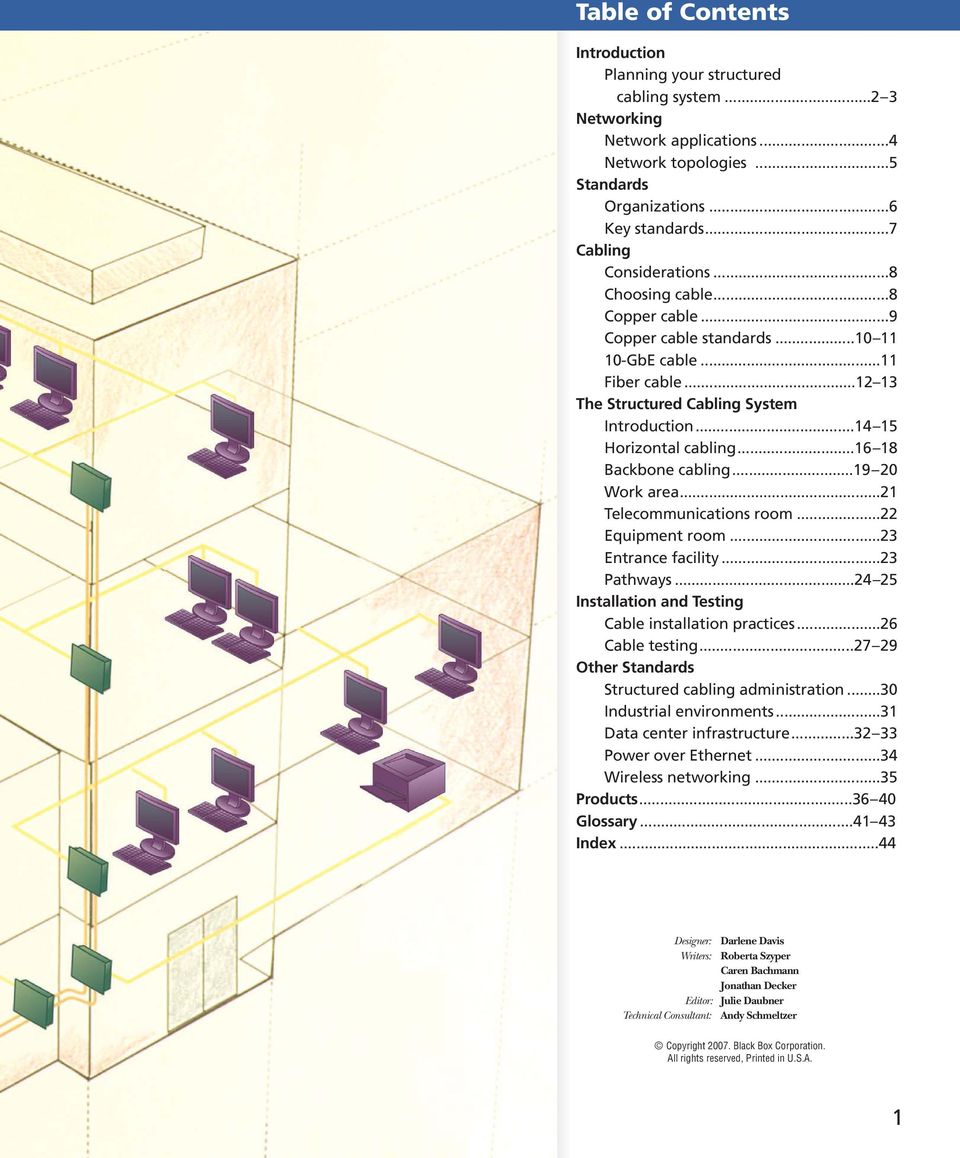
3 Table of Contents Introduction Planning your structured cabling system Networking Network applications...4 Network topologies...5 Standards Organizations...6 Key standards...7 Cabling Considerations...8 Choosing cable...8 Copper cable...9 Copper cable standards GbE cable...11 Fiber cable The Structured Cabling System Introduction Horizontal cabling Backbone cabling Work area...21 Telecommunications room...22 Equipment room...23 Entrance facility...23 Pathways Installation and Testing Cable installation practices...26 Cable testing Other Standards Structured cabling administration...30 Industrial environments...31 Data center infrastructure Power over Ethernet...34 Wireless networking...35 Products Glossary Index...44 Designer: Darlene Davis Writers: Roberta Szyper Caren Bachmann Jonathan Decker Editor: Julie Daubner Technical Consultant: Andy Schmeltzer Copyright Black Box Corporation. All rights reserved, Printed in U.S.A. 1
4 Introduction Section Name Planning your structured cabling The most important design considerations. If you do nothing else, weigh these considerations carefully. Applications. Your system should support data, voice, video, and multimedia applications now and well into the future. You should anticipate applications involving VoIP, PoE, wireless, and security. Life cycle. Plan on a life span of years, with 10 years as the minimum. Your cabling system should have the longest life cycle of any component in your network. Compare that to a network switch, which has an average life span of five years. Compatibility. Your system should be based on open standards and be able to support multiple applications regardless of the vendor. Modular, openstandard systems enable easy changes and easy expansion without changing the cabling and equipment. Bandwidth. The demand for it just keeps growing. The more the better. Enough said. Growth. Anticipate how many users you ll need to support 10, 15, or even 20 years down the road. See Bandwidth above. MACs (Moves, adds, and changes). Your network should facilitate and accommodate frequent changes. A structured cabling system that s smartly designed takes careful planning. Systems are more complex now than ever, and will get even more so as speed and bandwidth demands increase. The system you plan today will be supporting new and different applications for many years. Take your time, review everything, and get ready for the future. For guaranteed-for-life products, expert advice, and complete installation services, call Black Box. 2 Black Box Guide to Structured Cabling

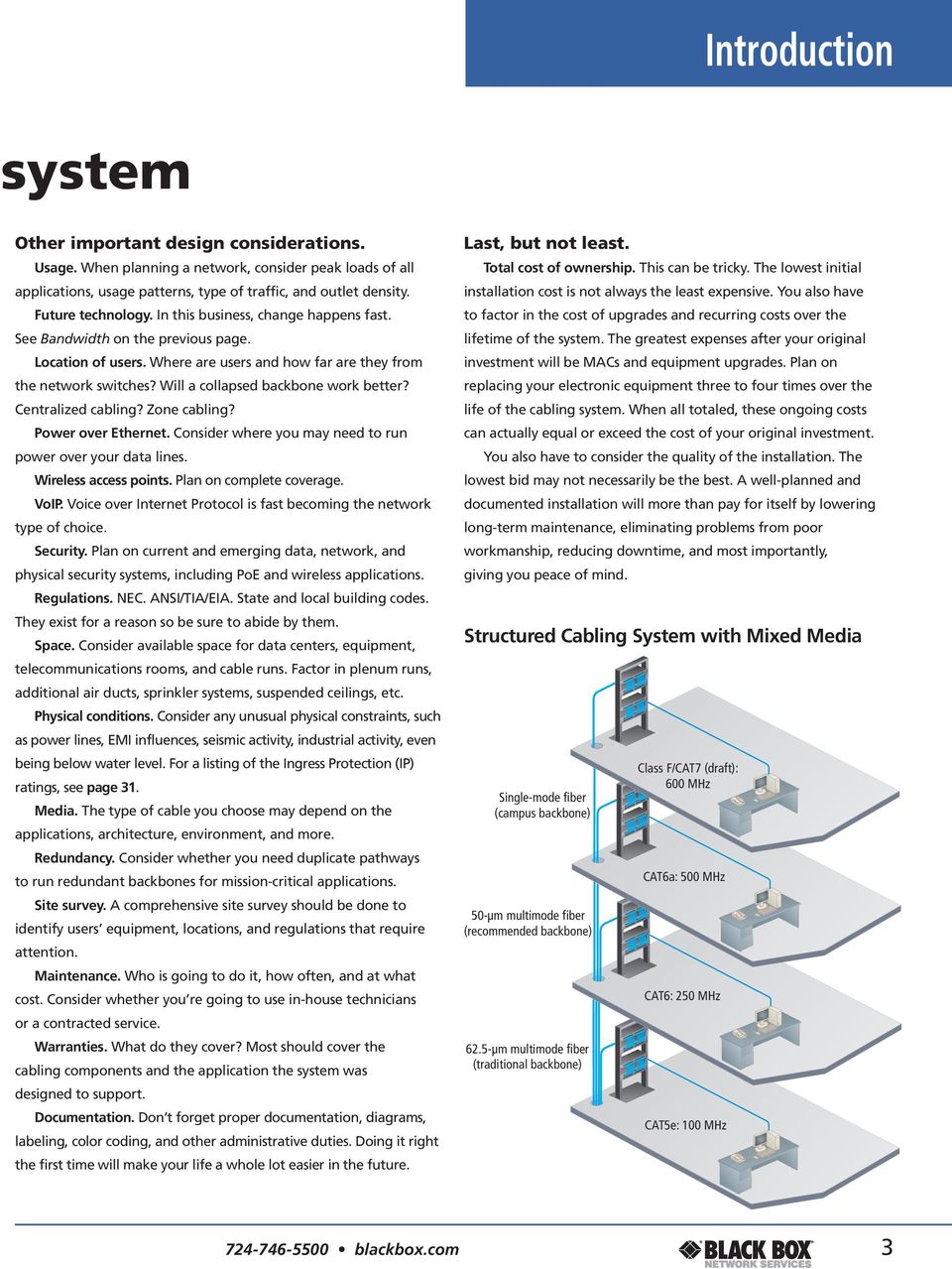
5 Introduction system Other important design considerations. Usage. When planning a network, consider peak loads of all applications, usage patterns, type of traffic, and outlet density. Future technology. In this business, change happens fast. See Bandwidth on the previous page. Location of users. Where are users and how far are they from the network switches? Will a collapsed backbone work better? Centralized cabling? Zone cabling? Power over Ethernet. Consider where you may need to run power over your data lines. Wireless access points. Plan on complete coverage. VoIP. Voice over Internet Protocol is fast becoming the network type of choice. Security. Plan on current and emerging data, network, and physical security systems, including PoE and wireless applications. Regulations. NEC. ANSI/TIA/EIA. State and local building codes. They exist for a reason so be sure to abide by them. Space. Consider available space for data centers, equipment, telecommunications rooms, and cable runs. Factor in plenum runs, additional air ducts, sprinkler systems, suspended ceilings, etc. Physical conditions. Consider any unusual physical constraints, such as power lines, EMI influences, seismic activity, industrial activity, even being below water level. For a listing of the Ingress Protection (IP) ratings, see page 31. Media. The type of cable you choose may depend on the applications, architecture, environment, and more. Redundancy. Consider whether you need duplicate pathways to run redundant backbones for mission-critical applications. Site survey. A comprehensive site survey should be done to identify users equipment, locations, and regulations that require attention. Maintenance. Who is going to do it, how often, and at what cost. Consider whether you re going to use in-house technicians or a contracted service. Warranties. What do they cover? Most should cover the cabling components and the application the system was designed to support. Documentation. Don t forget proper documentation, diagrams, labeling, color coding, and other administrative duties. Doing it right the first time will make your life a whole lot easier in the future. Last, but not least. Total cost of ownership. This can be tricky. The lowest initial installation cost is not always the least expensive. You also have to factor in the cost of upgrades and recurring costs over the lifetime of the system. The greatest expenses after your original investment will be MACs and equipment upgrades. Plan on replacing your electronic equipment three to four times over the life of the cabling system. When all totaled, these ongoing costs can actually equal or exceed the cost of your original investment. You also have to consider the quality of the installation. The lowest bid may not necessarily be the best. A well-planned and documented installation will more than pay for itself by lowering long-term maintenance, eliminating problems from poor workmanship, reducing downtime, and most importantly, giving you peace of mind. Structured Cabling System with Mixed Media Single-mode fiber (campus backbone) 50-µm multimode fiber (recommended backbone) 62.5-µm multimode fiber (traditional backbone) Class F/CAT7 (draft): 600 MHz CAT6a: 500 MHz CAT6: 250 MHz CAT5e: 100 MHz blackbox.com 3
6 Networking Section Name Network applications (or the evolution of Ethernet) Most likely, the network you use now and in the future will be some form of Ethernet. It s the most common network type, and it s the de facto standard in networking. The original Ethernet networks (10BASE5 and 10BASE2) ran over coaxial cable. An upgrade, 10BASE-T, the first vendor-independent implementation of Ethernet, operated over unshielded twisted-pair cable at a then speedy 10 Mbps. As technology progressed, so did Ethernet it went to 100BASE-TX, which runs at 100 Mbps and specifies a minimum of CAT5 cable, although CAT5e is more common. TECH TIP A short history of Ethernet Since 1985, when 10-Mbps Ethernet was first standardized, demand for bandwidth and speed has grown steadily alongside increasingly high-performance applications thus the standardization of 100-Mbps Fast Ethernet in 1995; Gigabit Ethernet in 1998, and in the ratification of 10-Gigabit Ethernet in June Each step forward represents a tenfold increase in performance. 10-Gigabit Ethernet is a logical extension of previous Ethernet networks, which are the predominant technology for high-performance LANs. Gigabit Ethernet (1 Gbps) was developed to handle backbone and server traffic, and is now also deployed to the desktop. When Gigabit Ethernet first appeared, fiber was crucial to running it effectively. Later the IEEE 802.3ab standard approved Gigabit Ethernet over Category 5 cable, although CAT5e or higher is the norm. Today, it is one of the most commonly installed networks. 10-Gigabit Ethernet (10-GbE) brings the familiarity and costeffectiveness of Ethernet to high-performance networks with a speed ten times that of Gigabit Ethernet and a frequency of 500 MHz. It supports high-bandwidth applications, such as imaging and storage. 10-Gigabit Ethernet enables the construction of MANs and WANs that connect geographically dispersed LANs. Today, the most common application for 10-Gigabit Ethernet is as a backbone connecting high-speed LANs, server farms, and campuses. 10-GbE over fiber was ratified in An IEEE amendment in 2006, 802.3an, approved 10-GbE over twisted pair. The TIA/EIA-568- B.2.10 draft specifies transmission performance for Augmented Category 6 cable. The TSB-155 addresses existing Category 6 cabling for 10-GbE. It s emerging as the standard to wire for now. For more information on 10-GbE, see page 11. Think fast. When planning a network, think fast. Network technologies considered cutting edge only a few years ago are now becoming viable options for network upgrades. The shift is to Gigabit Ethernet, 10-GbE, SANs (storage area networks), and even 40+Gbps connections for enterprise and data center backbones. Ethernet Standards Network Standard IEEE Cable Speed Distance Ethernet 10BASE5, Coaxial 10 Mbps 500 m/185 m 10BASE-T 802.3i CAT3 10 Mbps 100 m 10BASE-F, -FB, FL, FP Fiber 10 Mbps 2000 m/500 m Fast Ethernet 100BASE-TX, T u CAT5 100 Mbps 100 m 100BASE-FX 802.3u MM Fiber 100 Mbps 400 m half-duplex, 2 km full-duplex Gigabit Ethernet 1000BASE-T 802.3ab CAT5e/CAT Mbps 100 m 1000BASE-LX 802.3z MM, SM Fiber 1000 Mbps 550 m/5000 m 1000BASE-SX 802.3z MM Fiber 1000 Mbps 550 m 10-Gigabit Ethernet 10GBASE-SR, -LR, LX -ER, -SW, -LW, -EW 802.3ae MM, SM Fiber 10 Gbps 65 m to 40 km 10GBASE-CX ak 100-Ω Twinax 4 x 2.5 Gbps 15 m 10GBASE-T 802.3an UTP 10 Gbps 100 m Other networks. Other networks exist, but they re uncommon. Before the establishment of openarchitecture, standards-based networks like Ethernet, proprietary networks, such as IBM Token Ring, were the norm. 4 Black Box Guide to Structured Cabling

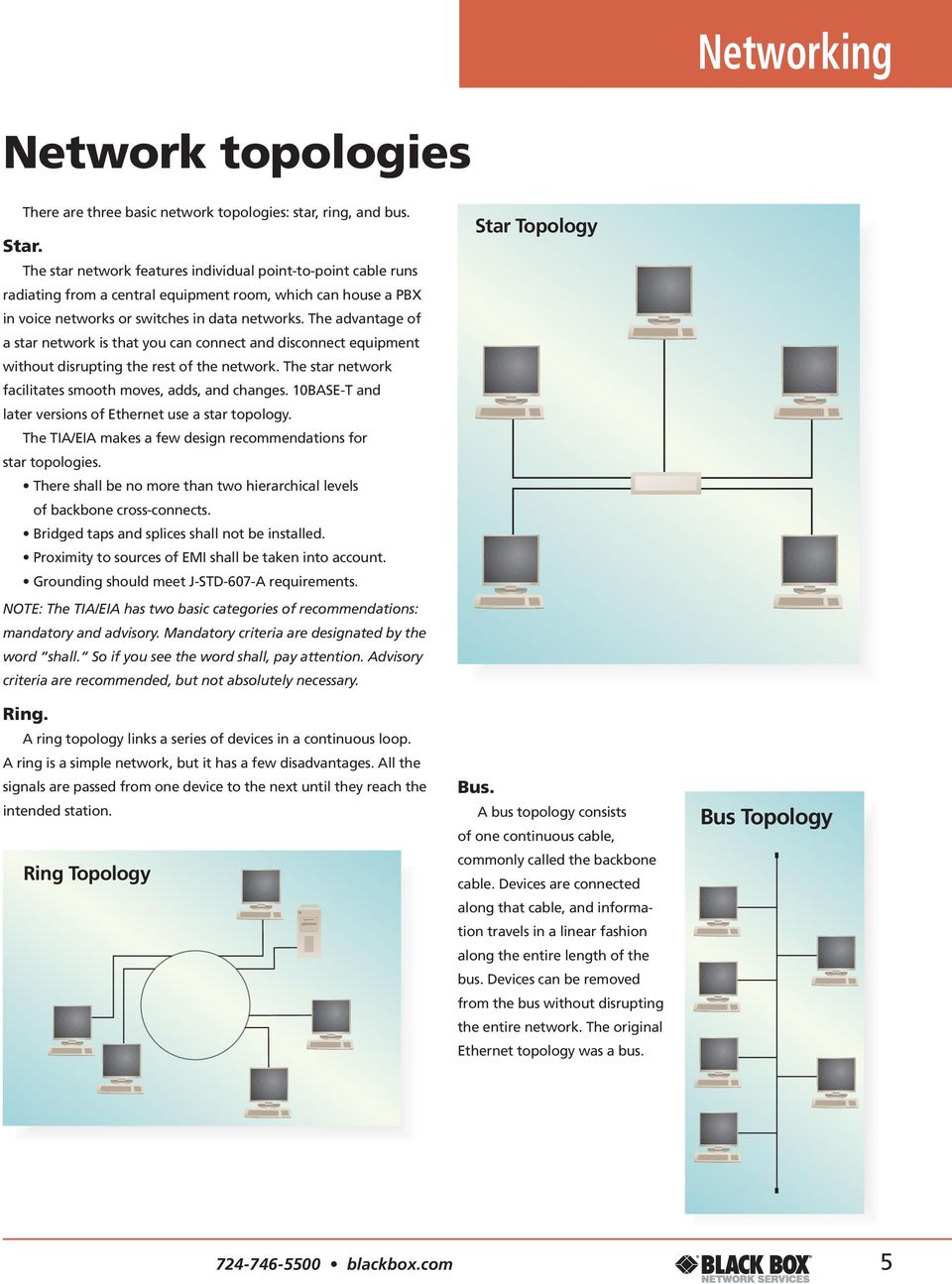
7 Networking Network topologies There are three basic network topologies: star, ring, and bus. Star. The star network features individual point-to-point cable runs radiating from a central equipment room, which can house a PBX in voice networks or switches in data networks. The advantage of a star network is that you can connect and disconnect equipment without disrupting the rest of the network. The star network facilitates smooth moves, adds, and changes. 10BASE-T and later versions of Ethernet use a star topology. The TIA/EIA makes a few design recommendations for star topologies. There shall be no more than two hierarchical levels of backbone cross-connects. Bridged taps and splices shall not be installed. Proximity to sources of EMI shall be taken into account. Grounding should meet J-STD-607-A requirements. NOTE: The TIA/EIA has two basic categories of recommendations: mandatory and advisory. Mandatory criteria are designated by the word shall. So if you see the word shall, pay attention. Advisory criteria are recommended, but not absolutely necessary. Ring. A ring topology links a series of devices in a continuous loop. A ring is a simple network, but it has a few disadvantages. All the signals are passed from one device to the next until they reach the intended station. Ring Topology Star Topology Bus. A bus topology consists of one continuous cable, commonly called the backbone cable. Devices are connected along that cable, and information travels in a linear fashion along the entire length of the bus. Devices can be removed from the bus without disrupting the entire network. The original Ethernet topology was a bus. Bus Topology blackbox.com 5
8 Standards Section Name The importance of standards The importance of standards in today s structured cabling systems can t be underestimated. A standards-based system provides a generic base for building a communications infrastructure without compatibility worries. Standards establish technical criteria and ensure uniform performance among network systems and components. They enable you to build modular networks that can easily accommodate new technologies, equipment, and users. Before 1985, there were no structured cabling standards. Phone companies used their own cabling. Businesses generally used a vendor s proprietary system. Eventually, the Computer Communications Industry Association (CICIA) approached the Electronics Industries Alliance, formerly Association, (EIA) about developing cabling standards, which they did. Discussions centered around developing standards for voice, data, commercial, and residential cabling systems. (The TIA was formed in April 1988 after a merger of the United States Telecommunications Suppliers Association and the Information and Telecommunications Technologies group of the EIA. Thus the TIA/EIA.) In 1991, the TIA/EIA published its Commercial Building Telecommunications Wiring Standard, TIA/EIA-568. It was the first standard to define a generic telecommunications system that would support a multiproduct, multivendor environment. It enabled wiring systems to be planned and installed without definite plans for telecommunications equipment installed later. The standards committees meet and review standards every five years, and the issuance of TSB (Technical Service Bulletins) is on-going. The TIA/EIA has issued a number of standards covering everything from types of cabling, cabling installation, administration, and more. This guide covers the most relevant standards to commercial buildings. Standards organizations. Today, there are a number of organizations developing standards related to cabling and communications. ANSI (American National Standards Institute). This group coordinates and adopts national standards in the U.S. EIA (Electronics Industries Alliance). Best known for developing cabling standards with the TIA, this trade organization is accredited by ANSI to help develop standards on electronics components, telecommunications, Internet security, and more. TIA (Telecommunications Industry Association). Best known for developing cabling standards with the EIA, the TIA is the leading trade association for the information, communications, and entertainment technology industry. The TIA provides standards development and represents the communications sector of the Electronics Industries Alliance (EIA). ISO (International Organization for Standardization). This group is the world s largest developer of standards and includes standards groups from member nations around the world. IEC (International Electrotechnical Commission). This international standards organization prepares and publishes international standards for all electrical, electronic, and related technologies. IEEE (Institute of Electrical and Electronics Engineers, Inc.). This international organization is a leading developer of industrial standards in a broad range of disciplines, including electric power, information technology, information assurance, and telecommunications. This group is known for its committee, which sets the standards for Ethernet. BICSI (Building Industry Consulting Service International, Inc.). This association supports the information transport systems (ITS) industry with information, education, and knowledge assessment. CSA (Canadian Standards Association). Electrical and electronic goods in Canada must be CSA approved. 6 Black Box Guide to Structured Cabling

9 Standards Key standards. ANSI/TIA/EIA The Commercial Building Telecommunications Cabling Standard is covered in ANSI/TIA/EIA-568-B.1, -B.2, and -B.3. ANSI/TIA/EIA-568-B.1: Part 1: General Requirements. This standard covers the general requirements for planning, installing, and verifying structured cabling systems in commercial buildings. It also establishes performance parameters for cable channels and permanent link. One of the major changes in this document from the earlier version is that it recognizes CAT5e or higher cabling for the second data outlet. ANSI/TIA/EIA-568-B.2: Part 2: Balanced Twisted-Pair Cabling Components. This standard discusses balanced twisted-pair cabling components and transmission requirements. ANSI/TIA/EIA-568-B.2-1: Part 2, Addendum 1: 4-Pair, 100-Ohm Category 6 Transmission Performance. This standard specifies components and transmission requirements. ANSI/TIA/EIA-568-B.2-10 (Draft): Augmented Category 6 Transmission Performance. TSB-155: Characterizing Existing Category 6 Cabling to Support 10-Gigabit Ethernet. ANSI/TIA/EIA-568-B.3: Optical Fiber Cabling Components Standard. ANSI/TIA/EIA-568-B.3-1: Additional Transmission Performance Specifications for 50/125 Optical Fiber Cabling Systems. ANSI/TIA/EIA-569-B: Commercial Building Standard for Pathways and Spaces. Where to buy standards ANSI TIA/EIA ISO/IEC Global Engineering Documents (U.S. and Canada) Available from Global Engineering and ANSI in the U.S. and Canada Global Engineering Documents (U.S. and Canada) ANSI (U.S.) ANSI/TIA/EIA-570-A: Residential Telecommunications Cabling Standard. ANSI/TIA/EIA-606-A: Administration Standard for Telecommunications Infrastructure of Commercial Buildings. ANSI/TIA-607: Commercial Building Grounding and Bonding Requirements for Telecommunications. ANSI/TIA/EIA-758: Customer Owned Outside Plant. ANSI/TIA/EIA-862: Building Automation Systems Standard for Commercial Buildings. ANSI/TIA/EIA-942: Telecommunications Infrastructure Standard for Data Centers TSB-1005: Telecommunications Infrastructure Standard for Industrial Premises TSB-162: Telecommunications Cabling Guidelines for Wireless Access Points. ISO ISO 11801:2002: Information Technology Generic Cabling for Customer Premises. ISO/IEC 11801, 2nd Ed.: Includes Class D, E, and F Cabling. ISO/IEC 11801, 2nd Ed. Amendment 1: Covers Class E A and F A.* ISO Class Ea, Edition 2.1: 10-Gigabit over Copper. ISO/IEC TR 24704: Information Technology Customer Premises Cabling for Wireless Access Points. *NOTE: Class E A and F A are expected to be approved in Fall IEEE IEEE 802.3af: Power over Ethernet. (PoE). IEEE 802.3at (draft): Power over Ethernet Plus (PoE Plus). IEEE : Wireless Networking. IEEE 802.3an: 10GBASE-T 10 Gbps (1250 Mbps) Ethernet over Unshielded Twisted Pair (UTP). Other Standards and Regulations National Fire Protection Association: National Electrical Code (NEC) Occupational Safety and Health Act of 1970 State and Local Building, Electrical, and Safety Codes and Ordinances ISO Switzerland: IEEE (U.S. and Canada) (Worldwide) blackbox.com 7
10 Cabling Section Name The importance of cable Cabling is one of the most important components of your network and is the most long-lived with an expected life span of years. You ll most likely replace your network equipment three to four times over the life of the cabling system. Plan on cabling to be about 15% of your total network cost. And don t skimp on the cable or the installation. An investment in a high-quality cabling system is easily justified in reduced downtime, reduced maintenance, and better network performance. So think long-term and buy the best cable and installation services. Cabling considerations. Network application. The type of network you plan to run will influence the cable you choose. Upgrades. Anticipate changes and upgrades in equipment and applications. Life span. Expect 10 years minimum and 20 years maximum. Distance. Review the maximum distance between your network switches and the farthest desktop. Cable routing. Consider bend radius and available space for running cables in the floor and ceiling. Fire risk. Abide by all regulations. Existing cable. Is there existing or abandoned cable that needs to be removed? EMI (electromagnetic interference). Don t forget to check for it. Environment. Any physical limitations that could affect your cable choice? Choosing cable. When planning your cabling infrastructure, you have two basic choices: copper or fiber. Both offer superior data transmission. The decision on which one to use depends on your current network, your future networking needs, and your applications, including bandwidth, distances, environment, cost, and more. Traditionally, copper was used in lower-speed, short-distance networks, and fiber was used in higher-speed, long-distance networks. But with the advent of copper cable running at 10-Gigabit rates, this maxim no longer holds true. You may even find a mixed network with a fiber backbone and copper horizontal cable to be an optimum solution. 8 Black Box Guide to Structured Cabling

11 Copper cable Some of the most obvious advantages copper offers is that it s less expensive than fiber cable and much easier to terminate in the field. Because copper is the most commonly installed cable, there is a vast selection of connecting hardware and networking devices, which are also less expensive than fiber equipment. Unshielded twisted pair (UTP). UTP. This is the most widely used cable. Known as balanced twisted pair, UTP consists of twisted pairs (usually four) in a PVC or plenum jacket. When installing UTP cable, make sure you use trained technicians. Field terminations, bend radius, pulling tension, and cinching can all loosen pair twists and degrade performance. Also take note of any sources of EMI. Choose UTP for electrically quiet environments. Shielded twisted pair (STP, F/UTP, S/FTP, ScTP, S/STP). Use shielded cable to extend distances and to minimize EMI. Sources of EMI, commonly referred to as noise, include elevator motors, fluorescent lights, generators, air conditioners, and printers, etc. In 10-GbE, shielded cable can also reduce ANEXT. Shielded cable can be less balanced than UTP cable because of the shield. The metal sheaths in the cable need to be grounded to cancel the effect of EMI on the conductors. Shielded cable is also more expensive, less flexible, and can be more difficult to install than UTP cable. Most shielded cable is thicker than UTP, so it fills conduits quicker. Keep that in mind as you plan your cable pathways. STP. This is twisted pair cabling with a shield. There are two common shields: foil sheaths and copper braids. Foil gives a 100% shield while a copper braid provides 85% to 95% coverage because of the holes in the braid. But, a braided shield offers better overall protection because it s denser than foil and absorbs more EMI. A braided shield also performs better at lower frequencies. Foil, being thinner, rejects less interference, but provides better protection over a wider range of frequencies. For these reasons, combination foil and braid shields are sometimes used for the best protection. Shields can surround all the twisted pairs and/or the individual twisted pairs. Foiled/Unshielded Twisted Pair (F/UTP). Foil is the most basic cable shield. Cables with an overall foil shield surrounding all the pairs are called F/UTP. These may also be called FTP cables. Shielded Foiled Twisted Pair (S/FTP). This cable features individual foil-shielded pairs and an outer shield, which can be braided or foil. It offers the best protection from external noise and ANEXT. This cable was traditionally called Screened Twisted Pair (ScTP). You may also see it listed as S/STP. Solid vs. stranded conductors. Copper cable conductors can be solid or stranded, whether the cable is shielded or unshielded. Solid-conductor. This cable is designed for both backbone and horizontal cable runs. Use it for runs between equipment rooms or from the telecommunications room to the wallplate. Solid cable shouldn t be bent, flexed, or twisted. Its attenuation is lower than that of stranded-conductor cable. Stranded-conductor. This cable is used primarily as a patch cable between the outlet and desktop and between patching equipment. Stranded-conductor cable is more flexible than solid-core cable. However, attenuation is higher, so the total length of a stranded cable in your channel should be kept to 10 meters or less to reduce signal degradation. PVC vs. plenum. PVC cable features an outer polyvinyl chloride jacket that gives off toxic fumes when it burns. It s most commonly used between the wallplate and workstation. It can be used for horizontal and vertical runs, but only if the building features a contained ventilation system. Plenum cable has a special coating, such as Teflon FEP, which doesn t emit toxic fumes when it burns. A plenum is a space within the building designed for the movement of environmental air. In most office buildings, the space above the ceiling is used for the HVAC air return. If cable goes through that space, it must be plenum-rated. LS0H (Low Smoke, Zero Halogen) is a type of plenum cable with a thermoplastic compound that reduces the amount of toxic and corrosive gases emitted during combustion. Cabling Unshielded twisted-pair cable (UTP) Foiled/unshielded twisted-pair cable (F/UTP) Shielded/foiled twisted-pair cable (S/FTP) Solid conductor Stranded conductor TECH TIP AWG American Wire Gauge (AWG) is a classification system for the diameter of the conducting wire. The more a wire is drawn or sized, the smaller the Foil Foil Braid diameter. For example, a 24-gauge wire is smaller than an 18-gauge wire blackbox.com 9
12 Cabling Section Name Copper cable standards As the need for increased bandwidth grows and applications continually get more complex, so does copper twisted-pair cable. Below are brief explanations of specifications for twisted-pair cabling and the applications for which each is best suited. TIA/EIA-568B specifies several categories for both the components and the cable. The ISO/IEC specifies categories for the components and classes for the cabling. Cable categories. Category 3 (CAT3) cable is rated for networks operating up to 16 Mbps. It is suitable for voice transmissions (not VoIP). ISO/IEC refers to the end-to-end channel as Class C. Category 4 cable is rated for transmission of 16 Mbps up to 100 meters. It is considered obsolete. Category 5 (CAT5) cable was common for 100-Mbps LANs. It was ratified in 1991 and is now considered obsolete. Enhanced Category 5 (CAT5e/Class D) cable, ratified in 1999, was designed to enable twisted-pair cabling to support full-duplex, 100-MHz applications such as 100BASE-TX and 1000BASE-T. CAT5e introduces stricter performance parameters such as Power-Sum Near-End Crosstalk (PS-NEXT), Equal-Level Far-End Crosstalk (EL-FEXT), and Power-Sum Equal-Level Far-End Crosstalk (PS-ELFEXT). It also introduces channel and component testing. Category 6 (CAT6/Class E) cable easily handles Gigabit Ethernet (1000BASE-T) applications. It s a 100-ohm cable with a frequency of 250 MHz. CAT6 has far more stringent performance parameters than CAT5e, and is characterized by channel, link, and component testing. In addition, CAT6 components must be backwardscompatible with lower-level components. It s important to note with CAT6, as with all categories, that all the components in a channel must be of the same level. If not, the channel will perform at the lowest level. The TIA TSB-155: Characterizing Existing Category 6 Cabling to Support 10-Gb Ethernet, ISO/IEC 24750, and IEEE 802.3an all address 10GBASE-T over UTP cabling. They also address installation practices to mitigate Alien Crosstalk (ANEXT) though it is not a specified CAT6 measurement. CAT6 is also recommended for midspan PoE applications. At the time of this publication (mid 2007), CAT6 cabling is the system of choice for new installations because of the increased headroom. Augmented Category 6 (CAT6a/Class E A ), a relatively new standard, is designed to meet or exceed the requirements of 10-Gigabit Ethernet over copper at 100 meters. It extends the frequency range of CAT6 from 250 MHz to 500 MHz. Like CAT6, it includes an integrated set of channel, permanent link, and component requirements. It introduces an Alien Crosstalk (ANEXT) measurement for closely bundled six around one cable configurations. (For information on ANEXT, see pages ) Both UTP and F/UTP cables can be used in CAT6a deployments. The F/UTP cable, though, virtually eliminates the problem of ANEXT. Balanced Twisted-Pair Cable Specifications CAT5 CAT5e CAT6 CAT6a CAT7 Frequency 100 MHz 100 MHz 250 MHz 500 MHz 600 MHz Attenuation (min. at 100 MHz) 22.0 db 22.0 db 19.8 db 20.8 db Characteristic Impedance 100 ohms ± 15% 100 ohms ± 15% 100 ohms ± 15% 100 ohms ± 15% NEXT (min. at 100 MHz) 32.3 db 35.3 db 44.3 db 27.9 db 62.1 db PS-NEXT (min. at 100 MHz) 32.3 db 42.3 db 59.1 db EL-FEXT (min. at 100 MHz) 23.8 db 27.8 db 9.3 db (not yet specified) PS-ELFEXT (min. at 100 MHz) 20.8 db 24.8 db (not yet specified) PS-ANEXT (min. at 500 MHz) 49.5 db PS-AELFEXT (min. at 500 MHz) 16.0 db 20.1 db 20.1 db 23.0 db 14.1 db Return Loss (min. at 100 MHz) 16.0 db 20.1 db 20.1 db 8.0 db 14.1 db Delay Skew (max. per 100 m) 45 ns 45 ns 20 ns Networks Supported 100BASE-TX 1000BASE-T 1000BASE-T 10GBASE-T (not yet specified) NOTE: The ISO currently has Class F A (Category 7a) requirements under development. They are based on Class F requirements and the Category 7 non-rj style plug. They specify a bandwidth of 600 to 1000 MHz. 10 Black Box Guide to Structured Cabling

13 Cabling Category 7/Class F is only an ISO/IEC 11801:2002 standard and is not in a draft stage by the TIA. It s designed to meet or exceed the requirements of 10-Gigabit Ethernet. The standard specifies a frequency of MHz over 100 meters of fully shielded twisted-pair cabling. Category 7/Class F cable consists of four individually shielded pairs inside an overall shield. It s called Shielded/Foiled Twisted Pair (S/FTP) or Foiled/Foiled Twisted Pair (F/FTP). With both, each twisted pair is enclosed in foil. In S/FTP cable, the four pairs are encased in an overall metal braid. In F/FTP, the four pairs are encased in an overall foil shield. The fully shielded cable virtually eliminates crosstalk between the pairs. In addition, the cables are noise resistant, making the Category 7/Class F system ideal for high EMI areas. It s well suited for applications where fiber optic cable would typically be used but costs less. Category 7/Class F cable can be terminated with two interface designs as specified in IEC and IEC One is an RJ-45 compatible GG-45 connector. The other is the more common TERA connector launched in Category 7a/Class F A is a pending ISO class based on the use of S/FTP cable to 1000 MHz. 10-GbE and twisted-pair cable. The cabling industry is developing two different standards that can be used in 10-GbE applications. One is for use with Category 6 (CAT6) cable, and one is for Augmented Category 6 (CAT6a). These standards specify requirements for each component in the channel, such as cable and connecting hardware, as well as for the permanent link, and the channel. 10-GbE using CAT6. The first set of standards define cabling performance when using Category 6/Class E cabling for 10-GbE applications. The TIA/EIA version is the Technical Systems Bulletin 155 (TSB 155). ISO/IEC TR is a technical report that details measuring existing Class E systems. No matter what the cable length is, CAT6 cable must meet 10-GbE electrical and ANEXT specifications up to 500 MHz. However, the CAT6 standard now specifies measurements only to 250 MHz, and it does not have an ANEXT requirement. There is no guarantee CAT blackbox.com Comparison of Categories and Classes TIA TIA ISO ISO Frequency (Components) (Cabling) (Components) (Cabling) MHz CAT5e CAT5e CAT5e Class D MHz CAT6 CAT6 CAT6 Class E MHz CAT6a CAT6a CAT6a Class E A MHz n/s n/s CAT7 Class F MHz n/s n/s CAT7 A Class 7 A can support a 10-GbE system. But the TSB provides guidelines for ways to help mitigate ANEXT. One way to lessen or eliminate ANEXT altogether is to use shielded cable and equipment, such as F/UTP cable. Another way is to follow mitigating installation techniques, such as using non-adjacent patch panels, separating equipment cords, unbundling horizontal cabling, avoiding areas of high EMI, etc. 10-GbE using CAT6a. The second set of standards will define Augmented Category 6 (CAT6a) and Augmented Class E (Class E A ) cabling. The newer, augmented cabling systems are designed to support 10-GbE over a 100-meter horizontal UTP channel. The TIA/EIA version is in draft as of mid 2007 and will be published as ANSI/TIA/EIA-568B.2-AD10. It recognizes both UTP and STP CAT6a systems. It extends CAT6 electrical parameters such as NEXT, FEXT, return loss, insertion loss, and more to 500 MHz. It also specifies near- and far-end Alien Crosstalk (ANEXT, AFEXT) to 500 MHz. It also goes beyond IEEE 802.3an by establishing the electrical requirements for the permanent link and cabling components. The ISO Class E A standard will be published in a new edition of the standard. 10-GbE Cabling Link Segment Cable Standard Distances CAT6/Class E Unshielded TSB-155, ISO/IEC TR (37*) m to 100 m Shielded TSB-155, ISO/IEC TR (37*) m to 100 m CAT6a/Class E A TIA/EIA-568-B.21-AD m Unshielded ISO/IEC Class F ISO/IEC TR m Shielded * TSB-155 allows 37 meters in CAT6 installations without mitigation. NOTE: For S/FTP and F/UTP cable, see blackbox.com. 11

14 Cabling Section Name Fiber cable Fiber optic technology uses light as an information carrier. The cable consists of a core, a single continuous strand of glass or plastic that s measured in microns (µ) by the size of its outer diameter. This is the pathway for light rays carrying data signals. Fiber is the preferred cable for applications that require high bandwidth, long distances, and immunity to electrical interference. It s the most commonly installed backbone cable as well. Cable jacket Aramid yarn Coating Cladding Core The advantages of fiber. Greater bandwidth. Because fiber provides far greater bandwidth than copper and has proven performance at rates up to 10 Gbps, it gives network designers future-proofing capabilities. Fiber can carry more information with greater fidelity than copper. Low attenuation and greater distance. Because the fiber optic signal is made of light, very little signal loss occurs during transmission, and data can move at high speeds and greater distances. Fiber distances can range from 300 meters (984.2 ft.) to 40 kilometers (24.8 mi.), depending on the style of cable, wavelength, and network. (Fiber distances are usually measured in metric units.) Security. Your data is safe with fiber. It doesn t radiate signals and is extremely difficult to tap. If the cable is tapped, it leaks light causing failures. Immunity. Fiber provides extremely reliable data transmission. It s completely immune to many environmental factors that affect copper cable, such as EMI/RFI, crosstalk, impedance, and more. You can run fiber cable next to industrial equipment without worry. It s also less susceptible to temperature fluctuations than copper cable is. Design. Fiber is lightweight, thin, and more durable than copper cable. It has pulling specifications that are up to 10 times greater than copper cable. Its small size makes it easier to handle, and it takes up less space in cabling ducts. Like copper, fiber is available with PVC and plenum jackets. Although fiber is more difficult to terminate than copper, advancements in connectors are making termination easier. And fiber is actually easier to test than copper cable. Costs. Installation costs for fiber are higher than copper because of the skill needed for termination. Overall, fiber is more expensive than copper in the short run, but it may actually be less expensive in the long run. Fiber typically costs less to maintain, has less downtime, and requires less networking hardware. Multimode vs. single-mode There are two types of fiber cable: multimode and single-mode. Most of the fiber cable used within a building is multimode. Single-mode cable, with its higher performance, is more commonly used in campus networks between buildings. Multimode, 50- and 62.5-micron cable. Multimode cable has a large-diameter core and multiple pathways of light. It comes in two core sizes: 50-micron and 62.5-micron. Fiber Performance Standards Attenuation Bandwidth Distance Fiber Type Wavelength (db/km) Max. (MHz/km) Gigabit Ethernet 10-GbE Multimode 50-/125-Micron 850 nm m 300 m 1300 nm m 300 m 62.5-/125-Micron 850 nm m 300 m 1300 nm m 300 m Single-Mode 8 10-/125-Micron Premises 1310 nm km* 10 km* 1550 nm km* 40 km* Outside Plant 1310 nm km* 10 km* 1550 nm km* 40 km* 12 Black Box Guide to Structured Cabling

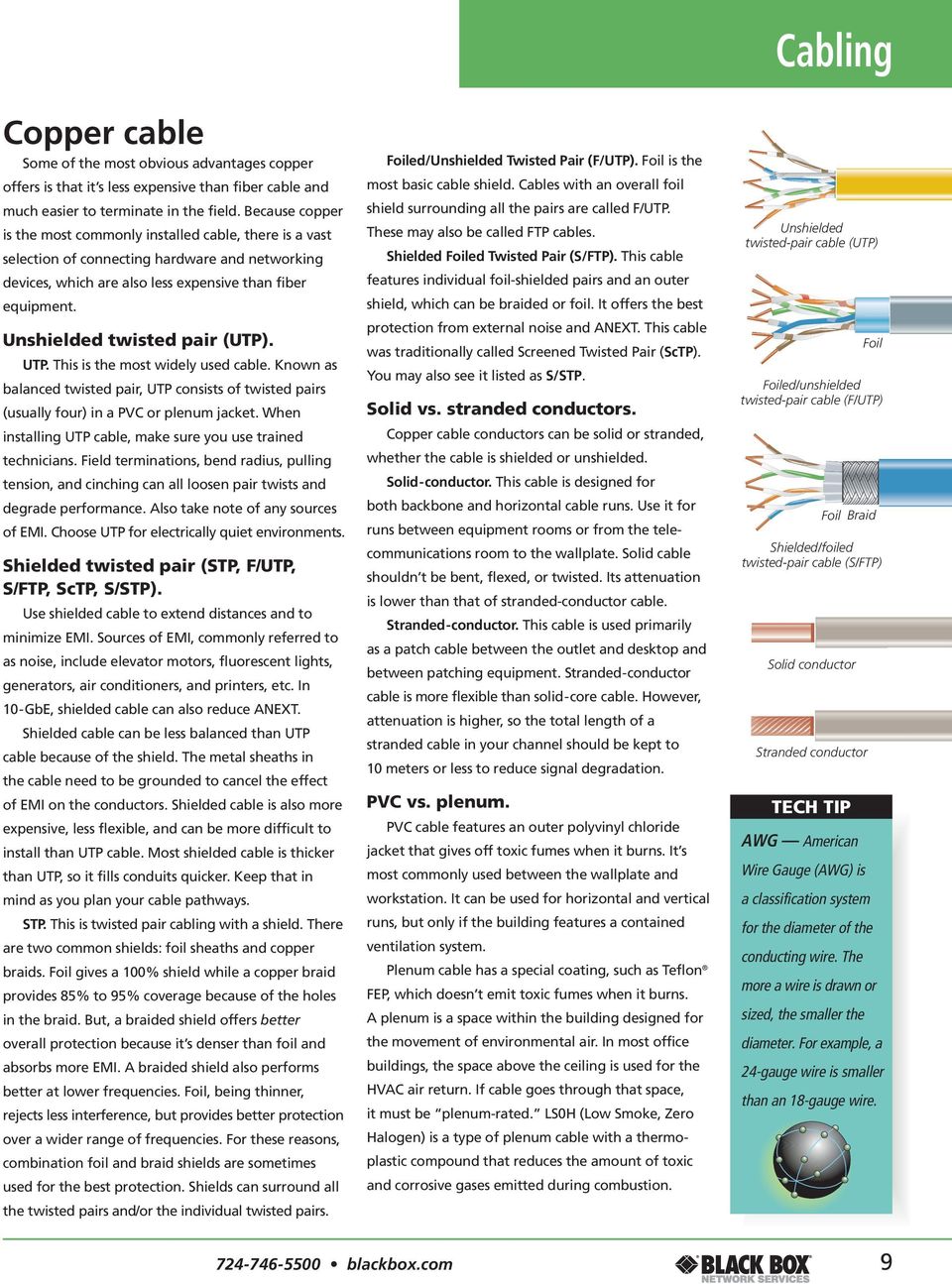
15 Cabling 62.5-micron multimode 50-micron multimode 8 10-micron single-mode 62.5 µm 125 µm 50 µm 125 µm 8 10 µm 125 µm Multimode fiber cable can be used for most general data and voice applications. Both 50- and 62.5-micron cable feature the same cladding diameter of 125 microns, but 50-micron fiber cable features a smaller core (the light-carrying portion of the fiber). LED and laser light sources can also be used with both 50- and 62.5-micron cable. The big difference between the two is that 50-micron cable provides longer link lengths and/or higher speeds, particularly in the 850-nm wavelength. Although both can be used in the same way, 50-micron cable is recommended for backbone, horizontal, and intrabuilding connections, and should be considered for any new construction and installations. There is still a market for 62.5-micron multimode products though because many buildings already have multimode cable installed. But it bears repeating: For new installations, use 50-micron cable. Multimode fiber cable is traditionally orange. 50-micron fiber cable that s optimized for 10-Gigabit applications is aqua. Single-mode, 8 10-micron cable. Single-mode cable has a small 8 10-micron glass core and only one pathway of light. With only a single wavelength of light passing through its core, single-mode cable realigns the light toward the center of the core instead of simply bouncing it off the edge of the core as multimode does. Single-mode cable provides 50 times more distance than multimode cable. Consequently, single-mode cable is typically used in long-haul network connections spread out over extended areas, including cable television and campus backbone applications. Telcos use it for connections between switching offices. Single-mode cable is traditionally yellow. Specialty fiber cable. Depending on your application, you may want to use a specialty fiber cable. To save money on innerducts and conduit, you can use a fiber cable with an aluminum interlocking armor covering an internal plenum jacket. It s flexible but extraordinarily strong so you can run this cable anywhere in your building. If you need to run cable outdoors, consider an indoor/outdoor cable that can be pulled anywhere, between and within buildings. Because of its tough construction, it doesn t have to be terminated within 50 feet of the building entrance. Outdoor fiber cable is typically black. Both cables are available at blackbox.com. An aluminum interlocking armor enables this fiber cable to be run anywhere indoors. This tight-buffered cable can be run anywhere indoors or out blackbox.com 13
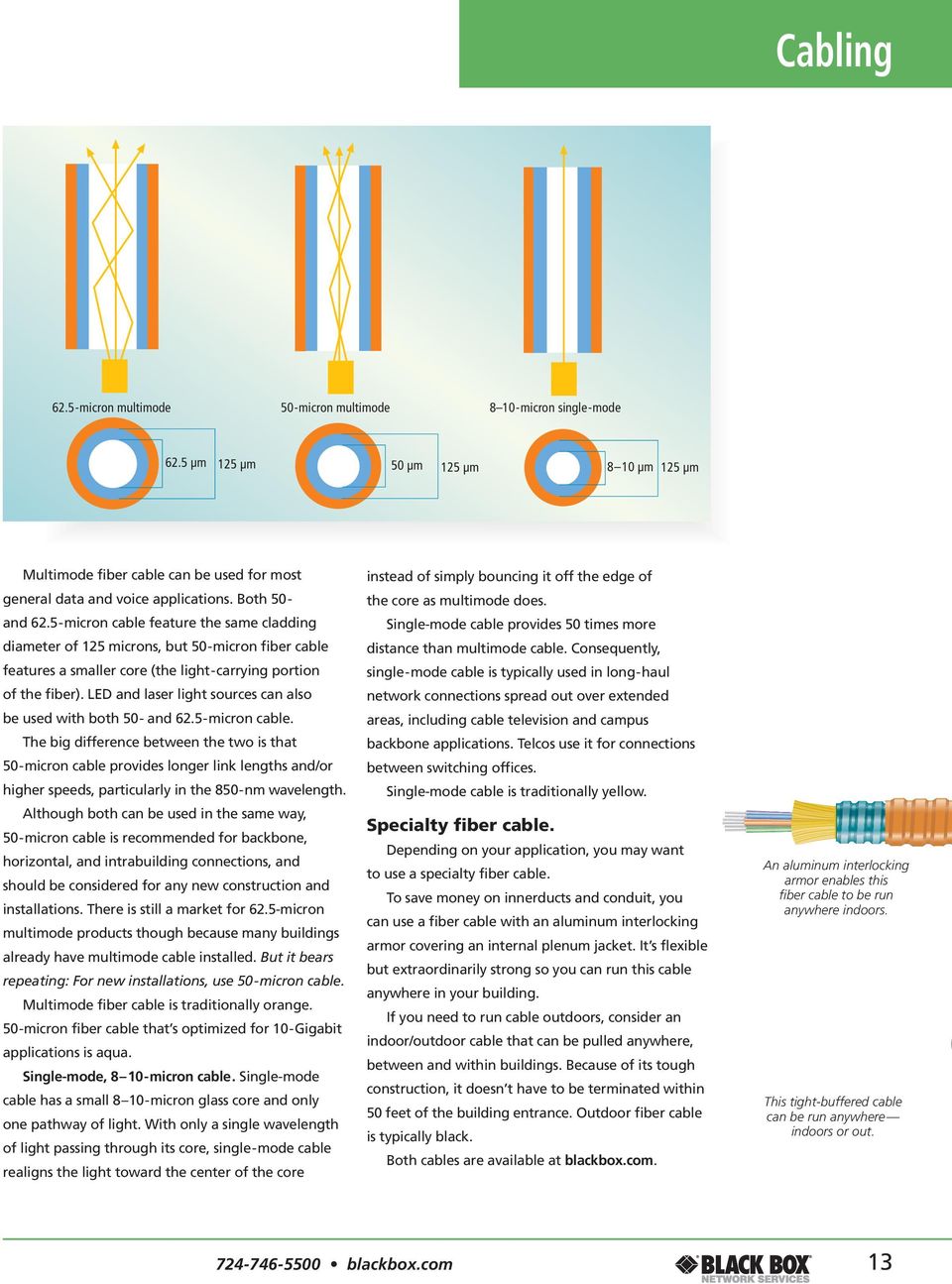
16 Structured Section Name Cabling System The structured cabling system A structured cabling system, as defined by the TIA/EIA, consists of six subsections: 1 Horizontal Cabling 2 Backbone 3 Room Cabling Telecommunications (TR) 4 Work 5 Equipment 6 Entrance Area (WA) Room (ER) Facility (EF) NOTE: This review is intended to present only the highlights of applicable TIA/EIA standards and is not to be considered a definitive resource for planning your system. For information on how you can get the complete standards, see page Black Box Guide to Structured Cabling
17 Structured Cabling System Horizontal cabling. The horizontal cabling system encompasses everything between the telecommunications room cross-connects to the telecommunications outlets in the work area. It s called horizontal because the cable typically runs horizontally above the ceiling or below the floor from the telecommunications room, which is usually on the same floor. For details, see pages Backbone cabling. The backbone system encompasses all the cabling between telecommunications rooms, equipment rooms, entrance facilities, and between buildings. For details, see pages Telecommunications room. The telecommunications room holds the termination equipment needed to connect the horizontal wiring to the backbone wiring. A building must contain at least one telecommunications room, and it should be on the floor it serves. For details, see page 22. Work area. The work area consists of all the components between the telecommunications outlet and the user s workstation equipment. For details, see page 21. Equipment room. The equipment room houses telecommunications systems, such as PBXs, servers, and the mechanical terminations. It s different than the telecommunications room because of the complexity of the components. An equipment room may take the place of a telecommunications room or it may be separate. For details, see page 23. Entrance facility. The entrance facility is the point where the outdoor cable connects with the building s backbone cabling. This is usually the demarcation point between the service provider and the customerowned systems. For details, see page blackbox.com 15

18 Structured Section Name Cabling System Horizontal cabling Horizontal Cabling Distances 5 m (16.4 ft.) maximum Work area Phone 5 m (16.4 ft.) maximum Telecommunications outlet 90 m (295 ft.) maximum 90 m (295 ft.) maximum Patch cable: 5 m (16 ft.); Total patch cable on both ends: 10 m (32.8 ft.) Work area Phone Telecommunications outlet 90 m (295 ft.) maximum 5 m (16.4 ft.) maximum Work area Phone Telecommunications outlet Telecommunications room Planning horizontal cabling. Horizontal cabling considerations. The horizontal cabling system encompasses every- Change. Plan for it. Accept the fact that after thing between the telecommunications room cross- your system is up, most of the work will be MACs. connects to the outlets in the work area. It s specified You should be able to relocate users and equipment in TIA/EIA-568-B.1 and includes: without changing the cable or disrupting users. Run Horizontal cabling. cable to all areas of the building, even if they re Telecommunications outlets. vacant. When expansion occurs, you ll be ready. Telecommunications connectors. Maintenance. Set up your system so that it Cross-connects. facilitates on-going maintenance. Patch cords. Equipment. Satisfy current network requirements, Consolidation point (if any). but consider future equipment changes, too. Most of the cables in your building will be part of Applications. Consider your current applications the horizontal cabling system. These can include your while planning for more bandwidth-intensive voice, data, multimedia, security, HVAC, PoE, wireless, applications in the future. and other systems. User work areas. Don t be surprised if your After a building is constructed, the horizontal organization decides to change its floor plan cabling system is subject to the most activity in frequently. Just be prepared. terms of users, locations, changes in building layouts, Keeping up appearances. To maintain a neat and more. But the horizontal cable is much less office, horizontal cabling should never be visible. accessible than the backbone cable. To change the There are many installation methods, including raised horizontal cabling after installation can be very access floor, conduit, cable trays, ceiling pathways, expensive, time-consuming, and disruptive. Plan raceways, and perimeter pathways. carefully because the horizontal cabling is extremely Physical layouts. Consider how and where you re important to the design and effectiveness of your going to run cable. Do you have enough space to cabling system. 16 Black Box Guide to Structured Cabling
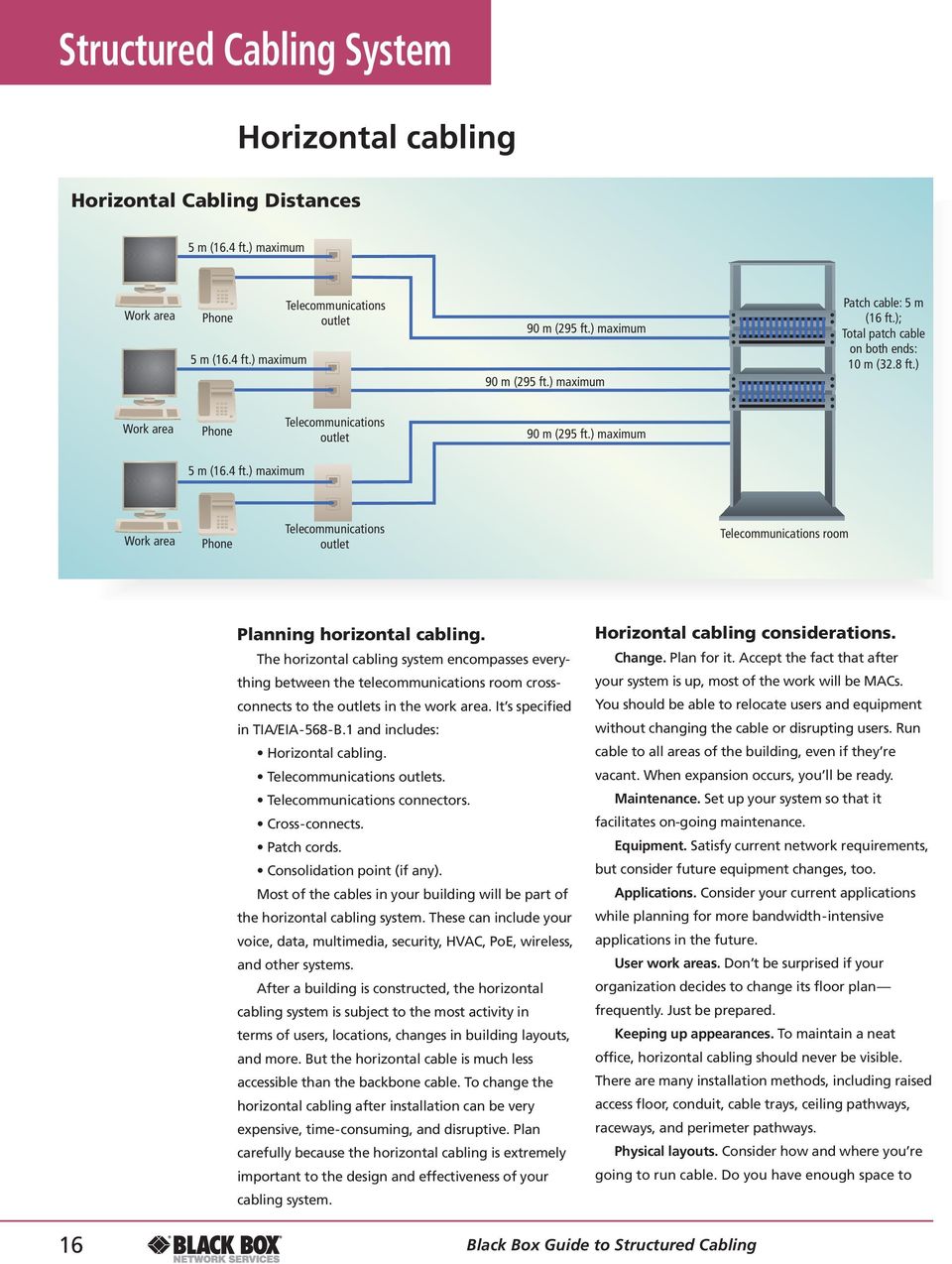
19 Structured Cabling System accommodate bend radius and fill ratios? What are fire and building code regulations? Are there physical barriers or environmental factors, such as seismic planning or water levels? You get the idea. Documentation. Plan on thoroughly labeling and documenting all connections in the telecommunications room and at the workstation outlet. EMI. Take into account any areas of high EMI, such as near elevators, motors, and other equipment. Horizontal topology. The following are highlights of the TIA/EIA-568- B.1 specifications. The horizontal system shall (remember that shall means required) be installed in a star topology. Each work-area telecommunications outlet shall be connected to the horizontal cross-connect in the telecommunications room. The telecommunications room should be on the same floor as the work area. Bridge taps and splices shall not be installed for copper cable. No more than one transition point or consolidation point shall be installed. (The exception comes later.) Electrical components shall not be installed as part of the horizontal cabling. No applicationspecific components can go there either. They can go next to the outlets or cross-connects. A minimum of two telecommunications outlets shall be installed for each work area. One should be at least CAT3 or higher for voice. The other should be CAT5e or higher for data. You can add more if you want. Maximum horizontal distances. Horizontal run: 90 meters (295.3 ft.) from the telecommunications outlet to the horizontal cross-connect. Work-area patch cord: 5 meters (16.4 ft.). Total of work-area and cross-connect patch cords, equipment cables, jumpers, etc: 10 meters (32.8 ft.). Recognized media. Cables You can use these cables individually or in combination. 4-pair, 100-ohm UTP or ScTP cable (24 AWG, solid conductors) (EIA/TIA-568-B.2). 2-fiber (or more) 50- and 62.5-micron fiber optic cable (EIA/TIA-568-B.3). 150-ohm shielded twisted-pair cable is recognized, but not recommended. Hybrid cables (multiple cable types in one sheath) are allowed, provided each individual cable is recognized and meets the transmission and colorcoding requirements for that cable. For copper horizontal runs, use solid-conductor cable. Use stranded conductor cable for the patch cords. Make sure your cables are marked with the correct performance category. And match performance categories of the channel equipment, such as jacks, patch cords, patch panels, etc. This ensures category performance. Connectors 8-position modular jack and plug with T568A or T568B pinning. See page 21. SC and ST fiber connectors. Small form-factor fiber connectors. 4-pair, 100-ohm, solid-conductor UTP cable 2- or 4-strand, 50- or 62.5-micron fiber optic cable SC ST LC Small-form factor connectors such as the LC, MT-RJ, and VF-45 8-wire RJ blackbox.com 17

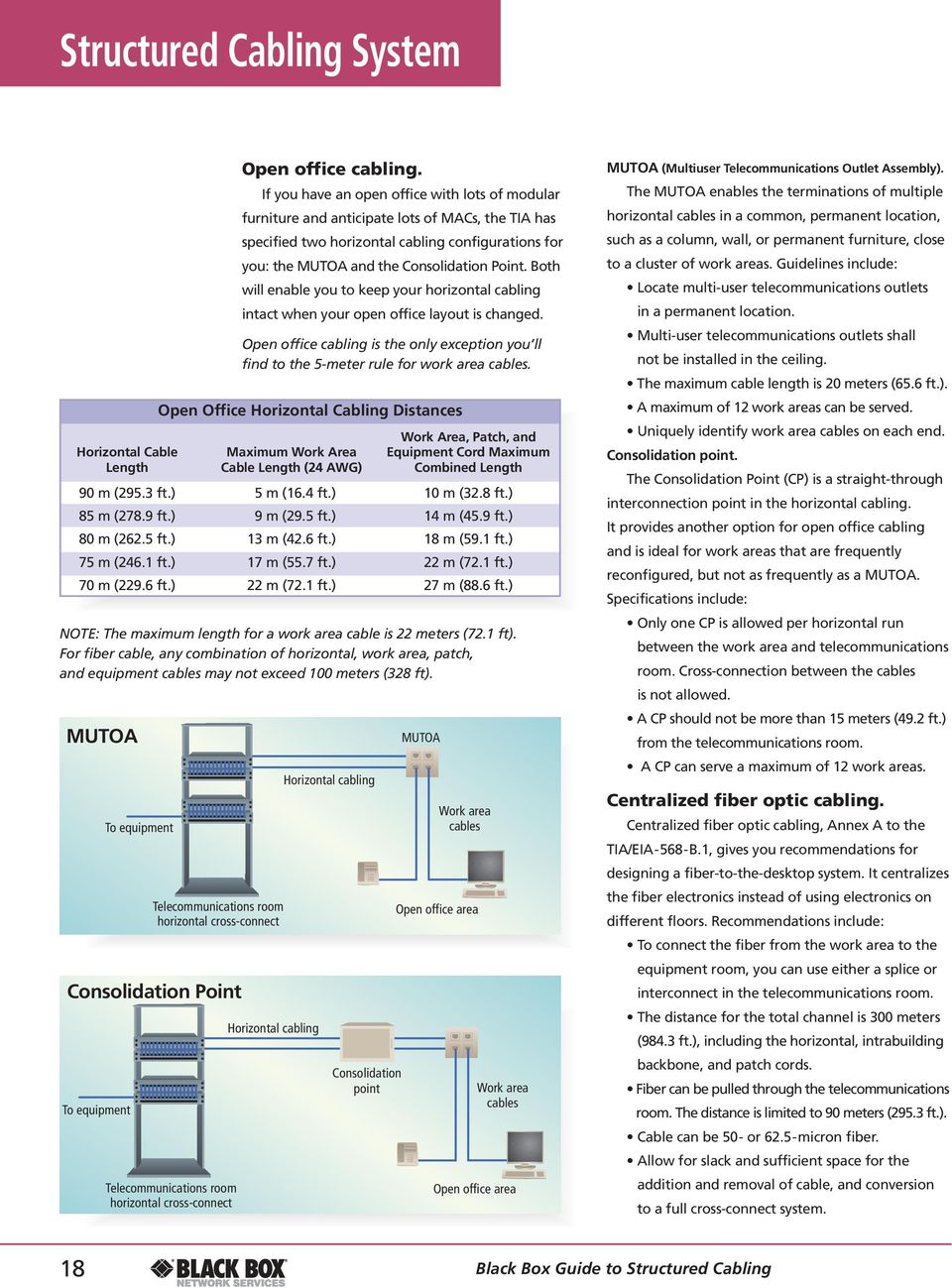
20 Structured Section Name Cabling System Consolidation Point To equipment To equipment Telecommunications room horizontal cross-connect Open office cabling. If you have an open office with lots of modular furniture and anticipate lots of MACs, the TIA has specified two horizontal cabling configurations for you: the MUTOA and the Consolidation Point. Both will enable you to keep your horizontal cabling intact when your open office layout is changed. Open office cabling is the only exception you ll find to the 5-meter rule for work area cables. Open Office Horizontal Cabling Distances Work Area, Patch, and Horizontal Cable Maximum Work Area Equipment Cord Maximum Length Cable Length (24 AWG) Combined Length 90 m (295.3 ft.) 5 m (16.4 ft.) 10 m (32.8 ft.) 85 m (278.9 ft.) 9 m (29.5 ft.) 14 m (45.9 ft.) 80 m (262.5 ft.) 13 m (42.6 ft.) 18 m (59.1 ft.) 75 m (246.1 ft.) 17 m (55.7 ft.) 22 m (72.1 ft.) 70 m (229.6 ft.) 22 m (72.1 ft.) 27 m (88.6 ft.) NOTE: The maximum length for a work area cable is 22 meters (72.1 ft). For fiber cable, any combination of horizontal, work area, patch, and equipment cables may not exceed 100 meters (328 ft). MUTOA Telecommunications room horizontal cross-connect Horizontal cabling Horizontal cabling Consolidation point MUTOA Work area cables Open office area Work area cables Open office area MUTOA (Multiuser Telecommunications Outlet Assembly). The MUTOA enables the terminations of multiple horizontal cables in a common, permanent location, such as a column, wall, or permanent furniture, close to a cluster of work areas. Guidelines include: Locate multi-user telecommunications outlets in a permanent location. Multi-user telecommunications outlets shall not be installed in the ceiling. The maximum cable length is 20 meters (65.6 ft.). A maximum of 12 work areas can be served. Uniquely identify work area cables on each end. Consolidation point. The Consolidation Point (CP) is a straight-through interconnection point in the horizontal cabling. It provides another option for open office cabling and is ideal for work areas that are frequently reconfigured, but not as frequently as a MUTOA. Specifications include: Only one CP is allowed per horizontal run between the work area and telecommunications room. Cross-connection between the cables is not allowed. A CP should not be more than 15 meters (49.2 ft.) from the telecommunications room. A CP can serve a maximum of 12 work areas. Centralized fiber optic cabling. Centralized fiber optic cabling, Annex A to the TIA/EIA-568-B.1, gives you recommendations for designing a fiber-to-the-desktop system. It centralizes the fiber electronics instead of using electronics on different floors. Recommendations include: To connect the fiber from the work area to the equipment room, you can use either a splice or interconnect in the telecommunications room. The distance for the total channel is 300 meters (984.3 ft.), including the horizontal, intrabuilding backbone, and patch cords. Fiber can be pulled through the telecommunications room. The distance is limited to 90 meters (295.3 ft.). Cable can be 50- or 62.5-micron fiber. Allow for slack and sufficient space for the addition and removal of cable, and conversion to a full cross-connect system. 18 Black Box Guide to Structured Cabling
21 Structured Cabling System Backbone cabling Backbone Cabling Distances Building 2 Telecommunications room 90 m (295.3 ft.) horizontal cabling Work area Building m (984.3 ft.) building backbone cabling 2000 m ( ft.) campus backbone Entrance facility Entrance facility Planning backbone cabling. Backbone cabling provides the main information conduit connecting all your horizontal cabling within a building and between buildings. It s the interconnection between telecommunication rooms, equipment rooms, and entrance facilities. In large organizations, you can connect multiple LANs with a high-speed backbone to create large service areas. Backbone cabling is specified in TIA/EIA-568-B.1 and includes: Cabling Intermediate and main cross-connects Mechanical terminations Patch cords or jumpers for backboneto-backbone connections Another type of backbone is called a collapsed backbone. This is usually a short backbone that has a central router or switch interconnecting all the LAN segments in a given building. The main requirement of any backbone is that it be able to support your current needs as well as future applications. When planning your backbone, take these factors into consideration. Performance and applications. Plan on far more bandwidth than you think you ll ever need. Site size and user population. Current size and future growth requirements must be considered. Plan your backbone to accommodate the maximum number of connections anticipated in all telecommunications rooms, equipment rooms, and entrance facilities. You may want to consider installing extra, unused copper or dark fiber cable for future needs. Distance. The distance you run your backbone will most likely determine the type(s) of cable you use. Redundancy and diverse path routing. Consider diverse path routing for mission-critical systems. This consists of running redundant backbones in separate pathways far from each other. The redundant cables should never be run in the same conduit. Although they terminate at the same place, they will follow different routes to get there, such as on different sides of a building. Useful life. Be aware of the minimum length of time the backbone cabling is expected to serve. Replacing backbone cable is inconvenient and expensive blackbox.com 19
22 Structured Cabling System Backbone Topology Backbone cable Equipment room main cross-connect Telecommunications room To work area via horizontal cable Backbone cable Equipment room intermediate cross-connect Backbone cable Telecommunications room To work area via horizontal cable Physical environment. EMI. Install copper away from areas of EMI. Physical plant systems. Install away from a building s physical plant systems, such as electrical wiring, plumbing, and sprinklers. Do not install backbone cable in elevator shafts. Environment. Air spaces should be examined for dampness, which can corrode copper cable. In addition, take into account all pathway standards and requirements. Fire resistance. Pay attention to all fire regulations. Security. Make sure your backbone cable and all equipment and telecommunications rooms are inaccessible to unauthorized personnel. Backbone topology. The recommended topology is a conventional hierarchical star where all the wiring radiates from a central location called the main cross-connect. Each telecommunications room or equipment room is cabled to the main cross-connect either directly or via an intermediate cross-connect. A benefit of this topology is that it provides damage control. If a cable goes out, only that segment is involved. Others are unaffected. Here are some backbone cabling recommendations: The backbone system shall be installed in a hierarchical star topology. From the horizontal cross-connect, there shall be no more than one additional cross-connect to reach the main cross-connect. There should be no more than two levels of backbone cross-connects. There shall be no bridged taps and splitters. Make sure you meet all grounding requirements. Recognized media. The cable you choose depends on your application and distance requirements. Fiber and copper cables have different characteristics that may make one more suitable for a particular application over the other. You may even use a combination of the two. For instance, you can use fiber to connect runs between buildings and for the vertical riser within a building. But you may decide to use copper for the second level backbone connecting the intermediate cross-connects to the horizontal cross-connects. Recognized cables include: 4-pair, 100-ohm twisted-pair cable (TIA/EIA-568-B.2). 50- or 62.5-micron multimode fiber optic cable (TIA/EIA-568-B.3). Single-mode fiber optic cable (TIA/EIA-568-B.3). Maximum distances. Backbone cable distances depend on the application as well as the cable used. For allowed distances, see the chart below. Backbone Cabling Distances Main Cross-Connect to Main Cross-Connect to Intermediate Cross-Connect Media Type Horizontal Cross-Connect Intermediate Cross-Connect to Horizontal Cross-Connect 100-ohm Copper 800 m ( ft.) 500 m ( ft.) 300 m (984.3 ft.) Multimode Fiber 2000 m ( ft.) 1700 m ( ft.) 300 m (984.3 ft.) Single-mode Fiber 3000 m ( ft.) 2700 m ( ft.) 300 m (984.3 ft.) 20 Black Box Guide to Structured Cabling
23 Structured Cabling System Work area The work area consists of all the components between the telecommunications outlet and the user s desktop workstation equipment. This covers: Telecommunications outlets, including wallplates, faceplates, surface-mount boxes, etc. Patch cables. Adapters, including connectors, and modular jacks. Workstation equipment, such as PCs, telephones, printers, etc. although they aren t included in the standard. The work area should be well managed even though it is designed for frequent changes. There are a few specific recommendations in TIA/EIA-568-B.1: You should install a minimum of two telecommunications outlets in each work area. The first outlet shall be a 100-ohm, 8-position modular jack, CAT3 or higher. It s very advisable to use CAT5e or higher. The second outlet can be another 100-ohm, 8-position modular jack (minimum CAT5e or CAT6), or... A 2-fiber, or 50-micron fiber SC, ST, or other small-form factor duplex fiber connector. UTP wiring should follow T568A or T568B schemes. (See right.) The 4-pair UTP patch cable from the telecommunications outlet to the workstation equipment should be no more than 5 meters (16.4 ft.). Make sure the equipment cords, patch cables, and modular jacks all have the same performance rating. Follow standard installation practices and maintain proper pair twists, bend radius, etc. Use different pathways for electrical wiring and structured cabling. Estimate pathway capacity at 20 40% fill. Run an independent pathway to control centers, reception areas, and other high-activity spaces. An electrical outlet should be installed within 3 feet (9.1 m) and at the same height. T568A and T568B pinning. There are two approved pinning methods: T568A and T568B. The T568A scheme is the one recognized and used by the U.S. government. The T568A pinning is also common in Canada and in other parts of the world. The T568B pinning is the one used by AT&T and is the de facto standard in the U.S. By the way, the T stands for termination, and not TIA as commonly thought. Whichever scheme you choose, stick to it. All pin/pair assignments must conform to one standard or the other. Mixing the two can cause crossed pairs, which just doesn t work. In addition, you must follow established telecommunications cabling color schemes. Pair 1 Pair 2 Pair 3 Pair 4 T568B T568A Wiring Color Codes Wire Color Pair Tip/Ring T568A Jack Pin # T568B Jack Pin # White/Blue 1 Tip Blue/White 1 Ring White/Orange 2 Tip Orange/White 2 Ring White/Green 3 Tip Green/White 3 Ring White/Brown 4 Tip Brown/White 4 Ring blackbox.com 21
24 Structured Section Name Cabling System TECH TIP A cross-connect is the connection between horizontal cabling and backbone or equipment hardware. Connections made directly between equipment and the horizontal cable are called interconnects. Telecommunications room Formerly known as the telecommunications closet, the telecommunications room (TR) houses all the equipment associated with connecting the backbone wiring to the horizontal wiring. It includes: Intermediate cross-connects Main cross-connects Patch cords All connecting equipment The telecommunications room can also house auxiliary equipment such as a PBX, security equipment, etc. Design specifications. The telecommunications room is addressed in TIA/EIA-568-B.1. But you ll find the complete design and provisioning recommendations in TIA/EIA-569-B. If you re terminating less than 100 meters of cable, you can use an interconnection. As the number of connections grows, use cross-connects for better cable management. Place the telecommunications room as close as possible to the center of the floor. Do not share the telecommunications room with electrical equipment. Recommended Room Sizes Floor Area Room Size m 2 ft. 2 m ft ,763 3 x x x x x x 7 Depending on the size of the floor area, you should have at least one telecommunications room per floor. The recommendation is one TR per 10 m 2 (100 ft. 2 ). If the floor area is greater than 1000 m 2 (10,763 ft. 2 ), or if the distance to the work area exceeds 300 feet, there should be additional telecommunications rooms per floor. When there are multiple telecommunications rooms on a floor, interconnect them with at least one trade size 3 conduit. Specific room sizes are recommended based on floor-area size. These provide sufficient space for all connecting hardware, as well as enough room for technicians to work comfortably. Be aware of any seismic zone requirements. Typical Layout of a Telecommunications Room Equipment power Instrument power Typical layout of telecommunications closet This is Straight pickup from old guide Equipment rack Fluorescent ceiling fixtures Equipment rack 36" x 80" Ceiling level ladder rack door with lock 4" sleeves (minimum) Requirements for the Telecommunications Room At least two walls must be covered in 2.6-meter (8.5-ft.) high, 200-mm ( 3 4 in.) thick A C plywood capable of supporting equipment. Do not install a false ceiling. Lighting should supply at least 500-foot candles (540 lux) of illumination. Walls, floor, and ceiling should be light colored to enhance lighting. HVAC equipment should provide continuous 24/7/365 service. Equipment power 21 mm (trade size 3 4 in.) plywood backboard Closet interconnecting conduit (fire stopped) Fire protection should be provided. The door should be at least 910-mm (35.8-in.) wide and 2000 millimeters (78.75 in.) high. It should be hinged, sliding, or removable, and have a lock. The minimum floor loading should be at least 2.4 kpa (50lbf/ft 2 ). Install at least two dedicated duplex electrical outlets on separate circuits. If necessary, additional duplex outlets can be placed at 1.8 meters (5.9 ft.) around the room. 22 Black Box Guide to Structured Cabling
25 Structured Cabling System Equipment room The equipment room (ER) houses telecommunications systems, such as PBXs, servers, routers, switches, and other core electronic components as well as the mechanical terminations. It s different than the telecommunications room because of the complexity of the components. An equipment room may take the place of a telecommunications room or it may be separate. It can also function as the entrance facility. The equipment room is specified in TIA/EIA-568-B. Design recommendations are in TIA/EIA-569-B. Design considerations. Each building should contain at least one equipment room or telecommunications room. Only install equipment related to the telecommunications system. Consider future expansion when sizing and placing the equipment room. Design the door to accommodate the delivery of large enclosures and equipment. The door should be a minimum of 910 mm (35.8 in.) wide and 2000 mm (78.7 in.) high. A double door without a center post is best. The minimum ceiling height shall be 2.4 meters (7.8 ft.). No false ceilings either. The minimum recommended size is 14 m 2 (150.7 ft. 2 ). The general rule is to allow 0.07 m 2 (0.75 ft. 2 ) for every 10 m 2 (107.6 ft. 2 ) of usable floor space. The room should have conditioned power and backup power. Protect against vibration, EMI, contaminants, and pollutants. The room should not be near mechanical rooms, electrical distribution panels, and wet/dirty areas. Take into account any water infiltration issues. Do not locate the room below water level. Like the telecommunications room, provide 24/7/365 HVAC. Temperature and humidity should be controlled. The lighting should be the same as the TR: 500 lux (50 foot candles). The floor loading should be a minimum of 4.8 kpa (100 lbf/ft 2 ). Entrance Facility and Equipment Room Entrance facility main cross-connect Telecommunications room Backbone cabling Entrance facility The entrance facility (EF) is the point where the outdoor plant cable connects with the building s backbone cabling. This is usually the demarcation point between the service provider and the customerowned systems. The entrance facility is designated in TIA/EIA-568-B. Design recommendations are in TIA/EIA-569-B. It includes: Cables. Connecting hardware. Protection devices. Design considerations. The entrance facility may also house the backbone links to other buildings in a campus. Public network interface equipment and telecommunications equipment may be in the entrance facility. The location should be a dry area, near the vertical backbone pathways. The entrance facility should be provisioned as the telecommunications room is for environment, HVAC, lighting, doors, electrical power, etc. Equipment room main cross-connect Backbone cabling Telecommunications room blackbox.com 23
26 Structured Section Name Cabling System Pathways Building Pathways Simply put, a pathway is the space in which cable runs from one area to another. The standard TIA/EIA-569-B: Commercial Building Standard for Telecommunications Pathways and Spaces defines different types of pathways, such as interbuilding, intrabuilding, horizontal, service entry, etc. This discussion will cover intrabuilding backbone and horizontal pathways. Interbuilding and service entry pathways are beyond the scope of this guide. Horizontal pathways Intrabuilding backbone pathways. Intrabuilding backbone pathways run vertically and horizontally between the entrance facilities, equipment room, and telecommunications room(s). They carry the backbone cable and can be conduit, sleeves, slots, or cable trays. Complete specifications for conduit, sleeves, trays, pull points, and more can be found in the TIA standard. NOTE: Make sure all pathways are firestopped. And, do not use elevator shafts as backbone pathways. Vertical backbone pathways. When designing a building, stack the telecommunications rooms vertically above one another on each floor. This provides for the easiest and most efficient backbone runs. The TRs should have a minimum of three 4-inch sleeves for floor areas of 5000 m 2 (58,819 ft. 2 ). One sleeve is for the cable; the other two are spares. Horizontal backbone pathways. If the TRs are not stacked vertically, use 4-inch conduit to connect them horizontally. You should have no more than two 90 bends between pull points. In addition, the fill should not exceed 40% for any run greater than two cables. Backbone pathways Equipment room Telecommunications room Work area Entrance facility Horizontal pathways. As the name suggests, these pathways run horizontally between the telecommunications room and the work area. You can choose a number of different pathways, depending on your facility, office layout, and cable type. When choosing, keep in mind the pathway fill for current and future use, and allow enough room for growth. Pathway options. Underfloor duct. These are a system of single- or dual-level, rectangular ducts embedded in concrete flooring that s at least 64-mm (2.5-in.) or 100-mm (3.9 in.) deep, respectively. Flush duct. This is a single-level, rectangular duct embedded flush with the top level of a 25-mm (1-in.) concrete surface. Multichannel raceway. Ducts have separate channels for running telecommunications and power cable. The raceways are designed to be buried in 75-mm (3-in.) reinforced concrete. 24 Black Box Guide to Structured Cabling
27 Structured Cabling System Cellular floor. These are preformed, steel-lined cells buried in 75-mm (3-in.) reinforced concrete. They come with preset fittings and large capacity header ducts. Trench duct. This solid tray has compartments and a flat top, and is embedded flush with the concrete. Access floor. This consists of modular floor panels supported by pedestals. It s commonly used in computer and equipment rooms. Conduit. There are different types of conduit: metallic tubing, rigid metal, and rigid PVC. Use conduit when your telecommunications outlets are considered permanent, device density is low, and future changes are not a consideration. Conduit must meet the appropriate electrical codes. It should not be longer than 30 meters (98.4 ft.) nor contain more than two 90-degree bends between pull points. Cable duct Perimeter raceway Cable raceway Perimeter raceways. These include plastic or metal surface, recessed, multichannel, and molded raceways. Use them in areas where devices can be reached from the walls at convenient levels. Fill capacity should be no more than 20 40%, depending on the cable. Power considerations. Make sure your telecommunications cables and power cables are separated. Also check your local codes. Some allow the two cables to be run in the same raceway (with a barrier), while others do not. Consider sources of EMI/RFI and be sure to use surge protection equipment. Other pathways. Please refer to the standard for recommendations for work area and telecommunications outlet pathways. Cable trays. Options include prefabricated channel, ladder, solid bottom, ventilated, and wire trays. Trays can be located above or below the ceiling. Ceiling pathways. This is one of the most popular methods of routing cable. Bundled cables run on J-hooks suspended above a plenum ceiling. The cables are then fanned out through the walls, support columns, or power poles to the work area outlet. Cables must be supported and must not be run directly on the ceiling tiles. Cable tray blackbox.com 25
28 Installation Section Name & Testing Cable installation practices 0.5" (13 mm) Keep jacket removal and untwists to a minimum. UTP bend radius = 4X cable diameter Observe proper bend radius. You can invest in the best cable and hardware, but if they re not installed properly, they won t work, or at least they won t work well. Protect your investment and follow the guidelines as outlined in TIA/EIA-568-B.1. The most important practices involve: 1. Cable pair twists. 2. Bend radius. 3. Tension. 4. Cinching. 5. Connecting hardware. There are others, but if you do nothing else, mind these. Cable pair twists. This is the most important guideline you can follow for twisted-pair cable. The pair twists are responsible for much of cable s performance. If you lose the twists, you lose performance. Remember this. When terminating CAT5e or higher, maintain pair twists to within 13 mm (0.5 in.) from the point of termination. And remove as little of the sheath as possible. Bend radius. Next on your installation to-do list is bend radius. If you bend twisted-pair cable too much, you loosen the twists, and yes, lose performance. The following bend radii are under no-load conditions: UTP horizontal. 4 times the cable diameter. ScTP horizontal. 8 times the cable diameter. Multipair backbone. 10 times the cable diameter. 2- and 4-fiber horizontal. Not less than 25 mm (0.98 in.). Fiber backbone: Not less than 10 times the cable diameter, or as recommended by the manufacturer. Even though there is no standard at this time for patch cable bend radius, be aware of that, too. Tension. Too much tension will give you a headache. UTP. To avoid stretching, pulling tension should not exceed 110 N (25 lb/ft.). Pulling too hard untwists the pairs, and you know what that does. Use supports and trays in cable runs to minimize sagging, which pulls on the pairs and degrades performance. 2- and 4-fiber horizontal: The maximum tensile load is 222 N (50 lb/ft.). Cinching. Take care not to cinch cable bundles tightly, which causes stress and degrades performance. Tie cable bundles loosely. And never ever staple cables. Connecting hardware. Twisted pair. It may seem obvious, but use connecting hardware of the same category or higher. The transmission of your components will always be the lowest category in the link. So, if you re using CAT6 cable, use CAT6 connectors. Fiber. Fiber is much more difficult to terminate in the field than copper cable. If you have a poor fiber polish and alignment, you ll lose a great deal of performance. Rather than field polishing the termination, use pre-polished connectors. Miscellaneous considerations. Visually inspect the cable installation for proper terminations, bend radius, tension, etc. Don t uncoil UTP on a spool. It can cause kinks and NEXT failures. Rotate the spool instead. Plan for 12 inches of slack cable behind wall outlets for possible future reterminations. As always, avoid EMI. And don t run UTP cable over fluorescent lights, etc. Keep cable wraps snug but do not pull or crush cables. 26 Black Box Guide to Structured Cabling
29 Installation & Testing Cable testing Once you install your structured cabling infrastructure, you have to test its performance. Just because you bought the best materials and followed all the installation recommendations, it doesn t mean your system is going to work flawlessly. Transmission performance depends on a number of factors: Cable characteristics Connecting hardware Patch cords and cross-connect wiring Number of connections Installation practices Specific performance requirements are listed in TIA/EIA-568-B.2 for balanced twisted-pair cable and TIA/EIA-568-B.3 for fiber optic cable. Field testing copper. There are two ways to check a copper cabling system: channel tests and permanent link tests. Channel. This provides the most reliable results for actual transmission performance. Channel tests are performed after all the telecommunications equipment is in place. The channel includes: Horizontal cable, up to 90 meters (295.3 ft.) Work area patch cord, up to 5 meters (16.4 ft.) Work area telecommunications outlet connector Optional consolidation point connection Two TR patch cord connections The total length of the channel must not exceed 100 meters (328 ft.). The total length of equipment, patch, and work area cords must not exceed 10 meters (33 ft.). Many manufacturers now have their channels pre-tested and verified by independent laboratories, such as ETL Semko. Permanent link test. This test provides installers and technicians with a method of verifying the performance of the permanently installed cable, minus any patch cord connections. It measures performance before any telecommunications room equipment or office furniture is installed, and is not as accurate as the channel test. The permanent link includes: Horizontal cable, up to 90 meters (295.3 ft.) Two connections, one at each end An optional consolidation point connection Copper test parameters. The primary copper test parameters are: Wire map Return loss Length Propagation delay Insertion loss Delay skew Near-end crosstalk (NEXT) Power-sum near-end crosstalk (PS-NEXT) Equal-level far-end crosstalk (EL-FEXT) Power-sum equal-level far-end crosstalk (PS-ELFEXT) For explanations, see the Glossary on pages For more copper performance parameters and 10-GbE test information, see pages Channel and Permanent Link Optional consolidation point Patch panel Work area equipment cable: Up to 5 m (16.4 ft.) Permanent link: 90 m (295.3 ft.) Channel: 100 m (328.1 ft.) Patch panel cords: total of work area and patch cords not to exceed 10 m (32.8 ft.) blackbox.com 27
30 Installation Section Name & Testing Copper testers. If all these tests seem a little overwhelming, they are. But there s help professional technicians and professional-grade test equipment. Trained technicians know how to use the advanced Level III and IV equipment that automatically tests, calculates, and certifies your copper cable links in accordance with TIA and ISO standards. Level III equipment is designed for measurements to 250 MHz. Level IV testers certify accuracy up to 600 MHz. Manufacturers of test equipment are conforming to the changes in standards with firmware updates. The results of the tests will tell you if your system meets all the applicable performance standards. If there are problems, the technicians and the Copper Performance Comparison at 100 MHz CAT5e CAT6 CAT6a ISO Class F (CAT7) Standard TIA-568-B.2 TIA-568-B.2-1 TIA-568-B.2-10 ISO/IEC draft 11180* Insertion Loss Channel 24.0 db 21.3 db 20.8 db 20.8 db Permanent Link 21.0 db 18.6 db 17.9 db 17.7 db NEXT Channel 30.1 db 39.9 db 39.9 db 62.9 db Permanent Link 32.3 db 41.8 db 41.8 db 65.0 db PS-NEXT Channel 27.1 db 37.1 db 37.1 db 59.9 db Permanent Link 29.3 db 39.3 db 39.3 db 62.0 db ELFEXT (ACRF*) Channel 17.4 db 23.3 db 23.3 db 44.4 db Permanent Link 18.6 db 24.2 db 24.2 db 46.0 db PS-ELFEXT (PSACR-F**) Channel 14.4 db 20.3 db 20.3 db 41.4 db Permanent Link 15.6 db 21.2 db 21.2 db 43.0 db Return Loss Channel 10.0 db 12.0 db 14.0 db 12.0 db Permanent Link 12.0 db 14.0 db 6.0 db 14.0 db PS-ANEXT Channel 60.0 db Permanent Link 61.1 db PS-AACRF Channel 37.0 db Permanent Link 37.8 db * ACRF (Attenuation to crosstalk ratio, far-end) is replacing ELFEXT in the CAT6a proposed draft. ** PSACR-F (Power sum attenuation to crosstalk ratio, far end) is replacing PS-ELFEXT in the CAT6a proposed draft. equipment can help isolate the problem. Better yet, the equipment saves all the test results for downloading and proper documentation. 10- GbE considerations. In June 2006, the IEEE approved the standard for 10-Gbps Ethernet, or 10GBASE-T (10-GbE). 10-GbE transmission requires a bandwidth of 500 MHz. The industry is using two different cables for 10-GbE applications: Category 6 (CAT6) cable and Augmented Category 6 (CAT6a). Alien crosstalk. Before discussing how to test CAT6 and CAT6a in 10-GbE, a definition of alien crosstalk is needed. Alien crosstalk (ANEXT) is a critical measurement unique to 10-GbE systems. Crosstalk, measured in 10/100/1000BASE-T systems, is the mixing of signals between wire pairs within a cable. Alien crosstalk is the measurement of the signal coupling between wire pairs in different, adjacent cables. The amount of ANEXT depends on a number of factors, including the proximity of adjacent cables and connectors, cable length, cable twist density, and EMI. Patch panels and connecting hardware are also affected by ANEXT. With ANEXT, the affected cable is called the disturbed, or victim, cable. The surrounding cables are the disturbers. 10-GbE over CAT6. CAT6 cable must meet 10-GbE electrical and ANEXT specifications up to 500 MHz. However, as of mid 2007, the CAT6 standard specifies measurements only to 250 MHz and does not specify an ANEXT requirement. There is no guarantee CAT6 can support a 10-GbE system. But the TIA TSB-155, ISO/IEC 24750, and IEEE 802.3an all characterize 10GBASE-T over UTP cabling. The TSB provides guidelines for ways to help mitigate ANEXT. One way to lessen or completely eliminate ANEXT is to use shielded equipment and cables such as Black Box s S/FTP or F/UTP cables (see blackbox.com). Another way is to follow mitigation guidelines, such as using non-adjacent patch panels, separating equipment cords, unbundling cabling, etc. NOTE: PS-ANEXT (power sum alien near-end crosstalk) and PS-AACRF (power sum attenuation-to-alien crosstalk ratio, far-end) are new measurements. 28 Black Box Guide to Structured Cabling
31 Installation & Testing 10-GbE over CAT6a. Augmented Category 6 (CAT6a) and Augmented Class E (Class E A ) cabling are designed to support 10-GbE over a 100-meter horizontal channel. The TIA/EIA-568B.2-AD10 (draft) extends CAT6 electrical parameters such as NEXT, FEXT, return loss, insertion loss, and more to 500 MHz. The CAT6a draft specifies near- and far-end alien crosstalk (ANEXT, AFEXT) to 500 MHz for closely bundled six around one cable configurations. It also goes beyond IEEE 802.3an by establishing the electrical requirements for the permanent link and cabling components. The ISO Class E A standard will be published in a new edition of the standard. These standards specify requirements for each component in the channel, such as cable and connecting hardware, as well as for the permanent link and the channel. Testing 10-GbE. Field certification for 10-GbE consists of two phases. The first is to certify the transmission capability and quality of each individual link. The 10-GbE test limits are identical to CAT6 and ISO 11801, but the frequency range is extended from 250 MHz to 500 MHz. The parameters are insertion loss, return loss, pair-to-pair near-end crosstalk (NEXT), powersum NEXT, pair-to-pair equal-level far-end crosstalk (ELFEXT), Power-Sum ELFEXT (PS-ELFEXT), propagation delay, length, delay skew, and wire map. The second phase is to field certify the cabling system for compliance with alien crosstalk (ANEXT) requirements, which are the between-channel parameters. This should include sample testing of some links in a bundle to verify compliance. Measuring ANEXT. Typically in a laboratory, measuring power sum alien near-end crosstalk (PS-ANEXT) and power-sum alien far-end crosstalk (PS-AFEXT) is based on cables in a six-round-one configuration. The central cable is the victim cable, and all the adjacent cables are the disturbers. This test configuration provides a worst case scenario. A total of seven equal length links are connected to each other at previously defined distances. Every circuit is measured against the other so there are 96 individual measurements. At this point, it's not possible to test all wire-pair combinations in the field for ANEXT. One strategy is to use a sampling technique to select a limited number of links for testing. The chosen links should be those most likely to fail, such as the longest links, or shorter links with the shortest distance between connectors. Limit testing to links that are bundled together. Field testing fiber. Compared to copper, fiber optic cable is relatively simple to test. Basically, you shine a light down the cable and measure how much arrives on the other end. That s attenuation, and it s the performance parameter used for fiber testing. Unfortunately, attenuation can be affected by the installation, but it s easily tested in the field. The typical fiber test link includes: Fiber cable (horizontal or backbone, depending on application) Telecommunications outlet connector Consolidation points, if any When testing fiber, each individual link segment in both the horizontal and backbone runs must be tested. Each segment is allowed a budget loss. Then, the total link insertion loss is the sum of the individual link segment losses. The performance standards for fiber optic cable are listed in the chart on page 12. Fiber testers. Don t worry about trying to test your fiber system yourself. Again, there are professional technicians who know how to use advanced fiber test equipment, which includes a power meter and a light source. Very advanced equipment can test different wavelengths, in both directions, eliminating a lot of legwork for either you or a professional technician. These testers, like their copper counterparts, automatically calculate all test results and save them for future downloading and documentation. TECH TIP ANEXT In a six-around-one configuration with a disturbed, or victim, cable, alien crosstalk measures the crosstalk induced in a wire pair in the victim cable by wire pairs in adjacent cables. ANEXT can be mitigated or eliminated through the use of S/FTP or F/UTP cable blackbox.com 29
32 Other Section Standards Name Structured cabling administration Following standard practices ensures current and future occupants of a building have all the information they need for smooth operations. Administrative record keeping is detailed in TIA/EIA-606-A: Administration Standard for Commercial Telecommunications Infrastructure. It specifies identification, labeling, and documentation for different components of the structured cabling system, including: Telecommunications pathways (horizontal and backbone) Telecommunications spaces (telecommunications rooms, work areas, equipment rooms, etc.) Connecting hardware and splices Cables Equipment Building(s) Grounding and bonding Classes of administration. The TIA specifies four classes of administration based on the size and complexity of the infrastructure. It defines the requirements for identifiers, records, and labeling. Class 1: Single equipment room. This is a building with a single equipment room and no backbone cabling. Telecommunications Space (TS) identifier Horizontal link identifier Telecommunications Main Grounding Busbar (TMGB) Telecommunications Grounding Busbar (TGB) Class 2: Single building, multiple telecommunications rooms. Class 1 identifiers Building backbone identifier Building backbone pair or fiber identifier Firestopping location identifier Optional pathways identifiers Class 3: Campus with multiple buildings. Class 2 identifiers Building identifier Campus backbone cable identifier Campus backbone pair or fiber identifier Optional identifiers: Optional Class 2 identifiers Outside plant pathway element identifier Campus pathway or element identifier Additional identifiers may be added. Class 4: Multisite/multicampus. Class 3 identifiers. Campus or site identifier Optional identifiers: Optional Class 3 identifiers Intercampus element identifier Additional identifiers for mission-critical systems, WAN connections, large or multitenant buildings, pathways and spaces, and outside plant elements are optional, but recommended. Identification formats/labeling. When identifying the elements in your system, you must create a unique alphanumeric code, or label, for each location, pathway, cable, and termination point. These codes link back to the corresponding record, which should contain all the information related to that component, including linkages. The format of the code or label is not mandated by the standard, although it does list numerous examples. Whatever format you choose, it must be consistent, logical, and flexible. The label itself must be easily readable and should withstand environmental conditions. The labels must be printed or produced mechanically. Color coding. Color coding the termination fields is recommended to simplify system administration. A rule of thumb is that the labels identifying each end of a cable must be the same color. Label Color Coding Pantone Element Color Number Identified Orange 150C Demarcation point (central-office termination) Green 353C Network connections on the customer side Purple 264C Common equipment White First-level backbone Gray 422C Second-level backbone Blue 291C Horizontal cabling terminations Brown 465C Interbuilding backbone Yellow 101C Auxiliary circuits Red 184C Key telephone systems 30 Black Box Guide to Structured Cabling
33 Other Standards Industrial environments Ethernet/Industrial Protocol. The Ethernet/Industrial Protocol (Ethernet/IP) standard, usually called Industrial Ethernet, is an open standard. Industrial Ethernet adapts ordinary, off-the-shelf IEEE Ethernet physical media to industrial applications. In addition, all the TIA/EIA 568-B.1, 568-B.2, and 568-B.3 standards apply in harsh environments. TIA/EIA 1005: Industrial Telecommunication Infrastructure. The TIA TR-42.9 subcommittee is developing the TIA/EIA 1005 standard to address harsh environments. It defines the requirements for cabling, connectors, pathways, and spaces and will establish four environmental conditions with the acronym MICE: Mechanical (shock, vibration, impact, etc.) Ingress (contamination influx) Climate (temperature, humidity, UV exposure, etc.) Electromagnetic (conducted and radiated interference) Ingress Protection. The Ingress Protection (IP) ratings, developed by the European Committee for Electrotechnical Standardization (CENELEC), specify the environmental protection equipment enclosures provide. It consists of two or three numbers: The first number refers to protection from solid objects or materials; the second number refers Ingress Protection Ratings to protection from liquids; and the third number, commonly omitted, refers to protection against mechanical impacts. For example, an IP67-rated connector is totally protected from dust and from the effects of immersion in 5.9 inches (15 cm) to 3.2 feet (1 m) of water for 30 minutes. Because office-grade RJ-45 connectors do not stand up in industrial environments, the Ethernet/IP standard calls for sealed industrial RJ-45 connectors that meet an IP67 standard. NEMA ratings. The National Electrical Manufacturers Association (NEMA) issues guidelines and ratings for an enclosure s level of protection against contaminants. Here are a few of the most common ratings: NEMA 3 and 3R enclosures, for indoor and outdoor use, protect against falling dirt, windblown dust, rain, sleet, snow, and ice formation. NEMA 3R is identical to NEMA 3 except that it doesn t specify protection against windblown dust. NEMA 4 and 4X enclosures, for indoor and outdoor use, protect against windblown dust and rain, splashing and hose-directed water, and ice formation. NEMA 4X goes further, specifying protection against corrosion caused by the elements. NEMA 12 enclosures, for indoor use, protect against falling dirt; circulating dust, lint, and fibers; dripping or splashing non-corrosive liquids; and oil and coolant seepage. First IP Number 0 No protection 1 Protection from solid foreign objects of 50 millimeters or greater 2 Protection from solid objects up to 12 millimeters 3 Protection from solid objects more than 2.5 millimeters 4 Protection from solid objects more than 1 millimeter 5 Protected from dust, limited ingress 6 Totally protected from dust, dust tight Second IP Number 0 No protection 1 Protection from vertically falling drops of water and condensation 2 Protection from direct sprays of water up to 15 from the vertical 3 Protection from direct sprays of water up to 60 from the vertical 4 Protection from splashing water from all directions 5 Protection from low-pressure water jets from all directions 6 Protection from high-pressure water jets 7 Protection from temporary immersion up to 1 meter 8 Protection from long periods of immersion under pressure Third IP Number 0 No protection 1 Protection from impact of joules (150 grams falling from 15 cm) 2 Protection from impact of joules (250 grams falling from 15 cm) 3 Protection from impact of 0.5 joules (250 grams falling from 20 cm) 4 Protection from impact of 2.0 joules (500 grams falling from 40 cm) 5 Protection from impact of 6.0 joules (1.5 kilograms falling from 40 cm) 6 Protection from impact of 20 joules (5 kilograms falling from 40 cm) blackbox.com 31
34 Other Section Standards Name Data center infrastructure The data center is the building, or portion of a building, that houses computer rooms and support facilities. Traditionally, there were no design guidelines for data centers. That changed in 2005 with the ratification of TIA/EIA-942: Telecommunications Infrastructure Standards for Data Centers, which was developed to ensure uniformity in design and performance. It was created for data center designers who are early in the building development process. A good part of the standard involves facility specifications, functional areas, and equipment placement in a hierarchical star topology. The standard includes: Architecture Cabling infrastructure Pathways and spaces Redundancy Network design Topology Racks and cabinets Access Power Environmental design Fire protection Water intrusion Security Disaster avoidance/recovery Best practices Data center spaces. When planning a data center, plan plenty of white space or empty space to accommodate future equipment. The basic elements of the data center include: Entrance Room(s). It s recommended that this be outside of the computer room for security. Main Distribution Area (MDA). This is in a centrally located area to house the routers and switches. It includes the main cross-connect (MC), and may include a horizontal cross-connect. Horizontal Distribution Areas (HDA). There may be one or more HDAs, which serve as the distribution point for horizontal cabling. The HDA houses the horizontal cross-connects and active equipment, such as switches. Equipment Distribution Areas (EDA). These are where the horizontal cables are terminated in patch panels. See hot and cold aisles on the facing page. Zone Distribution Area (ZDA). This is an optional interconnection or consolidation point between the EDA and HDA for zone cabling. Backbone and Horizontal Cabling. Equipment Distribution Area Outlet. Offices, Operations Center, Support Rooms Horizontal Distribution Area (LAN/SAN/KVM switches) Horizontal cabling Zone Distribution Area Equipment Distribution Area (Cabinets/Racks) Horizontal cabling Telecommunications Room (Office and operations center LAN switches) Horizontal cabling Access providers Backbone cabling Horizontal Distribution Area (LAN/SAN/KVM switches) Backbone cabling Horizontal cabling Equipment Distribution Area (Cabinets/Racks) 32 Black Box Guide to Structured Cabling
35 Other Standards Recommended media. Like the TIA/EIA-568-B standards, the TIA-942 recommends: 100-ohm twisted pair cable, Category 6. (At the time of this writing, Augmented Category 6 is still in draft form.) 50- and 62.5-micron multimode fiber optic cable. Laser-optimized 50-micron is recommended. Single-mode fiber optic cable 75-ohm coax cable Each cable type is still governed by all the applicable requirements in TIA/EIA-568-B.2 and TIA/EIA-568-B.3. Data center pathways. The standard lists many recommendations for cable management, such as each cable type must have separate racks and pathways. Power cables must be in separate pathways with a physical barrier. Abandoned cable should be removed. And large data centers should have access floor systems for running cable. Hot and Cold Aisles. Cabinets and racks should be arranged in rows of alternating patterns with the fronts facing each other to create hot and cold aisles. Cold aisles are in front of the cabinets and racks. Hot aisles are behind the cabinets and racks where the hot equipment air is exhausted. In addition, there should a minimum of 1 meter (3.3 ft.) of front space provided for equipment installation. A front clearance of 1.2 meters (3.9 ft.) is preferred. Primary Entrance Room (Carrier equipment and demarcation) Backbone cabling Main Distribution Area (Routers, backbone, LAN/SAN switches, PBX, M13 muxes) Backbone cabling Horizontal Distribution Area (LAN/SAN/KVM switches) Horizontal cabling Equipment Distribution Area (Cabinets/Racks) Backbone cabling Access providers Secondary Entrance Room (Carrier equipment and demarcation) Horizontal Distribution Area (LAN/SAN/KVM switches) Horizontal cabling Equipment Distribution Area (Cabinets/Racks) Hot aisle Cable trays Cold aisle Front Back Power cable Back Cable trays Front A minimum space of 0.6 meters (2 ft.) is required for the rear clearance with 1 meter (3.3 ft.) preferred. For easy under-floor cable access, the cabinets and racks should be aligned with the floor tiles. Redundancy. Crucial to the operation of any data center are fail-safe systems that enable continued operation despite catastrophic conditions. The standard includes four tiers of data center availability. The tiers are based on research from the Uptime Institute. Tier 1: Basic % availability Annual downtime: 28.8 hours Single path for power and cooling No redundant components Tier 2: Redundant Components % availability Annual downtime: 22 hours Single path for power and cooling Redundant components (N + 1) Tier 3: Concurrently Maintainable % availability Annual downtime: 1.6 hours Multiple power and cooling paths Redundant components (N + 1) Tier 4: Fault Tolerant % availability Annual downtime: 0.4 hours Multiple power and cooling paths Redundant components 2 (N + 1) NOTE: N indicates need or level of redundant components for each tier with N representing only the necessary system need. Front blackbox.com 33
36 Other Section Standards Name Power over Ethernet (PoE) What is PoE? Your twisted-pair Ethernet structured cabling system has another role to play providing electrical power to low-wattage electrical devices. Power over Ethernet (PoE) was ratified by the IEEE as the 802.3af-2003 standard. It defines the specifications for low-level power delivery roughly 13 watts at 48 VDC over four-pair CAT3 or CAT5 twisted-pair data cables to PoE devices. PoE is forward and backward compatible with other Ethernet protocols. When planning your structured cabling system, consider PoE for powering widely distributed devices, such as VoIP telephones, wireless access points, IP cameras, video kiosks, and more. Advantages of PoE. Savings. Because PoE operates across the UTP data cable, it eliminates the need to run both data and power lines to each network device. It also reduces the need for conduit, electrical wiring, and outlets. Flexibility. PoE enables you to locate devices without worrying about the nearest electrical outlet. This is especially important for devices such as wireless access points or surveillance cameras that are often located in hard-to-reach areas. Reliability. PoE increases reliability because it enables you to power remote devices using a centralized power source backed up by an uninterruptible power supply (UPS). So equipment, such as VoIP phones, will continue to work even if the power goes out. How does PoE work? Ethernet cable consists of four twisted pairs. PoE sends power over these pairs to PoE-enabled devices. In one method, two pairs are used to transmit data, and the remaining two pairs are used for power. In the other method, power and data are sent over the same pair. When the same pair is used for both power and data, the power and data transmissions don t interfere with each other. Because electricity and data function at opposite ends of the frequency spectrum, they can travel over the same cable. PoE devices. There are two types of PoE devices: Power Sourcing Equipment (PSE) and Powered Devices (PD). PSEs provide power to PDs over the Ethernet cable. The PD is the device that receives the power. When connected to a network, a PSE discovers a PD and supplies 48 V and a maximum current of 350 ma. A minimum of about PoE Network PC Ethernet switch Mid-span Power Sourcing Device (PSE) Powered Devices (PDs) IP phones 13 W is sent to each PD. That s enough to power PDs such as VoIP telephones, wireless access points, security cameras, building access systems, etc. There are two types of PSE devices: end-span and mid-span. An end-span device is often a PoE-enabled network switch that supplies power directly to the cable from each port. A mid-span device is inserted between a non-poe switch and the network, and supplies power to the PD. It offers the advantage of being able to add PoE to a network while using existing non-poe equipment. There are also powered patch panels, which combine a patch panel and mid-span device. A power injector, a pre-standard PSE, supplies power to a specific point on the network while the other network segments remain without power. IEEE 802.3at: PoE Plus. In 2005, the IEEE began working on IEEE 802.3at, PoE Plus, a revision to the 802.3af standard. It s expected to be ratified in The major enhancements include: Operation over CAT5 and higher cable. Increasing power over all four pairs to a minimum of 30 watts up to 60 watts. Backwards compatibility with 802.3af. An active indication when an 802.3at PD is connected to an 802.3af PSE. Research mid-spans for 1000BASE-T. Research mid-spans and end-spans for 10-GbE. 34 Black Box Guide to Structured Cabling
37 Other Standards Wireless networking To future-proof your network, you need to incorporate wireless technology into your structured cabling system. Plan on complete wireless coverage, which, oddly enough, means more cabling not less. It also means going through the alphabet soup of wireless networking and infrastructure standards. IEEE standards. Some of the IEEE standards are outlined below: IEEE Introduced in 1997, it supports speeds only up to 2 Mbps and two different methods of encoding Frequency Hopping Spread Spectrum (FHSS) and Direct Sequence Spread Spectrum (DSSS) leading to incompatibility between equipment. IEEE a uses the 5.8-GHz band called U-NII (Unlicensed National Information Infrastructure) in the United States. It has a higher frequency and a larger bandwidth allotment than the 2.4-GHz band, and achieves speeds up to 54 Mbps. IEEE b. This extension boosts wireless throughput from 2 Mbps up to 11 Mbps. It operates in the 2.4-GHz band, one of the most common b can transmit up to 328 feet (100 m) under good conditions. It dropped FHSS in favor of DSSS. IEEE e. Ratified in 2005, this standard defines Quality of Service (QoS) mechanisms for wireless. QoS makes it feasible to operate bandwidth-sensitive applications such as voice and video. IEEE g is an extension of b and operates in the same 2.4-GHz band. It brings data rates up to 54 Mbps using Orthogonal Frequency-Division Multiplexing (OFDM) technology g is backward compatible with b, and an b device can interface directly with an g access point. IEEE i addresses many of the security concerns that come with a wireless network by adding Wi-Fi Protected Access (WPA) and Robust Security Network (RSN) to a and b standards. It loses security if used with non i devices. IEEE n is, as of mid 2007, not yet ratified. This highspeed wireless standard may achieve wireless throughput of up to 540 Mbps, although it s expected that a more typical data rate will be 200 Mbps. It will achieve these speeds by using a technique called Multiple-Input/Multiple-Output (MIMO). MIMO transmits multiple data streams simultaneously, increasing wireless capacity while also increasing network reliability and coverage. ISO/IEC TR The ISO/IEC published the Technical Report in 2004 to address wireless connections not specified in ISO/IEC It addresses how to plan future wireless access point connections that supplement existing copper and fiber networks. It provides guidelines on how to install the cabling prior to the wireless implementation, and covers: Minimum configuration, structure, and topology. Performance requirements. Coverage and location of telecommunications outlets. Interfaces to wireless access points. Power delivery. TR recommends using a dense wireless cell structure, similar to a honeycomb pattern. Each cell has an operating radius of 12 meters (39.4 ft.), with one CAT5e (or higher) telecommunications outlet in the center of each cell. The recommended distance between outlets is 20 meters (65.6 ft.). TR Wireless Grid TO TO TO TO Coverage Area TO TO 12 m TO TO TO TO 20 m TO TO TIA TSB-162. The TIA addresses cabling for wireless networking in TSB-162: Telecommunications Cabling Guidelines for Wireless Access Points, published in Like TR 24704, it provides guidelines on topology, design, installation, and testing of wireless cabling infrastructure. All its cabling recommendations are in compliance with TIA/EIA-568-B.2 and TIA/EIA-569-B. It also addresses cabling between network and wireless equipment and the pathways. The primary difference between the TSB and the ISO/IEC standard is the cell shape. The TIA recommends a square rather than hexagon shape. Both standards recommend dense prewiring and testing to make sure all possible areas are covered blackbox.com 35
38 Products Section Name Black Box Copper Channel Solutions UTP Bulk Cable Jacks Wallplates UTP Patch Cables Guaranteed-for-Life Copper Channel Solutions at a Glance* CAT7 S/FTP CAT6a F/UTP CAT6a 10-Gigabit CAT6 CAT5e High-Density Standard Patch Cable EVNSL71-80 Series EVNSL6F-70 Series EVNSL6A-70 EVNSL6A EVNSL670 Series EVNSL80 Series Series Series Bulk Cable EYNC770A Series EYN10G10FA Series EYN10G10A Series EYN870A-PB Series EYN851A-PB Series Patch Panels JPM10GF16 Series JPM10GF24 Series JPM10G24 JPM612A-R5 Series JPM902A-R4 Series Jacks FMC700 Series FM10GFAN Series FM10G2 FMT630-R2 Series FMT920-R2 Series Faceplates WPC7453 Series WPF459 Series WPT454 Series WPT454 Series Wiring Blocks JP061 JPT022-KIT * Only the first product code in a series is listed. Entire product descriptions can be found with these codes at blackbox.com. CAT7 S/FTP Channel Solution Description Colors Length/Size Codes* Patch Cable 1.2-GHz; LS0H; PVC; Stranded; 1- or 4-pair; TERA connectors. White 1, 2, 3, 5 m EVNSL71-80 Series Bulk Cable 1000-MHz; Individually shielded pairs; Overall copper braid; Protects against ANEXT; Solid; PVC and plenum. Blue 1000 ft. EYNC770A Series Patch Panels 10-Gigabit; High density; Shielded; 16- and 24-port. Black 19", 1U JPM10GF16 Series Jacks Fully shielded; Eliminates ANEXT; TERA outlet; Accepts 1-, 2-, and 4-Pair plugs; Quadrant design. Metal FMC700 Faceplates Single-Gang; 1-, 2-, 3-, and 6-port. Black WPC7453 Series * Only the first product code in a series is listed. Entire product descriptions can be found with these codes at blackbox.com. CAT6a F/UTP Channel Solution Description Colors Length/Size Codes* Patch Cable Supports 10-GbE; Fully shielded; Meets or exceeds CAT6a specs; RJ-45; T568A/B; Stranded; LS0H; PVC. Gray, Blue, White 1, 2, 3, 5 m EVNSL6F Series Bulk Cable 750-MHz; Supports 10-GbE; Foil shield; Prevents ANEXT; Solid; 4-pair; Central member; PVC and plenum. Gray 1000 ft. EN10G10FA Series Patch Panels 10-Gigabit; High density; Shielded; 16- and 24-port. Black 19", 1U JPM10GF16 Series Jacks Fully shielded; Universal wiring; 4-pair; Angled, flat, or keystone. Beige FM10GFAN Series Faceplates 2- and 4-port single-gang; 6-port dual-gang. Black WPF459 Series * Only the first product code in a series is listed. Entire product descriptions can be found with these codes at blackbox.com. 36 Black Box Guide to Structured Cabling
39 Products Wiring Blocks Patch Panels * Only the first product code in a series is listed. Entire product descriptions can be found with these codes at blackbox.com. Patch Cable Bulk Cable CAT6a Channel Solution Description Colors Length/Size Codes* Patch Cables High-Density Supports 10-GbE; High-density, data center design; Patent-pending push-pull boot fits standard RJ-45 3, 5, 7, 10, Gray, Blue, White openings; Low-profile for side-by-side stackability; 15, 20 ft. EVNSL6A-70 Series Standard RJ-45, T568B, Stranded, LS0H, PVC. 10-Gigabit; 625-MHz; ANEXT component 3, 5, 7, 10, Beige compliant; PoE ready; RJ-45; T568B; Stranded. 15, 20 ft. EVNSL6A Series Bulk Cable 10-Gigabit; Foil shield; Prevents ANEXT; Solid; 4-pair; Central member; PVC and plenum. Gray 1000 ft. EN10G10FA Series Patch Panels 10-Gigabit; High density; Shielded; 16- and 24-port. Black 19", 1U JPM10GF16 Series Jacks 10-Gigabit; Fully shielded; Universal wiring; 4-pair; Angled, flat, or keystone Beige FM10GFAN Series Faceplates 2- and 4-port single-gang; 6-port dual-gang. Black WPF459 Series ETL -Tested GigaTrue CAT6 Channel Solution Description Colors Length/Size Codes* GigaTrue 550-MHz; 1000BASE-T; Molded boots; 24 AWG 3, 5, 6, 7, Colors EVNSL670 Series Stranded; RJ-45; 4-Pair, T568B; Straight Pinned; PVC. 14, 20 ft. GigaTrue 550-MHz; Exceeds CAT6; Solid; 4-pair; Gray, Blue, Yellow 1000 ft. EYN870A-PB Series Cross-web design. White, Green, Red Patch Panels 350-MHz; 24-port,1U; 48-port, 2U; 96-port, 4U. Black 19" JPM610A-R5 Series Jacks GigaTrue2; Universal wiring; Individual and 25-packs. 10 Colors FMT630-R2 Series Wiring Block 64-pair; Includes (1) wiring block, connecting blocks label holders, labels. White JP061 Wallplates** 1-, 2-, 3-, 4-, and 6-port single-gang; Ivory, Office White, 9- and 12-port dual-gang. White WPT454 Series * Only the first product code in a series is listed. Entire product descriptions can be found with these codes at blackbox.com. ** Wallplates are not part of the ETL-tested channel. ETL-Tested GigaBase CAT5e Channel Solution Description Colors Length/Size Codes* Patch Cable GigaBase 350-MHz; Snagless boots; 24 AWG. 11 Colors 14 lengths from 1 to 100 ft. EVNSL80 Series Bulk Cable GigaBase 350-MHz; Exceeds CAT5e; Solid; 4-pair. Gray, Blue, Yellow White, Green, Red 1000 ft. EYN850A-PB Series 350 MHz; Universal wiring; 24-port 1U, Patch Panels 48-port 2U, and 96-port 4U. Black 19" JPM902A-R4 Series Jacks GigaBase2; 100-MHz; Universal wiring. 10 Colors FMT920-R2 Series Wiring Block 50-pair; Includes (1) Type 110 wiring block, connecting blocks, label holders, and labels. White JP022-KIT Wallplates** 1-, 2-, 3-, 4-, and 6-port single-gang; Ivory, Office White, 9- and 12-port dual-gang. White WPT454 Series * Only the first product code in a series is listed. Entire product descriptions can be found with these codes at blackbox.com. ** Wallplates are not part of ETL-tested channel blackbox.com 37
40 Products Section Name Fiber Solutions Bulk Fiber Optic Cable Interlocking Armored Multimode Cable Indoor/Outdoor Multimode Cable Guaranteed-for-Life Fiber Optic Bulk Cable Type Description Length Codes Tight-Buffered, Distribution-Style For intrabuilding backbone runs; Outer jacket; Aramid yarn Micron Multimode Plenum; 6- and 12-fiber. Custom EXP3006A, EXP3012A 50-Micron Multimode Plenum; 6- and 12-fiber. Custom EXP35006A, EXP35012A Cable is jacketed in aluminum interlocking armor with an Tight-Buffered, Interlocking Armored internal PVC jacket; Cable can be run anywhere; No conduit 62.5-Micron Multimode needed; Flexible; Rodent resistant; 12-fiber; Plenum (OFCP). Custom EXPIA3012A Cable can be pulled anywhere, indoors and outdoors, even Tight-Buffered, Indoor/Outdoor beyond 50 feet of building entrance; Moisture-resistant; 62.5-Micron Multimode Water-blocking strength member; Resists fungus; Custom EXPIO3012A UV stabilizer; 12-fiber; Plenum (OFNP). Guaranteed-for-Life Fiber Optic Patch Cable Type Description Length Codes* Ceramic connectors provide low signal loss, high 1, 2, 3, 5, Premium Ceramic Multimode reliability, and a long life; Duplex and simplex; Riser 15, 20, 30 m** EFN110 Series 62.5-Micron and plenum; ST, SC, LC, and MT-RJ connectors. Custom Single-Mode Duplex 9-Micron Provides three times the bandwidth of multimode; 1, 2, 3, 5, Duplex; ST, SC, LC, and MT-RJ connectors; 15, 20, 30 m** EFN310 Series PVC and plenum. Custom * Only the first product code in a series is listed. Entire product descriptions can be found with these codes at blackbox.com. ** Plenum available only in 5-, 10-, 15-, and 30-meter lengths. Fiber Optic Connectors Type Description Codes* Ceramic-Ferrule, ST, SC, FC, and LC; 125-, 126-, and 127-µm diameters; 0.9, 2.0, FOT200 Series Multimode and Single-Mode and 3.0 boot openings; All in simplex; LC also in duplex. UV-Curable Multimode, Preassembed Crimp-Lock Multimode Glass insert; Reduced-piece part; Only three pieces to assemble: boot, strain relief, and connector body; ST and SC. Preradiused PC zirconia ceramic ferrule; No adhesive, setup, or electricity required; Press locking arm to close metal element; ST and SC. FO110 FO111 FO120 FO Micron Ceramic ferrules; ST, SC, LC, and MT-RJ. FO041 Series * Only the first product code in a series is listed. Entire product descriptions can be found with these codes at blackbox.com. Fiber Optic Enclosures Type Description Codes* Fiber Wall Cabinets Low profile for limited-space areas; Open style holds 2- and 4-adapter panels; Lock style holds 4- and 12-adapter panels. JPM400A Series Rackmount Fiber Cabinets 2U and 3U high; Fit 19" and 23" racks; Hold 6-, 9-, 12-adapter panels. JPM418A-R3 Series Rackmount Fiber Shelf 1U high; Holds 3-adapter panel; Fits 19" or 23" cabinets and racks. JPM407A-R3 Preloaded Rackmount Fiber Panels Preloaded with 24 single-mode/multimode simplex ST adapters or 12 JPM370A duplex single-mode/multimode SC adapters; 1U high; Fits 19" or 23" racks. JPM375A Adapter Panels Standard panels include ST, SC, LC, and MT-RJ connectors; High-density JPM404A-R2 Series panels include ST, SC, and MT-RJ pairs; All snap into above hardware. JPM411A-R2 Series * Only the first product code in a series is listed. Entire product descriptions can be found with these codes at blackbox.com. 38 Black Box Guide to Structured Cabling
41 Products Cable Management Patch Panels Cabinets Cabinets and Racks Standalone Cabinets, Full-Size Distribution Racks Type Description Codes* 40" and 42" deep; 2200-lb. weight capacity; Mesh split rear door; Select Plus Cabinets Mesh or tempered glass front door; 15U, 38U, 42U high models; RM2500A Series Many optional shelves and accessories. Premier Aluminum Distribution 1000-lb. weight capacity; 38U and 45U high models; 19" wide; Racks Many optional shelves and cable managers. RM155A Series * Only the first product code in a series is listed. Entire product descriptions can be found with these codes at blackbox.com. Cable Management Panels, Managers, Raceways, and Labeler Type Description Codes* Patch Cable Management Panels Rackmount panels for organizing cables; 1U and 2U; 19" wide R R2 Zero U-Height Cable Managers Supports cable in front of the patch panel, freeing up rack space; Can be used with 1U, 2U, or 3U equipment; Fits all standard racks. JPM500A-R2 Series Media Track 6 and 8 Raceways Nonmetallic surface cable raceways; Hold UTP, fiber optic, and JPT605-ADH, electrical cables; Single- and dual-channel; Other raceways available. JPT805-ADH Brother P-Touch 1000 Creates professional, laminated labels; Prints up to two lines; Electronic Labeler Previews label text on screen; Auto setting adjusts text size. PT1000 * Only the first product code in a series is listed. Entire product descriptions can be found with these codes at blackbox.com. Patch Panels CAT5e and CAT6 Patch Panels Type Description Codes* No punchdowns needed; Unique design features RJ-45 plugs on CAT5e and CAT6 Feed-Through JPM808A-R2 Series both sides of the panels; T568A and T568B wiring; Shielded and Patch Panels JPM818A Series unshielded; 24-port 1U and 48-port 2U; 19" wide. CAT6 Protected Panels Surge protected; Built-in, all-wire protection on each port; Fail-safe design; 12-, 24-, and 48-port; 1U and 2U; 19" wide. JSM112A Series CAT6 Feed-Through Protected Panels Surge protection and feed-through design; Built-in, all-wire protection on each port; 32-port; 2U; 19"wide. JPM812A * Only the first product code in a series is listed. Entire product descriptions can be found with these codes at blackbox.com blackbox.com 39
42 Products Section Name Networking and Wireless Networking Switches, Wireless Access Points, Cabling, and Tools Type Description Codes* L2 Managed Gigabit Ethernet 8,16, or BASE-TX copper and two dual-media SFP ports; Switches Switch copper and fiber; Allocate bandwidth; Prioritize traffic. LGB1001A Series Pure Networking g Wireless Transmit at 54 Mbps; Includes 4-port switch; IP sharing with Access Point with Switch NAT/NAPT; Includes security features. LW6004A 400- and 600-Style Bulk Coax Cable 50-ohm coax cable for connecting wireless antennas. CA400-REEL Series Hyperlink 400- and 600-Style Cable Low-loss coax cable for wireless connections. CA3N010, CA6N100 Series 400- and 600-Style Connectors N-Type connectors for wireless coax cable. ANM-1406 Series Wireless Cable Tools Stripping, crimp, and tool kits for wireless coax cable. HT-STRIP400 Series * Only the first product code in a series is listed. Entire product descriptions can be found with these codes at blackbox.com. Installation and Test Kits Copper Termination and Installation Kits, Copper and Fiber Test Kits Type Description Codes CAT6 and CAT5e Termination Everything to terminate cable: tester, cable stripper, crimp tool, plugs, FT490A, FT495A-R2 and Installation Kits dies, and carrying case; Installation kits also include bulk cable. FT480A, FT475A Validator NT All-in-one UTP tester for certifying, identifying, configuring, and documenting a network. NT955 CAT5/5e/6 LAN Performance Verify UTP cables and hardware speeds; Level 1 and Level 2 Verifier certifications; Includes test units, cables, batteries, CD, and accessories. TS580A Power LAN CAT6 Certifier Test and measure twisted-pair and coax basic and channel links. TS200A, TS002A Single-Mode and Multimode Measure power loss; Identify breaks and bends; Instantaneous TS1400A, TS1500A Test Kits readings; Upload results to a PC. Multimedia Presentations Multimedia Cabling and Equipment Type Description Codes* RapidRun Cable System An audiovisual cabling system that can be terminated and reterminated in seconds; Snap on different connectors Series Premium VGA Video Extension Cable Move VGA monitors up to 100 feet from a CPU; Triple shielded; HD15. EVNPS05 Series DVI Cable and Adapters Supports digital transmissions. EVNDVI01 Series VGA Video Splitters Connect two, four, or eight monitors to one PC; 350-MHz. Broadcast up to 210 feet. AC1056A-2 Series Digital Visual Interface (DVI) Splitters Split DVI signals to two or four displays; Ideal for digital signage. AC1031A-2, AC1031A-4 Multi DVI Extenders over Fiber Send high-resolution DVI signals, stereo audio, and serial up to 10 kilometers over fiber; Use in harsh environments. AC1080A Series * Only the first product code in a series is listed. Entire product descriptions can be found with these codes at blackbox.com. 40 Black Box Guide to Structured Cabling
43 Glossary 10BASE-T: An Ethernet standard that uses twistedwire pairs. 10-GbE (10-Gigabit Ethernet): The fastest Ethernet standard with a nominal data rate of 10 Gbps, ten times as fast as Gigabit Ethernet. Can be run over fiber or copper cable. 100BASE-FX: This Fast Ethernet standard (IEEE 802.3u) supports 100 Mbps, full-duplex data transmission over fiber optic cable. 100BASE-T: A high-speed version of Ethernet (IEEE 802.3). Also called Fast Ethernet, 100BASE-T transmits at 100 Mbps. 100BASE-TX: A popular implementation of the 100BASE-T Fast Ethernet standard. It specifies data transmission over two-pair (four-wire) Category 5 or higher unshielded twisted-pair (UTP) cable. 1000BASE-LX: A Gigabit Ethernet standard that defines data transmission over fiber optic cable using long-wavelength lasers, typically 1300 or 1310 nm. This standard is rated to operate at up to 2 kilometers over single-mode fiber or 550 meters over multimode fiber, although many manufacturers will guarantee longer distances. 1000BASE-SX: A Gigabit Ethernet standard defining data transmission over 850-nm fiber optic cable at distances of up to 220 m. Many manufacturers will guarantee longer transmission distances. 1000BASE-T: A Gigabit Ethernet standard that defines data transmission at 1000 Mbps over twisted-pair copper cable. 1000BASE-X: Describes Gigabit Ethernet transmission over fiber. Includes 1000BASE-LX and 1000BASE-SX. Access Point (AP): A device that links wireless devices to a network. Also known as a base station or wireless access point (WAP). ACR: Attenuation-to-Crosstalk Ratio. The ratio of the attenuated signal to NEXT. It's one factor in determining how far a signal can be transmitted in any given medium. Adapter: A device that joins different kinds of connectors or interfaces. Address: 1) The number of a specific memory or peripheral storage location. 2) The number assigned to a node on a network. Administration: The process of identifying and documenting installed structured cabling. AFF (Above Finished Floor): A common measurement used when specifying the mounting height of interior fixtures such as counters, cabinets, etc. AHJ (Authority Having Jurisdiction): The local governmental agency that enforces building codes. Alarm: Any message that alerts the user to a problem in equipment or data. Alien Crosstalk: An unwanted signal introduced into wire pairs from adjacent cables. ANSI (American National Standards Institute): This nonprofit organization oversees the development and accreditation of voluntary consensus standards for products, services, systems, and personnel in the U.S. It also coordinates U.S. standards with international standards. Architecture: 1) The design of a computer system, which sets the standard for all devices that can connect to it and all the software that can run on it. 2) The design of a communications system, which includes the hardware, software, access methods, and protocols used. Attenuation: The decrease of signal strength as it travels through a medium or interconnect. Attenuation is measured in decibels relative to a reference signal. Contrast with Gain. AWG (American Wire Gauge): A method of measuring wire-conductor diameter. The number refers to the number of steps involved in drawing the wire. The more a wire is drawn or sized, the smaller the diameter will be. For example, 24 AWG wire is smaller than 19 AWG wire. Backboard: A plywood panel mounted on the wall of a telecommunications room. Used for mounting telecommunications equipment. Backbone: A high-capacity network, conduit, or cable that links other lower-capacity networks together. It often uses the highest-speed transmission paths in the network and may also run the longest distance. Backbone Cabling: Cabling between floors in a building or between buildings in a campus. Bandwidth: 1) The transmission capacity of a computer channel, communications line, or bus. 2) The difference between the lowest and highest frequencies in a transmission signal. Barrier: A partition that separates cables in a cable raceway. BAS (Building Automation System): An integrated, intelligent network of devices that provides automated control of building systems such as entry, fire detection, and climate control. Baud: A line's signaling rate, the switching speed, or number of frequency changes made per second. Often used loosely as a synonym for bps. Bend Loss: Increased attenuation in a fiber that results from the fiber being bent or from minute distortions within the fiber. Bend Radius: A measurement of a cable s flexibility; the radius of the smallest circle you can form with the cable without damaging it. BNC Connector (Bayonet-Neill-Concelman): A commonly used connector for coaxial cable. After insertion, the plug is turned, tightening the pins in the socket. Bonding: The permanent connecting of conductors to a building grounding infrastructure. Broadband: High-frequency data transmission, typically at least 1.5 Mbps over fiber or coax cable. Building Core: A space within a building used for services such as electrical, plumbing, and elevators. Bus: A common pathway, or channel, between multiple devices. In a bus topology, nodes are all connected to a single channel. Campus Area Network: A network that includes buildings in a limited geographic area such as a college or corporate campus or an industrial park. Capacitance: A buildup of voltage along the surface of a metal wire while it s conducting an electrical signal. Carrier: An alternating current that oscillates at a fixed frequency and serves as a boundary or baseline signal over which information can be transmitted. Changes in the carrier signal's amplitude, frequency, or phase represent the actual data being transmitted. Category: EIA/TIA-568 standards defining performance of UTP cable. Category 3: UTP cable specified for voice and data applications at 16 MHz or 10 Mbps. Category 4: UTP cable specified to 20 MHz or 16 Mbps. This category is now obsolete. Category 5: UTP, connectors, and systems. Specified for voice and data applications to 100 MHz. Category 5e: Also called Enhanced Category 5. This UTP standard supports voice and data applications to 100 MHz and is suitable for Fast Ethernet and Gigabit Ethernet applications. Category 6: A UTP performance classification for twisted-pair cables, connectors, and systems. Specified up to 250 MHz for voice and data. Also known as Class E. Category 6a (CAT6a): A 10-Gigabit over copper proposal of the CAT6 standard. Extends CAT6 electrical specifications from 250 MHz to 500 MHz. Also known as Class E A. Category 7 (Proposed): Cables and connectors with transmission characteristics to 600 MHz. Unlike other cable categories, Category 7 cable has individually shielded pair cables. Also known as Class F. CATV (Community Antenna Television): Cable television that uses one antenna or set of antennas to serve a group of subscribers. CCTV (Closed-Circuit Television): A private TV system with a limited number of receivers. Ceiling Distribution: Cabling installed in the space above a dropped ceiling. Centralized Fiber Optic Cabling: A fiber structured cabling configuration where the backbone cable extends to the workstation. See Collapsed Backbone. Central Office: The telephone switching facility that interconnects subscribers telephone lines to the rest of the telephone system. Channel: The end-to-end transmission path including the connecting equipment, patch cords, equipment cables, and cross-connect cords in the work area and telecommunications room. Contrast with Permanent Link. Churn (Change in User s Location): The relocation of a user s work area in a building. Cladding: In fiber optic cable, the outer layer on the fiber core. Cladding promotes the internal reflection of light and also serves as protection for the fiber core. Cleave: A controlled break in an optical fiber intended to provide a perfect 90 endface for connection. Collapsed Backbone: A wiring configuration that uses the backplane of a single switch rather than several switches linked together. See Centralized Fiber Optic Cabling. Conduit: A pipe, usually metal, that contains data, voice, and electrical wiring. Connector: Any plug, socket, or wire that links two devices together. Consolidation Point: An interconnection device in the horizontal cabling that enables the cable to be split into two to support clusters in zone cabling. Core: The center fiber of a fiber optic cable through which light is transmitted. Cross-Connect: Hardware such as patch panels and punchdown blocks, used to connect two groups of cables. Cross-Pinned or Crossover Cable: A configuration that enables two DTE or two DCE devices to communicate. Crosstalk: Interference from an adjacent communication channel. Daisychain: To connect devices in a series, one after the other, where the transmitted signals go to the first device, then to the second, and so on. Data Rate, Data Signaling Rate: The data-transfer speed within the computer or between a peripheral and computer. The data-transmission speed in a network. Delay Skew: The difference in propagation delay between the slowest and fastest pairs in a cable. Delay skew is caused by wires of different lengths within twisted-pair cable. Demarcation Point: The point in a facility where the service provider cabling and the customer-owned cabling interconnect. Digital Loopback: A technique for testing the digital processing circuitry of a communications device that can be initiated locally or remotely via a telecommunications circuit. Digital PBX (Digital Private Branch Exchange): A modern PBX that uses digital methods for switching. (Older PBXs used analog methods.) Digital Service: High-speed digital data-transmission services offered for lease by telecommunicationservice providers including ISDN, Frame Relay, T1, and dedicated or switched 56-kbps transmission lines. Disaster Recovery: A plan for duplicating computer operations after a catastrophe such as a fire or earthquake occurs. It includes routine off-site backup as well as procedures for activating necessary information systems in a new location. Dish: A saucer-shaped (parabolic) antenna that receives or transmits and receives signals from a satellite blackbox.com 41
44 Glossary Section Name Distortion: The unwanted changes in signal or signal shape that occur during transmission between two points. Distributed Architecture: 1) LAN architecture that uses a shared communications medium such as bus or ring LANs. 2) Any computer system that uses shared access methods. Distribution Frame: Also called a distribution block, it's a wallmounted structure for terminating telephone wiring. It's used for permanent wires from or at the telephone central office, where cross-connections are made to extensions. Download: To transmit a file from one computer to another. Downtime: The period during which computer or network resources are unavailable to users because of a system or component failure. Downward Compatible: Also called backward compatible. Refers to hardware or software that is compatible with earlier versions. Drain Wire: In a cable, an uninsulated conductor laid over the component, or components, in a foil-shield cable. Used as a ground connection. Drop: A connection point between a communicating device and a communications network; a single connection (or node) on a multipoint line. Drop Cable: A cable that connects the main network cable, or bus, and the data terminal equipment (DTE). DSL (Digital Subscriber Line): A PSTN line that provides high bandwidth for short distances using copper cable. Duplex: The ability of a device to simultaneously transmit and receive signals through a common cable. Duplex Cable: A fiber optic cable with two fibers used for duplex transmission. Dynamic Routing: A routing system that automatically adapts to network topology or traffic changes. EIA (Electronic Industries Association): Founded in 1924 as the Radio Manufacturing Association, this membership organization sets standards for consumer products and electronic components. In 1988, it spun off its Information and Telecommunications Technology Group into a separate organization called the TIA. See TIA. EIA/TIA 568: A wiring standard for commercial buildings supported by both the Electronic Industries Association and the Telecommunications Industry Association, as well as the American National Standards Institute. ELFEXT (Equal-Level Far-End Crosstalk): The measure of unwanted electrical noise from a transmitter (near end) into a neighboring wire pair measured at the far end, relative to the received signal measured on the same pair. EMI/RFI (Electromagnetic Interference/Radio- Frequency Interference): Radiation of electric and magnetic fields that interferes with signal transmission or reception. Enterprise Network: A privately owned and maintained network connecting several key areas in a company. Contrast with WAN. Entity: A manageable device on a network. Entrance Facility: A room or space that supports the entry of inter- and intrabuilding cabling from outside service providers. Equalization: Technique used to reduce distortion and compensate for signal loss (attenuation) over long-distance communication lines. Equipment Room: An environmentally controlled room designed for housing network components, telecommunications equipment, and main crossconnects. Error Checking, Control, Detection, or Correction: Testing for accurate data transmission over a communications network or internally within the computer system. Error Rate: Used to measure the effectiveness of a communications channel, it s the ratio of the number of erroneous units of data to the total number of units of data transmitted. Ethernet: A local area network (LAN) developed by Xerox, Digital Equipment Corp., and Intel (IEEE 802.3). Ethernet connects up to 1024 nodes at 10 Mbps over twisted-pair, coax, and fiber optic cable. When a station is ready to send, it transmits its data packets onto the network, which is common to all nodes. All stations hear the data. The station that matches the destination address in the packet responds, while the others do nothing. Ethernet is a data-link protocol and functions at the Physical and Data-Link levels of the OSI model (Layers 1 and 2). Ethernet Address: A unique 48-bit number maintained by the IEEE and assigned to each Ethernet network adapter. Ethernet Meltdown: Usually a result of misrouted packets, it's an event causing near or total saturation in Ethernet applications. F Connector: A coaxial connector commonly used for video applications (CATV). Fallback: The ability to default to an alternate line or device in case the primary unit fails. Ferrule: The hollow cylindrical tip of a fiber optic connector that encloses the end of the fiber core. FEXT (Far-End Crosstalk): Unwanted electrical noise from a transmitter (near end) into a neighboring wire pair measured at the far end. Fiber Loss: The amount of signal attenuation in a fiber optic transmission. Fiber Optics: A technology that uses light to carry digital information through small strands of glass. Fire-Rated Poke Through: A cable entry suitable for penetration through fire-rated floors. Firewall: A network node set up as a boundary to prevent traffic from one segment to cross over to another. Firewalls are used to improve network traffic, as well as for security purposes. Floor Box: A metal box installed in the floor to serve as an outlet or interconnection. Flying Lead: A lead that exits the back of the connector hood on the outside of the cable jacket. It s normally attached to the drain wire or shield and then connected to the chassis of the switch, modem, etc. Full-Duplex (FDX): Simultaneous transmission of data in both directions at once. F/UTP (Foiled/Unshielded Twisted Pair): A unshielded twisted-pair cable with an overall foil shield. Gain: Increased signal power, usually the result of amplification. Contrast with Attenuation. Gigabit Ethernet: An Ethernet standard for data transmission at 1 Gbps over copper or fiber. Ground: An electrical connection or common conductor that, at some point, connects to the earth. Ground Fault: The temporary current in the ground line, caused by a failing electrical component or interference from an external electrical source such as a thunderstorm. Ground Loop: An unwanted ground current flowing back and forth between two devices that are grounded at two or more points. Half-Duplex (HDX): The transmission of data in both directions, but only one direction at a time. Horizontal Cabling: The cables and connectors that connect the telecommunications room to the work area. It includes the work area outlet, distribution cable, and the connecting hardware. Horizontal Cross-Connect: Where the horizontal cabling joins to backbone cabling, usually in a patch panel. Hybrid Cable: A single cable that incorporates different kinds of cable within the same sheath fiber and UTP, for instance. Impedance: The resistance to the flow of alternating current in a circuit. Impedance Match: When the impedance of a component or circuit is equal to the internal impedance of the source. Ideally, impedances should match to minimize reflection and distortion. In-Band Signaling: A transmission occurring in the frequency range normally used for data transmission. Insertion Loss: A power loss that results from inserting a component into a previously continuous path or creating a splice in it. Inside Wiring: In telephone deregulation, the customer s premise wiring; the wiring inside a building. Internet Telephony: Generic term describing various methods of running voice calls over Internet Protocol (IP). Internetwork: Networks connected by routers and other devices. This collection functions generally as a single network. Intranet: A network connecting a related set of standard Internet protocols and files in HTML format with employees using Internet browsers in an organization s network and within the corporate firewalls. IOP (Interoperability): Generic term describing functional compatibility. IOP is the ability of equipment from different manufacturers or implementations to operate together. ISP (Internet Service Provider): A company that provides Internet access. Jacket: A cable s protective insulated housing. LC: A small, simplex fiber optic connector. Link: A segment or transmission path between two points not including connecting equipment and patch cables. See Permanent Link. Local Area Network (LAN): A data communications system confined to a limited geographic area, normally a single building or campus. Loopback: A diagnostic test in which the transmitted signal is returned to the sending device after passing through all or part of a data communications link or network. A loopback test compares the returned signal with the transmitted signal. Loose-Tube Fiber Cable: A fiber optic cable that has multiple fibers inside a loose jacket and is usually used outdoors. Many of these cables contain a gel to cushion the fibers. Contrast with Tight-Buffered Fiber Cable. MACs (Moves, Adds, Changes): Administering and physically moving, adding, and changing components when users change locations in the network. Refers to data and voice networks. Main Cross-Connect (MC) : The cross-connect for firstlevel backbone, entrance, and equipment cables. MAN (Metropolitan-Area Network): A communications network that covers a geographic area, such as a city or suburb. Media Management: The ability to manage and the process of managing different transmission media used within the same network. It includes cableperformance monitoring, cable-break detection, and cable-routes planning. Microbend: In fiber optics, a microscopic bend in a glass fiber that causes it to lose the signal. Mirroring: A complete, redundant duplicate of a device including its programming and data, kept active, current, and on-line as a fault-tolerant backup system. Mission-Critical: System resources whose failure could seriously impair the ability of the system to function. MT-RJ: A small duplex fiber optic connector that resembles an RJ-45 connector. Multimode Fiber: An optical fiber with a core diameter of 50 to 100 microns. Its core causes some distortion and provides less bandwidth than single-mode fiber. MUTOA (Multi-User Telecommunications Outlet Assembly): A grouping of telecommunications outlets that serves several individual work areas. Network Architecture: The design of a communications system, which includes the hardware, software, access methods, protocols, and the method of control. Network Topology: The physical and logical arrangement of the links and nodes within a network. 42 Black Box Guide to Structured Cabling
45 Glossary NEXT (Near-End Crosstalk): Unwanted electrical noise from a transmitter (near end) into a neighboring wire pair measured at the near end. Noise: Random electrical signals, generated by circuit components or by natural disturbances, that corrupt the data transmissions by introducing errors. Nominal Velocity of Propagation: The ratio of signal speed to the velocity of light in a vacuum. Off-Premise Station: A PBX station in a location separated from the main PBX. Off-site: A location that is not in the building or campus being referred to. On-site: A location that is in the building or on the campus being referred to. Open Office: A floor space of offices separated by moveable furniture or partitions rather than walls. Optical Fiber: Any filament or fiber, made of dielectric materials, that is used to transmit laser or LED-generated signals. OPX (Off-Premise Extensions): A leased line from the telephone company that enables telephones at a distant location to operate as if they were directly connected to a local PBX. Outlet (Telecommunications): A connector in a wall or partition that provides a connection point to power, phone, or network services. Patch Cord: A short cable with a plug on each end that is used to make a cross-connection. Patch Panel: A panel, usually rackmountable, that contains the connecting hardware to join multiple cables. Pathway: An open or closed channel used for the routing of cables. PBX (Private Branch exchange): A device that provides private local voice switching and voicerelated services within the private network. Permanent Link: A segment or transmission path between two points not including connecting equipment and patch cable. Used for testing. See Link. Contrast with Channel. Plenum-Rated Cables: Cables with low-smoke insulation approved by the National Electrical Code for installation in air spaces ( plenums ). PoE (Power over Ethernet): A technology in which electrical power and data are transmitted over standard twisted-pair cable in an Ethernet network. It s particularly useful for wireless access points, security cameras, and other devices where power is not readily accessible. Premise Cabling, Premise Wiring: Existing cable or wiring installed in a building or campus. Propagation Delay: The time it takes a signal to travel from one point to another over a transmission channel. PS-AACRF (Power Sum Attenuation to Crosstalk Ratio, Far End): The sum of signal coupling from multiple pairs of disturbing pairs to a disturbed pair in another cable measured at the far-end and relative to the received signal level in the disturbed pair at the far-end. Formerly PS-AELFEXT. PS-ACR (Power Sum Attenuation to Crosstalk Ratio): A sum derived by subtracting the attenuation (insertion loss) from the power sum near-end crosstalk. PS-AELFEXT (Power Sum Attenuation to Crosstalk Ratio, Far End): See PS-AACRF. PS-AFEXT (Power Sum Alien Far-End Crosstalk): The sum of signal coupling from multiple nearend disturbing cable pairs to a disturbed pair in a neighboring cable, measured at the far end. PS-ANEXT (Power Sum Alien Near-End Crosstalk): The sum of signal coupling from multiple disturbing cable pairs to a disturbed pair in a neighboring cable, measured at the near end. PS-ELFEXT (Power Sum Equal-Level Far-End Crosstalk): The sum of unwanted signals from multiple transmitters (near end) into a pair measured at the far end, and relative to the received signal level. PS-NEXT (Power Sum Near-End Crosstalk): The sum of unwanted electrical noise from multiple transmitters (near end) into neighboring wire pairs measured at the near end. Pull Box: A conduit or raceway box with an access cover to facilitate feeding cables around corners. Pulling Tension: The amount of pull placed on a cable during installation. Measured in pounds. Punchdown Block: A plastic block with contacts used for cross-connecting UTP Cable. Generally used with phone lines. Raceway: An enclosed cable-distribution pathway. Rackmount: Components that are built to fit in a metal frame that can be installed in a cabinet; usually 19" wide. Rack Unit: A measurement of vertical rack space. One rack unit is equal to 1.75". Raised Floor: A modular floor constructed over the building s floor to facilitate cabling and cooling. Return Loss: The measure of a signal reflected back toward the transmitter as a result of impedance differences in the cabling. Reversed Pair: A cable-termination error in which conductors are in the wrong order. RFI (Radio-Frequency Interference): Interference with broadcast and data signals caused by radiation in the radio-frequency band of the electromagnetic spectrum. Riser Cable: Backbone cable rated for vertical applications. RJ-11: A wiring designation with 4- or 6-wire modular connectors; commonly used for standard telephone lines. RJ-45: A wiring designation with 8-wire modular connectors. RJ-48C: An 8-wire modular connector used for the DSX-1 interface. Roaming: In wireless, the ability to move seamlessly from one access point coverage area to another with no loss in connectivity. SC: A push-pull type single-channel fiber optic connector. Server: A computer or processor that holds applications, files, or memory shared by users on a network. S/FTP (Shielded/Foiled Twisted Pair): A twisted-pair cable with an overall shield and individual foiled twisted pairs. Single-Mode Fiber: An optical fiber that transmits light only in a single optical path, achieving very high bandwidth over long distances. ST : A registered trademark for a bayonet-style, singlechannel fiber optic connector invented by AT&T. STP (Shielded Twisted Pair): Cabling that consists of twisted pairs with a foil and/or braided shield to minimize EMI/RFI. Straight-Through Pinning: Cable configuration that has connectors wired, pin for pin (Pin 1 to Pin 1, Pin 2 to Pin 2, etc.). Strain Relief: Any means of relieving an installed cable of supporting its own weight. Structured Cabling System: A planned, logical infrastructure of telecommunications cabling installed to industry standards. Surge Protector: A device that protects computers from excessive voltage and current in the power line. T1: A digital carrier facility used to transmit a DS-1 formatted digital signal at Mbps that can be divided into 24 separate DS0 channels at either 56 or 64 kbps. Telecommunications Room: The area that houses telecommunications equipment, cable terminations, and horizontal cross-connects. Usually serves one floor in a building. Formerly Wiring Closet. Terminal Block: A junction point for multiple connections within a cable to be spliced or manipulated. Termination: Placement of a connector on a cable or distribution panel. Terminator: A device that provides termination for a signal line, or several signal lines, at the end of a cable. TIA (Telecommunications Industry Association): Best known for developing cabling standards with the EIA, it s the leading trade association for the information, communications, and entertainment technology industry. The TIA provides standards development and represents the communications sector of the EIA. See EIA. Tight-Buffered Fiber Cable: An indoor cable with multi-fibers, each of which has a 900-micron jacket. Contrast with Loose-Tube Fiber Cable. Twisted Pair: A cable with pairs of two conductors twisted together. UTP (Unshielded Twisted Pair): A cable with one or more pairs of twisted conductors bundled within the same outer PVC covering. VCSEL (Vertical Cavity Surface Emitting Laser): A small laser used for emitting optical power for multimode fiber. VoIP (Voice over Internet Protocol): Technology for transmitting voice conversations (telephone calls) over the Internet or any other data network using the Internet Protocol, such as a corporate Intranet. VoIP converts analog voice data into digital packets for transmission. VPN (Virtual Private Network): A means of segmenting a network and prioritizing traffic of a selected set of users. WAN (Wide-Area Network): A data communications network spread across a wide geographic area and incorporating a large number of users. Contrast with Enterprise Network. Wireless: Communication of data, voice, and video signals over radio frequencies. Wireless Access Point (WAP): A device that links wireless devices to a network. Also known as an access point (AP) or base station. Wireless Internet Service Provider (WISP): An Internet provider that specializes in providing wireless Internet access, often in hotspots in public areas, such as airports. Wireless IP: Wireless IP (Internet Protocol) is the packet protocol standard for sending wireless data over the Internet. Wireless LAN (WLAN): A local area network that incorporates wireless transmission usually using one of the Ethernet standards in place of cable. Wireless Ethernet standards, such as , differ from standard wired Ethernet only at OSI Layers 1 and 2, making them interoperable with standard wired Ethernet. Wire Map: A test that checks cable termination by identifying miswiring, such as shorts, continuity, split pairs, etc. Wiring Closet: The area that houses telecommunications equipment, cable terminations, and horizontal cross-connects. Usually serves one floor in a building. An older term. Now Telecommunications Room. Work Area: The cabling between the wall outlet and user equipment, such as PCs, printers, and phones. Xchange: Often a term for the Central Office, it s a unit established by a common carrier to administer communications services in a specific geographical area, such as a city. It consists of one or more Central Offices as well as the equipment used. xdsl: A term that encompasses a broad range of digital subscriber line (DSL) services. These DSLbased services, which operate over existing telephone lines, provide users with speeds significantly faster than those of 56-kbps analog modems. Zone Cabling: The cabling from the horizontal crossconnect to an office area blackbox.com 43
46 Index Section Name 10-GbE Cabling over CAT6 and CAT6a Testing Administration Classes...30 Alien Crosstalk Augmented Category AWG...9 Backbone Cabling...18, 20 Distances...20 Pathways Recognized Media...20 Topology...20 Balanced Twisted Pair Cable Bend Radius...26 Black Box Copper Channel Solutions...36 Black Box Fiber Solutions...38 Black Box Products CAT5e Channel Solution...37 CAT6 Channel Solution...37 CAT6a Channel Solution...37 CAT6a F/UTP Channel Solution...36 CAT7 S/FTP Channel Solution...36 Cabinets...38 Cable Management...38 Copper Channel Solutions Fiber Solutions...38 Installation Kits...40 Multimedia Presentations...40 Networking...40 Patch Panels...38 Racks...38 RapidRun Cable System...40 Testers and Test Kits...40 Video Cable...40 Wireless...40 Cable Backbone...18, 20 Balanced Twisted-Pair Cable Comparison Categories Copper...9 F/UTP...9 Fiber Horizontal Installation Practices...26 Multimode Fiber Performance and Testing...27 PVC vs. Plenum...9 ScTP...9 S/FTP...9 Single-Mode Fiber S/STP...9 STP (Shielded Twisted Pair)...9 UTP (Unshielded Twisted Pair)...9 Cabling Categories Choosing...8 Considerations...8 Category 3, 4, 5, 5e, 6, 6a, Centralized Fiber Optic Cabling...18 Channel Link...27 Class C, D, E, F Color Coding...30 Conductors, Solid vs. Stranded...9 Connectors, Horizontal Consolidation Point...18 Copper Cable...9 Cable Standards Performance and Test Parameters Testers...28 Cost of Ownership...3 Cross Pinning...20 Data Center Infrastructure Data Center Pathways Design Considerations Entrance Facility...23 Equipment Room...23 Ethernet 10-Gigabit...4 Ethernet/Industrial Protocol (IP)...31 History...4 Network Applications...4 Standards...4 Fiber Cable Performance Standards Testers...29 Glossary Harsh Environments...31 Horizontal Cabling System Distances Pathways Topology Hot and Cold Aisles Identification Formats/Labeling...30 IEEE 802.3af, at...34 IEEE ,.11a,.11b,.11e,.11g,.11i,.11n...35 Industrial Environments...31 Industrial Telecommunication Infrastructure...31 Installation Practices...26 IP (Ingress Protection) Ratings...31 ISO/IEC TR Multimode Fiber MUTOA...18 NEMA Ratings...31 Network Applications...4 Network Topologies...5 Open Office Cabling...18 Pathways Performance and Testing...27 Permanent Link...27 Planning Your Structured Cabling System PoE (Power over Ethernet)...34 PoE Plus...34 Products, Black Box PVC vs. Plenum...9 Shielded Twisted Pair...9 Single-Mode Fiber Solid vs. Stranded Conductors...9 Standards ANSI BICSI CSA EIA IEC IEEE ISO Organization TIA Where to Buy...7 STP Cable...9 Straight Pinning...20 Structured Cabling Administration...30 Structured Cabling System T568A/T568B Pinning...20 Telecommunications Room...22 Testing, Copper Testing, Fiber...29 TIA/EIA 568-B...7, 10 11, 14 13, B...7, A...7, , , 31 Cabling Categories TIA TSB Topologies Bus...5 Ring...5 Star...5 UTP (Unshielded Twisted Pair) Cable...9 Wire Color Coding...20 Wireless Networking...35 Work Area...20 BLACK BOX, the Double Diamond logo, GigaTrue, and GigaBase are registered trademarks of BB Technologies, Inc. Any third-party trademarks appearing in this catalog are acknowledged to be the property of their respective owners. 44 Black Box Guide to Structured Cabling
47 We answer your call in 20 seconds or less. Call for FREE hotline Tech Support! Plus: Tech Support is FREE whether you buy or not! We help you before, during, and after the sale. Call anytime 24/7/365. Our handpicked experts are located in our corporate headquarters near Pittsburgh, PA.
48 What s the maximum distance for horizontal cabling? What cable is approved for use with 10-Gigabit Ethernet? How are data centers supposed to be set up? Find out the answers to these and other questions in the Guide to Structured Cabling. This guide provides an overview of the standards and practices that govern the planning, installation, and testing of structured cabling systems. It reviews everything from network applications and cabling to the installation and testing of the system. Related standards, such as administration, harsh environments, data centers, PoE, and wireless networking, are reviewed as well Park Drive, Lawrence, PA blackbox.com
Network Design. Yiannos Mylonas
 Network Design Yiannos Mylonas Physical Topologies There are two parts to the topology definition: the physical topology, which is the actual layout of the wire (media), and the logical topology, which
ANSI/TIA/EIA - 568-A, Commercial Building Telecommunications Cabling Standard.
 WIRING STANDARD INTRODUCTION This standard defines a telecommunications wiring system for North Dakota State Agencies, offices or buildings that will support a multi-product environment. The purpose of
Session 2; Cabling Technology in the Data Centre Media Choices; Copper Twisted Pair
 Presentation; Session 2; Cabling Technology in the Data Centre Media Choices; Copper Twisted Pair 5 th April 2010 Paul Mathews MInstSMM, CCNA, MIEEE Global Channel Manager Media Types Physical Layer Cabling;
HIGHSPEED ETHERNET THE NEED FOR SPEED. Jim Duran, Product Manager - Americas WHITE PAPER. Molex Premise Networks
 HIGHSPEED ETHERNET THE NEED FOR SPEED Jim Duran, Product Manager - Americas WHITE PAPER Molex Premise Networks EXECUTIVE SUMMARY Over the years structured cabling systems have evolved significantly. This
The Evolution of Copper Cabling Systems from Cat5 to Cat5e to Cat6 Copper Cabling Standards and Technical Aspects
 The Evolution of Copper Cabling Systems from Cat5 to Cat5e to Cat6 Copper Cabling Standards and Technical Aspects White Paper /7/0 Executive Summary Now that the TIA/EIA-568-B.- Category 6 Copper Cabling
Presenters Brett Weiss, Gabe Martinez, Brian Kroeger.
 1 Presenters Brett Weiss, Gabe Martinez, Brian Kroeger. Topics to be covered: Cable identification Purpose of the various cable types Installation techniques Building Infrastructure Overview of networking
Implementing Fast Ethernet
 Implementing Fast Ethernet R The Next Generation of Ethernet Fast Ethernet (also known as IEEE 802.3u or 100BASE-T) is quickly becoming the successor to Ethernet as the network topology of choice. Fast
Testing 10 Gb/s Performance of Category 6 and 6A Structured Copper Cabling Systems within the Unified Physical Infrastructure SM (UPI)
 within the Unified Physical Infrastructure SM (UPI) www.panduit.com WP-11 April 2007 Introduction With the ratification of the IEEE 802.3an 10GBASE-T copper standard, end users now have more media options
Evolution of Cabling Standards TIA/EIA ISO/IEC CENELEC. by Paul Kish NORDX/CDT Chair TIA TR 41.8
 Evolution of Cabling Standards TIA/EIA ISO/IEC CENELEC by Paul Kish NORDX/CDT Chair TIA TR 41.8 Outline Market trends Standards development where we were where we are where we are going Beyond Category
Mixed High-Speed Ethernet Operations over Different Categories of Bundled UTP Cable
 Mixed High-Speed Ethernet Operations over Different Categories of Bundled UTP Cable June 10, 2010 Contributors: Yinglin (Frank) Yang CommScope, Inc. Charles Seifert Ixia Ethernet Alliance 3855 SW 153 rd
How to Choose the Right Cable Category
 How to Choose the Right Cable Category Why do I need a different category of cable? Not too long ago, when local area networks were being designed, each work area outlet typically consisted of one Category
Specifying an IT Cabling System
 Specifying an IT Cabling System This guide will help you produce a specification for an IT cabling system that meets your organisation s needs and gives you value for money. You will be able to give your
Gigabit Ethernet on Copper Cabling Infrastructures
 Gigabit Ethernet on Copper Cabling Infrastructures Overview of Gigabit Ethernet (1000Base-T) Ethernet was developed by the Xerox Corporation in the early 1970 s and has emerged as the dominant networking
Innovation. Volition Network Solutions. Leading the way in Network Migration through Innovative Connectivity Solutions. 3M Telecommunications
 3M Telecommunications Solutions for Networks Volition Network Solutions Leading the way in Network Migration through Innovative Connectivity Solutions Innovation The Broadband Migration Path 3M TM Volition
HIGH SPEED COMMUNICATIONS PLENUM CABLE CATEGORY 5e CMP FEP JACKETED, PVC-FREE UNSHIELDED TWISTED PAIR (UTP)
 Cable Specification Category 5e CMP HIGH SPEED COMMUNICATIONS PLENUM CABLE CATEGORY 5e CMP FEP JACKETED, PVC-FREE UNSHIELDED TWISTED PAIR (UTP) This cable specification complies with the electrical transmission
Networks. The two main network types are: Peer networks
 Networks Networking is all about sharing information and resources. Computers connected to a network can avail of many facilities not available to standalone computers: Share a printer or a plotter among
Chapter 4 Connecting to the Internet through an ISP
 Chapter 4 Connecting to the Internet through an ISP 1. According to Cisco what two things are essential to gaining access to the internet? a. ISPs are essential to gaining access to the Internet. b. No
Ethernet Patch Cord Wiring
 Ethernet Patch Cord Wiring C ONTENTS Ethernet Patch Cords & RJ-45 Connectors... 2 Ethernet Patch Cords and UTP Cabling... 3 What s all the twisting about?... 4 Ethernet Applications... 5 568A & 568B Wiring
Running 1000BASE-T Gigabit Ethernet over Copper Cabling 30 March 1999 Colin Mick/The Mick Group with Bruce Tolley/3Com and Willem Wery/Intel
 Running 1000BASE-T Gigabit Ethernet over Copper Cabling 30 March 1999 Colin Mick/The Mick Group with Bruce Tolley/3Com and Willem Wery/Intel Introduction When network managers decide on a cabling system,
Planning for 10Gbps Ethernet over UTP Questions to Ask When Planning the Cabling Plant WHITE PAPER
 Planning for 10Gbps Ethernet over UTP Questions to Ask When Planning the Cabling Plant WHITE PAPER Questions to Ask When Planning the Cabling Plant Planning a copper cabling plant to support 10Gbps transmission
with Component Rating A Simple Perspective
 Cat-6A UTP and Shielded with Component Rating A Simple Perspective Asef Baddar RCDD, DCD Sr. Technical Manager Leviton Middle East Category Specifications Agenda Terminology International & North America
Accelerating Light. Copper Cabling Solutions. Category 6A
 Accelerating Light Copper Cabling Solutions Category 6A Category 6A Copper Cabling Solutions Fibernet designs and manufactures premium, high performance copper communication infrastructure and connectivity
Things You Must Know About Gigabit Ethernet 1. Understanding Gigabit Ethernet
 Things You Must Know About Gigabit Ethernet 1. Understanding Gigabit Ethernet Today s network managers know that modern demands on a network by its users can shrink bandwidth dramatically. Faster computers,
Network Topologies and Distances
 Network Topologies and Distances Chris Di Minico MC Communications [email protected] 1 Presentation objectives Considerations for 802.3ba fiber link distance objectives 2 HSSG Objectives Support full-duplex
Specification SFTP CAT6 Network Cable 23AWG CU
 Specification SFTP CAT6 Network Cable 23AWG CU S/FTP CAT6 Shielded S/FTP PVC Cable 23AWG 4pair Solid, Wooden drum 1000 Grey CAT6 600MHZ CM Shielded (S/FTP) Solid Cable: Our CAT6 600MHZ Shielded (S/FTP)
Data Center. Pre-terminated. Patch Panel System. Cabling Systems Simplified. Patch Panels. 10G + Gigabit. Patch Cords. Plug & Play Installation
 Data Center Pre-terminated Patch Panel System Patch Panels Plug & Play Installation 10G + Gigabit Patch Cords Bundled + Labeled Cabling Systems Simplified Our Mission At Cablesys, our mission is to simplify
ANSI/TIA-942 Telecommunications Infrastructure Standard for Data Centers
 ANSI/TIA-942 Telecommunications Infrastructure Standard for Data Centers Jonathan Jew [email protected] J&M Consultants, Inc Co-chair TIA TR-42.1.1 data center working group Co-chair BICSI data centers standards
Disclaimer This information is collected and composed by QUANG DUNG TECHNOLOGY from Cablingdb.com. All information is copyrighted by Cablingdb.com.
 Commercial Building Telecommunications Cabling Standard Disclaimer This information is collected and composed by QUANG DUNG TECHNOLOGY from Cablingdb.com. All information is copyrighted by Cablingdb.com.
ANSI/TIA-942 Telecommunications Infrastructure Standards for Data Centers
 ANSI/TIA-942 Telecommunications Infrastructure Standards for Data Centers Jonathan Jew jew@j-and and-m.com J&M Consultants, Inc Co-chair TIA TR-42.1.1 data center committee Co-chair BICSI data centers
Copper Cabling Infrastructure Offering
 Copper Cabling Infrastructure Offering High-Speed Copper Cabling Systems The deployment of high speed cabling systems has been increasing rapidly as data centers enable their physical infrastructure with
Structured and Point to Point Network Cabling for Industrial Automation
 Structured and Point to Point Network Cabling for Industrial Automation Introduction Industrial automation systems are undergoing dramatic transformations that require businesses to adopt new strategies
Structured Wiring Specifications ERAU Daytona Beach Campus (Dec 14 2011)
 Structured Wiring Specifications ERAU Daytona Beach Campus (Dec 14 2011) A. Objectives The Information Technology (IT) Department of Embry-Riddle Aeronautical University (ERAU) seeks to establish a standards-based
Cabling for 10GBASE-T and Beyond - A Tangled Web
 Augmented Category 6 Category 6 A CLC TR 50173-99-1 TIA/EIA-TSB-155 TIA/EIA-568-B.2-10 ISO/IEC 11801 A1.1 Class E A Class F A ISO/IEC 11801 A1.2 Category 7 A ISO/IEC TR 24750 ISO/IEC 11801 Cabling for
Installation Effects Upon Alien Crosstalk and Equal Level Far End Crosstalk
 Installation Effects Upon Alien Crosstalk and Equal Level Far End Crosstalk Paul Vanderlaan Product Development Engineer Belden Presented at BICSI January 20, 1999 Introduction New Parameters involving
ANSI/TIA/EIA-570. 570-A A Revisited. Residential Telecommunications Cabling Standard (Draft 6/22/99) Larry L. Hamlin, RCDD
 BICS I CABLING INSTALLATION PROGRAM ANSI/TIA/EIA-570 Residential Telecommunications Cabling Standard (Draft 6/22/99) Larry L. Hamlin, RCDD Copyright BICSI, October 1999 -A Revisited 1.1 Purpose standardize
White Paper: 10 Gigabit Ethernet over Twisted Pair Copper Systems
 White Paper: 10 Gigabit Ethernet over Twisted Pair Copper Systems Asef Baddar, RCDD Principal Engineer / Applications Engineering Supervisor Leviton Network Solutions C/7 - #1928 Table of Contents Background
Innovative Connectivity Solution for Maximum Performance and Security
 Innovative Connectivity Solution for Maximum Performance and Security Financial Institutions Supports high performance backbone which enables transfer of real-time financial information through voice,
VIDEO SURVEILLANCE OVER UTP WHITE PAPER INTRODUCING VIPER VIDEO SURVEILLANCE
 VIDEO SURVEILLANCE OVER UTP WHITE PAPER INTRODUCING VIPER VIDEO SURVEILLANCE 1 C O N T E N T S Security Systems can be integrated into any IT Network The Network Manager s New Responsibility The Problem
Cabling & Test Considerations for 10 Gigabit Ethernet LAN
 Introduction Current communication data rates in local networks range from 10/100 megabits per second (Mbps) in Ethernet to 1 gigabit per second (Gbps) in fiber distributed data interface (FDDI) and Gigabit
High Speed Ethernet. Dr. Sanjay P. Ahuja, Ph.D. Professor School of Computing, UNF
 High Speed Ethernet Dr. Sanjay P. Ahuja, Ph.D. Professor School of Computing, UNF Hubs and Switches Hubs and Switches Shared Medium Hub The total capacity in the shared medium hub configuration (figure
Telecommunications Infrastructure Standard for Data Centers. 802.3 Tutorial
 Telecommunications Infrastructure Standard for Data Centers 802.3 Tutorial Prepared by: Jonathan Jew - J&M Consultants and Chris DiMinico - MC Communications - Co-chairs TR42.1.1 TR42: Data Center Standard
Giganet Copper Cabling Training
 Giganet Copper Cabling Training Giganet Certified Installer Course 5/14/2012 This manual has been produced as supporting documentation for the Giganet Fibre Optic Certification Course. Course attendees
Networking 101 (Networking Basics) Presentation to UCHUG - 1/03/07 G. Skalka
 Networking 101 (Networking Basics) Presentation to UCHUG - 1/03/07 G. Skalka What is a network? A computer network is two or more computers connected together using a telecommunication system for the purpose
Gigabit Ethernet: Architectural Design and Issues
 Gigabit Ethernet: Architectural Design and Issues Professor of Computer and Information Sciences Columbus, OH 43210 http://www.cis.ohio-state.edu/~jain/ 9-1 Overview Distance-Bandwidth Principle 10 Mbps
DIVISION 27 COMMUNICATIONS. A. System design shall be completed by a Registered Communications Distribution Designer (RCDD).
 DIVISION 27 COMMUNICATIONS 27 00 00 COMMUNICATIONS A. System design shall be completed by a Registered Communications Distribution Designer (RCDD). B. Comply with American National Standards Institute
1.1 SYSTEM DESCRIPTION.1 Data system includes data outlets and wiring for office and school applications.
 Issued 2005/06/01 Section 16743 Data System Page 1 of 7 PART 1 GENERAL 1.1 SYSTEM DESCRIPTION.1 Data system includes data outlets and wiring for office and school applications..2 Data system equipment
Data Communications Competence Center
 Importance of Cable Balance For Improving Noise Susceptibility Data Communications Competence Center DCCC03101702 July 11, 2007 Summary In a study of category 5e and category 6 UTP cables, a strong correlation
Choosing the Cable Infrastructure
 When you are building a network, you need to know about the different cable types for the cable infrastructure. You have several networking cables that you can select such as fiber or twisted-pair. This
Data Centre Cabling. 20 August 2015 Stefan Naude RCDD The SIEMON Company
 Data Centre Cabling 20 August 2015 Stefan Naude RCDD The SIEMON Company Agenda 1. Data Centre Standards 2. The Need for Speed 3. Copper in the Data Centre 4. Fibre in the Data Centre 5. Top of Rack vs
Part 1: General Requirements TELECOMMUNICATIONS INDUSTRY ASSOCIATION
 TIA/EIA STANDARD ANSI/TIA/EIA-568-B.1-2001 Approved: April 12, 2001 TIA/EIA-568-B.1 Commercial Building Telecommunications Cabling Standard Part 1: General Requirements TIA/EIA-568-B.1 (Revision of TIA/EIA-568-A)
10 Gigabit Ethernet over copper: Unshielded, unprotected?
 Technical Article 10 Gigabit Ethernet over copper: Unshielded, unprotected? Copyright 2005 Reichle & De-Massari AG (R&M). All rights reserved. Transmission and reproduction of this publication or parts
SYSTIMAX Copper Solutions Designed for the Digital Generation
 SYSTIMAX Copper Solutions Designed for the Digital Generation SYSTIMAX Structured Connectivity Solutions www.systimax.com SYSTIMAX Solutions is the global leader in the enterprise cabling sector with a
BLACK BOX. Secure network ports from unauthorized access and accidental disconnects.
 FC black process black LockPORT Security Patch Cables CAT5e, CAT6 and Fibre 5th black Secure network ports from unauthorized access and accidental disconnects. BLACK BOX» LockPORT cables stay locked in
The Permanent Link in Field Certification Reasons, Advantages, Testing Challenges
 The Permanent Link in Field Certification Reasons, Advantages, Testing Challenges Table of contents Channel, Basic Link and Permanent Link defined....................... 2 Critical Performance Parameters......
Network/Multimedia Cables
 Network/Multimedia Cables For LAN Installation, Home/Office Use Cat. 5, 6 Ethernet Cables Multi-Mode & Single-Mode Fiber Cables KVM Cables USB 2.0 Cables 1394 (FireWire) Cables F or the benefit of one-stop
FTE Cabling Best Practices Author: Todd Bill, RCDD/NTS
 FTE Cabling Best Practices Author: Todd Bill, RCDD/NTS Document ID: WP-07-01-ENG Original Issue Date: May 2007 Version: 1.0 FTE Cabling Best Practices 1 Table of Contents Introduction and Applicable Standards...3
DIVISION 26 - ELECTRICAL SECTION 26 05 20 CABLES FOR INSTRUMENTATION
 DIVISION 26 - ELECTRICAL PART 1 - GENERAL 1.01 SUMMARY A. Section Includes 1. Instrumentation Cables 1.02 SUBMITTALS A. Submit in accordance with requirements of Section 01 33 00. B. Product Data: Submit
Upon completing this chapter, you will be able to: Describe the primary types and uses of twisted-pair cables Describe the primary types and uses of
 Upon completing this chapter, you will be able to: Describe the primary types and uses of twisted-pair cables Describe the primary types and uses of coaxial cables Describe the primary types and uses of
Design Guide. Universal Connectivity Grid. SYSTIMAX Solutions from CommScope
 Design Guide Universal Connectivity Grid SYSTIMAX Solutions from CommScope CONTENTS Introduction 3 Commercial building network overview 4 Zone cabling 5 Universal Connectivity Grid 6 UCG cell size 7 Integrating
Table of Contents. Fiber Trunking 2. Copper Trunking 5. H-Series Enclosures 6. H-Series Mods/Adapter Panels 7. RSD Enclosures 8
 Data Center Guide 1 Our Philosophy As a leader in the enterprise cable industry since our inception over three decades ago, we can help you implement the solution that will work best for your cabling infrastructure,
IT Cabling Solutions
 IT Cabling Solutions Signamax & Hitachi Cable America System Performance Signamax & Hitachi Cable America (Hitachi) system quality assurance testing is based on the worst-case model - four-connector 100-meter
TIA-942 Data Centre Standards Overview WHITE PAPER
 TIA-942 Data Centre Standards Overview WHITE PAPER TIA-942 Data Centre Standards Overview For the past 20 years, cabling standards have been the cornerstone of ensuring proper design, installation, and
Configuration RJ-45 (IEC 60603-7-5) 6-7. Categories and NEW terms EN 50173-1, ISO/IEC 11801 10-11. De-embedded Re-embedded 14-15
 Index of contents Structure of standardization organization 3 General standards 4 Modular connectors vs. RJ-trade name 5 Configuration RJ-45 (IEC 60603-7-5) 6-7 Translation American Wire Gauge to metric
Enhanced Category 5 Cabling System Engineering for Performance
 Engineering for Performance Table of Contents 2 Introduction 2 Where Did It Come From? 2 Enhanced Category 5 Performance What to Test The Link The Channel Don t Forget the Cable Assembly 4 Performance
What are the requirements for a Home Network?
 What are the requirements for a Home Network? Setting up a computer network in your home is not rocket science but it pays to think about what you want/need before you start buying equipment or drilling
CATEGORY 8: UNDERSTANDING THE NEW CATEGORY OF PERFORMANCE FOR BALANCED TWISTED PAIR CABLE
 ORTRONICS : UNDERSTANDING THE NEW CATEGORY OF PERFORMANCE FOR BALANCED TWISTED PAIR CABLE Cindy Montstream, RCDD/NTS, EE, CPLP Director of elearning and Standards DATA COMMUNICATIONS Legrand, North America
RoHS DATA, COAXIAL AND ELECTRONIC M.R. D A TA, C O A X I A L, ECOLGICAL Telecom Cables A N D EL E CTRON I C. Cables
 RoHS DATA, COAXIAL AND ELECTRONIC D A TA, C O A X I A L, A N D EL E CTRON I C Cables Index SOLID MULTI-CONDUCTOR CABLES STRANDED MULTI-CONDUCTOR CABLES SPEAKER/ZIP WIRE THERMOSTAT CABLE FIRE ALARM CABLE
How To Get A Better Signal From A Fiber To A Coax Cable
 Gigabit Transmission What s the Limit? Fanny Mlinarsky Page 1 What s the Limit? Speed Faster higher frequency higher attenuation less headroom Distance Longer higher attenuation more jitter less headroom
Quick Installation Guide 24-port PoE switch with 2 copper Gigabit ports and 2 Gigabit SFP ports (af Version 15.4W)
 Quick Installation Guide 24-port PoE switch with 2 copper Gigabit ports and 2 Gigabit SFP ports (af Version 15.4W) Table of Contents Introduction.. Power Over Ethernet (PoE) & Features.... Unpacking and
Security & Surveillance Cabling Systems
 Security & Surveillance Cabling Systems Security and Surveillance Cabling Systems The video security industry is growing and ever-changing, offering a wealth of opportunity for today s security professionals.
Cabling and Building Infrastructure for Technology
 Cabling and Building Infrastructure for Technology by: Ernest J. Schirmer, Director Information Technology Infrastructure Design CUH2A Architecture Engineering Planning 211 Carnegie Center Princeton, NJ
AMP NETCONNECT Data Center Cabling Solutions
 AMP NETCONNECT Data Center Cabling Solutions Modern business and administrative environments require today more and more sophisticated IT services, what leads to an increasing demand for data provision
Advantages of 4 th Generation CAT 6A UTP Cables. Antonio Cartagena Business Development - Caribbean Leviton Network Solutions
 Advantages of 4 th Generation CAT 6A UTP Cables Antonio Cartagena Business Development - Caribbean Leviton Network Solutions Internet Protocol Bandwidth and Forecast: 2011-2016 Global IP traffic will increase
1000BASE-T: Gigabit Ethernet. over Category. 5 copper. cabling. Acronyms and abbreviations
 1000BASE-T: Gigabit Ethernet over Category 5 copper cabling By Christopher T. Di Minico Acronyms and abbreviations ANSI American National Standards Institute BER Bit error rate DSL Digital subscriber line
How To Get 40G Over Copper (Wired) And 40G On Coaxian (Wireless) Cable (Wired Coaxian) (Wired Cable) (Wireline) (Powerline) And 50G Over Coaxian Cable (Wire Coaxian
 Copper for Beyond 10GBASE-T David Zambrano Agenda Market Drivers Standards Cabling and Ethernet Field Test Considerations Agenda Market Drivers Standards Cabling and Ethernet Field Test Considerations
Migration to 40/100G in the Data Center with OM3 and OM4 Optical Connectivity
 Migration to 40/100G in the Data Center with OM3 and OM4 Optical Connectivity Needs in the Data Center With the continued requirement for expansion and growth in the data center, infrastructures must provide
DATA CENTER NETWORK INFRASTRUCTURE. Cable and Connectivity for the Most Demanding Networks. BerkTekLevitonTechnologies.com
 DATA CENTER NETWORK INFRASTRUCTURE Cable and Connectivity for the Most Demanding Networks Customer-focused, technology-driven, quality-assured for an unparalleled RETURN ON infrastructure investment DATA
AWG: Cat5e: Cat6: Cat6A:
 Some of the terms used in the cable business can be vexing to even the most seasoned folks in the industry. If any of this terminology has ever made you scratch your head, you are certainly not alone.
Cabling Standards Update 2014
 Cabling Standards Update 2014 Dimitris Filippou Technical Director, Ltd. IEEE Member, BICSI Country Chair, ELOT Technical Committee TC93 Member, CENELEC TC215 Delegate of Greek National Committee, CENELEC
HP ProCurve High-Speed Transceivers Installation Guide
 HP ProCurve High-Speed Transceivers Installation Guide Introduction The HP ProCurve High-Speed Transceivers can be installed into a number of HP ProCurve networking devices to provide 100 Mbps and 1000
Total Solutions Verification
 Total Solutions Verification 3rd Party Electrical Performance Testing Author: Tom Boucino Applications Engineer Uniprise Solutions CommScope has always designed cables with connectivity in mind. Our engineers
100BASE-SX Fast Ethernet:
 100BASE-SX Fast Ethernet: A Cost Effective Migration Path for Fiber in the Horizontal Prepared by the Fiber Optics LAN Section of the Telecommunications Industry Association February 2000 2000 TIA Fiber
SHEET 1 COMMUNICATION NETWORKS COMPUTER AND TELEPHONE SYSTEMS
 STRUCTURED CABLING SHEET 1 COMMUNICATION NETWORKS COMPUTER AND TELEPHONE SYSTEMS INTRODUCTION In recent years, communications have taken on a crucial role in development for businesses. Communications
Migration Strategy for 40G and 100G Ethernet over Multimode Fiber
 Introduction Migration Strategy for 0G and 00G Ethernet over Multimode Fiber There is a need for increased network bandwidth to meet the global IP traffic demand, which is growing at a rate of 0% per year
European Normative EN50173-1. system
 European Normative EN50173-1 for generic/structured cabling system Pietro Nicoletti Studio Reti s.a.s piero[at]studioreti.it www.studioreti.it Cabl-New-2003-Engl - 1 P. Nicoletti: see note pag. 2 Copyright
Ethernet/IEEE 802.3 evolution
 Ethernet/IEEE 802.3 evolution Pietro Nicoletti www.studioreti.it 8023-Evolution-Engl - 1 P. Nicoletti: see note pag. 2 Copyright note These slides are protected by copyright and international treaties.
Network Topologies. Network Topologies
 Network Topologies LANs and WANs - Geographical coverage LANs A single geographical location, such as office building, school, etc Typically High speed and cheaper. WANs Spans more than one geographical
Panduit 28 AWG Patch Cords Installation Guideline
 Panduit 28 AWG Installation Guideline Introduction Panduit is a leading supplier of Structured Cabling Systems and Unified Physical Infrastructure. Panduit solutions enable the physical infrastructure
The Optical Fiber Ribbon Solution for the 10G to 40/100G Migration
 The Optical Fiber Ribbon Solution for the 10G to 40/100G Migration Bill Charuk, SR Product Manager, Data Center Solutions Introduction With the advent of data centers in communication infrastructure, various
R&Mfreenet Advanced Cat 6 A Unshielded Connection Module
 R&Mfreenet Advanced R&Mfreenet Advanced Cat 6 A Connection Module The R&Mfreenet Cat 6 A unshielded connection modules, part of the Advanced cabling system, are ideal for voice, fast data transmissions
Gigabit Passive Optical Networks
 White Paper Gigabit Passive Optical Networks Passive Optical LAN Solutions (POLS) Theory, Design, and Installation Considerations Sean McCloud, RCDD Senior Applications Engineer, Leviton Network Solutions
PANDUIT TX6 10GIG SHIELDED COPPER CABLING SYSTEM. Innovative Connectivity Solution for Maximum Performance and Security
 PANDUIT TX6 GIG SHIELDED COPPER CABLING SYSTEM Innovative Connectivity Solution for Maximum Performance and Security Gigabit Ethernet over Copper With ever increasing bandwidth requirements, advancements
B. Cross-Connect: A facility enabling the termination of cable elements and their interconnection or cross-connection.
 DIVISION 16 ELECTRICAL Section 16740 Telephone System PART 1 - GENERAL 1.1 RELATED DOCUMENTS A. Drawings and general provisions of the Contract, including General and Supplementary Conditions and Division
Cat 5, 6 or 7? Standards. Background. A University Standard for Structured Wiring. Network Points Installed. British Standards.
 Cat 5, 6 or 7? A University Standard for Structured Wiring. Background isolutions recently formed Incorporates all IT service providers within the University. Focus on all ICT needs of the user and the
TIA 569 Standards Update Pathways & Spaces. Ignacio Diaz, RCDD April 25, 2012
 TIA 569 Standards Update Pathways & Spaces Ignacio Diaz, RCDD April 25, 2012 The purpose of this Standard is to standardize specific pathway and space design and construction practices in support of telecommunications