
Shewhart control charts
|
|
|
- Cecil Conley
- 9 years ago
- Views:
Transcription
1 Shewhart control charts Menu: QC.Expert Control charts Control charts are constructed to decide whether a process is under statistical control and to monitor any departures from this state. This means that stability of some process properties over time is tested using certain statistical assumptions about the process (data it produces). Commonly considered properties are mean, variance (standard deviation), distribution shape or proportion of nonconforming items. The Shewhart control charts were invented in They are based on monitoring events, which are very unlikely when the controlled process is stable. Any incidence of such an event is taken as an alarm signal suggesting that stability of the process was broken and the process changed. Upon receiving such signal, possible causes of the change should be investigated and some correcting steps taken. One example of such an unlikely event is the situation when the control limits (UCL or LCL) are exceeded. They are constructed as ±3 limits, so that when the process is under control, they are exceeded with relative frequency of 0.27%. In addition to the LCL and UCL limits, warning limits (LWL and UWL) are constructed at ±2 as well as limits at ±. More complicated rules specifying event having low probability when the process is under control can be constructed. Some of these rules can be selected in the Shewhart control chart dialog panel, by default all available rules are selected. They are: 1. One point exceeds LCL/UCL. 2. Nine points above/below the central line. 3. Six consecutive points show increasing/decreasing trend. 4. Difference of consecutive values alternates in sign for fourteen points. 5. Two out of three points exceed LWL or UWL limits. 6. Four out of five points are above/below the central line and exceed ± limit. 7. Fifteen points are within ± limits. 8. Eight consecutive values are beyond ± limits. Shewhart charts are used in two steps: 1. Chart construction 2. Chart application The goal of the construction step is to specify the central line (CL) and control limits so that they describe the real process correctly. When these values are not given in advance, they are set to mean and interval which contains 99.3% of available training data. For normal data, the interval is constructed ±3 interval around arithmetic average, with the statistical characteristics based on observations of the process under control, excluding outliers or otherwise suspect data points. The chart is then applied to control the process, using a specified set of rules. The QC.Expert offers seven common types of Shewhart control charts: X-bar and S, X-bar and R, X-individual for continuous variables, np, p, u, c for discrete quality attributes. Continuous data can be transformed to improve normality. Control limits for back transformed data can be asymmetrical.

2 Fig. 1 Shewhart control chart construction dialog panel Fig. 2 Rows in selected columns represent subgroups for chart construction Fig. 3 Shewhart control chart application dialog panel
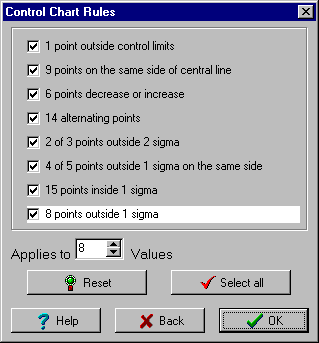
3 Fig. 4 Columns selected for application of the previously constructed chart Fig. 5 Rules selection panel Statistical assumptions Simple Shewhart control charts X-bar and X-individual should not be used in the following cases: 1. Normality of chart data is rejected, see the Test for normality. 2. Data are dependent or show a linear trend, see Autocorrelation and Test for linear trend. 3. Data are heteroscedastic, i.e. their variance is not constant. 4. Several controlled variables are correlated, see Correlation. Possible remedies in such situations are: 1. When the departure from normality is caused by an outlier, the outlier should be excluded (only at the chart construction stage). When the departure is caused by systematic skewness or kurtosis of the data distribution, a subgroup size increase might help. Skewness problems can be removed by transformation. High kurtosis problems cannot be simply solved by the transformation technique implemented in the program, so that different quantile construction than the simple 3sigma approach should be used. 2. Detrended data (see data smoothing notes) should be used. The EWMA dynamical chart can be even better. 3. The EWMA dynamical chart should be used. 4. The Hotelling chart for multivariate data should be used.
4 Capability analysis, capability indices Process capability indexes (PCI) are used to assess how successful the process control is. The simplest interpretation of a capability index is the following: when it is smaller than 1, process is not capable (does not satisfy given requirements), when the index is larger than 1, process is capable (satisfies given requirements). A more detailed process classification is sometimes used sometimes: capable (PCI<1), not capable (PCI 1) and highly capable (PCI 1.3). It is more appropriate to use not only the capability index estimates, but to accompany them by their confidence intervals, see Capability indexes. A more strict classification then defines capable process as a process with lower confidence limit for the capability index larger than 1. The basic C p index should be used only when the central line is given by the data mean. Confidence interval can be made narrower when more data points are used. Transformations in control charts The transformation technique can be helpful when dealing with asymmetrical data distribution. Skewed distributions can occur quite frequently, e.g. for low (trace) pollutant concentrations, product purity level, relative values close to 100%, physical variables like strength, time measurements, volume or surface related variables like mass, size of small particles etc. When the problem is not properly recognized and skewness is not taken into account when constructing a control chart, the chart information value might be drastically reduced. Neglecting skewness during chart construction causes that even if the process is under control, one control limit is frequently exceeded, while the other limit is not reached at all. When the subgroup size is large, effective skewness suppression can be expected, considering the central limit theorem. When significant asymmetry is found in the Transformation module (it is often accompanied by normality rejection in the Basic data analysis module), classical Shewhart chart should not be used. Transformation produces asymmetrical control limits for X. Variability chart is based on transformed data, so that the scale of S or R charts differs from the scale of the original data. Capability indexes C p, C pk, C pm, C pmk are computed from transformed data, which satisfy normality assumption. Warning: transformation parameter value has to be the same for both chart construction and chart application! X-bar and S, X-bar and R charts Menu: QC.Expert Control charts Constructio n Application Data rows correspond to subgroups. Each subgroup has to have at least two values. Missing values are allowed. Table 1 X-bar chart data, number of subgroups = 10, subgroup size = 3 Time NO x 1 NO x 2 NO x
5 Chart construction. Parameters are inputted in the Shewhart control chart construction dialog panel. X-bar and S or X-bar and R types can be selected in the Chart type window. Upon clicking the Select columns button, data columns are specified. At least two columns have to be selected. Data should come from a process under statistical control. Occasional outliers or otherwise suspect data as well as data violating specified rules should be omitted. When a transformation is necessary, the transformation parameter can be specified. When the value is not known in advance, it can be computed upon clicking the question mark,? button. When some of the chart parameters are known in advance, they can be inputted manually upon checking Manual entry. The Rules button invokes the Rules dialog panel, where some of the rules can be excluded/included by the >>, << buttons. Any change of the rules should be properly justified. Default rules are set by clicking the Initialize button. Computed chart parameters can be saved to a file by clicking the Save parameters button. Chart application. As soon as the chart parameters are determined, the chart can be used to control data from the same process. Parameters for control chart application can be set in the Shewhart control chart application dialog panel. The panel is similar to the construction panel, the UCL, LCL limits for x-bar and variability chart (S or R) are supposed to be known at this stage. Appropriate data columns are selected in the panel. Chart parameters are either entered manually when the Manual entry selection is checked, or they are read from a file upon clicking the Read parameters button. The file has to contain parameters for the same chart type and the same subgroup size. Rules can be modified by clicking the Rules button. The Chart button produces control chart and protocol output. Chart parameters can be saved by clicking the Save parameters button. Protocol No Indicates whether any transformation was used to bring data closer to transformation/transformation normality. When transformation was applied, control limits can be asymmetrical, depending on data distribution. S chart is based on the transformed data, so that the scale differs from the original data scale. Chart type X-bar. Maximum subgroup size Maximum subgroup size, i.e. number of columns, selected upon clicking the Select columns button. Row number Number of subgroups, i.e. points plotted in the chart. Central line Central line of the chart. UCL Upper control limit. LCL Lower control limit. Variability Specifies how the process variability is expressed. Baseline Baseline for standard deviation control chart. Capability indexes Cp Capability index C p = (UCL LCL) / (6s) and its 95% confidence interval. Cpk Capability index C pk = min(ucl average ; average LCL) / (3s) and its 95% confidence interval. CI (Heavlin) Heavlin 95% confidence interval. CI (Kushler) Kushler 95% confidence interval. CI (Franklin) Franklin 95% confidence interval. Cpm Capability index C pm = (UCL LCL) / (6 (s 2 + (average ZL) 2 ) and its 95% confidence interval. Cpmk Combined capability index C pmk. Rules violations List of points, violating rules specified previously in the Rules panel.
6 Points violating rules (corresponding to averages or standard deviations) are printed red bold, violated rule is specified. Data Printout of the input data. X-bar chart Standard X-bar control chart. Points violating specified rules are marked red. A variability chart (S or R) should be inspected before looking at the X-bar chart. The central line corresponds to the process baseline, the upper and lower lines correspond to the control limits. S chart Standard deviation control chart. Points exceeding limits for standard deviation are marked red. Variability charts (S or R) should be inspected before inspecting X-bar or X-individual charts. The green line corresponds to the baseline, the upper and lower lines correspond to the control limits. R chart Range control chart. Range is calculated as the maximum-minimum difference within a subgroup. When the subgroup size is larger than 2, S chart is generally preferred. Points exceeding limits for range are marked red. Variability charts (S or R) should be inspected before inspecting X-bar or X-individual charts. The green line corresponds to the baseline, the upper and lower lines correspond to the control limits. X-individual and R charts Menu: QC.Expert Control charts Construction Application X-individual chart is used when no rational subgroups can be created. Individual data points are plotted in the chart, hence the chart is much more sensitive to departures from normality than the X-bar charts. X-bar charts should be used whenever possible. Absolute differences of consecutive values are plotted in the R chart. Data are expected in one column. No missing values are allowed. X-individual and R chart type is selected in Shewhart control chart application.. Protocol X-individual chart protocol is analogous to the X-bar chart protocol. X-individual chart Standard X-individual control chart. Points violating specified rules are marked red. R chart should be inspected before looking at the X-individual chart. The central line corresponds to the process baseline, the upper and lower lines correspond to the control limits.
7 R chart Moving range chart. Since each points corresponds to a difference of two consecutive X-individual values, the chart starts from the second time point. The points exceeding limits for standard deviation are marked red R chart should be inspected before inspecting the X-individual charts. The green line corresponds to the baseline, the upper and lower lines correspond to the control limits. np-chart Menu: QC.Expert Control charts Construction The np chart is useful when controlling number of nonconforming items within a batch. A binomial distribution is assumed for the nonconforming items number. It is a chart for integer valued variables, where batch corresponds to subgroup. Number of nonconforming items out of np items contained in a batch is plotted in the chart. Batch size might vary. For discrete quality attributes (like the number of nonconforming items here) no special variability chart is constructed. Data are organized in two columns. The number of nonconforming items is in the first column, batch size (i.e. the total number of items in the batch) has to be in the second column. In the Shewhart control chart construction dialog panel, the np chart type is selected. Upon clicking the Select columns button, data columns are selected. Neither transformation nor additional rules are used for attributes charts (np, p, c, u). When baseline or limit values are known from previous analysis or given by a standard, they can be specified manually in the Value window within the Manual entry part of the panel. When the values are not known, they can be computed by clicking the Calculate button (Manual entry must not be checked). Baseline, LCL, UCL values can be saved into a file by the Save parameters button. Pressing the OK button plots the chart. Protocol NP Number of nonconforming items by batches. N0 Batch sizes. BL Baseline for a given batch size. LCL Lower control limit for a given batch size. UCL Upper control limit for a given batch size. P Average proportion of nonconforming items. Out of limits List of values out of control limits. np chart Control chart for the number of nonconforming items. Points falling outside the control limits are marked red. The baseline is blue, the control limits red, their values increase with increasing batch size, hence they are not constant when the batch size changes. p chart Menu: QC.Expert Control chart Construction The p chart is useful when controlling proportion of nonconforming items in a batch. Because the number of nonconforming items follows a binomial distribution, it is a chart for attributes. Batch corresponds to subgroup. The proportion of nonconforming items within a batch is what is plotted in
8 the chart. Therefore, the chart value is always between zero and one. The batch size might vary. No separate chart for variability is constructed. Data are organized in two columns. Proportion of nonconforming items is in the first column, batch size (i.e. the total number of items in the batch) has to be in the second column. In the Shewhart control chart construction dialog panel, the p chart type is selected. Upon clicking the Select columns button, data columns are selected. Neither transformation nor additional rules are used for attributes charts (np, p, c, u). When baseline or limit values are known from a previous analysis or given by a standard, they can be specified manually in the Value window within the Manual entry part of the panel. When the values are not known, they can be computed by clicking the Calculate button (Manual entry must not be checked). Baseline, LCL, UCL values can be saved into a file by Save parameters. Pressing the OK button plots the chart. Protocol P Proportion of nonconforming items by batches. N0 Batch sizes. LCL Lower control limit for a given batch size. UCL Upper control limit for a given batch size. BL Baseline. Out of limits List of points falling out of control limits. p chart Control chart for proportion of nonconforming items. Points falling outside the control limits are marked red. The baseline is blue, the control limits are red, all of them depend on the batch size. When the batch size changes, their values are not constant but increase with the sample size. c chart Menu: QC.Expert Control charts Construction c chart is a less frequently used chart type. It is a chart for controlling the number of faults found in a defined amount of product. Such number can have only a nonnegative integer value and is assumed to follow a Poisson distribution. Because the controlled characteristic is discrete, the chart is a control chart for attributes. Unlike for np or p charts, the number of faults of the same type is recorded on each piece of product (or a small group of related pieces), where each individual fault might or might not cause whole piece to fail (e.g. number of knots counted within 10 meters of a fabric). The number of faults c is plotted in the chart and the size of a controlled piece of product has to stay constant. No special chart for variability is constructed. Data, i.e. the fault counts, counted on individual product pieces are in one column. The c chart is selected in the Shewhart control chart construction dialog panel. Data column is specified upon pressing the Select columns button. Neither transformation nor special rules are used for any of the attributes control charts (np, p, c, u). When the baseline or the control limits are known from previous data or given by a standard, they can be inputted upon checking Manual entry. When their values are not known, Manual entry must not be checked and their computation is requested by the Calculate button. The Save parameters button saves the baseline and the control limits to a file. Pressing the OK button produces the chart.
9 Protocol Data Number of faults counted on individual product pieces. BL Baseline. LCL Lower control limit. UCL Upper control limit. Out of limits List of values falling out of control limits. c-chart Control chart for controlling number of faults. Data exceeding control limits are marked red. The baseline is green. The control limits are red and constant. u chart Menu: QC.Expert Control charts Construction This chart type is utilized less frequently. It is used to control number of faults on a piece of product of variable size. Such number can have only nonnegative integer values and is assumed to follow a Poisson distribution. Because the controlled characteristic is discrete, the c chart is a control chart for attributes. Unlike for np or p charts, the number of faults of the same type is recorded on each piece of product (or a small group of related pieces), where each individual fault might or might not cause the whole piece to fail (e.g. number of knots counted within 10 meters of a fabric). The number of faults u is plotted in the chart. The size of a controlled piece of product is allowed to vary (this is the only difference from the c chart). No special chart for variability is constructed. Data, i.e. the fault numbers, counted for individual product pieces are in one column. Sizes of inspected product pieces have to be in the second column. The u chart is selected in the Shewhart control chart construction dialog panel. Data column is specified upon pressing the Select columns button. Neither transformation nor special rules are used for any of the attributes control charts (np, p, c, u). When the baseline or the control limits are known from previous data or given by a standard, they can be inputted upon checking Manual entry. When their values are not known, Manual entry must not be checked and their computation is requested by the Calculate button. The Save parameters button saves the baseline and the control limits to a file. Pressing the OK button produces the chart. Protocol U Number of faults counted on inspected pieces of product. N0 Sizes/amounts of product controlled. U1 Relative number of faults, standardized to one unit of product, U1=U/N0. This is what is plotted in the chart. LCL Lower control limit. UCL Upper control limit. BL Baseline. Out of control List of points falling outside control limits. limits u chart Control chart for fault numbers. Points falling out of control limits are
10 marked red. The baseline is green, the control limits are red. The control limits depend on the amount /size of the product controlled. When the amount/size varies, the limits are not constant.
Instruction Manual for SPC for MS Excel V3.0
 Frequency Business Process Improvement 281-304-9504 20314 Lakeland Falls www.spcforexcel.com Cypress, TX 77433 Instruction Manual for SPC for MS Excel V3.0 35 30 25 LSL=60 Nominal=70 Capability Analysis
Confidence Intervals for Cpk
 Chapter 297 Confidence Intervals for Cpk Introduction This routine calculates the sample size needed to obtain a specified width of a Cpk confidence interval at a stated confidence level. Cpk is a process
The G Chart in Minitab Statistical Software
 The G Chart in Minitab Statistical Software Background Developed by James Benneyan in 1991, the g chart (or G chart in Minitab) is a control chart that is based on the geometric distribution. Benneyan
Advanced Topics in Statistical Process Control
 Advanced Topics in Statistical Process Control The Power of Shewhart s Charts Second Edition Donald J. Wheeler SPC Press Knoxville, Tennessee Contents Preface to the Second Edition Preface The Shewhart
Individual Moving Range (I-MR) Charts. The Swiss Army Knife of Process Charts
 Individual Moving Range (I-MR) Charts The Swiss Army Knife of Process Charts SPC Selection Process Choose Appropriate Control Chart ATTRIBUTE type of data CONTINUOUS DEFECTS type of attribute data DEFECTIVES
SPC Response Variable
 SPC Response Variable This procedure creates control charts for data in the form of continuous variables. Such charts are widely used to monitor manufacturing processes, where the data often represent
Confidence Intervals for Cp
 Chapter 296 Confidence Intervals for Cp Introduction This routine calculates the sample size needed to obtain a specified width of a Cp confidence interval at a stated confidence level. Cp is a process
Variables Control Charts
 MINITAB ASSISTANT WHITE PAPER This paper explains the research conducted by Minitab statisticians to develop the methods and data checks used in the Assistant in Minitab 17 Statistical Software. Variables
Business Statistics. Successful completion of Introductory and/or Intermediate Algebra courses is recommended before taking Business Statistics.
 Business Course Text Bowerman, Bruce L., Richard T. O'Connell, J. B. Orris, and Dawn C. Porter. Essentials of Business, 2nd edition, McGraw-Hill/Irwin, 2008, ISBN: 978-0-07-331988-9. Required Computing
Course Text. Required Computing Software. Course Description. Course Objectives. StraighterLine. Business Statistics
 Course Text Business Statistics Lind, Douglas A., Marchal, William A. and Samuel A. Wathen. Basic Statistics for Business and Economics, 7th edition, McGraw-Hill/Irwin, 2010, ISBN: 9780077384470 [This
Use and interpretation of statistical quality control charts
 International Journal for Quality in Health Care 1998; Volume 10, Number I: pp. 69-73 Methodology matters VIII 'Methodology Matters' is a series of intermittently appearing articles on methodology. Suggestions
Gage Studies for Continuous Data
 1 Gage Studies for Continuous Data Objectives Determine the adequacy of measurement systems. Calculate statistics to assess the linearity and bias of a measurement system. 1-1 Contents Contents Examples
Statistical Process Control OPRE 6364 1
 Statistical Process Control OPRE 6364 1 Statistical QA Approaches Statistical process control (SPC) Monitors production process to prevent poor quality Acceptance sampling Inspects random sample of product
How To Test For Significance On A Data Set
 Non-Parametric Univariate Tests: 1 Sample Sign Test 1 1 SAMPLE SIGN TEST A non-parametric equivalent of the 1 SAMPLE T-TEST. ASSUMPTIONS: Data is non-normally distributed, even after log transforming.
Process Capability Analysis Using MINITAB (I)
 Process Capability Analysis Using MINITAB (I) By Keith M. Bower, M.S. Abstract The use of capability indices such as C p, C pk, and Sigma values is widespread in industry. It is important to emphasize
Assessing Measurement System Variation
 Assessing Measurement System Variation Example 1: Fuel Injector Nozzle Diameters Problem A manufacturer of fuel injector nozzles installs a new digital measuring system. Investigators want to determine
SPC Demonstration Tips
 Tip Sheet SPC Demonstration Tips Key Points to Cover When Demonstrating Ignition SPC Downtime In general, the SPC Module is designed with a great level of flexibility to support a wide variety of production
Confidence Intervals for One Standard Deviation Using Standard Deviation
 Chapter 640 Confidence Intervals for One Standard Deviation Using Standard Deviation Introduction This routine calculates the sample size necessary to achieve a specified interval width or distance from
Control Charts for Variables. Control Chart for X and R
 Control Charts for Variables X-R, X-S charts, non-random patterns, process capability estimation. 1 Control Chart for X and R Often, there are two things that might go wrong in a process; its mean or its
GEORGETOWN UNIVERSITY SCHOOL OF BUSINESS ADMINISTRATION STATISTICAL QUALITY CONTROL. Professor José-Luis Guerrero-Cusumano
 GEORGETOWN UNIVERSITY SCHOOL OF BUSINESS ADMINISTRATION STATISTICAL QUALITY CONTROL Professor José-Luis Guerrero-Cusumano [email protected] Office: Telephone; 202-687.4338 Meeting Times: At
CHAPTER 7 INTRODUCTION TO SAMPLING DISTRIBUTIONS
 CHAPTER 7 INTRODUCTION TO SAMPLING DISTRIBUTIONS CENTRAL LIMIT THEOREM (SECTION 7.2 OF UNDERSTANDABLE STATISTICS) The Central Limit Theorem says that if x is a random variable with any distribution having
HYPOTHESIS TESTING: CONFIDENCE INTERVALS, T-TESTS, ANOVAS, AND REGRESSION
 HYPOTHESIS TESTING: CONFIDENCE INTERVALS, T-TESTS, ANOVAS, AND REGRESSION HOD 2990 10 November 2010 Lecture Background This is a lightning speed summary of introductory statistical methods for senior undergraduate
GE Fanuc Automation CIMPLICITY. Statistical Process Control. CIMPLICITY Monitoring and Control Products. Operation Manual
 GE Fanuc Automation CIMPLICITY Monitoring and Control Products CIMPLICITY Statistical Process Control Operation Manual GFK-1413E December 2000 Following is a list of documentation icons: GFL-005 Warning
Control CHAPTER OUTLINE LEARNING OBJECTIVES
 Quality Control 16Statistical CHAPTER OUTLINE 16-1 QUALITY IMPROVEMENT AND STATISTICS 16-2 STATISTICAL QUALITY CONTROL 16-3 STATISTICAL PROCESS CONTROL 16-4 INTRODUCTION TO CONTROL CHARTS 16-4.1 Basic
MBA 611 STATISTICS AND QUANTITATIVE METHODS
 MBA 611 STATISTICS AND QUANTITATIVE METHODS Part I. Review of Basic Statistics (Chapters 1-11) A. Introduction (Chapter 1) Uncertainty: Decisions are often based on incomplete information from uncertain
4. Continuous Random Variables, the Pareto and Normal Distributions
 4. Continuous Random Variables, the Pareto and Normal Distributions A continuous random variable X can take any value in a given range (e.g. height, weight, age). The distribution of a continuous random
THE PROCESS CAPABILITY ANALYSIS - A TOOL FOR PROCESS PERFORMANCE MEASURES AND METRICS - A CASE STUDY
 International Journal for Quality Research 8(3) 399-416 ISSN 1800-6450 Yerriswamy Wooluru 1 Swamy D.R. P. Nagesh THE PROCESS CAPABILITY ANALYSIS - A TOOL FOR PROCESS PERFORMANCE MEASURES AND METRICS -
CHI-SQUARE: TESTING FOR GOODNESS OF FIT
 CHI-SQUARE: TESTING FOR GOODNESS OF FIT In the previous chapter we discussed procedures for fitting a hypothesized function to a set of experimental data points. Such procedures involve minimizing a quantity
NCSS Statistical Software Principal Components Regression. In ordinary least squares, the regression coefficients are estimated using the formula ( )
 Chapter 340 Principal Components Regression Introduction is a technique for analyzing multiple regression data that suffer from multicollinearity. When multicollinearity occurs, least squares estimates
Bowerman, O'Connell, Aitken Schermer, & Adcock, Business Statistics in Practice, Canadian edition
 Bowerman, O'Connell, Aitken Schermer, & Adcock, Business Statistics in Practice, Canadian edition Online Learning Centre Technology Step-by-Step - Excel Microsoft Excel is a spreadsheet software application
THE OPEN SOURCE SOFTWARE R IN THE STATISTICAL QUALITY CONTROL
 1. Miriam ANDREJIOVÁ, 2. Zuzana KIMÁKOVÁ THE OPEN SOURCE SOFTWARE R IN THE STATISTICAL QUALITY CONTROL 1,2 TECHNICAL UNIVERSITY IN KOŠICE, FACULTY OF MECHANICAL ENGINEERING, KOŠICE, DEPARTMENT OF APPLIED
Density Curve. A density curve is the graph of a continuous probability distribution. It must satisfy the following properties:
 Density Curve A density curve is the graph of a continuous probability distribution. It must satisfy the following properties: 1. The total area under the curve must equal 1. 2. Every point on the curve
DISCRETE MODEL DATA IN STATISTICAL PROCESS CONTROL. Ester Gutiérrez Moya 1. Keywords: Quality control, Statistical process control, Geometric chart.
 VI Congreso de Ingeniería de Organización Gijón, 8 y 9 de septiembre 005 DISCRETE MODEL DATA IN STATISTICAL PROCESS CONTROL Ester Gutiérrez Moya Dpto. Organización Industrial y Gestión de Empresas. Escuela
Learning Objectives. Understand how to select the correct control chart for an application. Know how to fill out and maintain a control chart.
 CONTROL CHARTS Learning Objectives Understand how to select the correct control chart for an application. Know how to fill out and maintain a control chart. Know how to interpret a control chart to determine
Simple linear regression
 Simple linear regression Introduction Simple linear regression is a statistical method for obtaining a formula to predict values of one variable from another where there is a causal relationship between
Statistical Process Control (SPC) Training Guide
 Statistical Process Control (SPC) Training Guide Rev X05, 09/2013 What is data? Data is factual information (as measurements or statistics) used as a basic for reasoning, discussion or calculation. (Merriam-Webster
SPC Data Visualization of Seasonal and Financial Data Using JMP WHITE PAPER
 SPC Data Visualization of Seasonal and Financial Data Using JMP WHITE PAPER SAS White Paper Table of Contents Abstract.... 1 Background.... 1 Example 1: Telescope Company Monitors Revenue.... 3 Example
I/A Series Information Suite AIM*SPC Statistical Process Control
 I/A Series Information Suite AIM*SPC Statistical Process Control PSS 21S-6C3 B3 QUALITY PRODUCTIVITY SQC SPC TQC y y y y y y y y yy y y y yy s y yy s sss s ss s s ssss ss sssss $ QIP JIT INTRODUCTION AIM*SPC
Data Analysis Tools. Tools for Summarizing Data
 Data Analysis Tools This section of the notes is meant to introduce you to many of the tools that are provided by Excel under the Tools/Data Analysis menu item. If your computer does not have that tool
Pearson's Correlation Tests
 Chapter 800 Pearson's Correlation Tests Introduction The correlation coefficient, ρ (rho), is a popular statistic for describing the strength of the relationship between two variables. The correlation
Getting Started with Minitab 17
 2014 by Minitab Inc. All rights reserved. Minitab, Quality. Analysis. Results. and the Minitab logo are registered trademarks of Minitab, Inc., in the United States and other countries. Additional trademarks
1) Write the following as an algebraic expression using x as the variable: Triple a number subtracted from the number
 1) Write the following as an algebraic expression using x as the variable: Triple a number subtracted from the number A. 3(x - x) B. x 3 x C. 3x - x D. x - 3x 2) Write the following as an algebraic expression
How To Check For Differences In The One Way Anova
 MINITAB ASSISTANT WHITE PAPER This paper explains the research conducted by Minitab statisticians to develop the methods and data checks used in the Assistant in Minitab 17 Statistical Software. One-Way
Control Charts - SigmaXL Version 6.1
 Control Charts - SigmaXL Version 6.1 Control Charts: Overview Summary Report on Test for Special Causes Individuals & Moving Range Charts Use Historical Groups to Display Before VS After Improvement X-Bar
Scatter Plots with Error Bars
 Chapter 165 Scatter Plots with Error Bars Introduction The procedure extends the capability of the basic scatter plot by allowing you to plot the variability in Y and X corresponding to each point. Each
Journal of Statistical Software
 JSS Journal of Statistical Software June 2009, Volume 30, Issue 13. http://www.jstatsoft.org/ An Excel Add-In for Statistical Process Control Charts Samuel E. Buttrey Naval Postgraduate School Abstract
t Tests in Excel The Excel Statistical Master By Mark Harmon Copyright 2011 Mark Harmon
 t-tests in Excel By Mark Harmon Copyright 2011 Mark Harmon No part of this publication may be reproduced or distributed without the express permission of the author. [email protected] www.excelmasterseries.com
SPSS Explore procedure
 SPSS Explore procedure One useful function in SPSS is the Explore procedure, which will produce histograms, boxplots, stem-and-leaf plots and extensive descriptive statistics. To run the Explore procedure,
Confidence Intervals for the Difference Between Two Means
 Chapter 47 Confidence Intervals for the Difference Between Two Means Introduction This procedure calculates the sample size necessary to achieve a specified distance from the difference in sample means
KSTAT MINI-MANUAL. Decision Sciences 434 Kellogg Graduate School of Management
 KSTAT MINI-MANUAL Decision Sciences 434 Kellogg Graduate School of Management Kstat is a set of macros added to Excel and it will enable you to do the statistics required for this course very easily. To
Binary Diagnostic Tests Two Independent Samples
 Chapter 537 Binary Diagnostic Tests Two Independent Samples Introduction An important task in diagnostic medicine is to measure the accuracy of two diagnostic tests. This can be done by comparing summary
Data analysis and regression in Stata
 Data analysis and regression in Stata This handout shows how the weekly beer sales series might be analyzed with Stata (the software package now used for teaching stats at Kellogg), for purposes of comparing
Describing, Exploring, and Comparing Data
 24 Chapter 2. Describing, Exploring, and Comparing Data Chapter 2. Describing, Exploring, and Comparing Data There are many tools used in Statistics to visualize, summarize, and describe data. This chapter
Two Correlated Proportions (McNemar Test)
 Chapter 50 Two Correlated Proportions (Mcemar Test) Introduction This procedure computes confidence intervals and hypothesis tests for the comparison of the marginal frequencies of two factors (each with
LAB 4 INSTRUCTIONS CONFIDENCE INTERVALS AND HYPOTHESIS TESTING
 LAB 4 INSTRUCTIONS CONFIDENCE INTERVALS AND HYPOTHESIS TESTING In this lab you will explore the concept of a confidence interval and hypothesis testing through a simulation problem in engineering setting.
Introduction to Regression and Data Analysis
 Statlab Workshop Introduction to Regression and Data Analysis with Dan Campbell and Sherlock Campbell October 28, 2008 I. The basics A. Types of variables Your variables may take several forms, and it
STATISTICA Formula Guide: Logistic Regression. Table of Contents
 : Table of Contents... 1 Overview of Model... 1 Dispersion... 2 Parameterization... 3 Sigma-Restricted Model... 3 Overparameterized Model... 4 Reference Coding... 4 Model Summary (Summary Tab)... 5 Summary
A Multi-Stream Process Capability Assessment Using a Nonconformity Ratio Based Desirability Function
 A Multi-Stream Process Capability Assessment Using a Nonconformity Ratio Based Desirability Function Thesis for the Acquisition of the Degree of a Doctor in Natural Sciences of the University of Dortmund
Using SPC Chart Techniques in Production Planning and Scheduling : Two Case Studies. Operations Planning, Scheduling and Control
 Using SPC Chart Techniques in Production Planning and Scheduling : Two Case Studies Operations Planning, Scheduling and Control Thananya Wasusri* and Bart MacCarthy Operations Management and Human Factors
Normality Testing in Excel
 Normality Testing in Excel By Mark Harmon Copyright 2011 Mark Harmon No part of this publication may be reproduced or distributed without the express permission of the author. [email protected]
Module 2: Introduction to Quantitative Data Analysis
 Module 2: Introduction to Quantitative Data Analysis Contents Antony Fielding 1 University of Birmingham & Centre for Multilevel Modelling Rebecca Pillinger Centre for Multilevel Modelling Introduction...
Confidence Intervals for Exponential Reliability
 Chapter 408 Confidence Intervals for Exponential Reliability Introduction This routine calculates the number of events needed to obtain a specified width of a confidence interval for the reliability (proportion
The normal approximation to the binomial
 The normal approximation to the binomial The binomial probability function is not useful for calculating probabilities when the number of trials n is large, as it involves multiplying a potentially very
START Selected Topics in Assurance
 START Selected Topics in Assurance Related Technologies Table of Contents Introduction Some Essential Concepts Some QC Charts Summary For Further Study About the Author Other START Sheets Available Introduction
IBM SPSS Forecasting 22
 IBM SPSS Forecasting 22 Note Before using this information and the product it supports, read the information in Notices on page 33. Product Information This edition applies to version 22, release 0, modification
Paired T-Test. Chapter 208. Introduction. Technical Details. Research Questions
 Chapter 208 Introduction This procedure provides several reports for making inference about the difference between two population means based on a paired sample. These reports include confidence intervals
Multiplexer Software. www.elcometer.com. Multiplexer Software. Dataputer DATA-XL Software
 Multiplexer Software Multiplexer Software There are two ways that data can be collected Electronically, where there is no human intervention, and Manually, where data is collected by the User with the
Lecture 5 : The Poisson Distribution
 Lecture 5 : The Poisson Distribution Jonathan Marchini November 10, 2008 1 Introduction Many experimental situations occur in which we observe the counts of events within a set unit of time, area, volume,
Point Biserial Correlation Tests
 Chapter 807 Point Biserial Correlation Tests Introduction The point biserial correlation coefficient (ρ in this chapter) is the product-moment correlation calculated between a continuous random variable
NCSS Statistical Software
 Chapter 06 Introduction This procedure provides several reports for the comparison of two distributions, including confidence intervals for the difference in means, two-sample t-tests, the z-test, the
Bill Burton Albert Einstein College of Medicine [email protected] April 28, 2014 EERS: Managing the Tension Between Rigor and Resources 1
 Bill Burton Albert Einstein College of Medicine [email protected] April 28, 2014 EERS: Managing the Tension Between Rigor and Resources 1 Calculate counts, means, and standard deviations Produce
STATISTICAL REASON FOR THE 1.5σ SHIFT Davis R. Bothe
 STATISTICAL REASON FOR THE 1.5σ SHIFT Davis R. Bothe INTRODUCTION Motorola Inc. introduced its 6σ quality initiative to the world in the 1980s. Almost since that time quality practitioners have questioned
Analysis of Variance. MINITAB User s Guide 2 3-1
 3 Analysis of Variance Analysis of Variance Overview, 3-2 One-Way Analysis of Variance, 3-5 Two-Way Analysis of Variance, 3-11 Analysis of Means, 3-13 Overview of Balanced ANOVA and GLM, 3-18 Balanced
Introduction to CONTINUOUS QUALITY IMPROVEMENT TECHNIQUES. for Healthcare Process Improvement
 Introduction to CONTINUOUS QUALITY IMPROVEMENT TECHNIQUES for Healthcare Process Improvement Preface 1 Quality Control and Healthcare Today 1 New Demands On Healthcare Systems Require Action 1 Continous
ASSURING THE QUALITY OF TEST RESULTS
 Page 1 of 12 Sections Included in this Document and Change History 1. Purpose 2. Scope 3. Responsibilities 4. Background 5. References 6. Procedure/(6. B changed Division of Field Science and DFS to Office
SAS Analyst for Windows Tutorial
 Updated: August 2012 Table of Contents Section 1: Introduction... 3 1.1 About this Document... 3 1.2 Introduction to Version 8 of SAS... 3 Section 2: An Overview of SAS V.8 for Windows... 3 2.1 Navigating
DESCRIPTIVE STATISTICS AND EXPLORATORY DATA ANALYSIS
 DESCRIPTIVE STATISTICS AND EXPLORATORY DATA ANALYSIS SEEMA JAGGI Indian Agricultural Statistics Research Institute Library Avenue, New Delhi - 110 012 [email protected] 1. Descriptive Statistics Statistics
Summary of Formulas and Concepts. Descriptive Statistics (Ch. 1-4)
 Summary of Formulas and Concepts Descriptive Statistics (Ch. 1-4) Definitions Population: The complete set of numerical information on a particular quantity in which an investigator is interested. We assume
Body of Knowledge for Six Sigma Green Belt
 Body of Knowledge for Six Sigma Green Belt What to Prepare For: The following is the Six Sigma Green Belt Certification Body of Knowledge that the exam will cover. We strongly encourage you to study and
The normal approximation to the binomial
 The normal approximation to the binomial In order for a continuous distribution (like the normal) to be used to approximate a discrete one (like the binomial), a continuity correction should be used. There
Chapter 7 Section 7.1: Inference for the Mean of a Population
 Chapter 7 Section 7.1: Inference for the Mean of a Population Now let s look at a similar situation Take an SRS of size n Normal Population : N(, ). Both and are unknown parameters. Unlike what we used
Introduction to STATISTICAL PROCESS CONTROL TECHNIQUES
 Introduction to STATISTICAL PROCESS CONTROL TECHNIQUES Preface 1 Quality Control Today 1 New Demands On Systems Require Action 1 Socratic SPC -- Overview Q&A 2 Steps Involved In Using Statistical Process
Use of control charts in the production of concrete
 by Ian Gibb and Tom Harrison October 2010 Amendments Date Amendments August 2011 Clause references corrected in 4.4 Text expanded in 5.4,3 rd paragraph Correction to cement content in 11.6, 3 rd paragraph
Gamma Distribution Fitting
 Chapter 552 Gamma Distribution Fitting Introduction This module fits the gamma probability distributions to a complete or censored set of individual or grouped data values. It outputs various statistics
Below is a very brief tutorial on the basic capabilities of Excel. Refer to the Excel help files for more information.
 Excel Tutorial Below is a very brief tutorial on the basic capabilities of Excel. Refer to the Excel help files for more information. Working with Data Entering and Formatting Data Before entering data
Directions for using SPSS
 Directions for using SPSS Table of Contents Connecting and Working with Files 1. Accessing SPSS... 2 2. Transferring Files to N:\drive or your computer... 3 3. Importing Data from Another File Format...
Standard Deviation Estimator
 CSS.com Chapter 905 Standard Deviation Estimator Introduction Even though it is not of primary interest, an estimate of the standard deviation (SD) is needed when calculating the power or sample size of
Validating Market Risk Models: A Practical Approach
 Validating Market Risk Models: A Practical Approach Doug Gardner Wells Fargo November 2010 The views expressed in this presentation are those of the author and do not necessarily reflect the position of
7 Time series analysis
 7 Time series analysis In Chapters 16, 17, 33 36 in Zuur, Ieno and Smith (2007), various time series techniques are discussed. Applying these methods in Brodgar is straightforward, and most choices are
HYPOTHESIS TESTING WITH SPSS:
 HYPOTHESIS TESTING WITH SPSS: A NON-STATISTICIAN S GUIDE & TUTORIAL by Dr. Jim Mirabella SPSS 14.0 screenshots reprinted with permission from SPSS Inc. Published June 2006 Copyright Dr. Jim Mirabella CHAPTER
THE SIX SIGMA BLACK BELT PRIMER
 INTRO-1 (1) THE SIX SIGMA BLACK BELT PRIMER by Quality Council of Indiana - All rights reserved Fourth Edition - September, 2014 Quality Council of Indiana 602 West Paris Avenue West Terre Haute, IN 47885
Promotional Forecast Demonstration
 Exhibit 2: Promotional Forecast Demonstration Consider the problem of forecasting for a proposed promotion that will start in December 1997 and continues beyond the forecast horizon. Assume that the promotion
Benchmarking Student Learning Outcomes using Shewhart Control Charts
 Benchmarking Student Learning Outcomes using Shewhart Control Charts Steven J. Peterson, MBA, PE Weber State University Ogden, Utah This paper looks at how Shewhart control charts a statistical tool used
Lecture Notes Module 1
 Lecture Notes Module 1 Study Populations A study population is a clearly defined collection of people, animals, plants, or objects. In psychological research, a study population usually consists of a specific
Two-Sample T-Tests Assuming Equal Variance (Enter Means)
 Chapter 4 Two-Sample T-Tests Assuming Equal Variance (Enter Means) Introduction This procedure provides sample size and power calculations for one- or two-sided two-sample t-tests when the variances of
Spreadsheet software for linear regression analysis
 Spreadsheet software for linear regression analysis Robert Nau Fuqua School of Business, Duke University Copies of these slides together with individual Excel files that demonstrate each program are available