
9.2 User s Guide SAS/STAT. The MIXED Procedure. (Book Excerpt) SAS Documentation
|
|
|
- Dale Golden
- 10 years ago
- Views:
Transcription

1 SAS/STAT 9.2 User s Guide The MIXED Procedure (Book Excerpt) SAS Documentation
2 This document is an individual chapter from SAS/STAT 9.2 User s Guide. The correct bibliographic citation for the complete manual is as follows: SAS Institute Inc SAS/STAT 9.2 User s Guide. Cary, NC: SAS Institute Inc. Copyright 2008, SAS Institute Inc., Cary, NC, USA All rights reserved. Produced in the United States of America. For a Web download or e-book: Your use of this publication shall be governed by the terms established by the vendor at the time you acquire this publication. U.S. Government Restricted Rights Notice: Use, duplication, or disclosure of this software and related documentation by the U.S. government is subject to the Agreement with SAS Institute and the restrictions set forth in FAR , Commercial Computer Software-Restricted Rights (June 1987). SAS Institute Inc., SAS Campus Drive, Cary, North Carolina st electronic book, March nd electronic book, February 2009 SAS Publishing provides a complete selection of books and electronic products to help customers use SAS software to its fullest potential. For more information about our e-books, e-learning products, CDs, and hard-copy books, visit the SAS Publishing Web site at support.sas.com/publishing or call SAS and all other SAS Institute Inc. product or service names are registered trademarks or trademarks of SAS Institute Inc. in the USA and other countries. indicates USA registration. Other brand and product names are registered trademarks or trademarks of their respective companies.

3 Chapter 56 The MIXED Procedure Contents Overview: MIXED Procedure Basic Features Notation for the Mixed Model PROC MIXED Contrasted with Other SAS Procedures Getting Started: MIXED Procedure Clustered Data Example Syntax: MIXED Procedure PROC MIXED Statement BY Statement CLASS Statement CONTRAST Statement ESTIMATE Statement ID Statement LSMEANS Statement MODEL Statement PARMS Statement PRIOR Statement RANDOM Statement REPEATED Statement WEIGHT Statement Details: MIXED Procedure Mixed Models Theory Parameterization of Mixed Models Residuals and Influence Diagnostics Default Output ODS Table Names ODS Graphics Computational Issues Examples: Mixed Procedure Example 56.1: Split-Plot Design Example 56.2: Repeated Measures Example 56.3: Plotting the Likelihood Example 56.4: Known G and R Example 56.5: Random Coefficients

4 3886 Chapter 56: The MIXED Procedure Example 56.6: Line-Source Sprinkler Irrigation Example 56.7: Influence in Heterogeneous Variance Model Example 56.8: Influence Analysis for Repeated Measures Data Example 56.9: Examining Individual Test Components References Overview: MIXED Procedure The MIXED procedure fits a variety of mixed linear models to data and enables you to use these fitted models to make statistical inferences about the data. A mixed linear model is a generalization of the standard linear model used in the GLM procedure, the generalization being that the data are permitted to exhibit correlation and nonconstant variability. The mixed linear model, therefore, provides you with the flexibility of modeling not only the means of your data (as in the standard linear model) but their variances and covariances as well. The primary assumptions underlying the analyses performed by PROC MIXED are as follows: The data are normally distributed (Gaussian). The means (expected values) of the data are linear in terms of a certain set of parameters. The variances and covariances of the data are in terms of a different set of parameters, and they exhibit a structure matching one of those available in PROC MIXED. Since Gaussian data can be modeled entirely in terms of their means and variances/covariances, the two sets of parameters in a mixed linear model actually specify the complete probability distribution of the data. The parameters of the mean model are referred to as fixed-effects parameters, and the parameters of the variance-covariance model are referred to as covariance parameters. The fixed-effects parameters are associated with known explanatory variables, as in the standard linear model. These variables can be either qualitative (as in the traditional analysis of variance) or quantitative (as in standard linear regression). However, the covariance parameters are what distinguishes the mixed linear model from the standard linear model. The need for covariance parameters arises quite frequently in applications, the following being the two most typical scenarios: The experimental units on which the data are measured can be grouped into clusters, and the data from a common cluster are correlated. Repeated measurements are taken on the same experimental unit, and these repeated measurements are correlated or exhibit variability that changes. The first scenario can be generalized to include one set of clusters nested within another. For example, if students are the experimental unit, they can be clustered into classes, which in turn can be

5 Basic Features 3887 clustered into schools. Each level of this hierarchy can introduce an additional source of variability and correlation. The second scenario occurs in longitudinal studies, where repeated measurements are taken over time. Alternatively, the repeated measures could be spatial or multivariate in nature. PROC MIXED provides a variety of covariance structures to handle the previous two scenarios. The most common of these structures arises from the use of random-effects parameters, which are additional unknown random variables assumed to affect the variability of the data. The variances of the random-effects parameters, commonly known as variance components, become the covariance parameters for this particular structure. Traditional mixed linear models contain both fixed- and random-effects parameters, and, in fact, it is the combination of these two types of effects that led to the name mixed model. PROC MIXED fits not only these traditional variance component models but numerous other covariance structures as well. PROC MIXED fits the structure you select to the data by using the method of restricted maximum likelihood (REML), also known as residual maximum likelihood. It is here that the Gaussian assumption for the data is exploited. Other estimation methods are also available, including maximum likelihood and MIVQUE0. The details behind these estimation methods are discussed in subsequent sections. After a model has been fit to your data, you can use it to draw statistical inferences via both the fixedeffects and covariance parameters. PROC MIXED computes several different statistics suitable for generating hypothesis tests and confidence intervals. The validity of these statistics depends upon the mean and variance-covariance model you select, so it is important to choose the model carefully. Some of the output from PROC MIXED helps you assess your model and compare it with others. Basic Features PROC MIXED provides easy accessibility to numerous mixed linear models that are useful in many common statistical analyses. In the style of the GLM procedure, PROC MIXED fits the specified mixed linear model and produces appropriate statistics. Here are some basic features of PROC MIXED: covariance structures, including variance components, compound symmetry, unstructured, AR(1), Toeplitz, spatial, general linear, and factor analytic GLM-type grammar, by using MODEL, RANDOM, and REPEATED statements for model specification and CONTRAST, ESTIMATE, and LSMEANS statements for inferences appropriate standard errors for all specified estimable linear combinations of fixed and random effects, and corresponding t and F tests subject and group effects that enable blocking and heterogeneity, respectively REML and ML estimation methods implemented with a Newton-Raphson algorithm capacity to handle unbalanced data ability to create a SAS data set corresponding to any table

6 3888 Chapter 56: The MIXED Procedure PROC MIXED uses the Output Delivery System (ODS), a SAS subsystem that provides capabilities for displaying and controlling the output from SAS procedures. ODS enables you to convert any of the output from PROC MIXED into a SAS data set. See the section ODS Table Names on page The MIXED procedure now uses ODS Graphics to create graphs as part of its output. For general information about ODS Graphics, see Chapter 21, Statistical Graphics Using ODS. For specific information about the statistical graphics available with the MIXED procedure, see the PLOTS option in the PROC MIXED statement and the section ODS Graphics on page Notation for the Mixed Model This section introduces the mathematical notation used throughout this chapter to describe the mixed linear model. You should be familiar with basic matrix algebra (see Searle 1982). A more detailed description of the mixed model is contained in the section Mixed Models Theory on page A statistical model is a mathematical description of how data are generated. The standard linear model, as used by the GLM procedure, is one of the most common statistical models: y D Xˇ C In this expression, y represents a vector of observed data, ˇ is an unknown vector of fixed-effects parameters with known design matrix X, and is an unknown random error vector modeling the statistical noise around Xˇ. The focus of the standard linear model is to model the mean of y by using the fixed-effects parameters ˇ. The residual errors are assumed to be independent and identically distributed Gaussian random variables with mean 0 and variance 2. The mixed model generalizes the standard linear model as follows: y D Xˇ C Z C Here, is an unknown vector of random-effects parameters with known design matrix Z, and is an unknown random error vector whose elements are no longer required to be independent and homogeneous. To further develop this notion of variance modeling, assume that and are Gaussian random variables that are uncorrelated and have expectations 0 and variances G and R, respectively. The variance of y is thus V D ZGZ 0 C R Note that, when R D 2 I and Z D 0, the mixed model reduces to the standard linear model. You can model the variance of the data, y, by specifying the structure (or form) of Z, G, and R. The model matrix Z is set up in the same fashion as X, the model matrix for the fixed-effects parameters. For G and R, you must select some covariance structure. Possible covariance structures include the following:
7 PROC MIXED Contrasted with Other SAS Procedures 3889 variance components compound symmetry (common covariance plus diagonal) unstructured (general covariance) autoregressive spatial general linear factor analytic By appropriately defining the model matrices X and Z, as well as the covariance structure matrices G and R, you can perform numerous mixed model analyses. PROC MIXED Contrasted with Other SAS Procedures PROC MIXED is a generalization of the GLM procedure in the sense that PROC GLM fits standard linear models, and PROC MIXED fits the wider class of mixed linear models. Both procedures have similar CLASS, MODEL, CONTRAST, ESTIMATE, and LSMEANS statements, but their RANDOM and REPEATED statements differ (see the following paragraphs). Both procedures use the non-full-rank model parameterization, although the sorting of classification levels can differ between the two. PROC MIXED computes only Type I Type III tests of fixed effects, while PROC GLM computes Types I IV. The RANDOM statement in PROC MIXED incorporates random effects constituting the vector in the mixed model. However, in PROC GLM, effects specified in the RANDOM statement are still treated as fixed as far as the model fit is concerned, and they serve only to produce corresponding expected mean squares. These expected mean squares lead to the traditional ANOVA estimates of variance components. PROC MIXED computes REML and ML estimates of variance parameters, which are generally preferred to the ANOVA estimates (Searle 1988; Harville 1988; Searle, Casella, and McCulloch 1992). Optionally, PROC MIXED also computes MIVQUE0 estimates, which are similar to ANOVA estimates. The REPEATED statement in PROC MIXED is used to specify covariance structures for repeated measurements on subjects, while the REPEATED statement in PROC GLM is used to specify various transformations with which to conduct the traditional univariate or multivariate tests. In repeated measures situations, the mixed model approach used in PROC MIXED is more flexible and more widely applicable than either the univariate or multivariate approach. In particular, the mixed model approach provides a larger class of covariance structures and a better mechanism for handling missing values (Wolfinger and Chang 1995). PROC MIXED subsumes the VARCOMP procedure. PROC MIXED provides a wide variety of covariance structures, while PROC VARCOMP estimates only simple random effects. PROC MIXED carries out several analyses that are absent in PROC VARCOMP, including the estimation and testing of linear combinations of fixed and random effects.

8 3890 Chapter 56: The MIXED Procedure The ARIMA and AUTOREG procedures provide more time series structures than PROC MIXED, although they do not fit variance component models. The CALIS procedure fits general covariance matrices, but the fixed effects structure of the model is formed differently than in PROC MIXED. The LATTICE and NESTED procedures fit special types of mixed linear models that can also be handled in PROC MIXED, although PROC MIXED might run slower because of its more general algorithm. The TSCSREG procedure analyzes time series cross-sectional data, and it fits some structures not available in PROC MIXED. The GLIMMIX procedure fits generalized linear mixed models (GLMMs). Linear mixed models where the data are normally distributed, given the random effects are in the class of GLMMs. The MIXED procedure can estimate covariance parameters with ANOVA methods that are not available in the GLIMMIX procedure (see METHOD=TYPE1, METHOD=TYPE2, and METHOD=TYPE3 in the PROC MIXED statement). Also, PROC MIXED can perform a sampling-based Bayesian analysis through the PRIOR statement, and the procedure supports certain Kronecker-type covariance structures. These features are not available in the GLIMMIX procedure. The GLIMMIX procedure, on the other hand, accommodates nonnormal data and offers a broader array of postprocessing features than the MIXED procedure. Getting Started: MIXED Procedure Clustered Data Example Consider the following SAS data set as an introductory example: data heights; input Family Gender$ datalines; 1 F 67 1 F 66 1 F 64 1 M 71 1 M 72 2 F 63 2 F 63 2 F 67 2 M 69 2 M 68 2 M 70 3 F 63 3 M 64 4 F 67 4 F 66 4 M 67 4 M 67 4 M 69 ; The response variable Height measures the heights (in inches) of 18 individuals. The individuals are classified according to Family and Gender. You can perform a traditional two-way analysis of variance of these data with the following PROC MIXED statements: proc mixed data=heights; class Family Gender; model Height = Gender Family Family*Gender; run; The PROC MIXED statement invokes the procedure. The CLASS statement instructs PROC MIXED to consider both Family and Gender as classification variables. Dummy (indicator) variables are, as a result, created corresponding to all of the distinct levels of Family and Gender. For these data, Family has four levels and Gender has two levels.

9 Clustered Data Example 3891 The MODEL statement first specifies the response (dependent) variable Height. The explanatory (independent) variables are then listed after the equal (=) sign. Here, the two explanatory variables are Gender and Family, and these are the main effects of the design. The third explanatory term, Family*Gender, models an interaction between the two main effects. PROC MIXED uses the dummy variables associated with Gender, Family, and Family*Gender to construct the X matrix for the linear model. A column of 1s is also included as the first column of X to model a global intercept. There are no Z or G matrices for this model, and R is assumed to equal 2 I, where I is an identity matrix. The RUN statement completes the specification. The coding is precisely the same as with the GLM procedure. However, much of the output from PROC MIXED is different from that produced by PROC GLM. The output from PROC MIXED is shown in Figure 56.1 Figure The Model Information table in Figure 56.1 describes the model, some of the variables that it involves, and the method used in fitting it. This table also lists the method (profile, factor, parameter, or none) for handling the residual variance. Figure 56.1 Model Information The Mixed Procedure Model Information Data Set Dependent Variable Covariance Structure Estimation Method Residual Variance Method Fixed Effects SE Method Degrees of Freedom Method WORK.HEIGHTS Height Diagonal REML Profile Model-Based Residual The Class Level Information table in Figure 56.2 lists the levels of all variables specified in the CLASS statement. You can check this table to make sure that the data are correct. Figure 56.2 Class Level Information Class Level Information Class Levels Values Family Gender 2 F M The Dimensions table in Figure 56.3 lists the sizes of relevant matrices. This table can be useful in determining CPU time and memory requirements.

10 3892 Chapter 56: The MIXED Procedure Figure 56.3 Dimensions Dimensions Covariance Parameters 1 Columns in X 15 Columns in Z 0 Subjects 1 Max Obs Per Subject 18 The Number of Observations table in Figure 56.4 displays information about the sample size being processed. Figure 56.4 Number of Observations Number of Observations Number of Observations Read 18 Number of Observations Used 18 Number of Observations Not Used 0 The Covariance Parameter Estimates table in Figure 56.5 displays the estimate of 2 for the model. Figure 56.5 Covariance Parameter Estimates Covariance Parameter Estimates Cov Parm Estimate Residual The Fit Statistics table in Figure 56.6 lists several pieces of information about the fitted mixed model, including values derived from the computed value of the restricted/residual likelihood. Figure 56.6 Fit Statistics Fit Statistics -2 Res Log Likelihood 41.6 AIC (smaller is better) 43.6 AICC (smaller is better) 44.1 BIC (smaller is better) 43.9 The Type 3 Tests of Fixed Effects table in Figure 56.7 displays significance tests for the three effects listed in the MODEL statement. The Type 3 F statistics and p-values are the same as those produced by the GLM procedure. However, because PROC MIXED uses a likelihood-based esti-

11 Clustered Data Example 3893 mation scheme, it does not directly compute or display sums of squares for this analysis. Figure 56.7 Tests of Fixed Effects Type 3 Tests of Fixed Effects Num Den Effect DF DF F Value Pr > F Gender Family Family*Gender The Type 3 test for Family*Gender effect is not significant at the 5% level, but the tests for both main effects are significant. The important assumptions behind this analysis are that the data are normally distributed and that they are independent with constant variance. For these data, the normality assumption is probably realistic since the data are observed heights. However, since the data occur in clusters (families), it is very likely that observations from the same family are statistically correlated that is, not independent. The methods implemented in PROC MIXED are still based on the assumption of normally distributed data, but you can drop the assumption of independence by modeling statistical correlation in a variety of ways. You can also model variances that are heterogeneous that is, nonconstant. For the height data, one of the simplest ways of modeling correlation is through the use of random effects. Here the family effect is assumed to be normally distributed with zero mean and some unknown variance. This is in contrast to the previous model in which the family effects are just constants, or fixed effects. Declaring Family as a random effect sets up a common correlation among all observations having the same level of Family. Declaring Family*Gender as a random effect models an additional correlation between all observations that have the same level of both Family and Gender. One interpretation of this effect is that a female in a certain family exhibits more correlation with the other females in that family than with the other males, and likewise for a male. With the height data, this model seems reasonable. The statements to fit this correlation model in PROC MIXED are as follows: proc mixed; class Family Gender; model Height = Gender; random Family Family*Gender; run; Note that Family and Family*Gender are now listed in the RANDOM statement. The dummy variables associated with them are used to construct the Z matrix in the mixed model. The X matrix now consists of a column of 1s and the dummy variables for Gender. The G matrix for this model is diagonal, and it contains the variance components for both Family and Family*Gender. The R matrix is still assumed to equal 2 I, where I is an identity matrix.

12 3894 Chapter 56: The MIXED Procedure The output from this analysis is as follows. Figure 56.8 Model Information The Mixed Procedure Model Information Data Set Dependent Variable Covariance Structure Estimation Method Residual Variance Method Fixed Effects SE Method Degrees of Freedom Method WORK.HEIGHTS Height Variance Components REML Profile Model-Based Containment The Model Information table in Figure 56.8 shows that the containment method is used to compute the degrees of freedom for this analysis. This is the default method when a RANDOM statement is used; see the description of the DDFM= option for more information. Figure 56.9 Class Level Information Class Level Information Class Levels Values Family Gender 2 F M The Class Level Information table in Figure 56.9 is the same as before. The Dimensions table in Figure displays the new sizes of the X and Z matrices. Figure Dimensions and Number of Observations Dimensions Covariance Parameters 3 Columns in X 3 Columns in Z 12 Subjects 1 Max Obs Per Subject 18 Number of Observations Number of Observations Read 18 Number of Observations Used 18 Number of Observations Not Used 0 The Iteration History table in Figure displays the results of the numerical optimization of the restricted/residual likelihood. Six iterations are required to achieve the default convergence

13 Clustered Data Example 3895 criterion of 1E 8. Figure REML Estimation Iteration History Iteration History Iteration Evaluations -2 Res Log Like Criterion Convergence criteria met. The Covariance Parameter Estimates table in Figure displays the results of the REML fit. The Estimate column contains the estimates of the variance components for Family and Family*Gender, as well as the estimate of 2. Figure Covariance Parameter Estimates (REML) Covariance Parameter Estimates Cov Parm Estimate Family Family*Gender Residual The Fit Statistics table in Figure contains basic information about the REML fit. Figure Fit Statistics Fit Statistics -2 Res Log Likelihood 71.0 AIC (smaller is better) 77.0 AICC (smaller is better) 79.0 BIC (smaller is better) 75.2 The Type 3 Tests of Fixed Effects table in Figure contains a significance test for the lone fixed effect, Gender. Note that the associated p-value is not nearly as significant as in the previous analysis. This illustrates the importance of correctly modeling correlation in your data.

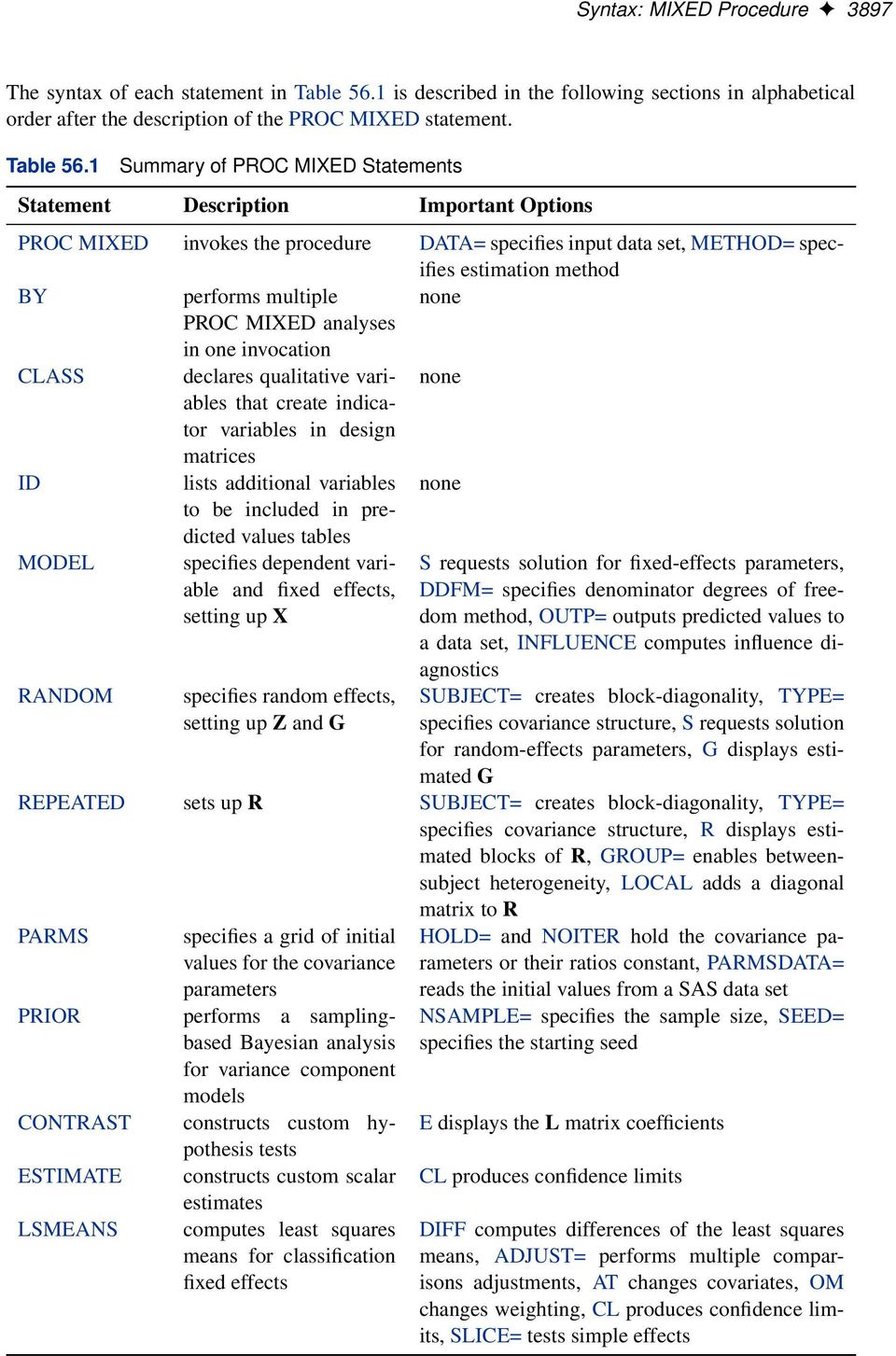
14 3896 Chapter 56: The MIXED Procedure Figure Type 3 Tests of Fixed Effects Type 3 Tests of Fixed Effects Num Den Effect DF DF F Value Pr > F Gender An additional benefit of the random effects analysis is that it enables you to make inferences about gender that apply to an entire population of families, whereas the inferences about gender from the analysis where Family and Family*Gender are fixed effects apply only to the particular families in the data set. PROC MIXED thus offers you the ability to model correlation directly and to make inferences about fixed effects that apply to entire populations of random effects. Syntax: MIXED Procedure The following statements are available in PROC MIXED. PROC MIXED < options > ; BY variables ; CLASS variables ; ID variables ; MODEL dependent = < fixed-effects > < / options > ; RANDOM random-effects < / options > ; REPEATED < repeated-effect >< / options > ; PARMS (value-list)... < / options > ; PRIOR < distribution >< / options > ; CONTRAST label < fixed-effect values... > < random-effect values... >,... < / options > ; ESTIMATE label < fixed-effect values... > < random-effect values... >< / options > ; LSMEANS fixed-effects < / options > ; WEIGHT variable ; Items within angle brackets ( < > ) are optional. The CONTRAST, ESTIMATE, LSMEANS, and RANDOM statements can appear multiple times; all other statements can appear only once. The PROC MIXED and MODEL statements are required, and the MODEL statement must appear after the CLASS statement if a CLASS statement is included. The CONTRAST, ESTIMATE, LSMEANS, RANDOM, and REPEATED statements must follow the MODEL statement. The CONTRAST and ESTIMATE statements must also follow any RANDOM statements. Table 56.1 summarizes the basic functions and important options of each PROC MIXED statement.

15 Syntax: MIXED Procedure 3897 The syntax of each statement in Table 56.1 is described in the following sections in alphabetical order after the description of the PROC MIXED statement. Table 56.1 Summary of PROC MIXED Statements Statement Description Important Options RANDOM specifies random effects, setting up Z and G PROC MIXED invokes the procedure DATA= specifies input data set, METHOD= specifies estimation method BY performs multiple none PROC MIXED analyses in one invocation CLASS declares qualitative variables none that create indica- tor variables in design matrices ID lists additional variables none to be included in predicted values tables MODEL specifies dependent variable and fixed effects, setting up X S requests solution for fixed-effects parameters, DDFM= specifies denominator degrees of freedom method, OUTP= outputs predicted values to a data set, INFLUENCE computes influence diagnostics SUBJECT= creates block-diagonality, TYPE= specifies covariance structure, S requests solution for random-effects parameters, G displays estimated G REPEATED sets up R SUBJECT= creates block-diagonality, TYPE= specifies covariance structure, R displays estimated blocks of R, GROUP= enables betweensubject heterogeneity, LOCAL adds a diagonal matrix to R PARMS specifies a grid of initial values for the covariance parameters PRIOR performs a samplingbased Bayesian analysis for variance component models CONTRAST constructs custom hypothesis tests ESTIMATE constructs custom scalar estimates LSMEANS computes least squares means for classification fixed effects HOLD= and NOITER hold the covariance parameters or their ratios constant, PARMSDATA= reads the initial values from a SAS data set NSAMPLE= specifies the sample size, SEED= specifies the starting seed E displays the L matrix coefficients CL produces confidence limits DIFF computes differences of the least squares means, ADJUST= performs multiple comparisons adjustments, AT changes covariates, OM changes weighting, CL produces confidence limits, SLICE= tests simple effects
16 3898 Chapter 56: The MIXED Procedure Table 56.1 continued Statement Description Important Options WEIGHT specifies a variable by which to weight R none PROC MIXED Statement PROC MIXED < options > ; The PROC MIXED statement invokes the procedure. Table 56.2 summarizes important options in the PROC MIXED statement by function. These and other options in the PROC MIXED statement are then described fully in alphabetical order. Table 56.2 Option Basic Options DATA= METHOD= NOPROFILE ORDER= PROC MIXED Statement Options Description specifies input data set specifies the estimation method includes scale parameter in optimization determines the sort order of CLASS variables Displayed Output ASYCORR ASYCOV CL COVTEST IC ITDETAILS LOGNOTE MMEQ MMEQSOL NOCLPRINT NOITPRINT PLOTS RATIO Optimization Options MAXFUNC= MAXITER= displays asymptotic correlation matrix of covariance parameter estimates displays asymptotic covariance matrix of covariance parameter estimates requests confidence limits for covariance parameter estimates displays asymptotic standard errors and Wald tests for covariance parameters displays a table of information criteria displays estimates and gradients added to Iteration History writes periodic status notes to the log displays mixed model equations displays the solution to the mixed model equations suppresses Class Level Information completely or in parts suppresses Iteration History table produces ODS statistical graphics produces ratio of covariance parameter estimates with residual variance specifies the maximum number of likelihood evaluations specifies the maximum number of iterations

17 PROC MIXED Statement 3899 Table 56.2 Option continued Description Computational Options CONVF CONVG CONVH DFBW EMPIRICAL NOBOUND RIDGE= SCORING= requests and tunes the relative function convergence criterion requests and tunes the relative gradient convergence criterion requests and tunes the relative Hessian convergence criterion selects between-within degree of freedom method computes empirical ( sandwich ) estimators unbounds covariance parameter estimates specifies starting value for minimum ridge value applies Fisher scoring where applicable You can specify the following options. ABSOLUTE makes the convergence criterion absolute. By default, it is relative (divided by the current objective function value). See the CONVF, CONVG, and CONVH options in this section for a description of various convergence criteria. ALPHA=number requests that confidence limits be constructed for the covariance parameter estimates with confidence level 1 number. The value of number must be between 0 and 1; the default is ANOVAF The ANOVAF option computes F tests in models with REPEATED statement and without RANDOM statement by a method similar to that of Brunner, Domhof, and Langer (2002). The method consists of computing special F statistics and adjusting their degrees of freedom. The technique is a generalization of the Greenhouse-Geiser adjustment in MANOVA models (Greenhouse and Geiser 1959). For more details, see the section F Tests With the ANOVAF Option on page ASYCORR produces the asymptotic correlation matrix of the covariance parameter estimates. It is computed from the corresponding asymptotic covariance matrix (see the description of the ASYCOV option, which follows). For ODS purposes, the name of the Asymptotic Correlation table is AsyCorr. ASYCOV requests that the asymptotic covariance matrix of the covariance parameters be displayed. By default, this matrix is the observed inverse Fisher information matrix, which equals 2H 1, where H is the Hessian (second derivative) matrix of the objective function. See the section Covariance Parameter Estimates on page 3991 for more information about this matrix. When you use the SCORING= option and PROC MIXED converges without stopping the scoring algorithm, PROC MIXED uses the expected Hessian matrix to compute the covariance matrix instead of the observed Hessian. For ODS purposes, the name of the Asymptotic Covariance table is AsyCov.

18 3900 Chapter 56: The MIXED Procedure CL< =WALD > requests confidence limits for the covariance parameter estimates. A Satterthwaite approximation is used to construct limits for all parameters that have a lower boundary constraint of zero. These limits take the form b 2 2 ;1 =2 2 b 2 2 ; =2 where D 2Z 2, Z is the Wald statistic b 2 =se.b 2 /, and the denominators are quantiles of the 2 -distribution with degrees of freedom. See Milliken and Johnson (1992) and Burdick and Graybill (1992) for similar techniques. For all other parameters, Wald Z-scores and normal quantiles are used to construct the limits. Wald limits are also provided for variance components if you specify the NOBOUND option. The optional =WALD specification requests Wald limits for all parameters. The confidence limits are displayed as extra columns in the Covariance Parameter Estimates table. The confidence level is 1 D 0:95 by default; this can be changed with the ALPHA= option. CONVF< =number > requests the relative function convergence criterion with tolerance number. The relative function convergence criterion is jf k f k 1 j jf k j number where f k is the value of the objective function at iteration k. To prevent the division by jf k j, use the ABSOLUTE option. The default convergence criterion is CONVH, and the default tolerance is 1E 8. CONVG < =number > requests the relative gradient convergence criterion with tolerance number. The relative gradient convergence criterion is max j jg jk j number jf k j where f k is the value of the objective function, and g jk is the j th element of the gradient (first derivative) of the objective function, both at iteration k. To prevent division by jf k j, use the ABSOLUTE option. The default convergence criterion is CONVH, and the default tolerance is 1E 8. CONVH< =number > requests the relative Hessian convergence criterion with tolerance number. The relative Hessian convergence criterion is g 0 k H 1 k g k jf k j number where f k is the value of the objective function, g k is the gradient (first derivative) of the objective function, and H k is the Hessian (second derivative) of the objective function, all at iteration k.

19 PROC MIXED Statement 3901 If H k is singular, then PROC MIXED uses the following relative criterion: g 0 k g k jf k j number To prevent the division by jf k j, use the ABSOLUTE option. The default convergence criterion is CONVH, and the default tolerance is 1E 8. COVTEST produces asymptotic standard errors and Wald Z-tests for the covariance parameter estimates. DATA=SAS-data-set names the SAS data set to be used by PROC MIXED. The default is the most recently created data set. DFBW has the same effect as the DDFM=BW option in the MODEL statement. EMPIRICAL computes the estimated variance-covariance matrix of the fixed-effects parameters by using the asymptotically consistent estimator described in Huber (1967), White (1980), Liang and Zeger (1986), and Diggle, Liang, and Zeger (1994). This estimator is commonly referred to as the sandwich estimator, and it is computed as follows:.x 0 bv 1 X/! SX X 0 c iv 1 i b i b i 0cV 1 i X i.x 0 bv 1 X/ id1 Here, b i D y i X i bˇ, S is the number of subjects, and matrices with an i subscript are those for the ith subject. You must include the SUBJECT= option in either a RANDOM or REPEATED statement for this option to take effect. When you specify the EMPIRICAL option, PROC MIXED adjusts all standard errors and test statistics involving the fixed-effects parameters. This changes output in the following tables (listed in Table 56.22): Contrast, CorrB, CovB, Diffs, Estimates, InvCovB, LSMeans, Slices, SolutionF, Tests1 Tests3. The OUTP= and OUTPM= data sets are also affected. Finally, the Satterthwaite and Kenward-Roger degrees of freedom methods are not available if you specify the EMPIRICAL option. IC displays a table of various information criteria. The criteria are all in smaller-is-better form, and are described in Table Table 56.3 Information Criteria Criterion Formula Reference AIC 2` C 2d Akaike (1974) AICC 2` C 2dn =.n d 1/ Hurvich and Tsai (1989) Burnham and Anderson (1998) HQIC 2` C 2d log log n Hannan and Quinn (1979) BIC 2` C d log n Schwarz (1978) CAIC 2` C d.log n C 1/ Bozdogan (1987)

20 3902 Chapter 56: The MIXED Procedure Here ` denotes the maximum value of the (possibly restricted) log likelihood, d the dimension of the model, and n the number of observations. In SAS 6 of SAS/STAT software, n equals the number of valid observations for maximum likelihood estimation and n p for restricted maximum likelihood estimation, where p equals the rank of X. In later versions, n equals the number of effective subjects as displayed in the Dimensions table, unless this value equals 1, in which case n equals the number of levels of the first random effect you specify in a RANDOM statement. If the number of effective subjects equals 1 and you have no RANDOM statements, then n reverts to the SAS 6 values. For AICC (a finite-sample corrected version of AIC), n equals the SAS 6 values of n, unless this number is less than d C 2, in which case it equals d C 2. For restricted likelihood estimation, d equals q, the effective number of estimated covariance parameters. In SAS 6, when a parameter estimate lies on a boundary constraint, then it is still included in the calculation of d, but in later versions it is not. The most common example of this behavior is when a variance component is estimated to equal zero. For maximum likelihood estimation, d equals q C p. For ODS purposes, the name of the Information Criteria table is InfoCrit. INFO is a default option. The creation of the Model Information, Dimensions, and Number of Observations tables can be suppressed by using the NOINFO option. Note that in SAS 6 this option displays the Model Information and Dimensions tables. ITDETAILS displays the parameter values at each iteration and enables the writing of notes to the SAS log pertaining to infinite likelihood and singularities during Newton-Raphson iterations. LOGNOTE writes periodic notes to the log describing the current status of computations. It is designed for use with analyses requiring extensive CPU resources. MAXFUNC=number specifies the maximum number of likelihood evaluations in the optimization process. The default is 150. MAXITER=number specifies the maximum number of iterations. The default is 50. METHOD=REML METHOD=ML METHOD=MIVQUE0 METHOD=TYPE1 METHOD=TYPE2 METHOD=TYPE3 specifies the estimation method for the covariance parameters. The REML specification performs residual (restricted) maximum likelihood, and it is the default method. The ML specification performs maximum likelihood, and the MIVQUE0 specification performs minimum variance quadratic unbiased estimation of the covariance parameters.

21 PROC MIXED Statement 3903 The METHOD=TYPEn specifications apply only to variance component models with no SUBJECT= effects and no REPEATED statement. An analysis of variance table is included in the output, and the expected mean squares are used to estimate the variance components (see Chapter 39, The GLM Procedure, for further explanation). The resulting method-ofmoment variance component estimates are used in subsequent calculations, including standard errors computed from ESTIMATE and LSMEANS statements. For ODS purposes, the new table names are Type1, Type2, and Type3, respectively. MMEQ requests that coefficients of the mixed model equations be displayed. These are " # " # X 0 br 1 X X 0 br 1 Z X 0 br Z 0 br 1 X Z 0 br 1 Z C bg 1 ; 1 y Z 0 br 1 y assuming that bg is nonsingular. If bg is singular, PROC MIXED produces the following coefficients: " # " # X 0 br 1 X X 0 br 1 ZbG X 0 br bgz 0 br 1 X bgz 0 br 1 ; 1 y ZbG C bg bgz 0 br 1 y See the section Estimating Fixed and Random Effects in the Mixed Model on page 3970 for further information about these equations. MMEQSOL requests that a solution to the mixed model equations be produced, as well as the inverted coefficients matrix. Formulas for these equations are provided in the preceding description of the MMEQ option. When bg is singular, b and a generalized inverse of the left-hand-side coefficient matrix are transformed by using bg to produce b and bc, respectively, where bc is a generalized inverse of the left-hand-side coefficient matrix of the original equations. NAMELEN< =number > specifies the length to which long effect names are shortened. The default and minimum value is 20. NOBOUND has the same effect as the NOBOUND option in the PARMS statement. NOCLPRINT< =number > suppresses the display of the Class Level Information table if you do not specify number. If you do specify number, only levels with totals that are less than number are listed in the table. NOINFO suppresses the display of the Model Information, Dimensions, and Number of Observations tables. NOITPRINT suppresses the display of the Iteration History table.
22 3904 Chapter 56: The MIXED Procedure NOPROFILE includes the residual variance as part of the Newton-Raphson iterations. This option applies only to models that have a residual variance parameter. By default, this parameter is profiled out of the likelihood calculations, except when you have specified the HOLD= option in the PARMS statement. ORD displays ordinates of the relevant distribution in addition to p-values. The ordinate can be viewed as an approximate odds ratio of hypothesis probabilities. ORDER=DATA ORDER=FORMATTED ORDER=FREQ ORDER=INTERNAL specifies the sorting order for the levels of all CLASS variables. This ordering determines which parameters in the model correspond to each level in the data, so the ORDER= option can be useful when you use CONTRAST or ESTIMATE statements. The default is ORDER=FORMATTED, and its behavior has been modified for SAS 8. When the default ORDER=FORMATTED is in effect for numeric variables for which you have supplied no explicit format, the levels are ordered by their internal values. In releases previous to SAS 8, numeric class levels with no explicit format were ordered by their BEST12. formatted values. In order to revert to the previous method you can specify this format explicitly for the CLASS variables. The change was implemented because the former default behavior for ORDER=FORMATTED often resulted in levels not being ordered numerically and required you to use an explicit format or ORDER=INTERNAL to get the more natural ordering. Table 56.4 shows how PROC MIXED interprets values of the ORDER= option. Table 56.4 Value of ORDER= DATA FORMATTED FREQ INTERNAL Sort Order and Value of ORDER= Option Levels Sorted By order of appearance in the input data set external formatted value, except for numeric variables with no explicit format, which are sorted by their unformatted (internal) value descending frequency count; levels with the most observations come first in the order unformatted value For FORMATTED and INTERNAL, the sort order is machine dependent. For more information about sort order, see the chapter on the SORT procedure in the SAS Procedures Guide and the discussion of BY-group processing in SAS Language Reference: Concepts.
23 PROC MIXED Statement 3905 PLOTS < (global-plot-options ) > < =plot-request < (options ) > > PLOTS < (global-plot-options ) > < = (plot-request< (options) ><... plot-request< (options) > >) > requests that the MIXED procedure produce statistical graphics via the Output Delivery System, provided that the ODS GRAPHICS statement has been specified. For general information about ODS Graphics, see Chapter 21, Statistical Graphics Using ODS. For examples of the basic statistical graphics produced by the MIXED procedure and aspects of their computation and interpretation, see the section ODS Graphics on page The global-plot-options apply to all relevant plots generated by the MIXED procedure. The global-plot-options supported by the MIXED procedure follow. Global Plot Options OBSNO uses the data set observation number to identify observations in tooltips, provided that the observation number can be determined. Otherwise, the number displayed in tooltips is the index of the observation as it is used in the analysis within the BY group. ONLY suppresses the default plots. Only the plots specifically requested are produced. UNPACK breaks a graphic that is otherwise paneled into individual component plots. Specific Plot Options The following listing describes the specific plots and their options. ALL requests that all plots appropriate for the particular analysis be produced. BOXPLOT < (boxplot-options) > requests box plots for the effects in your model that consist of classification effects only. Note that these effects can involve more than one classification variable (interaction and nested effects), but they cannot contain any continuous variables. By default, the BOXPLOT request produces box plots based on (conditional) raw residuals for the qualifying effects in the MODEL, RANDOM, and REPEATED statements. See the discussion of the boxplot-options in a later section for information about how to tune your box plot request. DISTANCE< (USEINDEX) > requests a plot of the likelihood or restricted likelihood distance. When influence diagnostics are requested with set selection according to an effect, the USEINDEX option enables you to replace the formatted tick values on the horizontal axis with integer indices of the effect levels in order to reduce the space taken up by the horizontal plot axis.
24 3906 Chapter 56: The MIXED Procedure INFLUENCEESTPLOT< (options) > requests panels of the deletiob estimates in an influence analysis, provided that the INFLUENCE option is specified in the MODEL statement. No plots are produced for fixed-effects parameters associated with singular columns in the X matrix or for covariance parameters associated with singularities in the ASYCOV matrix. By default, separate panels are produced for the fixed-effects and covariance parameters delete estimates. The FIXED and RANDOM options enable you to select these specific panels. The UNPACK option produces separate plots for each of the parameter estimates. The USEINDEX option replaces formatted tick values for the horizontal axis with integer indices. INFLUENCESTATPANEL< (options) > requests panels of influence statistics. For iterative influence analysis (see the INFLUENCE option in the MODEL statement), the panel shows the Cook s D and CovRatio statistics for fixed-effects and covariance parameters, enabling you to gauge impact on estimates and precision for both types of estimates. In noniterative analysis, only statistics for the fixed effects are plotted. The UNPACK option produces separate plots from the elements in the panel. The USEINDEX option replaces formatted tick values for the horizontal axis with integer indices. RESIDUALPANEL < (residualplot-options) > requests a panel of raw residuals. By default, the conditional residuals are produced. See the discussion of residualplot-options in a later section for information about how to tune this panel. STUDENTPANEL < (residualplot-options) > requests a panel of studentized residuals. By default, the conditional residuals are produced. See the discussion of residualplot-options in a later section for information about how to tune this panel. PEARSONPANEL < (residualplot-options) > requests a panel of Pearson residuals. By default, the conditional residuals are produced. See the discussion of residualplot-options in a later section for information about how to tune this panel. PRESS< (USEINDEX) > requests a plot of PRESS residuals or PRESS statistics. These are based on leave-oneout or leave-set-out prediction of the marginal mean. When influence diagnostics are requested with set selection according to an effect, the USEINDEX option enables you to replace the formatted tick values on the horizontal axis with integer indices of the effect levels in order to reduce the space taken up by the horizontal plot axis. VCIRYPANEL < (residualplot-options) > requests a panel of residual graphics based on the scaled residuals. See the VCIRY option in the MODEL statement for details about these scaled residuals. Only the UNPACK and BOX options of the residualplot-options are available for this type of residual panel. NONE suppresses all plots.
25 PROC MIXED Statement 3907 Residual Plot Options The residualplot-options determine both the composition of the panels and the type of residuals being plotted. BOX BOXPLOT replaces the inset of summary statistics in the lower-right corner of the panel with a box plot of the residual (the PROC GLIMMIX look ). CONDITIONAL BLUP MARGINAL constructs plots from conditional residuals. NOBLUP constructs plots from marginal residuals. UNPACK produces separate plots from the elements of the panel. The inset statistics are not part of the unpack operation. Box Plot Options The boxplot-options determine whether box plots are produced for residuals or for residuals and observed values, and for which model effects the box plots are constructed. The available boxplot-options are as follows. CONDITIONAL BLUP constructs box plots from conditional residuals that is, residuals using the estimated BLUPs of random effects. FIXED produces box plots for all fixed effects (MODEL statement) consisting entirely of classification variables GROUP produces box plots for all GROUP= effects (RANDOM and REPEATED statement) consisting entirely of classification variables MARGINAL NOBLUP constructs box plots from marginal residuals.
26 3908 Chapter 56: The MIXED Procedure NPANEL=number provides the ability to break a box plot into multiple graphics. If number is negative, no balancing of the number of boxes takes place and number is the maximum number of boxes per graphic. If number is positive, the number of boxes per graphic is balanced. For example, suppose variable A has 125 levels, and consider the following statements: ods graphics on; proc mixed plots=boxplot(npanel=20); class A; model y = A; run; The box balancing results in six plots with 18 boxes each and one plot with 17 boxes. If number is zero, and this is the default, all levels of the effect are displayed in a single plot. OBSERVED adds box plots of the observed data for the selected effects. RANDOM produces box plots for all random effects (RANDOM statement) consisting entirely of classification variables. This does not include effects specified in the GROUP= or SUBJECT= options of the RANDOM statement. REPEATED produces box plots for the repeated effects (REPEATED statement). This does not include effects specified in the GROUP= or SUBJECT= options of the REPEATED statement. STUDENT constructs box plots from studentized residuals rather than from raw residuals. SUBJECT produces box plots for all SUBJECT= effects (RANDOM and REPEATED statement) consisting entirely of classification variables. USEINDEX uses as the horizontal axis label the index of the effect level rather than the formatted value(s). For classification variables with many levels or model effects that involve multiple classification variables, the formatted values identifying the effect levels can take up too much space as axis tick values, leading to extensive thinning. The USEINDEX option replaces tick values constructed from formatted values with the internal level number.
27 PROC MIXED Statement 3909 Multiple Plot Request You can list a plot request one or more times with different options. For example, the following statements request a panel of marginal raw residuals, individual plots generated from a panel of the conditional raw residuals, and a panel of marginal studentized residuals: ods graphics on; proc mixed plots(only)=( ResidualPanel(marginal) ResidualPanel(unpack conditional) StudentPanel(marginal box)); The inset of residual statistics is replaced in this last panel by a box plot of the studentized residuals. Similarly, if you specify the INFLUENCE option in the MODEL statement, then the following statements request statistical graphics of fixed-effects deletion estimates (in a panel), covariance parameter deletion estimates (unpacked in individual plots), and box plots for the SUBJECT= and fixed classification effects based on residuals and observed values: ods graphics on / imagefmt=staticmap; proc mixed plots(only)=( InfluenceEstPlot(fixed) InfluenceEstPlot(random unpack) BoxPlot(observed fixed subject); The STATICMAP image format enables tooltips that show, for example, values of influence diagnostics associated with a particular delete estimate. This concludes the syntax section for the PLOTS= option in the PROC MIXED statement. RATIO produces the ratio of the covariance parameter estimates to the estimate of the residual variance when the latter exists in the model. RIDGE=number specifies the starting value for the minimum ridge value used in the Newton-Raphson algorithm. The default is SCORING< =number > requests that Fisher scoring be used in association with the estimation method up to iteration number, which is 0 by default. When you use the SCORING= option and PROC MIXED converges without stopping the scoring algorithm, PROC MIXED uses the expected Hessian matrix to compute approximate standard errors for the covariance parameters instead of the observed Hessian. The output from the ASYCOV and ASYCORR options is similarly adjusted. SIGITER is an alias for the NOPROFILE option. UPDATE is an alias for the LOGNOTE option.
28 3910 Chapter 56: The MIXED Procedure BY Statement BY variables ; You can specify a BY statement with PROC MIXED to obtain separate analyses on observations in groups defined by the BY variables. When a BY statement appears, the procedure expects the input data set to be sorted in order of the BY variables. The variables are one or more variables in the input data set. If your input data set is not sorted in ascending order, use one of the following alternatives: Sort the data by using the SORT procedure with a similar BY statement. Specify the BY statement options NOTSORTED or DESCENDING in the BY statement for the MIXED procedure. The NOTSORTED option does not mean that the data are unsorted but rather that the data are arranged in groups (according to values of the BY variables) and that these groups are not necessarily in alphabetical or increasing numeric order. Create an index on the BY variables by using the DATASETS procedure (in Base SAS software). Because sorting the data changes the order in which PROC MIXED reads observations, the sorting order for the levels of the CLASS variable might be affected if you have specified ORDER=DATA in the PROC MIXED statement. This, in turn, affects specifications in the CONTRAST or ESTIMATE statement. For more information about the BY statement, see SAS Language Reference: Concepts. For more information about the DATASETS procedure, see the Base SAS Procedures Guide. CLASS Statement CLASS variables ; The CLASS statement names the classification variables to be used in the analysis. If the CLASS statement is used, it must appear before the MODEL statement. Classification variables can be either character or numeric. By default, class levels are determined from the entire formatted values of the CLASS variables. Note that this represents a slight change from previous releases in the way in which class levels are determined. In releases prior to SAS 9, class levels were determined by using no more than the first 16 characters of the formatted values. If you want to revert to this previous behavior, you can use the TRUNCATE option in the CLASS statement. In any case, you can use formats to group values into levels. See the discussion of the FORMAT procedure in the Base SAS Procedures Guide and the discussions of the FORMAT statement and SAS formats in SAS Language Reference: Dictionary. You can adjust the order of CLASS variable levels with the ORDER= option in the PROC MIXED statement. You can specify the following option in the CLASS statement after a slash (/):
29 CONTRAST Statement 3911 TRUNCATE specifies that class levels should be determined by using no more than the first 16 characters of the formatted values of CLASS variables. When formatted values are longer than 16 characters, you can use this option in order to revert to the levels as determined in releases previous to SAS 9. CONTRAST Statement CONTRAST label < fixed-effect values... > < random-effect values... >,... < / options > ; The CONTRAST statement provides a mechanism for obtaining custom hypothesis tests. It is patterned after the CONTRAST statement in PROC GLM, although it has been extended to include random effects. This enables you to select an appropriate inference space (McLean, Sanders, and Stroup 1991). You can test the hypothesis L 0 D 0, where L 0 D.K 0 M 0 / and 0 D.ˇ0 0 /, in several inference spaces. The inference space corresponds to the choice of M. When M D 0, your inferences apply to the entire population from which the random effects are sampled; this is known as the broad inference space. When all elements of M are nonzero, your inferences apply only to the observed levels of the random effects. This is known as the narrow inference space, and you can also choose it by specifying all of the random effects as fixed. The GLM procedure uses the narrow inference space. Finally, by setting to zero the portions of M corresponding to selected main effects and interactions, you can choose intermediate inference spaces. The broad inference space is usually the most appropriate, and it is used when you do not specify any random effects in the CONTRAST statement. The CONTRAST statement has the following arguments: label fixed-effect random-effect values identifies the contrast in the table. A label is required for every contrast specified. Labels can be up to 200 characters and must be enclosed in quotes. identifies an effect that appears in the MODEL statement. The keyword INTER- CEPT can be used as an effect when an intercept is fitted in the model. You do not need to include all effects that are in the MODEL statement. identifies an effect that appears in the RANDOM statement. The first random effect must follow a vertical bar ( ); however, random effects do not have to be specified. are constants that are elements of the L matrix associated with the fixed and random effects. The rows of L 0 are specified in order and are separated by commas. The rows of the K 0 component of L 0 are specified on the left side of the vertical bars ( ). These rows test the fixed effects and are, therefore, checked for estimability. The rows of the M 0 component of L 0 are specified on the right side of the vertical bars. They test the random effects, and no estimability checking is necessary.
30 3912 Chapter 56: The MIXED Procedure If PROC MIXED finds the fixed-effects portion of the specified contrast to be nonestimable (see the SINGULAR= option), then it displays a message in the log. The following CONTRAST statement reproduces the F test for the effect A in the split-plot example (see Example 56.1): contrast A broad A A*B , A A*B / df=6; Note that no random effects are specified in the preceding contrast; thus, the inference space is broad. The resulting F test has two numerator degrees of freedom because L 0 has two rows. The denominator degrees of freedom is, by default, the residual degrees of freedom (9), but the DF= option changes the denominator degrees of freedom to 6. The following CONTRAST statement reproduces the F test for A when Block and A*Block are considered fixed effects (the narrow inference space): contrast A narrow A A*B A*Block , A A*B A*Block ; The preceding contrast does not contain coefficients for B and Block, because they cancel out in estimated differences between levels of A. Coefficients for B and Block are necessary to estimate the mean of one of the levels of A in the narrow inference space (see Example 56.1). If the elements of L are not specified for an effect that contains a specified effect, then the elements of the specified effect are automatically filled in over the levels of the higher-order effect. This feature is designed to preserve estimability for cases where there are complex higher-order effects. The coefficients for the higher-order effect are determined by equitably distributing the coefficients of the lower-level effect, as in the construction of least squares means. In addition, if the intercept is specified, it is distributed over all classification effects that are not contained by any other specified effect. If an effect is not specified and does not contain any specified effects, then all of its coefficients in L are set to 0. You can override this behavior by specifying coefficients for the higher-order effect. If too many values are specified for an effect, the extra ones are ignored; if too few are specified, the remaining ones are set to 0. If no random effects are specified, the vertical bar can be omitted; otherwise, it must be present. If a SUBJECT effect is used in the RANDOM statement, then the coefficients specified for the effects in the RANDOM statement are equitably distributed across the levels of the SUBJECT effect. You can use the E option to see exactly which L matrix is used. The SUBJECT and GROUP options in the CONTRAST statement are useful for the case when a SUBJECT= or GROUP= variable appears in the RANDOM statement, and you want to contrast
31 CONTRAST Statement 3913 different subjects or groups. By default, CONTRAST statement coefficients on random effects are distributed equally across subjects and groups. PROC MIXED handles missing level combinations of classification variables similarly to the way PROC GLM does. Both procedures delete fixed-effects parameters corresponding to missing levels in order to preserve estimability. However, PROC MIXED does not delete missing level combinations for random-effects parameters because linear combinations of the random-effects parameters are always estimable. These conventions can affect the way you specify your CONTRAST coefficients. The CONTRAST statement computes the statistic F D bˇ b 0 L.L 0 bcl/ 1 L 0 bˇ b r where r D rank.l 0 bcl/, and approximates its distribution with an F distribution. In this expression, bc is an estimate of the generalized inverse of the coefficient matrix in the mixed model equations. See the section Inference and Test Statistics on page 3972 for more information about this F statistic. The numerator degrees of freedom in the F approximation are r D rank.l 0 bcl/, and the denominator degrees of freedom are taken from the Tests of Fixed Effects table and corresponds to the final effect you list in the CONTRAST statement. You can change the denominator degrees of freedom by using the DF= option. You can specify the following options in the CONTRAST statement after a slash (/). CHISQ requests that chi-square tests be performed in addition to any F tests. A chi-square statistic equals its corresponding F statistic times the associate numerator degrees of freedom, and the same degrees of freedom are used to compute the p-value for the chi-square test. This p-value is always less than that for the F -test, as it effectively corresponds to an F test with infinite denominator degrees of freedom. DF=number specifies the denominator degrees of freedom for the F test. The default is the denominator degrees of freedom taken from the Tests of Fixed Effects table and corresponds to the final effect you list in the CONTRAST statement. E requests that the L matrix coefficients for the contrast be displayed. For ODS purposes, the label of this L Matrix Coefficients table is Coef. GROUP coeffs GRP coeffs sets up random-effect contrasts between different groups when a GROUP= variable appears in the RANDOM statement. By default, CONTRAST statement coefficients on random effects are distributed equally across groups.
32 3914 Chapter 56: The MIXED Procedure SINGULAR=number tunes the estimability checking. If v is a vector, define ABS(v) to be the absolute value of the element of v with the largest absolute value. If ABS(K 0 K 0 T) is greater than C*number for any row of K 0 in the contrast, then K is declared nonestimable. Here T is the Hermite form matrix.x 0 X/ X 0 X, and C is ABS(K 0 ) except when it equals 0, and then C is 1. The value for number must be between 0 and 1; the default is 1E 4. SUBJECT coeffs SUB coeffs sets up random-effect contrasts between different subjects when a SUBJECT= variable appears in the RANDOM statement. By default, CONTRAST statement coefficients on random effects are distributed equally across subjects. ESTIMATE Statement ESTIMATE label < fixed-effect values... > < random-effect values... >< / options > ; The ESTIMATE statement is exactly like a CONTRAST statement, except only one-row L matrices are permitted. The actual estimate, L 0 bp, is displayed along with its approximate standard error. An approximate t test that L 0 bp = 0 is also produced. PROC MIXED selects the degrees of freedom to match those displayed in the Tests of Fixed Effects table for the final effect you list in the ESTIMATE statement. You can modify the degrees of freedom by using the DF= option. If PROC MIXED finds the fixed-effects portion of the specified estimate to be nonestimable, then it displays Non-est for the estimate entries. The following examples of ESTIMATE statements compute the mean of the first level of A in the split-plot example (see Example 56.1) for various inference spaces: estimate A1 mean narrow intercept 1 A 1 B.5.5 A*B.5.5 block A*Block ; estimate A1 mean intermed intercept 1 A 1 B.5.5 A*B.5.5 Block ; estimate A1 mean broad intercept 1 A 1 B.5.5 A*B.5.5; The construction of the L vector for an ESTIMATE statement follows the same rules as listed under the CONTRAST statement. You can specify the following options in the ESTIMATE statement after a slash (/).
33 ESTIMATE Statement 3915 ALPHA=number requests that a t-type confidence interval be constructed with confidence level 1 number. The value of number must be between 0 and 1; the default is CL requests that t-type confidence limits be constructed. The confidence level is 0.95 by default; this can be changed with the ALPHA= option. DF=number specifies the degrees of freedom for the t test and confidence limits. The default is the denominator degrees of freedom taken from the Tests of Fixed Effects table and corresponds to the final effect you list in the ESTIMATE statement. DIVISOR=number specifies a value by which to divide all coefficients so that fractional coefficients can be entered as integer numerators. E requests that the L matrix coefficients be displayed. For ODS purposes, the name of this L Matrix Coefficients table is Coef. GROUP coeffs GRP coeffs sets up random-effect contrasts between different groups when a GROUP= variable appears in the RANDOM statement. By default, ESTIMATE statement coefficients on random effects are distributed equally across groups. LOWER LOWERTAILED requests that the p-value for the t test be based only on values less than the t statistic. A two-tailed test is the default. A lower-tailed confidence limit is also produced if you specify the CL option. SINGULAR=number tunes the estimability checking as documented for the SINGULAR= option in the CONTRAST statement. SUBJECT coeffs SUB coeffs sets up random-effect contrasts between different subjects when a SUBJECT= variable appears in the RANDOM statement. By default, ESTIMATE statement coefficients on random effects are distributed equally across subjects. For example, the ESTIMATE statement in the following code from Example 56.5 constructs the difference between the random slopes of the first two batches. proc mixed data=rc; class batch; model y = month / s; random int month / type=un sub=batch s; estimate slope b1 - slope b2 month 1 / subject 1-1; run;
34 3916 Chapter 56: The MIXED Procedure UPPER UPPERTAILED requests that the p-value for the t test be based only on values greater than the t statistic. A two-tailed test is the default. An upper-tailed confidence limit is also produced if you specify the CL option. ID Statement ID variables ; The ID statement specifies which variables from the input data set are to be included in the OUTP= and OUTPM= data sets from the MODEL statement. If you do not specify an ID statement, then all variables are included in these data sets. Otherwise, only the variables you list in the ID statement are included. Specifying an ID statement with no variables prevents any variables from being included in these data sets. LSMEANS Statement LSMEANS fixed-effects < / options > ; The LSMEANS statement computes least squares means (LS-means) of fixed effects. As in the GLM procedure, LS-means are predicted population margins that is, they estimate the marginal means over a balanced population. In a sense, LS-means are to unbalanced designs as class and subclass arithmetic means are to balanced designs. The L matrix constructed to compute them is the same as the L matrix formed in PROC GLM; however, the standard errors are adjusted for the covariance parameters in the model. Each LS-mean is computed as Lbˇ, where L is the coefficient matrix associated with the least squares mean and bˇ is the estimate of the fixed-effects parameter vector (see the section Estimating Fixed and Random Effects in the Mixed Model on page 3970). The approximate standard errors for the LS-mean is computed as the square root of L.X 0 bv 1 X/ L 0. LS-means can be computed for any effect in the MODEL statement that involves CLASS variables. You can specify multiple effects in one LSMEANS statement or in multiple LSMEANS statements, and all LSMEANS statements must appear after the MODEL statement. As in the ESTIMATE statement, the L matrix is tested for estimability, and if this test fails, PROC MIXED displays Non-est for the LS-means entries. Assuming the LS-mean is estimable, PROC MIXED constructs an approximate t test to test the null hypothesis that the associated population quantity equals zero. By default, the denominator degrees of freedom for this test are the same as those displayed for the effect in the Tests of Fixed Effects table (see the section Default Output on page 3989). Table 56.5 summarizes important options in the LSMEANS statement. All LSMEANS options are subsequently discussed in alphabetical order.
35 LSMEANS Statement 3917 Table 56.5 Option Summary of Important LSMEANS Statement Options Description Construction and Computation of LS-Means AT modifies covariate value in computing LS-means BYLEVEL computes separate margins DIFF requests differences of LS-means OM specifies weighting scheme for LS-mean computation SINGULAR= tunes estimability checking SLICE= partitions F tests (simple effects) Degrees of Freedom and P-values ADJDFE= determines whether to compute row-wise denominator degrees of freedom with DDFM=SATTERTHWAITE or DDFM=KENWARDROGER ADJUST= determines the method for multiple comparison adjustment of LSmean differences ALPHA= determines the confidence level (1 ) DF= assigns specific value to degrees of freedom for tests and confidence limits Statistical Output CL CORR COV E constructs confidence limits for means and or mean differences displays correlation matrix of LS-means displays covariance matrix of LS-means prints the L matrix You can specify the following options in the LSMEANS statement after a slash (/). ADJDFE=SOURCE ADJDFE=ROW specifies how denominator degrees of freedom are determined when p-values and confidence limits are adjusted for multiple comparisons with the ADJUST= option. When you do not specify the ADJDFE= option, or when you specify ADJDFE=SOURCE, the denominator degrees of freedom for multiplicity-adjusted results are the denominator degrees of freedom for the LS-mean effect in the Type 3 Tests of Fixed Effects table. When you specify AD- JDFE=ROW, the denominator degrees of freedom for multiplicity-adjusted results correspond to the degrees of freedom displayed in the DF column of the Differences of Least Squares Means table. The ADJDFE=ROW setting is particularly useful if you want multiplicity adjustments to take into account that denominator degrees of freedom are not constant across LS-mean differences. This can be the case, for example, when the DDFM=SATTERTHWAITE or DDFM=KENWARDROGER degrees-of-freedom method is in effect. In one-way models with heterogeneous variance, combining certain ADJUST= options with the ADJDFE=ROW option corresponds to particular methods of performing multiplicity adjustments in the presence of heteroscedasticity. For example, the following statements fit a
36 3918 Chapter 56: The MIXED Procedure heteroscedastic one-way model and perform Dunnett s T3 method (Dunnett 1980), which is based on the studentized maximum modulus (ADJUST=SMM): proc mixed; class A; model y = A / ddfm=satterth; repeated / group=a; lsmeans A / adjust=smm adjdfe=row; run; If you combine the ADJDFE=ROW option with ADJUST=SIDAK, the multiplicity adjustment corresponds to the T2 method of Tamhane (1979), while ADJUST=TUKEY corresponds to the method of Games-Howell (Games and Howell 1976). Note that ADJUST=TUKEY gives the exact results for the case of fractional degrees of freedom in the one-way model, but it does not take into account that the degrees of freedom are subject to variability. A more conservative method, such as ADJUST=SMM, might protect the overall error rate better. ADJUST=BON Unless the ADJUST= option of the LSMEANS statement is specified, the ADJDFE= option has no effect. ADJUST=DUNNETT ADJUST=SCHEFFE ADJUST=SIDAK ADJUST=SIMULATE< (sim-options) > ADJUST=SMM GT2 ADJUST=TUKEY requests a multiple comparison adjustment for the p-values and confidence limits for the differences of LS-means. By default, PROC MIXED adjusts all pairwise differences unless you specify ADJUST=DUNNETT, in which case PROC MIXED analyzes all differences with a control level. The ADJUST= option implies the DIFF option. The BON (Bonferroni) and SIDAK adjustments involve correction factors described in Chapter 39, The GLM Procedure, and Chapter 58, The MULTTEST Procedure; also see Westfall and Young (1993) and Westfall et al. (1999). When you specify ADJUST=TUKEY and your data are unbalanced, PROC MIXED uses the approximation described in Kramer (1956). Similarly, when you specify ADJUST=DUNNETT and the LS-means are correlated, PROC MIXED uses the factor-analytic covariance approximation described in Hsu (1992). The preceding references also describe the SCHEFFE and SMM adjustments. The SIMULATE adjustment computes adjusted p-values and confidence limits from the simulated distribution of the maximum or maximum absolute value of a multivariate t random vector. All covariance parameters except the residual variance are fixed at their estimated values throughout the simulation, potentially resulting in some underdispersion. The simulation estimates q, the true.1 /th quantile, where 1 is the confidence coefficient. The default is 0.05, and you can change this value with the ALPHA= option in the LSMEANS statement.
37 LSMEANS Statement 3919 The number of samples is set so that the tail area for the simulated q is within of /% confidence. In equation form, with P.jF.bq/.1 /j / D 1 where Oq is the simulated q and F is the true distribution function of the maximum; see Edwards and Berry (1987) for details. By default, = and = 0.01, placing the tail area of Oq within of 0.95 with 99% confidence. The ACC= and EPS= sim-options reset and, respectively; the NSAMP= sim-option sets the sample size directly; and the SEED= sim-option specifies an integer used to start the pseudo-random number generator for the simulation. If you do not specify a seed, or if you specify a value less than or equal to zero, the seed is generated from reading the time of day from the computer clock. For additional descriptions of these and other simulation options, see the section LSMEANS Statement on page 2456 in Chapter 39, The GLM Procedure. ALPHA=number requests that a t-type confidence interval be constructed for each of the LS-means with confidence level 1 number. The value of number must be between 0 and 1; the default is AT variable = value AT (variable-list) = (value-list) AT MEANS enables you to modify the values of the covariates used in computing LS-means. By default, all covariate effects are set equal to their mean values for computation of standard LS-means. The AT option enables you to assign arbitrary values to the covariates. Additional columns in the output table indicate the values of the covariates. If there is an effect containing two or more covariates, the AT option sets the effect equal to the product of the individual means rather than the mean of the product (as with standard LS-means calculations). The AT MEANS option sets covariates equal to their mean values (as with standard LS-means) and incorporates this adjustment to crossproducts of covariates. As an example, consider the following invocation of PROC MIXED: proc mixed; class A; model Y = A X1 X2 X1*X2; lsmeans A; lsmeans A / at means; lsmeans A / at X1=1.2; lsmeans A / at (X1 X2)=( ); run; For the first two LSMEANS statements, the LS-means coefficient for X1 is x 1 (the mean of X1) and for X2 is x 2 (the mean of X2). However, for the first LSMEANS statement, the coefficient for X1*X2 is x 1 x 2, but for the second LSMEANS statement, the coefficient is x 1 x 2. The third LSMEANS statement sets the coefficient for X1 equal to 1:2 and leaves it at x 2 for X2, and the final LSMEANS statement sets these values to 1:2 and 0:3, respectively. If a WEIGHT variable is present, it is used in processing AT variables. Also, observations with missing dependent variables are included in computing the covariate means, unless these
38 3920 Chapter 56: The MIXED Procedure observations form a missing cell and the FULLX option in the MODEL statement is not in effect. You can use the E option in conjunction with the AT option to check that the modified LS-means coefficients are the ones you want. The AT option is disabled if you specify the BYLEVEL option. BYLEVEL requests PROC MIXED to process the OM data set by each level of the LS-mean effect (LSMEANS effect) in question. For more details, see the OM option later in this section. CL CORR COV requests that t-type confidence limits be constructed for each of the LS-means. The confidence level is 0.95 by default; this can be changed with the ALPHA= option. displays the estimated correlation matrix of the least squares means as part of the Least Squares Means table. displays the estimated covariance matrix of the least squares means as part of the Least Squares Means table. DF=number specifies the degrees of freedom for the t test and confidence limits. The default is the denominator degrees of freedom taken from the Tests of Fixed Effects table corresponding to the LS-means effect unless the DDFM=SATTERTHWAITE or DDFM=KENWARDROGER option is in effect in the MODEL statement. For these DDFM= methods, degrees of freedom are determined separately for each test; see the DDFM= option for more information. DIFF< =difftype > PDIFF< =difftype > requests that differences of the LS-means be displayed. The optional difftype specifies which differences to produce, with possible values being ALL, CONTROL, CONTROLL, and CONTROLU. The difftype ALL requests all pairwise differences, and it is the default. The difftype CONTROL requests the differences with a control, which, by default, is the first level of each of the specified LSMEANS effects. To specify which levels of the effects are the controls, list the quoted formatted values in parentheses after the keyword CONTROL. For example, if the effects A, B, and C are classification variables, each having two levels, 1 and 2, the following LSMEANS statement specifies the (1,2) level of A*B and the (2,1) level of B*C as controls: lsmeans A*B B*C / diff=control( ); For multiple effects, the results depend upon the order of the list, and so you should check the output to make sure that the controls are correct. Two-tailed tests and confidence limits are associated with the CONTROL difftype. For onetailed results, use either the CONTROLL or CONTROLU difftype. The CONTROLL difftype tests whether the noncontrol levels are significantly smaller than the control; the upper confidence limits for the control minus the noncontrol levels are considered to be infinity and
39 LSMEANS Statement 3921 are displayed as missing. Conversely, the CONTROLU difftype tests whether the noncontrol levels are significantly larger than the control; the upper confidence limits for the noncontrol levels minus the control are considered to be infinity and are displayed as missing. If you want to perform multiple comparison adjustments on the differences of LS-means, you must specify the ADJUST= option. The differences of the LS-means are displayed in a table titled Differences of Least Squares Means. For ODS purposes, the table name is Diffs. E requests that the L matrix coefficients for all LSMEANS effects be displayed. For ODS purposes, the name of this L Matrix Coefficients table is Coef. OM< =OM-data-set > OBSMARGINS< =OM-data-set > specifies a potentially different weighting scheme for the computation of LS-means coefficients. The standard LS-means have equal coefficients across classification effects; however, the OM option changes these coefficients to be proportional to those found in OM-data-set. This adjustment is reasonable when you want your inferences to apply to a population that is not necessarily balanced but has the margins observed in OM-data-set. By default, OM-data-set is the same as the analysis data set. You can optionally specify another data set that describes the population for which you want to make inferences. This data set must contain all model variables except for the dependent variable (which is ignored if it is present). In addition, the levels of all CLASS variables must be the same as those occurring in the analysis data set. Specifying an OM-data-set enables you to construct arbitrarily weighted LS-means. In computing the observed margins, PROC MIXED uses all observations for which there are no missing or invalid independent variables, including those for which there are missing dependent variables. Also, if OM-data-set has a WEIGHT variable, PROC MIXED uses weighted margins to construct the LS-means coefficients. If OM-data-set is balanced, the LS-means are unchanged by the OM option. The BYLEVEL option modifies the observed-margins LS-means. Instead of computing the margins across all of the OM-data-set, PROC MIXED computes separate margins for each level of the LSMEANS effect in question. In this case the resulting LS-means are actually equal to raw means for fixed-effects models and certain balanced random-effects models, but their estimated standard errors account for the covariance structure that you have specified. If the AT option is specified, the BYLEVEL option disables it. You can use the E option in conjunction with either the OM or BYLEVEL option to check that the modified LS-means coefficients are the ones you want. It is possible that the modified LSmeans are not estimable when the standard ones are, or vice versa. Nonestimable LS-means are noted as Non-est in the output. PDIFF is the same as the DIFF option.
40 3922 Chapter 56: The MIXED Procedure SINGULAR=number tunes the estimability checking as documented for the SINGULAR= option in the CONTRAST statement. SLICE= fixed-effect SLICE= (fixed-effects) specifies effects by which to partition interaction LSMEANS effects. This can produce what are known as tests of simple effects (Winer 1971). For example, suppose that A*B is significant, and you want to test the effect of A for each level of B. The appropriate LSMEANS statement is as follows: lsmeans A*B / slice=b; This code tests for the simple main effects of A for B, which are calculated by extracting the appropriate rows from the coefficient matrix for the A*B LS-means and by using them to form an F test. See the section Inference and Test Statistics for more information about this F test. The SLICE option produces a table titled Tests of Effect Slices. For ODS purposes, the table name is Slices. MODEL Statement MODEL dependent = < fixed-effects >< / options > ; The MODEL statement names a single dependent variable and the fixed effects, which determine the X matrix of the mixed model (see the section Parameterization of Mixed Models on page 3975 for details). The specification of effects is the same as in the GLM procedure; however, unlike PROC GLM, you do not specify random effects in the MODEL statement. The MODEL statement is required. An intercept is included in the fixed-effects model by default. If no fixed effects are specified, only this intercept term is fit. The intercept can be removed by using the NOINT option. Table 56.6 summarizes options in the MODEL statement. These are subsequently discussed in detail in alphabetical order. Table 56.6 Option Model Building NOINT Summary of Important MODEL Statement Options Description excludes fixed-effect intercept from model Statistical Computations ALPHA= determines the confidence level (1 ) for fixed effects ALPHAP= determines the confidence level (1 ) for predicted values CHISQ requests chi-square tests DDF= specifies denominator degrees of freedom (list)
41 MODEL Statement 3923 Table 56.6 continued Option DDFM= HTYPE= INFLUENCE NOTEST OUTP= OUTPM= RESIDUAL VCIRY Description specifies the method for computing denominator degrees of freedom selects the type of hypothesis test requests influence and case-deletion diagnostics suppresses hypothesis tests for the fixed effects specifies output data set for predicted values and related quantities specifies output data set for predicted values and related quantities adds Pearson-type and studentized residuals to output data sets adds scaled marginal residual to output data sets Statistical Output CL displays confidence limits for fixed-effects parameter estimates CORRB displays correlation matrix of fixed-effects parameter estimates COVB displays covariance matrix of fixed-effects parameter estimates COVBI displays inverse covariance matrix of fixed-effects parameter estimates E, E1, E2, E3 displays L matrix coefficients INTERCEPT adds a row for the intercept to test tables SOLUTION displays fixed-effects parameter estimates (and scale parameter in GLM models) Singularity Tolerances SINGCHOL= SINGRES= SINGULAR= ZETA= tunes sensitivity in computing Cholesky roots tunes singularity criterion for residual variance tunes the sensitivity in sweeping tunes the sensitivity in forming Type 3 functions You can specify the following options in the MODEL statement after a slash (/). ALPHA=number requests that a t-type confidence interval be constructed for each of the fixed-effects parameters with confidence level 1 number. The value of number must be between 0 and 1; the default is ALPHAP=number requests that a t-type confidence interval be constructed for the predicted values with confidence level 1 number. The value of number must be between 0 and 1; the default is CHISQ CL requests that chi-square tests be performed for all specified effects in addition to the F tests. Type 3 tests are the default; you can produce the Type 1 and Type 2 tests by using the HTYPE= option. requests that t-type confidence limits be constructed for each of the fixed-effects parameter
42 3924 Chapter 56: The MIXED Procedure estimates. The confidence level is 0.95 by default; this can be changed with the ALPHA= option. CONTAIN has the same effect as the DDFM=CONTAIN option. CORRB produces the approximate correlation matrix of the fixed-effects parameter estimates. For ODS purposes, the name of this table is CorrB. COVB COVBI produces the approximate variance-covariance matrix of the fixed-effects parameter estimates bˇ. By default, this matrix equals.x 0 bv 1 X/ and results from sweeping.x y/ 0 bv 1.X y/ on all but its last pivot and removing the y border. The EMPIRICAL option in the PROC MIXED statement changes this matrix into empirical sandwich form. For ODS purposes, the name of this table is CovB. If the degrees-of-freedom method of Kenward and Roger (1997) is in effect (DDFM=KENWARDROGER), the COVB matrix changes because the method entails an adjustment of the variance-covariance matrix of the fixed effects by the method proposed by Prasad and Rao (1990) and Harville and Jeske (1992); see also Kackar and Harville (1984). produces the inverse of the approximate variance-covariance matrix of the fixed-effects parameter estimates. For ODS purposes, the name of this table is InvCovB. DDF=value-list enables you to specify your own denominator degrees of freedom for the fixed effects. The value-list specification is a list of numbers or missing values (.) separated by commas. The degrees of freedom should be listed in the order in which the effects appear in the Tests of Fixed Effects table. If you want to retain the default degrees of freedom for a particular effect, use a missing value for its location in the list. For example, the following statement assigns 3 denominator degrees of freedom to A and 4.7 to A*B, while those for B remain the same: model Y = A B A*B / ddf=3,.,4.7; If you specify DDFM=SATTERTHWAITE or DDFM=KENWARDROGER, the DDF= option has no effect. DDFM=CONTAIN DDFM=BETWITHIN DDFM=RESIDUAL DDFM=SATTERTHWAITE DDFM=KENWARDROGER< (FIRSTORDER) > specifies the method for computing the denominator degrees of freedom for the tests of fixed effects resulting from the MODEL, CONTRAST, ESTIMATE, and LSMEANS statements. Table 56.7 lists syntax aliases for the degrees-of-freedom methods.
43 MODEL Statement 3925 Table 56.7 Aliases for DDFM= Option DDFM= Option Alias BETWITHIN BW CONTAIN CON KENWARDROGER KENROG, KR RESIDUAL RES SATTERTHWAITE SATTERTH, SAT The DDFM=CONTAIN option invokes the containment method to compute denominator degrees of freedom, and it is the default when you specify a RANDOM statement. The containment method is carried out as follows: Denote the fixed effect in question A, and search the RANDOM effect list for the effects that syntactically contain A. For example, the random effect B(A) contains A, but the random effect C does not, even if it has the same levels as B(A). Among the random effects that contain A, compute their rank contribution to the (X Z) matrix. The DDF assigned to A is the smallest of these rank contributions. If no effects are found, the DDF for A is set equal to the residual degrees of freedom, N rank.x Z/. This choice of DDF matches the tests performed for balanced split-plot designs and should be adequate for moderately unbalanced designs. CAUTION: If you have a Z matrix with a large number of columns, the overall memory requirements and the computing time after convergence can be substantial for the containment method. If it is too large, you might want to use the DDFM=BETWITHIN option. The DDFM=BETWITHIN option is the default for REPEATED statement specifications (with no RANDOM statements). It is computed by dividing the residual degrees of freedom into between-subject and within-subject portions. PROC MIXED then checks whether a fixed effect changes within any subject. If so, it assigns within-subject degrees of freedom to the effect; otherwise, it assigns the between-subject degrees of freedom to the effect (see Schluchter and Elashoff 1990). If there are multiple within-subject effects containing classification variables, the within-subject degrees of freedom are partitioned into components corresponding to the subject-by-effect interactions. One exception to the preceding method is the case where you have specified no RANDOM statements and a REPEATED statement with the TYPE=UN option. In this case, all effects are assigned the between-subject degrees of freedom to provide for better small-sample approximations to the relevant sampling distributions. DDFM=KENWARDROGER might be a better option to try for this case. The DDFM=RESIDUAL option performs all tests by using the residual degrees of freedom, n rank.x/, where n is the number of observations. The DDFM=SATTERTHWAITE option performs a general Satterthwaite approximation for the denominator degrees of freedom, computed as follows. Suppose is the vector of unknown parameters in V, and suppose C D.X 0 V 1 X/, where denotes a generalized inverse. Let bc and b be the corresponding estimates.
44 3926 Chapter 56: The MIXED Procedure Consider the one-dimensional case, and consider ` to be a vector defining an estimable linear combination of ˇ. The Satterthwaite degrees of freedom for the t statistic t D `bˇ p ` OC`0 is computed as D 2.` OC`0/ 2 g 0 Ag where g is the gradient of `C`0 with respect to, evaluated at b, and A is the asymptotic variance-covariance matrix of b obtained from the second derivative matrix of the likelihood equations. For the multidimensional case, let L be an estimable contrast matrix and denote the rank of LbCL 0 as q > 1. The Satterthwaite denominator degrees of freedom for the F statistic F D bˇ0l 0.LbCL 0 / 1 Lbˇ q are computed by first performing the spectral decomposition LbCL 0 D P 0 DP, where P is an orthogonal matrix of eigenvectors and D is a diagonal matrix of eigenvalues, both of dimension q q. Define `m to be the mth row of PL, and let m D 2.D m/ 2 g 0 m Ag m where D m is the mth diagonal element of D and g m is the gradient of `mc`0m with respect to, evaluated at b. Then let E D qx md1 m m 2 I. m > 2/ where the indicator function eliminates terms for which m 2. The degrees of freedom for F are then computed as D 2E E q provided E > q; otherwise is set to zero. This method is a generalization of the techniques described in Giesbrecht and Burns (1985), McLean and Sanders (1988), and Fai and Cornelius (1996). The method can also include estimated random effects. In this case, append b to bˇ and change bc to be the inverse of the coefficient matrix in the mixed model equations. The calculations require extra memory to hold c matrices that are the size of the mixed model equations, where c is the number of covariance parameters. In the notation of Table 56.25, this is approximately 8q.p C g/.p C g/=2 bytes. Extra computing time is also required to process these matrices. The Satterthwaite method implemented here is intended to produce an accurate F approximation; however, the results can differ from those produced by PROC GLM. Also, the small sample properties of this
45 MODEL Statement 3927 approximation have not been extensively investigated for the various models available with PROC MIXED. The DDFM=KENWARDROGER option performs the degrees of freedom calculations detailed by Kenward and Roger (1997). This approximation involves inflating the estimated variance-covariance matrix of the fixed and random effects by the method proposed by Prasad and Rao (1990) and Harville and Jeske (1992); see also Kackar and Harville (1984). Satterthwaite-type degrees of freedom are then computed based on this adjustment. By default, the observed information matrix of the covariance parameter estimates is used in the calculations. For covariance structures that have nonzero second derivatives with respect to the covariance parameters, the Kenward-Roger covariance matrix adjustment includes a second-order term. This term can result in standard error shrinkage. Also, the resulting adjusted covariance matrix can then be indefinite and is not invariant under reparameterization. The FIRSTORDER suboption of the DDFM=KENWARDROGER option eliminates the second derivatives from the calculation of the covariance matrix adjustment. For the case of scalar estimable functions, the resulting estimator is referred to as the Prasad-Rao estimator in Harville and Jeske (1992). The following are examples of covariance structures that generally lead to nonzero second derivatives: TYPE=ANTE(1), TYPE=AR(1), TYPE=ARH(1), TYPE=ARMA(1,1), TYPE=CSH, TYPE=FA, TYPE=FA0(q), TYPE=TOEPH, TYPE=UNR, and all TYPE=SP() structures. When the asymptotic variance matrix of the covariance parameters is found to be singular, a generalized inverse is used. Covariance parameters with zero variance then do not contribute to the degrees-of-freedom adjustment for DDFM=SATTERTHWAITE and DDFM=KENWARDROGER, and a message is written to the log. This method changes output in the following tables (listed in Table 56.22): Contrast, CorrB, CovB, Diffs, Estimates, InvCovB, LSMeans, Slices, SolutionF, SolutionR, Tests1 Tests3. The OUTP= and OUTPM= data sets are also affected. E E1 E2 E3 requests that Type 1, Type 2, and Type 3 L matrix coefficients be displayed for all specified effects. For ODS purposes, the name of the table is Coef. requests that Type 1 L matrix coefficients be displayed for all specified effects. For ODS purposes, the name of the table is Coef. requests that Type 2 L matrix coefficients be displayed for all specified effects. For ODS purposes, the name of the table is Coef. requests that Type 3 L matrix coefficients be displayed for all specified effects. For ODS purposes, the name of the table is Coef. FULLX requests that columns of the X matrix that consist entirely of zeros not be eliminated from X; otherwise, they are eliminated by default. For a column corresponding to a missing cell to be added to X, its particular levels must be present in at least one observation in the analysis
46 3928 Chapter 56: The MIXED Procedure data set along with a missing dependent variable. The use of the FULLX option can affect coefficient specifications in the CONTRAST and ESTIMATE statements, as well as covariate coefficients from LSMEANS statements specified with the AT MEANS option. HTYPE=value-list indicates the type of hypothesis test to perform on the fixed effects. Valid entries for value are 1, 2, and 3; the default value is 3. You can specify several types by separating the values with a comma or a space. The ODS table names are Tests1 for the Type 1 tests, Tests2 for the Type 2 tests, and Tests3 for the Type 3 tests. INFLUENCE< (influence-options) > specifies that influence and case deletion diagnostics are to be computed. The INFLUENCE option computes influence diagnostics by noniterative or iterative methods. The noniterative diagnostics rely on recomputation formulas under the assumption that covariance parameters or their ratios remain fixed. With the possible exception of a profiled residual variance, no covariance parameters are updated. This is the default behavior because of its computational efficiency. However, the impact of an observation on the overall analysis can be underestimated if its effect on covariance parameters is not assessed. Toward this end, iterative methods can be applied to gauge the overall impact of observations and to obtain influence diagnostics for the covariance parameter estimates. If you specify the INFLUENCE option without further suboptions, PROC MIXED computes single-case deletion diagnostics and influence statistics for each observation in the data set by updating estimates for the fixed-effects parameter estimates, and also the residual variance, if it is profiled. The EFFECT=, SELECT=, ITER=, SIZE=, and KEEP= suboptions provide additional flexibility in the computation and reporting of influence statistics. Table 56.8 briefly describes important suboptions and their effect on the influence analysis. Table 56.8 Description Summary of INFLUENCE Default and Suboptions Compute influence diagnostics for individual observations Measure influence of sets of observations chosen according to a classification variable or effect Remove pairs of observations and report the results sorted by degree of influence Remove triples, quadruples of observations, etc. Suboption default EFFECT= SIZE=2 SIZE= Allow selection of individual observations, observations sharing SELECT= specific levels of effects, and construction of tuples from specified subsets of observations Update fixed effects and covariance parameters by refitting the ITER=n > 0 mixed model, adding up to n iterations Compute influence diagnostics for the covariance parameters ITER=n > 0 Update only fixed effects and the residual variance, if it is profiled Add the reduced-data estimates to the data set created with ODS OUTPUT ITER=0 ESTIMATES
47 MODEL Statement 3929 The modifiers and their default values are discussed in the following paragraphs. The set of computed influence diagnostics varies with the suboptions. The most extensive set of influence diagnostics is obtained when ITER=n with n > 0. You can produce statistical graphics of influence diagnostics when the ODS GRAPHICS statement is specified. For general information about ODS Graphics, see Chapter 21, Statistical Graphics Using ODS. For specific information about the graphics available in the MIXED procedure, see the section ODS Graphics on page You can specify the following influence-options in parentheses: EFFECT=effect specifies an effect according to which observations are grouped. Observations sharing the same level of the effect are removed from the analysis as a group. The effect must contain only classification variables, but they need not be contained in the model. ESTIMATES EST ITER=n Removing observations can change the rank of the.x 0 V 1 X/ matrix. This is particularly likely to happen when multiple observations are eliminated from the analysis. If the rank of the estimated variance-covariance matrix of bˇ changes or its singularity pattern is altered, no influence diagnostics are computed. specifies that the updated parameter estimates should be written to the ODS output data set. The values are not displayed in the Influence table, but if you use ODS OUTPUT to create a data set from the listing, the estimates are added to the data set. If ITER=0, only the fixed-effects estimates are saved. In iterative influence analyses, fixed-effects and covariance parameters are stored. The p fixed-effects parameter estimates are named Parm1 Parmp, and the q covariance parameter estimates are named CovP1 CovPq. The order corresponds to that in the Solution for Fixed Effects and Covariance Parameter Estimates tables. If parameter updates fail for example, because of a loss of rank or a nonpositive definite Hessian missing values are reported. controls the maximum number of additional iterations PROC MIXED performs to update the fixed-effects and covariance parameter estimates following data point removal. If you specify n > 0, then statistics such as DFFITS, MDFFITS, and the likelihood distances measure the impact of observation(s) on all aspects of the analysis. Typically, the influence will grow compared to values at ITER=0. In models without RANDOM or REPEATED effects, the ITER= option has no effect. This documentation refers to analyses when n > 0 simply as iterative influence analysis, even if final covariance parameter estimates can be updated in a single step (for example, when METHOD=MIVQUE0 or METHOD=TYPE3). This nomenclature reflects the fact that only if n > 0 are all model parameters updated, which can require additional iterations. If n > 0 and METHOD=REML (default) or METHOD=ML, the procedure updates fixed effects and variance-covariance parameters after removing the selected observations with additional Newton-Raphson iterations, starting from the converged estimates for the entire data. The process stops for each observation or set of observations if the convergence criterion is satisfied or the number of further iterations
48 3930 Chapter 56: The MIXED Procedure exceeds n. If n > 0 and METHOD=TYPE1, TYPE2, or TYPE3, ANOVA estimates of the covariance parameters are recomputed in a single step. Compared to noniterative updates, the computations are more involved. In particular for large data sets and/or a large number of random effects, iterative updates require considerably more resources. A one-step (ITER=1) or two-step update might be a good compromise. The output includes the number of iterations performed, which is less than n if the iteration converges. If the process does not converge in n iterations, you should be careful in interpreting the results, especially if n is fairly large. Bounds and other restrictions on the covariance parameters carry over from the fulldata model. Covariance parameters that are not iterated in the model fit to the full data (the NOITER or HOLD option in the PARMS statement) are likewise not updated in the refit. In certain models, such as random-effects models, the ratios between the covariance parameters and the residual variance are maintained rather than the actual value of the covariance parameter estimate (see the section Influence Diagnostics on page 3982). KEEP=n determines how many observations are retained for display and in the output data set or how many tuples if you specify SIZE=. The output is sorted by an influence statistic as discussed for the SIZE= suboption. SELECT=value-list specifies which observations or effect levels are chosen for influence calculations. If the SELECT= suboption is not specified, diagnostics are computed as follows: for all observations, if EFFECT= or SIZE= are not given for all levels of the specified effect, if EFFECT= is specified for all tuples of size k formed from the observations in value-list, if SIZE=k is specified When you specify an effect with the EFFECT= option, the values in value-list represent indices of the levels in the order in which PROC MIXED builds classification effects. Which observations in the data set correspond to this index depends on the order of the variables in the CLASS statement, not the order in which the variables appear in the interaction effect. See the section Parameterization of Mixed Models on page 3975 to understand precisely how the procedure indexes nested and crossed effects and how levels of classification variables are ordered. The actual values of the classification variables involved in the effect are shown in the output so you can determine which observations were removed. If the EFFECT= suboption is not specified, the SELECT= value list refers to the sequence in which observations are read from the input data set or from the current BY group if there is a BY statement. This indexing is not necessarily the same as the observation numbers in the input data set, for example, if a WHERE clause is specified or during BY processing.
49 MODEL Statement 3931 SIZE=n instructs PROC MIXED to remove groups of observations formed as tuples of size n. For example, SIZE=2 specifies all n.n 1/=2 unique pairs of observations. The number of tuples for SIZE=k is nš=.kš.n k/š/ and grows quickly with n and k. Using the SIZE= option can result in considerable computing time. The MIXED procedure displays by default only the 50 tuples with the greatest influence. Use the KEEP= option to override this default and to retain a different number of tuples in the listing or ODS output data set. Regardless of the KEEP= specification, all tuples are evaluated and the results are ordered according to an influence statistic. This statistic is the (restricted) likelihood distance as a measure of overall influence if ITER= n > 0 or when a residual variance is profiled. When likelihood distances are unavailable, the results are ordered by the PRESS statistic. To reduce computational burden, the SIZE= option can be combined with the SELECT=value-list modifier. For example, the following statements evaluate all 15 D 6 5=2 pairs formed from observations 13, 14, 18, 30, 31, and 33 and display the five pairs with the greatest influence: proc mixed; class a m f; model penetration = a m / influence(size=2 keep=5 select=13,14,18,30,31,33); random f(m); run; If any observation in a tuple contains missing values or has otherwise not contributed to the analysis, the tuple is not evaluated. This guarantees that the displayed results refer to the same number of observations, so that meaningful statistics are available by which to order the results. If computations fail for a particular tuple for example, because the.x 0 V 1 X/ matrix changes rank or the G matrix is not positive definite no results are produced. Results are retained when the maximum number of iterative updates is exceeded in iterative influence analyses. The SIZE= suboption cannot be combined with the EFFECT= suboption. As in the case of the EFFECT= suboption, the statistics being computed are those appropriate for removal of multiple data points, even if SIZE=1. For ODS purposes the name of the Influence Diagnostics table is Influence. The variables in this table depend on whether you specify the EFFECT=, SIZE=, or KEEP= suboption and whether covariance parameters are iteratively updated. When ITER=0 (the default), certain influence diagnostics are meaningful only if the residual variance is profiled. Table 56.9 and Table summarize the statistics obtained depending on the model and modifiers. The last column in these tables gives the variable name in the ODS OUTPUT INFLUENCE= data set. Restricted likelihood distances are reported instead of the likelihood distance unless METHOD=ML. See the section Influence Diagnostics on page 3982 for details about the individual statistics.
50 3932 Chapter 56: The MIXED Procedure Table 56.9 Statistics Computed with INFLUENCE Option, Noniterative Analysis (ITER=0) Suboption 2 Statistic Variable Profiled Name Default Yes Observed value Observed Predicted value Predicted Residual Residual Leverage Leverage PRESS residual PRESSRes Internally studentized residual Student Externally studentized residual RStudent RMSE without deleted obs RMSE Cook s D CookD DFFITS DFFITS CovRatio COVRATIO (Restricted) likelihood distance RLD, LD Default No Observed value Observed Predicted value Predicted Residual Residual Leverage Leverage PRESS residual PRESSRes Internally studentized residual Student Cook s D CookD EFFECT=, Yes Observations in level (tuple) Nobs SIZE=, PRESS statistic PRESS or KEEP= Cook s D CookD MDFFITS MDFFITS CovRatio COVRATIO COVTRACE COVTRACE RMSE without deleted level (tuple) RMSE (Restricted) likelihood distance RLD, LD EFFECT=, No Observations in level (tuple) Nobs SIZE=, PRESS statistic PRESS or KEEP= Cook s D CookD Table Statistics Computed with INFLUENCE Option, Iterative Analysis (ITER=n > 0) Suboption Statistic Variable Name Default Number of iterations Iter Observed value Observed Predicted value Predicted Residual Residual Leverage Leverage
51 MODEL Statement 3933 Table continued Suboption Statistic Variable Name PRESS residual Internally studentized residual Externally studentized residual RMSE without deleted obs (if possible) Cook s D DFFITS CovRatio Cook s D CovParms CovRatio CovParms MDFFITS CovParms (Restricted) likelihood distance PRESSres Student RStudent RMSE CookD DFFITS COVRATIO CookDCP COVRATIOCP MDFFITSCP RLD, LD EFFECT=, Observations in level (tuple) Nobs SIZE=, Number of iterations Iter or KEEP= PRESS statistic PRESS RMSE without deleted level (tuple) RMSE Cook s D CookD MDFFITS MDFFITS CovRatio COVRATIO COVTRACE COVTRACE Cook s D CovParms CookDCP CovRatio CovParms COVRATIOCP MDFFITS CovParms MDFFITSCP (Restricted) likelihood distance RLD, LD INTERCEPT adds a row to the tables for Type 1, 2, and 3 tests corresponding to the overall intercept. LCOMPONENTS requests an estimate for each row of the L matrix used to form tests of fixed effects. Components corresponding to Type 3 tests are the default; you can produce the Type 1 and Type 2 component estimates with the HTYPE= option. Tests of fixed effects involve testing of linear hypotheses of the form Lˇ D 0. The matrix L is constructed from Type 1, 2, or 3 estimable functions. By default the MIXED procedure constructs Type 3 tests. In many situations, the individual rows of the matrix L represent contrasts of interest. For example, in a one-way classification model, the Type 3 estimable functions define differences of factor-level means. In a balanced two-way layout, the rows of L correspond to differences of cell means. For example, suppose factors A and B have a and b levels, respectively. The following statements produce.a 1/ one degree of freedom tests for the rows of L associated with the Type 1 and Type 3 estimable functions for factor A,.b 1/ tests for the rows of L associated with factor B, and a single test for the Type 1 and Type 3 coefficients associated with regressor X:
52 3934 Chapter 56: The MIXED Procedure class A B; model y = A B x / htype=1,3 lcomponents; The denominator degrees of freedom associated with a row of L are the same as those in the corresponding Tests of Fixed Effects table, except for DDFM=KENWARDROGER and DDFM=SATTERTHWAITE. For these degree of freedom methods, the denominator degrees of freedom are computed separately for each row of L. For ODS purposes, the name of the table containing all requested component tests is LComponents. See Example 56.9 for applications of the LCOMPONENTS option. NOCONTAIN has the same effect as the DDFM=RESIDUAL option. NOINT requests that no intercept be included in the model. An intercept is included by default. NOTEST specifies that no hypothesis tests be performed for the fixed effects. OUTP=SAS-data-set OUTPRED=SAS-data-set specifies an output data set containing predicted values and related quantities. This option replaces the P option from SAS 6. Predicted values are formed by using the rows from (X Z) as L matrices. Thus, predicted values from the original data are Xbˇ C Zb. Their approximate standard errors of prediction are formed from the quadratic form of L with bc defined in the section Statistical Properties on page The L95 and U95 variables provide a t-type confidence interval for the predicted values, and they correspond to the L95M and U95M variables from the GLM and REG procedures for fixed-effects models. The residuals are the observed minus the predicted values. Predicted values for data points other than those observed can be obtained by using missing dependent variables in your input data set. Specifications that have a REPEATED statement with the SUBJECT= option and missing dependent variables compute predicted values by using empirical best linear unbiased prediction (EBLUP). Using hats. O / to denote estimates, the EBLUP formula is Om D X m Oˇ C OC m OV 1.y X Oˇ/ where m represents a hypothetical realization of a missing data vector with associated design matrix X m. The matrix C m is the model-based covariance matrix between m and the observed data y, and other notation is as presented in the section Mixed Models Theory on page The estimated prediction variance is as follows: cvar. Om m/ D OV m OC m OV 1 OC T m C ŒX m OC m OV 1 X.X T OV 1 X/ ŒX m OC m OV 1 X T
53 MODEL Statement 3935 where V m is the model-based variance matrix of m. For further details, see Henderson (1984) and Harville (1990). This feature can be useful for forecasting time series or for computing spatial predictions. By default, all variables from the input data set are included in the OUTP= data set. You can select a subset of these variables by using the ID statement. OUTPM=SAS-data-set OUTPREDM=SAS-data-set specifies an output data set containing predicted means and related quantities. This option replaces the PM option from SAS 6. The output data set is of the same form as that resulting from the OUTP= option, except that the predicted values do not incorporate the EBLUP values Zb. They also do not use the EBLUPs for specifications that have a REPEATED statement with the SUBJECT= option and missing dependent variables. The predicted values are formed as Xbˇ in the OUTPM= data set, and standard errors are quadratic forms in the approximate variance-covariance matrix of bˇ as displayed by the COVB option. By default, all variables from the input data set are included in the OUTPM= data set. You can select a subset of these variables by using the ID statement. RESIDUAL requests that Pearson-type and (internally) studentized residuals be added to the OUTP= and OUTPM= data sets. Studentized residuals are raw residuals standardized by their estimated standard error. When residuals are internally studentized, the data point in question has contributed to the estimation of the covariance parameter estimates on which the standard error of the residual is based. Externally studentized residuals can be computed with the INFLUENCE option. Pearson-type residuals scale the residual by the standard deviation of the response. The option has no effect unless the OUTP= or OUTPM= option is specified or unless you request statistical graphics with the ODS GRAPHICS statement. For general information about ODS Graphics, see Chapter 21, Statistical Graphics Using ODS. For specific information about the graphics available in the MIXED procedure, see the section ODS Graphics on page For computational details about studentized and Pearson residuals in MIXED, see the section Residual Diagnostics on page SINGCHOL=number tunes the sensitivity in computing Cholesky roots. If a diagonal pivot element is less than D*number as PROC MIXED performs the Cholesky decomposition on a matrix, the associated column is declared to be linearly dependent upon previous columns and is set to 0. The value D is the original diagonal element of the matrix. The default for number is 1E4 times the machine epsilon; this product is approximately 1E 12 on most computers. SINGRES=number sets the tolerance for which the residual variance is considered to be zero. The default is 1E4 times the machine epsilon; this product is approximately 1E 12 on most computers.
54 3936 Chapter 56: The MIXED Procedure SINGULAR=number tunes the sensitivity in sweeping. If a diagonal pivot element is less than D*number as PROC MIXED sweeps a matrix, the associated column is declared to be linearly dependent upon previous columns, and the associated parameter is set to 0. The value D is the original diagonal element of the matrix. The default is 1E4 times the machine epsilon; this product is approximately 1E 12 on most computers. SOLUTION S requests that a solution for the fixed-effects parameters be produced. Using notation from the section Mixed Models Theory on page 3962, the fixed-effects parameter estimates are bˇ and their approximate standard errors are the square roots of the diagonal elements of.x 0 bv 1 X/. You can output this approximate variance matrix with the COVB option or modify it with the EMPIRICAL option in the PROC MIXED statement or the DDFM=KENWARDROGER option in the MODEL statement. Along with the estimates and their approximate standard errors, a t statistic is computed as the estimate divided by its standard error. The degrees of freedom for this t statistic matches the one appearing in the Tests of Fixed Effects table under the effect containing the parameter. The Pr > t column contains the two-tailed p-value corresponding to the t statistic and associated degrees of freedom. You can use the CL option to request confidence intervals for all of the parameters; they are constructed around the estimate by using a radius of the standard error times a percentage point from the t distribution. VCIRY requests that responses and marginal residuals be scaled by the inverse Cholesky root of the marginal variance-covariance matrix. The variables ScaledDep and ScaledResid are added to the OUTPM= data set. These quantities can be important in bootstrapping of data or residuals. Examination of the scaled residuals is also helpful in diagnosing departures from normality. Notice that the results of this scaling operation can depend on the order in which the MIXED procedure processes the data. The VCIRY option has no effect unless you also use the OUTPM= option or unless you request statistical graphics with the ODS GRAPHICS statement. For general information about ODS Graphics, see Chapter 21, Statistical Graphics Using ODS. For specific information about the graphics available in the MIXED procedure, see the section ODS Graphics on page XPVIX XPVIXI is an alias for the COVBI option. is an alias for the COVB option. ZETA=number tunes the sensitivity in forming Type 3 functions. Any element in the estimable function basis with an absolute value less than number is set to 0. The default is 1E 8.
55 PARMS Statement 3937 PARMS Statement PARMS (value-list)... < / options > ; The PARMS statement specifies initial values for the covariance parameters, or it requests a grid search over several values of these parameters. You must specify the values in the order in which they appear in the Covariance Parameter Estimates table. The value-list specification can take any of several forms: m m 1 ; m 2 ; : : : ; m n m to n m to n by i m 1 ; m 2 to m 3 a single value several values a sequence where m equals the starting value, n equals the ending value, and the increment equals 1 a sequence where m equals the starting value, n equals the ending value, and the increment equals i mixed values and sequences You can use the PARMS statement to input known parameters. Referring to the split-plot example (Example 56.1), suppose the three variance components are known to be 60, 20, and 6. The SAS statements to fix the variance components at these values are as follows: proc mixed data=sp noprofile; class Block A B; model Y = A B A*B; random Block A*Block; parms (60) (20) (6) / noiter; run; The NOPROFILE option requests PROC MIXED to refrain from profiling the residual variance parameter during its calculations, thereby enabling its value to be held at 6 as specified in the PARMS statement. The NOITER option prevents any Newton-Raphson iterations so that the subsequent results are based on the given variance components. You can also specify known parameters of G by using the GDATA= option in the RANDOM statement. If you specify more than one set of initial values, PROC MIXED performs a grid search of the likelihood surface and uses the best point on the grid for subsequent analysis. Specifying a large number of grid points can result in long computing times. The grid search feature is also useful for exploring the likelihood surface. (See Example 56.3.) The results from the PARMS statement are the values of the parameters on the specified grid (denoted by CovP1 CovPn), the residual variance (possibly estimated) for models with a residual variance parameter, and various functions of the likelihood. For ODS purposes, the name of the Parameter Search table is ParmSearch. You can specify the following options in the PARMS statement after a slash (/).
56 3938 Chapter 56: The MIXED Procedure HOLD=value-list EQCONS=value-list specifies which parameter values PROC MIXED should hold to equal the specified values. For example, the following statement constrains the first and third covariance parameters to equal 5 and 2, respectively: parms (5) (3) (2) (3) / hold=1,3; LOGDETH evaluates the log determinant of the Hessian matrix for each point specified in the PARMS statement. A Log Det H column is added to the Parameter Search table. LOWERB=value-list enables you to specify lower boundary constraints on the covariance parameters. The valuelist specification is a list of numbers or missing values (.) separated by commas. You must list the numbers in the order that PROC MIXED uses for the covariance parameters, and each number corresponds to the lower boundary constraint. A missing value instructs PROC MIXED to use its default constraint, and if you do not specify numbers for all of the covariance parameters, PROC MIXED assumes the remaining ones are missing. An example for which this option is useful is when you want to constrain the G matrix to be positive definite in order to avoid the more computationally intensive algorithms required when G becomes singular. The corresponding statements for a random coefficients model are as follows: proc mixed; class person; model y = time; random int time / type=fa0(2) sub=person; parms / lowerb=1e-4,.,1e-4; run; Here the TYPE=FA0(2) structure is used in order to specify a Cholesky root parameterization for the 2 2 unstructured blocks in G. This parameterization ensures that the G matrix is nonnegative definite, and the PARMS statement then ensures that it is positive definite by constraining the two diagonal terms to be greater than or equal to 1E 4. NOBOUND requests the removal of boundary constraints on covariance parameters. For example, variance components have a default lower boundary constraint of 0, and the NOBOUND option allows their estimates to be negative. NOITER requests that no Newton-Raphson iterations be performed and that PROC MIXED use the best value from the grid search to perform inferences. By default, iterations begin at the best value from the PARMS grid search. NOPROFILE specifies a different computational method for the residual variance during the grid search. By default, PROC MIXED estimates this parameter by using the profile likelihood when
57 PRIOR Statement 3939 appropriate. This estimate is displayed in the Variance column of the Parameter Search table. The NOPROFILE option suppresses the profiling and uses the actual value of the specified variance in the likelihood calculations. OLS requests starting values corresponding to the usual general linear model. Specifically, all variances and covariances are set to zero except for the residual variance, which is set equal to its ordinary least squares (OLS) estimate. This option is useful when the default MIVQUE0 procedure produces poor starting values for the optimization process. PARMSDATA=SAS-data-set PDATA=SAS-data-set reads in covariance parameter values from a SAS data set. The data set should contain the Est or Covp1 Covpn variables. RATIOS indicates that ratios with the residual variance are specified instead of the covariance parameters themselves. The default is to use the individual covariance parameters. UPPERB=value-list enables you to specify upper boundary constraints on the covariance parameters. The valuelist specification is a list of numbers or missing values (.) separated by commas. You must list the numbers in the order that PROC MIXED uses for the covariance parameters, and each number corresponds to the upper boundary constraint. A missing value instructs PROC MIXED to use its default constraint, and if you do not specify numbers for all of the covariance parameters, PROC MIXED assumes that the remaining ones are missing. PRIOR Statement PRIOR < distribution >< / options > ; The PRIOR statement enables you to carry out a sampling-based Bayesian analysis in PROC MIXED. It currently operates only with variance component models. The analysis produces a SAS data set containing a pseudo-random sample from the joint posterior density of the variance components and other parameters in the mixed model. The posterior analysis is performed after all other PROC MIXED computations. It begins with the Posterior Sampling Information table, which provides basic information about the posterior sampling analysis, including the prior densities, sampling algorithm, sample size, and random number seed. For ODS purposes, the name of this table is Posterior. By default, PROC MIXED uses an independence chain algorithm in order to generate the posterior sample (Tierney 1994). This algorithm works by generating a pseudo-random proposal from a convenient base distribution, chosen to be as close as possible to the posterior. The proposal is then retained in the sample with probability proportional to the ratio of weights constructed by taking the ratio of the true posterior to the base density. If a proposal is not accepted, then a duplicate of the previous observation is added to the chain.
58 3940 Chapter 56: The MIXED Procedure In selecting the base distribution, PROC MIXED makes use of the fact that the fixed-effects parameters can be analytically integrated out of the joint posterior, leaving the marginal posterior density of the variance components. In order to better approximate the marginal posterior density of the variance components, PROC MIXED transforms them by using the MIVQUE(0) equations. You can display the selected transformation with the PTRANS option or specify your own with the TDATA= option. The density of the transformed parameters is then approximated by a product of inverted gamma densities (see Gelfand et al. 1990). To determine the parameters for the inverted gamma densities, PROC MIXED evaluates the logarithm of the posterior density over a grid of points in each of the transformed parameters, and you can display the results of this search with the PSEARCH option. PROC MIXED then performs a linear regression of these values on the logarithm of the inverted gamma density. The resulting base densities are displayed in the Base Densities table; for ODS purposes, the name of this table is BaseDen. You can input different base densities with the BDATA= option. At the end of the sampling, the Acceptance Rates table displays the acceptance rate computed as the number of accepted samples divided by the total number of samples generated. For ODS purposes, the name of the Acceptance Rates table is AcceptanceRates. The OUT= option specifies the output data set containing the posterior sample. PROC MIXED automatically includes all variance component parameters in this data set (labeled COVP1 COVPn), the Type 3 F statistics constructed as in Ghosh (1992) discussing Schervish (1992) (labeled T3Fn), the log values of the posterior (labeled LOGF), the log of the base sampling density (labeled LOGG), and the log of their ratio (labeled LOGRATIO). If you specify the SOLUTION option in the MODEL statement, the data set also contains a random sample from the posterior density of the fixed-effects parameters (labeled BETAn); and if you specify the SOLUTION option in the RANDOM statement, the table contains a random sample from the posterior density of the random-effects parameters (labeled GAMn). PROC MIXED also generates additional variables corresponding to any CONTRAST, ESTIMATE, or LSMEANS statement that you specify. Subsequently, you can use SAS/INSIGHT or the UNIVARIATE, CAPABILITY, or KDE procedure to analyze the posterior sample. The prior density of the variance components is, by default, a noninformative version of Jeffreys prior (Box and Tiao 1973). You can also specify informative priors with the DATA= option or a flat (equal to 1) prior for the variance components. The prior density of the fixed-effects parameters is assumed to be flat (equal to 1), and the resulting posterior is conditionally multivariate normal (conditioning on the variance component parameters) with mean.x 0 V 1 X/ X 0 V 1 y and variance.x 0 V 1 X/. The distribution argument in the PRIOR statement determines the prior density for the variance component parameters of your mixed model. Valid values are as follows. DATA= enables you to input the prior densities of the variance components used by the sampling algorithm. This data set must contain the Type and Parm1 Parmn variables, where n is the largest number of parameters among each of the base densities. The format of the DATA= data set matches that created by PROC MIXED in the Base Densities table, so you can output the densities from one run and use them as input for a subsequent run.
59 PRIOR Statement 3941 JEFFREYS specifies a noninformative reference version of Jeffreys prior constructed by using the square root of the determinant of the expected information matrix as in (1.3.92) of Box and Tiao (1973). This is the default prior. FLAT specifies a prior density equal to 1 everywhere, making the likelihood function the posterior. You can specify the following options in the PRIOR statement after a slash (/). ALG=IC INDCHAIN ALG=IS IMPSAMP ALG=RS REJSAMP ALG=RWC RWCHAIN specifies the algorithm used for generating the posterior sample. The ALG=IC option requests an independence chain algorithm, and it is the default. The option ALG=IS requests importance sampling, ALG=RS requests rejection sampling, and ALG=RWC requests a random walk chain. For more information about these techniques, see Ripley (1987), Smith and Gelfand (1992), and Tierney (1994). BDATA= enables you to input the base densities used by the sampling algorithm. This data set must contain the Type and Parm1 Parmn variables, where n is the largest number of parameters among each of the base densities. The format of the BDATA= data set matches that created by PROC MIXED in the Base Densities table, so you can output the densities from one run and use them as input for a subsequent run. GRID=(value-list) specifies a grid of values over which to evaluate the posterior density. The value-list syntax is the same as in the PARMS statement, and you must specify an output data set name with the OUTG= option. GRIDT=(value-list) specifies a transformed grid of values over which to evaluate the posterior density. The valuelist syntax is the same as in the PARMS statement, and you must specify an output data set name with the OUTGT= option. IFACTOR=number is an alias for the SFACTOR= option. LOGNOTE=number instructs PROC MIXED to write a note to the SAS log after it generates the sample corresponding to each multiple of number. This is useful for monitoring the progress of CPUintensive runs. LOGRBOUND=number specifies the bounding constant for rejection sampling. The value of number equals the maximum of logff =gg over the variance component parameter space, where f is the posterior density and g is the product inverted gamma densities used to perform rejection sampling. When performing the rejection sampling, you might encounter the following message:
60 3942 Chapter 56: The MIXED Procedure WARNING: The log ratio bound of LL was violated at sample XX. When this occurs, PROC MIXED reruns an optimization algorithm to determine a new log upper bound and then restarts the rejection sampling. The resulting OUT= data set contains all observations that have been generated; therefore, assuming that you have requested N samples, you should retain only the final N observations in this data set for analysis purposes. NSAMPLE=number specifies the number of posterior samples to generate. The default is 1000, but more accurate results are obtained with larger samples such as NSEARCH=number specifies the number of posterior evaluations PROC MIXED makes for each transformed parameter in determining the parameters for the inverted gamma densities. The default is 20. OUT=SAS-data-set creates an output data set containing the sample from the posterior density. OUTG=SAS-data-set creates an output data set from the grid evaluations specified in the GRID= option. OUTGT=SAS-data-set creates an output data set from the transformed grid evaluations specified in the GRIDT= option. PSEARCH displays the search used to determine the parameters for the inverted gamma densities. For ODS purposes, the name of the table is Search. PTRANS displays the transformation of the variance components. For ODS purposes, the name of the table is Trans. SEED=number specifies an integer used to start the pseudo-random number generator for the simulation. If you do not specify a seed, or if you specify a value less than or equal to zero, the seed is by default generated from reading the time of day from the computer clock. You should use a positive seed (less than ) whenever you want to duplicate the sample in another run of PROC MIXED. SFACTOR=number enables you to adjust the range over which PROC MIXED searches the transformed parameters in order to determine the parameters for the inverted gamma densities. PROC MIXED determines the range by first transforming the estimates from the standard PROC MIXED analysis (REML, ML, or MIVQUE0, depending upon which estimation method you select). It then multiplies and divides the transformed estimates by 2number to obtain upper and lower bounds, respectively. Transformed values that produce negative variance components in the original scale are not included in the search. The default value is 1; number must be greater than 0.5.
61 RANDOM Statement 3943 TDATA= enables you to input the transformation of the covariance parameters used by the sampling algorithm. This data set should contain the CovP1 CovPn variables. The format of the TDATA= data set matches that created by PROC MIXED in the Trans table, so you can output the transformation from one run and use it as input for a subsequent run. TRANS=EXPECTED TRANS=MIVQUE0 TRANS=OBSERVED specifies the particular algorithm used to determine the transformation of the covariance parameters. The default is MIVQUE0, indicating a transformation based on the MIVQUE(0) equations. The other two options indicate the type of Hessian matrix used in constructing the transformation via a Cholesky root. UPDATE=number is an alias for the LOGNOTE= option. RANDOM Statement RANDOM random-effects < / options > ; The RANDOM statement defines the random effects constituting the vector in the mixed model. It can be used to specify traditional variance component models (as in the VARCOMP procedure) and to specify random coefficients. The random effects can be classification or continuous, and multiple RANDOM statements are possible. Using notation from the section Mixed Models Theory on page 3962, the purpose of the RAN- DOM statement is to define the Z matrix of the mixed model, the random effects in the vector, and the structure of G. The Z matrix is constructed exactly as the X matrix for the fixed effects, and the G matrix is constructed to correspond with the effects constituting Z. The structure of G is defined by using the TYPE= option. You can specify INTERCEPT (or INT) as a random effect to indicate the intercept. PROC MIXED does not include the intercept in the RANDOM statement by default as it does in the MODEL statement. Table summarizes important options in the RANDOM statement. All options are subsequently discussed in alphabetical order. Table Option Summary of Important RANDOM Statement Options Description Construction of Covariance Structure GDATA= requests that the G matrix be read from a SAS data set GROUP= varies covariance parameters by groups LDATA= specifies data set with coefficient matrices for TYPE= LIN NOFULLZ eliminates columns in Z corresponding to missing values
62 3944 Chapter 56: The MIXED Procedure Table Option RATIOS SUBJECT= TYPE= continued Description indicates that ratios are specified in the GDATA= data set identifies the subjects in the model specifies the covariance structure Statistical Output ALPHA= determines the confidence level (1 ) CL requests confidence limits for predictors of random effects G displays the estimated G matrix GC displays the Cholesky root (lower) of estimated G matrix GCI displays the inverse Cholesky root (lower) of estimated G matrix GCORR displays the correlation matrix corresponding to estimated G matrix GI displays the inverse of the estimated G matrix SOLUTION displays solutions b of the G-side random effects V displays blocks of the estimated V matrix VC displays the lower-triangular Cholesky root of blocks of the estimated V matrix VCI displays the inverse Cholesky root of blocks of the estimated V matrix VCORR displays the correlation matrix corresponding to blocks of the estimated V matrix VI displays the inverse of the blocks of the estimated V matrix You can specify the following options in the RANDOM statement after a slash (/). ALPHA=number requests that a t-type confidence interval be constructed for each of the random-effect estimates with confidence level 1 number. The value of number must be between 0 and 1; the default is CL G GC GCI requests that t-type confidence limits be constructed for each of the random-effect estimates. The confidence level is 0.95 by default; this can be changed with the ALPHA= option. requests that the estimated G matrix be displayed. PROC MIXED displays blanks for values that are 0. If you specify the SUBJECT= option, then the block of the G matrix corresponding to the first subject is displayed. For ODS purposes, the name of the table is G. displays the lower-triangular Cholesky root of the estimated G matrix according to the rules listed under the G option. For ODS purposes, the name of the table is CholG. displays the inverse Cholesky root of the estimated G matrix according to the rules listed under the G option. For ODS purposes, the name of the table is InvCholG.
63 RANDOM Statement 3945 GCORR displays the correlation matrix corresponding to the estimated G matrix according to the rules listed under the G option. For ODS purposes, the name of the table is GCorr. GDATA=SAS-data-set requests that the G matrix be read in from a SAS data set. This G matrix is assumed to be known; therefore, only R-side parameters from effects in the REPEATED statement are included in the Newton-Raphson iterations. If no REPEATED statement is specified, then only a residual variance is estimated. The information in the GDATA= data set can appear in one of two ways. The first is a sparse representation for which you include Row, Col, and Value variables to indicate the row, column, and value of G, respectively. All unspecified locations are assumed to be 0. The second representation is for dense matrices. In it you include Row and Col1 Coln variables to indicate, respectively, the row and columns of G, which is a symmetric matrix of order n. For both representations, you must specify effects in the RANDOM statement that generate a Z matrix that contains n columns. (See Example 56.4.) If you have more than one RANDOM statement, only one GDATA= option is required in any one of them, and the data set you specify must contain the entire G matrix defined by all of the RANDOM statements. If the GDATA= data set contains variance ratios instead of the variances themselves, then use the RATIOS option. Known parameters of G can also be input by using the PARMS statement with the HOLD= option. GI displays the inverse of the estimated G matrix according to the rules listed under the G option. For ODS purposes, the name of the table is InvG. GROUP=effect GRP=effect defines an effect specifying heterogeneity in the covariance structure of G. All observations having the same level of the group effect have the same covariance parameters. Each new level of the group effect produces a new set of covariance parameters with the same structure as the original group. You should exercise caution in defining the group effect, because strange covariance patterns can result from its misuse. Also, the group effect can greatly increase the number of estimated covariance parameters, which can adversely affect the optimization process. Continuous variables are permitted as arguments to the GROUP= option. PROC MIXED does not sort by the values of the continuous variable; rather, it considers the data to be from a new subject or group whenever the value of the continuous variable changes from the previous observation. Using a continuous variable decreases execution time for models with a large number of subjects or groups and also prevents the production of a large Class Level Information table. LDATA=SAS-data-set reads the coefficient matrices associated with the TYPE=LIN(number) option. The data set
64 3946 Chapter 56: The MIXED Procedure must contain the variables Parm, Row, Col1 Coln or Parm, Row, Col, Value. The Parm variable denotes which of the number coefficient matrices is currently being constructed, and the Row, Col1 Coln, or Row, Col, Value variables specify the matrix values, as they do with the GDATA= option. Unspecified values of these matrices are set equal to 0. NOFULLZ eliminates the columns in Z corresponding to missing levels of random effects involving CLASS variables. By default, these columns are included in Z. RATIOS indicates that ratios with the residual variance are specified in the GDATA= data set instead of the covariance parameters themselves. The default GDATA= data set contains the individual covariance parameters. SOLUTION S requests that the solution for the random-effects parameters be produced. Using notation from the section Mixed Models Theory on page 3962, these estimates are the empirical best linear unbiased predictors (EBLUPs) b D bgz 0 bv 1.y Xbˇ/. They can be useful for comparing the random effects from different experimental units and can also be treated as residuals in performing diagnostics for your mixed model. The numbers displayed in the SE Pred column of the Solution for Random Effects table are not the standard errors of the b displayed in the Estimate column; rather, they are the standard errors of predictions b i i, where b i is the ith EBLUP and i is the ith randomeffect parameter. SUBJECT=effect SUB=effect identifies the subjects in your mixed model. Complete independence is assumed across subjects; thus, for the RANDOM statement, the SUBJECT= option produces a block-diagonal structure in G with identical blocks. The Z matrix is modified to accommodate this block diagonality. In fact, specifying a subject effect is equivalent to nesting all other effects in the RANDOM statement within the subject effect. Continuous variables are permitted as arguments to the SUBJECT= option. PROC MIXED does not sort by the values of the continuous variable; rather, it considers the data to be from a new subject or group whenever the value of the continuous variable changes from the previous observation. Using a continuous variable decreases execution time for models with a large number of subjects or groups and also prevents the production of a large Class Level Information table. When you specify the SUBJECT= option and a classification random effect, computations are usually much quicker if the levels of the random effect are duplicated within each level of the SUBJECT= effect. TYPE=covariance-structure specifies the covariance structure of G. Valid values for covariance-structure and their descriptions are listed in Table and Table Although a variety of structures are
65 RANDOM Statement 3947 available, most applications call for either TYPE=VC or TYPE=UN. The TYPE=VC (variance components) option is the default structure, and it models a different variance component for each random effect. The TYPE=UN (unstructured) option is useful for correlated random coefficient models. For example, the following statement specifies a random intercept-slope model that has different variances for the intercept and slope and a covariance between them: random intercept age / type=un subject=person; You can also use TYPE=FA0(2) here to request a G estimate that is constrained to be nonnegative definite. If you are constructing your own columns of Z with continuous variables, you can use the TYPE=TOEP(1) structure to group them together to have a common variance component. If you want to have different covariance structures in different parts of G, you must use multiple RANDOM statements with different TYPE= options. V< =value-list > requests that blocks of the estimated V matrix be displayed. The first block determined by the SUBJECT= effect is the default displayed block. PROC MIXED displays entries that are 0 as blanks in the table. You can optionally use the value-list specification, which indicates the subjects for which blocks of V are to be displayed. For example, the following statement displays block matrices for the first, third, and seventh persons: random int time / type=un subject=person v=1,3,7; The table name for ODS purposes is V. VC< =value-list > displays the Cholesky root of the blocks of the estimated V matrix. The value-list specification is the same as in the V= option. The table name for ODS purposes is CholV. VCI< =value-list > displays the inverse of the Cholesky root of the blocks of the estimated V matrix. The valuelist specification is the same as in the V= option. The table name for ODS purposes is Inv- CholV. VCORR< =value-list > displays the correlation matrix corresponding to the blocks of the estimated V matrix. The value-list specification is the same as in the V= option. The table name for ODS purposes is VCorr. VI< =value-list > displays the inverse of the blocks of the estimated V matrix. The value-list specification is the same as in the V= option. The table name for ODS purposes is InvV.
66 3948 Chapter 56: The MIXED Procedure REPEATED Statement REPEATED < repeated-effect >< / options > ; The REPEATED statement is used to specify the R matrix in the mixed model. Its syntax is different from that of the REPEATED statement in PROC GLM. If no REPEATED statement is specified, R is assumed to be equal to 2 I. For many repeated measures models, no repeated effect is required in the REPEATED statement. Simply use the SUBJECT= option to define the blocks of R and the TYPE= option to define their covariance structure. In this case, the repeated measures data must be similarly ordered for each subject, and you must indicate all missing response variables with periods in the input data set unless they all fall at the end of a subject s repeated response profile. These requirements are necessary in order to inform PROC MIXED of the proper location of the observed repeated responses. Specifying a repeated effect is useful when you do not want to indicate missing values with periods in the input data set. The repeated effect must contain only classification variables. Make sure that the levels of the repeated effect are different for each observation within a subject; otherwise, PROC MIXED constructs identical rows in R corresponding to the observations with the same level. This results in a singular R and an infinite likelihood. Whether you specify a REPEATED effect or not, the rows of R for each subject are constructed in the order in which they appear in the input data set. Table summarizes important options in the REPEATED statement. All options are subsequently discussed in alphabetical order. Table Option Summary of Important REPEATED Statement Options Description Construction of Covariance Structure GROUP= defines an effect specifying heterogeneity in the R-side covariance structure LDATA= specifies data set with coefficient matrices for TYPE= LIN LOCAL requests that a diagonal matrix be added to R LOCALW specifies that only the local effects are weighted NOLOCALW specifies that only the nonlocal effects are weighted SUBJECT= identifies the subjects in the R-side model TYPE= specifies the R-side covariance structure Statistical Output HLM HLPS R RC produces a table of Hotelling-Lawley-McKeon statistics (McKeon 1974) produces a table of Hotelling-Lawley-Pillai-Samson statistics (Pillai and Samson 1959) displays blocks of the estimated R matrix display the Cholesky root (lower) of blocks of the estimated R matrix
67 REPEATED Statement 3949 Table Option RCI RCORR RI continued Description displays the inverse Cholesky root (lower) of blocks of the estimated R matrix displays the correlation matrix corresponding to blocks of the estimated R matrix displays the inverse of blocks of the estimated R matrix You can specify the following options in the REPEATED statement after a slash (/). GROUP=effect GRP=effect defines an effect specifying heterogeneity in the covariance structure of R. All observations having the same level of the GROUP effect have the same covariance parameters. Each new level of the GROUP effect produces a new set of covariance parameters with the same structure as the original group. You should exercise caution in properly defining the GROUP effect, because strange covariance patterns can result with its misuse. Also, the GROUP effect can greatly increase the number of estimated covariance parameters, which can adversely affect the optimization process. Continuous variables are permitted as arguments to the GROUP= option. PROC MIXED does not sort by the values of the continuous variable; rather, it considers the data to be from a new subject or group whenever the value of the continuous variable changes from the previous observation. Using a continuous variable decreases execution time for models with a large number of subjects or groups and also prevents the production of a large Class Level Information table. HLM produces a table of Hotelling-Lawley-McKeon statistics (McKeon 1974) for all fixed effects whose levels change across data having the same level of the SUBJECT= effect (the withinsubject fixed effects). This option applies only when you specify a REPEATED statement with the TYPE=UN option and no RANDOM statements. For balanced data, this model is equivalent to the multivariate model for repeated measures in PROC GLM. The Hotelling-Lawley-McKeon statistic has a slightly better F approximation than the Hotelling-Lawley-Pillai-Samson statistic (see the description of the HLPS option, which follows). Both of the Hotelling-Lawley statistics can perform much better in small samples than the default F statistic (Wright 1994). Separate tables are produced for Type 1, 2, and 3 tests, according to the ones you select. For ODS purposes, the table names are HLM1, HLM2, and HLM3, respectively. HLPS produces a table of Hotelling-Lawley-Pillai-Samson statistics (Pillai and Samson 1959) for all fixed effects whose levels change across data having the same level of the SUBJECT= effect (the within-subject fixed effects). This option applies only when you specify a REPEATED statement with the TYPE=UN option and no RANDOM statements. For balanced data, this
68 3950 Chapter 56: The MIXED Procedure model is equivalent to the multivariate model for repeated measures in PROC GLM, and this statistic is the same as the Hotelling-Lawley Trace statistic produced by PROC GLM. Separate tables are produced for Type 1, 2, and 3 tests, according to the ones you select. For ODS purposes, the table names are HLPS1, HLPS2, and HLPS3, respectively. LDATA=SAS-data-set reads the coefficient matrices associated with the TYPE=LIN(number) option. The data set must contain the variables Parm, Row, Col1 Coln or Parm, Row, Col, Value. The Parm variable denotes which of the number coefficient matrices is currently being constructed, and the Row, Col1 Coln, or Row, Col, Value variables specify the matrix values, as they do with the RANDOM statement option GDATA=. Unspecified values of these matrices are set equal to 0. LOCAL LOCAL=POM(POM-data-set) requests that a diagonal matrix be added to R. With just the LOCAL option, this diagonal matrix equals 2 I, and 2 becomes an additional variance parameter that PROC MIXED profiles out of the likelihood provided that you do not specify the NOPROFILE option in the PROC MIXED statement. The LOCAL option is useful if you want to add an observational error to a time series structure (Jones and Boadi-Boateng 1991) or a nugget effect to a spatial structure (Cressie 1993). The LOCAL=EXP(<effects>) option produces exponential local effects, also known as dispersion effects, in a log-linear variance model. These local effects have the form 2 diagœexp.uı/ where U is the full-rank design matrix corresponding to the effects that you specify and ı are the parameters that PROC MIXED estimates. An intercept is not included in U because it is accounted for by 2. PROC MIXED constructs the full-rank U in terms of 1s and 1s for classification effects. Be sure to scale continuous effects in U sensibly. The LOCAL=POM(POM-data-set) option specifies the power-of-the-mean structure. This structure possesses a variance of the form 2 jx 0 iˇj for the ith observation, where x i is the ith row of X (the design matrix of the fixed effects) and ˇ is an estimate of the fixed-effects parameters that you specify in POM-data-set. The SAS data set specified by POM-data-set contains the numeric variable Estimate (in previous releases, the variable name was required to be EST), and it has at least as many observations as there are fixed-effects parameters. The first p observations of the Estimate variable in POM-data-set are taken to be the elements of ˇ, where p is the number of columns of X. You must order these observations according to the non-full-rank parameterization of the MIXED procedure. One easy way to set up POM-data-set for a ˇ corresponding to ordinary least squares is illustrated by the following statements: ods output SolutionF=sf; proc mixed; class a; model y = a x / s; run;
69 REPEATED Statement 3951 proc mixed; class a; model y = a x; repeated / local=pom(sf); run; Note that the generalized least squares estimate of the fixed-effects parameters from the second PROC MIXED step usually is not the same as your specified ˇ. However, you can iterate the POM fitting until the two estimates agree. Continuing from the previous example, the statements for performing one step of this iteration are as follows: ods output SolutionF=sf1; proc mixed; class a; model y = a x / s; repeated / local=pom(sf); run; proc compare brief data=sf compare=sf1; var estimate; run; data sf; set sf1; run; Unfortunately, this iterative process does not always converge. For further details, refer to the description of pseudo-likelihood in Chapter 3 of Carroll and Ruppert (1988). LOCALW specifies that only the local effects and no others be weighted. By default, all effects are weighted. The LOCALW option is used in connection with the WEIGHT statement and the LOCAL option in the REPEATED statement. NONLOCALW specifies that only the nonlocal effects and no others be weighted. By default, all effects are weighted. The NONLOCALW option is used in connection with the WEIGHT statement and the LOCAL option in the REPEATED statement. R< =value-list > requests that blocks of the estimated R matrix be displayed. The first block determined by the SUBJECT= effect is the default displayed block. PROC MIXED displays blanks for value-lists that are 0. The value-list indicates the subjects for which blocks of R are to be displayed. For example, the following statement displays block matrices for the first, third, and fifth persons: repeated / type=cs subject=person r=1,3,5; See the PARMS statement for the possible forms of value-list. The table name for ODS purposes is R.
70 3952 Chapter 56: The MIXED Procedure RC< =value-list > produces the Cholesky root of blocks of the estimated R matrix. The value-list specification is the same as with the R option. The table name for ODS purposes is CholR. RCI< =value-list > produces the inverse Cholesky root of blocks of the estimated R matrix. The value-list specification is the same as with the R option. The table name for ODS purposes is InvCholR. RCORR< =value-list > produces the correlation matrix corresponding to blocks of the estimated R matrix. The value-list specification is the same as with the R option. The table name for ODS purposes is RCorr. RI< =value-list > produces the inverse of blocks of the estimated R matrix. The value-list specification is the same as with the R option. The table name for ODS purposes is InvR. SSCP requests that an unstructured R matrix be estimated from the sum-of-squares-andcrossproducts matrix of the residuals. It applies only when you specify TYPE=UN and have no RANDOM statements. Also, you must have a sufficient number of subjects for the estimate to be positive definite. This option is useful when the size of the blocks of R is large (for example, greater than 10) and you want to use or inspect an unstructured estimate that is much quicker to compute than the default REML estimate. The two estimates will agree for certain balanced data sets when you have a classification fixed effect defined across all time points within a subject. SUBJECT=effect SUB=effect identifies the subjects in your mixed model. Complete independence is assumed across subjects; therefore, the SUBJECT= option produces a block-diagonal structure in R with identical blocks. When the SUBJECT= effect consists entirely of classification variables, the blocks of R correspond to observations sharing the same level of that effect. These blocks are sorted according to this effect as well. Continuous variables are permitted as arguments to the SUBJECT= option. PROC MIXED does not sort by the values of the continuous variable; rather, it considers the data to be from a new subject or group whenever the value of the continuous variable changes from the previous observation. Using a continuous variable decreases execution time for models with a large number of subjects or groups and also prevents the production of a large Class Level Information table. If you want to model nonzero covariance among all of the observations in your SAS data set, specify SUBJECT=INTERCEPT to treat the data as if they are all from one subject. However, be aware that in this case PROC MIXED manipulates an R matrix with dimensions equal to the number of observations. If no SUBJECT= effect is specified, then every observation is assumed to be from a different subject and R is assumed to be diagonal. For this reason, you usually want to use the SUBJECT= option in the REPEATED statement.
71 REPEATED Statement 3953 TYPE=covariance-structure specifies the covariance structure of the R matrix. The SUBJECT= option defines the blocks of R, and the TYPE= option specifies the structure of these blocks. Valid values for covariance-structure and their descriptions are provided in Table and Table The default structure is VC. Table Covariance Structures Structure Description Parms.i; j /th element ANTE(1) Ante-dependence 2t 1 i j Q j 1 kdi k AR(1) Autoregressive(1) 2 2 ji j j ARH(1) Heterogeneous AR(1) t C 1 i j ji j j ARMA(1,1) ARMA(1,1) 3 2 Œ ji j j 1 1.i j / C 1.i D j / CS Compound Symmetry 2 1 C 2 1.i D j / CSH Heterogeneous CS t C 1 i j Œ1.i j / C 1.i D j / FA(q) FA0(q) Factor Analytic No Diagonal FA q 2 q 2.2t q C 1/ C t min.i;j;q/ kd1 ik jk C 2 i 1.i D j /.2t q C 1/ min.i;j;q/ kd1 ik jk q FA1(q) Equal Diagonal FA 2.2t q C 1/ C 1 min.i;j;q/ kd1 ik jk C 2 1.i D j / HF Huynh-Feldt t C 1.i 2 C j 2 /=2 C 1.i j / LIN(q) General Linear q q kd1 ka ij TOEP Toeplitz t ji j jc1 TOEP(q) Banded Toeplitz q ji j jc1 1.ji j j < q/ TOEPH Heterogeneous TOEP 2t 1 i j ji j j TOEPH(q) Banded Hetero TOEP t C q 1 i j ji j j 1.ji j j < q/ UN Unstructured t.t C 1/=2 ij q UN(q) Banded 2.2t q C 1/ ij 1.ji j j < q/ UNR Unstructured Corrs t.t C 1/=2 i j max.i;j / min.i;j / q UNR(q) Banded Correlations 2.2t q C 1/ i j max.i;j / min.i;j / UN@AR(1) Direct Product AR(1) t 1.t 1 C 1/=2 C 1 i1 j 1 ji 2 j 2 j 8 < UN@CS Direct Product CS t 1.t 1 C 1/=2 C 1 UN@UN Direct Product UN t 1.t 1 C 1/=2 C 1;i1 j 1 2;i2 j 2 t 2.t 2 C 1/=2 1 : i1 j 1 i 2 D j 2 2 i1 j 1 i 2 6D j VC Variance Components q 2 k 1.i D j / and i corresponds to kth effect In Table 56.13, Parms is the number of covariance parameters in the structure, t is the overall dimension of the covariance matrix, and 1.A/ equals 1 when A is true and 0 otherwise. For example, 1.i D j / equals 1 when i D j and 0 otherwise, and 1.ji j j < q/ equals 1 when ji j j < q and 0 otherwise. For the TOEPH structures, 0 D 1, and for the UNR
72 3954 Chapter 56: The MIXED Procedure structures, ii D 1 for all i. For the direct product structures, the subscripts 1 and 2 refer to the first and second structure in the direct product, respectively, and i 1 D int..i C t 2 1/=t 2 /, j 1 D int..j C t 2 1/=t 2 /, i 2 D mod.i 1; t 2 / C 1, and j 2 D mod.j 1; t 2 / C 1. Table Spatial Covariance Structures Structure Description Parms.i; j /th element SP(EXP)(c-list ) Exponential 2 2 expf d ij =g SP(EXPA)(c-list ) Anisotropic Exponential 2c C 1 2 Q c kd1 expf kd.i; j; k/ p kg SP(EXPGA)(c 1 c 2 ) 2D Exponential, 4 2 expf d ij.; /=g Geometrically Anisotropic SP(GAU)(c-list ) Gaussian 2 2 expf d 2 ij =2 g SP(GAUGA)(c 1 c 2 ) 2D Gaussian, 4 2 expf d ij.; / 2 = 2 g Geometrically Anisotropic SP(LIN)(c-list ) Linear d ij / 1.d ij 1/ SP(LINL)(c-list ) Linear Log log.d ij // 1. log.d ij / 1/ SP(MATERN)(c-list) Matérn dij./ 2 2K.d ij =/ SP(MATHSW)(c-list) Matérn / (Handcock-Stein-Wallis) SP(POW)(c-list) Power 2 2 d ij dij p 2K 2dij p SP(POWA)(c-list) Anisotropic Power c C 1 2 d.i;j;1/ 1 d.i;j;2/ 2 : : : c d.i;j;c/ SP(SPH)(c-list ) Spherical 2 2 Œ1. 3d ij 2 / C. d 3 ij 2 3 / 1.d ij / SP(SPHGA)(c 1 c 2 ) 2D Spherical, 4 2 Œ1. 3d ij.;/ 2 / C. d ij.;/ / Geometrically Anisotropic 1.d ij.; / / In Table 56.14, c-list contains the names of the numeric variables used as coordinates of the location of the observation in space, and d ij is the Euclidean distance between the ith and jth vectors of these coordinates, which correspond to the ith and jth observations in the input data set. For SP(POWA) and SP(EXPA), c is the number of coordinates, and d.i; j; k/ is the absolute distance between the kth coordinate, k D 1; : : : ; c, of the ith and jth observations in the input data set. For the geometrically anisotropic structures SP(EXPGA), SP(GAUGA), and SP(SPHGA), exactly two spatial coordinate variables must be specified as c 1 and c 2. Geometric anisotropy is corrected by applying a rotation and scaling to the coordinate system, and d ij.; / represents the Euclidean distance between two points in the transformed space. SP(MATERN) and SP(MATHSW) represent covariance structures in a class defined by Matérn (see Matérn 1986, Handcock and Stein 1993, Handcock and Wallis 1994). The function K is the modified Bessel function of the second kind of (real) order > 0; the parameter governs the smoothness of the process (see below for more details). Table lists some examples of the structures in Table and Table
73 REPEATED Statement 3955 Table Variance Components Covariance Structure Examples Description Structure Example 2 B VC (default) 6 4 Compound Symmetry Unstructured Banded Main Diagonal First-Order Autoregressive Toeplitz Toeplitz with Two Bands Spatial Power Heterogeneous AR(1) First-Order Autoregressive Moving-Average CS UN UN(1) 0 2 B AB AB C C C C AR(1) TOEP TOEP(2) d 12 d 13 d 3 14 SP(POW)(c) d 23 d d 32 1 d 345 ARH(1) d 41 d 42 d ARMA(1,1)
74 3956 Chapter 56: The MIXED Procedure Table continued Description Structure Example Heterogeneous CSH CS C d First-Order FA(1) C d Factor C d Analytic C d 4 Huynh-Feldt First-Order Ante-dependence Heterogeneous Toeplitz Unstructured Correlations Direct Product AR(1) HF ANTE(1) TOEPH UNR UN@AR(1) C C C C C C D The following provides some further information about these covariance structures: TYPE=ANTE(1) specifies the first-order antedependence structure (see Kenward 1987, Patel 1991, and Macchiavelli and Arnold 1994). In Table 56.13, i 2 is the ith variance parameter, and k is the kth autocorrelation parameter satisfying j k j < 1.
75 REPEATED Statement 3957 TYPE=AR(1) specifies a first-order autoregressive structure. PROC MIXED imposes the constraint jj < 1 for stationarity. TYPE=ARH(1) specifies a heterogeneous first-order autoregressive structure. As with TYPE=AR(1), PROC MIXED imposes the constraint jj < 1 for stationarity. TYPE=ARMA(1,1) specifies the first-order autoregressive moving-average structure. In Table 56.13, is the autoregressive parameter, models a moving-average component, and 2 is the residual variance. In the notation of Fuller (1976, p. 68), D 1 and D.1 C b 1 1 /. 1 C b 1 / 1 C b 2 1 C 2b 1 1 The example in Table and jb 1 j < 1 imply that TYPE=CS TYPE=CSH TYPE=FA(q) TYPE=FA0(q) TYPE=FA1(q) b 1 D ˇ pˇ where D and ˇ D 1 C 2 2. PROC MIXED imposes the constraints jj < 1 and jj < 1 for stationarity, although for some values of and in this region the resulting covariance matrix is not positive definite. When the estimated value of becomes negative, the computed covariance is multiplied by cos.d ij / to account for the negativity. specifies the compound-symmetry structure, which has constant variance and constant covariance. specifies the heterogeneous compound-symmetry structure. This structure has a different variance parameter for each diagonal element, and it uses the square roots of these parameters in the off-diagonal entries. In Table 56.13, i 2 is the ith variance parameter, and is the correlation parameter satisfying jj < 1. specifies the factor-analytic structure with q factors (Jennrich and Schluchter 1986). This structure is of the form ƒƒ 0 C D, where ƒ is a t q rectangular matrix and D is a t t diagonal matrix with t different parameters. When q > 1, the elements of ƒ in its upper-right corner (that is, the elements in the ith row and j th column for j > i) are set to zero to fix the rotation of the structure. is similar to the FA(q) structure except that no diagonal matrix D is included. When q < t that is, when the number of factors is less than the dimension of the matrix this structure is nonnegative definite but not of full rank. In this situation, you can use it for approximating an unstructured G matrix in the RANDOM statement or for combining with the LOCAL option in the REPEATED statement. When q D t, you can use this structure to constrain G to be nonnegative definite in the RANDOM statement. is similar to the FA(q) structure except that all of the elements in D are constrained to be equal. This offers a useful and more parsimonious alternative to the full factor-analytic structure.
76 3958 Chapter 56: The MIXED Procedure TYPE=HF specifies the Huynh-Feldt covariance structure (Huynh and Feldt 1970). This structure is similar to the CSH structure in that it has the same number of parameters and heterogeneity along the main diagonal. However, it constructs the off-diagonal elements by taking arithmetic rather than geometric means. TYPE=LIN(q) TYPE=SIMPLE You can perform a likelihood ratio test of the Huynh-Feldt conditions by running PROC MIXED twice, once with TYPE=HF and once with TYPE=UN, and then subtracting their respective values of 2 times the maximized likelihood. If PROC MIXED does not converge under your Huynh-Feldt model, you can specify your own starting values with the PARMS statement. The default MIVQUE(0) starting values can sometimes be poor for this structure. A good choice for starting values is often the parameter estimates corresponding to an initial fit that uses TYPE=CS. specifies the general linear covariance structure with q parameters. This structure consists of a linear combination of known matrices that are input with the LDATA= option. This structure is very general, and you need to make sure that the variance matrix is positive definite. By default, PROC MIXED sets the initial values of the parameters to 1. You can use the PARMS statement to specify other initial values. is an alias for TYPE=VC. TYPE=SP(EXPA)(c-list) specifies the spatial anisotropic exponential structure, where c-list is a list of variables indicating the coordinates. This structure has.i; j /th element equal to 2 cy expf k d.i; j; k/ p k g kd1 where c is the number of coordinates and d.i; j; k/ is the absolute distance between the kth coordinate (k D 1; : : : ; c) of the ith and j th observations in the input data set. There are 2c C 1 parameters to be estimated: k, p k (k D 1; : : : ; c), and 2. You might want to constrain some of the EXPA parameters to known values. For example, suppose you have three coordinate variables C1, C2, and C3 and you want to constrain the powers p k to equal 2, as in Sacks et al. (1989). Suppose further that you want to model covariance across the entire input data set and you suspect the k and 2 estimates are close to 3, 4, 5, and 1, respectively. Then specify the following statements: repeated / type=sp(expa)(c1 c2 c3) subject=intercept; parms (3) (4) (5) (2) (2) (2) (1) / hold=4,5,6;
77 REPEATED Statement 3959 TYPE=SP(EXPGA)(c 1 c 2 ) TYPE=SP(GAUGA)(c 1 c 2 ) TYPE=SP(SPHGA)(c 1 c 2 ) specify modifications of the isotropic SP(EXP), SP(SPH), and SP(GAU) covariance structures that allow for geometric anisotropy in two dimensions. The coordinates are specified by the variables c1 and c2. If the spatial process is geometrically anisotropic in c D Œc i1 ; c i2, then it is isotropic in the coordinate system Ac D TYPE=SP(MATERN)(c-list ) cos sin sin cos c D c for a properly chosen angle and scaling factor. Elliptical isocorrelation contours are thereby transformed to spherical contours, adding two parameters to the respective isotropic covariance structures. Euclidean distances (see Table 56.14) are expressed in terms of c. The angle of the clockwise rotation is reported in radians, 0 2. The scaling parameter represents the ratio of the range parameters in the direction of the major and minor axis of the correlation contours. In other words, following a rotation of the coordinate system by angle, isotropy is achieved by compressing or magnifying distances in one coordinate by the factor. Fixing D 1:0 reduces the models to isotropic ones for any angle of rotation. If the scaling parameter is held constant at 1.0, you should also hold constant the angle of rotation, as in the following statements: repeated / type=sp(expga)(gxc gyc) subject=intercept; parms (6) (1.0) (0.0) (1) / hold=2,3; If is fixed at any other value than 1.0, the angle of rotation can be estimated. Specifying a starting grid of angles and scaling factors can considerably improve the convergence properties of the optimization algorithm for these models. Only a single random effect with geometrically anisotropic structure is permitted. TYPE=SP(MATHSW)(c-list ) specifies covariance structures in the Matérn class of covariance functions (Matérn 1986). Two observations for the same subject (block of R) that are Euclidean distance d ij apart have covariance 2 1 dij 2K.d ij =/ > 0; > 0./ 2 where K is the modified Bessel function of the second kind of (real) order > 0. The smoothness (continuity) of a stochastic process with covariance function in this class increases with. The Matérn class thus enables data-driven estimation of the smoothness properties. The covariance is identical to the exponential model for D 0:5 (TYPE=SP(EXP)(clist)), while for D 1 the model advocated by Whittle (1954) results.
78 3960 Chapter 56: The MIXED Procedure TYPE=SP(POW)(c-list) As! 1 the model approaches the gaussian covariance structure (TYPE=SP(GAU)(c-list)). The MATHSW structure represents the Matérn class in the parameterization of Handcock and Stein (1993) and Handcock and Wallis (1994), 2 1./ p p dij 2dij 2K Since computation of the function K and its derivatives is numerically very intensive, fitting models with Matérn covariance structures can be more time-consuming than with other spatial covariance structures. Good starting values are essential. TYPE=SP(POWA)(c-list) specifies the spatial power structures. When the estimated value of becomes negative, the computed covariance is multiplied by cos.d ij / to account for the negativity. TYPE=TOEP<(q)> specifies a banded Toeplitz structure. This can be viewed as a movingaverage structure with order equal to q 1. The TYPE=TOEP option is a full Toeplitz matrix, which can be viewed as an autoregressive structure with order equal to the dimension of the matrix. The specification TYPE=TOEP(1) is the same as 2 I, where I is an identity matrix, and it can be useful for specifying the same variance component for several effects. TYPE=TOEPH<(q)> specifies a heterogeneous banded Toeplitz structure. In Table 56.13, i 2 is the ith variance parameter and j is the j th correlation parameter satisfying j j j < 1. If you specify the order parameter q, then PROC MIXED estimates only the first q bands of the matrix, setting all higher bands equal to 0. The option TOEPH(1) is equivalent to both the UN(1) and UNR(1) options. TYPE=UN<(q)> specifies a completely general (unstructured) covariance matrix parameterized directly in terms of variances and covariances. The variances are constrained to be nonnegative, and the covariances are unconstrained. This structure is not constrained to be nonnegative definite in order to avoid nonlinear constraints; however, you can use the FA0 structure if you want this constraint to be imposed by a Cholesky factorization. If you specify the order parameter q, then PROC MIXED estimates only the first q bands of the matrix, setting all higher bands equal to 0. TYPE=UNR<(q)> specifies a completely general (unstructured) covariance matrix parameterized in terms of variances and correlations. This structure fits the same model as the TYPE=UN(q) option but with a different parameterization. The ith variance parameter is i 2. The parameter jk is the correlation between the j th and kth measurements; it satisfies j jk j < 1. If you specify the order parameter r, then PROC MIXED estimates only the first q bands of the matrix, setting all higher bands equal to zero.
79 REPEATED Statement specify direct (Kronecker) product structures designed for multivariate repeated measures (see Galecki 1994). These structures are constructed by taking the Kronecker product of an unstructured matrix (modeling covariance across the multivariate observations) with an additional covariance matrix (modeling covariance across time or another factor). The upper-left value in the second matrix is constrained to equal 1 to identify the model. See the SAS/IML User s Guide for more details about direct products. To use these structures in the REPEATED statement, you must specify two distinct REPEATED effects, both of which must be included in the CLASS statement. The first effect indicates the multivariate observations, and the second identifies the levels of time or some additional factor. Note that the input data set must still be constructed in univariate format; that is, all dependent observations are still listed observation-wise in one single variable. Although this construction provides for general modeling possibilities, it forces you to construct variables indicating both dimensions of the Kronecker product. For example, suppose your observed data consist of heights and weights of several children measured over several successive years. Your input data set should then contain variables similar to the following: Y, all of the heights and weights, with a separate observation for each Var, indicating whether the measurement is a height or a weight Year, indicating the year of measurement Child, indicating the child on which the measurement was taken Your PROC MIXED statements for a Kronecker AR(1) structure across years would then be as follows: TYPE=VC proc mixed; class Var Year Child; model Y = Var Year Var*Year; repeated Var Year / type=un@ar(1) subject=child; run; You should nearly always want to model different means for the multivariate observations; hence the inclusion of Var in the MODEL statement. The preceding mean model consists of cell means for all combinations of VAR and YEAR. specifies standard variance components and is the default structure for both the RANDOM and REPEATED statements. In the RANDOM statement, a distinct variance component is assigned to each effect. In the REPEATED statement, this structure is usually used only with the GROUP= option to specify a heterogeneous variance model. Jennrich and Schluchter (1986) provide general information about the use of covariance structures, and Wolfinger (1996) presents details about many of the heterogeneous structures.
80 3962 Chapter 56: The MIXED Procedure Modeling with spatial covariance structures is discussed in many sources, for example, Marx and Thompson (1987), Zimmerman and Harville (1991), Cressie (1993), Brownie, Bowman, and Burton (1993), Stroup, Baenziger, and Mulitze (1994), Brownie and Gumpertz (1997), Gotway and Stroup (1997), Chilès and Delfiner (1999), Schabenberger and Gotway (2005), and Littell et al. (2006). WEIGHT Statement WEIGHT variable ; If you do not specify a REPEATED statement, the WEIGHT statement operates exactly like the one in PROC GLM. In this case PROC MIXED replaces X 0 X and Z 0 Z with X 0 WX and Z 0 WZ, where W is the diagonal weight matrix. If you specify a REPEATED statement, then the WEIGHT statement replaces R with LRL, where L is a diagonal matrix with elements W 1=2. Observations with nonpositive or missing weights are not included in the PROC MIXED analysis. Details: MIXED Procedure Mixed Models Theory This section provides an overview of a likelihood-based approach to general linear mixed models. This approach simplifies and unifies many common statistical analyses, including those involving repeated measures, random effects, and random coefficients. The basic assumption is that the data are linearly related to unobserved multivariate normal random variables. For extensions to nonlinear and nonnormal situations see the documentation of the GLIMMIX and NLMIXED procedures. Additional theory and examples are provided in Littell et al. (2006), Verbeke and Molenberghs (1997, 2000), and Brown and Prescott (1999). Matrix Notation Suppose that you observe n data points y 1 ; : : : ; y n and that you want to explain them by using n values for each of p explanatory variables x 11 ; : : : ; x 1p, x 21 ; : : : ; x 2p, : : : ; x n1 ; : : : ; x np. The x ij values can be either regression-type continuous variables or dummy variables indicating class membership. The standard linear model for this setup is px y i D x ij ˇj C i j D1 i D 1; : : : ; n
81 Mixed Models Theory 3963 where ˇ1; : : : ; ˇp are unknown fixed-effects parameters to be estimated and 1 ; : : : ; n are unknown independent and identically distributed normal (Gaussian) random variables with mean 0 and variance 2. The preceding equations can be written simultaneously by using vectors and a matrix, as follows: y 1 x 11 x 12 : : : x 1p ˇ1 1 y x 21 x 22 : : : x 2p 7 6 ˇ : y n 7 5 D : : : 5 4 x n1 x n2 : : : x np : ˇp 7 5 C : For convenience, simplicity, and extendability, this entire system is written as y D Xˇ C where y denotes the vector of observed y i s, X is the known matrix of x ij s, ˇ is the unknown fixedeffects parameter vector, and is the unobserved vector of independent and identically distributed Gaussian random errors. In addition to denoting data, random variables, and explanatory variables in the preceding fashion, the subsequent development makes use of basic matrix operators such as transpose ( 0 ), inverse ( 1 ), generalized inverse ( ), determinant (j j), and matrix multiplication. See Searle (1982) for details about these and other matrix techniques. n 7 5 Formulation of the Mixed Model The previous general linear model is certainly a useful one (Searle 1971), and it is the one fitted by the GLM procedure. However, many times the distributional assumption about is too restrictive. The mixed model extends the general linear model by allowing a more flexible specification of the covariance matrix of. In other words, it allows for both correlation and heterogeneous variances, although you still assume normality. The mixed model is written as y D Xˇ C Z C where everything is the same as in the general linear model except for the addition of the known design matrix, Z, and the vector of unknown random-effects parameters,. The matrix Z can contain either continuous or dummy variables, just like X. The name mixed model comes from the fact that the model contains both fixed-effects parameters, ˇ, and random-effects parameters,. See Henderson (1990) and Searle, Casella, and McCulloch (1992) for historical developments of the mixed model. A key assumption in the foregoing analysis is that and are normally distributed with 0 E D 0 G 0 Var D 0 R
82 3964 Chapter 56: The MIXED Procedure The variance of y is, therefore, V D ZGZ 0 C R. You can model V by setting up the random-effects design matrix Z and by specifying covariance structures for G and R. Note that this is a general specification of the mixed model, in contrast to many texts and articles that discuss only simple random effects. Simple random effects are a special case of the general specification with Z containing dummy variables, G containing variance components in a diagonal structure, and R D 2 I n, where I n denotes the n n identity matrix. The general linear model is a further special case with Z D 0 and R D 2 I n. The following two examples illustrate the most common formulations of the general linear mixed model. Example: Growth Curve with Compound Symmetry Suppose that you have three growth curve measurements for s individuals and that you want to fit an overall linear trend in time. Your X matrix is as follows: X D : : The first column (coded entirely with 1s) fits an intercept, and the second column (coded with times of 1; 2; 3) fits a slope. Here, n D 3s and p D 2. Suppose further that you want to introduce a common correlation among the observations from a single individual, with correlation being the same for all individuals. One way of setting this up in the general mixed model is to eliminate the Z and G matrices and let the R matrix be block diagonal with blocks corresponding to the individuals and with each block having the compound-symmetry structure. This structure has two unknown parameters, one modeling a common covariance and the other modeling a residual variance. The form for R would then be as follows: 2 R D C C C 2 : :: 1 2 C C C 2 where blanks denote zeros. There are 3s rows and columns altogether, and the common correlation is 2 1 =. 2 1 C 2 /. The PROC MIXED statements to fit this model are as follows: 3 7 5
83 Mixed Models Theory 3965 proc mixed; class indiv; model y = time; repeated / type=cs subject=indiv; run; Here, indiv is a classification variable indexing individuals. The MODEL statement fits a straight line for time ; the intercept is fit by default just as in PROC GLM. The REPEATED statement models the R matrix: TYPE=CS specifies the compound symmetry structure, and SUBJECT=INDIV specifies the blocks of R. An alternative way of specifying the common intra-individual correlation is to let 2 Z D G D : :: : :: and R D 2 I n. The Z matrix has 3s rows and s columns, and G is s s. You can set up this model in PROC MIXED in two different but equivalent ways: proc mixed; class indiv; model y = time; random indiv; run; proc mixed; class indiv; model y = time; random intercept / subject=indiv; run; Both of these specifications fit the same model as the previous one that used the REPEATED statement; however, the RANDOM specifications constrain the correlation to be positive, whereas the REPEATED specification leaves the correlation unconstrained.
84 3966 Chapter 56: The MIXED Procedure Example: Split-Plot Design The split-plot design involves two experimental treatment factors, A and B, and two different sizes of experimental units to which they are applied (see Winer 1971, Snedecor and Cochran 1980, Milliken and Johnson 1992, and Steel, Torrie, and Dickey 1997). The levels of A are randomly assigned to the larger-sized experimental unit, called whole plots, whereas the levels of B are assigned to the smaller-sized experimental unit, the subplots. The subplots are assumed to be nested within the whole plots, so that a whole plot consists of a cluster of subplots and a level of A is applied to the entire cluster. Such an arrangement is often necessary by nature of the experiment, the classical example being the application of fertilizer to large plots of land and different crop varieties planted in subdivisions of the large plots. For this example, fertilizer is the whole-plot factor A and variety is the subplot factor B. The first example is a split-plot design for which the whole plots are arranged in a randomized block design. The appropriate PROC MIXED statements are as follows: Here proc mixed; class a b block; model y = a b; random block a*block; run; R D 2 I 24 and X, Z, and G have the following form: 2 X D : : : :
85 Mixed Models Theory Z D G D B 2 B 2 B 2 B 2 AB 2 AB : :: 2 AB where B 2 is the variance component for Block and AB 2 is the variance component for A*Block. Changing the RANDOM statement as follows fits the same model, but with Z and G sorted differently: random int a / subject=block;
86 3968 Chapter 56: The MIXED Procedure 2 Z D G D B 2 AB AB 2 AB ::: B 2 AB AB AB Estimating Covariance Parameters in the Mixed Model Estimation is more difficult in the mixed model than in the general linear model. Not only do you have ˇ as in the general linear model, but you have unknown parameters in, G, and R as well. Least squares is no longer the best method. Generalized least squares (GLS) is more appropriate, minimizing.y Xˇ/ 0 V 1.y Xˇ/ However, it requires knowledge of V and, therefore, knowledge of G and R. Lacking such information, one approach is to use estimated GLS, in which you insert some reasonable estimate for V into the minimization problem. The goal thus becomes finding a reasonable estimate of G and R.
87 Mixed Models Theory 3969 In many situations, the best approach is to use likelihood-based methods, exploiting the assumption that and are normally distributed (Hartley and Rao 1967; Patterson and Thompson 1971; Harville 1977; Laird and Ware 1982; Jennrich and Schluchter 1986). PROC MIXED implements two likelihood-based methods: maximum likelihood (ML) and restricted/residual maximum likelihood (REML). A favorable theoretical property of ML and REML is that they accommodate data that are missing at random (Rubin 1976; Little 1995). PROC MIXED constructs an objective function associated with ML or REML and maximizes it over all unknown parameters. Using calculus, it is possible to reduce this maximization problem to one over only the parameters in G and R. The corresponding log-likelihood functions are as follows: ML W l.g; R/ D 1 2 log jvj 1 2 r0 V 1 r REML W l R.G; R/ D 1 2 log jvj 1 2 log jx0 V 1 Xj n 2 log.2/ 1 2 r0 V 1 r n p log.2/g 2 where r D y X.X 0 V 1 X/ X 0 V 1 y and p is the rank of X. PROC MIXED actually minimizes 2 times these functions by using a ridge-stabilized Newton-Raphson algorithm. Lindstrom and Bates (1988) provide reasons for preferring Newton-Raphson to the Expectation-Maximum (EM) algorithm described in Dempster, Laird, and Rubin (1977) and Laird, Lange, and Stram (1987), as well as analytical details for implementing a QR-decomposition approach to the problem. Wolfinger, Tobias, and Sall (1994) present the sweep-based algorithms that are implemented in PROC MIXED. One advantage of using the Newton-Raphson algorithm is that the second derivative matrix of the objective function evaluated at the optima is available upon completion. Denoting this matrix H, the asymptotic theory of maximum likelihood (see Serfling 1980) shows that 2H 1 is an asymptotic variance-covariance matrix of the estimated parameters of G and R. Thus, tests and confidence intervals based on asymptotic normality can be obtained. However, these can be unreliable in small samples, especially for parameters such as variance components that have sampling distributions that tend to be skewed to the right. If a residual variance 2 is a part of your mixed model, it can usually be profiled out of the likelihood. This means solving analytically for the optimal 2 and plugging this expression back into the likelihood formula (see Wolfinger, Tobias, and Sall 1994). This reduces the number of optimization parameters by one and can improve convergence properties. PROC MIXED profiles the residual variance out of the log likelihood whenever it appears reasonable to do so. This includes the case when R equals 2 I and when it has blocks with a compound symmetry, time series, or spatial structure. PROC MIXED does not profile the log likelihood when R has unstructured blocks, when you use the HOLD= or NOITER option in the PARMS statement, or when you use the NOPROFILE option in the PROC MIXED statement. Instead of ML or REML, you can use the noniterative MIVQUE0 method to estimate G and R (Rao 1972; LaMotte 1973; Wolfinger, Tobias, and Sall 1994). In fact, by default PROC MIXED uses MIVQUE0 estimates as starting values for the ML and REML procedures. For variance component models, another estimation method involves equating Type 1, 2, or 3 expected mean squares to their observed values and solving the resulting system. However, Swallow and Monahan (1984) present simulation evidence favoring REML and ML over MIVQUE0 and other method-of-moment estimators.
88 3970 Chapter 56: The MIXED Procedure Estimating Fixed and Random Effects in the Mixed Model ML, REML, MIVQUE0, or Type1 Type3 provide estimates of G and R, which are denoted bg and br, respectively. To obtain estimates of ˇ and, the standard method is to solve the mixed model equations (Henderson 1984): " X 0 br 1 X X 0 br 1 Z Z 0 br 1 X Z 0 br 1 Z C bg 1 The solutions can also be written as bˇ D.X 0 bv 1 X/ X 0 bv 1 y # bˇ b " D X 0 br 1 y Z 0 br 1 y # b D bgz 0 bv 1.y Xbˇ/ and have connections with empirical Bayes estimators (Laird and Ware 1982, Carlin and Louis 1996). Note that the mixed model equations are extended normal equations and that the preceding expression assumes that bg is nonsingular. For the extreme case where the eigenvalues of bg are very large, bg 1 contributes very little to the equations and b is close to what it would be if actually contained fixed-effects parameters. On the other hand, when the eigenvalues of bg are very small, bg 1 dominates the equations and b is close to 0. For intermediate cases, bg 1 can be viewed as shrinking the fixed-effects estimates of toward 0 (Robinson 1991). If bg is singular, then the mixed model equations are modified (Henderson 1984) as follows: " # X 0 br 1 X X 0 br 1 " # ZbL bˇ X 0 br bl 0 Z 0 br 1 X bl 0 Z 0 br 1 D 1 y ZbL C I b bl 0 Z 0 br 1 y where bl is the lower-triangular Cholesky root of bg, satisfying bg D blbl 0. Both b and a generalized inverse of the left-hand-side coefficient matrix are then transformed by using bl to determine b. An example of when the singular form of the equations is necessary is when a variance component estimate falls on the boundary constraint of 0. Model Selection The previous section on estimation assumes the specification of a mixed model in terms of X, Z, G, and R. Even though X and Z have known elements, their specific form and construction are flexible, and several possibilities can present themselves for a particular data set. Likewise, several different covariance structures for G and R might be reasonable. Space does not permit a thorough discussion of model selection, but a few brief comments and references are in order. First, subject matter considerations and objectives are of great importance when selecting a model; see Diggle (1988) and Lindsey (1993). Second, when the data themselves are looked to for guidance, many of the graphical methods and diagnostics appropriate for the general linear model extend to the mixed model setting as well (Christensen, Pearson, and Johnson 1992).
89 Mixed Models Theory 3971 Finally, a likelihood-based approach to the mixed model provides several statistical measures for model adequacy as well. The most common of these are the likelihood ratio test and Akaike s and Schwarz s criteria (Bozdogan 1987; Wolfinger 1993; Keselman et al. 1998, 1999). Statistical Properties If G and R are known, bˇ is the best linear unbiased estimator (BLUE) of ˇ, and b is the best linear unbiased predictor (BLUP) of (Searle 1971; Harville 1988, 1990; Robinson 1991; McLean, Sanders, and Stroup 1991). Here, best means minimum mean squared error. The covariance matrix of.bˇ ˇ; b / is X C D 0 R 1 X X 0 R 1 Z Z 0 R 1 X Z 0 R 1 Z C G 1 where denotes a generalized inverse (see Searle 1971). However, G and R are usually unknown and are estimated by using one of the aforementioned methods. These estimates, bg and br, are therefore simply substituted into the preceding expression to obtain " # X bc 0 br D 1 X X 0 br 1 Z Z 0 br 1 X Z 0 br 1 Z C bg 1 as the approximate variance-covariance matrix of.bˇ ˇ; b ). In this case, the BLUE and BLUP acronyms no longer apply, but the word empirical is often added to indicate such an approximation. The appropriate acronyms thus become EBLUE and EBLUP. McLean and Sanders (1988) show that bc can also be written as # where bc D " b C 11 bc 0 21 bc 21 bc 22 bc 11 D.X 0 bv 1 X/ bc 21 D bgz 0 bv 1 XbC 11 bc 22 D.Z 0 br 1 Z C bg 1 / 1 bc 21 X 0 bv 1 ZbG Note that bc 11 is the familiar estimated generalized least squares formula for the variance-covariance matrix of bˇ. As a cautionary note, bc tends to underestimate the true sampling variability of (bˇ b) because no account is made for the uncertainty in estimating G and R. Although inflation factors have been proposed (Kackar and Harville 1984; Kass and Steffey 1989; Prasad and Rao 1990), they tend to be small for data sets that are fairly well balanced. PROC MIXED does not compute any inflation factors by default, but rather accounts for the downward bias by using the approximate t and F statistics described subsequently. The DDFM=KENWARDROGER option in the MODEL statement prompts PROC MIXED to compute a specific inflation factor along with Satterthwaite-based degrees of freedom.
90 3972 Chapter 56: The MIXED Procedure Inference and Test Statistics For inferences concerning the covariance parameters in your model, you can use likelihood-based statistics. One common likelihood-based statistic is the Wald Z, which is computed as the parameter estimate divided by its asymptotic standard error. The asymptotic standard errors are computed from the inverse of the second derivative matrix of the likelihood with respect to each of the covariance parameters. The Wald Z is valid for large samples, but it can be unreliable for small data sets and for parameters such as variance components, which are known to have a skewed or bounded sampling distribution. A better alternative is the likelihood ratio 2 statistic. This statistic compares two covariance models, one a special case of the other. To compute it, you must run PROC MIXED twice, once for each of the two models, and then subtract the corresponding values of 2 times the log likelihoods. You can use either ML or REML to construct this statistic, which tests whether the full model is necessary beyond the reduced model. As long as the reduced model does not occur on the boundary of the covariance parameter space, the 2 statistic computed in this fashion has a large-sample 2 distribution that is 2 with degrees of freedom equal to the difference in the number of covariance parameters between the two models. If the reduced model does occur on the boundary of the covariance parameter space, the asymptotic distribution becomes a mixture of 2 distributions (Self and Liang 1987). A common example of this is when you are testing that a variance component equals its lower boundary constraint of 0. A final possibility for obtaining inferences concerning the covariance parameters is to simulate or resample data from your model and construct empirical sampling distributions of the parameters. The SAS macro language and the ODS system are useful tools in this regard. F and t Tests for Fixed- and Random-Effects Parameters For inferences concerning the fixed- and random-effects parameters in the mixed model, consider estimable linear combinations of the following form: ˇ L The estimability requirement (Searle 1971) applies only to the ˇ portion of L, because any linear combination of is estimable. Such a formulation in terms of a general L matrix encompasses a wide variety of common inferential procedures such as those employed with Type 1 Type 3 tests and LS-means. The CONTRAST and ESTIMATE statements in PROC MIXED enable you to specify your own L matrices. Typically, inference on fixed effects is the focus, and, in this case, the portion of L is assumed to contain all 0s. Statistical inferences are obtained by testing the hypothesis ˇ H W L D 0 or by constructing point and interval estimates.
91 Mixed Models Theory 3973 When L consists of a single row, a general t statistic can be constructed as follows (see McLean and Sanders 1988, Stroup 1989a): t D bˇ L b p LbCL 0 Under the assumed normality of and, t has an exact t distribution only for data exhibiting certain types of balance and for some special unbalanced cases. In general, t is only approximately t-distributed, and its degrees of freedom must be estimated. See the DDFM= option for a description of the various degrees-of-freedom methods available in PROC MIXED. With b being the approximate degrees of freedom, the associated confidence interval is bˇ L b t b; =2 q LbCL 0 where t b; =2 is the.1 =2/100th percentile of the t b distribution. When the rank of L is greater than 1, PROC MIXED constructs the following general F statistic: F D bˇ b 0 bˇ L 0.LbCL 0 / 1 L b r where r D rank.lbcl 0 /. Analogous to t, F in general has an approximate F distribution with r numerator degrees of freedom and b denominator degrees of freedom. The t and F statistics enable you to make inferences about your fixed effects, which account for the variance-covariance model you select. An alternative is the 2 statistic associated with the likelihood ratio test. This statistic compares two fixed-effects models, one a special case of the other. It is computed just as when comparing different covariance models, although you should use ML and not REML here because the penalty term associated with restricted likelihoods depends upon the fixed-effects specification. F Tests With the ANOVAF Option The ANOVAF option computes F tests by the following method in models with REPEATED statement and without RANDOM statement. Let L denote the matrix of estimable functions for the hypothesis H W Lˇ D 0, where ˇ are the fixed-effects parameters. Let M D L 0.LL 0 / L, and suppose that bc denotes the estimated variance-covariance matrix of bˇ (see the section Statistical Properties for the construction of bc). The ANOVAF F statistics are computed as F A D bˇ0l 0 LL L bˇ t 1 D bˇ0mbˇ t 1 Notice that this is a modification of the usual F statistic where.lbcl 0 / 1 is replaced with.ll 0 / 1 and rank.l/ is replaced with t 1 D trace.mbc/; see, for example, Brunner, Domhof, and Langer
92 3974 Chapter 56: The MIXED Procedure (2002, Sec. 5.4). The p-values for this statistic are computed from either an F 1 ; 2 or an F 1 ;1 distribution. The respective degrees of freedom are determined by the MIXED procedure as follows: 1 D t 2 1 trace.mbcmbc/ 2 D 2t 1 2 g 0 Ag maxfminf 2 D 2 ; df e g; 1g g 0 Ag > 1E3 MACEPS 1 otherwise The term g 0 Ag in the term 2 for the denominator degrees of freedom is based on approximating VarŒtrace.MbC/ based on a first-order Taylor series about the true covariance parameters. This generalizes results in the appendix of Brunner, Dette, and Munk (1997) to a broader class of models. The vector g D Œg 1 ; ; g q contains the partial derivatives! trace L 0 LL 0 i and A is the asymptotic variance-covariance matrix of the covariance parameter estimates (ASYCOV option). PROC MIXED reports 1 and 2 as NumDF and DenDF under the ANOVA F heading in the output. The corresponding p-values are denoted as Pr > F(DDF) for F 1 ; 2 and Pr > F(infty) for F 1 ;1, respectively. P-values computed with the ANOVAF option can be identical to the nonparametric tests in Akritas, Arnold, and Brunner (1997) and in Brunner, Domhof, and Langer (2002), provided that the response data consist of properly created (and sorted) ranks and that the covariance parameters are estimated by MIVQUE0 in models with REPEATED statement and properly chosen SUBJECT= and/or GROUP= effects. If you model an unstructured covariance matrix in a longitudinal model with one or more repeated factors, the ANOVAF results are identical to a multivariate MANOVA where degrees of freedom are corrected with the Greenhouse-Geiser adjustment (Greenhouse and Geiser 1959). For example, suppose that factor A has 2 levels and factor B has 4 levels. The following two sets of statements produce the same p-values: proc mixed data=mydata anovaf method=mivque0; class id A B; model score = A B / chisq; repeated / type=un subject=id; ods select Tests3; run; proc transpose data=mydata out=tdata; by id; var score; proc glm data=tdata; model col: = / nouni;
93 Parameterization of Mixed Models 3975 repeated A 2, B 4; ods output ModelANOVA=maov epsilons=eps; run; proc transpose data=eps(where=(substr(statistic,1,3)= Gre )) out=teps; var cvalue1; run; data aov; set maov; if (_n_ = 1) then merge teps; if (Source= A ) then do; pfddf = ProbF; pfinf = 1 - probchi(df*fvalue,df); output; end; else if (Source= B ) then do; pfddf = ProbFGG; pfinf = 1 - probchi(df*col1*fvalue,df*col1); output; end; else if (Source= A*B ) then do; pfddf = ProbFGG; pfinf = 1 - probchi(df*col2*fvalue,df*col2); output; end; proc print data=aov label noobs; label Source = Effect df = NumDF Fvalue = Value pfddf = Pr > F(DDF) pfinf = Pr > F(infty) ; var Source df Fvalue pfddf pfinf; format pf: pvalue6.; run; The PROC GLM code produces p-values that correspond to the ANOVAF p-values shown as Pr > F(DDF) in the MIXED output. The subsequent DATA step computes the p-values that correspond to Pr > F(infty) in the PROC MIXED output. Parameterization of Mixed Models Recall that a mixed model is of the form y D Xˇ C Z C where y represents univariate data, ˇ is an unknown vector of fixed effects with known model matrix X, is an unknown vector of random effects with known model matrix Z, and is an unknown random error vector. PROC MIXED constructs a mixed model according to the specifications in the MODEL, RANDOM, and REPEATED statements. Each effect in the MODEL statement generates one or more columns in the model matrix X, and each effect in the RANDOM statement generates one or more columns in the model matrix Z. Effects in the REPEATED statement do not generate model
94 3976 Chapter 56: The MIXED Procedure matrices; they serve only to index observations within subjects. This section shows precisely how PROC MIXED builds X and Z. Intercept By default, all models automatically include a column of 1s in X to estimate a fixed-effect intercept parameter. You can use the NOINT option in the MODEL statement to suppress this intercept. The NOINT option is useful when you are specifying a classification effect in the MODEL statement and you want the parameter estimate to be in terms of the mean response for each level of that effect, rather than in terms of a deviation from an overall mean. By contrast, the intercept is not included by default in Z. To obtain a column of 1s in Z, you must specify in the RANDOM statement either the INTERCEPT effect or some effect that has only one level. Regression Effects Numeric variables, or polynomial terms involving them, can be included in the model as regression effects (covariates). The actual values of such terms are included as columns of the model matrices X and Z. You can use the bar operator with a regression effect to generate polynomial effects. For instance, X X X expands to X X*X X*X*X, a cubic model. Main Effects If a classification variable has m levels, PROC MIXED generates m columns in the model matrix for its main effect. Each column is an indicator variable for a given level. The order of the columns is the sort order of the values of their levels and can be controlled with the ORDER= option in the PROC MIXED statement. Table is an example. Table Example of Main Effects Data I A B A B A1 A2 B1 B2 B Typically, there are more columns for these effects than there are degrees of freedom for them. In other words, PROC MIXED uses an overparameterized model.
95 Parameterization of Mixed Models 3977 Interaction Effects Often a model includes interaction (crossed) effects. With an interaction, PROC MIXED first reorders the terms to correspond to the order of the variables in the CLASS statement. Thus, B*A becomes A*B if A precedes B in the CLASS statement. Then, PROC MIXED generates columns for all combinations of levels that occur in the data. The order of the columns is such that the rightmost variables in the cross index faster than the leftmost variables (Table 56.17). Empty columns (that would contain all 0s) are not generated for X, but they are for Z. Table Example of Interaction Effects Data I A B A*B A B A1 A2 B1 B2 B3 A1B1 A1B2 A1B3 A2B1 A2B2 A2B In the preceding matrix, main-effects columns are not linearly independent of crossed-effects columns; in fact, the column space for the crossed effects contains the space of the main effect. When your model contains many interaction effects, you might be able to code them more parsimoniously by using the bar operator ( ). The bar operator generates all possible interaction effects. For example, A B C expands to A B A*B C A*C B*C A*B*C. To eliminate higher-order interaction effects, use the at sign (@) in conjunction with the bar operator. For instance, A B C expands to A B A*B C A*C B*C D A*D B*D C*D. Nested Effects Nested effects are generated in the same manner as crossed effects. Hence, the design columns generated by the following two statements are the same (but the ordering of the columns is different): model Y=A B(A); model Y=A A*B; The nesting operator in PROC MIXED is more a notational convenience than an operation distinct from crossing. Nested effects are typically characterized by the property that the nested variables never appear as main effects. The order of the variables within nesting parentheses is made to correspond to the order of these variables in the CLASS statement. The order of the columns is such that variables outside the parentheses index faster than those inside the parentheses, and the rightmost nested variables index faster than the leftmost variables (Table 56.18).
96 3978 Chapter 56: The MIXED Procedure Table Example of Nested Effects Data I A B(A) A B A1 A2 B1A1 B2A1 B3A1 B1A2 B2A2 B3A Note that nested effects are often distinguished from interaction effects by the implied randomization structure of the design. That is, they usually indicate random effects within a fixed-effects framework. The fact that random effects can be modeled directly in the RANDOM statement might make the specification of nested effects in the MODEL statement unnecessary. Continuous-Nesting-Class Effects When a continuous variable nests with a classification variable, the design columns are constructed by multiplying the continuous values into the design columns for the class effect (Table 56.19). Table Example of Continuous-Nesting-Class Effects Data I A X(A) X A A1 A2 X(A1) X(A2) This model estimates a separate slope for X within each level of A. Continuous-by-Class Effects Continuous-by-class effects generate the same design columns as continuous-nesting-class effects. The two models are made different by the presence of the continuous variable as a regressor by itself, as well as a contributor to a compound effect. Table shows an example.
97 Parameterization of Mixed Models 3979 Table Example of Continuous-by-Class Effects Data I X A X*A X A X A1 A2 X*A1 X*A You can use continuous-by-class effects to test for homogeneity of slopes. General Effects An example that combines all the effects is X1*X2*A*B*C (D E). The continuous list comes first, followed by the crossed list, followed by the nested list in parentheses. You should be aware of the sequencing of parameters when you use the CONTRAST or ESTIMATE statement to compute some function of the parameter estimates. Effects might be renamed by PROC MIXED to correspond to ordering rules. For example, B*A(E D) might be renamed A*B(D E) to satisfy the following: Classification variables that occur outside parentheses (crossed effects) are sorted in the order in which they appear in the CLASS statement. Variables within parentheses (nested effects) are sorted in the order in which they appear in the CLASS statement. The sequencing of the parameters generated by an effect can be described by which variables have their levels indexed faster: Variables in the crossed list index faster than variables in the nested list. Within a crossed or nested list, variables to the right index faster than variables to the left. For example, suppose a model includes four effects A, B, C, and D each having two levels, 1 and 2. Suppose the CLASS statement is as follows: class A B C D; Then the order of the parameters for the effect B*A(C D), which is renamed A*B (C D), is A 1 B 1 C 1 D 1! A 1 B 2 C 1 D 1! A 2 B 1 C 1 D 1! A 2 B 2 C 1 D 1! A 1 B 1 C 1 D 2! A 1 B 2 C 1 D 2! A 2 B 1 C 1 D 2! A 2 B 2 C 1 D 2! A 1 B 1 C 2 D 1! A 1 B 2 C 2 D 1! A 2 B 1 C 2 D 1! A 2 B 2 C 2 D 1! A 1 B 1 C 2 D 2! A 1 B 2 C 2 D 2! A 2 B 1 C 2 D 2! A 2 B 2 C 2 D 2
98 3980 Chapter 56: The MIXED Procedure Note that first the crossed effects B and A are sorted in the order in which they appear in the CLASS statement so that A precedes B in the parameter list. Then, for each combination of the nested effects in turn, combinations of A and B appear. The B effect moves fastest because it is rightmost in the cross list. Then A moves next fastest, and D moves next fastest. The C effect is the slowest since it is leftmost in the nested list. When numeric levels are used, levels are sorted by their character format, which might not correspond to their numeric sort sequence (for example, noninteger levels). Therefore, it is advisable to include a desired format for numeric levels or to use the ORDER=INTERNAL option in the PROC MIXED statement to ensure that levels are sorted by their internal values. Implications of the Non-Full-Rank Parameterization For models with fixed effects involving classification variables, there are more design columns in X constructed than there are degrees of freedom for the effect. Thus, there are linear dependencies among the columns of X. In this event, all of the parameters are not estimable; there is an infinite number of solutions to the mixed model equations. PROC MIXED uses a generalized inverse (a g 2 -inverse, Pringle and Rayner, 1971) to obtain values for the estimates (Searle 1971). The solution values are not displayed unless you specify the SOLUTION option in the MODEL statement. The solution has the characteristic that estimates are 0 whenever the design column for that parameter is a linear combination of previous columns. With this parameterization, hypothesis tests are constructed to test linear functions of the parameters that are estimable. Some procedures (such as the CATMOD procedure) reparameterize models to full rank by using restrictions on the parameters. PROC GLM and PROC MIXED do not reparameterize, making the hypotheses that are commonly tested more understandable. See Goodnight (1978) for additional reasons for not reparameterizing. Missing Level Combinations PROC MIXED handles missing level combinations of classification variables similarly to the way PROC GLM does. Both procedures delete fixed-effects parameters corresponding to missing levels in order to preserve estimability. However, PROC MIXED does not delete missing level combinations for random-effects parameters because linear combinations of the random-effects parameters are always estimable. These conventions can affect the way you specify your CONTRAST and ESTIMATE coefficients. Residuals and Influence Diagnostics Residual Diagnostics Consider a residual vector of the form e D PY, where P is a projection matrix, possibly an oblique projector. A typical element e i with variance v i and estimated variancebv i is said to be standardized
99 Residuals and Influence Diagnostics 3981 as e i p VarŒei D e i p vi and studentized as e i p bvi External studentization uses an estimate of VarŒe i that does not involve the ith observation. Externally studentized residuals are often preferred over studentized residuals because they have wellknown distributional properties in standard linear models for independent data. q Residuals that are scaled by the estimated variance of the response, i.e., e i = cvarœy i, are referred to as Pearson-type residuals. Marginal and Conditional Residuals The marginal and conditional means in the linear mixed model are EŒY D Xˇ and EŒYj D Xˇ C Z, respectively. Accordingly, the vector r m of marginal residuals is defined as r m D Y Xbˇ and the vector r c of conditional residuals is r c D Y Xbˇ Zb D r m Zb Following Gregoire, Schabenberger, and Barrett (1995), let Q D X.X 0 bv 1 X/ X 0 and K D I ZbGZ 0 bv 1. Then cvarœr m D bv Q cvarœr c D K.bV Q/K 0 For an individual observation the raw, studentized, and Pearson-type residuals computed by the MIXED procedure are given in Table Table Residual Types Computed by the MIXED Procedure Type of Residual Marginal Conditional Raw r mi D Y i x 0 i bˇ r ci D r mi z 0 i b Studentized Pearson rmi student D p r mi bvarœrmi r pearson mi D p r mi bvarœyi rci student D p r ci bvarœrci r pearson ci D r ci p bvarœyi j
100 3982 Chapter 56: The MIXED Procedure When the OUTPM= option is specified in addition to the RESIDUAL option in the MODEL statement, rmi student and r pearson mi are added to the data set as variables Resid, StudentResid, and PearsonResid, respectively. When the OUTP= option is specified, rci student and r pearson ci are added to the data set. Raw residuals are part of the OUTPM= and OUTP= data sets without the RESIDUAL option. Scaled Residuals For correlated data, a set of scaled quantities can be defined through the Cholesky decomposition of the variance-covariance matrix. Since fitted residuals in linear models are rank-deficient, it is customary to draw on the variance-covariance matrix of the data. If VarŒY D V and C 0 C D V, then C 0 1 Y has uniform dispersion and its elements are uncorrelated. Scaled residuals in a mixed model are meaningful for quantities based on the marginal distribution of the data. Let bc denote the Cholesky root of bv, so that bc 0 bc D bv, and define Y c D bc 0 r m.c/ D bc 0 1 Y 1 r m By analogy with other scalings, the inverse Cholesky decomposition can also be applied to the residual vector, bc 0 1 r m, although V is not the variance-covariance matrix of r m. To diagnose whether the covariance structure of the model has been specified correctly can be difficult based on Y c, since the inverse Cholesky transformation affects the expected value of Y c. You can draw on r m.c/ as a vector of (approximately) uncorrelated data with constant mean. When the OUTPM= option in the MODEL statement is specified in addition to the VCIRY option, Y c is added as variable ScaledDep and r m.c/ is added as ScaledResid to the data set. Influence Diagnostics Basic Idea and Statistics The general idea of quantifying the influence of one or more observations relies on computing parameter estimates based on all data points, removing the cases in question from the data, refitting the model, and computing statistics based on the change between full-data and reduced-data estimation. Influence statistics can be coarsely grouped by the aspect of estimation that is their primary target: overall measures compare changes in objective functions: (restricted) likelihood distance (Cook and Weisberg 1982, Ch. 5.2) influence on parameter estimates: Cook s D (Cook 1977, 1979), MDFFITS (Belsley, Kuh, and Welsch 1980, p. 32) influence on precision of estimates: CovRatio and CovTrace influence on fitted and predicted values: PRESS residual, PRESS statistic (Allen 1974), DF- FITS (Belsley, Kuh, and Welsch 1980, p. 15)
101 Residuals and Influence Diagnostics 3983 outlier properties: internally and externally studentized residuals, leverage For linear models for uncorrelated data, it is not necessary to refit the model after removing a data point in order to measure the impact of an observation on the model. The change in fixed effect estimates, residuals, residual sums of squares, and the variance-covariance matrix of the fixed effects can be computed based on the fit to the full data alone. By contrast, in mixed models several important complications arise. Data points can affect not only the fixed effects but also the covariance parameter estimates on which the fixed-effects estimates depend. Furthermore, closedform expressions for computing the change in important model quantities might not be available. This section provides background material for the various influence diagnostics available with the MIXED procedure. See the section Mixed Models Theory on page 3962 for relevant expressions and definitions. The parameter vector denotes all unknown parameters in the R and G matrix. The observations whose influence is being ascertained are represented by the set U and referred to simply as the observations in U. The estimate of a parameter vector, such as ˇ, obtained from all observations except those in the set U is denoted bˇ.u /. In case of a matrix A, the notation A.U / represents the matrix with the rows in U removed; these rows are collected in A U. If A is symmetric, then notation A.U / implies removal of rows and columns. The vector Y U comprises the responses of the data points being removed, and V.U / is the variance-covariance matrix of the remaining observations. When k D 1, lowercase notation emphasizes that single points are removed, such as A.u/. Managing the Covariance Parameters An important component of influence diagnostics in the mixed model is the estimated variancecovariance matrix V D ZGZ 0 CR. To make the dependence on the vector of covariance parameters explicit, write it as V./. If one parameter, 2, is profiled or factored out of V, the remaining parameters are denoted as. Notice that in a model where G is diagonal and R D 2 I, the parameter vector contains the ratios of each variance component and 2 (see Wolfinger, Tobias, and Sall 1994). When ITER=0, two scenarios are distinguished: 1. If the residual variance is not profiled, either because the model does not contain a residual variance or because it is part of the Newton-Raphson iterations, then b.u / b. 2. If the residual variance is profiled, then b.u / b and b 2.U / 6D b 2. Influence statistics such as Cook s D and internally studentized residuals are based on V.b/, whereas externally studentized residuals and the DFFITS statistic are based on V.b U / D 2.U / V. b /. In a random components model with uncorrelated errors, for example, the computation of V.b U / involves scaling of bg and br by the full-data estimate b 2 and multiplying the result with the reduced-data estimate b 2.U /. Certain statistics, such as MDFFITS, CovRatio, and CovTrace, require an estimate of the variance of the fixed effects that is based on the reduced number of observations. For example, V.b U / is evaluated at the reduced-data parameter estimates but computed for the entire data set. The matrix V.U /.b.u / /, on the other hand, has rows and columns corresponding to the points in U removed. The resulting matrix is evaluated at the delete-case estimates.
102 3984 Chapter 56: The MIXED Procedure When influence analysis is iterative, the entire vector is updated, whether the residual variance is profiled or not. The matrices to be distinguished here are V.b/, V.b.U / /, and V.U /.b.u / /, with unambiguous notation. Predicted Values, PRESS Residual, and PRESS Statistic An unconditional predicted value is by i D x 0bˇ, i where the vector x i is the ith row of X. The (raw) residual is given asb i D y i by i, and the PRESS residual is b i.u / D y i x 0 i bˇ.u / The PRESS statistic is the sum of the squared PRESS residuals, PRESS D X i2u b 2 i.u / where the sum is over the observations in U. If EFFECT=, SIZE=, or KEEP= is not specified, PROC MIXED computes the PRESS residual for each observation selected through SELECT= (or all observations if SELECT= is not given). If EFFECT=, SIZE=, or KEEP= is specified, the procedure computes PRESS. Leverage For the general mixed model, leverage can be defined through the projection matrix that results from a transformation of the model with the inverse of the Cholesky decomposition of V, or through an oblique projector. The MIXED procedure follows the latter path in the computation of influence diagnostics. The leverage value reported for the i th observation is the i th diagonal entry of the matrix H D X.X 0 V.b/ 1 X/ X 0 V.b/ 1 which is the weight of the observation in contributing to its own predicted value, H D dby=dy. While H is idempotent, it is generally not symmetric and thus not a projection matrix in the narrow sense. The properties of these leverages are generalizations of the properties in models with diagonal variance-covariance matrices. For example, by D HY, and in a model with intercept and V D 2 I, the leverage values h ii D x 0 i.x0 X/ x i are h l ii D 1=n h ii 1 D h u ii and P n id1 h ii D rank.x/. The lower bound for h ii is achieved in an intercept-only model, and the upper bound is achieved in a saturated model. The trace of H equals the rank of X. If ij denotes the element in row i, column j of V 1, then for a model containing only an intercept the diagonal elements of H are h ii D P n id1 P n j D1 ij P n j D1 ij
103 Residuals and Influence Diagnostics 3985 Because P n j D1 ij is a sum of elements in the ith row of the inverse variance-covariance matrix, h ii can be negative, even if the correlations among data points are nonnegative. In case of a saturated model with X D I, h ii D 1:0. Internally and Externally Studentized Residuals See the section Residual Diagnostics on page 3980 for the distinction between standardization, studentization, and scaling of residuals. Internally studentized marginal and conditional residuals are computed with the RESIDUAL option of the MODEL statement. The INFLUENCE option computes internally and externally studentized marginal residuals. The computation of internally studentized residuals relies on the diagonal entries of V.b/ Q.b/, where Q.b/ D X.X 0 V.b/ 1 X/ X 0. Externally studentized residuals require iterative influence analysis or a profiled residual variance. In the former case the studentization is based on V.b U /; in the latter case it is based on 2.U / V. b /. Cook s D Cook s D statistic is an invariant norm that measures the influence of observations in U on a vector of parameter estimates (Cook 1977). In case of the fixed-effects coefficients, let ı.u / D bˇ bˇ.u / Then the MIXED procedure computes D.ˇ/ D ı 0.U / c VarŒbˇ ı.u / =rank.x/ where cvarœbˇ is the matrix that results from sweeping.x 0 V.b/ 1 X/. If V is known, Cook s D can be calibrated according to a chi-square distribution with degrees of freedom equal to the rank of X (Christensen, Pearson, and Johnson 1992). For estimated V the calibration can be carried out according to an F.rank.X/; n rank.x// distribution. To interpret D on a familiar scale, Cook (1979) and Cook and Weisberg (1982, p. 116) refer to the 50th percentile of the reference distribution. If D is equal to that percentile, then removing the points in U moves the fixed-effects coefficient vector from the center of the confidence region to the 50% confidence ellipsoid (Myers 1990, p. 262). In the case of iterative influence analysis, the MIXED procedure also computes a D-type statistic for the covariance parameters. If is the asymptotic variance-covariance matrix of b, then MIXED computes D D.b b.u // / 0 b 1.b b.u / / DFFITS and MDFFITS A DFFIT measures the change in predicted values due to removal of data points. If this change is standardized by the externally estimated standard error of the predicted value in the full data, the DFFITS statistic of Belsley, Kuh, and Welsch (1980, p. 15) results: DFFITS i D.by i by i.u/ /=ese.by i /
104 3986 Chapter 56: The MIXED Procedure The MIXED procedure computes DFFITS when the EFFECT= or SIZE= modifier of the INFLUENCE option is not in effect. In general, an external estimate of the estimated standard error is used. When ITER > 0, the estimate is q ese.by i / D x 0 i.x0 V.b.u/ / X/ 1 x i When ITER=0 and 2 is profiled, then ese.by i / D b.u/ qx 0 i.x0 V.b / 1 X/ x i When the EFFECT=, SIZE=, or KEEP= modifier is specified, the MIXED procedure computes a multivariate version suitable for the deletion of multiple data points. The statistic, termed MDFFITS after the MDFFIT statistic of Belsley, Kuh, and Welsch (1980, p. 32), is closely related to Cook s D. Consider the case V D 2 V. / so that VarŒbˇ D 2.X 0 V. / 1 X/ and let fvarœbˇ.u / be an estimate of VarŒbˇ.U / that does not use the observations in U. The MDF- FITS statistic is then computed as MDFFITS.ˇ/ D ı 0.U / f VarŒbˇ.U / ı.u / =rank.x/ If ITER=0 and 2 is profiled, then fvarœbˇ.u / is obtained by sweeping b 2.U /.X0.U / V.U /.b / X.U / / The underlying idea is that if were known, then.x 0.U / V.U /. / 1 X.U / / would be VarŒbˇ = 2 in a generalized least squares regression with all but the data in U. In the case of iterative influence analysis, fvarœbˇ.u / is evaluated at b.u /. Furthermore, a MDFFITStype statistic is then computed for the covariance parameters: MDFFITS./ D.b b.u / / 0 cvarœb.u / 1.b b.u / / Covariance Ratio and Trace These statistics depend on the availability of an external estimate of V, or at least of 2. Whereas Cook s D and MDFFITS measure the impact of data points on a vector of parameter estimates, the covariance-based statistics measure impact on their precision. Following Christensen, Pearson, and Johnson (1992), the MIXED procedure computes CovTrace.ˇ/ D jtrace. cvarœbˇ fvarœbˇ.u / / rank.x/j CovRatio.ˇ/ D det ns. fvarœbˇ.u / / det ns. cvarœbˇ / where det ns.m/ denotes the determinant of the nonsingular part of matrix M.
105 Residuals and Influence Diagnostics 3987 In the case of iterative influence analysis these statistics are also computed for the covariance parameter estimates. If q denotes the rank of VarŒb, then CovTrace./ D jtrace. cvarœb cvarœb.u / / qj CovRatio./ D det ns. cvarœb.u / / det ns. cvarœb / Likelihood Distances The log-likelihood function l and restricted log-likelihood function l R of the linear mixed model are given in the section Estimating Covariance Parameters in the Mixed Model on page Denote as the collection of all parameters, i.e., the fixed effects ˇ and the covariance parameters. Twice the difference between the (restricted) log-likelihood evaluated at the full-data estimates b and at the reduced-data estimates b.u / is known as the (restricted) likelihood distance: RLD.U / D 2fl R.b/ l R.b.U / /g LD.U / D 2fl.b/ l.b.u / /g Cook and Weisberg (1982, Ch. 5.2) refer to these differences as likelihood distances, Beckman, Nachtsheim, and Cook (1987) call the measures likelihood displacements. If the number of elements in that are subject to updating following point removal is q, then likelihood displacements can be compared against cutoffs from a chi-square distribution with q degrees of freedom. Notice that this reference distribution does not depend on the number of observations removed from the analysis, but rather on the number of model parameters that are updated. The likelihood displacement gives twice the amount by which the log likelihood of the full data changes if one were to use an estimate based on fewer data points. It is thus a global, summary measure of the influence of the observations in U jointly on all parameters. Unless METHOD=ML, the MIXED procedure computes the likelihood displacement based on the residual (=restricted) log likelihood, even if METHOD=MIVQUE0 or METHOD=TYPE1, TYPE2, or TYPE3. Noniterative Update Formulas Update formulas that do not require refitting of the model are available for the cases where V D 2 I, V is known, or V is known. When ITER=0 and these update formulas can be invoked, the MIXED procedure uses the computational devices that are outlined in the following paragraphs. It is then assumed that the variance-covariance matrix of the fixed effects has the form.x 0 V 1 X/. When DDFM=KENWARDROGER, this is not the case; the estimated variance-covariance matrix is then inflated to better represent the uncertainty in the estimated covariance parameters. Influence statistics when DDFM=KENWARDROGER should iteratively update the covariance parameters (ITER > 0). The dependence of V on is suppressed in the sequel for brevity. Updating the Fixed Effects Denote by U the.n k/ matrix that is assembled from k columns of the identity matrix. Each column of U corresponds to the removal of one data point. The point being targeted by the ith column of U corresponds to the row in which a 1 appears. Furthermore,
106 3988 Chapter 56: The MIXED Procedure define D.X 0 V 1 X/ Q D XX 0 P D V 1.V Q/V 1 The change in the fixed-effects estimates following removal of the observations in U is bˇ bˇ.u / D X 0 V 1 U.U 0 PU/ 1 U 0 V 1.y Xbˇ/ Using results in Cook and Weisberg (1982, A2) you can further compute e D.X 0.U / V 1.U / X.U // D C X 0 V 1 U.U 0 PU/ 1 U 0 V 1 X If X is.n p/ of rank m < p, then is deficient in rank and the MIXED procedure computes needed quantities in e by sweeping (Goodnight 1979). If the rank of the.k k/ matrix U 0 PU is less than k, the removal of the observations introduces a new singularity, whether X is of full rank or not. The solution vectors bˇ and bˇ.u / then do not have the same expected values and should not be compared. When the MIXED procedure encounters this situation, influence diagnostics that depend on the choice of generalized inverse are not computed. The procedure also monitors the singularity criteria when sweeping the rows of.x 0 V 1 X/ and of.x 0.U / V 1.U / X.U //. If a new singularity is encountered or a former singularity disappears, no influence statistics are computed. Residual Variance When 2 is profiled out of the marginal variance-covariance matrix, a closedform estimate of 2 that is based on only the remaining observations can be computed provided V D V.b / is known. Hurtado (1993, Thm. 5.2) shows that.n q r/b 2.U / D.n q/b 2 b 0 U.b 2 U 0 PU/ 1 b U and b U D U 0 V 1.y Xbˇ/. In the case of maximum likelihood estimation q D 0 and for REML estimation q D rank.x/. The constant r equals the rank of.u 0 PU/ for REML estimation and the number of effective observations that are removed if METHOD=ML. Likelihood Distances For noniterative methods the following computational devices are used to compute (restricted) likelihood distances provided that the residual variance 2 is profiled. The log likelihood function l.b/ evaluated at the full-data and reduced-data estimates can be written as l.b/ D n 2 log.b 2 1 / 2 log 1 jv j 2.y X bˇ/ 0 V 1.y Xbˇ/=b 2 n 2 log.2/ l.b.u / / D n 2 log.b 2.U / / 1 2 log 1 jv j 2.y X bˇ.u / / 0 V 1.y Xbˇ.U / /=b 2 n.u / 2 log.2/ Notice that l.b.u / / evaluates the log likelihood for n data points at the reduced-data estimates. It is not the log likelihood obtained by fitting the model to the reduced data. The likelihood distance is then LD.U / D n log ( ) b 2.U / b 2 n C y 0 Xbˇ.U / V 1 y Xbˇ.U / =b 2.U / Expressions for RLD.U / in noniterative influence analysis are derived along the same lines.
107 Default Output 3989 Default Output The following sections describe the output PROC MIXED produces by default. This output is organized into various tables, and they are discussed in order of appearance. Model Information The Model Information table describes the model, some of the variables it involves, and the method used in fitting it. It also lists the method (profile, factor, parameter, or none) for handling the residual variance in the model. The profile method concentrates the residual variance out of the optimization problem, whereas the parameter method retains it as a parameter in the optimization. The factor method keeps the residual fixed, and none is displayed when a residual variance is not part of the model. The Model Information table also has a row labeled Fixed Effects SE Method. This row describes the method used to compute the approximate standard errors for the fixed-effects parameter estimates and related functions of them. The two possibilities for this row are Model-Based, which is the default method, and Empirical, which results from using the EMPIRICAL option in the PROC MIXED statement. For ODS purposes, the name of the Model Information table is ModelInfo. Class Level Information The Class Level Information table lists the levels of every variable specified in the CLASS statement. You should check this information to make sure the data are correct. You can adjust the order of the CLASS variable levels with the ORDER= option in the PROC MIXED statement. For ODS purposes, the name of the Class Level Information table is ClassLevels. Dimensions The Dimensions table lists the sizes of relevant matrices. This table can be useful in determining CPU time and memory requirements. For ODS purposes, the name of the Dimensions table is Dimensions. Number of Observations The Number of Observations table shows the number of observations read from the data set and the number of observations used in fitting the model.
108 3990 Chapter 56: The MIXED Procedure Iteration History The Iteration History table describes the optimization of the residual log likelihood or log likelihood. The function to be minimized (the objective function) is 2l for ML and 2l R for REML; the column name of the objective function in the Iteration History table is -2 Log Like for ML and -2 Res Log Like for REML. The minimization is performed by using a ridge-stabilized Newton-Raphson algorithm, and the rows of this table describe the iterations that this algorithm takes in order to minimize the objective function. The Evaluations column of the Iteration History table tells how many times the objective function is evaluated during each iteration. The Criterion column of the Iteration History table is, by default, a relative Hessian convergence quantity given by g 0 k H 1 k g k jf k j where f k is the value of the objective function at iteration k, g k is the gradient (first derivative) of f k, and H k is the Hessian (second derivative) of f k. If H k is singular, then PROC MIXED uses the following relative quantity: g 0 k g k jf k j To prevent the division by jf k j, use the ABSOLUTE option in the PROC MIXED statement. To use a relative function or gradient criterion, use the CONVF or CONVG option, respectively. The Hessian criterion is considered superior to function and gradient criteria because it measures orthogonality rather than lack of progress (Bates and Watts 1988). Provided the initial estimate is feasible and the maximum number of iterations is not exceeded, the Newton-Raphson algorithm is considered to have converged when the criterion is less than the tolerance specified with the CONVF, CONVG, or CONVH option in the PROC MIXED statement. The default tolerance is 1E 8. If convergence is not achieved, PROC MIXED displays the estimates of the parameters at the last iteration. A convergence criterion that is missing indicates that a boundary constraint has been dropped; it is usually not a cause for concern. If you specify the ITDETAILS option in the PROC MIXED statement, then the covariance parameter estimates at each iteration are included as additional columns in the Iteration History table. For ODS purposes, the name of the Iteration History table is IterHistory. Convergence Status The Convergence Status table informs about the status of the iterative estimation process at the end of the Newton-Raphson optimization. It appears as a message in the listing, and this message is repeated in the log. The ODS object ConvergenceStatus also contains several nonprinting columns that can be helpful in checking the success of the iterative process, in particular during
109 Default Output 3991 batch processing or when analyzing BY groups. The Status variable takes on the value 0 for a successful convergence (even if the Hessian matrix might not be positive definite). The values 1 and 2 of the Status variable indicate lack of convergence and infeasible initial parameter values, respectively. The variables pdg and pdh can be used to check whether the G and R matrices are positive definite. For models that are not fit iteratively, such as models without random effects or when the NOITER option is in effect, the Convergence Status is not produced. Covariance Parameter Estimates The Covariance Parameter Estimates table contains the estimates of the parameters in G and R (see the section Estimating Covariance Parameters in the Mixed Model on page 3968). Their values are labeled in the table along with Subject and Group information if applicable. The estimates are displayed in the Estimate column and are the results of one of the following estimation methods: REML, ML, MIVQUE0, SSCP, Type1, Type2, or Type3. If you specify the RATIO option in the PROC MIXED statement, the Ratio column is added to the table listing the ratio of each parameter estimate to that of the residual variance. Specifying the COVTEST option in the PROC MIXED statement produces the Std Error, Z Value, and Pr Z columns. The Std Error column contains the approximate standard errors of the covariance parameter estimates. These are the square roots of the diagonal elements of the observed inverse Fisher information matrix, which equals 2H 1, where H is the Hessian matrix. The H matrix consists of the second derivatives of the objective function with respect to the covariance parameters; see Wolfinger, Tobias, and Sall (1994) for formulas. When you use the SCORING= option and PROC MIXED converges without stopping the scoring algorithm, PROC MIXED uses the expected Hessian matrix to compute the covariance matrix instead of the observed Hessian. The observed or expected inverse Fisher information matrix can be viewed as an asymptotic covariance matrix of the estimates. The Z Value column is the estimate divided by its approximate standard error, and the Pr Z column is the one- or two-tailed area of the standard Gaussian density outside of the Z-value. The MIXED procedure computes one-sided p-values for the residual variance and for covariance parameters with a lower bound of 0. The procedure computes two-sided p-values otherwise. These statistics constitute Wald tests of the covariance parameters, and they are valid only asymptotically. CAUTION: Wald tests can be unreliable in small samples. For ODS purposes, the name of the Covariance Parameter Estimates table is CovParms. Fit Statistics The Fit Statistics table provides some statistics about the estimated mixed model. Expressions for the 2 times the log likelihood are provided in the section Estimating Covariance Parameters in the Mixed Model on page If the log likelihood is an extremely large number, then PROC MIXED has deemed the estimated V matrix to be singular. In this case, all subsequent results should be viewed with caution.
110 3992 Chapter 56: The MIXED Procedure In addition, the Fit Statistics table lists three information criteria: AIC, AICC, and BIC, all in smaller-is-better form. Expressions for these criteria are described under the IC option. For ODS purposes, the name of the Model Fitting Information table is FitStatistics. Null Model Likelihood Ratio Test If one covariance model is a submodel of another, you can carry out a likelihood ratio test for the significance of the more general model by computing 2 times the difference between their log likelihoods. Then compare this statistic to the 2 distribution with degrees of freedom equal to the difference in the number of parameters for the two models. This test is reported in the Null Model Likelihood Ratio Test table to determine whether it is necessary to model the covariance structure of the data at all. The Chi-Square value is 2 times the log likelihood from the null model minus 2 times the log likelihood from the fitted model, where the null model is the one with only the fixed effects listed in the MODEL statement and R D 2 I. This statistic has an asymptotic 2 distribution with q 1 degrees of freedom, where q is the effective number of covariance parameters (those not estimated to be on a boundary constraint). The Pr > ChiSq column contains the upper-tail area from this distribution. This p-value can be used to assess the significance of the model fit. This test is not produced for cases where the null hypothesis lies on the boundary of the parameter space, which is typically for variance component models. This is because the standard asymptotic theory does not apply in this case (Self and Liang 1987, Case 5). If you specify a PARMS statement, PROC MIXED constructs a likelihood ratio test between the best model from the grid search and the final fitted model and reports the results in the Parameter Search table. For ODS purposes, the name of the Null Model Likelihood Ratio Test table is LRT. Type 3 Tests of Fixed Effects The Type 3 Tests of Fixed Effects table contains hypothesis tests for the significance of each of the fixed effects that is, those effects you specify in the MODEL statement. By default, PROC MIXED computes these tests by first constructing a Type 3 L matrix (see Chapter 15, The Four Types of Estimable Functions ) for each effect. This L matrix is then used to compute the following F statistic: F D bˇ0l 0 ŒL.X 0 bv 1 X/ L 0 Lbˇ r where r D rank.l.x 0 bv 1 X/ L 0 /. A p-value for the test is computed as the tail area beyond this statistic from an F distribution with NDF and DDF degrees of freedom. The numerator degrees of freedom (NDF) are the row rank of L, and the denominator degrees of freedom are computed by using one of the methods described under the DDFM= option. Small values of the p-value (typically less than 0.05 or 0.01) indicate a significant effect. You can use the HTYPE= option in the MODEL statement to obtain tables of Type 1 (sequential) tests and Type 2 (adjusted) tests in addition to or instead of the table of Type 3 (partial) tests.
111 ODS Table Names 3993 You can use the CHISQ option in the MODEL statement to obtain Wald 2 tests of the fixed effects. These are carried out by using the numerator of the F statistic and comparing it with the 2 distribution with NDF degrees of freedom. It is more liberal than the F test because it effectively assumes infinite denominator degrees of freedom. For ODS purposes, the names of the Type 1 Tests of Fixed Effects through the Type 3 Tests of Fixed Effects tables are Tests1 through Tests3, respectively. ODS Table Names Each table created by PROC MIXED has a name associated with it, and you must use this name to reference the table when using ODS statements. These names are listed in Table Table ODS Tables Produced by PROC MIXED Table Name Description Required Statement / Option AccRates acceptance rates for posterior sampling PRIOR AsyCorr asymptotic correlation matrix of PROC MIXED ASYCORR covariance parameters AsyCov asymptotic covariance matrix of PROC MIXED ASYCOV covariance parameters Base base densities used for posterior PRIOR sampling Bound computed bound for posterior rejection PRIOR sampling CholG Cholesky root of the estimated G RANDOM / GC matrix CholR Cholesky root of blocks of the estimated REPEATED / RC R matrix CholV Cholesky root of blocks of the estimated RANDOM / VC V matrix ClassLevels level information from the CLASS default output statement Coef L matrix coefficients E option in MODEL, CONTRAST, ESTIMATE, or LSMEANS Contrasts results from the CONTRAST CONTRAST statements ConvergenceStatus convergence status default CorrB approximate correlation matrix of MODEL / CORRB fixed-effects parameter estimates CovB approximate covariance matrix of MODEL / COVB fixed-effects parameter estimates CovParms estimated covariance parameters default output Diffs differences of LS-means LSMEANS / DIFF (or PDIFF)
112 3994 Chapter 56: The MIXED Procedure Table continued Table Name Description Required Statement / Option Dimensions dimensions of the model default output Estimates results from ESTIMATE statements ESTIMATE FitStatistics fit statistics default G estimated G matrix RANDOM / G GCorr correlation matrix from the RANDOM / GCORR estimated G matrix HLM1 Type 1 Hotelling-Lawley-McKeon tests of fixed effects MODEL / HTYPE=1 and REPEATED / HLM TYPE=UN HLM2 Type 2 Hotelling-Lawley-McKeon tests of fixed effects MODEL / HTYPE=2 and REPEATED / HLM TYPE=UN HLM3 Type 3 Hotelling-Lawley-McKeon REPEATED / HLM TYPE=UN tests of fixed effects HLPS1 Type 1 Hotelling-Lawley-Pillai- Samson tests of fixed effects MODEL / HTYPE=1 and REPEATED / HLPS TYPE=UN HLPS2 Type 2 Hotelling-Lawley-Pillai- Samson tests of fixed effects MODEL / HTYPE=1 and REPEATED / HLPS TYPE=UN HLPS3 Type 3 Hotelling-Lawley-Pillai- REPEATED / HLPS TYPE=UN Samson tests of fixed effects Influence influence diagnostics MODEL / INFLUENCE InfoCrit information criteria PROC MIXED IC InvCholG inverse Cholesky root of the RANDOM / GCI estimated G matrix InvCholR inverse Cholesky root of blocks of REPEATED / RCI the estimated R matrix InvCholV inverse Cholesky root of blocks of RANDOM / VCI the estimated V matrix InvCovB inverse of approximate covariance MODEL / COVBI matrix of fixed-effects parameter estimates InvG inverse of the estimated G RANDOM / GI matrix InvR inverse of blocks of the estimated R REPEATED / RI matrix InvV inverse of blocks of the estimated V RANDOM / VI matrix IterHistory iteration history default output LComponents single-degree-of-freedom estimates MODEL / LCOMPONENTS corresponding to rows of the L matrix for fixed effects LRT likelihood ratio test default output LSMeans LS-means LSMEANS MMEq mixed model equations PROC MIXED MMEQ MMEqSol mixed model equations solution PROC MIXED MMEQSOL ModelInfo model information default output
113 ODS Table Names 3995 Table continued Table Name Description Required Statement / Option NObs number of observations read and default output used ParmSearch parameter search values PARMS Posterior posterior sampling information PRIOR R blocks of the estimated R matrix REPEATED / R RCorr correlation matrix from blocks of the REPEATED / RCORR estimated R matrix Search posterior density search table PRIOR / PSEARCH Slices tests of LS-means slices LSMEANS / SLICE= SolutionF fixed-effects solution vector MODEL / S SolutionR random-effects solution vector RANDOM / S Tests1 Type 1 tests of fixed effects MODEL / HTYPE=1 Tests2 Type 2 tests of fixed effects MODEL / HTYPE=2 Tests3 Type 3 tests of fixed effects default output Type1 Type 1 analysis of variance PROC MIXED METHOD=TYPE1 Type2 Type 2 analysis of variance PROC MIXED METHOD=TYPE2 Type3 Type 3 analysis of variance PROC MIXED METHOD=TYPE3 Trans transformation of covariance parameters PRIOR / PTRANS V blocks of the estimated V matrix RANDOM / V VCorr correlation matrix from blocks of the estimated V matrix RANDOM / VCORR In Table 56.22, Coef refers to multiple tables produced by the E, E1, E2, or E3 option in the MODEL statement and the E option in the CONTRAST, ESTIMATE, and LSMEANS statements. You can create one large data set of these tables with a statement similar to the following: ods output Coef=c; To create separate data sets, use the following statement: ods output Coef(match_all)=c; Here the resulting data sets are named C, C1, C2, etc. The same principles apply to data sets created from the R, CholR, InvCholR, RCorr, InvR, V, CholV, InvCholV, VCorr, and InvV tables. In Table 56.22, the following changes have occurred from SAS 6. The Predicted, PredMeans, and Sample tables from SAS 6 no longer exist and have been replaced by output data sets; see descriptions of the MODEL statement options OUTPRED= and OUTPREDM= and the PRIOR statement option OUT= for more details. The ML and REML tables from SAS 6 have been replaced by the IterHistory table. The Tests, HLM, and HLPS tables from SAS 6 have been renamed Tests3, HLM3, and HLPS3, respectively. Table lists the variable names associated with the data sets created when you use the ODS OUTPUT option in conjunction with the preceding tables. In Table 56.23, n is used to denote a
114 3996 Chapter 56: The MIXED Procedure generic number that depends on the particular data set and model you select, and it can assume a different value each time it is used (even within the same table). The phrase model specific appears in rows of the affected tables to indicate that columns in these tables depend on the variables you specify in the model. CAUTION: There is a danger of name collisions with the variables in the model specific tables in Table and variables in your input data set. You should avoid using input variables with the same names as the variables in these tables. Table Table Name AsyCorr AsyCov BaseDen Bound CholG CholR CholV ClassLevels Coef Contrasts CorrB CovB CovParms Diffs Dimensions Estimates FitStatistics G GCorr HLM1 HLM2 HLM3 HLPS1 HLPS2 HLPS3 Variable Names for the ODS Tables Produced in PROC MIXED Variables Row, CovParm, CovP1 CovPn Row, CovParm, CovP1 CovPn Type, Parm1 Parmn Technique, Converge, Iterations, Evaluations, LogBound, CovP1 CovPn, TCovP1 TCovPn model specific, Effect, Subject, Sub1 Subn, Group, Group1 Groupn, Row, Col1 Coln Index, Row, Col1 Coln Index, Row, Col1 Coln Class, Levels, Values model specific, LMatrix, Effect, Subject, Sub1 Subn, Group, Group1 Groupn, Row1 Rown Label, NumDF, DenDF, ChiSquare, FValue, ProbChiSq, ProbF model specific, Effect, Row, Col1 Coln model specific, Effect, Row, Col1 Coln CovParm, Subject, Group, Estimate, StandardError, ZValue, ProbZ, Alpha, Lower, Upper model specific, Effect, Margins, ByLevel, AT variables, Diff, StandardError, DF, tvalue, Tails, Probt, Adjustment, Adjp, Alpha, Lower, Upper, AdjLow, AdjUpp Descr, Value Label, Estimate, StandardError, DF, tvalue, Tails, Probt, Alpha, Lower, Upper Descr, Value model specific, Effect, Subject, Sub1 Subn, Group, Group1 Groupn, Row, Col1 Coln model specific, Effect, Subject, Sub1 Subn, Group, Group1 Groupn, Row, Col1 Coln Effect, NumDF, DenDF, FValue, ProbF Effect, NumDF, DenDF, FValue, ProbF Effect, NumDF, DenDF, FValue, ProbF Effect, NumDF, DenDF, FValue, ProbF Effect, NumDF, DenDF, FValue, ProbF Effect, NumDF, DenDF, FValue, ProbF
115 ODS Table Names 3997 Table Table Name continued Variables Influence dependent on option modifiers, Effect, Tuple, Obs1 Obsk, Level, Iter, Index, Predicted, Residual, Leverage, PressRes, PRESS, Student, RMSE, RStudent, CookD, DFFITS, MDFFITS, CovRatio, CovTrace, CookDCP, MDFFITSCP, CovRatioCP, CovTraceCP, LD, RLD, Parm1 Parmp, CovP1 CovPq, Notes InfoCrit Neg2LogLike, Parms, AIC, AICC, HQIC, BIC, CAIC InvCholG model specific, Effect, Subject, Sub1 Subn, Group, Group1 Groupn, Row, Col1 Coln InvCholR Index, Row, Col1 Coln InvCholV Index, Row, Col1 Coln InvCovB model specific, Effect, Row, Col1 Coln InvG model specific, Effect, Subject, Sub1 Subn, Group, Group1 Groupn, Row, Col1 Coln InvR Index, Row, Col1 Coln InvV Index, Row, Col1 Coln IterHistory CovP1 CovPn, Iteration, Evaluations, M2ResLogLike, M2LogLike, Criterion LComponents Effect, TestType, LIndex, Estimate, StdErr, DF, tvalue, Probt LRT LSMeans MMEq MMEqSol ModelInfo Nobs ParmSearch Posterior R RCorr Search Slices SolutionF SolutionR Tests1 Tests2 Tests3 Type1 DF, ChiSquare, ProbChiSq model specific, Effect, Margins, ByLevel, AT variables, Estimate, StandardError, DF, tvalue, Probt, Alpha, Lower, Upper, Cov1 Covn, Corr1 Corrn model specific, Effect, Subject, Sub1 Subn, Group, Group1 Groupn, Row, Col1 Coln model specific, Effect, Subject, Sub1 Subn, Group, Group1 Groupn, Row, Col1 Coln Descr, Value Label, N, NObsRead, NObsUsed, SumFreqsRead, SumFreqsUsed CovP1 CovPn, Var, ResLogLike, M2ResLogLike2, LogLike, M2LogLike, LogDetH Descr, Value Index, Row, Col1 Coln Index, Row, Col1 Coln Parm, TCovP1 TCovPn, Posterior model specific, Effect, Margins, ByLevel, AT variables, NumDF, DenDF, FValue, ProbF model specific, Effect, Estimate, StandardError, DF, tvalue, Probt, Alpha, Lower, Upper model specific, Effect, Subject, Sub1 Subn, Group, Group1 Groupn, Estimate, StdErrPred, DF, tvalue, Probt, Alpha, Lower, Upper Effect, NumDF, DenDF, ChiSquare, FValue, ProbChiSq, ProbF Effect, NumDF, DenDF, ChiSquare, FValue, ProbChiSq, ProbF Effect, NumDF, DenDF, ChiSquare, FValue, ProbChiSq, ProbF Source, DF, SS, MS, EMS, ErrorTerm, ErrorDF, FValue, ProbF
116 3998 Chapter 56: The MIXED Procedure Table continued Table Name Variables Type2 Source, DF, SS, MS, EMS, ErrorTerm, ErrorDF, FValue, ProbF Type3 Source, DF, SS, MS, EMS, ErrorTerm, ErrorDF, FValue, ProbF Trans Prior, TCovP, CovP1 CovPn V Index, Row, Col1 Coln VCorr Index, Row, Col1 Coln Some of the variables listed in Table are created only when you specify certain options in the relevant PROC MIXED statements. ODS Graphics This section describes the use of ODS for creating diagnostic plots with the MIXED procedure. To request these graphs you must specify the ODS GRAPHICS statement and the relevant options of the PROC MIXED or MODEL statement (Table 56.24). For more information about the ODS GRAPHICS statement, see Chapter 21, Statistical Graphics Using ODS. ODS names of the various graphics are given in the section ODS Graph Names on page Residual Plots The MIXED procedure can generate panels of residual diagnostics. Each panel consists of a plot of residuals versus predicted values, a histogram with normal density overlaid, a Q-Q plot, and summary residual and fit statistics (Figure 56.15). The plots are produced even if the OUTP= and OUTPM= options in the MODEL statement are not specified. Residual panels can be generated for marginal and conditional raw, studentized, and Pearson residuals as well as for scaled residuals (see the section Residual Diagnostics on page 3980). Recall the example in the section Getting Started: MIXED Procedure on page The following statements generate several 2 2 panels of residual graphs: ods graphics on; proc mixed data=heights; class Family Gender; model Height = Gender / residual; random Family Family*Gender; run; ods graphics off;
117 ODS Graphics 3999 The graphical displays are requested by specifying the ODS GRAPHICS statement. The panel of the studentized marginal residuals is shown in Figure 56.15, and the panel of the studentized conditional residuals is shown in Figure Figure Panel of the Studentized (Marginal) Residuals Since the fixed-effects part of the model comprises only an intercept and the gender effect, the marginal mean takes on only two values, one for each gender. The Residual Statistics inset in the lower-right corner provides descriptive statistics for the set of residuals that is displayed. Note that residuals in a mixed model do not necessarily sum to zero, even if the model contains an intercept.
118 4000 Chapter 56: The MIXED Procedure Figure Panel of the Conditional Studentized Residuals Influence Plots The graphical features of the MIXED procedure enable you to generate plots of influence diagnostics and of deletion estimates. The type and number of plots produced depend on your modifiers of the INFLUENCE option in the MODEL statement and on the PLOTS= option in the PROC MIXED statement. Plots related to covariance parameters are produced only when diagnostics are computed by iterative methods (ITER=). The estimates of the fixed effects and covariance parameters when updates are iterative are plotted when you specify the ESTIMATES modifier or when you request PLOTS=INFLUENCEESTPLOT. Two basic types of influence panels are shown in Figure and Figure The diagnostics panel shows Cook s D and CovRatio statistics for the fixed effects and the covariance parameters. For the SAS statements that produce these influence panels, see Example In this example, the impact of subjects (Person) on the analysis is assessed. The Cook s D statistic measures a subject s impact on the estimates, and the CovRatio statistic measures a subject s impact on the precision of the estimates. Separate statistics are computed for the fixed effects and the covariance parameters. The CovRatio statistic has a threshold of 1.0. Values larger than 1.0 indicate that precision of the estimates is lost by exclusion of the observations in question. Values smaller than 1.0 indicate that
119 ODS Graphics 4001 precision is gained by exclusion of the observations from the analysis. For example, it is evident from Output that person 20 has considerable impact on the covariance parameter estimates and moderate influence on the fixed-effects estimates. Furthermore, exclusion of this subject from the analysis increases the precision of the covariance parameters, whereas the effect on the precision of the fixed effects is minor. Output shows another type of influence plot, a panel of the deletion estimates. Each plot within the panel corresponds to one of the model parameters. A reference line is drawn at the estimate based on the full data. Figure Influence Diagnostics
120 4002 Chapter 56: The MIXED Procedure Figure Deletion Estimates ODS Graph Names To request graphics with PROC MIXED, you must first enable ODS Graphics by specifying the ODS GRAPHICS ON statement. See Chapter 21, Statistical Graphics Using ODS, for more information. Some graphs are produced by default; other graphs are produced by using statements and options. You can reference every graph produced through ODS Graphics with a name. The names of the graphs that PROC MIXED generates are listed in Table 56.24, along with the required statements and options. Table ODS Graphics Produced by PROC MIXED ODS Graph Name Plot Description Statement or Option Boxplot Box plots PLOTS=BOXPLOT CovRatioPlot CooksDPlot CovRatio statistics for fixed effects or covariance parameters Cook s D for fixed effects or covariance parameters PLOTS=INFLUENCESTATPANEL(UNPACK) and MODEL / INFLUENCE PLOTS=INFLUENCESTATPANEL(UNPACK) and MODEL / INFLUENCE
121 ODS Graphics 4003 Table continued ODS Graph Name Plot Description Statement or Option DistancePlot Likelihood or restricted likelihood MODEL / INFLUENCE distance InfluenceEstPlot Panel of deletion estimates MODEL / INFLUENCE(EST) or PLOTS=INFLUENCEESTPLOT and MODEL / INFLUENCE InfluenceEstPlot Parameter estimates after removing observation or sets of observations PLOTS=INFLUENCEESTPLOT(UNPACK) and MODEL / INFLUENCE InfluenceStatPanel Panel of influence statistics MODEL / INFLUENCE PearsonBoxPlot Box plot of Pearson residuals PLOTS=PEARSONPANEL(UNPACK BOX) PearsonByPredicted Pearson residuals vs. predicted PLOTS=PEARSONPANEL(UNPACK) PearsonHistogram Histogram of Pearson residuals PLOTS=PEARSONPANEL(UNPACK) PearsonPanel Panel of Pearson residuals MODEL / RESIDUAL PearsonQQplot Q-Q plot of Pearson residuals PLOTS=PEARSONPANEL(UNPACK) PressPlot Plot of PRESS residuals or PLOTS=PRESS and MODEL / INFLUENCE PRESS statistic ResidualBoxplot Box plot of (raw) residuals PLOTS=RESIDUALPANEL(UNPACK BOX) ResidualByPredicted Residuals vs. predicted PLOTS=RESIDUALPANEL(UNPACK) ResidualHistogram Histogram of raw residuals PLOTS=RESIDUALPANEL(UNPACK) ResidualPanel Panel of (raw) residuals MODEL / RESIDUAL ResidualQQplot Q-Q plot of raw residuals PLOTS=RESIDUALPANEL(UNPACK) ScaledBoxplot Box plot of scaled residuals PLOTS=VCIRYPANEL(UNPACK BOX) ScaledByPredicted Scaled residuals vs. predicted PLOTS=VCIRYPANEL(UNPACK) ScaledHistogram Histogram of scaled residuals PLOTS=VCIRYPANEL(UNPACK) ScaledQQplot Q-Q plot of scaled residuals PLOTS=VCIRYPANEL(UNPACK) StudentBoxplot Box plot of studentized residuals PLOTS=STUDENTPANEL(UNPACK BOX) StudentByPredicted Studentized residuals vs. predicted PLOTS=STUDENTPANEL(UNPACK) StudentHistogram Histogram of studentized PLOTS=STUDENTPANEL(UNPACK) residuals StudentPanel Panel of studentized residuals MODEL / RESIDUAL StudentQQplot Q-Q plot of studentized residuals PLOTS=STUDENTPANEL(UNPACK) VCIRYPanel Panel of scaled residuals MODEL / VCIRY
122 4004 Chapter 56: The MIXED Procedure Computational Issues Computational Method In addition to numerous matrix-multiplication routines, PROC MIXED frequently uses the sweep operator (Goodnight 1979) and the Cholesky root (Golub and Van Loan 1989). The routines perform a modified W transformation (Goodnight and Hemmerle 1979) for G-side likelihood calculations and a direct method for R-side likelihood calculations. For the Type 3 F tests, PROC MIXED uses the algorithm described in Chapter 39, The GLM Procedure. PROC MIXED uses a ridge-stabilized Newton-Raphson algorithm to optimize either a full (ML) or residual (REML) likelihood function. The Newton-Raphson algorithm is preferred to the EM algorithm (Lindstrom and Bates 1988). PROC MIXED profiles the likelihood with respect to the fixed effects and also with respect to the residual variance whenever it appears reasonable to do so. The residual profiling can be avoided by using the NOPROFILE option of the PROC MIXED statement. PROC MIXED uses the MIVQUE0 method (Rao 1972; Giesbrecht 1989) to compute initial values. The likelihoods that PROC MIXED optimizes are usually well-defined continuous functions with a single optimum. The Newton-Raphson algorithm typically performs well and finds the optimum in a few iterations. It is a quadratically converging algorithm, meaning that the error of the approximation near the optimum is squared at each iteration. The quadratic convergence property is evident when the convergence criterion drops to zero by factors of 10 or more. Table Symbol p g N q t S Notation for Order Calculations Number columns of X columns of Z observations covariance parameters maximum observations per subject subjects Using the notation from Table 56.25, the following are estimates of the computational speed of the algorithms used in PROC MIXED. For likelihood calculations, the crossproducts matrix construction is of order N.p C g/ 2 and the sweep operations are of order.p C g/ 3. The first derivative calculations for parameters in G are of order qg 3 for ML and q.g 3 Cpg 2 Cp 2 g/ for REML. If you specify a subject effect in the RANDOM statement and if you are not using the REPEATED statement, then replace g with g=s and q with qs in these calculations. The first derivative calculations for parameters in R are of order qs.t 3 C gt 2 C g 2 t/ for ML and qs.t 3 C.p C g/t 2 C.p 2 C g 2 /t/ for REML. For the second derivatives, replace q with q.q C 1/=2 in the first derivative expressions. When you specify both G- and R-side parameters (that is, when you use both the RANDOM and REPEATED statements), then additional calculations are required of an order equal to the sum of the orders for G and R. Considerable execution times can result in this case.
123 Computational Issues 4005 For further details about the computational techniques used in PROC MIXED, see Wolfinger, Tobias, and Sall (1994). Parameter Constraints By default, some covariance parameters are assumed to satisfy certain boundary constraints during the Newton-Raphson algorithm. For example, variance components are constrained to be nonnegative, and autoregressive parameters are constrained to be between 1 and 1. You can remove these constraints with the NOBOUND option in the PARMS statement (or with the NOBOUND option in the PROC MIXED statement), but this can lead to estimates that produce an infinite likelihood. You can also introduce or change boundary constraints with the LOWERB= and UPPERB= options in the PARMS statement. During the Newton-Raphson algorithm, a parameter might be set equal to one of its boundary constraints for a few iterations and then it might move away from the boundary. You see a missing value in the Criterion column of the Iteration History table whenever a boundary constraint is dropped. For some data sets the final estimate of a parameter might equal one of its boundary constraints. This is usually not a cause for concern, but it might lead you to consider a different model. For instance, a variance component estimate can equal zero; in this case, you might want to drop the corresponding random effect from the model. However, be aware that changing the model in this fashion can affect degrees-of-freedom calculations. Convergence Problems For some data sets, the Newton-Raphson algorithm can fail to converge. Nonconvergence can result from a number of causes, including flat or ridged likelihood surfaces and ill-conditioned data. It is also possible for PROC MIXED to converge to a point that is not the global optimum of the likelihood, although this usually occurs only with the spatial covariance structures. If you experience convergence problems, the following points might be helpful: One useful tool is the PARMS statement, which lets you input initial values for the covariance parameters and performs a grid search over the likelihood surface. Sometimes the Newton-Raphson algorithm does not perform well when two of the covariance parameters are on a different scale that is, when they are several orders of magnitude apart. This is because the Hessian matrix is processed jointly for the two parameters, and elements of it corresponding to one of the parameters can become close to internal tolerances in PROC MIXED. In this case, you can improve stability by rescaling the effects in the model so that the covariance parameters are on the same scale. Data that are extremely large or extremely small can adversely affect results because of the internal tolerances in PROC MIXED. Rescaling it can improve stability. For stubborn problems, you might want to specify ODS OUTPUT COVPARMS=data-setname to output the Covariance Parameter Estimates table as a precautionary measure. That
124 4006 Chapter 56: The MIXED Procedure way, if the problem does not converge, you can read the final parameter values back into a new run with the PARMSDATA= option in the PARMS statement. Fisher scoring can be more robust than Newton-Raphson with poor MIVQUE(0) starting values. Specifying a SCORING= value of 5 or so might help to recover from poor starting values. Tuning the singularity options SINGULAR=, SINGCHOL=, and SINGRES= in the MODEL statement can improve the stability of the optimization process. Tuning the MAXITER= and MAXFUNC= options in the PROC MIXED statement can save resources. Also, the ITDETAILS option displays the values of all the parameters at each iteration. Using the NOPROFILE and NOBOUND options in the PROC MIXED statement might help convergence, although they can produce unusual results. Although the CONVH convergence criterion usually gives the best results, you might want to try CONVF or CONVG, possibly along with the ABSOLUTE option. If the convergence criterion reaches a relatively small value such as 1E 7 but never gets lower than 1E 8, you might want to specify CONVH=1E 6 in the PROC MIXED statement to get results; however, interpret the results with caution. An infinite likelihood during the iteration process means that the Newton-Raphson algorithm has stepped into a region where either the R or V matrix is nonpositive definite. This is usually no cause for concern as long as iterations continue. If PROC MIXED stops because of an infinite likelihood, recheck your model to make sure that no observations from the same subject are producing identical rows in R or V and that you have enough data to estimate the particular covariance structure you have selected. Any time that the final estimated likelihood is infinite, subsequent results should be interpreted with caution. A nonpositive definite Hessian matrix can indicate a surface saddlepoint or linear dependencies among the parameters. A warning message about the singularities of X changing indicates that there is some linear dependency in the estimate of X 0 bv 1 X that is not found in X 0 X. This can adversely affect the likelihood calculations and optimization process. If you encounter this problem, make sure that your model specification is reasonable and that you have enough data to estimate the particular covariance structure you have selected. Rearranging effects in the MODEL statement so that the most significant ones are first can help, because PROC MIXED sweeps the estimate of X 0 V 1 X in the order of the MODEL effects and the sweep is more stable if larger pivots are dealt with first. If this does not help, specifying starting values with the PARMS statement can place the optimization on a different and possibly more stable path. Lack of convergence can indicate model misspecification or a violation of the normality assumption.
125 Computational Issues 4007 Memory Let p be the number of columns in X, and let g be the number of columns in Z. For large models, most of the memory resources are required for holding symmetric matrices of order p, g, and pcg. The approximate memory requirement in bytes is 40.p 2 C g 2 / C 32.p C g/ 2 If you have a large model that exceeds the memory capacity of your computer, see the suggestions listed under Computing Time. Computing Time PROC MIXED is computationally intensive, and execution times can be long. In addition to the CPU time used in collecting sums and crossproducts and in solving the mixed model equations (as in PROC GLM), considerable CPU time is often required to compute the likelihood function and its derivatives. These latter computations are performed for every Newton-Raphson iteration. If you have a model that takes too long to run, the following suggestions can be helpful: Examine the Model Information table to find out the number of columns in the X and Z matrices. A large number of columns in either matrix can greatly increase computing time. You might want to eliminate some higher-order effects if they are too large. If you have a Z matrix with a lot of columns, use the DDFM=BW option in the MODEL statement to eliminate the time required for the containment method. If possible, factor out a common effect from the effects in the RANDOM statement and make it the SUBJECT= effect. This creates a block-diagonal G matrix and can often speed calculations. If possible, use the same or nested SUBJECT= effects in all RANDOM and REPEATED statements. If your data set is very large, you might want to analyze it in pieces. The BY statement can help implement this strategy. In general, specify random effects with a lot of levels in the REPEATED statement and those with a few levels in the RANDOM statement. The METHOD=MIVQUE0 option runs faster than either the METHOD=REML or METHOD=ML option because it is noniterative. You can specify known values for the covariance parameters by using the HOLD= or NOITER option in the PARMS statement or the GDATA= option in the RANDOM statement. This eliminates the need for iteration. The LOGNOTE option in the PROC MIXED statement writes periodic messages to the SAS log concerning the status of the calculations. It can help you diagnose where the slowdown is occurring.
126 4008 Chapter 56: The MIXED Procedure Examples: Mixed Procedure The following are basic examples of the use of PROC MIXED. More examples and details can be found in Littell et al. (2006), Wolfinger (1997), Verbeke and Molenberghs (1997, 2000), Murray (1998), Singer (1998), Sullivan, Dukes, and Losina (1999), and Brown and Prescott (1999). Example 56.1: Split-Plot Design PROC MIXED can fit a variety of mixed models. One of the most common mixed models is the split-plot design. The split-plot design involves two experimental factors, A and B. Levels of A are randomly assigned to whole plots (main plots), and levels of B are randomly assigned to split plots (subplots) within each whole plot. The design provides more precise information about B than about A, and it often arises when A can be applied only to large experimental units. An example is where A represents irrigation levels for large plots of land and B represents different crop varieties planted in each large plot. Consider the following data from Stroup (1989a), which arise from a balanced split-plot design with the whole plots arranged in a randomized complete-block design. The variable A is the whole-plot factor, and the variable B is the subplot factor. A traditional analysis of these data involves the construction of the whole-plot error (A*Block) to test A and the pooled residual error (B*Block and A*B*Block) to test B and A*B. To carry out this analysis with PROC GLM, you must use a TEST statement to obtain the correct F test for A. Performing a mixed model analysis with PROC MIXED eliminates the need for the error term construction. PROC MIXED estimates variance components for Block, A*Block, and the residual, and it automatically incorporates the correct error terms into test statistics. The following statements create a DATA set for a split-plot design with four blocks, three whole-plot levels, and two subplot levels: data sp; input Block A B datalines; ;
127 Example 56.1: Split-Plot Design 4009 The following statements fit the split-plot model assuming random block effects: proc mixed; class A B Block; model Y = A B A*B; random Block A*Block; run; The variables A, B, and Block are listed as classification variables in the CLASS statement. The columns of model matrix X consist of indicator variables corresponding to the levels of the fixed effects A, B, and A*B listed on the right side of the MODEL statement. The dependent variable Y is listed on the left side of the MODEL statement. The columns of the model matrix Z consist of indicator variables corresponding to the levels of the random effects Block and A*Block. The G matrix is diagonal and contains the variance components of Block and A*Block. The R matrix is also diagonal and contains the residual variance. The SAS statements produce Output Output The Model Information table in Output lists basic information about the split-plot model. REML is used to estimate the variance components, and the residual variance is profiled from the optimization. Output Results for Split-Plot Analysis The Mixed Procedure Model Information Data Set Dependent Variable Covariance Structure Estimation Method Residual Variance Method Fixed Effects SE Method Degrees of Freedom Method WORK.SP Y Variance Components REML Profile Model-Based Containment The Class Level Information table in Output lists the levels of all variables specified in the CLASS statement. You can check this table to make sure that the data are correct. Output Split-Plot Example (continued) Class Level Information Class Levels Values A B Block The Dimensions table in Output lists the magnitudes of various vectors and matrices. The X matrix is seen to be 24 12, and the Z matrix is
128 4010 Chapter 56: The MIXED Procedure Output Split-Plot Example (continued) Dimensions Covariance Parameters 3 Columns in X 12 Columns in Z 16 Subjects 1 Max Obs Per Subject 24 The Number of Observations table in Output shows that all observations read from the data set are used in the analysis. Output Split-Plot Example (continued) Number of Observations Number of Observations Read 24 Number of Observations Used 24 Number of Observations Not Used 0 PROC MIXED estimates the variance components for Block, A*Block, and the residual by REML. The REML estimates are the values that maximize the likelihood of a set of linearly independent error contrasts, and they provide a correction for the downward bias found in the usual maximum likelihood estimates. The objective function is 2 times the logarithm of the restricted likelihood, and PROC MIXED minimizes this objective function to obtain the estimates. The minimization method is the Newton-Raphson algorithm, which uses the first and second derivatives of the objective function to iteratively find its minimum. The Iteration History table in Output records the steps of that optimization process. For this example, only one iteration is required to obtain the estimates. The Evaluations column reveals that the restricted likelihood is evaluated once for each of the iterations. A criterion of 0 indicates that the Newton-Raphson algorithm has converged. Output Split-Plot Analysis (continued) Iteration History Iteration Evaluations -2 Res Log Like Criterion Convergence criteria met. The REML estimates for the variance components of Block, A*Block, and the residual are 62.40, 15.38, and 9.36, respectively, as listed in the Estimate column of the Covariance Parameter Estimates table in Output
129 Example 56.1: Split-Plot Design 4011 Output Split-Plot Analysis (continued) Covariance Parameter Estimates Cov Parm Estimate Block A*Block Residual The Fit Statistics table in Output lists several pieces of information about the fitted mixed model, including the residual log likelihood. The Akaike (AIC) and Bayesian (BIC) information criteria can be used to compare different models; the ones with smaller values are preferred. The AICC information criteria is a small-sample bias-adjusted form of the Akaike criterion (Hurvich and Tsai 1989). Output Split-Plot Analysis (continued) Fit Statistics -2 Res Log Likelihood AIC (smaller is better) AICC (smaller is better) BIC (smaller is better) Finally, the fixed effects are tested by using Type 3 estimable functions (Output ). Output Split-Plot Analysis (continued) Type 3 Tests of Fixed Effects Num Den Effect DF DF F Value Pr > F A B A*B The tests match the one obtained from the following PROC GLM statements: proc glm data=sp; class A B Block; model Y = A B A*B Block A*Block; test h=a e=a*block; run; You can continue this analysis by producing solutions for the fixed and random effects and then testing various linear combinations of them by using the CONTRAST and ESTIMATE statements. If you use the same CONTRAST and ESTIMATE statements with PROC GLM, the test statistics
130 4012 Chapter 56: The MIXED Procedure correspond to the fixed-effects-only model. The test statistics from PROC MIXED incorporate the random effects. The various inference space contrasts given by Stroup (1989a) can be implemented via the ESTIMATE statement. Consider the following examples: proc mixed data=sp; class A B Block; model Y = A B A*B; random Block A*Block; estimate a1 mean narrow intercept 1 A 1 B.5.5 A*B.5.5 Block A*Block ; estimate a1 mean intermed intercept 1 A 1 B.5.5 A*B.5.5 Block ; estimate a1 mean broad intercept 1 a 1 b.5.5 A*B.5.5; run; These statements result in Output Output Inference Space Results The Mixed Procedure Estimates Standard Label Estimate Error DF t Value Pr > t a1 mean narrow <.0001 a1 mean intermed <.0001 a1 mean broad <.0001 Note that all the estimates are equal, but their standard errors increase with the size of the inference space. The narrow inference space consists of the observed levels of Block and A*Block, and the t-statistic value of applies only to these levels. This is the same t statistic computed by PROC GLM, because it computes standard errors from the narrow inference space. The intermediate inference space consists of the observed levels of Block and the entire population of levels from which A*Block are sampled. The t-statistic value of applies to this intermediate space. The broad inference space consists of arbitrary random levels of both Block and A*Block, and the t-statistic value of 7.24 is appropriate. Note that the larger the inference space, the weaker the conclusion. However, the broad inference space is usually the one of interest, and even in this space conclusive results are common. The highly significant p-value for a1 mean broad is an example. You can also obtain the a1 mean broad result by specifying A in an LSMEANS statement. For more discussion of the inference space concept, see McLean, Sanders, and Stroup (1991). The following statements illustrate another feature of the RANDOM statement. Recall that the basic statements for a split-plot design with whole plots arranged in randomized blocks are as follows.
131 Example 56.2: Repeated Measures 4013 proc mixed; class A B Block; model Y = A B A*B; random Block A*Block; run; An equivalent way of specifying this model is as follows: proc mixed data=sp; class A B Block; model Y = A B A*B; random intercept A / subject=block; run; In general, if all of the effects in the RANDOM statement can be nested within one effect, you can specify that one effect by using the SUBJECT= option. The subject effect is, in a sense, factored out of the random effects. The specification that uses the SUBJECT= effect can result in faster execution times for large problems because PROC MIXED is able to perform the likelihood calculations separately for each subject. Example 56.2: Repeated Measures The following data are from Pothoff and Roy (1964) and consist of growth measurements for 11 girls and 16 boys at ages 8, 10, 12, and 14. Some of the observations are suspect (for example, the third observation for person 20); however, all of the data are used here for comparison purposes. The analysis strategy employs a linear growth curve model for the boys and girls as well as a variance-covariance model that incorporates correlations for all of the observations arising from the same person. The data are assumed to be Gaussian, and their likelihood is maximized to estimate the model parameters. See Jennrich and Schluchter (1986), Louis (1988), Crowder and Hand (1990), Diggle, Liang, and Zeger (1994), and Everitt (1995) for overviews of this approach to repeated measures. Jennrich and Schluchter present results for the Pothoff and Roy data from various covariance structures. The PROC MIXED statements to fit an unstructured variance matrix (their Model 2) are as follows: data pr; input Person Gender $ y1 y2 y3 y4; y=y1; Age=8; output; y=y2; Age=10; output; y=y3; Age=12; output; y=y4; Age=14; output; drop y1-y4; datalines; 1 F F F F F
132 4014 Chapter 56: The MIXED Procedure 6 F F F F F F M M M M M M M M M M M M M M M M ; proc mixed data=pr method=ml covtest; class Person Gender; model y = Gender Age Gender*Age / s; repeated / type=un subject=person r; run; To follow Jennrich and Schluchter, this example uses maximum likelihood (METHOD=ML) instead of the default REML to estimate the unknown covariance parameters. The COVTEST option requests asymptotic tests of all the covariance parameters. The MODEL statement first lists the dependent variable Y. The fixed effects are then listed after the equal sign. The variable Gender requests a different intercept for the girls and boys, Age models an overall linear growth trend, and Gender*Age makes the slopes different over time. It is actually not necessary to specify Age separately, but doing so enables PROC MIXED to carry out a test for heterogeneous slopes. The S option requests the display of the fixed-effects solution vector. The REPEATED statement contains no effects, taking advantage of the default assumption that the observations are ordered similarly for each subject. The TYPE=UN option requests an unstructured block for each SUBJECT=Person. The R matrix is, therefore, block diagonal with 27 blocks, each block consisting of identical 44 unstructured matrices. The 10 parameters of these unstructured blocks make up the covariance parameters estimated by maximum likelihood. The R option requests that the first block of R be displayed. The results from this analysis are shown in Output Output
133 Example 56.2: Repeated Measures 4015 Output Repeated Measures Analysis with Unstructured Covariance Matrix The Mixed Procedure Model Information Data Set Dependent Variable Covariance Structure Subject Effect Estimation Method Residual Variance Method Fixed Effects SE Method Degrees of Freedom Method WORK.PR y Unstructured Person ML None Model-Based Between-Within In Output , the covariance structure is listed as Unstructured, and no residual variance is used with this structure. The default degrees-of-freedom method here is Between-Within. Output Repeated Measures Analysis (continued) Class Level Information Class Levels Values Person Gender 2 F M In Output , note that Person has 27 levels and Gender has 2. Output Repeated Measures Analysis (continued) Dimensions Covariance Parameters 10 Columns in X 6 Columns in Z 0 Subjects 27 Max Obs Per Subject 4 In Output , the 10 covariance parameters result from the 44 unstructured blocks of R. There is no Z matrix for this model, and each of the 27 subjects has a maximum of 4 observations.
134 4016 Chapter 56: The MIXED Procedure Output Repeated Measures Analysis (continued) Number of Observations Number of Observations Read 108 Number of Observations Used 108 Number of Observations Not Used 0 Iteration History Iteration Evaluations -2 Log Like Criterion Convergence criteria met. Three Newton-Raphson iterations are required to find the maximum likelihood estimates (Output ). The default relative Hessian criterion has a final value less than 1E 8, indicating the convergence of the Newton-Raphson algorithm and the attainment of an optimum. Output Repeated Measures Analysis (continued) Estimated R Matrix for Person 1 Row Col1 Col2 Col3 Col The 44 matrix in Output is the estimated unstructured covariance matrix. It is the estimate of the first block of R, and the other 26 blocks all have the same estimate.
135 Example 56.2: Repeated Measures 4017 Output Repeated Measures Analysis (continued) Covariance Parameter Estimates Standard Z Cov Parm Subject Estimate Error Value Pr Z UN(1,1) Person UN(2,1) Person UN(2,2) Person UN(3,1) Person UN(3,2) Person UN(3,3) Person UN(4,1) Person UN(4,2) Person UN(4,3) Person UN(4,4) Person The Covariance Parameter Estimates table in Output lists the 10 estimated covariance parameters in order; note their correspondence to the first block of R displayed in Output The parameter estimates are labeled according to their location in the block in the Cov Parm column, and all of these estimates are associated with Person as the subject effect. The Std Error column lists approximate standard errors of the covariance parameters obtained from the inverse Hessian matrix. These standard errors lead to approximate Wald Z statistics, which are compared with the standard normal distribution The results of these tests indicate that all the parameters are significantly different from 0; however, the Wald test can be unreliable in small samples. To carry out Wald tests of various linear combinations of these parameters, use the following procedure. First, run the statements again, adding the ASYCOV option and an ODS statement: ods output CovParms=cp AsyCov=asy; proc mixed data=pr method=ml covtest asycov; class Person Gender; model y = Gender Age Gender*Age / s; repeated / type=un subject=person r; run; This creates two data sets, cp and asy, which contain the covariance parameter estimates and their asymptotic variance covariance matrix, respectively. Then read these data sets into the SAS/IML matrix programming language as follows: proc iml; use cp; read all var {Estimate} into est; use asy; read all var ( CovP1 : CovP10 ) into asy; You can then construct your desired linear combinations and corresponding quadratic forms with the asy matrix.
136 4018 Chapter 56: The MIXED Procedure Output Repeated Measures Analysis (continued) Fit Statistics -2 Log Likelihood AIC (smaller is better) AICC (smaller is better) BIC (smaller is better) Null Model Likelihood Ratio Test DF Chi-Square Pr > ChiSq <.0001 The null model likelihood ratio test (LRT) in Output is highly significant for this model, indicating that the unstructured covariance matrix is preferred to the diagonal matrix of the ordinary least squares null model. The degrees of freedom for this test is 9, which is the difference between 10 and the 1 parameter for the null model s diagonal matrix. Output Repeated Measures Analysis (continued) Solution for Fixed Effects Standard Effect Gender Estimate Error DF t Value Pr > t Intercept <.0001 Gender F Gender M Age <.0001 Age*Gender F Age*Gender M The Solution for Fixed Effects table in Output lists the solution vector for the fixed effects. The estimate of the boys intercept is 15:8423, while that for the girls is 15:8423 C 1:5831 D 17:0654. Similarly, the estimate for the boys slope is 0:8268, while that for the girls is 0:8268 0:3504 D 0:4764. Thus the girls starting point is larger than that for the boys, but their growth rate is about half that of the boys. Note that two of the estimates equal 0; this is a result of the overparameterized model used by PROC MIXED. You can obtain a full-rank parameterization by using the following MODEL statement: model y = Gender Gender*Age / noint s; Here, the NOINT option causes the different intercepts to be fit directly as the two levels of Gender. However, this alternative specification results in different tests for these effects.
137 Example 56.2: Repeated Measures 4019 Output Repeated Measures Analysis (continued) Type 3 Tests of Fixed Effects Num Den Effect DF DF F Value Pr > F Gender Age <.0001 Age*Gender The Type 3 Tests of Fixed Effects table in Output displays Type 3 tests for all of the fixed effects. These tests are partial in the sense that they account for all of the other fixed effects in the model. In addition, you can use the HTYPE= option in the MODEL statement to obtain Type 1 (sequential) or Type 2 (also partial) tests of effects. It is usually best to consider higher-order terms first, and in this case the Age*Gender test reveals a difference between the slopes that is statistically significant at the 1% level. Note that the p-value for this test (0:0091) is the same as the p-value in the Age*Gender F row in the Solution for Fixed Effects table (Output ) and that the F statistic (7:99) is the square of the t statistic ( 2:83), ignoring rounding error. Similar connections are evident among the other rows in these two tables. The Age test is one for an overall growth curve accounting for possible heterogeneous slopes, and it is highly significant. Finally, the Gender row tests the null hypothesis of a common intercept, and this hypothesis cannot be rejected from these data. As an alternative to the F tests shown here, you can carry out likelihood ratio tests of various hypotheses by fitting the reduced models, subtracting 2 log likelihoods, and comparing the resulting statistics with 2 distributions. Since the different levels of the repeated effect represent different years, it is natural to try fitting a time series model to the data within each subject. To obtain time series structures in R, you can replace TYPE=UN with TYPE=AR(1) or TYPE=TOEP to obtain the first- or nth-order autoregressive covariance matrices, respectively. For example, the statements to fit an AR(1) structure are as follows: proc mixed data=pr method=ml; class Person Gender; model y = Gender Age Gender*Age / s; repeated / type=ar(1) sub=person r; run; To fit a random coefficients model, use the following statements: proc mixed data=pr method=ml; class Person Gender; model y = Gender Age Gender*Age / s; random intercept Age / type=un sub=person g; run;
138 4020 Chapter 56: The MIXED Procedure This specifies an unstructured covariance matrix for the random intercept and slope. In mixed model notation, G is block diagonal with identical 22 unstructured blocks for each person. By default, R becomes 2 I. See Example 56.5 for further information about this model. Finally, you can fit a compound symmetry structure by using TYPE=CS, as follows: proc mixed data=pr method=ml covtest; class Person Gender; model y = Gender Age Gender*Age / s; repeated / type=cs subject=person r; run; The results from this analysis are shown in Output Output The Model Information table in Output is the same as before except for the change in Covariance Structure. Output Repeated Measures Analysis with Compound Symmetry Structure The Mixed Procedure Model Information Data Set Dependent Variable Covariance Structure Subject Effect Estimation Method Residual Variance Method Fixed Effects SE Method Degrees of Freedom Method WORK.PR y Compound Symmetry Person ML Profile Model-Based Between-Within The Dimensions table in Output shows that there are only two covariance parameters in the compound symmetry model; this covariance structure has common variance and common covariance. Output Analysis with Compound Symmetry (continued) Class Level Information Class Levels Values Person Gender 2 F M
139 Example 56.2: Repeated Measures 4021 Output continued Dimensions Covariance Parameters 2 Columns in X 6 Columns in Z 0 Subjects 27 Max Obs Per Subject 4 Number of Observations Number of Observations Read 108 Number of Observations Used 108 Number of Observations Not Used 0 Since the data are balanced, only one step is required to find the estimates (Output ). Output Analysis with Compound Symmetry (continued) Iteration History Iteration Evaluations -2 Log Like Criterion Convergence criteria met. Output displays the estimated R matrix for the first subject. Note the compound symmetry structure here, which consists of a common covariance with a diagonal enhancement. Output Analysis with Compound Symmetry (continued) Estimated R Matrix for Person 1 Row Col1 Col2 Col3 Col The common covariance is estimated to be 3:0306, as listed in the CS row of the Covariance Parameter Estimates table in Output , and the residual variance is estimated to be 1:8746, as listed in the Residual row. You can use these two numbers to estimate the intraclass correlation coefficient (ICC) for this model. Here, the ICC estimate equals 3:0306=.3:0306 C 1:8746/ D 0:6178. You can also obtain this number by adding the RCORR option to the REPEATED statement.
140 4022 Chapter 56: The MIXED Procedure Output Analysis with Compound Symmetry (continued) Covariance Parameter Estimates Standard Z Cov Parm Subject Estimate Error Value Pr Z CS Person Residual <.0001 In the case shown in Output , the null model LRT has only one degree of freedom, corresponding to the common covariance parameter. The test indicates that modeling this extra covariance is superior to fitting the simple null model. Output Analysis with Compound Symmetry (continued) Fit Statistics -2 Log Likelihood AIC (smaller is better) AICC (smaller is better) BIC (smaller is better) Null Model Likelihood Ratio Test DF Chi-Square Pr > ChiSq <.0001 Note that the fixed-effects estimates and their standard errors (Output ) are not very different from those in the preceding unstructured example (Output ). Output Analysis with Compound Symmetry (continued) Solution for Fixed Effects Standard Effect Gender Estimate Error DF t Value Pr > t Intercept <.0001 Gender F Gender M Age <.0001 Age*Gender F Age*Gender M The F tests shown in Output are also similar to those from the preceding unstructured example (Output ). Again, the slopes are significantly different but the intercepts are not.
141 Example 56.2: Repeated Measures 4023 Output Analysis with Compound Symmetry (continued) Type 3 Tests of Fixed Effects Num Den Effect DF DF F Value Pr > F Gender Age <.0001 Age*Gender You can fit the same compound symmetry model with the following specification by using the RANDOM statement: proc mixed data=pr method=ml; class Person Gender; model y = Gender Age Gender*Age / s; random Person; run; Compound symmetry is the structure that Jennrich and Schluchter deemed best among the ones they fit. To carry the analysis one step further, you can use the GROUP= option as follows to specify heterogeneity of this structure across girls and boys: proc mixed data=pr method=ml; class Person Gender; model y = Gender Age Gender*Age / s; repeated / type=cs subject=person group=gender; run; The results from this analysis are shown in Output Output Output Gender is listed as a Group Effect. Note that in Output Repeated Measures Analysis with Heterogeneous Structures The Mixed Procedure Model Information Data Set Dependent Variable Covariance Structure Subject Effect Group Effect Estimation Method Residual Variance Method Fixed Effects SE Method Degrees of Freedom Method WORK.PR y Compound Symmetry Person Gender ML None Model-Based Between-Within The four covariance parameters listed in Output result from the two compound symmetry structures corresponding to the two levels of Gender.
142 4024 Chapter 56: The MIXED Procedure Output Analysis with Heterogeneous Structures (continued) Class Level Information Class Levels Values Person Gender 2 F M Dimensions Covariance Parameters 4 Columns in X 6 Columns in Z 0 Subjects 27 Max Obs Per Subject 4 Number of Observations Number of Observations Read 108 Number of Observations Used 108 Number of Observations Not Used 0 As Output shows, even with the heterogeneity, only one iteration is required for convergence. Output Analysis with Heterogeneous Structures (continued) Iteration History Iteration Evaluations -2 Log Like Criterion Convergence criteria met. The Covariance Parameter Estimates table in Output lists the heterogeneous estimates. Note that both the common covariance and the diagonal enhancement differ between girls and boys. Output Analysis with Heterogeneous Structures (continued) Covariance Parameter Estimates Cov Parm Subject Group Estimate Variance Person Gender F CS Person Gender F Variance Person Gender M CS Person Gender M
143 Example 56.2: Repeated Measures 4025 As Output shows, both Akaike s information criterion (424.8) and Schwarz s Bayesian information criterion (435.2) are smaller for this model than for the homogeneous compound symmetry model (440.6 and 448.4, respectively). This indicates that the heterogeneous model is more appropriate. To construct the likelihood ratio test between the two models, subtract the 2 log likelihood values: 428:6 408:8 D 19:8. Comparing this value with the 2 distribution with two degrees of freedom yields a p-value less than , again favoring the heterogeneous model. Output Analysis with Heterogeneous Structures (continued) Fit Statistics -2 Log Likelihood AIC (smaller is better) AICC (smaller is better) BIC (smaller is better) Null Model Likelihood Ratio Test DF Chi-Square Pr > ChiSq <.0001 Note that the fixed-effects estimates shown in Output are the same as in the homogeneous case, but the standard errors are different. Output Analysis with Heterogeneous Structures (continued) Solution for Fixed Effects Standard Effect Gender Estimate Error DF t Value Pr > t Intercept <.0001 Gender F Gender M Age <.0001 Age*Gender F Age*Gender M The fixed-effects tests shown in Output are similar to those from previous models, although the p-values do change as a result of specifying a different covariance structure. It is important for you to select a reasonable covariance structure in order to obtain valid inferences for your fixed effects.
144 4026 Chapter 56: The MIXED Procedure Output Analysis with Heterogeneous Structures (continued) Type 3 Tests of Fixed Effects Num Den Effect DF DF F Value Pr > F Gender Age <.0001 Age*Gender Example 56.3: Plotting the Likelihood The data for this example are from Hemmerle and Hartley (1973) and are also used for an example in the VARCOMP procedure. The response variable consists of measurements from an oven experiment, and the model contains a fixed effect A and random effects B and A*B. The SAS statements are as follows: data hh; input a b datalines; ; ods output ParmSearch=parms; proc mixed data=hh asycov mmeq mmeqsol covtest; class a b; model y = a / outp=predicted; random b a*b; lsmeans a; parms (17 to 20 by.1) (.3 to.4 by.005) (1.0); run; proc print data=predicted; run; The ASYCOV option in the PROC MIXED statement requests the asymptotic variance matrix of the covariance parameter estimates. This matrix is the observed inverse Fisher information matrix, which equals 2H 1, where H is the Hessian matrix of the objective function evaluated at the final covariance parameter estimates. The MMEQ and MMEQSOL options in the PROC MIXED statement request that the mixed model equations and their solution be displayed. The OUTP= option in the MODEL statement produces the data set predicted, containing the predicted values. Least squares means (LSMEANS) are requested for A. The PARMS and ODS statements are used to construct a data set containing the likelihood surface.
145 Example 56.3: Plotting the Likelihood 4027 The results from this analysis are shown in Output Output The Model Information table in Output lists details about this variance components model. Output Model Information The Mixed Procedure Model Information Data Set Dependent Variable Covariance Structure Estimation Method Residual Variance Method Fixed Effects SE Method Degrees of Freedom Method WORK.HH y Variance Components REML Profile Model-Based Containment The Class Level Information table in Output lists the levels for A and B. Output Class Level Information Class Level Information Class Levels Values a b The Dimensions table in Output reveals that X is 16 4 and Z is Since there are no SUBJECT= effects, PROC MIXED considers the data to be effectively from one subject with 16 observations. Output Model Dimensions and Number of Observations Dimensions Covariance Parameters 3 Columns in X 4 Columns in Z 8 Subjects 1 Max Obs Per Subject 16 Number of Observations Number of Observations Read 16 Number of Observations Used 16 Number of Observations Not Used 0 Only a portion of the Parameter Search table is shown in Output because the full listing has 651 rows.
146 4028 Chapter 56: The MIXED Procedure Output Selected Results of Parameter Search The Mixed Procedure -2 Res Log CovP1 CovP2 CovP3 Variance Res Log Like Like As Output shows, convergence occurs quickly because PROC MIXED starts from the best value from the grid search. Output Iteration History and Convergence Status Iteration History Iteration Evaluations -2 Res Log Like Criterion Convergence criteria met. The Covariance Parameter Estimates table in Output lists the variance components estimates. Note that B is much more variable than A*B.
147 Example 56.3: Plotting the Likelihood 4029 Output Estimated Covariance Parameters Covariance Parameter Estimates Standard Z Cov Parm Estimate Error Value Pr > Z b a*b Residual The asymptotic covariance matrix in Output also reflects the large variability of B relative to A*B. Output Asymptotic Covariance Matrix of Covariance Parameters Asymptotic Covariance Matrix of Estimates Row Cov Parm CovP1 CovP2 CovP3 1 b a*b Residual As Output shows, the PARMS likelihood ratio test (LRT) compares the best model from the grid search with the final fitted model. Since these models are nearly the same, the LRT is not significant. Output Fit Statistics and Likelihood Ratio Test Fit Statistics -2 Res Log Likelihood AIC (smaller is better) AICC (smaller is better) BIC (smaller is better) PARMS Model Likelihood Ratio Test DF Chi-Square Pr > ChiSq The mixed model equations are analogous to the normal equations in the standard linear model. As Output shows, for this example, rows 1 4 correspond to the fixed effects, rows 5 12 correspond to the random effects, and Col13 corresponds to the dependent variable.
148 4030 Chapter 56: The MIXED Procedure Output Mixed Model Equations Mixed Model Equations Row Effect a b Col1 Col2 Col3 Col4 Col5 Col6 Col7 1 Intercept a a a b b a*b a*b a*b a*b a*b a*b Mixed Model Equations Row Col8 Col9 Col10 Col11 Col12 Col The solution matrix in Output results from sweeping all but the last row of the mixed model equations matrix. The final column contains a solution vector for the fixed and random effects. The first four rows correspond to fixed effects and the last eight correspond to random effects.
149 Example 56.3: Plotting the Likelihood 4031 Output Solutions of the Mixed Model Equations Mixed Model Equations Solution Row Effect a b Col1 Col2 Col3 Col4 Col5 Col6 Col7 1 Intercept a a a 3 5 b b a*b a*b a*b a*b a*b a*b Mixed Model Equations Solution Row Col8 Col9 Col10 Col11 Col12 Col The A factor is significant at the 5% level (Output ). Output Tests of Fixed Effects Type 3 Tests of Fixed Effects Num Den Effect DF DF F Value Pr > F a Output shows that the significance of A appears to be from the difference between its first level and its other two levels.
150 4032 Chapter 56: The MIXED Procedure Output Least Squares Means for A Effect Least Squares Means Standard Effect a Estimate Error DF t Value Pr > t a a a Output lists the predicted values from the model. These values are the sum of the fixedeffects estimates and the empirical best linear unbiased predictors (EBLUPs) of the random effects. Output Predicted Values StdErr Obs a b y Pred Pred DF Alpha Lower Upper Resid To plot the likelihood surface by using ODS Graphics, use the following statements: proc template; define statgraph surface; begingraph; layout overlay3d; surfaceplotparm x=covp1 y=covp2 z=resloglike; endlayout; endgraph; end; run; proc sgrender data=parms template=surface; run; The results from this plot are shown in Output The peak of the surface is the REML estimates for the B and A*B variance components.
151 Example 56.4: Known G and R 4033 Output Plot of Likelihood Surface Example 56.4: Known G and R This animal breeding example from Henderson (1984, p. 48) considers multiple traits. The data are artificial and consist of measurements of two traits on three animals, but the second trait of the third animal is missing. Assuming an additive genetic model, you can use PROC MIXED to predict the breeding value of both traits on all three animals and also to predict the second trait of the third animal. The data are as follows: data h; input Trait Animal Y; datalines; ;
152 4034 Chapter 56: The MIXED Procedure Both G and R are known :5 1 2 :5 G D 1 :5 2 1 : :5 1: :5 1:5 3 : :5 2 1:5 : R D In order to read G into PROC MIXED by using the GDATA= option in the RANDOM statement, perform the following DATA step: data g; input Row Col1-Col6; datalines; ; The preceding data are in the dense representation for a GDATA= data set. You can also construct a data set with the sparse representation by using Row, Col, and Value variables, although this would require 21 observations instead of 6 for this example. The PROC MIXED statements are as follows: proc mixed data=h mmeq mmeqsol; class Trait Animal; model Y = Trait / noint s outp=predicted; random Trait*Animal / type=un gdata=g g gi s; repeated / type=un sub=animal r ri; parms (4) (1) (5) / noiter; run; proc print data=predicted; run; The MMEQ and MMEQSOL options request the mixed model equations and their solution. The variables Trait and Animal are classification variables, and Trait defines the entire X matrix for the fixed-effects portion of the model, since the intercept is omitted with the NOINT option. The fixedeffects solution vector and predicted values are also requested by using the S and OUTP= options, respectively.
153 Example 56.4: Known G and R 4035 The random effect Trait*Animal leads to a Z matrix with six columns, the first five corresponding to the identity matrix and the last consisting of 0s. An unstructured G matrix is specified by using the TYPE=UN option, and it is read into PROC MIXED from a SAS data set by using the GDATA=G specification. The G and GI options request the display of G and G 1, respectively. The S option requests that the random-effects solution vector be displayed. Note that the preceding R matrix is block diagonal if the data are sorted by animals. The REPEATED statement exploits this fact by requesting R to have unstructured 22 blocks corresponding to animals, which are the subjects. The R and RI options request that the estimated 22 blocks for the first animal and its inverse be displayed. The PARMS statement lists the parameters of this 22 matrix. Note that the parameters from G are not specified in the PARMS statement because they have already been assigned by using the GDATA= option in the RANDOM statement. The NOITER option prevents PROC MIXED from computing residual (restricted) maximum likelihood estimates; instead, the known values are used for inferences. The results from this analysis are shown in Output Output The Unstructured covariance structure (Output ) applies to both G and R here. The levels of Trait and Animal have been specified correctly. Output Model and Class Level Information The Mixed Procedure Model Information Data Set Dependent Variable Covariance Structure Subject Effect Estimation Method Residual Variance Method Fixed Effects SE Method Degrees of Freedom Method WORK.H Y Unstructured Animal REML None Model-Based Containment Class Level Information Class Levels Values Trait Animal The three covariance parameters indicated in Output correspond to those from the R matrix. Those from G are considered fixed and known because of the GDATA= option.
154 4036 Chapter 56: The MIXED Procedure Output Model Dimensions and Number of Observations Dimensions Covariance Parameters 3 Columns in X 2 Columns in Z 6 Subjects 1 Max Obs Per Subject 6 Number of Observations Number of Observations Read 6 Number of Observations Used 5 Number of Observations Not Used 1 Because starting values for the covariance parameters are specified in the PARMS statement, the MIXED procedure prints the residual (restricted) log likelihood at the starting values. Because of the NOITER option in the PARMS statement, this is also the final log likelihood in this analysis (Output ). Output REML Log Likelihood Parameter Search CovP1 CovP2 CovP3 Res Log Like -2 Res Log Like The block of R corresponding to the first animal and the inverse of this block are shown in Output Output Inverse R Matrix Estimated R Matrix for Animal 1 Row Col1 Col Estimated Inv(R) Matrix for Animal 1 Row Col1 Col
155 Example 56.4: Known G and R 4037 The G matrix as specified in the GDATA= data set and its inverse are shown in Output and Output Output G Matrix Estimated G Matrix Row Effect Trait Animal Col1 Col2 Col3 Col4 1 Trait*Animal Trait*Animal Trait*Animal Trait*Animal Trait*Animal Trait*Animal Estimated G Matrix Row Col5 Col Output Inverse G Matrix Estimated Inv(G) Matrix Row Effect Trait Animal Col1 Col2 Col3 Col4 1 Trait*Animal Trait*Animal Trait*Animal Trait*Animal Trait*Animal Trait*Animal Estimated Inv(G) Matrix Row Col5 Col The table of covariance parameter estimates in Output displays only the parameters in R. Because of the GDATA= option in the RANDOM statement, the G-side parameters do not partici-
156 4038 Chapter 56: The MIXED Procedure pate in the parameter estimation process. Because of the NOITER option in the PARMS statement, however, the R-side parameters in this output are identical to their starting values. Output R-Side Covariance Parameters Covariance Parameter Estimates Cov Parm Subject Estimate UN(1,1) Animal UN(2,1) Animal UN(2,2) Animal The coefficients of the mixed model equations in Output agree with Henderson (1984, p. 55). Recall from Output that there are 2 columns in X and 6 columns in Z. The first 8 columns of the mixed model equations correspond to the X and Z components. Column 9 represents the Y border. Output Mixed Model Equations with Y Border Mixed Model Equations Row Effect Trait Animal Col1 Col2 Col3 Col4 1 Trait Trait Trait*Animal Trait*Animal Trait*Animal Trait*Animal Trait*Animal Trait*Animal Mixed Model Equations Row Col5 Col6 Col7 Col8 Col The solution to the mixed model equations also matches that given by Henderson (1984, p. 55). After solving the augmented mixed model equations, you can find the solutions for fixed and random effects in the last column (Output ).
157 Example 56.4: Known G and R 4039 Output Solutions of the Mixed Model Equations with Y Border Mixed Model Equations Solution Row Effect Trait Animal Col1 Col2 Col3 Col4 1 Trait Trait Trait*Animal Trait*Animal Trait*Animal Trait*Animal Trait*Animal Trait*Animal Mixed Model Equations Solution Row Col5 Col6 Col7 Col8 Col The solutions for the fixed and random effects in Output correspond to the last column in Output Note that the standard errors for the fixed effects and the prediction standard errors for the random effects are the square root values of the diagonal entries in the solution of the mixed model equations (Output ). Output Solutions for Fixed and Random Effects Solution for Fixed Effects Standard Effect Trait Estimate Error DF t Value Pr > t Trait Trait Solution for Random Effects Std Err Effect Trait Animal Estimate Pred DF t Value Pr > t Trait*Animal Trait*Animal Trait*Animal Trait*Animal Trait*Animal Trait*Animal
158 4040 Chapter 56: The MIXED Procedure The estimates for the two traits are nearly identical, but the standard error of the second trait is larger because of the missing observation. The Estimate column in the Solution for Random Effects table lists the best linear unbiased predictions (BLUPs) of the breeding values of both traits for all three animals. The p-values are missing because the default containment method for computing degrees of freedom results in zero degrees of freedom for the random effects parameter tests. Output Significance Test Comparing Traits Type 3 Tests of Fixed Effects Num Den Effect DF DF F Value Pr > F Trait The two estimated traits are significantly different from zero at the 5% level (Output ). Output displays the predicted values of the observations based on the trait and breeding value estimates that is, the fixed and random effects. Output Predicted Observations StdErr Obs Trait Animal Y Pred Pred DF Alpha Lower Upper Resid The predicted values are not the predictions of future records in the sense that they do not contain a component corresponding to a new observational error. See Henderson (1984) for information about predicting future records. The Lower and Upper columns usually contain confidence limits for the predicted values; they are missing here because the random-effects parameter degrees of freedom equals 0.
159 Example 56.5: Random Coefficients 4041 Example 56.5: Random Coefficients This example comes from a pharmaceutical stability data simulation performed by Obenchain (1990). The observed responses are replicate assay results, expressed in percent of label claim, at various shelf ages, expressed in months. The desired mixed model involves three batches of product that differ randomly in intercept (initial potency) and slope (degradation rate). This type of model is also known as a hierarchical or multilevel model (Singer 1998; Sullivan, Dukes, and Losina 1999). The SAS statements are as follows: data rc; input Batch Monthc = Month; do i = 1 to 6; input output; end; datalines; ; proc mixed data=rc; class Batch; model Y = Month / s; random Int Month / type=un sub=batch s; run; In the DATA step, Monthc is created as a duplicate of Month in order to enable both a continuous and a classification version of the same variable. The variable Monthc is used in a subsequent analysis In the PROC MIXED statements, Batch is listed as the only classification variable. The fixed effect Month in the MODEL statement is not declared as a classification variable; thus it models a linear trend in time. An intercept is included as a fixed effect by default, and the S option requests that the
160 4042 Chapter 56: The MIXED Procedure fixed-effects parameter estimates be produced. The two random effects are Int and Month, modeling random intercepts and slopes, respectively. Note that Intercept and Month are used as both fixed and random effects. The TYPE=UN option in the RANDOM statement specifies an unstructured covariance matrix for the random intercept and slope effects. In mixed model notation, G is block diagonal with unstructured 22 blocks. Each block corresponds to a different level of Batch, which is the SUBJECT= effect. The unstructured type provides a mechanism for estimating the correlation between the random coefficients. The S option requests the production of the random-effects parameter estimates. The results from this analysis are shown in Output Output The Unstructured covariance structure in Output applies to G here. Output Model Information in Random Coefficients Analysis The Mixed Procedure Model Information Data Set Dependent Variable Covariance Structure Subject Effect Estimation Method Residual Variance Method Fixed Effects SE Method Degrees of Freedom Method WORK.RC Y Unstructured Batch REML Profile Model-Based Containment Batch is the only classification variable in this analysis, and it has three levels (Output ). Output Random Coefficients Analysis (continued) Class Level Information Class Levels Values Batch The Dimensions table in Output indicates that there are three subjects (corresponding to batches). The 24 observations not used correspond to the missing values of Y in the input data set. Output Random Coefficients Analysis (continued) Dimensions Covariance Parameters 4 Columns in X 2 Columns in Z Per Subject 2 Subjects 3 Max Obs Per Subject 36
161 Example 56.5: Random Coefficients 4043 Output continued Number of Observations Number of Observations Read 108 Number of Observations Used 84 Number of Observations Not Used 24 As Output shows, only one iteration is required for convergence. Output Random Coefficients Analysis (continued) Iteration History Iteration Evaluations -2 Res Log Like Criterion Convergence criteria met. The Estimate column in Output lists the estimated elements of the unstructured 22 matrix comprising the blocks of G. Note that the random coefficients are negatively correlated. Output Random Coefficients Analysis (continued) Covariance Parameter Estimates Cov Parm Subject Estimate UN(1,1) Batch UN(2,1) Batch UN(2,2) Batch Residual The null model likelihood ratio test indicates a significant improvement over the null model consisting of no random effects and a homogeneous residual error (Output ). Output Random Coefficients Analysis (continued) Fit Statistics -2 Res Log Likelihood AIC (smaller is better) AICC (smaller is better) BIC (smaller is better) 354.7
162 4044 Chapter 56: The MIXED Procedure Output continued Null Model Likelihood Ratio Test DF Chi-Square Pr > ChiSq The fixed-effects estimates represent the estimated means for the random intercept and slope, respectively (Output ). Output Random Coefficients Analysis (continued) Solution for Fixed Effects Standard Effect Estimate Error DF t Value Pr > t Intercept <.0001 Month The random-effects estimates represent the estimated deviation from the mean intercept and slope for each batch (Output ). Therefore, the intercept for the first batch is close to 102:7 1 D 101:7, while the intercepts for the other two batches are greater than The second batch has a slope less than the mean slope of 0:526, while the other two batches have slopes greater than 0:526. Output Random Coefficients Analysis (continued) Solution for Random Effects Std Err Effect Batch Estimate Pred DF t Value Pr > t Intercept Month Intercept Month Intercept Month The F statistic in the Type 3 Tests of Fixed Effects table in Output is the square of the t statistic used in the test of Month in the preceding Solution for Fixed Effects table (compare Output and Output ). Both statistics test the null hypothesis that the slope assigned to Month equals 0, and this hypothesis can barely be rejected at the 5% level.
163 Example 56.5: Random Coefficients 4045 Output Random Coefficients Analysis (continued) Type 3 Tests of Fixed Effects Num Den Effect DF DF F Value Pr > F Month It is also possible to fit a random coefficients model with error terms that follow a nested structure (Fuller and Battese 1973). The following SAS statements represent one way of doing this: proc mixed data=rc; class Batch Monthc; model Y = Month / s; random Int Month Monthc / sub=batch s; run; The variable Monthc is added to the CLASS and RANDOM statements, and it models the nested errors. Note that Month and Monthc are continuous and classification versions of the same variable. Also, the TYPE=UN option is dropped from the RANDOM statement, resulting in the default variance components model instead of correlated random coefficients. The results from this analysis are shown in Output Output Random Coefficients with Nested Errors Analysis The Mixed Procedure Model Information Data Set Dependent Variable Covariance Structure Subject Effect Estimation Method Residual Variance Method Fixed Effects SE Method Degrees of Freedom Method WORK.RC Y Variance Components Batch REML Profile Model-Based Containment Class Level Information Class Levels Values Batch Monthc Dimensions Covariance Parameters 4 Columns in X 2 Columns in Z Per Subject 8 Subjects 3 Max Obs Per Subject 36
164 4046 Chapter 56: The MIXED Procedure Output continued Number of Observations Number of Observations Read 108 Number of Observations Used 84 Number of Observations Not Used 24 Iteration History Iteration Evaluations -2 Res Log Like Criterion Convergence criteria met. Covariance Parameter Estimates Cov Parm Subject Estimate Intercept Batch 0 Month Batch Monthc Batch Residual For this analysis, the Newton-Raphson algorithm requires five iterations and nine likelihood evaluations to achieve convergence. The missing value in the Criterion column in iteration 1 indicates that a boundary constraint has been dropped. The estimate for the Intercept variance component equals 0. This occurs frequently in practice and indicates that the restricted likelihood is maximized by setting this variance component equal to 0. Whenever a zero variance component estimate occurs, the following note appears in the SAS log: NOTE: Estimated G matrix is not positive definite. The remaining variance component estimates are positive, and the estimate corresponding to the nested errors (MONTHC) is much larger than the other two. A comparison of AIC and BIC for this model with those of the previous model favors the nested error model (compare Output and Output ). Strictly speaking, a likelihood ratio test cannot be carried out between the two models because one is not contained in the other; however, a cautious comparison of likelihoods can be informative.
165 Example 56.5: Random Coefficients 4047 Output Random Coefficients with Nested Errors Analysis (continued) Fit Statistics -2 Res Log Likelihood AIC (smaller is better) AICC (smaller is better) BIC (smaller is better) The better-fitting covariance model affects the standard errors of the fixed-effects parameter estimates more than the estimates themselves (Output ). Output Random Coefficients with Nested Errors Analysis (continued) Solution for Fixed Effects Standard Effect Estimate Error DF t Value Pr > t Intercept <.0001 Month The random-effects solution provides the empirical best linear unbiased predictions (EBLUPs) for the realizations of the random intercept, slope, and nested errors (Output ). You can use these values to compare batches and months.
166 4048 Chapter 56: The MIXED Procedure Output Random Coefficients with Nested Errors Analysis (continued) Solution for Random Effects Std Err Effect Batch Monthc Estimate Pred DF t Value Pr > t Intercept Month Monthc Monthc Monthc Monthc Monthc Monthc Intercept Month Monthc Monthc Monthc <.0001 Monthc Monthc Monthc Intercept Month Monthc Monthc Monthc Monthc Monthc Monthc Output Random Coefficients with Nested Errors Analysis (continued) Type 3 Tests of Fixed Effects Num Den Effect DF DF F Value Pr > F Month The test of Month is similar to that from the previous model, although it is no longer significant at the 5% level (Output ).
167 Example 56.6: Line-Source Sprinkler Irrigation 4049 Example 56.6: Line-Source Sprinkler Irrigation These data appear in Hanks et al. (1980), Johnson, Chaudhuri, and Kanemasu (1983), and Stroup (1989b). Three cultivars (Cult) of winter wheat are randomly assigned to rectangular plots within each of three blocks (Block). The nine plots are located side by side, and a line-source sprinkler is placed through the middle. Each plot is subdivided into twelve subplots six to the north of the line source, six to the south (Dir). The two plots closest to the line source represent the maximum irrigation level (Irrig=6), the two next-closest plots represent the next-highest level (Irrig=5), and so forth. This example is a case where both G and R can be modeled. One of Stroup s models specifies a diagonal G containing the variance components for Block, Block*Dir, and Block*Irrig, and a Toeplitz R with four bands. The SAS statements to fit this model and carry out some further analyses follow. CAUTION: This analysis can require considerable CPU time. data line; length Cult$ 8; input Block row = _n_; do Sbplt=1 to 12; if Sbplt le 6 then do; Irrig = Sbplt; Dir = North ; end; else do; Irrig = 13 - Sbplt; Dir = South ; end; input output; end; datalines; 1 Luke Nugaines Bridger Nugaines Bridger Luke Nugaines Luke Bridger ; proc mixed; class Block Cult Dir Irrig; model Y = Cult Dir Irrig@2; random Block Block*Dir Block*Irrig; repeated / type=toep(4) sub=block*cult r; lsmeans Cult Irrig; estimate Bridger vs Luke Cult 1-1 0; estimate Linear Irrig Irrig ; estimate B vs L x Linear Irrig Cult*Irrig ; run;
168 4050 Chapter 56: The MIXED Procedure The preceding statements use the bar operator ( ) and the at sign (@) to specify all two-factor interactions between Cult, Dir, and Irrig as fixed effects. The RANDOM statement sets up the Z and G matrices corresponding to the random effects Block, Block*Dir, and Block*Irrig. In the REPEATED statement, the TYPE=TOEP(4) option sets up the blocks of the R matrix to be Toeplitz with four bands below and including the main diagonal. The subject effect is Block*Cult, and it produces nine 1212 blocks. The R option requests that the first block of R be displayed. Least squares means (LSMEANS) are requested for Cult, Irrig, and Cult*Irrig, and a few ESTIMATE statements are specified to illustrate some linear combinations of the fixed effects. The results from this analysis are shown in Output The Covariance Structures row in Output reveals the two different structures assumed for G and R. Output Model Information in Line-Source Sprinkler Analysis The Mixed Procedure Model Information Data Set Dependent Variable Covariance Structures Subject Effect Estimation Method Residual Variance Method Fixed Effects SE Method Degrees of Freedom Method WORK.LINE Y Variance Components, Toeplitz Block*Cult REML Profile Model-Based Containment The levels of each classification variable are listed as a single string in the Values column, regardless of whether the levels are numeric or character (Output ). Output Class Level Information Class Level Information Class Levels Values Block Cult 3 Bridger Luke Nugaines Dir 2 North South Irrig Even though there is a SUBJECT= effect in the REPEATED statement, the analysis considers all of the data to be from one subject because there is no corresponding SUBJECT= effect in the RANDOM statement (Output ).
169 Example 56.6: Line-Source Sprinkler Irrigation 4051 Output Model Dimensions and Number of Observations Dimensions Covariance Parameters 7 Columns in X 48 Columns in Z 27 Subjects 1 Max Obs Per Subject 108 Number of Observations Number of Observations Read 108 Number of Observations Used 108 Number of Observations Not Used 0 The Newton-Raphson algorithm converges successfully in seven iterations (Output ). Output Iteration History and Convergence Status Iteration History Iteration Evaluations -2 Res Log Like Criterion Convergence criteria met. The first block of the estimated R matrix has the TOEP(4) structure, and the observations that are three plots apart exhibit a negative correlation (Output ).
170 4052 Chapter 56: The MIXED Procedure Output Estimated R Matrix for the First Subject Estimated R Matrix for Block*Cult 1 Bridger Row Col1 Col2 Col3 Col4 Col5 Col6 Col Estimated R Matrix for Block*Cult 1 Bridger Row Col8 Col9 Col10 Col11 Col Output lists the estimated covariance parameters from both G and R. The first three are the variance components making up the diagonal G, and the final four make up the Toeplitz structure in the blocks of R. The Residual row corresponds to the variance of the Toeplitz structure, and it represents the parameter profiled out during the optimization process. Output Estimated Covariance Parameters Covariance Parameter Estimates Cov Parm Subject Estimate Block Block*Dir Block*Irrig TOEP(2) Block*Cult TOEP(3) Block*Cult TOEP(4) Block*Cult Residual
171 Example 56.6: Line-Source Sprinkler Irrigation 4053 The 2 Res Log Likelihood value in Output is the same as the final value listed in the Iteration History table (Output ). Output Fit Statistics Based on the Residual Log Likelihood Fit Statistics -2 Res Log Likelihood AIC (smaller is better) AICC (smaller is better) BIC (smaller is better) Every fixed effect except for Dir and Cult*Irrig is significant at the 5% level (Output ). Output Tests for Fixed Effects Type 3 Tests of Fixed Effects Num Den Effect DF DF F Value Pr > F Cult Dir Cult*Dir Irrig <.0001 Cult*Irrig Dir*Irrig <.0001 The Estimates table lists the results from the various linear combinations of fixed effects specified in the ESTIMATE statements (Output ). Bridger is not significantly different from Luke, and Irrig possesses a strong linear component. This strength appears to be influencing the significance of the interaction. Output Estimates Estimates Standard Label Estimate Error DF t Value Pr > t Bridger vs Luke Linear Irrig <.0001 B vs L x Linear Irrig The least squares means shown in Output are useful in comparing the levels of the various fixed effects. For example, it appears that irrigation levels 5 and 6 have virtually the same effect.
172 4054 Chapter 56: The MIXED Procedure Output Least Squares Means for Cult, Irrig, and Their Interaction Least Squares Means Standard Effect Cult Irrig Estimate Error DF t Value Pr > t Cult Bridger <.0001 Cult Luke <.0001 Cult Nugaines <.0001 Irrig <.0001 Irrig <.0001 Irrig <.0001 Irrig <.0001 Irrig <.0001 Irrig <.0001 Cult*Irrig Bridger <.0001 Cult*Irrig Bridger <.0001 Cult*Irrig Bridger <.0001 Cult*Irrig Bridger <.0001 Cult*Irrig Bridger <.0001 Cult*Irrig Bridger <.0001 Cult*Irrig Luke <.0001 Cult*Irrig Luke <.0001 Cult*Irrig Luke <.0001 Cult*Irrig Luke <.0001 Cult*Irrig Luke <.0001 Cult*Irrig Luke <.0001 Cult*Irrig Nugaines <.0001 Cult*Irrig Nugaines <.0001 Cult*Irrig Nugaines <.0001 Cult*Irrig Nugaines <.0001 Cult*Irrig Nugaines <.0001 Cult*Irrig Nugaines <.0001 An interesting exercise is to fit other variance-covariance models to these data and to compare them to this one by using likelihood ratio tests, Akaike s information criterion, or Schwarz s Bayesian information criterion. In particular, some spatial models are worth investigating (Marx and Thompson 1987; Zimmerman and Harville 1991). The following is one example of spatial model statements: proc mixed; class Block Cult Dir Irrig; model Y = Cult Dir Irrig@2; repeated / type=sp(pow)(row Sbplt) sub=intercept; run; The TYPE=SP(POW)(Row Sbplt) option in the REPEATED statement requests the spatial power structure, with the two defining coordinate variables being Row and Sbplt. The SUB=INTERCEPT option indicates that the entire data set is to be considered as one subject, thereby modeling R as a dense covariance matrix. See Wolfinger (1993) for further discussion of this example and additional analyses.
173 Example 56.7: Influence in Heterogeneous Variance Model 4055 Example 56.7: Influence in Heterogeneous Variance Model In this example from Snedecor and Cochran (1976, p. 256), a one-way classification model with heterogeneous variances is fit. The data, shown in the following DATA step, represent amounts of different types of fat absorbed by batches of doughnuts during cooking, measured in grams. data absorb; input FatType datalines; ; The statistical model for these data can be written as Y ij D C i C ij i D 1; ; t D 4 j D 1; ; r D 6 ij D N.0; 2 i / where Y ij is the amount of fat absorbed by the j th batch of the ith fat type, and i denotes the fat-type effects. A quick glance at the data suggests that observations 6, 9, 14, and 21 might be influential on the analysis, because these are extreme observations for the respective fat types. The following SAS statements fit this model and request influence diagnostics for the fixed effects and covariance parameters. The ODS GRAPHICS statement requests plots of the influence diagnostics in addition to the tabular output. The ESTIMATES suboption requests plots of leave-one-out estimates for the fixed effects and group variances. ods graphics on; proc mixed data=absorb asycov; class FatType; model Absorbed = FatType / s influence(iter=10 estimates); repeated / group=fattype; ods output Influence=inf; run; ods graphics off; The Influence table is output to the SAS data set inf so that parameter estimates can be printed subsequently. Results from this analysis are shown in Output
174 4056 Chapter 56: The MIXED Procedure Output Heterogeneous Variance Analysis The Mixed Procedure Model Information Data Set Dependent Variable Covariance Structure Group Effect Estimation Method Residual Variance Method Fixed Effects SE Method Degrees of Freedom Method WORK.ABSORB Absorbed Variance Components FatType REML None Model-Based Between-Within Covariance Parameter Estimates Cov Parm Group Estimate Residual FatType Residual FatType Residual FatType Residual FatType Solution for Fixed Effects Fat Standard Effect Type Estimate Error DF t Value Pr > t Intercept <.0001 FatType FatType <.0001 FatType FatType The fixed-effects solutions correspond to estimates of the following parameters: Intercept W C 4 FatType1 W 1 4 FatType2 W 2 4 FatType3 W 3 4 FatType4 W 0 You can easily verify that these estimates are simple functions of the arithmetic means y i: in the groups. For example, 2 C 4 D y 4: D 162:0, D y 1: y 4: D 10:0, and so forth. The covariance parameter estimates are the sample variances in the groups and are uncorrelated. The variances in the four groups are shown in the Covariance Parameter Estimates table (Output ). The estimated variance in the first group is two to three times larger than the variance in the other groups.
175 Example 56.7: Influence in Heterogeneous Variance Model 4057 Output Asymptotic Variances of Group Variance Estimates Asymptotic Covariance Matrix of Estimates Row Cov Parm CovP1 CovP2 CovP3 CovP4 1 Residual Residual Residual Residual In groups where the residual variance estimate is large, the precision of the estimate is also small (Output ). The following statements print the leave-one-out estimates for fixed effects and covariance parameters that were written to the inf data set with the ESTIMATES suboption (Output ): proc print data=inf label; var parm1-parm5 covp1-covp4; run; Output Leave-One-Out Estimates Residual Residual Residual Residual Fat Fat Fat Fat FatType FatType FatType FatType Obs Intercept Type 1 Type 2 Type 3 Type
176 4058 Chapter 56: The MIXED Procedure The graphical displays in Output and Output are requested by specifying the ODS GRAPHICS statement. For general information about ODS Graphics, see Chapter 21, Statistical Graphics Using ODS. For specific information about the graphics available in the MIXED procedure, see the section ODS Graphics on page Output Fixed-Effects Deletion Estimates
177 Example 56.7: Influence in Heterogeneous Variance Model 4059 Output Covariance Parameter Deletion Estimates The estimate of the intercept is affected only when observations from the last group are removed. The estimate of the FatType 1 effect reacts to removal of observations in the first and last group (Output ). While observations can affect one or more fixed-effects solutions in this model, they can affect only one covariance parameter, the variance in their group (Output ). Observations 6, 9, 14, and 21, which are extreme in their group, reduce the group variance considerably. Diagnostics related to residuals and predicted values are printed with the following statements: proc print data=inf label; var observed predicted residual pressres student Rstudent; run;
178 4060 Chapter 56: The MIXED Procedure Output Residual Diagnostics Internally Externally Observed Predicted PRESS Studentized Studentized Obs Value Mean Residual Residual Residual Residual Observations 6, 9, 14, and 21 have large studentized residuals (Output ). That the externally studentized residuals are much larger than the internally studentized residuals for these observations indicates that the variance estimate in the group shrinks when the observation is removed. Also important to note is that comparisons based on raw residuals in models with heterogeneous variance can be misleading. Observation 5, for example, has a larger residual but a smaller studentized residual than observation 21. The variance for the first fat type is much larger than the variance in the fourth group. A large residual is more surprising in the groups with small variance. A measure of the overall influence on the analysis is the (restricted) likelihood distance, shown in Output Observations 6, 9, 14, and 21 clearly displace the REML solution more than any other observations.
179 Example 56.7: Influence in Heterogeneous Variance Model 4061 Output Restricted Likelihood Distance The following statements list the restricted likelihood distance and various diagnostics related to the fixed-effects estimates (Output ): proc print data=inf label; var leverage observed CookD DFFITS CovRatio RLD; run;
180 4062 Chapter 56: The MIXED Procedure Output Restricted Likelihood Distance and Fixed-Effects Diagnostics Restr. Observed Cook s Likelihood Obs Leverage Value D DFFITS COVRATIO Distance In this example, observations with large likelihood distances also have large values for Cook s D and values of CovRatio far less than one (Output ). The latter indicates that the fixed effects are estimated more precisely when these observations are removed from the analysis. The following statements print the values of the D statistic and the CovRatio for the covariance parameters: proc print data=inf label; var iter CookDCP CovRatioCP; run; The same conclusions as for the fixed-effects estimates hold for the covariance parameter estimates. Observations 6, 9, 14, and 21 change the estimates and their precision considerably (Output , Output ). All iterative updates converged within at most four iterations.
181 Example 56.7: Influence in Heterogeneous Variance Model 4063 Output Covariance Parameter Diagnostics Cook s D COVRATIO Obs Iterations CovParms CovParms Output displays the standard panel of influence diagnostics that is obtained when influence analysis is iterative. The Cook s D and CovRatio statistics are displayed for each deletion set for both fixed-effects and covariance parameter estimates. This provides a convenient summary of the impact on the analysis for each deletion set, since Cook s D statistic measures impact on the estimates and the CovRatio statistic measures impact on the precision of the estimates.
182 4064 Chapter 56: The MIXED Procedure Output Influence Diagnostics Observations 6, 9, 14, and 21 have considerable impact on estimates and precision of fixed effects and covariance parameters. This is not necessarily the case. Observations can be influential on only some aspects of the analysis, as shown in the next example. Example 56.8: Influence Analysis for Repeated Measures Data This example revisits the repeated measures data of Pothoff and Roy (1964) that were analyzed in Example Recall that the data consist of growth measurements at ages 8, 10, 12, and 14 for 11 girls and 16 boys. The model being fit contains fixed effects for Gender and Age and their interaction. The earlier analysis of these data indicated some unusual observations in this data set. Because of the clustered data structure, it is of interest to study the influence of clusters (children) on the analysis rather than the influence of individual observations. A cluster comprises the repeated measurements for each child.
183 Example 56.8: Influence Analysis for Repeated Measures Data 4065 The repeated measures are first modeled with an unstructured within-child variance-covariance matrix. A residual variance is not profiled in this model. A noniterative influence analysis will update the fixed effects only. The following statements request this noniterative maximum likelihood analysis and produce Output : proc mixed data=pr method=ml; class person gender; model y = gender age gender*age / influence(effect=person); repeated / type=un subject=person; ods select influence; run; Output Default Influence Statistics in Noniterative Analysis The Mixed Procedure Influence Diagnostics for Levels of Person Number of Observations PRESS Cook s Person in Level Statistic D Each observation in the Influence Diagnostics for Levels of Person table in Output represents the removal of four observations. The subjects 10, 15, and 24 have the greatest impact on the fixed effects (Cook s D), and subject 10 and 21 have large PRESS statistics. The 21st child has a
184 4066 Chapter 56: The MIXED Procedure large PRESS statistic, and its D statistic is not that extreme. This is an indication that the model fits rather poorly for this child, whether it is part of the data or not. The previous analysis does not take into account the effect on the covariance parameters when a subject is removed from the analysis. If you also update the covariance parameters, the impact of observations on these can amplify or allay their effect on the fixed effects. To assess the overall influence of subjects on the analysis and to compute separate statistics for the fixed effects and covariance parameters, an iterative analysis is obtained by adding the INFLUENCE suboption ITER=, as follows: ods graphics on; proc mixed data=pr method=ml; class person gender; model y = gender age gender*age / influence(effect=person iter=5); repeated / type=un subject=person; run; The number of additional iterations following removal of the observations for a particular subject is limited to five. Graphical displays of influence diagnostics are requested by specifying the ODS GRAPHICS statement. For general information about ODS Graphics, see Chapter 21, Statistical Graphics Using ODS. For specific information about the graphics available in the MIXED procedure, see the section ODS Graphics on page The MIXED procedure produces a plot of the restricted likelihood distance (Output ) and a panel of diagnostics for fixed effects and covariance parameters (Output ).
185 Output Restricted Likelihood Distance Example 56.8: Influence Analysis for Repeated Measures Data 4067
186 4068 Chapter 56: The MIXED Procedure Output Influence Diagnostics Panel As judged by the restricted likelihood distance, subjects 20 and 24 clearly have the most influence on the overall analysis (Output ). Output displays Cook s D and CovRatio statistics for the fixed effects and covariance parameters. Clearly, subject 20 has a dramatic effect on the estimates of variances and covariances. This subject also affects the precision of the covariance parameter estimates more than any other subject in Output (CovRatio near 0). The child who exerts the greatest influence on the fixed effects is subject 24. Maybe surprisingly, this subject affects the variance-covariance matrix of the fixed effects more than subject 20 (small CovRatio in Output ). The final model investigated for these data is a random coefficient model as in Stram and Lee (1994) with random effects for the intercept and age effect. The following statements examine the estimates for fixed effects and the entries of the unstructured 2 2 variance matrix of the random coefficients graphically:
187 Example 56.8: Influence Analysis for Repeated Measures Data 4069 proc mixed data=pr method=ml plots(only)=influenceestplot; class person gender; model y = gender age gender*age / influence(iter=5 effect=person est); random intercept age / type=un subject=person; run; The PLOTS(ONLY)=INFLUENCEESTPLOT option restricts the graphical output from this PROC MIXED run to only the panels of deletion estimates (Output and Output ). Output Fixed-Effects Deletion Estimates In Output the graphs on the left side of the panel represent the intercept and slope estimate for boys; the graphs on the right side represent the difference in intercept and slope between boys and girls. Removing any one of the first eleven children, who are girls, does not alter the intercept or slope in the group of boys. The difference in these parameters between boys and girls is altered by the removal of any child. Subject 24 changes the fixed effects considerably, subject 20 much less so.
188 4070 Chapter 56: The MIXED Procedure Output Covariance Parameter Deletion Estimates The covariance parameter deletion estimates in Output show several important features. The panels do not contain information about subject 24. Estimation of the G matrix following removal of that child did not yield a positive definite matrix. As a consequence, covariance parameter diagnostics are not produced for this subject. Subject 20 has great impact on the four covariance parameters. Removing this child from the analysis increases the variance of the random intercept and random slope and reduces the residual variance by almost 80%. The repeated measurements of this child exhibit an up-and-down behavior. The variance of the random intercept and slope are reduced when child 15 is removed from the analysis. This child s growth measurements oscillate about 27.0 from age 10 on. Examining observed and residual values by levels of classification variables is also a useful tool to diagnose the adequacy of the model and unusual observations. Box plots for effects in the model that consist of only classification variables can be requested with the BOXPLOT option of the PLOT= option in the PROC MIXED statement. For example, the following statements produce box plots for the SUBJECT= effects in the model:
189 Example 56.8: Influence Analysis for Repeated Measures Data 4071 proc mixed data=pr method=ml plot=boxplot(observed marginal conditional subject); class person gender; model y = gender age gender*age; random intercept age / type=un subject=person; run; The specific boxplot options request a plot of the observed data (Output ), the marginal residuals (Output ), and the conditional residuals (Output ). Box plots of the observed values show the variation within and between children clearly. The group of girls (subjects 1 11) is distinguishable from the group of boys by somewhat lesser average growth and lesser within-child variation (Output ). After adjusting for overall (population-averaged) gender and age effects, the residual within-child variation is reduced but substantial differences in the means remain (Output ). If child-specific inferences are desired, a model accounting for only Gender, Age, and Gender*Age effects is not adequate for these data. Output Distribution of Observed Values
190 4072 Chapter 56: The MIXED Procedure Output Distribution of Marginal Residuals The conditional residuals incorporate the EBLUPs for each child and enable you to examine whether the subject-specific model is adequate (Output ). By using each child as its own control, the residuals are now centered near zero. Subjects 20 and 24 stand out as unusual in all three sets of box plots.
191 Example 56.9: Examining Individual Test Components 4073 Output Distribution of Conditional Residuals Example 56.9: Examining Individual Test Components The LCOMPONENTS option in the MODEL statement enables you to perform single-degree-offreedom tests for individual rows of the L matrix. Such tests are useful to identify interaction patterns. In a balanced layout, Type 3 components of L associated with A*B interactions correspond to simple contrasts of cell mean differences. The first example revisits the data from the split-plot design by Stroup (1989a) that was analyzed in Example Recall that variables A and B in the following statements represent the whole-plot and subplot factors, respectively: proc mixed data=sp; class a b block; model y = a b a*b / LComponents e3; random block a*block; run; The MIXED procedure constructs a separate L matrix for each of the three fixed-effects components. The matrices are displayed in Output The tests for fixed effects are shown in
192 4074 Chapter 56: The MIXED Procedure Output Output Coefficients of Type 3 Estimable Functions The Mixed Procedure Type 3 Coefficients for A Effect A B Row1 Row2 Intercept A 1 1 A 2 1 A B 1 B 2 A*B A*B A*B A*B A*B A*B Type 3 Coefficients for B Effect A B Row1 Intercept A 1 A 2 A 3 B 1 1 B 2-1 A*B A*B A*B A*B A*B A*B Type 3 Coefficients for A*B Effect A B Row1 Row2 Intercept A 1 A 2 A 3 B 1 B 2 A*B A*B A*B A*B A*B A*B
193 Example 56.9: Examining Individual Test Components 4075 Output Type 3 Tests in Split-Plot Example Type 3 Tests of Fixed Effects Num Den Effect DF DF F Value Pr > F A B A*B If i: denotes a whole-plot main effect mean, :j denotes a subplot main effect mean, and ij denotes a cell mean, the five components shown in Output correspond to tests of the following: H 0 W 1: D 2: H 0 W 2: D 3: H 0 W :1 D :2 H 0 W D H 0 W D Output Type 3 L Components Table L Components of Type 3 Tests of Fixed Effects L Standard Effect Index Estimate Error DF t Value Pr > t A A B A*B A*B The first three components are comparisons of marginal means. The fourth component compares the effect of factor B at the first whole-plot level against the effect of B at the third whole-plot level. Finally, the last component tests whether the factor B effect changes between the second and third whole-plot level. The Type 3 component tests can also be produced with these corresponding ESTIMATE statements: proc mixed data=sp; class a b block ; model y = a b a*b; random block a*block; estimate a 1 a 1 0-1; estimate a 2 a 0 1-1;
194 4076 Chapter 56: The MIXED Procedure estimate b 1 b 1-1; estimate a*b 1 a*b ; estimate a*b 2 a*b ; ods select Estimates; run; The results are shown in Output Output Results from ESTIMATE Statements The Mixed Procedure Estimates Standard Label Estimate Error DF t Value Pr > t a a b a*b a*b A second useful application of the LCOMPONENTS option is in polynomial models, where Type 1 tests are often used to test the entry of model terms sequentially. The SOLUTION option in the MODEL statement displays the regression coefficients that correspond to a Type 3 analysis. That is, the coefficients represent the partial coefficients you would get by adding the regressor variable last in a model containing all other effects, and the tests are identical to those in the Type 3 Tests of Fixed Effects table. Consider the following DATA step and the fit of a third-order polynomial regression model. data polynomial; do x=1 to 20; input y@@; output; end; datalines; ; proc mixed data=polynomial; model y = x x*x x*x*x / s lcomponents htype=1,3; run; The t tests displayed in the Solution for Fixed Effects table are Type 3 tests, sometimes referred to as partial tests. They measure the contribution of a regressor in the presence of all other regressor variables in the model.
195 Example 56.9: Examining Individual Test Components 4077 Output Parameter Estimates in Polynomial Model The Mixed Procedure Solution for Fixed Effects Standard Effect Estimate Error DF t Value Pr > t Intercept x x*x x*x*x <.0001 The Type 3 L components are identical to the tests in the Solutions for Fixed Effects table shown in Output The Type 1 table yields the following: sequential (Type 1) tests of regression variables that test the significance of a regressor given all other variables preceding it in the model list the regression coefficients for sequential submodels Output Type 1 and Type 3 L Components L Components of Type 1 Tests of Fixed Effects L Standard Effect Index Estimate Error DF t Value Pr > t x <.0001 x*x <.0001 x*x*x <.0001 L Components of Type 3 Tests of Fixed Effects L Standard Effect Index Estimate Error DF t Value Pr > t x x*x x*x*x <.0001 The estimate of 0:1763 is the regression coefficient in a simple linear regression of Y on X. The estimate of 0:04886 is the partial coefficient for the quadratic term when it is added to a model containing only a linear component. Similarly, the value 0:00306 is the partial coefficient for the cubic term when it is added to a model containing a linear and quadratic component. The last Type 1 component is always identical to the corresponding Type 3 component.
196 4078 Chapter 56: The MIXED Procedure References Akritas, M. G., Arnold, S. F., and Brunner, E. (1997), Nonparametric Hypotheses and Rank Statistics for Unbalanced Factorial Designs, Journal of the American Statistical Association, 92: Akaike, H. (1974), A New Look at the Statistical Model Identification, IEEE Transaction on Automatic Control, AC 19, Allen, D. M. (1974), The Relationship between Variable Selection and Data Augmentation and a Method of Prediction, Technometrics, 16, Bates, D. M. and Watts, D. G. (1988), Nonlinear Regression Analysis and Its Applications, New York: John Wiley & Sons. Beckman, R. J., Nachtsheim, C. J., and Cook, D. R. (1987), Diagnostics for Mixed-Model Analysis of Variance, Technometrics, 29, Belsley, D. A., Kuh, E., and Welsch, R. E. (1980), Regression Diagnostics; Identifying Influential Data and Sources of Collinearity, New York: John Wiley & Sons. Box, G. E. P. and Tiao, G. C. (1973), Bayesian Inference in Statistical Analysis, Wiley Classics Library Edition Published 1992, New York: John Wiley & Sons. Bozdogan, H. (1987), Model Selection and Akaike s Information Criterion (AIC): The General Theory and Its Analytical Extensions, Psychometrika, 52, Brown, H. and Prescott, R. (1999), Applied Mixed Models in Medicine, New York: John Wiley & Sons. Brownie, C., Bowman, D. T., and Burton, J. W. (1993), Estimating Spatial Variation in Analysis of Data from Yield Trials: A Comparison of Methods, Agronomy Journal, 85, Brownie, C., and Gumpertz, M. L. (1997), Validity of Spatial Analysis of Large Field Trials, Journal of Agricultural, Biological, and Environmental Statistics, 2, Brunner, E., Dette, H., Munk, A. (1997), Box-Type Approximations in Nonparametric Factorial Designs, Journal of the American Statistical Association, 92, Brunner, E., Domhof, S., and Langer, F. (2002), Nonparametric Analysis of Longitudinal Data in Factorial Experiments, New York: John Wiley & Sons. Burdick, R. K. and Graybill, F. A. (1992), Confidence Intervals on Variance Components, New York: Marcel Dekker. Burnham, K. P. and Anderson, D. R. (1998), Model Selection and Inference: Information-Theoretic Approach, New York: Springer-Verlag. A Practical Carlin, B. P. and Louis, T. A. (1996), Bayes and Empirical Bayes Methods for Data Analysis, London: Chapman and Hall.
197 References 4079 Carroll, R. J. and Ruppert, D. (1988), Transformation and Weighting in Regression, London: Chapman and Hall. Chilès, J. P. and Delfiner, P. (1999), Geostatistics. Modeling Spatial Uncertainty, New York: John Wiley & Sons. Christensen, R., Pearson, L. M., and Johnson, W. (1992), Case-Deletion Diagnostics for Mixed Models, Technometrics, 34, Cook, R. D. (1977), Detection of Influential Observations in Linear Regression, Technometrics, 19, Cook, R. D. (1979), Influential Observations in Linear Regression, Journal of the American Statistical Association, 74, Cook, R. D. and Weisberg, S. (1982), Residuals and Influence in Regression, New York: Chapman and Hall. Cressie, N. (1993), Statistics for Spatial Data, Revised Edition, New York: John Wiley & Sons. Crowder, M. J. and Hand, D. J. (1990), Analysis of Repeated Measures, New York: Chapman and Hall. Dempster, A. P., Laird, N. M., and Rubin, D. B. (1977), Maximum Likelihood from Incomplete Data via the EM Algorithm, Journal of the Royal Statistical Society, Ser. B., 39, Diggle, P. J. (1988), An Approach to the Analysis of Repeated Measurements, Biometrics, 44, Diggle, P. J., Liang, K. Y., and Zeger, S. L. (1994), Analysis of Longitudinal Data, Oxford: Clarendon Press. Dunnett, C. W. (1980), Pairwise Multiple Comparisons in the Unequal Variance Case, Journal of the American Statistical Association, 75, Edwards, D. and Berry, J. J. (1987), The Efficiency of Simulation-based Multiple Comparisons, Biometrics, 43, Everitt, B. S. (1995), The Analysis of Repeated Measures: A Practical Review with Examples, The Statistician, 44, Fai, A. H. T. and Cornelius, P. L. (1996), Approximate F-tests of Multiple Degree of Freedom Hypotheses in Generalized Least Squares Analyses of Unbalanced Split-plot Experiments, Journal of Statistical Computation and Simulation, 54, Federer, W. T. and Wolfinger, R. D. (1998), SAS Code for Recovering Intereffect Information in Experiments with Incomplete Block and Lattice Rectangle Designs, Agronomy Journal, 90, Fuller, W. A. (1976), Introduction to Statistical Time Series, New York: John Wiley & Sons.
198 4080 Chapter 56: The MIXED Procedure Fuller, W. A. and Battese, G. E. (1973), Transformations for Estimation of Linear Models with Nested Error Structure, Journal of the American Statistical Association, 68, Galecki, A. T. (1994), General Class of Covariance Structures for Two or More Repeated Factors in Longitudinal Data Analysis, Communications in Statistics Theory and Methods, 23(11), Games, P. A., and Howell, J. F. (1976), Pairwise Multiple Comparison Procedures With Unequal n s and/or Variances: A Monte Carlo Study, Journal of Educational Statistics, 1, Gelfand, A. E., Hills, S. E., Racine-Poon, A., and Smith, A. F. M. (1990), Illustration of Bayesian Inference in Normal Data Models Using Gibbs Sampling, Journal of the American Statistical Association, 85, Ghosh, M. (1992), Discussion of Schervish, M., Bayesian Analysis of Linear Models, Bayesian Statistics 4, eds. J.M. Bernardo, J.O. Berger, A.P. Dawid, and A.F.M. Smith, Oxford: University Press, Giesbrecht, F. G. (1989), A General Structure for the Class of Mixed Linear Models, Applications of Mixed Models in Agriculture and Related Disciplines, Southern Cooperative Series Bulletin No. 343, Louisiana Agricultural Experiment Station, Baton Rouge, Giesbrecht, F. G. and Burns, J. C. (1985), Two-Stage Analysis Based on a Mixed Model: Largesample Asymptotic Theory and Small-Sample Simulation Results, Biometrics, 41, Golub, G. H. and Van Loan, C. F. (1989), Matrix Computations, Second Edition, Baltimore: Johns Hopkins University Press. Goodnight, J. H. (1978), SAS Technical Report R-101, Tests of Hypotheses in Fixed-Effects Linear Models, Cary, NC: SAS Institute Inc. Goodnight, J. H. (1979), A Tutorial on the Sweep Operator, American Statistician, 33, Goodnight, J. H. and Hemmerle, W. J. (1979), A Simplified Algorithm for the W-Transformation in Variance Component Estimation, Technometrics, 21, Gotway, C. A. and Stroup, W. W. (1997), A Generalized Linear Model Approach to Spatial Data and Prediction, Journal of Agricultural, Biological, and Environmental Statistics, 2, Greenhouse, S. W. and Geisser, S. (1959), On Methods in the Analysis of Profile Data, Psychometrika, 32, Gregoire, T. G., Schabenberger, O., and Barrett, J. P. (1995), Linear Modelling of Irregularly Spaced, Unbalanced, Longitudinal Data from Permanent Plot Measurements, Canadian Journal of Forest Research, 25, Handcock, M. S. and Stein, M. L. (1993), A Bayesian Analysis of Kriging, Technometrics, 35(4), Handcock, M. S. and Wallis, J. R. (1994), An Approach to Statistical Spatial-Temporal Modeling of Meteorological Fields (with Discussion), Journal of the American Statistical Association, 89,
199 References 4081 Hanks, R.J., Sisson, D.V., Hurst, R.L, and Hubbard K.G. (1980), Statistical Analysis of Results from Irrigation Experiments Using the Line-Source Sprinkler System, Soil Science Society American Journal, 44, Hannan, E.J. and Quinn, B.G. (1979), The Determination of the Order of an Autoregression, Journal of the Royal Statistical Society, Series B, 41, Hartley, H. O. and Rao, J. N. K. (1967), Maximum-Likelihood Estimation for the Mixed Analysis of Variance Model, Biometrika, 54, Harville, D. A. (1977), Maximum Likelihood Approaches to Variance Component Estimation and to Related Problems, Journal of the American Statistical Association, 72, Harville, D. A. (1988), Mixed-Model Methodology: Theoretical Justifications and Future Directions, Proceedings of the Statistical Computing Section, American Statistical Association, New Orleans, Harville, D. A. (1990), BLUP (Best Linear Unbiased Prediction), and Beyond, in Advances in Statistical Methods for Genetic Improvement of Livestock, Springer-Verlag, Harville, D. A. and Jeske, D. R. (1992), Mean Squared Error of Estimation or Prediction under a General Linear Model, Journal of the American Statistical Association, 87, Hemmerle, W. J. and Hartley, H. O. (1973), Computing Maximum Likelihood Estimates for the Mixed AOV Model Using the W-Transformation, Technometrics, 15, Henderson, C. R. (1984), Applications of Linear Models in Animal Breeding, University of Guelph. Henderson, C. R. (1990), Statistical Method in Animal Improvement: Historical Overview, in Advances in Statistical Methods for Genetic Improvement of Livestock, New York: Springer-Verlag, Hsu, J. C. (1992), The Factor Analytic Approach to Simultaneous Inference in the General Linear Model, Journal of Computational and Graphical Statistics, 1, Huber, P. J. (1967), The Behavior of Maximum Likelihood Estimates under Nonstandard Conditions, Proc. Fifth Berkeley Symp. Math. Statist. Prob., 1, Hurtado, G. I. H. (1993), Detection of Influential Observations in Linear Mixed Models, Ph.D. dissertation, Department of Statistics, North Carolina State University, Raleigh, NC. Hurvich, C. M. and Tsai, C.-L. (1989), Regression and Time Series Model Selection in Small Samples, Biometrika, 76, Huynh, H. and Feldt, L. S. (1970), Conditions Under Which Mean Square Ratios in Repeated Measurements Designs Have Exact F-Distributions, Journal of the American Statistical Association, 65, Jennrich, R. I. and Schluchter, M. D. (1986), Unbalanced Repeated-Measures Models with Structured Covariance Matrices, Biometrics, 42,
200 4082 Chapter 56: The MIXED Procedure Johnson, D. E., Chaudhuri, U. N., and Kanemasu, E. T. (1983), Statistical Analysis of Line-Source Sprinkler Irrigation Experiments and Other Nonrandomized Experiments Using Multivariate Methods, Soil Science Society American Journal, 47, Jones, R. H. and Boadi-Boateng, F. (1991), Unequally Spaced Longitudinal Data with AR(1) Serial Correlation, Biometrics, 47, Kackar, R. N. and Harville, D. A. (1984), Approximations for Standard Errors of Estimators of Fixed and Random Effects in Mixed Linear Models, Journal of the American Statistical Association, 79, Kass, R. E. and Steffey, D. (1989), Approximate Bayesian Inference in Conditionally Independent Hierarchical Models (Parametric Empirical Bayes Models), Journal of the American Statistical Association, 84, Kenward, M. G. (1987), A Method for Comparing Profiles of Repeated Measurements, Applied Statistics, 36, Kenward, M. G. and Roger, J. H. (1997), Small Sample Inference for Fixed Effects from Restricted Maximum Likelihood, Biometrics, 53, Keselman, H. J., Algina, J., Kowalchuk, R. K., and Wolfinger, R. D. (1998), A Comparison of Two Approaches for Selecting Covariance Structures in the Analysis of Repeated Measures, Communications in Statistics Computation and Simulation, 27(3), Keselman, H. J., Algina, J., Kowalchuk, R. K., and Wolfinger, R. D. (1999). A Comparison of Recent Approaches to the Analysis of Repeated Measurements, British Journal of Mathematical and Statistical Psychology, 52, Kramer, C. Y. (1956), Extension of Multiple Range Tests to Group Means with Unequal Numbers of Replications, Biometrics, 12, Laird, N. M. and Ware, J. H. (1982), Random-Effects Models for Longitudinal Data, Biometrics, 38, Laird, N. M., Lange, N., and Stram, D. (1987), Maximum Likelihood Computations with Repeated Measures: Application of the EM Algorithm, Journal of the American Statistical Association, 82, LaMotte, L. R. (1973), Quadratic Estimation of Variance Components, Biometrics, 29, Liang, K.Y. and Zeger, S.L. (1986), Longitudinal Data Analysis Using Generalized Linear Models, Biometrika, 73, Lindsey, J. K. (1993), Models for Repeated Measurements, Oxford: Clarendon Press. Lindstrom, M. J. and Bates, D. M. (1988), Newton-Raphson and EM Algorithms for Linear Mixed- Effects Models for Repeated-Measures Data, Journal of the American Statistical Association, 83,
201 References 4083 Littell, R. C., Milliken, G. A., Stroup, W. W., Wolfinger, R. D., and Schabenberger, O. (2006), SAS for Mixed Models, Second Edition, Cary, NC: SAS Institute Inc. Little, R. J. A. (1995), Modeling the Drop-Out Mechanism in Repeated-Measures Studies, Journal of the American Statistical Association, 90, Louis, T. A. (1988), General Methods for Analyzing Repeated Measures, Statistics in Medicine, 7, Macchiavelli, R. E. and Arnold, S. F. (1994), Variable Order Ante-dependence Models, Communications in Statistics Theory and Methods, 23(9), Marx, D. and Thompson, K. (1987), Practical Aspects of Agricultural Kriging, Bulletin 903, Arkansas Agricultural Experiment Station, Fayetteville. Matérn, B. (1986), Spatial Variation, Second Edition, Lecture Notes in Statistics, New York: Springer-Verlag. McKeon, J. J. (1974), F Approximations to the Distribution of Hotelling s T0 2, Biometrika, 61, McLean, R. A. and Sanders, W. L. (1988), Approximating Degrees of Freedom for Standard Errors in Mixed Linear Models, Proceedings of the Statistical Computing Section, American Statistical Association, New Orleans, McLean, R. A., Sanders, W. L., and Stroup, W. W. (1991), A Unified Approach to Mixed Linear Models, The American Statistician, 45, Milliken, G. A. and Johnson, D. E. (1992), Analysis of Messy Data, Volume 1: Designed Experiments, New York: Chapman and Hall. Murray, D. M. (1998), Design and Analysis of Group-Randomized Trials, New York: Oxford University Press. Myers, R. H. (1990), Classical and Modern Regression with Applications, Second Edition, Belmont, CA: PWS-Kent. Obenchain, R. L. (1990), STABLSIM.EXE, Version 9010, Eli Lilly and Company, Indianapolis, Indiana, unpublished C code. Patel, H. I. (1991), Analysis of Incomplete Data from a Clinical Trial with Repeated Measurements, Biometrika, 78, Patterson, H. D. and Thompson, R. (1971), Recovery of Inter-block Information When Block Sizes Are Unequal, Biometrika, 58, Pillai, K. C. and Samson, P. (1959), On Hotelling s Generalization of T 2, Biometrika, 46, Pothoff, R. F. and Roy, S. N. (1964), A Generalized Multivariate Analysis of Variance Model Useful Especially for Growth Curve Problems, Biometrika, 51,
202 4084 Chapter 56: The MIXED Procedure Prasad, N. G. N. and Rao, J. N. K. (1990), The Estimation of Mean Squared Error of Small-Area Estimators, Journal of the American Statistical Association, 85, Pringle, R. M. and Rayner, A. A. (1971), Generalized Inverse Matrices with Applications to Statistics, New York: Hafner Publishing Co. Rao, C. R. (1972), Estimation of Variance and Covariance Components in Linear Models, Journal of the American Statistical Association, 67, Ripley, B. D. (1987), Stochastic Simulation, New York: John Wiley & Sons. Robinson, G. K. (1991), That BLUP Is a Good Thing: The Estimation of Random Effects, Statistical Science, 6, Rubin, D. B. (1976), Inference and Missing Data, Biometrika, 63, Sacks, J., Welch, W. J., Mitchell, T. J. and Wynn, H. P. (1989), Design and Analysis of Computer Experiments, Statistical Science 4, Schabenberger, O. and Gotway, C. A. (2005), Statistical Methods for Spatial Data Analysis, Boca Raton, FL: CRC Press. Schluchter, M. D. and Elashoff, J. D. (1990), Small-Sample Adjustments to Tests with Unbalanced Repeated Measures Assuming Several Covariance Structures, Journal of Statistical Computation and Simulation, 37, Schwarz, G. (1978), Estimating the Dimension of a Model, Annals of Statistics, 6, Schervish, M. J. (1992), Bayesian Analysis of Linear Models, Bayesian Statistics 4, eds. J.M. Bernardo, J.O. Berger, A.P. Dawid, and A.F.M. Smith, Oxford: University Press, (with discussion). Searle, S. R. (1971), Linear Models, New York: John Wiley & Sons. Searle, S. R. (1982), Matrix Algebra Useful for Statisticians, New York: John Wiley & Sons. Searle, S. R. (1988), Mixed Models and Unbalanced Data: Wherefrom, Whereat, and Whereto? Communications in Statistics Theory and Methods, 17(4), Searle, S. R., Casella, G., and McCulloch, C. E. (1992), Variance Components, New York: John Wiley & Sons. Self, S. G. and Liang, K. Y. (1987), Asymptotic Properties of Maximum Likelihood Estimators and Likelihood Ratio Tests under Nonstandard Conditions, Journal of the American Statistical Association, 82, Serfling, R. J. (1980), Approximation Theorems of Mathematical Statistics, New York: John Wiley & Sons. Singer, J. D. (1998), Using SAS PROC MIXED to Fit Multilevel Models, Hierarchical Models, and Individual Growth Models, Journal of Educational and Behavioral Statistics, 23(4),
203 References 4085 Smith, A. F. M. and Gelfand, A. E. (1992), Bayesian Statistics without Tears: A Sampling- Resampling Perspective, American Statistician, 46, Snedecor, G. W. and Cochran, W. G. (1976), Statistical Methods, Sixth Edition, Ames: Iowa State University Press. Snedecor, G. W. and Cochran, W. G. (1980), Statistical Methods, Ames: Iowa State University Press. Steel, R. G. D., Torrie, J. H., and Dickey D. (1997), Principles and Procedures of Statistics: A Biometrical Approach, Third Edition, New York: McGraw-Hill, Inc. Stram, D. O. and Lee, J. W. (1994), Variance Components Testing in the Longitudinal Mixed Effects Model, Biometrics, 50, Stroup, W. W. (1989a), Predictable Functions and Prediction Space in the Mixed Model Procedure, in Applications of Mixed Models in Agriculture and Related Disciplines, Southern Cooperative Series Bulletin No. 343, Louisiana Agricultural Experiment Station, Baton Rouge, Stroup, W. W. (1989b), Use of Mixed Model Procedure to Analyze Spatially Correlated Data: An Example Applied to a Line-Source Sprinkler Irrigation Experiment, Applications of Mixed Models in Agriculture and Related Disciplines, Southern Cooperative Series Bulletin No. 343, Louisiana Agricultural Experiment Station, Baton Rouge, Stroup, W. W., Baenziger, P. S., and Mulitze, D. K. (1994), Removing Spatial Variation from Wheat Yield Trials: A Comparison of Methods, Crop Science, 86, Sullivan, L. M., Dukes, K. A., and Losina, E. (1999), An Introduction to Hierarchical Linear Modelling, Statistics in Medicine, 18, Swallow, W. H. and Monahan, J. F. (1984), Monte Carlo Comparison of ANOVA, MIVQUE, REML, and ML Estimators of Variance Components, Technometrics, 28, Tamhane, A. C. (1979), A Comparison of Procedures for Multiple Comparisons of Means With Unequal Variances, Journal of the American Statistical Association, 74, Tierney, L. (1994), Markov Chains for Exploring Posterior Distributions (with discussion), Annals of Statistics, 22, Verbeke, G. and Molenberghs, G., eds. (1997), Linear Mixed Models in Practice: A SAS-Oriented Approach, New York: Springer. Verbeke, G. and Molenberghs, G. (2000), Linear Mixed Models for Longitudinal Data, New York: Springer. Westfall, P. J. and Young, S. S. (1993), Resampling-based Multiple Testing, New York: John Wiley & Sons. Westfall, P. H., Tobias, R. D., Rom, D., Wolfinger, R. D., and Hochberg, Y. (1999), Multiple Comparisons and Multiple Tests Using the SAS System, Cary, NC: SAS Institute Inc.
204 4086 Chapter 56: The MIXED Procedure White, H. (1980), A Heteroskedasticity-Consistent Covariance Matrix Estimator and a Direct Test for Heteroskedasticity, Econometrica, 48, Whittle, P. (1954), On Stationary Processes in the Plane, Biometrika, 41, Winer, B. J. (1971), Statistical Principles in Experimental Design, Second Edition, New York: McGraw-Hill, Inc. Wolfinger, R. D. (1993), Covariance Structure Selection in General Mixed Models, Communications in Statistics, Simulation and Computation, 22(4), Wolfinger, R. D. (1996), Heterogeneous Variance-Covariance Structures for Repeated Measures, Journal of Agricultural, Biological, and Environmental Statistics, 1, Wolfinger, R. D. (1997), An Example of Using Mixed Models and PROC MIXED for Longitudinal Data, Journal of Biopharmaceutical Statistics, 7(4), Wolfinger, R. D. and Chang, M. (1995), Comparing the SAS GLM and MIXED Procedures for Repeated Measures, Proceedings of the Twentieth Annual SAS Users Group Conference. Wolfinger, R. D., Tobias, R. D., and Sall, J. (1991), Mixed Models: A Future Direction, Proceedings of the Sixteenth Annual SAS Users Group Conference, Wolfinger, R. D., Tobias, R. D., and Sall, J. (1994), Computing Gaussian Likelihoods and Their Derivatives for General Linear Mixed Models, SIAM Journal on Scientific Computing, 15(6), Wright, P. S. (1994), Adjusted F Tests for Repeated Measures with the MIXED Procedure, 328 SMC-Statistics Department, University of Tennessee. Zimmerman, D. L. and Harville, D. A. (1991), A Random Field Approach to the Analysis of Field-Plot Experiments and Other Spatial Experiments, Biometrics, 47,
205 Subject Index 2D geometric anisotropic structure MIXED procedure, 3953 Akaike s information criterion example (MIXED), 4011, 4025, 4054 MIXED procedure, 3901, 3970, 3991 Akaike s information criterion (finite sample corrected version) MIXED procedure, 3901, 3991 alpha level MIXED procedure, 3899, 3915, 3919, 3923, 3944 anisotropic power covariance structure MIXED procedure, 3954 anisotropic spatial power structure MIXED procedure, 3954 ANTE(1) structure MIXED procedure, 3953 ante-dependence structure MIXED procedure, 3953 AR(1) structure MIXED procedure, 3953 asymptotic covariance MIXED procedure, 3899 at sign (@) operator MIXED procedure, 3977, 4049 autoregressive moving-average structure MIXED procedure, 3953 autoregressive structure example (MIXED), 4019 MIXED procedure, 3953 banded Toeplitz structure MIXED procedure, 3953 bar ( ) operator MIXED procedure, 3976, 3977, 4049 Bayesian analysis MIXED procedure, 3939 BLUE MIXED procedure, 3971 BLUP MIXED procedure, 3971 Bonferroni adjustment MIXED procedure, 3918 boundary constraints MIXED procedure, 3938, 3939, 4005 CALIS procedure compared to MIXED procedure, 3889 chi-square test MIXED procedure, 3913, 3923 class level MIXED procedure, 3903, 3989 classification variables MIXED procedure, 3910 compound symmetry structure example (MIXED), 3964, 4020, 4025 MIXED procedure, 3953 computational details MIXED procedure, 4004 computational problems convergence (MIXED), 4005 conditional residuals MIXED procedure, 3981 confidence limits MIXED procedure, 3900 constraints boundary (MIXED), 3938, 3939 containment method MIXED procedure, 3924, 3925 continuous-by-class effects MIXED procedure, 3978 continuous-nesting-class effects MIXED procedure, 3978 contrasts MIXED procedure, 3911, 3914 convergence criterion MIXED procedure, 3899, 3900, 3990, 4006 convergence problems MIXED procedure, 4005 convergence status MIXED procedure, 3990 Cook s D MIXED procedure, 3985 Cook s D for covariance parameters MIXED procedure, 3985 correlation estimates (MIXED), 3945, 3947, 3952, 4021 covariance parameter estimates (MIXED), 3900, 3901 parameter estimates, ratio (MIXED), 3909 parameters (MIXED), 3886 covariance parameter estimates MIXED procedure, 3991 covariance structure anisotropic power (MIXED), 3960 ante-dependence (MIXED), 3956
206 autoregressive (MIXED), 3957 autoregressive moving-average (MIXED), 3957 banded (MIXED), 3960 compound symmetry (MIXED), 3957 equi-correlation (MIXED), 3957 examples (MIXED), 3954 exponential anisotropic (MIXED), 3958 factor-analytic (MIXED), 3957 general linear (MIXED), 3958 heterogeneous autoregressive (MIXED), 3957 heterogeneous compound symmetry (MIXED), 3957 heterogeneous Toeplitz (MIXED), 3960 Huynh-Feldt (MIXED), 3958 Kronecker (MIXED), 3961 Matérn (MIXED), 3959 MIXED procedure, 3888, 3953 power (MIXED), 3960 simple (MIXED), 3958 spatial geometric anisotropic (MIXED), 3959 Toeplitz (MIXED), 3960 unstructured (MIXED), 3960 unstructured, correlation (MIXED), 3960 variance components (MIXED), 3961 covariance structures examples (MIXED), 4013 covariates MIXED procedure, 3976 CovRatio MIXED procedure, 3986 CovRatio for covariance parameters MIXED procedure, 3986 CovTrace MIXED procedure, 3986 CovTrace for covariance parameters MIXED procedure, 3986 crossed effects MIXED procedure, 3977 default output MIXED procedure, 3989 degrees of freedom between-within method (MIXED), 3901, 3925 containment method (MIXED), 3924, 3925 Kenward-Roger method (GLIMMIX), 3927 method (MIXED), 3924 MIXED procedure, 3913, 3915, 3920, 3924 residual method (MIXED), 3925 Satterthwaite method (MIXED), 3925 DFFITS MIXED procedure, 3985 dimension information MIXED procedure, 3989 dimensions MIXED procedure, 3903 direct product structure MIXED procedure, 3953 Dunnett s adjustment MIXED procedure, 3918 EBLUP MIXED procedure, 3934 effect name length (MIXED), 3903 empirical best linear unbiased prediction MIXED procedure, 3934 empirical estimator MIXED procedure, 3901 estimability MIXED procedure, 3911 estimable functions MIXED procedure, 3933 estimation mixed model (MIXED), 3968 estimation methods MIXED procedure, 3902 examples, MIXED ASYCOV matrix, 4017 asymptotic covariance of covariance parameters, 4017 autoregressive structure, R-side, 4019 box plots, 4070 box plots, paneling, 3908 broad inference space, 3912, 3914 compound symmetry, G-side setup, 3965, 4023 compound symmetry, R-side setup, 3965, 4020 constrained anisotropic model, 3958 covariates in LS-mean construction, 3919 COVTEST option, 4014, 4026 deletion estimates, 4055 doubly repeated measure, 3961 estimate, with subject, 3915 fat absorption data, 4055 fixed-effect solutions, 4041 full-rank parameterization, 4018 GDATA= option in RANDOM statement, 4034 geometrically anisotropic model, 3959 getting started, 3890 GLM procedure, split-plot design, 4011 graphics, box plots, 4070 graphics, influence diagnostics, 4055, 4066
207 graphics, residual panel, 3998 graphics, studentized residual panel, 3998 GROUP= effect in RANDOM statement, 4023 height data, 3890 holding covariance parameters fixed, 3938, 3958, 3959 IML procedure, reading ASYCOV, 4017 inference space, broad, 3912, 3914 inference space, intermediate, 3914 inference space, narrow, 3912, 3914 inference spaces, 4012 influence analysis, iterative, 4055, 4066 influence analysis, non-iterative, 4065 influence analysis, set deletion, 4065, 4066 influence analysis, tuples, 3931 intermediate inference space, 3914 known covariance parameters, 3937 known G and R matrix, 4034 Kronecker covariance structure, 3961 L-components, 3933, 4073, 4076 least squares mean, slice, 3922 least squares means, AT option, 3919 least squares means, covariate, 3919 least squares means, differences against control, 3920 line-source sprinkler data, 4049 local power-of-mean model, 3950 maximum likelihood estimation, 4014 mixed model equations, 4026, 4034 mixed model equations, solution, 4026, 4034 multiple plot requests, 3909 multiple traits data, 4033 multivariate analysis, 3961 narrow inference space, 3912, 3914 nested error structure, 4045 nested random effects, 3893 NOITER option, 3937, 4034 oven data (Hemmerle and Hartley, 1973), 4026 parameter grid search, 4026 pharmaceutical stability data, 4041 polynomial model, 4076 POM data set, 3950 POM fitting, iterated, 3951 Pothoff and Roy growth measurements, 4013, 4065 random coefficient model, 4019, 4041, 4069 random-effect solutions, 4041 residual panel, 3998 row-wise multiplicity adjustment, 3918 Satterthwaite method, 3918 set deletion, 4066 SGRENDER procedure, 4032 slice F test, 3922 spatial power structure, 4054 specifying lower bounds, 3938 specifying values for degrees of freedom, 3924 split-plot design, 3966, 4009 split-plot design, data, 4008, 4073 split-plot design, equivalent model, 4013 starting values, 4026 studentized maximum modulus, 3918 studentized residual panel, 3998 subject and no-subject formulation, 3965 subject contrasts, 3915 subject v. no-subject formulation, 4013 subject-specific R matrices, 3951 subject-specific V matrices, 3947 Toeplitxz structure, 4049 tuples, influence analysis, 3931 two-way analysis of variance, 3890 unstructured covariance, G-side, 3947 unstructured covariance, R-side, 4014, 4065 varying covariance parameters, 4023 exponential covariance structure MIXED procedure, 3954 external studentization MIXED procedure, 3981 factor analytic structures MIXED procedure, 3953 Fisher information matrix example (MIXED), 4026 MIXED procedure, 3991 Fisher s scoring method MIXED procedure, 3899, 3909, 4006 fixed effects MIXED procedure, 3888 fixed-effects parameters MIXED procedure, 3886, 3963 G matrix MIXED procedure, 3888, 3943, 3944, 3963, 3964, 4046 gaussian covariance structure MIXED procedure, 3954 general linear covariance structure MIXED procedure, 3953 generalized inverse, 3971 MIXED procedure, 3913 GLM procedure compared to other procedures, 3889 gradient MIXED procedure, 3900, 3990 grid search
208 example (MIXED), 4026 growth curve analysis example (MIXED), 3964 Hannan-Quinn information criterion MIXED procedure, 3901 Hessian matrix MIXED procedure, 3899, 3900, 3909, 3938, 3990, 3991, 4005, 4006, 4017, 4026 heterogeneity example (MIXED), 4023 MIXED procedure, 3945, 3949 heterogeneous AR(1) structure (MIXED), 3953 compound-symmetry structure (MIXED), 3953 covariance structures (MIXED), 3962 Toeplitz structure (MIXED), 3953 hierarchical model example (MIXED), 4041 Hotelling-Lawley-McKeon statistic MIXED procedure, 3949 Hotelling-Lawley-Pillai-Samson statistic MIXED procedure, 3949 Hsu s adjustment MIXED procedure, 3918 Huynh-Feldt structure (MIXED), 3953 hypothesis tests mixed model (MIXED), 3972, 3992 inference mixed model (MIXED), 3972 space, mixed model (MIXED), 3911, 3912, 3914, 4012 infinite likelihood MIXED procedure, 3948, 4005, 4006 influence diagnostics MIXED procedure, 3982 influence diagnostics, details MIXED procedure, 3980 influence plots MIXED procedure, 4000 information criteria MIXED procedure, 3901 initial values MIXED procedure, 3937 interaction effects MIXED procedure, 3977 intercept MIXED procedure, 3976 internal studentization MIXED procedure, 3981 intraclass correlation coefficient MIXED procedure, 4021 iteration history MIXED procedure, 3990 iterations history (MIXED), 3990 Kenward-Roger method MIXED procedure, 3927 Kronecker product structure MIXED procedure, 3953 L matrices mixed model (MIXED), 3911, 3916, 3972 MIXED procedure, 3911, 3916, 3972 LATTICE procedure compared to MIXED procedure, 3889 least squares means Bonferroni adjustment (MIXED), 3918 BYLEVEL processing (MIXED), 3920 comparison types (MIXED), 3920 covariate values (MIXED), 3919 Dunnett s adjustment (MIXED), 3918 examples (MIXED), 4026, 4050 Hsu s adjustment (MIXED), 3918 mixed model (MIXED), 3916 multiple comparison adjustment (MIXED), 3917, 3918 nonstandard weights (MIXED), 3921 observed margins (MIXED), 3921 Sidak s adjustment (MIXED), 3918 simple effects (MIXED), 3922 simulation-based adjustment (MIXED), 3918 Tukey s adjustment (MIXED), 3918 leverage MIXED Procedure, 3984 likelihood distance MIXED procedure, 3987 likelihood ratio test, 4011 example (MIXED), 4025 mixed model (MIXED), 3972, 3973 MIXED procedure, 3992 linear covariance structure MIXED procedure, 3953 log-linear variance model MIXED procedure, 3950 main effects MIXED procedure, 3976 marginal residuals MIXED procedure, 3981 Matérn covariance structure MIXED procedure, 3953 matrix notation, theory (MIXED), 3962
209 maximum likelihood estimation mixed model (MIXED), 3969 MDFFITS MIXED procedure, 3985 MDFFITS for covariance parameters MIXED procedure, 3986 memory requirements MIXED procedure, 4007 missing level combinations MIXED procedure, 3980 mixed model (MIXED), see also MIXED procedure estimation, 3968 formulation, 3963 hypothesis tests, 3972, 3992 inference, 3972 inference space, 3911, 3912, 3914, 4012 least squares means, 3916 likelihood ratio test, 3972, 3973 linear model, 3886 maximum likelihood estimation, 3969 notation, 3888 objective function, 3990 parameterization, 3975 predicted values, 3916 restricted maximum likelihood, 4010 theory, 3962 Wald test, 3972, 4017 mixed model equations example (MIXED), 4026 MIXED procedure, 3903, 3970 MIXED Procedure leverage, 3984 PRESS Residual, 3984 PRESS Statistic, 3984 MIXED procedure, see also mixed model 2D geometric anisotropic structure, 3953 Akaike s information criterion, 3901, 3970, 3991 Akaike s information criterion (finite sample corrected version), 3901, 3991 alpha level, 3899, 3915, 3919, 3923, 3944 anisotropic power covariance structure, 3954 anisotropic spatial power structure, 3954 ANTE(1) structure, 3953 ante-dependence structure, 3953 AR(1) structure, 3953 ARIMA procedure, compared, 3889 ARMA structure, 3953 assumptions, 3886 asymptotic covariance, 3899 AUTOREG procedure, compared, 3889 autoregressive moving-average structure, 3953 autoregressive structure, 3953, 4019 banded Toeplitz structure, 3953 basic features, 3887 Bayesian analysis, 3939 between-within method, 3901, 3925 BLUE, 3971 BLUP, 3971, 4040 Bonferroni adjustment, 3918 boundary constraints, 3938, 3939, 4005 BYLEVEL processing of LSMEANS, 3920 CALIS procedure, compared, 3889 chi-square test, 3913, 3923 Cholesky root, 3935, 3982, 4004 class level, 3903, 3989 classification variables, 3910 compound symmetry structure, 3953, 3964, 4020, 4025 computational details, 4004 computational order, 4004 conditional residuals, 3981 confidence interval, 3915, 3944 confidence limits, 3900, 3915, 3920, 3923, 3944 containment method, 3924, 3925 continuous effects, 3945, 3946, 3949, 3952 continuous-by-class effects, 3978 continuous-nesting-class effects, 3978 contrasted SAS procedures, 3889 contrasts, 3911, 3914 convergence criterion, 3899, 3900, 3990, 4006 convergence problems, 4005 convergence status, 3990 Cook s D, 3985 Cook s D for covariance parameters, 3985 correlation estimates, 3945, 3947, 3952, 4021 correlations of least squares means, 3920 covariance parameter estimates, 3900, 3901, 3991 covariance parameter estimates, ratio, 3909 covariance parameters, 3886 covariance structure, 3888, 3953, 3954, 4013 covariances of least squares means, 3920 covariate values for LSMEANS, 3919 covariates, 3976 CovRatio, 3986 CovRatio for covariance parameters, 3986 CovTrace, 3986 CovTrace for covariance parameters, 3986 CPU requirements, 4007 crossed effects, 3977 default output, 3989
210 degrees of freedom, , 3920, 3924, 3936, 3973, 3980, 3992, 4005, 4040 DFFITS, 3985 dimension information, 3989 dimensions, 3902, 3903 direct product structure, 3953 Dunnett s adjustment, 3918 EBLUPs, 3946, 3971, 4032, 4047 effect name length, 3903 empirical best linear unbiased prediction, 3934 empirical estimator, 3901 estimability, 3911, , 3921, 3936, 3972, 3980 estimable functions, 3933 estimation methods, 3902 exponential covariance structure, 3954 factor analytic structures, 3953 Fisher information matrix, 3991, 4026 Fisher s scoring method, 3899, 3909, 4006 fitting information, 3991, 3992 fixed effects, 3888 fixed-effects parameters, 3886, 3936, 3963 fixed-effects variance matrix, 3936 function evaluations, 3902 G matrix, 3888, 3943, 3944, 3963, 3964, 4046 gaussian covariance structure, 3954 general linear covariance structure, 3953 generalized inverse, 3913, 3971 GLIMMIX procedure, compared, 3890 gradient, 3900, 3990 grid search, 3937, 4026 growth curve analysis, 3964 Hannan-Quinn information criterion, 3901 Hessian matrix, 3899, 3900, 3909, 3938, 3990, 3991, 4005, 4006, 4017, 4026 heterogeneity, 3945, 3949, 4023 heterogeneous AR(1) structure, 3953 heterogeneous compound-symmetry structure, 3953 heterogeneous covariance structures, 3962 heterogeneous Toeplitz structure, 3953 hierarchical model, 4041 Hotelling-Lawley-McKeon statistic, 3949 Hotelling-Lawley-Pillai-Sampson statistic, 3949 Hsu s adjustment, 3918 Huynh-Feldt structure, 3953 infinite likelihood, 3948, 4005, 4006 influence diagnostics, 3932, 3982 influence plots, 4000 information criteria, 3901 initial values, 3937 input data sets, 3901 interaction effects, 3977 intercept, 3976 intercept effect, 3934, 3943 intraclass correlation coefficient, 4021 introductory example, 3890 iteration history, 3990 iterations, 3902, 3990 Kenward-Roger method, 3927 Kronecker product structure, 3953 LATTICE procedure, compared, 3889 least squares means, 3920, 4026, 4050 leave-one-out-estimates, 4000 likelihood distance, 3987 likelihood ratio test, 3992 linear covariance structure, 3953 log-linear variance model, 3950 main effects, 3976 marginal residuals, 3981 Matérn covariance structure, 3953 matrix notation, 3962 MDFFITS, 3985 MDFFITS for covariance parameters, 3986 memory requirements, 4007 missing level combinations, 3980 mixed linear model, 3886 mixed model, 3963 mixed model equations, 3903, 3970, 4026 mixed model theory, 3962 model information, 3903, 3989 model selection, 3970 multilevel model, 4041 multiple comparisons of least squares means, 3917, 3918, 3920 multiple tables, 3995 multiplicity adjustment, 3917 multivariate tests, 3949 nested effects, 3977 nested error structure, 4045 NESTED procedure, compared, 3889 Newton-Raphson algorithm, 3969 non-full-rank parameterization, 3889, 3950, 3980 nonstandard weights for LSMEANS, 3921 nugget effect, 3950 number of observations, 3989 oblique projector, 3984 observed margins for LSMEANS, 3921 ODS graph names, 4002 ODS Graphics, 3905, 3998 ODS table names, 3993 ordering of effects, 3904, 3979 over-parameterization, 3976 parameter constraints, 3938, 4005
211 parameterization, 3975 Pearson residual, 3935 pharmaceutical stability, example, 4041 plotting the likelihood, 4032 polynomial effects, 3976 power-of-the-mean model, 3950 predicted means, 3935 predicted value confidence intervals, 3923 predicted values, 3934, 4026 prior density, 3940 profiling residual variance, 3904, 3938, 3950, 3969, 4004 R matrix, 3888, 3948, 3951, 3963, 3964 random coefficients, 4019, 4041 random effects, 3888, 3943 random-effects parameters, 3887, 3946, 3963 regression effects, 3976 rejection sampling, 3941 repeated measures, 3887, 3948, 4013 residual diagnostics, details, 3980 residual method, 3925 residual plots, 3998 residual variance tolerance, 3935 restricted maximum likelihood (REML), 3887 ridging, 3909, 3969 sandwich estimator, 3901 Satterthwaite method, 3925 scaled residual, 3936, 3982 Schwarz s Bayesian information criterion, 3901, 3970, 3991 scoring, 3899, 3909, 4006 Sidak s adjustment, 3918 simple effects, 3922 simulation-based adjustment, 3918 singularities, 4006 spatial anisotropic exponential structure, 3953 spatial covariance structure, 3954, 3962, 4005 split-plot design, 3966, 4008 standard linear model, 3888 statement positions, 3896 studentized residual, 3935, 3985 subject effect, 3912, 3946, 3952, 4007, 4013 summary of commands, 3897 sweep operator, 3985, 4004 table names, 3993 test components, 3933 Toeplitz structure, 3953, 4050 TSCSREG procedure, compared, 3889 Tukey s adjustment, 3918 Type 1 estimation, 3902 Type 1 testing, 3928 Type 2 estimation, 3902 Type 2 testing, 3928 Type 3 estimation, 3902 Type 3 testing, 3928, 3992 unstructured correlations, 3953 unstructured covariance matrix, 3953 unstructured R matrix, 3952 V matrix, 3947 VARCOMP procedure, example, 4026 variance components, 3887, 3953 variance ratios, 3938, 3946 Wald test, 3991, 3992 weighted LSMEANS, 3921 weighting, 3962 zero design columns, 3927 zero variance component estimates, 4005 model information (MIXED), 3903 model information MIXED procedure, 3989 model selection MIXED procedure, 3970 multilevel model example (MIXED), 4041 multiple comparison adjustment (MIXED) least squares means, 3917, 3918 multiple comparisons of least squares means MIXED procedure, 3917, 3918, 3920 multiple tables MIXED procedure, 3995 multiplicity adjustment MIXED procedure, 3917 row-wise (MIXED), 3917 multivariate tests MIXED procedure, 3949 nested effects MIXED procedure, 3977 nested error structure MIXED procedure, 4045 NESTED procedure compared to other procedures, 3889 Newton-Raphson algorithm MIXED procedure, 3969 non-full-rank parameterization MIXED procedure, 3889, 3950, 3980 nugget effect MIXED procedure, 3950 number of observations MIXED procedure, 3989 objective function mixed model (MIXED), 3990
212 oblique projector MIXED procedure, 3984 ODS graph names MIXED procedure, 4002 ODS Graphics MIXED procedure, 3905, 3998 options summary LSMEANS statement, (MIXED), 3916 MODEL statement (MIXED), 3922 PROC MIXED statement, 3898 RANDOM statement (MIXED), 3943 REPEATED statement (MIXED), 3948 over-parameterization MIXED procedure, 3976 parameter constraints MIXED procedure, 3938, 4005 parameterization mixed model (MIXED), 3975 MIXED procedure, 3975 Pearson residual MIXED procedure, 3935 pharmaceutical stability example (MIXED), 4041 plots likelihood (MIXED), 4032 polynomial effects MIXED procedure, 3976 power-of-the-mean model MIXED procedure, 3950 predicted means MIXED procedure, 3935 predicted value confidence intervals MIXED procedure, 3923 predicted values example (MIXED), 4026 mixed model (MIXED), 3916 MIXED procedure, 3934 PRESS residual MIXED Procedure, 3984 PRESS statistic MIXED Procedure, 3984 prior density MIXED procedure, 3940 profiling residual variance MIXED procedure, 4004 R matrix MIXED procedure, 3888, 3948, 3951, 3963, 3964 random coefficients example (MIXED), 4019, 4041 random effects MIXED procedure, 3888, 3943 random-effects parameters MIXED procedure, 3887, 3963 regression effects MIXED procedure, 3976 rejection sampling MIXED procedure, 3941 REML, see restricted maximum likelihood repeated measures MIXED procedure, 3887, 3948, 4013 residual maximum likelihood, see also restricted maximum likelihood residual maximum likelihood (REML) MIXED procedure, 3969, 4010 residual plots MIXED procedure, 3998 residuals, details MIXED procedure, 3980 restricted maximum likelihood MIXED procedure, 3887, 3969, 4010 ridging MIXED procedure, 3909, 3969 sandwich estimator MIXED procedure, 3901 Satterthwaite method MIXED procedure, 3925 scaled residual MIXED procedure, 3936, 3982 Schwarz s Bayesian information criterion example (MIXED), 4011, 4025, 4054 MIXED procedure, 3901, 3970, 3991 scoring MIXED procedure, 3899, 3909, 4006 Sidak s adjustment MIXED procedure, 3918 simple effects MIXED procedure, 3922 simulation-based adjustment MIXED procedure, 3918 singularities MIXED procedure, 4006 spatial anisotropic exponential structure MIXED procedure, 3953 spatial covariance structure examples (MIXED), 3954 MIXED procedure, 3954, 3962, 4005 split-plot design MIXED procedure, 3966, 4008 standard linear model MIXED procedure, 3888 studentized residual external, 3985 internal, 3985 MIXED procedure, 3935, 3985
213 subject effect MIXED procedure, 3912, 3946, 3952, 4007, 4013 summary of commands MIXED procedure, 3897 table names MIXED procedure, 3993 test components MIXED procedure, 3933 Toeplitz structure example (MIXED), 4050 MIXED procedure, 3953 Tukey s adjustment MIXED procedure, 3918 Type 1 estimation MIXED procedure, 3902 Type 1 testing MIXED procedure, 3928 Type 2 estimation MIXED procedure, 3902 Type 2 testing MIXED procedure, 3928 Type 3 estimation MIXED procedure, 3902 Type 3 testing MIXED procedure, 3928, 3992 unstructured correlations MIXED procedure, 3953 unstructured covariance matrix MIXED procedure, 3953 V matrix MIXED procedure, 3947 VARCOMP procedure compared to MIXED procedure, 3889 example (MIXED), 4026 variance components MIXED procedure, 3887, 3953 variance ratios MIXED procedure, 3938, 3946 Wald test mixed model (MIXED), 3972, 4017 MIXED procedure, 3991, 3992 weighting MIXED procedure, 3962 zero variance component estimates MIXED procedure, 4005
214
215 Syntax Index ABSOLUTE option PROC MIXED statement, 3899, 3990 ADJDFE= option LSMEANS statement (MIXED), 3917 ADJUST= option LSMEANS statement (MIXED), 3918 ALG= option PRIOR statement (MIXED), 3941 ALPHA= option ESTIMATE statement (MIXED), 3915 LSMEANS statement (MIXED), 3919 PROC MIXED statement, 3899 RANDOM statement (MIXED), 3944 ALPHAP= option MODEL statement (MIXED), 3923 ANOVAF option PROC MIXED statement, 3899 ASYCORR option PROC MIXED statement, 3899 ASYCOV option PROC MIXED statement, 3899, 4026 AT MEANS option LSMEANS statement (MIXED), 3919 AT option LSMEANS statement (MIXED), 3919, 3920 BDATA= option PRIOR statement (MIXED), 3941 BY statement MIXED procedure, 3910 BYLEVEL option LSMEANS statement (MIXED), 3920, 3921 CHISQ option CONTRAST statement (MIXED), 3913 MODEL statement (MIXED), 3923 CL option ESTIMATE statement (MIXED), 3915 LSMEANS statement (MIXED), 3920 MODEL statement (MIXED), 3923 RANDOM statement (MIXED), 3944 CL= option PROC MIXED statement, 3900 CLASS statement MIXED procedure, 3910, 3989 CONTAIN option MODEL statement (MIXED), 3924, 3925 CONTRAST statement MIXED procedure, 3911 CONVF option PROC MIXED statement, 3900, 3990 CONVG option PROC MIXED statement, 3900, 3990 CONVH option PROC MIXED statement, 3900, 3990 CORR option LSMEANS statement (MIXED), 3920 CORRB option MODEL statement (MIXED), 3924 COV option LSMEANS statement (MIXED), 3920 COVB option MODEL statement (MIXED), 3924 COVBI option MODEL statement (MIXED), 3924 COVTEST option PROC MIXED statement, 3901, 3991 DATA= option PRIOR statement (MIXED), 3940 PROC MIXED statement, 3901 DDF= option MODEL statement (MIXED), 3924 DDFM= option MODEL statement (MIXED), 3924 DF= option CONTRAST statement (MIXED), 3913 ESTIMATE statement (MIXED), 3915 LSMEANS statement (MIXED), 3920 DFBW option PROC MIXED statement, 3901 DIFF option LSMEANS statement (MIXED), 3920 DIVISOR= option ESTIMATE statement (MIXED), 3915 E option CONTRAST statement (MIXED), 3913 ESTIMATE statement (MIXED), 3915 LSMEANS statement (MIXED), 3921 MODEL statement (MIXED), 3927 E1 option MODEL statement (MIXED), 3927 E2 option MODEL statement (MIXED), 3927 E3 option MODEL statement (MIXED), 3927 EFFECT= modifier
216 INFLUENCE option, MODEL statement (MIXED), 3929 EMPIRICAL option MIXED, 3901 EQCONS= option PARMS statement (MIXED), 3938 ESTIMATE statement MIXED procedure, 3914 ESTIMATES modifier INFLUENCE option, MODEL statement (MIXED), 3929 FLAT option PRIOR statement (MIXED), 3941 FULLX option MODEL statement (MIXED), 3919, 3927 G option RANDOM statement (MIXED), 3944 GC option RANDOM statement (MIXED), 3944 GCI option RANDOM statement (MIXED), 3944 GCORR option RANDOM statement (MIXED), 3945 GDATA= option RANDOM statement (MIXED), 3945 GI option RANDOM statement (MIXED), 3945 GRID= option PRIOR statement (MIXED), 3941 GRIDT= option PRIOR statement (MIXED), 3941 GROUP option CONTRAST statement (MIXED), 3913 ESTIMATE statement (MIXED), 3915 GROUP= option RANDOM statement (MIXED), 3945 REPEATED statement (MIXED), 3949 HLM option REPEATED statement (MIXED), 3949 HLPS option REPEATED statement (MIXED), 3949 HOLD= option PARMS statement (MIXED), 3938 HTYPE= option MODEL statement (MIXED), 3928 IC option PROC MIXED statement, 3901 ID statement MIXED procedure, 3916 IFACTOR= option PRIOR statement (MIXED), 3941 INFLUENCE option MODEL statement (MIXED), 3928 INFO option PROC MIXED statement, 3902 INTERCEPT option MODEL statement (MIXED), 3933 ITDETAILS option PROC MIXED statement, 3902 ITER= modifier INFLUENCE option, MODEL statement (MIXED), 3929 JEFFREYS option PRIOR statement (MIXED), 3941 KEEP= modifier INFLUENCE option, MODEL statement (MIXED), 3930 LCOMPONENTS option MODEL statement (MIXED), 3933 LDATA= option RANDOM statement (MIXED), 3945 REPEATED statement (MIXED), 3950 LOCAL= option REPEATED statement (MIXED), 3950 LOCALW option REPEATED statement (MIXED), 3951 LOGDETH option PARMS statement (MIXED), 3938 LOGNOTE option PROC MIXED statement, 3902 LOGNOTE= option PRIOR statement (MIXED), 3941 LOGRBOUND= option PRIOR statement (MIXED), 3941 LOWERB= option PARMS statement (MIXED), 3938 LOWERTAILED option ESTIMATE statement (MIXED), 3915 LSMEANS statement MIXED procedure, 3916 MAXFUNC= option PROC MIXED statement, 3902 MAXITER= option PROC MIXED statement, 3902 METHOD= option PROC MIXED statement, 3902, 4014 MIXED procedure, 3896 INFLUENCE option, 3928 syntax, 3896 MIXED procedure, BY statement, 3910 MIXED procedure, CLASS statement, 3910, 3989
217 TRUNCATE option, 3911 MIXED procedure, CONTRAST statement, 3911 CHISQ option, 3913 DF= option, 3913 E option, 3913 GROUP option, 3913 SINGULAR= option, 3914 SUBJECT option, 3914 MIXED procedure, ESTIMATE statement, 3914 ALPHA= option, 3915 CL option, 3915 DF= option, 3915 DIVISOR= option, 3915 E option, 3915 GROUP option, 3915 LOWERTAILED option, 3915 SINGULAR= option, 3915 SUBJECT option, 3915 UPPERTAILED option, 3916 MIXED procedure, ID statement, 3916 MIXED procedure, LSMEANS statement, 3916, 4026 ADJUST= option, 3918 ALPHA= option, 3919 AT MEANS option, 3919 AT option, 3919, 3920 BYLEVEL option, 3920, 3921 CL option, 3920 CORR option, 3920 COV option, 3920 DF= option, 3920 DIFF option, 3920 E option, 3921 OBSMARGINS option, 3921 PDIFF option, 3920, 3921 SINGULAR= option, 3922 SLICE= option, 3922 MIXED procedure, MODEL statement, 3922 ALPHAP= option, 3923 CHISQ option, 3923 CL option, 3923 CONTAIN option, 3924, 3925 CORRB option, 3924 COVB option, 3924 COVBI option, 3924 DDF= option, 3924 DDFM= option, 3924 E option, 3927 E1 option, 3927 E2 option, 3927 E3 option, 3927 FULLX option, 3919, 3927 HTYPE= option, 3928 INFLUENCE option, 3928 INTERCEPT option, 3933 LCOMPONENTS option, 3933 NOCONTAIN option, 3934 NOINT option, 3934, 3976 NOTEST option, 3934 ORDER= option, 3980 OUTP= option, 4026 OUTPRED= option, 3934 OUTPREDM= option, 3935 RESIDUAL option, 3935, 3982 SINGCHOL= option, 3935 SINGRES= option, 3935 SINGULAR= option, 3936 SOLUTION option, 3936, 3980 VCIRY option, 3936, 3982 XPVIX option, 3936 XPVIXI option, 3936 ZETA= option, 3936 MIXED procedure, MODEL statement, INFLUENCE option EFFECT=, 3929 ESTIMATES, 3929 ITER=, 3929 KEEP=, 3930 SELECT=, 3930 SIZE=, 3931 MIXED procedure, PARMS statement, 3937, 4026 EQCONS= option, 3938 HOLD= option, 3938 LOGDETH option, 3938 LOWERB= option, 3938 NOBOUND option, 3938 NOITER option, 3938 NOPROFILE option, 3938 OLS option, 3939 PARMSDATA= option, 3939 PDATA= option, 3939 RATIOS option, 3939 UPPERB= option, 3939 MIXED procedure, PRIOR statement, 3939 ALG= option, 3941 BDATA= option, 3941 DATA= option, 3940 FLAT option, 3941 GRID= option, 3941 GRIDT= option, 3941 IFACTOR= option, 3941 JEFFREYS option, 3941 LOGNOTE= option, 3941 LOGRBOUND= option, 3941 NSAMPLE= option, 3942 NSEARCH= option, 3942 OUT= option, 3942
218 OUTG= option, 3942 OUTGT= option, 3942 PSEARCH option, 3942 PTRANS option, 3942 SEED= option, 3942 SFACTOR= option, 3942 TDATA= option, 3943 TRANS= option, 3943 UPDATE= option, 3943 MIXED procedure, PROC MIXED statement, 3898 ABSOLUTE option, 3899, 3990 ALPHA= option, 3899 ANOVAF option, 3899 ASYCORR option, 3899 ASYCOV option, 3899, 4026 CL= option, 3900 CONVF option, 3900, 3990 CONVG option, 3900, 3990 CONVH option, 3900, 3990 COVTEST option, 3901, 3991 DATA= option, 3901 DFBW option, 3901 IC option, 3901 INFO option, 3902 ITDETAILS option, 3902 LOGNOTE option, 3902 MAXFUNC= option, 3902 MAXITER= option, 3902 METHOD= option, 3902, 4014 MMEQ option, 3903, 4026 MMEQSOL option, 3903, 4026 NAMELEN= option, 3903 NOBOUND option, 3903 NOCLPRINT option, 3903 NOINFO option, 3903 NOITPRINT option, 3903 NOPROFILE option, 3904, 3969 ORD option, 3904 ORDER= option, 3904, 3976 PLOT option, 3905 PLOTS option, 3905 RATIO option, 3909, 3991 RIDGE= option, 3909 SCORING= option, 3909 SIGITER option, 3909 UPDATE option, 3909 MIXED procedure, RANDOM statement, 3889, 3943, 4008 ALPHA= option, 3944 CL option, 3944 G option, 3944 GC option, 3944 GCI option, 3944 GCORR option, 3945 GDATA= option, 3945 GI option, 3945 GROUP= option, 3945 LDATA= option, 3945 NOFULLZ option, 3946 RATIOS option, 3946 SOLUTION option, 3946 SUBJECT= option, 3912, 3946 TYPE= option, 3946 V option, 3947 VC option, 3947 VCI option, 3947 VCORR option, 3947 VI option, 3947 MIXED procedure, REPEATED statement, 3889, 3948, 4013 GROUP= option, 3949 HLM option, 3949 HLPS option, 3949 LDATA= option, 3950 LOCAL= option, 3950 LOCALW option, 3951 NONLOCALW option, 3951 R option, 3951 RC option, 3952 RCI option, 3952 RCORR option, 3952 RI option, 3952 SSCP option, 3952 SUBJECT= option, 3952 TYPE= option, 3953 MIXED procedure, WEIGHT statement, 3962 MMEQ option PROC MIXED statement, 3903, 4026 MMEQSOL option PROC MIXED statement, 3903, 4026 MODEL statement MIXED procedure, 3922 Modifiers of INFLUENCE option MODEL statement (MIXED), 3928 NAMELEN= option PROC MIXED statement, 3903 NOBOUND option PARMS statement (MIXED), 3938 PROC MIXED statement, 3903 NOCLPRINT option PROC MIXED statement, 3903 NOCONTAIN option MODEL statement (MIXED), 3934 NOFULLZ option RANDOM statement (MIXED), 3946 NOINFO option
219 PROC MIXED statement, 3903 NOINT option MODEL statement (MIXED), 3934, 3976 NOITER option PARMS statement (MIXED), 3938 NOITPRINT option PROC MIXED statement, 3903 NONLOCALW option REPEATED statement (MIXED), 3951 NOPROFILE option PARMS statement (MIXED), 3938 PROC MIXED statement, 3904, 3969 NOTEST option MODEL statement (MIXED), 3934 NSAMPLE= option PRIOR statement (MIXED), 3942 NSEARCH= option PRIOR statement (MIXED), 3942 OBSMARGINS option LSMEANS statement (MIXED), 3921 OLS option PARMS statement (MIXED), 3939 ORD option PROC MIXED statement, 3904 ORDER= option MODEL statement (MIXED), 3980 PROC MIXED statement, 3904, 3976 OUT= option PRIOR statement (MIXED), 3942 OUTG= option PRIOR statement (MIXED), 3942 OUTGT= option PRIOR statement (MIXED), 3942 OUTP= option MODEL statement (MIXED), 4026 OUTPRED= option MODEL statement (MIXED), 3934 OUTPREDM= option MODEL statement (MIXED), 3935 PARMS statement MIXED procedure, 3937, 4026 PARMSDATA= option PARMS statement (MIXED), 3939 PDATA= option PARMS statement (MIXED), 3939 PDIFF option LSMEANS statement (MIXED), 3920, 3921 PLOT option PROC MIXED statement, 3905 PLOTS option PROC MIXED statement, 3905 PRIOR statement MIXED procedure, 3939 PROC MIXED statement, see MIXED procedure PSEARCH option PRIOR statement (MIXED), 3942 PTRANS option PRIOR statement (MIXED), 3942 R option REPEATED statement (MIXED), 3951 RANDOM statement MIXED procedure, 3943 RATIO option PROC MIXED statement, 3909, 3991 RATIOS option PARMS statement (MIXED), 3939 RANDOM statement (MIXED), 3946 RC option REPEATED statement (MIXED), 3952 RCI option REPEATED statement (MIXED), 3952 RCORR option REPEATED statement (MIXED), 3952 REPEATED statement MIXED procedure, 3948, 4013 RESIDUAL option MIXED procedure, MODEL statement, 3982 MODEL statement (MIXED), 3935 RI option REPEATED statement (MIXED), 3952 RIDGE= option PROC MIXED statement, 3909 SCORING= option PROC MIXED statement, 3909 SEED= option PRIOR statement (MIXED), 3942 SELECT= modifier INFLUENCE option, MODEL statement (MIXED), 3930 SFACTOR= option PRIOR statement (MIXED), 3942 SIGITER option PROC MIXED statement, 3909 SINGCHOL= option MODEL statement (MIXED), 3935 SINGRES= option MODEL statement (MIXED), 3935 SINGULAR= option CONTRAST statement (MIXED), 3914 ESTIMATE statement (MIXED), 3915 LSMEANS statement (MIXED), 3922 MODEL statement (MIXED), 3936 SIZE= modifier
220 INFLUENCE option, MODEL statement (MIXED), 3931 SLICE= option LSMEANS statement (MIXED), 3922 SOLUTION option MODEL statement (MIXED), 3936, 3980 RANDOM statement (MIXED), 3946 SSCP option REPEATED statement (MIXED), 3952 SUBJECT option CONTRAST statement (MIXED), 3914 ESTIMATE statement (MIXED), 3915 SUBJECT= option RANDOM statement (MIXED), 3912, 3946 REPEATED statement (MIXED), 3952 ZETA= option MODEL statement (MIXED), 3936 TDATA= option PRIOR statement (MIXED), 3943 TRANS= option PRIOR statement (MIXED), 3943 TYPE= option RANDOM statement (MIXED), 3946 REPEATED statement (MIXED), 3953 UPDATE option PROC MIXED statement, 3909 UPDATE= option PRIOR statement (MIXED), 3943 UPPERB= option PARMS statement (MIXED), 3939 UPPERTAILED option ESTIMATE statement (MIXED), 3916 V option RANDOM statement (MIXED), 3947 VC option RANDOM statement (MIXED), 3947 VCI option RANDOM statement (MIXED), 3947 VCIRY option MIXED procedure, MODEL statement, 3982 MODEL statement (MIXED), 3936 VCORR option RANDOM statement (MIXED), 3947 VI option RANDOM statement (MIXED), 3947 WEIGHT statement MIXED procedure, 3962 XPVIX option MODEL statement (MIXED), 3936 XPVIXI option MODEL statement (MIXED), 3936
221 Your Turn We welcome your feedback. If you have comments about this book, please send them to Include the full title and page numbers (if applicable). If you have comments about the software, please send them to
222
223 SAS Publishing Delivers! Whether you are new to the work force or an experienced professional, you need to distinguish yourself in this rapidly changing and competitive job market. SAS Publishing provides you with a wide range of resources to help you set yourself apart. Visit us online at support.sas.com/bookstore. SAS Press Need to learn the basics? Struggling with a programming problem? You ll find the expert answers that you need in example-rich books from SAS Press. Written by experienced SAS professionals from around the world, SAS Press books deliver real-world insights on a broad range of topics for all skill levels. SAS Documentation support.sas.com/saspress To successfully implement applications using SAS software, companies in every industry and on every continent all turn to the one source for accurate, timely, and reliable information: SAS documentation. We currently produce the following types of reference documentation to improve your work experience: Online help that is built into the software. Tutorials that are integrated into the product. Reference documentation delivered in HTML and PDF free on the Web. Hard-copy books. support.sas.com/publishing SAS Publishing News Subscribe to SAS Publishing News to receive up-to-date information about all new SAS titles, author podcasts, and new Web site features via . Complete instructions on how to subscribe, as well as access to past issues, are available at our Web site. support.sas.com/spn SAS and all other SAS Institute Inc. product or service names are registered trademarks or trademarks of SAS Institute Inc. in the USA and other countries. indicates USA registration. Other brand and product names are trademarks of their respective companies SAS Institute Inc. All rights reserved _1US.0109
224
STATISTICA Formula Guide: Logistic Regression. Table of Contents
 : Table of Contents... 1 Overview of Model... 1 Dispersion... 2 Parameterization... 3 Sigma-Restricted Model... 3 Overparameterized Model... 4 Reference Coding... 4 Model Summary (Summary Tab)... 5 Summary
Chapter 29 The GENMOD Procedure. Chapter Table of Contents
 Chapter 29 The GENMOD Procedure Chapter Table of Contents OVERVIEW...1365 WhatisaGeneralizedLinearModel?...1366 ExamplesofGeneralizedLinearModels...1367 TheGENMODProcedure...1368 GETTING STARTED...1370
SAS Software to Fit the Generalized Linear Model
 SAS Software to Fit the Generalized Linear Model Gordon Johnston, SAS Institute Inc., Cary, NC Abstract In recent years, the class of generalized linear models has gained popularity as a statistical modeling
SAS Syntax and Output for Data Manipulation:
 Psyc 944 Example 5 page 1 Practice with Fixed and Random Effects of Time in Modeling Within-Person Change The models for this example come from Hoffman (in preparation) chapter 5. We will be examining
9.2 User s Guide SAS/STAT. Introduction. (Book Excerpt) SAS Documentation
 SAS/STAT Introduction (Book Excerpt) 9.2 User s Guide SAS Documentation This document is an individual chapter from SAS/STAT 9.2 User s Guide. The correct bibliographic citation for the complete manual
Linear Mixed-Effects Modeling in SPSS: An Introduction to the MIXED Procedure
 Technical report Linear Mixed-Effects Modeling in SPSS: An Introduction to the MIXED Procedure Table of contents Introduction................................................................ 1 Data preparation
Random effects and nested models with SAS
 Random effects and nested models with SAS /************* classical2.sas ********************* Three levels of factor A, four levels of B Both fixed Both random A fixed, B random B nested within A ***************************************************/
Technical report. in SPSS AN INTRODUCTION TO THE MIXED PROCEDURE
 Linear mixedeffects modeling in SPSS AN INTRODUCTION TO THE MIXED PROCEDURE Table of contents Introduction................................................................3 Data preparation for MIXED...................................................3
Basic Statistical and Modeling Procedures Using SAS
 Basic Statistical and Modeling Procedures Using SAS One-Sample Tests The statistical procedures illustrated in this handout use two datasets. The first, Pulse, has information collected in a classroom
Individual Growth Analysis Using PROC MIXED Maribeth Johnson, Medical College of Georgia, Augusta, GA
 Paper P-702 Individual Growth Analysis Using PROC MIXED Maribeth Johnson, Medical College of Georgia, Augusta, GA ABSTRACT Individual growth models are designed for exploring longitudinal data on individuals
Milk Data Analysis. 1. Objective Introduction to SAS PROC MIXED Analyzing protein milk data using STATA Refit protein milk data using PROC MIXED
 1. Objective Introduction to SAS PROC MIXED Analyzing protein milk data using STATA Refit protein milk data using PROC MIXED 2. Introduction to SAS PROC MIXED The MIXED procedure provides you with flexibility
861 Example SPLH. 5 page 1. prefer to have. New data in. SPSS Syntax FILE HANDLE. VARSTOCASESS /MAKE rt. COMPUTE mean=2. COMPUTE sal=2. END IF.
 SPLH 861 Example 5 page 1 Multivariate Models for Repeated Measures Response Times in Older and Younger Adults These data were collected as part of my masters thesis, and are unpublished in this form (to
Multivariate Normal Distribution
 Multivariate Normal Distribution Lecture 4 July 21, 2011 Advanced Multivariate Statistical Methods ICPSR Summer Session #2 Lecture #4-7/21/2011 Slide 1 of 41 Last Time Matrices and vectors Eigenvalues
Simple Linear Regression Inference
 Simple Linear Regression Inference 1 Inference requirements The Normality assumption of the stochastic term e is needed for inference even if it is not a OLS requirement. Therefore we have: Interpretation
NCSS Statistical Software Principal Components Regression. In ordinary least squares, the regression coefficients are estimated using the formula ( )
 Chapter 340 Principal Components Regression Introduction is a technique for analyzing multiple regression data that suffer from multicollinearity. When multicollinearity occurs, least squares estimates
Applied Statistics. J. Blanchet and J. Wadsworth. Institute of Mathematics, Analysis, and Applications EPF Lausanne
 Applied Statistics J. Blanchet and J. Wadsworth Institute of Mathematics, Analysis, and Applications EPF Lausanne An MSc Course for Applied Mathematicians, Fall 2012 Outline 1 Model Comparison 2 Model
Chapter 39 The LOGISTIC Procedure. Chapter Table of Contents
 Chapter 39 The LOGISTIC Procedure Chapter Table of Contents OVERVIEW...1903 GETTING STARTED...1906 SYNTAX...1910 PROCLOGISTICStatement...1910 BYStatement...1912 CLASSStatement...1913 CONTRAST Statement.....1916
Longitudinal Data Analyses Using Linear Mixed Models in SPSS: Concepts, Procedures and Illustrations
 Research Article TheScientificWorldJOURNAL (2011) 11, 42 76 TSW Child Health & Human Development ISSN 1537-744X; DOI 10.1100/tsw.2011.2 Longitudinal Data Analyses Using Linear Mixed Models in SPSS: Concepts,
MATHEMATICAL METHODS OF STATISTICS
 MATHEMATICAL METHODS OF STATISTICS By HARALD CRAMER TROFESSOK IN THE UNIVERSITY OF STOCKHOLM Princeton PRINCETON UNIVERSITY PRESS 1946 TABLE OF CONTENTS. First Part. MATHEMATICAL INTRODUCTION. CHAPTERS
Electronic Thesis and Dissertations UCLA
 Electronic Thesis and Dissertations UCLA Peer Reviewed Title: A Multilevel Longitudinal Analysis of Teaching Effectiveness Across Five Years Author: Wang, Kairong Acceptance Date: 2013 Series: UCLA Electronic
New SAS Procedures for Analysis of Sample Survey Data
 New SAS Procedures for Analysis of Sample Survey Data Anthony An and Donna Watts, SAS Institute Inc, Cary, NC Abstract Researchers use sample surveys to obtain information on a wide variety of issues Many
ADVANCED FORECASTING MODELS USING SAS SOFTWARE
 ADVANCED FORECASTING MODELS USING SAS SOFTWARE Girish Kumar Jha IARI, Pusa, New Delhi 110 012 [email protected] 1. Transfer Function Model Univariate ARIMA models are useful for analysis and forecasting
Statistical Machine Learning
 Statistical Machine Learning UoC Stats 37700, Winter quarter Lecture 4: classical linear and quadratic discriminants. 1 / 25 Linear separation For two classes in R d : simple idea: separate the classes
A Brief Introduction to SPSS Factor Analysis
 A Brief Introduction to SPSS Factor Analysis SPSS has a procedure that conducts exploratory factor analysis. Before launching into a step by step example of how to use this procedure, it is recommended
Family economics data: total family income, expenditures, debt status for 50 families in two cohorts (A and B), annual records from 1990 1995.
 Lecture 18 1. Random intercepts and slopes 2. Notation for mixed effects models 3. Comparing nested models 4. Multilevel/Hierarchical models 5. SAS versions of R models in Gelman and Hill, chapter 12 1
Introducing the Multilevel Model for Change
 Department of Psychology and Human Development Vanderbilt University GCM, 2010 1 Multilevel Modeling - A Brief Introduction 2 3 4 5 Introduction In this lecture, we introduce the multilevel model for change.
Overview of Methods for Analyzing Cluster-Correlated Data. Garrett M. Fitzmaurice
 Overview of Methods for Analyzing Cluster-Correlated Data Garrett M. Fitzmaurice Laboratory for Psychiatric Biostatistics, McLean Hospital Department of Biostatistics, Harvard School of Public Health Outline
Chapter 4: Vector Autoregressive Models
 Chapter 4: Vector Autoregressive Models 1 Contents: Lehrstuhl für Department Empirische of Wirtschaftsforschung Empirical Research and und Econometrics Ökonometrie IV.1 Vector Autoregressive Models (VAR)...
Introduction to Multilevel Modeling Using HLM 6. By ATS Statistical Consulting Group
 Introduction to Multilevel Modeling Using HLM 6 By ATS Statistical Consulting Group Multilevel data structure Students nested within schools Children nested within families Respondents nested within interviewers
Directions for using SPSS
 Directions for using SPSS Table of Contents Connecting and Working with Files 1. Accessing SPSS... 2 2. Transferring Files to N:\drive or your computer... 3 3. Importing Data from Another File Format...
11. Analysis of Case-control Studies Logistic Regression
 Research methods II 113 11. Analysis of Case-control Studies Logistic Regression This chapter builds upon and further develops the concepts and strategies described in Ch.6 of Mother and Child Health:
Simple Predictive Analytics Curtis Seare
 Using Excel to Solve Business Problems: Simple Predictive Analytics Curtis Seare Copyright: Vault Analytics July 2010 Contents Section I: Background Information Why use Predictive Analytics? How to use
SUGI 29 Statistics and Data Analysis
 Paper 194-29 Head of the CLASS: Impress your colleagues with a superior understanding of the CLASS statement in PROC LOGISTIC Michelle L. Pritchard and David J. Pasta Ovation Research Group, San Francisco,
5. Multiple regression
 5. Multiple regression QBUS6840 Predictive Analytics https://www.otexts.org/fpp/5 QBUS6840 Predictive Analytics 5. Multiple regression 2/39 Outline Introduction to multiple linear regression Some useful
Example: Credit card default, we may be more interested in predicting the probabilty of a default than classifying individuals as default or not.
 Statistical Learning: Chapter 4 Classification 4.1 Introduction Supervised learning with a categorical (Qualitative) response Notation: - Feature vector X, - qualitative response Y, taking values in C
HLM software has been one of the leading statistical packages for hierarchical
 Introductory Guide to HLM With HLM 7 Software 3 G. David Garson HLM software has been one of the leading statistical packages for hierarchical linear modeling due to the pioneering work of Stephen Raudenbush
Service courses for graduate students in degree programs other than the MS or PhD programs in Biostatistics.
 Course Catalog In order to be assured that all prerequisites are met, students must acquire a permission number from the education coordinator prior to enrolling in any Biostatistics course. Courses are
Data Analysis Tools. Tools for Summarizing Data
 Data Analysis Tools This section of the notes is meant to introduce you to many of the tools that are provided by Excel under the Tools/Data Analysis menu item. If your computer does not have that tool
Survey, Statistics and Psychometrics Core Research Facility University of Nebraska-Lincoln. Log-Rank Test for More Than Two Groups
 Survey, Statistics and Psychometrics Core Research Facility University of Nebraska-Lincoln Log-Rank Test for More Than Two Groups Prepared by Harlan Sayles (SRAM) Revised by Julia Soulakova (Statistics)
DISCRIMINANT FUNCTION ANALYSIS (DA)
 DISCRIMINANT FUNCTION ANALYSIS (DA) John Poulsen and Aaron French Key words: assumptions, further reading, computations, standardized coefficents, structure matrix, tests of signficance Introduction Discriminant
SAS BI Dashboard 4.3. User's Guide. SAS Documentation
 SAS BI Dashboard 4.3 User's Guide SAS Documentation The correct bibliographic citation for this manual is as follows: SAS Institute Inc. 2010. SAS BI Dashboard 4.3: User s Guide. Cary, NC: SAS Institute
Model Fitting in PROC GENMOD Jean G. Orelien, Analytical Sciences, Inc.
 Paper 264-26 Model Fitting in PROC GENMOD Jean G. Orelien, Analytical Sciences, Inc. Abstract: There are several procedures in the SAS System for statistical modeling. Most statisticians who use the SAS
Profile analysis is the multivariate equivalent of repeated measures or mixed ANOVA. Profile analysis is most commonly used in two cases:
 Profile Analysis Introduction Profile analysis is the multivariate equivalent of repeated measures or mixed ANOVA. Profile analysis is most commonly used in two cases: ) Comparing the same dependent variables
An analysis method for a quantitative outcome and two categorical explanatory variables.
 Chapter 11 Two-Way ANOVA An analysis method for a quantitative outcome and two categorical explanatory variables. If an experiment has a quantitative outcome and two categorical explanatory variables that
MISSING DATA TECHNIQUES WITH SAS. IDRE Statistical Consulting Group
 MISSING DATA TECHNIQUES WITH SAS IDRE Statistical Consulting Group ROAD MAP FOR TODAY To discuss: 1. Commonly used techniques for handling missing data, focusing on multiple imputation 2. Issues that could
Statistics Graduate Courses
 Statistics Graduate Courses STAT 7002--Topics in Statistics-Biological/Physical/Mathematics (cr.arr.).organized study of selected topics. Subjects and earnable credit may vary from semester to semester.
Using Repeated Measures Techniques To Analyze Cluster-correlated Survey Responses
 Using Repeated Measures Techniques To Analyze Cluster-correlated Survey Responses G. Gordon Brown, Celia R. Eicheldinger, and James R. Chromy RTI International, Research Triangle Park, NC 27709 Abstract
Using PROC MIXED in Hierarchical Linear Models: Examples from two- and three-level school-effect analysis, and meta-analysis research
 Using PROC MIXED in Hierarchical Linear Models: Examples from two- and three-level school-effect analysis, and meta-analysis research Sawako Suzuki, DePaul University, Chicago Ching-Fan Sheu, DePaul University,
How To Model A Series With Sas
 Chapter 7 Chapter Table of Contents OVERVIEW...193 GETTING STARTED...194 TheThreeStagesofARIMAModeling...194 IdentificationStage...194 Estimation and Diagnostic Checking Stage...... 200 Forecasting Stage...205
SP10 From GLM to GLIMMIX-Which Model to Choose? Patricia B. Cerrito, University of Louisville, Louisville, KY
 SP10 From GLM to GLIMMIX-Which Model to Choose? Patricia B. Cerrito, University of Louisville, Louisville, KY ABSTRACT The purpose of this paper is to investigate several SAS procedures that are used in
7 Time series analysis
 7 Time series analysis In Chapters 16, 17, 33 36 in Zuur, Ieno and Smith (2007), various time series techniques are discussed. Applying these methods in Brodgar is straightforward, and most choices are
ECLT5810 E-Commerce Data Mining Technique SAS Enterprise Miner -- Regression Model I. Regression Node
 Enterprise Miner - Regression 1 ECLT5810 E-Commerce Data Mining Technique SAS Enterprise Miner -- Regression Model I. Regression Node 1. Some background: Linear attempts to predict the value of a continuous
xtmixed & denominator degrees of freedom: myth or magic
 xtmixed & denominator degrees of freedom: myth or magic 2011 Chicago Stata Conference Phil Ender UCLA Statistical Consulting Group July 2011 Phil Ender xtmixed & denominator degrees of freedom: myth or
SAS/STAT. 9.2 User s Guide. Introduction to. Nonparametric Analysis. (Book Excerpt) SAS Documentation
 SAS/STAT Introduction to 9.2 User s Guide Nonparametric Analysis (Book Excerpt) SAS Documentation This document is an individual chapter from SAS/STAT 9.2 User s Guide. The correct bibliographic citation
Additional sources Compilation of sources: http://lrs.ed.uiuc.edu/tseportal/datacollectionmethodologies/jin-tselink/tselink.htm
 Mgt 540 Research Methods Data Analysis 1 Additional sources Compilation of sources: http://lrs.ed.uiuc.edu/tseportal/datacollectionmethodologies/jin-tselink/tselink.htm http://web.utk.edu/~dap/random/order/start.htm
MATRIX ALGEBRA AND SYSTEMS OF EQUATIONS. + + x 2. x n. a 11 a 12 a 1n b 1 a 21 a 22 a 2n b 2 a 31 a 32 a 3n b 3. a m1 a m2 a mn b m
 MATRIX ALGEBRA AND SYSTEMS OF EQUATIONS 1. SYSTEMS OF EQUATIONS AND MATRICES 1.1. Representation of a linear system. The general system of m equations in n unknowns can be written a 11 x 1 + a 12 x 2 +
Introduction to Longitudinal Data Analysis
 Introduction to Longitudinal Data Analysis Longitudinal Data Analysis Workshop Section 1 University of Georgia: Institute for Interdisciplinary Research in Education and Human Development Section 1: Introduction
Chapter 27 Using Predictor Variables. Chapter Table of Contents
 Chapter 27 Using Predictor Variables Chapter Table of Contents LINEAR TREND...1329 TIME TREND CURVES...1330 REGRESSORS...1332 ADJUSTMENTS...1334 DYNAMIC REGRESSOR...1335 INTERVENTIONS...1339 TheInterventionSpecificationWindow...1339
SAS BI Dashboard 3.1. User s Guide
 SAS BI Dashboard 3.1 User s Guide The correct bibliographic citation for this manual is as follows: SAS Institute Inc. 2007. SAS BI Dashboard 3.1: User s Guide. Cary, NC: SAS Institute Inc. SAS BI Dashboard
I L L I N O I S UNIVERSITY OF ILLINOIS AT URBANA-CHAMPAIGN
 Beckman HLM Reading Group: Questions, Answers and Examples Carolyn J. Anderson Department of Educational Psychology I L L I N O I S UNIVERSITY OF ILLINOIS AT URBANA-CHAMPAIGN Linear Algebra Slide 1 of
15.062 Data Mining: Algorithms and Applications Matrix Math Review
 .6 Data Mining: Algorithms and Applications Matrix Math Review The purpose of this document is to give a brief review of selected linear algebra concepts that will be useful for the course and to develop
Univariate Regression
 Univariate Regression Correlation and Regression The regression line summarizes the linear relationship between 2 variables Correlation coefficient, r, measures strength of relationship: the closer r is
Chapter 13 Introduction to Linear Regression and Correlation Analysis
 Chapter 3 Student Lecture Notes 3- Chapter 3 Introduction to Linear Regression and Correlation Analsis Fall 2006 Fundamentals of Business Statistics Chapter Goals To understand the methods for displaing
The GLIMMIX Procedure
 The GLIMMIX Procedure Contents OVERVIEW................................... 5 Basic Features................................. 6 Assumptions.................................. 6 Notation for the Generalized
data visualization and regression
 data visualization and regression Sepal.Length 4.5 5.0 5.5 6.0 6.5 7.0 7.5 8.0 4.5 5.0 5.5 6.0 6.5 7.0 7.5 8.0 I. setosa I. versicolor I. virginica I. setosa I. versicolor I. virginica Species Species
Chapter 11 Introduction to Survey Sampling and Analysis Procedures
 Chapter 11 Introduction to Survey Sampling and Analysis Procedures Chapter Table of Contents OVERVIEW...149 SurveySampling...150 SurveyDataAnalysis...151 DESIGN INFORMATION FOR SURVEY PROCEDURES...152
Overview of Violations of the Basic Assumptions in the Classical Normal Linear Regression Model
 Overview of Violations of the Basic Assumptions in the Classical Normal Linear Regression Model 1 September 004 A. Introduction and assumptions The classical normal linear regression model can be written
SAS Add-In 2.1 for Microsoft Office: Getting Started with Data Analysis
 SAS Add-In 2.1 for Microsoft Office: Getting Started with Data Analysis The correct bibliographic citation for this manual is as follows: SAS Institute Inc. 2007. SAS Add-In 2.1 for Microsoft Office: Getting
An Introduction to Modeling Longitudinal Data
 An Introduction to Modeling Longitudinal Data Session I: Basic Concepts and Looking at Data Robert Weiss Department of Biostatistics UCLA School of Public Health [email protected] August 2010 Robert Weiss
Statistical Models in R
 Statistical Models in R Some Examples Steven Buechler Department of Mathematics 276B Hurley Hall; 1-6233 Fall, 2007 Outline Statistical Models Structure of models in R Model Assessment (Part IA) Anova
Getting Correct Results from PROC REG
 Getting Correct Results from PROC REG Nathaniel Derby, Statis Pro Data Analytics, Seattle, WA ABSTRACT PROC REG, SAS s implementation of linear regression, is often used to fit a line without checking
Module 5: Introduction to Multilevel Modelling SPSS Practicals Chris Charlton 1 Centre for Multilevel Modelling
 Module 5: Introduction to Multilevel Modelling SPSS Practicals Chris Charlton 1 Centre for Multilevel Modelling Pre-requisites Modules 1-4 Contents P5.1 Comparing Groups using Multilevel Modelling... 4
IBM SPSS Missing Values 22
 IBM SPSS Missing Values 22 Note Before using this information and the product it supports, read the information in Notices on page 23. Product Information This edition applies to version 22, release 0,
171:290 Model Selection Lecture II: The Akaike Information Criterion
 171:290 Model Selection Lecture II: The Akaike Information Criterion Department of Biostatistics Department of Statistics and Actuarial Science August 28, 2012 Introduction AIC, the Akaike Information
Indices of Model Fit STRUCTURAL EQUATION MODELING 2013
 Indices of Model Fit STRUCTURAL EQUATION MODELING 2013 Indices of Model Fit A recommended minimal set of fit indices that should be reported and interpreted when reporting the results of SEM analyses:
Lecture 3: Linear methods for classification
 Lecture 3: Linear methods for classification Rafael A. Irizarry and Hector Corrada Bravo February, 2010 Today we describe four specific algorithms useful for classification problems: linear regression,
1 Theory: The General Linear Model
 QMIN GLM Theory - 1.1 1 Theory: The General Linear Model 1.1 Introduction Before digital computers, statistics textbooks spoke of three procedures regression, the analysis of variance (ANOVA), and the
Assignments Analysis of Longitudinal data: a multilevel approach
 Assignments Analysis of Longitudinal data: a multilevel approach Frans E.S. Tan Department of Methodology and Statistics University of Maastricht The Netherlands Maastricht, Jan 2007 Correspondence: Frans
Lecture 14: GLM Estimation and Logistic Regression
 Lecture 14: GLM Estimation and Logistic Regression Dipankar Bandyopadhyay, Ph.D. BMTRY 711: Analysis of Categorical Data Spring 2011 Division of Biostatistics and Epidemiology Medical University of South
How To Understand Multivariate Models
 Neil H. Timm Applied Multivariate Analysis With 42 Figures Springer Contents Preface Acknowledgments List of Tables List of Figures vii ix xix xxiii 1 Introduction 1 1.1 Overview 1 1.2 Multivariate Models
GLM, insurance pricing & big data: paying attention to convergence issues.
 GLM, insurance pricing & big data: paying attention to convergence issues. Michaël NOACK - [email protected] Senior consultant & Manager of ADDACTIS Pricing Copyright 2014 ADDACTIS Worldwide.
Chapter 15. Mixed Models. 15.1 Overview. A flexible approach to correlated data.
 Chapter 15 Mixed Models A flexible approach to correlated data. 15.1 Overview Correlated data arise frequently in statistical analyses. This may be due to grouping of subjects, e.g., students within classrooms,
7 Generalized Estimating Equations
 Chapter 7 The procedure extends the generalized linear model to allow for analysis of repeated measurements or other correlated observations, such as clustered data. Example. Public health of cials can
A Primer on Mathematical Statistics and Univariate Distributions; The Normal Distribution; The GLM with the Normal Distribution
 A Primer on Mathematical Statistics and Univariate Distributions; The Normal Distribution; The GLM with the Normal Distribution PSYC 943 (930): Fundamentals of Multivariate Modeling Lecture 4: September
IBM SPSS Direct Marketing 23
 IBM SPSS Direct Marketing 23 Note Before using this information and the product it supports, read the information in Notices on page 25. Product Information This edition applies to version 23, release
ANOVA. February 12, 2015
 ANOVA February 12, 2015 1 ANOVA models Last time, we discussed the use of categorical variables in multivariate regression. Often, these are encoded as indicator columns in the design matrix. In [1]: %%R
Time Series Analysis
 Time Series Analysis [email protected] Informatics and Mathematical Modelling Technical University of Denmark DK-2800 Kgs. Lyngby 1 Outline of the lecture Identification of univariate time series models, cont.:
Statistics Review PSY379
 Statistics Review PSY379 Basic concepts Measurement scales Populations vs. samples Continuous vs. discrete variable Independent vs. dependent variable Descriptive vs. inferential stats Common analyses
IBM SPSS Direct Marketing 22
 IBM SPSS Direct Marketing 22 Note Before using this information and the product it supports, read the information in Notices on page 25. Product Information This edition applies to version 22, release
Data analysis process
 Data analysis process Data collection and preparation Collect data Prepare codebook Set up structure of data Enter data Screen data for errors Exploration of data Descriptive Statistics Graphs Analysis
Analysis of Variance. MINITAB User s Guide 2 3-1
 3 Analysis of Variance Analysis of Variance Overview, 3-2 One-Way Analysis of Variance, 3-5 Two-Way Analysis of Variance, 3-11 Analysis of Means, 3-13 Overview of Balanced ANOVA and GLM, 3-18 Balanced
Chapter 5 Analysis of variance SPSS Analysis of variance
 Chapter 5 Analysis of variance SPSS Analysis of variance Data file used: gss.sav How to get there: Analyze Compare Means One-way ANOVA To test the null hypothesis that several population means are equal,
Logistic Regression. http://faculty.chass.ncsu.edu/garson/pa765/logistic.htm#sigtests
 Logistic Regression http://faculty.chass.ncsu.edu/garson/pa765/logistic.htm#sigtests Overview Binary (or binomial) logistic regression is a form of regression which is used when the dependent is a dichotomy
Linear Threshold Units
 Linear Threshold Units w x hx (... w n x n w We assume that each feature x j and each weight w j is a real number (we will relax this later) We will study three different algorithms for learning linear
DEPARTMENT OF PSYCHOLOGY UNIVERSITY OF LANCASTER MSC IN PSYCHOLOGICAL RESEARCH METHODS ANALYSING AND INTERPRETING DATA 2 PART 1 WEEK 9
 DEPARTMENT OF PSYCHOLOGY UNIVERSITY OF LANCASTER MSC IN PSYCHOLOGICAL RESEARCH METHODS ANALYSING AND INTERPRETING DATA 2 PART 1 WEEK 9 Analysis of covariance and multiple regression So far in this course,
Dongfeng Li. Autumn 2010
 Autumn 2010 Chapter Contents Some statistics background; ; Comparing means and proportions; variance. Students should master the basic concepts, descriptive statistics measures and graphs, basic hypothesis
Multivariate Logistic Regression
 1 Multivariate Logistic Regression As in univariate logistic regression, let π(x) represent the probability of an event that depends on p covariates or independent variables. Then, using an inv.logit formulation
Multivariate Analysis of Ecological Data
 Multivariate Analysis of Ecological Data MICHAEL GREENACRE Professor of Statistics at the Pompeu Fabra University in Barcelona, Spain RAUL PRIMICERIO Associate Professor of Ecology, Evolutionary Biology
Supplementary PROCESS Documentation
 Supplementary PROCESS Documentation This document is an addendum to Appendix A of Introduction to Mediation, Moderation, and Conditional Process Analysis that describes options and output added to PROCESS