
Vector Network Analyzer R&S ZVB4 / ZVB8
|
|
|
- Jody Gibson
- 10 years ago
- Views:
Transcription
1 Test and Measurement Division Manual Vector Network Analyzer R&S ZVB4 / ZVB /10 Printed in the Federal Republic of Germany
2 Dear Customer, throughout this manual, the Vector Network Analyzer R&S ZVB is abbreviated as R&S ZVB. R&S is a registered trademark of Rohde & Schwarz GmbH & Co. KG Trade names are trademarks of the owners

3 Safety Instructions This unit has been designed and tested in accordance with the EC Certificate of Conformity and has left the manufacturer s plant in a condition fully complying with safety standards. To maintain this condition and to ensure safe operation, the user must observe all instructions and warnings given in this operating manual. Safety-related symbols used on equipment and documentation from R&S: Observe operating instructions Weight indication for units >18 kg PE terminal Ground terminal Danger! Shock hazard Warning! Hot surfaces Ground Attention! Electrostatic sensitive devices require special care 1. The unit may be used only in the operating conditions and positions specified by the manufacturer. Unless otherwise agreed, the following applies to R&S products: IP degree of protection X, pollution severity overvoltage category, only for indoor use, altitude max. 000 m. The unit may be operated only from supply networks fused with max. 16 A. Unless specified otherwise in the data sheet, a tolerance of ±10% shall apply to the nominal voltage and of ±5% to the nominal frequency.. For measurements in circuits with voltages V rms > 30 V, suitable measures should be taken to avoid any hazards. (using, for example, appropriate measuring equipment, fusing, current limiting, electrical separation, insulation). 3. If the unit is to be permanently wired, the PE terminal of the unit must first be connected to the PE conductor on site before any other connections are made. Installation and cabling of the unit to be performed only by qualified technical personnel. 4. For permanently installed units without built-in fuses, circuit breakers or similar protective devices, the supply circuit must be fused such as to provide suitable protection for the users and equipment. 5. Prior to switching on the unit, it must be ensured that the nominal voltage set on the unit matches the nominal voltage of the AC supply network. If a different voltage is to be set, the power fuse of the unit may have to be changed accordingly. 6. Units of protection class I with disconnectible AC supply cable and appliance connector may be operated only from a power socket with earthing contact and with the PE conductor connected. 7. It is not permissible to interrupt the PE conductor intentionally, neither in the incoming cable nor on the unit itself as this may cause the unit to become electrically hazardous. Any extension lines or multiple socket outlets used must be checked for compliance with relevant safety standards at regular intervals. 8. If the unit has no power switch for disconnection from the AC supply, the plug of the connecting cable is regarded as the disconnecting device. In such cases it must be ensured that the power plug is easily reachable and accessible at all times (length of connecting cable approx. m). Functional or electronic switches are not suitable for providing disconnection from the AC supply. If units without power switches are integrated in racks or systems, a disconnecting device must be provided at system level. 9. Applicable local or national safety regulations and rules for the prevention of accidents must be observed in all work performed. Prior to performing any work on the unit or opening the unit, the latter must be disconnected from the supply network. Any adjustments, replacements of parts, maintenance or repair may be carried out only by authorized R&S technical personnel. Only original parts may be used for replacing parts relevant to safety (eg power switches, power transformers, fuses). A safety test must be performed after each replacement of parts relevant to safety. (visual inspection, PE conductor test, insulationresistance, leakage-current measurement, functional test). continued overleaf Sheet 17
4 Safety Instructions 10. Ensure that the connections with information technology equipment comply with IEC950 / EN Lithium batteries must not be exposed to high temperatures or fire. Keep batteries away from children. If the battery is replaced improperly, there is danger of explosion. Only replace the battery by R&S type (see spare part list). Lithium batteries are suitable for environmentally-friendly disposal or specialized recycling. Dispose them into appropriate containers, only. Do not short-circuit the battery. 1. Equipment returned or sent in for repair must be packed in the original packing or in packing with electrostatic and mechanical protection. 13. Electrostatics via the connectors may damage the equipment. For the safe handling and operation of the equipment, appropriate measures against electrostatics should be implemented. 14. The outside of the instrument is suitably cleaned using a soft, lint-free dustcloth. Never use solvents such as thinners, acetone and similar things, as they may damage the front panel labeling or plastic parts. 15. Any additional safety instructions given in this manual are also to be observed Sheet 18
5 Certified Quality System ISO 9001 DQS REG. NO 1954 QM Certified Environmental System ISO DQS REG. NO 1954 UM Qualitätszertifikat Sehr geehrter Kunde, Sie haben sich für den Kauf eines Rohde & Schwarz-Produktes entschieden. Hiermit erhalten Sie ein nach modernsten Fertigungsmethoden hergestelltes Produkt. Es wurde nach den Regeln unseres Qualitätsmanagementsystems entwickelt, gefertigt und geprüft. Das Rohde & Schwarz- Qualitätsmanagementsystem ist u.a. nach ISO 9001 und ISO14001 zertifiziert. Certificate of quality Dear Customer, You have decided to buy a Rohde & Schwarz product. You are thus assured of receiving a product that is manufactured using the most modern methods available. This product was developed, manufactured and tested in compliance with our quality management system standards. The Rohde & Schwarz quality management system is certified according to standards such as ISO9001 and ISO Certificat de qualité Cher client, Vous avez choisi d'acheter un produit Rohde & Schwarz. Vous disposez donc d'un produit fabriqué d'après les méthodes les plus avancées. Le développement, la fabrication et les tests respectent nos normes de gestion qualité. Le système de gestion qualité de Rohde & Schwarz a été homologué, entre autres, conformément aux normes ISO 9001 et ISO14001.

6 Spare Parts Express Service Phone: Fax: In case of urgent spare parts requirements for this Rohde & Schwarz unit, please contact our spare parts express service. Outside business hours, please leave us a message or send a fax or . We shall contact you promptly

7 Adressen/Addresses Albania Algeria Antilles (Neth.) Argentina Australia FIRMENSITZ/HEADQUARTERS Rohde & Schwarz GmbH & Co. KG Mühldorfstraße 15 D München Postfach D München WERKE/PLANTS (Tel) Phone (Fax) Fax (Tel) +49 (89) (Fax) Rohde & Schwarz Messgerätebau GmbH Riedbachstraße 58 D Memmingen (Tel) +49 (8331) (Fax) +49 (8331) Postfach 165 D Memmingen [email protected] Rohde & Schwarz GmbH & Co. KG (Tel) +49 (993) Werk Teisnach (Fax) +49 (993) Kaikenrieder Straße 7 D-9444 [email protected] Postfach 1149 D-9440 Teisnach Rohde & Schwarz GmbH & Co. KG Dienstleistungszentrum Köln Graf-Zeppelin-Straße 18 D Köln Postfach D Köln TOCHTERUNTERNEHMEN/SUBSIDIARIES Rohde & Schwarz Vertriebs-GmbH Mühldorfstraße 15 D München Postfach D München Rohde & Schwarz International GmbH Mühldorfstraße 15 D München Postfach D München Rohde & Schwarz Engineering and Sales GmbH Mühldorfstraße 15 D München Postfach D München (Tel) +49 (03) 49-0 (Fax) +49 (03) info.rsdc@rohde- schwarz.com service.rsdc@rohde- schwarz.com (Tel) +49 (89) (Fax) +49 (89) [email protected] (Tel) +49 (89) (Fax) +49 (89) [email protected] (Tel) +49 (89) (Fax) +49 (89) [email protected] R&S BICK Mobilfunk GmbH (Tel) +49 (504) Fritz-Hahne-Str. 7 D Bad Münder (Fax) +49 (504) Postfach 06 D Bad Münder [email protected] Rohde & Schwarz FTK GmbH Wendenschlossstraße 168, Haus 8 D-1557 Berlin Rohde & Schwarz SIT GmbH Agastraße 3 D-1489 Berlin R&S Systems GmbH Graf-Zeppelin-Straße 18 D Köln Postfach D Köln ADRESSEN WELTWEIT/ADDRESSES WORLDWIDE siehe/see Austria Rohde & Schwarz Bureau d'alger 5B Place de Laperrine Hydra-Alger siehe / see Mexico Precision Electronica S.R.L. Av. Pde Julio A. Roca Piso 1067 Buenos Aires Rohde & Schwarz (Australia) Pty. Ltd. Sales Support Unit 6-8 South Street Rydalmere, N.S.W. 116 (Tel) +49 (30) (Fax) +49 (30) [email protected] (Tel) +49 (30) (Fax) +49 (30) [email protected] (Tel) +49 (03) (Fax) +49 (03) [email protected] (Tel) +13 (1) (Fax) +13 (1) (Tel) +541 (14) (Fax) +541 (14) [email protected] (Tel) +61 () (Fax) +61 () [email protected] Austria Azerbaijan Bangladesh Barbados Belarus Belgium Belize Bermuda (Tel) +994 (1) (Fax) +994 (1) [email protected] Bosnia- Herzegovina Brazil Brunei Bulgaria Canada Chile China Rohde & Schwarz-Österreich Ges.m.b.H. (Tel) +43 (1) Am Europlatz 3 (Fax) +43 (1) Gebäude B [email protected] 110 Wien Rohde & Schwarz Azerbaijan Liaison Office Baku ISR Plaza, 5th floor 340 Nizami Str Baku BIL Consortium Ltd. Corporate Office House-33, Road-4, Block-F Banani, Dhaka-113 siehe / see Mexico siehe/see Ukraine Rohde & Schwarz Belgium N.V. Excelsiorlaan 31 Bus Zaventem siehe / see Mexico siehe/see Mexico siehe/see Slovenia (Tel) +880 () (Fax) +880 () (Tel) +3 () (Fax) +3 () [email protected] Rohde & Schwarz Do Brasil Ltda. (Tel) +55 (11) Av. Alfredo Egidio de Souza Aranha n (general) , (11) (sales) 1 andar - Santo Amaro (Fax) +55 (11) Sao Paulo - SP [email protected] George Keen Lee Equipment Pte Ltd. #11-01 BP Tower 396 Alexandra Road Singapore Rohde & Schwarz Representation Office Bulgaria 39, Fridtjof Nansen Blvd Sofia Rohde & Schwarz Canada Inc. 555 March Rd. Kanata, Ontario KK M5 Dymeq Ltda. Av. Larrain 6666 Santiago Rohde & Schwarz China Ltd. Representative Office Beijing 6F, Parkview Center Jiangtai Road Chao Yang District Beijing Rohde & Schwarz China Ltd. Representative Office Shanghai Room , Central Plaza 7 Huangpi North Road Shanghai Rohde & Schwarz China Ltd. Representative Office Guangzhou Room 903, Metro Plaza 183 Tian He North Road Guangzhou (Tel) (Fax) [email protected] (Tel) +359 () (Fax) +359 () [email protected] (Tel) +1 (613) (Fax) +1 (613) [email protected] (Tel) +56 () (Fax) +56 () [email protected] (Tel) +86 (10) (Fax) +86 (10) [email protected] (Tel) +86 (1) (Fax) +86 (1) [email protected] (Tel) +86 (0) (Fax) +86 (0) [email protected]

8 Adressen/Addresses China Costa Rica Croatia Rohde & Schwarz China Ltd. Representative Office Chengdu Unit G, 8/F, First City Plaza 308 Shuncheng Avenue Chengdu Rohde & Schwarz China Ltd. Representative Office Xian Room 603, Jin Xin International No. 99 Heping Road Xian (Tel) +86 (8) (Fax) +86 (8) [email protected] (Tel) +86 (9) (Fax) +86 (9) [email protected] Rohde & Schwarz China Ltd. (Tel) +86 (755) Representative Office Shenzhen (Fax) +86 (755) Room 1901, Central Business [email protected] No. 88 Fuhua Yilu Futian District Shenzhen siehe / see Mexico siehe/see Slovenia Germany Zweigniederlassung Büro Bonn Josef-Wirmer-Straße 1-3 D-5313 Bonn Postfach D Bonn Zweigniederlassung Nord, Geschäftsstelle Hamburg Vierenkamp 6 D-43 Hamburg Zweigniederlassung Mitte, Geschäftsstelle Köln Niederkasseler Straße 33 D Köln Postfach D Köln Zweigniederlassung Süd, Geschäftsstelle München Mühldorfstraße 15 D München Postfach D München Zweigniederlassung Süd, Geschäftsstelle Nürnberg Donaustraße 36 D Nürnberg (Tel) +49 (8) (Fax) +49 (8) [email protected] (Tel) +49 (40) (Fax) +49 (40) [email protected] (Tel) +49 (03) (Fax) +49 (03) [email protected] (Tel) +49 (89) (Fax) +49 (89) [email protected] (Tel) +49 (911) (Fax) +49 (911) [email protected] Cuba Cyprus Czech Republic Denmark siehe / see Mexico Hinis Telecast Ltd. Agiou Thoma 18 Kiti Larnaca 7550 Rohde & Schwarz Praha, s.r.o. Hadovka Office Park Evropská 590/33c Praha 6 Rohde & Schwarz Danmark A/S Ejby Industrivej Glostrup (Tel) +357 (4) (Fax) +357 (4) [email protected] (Tel) +40 () (Fax) +40 () [email protected] (Tel) +45 (43) (Fax) +45 (43) [email protected] Ghana Greece Guatemala Zweigniederlassung Mitte, Geschäftsstelle Neu-Isenburg Siemensstraße 0 D-6363 Neu-Isenburg Postfach D-6336 Neu-Isenburg Kop Engineering Ltd. P.O. Box rd Floor Akai House, Osu Accra North Mercury S.A. 6, Loukianou Str Athens siehe/see Mexico (Tel) +49 (610) (Fax) +49 (610) [email protected] (Tel) +33 (1) (Fax) +33 (1) [email protected] (Tel) +30 (10) (Fax) +30 (10) [email protected] Egypt El Salvador Estonia Finland U.A.S. Universal Advanced Systems 31 Manshiet El-Bakry Street Heliopolis Cairo siehe/see Mexico Rohde & Schwarz Danmark A/S Estonian Branch Office Narva mnt Tallinn Rohde & Schwarz Finland Oy Taivaltie Vantaa (Tel) +0 () (Fax) +0 () [email protected] (Tel) +37 (6) (Fax) +37 (6) [email protected] (Tel) +358 (07) (Fax) +358 (07) [email protected] Guiana Haiti Honduras Hong Kong Hungary siehe / see Mexico siehe / see Mexico siehe/see Mexico Electronic Scientific Engineering 9/F North Somerset House Taikoo Place 979 King's Road, Quarry Bay Hong Kong Rohde & Schwarz Budapesti Iroda Váci út Budapest (Tel) +85 (5) (Fax) +85 (5) [email protected] (Tel) +36 (1) (Fax) +36 (1) [email protected] France Germany Rohde & Schwarz France Immeuble "Le Newton" 9-11, rue Jeanne Braconnier 9366 Meudon La Forêt Cédex Niederlassung/Subsidiary Rennes 37 Rue du Bignon Bâtiment A Cesson Sévigné Zweigniederlassungen der Rohde & Schwarz Vertriebs-GmbH/Branch offices of Rohde & Schwarz Vertriebs-GmbH Zweigniederlassung Nord, Geschäftsstelle Berlin Ernst-Reuter-Platz 10 D Berlin Postfach D Berlin (Tel) +33 (0) (Fax) +33 (0) [email protected] (Tel) +33 () (Fax) +33 () (Tel) +49 (30) (Fax) +49 (30) [email protected] Iceland India siehe/see Denmark Rohde & Schwarz India Pvt. Ltd. 44, Okhla Industrial Estate Phase - III New Delhi Rohde & Schwarz India Pvt. Ltd. Bangalore Office No. 4, Service Road, Domlur nd Stage Extension Bangalore Rohde & Schwarz India Pvt. Ltd. Hyderabad Office 30 & 303, Millennium Centre /1100, Somajiguda Hyderabad (Tel) +91 (11) (Fax) +91 (11) [email protected] (Tel) +91 (80) (Fax) +91 (80) [email protected] (Tel) +91 (40) (Fax) +91 (40) [email protected]
9 Adressen/Addresses India Indonesia Iran Ireland Israel Rohde & Schwarz India Pvt. Ltd. Mumbai Office B-603, Remi Bizcourt, Shah Industrial Estate, Off Veera Desai Road Andheri West Mumbai PT Rohde & Schwarz Indonesia Graha Paramita 5th Floor Jln. Denpasar Raya Blok D- Jakarta 1940 Rohde & Schwarz Iran Liaison Office Tehran Groundfloor No. 1, 14th Street Khaled Eslamboli (Vozara) Ave Tehran siehe/see United Kingdom Eastronics Ltd. Measurement Products 11 Rozanis St. P.O.Box Tel Aviv 6139 (Tel) +91 () (Fax) +91 () [email protected] (Tel) +6 (1) (Fax) +6 (1) [email protected] [email protected] (Tel) +98 (1) (Fax) +98 (1) [email protected] (Tel) +97 (3) (Fax) +97 (3) [email protected] Kazakhstan Kenya Korea Kuwait Latvia Rohde & Schwarz Kazakhstan Representative Office Almaty Pl. Respubliki Almaty Excel Enterprises Ltd Dunga Road P.O.Box Nairobi Rohde & Schwarz Korea Ltd Nonhyun-Dong, Kangnam-Ku Seoul Group Five Trading & Contracting Co. Mezzanine Floor Al-Bana Towers Ahmad Al Jaber Street Sharq Rohde & Schwarz Danmark A/S Latvian Branch Office Merkela iela Riga (Tel) +7 (3) (Fax) +7 (3) [email protected] (Tel) +54 () (Fax) +54 () (Tel) +8 () (Fax) +8 () [email protected] [email protected] (Tel) +965 (44) 91 7/73/74 (Fax) +965 (44) 95 8 [email protected] (Tel) +371 (7) (Fax) +371 (7) [email protected] Italy J.M. Moss (Engineering) Ltd. Communications Products 9 Oded Street P.O.Box Ramat Gan Rohde & Schwarz Italia S.p.a. Centro Direzionale Lombardo Via Roma Cassina de Pecchi (MI) (Tel) +97 (3) (Fax) +97 (3) [email protected] (Tel) +39 (0) (Fax) +39 (0) [email protected] Lebanon Rohde & Schwarz Liaison Office Riyadh P.O.Box 361 Riyadh Netcom P.O.Box Op. Ex-Presidential Palace Horch Tabet Beirut (Tel) +966 (1) Ext. 303 (Fax) +966 (1) Ext. 9 [email protected] (Tel) +961 (1) (Fax) +961 (1) [email protected] Jamaica Japan Rohde & Schwarz Italia S.p.a. Via Tiburtina Roma siehe / see Mexico Rohde & Schwarz Japan K.K. Tokyo Office 711 Bldg., Room 501 (5th floor) Nishi-Shinjuku Shinjuku-ku Tokyo (Tel) +39 (06) (Fax) +39 (06) [email protected] (Tel) +81 (3) (Fax) +81 (3) [email protected] Liechtenstein Lithuania Luxembourg Macedonia siehe/see Switzerland Rohde & Schwarz Danmark A/S Lithuanian Branch Office Lukiskiu Vilnius siehe/see Belgium NETRA Sarski odred Skopje (Tel) +370 (5) (Fax) +370 (5) [email protected] (Tel) +389 () (Fax) +389 () [email protected] Jordan Rohde & Schwarz Japan K.K. Shin-Yokohama Office KM Daiichi Bldg., 8F Kouhoku-ku Yokohama-shi Kanagawa Rohde & Schwarz Japan K.K. Osaka Office TEK Dai Bldg., 8F Esaka-shi Suita-shi Osaka-fu Jordan Crown Engineering & Trading Co. Jabal Amman, Second Circle Youssef Ezzideen Street P.O.Box Amman, (Tel) +81 (4) (Tel) +81 (6) (Tel) +96 (6) (Fax) +96 (6) [email protected] Malaysia Malta Mexico Moldava Nepal Rohde & Schwarz Malaysia Sdn Bhd Suite 10.04, Level 10, Wisma E&C No. Lorong Dungun Kiri Damansara Heights Kuala-Lumpur (Tel) +60 (3) (Fax) +60 (3) [email protected] Tektraco International Technology Ltd. (Tel) +356 (1) or , B'Kara Road (Fax) +356 (1) San Gwann SGN 08 [email protected] Rohde & Schwarz de Mexico S. de R.L. de C.V. German Centre Oficina 4-- Av. Santa Fé 170 Col. Lomas de Santa Fé 0110 Mexico D.F. siehe/see Austria ICTC Pvt. Ltd. Hattisar, Post Box No. 660 Kathmandu (Tel) +5 (55) (Fax) +5 (55) [email protected] (Tel) +977 (1) (Fax) +977 (1) [email protected]

10 Adressen/Addresses Netherlands New Zealand Nicaragua Rohde & Schwarz Nederland B.V. Perkinsbaan ND Nieuwegein Nichecom 1 Lincoln Ave. Tawa, Wellington siehe/see Mexico (Tel) +31 (30) (Fax) +31 (30) [email protected] (Tel) +64 (4) (Fax) +64 (4) [email protected] Saudi Arabia Serbia- Montenegro Gentec Haji Abdullah Alireza & Co. Ltd. P.O.Box Riyadh Rohde & Schwarz Representative Office Belgrade Tose Jovanovica Beograd (Tel) +966 (1) (Fax) +966 (1) [email protected] (Tel) +381 (11) (Fax) +381 (11) [email protected] Nigeria Ferrostaal Abuja Plot 333, Barada Close P.O.Box 8513, Wuse Off Amazon Street Maitama, Abuja (Tel) +34 (9) (Fax) +34 (9) [email protected] Singapore Rohde & Schwarz Regional Headquarters Singapore Pte. Ltd. 1 Kaki Bukit View #05-01/0 Techview Singapore (Tel) (Fax) Norway Oman Rohde & Schwarz Norge AS Enebakkveien 30 B 1188 Oslo Mustafa Sultan Science & Industry Co.LLC. Test & Measurement Products Way No Building No. 41 Postal Code 11 Al Khuwair, Muscat (Tel) +47 (3) (Fax) +47 (3) [email protected] (Tel) (Fax) [email protected] Slovak Republic Rohde & Schwarz Systems & Communications Asia Pte Ltd Service 1 Kaki Bukit View #04-01/07 Techview Singapore Specialne systemy a software, a.s. Svrcia ul Bratislava 4 (Tel) (Fax) [email protected] (Tel) +41 () (Fax) +41 () [email protected] Pakistan Panama Papua New Guinea Paraguay Philippines Poland Siemens Pakistan 3, West Jinnah Avenue Islamabad siehe/see Mexico siehe/see Australia siehe/see Argentina Rohde & Schwarz (Philippines) Inc. Unit 301, PBCom Tower 6795, Ayala Ave. cor. Herrera St. Makati City Rohde & Schwarz SP.z o.o. Przedstawicielstwo w Polsce ul. Stawki, Pietro Warszawa (Tel) +9 (51) 7 00 (Fax) +9 (51) [email protected] (Tel) +63 () (Fax) +63 () (Tel) +48 () (Fax) +48 () [email protected] Slovenia South Africa Spain Rohde & Schwarz Representative Office Ljubljana Tbilisijska Ljubljana Protea Data Systems (Pty.) Ltd. Communications and Measurement Division Private Bag X19 Bramley 018 Protea Data Systems (Pty.) Ltd. Cape Town Branch Unit G9, Centurion Business Park Bosmandam Road Milnerton Cape Town, 7441 Rohde & Schwarz Espana S.A. Salcedo, Madrid (Tel) +386 (1) (Fax) +386 (1) [email protected] (Tel) +7 (11) (Fax) +7 (11) [email protected] (Tel) +7 (1) (Fax) +7 (1) [email protected] (Tel) +34 (91) (Fax) +34 (91) [email protected] Portugal Republic Dominican Rohde & Schwarz Portugal, Lda. Alameda Antonio Sergio 7-R/C - Sala A Linda-a-Velha siehe/see Mexico (Tel) +351 (1) (Fax) +351 (1) [email protected] Sri Lanka Rohde & Schwarz Espana S.A. Av. Princep d'astúries, Barcelona Dynatel Communications (PTE) Ltd. 451/A Kandy Road Kelaniya (Tel) +34 (93) (Fax) +34 (93) [email protected] (Tel) +94 (11) (Fax) +94 (11) [email protected] Romania Rohde & Schwarz Representation Office Bucharest 89 Eroii Sanitari Bldv., sector Bucuresti (Tel) +40 (1) (Fax) +40 (1) [email protected] Sudan SolarMan Co. Ltd. P.O.Box North of Fraouq Cementry 6/7/9 Bldg. 16 Karthoum (Tel) +49 (183) (Fax) +49 (183) [email protected] Russian Federation Rohde & Schwarz International GmbH , Yakimanskaya nab., Moscow (Tel) +7 (095) to 53 (Fax) +7 (095) [email protected] Sweden Rohde & Schwarz Sverige AB Flygfältsgatan Skarpnäck (Tel) +46 (8) (Fax) +46 (8) [email protected] Saudi Arabia Rohde & Schwarz International GmbH - (Tel) +966 (1) Liaison Office Riyadh (Fax) +966 (1) c/o Haji Abdullah Alireza Co. Ltd. [email protected] P.O.Box 361 Riyadh Switzerland Syria Roschi Rohde & Schwarz AG Mühlestr Ittigen Electro Scientific Office Baghdad Street Dawara Clinical Lab. Bldg P.O.Box 816 Damascus (Tel) +41 (31) 9 15 (Fax) +41 (31) [email protected] (Tel) +963 (11) (Fax) +963 (11) [email protected]

11 Adressen/Addresses Taiwan Rohde & Schwarz Taiwan (Pvt.) Ltd. (Tel) +886 () Floor 14, No. 13, Sec., Pei-Tou Road (Fax) +886 () Taipei 11 [email protected] United Kingdom Rohde & Schwarz UK Ltd Manchester Business Park Aviator Way Manchester M 5TG (Tel) +44 (870) (Fax) +44 (15) [email protected] Tanzania SSTL Group P.O. Box 751 Dunga Street Plot 343/345 Dar Es Salaam (Tel) +55 () (Fax) +55 () [email protected] Uruguay Aeromarine S.A. Cerro Largo Montevideo (Tel) +598 () (Fax) +598 () [email protected] Thailand Rohde & Schwarz International Thailand nd floor Gems Tower Bangrak, Suriyawong Bangkok (Tel) +66 () (Fax) +66 () USA Rohde & Schwarz, Inc. Eastern Regional Office (US Headquarters) 8661A Robert Fulton Drive Columbia, MD (Tel) +1 (410) (Fax) +1 (410) [email protected] Trinidad &Tobago Schmidt Electronics (Thailand) Ltd. Messtechnik 0 Le Concorede Tower, 3rd Fl. Ratchadaphisek Rd. Huay kwang Bangkok 1030 TPP Operation Co. Ltd. Kommunikationstechnik 41/5 Mooban Tarinee Boromrajchonnee Road Talingchan Bangkok siehe/see Mexico (Tel) +66 () (Fax) +66 () [email protected] (Tel) +66 () (Fax) +66 () (Tel) (Fax) Rohde & Schwarz, Inc. Central Regional Office / Systems & EMI Products 8080 Tristar Drive Suite 10 Irving, TX Rohde & Schwarz, Inc. R&D and Application Support 8905 SW Nimbus Ave Suite 40 Beaverton, OR Rohde & Schwarz, Inc. Western Regional Office 7700 Irvine Center Drive Suite 100 Irvine, CA 9618 (Tel) +1 (469) (Fax) +1 (469) [email protected] (Tel) +1 (503) (Fax) +1 (503) [email protected] (Tel) +1 (949) (Fax) +1 (949) [email protected] Tunisia Turkey Ukraine Teletek 71, Rue Alain Savary Residence Alain Savary (C64) Cité el Khadra 1003 Tunis Rohde & Schwarz International GmbH Liaison Office Istanbul Bagdat Cad. 191/3, Arda Apt. B-Blok Selamicesme-Istanbul Rohde & Schwarz Representative Office Kiev 4, Patris Loumoumba ul Kiev (Tel) +16 (71) (Fax) +16 (71) [email protected] (Tel) +90 (16) (Fax) +90 (16) [email protected] (Tel) +38 (044) (Fax) +38 (044) [email protected] Vietnam West Indies Rohde & Schwarz, Inc. Service & Calibration Center 8661A Robert Fulton Drive Columbia, MD Rohde & Schwarz Representative Office Vietnam Unit 807, 8/F, Schmidt Tower 39 Xuan Thuy Road Cau Giay District Hanoi siehe/see Mexico (Tel) +1 (410) (Fax) +1 (410) [email protected] (Tel) +84 (4) United Arab Emirates Rohde & Schwarz International GmbH Liaison Office Middle East Vertrieb P.O. Box Abu Dhabi Rohde & Schwarz Bick Mobile Communication P.O.Box JAFZ, PPU ZG-07 Dubai Rohde & Schwarz Emirates L.L.C. ESNAAD Premisses at Mussafah, P.O.Box Abu Dhabi (Tel) +971 () (Fax) +971 () Dario [email protected] (Tel) +971 (4) (Fax) +971 (4) (Tel) +971 () (Fax) +971 () [email protected] United Kingdom Rohde & Schwarz UK Ltd. Ancells Business Park Fleet Hampshire GU51 UZ (Tel) +44 (15) (sales) +44 (15) (service) (Fax) +44 (15) [email protected]

12 Service and Repairs R&S ZVB Contents of the Manuals for the ZVB Network Analyzer Service manual - instrument This service manual for the instrument contains information on checking specs, instrument alignment, repairs and troubleshooting. The service manual instrument contains all the information you will need to repair the instrument by means of board replacement. The service manual has four chapters and an annex (Chapter 5) which contains the instrument documentation: Chapter 1 Chapter Chapter 3 Chapter 4 Chapter 5 Contains all the information you will need to check specs and lists the test equipment required. Describes the manual alignment of the frequency and DC measurement accuracy, automatic alignment after board replacement and also system error calibration. Describes the instrument design and simple repair and troubleshooting strategies. Board replacement plays a key role. Contains information on expansions and modifications achieved by updating instrument software and by retrofitting options. Describes how to return the instrument and order spare parts. It also contains spare parts lists and exploded diagrams of the instrument. Operating manual The operating manual contains all the information you will need about the technical characteristics of the instrument, putting the instrument into operation, the basic operating procedures, controls and displays, menu operation and remote control. By way of an introduction, typical measurement tasks are explained using menu screen-shots and program examples. The operating manual also contains notes on maintenance and explains how to troubleshoot faults using the warnings and error messages output by the instrument E-1

13 R&S ZVB Manuals Service and Repairs Contact your Rohde & Schwarz Service Center or the Rohde & Schwarz Express Spare-Part Delivery Service to solve your service problems or to order spare parts and boards. A list of Rohde & Schwarz representatives and the address of our Express Spare-Part Delivery Service can be found at the beginning of this service manual. To help us process your queries rapidly and effectively, and to determine whether your instrument is still covered by warranty, we need the following information: Instrument model Serial number Firmware version If repairs are to be made, the description of the fault should be as accurate as possible Contact person to answer any questions that may arise Rohde & Schwarz offers the following calibration services: Calibration on R&S s own test systems. The calibration documentation meets the requirements of the ISO 9000 quality management system. Calibration in an R&S-based, accredited DKD calibration laboratory. The calibration documentation comprises the DKD calibration certificate. The calibration documentation meets the requirements of the ISO 1705 quality management system. Chapter 5 describes in detail the procedure for returning your instrument and the procedure for ordering spare parts E-1

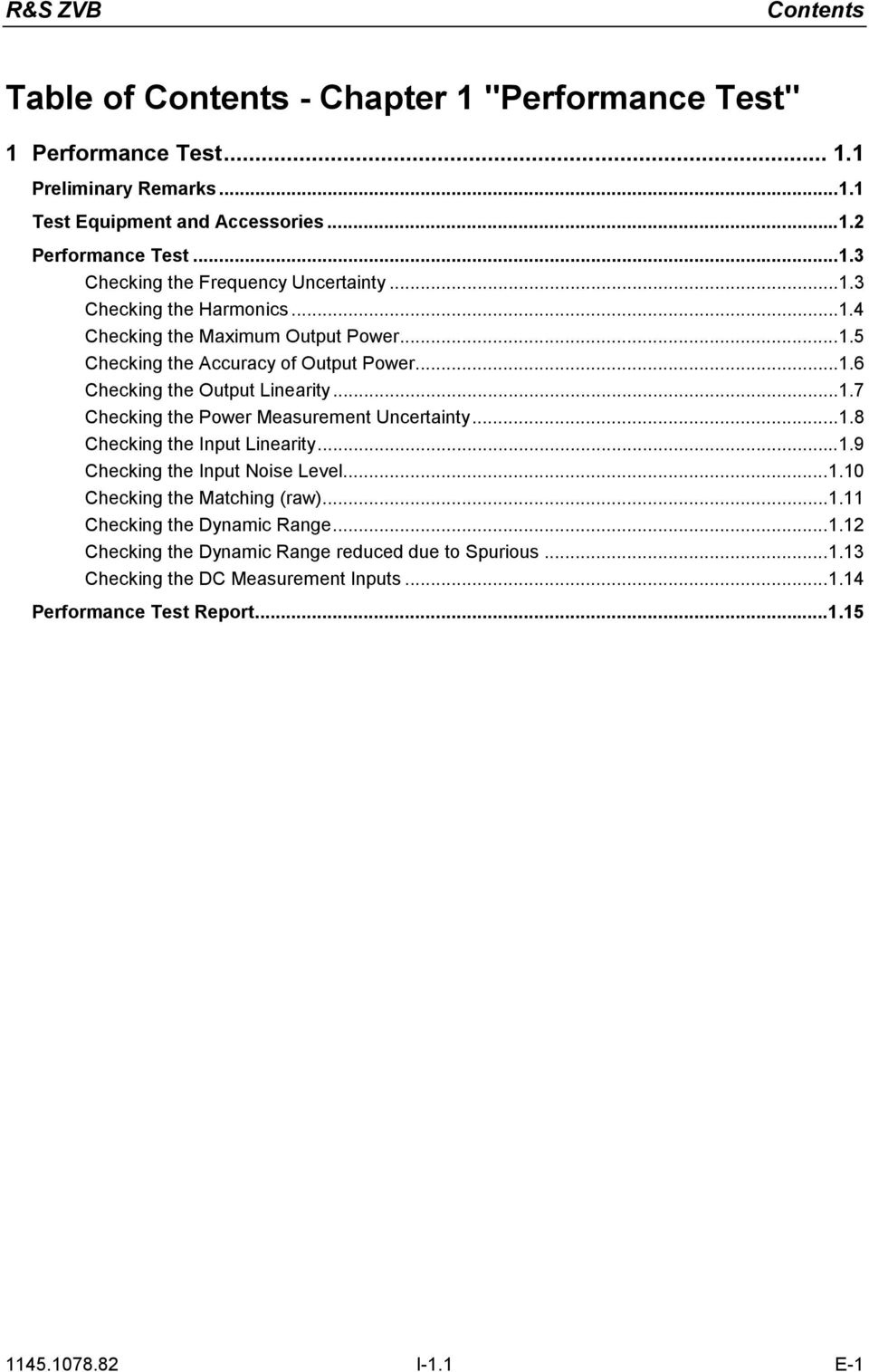
14 FSQ FVREF "Überschrift " \* MERGEFORMAT Fehler! Formatvorlage nicht definiert. R&S ZVB Contents Table of Contents - Chapter 1 "Performance Test" 1 Performance Test Preliminary Remarks Test Equipment and Accessories...1. Performance Test Checking the Frequency Uncertainty Checking the Harmonics Checking the Maximum Output Power Checking the Accuracy of Output Power Checking the Output Linearity Checking the Power Measurement Uncertainty Checking the Input Linearity Checking the Input Noise Level Checking the Matching (raw) Checking the Dynamic Range Checking the Dynamic Range reduced due to Spurious Checking the DC Measurement Inputs Performance Test Report I-1.1 E-1
15 R&S ZVB Preliminary Remarks 1 Performance Test Preliminary Remarks The required characteristics of the spectrum analyzer are checked after a warm-up time of at least 60 minutes; this ensures that the guaranteed data is met. The values stated in the following sections are not guaranteed data; only the specifications in the data sheet are binding. The values in the data sheet are guaranteed limits. Because of the measurement errors that arise, these limits must be increased to encompass the tolerances of the measuring equipment used for the performance test. Entries for the measurement are represented in the following way: [<KEY>] Press a front-panel key, e.g. [SPAN] [<SOFTKEY>] Press a softkey, e.g. [MARKER -> PEAK] [<nn unit>] Enter a value + terminate the entry with a unit, e.g. [1 khz] Consecutive entries are separated with a [ : ], e.g. [ BW : MANUAL RES BW : 3 khz ] E-1

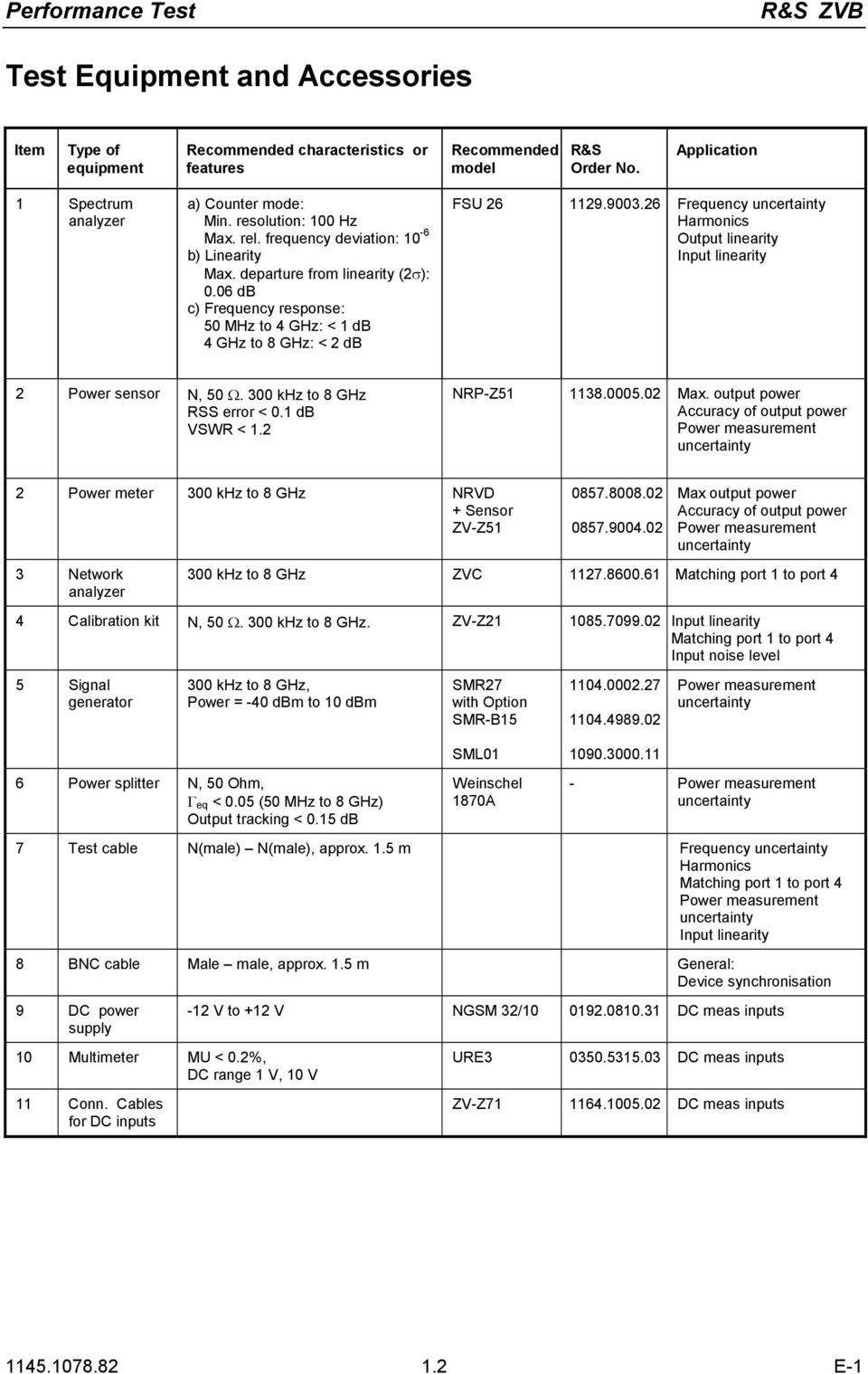
16 Performance Test R&S ZVB Test Equipment and Accessories Item Type of equipment Recommended characteristics or features Recommended model R&S Order No. Application 1 Spectrum analyzer a) Counter mode: Min. resolution: 100 Hz Max. rel. frequency deviation: 10-6 b) Linearity Max. departure from linearity (σ): 0.06 db c) Frequency response: 50 MHz to 4 GHz: < 1 db 4 GHz to 8 GHz: < db FSU Frequency uncertainty Harmonics Output linearity Input linearity Power sensor N, 50 Ω. 300 khz to 8 GHz RSS error < db VSWR < 1. NRP-Z Max. output power Accuracy of output power Power measurement uncertainty Power meter 300 khz to 8 GHz NRVD + Sensor ZV-Z51 3 Network analyzer Max output power Accuracy of output power Power measurement uncertainty 300 khz to 8 GHz ZVC Matching port 1 to port 4 4 Calibration kit N, 50 Ω. 300 khz to 8 GHz. ZV-Z Input linearity Matching port 1 to port 4 Input noise level 5 Signal generator 300 khz to 8 GHz, Power = -40 dbm to 10 dbm 6 Power splitter N, 50 Ohm, Γ eq < 0.05 (50 MHz to 8 GHz) Output tracking < 5 db SMR7 with Option SMR-B15 SML01 Weinschel 1870A Power measurement uncertainty - Power measurement uncertainty 7 Test cable N(male) N(male), approx. 1.5 m Frequency uncertainty Harmonics Matching port 1 to port 4 Power measurement uncertainty Input linearity 8 BNC cable Male male, approx. 1.5 m General: Device synchronisation 9 DC power supply 10 Multimeter MU < 0.%, DC range 1 V, 10 V 11 Conn. Cables for DC inputs -1 V to +1 V NGSM 3/ DC meas inputs URE DC meas inputs ZV-Z DC meas inputs E-1
17 R&S ZVB Performance Test Performance Test Compare with data sheet Checking the Frequency Uncertainty Instrument: Spectrum analyzer (see Chapter Test Equipment, Item1) Test cable (see Chapter Test Equipment, Item7) Test setup: Connect the spectrum analyzer to (port to port 4) Spectrum analyzer settings: - [ PRESET ] - [ FREQ : 1 GHz ] - [ SPAN : 50 khz ] - [ BW : MANUAL RES BW : 10 khz ] - [ MARKER : MARKER MODE : FREQ COUNT ] - [ AMPT : REF LEVEL : 10 dbm] R&S ZVB settings - Select [System : Internal Reference] - [ Preset ] - [ Meas :Wave Quantities: a1 Src Port 1] - [ Sweep : Sweep Type : CW Mode : CW Frequency : 1 GHz; Power : 0 dbm] - [ Sweep : Single : Restart] Measurement: Read off the frequency indicated by the marker. Frequency deviation = marker value 1 GHz Max. frequency deviation... see Performance Test Report E-1
![MARKER : MARKER MODE : FREQ COUNT ] - [ AMPT : REF LEVEL : 10 dbm] R&S ZVB settings - Select [System : Internal Reference] - [ Preset ] - [ Meas :Wave Quantities: a1 Src Port 1] - [ Sweep : Sweep](/docs-images/40/11212747/images/page_17.jpg "Type : CW Mode : CW Frequency : 1 GHz; Power : 0 dbm] - [ Sweep : Single : Restart] Measurement: Read off the frequency indicated by the marker. Frequency deviation = marker value 1 GHz Max.")
18 Performance Test R&S ZVB Checking the Harmonics Instrument: Spectrum analyzer (see Chapter "Test Equipment", Item1) Test cable (see Chapter Test Equipment", Item7) Test setup: Connect the spectrum analyzer to port1 (port to port 4) Spectrum analyzer settings: Note: Synchronize the reference oscillators in the spectrum analyzer and in the R&S ZVB. - [ PRESET ] - [ FREQ : f GEN, * f GEN, 3* f GEN *] - [ SPAN : ZERO SPAN ] - [ BW : MANUAL RES BW : 100 Hz ] - [ MARKER : DETECTOR : RMS ] - [ AMPT : REF LEVEL : 10 dbm] * For measurement frequencies, see Performance Test Report {fgen}. R&S ZVB settings: - [ Preset ] - [ Meas : Wave Quantities: a1 Src Port 1 (a Src Port, a3 Src Port 3, a4 Src Port 4)] - [ Sweep : Sweep Type : CW Mode : CW Frequency : {f GEN *} ; Power : 8 dbm ] - [ Sweep : Single : Restart] * For measurement frequencies, see Performance Test Report {fgen}. Measurement: Calculation: Read off the levels L n*fgen (n = 1,, 3) indicated by the spectrum analyzer s markers. Harmonics = L n*f gen - L fgen - cable loss (in db) The cable loss corresponds to the S 1 of the test cable used between the fundamental and the measured harmonic (S 1 is negative) E-1
![- [ PRESET ] - [ FREQ : f GEN, * f GEN, 3* f GEN *] - [ SPAN : ZERO SPAN ] - [ BW : MANUAL RES BW : 100 Hz ] - [ MARKER : DETECTOR : RMS ] - [ AMPT : REF LEVEL : 10 dbm] * For measurement](/docs-images/40/11212747/images/page_18.jpg "frequencies, see Performance Test Report {fgen}.")
19 R&S ZVB Performance Test Checking the Maximum Output Power Instrument: Power sensor or Power meter with power sensor (see Chapter Test Equipment, Item) Test setup: Connect power sensor to port1 (port to port 4) Power sensor settings: For measurement frequencies, see Performance Test Report {f GEN *}. R&S ZVB settings: - [ Preset ] - [ Meas : Wave Quantities: a1 Src Port 1 (a Src Port to a4 Src Port 4)] - [ Sweep : Sweep Type : CW Mode : CW Frequency : {f GEN *} ; Power : 16 dbm] - [ Sweep : Single : Restart] * For measurement frequencies see the Performance Test Report {f GEN }. Measurement: Read off the level indicated by the power meter. Max. power... see Performance Test Report E-1
![R&S ZVB settings: - [ Preset ] - [ Meas : Wave Quantities: a1 Src Port 1 (a Src Port to a4 Src Port 4)] - [ Sweep : Sweep Type : CW Mode : CW Frequency : {f GEN *} ; Power : 16](/docs-images/40/11212747/images/page_19.jpg "dbm] - [ Sweep : Single : Restart] * For measurement frequencies see the Performance Test Report {f GEN }. Measurement: Read off the level indicated by the power meter. Max.")
20 Performance Test R&S ZVB Checking the Accuracy of Output Power Instrument: Power sensor or Power meter with power sensor (see Chapter Test Equipment, Item) Test setup: Connect the power sensor to port 1 (port to port 4) Power sensor settings: For measurement frequencies, see Performance Test Report {f GEN *}. R&S ZVB settings: - [ Preset ] - [ Meas :Wave Quantities: a1 Src Port 1 (a Src Port, a3 Src Port 3, a4 Src Port 4)] - [ Sweep : Sweep Type : CW Mode : CW Frequency : {f GEN *} ; Power : -10 dbm] - [ Sweep : Single : Restart] * For measurement frequencies, see Performance Test Report {f GEN }. Measurement: Read off the levels indicated by the power sensor Level deviation = L SENSOR (-10 dbm) E-1
![R&S ZVB settings: - [ Preset ] - [ Meas :Wave Quantities: a1 Src Port 1 (a Src Port, a3 Src Port 3, a4 Src Port 4)] - [ Sweep : Sweep Type : CW Mode : CW Frequency : {f GEN *} ;](/docs-images/40/11212747/images/page_20.jpg "Power : -10 dbm] - [ Sweep : Single : Restart] * For measurement frequencies, see Performance Test Report {f GEN }.")
21 R&S ZVB Performance Test Checking the Output Linearity Instrument: Spectrum analyzer (see Chapter Test Equipment, Item1) Test cable (see Chapter Test Equipment, Item7) Test setup: Connect the spectrum analyzer to port 1(port to port 4) Spectrum analyzer settings: Note: Synchronize the reference oscillators in the spectrum analyzer and in the R&S ZVB : - [ PRESET ] - [ FREQ : f GEN *] - [ SPAN : ZERO SPAN ] - [ BW : MANUAL RES BW : 100 Hz ] - [ MARKER : DETECTOR : RMS ] - [ AMPT : REF LEVEL : 5 dbm] * For measurement frequencies, see Performance Test Report {fgen}. R&S ZVB settings: - [ Preset ] - [ Meas : Wave Quantities: a1 Src Port 1 (a Src Port, a3 Src Port 3, a4 Src Port 4)] - [ Sweep : Sweep Type : CW Mode : CW Frequency : {f GEN *} ; Power : {l GEN *}] - [ Sweep : Single : Restart] * For measurement frequencies {fgen} and levels {l GEN }, see Performance Test Report Measurement: Read the spectrum analyzer s marker values (level L). Calculation: The measured values are referred to the level at the ZVB setting of -10 dbm. Calculating the generator level linearity: Level linearity = L - step width (in db) Step width = l gen (-10 dbm) (reference) E-1
22 Performance Test R&S ZVB Checking the Power Measurement Uncertainty Instrument: Power sensor or Power meter with power sensor (see Chapter Test Equipment, Item) Signal generator (see Chapter Test Equipment, Item5) Power splitter (see Chapter Test Equipment, Item6) Calibration kit (see Chapter Test Equipment, Item4) Test cable (see Chapter Test Equipment, Item7) Preparation/ test setup: Connect the signal generator to the power-splitter input using the test cable. Connect the power sensor to a power-splitter output Connect the other power-splitter output to port1 (port to port 4) using an adapter from the calibration kit The reference oscillators in the signal generator and in the ZVB must be synchronized. R&S ZVB settings: - [ Preset ] - [ Meas : Wave Quantities: b1 Src Port 1 (b Src Port, b3 Src Port 3, b4 Src Port 4)] - [ Power : RF Off ] - [ Meas Bandwidth : 100 Hz ] - [ Marker ] - [ Sweep : Sweep Type : CW Mode : CW Frequency : {f GEN *}] - [ Sweep : Single : Restart] * For the measurement frequencies, see Performance Test Report {fgen}. Measurement: Signal generator : CW Mode, Frequency: f gen Signal-generator level: -5 dbm Adjust the signal-generator level so that the power meter reads 0 db +/- 0. db Determine the signal-generator level that gives 10 dbm at the splitter output. This level is required for the following measurement, Checking Receiver Linearity. Read off the power meter display and the ZVB marker values. Level error = L ZVB L PS E-1
23 R&S ZVB Performance Test Checking the Input Linearity Instrument: Spectrum analyzer (see Chapter Test Equipment, Item1) Test cable (see Chapter Test Equipment, Item7) Calibration kit (see Chapter Test Equipment, Item4) R&S ZVB settings: - [ Preset ] - [ Meas : Wave Quantities: a1 Src Port 1] [ Meas : Wave Quantities: a Src Port ] [ Meas : Wave Quantities: a3 Src Port 3] [ Meas : Wave Quantities: a4 Src Port 4] - [ Meas Bandwidth : 10 Hz ] - [ Marker ] - [ Sweep : Sweep Type : CW Mode : CW Frequency : {f GEN *}] - [ Sweep : Single : Restart] * For measurement frequencies, see Performance Test Report {fgen} Test setup for reference measurement: Settings for the spectrum analyzer: Connect the spectrum analyzer to port 1 (port to port 4) - [ PRESET ] - [ AMPT : REF LEVEL : 15 dbm - [ FREQ : CENTER : f GEN ] - [ SPAN : ZERO SPAN ] - [ BW : MANUAL RES BW : 10 Hz ] - [ MARKER : DETECTOR : RMS] * For measurement frequencies, see Performance Test Report {fgen}. Reference measurement: Set the ZVB and the spectrum analyzer to f GEN Set the ZVB output power to -40 dbm and increase the power in 5dB steps up +10 dbm (+8 dbm) Read off the level displayed by the spectrum analyzer and by the ZVB. Reference offset L offset = L ZVB,REF - L SA, REF R&S ZVB settings: - [ Meas : Ratios: b1/a1 Src Port 1] [ Meas : Ratios: b/a Src Port ] [ Meas : Ratios: b3/a3 Src Port 3] [ Meas : Ratios: b4/a4 Src Port 4] Test setup: Connect a short male to port 1 (port to port 4) Measurement: Set the ZVB output power to -40 dbm and increase the power in 5dB steps up to +10 dbm (+8 dbm) Read off the ratio displayed by the ZVB (L ZVB ) Calculation: Input linearity xx db = L ZVB, - L offset E-1
24 Performance Test R&S ZVB Checking the Input Noise Level Test equipment Calibration kit (see Chapter Test Equipment, Item4) Test setup: Connect the Match Male from the calibration kit to port 1 (port to port 4) R&S ZVB settings: - [ Preset ] - [ Meas : Wave Quantities: b1 Src Port 1 (b Src Port, b3 Src Port 3, b4 Src Port 4)] - [ Power : RF Off ] - [ Meas Bandwidth : 10 Hz ] - [ Marker ] - [ Sweep : Sweep Type : CW Mode : CW Frequency : {f GEN *}] - Service Function (see chapter 3 Service Functions, Service Level ) - [ Measure : Wave Quantities : More Wave Quantities : Properties : Detector : RMS ] - [ Sweep : Single : Restart] * For measurement frequencies, see Performance Test Report {fgen}. Measurement: Read off the noise level indicated by the markers on the DUT E-1
25 R&S ZVB Performance Test Checking the Matching (raw) Instrument: Network analyzer (see Chapter Test Equipment, Item3) Calibration kit (see Chapter Test Equipment, Item4) Test cable (see Chapter Test Equipment, Item7) Preparation/ test setup: Connect the test cable to the network analyzer and perform a 1-port calibration at the end of the cable. R&S ZVB settings: - [ Preset ] - [ Power : -40 dbm ] Connect the test cable to port 1 (port to port 4) on the R&S ZVB. Measurement Read off the network analyzer s marker values (for marker frequencies see Performance Test Report) E-1
26 Performance Test R&S ZVB Checking the Dynamic Range Test equipment: Calibration kit N (see Chapter Test Equipment, Item4) Test setup: Connect Short Male to port1 and port (port 3 and port 4) (use Short Female with Through Male as a second Short Male) R&S ZVB settings: - [ Preset ] - [ Meas : Ratios : b1/a Drive Port ] [ Meas : Ratios: b/a1 Drive Port 1] [ Meas : Ratios: b3/a4 Drive Port 4] [ Meas : Ratios: b4/a3 Drive Port 3] - [ Power : 10 dbm ] - [ Meas Bandwidth : 10 Hz ] - [ Marker ] - [ Sweep : Sweep Type : CW Mode : CW Frequency : {f GEN *}] - Service Function (see chapter 3 "Service Functions", Service Level ) - [ Measure : Wave Quantities : More Wave Quantities : Properties : Detector : RMS ] - [ Sweep : Single : Restart] * For measurement frequencies, see Performance Test Report {fgen}. Measurement: Calculation: Read off marker value Nominal dynamic range:... see Performance Test Report E-1
27 R&S ZVB Performance Test Checking the Dynamic Range reduced due to Spurious Test equipment: Calibration kit N (see Chapter Test Equipment, Item4) Test setup: Connect Short Male to port1 and port (port 3 and port 4) (use Short Female with Through Male as a second Short Male) R&S ZVB settings: - [ Preset ] - [ Meas : Ratios : b1/a Drive Port ] [ Meas : Ratios: b/a1 Drive Port 1] [ Meas : Ratios: b3/a4 Drive Port 4] [ Meas : Ratios: b4/a3 Drive Port 3] - [ Start : 16 MHz ] - [ Number of Points : 500 ] - [ Power : 10 dbm ] - [ Meas Bandwidth : 1000 Hz ] - [ Marker ] - [ Sweep : Sweep Type : CW Mode : CW Frequency : {f GEN *}] - Service Function (see chapter 3 Service Functions, Service Level ) - [ Measure : Wave Quantities : More Wave Quantities : Properties : Detector : RMS ] - [ Sweep : Single : Restart] * For measurement frequencies, see Performance Test Report {fgen}. Measurement: Calculation: Read off marker value Nominal dynamic range:... see Performance Test Report E-1
28 Performance Test R&S ZVB Checking the DC Measurement Inputs Test equipment: DC Power Supply NGSM 3/10 (see Chapter Test Equipment, Item9) Multimeter URE3 (see Chapter Test Equipment, Item10) DC cable (see Chapter Test Equipment, Item11) Test setup: Connect the Power Supply to the Input DC MEAS 1V (DC MEAS 10V) of the ZVB using the DC cable R&S ZVB settings: - [ Preset ] For DC Meas 1 V: - [ Meas : More : DC Inputs : DC Meas ±1 V] - [ Format : Real] - [ Scale : Scale/Div :.5 x1] - [ Marker ] For DC Meas 10 V: - [ Meas : More : DC Inputs : DC Meas ±10 V] - [ Format : Real] - [ Scale : Scale/Div :.5 x1] - [ Marker ] Measurement: Set Power Supply to DC values U DC using Multimeter URE (DC values see Performance Test Report) and connect it to pos. and neg. input Read off the DC level U DC ZVB indicated by the marker. Calculation: Deviation = U DC - U DC ZVB E-1
29 R&S ZVB Performance Test Report Performance Test Report Table 1-1: Performance Test Report ROHDE & SCHWARZ Performance Test Report ZVAB Version Model (ZVB4/ZVB8) Item number: Serial number Tested by: Date: Signature: General: All Tables apply to port1; values for ports to 4 are identical. Parameter Covered on Min. value Actual value Max. value Unit Measurement tolerance Frequency 1 GHz Page Hz 1 Hz With Option ZVAB-B E-1
30 Performance Test Report R&S ZVB Parameter Covered on Min. value Actual value Max. value Unit Measurement tolerance Port. Harmonics Source power +8dBm Freq. Harmonics Page 1.4 dbc 1 db 50 MHz 100 MHz 150 MHz ,001 MHz 100 MHz 150 MHz MHz 00 MHz 300 MHz MHz 400 MHz 600 MHz MHz 1000 MHz 1500 MHz MHz 1500 MHz 50 MHz GHz GHz 3 GHz GHz 3 GHz 4.5 GHz -0-0 GHz 4 GHz 6 GHz E-1
31 R&S ZVB Performance Test Report Parameter Covered on Min. value Actual value Max. value Unit Measurement tolerance Port. Harmonics Source power +8 dbm Freq. Harmonics Page 1.4 dbc 1 db.1 GHz 4. GHz 6.3 GHz GHz 5.0 GHz GHz 6.0 GHz GHz 7 GHz -0 ZVB8 only: 7 GHz 14 GHz -0 8 GHz 16 GHz E-1
32 Performance Test Report R&S ZVB Parameter Covered on Min. value Actual value Max. value Unit Measurement tolerance Port. Maximum output power Page 1.5 dbm 1 db Test frequency 300 khz 1 MHz MHz 5 MHz 10 MHz 0 MHz 50 MHz 100 MHz 00 MHz 500 MHz 750 MHz 1 GHz 1.5 GHz GHz.1 GHz.5 GHz 3 GHz 3.5 GHz 4 GHz ZVB8 only: 4.1 GHz 4.5 GHz 5 GHz 5.5 GHz 6 GHz 6.5 GHz 7 GHz 7.5 GHz 8 GHz E-1
33 R&S ZVB Performance Test Report Parameter Covered on Min. value Actual value Max. value Unit Measurement tolerance Port. Accuracy of output power -10 dbm Page 1.6 db 0. db Test frequency 300 khz 1 MHz MHz 5 MHz 10 MHz 0 MHz 50 MHz 100 MHz 00 MHz 500 MHz 750 MHz 1 GHz 1.5 GHz GHz.1 GHz.5 GHz 3 GHz 3.5 GHz 4 GHz ZVB8 only: 4.1 GHz 4.5 GHz 5 GHz 5.5 GHz 6 GHz 6.5 GHz 7 GHz 7.5 GHz 8 GHz E-1
34 Performance Test Report R&S ZVB Parameter Covered on Min. value Actual value Max. value Unit Measurement tolerance Port. Output linearity Reference 10 dbm Freq. Level 50 MHz 0 db 15 db 10 db 5 db -5 db -10 db -15 db -0 db -5 db -30 db Page db 0.06 db 500 MHz 0 db 15 db 10 db 5 db -5 db -10 db -15 db -0 db -5 db -30 db GHz 0 db 15 db 10 db 5 db -5 db -10 db -15 db -0 db -5 db -30 db GHz 0 db 15 db 10 db 5 db -5 db -10 db -15 db -0 db -5 db -30 db E-1
35 R&S ZVB Performance Test Report Parameter Covered on Min. value Actual value Max. value Unit Measurement tolerance Port. Output linearity Reference 10 dbm Page 1.7 db 0.06 db Freq. Level.1 GHz 0 db 15 db 10 db 5 db -5 db -10 db -15 db -0 db -5 db -30 db GHz 0 db 15 db 10 db 5 db -5 db -10 db -15 db -0 db -5 db -30 db GHz 0 db 15 db 10 db 5 db -5 db -10 db -15 db -0 db -5 db -30 db E-1
36 Performance Test Report R&S ZVB Parameter Covered on Min. value Actual value Max. value Unit Measurement tolerance ZVB8 only: Port. Output linearity Reference 10 dbm Page 1.7 db 0.06 db Freq. Level 4.1 GHz 0 db 15 db 10 db 5 db -5 db -10 db -15 db -0 db -5 db -30 db GHz 0 db 15 db 10 db 5 db -5 db -10 db -15 db -0 db -5 db -30 db GHz 18 db 15 db 10 db 5 db -5 db -10 db -15 db -0 db -5 db -30 db E-1
37 R&S ZVB Performance Test Report Parameter Covered on Min. value Actual value Max. value Unit Measurement tolerance Port. Power measurement uncertainty Page 1.8 db 0. db Test frequency 300 khz 1 MHz MHz 5 MHz 10 MHz 0 MHz 50 MHz 100 MHz 00 MHz 500 MHz 750 MHz 1 GHz 1.5 GHz GHz.1 GHz.5 GHz 3 GHz 3.5 GHz 4 GHz ZVB8 only: 4.1 GHz 4.5 GHz 5 GHz 5.5 GHz 6 GHz 6.5 GHz 7 GHz 7.5 GHz 8 GHz E-1
38 Performance Test Report R&S ZVB Parameter Covered on Min. value Actual value Max. value Unit Measurement tolerance Port. Input linearity Page 1.9 db 0.06 db Reference 10 dbm 50 MHz 0 db 15 db 10 db 5 db -5 db -10 db -15 db -0 db -5 db -30 db 500 MHz 0 db 15 db 10 db 5 db -5 db -10 db -15 db -0 db -5 db -30 db 1 GHz 0 db 15 db 10 db 5 db -5 db -10 db -15 db -0 db -5 db -30 db GHz 0 db 15 db 10 db 5 db -5 db -10 db -15 db -0 db -5 db -30 db E-1
39 R&S ZVB Performance Test Report Parameter Covered on Min. value Actual value Max. value Unit Measurement tolerance Port. Input linearity Page 1.9 db 0.06 db Reference 10 dbm 4 GHz 0 db 15 db 10 db 5 db -5 db -10 db -15 db -0 db -5 db -30 db ZVB8 only: 4.1 GHz 0 db 15 db 10 db 5 db -5 db -10 db -15 db -0 db -5 db -30 db 6 GHz 0 db 15 db 10 db 5 db -5 db -10 db -15 db -0 db -5 db -30 db 8 GHz 0 db 15 db 10 db 5 db -5 db -10 db -15 db -0 db -5 db -30 db E-1
40 Performance Test Report R&S ZVB Parameter Covered on Min. value Actual value Max. value Unit Measurement tolerance Port. Input noise level Page 1.10 dbm Test frequency khz MHz.1345 MHz MHz 1345 MHz 345 MHz 5345 MHz MHz 0345 MHz MHz MHz MHz MHz MHz MHz MHz MHz MHz MHz ZVB8 only: MHz MHz MHz MHz MHz MHz MHz MHz MHz MHz MHz E-1
41 R&S ZVB Performance Test Report Parameter Covered on Min. value Actual value Max. value Unit Measurement tolerance Port. Matching (raw) Page 1.11 db 1 db Test frequency 300 khz 1 MHz MHz 5 MHz 10 MHz 0 MHz 50 MHz 100 MHz 00 MHz 500 MHz 750 MHz 1 GHz 1.5 GHz GHz.5 GHz 3 GHz 3.5 GHz 4 GHz ZVB8 only: 4.5 GHz 5 GHz 5.5 GHz 6 GHz 6.5 GHz 7 GHz 7.5 GHz 8 GHz E-1
42 Performance Test Report R&S ZVB Parameter Covered on Min. value Actual value Max. value Unit Measurement tolerance Port. Dynamic range Page 1.1 db Test frequency 300 khz 1 MHz MHz 5 MHz 10 MHz 0 MHz 50 MHz 100 MHz 00 MHz 500 MHz 750 MHz 1 GHz 1.5 GHz GHz.1 GHz.5 GHz 3 GHz 3.5 GHz 4 GHz ZVB8 only: 4.1 GHz 4.5 GHz 5 GHz 5.05 GHz 5.7 GHz 6 GHz 6.35 GHz 6.36 GHz 7 GHz 7.5 GHz 8 GHz E-1
43 R&S ZVB Performance Test Report Parameter Covered on Min. value Actual value Max. value Unit Measurement tolerance Port. Dynamic range reduced due to spurious Page 1.13 db Test frequency 16 MHz 3 MHz 48 MHz 96 MHz 19 MHz 496 MHz 75 MHz 1008 MHz 1504 MHz 000 MHz 096 MHz 496 MHz 3008 MHz 3504 MHz 4000 MHz ZVB8 only: 4096 MHz 4496 MHz 5008 MHz 5056 MHz 5696 MHz 6000 MHz 635 MHz 6368 MHz 699 MHz 7488 MHz 8000 MHz E-1
44 Performance Test Report R&S ZVB Parameter Covered on Min. value Actual value Max. value Unit Measurement tolerance Accuracy DC meas 1 V Page 1.14 mv 1 mv Pos. Input m V -300 mv -10 mv 10 mv 300 mv 1000 m V Neg. Input m V -300 mv -10 mv 10 mv 300 mv 1000 m V Accuracy DC meas 10 V Page 1.14 V 0.01 V Pos. Input V -3.0 V V V 3.0 V 10.0 V Neg. Input V -3.0 V V V 3.0 V 10.0 V E-1
45 R&S ZVB Table of Contents - Alignment Table of Contents - Chapter "Alignment" Alignment....3 Service Menu...3 Manual Alignment and Recording Correction Values...4 Measuring Equipment...4 Aligning the Frequency Accuracy...5 Aligning the DC Inputs...6 Correction ValueRecording...8 Factory System Error Calibration I-.1 E-1
46 Table of Contents - Alignment R&S ZVB This page has been left blank intentionally I-. E-1
47 R&S ZVB Manual Alignment and Recording Correction Values Alignment This chapter describes the alignment of the frequency reference and the recording of correction data after a board has been replaced. The following manual alignments or corrections can be performed on the ZVB: Alignment of the 10-MHz reference oscillator which determines the frequency accuracy of the ZVB Recording the correction values for the generators and the receivers which determine the measurement accuracy of the ZVB s absolute values. By performing the alignment and recording the correction values, it is possible to ensure that the ZVB is meeting its specifications by correcting any deviations. The alignments must be performed within an ambient temperature range of + C to +4 C after the appropriate warm-up time. The ZVB meets its specs and is ready for operation when the alignment has been performed and/or correction values have been recorded and a system error calibration carried out. Service Menu Access to the board-alignment functions is password-protected to prevent unintentional changes to settings. Entering the password MENU System System Config Measurement Wizard Print Service Function Enter Password: Internal Reference External Reference Preset GPIB Address Service Function External Tools Enter password Caution The alignment shall be performed only by appropriately trained personnel because any changes made have a profound effect on the measurement accuracy of the instrument E-1
48 Manual Alignment and Recording Correction Values R&S ZVB Manual Alignment and Recording Correction Values In the sequel, the test equipment and the instrument preparations required to manually align the ZVB and each of the alignments are described. Preliminary remarks The analyzer must be allowed to warm up for at least 30 minutes before alignment. This is the only way of ensuring that the guaranteed data are met. Test Equipment Table -1 Test equipment for manually aligning the ZVB Item Type of equipment Recommended specifications Recommend ed model R&S Order No. Application 1 Frequency counter Error <1x10⁻⁹, frequency range to 10 MHz Advantest R5361B with Option 3 Frequency accuracy of the reference oscillator Signal generator 300 khz to 8 GHz SML01 SMR Recording correction values 3 Power meter 300 khz to 8 GHz NRVD Recording correction values 4 Power sensor 300 khz to 8 GHz NRV-Z Recording correction values 5 Power divider DC to 8 GHz Weinschel Mod PC PC with IEC/IEEE-bus interface and. ZVAB-Service program Recording correction values Recording correction values 7 Power supply x 0 to 10 V Aligning the DC inputs 8 DC meter URE Aligning the DC inputs 9 Calibration kit N calibration kit ZV-Z Recording correction values 10 Test cable Test cable N (m) to N (m). ZV-Z Recording correction values 14 Conn. Cables for DC Inputs 4-pin mini-din plug ZV-Z Aligning the DC inputs E-1
49 R&S ZVB Manual Alignment and Recording Correction Values Aligning the Frequency Accuracy Test equipment Frequency counter (section "Test Equipment", item 1): Error <1x10⁻⁹ Frequency range to 10 MHz Test setup: ZVB settings: Frequency counter settings: Connect the frequency counter to the 10-MHz reference output at the rear of the ZVB. Select internal reference MENU : System: Reference Internal Set the necessary resolution: Hz Note: Measurement: Before the following measurement is performed, the ZVB must have been switched on for at least 30 minutes to give the reference oscillator time to warm up. Measure the frequency with the frequency counter: Nominal frequency: Model without OCXO (Option B4) 10 MHz ± 1 Hz Model with OCXO (Option B4) 10 MHz ± 0.3 Hz Alignment without Option ZVAB-B4: Enter Service Function x Read off the frequency-counter display, e.g MHz. Change the right-hand segment (corresponding to bit 0 to bit 11) of the data word - e.g. to instead of Read off the frequency counter display again, e.g MHz. Change the left-hand segment of the data word, until the counter indicates precisely MHz. Alignment with Option ZVAB-B4: Enter Service Function x Read off the frequency-counter display, e.g MHz. Change the left-hand segment (corresponding to bit 1 to bit 3) of the data word - e.g. to instead of Read off the frequency-counter display again, e.g MHz. Change the left-hand segment of the data word, until the counter indicates precisely MHz E-1
50 Manual Alignment and Recording Correction Values R&S ZVB Aligning the DC Inputs At the outset, ensure that the correction parameters "Multiplier" M and "Offset" F have been preset to M=1 and F=0 for both inputs. This can be done using the Service Functions and which are described below under Service Functions. Test equipment: Test setup: DC Meas ± 1 V Connect DC voltage + 1 V pin 6, pin 3 (Gnd) - 1 V pin 8, pin 5 (Gnd) Power supply x 0 to 10 V DC meter (URE) DC Meas ± 10 V Connect DC voltage: + 10 V pin 6, pin 3 (Gnd) - 10 V pin 8, pin 5 (Gnd) Check voltages with the URE and correct if necessary. ZVB settings: Measure : DC Inputs : DC Meas ± 1V Measure : DC Inputs: DC Meas ± 10V Measurement Calculating the corrections: M -> scaling factor F -> offset Read off the voltages displayed by the ZVB: V1 = positive voltage V = negative voltage M = (V1-V)/ F = (V1+V)/(V1-V) M = (V1-V)/0 F = 10x (V1+V)/(V1-V) Pin assignment for DC MEAS connector The values that have been obtained in this way are now written to the hard disk using the Service Functions described below and then transferred to the EEprom of network controller1. Example illustrating DC Meas 1 V: When +1 V is applied, V 1 = 1.03 V is displayed by the ZVB; when -1 V is applied, V = V is displayed. The results of the calculation are M = and F = The following entries are, therefore, made: Select Service Level (see Service Functions). Set Service Functions (Writing to the hard disk) dcmeas1V.DcMeasMultiplier dcmeas1V.DcMeasOffset E-1
51 R&S ZVB Manual Alignment and Recording Correction Values etc. for the second measurement input. Set Service Function (Writing to the EProm) When correction value programming for the two DC voltage measurement inputs has been completed, end the NWA application and restart. Check the alignment by applying the four voltages +1 V, -1 V, +10 V and -10 V and, as a further check, 0 V. Reading the previous DC values: Select Read in the Service Function Menu Set Service Functions: dcmeas1V.DcMeasMultiplier dcmeas1V.DcMeasOffset dcmeas10V.DcMeasMultiplier dcmeas10V.DcMeasOffset E-1

52 Manual Alignment and Recording Correction Values R&S ZVB Correction Value Recording Required test equipment (see Table -1): PC with ZVAB-Service program Power meter with power sensor Signal generator Connect the PC, ZVB, power meter and signal generator via the IEC/IEEE-bus interface. Start the ZVAB-Service program E-1
53 R&S ZVB Manual Alignment and Recording Correction Values Generator and reference-channel absolute measurements Test setup: NRV-Z51 power sensor to port1 Buttons in the RUN section: Measurement Generator linearity GEN Lin Reference channel absolute abs a Generator frequency response GEN Frq Measurements are then performed in the same way on the remaining ports. If all three correction values for the generator side of a port are to be recorded, click on the appropriate bar: Port 1 If two NRVDs and four NRV-Z51 sensors are used (for -port models, one NRVD with two sensors), measurements on all ports can be made simultaneously. run all Ports Meas-channel absolute measurements Test setup: Connect generator (SMP/SMR) via power splitter to port1. Screw the NRV-Z51 to the second power-splitter output. Buttons in the RUN section: Measurement: Wave quantity b1 abs a Now, perform the measurement in the same way on the remaining ports E-1
54 Manual Alignment and Recording Correction Values R&S ZVB The measurement can be performed simultaneously on all ports using a setup comprising an LO divider, four power splitters, two NRVDs and four NRV-Z51 sensors (for -port models: two power splitters and one NRVD with two sensors). Abs b all Ports REF and MEAS channel relative measurement (a and b wave) Test setup: Follow the instructions on the screen Measurement: (screw SHORT to portx or connect test cable between two ports) Wave ratio b1/ a1 rel all Ports Specific measurement results can be displayed as a graph by clicking on the appropriate button in the Load section. This means that a check can be made at a later date. Spurious measurements (outliers) can then be detected. The ZVAB-Service program automatically writes the correction data to the Eprom E-1
55 R&S ZVB Manual Alignment and Recording Correction Values Factory System Error Calibration A complete factory N-port system-error calibration is performed on all the network analyzer s measurement ports. This involves directly connecting the O, S and M calibration standards to each port and then connecting the ports together in pairs using a cable as a T standard. All port pairs must be considered. If the analyzer has four ports, this means that there are six ways of connecting the ports together in pairs, i.e. port pairs 1-, 1-3, 1-4 then -3, -4 and finally 3-4. The number of connection pairs for a 3-port instrument goes down to three and there is only one way of pairing off the ports of - port analyzer. The TOSM method is used for calibration. The procedure is illustrated using a 4-port instrument, but the principle is the same for -port and 3-port instruments: PRESET SWEEP : NUMBER OF POINTS : 1000 POWER BW AVG : MEAS BANDWIDTH : 100 HZ CAL : START CAL : FOUR PORT P1 P P3 P4 The SELECT PORT CONNECTOR(S) dialog, which can be skipped with NEXT, is displayed. The MEASURE STANDARDS dialog then appears. The Standards to be measured list then shows the calibration standards. When the calibration standards have been connected, the calibration measurement is started by clicking the appropriate button. Finally, click the APPLY CAL button. When you click on the CAL button again, CAL MANAGER appears with a dialog in which the "Channel Cal" calibration must be copied to the CAL POOL under the name "Factory". Then, the Windows Explorer is used to copy the file Factory.cal which is now in the directory C:\Rohde&Schwarz\Nwa\Calibration\Data to the directory C:\Documents and Settings\All Users\Application Data\Rohde&Schwarz\Nwa\Data\Eeprom\Mbt. Service Function then uses this file to program the MB-EEprom. This can take about a minute. Restart the network analyzer to check that it is functioning properly E-1
56 R&S ZVB Instrument Construction and Function Description Table of Contents - Chapter 3 "Repairs" 3 Repairs Instrument Construction and Function Description Block Diagram...3. Description of the Block Diagram Board Replacement Board Overview Replacing Front Module Processor A Replacing the Lithium Battery on the Front Module Processor Replacing Hard Disk A Replacing LCD A70 and the DC/AC Converter Replacing Flexible switch board (Keyboard) A16 / Key pad A Replacing the Front Cover Replacing Disk Drive A Replacing USB Board A Replacing Power Supply A Replacing Fuse board A Replacing a Fan Replacing Motherboard A Replacing a Reflectometer A510 to Replacing the Inner Conductor of a Port Connector Replacing the Bridge unit Replacing the Reflectometer Fan Replacing Network Controller Board A130, A Replacing Synthesizer Board A150, A Replacing LO Divider A Replacing Frequency Reference Board A Troubleshooting Test Equipment and Accessories Troubleshooting - Power-up Problems Troubleshooting - Power-up Problems Troubleshooting Boot Problems Troubleshooting - Boot Error Troubleshooting with the Selftest Checking the Temperature Sensors Service Functions Determining Which Boards are Defective Board Test Testing the frequency reference board Testing the Synthesizer Board Testing the Reflectometer Board Testing the LO Divider Board Testing the Network Controller Board Testing the Motherboard I-3.1 E-1
57 Instrument Construction and Function Description R&S ZVB I-3. E-1
58 R&S ZVB Instrument Construction and Function Description 3 Repairs This chapter describes the ZVB s construction, simple procedures for repairs, troubleshooting and board replacement. A selftest which checks the diagnostic voltages of the board and indicates limit violations is provided for troubleshooting and diagnostics. Chapter 4 of this service manual describes the installation of options and firmware updates. Instrument Construction and Function Description The ZVB s construction is shown schematically by the following block diagrams and the exploded drawings (see also Chapter 5). The block diagram will help clarify the following function description of the instrument E-1
59 Instrument Construction and Function Description R&S ZVB Block Diagram See also Chapter 5, Annex and Drawings. PORT 1 BRIDGE PORT 1 GENERATOR PORT 1 15 to 1 MHz RECEIVER REF PORT 1 RECEIVER MEAS PORT 1 NETCON ANALOG 1 NETCON DIGITAL 1 PORT BRIDGE PORT GENERATOR PORT RECEIVER REF PORT RECEIVER MEAS PORT SYNTHESIZER LO DIVIDER SYNTHESIZER 1 FREQUENCY REFERENCE OPTION OCXO ZVAB-B4 CPU GRAPHICS DISPLAY PORT 3 BRIDGE PORT 3 GENERATOR PORT 3 15 to 1 MHz RECEIVER REF PORT 3 RECEIVER MEAS PORT 3 NETCON ANALOG NETCON DIGITAL PORT 4 BRIDGE PORT 4 GENERATOR PORT 4 RECEIVER REF PORT 4 RECEIVER MEAS PORT 4 POWER SUPPLY Fig. 3-1 Block diagram of ZVB4/8 4 ports E-1
60 R&S ZVB Instrument Construction and Function Description PORT 1 BRIDGE PORT 1 GENERATOR PORT 1 15 to 1 MHz RECEIVER REF PORT 1 RECEIVER MEAS PORT 1 NETCON ANALOG 1 NETCON DIGITAL 1 CPU GRAPHICS DISPLAY PORT BRIDGE PORT GENERATOR PORT RECEIVER REF PORT RECEIVER MEAS PORT LO DIVIDER SYNTHESIZER FREQUENCY REFERENCE OPTION OCXO ZVAB-B4 POWER SUPPLY Fig. 3- Block diagram of the ZVB4/8 ports E-1
61 Instrument Construction and Function Description R&S ZVB Description of the Block Diagram The block diagram shown in Fig. 3-1 applies to the ZVB4 4 ports and the ZVB8 4 ports, Fig. 3- to the ZVB4 ports and the ZVB8 ports The ZVB is a vector network analyzer covering 300 khz to 4 GHz (ZVB4) or 300 khz to 8 GHz (ZVB8). The models ZVB4 and ZVB8 are available in a -port or in a 4-port version. The signal generator (including the LO signal for the receiver) is implemented, according to the number of ports, using one or two synthesizer boards. The signal processing path comprises a reflectometer board, an IF board, a network controller and a processor section, comprising a Pentium-PC, I/O interface and graphics board. The instrument can be expanded to handle future digital and analog requirements by retrofitting options. The generator signal (300 khz to 4 GHz or 300 khz to 8 GHz) is generated on synthesizer board 1, amplified in the generator section of the reflectometer board and then passes via the bridge to the port (port1 to 4) and so to the DUT. The reference signal (Ref1 to 4) is split in the bridge and fed to the receiver section (Receiver Ref1 to 4) on the reflectometer board. The signal reflected or transmitted by the DUT (Meas1 to 4) is fed to the port, coupled out in the bridge unit and fed to the receiver section (Receiver Meas 1 to 4) on the reflectometer board. The internal reference frequencies are generated on the frequency reference board the18-mhz reference frequency is generated there as an internal device reference. The following sections describe the various boards in greater detail. Reflectometer A reflectometer board comprising a bridge unit, a generator section (Generator) and a receiver section (Receiver) are incorporated in every port (Port1 to 4). These three components are screwed together to form a compact unit. Bridge unit The bridge unit is a resistive coupler which is used to separate the signal going to the DUT from the signal coming from the DUT. The reference signal (= measure of the signal to the DUT) is also obtained from the bridge unit. The reference signal provides a reference for relative measurements. Generator The generator contains three broadband amplifier stages which boost the signal coming from the synthesizer to a level > 0 dbm. Limiter diodes protect the output stage from ESDs. A total of three adjustable attenuators form the setting element to keep the output level constant and to attenuate it electronically. Receiver The receiver section has two channels (measurement channel and reference channel) and uses single conversion. Every channel contains a buffer amplifier, for each of the frequency ranges 300 khz to 4 GHz and 4 GHz to 8 GHz (ZVB8 only) a mixer with LO amplifiers and an IF amplifier. In the mixer, the input signal is directly converted to the IF range, approx 15 to 1 MHz. The inputs are protected by limiter diodes E-1
62 R&S ZVB Instrument Construction and Function Description Network controller The network controller comprises two boards, the netcon analog and the netcon digital which are screwed together to form a single unit. The boards are four-channel in other words, one network controller is required for two ports ( measurement channels + reference channels). After A/D conversion, the network controller performs high-speed digital processing on the IF signals from the reflectometers. Netcon analog The netcon analog board is a 4-channel IF amplifier with selectable amplifier stages for the AGC (Automatic Gain Control) and one 14-bit A/D converter per channel. The transmission bandwidth is 13 MHz to 6 MHz. A dither generator is used to linearize the A/D-converter characteristic. The board also accommodates a temperature sensor which is only used for general temperature checks and not to correct measurement results. Netcon digital The netcon digital board further processes the digitized raw data from the netcon analog board. Speed considerations mean that digital signal processing is performed in an ASIC which has a clock frequency of 80 MHz. The main functions on the board are: Mixing to the baseband Filter with bandwidths from 1 Hz to 100 khz in 1/3/5 sequence Detectors, PCI interface Setting and routine control The current measured value (sample), the average, the RMS and the Max can be recorded simultaneously and passed on to the main processor via the PCI-bus. The connection to the PCI-bus is made via the PCINT-FPGA. A further FPGA "FCON" contains the central section of the procedure control from measurement point to measurement point and the trigger control. This FPGA is configured by the main processor. The A/D converters for ext. DC measurements are also accommodated on the netcon digital board E-1
63 Instrument Construction and Function Description R&S ZVB Frequency reference The frequency reference board generates the highly stable and spectrally pure clock signals, required by the ZVB, which can be phase-locked to external synchronisation signals. The various function blocks are: The 18 MHz VCXO (voltage-controlled crystal oscillator) which generates a stable, low-noise reference frequency for the synthesisers, for the A/D converters and for digital signal processing. The PLL for phase locking the VCXO signal to an external reference signal or to a 10 MHz OCXO (oven-controlled crystal oscillator) option. The VCO and PLL which generate the clock for the netcon digital board (locked to the 18 MHz VCXO). The frequency can be varied from 75 MHz to 86 MHz. The VCO frequency is programmable;-the nominal clock frequency is 80 MHz. A reference frequency of 10 MHz is standard. If the OCXO is fitted, the OCXO signal is brought out at the ZVAB s rear panel (10 MHz REF) so that further instruments can be synchronised. The free-running VCXO (no OCXO, no external reference) can be calibrated using a pre-tune voltage. If no OCXO is fitted, a 10 MHz signal is still output at the instrument s rear panel. It is derived from the 80 MHz signal which is divided down to 10 MHz by the divider for the OCXO. The following are also accommodated on the board: - A control-cpld to act as an interface between the serial bus and the board, - Register for storing divider values, - D/A converter for pre-tuning the VCXO and OCXO - An on-board EEPROM for storing board-specific data - Selftest facilities OCXO reference (option B4) As an option, the frequency reference board can be fitted to an OCXO (oven-controlled crystal oscillator) which considerably improves the phase noise of the reference signal close to the carrier, short-term stability and long-term stability E-1
64 R&S ZVB Instrument Construction and Function Description Synthesizers The source signals for the generator signals associated with each port and the LO signal for the mixers on the receiver boards for each of the reflectometers are generated on the synthesizer board. A maximum of four individual synthesizers can be accommodated on a synthesizer board. In all, there are three different synthesizer- variants: Model 0: Fitted with four synthesizers Model 03: Fitted with one synthesizer Model 04: Fitted with three synthesizers These synthesizer models are incorporated as follows in the various ZVB models: Sy model 0 Sy model 03 Sy model 04 ZVB4 ports xsource, 1xLO ZVB8 ports xsource, 1xLO ZVB4 4 ports 4xsource 1xLO ZVB8 4 ports 4xsource 1xLO E-1
65 Instrument Construction and Function Description R&S ZVB LO divider The LO signal from the synthesiser is distributed via the LO-divider board between the receiver boards associated with the reflectometers that have been installed. A maximum of four reflectometers can be supplied with the LO signal in this way. The divider comprises a resistive power divider and a buffer amplifier in each of the four output branches. The buffer amplifiers are used to compensate for the power divider loss and to provide decoupling between the reflectometers (crosstalk) E-1
66 R&S ZVB Instrument Construction and Function Description Front unit The front unit comprises a mounting plate on which the LCD, the flexible switch board and key pad, and the tachogenerator are accommodated. The front module controller is mounted in the controller tray in the instrument frame. LC display All results and setting information the user requires is displayed on the colour LCD. The resolution of the LCD is 800 x 600 pixels (SVGA). The display has an integral cold-cathode tube to provide illumination. The high voltage that is required is provided by a dedicated DC/AC converter. The converter is mounted on the mounting plate next to the display and connected to both the display and the controller board via a cable. Keyboard The keyboard comprises a flexible switch board and a key pad. They make contact whenever a rubber key is pressed. The two LEDs for the status display associated with the Standby/On key (yellow for standby/green for on) are also accommodated on the key pad. Key detection and LED control are performed via a foil cable connection on the controller board. They are controlled by means of a matrix method implemented by a special microprocessor on the controller board; the two LEDs are controlled accordingly. When the instrument is turned off at the mains switch, the microprocessor saves the status of the Standby/On key. Front module controller The front module controller accommodates all the components that are required on one board - for example, the processor, memory chips (SIMMs), I/O chips (ISA bus), the lithium battery, IEC/IEEE bus controller, two serial interfaces (COM1/), a parallel interface (LPT), LCD graphics controller, external VGA-monitor graphics interface (Monitor) and a connector for an external keyboard (keyboard PS/). Also integrated on the controller board are a floppy controller for an external disk drive and an IDE hard-drive controller. In the case of the FMR6, the LAN interface is also integrated on the controller board. Hard disk The hard disk is screwed to the rear of the tray for the front module controller with a holder and connected to the board with a flat cable E-1
67 Instrument Construction and Function Description R&S ZVB Power supply The power supply produces all the voltages required to power the ZVB. It can be turned off with a switch on the instrument s rear panel. The power supply is a primary-switched power supply with power factor correction (PFC) and standby circuit (+1 V standby). On the secondary side, it outputs DC voltages (+3.4 V, +5. V, +6.5 V, +8.5 V, +1.5 V, +1 V standby, -1.5 V). The control signal RSPSON which is controlled by the front module controller (via the STANDBY/ON key at the front of the instrument frame), activates the power supply. In the standby mode, the power supply generates only the 1-V standby voltage to supply a crystal oven and the STANDBY status display on the front panel. The secondary voltages are open-proof and short-proof to ground and mutually open-proof and shortproof. A circuit that prevents overheating is also provided. Overheating is indicated to the front module controller via a status signal (OT) E-1
68 R&S ZVB Instrument Construction and Function Description Motherboard The motherboard supplies power to the boards and connects them to the control and data buses. A number of RF connections are also routed via the motherboard. As well as straight connections, a number of circuits are accommodated on the motherboard: Motherboard controller (MBCON) 8 V supply Preamplifier for the DC measurement inputs Supply voltage fuses Rear panel interfaces Fan control The MBCON unit acts as an FSU bus-slave: to drive the LEDs (instrument front-panel) to drive the fan in five stages for two temperature sensors on the motherboard for an SPI-EEPROM on the motherboard Furthermore, the software can detect which device (ZVB4 or ZVB8) is present using the MBCON. In addition to the voltages delivered by the power supply, +8 V is produced from +1 V on the motherboard by means of a boosting switching regulator. This voltage is required to operate the OCXO on the reference board when option B4 is fitted. Each board has its own fuses for the supply voltages. These fuses are soldered into position on the board. All external supply voltages (USB etc.) are protected to prevent shorts E-1
69 Board Replacement R&S ZVB Board Replacement The following section is a detailed description of board replacement. Chapter 5 tells you how to order spare parts. It contains a list of mechanical parts and their order numbers as well as drawings relating to board replacement. Note: The numbers in brackets are the item numbers in the list of mechanical parts in Chapter 5. In turn, these item numbers are the same as the item numbers in the drawings relating to board replacements (also in Chapter 5): sheet 1 (ZVB base instrument, Items 10-10, ) sheet, 3, 4 (ZVB base instrument, Items ) sheet 1 (ZVB base instrument, Items ) sheet 1 (ZVB display unit, Items ) sheet 1 (ZVB Option B4) The terms left and right always mean left and right as seen looking at the front of the instrument. Caution Handgelenk-Zuleitung und Armband Erdungsleitung Follow the additional safety instructions at the beginning of this manual. Disconnect the instrument from the mains before removing the enclosure. To prevent damage to electronic components, only open the instrument on an anti-static workbench. The following methods can be used singly or in any combination to prevent damage from electrostatic discharges: - Grounded bracelet - Conducting floor surface and grounded ankle bracelet Arbeitsplatz- Erdungsanschluß Fersenband Bodenplatte Before removing the rear-panel feet and pulling off the shell, stand the instrument on its front handles to prevent damage being caused by slipping. When replacing the shell, ensure that no cables are trapped or pulled out E-1
70 R&S ZVB Board Replacement Board Overview Table 3-1 Overview: Board Replacement Board Function test Measures taken after replacement Alignment Recording of correction values System error calibration Other Front module controller Check error log BIOS update Lithium battery Check error log Hard disk Check error log System error calibration FW update LC display / DC/AC converter Flexible switch board (keyboard)/ key pad Front cover Disk drive USB board Power supply Fan Functional test Functional test Check the directory structure Test with mouse, keyboard Check error log Motherboard Check error log Alignment DC measurement inputs Reflectometer Check error log Record correction values System error calibration Input connector port 1 to 4 Check error log System error calibration Bridge unit Check error log Record correction values System error calibration Reflectometer fan Check error log Network controller Check error log Record correction values System error calibration Alignment DC measurement inputs Synthesizer Check error log Record correction values System error calibration LO divider Check error log Record correction values System error calibration Frequency reference Check error log Alignment Frequency accuracy E-1
71 Board Replacement R&S ZVB Replacing Front Module Controller A90 (See Chapter 5, Spare Parts List, Item 580, and drawings , ) The front module controller is located behind the front unit. Opening the instrument and removing the front unit Turn off the instrument and disconnect from the mains. Remove the 4 screws from the front handles (410), left and right, and take off the front handles. Remove the countersunk screw (390) next to the display and pull off the front cover (300, 303, 306, 310, 313, 316, 30, 33) forwards Remove the countersunk screws (610) in the top of the front frame and the in the bottom. Remove the countersunk screws (176) (4 ), (177) (6 ), (178) (8) Pull out the front unit together with the keyboard and display (600, 601, 60, 603) forwards. Caution The cables to the front module controller are still connected. Disconnect the cables to the LCD, the DC/AC illumination converter, the key pad (keyboard), the tachogenerator and, if necessary, the network connection on the front module controller. N.B.: When disconnecting cables, be especially careful with the cable to the keyboard. It is a foil cable and can only be removed when the locking device on the foil-cable connector is released. Removing the front module controller Remove the 10 sems screws (590) in the front module controller and remove the front module controller in the following way (see Fig. 3-): Note: The insertion force for the front module controller on the motherboard is very large. The slot in the bottom of the controller tray is provided to facilitate pushing out the front module controller forwards. Using a blunt, flat tool, carefully edge the board forwards. Caution Do not insert the tool too far into the slot; only apply pressure to the board. To ease the board out, apply light pressure to each and every slot. Do not bend the board. Fig. 3- Removing the front module controller E-1
72 R&S ZVB Board Replacement Installing the new front module controller and putting the instrument back together Carefully insert the new front module controller on the motherboard and screw into place with 10 sems screws (590). Caution: With type FMR , there is a danger of shorting between board components, tracks and screws (590). Use suitable insulation. Reconnect the cables to the front module controller, ensuring correct polarity. Front Module Controller Typ FMR6 Connector for rotary pulse generator Contact side of switching foil (keyboard) up Controller module Controller module CPU Battery + LAN 1 LAN Connector for display and converter adapter board Fig. 3-3 Location of the edge connectors on the front module controller Re-insert the front unit into the instrument and secure to the front frame with 4 countersunk screws. (610). Fit the following countersunk screws (176) (4), (177) (6), (178) (8). Caution Avoid trapping cables and ensure cabling is tidy. Replace the front cover (300 to 33) and secure with the countersunk screw (390). Secure the front handles (410) with the 4 screws. Putting into operation Connect the mains cable and turn on at the power on switch. The instrument is now in standby mode. Insert the BIOS disk in the floppy disk drive E-1
73 Board Replacement R&S ZVB Turn on the instrument and wait for the first beep. Press the DEL key. The instrument should now display the setup menu. Select Advanced BIOS Features Enter Select First Boot Device Select Floppy using page up/down key Press F10 key (save) Enter BIOS has now been programmed. Do not turn the instrument off when the program is running. Follow the instructions on the screen. Select Service Level (see Service Functions). Check the protocol file for errors: [ INFO : Error Log ] E-1
74 R&S ZVB Board Replacement Replacing the Lithium Battery on the Front Module Controller (See Chapter 5, Spare Parts List, Item (58), and drawings , ) The lithium battery is located on the front module controller behind the front unit. Caution Do not expose lithium batteries to high temperatures or naked flames. Keep batteries away from children. If the battery is not replaced correctly, there is a risk of explosion. Only use R&S-type replacement batteries (See Chapter 5, Spare Parts List, Item 776 for type FMR6). Lithium batteries are classified as special waste only use designated containers for disposal. Opening the instrument and removing the front unit Turn off the instrument and disconnect from the mains supply. Remove the 4 screws in the front handles (410), right and left, and take off the front handles Remove the countersunk screw (390) next to the display and pull off the front cover (300, 303, 306, 310, 313, 316, 30, 33) forwards. Remove the countersunk screws (610)in the top of the front frame and the in the bottom. Remove the countersunk screws (176) (4 ), (177) (6 ), (178) (8). Pull out forwards the front unit together with the keyboard and display (600, 601, 60, 603). Caution The cables to the front module controller are still connected. Disconnect the cables to the LCD, the DC/AC illumination converter, the key pad (keyboard), the tachogenerator and, if necessary, the network connection on the front module controller. Note: When disconnecting cables, be especially careful with the cable to the keyboard. It is a foil cable and can only be removed when the locking device on the foil-cable connector is released E-1
75 Board Replacement R&S ZVB Removing the lithium battery Carefully lift up and pull out the battery. Note: Lithium battery 3.4 V (dia. 0 mm * 3 mm) R&S Item No Front Module Controller Typ FMR6 Connector for rotary pulse generator Contact side of switching foil (keyboard) up Controller module Controller module CPU Battery + LAN 1 LAN Connector for display and converter adapter board Fig. 3-4 Location of the lithium battery on the front module controller Installing the new battery and reassembling the instrument Caution Never short circuit the battery Insert the battery under the spring in the holder. N.B.: The positive pole of the battery (+) must be uppermost. Reinsert the front unit in the instrument and secure to the front frame with 4 countersunk screws (610). Refit the countersunk screws (176) (4), (177) (6 ), (178) (8). Caution Avoid trapping cables and ensure cabling is tidy. Replace the front cover (300, 303, 306, 310, 313, 316, 30, 33) and screw in the countersunk screw (390). Refit the front handles (410) using 4 screws E-1
76 R&S ZVB Board Replacement Putting into operation Connect the mains cable and turn on at the power switch. The instrument is now in standby mode. Select Service Level (see Service Functions). When the instrument has been started, check the protocol file for errors: [ INFO : Error Log ] E-1
77 Board Replacement R&S ZVB Replacing Hard Disk A60 (See Chapter 5, Spare Parts List, Item 710, and drawings and ) The hard disk is located between the controller tray and the boards. The spare disk is delivered with the software pre-installed. Before removal: Whenever possible, back up the user data on an external data storage medium. Opening the instrument and replacing the hard disk Turn off the instrument, disconnect from the mains, unscrew the 4 rear-panel feet (460) and pull off the enclosure (400) backwards Lift off the instrument cover (96) at the top after undoing the 3 ( ports) or. 8 (4 ports) countersunk screws (98). Disconnect the flat cable (715) at the hard disk drive. Note: Do not pull or push on the flat cable instead, carefully lever out the connector strip with a small screwdriver. Remove the countersunk screws (75) in the hard disk holder (70). Remove the hard disk (710) and holder (70). Undo the 4 countersunk screws (730), remove the old hard disk and screw the new hard disk to the holder (70). Installing and putting the new hard disk into operation Refit the hard disk and holder into the instrument using countersunk screws (75). Note: The bottom of the holder is inserted into a sheet-metal wall. Connect the flat cable (715) to the hard disk. Replace the instrument s top cover (96) and screw back into position with 3 or 8 countersunk screws (98). Slide on the enclosure (400) and screw the 4 rear-panel feet (460) back into position. Connect the mains cable and turn on at the mains switch. The instrument is now in standby mode Select Service Level (see Service Function) When the instrument has been started, check the protocol file for errors: [ INFO : Error Log ] E-1
78 R&S ZVB Board Replacement Replacing LCD A70 and the DC/AC Converter (See Chapter 5, Spare Parts List Items 910, 930 and drawings , ) The LCD and the associated DC/AC converter are accommodated on a mounting plate. The connection to the front module controller is made with cables which should also be replaced individually. The replacement procedure is as follows: f Opening the instrument and removing the front unit Turn off the instrument and disconnect from the mains. Remove the 4 screws in the front handles (410), left and right, and take off the front handles. Remove the countersunk screw (390) next to the display and pull off the front cover (300, 303, 306, 310, 313, 316, 30, 33) forwards. Remove the countersunk screws 610) in the top of the frame and the in the bottom. Remove the countersunk screws (176) (4 ), (177) (6 ), (178) (8). Pull out the front unit together with the keyboard and display (600, 601, 60, 603) forwards. Caution The cables to the front module controller are still connected Disconnect the cables to the LCD, the DC/AC illumination converter, the key pad (keyboard), the tachogenerator and, if necessary, the network connection to the front module controller. Note: When disconnecting cables, be especially careful with the cable to the keyboard. It is a foil cable and can only be removed when the locking device on the foil-cable connector has been released. Place the key-side of the front unit on a clean surface. Removing the DC/AC converter Disconnect the cable from the display (910) to the DC/AC converter (930). Disconnect the converter cable (950) to the DC/AC converter (930) Remove the DC/AC converter (930) by undoing the screws (940) Removing the LCD Disconnect the display cable (945) by cutting through the adhesive label(946). Remove the display connector (100) after you have undone the two screws (1040). Disconnect the display cable (1030) at the display (910). Remove the display (910) after removing the 4 screws (90) E-1
79 Board Replacement R&S ZVB Installing and putting into operation a new LCD or DC/AC converter Reinstall the new LCD or new DC/AC converter by reversing the disassembly procedure, refit all screws and reconnect the cables that have been disconnected (drawing ). When replacing the display (91) or display cable (945), use a new adhesive label (946) to secure the cabling. Place the key-side of the front unit on the top of the instrument so that the cables can be connected to the front module controller. Carefully connect all cable connectors to the front module controller, ensuring that the polarity is correct. Front Module Controller Typ FMR6 Connector for rotary pulse generator Contact side of switching foil (keyboard) up Controller module Controller module CPU Battery + LAN 1 LAN Connector for display and converter adapter board Fig. 3-5 Location of the edge contacts on the front module controller Reinsert the front unit in the instrument and secure to the front frame with 4 countersunk screws (610). Refit the countersunk screws (176) (4), (177) (6 ), (178) (8). Caution Avoid trapping cables and ensure cabling is tidy. Replace the front cover (300, 303, 306, 310, 313, 316, 30, 33) and secure with countersunk screw (390). Refit the front handles (410) using the 4 screws. Connect the mains cable, turn on at the mains switch and press the ON key E-1
80 R&S ZVB Board Replacement Replacing Flexible switch board (Keyboard) A16 / Key Pad A15 (See Chapter 5, Spare Parts List, Items 860, 870, 875, 877 and drawings , ) The flexible switch board (keyboard) and key pad are located behind the front cover and the keyboard frame Opening the instrument and removing the front unit Turn off the instrument and disconnect from the mains. Remove the 4 screws in the front handles (410),right and left, and take off the front handles Remove the countersunk screw (390) next to the display and pull off the front cover (300, 303, 306, 310, 313, 316, 30, 33) forwards Remove the countersunk screws (610) in the top of the front frame and the in the bottom. Remove the countersunk screws (176) (4), (177) (6), (178) (8). Pull out the front unit together with the keyboard and display (600, 601, 60, 603) and place it with the key-side on top of the instrument. Caution The cables to the front module controller are still connected. Disconnect the cables to the LCD, the DC/AC illumination converter, the key pad (keyboard), the tachogenerator and, if necessary, the network connection to the front module controller. Note: When disconnecting cables, be especially careful with the cable to the keyboard. It is a foil cable and can only be removed when the locking device on the foil-cable connector is released. Removing the flexible switch board (keyboard) / key pad Place the front unit with the key-side upwards on a clean surface. Remove knob (990) from the tachogenerator. Undo the 10 countersunk screws (890) and remove the keyboard frame (800, 801, 805). The flexible switch board (860) and the key pad (870, 875) can now be replaced. Installing a new flexible switch board / key pad and reassembling the instrument Insert the new flexible switch board (860) into the keyboard frame (800, 801, 805) from behind. N.B.: The positioning pins must be inserted in the holes in the keyboard frame. Place the new key pad (870, 875) on the rear of the flexible switch board (860) E-1
81 Board Replacement R&S ZVB Note: Thread the foil cable s connector through the slot in the mounting tray. Position the key pad so that the pins on the flexible switch board pass through the holes in the key pad. Place the rear of the display unit on the key pad (870, 875). N.B.: Position the display unit so that the pins on the flexible switch board pass through the holes in the mounting tray. Press the front unit together, with the key-side upwards turn and screw back together again with 10 countersunkl screws (890). Place the front unit with the key-side on top of the instrument so that the cables can be connected to the front module controller Reconnect the cables to the front module controller, ensuring correct polarity. Front Module Controller Typ FMR6 Connector for rotary pulse generator Contact side of switching foil (keyboard) up Controller module Controller module CPU Battery + LAN 1 LAN Connector for display and converter adapter board Fig. 3-6 Location of the edge contacts on the front module controller Reinsert the front unit into the instrument and secure to the front frame with 4 countersunk screws (610). Refit the countersunk screws (176)(4), (177) (6 ), (178) (8). Caution Avoid trapping cables and ensure cabling is tidy. Replace the front cover (300, 303, 306, 310, 313, 316, 30, 33) and secure with the countersunk screw (390). Refit the front handles (410) using 4 screws. Connect the mains cable, turn on at the mains switch and press the ON key E-1
82 R&S ZVB Board Replacement Replacing the Front Cover (See Chapter 5, Spare Parts List, Items 300, 303, 306, 310, 313, 316, 30, 33, and drawing ) The front cover is the outermost front panel with lettering. Each instrument type has its own front cover. Turn off the instrument and disconnect from the mains. Remove the 4 screws in the front handles (410), right and left, and take off the front handles Remove the countersunk screw (390) next to the display and pull off the front cover (e.g. 300) forwards Fit the new front cover and reassemble the instrument by reversing the disassembly procedure. Connect the mains cable, turn on at the mains switch and press the ON key E-1
83 Board Replacement R&S ZVB Replacing Disk Drive A30 (See Chapter 5, Spare Parts List, Item 670 and drawing ) Opening the instrument and removing the disk drive Turn off the instrument and disconnect from the mains, screw off the 4 rear-panel feet (460) and pull off the enclosure (400) backwards. Remove the sems screws (700) and carefully lift out the floppy disk drive (670), together with the floppy disk holder (680). N.B.: The floppy cable to the motherboard is still connected. Disconnect floppy cable (690) on the floppy disk drive. Installing a new disk drive and reassembling the instrument Release the floppy disk drive by removing the 3 sems screws (70) from the floppy drive holder (680) and insert a new floppy disk drive (670) into the floppy drive holder (680). Connect floppy cable (690) on the floppy disk drive. Resecure the floppy disk drive (680) from above to the side of the instrument with the fan using sems screws (700). N.N.: Center the floppy disk drive wrt the cut-out in the front cover. Slide the enclosure (400) back on and screw the 4 rear-panel feet (460) into position. Connect the mains cable, turn on at the mains switch and press the ON key. Function test The instrument boots up and starts the instrument firmware. Insert the 3 ½ disk with the files. Press the FILE key, then the File Manager softkey and Edit Path. Enter a and : with the screen functions and terminate with the Enter key. The directory structure of the disk displayed on the screen shows that the floppy disk drive is operating properly E-1
84 R&S ZVB Board Replacement Replacing USB Board A40 (See Chapter 5, Spare Parts List, Item 1050 and drawings and ) The USB board is located behind the front cover and the keyboard frame next to the ON key. Opening the instrument and removing the USB-board Turn off the instrument and disconnect from the mains. Remove the 4 screws in the front handles (410), right and left, and take off the front handles Remove the countersunk screw (390) next to the display and pull off the front cover (300, 303, 306, 310, 313, 316, 30, 33) forwards. Remove the countersunk screws (610) in the top of the front frame and the in the bottom. Remove the countersunk screws (176) (4 ), (177) (6 ), (178) (8). Pull out the front unit together with the keyboard and display (600, 601, 60, 603) forwards and place it with the key side on top of the instrument. Remove the screws (1060), disconnect the cable and remove the USB board (1050). Fitting the USB board and reassembling the instrument Install the new USB board by reversing the removal procedure, replace all screws and connect and install the relevant cables (drawing ). Insert the front unit back into the instrument and secure to the front frame with 4 countersunk screws (610). Refit the countersunk screws (176)(4), (177) (6 ), (178) (8). Replace the front cover (300, 303, 306, 310, 313, 316, 30, 33) and secure with the countersunk screw (390). Refit the front handles (410) using 4 screws. Connect the mains cable, turn on at the mains switch and press the ON key. Check the USB board: Connect the mouse or keyboard and perform a function check E-1
85 Board Replacement R&S ZVB Replacing Power Supply A0 (See Chapter 5, Spare Parts List, Items 790 and drawings , ) The power supply is installed at the rear of the instrument frame. Removing the power supply Turn off the instrument and disconnect from the mains, screw off the 4 rear-panel feet (460) and pull off the enclosure (400) towards the rear. Remove the countersunk screws (796) in the top of the instrument and the 8 sems screws. (795) in the rear panel of the power supply. Pull out the power supply unit a little at the rear of the instrument, remove screw (737) and antitouch guard (736). On the left-hand side of the power supply, pull off the protective conductor cable and fuse board (735) to the left. On the right-hand side of the power supply, remove the plug-on connections to the motherboard. Remove the power supply unit. Remove the 4 screws (793) and washers (79) and remove the power supply (790) from the power supply plate (791). Installing the new power supply Fit the new power supply by reversing the removal procedure. Push the enclosure (400) back on and screw the 4 rear-panel feet (460) into position. Connect the mains cable, turn on at the mains switch and press the ON key. Select Service Level (see Service Functions). When the instrument has been started, check the protocol file for errors [ INFO : Error Log ] E-1
86 R&S ZVB Board Replacement Replacing Fuse board A1 (See Chapter 5, Spare Parts List, Item 735, and drawings , ) The fuse board is installed on the left-hand side of the power supply. Removing the power supply and the fuse board Turn off the instrument and disconnect from the mains, screw off the 4 rear-panel feet (460) and pull off the enclosure (400) backwards. Remove the countersunk screws (796) in the top of the instrument and the 8 sems screws. (795) in the rear panel of the power supply. Pull out the power supply unit a little at the rear of the instrument, remove screw (737) and antitouch guard (736). On the left-hand side of the power supply, pull off the fuse board (735) to the left. Disconnect the two mains cables from the fuse board. Fitting the new fuse board and the power supply Connect the mains cables to the fuse board and refit the fuse board to the power supply. Secure the anti-touch guard (736) with screw (737). Reinstall the power supply by reversing the removal procedure. Push the enclosure (400) back on and screw the 4 rear-panel feet (460) into position. Connect the mains cable, turn on at the mains switch and press the ON key. Select Service Level (see Service Functions). When the instrument has been started, check the protocol file for errors [ INFO : Error Log ] E-1
87 Board Replacement R&S ZVB Replacing a Fan (See Chapter 5, Spare Parts List, Item 15 and drawings , , ) The fans, three in all, are located behind the right-hand side panel. Opening the instrument and removing the fan Turn off the instrument and disconnect from the mains, screw off the 4 rear-panel feet (460) and pull off the enclosure (400) backwards. Lift off the top instrument cover (96) after undoing the 3 ( ports) or 8 (4 ports) countersunk screws (98). Remove the 4 screws in the front handles (410), right and left, and take off the front handles. Remove the countersunk screw (390) next to the display and pull off the front cover (300, 303, 306, 310, 313, 316, 30, 33) forwards Remove the countersunk screws (610) in the top of the front frame and the in the bottom. Remove the countersunk screws (176) (4 ), (177) (6 ), (178) (8) Pull out the front unit together with the keyboard and display (600, 601, 60, 603) forwards. Disconnect the fan cable on the motherboard X35, X36 and X37 (FAN). Undo the screws (19) and the 5 screws (17) and remove fan plate (50) with the 3 fans (15). Remove fan (15) by undoing the 4 fan screws (18). Fitting a new fan and reassembling the instrument Install the fan using the 4 fan screws. N.B.: The arrows on the fan show the installation position. The fan blows air into the instrument. Route the fan cable so that it cannot get caught in the fan. Reinsert the fan plate with the 3 fans on it into the instrument and secure with screws (19) and 5 screws (17). Connect the fan cabling on the motherboard X35, X36 and X37 (FAN). Reinsert the front unit into the instrument and secure to the front frame with 4 countersunk screws (610). Refit the countersunk screws (176) (4), (177) (6 ), (178) (8). Caution Avoid trapping cables and ensure cabling is tidy. Replace the front cover (300 to 33) and secure with the countersunk screw (390). Refit the front handles (410) using 4 screws. Refit the top instrument cover (96) with 3 ( ports) or 8 (4 ports) countersunk screws (98). Connect the mains cable, turn on at the mains switch and press the ON key. Check that all three fans are operating correctly (fans are blowing air into the instrument). Turn off the instrument and disconnect the mains cabling again. Push the enclosure (400) back on and screw the 4 rear-panel feet (460) into position. Connect the mains cable, turn on at the mains switch and press the ON key E-1
88 R&S ZVB Board Replacement Replacing Motherboard A10 (See Chapter 5, Spare Parts List, Item 510 and drawings , ) The motherboard is located on the base of the instrument. Opening the instrument and removing the motherboard Turn off the instrument and disconnect from the mains, screw off the 4 rear-panel feet (460) and pull off the enclosure (400) backwards. Lift off the top instrument cover (96) after undoing the 3 ( ports) or 8 (4 ports) countersunk screws (98). Extract the top boards: Use ejector lever for the synthesizer and network controller, hold the frequency reference by the enclosure. Remove the power supply (550). Remove the countersunk screws (796) in the top of the instrument and the 8 sems screws (795) in the rear panel of the power supply. Pull out the power supply unit a little at the rear of the instrument, remove screw (737) and anti-touch guard (736). On the left-hand side of the power supply, pull off the protective conductor cable and the fuse board (735) to the left. On the right-hand side of the power supply, pull off the plug-in connections to the motherboard. Remove the power supply unit. Remove the 4 screws in the front handles (410), right and left, and take off the front handles. Remove the countersunk screw (390) next to the display and pull off the front cover (300, 303, 306, 310, 313, 316, 30, 33) forwards Remove the countersunk screws (610) in the top of the front frame and the in the bottom. Remove the countersunk screws (176) (4 ), (177) (6 ), (178) (8). Pull out the front unit together with the keyboard and display (600, 601, 60, 603) forwards. Caution! The cables to the front module controller are still connected. Disconnect the cables to the LCD, the DC/AC illumination converter, the key pad (keyboard), the tachogenerator and, if necessary, the network connection to the front module controller. Note: When disconnecting cables, be especially careful with the cable to the keyboard. It is a foil cable and can only be removed when the locking device on the foil-cable connector is released. Remove the front module controller (for instructions see Replacing Front Module Controller A90 ) Place the instrument on its top and remove the instrument s base cover (97) by undoing the 1.countersunk screws (99) E-1
89 Board Replacement R&S ZVB Undo the RF cabling from the reflectometers (165, 170, 175) to the LO divider (15) and to the motherboard. Release the 50-pin flat cable and disconnect from the reflectometers Remove screws (151, 156, 161) and take out the reflectometers. Undo RF cabling at the LO divider (15). Disconnect the 1-pin flat cable from the LO divider Remove screws (17) ( in the strut, 4 in the rear panel) and take out the LO divider together with plate (16) Undo the screws holding the connectors on the rear panel: The 6 hexagonal nuts and washers for the BNC connectors. hexagonal bolts (530, 540) each for the monitor interface and the user-control interface. hexagonal screws (550) each for the USB interface and in the dummy panel (555). Remove the 3 screws (144) each for the left and right side panels and the screws (143) in the center and take out both motherboard rails (140, 141). Disconnect any cabling still on the motherboard (fan, floppy, IEC-bus, etc.). Remove the 14 screws holding the motherboard (50) and take out the motherboard E-1
90 R&S ZVB Board Replacement Installing the motherboard and reassembling the instrument N.B.: The Eprom on the new motherboard contains the serial No. of the instrument. Therefore, it should not be installed in any instrument other than the one for which it was ordered. The motherboard is the passport of the instrument and unique for every unit. It does not make sense to order this part for stock. Install the new motherboard by reversing the removal procedure. N.B.: Install the motherboard carefully to prevent any damage to components. Lettering indicates where cables are to be connected. Reinstall the front module controller, front unit, power supply, boards and cables, instrument covers, enclosure and rear-panel feet by reversing the disassembly procedure. Connect the mains cable, turn on at the mains switch and press the ON key. Select Service Level (see Service Functions). When the instrument has been started, check the protocol file for errors: [ INFO : Error Log ] Align the DC inputs (see Aligning the DC Inputs) E-1
91 Board Replacement R&S ZVB Replacing a Reflectometer A510 to 540 (See Chapter 5, Spare Parts List, Items 165, 175 and drawing ) The boards are located under the motherboard. Opening the instrument and removing the board Turn off the instrument and disconnect from the mains, screw off the 4 rear-panel feet (460) and pull off the enclosure (400) backwards. Remove the bottom instrument cover (97) after undoing the 1 countersunk screws (99). Remove the screws (176, 177, 178) in the front of the instrument next to the port connector. Disconnect the source cable, the LO cable, the two IF cables and the 50-pin control cable from the reflectometer. Remove the screws (151, 156, 161) at the end of the reflectometer and take out the reflectometer Installing the board and reassembling the instrument Insert the new board into the instrument and reconnect any cables that have been disconnected N.B.: Use the lettering on the motherboard as an aid. Screw in the screws (176, 177, 178) in the front of the instrument next to the port connector. Screw in the screws (151, 156, 161) in the end of the reflectometer. Fit the instrument base cover (97) and secure with 1 countersunk screws (99). Slide the enclosure (400) back on and screw the 4 rear-panel feet (460) into position. Connect the mains cable and turn on at the mains switch. The instrument is now in the standby mode Select Service Level (see Service Functions). When the instrument has been started, check the protocol file for errors: [ INFO : Error Log ] Record the generator and receiver correction data (see Recording Correction Values). Perform the factory system error calibration (see Factory System Error Calibration) E-1
92 R&S ZVB Board Replacement Replacing the Inner Conductor of a Port Connector (See Chapter 5, Spare Parts List, Item 110, and drawings , , ) Opening the instrument and removing the reflectometer Turn off the instrument and disconnect from the mains, screw off the 4 rear-panel feet (460) and pull off the enclosure (400) backwards. Remove the instrument base cover (97) after undoing the 1 countersunk screws (99). Remove the screws (176, 177, 178) in the front of the instrument next to the port connector. Disconnect the source cable, the LO cable, the two IF cables and the 50-pin control cable from the reflectometer Remove the screws (151, 156, 161) at the end of the reflectometer and take out the reflectometer Replacing the inner conductor Unscrew the N outer conductor with a spanner (narrow, SW 14mm) and take out inner conductor unit. N.B.: Ensure that the centring disk (135) is also removed. Carefully insert the new inner conductor in the bridge unit enclosure and screw back the N outerconductor (lock with Loctite 6, mount with torque 3.5 Nm). Reassembling the instrument Insert the reflectometer into the instrument and reconnect all the cables that have been disconnected. N.B.: Use the lettering on the motherboard as an aid. Screw in the screws (176, 177, 178) in the front of the instrument next to the port connector. Screw in the screws (151, 156, 161) in the end of the reflectometer. Fit the instrument base cover (97) and secure with 1 countersunk screws (99). Push the enclosure (400) back on and screw the 4 rear-panel feet (460) into position. Connect the mains cable and turn on at the mains switch. The instrument is now in standby mode. Select Service Level (see Service Functions). When the instrument has been started, check the protocol file for errors: [ INFO : Error Log ] Perform factory system error calibration (see Factory System Error Calibration) E-1
93 Board Replacement R&S ZVB Replacing the Bridge unit (See Chapter 5, Spare Parts List, Item 100 and drawings , ) Opening the instrument and replacing the reflectometer Turn off the instrument and disconnect from the mains, screw off the 4 rear-panel feet (460) and pull off the enclosure (400) backwards. Remove the instrument base cover (97) after undoing the 1 countersunk screws (99). Remove the screws (176, 177, 178) in the front of the instrument next to the port connector. Disconnect the source cable, the LO cable, the two IF cables and the 50-pin control cable from the reflectometer Remove the screws (151, 156, 161) at the end of the reflectometer and take out the reflectometer. Removing the bridge unit Loosen the MEAS, REF and GEN cables (310, 30, 300) at both ends and disconnect at the bridge unit. N.B.: When loosening support the cable with a 7mm spanner! Remove the 3 screws (160) and carefully pull the bridge unit off the reflectometer. Remove the screws (40) and remove the plate (30). Fitting the new bridge unit Secure plate (30) to the new bridge unit using the screws (40). Carefully place the bridge unit on the reflectometer and secure with 3 screws (160). Screw the MEAS- REF and GEN cables (310, 30, 300) to the bridge unit, and then tighten at both ends. N.B.: When tightening with a 7 mm spanner support the cable. Reassembling the instrument Insert the reflectometer into the instrument and reconnect all the cables that have been disconnected. N.B.: Use the lettering on the motherboard as a guide. Screw in the screws (176, 177, 178) in the front of the instrument next to the port connector. Screw in the screws (151, 156, 161) in the end of the reflectometer. Fit the instrument base cover (97) and secure with 1 countersunk screws (99). Push the enclosure (400) back on and screw the 4 rear-panel feet (460) into position. Connect the mains cable and turn on at the mains switch. The instrument is now in standby mode E-1
94 R&S ZVB Board Replacement Select Service Level (see Service Functions). When the instrument has been started, check the protocol file for errors: [ INFO : Error Log ] Record generator and receiver correction data (see Recording Correction Data). Perform factory system error calibration (see Factory System Error Calibration) E-1
95 Board Replacement R&S ZVB Replacing the Reflectometer Fan (See Chapter 5, Spare Parts List, Item 190 and drawings , ) Opening the instrument and removing the reflectometer Turn off the instrument and disconnect from the mains, screw off the 4 rear-panel feet (460) and pull off the enclosure (400) backwards. Remove the instrument base cover (97) after undoing the 1 countersunk screws (99). Remove the screws (176, 177, 178) in the front of the instrument next to the port connector. Disconnect the source cable, the LO cable, the two IF cables and the 50-pin control cable from the reflectometer. Remove the screws (151, 156, 161) at the end of the reflectometer and take out the reflectometer. Replacing the fan Disconnect the fan cable at the reflectometer. Undo the 4 holding screws (194) and remove the fan. Insert the new fan (cable outlet to the outside). Screw back the 4 screws (194) and washers (19, 193). Reassembling the instrument Fit the reflectometer into the instrument and reconnect all the cables that have been disconnected. N.B.: Use the lettering on the mother board as a guide. Screw in the screws (176, 177, 178) in the front of the instrument next to the port connector. Screw in the screws (151, 156, 161) in the end of the reflectometer. Connect the mains cable, turn on at the mains switch and press the ON key. Check that the fan is operating. Turn off the instrument again and disconnect from the mains. Fit the instrument base cover (97) and secure with 1 countersunk screws (99). Push the enclosure (400) back on and screw the 4 rear-panel feet (460) into position. Reconnect the mains cable and turn on at the mains switch. The instrument is now in the standby mode E-1
96 R&S ZVB Board Replacement Replacing Network Controller Board A130, A140 (See Chapter 5, Spare Parts List, Items 100, 105 and drawing ) The board is in the upper section of the instrument. Opening the instrument and removing the board Turn off the instrument and disconnect from the mains, screw off the 4 rear-panel feet (460) and pull off the enclosure (400) backwards. Lift off the instrument top cover (96) after undoing the 3 ( ports) or 8 (4 ports) countersunk screws (98). Extract the network controller using the ejector lever Fitting the board and reassembling the instrument Fit the new board in the instrument. Refit the top instrument cover (96) with 3 ( ports) or 8 (4 ports) countersunk screws (98). Slide the enclosure (400) back on and screw the 4 rear-panel feet (460) into position. Connect the mains cable and turn on at the mains switch. The instrument is now in the standby mode Select Service Level (see Service Functions). When the instrument has been started, check the protocol file for errors: [ INFO : Error Log ] Record the receiver correction data (see Recording Correction Values). Perform factory system error calibration (see Factory System Error Calibration). Align the DC inputs (see Aligning the DC Inputs) E-1
97 Board Replacement R&S ZVB Replacing Synthesizer Board A150, A160 (See Chapter 5, Spare Parts List, Items 110, 115 and drawing ) The board is located in the upper section of the instrument. Opening the instrument and removing the board Turn off the instrument and disconnect from the mains, screw off the 4 rear-panel feet (460) and pull off the enclosure (400) backwards. Lift off the instrument top cover (96) after undoing the 3 ( ports) or the 8 (4 ports) countersunk screws (98). Extract the synthesizer with the ejector lever. Installing the board and reassembling the instrument Insert the new board into the instrument. Refit the instrument top cover (96) securing with the 3 ( ports) or the 8 (4 ports) countersunk screws (98). Push the enclosure (400) back on and screw the 4 rear-panel feet (460) into position. Connect the mains cable and turn on at the mains switch. The instrument is now in the standby mode Select Service Level (see Service Functions). When the instrument has been started, check the protocol file for errors: [ INFO : Error Log ] Record the generator and receiver correction data (see Correction Value Recording). Perform factory system error calibration (see Factory System Error Calibration) E-1
98 R&S ZVB Board Replacement Replacing LO Divider A600 (See Chapter 5, Spare Parts List, Item 15 and drawing ) The board is located under the motherboard. Opening the instrument and removing the board Turn off the instrument and disconnect from the mains, screw off the 4 rear-panel feet (460) and pull off the enclosure (400) backwards. Remove the instrument base cover (97) after undoing the 1 countersunk screws (99). Disconnect the RF cable and the 1 pin control cable from the LO divider. Remove the screws (18) and remove the LO divider. Installing the board and reassembling the instrument Insert the new board into the instrument and secure with screws (18). Reconnect the RF cable and the 1 pin control cable. Fit the instrument base cover (97) and secure with 1 countersunk screws (99). Push the enclosure (400) back on and screw the 4 rear-panel feet (460) into position. Connect the mains cable and turn on at the mains switch. The instrument is now in the standby mode Select Service Level (see Service Functions). When the instrument has been started, check the protocol file for errors: [ INFO : Error Log ] Record the receiver correction data (see Recording Correction Data). Perform factory system error calibration (see Factory System Error Calibration) E-1
99 Board Replacement R&S ZVB Replacing Frequency Reference Board A100 (See Chapter 5, Spare Parts List, Item 10 and drawings , ) Opening the instrument and replacing the board Turn off the instrument and disconnect from the mains, screw off the 4 rear-panel feet (460) and pull off the enclosure (400) backwards. Lift off the instrument top cover (96) after undoing the 3 ( ports) or the 8 (4 ports) countersunk screws (98). Extract the frequency reference board (10). Installing the board and reassembling the instrument Insert the new board into the instrument Refit the instrument top cover (96) with the 3 ( ports) or the 8 (4 ports) countersunk screws (98). Push the enclosure (400) back on and screw the 4 rear-panel feet (460) into position. Connect the mains cable and turn on at the mains switch. The instrument is now in the standby mode Select Service Level (see Service Functions). When the instrument has been started, check the protocol file for errors: [ INFO : Error Log ] E-1
100 R&S ZVB Troubleshooting Troubleshooting The instructions in this manual describe troubleshooting down to the board level. Any defective boards can then be replaced and the instrument put back into operation. A selftest which checks the board diagnostic voltages and displays limit violations is provided to facilitate troubleshooting and diagnosis. We recommend that you return your instrument to the technical specialists at an R&S service facility for board replacement and any further repairs that may be needed (see the address list at the beginning of this manual). Warning Do not insert or remove boards that are still live Avoid causing shorts when measuring voltages The ZVB has the following facilities to simplify diagnosis: Selftest Service functions N.B. The first thing to do if you encounter any problems is to check if any connection (cables, edge connectors etc.) are damaged or even incorrectly inserted. Test Equipment and Accessories Item. Instrument type Recommended features Recommend ed model R&S Order No. Qty. 1 DC meter URE Power supply 0 to 10 V 3 Spectrum analyzer Frequency range 0 to 8 GHz FSEB Adapter cable 1 m long SMP male to SMA male 5 Adapter cable 0.5 m long SMP male to SMP male 6 SMA cable 0.5 m long SMA male to SMA male 7 SMA cable 1 m long SMA male to SMA male BNC cable 1 m to m long BNC male to BNC male - e.g Adapter SMA female to N male Adapter N male to BNC female Termination SMA termination. 50 Ω male SMP adapter SMP female to SMP female Adapter board Extension 150 mm high, 48 pins, mm pitch Conn. Cables for DC Inputs 4-pin mini-din plug ZV-Z E-1
101 Troubleshooting R&S ZVB Troubleshooting - Power-up Problems Fault: It is not possible to turn on the ZVB. Action Check mains switch on the rear panel Check LED is yellow (standby) Turn on instrument. Check LED is green Cause of fault / remedy Mains switch OFF: Turn on at mains switch. LED does not come on: Measure voltage at X9.C3 (Front module controller): Nom. value: V ± 1V Nom. value reached: Fault in key pad or controller. No voltage: Power supply defective or short to1 V standby. LED does not come on: Measure the PWR-ON signal at power supply X9.B4: < 1V for ON Voltage > 1V: Key pad or controller defective. Fault: Fan not working. Action Check voltage at connector: X35, X36, X37 pin 3: nom. value 1V Cause of fault / remedy If no voltage can be measured the fan fuse may be defective (F1, F6, F63) Select Service Function Set Service Level 1 Set Service Function (max. fan speed) Check voltage at connector: X35, X36, X37 pin 3: nom. value 0.9V E-1
102 R&S ZVB Troubleshooting Troubleshooting Boot Problems Fault: ZVB does not start the measurement application. The first action the ZVB performs after power-up is booting BIOS for the processor. When the processor has been successfully initialised, the Windows XP start-up procedure begins. Then, the measurement application is loaded as an autostart program. If there are errors during the boot phase, messages indicate possible defects. The message No System Disk or Disk error indicates that the hard disk data is corrupt. If this is the case, replace the hard disk. If the operating system on the hard disk has been corrupted and so cannot be loaded correctly, Windows XP outputs a blue screen. This screen summarizes all the key information about the internal status of the processor E-1
103 Troubleshooting R&S ZVB Troubleshooting - Boot Error If the message below appears on the screen when the boot procedure has been completed, Warning: Boot error occurred. For details browse Error Log file. the cause of the error can be found in the Error-Log file. INFO Setup Info Press the Error Log softkey. Hardware Info The results are displayed on the screen. Selftest Error Log OPTION OCXO ZVAB-B4 Del Error Log Cause of error: Data cannot be read from one or more boards. When the instrument is booted, all the calibration data that is required must be written to the processor s RAM. When the NWA application is started, the entry on the hard disk is compared with the Eprom data on the board. If the data matches, the data is loaded from the hard disk into RAM. If there is not a match, the Eprom data is written to the hard disk and then loaded into RAM. If the data at the specified address cannot be read, a check is made in Config.ini to check if the board in question should be present. If so, the board is simulated (i.e. if this board is present and is functioning physically, the instrument will function) and an entry is made in the ErrorLog file. If a board must always be physically present, (frequency reference, synthesizer1, NetworkControler1, reflectometer1, reflectometer), an error message is output. See: Troubleshooting with the Selftest E-1
104 R&S ZVB Troubleshooting Troubleshooting with the Selftest The selftest is used to check supply voltages to the boards, including voltages generated on the boards themselves. On the frequency reference board, two clock signals (18 MHz and ADC-CLK) are also measured. Starting the selftest: Select Service Level (see Service Functions) this means that the temperature sensor readings are displayed and tighter voltage tolerances used. Call the selftest in the INFO menu: INFO Setup Info Start the selftest with the Selftest softkey. Hardware Info The selftest results are displayed on the screen. Selftest Error Log Del Error Log In the selftest result-table, an abbreviation is used for every board designation: Fr Nd1 Nd Sy1/DDSCON Sy1/DDSCON Rm1 Rm Frequency reference Network controller1, digital section Network controller, digital section (only 4-oort instruments) Synthesizer1 Synthesizer(only 4-port instruments) Reflectometer port1 Reflectometer port Rm3 Reflectometer port3 (applies only to 3-port and 4-port-instruments y) Rm4 Reflectometer port4 (applies only to 4-port instruments) E-1
105 Troubleshooting R&S ZVB Total selftest status: user mode ---PASSED--- Instrument Type: ZVB8 with 4 Ports Part Number: k10 Product ID: Serial Number: IP Addresses IP Address: &nbs; Subnet Mask: IP Address: Subnet Mask: IP Address: (Localhost) Subnet Mask: SyMapping: ZVB8P4 LO Divider: is active Date: 05/8/04 Time: 14:5:57 Voltages Fr Test description Min Max Result State +10VA SUPPLY 1.550V 1.950V 1.756V PASSED +5VA SUPPLY 1.400V 1.800V 1.560V PASSED +5VREF 1.400V 1.800V 1.560V PASSED +1VSTB 1.900V.300V.11V PASSED 18VCXO 0.800V 4.000V.696V PASSED ADCCLK 0.800V 4.000V.060V PASSED -10VA SUPPLY 1.900V.300V.18V PASSED -5VA SUPPLY.100V.500V.64V PASSED Voltages Nd1 Test description Min Max Result State +5VAADC.50V.750V.488V PASSED +.5VDMDD1 1.15V 1.375V 1.64V PASSED +.5VDMDD 1.15V 1.375V 1.64V PASSED +1.5VDFCON 0.675V 0.85V 0.75V PASSED -5VAADC.50V.750V.464V PASSED DGND V 0.00V 0.000V PASSED DGND 0.000V 0.00V 0.000V PASSED AGND 0.000V 0.00V 0.000V PASSED E-1
106 R&S ZVB Troubleshooting Voltages Nd Test description Min Max Result State +5VAADC.50V.750V.484V PASSED +.5VDMDD1 1.15V 1.375V 1.60V PASSED +.5VDMDD 1.15V 1.375V 1.60V PASSED +1.5VDFCON 0.675V 0.85V 0.75V PASSED -5VAADC.50V.750V.460V PASSED DGND V 0.00V 0.000V PASSED DGND 0.000V 0.00V 0.000V PASSED AGND 0.000V 0.00V 0.000V PASSED Voltages Sy1\DDSCON Test description Min Max Result State +10VA SUPPLY 1.500V.000V 1.75V PASSED +5VA SUPPLY 1.300V 1.800V 1.560V PASSED +5VREF 1.300V 1.800V 1.568V PASSED +7VA SUPPLY 1.400V 1.900V 1.68V PASSED Voltages Sy\DDSCON Test description Min Max Result State +10VA SUPPLY 1.500V.000V 1.75V PASSED +5VA SUPPLY 1.300V 1.800V 1.560V PASSED +5VREF 1.300V 1.800V 1.564V PASSED +7VA SUPPLY 1.400V 1.900V 1.616V PASSED Voltages Rm1 Test description Min Max Result State GND 0.000V 0.00V 0.000V PASSED GND 0.000V 0.00V 0.000V PASSED +5V SUPPLY.300V.700V.496V PASSED +10.5VA SUPPLY.300V.800V.564V PASSED +10.5VB SUPPLY.300V.800V.564V PASSED +1V FAN.000V.600V.16V PASSED +1V SUPPLY.000V.600V.04V PASSED -1V SUPPLY 1.600V.000V 1.796V PASSED Voltages Rm Test description Min Max Result State GND 0.000V 0.00V 0.000V PASSED GND 0.000V 0.00V 0.000V PASSED E-1
107 Troubleshooting R&S ZVB +5V SUPPLY.300V.700V.500V PASSED +10.5VA SUPPLY.300V.800V.576V PASSED +10.5VB SUPPLY.300V.800V.59V PASSED +1V FAN.000V.600V.04V PASSED +1V SUPPLY.000V.600V.04V PASSED -1V SUPPLY 1.600V.000V 1.796V PASSED Voltages Rm3 Test description Min Max Result State GND 0.000V 0.00V 0.000V PASSED GND 0.000V 0.00V 0.000V PASSED +5V SUPPLY.300V.700V.500V PASSED +10.5VA SUPPLY.300V.800V.584V PASSED +10.5VB SUPPLY.300V.800V.600V PASSED +1V FAN.000V.600V.196V PASSED +1V SUPPLY.000V.600V.0V PASSED -1V SUPPLY 1.600V.000V 1.800V PASSED Voltages Rm4 Test description Min Max Result State GND 0.000V 0.00V 0.000V PASSED GND 0.000V 0.00V 0.000V PASSED +5V SUPPLY.300V.700V.49V PASSED +10.5VA SUPPLY.300V.800V.604V PASSED +10.5VB SUPPLY.300V.800V.568V PASSED +1V FAN.000V.600V.16V PASSED +1V SUPPLY.000V.600V.136V PASSED -1V SUPPLY 1.600V.000V 1.804V PASSED Voltages Fr Voltages Nd1 Voltages Nd Voltages Sy1\DDSCON Voltages Sy\DDSCON Voltages Rm1 Voltages Rm Voltages Rm3 Voltages Rm4 Home E-1
108 R&S ZVB Troubleshooting Interpreting the Results of the Selftest Negative voltages are transformed into positive voltages by means of a positive voltage and a resistor network because the A/D converters that are used can handle only positive voltages. This is why an acceptable negative voltage may elicit a FAIL because the associated positive voltage is out of tolerance. The voltages supplied by the power supply are not checked directly. The failure of a power supply voltage can, however, be deduced from FAILs of certain voltages on several boards. The following Table shows how the board-oriented voltages checked during the selftest are derived from the power supply voltages. Power supply +3.4 V +5. V +6.5 V +8.5 V +1.5 V -6.5 V -1.5 V Fr Nd Sy +.5VDMDD1 +.5VDMDD +1.5VDFCON +5VA +5VREF +5VAADC +5VA +5VREF +10VA +1VSTB +7VA +10VA Rm +5V +10.5VA +10.5VB +1V +1V FAN -5VA -5VAADC -10VA -1V If the voltages listed in a column are all FAIL, the corresponding power supply voltage has failed or is out-of-tolerance. The power supply must then be replaced. On the motherboard, there is a separate fuse for each board and for each of the power supply voltages used on the board. If a FAIL message is output, the first action to take is to check the fuse. The LO divider board must be removed before the fuses on the motherboard can be checked (See Chapter Board Replacement). If an internal board voltage is out-of-tolerance, even though the power supply voltages used on the board are OK, the board must be replaced E-1
109 Troubleshooting R&S ZVB Checking the Temperature Sensors Select Service Level (see Service Functions). INFO Setup Info Hardware Info When the Hardware Info softkey is pressed information about the installed hardware, the results of temperature measurements and are displayed. Selftest Error Log Del Error Log Temperature Info Current Temperature Readings Component Sensor Temperature Sensor Temperature Sensor Temperature Motherboard Near NC: C Near SY: C Near PS: C Netcon 1 Analog: 40.5 C Digital: C Netcon Analog: Digital: Reflectometer 1 Generator: C Receiver: 4.50 C Reflectometer Generator: C Receiver: C Reflectometer 3 Generator: 38.5 C Receiver: 40.5 C Reflectometer 4 Generator: 39.5 C Receiver: C Highly elevated temperature values indicate a fan failure E-1
110 R&S ZVB Troubleshooting Service Functions The service functions allow you to examine particular circuit sections on specific boards or to make well-defined settings that would normally change automatically according to the state of the instrument (e.g. the IF). There are a number of service functions which, if used incorrectly, could cause the instrument to malfunction. Usually, these functions are disabled. They are enabled only after a code number (PASSWORD) has been entered. There are three different service levels: Service level Password 0 No password necessary MENU System System Config Measurement Wizard Print Service Function Enter Password: Internal Reference External Reference Preset GPIB Address Service Function External Tools E-1
111 Troubleshooting R&S ZVB Service Function Structure Group. Main ID. Sub ID. Function. Address. Data Group Applies to 1 API HW (boards) Boards Main ID Boards Sub ID 0: All boards 0 1: Network controller1 0: All board 1: PCI : ND 3: NA : Network controller 5: Motherboard 0: 9: Frequency reference 0: 11: Synthesizer1 0: All board 1: SY1 : SY 3: SY3 4: SY4 1: Synthesizer 1: Reflectometer1 0: all board 1: GEN : REC : Reflectometer 3: Reflectometer 3 4: Reflectometer E-1
112 R&S ZVB Troubleshooting Group 1: General Functions Functions Service function Data Serv. Lev. Enable/disables the arbitrary mode settings in the port configuration (e.g. LowNoise/ LowDistortion) independently of the model X 0 Use disabled 1 Use enabled Enables/disables the peak detector and RMS detector independently of the model 1.0..X 0 Use disabled 1 Use enabled Activates or deactivates the setting of measured values to default values when status messages are issued due to HW faults X 0 Deactivate default values 1 Activate default values 0 Activates or deactivates factory calibration for the active setup X 0 Deactivate factory calibration 1 Activate factory calibration 0 Group : General Functions Functions Service function Data Serv. Lev. Suppress error-message box x X=0 MSG box is output (default state) X=1 MSG box is suppressed (error is nevertheless entered in the log file) 1 Selftest all boards , 1 or Network controller Functions Service function Data Serv. lev. ND1:Read Temp (addr.:68) ND:Read Temp (addr.:68) ND[1..] Selftest.[1-] , 1 or NA1:Read Temp (addr.:69) NA:Read Temp (addr.:69) E-1
113 Troubleshooting R&S ZVB Motherboard Functions Service function Data Serv. lev. MB: Fan manual x X= 0 to 5 1 MB: Fan automatic MB:Read Temp Front (NC) (addr.:05) MB: Read Temp Rear (SY) (addr.: 04) MB: Read Temp Back (PS) (addr.: 0) Frequency reference Functions Service function Data Serv.lev. FR Selftest , 1 or Reflectometers Functions Service function Data Serv.lev. RM[1-4]: Fan manual.[1-4].1.x X = 1 to 5 1 RM[1-4]:Fan automatic.[1-4] RM[1-4]: Read Temp Gen.[1-4] RM[1-4]: Read Temp Rec.[1-4]..3 1 RM[1-4]: Selftest.[1-4].0.5.X X = 0 to 4 1 RM[1-4]: Read OVL.[1-4]. 1 RM[1-4]: OVL Reset.[1-4].3 1 RM[1-4] Generator Selftest.[1-4] , 1 or RM[1-4]: IF shift.[1-4]..18.zf IF in Hz 0 = IF via shift table E-1
114 R&S ZVB Troubleshooting Determining which Boards are defective The table below lists boards that are probably defective based on the faults that occurred during the performance test. Defective board Problem with: Probable Also possible Frequency accuracy SSB phase-noise Level accuracy Max. output level Only one port All ports Only one port All ports Only one port All ports Absolute accuracy wave quantity a Level linearity Frequency reference Synthesizer1 Frequency reference Reflectometer associated with defective port Synthesizer1 Reflectometer associated with defective port Synthesizer1 Reflectometer associated with defective port Reflectometer associated with defective port Harmonic ratio Reflectometer associated with defective port Synthesizer1 Spurious suppression Matching portx Directivity portx Receiver absolute accuracy Port 1, Port 3, 4 All ports Receiver linearity for high levels Portx All ports Receiver linearity for low levels Port1, Port3, 4 Synthesizer1 Bridge unit of reflectometer associated with the defective port Bridge unit of reflectometer associated with the defective port Reflectometer associated with defective port Reflectometer associated with defective port Synthesizer1 Reflectometer associated with defective port LO divider Network controller1 Network controller Network controller1 Network controller Frequency reference LO divider Synthesizer Receiver noise level portx Reflectometer associated with defective port Synthesizer or synth.1 for -port models Dynamic range portx Reflectometer associated with defective port Synthesizer or. synth.1 for -port models DC measurement input1v Motherboard Network controller1 DC measurement input 10V Motherboard Network controller1 Frequency reference input/output Frequency reference A board test should be performed before the board that has been deduced to be defective is replaced E-1
115 Troubleshooting R&S ZVB Board Test When boards are being tested, internal sources are used whenever possible. This means that it is always assumed that the downstream board in the signal path is OK. If a clear fault is not present, the order of the board tests given below should always be followed. The inputs and outputs of the boards to be tested can be accessed via cables in the lower section of the instrument (except the frequency reference board). Opening the instrument (See Chapter 5, drawing ) Turn off the instrument and disconnect from the mains, screw off the 4 rear-panel feet (460) and pull off the enclosure (400) backwards. Remove the instrument base cover (97) after undoing the 1 countersunk screws (99). Only when testing the frequency reference board: Lift off the instrument top cover (96) after undoing the 3 ( ports) or the 8 (4 ports) countersunk screws (98) E-1
116 R&S ZVB Troubleshooting Testing the frequency reference board (see Test Equipment) Remove the board from the instrument. Reinsert board and extension card. Connect the output to be tested to the spectrum analyzer using an adapter cable and adapter SMA- N. Set the frequencies listed in the table. Check signals according to following table. Signal Connector Frequency Nom. level Setting NA1ADCLK X MHz 10 dbm ±1dB NAADCLK X MHz 10 dbm ±1dB SY1REF X MHz 10 dbm ±1dB SYREF X MHz 10 dbm ±1dB REF10OUTIN X MHz 6 dbm ±1dB Menu/System/Internal Reference The board must be replaced if the signal is more than db below the stated nominal level. Connect the frequency reference output of the spectrum analyzer to X107 (REF10OUTIN) using an adapter cable and adapter SMA-N. Connect X105 or X106 (SY1REF or. SYREF) to the spectrum analyzer using an adapter cable and adapter SMA-N. The 18 MHz signal s frequency must precisely equal its nominal frequency. If the frequency differs in any way (e.g MHz), replace the board E-1
117 Troubleshooting R&S ZVB Testing the Synthesizer Board Synthesizer1 Disconnect source cable at the reflectometer (1 to 4, depending on which synthesizer section is to be tested). Connect the end of the source cable to the spectrum analyzer input via an adapter cable and adapter SMA-N. N.B.: Bend the source cable as little as possible, if necessary secure adapter cable with adhesive tape. Set the frequencies listed in the table on the ZVB and check the values. [ Sweep : Sweep Type : CW Mode : CW Frequency : Hz] [ Sweep : Single : Restart] Frequency Level nd harmonic 3rd harmonic SSB noise carrier offset 100 khz 300 khz 0 dbm ± db < -8 dbc < -8 dbc -130 dbc 100 MHz 0 dbm ± db < -8 dbc < -8 dbc -130 dbc 1 GHz 0 dbm ± db < -8 dbc < -8 dbc -16 dbc GHz 0 dbm ± db < -8 dbc < -8 dbc -10 dbc 3 GHz 0 dbm ± db < -8 dbc < -8 dbc -116 dbc 4 GHz 0 dbm ± db < -8 dbc < -8 dbc -11 dbc 6 GHz 0 dbm ± db < -8 dbc < -8 dbc -108 dbc 8 GHz 0 dbm ± db < -8 dbc < -8 dbc -105 dbc The cable loss must also be taken into account at the stated levels. For the specified cable it is 0.5 db/ghz (0.5 m) 0.5 db/ghz (1 m). The board must be replaced if the level is more than db below the specified value or the other values are more than db above their specified value. Synthesizer or synthesizer1 for ZVB4/8 ports Disconnect the LO cable at the LO divider. Connect the end of the LO cable to the spectrum analyzer input using an adapter cable and adapter SMA-N. N.B.: Bend the source cable as little as possible, if necessary secure adapter cable with adhesive tape. Set the frequencies listed in the table above on the ZVB and check the values E-1
118 R&S ZVB Troubleshooting Testing the Reflectometer Generator levels It is assumed that the synthesizer section (synthesizer1) associated with the reflectometer to be tested is OK. Loosen cable W514 (GEN -> Bridge unit) at both ends and screw off at the generator output GEN. Note: When loosening, support the cable with a 7mm spanner Connect the generator output to the spectrum analyzer using the SMA cables () and adapter SMA- N. Set the power to 8 dbm Set the ZVB to the CW sweep mode. Set the frequencies listed in the table. Frequency Level nd harmonic 3rd harmonic 300 khz 16 dbm MHz 16 dbm < - 1 dbc < - 1 dbc 1 GHz 16 dbm < - 1 dbc < - 1 dbc 3 GHz 16 dbm < - 1 dbc < - 1 dbc 6 GHz 16 dbm < - 1 dbc GHz 16 dbm < - 1 dbc --- With the stated levels, the cable loss must still be taken into account. For the specified cable it is 0.5 db/ghz. Receiver levels The following is assumed: The LO synthesizer section (synthesizer1 mod. 04, synthesizer) associated with the reflectometer to be tested is OK. The network controller associated with the reflectometer to be tested is OK. One reflectometer in the instrument is functioning. Loosen cable W515 (Bridge unit -> MEAS) and cable W518 (Bridge unit -> REF) at both ends and screw off at the MEAS and REF receiver inputs. N.B.: When loosening, support the cable with a 7mm spanner Connect the receiver input (MEAS or REF) to a functioning instrument port using an adapter cable and adapter SMA-N. Set the ZVB to the CW sweep mode. Set the frequencies and output levels for the port used for the measurement as indicated in the table and read off the level for the receiver to be tested (wave quantity ax or bx) E-1
119 Troubleshooting R&S ZVB Frequency Output level Displayed level ax or bx 300 khz -0 dbm 0 dbm 50 MHz -0 dbm 0 dbm 1 GHz -0 dbm 0 dbm 3 GHz -0 dbm 0 dbm 6 GHz -0 dbm 0 dbm 8 GHz -0 dbm 0 dbm With the stated levels, the cable loss must still be taken into account. For the specified cable, it is 0.5 db/ghz (0.5 m) or. 0.5 db/ghz (1 m). If the measured values are more than db below the levels and ratios list in the table, the board must be replaced. Bridge unit levels The following is assumed: One reflectometer in the instrument is OK. Method 1: The generator section of the associated reflectometer is OK (output level at the port meets specifications). Loosen cable W515 (Bridge unit -> MEAS) and cable W518 (Bridge unit -> REF) at both ends and disconnect at the bridge unit. N.B.: When loosening, support the cable with a 7mm spanner Connect the bridge unit output (MEAS = connector W515 or REF = connector W518) to a functioning port using the SMA cable and adapter SMA-N to a functioning port. Terminate the bridge unit output that is not used with an SMA termination. Screw a SHORT from the N calibration kit to the port connector. Set the frequencies and levels listed in the table for the reflectometer associated with the bridge unit (port) and measure the level (wave quantity bx) at the port used for the measurement E-1
120 R&S ZVB Troubleshooting Frequency Level Output level MEAS Output level REF 300 khz 0 dbm -18 dbm -3 dbm 50 MHz 0 dbm -18 dbm -3 dbm 1 GHz 0 dbm -18 dbm -3 dbm 3 GHz 0 dbm -18 dbm -3 dbm 6 GHz 0 dbm -18 dbm -3 dbm 8 GHz 0 dbm -18 dbm -3 dbm With the stated levels, the cable loss must still be taken into account. For the specified cable it is 0.5 db/ghz. If the measured values are more than db below the levels in the table, the board must be replaced. Method : The receive section of the associated reflectometer is OK. Loosen cable W514 (GEN -> Bridge unit) at both ends and screw off at the bridge unit. N.B.: When loosening, support the cable with a 7mm spanner Connect the bridge input (connector. W514) to a functioning port using the SMA cable and SMA-N adapter. Screw a SHORT from the N calibration kit to the port connector. Set the frequencies and levels listed in the table at the port used for the measurement and measure the level (wave quantity ax or bx) at the reflectometer associated with the bridge unit (port). Frequency Level Output level MEAS Output level REF 300 khz 8 dbm -18 dbm -3 dbm 50 MHz 8 dbm -18 dbm -3 dbm 1 GHz 8 dbm -18 dbm -3 dbm 3 GHz 8 dbm -18 dbm -3 dbm 6 GHz 8 dbm -18 dbm -3 dbm 8 GHz 8 dbm -18 dbm -3 dbm With the stated levels, the cable loss must still be taken into account. For the specified cable it is 0.5 db/ghz. If the measured values are more than db below the levels given in the table, the board must be replaced E-1
121 Troubleshooting R&S ZVB Bridge Directivity The following is assumed: The generator and receiver sections of the reflectometer associated with the bridge unit are OK. Screw the SHORT from an N calibration kit to the port connector. Perform a sweep from 300 khz to 8 GHz, measure S11, save measured values (Data -> Mem : Math = Data/Mem). Screw the MATCH from the N calibration kit to the port connector. The trace gives the directivity. Frequency range Directivity 300 khz to 50 MHz < -10 db 50 MHz to 8 GHz < -16 db If the measured values are greater than the values stated in the table, the bridge unit must be replaced. Bridge unit: Port Matching It is assumed that there is a functioning reflectometer in the instrument. Loosen cables W514 (GEN -> Bridge unit), W515 (Bridge unit -> MEAS) and W518 (Bridge unit -> REF) at both ends and unscrew at the bridge unit. N.B.: When loosening, support the cable with a 7mm spanner Terminate the bridge unit input and bridge unit outputs with 3 SMA terminations. Connect N test cable to a functioning instrument port and perform a 1-port calibration at the end of the cable. Connect the end of the test cable to the port of the bridge unit under test and display the Sxx magnitude on the screen. Frequency range Sxx db 300 khz to GHz -1 db GHz to 8 GHz -18 db If the values in the table are exceeded, the board must be replaced E-1
122 R&S ZVB Troubleshooting Testing the LO Divider Board It is assumed that the LO-synthesizer section (synthesizer for 3-port and 4-port-models, synthesizer 1, mod. 04) is OK. Disconnect cable W656, WW659, W666 or W669, depending on which LO-branch is being tested. Connect the output under test (X6, X7, X8 or X9) to the spectrum analyzer using the adapter cable and SMA-N adapter. Enter service- function (IF = 0 MHz). Set the ZVB to the CW sweep mode. Set the frequencies listed in the table. Frequency ZVB Frequency spec. = Frq ZVB + IF Level 300 khz 0.3 MHz 5 dbm to 14 dbm 50 MHz 70 MHz 5 dbm to 14 dbm 1 GHz 1.0 GHz 5 dbm to 14 dbm 3 GHz 3.0 GHz 5 dbm to 14 dbm 6 GHz 6.0 GHz 5 dbm to 19 dbm 8 GHz 8.0 GHz 5 dbm to 19 dbm With the stated levels, the cable loss must still be taken into account. For the specified cable, it is 0.5 db/ghz (0.5 m) or 0.5 db/ghz (1 m). If the measured values are below the levels in the table, the board must be replaced E-1
123 Troubleshooting R&S ZVB Testing the Network Controller Board Testing the IF inputs It is assumed that there is one functioning reflectometer in the instrument. Disconnect the IF-MEAS and IF-REF cable from each of the reflectometers. Connect the input to be tested at the end of the appropriate IF cable (W136, W137, W138, W139, and W146, W147, W148, W149) to a functioning port using the adapter cable and SMA-N adapter. Set the ZVB to CW sweep mode, CENTER 0 MHz. Setting at the port used for the measurement: POWER -10 dbm Setting at the port associated with the network controller under test: WAVE QUANTITY ax or bx. Enter service function (IF = 0 MHz). Disable level corrections with SF.1[..4] If the level displayed on the ZVB's screen is not within the range -4 dbm ± db, the board must be replaced E-1
124 R&S ZVB Troubleshooting Testing the Motherboard 8 V supply Using a multimeter, measure the voltage at X 100.B5 (wrt ground). Permissible deviation: ± 0.5 V Preamplifier for DC measurement inputs Apply the DC voltages listed in the table using the 4-pin Mini-DIN connector at the DC measurement input. Measure the DC voltage with a multimeter. Input Voltage at Gnd APPLIED VOLTAGE Measurement at Rated value DC MEAS -1 V to +1 V 8 3, 5, 6-1 V X 141.B10.33 V DC MEAS -1 V to +1 V 6 3, 5, V X 141.B11.33 V DC MEAS -10 V to +10 V 8 3, 5, 6-10 V X 141.D10.33 V DC MEAS -10 V to +10 V 6 3, 5, V X 141.D11.33 V Pin assignment DC MEAS connector If the measured value is more than 10% above or more than 10% below the stated nominal value, the motherboard must be replaced E-1
125 R&S ZVB Table of Contents - Software Update / Installation of Options Table of Contents- Chapter 4 "Software Update / Installation of Options" 4 Software Update / Installation of Options Installing New ZVB Software Installing Options I-4.1 E-1
126 Table of Contents - Software Update / Installation of Options R&S ZVB This page has been left blank intentionally I-4. E-1
127 R&S ZVB Installing New ZVB Software 4 Software Update / Installation of Options Chapter 4 provides information on updating software, restoring the operating system installation and installing options. Descriptions accompanying the software update or the options can be included in this folder as part of Chapter 4. Installing New ZVB Software The instrument firmware can be downloaded from the PDM system. This is a Microsoft Installation file (.MSI). The file name is ZVABXXYY.MSI for a released version and ZVABXXYYBETAZZ.MSI for a test version. This file must be made available to the instrument via a suitable medium (Memory Stick, USB CD-ROM drive network or Remote Desktop. The instrument firmware is installed when you double click on the file. The instrument is ready for operation after you switch off and then switch back on again E-1
128 R&S ZVB Installing Options Installing Options The following options can be fitted to the ZVB: Oven Controlled Crystal Oscillator (OCXO) R&S ZVAB-B The OCXO option is permanently integrated on the frequency reference board (mod. 03) and, as a rule, it is specified when the instrument is ordered. When it is retrofitted, the frequency reference board must be replaced (replace mod. 0 with mod. 03). Follow the replacement instructions in Chapter 3 and install according to the instructions that are supplied with the option. These installation instructions can be appended to this chapter. Installing hardware options: Caution Before installing the options, disconnect the mains cable. Observe the safety instructions at the beginning of this manual. The boards in the instrument are electrostatically sensitive devices (ESD). The appropriate handling instructions for these devices must be observed (ESD workstation). Turn off the instrument and disconnect the mains cable. Unscrew the 4 back-panel feet (460) and pull off the enclosure (400) towards the rear. When installation has been completed, push the enclosure back into position and refit the the backpanel feet. Caution When replacing the enclosure, ensure that no cables are damaged or pulled out: Connect the mains cable and turn on the instrument E-1
129 ZVB Contents - Documents Contents - Chapter 5 "Documents" 5 Documents Shipping of Instrument and Ordering of Spare Parts Shipping of Instrument Shipping of a Module Ordering Spare Parts...5. Refurbished Modules...5. Return of Defective Replaced Modules...5. Spare Parts Available Power Cables Spare Parts List Mechanical Drawings Block Circuit Diagram Figures -- Tables Table 5-1 List of power cables available Table 5- List of all ZVB part and spare parts I-5.1 E-1
130 R&S ZVB Shipping of Instrument and Ordering of Spare Parts 5 Documents This chapter provides information on the ordering of spare parts and contains the spare parts list and the documents for the complete ZVB unit. Shipping of Instrument and Ordering of Spare Parts Please contact your Rohde & Schwarz support center or our spare parts express service if you need service or repair of your equipment or to order spare parts and modules. The list of the Rohde & Schwarz representatives and the address of our spare parts express service are provided at the beginning of this service manual. We require the following information in order to answer your inquiry fast and correctly and to decide whether the warranty still applies for your instrument: Instrument model Stock No. Serial number Firmware version Detailed error description in case of repair Contact partner for checkbacks Shipping of Instrument When shipping the instrument, be sure to provide sufficient mechanical and antistatic protection: When transporting or shipping the instrument, repack it as originally packed. The two protective caps for the front and rear panels prevent the control elements and connectors from being damaged. The antistatic packing foil prevents any undesired electrostatic charging from occurring. If you do not use the original packaging, provide enough padding around the instrument to keep it from slipping inside the package. Wrap antistatic packing foil around the instrument to protect it from electrostatic charging. Shipping of a Module When shipping a module, also be sure to provide it with sufficient mechanical and antistatic protection: Ship the module in a sturdy, padded box. Wrap the board in antistatic foil. If the packaging is antistatic but not conductive, additional conductive packaging is required. The additional packaging is not required if the enclosed packaging is conductive. Exception: If the module contains a battery, the tight-fitting packaging must always consist of antistatic, non-chargeable material to protect the battery from being discharged E-1
131 Shipping of Instrument and Ordering of Spare Parts R&S ZVB Ordering Spare Parts To deliver replacement parts promptly and correctly, we need the following information: Stock No. (see component lists in this chapter) Designation Component number according to component list Number of pieces Instrument type for the replacement part Contact person for any questions The stock numbers necessary for ordering replacement parts and modules as well as power cables can be found later in this chapter. Refurbished Modules Refurbished modules are an economical alternative to original modules. It should be kept in mind that refurbished modules are not new, but are repaired and fully tested parts. They may bear signs of use, but they are electrically and mechanically equivalent to new modules. To find out which refurbished modules are available, please refer to your Rohde & Schwarz representative (or to Central Service at Rohde & Schwarz Munich). Return of Defective Replaced Modules Defective modules that are covered by the replacement program and can be repaired can be returned within 3 months after delivery of the replaced module. A repurchasing value is credited. Excluded are parts that cannot be repaired, e.g. PCBs that are burnt, broken or damaged by repair attempts, incomplete modules, or parts that are heavily damaged mechanically. The defective parts must be sent back with a returned accompanying document containing the following information: Stock No., serial number and designation of the removed part Precise description of the malfunction Stock No., serial number and designation of the instrument the part was removed from Date part was removed Name of the technician who exchanged the part A returned accompanying document is provided with each replacement module E-1
132 R&S ZVB Spare Part Spare Parts The Stock Nos. necessary for ordering replacement parts and modules can be found in the component lists provided later in this chapter. Important! When replacing a module, please observe the safety instructions and repair instructions provided in chapter 3 and at the beginning of this service manual When shipping a module, be sure to provide sufficient mechanical and antistatic protection. Available Power Cables Table 5-1 List of power cables available Stock No. Safety plug in accordance with Mainly used in DS DS DS BS1363: 1967' complying with IEC 83: 1975 standard B Type 1 complying with SEV regulation , standard sheet S Type 498/13 complying with US regulation UL 498, or with IEC 83 Great Britain Switzerland USA / Canada DS Type SAA3 10 A, 50 V, complying with AS C Ap. Australia DS DIN , 10 A, 50 V, straight Europe (except Switzerland) E-1
133 Spare Parts List Mechanical Drawings E-1
134 R&S ZVB List of ZVB parts including spare parts List of ZVB parts including spare parts The ZVB is constructed in accordance with R&S Design 000. Rackmount: 5E 1/1 T350 Overall dimensions: B x H x T: 46.7 x 65.4 x Accessories: 19'' Adapter ZZA-511, Stock No Note: The recommended spare parts are marked with an x in the last column. Table 5- List of all ZVB part and spare parts Position. Designation Stock No. Number Electrical Designation Recommended spare parts DRAWING (ZVB BASE UNIT) & (METAL FRAME) 10 ZM FUNDAMENTAL UNIT ZVB ZM FUNDAMENTAL UNIT ZVB ZM FAN ZVB E1 E E3 x 16 VS 7985/ISR-M4X8-A4-PA VS 7985/ISR-M4X6-A4-PA VS DIN A VS 965/ISR-M.5X6-A4-PA ZE NETWORK CONTROLLER A140 x 105 ZE NETWORK CONTROLLER A EE SYNTHESIZER A160 x 111 EE SYNTHESIZER A160 x 115 EE SYNTHESIZER A150 x 10 EE FREQ. REFERENCE A100 x 15 ED LO DIVIDER A600 x 16 MZ PLATE LO-DIV ZVB VS 6900/ISR-M.5X6-A VS HVC/ISR-M.5X16-A MZ MOTHERB. RAIL 1 ZVB MZ MOTHERB. RAIL ZVB E-1
135 R&S ZVB List of ZVB parts including spare parts Position. Designation Stock No. Number Electrical Designation Recommended spare parts 14 MZ MOTHERB. RAIL 4 ZVB VS 6900/ISR-M.5X8-A VS 965/ISR-M.5X6-A4-PA MZ MB RAIL CONTACT MZ MB RAIL CONTACT VS 6900/ISR-M.5X6-A VS 6900/ISR-M.5X6-A ZM CABLE SET ZVB VS 6900/ISR-M.5X6-A ZM CABLE SET ZVB ZM RM UNIT ZVB 4/8 GHz A510 A ZM CABLE SET ZVB ZM RM UNIT ZVB 4/8 GHz A510 A50 A530 A VS 965/ISR-M.5X8-A4-PA VS 965/ISR-M.5X8-A4-PA VS 965/ISR-M.5X8-A4-PA VS 965/ISR-M3X16-A4-PA VS 965/ISR-M3X16-A4-PA MZ REAR PLATE VS 6900/ISR-M.5X6-A XRJ45 COUPLER JACK STRAIGHT X41 X4 x 75 DG CABLE XRJ45 ST/ST 8P W41 W4 80 DY IEC/IEEE BUS CABLE W W1 8 VS DIN15-A3.-A VS DIN137-A3-A VS DIN934-M3-A MP COVER 5-PIN SUB-D MP COVER FOR IEC/IEEE BUS MP CAP RD11.1/ E-1
136 R&S ZVB List of ZVB parts including spare parts Position. Designation Stock No. Number Electrical Designation Recommended spare parts 96 MZ COVER ZVB MZ COVER BOTTOM ZVB VS 965/ISR-M.5X6-A4-PA VS 965/ISR-M.5X6-A4-PA KB FRONT COVER ZVB4 -PORT KB FRONT COVER ZVB KB FRONT COVER ZVB4 4-PORT KB FRONT COVER ZVB8 -PORT KB FRONT COVER ZVB KB FRONT COVER ZVB8 4-PORT KB COUNTERSUNK SCREW M1.6X3 LIGHT-GREY KR BW CASING 5E1/1T350N-ZV KR HOLDING HOOK KR BW FRONT HANDLE 5E VS SCREW M4X14-ISR KR BW INSTRUMENT FOOT KR BW MOUNTING FOOT KR BW SIDE CARRYING HANDLE T KR BW SIDE COVER KR BW REAR PANEL FOOT 50MM OS BW LABEL REAR PANEL FOOT ZB ACCESS. ZVB DRAWING (BASE UNIT) 500 ZM METAL FRAME ZVB ED MOTHERBOARD A10 50 VS 6900/ISR-M.5X6-A The Motherboard is the passport of the instrument and unique for every unit. It does not make sense to order it for stock. 530 FM LOCKING SCREW M E-1
137 R&S ZVB List of ZVB parts including spare parts Position. Designation Stock No. Number Electrical Designation Recommended spare parts 540 FM LOCKING SCREW H= VS 965/ISR-M.5X6-A4-PA MZ CASCADE PLATE GR FRONT MOD. CONTROLLER 6/ A90 x 58 LITHIUM BATTERY CR x 590 VS 6900/ISR-M.5X6-A DF CABLE 4X AND SCHIELDING W1 596 DZ FEED-THROUGH RD8XRD14X DZ CABLE TIE RD 1 TO 5 B ZM DISPLAY UNIT ZVB A1 601 ZM DISPLAY UNIT ZVB A1 610 VS 965/ISR-M.5X6-A4-PA GP 3.5 FLOPPY DRIVE SLIM A30 x 680 MZ FLOPPY MOUNT DF FLEX-STRIP CONNECTOR 6P.R= W VS 6900/ISR-M.5X6-A VS 7985/ISR-M.5X4-A4-PA VS DIN17-B.5-A ZE HD WITH FIRMWARE ZVAB A60 x 715 DY CABLE W W11 x 70 MZ DISK MOUNT Position. Designation Stock No. Number Electrical Designation Recommended spare parts 75 VS 965/ISR-M.5X6-A4-PA VS 965/ISR-M3X5-A4-PA ED AC FUSE BOARD A1 x 736 MZ PROTECTION COVER VS 7985/ISR-M3X10-A4-PA OS LABEL 5MM HIGH-VOLTAGE FLASH DY CABLE FOR ZVBA POWER SUPPLY W x E-1
138 R&S ZVB List of ZVB parts including spare parts Position. Designation Stock No. Number Electrical Designation Recommended spare parts 745 DX POWER SUPPLY CABLE 6P W3 750 DX POWER SUPPLY CABLE 8P W4 755 DX POWER SUPPLY CABLE 10P W5 756 VS DIN137-A3-A VS DIN137-A4-A FN POWERFILTER WITH SWITCH X00 x 765 VS 965/ISR-M3X8-A4-PA ZE POWER UNIT ZVAB Z0 771 DZ GROMMET 7X1X VS 965/ISR-M3X8-A4-PA VS DIN15-A3.-A VS DIN934-M3-A DX PE CABLE W OS LABEL RD11 EARTH SYMBOL VS 965/ISR-M4X10-A4-PA VS DIN6797-A4.3-A FV FLAT CONNECTOR GR FV FLAT CONNECTOR GR VS DIN137-A4-A VS DIN934-M4-A OS LABEL 5MM HIGH-VOLTAGE FLASH MZ PROTECTION COVER GJ SWITCHING POWER SUPPLY A0 791 MZ POWER SUPPLY PLATE VS DIN A VS 7985/ISR-M4X6-A4-PA VS 6900/ISR-M.5X6-A VS 965/ISR-M.5X6-A4-PA HS IMAGE SOFTWARE E-1
139 R&S ZVB List of ZVB parts including spare parts Position. Designation Stock No. Number Electrical Designation Recommended spare parts 798 HS WINDOWS XP EMBEDDED OS BARCODE LABEL FOR PCB DRAWING (DISPLAY UNIT) 800 ZM MOUNTING TROUGH ZVB 3Tor ZM MOUNTING TROUGH ZVB 4-PORT OP SCREENED FILTER GLASS UPL/UPD MZ RF SPRING (177) MZ RF CLIP (137) MB DISK HOLDER VS 965/ISR-M.5X5-A4-PA MM PROTECTIVE COLLAR 9.6X FLEXIBLE SWITCH BOARD A16 x 870 SB KEY PAD 68T ZVB A15 x 875 SB KEY PAD 4-PORT ZVB A15 x 880 ZM SUPPORT PLATE ZVB 3T ZM SUPPORT PLATE ZVB 4T VS 965/ISR-M.5X5-A4-PA MZ DUST PROOFING BP TFT 800X600X3 8.4INCH A70 x 90 VS 6900/ISR-M.5X6-A BP VNR-08C351-INV T10 x 940 VS 6900/ISR-M.5X6-A DF CONVERTER CABLE L=310 10PIN W100 x 960 EM ROTARY PULSE GENERATOR 1 (WITH KEY) B VS SCREW FOR PLASTIC 1.8X EM COLLAR OK RD8 AXIS RD MZ HOLDING BRACKET FOR PCB VS 965/ISR-M.5X5-A4-PA E-1
140 R&S ZVB List of ZVB parts including spare parts Position. Designation Stock No. Number Electrical Designation Recommended spare parts 100 GR DISPL. CONNECTOR FMR6-TOSHIB x 1030 DF DISPL. CABLE TOSHIBA x 1040 VS 6900/ISR-M.5X6-A ED USB BOARD A40 x 1060 VS 965/ISR-M.5X5-A4-PA DRAWING (REFLECTOMETER 4/8 GHz UNIT) 100 ZE RM8 BR UNIT A505 x 110 ED RM8 GENERATOR A ED RM8 RECEIVER A ED RM8 RECEIVER A MN COVER B-SIDE GEN 8GHZ MN COVER A-SIDE GEN 8GHZ MN COVER B-SIDE REC 8GHZ VS 965/ISR-M.5X8-A4-PA MB INTAKE FUNNEL RM8GHZ VS 6900/ISR-M.5X6-A ZE FAN 40x40x E500 x 19 VS-DIN A VS DIN18-A3-A VS 7985/ISR-M3X16-A MZ RM MOUNT ZVB VS 6900/ISR-M.5X6-A MZ HOLDING EXT. ZVB VS 965/ISR-M.5X6-A4-PA OS LABEL RM DW CABLE W514 GEN W DW CABLE W515 MEAS W DW CABLE W518 REF W FJ LOAD 50OHM SMA E-1
141 R&S ZVB List of ZVB parts including spare parts Position. Designation Stock No. Number Electrical Designation Recommended spare parts 400 OS BARCODE LABEL FOR PCB ZM RM SUBUNIT ZVAB 4/8GHz X 510 ZM RM SUBUNIT ZVAB 4/8GHz x DRAWING SHEET 3 (BR UNIT) 100 MB N OUTER CONDUCTOR ZM INNER CONDUCTOR Unit x DRAWING (OPTION ZVAB-B ) 10 EE FREQ. REFERENCE A100 x 96 MZ INSTRUMENT COVER ZVB VS 965/ISR-M.5X6-A4-PA KR BW CASING 5E1/1T350N-ZV x 405 KR CASING HOLDING HOOK KR BW REAR PANEL FOOT 50MM E-1
142 Block Circuit Diagram E-1
143
144
145
146
147 Verdrahtungsplan Netzteil wire connections for power supply Pos. 755 Pos. 755 Pos. 750 Pos. 745 Pos. 750 W5 (Cable 10p) W5 (Cable 10p) W4 (Cable 8p) W3 (Cable 6p) W4 (Cable 8p) 1V 6,5V 8V 3,6V 5,V + +1V (red) + +6V (orange) - GND(+1V) (black) - GND(+6V) (black) + GND(-1V) (black) + GND(-6V) (black) + +8V (orange) + +3,3V (red) + +5V (red) Für dieses Dokument behalten wir uns alle Rechte vor. For this document all rights are reserved - -1V (blue) Connection for upper table: W -6V (violet) - GND(+8V) (black) - GND(+3,3V) (black) 756 or GND(+5V) (black) not in use Maßstab: / Scale: Toleranz: / Tol.: Rauht.: /Roughn.: Kanten: / Edges: Werkstoff: / Material: Werknormen: / Company Standards: ROHDE&SCHWARZ Benennung: Designation: Grundeinheit ZVB Fundamental Unit Typ: Type: ZVB Datum: Date: Abteilung: Dept.: 1ESK Name: Name: 1. Z.: used in: Fr Sprache: / Lang.: de Aei: / C.I.: 0.00 Zeichn. Nr.: / Drawing Nr.: Blatt: / Sh.:
148
149
150
151
152
153 Circuit diagrams E-1
154
155
156
Global Network Access International Access Rates
 Global Network Access International Access Rates We know that you need to communicate with your partners, colleagues and customers around the world. We make every effort to understand the difficulties
Consolidated International Banking Statistics in Japan
 Total (Transfer Consolidated cross-border claims in all currencies and local claims in non-local currencies Up to and including one year Maturities Over one year up to two years Over two years Public Sector
Cisco Global Cloud Index Supplement: Cloud Readiness Regional Details
 White Paper Cisco Global Cloud Index Supplement: Cloud Readiness Regional Details What You Will Learn The Cisco Global Cloud Index is an ongoing effort to forecast the growth of global data center and
SunGard Best Practice Guide
 SunGard Best Practice Guide What Number Should I Use? www.intercalleurope.com Information Hotline 0871 7000 170 +44 (0)1452 546742 [email protected] Reservations 0870 043 4167 +44 (0)1452
Global Dialing Comment. Telephone Type. AT&T Direct Number. Access Type. Dial-In Number. Country. Albania Toll-Free 00-800-0010 888-426-6840
 Below is a list of Global Access Numbers, in order by country. If a Country has an AT&T Direct Number, the audio conference requires two-stage dialing. First, dial the AT&T Direct Number. Second, dial
Appendix 1: Full Country Rankings
 Appendix 1: Full Country Rankings Below please find the complete rankings of all 75 markets considered in the analysis. Rankings are broken into overall rankings and subsector rankings. Overall Renewable
R&S SMZ Frequency Multiplier Precise output levels from 50 GHz to 170 GHz
 SMZ_bro_en_5214-4336-12_v0200.indd 1 Product Brochure 02.00 Test & Measurement R&S SMZ Frequency Multiplier Precise output levels from 50 GHz to 170 GHz 24.09.2013 09:46:58 R&S SMZ Frequency Multiplier
Contact Centers Worldwide
 A Contact Centers Worldwide Country Tel.no. Supported lang. Contact Center Albania Algeria 852 665 00 +46 10 71 66160 Angola 89900 +34 91 339 2121 (Port) and Portuguese +34 913394044 +34 913394023 (Por)
Senate Committee: Education and Employment. QUESTION ON NOTICE Budget Estimates 2015-2016
 Senate Committee: Education and Employment QUESTION ON NOTICE Budget Estimates 2015-2016 Outcome: Higher Education Research and International Department of Education and Training Question No. SQ15-000549
Dial 00-800-0010, when prompted to enter calling number, enter 800-544-6666 American Samoa 1-800-544-6666 Number can be dialed directly Angola 0199
 National Financial Services International Calling Instructions Albania 00-800-0010 Dial 00-800-0010, when prompted to enter American Samoa 1-800-544-6666 Number can be dialed directly Angola 0199 Dial
Business Phone. Product solutions. Key features
 Product solutions Enjoy free calls and significant savings on your business landline bills with from International. Set-up is simple and you don t need to change your existing telephone numbers, plus there
Fall 2015 International Student Enrollment
 Fall 2015 International Student Enrollment Prepared by The Office of International Affairs Nova Southeastern University Nova Southeastern University International Student Statistics Fall 2015 International
Introducing Clinical Trials Insurance Services Ltd
 Introducing Clinical Trials Insurance Services Ltd Important Staff Richard Kelly Managing Director Richard joined CTIS in 2006 having previously managed the Pharmaceutical wholesale division at Heath Lambert
World Consumer Income and Expenditure Patterns
 World Consumer Income and Expenditure Patterns 2014 14th edi tion Euromonitor International Ltd. 60-61 Britton Street, EC1M 5UX TableTypeID: 30010; ITtableID: 22914 Income Algeria Income Algeria Income
Know the Facts. Aon Hewitt Country Profiles can help: Support a decision to establish or not establish operations in a specific country.
 Aon Hewitt Country Profiles Your eguide to employment requirements and practices Profiles for nearly 90 countries worldwide Risk. Reinsurance. Human Resources. Know the Facts Whether you are a newcomer
Bangladesh Visa fees for foreign nationals
 Bangladesh Visa fees for foreign nationals No. All fees in US $ 1. Afghanistan 5.00 5.00 10.00 2. Albania 2.00 2.00 3.00 3. Algeria 1.00 1.00 2.00 4. Angola 11.00 11.00 22.00 5. Argentina 21.00 21.00 42.00
FDI performance and potential rankings. Astrit Sulstarova Division on Investment and Enterprise UNCTAD
 FDI performance and potential rankings Astrit Sulstarova Division on Investment and Enterprise UNCTAD FDI perfomance index The Inward FDI Performance Index ranks countries by the FDI they receive relative
Raveh Ravid & Co. CPA. November 2015
 Raveh Ravid & Co. CPA November 2015 About Us Established in 1986 by Abir Raveh, CPA & Itzhak Ravid, CPA 6 Partners, 80 employees Located in Tel Aviv, Israel wide range of professional services highly experienced
The World Market for Medical, Surgical, or Laboratory Sterilizers: A 2013 Global Trade Perspective
 Brochure More information from http://www.researchandmarkets.com/reports/2389480/ The World Market for Medical, Surgical, or Laboratory Sterilizers: A 2013 Global Trade Perspective Description: This report
steam & condensate management solutions STAPS Wireless steam trap monitoring
 steam & condensate management solutions STAPS Wireless steam trap monitoring S T A P S W i r e l e s s STAPS Total acoustic performance solutions The STAPS wireless steam trap monitor from Spirax Sarco
Region Country AT&T Direct Access Code(s) HelpLine Number. Telstra: 1 800 881 011 Optus: 1 800 551 155
 Mondelēz International HelpLine Numbers March 22, 2013 There are many ways to report a concern or suspected misconduct, including discussing it with your supervisor, your supervisor s supervisor, another
USA. Mexico. South America. Australia. Austria. Bahrain. Belgium. Bulgaria. Canada
 Contacts for Education Regional Pricing and Quotes: Americas: David Montanaro [email protected] EMEA: Alex Masters [email protected] APJ: Rahul Agarwal - [email protected] List of Partners/Resellers/Distributors:
How To Contact A Lugmarine
 Sales contacts by country A - B Angola +33 1 41 35 32 64 [email protected] Australia Brazil TOTAL LUBRICANTS USA, INC. 5 North Stiles Street LINDEN NJ +507 6619 86 09 (Commercial issues) Argentina
Proforma Cost for international UN Volunteers for UN Partner Agencies for 2016. International UN Volunteers (12 months)
 Proforma Cost for international UN Volunteers for UN Partner Agencies for 2016 Country Of Assignment International UN Volunteers (12 months) International UN Youth Volunteers (12 months) University Volunteers
Digital TV Research. http://www.marketresearch.com/digital-tv- Research-v3873/ Publisher Sample
 Digital TV Research http://www.marketresearch.com/digital-tv- Research-v3873/ Publisher Sample Phone: 800.298.5699 (US) or +1.240.747.3093 or +1.240.747.3093 (Int'l) Hours: Monday - Thursday: 5:30am -
Strong in service. Worldwide. CHOOSE THE NUMBER ONE.
 Strong in service. Worldwide. CHOOSE THE NUMBER ONE. We are always there for you! Our most important asset is our commitment and our technical expertise. Peter Pauli, Head of After Sales (middle) Roland
41 T Korea, Rep. 52.3. 42 T Netherlands 51.4. 43 T Japan 51.1. 44 E Bulgaria 51.1. 45 T Argentina 50.8. 46 T Czech Republic 50.4. 47 T Greece 50.
 Overall Results Climate Change Performance Index 2012 Table 1 Rank Country Score** Partial Score Tendency Trend Level Policy 1* Rank Country Score** Partial Score Tendency Trend Level Policy 21 - Egypt***
ISO is the world s largest developer of voluntary international
 The ISO Survey 2005 ISO and The ISO Survey ISO is the world s largest developer of voluntary international standards for business, government and society. Its portfolio at the beginning of June 2006 comprised
Mineral Industry Surveys
 4 Mineral Industry Surveys For information contact: Robert L. Virta, Asbestos Commodity Specialist U.S. Geological Survey 989 National Center Reston, VA 20192 Telephone: 703-648-7726, Fax: (703) 648-7757
Schedule of Accreditation issued by United Kingdom Accreditation Service 21-47 High Street, Feltham, Middlesex, TW13 4UN, UK
 Schedule of United Kingdom Service 21-47 High Street, Feltham, Middlesex, TW13 4UN, UK ISO/IEC 17021:2011 to provide environmental management systems certification Kitemark Court Davy Avenue Knowlhill
Composition of Premium in Life and Non-life Insurance Segments
 2012 2nd International Conference on Computer and Software Modeling (ICCSM 2012) IPCSIT vol. 54 (2012) (2012) IACSIT Press, Singapore DOI: 10.7763/IPCSIT.2012.V54.16 Composition of Premium in Life and
Enterprise Mobility Suite (EMS) Overview
 Enterprise Mobility Suite (EMS) Overview Industry trends driving IT pressures Devices Apps Big data Cloud 52% of information workers across 17 countries report using 3+ devices for work Enable my employees
Global Education Office University of New Mexico MSC06 3850, Mesa Vista Hall, Rm. 2120 Tel. 505 277 4032, Fax 505 277 1867, geo@unm.
 Global Education Office University of New Mexico MSC06 3850, Mesa Vista Hall, Rm. 220 Tel. 505 277 4032, Fax 505 277 867, [email protected] Report on International Students, Scholars and Study Abroad Programs
Global AML Resource Map Over 2000 AML professionals
 www.pwc.co.uk Global AML Resource Map Over 2000 AML professionals January 2016 Global AML Resources: Europe France Italy Jersey / Guernsey 8 Ireland 1 Portugal 7 Luxembourg 5 United Kingdom 1 50 11 Spain
Brandeis University. International Student & Scholar Statistics
 1 Brandeis University International Student & Scholar Statistics 2014 2 TABLE OF CONTENTS OVERVIEW OF INTERNATIONAL STUDENT & SCHOLAR POPULATION 3 DETAILED INFORMATION ON INTERNATIONAL STUDENT POPULATION
Logix5000 Clock Update Tool V2.00.36. 12/13/2005 Copyright 2005 Rockwell Automation Inc., All Rights Reserved. 1
 Logix5000 Clock Update Tool V2.00.36. 1 Overview Logix5000 Clock Update Tool 1. 1. What is is it? it? 2. 2. How will it it help me? 3. 3. How do do I I use it? it? 4. 4. When can I I get get it? it? 2
Clinical Trials. Local Trial Requirements
 Clinical Trials Clinical trials insurance covers the legal liabilities of the insured in respect of clinical trials for bodily injury arising from the trial. The coverage provided by Newline is on the
GLOBAL. 2014 Country Well-Being Rankings. D Social (% thriving) E Financial (% thriving) F Community (% thriving) G Physical (% thriving)
 0 0 GLOBAL 0 Country Rankings 0 0 0 0 0 0 0 0 0 0 0 0 0 0 0 0 0 : >0.0% 0.% 0.0% 0.% 0.0% 0.% 0.0% 0.0% A Country s global rank B in three or more elements of well-being C (% thriving) D (% thriving) E
Energy Briefing: Global Crude Oil Demand & Supply
 Energy Briefing: Global Crude Oil Demand & Supply November 6, 215 Dr. Edward Yardeni 516-972-7683 eyardeni@ Debbie Johnson 48-664-1333 djohnson@ Please visit our sites at www. blog. thinking outside the
THE ADVANTAGES OF A UK INTERNATIONAL HOLDING COMPANY
 THE ADVANTAGES OF A UK INTERNATIONAL HOLDING COMPANY Ideal Characteristics for the Location of an International Holding Company Laurence Binge +44 (0)1372 471117 [email protected] www.woolford.co.uk
Building on +60 GW of experience. Track record as of 31 December 2013
 Building on +60 GW of experience Track record as of 31 December 2013 Can data and analysis make a difference on turbine performance? Proven technology. For Vestas, it is more than a saying it is something
Audio Conferencing Service Comprehensive Telecommunications Services Group Number 77017 Award Number 20268 Contract Number PS63110
 Audio Conferencing Comprehensive Telecommunications s Number PS63110 Audio Conferencing, Function or Device Reservationless Conferencing Solution Setup Meeting Center Multimedia Minute - Self-, Automated
Accuracy counts! SENSORS WITH ANALOG OUTPUT
 Accuracy counts! SENSORS WITH ANALOG OUTPUT OTHER APPLICATIONS: KEY ADVANTAGES: Distance measurement Positioning Profile detection Deformation monitoring Vibration monitoring Process monitoring Detection
A Resolution Concerning International Standards on Auditing
 A Resolution Concerning International Standards on Auditing Passed by the Presidents' Committee October 1992 1. The members of IOSCO believe it is important to identify ways to facilitate crossborder offerings
COST Presentation. COST Office Brussels, 2013. ESF provides the COST Office through a European Commission contract
 COST Presentation COST Office Brussels, 2013 COST is supported by the EU Framework Programme ESF provides the COST Office through a European Commission contract What is COST? COST is the oldest and widest
The face of consistent global performance
 Building safety & security global simplified accounts The face of consistent global performance Delivering enterprise-wide safety and security solutions. With more than 500 offices worldwide Johnson Controls
International Student Population A Statistical Report by The International Office
 International Student Population A Statistical Report by The International Office CURRENT STUDENTS: 2,362 F-1 OPT & STEM OPT STUDENTS: 313 F-2/J-2 DEPENDENTS: 303 TOTAL: 2,978 Basic Information: There
CMMI for SCAMPI SM Class A Appraisal Results 2011 End-Year Update
 CMMI for SCAMPI SM Class A 2011 End-Year Update Software Engineering Institute Carnegie Mellon University Pittsburgh, PA 15213 1 Outline Introduction Current Status Community Trends Organizational Trends
SP/1/EN/5. Product Summary. KLIMA 1 Catalogue KLIMA 2 Catalogue FILTER Catalogue. The art of handling air
 SP/1/EN/5 Product Summary KLIMA 1 Catalogue KLIMA 2 Catalogue FILTER Catalogue The art of handling air Components and Systems for Ventilation and Air Conditioning As an internationally leading manufacturer
Overview menu: ArminLabs - DHL Medical Express Online-Pickup: Access to the Online System
 Access to the Online System Overview menu: Create shipment: Preselected - Here you can order your shipment including the Pickup 0049 821 78093150 ArminLabs DHL Medical Express Online-Pickup-Manual DHL
PAY MONTHLY ADDITIONAL SERVICES TERMS AND CONDITIONS
 4GEE PHONE PLANS ADDITIONAL SERVICES (ALL STANDARD 12 & 24 MONTH PLANS INCLUDING SIM ONLY PLANS) The following add-ons are available on your plan. We reserve the right to change the add-ons available to
ORBITAX ESSENTIAL INTERNATIONAL TAX SOLUTIONS
 REUTERS/Jo Yong-Hak ORBITAX ESSENTIAL INTERNATIONAL TAX SOLUTIONS ALIGN AND STREAMLINE YOUR TAX PLANNING WORKFLOW FOR CROSS-BORDER TRANSACTIONS ACROSS MULTINATIONAL ENTITIES ALIGN YOUR GLOBAL TAX UNIVERSE
Remote Desktop Connection
 Technical Note Remote Desktop Connection MS2690A/MS2691A/MS2692A Signal Analyzer Technical Note - Remote Desktop Connection - Anritsu Corporation March 2009 (1.00) Slide 1 Displaying Anritsu Instrument
89% 96% 94% 100% 54% Williams 93% financial aid at Williams. completion statistics $44,753 76% class of 2013 average four-year debt: $12,749
 financial aid at Average - $, financial aid is comprehensive, covering books, health insurance, study abroad costs, travel, and personal expenses % % % % cost met by average % of with demonstrated need
U.S. Trade Overview, 2013
 U.S. Trade Overview, 213 Stephanie Han & Natalie Soroka Trade and Economic Analysis Industry and Analysis Department of Commerce International Trade Administration October 214 Trade: A Vital Part of the
Triple-play subscriptions to rocket to 400 mil.
 Triple-play criptions to rocket to 400 mil. Global triple-play criptions will reach 400 million by 2017; up by nearly 300 million on the end-2011 total and up by 380 million on the 2007 total, according
PM 2 GRUNDFOS INSTRUCTIONS
 PM GRUNDFOS INSTRUCTIS Max. m. (default) Max. t amb Min. 0 C P start =. bar (default) Max. 0 bar ( ) Min..9 bar (0.9 ) (default) bar Max. t liq Min. 0 C l / = max. 0 A 4 60 6 7 6. bar + 0.. bar + 0. =.
Product Summary. KLIMA 1 Catalogue KLIMA 2 Catalogue FILTER Catalogue. The art of handling air. Special leaflet SP/1/EN/7
 Product Summary KLIMA 1 Catalogue KLIMA 2 Catalogue FILTER Catalogue The art of handling air Special leaflet SP/1/EN/7 Components and systems for ventilation and air conditioning C As an internationally
Cisco Smart Care Service
 Q. What is Cisco Smart Care Service? A. Cisco Smart Care Service is a collaborative, comprehensive network wide service that enables your partner to deliver proactive network monitoring, health checkups,
Foreign Taxes Paid and Foreign Source Income INTECH Global Income Managed Volatility Fund
 Income INTECH Global Income Managed Volatility Fund Australia 0.0066 0.0375 Austria 0.0045 0.0014 Belgium 0.0461 0.0138 Bermuda 0.0000 0.0059 Canada 0.0919 0.0275 Cayman Islands 0.0000 0.0044 China 0.0000
Technical & Trade School Lines World Report
 Brochure More information from http://www.researchandmarkets.com/reports/1836899/ Technical & Trade School Lines World Report Description: TECHNICAL & TRADE SCHOOL LINES WORLD REPORT The Technical & Trade
Introducing GlobalStar Travel Management
 Introducing GlobalStar Travel Management GlobalStar is a worldwide travel management company owned and managed by local entrepreneurs. In total over 80 market leading enterprises, representing over US$13
INTERNATIONAL AIR SERVICES TRANSIT AGREEMENT SIGNED AT CHICAGO ON 7 DECEMBER 1944
 State INTERNATIONAL AIR SERVICES TRANSIT AGREEMENT SIGNED AT CHICAGO ON 7 DECEMBER 1944 Entry into force: The Agreement entered into force on 30 January 1945. Status: 130 Parties. This list is based on
List of tables. I. World Trade Developments
 List of tables I. World Trade Developments 1. Overview Table I.1 Growth in the volume of world merchandise exports and production, 2010-2014 39 Table I.2 Growth in the volume of world merchandise trade
Guide. Axis Webinar. User guide
 Guide Axis Webinar User guide Table of contents 1. Introduction 3 2. Preparations 3 2.1 Joining the visual part 3 2.2 Joining the conference call 3 2.3 Providing feedback and asking questions during a
Mercer Cost of Living Survey Worldwide Rankings, 2009 (including rental accommodation costs)
 Mercer Cost of Living Survey Worldwide, Country 2008 1 2 Tokyo Japan 143.7 127 2 11 Osaka Japan 119.2 110 3 1 Moscow Russia 115.4 142.4 4 8 Geneva Switzerland 109.2 115.8 5 6 Hong Kong Hong Kong 108.7
How To Calculate The Lorenz Curve
 FACT SHEET 1. Overview 1.1 Developed by an Italian statistician Corrado in the 1910s, is commonly used to indicate income inequality in a society. is a number which has a value between zero and one. As
The big pay turnaround: Eurozone recovering, emerging markets falter in 2015
 The big pay turnaround: Eurozone recovering, emerging markets falter in 2015 Global salary rises up compared to last year But workers in key emerging markets will experience real wage cuts Increase in
Reporting practices for domestic and total debt securities
 Last updated: 4 September 2015 Reporting practices for domestic and total debt securities While the BIS debt securities statistics are in principle harmonised with the recommendations in the Handbook on
Malta Companies in International Tax Structuring February 2015
 INFORMATION SHEET No. 126 Malta in International Tax Structuring February 2015 Introduction Malta is a reputable EU business and financial centre with an attractive tax regime and sound legislative framework.
HEALTHIEST COUNTRIES 1 to 40
 BLOOMBERG RANKINGS THE WORLD'S HEALTHIEST COUNTRIES HEALTHIEST COUNTRIES 1 to 40 1 Singapore 89.45% 92.52% 3.07% 2 Italy 89.07 94.61 5.54 3 Australia 88.33 93.19 4.86 4 Switzerland 88.29 93.47 5.17 5 Japan
Brochure More information from http://www.researchandmarkets.com/reports/1339929/
 Brochure More information from http://www.researchandmarkets.com/reports/1339929/ The 2011 World Forecasts of Machine Tools That Remove Material by Laser or Light, Photon, Ultrasonic, Electro-Discharge,
GfK PURCHASING POWER INTERNATIONAL
 GfK PURCHASING POWER INTERNATIONAL 1 Agenda 1. Europe 3 2. Americas 45 3. Asia & Near East 54 4. Afrika 66 5. Australia 68 6. Overview of countries and available levels 70 2 2 EUROPE 4 GfK
Postal rates. As of January 2015
 Postal rates As of January 2015 Sending mail within the Netherlands or to another country? Whatever it is you wish to send, you can count on our services. This leaflet will provide you with the postal
Editorial for Summer Edition
 Editorial for Summer Edition of the SOCIETAS ET IURISPRUDENTIA 2015 Dear readers and friends, let me introduce the second issue of the third volume of SOCIETAS ET IURISPRUDENTIA, an international scientific
TRANSFERS FROM AN OVERSEAS PENSION SCHEME
 PENSIONS PROFILE DECEMBER 2011 TRANSFERS FROM AN OVERSEAS PENSION SCHEME = Summary A simplified guide to the process: 1. Individual requests transfer from their overseas pension scheme to their UK registered
Directory & Mailing List Publisher Lines World Report
 Brochure More information from http://www.researchandmarkets.com/reports/1836438/ Directory & Mailing List Publisher Lines World Report Description: DIRECTORY & MAILING LIST PUBLISHER LINES WORLD REPORT
Shell Global Helpline - Telephone Numbers
 Shell Global Helpline - Telephone Numbers The Shell Global Helpline allows reports to be submitted by either a web-based form at https://shell.alertline.eu or by utilising one of a number of telephone
Praise for Directory of Global Professional Accounting and Business Certifications
 Brochure More information from http://www.researchandmarkets.com/reports/2214904/ Directory of Global Professional Accounting and Business Certifications Description: Praise for Directory of Global Professional
Sulfuric Acid 2013 World Market Outlook and Forecast up to 2017
 Brochure More information from http://www.researchandmarkets.com/reports/2547547/ Sulfuric Acid 2013 World Market Outlook and Forecast up to 2017 Description: Sulfuric Acid 2013 World Market Outlook and
Non-Resident Withholding Tax Rates for Treaty Countries 1
 Non-Resident Withholding Tax Rates for Treaty Countries 1 firms Non-Resident Withholding Tax Rates for Treaty Countries 1 Country 2 Interest 3 Dividends 4 Royalties 5 Annuities 6 Pensions/ Algeria 15%
International Financial Reporting Standards
 International Financial Reporting Standards Of Growing Importance for U.S. Companies Assurance Services there is no longer a choice Three factors may influence your need to consider IFRS. First, many organizations
2014 Tholons Top 100 Outsourcing Destinations: Rankings. December 2013
 2014 Tholons Top 100 Outsourcing Destinations: Rankings December 2013 Tholons Top 100 Outsourcing Destinations Since its inception in 2006, the Tholons Top 100 Outsourcing Destinations report has been
International Call Services
 International Call Services Affordable rates for business calls. Wherever you are in the world. We ve got plenty to say when it comes to staying in touch when you re overseas. We have agreements with 443
I. World trade developments
 I. World trade developments The value of world merchandise exports increased by 20 per cent in 2011 while exports of commercial services grew by 11 per cent. Key developments in 2011: a snapshot Trade
Ninth United Nations Survey of Crime Trends and Operations of Criminal Justice Systems POLICE
 Indicators as defined by the (- ) POLICE 2. Crimes recorded in criminal (police) statistics, by type of crime including attempts to commit crimes 2.2 Total recorded intentional homicide, completed (c)
INTERNATIONAL OVERVIEW John Wilkinson SVP Sales & Products
 INTERNATIONAL OVERVIEW John Wilkinson SVP Sales & Products DE- C I X N G N L A U N C H E V E N T 2 Introduction XConnect provides secure, managed ENUM Registries and SIP based peering services to enable
Culture in the Cockpit Collision or Cooperation?
 Culture in the Cockpit Collision or Cooperation? Dr. Nicklas Dahlstrom Human Factors Manager Understanding Safety - The Changing Nature of Safety 1 Lives lost per year How safe is flying? 100 000 10 000
R&S ZNC Vector Network Analyzer Specifications
 ZNC3_dat-sw_en_5214-5610-22_v0300_cover.indd 1 Data Sheet 03.00 Test & Measurement R&S ZNC Vector Network Analyzer Specifications 04.09.2012 13:39:47 CONTENTS Definitions... 3 Measurement range... 4 Measurement
www.pwc.com/pk An Update on Foreign Account Tax Compliance Act (FATCA) July 11, 2014 A. F. FERGUSON & CO. A member firm of the PwC network
 www.pwc.com/pk An Update on Foreign Account Tax Compliance Act (FATCA) July 11, 2014 2 General The deadline for agreeing in-substance IGA with the US government expired on June 30, 2014. Pakistan, which
EMEA BENEFITS BENCHMARKING OFFERING
 EMEA BENEFITS BENCHMARKING OFFERING COVERED COUNTRIES SWEDEN FINLAND NORWAY ESTONIA R U S S I A DENMARK LITHUANIA LATVIA IRELAND PORTUGAL U. K. NETHERLANDS POLAND BELARUS GERMANY BELGIUM CZECH REP. UKRAINE
2015 Top 100 Outsourcing Destinations. December 2014
 2015 Top 100 Outsourcing Destinations December 2014 Tholons Top 100 Outsourcing Destinations 2015 The Tholons Top 100 Outsourcing Destinations reports, having been around since 2006, continues to be one
DSV Air & Sea, Inc. Aerospace Sector. DSV Air & Sea, Inc. Aerospace
 DSV Air & Sea, Inc. Aerospace Sector DSV Air & Sea, Inc. Aerospace Introduction to DSV DSV is a global supplier of transport and logistics services. We have offices in more than 70 countries and an international
Supermicro Global Hardware Maintenance Service & Support
 Supermicro Global Hardware Maintenance Service & Support Supermicro Global Hardware Enhanced Services provides the highest quality of help desk services and product support for your Supermicro solutions.
Netherlands Country Profile
 Netherlands Country Profile EU Tax Centre March 2012 Key factors for efficient cross-border tax planning involving Netherlands EU Member State Yes Double Tax Treaties With: Albania Czech Rep. Jordan Nigeria
Make the invisible visible! SENSORS WITH EXCELLENT BACKGROUND SUPPRESSION
 Make the invisible visible! SENSORS WITH EXCELLENT BACKGROUND SUPPRESSION photoelectric sensors Thanks to its vision for innovation and technological enhancement, Contrinex keeps on setting new standards
Migration and Remittances: Top Countries
 Migration and Remittances: Top Countries Top Immigration Countries a, 010 number of immigrants, millions United States b Russian Federation b Germany b Saudi Arabia b Canada b United Kingdom b Spain b
SST 2. Soft starting tool 2. Instruction manual
 SST 2 Soft starting tool 2 Instruction manual 0740 800 174 090909 Introduction.................................................................... 3 Connections to / from SST 2.....................................................
Global Education Office MSC06 3850, 1 University of New Mexico Albuquerque, NM 87131-0001 Phone: (505) 277-4032, FAX: (505) 277-1867
 Global Education Office MSC06 3850, 1 University of New Mexico Albuquerque, NM 87131-0001 Phone: (505) 277-4032, FAX: (505) 277-1867 NEW INTERNATIONAL STUDENT ENROLLMENT FALL 2014 The following charts
Monthly Report on Asylum Applications in The Netherlands and Europe
 Asylum Trends Monthly Report on Asylum Applications in The Netherlands and Europe November 2013 2014 November 2014 Colophon Title Subtitle Author Asylum Trends Monthly Report on Asylum Applications in