
STOCK MARKET INVESTMENT FANTASY LEAGUE
|
|
|
- Neal Clarke
- 10 years ago
- Views:
Transcription
1 16:332:567 - Software Engineering I STOCK MARKET INVESTMENT FANTASY LEAGUE REPORT 3 Group 6 Jia Ding Nikhila Lavu Pratyusha Nandamuri Vaishnavi Kakumani Zhiyue Wang Date of Submission: 12/14/2011 1
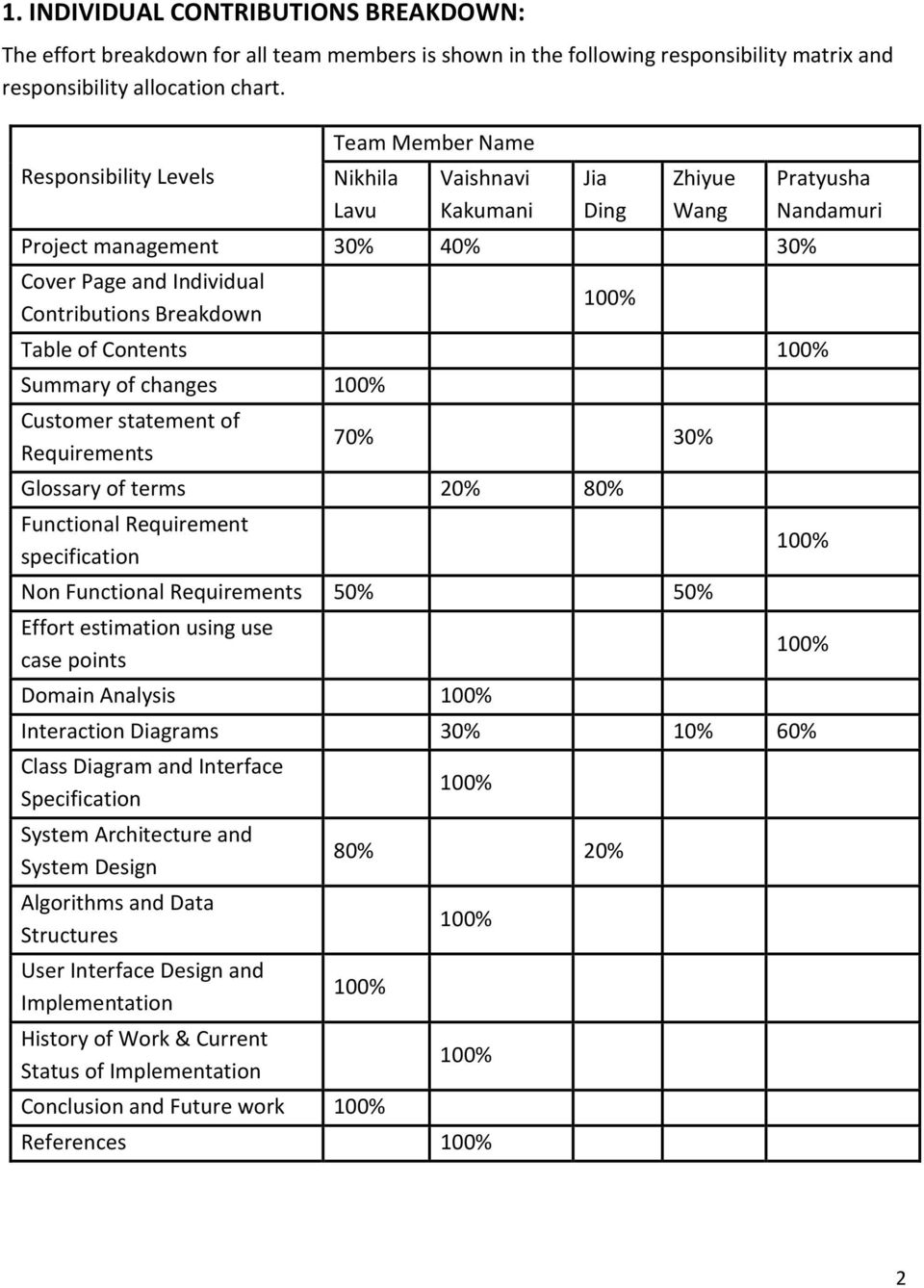
2 1. INDIVIDUAL CONTRIBUTIONS BREAKDOWN: The effort breakdown for all team members is shown in the following responsibility matrix and responsibility allocation chart. Responsibility Levels Team Member Name Nikhila Lavu Vaishnavi Kakumani Jia Ding Zhiyue Wang Project management 30% 40% 30% Cover Page and Individual Contributions Breakdown 100% Table of Contents 100% Summary of changes 100% Customer statement of Requirements 70% 30% Glossary of terms 20% 80% Functional Requirement specification Non Functional Requirements 50% 50% Effort estimation using use case points Domain Analysis 100% Pratyusha Nandamuri 100% 100% Interaction Diagrams 30% 10% 60% Class Diagram and Interface Specification System Architecture and System Design Algorithms and Data Structures User Interface Design and Implementation History of Work & Current Status of Implementation 100% 80% 20% 100% Conclusion and Future work 100% 100% 100% References 100% 2
3 3

4 2. TABLE OF CONTENTS: 1. Individual Contributions Breakdown 2 2. Table of Contents 4 3. Summary of Changes 6 4. Customer Statement of Requirements 7 5. Glossary of Terms Functional Requirements Specification 12 a. Stakeholders 12 b. Actors & Goals 12 c. Use Cases 13 i. Casual Description 13 ii. Fully dressed Description 17 iii Use case diagram 30 iv. System Requirements - Use Case Traceability Matrix 31 d. System Sequence Diagrams Non functional Requirements Effort Estimation using Use Case Points Domain Analysis 69 a. Domain Model 69 i. Concept definitions 70 ii. Association definitions 71 iii Attribute definitions 73 b. System Operation Contracts Interaction Diagrams 79 a. List of Implemented Use Cases 79 b. Diagrams for Implemented Use cases Class Diagram and Interface Specification 99 a. Class Diagram 99 b. Data Types and Operation Signatures 100 4

5 c. Design Patterns 106 d. OCL Operation Contracts 107 e. Cohesion Metrics System Architecture and System Design 110 a. Architectural styles 110 b. Identifying Subsystems 111 c. Mapping Subsystems to Hardware 111 d. Persistent Data Storage 112 e. Network Protocol 113 f. Global Control Flow 113 g. Hardware Requirements Algorithms and Data Structures 115 a. Algorithms 115 b. Data Structures User Interface Design and Implementation History of Work & Current Status of Implementation Conclusions and Future Work References 123 5

6 3. SUMMARY OF CHANGES Revised Customer Statement of Requirements Added a another requirement Staying in financial loop Edited Glossary Added 10 more use cases to complement the system Revised Use Case Diagram to reflect changes in Use Cases System sequence diagrams and interaction diagrams were changed according to the new changes in use cases Causal and detailed descriptions were edited Class Diagram was completely redone to accommodate newly added classes Added Use Case Points Section Cohesion matrix has been computed for all the classes using SCOM, CC/LSCC, CAMC Updated traceability matrix to accommodate new requirements and use cases Added new breakdown of responsibilities, future work, history of work Domain model revamped according to the new implementation Persistent Data Storage section updated with newly added tables Design patterns are now included Updated User Interface Design section with new screen shots, added conclusion and recommendations. 6
7 4. CUSTOMER STATEMENT OF REQUIREMENTS To whom it may concern, I write on the behalf of my trading partners who require a platform where they can either learn at first hand the techniques required to invest in a stock market or hone their existing skills of trading. In the past years we trained the traders by letting them trade in the actual market itself by giving them small amounts of money and watching closely the techniques that they use to make the investments. In the present situation of market debacles, this idea seemed to be a very expensive taking into account the number of traders that our company is hiring right now. Another reason that is hindering the actual investments is the current nature of the market. In the time when the trading gurus are experiencing losses, it is not a safe idea to let loose the traders who are novice at the art of investing. Yet another reason for the want of this type of platform is that we need a place where even the most experienced traders can try and practice the new techniques that they may have before they use them in the actual markets. What I have in my mind right now is a virtual stock market web application which will allow the investors to buy and sell the stocks virtually without entering the actual market itself. This idea of virtual stock market as you may know is not a new technique. There are a lot of web-sites that offer this kind of service to both amateur traders and trading gurus. This will be used not only to train the new traders but will also be a testing platform for advanced traders where they can practice new strategies, improve their decision making skills along with watching market from outside it. What the existing stock market games lack is a bit of sophistication that actual markets have and the too much of advertising which is taking away the sense of importance of the game. What I propose right now will be called TradeFun! For future references and will give the traders a chance to trade virtually here in the company itself. Our aim is to make TradeFun! an interactive website based system which will simulate the real world stock market. It make the game very convenient to the returning users, we will be required to have a quick and easy registration process wherein the user will be able to choose his personalized username and password. From the time of registration, we will have to address 7
8 the user as a trader to continue the game spirit. Each trader will be given certain amount of virtual money at the time of the registration completion and the trader is free to use this money to make transactions. An upper cap can be placed to the amount of stocks that he/she can buy in certain amount of time. TradeFun! should keep track of all the transactions that the trader does and have them ready for any future references. It should also update the trader portfolios timely to ensure transparency of the system. Moreover, our site should conduct realtime, internal updates to regularly determine both the value of a trader s portfolio and the value of each stock in the virtual market. This can be achieved by subscribing to the real time date from trusted and updated vendors like Yahoo! Finance. To personalize the game according to the traders choice, TradeFun! should have the ability to track his past trades and post comments on them. For this purpose, we are required to setup a module that is something like a trade diary where the system updates the trades and the trader will have a chance to put his/her personal comments and additional plans. For the purpose of teaching game to the beginners, there will be a quick links tab in the home page which will be redirecting to external websites with relevant information to the game. Finally, to encourage the top scoring traders the website will award ranks to the traders depending on the amount of money that they are able to earn through balanced or strategic trading. Trader with first rank will be awarded more money by the website to keep up the spirit and his name will be displayed as the TOP PLAYER OF WEEK/MONTH in all the traders home pages. At the end of this narrative, a few comments that I would like to add are that TradeFun! should not only be a platform for the traders to buy and sell stocks as it may appear but it should also teach the traders the pitfalls of the current stock markets. By playing the game, they should be able to improve their strategic decision making, smart trading skills along with learning the basics of trading. After conducting a series of interviews with the investors and taking note of their individual requirements and what they would like to see in a web-based stock market fantasy league application, a majority of responses advised eight important requirements. I have attached these requirements below. 8

9 I wish you and your team all the very best for the development of the TradeFun! and would like to answer any questions that you may have in the future. Sincerely, Stanley Jobs Trading League LLC List of Requirements: REQ 1: TradeFun! Website Traders are requesting for a virtual stock market website where they can trade stocks and practice their existing and new strategies. Website should be able to provide stock information and give a chance to invest in the stock market. It should be tailored to the user s individual needs. REQ 2: Staying in Financial loop TradeFun! should update the users time to time with latest information on the stock market and trading. This can be achieved by displaying financial news in the homepage(this news comes from external sources like CNBC, Reuters), giving user an idea of the top gaining companies and losing companies, stocks that have the highest volumes. This information should be updated whenever page is updated. REQ 3: Graphical User Interface (GUI) User interface is what stands between trader and back end. So a decent look is expected with not too much of pictures and advertisements. Any required task should be done with a few number of mouse clicks. REQ 4: Reliability Regular maintenance is required to keep the website up to date and it should be able to withstand decent amount of traffic. Stock data should be updates as quickly as possible. 9

10 REQ 5: Trader Portfolios Each investor will have to register to play TradeFun! Once registered, a profile should be created. An investor portfolio must also be maintained, including previous and current stock transactions and amounts of money earned and lost. REQ 6: Monitoring activities Administrator should be there to resolve any issues that traders might have and perform updates maintenances. This monitoring playing a crucial role in maintaining Forum, which requires the information should be pertaining to stock market and no personal discussions should be allowed. REQ 7: Automatic trading based on the thresholds Users should have the option of setting threshold amounts. If price of the stock drops or rises beyond this threshold, then, the application should either buy or sell according to the set options of the user. He/she should be informed about the success/failure of the trade by sending an notification. REQ 8: Updating stock prices Continuous update of the stock prices should be provided for decent reliability. Most important thing is that the prices should be accurate and should be within a limit of 15 minutes. Too much of lag between the real time data and the system data is not appreciated. REQ 9: Ranking and Rewards Ranking should be given to the traders based on the performance and best player of the week should be awarded with an incentive. 10
11 5. GLOSSARY ASK PRICE: The price that a security holder is willing to sell a security, at a given time. BID PRICE: The price that a buyer is willing to pay for a security. COMMISSION: The fee a broker charges for administering a trade, also known as brokerage fees. CHANGE IN %: change is the difference between the last closing price and the current price (Last trade).change percent signifies the profit per share made by the company. EXPIRATION DATE: The last day upon which an option or futures contract can be exercised or traded. LEADERBOARD: The users weekly rankings will be displayed on the leaderboard. LIMIT ORDER: An order given to a broker by a customer where the order is not executed until the price reaches that price limit set by investor. Limits buy sets a price ceiling whereas limit sell sets a price floor for the investment price. MARKET ORDER: An order for immediate execution place with a broker to buy or sell. STOP ORDER: An order given to a broker by a customer where the order is not executed until the price reaches that stop price set by investor. Stop buy sets a price floor whereas stop sell sets a price ceiling for the investment price. TICKER SYMBOL: A ticker symbol is a combination of letters that identifies a stock, bond, option or the future contract. VOLUME: Volume reflects the supply and demand for stocks.volume measures market liquidity by counting the number of shares that are traded over a given period.if the volume of a stock is less,which means that the company has some problems going on. As a result, selling an illiquid stock quickly can be difficult or impossible without accepting the lower bid price. 11

12 6. FUNCTIONAL REQUIRMENTS SPECIFICATION a. STAKEHOLDERS i. Internal Stakeholders Owner: A person who is legally allowed to own the web application. His interests are profits, expenditure, customer satisfaction and competitors. Manager: A person who overlooks the expenditure, resources, maintenance and development of the web application. His interests include customer satisfaction, expenditure, performance, employees, maintenance and development. Website Administrator: The person responsible for putting up the web application initially and then maintaining it and providing support when necessary. His interests are working conditions, job stability, salary and benefits. ii. External Stakeholders User or Customer: The person who plays the game. His interests may include pleasure in online fantasy games, trying to get an idea of how trading and stock market works and trying out various investment strategies to see if they actually work. Educator: An educator is someone who may use the game to teach his students about trading and stocks. His interests are imparting knowledge to his students, simulating their interest. b. ACTORS AND GOALS User: The person who uses the website to play the game. Type: Initiating Goal: Register an account, login, maintain his profile, buy and sell stocks. Administrator: The person who designs and maintains the website. Type: Initiating Goal: Website maintenance and rank the players weekly depending on their monetary values. 12

13 Database: A place where the various stocks being offered are stored as well as their current prices. Database also has the list of users currently enrolled apart from their profile information. Type: Participating Goal: None Yahoo Finance: The external source from which the stock quotes are picked up periodically. Type: Participating Goal: None c. USE CASES i. Casual Description USE CASE:1 LOGIN Once a user hits our URL, he will be prompted for his login details-username and password which are then authenticated by our system. This authentication is to make sure every user can access only his account and his trade. USE CASE 2: REGISTRATION A new user can join the game at any time by registering his details with the system. The login page has a sign for registration in case he hasn t before. USE CASE 3: LOGOUT Once a user finishes playing the game, he gets an option to log out thereby making sure nobody else can access his trade on that particular computer. 13

14 USE CASE 4: EDIT MY PROFILE Once logged in, a user will be able to access his profile and make changes to it. He can even delete his profile if he doesn t need it anymore. Once a profile is deleted, the respective user information will be stored in a separate table for security reasons USE CASE 5: VIEW TRADING HISTORY This process with provide the user the ability to look at his past trade transactions. The My Trading History tab will provide a complete list of all the transactions till date. The user can also enter any comments he wishes to make about a trade. USE CASE 6: VIEW LEADER BOARD Players are ranked weekly depending on their portfolio values at the end of the week. To enter the ranking, a player s portfolio value must be greater than the average portfolio values of all the users. Also, he should have a minimum of fifteen completed transactions in his history. These decisions were taken to ensure fair play. Winner of each week is given 250$ incentive as virtual money. USE CASE 7: MARKET ORDER: BUY This process involves buying stocks using Market Order. The user will be provided with a drop down box which has the names of the stocks offered and their ticker symbols. When the user decides on a stock, the stock information like its buy price, sell price etc are displayed. The user can then purchase any number of stocks he can afford to. Confirmation is displayed and an notification is sent once the transaction has been made. USE CASE 8: MARKET ORDER: SELL This process involves buying stocks using Market Order. The user will be provided with a drop down box which has the names of the stocks offered and their ticker symbols. When the user decides on a stock, the stock information like its buy price, sell price etc are displayed. The user 14

15 can then purchase any number of stocks he can afford to. Confirmation is displayed and an notification is sent once the transaction has been made. USE CASE 9: LIMIT ORDER: BUY This process involves buying stocks using Limit Order. The user will be provided with a drop down box which has the names of the stocks offered and their ticker symbols. When the user decides on a stock, the stock information like its buy price, sell price etc are displayed. The user can enter a limit threshold value below which automatic purchase of the stock will be made by the system and an notification will be sent informing the user about the transaction. If the user doesn t have sufficient funds at this point, an notification is sent saying that he doesn t have enough funds and the order is deleted from the table. USE CASE 10:. LIMIT ORDER: SELL This process involves selling stocks using Limit Order. The user will be provided with a drop down box which has the names of the stocks offered and their ticker symbols. When the user decides on a stock, the stock information like its buy price, sell price etc are displayed. The user can enter a limit threshold value above which automatic selling of the stock will be made by the system and an notification will be sent informing the user about the transaction. If the user doesn t have sufficient stocks at this point, an notification is sent saying that he doesn t have enough stocks and the order is deleted from the table. USE CASE 11: STOP ORDER: BUY This process involves buying stocks using Stop Order. The user will be provided with a drop down box which has the names of the stocks offered and their ticker symbols. When the user decides on a stock, the stock information like its buy price, sell price etc are displayed. The user can enter a stop threshold value above which automatic purchase of the stock will be made by 15

16 the system and an notification will be sent informing the user about the transaction. If the user doesn t have sufficient funds at this point, an notification is sent saying that he doesn t have enough funds and the order is deleted from the table. USE CASE 12: STOP ORDER: SELL This process involves selling stocks using Stop Order. The user will be provided with a drop down box which has the names of the stocks offered and their ticker symbols. When the user decides on a stock, the stock information like its buy price, sell price etc are displayed. The user can enter a stop threshold value below which automatic selling of the stock will be made by the system and an notification will be sent informing the user about the transaction. If the user doesn t have sufficient stocks at this point, an notification is sent saying that he doesn t have enough stocks and the order is deleted from the table. USE CASE 13: POST IN FORUM This process involves allowing the user to start a new thread or reply to an existing one in the forums. Each thread in the forum has its own subject and each post has the username who made the comment. USE CASE 14: VIEW MY GAME PORTFOLIO This process provides the user the ability to look at his current portfolio- the stocks he has in it, the current value of the portfolio as well as his account balance. 16

17 USE CASE 15: ADD TO WATCHLIST This process allows the user to watch his favorite stock prices 24X7. The user can add and delete companies to his watch list and the system displays latest stock information about those companies every time the user refreshes the page. USE CASE 16: VIEW TOP FIVE GAINERS/LOSERS Using this process, the user can see a list of top five price-gaining and losing companies from our current database of 20 companies. These are the top five companies in the database that have the highest and lowest percentage change in the stock price. The percent change is calculated using the yesterday s closing price and the price at which the latest trade has been made. USE CASE 17: VIEW MOST ACTIVE COMPANIES Using this process, the user can see a list of top five active companies which are the companies that have the highest liquidity (volume of stocks) from our current database of 20 companies. ii. Fully Dressed Description USECASE1: LOGIN Related Requirements: REQ 1,4 Initiating Actor: User Actor s Goal: To log into Tradefun. Participating Actor: Database Pre-conditions: 1. The database is non-empty 2. The user has an active account Post-conditions: User successfully logs into his account. 17

18 Flow of Events for Main Success Scenario: 1. System prompts the user for his details: username and password 2. User enters them. 3. System verifies them. 4. System informs the user they are valid and logs him in. Flow of Events for Extensions (Alternate Scenario 1): 2a. User forgot his password. 1. System asks him a security question he has entered while registration. 2. Checks if the answer entered is correct. 3. Sends an containing the Reset Password link to the registered ID Flow of Events for Extensions (Alternate Scenario 2): 2a. User enters invalid password. 1. System informs the user about the invalid entry. 2. Prompts him to enter the correct information. USECASE 2: REGISTRATION Related Requirements: REQ 1 Initiating Actor: User Actor s Goal: To create an account with Trade fun Participating Actor: Database Pre-conditions: The database is empty Post-conditions: 1. User successfully creates an account. 2. He is given a portfolio to start the game. Flow of Events for Main Success Scenario: 1. User prompts the system to create an account. 18

19 2. System starts the registration process. 3. User enters the required information and submits it. 4. System enters this information into the database. 5. System adds a new portfolio into the database. 6. System informs the user that his account has been created and he can now play the game. Flow of Events for Extensions (Alternate Scenario 1): 3a. User already has an account. 1. System cancels the registration process. 2. System informs the user about his existing account. 3. Prompts him to enter the details of that account. Flow of Events for Extensions (Alternate Scenario 2): 3a. User enters invalid information. 1. System informs the user about the invalid entries. 2. Prompts him to enter the correct information. USE CASE 3: LOGOUT Related Requirements: REQ 1, 4 Initiating Actor: User Actor s Goal: To log out of Tradefun. Participating Actor: None Pre-conditions: The user is logged in Post-conditions: User successfully logs out of his account. Flow of Events for Main Success Scenario: 1. User instructs the system to log him out using the Logout link. 2. System clears his session, logs him out and redirects to the login page 19
20 USE CASE 4: EDIT MY PROFILE Related Requirements: REQ 1,4 Initiating Actor: User Actor s Goal: To edit his profile. To delete it when necessary. Participating Actor: Database Pre-conditions: 1. The database is non-empty 2. The user has an active account Post-conditions: User has successfully edited his profile. Flow of Events for Main Success Scenario: 1. User asks the system to edit his profile. 2. System displays his current profile. 3. User makes required changes. 4. System updates the changes into the database. 5. System informs the user that the changes have been made. Flow of Events for Extensions (Alternate Scenario 1): 1a. User requests profile deletion. 1. System asks him for confirmation. 2. User confirms. 3. System deletes him and his portfolio from the current table and puts them in a separate non-existing users table. 4. Informs the user about his account deletion. 20
21 USE CASE 5: VIEW TRADING HISTORY Related Requirements: REQ 1,5 Initiating Actor: User Actor s Goal: To view his previous trade transactions Participating Actor: Database Pre-conditions: The user has an active account and past trade transactions Post-conditions: User s trading history has been displayed Flow of Events for Main Success Scenario: 1. User asks the system to display his previous trade transactions. 2. System displays them. USE CASE 6: VIEW LEADER BOARD Related Requirements: REQ 1,5 Initiating Actor: User Actor s Goal: To view the weekly ranking listed in the Leader board Participating Actor: Database Pre-conditions: 1. The user has an active account Post-conditions: The website s leader board has been displayed Flow of Events for Main Success Scenario: 1. User asks the system to display the leader board. 2. System calculates them depending on the users portfolio values and displays them. 21
22 USE CASE 7: MARKET ORDER: BUY Related Requirements: REQ 1,8 Initiating Actor: User Actor s Goal: To buy stocks of a company Participating Actor: Database, Yahoo! Finance Pre-conditions: 1. The user is logged into his account. 2. The account has sufficient funds Post-conditions: 1. User successfully buys the new shares. 2. Changes are reflected in the transaction. Flow of Events for Main Success Scenario: 1. User enters the name of the stock. 2. System looks up the price and other information of this stock and displays them. 3. User enters the quantity of shares he wants to purchase and hits buy. 4. System calculates the total money including commission fee that the user must pay. 5. System checks the balance of the user s account if he has enough money to pay for it. 6. System adds the purchased shares into user s account, displays confirmation and sends notification Flow of Events for Extensions (Alternate Scenario 1): 5c. User doesn t have enough money in his portfolio 1. User enters the quantity of shares he wants to buy. 2. System informs the total cost including commission fee. 3. System shows an error warning that the balance of his portfolio is unaffordable for purchase. USE CASE 8: MARKET ORDER: SELL Related Requirements: REQ 1,8 Initiating Actor: User Actor s Goal: To sell stocks of a company 22
23 Participating Actor: Database, Yahoo! Finance Pre-conditions: 1. The user is logged into his account. 2. The account has sufficient stocks. Post-conditions: 1. User successfully sells the shares. 2. Changes are reflected in the transaction. Flow of Events for Main Success Scenario: 1. User enters the name of the stock. 2. System looks up the price and other information of this stock and displays them. 3. User enters the quantity of shares he wants to sell and hits sell. 4. System calculates the total money including commission fee that the user will gain. 5. System checks the portfolio of the user s account if he has enough stocks to sell. 6. System removes the sold shares from user s account, adds the money gained from transaction into his account, displays confirmation and sends an notification Flow of Events for Extensions (Alternate Scenario 1): 5c. User doesn t have enough stocks in his portfolio 1. User enters the quantity of shares he wants to sell. 2. System shows an error warning that his portfolio doesn t have enough number of stocks to sell. USE CASE 9: LIMIT ORDER: BUY Related Requirements: REQ 1,7 Initiating Actor: User Actor s Goal: To buy stocks of a company using Limit Order Participating Actor: Database, Yahoo! Finance Pre-conditions: 1. The user is logged into his account and the threshold is set. 2. The account has sufficient funds Post-conditions: 1. User successfully buys the new shares. 23
24 2. Changes are reflected in the transaction. Flow of Events for Main Success Scenario: 1. User enters the name of the stock. 2. System looks up the price and other information of this stock and displays them. 3. User enters the limit threshold below which he wants the stock to be brought and the quantity of stocks. 4. System looks up the price of the stock every 15 minutes, and once it goes below the threshold, checks the user s account balance and purchases the stock in the event of sufficient funds. 5. System adds the purchased shares into user s account and sends an notification. Flow of Events for Extensions (Alternate Scenario 1): 4c. User doesn t have enough money in his portfolio 1. User enters the quantity of shares he wants to buy and sets the threshold. 2. System monitors the stock price and when the price drops below the threshold, checks user s balance. In the event of insufficient funds, an notification is sent to the user informing him the same and the order is deleted. USE CASE 10: LIMIT ORDER: SELL Related Requirements: REQ 1,7 Initiating Actor: User Actor s Goal: To sell stocks of a company using Limit Order Participating Actor: Database, Yahoo! Finance Pre-conditions: 1. The user is logged into his account and the threshold is set. 2. The account has sufficient stocks. Post-conditions: 1. User successfully sells the shares. 2. Changes are reflected in the transaction. 24
25 Flow of Events for Main Success Scenario: 1. User enters the name of the stock. 2. System looks up the price and other information of this stock and displays them. 3. User enters the limit threshold above which he wants the stock to be sold and the quantity of stocks. 4. System looks up the price of the stock every 15 minutes, and once it goes above the threshold, checks the user s portfolio and sells the stock in the event of sufficient number of stocks existing. 5. System deducts the sold shares from user s account, adds the amount gained during the transaction and sends an notification. Flow of Events for Extensions (Alternate Scenario 1): 4c. User doesn t have enough stocks in his portfolio 1. User enters the quantity of shares he wants to sell and sets the threshold. 2. System monitors the stock price and when the price goes above the threshold, checks user s portfolio. In the event of insufficient stocks, an notification is sent to the user informing him the same and the order is deleted. USE CASE 11: STOP ORDER: BUY Related Requirements: REQ 1,7 Initiating Actor: User Actor s Goal: To buy stocks of a company using Stop Order Participating Actor: Database, Yahoo! Finance Pre-conditions: 1. The user is logged into his account and the stop threshold is set. 2. The account has sufficient funds Post-conditions: 1. User successfully buys the new shares. 2. Changes are reflected in the transaction. Flow of Events for Main Success Scenario: 25
26 1. User enters the name of the stock. 2. System looks up the price and other information of this stock and displays them. 3. User enters the stop threshold above which he wants the stock to be brought and the quantity of stocks. 4. System looks up the price of the stock every 15 minutes, and once it goes above the threshold, checks the user s account balance and purchases the stock in the event of sufficient funds. 5. System adds the purchased shares into user s account and sends an notification. Flow of Events for Extensions (Alternate Scenario 1): 4c. User doesn t have enough money in his portfolio 1. User enters the quantity of shares he wants to buy and sets the stop threshold. 2. System monitors the stock price and when the price goes above the threshold, checks user s balance. In the event of insufficient funds, an notification is sent to the user informing him the same and the order is deleted. USE CASE 12: STOP ORDER: SELL Related Requirements: REQ 1,7 Initiating Actor: User Actor s Goal: To sell stocks of a company using Stop Order Participating Actor: Database, Yahoo! Finance Pre-conditions: 1. The user is logged into his account and the stop threshold is set. 2. The account has sufficient stocks. Post-conditions: 1. User successfully sells the shares. 2. Changes are reflected in the transaction. Flow of Events for Main Success Scenario: 1. User enters the name of the stock. 2. System looks up the price and other information of this stock and displays them. 26
27 3. User enters the stop threshold below which he wants the stock to be sold and the quantity of stocks. 4. System looks up the price of the stock every 15 minutes, and once it goes below the threshold, checks the user s portfolio and sells the stock in the event of sufficient number of stocks existing. 5. System deducts the sold shares from user s account, adds the amount gained during the transaction and sends an notification. Flow of Events for Extensions (Alternate Scenario 1): 4c. User doesn t have enough stocks in his portfolio 1. User enters the quantity of shares he wants to sell and sets the stop threshold. 2. System monitors the stock price and when the price drops below the threshold, checks user s portfolio. In the event of insufficient stocks, an notification is sent to the user informing him the same and the order is deleted. USE CASE 13: POST IN FORUM Related Requirements: REQ 1,6 Initiating Actor: User Actor s Goal: To post comments in the forum Participating Actor: Database Pre-conditions: The user has an active account Post-conditions: User successfully posts his comments in the forum Flow of Events for Main Success Scenario: 1. User tells the system he wants to start a new thread in the forum. 2. System creates a new thread and puts the user as the owner of the thread. 3. User mentions subject and content of the thread. 4. System puts this in as the thread subject and body respectively and makes the thread available for all the users 27
28 Flow of Events for Extensions (Alternate Scenario 1): 1c. User replies to an existing thread in the forum 1. User chooses the thread he wants to comment on and posts his reply to it. 2. System stores this post and makes it available for all the users. USE CASE 14: VIEW MY GAME PORTFOLIO Related Requirements: REQ 1,5,8 Initiating Actor: User Actor s Goal: To view his game portfolio Participating Actor: Database Pre-conditions: The user has an active account and an active game portfolio Post-conditions: User s game portfolio has been displayed Flow of Events for Main Success Scenario: 1. User asks the system to display his game portfolio. 2. System displays the stocks he currently holds, his portfolio value as well as his account balance. USE CASE 15: ADD TO WATCHLIST Related Requirements: REQ 1,2,8 Initiating Actor: User Actor s Goal: To add companies to the Watch list Participating Actor: Database, Yahoo! Finance Pre-conditions: The user has an active account and is logged in Post-conditions: The company has been added to the Watch List and the system displays updated stock information about the company 28
29 Flow of Events for Main Success Scenario: 1. User asks the system to add his favorite company to the Watch List. 2. System adds the requested company and returns it s most updated stock information. Flow of Events for Extensions (Alternate Scenario 1): 1a. User wants to delete a company from the Watch List 1. User informs the system about the company he wishes to delete from the list. 2. System deletes the company from the list and shows the user the updated list. USE CASE 16: VIEW TOP FIVE GAINERS/LOSERS Related Requirements: REQ 1,2 Initiating Actor: User Actor s Goal: To view the top five gaining and losing companies Participating Actor: Database Pre-conditions: The user has an active account and is logged in Post-conditions: The list of top five gaining and losing companies has been displayed Flow of Events for Main Success Scenario: 1. User asks the system to display the top five gainers/losers. 2. System returns those five companies that have the highest and lowest percentage change in the stock price. USE CASE 17: VIEW MOST ACTIVE COMPANIES Related Requirements: REQ 1,2 Initiating Actor: User 29
30 Actor s Goal: To view the list of most active companies Participating Actor: Database Pre-conditions: The user has an active account and is logged in Post-conditions: The list of most active companies has been displayed Flow of Events for Main Success Scenario: 1. User asks the system to display the list of most active companies 2. System returns those five companies that have the highest liquidity (volume of stocks). iii. Use Case Diagram 30
31 iv. System Requirements - Use Case Traceability Matrix This is the traceability matrix for the requirements listed earlier: Req. Requirement Description Related Use Cases Implementation Status 1. TradeFun! Website ALL Complete 2. Staying in the Financial Loop US- 15,16,17 Complete 3. Graphical User Interface (GUI) N/A Complete 4. Reliability US- 1,3,4 Complete 5. Trader Portfolios US-5,6,14 Complete 6. Monitoring activities US- 13 Complete 7. Automatic trading based on the thresholds US- 9,10,11,12 Complete 8. Updating Stock Prices US- 7,8,14,15 Complete 9. Ranking and Rewards US- 6 Complete d. System Sequence Diagrams 1. Login SYSTEM SEQUENCE DIAGRAM: Main Success Scenario: The user here initiates the log in process by entering his login details- username and password. The system asks the database to verify the login details. Once the login details are found to be correct, the system directs the user to the homepage of Trade Fun! 31
32 Alternate Scenario I (Forgot Password): This product provides solution for forgotten passwords. The user can click on the Forgot Password? tab on the login screen. This will prompt the system to retrieve the security question from the database. Once the user answers it correctly, he is sent an which contains a link to Reset the password. 32
33 Alternate Scenario II (Invalid Password): Sometimes, it may so happen that a user enters an invalid password. In this case, once the database verifies it as invalid, the system cancels the process and prompts the user to enter the password again. 33
34 2. Registration SYSTEM SEQUENCE DIAGRAM: Main Success Scenario: The Registration process is initiated by the user. He prompts the system to create an account. The system then asks him for some information. Once all the information is submitted by the user, the system requests the database to scan for duplicates. In the absence of any, the database is asked to create a new portfolio for the user. Once this is done, the user is informed of it and is allowed to play the game. 34
35 Alternate Scenario I (User already has an account): Once the user submits his information, the system requests the database to scan for duplicates. If there is any, the process is cancelled, the user is informed of this and is prompted to enter his existing account details. 35
36 Alternate Scenario II (Invalid Information): If the user submits any invalid information during his registration, the system identifies and notifies him immediately. Once he corrects them, the registration will continue. 36
37 3. Logout SYSTEM SEQUENCE DIAGRAM: Main Success Scenario: The user here initiates the logout process by clicking on Logout. The system then clears his session and logs him out. 37
38 4.Edit my profile SYSTEM SEQUENCE DIAGRAM: Main Success Scenario: When the user wants to make any changes, he prompts the system to edit his profile. The system displays his current profile. Once the required changes have been made, the system uploads them to the database and informs the user about it. 38
39 Alternate Scenario I (Delete Profile): Sometimes when a user feels like he no longer needs a profile with Trade Fun!, he can use the delete profile option available. When this happens, the system asks the user for confirmation. Once it is confirmed, the system prompts the database to remove the profile and portfolio and then informs the user of the outcome. 39
40 5. View trading history SYSTEM SEQUENCE DIAGRAM: Main Success Scenario: When the user wants to view his past trade transactions, he prompts the system to display his trade history. The system then retrieves all his previous transactions from the database and displays them. 40
41 6. View Leader Board Main Success Scenario: When the user wants to view the weekly rankings of the game, he prompts the system to display the leaderboard. The system then calculates the players weekly rankings depending on their portfolio values and ranks them from the top ten highest to the lowest. 41
42 7. Market Order: Buy Main Success Scenario: The user chooses a stock name initially, after which the system displays the respective stock information. The user then decides the number of stocks he wants to buy. The system verifies if his account has sufficient funds, and if yes adds the stocks to the user s profile, displays confirmation and instructs the server to send an notification. 42
43 Alternate Scenario 1 (Insufficient Funds in the account): When the user enters the number of shares he wishes to buy, the system checks if his account has sufficient funds. In the case of insufficient funds, the system displays an error. 43
44 8. Market Order: Sell Main Success Scenario: The user chooses a stock name initially, after which the system displays the respective stock information. The user then decides the number of stocks he wants to sell. The system verifies if his account has sufficient stocks, and if yes deducts the stocks from his portfolio, adds the funds to the user s profile, displays confirmation and instructs the server to send an notification. 44
45 Alternate Scenario 1 (Insufficient Stocks in the account): When the user enters the number of shares he wishes to sell, the system checks if his account has sufficient stocks. In the case of insufficient stocks, the system displays an error. 45
46 9. Limit Order: Buy Main Success Scenario: The user chooses a stock name initially, after which the system displays the respective stock information. The user then decides the number of stocks he wants to buy and also specifies the limit threshold below which he wants to buy the stock. The system checks the stock price every 15 minutes, and once the bid price falls below the limit price, verifies if his account has sufficient funds, and if yes adds the stocks to the user s profile, displays confirmation and instructs the server to send an notification. 46
47 Alternate Scenario 1 (Insufficient Funds in the account): When the bid price falls below the limit price, the system checks if the user has sufficient funds to fulfill the order. In the absence of sufficient funds, an notification is sent to the user informing the same and the order is cancelled. 47
48 10. Limit Order: Sell Main Success Scenario: The user chooses a stock name initially, after which the system displays the respective stock information. The user then decides the number of stocks he wants to sell and also specifies the limit threshold above which he wants to sell the stock. The system checks the stock price every 15 minutes, and once the ask price rises above the limit price, verifies if his portfolio has sufficient stocks, and if yes deducts the stocks from the user s profile, adds the balance gained, displays confirmation and instructs the server to send an notification. 48
49 Alternate Scenario 1 (Insufficient Stocks in the account): When the ask price rises above the limit price, the system checks if his account has sufficient stocks. In the case of insufficient stocks, an notification is sent to the user informing the same and the order is cancelled. 49
50 11. Stop Order: Buy Main Success Scenario: The user chooses a stock name initially, after which the system displays the respective stock information. The user then decides the number of stocks he wants to buy and also specifies the stop threshold above which he wants to buy the stock. The system checks the stock price every 15 minutes, and once the bid price rises above the limit price, verifies if his account has sufficient funds, and if yes adds the stocks to the user s profile, displays confirmation and instructs the server to send an notification. 50
51 Alternate Scenario 1 (Insufficient Funds in the account): When the bid price rises above the limit price, the system checks if the user has sufficient funds to fulfill the order. In the absence of sufficient funds, an notification is sent to the user informing the same and the order is cancelled. 51
52 12. Stop Order: Sell Main Success Scenario: The user chooses a stock name initially, after which the system displays the respective stock information. The user then decides the number of stocks he wants to sell and also specifies the stop threshold below which he wants to sell the stock. The system checks the stock price every 15 minutes, and once the ask price falls below the stop price, verifies if his portfolio has sufficient stocks, and if yes deducts the stocks from the user s profile, adds the balance gained, displays confirmation and instructs the server to send an notification. 52
53 Alternate Scenario 1 (Insufficient Stocks in the account): When the ask price falls below the stop price, the system checks if his account has sufficient stocks. In the case of insufficient stocks, an notification is sent to the user informing the same and the order is cancelled. 53
54 13. Post in Forum Main Success Scenario: When the user wants to post in the forum, he prompts the system to start a new thread. The system starts a new thread and lists the user as the owner. The user can then enter the subject as well as content of the thread which are then recorded by the system. 54
55 Alternate Scenario 1 (Reply to an existing thread): When the user wants to reply to an existing thread, he posts his reply, which is then saved by the system as a post to the existing thread. 55
56 14. View My Game Portfolio Main Success Scenario: When the user wants to view his game portfolio, he prompts the system to display his game portfolio. The system then retrieves all the stocks he currently possesses, apart from the portfolio value and his current account balance. 56
57 15. Add to Watchlist Main Success Scenario: When the user wants add a company to his existing Watch list, he does so by informing the system. The system then instructs the database to add the company and retrieve the company s latest stock information which is then displayed to the user in his Watch list. 57
58 Alternate Scenario 1 (Delete company from the Watch list): When the user wants to delete a company from his Watch List, he informs it to the system. The system in turn instructs the Database to remove the company from the user s list of companies and displays the updated table to the user. 58
59 16. View Top five gainers/losers Main Success Scenario: When the user wants to view the top five companies in the database that have the highest and lowest percentage change in the stock price, he prompts the system to display the Top 5 gainers/losers. The system then calculates this information from the database and displays it. As stated earlier, the percent change is calculated using the yesterday s closing price and the price at which the latest trade has been made. 59
60 17. View Top Active Companies Main Success Scenario: When the user wants to view the top five companies in the database that have the highest liquidity (volume of stocks), he prompts the system to display the Top 5 Active Companies. The system then calculates this information from the database and displays it. 60
61 7. NONFUNCTIONAL REQUIREMENTS (FURPS+) Functionality Homepage will show all the options and links which is easy to operate and for the sake of trader s interest, there will be latest headlines from CNBC and Reuters. We will also have the most comprehensive stock information which is the same as those in the real world (Yahoo! Finance). Also, Username and password are required when an existing user wants to check his profile or portfolio which he already created. A first-time user who wants to try the game should register for the website first and confirm the sent by our website. Since the 61
62 portfolios are stored in a data base, they are totally private that there is no way for other players to change information. Other services are also provided to protect access to certain resources or information. Additionally, we have my trade diary area which is a place for users to write something down about their stock trading, their thoughts on those trades and their predication for the markets. Usability The program will take consideration of characteristics such as human factors, aesthetics and consistency in the user interface. All the operations are listed on the homepage which is easy to navigate for most visitors. Also, the website must be attractive and pleasing to catch the eyes. Most important, there will be a set of instructions on how to play the game and some useful quick links related to stock information. Reliability If failure occurs between the program and connected website such as Yahoo! Finance or users transactions cannot go through, our program should be able to recover from these failures. We backup all the information includes users personal information in a database and updates accordingly so that we can call the data immediately. This also used to make sure the accuracy of system calculations. Performance When searching the website, clicking buttons to jump to another links or doing stock trading, we hope that the website is as efficient as possible, which is concerned with characteristics such as throughput, response time, recovery time, start-up time, and shutdown time. Supportability To setup a web server, we must consider that the website can be extended and improved in the future. With the data information updates every day, changes must be made to adapt to the 62
63 new requirements. Also, it is easier for administrators if the changes are not hard to implement and maintain. + (Others) The website should have a strict system to protect users information and portfolios from being tampered by some invaders. The coding and construction of the system should meet the basic required standard and take consideration of its implementation. 8. EFFORT ESTIMATION USING USE CASE POINTS: Unadjusted Actor Weight (UAW): Actor Name Description of Complexity Weight relevant characteristics User Database Yahoo! Finance User interacts with the system via the Graphical User Interface (GUI) Database has all the required data needed to execute the system Yahoo! Finance is used as a source of all our financial data Complex 3 Average 2 Simple 1 UAW (Tradefun) = 1XSimple + 1XAverage + 1XComplex = 1X1 + 1X2 + 1X3 = 6 Unadjusted Use Case Weight (UUCW): 63
64 Use case Description Category Weight Login Simple user interface Simple 5 Registration Simple user interface Simple 5 Logout Simple user interface Simple 5 Edit My Profile Average user interface Average 10 View Trading History Simple user interface Simple 5 View Leader Board Average user interface Average 10 Market Order: Buy Simple user interface Simple 5 Market Order: Sell Simple user interface Simple 5 Limit Order: Buy Average user interface Average 10 Limit Order: Sell Average user interface Average 10 Stop Order: Buy Average user interface Average 10 Stop Order: Sell Average user interface Average 10 Post in Forum Complex user interface Complex 15 View My Game Portfolio Simple user interface Simple 5 Add to Watchlist Simple user interface Simple 5 View Top five gainers/losers Simple user interface Simple 5 View Top Active Simple user interface Simple 5 64
65 Companies UUCW (Tradefun) = 10XSimple + 6XAverage + 1XComplex = 10X5 + 6X10 + 1X15 = 125 UUCP = = 131 Technical Complexity Factor (TCF): Technical Factor Description Weight Perceived Complexity Calculated Factor T1 T2 Distributed web based system End user expects good performance 2 3 2x3= x3=3 T3 T4 T5 T6 End-user expects efficiency Complex internal processing Reusable design or code No installation involved 1 3 1x3= x5= x5= x0=0 T7 Easy to use is moderately important x1=0.5 T8 Portable 2 1 2x1=2 65
66 T9 T10 T11 T12 Easy to change minimally required Concurrent use is required Special security features No direct access for third parties 1 1 1x1= x1= x1= x0=0 T13 No unique training needs 1 0 1x0=0 Total : 27.5 Constant-1 (C1) = 0.6 Constant-2 (C2) = 0.01 TCF = (0.01x27.5) = Therefore, this results in a reduction of the UCP by 8.75% Environmental factor Description Weight Perceived Impact Calculated Factor E1 E2 Moderate Familiar with the development process Moderate Application problem X3= X3=1.5 66
67 experience E3 E4 Some knowledge of object-oriented approach Beginner Lead analyst capability 1 2 1X2= X1=0.5 E5 High levels of Motivation 1 5 1X5=5 E6 E7 Stable requirements expected No Part-time staff involved 2 0 2X0= X0=0 E8 Average difficulty programming language X3=-3 Environmental Factor total: 10.5 Constant 1 (C1) = 1.4 Constant 2(C2)=-0.03 ECF = (-0.03x10.5) = UCP = UUCP x TCF x ECF = (131) x (0.875) x (1.085) = or 124 use case points Expected Project Duration = 124*28=3472 hours This overestimates the project duration by around 50 %, which leads us to conclude that a productivity factor of 28 is too high. 67
68 9. DOMAIN ANALYSIS 68
69 9. (i) Concept Definitions: Responsibility type: D -Doing, K -Knowing Serial Concept Name Type Boundary Responsibility Number 1. Controller D No Coordinates the functions of different concepts in the domain. 2. Interface Maker D No Displays the right user interface. 3. User Interface D Yes Interface for the user. 4. Authenticator D No It identifies the user who has a valid key 5. Key K No The username and password obtained from the user which is to be validated. 6. Key Vault K No It stores valid keys (Username, password) for both users and administrators. 7. Stock Quote K No Contains the stock information like symbol,price. 8. Stock Extractor D Yes Extracts stock quotes from yahoo finance. 9. Search Filter D No Passes the search parameters. 69
70 10. Record Filter D No Filters records retrieved according to the search criteria. 11. Qu8ery Maker D No Prepares the query according to the search parameters provided. 12. Portfolio K No It is stored in the database and contains the portfolios of users. 13. Database connection D Yes Stores data and retrieves data from the database. 14. Ranker D Yes Ranks the players according to their monetary values. 15. Page Maker D Yes Prepares a html document for webpage display. 16. Order Manager D No Generates the transaction. 17. Profile Manager D No Used to edit profiles of users and administrators. 18. Transaction K No Transaction of user which is to be processed. 29. Order Executer D No Processes the transaction 30. Thread D No Creates a thread and assigns a thread id. 31. Post D No Creates a post to the thread 32. Watchlist D No Adds or deletes a symbol from the user s watchlist 70
71 9. (ii) Association Definitions: Concept Relation (: ) Concept Controller Instructs Interface Maker Controller Instructs Order Manager Controller Obtains Portfolio Controller Instructs Query maker Controller Instructs Profile Manager Interface Maker Invokes User Interface Controller Obtains Key Controller Requests Authenticator Authenticator Passes the key Search filter Search filter Searches Key vault Authenticator Obtains valid keys Key vault Controller Obtains Stock quote Controller Instructs Order Executer Order Manager Generates Transaction Query Maker Invokes Record filter Record filter Obtains desired search results Portfolio Record filter Passes the results Ranker Profile Manager Passes keys Key vault Profile Manager Passes data Database connection Order Executer Processes Transaction Controller Obtains Transaction Controller Instructs Watchlist Controller Instructs Thread Thread Invokes Post Watchlist Deposits & retrieves Database Connection 71
72 9.(iii) Attribute Definitions: Concept Controller Interface Maker User Interface Authenticator Key Key Vault Order Executer Stock Extractor Search Filter Record Filter Query Maker Portfolio Database connection Ranker Page Maker Order Manager Profile Manager Transaction Attributes 1. Failure_number: Number of failed login attempts. 2. Max_failure_number: Maximum number of failed login attempts allowed. 1. Username: login id 2.Password: Authentication key 1.Timestamp_of_stock_update: Represents time when stock database was updated 2.Timestamp_of_portfolio_update: Represents time when the users portfolios were updated 1. order_type: specifies the type of order to be placed market order or limit order. 1. Buy_sell: indicates whether it is a buy or sell stock transaction 2. Stock_symbol: indicates the symbol of the stock 72
73 3. Price: specifies the stock price. Stock Quote Thread Post Watchlist 1.Threadid: Id of the thread 2.Threadowner: user s username who started the thread 1.id: Id of the record 2.Comment: comment posted by the user 3.Userid 1.id: Id of the record 2.Symbol: stock symbol that is to be added or deleted 9. (b) SYSTEM OPERATION CONTRACTS: OPERATION: USECASE1- LOGIN Pre- Conditions: 1. User is not logged into the system. 2. The user has an active account. Post-Conditions: 1.User successfully logs into his account. OPERATION: USECASE 2- REGISTRATION Pre- Conditions: 1.The database does not contain that particular user. Post-Conditions: 1. User successfully creates an account. 2. He is given a portfolio to start the game OPERATION: USE CASE 3: LOGOUT Pre- Conditions: 1.The user is logged in 73
74 Post-Conditions: 1.User successfully logs out of his account. OPERATION: USE CASE 4: EDIT MY PROFILE Pre- Conditions: 1. The database is non-empty 2. The user has an active account Post-Conditions: 1.User has successfully edited his profile. OPERATION: USE CASE 5: VIEW TRADING HISTORY Pre- Conditions: 1. The user has an active account and past trade transactions. Post-Conditions: 1.User s trading history has been displayed. OPERATION: USE CASE 6: VIEW LEADER BOARD Pre- Conditions: 1. The user has an active account Post-Conditions: 1.The website s leader board has been displayed OPERATION: USE CASE 7: MARKET ORDER: BUY Pre- Conditions: 1. The user is logged into his account. 74
75 2. The account has sufficient funds. Post-Conditions: 1. User successfully buys the new shares. 2. Changes are reflected in the transaction. OPERATION: USE CASE 8: MARKET ORDER: SELL Pre- Conditions: 1. The user is logged into his account. 2. The account has sufficient stocks. Post-Conditions: 1. User successfully sells the shares. 2. Changes are reflected in the transaction. OPERATION: USE CASE 9: LIMIT ORDER: BUY Pre- Conditions: 1. The user is logged into his account and the threshold is set. Post-Conditions: 1. User s transaction is put as pending. OPERATION: USE CASE 10: LIMIT ORDER: SELL Pre- Conditions: 1. The user is logged into his account and the threshold is set. Post-Conditions: 75
76 1. User s transaction is put as pending. OPERATION: USE CASE 11: STOP ORDER: BUY Pre- Conditions: 1. The user is logged into his account and the stop threshold is set. Post-Conditions: 1. User s transaction is put as pending. OPERATION: USE CASE 12: STOP ORDER: SELL Pre- Conditions: 1. The user is logged into his account and the stop threshold is set. Post-Conditions: 1. User s transaction is put as pending. OPERATION: USE CASE 13: POST IN FORUM Pre- Conditions: 1.The user has an active account Post-Conditions: 1. User successfully posts his comments in the forum OPERATION: USE CASE 14: VIEW MY GAME PORTFOLIO Pre- Conditions: 1.The user has an active account and an active game portfolio. 76
77 Post-Conditions: 1.User s game portfolio has been displayed. OPERATION: USE CASE 15: ADD TO WATCHLIST Pre- Conditions: 1.The user has an active account and is logged in. Post-Conditions: 1.The company has been added to the Watch List and the system displays updated stock information about the company. OPERATION: USE CASE 16: VIEW TOP FIVE GAINERS/LOSERS Pre- Conditions: 1.The user has an active account and is logged in Post-Conditions: 1.The list of top five gaining and losing companies has been displayed OPERATION: USE CASE 17: VIEW MOST ACTIVE COMPANIES Pre- Conditions: 1.The user has an active account and is logged in. Post-Conditions: 1.The list of most active companies has been displayed 77
78 10. INTERACTION DIAGRAMS: (a) List of Implemented Use Cases: Login Registration Logout Edit My Profile View Trading History View Leader Board Market Order: Buy Market Order: Sell Limit Order: Buy Limit Order: Sell Stop Order: Buy Stop Order: Sell Post in Forum View My Game Portfolio Add to Watchlist View Top five gainers/losers View Top Active Companies 78
79 (b) Diagrams for Implemented Use cases: 1. LOGIN This interaction sequence diagram represents the USE CASE 1: LOGIN. The user initiates the login process by entering his username and password to the controller. The controller sends a verifylogin query to the authenticator with username and password as input parameters. If the login details are found to be correct, a session is opened and the user is taken into his personalized account homepage. In case of a mismatch, Invalid username/password error is displayed. 79
80 2. REGISTRATION This interaction sequence diagram represents the USE CASE 2: REGISTRATION. The User initiates the process by entering his firstname, lastname, and password to the controller. The controller poses a verifyuserdetails query to the profile manager to check if the user s details already exist in the database. If no such ID exists, the query returns true. A new account and a new portfolio are created for the user and he is directed to his personalized homepage. In case the ID already exists in the database, the query returns false and the controller displays Account already exists; Forgot Password? error. 80
81 3. LOGOUT This interaction sequence diagram represents the USE CASE 3: LOGOUT. The User initiates the process by using logout() function. The controller clears the user s session and logs him out. 81
82 4. EDIT MY PROFILE This interaction sequence diagram represents the USE CASE 4: EDIT MY PROFILE. The user initiates this process using the editprofile() function call. The columns he wants to edit will be the input parameters. The controller then instructs the profile manager to edit the user record according to the information provided by the user. Once the changes are made, the user is intimidated and he is allowed to make further changes. This process is a loop and continues until the user is satisfied with his profile. 82
83 5. VIEW TRADING HISTORY This interaction sequence diagram represents the USE CASE 5: VIEW TRADING HISTORY. When the user wants to see a history of his past transactions he can initiate this process using the viewtradinghistory() function call to the controller. The page then requests all the user history from the database connection and displays it to the user. 83
84 6. VIEW LEADER BOARD This interaction sequence diagram represents the USE CASE 6: VIEW LEADER BOARD. When the user wants to see the leader board he can initiate this process using the viewleaderboard() function call to the controller. The controller then asks the ranker to get the portfolio values of all the qualified users in decreasing order which are then displayed as the leader board to the user. * Qualified user is described as the one whose profile has satisfied the conditions we have laid out to enter the ranking process. These conditions have been described in the detailed description of this use case 84
85 85
86 7. MARKET ORDER: BUY This interaction sequence diagram represents the USE CASE 7: MARKET ORDER - BUY. When the user wants to buy a stock (market order), he initiates this process using the getinfo(stockname) function call to the controller where, stockname is the stock he chooses to buy. The controller then gets the current information about the stock like it s ask price, bid price etc. along with a five day chart from the stock extractor. The stock extractor fetches this information from Yahoo! Finance whenever a query is made. The user can then decide on the quantity of the stocks based on the information he sees. marketbuy(stock,quantity) then asks the portfolio table to check if the user has sufficient cash balance to make this transaction. If yes, the portfolio table is updated, the transaction is added to the database connection and an notification is sent. If not, the user is informed about theinsufficient cash balance scenario. 86
87 We have used the Publisher-Subscriber design pattern in this interaction diagram. The orders concept is the subscriber here which subscribes to the server (the publisher) to send an . It is unconcerned about the methods the server uses to accomplish this. This design reduces the complexity of the orders table functioning. 8. MARKET ORDER: SELL This interaction sequence diagram represents the USE CASE 8: MARKET ORDER - SELL. When the user wants to sell a stock (market order), he initiates this process using the getinfo(stockname) function call to the controller where, stockname is the stock he chooses to sell. The controller then gets the current information about the stock like it s ask price, bid price etc. along with a five day chart from the stock extractor. The stocks extractor fetches this information from Yahoo! Finance whenever a query is made. The user can then decide on the quantity of the stocks based on the information he sees. 87
88 marketsell(stock,quantity) then asks the database connection to check if the user has sufficient number of stocks to make this transaction. If yes, the portfolio table is updated, the transaction is added to the database connection and an notification is sent. If not, the user is informed about the insufficient stocks scenario. We have used the Publisher-Subscriber design pattern in this interaction diagram. The orders concept is the subscriber here which subscribes to the server (the publisher) to send an . It is unconcerned about the methods the server uses to accomplish this. This design reduces the complexity of the orders table functioning. 9. LIMIT ORDER: BUY 88
89 This interaction sequence diagram represents the USE CASE 9: LIMIT ORDER - BUY. When the user wants to buy a stock (limit order), he initiates this process using the getinfo(stockname) function call to the controller where, stockname is the stock he chooses to buy. The controller then gets the current information about the stock like it s ask price, bid price etc. along with a five day chart from the stock extractor. The stock extractor fetches this information from Yahoo! Finance whenever a query is made. The user can then decide on the quantity of the stocks based on the information he sees. limitbuy(stock,quantity,limit price) then tells the connector the name of the stock as well as the quantity the user wishes to buy along with his limit price. The controller then instructs the database connection to check the stock price every 15 minutes (through checkevery15min() function call) and continue this until the bid price falls below the limit price. Once this happens, the loop is terminated and checkavailablebalance( stock,quantity.bidprice) asks the portfolio to check if the user has sufficient funds to make this transaction. If yes, the portfolio table is updated, the transaction is added to the database connection and an notification is sent. If not, the user is informed about the insufficient funds scenario via an . We have used the Publisher-Subscriber design pattern in this interaction diagram. The orders concept is the subscriber here which subscribes to the server (the publisher) to send an . It is unconcerned about the methods the server uses to accomplish this. This design reduces the complexity of the orders table functioning. 89
90 10. LIMIT ORDER: SELL This interaction sequence diagram represents the USE CASE 10: LIMIT ORDER - SELL. When the user wants to sell a stock (limit order), he initiates this process using the getinfo(stockname) function call to the controller where, stockname is the stock he chooses to sell. The controller then gets the current information about the stock like it s ask price, bid price etc. along with a five day chart from the stock extractor. The stock extractor fetches this information from Yahoo! Finance whenever a query is made. The user can then decide on the quantity of the stocks based on the information he sees. limitsell(stock,quantity,limit price) then tells the controller the name of the stock as well as the quantity the user wishes to sell along with his limit price. The controller then instructs the database connection to check the stock price every 15 minutes (through checkevery15min() function call) and continue this until the ask price rises above the limit price. Once this happens, the loop is terminated and checkavailablestock( stock,quantity.askprice) asks the portfolio to check if the user has sufficient number of stocks to make this transaction. If yes, the portfolio 90
91 table is updated, the transaction is added to the database connection and an notification is sent. If not, the user is informed about the insufficient stocks scenario via an . We have used the Publisher-Subscriber design pattern in this interaction diagram. The orders concept is the subscriber here which subscribes to the server (the publisher) to send an . It is unconcerned about the methods the server uses to accomplish this. This design reduces the complexity of the orders table functioning. 11. STOP ORDER: BUY This interaction sequence diagram represents the USE CASE 11: STOP ORDER - BUY. When the user wants to buy a stock (stop order), he initiates this process using the 91
92 getinfo(stockname) function call to the controller where, stockname is the stock he chooses to buy. The controller then gets the current information about the stock like it s ask price, bid price etc. along with a five day chart from the stock extractor. The stock extractor fetches this information from Yahoo! Finance whenever a query is made. The user can then decide on the quantity of the stocks based on the information he sees. stopbuy(stock,quantity,stop price) then tells the controller the name of the stock as well as the quantity the user wishes to buy along with his stop price. The controller then instructs the database connection to check the stock price every 15 minutes (through checkevery15min() function call) and continue this until the bid price rises above the stop price. Once this happens, the loop is terminated and checkavailablebalance( stock,quantity.bidprice) asks the portfolio to check if the user has sufficient funds to make this transaction. If yes, the portfolio table is updated, the transaction is added to the database connection and an notification is sent. If not, the user is informed about the insufficient funds scenario via an . We have used the Publisher-Subscriber design pattern in this interaction diagram. The orders concept is the subscriber here which subscribes to the server (the publisher) to send an . It is unconcerned about the methods the server uses to accomplish this. This design reduces the complexity of the orders table functioning. 92
93 12. STOP ORDER: SELL This interaction sequence diagram represents the USE CASE 12: STOP ORDER - SELL. When the user wants to sell a stock (stop order), he initiates this process using the getinfo(stockname) function call to the controller where, stockname is the stock he chooses to sell. The controller then gets the current information about the stock like it s ask price, bid price etc. along with a five day chart from the stock extractor. The stock extractor fetches this information from Yahoo! Finance whenever a query is made. The user can then decide on the quantity of the stocks based on the information he sees. stopsell(stock,quantity,stop price) then tells the controller the name of the stock as well as the quantity the user wishes to sell along with his stop price. The controller then instructs the database connection to check the stock price every 15 minutes (through checkevery15min() function call) and continue this until the ask price falls below the stop price. Once this happens, the loop is terminated and checkavailablestock( stock,quantity.askprice) asks the portfolio to 93
94 check if the user has sufficient number of stocks to make this transaction. If yes, the portfolio table is updated, the transaction is added to the database connection and an notification is sent. If not, the user is informed about the insufficient stocks scenario via an . We have used the Publisher-Subscriber design pattern in this interaction diagram. The orders concept is the subscriber here which subscribes to the server (the publisher) to send an . It is unconcerned about the methods the server uses to accomplish this. This design reduces the complexity of the orders table functioning. 13. POST IN FORUM This interaction sequence diagram represents the USE CASE 13: POST IN FORUM. When the user wants to start a new thread, he initiates this process by sending the startthread(subject,content) function call to the controller. On receiving this, the controller instructs the thread table to create a new thread by giving it the user ID, Thread ID, subject and the content (via createthread(userid, threaded, subject, content)). The thread table then asks the post table to record the content of the thread. If a user wants to create a post to an existing thread, a call is made to the post table directly from the forum screen. 94
95 14. VIEW MY GAME PORTFOLIO This interaction sequence diagram represents the USE CASE 14: VIEW MY GAME PORTFOLIO. The user initiates this process by sending the viewportfolio function call to the controller. The controller then gets a list of all the stocks currently in the user s portfolio from the database connection and then provides this information to the portfolio table. The portfolio table in turn gets the current ask prices for all these stocks and calculates the portfolio value. It then returns this portfolio value along with the user s cash balance. These two values along with the list of current stocks in the portfolio are displayed for the user. 95
96 15. ADD TO WATCHLIST This interaction sequence diagram represents the USE CASE 15: ADD TO WATCHLIST. The user can add/delete a company to his Watch List. For this, he needs to make the editcompany(add/delete, companyname) function call to the controller. The controller then sends a edittable(add/delete, companyname) function call to the watchlist table. This function call makes the required the changes to the table. The view watch list table then shows the user the updated table. 96
97 16. VIEW TOP FIVE GAINERS/LOSERS This interaction sequence diagram represents the USE CASE 16: VIEW TOP FIVE GAINERS/LOSERS. The user can see a list of top five price-gaining and losing companies from our current database of 20 companies. For this, he needs to make the viewgainerslosers() function call to the controller. The controller then sends a getgainersandlosers() query to the stock extractor. This function call returns the top five companies in the database that have the highest and lowest percentage change in the stock price. The percent change is calculated using the yesterday s closing price and the price at which the latest trade has been made. 97
98 17. VIEW MOST ACTIVE COMPANIES This interaction sequence diagram represents the USE CASE 17: VIEW MOST ACTIVE COMPANIES. The user can see a list of top five active companies from our current database of 20 companies. For this, he needs to make the viewtopactive() function call to the controller. The page then sends a gettopactive query to the stock extractor. This function call returns the top five companies in the database that have the highest liquidity (volume of stocks) which are then displayed. 98
99 11. (a) CLASS DIAGRAM 99
100 11. (b) Data Types and Operation Signatures: 1. User (Investor): -userid: int -firstname: String -lastname: String -aboutme: String - String -password: String 2. LoginService: -home_display:boolean - String -password: String +verify_login (in String, in password: String): bool{post-condition: user is authenticated and homepage is displayed. Alternate-scenario: user enters wrong username and password and is requested to enter them again. } 3. SessionManager: -userid: int - String +is_valid_session(): bool +getuserid (in String): int 4. UserProfileService: -display_userdata: boolean +setfirstname(firstname: String):void +setlastname(lastname: String):void +setaboutme(aboutme: text):void +set ( String):void 100
101 +getfirstname(userid: int):string +getlastname(userid: int):string +getaboutme(userid: int):text +get (userid: int):text +getuser():int +register (in user:user): void +display_userdata(in userid: int ):void{post-condition: First name, Last name, Age, About-me is extracted from the database and displayed.} +update_profile(firstname: String, lastname: String, aboutme:text, String):void {Postcondition: Changed fields are updated in the userdata table in the database } +delete_account(in userid: int):void {Post-condition: All information about the user is deleted in the database} 5. TradeDiary: -Date: String -Symbol: String -Comment: String -isdisplay: boolean +insert_comment(in Date: Date, in Symbol: String, in comment: String,userid:int): void{ Postcondition: comment is inserted into the trade_diary table in the database} +display_comment(userid: int):void{post-condition: all the comments of the user are extracted from trade_diary table in the database and displayed.} 6. Orders -orderid: int -company: String -tickersymbol: String -action: String -Order_type: String 101
102 -quantity: int -transaction_date: datetime -Price: double -Commission: double -userid: int -status: String 7. MarketOrder: 8. LimitOrder: -threshold1: float 9. StopOrder: -threshold2: float 10. OrderService: +insert_order(in order: Order):void +get_orders(in userid: int): Array{Order} +get_stockholdings(in userid:int): Array{Company, quantity} +send_ (in String): void +update_cashbalance (in quantity: int, in Price: double, in commission: double, userid: int,action: String): void{post-condition: cashbalance is increased or decreased depending on whether shares are bought or sold and is updated in the portfolio table in the database} +process_limitorders():void +process_stoporders():void +delete_expired():void 11. Timer: +timer_reset():void 102
103 12. TradingHistory: +extract_history(in userid: int): Order 13. StockData: -symbol: String -company: String -ask: double -bid: double -stockchange: double -stockvolume: double +update_stockdata(): void{post-condition: stockdata is extracted from yahoo finance and updated in the stockdata table in the database.} 14. Top5Gainers/Losers: -isvisible_gainers: Boolean -isvisible_losers: boolean +extract_gainers(in stockdata: StockData): Array{company, stockchange}{post-condition: Top 5 companies based on the change% are extracted from stockdata table and displayed} +extract_losers(in stockdata: StockData): Array{company, stockchange}{post-condition: Last 5 companies based on the change% are extracted from stockdata table and displayed} 15. MostActiveCompanies: -isvisible: boolean +extract_active(in stockdata: StockData): Array{company, stockvolume}{post-condition: Top 5 companies based on the volume are extracted from stockdata table and displayed} 16. Portfolio: -portfolio_display:boolean 103
104 -portfolioid: int -cashbalance: double -portfoliovalue: double -portfoliocurrent: double -userid: int +getcashbalance(userid:int): double + setcashbalance(userid:int,cashbalance: double): double +getportfoliovalue(userid:int): double +update_portfoliovalue(in userid: int) {Post-condition: Depending on the stock holdings of the user the portfolio value is updated in the portfolio table.} +display_portfolio(in userid: int) {Post-condition: Displays the portfoliovalue, cashbalance and stockholdings of the user.} +calculate_portfoliocurrent():void 17. Thread: -threadid: int -subject: text -threadowner: String -createddate: date 18. Post: -id: int -post: text -userid: int -date_entered- date 19. ThreadService: +CreateThread():void 104
105 +CreatePost(threadid:int):void +getpost(threadid:int):post +deletepost(id:int):void 20. Leaderboard: -position: int -userid: int -username: String -datemodified: date 21. RankingService: +rankusers(datemodified:date): void +displayranks(): Leaderboard 22. Watchlist: -id: int -symbol: String -company: String -action: String -exchange: String -changev: float -dayhigh: float -daylow: float -volume: double -isdeleted: int -userid: int 23. WatchlistService: +add(symbol:string): void 105
106 +delete(symbol:string): void +displaywatchlist(): void 11. (c) DESIGN PATTERNS: A design pattern is a common software engineering practice for reusing solution to problems in software design. Often, it can be a generic template that can be modified to solve a subset of problems. In this project, we apply a popular design pattern: Indirect Communication: Publisher-Subscriber: Indirect Communication: Publisher-Subscriber Publisher-Subscriber pattern is a technique used to implement indirect communication where Objects are not programmed to send messages to specific receivers, rather send messages to any subscribers of a certain interest or topic. There are three main components: publishers, subscribers and events. Publisher Knows events sources, knows subscribers, registers/unregisters subscribers, notifies subscribers of events. Subscribers Knows events of interest, knows publisher, resisters/unregisters with publisher, processes received event notifications. Events The types of information that a subscriber want to be informed whenever it occurs. Application of Publisher-Subscriber: One of the functionalities implemented in this project is automatic notifications based on user threshold stock values. The software solution to this problem can be realized using the publisher-subscriber model. The limit orders/stop orders module is associated with every investor account. This module subscribes the pending orders module for sending s when the ask/bid prices reach the thresholds. The pending orders module implements the process of checking pending orders every 15 minutes and sending s. Hence, limit orders/stop orders module is a 106
107 subscriber to pending orders module and pending orders module is a publisher to limit orders/stop orders module. 11. (d) OCL OPERATION CONTRACTS: LoginService: Context LoginService :: verify_login ( String, password: String): boolean post: If (user->exists(c,v c= and v=password)) then home_display=true else home_display=false UserProfileService: Context UserProfileService :: display_userdata(userid: int ) : void post: display_userdata=true Context UserProfileService :: update_profile(firstname: String, lastname: String, aboutme: text, String): void post: if(firstname!=null) then self.setfirstname(firstname: String) if(lastname!=null) then self.setlastname(lastname: String) if(aboutme!=null) then self.setaboutme(aboutme:text) if( !=null) then self.set ( string) 107
108 Context UserProfileService :: delete_account(userid: int): void post: Let flag:bool=user->exists(c c=userid) Flag=false TradeDiary: Context TradeDiary :: insert_comment(in Date: Date, in Symbol: String, in comment: String,userid:int): void post: Let flag:bool=comment->exists(c c=comment) Flag=true Context TradeDiary :: display_comment(userid: int) :void post: Isdisplay=true OrderService: Context OrderService :: update_cashbalance (in quantity: int, in Price: double, in commission: double,userid:int,action: String): void post: If(action== buy ) then Let cashbalance_current: double=portfolio.getcashbalance(userid:int)- ((quantity*price)+commission) If(action== sell ) then Let cashbalance_current: double=portfolio.getcashbalance(userid:int)+((quantity*price)- commission) Portfolio.setcashbalance(cashbalance_current) Top5Gainers/Losers: Context Top5Gainers/Losers :: extract_gainers(in stockdata: StockData): Array{company, stockchange} post: isvisible_gainers=true 108
109 Context Top5Gainers/Losers :: extract_losers(in stockdata: StockData): Array{company, stockchange} post: isvisible_losers=true MostActiveCompanies: Context MostActiveCompanies :: extract_active(in stockdata: StockData): Array{company, stockvolume} post: Isvisible=true Portfolio: Context Portfolio :: update_portfoliovalue(userid: int):void post: Self.calculate_portfoliocurrent() Context Portfolio :: display_portfolio(in userid: int): void post: portfolio_display=true 11 e) COHESION METRICS: CLASS SCOM CC CAMC UserProfileService TradeDiary OrderService Top5Gainers/Losers Portfolio ThreadService WatchlistService We have considered only those classes on which all the three metrics can be applied and those which have methods. 109
110 12. System Architecture and System Design a) Architectural styles Architectural style corresponds to the composition of the system along with communications involved in it. The architecture of our software system is not limited to a single architectural style, but is a combination of architectural styles that make up the complete system. This is because the system under consideration (TradeFun! website) is an interactive and dynamic website. A few architectural styles that relate close to our system are explained in the following table Architectural Style Description(MSDN & Wikipedia) Role in TradeFun! website Client/Server Component based Architectural style Segregates the system into two applications, where the client makes requests to the server. In many cases, the server is a database with application logic represented as stored procedures. A client does not share any of its resources, but requests a server's content or service function. Clients therefore initiate communication sessions with servers which await incoming requests. Component-based architecture describes a software engineering approach to system design and development. It focuses on the decomposition of the design into individual functional or logical components that expose welldefined communication interfaces containing methods, events, and properties. Client/Server architectural style can be found in working of various applications of our website like during Login, Trading, Trading Diary, Portfolio display, Delete Account. This style acts as the back bone of our website as this a database driven website. TradeFun! Website contains different modules which are interconnected and interact with each other. For example, Trading diary and Portfolio are two individual applications which interact with each other for data. This makes our website to have Component based Architectural style Event-driven architecture (EDA) is a software architecture pattern A typical Web application design like TradeFun! works with the user 110
111 Event driven Architectural style promoting the production, detection, consumption of, and reaction to events. An event can be defined as "a significant change in state" logging in(an event), asking for information(event), executing the trade(another event) and logging out. Thus we can say that TradeFun! has an event driven architectural style b) Identifying Subsystems The following package diagram depicts our subsystems. It shows the domains <<boundary>>, <<control>>, <<entity>> that were discussed in the domain analysis and the classes that were discussed in the class diagram. Fig 5.1 Package diagram of subsystems c) Mapping subsystems to hardware At the time of writing this report, our system runs on a single machine. Both the server and client reside on the same machine, which means, to play the game user should have database and web server setup on his/her machine. By the time of final release, we want to make sure that this is not required. 111
112 d) Persistent Data Storage As our system is a register and play model, we are required to store the personal information of our registered users along with their individual portfolios and trading diaries. This was achieved by setting up a relation database called MySQL. In MySQL, at present we have a database called test. This has all the tables that are required for the smooth flow of the game. All the personal information of the users is stored in a table called userdata in which will be a unique column. This was implemented so that no two users can have the same (just like a username). yahoo data table is the table which stores the stock information and gets updated frequently by running a query. These tables are interconnected either through the primary key (userid) or through . was used to connect the tables because it is easy to store and update tables with this as will be the session variable and all the data pertaining to that session can be sent to database tagged with the Database Schema 112
113 e) Network Protocol Since our system is a web based application using PHP and MySQL, we will be running on an Apache server. PHP has built in a library for communicating with MySQL databases. It is much more efficient and faster than opening an ODBC connection. We will use this library for communications between the application and its backend MySQL database. The PHP-MySQL extension makes full use of the MySQL Client/Server Protocol. This is a powerful protocol and will facilitate all the server-to-database server connections. We choose MySQL not only because it is highly robust, but also it is completely free and enables us to invest resources in other facets of the system. Also, our system connects to Yahoo! Finance using HTTP. We are using an HTTP protocol because it is the most commonly used protocol on the internet and it is a standard protocol in any server as well as browser. This option was especially attractive as it allows for great flexibility in design and high reliability. Any user who can run a web browser will be compatible with our system. By the way, HTTP is driven simply by the fact that HTTP URLs for stock quotes and charts on Yahoo! Finance are readily available. f. Global Control Flow: Execution Orderness: Most of our system is event-driven. Which means actions can be generated by any user at any point in time. Once an action is generated the system will respond accordingly, managed by the control structure. When no actions are being taken, the system will remain idle until userinteraction occurs. The advantage of event-driven is that it provides a simpler structure and waits in a loop for events, and every user can generate the actions in a different order. The difficulties arise when a sequence requires multiple steps to complete. Some of screens in our system have two threads that run concurrently. For example, my portfolio and my trading history are both have two threads. One is event-driven, which we have mentioned above, the system responds when the user clicks a button or when an event occurs. 113
114 The other is procedure-driven which periodically updates the display of the portfolio contents and transaction history with taking no inputs from the users. Time Dependency: Until now we have not used any timers in our system. That is to say, when a user clicks trade stocks, my portfolio, top five gainers/losers and most active companies, the stock data table in the database is automatically updated with the data extracted from Yahoo! Finance and accordingly the actions are carried out with the updated data. Maybe we will add timers in the future demo. Concurrency: Since our system is implemented via a server-side scripting language and we use Apache as our web server, it is, by nature, multithreaded. This is completely seamless to us and saves a lot of development time while making use of proven technologies. Apache, PHP, MySQL are all proven to be solid, enterprise caliber software. These are multithreaded and allow for many concurrent users and concurrent database queries. g) Hardware Requirements Disk Storage: 100MB Available Hard Drive Space would satisfy our needs to hold user data in database. Operating System: the user can access to our website using Windows XP/Vista/7. Internet-LAN Connection with minimum bandwidth of 56Kbps are needed to connect to Yahoo! Finance and CNBC so that users can get the latest information. Screen Display-our website will be well presented if users use a computer with a display resolution of 1024x768 or greater. System should be able to run PHP, MYSQL, java script and Apache HTTP server smoothly. These requirements are not minimal, but are recommended for the best server experience. 114
115 13. ALGORITHMS AND DATA STRUCTURES: (a) Algorithms: Top 5 Gainers/Losers: The top 5 gainers/losers list gives a list of top 5 companies based on change (%) whose share values have increased and decreased. Change in %: Change is the difference between the last closing price and the current price (Last trade).change percent signifies the profit per share made by the company. Previous day s closing price=p1 Last trade (current price) = p2 Change (%) = ((p1-p2)/p1)*100 (b) Data Structures: Our system uses two types of data structures. Arrays are used in many parts of our system. The other data structures used are data tables loaded in the MYSQL database. 115
116 14. User Interface Design Implementation One of the main goals of TradeFun! Website is to attract students and traders with little or no technical knowledge. In order to achieve this goal, from the beginning we made sure to keep the User Interface as simple and as easy to use as possible. The initial design for a general page that we planned was as follows: Fig 7.1 General page format Keeping our initial promise, we decided to use the above design for all our pages. This decision was made after we found that the users feel comfortable if all the pages are of the same design/ pattern (as opposed to boredom attached to it). In order to achieve this goal, we are using iframes where all the new pages open in the frame at the center of the page as opposed to an entirely new page. This has two distinct advantages: it is easy to navigate through the pages- using the navigation bar on the left side of the page and it is easy to keep the session alive through all the pages (in addition to keeping the number of mouse clicks at minimum). Our User Interface promises least number of mouse clicks to get the work done. The front page of TradeFun! Has login along with links that redirects the user to new user registration and 116
117 forgot password. There will be running scroll on the left side of the page with latest updates/news from TradeFun! Team. Fig 7.2 Login Page Once the User enters his/her credentials and system authenticates it, user will be redirected to the homepage which is shown below. Going along with the lines of general page description, home page has navigation on the left side of the page and an iframe at the center of the screen with latest financial/ world headlines from CNBC. Care has been taken not to include the entire CNBC website into our homepage as this may result in giving up the valuable space. 117
118 Fig 7.3 Homepage From the homepage, user can navigate to the page of his/her choice using the navigation bar. For reference, trading page and portfolio are shown below. 118
119 Fig 7.4 Trading Floor pages 119
120 15. HISTORY OF WORK & CURRENT STATUS OF IMPLEMENTATION: All the deadlines were met according to the schedule we planned in report 1 and report 2. OUR KEY ACCOMPLISHMENTS: 1. Our biggest achievement is that we were able to learn different software techniques and we succeeded in providing the user a user-friendly interface. 2. We provided him as much financial information as possible with RSS feed from CNBC and Reuters as well, Top 5 gainers/losers, Most Active companies. 3. We were able to personalize the website with the trading diary and forum. 4. We provided the users a leaderboard to keep them motivated. 120
121 16. Conclusions and Future work Learning and working PHP, SQL, JavaScript and HTML was the biggest challenge that we faced during the first iteration. Getting familiar with web design and implementation was tedious and also exciting. The biggest challenge that we faced during the first iteration was division of work and assigning responsibilities. Apart from this, one other challenge that we faced was imagining a thing in our heads and putting it on the table in the form of pen and paper. In the context, various Software Engineering techniques that we learned during the course of the semester helped us a lot in regards to breaking the problem into various small pieces and working them iteratively. One biggest technical challenge that we faced during the second iteration was automation of stock price updates, limit and stop orders (which requires the system to check the price iteratively every 15 minutes and execute the trade when the bid/ask reaches the threshold set by the user). Software engineering technique of associating the problem at hand to something that we already know and is solved helped us in automating our system. We automated the process by using the windows task manager whose function we already know beforehand. The second biggest challenge that we faced was integrating work from different members from the group and maintains backups at every stage of the project. This was achieved again by using the various software engineering techniques that we learned in the class. Agile software development was implemented at every stage of the project. For example, use cases very changed iteratively during various stages of the project. Correcting the requirements and updating Domain model towards the end of the project was also done as was required. It would have helped to know a little more beforehand about the trading environment we were modeling, as well as having a class that teaches the basics of PHP, MySQL, Apache. This would have given us the basics that we need to start our project and concentrate more on the software engineering techniques that would help us to achieve our objectives more smoothly. Due to time constraint and lack of required knowledge in Java Programming, we did not implement TradeFun! on an android platform. But this would be a good recommendation if the 121
122 reins were to be picked up at the point where we are leaving them. Also an iphone app would make TradeFun! a mobile application. Recommendations: At the time of writing this report, to run Tradefun! On a system it should have all the required software like Apache, MySQL database with the required tables in it. Hosting the application on web can enable the users to access the website like another website without having to install all the required softwares. This is one recommendation that the development team has that should be taken as an immediate priority. Prediction System: Adding to all the information that we provide to the user, predicting techniques can be one addition to TradeFun!. Simple technical analysis algorithms which will give the users a sense of direction- buy, sell or hold on to a particular stock can be added to the existing system. This will attract new customers who want to know what is going to happen to the stocks that they are holding and aid them in decision making. Options and Derivatives trading: Due to time constrains, only stock trading had been implemented. One future recommendation would be to add option and derivative trading to the existing trading. Also, trading in international markets can be added to increase global user pool. For users who are not familiar with international business, tutorials can be added to improve the knowledge base. Real time stock data: Once the website has enough revenue generating subscribing to real time data can be implemented. This will enable the users to trade more precisely using their virtual money. However at this point of time, this recommendation is a very ambitious one because there is no revenue from the website. 122
123 17. REFERENCES Wikipedia: Stock market, Wikipedia: Finance, Investopedia: Investopedia: Stock basics, Wall Street Survivor: %2fTrading%2fTrade.aspx Up Down: UML tutorials and reference documents: 123
Table of Contents. Page Home.. 2. Balances & Holdings Balances & Holdings 3-4 Account Profile 5. Activity Account Activity...5
 Table of Contents Page Home.. 2 Balances & Holdings Balances & Holdings 3-4 Account Profile 5 Activity Account Activity.....5 Portfolio Portfolio 6 Realized Gains/Loss..6-7 Trading Equity Order.. 8 Trading
APEX ONLINE TRADING. Online.ail-bd.com:8080. User Manual
 APEX ONLINE TRADING User Manual This manual is a guide book for the users who want to use Online Market Order system for share trading. Through this web application software, users can submit their desired
WHAT S INSIDE? Login and Real Time Streaming Configuration. Main Menu. Stock Info. My Watchlist. Simple steps to place a buy or sell order
 WHAT S INSIDE? Login and Real Time Streaming Configuration Main Menu Stock Info My Watchlist Simple steps to place a buy or sell order Check your order status Cancel / Reduce order quantity Portfolio and
INTRODUCTION... 4 GETTING STARTED... 5
 E-Trade User Guide E-Trade User Guide INTRODUCTION... 4 System Overview.... 4 GETTING STARTED... 5 Logging on to Your ETrade.... 5 Resetting Your Password.... 6 Retrieving Your Password.... 7 Changing
Online Trading (E-Trade) USER GUIDE English. Version 1.0. Web Link: www.nbadsecurities.com/etrade
 Online Trading (E-Trade) USER GUIDE English Version 1.0 Web Link: www.nbadsecurities.com/etrade 1 Table of Contents Introduction... 3 Purpose of This Document... 3 Target Audience... 3 Logging on to Your
GEPL Capital Mobile Trading App
 GEPL Capital Mobile Trading App User Manual Version 2.2.0.0 Document Information DOCUMENT CONTROL INFORMATION AUTHOR GULZAR KHOPATKAR DOCUMENT MOBILE APPLICATIONS VERSION 2.2.0.0 www.geplcapital.com Page
XTendTraders.com Trading room simulator
 2011 2012 XTendTraders.com Trading room simulator BELGHITI ALAOUI Mohammed IMAFA BEN HAMOUDA Ahmed IMAFA EL FERACHI Anas AL EL HAJJI Khalil AL Polytech Nice Sophia Antipolis SI4 AL/IMAFA 2011 2012 1 CONTENTS
SMG... 2 3 4 SMG WORLDWIDE
 U S E R S G U I D E Table of Contents SMGWW Homepage........... Enter The SMG............... Portfolio Menu Page........... 4 Changing Your Password....... 5 Steps for Making a Trade....... 5 Investor
StockBangladesh.Com ONLINE MARKET ORDER (OMO) User Manual
 ONLINE MARKET ORDER (OMO) User Manual This manual is a guide book for the users who want to use Online Market Order system for share trading. Through this web application software, users can submit their
LOGIN. Enter a valid user name and password then tap the Login function
 LOGIN Enter a valid user name and password then tap the Login function Tap on the Remember Me button to save the username information. For subsequent login, you only need to enter the password If you have
SYSTEM REQUIREMENTS SPECIFICATIONS FOR THE PROJECT INVENTORY CONTROL SYSTEM FOR CALCULATION AND ORDERING OF AVAILABLE AND PROCESSED RESOURCES
 SYSTEM REQUIREMENTS SPECIFICATIONS FOR THE PROJECT INVENTORY CONTROL SYSTEM FOR CALCULATION AND ORDERING OF AVAILABLE AND PROCESSED RESOURCES GROUP 9 SIMANT PUROHIT BARTLOMIEJ MICZEK AKSHAY THIRKATEH ROBERT
User Reference Guide to UTRADE Web US Markets
 Overview UTRADE Web US Markets has the following features to help you profit from markets in the US: Direct orders to NASDAQ, AMEX and NYSE Limit and Stop orders Watchlist and Portfolio management tools
INVESTOR360º CLIENT USER GUIDE
 INVESTOR360º CLIENT USER GUIDE TABLE OF CONTENTS 1. About Investor360 3 1.1 What does Investor360 provide? 3 1.2 Security 3 2. Logging in to Investor360 4 3. Welcome to Investor360 7 4. Navigating in Investor360
MET ATRADER 4 Guid e version 1.0 January 2013
 METATRADER 4 Guide version 1.0 January 2013 Content 1. Installing and Opening the MT4 Account... 1 1.1 Opening Demo Account... 1 1.2 Login... 2 2. User Interface... 4 2.1 The Market... 5 2.2 Navigator...
A Beginners Guide Getting Started with trademonster
 A Beginners Guide Getting Started with trademonster [email protected] 1-877-598-3190 Welcome to trademonster We re glad you chose to be a part of the new era in online brokerage. The trademonster platform
Vendor User Accounts managing your NAP User Account
 This guide explains how to request and manage your NAP User Account so that you may access Web Status. Topics include: Reactivating an existing NAP User Account Requesting a NAP User Account Managing your
The Field Study Handbook: A Common Sense Approach for Discovering User Needs
 I n c r e m e n t a l S i t e R e p o r t XYZ Brokerage Field Study Incremental Report Mary C., Customer Los Angeles Began investing one and a half years ago, but grew up in an environment where stocks
Secure Email Actions for Email Recipients
 Secure Email Actions for Email Recipients Actions for Email Recipients The recipient cannot forward encrypted email outside the secure system. Each email will only be available to the recipient for 30
Provider Express Obtaining Login Access. Information for Network Providers
 Provider Express Obtaining Login Access Information for Network Providers November 2013 Objectives This presentation will review the following features: How to Log in to Provider Express Retrieve a forgotten
Any symbols displayed within these pages are for illustrative purposes only, and are not intended to portray any recommendation.
 mobiletws for Android Users' Guide October 2012 mobiletws for Android Version 4.1.360 2012 Interactive Brokers LLC. All Rights Reserved Any symbols displayed within these pages are for illustrative purposes
Offline Payment Methods
 Offline Payment Methods STRONGVON Tournament Management System 1 Overview The STRONGVON Tournament Management System allows you to collect online registration, while arranging for offline payment methods
mobiletws for ipad Users' Guide September 2011 2011 Interactive Brokers LLC. All rights reserved.
 mobiletws for ipad Users' Guide September 2011 2011 Interactive Brokers LLC. All rights reserved. Apple, the Apple logo, ipod, ipod touch, ipad and itunes are trademarks of Apple Inc., registered in the
DOSarrest Security Services (DSS) Version 4.0
 DOSarrest Security Services (DSS) Version 4.0 DOSarrest DSS User Guide The DSS is the main customer portal where customers can view and manipulate traffic statistics from a wide variety of variables that
ACHieve Access 4.3 User Guide for Corporate Customers
 ACHieve Access 4.3 User Guide for Corporate Customers January 2015 Citizens Bank 1 February 2015 Table of Contents SECTION 1: OVERVIEW... 4 Chapter 1: Introduction... 5 How to Use This Manual... 5 Overview
IndiaNivesh Securities Pvt. Ltd. M-Nivesh Mobile Trading Application
 IndiaNivesh Securities Pvt. Ltd. M-Nivesh Mobile Trading Application 1 st June, 2015 Version 1.1.0.0 1 Introduction M-Nivesh Mobile Application gives the Investor Clients of the Brokerage House the convenience
NCAA Single-Source Sign-On System User Guide
 NCAA Single-Source Sign-On System Table of Contents General Description... 1 Glossary of Terms... 1 Common Features Log In... 2 Password... 3 Log Out... 4 Tabs... 4 Buttons and Links... 4 Management and
Broker Registration Guide for TrustFunds Authentication A- B- C Registration Steps 1-2- 3-4
 Broker Registration Guide for TrustFunds Authentication A- B- C Registration Steps 1-2- 3-4 Broker Authentication 1. From the TrustFunds website homepage, click Get Started Now to begin your Authentication
CONTENTS. SETUP SECURITY ENHANCEMENTS... 17 Existing User... 17 New User (Enrolled by Employer or Self)... 21
 HEALTH SAVINGS ACCOUNT SUBSCRIBER WEBSITE GUIDE CONTENTS BROWSER COMPATIBILITY... 2 ONLINE ENROLLMENT... 3 Online Enrollment Process... 3 REGISTERING YOUR ACCOUNT FOR ONLINE ACCESS... 12 INDIVIDUAL ENROLLMENT...
NASDAQ Web Security Entitlement Installation Guide November 13, 2007
 November 13, 2007 Table of Contents: Copyright 2006, The Nasdaq Stock Market, Inc. All rights reserved.... 2 Chapter 1 - Entitlement Overview... 3 Hardware/Software Requirements...3 NASDAQ Workstation...3
USER MANNUAL. Version 1.9.6
 USER MANNUAL Version 1.9.6 Table of Contents 1. About this Document...3 2. Manuscript Composition...4 3. Getting Started...4 3.1 KASB Direct Login...4 3.1.1 To log on to KASB Direct...5 3.1.2 Server not
The AmeSecurities application is compatible with all IOS and Android devices. Supported IOS and Android version is 4.0 and above.
 AmeSecurities App is specially designed to make equities stock trading a fast, convenient, reliable and enjoyable experience for you. Features and benefits include: Real-time Bursa Malaysia quotes and
CREATING YOUR ONLINE PRESENCE
 CREATING YOUR ONLINE PRESENCE Congratulations on signing up for your webhosting package, you ve just completed the first and most important step in establishing your online presence. There are just a few
MET ATRADER 5 Guid e version 1.0 January 2013
 METATRADER 5 Guide version 1.0 January 2013 Content 1. Install and Opening MT5 Accounts... 1 1.1 Opening Demo Account... 1 1.2 Login... 3 2. User Interface... 5 2.1 Market Watch... 6 2.2 Navigator... 8
Electronic Selection of Consultants
 Electronic Selection of Consultants User Guide for Consulting Firms Version 3 This User Guide was produced by the Operations and Corporate Procurement Groups and the Information Solutions Group Global
Vendor Portal User Guide
 State of Illinois Illinois Department of Transportation Vendor Portal User Guide Version 2.1 November 2015 0137-16, 11/15, web Item Document Title File Name Disposition Author Document Description Description
Software Requirements Specification
 METU DEPARTMENT OF COMPUTER ENGINEERING Software Requirements Specification SNMP Agent & Network Simulator Mustafa İlhan Osman Tahsin Berktaş Mehmet Elgin Akpınar 05.12.2010 Table of Contents 1. Introduction...
Schools CPD Online General User Guide Contents
 Schools CPD Online General User Guide Contents New user?...2 Access the Site...6 Managing your account in My CPD...8 Searching for events...14 Making a Booking on an Event...20 Tracking events you are
FedConnect. Ready, Set, Go! Now includes highlights of FedConnect 2! Version 2
 FedConnect Ready, Set, Go! Now includes highlights of FedConnect 2! Version 2 New Features in FedConnect 2... 3 Using FedConnect Registering... 4 Signing In... 9 Navigating FedConnect... 12 Searching Public
AT&T Voice DNA User Guide
 AT&T Voice DNA User Guide Page 1 Table of Contents GET STARTED... 4 Log In... 5 About the User Dashboard... 9 Manage Personal Profile... 15 Manage Messages... 17 View and Use Call Logs... 22 Search the
Table Of Contents. Welcome to Abebooks HomeBase Inventory Management Software version 2.3... 1. Quick Tour... 2. Toolbar... 2
 HomeBase 2.3 Table Of Contents Welcome to Abebooks HomeBase Inventory Management Software version 2.3... 1 Quick Tour... 2 Toolbar... 2 Navigating in Abebooks HomeBase... 3 Getting Started... 3 Loading
AyersGTS (Internet) User Manual. Ayers Solutions Limited
 AyersGTS (Internet) User Manual By Ayers Solutions Limited Amendment History AyersGTS User Manual (Internet) v1.10.0 Version Date Details V1.0 1-Jun-04 Initial Copy V1.1 3-Aug-04 Updated Images V1.2 20-Dec-04
Understanding Portfolios. Reading the Portfolio
 Understanding Portfolios Reading the Portfolio The Portfolio Menu Navigation Menu provides access to various areas in a team s portfolio. It is available on all the pages of a team s online portfolio.
Reseller Panel Step-by-Step Guide
 1. Legal notice setup. Alternative language setup. Enter legal notice as text. Enter legal notice as link 2. ResellerPanel design. Edit colors and layout. Edit themes and icons 3. Create a new customer.
U.S. Bank Secure Mail
 U.S. Bank Secure Mail @ Table of Contents Getting Started 3 Logging into Secure Mail 5 Opening Your Messages 7 Replying to a Message 8 Composing a New Message 8 1750-All Introduction: The use of email
4myaccount! USER GUIDE
 4myaccount! USER GUIDE TABLE OF CONTENTS Logging in for the First Time or After PIN Reset 3 Viewing Account Information in the Account Info Tab 8 Viewing Market Data in the Quotes & Market Data Tab 9 Financial
CSc 230 Software System Engineering FINAL REPORT. Project Management System. Prof.: Doan Nguyen. Submitted By: Parita Shah Ajinkya Ladkhedkar
 CSc 230 Software System Engineering FINAL REPORT Project Management System Prof.: Doan Nguyen Submitted By: Parita Shah Ajinkya Ladkhedkar Spring 2015 1 Table of Content Title Page No 1. Customer Statement
NetXInvestor TM USER GUIDE. March 2014
 NetXInvestor TM USER GUIDE March 2014 2014 Pershing Advisor Solutions LLC. Pershing Advisor Solutions LLC, member FINRA, SIPC, is a wholly owned subsidiary of The Bank of New York Mellon Corporation (BNY
Client Software Feature Guide
 RIT User Guide Build 1.00 Client Software Feature Guide Introduction Welcome to Rotman Interactive Trader 2.0 (RIT 2.0). This document assumes that you have installed the Rotman Interactive Trader 2.0
POEMS ProTrader Trading System User Guide Ver 1.22.0 Updated on Mar 2013 PHILLIP SECURITIES PTE LTD. POEMS ProTrader Trading System.
 PHILLIP SECURITIES PTE LTD POEMS ProTrader Trading System User Guide Phillip Securities Pte Ltd Page 1 of 25 Content Page 1. Descriptions of Orders Limit Orders. 3 Stop Limit Orders. 3 Iceberg.. 5 Contingent
Recruitment FAQ s for Applicants
 Recruitment FAQ s for Applicants What if I can t remember my User ID? You may use your email address instead of your User ID to log into the online system. What if I lost my password? Click on the link
Guide to the Kofax Customer Portal
 Kofax Technical Support April 2015 Contents 1 Introduction... 1 2 Accessing the Portal... 1 2.1 Requesting a Kofax Customer Portal Account... 1 2.2 Requesting a Password Reset... 5 2.3 Requesting your
MT4 Multiterminal USER MANUAL
 MT4 Multiterminal USER MANUAL MT4 MultiTerminal User Manual 1. Getting Started... 3 1.1 General... 3 1.2 Security System... 3 1.3 Live Update... 3 1.4 Terminal Settings... 4 2. Client Accounts... 9 2.1
Surplus Lines Online User Guide
 Surplus Lines Online User Guide Missouri Department of Insurance, Financial Institutions and Professional Registration Contents Summary... 1 Site Address... 1 Account Management... 2 Account Registration...
To download the latest version of TurboTick Pro go to http://www.turnkeybroker.com/download/turbotickpro/publish.html
 TurboTick PRO manual version 1.211 updated 12.7.2011 Getting started in TurboTick Pro TurboTick Pro is an advanced trading platform built for the active trader. With easy-to-use customizable screens, integrated
Selling Digital Goods Online
 PayLoadz.com Selling Digital Goods Online How to use the PayLoadz and PayPal services to sell digital goods on your web site Updated: 02/12/2006 TABLE OF CONTENTS INTRODUCTION...3 HOW IT WORKS...3 GETTING
User Guide. Digital Signature
 User Guide Digital Signature ENTRUST ESP 9..2 Document version: 2.2 Publication date: January 2014 This guide is the exclusive property of Notarius Inc. All reproduction, printing or distribution of this
NovaBACKUP. Storage Server. NovaStor / May 2011
 NovaBACKUP Storage Server NovaStor / May 2011 2011 NovaStor, all rights reserved. All trademarks are the property of their respective owners. Features and specifications are subject to change without notice.
Council of Ontario Universities. COFO Online Reporting System. User Manual
 Council of Ontario Universities COFO Online Reporting System User Manual Updated September 2014 Page 1 Updated September 2014 Page 2 Table of Contents 1. Security... 5 Security Roles Defined in the Application...
Understanding Portfolios. Enter a Trade
 Understanding Portfolios Enter a Trade The Trade Menu Navigation Menu provides access to various areas in a team s portfolio. It is available on all the pages of a team s online portfolio. Please note
Construction Junction. Inventory Management Software Requirements Specification
 Construction Junction Inventory Management Software Requirements Specification Version 2.0 Summa Technologies October 1st, 2009 Summa Technologies, Inc. 925 Liberty Avenue 6 th Floor Pittsburgh, PA 15222
ios Team Administration Guide (Legacy)
 ios Team Administration Guide (Legacy) Contents About ios Development Team Administration 5 At a Glance 6 Team Admins Manage Team Membership and Assign Roles in the Member Center 6 Development Devices
Group18-CUCE2012. Mr. Mobile Project. Software Testing Plan (STP) Version: 4.0. CM Identifier: G18_SE004
 Group18-CUCE2012 Mr. Mobile Project Software Testing Plan (STP) Version: 4.0 CM Identifier: G18_SE004 26 April 2010 Revision History Prepared/ Modified by Ahmed Adel Ahmed Abdullah, Ahmed Hafez and Sheriff
Identity & Access Frequently Asked Questions (FAQs)
 Contents Contents... 1 General... 2 Registration... 7 My Profile... 9 Employer Information... 11 My Connections... 15 My Staff... 22 Appendix A Acronyms, Key Terms, and Definitions... 25 6/27/2015 1 General
Karvy NEST Web (Next Generation Securities Trading System)
 Karvy NEST Web (Next Generation Securities Trading System) Page 1 of 40 Contents NEST WEB... 4 PRODUCT HIGHLIGHTS:... 4 Login...5 MARKET WATCH... 8 Order Entry Dialog... 10 Quote:... 12 Market Picture
ACT State Testing Online Services Tutorial
 ACT State Testing Online Services Tutorial Back-up Test Supervisor Version Released July, 2009 2009 by ACT, Inc., All rights reserved. Back-up Test Supervisor Online Profile Form Introduction The Back-up
New Participant Digital Certificate Enrollment Procedure
 New Participant Digital Certificate Enrollment Procedure Now that your account has been setup in the ETS system, you need to access it. As this is a secure site, a digital certificate will be required
User Guide Overview to Access, Passwords, Navigation and Notifications
 OVERVIEW This User Guide is an overview to understand how to access the isupplier Portal, navigate through the system and understand the notification sent from the automatic system email notification to
User Manual. Rate and Benefits Information System
 Centers for Medicare & Medicaid Services Center for Consumer Information and Insurance Oversight Rusty Shropshire 7501 Wisconsin Avenue Bethesda, MD 20814 Rate and Benefits Information System User Manual
www.gainsy.com Tading Platform Manual
 Tading Platform Manual Table of contents Description... 4 General... 5 Layout and windows management... 5 Working on several monitors... 5 Drag and drop... 5 Columns management... 5 Windows links... 6
Bahamas Tax Information Exchange Portal Documentation
 Bahamas Tax Information Exchange Portal Documentation This sub section of the Portal Documentation covers the following Topics: Portal Overview Portal Login Account Status Reportable Account File Processing
SJC Password Self-Service System FAQ 2012
 The San Jacinto College Password Self-Service System enables students to reset their password quickly and conveniently online. By utilizing this service, you can change your password and gain access to
Electronic Data Solutions. E-Prescription System Software Requirement Specifications. Version 1.0
 E-Prescription System Software Requirement Specifications Version 1.0 Contents 1. Purpose... 3 1.1. Scope... 3 1.2. Definitions and abbreviations... 3 1.3. Overview... 3 2. Overall Description... 4 2.2
POEMS ProTrader Trading System User Guide V01/2012
 POEMS ProTrader Trading System Page 1 of 23 Content Page 1. Description of Orders Limit Orders 3 Stop Limit Orders 3 Iceberg 4 Contingent Orders 5 Validity of Orders 6 2. POEMS ProTrader Platform Features
ACR Triad Web Client. User s Guide. Version 2.5. 20 October 2008. American College of Radiology 2007 All rights reserved.
 ACR Triad Web Client Version 2.5 20 October 2008 User s Guide American College of Radiology 2007 All rights reserved. CONTENTS ABOUT TRIAD...3 USER INTERFACE...4 LOGIN...4 REGISTER REQUEST...5 PASSWORD
Last Updated on 11/06/2008. www.jobprotech.com
 Last Updated on 11/06/2008 www.jobprotech.com Copyright JobPro Technology, 2008 How to Use this Guide This manual is designed as a reference for JobPro customers. It is not intended to be a replacement
Cyber Pay ONLINE Product Manual Payroll Administrator User Guide
 -1- Cyber Pay ONLINE Product Manual Payroll Administrator User Guide -2- Table of Contents 1. Overview 3 2. Logging In 4 a. The Log In Screen 4 b. Forgotten Password 5 3. Basic Interface 5 4. Payroll Entry
CFD-FX Trading platform Software User Guide. May 2006
 CFD-FX Trading platform Software User Guide May 2006 CONTENTS Introduction........................................................1 Installing the trading platform........................................1
Your Guide to E*TRADE s Platinum Independent Advisor Platform
 1 Your Guide to E*TRADE s Platinum Independent Advisor Platform As an independent advisor, you can rely on E*TRADE s state-of-the-art, advisor-only system to help you better serve your clients, while making
ICE. ICEBlock User Guide for ICE Futures US
 ICE ICEBlock User Guide for ICE Futures US Table of Contents 1. Introduction...3 2. Getting Setup...4 3. ICEBlock Trade Entry...5 3.1 Cross trade entry...5 3.2 Non-Cross trade entry...7 3.3 Submitted tab...8
BACK OFFICE MANUAL. Version 1.2 - Benjamin Bommhardt DRAGLET GMBH Bergsonstraße 154 81245 München - Germany
 BACK OFFICE MANUAL Version 1.2 - Benjamin Bommhardt DRAGLET GMBH Bergsonstraße 154 81245 München - Germany Contents Introduction... 3 Overview of cxadmin... 4 Dashboard... 4 Customer overview... 5 Markets...
WEBTrader. User Guide
 WEBTrader User Guide Table of Contents Creating a Demo account How to log in Main Areas of the WebTrader Market Watch Favorites Adding Favorites Spot Panes Charts Adding New Chart Using Charts Chart Options
Description: The courses will have course details, enroll now link.(refer section: 1)
 Website Theme: Visitors will be able to visit the online profile of the institute. Visitors will be able to view the available courses. Check Fee and apply online by paying the specified fee. Admin will
emobile Bulk Text User Guide Copyright Notice Copyright Phonovation Ltd
 emobile Bulk Text User Guide Copyright Notice Copyright Phonovation Ltd Important Notice: The Information contained in this document is subject to change without notice and should not be construed as a
FINAL PROJECT REPORT FOR INVENTORY CONTROL SYSTEM FOR THE CALCULATION AND ORDERING OF AVAILABLE AND PROCESSED RESOURCES
 FINAL PROJECT REPORT FOR INVENTORY CONTROL SYSTEM FOR THE CALCULATION AND ORDERING OF AVAILABLE AND PROCESSED RESOURCES GROUP 9 SIMANT PUROHIT AKSHAY THIRKATEH BARTLOMIEJ MICZEK ROBERT FAIGAO December
Maryland MESA Database School Coordinators Login and Registration Training Handout
 Maryland MESA Database School Coordinators Login and Registration Training Handout The following information will assist users in creating a user profile in the database, managing student profiles for
EF MetaTrader 5 for Android OS
 User Guide for the online trading platform EF MetaTrader 5 for Android OS Euro-Finance 43 Christopher Columbus blvd., 1592 Sofia, Bulgaria tel.: +359 (0) 700 156 56; fax: +359 (0) 2 981 14 96 [email protected]
Advanced Configuration Steps
 Advanced Configuration Steps After you have downloaded a trial, you can perform the following from the Setup menu in the MaaS360 portal: Configure additional services Configure device enrollment settings
MANUAL USER GUIDE FOR EMR PRIMARY HEALTH CARE SYSTEM
 MANUAL USER GUIDE FOR EMR PRIMARY HEALTH CARE SYSTEM By Faustin GASHAYIJA Version 1.0 1 Table of contents Contents Table of contents... 2 Browser... 4 Log in openmrs website... 4 OpenMRS welcome page...
UCB erequest IIS Requestor - Quick Reference Guide
 UCB erequest - CONTENTS 1 INTRODUCTION... 3 2 HOW TO REGISTER AND LOG-IN... 3 2.1 REGISTER TO RECEIVE AN EXTERNAL REQUESTOR USER ID AND PASSWORD... 3 2.2 LOGIN WITH USER ID AND PASSWORD... 5 3 HOW TO SUBMIT
NCID User Guide Version 1.8. Office of Information Technology Services As of July 26, 2011
 NCID User Guide Version 1.8 Office of Information Technology Services As of July 26, 2011 Document History Version Change Reference Date Author 1.0 Initial draft release 9/16/10 Heather Ferrie Update w/
Welcome to HomeTown Bank s Secure E-mail! User Guide
 Welcome to HomeTown Bank s Secure E-mail! User Guide To access the secure email message center, click the Secure Email link on the www.htbmn.com main web page. Select whether you are a new user of the
POINT OF SALES SYSTEM (POSS) USER MANUAL
 Page 1 of 24 POINT OF SALES SYSTEM (POSS) USER MANUAL System Name : POSI-RAD System Release Version No. : V4.0 Total pages including this covering : 23 Page 2 of 24 Table of Contents 1 INTRODUCTION...
UTRADE Online Trading Platform Demo
 UTRADE Online Trading Platform Demo 1 Contents Page 3 Login 8 Input Order 14 Program Trade 16 Update Order 20 Cancel Order 23 Order Information Enquiry 27 Trades 28 Client Portfolio Enquiry 29 Change Password
Getting Started with Mamut Online Desktop
 // Mamut Business Software Getting Started with Mamut Online Desktop Getting Started with Mamut Online Desktop Contents Welcome to Mamut Online Desktop... 3 Getting Started... 6 Status... 23 Contact...