
Group18-CUCE2012. Mr. Mobile Project. Software Testing Plan (STP) Version: 4.0. CM Identifier: G18_SE004
|
|
|
- Sandra Atkinson
- 10 years ago
- Views:
Transcription
1 Group18-CUCE2012 Mr. Mobile Project Software Testing Plan (STP) Version: 4.0 CM Identifier: G18_SE April 2010

2 Revision History Prepared/ Modified by Ahmed Adel Ahmed Abdullah, Ahmed Hafez and Sheriff Hani Version Date May 10 th, 2010 May 12 th, 2010 May 16 th, 2010 May 17 th, 2010 Approved by Descriptions/ Remarks Brainstorming on the testing elements Design of testing plan Design of testing schedules First draft of the document

3 Distribution list Name Notes Dr Sayed Hemayed For Approval Eng Mustafa Mahmoud For Approval

4 1. Introduction This STP is for Mr. Mobile, which is a mobile application that allows us to easily deal with the data on the mobile phone, All of us use mobile phone, and we all face a lot of problems using it.one of the most common problems is losing some of the data from the phone, and more specifically losing contacts. But don t worry; from now on Mr. Mobile is here! 1.1. The purpose of this STP is to give all the information needed about the testing of Mr. Mobile such as the elements of testing such as Inspection, Analysis, and Demonstration, and of course different types of testing, as the basic idea of this project is to make a mobile application that keeps an online backup of all the contacts on the mobile phone of the person who subscribes to this service, where in case of losing these contacts by one way or another, you can easily restore these lost contacts. The system will also be used to backup different important files on the mobile phone, like photos, important documents, and even some audio and video files, easily restoring these data in case they are lost, either by damaging of the phone, or by changing the mobile phone, this will be explained more clearly along the rest of the document. It will allow sharing the data of the subscribed person with other users (if the user allows it). And the system will also automatically add contacts of Facebook friends (if user allows it) to the mobile phone registered. This is all going to be accessible through a website by the username and password of the user, allowing him to add or edit more contacts, delete contacts or even add or delete multimedia files. All of this while maintaining the maximum security and privacy of information for the users, this will be explained more clearly at the functional requirements section. The mobile application will automatically make a notification to the application users to remind them about updating their version of backup, the users will be able to choose the time intervals between these notifications as mentioned in the functional requirements section. G18 Page 1

5 Finally, this application would mean nothing if it is not secured, reliable, fast, easy to use, and most important of all, the least in memory consumption, as will be shown at the nonfunctional requirements section Scope The scope of this STP was discussed thoroughly by the team members developing this mobile application. It was agreed-upon that the project will have more than one testing strategy, like Functional Testing, Data Testing, User Testing and Non-Functional Testing. Moreover, we are going to use other types of testing like Component Testing, System Testing which consists of Integration and Release Testing, also we are going to use Smoke Testing, Stress Testing and finally Regression Testing Overview The rest of this document is going to specify the means that we are going to follow in order to ensure that we passed on all the types of testing mentioned above as it can be applied on our project, it will also have as many test cases as needed to cover all the project. 2. Test Methodology We chose a test methodology that will help us cover as many parts of the project as possible, this test methodology is as follows: 2.1. Types of Testing Functional Testing In this section, we will identify the test cases that we are going to test after finishing the implementation phase, these test cases are as follows: G18 Page 2

6 TC_ID 1 Test Case Name Add new friend To test adding a new friend to the friends list of the user. The user is logged in, the friend isn t added before, and the friend s username already exists in the database. Low 1- Sign in. 2- Choose the friends list. 3- Choose to add a new friend. 4- Write the username of the friend. 5- Check the friends list. Expected Results The friend is added to the list. The friend is added to the list. Table 2.1 TC_ID 2 Test Case Name Add an already existing friend To test adding an existing friend to the friends list of the user. The user is logged in, the friend is added before, and the friend s username already exists in the database. Low 1- Sign in. 2- Choose the friends list. 3- Choose to add an already existing friend. 4- Write the username of the friend. Expected Results An error message appears. An error message appears. Table 2.2 G18 Page 3

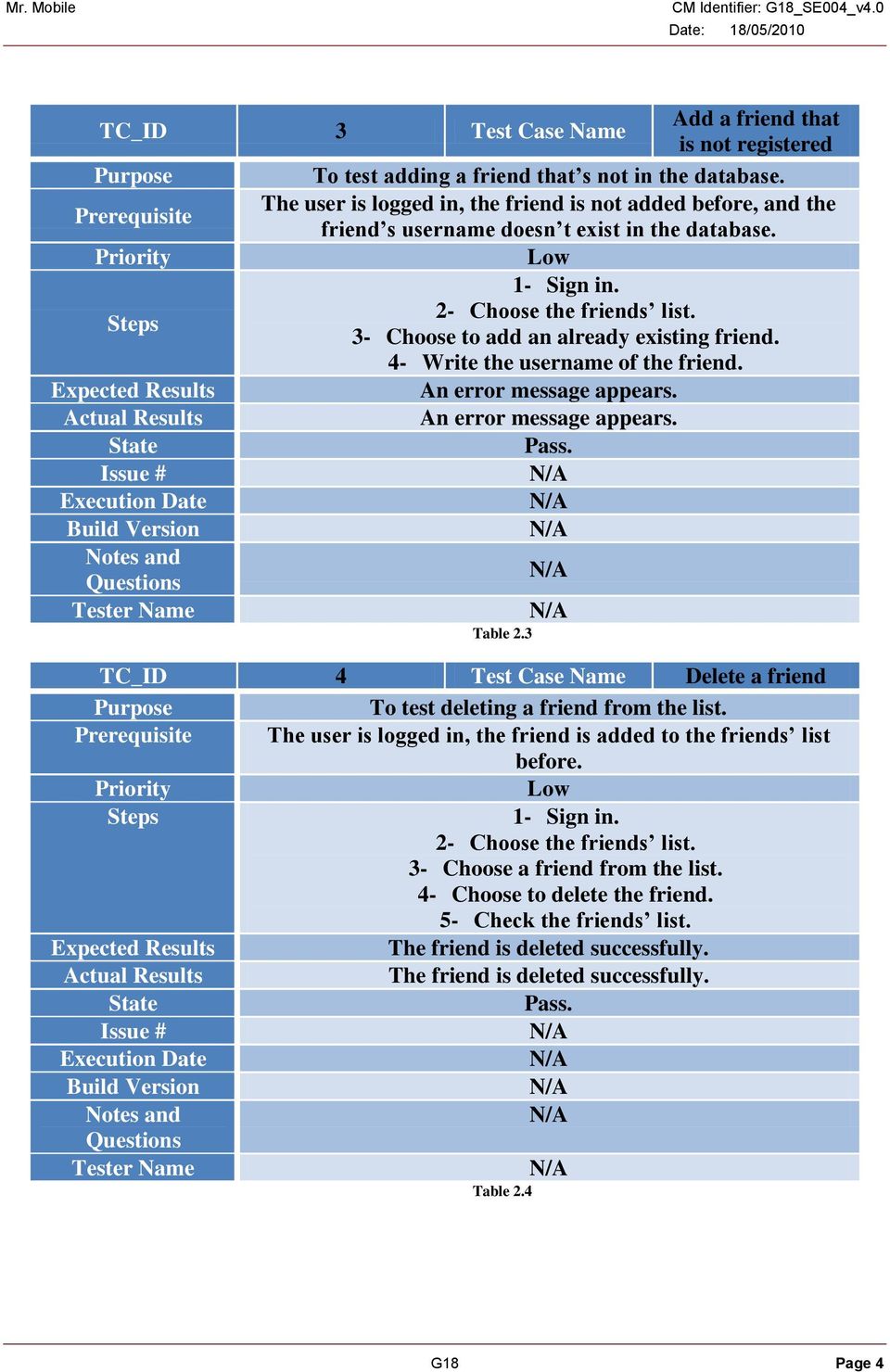
7 TC_ID 3 Test Case Name Add a friend that is not registered To test adding a friend that s not in the database. The user is logged in, the friend is not added before, and the friend s username doesn t exist in the database. Low 1- Sign in. 2- Choose the friends list. 3- Choose to add an already existing friend. 4- Write the username of the friend. Expected Results An error message appears. An error message appears. Table 2.3 TC_ID 4 Test Case Name Delete a friend To test deleting a friend from the list. The user is logged in, the friend is added to the friends list before. Low 1- Sign in. 2- Choose the friends list. 3- Choose a friend from the list. 4- Choose to delete the friend. 5- Check the friends list. Expected Results The friend is deleted successfully. The friend is deleted successfully. Table 2.4 G18 Page 4
8 TC_ID 5 Test Case Name Enable sharing with a friend To test sharing data with a friend that exist in the friends list. The user is logged in, the friend is added to the friends list before. Low 1- Sign in. 2- Choose the friends list. 3- Choose a friend from the list. 4- Choose to share data with the friend. Expected Results Data sharing is enabled successfully. Data sharing is enabled successfully. Table 2.5 TC_ID 6 Test Case Name Disable sharing with a friend To test to disable sharing data with a friend that exist in the friends list. The user is logged in, the friend is added to the friends list before. Low. 1- Sign in. 2- Choose the friends list. 3- Choose a friend from the list. 4- Choose not to share data with the friend. Expected Results Data sharing is disabled successfully. Data sharing is disabled successfully. Table 2.6 G18 Page 5

9 TC_ID 7 Test Case Name Verify an existing account To test the verification of an existing username and password. High. 1- The user enters a valid username. 2- The user enters a valid password. Expected Results Account is verified successfully. Account is verified successfully. Table 2.7 TC_ID 8 Test Case Name Verify an existing account with invalid username To test the verification of an invalid username and a valid password. High. 1- The user enters an invalid username. 2- The user enters a valid password. Expected Results A message appears saying Username doesn t exist.. A message appears saying Username doesn t exist.. Table 2.8 G18 Page 6

10 TC_ID 9 Test Case Name Verify an existing account with invalid password To test the verification of a valid username and an invalid password. High. 1- The user enters a valid username. 2- The user enters an invalid password. Expected Results A message appears saying Invalid Password.. A message appears saying Invalid Password.. Table 2.9 TC_ID 10 Test Case Name Restore password via username To test if the user can restore his lost password successfully. The user is already registered to our system, and is not logged in. Low. 1- The user chooses to restore his lost password. 2- The user enters his username. Expected Results A message appears saying The new password sent to the mail successfully.. A message appears saying The new password sent to the mail successfully.. Table 2.10 G18 Page 7

11 TC_ID 11 Test Case Name Restore password via To test if the user can restore his lost password successfully. The user is already registered to our system, and is not logged in. Low. 1- The user chooses to restore his lost password. 2- The user enters his . Expected Results A message appears saying The new password sent to the mail successfully.. A message appears saying The new password sent to the mail successfully.. Table 2.11 TC_ID 12 Test Case Name Grab facebook contacts To test if the user can add his facebook contacts to his contact list. The user is already registered to our system, is logged in, and has a facebook account. Low. 1- The user signs in. 2- Chooses to grab facebook contacts. 3- Enters facebook username and password. 4- Views his contact list. Expected Results The contact list is updated successfully. The contact list is updated successfully. Table 2.12 G18 Page 8

12 TC_ID 13 Test Case Name Grab facebook contacts with wrong account info To test if the user can add his facebook contacts to his contact list if he enters invalid facebook account info. The user is already registered to our system, is logged in, and has a facebook account. Low. 1- The user signs in. 2- Chooses to grab facebook contacts. 3- Enters invalid facebook username or password. Expected Results A message appears saying Facebook account doesn t exist.. A message appears saying Facebook account doesn t exist.. Table 2.13 TC_ID 14 Test Case Name Grab facebook contacts with wrong account info To test if the user can add his facebook contacts to his contact list if he enters invalid facebook account info. The user is already registered to our system, is logged in, and has a facebook account. Low. 1- The user signs in. 2- Chooses to grab facebook contacts. 3- Enters invalid facebook username or password. Expected Results A message appears saying Facebook account doesn t exist.. A message appears saying Facebook account doesn t exist.. Table 2.14 G18 Page 9

13 TC_ID 15 Test Case Name Grab facebook contacts with wrong account info To test if the user can add his facebook contacts to his contact list if he enters invalid facebook account info. The user is already registered to our system, is logged in, and has a facebook account. Low. 1- The user signs in. 2- Chooses to grab facebook contacts. 3- Enters invalid facebook username or password. Expected Results A message appears saying Facebook account doesn t exist.. A message appears saying Facebook account doesn t exist.. Table 2.15 TC_ID 16 Test Case Name Register a new account To make sure that a new user could register if he specifies all the required data. That Mr. Mobile website is working and the user goes from the homepage to the registration page correctly. Low. 1- Open Mr. Mobile website. 2- Go to registration page. 3- Insert all required data for registration. 4- Click the register button to complete the registration. Expected Results The new Mr. Mobile is registered and to transfer to the homepage of the registered users. It s Supposed that the new user is registered and he/she became a Mr. Mobile user. G18 Page 10

14 Table 2.16 TC_ID 17 Test Case Name Register a new account with an existing username To make sure that a new user couldn t register if he/she specifies an existing username That Mr. Mobile website is working and the user goes from the homepage to the registration page correctly. Low. 1- Open Mr. Mobile website. 2- Go to registration page. 3- Insert valid data except that the username already exists. 4- Click the register button to complete the registration. An exception about the existing username appears in the Expected Results screen to the new user that he/she should choose another valid username. An exception about the existing username appears in the screen to the new user that he/she should choose another valid username. Table 2.17 G18 Page 11

15 TC_ID 18 Test Case Name Register a new account with an already used E- mail To make sure that a new user couldn t register if he/she specifies an existing . That Mr. Mobile website is working and the user goes from the homepage to the registration page correctly. Low. 1- Open Mr. Mobile website. 2- Go to registration page. 3- Insert valid data except an already used Click the register button to complete the registration. An exception about the existing address appears in the Expected Results screen to the new user that he/she should choose another valid . An exception about the existing address appears in the screen to the new user that he/she should choose another valid . Table 2.18 G18 Page 12

16 TC_ID 19 Test Case Name Register a new account with mismatching passwords To make sure that a new user couldn t register if he/she specifies two different passwords. That Mr. Mobile website is working and the user goes from the homepage to the registration page correctly. Low. 1- Open Mr. Mobile website. 2- Go to the registration page. 3- Insert valid data except inserting mismatching passwords. 4- Click the register button to complete the registration process. An exception that he/she wrote two mismatching passwords Expected Results appears in the screen to the new user that he/she should retype their password. An exception that he/she wrote two mismatching passwords appears in the screen to the new user that he/she should retype their password. Table 2.19 G18 Page 13

17 TC_ID 20 Test Case Name Register a new account with an invalid phone number To make sure that a new user couldn t register if he/she specifies an invalid telephone number. That Mr. Mobile website is working and the user goes from the homepage to the registration page correctly. Low. 1- Open Mr. Mobile website. 2- Go to the registration page. 3- Insert valid data except a valid phone number. 4- Click the register button to complete the registration process. An exception about the invalid telephone number appears in Expected Results the screen to the new user that he/she should choose a valid telephone number. An exception about the invalid telephone number appears in the screen to the new user that he/she should choose a valid telephone number. Table 2.20 G18 Page 14

18 TC_ID 21 Test Case Name Register a new account without filling all required data To make sure that a new user couldn t register if he/she specifies some missing data. That Mr. Mobile website is working and the user goes from the homepage to the registration page correctly. Low. 1- Open Mr. Mobile website. 2- Go to the registration page. 3- Insert valid data except that some of them are missing. 4- Click the register button to complete the registration process. An exception about the missing required data appears in the Expected Results screen to the new user that he/she should fill all the required data. An exception about the missing required data appears in the screen to the new user that he/she should fill all the required data. Table 2.21 G18 Page 15

19 TC_ID 22 Test Case Name Add a new contact To make sure that registered Mr. Mobile users can add new contacts to their backup. That Mr. Mobile website is working and the user can login and then he/she could go to the add contact page. High. 1- Open Mr. Mobile website. 2- Login to Mr. Mobile. 3- Go to manage contacts page. 4- Insert a valid contact name and number. 5- Click submit. Expected Results The new contact is now added for this user and he/she could use the new contact as it already exists on their backup. The new contact is now added for this user and he/she could use the new contact as it already exists on their backup. Table 2.22 G18 Page 16

20 TC_ID 23 Test Case Name Add a new contact with an existing contact name To make sure that registered Mr. Mobile users couldn t add new contacts to their backup if the contact name is already added. That Mr. Mobile website is working and the user can login and then he/she could go to the add contact page. High. 1- Open Mr. Mobile website. 2- Login to Mr. Mobile. 3- Go to manage contacts page. 4- Insert an existing contact name and a valid number. 5- Click submit. An exception about the existing contact name appears in the Expected Results screen to the new user that he/she should change their contact name and insert a new contact name that doesn t exist in their contacts. An exception about the existing contact name appears in the screen to the new user that he/she should change their contact name and insert a new contact name that doesn t exist in their contacts. Table 2.23 G18 Page 17

21 TC_ID 24 Test Case Name Add a new contact with an invalid number To make sure that registered Mr. Mobile users couldn t add new contacts to their backup if the contact number is invalid. That Mr. Mobile website is working and the user can login and then he/she could go to the add contact page. High. 1- Open Mr. Mobile website. 2- Login to Mr. Mobile. 3- Go the manage contacts page. 4- Insert a valid contact name and an invalid number. 5- Click submit. An exception about the invalid contact number appears in the Expected Results screen to the new user that he/she should change their contact number and insert a valid contact number. An exception about the invalid contact number appears in the screen to the new user that he/she should change their contact number and insert a valid contact number. Table 2.24 G18 Page 18
22 TC_ID 25 Test Case Name Sign in To make sure that an existing user could sign in and enjoy all Mr. Mobile features. That Mr. Mobile website is working. High. 1- Open Mr. Mobile. 2- Enter a valid username and password. 3- Click sign in. Expected Results The user is redirected to a new homepage where he/she can enjoy all Mr. Mobile features The user is redirected to a new homepage where he/she can enjoy all Mr. Mobile features Table 2.25 G18 Page 19
23 TC_ID 26 Test Case Name Delete account To make sure that deleted accounts is really deleted and the deleted user couldn t login again to Mr. Mobile with the deleted user. That Mr. Mobile website is working and the user could go to delete page through his account. Low. 1- Open Mr. Mobile website. 2- Login to Mr. Mobile. 3- Go to edit account page. 4- Click delete account. 5- Confirms account deletion using the password. 6- Try to login to Mr. Mobile using the deleted account. Expected Results The user wouldn t be able to Login to Mr. Mobile using the deleted username. The user wouldn t be able to Login to Mr. Mobile using the deleted username. Table 2.26 G18 Page 20
24 TC_ID 27 Test Case Name Delete account using an invalid password To make sure that user couldn t delete his/her account if they inserted an invalid password. That Mr. Mobile website is working and the user could go to delete page through his account. Low. 1- Go to Mr. Mobile website. 2- Login to Mr. Mobile. 3- Go to edit account page. 4- Click delete account. 5- Confirm account deletion using an invalid password. An exception about the invalid password appears in the screen Expected Results to the new user that he/she should retype their password to confirm deletion. An exception about the invalid password appears in the screen to the new user that he/she should retype their password to confirm deletion. Table 2.27 G18 Page 21
25 TC_ID 28 Test Case Name Delete contact To make sure that user could delete his contacts. That Mr. Mobile website is working and the user could go to Manage contacts page through his account. Low. 1- Open Mr. Mobile website. 2- Login to Mr. Mobile. 3- Go to manage contacts page. 4- Select a contact. 5- Click delete contact. 6- View contacts list. Expected Results The loaded contacts from the database don t have the deleted contact. The loaded contacts from the database don t have the deleted contact. Table 2.28 G18 Page 22
26 TC_ID 29 Test Case Name Expected Results Edit account information To make sure that user could edit his info after he/she logins to Mr. Mobile. Mr. Mobile website is working and user could login and go to edit account s info page. High. 1- Open Mr. Mobile website. 2- Login to Mr. Mobile. 3- Go to edit account page. 4- Edit all required data to be modified. 5- Click submit. 6- Check the user s info after editing. The user s info has changed to the new desired data. The user s info has changed to the new desired data. Table 2.29 G18 Page 23
27 TC_ID 30 Test Case Name Edit account info using an existing username To make sure that when user want to changes his/her username he/she should enter a new username. Mr. Mobile website is working and user could login and go to edit account s info page. High. 1- Open Mr. Mobile website. 2- Login to Mr. Mobile. 3- Go to edit account page. 4- Edit all required data to be modified while inserting an existing username. 5- Click submit. An exception should appear on the screen that the new desired Expected Results username already exists and user should change it to a one that doesn t exist in the database. An exception should appear on the screen that the new desired username already exists and user should change it to a one that doesn t exist in the database. Table 2.30 G18 Page 24
28 TC_ID 31 Test Case Name Edit account info with an invalid telephone number To make sure that when user want to changes his/her telephone number then he/she should enter a valid telephone number. Mr. Mobile website is working and user could login and go to edit account s info page. High. 1- Open Mr. Mobile website. 2- Login to Mr. Mobile. 3- Go to edit account page. 4- Edit all required data to be modified while inserting an invalid telephone number. 5- Click submit. An exception should appear on the screen that the new desired Expected Results telephone number is invalid and user should change it to a valid one. An exception should appear on the screen that the new desired telephone number is invalid and user should change it to a valid one. Table 2.31 G18 Page 25
29 TC_ID 32 Test Case Name Edit account info with mismatching passwords To make sure that when user want to changes his/her telephone number then he/she should enter a valid telephone number. Mr. Mobile website is working and user could login and go to edit account s info page. High. 1- Open Mr. Mobile website. 2- Login to Mr. Mobile. 3- Go to edit account page. 4- Edit all required data to be modified while typing mismatching passwords. 5- Click submit. An exception should appear on the screen that the two Expected Results passwords are mismatching, and user should write a new password. An exception should appear on the screen that the two passwords are mismatching, and user should write a new password. Table 2.32 G18 Page 26
30 TC_ID 33 Test Case Name Edit contact To make sure that user could edit his contact name and number. That Mr. Mobile website is working and the user could go to Manage contacts page through his account. Low. 1- Open Mr. Mobile website. 2- Login to Mr. Mobile. 3- Go to manage contacts page. 4- Select a contact to edit. 5- Edit the contact through changing its name or number. 6- Click submit. Expected Results The contact should be edited to the new values. The contact should be edited to the new values. Table 2.33 G18 Page 27
31 TC_ID 34 Test Case Name Edit contact using an existing contact name To make sure that user couldn t change his/her contact name until this name doesn t exist in his/her contacts names. That Mr. Mobile website is working and the user could go to Manage contacts page through his account. Low. 1- Open Mr. Mobile website. 2- Login to Mr. Mobile. 3- Go to manage contacts page. 4- Select a contact to edit. 5- Edit the contact through changing its name to an existing contact name. 6- Click submit. Expected Results An exception should appear on the screen that this contact s name already exists in the user s backup. An exception should appear on the screen that this contact s name already exists in the user s backup. Table 2.34 G18 Page 28
32 TC_ID 35 Test Case Name Edit contact with an invalid number To make sure that user couldn t change his/her contact number until this new number is valid. That Mr. Mobile website is working and the user could go to Manage contacts page through his account. Low. 1- Open Mr. Mobile website. 2- Login to Mr. Mobile. 3- Go to manage contacts page. 4- Select a contact to edit. 5- Edit the contact by entering an invalid number. 6- Click submit. Expected Results An exception should appear on the screen that this new contact s number is invalid. An exception should appear on the screen that this new contact s number is invalid. Table 2.35 G18 Page 29
33 Data Testing External Data Testing Web Interface We will test that the data that the user enters in the web forms is a valid data and applicable in our database. We will test that the data going out of our website to other websites (e.g.: Facebook) is valid and can be used by the other website. We will test that the data coming in to our website from other websites is valid and can be used by our website and database Mobile Interface We will test the data that the user needs to backup on his mobile phone to see if it can be backed up on our database or not. We will test if the data entered by the user during logging in and adding other contacts using his mobile phone is valid before sending them on to our web server to save the cost of the redundant web usage Internal Data Testing We will test the validity of the data before it enters the database to avoid any problems that may face us in the database. We will test the encryption of the personal information of all the users along with the usernames and passwords to ensure maximum security of the user s privacy User Testing We will test the easiness of usage of the mobile application by a user that s not familiar with the program, where he should be able to backup the contacts with four clicks or less. We will test the easiness of usage of the website by a user that s not familiar with the interface of the web application, where he should be able to use any of the features of the website in five steps or less. We will test the easiness of the registering process by a user that wishes to sign up to Mr. Mobile in less than three clicks. G18 Page 30
34 Non-functional (Systems Requirements) Testing Performance Testing Merging contacts We will test merging a thousand contacts with the user s contact list successfully without too much loading of the program and within less than two minutes Backing up contacts We will test backing up a thousand contacts successfully without too much loading of the program and within less than five minutes Synchronizing We will test synchronizing a hundred contacts between the mobile contact list and the database contact list successfully in less than one minute Stress loading on website and database We will test stress loading on website and database where there will be a hundred users using the program or the website to backup or retrieve their data on the database successfully and without any failure from the website or the database Quality Testing Correctness We will test whether our functional and non-functional specifications are fully or partially satisfied, and if some of them are not satisfied, we will start an issue about them in the Issue Tracking Tool Efficiency We will test the different resources that the mobile and web application use, and try to bring them to a minimum level. For example, validating the data on the mobile phone to eliminate the redundant connectivity to the internet Flexibility We have designed Mr. Mobile to be very tolerant to change, if we want to add any new feature or remove any useless feature, we will only add or remove a class without any other changes in the code. We will test this by adding a dummy feature to the system then removing it. G18 Page 31
35 Security We will test the system for security where it should ensure the maximum security possible, and we will test the level of encryption for the personal information of the user as well as his username and password Interoperability We have designed Mr. Mobile to be easily integrated with any other system, like facebook, and we will test the integration of Mr. Mobile with the different systems that serves our application Maintainability We will test the maintainability of Mr. Mobile by releasing an alpha version of the application to our friends and family members, where they can locate the different bugs they find, and we will measure the efforts needed to fix those different bugs Portability We will test the portability of the mobile application by trying it on different models of different makes of mobile phones. We will also test the portability of the website by trying it on different web servers that can serve our purpose Reliability We will test the reliability of the system by exposing it to a very painful stress testing until the system reaches its limits or we get bored from trying Usability We will test the usability of the system as mentioned above, by testing the easiness of usage of the web application and the mobile application Interface Testing As mentioned above, we will test the easiness of using the mobile application and the web application, by making a user who is not familiar with the interface use the program and he should be able to use any of the features of the mobile or web application in five steps or less Phases of Testing Customize and complete the Test Phase Chart to reflect the test phases and approach for the project. G18 Page 32
36 Test Phase Chart Test Phases Unit Integration System Acceptance X Phase Objective To test units of code that are considered complete. To ensure that aggregates of units perform accurately together. To ensure that the system performs according to documented requirements and the customer s expectations To ensure that the completed system performs according to documented requirements and the customer s expectations. To Focus Correctness of specific functionality of a unit and its input, outputs, and primary and fault handling. Correctness of the aggregate with regard to its associated requirements. Correctness of the system and that it conforms to stated requirements. Correctness of all functionality of the system. Correct-ness of Test Types/ Subtypes Functional (lowlevel), Data, Performance, Integrity/Securit y, Interface. Functional, Data, Performance, Reliability, Integrity/Securit y, Interface, Usability. Functional, Data, Performance, Reliability, Integrity/Securit y, Interface, Usability. Functional, Data, Performance, Reliability, Integrity/Securit y, Interface, Usability. Staffing Development Team (author of a unit should not be the tester) Test Team, independent of the development team (member of the integration test team should not perform revisions to code he is testing). Test Team, independent of the development team (member of the system test team should not perform revisions to code he is testing). Customers or end users, can be lead by testers independent of the development team (member of the acceptance test team should not perform revisions to code he is testing). G18 Page 33
37 Test Phases Unit Integration System Acceptance X Phase Environment Development. Should be performed in an environment segregated from development and controlled by a group independent of the development team. Should be performed in an environment segregated from development and controlled by a group independent of the development team. Should be performed in an environment segregated from development and controlled by a group independent of the development team Should be identical to the product-ion environment or as close as possible.... Entry Criteria Code complete Test plan approved Unit test procedure and scenarios approved Unit test data approved. Code complete Test plan approved Unit test successful Integration test procedure and scenarios approved Integration test data approved Integration test exit criteria, including allowable errors and functional discrepancies, specified. Code and documentation baselined Test plan approved Integration test successful System test procedure and scenarios approved System test data approved System test exit criteria, including allowable errors and functional discrepancies, specified Unit and Integration test reports complete Requirements Traceability Matrix complete User documentation complete Test Readiness Review minutes complete. Code and documentation baselined Test plan approved Integration test successful Acceptance test procedure and scenarios approved Acceptance test data approved Acceptance test exit criteria, including allowable errors and functional discrepancies, specified Unit, Integration, and System test reports complete. G18 Page 34
38 Test Phases Unit Integration System Acceptance X Phase Suspension Criteria Environment Issues Design rework Development rework Requirements changes. Unit development not complete Unit test not complete, unsuccessful, or inadequate Environment issues Design rework Development rework Requirement changes Defects encountered > X Fault with major feature that prevents significant functionality from being tested. Environment issues Design rework Development rework Requirement changes Defects encountered > X Installation problems Fault with major feature that prevents significant functionality from being tested. Environment issues Design rework Development rework Requirement changes Defects encountered > X Installation problems Fault with major feature that prevents significant functionality from being tested. Exit Criteria Test logs approved Unit test scenarios passed Unit is baselined. Test logs approved Allowable errors and functional discrepancies Allowable errors and functional discrepancies do not exceed thresholds. Test logs approved Allowable errors and functional discrepancies do not exceed thresholds System is baselined Test logs approved Stakeholder acceptance 3. Test Schedule We have agreed-upon the testing plan along with the duration of each component of testing, as follows: 3.1. Component Testing This type of testing is scheduled to take about one day System testing This type of testing is scheduled to take about three days, it is divided into two subcategories: G18 Page 35
39 Integration Testing This type is scheduled to take about two days Release Testing This type is scheduled to take about one day Smoke and Stress Testing These types of testing is scheduled to take the rest of days available before the project delivery day. 4. Test Monitoring and Reporting 4.1. Monitoring 4.2. Reporting 5. References The first milestone we reaches was when we made our first successful build. The second milestone was reached when we added the backup contacts feature. The third milestone was reached when we added the grab facebook contacts feature. We discovered that we were reaching some milestones that we didn t even think of and that indicated a high success rate of implementing. We used the reporting bugs and testing tool available on our SVN server which is established on Google Code and it provides us with all the tools that we needed along the software cycle. Mr. Mobile SRS document. Mr. Mobile SDS document. Dr. Sayed Hemayed lectures notes. G18 Page 36
Functional Test Plan Template
 Functional Test Plan Template Introduction: How to Use This Tool This tool is intended to be used as an aid in creating a functional test plan. An application s functional test plan defines how functional
Software Requirements Specification
 METU DEPARTMENT OF COMPUTER ENGINEERING Software Requirements Specification SNMP Agent & Network Simulator Mustafa İlhan Osman Tahsin Berktaş Mehmet Elgin Akpınar 05.12.2010 Table of Contents 1. Introduction...
Xopero Backup Build your private cloud backup environment. Getting started
 Xopero Backup Build your private cloud backup environment Getting started 07.05.2015 List of contents Introduction... 2 Get Management Center... 2 Setup Xopero to work... 3 Change the admin password...
Getting Started ONLINE APPLICATION. Access the online certification application system
 Online Application This instruction guide is for currently certified firms seeking renewal and firms applying for the first time. The information presented is drawn from example scenarios and may not exactly
Presentation: 1.1 Introduction to Software Testing
 Software Testing M1: Introduction to Software Testing 1.1 What is Software Testing? 1.2 Need for Software Testing 1.3 Testing Fundamentals M2: Introduction to Testing Techniques 2.1 Static Testing 2.2
PROJECT MANAGEMENT SYSTEM
 Requirement Analysis Document v.2 14.12.2009 CENG-401 SOFTWARE ENGINEER PROJECT MANAGEMENT SYSTEM (Project Manager) Ahmet Edip SEÇKİN 07010555 (Developer) Erhan ŞEN 07010507 (Developer) Semih Serdar CENGİZOĞLU
User Guide For Event Registration System (ERS)
 User Guide For Event Registration System (ERS) Contents CONTENTS... 1 GETTING STARTED GUIDE... 2 ACCESSING ERS... 3 SSO LOGIN... 3 PIN LOGIN... 3 LOGIN NOTICE PAGE... 4 CONFIGURATION OPTIONS... 4 CREATING
How to setup Backup Anywhere on your local PC
 This document provides the basic step-by-step process on how to setup Backup Anywhere on your local PC. Please note: This software will not back up your data if your computer is switched off, in hibernation
Chapter 8 Software Testing
 Chapter 8 Software Testing Summary 1 Topics covered Development testing Test-driven development Release testing User testing 2 Program testing Testing is intended to show that a program does what it is
Contents. Summary. Site Address. Account Management MISSOURI DEPARTMENT OF INSURANCE, FINANCIAL INSTITUTIONS AND PROFESSIONAL REGISTRATION
 Contents Summary... 1 Site Address... 1 Account Management... 1 Account Registration... 2 Registration Process... 2 Contact Information Updates... 2 Reporting... 3 Product Liability Form... 4 Product Liability
U.S. Cellular Mobile Data Security. User Guide Version 00.01
 U.S. Cellular Mobile Data Security User Guide Version 00.01 Table of Contents Install U.S. Cellular Mobile Data Security...3 Activate U.S. Cellular Mobile Data Security...3 Main Interface...3 Checkup...4
How Board Members and State Employees Utilize the Security Portal to Access PDMP. July 30, 2014 Version 2 Software Release Version 3.4.
 How Board Members and State Employees Utilize the Security Portal to Access PDMP July 30, 2014 Version 2 Software Release Version 3.4.11 Table of Contents How to Access PDMP via the ADPH Security Portal...
How To Use Gps Navigator On A Mobile Phone
 Software Requirements Specification Amazing Lunch Indicator Sarah Geagea 881024-4940 Sheng Zhang 850820-4735 Niclas Sahlin 880314-5658 Faegheh Hasibi 870625-5166 Farhan Hameed 851007-9695 Elmira Rafiyan
Frequently Asked Questions
 What is MyEChart? Frequently Asked Questions MyEChart is Skagit Regional Clinics secure patient portal. It gives you tools to efficiently communicate with your health care provider s office, including
How to Get Set Up for the 2014 BE-180 and Request an Extension if Needed
 How to Get Set Up for the 2014 BE-180 and Request an Extension if Needed For instructions on how to get set up for the 2014 BE-180 and to request an extension if one is needed, click on one of the links
User manual for the visitors of Interreg Danube Programme website
 User manual for the visitors of Interreg Danube Programme website Table of contents National contact points... 2 Newsletter subscription... 2 Subscribe... 2 Unsubscribe... 2 Forum... 2 Approved projects...
Software Requirements Specification
 CSL740 Software Engineering Course, IIT Delhi Software Requirements Specification Submitted By Abhishek Srivastava (2011EEY7511) Anil Kumar (2009CS10180) Jagjeet Singh Dhaliwal (2008CS50212) Ierum Shanaya
Single Sign On: Volunteer Connection Support Tree for Administrators Release 2.0
 Single Sign On: Volunteer Connection Support Tree for Administrators Release 2.0 Updated 2/24/2016 Page 1 Single Sign On Volunteer Connection Support Tree for Administrators Purpose General Information
To create User who have already been registered with OCR and have received Registration Number can follow the following steps.
 3 Post Registration 3.1 Create User To create User who have already been registered with OCR and have received Registration Number can follow the following steps. Figure 50: Link for new User Registration
Table of Contents. Changing Your Password in Windows NT p. 1. Changing Your Password in Alpha Connection.. pp. 1-3
 Table of Contents Changing Your Password in Windows NT p. 1 Changing Your Password in Alpha Connection.. pp. 1-3 Not Able to Get Outlook Express Mail Because Alpha Connection Password Expires... pp. 3-4
Software Requirement Specification for Web Based Integrated Development Environment. DEVCLOUD Web Based Integrated Development Environment.
 Software Requirement Specification for Web Based Integrated Development Environment DEVCLOUD Web Based Integrated Development Environment TinTin Alican Güçlükol Anıl Paçacı Meriç Taze Serbay Arslanhan
Evolved Backup Features Computer Box 220 5th Ave South Clinton, IA 52732 www.thecomputerbox.com 563-243-0016
 Evolved Backup Features 1 Contents 3 Introduction 3 Ease-of-Use Simple Installation Automatic Backup Off-Site Storage Scalability File Restoration 24/7 6 Security File Compression Encryption Transmission
Software Requirements Specification. Web Library Management System
 Software Requirements Specification For Web Library Management System Version x.xx Prepared by Proposed to Software Requirements Specification for WLMS Page
WEB BASED Access Control/Time Attendance Software Manual V 1.0
 WEB BASED Access Control/Time Attendance Software Manual V 1.0 2007/12/26 CONTENT 1. First Login...3 2. Terminal Setup...3 2.1 Add Terminal...4 2.2 Delete Terminal...5 2.3 Modify Terminal...5 2.4 List
Backup Assistant. Product Description. Screenshots. Using the Application
 Backup Assistant Product Description Backup Assistant is a wireless service that saves a copy of your phone's address book to a secure web site. If your phone is lost, stolen or damaged, Backup Assistant
Sticky Password 7. Sticky Password 7 is the latest, most advanced, portable, cross platform version of the powerful yet
 Sticky Password 7 Reviewer Guide Introduction Sticky Password 7 is the latest, most advanced, portable, cross platform version of the powerful yet simple password manager and form-filler. Its main goal
How To Use Exhange On Outlook 2007 2007 On A Pc Or Macintosh Outlook 2007 On Your Pc Or Ipad (For Windows Xp) On Your Ipad Or Ipa (For Your Windows Xp). (For A Macintosh) On A
 Configure Microsoft Outlook 2007 to use Exchange Email Setting Important 1. Before configure your Microsoft outlook 2007 to use exhange you MUST log into the Web Exchange page to login and change your
Introduction site management software
 Web Testing Introduction Making a web site does not end with putting all the media and software together. Actually, web site work never ends. When all the design is done, you have to test the site first
User Guide Online Backup
 User Guide Online Backup Table of contents Table of contents... 1 Introduction... 2 Adding the Online Backup Service to your Account... 2 Getting Started with the Online Backup Software... 4 Downloading
Section 1: Overture (Yahoo) PPC Conversion Tracking Activation
 PPC Conversion Tracking Setup Guide Version.001 This guide includes instructions for setting up both Overture (Yahoo) and Google (Adwords) Pay Per Click (PPC) conversion tracking in a variety of Reservation
IntelliPay Billpay Application Documentation
 IntelliPay Billpay Application Documentation Contents Billpay Introduction First Time Payment (With username and password) First Time Payment (Without username and password) Returning Customer Introduction:
Follow these easy instructions to list your business on the BEC Australia National Business Directory.
 Follow these easy instructions to list your business on the BEC Australia National Business Directory. Go to www.becaustralia.org.au 1. Click on the Directory tab (see below) 2. Click on the Add listing
Description: The courses will have course details, enroll now link.(refer section: 1)
 Website Theme: Visitors will be able to visit the online profile of the institute. Visitors will be able to view the available courses. Check Fee and apply online by paying the specified fee. Admin will
Banner Self-Service User Support. Set Up an Automatic Payment Plan
 Set Up an Automatic Payment Plan Banner Self-Service You have three options when paying your fees online in Banner Self-Service. You can use Visa, MasterCard or Discover. Set up an automatic payment plan
Broker Registration Guide for TrustFunds Authentication A- B- C Registration Steps 1-2- 3-4
 Broker Registration Guide for TrustFunds Authentication A- B- C Registration Steps 1-2- 3-4 Broker Authentication 1. From the TrustFunds website homepage, click Get Started Now to begin your Authentication
Software Requirements Specification. Online Scheduler for Tutoring Center. for. Version 1.0 approved
 Software Requirements Specification for Online Scheduler for Tutoring Center Version 1.0 approved Prepared by Shehan Rajapakse, Thomas Baird & Sepehr Sobhani University of Mary Washington February 4, 2015
Recruitment Management System (RMS) User Manual
 Recruitment Management System (RMS) User Manual Contents Chapter 1 What is Recruitment Management System (RMS)? 2 Chapter 2 Login/ Logout RMS Chapter 3 Post Jobs Chapter 4 Manage Jobs Chapter 5 Manage
U.S. Bank Secure Mail
 U.S. Bank Secure Mail @ Table of Contents Getting Started 3 Logging into Secure Mail 5 Opening Your Messages 7 Replying to a Message 8 Composing a New Message 8 1750-All Introduction: The use of email
FPT UNIVERSITY. Capstone Project
 MINISTRY OF EDUCATION AND TRAINING FPT UNIVERSITY Capstone Project Online Event Organizing Company Management System Group Group Members Đoàn Minh Thiện 60130 Nguyễn Thanh Thống 60561 Mai Hoàng Trí Anh
Registering in Moodle Dalhousie School of Nursing students
 Registering in Moodle Dalhousie School of Nursing students (Please note that Internet Explorer does not work with our Moodle. Please use Firefox or Chrome.) Moodle is accessible at: https://moodle.usainteanne.ca/?lang=en
Criminal Justice Social Work Community of Practice Subscription, registration and login manual
 Criminal Justice Social Work Community of Practice Subscription, registration and login manual Version: concept 08102014 Introduction Before you can access the Criminal Justice Social Work - Community
Instruction Guide. People First Dependent Certification Process
 People First Dependent Certification Process Each time an employee logs into People First to make an enrollment selection during open enrollment or because of a qualified status change (QSC), he/she must
understanding MyAccount
 understanding MyAccount https://myaccount.fuelbroadband.co.uk Contents 1. How to Log in to MyAccount 2 2. What can you do from the welcome page of MyAccount? 4 3. Understanding My Bill 5 4. My Alerts 7
Installation Instructions for Backup Manager and Cloud Management Console
 Installation Instructions for Backup Manager and Cloud Management Console Installing the software components for Sterling Data Storage (SDS) is quite simple. There are two components that must be installed:
Test Plan Online Book Store Phase-II. Vamsi Krishna Mummaneni
 Test Plan Online Book Store Phase-II Submitted in partial fulfillment of the requirements of the degree of Master of Software Engineering Vamsi Krishna Mummaneni CIS 895 MSE Project Kansas State University
Software Testing. Knowledge Base. Rajat Kumar Bal. Introduction
 Software Testing Rajat Kumar Bal Introduction In India itself, Software industry growth has been phenomenal. IT field has enormously grown in the past 50 years. IT industry in India is expected to touch
Getting Started with StoreGrid Cloud
 Getting Started with StoreGrid Cloud This document describes the steps to quickly sign up and start backing up your data to StoreGrid Cloud. I. Signing Up 1. Go to http://storegridcloud.vembu.com and select
Facility Online Manager
 Facility Online Manager Instruction for users FOM TM is an online accounting and instrument management software. This software can be used as a simple online scheduler for small research group, or as a
How To Backup Your Hard Drive With Pros 4 Technology Online Backup
 Pros 4 Technology Online Backup Features Introduction Computers are the default storage medium for most businesses and virtually all home users. Because portable media is quickly becoming an outdated and
Login/ Logout RMS Employer Login Go to Employer and enter your username and password in the Employer Login section. Click on the LOGIN NOW button.
 Recruitment Management System Version 8 User Guide What is Recruitment Management System (RMS)? Recruitment Management System (RMS) is an online recruitment system which can be accessed by corporate recruiters
Business Application Services Testing
 Business Application Services Testing Curriculum Structure Course name Duration(days) Express 2 Testing Concept and methodologies 3 Introduction to Performance Testing 3 Web Testing 2 QTP 5 SQL 5 Load
Offline Payment Methods
 Offline Payment Methods STRONGVON Tournament Management System 1 Overview The STRONGVON Tournament Management System allows you to collect online registration, while arranging for offline payment methods
The panel. Idea Farm FAQs
 Idea Farm FAQs Here s some information to help you use Idea Farm. The panel What is Idea Farm? Who can become an Idea Farm member? What happens after I join? How do I update my personal details? How do
Simple, Secure User Guide for OpenDrive Drive Application v1.2.0.4 for OS-X Platform 20150501 May 2015
 Simple, Secure User Guide for OpenDrive Drive Application v1.2.0.4 for OS-X Platform 20150501 May 2015 Table of Contents Logging into the Drive Application 4 Log In Sign Up Access the Drive Application
Wakefield Council Secure email and file transfer User guide for customers, partners and agencies
 Wakefield Council Secure email and file transfer User guide for customers, partners and agencies The nature of the work the council carries out means that we often deal with information that is sensitive
STOCK MARKET INVESTMENT FANTASY LEAGUE
 16:332:567 - Software Engineering I STOCK MARKET INVESTMENT FANTASY LEAGUE REPORT 3 Group 6 Jia Ding Nikhila Lavu Pratyusha Nandamuri Vaishnavi Kakumani Zhiyue Wang Date of Submission: 12/14/2011 1 1.
Knowledge Base. Setup GoogleApps Email in Outlook 2007. 19 Pages. Zeumic Pty Ltd. PO Box 44 Kew, VIC Australia 3101
 Knowledge Base Setup GoogleApps Email in Outlook 2007 19 Pages Zeumic Pty Ltd PO Box 44 Kew, VIC Australia 3101 ABN: 62 116 073 459 Email: [email protected] Ph: 03 9018 1615 Web: http://www.zeumic.com.au
FSW QA Testing Levels Definitions
 FSW QA Testing Levels Definitions 1. Overview This document is used to help determine the amount and quality of testing (or its scope) that is planned for or has been performed on a project. This analysis
Software Requirements Specification For Real Estate Web Site
 Software Requirements Specification For Real Estate Web Site Brent Cross 7 February 2011 Page 1 Table of Contents 1. Introduction...3 1.1. Purpose...3 1.2. Scope...3 1.3. Definitions, Acronyms, and Abbreviations...3
Online Bill Pay User Manual
 \ Online Bill Pay User Manual Updated: November 14, 2014 Page 1 Table of Contents I. Welcome to Online Bill Pay... 3 II. New User Registration... 4 III. Login for Registered Users... 7 IV. Home Page Functionality...
NTI CORPORATION. NTI Backup Now EZ v3. User's Guide
 NTI CORPORATION NTI Backup Now EZ v3 NTI Backup Now EZ v3 User's Guide Backup Now EZ v3 User's Guide 2013 NTI Corporation i Table of Contents INTRODUCTION... 3 WELCOME TO NTI BACKUP NOW EZ... 5 OVERVIEW
Junos Pulse for Google Android
 Junos Pulse for Google Android User Guide Release 4.0 October 2012 R1 Copyright 2012, Juniper Networks, Inc. Juniper Networks, Junos, Steel-Belted Radius, NetScreen, and ScreenOS are registered trademarks
Voice Mail Online User Guide
 Voice Mail Online User Guide Overview Welcome to the online version of SaskTel Voice Mail that is now accessible from any computer with Internet access You can listen to, sort, forward and/or delete your
CSc 230 Software System Engineering FINAL REPORT. Project Management System. Prof.: Doan Nguyen. Submitted By: Parita Shah Ajinkya Ladkhedkar
 CSc 230 Software System Engineering FINAL REPORT Project Management System Prof.: Doan Nguyen Submitted By: Parita Shah Ajinkya Ladkhedkar Spring 2015 1 Table of Content Title Page No 1. Customer Statement
OAuth Web Authorization Protocol Barry Leiba
 www.computer.org/internet computing OAuth Web Authorization Protocol Barry Leiba Vol. 16, No. 1 January/February, 2012 This material is presented to ensure timely dissemination of scholarly and technical
Single Sign On: Volunteer User Guide
 Single Sign On: Volunteer User Guide V3.0 Document Owner: Pathways Project Issue Date: 11-Jun-15 Purpose of the Document The Single Sign On (SSO) User Guide has been developed to provide users with instructions
SVA Backup Plus Features
 1221 John Q. Hammons Drive Madison, WI 53717 P.O. Box 44966, Madison, WI 53717 P: 608.826.2400 TF: 800.366.9091 F: 608.831.4243 www.sva.com Introduction Computers are the default storage medium for most
EACEA. Call for experts. - Instructions for ECAS account creation -
 EACEA Call for experts - Instructions for ECAS account creation - Version 1, August 2013 1 Introduction The European Commission Authentication Service (ECAS) is the system that validates the identity of
EASTPOINTE SECURE E MAIL SYSTEM SETUP INSTRUCTIONS
 EASTPOINTE SECURE E MAIL SYSTEM SETUP INSTRUCTIONS In order to send and receive protected health information (PHI) on consumers between Eastpointe and your provider agency you will need to do the following.
ISTQB Certified Tester. Foundation Level. Sample Exam 1
 ISTQB Certified Tester Foundation Level Version 2015 American Copyright Notice This document may be copied in its entirety, or extracts made, if the source is acknowledged. #1 When test cases are designed
The Social Accelerator Setup Guide
 The Social Accelerator Setup Guide Welcome! Welcome to the Social Accelerator setup guide. This guide covers 2 ways to setup SA. Most likely, you will want to use the easy setup wizard. In that case, you
SMTPSWITCH MAILER V6 FEATURES
 SMTPSWITCH MAILER V6 FEATURES 22 Powerful Features Packed in a Single Email Marketing/Bulk Mailing Program! Easy and Advanced WYSIWYG/HTML Editing SMTPSwitch Mailer has a powerful built-in WYSIWYG editor
Welcome to HomeTown Bank s Secure E-mail! User Guide
 Welcome to HomeTown Bank s Secure E-mail! User Guide To access the secure email message center, click the Secure Email link on the www.htbmn.com main web page. Select whether you are a new user of the
Online Services Booking. Booking Appointments & Purchasing Gifts
 Online Services Booking Booking Appointments & Purchasing Gifts Logging In for Online Booking New Guest Registration If the client is a first time visitor to your business and would like to book an appointment
PaperClip. em4 Cloud Client. Setup Guide
 PaperClip em4 Cloud Client Setup Guide Copyright Information Copyright 2014, PaperClip Inc. - The PaperClip32 product name and PaperClip Logo are registered trademarks of PaperClip Inc. All brand and product
PaperClip. em4 Cloud Client. Manual Setup Guide
 PaperClip em4 Cloud Client Manual Setup Guide Copyright Information Copyright 2014, PaperClip Inc. - The PaperClip32 product name and PaperClip Logo are registered trademarks of PaperClip Inc. All brand
Active Directory Self-Service FAQ
 Active Directory Self-Service FAQ General Information: [email protected] Online Support: [email protected] CionSystems Inc. Mailing Address: 16625 Redmond Way, Ste M106 Redmond, WA. 98052 http://www.cionsystems.com
GUIDELINE FOR PME 35 ONLINE BOOKING SYSTEM
 GUIDELINE FOR PME 35 ONLINE BOOKING SYSTEM INDEX VERIFICATION OF REGISTRATION... 2 ACCOMMODATION RESERVATION... 6 TRANSFER RESERVATION... 9 PRE POST TOUR RESERVATIONS... 12 GUIDELINE FOR PAYMENTS... 15
OPTAC Fleet Viewer. Instruction Manual
 OPTAC Fleet Viewer Instruction Manual Stoneridge Limited Claverhouse Industrial Park Dundee DD4 9UB Help-line Telephone Number: 0870 887 9256 E-Mail: [email protected] Document version 4.0 Part Number:
Software Requirements Specification
 Software Requirements Specification Project Name: DocPlus Project Members: Dorothy Mtaty Justin Esau Abstract: This Software Requirements Specification (SRS) describes the system requirements, and system
INTRODUCTION... 2 FEATURES... 2 CONFIGURING THE PATIENT PORTAL... 2 GETTING STARTED... 4 APPROVAL... 8 UPLOAD... 10 PROFILE... 11 CHK.CONN...
 Contents INTRODUCTION... 2 FEATURES... 2 CONFIGURING THE PATIENT PORTAL... 2 GETTING STARTED... 4 SETTINGS... 4 PATIENT ACCESS CONTROL... 4 DEMOGRAPHICS AND FORMS... 5 MAIL... 6 ONLINE PAYMENT CONFIGURATION...
Visitors to our website The LCTHF website collects information about each visitor in several ways. These may include:
 Privacy Policy The Lewis and Clark Trail Heritage Foundation, here after referred to as the LCTHF, is committed to respecting and protecting your privacy. This privacy policy governs our collection and
Cloudfinder for Office 365 User Guide. November 2013
 1 Contents Getting started with Cloudfinder for Office 365 1... 3 Sign up New Cloudfinder user... 3 Sign up Existing Cloudfinder user... 4 Setting the Admin Impersonation... 4 Initial backup... 7 Inside
4. Backup Assistant will ask you to verify the PIN you assigned to your account, and will remind you to record your PIN for future use.
 How to Use Guide: Backup Assistant Backup Assistant is a wireless service that saves a copy of your phone's address book to a secure web site. If your phone is lost, stolen or damaged, Backup Assistant
NovaBACKUP. Storage Server. NovaStor / May 2011
 NovaBACKUP Storage Server NovaStor / May 2011 2011 NovaStor, all rights reserved. All trademarks are the property of their respective owners. Features and specifications are subject to change without notice.
Seagate Manager. User Guide. For Use With Your FreeAgent TM Drive. Seagate Manager User Guide for Use With Your FreeAgent Drive 1
 Seagate Manager User Guide For Use With Your FreeAgent TM Drive Seagate Manager User Guide for Use With Your FreeAgent Drive 1 Seagate Manager User Guide for Use With Your FreeAgent Drive Revision 1 2008
Overview. Benefits for the Business Owner. For more information, refer to Appendix A, Client Data Review.
 SHARING QUICKBOOKS DATA WITH YOUR ACCOUNTANT One feature that truly sets QuickBooks apart from other business accounting software is the ease and flexibility of sharing a copy of the data between the business
USER MANUAL FOR ONLINE REGISTRATION & CHOICE FILLING
 USER MANUAL FOR ONLINE REGISTRATION & CHOICE FILLING NEW CANDIDATE REGISTRATION REGISTERED USER LOGIN FORGOT PASSWORD CHOICE AVAILABLE CHOICE SUBMISSION CHOICE INTERCHANGE DELETION OF MULTIPLE CHOICES
GO!Enterprise MDM Device Application User Guide Installation and Configuration for BlackBerry
 GO!Enterprise MDM Device Application User Guide Installation and Configuration for BlackBerry GO!Enterprise MDM Version 4.11.x GO!Enterprise MDM for BlackBerry 1 Table of Contents GO!Enterprise MDM for
Access to McDermott Supplier Registration System
 Access to McDermott Supplier Registration System McDermott supplier registration system can be access at McDermott s home page at http://www.mcdermott.com under Suppliers link or you can directly access
7. In the boxed unlabeled field, enter the last 4 digits of your Social Security number.
 CREATE YOUR MYVIEW LOGIN To access myview while ensuring security, you will be given an encrypted access key token. You will use this token the first time you log into myview. Once you have successfully
Windows 7 Backup & Restore Guide
 Windows 7 Backup & Restore Guide Quick Links Creating a Backup click here Restoring a Backup click here Introduction The most common component of a computer to fail is the hard drive. This also happens
Welcome to Zoho, your online productivity and collaboration suite of
 In This Chapter Chapter 1 Getting Started with Zoho The Zoho advantage: Why it s right for so many people Signing up for Zoho Finding out about the Zoho apps covered in this book Welcome to Zoho, your
Transitioning Your School Email Account
 Transitioning Your School Email Account This tutorial will walk you through transferring the email and other data from your School account to a personal email account. Establish a New Email Address (or
eztechdirect Backup Service Features
 eztechdirect Backup Service Features Introduction Portable media is quickly becoming an outdated and expensive method for safeguarding important data, so it is essential to secure critical business assets