
LIN-Basic Workshop. Speaker: Andreas Lipowsky Lipowsky Industrie-Elektronik GmbH
|
|
|
- Charity Fields
- 10 years ago
- Views:
Transcription

1 LIN-Basic Workshop Speaker: Andreas Lipowsky Lipowsky Industrie-Elektronik GmbH Folie-1

2 Home of Baby-LIN Lipowsky Industrie-Elektronik GmbH located in Darmstadt, Germany develops and produces microcontroller based electronics for industrial and automotive applications since 1986, when it was founded by Andreas Lipowsky. Lipowsky Industrie-Elektronik is an owner managed, financial independant enterprise. We are ISO9001:2008 certified and develop and produce our products completely in Germany. Our vision is to supply economically priced, customer friendly products with top quality and high user benefit. Since 2002 we are engaged in the LIN bus and since 2007 we are member of the LIN Consortium. After product launch in 2007, we sold over 5000 Baby-LIN Systeme so far. Lipowsky Industrie-Elektronik, your one stop shop for standard LIN-tools and custom specific LIN applications. Including special solutions like EOL applications and durability tests. Folie-3

3 Fields of business Own Brand products Baby-LIN CAN-Spy HARP Embedded Development ARM7/ARM9 ARM Cortex CAN / LIN Ethernet Interbus-S Profi-Bus OEM-Produkte Industrial Controller Software Server & PC Windows & Linux Production Trough Hole and SMT products Folie-4


4 where you can find us. Besides our Baby-LIN tools, which we promote under our own name, we also produce industrial control systems for several customers, typically with their name on the box. Selected customer references: Folie-5


5 Why a bus system in a vehicle? Older vehicles Only a few elictical and electronic components Each device was supplied by a seperate cable, which also was used to activate/deactivate the device (lights/wiper etc.) The operation was done directly by a switch in the cars dashboard or by a relais. A cable had to run from every device to the central dash board. The cabled needed to be dimensioned correctly, so it could carry the needed supply current. Folie-6


6 Why a bus system in a vehicle Older vehicles Only a few components Every device controlled by an own wire. Today Increasing number of electrical and electronic components ínstalled in the vehcle Units are intelligent and can integrate multiple functions in one device. The wiring consists of a common supply line (Vbat/GND) and a bus line. The board computer can access every single or multiple devices over the bus line Folie-7

7 Advantages bus system Advantages of the bus wiring in the vehicle Reduced cabling effort Cost and weight reduction, as less cable and smaller wire diameter can be used. The device can interchange data, so additonal sensors can be omitted, or devices can implement new functions by using data from the bus, thus can be simpler in their own hardware. Application with multiple similar nodes can be solved with one standard part, because final setup and addressing can be handled at the final location (vehicle), thus reducing number of spare parts. Consequences To participate the bus system a component needs a specific own intelligence and the capability to support the bus protocol of the bus connected. Typically this make the components more complex as in former times. LIN-Bus is one of the main bus systems used in vehicles. Other bus systems are CAN, MOST and Flexray. Folie-8

8 LIN-Basics Master LIN Slave1 1 Wire Bus (+ Gnd and Vbat) Master / Slave Concept One Master only. Master arbitrates the bus Bus speed Bit/s Often you will found several LIN buses in a vehicle. E.g. every door in car might have it s own LIN Bus, additional busses for climatic control or seat adjustment might exist. Slave2 Slave3 Folie-9

9 LIN Basics Data transfer on the LIN bus Smallest unit is a frame, which is composed of the following elements Break, sync, frame identifier, data bytes (1...8) and checksum Break, sync, frame identfier (Header) are always transmitted by the master The data bytes are supplied by the master or by one of the slaves, depending on whether the master or a slave had been defined to be the publisher of the frame. The assignment of the frames to the nodes is defined in the LIN description file (LDF). Each frame (frame identifier) is assigned a node as a publisher. Folie-10

10 LIN description file LDF - Lin Description File Format and syntax of the LDF (LinDescriptionFile) had been defined in the LIN specification, which had been released by the LIN Consortium. Thus the LDF specification does not depend from a single supplier. Each Lin bus in a vehicle has it s own LDF. This LDF defines all charcteristics of this specific bus in one place. Which nodes exist on that bus? Which frames exist on that bus (Identifier, number of data bytes, publisher)? Which signals does a specific frame carry? (Mapping) Sequence of appearance of the frames on the bus (Schedule Table)? How can the raw signal values be translates into physical units resp. other meanings (Signal Encoding)? Example Byte value vehicle speed means vehicle speed = value * 2 [km/h] 254 means signal not available 255 means signal erroneous Folie-11

11 Sample LDF file Folie-12 Ldf header Node section Signal section Frame section Schedule table Signal encoding section Encoding to signal mapping LIN_description_file ; LIN_protocol_version = "1.3" ; LIN_language_version = "1.3" ; LIN_speed = kbps ; Nodes { Master:MasterECU, ms, ms ; Slaves:Slave1Motor,Slave2Sensor; } Signals { MessageCounter:8,0x00,MasterECU,Slave1Motor,Slave2Sensor; Ignition:1,0x0,MasterECU,Slave1Motor,Slave2Sensor; WiperSpeed:3,0x0,MasterECU,Slave1Motor; WiperActive:1,0x0,Slave1Motor,MasterECU; ParkPosition:1,0x0,Slave1Motor,MasterECU; CycleCounter:16,0x00,Slave1Motor,MasterECU; StatusSensor:8,0x00,Slave2Sensor,MasterECU; ValueSensor:8,0x00,Slave2Sensor,MasterECU; } Frames { MasterCmd:0x10,MasterECU,4{ MessageCounter,0; Ignition,8; WiperSpeed,9; } MotorFrame:0x20,Slave1Motor,4{ WiperActive,0; ParkPosition,1; CycleCounter,16; } SensorFrame:0x30,Slave2Sensor,2{ StatusSensor,0; ValueSensor,8; } } Schedule_tables { Table1 { MasterCmd delay ms ; MotorFrame delay ms ; SensorFrame delay ms ; } } Signal_encoding_types { EncodingSpeed { logical_value,0x00,"off" ; logical_value,0x01,"speed1" ; logical_value,0x02,"speed2" ; logical_value,0x03,"interval" ; } } Signal_representation { EncodingSpeed:WiperSpeed;

12 LIN application frames LDF definition: MasterECU = Master Slave1Motor = Slave (Wiper motor) Frame with ID 0x10 has 4 daten bytes Publisher = MasterECU (Master) Databyte1.bit message counter Databyte2.bit 0 IgnitionOn (Klemme15) Databyte2.bit wiper speed Frame mit ID 0x20 has 4 data bytes, Publisher = Slave1Motor Databyte1.bit 0 wiper active Databyte1.bit 1 park position Databyte2.bit CycleCounter LSB Databyte2.bit CycleCounter MSB Frame mit ID 0x30 has 2 data bytes Publisher = Slave2Sensor Databyte1 Databyte2 StatusSensor ValueSensor Break Sync Identifier Databyte1 Databyte2 Databyte3 Databyte4 CheckSum Break Sync Identifier Databyte1 Databyte2 CheckSum Databyte3 Databyte4 Break Sync Identifier Databyte1 Databyte2 CheckSum ID=0x10 ID=0x20 ID=0x30 With the information given in the LDF, all frames appearing on the bus can be recognized regarding their publisher and can be interpreted in terms of the signals carried by them.. Nearly all frames, because there are some special frames.. Folie-13
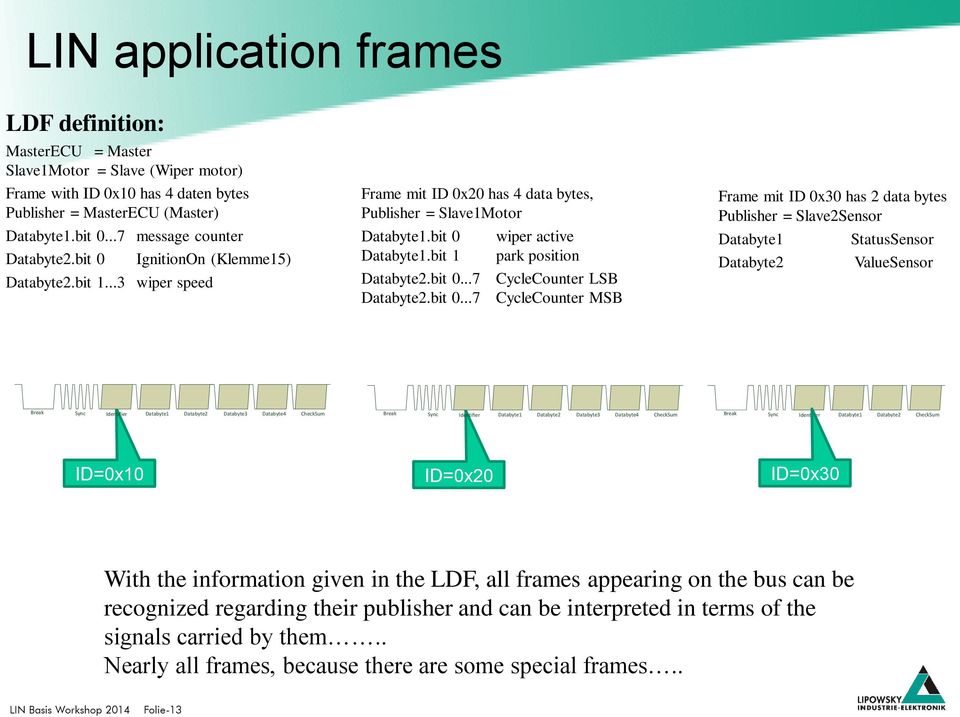
13 LIN application frames LDF definition: MasterECU = Master Slave1Motor = Slave (Wiper motor) Frame with ID 0x10 has 4 daten bytes Publisher = MasterECU (Master) Databyte1.bit message counter Databyte2.bit 0 IgnitionOn (Klemme15) Databyte2.bit wiper speed Frame mit ID 0x20 has 4 data bytes, Publisher = Slave1Motor Databyte1.bit 0 wiper active Databyte1.bit 1 park position Databyte2.bit CycleCounter LSB Databyte2.bit CycleCounter MSB Frame mit ID 0x30 has 2 data bytes Publisher = Slave2Sensor Databyte1 Databyte2 StatusSensor ValueSensor Break Sync Identifier Databyte1 Databyte2 Databyte3 Databyte4 CheckSum Break Sync Identifier Databyte1 Databyte2 CheckSum Databyte3 Databyte4 Break Sync Identifier Databyte1 Databyte2 CheckSum ID=0x10 ID=0x20 ID=0x30 With the information given in the LDF, all frames appearing on the bus can be recognized regarding their publisher and can be interpreted in terms of the signals carried by them.. Nearly all frames, because there are some special frames.. Folie-14

14 LIN diagnostic frames Request data published by the master, defines the node and the action, which should be carried out. Response data of the slave node, which had been addressed by the previous master request. Break Sync Identifier Databyte1 Databyte2 Databyte3 Databyte4 Databyte5 Databyte6 Databyte7 Databyte8 CheckSum ID=0x3c MasterRequest ID=0x3D SlaveResponse Specific characteristics of Master Request and Slave Response frames These frames always have 8 data bytes and they always use the classic checksum. The content of these frame is not fixed, dependant of the content of the master frame, a specific slave node will answer. The content of the answer also depends on the data in the MasterRequest frame. Request and Response data can be composed of more than 8 bytes. In this case the diagnostic transport layer (Cooked Mode) is used to tranfer the data by multiple frames. Folie-15

15 LIN on top protocols Using the MasterRequest - SlaveResponse mechanism, various data can be exchanged. In practice, there exist a lot of different protocols, which vary dependant of the vehicle or ECU manufacturer. Proprietary EOL protocols DTL based protocols (Diagnostic Transport Layer) Other protocols typically implemented on top of DTL: Keyword 2000 protocol (ISO bis 4) UDS (Unified diagnostic services) (ISO :2006) These protocols are not part of the LDF LDF only describes the both frames 0x3c (MasterRequest) and SlaveRespone (0x3d), which are used to transport the data. More details about diagnostic frames and protocols are presented on day 2 of the LIN bus workshop Folie-16

16 Starting point Baby-LIN user LDF Given task: Run LIN-node for Functional test Durability test Software validation Presentation Production, EOL (End of Line) Folie-17

17 Starting point Baby-LIN user LDF Operation with diagnostic frames. Solution uses SDF and API based control (PC/Baby- LIN-DLL) or customized firmware developed by Lipowsky (Baby-LIN-MB) Given task: Run LIN-node for Functional test Durability test Software evaluation Presentation Production, EOL (End of Line) Operation with application frames. Solution uses SDF configuration only and runs on Baby-LIN,- RC,-RM in stand alone mode. Folie-18

18 Workflow Baby-LIN application LDF Signal selection Lin-Bus Hardware User- Interface Folie-19

19 LINWorks components LDF LINWorks LDF- Editor LDF-Editor: Inspect LDF Create LDF Edit LDF Session-Configurator: Which nodes to simulate? LINWorks SimpleMenu SDF LINWorks Session- Configurator Which signals to display? Define events and actions Define signal functions Definition of user interface in case there is any. Baby-Lin DLL USB Own Applikation Baby-LIN Folie-20

20 LINWorks Session Configurator LDF Lin Description File Nodes Signals Frames Signalmap Schedule Nodes Define the nodes to be simulated by Baby-LIN Signal functions Automatic signal changes (e.g. message counter) Checksum / CRC generation in real time Virtual Signals Add own signals to use in simulation. e.g. loop counter. Add System Variables (special virtual signals) to access specific target functionality e.g. Timer, I/O ressources Macros A sequence of signal changes and other bus actions. Simple Menu Editor Configuration of the SimpleMenu desk top with signal monitors, signal editors and buttons to start macro execution or to allow Macroselections. Events/Actions Define conditions (frame, signal), which will fire specific actions. e.g. change a signal dependant on the state of another signal, or set signal to specific value, when a key is pressed, or start and stop the bus etc. SDF Session Description File Keeps all information needed for a simulation session Folie-21


21 LINWorks SessionConf Minimal setup: Load LDF Define Emulation Setup Folie-22

22 LINWorks SessionConf SimpleMenu Items (optional) Save as SDF V2 format And the first SDF is created! If your device already supports SDF V3 format, you also can save in SDFV3 format! Folie-23

23 LINWorks Simple Menu Step 4: Start Simulation Step 1: Start SimpleMenu Step 2: Connect to device LIN-Bus is running! View signals in real time Step 3: Load SDF File Edit signals in real time Frame monitor with timestamp and checksum version (1.x/2.x) Folie-24
24 LINWorks Simple Menu Start, Stop, Wakeup and Sleep command. Restart to start bus without setting signals to their LDF default values Select or Deselect nodes for simulation dynamicaly Configure signal monitors and signal editors Folie-25
25 More LIN details Master LIN ID Slave1 DB0 DB1 Eventtriggered frames UCF ETF status status Eventtriggered frames were introduced to save bus bandwidth. 4 slave nodes in the doors to monitor the window lifter control buttons. Every node will have a unconditional frame definition (UCF) to publish its button state, and it has a second event triggered frame definition (ETF) to publish the same framedata with a second frame Id. UCF will be published every time its requested by master ETF will only be published, if Slave has new data UCF ETF ID Slave2 DB0 DB status status UCF / ETF have identical data and first Byte is not mapped Slave3 2 possibilites to poll slave button states. ID DB0 DB1 Reading UCF-Frame (works allways) Read ETF-Frame, this can result in no answer, one answer, multiple answers (collision case) UCF ETF status status So practical Eventtriggered Frames are slave frames with mulitple possible publishers Slave4 Using ETF will be faster, because in one schedule slot, multiple slaves can be monitored. But. UCF ID DB0 DB status Folie-26 ETF status

26 More LIN details The advantage of saving bus bandwidth with the ETF is payed with a possible collision on the bus, if 2 or more slaves have new data, when the ETF frame Id is put on the bus by the master. Master recognizes collisions due to the invalidated checksum In Lin 1.3/2.0 the collision resolution is defined without collision table. So the schedule slot of the ETF will be used subsequently for all UCF s belonging to this ETF. Then the master returns to the ETF in that schedule slot again. No Answer 1 Answer Collision Switching to UCF frames in ETF slot Folie-27

27 More LIN details No Answer With LIN specification V.2.1 an additional collision resolution scheme was implemented. 1 Answer The Collision schedule. With this new resolution scheme the Master will switch to a specific collision resolution schedule table, were typically all UCF defintions of the ETF are included. That means that after detection of the collision, the master execute the collision table and will get much faster the data of all frames involved in that collision. Collision Executing Collision Table Folie-28
28 More LIN Details Sporadic frames A similar concept as with Eventtriggered frames, but in the other direction. A sporadic frame is like a place holder for two or more unconditional frames, which are puplished by the master This place holder can be used in a schedule table. When the scheduling comes to the sporadic frame, the master will only send that frame for which there had been supplied new information from the application. If no frame has new data, the schedule slot for the sporadic frame will be silent, no Frame header and no frame data will be put on the bus. As the sporadic frames are used for the master only, and there is only one master this can not cause collision as with the event triggered frames. So there is no special requirement for collision resolution. Folie-29

29 LINWorks Details Exploring the sections of LINWorks SessionConfigurator This will be done with a live demonstration Folie-30
30 Session Conf Signal functions When Baby-LIN is used to replace Lin bus master, it needs to generate the frames and signals in the same way, as they would come from the real bus master (e.b. board computer) In real application, there may exist signals, which needs special treatment. E.g. message counter signals can be found in some frames. They are incremented each time the frame is send. When they reach their maximum value, they wrap over to zero.during a simulation such a behaviour must be implement automatically. This can be done by the signal functions. Folie-31

31 LINWorks Details Signal Funktions CRC Folie-32

32 Session Conf Virtual Signals Virtual signals can be used to create signals not available on the bus, but usable in macros or events. Example creating a Cycle counter by monitoring the park position signal. Folie-33
33 SessionConf - Systemvariables Special Virtual Signals => Sytemvariables There are some reserved names (resp. name prefixes), which will give a Virtual Signal a special behavior. Actually there are the following special @@SYSTTIMER_RTC_HOUR will assign a up counter, which will start counting, if its value is unequal zero and count to a maximum value of The counting timer tick will be 1 second. will assign a down timer, which will count until its value will we zero. The counting timer tick will be 1 second. same as SYSTIMER_UP, but the timer tick is 10 ms. same as SYSTIMER_DOWN, but the timer tick is 10 ms. this is the hour value of a real time expression composed from the 3 variables hours : minutes : this is the minute value of a real time expression composed from the 3 variables hours : minutes : this is the second minute value of a real time expression composed from the 3 variables hours : minutes : seconds. Folie-34
34 SessionConf - Systemvariables Sytemvariables for i/o 4 give access to the digital inputs of the Baby-LIN-RM give access to the digital outputs of the Baby-LIN-RM allow to create PWM output signals on up to 4 digital outputs. The variable value can be between 0 100[%] and defines the ON/OFF time ratio. this variable defines the base frequency for PWM outputs, which can be set between 1 and 500 Hz the inputs DIN7 (@@SYSPWMIN1) and DIN8 (@@SYSPWMIN2) are supported as PWM input This systemvariable allows to adjust the fullscale value for the PWMIN1/2 variables to a value different from the default value 00. x and can be used with the new ONCHANGE Event. So you can map a digital input signal to a LIN-Bus signal by the definition of a single event! Don t mix digital I/O control by the old Digital Out Action and Sysvariable based output control in the same SDF! Folie-35

35 Session Conf - Macros Macros can be used to define multiple signals definitions to be executed in a sequence. Folie-36

36 SessionConf Macro Selection Macro Selection Sometimes it can be helpful to be able to select between multiple macros. Example 3 Macros defined to control Wiper run mode Macro Park Macro Speed1 Macro Speed 2 Grouping these macros together into a macro selection,which can be used in the SimpleMenu configuration or in an event action. Folie-37

37 SessionConf channel specific options Channel specific options Dependend on selected channel or target device there might be additional options: Folie-38

38 LIN Workshop exercise 1 Goal: Working with Simple Menu Create an SDF from LDF for steering wheel button unit Configure Simple Menu to show button states. Allow adjustment of backlight by editable signal entry in Simple Menu section. Folie-39

39 LIN Workshop exercise 2 Goal: Add click counter for 2 buttons and a Start button for LIN Bus Hints: Macro to start bus Virtual Signals to implement counter Events to trigger key actions Folie-40
40 LIN Workshop exercise 3 Goal: Add automatic backlight turn on/turn off. The backlight should switch on with every key The backlight should switch off after 5 seconds with no key press Hints: Events to trigger key actions SYSTIMER_UP for timing control Folie-41
41 LIN Workshop exercise 4 Goal: Creating a stand alone application Use Keyboard of Baby-LIN-RC to adjust backlight level. F1 button to decrease intensity F2 key to increase intensity F5 key to set minimum (Off) F6 key to set maximum (100%) Hint: Definition of 4 Events to trigger key actions Define Macro to start bus Standalone specials: => Autostart Macro (to start bus) => Check checkboxbox persistent storage Load into Baby-LIN Set Target configuration Autostart Macro Only Disconnect / Reconnect Baby-LIN it will run Folie-42

42 LIN Workshop exercise 4 After configuring the events for the keys Some additional things are necessary for stand alone operation Make the configuration persistent, so it s stored in the the Baby-LIN target Set the target configuration to Autostart, for a SDF V2 device this is done in Simple Menu. For a SDF V3 device this can also be done in Session Configurator Folie-43
43 LinWorks What we have learned Creating a SDF from a LDF Adding macros, events etc. Using virtual signals. System variables - special version of virtual signals - Up-Down timer, - handling of digital inputs and outputs via signals - more details in Baby-LIN-Sysvariable-Feature.pdf Creating a SDF for Standalone operation SimpleMenu Baby-LIN Target configuration Folie-44
44 Baby-LIN DLL C#/C/C++ application Visual Basic application SDF Baby-Lin DLL The supplied DLL, allows for access of the LIN-bus from own PC-programs in real time. This is supported for several program development environments. Program examples are available for C/C++, C#, VB-Net, VB6, Labview etc. A special API für the Diagnostic Transport Layer allows for implementation of higher protocols. Labview etc. Folie-45
45 Baby-LIN DLL Baby-LIN DLL offers API with a lot of functions. The most important and most used ones are: BL_open(unsigned int port); to open a Baby-LIN connection BL_loadSDF(BL_HANDLE handle, const char* filename, int download); to load a SDF into DLL & Baby-LIN BL_sendCommand(BL_HANDLE handle, const char* command); send a semicolon terminated command to Baby-LIN. BL_close (BL_HANDLE handle); closes a baby-lin connection Complete details given in BabyLINDLL.chm Folie-46
46 Baby-LIN DLL Most important commands to be used in BL_sendCommand( ) start schedule setsig dissignal disframe Start Lin Bus set Schedule Set signal value Enable signal reporting for the given signal. The given signal number is the signal index within the section. Enable frame reporting for the given frame The given frame number is the frame index within the section. Complete details given in BabyLINDLL.chm Folie-47
47 Baby-LIN DLL Baby-LIN DLL is a C DLL. To ease integration into VB or C# programs additonal wrapper DLL s are supplied, For Labview some sample VI s exist, The DLL also offers a complete API to use the Diagnostic Transport Layer (DTL). More about that on day2 of this workshop Doing a sample C Application to run a SDF on Baby-LIN and monitor signals Folie-48
48 LIN diagnostic frames Request data publihed by the master, defines the node and the action, which should be carried out. Response data of the slave node, which had been addressed by the previous master request. Break Sync Identifier Databyte1 Databyte2 Databyte3 Databyte4 Databyte5 Databyte6 Databyte7 Databyte8 CheckSum ID=0x3c MasterRequest ID=0x3D SlaveResponse Specific charsterictics of Master Request and Slave Response frames These frames always have 8 data bytes and they always use the classic checksum. The content of these frame is not fixed, dependant of the content of the master frame, a specific slave node will answer. The content of the answer also depends on the data in the MasterRequest frame. Request and Response data can be composed of more than 8 bytes. In this case the diagnostic transport layer (Cooked Mode) is used to tranfer the data by multiple frames. Folie-49
49 LIN Diagnostic All diagnostic operation rely on the both frames Master Request and Slave Respone So you typically should have at least one schedule in your LDF s schedule table holding a MasterRequest (0x3C) and SlaveRespone (0x3D) frame Inspecting a running Diag Schedule. Only 0x3d frames visible! => Silent Master Request Raw Mode Cooked Mode Folie-50

50 LIN Diag raw mode Diagnostic RAW mode Use Simple Menu to execute Masterrequest Use Macro to send Masterrequest Use LDF schedule entries to execute Master Requests Folie-51

51 LIN Diagnostic Diagnostic cooked mode MasterRequest and Slave response are the transport frames Data object up to 4095 Byte can be tranferred in both directions Folie-52

52 LIN Diagnostic Folie-53

53 Raw/Cooked demonstration Read Standard LIN diagnostic from Steering wheel button Read Serial Use wildcard if NAD, SupplierId, FuncId are unknown Wildcards: Nad = 0x7f, SupplierId 0x7fff Func-Id 0xFFFF Folie-54
54 Raw/Cooked via DLL Cooked mode data transfer can be done with 2 simple function calls int BL_sendDTLRequest (BL_HANDLE handle, unsigned char nad, int length, char * data); BL_getNextDTLResponse (BL_HANDLE handle, BL_dtl_t *frame); There are additional API calls available to get state of transfer Exploring document UM_BabyLIN_DIAG_E.pdf Diagnostic frames are not only used for diagnostic functions, but also for onboard configuration Example Autoadressing Folie-55

55 Diagnostic Frames-Auto-addressing Auto addressing is a important features for applications, where multiple nodes of the same kind are connected to the bus, e.g. actuators for climatic control or Led for interior lightening. Auto addressing is used together with different methods to isolate single nodes from the bus during the auto address sequence The 2 most common methods are Daisy chain method and Shunt method. Both method require a bus wiring with a LIN-IN and a LIN-Out pin. Folie-56

56 Diagnostic Frames-Auto-addressing SNPD Subfunction All nodes enter the unconfigured state Setting NAD of next slave in chain Inform all slaves procedure is finished ID 0x01 0x02 0x04 Folie-57

57 Diagnostic Frames-Auto-addressing One possibilty to implement autoadresing is to use a schedule table with FreeFormat entries. The table can be created by opening the LDF Editor from within the SessionConf. Practical example with LIN-Led. Folie-58
58 Diagnostic UDS UDS is a diagnostic protocol on top of DTL Diagnostic Transport Layer. IT s specified in ISO to define common requirements for diagnostic systems. This protocol model refers to communication between a diagnostic tester (client) and an Electronic Control Unit (ECU,server). The communication primitives are defined as services. To ease implemtation of communication based on UDS the optionpack UDS is realized. The optionpack UDS implements the major part of the services defines in the UDS specification. The services available are divided into 3 groups: Session management Data access Data upload / download Folie-59
59 Diagnostic Services I Session management UDS Service 0x10 Diagnostic Session Control Description Starts a diagnostic session Defines type of diagnostic session, allows defintion of timing paremeter, Tester Present usage 0x27 Security Access Authentication of the tester by a seed/key method Restrict access, May define different security levels Valid only at the activated diagnostic session or communication period 0x11 ECU Reset After checking preconditions restarts the ECU software Reset type may be hard, key-on-off, soft, enable / disable, rapidpowerdown 0x3E Tester Present Keeps communication alive: avoid communication timeout Folie-60
60 Diagnostic Services II Data access UDS Service 0x22 Read Data By Identifier Description Access data by a manufacturer specific data id (16 Bit value) to retrieve it`s value 0x2E Write Data by Identifier Access data by a manufacturer specific data id (16 Bit value) to write ist it s value 0x23 ReadMemory By Address The tester requests a memory address and number of bytes 0x3d Write Memory by Address Tester sends memory address, and number of bytes and a data string (according to the number of bytes ), Data is written to memory 0x2F IOtControlByIdentifier Control stat of outputs, actuators etc. Read state of inputs Folie-61
61 Diagnostic Services III Data upload / download UDS Service 0x34 Request Download Description The tester specifies an address and a length Specifies compressing methods The ECU starts a downloading session (data form ECU to Tester) 0x35 Request Upload The tester specifies an address and a length Specifies compressing methods The ECU starts a upload Session (data from Tester to ECU) 0x36 Transfer Data Transfers the data in chunks, with a sequence number to secure complettness 0x37 Request Transfer Exit Terminates downloading / uploading Folie-62
62 Optionpack UDS The Optionpack UDS has 3 components Additonal DLL on top of Baby-LIN-DLL to implement API to use all services by simple api calls. Extension of SDF file for definitions, which allow for usage of severall UDS services in stand alone operation Expansion of Simple Menu to execute UDS comands interactively. The optionpack is actually under developement. The DLL part will be available in November The SDF based standalone operation will be available until January Folie-63

63 Optionpack UDS Using UDS service 0x22 to read out ID values via Simple Menu Positive Response Negative Response Folie-64
64 Baby-LIN feature matrix Features Linworks compatible Baby-LIN Baby-LIN-RC Baby-LIN-RM-II HARP-4 Baby-LIN-MB Host Interface USB USB USB SDF Import via SD Card SDF Import via USB Stick SDF Format V2 / V3 Yes / No Yes / No Yes / Yes Yes / Yes Yes / No Multi-SDF capable Baby-LIN-RC-Plus Bus interface 1 x LIN 1 x LIN, 1 x LIN, 1 x CAN HS 1 x CAN LS 1 x LIN 1 x CAN HS LIN, CAN-HS, CAN-LS, RS-232 Special features Digital In and outputs Display modular by plugin modules Typical applications PC-Interface PC-Interface and handheld commander PLC-coupling Handheld commander with display PC/PLC coupling via LAN or RS- 232 Folie-65
65 Folie-66
66 Folie-67
67 Differences LIN V.1.x, 2.0, 2.1 and V.2.2 Most important differences: LIN V.2.x main difference is a new checksum calculation scheme (id is included). This is called the enhanced checksum. The LIN V.1.x slaves always use the checksum calculated only over the data bytes (classic checksum) Diagnostic frames (0x3c/ 0x3d) always use the classic checksum LIN V.2.1 introduced the Collision resolution table LIN V.2.1 Assign frame ID configuration service is removed Assign frame ID range configuration service is added Save configuration service is added. LIN V2.2 no functional changes! Only spelling corrections and clarifications has been done Folie-68
Introduction to LIN. Webinar
 Introduction to LIN Webinar V2.2.07 2014-03-03 Agenda > Information 4 Overview 6 LIN Workflow 9 LIN Physical Layer 12 LIN Communication 14 Synchronization of the LIN nodes 16 LIN Message & Scheduling 19
www.imprezer.tk Introduction to www.union88.tk RACE FUELS Hans-Christian von der Wense Munich, Germany
 Introduction to Hans-Christian von der Wense Munich, Germany Overview Progress in Automotive Electronics and it s Impacts on Networking LIN Consortium LIN Concept Physical Layer Data Link Layer LIN Network
LIN (Local Interconnected Network)
 Slide 1 LIN (Local Interconnected Network) Fundamentals of the LIN Protocol Ralf Schwering,, Software Development Engineer Vector Informatik GmbH www.lin-subbus.org -1- Slide 2 Agenda Communication Principle
In-Vehicle Networking
 In-Vehicle Networking SAE Network classification Class A networks Low Speed (
LIN. Specification Package. Revision 2.0. This specification is provided on an "AS IS" basis only and cannot be the basis for any claims.
 LIN Specification Package September 23, 2003; Page 1 LIN Specification Package This specification is provided on an "AS IS" basis only and cannot be the basis for any claims. LIN Consortium, 2003. All
LIN (Local Interconnect Network):
 LIN (Local Interconnect Network): History: LIN (Local Interconnect Network) was developed as cost-effective alternate to CAN protocol. In 1998 a group of companies including Volvo, Motorola, Audi, BMW,
Local Interconnect Network Training. Local Interconnect Network Training. Overview
 Overview Local Interconnect Network Training History and introduction Technical features The ISO/OSI reference model and LIN Frames Message Frames Communication concept of LIN Command Frames and Extended
Software User Guide UG-461
 Software User Guide UG-461 One Technology Way P.O. Box 9106 Norwood, MA 02062-9106, U.S.A. Tel: 781.329.4700 Fax: 781.461.3113 www.analog.com ezlinx icoupler Isolated Interface Development Environment
EBERSPÄCHER ELECTRONICS automotive bus systems. solutions for network analysis
 EBERSPÄCHER ELECTRONICS automotive bus systems solutions for network analysis DRIVING THE MOBILITY OF TOMORROW 2 AUTOmotive bus systems System Overview Analyzing Networks in all Development Phases Control
LOCAL INTERCONNECT NETWORK (LIN)
 54B-1 GROUP 54B LOCAL INTERCONNECT NETWORK (LIN) CONTENTS GENERAL INFORMATION........ 54B-2............ 54B-3 STRUCTURE................... 54B-2 54B-2 LIN refers to "Local Interconnect Network," which
Data Acquisition Module with I2C interface «I2C-FLEXEL» User s Guide
 Data Acquisition Module with I2C interface «I2C-FLEXEL» User s Guide Sensors LCD Real Time Clock/ Calendar DC Motors Buzzer LED dimming Relay control I2C-FLEXEL PS2 Keyboards Servo Motors IR Remote Control
Develop a Dallas 1-Wire Master Using the Z8F1680 Series of MCUs
 Develop a Dallas 1-Wire Master Using the Z8F1680 Series of MCUs AN033101-0412 Abstract This describes how to interface the Dallas 1-Wire bus with Zilog s Z8F1680 Series of MCUs as master devices. The Z8F0880,
PCAN-MicroMod Universal I/O Module with CAN Interface. User Manual. Document version 2.1.0 (2014-01-16)
 PCAN-MicroMod Universal I/O Module with CAN Interface User Manual Document version 2.1.0 (2014-01-16) Products taken into account Product Name Part number Model PCAN-MicroMod IPEH-002080 with firmware
RN-131-PICTAIL & RN-171-PICTAIL Evaluation Boards
 RN-131-PICTAIL & RN-171-PICTAIL Evaluation Boards 2012 Roving Networks. All rights reserved. Version 1.0 9/7/2012 USER MANUAL OVERVIEW The RN-131 and RN-171 WiFly radio modules are complete, standalone
Lab Experiment 1: The LPC 2148 Education Board
 Lab Experiment 1: The LPC 2148 Education Board 1 Introduction The aim of this course ECE 425L is to help you understand and utilize the functionalities of ARM7TDMI LPC2148 microcontroller. To do that,
eztcp Technical Document Modbus/TCP of eztcp Caution: Specifications of this document may be changed without prior notice for improvement.
 eztcp Technical Document Modbus/TCP of eztcp Version 1.3 Caution: Specifications of this document may be changed without prior notice for improvement. Sollae Systems Co., Ltd. http://www.sollae.co.kr Contents
Modbus and ION Technology
 70072-0104-14 TECHNICAL 06/2009 Modbus and ION Technology Modicon Modbus is a communications protocol widely used in process control industries such as manufacturing. PowerLogic ION meters are compatible
Bluetooth in Automotive Applications Lars-Berno Fredriksson, KVASER AB
 Bluetooth in Automotive Applications Lars-Berno Fredriksson, KVASER AB ABSTRACT There is a potential for 50-400 million per year Bluetooth nodes within the car market if Bluetooth can be integrated into
imc BUSDAQ autonomous intelligent synchronized Field bus data acquisition - from stationary to mobile imc productive testing
 imc BUSDAQ autonomous intelligent synchronized Field bus data acquisition - from stationary to mobile imc productive testing www.imc-berlin.com/busdaq imc BUSDAQ/BUSLOG at a glance Processes multiple networks
DeviceNet Communication Manual
 DeviceNet Communication Manual Soft-Starter Series: SSW-07/SSW-08 Language: English Document: 10000046963 / 00 03/2008 Summary ABOUT THIS MANUAL... 5 ABBREVIATIONS AND DEFINITIONS... 5 NUMERICAL REPRESENTATION...
Laboratory Course Industrial Automation. Experiment Nr. 6. Introduction to the FlexRay bus system. Brief User Guide IAS Demonstrator Go-Cart
 Universität Stuttgart Institut für Automatisierungs- und Softwaretechnik Prof. Dr.-Ing. M. Weyrich Laboratory Course Industrial Automation Experiment Nr. 6 Introduction to the FlexRay bus system Brief
The BSN Hardware and Software Platform: Enabling Easy Development of Body Sensor Network Applications
 The BSN Hardware and Software Platform: Enabling Easy Development of Body Sensor Network Applications Joshua Ellul [email protected] Overview Brief introduction to Body Sensor Networks BSN Hardware
ebus Player Quick Start Guide
 ebus Player Quick Start Guide This guide provides you with the information you need to efficiently set up and start using the ebus Player software application to control your GigE Vision or USB3 Vision
Application Note. Introduction AN2471/D 3/2003. PC Master Software Communication Protocol Specification
 Application Note 3/2003 PC Master Software Communication Protocol Specification By Pavel Kania and Michal Hanak S 3 L Applications Engineerings MCSL Roznov pod Radhostem Introduction The purpose of this
Automotive electronics CAN and LIN buses. Copyright 2006 Matrix Multimedia Limited
 Automotive electronics CAN and LIN buses Copyright 2006 atrix ultimedia Limited About this presentation This presentation was developed by John Dobson anaging Director of atrix ultimedia Limited. PowerPoint
About This Guide SolarEdge Configuration Tool Software Guide. About This Guide
 About This Guide 3 About This Guide This user guide is intended for Photovoltaic (PV) system owners, installers, technicians, maintainers, administrators and integrators who are authorized to configure
Nemo 96HD/HD+ MODBUS
 18/12/12 Pagina 1 di 28 MULTIFUNCTION FIRMWARE 2.30 Nemo 96HD/HD+ MODBUS COMMUNICATION PROTOCOL CONTENTS 1.0 ABSTRACT 2.0 DATA MESSAGE DESCRIPTION 2.1 Parameters description 2.2 Data format 2.3 Description
How to read this guide
 How to read this guide The following shows the symbols used in this Quick start guide with descriptions and examples. Symbol Description Example P oint Reference Caution [ ] This symbol explains information
ModBus Server - KNX. Gateway for integration of KNX equipment into Modbus (RTU and TCP) control systems.
 IntesisBox ModBus Server - KNX Gateway for integration of KNX equipment into Modbus (RTU and TCP) control systems. Integrate KNX based lighting control into your SCADA, BMS, PLC "talking" Modbus. Master
EVAL-UFDC-1/UFDC-1M-16
 Evaluation Board for Universal Frequency-to- Digital Converters UFDC-1 and UFDC-1M-16 EVAL-UFDC-1/UFDC-1M-16 FEATURES Full-Featured Evaluation Board for the Universal Frequency-to-Digital Converters UFDC-1
ZME_05459 Wall Blind Control Set for Busch-Jaeger DURO 2000 Firmware Version : 1.8
 ZME_05459 Wall Blind Control Set for Busch-Jaeger DURO 2000 Firmware Version : 1.8 Quick Start A This device is a Z-Wave Actuator. Triple click one of the buttons on the device will include the device.
Microcontroller Based Low Cost Portable PC Mouse and Keyboard Tester
 Leonardo Journal of Sciences ISSN 1583-0233 Issue 20, January-June 2012 p. 31-36 Microcontroller Based Low Cost Portable PC Mouse and Keyboard Tester Ganesh Sunil NHIVEKAR *, and Ravidra Ramchandra MUDHOLKAR
CipherLab 5100 Time Attendance Utility Manual
 CipherLab 5100 Time Attendance Utility Manual K:\Products\Product Technical\BI\BI-PC5100T\CipherLab5100TimeAttendnaceUtilityManual0707-process.doc Page 1 / 13 1 Login A popup form as follows will appear
MBP_MSTR: Modbus Plus Master 12
 Unity Pro MBP_MSTR 33002527 07/2011 MBP_MSTR: Modbus Plus Master 12 Introduction This chapter describes the MBP_MSTR block. What s in this Chapter? This chapter contains the following topics: Topic Page
Hagenberg Linz Steyr Wels. API Application Programming Interface
 Hagenberg Linz Steyr Wels API Application Programming Interface Version 1.1 October 2015 FH OÖ Forschungs & Entwicklungs GmbH Franz-Fritsch-Strasse 11 / Top 3 4600 Wels Austria Research Center Hagenberg
PowerBox PBX 180. Installation and Users Guide
 PowerBox PBX 180 Installation and Users Guide Firmware and Tool Version 060 7/14/2015 Table of Contents Table of Contents 1 Introduction... 4 2 Hardware... 6 3 Software Installation... 7 3.1 Software Installation
Introduction to. LIN (Local Interconnect Network)
 Introduction to LIN (Local Interconnect Network) Stéphane REY Revision 1.0 - ay 13 th, 2003 Table of content 1 INTRODUCTION...3 1.1 PURPOSE OF THE DOCUENT...3 1.2 ACRONYOUS...3 1.3 RELATED DOCUENTS...3
Programming Flash Microcontrollers through the Controller Area Network (CAN) Interface
 Programming Flash Microcontrollers through the Controller Area Network (CAN) Interface Application te Programming Flash Microcontrollers through the Controller Area Network (CAN) Interface Abstract This
Appendix B RCS11 Remote Communications
 Appendix B RCS11 Remote Communications B.1 Host Computer Remote Communications Control and status messages are conveyed between the RCS11 and the host computer using packetized message blocks in accordance
DeviceNet Bus Software Help for Programming an Allen Bradley Control System
 FBP FieldBusPlug V7 DeviceNet Bus Software Help for Programming an Allen Bradley Control System DeviceNet Software Help for Programming an Allen Bradley Control System Contents Page General Purpose...
M68EVB908QL4 Development Board for Motorola MC68HC908QL4
 M68EVB908QL4 Development Board for Motorola MC68HC908QL4! Axiom Manufacturing 2813 Industrial Lane Garland, TX 75041 Email: [email protected] Web: http://www.axman.com! CONTENTS CAUTIONARY NOTES...3 TERMINOLOGY...3
Master-Touch and ValuMass. Modbus Communications. INSTRUCTION MANUAL 80202201 (Rev. 2.1)
 Master-Touch and ValuMass Modbus Communications INSTRUCTION MANUAL 80202201 (Rev. 2.1) Eldridge Products, Inc. 2700 Garden Road, Building A Monterey, CA 93940 Tel: 800/321-3569 or 831/648-7777 Fax: 831/648-7780
SUDT AccessPort TM Advanced Terminal / Monitor / Debugger Version 1.37 User Manual
 SUDT AccessPort TM Advanced Terminal / Monitor / Debugger Version 1.37 User Manual Version 1.0 - January 20, 2015 CHANGE HISTORY Version Date Description of Changes 1.0 January 20, 2015 Initial Publication
LOCAL INTERCONNECT NETWORK (LIN)
 54C-1 GROUP 54C LOCAL INTERCONNECT NETWORK (LIN) CONTENTS GENERAL INFORMATION...54C-2 SPECIAL TOOL...54C-3...54C-4 DIAGNOSTIC FUNCTION...54C-4 DIAGNOSTIC TROUBLE CODE CHART...54C-6 DIAGNOSTIC TROUBLE CODE
BIT COMMANDER. Serial RS232 / RS485 to Ethernet Converter
 BIT COMMANDER Serial RS232 / RS485 to Ethernet Converter (Part US2000A) Copyrights U.S. Converters 1 Contents Overview and Features... 3 Functions..5 TCP Server Mode... 5 Httpd Client Mode.5 TCP Auto mode....6
Standardized software components will help in mastering the. software should be developed for FlexRay were presented at
 Embedded Software for FlexRay Systems Special aspects and benefits of implementing modularized software Standardized software components will help in mastering the growing complexity of the interplay of
Gigabyte Management Console User s Guide (For ASPEED AST 2400 Chipset)
 Gigabyte Management Console User s Guide (For ASPEED AST 2400 Chipset) Version: 1.4 Table of Contents Using Your Gigabyte Management Console... 3 Gigabyte Management Console Key Features and Functions...
NEW. EVEN MORE data acquisition and test stand automation
 NEW EVEN MORE data acquisition and test stand automation the new class of data The plug&play complete package User benefits Expert Series is the latest generation of data acquisition Complete hardware
1 How configure S7 PLC in the configuration tool
 Quick Start Rev Date File Name Industrial Ethernet communication with Siemens S7-300 and S7-400 PLCs 1.1 29/01/07 QuickStart_IndusEthernet comm with Siemens S7-300 and S7-400 PLC Description Product concerned:
VisorALARM-Manager Application Quick Guide. (Ver. 1.3) Dm 380-I. V:3.0
 VisorALARM-Manager Application Quick Guide. (Ver. 1.3) Dm 380-I. V:3.0 1. Installation Requirements 1.1. PC Pentium III processor or higher. Minimum RAM memory: 128 Mbytes Operating system: Windows XP
Dolphin In-Circuit programming Updating Firmware in the field
 Dolphin In-Circuit programming Updating Firmware in the field 1 Introduction In systems e.g. gateways, where an external microcontroller is connected to a Dolphin based product like a TCM300 it might be
Modbus and ION Technology
 Modbus and ION Technology Modicon Modbus is a communications protocol widely used in process control industries such as manufacturing. ACCESS meters are compatible with Modbus networks as both slaves and
K-line Communication Description
 K-line Communication Description Introduction There are two primary ISO documents that describe how to perform OBD communications on K- line between a tester and a vehicle. There are actually several ISO
PYRODIGITAL CONSULTANTS PD Firing Module Continuity Reader
 Firmware Version 2.03 Page 1 of 22 1 Features... 5 2 Warning!... 6 3 Intended Purpose for PD Firing Module Reader... 7 4 Primary Controls:... 8 4.1 On/Off... 8 4.2 Measure - INFORMATION... 8 4.3 Find -
IDDERO TOUCH PANELS. Video door phone configuration. www.iddero.com 120130-02
 IDDERO TOUCH PANELS Video door phone configuration www.iddero.com 120130-02 TABLE OF CONTENTS 1 INTRODUCTION... 3 2 INSTALLATION... 3 3 INITIAL CONFIGURATION... 4 4 2N HELIOS IP VIDEO DOOR PHONES... 5
IDDERO TOUCH PANELS. Video door phone configuration. www.iddero.com 120719-02
 IDDERO TOUCH PANELS Video door phone configuration www.iddero.com 120719-02 TABLE OF CONTENTS 1 INTRODUCTION... 3 2 INSTALLATION... 3 3 INITIAL CONFIGURATION... 4 4 2N HELIOS IP VIDEO DOOR PHONES... 5
Using the HCS12 Serial Monitor on Wytec Dragon-12 boards. Using Motorola s HCS12 Serial Monitor on Wytec s Dragon-12 boards
 Using Motorola s HCS12 Serial Monitor on Wytec s Dragon-12 boards Wytec s Dragon-12 development boards are pre-installed with DBug-12, a small monitor program which allows a user to interact with the board
DRV8312-C2-KIT How to Run Guide
 DRV8312-C2-KIT How to Run Guide Version 1.1 October 2011 C2000 Systems and Applications Team This Guide explains the steps needed to run the DRV8312-C2-KIT with the software supplied through controlsuite.
User manual Compact Web PLC WP240 series IEC-line
 User manual Compact Web PLC WP240 series IEC-line update: 09-01-2014 IEC-line by OVERDIGIT overdigit.com 1. General description The WP240 device is a PLC, programmable in IEC61131-3 language using CoDeSys
EBERSPÄCHER ELECTRONICS automotive bus systems
 EBERSPÄCHER ELECTRONICS automotive bus systems YOUR PARTNER FOR IN-VEHICLE NETWORKING DRIVING THE MOBILITY OF TOMORROW 2 AUTOmotive bus systems EBERSPÄCHER ELECTRONICS: THE EXPERTS IN AUTOMOTIVE BUS SYSTEMS
P545 Autonomous Cart
 P545 Autonomous Cart Cart Overview The P545 Cart is designed to allow students to explore embedded system design and development through the control of an autonomous vehicle. Cart Overview The vehicle
Embedded Web Server. User Guide. General usage guide lines to the ISONAS Embedded Web Server available on all ISONAS PowerNet reader-controllers
 Embedded Web Server User Guide General usage guide lines to the ISONAS Embedded Web Server available on all ISONAS PowerNet reader-controllers 06/12/09 Contents Revision history... 4 Scope... 4 Introduction...
Original instructions. PLUTO Gateway. User Manual. PROFIBUS GATE-P1/P2 DeviceNet GATE-D1/D2 CANopen GATE-C1/C2 Ethernet GATE-E1/E2
 Original instructions PLUTO User Manual PROFIBUS GATE-P1/P2 DeviceNet GATE-D1/D2 CANopen GATE-C1/C2 Ethernet GATE-E1/E2 English v10e 2TLC172009M0210_E Revision history: Version Date Change 1A 2006-04-20
1 Serial RS232 to Ethernet Adapter Installation Guide
 Installation Guide 10/100 Mbps LED (amber color ) Link/Activity LED (green color ) 1. Introduction Thank you for purchasing this 1-port RS232 to Ethernet Adapter (hereinafter referred to as Adapter ).
Firmware version: 1.10 Issue: 7 AUTODIALER GD30.2. Instruction Manual
 Firmware version: 1.10 Issue: 7 AUTODIALER GD30.2 Instruction Manual Firmware version: 2.0.1 Issue: 0.6 Version of the GPRS transmitters configurator: 1.3.6.3 Date of issue: 07.03.2012 TABLE OF CONTENTS
ACCESS 9340 and 9360 Meter Ethernet Communications Card 9340-60-ETHER
 User s Guide PMCM-ETHCC-0208 2/2008 ACCESS 9340 and 9360 Meter Ethernet Communications Card 9340-60-ETHER TABLE OF CONTENTS INTRODUCTION... 2 Supported Ethernet Protocols... 2 Hardware... 2 Meter Firmware...
1. Make sure that no client accounts are open. 2. Click on Setup, then click Modem. The Modem Setup window will appear.
 SECURITY SYSTEM MANAGEMENT SOFTWARE FOR WINDOWS WINLOAD MODEM SETUP The modem setup is a very important step in the connection process. If the modem setup is not properly completed communication between
RPDO 1 TPDO 1 TPDO 5 TPDO 6 TPDO 7 TPDO 8
 EN ZC - 6DI8DO CANopen I/O Module 6 Digital Input 8 Digital Output Or 8 Counters (3 bit) 8 Digital input 8 Digital output User Manual Contents: Features PDOs PDO Type Emergency Message Functional Diagrams
Using IDENT M System T with Modbus/TCP
 Using IDENT M System T with Modbus/TCP Introduction The Pepperl+Fuchs IDENT M System T consists of two models MTT3000-F180-B12- V45-MON, which is a read only unit and the MTT6000-F120-B12-V45 which is
R&S AFQ100A, R&S AFQ100B I/Q Modulation Generator Supplement
 I/Q Modulation Generator Supplement The following description relates to the Operating Manuals, version 03 of R&S AFQ100A, and version 01 of R&S AFQ100B. It encloses the following topics: LXI features,
Troubleshooting and Diagnostics
 Troubleshooting and Diagnostics The troubleshooting and diagnostics guide provides instructions to assist in tracking down the source of many basic controller installation problems. If there is a problem
SCD Server. SCD Server Pro
 SCD Server SCD Server Pro SCD Server & SCD Server Pro 9850-000387-01 - Page 1 of 8 SCD Server and SCD Server Pro The SCD Server is a 2U high DMX generator, running the ZerOS Operating System and emulating
DVPPF02-H2. PROFIBUS DP Slave Communication Module Application Manual
 DVPPF02-H2 PROFIBUS DP Slave Communication Module Application Manual Warning Please read this instruction carefully before use and follow this instruction to operate the device in order to prevent damages
iridium for Weinzierl KNX IP BAOS
 iridium for Weinzierl KNX IP BAOS Fast Start: Connection Setting Manual for KNX/EIB bus through IP Interfaces of Weinzierl KNX IP BAOS Review of iridium Software Package for KNX/EIB: iridium turns your
Setting Up the ZigBee Ethernet Gateway
 Setting Up the ZigBee Ethernet Gateway MAN-01-00030-1.4 This manual describes how to install and set up ZigBee communication between a SolarEdge device (Inverters or Safety and Monitoring Interface) and
LOCAL INTERCONNECT NETWORK (LIN)
 54B-1 GROUP 54B LOCAL INTERCONNECT NETWORK (LIN) CONTENTS GENERAL INFORMATION 54B-2 SPECIAL TOOLS 54B-3 54B-4 DIAGNOSIS FUNCTION 54B-4 DIAGNOSTIC TROUBLE CODE CHART 54B-5 DIAGNOSTIC TROUBLE CODE PROCEDURES
Serial Communications
 April 2014 7 Serial Communications Objectives - To be familiar with the USART (RS-232) protocol. - To be able to transfer data from PIC-PC, PC-PIC and PIC-PIC. - To test serial communications with virtual
Honeywell Internet Connection Module
 Honeywell Internet Connection Module Setup Guide Version 1.0 - Page 1 of 18 - ICM Setup Guide Technical Support Setup - Guide Table of Contents Introduction... 3 Network Setup and Configuration... 4 Setting
SDN INSTRUCTIONS 07/10, Ver 1.2. Somfy Digital Network (SDN) Installation and Programming
 Somfy Digital Network (SDN) Installation and Programming SSoomffyy SSyysst teemss IInncc.. 1 Table of Contents 1 General Information and Features... 3 1.1 ILT2 Motor... 3 1.2 SDN Switches... 4 1.3 ILT2
WA Manager Alarming System Management Software Windows 98, NT, XP, 2000 User Guide
 WA Manager Alarming System Management Software Windows 98, NT, XP, 2000 User Guide Version 2.1, 4/2010 Disclaimer While every effort has been made to ensure that the information in this guide is accurate
EPSON Scan Server & EPSON TWAIN Pro Network
 EPSON Scan Server & EPSON TWAIN Pro Network EPSON Scan Server & EPSON TWAIN Pro Network SCANNER UTILITY PROGRAMS All rights reserved. No part of this publication may be reproduced, stored in a retrieval
Modern Robotics, Inc Core Device Discovery Utility. Modern Robotics Inc, 2015
 Modern Robotics, Inc Core Device Discovery Utility Modern Robotics Inc, 2015 Version 1.0.1 October 27, 2015 Core Device Discovery Application Guide The Core Device Discovery utility allows you to retrieve
PCAN-ISA. CAN Interface for ISA. User Manual
 PCAN-ISA CAN Interface for ISA User Manual Products taken into account Product Name Model Item Number PCAN-ISA Single Channel One CAN channel IPEH-002074 PCAN-ISA Dual Channel Two CAN channels IPEH-002075
Synergy Controller Application Note 4 March 2012, Revision F Tidal Engineering Corporation 2012. Synergy Controller Bar Code Reader Applications
 Synergy Controller Bar Code Reader Applications Synergy Controller with Hand Held Products Bar Code Scanner OCR-A Labeled Part Introduction The value of the ubiquitous Bar Code Scanner for speeding data
APPLICATION PROGRAMMING INTERFACE
 APPLICATION PROGRAMMING INTERFACE Advanced Card Systems Ltd. Website: www.acs.com.hk Email: [email protected] Table of Contents 1.0. Introduction... 4 2.0.... 5 2.1. Overview... 5 2.2. Communication Speed...
Electronics Ltd. Presenting. Power, Intelligence... with a sense of feeling
 Electronics Ltd Presenting Power, Intelligence... with a sense of feeling By Appointment to Her Majesty The Queen Supplier of Fire Detection Equipment Kentec Electronics Ltd. Dartford Plug in slots K772
Quick Installation. A Series of Intelligent Bar Code Reader with NeuroFuzzy Decoding. Quick Installation
 Quick Installation A Series of Intelligent Bar Code Reader with NeuroFuzzy Decoding This chapter intends to get your new FuzzyScan scanner working with your existing system within minutes. General instructions
I.S. 1 remote I/O system Redundant coupling via PROFIBUS DP
 I.S. 1 remote I/O system Redundant coupling via PROFIBUS DP 1. Functions An I. S. 1 fieldstation can be equipped with a primary and a redundant central unit (), whereby each has its own independent PROFIBUS
WIFI OBD GPS Tracker T356 User Manual
 WIFI OBD GPS Tracker T356 User Manual Version:1.000 http://www.ulbotech.com [email protected] Document Title T356 User Manual Version 1.000 Date 2015-04-02 Status Release General Notes Ulbotech offers this
Swipe reader interfaces
 Section 2-9 Swipe reader interfaces This section: Defines the built-in Wiegand and Mag Stripe data formats which can be read by the 4422 swipe card module, the 4410 swipe card and PINpad module, the 4420
USER GUIDE EDBG. Description
 USER GUIDE EDBG Description The Atmel Embedded Debugger (EDBG) is an onboard debugger for integration into development kits with Atmel MCUs. In addition to programming and debugging support through Atmel
Modbus Communications for PanelView Terminals
 User Guide Modbus Communications for PanelView Terminals Introduction This document describes how to connect and configure communications for the Modbus versions of the PanelView terminals. This document
LOCAL INTERCONNECT NETWORK (LIN)
 54B-1 GROUP 54B LOCAL INTERCONNECT NETWORK (LIN) CONTENTS GENERAL INFORMATION 54B-2 SPECIAL TOOLS 54B-3 54B-4 DIAGNOSIS FUNCTION 54B-4 DIAGNOSTIC TROUBLE CODE CHART 54B-6 DIAGNOSTIC TROUBLE CODE PROCEDURES
NOQ_NQ-9121 Z-Wave Data Logger for Gas Meters Firmware Version : 2.55
 NOQ_NQ-9121 Z-Wave Data Logger for Gas Meters Firmware Version : 2.55 Quick Start S This device is a Z-Wave Sensor. Inclusion and Exclusion are confirmed by triple clicking the Z-Wave button on the device.
Application Note 2. Using the TCPDIAL & TCPPERM Commands to Connect Two TransPort router Serial Interfaces Over TCP/IP.
 Application Note 2 Using the TCPDIAL & TCPPERM Commands to Connect Two TransPort router Serial Interfaces Over TCP/IP. Reverse Telnet or Serial Terminal Server MultiTX feature UK Support March 2014 1 Contents
EPM2000 LabVIEW Building Applications Instructions
 EPM2000 LabVIEW Building Applications Instructions Copyright (C) 2000 Molectron Detector, Incorporated Introduction The EPM2000 LabVIEW VI library is a collection of 57 configuration VIs that allow the
4. Rear View. Function Switches 1. Fixed IP 2. DHCP Floating IP 3. Auto IRIS (DC Driver LENS) 4. Fixed LENS (AES)
 4. Rear View 5 1.STATIC IP 2.DHCP 3.DC IRIS Mini USB 1 2 3 4 5 6 1. ALM-RST 2. ALM-IN 3. ALM-OUT 4. GND 5. RS485-6. RS485 + 1 2 3 4 5 6 7 DC Power Input: DC Jackψ2.1, DC12V---0.5A or higher. LAN/WAN Network
B0099 - Robo Claw 2 Channel 5A Motor Controller Data Sheet
 B0099 - Robo Claw 2 Channel 5A Motor Controller Feature Overview: 2 Channel at 5A, Peak 7A Hobby RC Radio Compatible Serial Mode TTL Input Analog Mode 2 Channel Quadrature Decoding Thermal Protection Lithium
Software version 1.1 Document version 1.0
 Software version 1.1 Document version 1.0 1 RDNET PROTOCOL OVERVIEW... 2 1.1 Network description... 2 1.2 Connection topology... 2 2 SOFTWARE BASIC OPERATIONS... 3 2.1 Main View elements... 3 2.2 Scanning
FBConfig Handbook. FBConfig Handbook. Relase 2.00 Detlef Reil, 1/22/2010
 FBConfig Handbook Relase 2.00 Detlef Reil, 1/22/2010 FBConfig is a Windows program for configuration of the voco Call Buttons over the Serial Port. The three versions voco, voco SE and voco NT are supported