
CM6000 Install Guide. Table of Contents
|
|
|
- Augusta Martin
- 10 years ago
- Views:
Transcription
1 Version 6.07

2 Table of Contents CM6000 Introduction 4 Kit Contents 4 Installation Basics 5 Remote Programming Routine 6 Placement and Use of Components 6 Common Procedures 11 Wiring Descriptions 15 Option Programming Tables 22 Option Menu Descriptions 25 Special Option Groups 1 & 2 32 Option Programming 32 Troubleshooting 35 Frequently Asked Questions 36 Technical Support Contacts 38 Copyright 2011 Firstech, LLC. Page 2

3 Copyright 2011 Firstech, LLC. Page 3

4 Introduction CM6000 Thank you for purchasing this Firstech system for your vehicle. The following installation manual is intended for experienced and authorized Firstech technicians. We highly recommend that you contact your local Firstech dealer and seek professional installation. Call or visit our websites at www. compustar.com to locate your nearest dealer. If you need additional or replacement remotes and/or online support please visit Caution: The Manufacturer s warranty will be void if this product is installed by anyone other than an authorized Firstech dealer. Firstech provides installation support services to authorized dealers only. This manual may change frequently. Please check for updates. Kit Contents CM6000 All Firstech FT-6000AS CONT controllers include the following: - CM6000 main control module - Wiring diagram sheet - Main ignition wiring harness with two external relays - Wiring harnesses - Hood pin - Mountable bright blue LED - Firstech dual stage shock sensor RF Kits with remote(s), Antenna, and Antenna Cable are not included with the FT-6000AS CONT. The following sensors are available but not included with every system: - Remote pager sensor (FT-RPS TOUCH) or (FT-RPS-2) - Secure valet switch (FT-VALET GREY) - Thermister temperature sensor (FT-TEMP SENSOR) (Drone and 2 Way remote LCD systems) - DAS sensor (FT-DAS) The remote(s) and antenna are modular and are not specific to the control modules. You have the ability to pair almost any Firstech remote(s) and antenna receiver to the CM6000. This includes all 4 and 6 pin antennas. Any questions on contents please contact your distributor or us directly at , Monday through Friday, 8 AM to 5 PM Pacific Time. Copyright 2011 Firstech, LLC. Page 4

5 Installation Basics CM6000 If you are new to installing Firstech Series Remote Starts and/or Alarms, we highly recommended that you thoroughly review this manual to installing your first unit. Key Points to Consider Before Installation: You must code remotes to this system before anything will function. Program remotes by cycling the ignition ON / OFF five times within seven seconds and press and release button 1 (half second) on the first remote, and then press and release button 1 (half second) on the second remote. RPS Touch (Touch Remote Paging Sensor): The optional RPS that has four main functions; (1.) Status LED, (2.) Remote notification when triggered, (3.) Auto unlock/alarm disarm when a user specific 4 digit knock code is entered via tapping sensor through the windshield. (4.) You can also relock your vehicle if equipped with an RPS Touch sensor. DAS Sensor: The DAS sensor monitors forward movement for remote starting manual transmissions, dual stage impact, and auto adjusting tilt sensor. See the DAS Sensor section of this manual for details. Internal green/white loop must be cut for AUTOMATIC transmission vehicles. By default, the units come in MANUAL transmission mode. You will need to cut the green/white loop inside the control module if you are installing the unit in a AUTOMATIC transmission. Tach learning procedure: Learn tach by: (1.) Starting the vehicle with the key, (2.) Press and hold the foot brake, then (3.) Activate the remote start sequence - one chirp and parking light flash indicates that the vehicle tach signal has been successfully learned. Three chirps and three parking light flashes indicate that the control module failed to see a proper tachometer signal. (These units have the option for Tachless and 1.5 second assume cranking). New Option Menus: It is important to familiarize yourself with all the options as it will save time in most applications. For instance, Option 1-04 controls the double pulse unlock feature on all CM6 series control modules. Programmable Output Channel (POC) Must have Option Programmer OP500 All control modules come with 9 programmable outputs that can be configured 19 different ways. It is important to familiarize yourself with the POCs as it will save time in most applications. Internet updatable processors Visit All CM6 series units are equipped with some of the most powerful processors available today. This flexibility allows for on-demand internet updating capabilities in the event of a version update or change. Copyright 2011 Firstech, LLC. Page 5

6 Remote Programming Routine CM6000 IMPORTANT: Any and all remotes must be coded to the control module prior to performing any and all operations. STEP 1: Activate programming mode by manually turning the vehicle s key between the Ign On and Off (or the Acc & On positions) five times within 7 seconds. The vehicle s parking lights will flash once with the successful completion of this step. (Note: this step also places the control module into Valet Mode) STEP 2: Within a 2 second period after the 5th ignition cycle tap Button I on two way remotes or the Lock button on one-way remotes for a half second. The parking lights will flash once to confirm the transmitter has been coded. Repeat for additional remotes, up to three. Exiting Programming: Programming is a timed sequence. After 2 seconds the parking lights will flash twice signaling the end of programming mode. Programming Multiple Remotes: After the confirmation flash given in STEP 2, code additional remotes by tapping Button I on two way remotes or the Lock button on one way remotes. The parking lights will flash once confirming each additional remote. All systems can recognize up to three remotes. Note: If you do not program any remotes and enter this sequence it will put the system into Valet Mode. Only the keyless entry will work in Valet Mode. To exit Valet Mode just program remote(s). Placement and Use of Components CM6000 IMPORTANT: The placement and use of components are critical to the performance of this system. Antenna and Cable Firstech antennas are calibrated for horizontal installation at the top of the windshield. The cable that connects the antenna to the control module must be free from any pinches or kinks. Installing the antenna in areas other than the windshield may adversely affect the effective transmitting distance of the remotes. Copyright 2011 Firstech, LLC. Page 6

7 Placement and Use of Components CM6000 RPS Touch and RPS (Remote Paging Sensor) The RPS is an optional feature. The car call/rps feature uses a small sensor that is mounted on the inside of your windshield. Important: When using the RPS Touch, you cannot use the LED port or Secure Valet Switch. RPS Touch (Remote Paging Sensor) The new RPS touch has multiple features including: remote paging, 4 digit pin unlock/disarm, and arm/ lock. All features are operated with a simple touch of the sensor. Please program Option 3-16 to Setting 2. RPS Touch and car call functions do not require programming, however in order to unlock/disarm your vehicle you must program a 4 digit passcode (numbers 1 through 10 only) using the instructions below: STEP 1: Choose your RPS Touch 4 digit code. 0 is not available. STEP 2: Turn ignition to the ON position and leave driver s door open. STEP 3: Hold your finger over the Red Circle icon for 2.5 seconds. STEP 4: When the siren chirps and LEDs flash in a circular pattern, tap on your first number. (Hold the number for 2.5 seconds to choose 6 through 10.) After choosing your first number you will get one siren chirp and LEDs will flash in a circular pattern. STEP 5: Repeat Step 4 until all four digits are set. You will get 1 siren chirp and 1 parking light flash. Repeat Steps 2-5 if you get 3 chirps and light flashes. Your RPS Touch is now programmed. Alarm rearm and lock To rearm hold your finger on the Red Circle for 2.5 seconds. Alarm disarm and unlock To disarm hold your finger over the Red Circle for 2.5 seconds. Once the LEDs start their circular pattern, enter your 4 digit code. (Refer to Step 4 above.) Two seconds after entering the 4th digit, your system will disarm. Copyright 2011 Firstech, LLC. Page 7

8 Placement and Use of Components CM Way LCD remote paging To page a 2 Way LCD remote just tap the Red Circle twice. Touch Panel Sensitivity To change touch sensitivity open the driver s door, hold the button on the back of the RPS Touch until the LEDs go out. Release button and tap again. The number of solid LEDs represent sensitivity of touch, 1 being the lowest, 5 the highest. RPS Touch On or Off You can turn the RPS Touch off from your remote. Just follow the instructions below: STEP 1: Enter remote programming mode by holding down buttons 2+3 (Trunk and Key/Start buttons on 2W901R-SS) simultaneously for 2.5 seconds. The remote will beep once and the LCD or read REMOTE MENU indicating that you have entered programming mode. STEP 2: Scroll through the remote options by taping button 3 or 4 (Function button 2W901R-SS). Once the LCD RPS icon flashes reads RPS-ON tap button 1 or (Lock button 2W901R-SS) to turn this feature on. The LCD will read RPS-OFF STEP 3: Exit remote programming by holding down buttons 2+3 (Trunk and Key/Start 2W901R-SS) buttons simultaneously for 2.5 seconds. The remote will beep indicating that you have successfully exited programming. RPS (Remote Paging Sensor) Unlock/Disarm RPS and car call functions do not require programming, however in order to unlock/disarm your vehicle you must program a 4 digit passcode (numbers 1 through 10 only) using the instructions below: STEP 1: Disarm/unlock the alarm (remote must be programmed first) and choose a 4 digit code. You can not have zeros. STEP 2: Turn ignition key to the on position and leave the driver s door open. STEP 3: Knock on the windshield in front of the RPS a total of 5 times (each time you knock the LED on the RPS will flash RED). The LED will begin to flash rapidly in BLUE with successful completion of this step. STEP 4: Enter the first digit of the desired four digit pass code by knocking on the windshield in front of the RPS the desired number of times. For example, to enter 3, knock on the sensor 3 times (each time you knock the LED will flash RED) then wait. Copyright 2011 Firstech, LLC. Page 8

9 STEP 5: The LED on the RPS will confirm your first number by flashing BLUE slowly. Once the LED begins to flash rapidly in BLUE, enter your second number by repeating step 4. STEP 6: Repeat steps 4 & 5 to enter all four numbers. STEP 7: Turn the ignition OFF - the RPS disarm/unlock passcode is now programmed. Follow steps 3 5 to enter your disarm/unlock code. Alarm rearm and lock To rearm, knock on your sensor 5 times. Alarm disarm and unlock To disarm, knock on your sensor 5 times. Wait for the Blue LEDs to flash rapidly. Follow STEP 4 and 5 above to enter your 4 digit passcode. 2 Way LCD remote paging To page a 2 Way LCD remote just knock on the RPS twice. Knock Panel Sensitivity To change knock sensitivity, disarm the system and adjust the switch on the rear of the RPS. The larger the circle, the more sensitive the knock sensor is. Secure Valet Switch (Not available when using RPS Touch) The optional Secure Valet Switch prevents the alarm from being put into valet mode through cycling the ignition on/off five times. The Secure Valet Switch is more secure than traditional toggle / valet switches because it requires a two digit code. To program this feature you must perform the following procedures: STEP 1: Turn on Option 3-10-III. STEP 2: Turn ignition key to the on position. STEP 3: Hold down the valet switch for 1.5 seconds. The LED on the valet switch will begin to flash rapidly with successful completion of this step. STEP 4: Enter the first digit of the desired two-digit pass code by depressing the switch the number of times that coordinates with the desired first number. For example, to enter 3, depress the switch 3 times, then wait. STEP 5: The LED will confirm the first number by flashing BLUE slowly. Once the LED begins to flash rapidly, enter your second number by repeating step 4. STEP 6: Turn the ignition off - the Secure Valet Switch is now programmed. Follow steps 3 5 to enter your Secure Valet code. **The first two digits of the RPS unlock/disarm pass code will be the default pass code for the Secure Valet (you do not need to program them independently). Copyright 2011 Firstech, LLC. Page 9

10 Placement and Use of Components CM6000 DAS Sensor The DAS sensor monitors forward movement for remote starting manual transmissions, dual stage impact, and auto adjusting tilt sensor. Follow the steps below to properly setup your DAS sensor. Installing Your DAS STEP 1: Set Option 4-12 to Setting 2 STEP 2: Set switch 1 and 2 on the side of the DAS. *See below for explanation or switches. STEP 3: Connect cable to the red 4 pin port on the CM6 Series module. STEP 4: Mount DAS securely using zip ties or included hardware. Can be mounted in any orientation. Tilt will set 30 seconds after arming. Switch 1: ON - 3 Degree Tilt Switch 2: ON - 4 Inch Movement OFF Degree Tilt OFF - 3 Inch Movement Adjusting DAS Shock Sensitivity (CM6000 or CM6300) STEP 1: Turn the ignition to the on position. STEP 2: 2 Way remotes-hold buttons 1 and 2 (Lock and Unlock) for 2.5 seconds. You will get two parking light flashes. 1 Way remotes-hold Lock and Unlock for 2.5 seconds. You will get two parking light flashes. STEP 3: To set the Warn Away Zone 1, tap button 1. (1 Way: Lock) After you get one parking light flash, tap the vehicle. You will get siren chirps 1-most sensitive through 10-least sensitive. This sets the impact sensitivity of Warn Away Zone 1. Setting Zone 1 will automatically set Zone 2. If you would like to manually set Zone 2 proceed: To set Instant Trigger Zone 2, tap button 2. (1 Way: Unlock) After you get two parking light flashes, tap the vehicle. You will get siren chirps 1-most sensitive through 10-least sensitive. This sets the impact sensitivity of Instant Trigger Zone 2. STEP 4: Once you get two parking light flashes, you are ready to test your DAS. Testing The DAS Sensor STEP 1: Turn the ignition off and Arm/Lock the system. STEP 2: Wait 30 seconds then test the impact sensitivity. Firstech Shock Sensor For best results mount the shock sensor by zip tying it to the vehicles main ignition harness. You can also use the supplied mounting hardware to mount your sensor. There is a small dial on the sensor that ranges from Off to 10. The higher the number on the dial the greater sensitivity of impact. A small adjustment to the dial can make a significant difference in sensitivity for both 1st and 2nd stages. Recommended dial settings for most vehicles is somewhere between 2 & 4. Copyright 2011 Firstech, LLC. Page 10

11 Siren To adjust duration time when the alarm has been triggered, change Option 3-07 the system default is 30 seconds. Thermister (Temperature Sensor) Every 2 Way LCD Firstech RF kit includes an optional thermister, which must be plugged into the 2 pin port of the control module for use. This plug is blue on the CM6000. The use of the thermister allows the 2 Way remote to display the vehicle s interior temperature on the remote LCD (liquid crystal display) as well as permitting the vehicle to start with timed Hot or Cold starting; see options 2-05, 2-07 and IMPORTANT: Thermister plugs are blue 2 pin connectors on the CM6 series but thermisters with white plugs will work. Hood Pin The hood pin switch triggers the alarm in the event the hood is opened while the alarm is armed. The hood pin doubles as an important safety feature that prevents the remote start from engaging while the hood is open. Backup Battery The backup battery input on the control module/brain is for optional battery backup unit (FT-BATT BACKUP). The red positive lead (+) acts both as an input and charging output for a 12 Volt battery backup. A backup battery maintains basic alarm functionality when main vehicle power is lost. See the wiring schematic section for complete details. Common Procedures CM6000 Jumper Settings Caution: Jumper settings affect the polarity and use of certain outputs. If these jumpers are used incorrectly, damage to the vehicle and /or control module may occur. Jumper 1 (Door Trigger Polarity) Determines the polarity of the door trigger input wire (red/white). In the default position the door trigger registers negative (-) triggers. To change to a positive (+) trigger, move the jumper. Jumper 2 (Glow Plug or Key Sense Polarity) Determines the polarity of the glow plug or key sense input wire (brown/white). In the default position it monitors a positive (+) glow plug input. To change to a negative (-) input move the jumper. To change from the glow plug to the key sense setting, you must change Option Copyright 2011 Firstech, LLC. Page 11

12 Jumper 3 (Parking Light or Trunk Output) Determines the output type (not polarity) of the green/white wire on connector one (CN1). In the default position it provides a positive (+) parking light output. To change to a positive (+) trunk output move the jumper. A negative (-) parking light output is found on connector three (CN3) and a negative (-) trunk output is found on connector four (CN4). Setting Auxiliary Outputs on Connector 2 You Must Have the OP500 Option Programmer To set auxiliary outputs on the control module involves the new Programmable Output Connector wires (POCs). You must choose two odd pin wires on the black 18 pin connector that you are not using. For example we will use POC 8 and 9. STEP 1: Plug in OP500 and use the Right or Left Arrow Button to scroll through the menu to POC 8 and POC 9 on LCD Line 1. STEP 2: Use the Up or Down Arrow Button to change the lower number on LCD Line 2 to 10 Auxiliary 1 or 11- Auxiliary 2. STEP 3: Scroll up the menu to Option 4-01 and 4-02 and set the options. Please see the Option Table for details. STEP 4: The control modules have a secure auxiliary option This requires you to tap button 4 before you tap button 2 for Aux 1 or button 3 for Aux 2. On 1-Way remotes you must hold the Trunk and Key/Start buttons for 2.5 seconds then tap the Trunk button for Aux 1 or the Key/Start button for Aux 2. STEP 5: If you need to change the time settings of the outputs go to AU1 or AU2 on the OP500. LCD Line 2 is the timed output. STEP 6: Hold the W Write button for 3 seconds to set all the options. Tach Sensing The default engine sensing mode is tach. In cold weather climates we recommend using an injector wire verses a coil wire for tachometer sense. There are new features that adjust tach reading methods on option IMPORTANT: The remotes must be coded prior to setting up tach sensing. Firstech recommends using a digital multimeter to test for tach. STEP 1: Start the vehicle with the key. Allow time for the engine to idle down. STEP 2: Test wire and make connection. At idle the tach wire should test between 1 to 4 Volts AC. As the vehicle RPM s increase the voltage on the meter will also increase. Always solder tach connections. STEP 3: Learn tach. While the vehicle is at idle, hold the foot brake and activate the remote start function on the remote control for 2.5 seconds. The parking lights will flash once and the siren will chirp once to confirm a good tach signal. The parking lights will flash two times and the siren will chirp two times to indicate the tach did not learn. Two seconds following the two flashes, the number of parking light flashes will indicate the cause of the error: Number of Parking Light Flashes Tach Error 1 Option 2-10 is not in default setting 1 2 Key is in the off position 3 Bad tach signal. Find a different wire. Copyright 2011 Firstech, LLC. Page 12

13 Alternator Sensing Alternator sensing is an alternative method the remote start can utilize to determine if the engine is running. This is different than the no tach sensing mode so a connection must be made. IMPORTANT: The remotes must be coded prior to setting up alternator sensing. STEP 1: Change Option 2-10 to setting 2 - Alternator sensing. STEP 2: Test wire and make connection. The stator wire is found at the vehicle s alternator. Change your multimeter to DC voltage before testing for this wire. A. At rest, with the ignition off, the stator wire should test 0V DC. B. Turn the ignition to the run position. The stator wire should now test between 4 6V DC. C. Start the vehicle with the key. The stator wire should now test between 12 14V DC at idle. STEP 3: Process complete no further programming is required. Tachless Mode (Automatic Transmission Vehicles Only) Tachless sensing is an alternative engine sensing mode. It does not require a connection to the vehicle other than the main ignition harness. STEP 1: Change Option 2-10 to setting 3 Tachless Mode. STEP 2: Process complete there is no further programming required other than adjusting crank time when necessary (see below). Adjusting Crank Time: To adjust minimum crank times, refer to Option To help ensure successful starting, the system will automatically add additional crank time to the 2nd and 3rd start attempts. In addition, there is a built in Smart Resting Mode. Traditional tach sensing is still highly recommended for colder climates. Timed Crank Setting Automatic Transmissions Only Option 2-10 setting 4 provides a timed 1.5 second crank for the remote start sequence. This option just cranks the vehicle for 1.5 seconds and assumes remote start has completed. This option can be used for GM and other vehicles with built in anti-grind systems. Green/White Loop This loop wire determines the transmission setting. The default position (uncut loop) is for manual transmissions. When the loop is cut, the system will be ready for automatic transmissions. In the default (manual transmission) mode, the system must be set up in Reservation mode prior to the vehicle being able to remote start. IMPORTANT: All warranties or claims are void if a controller with a cut loop is installed on a vehicle with a manual transmission. Reservation Mode for Manual Transmissions To remote start a manual transmission vehicle, the system must first be set up in reservation mode. Reservation mode is designed to prevent the vehicle from remote starting while the transmission is in gear. Copyright 2011 Firstech, LLC. Page 13

14 Installation Requirements 1. The vehicle s door triggers must be connected to the control module. Prior to making final connections, test the factory door triggers to ensure that they are functioning properly. 2. The vehicle s emergency/parking brake wire must be connected to the control module. The proper vehicle wire usually provides a negative (-) trigger while the emergency / parking brake is set. 3. The vehicle s clutch must be temporarily bypassed while the remote start cranks the engine. This bypass simulates the clutch being depressed. For complete details on how to wire a momentary clutch bypass consult your CompuTech program or contact our technical support department by calling IMPORTANT: Do not install a remote start in manual transmission vehicles with convertible / removable tops and in user s vehicles that leave their windows down. Firstech nor their authorized dealers will assume responsibility for improper use or install. Activating Reservation Mode STEP 1: Start the vehicle with the key. Place the transmission in neutral, remove pressure from the pedal brake, and set the emergency/parking brake. STEP 2: Remove the key from the vehicle s ignition. The vehicles engine should remain running even after the key has been removed. If the vehicle does not remain running, check the emergency / parking brake connection and your tach connection. STEP 3: Exit the vehicle and close the door. The vehicle s engine should shut off upon closing the door. If the vehicle s engine does not shut off, check the door trigger connection or wait for the factory dome-light to go out. The Firstech system is in reservation mode and the vehicle is ready to safely remote start. Additional Notes Reservation mode will be cancelled if the control module recognizes the vehicles door, hood or trunk opening or if the alarm is triggered. Each time the end user wants to remote start their manual transmission vehicle, they must set the control module in reservation mode. Reservation mode settings can be programmed with Option Version Diagnostics All the new control modules come with the ability to check which firmware is on the module. This is accomplished by turning the ignition on. Then with 2 Way remotes you must hold buttons 1 and 4 together for 2.5 seconds. With the 1 Way remotes you must hold the Lock and Key/Start buttons together for 2.5 seconds. Current version starts with 1 flash. Blade Cartridge Slot and Connector CM6000, CM6200, and CM6300 slot gives you the ability to use the Blade-AL and Blade-TB modules from Firstech and ADS. With these modules you can virtually eliminate all wire connections between your control module and bypass module. You only need to connect the main ignition harness and your needed wires on the 20 pin Blade connector. For more information on how to program and wire the Blade please visit www. idatalink.com for the specific wiring diagram for that vehicle. Copyright 2011 Firstech, LLC. Page 14

15 The CM6 Series Blade connector has a locking tab. Non-locking tab blade harnesses will work but you MUST TAKE CARE TO NOT PLUG THE HARNESS IN UPSIDE DOWN. Make sure the two notches on the top of the harness face the top (CM and barcode sticker side) of the brain. When looking at the wire side of the harness the two notches must be at the top of the plug. Blade system includes: 1. Blade-AL or Blade-TB (NOTE: These modules are blank and must be flashed on your computer.) Pin locking wiring harness 3. 3 Pin harness used in some installs IMPORTANT: Install diagrams are not included and must be downloaded from compustar. When flashing the Blade you can use the Y-Cable OP500 end and not CM4 Series end. ADS and Firstech recommends using the 4 pin RS232 cable to avoid confusion. Cartridge must be removed to flash the control module firmware when not using NOTE: The ADS-RNG C1, ADS-RNG C2, and ADS-RNG GM3 are not included and must be purchased separately. The 20 pin Blade connector comes only with the Blade cartridge and not the CM6 control modules. WARNING: Manufacturer or seller assumes no responsibility for any injuries and/or damages caused by improper care of the product such as decomposition, conversion, and transform done by a user voluntarily. WARNING: There should be no wiring routed around any pedals which can cause a driving hazard. Wiring Descriptions CM6000 Connector 1 (CN1), 6-Pin Pin 1 White Accessory 12V positive (+) output. This wire must be connected to the vehicle accessory / HVAC blower motor wire. The proper wire will test 0V with the key in the off position, (+) 12V while key is in the on position, 0V while cranking and back to (+) 12V when the key is returned to the on position. This wire has a 25 amp fuse on it. Pin 2 Yellow - Starter 12V positive (+) output. This wire is pre-wired to Pin 87a of the anti-grind/starter-kill relay. This wire must be connected for remote start. The proper wire will test 0V with the key in the off position, 0V while the key is in the on position and (+) 12V during crank. Copyright 2011 Firstech, LLC. Page 15

16 There are two wires coming off of the relay; yellow/black and yellow. To utilize the anti-grind or starter- kill features, the vehicles starter wire must be cut in half, otherwise, cut the relay out of the harness and connect the yellow (Pin 6) directly to the vehicles starter wire. The starter kill/anti grind relay has a thin 24 guage blue wire. This must be connected to pin 1 (24 guage blue wire) on Connector 3. IMPORTANT: For anti-grind and starter-kill applications, the yellow wire goes to the starter side of the vehicles starter wire and the yellow/black goes to the key side. Pin 3 Green Ignition 12V positive (+) output and input. This wire must be connected to the vehicle s ignition for remote start and valet/program ming. The proper wire will test 0V with the key in the off position, 12V (+) while the key is in the on position and 12V (+) during crank. This pin also has a thin green wire that is prewired to the starter kill relay. If you are not installing anti grind/starter kill, you do not need to connect the thin 24 guage green wire. Pin 4 Black - Ground negative (-) input. This wire must be connected to the vehicle s ground. Pin 5 Red - Constant 12V positive (+) power input. These two wires must be con nected. The proper vehicle wire will test (+) 12V at all times while the key is in the off position, the on position and during crank. Each wire has a 30 amp fuse on it. An optional relay with a 14 guage red wire and 30 amp fuse is for secondary ignition/accessory/starter wires. The short violet wire on Pin 85 is the trigger input wire that determines the (+) 12V output type of the long blue wire on Pin 30. For example, connecting the negative (-) Ignition output from Connector 3, to the short violet wire coming off of the relay, will provide an additional (+) 12V Ignition output from the long blue wire. Copyright 2011 Firstech, LLC. Page 16
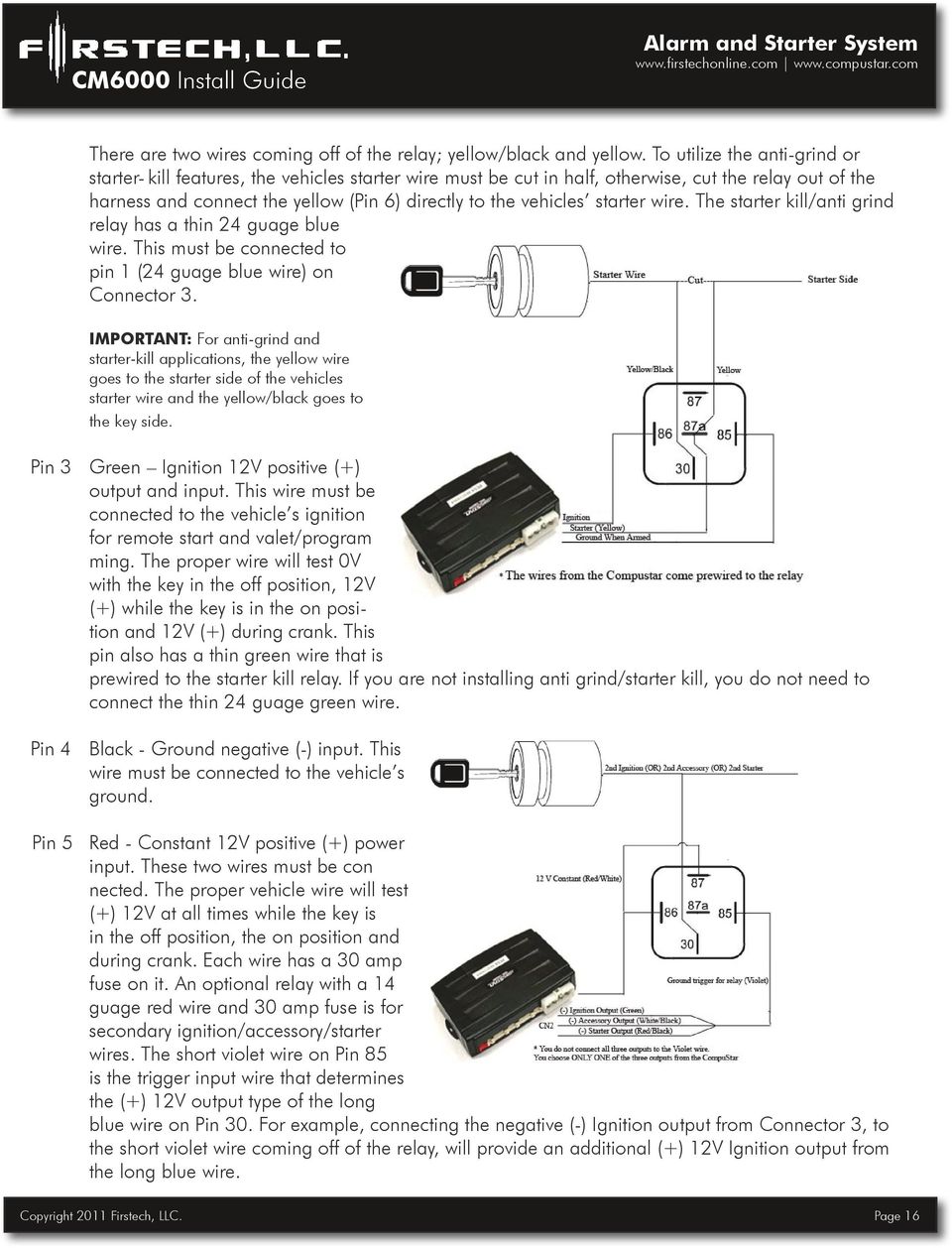
17 Pin 6 Green/White This is a dual-purpose wire that features selectable functionality thru the parking light/trunk output jumper on the control module. It is either a positive (+) parking light output or positive (+) trunk output. This wire carries a 10 amp fuse. Default - Parking light positive (+) output. The proper vehicle wire will test (+) 12V when the parking light switch is in the on position. Optional Trunk release positive (+) output. The proper vehicle wire will test (+) 12V when the trunk release is triggered. Connector 2 (CN2), 2-Pin: Optional Battery Back-up Pin 1 Red - Constant 12 V positive (+) input and (+) charging output. Pin 2 Black - Ground (-) negative input. Connector 3 (CN3), 20-Pin: Programmable Output Channel (POC) IMPORTANT: Odd Pin numbers 3 through 19 are programmable for up to 19 different output types. Refer to Special Option Group 2 for complete details. Pin 1 Blue - 250mA negative (-) output when armed and during remote start (while running). This wire is pre-wired to the anti-grind/starter-kill relay. Caution: When this wire is being used to trigger aftermarket accessories it must be diode isolated. Pin 2 Orange/Black - Parking Light Reminder (-) input that monitors the vehicle s parking lights. Pin 3 Green/White [POC 1] - Parking light 250mA negative (-) output. The proper wire will test (-) when the parking light switch is in the on position. Pin 4 Light Blue Parking / Emergency brake negative (-) input. This input is required for manual transmission/reservation and turbo-timer mode. The proper wire will provide a (-) trigger when parking / emergency brake is set and ignition is on. Pin 5 Red/Black [POC 2] 2nd Starter 250mA negative (-) output. This output provides a negative (-) trigger output during remote start crank. Pin 6 Light Blue/White - Brake 12V positive (+) input. This input must be connected as it provides a shut down for the remote start. The proper wire will test (+) 12V while the foot brake is pressed. Pin 7 Green [POC 3] - 2nd Ignition 250mA negative (-) output. This output provides a negative (-) trigger upon remote start, throughout the crank and during remote start. Copyright 2011 Firstech, LLC. Page 17

18 Pin 8 Violet/Black - Trunk negative (-) input. This is an optional input that will monitor when the vehicle s trunk has been opened. The proper wire will provide a (-) trigger while the trunk is open. Pin 9 White/Black [POC 4] - 2nd Accessory 250mA negative (-) output. This output provides a negative (-) accessory trigger that will drop out during crank. Pin 10 Red/White - Door trigger input. This wire monitors negative (-) or positive (+) trigger door-pins. The proper wire will provide a (-) trigger or a (+) trigger only when the doors are opened. You will need to test the wire for proper polarity and set the jumper on the control module for the corresponding polarity. IMPORTANT: This wire is required for manual transmission remote starts. Pin 11 Black [POC 5] Status/Ground while running 250mA negative (-) output. This is an optional output that will provide a negative (-) output before the ignition turns on and stays on throughout the remote start duration. This wire is most commonly used to trigger bypass / transponder modules. Pin 12 Brown/White - This is a dual-purpose wire that is selectable through Option 4-09 in the programming table. Select the polarity through the glow/key jumper on the control module. It can be set to accept either a positive (+) or negative (-) wait to start input / key sense. Default Glow plug positive (+) or negative (-) input. The proper vehicle wire will show a (+) or (-) trigger while the wait to start light is on. This wire will delay the starter output momentarily to allow the glow plugs to warm up on vehicles equipped with a diesel engine. You can adjust the remote start delay with Option 2-03 and the FT-OP500-KIT. Optional Key sense positive (+) or negative (-) input. The proper wire will show a (+) or (-) trigger only when the key is in the ignition. The purpose of the key sense is to prevent the system from passively arming or setting reservation mode while the key is still in the ignition. Pin 13 Orange [POC 6] - Factory Arm 250mA negative (-) output. This is an optional output that will provide a (-) pulse during lock, after crank and again after the ignition shuts down. Pin 14 Pink - Slave/Closed Loop negative (-) input. This is a dual-purpose optional input that can be changed through Option Default: Slave/Timer Start (-) input. This is most commonly used when adding a remote start to a factory keyless entry system. You can adjust the number of pulses with Option Optional: Closed Loop (-) input. This wire acts as an instant trigger when separated from ground (-). It is most commonly used to protect headlights or trailers. Pin 15 Orange/White [POC 7] - Factory Disarm 250mA negative (-) output. This optional output will provide a (-) pulse during unlock and prior to the ignition turning on. It is typically used to disarm factory security systems. Pin 16 Yellow/Black - Engine sensing input. This wire is connected to the vehicles Tach or Alternator wire and is required if you are not using the no tach sense setting. IMPORTANT: To change enginesensing modes, you must change Option 2-10; Default requires a Tach input. Copyright 2011 Firstech, LLC. Page 18

19 Pin 17 White [POC 8] - Horn honk 250mA negative (-) output. This is an optional output that will pulse the factory horn. The proper wire will show ground (-) while the horn is sounding. To change horn output settings, review Options 3-08 and Pin 18 Gray/Black Hood Pin negative (-) input. This input is a safety shut down and alarm trigger. It prevents the vehicle from remote starting while the hood is open and triggers the alarm if the hood is opened while the alarm is armed. You can connect this wire to the hood pin supplied with this kit, or to a wire in the vehicle that shows (-) only while the hood is open. Pin 19 Violet [POC 9] - Auxiliary 1-250mA negative (-) output. This is an optional output that will provide a pulsed, latched, or timed negative output when triggered by the remote(s). This can be used for power sliding doors, window modules or other outputs. Pin 20 Brown - Siren 12V positive (+) output. Connect this wire to the (+) wire located on the siren. To change siren output settings, review Option 3-7. Connector 4 (CN4), 20 Pin Blade Connector - New Generation This connector is used only if you are installing a Blade-AL or Blade-TB. The wiring harness for this connector only comes with the Blade cartridge. Please refer to the Blade install guide for wire description. The CM6 Series Blade connector has a locking tab. Non-locking tab blade harnesses will work but you MUST TAKE CARE TO NOT PLUG THE HARNESS IN UPSIDE DOWN. Make sure the two notches on the top of the harness face the top (CM and barcode sticker side) of the brain. When looking at the wire side of the harness the two notches must be at the top of the plug. Connector 5 (CN5), 6-Pin Pin 1 Not used Pin 2 Violet/White - Trunk release 250mA negative (-) output. This is an optional output that will release the trunk. Use CN1, Pin 2 if the vehicle is equipped with a (+) trunk release. System will unlock doors and disarm alarm prior to trunk release. Pin 3 Orange/Black - 2nd Unlock 250mA negative (-) output. This is an optional output that will provide a (-) pulse for driver s priority door lock. IMPORTANT: You must isolate the driver s door and turn on Option Pin 4 Blue - Unlock 250mA negative (-) output. This is an optional output that will provide a (-) pulse for unlocking doors. System will unlock doors and disarm alarm. IMPORTANT: You must reverse polarity for (+) trigger door lock systems. For additional lock settings review Option Group 1. Pin 5 Blue/Black - Lock 250mA (-) negative output. This is an optional output that will provide a (-) pulse for locking doors. System will lock doors and arm alarm. IMPORTANT: You must reverse polarity for (+) trigger door lock systems. For additional lock settings review Option Group 1. Pin 6 Not used Copyright 2011 Firstech, LLC. Page 19

20 Connector 6 (CN6), 4-Pin (RS 232 Data Port) This connector is used for updating control modules via You must also use this port to flash Blade bypass modules. This port provides simple connectivity of Fortin and idatalink bypass modules. This port is also used to communicate with DroneMobile controllers. Make sure to use the data port from the DroneMobile unit to this RS232 port. Connector 7 (CN7), 3-Pin (Pre-wired Valet/Programming Switch) Pin 1 Gray/Black - Negative (-) ground. Pin 2 Gray 3V positive (+) L.E.D. output. Pin 3 Gray Negative (-) output. Connector 8 (CN8), 2-Pin (Pre-wired Thermister) Plug optional thermister into this connector to monitor the vehicle s temperature. It used in conjunction with Timer Start features along with displaying temperature on two-way LCD s. To use Timer Start features review Option Group 2. IMPORTANT: Thermister plugs are blue 2 pin connectors on the CM6 series but old white plug Thermisters will still work. Pin 1 Black - Thermister Pin 2 Black/White - Thermister Connector 9 (CN9), 4-Pin to 4-Pin or 6-Pin (Pre-wired Antenna Cable) Connect your antenna cable to this port. You can only use 4 to 4 pin or 4 to 6 pin antenna cables. 6 to 6 Pin antenna cables do not work. Do not use both Connector 9 and Connector 10 at the same time. Pin 1 Yellow - RX input. This wire receives the signal from remote. Pin 2 White - TX output. This wire transmits the signal to remote. Pin 3 Red - Constant 12V positive (+) output. Pin 4 Black - Ground Copyright 2011 Firstech, LLC. Page 20

21 Connector 10 (CN10), 6-Pin to 6-Pin (Pre-wired Antenna Cable) Connect your antenna cable to this port. You can only use 6 to 6 pin antenna cables. 4 to 4 or 4 to 6 Pin antenna cables do not work. Do not use both Connector 9 and Connector 10 at the same time. Pin 1 Red - Constant 12V positive (+) output. Pin 2 White - TX output. This wire transmits the signal to remote. Pin 3 Orange - Constant 5V output Pin 4 Yellow - RX input. This wire receives the signal from remote. Pin 5 Black Negative (-) ground. Pin 6 Blue - RX/TX control Connector 11 (CN11), 2-Pin (Pre-wired LED) Note: Do not mistake for Thermister port. Pin 1 Black - L.E.D negative (-) ground. Pin 2 Black/White- L.E.D. 3V positive (+) output. Connector 12 (CN12), 4-Pin (Pre-wired RPS Touch or RPS 2) Pin 1 Black - Negative (-) ground. Pin 2 White - Negative (-) paging input. Pin 3 Red - 12V positive (+) output. Pin 4 Yellow - 9V positive (+) L.E.D. output. Connector 13 (CN13), 4-Pin (Pre-wired Shock Sensor or DAS Sensor) Pin 1 Black - Negative (-) ground. Pin 2 White - 2nd stage negative (-) input. (Instant trigger) Pin 3 Red - 12V positive (+) output. Pin 4 Yellow - 1st stage negative (-) input. (Warn away) Copyright 2011 Firstech, LLC. Page 21
22 Connector 14 (CN14), 4-Pin (Optional Sensor Input) This connector provides optional sensor inputs. Most commonly used with proximity and tilt sensors. Can also be used for arm and disarm inputs. Refer to options 4-06 and 4-07 for details. Pin 1 Black Negative (-) ground. Pin 2 Black/White - 2nd stage negative (-) input. (Instant trigger or Arm) Pin 3 Red 12V positive (+) output. Pin 4 Grey/White - 1st stage negative (-) input. (Warn away or Disarm) Option Programming Tables CM Option Group 1 Feature Default Setting - I Optional Setting - II Optional Setting - III Optional Setting - IV Unlock before, Lock after, starting Off On Lock After Remote Start Only Lock After Shutdown Only 1-02 Lock / Unlock pulse duration 0.8 sec 2.5 sec sec 3.5 sec 1-03 Driver's priority unlock Off On 1-04 Double pulse unlock Off Unlock Lock Both Lock and Unlock 1-05 Rearm Output Reservation Lock (Manual transmissions) Unlock / Disarm With Trunk Release After Start Shutdown and First Lock Locks Before Reservation Mode is Set Unlock, Factory Disarm, and Trunk Release 1-08 Passive Mode Off After Start Shutdown and Every Lock Hold Start Button for 2.5 sec. to Activate Reservation Mode Factory Disarm, Trunk Release Only Passive locking with Passive Arming 1-09 Ignition controlled door locks Off On Auto Relock (If a door is not opened within this amount of time) Ignition / Accessory Out Upon Unlock After Start Only Reservation Sets 10 Seconds After the Last Door is Closed Trunk Release Only No Passive Locking with Passive Arming RPM Locks (Tach Sensing Mode Only) After Shutdown Only Locks After Reservation Mode is Set Off 30 sec 60 sec 5 min Off Ignition Pulse - same timing as disarm pulse 1-13 Double Pulse Disarm Input Single Pulse Double Pulse 1-14 Auto Lock Mode (2 Way International Remotes) Acc Pulse - same timing as disarm pulse Off On FT-EZGO On Ignition and Acc Pulse - same timing as disarm pulse 1-15 Trunk Output Timing 1 sec 2 sec 3 sec 4 sec Copyright 2011 Firstech, LLC. Page 22
23 Option Group 2 Feature Default Setting - I Optional Setting - II Optional Setting - III Optional Setting - IV 2-01 Tach Sensing Method Optimal Tach Method Previous Tach Method Low Threshold Tach Method 2-02 Turbo Timer Off 2 Min 1Min 4 Min 2-03 Diesel Timer Wire 3-99 sec (12 sec Default) 7 sec GM Ignition Delay 2-04 Trigger Start Off Single Pulse Double Pulse Triple Pulse Cold or Hot Start with Thermistor Assembly Timer Start, or, Minimum Interval Between Cold Starts Off Cold Start Only Hot Start Only Cold and Hot Start 3 Hour (4 minute runtime, double for Diesel) 1.5 Hour(4 minute runtime, double for Diesel) Reservation (Runtime set by 2-7) 2 Way LCD Remotes Only 24 Hour Repeat with Cold Starting of 2-8 (Runtime set by 2-7) 2 Way LCD Only 2-07 Remote Start Runtime 15 Min 25 Min 45 Min 3 Min 2-08 Temperature of Cold Starting -10 C / 14 F -20 C / -4 F -5 C / 23 F -15 C / 5 F 2-09 Temperature of Hot Starting 25 C / 77 F 30 C / 86 F 35 C / 95 F 40 C / 104 F 2-10 Engine Sensing Tach Alternator 2-12 Crank Time Standard +0.2 Seconds to Crank Time 2-13 Timer Mode Off On No Connection No Tach Sensing (Tachless Mode Only) +0.6 Seconds to Crank Time No Connection 1.5 Second Crank (Not for Manual Transmissions) (-)0.2 Second Crank Time 3-01 Option Group 3 Feature Default Setting - I Optional Setting - II Optional Setting - III Optional Setting - IV Parking lights While Remote Started Constant Output Flashing Output Off 3-03 Dome Light Delay Off 5 sec 45 sec Auto 3-04 Starter-Kill Relay 3-05 Anti-Jacking 3-07 Siren Duration (Upon Alarm Trigger) Anti-Grind + Starter Kill Starter-kill (No Anti-Grind) Anti-Grind Ignition-Kill Anti-Grind + Passive Starter Kill Auto kill (Auto-door locks Off) International Remotes w/ AUTO Function Only Auto kill 30 sec 60 sec 120 sec Chirps for 20 seconds Copyright 2011 Firstech, LLC. Page 23
24 3-10 Valet Option Group 3 Continued Feature Default Setting - I Optional Setting - II Optional Setting - III Optional Setting - IV Key 5 times, or Remote (I+III) while Ignition is On Key 5 times or Remote (I+III) 3-11 Auxiliary Settings Mode Disabled Enabled 3-13 Defroster Temperature Control Standard Only below 32 degrees F Secure Valet (Default code 3,3) 3-14 Defroster Output Timing 0.5 sec pulse 3 min latch 7 min latch 3-15 Soft Disarm Off On 3-16 RPS RPS 2 RPS Touch Constant Output Until Remote Start Shuts Down Option Group 4 Feature Default Setting - I Optional Setting - II Optional Setting - III Optional Setting - IV 4-01 Aux 1 output 0.5 sec Latch 4-02 Aux 2 output 0.5 sec Latch 0.5 sec Pulse + Program 0.5 sec Pulse + Program 4-03 Aux 1 output Control By Remote Arm Disarm Program Program Negative (-) out w/ign shutdown 4-04 Aux 2 output Control By Remote Arm Disarm Start 4-05 Secure Aux Output (1 and 2 Only) On 4-06 Auxiliary Input 1 Green CN Prewarn Trigger (-)Disarm Open Circuit 4-07 Auxiliary Input 2 Green CN Trigger Prewarn (-)Arm Open Circuit 4-08 Extended Accessory After Ign Shutoff Off Off 10 sec 30 sec 4-09 Key Sense or Glow Plug input Glow Plug Input Key Sense Input 4-10 Trigger Start or Closed Loop Alarm Trigger Input Trigger Start input Closed Loop System Input 4-11 Bypass Through RS232 Port ADS Fortin 4-12 Impact Sensor Shock Sensor DAS Sensor Disable Arm/Disarm when Brown/White Wire Triggered Same Time 1st Stage Disarm Input 2nd Stage Arm Input Until Door Open (1 min max) 4-13 Antenna Power Save Off 1 Day Later 2 Days Later 3 Days Later 4-14 Low Battery Warning Off On (11.3 Volts) Low Battery Start Copyright 2011 Firstech, LLC. Page 24
25 Special Option Group 1 Feature Setting Value (Seconds) 1 Diesel Timer - DISL 3 ~ 99 2 AUX1 output time 1 ~ AUX2 output time 1 ~ AUX3 output time 1 ~ AUX4 output time 1 ~ AUX5 output time 1 ~ AUX6 output time 1 ~ AUX7 output time 1 ~ 100 Feature Programmable Output Connector Special Option Group 2 Setting and OP500 Value 0 - Default Setting 1~19 Optional Settings 1 POC #1 (-) 2nd Parking Light (Green/White) 2 POC #2 (-) 2nd Start (Red/Black) 3 POC #3 (-) 2nd Ignition (Green) 4 POC #4 (-) 2nd Accessory (White/Black) 5 POC #5 (-) Status/GWR (Black) 6 POC #6 (-) Rearm Wire (Orange) 7 POC #7 (-) Disarm Wire (Orange/White) 8 POC #8 (-) Horn (White) 9 POC #9 (-) Auxiliary 1 (Violet) 2nd Light - [1] 2nd Start - [2] 2nd IG1 - [3] 2nd Acc - [4] Status Out - [5] Rearm Out - [6] Disarm Out - [7] Horn Out - [8] Dome Light - [9] Aux 1 Out - [10] Aux 2 Out - [11] Aux 3 - [12] Aux 4 Out - [13] Aux 5 Out - [14] Aux 6 Out - [15] Aux 7 Out [16] Defrost - [17] GWA - [18] Status 2 For Manual Trans. - [19] Option Menu Descriptions CM Unlock Before, Lock After Starting. Lock After Remote Start. If enabled, this option will make the system unlock the doors before remote starting, start the vehicle, then lock the doors after the vehicle starts. It will then lock the doors again if the remote start run time expires and the vehicle shuts down. This feature is for vehicles that have factory alarms that need to be disarmed before remote starting Door Lock/Unlock Pulse Duration. This option determines the output duration of the door lock and unlock pulses. Some vehicles do not respond to short door lock/unlock pulses Driver s Priority Unlock - If enabled, this option will cause the system to unlock the driver s door first, and if the unlock button is pressed again within 3 seconds, the other doors will unlock. The driver s door must be isolated from the other doors. Use the Orange/Black CN4 for your 2nd Unlock output. Copyright 2011 Firstech, LLC. Page 25
26 1-04 Double Pulse Unlock - If enabled, this option will cause the system to double pulse the lock, unlock or both lock and unlock outputs. This can be used for vehicles that need two pulses to unlock or relock the doors Rearm Output - These optional settings change the event trigger on the orange rearm wire Reservation Lock - Manual transmission only. Setting 2 requires the user to initiate start sequence with the remote to set reservation. Setting 3 will provide a 10 second delay before the vehicle shuts off after closing the last door to allow for another door to open. Upon a door opening, the user will have 2 minutes to close the last door in order for reservation mode to set. Setting 4 will set the unit to lock after reservation mode is set Unlock / Disarm with Trunk Release - This option sets that the unlock and/or factory disarm wires do during remote trunk release. The options are pretty self explanatory Passive Mode - This option comes with default off. This feature controls what the lock wire does during passive mode Ignition Controlled Locks - Setting 2 will lock the doors when the foot brake is pressed and doors closed. Tach sensing mode must be used for setting 3. You must also turn this feature on through the remote by tapping I+IV (2 Way remotes) or Lock+Key (1 Way remotes) Auto Relock This option will automatically relock/rearm after the system has been disarmed and the doors have not been opened Ignition / Accessory Upon Unlock This option will pulse the ignition wire, accessory, or both upon unlock/disarm. Most new Ford vehicles need the ignition and accessory pulsed to disarm the factory alarm Double pulse disarm - This feature changes the behavior of the small orange/white disarm wire. When the feature is turned on it will change the default single pulse to double pulse upon disarm/ unlock Auto Mode - This option turns the auto lock/arm and unlock/disarm feature on. This is only available with international 2 Way remotes. The user must also turn this feature on with the remote by holding button1 for 2.5 seconds. This mode will automatically lock/arm and unlock/disarm when the user leaves or enter the range of the vehicle. Setting 3 will enable the FT-EZGO functionality Trunk Output Timing - This option changes the time of the output pulse on the violet/white wire during trunk release. The default setting is 1 second. With the options you can extend the output by 2, 3 or 4 seconds to a maximum of 4 seconds. Copyright 2011 Firstech, LLC. Page 26
27 2-01 Tach Sensing Method This option will adjust the method at which tach is read by the module. At de fault this option will minimize overcrank during remote start Turbo Mode This option will adjust the run time after Turbo mode has been engaged. The e-brake and door trigger inputs must be connected and the option must be turned on through the remote for turbo timer to engage Diesel Timer Use this option if you can t find the glow plug wire. You can use setting 2 for a default wait to start of 12 seconds, otherwise, you can adjust the time with your OP500 Programmer. You also have a 7 second and GM Ignition Delay output Trigger Start This option changes the number of times required for a negative (-) start input on the pink wire of connector Cold or Hot Start This option turns on the cold/hot starting features. This option works in conjunction with 2-06, 2-08 and The thermister must also be connected the brain Timer Start or Interval Between Cold Start - This option dictates the time interval when the control module will either remote start or check the temperature and remote start. Default 1: Will start every 3 hours until the vehicle is remote started or started by key and run for 4 minutes. Option 2: Will start every 1.5 hours until the vehicle is remote started or started by key and run for 4 minutes. Option 3: Will start at the time specified on the 2 way remote once within 24 hours and run based on Option (Only works on 2 Way LCD remotes) Option 4: Will start once every 24 hours if the temperature falls below Option settings 2-08 or above Option settings For example, if you want your car to start and run 25 minutes when the temperature falls below 32 F, you need to set up the following options: 1) Option 2-05 (Cold Start) turned on, 2) Option 2-06-IV (24 hr. repeat) turned on, 3) Option 2-07-II (25 min run-time) turned on, 4) Option 2-08-IV (Temp 32 F) turned on, *Set the reservation time at 7 am (see User s guide) **Turn on Timer Mode of the 2 way LCD remotes (see User s Guide) 2-07 Remote Start Runtime - This option give you four different settings for the remote start run time. This available options are 15, 25, 45, and 3 minutes Temperature of Cold Starting Works in conjunction with Options 2-05 and See the option table for available temperatures. Copyright 2011 Firstech, LLC. Page 27
28 2-09 Temperature of Hot Starting Works in conjunction with Options 2-05 and See the option table for available temperatures Engine Sensing Review the Common Procedures section for complete explanations on the four engine sensing modes Min. Crank Time - This option controls the minimum crank time for the remote starter. This is only used if in extreme cold climates Timer Mode - This option enables the user to operate Timer Mode (see option 2-06). Remember that the user must still activate Timer mode using the remote (see the user manual for that remote for instructions). This option turns the remote start timer mode on the system Parking Lights while Remote Started - This option changes the parking light behavior during remote start Dome Light Delay This option is used when connecting the door trigger input to the vehicles dome light circuit. It delays the door trigger input to prevent the door open icon displaying on 2 Way remotes upon lock/arm Starter-Kill This option determines the mode of the anti-grind/starter-kill relay. Default 1: Anti-grind + starter-kill Option 2: Anti-grind only (no starter-kill) Option 3: Anti-grind + passive starter-kill: starter-kill activates in 45 seconds after ignition is turned off Anti-Jacking This option requires the starter-kill relay to be wired to the ignition vs. the starter wire. Default 1: Acts like starter-kill: removes power from the ignition, which allows the car to crank but not start. Option 2: Turns on anti-jacking: when the remote panics the system, power from the ignition will be removed at the end of the 30 second siren duration, thereby disabling the vehicle. Copyright 2011 Firstech, LLC. Page 28
29 Option 3 & 4: Only available with Canadian remotes. IMPORTANT: When using ignition-kill on manual transmission vehicles Option 2 will need to be utilized. Option 2 disables the anti-grind circuit while the vehicle is remote-started; if the anti-grind circuit is active and the start-kill relay is installed in the ignition, the relay will buzz while remotestarted Horn Output When Alarm is Triggered - This changes the behavior of the white horn wire when the alarm is triggered. With this setting you can change the wire to a constant (-) negative output for an additional siren Valet This option changes valet modes. Default 1: Key on/off five times or remote valet (I + III for 0.5 seconds) with key in the on position. Option 2: Key on/off five times or remote valet (I+III for 0.5 seconds) key does not need to be in the on position. Option 3: Secure valet: RPS Valet or remote valet (I+III for 0.5 seconds) this option prevents the system from being put into valet via key on/off five times. To set up the RPS Valet feature, review the Placement and Use of Components section Auxiliary settings The Auxiliary settings adds five additional independent auxiliary outputs for a total of seven with this option turned on. Special Option Group 1 allows for independent timing of these outputs Defroster Temperature Control - When set to setting II, this option will disable the defroster output when the temperature is above 32 F / 0 C. Setting I will activate the defroster regardless of the temperature Defroster Timing - Some vehicles need a pulse to activate the defroster, others will need a constant output to remain active, you can use this option to adjust the duration of the defroster output Soft Disarm - When a vehicle has a factory alarm, and the Firstech alarm is triggered, you may have both alarms triggered at the same time. In the default setting, silencing the Firstech system will not send the disarm pulse to the factory system, therefore requiring the user to first silence the Firstech system and then unlock and disarm to silence the factory system. Setting II sends the disarm and 5 seconds later sends the rearm pulse. Copyright 2011 Firstech, LLC. Page 29
30 3-16 RPS - This option changes the between the option RPS 2 or the new RPS Touch. Please see the Placement and Use of Components section of this manual for details Aux 1 Output - This option determines the duration of the auxiliary 1 output. Setting IV allows the output duration to be set for a specific length of time Aux 2 Output - This option determines the duration of the auxiliary 2 output. Setting IV allows the output duration to be set for a specific length of time Aux 1 Output Control - This option controls the way auxiliary 1 is controlled at different events Aux 2 Output Control - This option controls the way auxiliary 2 is controlled at different events Secure Aux Output On the default setting, button 4 on the remote must be pressed first before Aux 1 or Aux 2 can be triggered. This prevents accidental triggering of the outputs. Option setting II turns this feature off Aux 1 Input This option changes the input behavior of the pre-warn wire on the Aux Input Sensor green connector. Default 1: Will pre-warn with a negative (-) ground input. Option 2: Will instant trigger with a negative (-) ground input. Option 3: Will disarm the alarm with a negative (-) ground input. Used when adding an alarm to a factory keyless entry system. Option 4: Changes the output into an open circuit input Aux 2 Input This option changes the input behavior of the instant trigger wire on the Aux Input Sensor green connector. Default 1:. Will instant trigger with a negative (-) ground input. Option 2: Will pre-warn with a negative (-) ground input. Option 3: Will arm the alarm with a negative (-) ground input. Used when adding an alarm to a factory keyless entry system. Option 4: Changes the output into an open circuit input. Copyright 2011 Firstech, LLC. Page 30
31 4-08 Extended Accessory After Ignition Shutoff This option keeps the Accessory wire powered up after the ignition is shut off. This can be used to keep the radio turned on even after the key is removed from the ignition (similar to GM vehicles) Glow Plug or Key Sense Default setting sets the wire as a glow plug input. Option setting 2 changes the wire to a key sense input. Key sense can be used to prevent reservation mode from setting and the system from passive arming while the key is still in the ignition. Key sense also turns off dome-light supervision when the key is inserted into the ignition Trigger Start or Closed Loop System Default setting sets the pink wire on CN3 as a trigger start input, which will initiate remote start with a negative (-) trigger. Option 2-04 allows the number of pulses required to initiate remote start to be changed. Setting 2 changes the wire to a closed loop input, which makes it an instant alarm trigger when separated from ground - Ideal for protecting trailers or headlights Bypass Brand Through RS232 Port Default setting allows for compatibility with ADS Idatalink modules. Setting 2 changes compatibility to Fortin bypass modules Impact Sensor - This option changes between the standard included shock sensor and the optional DAS Sensor. The DAS sensor has additional programming. Please see the Placement and Use of Components section of this manual for details Antenna Power Save - Some people may not drive their vehicle very often, this may cause the battery to become discharged because it is not getting recharged on a regular basis. The antenna power save option will turn off the antenna after the specified amount of time to conserve power. While the antenna is asleep, the system will not respond to the remotes. Any type of input to the system will wake up the antenna, i.e.: ignition, brake, door, trunk, hood, shock, rps, ect. A remote start only user just needs to open their door to reactivate the system, however, a user with an alarm or alarm/ start system will need to trigger the prewarn stage of the shock sensor to quietly wake up the antenna Low Battery Warning - This feature option which is default to off. When the system is armed and the feature is on the main control unit will monitor the voltage of the vehicles battery at its connection point. When the battery voltage drops to or below 11.3 volts the control module will send a page to the 2 Way. It will beep several times for 5 seconds, every 50 seconds, 3 times and flash the battery indicator on the remote. When you query the remote or unlock/disarm the system the remote will display the voltage of the vehicle s battery. When option 3 is set, 2-13 is set to option 2, and Timer Mode option is activated on the remote, the vehicle will remote start and run for 15 minutes. Copyright 2011 Firstech, LLC. Page 31
32 Special Option Groups 1 & 2 CM6000 IMPORTANT: The OP500 is required to change settings in Special Option Groups 1 and 2. Special Option Group 1 1 Diesel Timer Option 2-03 must first be set to setting 2. This special option allows a specific wait to start time (in seconds) to be programmed. This prevents the need for a timer relay and eliminates a connection to the wait to start wire. 2 Aux 1 Output Timing Option 4-01 must first be set to setting 4. This special option allows a specific output duration for Aux 1 to be programmed. 3 Aux 2 Output Timing Option 4-02 must first be set to setting 4. This special option allows a specific output duration for Aux 2 to be programmed. 4-8 Aux 3 7 Output Timing Option 3-11 must first be set to setting 2 and the optional Auxiliary settings module must be used. These special options allow specific output durations to be set for Aux 3 7. Only available with 2 Way LCD remotes. Special Option Group 2 This special option group allows you to determine the output type of the POC wire. For example, if you want to set POC #5 (default setting status out) to Aux 1, you will need change special option 5 to number 10. This must be done with the OP500. Option Programming CM6000 Option Programming Using the OP500 (programmer) The OP500 can be used to program any available option. It is required to program options in Special Option Groups 1 and 2. STEP 1: Make sure system is unlocked/disarmed. Using the blue connector on the top of the OP500, connect it to the control module via the antenna wire. (Use the included extension cable if necessary.) Once connected, the OP500 will power up as long as the main ignition harness to the controller has been connected properly. STEP 2: To change the option number you wish to program, use the left and right arrow keys on the OP500. It will scroll through the options available in menu 1 and then move to menu 2, then 3 and 4. Use the up and down arrow buttons on the OP500 to adjust the option settings; 1 is the default setting, and 2, 3, and 4 are the optional settings. Copyright 2011 Firstech, LLC. Page 32
33 At the end of menu 4, if diesel mode or auxiliary setting functions were enabled or if any of the auxiliary outputs were set to Program, the duration of these settings can now be adjusted. Following the auxiliary and diesel settings (if selected), the POC options will be displayed on the OP500. The POCs can be set between 0 (default) and 19. STEP 3: When finished with the adjustment of the various option settings, press and hold the W (write) button until the OP500 chirps, which is approximately 2.5 seconds. This will write the settings to the control module. Wait until the module displays Success before disconnecting it from the antenna cable. To reset the options, hold the R (reset) button and the W (write) button for 2.5 seconds. Release then write the reset, hold the W button until the OP500 chirps, which is approximately 2.5 seconds. Option Programming Using a Remote Using a remote is a timed process so read this section in its entirety before beginning. IMPORTANT: Special Option Groups cannot be programmed with a remote the OP500 must be used. STEP 1: Select the option menu that contains the desired programming option. To program options use the following button combinations: How to Program Options with 2-Way Remotes Option Menu 1 Option Menu 2 Option Menu 3 Option Menu 4 With 2 Way Remotes (Wait for chirp between each tap) (1 + 2) for 2.5 seconds then (1 + 2) for 2.5 seconds (1 + 2) for 2.5 seconds then (1 + 4) for 2.5 seconds (1 + 4) for 2.5 seconds then (1 + 2) for 2.5 seconds (1 + 4) for 2.5 seconds then (1 + 4) for 2.5 seconds Scroll Through Menu (Wait for chirp between each tap) Wait for corresponding parking light flash and/or siren chirp before selecting the option Select Option 1 Tap Button 4 Tap Button 1 Tap Button 2 Tap Button 3 Tap Button 4 Tap Button 4 Tap Button 1 Tap Button 2 Tap Button 3 Tap Button 4 Tap Button 4 Tap Button 1 Tap Button 2 Tap Button 3 Tap Button 4 Tap Button 4 Tap Button 1 Tap Button 2 Tap Button 3 Tap Button 4 Select Option 2 Select Option 3 Select Option 4 Copyright 2011 Firstech, LLC. Page 33
34 How To Program Options With 1 Way Remotes Option Menu 1 Option Menu 2 Option Menu 3 Option Menu 4 With 2 Way Remotes (Wait for chirp between each tap) Lock + Unlock for 2.5 seconds then Lock + Unlock for 2.5 seconds Lock + Unlock for 2.5 seconds then Lock + Key/ Start for 2.5 seconds Lock + Key/Start for 2.5 seconds then Lock + Unlock for 2.5 seconds Lock + Key/Start for 2.5 seconds then Lock + Key/ Start for 2.5 seconds Scroll Through Menu (Wait for chirp between each tap) Hold Trunk + Key/Start for 2.5 seconds Hold Trunk + Key/Start for 2.5 seconds Hold Trunk + Key/Start for 2.5 seconds Hold Trunk + Key/Start for 2.5 seconds Wait for corresponding parking light flash and/ or siren chirp before selecting the option Select Option 1 Tap Lock Button Tap Lock Button Tap Lock Button Tap Lock Button Select Option 2 Tap Unlock Button Tap Unlock Button Tap Unlock Button Tap Unlock Button Select Option 3 Tap Key/ Start Button Tap Key/ Start Button Tap Key/ Start Button Tap Key/ Start Button Select Option 4 Hold Trunk + Key/Start for 2.5 seconds Hold Trunk + Key/Start for 2.5 seconds Hold Trunk + Key/Start for 2.5 seconds Hold Trunk + Key/Start for 2.5 seconds STEP 2: Scroll through menu allowing for 1 parking light flash and/or siren chirp per step. STEP 3: Once finished scrolling through the menu wait for the parking lights and/or siren chirp to confirm the option number. i.e. option 2-04 will flash 4 times. Then use one of the table selections to select the option corresponding to your desired setting. Resetting to Factory Defaults: To reset the options in a particular menu group, enter the menu shown in the above tables. To reset options with a 2 Way remote tap button 3 three times. To reset options with a 1 Way remote tap the Key/Start button 3 times. Wait for the siren to chip and parking lights to flash between each tap. After the third tap, the option menu will reset and the siren will chirp three times. This must be done for each option group that needs to be reset. Copyright 2011 Firstech, LLC. Page 34
35 Troubleshooting CM6000 Remote Start Error Codes If the remote start fails to start the vehicle, the parking lights will flash three times immediately. Following those two flashes the parking lights will flash again corresponding to the error table below: Number of Parking Light Flashes Remote Start Error Motor running or must program tach before 1st remote 1 start 2 Key in ignition on position 3 Door open (manual transmission only) 4 Trunk open 5 Foot brake on 6 Hood open 7 Reservation off (manual transmission only) 8 Tach or tachless sensing failure 9 DAS sensor shutdown 10 System is in Valet Mode 2 Way remotes will display the error number Strt Er## on the LCD. Remote Start Shutdown Error Codes If the remote start sequence has been completed and the vehicle shuts down, the vehicle s parking lights will flash 4 times, pause then flash again with the error code. Tap button 4 on 2 Way remotes to initiate the shutdown error codes. On 1 Way remotes hold the Trunk and Start buttons together for 2.5 seconds. Number of Parking Light Flashes Remote Start Shutdown Error 1 Lost engine sensing signal (Tach/Alternator/Tachless) 2 Lost emergency brake signal (Manual Transmission) 3 Foot brake triggered 4 Hood pin triggered Alarm LED Diagnostics When the alarm is triggered the LED on the RPS (if installed), Secure Valet (if installed) and the LED (if installed) will flash a certain amount of times as shown in the table below. This is intended for users with 1 Way remotes. Priority Trigger LED Flash Diagnostic 1 Door/Hood/Trunk/Ign Triggered 2 flashes, break, then repeat 2 2nd Shock Triggered 3 flashes, break, then repeat 3 2nd Auxiliary Input Triggered 4 flashes, break, then repeat 4 Panic with remote 5 flashes, break, then repeat Copyright 2011 Firstech, LLC. Page 35
36 Frequently Asked Questions CM6000 I have everything hooked up and the system will not respond. A: The remotes need to be programmed. Review the Common Procedure section of this manual. When remote starting the siren chirps 3 times and parking lights flash 3 then 1 time. A: You must program tach before remote starting. Also be sure to check the foot brake and ignition wires on the CM6000 and CM6200. I am trying to program the control module with the OP500 Option Programmer and it flashes ER 01 when I plug it in to the antenna cable. What should I do? A: Make sure that the system is not locked/armed. The last thing to check is the antenna cable or antenna extension cable make sure this is not damaged. If you need to, try another cable. When the OP500 is working properly, it will read success good. You no longer need to program the remotes before the OP500 will sync. What is the green/white wire loop inside the brain module? A: This wire determines the transmission mode. With the loop intact, the system is set for manual transmissions. With the loop cut, the system is set for automatic transmission. Where do the blue and purple wires off the extra relay go on the CM6000/CM6200? A: This is a pre-wired positive output, negative trigger relay. Use the secondary ignition, starter, and accessory outputs from CN3 to give a negative trigger to the purple wire. This will determine the12v positive (+) output of the blue wire, which you can then connect to your secondary ignition, starter, or accessory wire. I need a ground when armed wire, does the control module have one? A: You can use pin 1-blue wire output on CN3 that goes to the starter kill relay. You must cut this wire and place a diode in line so that when the ignition on the other side of the relay goes to ground, it won t back feed to your accessory. Install the stripe side of the diode facing the control module. Does the CM6 series have tachless mode? A: Yes. The CM6000 and CM6200 all are tachless. Review the Common Procedures section of this manual. All my connections are made and remotes programmed, how do I program the tach? A: Review the Common Procedures section of this manual. You must have your remotes programmed, start your vehicle, then hold the remote start button. Vehicle should chirp and/or flash once if it programs, three times if it does not like the tach source. Copyright 2011 Firstech, LLC. Page 36
37 The vehicle will lock and unlock, but will not remote start or flash the parking lights. A: The system is in Valet Mode. Tap buttons (I) + (III) for a half second to exit Valet Mode. Whenever I try to arm the vehicle, it chirps the siren 3 times and will not arm. A: Check the hood and trunk trigger inputs. When I turn the ignition on the parking lights flash 3 times and/or siren chirps 3 times. What is the problem? A: When you program only 1 Way remotes to a 2 Way antenna and no 2 Way remotes the control module reminds you of this situation each time you turn the ignition on. It does not affect the operation of the system but will continue to do so until you program both 2 and 1 Way remotes to the 2 Way antenna. Do the door locks flip flop in polarity? A: No. You can use the CompuPack (DM700 relay pack) for high current positive (+) locks, or the DM600 harness used for low current 600mA positive (+) locks. What are Firmware Version Diagnostics? A: When you turn the Ignition on and hold buttons 1 and 4 or Lock and Key/Start for 2.5 seconds then the parking lights will flash 1 time on the CM6 series showing V.1. What is this cartridge slot on the rear of the CM6000, CM6200, and CM6300? A: This is the slot for the Blade cartridge system. This slot is for the Idatalink Blade remote start bypass modules. For more information on the compatibility and install information please visit fitguide. Using this system eliminates many connections between your standard control module and bypass module. IMPORTANT: If you are not using the Blade then you will not have or use the 20 pin connector next to the lock harness. How do I take the system out of Valet Mode with a 1 Button Remote? A: Turn the ignition on, tap the button 5 times within 7 seconds and the system will exit Valet Mode. Why are the ignition controlled doorlocks option not working? A. Check option programming. Option 1-09 should be on either setting 2 or 3. The option has to also be turn on via the remote. On 2 Way LCD remotes tap buttons I and IV for 0.5 second, the parking lights will flash once to show the option is turned on. On 1 Way remotes tap the Lock and Start buttons for a half second. The vehicle remote starts when disarmed, but not when armed. A: The starter kill relay was installed backwards. Check to make sure the yellow/black wire is going to the ignition side of the wire, and that the yellow wire is going to the engine side. The vehicle starts and shuts down 3 times in a row. A: This usually means that the engine sensing mode is not working correctly. If you are using a coil, change to an injector or try alternator sense mode. Copyright 2011 Firstech, LLC. Page 37
38 I m using the RPS Touch but my LED s and Secure Valet LED does not flash. A: The CM6000 and CM6300 LED and Secure Valet LEDs will not work when using an RPS Touch. This is a hardware limitation. The RPS 2 will work with LEDs and Secure Valet. On the brain, how do I set the auxiliaries? A: You must have an Option Programmer (FT-OP500-KIT) to set the auxiliaries on the CM4000, CM4200- DX, CM4300, CM5000, CM5200, CM6000, CM6200 and CM6300. First choose two POC wires on CN3 that you are not using. With the OP500 go into the Special Option Group 2 and set those POC s to Aux 1 and Aux 2. Review the Special Option Group programming section of this manual. On the CM6 Series control modules, Auxiliary 1 is pre programmed on CN3, Pin 19, Violet Wire. Technical Support Contacts CM6000 Firstech technical support is reserved for authorized dealers only. Monday - Friday: (8:00 am 5:00 pm Pacific Coast Time) Web: [email protected] Wire Diagrams Click on the Installogy Access Client link found on your desktop. If you are a qualified dealer and unable to access this site, call your sales representative or the number above. Copyright 2011 Firstech, LLC. Page 38
WIRING HARNESS FOR AS635P4. BLUE PLUG RED, BLUE, BLACK, WHITE - Plug in dual stage sensor harness
 WIRING HARNESS FOR AS635P4 ANTENNA NOT USED 5 PIN WHITE PLUG 2 PIN WHITE PLUG GREEN - PARKING BRAKE INPUT (-) BLUE - NOT USED 3 PIN BLUE PLUG RED, BLUE, BLACK, WHITE - Plug in dual stage sensor harness
1R / 4-BUTTON SERIES
 Button 1 1R / 4-BUTTON SERIES VEHICLE SECURITY SYSTEM Standard Features: Two 4-Button Remote Transmitters Status indicator (LED) Valet / override switch Multi-tone siren Dual stage impact detector Remote
Security and Remote Start Installation Guide for models: CA 6150 CA 6550
 PROFESSIONAL SERIES Security and Remote Start Installation Guide for models: CA 6150 CA 6550 2009 Audiovox Electronics Corporation. All rights reserved. 1 Table of Contents Before You Begin... 4 Wire Connection
INSTALLATION MANUAL 3RP / 5RP 4-BUTTON SERIES VEHICLE SECURITY SYSTEMS
 3RP / 5RP 4-BUTTON SERIES VEHICLE SECURITY SYSTEMS INSTALLATION MANUAL Before you begin the installation Read the INSTRUCTIONS! Always use a multi-meter when verifying vehicle wiring. Before mounting the
MAGICAR M870AS. Car alarm with two-way remote and remote - start system Installation guide
 MAGICAR M870AS Car alarm with two-way remote and remote - start system Installation guide EN English TABLE OF CONTENTS I. INTRODUCTION...4 II. PLACING...4 III. ADDITIONAL RELAY 12V CONNECTION...1 IV. WIRING
RS-1301DP/1303DP/1304DP 1-WAY SYSTEM RS-1300DP ADD-ON MODULE DP SERIES (Data Port)
 RS-1301DP/1303DP/1304DP 1-WAY SYSTEM RS-1300DP ADD-ON MODULE DP SERIES (Data Port) OPERATING INSTRUCTIONS **IMPORTANT NOTES:- FOR RS-1300DP MODEL ONLY** RS-1300DP Model is an add-on/expansion unit, without
VEHICLE SECURITY SYSTEM Optional Remote Start Module and 2-way Transmitter Instructions Included
 VEHICLE SECURITY SYSTEM Optional Remote Start Module and 2-way Transmitter Instructions Included STANDARD FEATURES Some of the system s standard features include: 4-button remote transmitter LED Status
PRO PLM Installation Instructions
 PRO PLM Installation Instructions PROFESSIONAL INSTALLATION STRONGLY RECOMMENDED Installation Precautions: Roll down window to avoid locking keys in vehicle during installation Avoid mounting components
How To Control A Car Alarm On A Car With A Remote Control System
 MODEL CA100 REMOTE CONTROL AUTO ALARM SYSTEM INSTALLATION & OPERATION INSTRUCTIONS WIRING DIAGRAM Black Antenna Wire 6 Pin 6 Pin Mini Connector Valet Switch Blue LED Indicator Blue Wire: (-) 200mA Unlock
AL-1650-EDPB AL-1750-EDPB AL-1850-EDPB AL-1950-EDPB AL-2050-EDPB
 AL-1650-EDPB AL-1750-EDPB AL-1850-EDPB AL-1950-EDPB AL-2050-EDPB Deluxe Security & Remote Start System Installation Guide July 11, 2012 Temporary cover. Color cover is in a separate file. Installation
EZ-90 / EZ-91 REMOTE ENGINE STARTING SYSTEM OPERATING INSTRUCTIONS INTRODUCTION REV A - 08.2004
 EZ-90 / EZ-91 REMOTE ENGINE STARTING SYSTEM OPERATING INSTRUCTIONS INTRODUCTION **IMPORTANT NOTES:- FOR EZ-91 MODEL ONLY** The EZ-91 model is an add-on (expansion unit), without remotes or antenna. It
INSTALLATION GUIDE. www.security.soundstream.com FCC ID NOTICE
 AL.1 AUTO SECURITY SYSTEM INSTALLATION GUIDE www.security.soundstream.com FCC ID NOTICE This device complies with Part 15 of the FCC rules. Operation is subject to the following conditions: 1. This device
Button 1 Button 2. Button 3 Button 4. Programmed Remote Transmitter. Button Function Condition
 WWW.STELLAR.COM ST9000 SECURITY SYSTEM Button Function Condition 1 a. Arm and lock doors b. Car finder with sound c. Temporary stop alarm from sounding d. Remote lock doors 1 for 2 sec. Panic Anytime a.
535T Window Automation System
 535T Window Automation System Installation Guide NOTE: This product is intended for installation by a professional installer only! Any attempt to install this product by any person other than a trained
Installation Guide Security and Remote Start
 Installation Guide Security and Remote Start This product is intended for installation by a professional installer only! Attempts to install this product by a person other than a trained professional may
VEHICLE SECURITY SYSTEM G25/G20
 VEHICLE SECURITY SYSTEM G25/G20 Limited Lifetime Warranty This vehicle security system is warranted to the original purchaser, to be free from defects in material and workmanship. The manufacturer will
INSTALLATION MANUAL VEHICLE SECURITY SYSTEM CE-SS200
 INSTALLATION MANUAL VEHICLE SECURITY SYSTEM CE-SS200 FUSION CULTURE TABLE OF CONTENTS There s no point doing something if no one notices. We ve always believed the way to make things happen is by getting
Multi Function, User Configurable Remote Vehicle Security System with 4 Button Replaceable Membrane Remote Transmitter
 MODEL PRO-9744 INSTALLATION MANUAL Multi Function, User Configurable Remote Vehicle Security System with 4 Button Replaceable Membrane Remote Transmitter This System Allows The Transmitter Buttons To Be
About Your System NOTE: What is included: Options and Accessories:
 2-WAY CAR ALARM SYSTEM WITH REMOTE ENGINE START E8 MODEL IMPORTANT: Please read the entire manual for complete details on the features, accessories and operation before attempting to use your security
INSTALLATION GUIDE OWNER S GUIDE
 INSTALLATION GUIDE OWNER S GUIDE SECURITY SYSTEM PRO-SERIES 5002 CONTENTS System Features... 1-2 System Components... 2 Technical Assistance... 2 Before You Begin... 2 Precautions... 2-3 Making Connections...
PATENTED: www.voxxintl.com/company/patents
 Model PRO9776C Installation Manual Vehicle Security System Table Of Contents: with Remote Start Before You Begin Page 2 Wire Harnesses Quick View Page 3-4 Installation of the Major Components Page 5 Wiring
SP-100 REMOTE CONTROL ALARM SYSTEM INSTALLATION & OPERATING INSTRUCTIONS INTRODUCTION
 SP-100 REMOTE CONTROL ALARM SYSTEM INSTALLATION & OPERATING INSTRUCTIONS INTRODUCTION CONGRATULATIONS on your choice of a Security Plus Remote Alarm System by Crimestopper Security Products Inc. This booklet
How To Set Off An Alarm On A Car With A Car Alarm On It
 AUTO SECURITY SYSTEM USER S OPERATION GUIDE FCC ID NOTICE This device complies with Part 15 of the FCC rules. Operation is subject to the following conditions: 1. This device may not cause harmful interference,
2004 Directed Electronics, Inc. Vista, CA N426V 07-04
 350HV Installation Guide NOTE: This product is intended for installation by a professional installer only! Any attempt to install this product by any person other than a trained professional may result
PATENTED: www.voxxintl.com/company/patents
 Model APS-997C Installation Manual 2 Way LCD Vehicle Security and Table Of Contents: Remote Start System Before You Begin Page 2 Wire Harnesses Quick View Page 3 and 4 Installation Of The Major Components
REMOTE START SECURITY SYSTEM OWNERS MANUAL
 REMOTE START SECURITY SYSTEM OWNERS MANUAL Standard Features The System has the following standard features: 5-button remote transmitter Status indicator (LED) Valet/Service mode switch Remote Start capabilities
SNIPER X1 VEHICLE SECURITY SYSTEM
 SNIPER X1 VEHICLE SECURITY SYSTEM Installation Manual Table of Contents 1. FEATURES & SPECIFICATIONS... 2 2. TRANSMITTER BUTTONS:... 2 3. FUNCTION... 2 3.1 Key Function:...2 3.2 Remote Transmitter Code
Car Alarm Series 2 B 2 Buttons
 Car Alarm Series 2 B 2 Buttons G22 SE (External - Shock Sensor) Version 3 Software 67 Plus www.geniuscaralarm.com 21 CAR ALARM GENIUS Series 2B 2 Buttons - G22 Se (External Shock Sensor) Module controlled
Two-Way Remote User s Guide. Thank you.
 Thank you. Thank you for your purchase of an MAGICAR alarm and/or remote-start system. MAGICAR alarms and remote-start systems are the most advanced systems on the market with amazing features, incomparable
e-ask electronic Access Security Keyless-entry
 e-ask electronic Access Security Keyless-entry e-fob Keyless-entry entry System Full-Function Function Installation Manual FCC ID: TV2EFOB1 (UM20 ~ 22793-02) Table of Contents Introduction... 1 e-fob Operation
ASTRA 4000RS/1000RS-DBP G55 SERIES VEHICLE SECURITY SYSTEM WITH REMOTE START PRODUCT MANUAL
 ASTRA 4000RS/1000RS-DBP G55 SERIES VEHICLE SECURITY SYSTEM WITH REMOTE START PRODUCT MANUAL Limited Lifetime Warranty This vehicle security system is warranted to the original purchaser, to be free from
VEHICLE SECURITY SYSTEM Optional Remote Start Module and 2-way Transmitter Instructions Included
 VEHICLE SECURITY SYSTEM Optional Remote Start Module and 2-way Transmitter Instructions Included STANDARD FEATURES Some of the system s standard features include: 4-button remote transmitter LED Status
Model 5303 Installation Guide
 Model 5303 Installation Guide This product is intended for installation by a professional installer only! Attempts to install this product by a person other than a trained professional may result in severe
VEHICLE SECURITY SYSTEM. Car Alarm System With Command Confirmation
 VEHICLE SECURITY SYSTEM Car Alarm System With Command Confirmation About Your System Congratulations on your purchase of this state-of-the-art vehicle security system. With proper installation this system
www.dsecanada.com istart Security and Remote Start Installation Guide ISO 9001 Fabriqué sous norme
 D S E www.dsecanada.com istart Security and Remote Start Installation Guide Fabriqué sous norme ISO 9001 Certified Manufacturer This product is intended for installation by a professional installer only!
RS1-G4 / RS3-G4 / RS4-G4 RS7-G4 (PAGING SYSTEM) RS00-G4 (ADD-ON MODULE)
 RS1-G4 / RS3-G4 / RS4-G4 RS7-G4 (PAGING SYSTEM) RS00-G4 (ADD-ON MODULE) REMOTE START SYSTEM INSTALLATION INSTRUCTIONS CONGRATULATIONS on your choice of a Cool Start System with Data Port Technology for
Model AM2. Installation Guide
 Model AM2 Installation Guide NOTE: This product is intended for installation by a professional installer only! Any attempt to install this product by any person other than a trained professional may result
Owner s Guide. ca6554
 PROFESSIONAL SERIES Owner s Guide For Models: ca6554 Deluxe Vehicle Security and Remote Start System with 2 Way Confirming LCD Remote Control IMPORTANT NOTE: The operation of the Security and Convenience
RF-350 PROFESSIONAL VEHICLE SECURITY SYSTEM WITH KEYLESS ENTRY. INSTALLATION & USERS MANUAL (For Authorized Dealers Only)
 RF-350 PROFESSIONAL VEHICLE SECURITY SYSTEM WITH KEYLESS ENTRY INSTALLATION & USERS MANUAL (For Authorized Dealers Only) Please register your product at www.autopageusa.com THIS PRODUCT IS DESIGNED FOR
i ChatterBox! Motorcycle Security
 i Before you Start the Installation * Please read this manual to become familiar with the requirements necessary to complete the installation. * Use a high quality multi-meter to test all wires before
INSTALLATION GUIDE OWNER S GUIDE
 INSTALLATION GUIDE OWNER S GUIDE KEYLESS ENTRY MODELS KE100 / KE150 / 1702 CONTENTS System Features... 1 System Components... 1 Technical Assistance... 1 Before You Begin... 1 Precautions... 1-2 Making
MAGICAR M871A. Car alarm with two-way remote User s guide
 MAGICAR M871A Car alarm with two-way remote User s guide EN MAGICAR M871A Car alarm with two-way remote User s guide TABLE OF CONTENTS Table of contents...2 1. Important notice...4 2. Introduction...4
TOMAHAWK CAR ALARMS. TW-9010 Two Way Car Alarm System
 TOMAHAWK TW-9010 TOMAHAWK CAR ALARMS TW-9010 Two Way Car Alarm System USER MANUAL INSTRUCTIONS FOR INSTALLATION TOMAHAWK TW-9010 1 2 3 4 5 6 7 8 9 10 11 12 13 14 15 16 17 18 19 20 21 22 23 24 25 26 27
The Child Reminder System Installation Manual
 The Child Reminder System Installation Manual Revised June, 2006 Detailed installation information can be found at www.childreminder.com. Get through your installation quickly and easily by calling 1-888-330-6786
INSTALLATION GUIDE OWNER S GUIDE
 INSTALLATION GUIDE OWNER S GUIDE TALKING ALARM MODEL 3001 CONTENTS System Features... 1 Technical Assistance... 1 Wiring Instructions... 2 Installation Instructions... 3 Operating Instructions... 4-5 Technical
OPERATING INSTRUCTIONS SECURITY SYSTEM KIT NO.: 08E51-EP4-101. 2004 American Honda Motor Co., Inc. - All Rights Reserved. 1
 OPERATING INSTRUCTIONS SECURITY SYSTEM KIT NO.: 8E5-EP4-24 American Honda Motor Co., Inc. - All Rights Reserved. Contents Introduction... 3 Emergency Disarming During Alarming... 4 During the Entry Delay
GALAXY 5000RS/2000RS SERIES-DBP
 GALAXY 5000RS/2000RS SERIES-DBP DATA BUS PORT VEHICLE SECURITY SYSTEM WITH REMOTE START PRODUCT MANUAL Limited Lifetime Warranty This vehicle security system is warranted to the original purchaser, to
REMOTE TRANSMITTER LAYOUT
 Full Featured Keyless Entry System with Optional Starter Defeat and Passive Immobilize Feature SYSTEM MANUA STANDARD FEATURES Some of the system s standard features include: Two 4-button remote transmitters
HONDA ACCORD 1985-2005
 HONDA ACCORD 1985-2005 VEHICLE WIRING Copyright 2002-2004 Triple S Customs WIRING INFORMATION: 1985 Honda Accord WIRE WIRE COLOR WIRE LOCATION 12V CONSTANT WHITE or WHITE/BLACK Ignition Harness STARTER
RS900ER / RS901 SERIES III OPERATING INSTRUCTIONS
 RS900ER / RS901 SERIES III OPERATING INSTRUCTIONS CONGRATULATIONS on your choice of a CoolStart Remote Engine Starter by Crimestopper Security Products Inc. This booklet contains the information necessary
ODYSSEY. Security System Owner s Manual. Kit No. 08E51-SHJ-100 08E55-SHJ-100. 2004 American Honda Motor Co., Inc. - All Rights Reserved.
 Kit No. 08E5-SHJ-00 08E55-SHJ-00 Security System Owner s Manual ODYSSEY 004 American Honda Motor Co., Inc. - All Rights Reserved. Contents Introduction... 3 Emergency Disarming During the Panic Alarm Activation...
Copyright 2002-2004 Triple S Customs
 CHEVROLET SILVERADO 1988-2005 VEHICLE WIRING Copyright 2002-2004 Triple S Customs WIRING INFORMATION: 1988 Chevy Silverado Full-Size 2- POWER DOOR LOCK (5-wire reverse polarity) POWER DOOR UNLOCK (5-wire
Entering Program Mode for Vehicle Security and Remote Start Systems
 Entering Program Mode for Vehicle Security and Remote Start Systems System 100 Keyless Entry Remote Start System (1 Way and 2-Way Remote Start Systems) Kit Part # s: 7L2Z-19G364-AA AL2Z-19G364-A 9G1Z-19G364-A
tattletale User Guide Consumer unit version 2.48 1 P a g e
 tattletale User Guide Consumer unit version 2.48 1 P a g e Contents Basic 1... 4 Base Unit Features... 4 Initial Setup... 4 Arming... 5 Disarming... 5 Quiet Button... 5 Settings... 5 Settings 2... 6 Quick
KEYLESS ENTRY UPGRADE SECURITY SYSTEM for 2004 TOYOTA HIGHLANDER
 KEYLESS ENTRY UPGRADE SECURITY SYSTEM for 2004 TOYOTA HIGHLANDER DEALER SERVICE AND INSTALLATION MANUAL KIT NO. 00016-30915 Contents PARTS LIST... 2 PARTS ILLUSTRATIONS... 2 VEHICLE PREPARATION... 3 INSTALLING
What you get Welcome to the best generation of security with remote start. Your system contains everything you need.
 Congratulations Congratulations on the purchase of your state-of-the-art security and remote start system. Reading this Owner s Guide prior to using your system will help maximize the use of your system
FALCON WORLD CLASS SECURITY. Advanced Alarm System for Vehicles with CAN-Bus. Installer Manual NATIONWIDE INSTALLATION SERVICE 0800 622 474
 FALCON WORLD CLASS SECURITY FALCON PREDATOR CAN-BUS ALARM Advanced Alarm System for Vehicles with CAN-Bus Installer Manual NATIONWIDE INSTALLATION SERVICE 0800 622 474 HELPLINE: 0906 700 10 20 (All calls
Vehicle Alarm System With Channel 2 Auxiliary Output Installation Instructions
 Model PRO 9842 Installation Manual Vehicle Alarm System With Channel 2 Auxiliary Output Installation Instructions This Unit Is Intended For Installation In Vehicles With 12 Volt Negative Ground Electrical
AM1 Security System installation guide
 AM1 Security System installation guide 2005 Directed Electronics, Inc. Vista, CA N427A 01-05 NOTE: This product is intended for installation by a professional installer only! Any attempt to install this
INSTRUCTION MANUAL FOR. Remote Control Car Alarm with Impact Sensor, Mini-Battery Backup Siren & Engine Immobiliser
 INSTRUCTION MANUAL FOR Remote Control Car Alarm with Impact Sensor, Mini-Battery Backup Siren & Engine Immobiliser A.C.N 001 621 610 SYDNEY / AUSTRALIA Build Date: TO ARM/DISARM ALARM The alarm is activated
2003/2004/2005 TOYOTA COROLLA
 2003/2004/2005 TOYOTA COROLLA KEYLESS ENTRY UPGRADE SECURITY SYSTEM INSTALLATION INSTRUCTIONS KIT NO. 00016-30120 SPECIAL NOTE: Installation Sequences After TMS and Safety mandated preparatory steps have
PUSH BUTTON START INSTALLATION MANUAL
 PUSH BUTTON START INSTALLATION MANUAL ALTHOUGH THIS PRODUCT HAS BEEN THOROUGHLY TESTED KPIERSON TECHNOLOGIES ASSUMES NO RESPONSIBILITY FOR ANY DAMAGE THAT MAY RESULT BY THE INSTALLATION OF THIS PRODUCT.
Part Number: 250-1859
 General Applicability 2010 Honda Insight 07- Kia Optima / Forte / Rondo/ 10- Sedona / 12 Soul 10- Hyundai Tucson / Elantra Touring ETC 2012 Accent / Elantra/ Genesis Recommended Tools Safety Tools Gloves,
SECURITY SYSTEM ADP-CAN
 INSTALLATION INSTRUCTION SECURITY SYSTEM ADP-CAN Introduction Motorcar security system ADP-CAN is for motorcars provided with CAN net. It is for the work with the motorcar factory security systems or remote
Technical Service Bulletin
 Technical Service Bulletin Page 1 of 54 SUBJECT: ACCESSORY REMOTE ENGINE START Copyright 2011, Mitsubishi Motors North America, Inc. (3789) The information contained in this bulletin is subject to change.
TX GSM SMS Auto-dial Alarm System. Installation and User Manual
 TX GSM SMS Auto-dial Alarm System Installation and User Manual Product Features: 1. 16 wireless zones, 3 wired zones alarm system, suitable for small to medium size offices and homes. 2. The system uses
Responder LE Models Viper 4204 Clifford 420.4X Python 424 Keyless Entry and Remote Start Installation Guide
 Responder LE Models Viper 4204 Clifford 420.4X Python 424 Keyless Entry and Remote Start Installation Guide This product is intended for installation by a professional installer only! Attempts to install
NO ONE DARES COME CLOSE
 The company behind Viper Auto Security Systems is Directed. Since its inception, Directed has had one purpose, to provide consumers with the finest vehicle security and accessories available. The recipient
INSTALLATION INSTRUCTIONS BOOST CONTROLLER. Pro Control Input (Optional) Tach. Signal. Speed. Gray. Signal. Green Blue. Orange.
 2650-1706-00 INSTALLATION INSTRUCTIONS BOOST CONTROLLER WARNING! The installation of the Auto Meter Boost Controller is recommended only for experienced technicians. This product may damage your engine
USER MANUAL. For all gas- diesel-powered or hybrid vehicles (FRANÇAIS AU VERSO) CONSULT SAFETY PRECAUTION SECTION SOME FEATURES MAY REQUIRE
 USER MANUAL REMOTE CONTROL ENGINE STARTER Model RS-623 Model RS-721 For all gas- diesel-powered or hybrid vehicles (FRANÇAIS AU VERSO) CONSULT SAFETY PRECAUTION SECTION BEFORE USING THIS PRODUCT. SOME
Copyright 2002-2004 Triple S Customs
 JEEP GRAND CHEROKEE 1992-2006 VEHICLE WIRING Copyright 2002-2004 Triple S Customs WIRING INFORMATION: 1992 Jeep Grand Cherokee 12V CONSTANT WIRE PINK/BLACK or RED/WHITE Steering Column STARTER WIRE YELLOW/BLUE
AVS A4 alarm Owner s manual
 AVS A4 alarm Owner s manual Thank you for choosing an AVS A4 car security system. It has been designed to provide a superior level of security for you and your vehicle. Please read this guide carefully
IDS X-Series User Manual 700-398-01D Issued July 2012
 1 2 Contents 1. Introduction to the IDS X-Series Panels... 7 2. Before Operating Your Alarm System... 7 3. Understanding the Keypad LEDs... 8 3.1 Viewing Data on an LED Keypad... 12 3.1.1 LED Status Indicators...
ANTI-THEFT SYSTEM. 1995 Volvo 850 DESCRIPTION & OPERATION BASIC ALARM. 1995-96 ACCESSORIES & EQUIPMENT Volvo Anti-Theft Systems
 ANTI-THEFT SYSTEM 1995 Volvo 850 1995-96 ACCESSORIES & EQUIPMENT Volvo Anti-Theft Systems 850 DESCRIPTION & OPERATION WARNING: Deactivate air bag system before performing any service operation. For 1995
SR-i900 Series. www.scorpioalarms.com [email protected]. Phone (480)951-1109
 www.scorpioalarms.com [email protected] SR-i900 Series Phone (480)951-1109 Aritronix Ltd 16055 N. Dial Blvd. Suite B-10 Scottsdale, AZ 85260 V9.3 Important Information Save this information for future
UPGRADE ALARM USER INSTRUCTIONS
 UPGRADE ALARM USER INSTRUCTIONS CYCL PS SECURITY SYSTEMS PROUDLY AUSTRALIAN Proudly designed and engineered in Australia by Dynamco Pty Ltd. Your emergency override PIN is Keep this number in a safe place
ISUZU RODEO 1992-2003
 ISUZU RODEO 1992-2003 VEHICLE WIRING Copyright 2002-2004 Triple S Customs WIRING INFORMATION: 1992 Isuzu Rodeo 12V CONSTANT WIRE BLACK Ignition Harness STARTER WIRE WHITE/BLUE OR BLACK/WHITE Ignition Harness
CA-125 Owner's Manual
 Remote Vehicle Control System CA-125 Owner's Manual Vehicle Security System With Remote Keyless Entry IMPORTANT NOTE: The operation of the Security and Convenience System as described in this manual is
GSM AD05 Slave GSM Auto Dialer- Instruction Manual
 GSM AD05 Slave GSM Auto Dialer- Instruction Manual Please read these instructions before you start the installation Features LCD display Programmable 9 x 32 digit phone numbers for each trigger. 10 second
Mobile Satellite Solutions. A WiWorld Partner SATELLITE TV ANTENNA CONTROLLER RFM-1000/1100 TECHNICAL MANUAL STOW SEARCH
 Mobile Satellite Solutions A WiWorld Partner SATELLITE TV ANTENNA CONTROLLER RFM-1000/1100 TECHNICAL MANUAL SEARCH STOW Ver. 1 June 2012 WARNING Make all electrical and coax connections from the controller
VEHICLE SECURITY SYSTEM OPERATOR'S INSTRUCTIONS
 :). VEHICLE SECURITY SYSTEM OPERATOR'S INSTRUCTIONS (8 I NS070S Rev. A 12195 ThIs product is protected by U.S. patent number 5,049,867. @ Code Alarm, Inc. 1994 All rights reserved. Printed in the USA.
FUNCTIONS FUNCTIONS PROGRAMMABLE THROUGH THE TRANSMITTER DESCRIPTION
 DESCRIPTION The systems 7463 and 7462 are modular systems which consists of an alarm unit and one audible external siren. These alarm systems can be installed on vehicles with 12V battery with negative
Using your LED Plus keypad
 Using your LED Plus keypad System 238 System 2316 System 238i System 2316i Part Number 5-051-372-00 Rev B Thank you for purchasing this C&K alarm system Your system is one of the most powerful and advanced
9452/9453 Installation and User Guide
 9452/9453 Installation and User Guide Compatible Equipment 9425 Remote Keypad 9040 Internal Sounder 660 Speech Communicator 8440 4-Channel Minicom 496330 Issue 1 1 of 10 9452/3 Introduction The 9452 and
Vehicle Application Guide... Installation Type 1... Type 2... Type 3... Type 4... Type 5... Type 6... Vehicle Wiring Reference Chart (pages 9-16)...
 Update Alert: Firmware updates are posted on the web on a regular basis. We recommend that you check for firmware and/or install guide updates prior to installing this product. Installation Guide Door
ALWAYS TEST THE INSTALLATION ONCE A RELAY IS INSTALLED, TO ENSURE THE VEHICLE CANNOT BE STARTED IN GEAR.
 Update Alert: Firmware updates are posted to the web on a regular basis. We recommend that you check for firmware and/or install guide updates prior to installing this product. Installation Guide The XK09-NISS2
MODELS 7007 Gorilla Cycle Alarm 7017 Gorilla Cycle Alarm with 2-way pager system 1017 2-way pager system
 MODELS 7007 Gorilla Cycle Alarm 7017 Gorilla Cycle Alarm with 2-way pager system 1017 2-way pager system Remote Control Motorcycle Alarm System Installation & Operation Instructions Sistema de Alarma de
Installation Instructions
 Installation Instructions for EVS II Security and Keyless Entry Systems Note: It is recommended that this installation take place prior to rustproofing. The individual delivering the vehicle should review
Control/Communicator Installation Manual
 DAS NETWORX NX-8 Control/Communicator Installation Manual Page General Description... 2 Ordering Information... 2 Option Definitions... 2 Programming the LED Code Pads... 4 Programming the NX-8... 8 Types
User s Information Guide R1A
 HSC505-R Home Security Controller - User Manual Release R1a Pi HSC505 and Pi HSC505R Home Security Controller User s Information Guide R1A Page 1 QD Dynamics (Pty) Ltd reserves the right to make changes
Vehicle Application Guide... 02
 Update Alert: Firmware updates are posted on the web on a regular basis. We recommend that you check for firmware and/or install guide updates prior to installing this product. Installation Guide Door
DC-8706K Auto Dial Alarm System
 DC-8706K Auto Dial Alarm System User Guide Basic Contents: 1x the host unit; 1x wireless door (window) magnet; 1x wireless infrared detector; 2x remote control; 1x siren; 1x phone core; 1x AC to DC power
Electrical Systems - IQAN Digital Control System. IQAN Control System Components... 5.1.3
 Section 5.1 Electrical Systems - IQAN Digital Control System IQAN Control System Components........................... 5.1.3 IQAN Operational Description: At Machine Startup.....................................
Responder LE Model 5701 Security and Remote Start Owner s Guide
 Responder LE Model 5701 Security and Remote Start Owner s Guide 2008 Directed Electronics, Vista, CA Limited lifetime consumer warranty Directed Electronics. ( Directed ) promises to the original purchaser
IDS. Users Guide to Keypad Functions S E C U R I T Y MANUAL NO. 700-171-01B ISSUED AUG 2002 VERSION 1.18
 INHEP DIGITAL IDS S E C U R I T Y Users Guide to Keypad Functions MANUAL NO. 700-171-01B ISSUED AUG 2002 VERSION 1.18 Summary of Operation A rm/ disarm [#] + [USER CODE] Quick Quick Quick Away Arm Stay
K9 Heat Alarm Owners Manual HA-1520
 K9 Heat Alarm Owners Manual HA-1520 Your K9 Heat Alarm is a state of the art product designed and developed by ACEK9.COM a division of Radiotronics, Inc. It is a unique blend of positive features taken
VEHICLE THEFT/SECURITY SYSTEM
 PL VEHICLE THEFT/SECURITY SYSTEM 8Q - 1 VEHICLE THEFT/SECURITY SYSTEM TABLE OF CONTENTS page DESCRIPTION AND OPERATION INTRODUCTION...1 VEHICLE THEFT/SECURITY SYSTEM (VTSS)... 1 (SKIS)... 2 SENTRY KEY
PROOF OF PURCHASE WILL BE REQUIRED FOR WARRANTY SERVICE OF THIS PRODUCT.
 Model SR5000 Owner s Guide limited lifetime consumer warranty This Ungo Pro Security system is warranted against defects in material and workmanship. The main unit is covered by this limited lifetime warranty.