
Vehicle Application Guide... Installation Type 1... Type 2... Type 3... Type 4... Type 5... Type 6... Vehicle Wiring Reference Chart (pages 9-16)...
|
|
|
- Lilian Bell
- 9 years ago
- Views:
Transcription
1 Update Alert: Firmware updates are posted on the web on a regular basis. We recommend that you check for firmware and/or install guide updates prior to installing this product. Installation Guide Door lock control and transponder override firmware compatible with Acura and Honda vehicles. Controls and monitors standard factory security and convenience features such as door locks, alarm, sliding doors, hood and trunk status, as well as tach output plus data transponder interface. Index Vehicle Application Guide... Installation Type 1... Type 2... Type 3... Type... Type 5... Type 6... Vehicle Wiring Reference Chart (pages 9-16) Programming Module Programming... Module Reset... Hard Reset... Feature & Option List... Feature Programming LED Diagnostics & Troubleshooting... Limited One-Year Consumer Warranty... Quick Reference Guide Acura and Honda are registered trademarks and property of their respective companies.

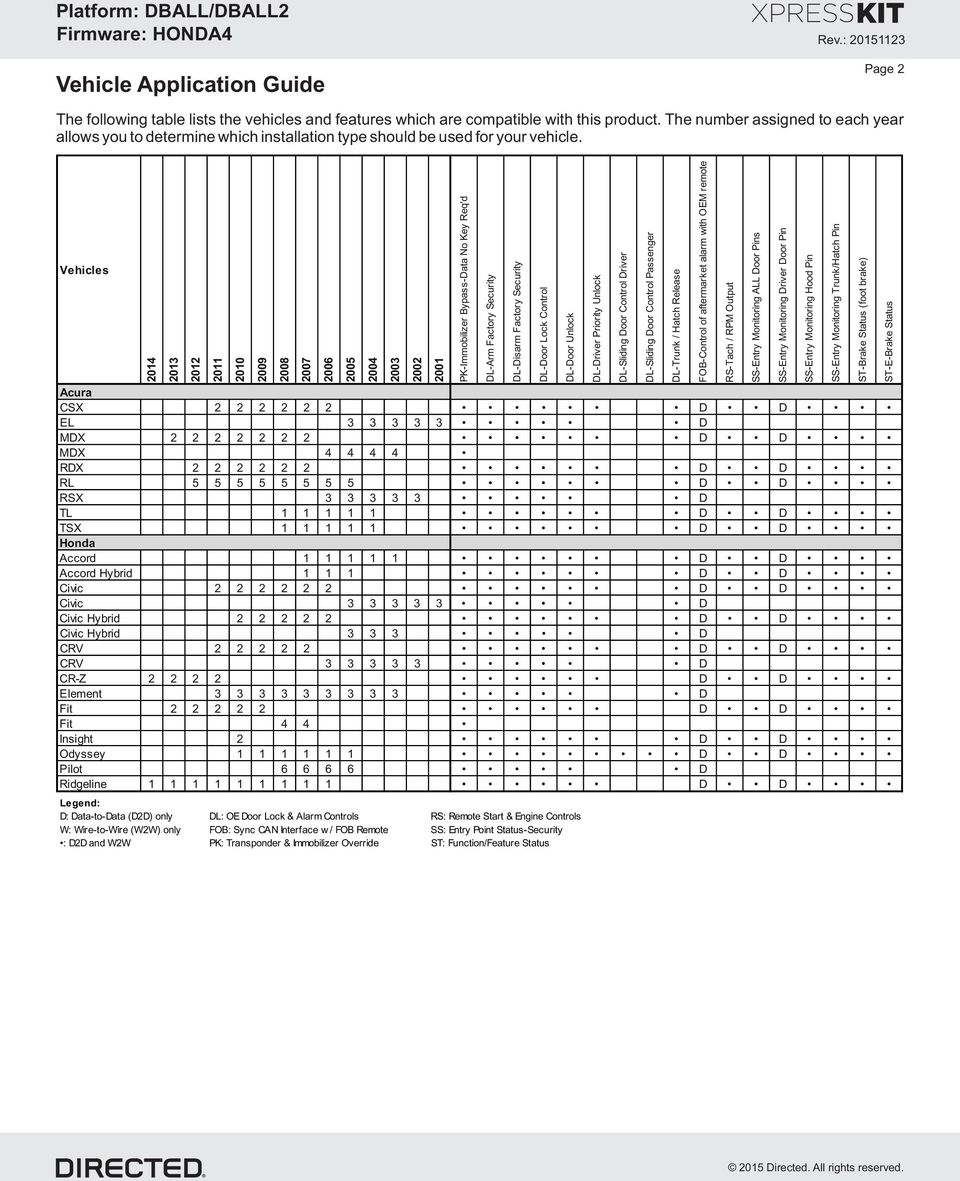
2 Vehicle Application Guide Page 2 The following table lists the vehicles and features which are compatible with this product. The number assigned to each year allows you to determine which installation type should be used for your vehicle. Vehicles PK-Immobilizer Bypass-Data No Key Req'd Acura CSX D D EL D MDX D D MDX RDX D D RL D D RSX D TL D D TSX D D Honda Accord D D Accord Hybrid D D Civic D D Civic D Civic Hybrid D D Civic Hybrid D CRV D D CRV D CR-Z D D Element D Fit D D Fit Insight 2 D D Odyssey D D Pilot D Ridgeline D D Legend: D: Data-to-Data (D2D) only DL: OE Door Lock & Alarm Controls RS: Remote Start & Engine Controls W: Wire-to-Wire (W2W) only FOB: Sync CAN Interface w / FOB Remote SS: Entry Point Status-Security : D2D and W2W PK: Transponder & Immobilizer Override ST: Function/Feature Status DL-Arm Factory Security DL-Disarm Factory Security DL-Door Lock Control DL-Door Unlock DL-Driver Priority Unlock DL-Sliding Door Control Driver DL-Sliding Door Control Passenger DL-Trunk / Hatch Release FOB-Control of aftermarket alarm with OEM remote RS-Tach / RPM Output SS-Entry Monitoring ALL Door Pins SS-Entry Monitoring Driver Door Pin SS-Entry Monitoring Hood Pin SS-Entry Monitoring Trunk/Hatch Pin ST-Brake Status (foot brake) ST-E-Brake Status
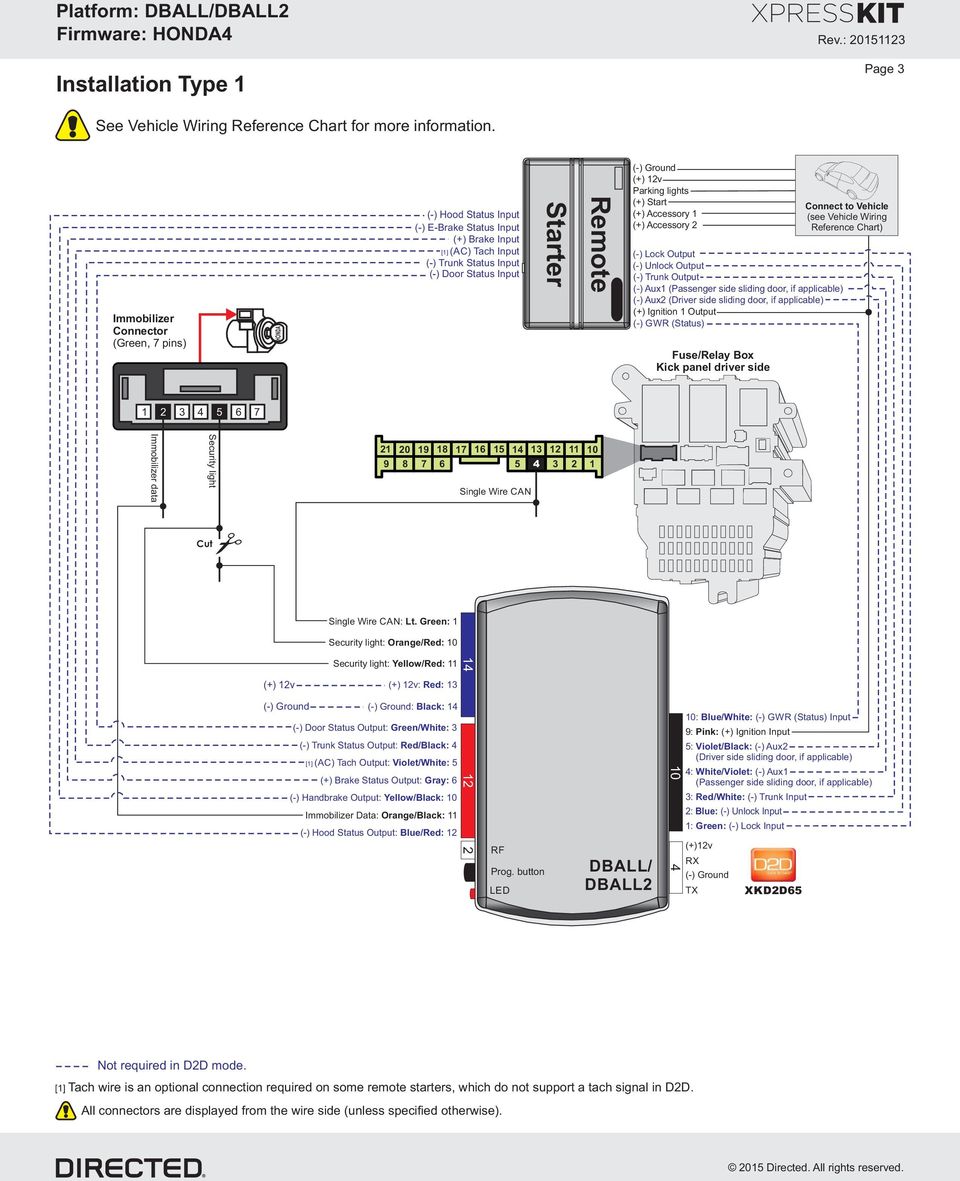
3 Installation Type 1 Page 3 See Vehicle Wiring Reference Chart for more information. Immobilizer Connector (Green, 7 pins) HONDA (-) Hood Status Input (-) E-Brake Status Input (+) Brake Input [1] (AC) Tach Input (-) Trunk Status Input (-) Door Status Input Starter Remote (+) 12v Parking lights (+) Start (+) Accessory 1 (+) Accessory 2 (-) Lock Output (-) Unlock Output (-) Trunk Output (-) Aux1 (Passenger side sliding door, if applicable) (-) Aux2 (Driver side sliding door, if applicable) (+) Ignition 1 Output (-) GWR (Status) Fuse/Relay Box Kick panel driver side Connect to Vehicle (see Vehicle Wiring Reference Chart) Immobilizer data Security light Single Wire CAN Cut Single Wire CAN: Lt. Green: 1 Security light: Orange/Red: 10 Security light: Yellow/Red: 11 (+) 12v (+) 12v: Red: 13 : Black: 1 (-) Door Status Output: Green/White: 3 (-) Trunk Status Output: Red/Black: [1] (AC) Tach Output: Violet/White: 5 (+) Brake Status Output: Gray: 6 (-) Handbrake Output: Yellow/Black: 10 Immobilizer Data: Orange/Black: 11 (-) Hood Status Output: Blue/Red: RF Prog. button LED DBALL/ DBALL : Blue/White: (-) GWR (Status) Input 9: Pink: (+) Ignition Input 5: Violet/Black: (-) Aux2 (Driver side sliding door, if applicable) : White/Violet: (-) Aux1 (Passenger side sliding door, if applicable) 3: Red/White: (-) Trunk Input 2: Blue: (-) Unlock Input 1: Green: (-) Lock Input (+)12v RX TX XKD2D65 Not required in D2D mode. [1] Tach wire is an optional connection required on some remote starters, which do not support a tach signal in D2D. All connectors are displayed from the wire side (unless specified otherwise).
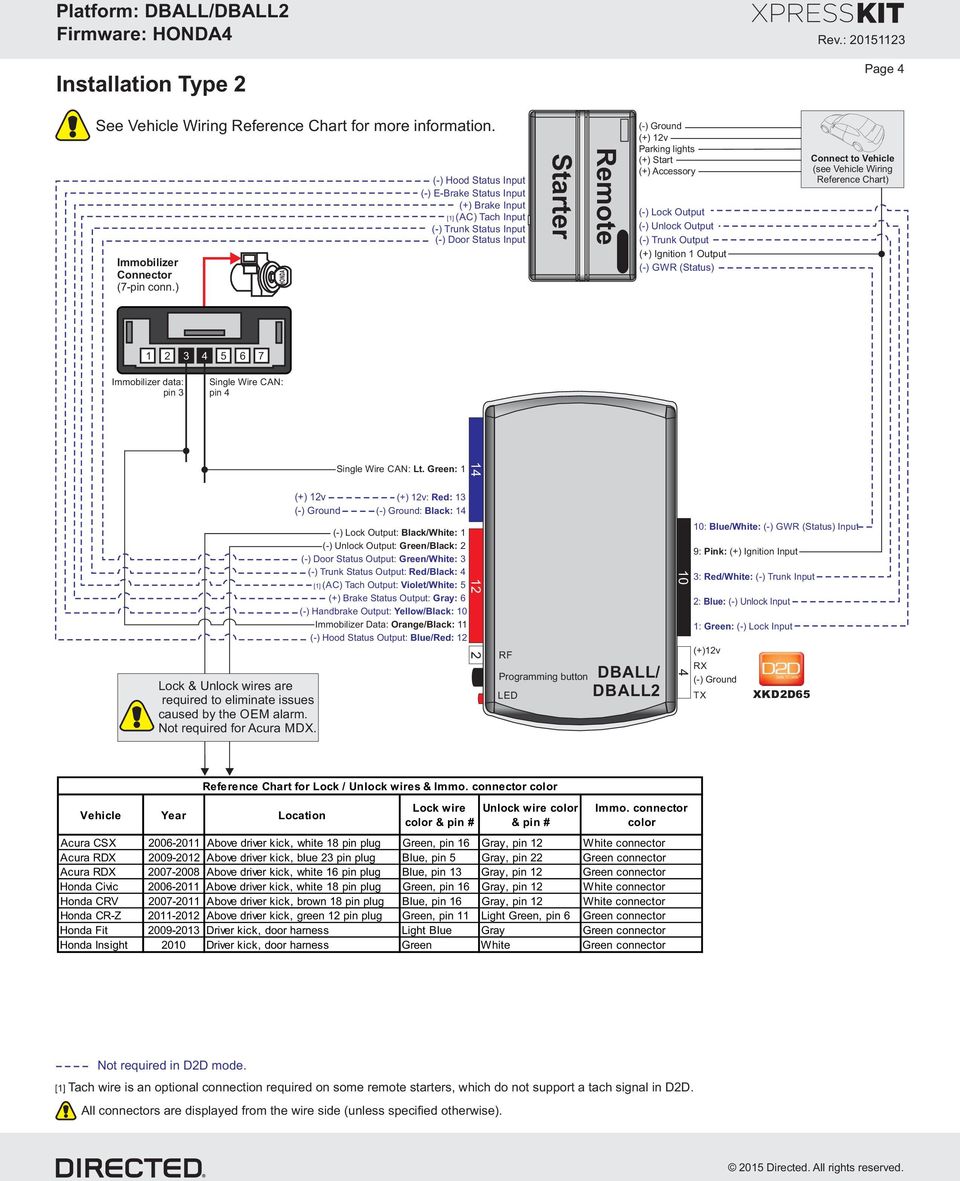
4 Installation Type 2 Page See Vehicle Wiring Reference Chart for more information. Immobilizer Connector (7-pin conn.) HONDA (-) Hood Status Input (-) E-Brake Status Input (+) Brake Input [1] (AC) Tach Input (-) Trunk Status Input (-) Door Status Input Starter Remote (+) 12v Parking lights (+) Start (+) Accessory (-) Lock Output (-) Unlock Output (-) Trunk Output (+) Ignition 1 Output (-) GWR (Status) Connect to Vehicle (see Vehicle Wiring Reference Chart) Immobilizer data: pin 3 Single Wire CAN: pin (+) 12v Lock & Unlock wires are required to eliminate issues caused by the OEM alarm. Not required for Acura MDX. Single Wire CAN: Lt. Green: 1 (+) 12v: Red: 13 : Black: 1 (-) Lock Output: Black/White: 1 (-) Unlock Output: Green/Black: 2 (-) Door Status Output: Green/White: 3 (-) Trunk Status Output: Red/Black: [1] (AC) Tach Output: Violet/White: 5 (+) Brake Status Output: Gray: 6 (-) Handbrake Output: Yellow/Black: 10 Immobilizer Data: Orange/Black: 11 (-) Hood Status Output: Blue/Red: RF Programming button DBALL/ LED DBALL : Blue/White: (-) GWR (Status) Input 9: Pink: (+) Ignition Input 3: Red/White: (-) Trunk Input 2: Blue: (-) Unlock Input 1: Green: (-) Lock Input (+)12v RX TX XKD2D65 Reference Chart for Lock / Unlock wires & Immo. connector color Vehicle Year Location Lock wire color & pin # Unlock wire color & pin # Immo. connector color Acura CSX Above driver kick, white 18 pin plug Green, pin 16 Gray, pin 12 White connector Acura RDX Above driver kick, blue 23 pin plug Blue, pin 5 Gray, pin 22 Green connector Acura RDX Above driver kick, white 16 pin plug Blue, pin 13 Gray, pin 12 Green connector Honda Civic Above driver kick, white 18 pin plug Green, pin 16 Gray, pin 12 White connector Honda CRV Above driver kick, brown 18 pin plug Blue, pin 16 Gray, pin 12 White connector Honda CR-Z Above driver kick, green 12 pin plug Green, pin 11 Light Green, pin 6 Green connector Honda Fit Driver kick, door harness Light Blue Gray Green connector Honda Insight 2010 Driver kick, door harness Green White Green connector Not required in D2D mode. [1] Tach wire is an optional connection required on some remote starters, which do not support a tach signal in D2D. All connectors are displayed from the wire side (unless specified otherwise).
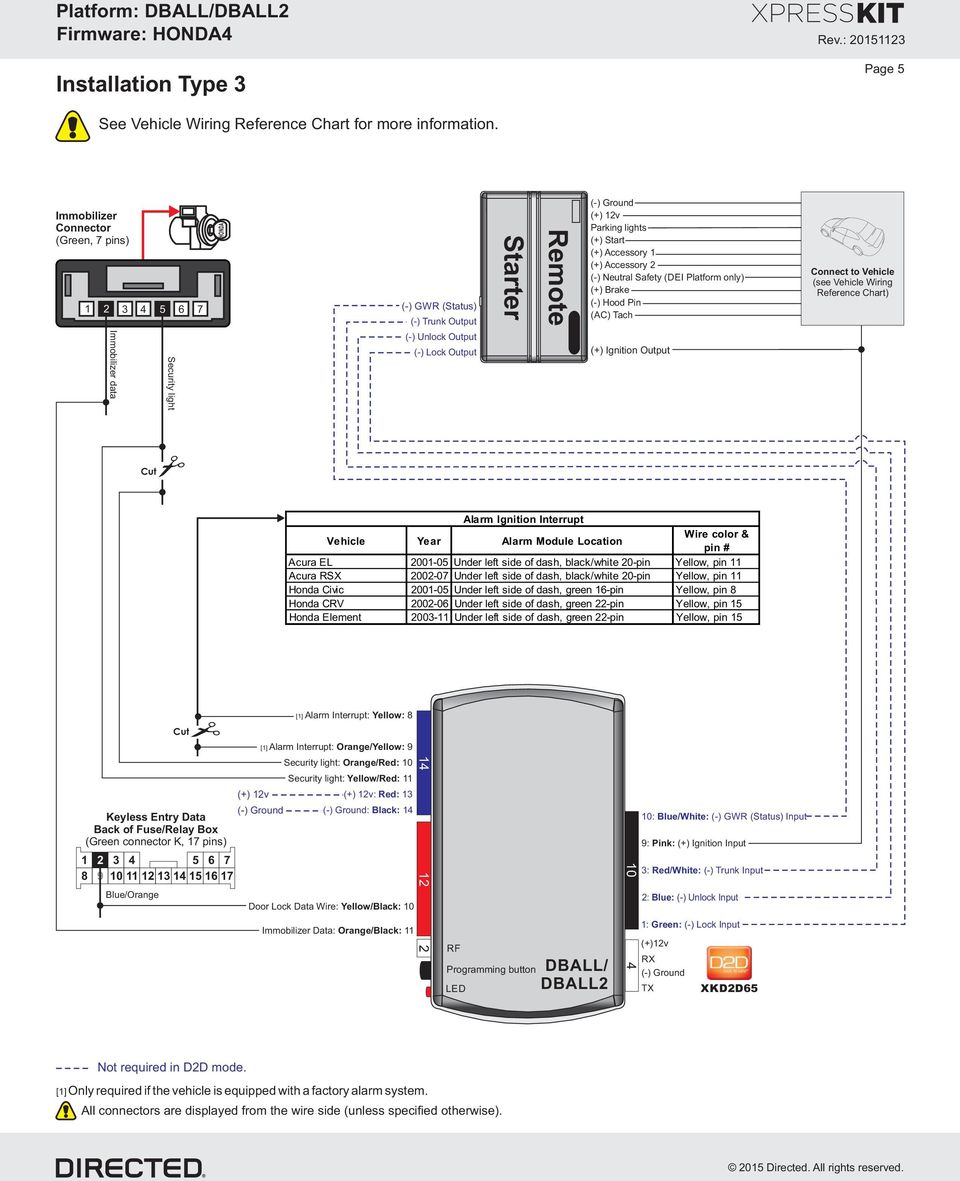
5 Installation Type 3 Page 5 See Vehicle Wiring Reference Chart for more information. Immobilizer Connector (Green, 7 pins) Immobilizer data 5 6 Security light 7 HONDA (-) GWR (Status) (-) Trunk Output (-) Unlock Output (-) Lock Output Starter Remote (+) 12v Parking lights (+) Start (+) Accessory 1 (+) Accessory 2 (-) Neutral Safety (DEI Platform only) (+) Brake (-) Hood Pin (AC) Tach (+) Ignition Output Connect to Vehicle (see Vehicle Wiring Reference Chart) Cut Alarm Ignition Interrupt Vehicle Year Alarm Module Location Wire color & pin # Acura EL Under left side of dash, black/white 20-pin Yellow, pin 11 Acura RSX Under left side of dash, black/white 20-pin Yellow, pin 11 Honda Civic Under left side of dash, green 16-pin Yellow, pin 8 Honda CRV Under left side of dash, green 22-pin Yellow, pin 15 Honda Element Under left side of dash, green 22-pin Yellow, pin 15 [1] Alarm Interrupt: Yellow: Cut Keyless Entry Data Back of Fuse/Relay Box (Green connector K, 17 pins) Blue/Orange [1] Alarm Interrupt: Orange/Yellow: 9 Security light: Orange/Red: 10 Security light: Yellow/Red: 11 (+) 12v (+) 12v: Red: 13 : Black: 1 Door Lock Data Wire: Yellow/Black: 10 Immobilizer Data: Orange/Black: RF Programming button DBALL/ LED DBALL : Blue/White: (-) GWR (Status) Input 9: Pink: (+) Ignition Input 3: Red/White: (-) Trunk Input 2: Blue: (-) Unlock Input 1: Green: (-) Lock Input (+)12v RX TX XKD2D65 Not required in D2D mode. [1] Only required if the vehicle is equipped with a factory alarm system. All connectors are displayed from the wire side (unless specified otherwise).
6 Installation Type Page 6 See Vehicle Wiring Reference Chart for more information. Starter Remote (+) 12v Parking lights (+) Start (+) Accessory 1 (+) Accessory 2 (-) Neutral Safety (DEI Platform only) (+) Brake (-) Hood Pin (AC) Tach (+) Ignition Output (-) GWR (Status) Connect to Vehicle (see Vehicle Wiring Reference Chart) Immobilizer Connector (Green, 7 pins) HONDA Security light Immobilizer data Cut Security light: Orange/Red: 10 Security light: Yellow/Red: 11 (+) 12v (+) 12v: Red: 13 : Black: 1 Immobilizer Data: Orange/Black: RF Programming button DBALL/ DBALL2 LED 10 10: Blue/White: (-) GWR (Status) Input 9: Pink: (+) Ignition Input 3: Red/White: (-) Trunk Input 2: Blue: (-) Unlock Input 1: Green: (-) Lock Input (+)12v RX TX XKD2D65 Not required in D2D mode. All connectors are displayed from the wire side (unless specified otherwise).
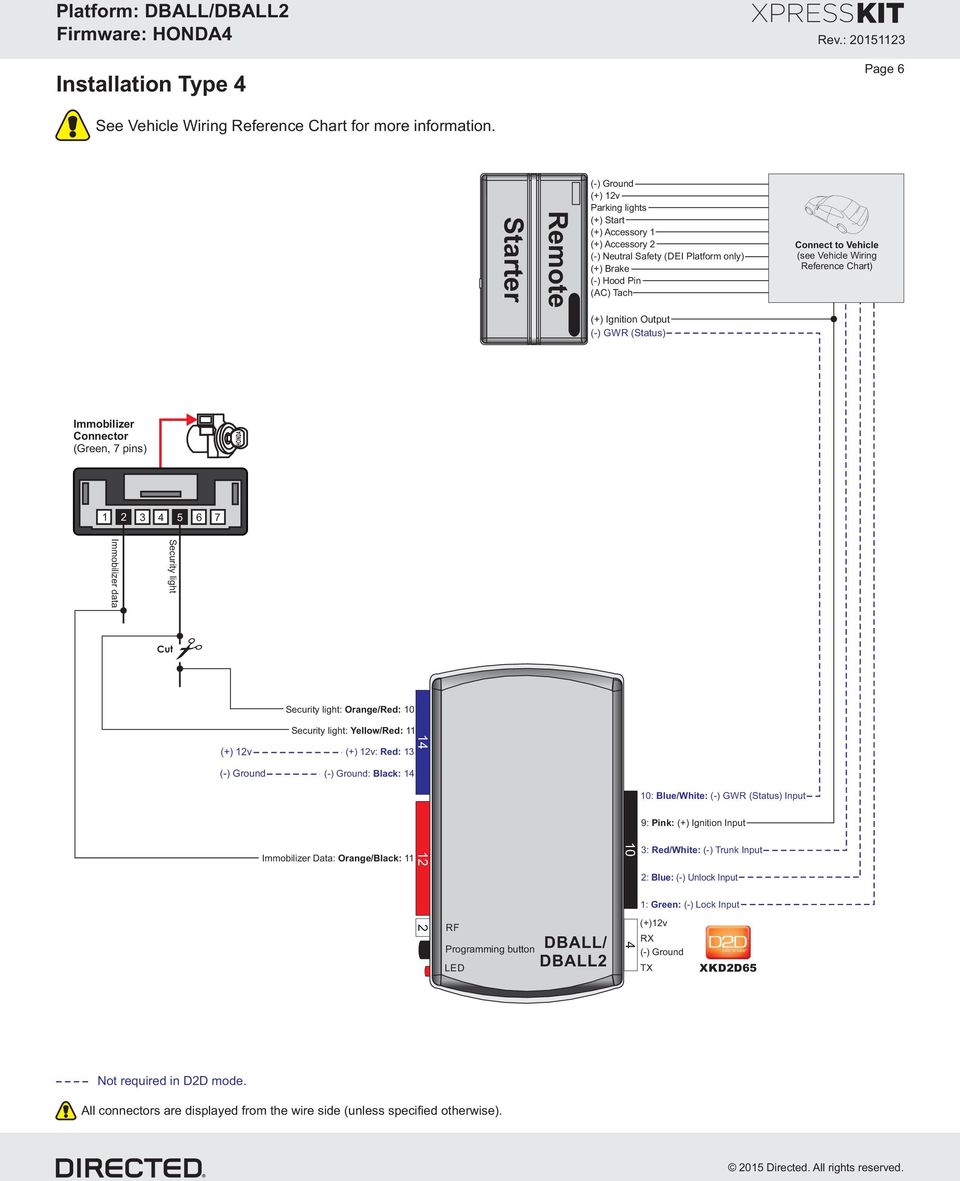
7 Installation Type 5 See Vehicle Wiring Reference Chart for more information. (-) Hood Status Input (-) E-Brake Status Input (+) Brake Input [1] (AC) Tach Input (-) Trunk Status Input (-) Door Status Input Remote Starter (+) 12v Parking lights (+) Start (+) Accessory 1 (+) Accessory 2 (-) Lock Output (-) Unlock Output (-) Trunk Output (+) Ignition Output (-) GWR (Status) Page 7 Connect to Vehicle (see Vehicle Wiring Reference Chart) Immobilizer Connector (Green, 7 pins) HONDA Fuse/Relay Box Kick panel driver side Immobilizer data Security light Keyless Access Control Unit (Black 31-pin connector left of the brake switch) Red Cut Single Wire CAN: Lt. Green: 1 RFID Light: Yellow: 8 RFID Light: Orange/Yellow: 9 Security light: Orange/Red: 10 Security light: Yellow/Red: 11 (+) 12v (+) 12v: Red: 13 : Black: 1 (-) Door Status Output: Green/White: 3 (-) Trunk Status Output: Red/Black: [1] (AC) Tach Output: Violet/White: 5 (+) Brake Status Output: Gray: 6 (-) Handbrake Output: Yellow/Black: 10 Immobilizer Data: Orange/Black: 11 (-) Hood Status Output: Blue/Red: RF Programming button DBALL/ LED DBALL : Blue/White: (-) GWR (Status) Input 9: Pink: (+) Ignition Input 3: Red/White: (-) Trunk Input 2: Blue: (-) Unlock Input 1: Green: (-) Lock Input (+)12v RX TX XKD2D65 Not required in D2D mode. [1] Tach wire is an optional connection required on some remote starters, which do not support a tach signal in D2D. All connectors are displayed from the wire side (unless specified otherwise).

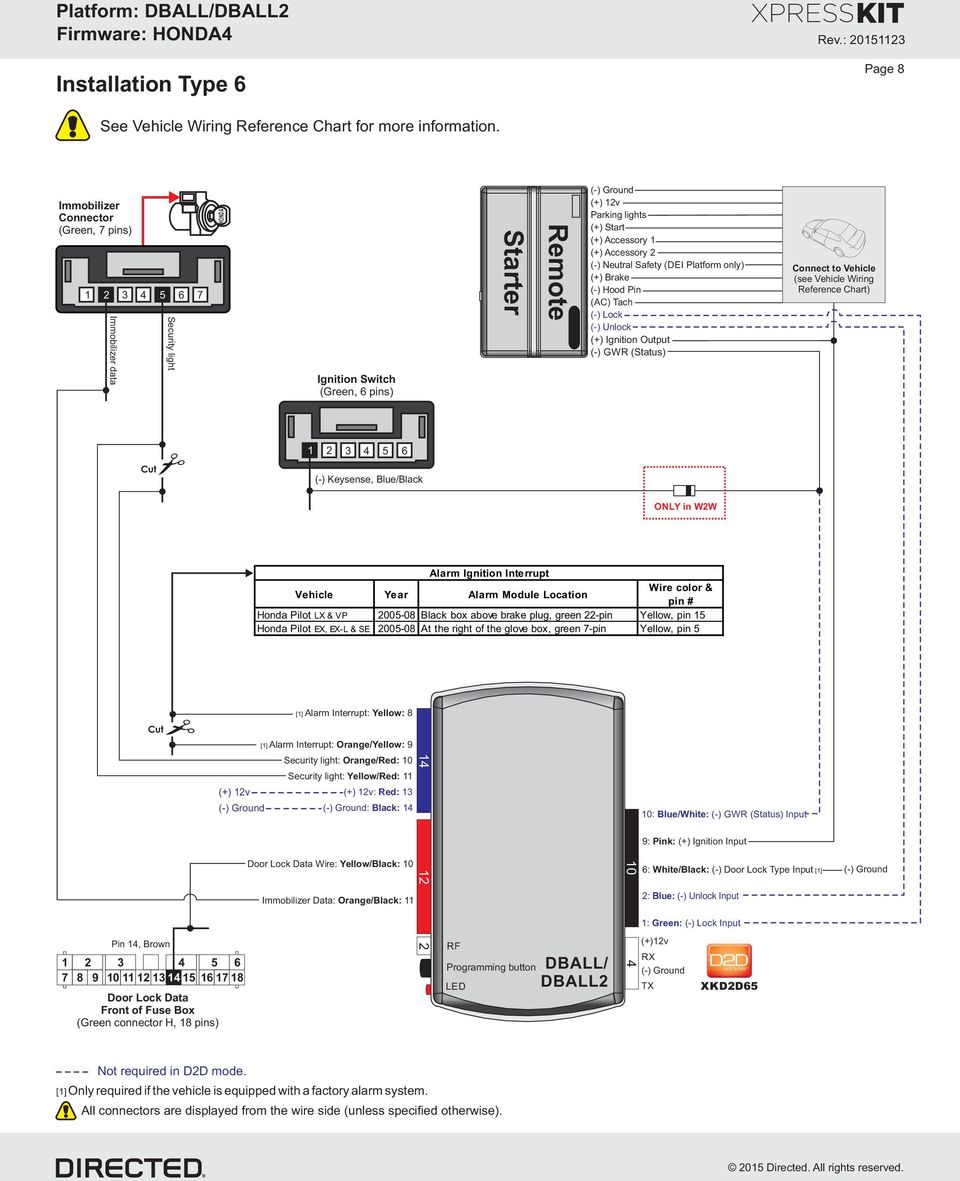
8 Installation Type 6 Page 8 See Vehicle Wiring Reference Chart for more information. Immobilizer Connector (Green, 7 pins) Immobilizer data 5 6 Security light 7 HONDA Ignition Switch (Green, 6 pins) Starter Remote (+) 12v Parking lights (+) Start (+) Accessory 1 (+) Accessory 2 (-) Neutral Safety (DEI Platform only) (+) Brake (-) Hood Pin (AC) Tach (-) Lock (-) Unlock (+) Ignition Output (-) GWR (Status) Connect to Vehicle (see Vehicle Wiring Reference Chart) Cut (-) Keysense, Blue/Black ONLY in W2W Alarm Ignition Interrupt Vehicle Year Alarm Module Location Wire color & pin # Honda Pilot LX & VP Black box above brake plug, green 22-pin Yellow, pin 15 Honda Pilot EX, EX-L & SE At the right of the glove box, green 7-pin Yellow, pin 5 [1] Alarm Interrupt: Yellow: 8 Cut 1 2 Pin 1, Brown Door Lock Data Front of Fuse Box (Green connector H, 18 pins) [1] Alarm Interrupt: Orange/Yellow: 9 Security light: Orange/Red: 10 Security light: Yellow/Red: 11 (+) 12v (+) 12v: Red: 13 : Black: 1 Door Lock Data Wire: Yellow/Black: 10 Immobilizer Data: Orange/Black: RF Programming button DBALL/ LED DBALL : Blue/White: (-) GWR (Status) Input 9: Pink: (+) Ignition Input 6: White/Black: (-) Door Lock Type Input [1] 2: Blue: (-) Unlock Input 1: Green: (-) Lock Input (+)12v RX TX XKD2D65 Not required in D2D mode. [1] Only required if the vehicle is equipped with a factory alarm system. All connectors are displayed from the wire side (unless specified otherwise).
9 Vehicle Wiring Reference Chart Page 9 Function Connector Location Pin Wire Acura CSX Immo. Data 7-pin immobilizer connector 3 Light Green SW CAN 7-pin immobilizer connector Pink Ignition Ignition switch 6 Blue Starter Ignition switch 1 Yellow Accessory 1 Ignition switch Orange Accessory 2 Ignition switch 5 Red Parking Lights Headlight switch, Black/White 12 pins 11 Gray Brake Brake switch 2 Light Green Hood Pin Hood switch 2 Light Blue Acura EL Immo. Data 7-pin immobilizer connector 2 Red/Blue Accessory 1 Ignition switch Black/Red Parking Lights Headlight switch, Gray 16 pins 13 Blue Tach Fuel injector 2 Yellow Acura MDX Immo. Data 7-pin immobilizer connector 2 Red Security Light 7-pin immobilizer connector 5 Pink Ignition Ignition switch - Black/Yellow 12 Volts Ignition switch - White Starter Ignition switch - Black/White Accessory 1 Ignition switch - Yellow Accessory 2 Ignition switch - White/Black Parking Lights Headlight switch, White 1 pins 7 Red/Yellow Hood Pin Hood switch 2 Yellow Acura MDX Immo. Data 7-pin immobilizer connector 3 Light Green SW CAN 7-pin immobilizer connector Light Green Ignition Ignition switch 6 Pink Starter Ignition switch 1 Yellow Accessory 1 Ignition switch Orange Accessory 2 Ignition switch 5 Red Parking Lights Headlight switch, Green 10 pins 3 Brown Brake Brake switch 2 Light Green Hood Pin Hood switch 2 Green Tach Fuel injector 2 Yellow * Vehicles with blue-highlighted wires do NOT have a connector at the ignition switch or headlight switch.

10 Page 10 Function Connector Location Pin Wire Acura RDX Immo. Data 7-pin immobilizer connector 3 Light Green SW CAN 7-pin immobilizer connector Pink Ignition Ignition switch 6 Blue Starter Ignition switch 1 Yellow Accessory 1 Ignition switch Orange Accessory 2 Ignition switch 5 Red Parking Lights Headlight switch, Black/White 12 pins 3 Gray Brake Brake switch 2 Light Green Hood Pin Hood switch 2 Gray Acura RL Immo. Data 7-pin immobilizer connector 2 Lt. Green or Orange Security Light 7-pin immobilizer connector 5 Blue or Red SW CAN Fuse/relay box, Green 21 pins Light Green Ignition Ignition switch 6 White Starter Ignition switch 1 Blue Accessory 1 Ignition switch Blue Accessory 2 Ignition switch 5 Red Parking Lights Headlight switch - Red/Black Brake Brake switch 2 Light Green Hood Pin Hood switch 2 Green Acura RL Immo. Data 7-pin immobilizer connector 2 Orange Security Light 7-pin immobilizer connector 5 Red SW CAN Fuse/relay box, Green 21 pins Light Green Ignition Ignition switch 6 White Starter Ignition switch 1 Blue Accessory 1 Ignition switch Blue Accessory 2 Ignition switch 5 Red Parking Lights Headlight switch - Red/Black Brake Brake switch 2 Light Green Hood Pin Hood switch 2 Green Tach Fuel injector 2 Yellow Acura RSX Immo. Data 7-pin immobilizer connector 2 Red/Blue Accessory 1 Ignition switch Black/Red Parking Lights Headlight switch, Gray 16 pins 13 Blue Hood Pin Hood switch 2 Green/Black Tach Fuel injector 2 Yellow * Vehicles with blue-highlighted wires do NOT have a connector at the ignition switch or headlight switch.

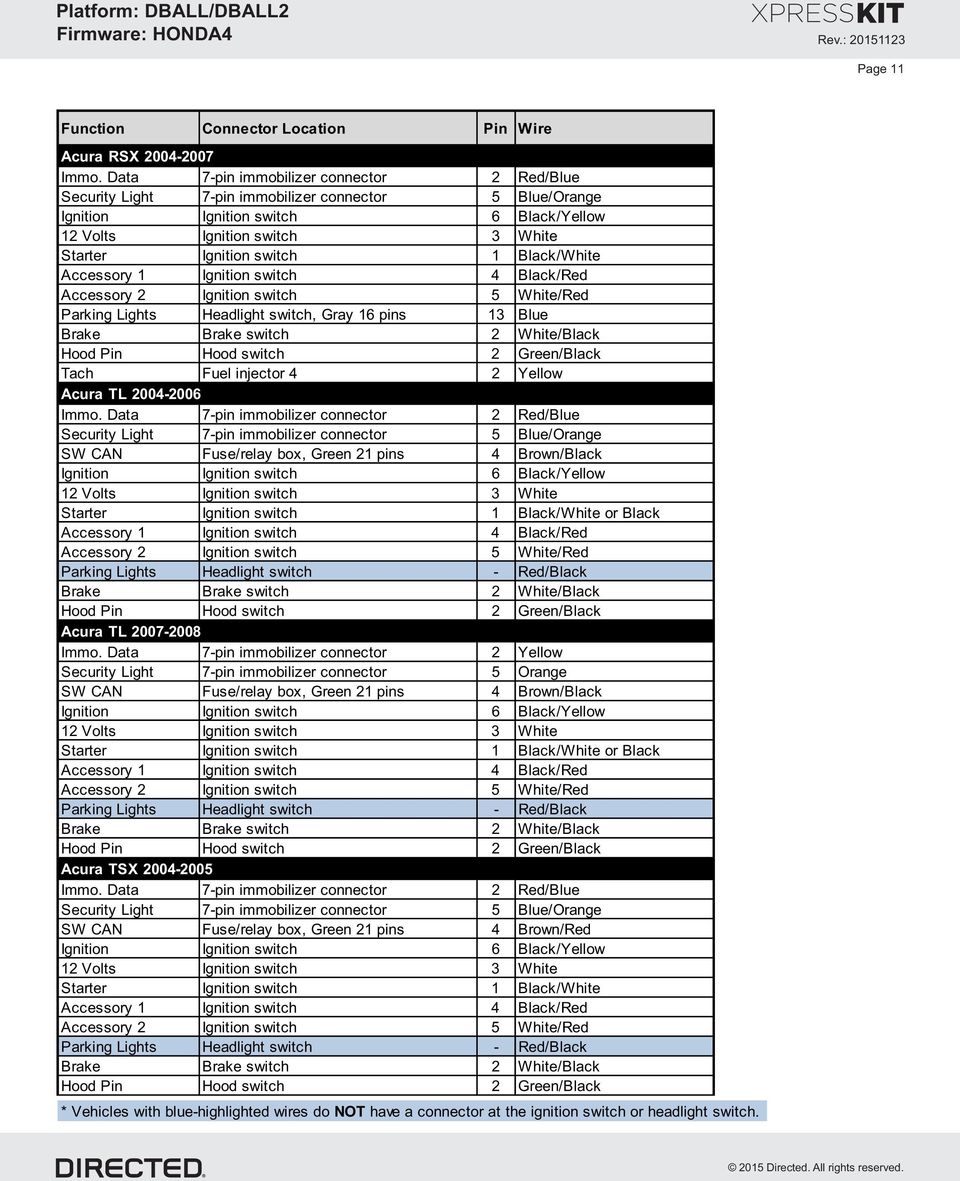
11 Page 11 Function Connector Location Pin Wire Acura RSX Immo. Data 7-pin immobilizer connector 2 Red/Blue Accessory 1 Ignition switch Black/Red Parking Lights Headlight switch, Gray 16 pins 13 Blue Hood Pin Hood switch 2 Green/Black Tach Fuel injector 2 Yellow Acura TL Immo. Data 7-pin immobilizer connector 2 Red/Blue SW CAN Fuse/relay box, Green 21 pins Brown/Black or Black Accessory 1 Ignition switch Black/Red Parking Lights Headlight switch - Red/Black Hood Pin Hood switch 2 Green/Black Acura TL Immo. Data 7-pin immobilizer connector 2 Yellow Security Light 7-pin immobilizer connector 5 Orange SW CAN Fuse/relay box, Green 21 pins Brown/Black or Black Accessory 1 Ignition switch Black/Red Parking Lights Headlight switch - Red/Black Hood Pin Hood switch 2 Green/Black Acura TSX Immo. Data 7-pin immobilizer connector 2 Red/Blue SW CAN Fuse/relay box, Green 21 pins Brown/Red Accessory 1 Ignition switch Black/Red Parking Lights Headlight switch - Red/Black Hood Pin Hood switch 2 Green/Black * Vehicles with blue-highlighted wires do NOT have a connector at the ignition switch or headlight switch.
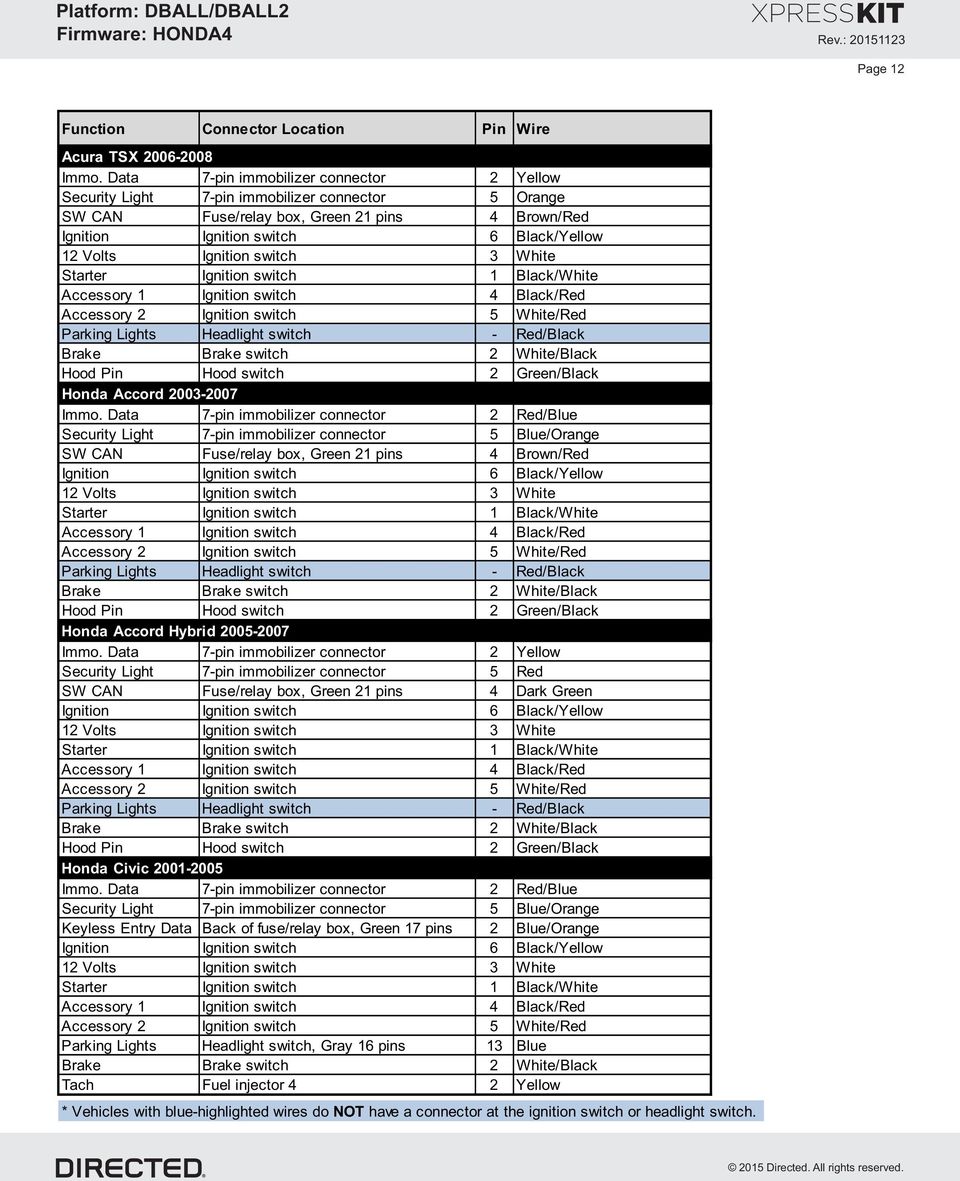
12 Page 12 Function Connector Location Pin Wire Acura TSX Immo. Data 7-pin immobilizer connector 2 Yellow Security Light 7-pin immobilizer connector 5 Orange SW CAN Fuse/relay box, Green 21 pins Brown/Red Accessory 1 Ignition switch Black/Red Parking Lights Headlight switch - Red/Black Hood Pin Hood switch 2 Green/Black Honda Accord Immo. Data 7-pin immobilizer connector 2 Red/Blue SW CAN Fuse/relay box, Green 21 pins Brown/Red Accessory 1 Ignition switch Black/Red Parking Lights Headlight switch - Red/Black Hood Pin Hood switch 2 Green/Black Honda Accord Hybrid Immo. Data 7-pin immobilizer connector 2 Yellow Security Light 7-pin immobilizer connector 5 Red SW CAN Fuse/relay box, Green 21 pins Dark Green Accessory 1 Ignition switch Black/Red Parking Lights Headlight switch - Red/Black Hood Pin Hood switch 2 Green/Black Honda Civic Immo. Data 7-pin immobilizer connector 2 Red/Blue Keyless Entry Data Back of fuse/relay box, Green 17 pins 2 Blue/Orange Accessory 1 Ignition switch Black/Red Parking Lights Headlight switch, Gray 16 pins 13 Blue Tach Fuel injector 2 Yellow * Vehicles with blue-highlighted wires do NOT have a connector at the ignition switch or headlight switch.
13 Page 13 Function Connector Location Pin Wire Honda Civic Immo. Data 7-pin immobilizer connector 3 Light Green SW CAN 7-pin immobilizer connector Pink Ignition Ignition switch 6 Blue Starter Ignition switch 1 Yellow Accessory 1 Ignition switch Orange Accessory 2 Ignition switch 5 Red Parking Lights Headlight switch, Black/White 12 pins 11 Gray Brake Brake switch 2 Light Green Hood Pin Hood switch 2 Light Blue Honda Civic Hybrid Immo. Data 7-pin immobilizer connector 2 Red/Blue Ignition Ignition switch 6 Blue Starter Ignition switch 1 Yellow Accessory 1 Ignition switch Orange Accessory 2 Ignition switch 5 Red Parking Lights Headlight switch, Gray 16 pins 13 Blue Tach Fuel injector 2 Yellow Honda Civic Hybrid Immo. Data 7-pin immobilizer connector 3 Light Green SW CAN 7-pin immobilizer connector Pink Ignition Ignition switch 6 Blue Starter Ignition switch 1 Yellow Accessory 1 Ignition switch Orange Accessory 2 Ignition switch 5 Red Parking Lights Headlight switch, Black/White 12 pins 11 Gray Brake Brake switch 2 Light Green Hood Pin Hood switch 2 Light Blue Honda CRV Immo. Data 7-pin immobilizer connector 2 White Keyless Entry Data Back of fuse/relay box, Green 17 pins 2 Blue/Orange Accessory 1 Ignition switch Black/Red Parking Lights Headlight switch, Gray 16 pins 13 Blue Hood Pin Hood switch 2 Yellow/Red Tach Fuel injector 2 Yellow * Vehicles with blue-highlighted wires do NOT have a connector at the ignition switch or headlight switch.
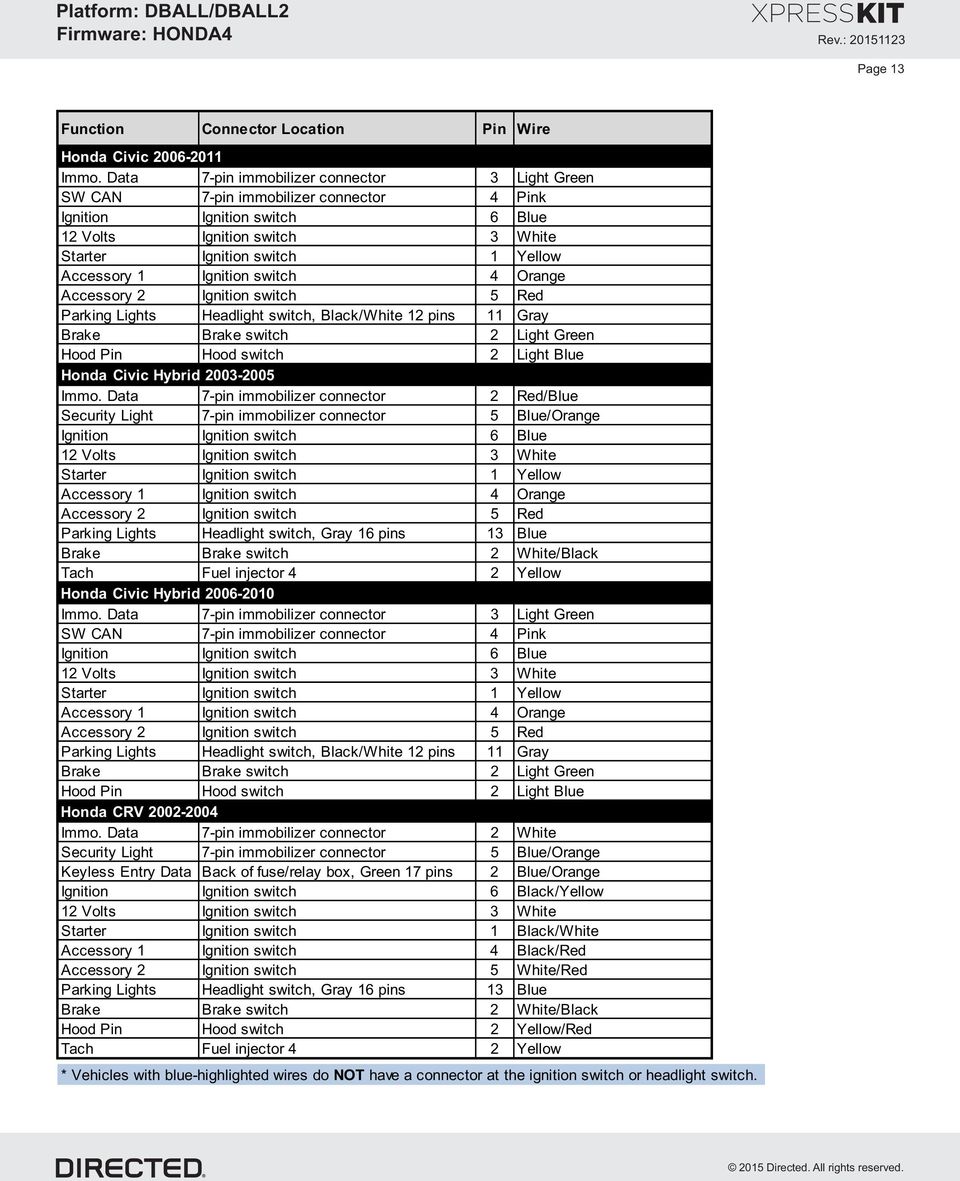
14 Page 1 Function Connector Location Pin Wire Honda CRV Immo. Data 7-pin immobilizer connector 2 White Keyless Entry Data Back of fuse/relay box, Green 17 pins 2 Blue/Orange Accessory 1 Ignition switch Black/Red Parking Lights Headlight switch, Gray 16 pins 13 Blue Honda CRV Immo. Data 7-pin immobilizer connector 3 Green SW CAN 7-pin immobilizer connector Pink Ignition Ignition switch 6 Blue Starter Ignition switch 1 Yellow Accessory 1 Ignition switch Orange Accessory 2 Ignition switch 5 Red Parking Lights Headlight switch, Black/White 12 pins 11 Blue Brake Brake switch 2 Light Green Hood Pin Hood switch 2 Light Blue Honda CR-Z Immo. Data 7-pin immobilizer connector 5 Pink SW CAN 7-pin immobilizer connector Green Ignition Ignition switch 5 Yellow 12 Volts Ignition switch 1 White Starter Ignition switch 3 Red Accessory 1 Ignition switch 7 Orange Accessory 2 Ignition switch 6 Red Parking Lights Headlight switch, 12 pins 8 Gray Brake Brake switch or dash fuse box, Green 9 pins, plug D 30 White Hood Pin Dash fuse box, Blue 36 pins, plug A 28 Violet Honda Element Immo. Data 7-pin immobilizer connector 2 White Keyless Entry Data Back of fuse/relay box, Green 17 pins 2 Blue/Orange Accessory 1 Ignition switch Black/Red Parking Lights Headlight switch, Gray 16 pins 13 Blue Tach Fuel injector 2 Yellow * Vehicles with blue-highlighted wires do NOT have a connector at the ignition switch or headlight switch.
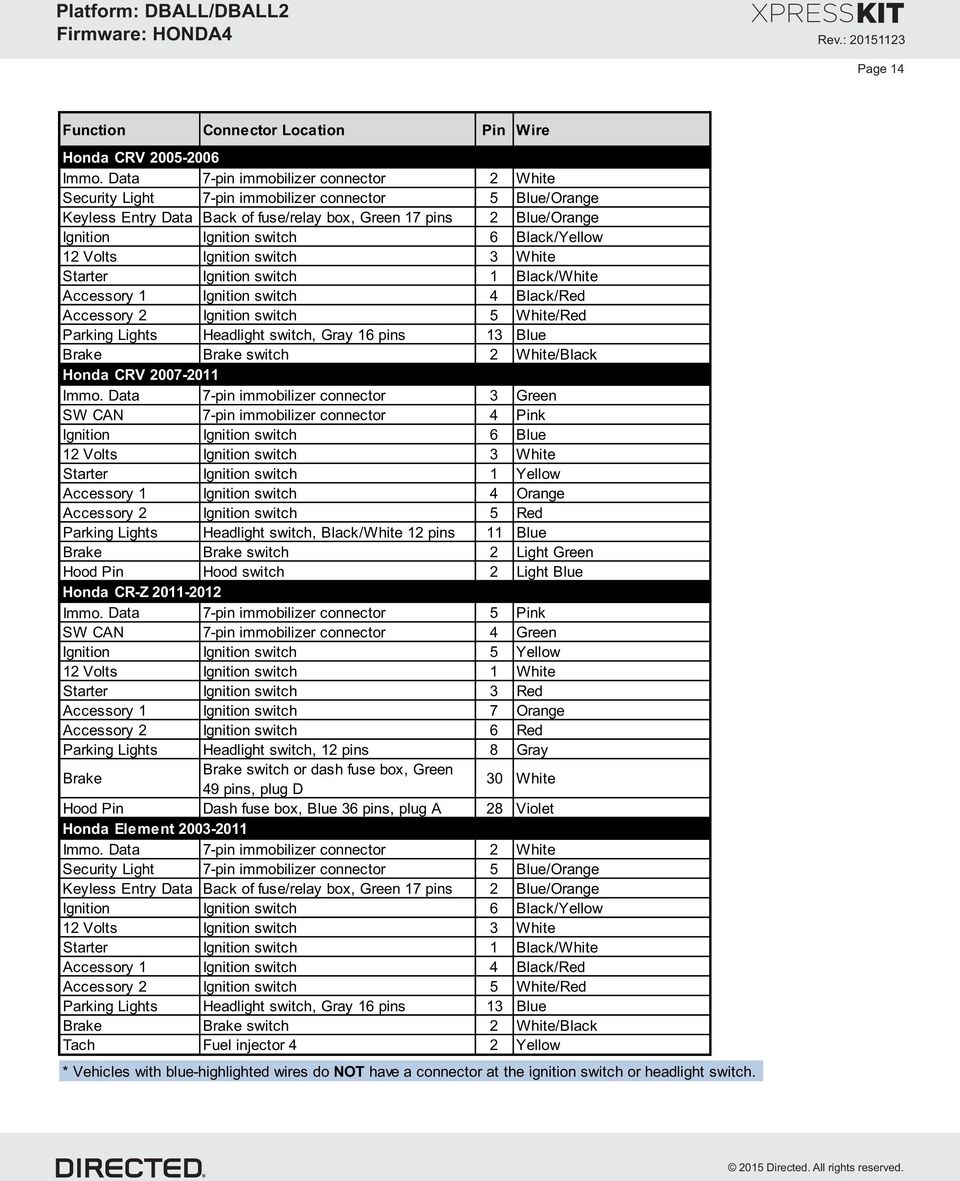
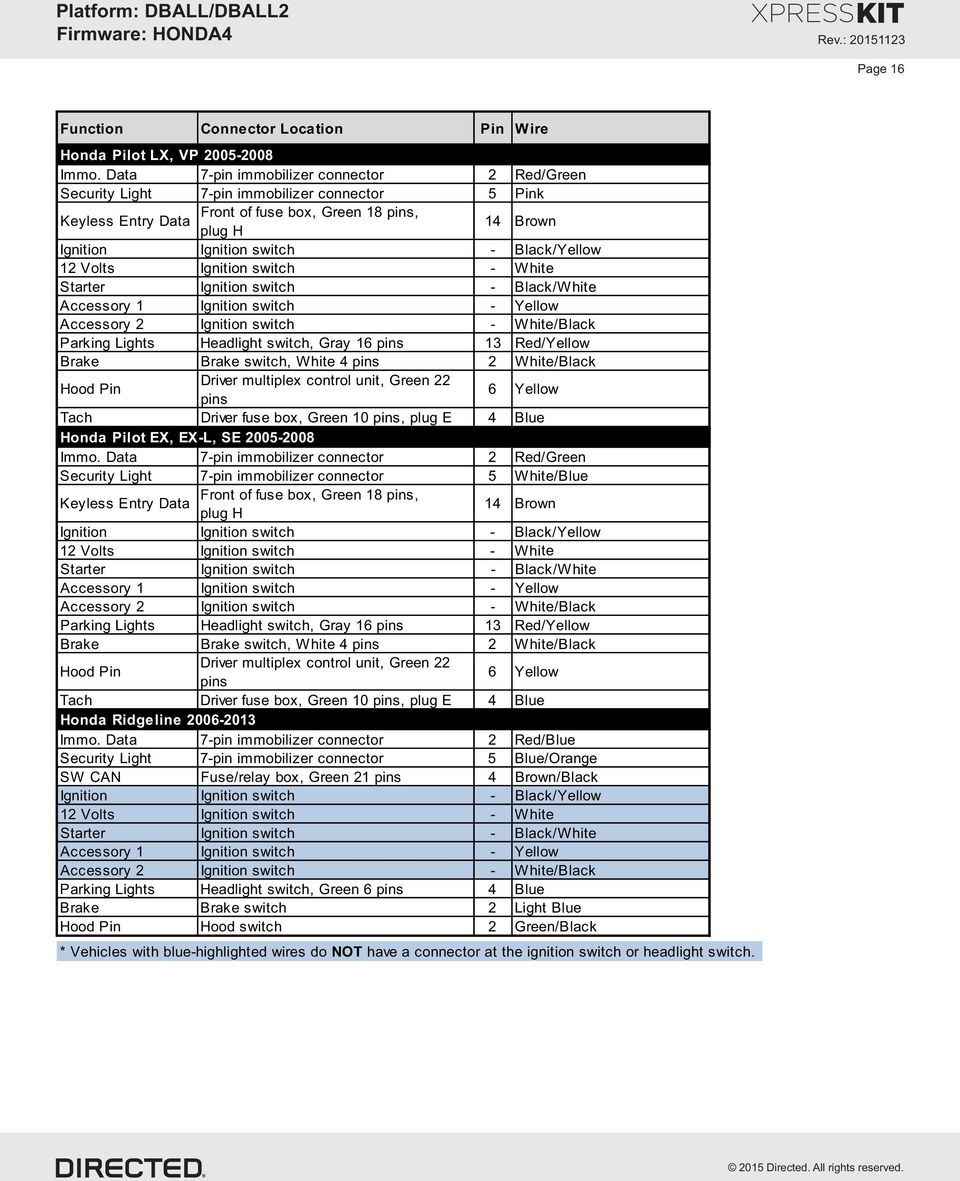
15 Page 15 Function Connector Location Pin Wire Honda Fit Immo. Data 7-pin immobilizer connector 2 Lt. Green/Black Security Light 7-pin immobilizer connector 5 Red/Black Accessory 1 Ignition switch Yellow/Black Parking Lights Headlight switch, Gray 16 pins 13 Blue Hood Pin Hood switch 2 Green/Black Tach Fuel injector 2 Yellow Honda Fit Immo. Data 7-pin immobilizer connector 3 Green SW CAN 7-pin immobilizer connector Light Green Ignition Ignition switch 6 Yellow Starter Ignition switch 1 Pink Accessory 1 Ignition switch Orange Accessory 2 Ignition switch 5 Red Parking Lights Headlight switch, Black/White 12 pins 11 Gray Brake Brake switch 2 Light Green Hood Pin Hood switch 2 Violet Honda Insight 2010 Immo. Data 7-pin immobilizer connector 3 Light Green SW CAN 7-pin immobilizer connector Green Ignition Ignition switch 6 Yellow Starter Ignition switch 1 Red Accessory 1 Ignition switch Orange Accessory 2 Ignition switch 5 Red Parking Lights Headlight switch, Black/White 12 pins 11 Gray Brake Brake switch 2 White Hood Pin Hood switch 2 Violet Tach Fuel injector 2 Yellow Honda Odyssey Immo. Data 7-pin immobilizer connector 2 Red/Blue SW CAN Fuse/relay box, Green 21 pins Dk. Green/Orange Accessory 1 Ignition switch Black/Red Parking Lights Headlight switch - Red/Black Hood Pin Hood switch 2 Green/Black Tach Fuel injector 2 Yellow * Vehicles with blue-highlighted wires do NOT have a connector at the ignition switch or headlight switch.

16 Page 16 Function Connector Location Pin Wire Honda Pilot LX, VP Immo. Data 7-pin immobilizer connector 2 Red/Green Security Light 7-pin immobilizer connector 5 Pink Front of fuse box, Green 18 pins, Keyless Entry Data plug H 1 Brown Ignition Ignition switch - Black/Yellow 12 Volts Ignition switch - White Starter Ignition switch - Black/White Accessory 1 Ignition switch - Yellow Accessory 2 Ignition switch - White/Black Parking Lights Headlight switch, Gray 16 pins 13 Red/Yellow Brake Brake switch, White pins 2 White/Black Hood Pin Driver multiplex control unit, Green 22 pins 6 Yellow Tach Driver fuse box, Green 10 pins, plug E Blue Honda Pilot EX, EX-L, SE Immo. Data 7-pin immobilizer connector 2 Red/Green Security Light 7-pin immobilizer connector 5 White/Blue Front of fuse box, Green 18 pins, Keyless Entry Data plug H 1 Brown Ignition Ignition switch - Black/Yellow 12 Volts Ignition switch - White Starter Ignition switch - Black/White Accessory 1 Ignition switch - Yellow Accessory 2 Ignition switch - White/Black Parking Lights Headlight switch, Gray 16 pins 13 Red/Yellow Brake Brake switch, White pins 2 White/Black Hood Pin Driver multiplex control unit, Green 22 pins 6 Yellow Tach Driver fuse box, Green 10 pins, plug E Blue Honda Ridgeline Immo. Data 7-pin immobilizer connector 2 Red/Blue SW CAN Fuse/relay box, Green 21 pins Brown/Black Ignition Ignition switch - Black/Yellow 12 Volts Ignition switch - White Starter Ignition switch - Black/White Accessory 1 Ignition switch - Yellow Accessory 2 Ignition switch - White/Black Parking Lights Headlight switch, Green 6 pins Blue Brake Brake switch 2 Light Blue Hood Pin Hood switch 2 Green/Black * Vehicles with blue-highlighted wires do NOT have a connector at the ignition switch or headlight switch.
17 Module Programming Page 17 Refer to the LED Diagnostics section for more information and for troubleshooting purposes. Important Make all the required connections to the vehicle, as described in the wiring diagram(s) found in this guide, and double check to ensure everything is correct prior to moving onto the next step. Warning! To take advantage of advanced features, you must use XpressVIP.5 or higher. Using version 2.9 or 3.1 will limit available functions and features. 1. Connect the interface module to your computer using the XKLoader. 2. Open an Internet Explorer browser (version 6 or higher), and go to The detail of the platform and firmware that is currently saved on the interface module will be indicated in the top right corner of the page. 3. Select the year, make and model of the vehicle; the page will refresh to display the compatible firmware.. In the search result page, select Flash Standard install, and follow the instructions provided on the screen. 5. Once you have configured your options, click on the FLASH button to upload the firmware onto the interface module. 6. The following message will be displayed when the upload is completed: The flashing is successfully completed. You may now unplug the kit. You can now proceed with the programming instructions below. D2D Installation If required for your installation, connect the 10-pin, 12-pin and 1-pin harnesses to the module, then connect the -pin D2D harness. th st 1 D2D 10-pin rd 3 nd 2 1-pin 12-pin OR W2W Installation If required for your installation, connect the 10-pin and 12-pin harnesses to the module, then connect the 1-pin harness to the module. st 1 D2D 10-pin rd 3 nd 2 1-pin 12-pin 1 Wait until the LED turns ON solid red. Solid Turn the key to the ON position. Key IN OFF ON START 2 TYPES 1, 2 & 5: The green LED turns ON for 3 seconds and shuts off. Solid x3 secs & Off TYPES 3, & 6: LED flashes orange. Press push-button 5 times to complete the programming. The orange LED turns ON for 3 seconds and shuts off. flashes Press x5 & Solid x3 secs & Off 3 Remove the key from the ignition. Key OUT OFF ON START You have successfully completed the module programming sequence.

18 Module Reset Page 18 A module reset will only erase programming performed in the previous steps. All settings (firmware) and settings flashed to the module using the web config tool will not be affected. D2D Installation If required for your installation, connect the 10-pin, 12-pin & 1-pin harnesses to the module. Press and hold the programming button, then connect the -pin D2D harness. 1 OR W2W Installation If required for your installation, connect the 10-pin & 12-pin harnesses to the module. Press and hold the programming button, then connect the 1-pin harness to the module. th 5 st 1 st 1 D2D 10-pin D2D 10-pin rd 3 nd 2 th nd 2 th rd 3 1-pin 12-pin 1-pin 12-pin Wait 3 seconds until the LED turns ON solid orange then release the 2 programming button. The LED then turns ON solid red. & & Solid Release Solid Hard Reset Warning Against Executing a Hard Reset! A hard reset will revert the flashed firmware back to its default settings. Depending on the installation, some settings (such as RFTD and D2D options) may have to be reconfigured. See the Feature & Option List section of this guide. D2D Installation If required for your installation, connect the 10-pin, 12-pin & 1-pin harnesses to the module. Press and hold the programming button, then connect the -pin D2D harness. 1 OR W2W Installation If required for your installation, connect the 10-pin & 12-pin harnesses to the module. Press and hold the programming button, then connect the 1-pin harness to the module. th 5 st 1 st 1 D2D 10-pin D2D 10-pin rd 3 nd 2 th nd 2 th rd 3 1-pin 12-pin 1-pin 12-pin 2 Wait 3 seconds until the LED turns ON solid orange, and wait 10 more seconds until the LED starts to flash orange and red. Solid & Flashes 3 Release the programming button. The LED turns ON solid red. Release & Solid

19 Feature & Option List Page 19 It is recommended to configure all the features and options listed below using the configuration tool found on the module flashing page on The web offers more options; however, manual configuration of the features is possible using the information on this page. * Default option Feat. Operation Flashes / Option Description 1. No RF Output* Module is connected to a remote starter using a standard installation. 1 RFTD Output Type 2. RFTD Output Module is connected to an XL202 using an RSR or RXT installation (when available). 3. SmartStart Module is connected to SmartStart using an RSR or RXT installation (when available). Unlocks only the driver door when the button is first pressed, and unlocks all doors when 1. Driver priority* 2 Unlock Driver Priority it is pressed a second time within 5 seconds. 2. All Unlocks all doors when the button is first pressed. 1. Trunk* Will pop the trunk if available. 3 Trunk 2. Right Sliding Door When available, will operate the right sliding door. 3. Left Sliding Door When available, will operate the left sliding door. 1. Trunk Will pop the trunk if available. Aux1 2. Right Sliding Door* When available, will operate the right sliding door. 3. Left Sliding Door When available, will operate the left sliding door. 1. Trunk Will pop the trunk if available. 5 Aux2 2. Right Sliding Door When available, will operate the right sliding door. 3. Left Sliding Door* When available, will operate the left sliding door. 1. Disabled The OEM alarm will not be controlled by the interface upon remote start. No disarm or arm command will be executed at the beginning or end of the sequence; it must be controlled by the Remote Starter. 2. Safelock Smart OEM Alarm Control will behave like a standard Safelock feature on a remote starter. It will unlock at the beginning of the sequence, and relock after start and shutdown. 6 Smart OEM Alarm Control 3. Enabled* Smart OEM Alarm Control will synchronize with the OEM alarm so that it will disarm and rearm the vehicle in the remote start sequence, only when required. The reason for this is, factory alarm control must often be done by lock or unlock operation. This could create unnecessary actions on door lock modules, such as the horn to honk. When possible, Smart OEM Alarm Control will monitor the alarm and door lock status to detect if the disarm or rearm is required. If the vehicle is unlocked or is not equipped with factory alarm, the disarm/rearm will not be executed. Smart OEM Alarm Control will also monitor the remote starter actions so that the factory alarm control is not done twice. A remote starter, for which the Safelock feature is active, will work perfectly with this option and will make it invisible to the user.

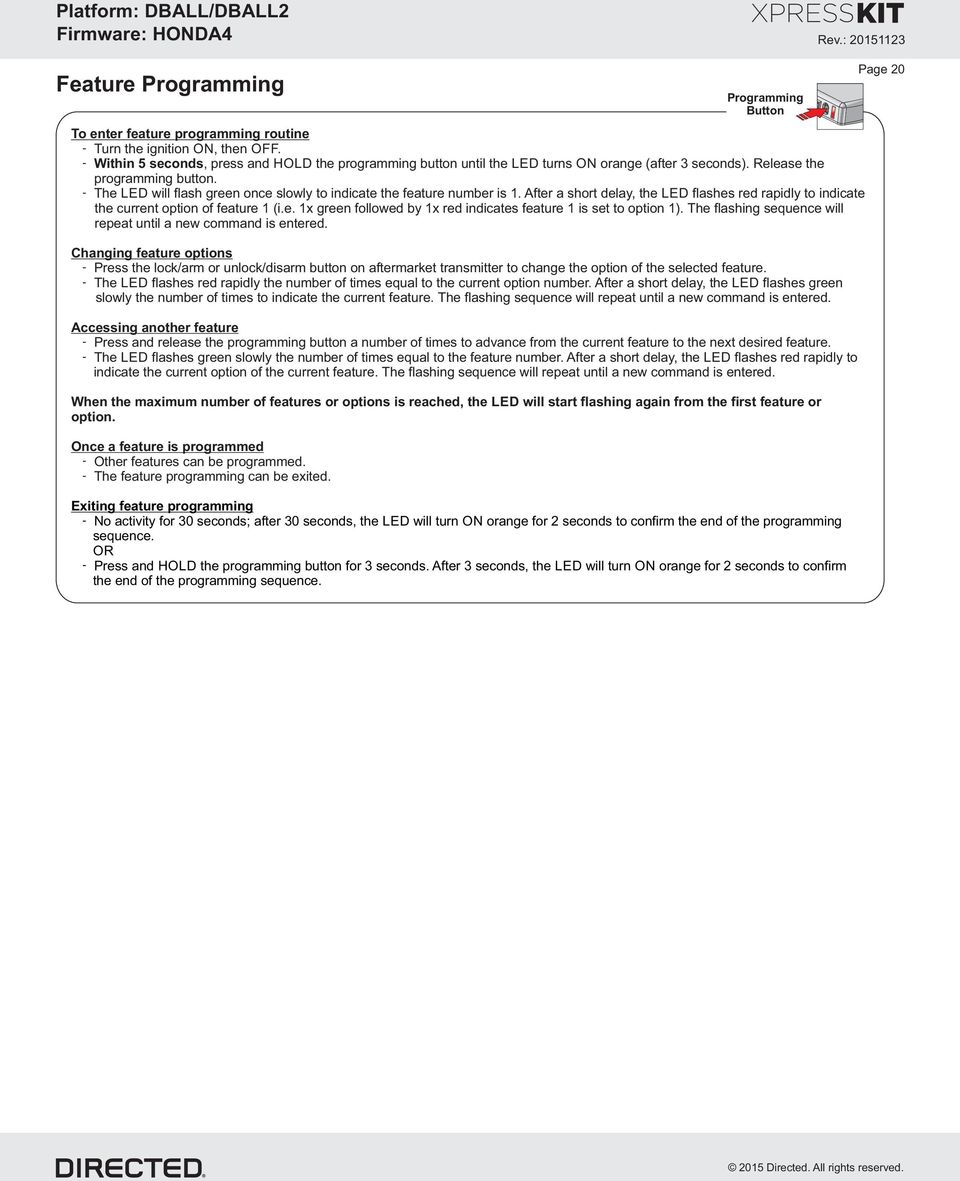
20 Feature Programming To enter feature programming routine - Turn the ignition ON, then OFF. - Within 5 seconds, press and HOLD the programming button until the LED turns ON orange (after 3 seconds). Release the programming button. - The LED will flash green once slowly to indicate the feature number is 1. After a short delay, the LED flashes red rapidly to indicate the current option of feature 1 (i.e. 1x green followed by 1x red indicates feature 1 is set to option 1). The flashing sequence will repeat until a new command is entered. Changing feature options - Press the lock/arm or unlock/disarm button on aftermarket transmitter to change the option of the selected feature. - The LED flashes red rapidly the number of times equal to the current option number. After a short delay, the LED flashes green slowly the number of times to indicate the current feature. The flashing sequence will repeat until a new command is entered. Accessing another feature - Press and release the programming button a number of times to advance from the current feature to the next desired feature. - The LED flashes green slowly the number of times equal to the feature number. After a short delay, the LED flashes red rapidly to indicate the current option of the current feature. The flashing sequence will repeat until a new command is entered. When the maximum number of features or options is reached, the LED will start flashing again from the first feature or option. Once a feature is programmed - Other features can be programmed. - The feature programming can be exited. Programming Button Exiting feature programming - No activity for 30 seconds; after 30 seconds, the LED will turn ON orange for 2 seconds to confirm the end of the programming sequence. OR - Press and HOLD the programming button for 3 seconds. After 3 seconds, the LED will turn ON orange for 2 seconds to confirm the end of the programming sequence. Page 20
21 LED Diagnostics & Troubleshooting Page 21 LED Status Description Troubleshooting Module programming - Firmware specific OFF OFF Module has no pow er. Check the pow er connection. Solid Solid red Waiting to begin the programming sequence. Make sure that all the connections are correct (see w iring diagram). Flashes Flashes green FT CAN detected. Normal operation Flashes Flashes orange Bypass is programmed. Normal operation Solid x3secs Solid green x 3 seconds Bypass is programmed w ith convenience. Normal operation Solid x3secs Solid orange x 3 seconds Bypass is programmed w ithout convenience. Normal operation Module programming - Error codes Flashes red x3 Flashes red x 3 Bypass data not detected. Check the bypass line connection. If more than one w ire is used, make sure they are not inverted. Start vehicle using the key to confirm the OEM equipment is still operational. External Module Synchronisation Solid red, then flashes orange x10 Flashes red, red then orange x10 Active ground while running (status) Flashes green Flashes green OBDII feature not supported. GROUND OUT ON (GWR) command received. Diagnostic data bus not detected. Some features are not supported by SmartStart. This can be caused by missing w ire connections or module hardw are limitation. Refer to the w iring installation section to check the connections. Otherw ise, the Ground While Running (status) signal w as lost or w as never received by the module. Commands can come from RF, D2D or W2W. Solid red, then flashes orange Solid red, then flashes orange IGNITION ON command received. Otherw ise, the ignition signal w as not received by the module. In a W2W install, it w ill show only if the ignition input w ire is used. Flashes green quickly Flashes green quickly START ON command received. Otherw ise, the start signal w as not received by the module. In a W2W install, it w ill show only if the ignition input w ire is used. D2D and W2W commands Flashes orange x1 Flashes orange x 1 LOCK command received. Flashes orange x2 Flashes orange x 2 UNLOCK command received. Flashes orange x3 Flashes orange x 3 TRUNK command received. If the bypass module fails to flash, it means the module did not receive the signal. Commands can come from RF, D2D or W2W. Flashes orange x Flashes orange x AUX1 command received. Flashes orange x5 Flashes orange x 5 AUX2 command received.
22 Limited One Year Consumer Warranty Page 22 For a period of ONE YEAR from the date of purchase of a Directed Electronics remote start or security product, Directed Electronics. ( DIRECTED ) promises to the original purchaser, to repair or replace with a comparable reconditioned piece, the security or remote start accessory piece (hereinafter the Part ), which proves to be defective in workmanship or material under normal use, provided the following conditions are met: the Part was purchased from an authorized DIRECTED dealer; and the Part is returned to DIRECTED, postage prepaid, along with a clear, legible copy of the receipt or bill of sale bearing the following information: consumer s name, address, telephone number, the authorized licensed dealer s name and complete product and Part description. This warranty is nontransferable and is automatically void if the Part has been modified or used in a manner contrary to its intended purpose or the Part has been damaged by accident, unreasonable use, neglect, improper service, installation or other causes not arising out of defect in materials or construction. TO THE MAXIMUM EXTENT ALLOWED BY LAW, EXCEPT AS STATED ABOVE, ALL WARRANTIES, INCLUDING BUT NOT LIMITED TO EXPRESS WARRANTY, IMPLIED WARRANTY, WARRANTY OF MERCHANTABILITY, FITNESS FOR PARTICULAR PURPOSE AND WARRANTY OF NONINFRINGEMENT OF INTELLECTUAL PROPERTY, ARE EXPRESSLY EXCLUDED; AND DIRECTED NEITHER ASSUMES NOR AUTHORIZES ANY PERSON OR ENTITY TO ASSUME FOR IT ANY DUTY, OBLIGATION OR LIABILITY IN CONNECTION WITH ITS PRODUCTS. DIRECTED HEREBY DISCLAIMS AND HAS ABSOLUTELY NO LIABILITY FOR ANY AND ALL ACTS OF THIRD PARTIES INCLUDING DEALERS OR INSTALLERS. DIRECTED IS NOT OFFERING A GUARANTEE OR INSURANCE AGAINST VANDALISM, DAMAGE, OR THEFT OF THE AUTOMOBILE, ITS PARTS OR CONTENTS, AND DIRECTED HEREBY DISCLAIMS ANY LIABILITY WHATSOEVER, INCLUDING WITHOUT LIMITATION, LIABILITY FOR THEFT, DAMAGE, OR VANDALISM. IN THE EVENT OF A CLAIM OR A DISPUTE INVOLVING DIRECTED OR ITS SUBSIDIARY, THE PROPER VENUE SHALL BE SAN DIEGO COUNTY IN THE STATE OF CALIFORNIA. CALIFORNIA STATE LAWS AND APPLICABLE FEDERAL LAWS SHALL APPLY AND GOVERN THE DISPUTE. THE MAXIMUM RECOVERY UNDER ANY CLAIM AGAINST DIRECTED SHALL BE STRICTLY LIMITED TO THE AUTHORIZED DIRECTED DEALER S PURCHASE PRICE OF THE PART. DIRECTED SHALL NOT BE RESPONSIBLE FOR ANY DAMAGES WHATSOEVER, INCLUDING BUT NOT LIMITED TO, ANY CONSEQUENTIAL DAMAGES, INCIDENTAL DAMAGES, DAMAGES FOR THE LOSS OF TIME, LOSS OF EARNINGS, COMMERCIAL LOSS, LOSS OF ECONOMIC OPPORTUNITY AND THE LIKE. NOTWITHSTANDING THE ABOVE, THE MANUFACTURER DOES OFFER A LIMITED WARRANTY TO REPLACE OR REPAIR AT DIRECTED S OPTION THE PART AS DESCRIBED ABOVE. This warranty only covers Parts sold within the United States of America and Canada. Parts sold outside of the United States of America or Canada are sold AS-IS and shall have NO WARRANTY, express or implied. Some states do not allow limitations on how long an implied warranty will last or the exclusion or limitation of incidental or consequential damages. This warranty gives you specific legal rights and you may also have other rights that vary from State to State. DIRECTED does not and has not authorized any person or entity to create for it any other obligation, promise, duty or obligation in connection with this Part. For further details relating to warranty information of Directed products, please visit the support section of DIRECTED s website at: This Interface kit / Data Bus Interface part has been tested on the listed vehicles. Other vehicles will be added to the select vehicle list upon completion of compatibility testing. Visit website for latest vehicle application guide. DISCLAIMER: Under no circumstances shall the manufacturer or the distributors of the bypass kit / data bus interface part(s) be held liable for any consequential damages sustained in connection with the part(s) installation. The manufacturer and it s distributors will not, nor will they authorize any representative or any other individual to assume obligation or liability in relation to the interface kit / data bus interface part(s) other than its replacement. N.B.: Under no circumstances shall the manufacturer and distributors of this product be liable for consequential damages sustained in connection with this product and neither assumes nor authorizes any representative or other person to assume for it any obligation or liability other than the replacement of this product only. Protected by U.S. Patents: 5,719,551; 6,011,60 B1 *; 6,23,00 B1; 6,29,216 B1; 6,275,17 B1; 6,297,731 B1; 6,36,876 B1; 6,392,53 B1; 6,529,12 B2; 6,696,927 B2; 6,756,885 B1; 6,756,886 B2; 6,771,167 B1; 6,812,829 B1; 6,92,750 B1; 7,010,02 B1; 7,015,830 B1; 7,031,826 B1; 7,06,126 B1; 7,061,137 B1; 7,068,153 B1; 7,205,679 B1; Cdn. Patent: 2,320,28; 2,1,991; 2,15,011; 2,15,023; 2,15,027; 2,15,038; 2,15,01; 2,20,97; 2,26,670; 2,5,089; European Patent: 1,053,128; Pat. Pending: 2,291,306. Made in Canada.
23 Quick Reference Guide DBALL/DBALL2-HONDA List of Available Commands Notes Note that the information below is for Viper, Clifford and Python models. Icons and commands may differ depending on the remote brand and model purchased. Refer to your authorized installation center for more information. Button(s) Actions Press & hold for 1 second to lock. Press & hold for 1 second to unlock. Press & hold for 1 second to remote start. x1 + x2 + x3 + x1 + Press & hold for 5 seconds to activate the trunk release (optional). Press once, then to activate the right sliding door (optional).* Press twice, then to activate the left sliding door (optional).* Press 3 times, then to activate the panic mode. Press once, then to reset the remote starter runtime. * This output is configurable. see your authorized installation center for more information.
Vehicle Application Guide... 02
 Update Alert: Firmware updates are posted on the web on a regular basis. We recommend that you check for firmware and/or install guide updates prior to installing this product. Installation Guide Door
Index Vehicle Application Guide... Immobilizer Interface with OEM Immob. Receiver...
 Platform: DBALL/DBALL Rev.: 0509 Update Alert: Firmware updates are posted on the web on a regular basis. We recommend that you check for firmware and/or install guide updates prior to installing this
Vehicle Application Guide...
 Update Alert: Firmware updates are posted to the web on a regular basis. We recommend that you check for firmware and/or install guide updates prior to installing this product. Installation Guide The FORD6
ALWAYS TEST THE INSTALLATION ONCE A RELAY IS INSTALLED, TO ENSURE THE VEHICLE CANNOT BE STARTED IN GEAR.
 Update Alert: Firmware updates are posted to the web on a regular basis. We recommend that you check for firmware and/or install guide updates prior to installing this product. Installation Guide The XK09-NISS2
HONDA ACCORD 1985-2005
 HONDA ACCORD 1985-2005 VEHICLE WIRING Copyright 2002-2004 Triple S Customs WIRING INFORMATION: 1985 Honda Accord WIRE WIRE COLOR WIRE LOCATION 12V CONSTANT WHITE or WHITE/BLACK Ignition Harness STARTER
ISUZU RODEO 1992-2003
 ISUZU RODEO 1992-2003 VEHICLE WIRING Copyright 2002-2004 Triple S Customs WIRING INFORMATION: 1992 Isuzu Rodeo 12V CONSTANT WIRE BLACK Ignition Harness STARTER WIRE WHITE/BLUE OR BLACK/WHITE Ignition Harness
WIRING HARNESS FOR AS635P4. BLUE PLUG RED, BLUE, BLACK, WHITE - Plug in dual stage sensor harness
 WIRING HARNESS FOR AS635P4 ANTENNA NOT USED 5 PIN WHITE PLUG 2 PIN WHITE PLUG GREEN - PARKING BRAKE INPUT (-) BLUE - NOT USED 3 PIN BLUE PLUG RED, BLUE, BLACK, WHITE - Plug in dual stage sensor harness
Automotive Data Solutions Inc.
 Automotive Data Solutions Inc. INSTALL GUIDE DBI-AL(TB)-TL-EN TL Available for : DBI-AL CA Rev. Date: December 28, 2012 Doc. No.: ##10349## 20121213 Version FRançaise disponible en ligne au www.idatalink.com
Automotive Data Solutions Inc.
 Automotive Data Solutions Inc. INSTALL GUIDE ADS-TB-TL-EN TL Available for : ADS-TB Rev. Date: December 28, 2012 Doc. No.: ##10345## 20121213 Version FRançaise disponible en ligne au www.idatalink.com
PRO PLM Installation Instructions
 PRO PLM Installation Instructions PROFESSIONAL INSTALLATION STRONGLY RECOMMENDED Installation Precautions: Roll down window to avoid locking keys in vehicle during installation Avoid mounting components
Directed Passive Keyless Entry System (PKE) Model 2102T Owner s Guide
 Directed Passive Keyless Entry System (PKE) Model 2102T Owner s Guide 2012 Directed, Vista, CA G2102T Contents Government regulations...4 Warning! Safety first...6 Important information...6 System maintenance...6
Security and Remote Start Installation Guide for models: CA 6150 CA 6550
 PROFESSIONAL SERIES Security and Remote Start Installation Guide for models: CA 6150 CA 6550 2009 Audiovox Electronics Corporation. All rights reserved. 1 Table of Contents Before You Begin... 4 Wire Connection
Vehicle Application Guide... Installation Type 1 - Toyota & Lexus Vehicles... Type 2 - Ford & Mazda Vehicles... Wiring Connection Reference Chart...
 Rev.: 000809 Update Alert: Firmware updates are posted to the web on a regular basis. We recommend that you check for firmware and/or install guide updates prior to installing this product. Installation
e-ask electronic Access Security Keyless-entry
 e-ask electronic Access Security Keyless-entry e-fob Keyless-entry entry System Full-Function Function Installation Manual FCC ID: TV2EFOB1 (UM20 ~ 22793-02) Table of Contents Introduction... 1 e-fob Operation
CA-125 Owner's Manual
 Remote Vehicle Control System CA-125 Owner's Manual Vehicle Security System With Remote Keyless Entry IMPORTANT NOTE: The operation of the Security and Convenience System as described in this manual is
1R / 4-BUTTON SERIES
 Button 1 1R / 4-BUTTON SERIES VEHICLE SECURITY SYSTEM Standard Features: Two 4-Button Remote Transmitters Status indicator (LED) Valet / override switch Multi-tone siren Dual stage impact detector Remote
INSTALLATION GUIDE. www.security.soundstream.com FCC ID NOTICE
 AL.1 AUTO SECURITY SYSTEM INSTALLATION GUIDE www.security.soundstream.com FCC ID NOTICE This device complies with Part 15 of the FCC rules. Operation is subject to the following conditions: 1. This device
VEHICLE SECURITY SYSTEM G25/G20
 VEHICLE SECURITY SYSTEM G25/G20 Limited Lifetime Warranty This vehicle security system is warranted to the original purchaser, to be free from defects in material and workmanship. The manufacturer will
REMOTE TRANSMITTER LAYOUT
 Full Featured Keyless Entry System with Optional Starter Defeat and Passive Immobilize Feature SYSTEM MANUA STANDARD FEATURES Some of the system s standard features include: Two 4-button remote transmitters
Car Alarm Series 2 B 2 Buttons
 Car Alarm Series 2 B 2 Buttons G22 SE (External - Shock Sensor) Version 3 Software 67 Plus www.geniuscaralarm.com 21 CAR ALARM GENIUS Series 2B 2 Buttons - G22 Se (External Shock Sensor) Module controlled
RS-1301DP/1303DP/1304DP 1-WAY SYSTEM RS-1300DP ADD-ON MODULE DP SERIES (Data Port)
 RS-1301DP/1303DP/1304DP 1-WAY SYSTEM RS-1300DP ADD-ON MODULE DP SERIES (Data Port) OPERATING INSTRUCTIONS **IMPORTANT NOTES:- FOR RS-1300DP MODEL ONLY** RS-1300DP Model is an add-on/expansion unit, without
AL-1650-EDPB AL-1750-EDPB AL-1850-EDPB AL-1950-EDPB AL-2050-EDPB
 AL-1650-EDPB AL-1750-EDPB AL-1850-EDPB AL-1950-EDPB AL-2050-EDPB Deluxe Security & Remote Start System Installation Guide July 11, 2012 Temporary cover. Color cover is in a separate file. Installation
PATENTED: www.voxxintl.com/company/patents
 Model APS-997C Installation Manual 2 Way LCD Vehicle Security and Table Of Contents: Remote Start System Before You Begin Page 2 Wire Harnesses Quick View Page 3 and 4 Installation Of The Major Components
VEHICLE SECURITY SYSTEM Optional Remote Start Module and 2-way Transmitter Instructions Included
 VEHICLE SECURITY SYSTEM Optional Remote Start Module and 2-way Transmitter Instructions Included STANDARD FEATURES Some of the system s standard features include: 4-button remote transmitter LED Status
PATENTED: www.voxxintl.com/company/patents
 Model PRO9776C Installation Manual Vehicle Security System Table Of Contents: with Remote Start Before You Begin Page 2 Wire Harnesses Quick View Page 3-4 Installation of the Major Components Page 5 Wiring
Responder LE Models Viper 4204 Clifford 420.4X Python 424 Keyless Entry and Remote Start Installation Guide
 Responder LE Models Viper 4204 Clifford 420.4X Python 424 Keyless Entry and Remote Start Installation Guide This product is intended for installation by a professional installer only! Attempts to install
How To Control A Car Alarm On A Car With A Remote Control System
 MODEL CA100 REMOTE CONTROL AUTO ALARM SYSTEM INSTALLATION & OPERATION INSTRUCTIONS WIRING DIAGRAM Black Antenna Wire 6 Pin 6 Pin Mini Connector Valet Switch Blue LED Indicator Blue Wire: (-) 200mA Unlock
Copyright 2002-2004 Triple S Customs
 CHEVROLET SILVERADO 1988-2005 VEHICLE WIRING Copyright 2002-2004 Triple S Customs WIRING INFORMATION: 1988 Chevy Silverado Full-Size 2- POWER DOOR LOCK (5-wire reverse polarity) POWER DOOR UNLOCK (5-wire
Model 4113 Remote Start Owner s Guide
 Model 4113 Remote Start Owner s Guide 2009 Directed Electronics, Vista, CA G4113L 2009-05 Contents Government Regulations...5 Warning! Safety first...6 What is Included...8 Important Information...8 System
Owner s Guide. ca6554
 PROFESSIONAL SERIES Owner s Guide For Models: ca6554 Deluxe Vehicle Security and Remote Start System with 2 Way Confirming LCD Remote Control IMPORTANT NOTE: The operation of the Security and Convenience
CM6000 Install Guide. Table of Contents
 Version 6.07 Table of Contents CM6000 Introduction 4 Kit Contents 4 Installation Basics 5 Remote Programming Routine 6 Placement and Use of Components 6 Common Procedures 11 Wiring Descriptions 15 Option
INSTALLATION MANUAL 3RP / 5RP 4-BUTTON SERIES VEHICLE SECURITY SYSTEMS
 3RP / 5RP 4-BUTTON SERIES VEHICLE SECURITY SYSTEMS INSTALLATION MANUAL Before you begin the installation Read the INSTRUCTIONS! Always use a multi-meter when verifying vehicle wiring. Before mounting the
Button 1 Button 2. Button 3 Button 4. Programmed Remote Transmitter. Button Function Condition
 WWW.STELLAR.COM ST9000 SECURITY SYSTEM Button Function Condition 1 a. Arm and lock doors b. Car finder with sound c. Temporary stop alarm from sounding d. Remote lock doors 1 for 2 sec. Panic Anytime a.
Installation Guide Security and Remote Start
 Installation Guide Security and Remote Start This product is intended for installation by a professional installer only! Attempts to install this product by a person other than a trained professional may
Model AM2. Installation Guide
 Model AM2 Installation Guide NOTE: This product is intended for installation by a professional installer only! Any attempt to install this product by any person other than a trained professional may result
CA 1050 Owner s Guide
 PROFESSIONAL SERIES CA 1050 Owner s Guide Vehicle Security and Keyless Entry System IMPORTANT NOTE: The operation of the Security and Convenience System as described in this manual is applicable to most
INSTALLATION GUIDE OWNER S GUIDE
 INSTALLATION GUIDE OWNER S GUIDE SECURITY SYSTEM PRO-SERIES 5002 CONTENTS System Features... 1-2 System Components... 2 Technical Assistance... 2 Before You Begin... 2 Precautions... 2-3 Making Connections...
Directed Digital System
 Directed Digital System GM5 Firmware Specific Guide WARNING: Door lock function may not operate on older vehicles that do not have the OnStar feature (active or not). This product is intended for installation
PUSH BUTTON START INSTALLATION MANUAL
 PUSH BUTTON START INSTALLATION MANUAL ALTHOUGH THIS PRODUCT HAS BEEN THOROUGHLY TESTED KPIERSON TECHNOLOGIES ASSUMES NO RESPONSIBILITY FOR ANY DAMAGE THAT MAY RESULT BY THE INSTALLATION OF THIS PRODUCT.
SP-100 REMOTE CONTROL ALARM SYSTEM INSTALLATION & OPERATING INSTRUCTIONS INTRODUCTION
 SP-100 REMOTE CONTROL ALARM SYSTEM INSTALLATION & OPERATING INSTRUCTIONS INTRODUCTION CONGRATULATIONS on your choice of a Security Plus Remote Alarm System by Crimestopper Security Products Inc. This booklet
535T Window Automation System
 535T Window Automation System Installation Guide NOTE: This product is intended for installation by a professional installer only! Any attempt to install this product by any person other than a trained
EZ-90 / EZ-91 REMOTE ENGINE STARTING SYSTEM OPERATING INSTRUCTIONS INTRODUCTION REV A - 08.2004
 EZ-90 / EZ-91 REMOTE ENGINE STARTING SYSTEM OPERATING INSTRUCTIONS INTRODUCTION **IMPORTANT NOTES:- FOR EZ-91 MODEL ONLY** The EZ-91 model is an add-on (expansion unit), without remotes or antenna. It
Copyright 2002-2004 Triple S Customs
 JEEP GRAND CHEROKEE 1992-2006 VEHICLE WIRING Copyright 2002-2004 Triple S Customs WIRING INFORMATION: 1992 Jeep Grand Cherokee 12V CONSTANT WIRE PINK/BLACK or RED/WHITE Steering Column STARTER WIRE YELLOW/BLUE
MAGICAR M870AS. Car alarm with two-way remote and remote - start system Installation guide
 MAGICAR M870AS Car alarm with two-way remote and remote - start system Installation guide EN English TABLE OF CONTENTS I. INTRODUCTION...4 II. PLACING...4 III. ADDITIONAL RELAY 12V CONNECTION...1 IV. WIRING
FZ400 1997-1998 WIRING DIAGRAM (JAPANESE MARKET FAZER 400) 5
 FZ400 1997-1998 WIRING DIAGRAM (JAPANESE MARKET FAZER 400) 5 1 2 4 7 6 11 12 13 13 12 13 3 13 8 9 56 14 59 52 54 15 48 55 34 22 16 51 50 60 47 46 36 35 23 17 49 24 25 18 44 37 38 39 40 58 33 26 27 28 29
Owner s Guide for the 220 MAX models (Rev D) Recreationnal Vehicle Security System
 Owner s Guide for the 220 MAX models (Rev D) Recreationnal Vehicle Security System [Table of contents] Your Warranty... 1 What s included... 2 System maintenance... 2 Transmitter Functions... 3 Arming
How To Set Off An Alarm On A Car With A Car Alarm On It
 AUTO SECURITY SYSTEM USER S OPERATION GUIDE FCC ID NOTICE This device complies with Part 15 of the FCC rules. Operation is subject to the following conditions: 1. This device may not cause harmful interference,
VEHICLE SECURITY SYSTEM Optional Remote Start Module and 2-way Transmitter Instructions Included
 VEHICLE SECURITY SYSTEM Optional Remote Start Module and 2-way Transmitter Instructions Included STANDARD FEATURES Some of the system s standard features include: 4-button remote transmitter LED Status
GENERATOR START CONTROL MODULE - MINI (2 Wire to 3 Wire)
 FEATURES & APPLICATIONS Inexpensive 2 wire to 3 wire start controller for electric start high speed gas generators. Optimized for use with Outback Invertors. Supports three types of 3 wire generator control
ASTRA 4000RS/1000RS-DBP G55 SERIES VEHICLE SECURITY SYSTEM WITH REMOTE START PRODUCT MANUAL
 ASTRA 4000RS/1000RS-DBP G55 SERIES VEHICLE SECURITY SYSTEM WITH REMOTE START PRODUCT MANUAL Limited Lifetime Warranty This vehicle security system is warranted to the original purchaser, to be free from
RS1-G4 / RS3-G4 / RS4-G4 RS7-G4 (PAGING SYSTEM) RS00-G4 (ADD-ON MODULE)
 RS1-G4 / RS3-G4 / RS4-G4 RS7-G4 (PAGING SYSTEM) RS00-G4 (ADD-ON MODULE) REMOTE START SYSTEM INSTALLATION INSTRUCTIONS CONGRATULATIONS on your choice of a Cool Start System with Data Port Technology for
RS900ER / RS901 SERIES III OPERATING INSTRUCTIONS
 RS900ER / RS901 SERIES III OPERATING INSTRUCTIONS CONGRATULATIONS on your choice of a CoolStart Remote Engine Starter by Crimestopper Security Products Inc. This booklet contains the information necessary
NO ONE DARES COME CLOSE
 The company behind Viper Auto Security Systems is Directed. Since its inception, Directed has had one purpose, to provide consumers with the finest vehicle security and accessories available. The recipient
INSTALLATION MANUAL VEHICLE SECURITY SYSTEM CE-SS200
 INSTALLATION MANUAL VEHICLE SECURITY SYSTEM CE-SS200 FUSION CULTURE TABLE OF CONTENTS There s no point doing something if no one notices. We ve always believed the way to make things happen is by getting
REMOTE START SECURITY SYSTEM OWNERS MANUAL
 REMOTE START SECURITY SYSTEM OWNERS MANUAL Standard Features The System has the following standard features: 5-button remote transmitter Status indicator (LED) Valet/Service mode switch Remote Start capabilities
Multi Function, User Configurable Remote Vehicle Security System with 4 Button Replaceable Membrane Remote Transmitter
 MODEL PRO-9744 INSTALLATION MANUAL Multi Function, User Configurable Remote Vehicle Security System with 4 Button Replaceable Membrane Remote Transmitter This System Allows The Transmitter Buttons To Be
RF-350 PROFESSIONAL VEHICLE SECURITY SYSTEM WITH KEYLESS ENTRY. INSTALLATION & USERS MANUAL (For Authorized Dealers Only)
 RF-350 PROFESSIONAL VEHICLE SECURITY SYSTEM WITH KEYLESS ENTRY INSTALLATION & USERS MANUAL (For Authorized Dealers Only) Please register your product at www.autopageusa.com THIS PRODUCT IS DESIGNED FOR
Automotive Data Solutions Inc. Rev. Date: October 04, 2011 Doc. No.: ##6611## 20111004
 Automotive Data Solutions Inc. INSTALL GUIDE ADS-AL(DL)-GM Available for : ADS-AL CA Rev. Date: October 04, 0 Doc. No.: ##66## 0004 GM Version FRançaise disponible en ligne au www.idatalink.com please
KEYLESS ENTRY UPGRADE SECURITY SYSTEM for 2004 TOYOTA HIGHLANDER
 KEYLESS ENTRY UPGRADE SECURITY SYSTEM for 2004 TOYOTA HIGHLANDER DEALER SERVICE AND INSTALLATION MANUAL KIT NO. 00016-30915 Contents PARTS LIST... 2 PARTS ILLUSTRATIONS... 2 VEHICLE PREPARATION... 3 INSTALLING
Model 5303 Installation Guide
 Model 5303 Installation Guide This product is intended for installation by a professional installer only! Attempts to install this product by a person other than a trained professional may result in severe
Directed Digital System
 Directed Digital System GM6 Firmware Specific Guide This product is intended for installation by a professional installer only! Attempts to install this product by a person other than a trained professional
Entering Program Mode for Vehicle Security and Remote Start Systems
 Entering Program Mode for Vehicle Security and Remote Start Systems System 100 Keyless Entry Remote Start System (1 Way and 2-Way Remote Start Systems) Kit Part # s: 7L2Z-19G364-AA AL2Z-19G364-A 9G1Z-19G364-A
VEHICLE SECURITY SYSTEM. Car Alarm System With Command Confirmation
 VEHICLE SECURITY SYSTEM Car Alarm System With Command Confirmation About Your System Congratulations on your purchase of this state-of-the-art vehicle security system. With proper installation this system
Part Number: 250-1859
 General Applicability 2010 Honda Insight 07- Kia Optima / Forte / Rondo/ 10- Sedona / 12 Soul 10- Hyundai Tucson / Elantra Touring ETC 2012 Accent / Elantra/ Genesis Recommended Tools Safety Tools Gloves,
2003/2004/2005 TOYOTA COROLLA
 2003/2004/2005 TOYOTA COROLLA KEYLESS ENTRY UPGRADE SECURITY SYSTEM INSTALLATION INSTRUCTIONS KIT NO. 00016-30120 SPECIAL NOTE: Installation Sequences After TMS and Safety mandated preparatory steps have
www.dsecanada.com istart Security and Remote Start Installation Guide ISO 9001 Fabriqué sous norme
 D S E www.dsecanada.com istart Security and Remote Start Installation Guide Fabriqué sous norme ISO 9001 Certified Manufacturer This product is intended for installation by a professional installer only!
SR-i900 Series. www.scorpioalarms.com [email protected]. Phone (480)951-1109
 www.scorpioalarms.com [email protected] SR-i900 Series Phone (480)951-1109 Aritronix Ltd 16055 N. Dial Blvd. Suite B-10 Scottsdale, AZ 85260 V9.3 Important Information Save this information for future
CMD-8000 rev. A COMMANDER SERIES REMOTE CONTROL ENTRY SYSTEM
 INTRODUCTION CMD-8000 rev. A COMMANDER SERIES REMOTE CONTROL ENTRY SYSTEM Thank you for purchasing the CMD-8000 Commander from Dakota Digital. This, along with many other products that Dakota Digital has
INSTALLATION GUIDE OWNER S GUIDE
 INSTALLATION GUIDE OWNER S GUIDE KEYLESS ENTRY MODELS KE100 / KE150 / 1702 CONTENTS System Features... 1 System Components... 1 Technical Assistance... 1 Before You Begin... 1 Precautions... 1-2 Making
The Child Reminder System Installation Manual
 The Child Reminder System Installation Manual Revised June, 2006 Detailed installation information can be found at www.childreminder.com. Get through your installation quickly and easily by calling 1-888-330-6786
FanControl U2 Connection of the module in BMW and Mini Cooper vehicles
 FanControl U2 Connection of the module in BMW and Mini Cooper vehicles www.tecel.ru Module application in BMW 5 (F10), BMW 6 (F13), BMW 7 (F01, F02) vehicles Group 4, subgroup 2 CАN L green CAN H orange
Model 4103 Remote Start Owner s Guide
 Model 4103 Remote Start Owner s Guide 2008 Directed Electronics, Vista, CA G4103L 2008-07 Contents Government Regulations...5 Warning! Safety first...7 What is Included...9 Important Information...9 System
2004 Directed Electronics, Inc. Vista, CA N426V 07-04
 350HV Installation Guide NOTE: This product is intended for installation by a professional installer only! Any attempt to install this product by any person other than a trained professional may result
e-ask electronic Access Security Keyless-entry Consumer Manual FCC ID: TV2EFOB1 (UM12 ~ 22271-02)
 e-ask electronic Access Security Keyless-entry e-fob / e-pade Consumer Manual FCC ID: TV2EFOB1 (UM12 ~ 22271-02) Table of Contents Introduction... 1 e-fob Operation and Features - Standard... 2 e-fob Operation
SNIPER X1 VEHICLE SECURITY SYSTEM
 SNIPER X1 VEHICLE SECURITY SYSTEM Installation Manual Table of Contents 1. FEATURES & SPECIFICATIONS... 2 2. TRANSMITTER BUTTONS:... 2 3. FUNCTION... 2 3.1 Key Function:...2 3.2 Remote Transmitter Code
Responder LE Model 5701 Security and Remote Start Owner s Guide
 Responder LE Model 5701 Security and Remote Start Owner s Guide 2008 Directed Electronics, Vista, CA Limited lifetime consumer warranty Directed Electronics. ( Directed ) promises to the original purchaser
AM1 Security System installation guide
 AM1 Security System installation guide 2005 Directed Electronics, Inc. Vista, CA N427A 01-05 NOTE: This product is intended for installation by a professional installer only! Any attempt to install this
CMD-9000 COMMANDER SERIES REMOTE CONTROL ENTRY SYSTEM
 CMD-9000 COMMANDER SERIES REMOTE CONTROL ENTRY SYSTEM INTRODUCTION Thank you for purchasing the CMD-9000 Commander from Dakota Digital. This, along with many other products that Dakota Digital has to offer,
CMD-10k COMMANDER SERIES REMOTE CONTROL ENTRY SYSTEM
 CMD-10k COMMANDER SERIES REMOTE CONTROL ENTRY SYSTEM INTRODUCTION Thank you for purchasing the CMD-10k Commander from Dakota Digital. This, along with many other products that Dakota Digital has to offer,
Vehicle Alarm System With Channel 2 Auxiliary Output Installation Instructions
 Model PRO 9842 Installation Manual Vehicle Alarm System With Channel 2 Auxiliary Output Installation Instructions This Unit Is Intended For Installation In Vehicles With 12 Volt Negative Ground Electrical
ANTI-THEFT SYSTEM. 1995 Volvo 850 DESCRIPTION & OPERATION BASIC ALARM. 1995-96 ACCESSORIES & EQUIPMENT Volvo Anti-Theft Systems
 ANTI-THEFT SYSTEM 1995 Volvo 850 1995-96 ACCESSORIES & EQUIPMENT Volvo Anti-Theft Systems 850 DESCRIPTION & OPERATION WARNING: Deactivate air bag system before performing any service operation. For 1995
PL-1, Pocket Logger 11-0135B
 PL-1, Pocket Logger 1 PL-1... 2 2 Wiring... 3 2.1.1 Single Innovate Device Relay Wiring Instructions... 3 3 Mounting... 4 4 Connecting the PL-1 to the MTS serial chain... 4 5 Recording... 5 6 LogWorks...
2010-13 Field Commander Wiring Manual
 2010-13 Field Commander Wiring Manual Section 1 Pages 2-4 BASIC / ENHANCED SERVICE: Pivot wiring NOT using start, theft monitoring, or direction control Section 2 Pages 5-9 PRO SERVICE: Pivot wiring using
About Your System NOTE: What is included: Options and Accessories:
 2-WAY CAR ALARM SYSTEM WITH REMOTE ENGINE START E8 MODEL IMPORTANT: Please read the entire manual for complete details on the features, accessories and operation before attempting to use your security
MAGICAR M871A. Car alarm with two-way remote User s guide
 MAGICAR M871A Car alarm with two-way remote User s guide EN MAGICAR M871A Car alarm with two-way remote User s guide TABLE OF CONTENTS Table of contents...2 1. Important notice...4 2. Introduction...4
GALAXY 5000RS/2000RS SERIES-DBP
 GALAXY 5000RS/2000RS SERIES-DBP DATA BUS PORT VEHICLE SECURITY SYSTEM WITH REMOTE START PRODUCT MANUAL Limited Lifetime Warranty This vehicle security system is warranted to the original purchaser, to
Technical Guidance. HONDA: Immobilizer Keys Setting. Introduction of Immobilizer System:
 Technical Guidance HONDA: Immobilizer Keys Setting Introduction of Immobilizer System: The immobilizer system is designed to prevent the car from being started without the owner s ignition key. If an attempt
Installation Instructions
 Installation Instructions for EVS II Security and Keyless Entry Systems Note: It is recommended that this installation take place prior to rustproofing. The individual delivering the vehicle should review
OPERATING INSTRUCTIONS SECURITY SYSTEM KIT NO.: 08E51-EP4-101. 2004 American Honda Motor Co., Inc. - All Rights Reserved. 1
 OPERATING INSTRUCTIONS SECURITY SYSTEM KIT NO.: 8E5-EP4-24 American Honda Motor Co., Inc. - All Rights Reserved. Contents Introduction... 3 Emergency Disarming During Alarming... 4 During the Entry Delay
4600 CAN/PLIP INSTALLATION MANUAL
 4600 CAN/PLIP INSTALLATION MANUAL Summary 1. KIT CONTENTS...3 2. INTRODUCTION & INSTALLATION METHODOLOGY (how to access to the vehicle specific technical documents, Data Linker tool, Antares software,
What you get Welcome to the best generation of security with remote start. Your system contains everything you need.
 Congratulations Congratulations on the purchase of your state-of-the-art security and remote start system. Reading this Owner s Guide prior to using your system will help maximize the use of your system
VEHICLE SECURITY SYSTEM OPERATOR'S INSTRUCTIONS
 :). VEHICLE SECURITY SYSTEM OPERATOR'S INSTRUCTIONS (8 I NS070S Rev. A 12195 ThIs product is protected by U.S. patent number 5,049,867. @ Code Alarm, Inc. 1994 All rights reserved. Printed in the USA.
Mobile Satellite Solutions. A WiWorld Partner SATELLITE TV ANTENNA CONTROLLER RFM-1000/1100 TECHNICAL MANUAL STOW SEARCH
 Mobile Satellite Solutions A WiWorld Partner SATELLITE TV ANTENNA CONTROLLER RFM-1000/1100 TECHNICAL MANUAL SEARCH STOW Ver. 1 June 2012 WARNING Make all electrical and coax connections from the controller
INSTRUCTION MANUAL FOR. Remote Control Car Alarm with Impact Sensor, Mini-Battery Backup Siren & Engine Immobiliser
 INSTRUCTION MANUAL FOR Remote Control Car Alarm with Impact Sensor, Mini-Battery Backup Siren & Engine Immobiliser A.C.N 001 621 610 SYDNEY / AUSTRALIA Build Date: TO ARM/DISARM ALARM The alarm is activated
VARIO PROX CARD READER INSTALLATION MANUAL
 VARIO PROX CARD READER INSTALLATION MANUAL TABLE OF CONTENTS 1.0 INTRODUCTION...2 1.1 Legend...3 1.2 Terminology...4 2.0 MOUNTING...5 3.0 WIEGAND CONNECTION...6 4.0 AUX BUTTON INPUT...7 5.0 INSTALLER PROGRAMMING...8
TOMAHAWK CAR ALARMS. TW-9010 Two Way Car Alarm System
 TOMAHAWK TW-9010 TOMAHAWK CAR ALARMS TW-9010 Two Way Car Alarm System USER MANUAL INSTRUCTIONS FOR INSTALLATION TOMAHAWK TW-9010 1 2 3 4 5 6 7 8 9 10 11 12 13 14 15 16 17 18 19 20 21 22 23 24 25 26 27
VEHICLE TRACKING SYSTEM SKYTRAK-3000
 VEHICLE TRACKING SYSTEM SKYTRAK-3000 Limited Lifetime Warranty This vehicle tracking system is warranted to the original purchaser, to be free from defects in material and workmanship. The manufacturer