
Model 5303 Installation Guide
|
|
|
- Dana Jackson
- 10 years ago
- Views:
Transcription
1 Model 5303 Installation Guide This product is intended for installation by a professional installer only! Attempts to install this product by a person other than a trained professional may result in severe damage to a vehicle s electrical system and components Directed Electronics, Vista, CA N5303L

2 Bitwriter, Code Hopping, Doubleguard, ESP2, Fail- Safe, Ghost Switch, Learn Routine, Nite-Lite, Nuisance Prevention Circuitry, Revenger, Silent Mode, Soft Chirp, Stinger, Valet, Vehicle Recovery System, VRS, and Warn Away are all Trademarks or Registered Trademarks of Directed Electronics. The Bitwriter (p/n 998U) requires chip version 2.5 or newer to program this unit. Bitwriters with date code of 6A or older require an IC upgrade (p/n 998M). Some Bitwriters with a date code of 6B do not require the IC upgrade. Refer to Tech Tip # 1112 for more information. Bitwriter 2 compatible.

3 Contents Warning! Safety first...5 Installation points to remember...7 Virtual tach...7 D2D...7 Before beginning the installation...8 After the installation...8 Component locations and finding wires...9 Valet/program switch...9 Status LED...10 Making your wiring connections...11 Primary harness (H1), 12-pin connector...12 Auxiliary harness (H2), 6-pin connector...12 Door lock harness, 3-pin connector...12 Remote start ribbon harness, wiring diagram...13 Heavy gauge relay satellite wiring diagram...13 Remote start harness, (H3) 5-pin connector...13 Horn, channel 6 (H4), 2-pin connector...14 Wire connection guides...14 Primary harness (H1), 12-pin connector...14 Auxiliary harness (H2), 6-pin connector...20 Remote start, (H3) secondary harness...25 Horn, (H4) Aux 3 harness...27 Neutral safety switch interface...28 Testing the neutral safety switch...28 Plug-in LED and valet/program switch...29 D2D programmer interface - 4-pin red plug...29 Shock sensor harness, 4-pin connector...30 Tachometer settings...31 Virtual tach...31 Tach learning...32 Programming jumpers...33 Tach threshold On/Off...33 Light flash (+) / (-) polarity...33 Transmitter/receiver Learn Routine...34 Transmitter configurations...37 Standard configuration...37 Multi-level security arming...38 System features learn routine...39 Feature menus...41 Menu 1 - Basic...41 Menu 2 - Advanced...42 Menu 3 - Remote start...43
4 Feature descriptions...44 Menu 1 - Basic...44 Menu 2 - Advanced...47 Menu 3 - Remote start...50 NPC, Valet Mode, Rear defogger, Timer Mode...52 Table of zones...53 Shutdown diagnostics...54 Safety check...55 Troubleshooting...56 Alarm...56 Remote start...57 Wiring quick reference guide...59 Relay satellite wiring quick reference guide...60
5 Warning! Safety first The following safety warnings must be observed at all times: Due to the complexity of this system, installation of this product must only be performed by an authorized Directed Electronics dealer. When properly installed, this system can start the vehicle via a command signal from the remote control. Therefore, never operate the system in an area that does not have adequate ventilation. The following precautions are the sole responsibility of the user; however, authorized Directed Electronics dealers should: Never use a test light or logic probe when installing this unit. Always use a multimeter. Never operate the system in an enclosed or partially enclosed area without ventilation (such as a garage). When parking in an enclosed or partially enclosed area or when having the vehicle serviced, the remote start system must be disabled using the installed toggle switch. It is the user s sole responsibility to properly handle and keep out of reach from children all remote controls to assure that the system does not unintentionally remote start the vehicle. USER MUST INSTALL A CARBON MONOXIDE DETECTOR IN OR ABOUT THE LIVING AREA ADJACENT TO THE VE- HICLE. ALL DOORS LEADING FROM ADJACENT LIVING AR- EAS TO THE ENCLOSED OR PARTIALLY ENCLOSED VEHICLE STORAGE AREA MUST REMAIN CLOSED AT ALL TIMES. Use of this product in a manner contrary to its intended mode of operation may result in property damage, personal injury, or death. Except when performing the Safety Check outlined in this installation guide, (1) Never remotely start the vehicle with the vehicle in gear, and (2) Never remotely start the vehicle with the keys in the ignition. The user will be responsible for having the neutral safety feature of the vehicle periodically checked, wherein the vehicle must not remotely start while the car is in gear. This testing should be performed by an authorized Directed Electronics dealer in accordance with the Safety Check outlined in this product installation guide. If the vehicle starts in gear, cease remote start operation immediately and consult with the user to fix the problem immediately Directed Electronics. All rights reserved. 5

6 After the remote start module has been installed, test the remote start module in accordance with the Safety Check outlined in this installation guide. If the vehicle starts when performing the Neutral Safety Shutdown Circuit test, the remote start unit has not been properly installed. The remote start module must be removed or properly reinstalled so that the vehicle does not start in gear. All installations must be performed by an authorized Directed Electronics dealer. OPERATION OF THE REMOTE START MODULE IF THE VEHICLE STARTS IN GEAR IS CONTRARY TO ITS INTENDED MODE OF OPERATION. OPERAT- ING THE REMOTE START SYSTEM UNDER THESE CONDITIONS MAY RE- SULT IN PROPERTY DAMAGE OR PERSONAL INJURY. IMMEDIATELY CEASE THE USE OF THE UNIT AND REPAIR OR DISCONNECT THE INSTALLED RE- MOTE START MODULE. DIRECTED ELECTRONICS, INC. WILL NOT BE HELD RESPONSIBLE OR PAY FOR INSTALLATION OR REINSTALLATION COSTS Directed Electronics. All rights reserved.
7 Installation points to remember This product is designed for fuel-injected, automatic transmission vehicles only. Installing it in a standard transmission vehicle is dangerous and is contrary to its intended use. Virtual tach Virtual Tach is a new feature for Directed this year. It is the default RPM-sensing method for the new Responder LE hybrid keyless entry /remote start systems. Virtual Tach gives the installer the performance of a hard wired tach wire, with the convenience of voltage sensing. It is far superior to any voltage-sense feature you ve tried before. Virtual Tach monitors the cranking voltage of the vehicle using a very fast micro controller and an analog-to-digital converter. The microprocessor saves the base voltage as a reference. When Virtual Tach sees the slightest uptick in voltage, indicating that the alternator is charging the battery, the starter motor shuts off instantly. D2D The system has the ability to interface with an XK module through the D2D port. The advantage to using a D2D interface is that there is less wiring involved in the installation. Check the XK module installation guide to determine which wires are not needed, and which options are available Directed Electronics. All rights reserved. 7
8 Before beginning the installation Please read this entire installation guide before beginning the installation. The installation of this remote start system requires interfacing with many of the vehicle s systems. Many new vehicles use low-voltage or multiplexed systems that can be damaged by low resistance testing devices, such as test lights and logic probes (computer safe test lights). Test all circuits with a high quality digital multi-meter before making connections. Do not disconnect the battery if the vehicle has an anti-theft-coded radio. If equipped with an air bag, avoid disconnecting the battery if possible. Many airbag systems display a diagnostic code through the warning lights after the lights lose power. Disconnecting the battery causes the anti-theft code to be erased, which can then require a trip to the dealer. If using an external LED or Valet Switch, check with the customer about where to locate the switch. To avoid accidental battery drainage; turn off the interior lights or remove the dome light fuse. Roll down a window to avoid being locked out of the car. After the installation Test all functions. The Using Your System section of the Owner s Guide is very helpful when testing. When testing, don t forget that this system is equipped with Nuisance Prevention Circuitry (NPC). NPC can bypass trigger zones, making them appear to stop working. See the Nuisance Prevention Circuitry section of the Owner's Guide. Review and complete the Safety Check section of this guide prior to the vehicle reassembly Directed Electronics. All rights reserved.

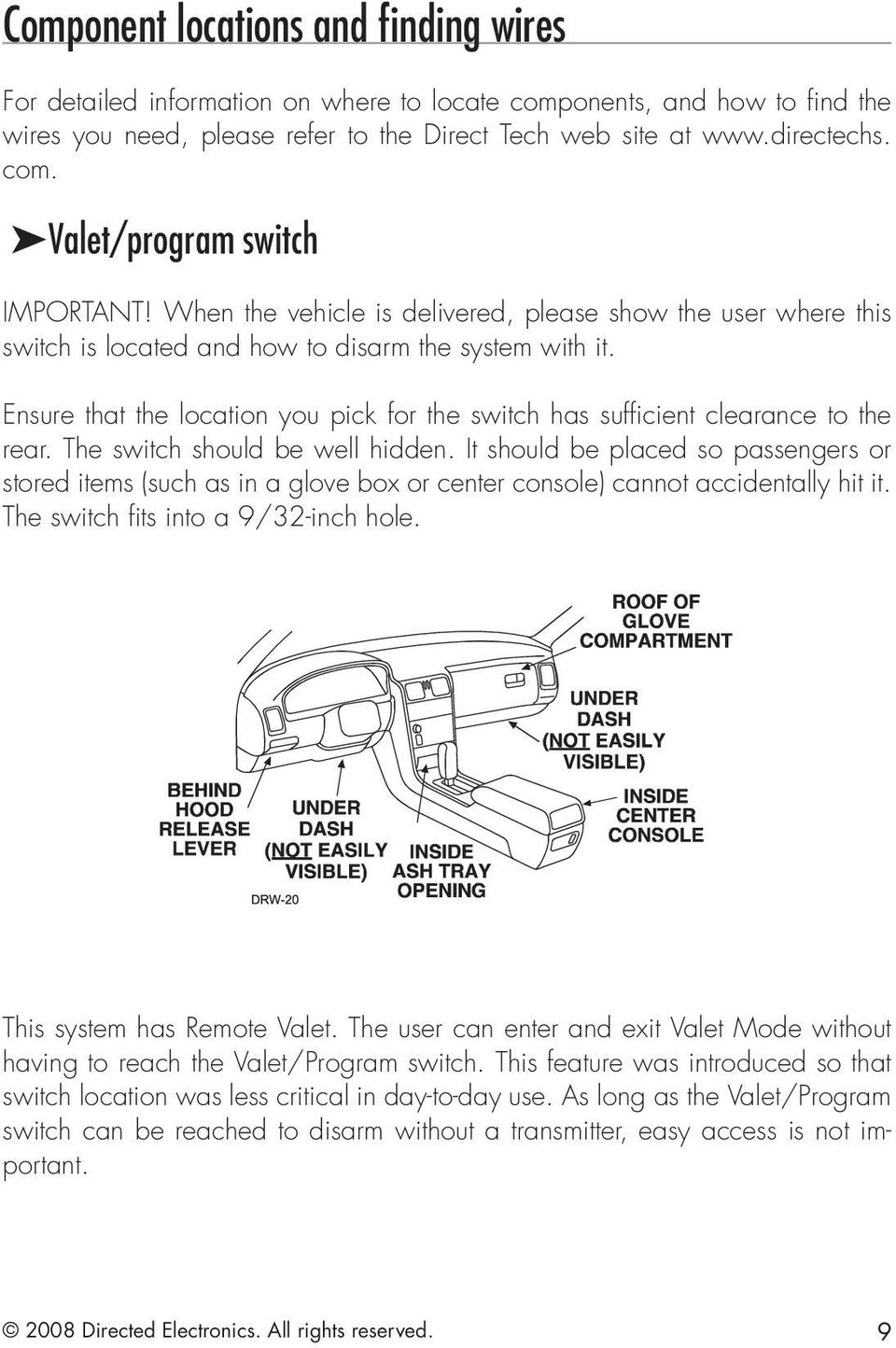
9 Component locations and finding wires For detailed information on where to locate components, and how to find the wires you need, please refer to the Direct Tech web site at com. Valet/program switch IMPORTANT! When the vehicle is delivered, please show the user where this switch is located and how to disarm the system with it. Ensure that the location you pick for the switch has sufficient clearance to the rear. The switch should be well hidden. It should be placed so passengers or stored items (such as in a glove box or center console) cannot accidentally hit it. The switch fits into a 9/32-inch hole. This system has Remote Valet. The user can enter and exit Valet Mode without having to reach the Valet/Program switch. This feature was introduced so that switch location was less critical in day-to-day use. As long as the Valet/Program switch can be reached to disarm without a transmitter, easy access is not important Directed Electronics. All rights reserved. 9
10 Status LED Things to remember when positioning the Status LED: It should be visible from both sides and the rear of the vehicle, if possible. It needs at least 1/2-inch clearance to the rear. It is easiest to remove a small panel, such as a switch blank or a dash bezel, before drilling a 9/32-inch hole. Use quick-disconnects near the LED wires if the panel is removable. This lets mechanics or other installers remove the panel without cutting the wires Directed Electronics. All rights reserved.

11 Making your wiring connections Before making your connections, plan how your wires will be routed through the vehicle. For instance, the red 12V constant input and the remote start ignition wires are often routed together to the ignition switch harness. In order to keep the wiring neat and make it harder to find, you may wish to wrap these wires together in electrical tape or conceal them in tubing similar to what the manufacturer used. There are two acceptable ways of making a wire connection - solder con nections and crimp connectors. When properly performed, either type of connection is reliable and trouble-free. Regardless of whether you solder your connections or you use mechanical type crimp-on connections, ensure that all connections are mechanically sound and that they are insulated, especially when connecting data lines in the vehicle. Cheap electrical tape, especially when poorly applied, is not a reliable insulator. It often falls off in hot weather. Use good quality electrical tape or heat shrink. Never twist-and-tape the wires together without soldering. Never use fuse taps, as they can damage fuse box terminals. If you use tapping connectors such as T-Taps (not to be confused with Scotch- Locks), avoid using them in higher-current applications (constant 12V, ground, etc.) These connectors are inferior in quality and should be avoided Directed Electronics. All rights reserved. 11

12 Primary harness (H1), 12-pin connector H1/1 RED/WHITE (-) 200mA TRUNK RELEASE OUTPUT H1/2 RED (+) CONSTANT POWER INPUT H1/3 BROWN (+) SIREN OUTPUT H1/4 EMPTY NOT USED H1/5 BLACK (-) CHASSIS GROUND INPUT H1/6 VIOLET (+) DOOR TRIGGER INPUT, ZONE 3 H1/7 BLUE (-) MULTIPLEXED INPUT, ZONE 4 H1/8 GREEN (-) DOOR TRIGGER INPUT, ZONE 3 H1/9 BLACK/WHITE (-) 200mA DOMELIGHT SUPERVISION OUTPUT H1/10 WHITE/BLUE (-) REMOTE START ACTIVATION INPUT H1/11 WHITE (+)/(-) SELECTABLE LIGHT FLASH OUTPUT H1/12 ORANGE (-) 500mA ARMED OUTPUT Auxiliary harness (H2), 6-pin connector H2/1 LIGHT BLUE (-) SECOND UNLOCK OUTPUT H2/2 WHITE/BLACK (-) AUX 2 OUTPUT H2/3 VIOLET/BLACK (-) AUX 1 OUTPUT H2/4 GREEN/WHITE (-) FACTORY ALARM REARM H2/5 GRAY/BLACK (-) WAIT-TO-START INPUT H2/6 LIGHT GREEN/ BLACK (-) FACTORY ALARM DISARM Door lock harness, 3-pin connector 1 LIGHT BLUE (-) UNLOCK OUTPUT (+) LOCK 2 EMPTY NOT USED 3 GREEN (-) LOCK (+) UNLOCK OUTPUT Directed Electronics. All rights reserved.

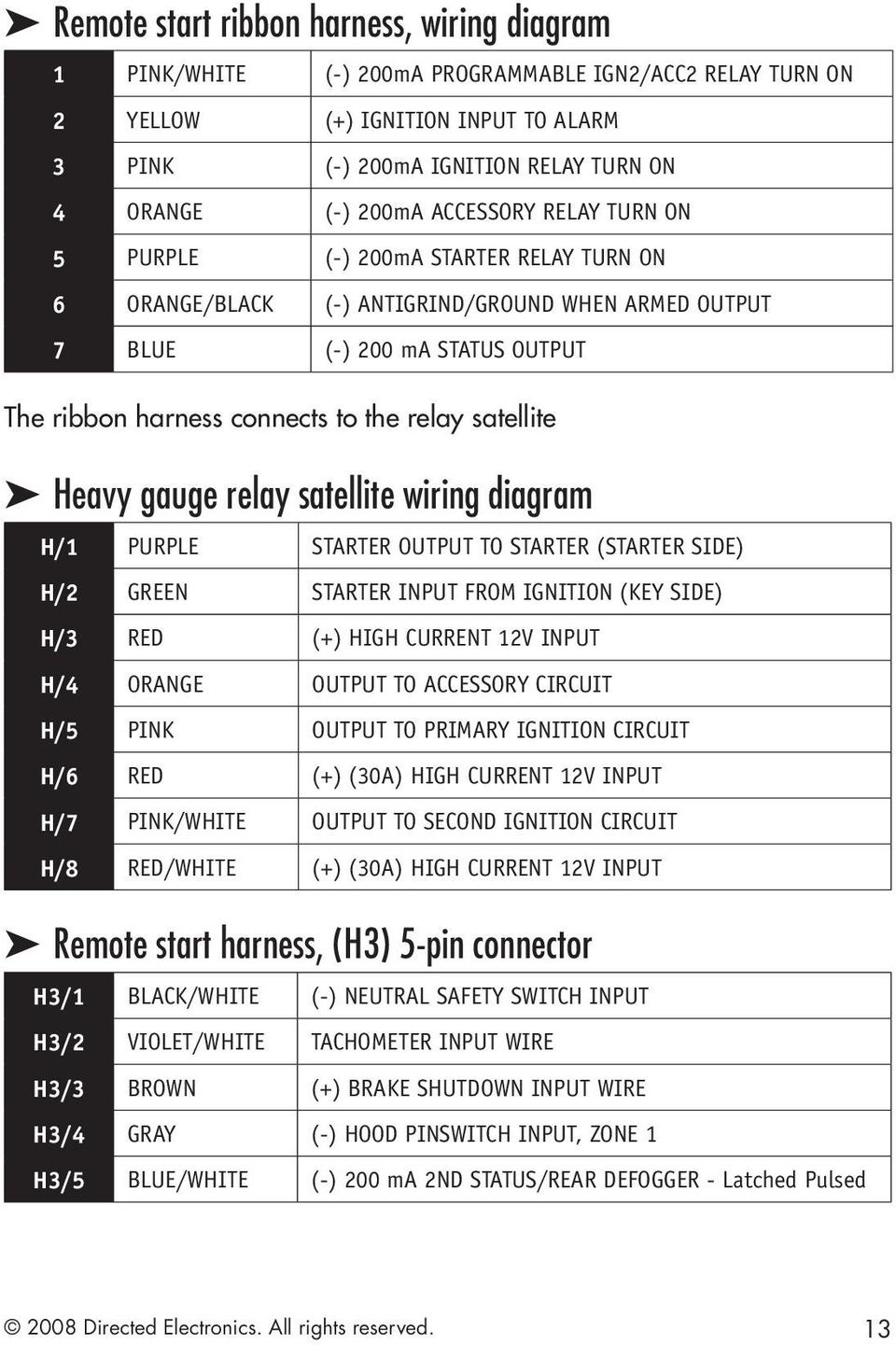
13 Remote start ribbon harness, wiring diagram 1 PINK/WHITE (-) 200mA PROGRAMMABLE IGN2/ACC2 RELAY TURN ON 2 YELLOW (+) IGNITION INPUT TO ALARM 3 PINK (-) 200mA IGNITION RELAY TURN ON 4 ORANGE (-) 200mA ACCESSORY RELAY TURN ON 5 PURPLE (-) 200mA STARTER RELAY TURN ON 6 ORANGE/BLACK (-) ANTIGRIND/GROUND WHEN ARMED OUTPUT 7 BLUE (-) 200 ma STATUS OUTPUT The ribbon harness connects to the relay satellite Heavy gauge relay satellite wiring diagram H/1 PURPLE STARTER OUTPUT TO STARTER (STARTER SIDE) H/2 GREEN STARTER INPUT FROM IGNITION (KEY SIDE) H/3 RED (+) HIGH CURRENT 12V INPUT H/4 ORANGE OUTPUT TO ACCESSORY CIRCUIT H/5 PINK OUTPUT TO PRIMARY IGNITION CIRCUIT H/6 RED (+) (30A) HIGH CURRENT 12V INPUT H/7 PINK/WHITE OUTPUT TO SECOND IGNITION CIRCUIT H/8 RED/WHITE (+) (30A) HIGH CURRENT 12V INPUT Remote start harness, (H3) 5-pin connector H3/1 BLACK/WHITE (-) NEUTRAL SAFETY SWITCH INPUT H3/2 VIOLET/WHITE TACHOMETER INPUT WIRE H3/3 BROWN (+) BRAKE SHUTDOWN INPUT WIRE H3/4 GRAY (-) HOOD PINSWITCH INPUT, ZONE 1 H3/5 BLUE/WHITE (-) 200 ma 2ND STATUS/REAR DEFOGGER - Latched Pulsed 2008 Directed Electronics. All rights reserved. 13
14 Horn, channel 6 (H4), 2-pin connector H4/1 ORANGE/BLACK (-) AUX 3 OUTPUT H4/2 BROWN (-) 200 ma HORN Wire connection guides Primary harness (H1), 12-pin connector H1/1 RED/WHITE (-) 200mA TRUNK RELEASE, 200 ma (-) output When the system receives the code controlling trunk release output for longer than 1.5 seconds, the red/white wire will supply output as long as the transmission continues. This is typically used to operate a trunk/hatch release or other relay-driven function. Warning! Never use this wire to drive anything but a relay or a low-current input, supplied output is only 200mA. Connecting directly to a solenoid, motor, or other high-current device will cause the module to fail Directed Electronics. All rights reserved.

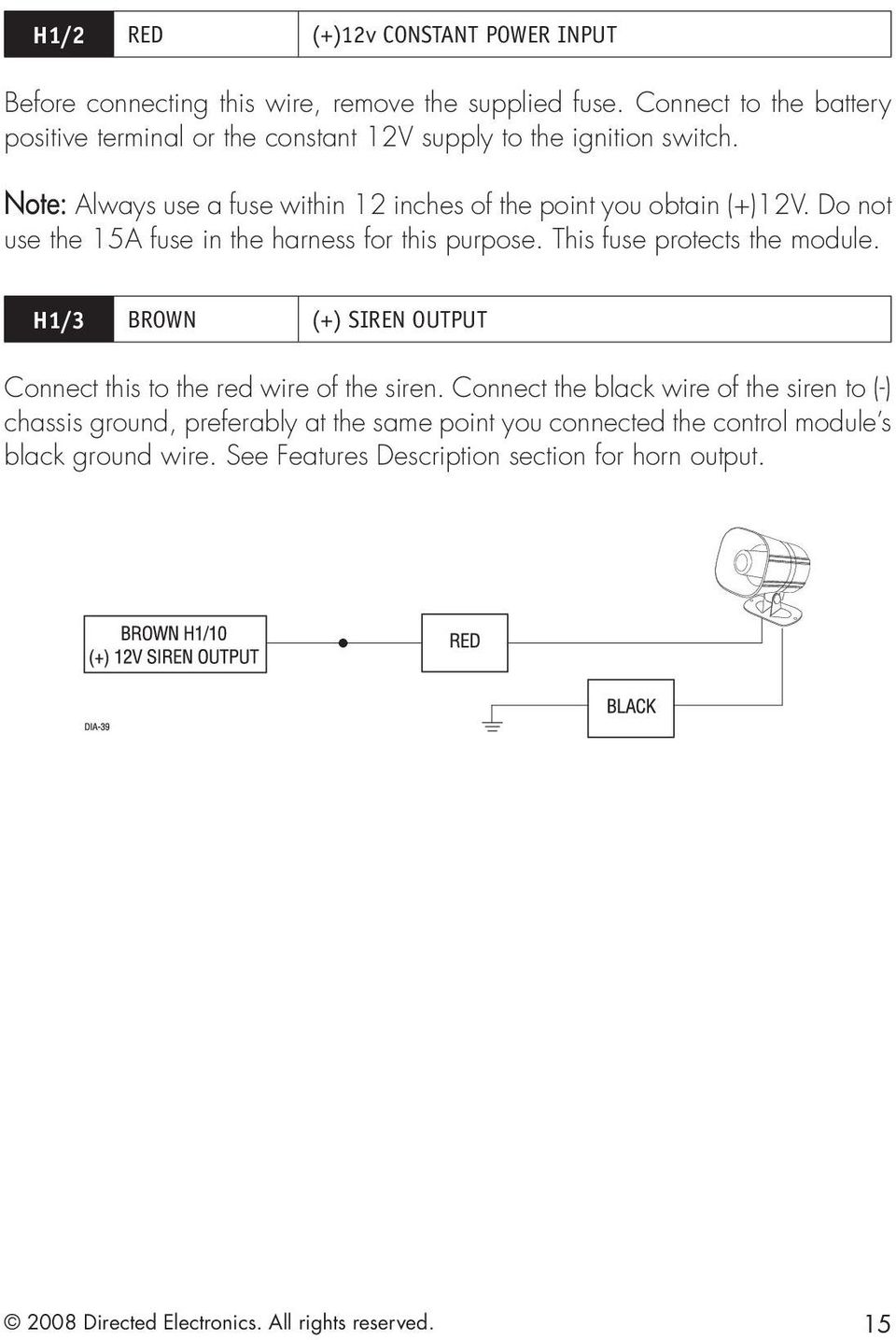
15 H1/2 RED (+)12v CONSTANT POWER INPUT Before connecting this wire, remove the supplied fuse. Connect to the battery positive terminal or the constant 12V supply to the ignition switch. Note: Always use a fuse within 12 inches of the point you obtain (+)12V. Do not use the 15A fuse in the harness for this purpose. This fuse protects the module. H1/3 BROWN (+) SIREN OUTPUT Connect this to the red wire of the siren. Connect the black wire of the siren to (-) chassis ground, preferably at the same point you connected the control module s black ground wire. See Features Description section for horn output Directed Electronics. All rights reserved. 15
16 H1/5 BLACK (-) CHASSIS GROUND Remove any paint and connect this wire to bare metal, preferably with a factory bolt rather than your own screw. (Screws tend to either strip or loosen with time) We recommend grounding all your components including the siren to the same point in the vehicle. H1/6 VIOLET (+) DOOR TRIGGER INPUT, ZONE 3 This wire is used in vehicles that have a positive (+) switched dome light circuit. Connect the violet wire to a wire that shows (+)12V when any door is opened, and ground when the door is closed. This wire reports Zone Directed Electronics. All rights reserved.

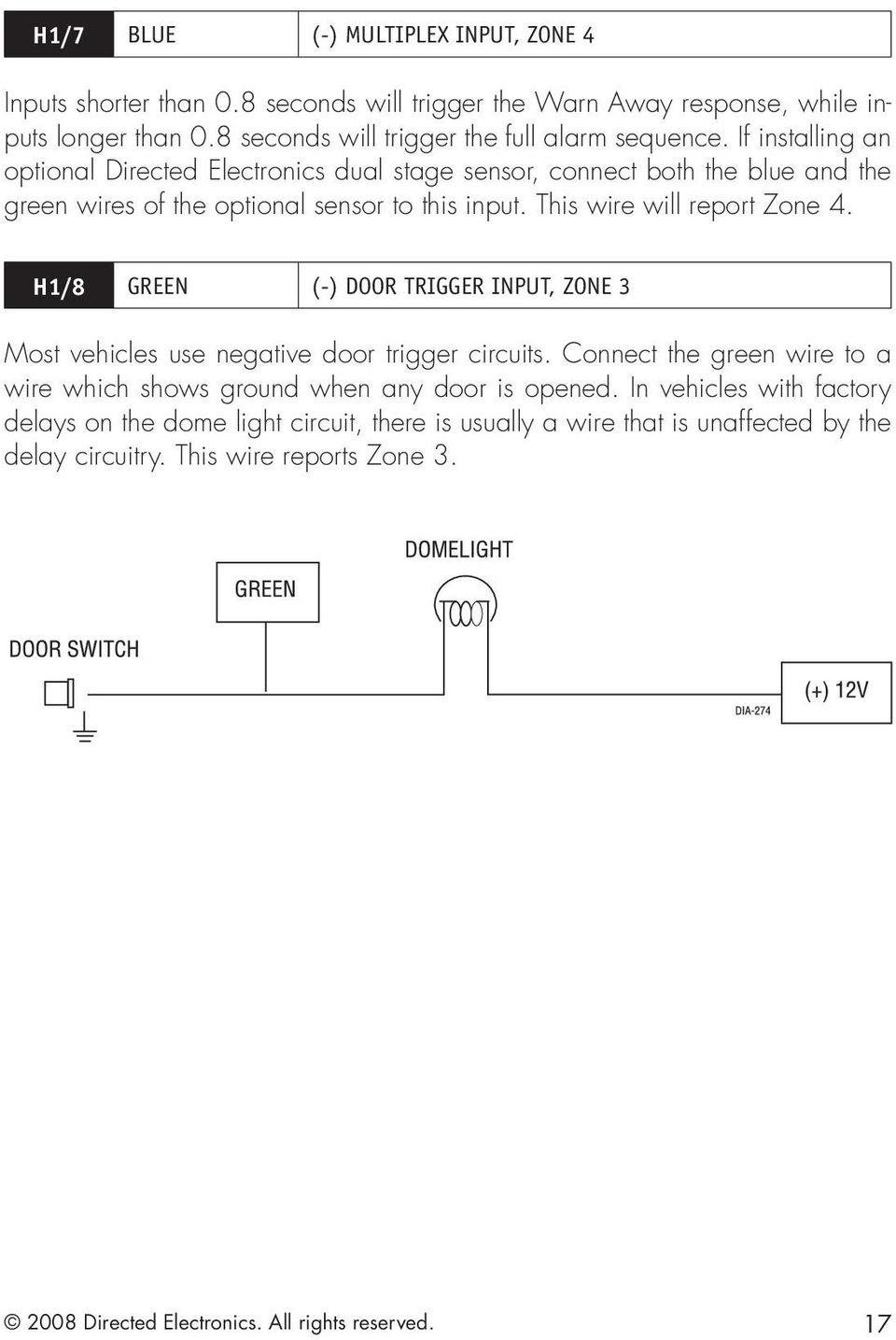
17 H1/7 BLUE (-) MULTIPLEX INPUT, ZONE 4 Inputs shorter than 0.8 seconds will trigger the Warn Away response, while inputs longer than 0.8 seconds will trigger the full alarm sequence. If installing an optional Directed Electronics dual stage sensor, connect both the blue and the green wires of the optional sensor to this input. This wire will report Zone 4. H1/8 GREEN (-) DOOR TRIGGER INPUT, ZONE 3 Most vehicles use negative door trigger circuits. Connect the green wire to a wire which shows ground when any door is opened. In vehicles with factory delays on the dome light circuit, there is usually a wire that is unaffected by the delay circuitry. This wire reports Zone Directed Electronics. All rights reserved. 17
18 H1/9 BLACK/WHITE (-) 200mA DOME LIGHT OUTPUT SUPERVISION OUTPUT Connect this wire to the optional dome light supervision relay as shown below: Important! This output is only intended to drive a relay. It cannot be connected directly to the dome light circuit, as the output cannot support the current draw of one or more light bulbs. H1/10 WHITE/BLUE REMOTE START (-) ACTIVATION INPUT This input comes from the factory set to 1 activation pulse. This means that it is necessary to have a two consecutive on ground pulse on the white/blue wire for the remote start to activate or to deactivate. The same holds true for the remote control activation it is necessary to press the button once for the remote start to activate or deactivate. Note: The number of activation inputs can be programmed to 1 or 2 pulses with an optional momentary switch. This setting affects both the input wire and the remote control when operating the remote starter. To white/blue activation input on system Directed Electronics. All rights reserved.

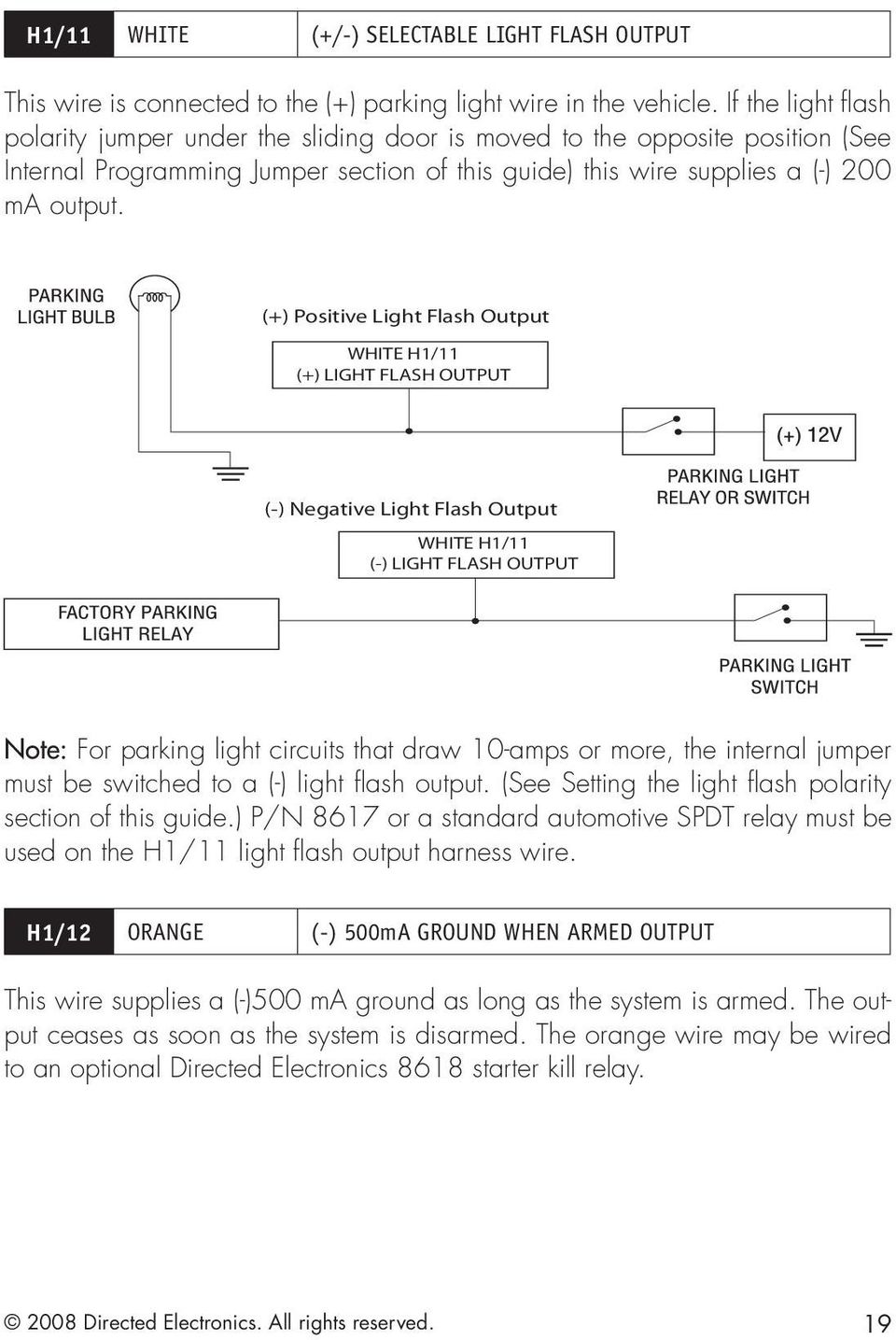
19 H1/11 WHITE (+/-) SELECTABLE LIGHT FLASH OUTPUT This wire is connected to the (+) parking light wire in the vehicle. If the light flash polarity jumper under the sliding door is moved to the opposite position (See Internal Programming Jumper section of this guide) this wire supplies a (-) 200 ma output. (+) Positive Light Flash Output WHITE H1/11 (+) LIGHT FLASH OUTPUT (-) Negative Light Flash Output WHITE H1/11 (-) LIGHT FLASH OUTPUT Note: For parking light circuits that draw 10-amps or more, the internal jumper must be switched to a (-) light flash output. (See Setting the light flash polarity section of this guide.) P/N 8617 or a standard automotive SPDT relay must be used on the H1/11 light flash output harness wire. H1/12 ORANGE (-) 500mA GROUND WHEN ARMED OUTPUT This wire supplies a (-)500 ma ground as long as the system is armed. The output ceases as soon as the system is disarmed. The orange wire may be wired to an optional Directed Electronics 8618 starter kill relay Directed Electronics. All rights reserved. 19
20 Auxiliary harness (H2), 6-pin connector H2/1 LIGHT BLUE 200mA (-) 2nd UNLOCK OUTPUT This wire produces a (-) 200mA output for progressive locks in which the driver door unlocks first and the remaining locks unlock with a second press of the unlock button. H2/2 WHITE/BLACK 200mA PROGRAMMABLE (-) AUX 2 OUTPUT This wire provides 200 ma programmable output whenever the transmitter button(s) controlling Aux 3 is pressed. This output can be programmed to provide the following types of outputs Validity: Output that sends a signal as long as the transmission is received. Latched: Output that sends a signal when the Aux channel button is pressed and continues until the same button is pressed. Latched, reset with ignition: Similar to the latched output, this type of output turns On the first time the Aux channel button is pressed, and turns Off the next time the same button is pressed. This type of output additionally stops and resets whenever the ignition is turned On and then Off. 30 seconds (60, 90) timed: The output sends a continuous signal for 30 seconds. Note: Bitwriter programs from 1 to 90 seconds. Warning! Never use this wire to drive anything but a relay or a low-current input, supplied output is only 200mA. Connecting directly to a solenoid, motor, or other high-current device will cause the module to fail Directed Electronics. All rights reserved.
21 H2/3 VIOLET/BLACK (-) 200mA PROGRAMMABLE (-) AUX 1 OUTPUT This wire provides 200 ma programmable output whenever the transmitter buttons controlling Aux 1 channel is pressed. Warning! Never use this wire to drive anything but a relay or a low-current input, supplied output is only 200mA. Connecting directly to a solenoid, motor, or other high-current device will cause the module to fail. H2/4 GREEN/WHITE FACTORY ALARM REARM OUTPUT This wire sends a negative pulse every time the remote start shuts down or when the doors are locked. This can be used to pulse the arm wire of the vehicle s factory anti-theft device. Use a relay to send a (-) or (+) pulse to the arm wire. H2/5 GRAY/BLACK (-) DIESEL WAIT TO START BULB INPUT Connect this wire to the wire in the vehicle that sends the signal to turn on the WAIT-TO-START bulb in the dashboard. In most diesels the wire is negative (ground turns on the bulb) and the GRAY/BLACK wire can be directly connected to the wire in the vehicle. If the vehicle uses a positive wire (12V to turn on the bulb) a relay must be used to change the polarity. Note: A 1-amp diode must be installed in line on the factory wire between the wait-to-start indicator and the ECM. (See the following diagrams for details) Directed Electronics. All rights reserved. 21
22 (+)WAIT-TO-START WIRE Directed Electronics. All rights reserved.
23 H2/6 LIGHT GREEN/BLACK FACTORY DISARM OUTPUT Relay for Negative (-) Disarm Wire Relay for Positive (+) Disarm Wire Heavy Gauge, relay satellite The heavy gauge wires coming from the large pin connector are used to energize the high current circuits in the vehicle. It is crucial to ensure that these connections are capable of handling the current demands. For this reason, Scotch- Locks, T-taps and other such connectors are strongly discouraged. H/1 PURPLE (+) STARTER OUTPUT After cutting the starter wire connect the PURPLE wire to the end going to the starter motor. H/2 GREEN STARTER INPUT After cutting the starter wire connect the GREEN wire to the end going to the key side of the ignition Directed Electronics. All rights reserved. 23
24 H/3 RED (2) (+) 12V INPUT FOR HIGH CURRENT OUTPUTS Remove the two 30-amp fuses prior to connecting these wires and do not replace them until the satellite has been plugged into the control module. These wires are the source of current for pink ignition, orange accessory, purple starter, and the coils for the relays in the relay pack. They must be connected to a high current source. Since the factory supplies (+)12V to the key switch that is used to operate the motor, it is recommended that these wires be connected there. Note: If the factory supplies two separate (+) 12V feeds to the ignition switch, connect one RED wire of the satellite to each feed at the switch. H/4 ORANGE (+) ACCESSORY OUTPUT Connect this wire to the accessory wire in the vehicle which powers the climate control system. H/5 PINK (+) IGNITION OUTPUT Connect this wire to the ignition wire in the vehicle. H/6 PINK/WHITE (+) SECOND IGNITION ACCESSORY OUTPUT Connect this wire to the second ignition/accessory wire in the vehicle. (See menu feature 2-9.) Note: For vehicles that do not have a second ignition/accessory wire, this connection is not required. H/7 RED/WHITE (+) 12V INPUT Connect this wire to a +12V source. It supplies voltage to the pink/white 2nd ignition/accessory output. If the vehicle does not have a 2nd ignition/accessory, then this wire does not need to be connected Directed Electronics. All rights reserved.
25 Remote start, (H3) secondary harness H3/1 BLACK/WHITE NEUTRAL SAFETY SWITCH INPUT Connect this wire to the provided toggle (override) switch as shown in figure A. Connect the other wire from the toggle switch to the park/neutral switch in the vehicle. This wire will test with ground with the gear selector either in PARK or NEUTRAL. This will prevent the vehicle from accidentally being started while in a drive gear. This input MUST rest at ground in order for the remote start system to operate. Connected properly the vehicle will only start while in PARK or NEUTRAL. In some vehicles, the park/neutral position switch activates a factory starter lock out that will not allow the starter to operate in a drive gear. In these vehicles, connect this wire to the toggle switch as shown in figure B. Connect the other wire from the toggle switch to chassis ground. Important: Always perform the Safety Check section of this installation guide to verify that the vehicle cannot be started in ANY drive gear and that the override switch is functioning properly. Figure A Figure B 2008 Directed Electronics. All rights reserved. 25
26 H3/2 VIOLET/WHITE TACHOMETER INPUT This input provides the module with information about the engine's revolutions per minute (RPMs). It can be connected to the negative side of the coil in vehicles with conventional coils. In multi-coil and high energy ignition systems locating a proper signal may be more difficult. Once connected, you must teach the system the tach signal. (See the Internal Programming Jumpers section of this guide. H3/3 BROWN (+) BRAKE SWITCH INPUT, ZONE 1 This wire MUST be connected to the vehicle s brake light wire. This is the wire that shows (+) 12V when the brake pedal is depressed. The remote start will be disabled or shut down any time the brake pedal is depressed. This wire will also trigger the security system if the brake pedal is pressed while the system is armed and will report Zone 1. H3/4 GRAY (-) HOOD PIN SWITCH INPUT, ZONE 1 This wire MUST be connected to a hoodpin switch. This input will disable or shut down the remote start when the hood is opened. It will also trigger the security system if the hood is opened while the system is armed and report Zone 1. H3/5 BLUE/WHITE (-) STATUS OUTPUT This wire supplies a 200mA output as soon as the module begins the remote start process. The H3/1 Blue/White wire can also be used to activate the defogger trigger (latched/pulsed), 10-seconds after the remote start engages. (See the Feature Descriptions section in this guide for details about programming this output.) Directed Electronics. All rights reserved.
27 Horn, (H4) Aux 3 harness H4/1 ORANGE/BLACK 200 ma PROGRAMMABLE (-) AUX 3 OUTPUT This wire provides a (-) 200mA output whenever the transmitter button(s) controlling Aux 3 is pressed. (see also the Feature Descriptions section and revious Aux 2 description) Warning! Never use this wire to drive anything but a relay or a low-current input, supplied output is only 200mA. Connecting directly to a solenoid, motor, or other high-current device will cause the module to fail. H4/2 BROWN 200mA (-) HORN OUTPUT This wire provides a (-) 200mA output to the horn when programmed. Warning! Never use this wire to drive anything but a relay or a low-current input, supplied output is only 200mA. Connecting directly to a solenoid, motor, or other high-current device will cause the module to fail Directed Electronics. All rights reserved. 27
28 Neutral safety switch interface Some vehicles do not have an electrical neutral safety switch. Instead, the vehicle has a mechanical neutral safety switch that physically interrupts the starter wire and is used when the vehicle is in any drive gear. If the remote start is interfaced before this switch, it will provide protection from starting in gear. However, some vehicles combine the column shift mechanism and the mechanical neutral safety switch into one mechanical part. Note: You must complete the remote start system installation before doing the following test. Ensure that the remote start system is functioning normally. This includes connecting to the brake as a shut-down. Testing the neutral safety switch Make sure there is adequate clearance to the front and rear of the vehicle because it may move slightly. Make sure the hood is closed and there are no remote start shut-downs active. Set the emergency brake. Turn the key to the run position, this will release the shifter. Place the car in drive (D). Place your foot directly over the brake pedal, but do not depress it. Be ready to step on the brake if the starter engages. Activate the remote start system. If the starter engages, immediately depress the brake to shut the remote start system down. If the starter does not engage, no additional safety system is required. If the starter engages and the vehicle is a General Motors product or Dodge Dakota pickup, you can find an alternative shut-down method to prevent the starter from engaging. Refer to for Document 1008 under the Resource tab. If the vehicle is not a General Motors product or a Dodge Dakota pickup, please call Directed Electronics Technical Support for an alternative shut-down method. Do not return the vehicle to the customer until this feature is properly installed! Directed Electronics. All rights reserved.
29 Plug-in LED and valet/program switch These plug into the module. The Status LED plugs into the small two-pin socket, while the Valet /Program Switch should be plugged into the larger blue two-pin connector. The Status LED fits into a 9/32-inch hole. Status LED Valet/Program Switch D2D programmer interface - 4-pin red plug The 4-pin red port is for interfacing with an XK module through D2D, or you can use it for programming with the Bitwriter. If the XK module is unplugged so the port can be used for Bitwriter programming, you must reprogram the XK module when plugging it back into the 4-pin red port. When the learn routines have previously been programmed using the Bitwriter, they may have been locked. Before proceeding with reprogramming the learn routines, they must be unlocked with the Bitwriter - this cannot be done manually with the Valet switch. Note: Bitwriters require software v2.5. Bitwriters with date code of 6A or older require an IC upgrade (p/n 998M). Some bitwriters with a date code of 6B do not require the IC upgrade, refer to Tech Tip # 1112 for more information. Bitwriter 2 compatible Directed Electronics. All rights reserved. 29
30 Shock sensor harness, 4-pin connector H GREEN (-) MULTIPLEX INPUT, ZONE 2 Inputs shorter than 0.8 seconds will trigger the Warn Away response, while inputs longer than 0.8 seconds will trigger full alarm sequence and report Zone Two. If installing an optional Directed Electronics dual stage sensor, connect to the green wire as shown below. The diagram below eliminates the need for diodes to isolate the sensors. Diagram for adding optional Directed Electronics dual stage sensor to green wire (Zone 2): H BLUE (-) MULTIPLEX INPUT, ZONE 2 Inputs shorter than 0.8 seconds will trigger the Warn Away response, while inputs longer than 0.8 seconds will trigger full alarm sequence and will also report Zone Two. H RED/BLACK RED: is (+) 12V CONSTANT, BLACK is (-) GROUND Do not use these for anything besides the plug-in shock sensor Directed Electronics. All rights reserved.
31 Tachometer settings Virtual tach To program Virtual Tach: After the install is complete, remote start the car. If the car does not start on the first attempt, let the remote start attempt again. Once the car starts, let it run until the parking lights come on. When the parking lights come on, shut off the remote start with the remote - that's it! Virtual Tach is programmed. To reset Virtual Tach, go into the remote programming grid and choose option #4. Virtual Tach cannot be reset with the Bitwriter. Virtual Tach handles disengaging the starter motor during remote starting it does not address over-rev. If the customer wants to have the over-rev protection capability, now listed as optional in the owner s guide, the tach wire must be connected. This may involve more installation shop charges than initially quoted. Important: If the Virtual Tach mode over cranks or doesn't crank the vehicle long enough to start and run the car, use the Bitwriter to add or subtract the starter output time. You can adjust the output time in increments of 50mSec of the learned time using the Bitwriter Directed Electronics. All rights reserved. 31
32 Tach learning To learn the tach signal: 1. Start the vehicle with the key. 2. Within 5 seconds, press and hold the Valet/Program switch. 3. After 3 seconds the LED will light constant when the tach signal is learned. 4. Release the Valet/Program switch Directed Electronics. All rights reserved.
33 Programming jumpers Tach threshold On/Off In most cases, this jumper can be left in the Off position. Some new vehicles use less than 12 volts in their ignition systems. The unit may have trouble learning the tach signal in these vehicles. Changing the jumper to the On setting changes the trigger threshold of the digital tach circuit so that it will work with these type vehicles. Light flash (+) / (-) polarity The internal fuse is used to determine the light flash output. In the (+) position, the onboard relay will output (+)12V on the WHITE wire, H1/11. In the (-) position, the on-board relay will supply a (-) output When wiring into a multiplex circuit, you can replace the fuse with a resistor (paying attention to the polarity setting). (Refer to diagram on p.24, H1/4 White/ Brown wire description). Note: For parking light circuits that draw 10 amps or more, the internal jumper must be switched to a (-) light flash output. P/N 8617 or a standard automotive SPDT relay must be used on the H1/11 light flash output harness wire Directed Electronics. All rights reserved. 33
34 Transmitter/receiver Learn Routine The system comes with transmitters that have been taught to the receiver. The receiver can store up to 4 different transmitter codes in memory. Use the following learn routine to add transmitters to the system. The learn routine may be locked if previously programmed using the Bitwriter. If the siren generates one long chirp when attempting to program the unit, the learn routine is locked and must be unlocked using the Bitwriter before proceeding. The Valet/Program switch, plugged into the blue port, is used for programming. There is a basic sequence to remember whenever programming this unit: Door, Key, Choose, Transmit and Release. 1. Open a door. (The GREEN wire, h1/8, or the VIOLET, H1/6 must be connected.) 2. Insert the key. Turn the ignition to the ON position. The heavy gauge pink wire must be connected. 3. Choose. Within 10 seconds, press and release the Program switch corresponding to the number of the desired function step listed in the following table. Once you have selected the function step, press the switch once more and hold it. The LED flashes and the horn honks to confirm the selected functional step. Do not release the Program switch Directed Electronics. All rights reserved.
35 Step Function 1 Auto Learn Standard Configuration (default) The auto learn configuration will automatically setup the remote button configuration. Note: Due to the Supercode protocol, you cannot change the configuration. 2 Delete remotes: This feature will erase all remotes from the memory of the system. This is useful in cases when a customer s remote is lost or stolen. Note: Does not reset the programmed features of the system or reset the Virtual Tach setting. 3 Reset Features: This resets all the features of the system to the factory default settings. Note: Does not delete the remotes from the system or reset the Virtual Tach setting. 4 Virtual Tach Reset: Deletes all previously learned values for Virtual Tach, and on the next remote start sequence the unit will begin virtual tach initialization.note: The Zap feature on the Bitwriter does not reset the Virtual tach setting. 4.Transmit. While holding the Valet/Program switch, press the button on the remote control. The horn honks to confirm that the code has been successfully programmed. It is not possible to teach a remote control button to the system more than once. 5. Release. Once the code is learned, the Valet/Program switch can be released. You can advance from programming one channel to another by releasing the Valet/Program switch and tapping it to advance channels and then holding it Directed Electronics. All rights reserved. 35
36 For instance: You have programmed Step 1 and you want to program Step 2. Release the Valet/Program switch. Press it one time and release it to advance from Step 1 to Step 2. Now, press and hold the Valet/Program switch. The LED flashes two times and the siren chirps. As before, do not release it. If you want to program Step 3 after programming Step 1, release the Valet/ Program switch, press it twice and release it to advance to Step 3. Then press it once more and hold it. The siren chirps three times and the LED flashes three times to confirm it is ready to receive the code from the transmitter.. Learn Routine is exited if: Door is closed. The ignition is turned off The program switch is pressed too many times More than 15 seconds elapses between steps Directed Electronics. All rights reserved.
37 Transmitter configurations The transmitters are programmed with the standard configuration by using the Auto Learn functions in the Transmitter/Receiver Learn Routine.For more information about the remote control functions, see the Owners Guide. Standard configuration operates operates Arm / Lock Panic ON/ Panic OFF Disarm/Unlock Panic OFF operates Remote Start operates Trunk Release operates Timer Mode and and operates Short Run/Turbo timer and and operates Aux 1 operates Aux 2 and and operates Rear Defogger operates Aux 3 and 2008 Directed Electronics. All rights reserved. 37
38 Multi-level security arming Multi-Level Security Arming is a feature that allows the user to select which of the system's inputs or sensors will be active and which will be bypassed when the system is armed. (See Table of Zones section of this guide.) Multi-Level Security Arming can only be accessed from a standard configuration transmitter. Pressing the arm button of the standard configuration transmitter again within five seconds of arming the system will activate the Multi-Level Security feature. Each time the arm button is pressed again, a different security level is selected. The different levels of security are selected as follows: Pressing one time: The siren chirps once. The system is armed. Pressing a second time within five seconds: The siren chirps twice followed by a long chirp. Zone Two is now bypassed. Pressing a third time within five seconds: The siren chirps three times followed by a long chirp. Zone Four is now bypassed. Pressing a fourth time within five seconds: The siren chirps four times followed by a long chirp. Zones Two and Four are now bypassed. Pressing a fifth time within five seconds: The siren chirps five times followed by a long chirp. All input zones, except the ignition, are now bypassed Directed Electronics. All rights reserved.
39 System features learn routine The System Features Learn Routine dictates how the unit operates. It is possible to access and change any of the feature settings using the Valet/program switch. However, this process can be simplified by using the Bitwriter. Any of the settings can be changed and then assigned to one of four remote controls. This feature is called Owner Recognition. Each time that particular remote control is used to disarm the system, the assigned feature settings will be recalled. Owner Recognition is only possible when programming the unit via the Bitwriter. If programming with the Bitwriter, the learn routine can be locked or unlocked. If the learn routine has previously been locked, it must be unlocked with Bitwriter - this cannot be done manually with the Valet switch. 1. Open a door. ((The GREEN wire, h1/8, or the VIOLET, H1/6 must be connected.) 2. Ignition. Turn the ignition on, and then off. 3. Select menu. Press and hold the Valet/Program switch. When the LED flashes once and the siren chirps Menu One has been selected. Continue to hold the switch until the LED flashes twice and the siren chirps twice Menu Two has now been selected. Release the switch after the Menu choice has been selected Directed Electronics. All rights reserved. 39
40 4. 5. Choose. Within 10 seconds, press and release the Valet/Program switch the number of times corresponding to the feature number you want to program and then press and hold the switch. (See Feature Menus. After a second, the LED will flash to indicate which feature you have accessed. For example, in Menu Two, groups of eight flashes would indicate access to the activation pulse setting (Feature 2-8). The siren will also chirp eight times. Transmit. The transmitter is used to select the desired setting. Pressing changes the feature to the LED On setting (or flashes once for features with more than 2 settings). The siren honks once. Pressing changes the setting to the LED OFF setting (or flashes two or more times for features with more than 2 settings). 6. Release, the Valet/program switch. You can advance from feature to feature by pressing and releasing the Valet/ Program switch the number of times necessary to get from the feature you just programmed to the feature you wish to access. For example, in Menu One, if you just programmed Feature 1-2 and you next want to program Feature 1-3 to off, release the Valet/Program switch. Press and release it once to advance from Feature 1-2 to Feature 1-3. Then press it once more and hold it. The LED will flash in groups of 3 and the siren chirps to confirm that you have accessed Feature 1-3. The learn routine is exited when: The door is closed. The ignition is turned on. The Valet/Program switch is pressed too many times. More than 15 seconds elapses between programming steps. Once long siren chirp indicates that the Learn routine has been exited Directed Electronics. All rights reserved.
41 Feature menus The default settings are indicated in bold type. Features that have additional settings that can be programmed using the Bitwriter are indicated with an asterisk (*) The number in parenthese indicates the number of times the LED flashes. Menu 1 - Basic Menu Item One-chirp setting Two-chirp setting 1 Active Arming Passive arming 2 Arm/disarm chirps on Arm/disarm chirps Off 3 Ignition lock On Ignition lock Off 4 Ignition unlock On Ignition unlock Off 5 Active locking only Passive locking 6 Panic with ignition On No panic with ignition On second door lock pulses (1) 3.5 (2), 0.4 (3) seconds 8 Forced passive arming on Forced passive arming off 9 Automatic engine disable on Automatic engine disable off 10 Armed When Driving (AWD) on AWD Off 11 Code Hopping On Code Hopping off 12 Horn Output Pulsed Constant 13 Horn function Full Alarm Only (1) Siren function - chirp length 20mS (2), 30mS (3), 40mS (4), 50mS (5 14 Comfort Closure ON Comfort Closure OFF (3), Comfort Closure (2)l 2008 Directed Electronics. All rights reserved. 41
42 Menu 2 - Advanced Menu Item One-chirp setting Two-chirp setting 1 30 second siren duration 60 second siren duration* 2 Nuisance Prevention Circuitry On Nuisance Prevention Circuitry OFF 3 Progressive door trigger Instant door trigger 4 Disarm from Valet, 1 pulse Disarm from Valet, 2-5 pulses 5 Door trigger error chirp ON Door trigger chirp OFF 6 Ignition controlled domelight On Ignition controlled domelight OFF 7 Unlock output 1 pulse Unlock output 2 pulses 8 Lock output 1 pulse Lock output 2 pulses 9 Factory disarm with trunk release Factory disarm with trunk release 10 FAD function with Unlock (1) Before Unlock (2), Remote Start only (3) 11 FAD 1 pulse 2 pulses 12 Aux 1 validity (1) Arm (2)/Disarm (3), Remote Start (4) 13 Aux 1 Linking None (1) Siren function - chirp length 20mS (2), 30mS (3), 40mS (4), 50mS (5 14 Aux 2 validity (1) Latched (2), Latch reset with ignition (3), 30-sec. timed (4) 15 Aux 2 linking None (1) Arm (2)/Disarm (3), Remote Start (4) 16 Aux 3 validity (1) Latched (2), Latch reset with ignition (3), 30-sec. timed (4) 17 Aux 3 linking None (1) Arm (2)/Disarm (3), Remote Start (4) *Bitwiter can set seconds Directed Electronics. All rights reserved.
43 Menu 3 - Remote start Menu Item One-chirp setting Two-chirp setting 1 Engine checking: Virtual Tach Voltage(2), OFF(3), Tachometer(4) 2 Remote start runtime: 12 mins 24 min, 60 min 3 Parking light output: Flashing Constant 4 Cranking time: 0.6 sec 0.8, 1.0, 1.2, 1.4, 1.6, 1.8, 2.0, Activation pulse 1 2 second 6 2nd Ignition/Acc output: Ignition Accessory 7 Acc state during wait-to-start Off On 8 2nd status output: Normal Rear defogger: latch 10 min. rear defogger pulse 9 Anti grind: On Off 10 Diesel timer: Wait-to-Start input Timed 15, 30,45 seconds* 11 Timer mode run time: 12 min 3, 6, 9, min 12 Timer mode: Timed starts Temp starts 13 Short run (turbo): 1 min 3,5, 10 min *Bitwriter can set seconds Directed Electronics. All rights reserved. 43
44 Feature descriptions The features of the system are described below. Features that have additional settings are selected only when programming with the Bitwriter are indicated by the following icon: Default settings are in bold. The numbers in parentheses indicate the number of times the Status LED flashes. Menu 1 - Basic 1-1 Active/Passive Arming: When active arming, the system orms only when the transmitter is used. When set to passive, the system arms automatically 30 seconds after the last door is closed. To alert the consumer of passive arming, the siren chirps 20 seconds after the door is closed. This provides the consumer with an audible warning prior to the system actually arming. At the 30 second mark, the system arms, but the siren does not chirp. 1-2 Chirps On/Off: This feature controls the chirps that confirm the arming and disarming of the system. 1-3 Ignition Lock On/Off: When turned On, the doors lock 3 seconds after the ignition is turned Off. 1-4 Ignition unlock On/Off: When ON this feature unlocks the doors when the ignition is turned off 1-5 Active/Passive Locking: If passive arming is selected in Feature 1-1, then the system can be programmed to either lock the doors when passive arming occurs, or only lock the doors when the system is armed via the transmitter. Active locking means the system will not lock the doors when it passively arms. Passive locking means that the system will lock the doors when it passively arms. Note: Remember, when passive arming is selected, the unit will chirp 20 seconds after the last door is closed. The system does not actually arm or lock the doors until 30 seconds after the door has been closed Directed Electronics. All rights reserved.
45 1-6 PANIC WITH IGNITION ON: This feature controls whether or not the panic mode is available with the ignition on. In some states, there are laws prohibiting a siren sounding in a moving vehicle. This feature makes the system compliant with these regulations. 1-7 DOOR LOCK PULSE DURATION: The default setting is 0.8 second door lock pulses. Some European vehicles, such as Mercedes-Benz and Audi, require longer lock and unlock pulses to operate the vacuum pump. Programming the system to provide 3.5 second (2) pulses, accommodates the door lock interface in these vehicles. (Refer to Tech Tip 1041 on Directechs, for wiring information regarding Type E door locks interfacing). The 0.4 second (3) pulse is required on some vehicles where the lock wires also control the windows. The 0.8 second pulse causes the windows to open/close when locking or unlocking. 1-8 FORCED PASSIVE ARMING ON/OFF: To use this feature, passive arming must be selected in Feature 1-1. When turned on, forced passive arming will ensure that the system will passively arm, even if a zone is left open or invalid. Forced passive arming occurs one hour after the ignition is turned off. 1-9 AUTOMATIC ENGINE DISABLE (AED) ON/OFF: AED is a full-time, passive starter disable that works independently of the security system. When turned on, the orange, ground-when-armed output (H1/1) will activate 30 seconds after the ignition is turned off. The LED will flash at half its normal rate when the ignition is turned off to indicate that AED is active and will interrupt the starter in 30 seconds. AED does not occur in Valet mode and can be bypassed using the emergency override procedure. The transmitter can be used to disarm AED, however, the system must be armed and then disarmed, using the transmitter, to disarm AED ARMED WHILE DRIVING (AWD) ON/OFF: In the default setting (Armed While Driving), the system can be armed with the ignition on. When armed, the ground-when-armed is not active and the sensors are bypassed. The door triggers will remain active Directed Electronics. All rights reserved. 45
46 1-11 CODE HOPPING ON/OFF: The system uses a mathematical formula to change its code each time the transmitter and receiver communicate. This makes the group of bits or "word" from the transmitter very long. The longer the word is, the easier it is to block its transmission to the unit. Disabling the Code Hopping feature lets the receiver ignore the Code Hopping part of the transmitted word. As a result, the unit may have better range with Code Hopping off HORN OUTPUT PULSED/CONSTANT: Program for either a pulsed output or a continuous output when triggered HORN FUNCTION (FULL ALARM ONLY)/SIREN FUNCTION (20mS, 30mS, 40mS, 50mS): Program for output when the alarm is fully triggered or as the siren (arming/disarming and warnaway and full trigger with timing options) COMFORT CLOSURE ON (1), OFF (2) Comfort Closure 2 (3): The system can be programmed to close the windows when the system is locked. If programmed On, the lock output provides a 20 second pulse when the system is locked. The output is cancelled if the unlock button is pressed. In the Off setting the alarm does not perform this function. (2) Comfort closure 1 - Activates the 20 second timer after the door lock pulse. (3) Comfort closure 2 - Activates the 20 second timer with the door lock pulse. To test if the car has the comfort closure: 1. Insert the key into the drivers door key cylinder. 2. Turn the key to the lock position and hold for about 10 seconds. Some cars require that you turn the key once, release, and then turn and hold into the lock position. If Comfort closure is available, the windows (and in some cars the sunroof) close. Important: Comfort closure can only be used on cars that have the capability of closing the windows (and on some cars the sunroof as well) with the key cylinder in the door Directed Electronics. All rights reserved.
47 Menu 2 - Advanced 2-1 SIREN DURATION 30/60 SECONDS: It is possible to program the unit to sound for 30 or 60 seconds during the triggered sequence. Some states have laws regulating how long a security system can sound. When using the Bitwriter, the siren can be programmed to sound for any length of time from 1 second to 180 seconds. 2-2 NUISANCE PREVENTION CIRCUITRY (NPC) ON/OFF: NPC stops repeated triggering of the same zone. If one zone is triggered three times in one hour, that zone is bypassed for one hour, starting from the time of the third trigger. During that hour, if the system sees a trigger on that zone again, the system resets the one hour timer. If one hour passes and the zone has not triggered again, the zone is activated and can trigger the system again. NPC only monitors sensor inputs, and does not bypass the door trigger or the ignition trigger at any time. If NPC is turned off, the system will respond to repeated triggers on the sensor inputs and will do so indefinitely. Some states have laws regulating how many times a security system can trigger before it is considered a nuisance and the vehicle is towed away. 2-3 PROGRESSIVE DOOR TRIGGER ON/OFF: The system responds to a door trigger input with a progressive response. When the door is opened with the system armed, the siren will chirp 10 times prior to the full triggered sequence. The door trigger is still treated as an instant trigger and closing the door quickly will not prevent full triggered sequence from occurring. If the progressive door trigger is programmed off, the full siren output will occur the moment the door is opened. 2-4 VALET DISARM PULSE COUNT 1 TO 5 PULSES: The system can be programmed to count the number of presses of the valet switch before disarming the security system. The factory default setting is one pulse. The unit can also be set for two to five pulses. Ghost Switch option: For added security, the GRAY wire on the two-pin Valet/ Program plug can be connected to any switch in the vehicle that provides a positive (+) momentary pulse Directed Electronics. All rights reserved. 47
48 2-5 DOOR TRIGGER ERROR ON/OFF: This feature controls the error chirp that is generated if the system is armed with the door trigger active. This is useful in vehicles that have a long dome light delay after the door has been closed. If the system is armed before the dome light has turned off, the security system will generate the door trigger error chirp. If this error chirp is not desired, use this feature to disable the door open error chirp. If the bypass chirp is turned off, no bypass chirp will be generated, even if a door is accidentally left open. 2-6 IGNITION CONTROLLED DOME LIGHT SUPERVISION ON/OFF: If turned on, the system will turn on the dome light for 60 seconds when the ignition is turned off. The optional dome light supervision feature must be installed as described in the Wire Connection Guide. 2-7 UNLOCK OUTPUT 1, 2 PULSES: This will program the unlock output to one or two pulses. When the double pulse unlock feature is turned on, the BLUE door lock harness wire will supply two negative pulses instead of a single pulse. At the same time, the GREEN door lock harness wire will supply two positive pulses instead of a single pulse. At the same time, the GREEN door lock harness wire will supply two positive pulses instead of a single pulse. This makes it possible to directly interface with double pulse vehicles without any extra parts for unlock and lock outputs (see below). 2-8 LOCK OUTPUT 1, 2 PULSES: This will program the lock output to one or two pulses. When the double pulse lock feature is turned on, the BLUE door lock harness wire will supply two positive pulses instead of a single pulse. At the same time, the GREEN door lock harness wire will supply two negative pulses instead of a single pulse. 2-9 FACTORY ALARM DISARM WITH TRUNK RELEASE In the default setting the factory alarm disarm output will disarm the factory alarm system any time the button(s) controlling trunk release is pressed FACTORY ALARM DISARM WITH UNLOCK, BEFORE UNLOCK, RE- MOTE START ONLY: In the default setting the factory alarm disarm output will disarm the factory alarm system any time the button(s) controlling Unlock is pressed. The Before Unlock output to disarms the factory alarm before the unlock output activates and before remote start is activated. The Remote Start Only output disarms the factory alarm only before the remote start is activated Directed Electronics. All rights reserved.
49 2-11 FACTORY ALARM DISARM PULSES SINGLE, DOUBLE: Selectable for a single or double-pulse for the vehicle s factory alarm disarm input requirements AUX 1 VALIDITY/LATCHED/LATCHED RESET WITH IGNITION/30 SECOND TIMED OUTPUT: This wire provides a (-) 200mA output whenever the transmitter button(s) controlling AUX 1 is pressed. This output can be programmed to provide the following types of outputs (see also the Feature Menus section): Validity: Output that will send a signal as long as the transmission is received. Latched: Output that will send a signal when the Aux 1 button is pressed and will continue until the same button(s) is pressed again. Latched, reset with ignition: Similar to the latched output, this type of output turns on the first time the Aux 1 button is pressed and turns off the next time the same button is pressed. This type of output additionally stops and resets whenever the ignition is turned on and then off. 30-second timed: Output that will send a continuous signal for 30 seconds. Note: All auxilary channel timed outputs can be programmed using the Bitwriter (1-90 seconds) Aux 1 LINKING (NONE)/ARM, DISARM, REMOTE START: When programming to validity or timed output this can be programmed to activate when arming or disarming (or remote starting) with the transmitter AUX 2 VALIDITY/LATCHED/LATCHED RESET WITH IGNITION/30 SEC- OND TIMED OUTPUT: AUX 2 can be programmed for these output configurations. The unit is set to the default validity output. To change the configuration, use the two-chirp setting to toggle through the different configurations. Refer to feature 2-10 for additional detail AUX 2 LINKING (NONE)/ARM, DISARM, REMOTE START: Refer to feature 2-13 for additional detail AUX 3 VALIDITY/LATCHED/LATCHED RESET WITH IGNITION/30 SEC- OND TIMED OUTPUT: AUX 3 can be programmed for these output configurations. The unit is set to the default validity output. To change the configuration, use the two-chirp setting to toggle through the different configurations. Refer to 2008 Directed Electronics. All rights reserved. 49
50 feature 2-10 for additional detail AUX 3 LINKING (NONE)/ARM, DISARM, REMOTE START: Refer to feature 2-13 for additional detail. Menu 3 - Remote start 3-1 Engine Checking Virtual Tach: (1) When set to virtual tach (1) the remote start monitors the cranking voltage of the vehicle and sets it as a reference point. Fifteen seconds after the crank output sequence the remote start checks the voltage again to determine if the vehicle is running. When set to voltage, (2) the unit cranks the starter for the programmed time and then attempts to sense that the engine is running by detecting an increase in voltage. If programmed Off (3) the vehicle cranks for the programmed crank time. The tach setting or voltage setting is not checked to verify that the car is running. In the OFF setting, if the vehicle fails to start, the ignition stays on for the run duration. Using tach or either of the voltage settings is recommended. When set to Tachometer, (4) the unit references the learned tach signal to disengage the starter. In addition it will monitor the RPM and shut down if the engine RPM is too high or too low. 3-2 RUN TIME 12, 24, 60 MINUTES: Selects the time in minutes that the system will operate the engine until the system "times out". This is the maximum operation period and the system may be shut down using a shutdown at any time. Using the Bitwriter, the run time can be programmed for any duration from 1-60 minutes. 3-3 Parking Lights Constant: In the default setting, the parking lights (if connected)will come on solid during the remote start runtime. In the two- flash setting the parking lights will flash during the remote start runtime. In the OFF setting, the parking lights will not come ON or flash, when the vehicle is remote started Directed Electronics. All rights reserved.
51 3-4 CRANK TIME 0.6/0.8/1.0/1.2/1.4/1.6/1.8/2.0/4.0 SECONDS: If the unit is programmed for no engine checking or voltage sense, the crank time must be set to the appropriate duration. The default setting is 0.6 second. If a different crank time is desired, select feature 3-5 and select either 0.6 second by using the one-chirp setting or toggle through the higher settings by using the two-chirp settings. 3-5 ACTIVATION PULSE 1: This allows the system to use 1 or 2 pulses to activate the remote start sequence. The default setting is 1-pulse. Note: This setting affects both the input wire and the remote control nd IGNITION/ACCESSORY OUTPUT: This will allow the PINK/WHITE to be used as a 2nd ignition or an accessory. The default is 2nd ignition. 3-7 ACCESSORY STATE DURING WAIT-TO-START OFF/ON: This feature will allow the selection of the accessory output to be ON or OFF during wait-tostart nd STATUS OUTPUT NORMAL/REAR DEFOGGER LATCHED 10-MIN/ PULSE: This feature will allow selection of status output or a rear defogger mode that turns on ten seconds after the vehicle has started if the vehicle interior temperature is below 55 degrees F. The defogger mode has two selections, latched or pulsed. Latched mode will only stay on for 10 minutes. 3-9 ANTI-GRIND ON/OFF: With the anti-grind On (default) the ground-whenarmed output will be active during remote start operation. If accessories such as a voice module or window module are added to the unit, it may be necessary to program this feature off DIESEL TIMER WAIT-TO-START/15, 30, 45 SECONDS: Default is the Wait-to-Start input control wire, or programmable to ignore the input control wire by a delay of 15, 30, or 45 seconds. This feature can also be programmed with the Bitwriter and with a delay from 1 to 90 seconds Directed Electronics. All rights reserved. 51
52 3-11 RUN TIME (TIMER MODE) 12, 3, 6, 9 MINUTES: Selects the time in minutes that the system will operate the engine until the system "times out". This is the maximum operation period and the system may be shut down using a shutdown at any time. Using the Bitwriter, the run time can be programmed for any duration from 1-16 minutes TIMER MODE TIMED STARTS/TEMPERATURE STARTS: The system will start every 3-hours until canceled by the brake, hood, or neutral safety shut-down wires (a maximum of 6 times). The temperature start mode will not start the vehicle unless the interior temperature of the vehicle is less than 0 degrees F. The temperature start mode will exit after 18 hours SHORT RUN/TURBO 1/3/5/10 MINUTES: When the and buttons on the transmitter are pressed simultaneously, the vehicle will start for the programmed short run time. The factory default is 1 minute. NPC, Valet Mode, Rear defogger, Timer Mode For information on Nusiance Prevention Circuitry (NPC), Valet Mode, Rear Defogger control and Timer Mode, refer to the Owner's Guide at www. Directed.com Directed Electronics. All rights reserved.
53 Table of zones When using the Diagnostic functions, use the Table of Zones to see which input has triggered the system. It is also helpful in deciding which input to use when connecting optional sensors and switches. Zone No. Trigger Type Input Description 1 Trunk Input BLUE (H1/7) 2 Multiplexed Shock Sensor Input Mux BLUE wire. 3 Door Trigger GREEN (H1/8) and VIOLET (H1/6). 4 Multiplexed Shock Sensor Input Mux GREEN wire 5 Ignition Yellow ribbon harness wire 6 Hood Brake Trigger GRAY on the 6-pin shutdown harness 2008 Directed Electronics. All rights reserved. 53
54 Shutdown diagnostics To perform shutdown diagnostics: 1. With the ignition OFF, press and hold the Valet/Program switch. 2. Turn the ignition ON and then back OFF while holding the Valet/Program switch. 3. Release the Valet/Program switch. 4. Press and release the Valet/Program switch. The LED flashes on the control center to report the last shutdown for one minute or until the ignition is turned on, as shown in the following table: LED Flashes Shutdown Mode 1 Timed out 2 Over-rev shutdown 3 Low or no RPM 4 Transmitter shutdown (or optional push button) 5 (+) Brake shutdown 6 (-) Shutdown (H3/4 GRAY) or (+) Shutdwon (H3/3 BROWN) 7 (-) Neutral safety shutdown (H3/1 BLACK/WHITE) 8 Wait-to-start timed out Directed Electronics. All rights reserved.
55 Safety check Before vehicle reassembly, the remote start system must be checked to ensure safe and trouble-free operation. The following test procedure must be used to verify proper installation and operation of the system. The installation must be completed before testing, including connection to the brake switch and hood switch Test the BRAKE shutdown circuit: With the vehicle in Park (P), activate the remote start system. Once the engine is running, press the brake pedal. The engine should shut down immediately. If the engine continues to run, check the brake circuit connection. Test the HOOD PIN shutdown circuit: With the vehicle in Park (P), open the hood. Activate the remote start system. The vehicle should not start. If the starter engages, check your hood pin and connections. Test the NEUTRAL SAFETY shutdown circuit. Important: Make sure there is adequate clearance to the front and rear of the vehicle before attempting this test. Make sure the hood is closed and no other shutdown circuits are active. Set the emergency brake. Turn the ignition key to run position but do not start the engine. Put the vehicle in Drive (D). Put your foot over the brake pedal but do not press down on it. Be ready to step on the brake to shutdown the remote start system. Activate the remote start system. If the starter engages, immediately step on the brake to shut down the system. If it does engage, recheck the neutral safety input connection. The vehicle may use a mechanical neutral safety switch. (See H3/1 BLACK/ WHITE neutral safety switch input in Remote Start Harness Wire Connection Guide section of this guide.) If the starter does not engage, the test is complete. Once the system passes the tests, the vehicle can be re-assembled and delivered. Do not the use the remote start system or finalize the installation if it fails any of the safety check tests Directed Electronics. All rights reserved. 55
56 Troubleshooting Alarm Shock sensor doesn't trigger the alarm: Has the NPC system been triggered? If so, you will hear 5 chirps when disarming. To check this, turn the ignition key on and off to clear the NPCs memory, and then retest the shock sensor. For a detailed description of NPC, see Nuisance Prevention Circuitry section of the Owner's Guide. Door input does not immediatelly trigger full alarm. Instead chirps are heard for the first 3 sec That's how the progressive two-stage door input works! This is a feature of this system. This is an instant trigger, remember, since even if the door is instantly closed again, the progression from chirps to constant siren will continue. Closing the door triggers the system, but opening the door does not: Have you correctly identified the type of door switch system? This happens often when the wrong door input has been used. (See Door Lock Harness Wire Connection Guide section of this guide.) System does not passively arm until it is remotely armed and then disarmed: Are the door inputs connected? Is the H1/6 blue wire connected to the door trigger wire in the vehicle? Either the H1/5 green or the H1/7 violet should be used instead. (See wiring diagrams.) Door input does not respond with the progressive trigger, but with immediate full alarm: Does the Status LED indicate that the trigger was caused by the shock sensor? (See Diagnostics section of this guide.) The shock sensor, if set to extreme sensitivity, may be detecting the door unlatching before the door switch sends its signal. Reducing the sensitivity can solve this problem. The Valet/Program switch doesn't work. Is it plugged into the correct socket? See Plug-In LED and Valet/Program Switch section of this guide Directed Electronics. All rights reserved.
57 Status LED doesn't work. You've probably guessed already, but here goes: Is it plugged in? (See Plug-In LED and Valet/Program Switch section of this guide.) Is the LED plugged into the correct socket? Door locks operate backwards. This unit has easily-reversed lock/unlock outputs. Recheck wire connections to see if you have reversed these. Remote start The remote start will not activate 1. Check the harnesses and their connections. Make sure that the harnesses are completely plugged into the remote start module. Make sure there are good connections to the vehicle wiring. 2. Check voltage and fuses on the main 12-pin harness and on the heavy gauge remote start harness. 3. Check diagnostics. The diagnostics will tell you which shutdown is active or not connected. The remote start will activate, but the starter never engages. 1. Check for voltage on the purple starter wire two seconds after the remote start becomes active. If there is voltage present, skip to Step 4. If there is not voltage present, advance to Step Check the 30A fuses. 3. If the gray/black wait-to-start wire is detecting ground upon activation, the starter will not crank. 4. Make sure the purple starter wire is connected on the starter side of the optional starter kill/anti-grind relay. 5. Does the vehicle have an immobilizer? Some immobilizer systems will not allow the vehicle to crank if active. 6. Check connections. The heavy gauge remote start input wires on the heavy gauge 10-pin connector should have a solid connection. T-taps or scotch locks are not recommended for any high current heavy gauge wiring Directed Electronics. All rights reserved. 57
58 The vehicle starts, but immediately dies. 1. Does the vehicle have an immobilizer? The vehicle s immobilizer will cut the fuel and/or spark during unauthorized starting attempts. 2. Is the remote start programmed for virtual tach voltage sense? If so, the crank time may not be set high enough. Voltage sense will not work on some vehicles. 3. Check diagnostics. Sometimes a shutdown will become active during cranking or just after cranking. The vehicle starts, but the starter keeps running. 1. Is the system programmed for engine checking off or virtual tach voltage sense? When programmed for either of these features, the engine cranks for the pre programmed crank time regardless of how long it takes for the vehicle to actually start. Adjust to a lower cranking time. 2. Was the Tach Learn successful? The LED must light solid and bright to indicate a successful learn. 3. Make sure that there is a tach signal at the purple/white tach input wire of the remote start. If there is not a tach signal, recheck the connection to the vehicle s tach wire and make sure the wire is not broken or shorted to ground leading to the remote start. The vehicle starts, but will only run for 10 seconds. 1. Is the remote start programmed for voltage sense? If this does not work, a tach wire should be used. 2. Check shutdown diagnostics. The climate control system does not work while the unit is operating the vehicle. Either the wrong accessory wire is being energized or more than one ignition or accessory wire must be energized in order to operate the climate control system Directed Electronics. All rights reserved.
59 Wiring quick reference guide Bitwriter/D2D port 2008 Directed Electronics. All rights reserved. 59
60 Relay satellite wiring quick reference guide Directed Electronics. All rights reserved.
61
62
63
64 N5303L Vista, CA Directed Electronics All rights reserved
Installation Guide Security and Remote Start
 Installation Guide Security and Remote Start This product is intended for installation by a professional installer only! Attempts to install this product by a person other than a trained professional may
2004 Directed Electronics, Inc. Vista, CA N426V 07-04
 350HV Installation Guide NOTE: This product is intended for installation by a professional installer only! Any attempt to install this product by any person other than a trained professional may result
WIRING HARNESS FOR AS635P4. BLUE PLUG RED, BLUE, BLACK, WHITE - Plug in dual stage sensor harness
 WIRING HARNESS FOR AS635P4 ANTENNA NOT USED 5 PIN WHITE PLUG 2 PIN WHITE PLUG GREEN - PARKING BRAKE INPUT (-) BLUE - NOT USED 3 PIN BLUE PLUG RED, BLUE, BLACK, WHITE - Plug in dual stage sensor harness
1R / 4-BUTTON SERIES
 Button 1 1R / 4-BUTTON SERIES VEHICLE SECURITY SYSTEM Standard Features: Two 4-Button Remote Transmitters Status indicator (LED) Valet / override switch Multi-tone siren Dual stage impact detector Remote
Model AM2. Installation Guide
 Model AM2 Installation Guide NOTE: This product is intended for installation by a professional installer only! Any attempt to install this product by any person other than a trained professional may result
PRO PLM Installation Instructions
 PRO PLM Installation Instructions PROFESSIONAL INSTALLATION STRONGLY RECOMMENDED Installation Precautions: Roll down window to avoid locking keys in vehicle during installation Avoid mounting components
535T Window Automation System
 535T Window Automation System Installation Guide NOTE: This product is intended for installation by a professional installer only! Any attempt to install this product by any person other than a trained
INSTALLATION MANUAL 3RP / 5RP 4-BUTTON SERIES VEHICLE SECURITY SYSTEMS
 3RP / 5RP 4-BUTTON SERIES VEHICLE SECURITY SYSTEMS INSTALLATION MANUAL Before you begin the installation Read the INSTRUCTIONS! Always use a multi-meter when verifying vehicle wiring. Before mounting the
i ChatterBox! Motorcycle Security
 i Before you Start the Installation * Please read this manual to become familiar with the requirements necessary to complete the installation. * Use a high quality multi-meter to test all wires before
How To Control A Car Alarm On A Car With A Remote Control System
 MODEL CA100 REMOTE CONTROL AUTO ALARM SYSTEM INSTALLATION & OPERATION INSTRUCTIONS WIRING DIAGRAM Black Antenna Wire 6 Pin 6 Pin Mini Connector Valet Switch Blue LED Indicator Blue Wire: (-) 200mA Unlock
INSTALLATION GUIDE. www.security.soundstream.com FCC ID NOTICE
 AL.1 AUTO SECURITY SYSTEM INSTALLATION GUIDE www.security.soundstream.com FCC ID NOTICE This device complies with Part 15 of the FCC rules. Operation is subject to the following conditions: 1. This device
VEHICLE SECURITY SYSTEM G25/G20
 VEHICLE SECURITY SYSTEM G25/G20 Limited Lifetime Warranty This vehicle security system is warranted to the original purchaser, to be free from defects in material and workmanship. The manufacturer will
Security and Remote Start Installation Guide for models: CA 6150 CA 6550
 PROFESSIONAL SERIES Security and Remote Start Installation Guide for models: CA 6150 CA 6550 2009 Audiovox Electronics Corporation. All rights reserved. 1 Table of Contents Before You Begin... 4 Wire Connection
INSTALLATION GUIDE OWNER S GUIDE
 INSTALLATION GUIDE OWNER S GUIDE SECURITY SYSTEM PRO-SERIES 5002 CONTENTS System Features... 1-2 System Components... 2 Technical Assistance... 2 Before You Begin... 2 Precautions... 2-3 Making Connections...
RS-1301DP/1303DP/1304DP 1-WAY SYSTEM RS-1300DP ADD-ON MODULE DP SERIES (Data Port)
 RS-1301DP/1303DP/1304DP 1-WAY SYSTEM RS-1300DP ADD-ON MODULE DP SERIES (Data Port) OPERATING INSTRUCTIONS **IMPORTANT NOTES:- FOR RS-1300DP MODEL ONLY** RS-1300DP Model is an add-on/expansion unit, without
Multi Function, User Configurable Remote Vehicle Security System with 4 Button Replaceable Membrane Remote Transmitter
 MODEL PRO-9744 INSTALLATION MANUAL Multi Function, User Configurable Remote Vehicle Security System with 4 Button Replaceable Membrane Remote Transmitter This System Allows The Transmitter Buttons To Be
VEHICLE SECURITY SYSTEM Optional Remote Start Module and 2-way Transmitter Instructions Included
 VEHICLE SECURITY SYSTEM Optional Remote Start Module and 2-way Transmitter Instructions Included STANDARD FEATURES Some of the system s standard features include: 4-button remote transmitter LED Status
Button 1 Button 2. Button 3 Button 4. Programmed Remote Transmitter. Button Function Condition
 WWW.STELLAR.COM ST9000 SECURITY SYSTEM Button Function Condition 1 a. Arm and lock doors b. Car finder with sound c. Temporary stop alarm from sounding d. Remote lock doors 1 for 2 sec. Panic Anytime a.
How To Set Off An Alarm On A Car With A Car Alarm On It
 AUTO SECURITY SYSTEM USER S OPERATION GUIDE FCC ID NOTICE This device complies with Part 15 of the FCC rules. Operation is subject to the following conditions: 1. This device may not cause harmful interference,
SP-100 REMOTE CONTROL ALARM SYSTEM INSTALLATION & OPERATING INSTRUCTIONS INTRODUCTION
 SP-100 REMOTE CONTROL ALARM SYSTEM INSTALLATION & OPERATING INSTRUCTIONS INTRODUCTION CONGRATULATIONS on your choice of a Security Plus Remote Alarm System by Crimestopper Security Products Inc. This booklet
AL-1650-EDPB AL-1750-EDPB AL-1850-EDPB AL-1950-EDPB AL-2050-EDPB
 AL-1650-EDPB AL-1750-EDPB AL-1850-EDPB AL-1950-EDPB AL-2050-EDPB Deluxe Security & Remote Start System Installation Guide July 11, 2012 Temporary cover. Color cover is in a separate file. Installation
AM1 Security System installation guide
 AM1 Security System installation guide 2005 Directed Electronics, Inc. Vista, CA N427A 01-05 NOTE: This product is intended for installation by a professional installer only! Any attempt to install this
EZ-90 / EZ-91 REMOTE ENGINE STARTING SYSTEM OPERATING INSTRUCTIONS INTRODUCTION REV A - 08.2004
 EZ-90 / EZ-91 REMOTE ENGINE STARTING SYSTEM OPERATING INSTRUCTIONS INTRODUCTION **IMPORTANT NOTES:- FOR EZ-91 MODEL ONLY** The EZ-91 model is an add-on (expansion unit), without remotes or antenna. It
www.dsecanada.com istart Security and Remote Start Installation Guide ISO 9001 Fabriqué sous norme
 D S E www.dsecanada.com istart Security and Remote Start Installation Guide Fabriqué sous norme ISO 9001 Certified Manufacturer This product is intended for installation by a professional installer only!
REMOTE START SECURITY SYSTEM OWNERS MANUAL
 REMOTE START SECURITY SYSTEM OWNERS MANUAL Standard Features The System has the following standard features: 5-button remote transmitter Status indicator (LED) Valet/Service mode switch Remote Start capabilities
INSTALLATION MANUAL VEHICLE SECURITY SYSTEM CE-SS200
 INSTALLATION MANUAL VEHICLE SECURITY SYSTEM CE-SS200 FUSION CULTURE TABLE OF CONTENTS There s no point doing something if no one notices. We ve always believed the way to make things happen is by getting
SNIPER X1 VEHICLE SECURITY SYSTEM
 SNIPER X1 VEHICLE SECURITY SYSTEM Installation Manual Table of Contents 1. FEATURES & SPECIFICATIONS... 2 2. TRANSMITTER BUTTONS:... 2 3. FUNCTION... 2 3.1 Key Function:...2 3.2 Remote Transmitter Code
VEHICLE SECURITY SYSTEM. Car Alarm System With Command Confirmation
 VEHICLE SECURITY SYSTEM Car Alarm System With Command Confirmation About Your System Congratulations on your purchase of this state-of-the-art vehicle security system. With proper installation this system
Vehicle Alarm System With Channel 2 Auxiliary Output Installation Instructions
 Model PRO 9842 Installation Manual Vehicle Alarm System With Channel 2 Auxiliary Output Installation Instructions This Unit Is Intended For Installation In Vehicles With 12 Volt Negative Ground Electrical
About Your System NOTE: What is included: Options and Accessories:
 2-WAY CAR ALARM SYSTEM WITH REMOTE ENGINE START E8 MODEL IMPORTANT: Please read the entire manual for complete details on the features, accessories and operation before attempting to use your security
Responder LE Models Viper 4204 Clifford 420.4X Python 424 Keyless Entry and Remote Start Installation Guide
 Responder LE Models Viper 4204 Clifford 420.4X Python 424 Keyless Entry and Remote Start Installation Guide This product is intended for installation by a professional installer only! Attempts to install
INSTALLATION GUIDE OWNER S GUIDE
 INSTALLATION GUIDE OWNER S GUIDE KEYLESS ENTRY MODELS KE100 / KE150 / 1702 CONTENTS System Features... 1 System Components... 1 Technical Assistance... 1 Before You Begin... 1 Precautions... 1-2 Making
Owner s Guide. ca6554
 PROFESSIONAL SERIES Owner s Guide For Models: ca6554 Deluxe Vehicle Security and Remote Start System with 2 Way Confirming LCD Remote Control IMPORTANT NOTE: The operation of the Security and Convenience
PATENTED: www.voxxintl.com/company/patents
 Model PRO9776C Installation Manual Vehicle Security System Table Of Contents: with Remote Start Before You Begin Page 2 Wire Harnesses Quick View Page 3-4 Installation of the Major Components Page 5 Wiring
e-ask electronic Access Security Keyless-entry
 e-ask electronic Access Security Keyless-entry e-fob Keyless-entry entry System Full-Function Function Installation Manual FCC ID: TV2EFOB1 (UM20 ~ 22793-02) Table of Contents Introduction... 1 e-fob Operation
MAGICAR M870AS. Car alarm with two-way remote and remote - start system Installation guide
 MAGICAR M870AS Car alarm with two-way remote and remote - start system Installation guide EN English TABLE OF CONTENTS I. INTRODUCTION...4 II. PLACING...4 III. ADDITIONAL RELAY 12V CONNECTION...1 IV. WIRING
PATENTED: www.voxxintl.com/company/patents
 Model APS-997C Installation Manual 2 Way LCD Vehicle Security and Table Of Contents: Remote Start System Before You Begin Page 2 Wire Harnesses Quick View Page 3 and 4 Installation Of The Major Components
Car Alarm Series 2 B 2 Buttons
 Car Alarm Series 2 B 2 Buttons G22 SE (External - Shock Sensor) Version 3 Software 67 Plus www.geniuscaralarm.com 21 CAR ALARM GENIUS Series 2B 2 Buttons - G22 Se (External Shock Sensor) Module controlled
ASTRA 4000RS/1000RS-DBP G55 SERIES VEHICLE SECURITY SYSTEM WITH REMOTE START PRODUCT MANUAL
 ASTRA 4000RS/1000RS-DBP G55 SERIES VEHICLE SECURITY SYSTEM WITH REMOTE START PRODUCT MANUAL Limited Lifetime Warranty This vehicle security system is warranted to the original purchaser, to be free from
REMOTE TRANSMITTER LAYOUT
 Full Featured Keyless Entry System with Optional Starter Defeat and Passive Immobilize Feature SYSTEM MANUA STANDARD FEATURES Some of the system s standard features include: Two 4-button remote transmitters
The Child Reminder System Installation Manual
 The Child Reminder System Installation Manual Revised June, 2006 Detailed installation information can be found at www.childreminder.com. Get through your installation quickly and easily by calling 1-888-330-6786
FALCON WORLD CLASS SECURITY. Advanced Alarm System for Vehicles with CAN-Bus. Installer Manual NATIONWIDE INSTALLATION SERVICE 0800 622 474
 FALCON WORLD CLASS SECURITY FALCON PREDATOR CAN-BUS ALARM Advanced Alarm System for Vehicles with CAN-Bus Installer Manual NATIONWIDE INSTALLATION SERVICE 0800 622 474 HELPLINE: 0906 700 10 20 (All calls
CM6000 Install Guide. Table of Contents
 Version 6.07 Table of Contents CM6000 Introduction 4 Kit Contents 4 Installation Basics 5 Remote Programming Routine 6 Placement and Use of Components 6 Common Procedures 11 Wiring Descriptions 15 Option
INSTALLATION GUIDE OWNER S GUIDE
 INSTALLATION GUIDE OWNER S GUIDE TALKING ALARM MODEL 3001 CONTENTS System Features... 1 Technical Assistance... 1 Wiring Instructions... 2 Installation Instructions... 3 Operating Instructions... 4-5 Technical
INSTRUCTION MANUAL FOR. Remote Control Car Alarm with Impact Sensor, Mini-Battery Backup Siren & Engine Immobiliser
 INSTRUCTION MANUAL FOR Remote Control Car Alarm with Impact Sensor, Mini-Battery Backup Siren & Engine Immobiliser A.C.N 001 621 610 SYDNEY / AUSTRALIA Build Date: TO ARM/DISARM ALARM The alarm is activated
PUSH BUTTON START INSTALLATION MANUAL
 PUSH BUTTON START INSTALLATION MANUAL ALTHOUGH THIS PRODUCT HAS BEEN THOROUGHLY TESTED KPIERSON TECHNOLOGIES ASSUMES NO RESPONSIBILITY FOR ANY DAMAGE THAT MAY RESULT BY THE INSTALLATION OF THIS PRODUCT.
Entering Program Mode for Vehicle Security and Remote Start Systems
 Entering Program Mode for Vehicle Security and Remote Start Systems System 100 Keyless Entry Remote Start System (1 Way and 2-Way Remote Start Systems) Kit Part # s: 7L2Z-19G364-AA AL2Z-19G364-A 9G1Z-19G364-A
VEHICLE SECURITY SYSTEM Optional Remote Start Module and 2-way Transmitter Instructions Included
 VEHICLE SECURITY SYSTEM Optional Remote Start Module and 2-way Transmitter Instructions Included STANDARD FEATURES Some of the system s standard features include: 4-button remote transmitter LED Status
Copyright 2002-2004 Triple S Customs
 CHEVROLET SILVERADO 1988-2005 VEHICLE WIRING Copyright 2002-2004 Triple S Customs WIRING INFORMATION: 1988 Chevy Silverado Full-Size 2- POWER DOOR LOCK (5-wire reverse polarity) POWER DOOR UNLOCK (5-wire
VEHICLE SECURITY SYSTEM OPERATOR'S INSTRUCTIONS
 :). VEHICLE SECURITY SYSTEM OPERATOR'S INSTRUCTIONS (8 I NS070S Rev. A 12195 ThIs product is protected by U.S. patent number 5,049,867. @ Code Alarm, Inc. 1994 All rights reserved. Printed in the USA.
RS900ER / RS901 SERIES III OPERATING INSTRUCTIONS
 RS900ER / RS901 SERIES III OPERATING INSTRUCTIONS CONGRATULATIONS on your choice of a CoolStart Remote Engine Starter by Crimestopper Security Products Inc. This booklet contains the information necessary
OPERATING INSTRUCTIONS SECURITY SYSTEM KIT NO.: 08E51-EP4-101. 2004 American Honda Motor Co., Inc. - All Rights Reserved. 1
 OPERATING INSTRUCTIONS SECURITY SYSTEM KIT NO.: 8E5-EP4-24 American Honda Motor Co., Inc. - All Rights Reserved. Contents Introduction... 3 Emergency Disarming During Alarming... 4 During the Entry Delay
TOMAHAWK CAR ALARMS. TW-9010 Two Way Car Alarm System
 TOMAHAWK TW-9010 TOMAHAWK CAR ALARMS TW-9010 Two Way Car Alarm System USER MANUAL INSTRUCTIONS FOR INSTALLATION TOMAHAWK TW-9010 1 2 3 4 5 6 7 8 9 10 11 12 13 14 15 16 17 18 19 20 21 22 23 24 25 26 27
MAGICAR M871A. Car alarm with two-way remote User s guide
 MAGICAR M871A Car alarm with two-way remote User s guide EN MAGICAR M871A Car alarm with two-way remote User s guide TABLE OF CONTENTS Table of contents...2 1. Important notice...4 2. Introduction...4
HONDA ACCORD 1985-2005
 HONDA ACCORD 1985-2005 VEHICLE WIRING Copyright 2002-2004 Triple S Customs WIRING INFORMATION: 1985 Honda Accord WIRE WIRE COLOR WIRE LOCATION 12V CONSTANT WHITE or WHITE/BLACK Ignition Harness STARTER
RF-350 PROFESSIONAL VEHICLE SECURITY SYSTEM WITH KEYLESS ENTRY. INSTALLATION & USERS MANUAL (For Authorized Dealers Only)
 RF-350 PROFESSIONAL VEHICLE SECURITY SYSTEM WITH KEYLESS ENTRY INSTALLATION & USERS MANUAL (For Authorized Dealers Only) Please register your product at www.autopageusa.com THIS PRODUCT IS DESIGNED FOR
Installation Instructions
 Installation Instructions for EVS II Security and Keyless Entry Systems Note: It is recommended that this installation take place prior to rustproofing. The individual delivering the vehicle should review
KEYLESS ENTRY UPGRADE SECURITY SYSTEM for 2004 TOYOTA HIGHLANDER
 KEYLESS ENTRY UPGRADE SECURITY SYSTEM for 2004 TOYOTA HIGHLANDER DEALER SERVICE AND INSTALLATION MANUAL KIT NO. 00016-30915 Contents PARTS LIST... 2 PARTS ILLUSTRATIONS... 2 VEHICLE PREPARATION... 3 INSTALLING
2003/2004/2005 TOYOTA COROLLA
 2003/2004/2005 TOYOTA COROLLA KEYLESS ENTRY UPGRADE SECURITY SYSTEM INSTALLATION INSTRUCTIONS KIT NO. 00016-30120 SPECIAL NOTE: Installation Sequences After TMS and Safety mandated preparatory steps have
PROOF OF PURCHASE WILL BE REQUIRED FOR WARRANTY SERVICE OF THIS PRODUCT.
 Model SR5000 Owner s Guide limited lifetime consumer warranty This Ungo Pro Security system is warranted against defects in material and workmanship. The main unit is covered by this limited lifetime warranty.
0 Copyright 1997 Subaru of America, Inc.
 0 Copyright 1997 Subaru of America, Inc. All rights reserved. This book may not be reproduced in whole or in part without the express written permission of Subaru of America, Inc. Subaru of America, Inc.
NO ONE DARES COME CLOSE
 The company behind Viper Auto Security Systems is Directed. Since its inception, Directed has had one purpose, to provide consumers with the finest vehicle security and accessories available. The recipient
Responder LE Model 5701 Security and Remote Start Owner s Guide
 Responder LE Model 5701 Security and Remote Start Owner s Guide 2008 Directed Electronics, Vista, CA Limited lifetime consumer warranty Directed Electronics. ( Directed ) promises to the original purchaser
tattletale User Guide Consumer unit version 2.48 1 P a g e
 tattletale User Guide Consumer unit version 2.48 1 P a g e Contents Basic 1... 4 Base Unit Features... 4 Initial Setup... 4 Arming... 5 Disarming... 5 Quiet Button... 5 Settings... 5 Settings 2... 6 Quick
ODYSSEY. Security System Owner s Manual. Kit No. 08E51-SHJ-100 08E55-SHJ-100. 2004 American Honda Motor Co., Inc. - All Rights Reserved.
 Kit No. 08E5-SHJ-00 08E55-SHJ-00 Security System Owner s Manual ODYSSEY 004 American Honda Motor Co., Inc. - All Rights Reserved. Contents Introduction... 3 Emergency Disarming During the Panic Alarm Activation...
GALAXY 5000RS/2000RS SERIES-DBP
 GALAXY 5000RS/2000RS SERIES-DBP DATA BUS PORT VEHICLE SECURITY SYSTEM WITH REMOTE START PRODUCT MANUAL Limited Lifetime Warranty This vehicle security system is warranted to the original purchaser, to
ANTI-THEFT SYSTEM. 1995 Volvo 850 DESCRIPTION & OPERATION BASIC ALARM. 1995-96 ACCESSORIES & EQUIPMENT Volvo Anti-Theft Systems
 ANTI-THEFT SYSTEM 1995 Volvo 850 1995-96 ACCESSORIES & EQUIPMENT Volvo Anti-Theft Systems 850 DESCRIPTION & OPERATION WARNING: Deactivate air bag system before performing any service operation. For 1995
Fitting/Installation Guide - UNIVERSAL
 ATTENTION: This wiring information is being provided free of charge and on an as is basis, without any representation or warranty. It is your responsibility to verify any circuit before interfacing with
SECURITY SYSTEM ADP-CAN
 INSTALLATION INSTRUCTION SECURITY SYSTEM ADP-CAN Introduction Motorcar security system ADP-CAN is for motorcars provided with CAN net. It is for the work with the motorcar factory security systems or remote
What you get Welcome to the best generation of security with remote start. Your system contains everything you need.
 Congratulations Congratulations on the purchase of your state-of-the-art security and remote start system. Reading this Owner s Guide prior to using your system will help maximize the use of your system
RS1-G4 / RS3-G4 / RS4-G4 RS7-G4 (PAGING SYSTEM) RS00-G4 (ADD-ON MODULE)
 RS1-G4 / RS3-G4 / RS4-G4 RS7-G4 (PAGING SYSTEM) RS00-G4 (ADD-ON MODULE) REMOTE START SYSTEM INSTALLATION INSTRUCTIONS CONGRATULATIONS on your choice of a Cool Start System with Data Port Technology for
CA-125 Owner's Manual
 Remote Vehicle Control System CA-125 Owner's Manual Vehicle Security System With Remote Keyless Entry IMPORTANT NOTE: The operation of the Security and Convenience System as described in this manual is
VEHICLE THEFT/SECURITY SYSTEM
 PL VEHICLE THEFT/SECURITY SYSTEM 8Q - 1 VEHICLE THEFT/SECURITY SYSTEM TABLE OF CONTENTS page DESCRIPTION AND OPERATION INTRODUCTION...1 VEHICLE THEFT/SECURITY SYSTEM (VTSS)... 1 (SKIS)... 2 SENTRY KEY
!"#$%&"'()**+),-+)).( /'0%1##1%&"'(21'$1#( ISSUE 1.40
 !"#$%&"'()**+),-+)).( /'0%1##1%&"'(21'$1#( ISSUE 1.40 MA8XXI 34&0(5167(410(877'(&'9#$:7:(;"
AVS A4 alarm Owner s manual
 AVS A4 alarm Owner s manual Thank you for choosing an AVS A4 car security system. It has been designed to provide a superior level of security for you and your vehicle. Please read this guide carefully
NO ONE DARES COME CLOSE
 The company behind Viper Auto Security Systems is Directed. Since its inception, Directed has had one purpose, to provide consumers with the finest vehicle security and accessories available. The recipient
Model AM6.2 Installation Guide
 Model AM6.2 Installation Guide 2007 Directed Electronics, Vista, CA N4101A 2007-06 table of contents what is included....................... 3 warning! safety first.................... 4 installation points
CA 1050 Owner s Guide
 PROFESSIONAL SERIES CA 1050 Owner s Guide Vehicle Security and Keyless Entry System IMPORTANT NOTE: The operation of the Security and Convenience System as described in this manual is applicable to most
Using your LED Plus keypad
 Using your LED Plus keypad System 238 System 2316 System 238i System 2316i Part Number 5-051-372-00 Rev B Thank you for purchasing this C&K alarm system Your system is one of the most powerful and advanced
USER MANUAL. For all gas- diesel-powered or hybrid vehicles (FRANÇAIS AU VERSO) CONSULT SAFETY PRECAUTION SECTION SOME FEATURES MAY REQUIRE
 USER MANUAL REMOTE CONTROL ENGINE STARTER Model RS-623 Model RS-721 For all gas- diesel-powered or hybrid vehicles (FRANÇAIS AU VERSO) CONSULT SAFETY PRECAUTION SECTION BEFORE USING THIS PRODUCT. SOME
Keyless Entry System With Two Auxiliary Outputs Installation Instructions
 Model APS-45B Installation Manual Keyless Entry System With Two Auxiliary Outputs Installation Instructions This Unit Is Intended F Installation In Vehicles With 12 Volt Negative Ground Electrical Systems
FUNCTIONS FUNCTIONS PROGRAMMABLE THROUGH THE TRANSMITTER DESCRIPTION
 DESCRIPTION The systems 7463 and 7462 are modular systems which consists of an alarm unit and one audible external siren. These alarm systems can be installed on vehicles with 12V battery with negative
VEHICLE THEFT/SECURITY SYSTEMS
 DN VEHICLE THEFT/SECURITY SYSTEMS 8Q - 1 VEHICLE THEFT/SECURITY SYSTEMS TABLE OF CONTENTS page GENERAL INFORMATION INTRODUCTION...1 VEHICLE THEFT SECURITY SYSTEM....1 ENABLING...1 ARMING...1 DISARMING...2
TX GSM SMS Auto-dial Alarm System. Installation and User Manual
 TX GSM SMS Auto-dial Alarm System Installation and User Manual Product Features: 1. 16 wireless zones, 3 wired zones alarm system, suitable for small to medium size offices and homes. 2. The system uses
MODELS 8007 Gorilla Cycle Alarm 8017 Gorilla Cycle Alarm with 2-way pager system 1018 2-way pager system
 MODELS 8007 Gorilla Cycle Alarm 8017 Gorilla Cycle Alarm with 2-way pager system 1018 2-way pager system Remote Control Motorcycle Alarm System Installation & Operation Instructions Sistema de Alarma de
Model 4103 Remote Start Owner s Guide
 Model 4103 Remote Start Owner s Guide 2008 Directed Electronics, Vista, CA G4103L 2008-07 Contents Government Regulations...5 Warning! Safety first...7 What is Included...9 Important Information...9 System
IDS X-Series User Manual 700-398-01D Issued July 2012
 1 2 Contents 1. Introduction to the IDS X-Series Panels... 7 2. Before Operating Your Alarm System... 7 3. Understanding the Keypad LEDs... 8 3.1 Viewing Data on an LED Keypad... 12 3.1.1 LED Status Indicators...
User s Information Guide R1A
 HSC505-R Home Security Controller - User Manual Release R1a Pi HSC505 and Pi HSC505R Home Security Controller User s Information Guide R1A Page 1 QD Dynamics (Pty) Ltd reserves the right to make changes
Solution 862 Operators Manual. Issue 1.00
 Solution 862 Operators Manual Issue 1.00 Solution 862 Operators Manual Copyright 1998 by Electronics Design and Manufacturing Pty Limited, SYDNEY, AUSTRALIA Document Part Number MA406O Document Issue
Keys... 2-2 Master, submaster and valet key... 2-2 Key number... 2-2. Door locks... 2-3 Power door locking switches... 2-5
 Doors and locks Keys........................................................................... 2-2 Master, submaster and valet key..................................... 2-2 Key number...............................................................
ISUZU RODEO 1992-2003
 ISUZU RODEO 1992-2003 VEHICLE WIRING Copyright 2002-2004 Triple S Customs WIRING INFORMATION: 1992 Isuzu Rodeo 12V CONSTANT WIRE BLACK Ignition Harness STARTER WIRE WHITE/BLUE OR BLACK/WHITE Ignition Harness
Two-Way Remote User s Guide. Thank you.
 Thank you. Thank you for your purchase of an MAGICAR alarm and/or remote-start system. MAGICAR alarms and remote-start systems are the most advanced systems on the market with amazing features, incomparable