
Enphase Microinverter Model M215
|
|
|
- Brook Logan
- 10 years ago
- Views:
Transcription
1 INSTALLATION AND OPERATION MANUAL Enphase Microinverter Model M215 (M ) , Rev 02c


2 Corporate Headquarters Contact Information Enphase Energy Inc N. McDowell Blvd. Petaluma, CA USA Phone: Other Information For warranty text, refer to Product information is subject to change without notice. All trademarks are recognised as the property of their respective owners. Copyright 2013 Enphase Energy. All rights reserved Enphase Energy. All rights reserved.

3 Table of Contents Important Safety Information... 4 Read this First... 4 Safety Instructions... 4 The Enphase Microinverter System... 5 How the Microinverter Works... 6 System Monitoring... 6 Optimal Reliability... 6 Ease of Design... 6 Enphase Microinverter Installation... 7 Compatibility and Capacity... 7 Electrical Compatibility... 7 Capacity... 7 Parts and Tools Required... 8 Enphase Equipment... 8 Other Items... 8 Lightning Surge Suppression... 8 Installation Procedure... 9 Step 1 Measure AC Voltage at the Electricity Network Connection... 9 Step 2 Install the AC Branch Circuit Junction Box Step 3 Position the Enphase Engage Cable Step 4 Attach the Microinverters to the Mounting Rail Step 5 Dress the Engage Cable Step 6 Connect the Microinverters Step 7 Terminate the Unused End of the Engage Cable Step 8 Connect the Engage Cable to AC Junction Box(es) Step 9 Complete the Installation Map Use the Enphase Installation Map Alternative: Create Your Own Map Step 10 Connect the PV Modules Step 11 Build the Virtual Array Commissioning and Operation Commission the System Operating Instructions Troubleshooting Status LED Indications and Error Reporting Startup LED Operation: Post-Startup LED Indications: Reported Faults: Troubleshoot an Inoperable Microinverter Disconnect a Microinverter from the PV Module Install a Replacement Microinverter Technical Data Technical Considerations Technical Specifications Enphase Installation Map Sample Wiring Diagram M215, 230 Vac, Single-Phase Sample Wiring Diagram M215, Three-Phase Enphase Energy. All rights reserved.


4 Important Safety Information Read this First This manual contains important instructions for use during installation and maintenance of the Enphase M215 Microinverter. To reduce the risk of electrical shock, and to ensure the safe installation and operation of the Enphase Microinverter, the following safety symbols appear throughout this document to indicate dangerous conditions and important safety instructions. WARNING! This indicates a situation where failure to follow instructions may be a safety hazard or cause equipment malfunction. Use extreme caution and follow instructions carefully. NOTE: This indicates information particularly important for optimal system operation. Follow instructions closely. Safety Instructions Do not use Enphase equipment in a manner not specified by the manufacturer. Doing so may cause death or injury to persons, or damage to equipment. Perform all electrical installations in accordance with all applicable local electrical standards. Be aware that only qualified personnel should install or replace Enphase Microinverters. Do not attempt to repair the Enphase Microinverter; it contains no user-serviceable parts. If it fails, contact Enphase customer service to obtain an RMA (return merchandise authorisation) number and start the replacement process. Tampering with or opening the Enphase Microinverter will void the warranty. If the AC cable on the microinverter is damaged or broken, do not install the unit. Discard the unit. Before installing or using the Enphase Microinverter, read all instructions and cautionary markings in the technical description and on the Enphase Microinverter System and the PV equipment. Obtain proper approval for the installation from the authorities having jurisdiction. Be aware that the body of the Enphase Microinverter is the heat sink. Under normal operating conditions, the temperature is 15 C above ambient, but under extreme conditions the microinverter can reach a temperature of 80 C. To reduce risk of burns, use caution when working with microinverters. Do NOT disconnect the PV module from the Enphase Microinverter without first removing AC power. Be aware that the M215 has field adjustable voltage and frequency trip points that you must set before the system can produce power. Only an authorised installer with the permission and following requirements of the local electrical authorities should make adjustments Enphase Energy. All rights reserved.

5 The Enphase Microinverter System The Enphase Microinverter System is the world s most technologically advanced inverter system for use in grid-connected applications. This manual details the safe installation and operation of the Enphase Microinverter. The three key elements of an Enphase Microinverter System include the: Enphase M215 Microinverter Enphase Envoy Communications Gateway Enphase Enlighten web-based monitoring and analysis software This integrated system maximises energy harvest, increases system reliability, and simplifies design, installation and management Enphase Energy. All rights reserved.

6 How the Microinverter Works The Enphase Microinverter maximises energy production from your photovoltaic (PV) array. Each Enphase Microinverter is individually connected to one PV module in your array. This configuration means that an individual Maximum Peak Power Point Tracker (MPPT) controls each PV module. This ensures that the maximum power available from each PV module is exported to the electricity network regardless of the performance of the other PV modules in the array. That is, although individual PV modules in the array may be affected by shading, soiling, orientation, or PV module mismatch, the Enphase Microinverter ensures top performance for its associated PV module. The result is maximum energy production from your PV system. System Monitoring Once you install the Envoy Communications Gateway and provide an Ethernet connection to your broadband router or modem, the Enphase Microinverters automatically begin reporting to the Enphase Enlighten web server. The Enlighten software presents current and historical system performance trends, and it informs you of PV system status. Optimal Reliability Microinverter systems are inherently more reliable than traditional inverters. The distributed nature of a microinverter system ensures that there is no single point of system failure in the PV system. Enphase Microinverters are designed to operate at full power at ambient temperatures as high as 65 C (150 F). The microinverter housing is designed for outdoor installation and complies with the IP67 regulation: IP67 protective factor definition: Entirely protected against the effects of dust and immersion. Ease of Design PV systems using Enphase Microinverters are very simple to design and install. You will not need string calculations, and you can install individual PV modules in any combination of PV module quantity, type, age and orientation. You won t need to install cumbersome traditional inverters. Each microinverter quickly mounts on the mounting rail, directly beneath each PV module. Low voltage DC wires connect from the PV module directly to the co-located microinverter, eliminating the risk of personnel exposure to dangerously high DC voltage Enphase Energy. All rights reserved.

7 Enphase Microinverter Installation Follow the instructions in this section to install Enphase M215 Microinverters. WARNING: Be aware that only qualified personnel should connect the Enphase Microinverter to the electricity network. WARNING: Be aware that installation of this equipment includes risk of electric shock. Normally earthed conductors may be unearthed and energised when an earth fault is indicated. Compatibility and Capacity The Enphase M215 Microinverters are electrically compatible with most 60-cell PV modules. For more information, see Technical Data on page 24 of this manual. WARNING: The M215 may be paired only with a 60-cell PV module. Refer to the Enphase website ( for a list of electrically compatible PV modules and approved mounting rail systems. To ensure mechanical compatibility, be sure to order the correct connector type for both microinverter and PV module from your distributor. Electrical Compatibility Model Number Works with PV Module Type PV Module Connector Type M S22 60 cell MC-4 Type 2 Locking Capacity Maximum number of M215s per 20 amp AC Branch Circuit Service type Max M215s per AC branch circuit 230V single-phase V three-phase Enphase Energy. All rights reserved.

8 Parts and Tools Required In addition to the microinverters, PV modules, mounting rail, and associated hardware, you will need the following. Enphase Equipment Enphase Envoy Communications Gateway Engage Cable, as needed NOTE: Order the correct Engage Cable type. Use 5G2.5 Engage Cable at sites with three-phase service, or use 3G2.5 Engage Cable at sites with single-phase service. Check the labelling on the drop connectors to verify the voltage type. Sealing caps, as needed (for any unused drops on the Engage Cable) Terminators, as needed (one needed at the end of each AC branch circuit) Enphase disconnect tool (number 2 and 3 Phillips screwdrivers can be substituted) Other Items AC Junction boxes Gland or strain relief fitting (one per AC junction box) Bonding (Earthing) conductor Torque wrench, sockets, spanners for mounting hardware Adjustable spanner or open-ended spanner (for terminators) Tool for PV module locking connectors Handheld mirror (to view indicator lights on the undersides of the microinverters) Laptop or other computer for Envoy set up Lightning Surge Suppression Enphase Microinverters have integral surge protection, greater than most traditional inverters. However, if the surge has sufficient energy, the protection built into the microinverter can be exceeded, and the equipment can be damaged. For this reason, Enphase recommends that you protect your system with lightning and/or surge suppression devices. In addition to having some level of surge suppression, it is important to have insurance that protects against lightning and electrical surges. Install devices that adhere to local standards. In the United Kingdom, lightning protection and resulting voltage surge must be protected in accordance with BS It is assumed that the PV modules are installed in accordance with related standards and that the microinverter is a part of a broader lightning protection system in accordance with BS Enphase Energy. All rights reserved.

9 Installation Procedure Installing the Enphase Microinverter System involves several key steps. Each step listed below is detailed in the following pages. Step 1 Measure AC Voltage at the Electricity network connection Step 2 Install the AC Branch Circuit Junction Box Step 3 Position the Enphase Engage Cable Step 4 Attach the Microinverters to the Mounting Rail Step 5 Dress the Enphase Engage Cable Step 6 Connect the Microinverters Step 7 Terminate the Unused End of the Engage Cable Step 8 Connect the Engage Cable to AC Junction Box(es) Step 9 Complete the Installation Map Step 10 Connect the PV Modules Step 11 Build the Virtual Array WARNING: DO NOT connect Enphase Microinverters to the electricity network or energise the AC circuit(s) until you have completed all of the installation procedures as described in the following sections. NOTE: Enphase Microinverters will not begin exporting power until the Envoy Communications Gateway is installed and has detected all of the microinverters at the site. In addition, the grid profile must be configured and the Envoy must have propagated these settings to the microinverters. For instructions on this procedure, refer to the Envoy Installation and Operation Manual at Step 1 Measure AC Voltage at the Electricity Network Connection Measure AC line voltage at the electricity network connection to confirm that it is within range. Acceptable ranges are shown in the following table. Single-Phase Service Three-Phase Service L1 to neutral 207 to 253 Vac L1 to L2 to L3 360 to 440 Vac L1, L2, L3 to neutral 207 to 253 Vac NOTE: Be sure the Engage Cable you are using matches the electricity network connection at the site. Use 5G2.5 Engage Cable at sites with three-phase service, or use 3G2.5 Engage Cable at sites with single-phase service. Check the labelling on the drop connectors to verify the voltage type Enphase Energy. All rights reserved.
10 Step 2 Install the AC Branch Circuit Junction Box DANGER: Risk of Electrical Shock. Be aware that installation of this equipment includes risk of electric shock. Do not install the AC junction box without first removing AC power from the Enphase System. WARNING: Only use electrical system components approved for wet locations. WARNING: Do NOT exceed the maximum number of microinverters in an AC branch circuit as listed on page 7 of this manual. You must protect each microinverter AC branch circuit with a 20A maximum breaker. a. Size the AC cable/wire size to account for voltage drop. Select conductor diameter based on the distance from the beginning of the microinverter AC branch circuit to the breaker in the AC mains. All components of system wiring must be considered, including internal voltage drop within the length of Engage Cable. Typically, three wire sections and several wire terminations must be quantified. There is also some resistance associated with each circuit breaker. As all of these resistances are in series, they add together. Since the same current is flowing through each resistance, the total voltage drop is total current times the total resistance. For a single-phase system, the total resistance is equal to two times the one-way resistance. For a three-phase system, each of the three line currents and resistances must be calculated. Standard guidelines for voltage drop on feeder and AC branch circuit conductors might not be sufficient for microinverter AC branch circuits that contain the maximum allowable microinverters. This is due to high inherent voltage rise on the AC branch circuit. For more information, refer to our Technical Brief, Voltage Drop Considerations for M215, at b. Install an appropriate junction box at a suitable location on the mounting system. You can centre feed the branch, or you can install the junction box at the end of a row of PV modules. c. Provide an AC connection from the AC junction box back to the electricity network connection using equipment and practices as required by local jurisdictions Enphase Energy. All rights reserved.

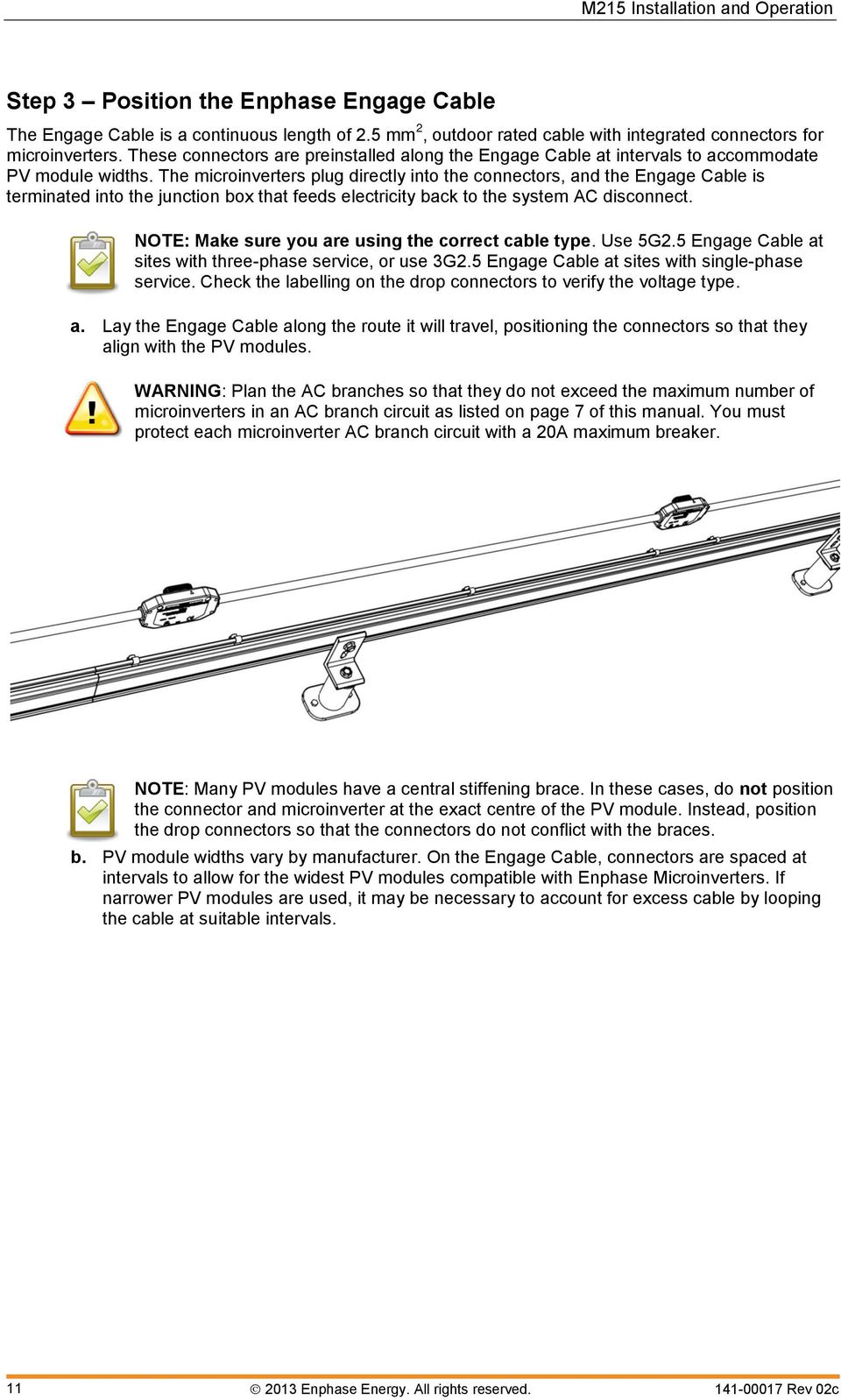
11 Step 3 Position the Enphase Engage Cable The Engage Cable is a continuous length of 2.5 mm 2, outdoor rated cable with integrated connectors for microinverters. These connectors are preinstalled along the Engage Cable at intervals to accommodate PV module widths. The microinverters plug directly into the connectors, and the Engage Cable is terminated into the junction box that feeds electricity back to the system AC disconnect. NOTE: Make sure you are using the correct cable type. Use 5G2.5 Engage Cable at sites with three-phase service, or use 3G2.5 Engage Cable at sites with single-phase service. Check the labelling on the drop connectors to verify the voltage type. a. Lay the Engage Cable along the route it will travel, positioning the connectors so that they align with the PV modules. WARNING: Plan the AC branches so that they do not exceed the maximum number of microinverters in an AC branch circuit as listed on page 7 of this manual. You must protect each microinverter AC branch circuit with a 20A maximum breaker. NOTE: Many PV modules have a central stiffening brace. In these cases, do not position the connector and microinverter at the exact centre of the PV module. Instead, position the drop connectors so that the connectors do not conflict with the braces. b. PV module widths vary by manufacturer. On the Engage Cable, connectors are spaced at intervals to allow for the widest PV modules compatible with Enphase Microinverters. If narrower PV modules are used, it may be necessary to account for excess cable by looping the cable at suitable intervals Enphase Energy. All rights reserved.
12 Step 4 Attach the Microinverters to the Mounting Rail a. Mark the approximate centres of each PV module on the mounting rail. b. Evaluate the location of the microinverter with respect to the PV module DC junction box or any other obstructions. Ensure that the microinverter does not interfere with the PV module frame or stiffening braces. Ensure that the connector from the microinverter can easily reach the connector on the Engage Cable. c. Allow a minimum of 1.9 cm (0.75 inches) between the roof and the bottom of the microinverter. Also allow 1.3 cm (0.50 inches) between the back of the PV module and the top of the microinverter. WARNING: Do not mount the microinverter in a location that allows long-term exposure to direct sunlight (i.e., the microinverter should be covered by the PV module). d. With the silver side of the microinverter facing up and the black side facing down, mount one microinverter at each location using suitable hardware. The indicator light on the underside of the microinverter will be facing the roof. NOTE: Installing the microinverter black side up is not recommended as it may allow moisture to collect between the cover and the body of the microinverter. If installing the M215 at an angle, check that this angle does not allow for collection of water in the recesses of the microinverter. e. Torque the microinverter fasteners to the values below. 6 mm (1/4 ) mounting hardware 5 N m (45 in-lbs) 8 mm (5/16 ) mounting hardware 9 N m (80 in-lbs) NOTE: Using a power screwdriver to tighten the screws is not recommended due to the risk of thread galling. f. If you are using a bonding (earthing) electrode conductor to earth the microinverter chassis, attach the earthing electrode conductor to the microinverter earthing screw. g. Torque the 10/32 earthing cleat screw to 2 N m (20 in-lbs). Each Enphase Microinverter comes with an earthing clip that can accommodate a 10-16mm 2 conductor. You may also earth the mounting rail and PV module to this conductor using a crimp connection. NOTE: The AC output neutral is not bonded to earth inside the microinverter Enphase Energy. All rights reserved.


13 Step 5 Dress the Engage Cable a. Attach the Engage Cable to the mounting rail using clips or tie wraps. NOTE: There are two release-holes in the drop connector on the cable. These are not for mounting but are used to disconnect the connector. Keep these release holes clear and accessible. release holes b. Dress any excess in loops so that the Engage Cable does not contact the roof. There are several ways to support the cable. One method is to place tie wraps or clips on either side of the connector. Use one or two additional clips, tie wraps, or other support scheme to secure the cable between connectors Enphase Energy. All rights reserved.


14 Step 6 Connect the Microinverters a. Remove and discard the temporary shipping cap from the Engage Cable and connect the microinverter. There are two latching mechanisms within the connectors. Listen for two clicks as the connectors engage. Ensure that both latching mechanisms have engaged. b. Repeat for all microinverters in the AC branch circuit. c. Cover any unused connector with a sealing cap. Listen for two clicks as the connectors engage. Ensure that both latching mechanisms have engaged. NOTE: Do not use the shipping cap to cover unused connectors. The shipping cap does not provide an adequate environmental seal. Enphase sealing caps are required for the system to compliant to regulation and to protect against moisture ingress. Enphase sealing caps are IP67 rated. Within the term IP67, IP indicates an Ingress Protection (IP) rating against dust and liquids. This specific rating of IP67 indicates that this connector protects against all dust particles and immersion in liquid. WARNING: Make sure protective sealing caps have been installed on all unused AC connectors. Unused AC connectors are live when the system is energised by the electricity network. Sealing caps may not be reused. NOTE: If you need to remove a sealing cap, you must use the Enphase disconnect tool or a #3 Phillips screwdriver. Sealing caps may not be reused Enphase Energy. All rights reserved.

15 Step 7 Terminate the Unused End of the Engage Cable Terminate the far end of the Engage Cable as follows. a. Remove 60mm (2.5 inches) of the cable sheath from the conductors. b. Slide the hex nut onto the Engage Cable. hex nut wire organiser cap c. Insert the Engage Cable all the way into the wire organiser (up to the stop). d. Bend the individual wires back into the recesses in the wire organiser so that they angle back toward the cable. e. Cut the individual wires so that no excess extends outside of the wire organiser. The portions that angle back will need to extend enough to fit neatly into the 0.5 cm (0.2 in) recesses in the wire organiser and flush with the edge of the cap. f. Screw the hex nut onto the cap. Never unscrew the hex nut as this can twist and damage the cable. g. Hold the cap with an Enphase disconnect tool, or insert a #2 Phillips screwdriver. h. Use a 22mm (7/8 inch) spanner to tighten the hex nut until the latching mechanism is screwed all the way to the base. i. Use a tie wrap or cable clip to attach the cable to the mounting rail, so that the Engage Cable and terminator do not touch the roof. j. Ensure that all cabling is located underneath the PV module Enphase Energy. All rights reserved.

16 Step 8 Connect the Engage Cable to AC Junction Box(es) a. Connect Engage Cable into the AC branch circuit junction box using an appropriate gland or strain relief fitting. The Engage Cable requires a strain relief connector with an opening of 1.3 cm (0.5 inches) in diameter. b. Connect the Engage Cable into additional AC junction boxes as needed to transition to conduit between smaller sub-arrays. Refer to the wiring diagrams located on page 28 for more information. Single-phase 3G2.5 Three-phase 5G2.5 L1 - Brown (not present) (not present) Neutral - Blue Earth Green / yellow (acts as equipment earth) L1 - Brown L2 - Black L3 - Grey Neutral - Blue Earth Green / yellow (acts as equipment earth) Wires are identified as follows. For 400 Vac, L1 is sheathed in brown, L2 is sheathed in black, L3 is sheathed in grey, Neutral is sheathed in blue, and protective earth is sheathed in green/yellow. The earthing wire is used to earth the microinverters. For single-phase, L2 and L3 are not present. Balanced 400 Vac (3-phase) is accomplished by alternating phases between microinverters as shown: WARNING: Treat all connector contacts as though they are live. The 5G2.5 Engage Cable drop connector contains two live phases Enphase Energy. All rights reserved.


17 Step 9 Complete the Installation Map The Enphase Installation Map is a diagrammatic representation of the physical location of each microinverter in your PV installation. The virtual array in Enlighten is created from the map you create. Use the blank map on page 27 to record microinverter placement for the system, or provide your own layout if a larger or more intricate installation map is required. Use the Enphase Installation Map Each Enphase Microinverter has a removable serial number label located on the mounting plate. Peel the removable serial number label from each Enphase Microinverter and affix it to the respective location on the Enphase installation map (see map on page 27). Remember to keep a copy of the installation map for your records. Alternative: Create Your Own Map Draw a top-down view of the array using the Array Map template (using either the grid on Side A or the freeform area on Side B). Make sure to leave enough room to place the serial number stickers. When installing the microinverters, remove the serial number labels located next to the DC input cables and place them in the correct order on your drawing of the system. Remember to keep a copy of the installation map for your records. Step 10 Connect the PV Modules NOTE: Completely install all microinverters and all system AC connections prior to installing the PV modules. a. Mount the PV modules above the microinverters. b. Mate the microinverters and PV modules as required. Repeat for all remaining PV modules using one microinverter for each PV module. WARNING: The M215 can be paired only with a 60- cell PV module Enphase Energy. All rights reserved.

18 Step 11 Build the Virtual Array When the system is energised and the Envoy detects all the installed microinverters, you can create the virtual array in Enlighten from the installation map you created. Once the virtual array is built, Enlighten displays a graphic representation of the PV system. It also shows detailed current and historical performance information. Go to for more information on the Enphase Enlighten web-based monitoring and analysis. a. Scan the installation map and upload it to the Activation form online. b. Use Array Builder to create the virtual array in Enlighten. Use the installation map created in step 9 as your reference. NOTE: Go to to view the Array Builder demo. c. If you do not already have an account, go to and click Enlighten Login to register Enphase Energy. All rights reserved.

19 Commissioning and Operation WARNING: Be aware that only qualified personnel must connect the Enphase Microinverter to the electricity network. WARNING: Ensure that all AC and DC wiring is correct. Ensure that none of the AC and DC wires are pinched or damaged. Ensure that all AC junction boxes are properly closed. NOTE: Obtain proper approval for the installation from the authorities having jurisdiction. NOTE: The Status LED on the underside of each microinverter will blink green six times to indicate normal start-up operation approximately two minutes after DC power is applied. REMINDER: Enphase Microinverters will not begin exporting power until the Envoy Communications Gateway is installed and has detected all of the microinverters at the site. In addition, the grid profile must be configured and the Envoy must have propagated these settings to the microinverters. For instructions on installing the Envoy and configuring the grid profile, refer to the Envoy Installation and Operation Manual at Commission the System To commission the Enphase Microinverter PV system: 1. Turn ON the AC disconnect or circuit breaker (such as an isolation switch) for each microinverter AC branch circuit. 2. Turn ON the main AC switch. 3. The Enphase Microinverters will begin communicating over the power lines to the Envoy. The time required for all microinverters to report to the Envoy will vary with the number of microinverters in the system. The first units should be detected within 15 minutes. After that, the Envoy will detect approximately four microinverters per minute. 4. You will need to configure the microinverters with the appropriate grid profile before they can produce power. For instructions on this procedure, refer to the Envoy Installation and Operation Manual at NOTE: If the Envoy has not been set up with a grid profile for the microinverters, they will not produce energy. The microinverters must be configured with the appropriate grid profile as part of the commissioning process. Operating Instructions The Enphase Microinverter is powered on when sufficient DC voltage from the PV module is applied. The Status LED of each microinverter will blink green six times to indicate normal start-up operation approximately two minutes after DC power is applied. You may need to use a handheld mirror to view indicator lights on the undersides of the microinverters Enphase Energy. All rights reserved.

20 Troubleshooting Adhere to all the safety measures described throughout this manual. Qualified personnel can use the following troubleshooting steps if the PV system does not operate correctly. WARNING: Do not attempt to repair the Enphase Microinverter; it contains no userserviceable parts. If it fails, contact Enphase customer service to obtain an RMA (return merchandise authorisation) number and start the replacement process. Status LED Indications and Error Reporting Startup LED Operation: The Status LED of each microinverter will blink green six times to indicate normal start-up operation approximately two minutes after DC power is applied. Six short red blinks after DC power is first applied to the microinverter indicate a failure during microinverter startup. Post-Startup LED Indications: Use a handheld mirror to view indicator lights on the undersides of the microinverters. LED states are: Flashing Green: AC grid valid and communicating with Envoy Flashing Orange: AC grid valid but not able to communicate with Envoy Flashing Red: Not producing power. AC grid invalid (Voltage or Frequency). This may happen when the microinverters have not yet been configured with a Grid Profile. Solid Red plus flashing Green: DC input earth resistance fault active, AC grid valid and communicating with Envoy Solid Red plus flashing Orange: DC input earth resistance fault active, AC grid valid but not able to communicate with Envoy Solid Red: DC input earth resistance fault active and the AC grid is invalid. This may happen when the microinverters have not yet been configured with a Grid Profile. Reported Faults: All faults are reported to the Envoy. Refer to the Envoy Installation and Operation Manual for troubleshooting procedures Enphase Energy. All rights reserved.

21 Troubleshoot an Inoperable Microinverter To troubleshoot an inoperable microinverter, follow the steps in the order shown. WARNING: Be aware that only qualified personnel should troubleshoot the PV array or the Enphase Microinverter. WARNING: Never disconnect the DC wire connectors under load. Ensure that no current is flowing in the DC wires prior to disconnecting. WARNING: Always disconnect AC power before disconnecting the PV module wires from the Enphase Microinverter. The AC connector of the microinverter is suitable as a disconnecting means. WARNING: The Enphase Microinverters are powered by DC power from the PV modules. Make sure you disconnect the DC connections and reconnect DC power to watch for the six short LED blinks two minutes after DC is applied. 1. Check the connection to the electricity network and verify the utility voltage and frequency are within allowable ranges. 2. Verify that AC line voltage at the electrical distribution board or consumer unit and at the AC junction box for each AC branch circuit are within the ranges are shown in the following table: Single-phase service Three-phase service L1 to neutral 207 to 253 Vac L1 to L2 to L3 360 to 440 Vac L1, L2, L3 to neutral 207 to 253 Vac 3. Verify that power from the electricity network is present at the microinverter in question by removing AC, then DC power. Never disconnect the DC wires while the microinverter is producing power. 4. Re-connect the DC PV module connectors. The Status LED of each microinverter will blink green six times to indicate normal start-up operation two minutes after DC power is applied. 5. Check the AC branch circuit between all the microinverters. As described in the previous step, verify that all microinverters are energised by the electricity network. 6. Make sure that any upstream AC disconnects (or isolators), as well as the dedicated circuit breakers for each AC branch circuit, are functioning properly and are closed. 7. Verify the PV module DC voltage is within the allowable range shown in the Technical Data section on page 24 of this manual. 8. Check the DC connections between the microinverter and the PV module. 9. If the problem persists, contact Customer Support at [email protected]. WARNING: Do not attempt to repair the Enphase Microinverter; it contains no userserviceable parts. If it fails, contact Enphase customer service to obtain an RMA (return merchandise authorisation) number and start the replacement process Enphase Energy. All rights reserved.
22 Disconnect a Microinverter from the PV Module To ensure the microinverter is not disconnected from the PV modules under load, adhere to the following disconnection steps in the order shown: 1. De-energize the AC branch circuit breaker. 2. Disconnect the microinverter from the Engage Cable as follows: The Enphase AC connectors are tool-removable only. To disconnect a microinverter from the Engage Cable, insert the two large prongs of the disconnect tool (shown below) into the two holes in the drop connector. Rock the connector back and forth while pulling gently to disengage. If the disconnect tool is not available, insert a #3 Phillips screwdriver into one hole, and rock that side of the drop connector out. Then, insert the screwdriver into the other hole and pull the connector out entirely. 3. Using a clamp on meter, verify there is no current flowing in the DC wires between the PV module and the microinverter. 4. Take care when measuring DC current, as most clamp-on meters must be zeroed first and tend to drift with time. 5. Disconnect the PV module DC wire connectors from the microinverter using the Enphase disconnect tool. 6. Loosen the ground cleat screw and remove the grounding electrode conductor. 7. Remove the microinverter from the mounting rail. WARNING: Do not leave AC connectors on the Engage Cable uncovered for an extended period. If you do not plan to replace the microinverter immediately, you must cover any unused connector with a sealing cap. Sealing caps may not be reused Enphase Energy. All rights reserved.
23 Install a Replacement Microinverter 1. Verify that the AC branch circuit breaker is de-energised. 2. With the silver side of the microinverter facing up and the black side facing down, attach the replacement microinverter to the mounting rail using hardware recommended by your mounting rail vendor. 3. Torque the microinverter fasteners to the values below. 6 mm (1/4 ) mounting hardware 5 N m (45 in-lbs) 8 mm (5/16 ) mounting hardware 9 N m (80 in-lbs) NOTE: Using a power screwdriver to tighten the fasteners is not recommended due to the risk of thread galling. 4. If you are using a bonding (earthing) electrode conductor to earth the microinverter chassis, attach the earthing electrode conductor to the microinverter earthing screw. Torque the 10/32 earthing cleat screw to 2 N m (20 in-lbs). NOTE: Using a power screwdriver to tighten the earthing clamp screw is not recommended due to the risk of thread galling. 5. Attach the bonding (earthing) electrode conductor, if used, to the microinverter earth clamp. 6. Connect the microinverter. There are two latching mechanisms within the connectors. Listen for two clicks as the connectors engage. Ensure that both latching mechanisms have engaged. 7. Mount the PV module above the microinverter. 8. Mate the microinverter and PV module as required. 9. Energize the AC branch circuit breaker, and verify operation of the replacement microinverter by checking the indicator light on the underside of the microinverter. You may need a handheld mirror to see the indicator light. 10. Initiate a device scan at the Envoy. To do this, press and hold the Menu button on the Envoy for two seconds to bring up the Envoy menu on the LCD window. When the LCD window displays Enable Device Scan, release the Menu button. This starts a 30-minute scan at the Envoy to discover the new microinverter. 11. Use Enlighten s Array Builder function to add the newly detected microinverter to the virtual array. 12. Ship the old microinverter to Enphase using the supplied return shipping label Enphase Energy. All rights reserved.
24 Technical Data Technical Considerations The Enphase M215 Microinverters are electrically compatible with most 60-cell PV modules. Be sure to verify the voltage and current specifications of your PV module match those of the microinverter. For more information, refer to our list of compatible PV modules at WARNING: You must match the DC operating voltage range of the PV module with the allowable input voltage range of the Enphase Microinverter. WARNING: The maximum open circuit voltage of the PV module must not exceed the specified maximum input voltage of the Enphase Microinverter. The output voltage and current of the PV module depends on the quantity, size and temperature of the PV cells, as well as the insolation on each cell. The highest PV module output voltage occurs when the temperature of the cells is the lowest and the PV module is at open circuit (not operating). The maximum short circuit current rating of the PV module must be equal to or less than the maximum input DC short circuit current rating of the microinverter Enphase Energy. All rights reserved.
25 Technical Specifications Enphase M215 Microinverter Parameters Topic Unit Min Typical Max DC Parameters Recommended maximum input power W 260 MPPT voltage range V Operating range V Maximum DC input voltage V 45 Minimum / Maximum start voltage V Maximum DC input short circuit current A 15 Maximum DC input current A 10.5 AC Parameters Maximum AC output Power (-40 to 65 C) W 215 Output power factor Nominal AC output voltage 230 Maximum AC output current, 230 Vac A.93 Number of AC phases 1 Maximum microinverters per 20 amp AC branch circuit 230 Vac 400 Vac (three-phase) Operational Data Total Harmonic Distortion % Ambient temperature range C Operating temperature range (internal) C Storage temperature range C Efficiency EN50530 weighted efficiency (EU) % 95.4 Static MPPT efficiency (weighted, EN 50530) % 99.6 Dynamic MPPT efficiency (weighted, EN 50530) slow irradiation changes Dynamic MPPT efficiency (weighted, EN 50530) fast irradiation changes Dynamic MPPT efficiency (weighted, EN 50530) start up and shut down 1 1 % 99.3 % 99.3 % 99.8 Night Tare Loss mw Enphase Energy. All rights reserved.
26 Enphase M215 Microinverter Parameters Topic Unit Min Typical Max Dimensions, not including mounting bracket (approximate) Weight Enclosure environmental rating Cooling Communication Features and Compliance ADD pollution rating cm x 16.4 cm x 2.5 cm (6.8 x 6.45 x 1.0 ) 1.6 Kg (3.5 Lbs) IP67 Convective no fan Power line Grid Compliance France VDE0126 Belgium C10_11 Italy CEI_0-21 Luxembourg VDE0126 Luxembourg C10_11 Netherlands EN50438 United Kingdom G83/1-1, G59/2 Australia AS4777 Other Compliance Directive 2006/95/EC, Directive 2004/108/EC, EN :2001 EN :2003 EN :2003 EN :2003 EN :2006 EN :1995 EN :2007 EN :2005 EN :2007 EN :2007 EN : EN : 2009 VDE DK5940 C10/11 Integrated AC disconnect The AC connector has been evaluated and approved for use as the required load-break disconnect. Protective class Enphase Energy. All rights reserved.
27 Enphase Installation Map Enphase Energy. All rights reserved.
28 Sample Wiring Diagram M215, 230 Vac, Single-Phase Enphase Energy. All rights reserved.
29 Sample Wiring Diagram M215, Three-Phase Enphase Energy. All rights reserved.
30 Corporate Headquarters Contact Information Enphase Energy Inc N. McDowell Blvd. Petaluma, CA USA Phone:
Enphase Engage Cable and Accessories
 INSTALLATION MANUAL Enphase Engage Cable and Accessories 141-00016, Rev 03 Corporate Headquarters Contact Information Enphase Energy Inc. 1420 N. McDowell Blvd. Petaluma, CA 94954 USA Phone: +1 707-763-4784
Enphase M250 Microinverter
 INSTALLATION AND OPERATION MANUAL Enphase M250 Microinverter with integrated ground no GEC required 141-00022, Rev 01 Contact Information Enphase Energy Inc. 1420 N. McDowell Blvd. Petaluma, CA 94954 http://www.enphase.com
Enphase M215 Microinverter
 INSTALLATION AND OPERATION MANUAL Enphase M215 Microinverter 141-00012, Rev 06 Contact Information Enphase Energy Inc. 1420 N. McDowell Blvd. Petaluma, CA 94954 http://www.enphase.com [email protected]
Model Number Electrical Compatibility Module Connector Type. M250-60-2LL-S22 60 cell PV module MC-4 Type 2 Locking
 TECHNICAL BRIEF M250 Microinverter System Installation Planning The M250 Microinverter The Enphase M250 Microinverter is a powerful and efficient grid-tied microinverter. It is compatible with most 60-cell
Installation and Operations Manual. Siemens Microinverter Model SMIINV215R60XX
 Installation and Operations Manual Siemens Microinverter Model SMIINV215R60XX Contact Information Siemens Industry, Inc. Infrastructure & Cities Sector Low and Medium Voltage 5400 Triangle Parkway Norcross,
YSmart Technology Co.,Ltd
 YSmart Technology Co.,Ltd GWV Series Grid Tie Microinverter User Manual The copyright of this user manual belong to YSmart TechnologyCompany Limited. Without the written permission of the copyright holder,
Envoy Communications Gateway
 INSTALLATION AND OPERATION MANUAL Envoy Communications Gateway 141-00014, Rev 04 Corporate Headquarters Contact Information Enphase Energy Inc. 1420 N. McDowell Blvd. Petaluma, CA 94954 USA Phone: +1 707-763-4784
TECHNICAL BRIEF. Commercial PV in Australia and New Zealand Using the Enphase Microinverter System
 TECHNICAL BRIEF Commercial PV in Australia and New Zealand Using the Enphase Microinverter System 2015 Enphase Energy Inc. All rights reserved May 2015 Table of Contents Commercial PV in Australia and
Installation Guide Content for P250xV-240 microinverters
 A C M o d u l e Installation Guide Content for P250xV-240 microinverters May 15, 2012 2011-2012 SolarBridge Technologies, Inc. All Rights Reserved. No part of this publication may be reused in any manner
User Manual DONGGUAN SHENGYANG INDUSTRIAL CO., LTD. SY WMVC Smart Grid Tie Microinverter. Dongguan Shengyang Industrial Co., Ltd.
 DONGGUAN SHENGYANG INDUSTRIAL CO., LTD SY WMVC Smart Grid Tie Microinverter User Manual Dongguan Shengyang Industrial Co., Ltd. ADD: No. 1 Shangxin Road, New Village, Xin An Community, Chang An Town, Dongguan
Engage Coupler. Engage Coupler Chase
 TECHNICAL BRIEF Wire Management in an Enphase System The Enphase Microinverter System installs much more quickly than other PV (photovoltaic) system technologies. This is partly due to the plug-and-play
AC Module Installation Guide Content
 AC Module Installation Guide Content for ET-P660250AC May 9, 2012 2011-2012 ET Solar Group All Rights Reserved. No part of this publication may be reused in any manner nor in any form or format without
User Manual. Replus-250 Replus-250A Replus-250B. U.S.A Add: 301 Howard St, Suite 850, San Francisco, CA 94105. T: +1 415 852 7418
 User Manual Replus-250 Replus-250A Replus-250B U.S.A Add: 301 Howard St, Suite 850, San Francisco, CA 94105. T: +1 415 852 7418 Australia Add: 18 Corporate Blvd. Bayswater, VIC 3153, Australia T: +61 481
Outdoor 33.6W Dual Port Passive Power-over-Ethernet Midspan For External Security Cameras and Wireless Access Points
 Outdoor 33.6W Dual Port Passive Power-over-Ethernet Midspan For External Security Cameras and Wireless Access Points Features SELV Compliant No Detection Passive Injector Gigabit Compatible Full Protection
33.6W Power over Ethernet Waterproof Adapter PoE Plus Single Port Injector for Outdoor Application
 33.6W Power over Ethernet Waterproof Adapter PoE Plus Single Port Injector for Outdoor Application Features Compliant with the IEEE802.3at Standard -40 to +60 C Temperature Range Diagnostic LEDs Full Protection
Installation Guide Solar Connect-11
 Installation Guide Solar Connect-11 Version 1.1 Contents Important Product Information 3 System Registration Form 4 Solar Connect-11 Overview 5 Internet & Power Connections 6 Single Phase CT Connections
* DISCLAIMER: Contents. How to Use This Guide: COMMERCIAL INSTALL GUIDE 2
 COMMERCIAL INSTALL GUIDE 2 Contents How to Use This Guide: The first section of this guide is designed to assist you with the installation of your DECK Monitoring hardware. The revenue grade meter and
Envoy Communications Gateway 141-00011, Rev 05
 INSTALLATION AND OPERATION MANUAL Envoy Communications Gateway 141-00011, Rev 05 Contact Information Enphase Energy Inc. 1420 N. McDowell Blvd. Petaluma, CA 94954 http://www.enphase.com [email protected]
INSTALLATION AND OPERATING INSTRUCTIONS For Model GL1 Gate Locks
 Securitron Magnalock Corp. www.securitron.com ASSA ABLOY, the global leader Tel 800.624.5625 [email protected] in door opening solutions INSTALLATION AND OPERATING INSTRUCTIONS For Model GL1 Gate
LIEBERT VNSA Installation Sheet
 LIEBERT VNSA Installation Sheet Description The Liebert vnsa network switch is designed for connecting multiple Ethernet-ready devices and comes in various models. The unit may have: A Liebert icom display
Co-location Interconnect Power Panel (CIPP) Installation Guide
 Co-location Interconnect Power Panel (CIPP) Installation Guide Document INS-97xxxxxxx This guide covers the following part numbers- Trimm 97xxxxxxx Series Table of Contents Section 1 - General Information...
SolarEdge Installation Guide MAN-01-00057-2.1. Cover goes here (right-side [odd] page)
![SolarEdge Installation Guide MAN-01-00057-2.1. Cover goes here (right-side [odd] page)](/thumbs/26/9028191.jpg "SolarEdge Installation Guide MAN-01-00057-2.1. Cover goes here (right-side [odd] page)") 1 Cover goes here (right-side [odd] page) Disclaimers 2 Disclaimers Important Notice Copyright SolarEdge Inc. All rights reserved. No part of this document may be reproduced, stored in a retrieval system
1 Cover goes here (right-side [odd] page) Disclaimers 2 Disclaimers Important Notice Copyright SolarEdge Inc. All rights reserved. No part of this document may be reproduced, stored in a retrieval system
HP UPS R1500 Generation 3
 HP UPS R1500 Generation 3 Installation Instructions Part Number 650952-001 NOTE: The rating label on the device provides the class (A or B) of the equipment. Class B devices have a Federal Communications
PowerFlex 700H and 700S AC Drives Frame 11 Main Fan Capacitor Replacement Kit
 Installation Instructions PowerFlex 700H and 700S AC Drives Frame 11 Main Fan Capacitor Replacement Kit ATTENTION: The sheet metal cover and mounting screws on the ASIC Board located on the power structure
Bubble King. User Manual
 Bubble King User Manual TABLE OF CONTENTS 1. Before You Begin... 3 What Is Included... 3 Unpacking Instructions... 3 Claims... 3 Text Conventions... 3 Icons... 3 Document Information... 3 Product at a
MCR1900 Media Converter 19-Slot Chassis
 MCR1900 Media Converter 19-Slot Chassis Installation Guide Part #5500304-11 Copyright Statement This document must not be reproduced in any way whatsoever, either printed or electronically, without the
PowerFlex 700S and 700H Frame 12 DC Bus Connector Kit
 PowerFlex 700S and 700H Frame 12 DC Bus Connector Kit Installation Instructions This document provides instructions for the installation of a DC bus connector kit for PowerFlex 700S and 700H frame 12 drives
AC Module Installation Guide Content
 AC Module Installation Guide Content for ET-P660250AC May 9, 2012 2011-2012 ET Solar Group All Rights Reserved. No part of this publication may be reused in any manner nor in any form or format without
Application Note - Connecting an Electricity Meter to SolarEdge Devices (Europe and APAC)
 February 2015 February 2015 Application Note - Connecting an Electricity Meter to SolarEdge Devices (Europe and APAC) This document describes how to connect an electricity meter to a SolarEdge device (inverters,
VOT-320. VOT-320V0xxL VOT-320V0xxH. Quick Installation Guide
 VOT-320 VOT-320V0xxL VOT-320V0xxH en Quick Installation Guide VOT-320 Table of Contents en 3 Table of Contents 1 General information 4 2 Parts included 5 3 Unpacking 6 4 Installing and connecting 7 4.1
Disclaimers. Important Notice. Emission Compliance. Disclaimers
 Disclaimers Disclaimers Important Notice Copyright SolarEdge Inc. All rights reserved. No part of this document may be reproduced, stored in a retrieval system or transmitted, in any form or by any means,
Disclaimers. Important Notice. Emission Compliance. Disclaimers
 Disclaimers Disclaimers Important Notice Copyright SolarEdge Inc. All rights reserved. No part of this document may be reproduced, stored in a retrieval system or transmitted, in any form or by any means,
DRM75A 230V 20/100A DIN rail single phase two wire energy meter
 DRM75A 230V 20/100A DIN rail single phase two wire energy meter 1.1 Safety instruction 1.2 Foreword 1.3 Performance criteria 1.4 Specifications 1.5 Basic errors 1.6 Description 1.7 Dimensions 1.8 Installation
Disclaimers. Important Notice
 Disclaimers Disclaimers Important Notice Copyright SolarEdge Inc. All rights reserved. No part of this document may be reproduced, stored in a retrieval system, or transmitted, in any form or by any means,
Square D Clipsal DIN-Rail Four-Channel Auxiliary Input Unit
 Square D Clipsal DIN-Rail Four-Channel Auxiliary Input Unit SLCLE5504AUX for Use with Wired C-Bus Networks Instruction Bulletin Retain for future use. Square D Clipsal DIN-Rail Four-Channel Auxiliary Input
Energy Communication Unit (ECU)
 Altenergy Power System Energy Communication Unit (ECU) Installation and User Manual (For ECU-3 V3.8) ALTENERGY POWER SYSTEM INC. All rights reserved TABLE OF CONTENTS 1.0 Introduction... 2 2.0 Installation...
DC400 Dispensing Cutoff System
 DC400 Dispensing Cutoff System DC404 and DC406 Installation Instructions Franklin Fueling Systems 3760 Marsh Rd. Madison, WI 53718 USA Tel: +1 608 838 8786 800 225 9787 Fax: +1 608 838 6433 www.franklinfueling.com
Sunny Boy Accessories SMA POWER BALANCER
 Sunny Boy Accessories SMA POWER BALANCER Installation Guide SBUS-PowBal-IUS102810 IMUS-SBUS-PBL Version 1.0 US SMA America, LLC Legal Restrictions Copyright 2010 SMA America, LLC. All rights reserved.
HP R12000 and R18000 DirectFlow UPS User Guide
 HP R12000 and R18000 DirectFlow UPS User Guide Abstract This document includes installation, configuration, and operation information for the HP R12000 and R18000 DirectFlow UPS. This document is for the
Energy Communication Unit (ECU)
 Altenergy Power System Energy Communication Unit (ECU) Installation and User Manual (For ECU-3 V3.7) Version:3.0 ALTENERGY POWER SYSTEM INC. All rights reserved TABLE OF CONTENTS 1.0 Introduction... 2
OEM Manual MODEL 2350 ELECTRONIC DUAL CYLINDER SCALE
 OEM Manual MODEL 2350 ELECTRONIC DUAL CYLINDER SCALE Scaletron Industries, Ltd. Bedminster Industrial Park 53 Apple Tree Lane P.O. Box 365 Plumsteadville, PA 18949 USA Toll Free: 1-800-257-5911 (USA &
FUSION R400 RAID USB 3.0
 FUSION R400 RAID USB 3.0 1U Rackmount 4-Drive Hardware RAID 5 SATA Storage System with USB 3.0 Interface User s Guide For Windows Contents 1 Fusion R400 RAID USB 3.0 Features 1 2 Drive Installation and
About the BitStorm 6051 POTS Splitter
 BitStorm 6051 Installation Instructions Document Number 6051-A2-GZ40-10 July 2002 About the BitStorm 6051 The BitStorm system enables simultaneous high-speed digital data access and analog voice service
egate INVOLAR Grid-Connected Photovoltaic Power Interface Model Number PIU4KA-230-UK User Operating Manual (Version_eGate(UK)G83_PIU4KA_1.
 INVOLAR Micro-Inverters egate INVOLAR Grid-Connected Photovoltaic Power Interface Model Number PIU4KA-230-UK User Operating Manual (Version_eGate(UK)G83_PIU4KA_1.5) This manual is an integral part of the
What are the basic electrical safety issues and remedies in solar photovoltaic installations?
 What are the basic electrical safety issues and remedies in solar photovoltaic installations? Presented by: Behzad Eghtesady City of Los Angeles Department of Building and Safety Topics Covered Photovoltaic
ADM1TE 5/30A DIN rail single phase two wire energy meter
 ADMTE 5/30A DIN rail single phase two wire energy meter. Safety instruction.2 Foreword.3 Performance criteria.4 Specifications.5 Basic errors.6 Description.7 Dimensions.8 Installation.9 Operating.0 Troubleshooting.
12 SOLAR PHOTOVOLTAIC POWER SUPPLY SYSTEMS by John Ware. PV modules are current-limiting
 12 SOLAR PHOTOVOLTAIC POWER by John Ware IT IS PLANNED for BS 7671:2008 to include a new Section 712 providing additional requirements for safety applicable to solar photovoltaic (pv) power supply systems.
Disclaimers. Important Notice
 Disclaimers Disclaimers Important Notice Copyright SolarEdge Inc. All rights reserved. No part of this document may be reproduced, stored in a retrieval system, or transmitted, in any form or by any means,
SOLAR PV STANDARD ELECTRICAL PLAN Microinverter Systems for Single Family Dwellings
 *** Provide this document to the inspector along with ALL system installation instructions *** Project Address: Scope: Standard plan for the installation of grounded microinverter solar PV systems, not
Addendum to the Operating Instructions
 Drive Technology \ Drive Automation \ System Integration \ Services Addendum to the Operating Instructions MOVIMOT with AS-Interface and AC Motor DT/DV Unit Replacement MOVIMOT MM..C -> MM..D with MLK3A
Enphase Microinverters and Ungrounded Renewable Energy Systems: Canadian Electrical Code Compliance
 WHITE PAPER Enphase Microinverters and Ungrounded Renewable Energy Systems: Canadian Electrical Code Compliance Overview Enphase has developed a new microinverter family that includes the M250 and new
HP 36-Port InfiniBand Switch Cable Management Kit Installation Guide
 HP 36-Port InfiniBand Switch Cable Management Kit Installation Guide HP Part Number: 574412-doc Published: May 2009 Copyright 2009 Hewlett-Packard Development Company, L.P. The information contained herein
BUILT-IN DISHWASHER INSTALLATION INSTRUCTIONS
 BUILT-IN DISHWASHER INSTALLATION INSTRUCTIONS PLEASE READ COMPLETE INSTRUCTIONS BEFORE YOU BEGIN LEAVE INSTALLATION INSTRUCTIONS AND USER'S GUIDE WITH OWNER ALL ELECTRIC WIRING AND PLUMBING MUST BE DONE
Wiser Panel Meter, Model Number WISERCTPM200 Installer s Guide
 Instruction Bulletin EAV85226 08/2014 Wiser Panel Meter, Model Number WISERCTPM200 Installer s Guide Retain for future use. Product Description Kit Contents The Wiser Panel Meter is for use in energy management
RAY-MAX Integrated Solar Power Strip
 RAY-MAX Integrated Solar Power Strip 600008, 600009, 600010, 600208, 600209, 600210 Owner s Manual NEXTRONEX, INC. Revision Date: 10/27/14 Contents 1. Safety Instructions... 3 2. General Equipment Warnings...
Solid Core and Split Core Adjustable Current Status Switches CSS-O, CSS-C; CSP-O, CSP-C
 Solid Core and Split Core Adjustable Current Status Switches CSS-O, CSS-C; CSP-O, CSP-C DESCRIPTION FEATURES PRODUCT DATA Very low operating trip points LED status indication Integral DIN rail mounting
Acano solution. Acano Solution Installation Guide. Acano. January 2014 76-1002-03-B
 Acano solution Acano Solution Installation Guide Acano January 2014 76-1002-03-B Contents Contents 1 Introduction... 3 1.1 Before You Start... 3 1.1.1 Safety information... 3 1.1.2 You will need the following
USER GUIDE TURBOCORD TM PORTABLE CHARGER 120V/240V: DUAL VOLTAGE. AeroVironment EV Solutions
 USER GUIDE TURBOCORD TM PORTABLE CHARGER 120V/240V: DUAL VOLTAGE AeroVironment EV Solutions 2013 AeroVironment, Inc. All rights reserved. AeroVironment, EV Solutions, and the AeroVironment logo are trademarks
Power Supply Guide Version 1.0 for D-Show
 Power Supply Guide Version 1.0 for D-Show Digidesign 2001 Junipero Serra Boulevard Daly City, CA 94014-3886 USA tel: 650 731 6300 fax: 650 731 6399 Technical Support (USA) tel: 650 731 6100 fax: 650 731
RMM2 Heat-Tracing Remote Monitoring Module for the Raychem NGC Control System Installation Instructions
 Heat-Tracing Remote Monitoring Module for the NGC Control System Installation Instructions Tools Required 3 mm slotted screwdriver 3/8 hex key (for -4X only) Approvals Nonhazardous locations Type NM LISTED
INSTALLATION GUIDELINES for SOLAR PHOTOVOLTAIC SYSTEMS 1
 City of Cotati Building Division 201 W. Sierra Ave. Cotati, CA 94931 707 665-3637 Fax 792-4604 INSTALLATION GUIDELINES for SOLAR PHOTOVOLTAIC SYSTEMS 1 Any PV system on a new structures should be included
HP 16/18-Port Cable Management Kit Installation Guide
 HP 16/18-Port Cable Management Kit Installation Guide Abstract This document describes how to attach the HP 16 Port or 18 Port Cable Management Kit to an HP rack. The cable management bracket is designed
HP ProLiant DL380 G6 Carrier-Grade Server Read Before Install
 HP ProLiant DL380 G6 Carrier-Grade Server Read Before Install Carrier-Grade Instructions HP Part Number: AM275-9001A Published: July 2012 Edition: 3 Copyright 2009, 2012 Hewlett-Packard Development Company,
Solar Inverter Sunny Boy 5000US, 6000US, 7000US
 Solar Inverter Sunny Boy 5000US, 6000US, 7000US Installation Guide SB50US-70US-IUS090523 TBUS-SB50_60_70US Version 2.3 US Copyright 2008 SMA America, Inc. All rights reserved. No part of this document
IP DSLAM IDL-2402. Quick Installation Guide
 IP DSLAM IDL-2402 Quick Installation Guide Table of Contents Package Contents... 3 Overview... 4 Setup the IDL series IP DSLAM... 5 Safety Instruction... 5 Hardware Installation... 6 WEB Configuration...
42U/45U 28" Wide Rack Installation & Service Guide
 42U/45U 28" Wide Rack Installation & Service Guide 96-00171-005 Rev B Important Information Information in this document is subject to change without notice and does not represent a commitment on the part
PS6500 Storage Arrays Rack Mount Instructions
 PS6500 Storage Arrays Rack Mount Instructions Part Number: R724M Rev. A01 Copyright 2010 Dell, Inc. All rights reserved. Dell is a trademark of Dell, Inc. EqualLogic is a registered trademark. All trademarks
High PoE Midspans NPD-6001A NPD-9501A. en Installation Manual
 High PoE Midspans NPD-6001A NPD-9501A en Installation Manual High PoE Midspans Table of Contents en 3 Table of contents 1 Safety 4 1.1 About this Manual 4 1.2 Legal Information 4 1.3 Safety Precautions
INSTALLATION INSTRUCTIONS
 LIGHTING CONTROL PANELS 4 AND 8 RELAYS INSTALLATION INSTRUCTIONS INSTALLATION OVERVIEW The installation instructions contained in this document are provided as a guide for proper and reliable installation.
2011/2008/2005 NATIONAL ELECTRICAL CODE SOLAR PV CODE COMPLIANCE REFERENCE
 2011/2008/2005 NATIONAL ELECTRICAL CODE SOLAR PV CODE COMPLIANCE REFERENCE PAGE 1 OF 5 This Reference provides a very comprehensive list of aspects of a solar PV installation that could be reviewed, clarifying
Guide To Returning Your Satellite Modem and Radio Assembly Model: HN7000S
 Guide To Returning Your Satellite Modem and Radio Assembly Model: HN7000S The HughesNet modem with power supply and radio must be returned to Hughes, in good condition, within 45 days of your termination.
user manual smappee monitor
 user manual smappee monitor January 2014 (English), version 2.02 2013 smappee NV. All rights reserved. Specifications are subject to change without notice. All product names are trademarks of their respective
AC Unison Installation Guide
 BenQ Solar AC Unison Solar Power Systems Installation guide AC Unison Installation Guide BenQ Solar AC Unison Solar Power Systems Installation guide Table of Contents 1. AC Unison Solar Power System Overview...2
Contractors Guide Central Inverter System Installation
 Contractors Guide Central Inverter System Installation Step By Step Procedures 2,200 Watt/VA 6 Step Installation 1. Mount Bottom Cabinet 2. Mount Top Cabinet 3. Install Batteries 4. Install Conduit 5.
Oil and Coolant Circulating Heating System. Model - OCSM
 Oil and Coolant Circulating Heating System Model - OCSM Installation & Operation Manual 216280-000 REV 2 Identifying Your System The HOTSTART heating system is designed to heat fluids for use in marine
3. SEISCO PARTS & SERVICE REMOVAL AND REPAIR GUIDE
 4 3. SEISCO PARTS & SERVICE REMOVAL AND REPAIR GUIDE A. Changing the Control Board B. Replacing a Heating Element C. Thermistor Replacement D. High Limit Switch Replacement E. Level Detector Replacement
Safety and Installation Instructions for AC Modules
 Safety and Installation Instructions for AC Modules United States and Canada Contents of this manual are subject to change without notice. For the latest guide please refer to www.sunpower.com/pvinstallguideacmodule
OPTICAL HEADEND PLATFORM OTOHP-NMS NETWORK MONITORING MODULE INSTRUCTION MANUAL
 OPTICAL HEADEND PLATFORM OTOHP-NMS NETWORK MONITORING MODULE INSTRUCTION MANUAL Phone: (209) 586-1022 (800) 545-1022 Fax: (209) 586-1026 OTOHP-NMS Rev. X1 E-Mail: [email protected] www.olsontech.com
Manual. Solar Fountain Mobile Phone Charger
 EN Manual Solar Fountain Mobile Phone Charger Copyrights 2008 Victron Energy B.V. All Rights Reserved This publication or parts thereof may not be reproduced in any form, by any method, for any purpose.
Home Signal Distribution Kit for Satellite TV Plus SIRIUS
 SR-101C SIRIUS/DBS Signal Combiner System SR-2261 Combiner-Outdoor Made in China DBS IN SIRIUS IN SR-101C SIRIUS/DBS Signal Combiner System SR-2251 Splitter-Indoor Made in China DC IN DBS OUT SIRIUS OUT
INSTALLATION GUIDE. Card Reader & Controller with KIM Swipe Reader for Solitaire 850 / 950 / 850L Learnlok PK2930
 INSTALLATION GUIDE Card Reader & Controller with KIM Swipe Reader for Solitaire 850 / 950 / 850L Learnlok PK2930 Card Reader and Controller Model 3.5 with KIM Swipe Reader Table of Contents 1. Features..................................
E E V R E - R S - O S L O A L R
 Solar Eye User Manual Edition JIANGSU EVER-SOLAR NEW ENERGY CO., LTD. Revision History Date Edition Specification 17/08/2011 1.0 Create File 02/09/2011 1.1 Add Micro SD function description www.ever-solar.com
INFRARED QUARTZ WALL HEATER
 INFRARED QUARTZ WALL HEATER MODEL NO: IQ2000 PART NO: 6939004 MOUNTING & OPERATION INSTRUCTIONS GC0715 INTRODUCTION Thank you for purchasing this CLARKE Infrared Wall Heater. Before attempting to use this
ATS Overhead Table Shelf System INSTRUCTION MANUAL
 ATS Overhead Table Shelf System INSTRUCTION MANUAL ATS Overhead Table Shelf System Instruction Manual Warranty Newport Corporation warrants this product to be free of defects in material and workmanship
MAKING MODERN LIVING POSSIBLE. UniLynx Indoor User Manual. ULX 1800i ULX 3000i ULX 3600i ULX 5400i SOLAR INVERTERS
 MAKING MODERN LIVING POSSIBLE UniLynx Indoor User Manual ULX 1800i ULX 3000i ULX 3600i ULX 5400i SOLAR INVERTERS Contents Contents 1. Introduction 2 Introduction 2 2. Function Description 3 Definition
Roof Top Air Conditioner INSTALLATION AND OPERATING INSTRUCTIONS
 Roof Top Air Conditioner INSTALLATION AND OPERATING INSTRUCTIONS Ducted System RECORD THIS UNIT INFORMATION FOR FUTURE REFERENCE: Model Number: Serial Number: Date Purchased: This manual must be read and
How to Set Up Your NSM4000 Appliance
 How to Set Up Your NSM4000 Appliance Juniper Networks NSM4000 is an appliance version of Network and Security Manager (NSM), a software application that centralizes control and management of your Juniper
LS1024B / LS2024B/ LS3024B. Solar Charge Controller USER MANUAL
 EPSOLAR LS1024B / LS2024B/ LS3024B Solar Charge Controller USER MANUAL Thank you very much for selecting our product! This manual offers important information and suggestions with respect to installation,
543-0032-00, 943-0032-00. User s Manual
 543-0032-00, 943-0032-00 User s Manual 1 Comfort Alert Diagnostics Faster Service And Improved Accuracy The Comfort Alert diagnostics module is a breakthrough innovation for troubleshooting heat pump and
Designing Multi-Tenant and Multi-Home Developments with Enphase Microinverters
 TECHNICAL BRIEF Designing Multi-Tenant and Multi-Home Developments with Enphase Microinverters Overview Enphase Energy s Microinverter system is the ideal solar electric solution for new home developments,
This equipment has been tested and found to comply with the limits for a Class B digital device, pursuant to part 15 of the FCC Rules.
 Power Max Level 2 Charging Station en Installation and Operating Instructions This equipment has been tested and found to comply with the limits for a Class B digital device, pursuant to part 15 of the
GreenWay Solar LED Path and Trail Lighting System. Installation and Owner s Manual
 GreenWay Solar LED Path and Trail Lighting System Installation and Owner s Manual Important Notes and Warnings This installation and instruction manual provides installation, operation, and maintenance
ACS-30-EU-EMDR-10-MOD
 Multi-application heat tracing Control and Monitoring in commercial and residential buildings Roof & Gutter de-icing sensor module Technical Information Approvals Module IP rating Ambient operating temperature
How To Set Up An Inverter
 MAKING MODERN LIVING POSSIBLE SOLAR INVERTERS Installation Guide GSM Option Kit FLX series www.danfoss.com/solar Safety Safety Safety Message Types WARNING Safety information important for human safety.
Current valve. for AC 24 V pulse/pause control of electrical loads up to 30 kw
 4 937 DESIO Current valve for AC 24 V pulse/pause control of electrical loads up to 30 kw SEA45.1 Use The current valve is used for the control of electric heating elements in heating, ventilation and
Processor Cage Fans, Front and Rear Replacement Instructions
 apple Mac Pro Processor Cage Fans, Front and Rear Replacement Instructions First Steps 1 Shut down computer. Note: Follow these instructions carefully. Failure to do so could damage your equipment and
Application Bulletin 103 - NEC Reference Guide for SolarBridge-Enabled AC Module Installers
 9229 Waterford Centre Dr. Bldg C, Suite 110 Austin, Tx 78758 Application Bulletin 103 - NEC Reference Guide for SolarBridge-Enabled AC Module Installers Current Version: 13 AC Modules are a new product
Mercury Helios 2 ASSEMBLY MANUAL & USER GUIDE
 Mercury Helios 2 ASSEMBLY MANUAL & USER GUIDE TABLE OF CONTENTS INTRODUCTION...1 1.1 MINIMUM SYSTEM REQUIREMENTS 1.1.1 Apple Mac Requirements 1.1.2 PC Requirements 1.1.3 Supported PCIe Cards 1.2 PACKAGE
Digi-Motor Installation Guide
 Digi-Motor Installation Guide Installation Video...located at marsdelivers.com Digi-Motor Installation Guide Digi-Motor For technical assistance with your Azure Digi-Motor, call the MARS technical support