
1) Run DM on your PC. 2) Select System -> Link Setup.
|
|
|
- Clement Gibbs
- 10 years ago
- Views:
Transcription


1 ED 2.0 ( )


2


3 1) Run DM on your PC. 2) Select System -> Link Setup. How to connect OfficeServ system through OfficeServ DM(Device Manger). 1) Standalone mode - Execute osdm.exe file. 2) Web browser mode MP20 MP40 MP20s OS7100 OS7070 OS7030 V4.60 Private network http(s)://system IP/dm/ http(s)://system IP Public network http(s)://system IP http(s)://system IP/dmp/ http(s)://system IP/dm_public/ - osdm files need to be uploaded to the DM directory in a SD card. But in case of OS7070, all files are already included. MP40/MP20 : osdm.jar, osdmhelp.jar, osdm.jnlp, osdm_public.jnlp MP20s/MP10a/MP11/7030 : osdm.jar, osdmhelp.jar - Java6 is required for a normal operation of DM(V4.60 )

4 3) You can make the connection list as below. - Enter the Site name and Destination IP address. After then click Apply button. 4) Choose the site in the list for the DM connection.


5 5) After entering a password, OfficeServ DM screen will be shown as below.


6 For the Public zone service, IP type of OfficeServ system and MGI/OAS cards should be set to Private with Public Programming 1) In DM 2.1.0, enter the system IP address. 2) In DM 2.1.2, set the system s IP Type to Private with Public. 3) In DM 2.2.2, enter the MGI card s IP address and set its IP Type to Private with Public.


7 1) Trunk type - To use the various PBX features of WE VoIP client, SIP & ISDN trunk are recommended. Because main features of WE VoIP are operating on the MOBEX s basic functional structure. With other trunk types, it will work as normal SIP client having a basic call function. 2) Group Conf. Cabinet assignment - For Call move and Smart routing service, one or more Group Conf cabinet should be assigned in DM Virtual Card Change option. 3) WE VoIP Client Expire Time - In DM SIP Extension Configuration, set SIP Expire Time to below 600 seconds. If it is set to over 600 seconds, the WE VoIP client will not try to register to the system any more. 4) G.729 codec is not supported yet - To use WE VoIP client with the OfficeServ system, do not use G.729 codec for MGI/OAS/Handset. 5) Remote dial service - This service is not commercially released. If you want the trial test, please contact your partners in HQ first.


8 To use the WE VoIP client service, enter a license key to DM (MMC860) as below. - No SIP phone license is required.


9 1) Enter the User ID and Password in DM (MMC842) 2) Login profile in DM Enter the mobile number This number will be used for making a unique name for both a mobile and login profile as below. <sec_mobile_ xml> <sec_login_ xml> - Check the public zone service option To use WE VoIP in public area(not in your office WIFI zone), this option should set to Enable. - Check the Scan 5G Only option For reducing a handover delay, a proper channel scanning method should be chosen considering your network environment. -


10 3) Mobile profile in DM AP SSID Basically, this should be identical to your local access point. If it differs from the SSID of local AP, WE VoIP client will not recognize that it is in a office where the OfficeServ system is located in and then will try to register with a public IP address of the system. - Public zone service Using an unpopular SSID is strongly recommended. When it is unfortunately same to other one in a public area, the public zone service will not work at that area.

11 Multi-ring service In DM Station Pair option, make WE VoIP client paired with a desk phone. - When user receives an incoming call on a paired desk phone(or WE VoIP), a missed call will not happen on the WE VoIP(or a desk phone). - Setting or clearing CFWD or DND options will be applied to both paired devices. Single CID number service In DM 4.2.1, enable the Single CID Number option. - When WE VoIP is paired with a desk phone having a primary number by Single CID number option, the primary number & name will be delivered instead of the CID number of WE VoIP. - This feature is supported on an internal call(including station group) only. - For an external call, you can use Send CLI Number option in DM instead of Single CID number. - This CID number will not be shown on the SMDR log.


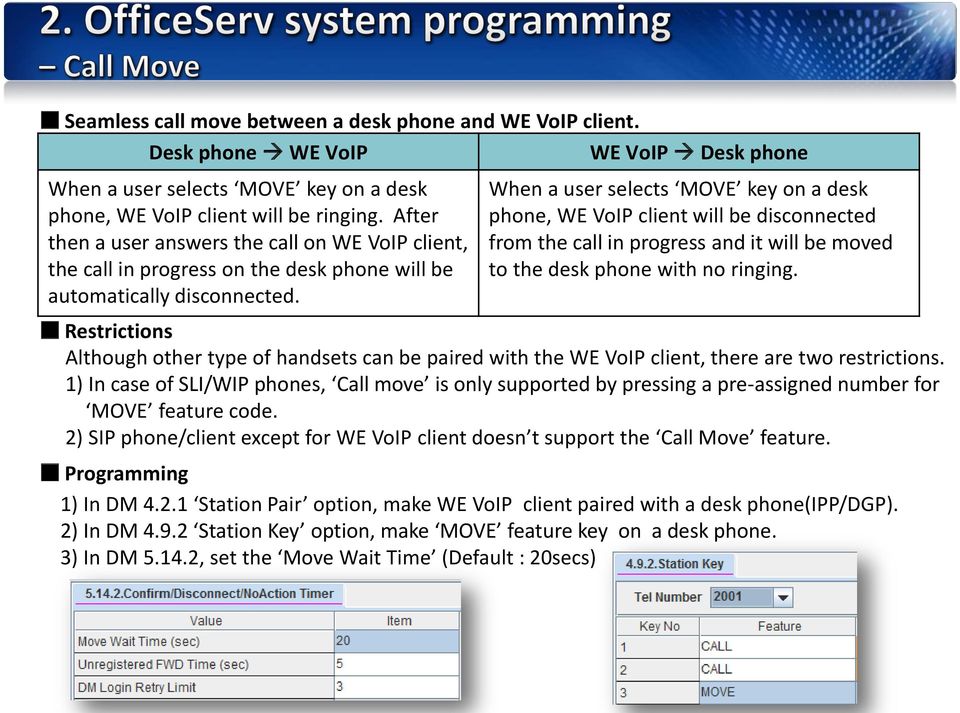
12 Seamless call move between a desk phone and WE VoIP client. Desk phone WE VoIP WE VoIP Desk phone When a user selects MOVE key on a desk phone, WE VoIP client will be ringing. After then a user answers the call on WE VoIP client, the call in progress on the desk phone will be automatically disconnected. When a user selects MOVE key on a desk phone, WE VoIP client will be disconnected from the call in progress and it will be moved to the desk phone with no ringing. Restrictions Although other type of handsets can be paired with the WE VoIP client, there are two restrictions. 1) In case of SLI/WIP phones, Call move is only supported by pressing a pre-assigned number for MOVE feature code. 2) SIP phone/client except for WE VoIP client doesn t support the Call Move feature. Programming 1) In DM Station Pair option, make WE VoIP client paired with a desk phone(ipp/dgp). 2) In DM Station Key option, make MOVE feature key on a desk phone. 3) In DM , set the Move Wait Time (Default : 20secs)


13 Handover from Wi-Fi to mobile network When a user presses the button To Mobile on WE VoIP client, the VoIP call in progress will be redirected from its Wi-Fi to mobile network. - Mobile phone will be ringing for establishing a mobile call. - The VoIP call will be hold during the manual handover. Programming 1) In DM Mobile Extension, assign a trunk number and input a mobile number in the outgoing digit option. 2) In DM SIP Phone Information, enter the Mobex station number to the destination of Call forward unreachable option. 3) In DM Numbering Plan, assign any non-duplicated number to MOVE key.

14 Case 1 : Plug-out When a WE VoIP client is disconnected normally, an incoming call to the client will be transferred to a pre-assigned call number in the Call forward unreachable option. Case 2 : No response In case that a WE VoIP client does not respond(180/183 ringing) to an INVITE message from the OfficeServ system within a timer set in the Call forward unreachable Time option, the call will \ be transferred to a pre-assigned call number in the Call forward unreachable option. Programming 1) In DM Mobile Extension, assign a trunk number and input a mobile number in the outgoing digit option. 2) In DM SIP Phone Information, enter the Mobex station number to the destination of Call forward unreachable option. 3) In DM , set the Call forward unreachable Time. (Default : 5secs)


15 Cost reduction by the smart routing service When a user makes an external call via Mobile button on WE VoIP client, the OfficeServ system checks if the dialed number has a corresponding extension number and the station s status is idle. If exists, the call will be redirected in the system to pass through its own trunk line. Dialing to A-mobile number Smart Routing to A-ext. number 3G/4G AP A Programming Office 1) In DM SIP Phone Information, enter the Mobex station number to the destination of Call forward unreachable option. 2) In DM Login Profile, enter a mobile number that WE VoIP client is having.


16

SIP Trunking with Elastix. Configuration Guide for Matrix SETU VTEP
 SIP Trunking with Elastix Configuration Guide for Matrix SETU VTEP Contents Setup Diagram 3 SIP Trunk Configuration in Elastix for SETU VTEP 4 Outgoing Call configuration in Elastix 7 Incoming call configuration
OfficeServ 7000 Series Software Version 4.30i General Availability
 OfficeServ 7000 Series Software Version 4.30i General Availability is pleased to announce the release of V4.30i system software for the OfficeServ 7000 Series Systems. Effective June 8, 2009, all software
SIP Trunking using Optimum Business SIP Trunk Adaptor and the Allworx 6x IP PBX 7.1.6.1
 ALLWORX SIP Trunking using Optimum Business SIP Trunk Adaptor and the Allworx 6x IP PBX 7.1.6.1 Goal The purpose of this configuration guide is to describe the steps needed to configure the Allworx 6x
OfficeServ 7000 [V4.40 S/W] Feature Guide
![OfficeServ 7000 [V4.40 S/W] Feature Guide](/thumbs/26/7475586.jpg "OfficeServ 7000 [V4.40 S/W] Feature Guide") OfficeServ 7000 [V4.40 S/W] Feature Guide Document Type Language Code / Total page Create / Exam / Approve / Registered Date Item Code This is official SEC document created, registered, and circulated
OfficeServ 7000 [V4.40 S/W] Feature Guide Document Type Language Code / Total page Create / Exam / Approve / Registered Date Item Code This is official SEC document created, registered, and circulated
SIP Trunking Quick Reference Document
 SIP Trunking Quick Reference Document Publication Information SAMSUNG TELECOMMUNICATIONS AMERICA reserves the right without prior notice to revise information in this publication for any reason. SAMSUNG
SEUK. How to setup SIP Trunking?
 SEUK How to setup SIP Trunking? SIP Trunk Providers This is a list of the current SIP Trunk providers that have been tested on the OfficeServ 7000 range: Gamma IP Direct V3.0 and V3.1 versions VoiceFlex
Release Notes for NeoGate TE100 16.18.0.X
 Release Notes for NeoGate TE100 16.18.0.X ===Firmware Version: V16.18.0.2==== Applicable Model: NeoGate TE100 Release Date: October 25th, 2014 http://www.yeastar.com 1/6 1. New Features 1. Added support
Mobile i-phonenet User Guide Android
 Chapter 1 : Getting Started 1. Client Download and Installation Step 1: Go to Google Play on your PC or your android device and search for < Mobile ipn >. Step 2: Download and install Mobile ipn. Note
WE VoIP User Guide For OfficeServ 7000 Series
 WE VoIP User Guide For OfficeServ 7000 Series WE-VoIP Client V3.5.0.3 WE VoIP User Guide for OfficeServ November 2013 1 Disclaimer Every effort has been made to eliminate errors and ambiguities in the
How to Configure the Toshiba Strata CIX for use with Integra Telecom SIP Solutions
 How to Configure the Toshiba Strata CIX for use with Integra Telecom SIP Solutions Overview: This document provides a reference for configuration of the Toshiba Strata CIX IP PBX to connect to Integra
How To Use Touchtone.Com'S Digital Phone Service Web Portal User Guide (For Ip Phones) On A Pc Or Ip Phone (For A Cell Phone) On Pc Or Mac) On Your Ip Phone On A Mac Or Ip Cell Phone On
 Digital Phone Service Web Portal User Guide TouchTone provides subscribers an easy-to-use Web-based administrator portal to help manage your IP phone s features and call routing functions. In this document
Atcom MP01 and Elastix Server
 Atcom MP01 and Elastix Server Setup Guide http://www.elastix.org 1.0 Setup Diagram This is a setup diagram for a mesh network of Atcom MP01 configuration. When everything is configured we ll be able to
VoIPon www.voipon.co.uk [email protected] Tel: +44 (0)1245 808195 Fax: +44 (0)1245 808299
 VoiceGear/3CX Integration Guide Ver.0.1 Page 2 1. OVERVIEW... 3 1.1 SETTING UP 3CX PBX...4 1.2 SETTING UP VOICEGEAR GATEWAY...5 2. VOICEGEAR-3CX SIP INTEGRATION... 6 2.1 3CX CONFIGURATION...7 2.2 VOICEGEAR
Configuring Positron s V114 as a VoIP gateway for a 3cx system
 Assumptions: Configuring Positron s V114 as a VoIP gateway for a 3cx system The IP address of the V114 is 192.168.1.2 The IP address of the 3CX PBX System is 192.168.1.110 3CX already has some IP phones
Configuring Avaya IP Office 500 for Spitfire SIP Trunks
 Configuring Avaya IP Office 500 for Spitfire SIP Trunks This document is a guideline for configuring Spitfire SIP trunks onto Avaya IP Office 500 and includes the settings required for Inbound DDI routing
Quick Installation Guide
 Quick Installation Guide PRI Gateway Version 2.4 Table of Contents Hardware Setup... 1 Accessing the WEB GUI... 2 Notification LEDs (On the Front Panel of the Gateway)... 3 Creating SIP Trunks... 4 Creating
SIP Trunk Configuration Guide. using
 SIP Trunk Configuration Guide using www.cbeyond.net 1-877-441-9783 The information contained in this document is specific to setting up SIP connections between Vertical SBX IP 320 and Cbeyond. If you require
SIP Trunking Application Notes V1.3
 SIP Trunking Application Notes V1.3 Publication Information SAMSUNG TELECOMMUNICATIONS AMERICA reserves the right without prior notice to revise information in this publication for any reason. SAMSUNG
InSciTek Microsystems 635 Cross Keys Park Fairport, NY 14450 585-421-3850. Setting up Your Phones
 InSciTek Microsystems 635 Cross Keys Park Fairport, NY 14450 585-421-3850 Setting up Your Phones Table of Contents Setting up Your Phones... 1 How to Add an Analog Handset... 2 How to Add a SIP Handset...
KX-NS. Cellular Phone as Extension
 KX-NS Cellular Phone as Extension Introduction Cellular phone can work as extension. Even when your important customer calls your office phone number and you are out of office, you can answer the call
IP PBX. SD Card Slot. FXO Ports. PBX WAN port. FXO Ports LED, RED means online
 1 IP PBX SD Card Slot FXO Ports PBX LAN port PBX WAN port FXO Ports LED, RED means online 2 Connect the IP PBX to Your LAN Internet PSTN Router Ethernet Switch FXO Ports 3 Access the PBX s WEB GUI The
Contents 1. Setting up your Phone Phone Setup Phone Usage 2. User Portal 3. Softphone for your computer 4. Faxing
 User Guide 1 Contents 1. Setting up your Phone Phone Setup Phone setup instructions Recording Voicemail Greeting and Voicemail Menu Testing tools Phone Usage Call Transfer, Call Forwarding and Do Not Disturb
Quick Start Guide CREATING A NEW SITE
 IVY is our complete control panel for managing you or your customers SIP trunks and hosted PBX settings. This guide will help you get up and running with IVY as quickly as possible. First thing we need
Benefits Of Upgrading To The Latest CIX Processor
 Benefits Of Upgrading To The Latest CIX Processor The Bits: This document is a reference to help you discover the benefits of selling existing Strata CIX system upgrading to release 4 processor: ACTU3A,
Opera Wireless Mobilty
 Opera Wireless Mobilty How to set-up a Nokia E51 handset as a SIP WiFi extension off the Opera 4IP/20IP system This will allow your mobile phone to act as an extension when you are in the office. Your
VoIP Intercom and Elastix Server
 VoIP Intercom and Elastix Server Setup Guide http://www.elastix.org 1.0 Setup Diagram Figure 1-1 is a setup diagram for a single VoIP Intercom configuration. In this configuration, the VoIP Intercom acts
OfficeServ 7000 [V4.30 S/W] Feature Guide
![OfficeServ 7000 [V4.30 S/W] Feature Guide](/thumbs/39/19077572.jpg "OfficeServ 7000 [V4.30 S/W] Feature Guide") OfficeServ 7000 [V4.30 S/W] Feature Guide Document Type Language Code / Total page Create / Exam / Approve / Registered Date Item Code This is official SEC document created, registered, and circulated
OfficeServ 7000 [V4.30 S/W] Feature Guide Document Type Language Code / Total page Create / Exam / Approve / Registered Date Item Code This is official SEC document created, registered, and circulated
FLX VoIP Registering with Avaya IP Office 500
 FLX VoIP Registering with Avaya IP Office 500 Date: April 5 th, 2012 This technical note gives a detailed description on how to register a Revolabs FLX conference phone with Avaya IP Office 500 PBX. On
How To Configure An Ip Trunk On Anconnect Sip Trunk On A Pc Or Mac Or Ip Trunk (For A Pbx) On A Ip Trunk With A Pbt (For An Ip) On An Ip Or Ip (For Pb
 SIP TRUNKING PORTAL User Guide October 6, 2014 Version: 1.2 Table of Contents 1 INTRODUCTION... 3 2 CONFIGURING INDIVIDUAL PHONE NUMBERS... 4 2.1 Configuring a Call Forward... 4 2.2 Configuring a Per DID
Vocia MS-1 Voice-over-IP Interface. Avaya System Verification. Configuring Avaya Aura Session Manager system with Biamp s Vocia MS-1
 Configuring Avaya Aura Session Manager system with Biamp s Vocia MS-1 Vocia MS-1 Voice-over-IP Interface The Biamp Vocia Message Server (MS-1) includes functionality to allow pages to be initiated over
EPYGI QX IP PBXs & GATEWAYS
 EPYGI QX IP PBXs & GATEWAYS Epygi QX IP PBXs This IP PBX is designed for offices of up to 50 users and supports up to 16 concurrent calls. The QX50 comes with 16 IP devices activated and can scale up to
How to use IP-0x to connect to Skype
 How to use IP-0x to connect to Skype Product Guide Version: 1.0 2010-10-14 Content CONTACT ATCOM... 2 HOW TO USE IP-0X TO CONNECT TO SKYPE... 2 YOU NEED TO SIGN UP A SKYPE MANAGER ACCOUNT.... 2 REGISTER
WorkTime UC Mobile Admin Guide
 WorkTime UC Mobile Admin Guide Release: 20.1.1 Android 20.1.2 ios Document Version 1.0 Table of Contents 1 About XO Hosted PBX UC Mobile Client...1 2 Use Cases...2 2.1 Placing Outbound Calls... 2 2.2 Receiving
Internet Telephony PBX System. IPX-300 Series. Quick Installation Guide
 Internet Telephony PBX System IPX-300 Series Quick Installation Guide Overview PLANET IPX-300/IPX-300W IP PBX telephony systems ( IP PBX in the following term) are designed and optimized for the small
3rd Party VoIP Phone Setup Guide (Panasonic 500-550b)
 3rd Party VoIP Phone Setup Guide (Panasonic 500-550b) We are changing how we add 3rd party VoIP phones to accounts. Going forward, you can simply add a 3rd Party Softphone and use those credentials to
Application Notes for Configuring QuesCom 400 IP/GSM Gateway with Avaya IP Office using H.323 trunks Issue 1.0
 Avaya Solution & Interoperability Test Lab Application Notes for Configuring QuesCom 400 IP/GSM Gateway with Avaya IP Office using H.323 trunks Issue 1.0 Abstract These Application Notes describe the configuration
Link Gate SIP. (Firmware version 1.20)
 Link Gate SIP (Firmware version 1.20) User guide v1.0 1 Content 2 1. Technical parameters - Dimensions 133 x 233 x 60 mm - Weight 850 g - Operating position various - Operating condition temperature: +5
DINSTAR DAG1000-4S4O with Elastix Setup Guide
 DINSTAR DAG1000-4S4O with Elastix Setup Guide Shenzhen Dinstar Technologies Co., Ltd. Address: Floor 6, Guoxing Building, Changxing Road, Nanshan District, Shenzhen, China 518057 Telephone: +86 755 2645
UCM61xx Configuration
 UCM61xx Configuration Grandstream UCM61xx IPPBX firmware version 1.0.4.7 has passed SIP Trunk interoperability testing with Broadvox on February 12 th, 2014. This document introduces major configuration
Linksys SPA942 User Guide. Linksys 942 User Guide
 Linksys 942 User Guide Table of Contents Table of Contents...2 Introduction...3 The Linksys SPA942 IP Phone... 3 Web Portal...3 Telephony Toolbar...4 Document Format...4 Feature Functionality...4 Feature
How to Connect MyPBX to NeoGate TG via SIP Trunking
 How to Connect MyPBX to NeoGate TG via SIP Trunking Version: 1.0 Yeastar Technology Co., Ltd. Date: 2013.11.16 http://www.yeastar.com 1/11 Contents: 1. Introduction... 3 2. Connect MyPBX to NeoGate TG...
FMC VoIP. User Manual. OfficeServ 7000
 FMC VoIP User Manual OfficeServ 7000 COPYRIGHT This manual is proprietary to SAMSUNG Electronics Co., Ltd. and is protected by copyright. No information contained herein may be copied, translated, transcribed
ACD Manual. Version 3.1 for SV8100 R8
 ACD Manual Version 3.1 for SV8100 R8 September 2012 Contents What is ACD?... 4 Setting up ACD for the First Time... 5 Using PC Pro Wizards... 5 Determining When Calls can be delivered to ACD Groups...
Cisco Unified Communications Manager SIP Trunk Configuration Guide for the VIP-821, VIP-822 and VIP-824
 Valcom Network Trunk Ports, models, are compatible with Cisco Unified Communications Manager as either a Third-party SIP Device (Basic or Advanced) or as a SIP Trunk. To preserve the Caller ID information
Cisco Unified Communications Manager SIP Trunk Configuration Guide
 Valcom PagePro SIP (Session Initiation Protocol) Paging Servers, models VIP-201 and VIP-204, are compatible with Cisco Unified Communications Manager as either a Third-party SIP Device (Basic or Advanced)
Quick Installation Guide
 Quick Installation Guide PSTN / VoIP PBX Version 2.1 Table of Contents Hardware Setup... 1 Notification LEDs (On the Front Panel of the Gateway)... 2 PSTN/VOIP PBX Quick Installation Wizard... 3 Accessing
OfficeServ 7100 IP-PBX. SIP Trunking using the Optimum Business Sip Trunk Adaptor and the Samsung
 SIP Trunking using the Optimum Business Sip Trunk Adaptor and the Samsung OfficeServ 7100 IP-PBX 1 Table of Contents 1. Overview 3 2. Prerequisites 3 3. OfficeServ 7100 PBX Configuration 3 3.1 Network
Mobile i-phonenet User Guide iphone
 Chapter 1 : Getting Started 1. Client Download and Installation Step 1: Go to itunes and search for < Mobile ipn >. Step 2: Download and install Mobile ipn. te : Minimum Requirements : IOS 4 Singapore
Opera System Configuration for Apps
 Opera System Configuration for Apps IPhone App Installation and Use Specifications are subject to change without notice. Facilities described may or may not be supported by your network. Opera 240, Opera
Hosted PBX. TelePacific Communicator User Guide. Desktop Edition
 Hosted PBX TelePacific Communicator User Guide Desktop Edition 11/19/2014 CONTENTS Login... 2 Home Window... 3 Status Flag... 4 My Room... 6 Contacts Screen... 6 History... 8 Directory... 9 Dialpad...
OfficeServ 7000 Series IP PBX. OfficeServ V4.60 Product Update Guide
 OfficeServ 7000 Series IP PBX OfficeServ V4.60 Product Update Guide February, 2012 All rights reserved Ltd. V4.60 Product Update Guide 2 Contents V4.60 Introduction... 6 V4.60 New Feature Matrix... 7 New
Configuration guide for Switchvox and Cbeyond.
 Configuration guide for Switchvox and Cbeyond. This document will guide a Switchvox administrator through configuring the system to utilize Cbeyond s BeyondVoice with SIPconnect service. After you have
SIP Trunking with Allworx. Configuration Guide for Matrix SETU VoIP Gateways
 SIP Trunking with Allworx Configuration Guide for Matrix SETU VoIP Gateways Disclaimer Matrix Comsec Pvt. Ltd. reserves the right to change, at any time, without prior notice, the product design, specifications,
SPECIAL APPLICATIONS SECTION
 TECHNICAL MANUAL TABLE OF CONTENTS APRIL 2007 TABLE OF CONTENTS SECTION PART DESCRIPTION PAGE 1 OVERVIEW...1.1.1 2 APPLICATIONS 2.1 INDIVIDUAL STATION PAGE... 2.1.1 2.2 CALLER ID... 2.2.1 2.3 USING LCR
PPM User Guide Telephone: 0800 988 2020. IP Solutions, Aldermans House, 34-37 Liverpool Street, London, EC2M 3UJ
 Telephone: 0800 988 2020 IP Solutions, Aldermans House, 34-37 Liverpool Street, London, EC2M 3UJ Address: voip.ipsolutions.co.uk This will then take you to the personal phone manager login screen where
Inter-Tel. 3000 IP Phone Quick Reference Guide
 Inter-Tel 3000 IP Phone Quick Reference Guide Introduction to your IP Phone The Inter-Tel 3000 IP Phone provides the same functionality as the Inter-Tel 3000 digital telephone sets. It can be connected
Allo PRI Gateway and Elastix Server
 Allo PRI Gateway and Elastix Server Setup Guide http://www.elastix.org 1.0 Setup Diagram Figure 1-1 is a setup diagram for a single Allo PRI Gateway configuration. We re going to configure a SIP Trunk
Motorola TEAM WSM - Cisco Unified Communications Manager Integration
 Motorola TEAM WSM - Cisco Unified Communications Manager Integration Summary This setup covers the of the TEAM VoWLAN solution with a Cisco Unified Communications Manager 7.1.2. This integration will be
Configuration Notes 0217
 PBX Remote Line Extension using Mediatrix 1104 and 1204 Introduction... 2 Application Scenario... 2 Running the Unit Manager Network (UMN) Software... 3 Configuring the Mediatrix 1104... 6 Configuring
VoIP Intercom with Allworx 6x Server Setup Guide
 VoIP Intercom with Allworx 6x Server Setup Guide CyberData Corporation 2555 Garden Road Monterey, CA 93940 T:831-373-2601 F: 831-373-4193 www.cyberdata.net 2 1.0 Setup Diagram Figure 1-1 is a setup diagram
OPENSCAPE UNIFIED COMMUNICATION (UC) WEB CLIENT USER GUIDE A B C D E F G H I
 OPENSCAPE UNIFIED COMMUNICATION (UC) WEB CLIENT USER GUIDE The UNIFY OpenScape Unified Communication (UC) Application allows users to easily communicate with contacts, create conference calls, create web
SIP Trunking using Optimum Business SIP Trunk Adaptor and the Cisco Call Manager Express Version 8.5
 CISCO SIP Trunking using Optimum Business SIP Trunk Adaptor and the Cisco Call Manager Express Version 8.5 Goal The purpose of this configuration guide is to describe the steps needed to configure the
Integrating a Hitachi IP5000 Wireless IP Phone
 November, 2007 Avaya Quick Edition Integrating a Hitachi IP5000 Wireless IP Phone This application note explains how to configure the Hitachi IP5000 wireless IP telephone to connect with Avaya Quick Edition
Elastix Server VoIP Intercom Setup Guide
 The IP Endpoint Company Elastix Server VoIP Intercom Setup Guide CyberData Corporation 2555 Garden Road Monterey, CA 93940 T:831-373-2601 F: 831-373-4193 www.cyberdata.net 2 1.0 Setup Diagram Figure 1
Mediatrix Gateway 440x Series Quick Configuration Guide
 Mediatrix Gateway 440x Series Quick Configuration Guide All BRI Mediatrix gateways are pre-configured on ETH1 port with DHCP and ETH2 port with static IP 192.168.0.10. All PRI Mediatrix gateways are pre-configured
Contents. Cbeyond Communicator for Mobile (ios) extends TotalCloud Phone System (TCPS) calling capabilities to an iphone.
 Cbeyond Communicator for TotalCloud Phone System for Mobile Cbeyond Communicator for Mobile (ios) extends TotalCloud Phone System (TCPS) calling capabilities to an iphone. Cbeyond Communicator is an intuitive
CISCO IP PHONE 6945 Series User Guide
 CISCO IP PHONE 6945 Series User Guide Notes Page 15 VOICE MAIL Setting up Voice Mail for the First Time: Press the messages key on your phone. Follow the recorded instruction to record your name, record
Avaya IP Office Platform Web Self Administration
 Avaya IP Office Platform Web Self Administration Release 9.1 Issue 01.02 August 2015 Contents Chapter 1: Avaya IP Office Platform Web Self Administration... 3 Logging in to Web Self Administration... 3
Integrating VoIP Phones and IP PBX s with VidyoGateway
 Integrating VoIP Phones and IP PBX s with VidyoGateway Updated February 2011 INDEX: I. ABSTRACT.1 II. III. IV. VIDYOGATEWAY OVERVIEW.. 1 NETWORK TOPOLOGIES AND DEFINITIONS...2 CONNECTING TO VIDYOCONFERENCES
3COM VCX PBX Server VoIP Intercom Setup Guide
 3COM VCX PBX Server VoIP Intercom Setup Guide CyberData Corporation 2555 Garden Road Monterey, CA 93940 T:831-373-2601 F: 831-373-4193 www.cyberdata.net 2 1.0 Setup Diagram Figure 1 is a setup diagram
User Guide. Updated 1-1-11
 User Guide Updated 1-1-11 1 Contents 1. Setting up your Phone Phone Setup o Phone setup instructions o Recording Voicemail Greeting and Voicemail Menu o Testing tools Phone Usage o Call Transfer, Call
Application Notes for Configuring SIP Trunking between Metaswitch MetaSphere CFS and Avaya IP Office Issue 1.0
 Avaya Solution & Interoperability Test Lab Application Notes for Configuring SIP Trunking between Metaswitch MetaSphere CFS and Avaya IP Office Issue 1.0 Abstract These Application Notes describe the steps
Your Small Business Phone System
 Your Small Business Phone System The only phone system for small business that anyone can setup and manage. Times have changed, and so has the way you use phones. Jazinga enables you to have your business
Personalizing Your Individual Phone Line Setup For assistance, please call 1-800-453-2251 ext. 102.
 Personalizing Your Individual Phone Line Setup For assistance, please call 1-800-453-2251 ext. 102. With these instructions, you will: 1. Record your greeting. 2. Configure your 911 setting. 3. Learn how
Integrating Citrix EasyCall Gateway with SwyxWare
 Integrating Citrix EasyCall Gateway with SwyxWare The EasyCall Gateway has been tested for interoperability with Swyx SwyxWare, versions 6.12 and 6.20. These integration tests were done by using EasyCall
Quick Start Guide v1.0
 Quick Start Guide v1.0 Table of contents : 01. Quick Start Guide...03 O2. Configuring your VoIPOffice appliance...14 03. Adding a VoIPtalk trunk...21 04. Configuring UADs for use with VoIPOffice...25 05.
IP Office Technical Tip
 IP Office Technical Tip Tip no: 188 Release Date: September 27, 2007 Region: GLOBAL Verifying IP Office SIP Trunk Operation IP Office back-to-back SIP Line testing IP Office Release 4.0 supports SIP trunking.
3CX PBX SIP server 3CX softphone X-Lite softphone HW IP phone - Alphatech IP video door entry phone station
 3CX PBX SIP server 3CX softphone X-Lite softphone HW IP phone - Alphatech IP video door entry phone station Before you start: The Alphatech IP video doorphone must be set manually to the SIP proxy mode
Standard Telephone User Guide
 Standard Telephone User Guide STANDARD TELEPHONE USER GUIDE for OfficeServ 100, OfficeServ 500 and OfficeServ 7000 Series May 2009 Samsung Telecommunications America reserves the right without prior notice
SIP Trunking using the EdgeMarc Network Services Gateway and the Mitel 3300 ICP IP-PBX
 June 26th, 2014 SIP Trunking using the EdgeMarc Network Services Gateway and the Mitel 3300 ICP IP-PBX Page 1 of 30 Table of Contents 1 Overview... 3 2 Prerequisites... 3 3 Network Topology... 4 4 Description
FortiVoice. Version 7.00 User Guide
 FortiVoice Version 7.00 User Guide FortiVoice Version 7.00 User Guide Revision 2 28 October 2011 Copyright 2011 Fortinet, Inc. All rights reserved. Contents and terms are subject to change by Fortinet
3rd Party VoIP Phone Setup Guide (Panasonic UT113-123)
 3rd Party VoIP Phone Setup Guide (Panasonic UT113-123) We are changing how we add 3rd party VoIP phones to accounts. Going forward, you can simply add a 3rd Party Softphone and use those credentials to
SIP Trunking using the Optimum Business SIP Trunk adaptor and the AltiGen Max1000 IP PBX version 6.7
 SIP Trunking using the Optimum Business SIP Trunk adaptor and the AltiGen Max1000 IP PBX version 6.7 Goal The purpose of this configuration guide is to describe the steps needed to configure the AltiGen
MDS Amiba Cloud PBX. Getting Started
 Getting Started Specifications are subject to change without notice. This documentation refers to: Software version 14.119 or higher for the MDS Amiba Cloud PBX system Software version 20.044 or higher
Tech Bulletin 2012-002. IPitomy AccessLine SIP Provider Configuration
 [email protected] 941.306.2200 Tech Bulletin 2012-002 Description This guide is intended to streamline the installation of AccessLine SIP trunks in the IPitomy IP PBX. In our combined testing we determined
My Account Quick Start
 My Account Quick Start for Verizon Business Digital Voice Service Guide for Office System Administrators Accessing My Account Phone Assignment Defining the User Site Services Auto Attendant Voice Portal
Android Softphone App for the Opera IP System. Installation and user guide
 Android Softphone App for the Opera IP System Installation and user guide Android App Manual Specifications are subject to change without notice. Facilities described may or may not be supported by your
Softphone User Manual
 Softphone User Manual Every effort has been made to eliminate errors and ambiguities in the information contained in this guide. Any questions concerning information presented here should be directed to
3CX PBX v12.5. SIP Trunking using the Optimum Business Sip Trunk Adaptor and the 3CX PBX v12.5
 SIP Trunking using the Optimum Business Sip Trunk Adaptor and the 3CX PBX v12.5 Table of Contents 1. Overview 3 2. Prerequisites 3 3. PBX Configuration 3 4. Creating Extensions 4 5. VoIP Provider Setup
How to Configure the Avaya IP Office 6.1 for use with Integra Telecom SIP Solutions
 How to Configure the Avaya IP Office 6.1 for use with Integra Telecom SIP Solutions Overview This document provides a reference for configuration of the Avaya IP Office to connect to Integra Telecom SIP
Evolution PBX User Guide for SIP Generic Devices
 Evolution PBX User Guide for SIP Generic Devices Table of contents Introduction... 1 Voicemail... Using Voicemail... Voicemail Menu... Voicemail to Email... 3 Voicemail Web Interface... 4 Find Me Rules...
Optimum Business SIP Trunk Set-up Guide
 Optimum Business SIP Trunk Set-up Guide For use with IP PBX only. SIPSetup 07.13 FOR USE WITH IP PBX ONLY Important: If your PBX is configured to use a PRI connection, do not use this guide. If you need
Table of Contents. Mitel 3000 Getting Started Guide
 Get Started Guide Table of Contents GUIDE TO SYSTEM DOCUMENTATION...1...1 Phone Quick Reference Guide...1 Administrator s Manual...1 Broadband Module Manual...1 IP Phone Quick Reference Guide...1 Documentation
How to Configure the Allworx 6x, 24x and 48x for use with Integra Telecom SIP Solutions
 How to Configure the Allworx 6x, 24x and 48x for use with Integra Telecom SIP Solutions Overview: This document provides a reference for configuration of the Allworx 6x IP PBX to connect to Integra Telecom
SIP Proxy Server. Administrator Installation and Configuration Guide. V2.31b. 09SIPXM.SY2.31b.EN3
 SIP Proxy Server Administrator Installation and Configuration Guide V2.31b 09SIPXM.SY2.31b.EN3 DSG, DSG logo, InterPBX, InterServer, Blaze Series, VG5000, VG7000, IP590, IP580, IP500, IP510, InterConsole,
Digium Switchvox AA65 PBX Configuration
 Digium Switchvox SIP Trunking using Optimum Business SIP Trunk Adaptor and the Digium Switchvox AA65 IP-PBX v23695 Goal The purpose of this configuration guide is to describe the steps needed to configure
Multiline Telephone User Guide
 NOTICE Note that when converting this document from its original format to a.pdf file, some minor font and format changes may occur. When viewing and printing this document, we cannot guarantee that your
Nokia Call Connect v1.1 for Cisco User s Guide. Part Number: N450000431 Rev 003 Issue 1
 Nokia Call Connect v1.1 for Cisco User s Guide Part Number: N450000431 Rev 003 Issue 1 Reproduction, transfer, distribution or storage of part or all of the contents in this document in any form without
Avaya IP Office 8.1 Configuration Guide
 Avaya IP Office 8.1 Configuration Guide Performed By tekvizion PVS, Inc. Contact: 214-242-5900 www.tekvizion.com Revision: 1.1 Date: 10/14/2013 Copyright 2013 by tekvizion PVS, Inc. All Rights Reserved.