
Liebert GXT3 208V, ,000VA, 6000RTL630
|
|
|
- Christiana Carpenter
- 9 years ago
- Views:
Transcription
1 AC Power For Business-Critical Continuity Liebert GXT3 208V, ,000VA, 6000RTL630 User Manual

2

3 TABLE OF CONTENTS 1.0 INTRODUCTION SYSTEM DESCRIPTION Transient Voltage Surge Suppression (TVSS) and EMI/RFI Filters Rectifier/Power Factor Correction (PFC) Circuit Inverter Battery Charger DC-to-DC Converter Battery Dynamic Bypass MAJOR COMPONENTS Main Frame and Electronics Removable Power Distribution Box Internal Battery Packs WHAT S INCLUDED INSTALLATION AND CONFIGURATION Install the Main Cabinet Tower UPS Installation Rack-Mount UPS Installation Installing the Adjustable Rack-Mount Kit Sold Separately External Battery Cabinet Installation Connect Input/Output Power Remove the Power Distribution Box from 5000 and 6000VA Models Remove the Power Distribution Cover from 8000 and 10,000VA Models Install the Power Distribution Box on 5000 and 6000VA Models Install the Power Distribution Box on 8000 and 10,000VA Models Distribution Box Electrical Connections IT Power System Configuration Liebert GXT3-6000RTL630 Only CONFIGURATION PROGRAM Configuration Program Features What You Will Need CONTROLS AND INDICATORS ON/Alarm Silence/Manual Battery Test Button Standby/Manual Bypass Button Load Level Indicators (4 Green, 1 Amber) Battery Level Indicators (5 Green) UPS Status Indicators OPERATION Startup Checklist for the Liebert GXT Initial Startup and Electrical Checks Manual Battery Test i

4 8.4 Put the Liebert GXT3 in Manual Bypass Shut Down the Liebert GXT Disconnecting Input Power from the Liebert GXT Maintenance Bypass COMMUNICATION Communication Interface Port Terminal Block Any-Mode Shutdown Battery Mode Shutdown On Battery Low Battery Liebert IntelliSlot Communication Cards Liebert MultiLink Remote Emergency Power Off MAINTENANCE Replacing the Internal Battery Pack Battery Replacement Procedures Battery Charging Precautions Checking UPS Status Checking UPS Functions Replacing the Power Module on 8000 and 10,000VA models TROUBLESHOOTING UPS Symptoms Indicators Audible Alarm Troubleshooting SPECIFICATIONS Auto-Learning Battery Run Times ii

5 FIGURES Figure 1 Liebert GXT3 front view rack-mount and tower configurations Figure 2 Liebert GXT3 5000VA and 6000VA rear view Figure 3 Input power hardwire boxes 5000 and 6000VA models Figure 4 Liebert GXT3-6000RTL630, rear view Figure 5 Liebert GXT3 8000VA and 10,000VA rear view Figure 6 Power distribution models for 5000VA and 6000VA models of Liebert GXT Figure 7 Power distribution models for 8000VA and 10,000VA models of Liebert GXT Figure 8 Internal battery pack features Figure 9 Support bases Figure 10 Remove the front plastic bezel cover Figure 11 Rotate the operation and display panel Figure 12 External battery cabinets connected to 6000VA Liebert GXT Figure 13 Power distribution box removal from 5000 and 6000VA models Figure 14 Power distribution box removal from 8000 and 10,000VA models Figure 15 Distribution box electrical connections diagram Figure 16 Terminal block connections Figure 17 Remove cover from IT Power System Connectors compartment Figure 18 Liebert GXT3 control panel Figure 19 Load level indicators Figure 20 Battery level indicators Figure 21 Terminal block communication pin layout Figure 22 Removing the front plastic bezel cover and battery door Figure 23 Disconnecting the battery plug and battery receptacle (front view) Figure 24 Pulling out the battery packs Figure 25 Removing power module from Liebert GXT and 10,000VA models Figure 26 Battery level indicator TABLES Table 1 Branch circuit breaker ratings Table 2 Electrical specifications Table 3 UPS status indicators Table 4 Indicator descriptions Table 5 Audible alarm description Table 6 Troubleshooting table Table 7 UPS specifications 5000, 6000, 8000 and 10,000 models Table 8 UPS specifications Liebert GXT3-6000RTL Table 9 Operating temperature parameters Table 10 Internal battery cabinet specifications Table 11 External battery cabinet specifications Table 12 Power distribution specifications: GXT3-5000RT208, GXT3-6000RT208 and GXT3-6000RTL Table 13 Power distribution box specifications for GXT3-8000RT208 and GXT RT Table 14 Battery run time, minutes iii

6 iv

7 IMPORTANT SAFETY INSTRUCTIONS SAVE THESE INSTRUCTIONS This manual contains important safety instructions. Read all safety and operating instructions before operating the uninterruptible power system (UPS). Adhere to all warnings on the unit and in this manual. Follow all operating and user instructions. This equipment can be operated by individuals without previous training. This product is designed for commercial/industrial use only. It is not intended for use with life support and other designated critical devices. Maximum load must not exceed that shown on the UPS rating label. The UPS is designed for data processing equipment. If uncertain, consult your dealer or local Emerson Network Power representative. This UPS is designed for use on a properly grounded (earthed), 100/200, 110/220, 115/230, 120/208,120/240 or 127/220VAC, 50 or 60Hz supply. The factory default setting is 120/208VAC, 60Hz. Installation instructions and warning notices are in this manual. The Liebert GXT3 208VAC is designed for use with a four-wire input (L1, L2, N, G). The Liebert GXT3-6000RTL630 is designed be used with a three-wire, two-phase utility source (L1, L2, G).! WARNING The battery can present a risk of electrical shock and high short circuit current. The following precautions should be observed when replacing the battery pack: Wear rubber gloves and boots Remove rings, watches and other metal objects. Use tools with insulated handles. Do not lay tools or other metal objects on the batteries. If the battery kit is damaged in any way or shows signs of leakage, contact your local Emerson representative immediately. Do not dispose of batteries in a fire. The batteries may explode. Handle, transport and recycle batteries in accordance with local regulations.! WARNING Although the Liebert GXT3 has been designed and manufactured to ensure personal safety, improper use can result in electrical shock or fire. To ensure safety, observe the following precautions: Turn Off and unplug the Liebert GXT3 before cleaning it. Clean the UPS with a dry cloth. Do not use liquid or aerosol cleaners. Never block or insert any objects into the ventilation holes or other openings of the UPS. Do not place the Liebert GXT3 power cord where it might be damaged. 1

8 ELECTROMAGNETIC COMPATIBILITY The Liebert GXT3 complies with the limits for a Class A digital device, pursuant to Part 15 of FCC rules. Operation is subject to the following conditions: This device may not cause harmful interference. This device must accept any interference received, including interference that may cause undesired operation. Operating this device in a residential area is likely to cause harmful interference that users must correct at their own expense. The Liebert GXT3 series complies with the requirements of EMC Directive 2004/108/EC and the published technical standards. Continued compliance requires installation in accordance with these instructions and use of accessories approved by Emerson. NOTICE This is a product for restricted sales distribution to informed partners. Installation restrictions or additional measures may be needed to prevent radio interference. Operate the UPS in an indoor environment only in an ambient temperature range of 0-40 C ( F). Install it in a clean environment, free from moisture, flammable liquids, gases and corrosive substances. The Liebert GXT3-5000RT208, Liebert GXT3-6000RT208 and the Liebert GXT3-6000RTL630 contain no user-serviceable parts except the internal battery pack. The Liebert GXT RT208 and the Liebert GXT3-8000RT208 contain no user-serviceable parts except the internal battery pack and the Power Module. The UPS On/Off push buttons do not electrically isolate internal parts. Under no circumstances attempt to gain access internally due to the risk of electric shock or burn. Do not continue to use the UPS if the front panel indications are not in accordance with these operating instructions or the UPS performance alters in use. Refer all faults to your dealer. Servicing of batteries should be performed or supervised by personnel knowledgeable of batteries and the required precautions. Keep unauthorized personnel away from the batteries. Keep unauthorized personnel away from the batteries. Proper disposal of batteries is required. Refer to your local laws and regulations for disposal requirements. Never block or insert any object into the ventilation holes or other openings. DO NOT CONNECT equipment that could overload the UPS or demand DC current from the UPS, for example: electric drills, vacuum cleaners, laser printers, hair dryers or any appliance using halfwave rectification. Storing magnetic media on top of the UPS may result in data loss or corruption. Turn Off and isolate the UPS before cleaning it. Use only a soft cloth, never liquid or aerosol cleaners. Information for the Protection of the Environment UPS SERVICING This UPS makes use of components dangerous for the environment (electronic cards, electronic components). The components removed must be taken to specialized collection and disposal centers. 2

9 GLOSSARY OF SYMBOLS Risk of electrical shock! Indicates caution followed by important instructions AC input AC output i Requests the user to consult the manual - + PbH2SO4 Indicates the unit contains a valve-regulated lead acid battery R Recycle DC voltage Equipment grounding conductor Bonded to ground AC voltage ON/Alarm Silence/Manual Battery Test OFF/Bypass WEEE 3

10 Introduction 1.0 INTRODUCTION Congratulations on your choice of the Liebert GXT3 uninterruptible power system (UPS). The Liebert GXT3 comes in nominal power ratings of 5000VA, 6000VA, 8000VA and 10,000VA. It is designed to provide conditioned power to microcomputers and other sensitive electronic equipment. When it is generated, alternating current is clean and stable. However, during transmission and distribution it is subject to voltage sags, spikes and complete power failure that may interrupt computer operations, cause data loss and even damage equipment. The Liebert GXT3 protects equipment from these disturbances. The Liebert GXT3 is a compact, on-line UPS. An on-line UPS continuously conditions and regulates its output voltage, whether utility power is present or not. It supplies connected equipment with clean, sinewave power. Sensitive electronic equipment operates best from sinewave power. For ease of use, the Liebert GXT3 features a light-emitting diode (LED) display to indicate both load percentage and battery capacity. It also provides self-diagnostic tests, a combination ON/Alarm Silence/Manual Battery Test button, a Standby/Manual Bypass button and a configuration program. The Liebert GXT3 has a Liebert IntelliSlot port for communication between the UPS and a network server or other computer systems. This port provides detailed operating information including voltages, currents and alarm status to the host system when used in conjunction with Liebert MultiLink. Liebert MultiLink can also remotely control UPS operation. 4

11 System Description 2.0 SYSTEM DESCRIPTION Input Output Static Bypass L1 L2 N TVSS & EMI/RFI Filters Rectifier/PFC DC-to-DC Converter Inverter L1 L2 N Battery Battery Charger G G 2.1 Transient Voltage Surge Suppression (TVSS) and EMI/RFI Filters These UPS components provide surge protection and filter both electromagnetic interference (EMI) and radio frequency interference (RFI). They minimize any surges or interference present in the utility line and keep the sensitive equipment protected. 2.2 Rectifier/Power Factor Correction (PFC) Circuit In normal operation, the rectifier/power factor correction (PFC) circuit converts utility AC power to regulated DC power for use by the inverter while ensuring that the waveshape of the input current used by the UPS is near ideal. Extracting this sinewave input current achieves two objectives: The utility power is used as efficiently as possible by the UPS. The amount of distortion reflected on the utility is reduced. This results in cleaner power being available to other devices in the building not being protected by the Liebert GXT Inverter In normal operation, the inverter utilizes the DC output of the power factor correction circuit and inverts it into precise, regulated sinewave AC power. Upon a utility power failure, the inverter receives its required energy from the battery through the DC-to-DC converter. In both modes of operation, the UPS inverter is on-line and continuously generating clean, precise, regulated AC output power. 2.4 Battery Charger The battery charger utilizes energy from the utility power and precisely regulates it to continuously float charge the batteries. The batteries are being charged whenever the Liebert GXT3 is connected to utility power. 2.5 DC-to-DC Converter The DC-to-DC converter utilizes energy from the battery system and raises the DC voltage to the optimum operating voltage for the inverter. This allows the inverter to operate continuously at its optimum efficiency and voltage, thus increasing reliability. 5

12 2.6 Battery System Description The Liebert GXT3 utilizes valve-regulated, nonspillable, lead acid batteries. To maintain battery design life, operate the UPS in an ambient temperature of 15 C to 25 C (59 F to 77 F). Optional external battery cabinets are available to extend battery run times. For run times, see Table Dynamic Bypass The Liebert GXT3 provides an alternate path for utility power to the connected load in the unlikely event of a UPS malfunction. Should the UPS have an overload, overtemperature or any other UPS failure condition, the UPS automatically transfers the connected load to bypass. Bypass operation is indicated by an audible alarm and illuminated amber Bypass LED (other LEDs may be illuminated to indicate the diagnosed problem). To manually transfer the connected load from the inverter to bypass, press the Standby/Manual Bypass button once and hold it for about 2 seconds. NOTE The bypass power path does NOT protect the connected equipment from disturbances in the utility supply. 6

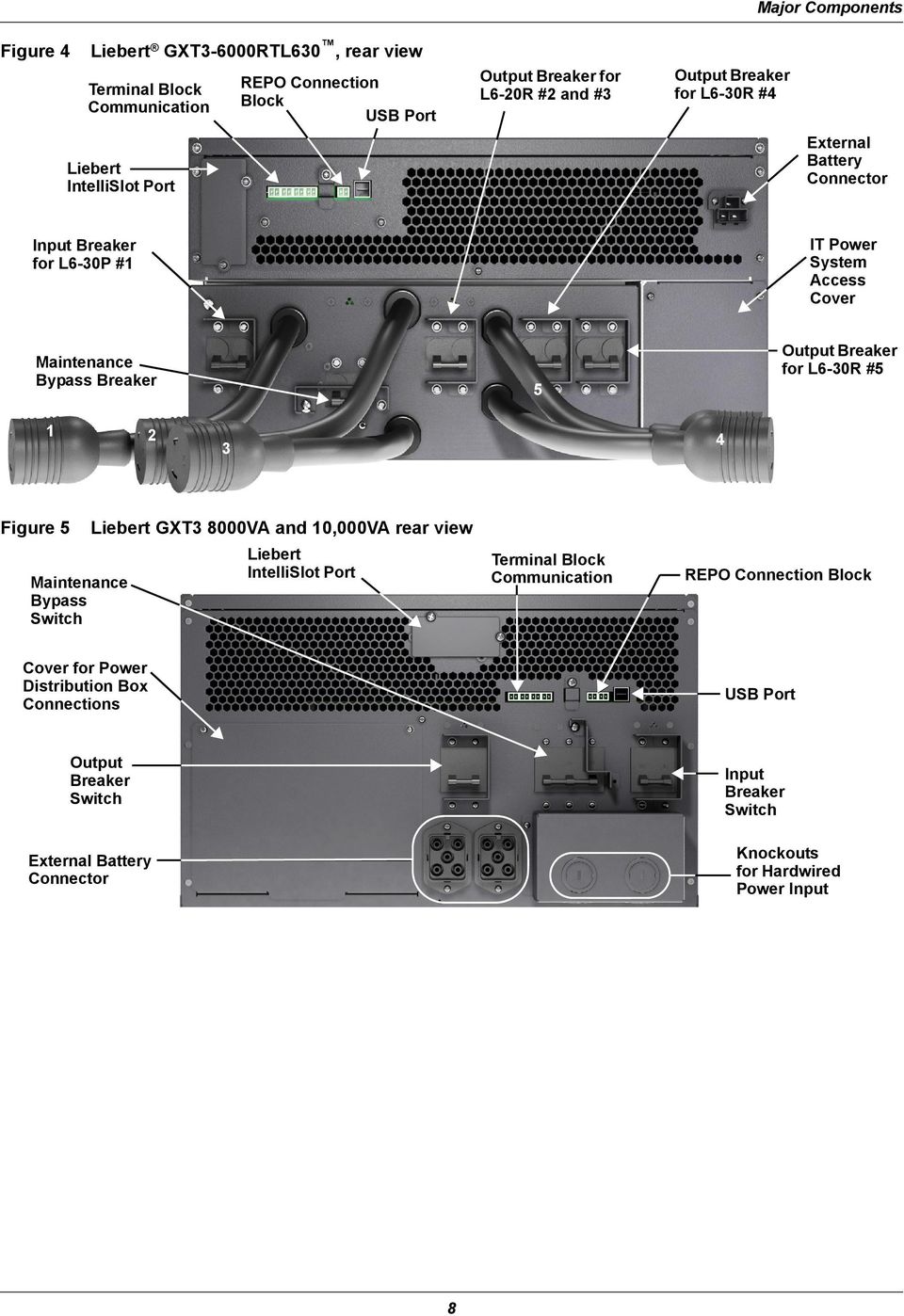
13 Major Components 3.0 MAJOR COMPONENTS The Liebert GXT3 is composed of three major assemblies to provide easier handling, installation and versatility. 3.1 Main Frame and Electronics All models of the Liebert GXT3 are shipped without the internal batteries installed. Power distribution varies by model and rating. Liebert GXT and 6000VA models ship with a basic hardwire distribution box attached and ready to be connected to the load (see Figure 2). Liebert GXT3RTL630 ships with a power distribution box attached (see (Figure 4). Liebert GXT and 10,000VA models with a cover plate installed over connections for any of several optional power distribution boxes (see Figure 5). Figure 1 Liebert GXT3 front view rack-mount and tower configurations Upper Bezel Status Indicators and Controls Lower Bezel and Battery Access Door Figure 2 Liebert GXT3 5000VA and 6000VA rear view USB Port Liebert REPO IntelliSlot Port Knockouts for Hardwired Power Input Terminal Block Communication Input Breaker External Battery Connector Figure 3 Input Breaker Input power hardwire boxes 5000 and 6000VA models PD2-HDWR 5000 and 6000VA models Maintenance Bypass Breaker Input Breaker PD2-HDWR-MBS and 6000VA models NOTE Hardwire and hardwire/receptacle boxes that include a manual bypass switch permit AC power to continue to flow from the utility input to the load while the box is removed from the UPS. For details, refer to Removable Power Distribution Box. 7

14 Major Components Figure 4 Liebert GXT3-6000RTL630, rear view Terminal Block Communication REPO Connection Block USB Port Output Breaker for L6-20R #2 and #3 Output Breaker for L6-30R #4 Liebert IntelliSlot Port External Battery Connector Input Breaker for L6-30P #1 IT Power System Access Cover Maintenance Bypass Breaker 5 Output Breaker for L6-30R # Figure 5 Maintenance Bypass Switch Liebert GXT3 8000VA and 10,000VA rear view Liebert IntelliSlot Port Terminal Block Communication REPO Connection Block Cover for Power Distribution Box Connections USB Port Output Breaker Switch External Battery Connector Input Breaker Switch Knockouts for Hardwired Power Input 8
15 3.2 Removable Power Distribution Box Figure 6 Major Components The UPS is shipped with a power distribution pack installed. This box contains the UPS input circuit breaker. Power distribution models for 5000VA and 6000VA models of Liebert GXT3 Input Power Breaker L14-30 Input Power Connector Maintenance Bypass Breaker Output Power Breakers for Pigtails Push Button Output Power Breakers for Two L5-20 Receptacles (second push button breaker obscured) PD2-001 shown as example; similar features on other distribution boxes arranged differently PD2-001 Receptacles: four 5-20; one L14-30; one L6-30R PD2-002 Receptacles: two 5-20R; two L6-20R PD2-005 Receptacles: four L5-20R; two L6-30R PD2-003 receptacles: four 5-20R; two L6-30 PD2-006 Receptacles: four L6-20R PD2-004 Receptacles: four L5-20R; two L5-30R 9

16 Major Components Figure 7 Power distribution models for 8000VA and 10,000VA models of Liebert GXT3 p ; similar features on other distribution boxes arranged differently 5-20R Output Receptacles Output Circuit Breaker Switch for L6-30R Pigtail #1 Push Button Circuit Breakers for 5-20R Receptacles 5-20R Output Receptacles PD2-101 Receptacles: two L6-30; eight 5-20R PD2-102 Receptacles: four L6-20R four 5-20R L6-30ROutput Receptacles Output Circuit Breaker Switch for L6-30R Pigtail #2 1 2 PD2-105 Receptacles: four 5-20R two L5-30R two L5-20R PD2-103 Receptacles: four L6-30R four 5-20R PD2-106 Receptacles: four L6-20R four L5-20R PD2-104 Receptacles: four 5-20R two L6-30R two L6-20R 3.3 Internal Battery Packs The UPS has two internal battery packs behind a battery access door on the front of the unit. Each internal battery pack is fitted with a connector to link to the UPS. Figure 8 Internal battery pack features Battery Handle Liebert GXT and 10,000VA battery packs shown; 5000 and 6000VA battery packs have same features Battery Connector Front of Battery Pack 10

17 What s Included 4.0 WHAT S INCLUDED The Liebert GXT3 is shipped with the following items: Terminal Block Communication terminals Compact disc with: Liebert MultiLink Configuration program User manual (electronic version) USB cable, one; 2m (6-1/2 ft.) long Rack handles with mounting hardware Power Distribution Box, installed on Liebert GXT3 Plastic tower set, one Warnings, safety instructions booklet and WEEE recycling sheet (ISO compliance) NOTE The Liebert GXT3 External Battery Cabinet shipping package includes one battery cabinet, two spacers for the 5000 and 6000VA models and four spacers for the 8000 and 10000VA models for tower configuration and one DC power cable. 11


18 Installation and Configuration 5.0 INSTALLATION AND CONFIGURATION Do NOT attempt to start the UPS, turn on any circuit breaker or energize the input power until instructed to do so in Initial Startup and Electrical Checks. Visually inspect the UPS for shipping damage. Report any damage to the carrier and your local dealer or Emerson representative.! CAUTION The UPS is heavy (see Specifications). Take proper precautions when lifting or moving it. Install the Liebert GXT3 indoors in a controlled environment, where it cannot be accidentally turned off. Place it where air flows unrestricted around the unit. The installation location must be free of water, flammable liquids, gases, corrosives and conductive contaminants. Maintain a minimum clearance of 100mm (4 inches) in the front and rear of the UPS. Maintain an ambient temperature range of 0 to 40 C ( F). NOTE UPS operation in sustained temperatures outside the range of C (59-77 F) reduces battery life. 5.1 Install the Main Cabinet The Liebert GXT3 may be installed in either a tower configuration or in a rack, depending on available space and use considerations. Determine the type of installation and follow the appropriate instructions in either Tower UPS Installation or Rack-Mount UPS Installation Tower UPS Installation To install the Liebert GXT3 as a tower: 1. Take the support bases out of the accessories bag (see Figure 9). Figure 9 Support bases Connectors Spacers Support Bases 2. If optional Liebert external battery cabinets will be connected to the Liebert GXT3, take out the spacers shipped with the battery cabinet. 3. Connect the spacers and the support bases as shown in Figure 9. Each Liebert GXT3 needs two assembled support bases, one in the front and one in the rear. 4. Adjust the direction of the operation and display panel and logo on the Liebert GXT3. a. Remove the front plastic bezel cover as shown in Figure 10. Figure 10 Remove the front plastic bezel cover Front Plastic Bezel Cover 12

19 Installation and Configuration b. Pull the operation and display panel gently, rotate it 90 degrees clockwise and snap it back into position, as shown in Figure 11. Figure 11 Rotate the operation and display panel Operation and Display Panel Rotated Clockwise 90 Degrees c. Pull the logo on the front plastic bezel cover gently, rotate it 90 degrees clockwise and snap it back into position. The rotated front plastic bezel cover is shown in Figure 11. d. Replace the front plastic bezel cover on the Liebert GXT3. At this point, the UPS operation and display panel and logo have been rotated 90 degrees clockwise, which provides upright viewing for users. 5. Place the Liebert GXT3 and any battery cabinets on the support bases. Each Liebert GXT3 needs two support assemblies, as shown in the lower half of Figure Rack-Mount UPS Installation When using the Liebert GXT3 in a rack, the UPS must be supported by a slide kit, fixed rails or a shelf. When using the optional Adjustable Rack Mount Kit, you will use the following instructions. The figures accompanying Installing the Adjustable Rack-Mount Kit Sold Separately shows the positioning of the rack-mounting brackets. Emerson recommends taking the internal batteries out of the UPS during rack installation. This will make the UPS cabinet lighter and easier to handle.! CAUTION The Liebert GXT3 is heavy; see Specifications. The UPS must be installed as near the bottom of a rack as possible. If placed too high, it can make the rack top-heavy and prone to tipping over Installing the Adjustable Rack-Mount Kit Sold Separately This kit contains parts needed to mount several different models of UPS and external battery cabinets into EIA310-D standard four-post racks that are 18-32" deep ( mm). The weight limit per pair of adjustable rack-mounting brackets is 91 kg (200lb). Parts included are: Item Quantity Rear bracket members 2 Front bracket members 2 Inner bracket members 2 M4 machine screws 16 M4 locking hex nuts 8 M5 machine screws 8 Tools needed for installation are: one Phillips screwdriver one 7mm wrench 13

20 Installation and Configuration The adjustable rack-mounting brackets (Part#: RMKIT18-32) feature retaining latches to prevent users from inadvertently sliding the UPS or battery cabinet out of the rack. To install the rack mount brackets: 1. Unpack two rack-mounting bracket assemblies and mounting hardware from this kit. Bracket assemblies are interchangeable between left-hand or right-hand. Remove inner member of each bracket assembly as shown at right by extending it to its outermost position, depressing the retaining latch and then pulling the inner member out of the bracket assembly. 2. Determine the height position inside the rack enclosure where you want to mount the UPS or battery cabinet.! CAUTION Reduce the risk of tipping the rack enclosure by placing the UPS or battery cabinet in the lowest possible rack position. Retaining Latches Inner members Front rack mounting rails Return flanges Front members M5 screws 3. Install the rear member of each bracket assembly into the rack enclosure with two M5 screws provided in this kit (see figure at right). The return flanges on the bracket assembly fit to the inside of rack mounting rails. Insert screws loosely (finger-tight) into the top and bottom holes of the return flange on the rear member. Extend the bracket assembly by sliding the front member forward until it touches the front rack mounting rail. Insert two M5 screws loosely (finger-tight) into the top and bottom holes of the return flange on each front member. Make sure that the bracket assemblies are at the same mounting height on all four (4) rack mounting rails. 4. Get eight M4 screws and eight M4 nuts from the hardware pack in this kit. Each nut has a locking, nylon insert that begins gripping the screw when it is halfway tight. Make sure to tighten the nut and screw completely to ensure locking action. Fasten the rear member and the front member together using four screws and four nuts per bracket assembly as shown in at right. For maximum support, insert fasteners for each bracket assembly as far apart as possible, depending on rack depth, while still joining both members (see figures at right). Check alignment of bracket assemblies and TIGHTEN ALL SCREWS FROM Steps 2 and Prepare the UPS or battery cabinet (the equipment ) for rack mounting by following instructions in the equipment s user manual. The equipment may require additional parts to be added or parts to be removed for rack mounting. After it is prepared, lay the equipment in rack-mounting position. Fasten the inner members from Step 1 to the equipment on both sides as shown at right with eight M4 screws provided in the kit. Make sure retaining latch is near the rear of the equipment as shown (see figure at right). M5 screws M4 nuts 457mm (18") rack depth M4 nuts 813mm (32") rack depth M4 screws M4 screws UPS or battery cabinet M4 nuts M4 screws M4 nuts Retaining latch Front M4 screws 14

21 6. If available, apply a bead of grease 1" (25mm) long at four places inside the bottom, curved tracks of the front members as shown below right. The grease will allow the equipment to slide into the bracket assemblies more easily..! CAUTION Lifting equipment into the rack may be a two-person job, depending on the weight of the equipment. Liebert recommends taking the internal batteries out of the UPS during rack installation. This will make the UPS cabinet lighter and easier to handle. The Liebert GXT3 weighs 151 lb. (67kg). For the weight of the UPS, see Table 7; for the battery cabinet s weight, see Table 11. Factory-supplied rack handles are not intended to be used to lift the UPS. The handles are intended to be used to slide the UPS into and out of the rack. UPS or battery cabinet Installation and Configuration Apply grease Apply grease (inside) Insert the UPS into the front members, lift the front and push it into the rack.. 7. Insert the equipment, with inner members attached in Step 5, into the bracket assemblies by inserting the top and bottom edges of the inner members into the top and bottom curved tracks of the front members and sliding the equipment into the rack (see figure at right). Ends of inner members are tapered to allow the rear of the equipment to be angled upward before insertion, if space allows. Then the rear, bottom edges of the inner members can be placed into the front edge of the bottom tracks and the front of the equipment can be tipped up so they are level to insert the top edges of the inner members before sliding the equipment into the rack (see figure above right). The equipment should move smoothly into the bracket assemblies. If it does not, recheck the alignment of the front and rear members from Steps 2 and Secure the front of the equipment to the rack mounting rails to prevent the equipment from sliding out of position. If securing holes are provided on the front of the equipment that align with the center holes on the return flange of the front members, you can use the four extra M5 screws provided in the kit to secure the equipment. Otherwise, the equipment should be secured to the front of the rack with four customer-supplied fasteners. 15
22 5.2 External Battery Cabinet Installation! WARNING Risk of electric shock. Can cause injury or death. Installation and Configuration Disconnect all local and remote electric power supplies before working within. Ensure that the Liebert GXT3 is shut down and power has been disconnected before beginning any work on or in the unit.! CAUTION The external battery cabinet(s) are heavy (see Table 11). Take proper precautions when lifting them. Optional Liebert external battery cabinets may be connected to the UPS to provide additional battery run time. External battery cabinets are designed to be placed on one side of the UPS in a tower configuration or stacked beneath the UPS in a rack configuration. Figure 12 External battery cabinets connected to 6000VA Liebert GXT3 6000VA Liebert GXT3 Battery Cabinet Cable connects battery cabinet to 6000VA Liebert GXT3 Second connector permits adding more battery cabinets to 6000VA Liebert GXT3 1. Inspect the external battery cabinet for freight damage. Report damage to the carrier and your local dealer or Emerson representative. 2. Optional rack-mount handles are shipped with the external battery cabinet and may be installed at this time if desired. 3. Securing hardware and slide rails are sold separately. Please contact your local dealer or Emerson representative for these additional options and any assistance needed. Fasten the slides into position with the screws per the instructions included with the slide rails. 4. Use the enclosed support bases for the tower option to prevent tip-over. One additional set of support base extensions ships with each external battery cabinet. 5. Put the UPS in Bypass Mode by pressing the bypass button on the front of the unit and holding it about 2 seconds. 6. Verify the External Battery Cabinet breaker is in the Off position. 7. Connect the supplied external battery cabinet cable to the rear of the external battery cabinet, then to the rear of the UPS. 8. Turn the External Battery Cabinet breaker to the On position. 9. Press the On button on the front of the UPS for 4 seconds to return the unit to Inverter Mode. 10. Verify the circuit breaker on the External Battery Cabinet is in the On position. 11. Use the included configuration program to program the UPS for the number of external battery cabinets connected. Instructions for the configuration program are in Configuration Program. 12. The UPS is now equipped with additional backup battery run time. For approximate battery run times, refer to Table 14. NOTE When removing the External Battery Cabinet, the circuit breaker on the rear of the cabinet must be turned off before disconnecting the cable. 16

23 Installation and Configuration NOTE If the UPS is to be shipped or stored for an extended time, the connector should be disconnected. This will minimize any standby current drain on the batteries and help attain their design life. 5.3 Connect Input/Output Power! WARNING Risk of electric shock. Can cause injury or death. Disconnect all local and remote electric power supplies before working within. Ensure that the Liebert GXT3 is shut down and power has been disconnected before beginning any work on or in the unit. The Liebert GXT3-5000RT208, Liebert GXT3-6000RT208 and Liebert GXT3-6000RTL630 are shipped with a power distribution box attached. The Liebert GXT3-8000RT208 and Liebert GXT RT208 are shipped with a cover plate over the power distribution connector. Follow the instructions below for removal and installation. NOTE Do not operate the UPS with the power distribution box removed. To shut off all power to this box and to the load, utility input power must be disconnected Remove the Power Distribution Box from 5000 and 6000VA Models 1. Put the Liebert GXT3 in maintenance bypass by pressing the Standby/Manual Bypass button while the UPS is in Utility (AC) Mode and holding the button for about 2 seconds. (For help, refer to Put the Liebert GXT3 in Manual Bypass.) 2. Loosen the captive screw over the maintenance bypass breaker (see Figure 13 for the breaker s location). 3. Turn the maintenance bypass breaker On. NOTICE The load is unprotected from disturbances in the power supply while the UPS is on bypass. 4. Turn the output and input breakers Off. 5. Loosen other captive screws until the power distribution box releases. 6. Remove the power distribution box from the UPS and set it aside. 7. Loosen the screws over the plastic cover for the connector on the rear of the panel. 8. Slide the plastic cover over the connector and tighten the screws. Figure 13 Power distribution box removal from 5000 and 6000VA models Extract these four captive screws Pigtails removed for clarity Maintenance Bypass Breaker 17
24 Installation and Configuration Remove the Power Distribution Cover from 8000 and 10,000VA Models 1. Shut down the Liebert GXT3 by pressing the Standby/Manual Bypass button twice while the UPS is in Bypass Mode, each time holding the button down for about 2 seconds. (For help, refer to Shut Down the Liebert GXT3.) 2. Loosen the captive screw over the maintenance bypass breaker (see Figure 5 for the breaker s location). 3. Turn the maintenance bypass breaker On. NOTICE The load is unprotected from disturbances in the power supply while the UPS is on bypass. 4. Turn the output and input breakers Off. 5. Support the power distribution box and remove the two screws at the top of the box. 6. Remove the cover or power distribution box from the UPS and set it aside. 7. If removing a power distribution box, carefully pull apart the power distribution box connector and the UPS connector. Figure 14 Power distribution box removal from 8000 and 10,000VA models Extract screws at these places Pigtails removed for clarity Tabs slip into slots on UPS Install the Power Distribution Box on 5000 and 6000VA Models 1. Align the connectors and press the power distribution box onto the UPS. 2. Hold the box firmly against the UPS and tighten the captive screws except the one over the maintenance bypass breaker. 3. Turn the output and input breakers On. 4. Start the UPS according to startup instructions. 5. Verify that the UPS lamp is illuminated. 6. Turn the maintenance bypass breaker Off. 7. Insert the maintenance bypass cover behind the captive screw and tighten the screw. NOTE The maintenance bypass breaker cover must be installed behind the captive screw and the screw must be tightened for the UPS to operate in inverter mode. 18
25 Installation and Configuration Install the Power Distribution Box on 8000 and 10,000VA Models 1. With the cover or distribution box removed, press the UPS and distribution box connectors together. Ensure that the connectors are fully seated. 2. Align the screw holes and press the power distribution box onto the UPS, making sure that the tabs at the bottom of the box fit into the slots on the UPS. 3. Attach the box to the UPS by installing screws into the two holes at the top of the box. 4. Tighten the screws. 5. Turn the output and input breakers On. 6. Start the UPS according to startup instructions. 7. Verify that the UPS lamp is illuminated Distribution Box Electrical Connections Electrical connections are made through a removable power distribution box that attaches to the rear of the UPS. PD2-HDWR, PD2-HDWR-MBS, PD2-001, PD2-002, PD2-003, PD2-004, PD2-005 and PD2-006 models fit the 5000 and 6000VA models of the Liebert GXT3 PD2-L630 fits the GXT3-6000RTL630 PD2-101, PD2-102, PD2-103, PD2-104, PD2-105 and PD2-106 models fit the 8000 and 10,000VA models of the Liebert GXT3 The installer must provide an upstream branch circuit breaker. The input circuit breaker on the distribution box and the output circuit breaker on the rear of the power distribution box disconnect all power between the main cabinet and the distribution box. Models equipped with a manual bypass breaker pass bypass power directly to the bypass breaker from the input terminal block. The input circuit breaker on the distribution box does not disconnect power from the manual bypass breaker. Table 1 Unit Rating 5000VA 6000VA 8000VA 10,000VA Branch circuit breaker ratings Maximum Breaker Rating D Type 30A Long Delay D Type 60A Long Delay Figure 15 Distribution box electrical connections diagram Input CB Maintenance Bypass Breaker Input Indicator UPS Output Indicator Output CB Output Distribution POD Utility Input External Branch CB Distribution Box Electrical Connections for 5000 and 6000VA Models Utility External Branch CB Input Input CB Maintenance Bypass Breaker Input Indicator UPS Output Indicator Output CB Output Terminal Block Optional Output Distribution Plate Distribution Box Electrical Connections for 8000 and 10,000VA Models 19
26 Installation and Configuration Terminal Block Connections Conduit entry holes are provided on the rear and side of the box. Input and output wiring should not share the same conduit. Emerson recommends using strain relief when installing the wire. Table 2 UPS Model Electrical specifications Figure 16 Terminal block connections Recommended (Maximum) External Overcurrent Protection Recommended Wire (Including ground wire) (75 C copper wire) Maximum Wire Accepted by Terminal Block GXT3-5000RT208 GXT3-6000RT208 30A 10AWG (4mm 2 ) 8AWG (6mm 2 ) GXT3-6000RTL630 GXT3-8000RT208 GXT RT208 60A 6AWG (10mm 2 ) 4AWG (16mm 2 ) Liebert GXT and 6000RT208 L2 N L1 L2 N L1 Terminal Tightening Torque 20 in-lb (2.26 Nm) OUTPUT INPUT Liebert GXT and 10,000RT208 L2 N L1 L2 N L1 OUTPUT INPUT NOTE 1. Emerson recommends installing a UL489-approved breaker upstream of unit. 2. The installer must provide circuit breaker protection according to local codes. The utility disconnect should be within sight of the UPS or have appropriate an appropriate lock-out. Maintain service space around the UPS or use flexible conduit. 3. The installer must provide output distribution panels, circuit breaker protection or emergency disconnects according to local codes. Output circuits must not share a common conduit with any other wiring. 20
27 5.4 IT Power System Configuration Liebert GXT3-6000RTL630 Only! WARNING Risk of electric shock. Can cause injury or death. 1. Remove screws on the IT Power System Access Cover as shown in Figure Disconnect the connectors as shown in figure. 3. Reinstall IT Power System Access Cover and screws. Installation and Configuration Disconnect all local and remote electric power supplies before working within. Ensure that the Liebert GXT3 is shut down and power has been disconnected before beginning any work on or in the unit. Figure 17 Remove cover from IT Power System Connectors compartment Remove Screws IT Power System Connectors 21
28 Configuration Program 6.0 CONFIGURATION PROGRAM The final step of installation may require custom configuration of your UPS using the enclosed configuration program. Some configuration settings may be changed only while the UPS is off. These should be set before the UPS is put into full-time service powering the critical load. For most users operating with 230VAC and with no external batteries, the factory default settings will be adequate. 6.1 Configuration Program Features Select L-N output voltages to match local voltages. Enable/Disable Auto-Restart. Select frequency converter operation with a fixed output frequency of 50 or 60 Hz. Set the Low Battery Warning alarm time from 2 to 30 minutes. Enable/Disable the Auto-Battery test. Set the Auto-Battery test to 7, 14, 21 or 28 days. Specify the number of external battery cabinets connected to the UPS to adjust the remaining run time calculations reported by Liebert software products. Modify the shutdown setting of the terminal block (for information on pin assignments, see Table 2) What You Will Need In addition to the Liebert GXT3 UPS, you will need the configuration program CD and USB cable included in the UPS accessory box. A Windows 95 or later computer, desktop or laptop, is also required to set up and run the configuration program. 22
29 Controls and Indicators 7.0 CONTROLS AND INDICATORS Figure 18 Liebert GXT3 control panel Battery Level Indicators Fault Indicator AC Input Indicator On/Alarm Silence/Manual Battery Test Button Liebert GXT3 AC Power System 10000VA Load Level Indicators Upper indicator for L1 Lower for L2 Bypass Indicator Inverter Indicator Standby/Manual Bypass Button 7.1 ON/Alarm Silence/Manual Battery Test Button Battery Indicator This button controls output power to connected load(s) and has three functions: ON Alarm Silence Manual Battery Test ON - Pressing this button for four seconds will start the UPS. Alarm Silence - To silence alarms, press this button for at least one second. After the alarm is silenced, the Liebert GXT3 will reactivate the alarm system to alert of additional problems. NOTE The LOW BATTERY and BYPASS reminder alarms CANNOT be silenced. Manual Battery Test - To initiate a manual battery test, press the ON button for at least one second while operating from utility power with no alarm conditions present. If only three of the five Battery LEDs illuminate, allow the UPS to recharge the batteries for 24 hours. After 24 hours, retest the batteries. After the batteries have been retested, if only three of the five Battery LEDs illuminate, contact your local dealer, Emerson representative or Emerson Channel Support. 7.2 Standby/Manual Bypass Button This button controls output power to connected load(s) and has dual functions: Standby and Manual Bypass. NOTICE Pressing the Standby/Manual Bypass button once will transfer the load to bypass power and the load will be unprotected from disturbances in utility supply. Pressing the Standby/Manual Bypass button twice within 4 seconds while on Bypass will cut off power to the output sockets and connected loads. Perform all necessary shutdown procedures on connected loads before pressing this button twice. 23
30 7.3 Load Level Indicators (4 Green, 1 Amber) Controls and Indicators The load level indicator is composed of five sets of LED bars that illuminate to indicate the relative load on the UPS output in 25% increments (±5%). The load level indicator will illuminate as shown in Figure 19. The load level indicators display the approximate electrical load placed upon the UPS at all times. Figure 19 Load level indicators 0-25% 26-50% 51-75% % Overload ON OFF OFF OFF OFF ON ON OFF OFF OFF ON ON ON OFF OFF ON ON ON ON OFF ON ON ON ON ON The Liebert GXT3 has load level indicators for Line 1 and for Line 2. One set of indicators shown for clarity. 7.4 Battery Level Indicators (5 Green) The battery level indicator is composed of five sets of LED bars that illuminate and flash to indicate the battery capacity level. The Liebert GXT3 battery capacity level is shown in 20% increments (±5%). The battery level indicators will illuminate as shown in Figure 20 The battery level indicators display approximate battery capacity at all times. The Liebert GXT3 is equipped with automatic and remote battery test features. The default setting is for the automatic test to occur every 14 days (this option is user-configurable) if utility power has not been interrupted. Should the battery fail this test, the red Fault indicator LED along with the A and C diagnostic LEDs will illuminate and an alarm will sound (refer to Troubleshooting). The remote test feature functions with Liebert MultiLink and can remotely initiate the battery test. Figure 20 Battery level indicators 0-20% 21-40% Charging Flash OFF OFF OFF OFF Discharging ON OFF OFF OFF OFF 41-60% 61-80% ON Flash OFF OFF OFF ON ON Flash OFF OFF ON ON OFF OFF OFF ON ON ON OFF OFF ON ON ON Flash OFF ON ON ON ON OFF % Fully Charged ON ON ON ON Flash ON ON ON ON ON ON ON ON ON ON ON ON ON ON ON 24
31 7.5 UPS Status Indicators Controls and Indicators UPS status is indicated by five symbols: fault indicator, AC input indicator, battery indicator, inverter indicator and bypass indicator. Table 3 shows the symbols and their meanings. Table 3 UPS status indicators UPS Status Indicator Icon Color Description Fault Indicator Red On if the UPS has detected a fault; Off if there is no fault AC input Indicator Green On when the utility input power is normal; Off during utility failure; flashing when utility power is outside specifications Battery Indicator Amber On when the battery is supplying power; Off when the battery is not supplying power Inverter Indicator Green On when the inverter is supplying power; Off when the inverter is not supplying power Bypass Indicator Amber On when the bypass is supplying power; Off when the bypass is not supplying power; flashing when utility power is outside specifications 25
32 Operation 8.0 OPERATION This section describes checks to be made before starting the UPS, how to start the UPS, manual battery test, manual bypass, shutting down the UPS and disconnecting the utility power from the UPS. NOTE The Liebert GXT3 s battery has been fully charged before delivery, but some charge will be lost during storage and shipping. To ensure that the battery has adequate reserve power to protect the connected load, charge the battery for three hours before putting the UPS into service. 8.1 Startup Checklist for the Liebert GXT3 Before starting the UPS, perform these checks: 1. Check that the input plugs and loads are connected properly and reliably. 2. Check that the battery cable is connected properly. 3. Check that the communication cables are connected properly. 8.2 Initial Startup and Electrical Checks 1. Verify that the Input/Output circuit breakers are off. 2. During initial system checks, disconnect all loads (open load disconnects). 3. Inspect all wiring, cables and connection. 4. If external battery cabinets are used, verify that the battery interconnect cables are fully inserted in the sockets. 5. Place the manual bypass breaker in BYPASS position. 6. Turn on the branch circuit disconnect to apply voltage to the input terminal block. 7. Using a voltmeter, verify the expected L1-N (L2) voltage. Verify that the same voltages appear at the Output terminals. The Bypass lamp by the switch will light. 8. After verifying proper input voltage to the UPS terminal block, turn off the branch circuit power, close all access panels to the distribution box and reapply input power. 9. Close the Input circuit breaker located on the distribution box. The green AC INPUT lamp should illuminate on the front panel. 10. Press the ON button and hold it for four seconds. After several seconds, the UPS ON lamp will turn on continuously. If the batteries are determined to be charged above 80%, an automatic battery test will run for about 15 seconds. 11. Close the Output circuit breaker on the rear of the power distribution box. The light by the input breaker will illuminate. 12. Return the breaker to the Inverter position. The output terminal block will be powered at this time. 13. Connect all loads for normal operation. 26
33 8.3 Manual Battery Test Operation To initiate a manual battery test, press the On/Alarm Silence/Manual Battery Test button for at least half a second while the UPS is operating from utility power with no alarm conditions present. If only the first two of the five LED segments illuminate, allow the UPS to recharge the batteries for 24 hours. Retest the batteries after 24 hours of charging. After the batteries have been retested, if only two of the five Battery LEDs illuminate, contact your local Emerson representative or Emerson Network Power Channel Support. If none of the five Battery LEDs illuminate during a manual battery test, check the battery connection and allow the UPS to recharge the batteries for 1 hour, then initiate a manual battery test again. If none of the five Battery LEDs illuminate during the second manual battery test, replace batteries and contact your local Emerson representative or Emerson Channel Support. 8.4 Put the Liebert GXT3 in Manual Bypass Press the Standby/Manual Bypass button and hold it for about 2 seconds while the UPS is in Utility (AC) Mode. The UPS will transfer the connected loads to the internal bypass. If the internal bypass is not available because of utility power problems, pressing this button once will be ignored. Bypass operation is indicated by an audible alarm and illuminated amber Bypass indicator. (If other indicators are illuminated, refer to Troubleshooting.) 8.5 Shut Down the Liebert GXT3 1. Transfer the UPS to manual bypass by pressing the Standby/Manual Bypass button and holding it for about 2 seconds. If manual bypass is not available, disregard the first step. 2. Press the Standby/Manual Bypass button twice within four seconds, each time holding it for about two seconds. Power to the connected loads is now Off. 8.6 Disconnecting Input Power from the Liebert GXT3 1. After the UPS has been shut down as detailed in Shut Down the Liebert GXT3, turn off the Output Circuit Breaker. 2. Wait 30 seconds and verify that all indicators have turned Off and the fan has stopped; this indicates that the power-off is complete. 3. Turn the external battery cabinet breaker switch to the Off position if the UPS has an external battery cabinet. After powering off the UPS, the UPS ceases output and the load is powered Off. 8.7 Maintenance Bypass Maintenance Bypass Mode is used when maintenance or replacement is required. To place the unit in Maintenance Bypass: 1. Place the UPS on internal bypass. This may be done by either of the following methods: a. Press the Off button on the front panel one time. b. Slide the bracket away from the manual bypass breaker on the rear of the UPS. This requires loosening the captive screw and sliding the bracket up and away from the Manual Bypass breaker. 2. Move the Manual Bypass breaker on the rear of the UPS to the bypass position. This requires loosening the captive screw and sliding the bracket up and away from the Manual Bypass breaker. 27
34 Communication 9.0 COMMUNICATION 9.1 Communication Interface Port The Liebert GXT3 UPS has a terminal block on the rear of the UPS unit. Several signals are provided on this port and are assigned as follows. 9.2 Terminal Block The terminal block includes eight pins, as shown in Figure 21. Figure 21 Terminal block communication pin layout Any-Mode Shutdown The purpose of Any Mode Shutdown is to shut down the UPS output by turning Off the rectifier, inverter and static switch so that there is no power to the loads. Any Mode Shutdown can be operated locally or remotely: Local Any Mode Shutdown can be performed by shorting the pins in Set 3. Remote Any Mode Shutdown can be performed using a switch connected to the pins in Set 3 and mounted at a remote location. Activation of the Any Mode Shutdown will be logged as an event in the event history log. NOTE Remote Power Off will be performed either by NO or NC contact of Any Mode Shutdown. The current limited source for the optocoupler (+12VDC, 50mA) will be available from UPS. The connection to UPS for remote connection will be via terminal block connector. Any Mode Shutdown wiring must conform to all national, regional and local wiring codes and laws Battery Mode Shutdown Low Battery Warning On-Battery Warning Any Mode Shutdown Battery Mode Shutdown! WARNING When the Auto-enable output option is selected and the UPS output is disabled using the pins in Set 3, the Liebert GXT3 s output can turn On automatically and without warning if the connection of the pins in Set 3 is changed. Battery Mode Shutdown permits shutting down the UPS by turning off the rectifier, inverter and static switch so that there is no power to the load when the UPS is On Battery. The auxiliary power for the UPS will still be active. Battery Mode Shutdown can be performed locally or remotely: Local Battery Mode shutdown can be performed by shorting the pins in Set 4. Remote Battery Mode Shutdown can be performed using a switch connected to the pins in Set 4 and mounted at remote location. 28
35 Activation of the Battery Mode Shutdown will be logged as an event in the event history log On Battery Communication NOTE Remote Power Off will be performed by NO contact. The current limited source for the optocoupler (+12VDC, 50mA) will be available from UPS. The connection to the Liebert GXT3 for remote connection will be via terminal block connector. Battery Mode Shutdown wiring must conform to all national, regional and local wiring codes and laws. This signal must last for 1.5 seconds or longer. A battery shutdown signal will not cause an immediate shutdown. It will start a 2-minute shutdown timer. This timer cannot be stopped once triggered. If the utility power returns during this countdown, the Liebert GXT3 will still shut down and must remain shut down for 10 seconds. Whether the UPS turns back On when the power is restored depends on the auto-restart setting. On Battery signal is a Normally Open (NO) dry contact. When the UPS is supplying output power from the battery this dry contact will be closed Low Battery Low Battery signal is a Normally Open (NO) dry contact. When the UPS is supplying output power from the battery and has reached the Low Battery Warning time selected in the configuration program, this dry contact will be closed. NOTE The rated values for the dry contacts for the On Battery and Low Battery signals are: Rated Voltage: 30V (AC or DC) Rated Current: 300mA 9.3 Liebert IntelliSlot Communication Cards The Liebert IntelliSlot port accepts three optional cards: Liebert IntelliSlot SNMP Card Liebert IntelliSlot Relay Card Liebert IntelliSlot 485 Card. The Liebert IntelliSlot SNMP Card provides SNMP monitoring and control of the UPS across the network. The Liebert IntelliSlot Relay Card provides dry contact relay outputs for custom-wired applications and delivers support for built-in shutdown for AS/400 systems. The Liebert IntelliSlot 485 Card is used to connect the UPS and computer system. Follow instructions provided with the Liebert IntelliSlot card to configure Liebert MultiLink, the UPS or any additional ancillary product for the Liebert GXT3. These instructions are available at multilink.liebert.com 29
36 9.3.1 Liebert MultiLink Communication Liebert MultiLink monitors the UPS continuously and can shut down a computer or server in the event of an extended power failure. Liebert MultiLink can also be configured for use without the USB cable when the Liebert IntelliSlot SNMP/Web card is installed in the UPS. Additionally, Liebert MultiLink can be configured to coordinate shutdown across the network with other computers running Liebert MultiLink when you purchase a Liebert MultiLink License Kit. For more information about the Liebert IntelliSlot SNMP/Web Card and Liebert MultiLink License Kits, visit our Web site ( or contact your local dealer or Emerson representative. Several option cards are available for use in the Liebert IntelliSlot port of the Liebert GXT3. The Liebert IntelliSlot SNMP/Web Card provides SNMP and Web-based monitoring and control of the UPS across the network. The Liebert IntelliSlot MultiPort 4 Card allows installing Liebert MultiLink software on four computers and coordinate shutdown in the event of a power failure. The Liebert IntelliSlot Relay Card provides dry contact relay outputs for custom wired applications and delivers support for built-in shutdown for AS/400 systems.! CAUTION To maintain safety (SELV) barriers and for electromagnetic compatibility, signal cables should be shielded and run separate from all other power cables, where applicable. 9.4 Remote Emergency Power Off The UPS is equipped with a Remote Emergency Power Off (REPO) connector. The user must supply a means of interfacing with the REPO circuit to allow disconnecting the UPS input feeder breaker to remove all sources of power to the UPS and connected equipment to comply with national and local wiring codes and regulations. REPO switch connection diagram UPS ships with REPO jumper installed allowing the UPS to operate Opening the REPO connection will disable the UPS. Manual restart using the front panel is required after the REPO connection is closed again Normally closed switch system (fail-safe)! CAUTION To maintain safety (SELV) barriers and electromagnetic compatibility, signal cables should be shielded and run separately from power cables. 30
37 Maintenance 10.0 MAINTENANCE This section describes replacing the internal battery pack, precautions, checking the Liebert GXT3 s status and checking UPS functions Replacing the Internal Battery Pack The Liebert GXT3 is designed to allow the user to replace the internal battery pack safely. Read the safety cautions before proceeding. Contact your local dealer or Emerson representative to obtain the part number and pricing of the appropriate replacement battery pack Battery Replacement Procedures 1. Gently remove the front plastic bezel cover from the UPS. 2. Loosen and remove the six screws on the battery door, as shown in Figure Lay the battery door and screws aside for reassembly. Figure 22 Removing the front plastic bezel cover and battery door Screws, 6 Battery Door Front Bezel 8000VA / 10,000VA model shown; 5000VA & 6000VA model arrangement is the same except smaller 4. Gently pull the battery wires out and disconnect the battery plugs and battery receptacles, as shown in Figure 23. Figure 23 Disconnecting the battery plug and battery receptacle (front view) 8000 / 10,000VA model shown; 5000 / 6000VA model arrangement is the same except smaller Battery Receptacle Battery Connector Battery Connector Battery Receptacle 5. Grasp the battery handle and pull one of the internal battery packs out of the UPS, as shown in Figure 24. Repeat this step if both battery packs will be replaced. Each model has two battery packs 31
38 Maintenance Figure 24 Pulling out the battery packs 5000 & 6000 VA models 8000VA / 10,000VA model Internal Battery Pack (one of 2) Internal Battery Pack Battery Handle Pull Out with Battery Handle 6. Unpack a new internal battery pack. Take care not to destroy the packing. Compare the new and old internal battery packs to make sure they are the same type and model. If they are the same, proceed with Step 7; if they are different, stop and contact your local Emerson representative or Emerson Channel Support. 7. Line up and slide in the new internal battery pack. 8. Repeat Steps 6 and 7 if replacing both battery packs. Each model has two battery packs 9. Reconnect the battery plugs and battery receptacles. 10. Gently push the battery wire into the UPS battery compartment. 11. Reattach the front battery door with the six screws. 12. Reattach the front plastic bezel cover to the UPS Battery Charging The batteries are valve-regulated, nonspillable, lead acid and should be kept charged to attain their design life. The Liebert GXT3 charges the batteries continuously when it is connected to the utility input power. If the Liebert GXT3 will be stored for a long time, Emerson recommends connecting the UPS to input power for at least 24 hours every four to six months to ensure full recharge of the batteries Precautions Each model has two battery packs Battery Handle Pull Out with Battery Handle NOTE The internal battery pack is hot-swappable. However, caution should be exercised because the load is unprotected from disturbances and power failures during this procedure. Do not replace the battery while the UPS is operating in Battery Mode. This will result in a loss of output power and will drop the connected load. Although the Liebert GXT3 has been designed and manufactured to ensure personal safety, improper use can result in electrical shock or fire. To ensure safety, observe the following precautions: Turn Off and unplug the Liebert GXT3 before cleaning it. Wear rubber gloves and boots. Clean the UPS with a dry cloth. Do not use liquid or aerosol cleaners. Never block or insert any objects into the ventilation holes or other openings of the UPS. Do not place the Liebert GXT3 power cord where it might be damaged. 32
39 10.4 Checking UPS Status Maintenance Emerson recommends checking the UPS operation status every six months. Check whether the UPS is faulty: Is the Fault Indicator on? Is the UPS sounding an alarm? Check whether the UPS is operating in Bypass Mode. Normally, the UPS operates in Normal Mode. If it is operating in Bypass Mode, stop and contact your local Emerson representative, or Emerson Channel Support. Check whether the battery is discharging. When the utility input is normal, the battery should not discharge. If the UPS is operating in Battery Mode, stop and contact your local Emerson representative or Emerson Channel Support Checking UPS Functions NOTE UPS function check procedures may interrupt power supply to the connected load. Emerson recommends checking the UPS functions once every six months. Back up the load data before conducting the UPS functions check. Procedures are as follows: 1. Press the Standby/Manual Bypass button to check whether the buzzer and indicators are normal. 2. Press the On/Alarm Silence/Manual Battery Test button to check again whether the indicators are on and the UPS is operating normally. 3. Press the On/Alarm Silence/Manual Battery Test button for three seconds after Inverter Mode. The UPS should initiate a battery self-test. Check to determine whether the battery is operating normally. If not, stop and contact your local Emerson representative or Emerson Channel Support Replacing the Power Module on 8000 and 10,000VA models! CAUTION The UPS must be switched to manual bypass before personnel begin to replace the power module. NOTICE During the procedure, the connected load will not be protected from power disturbances, such as spikes, sags and failure. To remove the UPS power module without shutting off power to the connected load: 1. Place the UPS on internal bypass. This may be done by any of the three following methods: a. Press the Off button on the front panel one time. b. Slide the bracket away from the manual bypass switch on the rear of the UPS; this requires loosening the captive screw and sliding the bracket away from the manual bypass switch. c. Remove the front grille covering the power module. 2. Move the manual bypass breaker on the rear of the UPS to the bypass position; this requires loosening the captive screw and sliding the bracket away from the manual bypass switch (see Figure 7). 3. Open the input circuit breaker on the rear of the UPS (see Figure 7). 4. Open the output circuit breaker on the rear of the UPS (see Figure 7). 5. Remove the top two front plastic bezels by pulling them forward. 6. Remove the power module cover grille and the battery cover grille with the screws securing them to the frame. 7. Disconnect the slotted battery connectors from the internal battery packs. 8. If additional external batteries are used, disconnect the two external battery connectors. 9. Slide power module restraint lever up out of the locked position. 10. Slide the power module out the front, supporting its weight as it is withdrawn. 33
40 Maintenance Figure 25 Removing power module from Liebert GXT and 10,000VA models Power module pulled part of the way out of an 8000 or 10,000VA unit 11. Insert the replacement UPS power module. 12. Slide the power module restraint lever back into the locked position. 13. Reconnect the slotted internal battery connectors. 14. Reconnect the external battery cables, if used. 15. Reattach both front cover grilles. 16. Reattach the front plastic bezels. 17. Close the input circuit breaker on the rear of the UPS (see Figure 7). 18. Close the output circuit breaker on the rear of the UPS (see Figure 7). 19. Move the bypass breaker on the rear of the UPS back to the INVERTER position (see Figure 7). 20. Slide the bracket back next to the manual bypass breaker and tighten its thumbscrew. 21. Press the On button on the front panel one time to return the UPS to Normal Mode operation (see Figure 18). NOTE The power module restraint lever must be fully engaged for the UPS to operate in Normal Mode. 34
41 Troubleshooting 11.0 TROUBLESHOOTING This section indicates various UPS symptoms a user may encounter and provides a troubleshooting guide in the event the UPS develops a problem. Use the following information to determine whether external factors caused the problem and how to remedy the situation UPS Symptoms The following symptoms indicate the Liebert GXT3 is malfunctioning: The relative indicators illuminate, indicating the UPS has detected a problem. An alarm buzzer sounds, alerting the user that the UPS requires attention Indicators In addition to the fault indicator being illuminated, one or more of LED segments of battery level indicator will also be illuminated to provide a diagnostic aid to the user, as shown in Figure 26. The descriptions are listed in Table 4. Figure 26 Battery level indicator Table 4 Indicator descriptions Indicator Diagnosis/Audible alarm A - E On bypass from output overload (half-second beep every half-second) A On bypass due to overtemperature condition (1-second beep every 4 seconds) B On bypass due to DC bus overvoltage (1-second beep every 4 seconds) C On bypass due to DC/DC power supply failure (1-second beep every 4 seconds) D PFC failure (1-second beep every 4 seconds) E On bypass due to inverter failure (1-second beep every 4 seconds) A&B A&C A&D A&E B&C B&E C&E Utility LED flash Battery Indicator Flashing Bypass Indicator Flashing A - E indicators are shown in Figure 26 A B C D E UPS Failure (includes dual-fan failure, single-fan failure under certain conditions and battery charger failure) and continuous alarm UPS failed battery test (2-second beep every 60 seconds) Maintance bypass switch on (continuous) Bypass feedback (1-second beep every 4 seconds) REPO (one quarter-second beep at quarter-second intervals) Short circuit on the output UPS shutdown by command from communication (USB port or Liebert IntelliSlot port) (no audible) L-N reverse Internal battery source not available (continuous horn); check battery connection, power down and reboot UPS Utility power voltage or frequency is out of tolerance; bypass is unavailable 35
42 Audible Alarm Table 5 Troubleshooting An audible alarm will sound in conjunction with the visual indicators to indicate a change in UPS operating status. The audible alarm will sound as described in Table 5. Audible alarm description Condition Battery discharge Low battery UPS fault, load on bypass UPS fault, no power to load Overload Battery replacement Battery loss Wiring problem (loss of proper grounding for UPS) Bypass reminder 11.2 Troubleshooting Alarm Half-second beep every 10 seconds Two half-second beeps every 5 seconds 1-second beep every 4 seconds Continuous Half-second beep every half second 2-second beep every 60 seconds Continuous Continuous 1-second beep every 2 minutes In the event of an issue with the UPS, refer to Table 6 to determine the cause and solution. If the fault persists, contact Emerson Channel Support. Table 6 Troubleshooting table Problem Cause Solution UPS fails to start when the On/Alarm Silence/Manual Battery Test button is pressed Battery indicator is illuminated UPS has reduced battery backup time Fault and Bypass indicators and all LED segments of battery level indicator are illuminated Fault and Bypass indicators and diagnostic A indicator are illuminated UPS is short-circuited or overloaded UPS is not plugged in UPS input protection fuse has blown/opened Utility power is out of tolerance Batteries are not fully charged UPS is overloaded Batteries may not be able to hold a full charge due to age UPS is overloaded or load is faulty UPS has been shut down due to temperature condition; load is on bypass power Ensure UPS is Off. Disconnect all loads and ensure nothing is lodged in output receptacles. Ensure loads are not defective or shorted internally. UPS is operating from battery mode. Ensure UPS is securely plugged into the wall receptacle. UPS is operating from battery mode. Save data and close applications. Replace UPS input fuse, then restart UPS. UPS is operating from battery mode. Save data and close applications. Ensure utility supply voltage is within acceptable limits for UPS. Keep UPS plugged in continuously at least 24 hours to recharge batteries. Check load level indicator and reduce the load on the UPS. Replace batteries. Contact your local dealer, Emerson representative or Emerson Channel Support for replacement battery kit. Check load level indicator and remove non-essential loads. Recalculate the load and reduce number of loads connected to UPS. Check load for faults. Ensure UPS is not overloaded, ventilation holes are not blocked and room ambient temperature is not excessive. Wait 30 minutes to allow UPS to cool, then restart UPS. If UPS cannot restart, contact your local dealer, Emerson representative or Emerson Channel Support. Fault and Bypass indicators and diagnostic B indicator are illuminated UPS internal DC bus overvoltage UPS requires service. Contact your local dealer, Emerson representative or Emerson Channel Support. 36
43 Troubleshooting Table 6 Troubleshooting table (cont d) Problem Cause Solution Fault and Bypass indicators and diagnostic C indicator are illuminated UPS DC/DC fault UPS requires service. Contact your local dealer, Emerson representative or Emerson Channel Support. Fault indicator and diagnostic D indicator are illuminated UPS PFC (Power Factor Correction Circuit) fault UPS requires service. Contact your local dealer, Emerson representative or Emerson Channel Support. Fault and Bypass indicators and diagnostic E indicator are illuminated Fault indicator and diagnostic A and C indicators are illuminated Fault and Bypass indicators and diagnostic C and E indicators are illuminated Fault indicator and diagnostic A and B indicators are illuminated AC input indicator is flashing. Battery indicator is flashing. Bypass indicator is flashing. UPS inverter fault UPS failed the battery test UPS has been shut down by a command from the communications port(s) UPS failure (includes dual-fan failure, single-fan failure under certain conditions and battery charger failure) and continuous alarm UPS detected a line-to-neutral reversal or a loss of proper grounding for UPS; continuous horn and UPS cannot start up in standby status. This is active only when power is first applied to the input. Once the UPS is running, the AC input indicator will flash, unless the input wiring is correctly changed. Battery source is not available; continuous horn. Because the voltage or frequency is outside acceptable limits, the bypass is disabled. UPS requires service. Contact your local dealer, Emerson representative or Emerson Channel Support. Replace batteries. Contact your local dealer, Emerson representative or Emerson Channel Support. Your UPS has received a signal or command from the attached computer. If this was inadvertent, ensure the communication cable used is correct for your system. For assistance, contact your local dealer, Emerson representative or Emerson Channel Support. Ensure fan is not blocked up. If the fault is not removed, contact your local dealer, Emerson representative or Emerson Channel Support. Contact a qualified electrician to verify site wiring. Check battery connections, completely power down and restart UPS. NOTE: If the battery circuit opens while the UPS is running, it will be detected when the next battery test is performed. The AC input powers the PFC input and serves as the bypass source. If the AC is present but the voltage or frequency exceeds the acceptable range for safe operation with a load, the bypass will be disabled and this indicator will flash, indicating that the bypass is unavailable. When reporting a UPS issue to Emerson, include the UPS model and serial number. These are on the top panel of the Liebert GXT3. 37
44 Specifications 12.0 SPECIFICATIONS Table 7 UPS specifications 5000, 6000, 8000 and 10,000 models Model Number GXT3-5000RT208 GXT3-6000RT208 GXT3-8000RT208 GXT RT208 Model Rating 4000W/5000VA 4800W/6000VA 7200W/8000VA 9000W/10000VA Dimensions, Rack Mount, W x D x H Unit, in. (mm) 16.9 x 26.1 x 6.8 (430 x 662 x 173) 16.9 x 26.5 x 10.3 (430 x 672 x 261) Shipping, in. (mm) 26.1 x 33.1 x 13.2 (662 x 842 x 336) 24.1 x 32.8 x 16.7 (612 x 832 x 424) Weight lb (kg) Unit, lb (kg) 56.2 (25.5) 78.3 (35.5) Shipping, lb (kg) 70.5 (32) 92.6 (42) Input AC Parameters Nominal Operating Frequency 50 or 60Hz (Factory Default is 60Hz) Factory Default VAC 120/208VAC at 120 degrees 120/208VAC at 120 degrees L1-L2 Factory Default Input Phase Angle 120 degrees 120 degrees Allowable Input Phase Angle 120, 180, 240 degrees, auto-sensing on application of alternating current (Restrictions for L-N voltages other than 120VAC) Factory Default L1-N, L2-N VAC 120 VAC nominal User Configurable L1-N, L2-N VAC 100/110/115/120VAC (can be modified with configuration program) Input Frequency w/o Battery Operation Hz Input Power Connection Hardwire Terminal Block 3W + G (L-L-N-G) L1-N, L2-N Maximum Allowable VAC Output AC Parameters 150VAC Factory Default VAC 120 degrees L1-L2 Factory Default Output Phase Angle 120 degrees Allowable Output Phase Angle 120, 180, 240 degrees, auto-sensing on initial application of input AC Factory Default L1-N, L2-N VAC 120VAC nominal User Configurable L1-N, L2-N VAC 100/110/115/120VAC, ±2% L1-N, L2-N, Operating Load Range 105% to 130% 1 Minute 131% to 150% 10 seconds 151% to 200% 1 second >200% (impact load) At least 5 cycles Bypass Protection Limits Disable Bypass Operation If input voltage exceeds ±15% of the nominal voltage Re-Enable Bypass Operation If input voltage returns to within ±10% of nominal output voltage Environmental Agency Disable Bypass Operation When the input frequency prevents synchronous operation Operating Temp, F ( C) 32 to 104 (0 to 40); see Table 9 - Operating temperature parameters Storage Temp, F ( C) 5 to 122 (-15 to 50) Relative Humidity Operating Elevation 0% to 95%, non-condensing Up to 10,000 ft. (3000m) at 77 F (25 C) without derating Audible Noise less than 55dBA at 3.2ft. (1m) rear; less than 50dBA at 3.2ft. (1m) front and sides Safety RFI/EMI Surge Immunity Transportation UL 1778, c-ul Listed FCC Part 15, Subpart B, Class A, FCC Class A IEEE/ANSI C62.41 Category A & B ISTA Procedure 1A 38
45 Specifications Table 8 UPS specifications Liebert GXT3-6000RTL630 Model Number GXT3-6000RTL630 Model Rating 4200W/6000VA Dimensions, Rack Mount, W X D X H, in. (mm) Unit 16.9 x 22.6 x 8.5 (430 x 574 x 217) Shipping 20.9 x 29.3 x 14.8 (530 x 745 x 377) Weight, lb (kg) Unit 51.8 (23.5) Shipping 66.1 (30) Input AC Parameters Nominal Operating Frequency 50 or 60Hz (Factory Default, 60) Factory Default VAC 208VAC User Configurable VAC 208/220/230/240VAC (may be modified with configuration program) Operating Voltage Range Without Battery Operation VAC Maximum Allowable VAC 280VAC Input Frequency Without Battery Operation 40-70Hz Input Power Connection L6-30P Plug (on PD-L630 power distribution box) Output AC Parameters Factory Default VAC 208 Output Connections (2) L6-20R and (2) L6-30R on 12" (300mm) cords (on PD-L630 power distribution box) Frequency 50Hz or 60Hz, Nominal Waveform Sinewave Duration Inverter Will Support Rated Load 105% to 130% 1 Minute 131% to 150% 10 seconds 151% to 200% 1 second >200% (impact load) At least 5 cycles Bypass Protection Limits Disable Bypass Operation If input voltage exceeds ±15% of the nominal voltage Re-Enable Bypass Operation If input voltage returns to within ±10% of nominal output voltage Disable Bypass Operation When the input frequency prevents synchronous operation Environmental Operating Temp, F ( C) 32 to 104 (0 to 40); see Table 9 Storage Temp, F ( C) 5 to 122 (-15 to 50) Humidity 0% to 95% Relative Humidity, non-condensing Operating Elevation Up to 10,000 ft. (3000m) at 77 F (25 C) without derating Agency Audible Noise Safety EMI/EMC ESD Radiated Susceptibility Electrical Fast Transient Surge Immunity Transportation Less than 55dBA at 3.2ft. (1m) rear; Less than 50dBA at 3.2ft. (1m) front and sides UL 1778, c-ul Listed FCC Class A EN EN EN EN ISTA Procedure 1A 39
46 Specifications Table 9 Operating temperature parameters Ambient Temperature, C ( F) C ±3 C 86 F ±5.4 F) C ±3 C 104 F ±5.4 F) GXT3-5000/6000RT pf 0.8pf GXT3-6000RTL pf 0.7pf GXT3-8000/10000RT pf 0.8pf Table 10 Internal battery cabinet specifications Model Number GXT3-144BATKIT GXT3-240BATKIT GXT3-288RTBKIT GXT3-5000RT208 GXT3-8000RT208 GXT3-6000RTL630 Used with UPS Model GXT3-6000RT208 GXT RT208 Dimensions, Rack Mount, W x D x H, in (mm) Unit Shipping 8.1 x 19.3 x 2.8 (206 x 490 x 70) 10.3 x 23.7 x 12.2 (262 x 602 x 310) 7.2 x 15.4 x 4.4 (184 x 390 x 113) 10.3 x 18.4 x 7 (262 x 467 x 178) 8.1 x 19.7 x 5.3 (207 x 500 x 135) 9.5 x 23.9 x 12.2 (242 x 607 x 310) Weight lb (kg) Unit 75.8 (34.4) 45.4 (20.6) 71.1 (32.3) Shipping 81.1 (36.8) 50.7 (23) 76.4 (34.7) Type Valve-regulated, non-spillable, flame retardant, lead acid Quantity x V x Rating 2 x 6 x 12V x 9.0 AH 20 x 12V x 5.0 AH 2 x 12 x 12V x 9.0 AH Battery Mfr / Part # CSB/HR1234W CSB/HR1221W CSB/HR1234W Backup Time See Table 14 Recharge Time 3 hours to 90% capacity after full discharge into 100% load Environmental Operating Temp, F ( C) 32 to 104 (0 to 40); see Table 9 Agency Storage Temp, F ( C) 5 to 122 (-15 to 50) Relative Humidity Operating Elevation 0% to 95%, non-condensing Up to 10,000 ft. (3000m) at 77 F (25 C) without derating Safety UL 1778, c-ul Listed RFI/EMI FCC Part 15, Subpart B, Class A Transportation ISTA Procedure 1A 40
47 Table 11 External battery cabinet specifications Specifications Model Number GXT3-144VBATT GXT3-240VBATTUL GXT3-288RTVBATT Used w/ups Model Dimensions, W x D x H, in. (mm) Unit (with bezel) Shipping GXT & GXT3-6000RT208 GXT3-6000RTL x 26.1 x 3.3 (430 x 662 x 85) 12.3 x 34.3 x 25.8 (312 x 872 x 655) 16.9 x 22.6 x 5.1 (430 x 574 x 130) 20.9 x 29.3 x 16 (530 x 745 x 407) GXT & GXT RT x 26.5 x 6.8 (430 x 672 x 173) 24.5 x 33.1 x 13.2 (622 x 842 x 336) Weight, lb (kg) Unit 99.9 (45.3) 94.8 (43) 29.8 (13.5) Shipping (50) 119 (54) 44.1 (20) Battery Parameters Type Valve-regulated, non-spillable, lead acid Qty x V 2 x 6 x 12V x 9.0 AH 20 x 12V x 5.0 AH 2 x 12 x 12V x 9.0 AH Battery Mfr., Part # CSB/HR1234W CSB/HR1221W CSB/HR1234W Backup Time See Table 14 Environmental Operating Temp, F ( C) 32 to 104 (0 to 40); see Table 9 Agency Table 12 PD Model # Storage Temp, F ( C) 5 to 122 (-15 to 50) Relative Humidity Operating Elevation Safety RFI/EMI Transportation 0% to 95%, non-condensing Up to 10,000 ft. (3000m) at 77 F (25 C) without derating UL 1778, c-ul Listed FCC Part 15, Subpart B, Class A ISTA Procedure 1A Power distribution specifications: GXT3-5000RT208, GXT3-6000RT208 and GXT3-6000RTL630 Power Distribution Box Model # PD2-HDWR PD2-HDWR-MBS PD2-001 PD2-002 PD2-003 PD2-004 PD2-005 PD2-006 PD2-L630 Dimensions, W x D x H, in (mm) Unit Shipping 5.2x15.5x3.5 (132x393x88) 9.5x20.7x9.1 (242x527x230) 5.2x15.5x3.5 (132x393x88) 9.5x20.7x9.1 (242x527x230) 5.2x15.5x3.5 (132x393x88) 9.5x20.7x9.1 (242x527x230) 5.2x15.5x3.5 (132x393x88) 9.5x20.7x9.1 (242x527x230) 4.7x13.2x4.1 (119x335x105) 10.2x18.4x8.7 (260x467 x222) Weight, lb (kg) Unit 5.1 (2.3) 6 (2.7) 8.8 (4) 8.6 (3.9) 8.6 (3.9) 9.9 (4.5) 10.6 (4.8) 9.5 (4.3) 8.8 (4) Shipping 7.3 (3.3) 8.2 (3.7) 11 (5) 10.8 (4.9) 10.8 (4.9) 12.1 (5.5) 12.8 (5.8) 11.7 (5.3) 11 (5) Electrical Specifications Amp Rating 30A 2-pole input breaker for UPS input power Input Power Connections Output Power Connection Hardwire Terminal Block 3W + G (L-L-N-G) Hardwire Terminal Block 3W + G (L-L-N-G) (4) 5-20R (1) L14-30 (1) L6-30R (2) 5-20R (2) L6-20R [1] L14-30R on a 300mm cord (1) L6-30P (4) 5-20R (2) L6-30 (4) L5-20R (2) L5-30R (4) L5-20R (2) L6-30R (4) L6-20R (2) L6-20R (2) L6-30R 41
48 Table 13 Power distribution box specifications for GXT3-8000RT208 and GXT RT208 Power Distribution Box Model # Specifications PD Model Number PD2-101 PD2-102 PD2-103 PD2-104 PD2-105 PD2-106 Dimensions, W x D x H, in. (mm) Unit Shipping 7.4 x 5.7 (188 x 145) 11.9 x 20.6 x 8.7 (302 x 522 x 220) 7.4 x 5.7 (188 x 145) 11.9 x 20.6 x 8.7 (302 x 522 x 220) 7.4 x 5.7 (188 x 145) 11.9 x 20.6 x 8.7 (302 x 522 x 220) 7.4 x 5.7 (188 x 145) 11.9 x 20.6 x 8.7 (302 x 522 x 220) 7.4 x 5.7 (188 x 145) 11.9 x 20.6 x 8.7 (302 x 522 x 220) 7.4 x 5.7 (188 x 145) 11.9 x 20.6 x 8.7 (302 x 522 x 220) Weight, lb (kg) Unit 4.4 (2) 6.6 (3) 6.6 (3) 6.6 (3) 4.4 (2) 6.6 (3) Shipping 6.6 (3) 8.8 (4) 8.8 (4) 8.8 (4) 6.6 (3) 8.8 (4) Electrical Specifications Amp Rating 2-pole 60A Input Breaker Input Power Connections Hardwire Terminal Block 3W + G (L-L-N-G) to Chassis Output Power Connection (2) L6-30 (8) 5-20R (4) L6-20R (4) 5-20R (4) 5-20R (4) L6-30R (4) 5-20R (2) L6-30R (2) L6-20R (4) 5-20R (2) L5-30R (2) L5-20R (4) L6-20R (4) L5-20R 42
49 Specifications Table 14 Battery run time, minutes Number of Batteries Internal Battery Internal Battery + 1 External Battery Cabinet Internal Battery + 2 External Battery Cabinets Internal Battery + 3 External Battery Cabinets Internal Battery + 4 External Battery Cabinets Load Percent of Capacity 208/120VAC RT 208VAC RT 220VAC Tower 5kVA 6kVA 8kVA 10kVA 6kVA (L630) 10kVA
50 Specifications Using the configuration program, the user may specify the number of external battery cabinets attached to the UPS. The factory default is programmed for internal batteries only. Table 14 shows the estimated run times at different loads Auto-Learning Battery Run Times As batteries age, the estimated runtimes may become less accurate. The Liebert GXT3 is programmed to learn from a full battery discharge and modify the estimated run time for the measured battery capacity. This can improve accuracy and compensate for aging batteries or batteries that operate at different ambient temperatures. The UPS will update the anticipated run time calculation only under certain conditions. The UPS must have a steady load that is greater than 20%. The UPS must be at 100% charge at the start of a battery discharge. The battery discharge must continue uninterrupted until the batteries reach their end-of-discharge voltage. If all conditions are not met, the run time calculation will not be modified. If the configuration program is used to change the number of battery cabinets, then the values in Table 14 will be restored. This will override any value that is Auto-Learned. 44
51
52 Ensuring The High Availability Of Mission-Critical Data And Applications. Emerson Network Power, a business of Emerson (NYSE:EMR), is the global leader in enabling Business-Critical Continuity from grid to chip for telecommunication networks, data centers, health care and industrial facilities. Emerson Network Power provides innovative solutions and expertise in areas including AC and DC power and precision cooling systems, embedded computing and power, integrated racks and enclosures, power switching and controls, infrastructure management, and connectivity. All solutions are supported globally by local Emerson Network Power service technicians. Liebert AC power, precision cooling and monitoring products and services from Emerson Network Power deliver Efficiency Without Compromise by helping customers optimize their data center infrastructure to reduce costs and deliver high availability. While every precaution has been taken to ensure the accuracy and completeness of this literature, Liebert Corporation assumes no responsibility and disclaims all liability for damages resulting from use of this information or for any errors or omissions Liebert Corporation All rights reserved throughout the world. Specifications subject to change without notice. Liebert is a registered trademark of Liebert Corporation. All names referred to are trademarks or registered trademarks of their respective owners. SL-23185_REV3_04-12 Technical Support / Service Web Site Monitoring [email protected] Outside North America: Single-Phase UPS & Server Cabinets [email protected] Outside North America: Three-Phase UPS & Power Systems Outside North America: Environmental Systems Outside the United States: Locations United States 1050 Dearborn Drive P.O. Box Columbus, OH Europe Via Leonardo Da Vinci 8 Zona Industriale Tognana Piove Di Sacco (PD) Italy Fax: Asia 29/F, The Orient Square Building F. Ortigas Jr. Road, Ortigas Center Pasig City 1605 Philippines Fax: Emerson Network Power. The global leader in enabling Business-Critical Continuity AC Power Connectivity DC Power Embedded Computing Embedded Power Infrastructure Management & Monitoring Outside Plant Power Switching & Controls Precision Cooling EmersonNetworkPower.com Racks & Integrated Cabinets Services Surge Protection Emerson, Business-Critical Continuity, Emerson Network Power and the Emerson Network Power logo are trademarks of Emerson Electric Co. or one of its affiliated companies Emerson Electric Co.
Liebert GXT3 230V, 5000-10,000VA
 AC Power For Business-Critical Continuity Liebert GXT3 230V, 5000-10,000VA User Manual TABLE OF CONTENTS IMPORTANT SAFETY INSTRUCTIONS................................................1 SAVE THESE INSTRUCTIONS.................................................1
Liebert GXT4 208V, 5000-10,000VA, 6000RTL630. User Manual
 Liebert GXT4 208V, 5000-10,000VA, 6000RTL630 User Manual TABLE OF CONTENTS IMPORTANT SAFETY INSTRUCTIONS................................................1 SAVE THESE INSTRUCTIONS.................................................1
Liebert GXT3 UPS 120V/208V 500VA-3000VA
 AC Power For Business-Critical Continuity Liebert GXT3 UPS 120V/208V 500VA-3000VA User Manual TABLE OF CONTENTS IMPORTANT SAFETY PRECAUTIONS................................................1 SAVE THESE
Liebert GXT3 UPS 230V 700VA-3000VA
 AC Power For Business-Critical Continuity Liebert GXT3 UPS 230V 700VA-3000VA User Manual TABLE OF CONTENTS IMPORTANT SAFETY PRECAUTIONS................................................1 SAVE THESE INSTRUCTIONS.....................................................1
S4K2UC Industrial On-line UPS. 120 V, 700 VA 3000 VA User Manual
 S4K2UC Industrial On-line UPS 120 V, 700 VA 3000 VA User Manual While every precaution has been taken to ensure accuracy and completeness in this manual, EGS Electrical Group, LLC. assumes no responsibility,
How To Use A Liebert Gx4 Power Supply (Upl)
 Liebert GXT4 230V, 5000-10,000VA User Manual TABLE OF CONTENTS IMPORTANT SAFETY PRECAUTIONS................................................1 GLOSSARY OF SYMBOLS.......................................................3
HP UPS R1500 Generation 3
 HP UPS R1500 Generation 3 Installation Instructions Part Number 650952-001 NOTE: The rating label on the device provides the class (A or B) of the equipment. Class B devices have a Federal Communications
DISCONTINUED PRODUCT. AC Power Systems For Business-Critical Continuity. Liebert GXT2U. User Manual - 120V, 500-3000VA
 AC Power Systems For Business-Critical Continuity Liebert GXT2U User Manual - 120V, 500-3000VA TABLE OF CONTENTS 1.0 GLOSSARY OF SYMBOLS....................... 3 2.0 INTRODUCTION...............................
350, 500, 650 and 1000 MODELS
 P D Technology Ltd PDT Power Series Instruction Manual Domestic, Commercial & Industrial PLEASE READ THE INSIDE FRONT COVER BEFORE INSTALLING THE PDT POWER SERIES 350, 500, 650 and 1000 MODELS P D Technology
Express5800/120Ed. Rack Mount Kit Installation Procedures PN: 455-01607-001
 Express5800/120Ed Rack Mount Kit Installation Procedures PN: 455-01607-001 Proprietary Notice and Liability Disclaimer The information disclosed in this document, including all designs and related materials,
AC Power For Business-Critical Continuity. Liebert PSI. User Manual 750/1000/1500/2200/3000, 230VAC
 AC Power For Business-Critical Continuity Liebert PSI User Manual 750/1000/1500/2200/3000, 230VAC TABLE OF CONTENTS IMPORTANT SAFETY INSTRUCTIONS................................................1 GLOSSARY
NEWTECH PRO 1-2-3 KVA ONLINE UNINTERRUPTIBLE POWER SUPPLY USER MANUAL
 NEWTECH PRO 1-2-3 KVA ONLINE UNINTERRUPTIBLE POWER SUPPLY USER MANUAL [email protected] / www.tuncmatik.com Table of Contents 1. Important Safety Warning 2 1-1. Transportation 2 1-2. Preparation 2 1-3.
HP R12000 and R18000 DirectFlow UPS User Guide
 HP R12000 and R18000 DirectFlow UPS User Guide Abstract This document includes installation, configuration, and operation information for the HP R12000 and R18000 DirectFlow UPS. This document is for the
User Manual. English. APC Smart-UPS 500 VA 100 VAC 750 VA 100/120/230 VAC. Tower Uninterruptible Power Supply
 User Manual English APC Smart-UPS 500 VA 100 VAC 750 VA 100/120/230 VAC Tower Uninterruptible Power Supply 990-1587A 12/2005 Introduction The APC Uninterruptible Power Supply (UPS) is designed to prevent
MCR1900 Media Converter 19-Slot Chassis
 MCR1900 Media Converter 19-Slot Chassis Installation Guide Part #5500304-11 Copyright Statement This document must not be reproduced in any way whatsoever, either printed or electronically, without the
How To Use A Power Supply Unit (Upu)
 BRAVER UPS (Uninterruptible Power System) User s Manual Safety CAUTION! This UPS utilizes voltages that may be hazardous. Do not attempt to disassemble the unit. The unit contains no user replaceable parts.
Online UPS. PowerWalker VFI 1000R/1U
 Online UPS PowerWalker VFI 1000R/1U Manual Uninterruptible Power Supply System Table of Contents 1. Important Safety Warning... 1 1-1. Transportation... 1 1-2. Preparation... 1 1-3. Installation... 1 1-4.
User Manual. English. APC Smart-UPS SC. 1000/1500 VA 110/120/230 Vac. 2U Tower/Rack-Mount Uninterruptible Power Supply
 User Manual English APC Smart-UPS SC 1000/1500 VA 110/120/230 Vac 2U Tower/Rack-Mount Uninterruptible Power Supply 990-1851C, 10/2005 Introduction The APC Uninterruptible Power Supply (UPS) is designed
UPGRADING AND SERVICING GUIDE
 UPGRADING AND SERVICING GUIDE HPTouchSmart 610 PC Computer features may vary by model. Removing and Replacing a CD/DVD Drive...2 Removing the CD/DVD Drive... 2 Installing a New CD/DVD Drive... 5 Removing
Liebert GXT4 UPS 230V 700VA-3000VA. User Manual
 Liebert GXT4 UPS 230V 700VA-3000VA User Manual TABLE OF CONTENTS IMPORTANT SAFETY PRECAUTIONS................................................1 GLOSSARY OF SYMBOLS........................................................3
USER MANUAL Online UPS 1K/2K/3K Rack
 USER MANUAL EN Online UPS 1K/2K/3K Rack Uninterruptible Power Supply System Table of Contents 1. Important Safety Warning 2 1-1. Transportation 2 1-2. Preparation 2 1-3. Installation 2 1-4. Operation 2
LIEBERT VNSA Installation Sheet
 LIEBERT VNSA Installation Sheet Description The Liebert vnsa network switch is designed for connecting multiple Ethernet-ready devices and comes in various models. The unit may have: A Liebert icom display
HP SATA/SAS hard drive and Solid State Drive installation
 HP SATA/SAS hard drive and Solid State Drive installation This document describes how to install Serial ATA (SATA) and Serial Attached SCSI (SAS) hard drives or Solid State Drives (SSD) in an internal
USER S MANUAL. MaxPower 400-600 UPS. Uninterruptible Power System 28-2MAXPO0018
 USER S MANUAL MaxPower 400-600 UPS Uninterruptible Power System 28-2MAXPO0018 IMPORTANT SAFETY INSTRUCTIONS SAVE THESE INSTRUCTIONS This manual contains important instructions for models MaxPower 400 and
HP Pavilion All-in-One MS200 series PC. Upgrading and Servicing Guide. Printed in
 HP Pavilion All-in-One MS200 series PC *579907-001* *579907-001* Printed in Upgrading and Servicing Guide Replacing a Wireless Keyboard or Mouse...2 Before You Begin... 2 Replacing the Keyboard or Mouse...
User s Manual AURORA 1.2K/2.2K
 User s Manual AURORA 1.2K/2.2K Uninterruptible Power System Safety CAUTION This UPS utilizes voltages that may be hazardous. Do not attempt to disassemble the unit. The unit contains no user serviceable
HotSwap MBP Maintenance Bypass
 ENGLISH HotSwap MBP Maintenance Bypass MBP6Ki MBP11Ki MBP11Ki1 Installation and user manual Copyright 201 EATON All rights reserved. Service and support: Call your local service representative SAFETY INSTRUCTIONS
750VA/1000VA/1500VA 100/120/230VAC 2U
 User s Manual English Smart-UPS 750VA/1000VA/1500VA 100/120/230VAC 2U Rack Mount Uninterruptible Power Supply 990-1194 5/02 Introduction The APC Uninterruptible Power Supply (UPS) is designed to prevent
CAUTION RISK OF ELECTRIC SHOCK DO NOT OPEN
 BeoLab 4000 Guide CAUTION RISK OF ELECTRIC SHOCK DO NOT OPEN CAUTION: To reduce the risk of electric shock, do not remove cover (or back). No User-serviceable parts inside. Refer servicing to qualified
=============================== WARNING
 =============================== WARNING EXPLANATION OF GRAPHICAL SYMBOLS This symbol is intended to alert the user to the presence of unprotected dangerous voltage" within the product's enclosure that
Daker DK 1, 2, 3 kva. Manuel d installation Installation manual. Part. LE05334AC-07/13-01 GF
 Daker DK 1, 2, 3 kva Manuel d installation Installation manual Part. LE05334AC-07/13-01 GF Daker DK 1, 2, 3 kva Index 1 Introduction 24 2 Conditions of use 24 3 LCD Panel 25 4 Installation 28 5 UPS communicator
Installation and Operation Back-UPS 1250, 1300, 1500
 Installation and Operation Back-UPS 1250, 1300, 1500 Inventory bu001a Safety and General Information This unit is intended for indoor use only. Do not operate this unit in direct sunlight, in contact with
APC Step-Down Transformer. User s Manual
 APC Step-Down Transformer Models: AP9621, SURT005, SURT006, SUTF3, SYTF2, SYTF2J, SYTF3 and SYTF3J User s Manual English 990-7820D, July 2003 TABLE OF CONTENTS APC Contact Numbers and Support Visit the
User Manual. English. APC Smart-UPS 1000/1500 VA 100/120/230 VAC 750/1000XL VA 120/230 VAC. Tower Uninterruptible Power Supply
 User Manual English APC Smart-UPS 1000/1500 VA 100/120/230 VAC 750/1000XL VA 120/230 VAC Tower Uninterruptible Power Supply 990-1074C 06/2012 Introduction American Power Conversion Corporation (APC) is
User Manual 1K/2K/3K Online UPS
 User Manual 1K/2K/3K Online UPS Uninterruptible Power Supply System Table of Contents 1. Important Safety Warning... 1 1-1. Transportation... 1 1-2. Preparation... 1 1-3. Installation... 1 1-4. Operation...
USER MANUAL Online UPS 1K/2K/3K
 USER MANUAL EN Online UPS 1K/2K/3K Uninterruptible Power Supply System Table of Contents 1. Important Safety Warning 2 1.1. Transportation 2 1.2. Preparation 2 1.3. Installation 2 1.4. Operation 2 1.5.
Owner s Manual. Not suitable for mobile applications. Important Safety Instructions 2. Quick Installation 3. Basic Operation 4. Storage & Service 7
 Register online today for a chance to win a FREE Tripp Lite product! www.tripplite.com/warranty Owner s Manual Internet Office & BC Personal UPS Systems Not suitable for mobile applications. Important
Rack Installation. Unpacking the System. Choosing a Setup Location. General Server Precautions. Barracuda Appliances
 This set of instructions applies to racking and rail kit installation for 6XX and above. The Rack Mounting Instructions section below provides information on installing the SC825 chassis into a rack unit
AU-110 racking guide NBXPN: 023
 AU-110 racking guide NBXPN: 023 1. Overview NIMBOXX AU-110 Rack Installation This guide provides setup instructions for installing your NIMBOXX AU-110 in a rack. Following these steps in the order given
Liebert GXT3 Reliable On-Line UPS Protection In A Compact 2U Package 700VA -3000VA
 Liebert GXT3 Reliable On-Line UPS Protection In A Compact 2U Package 700VA -3000VA Liebert GXT3 is a full feature UPS providing reliable protection for IT network equipment and data centers. It is a true
Uninterruptible Power Supply ERA LED 1.5 ERA LED 2.0 ERA LED 2.6. User s manual
 Uninterruptible Power Supply ERA LED 1.5 ERA LED 2.0 ERA LED 2.6 User s manual Index Safety Warnings... 2 1 Introduction... 3 2 General Characteristics... 4 3 Receipt and site selection... 4 4 EXTERNAL
TraceTek TTDM Series Leak Detection and Location Modules Replacement Parts Installation Instructions
 TraceTek TTDM Series Leak Detection and Location Modules Replacement Parts Installation Instructions TRACETEK TraceTek TTDM Replacement Parts General Information These instructions detail the steps to
Installation and Operation Manual Back-UPS BX800CI-AS/BX1100CI-AS
 + Installation and Operation Manual Back-UPS BX800CI-AS/BX1100CI-AS Inventory Safety and General Information bu001c This unit is intended for indoor use only. Do not operate this unit in direct sunlight,
Back-UPS Pro 1300/1500 Installation and Operation
 Back-UPS Pro 1300/1500 Installation and Operation Inventory Safety Do not install the Back-UPS in direct sunlight, in excessive heat, humidity, or in contact with fluids. Connect the battery bu059a bu058a
Mobile Data Power Model: MDP-25
 Mobile Data Power Model: MDP-25 Topic Section Features... 2 Operational Features Summary... 2 Back-up Battery Power Internal Charger Voltage Spike Protection RF Noise Filtering Warning of Imminent Loss
ATS Overhead Table Shelf System INSTRUCTION MANUAL
 ATS Overhead Table Shelf System INSTRUCTION MANUAL ATS Overhead Table Shelf System Instruction Manual Warranty Newport Corporation warrants this product to be free of defects in material and workmanship
About the HotWire 7900 10-Slot Standalone Shelf
 TM HotWire Model 7900 10-Slot Standalone Shelf Installation Instructions Document Number 7900-A2-GN10-10 About the HotWire 7900 10-Slot Standalone Shelf The HotWire 7900 10-Slot Standalone Shelf is designed
ST Series POWER SUPPLIES USER INSTRUCTIONS
 Introduction These instructions detail the installation and operation requirements for the ST20 & ST35 power supplies. These have been designed for operation in RV s providing a DC power system, with optional
5800 Temperature Sensor Cable Assembly
 5800 Temperature Sensor Cable Assembly Removal and Replacement Instruction Sheet #60-4702-070 Revision D, January 14, 2013 Overview The 5800 has two refrigeration temperature sensors, one attached to the
GPS AutoSteer System Installation Manual
 GPS AutoSteer System Installation Manual Supported Vehicles John Deere Sprayers 4720 4630 4730 4830 AutoTrac Ready PN: 602-0227-01-A LEGAL DISCLAIMER Note: Read and follow ALL instructions in this manual
INSTALLATION MANUAL ELECTRIC RANGE. Please read these instructions thoroughly before installing and operating the range.
 ENGLISH ESPAÑOL INSTALLATION MANUAL ELECTRIC RANGE Please read these instructions thoroughly before installing and operating the range. LRE3025ST LRE3085ST LRE3083ST LRE3083SB LRE3083SW LRE3021ST LDE3037ST
SNQ-60x0-320 Series Data Center Switch. Quick Installation Guide
 Introduction This guide is to assist the reader with the most basic form of installation and connection to switches in this series. As there is more than one switch in this series, the diagrams might slightly
Rack Installation Instructions
 Rack Installation Instructions Second Edition (June 2014) 2014 Contents Chapter 1. Safety information..... 1 Chapter 2. Rack kit parts inentory... 3 Chapter 3. Rack installation...... 5 Identifying the
SECURITY SYSTEM SMART SIREN KIT
 -J00876 REV. 009-0-09 SECURITY SYSTEM SMART SIREN KIT GENERAL Kit Number 688-0 Models For model fitment information, see the P&A Retail Catalog or the Parts and Accessories section of www.harley-davidson.com
LTR Series Uninterruptible Power Systems 700 VA - 2.1 KVA. General Specification
 08/17/12 Rev2 LTR Series General Specification 700 VA to 2.1 KVA 1.0 General LTR Series Uninterruptible Power Systems 700 VA - 2.1 KVA General Specification This specification describes the features and
Uninterruptible Power Supply. 500 kva - 750 kva
 9 315 Uninterruptible Power Supply 500 kva - 750 kva T1 and T3 Installation Addendum 164201244-001 Rev. A ------------------------------------------------------------------------ ------------------------------------------------------------------------
Powerware 5110 UPS User s manual
 Powerware 5110 UPS 2005 Eaton Corporation All Rights Reserved The contents of this manual are the copyright of the publisher and may not be reproduced (even extracts) unless permission granted. Every care
Advantium 2 Plus Alarm
 ADI 9510-B Advantium 2 Plus Alarm INSTALLATION AND OPERATING INSTRUCTIONS Carefully Read These Instructions Before Operating Carefully Read These Controls Corporation of America 1501 Harpers Road Virginia
DCF Optimized Rack System
 Integrated Cabinet Solutions For Business-Critical Continuity DCF Optimized Rack System User Manual IMPORTANT SAFETY GUIDELINES SAVE THESE INSTRUCTIONS This manual contains important instructions that
Installation. Smart-UPS VT MGE Galaxy 3500. Maintenance Bypass Panel. 10-40 kva 400 V
 Installation Smart-UPS VT MGE Galaxy 3500 Maintenance Bypass Panel 10-40 kva 400 V Contents Safety.................................................. 1 Save these instructions...................................
Wall-Mounting your HP computer. User Guide
 Wall-Mounting your HP computer User Guide The only warranties for Hewlett-Packard products and services are set forth in the express statements accompanying such products and services. Nothing herein should
User Manual. English. APC Smart-UPS. 2200 VA 120/230 Vac. 3000 VA 100/120/208/230 Vac. 2U Rack Mount Uninterruptible Power Supply
 User Manual English APC Smart-UPS 2200 VA 120/230 Vac 3000 VA 100/120/208/230 Vac 2U Rack Mount Uninterruptible Power Supply 990-1352A 11/2003 Introduction The APC Uninterruptible Power Supply (UPS) is
MIC-WKT and MIC-WKT-IR
 MIC-WKT and MIC-WKT-IR Installation Manual Bosch Security Systems EN Installation and Operation Manual MIC-WKTI and MIC-WKT-IR Installation Manual EN 2 MIC-WKT and MIC-WKT-IR Washer Pump Drive Card Kits
Contractors Guide Central Inverter System Installation
 Contractors Guide Central Inverter System Installation Step By Step Procedures 2,200 Watt/VA 6 Step Installation 1. Mount Bottom Cabinet 2. Mount Top Cabinet 3. Install Batteries 4. Install Conduit 5.
42U/45U 28" Wide Rack Installation & Service Guide
 42U/45U 28" Wide Rack Installation & Service Guide 96-00171-005 Rev B Important Information Information in this document is subject to change without notice and does not represent a commitment on the part
Operation Manual. Smart-UPS C. Uninterruptible Power Supply. Tower 1000/1500 VA. 120/230 Vac. su0813a
 Operation Manual Smart-UPS C Uninterruptible Power Supply Tower 1000/1500 VA 120/230 Vac su0813a Product Description The APC by Schneider Electric Smart-UPS is a high performance uninterruptible power
User Manual. English. APC Smart-UPS RT. 3000/5000/6000 VA 200-240 VAC Tower/Rack Mount 3U Uninterruptible Power Supply
 User Manual English APC Smart-UPS RT 3000/5000/6000 VA 200-240 VAC Tower/Rack Mount 3U Uninterruptible Power Supply 990-1289D 03/2006 Introduction The APC Smart-UPS RT is a high-performance, uninterruptible
How To Install A Power Supply (Uplast) With A Battery Pack
 APC Smart-UPS RT SURTA48XLBP/SURTA48XLBPJ External Battery Pack User Manual Introduction/Before Installation About this Manual The APC Smart-UPS RT external battery pack (SURTA48XLBP or SURTA48XLBPJ) connects
About the BitStorm 6051 POTS Splitter
 BitStorm 6051 Installation Instructions Document Number 6051-A2-GZ40-10 July 2002 About the BitStorm 6051 The BitStorm system enables simultaneous high-speed digital data access and analog voice service
Installer s Guide WARNING: 18-GJ11D1-2. Ultraviolet (UV-C) Lamp Kit for 2-5 Ton Air Handlers HAZARDOUS VOLTAGE - DISCONNECT POWER BEFORE SERVICING
 Installer s Guide 18-GJ11D1-2 : Models: BAYUVCLK001-40 Watt, 2 Lamp NOTE: A BAYCC24VK01 can be installed for Series 8 Air Handlers to extend the life of the lamp. This accessory kit will disable the lamp
Smart-UPS RT External Battery Pack Stack/Rack-Mount 6U
 Smart-UPS RT External Battery Pack Stack/Rack-Mount 6U SURT192RMXLBP2 SURT192RMXLBP2J English 990-2485B 02/2009 Introduction About this UPS The American Power Conversion (APC ) SURT192RMXLBP2 external
PT-6000 Power Tower INSTALLATION MANUAL SPECIFICATIONS
 PT-6000 Power Tower INSTALLATION MANUAL 10.5 9.75 12 22.75 10.75 MAXIMUM SOIL HEIGHT: DO NOT ALLOW FILL TO EXCEED THIS LEVEL! 11.5 4 4 13 Optional PT-BASE for new installations or when previous 2000/6000
APC Smart-UPS RT. GUIDE SPECIFICATIONS FOR 3000VA, 5000VA and 6000 VA Smart-UPS RT 230VAC Uninterruptible Power Supply
 APC Smart-UPS RT GUIDE SPECIFICATIONS FOR 3000VA, 5000VA and 6000 VA Smart-UPS RT 230VAC Uninterruptible Power Supply PART 1 - GENERAL 1.1 SUMMARY A. This specification describes the operation and functionality
INSTALLATION GUIDE. Card Reader & Controller with KIM Swipe Reader for Solitaire 850 / 950 / 850L Learnlok PK2930
 INSTALLATION GUIDE Card Reader & Controller with KIM Swipe Reader for Solitaire 850 / 950 / 850L Learnlok PK2930 Card Reader and Controller Model 3.5 with KIM Swipe Reader Table of Contents 1. Features..................................
IMPORTANT SAFETY INSTRUCTIONS WARNING READ AND SAVE THESE OPERATING AND SAFETY INSTRUCTIONS BEFORE USING THIS HEATER.
 THERMAWAVE CERAMIC HEATER Model HZ-850 Series Model HZ-860 Series IMPORTANT SAFETY INSTRUCTIONS WARNING READ AND SAVE THESE OPERATING AND SAFETY INSTRUCTIONS BEFORE USING THIS HEATER. Warning Failure to
430 Power/Electronics Replacement
 Replacing the main board WARNING Before proceeding, turn off the main power switch and unplug the power cord. Caution Make sure you are properly grounded with an ESD strap before continuing. The main printed
2013 VTech Printed in China 91-009656-000 US
 Rechargeable Power Pack User s Manual 2013 VTech Printed in China 91-009656-000 US INTRODUCTION The Rechargeable Power Pack makes it easier than ever to keep the InnoTab 3 or InnoTab 3S charged and ready
CAUTION RISK OF ELECTRIC SHOCK DO NOT OPEN
 BeoLab 7-6 Guide CAUTION RISK OF ELECTRIC SHOCK DO NOT OPEN CAUTION: To reduce the risk of electric shock, do not remove cover (or back). No User-serviceable parts inside. Refer servicing to qualified
PS6500 Storage Arrays Rack Mount Instructions
 PS6500 Storage Arrays Rack Mount Instructions Part Number: R724M Rev. A01 Copyright 2010 Dell, Inc. All rights reserved. Dell is a trademark of Dell, Inc. EqualLogic is a registered trademark. All trademarks
INSTALLATION INSTRUCTIONS
 LIGHTING CONTROL PANELS 4 AND 8 RELAYS INSTALLATION INSTRUCTIONS INSTALLATION OVERVIEW The installation instructions contained in this document are provided as a guide for proper and reliable installation.
Installation. Smart-UPS VT and MGE Galaxy 3500. Maintenance Bypass Panel with Power Distribution (wall-mount) 10-30 kva 208 V
 Installation Smart-UPS VT and MGE Galaxy 3500 Maintenance Bypass Panel with Power Distribution (wall-mount) 10-30 kva 208 V Contents Safety... 1 SAVE THESE INSTRUCTIONS...............................
esata External Storage
 esata External Storage Operation Manual DA-ES110 Before reading this manual This operation manual contains basic instruction on installing and using esata External Storage, an IDIS product. Users who are
BUILT-IN DISHWASHER INSTALLATION INSTRUCTIONS
 BUILT-IN DISHWASHER INSTALLATION INSTRUCTIONS PLEASE READ COMPLETE INSTRUCTIONS BEFORE YOU BEGIN LEAVE INSTALLATION INSTRUCTIONS AND USER'S GUIDE WITH OWNER ALL ELECTRIC WIRING AND PLUMBING MUST BE DONE
Model 70A00-1. GSM Cellular Communications Center
 Home Automation, Inc. Model 70A00-1 GSM Cellular Communications Center Operation Manual Document Number 70I00-1 Rev A August, 2009 Contents Description... 1 Use with security systems...1 Everyday use...2
AC Power For Business-Critical Continuity. Liebert MPH. User Manual North American & European Applications
 AC Power For Business-Critical Continuity Liebert MPH User Manual North American & European Applications TABLE OF CONTENTS IMPORTANT SAFETY INSTRUCTIONS................................................1
Infrastructure Management & Monitoring For Business-Critical Continuity. Liebert AC4. User Manual
 Infrastructure Management & Monitoring For Business-Critical Continuity Liebert AC4 User Manual TABLE OF CONTENTS 1.0 INTRODUCTION 1.1 Methods of Viewing and Configuring the Liebert AC4..............................
Quick Setup Guide. Tandberg Data DPS1000 Series Model: DPS1100 and DPS1200, Release: 1.3
 Quick Setup Guide Tandberg Data DPS1000 Series Model: DPS1100 and DPS1200, Release: 1.3 DPS1000 Series is a data protection solution that enables Internet Small Computer System Interface (iscsi) desktop
CAUTION RISK OF ELECTRIC SHOCK DO NOT OPEN
 BeoLab 4 Guide CAUTION RISK OF ELECTRIC SHOCK DO NOT OPEN CAUTION: To reduce the risk of electric shock, do not remove cover (or back). No User-serviceable parts inside. Refer servicing to qualified service
MAINTENANCE & TROUBLESHOOTING
 MAINTENANCE & TROUBLESHOOTING This section describes how to: clean the lens replace the projection lamp replace the batteries in the remote use the security lock feature troubleshoot the projector Cleaning
Parallel Redundant Uninterruptible Power Supply
 9 315 Parallel Redundant Uninterruptible Power Supply Installation/Operation Manual 164202013 Rev. D ------------------------------------------------------------------------ ------------------------------------------------------------------------
CHROME FRONT BRAKE MASTER CYLINDER KIT
 -J075 REV. 009-0-0 CHROME FRONT BRAKE MASTER CYLINDER KIT GENERAL Kit Number 5-99D, 5-99D Models These Chrome Master Cylinder Kits are designed to replace the original equipment front brake master cylinder
USER GUIDE TURBOCORD TM PORTABLE CHARGER 120V/240V: DUAL VOLTAGE. AeroVironment EV Solutions
 USER GUIDE TURBOCORD TM PORTABLE CHARGER 120V/240V: DUAL VOLTAGE AeroVironment EV Solutions 2013 AeroVironment, Inc. All rights reserved. AeroVironment, EV Solutions, and the AeroVironment logo are trademarks
Square D Clipsal DIN-Rail Four-Channel Auxiliary Input Unit
 Square D Clipsal DIN-Rail Four-Channel Auxiliary Input Unit SLCLE5504AUX for Use with Wired C-Bus Networks Instruction Bulletin Retain for future use. Square D Clipsal DIN-Rail Four-Channel Auxiliary Input
Table of Contents. www.hunterfan.com. What to Expect with. Preparation. Tools Needed. Wiring. Hanging the Fan. Blades. Motor Housing.
 www.hunterfan.com Table of Contents What to Expect with Your Installation 30 inches Hanging the Fan Wiring 8 Maintenance, Operation & Cleaning Light Kit 13??? 14 1 9 Troubleshooting 11 5 Blades Motor Housing
PowerFlex 700S and 700H Frame 12 DC Bus Connector Kit
 PowerFlex 700S and 700H Frame 12 DC Bus Connector Kit Installation Instructions This document provides instructions for the installation of a DC bus connector kit for PowerFlex 700S and 700H frame 12 drives
Navico-Northstar 2kW JRC Radar Package, Scanner Cable Removal and Replacement
 Navico-Northstar 2kW JRC Radar Package, Scanner Cable Removal and Replacement This work instruction describes the methods and means for which to remove and reinstall optional scanner cable configurations
GENUINE PARTS INSTALLATION INSTRUCTIONS
 GENUINE PARTS INSTALLATION INSTRUCTIONS DESCRIPTION: Illuminated Kick Plate APPLICATION: Rogue (2011) PART NUMBER: 999G6 GX010 KIT CONTENTS: Item A B C G H QTY 1 1 1 D 1 E 1 F 3 15 6 Description Kick Plate,
UniStream CPU-for-Panel
 UniStream CPU-for-Panel Installation Guide USC-P-B10 Unitronics UniStream platform comprises control devices that provide robust, flexible solutions for industrial automation. This guide provides basic
This equipment has been tested and found to comply with the limits for a Class B digital device, pursuant to part 15 of the FCC Rules.
 Power Max Level 2 Charging Station en Installation and Operating Instructions This equipment has been tested and found to comply with the limits for a Class B digital device, pursuant to part 15 of the
APC Smart-UPS 2400/3000 VA 100/110-120 VAC 3U. Uninterruptible Power Supply
 User Manual English APC Smart-UPS 2400/3000 VA 100/110-120 VAC 3U Tower/Rack Mount Uninterruptible Power Supply 990-2233A 02/2005 Introduction/Before Installation Introduction/Before Installation About