
Installation and Operation Manual Back-UPS BX800CI-AS/BX1100CI-AS
|
|
|
- Kelly Curtis
- 9 years ago
- Views:
Transcription
1 + Installation and Operation Manual Back-UPS BX800CI-AS/BX1100CI-AS Inventory Safety and General Information bu001c This unit is intended for indoor use only. Do not operate this unit in direct sunlight, in contact with fluids, or where there is excessive dust or humidity. Be sure the air vents on the UPS are not blocked. Allow adequate space for proper ventilation. The battery typically lasts for two to five years. Environmental factors impact battery life. Elevated ambient temperatures, poor quality AC power, and frequent short duration discharges will shorten battery life. Connect the Back-UPS power cable directly into a wall outlet. Do not use surge protectors or extension cords. Connect the Battery Connect the battery connector prior to using the UPS. Pull the battery connector handle down. Then push the connector into the UPS. The battery charges fully during the first 10 hours while the Back-UPS is operating on AC power. Do not expect full battery runtime capability during the initial charge period. There are no serviceable parts in the Back-UPS. Do not attempt to open or repair the Back-UPS as this will void the warranty. The battery in this unit is not replaceable. Contact APC through the Web site for customer support.

2 PowerChute Personal Edition Software Overview PowerChute Personal Edition Software allows you to use your computer to access additional power protection and management features of the Back-UPS. Using PowerChute, you can: Preserve work in progress during a power outage by putting your computer into Hibernate mode. When the power returns, the computer will appear exactly as it did before the power outage. Configure the Back-UPS management features, such as power-saving outlets, shutdown parameters, audible alarms, and more. Monitor and view the status of the Back-UPS, including the estimated runtime, power consumption, power event history, and more. Available features will vary by Back-UPS model and operating system. If you choose not to install PowerChute, the Back-UPS will still provide backup power and power protection to connected equipment. However, you will only be able to configure a limited number of features using the display interface. Compatibility PowerChute is compatible with Windows operating systems only. For a detailed list of supported operating systems, go to select Software & Firmware. For Mac operating systems, we recommend using the native shutdown application (within System Preferences) which recognizes your battery backup and allows you to configure shutdown of your system during power outages. To access this application, connect a USB cable from the Back-UPS DATA PORT (POWERCHUTE PORT) to a USB port on your computer, and see the documentation provided with your computer. Installation Connect the Back-UPS to a computer using a USB cable. Plug one end into the POWERCHUTE PORT on the rear panel of the Back-UPS and the other into a USB port on your computer. Insert the PowerChute CD into your computer and follow the on-screen instructions. If your Back-UPS did not come with a PowerChute CD, download the software from select Software & Firmware. 2 Back-UPS BX800CI-AS/BX1100CI-AS Installation and Operation

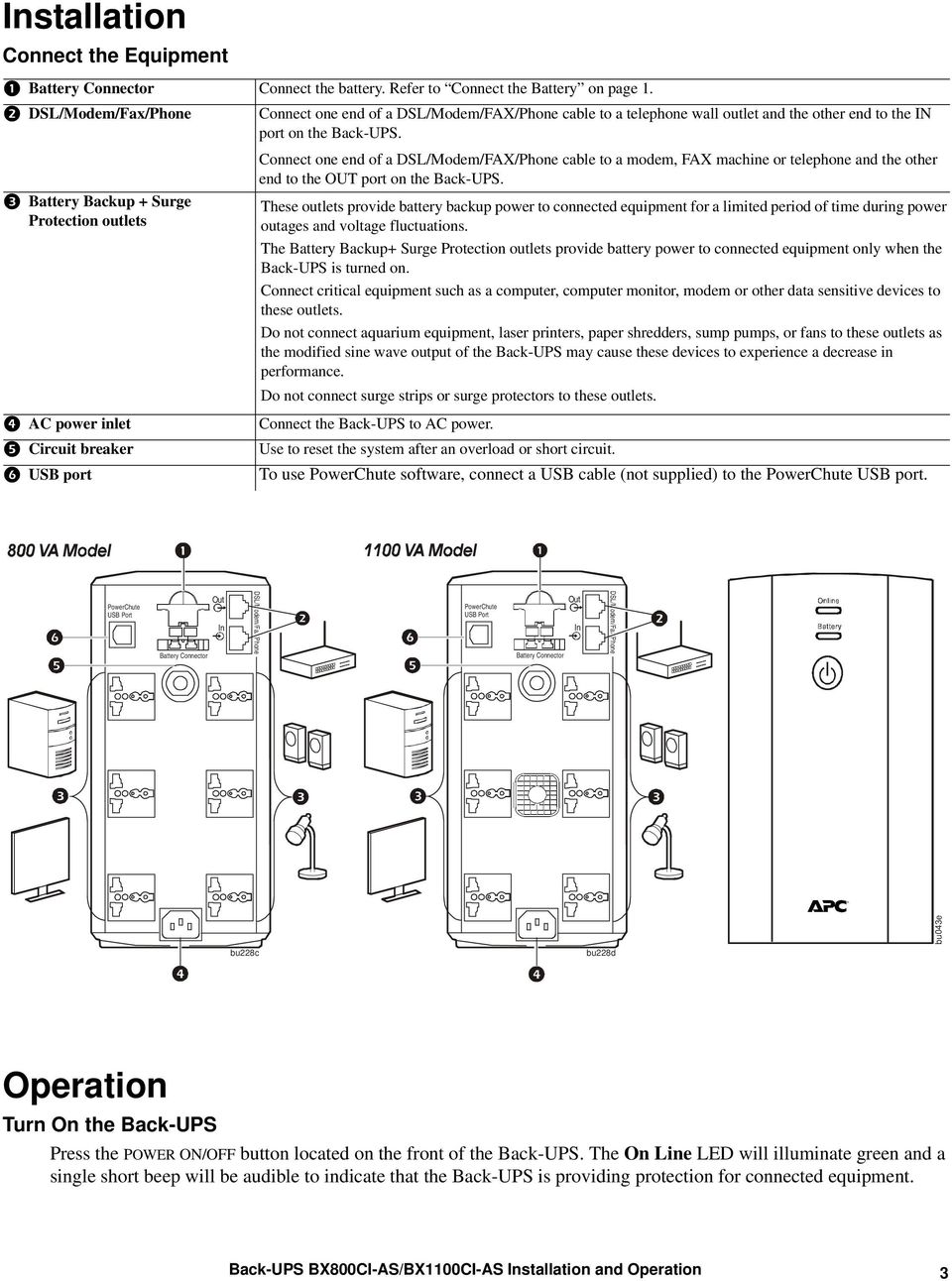
3 Installation Connect the Equipment Battery Connector Connect the battery. Refer to Connect the Battery on page 1. DSL/Modem/Fax/Phone Connect one end of a DSL/Modem/FAX/Phone cable to a telephone wall outlet and the other end to the IN port on the Back-UPS. Connect one end of a DSL/Modem/FAX/Phone cable to a modem, FAX machine or telephone and the other end to the OUT port on the Back-UPS. Battery Backup + Surge Protection outlets AC power inlet Circuit breaker USB port These outlets provide battery backup power to connected equipment for a limited period of time during power outages and voltage fluctuations. The Battery Backup+ Surge Protection outlets provide battery power to connected equipment only when the Back-UPS is turned on. Connect critical equipment such as a computer, computer monitor, modem or other data sensitive devices to these outlets. Do not connect aquarium equipment, laser printers, paper shredders, sump pumps, or fans to these outlets as the modified sine wave output of the Back-UPS may cause these devices to experience a decrease in performance. Do not connect surge strips or surge protectors to these outlets. Connect the Back-UPS to AC power. Use to reset the system after an overload or short circuit. To use PowerChute software, connect a USB cable (not supplied) to the PowerChute USB port. PowerChute USB Port Battery Connector Out In DSL/Modem/Fax/Phone PowerChute USB Port Battery Connector Out In DSL/Modem/Fax/Phone bu228c bu228d bu043e Operation Turn On the Back-UPS Press the POWER ON/OFF button located on the front of the Back-UPS. The On Line LED will illuminate green and a single short beep will be audible to indicate that the Back-UPS is providing protection for connected equipment. Back-UPS BX800CI-AS/BX1100CI-AS Installation and Operation 3
4 Status Indicators Status LED Indicator Audible Indicator On Audible Indicator Terminates Power On The Back-UPS is supplying AC power to connected equipment. On Battery The Back-UPS is supplying battery power to battery backup outlets. Low Battery warning The Back-UPS is supplying battery power to the battery backup outlets and the battery is near a total discharge state. Replace Battery The battery is disconnected. The battery needs to be charged or replaced. Overload Shutdown While operating on battery power an overload condition has occurred in one or more of the battery backup outlets. Sleep Mode While operating on battery power the battery is completely discharged. The Back-UPS will awaken once AC power is restored. Overload Alarm The equipment connected to the Back-UPS is drawing more power than the voltage rating allows. The On Line LED illuminates green. The On Line LED illuminates green. The LED is not illuminated during the beeps. The On Line LED flashes green. The Battery LED flashes red. Battery and On Line LEDs flash alternately. None Back-UPS beeps 4 times every 30 seconds. The Back-UPS emits rapid beeping. (once every second) Constant tone N/A The beeping stops when AC power is restored or the Back-UPS is turned off. The beeping stops when AC power is restored or the Back-UPS is turned off. The Back-UPS is turned off. None Constant tone The Back-UPS is turned off. None The Battery LED illuminates red. The Back-UPS beeps once every four seconds. Constant tone AC power is restored AC power is not restored within 32 seconds The Back-UPS is turned off Alarm stops when nonessential equipment is disconnected from the Battery Backup outlets. 4 Back-UPS BX800CI-AS/BX1100CI-AS Installation and Operation

5 Transfer Voltage and Sensitivity Settings Automatic Voltage Regulation Automatic Voltage Regulation boosts the AC voltage when it drops below safe levels. This allows the equipment that is connected to the Back-UPS to operate during low voltage conditions. Automatic Voltage Regulation will also regulate high voltage conditions down to a safe level. The Back-UPS will switch to battery power if the AC input voltage level becomes too low or too high for the Automatic Voltage Regulation feature to compensate, or if the AC power is experiencing voltage fluctuations. No-load Shutdown The UPS will shut down to conserve energy if while operating on battery power the UPS detects that connected equipment is using less than 15 W of energy for more than 15 minutes. No-load shutdown can be enabled or disabled through Program mode described below. Voltage Sensitivity Adjustment If the Back-UPS switches to battery power too frequently or too infrequently, adjust the transfer voltage and sensitivity settings: 1. Verify that the Back-UPS battery is connected. Connect the Back-UPS to a wall outlet. The Back-UPS should be turned off. 2. Press and hold the POWER ON/OFF button for 10 seconds. The LEDs will illuminate green and red alternately, to indicate that the Back-UPS is in Program mode. 3. The LEDs will flash either green, red or green and red alternately to indicate the current sensitivity level. The Back-UPS will beep to indicate that No-load Shutdown is enabled. Refer to the table for an explanation of the transfer voltage sensitivity levels. 4. To select LOW sensitivity, press the ON/OFF button until the On Line LED flashes green. 5. To select MEDIUM sensitivity, press the ON/OFF button until the Battery LED flashes red. 6. To select HIGH sensitivity, press the ON/OFF button until the On Line and Battery LEDs flash green and red alternately. 7. To exit Program mode wait for five seconds and both LEDs will extinguish. Program mode is no longer active. LED Flashes Audible Indicator Voltage Sensitivity Setting Input Voltage Range No-load Shutdown Recommended Use Green None Low Disabled Use this setting with equipment that is less sensitive to fluctuations in voltage or waveform distortions. Green 4 beeps per second Low Enabled Use this setting with equipment that is less sensitive to fluctuations in voltage or waveform distortions. Red None Medium Disabled Use this setting for normal operation conditions. Red 4 beeps per second Medium (factory default) Enabled Use this setting for normal operation conditions. Green and Red None High Disabled Use this setting when connected equipment is sensitive to voltage fluctuations or waveform distortions. Green and Red 4 beeps per second High Enabled Use this setting when connected equipment is sensitive to voltage fluctuations or waveform distortions. Back-UPS BX800CI-AS/BX1100CI-AS Installation and Operation 5

6 Troubleshooting Problem Possible Cause Corrective Action Back-UPS will not turn on. The Back-UPS is operating on battery power, while connected to AC power. The Back-UPS does not provide the expected amount of backup time. The BATTERY and ON LINE LEDs flash alternately. The BATTERY LED is illuminated and the Back-UPS emits a constant tone. The Back-UPS is not connected to AC power. The circuit breaker has been tripped. The internal battery is not connected. The AC input voltage is out of range. The Back-UPS power cable is not securely connected to the wall outlet. The wall outlet is no longer receiving AC power. The circuit breaker has been tripped. The Back-UPS is performing an automatic self test. The AC input voltage is out of range. The frequency is out of range. The waveform is distorted. Battery Backup outlets may be fully or improperly loaded. The battery was recently discharged due to a power outage and has not fully recharged. The battery has reached the end of its useful life. The battery has reached the end of its useful life. The connected equipment is drawing more power than the Back-UPS can provide. Be sure that the Back-UPS is securely connected to an AC outlet. Disconnect nonessential equipment from the Back-UPS. Reset the circuit breaker. Reconnect equipment one item at a time. If the circuit breaker is tripped again, disconnect the device that caused the short circuit. Connect the battery connector. Refer to Connect the Battery on page 1. Adjust the transfer voltage and sensitivity range. Verify that the power cable plug is securely connected to the wall outlet. Verify that the wall outlet is receiving AC power by checking it with another device. No action is necessary. Adjust the transfer voltage and sensitivity range. Disconnect non-essential equipment from the Battery Backup outlets. Charge the battery cartridge for eight hours. Replace the battery. Replace the battery. Disconnect nonessential equipment from the Battery Backup outlets. 6 Back-UPS BX800CI-AS/BX1100CI-AS Installation and Operation

7 Specifications Specification BX800CI-AS BX1100CI-AS Input Voltage 230 Vac, nominal Frequency Brownout Transfer Over-voltage Transfer 50 Hz ±3 Hz, 60 Hz ±3 Hz 155 Vac, typical 280 Vac, typical Output UPS Capacity (total) 800 VA / 480 W 1100 VA / 660 W Voltage On Battery Frequency on Battery Transfer Time 230 Vac rms (step-approximated sinewave) 50 Hz ±1 Hz, 60 Hz ±1 Hz 8 ms typical Protection and Filtering AC Surge Protection Full time, 273 Joules AC Input Resettable circuit breaker Battery Type (maintenance free) 12 V 9 Ahr Each battery12 V 7.2 Ahr Average Life Typical Recharge Time 2-5 years depending on the number of discharge cycles and environmental temperature 8 Hours Physical Net Weight 8 kg 12 kg Dimensions (H x W x D) 21.5 cm x 13 cm x 33.6 cm Operating Temperature 0 o C to 40 o C (32 o F to 104 o F) Storage Temperature -15 o C to 45 o C (5 o F to 113 o F) Operating Relative Humidity Operating Elevation 0 to 95% non-condensing 0 to 3000 m (0 to 10,000 ft) Back-UPS BX800CI-AS/BX1100CI-AS Installation and Operation 7

8 Service If the unit requires service, do not return it to the dealer. Follow these steps: 1. Review the TROUBLESHOOTING section of the manual to eliminate common problems. 2. If the problem persists, contact APC Customer Support through the APC Web site, a. Note the model number and serial number and the date of purchase. The model and serial numbers are located on the rear panel of the unit and are available through the LCD display on select models. b. Call APC Customer Support and a technician will attempt to solve the problem over the phone. If this is not possible, the technician will issue a Returned Material Authorization Number (RMA#). c. If the unit is under warranty, the repairs are free. d. Service procedures and returns may vary internationally. Refer to the APC Web site for country specific instructions. 3. Pack the unit properly to avoid damage in transit. Never use foam beads for packaging. Damage sustained in transit is not covered under warranty. For the UPS, always DISCONNECT THE BATTERY before shipping in compliance with U.S. Department of Transportation (DOT) and IATA regulations. The battery may remain in the unit. 4. Write the RMA# provided by Customer Support on the outside of the package. 5. Return the unit by insured, pre-paid carrier to the address provided by Customer Support. APC Customer Support Worldwide Internet Warranty The standard warranty is two (2) years from the date of purchase. APC standard procedure is to replace the original unit with a factory reconditioned unit. Customers who must have the original unit back due to the assignment of asset tags and set depreciation schedules must declare such a need at first contact with an APC Technical Support representative. APC will ship the replacement unit once the defective unit has been received by the repair department, or cross-ship upon the receipt of a valid credit card number. The customer pays for shipping the unit to APC. APC pays ground freight transportation costs to ship the replacement unit to the customer APC by Schneider Electric. APC, the APC logo, Back-UPS and PowerChute are owned by Schneider Electric Industries S.A.S., American Power Conversion Corporation, or their affiliated companies. All other trademarks are property of their respective owners.. EN C 4/2012

Installation and Operation Back-UPS 1250, 1300, 1500
 Installation and Operation Back-UPS 1250, 1300, 1500 Inventory bu001a Safety and General Information This unit is intended for indoor use only. Do not operate this unit in direct sunlight, in contact with
Back-UPS 650 VA 120 V with AVR (BX650CI-LM)
 Back-UPS 650 VA 120 V with AVR (BX650CI-LM) Overview Do not install the unit in direct sunlight, in areas of excessive heat or humidity, or in contact with fluids ON/OFF button Battery connector Circuit
Back-UPS Pro 1300/1500 Installation and Operation
 Back-UPS Pro 1300/1500 Installation and Operation Inventory Safety Do not install the Back-UPS in direct sunlight, in excessive heat, humidity, or in contact with fluids. Connect the battery bu059a bu058a
Operation Manual. Smart-UPS C. Uninterruptible Power Supply. Tower 1000/1500 VA. 120/230 Vac. su0813a
 Operation Manual Smart-UPS C Uninterruptible Power Supply Tower 1000/1500 VA 120/230 Vac su0813a Product Description The APC by Schneider Electric Smart-UPS is a high performance uninterruptible power
CAUTION. CAUTION indicates a potentially hazardous situation which, if not avoided, can result in equipment damage and minor or moderate injury.
 Product Description The APC by Schneider Electric Smart-UPS is a high performance uninterruptible power supply (UPS). The UPS provides protection for electronic equipment from utility power blackouts,
User Manual. English. APC Smart-UPS 500 VA 100 VAC 750 VA 100/120/230 VAC. Tower Uninterruptible Power Supply
 User Manual English APC Smart-UPS 500 VA 100 VAC 750 VA 100/120/230 VAC Tower Uninterruptible Power Supply 990-1587A 12/2005 Introduction The APC Uninterruptible Power Supply (UPS) is designed to prevent
User Manual. English. APC Smart-UPS SC. 1000/1500 VA 110/120/230 Vac. 2U Tower/Rack-Mount Uninterruptible Power Supply
 User Manual English APC Smart-UPS SC 1000/1500 VA 110/120/230 Vac 2U Tower/Rack-Mount Uninterruptible Power Supply 990-1851C, 10/2005 Introduction The APC Uninterruptible Power Supply (UPS) is designed
User Manual. English. APC Smart-UPS 1000/1500 VA 100/120/230 VAC 750/1000XL VA 120/230 VAC. Tower Uninterruptible Power Supply
 User Manual English APC Smart-UPS 1000/1500 VA 100/120/230 VAC 750/1000XL VA 120/230 VAC Tower Uninterruptible Power Supply 990-1074C 06/2012 Introduction American Power Conversion Corporation (APC) is
Installation Guide Smart-UPS X Tower/Rack-Mount 2U 2000/2200/3000 VA
 Installation Guide Smart-UPS X Tower/Rack-Mount 2U 2000/2200/3000 VA Important Safety Messages Read the instructions carefully to become familiar with the equipment before trying to install, operate, service
Powerware 5110 UPS User s manual
 Powerware 5110 UPS 2005 Eaton Corporation All Rights Reserved The contents of this manual are the copyright of the publisher and may not be reproduced (even extracts) unless permission granted. Every care
User Manual. Smart-UPS. Uninterruptible Power Supply 750/1000/1500 VA. 100/120/230 Vac. Rack Mount 2U
 User Manual Smart-UPS Uninterruptible Power Supply 750/1000/1500 VA 100/120/230 Vac Rack Mount 2U Smart-UPS TM Uninterruptible Power Supply 750/1000/1500 VA 100/120/230 Vac Rack-Mount 2U EN 990-1194E 08/2014
User Manual. Smart-UPS TM C. Uninterruptible Power Supply SRC250 SRC450. 110/120/230 Vac. Tower/Rack-Mount 1U
 User Manual Smart-UPS TM C Uninterruptible Power Supply SRC250 SRC450 110/120/230 Vac Tower/Rack-Mount 1U Smart-UPS TM C Uninterruptible Power Supply 250/450 VA 110/120/230 Vac Tower/Rack-Mount 1U English
Installation and Operation
 Installation and Operation Smart-UPS ΤΜ SR1 Uninterruptible Power Supply SR18KXIET SR110KXIET 220/230/240 Vac Tower suo0759b Smart-UPS TM SR1 Uninterruptible Power Supply 8000/10000 VA 220/230/240 Vac
Operation Manual. Smart-UPS UPS. 750/1000/1500/2200 VA Rack-mount 2U 120/230 VAC. 3000 VA Rack-mount 2U 120/208/230 VAC
 Operation Manual Smart-UPS UPS 750/1000/1500/2200 VA Rack-mount 2U 120/230 VAC 3000 VA Rack-mount 2U 120/208/230 VAC Contents Overview... 1 Product Description....................................... 1
User Manual. English. APC Smart-UPS RT. 3000/5000/6000 VA 200-240 VAC Tower/Rack Mount 3U Uninterruptible Power Supply
 User Manual English APC Smart-UPS RT 3000/5000/6000 VA 200-240 VAC Tower/Rack Mount 3U Uninterruptible Power Supply 990-1289D 03/2006 Introduction The APC Smart-UPS RT is a high-performance, uninterruptible
User Manual. English. APC Smart-UPS. 2200 VA 120/230 Vac. 3000 VA 100/120/208/230 Vac. 2U Rack Mount Uninterruptible Power Supply
 User Manual English APC Smart-UPS 2200 VA 120/230 Vac 3000 VA 100/120/208/230 Vac 2U Rack Mount Uninterruptible Power Supply 990-1352A 11/2003 Introduction The APC Uninterruptible Power Supply (UPS) is
750VA/1000VA/1500VA 100/120/230VAC 2U
 User s Manual English Smart-UPS 750VA/1000VA/1500VA 100/120/230VAC 2U Rack Mount Uninterruptible Power Supply 990-1194 5/02 Introduction The APC Uninterruptible Power Supply (UPS) is designed to prevent
Operation Manual. Smart-UPS X Uninterruptible Power Supply
 Operation Manual Smart-UPS X Uninterruptible Power Supply Low Voltage (100-127 V) SMX2000RMLV2U SMX2200RMLV2U SMX3000RMLV2U SMX3000RMLV2UNC SMX3000RMJ2U High Voltage (200-240 V) SMX2200RMHV2U SMX3000RMHV2U
Owner s Manual. Not suitable for mobile applications. Important Safety Instructions 2. Quick Installation 3. Basic Operation 4. Storage & Service 7
 Register online today for a chance to win a FREE Tripp Lite product! www.tripplite.com/warranty Owner s Manual Internet Office & BC Personal UPS Systems Not suitable for mobile applications. Important
Match. GE Digital Energy. Uninterruptible Power Supply 500-1500 VA. Technology for the Digital World. Match UPS. GE Digital Energy.
 Match Uninterruptible Power Supply 500-1500 VA Manufactured by: General Electric Company Telephone +41 (0)91 / 850 51 51 CH 6595 Riazzino (Locarno) Fax +41 (0)91 / 850 51 44 Switzerland Website www.gedigitalenergy.com
APC Smart-UPS 2400/3000 VA 100/110-120 VAC 3U. Uninterruptible Power Supply
 User Manual English APC Smart-UPS 2400/3000 VA 100/110-120 VAC 3U Tower/Rack Mount Uninterruptible Power Supply 990-2233A 02/2005 Introduction/Before Installation Introduction/Before Installation About
Installation and Operation
 Installation and Operation Smart-UPS SUA22000-BR/SUA3000-BR 120 VAC English This manual and the safety guide are available in English on the enclosed CD and the APC Web site, www.apc.com. Este manual e
User Manual. English. APC Smart-UPS RT. 8000/10000 VA 200-240 Vac Tower/Rack-Mount 6U Uninterruptible Power Supply
 User Manual English APC Smart-UPS RT 8000/10000 VA 200-240 Vac Tower/Rack-Mount 6U Uninterruptible Power Supply 990-2689D 01/2007 Introduction The APC Smart-UPS RT is a high-performance, uninterruptible
How To Use A Power Supply Unit (Upu)
 BRAVER UPS (Uninterruptible Power System) User s Manual Safety CAUTION! This UPS utilizes voltages that may be hazardous. Do not attempt to disassemble the unit. The unit contains no user replaceable parts.
Uninterruptible Power Supply
 96-01101 / rev. 2e / 2-2-12 Uninterruptible Power Supply EXCEPTIONAL SUPPORT & PROTECTION Uninterruptible Power Supply with Energy Saver design that is optimized to address the needs of A/V systems Features
BroadBand PowerShield. User Manual
 BroadBand PowerShield User Manual 990-0375G 12/2006 Chapter 1 General Information The PowerShield provides a power source for broadband telephony and other DC applications. Safety This Safety Guide contains
Daker DK 1, 2, 3 kva. Manuel d installation Installation manual. Part. LE05334AC-07/13-01 GF
 Daker DK 1, 2, 3 kva Manuel d installation Installation manual Part. LE05334AC-07/13-01 GF Daker DK 1, 2, 3 kva Index 1 Introduction 24 2 Conditions of use 24 3 LCD Panel 25 4 Installation 28 5 UPS communicator
Installation Guide Smart-UPS X External Battery Pack SMX120BP
 Installation Guide Smart-UPS X External Battery Pack SMX120BP Inventory Inspect the contents upon receipt. Notify the carrier and dealer if there is damage. Two bezels Tie brackets used to secure multiple
SmartPro 230V 750VA 500W Line-Interactive Sine Wave UPS, SNMP, Webcard, Tower, USB, DB9 Serial
 SmartPro 230V 750VA 500W Line-Interactive Sine Wave UPS, SNMP, Webcard, Tower, USB, DB9 Serial MODEL NUMBER: SMX750SLT Highlights 750VA line interactive tower UPS; Sine wave output 220/230/240V nominal
How To Install A Power Supply (Uplast) With A Battery Pack
 APC Smart-UPS RT SURTA48XLBP/SURTA48XLBPJ External Battery Pack User Manual Introduction/Before Installation About this Manual The APC Smart-UPS RT external battery pack (SURTA48XLBP or SURTA48XLBPJ) connects
SmartPro 230V 3kVA 2.25kW Line-Interactive UPS, Extended Run, SNMP, Webcard, Tower, USB, DB9 Serial
 SmartPro 230V 3kVA 2.25kW Line-Interactive UPS, Extended Run, SNMP, Webcard, Tower, USB, DB9 Serial MODEL NUMBER: SMARTINT3000VS Highlights 3kVA / 3000VA / 2250W line interactive tower UPS system 230V
EKOS Cart. Instructions for Use
 EKOS Cart Instructions for Use EKOS Corporation 11911 North Creek Parkway South Bothell, WA 98011 USA (425) 415-3100 (tel) (425) 415-3102 (fax) [email protected] (e-mail) - 1-4913-002 REV E Intended Use
PC Personal 120V 600VA 375W Standby UPS with Pure Sine Wave Output, Tower, 6 Outlets
 PC Personal 120V 600VA 375W Standby UPS with Pure Sine Wave Output, Tower, 6 Outlets MODEL NUMBER: BC600SINE Highlights 600VA tower 120V standby UPS with SINE WAVE output Maintains AC output during power
APC Matrix-UPS 5kVA 208V/240V In 120/208/240V Out
 APC Matrix-UPS 5kVA 208V/240V In 120/208/240V Out APC Matrix-UPS, 3750 Watts / 5000 VA,Input 208V / Output 120V, 208V, Interface Port DB-9 RS-232, SmartSlot, Extended runtime model Includes: CD with software,
Online UPS. PowerWalker VFI 1000R/1U
 Online UPS PowerWalker VFI 1000R/1U Manual Uninterruptible Power Supply System Table of Contents 1. Important Safety Warning... 1 1-1. Transportation... 1 1-2. Preparation... 1 1-3. Installation... 1 1-4.
REGULINE 600VA / 1000VA REGULATOR USER MANUAL
 REGULINE 600VA / 1000VA REGULATOR USER MANUAL TUNÇMATİK REGULINE SERIES AUTOMATIC VOLTAGE REGULATOR Models: REGULINE 600VA / REGULINE 1000VA Principle of Operation Automatic Voltage Regulators regulate
Smart-UPS RT External Battery Pack Stack/Rack-Mount 6U
 Smart-UPS RT External Battery Pack Stack/Rack-Mount 6U SURT192RMXLBP2 SURT192RMXLBP2J English 990-2485B 02/2009 Introduction About this UPS The American Power Conversion (APC ) SURT192RMXLBP2 external
APC Smart-UPS 2200/3000 VA 100/120/230 VAC. Uninterruptible Power Supply 990-1674C 12/20005
 User Manual English APC Smart-UPS 2200/3000 VA 100/120/230 VAC Tower Uninterruptible Power Supply 990-1674C 12/20005 Introduction Introduction About this UPS The APC Uninterruptible Power Supply (UPS)
Industrial-Grade UPS System Heavy-duty power protection for harsh industrial environments
 Industrial-Grade UPS System Heavy-duty power protection for harsh industrial environments Model #: SM2000RMX Heavy-duty, industrial-grade metal housings Shock and vibration rated to MIL-STD-810D 19 inch
SmartPro 120V 750VA 600W Line-Interactive Sine Wave UPS, 1U Rackmount, SNMPWEBCARD Option, USB, DB9 Serial
 SmartPro 120V 750VA 600W Line-Interactive Sine Wave UPS, 1U Rackmount, SNMPWEBCARD Option, USB, DB9 Serial MODEL NUMBER: SMART750RM1U Highlights.75kVA / 750VA / 600W line interactive 1U rackmount UPS,
Smart-UPS APC Smart-UPS 1000VA USB & Serial 230V
 Smart-UPS APC Smart-UPS 1000VA USB & Serial 230V APC Smart-UPS, 670 Watts / 1000 VA,Input 230V / Output 230V, Interface Port DB-9 RS-232, SmartSlot, USB Includes: CD with software, Smart UPS signalling
Operation Manual. Smart-UPS UPS. 750/1000/1500/2200/3000 VA Tower 120/230 VAC
 Operation Manual Smart-UPS UPS 750/1000/1500/2200/3000 VA Tower 120/230 VAC Contents Overview... 1 Product Description....................................... 1 Safety...................................................
User s Manual AURORA 1.2K/2.2K
 User s Manual AURORA 1.2K/2.2K Uninterruptible Power System Safety CAUTION This UPS utilizes voltages that may be hazardous. Do not attempt to disassemble the unit. The unit contains no user serviceable
HP UPS R1500 Generation 3
 HP UPS R1500 Generation 3 Installation Instructions Part Number 650952-001 NOTE: The rating label on the device provides the class (A or B) of the equipment. Class B devices have a Federal Communications
Model #: SMART2200CRMXL
 Tripp Lite 1111 West 35th Street Chicago, IL 60609 USA Telephone: +(773) 869 1234 E-mail: [email protected] Model #: SMART2200CRMXL SmartPro Compact Rackmount UPS System - Precision Protection for
User Manual 1K/2K/3K Online UPS
 User Manual 1K/2K/3K Online UPS Uninterruptible Power Supply System Table of Contents 1. Important Safety Warning... 1 1-1. Transportation... 1 1-2. Preparation... 1 1-3. Installation... 1 1-4. Operation...
OmniVS Series 1500VA Line-Interactive Tower 120V UPS with USB port
 OmniVS Series 1500VA Line-Interactive Tower 120V UPS with USB port MODEL NUMBER: OMNIVS1500 Highlights 1500VA / 1.5kVA tower 120V line-interactive UPS Corrects brownouts and overvoltages from 75 to 147V
SmartPro 120V 750VA 600W Line-Interactive Sine Wave UPS, SNMP, Webcard, 1U Rack-Mount, USB, DB9 Serial
 SmartPro 120V 750VA 600W Line-Interactive Sine Wave UPS, SNMP, Webcard, 1U Rack-Mount, USB, DB9 Serial MODEL NUMBER: SMART750RM1U Highlights.75kVA / 750VA / 600W line interactive 1U rackmount UPS, Sine
SmartOnline 200-240V 5kVA 4.5kW On-Line Double-Conversion UPS, Extended Run, SNMP, Webcard, 4U Rack/Tower, USB, DB9 Serial
 SmartOnline 200-240V 5kVA 4.5kW On-Line Double-Conversion UPS, Extended Run, SNMP, Webcard, 4U Rack/Tower, USB, DB9 Serial MODEL NUMBER: SU5000RT4UHV Description Tripp Lite SU5000RT4UHV 5000VA / 5kVA /
SmartPro 100/110/120V 1.5kVA 900W Line-Interactive Sine Wave UPS, Tower, SNMP, Webcard, USB, DB9 Serial
 SmartPro 100/110/120V 1.5kVA 900W Line-Interactive Sine Wave UPS, Tower, SNMP, Webcard, USB, DB9 Serial MODEL NUMBER: SMART1500SLT Highlights 1.5kVA / 1500VA line interactive tower UPS; Sine wave output
Internet Office 750VA Ultra-compact Standby 120V UPS with USB port
 Internet Office 750VA Ultra-compact Standby 120V UPS with USB port MODEL NUMBER: INTERNET750U Highlights 750VA ultra-compact 120V standby UPS Maintains AC output during power failures 6 UPS battery supported
NEWTECH PRO 1-2-3 KVA ONLINE UNINTERRUPTIBLE POWER SUPPLY USER MANUAL
 NEWTECH PRO 1-2-3 KVA ONLINE UNINTERRUPTIBLE POWER SUPPLY USER MANUAL [email protected] / www.tuncmatik.com Table of Contents 1. Important Safety Warning 2 1-1. Transportation 2 1-2. Preparation 2 1-3.
SmartPro 120V 2.2kVA 1.92kW Line-Interactive Sine Wave UPS, SNMP, Webcard option, 2U Rack/Tower, LCD, USB, DB9 Serial
 SmartPro 120V 2.2kVA 1.92kW Line-Interactive Sine Wave UPS, SNMP, Webcard option, 2U Rack/Tower, LCD, USB, DB9 Serial MODEL NUMBER: SMART2200RM2U Highlights 2.2kVA / 2200VA / 1920W line interactive 2U
User s Manual. Professional Rack Mount LCD Series PR1000ELCDRT2U/PR1500ELCDRT2U/ PR2200ELCDRT2U K01-0000070-01
 EN User s Manual Professional Rack Mount LCD Series PR1000ELCDRT2U/PR1500ELCDRT2U/ PR2200ELCDRT2U K01-0000070-01 IMPORTANT SAFETY INSTRUCTIONS IMPORTANT SAFETY INSTRUCTIONS This manual contains important
SmartPro 120V 1kVA 800W Line-Interactive Sine Wave UPS, SNMP, Webcard, 1U Rack, USB, DB9 Serial
 SmartPro 120V 1kVA 800W Line-Interactive Sine Wave UPS, SNMP, Webcard, 1U Rack, USB, DB9 Serial MODEL NUMBER: SMART1000RM1U Description Tripp Lite SMART1000RM1U 1000VA / 1kVA / 800 watt line interactive,
Model #: SMART2200VS. 2200VA / 2.2kVA line interactive tower UPS. Maintains 120V nominal output over an input range of 79 to 147V
 SmartPro VS Tower UPS System Intelligent, line-interactive power management system Model #: SMART2200VS 2200VA / 2.2kVA line interactive tower UPS Maintains 120V nominal output over an input range of 79
Line Interactive UPS
 EN Line Interactive UPS PowerMust 636 LCD (650VA), Line Int., Schuko PowerMust 848 LCD (850VA), Line Int., Schuko PowerMust 636 LCD (650VA), Line Int., IEC PowerMust 848 LCD (850VA), Line Int., IEC PowerMust
Line Interactive UPS. PowerWalker VI 500T/HID PowerWalker VI 750T/HID PowerWalker VI 1000T/HID PowerWalker VI 1500T/HID.
 Line Interactive UPS PowerWalker VI 500T/HID PowerWalker VI 750T/HID PowerWalker VI 1000T/HID PowerWalker VI 1500T/HID Quick Start Guide CONTT IMPORTANT SAFETY INSTRUCTIONS... 1 1. Introduction... 4 2.
SmartPro 120V 500VA 300W Line-Interactive UPS, SNMP, Webcard, 1U Rack/Tower, USB, DB9 Serial
 SmartPro 120V 500VA 300W Line-Interactive UPS, SNMP, Webcard, 1U Rack/Tower, USB, DB9 Serial MODEL NUMBER: SMART500RT1U Description Tripp Lite's SMART500RT1U intelligent, line-interactive rack/tower uninterruptible
Internet Office UPS System Standby UPS for PCs, workstations and more
 Internet Office UPS System Standby UPS for PCs, workstations and more Model #: INTERNETOFFICE500 500VA standby tower UPS system Offers battery-derived AC output during blackouts and brownouts starting
USER MANUAL Online UPS 1K/2K/3K Rack
 USER MANUAL EN Online UPS 1K/2K/3K Rack Uninterruptible Power Supply System Table of Contents 1. Important Safety Warning 2 1-1. Transportation 2 1-2. Preparation 2 1-3. Installation 2 1-4. Operation 2
USER S MANUAL. MaxPower 400-600 UPS. Uninterruptible Power System 28-2MAXPO0018
 USER S MANUAL MaxPower 400-600 UPS Uninterruptible Power System 28-2MAXPO0018 IMPORTANT SAFETY INSTRUCTIONS SAVE THESE INSTRUCTIONS This manual contains important instructions for models MaxPower 400 and
3000W Power Inverter
 3000W Power Inverter OWNER S MANUAL Model number-4573000 TO REDUCE THE RISK OF INJURY, USER MUST READ AND UNDERSTAND THIS INSTRUCTIONAL MANUAL. THIS MANUAL CONTAINS IMPORTANT INFORMATION REGARDING THE
TAA-Compliant SmartPro 120V 1kVA.8kW Line-Interactive Sine Wave UPS, SNMP, Webcard, 1U Rack, USB, DB9 Serial
 TAA-Compliant SmartPro 120V 1kVA.8kW Line-Interactive Sine Wave UPS, SNMP, Webcard, 1U Rack, USB, DB9 Serial MODEL NUMBER: SM1000RM1UTAA Description Tripp Lite SM1000RM1UTAA 1000VA / 1kVA / 800 watt line
Uninterruptible Power Supply ERA LED 1.5 ERA LED 2.0 ERA LED 2.6. User s manual
 Uninterruptible Power Supply ERA LED 1.5 ERA LED 2.0 ERA LED 2.6 User s manual Index Safety Warnings... 2 1 Introduction... 3 2 General Characteristics... 4 3 Receipt and site selection... 4 4 EXTERNAL
Audio/Video AVR Series UPS - Intelligent Automatic Voltage Regulated Power Management System
 Audio/Video AVR Series UPS - Intelligent Automatic Voltage Regulated Power Management System MODEL NUMBER: HTR05-1U Description Tripp Lite's HTR05-1U AVR Series intelligent, Automatic Voltage Regulated
BC Pro UPS System Standby UPS System
 BC Pro UPS System Standby UPS System Model #: BCPRO1400 1400VA standby, tower UPS system Offers battery derived AC output during blackouts and brownouts starting at 99V 6 protected AC outlets (NEMA 5-15R)
SmartPro 230V 1000VA 900W Line-Interactive Sine Wave UPS, SNMP, Webcard, 2U Rack/Tower, USB, DB9 Serial
 SmartPro 230V 1000VA 900W Line-Interactive Sine Wave UPS, SNMP, Webcard, 2U Rack/Tower, USB, DB9 Serial MODEL NUMBER: SMX1000RT2U Highlights 1kVA / 1000VA / 900W line-interactive 2U rack/tower UPS, Sine
USER MANUAL Online UPS 1K/2K/3K
 USER MANUAL EN Online UPS 1K/2K/3K Uninterruptible Power Supply System Table of Contents 1. Important Safety Warning 2 1.1. Transportation 2 1.2. Preparation 2 1.3. Installation 2 1.4. Operation 2 1.5.
Residential Gateway (RG) Battery Backup REV B
 Residential Gateway (RG) Battery Backup REV B Save this user manual This manual contains important instructions regarding the installation and operation of this device. Read this manual thoroughly before
Internet Office 500VA Tower Standby 120V UPS with USB port
 Internet Office 500VA Tower Standby 120V UPS with USB port MODEL NUMBER: INTERNETOFFICE500 Highlights 500VA tower 120V standby UPS Maintains AC output during power failures 3 UPS battery supported outlets,
3U, 2200 VA Audio/Video Pure Sine Wave UPS System
 3U, 2200 VA Audio/Video Pure Sine Wave UPS System MODEL NUMBER: HTR22-3U Description Tripp Lite's HTR22-3U Pure Sine Wave 2200VA/1600W on-line, double-conversion UPS system prevents media data loss, equipment
Symmetra LX. Operations Guide
 Symmetra LX Operations Guide For use with Symmetra LX UPS Models: 200 V, 4 8 kva 208/240 V, 4 8 kva 220/230/240 V, 4 8 kva 200 V, 4 16 kva 208/240 V, 4 16 kva 220/230/240 V, 4 16 kva Symmetra LX Rack-mount
350, 500, 650 and 1000 MODELS
 P D Technology Ltd PDT Power Series Instruction Manual Domestic, Commercial & Industrial PLEASE READ THE INSIDE FRONT COVER BEFORE INSTALLING THE PDT POWER SERIES 350, 500, 650 and 1000 MODELS P D Technology
QuickSpecs. Models HP T1500 UPS JPN/TWN. HP UPS T1000 G2, T1500 G2 Models Overview
 Overview The Tower UPS "G2" models are the next generation HP tower UPSs with USB support. These new UPSs are designed to provide advanced power protection (or increased uptime and data corruption avoidance)
PowerSource 400 Owner s Guide
 by PowerSource 400 Owner s Guide About Xantrex Xantrex Technology Inc. is a world-leading supplier of advanced power electronics and controls with products from 50 watt mobile units to one MW utility-scale
PowerSource 1800 Owner s Guide
 by About Xantrex Xantrex Technology Inc. is a world-leading supplier of advanced power electronics and controls with products ranging from small mobile units to utilityscale systems for wind, solar, batteries,
SmartOnline 200-240V 6kVA 4.2kW On-Line Double-Conversion UPS, Extended Run, SNMP, Webcard, 6U Rack/Tower, DB9 Serial, Hardwire
 SmartOnline 200-240V 6kVA 4.2kW On-Line Double-Conversion UPS, Extended Run, SNMP, Webcard, 6U Rack/Tower, DB9 Serial, Hardwire MODEL NUMBER: SU6000RT3UHV Highlights 6000VA / 6kVA / 4200W on-line double-conversion
Ambient Temperature In Range Probe X
 List of Events This section lists all events that are written to the Event Log. Some of these events can be configured through the Configuring Events to Take Actions page, and these are listed in the first
User s Manual Before using the inverter, you need to read and save the safety instructions.
 User s Manual Before using the inverter, you need to read and save the safety instructions. STI SERIES (STI200, STI300, STI500, STI700, STI1000) Power Frequency Pure Sine Wave Inverter The information
Industrial Tower Uninterruptible Power Supply Specifications Bulletin Numbers 1609-P
 Technical Data Industrial Tower Uninterruptible Power Supply Specifications Bulletin Numbers 1609-P Topic Page 1609-P Specifications 2 1609-P Approximate Dimensions and Shipping Weights 3 Additional Resources
Preface. Manual Revisions
 Preface D-Link reserves the right to revise this publication and to make changes in the content hereof without obligation to notify any person or organization of such revisions or changes. Manual Revisions
SPL 2-00/-01 OPERATION INSTRUCTIONS
 SPL 2-00/-01 OPERATION INSTRUCTIONS Powerline Ethernet Adapter 500 Mbps EN Read and keep Operation Instructions SPL 2-00/-01 Safety Notes Do NOT use this product near water, for example, in a wet basement
APC. DIN Rail Control Panel Mounting Uninterruptible Power Supply. Catalog
 APC DIN Rail Control Panel Mounting Uninterruptible Power Supply Catalog 2014 Contents Introduction, description... 4 Specifications...5 References....6 Dimensions...7 Wiring diagrams....8 Product reference
For protection from laptops to high availability facilities - and everything in between - APC is a partner you can count on
 Home Sign In View Cart Order Status Search Solutions Products and Services Support Your Business Company Data Center Server Rooms Solutions for Small-Medium Data Center Large Data Centers Cloud & Co-location
SmartOnline Expandable Rack / Tower UPS System Online, double-conversion protection for mission critical applications
 SmartOnline Expandable Rack / Tower UPS System Online, double-conversion protection for mission critical applications Model #: SU3000RTXL3U 3000VA online 3U rack / tower UPS Enhanced serial communications
OWNER S MANUAL 2.5/3.0 ACS PANEL (ADVANCED CONTROL SYSTEM) 7725 Lougheed Highway Burnaby, BC V5A 4V8 Canada
 2.5/3.0 ACS PANEL (ADVANCED CONTROL SYSTEM) OWNER S MANUAL 7725 Lougheed Highway Burnaby, BC V5A 4V8 Canada Tel: (604) 420-1585 Fax: (604) 420-1591 http:// www. statpower.com PROsine 2.5/3.0 ACS Panel
Galleon 6-10K Online UPS. Voltronic Power Technology Corporation
 Galleon 6-10K Online UPS Voltronic Power Technology Corporation Features Galleon online UPS series delivers optimal power quality, provides superior power management, resolves utility power protection
APC Smart-UPS RT. GUIDE SPECIFICATIONS FOR 3000VA, 5000VA and 6000 VA Smart-UPS RT 230VAC Uninterruptible Power Supply
 APC Smart-UPS RT GUIDE SPECIFICATIONS FOR 3000VA, 5000VA and 6000 VA Smart-UPS RT 230VAC Uninterruptible Power Supply PART 1 - GENERAL 1.1 SUMMARY A. This specification describes the operation and functionality
Smart Pro Rack/Tower UPS Intelligent, line interactive network power management system
 Smart Pro Rack/Tower UPS Intelligent, line interactive network power management system Model #: SMART500RT1U 500VA line interactive 1U rack/tower UPS 7 outlets with 1 switchable load bank Simultaneous
BiPAC 7800NL. Wireless-N ADSL2+ Firewall Router. Quick Start Guide
 BiPAC 7800NL Wireless-N ADSL2+ Firewall Router Quick Start Guide BiPAC 7800NL Wireless-N ADSL2+ Firewall Router Billion BiPAC 7800NL Wireless-N ADSL2+ Firewall Router PLEASE READ THE QUICK START GUIDE
How To Use A Power Supply Unit (Upland)
 Pure Sine Wave Line Interactive UPS PowerWalker VI 1000RT/LE PowerWalker VI 1500RT/LE Manual Uninterruptible Power Supply System SAFETY INSTRUCTION CAUTION 1 IMPORTANT SAFETY INSTRUCTIONS SAVE THESE INSTRUCTIONS
Smart-UPS 120 V. Advanced line interactive power protection for servers and network equipment. The world s most popular network and server UPS
 Smart-UPS Advanced line interactive power protection for servers and network equipment The world s most popular network and server UPS The award-winning Smart-UPS unit from APC by Schneider Electric is
NEW APC Smart-UPS. Advanced line interactive power protection for servers and network equipment. The world s most popular network and server UPS.
 NEW APC Smart-UPS Advanced line interactive power protection for servers and network equipment. > The world s most popular network and server UPS. Award-winning Smart-UPS protects critical data by supplying
User Manual. EtherUSB
 User Manual EtherUSB USB Ethernet Access Point for PDA V 2.0 Clarinet Systems, Inc. Clarinet Systems, Inc. http://www.clarinetsys.com Page 1 Publication Revision No. Control Table Rev. No. Date Contents
Taurus Super-S3 LCM. Dual-Bay RAID Storage Enclosure for two 3.5-inch Serial ATA Hard Drives. User Manual March 31, 2014 v1.2 www.akitio.
 Dual-Bay RAID Storage Enclosure for two 3.5-inch Serial ATA Hard Drives User Manual March 31, 2014 v1.2 www.akitio.com EN Table of Contents Table of Contents 1 Introduction... 1 1.1 Technical Specifications...
Home Solar Kit 1800. Owner s Manual. Model: HS 1800-60
 Home Solar Kit 1800 Owner s Manual Model: HS 1800-60 1. INTRODUCTION Thank you for purchasing the KISAE Home Solar Kit. With our state of the art, easy to use design, this product will offer you reliable
LTR Series Uninterruptible Power Systems 700 VA - 2.1 KVA. General Specification
 08/17/12 Rev2 LTR Series General Specification 700 VA to 2.1 KVA 1.0 General LTR Series Uninterruptible Power Systems 700 VA - 2.1 KVA General Specification This specification describes the features and
XC120 XC180. Owner's Guide Conforms to / Conforme à UL std. 458, Toll Free 1 866 295 6775. www.powerbright.com
 WARNING: This Unit employs Components that tend to produce arcs or sparks To prevent fire or explosion, do not install in compartments containing batteries or flammable materials - SHOCK HAZARD. DO NOT
HP R12000 and R18000 DirectFlow UPS User Guide
 HP R12000 and R18000 DirectFlow UPS User Guide Abstract This document includes installation, configuration, and operation information for the HP R12000 and R18000 DirectFlow UPS. This document is for the