
T60xDFH-4 and T60xDFH-4+PIR Series Thermostat Controllers with Dehumidification and Occupancy Sensing Capability
|
|
|
- Branden Holmes
- 9 years ago
- Views:
Transcription
1 T60xDFH-4 and T60xDFH-4+PIR Series Thermostat Controllers with Dehumidification and Occupancy Sensing Capability Applications The T60xDFH-4 and T60xDFH-4+PIR Series Thermostat Controllers provide control of two- or four-pipe fan coils, cabinet unit heaters, or other equipment. These thermostat controllers provide on/off, floating, or proportional 0 to 10 VDC control outputs; three speeds of fan control; and dehumidification capability. The T60xDFH-4+PIR Series Thermostat Controllers have occupancy sensing capability built into the device. These are stand-alone devices that maximize up to 30% energy savings in high-energy usage light commercial buildings, such as schools and hotels, during occupied times by using additional Stand-By setpoints. See the Occupancy Sensor Operation T60xDFH-4+PIR Thermostat Controllers section for more information. The non-programmable T60x Series Thermostat Controllers provide the user access to parameters such as system mode, fan mode, and temperature setpoints. Additionally, the T60x Series has over 20 configurable parameters enabling the thermostat controllers to adapt to a variety of applications. All T60x Series Thermostat Controllers use an intuitive, plain text, menu-driven backlit display that makes setup and operation quick and easy. The T60x Series also employ a unique, Proportional-Integral (PI) time-proportioning algorithm that virtually eliminates temperature offset associated with traditional, differential-based thermostat controllers. IMPORTANT: The T60xDFH-4 and T60xDFH-4+PIR Series Thermostat Controllers are intended to provide an input to equipment under normal operating conditions. Where failure or malfunction of the thermostat controller could lead to personal injury or property damage to the controlled equipment or other property, additional precautions must be designed into the control system. Incorporate and maintain other devices, such as supervisory or alarm systems or safety or limit controls, intended to warn of or protect against failure or malfunction of the thermostat controller. Refer to the QuickLIT Web site for the most up-to-date version of this document. North American Emissions Compliance United States This equipment has been tested and found to comply with the limits for a Class A digital device pursuant to Part 15 of the FCC Rules. These limits are designed to provide reasonable protection against harmful interference when this equipment is operated in a commercial environment. This equipment generates, uses, and can radiate radio frequency energy and, if not installed and used in accordance with the instruction manual, may cause harmful interference to radio communications. Operation of this equipment in a residential area is likely to cause harmful interference, in which case the user will be required to correct the interference at his/her own expense. Canada This Class (A) digital apparatus meets all the requirements of the Canadian Interference-Causing Equipment Regulations. Cet appareil numérique de la Classe (A) respecte toutes les exigences du Règlement sur le matériel brouilleur du Canada. Installation Part No , Rev. A Issued August 17, 2011 Supersedes October 15, 2009 Installation Instructions T601DFH-4, T602DFH-4, T603DFH-4, T604DFH-4, T605DFH-4, T601DFH-4+PIR, T602DFH-4+PIR, T603DFH-4+PIR, T604DFH-4+PIR, T605DFH-4+PIR Location Considerations Locate the T60x Series Thermostat Controller: on a partitioning wall, approximately 5 ft (1.5 m) above the floor in a location of average temperature away from direct sunlight, radiant heat, outside walls, outside doors, air discharge grills, or stairwells; and from behind doors away from steam or water pipes, warm air stacks, unconditioned areas (not heated or cooled), or sources of electrical interference For integrated Passive Infrared (PIR) models, be sure that the thermostat controller is located centrally, where occupant movement is abundant. T60xDFH-4 and T60xDFH-4+PIR Series Thermostat Controllers with Dehumidification and Occupancy 1

2 Note: Allow for vertical air circulation to the thermostat controller. To install the thermostat controller: 1. Use a Phillips-head screwdriver to remove the security screw if it is installed on the bottom of the thermostat controller cover. Note: Normally, the security screw comes packaged separately in a plastic bag with the thermostat controller. Skip this step if the screw is not installed on the bottom of the cover. 2. Pull the bottom edge of the thermostat controller cover and open the thermostat controller as illustrated in Figure 1. Note: PIR models have a wiring connection between the cover and the Printed Circuit Board (PCB). This connection allows for proper wiring of the occupancy sensor. Carefully remove the wiring connection from the PCB by pulling up on the connector block. Do not attempt to remove the connector block by pulling on the wires. FIG:cvr_rmvl Note: Be sure to position the thermostat controller mounting base so that the arrow on the base points upward to indicate the top of the thermostat controller. Figure 2: Opening the Thermostat Controller PCB PCB Locking Tabs 6. Drill a 3/16 in. (5 mm) hole at each of the two marked locations and tap nylon anchors (included with the thermostat controller) flush to the wall surface. Note: Other means of anchoring the device may be desired, depending on the wall medium. 7. Position the thermostat controller mounting base on the wall and use the two mounting screws (included with the thermostat controller) to secure the base to the wall surface as illustrated in Figure 3. Note: Be careful not to overtighten the mounting screws. FIG:prcrctbrd Figure 1: Removing the Thermostat Controller Cover (T60xDFH-4+PIR Model Shown) 3. Carefully pull the locking tabs on the right side of the thermostat controller mounting base and unlock the PCB. Open the PCB to the left as illustrated in Figure Pull approximately 6 in. (152 mm) of wire from the wall and insert the wire through the hole in the thermostat controller mounting base. 5. Align the thermostat controller mounting base on the wall and use the base as a template to mark the two mounting hole locations. Figure 3: Securing the Thermostat Controller Mounting Base to the Wall 8. Swing the PCB back to the right and carefully snap it into the locking tabs on the thermostat controller mounting base. FIG:mntbs 2

3 9. Remove the screw terminal blocks that are attached to a disposable adhesive. Figure 4 illustrates the locations of the screw terminal blocks on the thermostat controller.! CAUTION: Risk of Property Damage. Do not apply power to the system before checking all wiring connections. Short circuited or improperly connected wires may result in permanent damage to the equipment. IMPORTANT: Make all wiring connections in accordance with local, national, and regional regulations. Do not exceed the electrical ratings of the T60x Series Thermostat Controller. Figure 4: Removing the Screw Terminal Blocks Wiring When an existing thermostat controller is replaced, remove and label the wires to identify the terminal functions. When a T60x Series Thermostat Controller is replaced, simply remove the old screw terminal blocks and reinsert them onto the PCB of the replacement thermostat controller.! CAUTION: Risk of Electric Shock. Disconnect the power supply before making electrical connections to avoid electric shock. FIG:trmnl_blcks To wire the thermostat controller: 1. Strip the ends of each wire a 1/4 in. (6 mm) and connect them to the appropriate screw terminals as indicated in Table 1 and Figure 5 through Figure Carefully push any excess wire back into the wall. Note: Seal the hole in the wall with fireproof material to prevent drafts from affecting the ambient temperature readings. 3. Reinsert the screw terminal blocks onto the PCB. Note: If multiple wires are inserted into the terminals, be sure to properly twist the wires together prior to inserting them into the terminal connectors. 4. For PIR models, carefully reattach the PIR connector to the PCB. 5. Reattach the thermostat controller cover to the mounting base (top side first). 6. Use a Phillips-head screwdriver to reinstall the security screw on the bottom of the thermostat controller cover if desired. The security screw comes packaged separately in a plastic bag with the thermostat controller. 3

4 Table 1: Terminal Identification (See Figure 5.) Terminal Number T601DFH-4, T601DFH-4+PIR (On/Off Control) Terminal Label T602DFH-4, T602DFH-4+PIR, T603DFH-4, T603DFH-4+PIR (On/Off or Floating Control) T604DFH-4, T604DFH-4+PIR, T605DFH-4, T605DFH-4+PIR (Proportional 0 to 10 VDC Control) Function 1 Fan-H Fan-H Fan-H Fan On High 2 Fan-M Fan-M Fan-M Fan On Medium 3 Fan-L Fan-L Fan-L Fan On Low 4 Hot Hot Hot 24 VAC from Transformer 5 Com Com Com 24 VAC (Common) from Transformer 6 BO5 Aux BO5 Aux BO5 Aux Aux BO (Auxiliary Output) 7 BO5 Aux BO5 Aux BO5 Aux Aux BO (Auxiliary Output) 8 BO3 BO3 Blank Open Heat 9 Blank BO4 AO2 Close Heat 10 Blank BO1 AO1 Open Cool 11 BO2 BO2 Blank Close Cool 12 BI1 BI1 BI1 Configurable Binary Input 1 13 RS RS RS Remote Room Temperature Sensor 14 Scom Scom Scom Sensor Common 15 BI2 BI2 BI2 Configurable Binary Input 2 16 UI3 UI3 UI3 Configurable Universal Input 3 4

5 Hot Com Power and Fan Fan -L Fan -M Fan -H Separate 24 VAC Power Source for Auxiliary Output (24 VAC Maximum) BO5 Aux BO5 Aux Aux Five-Pole Left Top Connector Fan -H Fan -M Fan -L Hot Com Three-Pole Right Top Connector BO5 Aux BO5 Aux BO Eight-Pole Bottom Connector BO4/ AO2 BO1/ AO1 BO2 BI1 RS Scom BI2 UI VAC Thermostat Controller Power Hot Com Power and Fan Fan -L Fan -M - OR - Fan -H Same 24 VAC Power Source for Auxiliary Output (24 VAC Maximum) BO5 Aux BO5 Aux Aux Independent Contacts Reheat Lighting On/Off Actuation Exhaust Fan BI1 Voltage-Free Contact Remote NSB Motion Window Remote Inputs Scom BI2 - OR - UI3 Supply Sensor Changeover Sensor Voltage-Free Contact Door Remote Override Filter Alarm Service Alarm Voltage-Free Contact COC/NH Normally Heat Closed Contact = Cold Water COC/NC Normally Cool Closed Contact = Hot Water 24 VAC Thermostat Controller Power FIG:wrng Figure 5: Wiring the T60xDFH-4 or T60xDFH-4+PIR Series Thermostat Controller (See Table 1.) 5

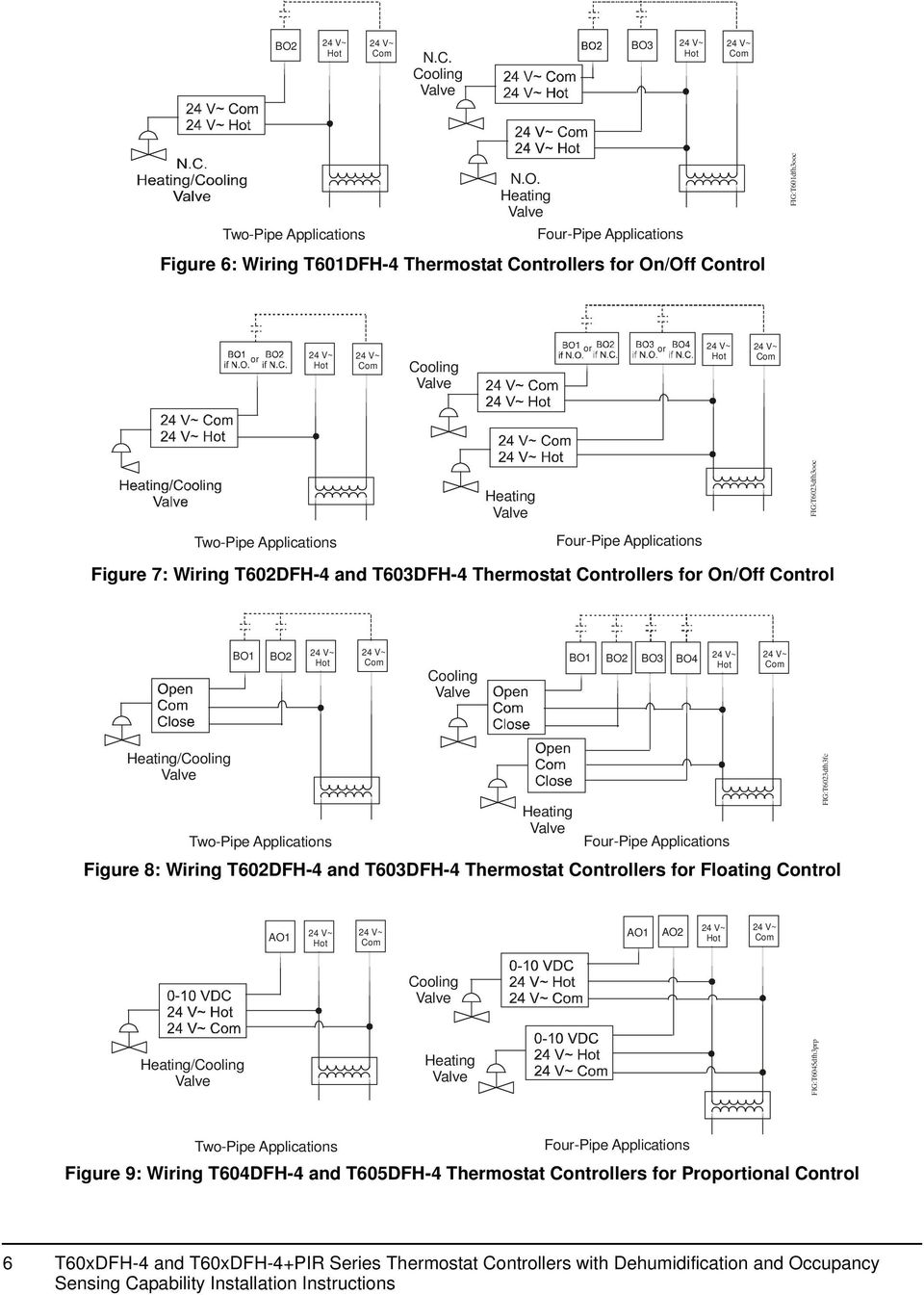
6 BO2 Hot Com N.C. Cooling BO3 Hot Com Two-Pipe Applications N.O. Heating Four-Pipe Applications Figure 6: Wiring T601DFH-4 Thermostat Controllers for On/Off Control FIG:T601dfh3ooc or Hot Com Cooling or or Hot Com Heating FIG:T6023dfh3ooc Two-Pipe Applications Four-Pipe Applications Figure 7: Wiring T602DFH-4 and T603DFH-4 Thermostat Controllers for On/Off Control BO1 BO2 Hot Com Cooling BO1 BO2 BO3 BO4 Hot Com Heating/Cooling Two-Pipe Applications Heating Four-Pipe Applications Figure 8: Wiring T602DFH-4 and T603DFH-4 Thermostat Controllers for Floating Control FIG:T6023dfh3fc AO1 Hot Com AO1 AO2 Hot Com Cooling Heating/Cooling Heating FIG:T6045dfh3prp Two-Pipe Applications Four-Pipe Applications Figure 9: Wiring T604DFH-4 and T605DFH-4 Thermostat Controllers for Proportional Control 6
7 Setup and Adjustments Thermostat Controller Operation Overview Figure 10: Front Cover of Thermostat Controller (T60xDFH-4+PIR Model Shown) Thermostat Controller User Interface Keys The T60x Series Thermostat Controller user interface consists of five keys on the front cover (as illustrated in Figure 10). The function of each key is as follows: Use the MODE key to toggle among the system modes available, as defined by selecting the appropriate operation sequence in the Installer Configuration Menu (for example, Off, Heat, Cool, Auto). Note: If the automatic changeover function (auto function) is enabled in the sequence of operation (SeqOpera), then automatic changeover heating or cooling demand overrides the mode when MODE = off. Use the FAN key to toggle among the fan modes available, as defined by selecting the appropriate fan menu options defined in the Installer Configuration Menu (for example, Low, Med, High, Auto). Use the C/ F key to change the temperature scale to either Celsius or Fahrenheit and allow access to the Installer Configuration Menu. See the Configuring the T60xDFH-4 and T60xDFH-4+PIR Series Thermostat Controller section. Use the UP/DOWN arrow keys to change the configuration parameters and to activate a setpoint adjustment. Backlit LCD The T60x Series Thermostat Controllers include a 2-line, 8-character backlit display. Low-level backlighting is present during normal operation, and it brightens when any user interface key is pressed. The backlight returns to low level when the thermostat controller is left unattended for 45 seconds. LEDs Three LEDs are included to indicate the fan status, call for heat, or call for cooling: The fan LED is on when the fan is on. The heat LED is on when heating is on. The cool LED is on when cooling is on. Integrated PIR Sensor T60xDFH-4+PIR Thermostat Controllers The integrated PIR sensor allows for automatic switching between fully adjustable Occupied and Stand-By temperature setpoints without user interaction. This feature generates incremental energy savings during scheduled occupied periods while the space is unoccupied. 7

8 Status Display Menu The Status Display Menu is displayed during normal thermostat controller operation. This menu continuously scrolls through the following parameters: Room Temperature (All Models) and Humidity (T603DFH-4 and T605DFH-4 Models) Note: For models with dehumidification capability, the default setting is no humidity reading on the display (%RH disp parameter is set to off). The %RH disp parameter must be set to on to display the current humidity reading. System Mode Schedule Status (Occupied/Unoccupied/Override/Stand-By [PIR Models]) Applicable Alarms The backlight lights up as an alarm condition is displayed. Note: An option is available within the Installer Configuration Menu to lock out the scrolling display and show only the Room Temperature parameter. Dehumidification Operation T603DFH-4 and T605DFH-4 Thermostat Controller Models Dehumidification activates when the room humidity is above the adjustable humidity setpoint as sensed by the integral humidity sensor. Note: Dehumidification operation functions only in the Cooling mode; dehumidification operation does not function in either the Off or the Heating mode. The minimum deadband between the Heating and Cooling setpoints is adjustable from 2.0F /1.0C to 5.0F /2.5C, as defined by the Deadband parameter in Table 4. If the room temperature resides in the deadband between the Heating and Cooling setpoints: the thermostat controller forces the fan to low speed the chilled water valve opens to the specified maximum value set by CoolMax the thermostat controller stages Heating to maintain the room temperature at the Cooling setpoint, as sensed by the thermostat controller If the room temperature falls below the result of the formula 1 + Cooling Setpoint Deadband, then the thermostat controller disables dehumidification operation. If the thermostat controller is in Cooling demand: the chilled water valve opens to 100% the thermostat controller stages Heating to maintain the room temperature at the Cooling setpoint, as sensed by the thermostat controller If the thermostat controller is in Cooling demand and the room temperature rises 2F /1C above the Cooling setpoint, the thermostat controller automatically disables dehumidification operation. Likewise, if the thermostat controller is in Cooling demand and the room temperature falls below the current Heating setpoint, the thermostat controller disables dehumidification operation. Occupancy Sensor Operation T60xDFH-4+PIR Thermostat Controllers A T60xDFH-4+PIR Series Thermostat Controller (or a T60xDFH-4 Series Thermostat Controller equipped with a PIR accessory cover) provides advanced occupancy logic. Note: The PIR strategy is an occupied strategy. If the thermostat controller is programmed to be Unoccupied, the PIR function does not have an effect on the occupancy strategy. The thermostat controller automatically switches occupancy levels from Occupied to Stand-By and Unoccupied as required, when local movement is sensed. Occupancy sensing is enabled only if a PIR cover is installed on the thermostat controller (PIR models) or if a remote input is configured as a remote PIR sensor (MotionNO or MotionNC). PIR Warm-Up Period When a PIR cover is used and a thermostat controller is powered up, there is a 1-minute warm-up period before any local movement can be detected and acknowledged by the PIR sensing device. The local status LEDs for the PIR function are not active, and the sensor is in Stand-By mode for the 1-minute period. The PIR functionality and local movement status LEDs are activated after the 1-minute warm-up period has elapsed after the initial powering of the thermostat controller. If movement is present, the mode changes to Occupied. PIR Diagnostic LEDs The diagnostic LEDs inside the PIR lens brighten when movement is detected within the first 30 minutes after powerup. The LEDs do not light up or brighten after the initial 30-minute period. 8

9 Setpoints The Stand-By setpoints are under the same limitations and restrictions as the Occupied and Unoccupied setpoints. Stand-By setpoints reside between the corresponding Occupied and Unoccupied setpoint values. The installer must be certain that the difference between the Stand-By and Occupied values can be recovered within a timely fashion to ensure occupancy comfort. In addition, the difference between the two values must be large enough to warrant maximum energy savings. Unocc Heat = 65 F St-By Heat = 69 F Occ Heat = 72 F Occ Cool = 75 F St-By Cool = 78 F Room Temperature FIG:rm_tmp Figure 11: Increasing Room Temperature Setpoints Hotel and lodging applications can benefit from the addition of an entry door switch wired to one of the binary inputs of the thermostat controller. When a door contact is used and configured, the Stand-By timer and its configuration are no longer active or used. The occupancy toggle between Occupied and Stand-By is then dictated by both the door contact and the PIR sensing device used. If movements are detected by the PIR sensor and the door is closed, the room is considered occupied. The thermostat controller switches back to Stand-By mode only if the door switch toggles open/closed. Motion is ignored when the door switch indicates an open door. PIR occupancy functionality is dictated by both the Stand-By timer and Unoccupied timer configuration value and movements present in the area. Unoccupied Timer Disable It might be preferable for the local area to stay out of Unoccupied mode and always stay at the Stand-By occupancy level when no activity is present. In instances when areas always need to be on Stand-By status, ready to respond to demand at any given point in time, we recommend disabling the Unoccupied timer. When the local PIR occupancy routine is running at the thermostat controller, the zone drifts into Unoccupied mode when the Unoccupied timer is set above its factory default value of 0.0 hours. Figure 12: Unoccupied Timer Set to 6 Hours and Stand-By Timer Set to 2 Hours 9

10 Figure 13: Unoccupied Timer Set to 0 Hours and Stand-By Timer Set to 2 Hours When the local PIR occupancy routine is running at the thermostat controller, the zone never drifts into Unoccupied mode when the Unoccupied timer is set to its factory default value of 0.0 hours. Refer to the T60xDFH-4 and T60xDFH-4+PIR Series Thermostat Controllers with Dehumidification and Occupancy Sensing Capability Application Note (LIT ) for additional application scenarios using various combinations of occupancy levels and door switches. Configuring the T60xDFH-4 and T60xDFH-4+PIR Series Thermostat Controller The T60x Series Thermostat Controller comes from the factory with default settings for all configurable parameters. The default settings are shown in Table 4. To reconfigure the parameters via the thermostat controller, follow the steps in this section. 1. To access the Installer Configuration Menu, press and hold the center key for approximately 8 seconds. Note: If the Password parameter is configured, Password 0 appears on the thermostat controller display indicating that the configured password is required to proceed. Use the UP/DOWN arrow keys to indicate the configured password, then press the MODE key to proceed through the Installer Configuration Menu parameters. 2. Once the Installer Configuration Menu begins, press and release the center key to scroll through the parameters listed in Table When the desired parameter is displayed, use the UP/DOWN arrow keys to choose the desired selection option. 4. Press and release the center key to continue scrolling through the parameters. Note: Pressing the FAN key during configuration restarts the list of displayed parameters at the first parameter listed in Table 4. When the thermostat controller is in the Installer Configuration Menu and left unattended for approximately 8 seconds, the thermostat controller reverts to the Status Display Menu. Configuring Inputs BI1, BI2, and UI3 When BI1 and BI2 are configured for an alarm condition, an alarm condition is displayed locally when the input is closed. An alarm message is included on the scrolling Status Display Menu and when the message is displayed, the backlight momentarily lights up. The UI3 input provides changeover of hot/cold water switching or supply air temperature monitoring at the thermostat controller. Each input can be configured to the selection options included in Table 4. Configuring the Sequence of Operation (SeqOpera) Choose the appropriate sequence of operation using Table 2 or Table 3. The modes presented are userdependent on the sequence of operation selected. For two-pipe applications using a changeover sensor, choose the selection option (0): Cooling Only. Changeover occurs between Cooling Only and Heating Only. See Figure 14 through Figure 19 for sequence of operation examples. 10

11 Table 2: Selection Options for Sequence of Operation in Two-Pipe Applications Selection Option Control Curve (0): Cooling Only See Figure : Normally Open (N.O.) Cooling 11: Normally Closed (N.C.) Cooling (1): Heating Only See Figure : N.O. Heating 11: N.C. Heating (2): Cooling and Reheat See Figure and 7: Reheat 10: N.O. Cooling 11: N.C. Cooling (3): Heating and Reheat See Figure and 7: Reheat 10: N.O. Heating 11: N.C. Heating Terminal Numbers Used (See Table 1 and Figure 5.) On/Off Control Floating Control Proportional 0to10VDC Control 10: Open Cooling 11: Closed Cooling 10: Open Heating 11: Closed Heating 6 and 7: Reheat 10: Open Cooling 11: Closed Cooling 6 and 7: Reheat 10: Open Heating 11: Closed Heating Table 3: Selection Options for Sequence of Operation in Four-Pipe Applications Selection Option Control Curve (0): Cooling Only See Figure : N.O. Cooling 11: N.C. Cooling (1): Heating Only See Figure 15. 8: N.O. Heating 9: N.C. Heating (2): Cooling and Reheat See Figure and 7: Reheat 10: N.O. Cooling 11: N.C. Cooling (3): Heating and Reheat See Figure and 7: Reheat 8: N.O. Heating 9: N.C. Heating (4): Cool/Heat Four-Pipe See Figure 18. 8: N.O. Heating 9: N.C. Heating 10: N.O. Cooling 11: N.C. Cooling (5): Cool/Heat Four-Pipe and Reheat See Figure : Proportional Cooling 10: Proportional Heating 6 and 7: Reheat 10: Proportional Cooling 6 and 7: Reheat 10: Proportional Heating Terminal Numbers Used (See Table 1 and Figure 5.) On/Off Control Floating Control Proportional 0to10VDC Control 6 and 7: Reheat 8: N.O. Heating 9: N.C. Heating 10: N.O. Cooling 11: N.C. Cooling 10: Open Cooling 11: Closed Cooling 8: Open Heating 9: Closed Heating 6 and 7: Reheat 10: Open Cooling 11: Closed Cooling 6 and 7: Reheat 8: Open Heating 9: Closed Heating 8: Open Heating 9: Closed Heating 10: Open Cooling 11: Closed Cooling 6 and 7: Reheat 8: Open Heating 9: Closed Heating 10: Open Cooling 11: Closed Cooling 10: Proportional Cooling 9: Proportional Heating 6 and 7: Reheat 10: Proportional Cooling 6 and 7: Reheat 9: Proportional Heating 9: Proportional Heating 10: Proportional Cooling 6 and 7: Reheat 9: Proportional Heating 10: Proportional Cooling 11

12 Cooling Setpoint On Device Opened On Reheat Off Device Closed On/Off, Floating, or Proportional Output Off 100% Temperature Increase (Increments of 1F /0.5C ) Figure 14: Cooling Only, Two- or Four-Pipe Applications FIG:clng_nly On/Off, Floating, or Proportional Output 0% Device Opened On/Off, Floating, or Proportional Output Heating Setpoint Device Closed Temperature Increase (Increments of 1F /0.5C ) Figure 15: Heating Only, Two- or Four-Pipe Applications Heating Output FIG:htng_nly Device Opened Temperature Increase (Increments of 1F /0.5C ) Figure 17: Heating with Reheat, Two- or Four-Pipe Applications Heating Setpoint Deadband Heating Output Cooling Output Cooling Setpoint FIG:htg_wth_rht Device Opened Heating Setpoint Cooling Output Cooling Setpoint Device Closed Device Closed On/Off, Floating, or Proportional Outputs On Deadband Device Opened Temperature Increase (Increments of 1F /0.5C ) FIG:htng_clng On Reheat Off Off Device Closed On/Off, Floating, or Proportional Outputs Figure 18: Heating/Cooling, Four-Pipe Applications Temperature Increase (Increments of 1F /0.5C ) FIG:clng_wth_rht Figure 16: Cooling with Reheat, Two- or Four-Pipe Applications 12

13 On/Off, Floating, or Proportional Outputs Heating Output Cooling Output On Heating Setpoint Cooling Setpoint On Reheat Output Off Off Device Opened Deadband Device Opened Device Closed Device Closed Temperature Increase (Increments of 1F /0.5C ) FIG:htng_clng_rht Configuring Automatic Fan Speed Use the Fan Menu parameter in the Installer Configuration Menu to set the available fan mode options. Use the FAN key to select the desired fan mode option. Figure 19: Heating/Cooling with Reheat, Four-Pipe Applications When selection option (2): Low-Med-High-Auto is chosen in the Fan Menu parameter, the fan operates as shown in Figure 20. When selection option (3): Low-High-Auto is chosen in the Fan Menu parameter, the fan operates at only the low and high settings and ignores the medium setting (Figure 20). This operation applies to the Occupied mode when the fan is set to Auto. Fan Speed High Medium On Off Low On Off Heating Setpoint The fan is off between the heating and cooling setpoints if the Auto Fan parameter is set to AS AD. Cooling Setpoint Off On Off On 100% Heating 2.0F /1.0C to 5.0F /2.5C Deadband Cooling 0% FIG:fn_oprtn Temperature Deviation from Setpoint, F Figure 20: Low-Med-High-Auto and Low-High-Auto Fan Operation 13

14 Table 4: Installer Configuration Menu (Part 1 of 7) Parameter Appearing on Display Description and Default Selection Options Pswrd Sets the protective access password to prevent unauthorized access to the Installer Configuration Menu. Default: 0 Note: The default setting does not lock out access to the Installer Configuration Menu. BI1 Configuration of Binary Input 1. Default: None Range: 0 to 1,000 (None): No function is associated with an input. (Rem NSB): Remote Night Setback (NSB) via a time clock input, an occupancy sensor, or from a voltage-free contact. Contact open = Occupied; contact closed = Unoccupied. (MotionNO*): Temporary occupancy request via a motion detector input. Contact open = Unoccupied. When the contact closes, the thermostat controller goes into the Occupied mode for a specified TOccTime. Once the TOccTime begins, the thermostat controller remains in the Occupied mode if the contact is open, until the TOccTime expires. Advanced PIR occupancy functions using a Normally Open (N.O.) or Normally Closed (N.C.) remote PIR motion sensor. (MotionNC*): Temporary occupancy request via a motion detector input. Contact closed = Unoccupied. When the contact opens, the thermostat controller goes into the Occupied mode for a specified TOccTime. Once the TOccTime begins, the thermostat controller remains in the Occupied mode if the contact is closed, until the TOccTime expires. Advanced PIR occupancy functions using a Normally Open (N.O.) or Normally Closed (N.C.) remote PIR motion sensor. (Window): Cancels the thermostat controller heating or cooling action when a window is open. The fan operation is only affected if the Fan Menu parameter is set to (4): On-Auto, and Auto is the selected fan mode. A Window alarm is displayed indicating that the window needs to be closed to resume heating or cooling. The heating and/or cooling outputs are enabled only when the contact is closed. * These settings disable any local override function. For PIR models, see the Occupancy Sensor Operation T60xDFH-4+PIR Thermostat Controllers section. 14

15 Table 4: Installer Configuration Menu (Part 2 of 7) Parameter Appearing on Display Description and Default Selection Options BI2 Configuration of Binary Input 2. Default: None UI3 Configuration of Universal Input 3. Default: None MenuScro AutoMode %RH disp Gives the option of having the display continuously scroll the parameters. Default: on Enables the auto function to be visible within the MODE key menu. (The MODE key is the key at the far left of the thermostat controller cover.) Default: off Displays the current humidity reading (T603 and T605 models). Default: off (None): No function is associated with an input. (Door Dry): Door contact only has an effect if BI1 is set to MotionNO or MotionNC or if a PIR accessory cover is used. (See the BI1 parameter earlier in this table.) The occupancy is now dictated via BI1, BI2, or PIR. Any motion detected sets the zone to Occupied status. The thermostat controller remains in the Occupied mode until the door contact switch opens momentarily, at which point the thermostat controller goes into Stand-By mode. If more movements are detected, the Occupied mode resumes. While the door is open, any movements detected by the PIR sensor are ignored. Use a Normally Closed (N.C.) switching device. (Contact open = door open; contact closed = door closed.) (RemOVR): Temporary occupancy request via a remote input. This override function is controlled by a manual remote occupancy override. When enabled, this condition disables the override capability of the thermostat controller. (Filter): A Filter alarm is displayed. This alarm can be connected to a differential pressure switch that monitors a filter. (Service): A Service alarm is displayed on the thermostat controller when the input is energized. This input can be tied into the air conditioning unit control card, which provides an alarm should there be a malfunction. (None): No function is associated with an input. (COC/NH): Changeover Contact/Normally Heat: A dry contact input is used to signal seasonal hot/cold water changeover. The contact closes when cold water is present. Valid only for two-pipe systems. (COC/NC): Changeover Contact/Normally Cool: A dry contact input is used to signal seasonal hot/cold water changeover. The contact closes when hot water is present. Valid only for two-pipe systems. (COS): Changeover Analog Sensor: Used for hot/cold water changeover switching. Valid only for two-pipe systems. (Parameter Pipe No is set to 2.0.) If the water temperature is greater than 75 F/ 24 C, hot water is present. If the water temperature is less than 75 F/24 C, cold water is present. Note: Choose the selection option (0): Cooling Only for the SeqOpera parameter to allow changeover to occur between Cooling Only and Heating Only. The changeover sensor does not operate in Cooling and Reheat, Heating and Reheat, or Cool/ Heat Four-Pipe and Reheat applications. (SS): Supply Air Sensor Monitoring (off): The scroll is inactive. (on): The scroll is active. (on): The auto function is active (Off-Auto-Heat-Cool). Provides automatic changeover between heating and cooling. (off): The auto function is inactive (Off-Heat-Cool). (on): Displays the current humidity reading in % RH. (off): Does not display the current humidity reading. 15

16 Table 4: Installer Configuration Menu (Part 3 of 7) Parameter Appearing on Display Description and Default Selection Options Lockout Pipe No CntrlTyp SeqOpera Fan Menu Selectable Lockout Levels for limiting end-user keypad interaction. Default: 0 Selectable number of pipes in the system. Default: 4.0 Pipes Defines the control output for the type of valves used in the installation (T602 and T603 models). Default: Floating Determines the sequence of operation. Default: 1 Sets the fan mode options. Default: 4 Lockout Level Mode Setting Fan Setting Function Local Override Occupied Temperature Setpoints (0) Access Access Access Access (1) Access Access No Access Access (2) No Access No Access Access Access (3) No Access No Access No Access Access (4) No Access No Access Access No Access (5) No Access No Access No Access No Access (2.0 Pipes): Limits the number of sequences of operation available from 0 to 3, and enables heat/cool operation from the same output. (4.0 Pipes): Allows access to all sequences of operation from 0 to 5, and enables heat/cool operation from different outputs. (On/Off): For Normally Open (N.O.) or Normally Closed (N.C.) 24 VAC two-position valves. (Floating): For three-wire control of 24 VAC floating valves. Sequence of Operation Default Based on AutoMode Parameter Setting On Off (0): Cooling Only (Off-Cool) Cool Cool (1): Heating Only (Off-Heat) Heat Heat (2): Cooling and Reheat (Off-Auto*- Auto Heat Heat-Cool) (3): Heating and Reheat (Off-Heat) Heat Heat (4):Cool/Heat Four-Pipe (Off-Auto*- Auto Heat Heat-Cool) (5): Cool/Heat Four-Pipe and Reheat Auto Heat (Off-Auto*-Heat-Cool) * Auto can be disabled with the AutoMode parameter. Note: Choose the selection option (0): Cooling Only when using a changeover sensor to allow changeover to occur between Cooling Only and Heating Only. Note: Default parameter settings are always equal to off when the mode is equal to off. (0): Low-Med-High: Three-speed configuration using three fan relays (L-M-H). The default is High. (1): Low-High: Two-speed configuration using two fan relays (L-H). The default is High. (2): Low-Med-High-Auto: Three-speed configuration with Auto Fan speed mode using three fan relays (L-M-H). The default is High. (3): Low-High-Auto: Two-speed configuration with Auto Fan speed mode using two fan relays (L-H). The default is High. (4): On-Auto: One-speed configuration, (H) Auto is for Fan on demand and On is for Fan on all the time. The default is Auto. 16

17 Table 4: Installer Configuration Menu (Part 4 of 7) Parameter Appearing on Display Description and Default Selection Options DHumiLCK %RH set 1 DehuHyst 1 DehuCool 1 St-By TM Unocc TM St-By HT St-By CL Locks out the dehumidification capability (T603 and T605 models). Default: on Sets the dehumidification setpoints (T603 and T605 models). This parameter can be used only if the dehumidification sequence is enabled. Default: 50.0% RH Sets the dehumidification hysteresis (T603 and T605 models). This parameter can be used only if the dehumidification sequence is enabled. Default: 5.0% RH Sets the maximum dehumidification cooling output (T603 and T605 models). This parameter can be used only if the dehumidification sequence is enabled. Default: 100% Sets the Stand-By timer value (PIR models). Default: 0.5 hours Sets the Unoccupied timer value (PIR models). Default: 0.0 hours Sets the Stand-By heating setpoint (PIR models). Default: 69.0 F/20.5 C Sets the Stand-By cooling setpoint (PIR models). Default: 78.0 F/25.5 C (off): Dehumidification is locked out. (on): Dehumidification is allowed. Range: 30.0 to 95.0% RH Range: 2.0 to 20.0% RH Range: 20.0 to 100.0% Note: This parameter can be used to balance smaller reheat loads installed with regard to the capacity of the cooling coil. Time delay between the moment the PIR cover detected the last movement in the area and the time at which the thermostat controller Stand-By mode and setpoints become active. Range: 0.5 to 24.0 hrs adjustable in 0.5-hour increments Time delay between the moment the thermostat controller toggled to Stand-By mode and the time at which the thermostat controller Unoccupied mode and setpoints become active. Setting this parameter to the factory value (0.0 hours) disables the Unoccupied timer. This prevents the thermostat controller from switching from Stand-By mode to Unoccupied mode when PIR functions are used. Range: 0.0 to 24.0 hrs adjustable in 0.5-hour increments The value of this parameter should reside between the Occupied and Unoccupied heating setpoints, and ensure that the difference between the Stand-By and Occupied value can be recovered in a timely fashion when movement is detected in the zone. Range: 40.0 F/4.5 C to 90.0 F/32.0 C The value of this parameter should reside between the Occupied and Unoccupied cooling setpoints, and ensure that the difference between the Stand-By and Occupied value can be recovered in a timely fashion when movement is detected in the zone. Range: 54.0 F/12.0 C to F/37.5 C 17

18 Table 4: Installer Configuration Menu (Part 5 of 7) Parameter Appearing on Display Description and Default Selection Options Unocc HT Unocc CL Heat max Cool min Pband Set type Spt Func Sets the Unoccupied heating setpoint value. Default: 62.0 F/16.5 C Sets the Unoccupied cooling setpoint value. Default: 80.0 F/26.5 C Sets the Occupied and Unoccupied maximum heating setpoint values. Default: 90.0 F/32.0 C Sets the Occupied and Unoccupied minimum cooling setpoint values. Default: 54.0 F/12.0 C Sets the proportional band used by the thermostat controller Proportional-Integral (PI) control loop. Default: 3.0F /1.7C Note: The proportional band default setting of 3.0F /1.7C provides satisfactory thermostat controller operation in most instances. A proportional band setting other than the default is normally used in installations where the location of the thermostat controller is problematic, leading to unwanted cycling. An example of a problematic installation is a wallmounted thermostat controller installed between the return and supply air feeds, that is directly influenced by the supply air stream. Provides the option of temporarily changing the heating or cooling setpoint by pressing the UP/DOWN arrow keys. Default: permnent Determines the operation and usage of the local setpoint interface by the user. Default: Dual Stp Range: 40.0 F/4.5 C to 90.0 F/32.0 C Range: 54.0 F/12.0 C to F/37.5 C Range: 40.0 F/4.5 C to 90.0 F/32.0 C Range: 54.0 F/12.0 C to F/37.5 C (3): 3.0F /1.7C (4): 4.0F /2.2C (5): 5.0F /2.8C (6): 6.0F /3.3C (7): 7.0F /3.9C (8): 8.0F /4.4C (9): 9.0F /5.0C (10): 10.0F /5.6C Note: When adjusting the temperature, press the UP/ DOWN arrow keys to change the temperature in 0.5F /0.5C increments; press and hold the UP/DOWN arrow keys to change the temperature in 5.0F /5.0C increments. (temporar): Local changes to the heating or cooling setpoints are temporary, and remain effective for the specified TOccTime. (permnent): Local changes to the heating or cooling setpoints are permanently stored in the thermostat memory. (Attch Stp): Single Occupied Setpoint Adjustment. The displayed setpoint is the setpoint from the last action taken by the thermostat controller, or the setpoint currently in use. Both the heating and cooling setpoints are changed simultaneously, while respecting the minimum configured deadband. If one setpoint is desired over the other, use the MODE key to toggle between the two setpoints. (Dual Stp): Dual Occupied Setpoint Adjustment. The displayed setpoint is the setpoint from the last action taken by the thermostat controller, or the setpoint currently in use. The heating and cooling setpoints can be separated individually, allowing the minimum configured deadband to expand. If one setpoint is desired over the other, use the MODE key to toggle between the two setpoints. 18

19 Table 4: Installer Configuration Menu (Part 6 of 7) Parameter Appearing on Display Description and Default Selection Options TOccTime Deadband Cal RS Cal RH Aux cont Sets the duration of the Temporary Occupancy Time when the heating or cooling setpoints in the Occupied mode are established by: an override function enabled from a remote override (when the thermostat controller is in the Unoccupied mode) a temporary heating or cooling setpoint Default: 2.0 hrs Sets the minimum deadband between the heating and cooling setpoints. Default: 2.0F /1.0C Sets the desired room air temperature sensor calibration (offset). The offset can be added to or subtracted from the actual displayed room temperature. Default: 0.0F /0.0C Sets the desired humidity sensor calibration (offset). The offset can be added to or subtracted from the actual displayed room humidity (T603 and T605 models). This parameter can be used only if the dehumidification sequence is enabled. Default: 0.0% RH Determines the auxiliary contact function and configuration. Default: 0 Range: 0.0 to 24.0 hrs adjustable in 1-hour increments Range: 2.0F /1.0C to 5.0F /2.5C adjustable in 1.0F /0.5C increments Range: -5.0F /-2.5C to 5.0F /2.5C adjustable in 1.0F /0.5C increments Range: -15.0% RH to 15.0% RH adjustable in 1% RH increments (0) Not used, or used for reheat (1) Auxiliary N.O. (2) Auxiliary N.C. (3) Auxiliary N.O. (4) Auxiliary N.C. If the sequence of operation is set to reheat (2, 3, or 5), ignore this parameter. Occupied = contact closed Unoccupied = contact open Occupied = contact open Unoccupied = contact closed Occupied and fan On = contact closed Unoccupied and fan On or Off = contact open Occupied and fan On = contact open Unoccupied and fan On or Off = contact closed The output aligns with occupancy. The output aligns with occupancy and the fan on command. Note: The contact toggles with the Occupied/Unoccupied schedule of the NSB contact on BI1, if used. 19

20 Table 4: Installer Configuration Menu (Part 7 of 7) Parameter Description and Default Selection Options Appearing on Display Auto Fan Affects the auto mode of operation for the following Fan Menu parameter selection options only: (AS AD): The fan is on Auto during occupied periods. The Med and High speeds operate automatically on a temperature error from the setpoint. The Low speed operates Auto on demand. When there is (2): Low-Med-High-Auto no demand, the Low speed shuts down. The Low speed is only reactivated when there is a heating or cooling demand. (3): Low-High-Auto Default: AS (AS): The fan is always on during occupied periods. The fan is on Auto during unoccupied periods. The Low, Med, and High speeds operate automatically on a temperature error from the setpoint. FL time Cph RA/DA Reheat UI3 dis Sets the maximum actuator stroke timing (floating CntrlTyp T602 and T603 models). Default: 1.5 min Sets the maximum number of cycles per hour (T601 and on/off CntrlTyp T602 and T603 models). Default: 4.0 Choice of reverse or direct acting analog output signal (T604 and T605 models) Default: DA Sets the duty cycle time for reheat output (if Option 2, 3, or 5 is chosen in the SeqOpera parameter). Default: 0 Displays the supply or changeover temperature when UI3 is configured as an analog input (supply sensor or changeover sensor). Default: -40 F/-40 C Range: 0.5 to 9.0 min adjustable in 0.5-minute increments Range: 3.0 to 8.0 cycles per hour (RA): Reverse acting, 0 to 100% = 10 to 0 VDC (DA): Direct acting, 0 to 100% = 0 to 10 VDC (1): 10 seconds (six cycles per minute), for various equipment with solid-state relays that withstand short duty cycles such as electric heat. (0): 15 minutes (four cycles per hour), for various equipment with mechanical relays or contactors controlling mechanical reheat systems. Used as a diagnostic/service help, to troubleshoot and diagnose sensor operation. 1. When adjusting the numeric value, press the UP/DOWN arrow key to change the value by single increments; press and hold the UP/DOWN arrow key to change the numeric value in increments of ten. Accessories All the accessories in Table 5 include mounting hardware; contact the nearest Johnson Controls representative to order any of these parts. Note: Review the technical specifications of the accessories prior to their use in an application. Repair Information If the T60xDFH-4 or T60xDFH-4+PIR Series Thermostat Controller fails to operate within its specifications, replace the unit. For a replacement thermostat controller, contact the nearest Johnson Controls representative. 20

21 Table 5: Accessories (Order Separately) Code Number Description SEN Remote Inside Air Temperature Sensor TE-6361M-1 1 Duct Mount Air Temperature Sensor TE-636S-1 1 Strap-Mount Temperature Sensor TEC-6H-PIR 2 Cover with Occupancy Sensor 1. Additional TE-636xx-x Series 10k ohm Johnson Controls Type II Thermistor Sensors are available; refer to the TE-6300 Series Temperature Sensors Product Bulletin (LIT ) for more details. 2. The TEC-6H-PIR Accessory Cover can be used to replace the existing cover on a non-pir T60xDFH-4 Series Thermostat Controller to provide occupancy sensing capability. Table 6: Display Messages Display Function Service Indicates that there is a service alarm in accordance with the programmable Binary Input (BI2). Filter Indicates that the filter(s) is dirty in accordance with the programmable Binary Input (BI2). Window Indicates that an outside window or door is open and has cancelled the thermostat controller heating or cooling action in accordance with the programmable Binary Input (BI1). Technical Specifications T60xDFH-4 and T60xDFH-4+PIR Series Thermostat Controllers with Dehumidification and Occupancy Sensing Capability (Part 1 of 2) Power Requirements Relay/Triac Contact Rating Analog Output Rating On/Off and Floating Control Proportional Control Fan Relay Output Rating Auxiliary Triac Output Output Rating Digital Inputs Analog Inputs 19 to 30 VAC, 50/60 Hz, 2 VA (Terminals 4 and 5) at 24 VAC Nominal, Class 2 or Safety Extra-Low Voltage (SELV) 30 VAC, 1.0 A Maximum, 15 ma Minimum, 3.0 A Inrush, Class 2 or SELV 0 to 10 VDC into 2k ohm Resistance (Minimum) 19 to 30 VAC, 1.0 A Maximum, 3.0 A Inrush 19 to 30 VAC, 1.0 A Maximum, 3.0 A Inrush Voltage-Free Contacts across Terminal Scom to Terminals BI1, BI2, or UI3 Resistive Inputs (RS and UI3) for 10k ohm Johnson Controls Type II Negative Temperature Coefficient (NTC) Thermistor Sensors Temperature Sensor Type Local 10k ohm Johnson Controls Type II NTC Thermistor Sensor Wire Size 18 AWG (1.0 mm Diameter) Maximum, 22 AWG (0.6 mm Diameter) Recommended Temperature Backlit Display F/-40.0 C to F/50.0 C in 0.5 Increments Range Heating Control 40.0 F/4.5 C to 90.0 F/32.0 C Cooling 54.0 F/12.0 C to F/38.0 C Control Accuracy Temperature ±0.9F /±0.5C at 70.0 F/21.0 C Typical Calibrated Humidity ±5% RH from 20 to 80% RH at 50 to 90 F (10 to 32 C) Minimum Deadband 2F /1C between Heating and Cooling Ambient Operating 32 to 122 F (0 to 50 C); 95% RH Maximum, Noncondensing Conditions Storage -22 to 122 F (-30 to 50 C); 95% RH Maximum, Noncondensing 21
22 T60xDFH-4 and T60xDFH-4+PIR Series Thermostat Controllers with Dehumidification and Occupancy Sensing Capability (Part 2 of 2) Compliance United States UL Listed, File E27734, CCN XAPX, Under UL 873, Temperature Indicating and Regulating Equipment FCC Compliant to CFR 47, Part 15, Subpart B, Class A Shipping Weight Canada Europe Australia and New Zealand T60xDFH-4 Models T60xDFH-4+PIR Models UL Listed, File E27734, CCN XAPX7, Under CAN/CSA C22.2 No. 24, Temperature Indicating and Regulating Equipment Industry Canada, ICES-003 CE Mark - Johnson Controls, Inc., declares that this product is in compliance with the essential requirements and other relevant provisions of the EMC Directive 2004/108/EC. C-Tick Mark, Australia/NZ Emissions Compliant 0.75 lb (0.34 kg) 0.77 lb (0.35 kg) The performance specifications are nominal and conform to acceptable industry standards. For application at conditions beyond these specifications, consult the local Johnson Controls office. Johnson Controls, Inc. shall not be liable for damages resulting from misapplication or misuse of its products. 22 Published in U.S.A. Building Efficiency 507 E. Michigan Street, Milwaukee, WI Metasys and Johnson Controls are registered trademarks of Johnson Controls, Inc. All other marks herein are the marks of their respective owners Johnson Controls, Inc.
Installation Instructions. Applications. North American Emissions Compliance. Installation
 TEC26x6(H)-4 and TEC26x6H-4+PIR Series BACnet MS/TP Networked Thermostat Controllers with Dehumidification Capability, Fan Control, and Occupancy Sensing Capability Installation Instructions Part No. 24-9890-1001,
English plain text messages with constant backlight that brightens during user interaction. On/Off, Floating, or Proportional 0 to 10 VDC Control
 TEC26x6(H)-4 and TEC26x6H-4+PIR Series BACnet MS/TP Networked Thermostat Controllers with Dehumidification Capability, Fan Control, and Occupancy Sensing Capability Product Bulletin Code No. LIT-12011587
Protects against unwanted thermostat controller tampering. Increases occupancy comfort by providing dehumidification.
 TEC22x6(H)-4 and TEC22x6H-4+PIR Series LONWORKS Network Thermostat Controllers with Dehumidification Capability, Fan Control, and Occupancy Sensing Capability Product Bulletin Code No. LIT-12011607 Issued
T600MEP-4 and T600MEP-4+PIR Multi-Stage Economizer Thermostat Controllers
 T600MEP-4 and T600MEP-4+PIR Multi-Stage Economizer Thermostat Controllers Installation Instructions T600MEP-4, T600MEP-4+PIR Part No. 24-9890-943, Rev. Issued September 17, 2009 Applications The T600MEP-4
T600xxx-4 and T600xxx-4+PIR Series Thermostat Controllers
 T600xxx-4 and T600xxx-4+PIR Series Thermostat Controllers Product Bulletin T600HCx-4, T600HPx-4, T600MSx-4, T600MEP-4, T600HCx-4+PIR, T600HPx-4+PIR, T600MSx-4+PIR, T600MEP-4+PIR The T600xxN-4 and T600xxN-4+PIR
TEC22x1-3 LONWORKS Networked Single Stage Thermostats
 TEC22x1-3 LONWORKS Networked Single Stage Thermostats Installation Instructions Part No. 24-9890-463, Rev. Issued September 8, 2006 Applications The TEC2261-3 programmable and TEC2201-3 non-programmable
TEC Series BACnet MS/TP Network Temperature and Humidity Controllers
 TEC Series BACnet MS/TP Network Temperature and Humidity Controllers Technical Bulletin Code No. LIT-12011592 Issued March 4, 2013 Supersedes May 13, 2011 Refer to the QuickLIT Web site for the most up-to-date
TEC2602-4 and TEC2602-4+PIR BACnet MS/TP Networked Heat Pump Thermostat Controllers
 TEC2602-4 and TEC2602-4+PIR BACnet MS/TP Networked Heat Pump Thermostat Controllers TEC2602-4 and TEC2602-4+PIR Applications The TEC2602-4 and TEC2602-4+PIR Thermostat Controllers are BACnet Master-Slave/
TEC2001-4 and TEC2001-4+PIR Single-Stage Wireless Thermostat Controllers
 TEC2001-4 and TEC2001-4+PIR Single-Stage Wireless Thermostat Controllers Installation Instructions TEC2001-4 and TEC2001-4+PIR Part No. 24-9890-1125, Rev. B Issued July 13, 2010 Supersedes May 17, 2010
TEC2664Z-3 BACnet MS/TP Rooftop Controller for Stand-Alone and Networked Zoning Systems Part No. 24-9890-1362, Rev.
 TEC2664Z-3 BACnet MS/TP Rooftop Controller for Stand-Alone and Networked Zoning Systems Part No. 24-9890-1362, Rev. Issued May 13, 2011 Applications The TEC2664Z-3 Rooftop Controller is a BACnet Master-Slave/Token-Passing
CD-Pxx-00-1 Series Duct Mount CO 2 Transmitter
 CD-Pxx-00-1 Series Duct Mount CO 2 Transmitter Product Bulletin CD-Pxx-00-1 Code No. LIT-216525 Issued December 6, 2010 Supersedes September 12, 2008 Johnson Controls offers a complete line of Carbon Dioxide
M9102-AGA-2S, -3S and M9104-xxA-2S, -3S Series Electric Non-Spring Return Actuators
 M9102-AGA-2S, -3S and M9104-xxA-2S, -3S Series Electric Non-Spring Return Actuators Product Bulletin Code No. LIT-1201742 Issued February 12, 2015 The M9102 and M9104 Series Actuators are directmount,
Table of Contents. 1 - Specifications...3. 2 - Installation...3. 3 - Wiring...5. 4 - User controls...7
 THERMOSTATS Table of Contents Page 1 - Specifications...3 1.1 - Product range...3 ARTTH001 (DSL-610)...3 ARTTH002 (DSL-700)...3 ARTTH003 (DSL-600)...3 1.2 - Technical data...3 1.3 - Power failures...3
T5000 T000 LCD Digital Fan Coil Thermostat
 T5000 T000 LCD Digital Fan Coil Thermostat T000 LCD Digital Fan Coil Thermostat T000 LCD Digital Fan Coil Thermostats are designed to control heating, cooling, or year round air conditioning unit in Commercial,
FX07 Field Controller
 Product Bulletin FX07 Field Controller Issue Date March 25, 2008 FX07 Field Controller The FX07 is a high performance field controller designed specifically for commercial Heating, Ventilating, Air Conditioning,
ETC TWO STAGE ELECTRONIC TEMPERATURE CONTROL
 RANCO INSTALLATION INSTRUCTIONS ETC TWO STAGE ELECTRONIC TEMPERATURE CONTROL Relay Electrical Ratings PRODUCT DESCRIPTION The Ranco ETC is a microprocessor-based family of electronic temperature controls,
Installation Guide. VisionPRO. TH8000 Series. Need Help? This manual covers the following models. System Types
 Installation Guide VisionPRO TH8000 Series Touch-screen Programmable Thermostat This manual covers the following models TH8110U: For 1 Heat/1 Cool systems TH8320U: For up to 3 Heat/2 Cool systems TH8321U:
Product Catalog. Small Building Systems. www.viconics.com
 Product Catalog Small Building Systems www.viconics.com Table of Contents VBZS - Viconics BACnet Zoning System VZ1 VZ7200F5000B Bacnet Zone Thermostat... VZ5 VZ7656B1000B Bacnet Rooftop Unit Thermostat...
I nstallation. M100Q Series Proportional Actuator with R81Q Controller Board for Thermistor Sensor Applications. Tools Needed.
 FANs 268.1, 1628.3 Installation Bulletin M100Q Issue Date 1099 M100Q Series Proportional Actuator with R81Q Controller Board for Thermistor Sensor Applications I nstallation Parts Included M110QGA-1 and
TB7600 Series Communicating RTU Thermostats with Humidity Control
 TB7600 Series Communicating RTU Thermostats with Humidity Control TB7600 Series Thermostat INSTALLATION INSTRUCTIONS APPLICATION The TB7600 Series PI thermostat family is specifically designed for single
Installing the Tracer ZN517 Unitary Controller Ordering number: 4950 0496, 4950 0596
 Installing the Tracer ZN517 Unitary Controller Ordering number: 4950 0496, 4950 0596 Product overview The Tracer ZN517 controller is a field-installed, application-specific controller that provides directdigital
TABLE 1: Wiring Terminals. Connect to... 1C 1H 2C 2H 1H1C 2H1C 2H2C 3H2C
 Installation TURN OFF POWER TO THE SYSTEM AT THE MAIN POWER PANEL TO AVOID ELECTRICAL SHOCK. Installation should be carried out by an electrician or a qualified technician. 1.1 Find a Location for the
T6861 Series Large LCD Digital Thermostat 110/220 VAC 2-pipe/4-pipe fan coil control
 T Series arge CD Digital Thermostat 0/0 VAC -pipe/-pipe fan coil control Data sheet Application T digital thermostats are designed for application of -speed fan and s in fan coil system. Including: -pipe
Installation Instructions
 TP-PRH-A, TP-NRH-A Performance Series Edge Thermidistat Control Installation Instructions Programmable Control A07049 A07048 Non Programmable Control Designed and Assembled in the USA. NOTE: Read the entire
DUAL SENSING DIGITAL THERMOSTAT PRODUCT INSTRUCTIONS. Construction Automotive Industry
 DUAL SENSING DIGITAL THERMOSTAT PRODUCT INSTRUCTIONS www.rehau.com Construction Automotive Industry SCOPE This guide gives instruction regarding REHAU Programmable Digital Thermostat installation and operation.
FX07 Field Controller
 Product Bulletin FX07 Field Controller Issue Date May 5, 2011 FX07 Field Controller The FX07 is a high performance field controller designed specifically for commercial Heating, Ventilating, Air Conditioning,
HEAT PUMP PROGRAMMABLE THERMOSTAT
 HEAT PUMP PROGRAMMABLE THERMOSTAT SA PM 3 COOL TEMP Form 44014-01 r010408 Model 43168 Owners Manual 1 Congratulations! Heat Pump Programmable Thermostat Model 43168 THERMOSTAT CONTROLS Switches & Buttons...15
UNIFIED FACILITIES GUIDE SPECIFICATIONS
 USACE / NAVFAC / AFCEC / NASA UFGS-23 09 93 (November 2015) ----------------------------- Preparing Activity: USACE Superseding UFGS-23 09 23 (May 2011) UNIFIED FACILITIES GUIDE SPECIFICATIONS References
Variable Air Volume - VAV
 Mode Enable Sensor Options Variable Air Volume - VAV The temperature of this sensor will determine if the unit is in heating, cooling or vent mode during occupied operation. The following options are available:
Communicating Thermostats. Add More Flexibility to Building Automation with New. Communicating Thermostats
 Communicating Thermostats Add More Flexibility to Building Automation with New Communicating Thermostats More Choices. More Possibilities. From zone control to rooftop units and nearly everything in between,
TC-9102 Series Surface Mount Temperature Controllers
 TC-9102 Series Surface Mount Temperature Controllers General Description & Applications The TC-9102 Series Temperature Controller offers a versatile solution for a wide variety of applications that may
Duct Humidity Transmitter
 SDC-H Duct Humidity Transmitter Features Replaceable sensor element Humidity measurement for air ducts Minimum and maximum value memory 0 0V, 0 0mA or 0V, 4 0mA measuring signals selectable with jumpers
Room Controllers. SER8300 Line Voltage Fan Coil Room Controller with SC3000 Relay Pack
 Compatible with SmartStruxure solution SmartStruxure Lite solution Room Controllers Line Voltage Fan Coil Room Controller with SC3000 Relay Pack Application specific controller with customizable covers
User Manual THR840DUK Digital Thermostat
 User Manual THR840DUK Digital Thermostat 50051982-001 Rev. A WARNING: This product must be correctly installed and configured to work properly (see pages 12-24). If you are not experienced in wiring electrical
HEAT HEAT COOL HEAT PUMP COOL
 OWNER S MANUAL RESIDENTIAL THERMOSTAT P/N P374-1800 HEAT COOL HEAT PUMP Su AUTO 0I20: Pm 74 COOL HEAT 27 7-DAY MABLE DIGITAL THERMOSTAT 3 Configurable Outputs Accepts Optional Humidity Module: Control
INSTALLER S & OWNER S MANUAL
 INSTALLER S & OWNER S MANUAL HVAC INSTALLER: PLEASE LEAVE MANUAL FOR HOMEOWNER DEH 3000 DEH 3000 Part No. 4028539 Dehumidifier & Ventilation System Controller P.O. Box 8680 Madison, WI 53708 TOLL-FREE
HE-6800 Series Humidity Transmitters with Temperature Sensor
 HE-6800 Series Humidity Transmitters with Installation Instructions HE-68xx-xN00WS Applications The HE-6800 Series Humidity Transmitters with provide both humidity and temperature sensing in room wall-mount
T7079A,B Solid State Remote Temperature Controllers
 T7079A,B Solid State Remote Temperature Controllers FEATURES PRODUCT DATA Switch selection of heat or cool mode. Temperature sensing up to 400 feet. Does not require field calibration. 0K NTC temperature
PRODUCT PRODUCT CODE TECHNICAL INSTRUCTIONS PAGE
 Table of Contents PRODUCT PRODUCT CODE TECHNICAL INSTRUCTIONS PAGE # Electric Room Comfort Controller NEW! RDY2000 Room Comfort Controller RDY 129-905 D-3 Electric for Specialized Applications Surface
EBDSPIR-PRM, EBDSPIR-PRM-IP
 Product Guide EBDSPIR-PRM, EBDSPIR-PRM-IP Ceiling PIR presence/absence detector Overview The EBDSPIR-PRM PIR (passive infrared) presence detector provides automatic control of lighting loads with optional
Electronic Control Devices The European Product Catalogue 2007
 FX07 Field Controller (1/4) FX07 Field Controller Display Model Dimensions in mm (inches) The FX07 is a terminal unit controller in the Facility Explorer range of products. The controller is designed specifically
T7560A,B,C Digital Wall Module
 T7560A,B,C Digital Wall Module HONEYWELL EXCEL 5000 OPEN SYSTEM BEFORE INSTALLATION All wiring must comply with local electrical codes and ordinances or as specified on installation wiring diagrams. Digital
System 350 A350E Electronic Cooling Control
 FANs 930, 930.5, 125, 121 Product/Technical Bulletin A350E Issue Date 0899 System 350 A350E Electronic Cooling Control The A350E is an on/off, electronic, cooling-only control with Single-Pole, Double-Throw
Installation Guide. LR-HWLV-HVAC TouchPRO Wireless. System Types
 Installation Guide LR-HWLV-HVAC TouchPRO Wireless Touchscreen Thermostat System Types Gas, oil, or electric heat with air conditioning Warm air, hot water, high efficiency furnaces, heat pumps, steam,
Modular Room Control (MRC) Series Digital Thermostat
 Installation Instructions MRC Issue Date August 14, 2002 Modular Room Control (MRC) Series Digital Thermostat Application The MRC Digital Thermostat is an expandable multi-purpose, high-quality Direct
Alpha Climatic Programmable Modulating Boiler Energy Manager. Installation and User Instructions
 Alpha Climatic Programmable Modulating Boiler Energy Manager Part No 3.022144 (Hard Wired) Part No 3.022143 (Radio Frequency) Installation and User Instructions 1. Description The Alpha Climatic energy
2.0 Installation 1. Remove the cover using a small flat blade screwdriver. Figure 2: Cover Removal
 O N DS160/DS161 Installation Guide High Performance Request-to-Exit Sensors 1.0 Description The DS160/161 is a passive-infrared (PIR) detector designed for Request to Exit (REX) interior applications.
Electronic Control Devices The European Product Catalogue 2007
 FX14 Field Controller (1/4) FX14 Field Controller The FX14 is an equipment field controller in the Facility Explorer range of products. The controller is designed specifically for commercial Heating, Ventilating,
1 For All Non-Programmable Digital Thermostat
 OWNER'S MANUAL P/N P474-0100 1 For All Non-Programmable Digital Thermostat TOTALINE 68 Dual Setpoint Very easy to program Thermoglow Backlight No batteries required Auto-Changeover Locking Keypad Meets
Series P215PR/RM Direct- and Remote-Mount Pressure-Actuated Condenser Fan Speed Controllers for Single-Phase Motors
 European Refrigeration Controls Catalogue Catalogue Section 4 Product Bulletin P215PR/RM Issue 01/03/2013 Series P215PR/RM Direct- and Remote-Mount Pressure-Actuated Condenser Fan Speed Controllers for
Radiant Temperature Sensor TY7321
 AB-5361-U Specifications/Instructions Radiant Temperature TY7321 General TY7321 Radiant Temperature s are designed to measure infrared radiation from perimeter windows and walls and provide a proportional
TAC I/NETTM MR-VAV-AX. Application Specific MicroRegulator TM
 TAC I/NETTM TM TAC s TM has an extensive range ofpre-engineered VAV control sequences, which combined with a fully integrated actuator and airflow transducer, makes it a low Total Installed Cost solution
QUICK INSTALLATION GUIDE
 QUICK INSTALLATION GUIDE Read Installer Notes before removing cover from Thermostat. 1F85RF-275 Wireless Remote Kit INSTALLER NOTES IMPORTANT Do not apply power to the thermostat or wireless sensor until
T-4000 Series Pneumatic Room Thermostats
 T-4000 Series Pneumatic Room Thermostats Pneumatic Control Manual 717.1 Room Devices Section Product Bulletin T-4000 Issue Date 1285 Features Adjustable Sensitivities and Set Points Individual Set Points
Install Guide CT100. Caution. Caution ENGLISH. disconnect the power supply before beginning work.
 Install Guide CT100 PG 1 Caution top cover Your thermostat is a precise instrument, handle it with care. Turn off electricity to the system before installing or servicing thermostat or any part of the
Install Guide CT101. Caution. Caution
 Install Guide CT101 PG 1 Caution top cover Your thermostat is a precise instrument, handle it with care. Turn off electricity to the system before installing or servicing thermostat or any part of the
A99B Series Temperature Sensors
 FANs 125, 121, 930, 930.5 Product/Technical Bulletin A99 Issue Date 0615 A99B Series Temperature s The A99B Series Temperature s are passive PTC (Positive Temperature Coefficient) sensors. The A99B sensors
EBDSPIR-DD, EBDSPIR-DD-IP
 Product Guide EBDSPIR-DD, EBDSPIR-DD-IP Ceiling PIR presence detector DALI / DSI dimming Overview The EBDSPIR-DD PIR (passive infrared) presence detector provides automatic control of lighting loads with
Controls for fan coil units and cassettes
 Controls for fan coil units and cassettes Selection of controls for use with fan coil & cassette units. Stand alone, selection guide Control unit Motor Standard QZAZ-04-10 QZAZ-04-20 QZAZ-04-75 QZAZ-05-11
Wireless Thermostats 230v and Battery Operated Instruction Manual
 Wireless Thermostats 230v and Battery Operated Instruction Manual For models: JGSTATW2W JGSTATW2B JGSTATW1W JGSTATW1B Contents Box contents: Wireless Thermostats 230v and Battery Operated Instruction Manual
RDJ10RF/SET. Wireless room temperature controller with 24-hour time switch and LCD. Programmable, for heating systems
 3 072 RDJ10RF RCR10/433 Wireless room temperature controller with 24-hour time switch and LCD Programmable, for heating systems RDJ10RF/SET Operating modes: Automatic, Comfort, Energy Saving, and Frost
USER MANUAL WARNING! CONTENTS MODEL 1 SPECIFICATIONS READ ALL INSTRUCTIONS BEFORE PROCEEDING. Non-Programmable Single Stage Heat/Cool Thermostat
 Builder MODEL 1010 Series Non-Programmable Single Stage Heat/Cool Thermostat USER MANUAL Compatible with low voltage single stage gas, oil or electric heating or cooling systems, including single stage
How To Control A Thermostat
 CONTENTS Installation Instructions for Heating & Air Conditioning 1F72 5/2 Day Programmable Heat Pump Thermostat Preparations... 1 Thermostat Details... 1 Removing Old Thermostat... 1-2 Mounting and Wiring...
T6570, T8570 Series Digital Fan-Coil Thermostats
 T6570, T8570 Series Digital Fan-Coil Thermostats PRODUCT DATA APPLICATION T6570 Series Digital Fan-Coil thermostats provide line voltage on/off control for fans, valves, compressors or auxiliary electric
Installation Guide. Programmable Thermostat TH6220D
 Installation Guide Programmable Thermostat TH6220D Product Application This thermostat provides electronic control of 24 VAC single-stage and multi-stage heating and cooling systems, or 750 mv heating
Installation Instructions
 TP --- PAC, TP --- PHP TP --- NAC, TP --- NHP Performance Series AC / HP Thermostat Installation Instructions A07049 Programmable Control A07048 Non-Programmable Control Designed and Assembled in the U.S.A.
Technical Manual. FAN COIL CONTROLLER COOLING or HEATING ANALOG or PWM Art. 119914 631001A
 COOLING or HEATING ANALOG or PWM Art. 119914 631001A TOTAL AUTOMATION GENERAL TRADING CO. LLC SUITE NO.506, LE SOLARIUM OFFICE TOWER, SILICON OASIS, DUBAI. UAE. Tel. +971 4 392 6860, Fax. +971 4 392 6850
Vroom Hardware manual ver. 1.00 Code 114VROOHWE00. Vroom CANBUS USER INTERFACE WITH LCD GRAPHIC DISPLAY AND WITH TEMPERATURE AND HUMIDITY SENSOR
 Vroom CANBUS USER INTERFACE WITH LCD GRAPHIC DISPLAY AND WITH TEMPERATURE AND HUMIDITY SENSOR ENGLISH HARDWARE MANUAL ver. 1.00 CODE 114VROOHWE00 page 1 of 22 Important Important Read these instructions
LED Security Spotlight User Manual
 MOT ION-TR ACKING LED Security Spotlight User Manual www.jascoproducts.com 1-800-654-8483 2 TABLE OF CONTENTS Parts List 3 Questions? Missing Parts? 4 Installation (Wall mount) 6-9 Installation (Eave mount)
ABB i-bus KNX Fan Coil Controller FC/S 1.1
 Product manual ABB i-bus KNX Fan Coil Controller FC/S 1.1 Intelligent Installation Systems Contents Page 1 Introduction... 2 2 Device technology... 3 3 Application and planning 3.1 Heating, ventilation
WHITE-RODGERS COMFORT-SET 90 SERIES
 INSTALLATI DESCRIPTI WHITE-RODGERS COMFORT-SET 90 SERIES MULTI-STAGE INSTALLATI/CFIGURATI This White-Rodgers Automatic Setback Digital Thermostat uses microcomputer technology to provide precise time and
Instruction Manual Temp 4/5/6 Temperature Meter Series
 Instruction Manual Temp 4/5/6 Temperature Meter Series 68X243607 Technology Made Easy... Rev. 2 01/03-1 - Preface This instruction manual serves to explain the use of the Temp 4/5/6 temperature meter.
1F82-0261 5/1/1 Day Programmable. 1F82-0261 Thermostat Thermostat Configuration Options Heat Pump. Maximum Stages Heat/Cool 2/1
 Blue 2 Heat Pump Thermostat Heat Pump Installation and Operating Instructions Save these instructions for future use! FAILURE TO READ AND FOLLOW ALL INSTRUCTIONS CAREFULLY BEFORE INSTALLING OR OPERATING
INSTALLATION INSTRUCTIONS
 LIGHTING CONTROL PANELS 4 AND 8 RELAYS INSTALLATION INSTRUCTIONS INSTALLATION OVERVIEW The installation instructions contained in this document are provided as a guide for proper and reliable installation.
1F82-261 Programmable Electronic Digital Heat Pump Thermostat INSTALLATION AND OPERATION INSTRUCTIONS
 FAILURE TO READ AND FOLLOW ALL INSTRUCTIONS CAREFULLY BEFORE INSTALLING OR OPERATING THIS CONTROL COULD CAUSE PERSONAL INJURY AND/OR PROPERTY DAMAGE. DESCRIPTION ELECTRICAL DATA Electrical Rating: 20 to
G670 Intermittent Pilot Ignition Controls
 Installation Sheets Manual 121 Gas Combustion Combination Controls and Systems Section G Technical Bulletin Issue Date 0300 Intermittent Pilot Ignition Controls Figure 1: Intermittent Pilot Ignition Control
Powers Controls TH 192 S Single Temperature Room Thermostat
 Technical Instructions Document No. 155-065P25 TH 192-1 Powers Controls TH 192 S Single Temperature Room Thermostat 50 60 70 80 TH0355R1 70 80 POWERS Description The TH 192 S thermostats are proportional
Drayton Digistat +2RF/+3RF
 /+3RF Programmable Room Thermostat Wireless Model: RF700/22090 Model: RF701/22092 Power Supply: Battery - Thermostat Mains - Digistat SCR Invensys Controls Europe Customer Service Tel: 0845 130 5522 Customer
Install Guide 3M-50. Caution. Caution
 PG 1 Install Guide 3M-50 aution Your thermostat is a precise instrument, handle it with care. Turn off electricity to the HVA system before installing or servicing thermostat or any part of the system.
HP 5 Microprocessor Control for Mammoth Water Source Heat Pumps
 HP 5 Microprocessor Control for Mammoth Water Source Heat Pumps Operation and Maintenance Manual Model: 71028004 Applies to: Single Circuit Water-to-Water Twin Circuit Units Without DDC Controls MAMM WHSP
TLK 48 MICROPROCESSOR-BASED DIGITAL ELECTRONIC REGULATOR
 TLK 48 MICROPROCESSOR-BASED DIGITAL ELECTRONIC REGULATOR TECHNICAL DATA CARATTERISTICHE MECCANICHE Housing Self-extinguishing plastic, UL 94 V0 Dimensions 48x48 mm DIN depth 98 mm Weight 225 g approx.
Water-Source Heat Pump
 Application Jauary 1999 Water-Source Heat Pump Application Economizer (Optional) BO-6,7 Discharge Air Temperature (Optional) Heating/Cooling Coil AI-6 Outdoor Air Temperature (Optional) Aux Input AI-5
Mode Switch. Fan Switch Menu button Program button
 Operation 3M-30 Day Time of day Target Temperature Time Slot Touch Screen Current Room Temperature Thermostat Mode Statement of use: The 3M-30 can be used with millivolt, 24VAC, single and 2 stage conventional
HVAC-32A. Operation Manual. Specifications. Digital Multistage Air Conditioning Controller with inbuilt Outside Air Economy function
 Specifications Supply Voltage 240VAC @ 0.07Amps or 24VAC @ 0.380Amps Relays 240V @ 12A max (resistive) / Comp1,2,3, Aux Ht, Rv O/B) Fuses (Equipment) 15 Amps Maximum 3AG Control Range Minus 10 to 50C Control
Digi-Motor Installation Guide
 Digi-Motor Installation Guide Installation Video...located at marsdelivers.com Digi-Motor Installation Guide Digi-Motor For technical assistance with your Azure Digi-Motor, call the MARS technical support
Sensi TM. Wi-Fi Programmable Thermostat MANUAL OPERATION. Version: March 2016 2016 Emerson Electric Co. All rights reserved.
 Sensi TM Wi-Fi Programmable Thermostat MANUAL OPERATION Version: March 2016 2016 Emerson Electric Co. All rights reserved. Contents MANUAL OPERATION GUIDE Buttons and Icons 3 Basic Functionality 4 Manual
RVL470. Heating Controller. Building Technologies HVAC Products. Series B
 2 522 Heating Controller Series B RVL470 Multifunctional heating controller for use in residential and non-residential buildings; suitable for weather-dependent flow temperature control of heating zones
HMI display Installation Guide
 HMI display Installation Guide Product Description Specifications Important Information o Package Contents o Related Documents o Accessories Cautions and Warnings Mounting and Dimensions o BAC-DIS-ENC
HERZ-Thermal Actuators
 HERZ-Thermal Actuators Data Sheet 7708-7990, Issue 1011 Dimensions in mm 1 7710 00 1 7710 01 1 7711 18 1 7710 80 1 7710 81 1 7711 80 1 7711 81 1 7990 00 1 7980 00 1 7708 11 1 7708 10 1 7708 23 1 7709 01
AXIS T81B22 DC 30W Midspan
 INSTALLATION GUIDE AXIS T81B22 DC 30W Midspan ENGLISH About this Document This document includes instructions for installing AXIS T81B22 on your network. Previous experience of networking will be beneficial
System 350 A350R Electronic Temperature Reset Control (with Relay)
 FANs 930, 930.5, 125, 121 Product/Technical Bulletin A350R Issue Date 0899 System 350 A350R Electronic Temperature Reset Control (with Relay) The A350R Electronic Temperature Reset Control is designed
PART 8: FIELD WIRING. n WARNING NOTICE. Boiler Manual
 PART 8: FIELD WIRING A. INSTALLATION MUST COMPLY WITH: 1. National Electrical Code and any other national, state, provincial or local codes or regulations. 2. In Canada, CSA C22.1 Canadian Electrical Code
Rain+Birdt. Simple To Set Timer (SST) Setup & Operation Instructions. English. 1-800- RAIN BIRD (800-724-6247) or visit www.rainbird.
 Rain+Birdt Simple To Set r (SST) Setup & Operation Instructions English Installation...2 Tools and Supplies Needed...2 Step 1. Mount r...2 Step 2. Connect Power...2 Indoor r...2 Outdoor r...2 Step 3. Connect
Workshop 7 PC Software - Tracker
 Workshop 7 PC Software - Tracker Goal: You will startup and perform advanced setup functions using Tracker PC software. You will also setup equations to control MP503 binary outputs. The Binary Output
OLS-2100 Occupancy Light Switch
 OLS-2100 Occupancy Light Switch Product/Technical Bulletin OLS-2100-1 24-7691- 25, Rev. E Part No. 24-7691-25, Rev. E Code No. LIT-216270 Issued March 2016 The OLS-2100 Occupancy Lighting Switch is a passive
TR21, TR22, TR23, and TR24 Wall Modules
 TR21, TR22, TR23, and TR24 Wall Modules FEATURES INSTALLATI INSTRUCTIS The TR21, TR22, TR23, and TR24 family of wall modules include: Models with setpoint adjustment. Models with humidity output. Models
Aurora UPC ZS Zone Sensors User Guide
 Aurora Universal Protocol Converter (UPC) ZS Zone Sensors User Guide Aurora UPC ZS Zone Sensors User Guide IG1581EW 04/14 Table of Contents Using ZS Sensors... 1 ZS Standard Sensor... 2 ZS Plus Sensor...
Wireless Alarm System. Wireless Keypad. User s Manual. Choice ALERT. Control all sensors, accessories and remote transmitters from one location
 Wireless Alarm System Wireless Keypad User s Manual 1 2 3 4 Choice ALERT Control all sensors, accessories and remote transmitters from one location Table of Contents Important Safeguards 4 Introduction
Power Supply Guide Version 1.0 for D-Show
 Power Supply Guide Version 1.0 for D-Show Digidesign 2001 Junipero Serra Boulevard Daly City, CA 94014-3886 USA tel: 650 731 6300 fax: 650 731 6399 Technical Support (USA) tel: 650 731 6100 fax: 650 731
STERILIZERS, LABORATORY DRYING OVENS
 TS9026 TS9053 TS9135 TS9430 TS 9000 SERIES: STERILIZERS, LABORATORY DRYING OVENS Series TS9000 consists of four different cabinets available in sizes from 26 litres to 430 litres. Interior housing and