
FPD Fire Alarm Control Panel. Operation and Installation Guide BOSCH FIRE CONTROL/COMMUNICATOR. Trouble Silenced.
|
|
|
- Buck Baldwin
- 10 years ago
- Views:
Transcription
1 FPD-7024 Power Alarm Trouble Silenced BOSCH FIRE CONTROL/COMMUNICATOR EN Operation and Installation Guide Fire Alarm Control Panel

2 FPD-7024 Operation and Installation Guide FCC Compliance Notice FCC Compliance Notice This equipment was tested and found to comply with the limits for a Class A digital device, pursuant to Part 15 of the FCC Rules. These limits are designed to provide reasonable protection against harmful interference in a residential installation. This equipment generates, uses, and can radiate radio frequency energy, and if not installed and used in accordance with the instructions, might cause harmful interference to radio communications. There is no guarantee that interference will not occur in a particular installation. If this equipment does cause harmful interference to radio or television reception, that can be determined by turning the equipment off and on, the user is encouraged to try to correct the interference by one or more of the following measures: Re-orient or relocate the receiving antenna. Increase the separation between the equipment and the receiver. Connect the equipment into an outlet on a circuit different from that to which the receiver is connected. Consult the dealer or an experienced radio or TV technician for help. FCC Phone Connection to Users This control panel complies with Part 68 of the FCC rules. On the inside of the enclosure is a label that contains, among other information, the ringer equivalence number (REN) for this equipment. You must, upon request, provide this information to your local telephone company. The REN is useful to determine the quantity of devices that can be connected to your telephone line and still have all of those devices ring when your telephone number is called. In most, but not all areas, the sum of the RENs of all devices connected to one line should not exceed five. To ascertain the number of devices that you can connect to your line, contact your local telephone company to determine the maximum REN for your local calling area. This equipment can not be used on coin service provided by the telephone company. Do not connect this control panel to party lines. If this equipment causes harm to the telephone network, the telephone company might discontinue your service temporarily. If possible, they will notify you in advance. But if advance notice isn t practical, you will be notified as soon as possible. You will be informed of your right to file a complaint with the FCC. The telephone company might make changes in its facilities, equipment, operations, or procedures that could affect the proper functioning of your equipment. If they do, you will be notified in advance to give you an opportunity to maintain uninterrupted telephone service. If you experience trouble with this equipment, contact the manufacturer for information on obtaining service or repairs. The telephone company might ask that you disconnect this equipment from the network until the problem is corrected or until you are sure that the equipment is not malfunctioning. The manufacturer, not the user, must make the repairs to this equipment. To guard against accidental disconnection, there is ample room to mount the telco jack inside of the control panel cabinet. The operation of this control panel might also be affected if events such as accidents or acts of God cause an interruption in telephone service. Industry Canada Notice The Industry Canada label identifies certified equipment. This certification means that the equipment meets certain telecommunications network protective, operational, and safety requirements. Industry Canada does not guarantee the equipment will operate to the user s satisfaction. Before installing this equipment, users should ensure that it is permissible to be connected to the facilities of the local telecommunications company. The equipment must also be installed using an acceptable method of connection. The customer should be aware that compliance with the above conditions might not prevent degradation of service in some situations. Repairs to certified equipment should be made by an authorized Canadian maintenance facility designated by the supplier. Any repairs or alterations made by the user to this equipment, or equipment malfunctions, might give the telecommunications company cause to request the user to disconnect the equipment. Users should ensure for their own protection that the electrical ground connections of the power utility, telephone lines, and internal metallic water pipe system, if present, are connected together. Users should not attempt to make such connections 2 Bosch Security Systems, Inc. 9/08 F01U

3 . themselves, but should contact the appropriate electric inspection authority, or electrician. FPD-7024 Operation and Installation Guide Trademarks Trademarks Microsoft, Windows, Windows NT are either registered trademarks or trademarks of Microsoft Corporation in the United States and/or other countries. CYCOLOY is a registered trademark of General Electric Company. POLYLAC is a registered trademark of CHI MEI Industrial Corporation, LTD. Chamber Check is a registered trademark of Bosch Security Systems, Inc. in the United States. CleanMe is a trademark of GE Interlogix, Inc. in the United States and/or other countries. Bosch Security Systems, Inc. 9/08 F01U

4 FPD-7024 Operation and Installation Guide Contents Contents 1.0 Overview System Overview Components On-board Conventional Points Off-board Addressable Points (with D7039 Multiplex Expansion Module) Enclosure Housing Remote LCD Keypads Remote LED Annunciators D7032 with the D7030X Use Communicator Users Lightning Protection Backup Battery Calculation Standby Existing Load Compatible Devices Parts List Installing the Enclosure Installing the FPD Installing Optional Equipment Control Panel Terminal Connections Power Supply Connections Option Bus Wiring Requirements System Operation Modes of Operation Alarm Supervisory Trouble Acknowledge Fire Silence/Reset Off-Normal Displays Normal Basic System Use Function Keys Selecting Menu Items After a Main Menu Item is Selected Returning to an Earlier Screen Entering Data Drill Disable History Keypads Built-in Keypad FMR-7033 Keypad Testing Walk Test Communicator Test Call for Remote Programming Test Battery/NAC Circuits Answer for Remote Programming Manually Activate Outputs Read Zone Input Levels Addressable Point Test (MUX Test) Sensitivity Test Point/Zone Mapping Personal Identification Numbers Communicator Operation Programming Programming Features Point Programming Alpha Programming Format Programming / BFSK SIA Contact ID / Modem IIIa Program Menu Tree Shortcuts Remote Programming Control Panel Programming PROG TIME Program Time Automatic Test Daylight Saving Time SECURITY Personal Identification Numbers (PIN) Authority PROG SYSTEM Program Timers AC Line Synch Option Bus PIN REQUIRED Remote Programming PROG INPUTS Point Number Point Function Bosch Security Systems, Inc. 9/08 F01U

5 Point Copy PROG OUTPUTS Programming NACs Programming Relays PROG ACCOUNTS Phone Numbers/IP Addresses Phone Control Report Steering Ring Count Communication Tries Machine Bypass ALT. Comm PROG FORMATS /2 Zone Report /2 Report Codes BFSK Report Codes HISTORY DEFAULTS Clear History Default EE Alternate 4/2 Codes Program MUX MUX Edit MUX Program MUX Bus Type Auto Program Removing MUX Devices Installation Guide for UL Listed Systems FPD-7024 UL Listings Installation Considerations Programming the FPD Commercial Fire Alarm (Central Station [DACT] and Local) UL Listed Accessory Devices Fire Safety Smoke Detector Layout General Considerations Installing Family Residences Having and Practicing an Escape Plan...84 Appendix A: Abbreviations on Control Panel Display...85 Appendix B: Control Panel Display Descriptions 86 Appendix C: Reporting Summary for Fire Communicator...87 Appendix D: Programming Defaults List...94 Appendix E: Phone Monitor Troubleshooting...98 Specifications...99 FPD-7024 Operation and Installation Guide 1.0 Index 100 Overview Bosch Security Systems, Inc. 9/08 F01U

6 FPD-7024 Operation and Installation Guide Contents Figures Figure 1: FPD-7024 Control Board...7 Figure 2: Supplemental Reporting...10 Figure 3: Enclosure Installation...16 Figure 4: Standoff and Support Post Installation...17 Figure 5: FPD-7024 Control Panel Terminal Connections...18 Figure 6: Connecting the Transformer to the FPD-7024 Circuit Board...19 Figure 7: Option Bus Cable Length vs Existing Draw...21 Figure 8: Built in Keypad...25 Figure 9: page width figure...26 Figure 10: Mapping, Inputs, Zones, and Outputs...29 Figure 11: Essential Keys for Alpha Programming..35 Figure 12: Example of a Programming Shortcut...38 Figure 13: D7039 Mounting Location...74 Figure 14: Wiring the D132B-Smoke Power Reversing Module...81 Figure 15: Wiring the D Figure 16: Smoke Detector locations in Residential Setting...83 Table 19: PIN Authority Levels...42 Table 20: Pre-Assigned Zone Quick Reference...54 Table 21: Pre-Assigned Zone Quick Reference...56 Table 22: Pre-Assigned Zone Quick Reference...57 Table 23: Phone Number Control Characters...59 Table 24: Phone Number Assistance Keys...59 Table 25: IP Address Digit or Bit Location...60 Table 26: Phone Reporting...61 Table 27: Auto Programming Error Messages...76 Table 28: Abbreviations on Control Panel Display85 Table 29: Control Panel Display Descriptions...86 Table 30: Reporting Summary for Fire Communicator...87 Table 31: Modem IIIa 2 reporting...89 Table 32: History Log...92 Table 33: Specifications Tables Table 1: Table 2: Two-Wire Circuits...8 LED Assignments for LED Annunciators 4 and Table 3: LED Display for Zone 49 to Table 4: Standby Battery Capacity Calculations..11 Table 5: Required Battery Size Calculation...12 Table 6: Standby Load Battery Size (Ah)...12 Table 7: Alarm Load Battery Size (Ah)...13 Table 8: Compatible Devices for the D7042, D7052 and D7053 Modules...14 Table 9: Address Restrictions for the D7042, D7052, and D Table 10: Option Bus Wiring Guidelines...20 Table 11: Off-Normal Displays...22 Table 12: History Event Abbreviations...24 Table 13: Pre-Assigned Zones...29 Table 14: PIN Authority Levels...30 Table 15: Programming Features for UL Table 16: Point Function Characteristics...33 Table 17: Mapping Input Points to Functions...33 Table 18: Programming the Points Using the Alphanumeric Bosch Security Systems, Inc. 9/08 F01U

7 . 1.0 Overview 1.1 System Overview This guide applies to control panels equipped with version V1.00 or later software. The FPD-7024 Fire Alarm Control Panel is a fully integrated hard-wire fire alarm system. It can support four input points (expandable to 255 using D7039 Multiplex Expansion Module and the FPC Four-Point Expander) and 16 individual users (expandable to 100 with the D7039). The control panel has a built-in LCD keypad. Up to four additional keypads can be used to provide user interface with the system and programming access for the installer. The FPD-7024 also includes the following features: Built-in dual-line communicator FPD-7024 Operation and Installation Guide 1.0 Menu driven keypad programming Freely programmable alphanumeric/alphabetical display 99 event history buffer 16 user codes Overview UL Listed, CSFM, MEA Approved When the D7039 Multiplex Expansion Module is installed, these additional features are available: 247 additional addressable input points (255 total points) 499 Non-volatile event history buffer 100 user codes Refer to Figure 1 for the location of the major items on the FPD-7024 Control Board. Figure 1: FPD-7024 Control Board R N A C 1 N A C 2 A+ B+ B- A- A+ B+ B- A- AUX- AUX+ BAT- 24V BAT+ Power Alarm Supervisory Trouble Silenced Gnd Flt HR2 HT2 T2 R1 RH1 TH1 T1 NC 3 COM3 NO 3 NC 2 COM2 NO2 NC 1 COM1 NO 1 SMK+ SMK A+ 4B+ 4B- 4A- 3A+ 3B # *Back Prog Enter Drill Disable Test History Acknowledge Silence Reset 3B- 3A- 2A+ 2B+ 2B- 2A- 1A+ 1B+ 1B- 1A- 4 R B G Y OPTION BUS 1. Telco Terminal Strip 2 - Relay Terminal Strip 3 - Smoke Power Terminal Strip 4 - Zone Input Terminal Strip 5 - Option Bus Terminal Strip 6 - FPC-7034 Point Expander Connector Pins Keypad 8 - D7039 MUX Expansion Module Connector Pins 9 - LCD Display 10 - NAC Terminal Strip 11. Auxiliary Power Terminal Strip Bosch Security Systems, Inc. 9/08 F01U

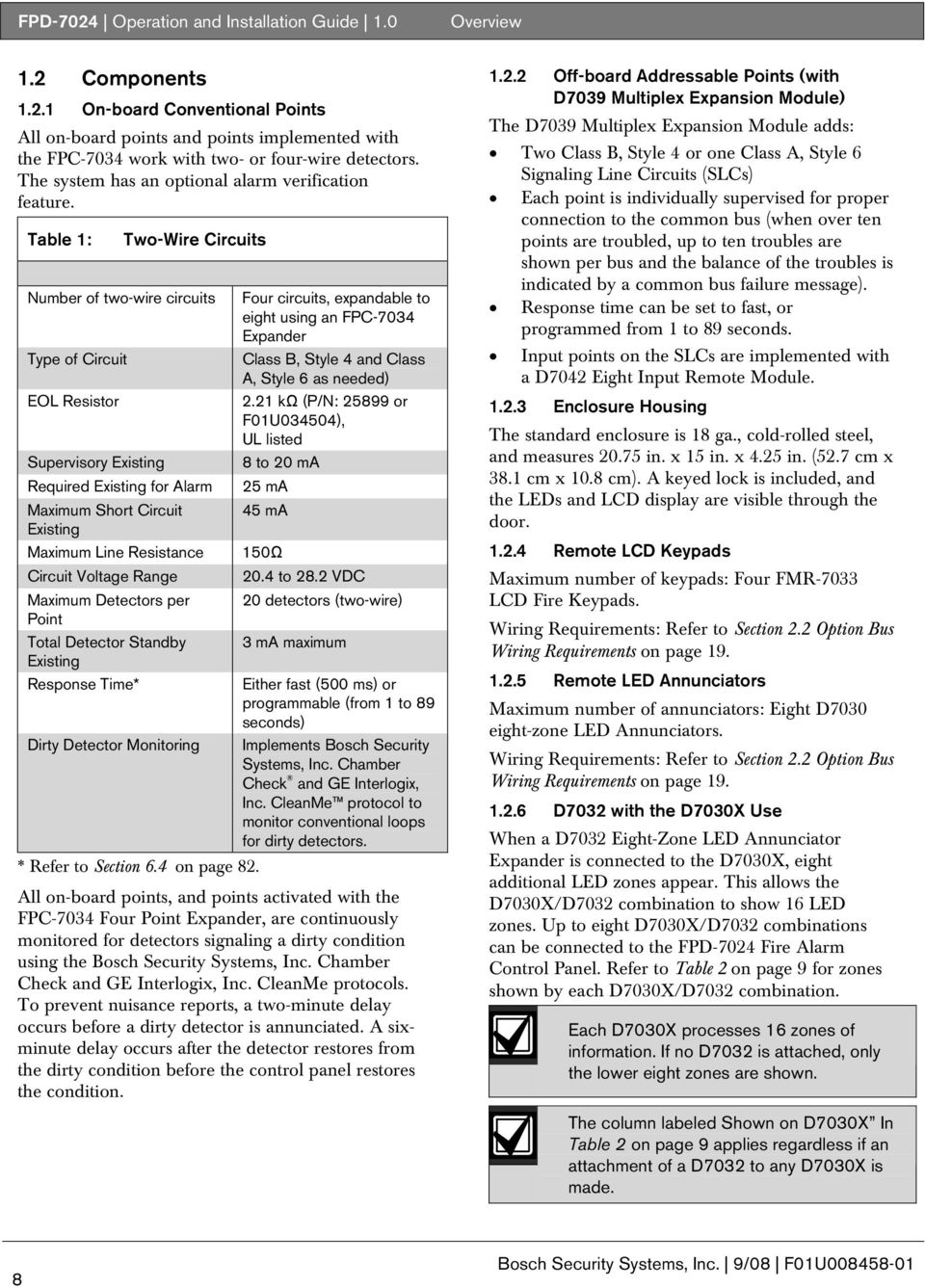
8 FPD-7024 Operation and Installation Guide 1.0 Overview 1.2 Components On-board Conventional Points All on-board points and points implemented with the FPC-7034 work with two- or four-wire detectors. The system has an optional alarm verification feature. Table 1: Two-Wire Circuits Number of two-wire circuits Type of Circuit EOL Resistor Supervisory Existing Required Existing for Alarm Maximum Short Circuit Existing Maximum Line Resistance Circuit Voltage Range Maximum Detectors per Point Total Detector Standby Existing Response Time* Dirty Detector Monitoring * Refer to Section 6.4 on page 82. Four circuits, expandable to eight using an FPC-7034 Expander Class B, Style 4 and Class A, Style 6 as needed) 2.21 kω (P/N: or F01U034504), UL listed 8 to 20 ma 25 ma 45 ma 150Ω 20.4 to 28.2 VDC 20 detectors (two-wire) 3 ma maximum Either fast (500 ms) or programmable (from 1 to 89 seconds) Implements Bosch Security Systems, Inc. Chamber Check and GE Interlogix, Inc. CleanMe protocol to monitor conventional loops for dirty detectors. All on-board points, and points activated with the FPC-7034 Four Point Expander, are continuously monitored for detectors signaling a dirty condition using the Bosch Security Systems, Inc. Chamber Check and GE Interlogix, Inc. CleanMe protocols. To prevent nuisance reports, a two-minute delay occurs before a dirty detector is annunciated. A sixminute delay occurs after the detector restores from the dirty condition before the control panel restores the condition Off-board Addressable Points (with D7039 Multiplex Expansion Module) The D7039 Multiplex Expansion Module adds: Two Class B, Style 4 or one Class A, Style 6 Signaling Line Circuits (SLCs) Each point is individually supervised for proper connection to the common bus (when over ten points are troubled, up to ten troubles are shown per bus and the balance of the troubles is indicated by a common bus failure message). Response time can be set to fast, or programmed from 1 to 89 seconds. Input points on the SLCs are implemented with a D7042 Eight Input Remote Module Enclosure Housing The standard enclosure is 18 ga., cold-rolled steel, and measures in. x 15 in. x 4.25 in. (52.7 cm x 38.1 cm x 10.8 cm). A keyed lock is included, and the LEDs and LCD display are visible through the door Remote LCD Keypads Maximum number of keypads: Four FMR-7033 LCD Fire Keypads. Wiring Requirements: Refer to Section 2.2 Option Bus Wiring Requirements on page Remote LED Annunciators Maximum number of annunciators: Eight D7030 eight-zone LED Annunciators. Wiring Requirements: Refer to Section 2.2 Option Bus Wiring Requirements on page D7032 with the D7030X Use When a D7032 Eight-Zone LED Annunciator Expander is connected to the D7030X, eight additional LED zones appear. This allows the D7030X/D7032 combination to show 16 LED zones. Up to eight D7030X/D7032 combinations can be connected to the FPD-7024 Fire Alarm Control Panel. Refer to Table 2 on page 9 for zones shown by each D7030X/D7032 combination. Each D7030X processes 16 zones of information. If no D7032 is attached, only the lower eight zones are shown. The column labeled Shown on D7030X In Table 2 on page 9 applies regardless if an attachment of a D7032 to any D7030X is made. 8 Bosch Security Systems, Inc. 9/08 F01U
9 . FPD-7024 Operation and Installation Guide 1.0 Overview Table 2: LED Assignments for LED Annunciators 4 and 8 D7030X Zones Covered Shown on 7030X Shown on D7032 (if attached) COMMENTS 1 1 to 16 1 to 8 9 to 16 Combination with lowest option bus address (such as Address 1) 2 17 to to to 32 Combination with second lowest option bus address (such as Address 2) 3 33 to to to 48 Combination with third lowest option bus address (such as Address 3) 4 49 to to to 64 Combination with fourth lowest option bus address (such as Address 4) 5 1 to 16 1 to 8 9 to 16 Fifth combination repeats first combination 6 17 to to to 32 Sixth combination repeats second combination 7 33 to to to 48 Seventh combination repeats third combination 8 49 to to to 64 Eighth combination repeats forth combination Refer to Table 3 for the LED display for Zones 49 to 64. Table 3: LED Display for Zone 49 to 64 LED Zone Description 1 49 User defined 2 50 User defined 3 (reserved) 4 52 General fire alarm monitor waterflow (non-silencable) 5 53 General fire alarm monitor (silencable) 6 (reserved) 7 55 General Supervisory (silencable) 8 56 General Waterflow (silencable) 9 (reserved) General supervisory alarm (non-silencable) 11 (reserved) 12 (reserved) General waterflow alarm (non-silencable) 14 (reserved) General alarm monitor waterflow (non-silencable) 16 (reserved) Communicator The communicator can report to two phone numbers or IP addresses with full single, double, and back-up reporting. Communicates in SIA, Modem IIIa2, Contact ID, BFSK, and 3/1 and 4/2 Tone burst formats. The communicator must be enabled and configured to operate. The communicator and phone line monitors are disabled in the default factory configuration. Bosch Security Systems, Inc. 9/08 F01U

10 FPD-7024 Operation and Installation Guide 1.0 Phone Line and Phone Number/IP Selection: To ensure the delivery of critical reports, the fire panel has two phone lines and two phone numbers or IP addresses that can be used for reporting. Reports can be directed to one or both of two phone numbers or IP addresses using the Report Steering feature (refer to Section Report Steering on page 65) in the control panel programming. Note that Account Number 1 is used with Phone Number/IP 1, and Account Number 2 is used with Phone Number/IP 2. Except for test reports, the control panel automatically selects the phone line or IP address to use. If the report is not successful after two attempts on Line 1, the control panel automatically switches and uses Phone Line 2. One exception is when test reports (manual or automatic) are sent. Test reports are sent every 4 hours to 28 days. Each time a Test report is sent, the control panel alternates phone lines. This happens even if the monitor says the line is bad. If the user sends two manual test reports both phone lines can be tested. The first report uses one line and the second uses the other line. During normal operation, the automatic test uses a different line each day. Because the control panel automatically selects which line to use, both phone lines must use the same dialing sequences for sending reports. For example, a line that requires a 9 to be dialed for an outside line cannot be paired with a line that does not require a 9. PBX lines and ground start phone lines do not comply with NFPA requirements for digital communication. While the control panel is idle, the FACP monitors the primary and alternate telephone lines by monitoring the line for trouble. The FACP monitors each line every 12 seconds. When a trouble still exists after three samples (36 seconds), the FACP sends a trouble report and activates the yellow trouble LED and trouble relay. If the central station receives the automatic test report only every other day, this indicates that one phone line at the protected premises is inoperative. Correct this condition immediately, because other critical reports can be delayed when the communicator is trying to send the test signal through the inoperative phone line (once each 48 hours). Overview Supplemental Reporting: While two independent phone lines are required for UL864 Central Station service, the FACP can be configured with one phone line if the control panel is used only for supplemental reporting on a local, remote station or auxiliary system. Connect a jumper from T1 to T2 and R1 to R2 if the control panel is installed with only one phone line. Refer to Figure 2. Figure 2: 1 2 Control panel reports can be delayed if the dialer outputs are not connected together on an installation where the control panel has only one phone line Supplemental Reporting R2 HR2 HT2 T2 R1 RH1 TH Jumper from R1 to R2 2 - Jumper from T1 to T2 3 - House phone 4 - Telco Line T Users The system allows up to 16 individual users, or up to 100 users when the D7039 is installed. A personal identification number (PIN) the four-digit code entered at the keypads, and an authority level to determine which functions can be performed (refer to Section Personal Identification Numbers on page 41) can be assigned to each user Lightning Protection This system is intended for installation entirely within one building. Metal-oxide varistors (MOV) and spark gaps provide protection from lightning surges and static discharges Bosch Security Systems, Inc. 9/08 F01U

11 FPD-7024 Operation and Installation Guide 1.0 Overview Backup Battery Calculation Use Table 4 to calculate the standby battery capacity required by NFPA when using the FPD Table 4: Standby Battery Capacity Calculations Device Quantity Standby Existing/Device Total Standby Alarm Existing/Device Total Alarm FPD-7024 Control panel ma 200 ma 380 ma 380 ma FPC-7034 Four-Point Expander 44 ma 156 ma D7035/B Octal Relay 1 8 Ma + 30 ma 2 8 Ma + 30 ma 2 D7048/B Octal Driver Module 10 ma 10 ma FMR-7036 Annunciator Keypad 80 ma 100 ma D7030X Eight-Point LED Annunciator 1 27 ma 132 ma D7030X-S2 Eight-Point LED Annunciator 35 ma 175 ma D7030X-S8 Eight-Point LED Annunciator 35 ma 175 ma D7032 Eight-Point LED Annunciator 1 ma 90 ma Expander FMR-7033 Keypad 1 80 ma 100 ma D7039 MUX Expansion Module 150 ma 150 ma D7042/B Addressable Eight Point Input 18 ma 18 ma D7050 MUX Photoelectric Smoke 0.50 ma 0.56 ma Detector D7050TH MUX Photoelectric Smoke 0.50 ma 0.56 ma Detector FMM-7045 Mux Pull Station 0.55 ma 0.55 ma D7044 Mux Single Input Fire 0.55 ma 0.55 ma D7044M Mux Mini Contact Module 0.55 ma 0.55 ma D7052 Mux Dual Input Fire 0.55 ma 0.55 ma D7053 Mux I/O Module Fire 0.70 ma 0.70 ma Smoke Detectors Bells, Horns, and so on Other Sensors Other Grand Total Standby Existing Grand Total Alarm Existing 1 The 24 VDC existing requirements for the D7030X, FMR-7033 and D7035 are shown at 75% of the 12 VDC level shown on the specification sheets for these models. The FPD-7024 regulates 24 VDC power from the battery to 12 VDC for these accessories. 2 Add 30 ma for each relay activated Bosch Security Systems, Inc. 9/08 F01U

12 FPD-7024 Operation and Installation Guide 1.0 Overview The units shown in Table 5 are Amp hours (Ah), and the figures include a 20% derating factor. Table 5: Required Battery Size Calculation Grand Total Standby Existing (in amps) Total Hours of Standby Required (usually 24 or 60): Total Standby Capacity (multiply CS X HS) CS HS TS= CS X HS Grand Total Alarm Existing (in amps) Total Hours of Alarm Time Required (usually or 0.25): Total Standby Capacity (multiply CA X HA) CA HA TA= CA X HA Total Capacity Required (add TA + TS): TC = TA + TS Required Capacity with 20% Derating (TC X 1.2) C = TC X 1.2 The required battery size to support the system can be calculated using Table 6 and Table 7 on page Standby Existing Load Use Table 6 to estimate the size of the battery required to support the standby load, then use Table 7 on page 13 to estimate the size of the battery required to support the alarm load. Add the results together for the total battery size. Select the next larger standard battery for the system. If the results show a requirement for a battery over 40 Ah, reduce the existing or add an external regulated fire protective signaling power supply. Table 6: Standby Load Battery Size (Ah) Standby Load Battery Size Chart Capacity Required for 24 Hours Capacity Required for 48 Hours Grand Total Standby Existing 100 to 200 ma to 300 ma to 400 ma to 500 ma to 600 ma X 601 to 700 ma 20.2 X X 701 to 800 ma 23.0 X X 801 to 900 ma 25.9 X X 901 to 1000 ma 28.8 X X 1001 to 1100 ma 31.7 X X Capacity Required for 60 Hours 12 Bosch Security Systems, Inc. 9/08 F01U

13 . Table 7: Alarm Load Battery Size (Ah) FPD-7024 Operation and Installation Guide 1.0 Overview Alarm Load Battery Size Chart Grand Total Standby Existing Capacity Required for 5 Minutes Capacity Required for 10 Minutes Capacity Required for 15 Minutes Capacity Required for 30 Minutes 250 to 500 ma to 999 ma to 1.5 A to 2.0 A to 2.5 A to 3.0 A to 3.5 A to 4.0 A Capacity Required for 45 Minutes Bosch Security Systems, Inc. 9/08 F01U

14 FPD-7024 Operation and Installation Guide 1.0 Overview Compatible Devices Table 8: Compatible Devices Device D7030 Eight Point LED Annunciator D7030X Eight Point LED Annunciator D7030X-S2 Eight Point LED Annunciator D7030X-S8 Eight Point LED Annunciator D7032 Eight Point LED Annunciator Expander FMR-7033 Alphanumeric LCD Keypad FPC-7034 Four Point Expander D7035/B Octal Relay Module FMR-7036 Fire Annunciator Keypad FPP-RNAC-8A-4C Remote NAC Power Supply D7039 Multiplex Expansion Module D7042/B Eight-Input Remote Module D7048/B Octal Driver Module FMM-7045 Mux Pull Station D7044 Mux Single Input Fire D7044M Mux Mini Contact Module Function Identifies the location of a fire alarm for up to eight zones allowed per system. Identifies the location of a fire alarm for up to eight zones allowed per system. An eight-zone LED annunciator, of which two zones are reserved for supervisory functions. It has Power and Trouble LEDs plus eight-zone LEDs that can be labeled individually. An eight-zone LED annunciator, of which all eight zones are reserved for supervisory functions. It has Power and Trouble LEDs plus eight-zone LEDs that can be labeled individually. Attaches to a D7030X and identifies the location of a fire alarm for eight additional zones. Connects up to four-keypads per system. Allows the FPD-7024 Control Panel to support four additional points. The FPC-7034 plugs into the control panel and provides four Class B, Style 4 loops that are identical in characteristics to the loops on the control panel. One FPC-7034 is allowed per system. Provides eight Form C relay outputs for addition to the system. The outputs are programmable and can be activated by system events. Each output operates independently of the other seven outputs for complete flexibility. The D7035 connects to the option bus; up to two are allowed per system. Refer to the D7035 Installation Guide (P/N: 37280) for required enclosure modification. The D7035B comes installed on a mounting skirt. Establishes the location of a fire alarm. Adds four NFPA 72 Class B, Style Y Notification Appliance Circuits through the option bus and is supervised by the control panel. The FPP-RNAC-8A-4C connects to the option bus of the FPD-7024 control panel and up to four are allowed per system. Provides either 2 two-wire (Class B, Style 4) multiplex buses or 1 four-wire (Class A, Style 6) multiplex bus. In Class A mode, up to 120 addressable points can be added. In Class B Mode, up to 247 addressable points can be added. The D7039 connects directly to the control panel. One is allowed per system. Provides eight Class B, Style 4 input points. Connect up to 15 modules to MUX Bus A, and 15 on MUX Bus B. The D7042 is powered by 12 VDC supplied by the option bus power terminals, in addition to the two-wire data connection. The D7042 can not be used on a signal line circuit (SLC) configured for Class A, Style 6 operation. Provides eight open collector transistor outputs for addition to the FPD-7024 Fire Alarm Control panels. It connects to the control panels through the option bus. UL Listed fire alarm initiating device. Connects a contact device to the multiplex bus of the FPD-7024 with a supervised local loop. The D7044 draws operating power from the FPD Connects a contact device to the multiplex bus of the FPD-7024 with a supervised input loop. The D7044 draws operating power from the FPD Bosch Security Systems, Inc. 9/08 F01U

15 . FPD-7024 Operation and Installation Guide 1.0 Overview Table 8: Compatible Devices (continued) D7052 Mux Dual Input Fire D7053 Mux I&O Module Fire D7050/TH Mux Smoke Detector Connects to the multiplex bus of the FPD-7024 and provides two supervised input zones for connecting conventional normally-open inputs. The D7052 draws operating power from the FPD Connects to the multiplex bus of the FPD-7024 and implements a supervised local loop, and a Form C relay output. Up to 20 modules can be connected to each MUX bus. The D7053 draws operating power from the FPD The D7050/TH is a photo-electric smoke detector with a heat option. It connects to the multiplex bus of the FPD The D7050 draws operating power from the FPD Table 9: Address Restrictions for the D7042, D7052, and D7053 Install D7042 modules only at addresses: Do not install D7052 and D7053 modules at these addresses Bosch Security Systems, Inc. 9/08 F01U

16 FPD-7024 Operation and Installation Guide 1.0 Overview 1.3 Parts List One FPD-7024 Control/Communicator in staticresistant bag One enclosure with transformer One hardware pack One enclosure lock, washer, and keys Six end-of-line (EOL) resistors The hardware necessary for installing the control panel in the enclosure is located in the hardware pack. 1.4 Installing the Enclosure 1. Using the enclosure as a template, mark the top mounting holes on the mounting surface (Figure 3). 2. Start the mounting screws (not supplied) for these two holes. 3. Slide the enclosure onto these screws so that the screws rest on the thinner section of the holes. 4. Tighten the screws. 5. Install and tighten the remaining two screws in the bottom mounting holes. 6. Knock out the desired wire entrances on the enclosure. Figure 3: Enclosure Installation 1 - Control panel location 2 - Mounting holes 3 - Retainer holes for standoffs 4 - Retainer holes for support posts 5 - Transformer 6 - Stud 7 - Ground wire If using the knockouts located at the bottom of the enclosure install batteries in a separate enclosure. 1.5 Installing the FPD-7024 The control circuit board in the FPD-7024 is static sensitive. Touch ground before handling the control board. This discharges any static electricity in your body. For example, run the ground wire to the enclosure before handling the control circuit board. Continue touching the enclosure while installing the control board. 1. Insert the three support posts in the enclosure s retainer holes. Refer to Figure 3 above and Figure 4 on page Bosch Security Systems, Inc. 9/08 F01U

17 . 2. Press the 1/8 in. nylon standoffs (P/N: F01U034705) into the retainer holes. 3. Slide the top of the control panel onto the retainer tabs (the slots under the top of the frame). When the control panel is in the retainer tabs, it rests on the posts. 4. Secure the bottom of the circuit board by inserting and tightening the screws at the two bottom corners through the support posts and the retainer holes Figure 4. Connect the supplied ground wire between the door and the enclosure using the supplied nuts before the circuit board is installed. A second ground wire is provided for connecting the AC power ground. Both grounds connect to the stud in the enclosure to the left of the circuit board. Refer to Figure 3 on page 16. Figure 4: 1 2 Standoff and Support Post Installation 1-1/8 in. nylon standoff 2 - Retainer holes 3 - Support post assembly 4 - Corner of circuit board 5 - Support post 6 - Retainer hole in enclosure 1.6 Installing Optional Equipment Two expansion options connect directly to the control panel, and are automatically detected and supervised when the control panel is powered: FPD-7034 Four Point Expander D7039 Multiplex Expansion Module When the control panel is powered after installing one of these options, the control panel displays one of the following windows: 4Z EXP DETECTED PRESS ENTER KEY = FPD-7024 Operation and Installation Guide 1.0 MUX DETECTED PRESS ENTER KEY Overview Press the [#/Enter] key to confirm the installation of the device and automatically set it up for supervision. If the [#/Enter] key is not pressed during the powerup time-out period, the control panel resumes operation using the last confirmed status of the affected expander and displays an installation error condition. Expansion devices such as point expanders and multiplex expanders are disabled if they are removed from the control panel configuration after installation. You cannot disable supervision of these devices when they are installed. Refer to the installation instructions for these expanders for additional information. When the D7039 Multiplex Expansion Module is first installed, the system displays an EEPROM fault. Execute the default procedure to synchronize the EEPROM on the expansion module to the EEPROM in the control panel. Remove power to the control panel, then reapply power and reinstall option bus devices after the default procedure. Replacing a D7039 Multiplex Expansion Module causes the loss of programming of expansion points and PINs. Reprogram all multiplex point and PINs if you replace the D7039. When the D7039 is first installed, or anytime the control panel is powered with a D7039 that has no points programmed, the system automatically starts the multiplex auto-programming process: AUTO PROGRAM? :YES(1)/NO(0) Pressing the [1] key starts auto-programming, and pressing [0/Prog] allows the control panel to continue normal startup. The menu automatically closes with NO selected if no key is pressed after several minutes. Refer to Section Auto Program on page 74 for detailed instructions on the autoprogramming mode. Bosch Security Systems, Inc. 9/08 F01U

18 Alarm Silenced Supervisory Trouble TEST WEEKLY Back Prog Ente r History Silence ACK Reset Drill Test FPD-7024 Operation and Installation Guide 2.0 Control Panel Terminal Connections 2.0 Control Panel Terminal Connections Figure 5: FPD-7024 Control Panel Terminal Connections - Incorrect connections may result in damage to the unit and personal injury. Before servicing this equipment, remove all power including the transformer, battery and phone lines. Shared cable is not recommended for option bus, telephone or NAC wiring. Typical 2-wire smoke detector wiring (supervised) EOL Resistor Typical Fire Wiring CLASS A STYLE D CLASS B STYLE B Typical 4-wire smoke detector wiring. CLASS A STYLE D CLASS B STYLE B R2 HR2 HT2 T2 For connection to listed power limited Class 2 or Class 3 sources only. switched unsupervised Phone Line 2 (Supervised) unsupervised unsupervised unsupervised Contacts rated at 5.0 A, 24 V Relay 3 Relay 2 Relay 1 Smoke Power: 24 V, 1.0 A max. (filtered) Refer to Technogram P/N: F01U for compatible devices. Earth Ground Input Points 1-4: (supervised) Points are intended for connection of normally-open/ normally-closed alarm contacts. They may also be used for compatible two-wire smoke detectors. All EOL resistors are 2.21 k Ω, P/N: Bosch,UL listed. Initiating devices are Class B, Style B or Class A, Style D. Two-Wire Compatibility Identifier A. NC 3 COM3 NO 3 NC 2 COM2 NO2 NC 1 COM1 NO 1 SMK+ SMK- 4A+ 4B+ 4B- 4A- 3A+ 3B+ 3B- 3A- 2A+ 2B+ 2B- 2A- 1A+ 1B+ 1B- 1A- Red Brown NC AC Power 2 NC AC Power 1 R1 RH1 TH1 T1 Phone Line 1 (Supervised) BOSCH COM +12V DATA Black (-) DX4020 Yellow (supervised) White Black All wiring except battery terminal and primary AC power is power-limited. Primary AC and battery wires must be separated from other wires by at least ¼ in. (64 mm) and tied to prevent movement. unswitched unsupervised Aux. Power: 24 V, 1.0 A max. (unfiltered) (-) (+) Battery # 1 Battery # 2 (+) Red CLASS B STYLE Y EOL (supervised) CLASS A STYLE Z * # Disable A+ N B+ A C B- 1 A- A+ N B+ A C B- 2 A- NAC 1+ NAC 1- NAC 2+ NAC 2- BAT - BAT + R B G Y OPTION BUS Supervised, Class B, Style 4, 500 ma, Max. NOTIFICATION APPLIANCE CIRCUIT: +24 V while in alarm; ground while in standby. Ground while in alarm; supervisory voltage while in standby. NOTIFICATION APPLIANCE CIRCUIT: +24 V while in alarm; ground while in standby. Ground while in alarm; supervisory voltage while in standby. BATTERIES: Requires two 12 V batteries, in series, for a combined voltage of 24 V. Charge current = 1.1 A, max. Use only indicating devices as listed on Technogram P/N: F01U Battery # 1 Battery # 2 Red Backup Batteries Black 1A+ 1B+ 1B- 1A- SMK+ SMK- 1A+ 1B+ 1B- 1A- 1A+ 1B+ 1B- 1A- 1A+ 1B+ 1B- 1A- SMK+ SMK- AUX- AUX+ BAT- 24V BAT+ Do not short terminals - explosion and burn hazard. 18 Bosch Security Systems, Inc. 9/08 F01U

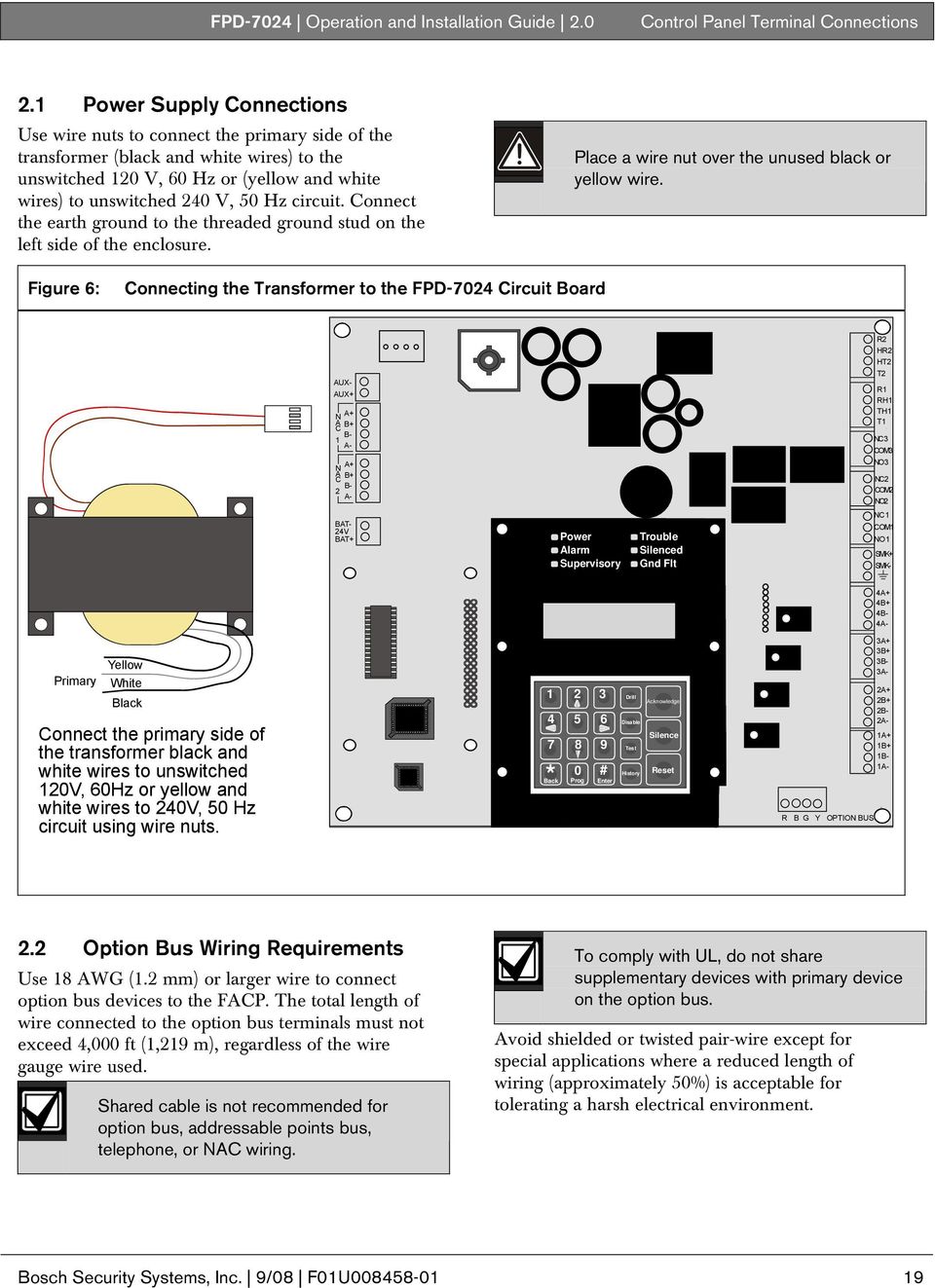
19 . FPD-7024 Operation and Installation Guide 2.0 Control Panel Terminal Connections 2.1 Power Supply Connections Use wire nuts to connect the primary side of the transformer (black and white wires) to the unswitched 120 V, 60 Hz or (yellow and white wires) to unswitched 240 V, 50 Hz circuit. Connect the earth ground to the threaded ground stud on the left side of the enclosure. Place a wire nut over the unused black or yellow wire. Figure 6: Connecting the Transformer to the FPD-7024 Circuit Board AUX- AUX+ N A+ A B+ C B- 1 A- N A+ A B+ C B- 2 A- R2 HR2 HT2 T2 R1 RH1 TH1 T1 NC 3 COM3 NO 3 NC 2 COM2 NO2 BAT- 24V BAT+ Power Alarm Supervisory Trouble Silenced Gnd Flt NC 1 COM1 NO 1 SMK+ SMK- 4A+ 4B+ 4B- 4A- Yellow Primary White Black Connect the primary side of the transformer black and white wires to unswitched 120V, 60Hz or yellow and white wires to 240V, 50 Hz circuit using wire nuts *Back 0 Prog # Enter Drill Acknowledge Disable Silence Test History Reset R B G Y OPTION BUS 3A+ 3B+ 3B- 3A- 2A+ 2B+ 2B- 2A- 1A+ 1B+ 1B- 1A- 2.2 Option Bus Wiring Requirements Use 18 AWG (1.2 mm) or larger wire to connect option bus devices to the FACP. The total length of wire connected to the option bus terminals must not exceed 4,000 ft (1,219 m), regardless of the wire gauge wire used. Shared cable is not recommended for option bus, addressable points bus, telephone, or NAC wiring. To comply with UL, do not share supplementary devices with primary device on the option bus. Avoid shielded or twisted pair-wire except for special applications where a reduced length of wiring (approximately 50%) is acceptable for tolerating a harsh electrical environment. Bosch Security Systems, Inc. 9/08 F01U
20 FPD-7024 Operation and Installation Guide 2.0 Control Panel Terminal Connections The length of wire allowed between the control panel and the last device on a wiring run depends on the existing drawn on that wiring run. Reducing the number of devices on a wiring run allows the individual runs to be longer. Use the guidelines in Table 10 on page 20 where devices are all of the same type on a given wire run. Table 10: Option Bus Wiring Guidelines Device Model Number Wiring Run Number Maximum Allowed Cable Length to Last Device (#18 Wire) D7030 LED Annunciator ft (304 m) 175 ma Existing Draw (for reference) D7030X LED Annunciator ft (152 m) 175 ma x 2 = 350 ma D7030 LED Annunciator ft (76 m) 175 ma x 4 = 700 ma FMR-7033 Remote Keypad ft (608 m) 100 ma FMR-7033 Remote Keypad ft (304 m) 100 ma x 2 = 200 ma FMR-7033 Remote Keypad ft (152 m) 100 ma x 4 = 400 ma D7048/B Octal Driver Module D7035/B Octal Remote Relay ft (152 m) 330 ma ft (76 m) 330 ma x 2 = 660 ma FPP-RNAC-8A-4C ft (1219 m) < 50 ma each DX4020 Network Interface Module ft (229 m) 280 ma Where more than one type of device is installed on a given wiring run, add together the alarm existing drawn by all the devices on the wiring run to determine the maximum allowed distance between the option bus terminals on the control panel and the last device on the wire run (the device farthest from the control panel). Add up the total alarm load for option bus devices on the wire run, and use Figure 7 to determine the maximum allowed length for the run. For example, if the total load of option bus devices on a particular run is 400 ma, the maximum length of the run can be up to 500 ft (152 m). No more than 4,000 ft (1,219 m) of wire can be connected to the option bus terminals, even if the individual lengths of the runs are all within limit. Figure 7 shows allowed lengths for18 AWG (1.2 mm). For16 AWG (1.5 mm) wire, cable lengths can be 1.5 times longer. For14 AWG (1.8 mm) wire, cable lengths can be 2.5 times longer. The 4,000 ft (1,219 m) maximum length of connected wire still applies. 20 Bosch Security Systems, Inc. 9/08 F01U

21 . Figure 7: Option Bus Cable Length vs Existing Draw FPD-7024 Operation and Installation Guide 3.0 System Operation Current Draw (ma) 3.0 System Operation 3.1 Modes of Operation There are four modes of system operation for the FPD-7024: Alarm, Supervisory, Trouble, and Normal Alarm When an alarm occurs, the top line of the display shows ALARM (XXX), where XXX indicates the number of alarms. This display overrides any other system display. The second line of the display gives more instructions. When the group is entered by pushing the [6/ ] key, more details of the event appear. The top line shows the number of alarms and the point that is in alarm. The bottom line alternates between the instructions and the programmed description for the affected point. The built-in sounder turns on with a steady tone, and outputs programmed to activate with the existing alarm condition(s) activate. When the control panel is not scanning the inputs, as during smoke power reset, alarm verification delay, or on-site programming, the trouble LED flashes to indicate this condition Supervisory When a Supervisory condition occurs, Supervisory (XXX), XXX indicates the number of supervisory conditions. The second line of the display gives more instructions. When the group is entered by pushing the [6/ ] key, more details of the event appear. The bottom line alternates between the instructions and the programmed description for the affected point. The built-in sounder beeps. Outputs programmed to activate with the existing condition(s) then activate Trouble When a trouble condition occurs (such as cut wiring for a point or AC power fails), the sounder beeps every 10 seconds. The Trouble LED lights and the LCD shows TROUBLE (XXX). When the [6/ ] key is pressed the group is entered and more detail appears. The system can diagnose and show a variety of trouble conditions, including those affecting the input points, NAC circuits, power, battery, system grounding, and internal operations of the fire control panel. Notify your installing company immediately if the system trouble message appears. Press the [Silence] key to silence the system trouble beep Acknowledge When the control panel is off-normal, the control panel s piezo (buzzer) can be silenced without silencing the NACs or resetting the control panel. Press the [ACK] button on the local or remote keypad to silence only the piezo. Bosch Security Systems, Inc. 9/08 F01U
22 FPD-7024 Operation and Installation Guide 3.0 System Operation Fire Silence/Reset During a fire alarm, exit from the premises immediately. Do not enter the premises unless accompanied by the appropriate emergency services' personnel, or until they have given the OK to enter. When it is determined that there is no fire, you can silence the horns or bells to allow more investigation of the devices that initiated the alarm, or you can reset the system to return it to normal operation. Before using the [Reset] key, determine which smoke detector sounded the alarm so that the monitoring company can check that the system is operating correctly. If the control panel is being used as an addressable control panel, use the [History] key to determine which address is in alarm. If the system is configured to allow alarm silencing, the [Silence] key turns off the horns or bells, but does not reset the alarm status and does not return the activated input to normal service. Detectors that were activated stay in alarm and can be checked (usually by observing an LED on the device) to see which detector caused the alarm. When the detectors causing the alarm are identified, reset the system to return it to normal service. The [Reset] key clears the system alarm status, and briefly turns off power to the detectors to reset them. This command is required after any fire alarm affecting a point programmed for latching operation (which is the normal configuration). This operation is also required to reset a Class A, Style 6 multiplex (SLC) wiring fault troubles. The software uses a system supervisor function that automatically supervises the system software for proper operation. If the system fails, a CPU FAULT message appears, and the nature of the failure can be optionally recorded in the history buffer. To enable history buffer recording for CPU faults, program Output Zone D of onboard Relay 2 to Zone 51 (unused). The history buffer message, if enabled, shows CPUFLTxxx, where xxx is an error code. If the display shows CPU FAULT, contact Bosch Security Systems, Inc. Technical Support and report the history buffer code along with a description of the operations that caused the fault. Unusual conditions during programming and debugging operations can result in a CPUFLT message in the history buffer. If, this occurs when the control panel is in service, report it to Technical Service Off-Normal Displays Control panel alarms and problems are indicated by one of the messages shown in Table 11 on the top line of the display. Contact your installing company if problems persist. Table 11: Off-Normal Displays Off-Normal Display FIRE ALARM (XXX) SUPERVISORY (XXX) TROUBLE (XXX) Description One or more fire or waterflow points are in alarm. One or more supervisory conditions exist. A trouble condition exists (AC power failure, phone line trouble, and so on.) Normal When the system operates normally, it shows SYSTEM NORMAL on the top line of the display, the Power LED lights steadily, and no other LEDs are lit. The bottom line indicates the existing date MM/DD/YY and time HH:MM. If the system is programmed to require a PIN, the second line of the LCD screen shows ENTER PIN. 3.2 Basic System Use Function Keys A keypad that does not require a PIN number shows (under normal conditions) SYSTEM NORMAL on the top line, and existing date and time on the bottom line. On a keypad that does require a PIN number, enter the PIN number first. This enables the function keys Selecting Menu Items Depending on which level in the system, (menu, sub-menu, sub-sub-menu), you can select an item three different ways: 22 Bosch Security Systems, Inc. 9/08 F01U
23 . 1. In the main menu, TEST, HISTORY, DISABLE, and DRILL each have an exclusive key on the keypad. To select one of these menu items, press the corresponding key. For example, to select TEST, press the [TEST] button. 2. The [PROG] and [ENTER] keys are not exclusive, but shared with other characters. The character sharing the corresponding key appears in the second line following a forward slash (\). To select one of these items, press the corresponding key. For example, the [PROG] key is also The key corresponding to a sub-menu item might appear in the second line preceding a dash. Press the corresponding key to select that item. For example, press [1] to select PROG TIMES. While a menu is active, you do not need to wait for the desired menu item to appear before making your selection. You can select any item on the existing menu rotation at any time After a Main Menu Item is Selected When a main menu item is selected, the keypad might prompt you to enter your PIN. If so, enter the number (factory default is 9876) and press the [#/Enter] key (or press the key labeled with the desired command directly). The display automatically retrieves the sub-menu display Returning to an Earlier Screen To return to a previous screen at any time, press the [*/Back] key. To return to the SYSTEM NORMAL display, press the [*/Back] repeatedly until you reach SYSTEM NORMAL. When you reach SYSTEM NORMAL, you cannot go any farther Entering Data When a sub-menu item asks you to enter data, enter the data and press the [#/Enter] key. If data already exists at a particular location, you can either accept that data or enter new data. When you press the [#/Enter] key to enter the data, the display returns you to the previous sub-menu display. FPD-7024 Operation and Installation Guide 3.0 System Operation Drill The drill command activates all NACs and no relays. It creates a history log entry and as an option can be reported to the central station Disable Use the disable command to disable input points, outputs, or the dialer. When any device is disabled, the system shows this condition on the LCD and on the system trouble LED. The Disable All Inputs operation takes several seconds to perform, during which time the system display remains fixed History If a system without a D7039 Multiplex Expansion Module loses all power (AC and standby battery), all history events are cleared. The HISTORY option is a chronological list of system events that occurred. Press the [History] key to HISTORY select from the Main Menu (SYSTEM NORMAL display). On an FPD-7024 FACP with a D7039 Multiplex Expansion Module, up to 499 History events are supported. On an FPD-7024 FACP without a D7039 Multiplex Expansion Module, up to 99 History events are supported. After you press the [History] key, the most recent system event appears on the top line of the LCD with the time and date below it. Example: (Assume you pressed the [History] key at the Main Menu): While the first event shows, the bottom line toggles every four seconds between the time and date that the event occurred. To return to a previous screen in the history buffer, press [2/ ].To scroll to the next event record, press [8/ ]. The abbreviations shown in Table 12 on page 8 are used in history events. Bosch Security Systems, Inc. 9/08 F01U
24 FPD-7024 Operation and Installation Guide 3.0 System Operation Table 12: History Event Abbreviations Abbreviation Meaning Abbreviation Meaning ALRM Alarm OFFNORM Off Normal at Test ARST Alarm Restore PH1 Phone Line 1 AUTOTST Auto Test PH2 Phone Line 2 BATT:LOW Battery Low RSTR Restore BAT:RSTR Battery Restore S Supervisory CPUFLT Internal Error SMK:FLT Smoke Power Fault DRILL:BEG Drill Begin SYSRESET System Reset DRILL:OVR Drill Over SYSRST System Restore DRST Dirty Restore SYSTRB System Trouble DRTY Dirty SYS:WDOG Automatic CPU Reset (Watchdog) DSBL Disable TRBL Trouble EE2 EEPROM TRST Trouble Restore ENBL Enable TST:BEG Test Begin F Fire TST:OVR Test Over MANULTST Manual Test W Waterflow Refer to Appendix C on page 87 for additional history log ID information. 24 Bosch Security Systems, Inc. 9/08 F01U
25 . 3.3 Keypads FPD-7024 Operation and Installation Guide 3.0 System Operation Built-in Keypad The keypad built into the control/communicator is an alphanumeric LCD keypad. It has a two-line by 16- character display to provide information on various control panel functions. Usually, the first line shows the offnormal condition, while the second line describes specific details that might be relevant to the existing system status. A built-in sounder annunciates keystroke entries and acts as a warning device. Figure 8: Built in Keypad Power Alarm Supervisory Trouble Silenced Gnd Flt *Back 0 Prog FF01U # Enter Drill Disable Test History Acknowledge Silence Reset Green Power LED - is on when the AC power is present, and flashes when the unit is operating from battery power. 2. Yellow Trouble LED - lights when the system detects a problem with wiring or internal circuitry. The Trouble LED flashes while programming mode is active and whenever inputs are not active, such as during smoke power reset or alarm verification. 3. Red Alarm LED - lights when the system registers an alarm and was not reset. 4. Yellow Silenced LED - lights when the user manually silences an alarm or trouble condition, turns off when the condition that was silenced is corrected. 5. [Disable] key - used to disable or re-enable inputs, NACs or relays (outputs), and the dialer. 6. [Test] key - used to select one of seven special test modes (refer to Section 3.4 Testing on page 26). 7. [*/Back] key - used during programming to exit from menus or to exit from the programming mode entirely. 8 For abbreviations on the keypad and control panel, refer to Appendix A on page [0/Prog] key for selecting the programming mode. 9. [#/Enter] key - to accept data when in the programming mode. 10. [History] key - to view system events. 11. [Reset] key - briefly (programmable from 1 to 16 seconds) turns off power to the detectors to reset them and clears any off-normal conditions. 12. [Silence] key - quiets the bell or sirens for an alarm or trouble condition, if the system is so configured. 13. [Drill] key used to activate the NACs manually. It creates a history log entry and as an option reports to the central station. 14. Yellow Supervisory LED - lights whenever the system registers a supervisory condition. 15. Yellow GND Fault LED - lights whenever the system detects a ground fault condition. 16. [Acknowledge] key to silence local keypad sounders and to view off-normal conditions. Bosch Security Systems, Inc. 9/08 F01U
26 FPD-7024 Operation and Installation Guide 3.0 System Operation FMR-7033 Keypad The FMR-7033 Keypad is an alphanumeric LCD keypad. Up to four of these keypads can be mounted apart from the main control panel to provide additional locations for system status and control. The LCD display and keys operate identically to those of the built-in keypad on the control panel (refer to Appendix A on page 85). Figure 9: FMR-7033 Keypad 1 Alarm Silenced Supervisory Trouble BOSCH 2 TEST WEEKLY Silence ACK Reset Drill * 0 # Disable Back Prog Enter History Test 1 -LEDs 2 Keypad Display 3 -Keys 3.4 Testing Select any of seven special test modes using the [Test] key on the built-in and FMR-7033 keypads Walk Test The Walk Test allows a technician to alarm each point manually to ensure that detectors connected to a point send an Alarm report to the control panel. While in this mode, the LCD shows the system test status and the trouble sounder sounds every 10 sec. Outputs programmed for general alarm or fire alarm output, or outputs mapped to points using zones activate during this test as points are alarmed and restored: When selecting this mode, three options are given for activation of outputs: SHORT ACTIVE: 1 second activation LONG ACTIVE: 5 second activation NO ACTIVE: outputs do not activate As each point is alarmed, the outputs activate once (if selected) and power is reset. As each point is activated, alarms and restorals are logged in the control panel s history log. When the point returns to standby, the outputs activate twice. The control panel attempts to reset points ten times to restore them. Points remaining alarmed when exiting from the walk test mode cause an immediate alarm Communicator Test The communicator sends a test report. While communication is in progress, the Power LED flashes. When the communication succeeds, a long keypad beep sounds, the Power LED returns to normal, and the display returns to normal. 26 Bosch Security Systems, Inc. 9/08 F01U
27 . This test is available only if your system sends alarms and system information to a monitoring service, and was programmed by the security installing company to permit communicator tests. Terminating the communicator test function (with the [*/Back] key) resets the communicator and discards all unsent reports. When an off-normal condition occurs during a Communicator test, the test automatically resets, clearing all reports, so the off-normal conditions are sent normally Call for Remote Programming Phone Numbers 1 and 3 must be programmed, along with Account Code 1. The control panel calls Phone Number 3 and attempts to connect for downloading. If the control panel is already using the phone line, it sounds the three-beep error tone. This function requires an access code with programming authority (Level 1) Test Battery/NAC Circuits If a power failure occurs, your control panel has a built-in battery that continues to power the system for several hours. The control panel automatically recharges the battery when power is restored. In this test mode, the system operates the local NAC circuits and tests the battery for two seconds. The test results are shown at the end of the test, and are not reported to the central station. Pressing the [*/Back] key or the [#/Enter] key returns the display to standby mode, or the unit times out after three minutes Answer for Remote Programming The control panel immediately seizes the phone line to answer a remote programming call. While programming is underway, the Trouble LED flashes. This also allows on-site PC downloading. If the control panel already uses the phone line for a report communication, it sounds the three-beep error tone. This function requires an access code with programming authority (Level 1) Manually Activate Outputs This test turns a selected output on and off manually Read Zone Input Levels This test shows the status of a selected on-board point. The loop existing through the point is shown. FPD-7024 Operation and Installation Guide 3.0 System Operation Normal loops show 11 to 15 ma. Loops in alarm show over 25 ma, and loops in trouble show less than 6 ma Addressable Point Test (MUX Test) This test allows activation of the special test mode for addressable (multiplex) devices. This applies only if the optional D7039 Addressable Point Bus Expander module is installed. When this test mode is selected, the system asks which bus to test, 1 or 2. Select 1 to test points 9 to 128 and select 2 to test points 129 to 255. The system presents 5 options: List Devices: Shows the point numbers of all devices on the selected bus. Some devices (such as a dual point module) can use two or more points Show Holes: Lists locations on the bus that have no assigned device. This can help to find programming errors or identify an available address for a new device. Show Extras: The system scans the bus to identify devices that are present on the bus, but are not programmed into the system. Scanning the bus takes about 60 sec to scan the bus. Restoring the bus after scanning also takes about 60 sec. The system cannot identify devices above Address 128 on Bus 1, or below Address 129 on Bus 2. If you know that a device is connected to the system but cannot find it, ensure that it is connected to the correct bus: 9 to 128 for Bus 1, 129 to 255 for Bus 2. Show Missing: Lists devices programmed into the system but not present on the bus are listed. Unless a device was programmed into the system (such as using MUX EDIT), it is not considered missing. Show Status: After you select a device and press [#/Enter], this test shows detailed status information for the selected device. Eight conditions (not all status conditions apply to or are supported by all devices) are shown. See the display shown below (which updates automatically every five seconds). For this option, you can view the status of any MUX device regardless of which bus you selected to test when test mode was entered. XxLxRxDxMxTxFxAx Bosch Security Systems, Inc. 9/08 F01U
28 FPD-7024 Operation and Installation Guide 3.0 x is either 0 or 1 depending on whether the condition is false or true (0=false and 1=true). The letters indicate the condition: X: Reserved for future use. L: Commanded relay state - this is how the output relay should be set. R: Actual relay state - this is how the output relay is actually set. D: Detector dirty - the detector is excessively sensitive. M: Missing device - the device cannot be found on the loop. Unless a device was programmed into the system (such as using MUX EDIT), it is not considered missing. T: Tamper the detector s case was opened. F: Loop fault - the loop from a contact input device is open, or the device is faulted. A: Loop alarm - the point is in alarm. Pressing [*/Back] ends the display for any of these modes. Examples: X0L0R0D0M0T0F0A0 (relay off, not dirty, not missing, no tamper, no fault and no alarm) Sensitivity Test Tests the mux smoke detectors to determine if they are within their normal range of sensitivity. Press [Test] then [9]. System Operation 3.5 Point/Zone Mapping The control panel supports a flexible system to map input points to output points. The system defaults so that all NAC outputs are activated by a fire alarm. By programming output zones, you can create almost any output activation scheme, such as floor above and floor below activation or conditional elevator recall. Input points: Smoke detectors, pull stations, and so on. Zone: A group of input points (Zones 1 to 50 are configurable, 52 to 63 are activated automatically). Output points: NACs (notification appliance circuits) such as bells, strobes, and relays. Inputs activate zones, and zones activate outputs. Zones 1 to 50 are available for the installer to program. Each input can activate one zone; however, any number of inputs can be mapped to the same zone. Zones above 50 are automatically activated by inputs. For example, any input that is configured as a waterflow type activates Zone 61 when it is alarmed. Any output driven by Zone 61 activates when any waterflow type point is alarmed. Refer to Figure 10 to show how inputs control zones and zones control outputs. 28 Bosch Security Systems, Inc. 9/08 F01U
29 . Figure 10: Mapping, Inputs, Zones, and Outputs FPD-7024 Operation and Installation Guide 3.0 System Operation Input Point 1 is assigned to Zone 1, mapped to NAC Point 1. Input Point 2 is assigned to Zone 2, mapped to NACs 1 and 2. Input Point 3 is assigned to Zone 2, mapped to NACs 1 and 2. Input Point 4 is assigned to Zone 2, mapped to NACs 1 and 2. Input Point 5 is assigned to Zone 3, mapped to NAC 2, LR 1 and RR 1. General Alarm Zone 63 drives LR 2. LR: Local relay RR: Remote relay Up to 64 zones can be assigned. The installer can assign Zones 1 to 50. Zones 51 to 63 are hard-coded to preassigned conditions. Refer to Table 13. Table 13: Pre-Assigned Zones Zone Pre-Assigned Condition 51 Reserved for future use. 52 General Fire Alarm, Waterflow (non-silenceable). Same as Zone 53, but remains active even while system is silenced. 53 General Fire Alarm (silenceable). Active when a fire alarm condition is present; does not activate for waterflow. 54 Activates for approximately 7 sec before dialing, to initiate dial tone on a ground start phone system. 55 General Supervisory (silenceable) 56 General Waterflow (silenceable) 57 Communication Trouble. Active when the dialer fails to communicate; remains active until communication through the digital communicator is restored. 58 General Supervisory Alarm (non-silenceable). Active when any supervisory alarm condition is present. 59 Alarm Verification. Active while alarm verification is in progress. This starts with the first detection of an alarm to be verified and clears in two minutes, or when system is reset. 60 No AC. Active when AC power fails. 61 General Waterflow (Non-silenceable). Active when any waterflow alarm is present. 62 General Trouble. Active while any system trouble is present, not active in test and programming modes. 63 General Alarm, Waterflow (non-silenceable). Active while any alarm, including supervisory, is present. Remains active even while system is silenced. Bosch Security Systems, Inc. 9/08 F01U
30 FPD-7024 Operation and Installation Guide 3.0 System Operation 3.6 Personal Identification Numbers The personal identification number (PIN) is the four digit code users enter at the keypad to gain access to the system. A PIN can be assigned to each User Number. The User Number identifies each person using the system. There are 16 possible User Numbers (00 to 15). User codes 00 to 99 are available with the installation of a D7039 Multiple Expansion Module. The Authority Level assigned to each User Number determines which functions each user can perform. Your system can have up to 100 different PINs, each four digits long. There is one PIN for each User Number. Attempting to assign the same PIN to multiple User Numbers results in the three-beep error tone, and the change is not made. User Number 00 is designated as a Programmer s Code. It can be used to silence alarms, reset, disable, and program the unit. User Number 00 is shipped from the factory with the sequence of Change this code to one of your personal preference. It is automatically assigned the highest authority. Never program PINs with common sequences such as 1111, 1234, or 2468 because they are easily violated. Authority levels are assigned to PINs to determine which functions each user can perform. Table 14 describes the four authority levels. Table 14: PIN Authority Levels PIN Authority Level Maximum (1) Medium (2) Minimum (3) None (0) Allowed Operations All control panel operations, including programming, and disable System test modes, fire drill, reset, silence, view history Silence, view history None 30 Bosch Security Systems, Inc. 9/08 F01U
31 . 3.7 Communicator Operation The FPD-7024 contains an integrated communicator that can be optionally enabled to send reports to a monitoring station. When enabled, operation of the communicator is fully automatic. You must enable and configure the communicator before it works. The communicator and phone line monitors are disabled in the default factory configuration. FPD-7024 Operation and Installation Guide Programming Programming After any programming change, and especially after remote programming changes, completely check the operation of the control panel. Hazards to life and property can result if the system is not tested to detect possible improper programming. To disable a phone number, set the FORMAT to 0=disable. To completely disable the communicator, set FORMAT to 0=disable for both phone numbers, and set MONITOR to 0=NO for both phone lines. Do not install this control panel on a phone line that might be required for other emergency use. When events occur, the communicator sends them to the monitoring station in priority order according to NFPA requirements. Fire and waterflow alarms are sent first, followed by supervisory alarms and trouble reports and then all other reports. Priority reporting can send a Restoral report after several alarm reports in a situation where a point sends multiple alarms, implying that a point is restored when it has returned to alarm. The following sequence, (alarm, restore, alarm) is sent as (alarm, alarm, restore) when priority sorting is applied. Priority sorting on events sent to a monitoring station can cause the message sequence to imply that a point is restored when it is not. The communicator can store 32 events while waiting for the monitoring station to accept the events. If more than 32 reportable events occur before the monitoring station accepts events, some event information is lost and a Data Lost report is sent to the central station. The FPD-7024 s communicator is equipped with a line seizure relay to prevent interference with outgoing event reports. In a system where the fire communicator shares the phone line with other equipment on the premises, the phone line might be unavailable to the other equipment for up to 15 min has a fault with the central station acceptance of the event data. Phone lines for fire control panels must not be shared with other equipment. When programming the system, enter only valid types of information within the ranges specified in the programming table. Incorrect programming results in improper system operation. When using built-in programming, invalid input values might not be rejected in every case. Ensure that you enter only the intended values while programming to prevent improper system operation \ Bosch Security Systems, Inc. 9/08 F01U
32 FPD-7024 Operation and Installation Guide 4.0 Programming 4.1 Programming Features Table 15: Programming Features for UL864 Program Feature or Option Permitted in UL864 (Yes/No) Possible Settings Auto Test Frequency Yes 1) 4 HOURS 2) 12 HOURS 3) 24 HOURS 4) 7 DAYS 5) 28 DAYS 6) Disabled Program Relay Yes 1) Release on Trouble 2) Activate on Ground Start AC Fail Delay Yes 1) Wait for DC 2) Wait Delay Time 0-24 HRS Phone Line Monitor for Each Line Remote Programming (offsite) Yes 0) No 1) Yes Yes 1) PHONE #1 2) PHONE #2 3) COMPTR PHONE Response Time Yes 1) Fast (.5 sec) 2) Programmed NAC Config Yes 1) Steady 2) Pulsing 3) California March 4) Temporal 5) Wheelock 6) Gentex 7) System Sensor Alarm/Trouble Open Status Yes 1) Alarm 2) Trouble Latching Yes 1)Yes 2) No Settings Permitted in UL864 1) 4 HOURS 2) 12 HOURS 3) 24 HOURS 1) Release on Trouble 2) Wait Delay Time 1-3 HRS 1) Yes 1) Phone #1 2) Phone #2 2) 1 sec 1) Steady 2) Pulsed 3) California March 4) Temporal 5) Wheelock 7) System Sensor 2) Trouble 1) Yes for Alarms Heartbeat Interval Yes Ring Count Yes PIN Required on Remote Keypad Yes 0) No 1) Yes 1) Yes 32 Bosch Security Systems, Inc. 9/08 F01U
33 . 4.2 Point Programming Each of the points in the system can be programmed with its own characteristics. Point functions simplify the programming of points by allowing you to define a common set of characteristics for similar points, and assigning those characteristics to selected points as a point function. There are 16 point functions, each of which has programmable features for configuration (fire, waterflow, and so on), local only operation, silencing, and loop response. Each point is assigned to use the characteristics of one point function (Table 16), and then is individually programmed for additional characteristics: response to an open circuit, enabled status, output zone, verification, latching and point description. Before programming the control panel, determine the types of functions that are needed, and then map the various input points to the functions. For example, you might determine that you have the following functions: FPD-7024 Operation and Installation Guide 4.0 Programming Refer to Table 16 for the characteristics that correlate with each function. 1 = Pull Station 2 = Smoke Detector 3 = Reset Keyswitch 4 = Silence Keyswitch 5 = Supervisory Input 6 = Local Test 7 = Waterflow Sensor Table 16: Point Function Characteristics Function Configuration Local Only? Silenceable? Loop Response 1. Pull Station Fire No No Fast 2. Smoke Detector Fire No No Fast 3. Reset Keyswitch Reset Yes No Fast 4. Silence Keyswitch Silence Yes No Fast 5. Supervisory Input Supervisory No Yes Fast 6. Local Test Fire Yes Yes Fast 7. Waterflow Sensor Waterflow No No Programmed Use Table 17 to map input points to functions: Table 17: Mapping Input Points to Functions Function Points 1. Pull Station 1,6 2. Smoke Detector 2,9 to Reset Keyswitch 3 4. Silence Keyswitch 4 5. Supervisory Input 106 to Local Test 101 to Waterflow Sensor 5 Bosch Security Systems, Inc. 9/08 F01U
34 FPD-7024 Operation and Installation Guide 4.0 Programming 4.3 Alpha Programming When programming the point descriptions, the numeric keys are used to enter alphanumeric information similar to the way telephone keys are used to process information over the phone lines each key represents four or more letters or symbols. Refer to Table 18. A different character is entered each time a numeric key is pressed. For example, pressing [2/ ] repeatedly enters A, B, C, 2, A, B, and so on. Table 18: Programming the Points Using the Alphanumeric Key Values 1 SPACE 1, & / #! A B C D E F G H I J K L M N O P R S T U V W X Y Prog # Enter Back * Q Z 0 Enters the description and returns to the programming menu. Returns to the programming menu without entering changes. Silence Moves the cursor one space to the right. Disable Moves the cursor one space to the left. 1 Press [1] nine times to reach this value. 2 Press the listed key four times to reach this value. 34 Bosch Security Systems, Inc. 9/08 F01U
35 . Figure 11: Essential Keys for Alpha Programming 1 2 Power Alarm Supervisory *Back 0 Prog FF01U # Enter Trouble Silenced Gnd Flt Number keys (including 0) - used to enter alphanumeric values. 2 -[*/Back] key - used to exit alpha programming, or exit the programming mode entirely. 3 -[#/Enter] key - used to accept data when in programming mode. 4 -[Disable] key - moves the cursor one space to the left. 5 -[Silence] key moves the cursor one space to the right. Drill Disable Test History Acknowledge Silence Reset 4.4 Format Programming /2 When 4/2 Format is used, reports generated by points consist of an event type (first digit) and a point number (second digit). Digits can be programmed for the following events: fire alarm, fire restoral, waterflow alarm, supervisory alarm, point trouble, trouble restore, point disable, disable restoral, and monitor alarm. The same event type (first digit) is sent for any point. The point number is the second digit. Each point can be programmed to a different digit. This programming is done under 7- PROG FORMATS, 1-4/2 POINT RPT. FPD-7024 Operation and Installation Guide Programming Additionally, 18 system events can each be programmed with a unique two-digit code. Events that can be programmed this way include, for example: System Silence, Fire Drill, Phone 1 Trouble, and Phone 2 Restoral. This programming is done under 7- PROG FORMATS, 2-4/2 RPT CODS. The 4/2 (and 3/1) format cannot report full point data for each point. Points 1 to 10 have unique reporting codes. The codes repeat every ten points. For example, Point 31 has the same point report as Points 11 and BFSK Similar to the programming of system events for 4/2 Formats, five system events can be programmed for two unique digits each when the BFSK format is used. This programming is done under 7- PROG FORMATS, 3- BFSK RPT CODS. The BFSK format supports only a three-digit account number. The control panel sends the first three digits that are programmed. The BFSK (and tone burst) format requires that an A (hex character) be entered at the control panel to cause the receiver to display 0. The BFSK format can report only eight points, so points 8 to 255 are all reported as point SIA The report sent by the SIA format when the control panel is silenced can be programmed. By default, the control panel sends KB when it is silenced. You can program letters to be sent for this condition by entering the hexadecimal ASCII code. All other SIA reports are fixed, and do not require programming Contact ID The Contact ID reports are fixed and do not require programming /1 The 3/1 reporting codes are determined by the programming of the 4/2 codes. Send only Digit 1 (left digit of the two-digit code) and the first three digits of the account number Modem IIIa 2 The Modem IIIa 2 reports are fixed and do not require programming. Bosch Security Systems, Inc. 9/08 F01U
36 FPD-7024 Operation and Installation Guide 4.0 Programming 4.5 Program Menu Tree Level 1 (Main Menu) Level 2 Level 3 Level 4 Level 5 ENTER/# TEST 1- PROG TIME 1- SYSTEM 2 - AUTO TEST 3 - DAYLIGHT SAV 1- TEST TIME 2- TEST FREQ 1- DISABLE 2- ENABLE HISTORY 2 - SECURITY 1- PINS 2- AUTHORITY 1- PROGRAMR 2- USERS DISABLE 3- PROG SYSTEM 1- (reserved) 2 - TIMERS 3 - AC LINE SYNC 1- SMOKE RESET 2 - AC FAIL DELAY 3 - AUTO SILENCE 4 - (reserved) 5 - DISPLAY RATE DRILL PROG/0 4 - OPTION BUS 5 - PIN REQUIRED? 6 - (reserved) 7 - REMOTE PGM 4 - PROG INPUTS 1- POINT NUMBER 2 - POINT FUNCTION 3 - POINT COPY 1- UPDATE BUS 2- SETUP KEYPAD 1- LOCAL 2- REMOTE 0 - FUNCTION 1 - ALARM/TROUBLE 2 - OUTPUT ZONE 3 - VERIFICATION 4 - LATCHING 5 - DESCRIPTION <DRILL> NEXT PNT <HIST> PREV PNT 0 - CONFIGURE 1 - LOCAL ONLY 2 - (reserved) 3 - SILENCEABLE 4 -LOOP RESPONSE 5 - (reserved) <DRILL> NEXT FCT <HIST> PREV FCT 1- COPY FROM POINT 2 - COPY TO FIRST POINT 3 - COPY TO LAST POINT 1 - FIRE 2 - WATERFLOW 3 - SUPERVISORY 4 - (RESERVED) 5 - RESET 6 - SILENCE 7 - AC FAULT 36 Bosch Security Systems, Inc. 9/08 F01U
37 . FPD-7024 Operation and Installation Guide 4.0 Programming Level 1 (Main Menu) ENTER/# Level 2 Level 3 Level 4 Level 5 5- PROG OUTPUTS 1-NACs 1- NAC # 1 SAME OPTIONS 2- NAC # 2 AS NAC # 1 1- (RESERVED) 2 - CONFIGURATION 3 - ZONE ASSIGNS 2-RELAYS CHOOSE RELAY # OUTPUT ZONE TEST HISTORY 6 - PROG ACC NTS 1- PHONE / IP NUMBERS 2 - PHONE CONTROL 1- PHONE / IP #1 2- PHONE / IP #2 3 - COMPUTER PHONE 1- LINE #1 2- LINE #2 (SAME OPTIONS AS LINE #1) 1- NUMBER 2 - PORT 3 - FORMAT 4 - ACCT NUMS 5 - TONE 1- MONITOR 2- DIALING TYPE DISABLE 3 - RPT STEERING 4 - RING COUNT 1- NONSUP ALRM 2 - SUPVSRY ALRM 3 - NONSUP RSTR 5 - COMM. TRIES 4 - SUPVSRY RSTR DRILL 6 - MACH. BYPASS 5 - TROUBLE 6 - TESTS 7 - SILENCE PROG/0 7- PROG FORMATS 1- * 4/2 POINT RPT 2-4/2 RPT CODS 3 - BFSK RPT CODS 4 - SIA SIL RPT 8 - RESET 9 - FIRE DRILL 0 - NO DEVICE 8- HISTORY DEFLTS 1- CLEAR HSTRY 2 - DEFAULT EE 3 - ALT 4/2 CDES 2 - SINGLE INPUT 3 - I/O MODULE 4 - MUX SMOKE 5 - SMOKE W/ FRZ 9 - PROGRAM MUX 1- MUX EDIT 6 - DUAL INPUT 7 - OCTAL INPUT 2 - MUX PROGRAM 1- NORMAL 2 - FAST } SELECTING 1 OR 2 ON MENU 9.2 SENDS YOU TO MENU MUX BUS TYPE 1- CLASS A 2 - CLASS B Bosch Security Systems, Inc. 9/08 F01U
38 FPD-7024 Operation and Installation Guide 4.0 Programming 4.6 Shortcuts You can use shortcuts to reduce repetition and provide speedy instructions for programming the control panel. The first level in the system is the Main Menu. For all system programming, <PROG/0> is your Main Menu choice. Therefore, the first number in the shortcut is 0. The second level in your system provides eight options: PROG TIME, SECURITY, PROG SYSTEM, PROG INPUTS, PROG OUTPUTS, PROG ACCOUNTS, PROG FORMATS, and HISTORY DEFAULTS. When the D7039 MUX Expander is installed, a ninth option appears: PROGRAM MUX. The second number in the shortcut enters the Level 2 option and allows access to Level 3. Figure 12: Example of a Programming Shortcut Level 3 provides the third set of options that branch from Level 2 (Figure 12). The third number in the shortcut represents the option chosen in Level 3. Figure 12 is an example of the shortcut to TEST FREQ and TEST TIME. The sample of the Program Menu Tree shows that to get to TEST TIME and TEST FREQ, you must go to PROG/0 in Level 1, PROG TIME in Level 2, and AUTO TEST in Level 3. The shortcut is simply a list of the keys you press to get to the fourth level option. Once you enter the shortcut, follow the procedural description that appears on the screen of the specific function you are programming. Figure 12: Example of a Programming Shortcut Shortcut = Use 0 to select PROG from the Main Menu which scrolls at the System Normal display (Refer to Section 5.3 Prog System on page 41 for more details). Use 1 to select PROG TIME from Sub-Level 2. Use 2 to select AUTO TEST from Sub-Level 3. Follow the procedural description that appears on the screen. The particular short cut in this example is for Section Automatic Test on page 38. LEVEL 1 (MAIN MENU) LEVEL 2 LEVEL 3 LEVEL 4 1- SYSTEM PROG/0 1- PROG TIME 2- AUTO TEST TEST FREQ TEST TIME First number in shortcut Second number in shortcut Third number in shortcut. 38 Bosch Security Systems, Inc. 9/08 F01U
39 . 4.7 Remote Programming The system operates during remote programming so that new alarms end the remote programming session and report normally. Using the keypads to perform other functions during remote programming (such as tests and disables) can cause remote programming to disconnect or other unexpected operations. Avoid downloading programming changes that cause alarms, because the session disconnects as soon as the alarm occurs, before the session completes. To indicate that the system is in a special operating mode with user input inhibited (but alarm monitoring continuing), the system indicates SYSTEM TROUBLE, RMT PRG ACTIVE during remote programming. Sounders do not activate during this mode, but other outputs programmed for Zone 62, general system trouble, do activate. Trouble conditions that occur during a remote programming session are not annunciated at the control panel until the remote programming session ends. These conditions are available in the remote programmer diagnostic displays during the session. Alarm conditions terminate remote programming and are shown immediately. FPD-7024 Operation and Installation Guide 4.0 Programming When remote programming is disabled, you can still connect to the control panel for diagnostics and view the existing programming (except PIN numbers). To actually change programming, enable remote programming. To enable remote programming, refer to the following programming items: Remote Programming (Section Remote Programming on page 47) Computer Phone (Section Phone Numbers/IP Addresses on page 58) Account Number 1 (Account Numbers on page 62) Dialing Type (Dialing Type on page 64) Ring Count (Section Ring Count on page Machine Bypass (Section Machine Bypass on page 66) An access code with maximum authority (1) is needed to begin remote programming from the panel. Bosch Security Systems, Inc. 9/08 F01U
40 FPD-7024 Operation and Installation Guide 5.0 Control Panel Programming 5.0 Control Panel Programming Main Menu: SYSTEM NORMAL SELECT: PROG/0 SELECT: ENTER/# SELECT: TEST SELECT: HISTORY SELECT: DISABLE SELECT: DRILL Programming Menu: PROG/0 1- PROG TIME 2- SECURITY 3- PROG SYSTEM 4- PROG INPUTS 5- PROG OUTPUTS 6- PROG ACC NTS 7- PROG FORMATS 8- HISTORY DEFLTS 9- PROGRAM MUX 5.1 PROG TIME PROG TIME 1- SYSTEM 2- AUTO TEST 3- DAYLIGHT SAV Program Time Shortcut: 0-PROG, 1-PROG TIME, 1-SYSTEM The following window appears: ENTER DATE MMDDYY: Enter the date followed by the [#/Enter] key. The following window appears: ENTER TIME HHMM: Enter the time followed by the [#/Enter] key Automatic Test Test Time Shortcut: 0-PROG, 1-PROG TIME, 2-AUTO TEST Use this feature to program the time of day at which automatic tests occur. This feature uses a 24-hour clock (for example, 11:00 p.m. = 2300). The following window appears: AUTOMATIC TEST 1- TEST TIME 2- TEST FREQNCY 40 Bosch Security Systems, Inc. 9/08 F01U
41 FPD-7024 Operation and Installation Guide 5.0. Press [1] to select Test Time. The following window appears: AUTO TEST TIME HHMM: Enter the time followed by the [#/Enter] key. Test Frequency Shortcut: 0-PROG, 1-PROG TIME, 2-AUTO TEST Control Panel Programming This feature allows you to program how often the automatic test reports are sent. The first test is sent when the programmed test time matches the system time. Subsequent reports are sent according to the selected interval. The following window appears: AUTOMATIC TEST 1- TEST TIME 2- TEST FREQNCY Press [2/ ] to select Test Frequency. The following window appears: AUTO FRQNCY ( ) 1-4 HOURS 2-12 HOURS 3-24 HOURS 4-7 DAYS* 5-28 DAYS* * Refer to Table 15 on page 32. Press the number key that corresponds to your selection. The existing setting is displayed in parentheses on the first line. After you have programmed the test frequency, the previous window appears Daylight Saving Time Shortcut: 0-PROG, 1-PROG TIME, 3-DAYLIGHT SAV This feature enables automatic adjustment of system time for Daylight Saving Time. The dates for the adjustment are pre-programmed in the system. The following window appears: DAYLIGHT SAV 1- DISABLE 2- ENABLE Press [1] to select DISABLE or to select [2/ ] to ENABLE. After you have programmed this feature, the previous window appears. 5.2 SECURITY SECURITY 1- PINS 2- AUTHORITY Personal Identification Numbers (PIN) Programmer PIN Shortcut: 0-PROG, 2-SECURITY, 1-PINS The Programmer PIN is the code used by the installer to configure and operate the panel. Factory default code is 9876 and may be changed at any time. Bosch Security Systems, Inc. 9/08 F01U
42 FPD-7024 Operation and Installation Guide 5.0 Control Panel Programming The following window appears: PROGRAM PINS 1- PROGRAMR PIN 2- USER PINS Press [1] for programmer PIN. The following window appears: USER 0 ENTER PIN: Enter the PIN and press [#/Enter]. After you have programmed the programmer PIN, the previous window appears. Program User PINs Shortcut: 0-PROG, 2-SECURITY, 1-PINS Up to 15 additional user codes (or up to 99 additional users when the D7039 is installed) can be programmed to protect the system from unauthorized operation and allow a record to be kept of actions by individual system users. The following window appears: PROGRAM PINS 1 - PROGRAMR PIN 2 - USER PINS Press [2/ ] for user PINs. The following window appears: OTHER PINS USER (01-15) Enter the user for whom you want to program a PIN and press [#/Enter]. Example: For User 5, press [5]. The following window appears: USER 5 ENTER PIN: Enter the PIN and press [#/Enter]. After you have programmed the user PIN, the previous window appears Authority Shortcut: 0-PROG, 2-SECURITY, 2-AUTHORITY This feature determines which system actions a user can perform. Refer to Table 19. Table 19: PIN Authority Levels. PIN Authority Level Maximum (1) Medium (2) Allowed Operations All control panel operations, including programming and disable. System test modes, fire drill, reset, silence, view history. Minimum (3) None (0) Silence, view history. None. The following window appears: AUTHORITY USER (01-15) 42 Bosch Security Systems, Inc. 9/08 F01U
43 FPD-7024 Operation and Installation Guide 5.0 Control Panel Programming. Enter the user for whom you want to program the authority level and press [#/Enter]. The following window appears and scrolls through the following choices: USER 1 ATHRY ( ) 0- NONE 1- MAXIMUM 2- MEDIUM 3- MINIMUM Press the number key that corresponds to your selection. The existing setting is shown in parentheses on the first line. After you have programmed the user authority, the previous window appears. 5.3 PROG SYSTEM PROG SYSTEM 1 - (reserved) 2 - TIMERS 3 - AC LINE SYNC 4 - OPTION BUS 5 - PIN REQURED? 6 - (reserved) 7 - REMOTE PGM Program Timers Shortcut: 0-PROG, 3-PROG SYSTEM, 2-TIMERS The following window appears: TIMERS Smoke Reset 1- SMOKE RESET 2- AC FAIL DLY 3- AUTO SILENCE 4- (reserved) 5- DISPLAY RATE Shortcut: 0-PROG, 3-PROG SYSTEM, 2-TIMERS This feature determines how long the smoke detector power is off after reset. No alarms are registered by the system for 5 seconds after power is returned. The display scrolls through the TIMERS options. Press [1] for Smoke Reset. The following window appears: SMOKE RESET ( ) (1-16 SECS): Enter the time and press [#/Enter]. The existing setting is shown in parentheses on the first line. After you have programmed the smoke reset, the previous window appears. AC Fail Delay Shortcut: 0-PROG, 3-PROG SYSTEM, 2-TIMERS This feature sets the number of hours the control panel waits after an AC failure before sending an AC Failure report. A setting of DC causes the system to send a report when 25% of the battery capacity is used. Bosch Security Systems, Inc. 9/08 F01U
44 FPD-7024 Operation and Installation Guide 5.0 Control Panel Programming The display scrolls through the TIMERS options. Press [2/ ] for AC FAIL DELAY. The following window appears: AC FAIL DELAY 1- WAIT FOR DC 2- ENTER TIME The wait for DC function causes the AC fail report to be sent when the battery is 25% depleted, based on the measured voltage of the battery. If you want to WAIT FOR DC (25 percent of capacity), press [1]. The existing setting is displayed in parentheses on the first line, either DC, or the number of hours selected. After you program the AC Fail Delay, the previous window appears. To ENTER TIME press [2/ ]. The following window appears: AC FAIL DLY ( ) (00-24 HRS): * * Refer to Table 15 on page 32. Enter the time and press [#/Enter]. The existing setting is shown in parentheses on the first line. After you program the AC Fail Delay, the previous window appears. When Wait For DC is the existing selection, the Enter Time menu displays DC as the time in hours. Auto Silence Shortcut: 0-PROG, 3-PROG SYSTEM, 2-TIMERS This feature silences the sounding of an alarm condition on selected NACs after a certain amount of time. When you use Auto Silence, pressing [0/Prog] disables the feature and the only way to turn off an alarm is to manually silence it. Entering between 5 and 99 minutes means that the alarm sounds for that much time before automatically silencing. If the condition is not corrected after an alarm is silenced (automatically or manually), the alarm sounds again after 24 hours. The system must eventually be reset after silencing to allow the alarmed zones to restore and detect new alarms. The display scrolls through the TIMERS options. Press [3] for AUTO SILENCE. The following window appears: AUTO SILENCE ( ) (0, 5-99 min): Enter desired length of time (or press [0/Prog] to disable) and press [#/Enter]. The existing setting is shown in parentheses on the first line. After you program the auto silence, the previous window appears. Display Rate Shortcut: 0-PROG, 3-PROG SYSTEM, 2-TIMERS Set the speed at which menus are displayed on the LCD (in units of 0.25 sec). 44 Bosch Security Systems, Inc. 9/08 F01U
45 FPD-7024 Operation and Installation Guide 5.0 Control Panel Programming. The display scrolls through the TIMERS options. Press [5] for DISPLAY RATE. The following window appears: DSPLY RATE ( ).25 X (1-16): Enter desired value and press [#/Enter]. The existing setting is shown in parentheses on the first line. After you program the display rate, the previous window appears AC Line Synch Shortcut: 0-PROG, 3-PROG SYSTEM, 3-AC LINE SYNC When AC power is available, the control panel uses the line frequency to stabilize the real-time clock. This setting must match the frequency of the local AC power (60 Hz in the US). The following window appears: AC LINE SYN ( ) 1-50 Hz 2-60 Hz Press the number key that corresponds to your selection and press [#/Enter]. The existing setting is shown in parentheses on the first line. After you program AC Line Synch, the previous window appears Option Bus Update Bus Shortcut: 0-PROG, 3-PROG SYSTEM, 4-OPTION BUS When devices are added or removed from the option buses, this feature queries both option buses and updates the list of connected devices. This enables the new devices and removes supervision for devices no longer present. Be sure the count of devices displayed when this operation completes matches the number of devices installed on both buses. Devices not detected during the update bus operation will not operate and will not be supervised. These menu items are allowed only at the local keypad. The following window appears: OPTION BUS (M/M) 1- UPDATE BUS 2- SETUP KEYPDS Press [1] to program the system to update the bus. After you program Update Bus, the following window appears: UPDATE COMPLETE TOT BUS DEVS: X Then the previous window appears. Bosch Security Systems, Inc. 9/08 F01U
46 FPD-7024 Operation and Installation Guide 5.0 Control Panel Programming Keypad Setup Shortcut: 0-PROG, 3-PROG SYSTEM, 4-OPTION BUS This feature tells the system how many keypads to supervise. It automatically performs an update bus operation as it completes. OPTION BUS 1- UPDATE BUS 2- SETUP KEYPDS Press [2/ ] to set up keypads. The following window appears: # OF KEYPADS ( ) (0-4): Enter the desired value and press [#/Enter]. The existing setting is shown in parentheses on the first line. After you set up the keypads, the update bus operation proceeds, then the previous window appears PIN REQUIRED Local Shortcut: 0-PROG, 3-PROG SYSTEM, 5-PIN REQUIRED? A PIN can be required before performing operations. Enter the PIN at the local or built-in keypad. The following window appears: PIN REQUIRED? 1- LOCAL 2- REMOTE Press [1] to require a PIN at the local keypad. The following window appears: LOCAL KEYPD PIN? :YES(1)NO(0) Press the number key that corresponds to your selection. The existing setting is shown in front of the colon on the second line. After making your selection, the previous window appears. Remote Shortcut: 0-PROG, 3-PROG SYSTEM, 5-PIN REQUIRED? The following window appears: PIN REQUIRED? 1- LOCAL 2- REMOTE Press [2/ ] to select remote PIN. The following window appears: REMOTE KYPD PIN? : YES (1) NO (0) Press the number key that corresponds to your selection and press [#/Enter]. Refer to Table 15 on page 32. The existing setting is shown in front of the colon on the second line. After you select the PIN requirement, the previous window appears. A PIN can be required before operations can be performed using the remote keypads on the option bus. If the remote keypads are not otherwise secured, this option must be set to YES to comply with NFPA and Local requirements. 46 Bosch Security Systems, Inc. 9/08 F01U
47 FPD-7024 Operation and Installation Guide Remote Programming Shortcut: 0-PROG, 3-PROG SYSTEM, 7-REMOTE PGM Control Panel Programming Remote programming allows the panel to be called from a remote site by phone to reconfigure any of the programmable options. When remote programming is disabled, you can still connect to the control panel for diagnostics and to view the existing program. PIN numbers are suppressed while remote programming is disabled. REMOTE PGM 0- DISABLE 1- ENABLE Press [0/Prog] to select DISABLE or [1] to select ENABLE, and the previous window appears. After any programming change, and especially after remote program changes, completely check operation of the control units. Hazards to life and property can result if the system is not tested for incorrect programming. 5.4 PROG INPUTS PROG INPUTS 1- POINT NUMBER 2- POINT FUNCT 3- POINT COPY Point functions allow quick programming of similarly functioning points (for example, pull stations, smoke detectors) with common settings. Refer to Section Point Function on page 50, for more information Point Number Shortcut: 0-PROG, 4-PROG INPUTS, 1-POINT NUMBER POINT NUMBER (1-255): Enter the point number you wish to program and press [#/Enter]. Once you have entered the point number, the display scrolls through the following PROG INPUT options: PROG POINT 0- FUNCTION 1- ALARM/TROUBL 2- OUTPUT ZONE 3- VERIFICATION 4- LATCHING 5- DESCRIPTION <DRILL> NEXT PNT <HIST> PREV PNT Press the number key that corresponds to your selection. Pressing [Drill] retrieves the next point. For instance, if you are programming Point 2 and you press [Drill], you retrieve the setting for Point 3. Bosch Security Systems, Inc. 9/08 F01U
48 FPD-7024 Operation and Installation Guide 5.0 Control Panel Programming Pressing [History] retrieves the previous point. For instance, if you are programming Point 2 and you press [History], you return to the setting for Point 1. Assigning Point Functions Shortcut: 0-PROG, 4-PROG INPUTS, 1-POINT NUMBER This feature assigns each point to one point function. A point function is a set of characteristics that you can assign to selected points. There are 16 point functions to choose from. Refer to Section 4.2 Point Programming on page 33 for more information. Refer to Loop Response on page 51 for the limitations when assigning points to point functions that were programmed with a response time other than Fast. Enter the point number you wish to program and press [#/Enter]. The display scrolls through the PROG INPUT options. Press [0/Prog] to select FUNCTION. The following window appears: POINT FUNC. ( ) (01-16): Enter the function number you wish to assign to the point and press [#/Enter]. The existing setting is shown in parentheses on the first line. After you assign a point function, the previous window appears. Alarm/Trouble Status Shortcut: 0-PROG, 4-PROG INPUTS, 1-POINT NUMBER This feature allows you to program the system response to an open loop condition. A shorted loop always causes an alarm condition. Refer to Table 15 on page 32. ALARM: A point in an open circuit state causes an alarm. TROUBLE: If a point is in an open circuit state, the system responds with a trouble condition. Enter the point number you wish to program and press [#/Enter]. The display scrolls through the PROG INPUT options. Press [1] to select ALARM/TROUBLE. The following window appears: OPEN STATUS ( ) 1- ALARM 2- TROUBLE Press [1] to select ALARM on open loop and ALARM on shorted loop or [2/ ] to select TROUBLE on open loop and ALARM on shorted loop. The previous window appears. The existing setting is shown in parentheses on the first line. Output Zones Shortcut: 0-PROG, 4-PROG INPUTS, 1-POINT NUMBER Enter the point number you wish to program and press [#/Enter]. The display scrolls through the PROG INPUT options. Press [2/ ] to select OUTPUT ZONE. The following window appears: OUTPUT ZONE ZZZ (01-50): 48 Bosch Security Systems, Inc. 9/08 F01U
49 FPD-7024 Operation and Installation Guide 5.0 Control Panel Programming. Press the number key that corresponds to your selection. ZZZ indicates the point being programmed. The existing setting is shown on the second line. After you set up the output zone, the previous window appears. Verification Shortcut: 0-PROG, 4-PROG INPUTS, 1-POINT NUMBER This feature resets the detector once to determine if the alarm recurs before annunciating or sending a signal. The total delay introduced by this feature is equal to the smoke power reset time plus five seconds. Alarm verification cannot be selected for points that are configured as WATERFLOW or SUPERVISORY types. Enter the point number you wish to verify and press [#/Enter]. The display scrolls through the PROG INPUT options. Press [3] to select VERIFICATION. The following window appears: ALARM VERIF (ZZZ) :YES(1)NO(0) ZZZ indicates the point being programmed. The existing setting is shown on the second line. Press either [1] to verify or [0/Prog] to not verify. The previous window appears. Latching Shortcut: 0-PROG, 4-PROG INPUTS, 1-POINT NUMBER If a zone is non-latching, the system resets the alarm status automatically (but does not reset smoke power) when the input restores to the standby condition. Otherwise, the system must be manually reset. Refer to Table 15 on page 32. Enter the point number you wish to program and press [#/Enter]. The display scrolls through the PROG INPUT options. Press [4/ ] to select LATCHING. The following window appears: LATCHING? ZZZ :YES(1)NO(0) ZZZ indicates the point being programmed. The existing setting is shown on the second line. Press the number key that corresponds to your selection. Select YES for alarm. The previous window appears. Point Description Shortcut: 0-PROG, 4-PROG INPUTS, 1-POINT NUMBER For this feature, use the numeric keys to enter alphanumeric information to identify each input (such as initiating circuit). The system allows one 16-character description per input. Enter the point number you wish to program and press [#/Enter]. The display scrolls through the PROG INPUT options. Press [5] to select DESCRIPTION. The following window appears: PNT DSCRPTN ZZZ: Enter the description using the numeric, [Silence] and [History] keys, then press [#/Enter] to save the description. Bosch Security Systems, Inc. 9/08 F01U
50 FPD-7024 Operation and Installation Guide 5.0 Control Panel Programming Point Function Shortcut: 0-PROG, 4-PROG INPUTS, 2-POINT FUNCTION There are 16 point functions, each of which has programmable features for: configuration (fire, waterflow, and so on), local only operation, silencing, and loop response. The following window appears: POINT FUNC. ( ) (01-16): Enter the function number you wish to program and press [#/Enter]. The following window appears: PROG FUNCT 0- CONFIGURE 1- LOCAL ONLY 2- (reserved) 3- SILENCABLE 4- LOOP RESPONS 5- (reserved) <DRILL> NXT FCT <HIST> PREV FCT Enter the function you wish to program. Configure Shortcut: 0-PROG, 4-PROG INPUTS, 2-POINT FUNCTION 1. Fire: When activated, the point shows FIRE ALARM on control panel and keypads, activates selected output devices, and sends a Fire Alarm report (if programmed). Fire points are defaulted to a latch when first configured. 2. Waterflow: When activated, the point shows WATERFLOW ALARM on control panel and keypads, activates selected output devices, and sends a Waterflow Alarm report (if programmed). Waterflow points are defaulted to a non-verify characteristic when first configured. 3. Supervisory: When activated, the point shows SUPERVISORY ALARM on control panel and keypads, and sends a Supervisory Alarm report (if programmed). Supervisory points are defaulted to a non-verify characteristic when first configured. 4. Reset: When activated, the point initiates a control panel-reset operation to clear alarms and reset smoke detectors. Only points 1 to 8 can be configured as reset points. 5. Silence: When activated, the point initiates a control panel silence operation to turn off sounders if the control panel is configured to allow silencing. Only points 1 to 8 can be configured as silence points. 6. AC Fault: When activating, the control panel waits for the AC Delay Timer to expire before indicating or sending a trouble condition. When the timer expires, it shows an AC Fault on the control panel and the trouble LED turns on. Enter the point number you wish to program and press [#/Enter]. The display scrolls through the PROG FUNCTION options. Press [0/Prog] to select CONFIGURE. The following window appears: 50 Bosch Security Systems, Inc. 9/08 F01U
51 . ACTVTN TYPE ( ) 1- FIRE 2- WATERFLOW 3- SUPERVISORY 4- (reserved) 5- RESET 6- SILENCE 7- AC FAULT FPD-7024 Operation and Installation Guide 5.0 Control Panel Programming Press the number key that corresponds to your selection. (The existing setting is shown in parentheses on the first line.) The previous window appears. Local Only Shortcut: 0-PROG, 4-PROG INPUTS, 2-POINT FUNCTION Enabling this feature provides the input point for local annunciation only, with no communicator report. Enter the point number you wish to program and press [#/Enter]. The display scrolls through the PROG FUNCTION options. Press [1] to select LOCAL ONLY. The following window appears: LOCAL ONLY : YES (1)NO(0) Press either [1] to enable or [0/Prog] to disable. The previous window appears. Silencing Shortcut: 0-PROG, 4-PROG INPUTS, 2-POINT FUNCTION This feature determines if a user may silence the system or not. When an output is controlled by at least one zone activated by a Non-silencing point or a Nonsilencing zone (for example, zone 53), it becomes a Non-silencing output even if other silencing zones activate it. Enter the point number you wish to program and press [#/Enter]. The display scrolls through the PROG FUNCTION options. Press [3] to select SILENCEABLE. The following window appears: SILENCABLE? (FF) : YES (1)NO(0) Press either [1] to enable or [0/Prog] to disable. The previous window appears. FF indicates the function being programmed. Loop Response Shortcut: 0-PROG, 4-PROG INPUTS, 2-POINT FUNCTION This feature allows you to configure points to activate with standard response time (setting 1) or one systemwide programmed response time (setting 2). Enter the point number you wish to program and press [#/Enter]. The display scrolls through the PROG FUNCTION options. Press [4/ ] to select LOOP RESPONSE. The following window appears: Bosch Security Systems, Inc. 9/08 F01U
52 FPD-7024 Operation and Installation Guide 5.0 Control Panel Programming RESPNS TIME ( ) 1- FAST (.5 sec) 2- PRGRMMD* * Refer to Table 15 on page 32. Press the number key that corresponds to your selection (the existing setting is displayed in parentheses on the first line). The previous window appears. When you select a programmed response time, the system asks you to enter a response time from 1 to 89 sec that applies to all functions. All functions share a single programmable response time setting. If this time is set for multiple functions, the last time set is used. When set for fast response operation, multiplex points typically have a response time. Response time is (the maximum time an input must be held to guarantee an alarm) of approximately 1 sec. Response time increases as points on the bus remain off-normal (in alarm or with a loop or detector trouble), to a maximum of 20 sec in the extreme case of all points on the bus being in trouble and one point in alarm. On a fully loaded system with only a few points in alarm or trouble, fast response time remains at approximately 1 sec. For programmed response, the response time tolerance is + or - 3 sec when only a few points are off-normal, and increases by up to 20 sec when all points are off-normal. On-board points have a response time tolerance of + or - 1 sec for programmed response time, and +0.5 or sec for fast response time. Up to 20 points can be assigned to point functions that were programmed with a response time other than Fast. If more than 20 points are assigned to functions programmed with a response time other than Fast, an error message appears: MAX PROGRAMD POINTS EXCEEDED. Switching a point function from Fast to Programmed can cause this error, depending on how many points reference the point function. <DRILL> NEXT FCT: Pressing [Drill] retrieves the next function. For instance, if you are programming Point Function 2 and you press [Drill], you retrieve the setting for Point Function 3. <HIST> PREV FCT: Pressing [History] returns you to the previous function. For instance, if you are programming Point Function 2 and you press [History], you return to the setting for Point Function Point Copy Shortcut: 0-PROG, 4-PROG INPUTS, 3-POINT COPY Point copy allows you to copy the settings you entered for one point to one or more other points. The following window appears: COPY FROM POINT: Enter the point you wish to copy from and press [#/Enter]. COPY TO FIRST POINT: Enter the first point you wish to copy to and press [#/Enter]. COPY TO LAST POINT: Enter the last point you wish to copy to and press [#/Enter]. The PROG INPUTS menu appears. This feature does not copy the description. Point copy is intended for use only on input points. Do not copy from an output point (future use), or copy over a programmed output point. The copy operation automatically stops, with an error message, if outputs are encountered. While copying to a large number of points, the remote keypads might briefly show system fault, because the keypads are not updated during the copy operation. 52 Bosch Security Systems, Inc. 9/08 F01U
53 . 5.5 PROG OUTPUTS PROG OUTPUTS 1- NACs 2- RELAYS FPD-7024 Operation and Installation Guide Programming NACs Shortcut: 0-PROG, 5-PROG OUTPUTS, 1-NACs Control Panel Programming The main control panel includes two local NACs (NAC 1 and NAC 2). The FPD-7024 can also support up to four FPP-RNAC-8A-4C Remote NAC Power Supplies, which offers a total of 16 remote NACs (four NACs per RNAC). The following window appears: NAC OUTPUTS 1- LOCAL 2- REMOTE 1 3- REMOTE 2 4- REMOTE 3 5- REMOTE 4 Press the number key that corresponds to your selection. Local NACs Shortcut: 0-PROG, 5-PROG OUTPUTS, 1-NACs The display scrolls through the NAC options. Press [1] for LOCAL. The following window appears: ONBOARD NAC 1- NAC #1 2- NAC #2 Press the number key that corresponds to your selection. The display scrolls through the following selection: PROG NAC 1- (reserved) 2- CONFIGRATION 3- ZONE ASSIGNS Press the number key that corresponds to your selection. If you select [2/ ] from the PROG NACs menu, the following selections scroll: NAC CONFIG ( ) 1- STEADY 2- PULSING 3- CALIFORNIA MARCH 4- TEMPORAL 5- WHEELOCK 6- GENTEX 7- SYSTEM SENSOR For more NAC CONFIG parameter information, refer to Table 15 on page 32. These selections control the pattern (code) for the selected NAC. Press the number key that corresponds with the desired pattern: Steady: Output turns on and stays on while the NAC is active. Bosch Security Systems, Inc. 9/08 F01U
54 FPD-7024 Operation and Installation Guide 5.0 Control Panel Programming Pulsing: Output turns on for 0.5 sec and off for 0.5 sec. California March: Output turns on for 0.25 sec and off for 0.25 sec. Temporal: Output turns on and off to implement the ANSI standard evacuation pattern (Temporal code 3). Wheelock: Output is configured to support Wheelock devices with synchronization capability, including the ability to silence the horn of a combination horn strobe. The Wheelock configuration is not supported by remote NACs implemented using a Remote NAC power supply. Gentex: Output is configured to support Gentex devices with synchronization capability, including the ability to silence the horn of a horn strobe combination. The Gentex option does not synchronize to the UL864 9 th Edition standard. System Sensor: Output is configured to support System Sensor devices with synchronization capability, including the ability to silence the horn of a horn strobe combination. After you program the desired pattern configuration, the previous window appears. If you select 3 from the PROG NACs menu, you are asked to enter four zones to activate this output. OUTPUT ZONE A (XX) (00-63): XX indicates the existing setting for each of the four output zone settings. Enter the desired zone to activate this output and press [#/Enter]. You are asked to enter up to four zones (A, B, C, D). Enter 00 (or leave it set at 00 ) for any unused zones to prevent unintentional output activation. After all four zones are programmed, the previous window appears. Table 20: Pre-Assigned Zone Quick Reference Zone Pre-Assigned Condition 52 General Fire Alarm (non-silencing) 53 General Fire Alarm, (silencing) 54 Ground Start 55 General Supervisory, (silencing) 56 General Waterflow, (silencing) 57 Communication Trouble 58 General Supervisory Alarm (non-silencing) 59 Alarm Verification 60 AC Failed 61 General Waterflow Alarm (non-silencing) 62 General Trouble 63 General Alarm, Waterflow Supervisory (non-silencing) 54 Bosch Security Systems, Inc. 9/08 F01U
55 . Remote NACs FPD-7024 Operation and Installation Guide 5.0 Shortcut: 0-PROG, 5-PROG OUTPUTS, 1-NACs Control Panel Programming Use only with the FPP-RNAC-8A-4C. The display scrolls through the NAC options. Press [2/ ] for REMOTE 1, [3] for REMOTE 2, [4/ ] for REMOTE 3, or [5] for REMOTE 4. One of the following windows appears: REM EXP NAC #1 1 - NAC #1 2 - NAC #2 3 - NAC #3 4 - NAC #4 or REM EXP NAC #2 1 - NAC #1 2 - NAC #2 3 - NAC #3 4 NAC #4 or REM EXP NAC #3 1 - NAC #1 2 - NAC #2 3 - NAC #3 4 - NAC #4 or REM EXP NAC #4 1 - NAC #1 2 - NAC #2 3 - NAC #3 4 - NAC #4 Press the number key that corresponds with the NAC you want to program. The display scrolls through the following selections: PROG NACs 1- (reserved) 2- CONFIGURATION 3- ZONE ASSIGNS The options for remote NACs are the same as for local NACs. Output Configuration: Steady: Programmed to turn on steadily for a fire alarm. Pulsing: Programmed to pulse for a fire alarm at 0.5 sec on and 0.5 sec off. Temporal: Programmed to pulse for a fire alarm in Temporal 3. Zone Assignment: Assign each output up to four zones. ZONE A, B, C, or D (00 = disabled) (1 to 63). Press the number key that corresponds to your selection. After you program the local NACs, the previous window appears Programming Relays Shortcut: 0-PROG, 5-PROG OUTPUTS, 2-RELAYS The main control panel includes three on-board relays (Relay 1, Relay 2, and Relay 3). The FPD-7024 can also support up to two D7035 Octal Relay Modules (Remote Relay 1 and Remote Relay 2), that offer a total of 16 remote relays (eight relays per module). The following window appears: RELAY OUTPUTS 1- LOCAL 2- REMOTE 1 3- REMOTE 2 4- MULTIPLEX Press the number key that corresponds to your selection. The option for multiplex relay programming is visible only if the D7039 Multiplex Expander is installed. Local Relays Shortcut: 0-PROG, 5-PROG OUTPUTS, 2-RELAYS The display scrolls through the Relay options. Bosch Security Systems, Inc. 9/08 F01U
56 FPD-7024 Operation and Installation Guide 5.0 Control Panel Programming Press [1] for LOCAL. The following window appears: ONBOARD RELAY (1-3): Enter the number corresponding to the relay to be programmed and press [#/Enter]. The display asks you to enter four zones to activate this output: OUTPUT ZONE A: (00-63): Enter the first zone (00 to 63) you want to assign to this output and press [#/Enter]. A similar display for Zones B, C and D will appear to allow up to four zones to be assigned to this output. When all four zones are assigned, the previous window appears. Table 21: Pre-Assigned Zone Quick Reference Zone Pre-Assigned Condition 52 General Fire Alarm (non-silencing) 53 General Fire Alarm, (silencing) 54 Ground Start 55 General Supervisory, (silencing) 56 General Waterflow, (silencing) 57 Communication Trouble 58 General Supervisory Alarm (non-silencing) 59 Alarm Verification 60 AC Failed 61 General Waterflow Alarm (non-silencing) 62 General Trouble 63 General Alarm, Waterflow Supervisory (non-silencing) An output point cannot be assigned to more than four zones. Each output does not need to be assigned to four zones. Each zone can have any number of outputs assigned to it. Remote Relays Shortcut: 0-PROG, 5-PROG OUTPUTS, 2-RELAYS The display scrolls through the Relay options. Press [2/ ] for REMOTE 1 or [3] for REMOTE 2. The following window appears: REMOTE x (1-8): x shows the address of the relay module in the system. The lower number address is Relay 1; the higher one is Relay 2. When you address a MUX Module, you assign an address. If you have a dual point, it would have two consecutive addresses. Enter the relay you wish to assign and press [#/Enter]. The display shows: OUTPUT ZONE A: (00-63): Enter the output number (00 to 63) you want to assign to Zone A and press [#/Enter]. A similar display for Zone B appears. When all four zones are assigned, the previous window appears. 56 Bosch Security Systems, Inc. 9/08 F01U
57 . FPD-7024 Operation and Installation Guide 5.0 Control Panel Programming Table 22: Pre-Assigned Zone Quick Reference Zone Pre-Assigned Condition 52 General Fire Alarm (non-silencing) 53 General Fire Alarm, (silencing) 54 Ground Start 55 General Supervisory, (silencing) 56 General Waterflow, (silencing) 57 Communication Trouble 58 General Supervisory Alarm (non-silencing) 59 Alarm Verification 60 AC Failed 61 General Waterflow Alarm (non-silencing) 62 General Trouble 63 General Alarm, Waterflow Supervisory (non-silencing) An output point cannot be assigned to more than four zones. Each output does not need to be assigned to four zones. Each zone can have any number of outputs assigned to it. Multiplex Relays Shortcut: 0-PROG, 5-PROG OUTPUTS, 2-RELAYS Do not use this menu to program addresses configured as inputs. The display scrolls through the Relay options. Press [4/ ] for MULTIPLEX. The following window appears: MUX OUTPUT ( ): Enter the number corresponding with the output to be programmed and press [#/Enter]. The output number of a multiplex relay is the second point of an I/O module. Adding 1 to the address of the I/O module gives the address of the relay in the module. When the relay is selected, the display asks you to enter four zones to activate this output: OUTPUT ZONE A: (00-63): Enter the first zone (00 to 63) you want to assign to this output and press [#/Enter]. A similar display for Zone B, C and D appears, allowing up to four zones be assigned to this input. When all four zones are assigned, the previous window appears. An output point cannot be assigned to more than four zones. Each output does not need to be assigned to four zones. Each zone can have any number of outputs assigned to it. Bosch Security Systems, Inc. 9/08 F01U
58 FPD-7024 Operation and Installation Guide 5.0 Control Panel Programming 5.6 PROG ACCOUNTS PROG ACC NTS 1- PHONE / IP NUMS 2- PHON CONTROL 3- RPT STEERING 4- RING COUNT 5- COMM. TRIES 6- MACH. BYPASS 7- ALT.COMM SERIAL/NETWORK Phone Numbers/IP Addresses Shortcut: 0-PROG, 6-PROG ACC NTS, 1-PHONE/IP NUMS The system can be programmed with two reporting phone numbers or IP addresses. Phone/IP #1 is used with Account Number 1; Phone/IP #2 is used with Account Number 2. Remote programming occurs on Line 1 using Phone/IP #3. PHONE/IP #1: Phone Number 1 or IP address 1 PHONE/IP #2: Phone Number 2 or IP address 2 COMPTR PHONE: Sets the Phone Number or IP Address to call for remote programming. Refer to Table 15 on page 32. The following window appears: PHONE /IP NUMBER 1- PHONE /IP #1 2- PHONE /IP #2 3- COMPTR PH/IP Press the number key that corresponds with the phone number you wish to configure (example is Phone #1). The following window appears: PHONE /IP NUMBER #1 1- NUMBER 2- PORT NUMBER 3- FORMAT 4- ACCT NUMS 5- TONE Press the number key that corresponds with your selection. Refer to the next four sub-sections (Number, Format, Account Numbers and Tone) for explanations of the phone number options. Number The display scrolls through the Phone /IP Number options. Press [1] for NUMBER. The following window appears: PHONE /IP NMBR 1:???? >??????????????? Press [Silence] to skip the wait for dial tone character, enter the phone number and press [#/Enter]. The previous menu appears. You can include several special control characters in the phone number by pressing [Test] followed by a digit (Table 23). 58 Bosch Security Systems, Inc. 9/08 F01U
59 . Table 23: Phone Number Control Characters FPD-7024 Operation and Installation Guide 5.0 Control Panel Programming Press See Action [TEST] 1 * Touch Tone * [TEST] 2 # Touch Tone # [TEST] 3 / Three-second delay [TEST] 4 > Wait for dial tone Several keys assist when you enter phone or IP numbers (refer to Table 24 on page 59). Table 24: Phone Number Assistance Keys Press [SILENCE] [DISABLE] [RESET] Action Advance to next position Go back one position Clear position If the wait for dial tone is not specified, the control panel waits 7 sec after disconnecting (going offhook), and then dials whether or not the dial tone is present. Except for unusual situations, all phone numbers should start with the wait for dial tone character. This ensures that reports are delivered as quickly as possible, even if an incoming phone call must be disconnected. To enter a central station IP address in either phone number 1 or 2 in the control panel, replace all three phone numbers with an IP address. To distinguish an IP address from a phone number, enter 0 as the first digit, followed by the 12 digit IP address. The IP address must be 12 digits long. For example, if the IP address is , the phone number is programmed as Do not add the spaces. They are included for readability. Bosch Security Systems, Inc. 9/08 F01U
60 FPD-7024 Operation and Installation Guide 5.0 Control Panel Programming Table 25: IP Address Digit or Bit Location Digit 1 Digit 2 Digit 3 Digit 4 Digit 5 Digit 6 Digit 7 Digit 8 0 = Alt. Comm. On IP1 IP2 IP3 IP4 IP5 IP6 IP7 Digit 9 Digit 10 Digit 11 Digit 12 Digit 13 Digit 14 Digit 15 Digit 16 IP8 IP9 IP10 IP11 IP12 Ack wait N2 Ack Wait N1 Ack Wait N0 Digit 17 Digit 18 Digit 19 Digit 20 Digit 21 Digit 22 Digit 23 Digit 24 HB interval N2 HB interval N1 HB interval N0 1 = Anti- Replay On 0 (unused) 0 (unused) 0 (unused) 0 (unused) Acknowledge Wait Time (ACK) Digits 14 to 16, Default: 013 The alternate communication event, transmission acknowledge wait time, is stored in the phone number location as digits 14, 15 and 16. The wait time is a number from 1 to 255 seconds where the most significant or first digit is D14. For example, if the necessary wait time is 30 sec, digits 14 through 16 should be 0, 3, 0 respectively In larger installation sites using alternate communications as a destination, set the wait time to a higher value to compensate for network congestion delays. This wait time is also used for the heartbeat acknowledge wait time. This is calculated using the following formula: Value = (D14 X D15 X 10 + D16), where DXX is a digit number from Table 25. If the programmed value exceeds 255, it is read as 255. A time-out on an alternate communication path is treated the same way as a negative acknowledgement and results in the same event routing default scheme used with phone reporting (Table 26 on page 61) to the central station. This allows alternate communications to be the primary or secondary reporting paths to an actual phone number for a single reporting destination. Refer to the control panel installer s guide for additional details on event routing. 60 Bosch Security Systems, Inc. 9/08 F01U
61 . Table 26: Phone Reporting FPD-7024 Operation and Installation Guide 5.0 Control Panel Programming Attempt Primary Phone Line (Phone 1) Secondary Phone Line (Phone 2) 1 1 st phone number 2 2 nd phone number 3 1 st phone number 4 2 nd phone number 5 2 nd phone number 6 1 st phone number 7 1 st phone number 8 2 nd phone number 9 2 nd phone number 10 1 st phone number Heartbeat Interval (HB) Digits 17 to 19, Default: 075 This interval is a value between 1 and 255 that indicates the number of seconds between heartbeat events sent from the control panel. The heartbeat event is sent only when the communication path is idle for at least the programmed heartbeat interval period of time. The value is stored in phone number digits 17 through 19 with 17 being the most significant or first digit. A value of zero in these locations disables the heartbeat feature. These digits are always zero in the remote programmer phone number. Use the following formula to calculate this value: Value = (D17 x D18 x 10 + D19), where DXX is a digit number from Table 25 on page 60. If the value programmed exceeds 255, it is read as 255. The heartbeat feature is an acknowledged test event sent to the central station receiver over a network connection. This event does not appear at the central station, and it is not logged in the control panel as an actual event. The heartbeat event is used as a periodic test of the virtual circuit between the control panel and the networked receiver. The heartbeat event is transmitted as a null-modem IIIa 2 event that uses only the first four digits of the account code for Area 1. The event format always remains the same regardless of the communication protocol formats available in the control panel. Refer to Table 15 on page 32. Anti-Replay Digit 20, Default: 1 Digit 20 of the phone number enables the Anti-Replay Feature for central station communications. A zero in this location disables this feature. This digit is always zero in the remote programmer phone number. The purpose of Anti-Replay is to prevent malicious or accidental repetition of event packets to the central station network receiver. A communication packet can be recorded on a network and replayed in its entirety as if it came from the control panel. If for some reason the packets become out of sequence, the communication path generates a communications failure event and must be manually resynchronized. Port Numbers Shortcut: 0-PROG, 6-PROG ACC NTS, 1-PHONE/IP NUMS The port numbers identify the control panel when it sends reports to the Netcom module. (For normal installation, set this to 07700). The display scrolls through the Phone or IP Number options. Press [2/ ] for PORT NUMS. The following window appears: PORT #1: NEW NUMBER: Bosch Security Systems, Inc. 9/08 F01U
62 FPD-7024 Operation and Installation Guide 5.0 Control Panel Programming The existing number is shown on the top line. Enter the new number on the second line and press [#/Enter]. The previous window appears. Enter hexadecimal digits A through F by pressing [Test] followed by [1] for A, [2/ ] for B, [3] for C, [4/ ] for D, [5] for E and [6/ ] for F. Refer to the DX4020 Installation Guide (P/N: F01U045288) for more information about using Netcom communications. Format Shortcut: 0-PROG, 6-PROG ACC NTS, 1-PHONE/IP NUMS Use this feature to select which communication format to use or to disable communication for the phone or IP number. To disable the dialer, set the format for Phone Lines 1 and 2 to disabled and turn off the monitoring feature of both lines. The display scrolls through the Phone or IP Number options. Press [3] for FORMAT. The following window appears: PHONE/IP FORMAT ( ) 0- DISABLE 1-3/1 REPORT 2-4/2 REPORT 3- BSFK REPORT 4- SIA, 110 RPRT 5- CONTACT ID 6- SIA, 300 RPRT 7- MDM 3A2 Press the number key that corresponds to your selection. The previous window appears. If using the DX4020 for reporting events only two formats are possible: Modem III 2 BSFK, SIA 110/300, modem III A 2 Contact ID 3/1, 4/2, contact ID. Account Numbers Shortcut: 0-PROG, 6-PROG ACC NTS, 1-PHONE/IP NUMS The account numbers identify the control panel when it sends reports to the central station. The display scrolls through the Phone or IP Number options. Press [4/ ] for ACCOUNT NUMS. The following window appears: ACCOUNT #1: 0000 NEW NUMBER: 0000 The existing number is shown on the top line. Enter the new number on the second line and press [#/Enter]. The previous window appears. Enter hexadecimal digits A through F by pressing [Test] followed by [1] for A, [2/ ] for B, [3] for C, [4/ ] for D, [5] for E and [6/ ] for F. 62 Bosch Security Systems, Inc. 9/08 F01U
63 . Tone FPD-7024 Operation and Installation Guide 5.0 Shortcut: 0-PROG, 6-PROG ACC NTS, 1-PHONE/IP NUMS Control Panel Programming The FREQ (_) programming items (refer to window below) modify the reporting format when 3/1 or 4/2 tone burst reporting is selected for the format. Select three parameters with one setting: data tone frequency, acknowledge tone frequency, and data rate. The frequency that the control panel uses to send data pulses can be set for 1900 Hz (19D) or 1800 Hz (18D). The frequency of the acknowledge tone from the receiver to which control panel responds can be set to 1400 Hz (14A) or 2300 Hz (23A). The rate at which the data pulses are sent can be set to 10, 20, or 40 pulses per second (10PS, 20PS or 40PS). The display scrolls through the Phone/IP Number options (refer to Section Phone Numbers/IP Addresses on page 58). Press [5] for TONE. The following window appears: FREQ ( ) 1-19D, 14A, 10PS 2-18D, 23A, 10PS 3-19D, 14A, 20PS 4-18D, 23A, 20PS 5-19D, 14A, 40PS 6-18D, 23A, 40PS Press the number key that corresponds to your selection. The previous window appears. Bosch Security Systems, Inc. 9/08 F01U
64 FPD-7024 Operation and Installation Guide 5.0 Control Panel Programming Phone Control Shortcut: 0-PROG, 6-PROG ACC NTS, 2-PHONE/IP CONTROL In addition to features associated with each phone and IP number, each phone line has associated features. PHONE CONTROL 1- LINE #1 2- LINE #2 Press the number key that corresponds with your selection. Line 1 and Line 2 have the same options. The following window appears: PHONE CONTROL #1 1- MONITOR LINE 2- DIALING TYPE Refer to Monitor Line and Dialing Type in the following sections for explanations about the phone control options. Monitor Line Shortcut: 0-PROG, 6-PROG ACC NTS, 2-PHONE/IP CONTROL The phone line monitor feature, that supervises the connection of the phone line to the control panel, can be disabled for each phone line. If an IP address is entered for the Phone/IP number, set the monitor to No. If this is not programmed to No, a trouble is generated. Choose Line 1 or Line 2 (refer to the window above). The display scrolls through the Phone Control options. Press [1] for MONITOR LINE. The following window appears: MONITOR LINE #1 : YES (1) NO (0)* * Refer to Table 15 on page 32. Press [1] for YES or [0/Prog] for NO. The previous window appears. Dialing Type Shortcut: 0-PROG, 6-PROG ACC NTS, 2-PHONE/IP CONTROL This feature determines the format the control panel uses for dialing on each phone line. The TONE/PULSE setting first tries tone dialing. If that fails, it switches to pulse dialing. If an IP address is entered in for the Phone/IP number, the control panel ignores this setting. Choose Line 1 or Line 2 (refer to the window below). The display scrolls through the Phone Control options. Press [2/ ] for DIALING TYPE. The following window appears: PHONE CONTRO ( ) 1- PULSE ONLY 2- TONE/PULSE 3- TONE ONLY Press the number key that corresponds to your selection. The previous window appears. 64 Bosch Security Systems, Inc. 9/08 F01U
65 . FPD-7024 Operation and Installation Guide 5.0 Control Panel Programming Report Steering Shortcut: 0-PROG, 6-PROG ACC NTS, 3-RPT STEERING Different classes of reports can be directed to different phone numbers. Non-supervisory alarms include fire alarms and waterflow alarms. Supervisory alarms come from points configured as a supervisory type. Nonsupervisory restorals include fire and waterflow restorals. Supervisory restorals come only from points configured as a supervisory type. Trouble reports include all point and system troubles and restorals. Tests include Auto Tests, Manual Tests and Off-normal at Test Reports. The control panel allows the special reports Silence, Reset, and Drill to be individually directed. If any reports are directed to Phone/IP Number 2 (including the default, PHONE 2 BACKUP), a phone number and account number must be programmed for Phone/IP Number 2. The control panel indicates a COMM FAULT if it sends a report (using Phone Number 1 parameters) which references unprogrammed Phone/IP Number 2 parameters. The display scrolls through the following items: REPORT STEERING 1- NONSUP ALRM 2- SUPVSY ALRM 3- NONSUP RSTR 4- SUPVSY RSTR 5- TROUBLE 6- TESTS 7- SILENCE 8- RESET 9- DRILL Press the number key that corresponds to your selection. Selecting, for example NON-SUPERVISORY ALARM produces the following window: NONSUP ALRM ( ) 1- PHONE/IP 1 ONLY 2- PHONE/IP 2 ONLY 3- PHON/IP 1 AND 2 4- PHN/IP 2 BACKUP 5- NO REPORT PHONE/IP 1 ONLY: Report sent to Phone/IP 1 only. PHONE/IP 2 ONLY: Report sent to Phone/IP 2 only. PHONE/IP 1 AND 2: Report sent to Phone/IP Numbers 1 and 2. PHONE/IP 2 BACKUP: Report sent to Phone/IP 1, then to Phone/IP 2 if 1 fails. NO REPORT: No report sent. Press the number key that corresponds with your selection. The previous window appears. Bosch Security Systems, Inc. 9/08 F01U
66 FPD-7024 Operation and Installation Guide 5.0 Control Panel Programming Ring Count Shortcut: 0-PROG, 6-PROG ACC NTS, 4-RING COUNT Set to 0 the number of phone rings before the control panel seizes the line to attempt remote programming. The number of phone rings before the panel seizes the line to attempt remote programming must remain at 0 for UL 864 local, auxiliary or remote station installations. If an IP address is entered in for the Phone/IP number, the panel will ignore this setting. When the ring count is set to 0, remote programming must be answered on site. Once answered, the panel will prompt for a password. The following window appears: RING COUNT (01-15, 00=DIS) Enter the information and press [#/Enter]. The previous window appears. An entry of [0/Prog] [0/Prog] disables ring detection. Refer to Table 15 on page Communication Tries Shortcut: 0-PROG, 6-PROG ACC NTS, 5-COMM. TRIES The system always tries ten times to communicate an event. This parameter determines after which attempt the system indicates a failure condition. (After reporting a failure, the system continues to communicate until it reaches ten times). Do not select 1 or a failure is indicated whenever a report is sent. The following window appears: COMM ATTMPTS ( ) (01-10): Enter the information and press [#/Enter]. The previous window appears Machine Bypass Shortcut: 0-PROG, 6-PROG ACC NTS, 6-MACH BYPASS The downloading computer must redial the control panel if an answering machine answered the phone before the control panel. When this option is selected, if the control panel detects the phone line ringing within one minute of when the last ringing cycle stopped, it answers on the first ring and seizes the phone line. If an IP address is entered in for the Phone/IP number, the control panel ignores this setting. The following window appears: MACHINE BYPASS : YES (1) NO (0) Enter the information and press [#/Enter]. The previous window appears ALT. Comm This prompt is used with the DX4020 or DX4010. If using the DX4020 select 0 network and if using the DX4010 select 1-serial. 66 Bosch Security Systems, Inc. 9/08 F01U
67 . 5.7 PROG FORMATS PROG FORMATS 1-4/2 ZONE REPT 2-4/2 RPT CODS 3 - BFSK RPT CDS FPD-7024 Operation and Installation Guide 5.0 Control Panel Programming This feature offers the use of hexadecimal digits (0 through F). Because the specific keys A through F are not available on the keypad, use the equivalent keys listed below. History: A Test: B Disable: C Drill: D Silence: E Reset: F /2 Zone Report Shortcut: 0-PROG, 7-PROG FORMATS, 1-4/2 ZONE RPTS 4/2 Zone reports consist of an event type (first digit) and a point number (second digit). These reports apply only to points, and only when a 3/1 or 4/2 format is selected. The following window appears: 4/2 ZONE RPT 0- FIRE ALRM D1 1- FIRE RSTR D1 2- WATERFLOW D1 3- SUPERVISE D1 4- TROUBLE D1 5- TRBL RSTR D1 6- DISABLE D1 7- DSBL RSTR D1 8- (RESERVED) 9- MORE Press the number key that corresponds with your selection of event type (D1 stands for digit 1). Press [#/Enter]. Pressing [9] retrieves the second digit options (point numbers). The following window appears: 4/2 ZONE RPT 1- POINT 1 D2 2- POINT 2 D2 3- POINT 3 D2 4- POINT 4 D2 5- POINT 5 D2 6- POINT 6 D2 7- POINT 7 D2 8- POINT 8 D2 9- MORE Press the number key that corresponds with your selection of event type (D2 stands for digit 2). Press [#/Enter]. Bosch Security Systems, Inc. 9/08 F01U
68 FPD-7024 Operation and Installation Guide 5.0 Control Panel Programming Pressing [9] retrieves additional second digit options (point numbers). The following window appears: 4/2 ZONE RPT 1- POINT 9 D2 2- POINT 10 D2 3- RETURN TO D1 Press the number key that corresponds to your selection. A window based on your previous selection allowing entry of hex digits appears: FIRE ALARM D1 ( ) 0 THRU 9 <HISTORY>: A <TEST>: B <DISABLE>: C <DRILL>: D <SILENCE>: E <RESET>: F Enter the digit that corresponds to the selected condition by pressing a number key or one of the special keys if a hex character is needed. Press [#/Enter] and the previous display appears /2 Report Codes 4/2 Report Codes apply to system conditions but only when 3/1 or 4/2 format is selected. Two digits can be programmed to be sent for each condition. The conditions that can be programmed are: System in test, system in test restore: sent for walk test operations Silence: sent when the silence key is pressed Fire drill, fire drill restore: sent for fire drill operations Open reset report: sent when the reset key is pressed Low battery, low battery restore, AC failure, AC failure restore: sent for power problems Test report: sent for manual or automatic communicator tests Off normal at test: sent if the panel is off-normal at the automatic test time Phone trouble, restore: sent for phone line problems System trouble, restore: sent for general system problems 68 Bosch Security Systems, Inc. 9/08 F01U
69 . FPD-7024 Operation and Installation Guide 5.0 Control Panel Programming 4/2 RPT CODS 0- SYSTM IN TST 1- SYS TEST RST 2- SILENCE 3- FIRE DRILL 4- FIRE DRL RST 5- OPEN RST RPT 6- LOW BATTERY 7- LOW BATT RST 8- AC FAILURE 9- MORE Pressing [9] allows programming additional reports: 4/2 RPT CODS 0- AC FAIL RST 1- TEST REPORT 2- OFF NORM TEST 3- PHONE 1 TRBL 4- PN 1 TRB RST 5- PHONE 2 TRBL 6- PN 2 TRB RST 7- SYSTEM TROUB 8- SYS TRB RST Pressing [9] returns you to the previous group of reporting codes. Press the number key that corresponds to your code selection. A window based on your previous selection allowing entry of two hex digits appears: SYSTM IN TST ( ) 0 THRU 9 <HISTORY>: A <TEST>: B <DISABLE>: C <DRILL>: D <SILENCE>: E <RESET>: F Enter digits that correspond to the selected condition by pressing a number key, or one of the special keys if a hex character is needed. Press [#/Enter] and the previous display appears BFSK Report Codes When BFSK reporting is used, most reporting codes are fixed and do not need programming. There are five reports that the control panel can send that are not standard BFSK codes: Off normal at test: Sent if the panel is off-normal at the automatic test time. Open reset report: Sent when the reset key is pressed. Silence: Sent when the silence key is pressed. Fire drill, fire drill restore: Sent for fire drill operations. Bosch Security Systems, Inc. 9/08 F01U
70 FPD-7024 Operation and Installation Guide 5.0 Control Panel Programming BFSK RPT CDS 1- OFF NORM TEST 2- OPEN/RESET 3- SILENCE 4- FIRE DRILL 5- FR DRIL RSTR Press the number key that corresponds to your report code selection. A window allowing entry of two hex digits appears. 5.8 HISTORY DEFAULTS Shortcut: 0-PROG, 8-HSTRY DEFLTS The following window appears: PROG DEFAULTS 1- CLEAR HSTRY 2- DEFAULT EE 3- ALT 4/2 CDES 4- (reserved) Clear History Shortcut: 0-PROG, 8-HSTRY DEFLTS, 1- CLEAR HISTORY You can use this option to clear some or all of the history records in the system. The following window appears: HIST ITEMS= DEL OLDEST 000 Enter the number of history records you wish to delete, and press [#/Enter]. The previous menu appears Default EE This option is only available from the local keypad. Shortcut: 0-PROG, 8-HSTRY DEFLTS, 2- DEFAULT EE You can set the control panel back to the original factory-programming configuration with this option. You are asked to press [#/Enter] to complete the operation. Press [*/Back] to cancel the operation. All programming, including zone configurations and option installations, are lost when this operation is performed. You must turn control panel power off and on after resetting the default, to reinstall the four zone expanders and the MUX expander. You must update the option bus and set up keypads (PROG SYSTEM MENU) to reinstall option bus devices. The following window appears: SETTING EEPROM TO DEFAULT... When the operation is complete, the previous menu appears. This operation takes several minutes when the D7039 Multiplex Expander is installed. 70 Bosch Security Systems, Inc. 9/08 F01U
71 FPD-7024 Operation and Installation Guide Alternate 4/2 Codes Shortcut: 0-PROG, 8-HSTRY DEFLTS, 3- ALT 4/2 DEVICES Control Panel Programming You can set all of the programming for 4/2 codes to an alternative set of default reports, as described in Appendix D on page 94. To cause a complete control panel default, use the default EE option. The following window appears: SETTING EEPROM TO DEFAULT... When the operation is complete, the previous menu appears. 5.9 Program MUX Shortcut: 0-PROG, 9-PROGRAM MUX 1. Unprogrammed devices on the bus will not operate or be supervised 2. This menu is accessible only when the D7039 Multiplex expander is installed. 3. Do not install more than one device programmed to the same address on the bus. Doing so can inhibit alarm reporting from both devices. Intermittent trouble reports from a particular MUX point address can indicate that more than one device was programmed to that address. The following window appears: PROGRAM MUX 1- MUX EDIT 2- MUX PROGRAM 3- BUS TYPE 4- AUTO PROGRAM MUX Edit Shortcut: 0-PROG, 9-PROGRAM MUX 1- MUX EDIT To add MUX devices to the system, use the MUX Edit option. Each device must have a unique address programmed using the address switches. The following window appears: DEVICE TYPE ( ) 0- NO DEVICE 2- SINGLE INPUT 3- I/O MODULE 4- MUX SMOKE 5- SMOKE W/FRZ 6- DUAL INPUT 7- OCTAL INPUT Description...Model 0- NO DEVICE 2- SINGLE INPUT...D7044/M, D7045, FMM-7045, D7052(Class A) 3- I/O MODULE...D MUX SMOKE...D7050, D7050TH, D SMOKE W/FRZ...Not Used 6- DUAL INPUT...D7052(Class B) 7- OCTAL INPUT...D7042 Bosch Security Systems, Inc. 9/08 F01U
72 FPD-7024 Operation and Installation Guide 5.0 Control Panel Programming Press the number that corresponds with the device you are adding or press [0/Prog] if you are removing a device. When the device type is selected, the following window appears: POINT NUMBER ( ) 009 Enter the address of the point being added, and press [#/Enter]. The device type window appears again allowing additional devices to be added. Eight points are added at once when the D7042 is added to the control panel MUX Program Shortcut: 0-PROG, 9-PROGRAM MUX, 2-MUX PROGRAM To add MUX devices to the system simultaneously while programming an address into the device itself, use the MUX Program option. This programs a specified address into the device, and also sets the control panel to use the device. The D7042 is programmed using switches and cannot be added using the MUX Program feature. Use MUX Edit instead. All devices must be removed from MUX bus A before programming by removing power from the system, disconnecting the wires to the field devices, and re-powering the system. Failure to disconnect devices results in all devices on loop A being programmed to the new address. All programming is performed on Bus A, including addresses 129 to 255 that can only be installed on Bus B for operation. Be sure to connect devices with addresses 129 to 255 to Bus B, not to Bus A. If no devices are connected on Bus A, the following window appears. Otherwise an error message appears. PROGRAM MUX 1- NORMAL 2- FAST Select normal programming to add one or two devices. Select fast programming to program larger quantities of identical devices to sequential addresses. Normal Programming If normal programming is selected, the following menu appears allowing selection of the device type being programmed: DEVICE TYPE ( ) 0- NO DEVICE 2- SINGLE INPUT 3- I/O MODULE 4- MUX SMOKE 5- SMOKE W/FRZ 6- DUAL INPUT 7- OCTAL INPUT Description...Model 0- NO DEVICE 2- SINGLE INPUT...D7044/M, D7045, FMM-7045, D7052(Class A) 3- I/O MODULE...D MUX SMOKE...D7050, D7050TH, D SMOKE W/FRZ...Not Used 6- DUAL INPUT...D7052(Class B) 7- OCTAL INPUT...D7042 Enter the number that corresponds with the device you are adding, or select 0 if you are removing a device. When the device type is selected, the following window appears: POINT NUMBER ( ) Bosch Security Systems, Inc. 9/08 F01U
73 FPD-7024 Operation and Installation Guide 5.0 Control Panel Programming. Enter the address of the point being added, and press [#/Enter]. The display asks you to attach the device being programmed to the terminals for MUX bus A (see the following window). You can simply hold the device wires on the terminals for the few seconds it takes to program. The programming operation retries up to three times if the device does not connect right away. POINT NUMBER 009 ATTACH DEVICE Then, the display automatically shows: POINT NUMBER 009 PROGRAMMING If the device added is an I/O module, you are asked to enter the four zones to control the relay output, just as for other relay devices: OUTPUT ZONE A: (00-63): Enter the first zone (00 to 63) you want to assign to this output and press [#/Enter]. A similar display for Zone B, C and D appears allowing up to four zones to control this output. When all four zones are assigned, the previous window appears. It confirms the programming operation and returns to the previous menu. POINT NUMBER 009 PROGRAMMED If a device is defective or not connected properly, the control panel shows: ERROR - DEVICE FAILED Fast Programming Fast programming proceeds the same as normal programming, except that when the device is programmed you are asked to remove the device: POINT NUMBER 009 REMOVE DEVICE Then, you are asked to attach the next device at the next address: POINT NUMBER 010 ATTACH DEVICE This process continues until you press [*/Back]. All devices to be programmed must be of the same type MUX Bus Type Shortcut: 0-PROG, 9-PROGRAM MUX 3- BUS TYPE This option configures the system for two independent Class B, Style 3.5 buses allowing addresses up to 255. Class A operation is not supported by the D7042 Eight Input Module; do not select Class A operation. The following window appears: MUX BUS TYPE ( ) 1- CLASS A 2- CLASS B Press [2/ ] to select Class B operation if the setting was changed from the default setting. Refer to D7042/D7042B Multiplex Eight Input Remote Modules Installation Instructions (P/N: 42638) for wiring details for a Class B configuration. Bosch Security Systems, Inc. 9/08 F01U
74 Drill Disable Test History Cmnd FPD-7024 Operation and Installation Guide 5.0 Control Panel Programming Refer to the D7039 Multiplex Expansion Module s Installation Guide (P/N: 38685) for more information regarding Class A and Class B wiring instructions. Refer to Figure 13 on page 74 for mounting locations inside the FPD-7024 s enclosure for the D7039 and its I/O module. Figure 13: D7039 Mounting Location Power Alarm Trouble Silenced Clear * 0 Prog # Silence Reset D7039 MUX Expansion module 2 - Enclosure 3 - FPD 7024 Control board 4 - I/O module for the D7039 MUX Expansion module 5 - I/O module for the D7039 MUX Expansion module Auto Program 6 - Addresses 9 to MUX Class A 8 - Addresses Addresses 9 to MUX Class B Shortcut: 0-PROG, 9-PROGRAM MUX 4- AUTO PROGRAM This option provides a convenient way for the installer to configure the FPD-7024 to operate with the existing devices on the multiplex buses by scanning the buses for missing or new multiplex devices. The following display appears: AUTO PROGRAM? :YES(1)/NO(0) Press [1] to continue with auto programming or [0/Prog] to cancel. When you press [1], the FPD-7024 checks for existing programming errors in which devices are programmed incorrectly in the space required for a loweraddressed multi-point device (such as a dual point module). If a point is found to be programmed under another device, the following error message appears for five seconds, and the auto programming process aborts: 74 Bosch Security Systems, Inc. 9/08 F01U
75 . ADDRESS ERROR 1 AT ADDRESS xxx FPD-7024 Operation and Installation Guide 5.0 Control Panel Programming If no errors are found, the FPD-7024 starts a scanning process that takes approximately one minute to complete, while showing the following display: AUTO PROGRAM SCANNING PLEASE WAIT... When the scanning is completed, the FPD-7024 checks for missing devices. Missing devices are addresses with no devices on the multiplex buses, but are programmed into the FPD-7024 s site-specific memory area. If missing devices are detected, the FPD-7024 shows the following menu (where xxx is the address of the first point of the missing device): MISSING xxx 0- DELETE POINT 1- KEEP POINT 2- DEL REMAIN 3- KEEP REMAIN DELETE POINT: If selected, the missing point and any addresses it implemented (up to eight for an octal input module) are permanently deleted from the site specific memory area. If the deleted device is an I/O module, the output zones that were programmed for the relay are reset to 0. If additional devices are found to be missing, the above display is repeated for each missing device. KEEP POINT: If selected, the FPD-7024 retains the programming for the existing point and continues scanning for additional missing points. DEL REMAIN: If selected, the following prompt # KEY TO CONFIRM appears at the FPD If the [#/Enter] key is pressed, all the missing points are deleted from the site-specific memory area and the auto program process continues with the DEVICES FOUND menu. If any other key is pressed, the existing point is kept and the control panel continues scanning for additional missing devices. KEEP REMAIN: If selected, no additional points are deleted and the auto program process continues with the DEVICES FOUND menu. Points individually deleted with the DELETE POINT command before selecting the KEEP REMAIN command stay deleted when KEEP REMAIN is selected. Use the DEL REMAINING feature with caution. Any devices missing from the multiplex buses during the DEL REMAINING operation, even momentarily, are permanently deleted. These points do not operate, and do not generate trouble conditions even if they are returned to the bus. When the delete point operation is finished, the FPD-7024 shows for five seconds the total number of points that were deleted from the control panel (xxx indicates the number of points that were removed from the control panel s site specific configuration). AUTO PROGRAM xxx POINTS DELETED Confirm that only the expected number of points was removed from the system. Points that are removed from the control panel s site-specific configuration do not operate and are not supervised even if they are returned to the bus. When the point delete process completes, the auto programming process automatically checks for new devices on the buses. New devices are found when a device is present on one of the multiplex buses, but its address is not programmed into the control panel s site-specific memory. If new devices are detected, the FPD-7024 shows the following menu (where xxx is the address of the first new device found): Bosch Security Systems, Inc. 9/08 F01U
76 FPD-7024 Operation and Installation Guide 5.0 Control Panel Programming NEW xxx 2 SINGLE INPUT 3 I/O MODULE 4 MUX SMOKE 5 SMOKE W/FRZ 6 - DUAL INPUT 7 - OCTAL INPUT 0 NO DEVICE Use this menu to define the device type. Press the number key that corresponds with the device type installed at the address. If a detected device should not be installed and should be left inactive, press [0/Prog] to bypass the new device. Ensure that the correct device type is selected for each point. Incorrectly specified device types can cause multiplex devices to malfunction or fail to operate. All inputs are configured to use Point Function 10 as they are added. Points added during auto programming are configured for the following operation: Point Function 10 (Fire Alarm, Fast Response, Non-silenceable, Not Local-only) Open Status = Trouble Output Zone 9 Alarm Verify = NO Latching = YES The programming of input points can be changed when auto programming completes using the inputprogramming menu. When I/O modules are added during auto programming, the relay (second point) is configured to activate on any alarm, non-silenceable (Zone 63). This can be changed when auto programming completes by using the output-programming menu. The FPD-7024 performs some basic error checks when new devices are added. The following errors can be shown during the process of adding a device: ADDRESS ERROR # AT ADDRESS xxx In the previous message, # is replaced by a code number and xxx is replaced by the affected address that indicates the type of error. Refer to Table 27 for code numbers and corresponding error message descriptions. Table 27: Auto Programming Error Messages Code Error Description 1 New point is under an existing point The new point is in the space required for an existing multiaddress device. This is checked when auto programming first starts. 2 Point overlaps existing point There are already devices configured at one of the addresses required for the new multi-point device. 3 Point is at an illegal address The addresses at which multi-address devices can be installed are restricted. Refer to Table 9 on page 15 or the specific device s installation instructions for details. 4 Too many multiplex relays Only 20 input output devices can be supported on a given bus. 76 Bosch Security Systems, Inc. 9/08 F01U
77 FPD-7024 Operation and Installation Guide 5.0 Control Panel Programming. When the point adding operation completes, the FPD-7024 shows for five seconds the total number of points that were added to the control panel. Confirm that the number of devices added matches the expected number. AUTO PROGRAM xxx POINTS ADDED If a new device is not detected on the bus during the point adding operation, the device does not operate and does not generate trouble conditions even if it remains connected to the bus. When the point adding operation completes, the display shows the total number of points on the system (xxx is the total number of points, not devices). AUTO PROGRAM xxx MUX POINT Confirm that the system shows the exact number of points expected. Points that are not included in the total count do not operate and do not generate trouble conditions. After the count of total points appears for approximately 10 sec, the FPD-7024 restores the multiplex system to normal operation. This process takes approximately 50 sec and the following message appears during the restoral process: AUTO PROGRAM RESTORING PLEASE WAIT... As with any programming change to a system, test the system for proper operation before returning it to service. At least test each added multiplex point after auto programming completes. Test according to NFPA Removing MUX Devices Shortcut: 0-PROG, 9-PROGRAM MUX 1- MUX EDIT To remove a previously programmed multiplex device, use the MUX Edit feature. PROGRAM MUX 1- MUX EDIT 2- MUX PROGRAM 3- BUS TYPE 4- AUTO PROGRAM From the Program MUX menu, press [1] to select MUX Edit. The following window appears: DEVICE TYPE ( ) 0- NO DEVICE 2- SINGLE INPUT 3- I/O MODULE 4- MUX SMOKE 5- SMOKE W/FRZ 6- DUAL INPUT 7- OCTAL INPUT Description...Model 0- NO DEVICE 2- SINGLE INPUT...D7044/M, D7045, FMM-7045, D7052(Class A) 3- I/O MODULE...D MUX SMOKE...D7050, D7050TH, D SMOKE W/FRZ...Not Used 6- DUAL INPUT...D7052(Class B) 7- OCTAL INPUT...D7042 Press [0/Prog] for No Device. Then enter the address for the point you wish to delete. Bosch Security Systems, Inc. 9/08 F01U
78 FPD-7024 Operation and Installation Guide 5.0 Control Panel Programming After the device is successfully deleted, you return to the Device Type (MUX Edit) sub-menu. An unsuccessful deletion results in an error message (see below) followed by the Device Type (MUX Edit) sub-menu. ERROR DEVICE FAILED If you remove one point of a dual point address (for example, a D7042 Eight Point Input Module), the second point (and subsequent points) at this address are also removed. For example, if the first point of a D7042 is removed, the remaining seven points are also removed. 78 Bosch Security Systems, Inc. 9/08 F01U
79 . FPD-7024 Operation and Installation Guide Installation Guide for UL Listed Systems 6.1 FPD-7024 UL Listings The FPD-7024 is UL Listed for the following: Commercial Fire Alarm (Type Service; Auxiliary, Local, Central Station, and Remote Station; Type Initiating: Automatic, Manual, Sprinkler Supervisory, and Waterflow), UL Standard UL864. Install the control panel according to NFPA 72 for Commercial Fire installations. 6.2 Installation Considerations Failure to install and program the control panel according to the requirements in this section voids the listing mark of Underwriters Laboratories, Inc. The standby battery capacity is VDC. The total nominal existing must not exceed 1.25 A in standby or 4 A when in alarm. The control panel must be mounted indoors and within the protected area. Grounding must be according to article 250 of the NEC (NFPA 70). Points must be connected to UL Listed, compatible devices. The ground wire provided with the enclosure must be connected between the door and the enclosure using the supplied nuts. Do not program the ground start feature. Select Phone Monitoring if the digital alarm communicator transmitter (DACT) feature is used. 6.3 Programming the FPD-7024 The system must be tested after installation and after any re-programming, including programming performed by downloading. When used in UL Listed installations, the control panel must conform to certain programming requirements. Section and contain a list of the required program entries and required accessories for specific UL Listed installations. Installation Guide for UL Listed Systems Commercial Fire Alarm (Central Station [DACT] and Local) Required Accessories At least one Bosch Security Systems, Inc. Model D285 Smoke Detector with a D287, D288, D292, or D293 Series Base; or another UL Listed compatible smoke detector. At least one D432A Horn Strobe or D443 Bell (provides 85 db for UL985 and NFPA 72 requirements; other UL Listed compatible devices with a voltage range of 20 to 31 VDC can be used) is required for this application and must be installed inside the protected area. Four-wire detectors must be used with UL Listed power supervision devices. A compatible UL Listed four-wire detector is the Bosch Security Systems, Inc. D285 in a D292 or D293 Series Base. A compatible Listed relay is the Bosch Security Systems, Inc. D275. All points must be used with the resistor provided. Report Programming Program non-supervisory and supervisory reports for those points used. Program trouble reports. Set AC Failure Report Delay for 25% of estimated standby time, or set to send a report at 25% depletion of battery capacity. Set automatic test report frequency to occur at least every 24 hours. Timer Programming Program Auto Silence Time for not less than five minutes, or to 0 to disable auto-silence operation. Point Programming For fire points: open = trouble, latching. Alarm Output Programming Program notification appliance circuits to activate from the appropriate input points. Communications Programming (if Used for Central Station Service) Select a communication format compatible with the central station. Enable monitoring of both phone lines UL Listed Accessory Devices D132B Multi-use Reversing Relay Module The D132B is a multi-purpose, fully configurable, smoke power-reversing module for activating Bosch Security Systems, Inc. 9/08 F01U
80 FPD-7024 Operation and Installation Guide 6.0 detectors with local annunciation. The D132B operates both two-wire and four-wire circuits and also works with Class A or Class B initiating circuits. An alarm latch connection is provided to allow an initiating loop to be held in alarm after the detector loop power is reversed to activate any sounders. The D132B does not affect compatibility between the Installation Guide for UL Listed Systems FACP and detectors, or the FACP and Notification Appliance Circuits (NACs). Refer to the D132B Installation Guide (P/N: 40895) for detailed installation instructions for the D132B module. One of the installation options shown in the D132B Installation Guide is also shown in: 80 Bosch Security Systems, Inc. 9/08 F01U
81 . FPD-7024 Operation and Installation Guide 6.0 Figure 14: Wiring the D132B-Smoke Power Reversing Module Installation Guide for UL Listed Systems AUX- AUX+ N A+ A B+ C B- 1 A- N A+ A B+ C B- 2 A- R2 HR2 HT2 T2 R1 RH1 TH1 T1 NC 3 COM3 NO 3 NC 2 COM2 NO2 BAT- 24V BAT+ Power Alarm Supervisory Trouble Silenced Gnd Flt NC 1 COM1 NO 1 SMK+ SMK- 4A+ 4B+ 4B- 4A- 3A+ 3B+ 3B- 3A *Back 0 Prog # Enter Drill Disable Test History Acknowledge Silence Reset 2A+ 2B+ 2B- 2A- 1A+ 1B+ 1B- 1A- R B G Y OPTION BUS Optional Alarm Latch (+) (-) Not Used Not Used (+) (-) (+) (-) TB Loop Class A Latch NAC 12/24 VDC D132B TB V Reversing detectors Not Used Not Used + - Not Used 24V NACs + - Power limited and supervised 2.2K Ω EOL (Power limited and supervised) P/N: K Ω EOL (Power limited and supervised) P/N: Earth Ground Power limited and supervised Bosch Security Systems, Inc. 9/08 F01U
82 FPD-7024 Operation and Installation Guide 6.0 D185 Reverse Polarity Module The D185 Reverse Polarity Module is a UL Listed module that connects the control panel with either a single set or a pair of leased telephone company (telco) lines in NFPA 72 remote station applications. It relays system alarm status information from the control panel to a monitoring station. The D185 operates with either 12 VDC or 24 VDC supply. Installation Guide for UL Listed Systems The module can signal alarm, trouble, and supervisory conditions. Refer to the D185 Installation Manual (P/N: 32906] for details. shows the module being used to signal alarm and trouble conditions only. With a third relay (available from the eightrelay expansion module) and an additional leased line, supervisory conditions can also be signaled. In the example in Figure 15, Relay 1 must be programmed to operate on Alarm (Zone 63) and Relay 2 must be programmed to operate on Trouble (Zone 62). Program Input 4 to operate as a Supervisory point. Any alarm causes the voltage to the monitoring station to be interrupted. Placing the D185 in test mode causes a SUPERVISORY TROUBLE 4. Figure 15: Wiring the D185 GND PWR - PWR + TRBL TRIG D185 MODULE SUPV ALRM TRIG TRIG SUPV + SUPV - ALRM ALRM - + GND SUPV ZONE RELAY 2 RELAY 1 NC2 COM2 COM1 NO1 TO MONITORING STATION SMOKE POWER EARTH GROUND SMK+ SMK- YELLOW BLACK FIRE PANEL INPUT POINTS 4A+ 4B+ 4B- 2.2K EOL P/N or F01U BLUE D275 4A- BLUE 82 Bosch Security Systems, Inc. 9/08 F01U
83 . 7.0 Fire Safety No fire detection device or system is 100% foolproof. FPD-7024 Operation and Installation Guide 7.0 Fire Safety Installing Family Residences Providing a Fire Warning System: Most fire deaths occur in the home, especially during sleeping hours. The minimum level of protection requires smoke detectors to be installed outside of each separate sleeping area and on each additional story of the dwelling. Refer to Figure 16. This fire alarm system can provide early warning of a developing fire. Such a system, however, does not ensure protection against property damage or loss of life resulting from a fire. Any fire alarm system can fail to warn for any number of reasons (such as smoke not reaching a detector that is behind a closed door). This system must be regularly tested (when installed, when modified, and at least annually thereafter) to ensure continued performance. When considering detectors for residential applications, refer to NFPA Standard 72, The National Fire Alarm Code. This standard is available at a nominal cost from: The National Fire Protection Association, Batterymarch Park, Quincy, MA Smoke Detector Layout General Considerations Proper location of detection devices is one of the most critical factors in a fire alarm system. Smoke detectors should not be installed in dead air spaces or close to ventilating or air conditioning outlets because smoke can be circulated away from the detector. Locations near air inlets are favored. Avoid areas subject to normal smoke concentrations such as kitchens, garages, or near fireplaces. Do not install smoke detectors where normal area temperatures are above 100 F (38 C) or below 32 F (0 C). Avoid areas of high humidity and dust concentrations. Place the edge of ceiling mounted detectors no closer than 4 in. (10 cm) from any wall. Place the top edge of wall-mounted detectors between 4 and 12 in. (10 and 30 cm) from the ceiling. For exact mounting information, refer to the instructions provided with the smoke detectors. For added early warning protection, install detectors in all separate areas including the basement, bedrooms, dining room, utility room, furnace room, and hallways. Figure 16: Smoke Detector locations in Residential Setting * * * 3 4 * 1 - Bedroom 2 - Hall 3 - Living Room 4 - Dining Room 5 - Basement 6 Recreation Room 7 - Kitchen = Smoke Detector * 1 1 Bosch Security Systems, Inc. 9/08 F01U
84 FPD-7024 Operation and Installation Guide 7.0 Fire Safety 7.2 Having and Practicing an Escape Plan A fire warning can be wasted unless the personnel planned in advance for a rapid and safe exit from the building. Draw a floor plan of the entire building showing two exits from each sleeping area and two from the building. Since stairwells and hallways can be blocked during a fire, provide exits from sleeping area windows. Make copies of the plan and practice it with all personnel. Arrange a meeting place outside and away from the building. Once out of the building, all occupants should immediately go to the pre-selected location to be accounted for. Provide a barricade between personnel and fire, smoke, and toxic gases (such as closing all sleeping area doors before retiring). Instruct children on opening their bedroom windows and exiting safely from the building. If exiting is not possible, teach them to stay at the open window and shout for help until it arrives. If a fire alarm occurs after retiring, wake the children by shouting to them from behind your closed door. Tell them to keep their bedroom doors closed. If the top of your bedroom door is uncomfortably hot, do not open it. There is most likely fire, intolerable heat, or smoke on the other side. Shout to all family members to keep their bedroom doors closed and to exit the building by alternate routes. If the top of the door is not uncomfortably hot, brace the bottom of the door with your foot, and the top with one hand, then open the door about one inch. Be prepared to slam the door shut if there is any pressure against the door or if any hot air rushes in. If there is no evidence of excessive heat or pressure, leave the room and close the door behind you. Shout appropriate instructions to all family members and immediately leave the building by the planned routes. If heavy smoke is present, drop to your hands and knees, or crawl to remain below the smoke level. 84 Bosch Security Systems, Inc. 9/08 F01U
85 . FPD-7024 Operation and Installation Guide Appendix A: Abbreviations on Control Panel Display Appendix A: Abbreviations on Control Panel Display Table 28: Abbreviations on Control Panel Display Abbreviation Definition Abbreviation Definition 3/1 3/1 Tone Burst (reporting format) KPAD, KYPAD, KYPD Keypad 4/2 4/2 Tone Burst (reporting format) LRelay Local Option Bus Address (1-16) LOC Local ACTVTN Activation MACH Answering Machine A, ALRM Alarm M, MONI, MON Monitor ALT Alternate NAC Notification Appliance Circuit ANN, ANUN Annunciator NMBR, NUM Number BAT, BATT, BATTRY Battery NONSUP Non-Supervisory BX Box (e.g. city box) NORM, NRM Normal CATE Catastrophe OUT Output CDES, CODS, CDS Codes OVRC Overexisting CMPTR Computer PAS Positive Alarm Sequence COMM Communicator PHN, PHON Phone CONFIG Configure PROG, PRGMNG Programming DESCRIPTION Description PRGMMD Programmed DIG Digit PT, PNT Point DLY Delay PWR Power DRL, DRIL Drill REM, REMOT Remote D, DSBL, DISABL Disable RESPNS Response DSPLY Display RLY Relay EE EEPROM RPRT, RPT Report ERelay Expander Relay RST Restore EXP Expander SIL Silence FAIL Failure SMK Smoke F, FIR, FR Fire S, SUPERVISORY, SUPRVSRY, SUPV, SPV, SUPVSY Supervisory FLT Fault SHRT Short FRQNCY, FREQ, FREQUENCY Frequency SYS, SYSTM System FUNC Function T, TRBL, TRB, TROUB Trouble GRND Ground TST Test HI High VER Version HSTRY History W, WFLW, WTF Waterflow INIT Initialize ZN, ZON Zone IP Internet Protocol address Bosch Security Systems, Inc. 9/08 F01U
86 FPD-7024 Operation and Installation Guide Appendix B: Control Panel Display Descriptions Appendix B: Control Panel Display Descriptions Table 29: Control Panel Display Descriptions FPD-7024 Panel Display Message FIRE DIRTY PT XX FIRE DSBL PT FIRE TRBL PT XXX FIRE TROUBLE INST FLT 4Z EXP INST FLT MX EXP MONI DSBL PT MONI TRBL PT XXX MUX BUS A FAILURE MUX BUS B FAILURE MUX CPU FAILURE SUPV DSBL PT SUPV TRBL PT XXX SYSTEM TROUBLE TRBL OPEN LNAC TRBL OPEN RNAC TRBL OPT BUS@XX TRBL OVRC LNAC TRBL OVRC RNAC TRBL SHRT LNAC TRBL SHRT RNAC TROUBLE AC FAIL TROUBLE ANN TROUBLE COMM FLT TROUBLE EEPROM TROUBLE EXP TROUBLE GRND FLT TROUBLE KPAD@XX TROUBLE LOW BATT TROUBLE MUX CLASS A TROUBLE PHONE TROUBLE RELAY@XX TROUBLE SMK PWR WFLOW DSBL PT WFLW TRBL PT XXX Panel Display Message Definition A smoke detector with the Chamber Check feature indicates a dirty chamber. Fire point is disabled from the keypad. Trouble condition for specific points on the system. Check control panel wiring and field wiring for shorts or opens. Also check point programming to ensure the control panel knows what points belong on the system. General fire zone trouble message. Refer to the second line of display for more information. There is a missing FPD-7034 Four Zone Expander Board, or the expander appeared unexpectedly since the last time the system was powered. There is a missing D7039 MUX Expander Module, or the expander appeared unexpectedly since the last time the system was powered. Monitor point is disabled from the keypad. Trouble with a monitor point occurred. A wiring problem on Bus A or Bus B in Class B mode occurred. Check the wiring for shorts or opens. A CPU failure on the D7039 Expander Board occurred. Ensure that the D7039 is correctly installed on the header pins. If the message persists, call for service immediately. Supervisory point is disabled from the keypad. Trouble with a supervisory point occurred. General trouble message. Refer to second line of the display for more information. A Local NAC circuit is open. Check the field wiring and the EOL resistor. A FPD-7038 Remote NAC circuit is open. Check the field wiring and the EOL resistor. A wiring fault on option bus terminals 7 to 14, as well as specific address problems with option bus devices occurred. Check the wiring for the specific device address shown. An overexisting condition on one of the NAC circuits occurred. Check the field wiring on the notification appliances for shorts. A short on the Local NAC circuit occurred. A short on the FPD-7038 Remote NAC circuit occurred. AC power failure to the control panel. Check the circuit breaker or fuse for AC power problem. Trouble with one or more annunciators connected to the control panel. A communicator problem occurred. Check the control panel s phone lines and programming for the communicator problem. An EEPROM failure occurred. Call for service immediately. A FPD-7034 Four Zone Expander board problem occurred. Ensure that the FPD-7034 is properly connected to the FPD-7024 PCB. A ground fault problem occurred. Ensure that no control panel wiring is shorted to the earth ground. A specific keypad address failure occurred. Check the keypad s wiring and address settings. The control panel s battery charger is not working, or the backup batteries are missing. A failure on the MUX wiring in Class A mode occurred. Check the wiring for shorts or opens. A problem with the control panel s phone lines occurred. Check the phone wiring and line monitor programming. One of the control panel s auxiliary relays might be shorted. A short on the smoke power terminals 24 and 25 occurred. Waterflow point is disabled from the keypad. Trouble with a waterflow or sprinkler point occurred. 86 Bosch Security Systems, Inc. 9/08 F01U
87 . FPD-7024 Operation and Installation Guide Appendix C: Reporting Summary for Fire Communicator Appendix C: Reporting Summary for Fire Communicator Table 30: Reporting Summary for Fire Communicator Default Values Alternate Default Report Ind ex 4/2 digit 1 4/2 digit 2 4/2 digit 1 4/2 digit 2 3/1 BFSK SIA Contact ID Modem IIIa 2 POINT FIRE ALARM 0 0 p 0 p 0 z0 FAz zzz refer to Table 28 POINT WATERFLOW ALARM 1 0 p 0 p 0 z0 SAz zzz refer to Table 28 POINT SUPERVISORY ALARM 2 0 p 0 p 0 z0 SSz zzz refer to Table 28 POINT MONITOR ALARM 3 0 p 0 p 0 z0 UAz zzz refer to Table 28 POINT FIRE TROUBLE 4 6 p 6 p 6 Fz FTz zzz refer to Table 28 POINT WATERFLOW TROUBLE 5 (see #4) p (see #4) p (see #4) Fz STz zzz refer to Table 28 POINT SUPERVISORY TROUBLE 6 (see #4) p (see #4) p (see #4) Fz STz zzz refer to Table 28 POINT MONITOR TROUBLE 7 (see #4) p (see #4) p (see #4) Fz UTz zzz refer to Table 28 POINT FIRE DIRTY 8 (see #4) p (see #4) p (see #4) Fz FSz zzz refer to Table 28 POINT WATERFLOW DIRTY 9 (see #4) p (see #4) p (see #4) Fz FSz zzz refer to Table 28 POINT SUPERVISORY DIRTY 10 (see #4) p (see #4) p (see #4) Fz FSz zzz refer to Table 28 POINT MONITOR DIRTY 11 (see #4) p (see #4) p (see #4) Fz UTz zzz refer to Table 28 POINT FIRE DISABLE 12 B p 5 p B Fz FBz zzz refer to Table 28 POINT WATERFLOW DISABLE 13 (see #12) p (see #12) p (see #12) Fz FBz zzz refer to Table 28 POINT SUPERVISORY DISABLE 14 (see #12) p (see #12) p (see #12) Fz FBz zzz refer to Table 28 POINT MONITOR DISABLE 15 (see #12) p (see #12) p (see #12) Fz FBz zzz refer to Table 28 POINT FIRE ALARM RESTORE 16 3 p 2 p 3 Ez FRz zzz refer to Table 28 POINT WATERFLOW RESTORE 17 (see #16) p (see #16) p (see #16) Ez SHz zzz refer to Table 28 POINT SUPERVISORY RESTORE 18 (see #16) p (see #16) p (see #16) Ez SRz zzz refer to Table 28 POINT MONITOR RESTORE 19 (see #16) p (see #16) p (see #16) Ez URz zzz refer to Table 28 POINT FIRE TROUBLE RESTORE 20 3 p 7 p 3 Ez FJz zzz refer to Table 28 POINT WATERFLOW TROUBLE RESTORE 21 (see #20) p (see #20) p (see #20) Ez SJz zzz refer to Table 28 POINT SUPERVISORY TROUBLE RESTORE 22 (see #20) p (see #20) p (see #20) Ez SJz zzz refer to Table 28 POINT MONITOR TROUBLE RESTORE 23 (see #20) p (see #20) p (see #20) Ez UJz zzz refer to Table 28 POINT FIRE DIRTY RESTORE 24 (see #20) p (see #20) p (see #20) Ez FJz zzz refer to Table 28 POINT WATERFLOW DIRTY RESTORE 25 (see #20) p (see #20) p (see #20) Ez FJz zzz refer to Table 28 POINT SUPERVISORY DIRTY RESTORE 26 (see #20) p (see #20) p (see #20) Ez FJz zzz refer to Table 28 POINT MONITOR DIRTY RESTORE 27 (see #20) p (see #20) p (see #20) Ez UJz zzz refer to Table 28 POINT FIRE DISABLE RESTORE 28 3 p 2 p A Ez FHz zzz refer to Table 28 POINT WATERFLOW DISABLE RESTORE 29 (see #28) p (see #28) p (see #28) Ez FHz zzz refer to Table 28 POINT SUPERVISORY DISABLE RESTORE 30 (see #28) p (see #28) p (see #28) Ez FHz zzz refer to Table 28 POINT MONITOR DISABLE RESTORE 31 (see #28) p (see #28) p (see #28) Ez FHz zzz refer to Table 28 SYSTEM IN TEST 40 F F FD TS SYSTEM IN TEST RESTORE 41 E E ED TE refer to Table 28 refer to Table 28 SILENCE 42 9 F 9 F 9 FD KBuu uuu refer to Table 28 Bosch Security Systems, Inc. 9/08 F01U
88 FPD-7024 Operation and Installation Guide Appendix C: Reporting Summary for Fire Communicator Table 30: Reporting Summary for Fire Communicator FIRE DRILL 43 F F FD FI FIRE DRILL RESTORE 44 E E ED FK refer to Table 28 refer to Table 28 SYSTEM RESET 45 9 F 9 F 9 FD ORuu uuu refer to Table 28 LOW BATTERY 46 F F F9 YT LOW BATTERY RESTORE 47 E E E9 YR AC FAIL 48 F A 6 0 F FA AT AC FAIL RESTORE 49 E A 7 0 E EA AR AUTO TEST 50 E E 3 0 E EE RP OFF NORMAL AT TEST 51 F D 3 3 F FD YX PHONE 1 TROUBLE 52 F B 3 1 F FB LT PHONE 1 RESTORE 53 E B 3 5 E EB LR PHONE 2 TROUBLE 54 F C 3 2 F FC LT PHONE 2 RESTORE 55 E C 3 6 E EC LR refer to Table 28 refer to Table 28 refer to Table 28 refer to Table 28 refer to Table 28 refer to Table 28 refer to Table 28 refer to Table 28 refer to Table 28 refer to Table 28 SYSTEM TROUBLE 56 F D 3 3 F FD ET ccc refer to Table 28 SYSTEM TROUBLE RESTORE 57 E D 3 7 E ED ER ccc refer to Table 28 MANUAL TEST 58 (see #50) (see #50) (see #50) (see #50) (see #50) EE RX DATA LOST 59 (see #56) (see #56) (see #56) (see #56) (see #56) FD RT EEPROM FAILURE 60 (see #56) (see #56) (see #56) (see #56) (see #56) FD UT EEPROM RESTORAL 61 (see #57) (see #57) (see #57) (see #57) (see #57) ED UJ SMOKE POWER FAULT 62 (see #56) (see #56) (see #56) (see #56) (see #56) FD YP SMOKE POWER RESTORE 63 (see #57) (see #57) (see #57) (see #57) (see #57) ED YQ REMOTE PROGRAMMING FAIL 66 F D F D F FD RU REMOTE PROGRAMMING SUCCESS 67 E D E D E ED RS refer to Table 28 refer to Table 28 refer to Table 28 refer to Table 28 refer to Table 28 refer to Table 28 refer to Table 28 refer to Table 28 Notes: c: system trouble condition code p: programmable digit for each zone u: user ID digit z: zone digit Shaded items are not programmable 88 Bosch Security Systems, Inc. 9/08 F01U
89 FPD-7024 Operation and Installation Guide Appendix C: Reporting Summary for Fire Communicator. When the Modem IIIa 2 reporting format is used with a Bosch Security Systems, Inc. receiver, refer to Table 31 for information about the receiver output. Table 31: Modem IIIa 2 reporting Report Index Receiver Output POINT FIRE ALARM 0 dd/dd tt:tt ql ACCT aaaa FIRE ALARM +++ ACCT aaaa AREA=1 POINT=zzz POINT WATERFLOW ALARM 1 dd/dd tt:tt ql ACCT aaaa FIRE ALARM +++ ACCT aaaa AREA=1 POINT=zzz POINT SUPERVISORY ALARM 2 dd/dd tt:tt ql ACCT aaaa FIRE SUPRVISION +++ ACCT aaaa AREA=1 POINT=zzz POINT MONITOR ALARM 3 dd/dd tt:tt ql ACCT aaaa FIRE ALARM +++ ACCT aaaa AREA=1 POINT=zzz POINT FIRE TROUBLE 4 dd/dd tt:tt ql ACCT aaaa FIRE TROUBLE +++ ACCT aaaa AREA=1 POINT=zzz POINT WATERFLOW TROUBLE 5 dd/dd tt:tt ql ACCT aaaa FIRE TROUBLE +++ ACCT aaaa AREA=1 POINT=zzz POINT SUPERVISORY TROUBLE 6 dd/dd tt:tt ql ACCT aaaa FIRE TROUBLE +++ ACCT aaaa AREA=1 POINT=zzz POINT MONITOR TROUBLE 7 dd/dd tt:tt ql ACCT aaaa FIRE TROUBLE +++ ACCT aaaa AREA=0 POINT=zzz POINT FIRE DIRTY 8 dd/dd tt:tt ql ACCT aaaa ANALOG SERVICE +++ ACCT aaaa AREA=0 POINT=zzz POINT WATERFLOW DIRTY 9 dd/dd tt:tt ql ACCT aaaa ANALOG SERVICE +++ ACCT aaaa AREA=1 POINT=zzz POINT SUPERVISORY DIRTY 10 dd/dd tt:tt ql ACCT aaaa ANALOG SERVICE +++ ACCT aaaa AREA=1 POINT=zzz POINT MONITOR DIRTY 11 dd/dd tt:tt ql ACCT aaaa FIRE TROUBLE +++ ACCT aaaa AREA=1 POINT=zzz POINT FIRE DISABLE 12 dd/dd tt:tt ql ACCT aaaa COMMAND BYPASS +++ ACCT aaaa AREA=1 ID=uuu POINT=zzz POINT WATERFLOW DISABLE 13 dd/dd tt:tt ql ACCT aaaa COMMAND BYPASS +++ ACCT aaaa AREA=1 ID=uuu POINT=zzz POINT SUPERVISORY DISABLE 14 dd/dd tt:tt ql ACCT aaaa COMMAND BYPASS +++ ACCT aaaa AREA=1 ID=uuu POINT=zzz POINT MONITOR DISABLE 15 dd/dd tt:tt ql ACCT aaaa COMMAND BYPASS +++ ACCT aaaa AREA=1 ID=uuu POINT=zzz POINT FIRE ALARM RESTORE 16 dd/dd tt:tt ql ACCT aaaa FIRE ALM RESTOR +++ ACCT aaaa AREA=1 POINT=zzz POINT WATERFLOW RESTORE 17 dd/dd tt:tt ql ACCT aaaa FIRE ALM RESTOR +++ ACCT aaaa AREA=1 POINT=zzz Bosch Security Systems, Inc. 9/08 F01U
90 FPD-7024 Operation and Installation Guide Appendix C: Reporting Summary for Fire Communicator Table 31: Modem IIIa 2 reporting POINT SUPERVISORY RESTORE 18 dd/dd tt:tt ql ACCT aaaa FIRE ALM RESTOR +++ ACCT aaaa AREA=1 POINT=zzz POINT MONITOR RESTORE 19 dd/dd tt:tt ql ACCT aaaa FIRE ALM RESTOR +++ ACCT aaaa AREA=1 POINT=zzz POINT FIRE TROUBLE RESTORE 20 dd/dd tt:tt ql ACCT aaaa FIRE TBL RESTOR +++ ACCT aaaa AREA=1 POINT=zzz POINT WATERFLOW TROUBLE RESTORE 21 dd/dd tt:tt ql ACCT aaaa FIRE TBL RESTOR +++ ACCT aaaa AREA=1 POINT=zzz POINT SUPERVISORY TROUBLE RESTORE 22 dd/dd tt:tt ql ACCT aaaa FIRE TBL RESTOR +++ ACCT aaaa AREA=1 POINT=zzz POINT MONITOR TROUBLE RESTORE 23 dd/dd tt:tt ql ACCT aaaa FIRE TBL RESTOR +++ ACCT aaaa AREA=1 POINT=zzz POINT FIRE DIRTY RESTORE 24 dd/dd tt:tt ql ACCT aaaa ANALOG RESTORE +++ ACCT aaaa AREA=1 POINT=zzz POINT WATERFLOW DIRTY RESTORE 25 dd/dd tt:tt ql ACCT aaaa ANALOG RESTORE +++ ACCT aaaa AREA=1 POINT=zzz POINT SUPERVISORY DIRTY RESTORE 26 dd/dd tt:tt ql ACCT aaaa ANALOG RESTORE +++ ACCT aaaa AREA=1 POINT=zzz POINT MONITOR DIRTY RESTORE 27 dd/dd tt:tt ql ACCT aaaa FIRE TBL RESTOR +++ ACCT aaaa AREA=1 POINT=zzz POINT FIRE DISABLE RESTORE 28 dd/dd tt:tt ql ACCT aaaa FIRE TBL RESTOR +++ ACCT aaaa AREA=1 POINT=zzz POINT WATERFLOW DISABLE RESTORE 29 dd/dd tt:tt ql ACCT aaaa FIRE TBL RESTOR +++ ACCT aaaa AREA=1 POINT=zzz POINT SUPERVISORY DISABLE RESTORE 30 dd/dd tt:tt ql ACCT aaaa FIRE TBL RESTOR +++ ACCT aaaa AREA=1 POINT=zzz POINT MONITOR DISABLE RESTORE 31 dd/dd tt:tt ql ACCT aaaa FIRE TBL RESTOR +++ ACCT aaaa AREA=1 POINT=zzz SYSTEM IN TEST 40 dd/dd tt:tt ql ACCT aaaa WALK TEST START +++ ACCT aaaa AREA=1 ID=uuu SYSTEM IN TEST RESTORE 41 dd/dd tt:tt ql ACCT aaaa WALK TEST END +++ ACCT aaaa AREA=1 ID=uuu SILENCE 42 dd/dd tt:tt ql ACCT aaaa SENSOR RESET +++ ACCT aaaa AREA=0 ID=uuu RELAY#=0 FIRE DRILL 43 dd/dd tt:tt ql ACCT aaaa FIRE WALK START +++ ACCT aaaa AREA=1 ID=uuu FIRE DRILL RESTORE 44 dd/dd tt:tt ql ACCT aaaa FIRE WALK END +++ ACCT aaaa AREA=1 ID=uuu OPEN RESET 45 dd/dd tt:tt ql ACCT aaaa SENSOR RESET +++ ACCT aaaa AREA=1 ID=uuu RELAY#=0 LOW BATTERY 46 dd/dd tt:tt ql ACCT aaaa BATTERY LOW 90 Bosch Security Systems, Inc. 9/08 F01U
91 . Table 31: FPD-7024 Operation and Installation Guide Appendix C: Reporting Summary for Fire Communicator Modem IIIa 2 reporting LOW BATTERY RESTORE 47 dd/dd tt:tt ql ACCT aaaa BATTERY RESTORE AC FAIL 48 dd/dd tt:tt ql ACCT aaaa AC FAILURE AC FAIL RESTORE 49 dd/dd tt:tt ql ACCT aaaa AC RESTORAL AUTO TEST 50 dd/dd tt:tt ql ACCT aaaa TEST REPORT OFF NORMAL AT TEST 51 dd/dd tt:tt ql ACCT aaaa TEST-OFF NORMAL PHONE 1 TROUBLE 52 dd/dd tt:tt ql ACCT aaaa PHONE LINE FAIL +++ ACCT aaaa PHONE LINE=1 PHONE 1 RESTORE 53 dd/dd tt:tt ql ACCT aaaa PHONE RESTORAL +++ ACCT aaaa PHONE LINE=1 PHONE 2 TROUBLE 54 dd/dd tt:tt ql ACCT aaaa PHONE LINE FAIL +++ ACCT aaaa PHONE LINE=2 PHONE 2 RESTORE 55 dd/dd tt:tt ql ACCT aaaa PHONE RESTORAL +++ ACCT aaaa PHONE LINE=2 SYSTEM TROUBLE 56 dd/dd tt:tt ql ACCT aaaa EQUIPMENT FAIL +++ ACCT aaaa SDI=001 COND=ccc SYSTEM TROUBLE RESTORE 57 dd/dd tt:tt ql ACCT aaaa EQUIP RESTORAL +++ ACCT aaaa SDI=001 COND=ccc MANUAL TEST 58 dd/dd tt:tt ql ACCT aaaa TEST REPORT DATA LOST 59 dd/dd tt:tt ql ACCT aaaa COMM FAIL +++ ACCT aaaa PHONE#=1 EEPROM FAILURE 60 dd/dd tt:tt ql ACCT aaaa EQUIPMENT FAIL +++ ACCT aaaa SDI=001 COND=18 EEPROM RESTORAL 61 dd/dd tt:tt ql ACCT aaaa EQUIP RESTORAL +++ ACCT aaaa SDI=001 COND=18 SMOKE POWER FAULT 62 dd/dd tt:tt ql ACCT aaaa EQUIPMENT FAIL +++ ACCT aaaa SDI=001 COND=3 SMOKE POWER RESTORE 63 dd/dd tt:tt ql ACCT aaaa EQUIP RESTORAL +++ ACCT aaaa SDI=001 COND=3 REMOTE PROGRAMMING FAIL 66 dd/dd tt:tt ql ACCT aaaa RAM ACCESS FAIL REMOTE PROGRAMMING SUCCESS 67 dd/dd tt:tt ql ACCT aaaa RAM ACCESS OK Note: dd/dd tt:tt: date and time aaaa: account number uuu: user ID zzz: point ccc: numeric identifier Bosch Security Systems, Inc. 9/08 F01U
92 FPD-7024 Operation and Installation Guide Appendix C: Reporting Summary for Fire Communicator When the Modem IIIa 2, SIA or Contact ID reporting formats are used, an additional numeric identifier is sent with system trouble messages that provide a specific indication of the particular fault. This identifier is also recorded in the history log. Table 32 lists the numeric identifiers. Table 32: History Log Condition Identifier Shown in History Log and Reported with System Trouble Report Condition Identifier Shown in History Log and Reported with System Trouble Report option bus device at address 1 failed 2 remote relay module 1 disabled by user 49 option bus device at address 2 failed 3 remote relay module 2 disabled by user 50 option bus device at address 3 failed 4 class A, style 6 wiring failure on MUX bus option bus device at address 4 failed 5 MUX bus A (9-128) failed 52 option bus device at address 5 failed 6 MUX bus B ( ) failed 53 option bus device at address 6 failed 7 MUX module processor failure 54 option bus device at address 7 failed 8 remote NAC module 1, output 1 wiring fault option bus device at address 8 failed 9 remote NAC module 1, output 2 wiring fault option bus device at address 9 failed 10 remote NAC module 1, output 3 wiring fault option bus device at address 10 failed option bus device at address 11 failed option bus device at address 12 failed option bus device at address 13 failed option bus device at address 14 failed option bus device at address 15 failed communication failure (restoral report for DATA LOST) 11 remote NAC module 1, output 4 wiring fault 12 MUX bus A (9-128) hardware failure MUX bus B ( ) hardware failure NAC 1 disabled by user NAC 2 disabled by user NAC 3 (expansion) disabled by user NAC 4 (expansion) disabled by user 64 EEPROM failure 18 remote NAC module 2, output 1 wiring fault ground fault- wiring short 20 remote NAC module 2, output 2 wiring fault NAC 1 open wiring 21 remote NAC module 2, output 3 wiring fault NAC 2 open wiring 22 remote NAC module 2, output 4 wiring fault NAC 3 (expansion) open wiring 23 remote NAC module 1, output 1, disabled by user NAC 4 (expansion) open wiring 24 remote NAC module 1, output 2, disabled by user remote NAC module 1 AC failure 25 remote NAC module 1, output 3, disabled by user remote NAC module 2 AC failure 26 remote NAC module 1, output 4, disabled by user NAC 1 shorted wiring 27 remote NAC module 2, output 1, disabled by user Bosch Security Systems, Inc. 9/08 F01U
93 . Table 32: FPD-7024 Operation and Installation Guide Appendix C: Reporting Summary for Fire Communicator History Log NAC 2 shorted wiring 28 remote NAC module 2, output 2, disabled by user remote NAC module 1 ground faultwiring short remote NAC module 2 ground faultwiring short 31 remote NAC module 2, output 3, disabled by user 32 remote NAC module 2, output 4, disabled by user NAC 1 overexisting 33 four zone expander installation fault 77 NAC 2 overexisting 34 NAC (DS9482) expander installation fault NAC 3 overexisting 35 MUX (D7039) expander installation fault 79 NAC 4 overexisting 36 remote NAC module 3 AC failure 80 remote NAC module 1 low battery 37 remote NAC module 4 AC failure 81 remote NAC module 2 low battery 38 remote NAC module 3 ground faultwiring short NAC 1 4 overexisting protection failure multiplex bus outputs disabled by user 39 remote NAC module 4 ground faultwiring short 45 remote NAC module 3 low battery 84 dialer disabled by user 46 remote NAC module 4 low battery 85 relay 1 disabled by user 47 remote NAC module 3, output 1 wiring fault relay 2 disabled by user 48 remote NAC module 3, output 2 wiring fault remote NAC module 3, output 3 wiring fault remote NAC module 3, output 4 wiring fault remote NAC module 4, output 1 wiring fault remote NAC module 4, output 2 wiring fault remote NAC module 4, output 3 wiring fault remote NAC module 4, output 4 wiring fault remote NAC module 3, output 1 disabled by user 88 remote NAC module 3, output 2 disabled by user 89 remote NAC module 3, output 3 disabled by user 90 remote NAC module 3, output 4 disabled by user 91 remote NAC module 4, output 1 disabled by user 92 remote NAC module 4, output 2 disabled by user 93 remote NAC module 4, output 3 disabled by user 94 remote NAC module 4, output 4 disabled by user Bosch Security Systems, Inc. 9/08 F01U
94 FPD-7024 Operation and Installation Guide Appendix D: Programming Appendix D: Programming Defaults List PROG TIME SYSTEM: Last date in EE 0000 AUTO TEST TEST TIME: 0200 TEST FREQ: 1 to 4 hours DAYLIGHT 2- enable SAV: SECURITY PINS PROGRAMMER: 9876 Point Function 6 = 6 Point Function 7 = 7 Point Function 8 = 8 Point Function = 10 ALARM/TROUBLE: Trouble On Open OUTPUT ZONE Point Zone 1 = 1 Point Zone 2 = 2 Point Zone 3 = 3 Point Zone 4 = 4 Point Zone 5 = 5 Point Zone 6 = 6 Point Zone 7 = 7 USERS: User 1 = 1234 User 2 = 0000 AUTHORITY USER 1: 2 OTHERS: 0 VERIFICATION: LATCHING: Point Zone 8 = 8 Point Zone 9-19 = 9 Point Zone = 10 Point Zone = 11 etc. No Yes PROG SYSTEM TIMERS SMOKE RESET: 6 seconds AC FAIL DELAY: 6 hours AUTO SILENCE: 0 minutes DISPLAY RATE: 4x.25 = 1 second AC LINE SYNCH 2 (60- Hz) OPTION BUS UPDATE BUS: Queries option buses and updates list of connected devices. SETUP KEYPAD: 0 PIN REQUIRED: LOCAL: 0- No REMOTE: 1- Yes REMOTE PGM 0- disable PROG INPUTS POINT NUMBER (1-4/5-8/9-255) FUNCTION Point Function 1 = 1 Point Function 2 = 2 Point Function 3 = 3 Point Function 4 = 4 Point Function 5 = 5 POINT FUNCTION (1-16) 1-3, 5-10, CONFIGURE fire Fire supv fire LOCAL ONLY no no no no SILENCEABLE no no no no LOOP REPSONSE fast fast fast fast PROG OUTPUTS NACs NAC #1: CONFIGURATION: Steady ZONE ASSIGNS: Zone A: 53 Zone B: 61 Zone C: 0 Zone D: 0 NAC #2: CONFIGURATION: Steady ZONE ASSIGNS: Zone A: 53 Zone B: 61 Zone C: 0 94 Bosch Security Systems, Inc. 9/08 F01U
95 . Zone D: 0 RNAC 1 Outputs 1, 2, 3, 4 Configuration: Steady Zone Assignment: Zone A: 53 Zone B: 0 Zone C: 0 Zone D: 0 RNAC 2 Outputs 1, 2, 3, 4 Configuration: Steady Zone Assignment: Zone A: 53 Zone B: 0 Zone C: 0 Zone D: 0 RNAC 3 Outputs 1, 2, 3, 4 Configuration: Steady Zone Assignment: Zone A: 53 Zone B: 0 Zone C: 0 Zone D: 0 RNAC 4 Outputs 1, 2, 3, 4 Configuration: Steady Zone Assignment: Zone A: 53 Zone B: 0 Zone C: 0 Zone D: 0 RELAYS LOCAL RELAY #1 Zone A: 63 Zone B: 0 Zone C: 0 Zone D: 0 LOCAL RELAY #2 Zone A: 62 FPD-7024 Operation and Installation Guide Defaults List Zone B: 0 Zone C: 0 Zone D: 0 LOCAL RELAY #3 Zone A: 58 Zone B: 0 Zone C: 0 Zone D: 0 REMOTE 1 (D7035) Relay 1/Zone A: 63 Relay 2/Zone A: 62 Relay 3/Zone A: 61 Relay 4/Zone A: 60 Relay 5/Zone A: 58 Relay 6/Zone A: 57 Relay 7/Zone A: 56 Relay 8/Zone A: 53 REMOTE 2 Relay 1 / Zone A: 1 Relay 2 / Zone A: 2 Relay 3 / Zone A: 3 Relay 4 / Zone A: 4 Relay 5 / Zone A: 5 Relay 6 / Zone A: 6 Relay 7 / Zone A: 7 Relay 8 / Zone A: 8 PROG ACCOUNTS PHONE NUMBERS PHONE 1, 2 NUMBER/IP: > (wait for dialtone) FORMAT: 0 - Disable ACCT NUMS: 0000 TONE: 1 19D, 14A, 10PS PHONE CONTROL LINE 1, 2 MONITOR: No DIALING TYPE: Pulse Only Bosch Security Systems, Inc. 9/08 F01U
96 FPD-7024 Operation and Installation Guide Defaults List REPORT STEERING ALL SUB-MENU ITEMS: Phone 2 Back-up RING COUNT: 00 COMM TRIES: 10 MACH BYPASS: No PROG FORMATS 4/2 ZONE REPORT 0 - FIRE ALRM D1: FIRE RSTR D1: WATERFLOW D1: SUPERVISE D1: TROUBLE D1: TRBL RSTR D1: DISABLE D1: B 7 - DSBL RSTR D1: 3 PHONE 1 TRBL: PN 1 TRB RST: PHONE 2 TRBL: PN 2 TRB RST: SYSTEM TROUB: SYS TRB RST: BFSK RPT CDS OFF NRM TST: OPEN/RESET: SILENCE: FIRE DRILL: FIR DRIL RSTR: SIA SIL RPT LEFT BYTE: RIGHT BYTE: FB EB FC EC FD ED FD FD FD FD ED 0x4B K 0x42 B 8 - MORE 1- POINT 1 D2: 1 2- POINT 2 D2: 2 3- POINT 3 D2: 3 4- POINT 4 D2: 4 5- POINT 5 D2: 5 6- POINT 6 D2: 6 7- POINT 7 D2: 7 8- POINT 8 D2: 8 1- POINT 9 D2: 9 2- POINT 10 0 D2: 4/2 RPT CODS SYSTM IN TST: SYS TEST RST: SILENCE: FIRE DRILL: FIRE DRL RST: OPEN RST RPT: LOW BATTERY: LOW BATT RST: AC FAILURE: AC FAIL RST: TEST REPORT: OFF NORM TST: F1 E1 9F F2 E2 9F F9 E9 FA EA EE FD HISTORY DEFAULTS ALT 4/2 CODES 4/2 POINT REPORTS FIRE ALRM D1: 0 FIRE RSTR D1: 2 WATERFLOW D1: 0 SUPERVISE D1: 0 TROUBLE D1: 6 TRBL RSTR D1: 7 DISABLE D1: 5 DSBL RSTR D1: 2 MONITOR D1: 0 POINT 1 D2: 1 POINT 2 D2: 2 POINT 3 D2: 3 POINT 4 D2: 4 POINT 5 D2: 5 POINT 6 D2: 6 POINT 7 D2: 7 POINT 8 D2: 8 POINT 9 D2: 9 POINT 10 D2: 0 4/2 RPT CODS SYSTM IN TST: 33 SYS TEST RST: 37 SILENCE: 9F 96 Bosch Security Systems, Inc. 9/08 F01U
97 . FIRE DRILL: 33 FIRE DRL RST: 37 OPEN RST RPT: 9F LOW BATTERY: 69 LOW BATT RST: 79 AC FAILURE: 60 AC FAIL RST: 70 TEST REPORT: 30 OFF NORM TST: 33 PHONE 1 TRBL: 31 PN 1 TRB RST: 35 PHONE 2 TRBL 32 PN 2 TRB RST: 36 SYSTEM TROUB: 33 SYS TRB RST: 37 FPD-7024 Operation and Installation Guide Defaults List MULTIPLEX MUX BUS TYPE: 2- CLASS B Bosch Security Systems, Inc. 9/08 F01U
98 FPD-7024 Operation and Installation Guide Appendix E: Phone Monitor Troubleshooting Appendix E: Phone Monitor Troubleshooting COMM FLT/DATA LOST A common cause of this fault condition is failing to program Phone/IP Number 2 or Account Number 2 while some reports are directed to Phone/IP 2 Backup reports are still made to Phone/IP Number 1. This message warns the installer that Phone/IP Number 2 is not available if it is needed. Other communications problems that can cause this condition include: Events occurring faster than the dialer can send them, which overflows the 32 event buffer, Programming errors such as missing phone numbers or account codes, over 100 Trouble reports in 24 hours, or Other problems contacting a receiver. Check dialing type, format selection, phone numbers, account codes, phone line condition and tone programming (if tone burst formats are used). Refer to Section 3.7 Communicator Operation on page 31 for more information. Trouble Phone Some troubleshooting tips for phone monitor problems are listed below: 1. Use a voltmeter to measure the voltage present across each phone line (Tip to Ring) while the phone line is idle. The voltage present during ringing for an incoming call can be over 100 VAC. This standby telco battery voltage is typically in the range of 30 VDC to 50 VDC, but any voltage above 5 VDC is accepted by the control panel. The polarity of the voltage does not matter. 2. Check for other devices that might use the phone line, such as fax machines, credit card verifiers or PBX systems. NFPA 72 requirements mandate a dedicated phone line for fire reporting. If the devices cannot be removed, ensure they are wired so that the control panel s line seizure relay disconnects them when needed. Measure the line voltage while these devices are in use. Ensure that it stays above 5 V. 3. Check for intermittent faults in the phone line. Make a test call and confirm that the line is free of distortion and noise. Temporarily swap Lines 1 and 2 on the control panel and check if the problem indication moves to the control panel s other phone line channel. If so, the phone line is causing the problem rather than the line monitor. 4. Confirm that the fault message is PHONE FAULT and not COM FAULT. COM FAULT is often caused by failing to program a phone number or account number for Phone Number 2 while routing reports to Line 1, Backup Line 2. If only one phone number is available for reporting, set report direction for all events to phone 1 only. COM FAULT can also happen if one of the phone lines has telco battery voltage, but does not complete a call. Make test calls to the receiver(s) on both phone lines, listening for the receiver ACK tone. 5. Ensure that two phone lines are available. In accordance with NFPA requirements, the Autotest report is sent on a different phone line each time it is sent. If only one phone line is connected to the control panel, a COM FAULT is generated on every other test call. 98 Bosch Security Systems, Inc. 9/08 F01U
99 FPD-7024 Operation and Installation Guide Specifications. Specifications Table 33: Specifications. Temperature Power Notification Appliance Circuits (NACs) Relays Storage and Operating Temperature: +32 F to +120 F (0 C to +49 C) Input Power: 220 V 50 Hz or 120 V, 60 Hz, 2.2 A Notification Appliance Circuit (NAC) Power: Each NAC has 24 VDC nominal, unfiltered power with up to 2.5 A capacity (but limited by overall 4.0 A capacity). Refer to FPD-7024 NAC Compatibility List (P/N: F01U010791) for compatible NAC devices. Auxiliary Power: 24 VDC nominal, unfiltered, 1.0 A Initiating Circuit (Smoke) Power: 24 VDC nominal, filtered, 1.0 A. Refer to FPD-7024 Fire Alarm Control Panels ( P/N: F01U010790) for compatible smoke detection devices. Option Bus Power: 12 VDC nominal, 500 ma Optional Standby Batteries: Two 12 V (in series), 7 to 40 Ah Two on-board notification circuits NAC 1 and NAC 2. These are 24 V outputs for notification devices with up to 2.5 A capacity (but limited by overall 4.0 A capacity) on each circuit. Wire for standard Class B, Style Y or Class A, Style Z as needed. Configurable for patterns: steady, pulsing, California March, ANSI code 3, synchronized Wheelock, synchronized Gentex, and synchronized System Sensor. Local Relays: The main control panel includes Three Form C relays. The relay contacts are rated at 5 A, 28 VDC. No over existing limiting is performed on the contacts of these relays. The default selection for the relays is to indicate general alarm and general system trouble and supervisory. By using point or zone mapping, they can be programmed to activate in a wide variety of conditions. When a local relay is programmed for trouble it is energized in the normal state. This causes the common and normally-open terminals to be shorted when not in the trouble condition. D7035 Remote Relay Module: The D7035 is an octal relay module that provides eight Form C relay outputs. It connects to the FPD-7024 through the option bus. The outputs are fully programmable, exactly as the local relays are programmed. Each output operates independently of the other seven to provide complete flexibility. Communication with the D7035 is supervised. Contact Rating: 5 28 VDC Number of Modules: two units maximum Wiring Requirements: Refer to Section 2.2, Option Bus Wiring Requirements on page 19 Bosch Security Systems, Inc. 9/08 F01U
100 FPD-7024 Operation and Installation Guide Index Index A AC Fail Delay...43 AC Line Synch...45 Alarm/Trouble Status...48 Alternate 4/2 Codes...71 Appendix B Panel Display Descriptions...86 Appendix C Reporting Summary for Fire Communicator...87 Appendix D Programming Defaults List...94 Appendix E Phone Monitor Troubleshooting...98 Auto Silence...44 D Daylight Savings...41 Default EE...70 Display Rate...44 F Format Programming 4/2 Report Codes /2 Zone Report...67 BFSK Report Codes...69 Prog Formats...67 H History Clear History...70 History Defaults...70 K Keypad Setup Keypad...46 L Latching...49 Loop Response...51 M Menu Main Menu...40 Programming Menu...40 MUX Auto Program... 17, 74 Fast Programming...73 Multiplex Relays...57 MUX Bus Type...73 MUX Edit...71 MUX Program...72 Normal Programming...72 Program MUX...71 Removing MUX Devices...77 N Notification Appliance Circuit (NAC) Local NACs...53 Programming NACs...53 Remote NACs...55 O Option Bus Update Bus...45 Output Zones...48 P Panel Programming...40 Personal Identification Numbers Authority...42 Local PIN...46 PIN Required?...46 Program User PINs...42 Programmer PIN...41 Remote PIN...46 Phone Account Numbers... 62, 63 Communication Tries...66 Dialing Type...64 Format...62 Machine Bypass...66 Monitor Line...64 Number...58 Phone Control...64 Phone Numbers...58 Report Steering...65 Ring Count...66 Tone...63 Point Assigning Point Functions...48 Configure...50 Local Only...51 Point Copy...52 Point Description...49 Point Function...50 Point Number...47 Program Accounts...58 Program Inputs...47 Program Outputs...53 Program System...43 Program Time Bosch Security Systems, Inc. 9/08 F01U
101 . Program Timers...43 R Relays Local Relays...55 Multiplex Relays...57 Programming Relays...55 Remote Relays...56 Remote Programming Computer Phone...58 Enable/Disable...47 FPD-7024 Operation and Installation Guide Index Smoke Reset...43 T Test Automatic Test...40 Test Frequency...41 Test Time...40 V Verification...49 S Security...41 Silenceable...51 Bosch Security Systems, Inc. 9/08 F01U
102 Bosch Security Systems, Inc. 130 Perinton Parkway Fairport, NY (800) Bosch Security Systems, Inc. F01U
Operating the DS9400 Fire Alarm Control/Communicator
 TM 255 DETECTION SYSTEMS Power Alarm Troubl Silenced Supervised TM 255 DS9400 FIRE CONTROL/COMMUNICATOR Operating the DS9400 Fire Alarm Control/Communicator Outline I. Description II. Features III. Installation
Fire Alarm Control/Communicator
 Operation and Installation Guide Addendum Fire Alarm Control/Communicator This addendum (P/N: 41740) is intended to replace pages 5, 10, 11, 12, 20, 22, 52, 66, and 78 through 81 of the D7024 Reference
SFC-200 SERIES FIRE ALARM CONTROL PANELS. SFC-200 Series Fire Alarm Control Panels. Features. Description
 SFC-200 SERIES FIRE ALARM CONTROL PANELS SFC-200 Series Fire Alarm Control Panels Description Summit s SFC-200 Series fire alarm control panels consist of six and twelve zone models which are equipped
HONEYWELL COMMERCIAL FIRE/BURG PANEL UL LISTING REQUIREMENTS (Compiled from VistaFBPT Installation Instructions 800-09617V1 Rev A 11/12)
 HONEYWELL COMMERCIAL FIRE/BURG PANEL UL LISTING REQUIREMENTS (Compiled from VistaFBPT Installation Instructions 800-09617V1 Rev A 11/12) UL864 (Commercial Fire) Compliance General Requirements The VISTA-128FBPT/VISTA250FBPT
FireSeeker Fire Alarm Control Panel Model FS-250 Programming Manual
 FireSeeker Fire Alarm Control Panel Model FS-250 Programming Manual P/N 315-049403-1 Siemens Building Technologies Fire Safety Table Of Contents Introduction...1 The Access levels...1 User Level...1 Maintenance
CM705B - Universal Expander Module CM707B - Plug On Zone Expander Security Systems
 CM705B - Universal Expander Module CM707B - Plug On Zone Expander Security Systems EN Security System CM705B CM705B - Universal Expander Module The CM705B universal expander provides a cost effective way
D7024 Fire Alarm Control Panels Software Version V2.06
 D7024 Fire Alarm Control Panels Software Version V2.06 Program Record Sheet Account Information: Account: Date: Name: Address: Panel Phone #: Contact Phone #: Contact Person: Comments: Panel Location:
Control Panels D9412GV3/D7412GV3/D7212GV3. UL Installation Instructions
 Control Panels D9412GV3/D7412GV3/D7212GV3 en UL Installation Instructions Control Panels Table of Contents en 3 Table of Contents 1 Installation 4 1.1 Installation Preparation 4 1.2 Enclosure Options
466-1936 Rev E October 2004 ZZZ*(6HFXULW\FRP. Part No: 60-883-95R. CareGard. User Guide
 ) *(6HFXULW\ 466-1936 Rev E October 2004 ZZZ*(6HFXULW\FRP Part No: 60-883-95R CareGard User Guide FCC Notices FCC Part 15 Information to the User Changes or modifications not expressly approved by GE Security
SECTION 13850 DETECTION AND ALARM
 SECTION 13850 DETECTION AND ALARM PART 1 GENERAL 1.01 SUMMARY A. Section Includes 1. Control Panel 2 Associated Equipment B. Products Installed But Not Supplied Under This Section 1. Section 16140 - Wiring
D7050/D7050TH. Installation Instructions. Multiplex Photoelectric Smoke Detectors
 D7050/D7050TH EN Installation Instructions Multiplex Photoelectric Smoke Detectors D7050/D7050TH Installation Instructions.0 Description Notices These instructions cover the installation of the D7050/D7050TH
SILENT KNIGHT MODEL 5207
 SILENT KNIGHT MODEL 5207 Fire Control / Communicator Installation, Programming, and Operation Manual Part Number 150865 Rev. C, 04/03 Contents Section 1 Introduction.......................................................................1-1
AC-115 Compact Networked Single Door Controller. Installation and User Manual
 AC-115 Compact Networked Single Controller Installation and User Manual December 2007 Table of Contents Table of Contents 1. Introduction...5 1.1 Key Features... 6 1.2 Technical Specifications... 7 2.
Dialog Telephone Interface Module Installation Sheet
 Dialog Telephone Interface Module Installation Sheet Description The Dialog Telephone Module (DTIM), model number 60-879- 95R, is a battery operated communication link between the security system control
INTELLIGENT FIRE ALARM CONTROL PANELS. MR-2100/MR-2200 Intelligent Fire Alarm Control Panels MEA. Features. Description
 INTELLIGENT FIRE ALARM CONTROL PANELS MR-2100/MR-2200 Intelligent Fire Alarm Control Panels Description MR-2100/MR-2200 Intelligent Fire Alarm Control Panel (shown with optional LED modules) Secutron's
D287/D288/D292/D293A/D293E
 D87/D88/D9/D9A/D9E EN Installation Guide Smoke Detector Bases D87/D88/D9/D9A/D9E Installation Guide.0 Overview.0 Overview The D87/D88/D9/D9A/D9E Smoke Detector Bases are designed for use with the D8 Ionization
PC4020 v3.3 Instruction Manual
 PC4020 v3.3 Instruction Manual WARNING: This manual contains information on limitations regarding product use and function and information on the limitations as to liability of the manufacturer. The entire
Life Alarm Fire Alarm Controls
 FIRE SUPERVISORY SUPV SILENCED SILENCE AC POWER RESET UL, ULC Listed FM Approved MEA Approved* Life Alarm Fire Alarm Controls Fire Alarm Controls 4005 Series Fire Alarm Control Panels Eight through Thirty-Six
Using your LED Plus keypad
 Using your LED Plus keypad System 238 System 2316 System 238i System 2316i Part Number 5-051-372-00 Rev B Thank you for purchasing this C&K alarm system Your system is one of the most powerful and advanced
EST io64 and io500 Technical Reference Manual
 GE Security EST Fire & Life Safety EST io64 and io500 Technical Reference Manual P/N 3101112 REV 2.0 ISS 30JUL08 Copyright Copyright 2008 GE Security, Inc. All rights reserved. This document may not be
Personal Assistance System Owner's Guide
 Owner's Guide PSC07 READ THIS FIRST This equipment generates and uses radio frequency energy, and if not installed and used properly, that is, in strict accordance with the manufacturers instructions,
Fire Fighter Phone System Installation Instructions
 Fire Fighter Phone System Installation Instructions Introduction This publication describes the installation procedure for the Fire Fighter s Phone on a 4100U or a 4100ES Fire Alarm Control Panel (FACP).
NX-591NE-GSM NetworX GSM 3G HSPA+ Module Installation Sheet
 NX-591NE-GSM NetworX GSM 3G HSPA+ Module Installation Sheet The NX-591NE-GSM is a microprocessor-controlled GSM interface module used to connect the NetworX series of control panels to GSM cellular networks
ISW-D8125CW-V2. Installation and Operation Guide. Inovonics Echostream Interface Module
 ISW-D8125CW-V2 EN Installation and Operation Guide Inovonics Echostream Interface Module ISW-D8125CW-V2 Installation and Operation Guide Contents Contents 1.0 Overview...3 1.1 FCC Compliance Notice, Part
INTELLIGENT FIRE ALARM CONTROL UNITS. MMX-2017-12NDS Intelligent Network Fire Alarm Control Unit. Features. Description
 INTELLIGENT FIRE ALARM CONTROL UNITS MMX-2017-12NDS Intelligent Network Fire Alarm Control Unit Description Secutron s MMX-2017-12NDS Network Fire Alarm Control Unit offers modular components to meet a
PC4020CF v3.0 and higher Commercial Fire Installation Guide DLS-3 v1.3
 PC4020CF v3.0 and higher Commercial Fire Installation Guide DLS-3 v1.3 Table of Contents Section 1: Introduction 1 1.1 Introduction...1 1.2 Hardware Description and Specifications...1 Section 2: Fire Zone
INSTALLATION GUIDE. Card Reader & Controller with KIM Swipe Reader for Solitaire 850 / 950 / 850L Learnlok PK2930
 INSTALLATION GUIDE Card Reader & Controller with KIM Swipe Reader for Solitaire 850 / 950 / 850L Learnlok PK2930 Card Reader and Controller Model 3.5 with KIM Swipe Reader Table of Contents 1. Features..................................
INSTALLATION MANUAL PC2525. Version 1.1
 INSTALLATION MANUAL PC2525 Version 1.1 TABLE OF CONTENTS FEATURES 1 SPECIFICATIONS 1 INSTALLATION 2 Mounting the Panel... 2 Mounting the Keypad... 2 Auxiliary Power Connection... 2 Bell/Siren Connection...
ADA COMPLIANT BOX STYLE TELEPHONE INSTALLATION, PROGRAMMING AND OPERATING INSTRUCTIONS FOR MODEL PBX
 ADA COMPLIANT BOX STYLE TELEPHONE INSTALLATION, PROGRAMMING AND OPERATING INSTRUCTIONS FOR MODEL PBX INSTALLATION INSTRUCTIONS Step 1. Determine the position for the Hands-free phone in the elevator phone
TABLE OF CONTENTS FEATURES
 TABLE OF CONTENTS FEATURES 2 Keypad Programmable... 2 EEPROM Memory... 2 Static/Lightning Protection... 2 Supervision... 2 Operation... 2 SPECIFICATIONS 2 PC1550 Control Panel... 2 PC1500RK Keypad... 2
Reference & Installation Manual
 & Versions 4.4 (728ULT) & 4.1 (738ULT) 728ULT 738ULT Reference & Installation Manual Table of Contents Introduction... 1 About This Manual... 1 New Features... 1 Main Features... 1 Specifications... 1
4100U/4100ES to TFX Fire Fighter Phone System Installation Instructions
 4100U/4100ES to TFX Fire Fighter Phone System Installation Instructions Introduction This publication describes the installation procedure for the 4100U/4100ES to TFX Fire Fighter s Phone card used to
HM-W536 Install Guide
 HM-W536 Install Guide 9/13/2013 IMPORTANT SAFETY INSTRUCTIONS Warning - When using electrical devices, basic safety precautions should be followed to reduce the risk of fire, electrical shock or injury.
Control/Communicator Installation Manual
 DAS NETWORX NX-8 Control/Communicator Installation Manual Page General Description... 2 Ordering Information... 2 Option Definitions... 2 Programming the LED Code Pads... 4 Programming the NX-8... 8 Types
Control Panel. D9412GV4/D7412GV4 v2.03. en UL Installation Instructions
 Control Panel D9412GV4/D7412GV4 v2.03 en UL Installation Instructions Control Panel Table of Contents en 3 Table of contents 1 Introduction 5 1.1 About documentation 5 1.2 Bosch Security Systems, Inc.
User Guide for the DS7060 Control/Communicator
 DS7060 User Guide Copyright 1996-97 Detection Systems, Inc. User Guide for the DS7060 Control/Communicator Copyright 1996-97 Detection Systems, Inc. Detection Systems, Inc., 130 Perinton Parkway, Fairport,
Firmware version: 1.10 Issue: 7 AUTODIALER GD30.2. Instruction Manual
 Firmware version: 1.10 Issue: 7 AUTODIALER GD30.2 Instruction Manual Firmware version: 2.0.1 Issue: 0.6 Version of the GPRS transmitters configurator: 1.3.6.3 Date of issue: 07.03.2012 TABLE OF CONTENTS
FTP-1000 Touchpad/Display. Installation Manual. Stay. Away. Disarm. Quick Exit
 FTP-1000 Touchpad/Display Installation Manual A B 1 2 3 4 5 6 7 8 9 0 * # Stay Away Disarm Quick Exit C D Copyright Disclaimer Trademarks and patents Intended use FCC compliance Copyright 2005, GE Security
Installation Instructions & Owner s Operation Manual for Two to Eight Zone 2400 Series Fire Alarm Control Panels
 Installation Instructions & Owner s Operation Manual for Two to Eight Zone 2400 Series Fire Alarm Control Panels P/N 46000-1320, Rev. 1.6 Edwards This product has been designed to meet the requirements
500r+ Installation and User Guide
 500r+ Installation and User Guide Compatible Equipment 502rUK-50 Watch/Pendant PA. 509rUK-50 Smoke Detector 515rUK-00 10 metre passive infra red movement detector. 525rUK-00 Remote Set/Unset (Full and
Control Panels D9412G/D7412G/D7212G. Installation & Troubleshooting Quick Reference Guide
 Control Panels D9412G/D7412G/D7212G Installation & Troubleshooting Quick Reference Guide D9412G/D7412G/D7212G Installation & Troubleshooting Quick Reference Guide Page 2 2004 Bosch Security Systems, Inc.
DORMA MODEL PS-406BB POWER SUPPLY INSTALLATION INSTRUCTIONS
 Features: INSTALLATION Install in accordance with NFPA 70. DORMA MODEL PS-406BB POWER SUPPLY INSTALLATION INSTRUCTIONS Up to 1.95 Amps Load Capacity Class 2 Rated Outputs Overload, Over Voltage, and Short
PC Tab Security System INSTRUCTION MANUAL
 PC Tab Security System INSTRUCTION MANUAL This manual is intended as a Quick Start manual covering the basic functions that have been enabled on the alarm panel. The alarm panel is capable of extensive
9452/9453 Installation and User Guide
 9452/9453 Installation and User Guide Compatible Equipment 9425 Remote Keypad 9040 Internal Sounder 660 Speech Communicator 8440 4-Channel Minicom 496330 Issue 1 1 of 10 9452/3 Introduction The 9452 and
Installation & Operation Manual for EC-8 Phone Line Consolidator
 Installation & Operation Manual for EC-8 Phone Line Consolidator For Use With Talk-A-Phone Hands-Free Emergency Phones Section Page Getting Started 2 Hardware Installation 3 Software Programming 5 Operation
D9412GV3/D7412GV3. Approved Applications Compliance Guide. Control Panels
 D9412GV3/D7412GV3 EN Approved Applications Compliance Guide Control Panels D9412GV3/D7412GV3 Approved Applications Compliance Guide Listings and Approvals Listings and Approvals Fire UL The D9412GV3 and
Model 70A00-1. GSM Cellular Communications Center
 Home Automation, Inc. Model 70A00-1 GSM Cellular Communications Center Operation Manual Document Number 70I00-1 Rev A August, 2009 Contents Description... 1 Use with security systems...1 Everyday use...2
User's Manual 5120XM N8031 6/96
 Fire and Burglary System User's Manual 5120XM N8031 6/96 SYSTEM OVERVIEW...3 General...3 Zones...3 Fire & Emergency Protection...3 Burglary Protection...4 Alarms...4 Memory of Alarm...4 ABOUT THE KEYPADS...5
Simon XTi Installation Guide
 Simon XTi Installation Guide Content Contact information... 1 Description... 1 Installation... 1 Connecting hardwired devices... 2 Wiring phone lines... 3 Wiring the power transformer... 4 Resetting memory
Business/Home GSM Alarm System. Installation and User Manual
 Business/Home GSM Alarm System Installation and User Manual Brief Introduction: GSM 900/1800/1900 bands, can be used in most parts of the world Full duplex communication with the host Monitor the scene
SFC-200 SERIES LCD FIRE ALARM PANEL
 SFC-200 SERIES LCD FIRE ALARM PANEL User Guide LT-954SUM SFC-200 Series LCD Version User Guide Contents Introduction... 1 About this Manual... 1 Technical Support... 1 Main Display... 1 The Buzzer and
ADEMCO LYNXR-I Security Systems
 K14117 3/06 Rev. A ADEMCO LYNXR-I Security Systems Quick Start Guide UL LYNXR-I is not intended for UL985 Household Fire applications unless a 24-hour backup battery (P/N LYNXRCHKIT-HC or LYNXRCHKIT-SHA)
Program Entry Guide. Control Panels
 EN Program Entry Guide Control Panels D6412/D4412 Program Entry Guide EN 2 Documentation Conventions Type Styles Used in this Manual To help identify important items in the text, the following type styles
Fire Alarm Control Panel. Family. Operating Manual
 Fire Alarm Control Panel Family Operating Manual CONTENTS System Description AH-03312 System Characteristics... Fire Signal Receiving Board Description-4L... Fire Signal Receiving Board Description-8L...
FIRE ALARM SYSTEM TECHNICAL SPECIFICATIONS Page 1 of 10
 TECHNICAL SPECIFICATIONS Page 1 of 10 FIRE DETECTION AND ALARM SYSTEM Scope Furnish a complete 24V DC conventional, electrically supervised, zone annunciated, fire detection and alarm system as specified
PK5500 v1.1 Installation Instructions
 PK5500 v1.1 Installation Instructions 1 2 3 4 5 6 7 8 9 * 0 # WARNING: Please refer to the System Installation Manual for information on limitations regarding product use and function and information on
D24 ALARM CONTROL PANEL USER S MANUAL REVISION 1.1 A$12.00 INC GST
 D24 ALARM CONTROL PANEL USER S MANUAL REVISION 1.1 A$12.00 INC GST Ness Security Products Pty Ltd Quality Endorsed Company ISO9001 LIC.No. QEC2074 NSW Head Office only WWW.NESS.COM.AU Australia s largest
User s Information Guide R1A
 HSC505-R Home Security Controller - User Manual Release R1a Pi HSC505 and Pi HSC505R Home Security Controller User s Information Guide R1A Page 1 QD Dynamics (Pty) Ltd reserves the right to make changes
Security Systems Intrusion Alarm
 Dufferin-Peel Catholic District School Board STANDARD TEXT GUIDELINE FOR Security Systems for SECONDARY AND ELEMENTARY SCHOOLS Prepared by the Plant Department With Assistance from Vision Dynamics Formatted
ADSL Modem Installation Guide. Model # 36R515 Part # 030-300108 Rev. D Revision Date 12/2000. ADSL Modem Installation Guide
 ADSL Modem Installation Guide Model # 36R515 Part # 030-300108 Rev. D Revision Date 12/2000 ADSL Modem Installation Guide Installation Instructions Westell ADSL Modem 1. Package Inspection and Contents...2
NESS D16. 16 Zone Control Panel and Dialler OWNER S MANUAL
 NESS D16 16 Zone Control Panel and Dialler OWNER S MANUAL REVISION 2, JULY 2001 Ness Security Products Pty Ltd Quality Endorsed Company ISO9001 LIC.No. QEC2074 NSW Head Office only WWW.NESS.COM.AU Australia
D1260/D1260B. Keypad. National Security Systems Inc (800)457-1999. Owner's Manual
 D1260/D1260B EN Owner's Manual Keypad National Security Systems Inc (800)457-1999 D1260/D1260B Owner's Manual This system includes a telephone line seizure feature. The system may be programmed to communicate
ACP10 10 Zone Intruder Alarm System
 ACP10 10 Zone Intruder Alarm System Installation Manual Contents 1. System Overview... 4 System Configuration... 4 Control Panel... 4 Remote Keypads... 5 LED Remote Keypad... 5 LCD Remote Keypad... 5 USB-Link...
EQUIPMENT SPECIFICATIONS
 EQUIPMENT SPECIFICATIONS IC-1600 Intelligent Controller The IC-1600 Intelligent Controller is a fully intelligent panel that has a complete database on board. It operates in conjunction with the Access
System Introduction S E C T I O N 1
 System Introduction S E C T I O N 1 1.1 Specifications Flexible Zone Configuration Six fully programmable zones; system expandable to eight zones using keypad zone inputs and wireless zones 38 access codes:
2013 VTech Printed in China 91-009656-000 US
 Rechargeable Power Pack User s Manual 2013 VTech Printed in China 91-009656-000 US INTRODUCTION The Rechargeable Power Pack makes it easier than ever to keep the InnoTab 3 or InnoTab 3S charged and ready
How To Power A Power Control On An Ip40 (Ipl) With A Power Supply (Iplug) With An Ip20 Controller (Iphones) With Power Control (Power Control) With No Antenna) With The Ip20 (Power)
 MODEL NUMBER: ISC910-1-0-GB-XX ISC911-5-0-GB-XX IXP20 CONTROLLER SPECIFICATIONS Working Environment Plastic Housing... Power ImproX IXP20 Controller INSTALLATION MANUAL Designed to work in an indoor (dry)
SECTION 16721 FIRE ALARM AND SMOKE DETECTION SYSTEMS
 SECTION 16721 PART 1 - GENERAL 1.1 SECTION INCLUDES A. Fire Alarm Control Panels B. Manual Fire Alarm Stations C. Automatic Smoke D. Fire Alarm Notification Appliances E. Auxiliary Fire Alarm Equipment
GE Concord 4 Quick User Guide
 GE Concord 4 Quick User Guide GE Concord 4 Quick User Guide Page 1 Before Calling Is the keypad beeping? Press *. This will silence the beeping and let you know where the trouble is. Is there a flashing
FA-300 Series. LCD Fire Alarm Control Panel. User Guide. LT-954 Rev. 0.1 February 2013. FA-300 SERIES Fire Alarm Control Panel
 ABC DEF GHI JKL MNO PQR STU YZ WXY FA-300 Series LCD Fire Alarm Control Panel Advanced Life Safety Solutions System Normal 10:36AM WED 2003-10-01 SYSTEM RESET A.C. ON ALARM SUPV TRBL CPU FAIL SIGNAL SILENCE
HUNTER-PRO 32 Ver. 3.8 Intruder Alarm System RXN-9/416 User Guide
 HUNTER-PRO 32 Ver. 3.8 Intruder Alarm System RXN-9/416 User Guide PIMA Electronic Systems Ltd. 5 Hatzoref Street, Holon 58856, Israel +972-3-5587722 +972-3-5500442 [email protected] http://www.pima-alarms.com
CAPTAIN 6. USER GUIDE System ver. 6.0. 6 Zones Intruder Alarm System. PIMA Electronic Systems Ltd. www.pima-alarms.com
 CAPTAIN 6 6 Zones Intruder Alarm System USER GUIDE System ver. 6.0 PIMA Electronic Systems Ltd. www.pima-alarms.com P/N 4410049, G2 XX en, Jan. 2010 2 CAPTAIN 6 User Guide SAFETY INSTRUCTIONS Your CAPTAIN-i
ICP-CC488 ICP-CC488 EN. Control Panel. User s Guide
 ICP-CC488 EN User s Guide ICP-CC488 Control Panel ICP-CC488 User's Guide Notices EN 2 Copyright Notice Unless otherwise indicated, this publication is the copyright of Bosch Security Systems, Inc. ( Bosch
IDS X-Series User Manual 700-398-01D Issued July 2012
 1 2 Contents 1. Introduction to the IDS X-Series Panels... 7 2. Before Operating Your Alarm System... 7 3. Understanding the Keypad LEDs... 8 3.1 Viewing Data on an LED Keypad... 12 3.1.1 LED Status Indicators...
Fire Alarm FAQs. Q: How many zone/circuit fire alarm panel do I need? Q: What candela strobes do I need?
 5/2/2014 Fire Alarm FAQs Question Answer Q: How many zone/circuit fire alarm panel do I need? Q: What candela strobes do I need? A: The size of a fire alarm panel is determined by a number of factors,
MAKING MODERN LIVING POSSIBLE. AK-SC255 On-Site Installation Guide DANFOSS ELECTRONIC CONTROLS & SENSORS
 MAKING MODERN LIVING POSSIBLE AK-SC255 On-Site Installation Guide DANFOSS ELECTRONIC CONTROLS & SENSORS How to Use This Guide Read this Guide completely as you install and start up your new AK-SC 255 controller.
FIREDEX 2200. Conventional Fire Panels
 68 Flexible, high specification system Choice of 1, 2, 4 or 8 zones Simple one-shot auto-reset user test facility Approved to EN54 Maintenance free poly switch circuit protection, with auto reset Class
BARDIC. 4 & 8 Zone Fire Panels Zircon range. Data, installation, operation and maintenance. by Honeywell
 Data, installation, operation and maintenance 4 & 8 Zone Fire Panels Zircon range BARDIC by Honeywell LED flashing LED Continuous FAULT DISABLE/TEST Power General Fault Sounder Fault/ Disable System Fault
ICP-CC488. Installation Guide ICP-CC488 Control Panel
 ICP-CC488 EN Installation Guide ICP-CC488 Control Panel ICP-CC488 Installation Guide Notices EN 2 Copyright Notice Unless otherwise indicated, this publication is the copyright of Bosch Security Systems,
Security System Owner s Manual
 Security System Owner s Manual Interactive Technologies Inc. 2266 North 2nd Street North St. Paul, MN 55109 FCC Notices FCC Part 15 Information to the User Changes or modifications not expressly approved
ScreenLogic Wireless Connection Kit. Installation Guide. pool/spa control system
 pool/spa control system ScreenLogic Wireless Connection Kit Installation Guide P/N 520663 - Rev B 8 Technical Support Contact Technical Support at: Sanford, North Carolina (8 A.M. to 5 P.M.) Phone: (800)
Ademco Vista-20P/First Alert FA-168C Basic Commands
 Zones 64 total Ademco Vista-20P/First Alert FA-168C Basic Commands Wireless Yes, Zones 09 to 48 + 16 Keyfob Zones (Zones 49 to 64) Batteries Downloadable Partitions 2 12 volt Rechargable inside main Panel,
Auto Dialer. Manual E-921APQ E-921GPQ
 Troubleshooting: Auto dialer will not arm/disarm Auto dialer will not dial out Unit doesn t respond to a call-back Difficulty in activating room monitor by telephone remote control Make sure that you have
Small Building Life Safety Solutions. GE Security. Affordable FireShield Conventional Fire Alarm Control Panels. imagination at work
 GE Security Small Building Life Safety Solutions Affordable FireShield Conventional Fire Alarm Control Panels imagination at work cost Location: Environment: Solution: Flower shop Finely decorated, gentle
TX GSM SMS Auto-dial Alarm System. Installation and User Manual
 TX GSM SMS Auto-dial Alarm System Installation and User Manual Product Features: 1. 16 wireless zones, 3 wired zones alarm system, suitable for small to medium size offices and homes. 2. The system uses
SPECIAL CONTROL BUTTON FUNCTIONS
 Operating Guide 1 2 3 CONTENTS Page No. OPERATING YOUR ALARM 5 General Information 5 Arming the Alarm 5 Disarming the Alarm 6 Arming in Stay Mode 7 Disarming Stay Mode 8 Bypassing Zones 8 Manual Panic,
Model 5104B. Installation and Operations Manual. Fire Communicator. Document 151053-L8 05/17/2016 Rev: F3 P/N 151053-L8-F3 ECN: 14-0068
 Model 5104B Fire Communicator Installation and Operations Manual Document 151053-L8 05/17/2016 Rev: F3 P/N 151053-L8-F3 ECN: 14-0068 Installation Procedure Adherence to the following will aid in problem-free
RC930 Manual 6/10/99 1:23 PM Page 1. Wireless Modem Jack
 RC930 Manual 6/10/99 1:23 PM Page 1 Wireless Modem Jack Table of Contents Safety Precautions...1 Important Notes...4 Getting Started...5 System Installation...5 Connecting to Computer...6 Trouble Shooting...7
Fire Control Panels. 4100 Series Remote InfoAlarm Command Center for the 4010ES Fire Alarm Control Panel
 Fire Fire ALARMS Priority 2 Priority 2 Supervisory Supv WARNINGS Trou ble Trou ble Silenced Silence AC Po wer Reset Page Up Previous Next Page Dn A B C D E F G H I ZONE 1 SIG 2 J K L M N O P Q R FB 4 IO
CS848E Receiver for 868GEN2 Devices Installation Sheet
 CS848E Receiver for 868GEN2 Devices Installation Sheet EN 1 2 1 3 4 2 3 EN: Installation Sheet Description The CS848E Receiver adds wireless capabilities to the CS line of control panels. The CS848E allows
728 SERIES REFERENCE & INSTALLATION MANUAL 728+ VERSION 3.2. 728 series
 728 SERIES 728+ VERSION 3.2 728 series REFERENCE & INSTALLATION MANUAL TABLE OF CONTENTS INTRODUCTION... 2 About This Manual... 2 Features... 2 Specifications... 3 Accessories and Keypads... 3 About Paradox...
FIRST ALERT INSTRUCTION MANUAL FOR FA 270 KEYPADS SECURITY SYSTEM
 FIRST ALERT INSTRUCTION MANUAL FOR FA 270 KEYPADS SECURITY SYSTEM Page 0 Table of Contents Introduction 1 System Basics.. 1 Burglary Protection.. 1 Fire Protection.. 1 Security Codes. 1 Zones and Partitions
IDS. Users Guide to Keypad Functions S E C U R I T Y MANUAL NO. 700-171-01B ISSUED AUG 2002 VERSION 1.18
 INHEP DIGITAL IDS S E C U R I T Y Users Guide to Keypad Functions MANUAL NO. 700-171-01B ISSUED AUG 2002 VERSION 1.18 Summary of Operation A rm/ disarm [#] + [USER CODE] Quick Quick Quick Away Arm Stay
Elite-RS Panel Installation Manual
 Elite-RS Panel Installation Manual Issue Date: 9/7/2010 Underwriters Laboratories (UL) File number (S 8485) Fire Alarm Equipment The VES Elite-RS Panel is suitable as follows: Local Signaling Unit Releasing
User Manual. Before installation and use, please read the user manual carefully.
 Sebury Technology Co., Ltd. Address: 5/F, Building 8, Xinwu Industrial Park, Xili, Nanshan District, Shenzhen, China. Tel: +86-755-88856 Fax: +86-755-888565 P.C.: 58055 www.sebury.com.cn User Manual Before
A.1. a Division of Pittway Corporation. Documento: M-010.1-MGAS-ENG. Edizione: 01/1997 Rev.:
 Documento: M-010.1-MGAS-ENG Edizione: 01/1997 Rev.: A.1 a Division of Pittway Corporation FRONT PANEL & VISUAL INDICATIONS GENERAL TROUBLE GENERAL PROGRAMMING IN PROGRESS ENABLE/ALARM/TROUBLE (ZONE 1 ALARM
Emergency Dialer DIAL-ALERT MODEL: AD-105. www.skylinkhome.com
 www.skylinkhome.com Emergency Dialer TM DIAL-ALERT MODEL: AD-105 If you would like to order Skylink s products or have difficulty getting them to work or download information and user manual, please :
MONITOR ISM / AFx Multi-Tenant Security System User Guide V1.3
 MONITOR ISM / AFx Multi-Tenant Security System User Guide V.3 Multi-Tenant Security System User Guide Welcome New Users! There are two types of suite security keypads. Follow the instructions in the proceeding
PCS300 Universal IP Reporting Module V1.0
 PCS300 Universal IP Reporting Module V1.0 Reference and Installation Manual Patents: One or more of the following US patents may apply: 7046142, 6215399, 6111256, 6104319, 5920259, 5886632, 5721542, 5287111,
NC State University Design and Construction Guidelines Division 26 Fire Alarm Systems
 NC State University Design and Construction Guidelines Division 26 Fire Alarm Systems 1.0 Purpose A. The following guideline provides the minimum standards and requirements for fire alarm systems. 2.0