
Installation Instructions & Owner s Operation Manual for Two to Eight Zone 2400 Series Fire Alarm Control Panels
|
|
|
- Shanon Flynn
- 10 years ago
- Views:
Transcription
1 Installation Instructions & Owner s Operation Manual for Two to Eight Zone 2400 Series Fire Alarm Control Panels P/N , Rev. 1.6

2 Edwards This product has been designed to meet the requirements of NFPA Standard 72, 1990 Edition; Underwriters Laboratory, Inc., Standard 864, May 2, 1991 Edition; and Underwriters Laboratory of Canada, Inc. Standard ULC S527. Installation in accordance with this manual, applicable codes, and the instructions of the Authority Having Jurisdiction is mandatory. FCC WARNING: This equipment can generate and radiate radio frequency energy. If this equipment is not installed in accordance with this manual, it may cause interference to radio communications. This equipment has been tested and found to comply within the limits for Class A computing devices pursuant to Subpart J of part 15 of the FCC Rules. These rules are designed to provide reasonable protection against such interference when this equipment is operated in a commercial environment. Operation of this equipment in a residential environment is likely to cause interference, in which case the user at his own expense, will be required to take whatever measures may be required to correct the interference. CAUTION 1. Read and thoroughly understand this manual before proceeding to install and operate the control panel. 2. To ensure proper operation of the control of the panel, only those initiating, signaling, and other devices whose compatibility with the panel has been established by Underwriters Laboratories may be connected to the control panel. Refer to the compatability information supplement supplied with the panel for a complete list of compatible devices. 3. Test all installation wiring for opens, shorts or grounds and correct any fault found before connecting wiring to the control panel. 4. Do not connect AC or battery power until indicated. 5. Servicing of the control panel must be performed by qualified fire alarm service technicians only. i

3 FCC Information 1. The dialer complies with Part 68 of the FCC rules. The Dialer FCC registration number and the Ringer Equivalence Number (REN) are on the back of the dialer. This information must be provided to the telephone company, if requested. 2. An FCC compliant telephone cord and modular plug cord is supplied with the dialer. The dialer is designed to be connected to the telephone network using the supplied cord and an RJ31X or RJ38X jack, which must also comply with FCC Part 68 rules. 3. The REN is used to determine the quantity of devices which may be connected to the telephone line. Excessive RENs on the telephone line may result in the devices not ringing in response to an incoming call. In most, but not all areas, the sum of RENs should not exceed five (5). To be certain the number of devices that may be connected to a line, as determined by the total RENs, contact the local telephone company. 5. If the dialer causes harm to the telephone network, the telephone company will notify you in advance that temporary discontinuance of service may be required. If advance notice isn t practical, the telephone company will notify you as soon as possible. You will also be advised of your right to file a complaint with the FCC, if you believe it is necessary. 6. The telephone company may make changes in it s facilities, equipment, operations, or procedures that could affect the operation of the dialer. If this happens, the telephone company will provide advance notice in order for you to make necessary modifications to maintain uninterrupted service. 7. If trouble is experienced with the dialer, for repair or warranty information, contact Edwards Co. 90 Fieldstone Court, Cheshire, Ct Telephone: If the dialer is causing harm to the telephone network, the telephone company may request you disconnect the dialer until the problem is resolved. 8. No repairs may be performed on the dialer by the user. 9. The dialer cannot be used on public coin phone or party line service provided by the telephone company. CANADA DOC Information NOTICE: The Canadian Department of Communications label identifies certified equipment. This certification means that the equipment meets certain telecommunications network protective, operational, and safety requirements. The Department does not guarantee the equipment will operate to the user s satisfaction Before installing this equipment, users should ensure that is permissible to be connected to the facilities of the local telecommunications company. The equipment must also be installed using an acceptable method of connection. The customer should be aware that compliance with the above conditions may not prevent degradation of service in some situations. Repairs to certified equipment should be made by an authorized Canadian maintenance facility designated by the supplier. Any repairs or alterations made by the user to this equipment, or equipment malfunctions, may give the telecommunications company cause to request the user disconnect the equipment. Users should ensure for their own protection that the electrical ground connections of the power utility, telephone lines, and internal metallic water pipe system, if present, are connected together. This precaution may be particularly important in rural areas. Caution: Users should not attempt to make such connections themselves, but should contact the appropriate electric inspection authority, or electrician, as appropriate NOTICE: The Load Number (LN) assigned to each terminal device denotes the percentage of the total load to be connected to a telephone loop which is used by the device, to prevent overloading. The termination on a loop may consist of any combination of devices subject only to the requirements that the sum of the Load Numbers of all the devices does not exceed 100. ii

4 FOR TECHNICAL ASSISTANCE PLEASE CALL YOUR LOCAL REPRESENTATIVE LISTED ON THE FOLLOWING PAGE. Effectivity Page for P/N , Edwards 2400 Manual Revision Description 0.0 Initial Release 0.1 Editorial Corrections 0.2 Add 2400-ADM, ADS, & 2400-RTU Module Information 1.0 Renamed Table 2.1 to Table 1.1. Add Table 1.2. Correct Cat. # 2245 to Revise part numbers; Delete Table 5.9; Add Table Add Battery Box & revise battery tables; Revise 4-wire EOL Relay; Add Auxiliary Power note; Revise RCT; delete remote station from RCT module; Add 2400-DL1 Dialer Module; Revise 2400-ADMM supervisory operation; add additional replacement parts. 1.5 Revised dialer and compatibility information 1.6 Editorial corrections. Revised: Dialer Information. Added programming warning. iii

5 Table of Contents 1.0 DESCRIPTION Components APPLICATION Fire Alarm System Limitations THEORY OF OPERATION Initiating Device Circuits (IDCs) Indicating Appliance Circuits (IACs) INSTALLATION Codes and Standards Site Storage Drawing References Installation Instructions PROGRAMMING Programming Initiating Device Circuits (IDCs) Programming Indicating Appliance Circuits (IACs) Configuring System Timers Programming Auxiliary Power Returning to Panel Default Settings Dialer Module OPERATION Normal Mode...22 Alarm Mode...22 Reset Mode...23 Trouble Mode...23 Supervisory Mode...24 Drill Mode...24 IDC Zone Disable...24 Test Mode...25 Dialer Module...26 Remote Trouble Unit SHOOTING...27 iv

6 8.0 PREVENTIVE MAINTENANCE Preventive Maintenance Schedule Testing Procedures for the Dialer Module Testing Procedures for Compatible 2-Wire Smoke Detectors Replacement Parts SPECIFICATIONS APPENDICES Appendix 1 - Battery Calculations Using the Battery Tables Example # Example # Battery Calculation Worksheets Example # Example # Appendix 2 - Compatible Devices ULI Compatibility Listings ULC Compatibility Listings Appendix 3 - Glossary Appendix 4 - Standards Relevant to the Installation of this Product Appendix 5 - Fire Alarm Trouble & Maintenance Log Appendix 6 - Panel Configuration & Programming Worksheet v

7 List of Tables, Figures, & Illustrations Table 1.1 Base Panel Capacity... 2 Table RCT Battery Standby Requirements... 3 Table 3.1 IDC Operation... 5 Table 4.1 Drawing References... 9 Table 5.1 Programmable Features Table 5.2 Programming Step Indications Table 5.3 IDC Zone Type Codes Table 5.4 Panel Indicating Appliance Circuit Status Table 5.5 IAC Signal Output Rates Table 5.6 Alarm Silence Inhibit Timer Status Table 5.7 Automatic Alarm Silence Timer Status Table 5.8 Auxiliary Power on Reset Status Table 6.1 Front Panel Controls and Indicators Table 6.2 Test Mode Table 6.3 Dialer LED Indications Table 7.1 Trouble LEDs Table 7.2 Panel Trouble Table 7.3 Dialer Module Trouble Codes Table 8.1 Preventive Maintenance Schedule Table 8.2 Related/Spare Parts Table 9.1 Specifications (Base Panel Assemblies, BPA) Table 9.2 Specifications (2400-BPA Class A (Style D/Z) Converter Module) Table 9.3 Specifications (2400-2IDC IDC Module) Table 9.4 Specifications (2400-IDCA IDC Class A (Style D) Zone Converter Module) Table 9.5 Specifications (2400-RCT Relay/City-Tie Module) Table 9.6 Specifications (2400-ADM Annunciator Driver Master Module) Table 9.7 Specifications (2400-ADS Annunciator Driver Slave Module) Table 9.8 Specifications (Remote Annunciators) Table 9.9 Specifications Table 9.10 (2400-BATBOX) Battery Box Specifications (2400-DL1) Dialer Module Table Hours Supervisory, 5 Minutes of Alarm Table Hours Supervisory, 5 Minutes of Alarm Table Hours Supervisory, 30 Minutes of Alarm Table 10.4 ULI Control Unit Compatibility Specifications - Edwards Table 10.5 ULI Compatible Receivers for the 2400-DL1 Dialer Table 10.6 ULI Device & Panel Compatibility - Initiating Devices Table 10.7 ULI Compatibility Signaling Appliances Table 10.8 ULI Compatibility Accessories Table 10.9 ULC Control Unit Compatibility Specification - Edwards Table ULC Compatible Receivers for the 2400-DL1 Dialer vi

8 Table ULC Device & Panel Compatibility - Initiating Devices Table ULC Compatible Signaling Appliances Table ULC Compatible Accessories Table Mixed Ion/Photo Detector Maximum Devices per Circuit Figure 3.1 Unsustained Alarm Operation... 7 Figure 3.2 Verified Alarm Operation... 7 Figure 3.3 IAC Signal Rates... 8 Drawing #1...CONTROL PANEL INSTALLATION 1 Drawing #2...CONTROL PANEL INSTALLATION 2 Drawing #3...CONTROL PANEL Drawing #4...INITIATING DEVICE CIRCUIT WIRING Drawing #5...RELAY/CITY-TIE MODULE Drawing #6... DIALER MODULE Drawing #7... REMOTE ANNUNCIATORS Drawing #8...CONTROL PANEL APPLICATIONS 1 Drawing #9...CONTROL PANEL APPLICATIONS 2 Drawing #10... PANEL PROGRAMMING Drawing #11... PANEL OPERATION Drawing #12... DIALER OPERATIONS vii

9 Fire Alarm Control Panel Two Zone, Three Expansion Space Panel, Cat. # 2412(R) Four Zone, Two Expansion Space Panel, Cat. # 2414(R) Eight Zone, Six Expansion Space Panel, Cat. # 2418(R) 1.0 DESCRIPTION The 2412, 2414, & 2418 Fire Alarm Control Panels are protective signaling systems which feature modular construction and installer programmable microprocessor technology. m m m m Panel Supervisory Features include: continuous internal testing; a CPU watchdog timer; and module placement supervision. Operational Features include: alarm, supervisory, and trouble resound; fire drill mode; one man test mode; lamp test; alarm silence inhibit; and automatic alarm silence. Programmable Options include: verified or non-verified alarm; waterflow with or without retard; and supervisory Initiating Device Circuits (IDCs). Verified circuits support dry contact alarm initiating devices when used with high impedance smoke detectors. Indicating Appliance Circuits (IACs) may be programmed as silenceable or non-silenceable with continuous, March Time at 120 Strokes per Minute (SPM), California, or temporal rates (Figure 3.3). The temporal rate meets the requirements of the national emergency evacuation signal. Alarm silence/reset inhibit, automatic alarm silence, and offpremise AC/brownout 6 hr. trouble delay timers are provided. Resettable power for 4-wire smoke detectors is provided. Hardware Options include an 2400-RCT Relay/City-Tie Module with provisions for municipal box, reverse polarity and dry relay contact operation. The 2400-BPA Class A Base Panel Converter is available to convert the IDC and IAC circuits on the Base panels to Class A (Style D) IDC and Class A (Style Z) IAC wiring. The 2400-IDCA Class A (Style D) IDC Converter is available to convert IDC Two Zone IDC Modules to Class A (Style D) wiring. The 2400-DL1 Dialer Module provides a supervised connection to a Central Monitoring Station via dial-up telephone lines. The 2400-ADM Four Circuit Remote Anunciator Driver Master Module and the 2400-ADS Four Circuit Remote Annunciator Driver Slave Module are available to supervise and drive remote annunciation panels. All circuits external to the panel are transient protected. All circuits except the AC power wiring, municipal box, and relay contacts are power limited. Panel option module capacity is indicated in Table 2.1. The panels have steel enclosures with a textured baked enamel finish. The enclosure has a Lexan viewing window, key lock, and is suitable for semi-flush or surface mounting. Room is provided in the enclosure for standby batteries. Conduit and nail knockouts, and keyhole style mounting holes help support quick installation. An optional battery enclosure, model 2400-BATBOX (R), is available when 10 Amp-Hour batteries are required. The panel is listed by ULI to standard UL 864 and ULC to standard ULC S527. 1

10 1.1 Components 2412 Two Zone Base Panel w/3 Option Module Expansion Spaces, Gray Enclosure (Cat.# 2412) Two Zone Base Panel w/3 Option Module Expansion Spaces, Red Enclosure (Cat.# 2412-R) This panel provides two Class B (Style B) Initiating Device Circuits (IDCs) and two Class B (Style Y) Indicating Appliance Circuits (IACs). There is space for three option modules. Option modules include a Relay/City-Tie, Two Zone Initiating Device, a Dialer Module, and Remote Annunciator Driver Modules. Space for standby batteries is provided in the enclosure. Refer to the Appendix to select the proper battery for your application Four Zone Base Panel w/2 Option Module Expansion Spaces, Gray Enclosure (Cat.# 2414) Four Zone Base Panel w/2 Option Module Expansion Spaces, Red Enclosure (Cat.# 2414-R) This panel provides four Class B (Style B) Initiating Device Circuits (IDCs) and two Class B (Style Y) Indicating Appliance Circuits (IACs). There is space for two option modules. Option modules include a Relay/City-Tie, Two Zone Initiating Device, a Dialer Module, and Remote Annunciator Driver Modules. Space for standby batteries is provided in the enclosure. Refer to the Appendix to select the proper battery for your application Eight Zone Base Panel w/3 Option Module Expansion Spaces, Gray enclosure (Cat.# 2418) Eight Zone Base Panel w/3 Option Module Expansion Spaces, Red enclosure (Cat.# 2418-R) This panel provides eight Class B (Style B) Initiating Device Circuits (IDCs) and two Class B (Style Y) Indicating Appliance Circuits (IACs). There is space for three option modules. The available option modules include a Relay/City-Tie Module, a Dialer Module, and Remote Annunciator Driver Modules. Space for standby batteries is provided in the enclosure. Refer to the Appendix to select the proper battery for your application. Accessory/Option Module Internal Batteries External Batteries 2 Zone Initiating Device Circuit IDC (P/N ) Relay/City-Tie Module 2400-RCT (P/N ) Annunciator Driver Master Module 2400-ADM (P/N ) Dialer Module 2400-DL1 (P/N ) Table Base Panel Capacity Base Panel Panel Capacity: Panel Capacity: 3 Option Modules 2 Option Modules Two AH Two AH 2400-BATBOX(R) 2 ea. P/N 12V10, AH Any Combination of 3, Max Two AH Two AH 2400-BATBOX(R) 2 ea. P/N 12V10, AH Any Combination of 2, Max 2418 Panel Capacity: 3 Option Modules Two AH Two AH Four AH 2400-BATBOX(R) 2 ea. P/N 12V10, AH 0 Any Combination of 3, Max 2400-BPA Base Panel Class A (Style D/Z) Converter Module (P/N ) This Class A (Style D/Z) Base Panel Converter changes the base panel to Class A (Style D) Initiating Device Circuits and Class A (Style Z) Indicating Appliance Circuits. The Class A Base Panel Converter does NOT require any option module expansion spaces. 2

11 2400-2IDC Two Zone Initiating Device Circuit Module (P/N ) This module provides two additional Class B (Style B) Initiating Device Circuits. Each circuit is provided with an ENABLE/DISABLE switch and a tri-color LED. The module requires one option module expansion space IDCA Class A (Style D) IDC Converter Module (P/N ) This Class A (Style D) IDC Converter changes the two Class B (Style B) Initiating Device Circuits on a Two Zone Initiating Device Circuit Module to Class A (Style D) operation. The module does NOT require any option module expansion space RCT Relay/City-Tie Module (P/N ) The Relay/City-Tie Module is a configurable Normally-Open (N.O.) or Normally-Closed (N.C.) relay contact, which is configurable to operate on panel Alarm, Trouble, Supervisory, or Reset conditions. The Relay/City-Tie Module may be configured for, municipal box, reverse polarity, or dry contact operation. Relay contacts are rated for 24 1A. The module has a disconnect switch and an amber Trouble LED. The module requires one option module expansion space. Off premise power failure trouble signaling using this module has a 6 hour delay. Table RCT Battery Standby Requirements Feature Dialer Up to 60 Hrs. Up to 60 Hrs. Up to 60 Hrs. Dry Contact (Shunt) Up to 60 Hrs. Up to 60 Hrs. Up to 60 Hrs. Master Box Up to 60 Hrs. Up to 60 Hrs. Up to 60 Hrs. Reverse Polarity Up to 60 Hrs. Up to 60 Hrs. Up to 60 Hrs. NOTES: 1. Refer to battery calculations. 2. NFPA 72 requires 60 hours of stand by battery when connecting to an off premises monitoring location DL1 Dialer (Digital Alarm Communicator Transmitter) (P/N ) The DL1 dialer module is a Digital Alarm Communicator Transmitter (DACT) for transmitting alarm, supervisory and trouble information to a compatible Digital Alarm Communicator Receiver (DACR) via two dial-up telephone lines. The dialer supports 20 PPS 3/2 or 4/2 format for communicating between the panel and the DACR (see specifications). Both Dual Tone Multi Frequency (DTMF) and Pulse dialing are automatically supported. AC power failure reporting may be delayed. The dialer performs an automatic test call every 24 hours to verify communications between the fire alarm panel and the receiving equipment. Dialer module programming is performed with any standard tone dial(dtmf) telephone. All programming is password protected ADM Four Circuit Annunciator Driver Master Module (P/N ) The Four Circuit Remote Annunciator Driver Module is used to supervise and operate the connection to four individual alarm zone LEDs on a conventional zone annunciator. The -ADM is automatically configured for IDC zones 1 to 4. The Annunciator Driver Master Module requires one expansion module space in the enclosure. 3

12 2400-ADS Four Circuit Annunciator Driver Slave Module (P/N ) The Four Circuit Remote Annunciator Driver Slave Module is used to supervise and operate the connection to four additional alarm zone LEDs on a conventional zone annunciator. The -ADS is automatically configured for IDC zones 5 to 8. The Remote Annunciator Driver Slave Module mounts on the 2400-ADM Master, module and does NOT require any expansion module space RTU Remote Trouble Unit (P/N ) The 2400-RTU Remote Trouble Unit is a remote trouble annunciator which displays fire alarm normal and trouble conditions. The unit is provided with a power LED and an integral trouble buzzer. A trouble silence switch with ring-back is also provided xZA Remote Zone Annunciators The 2400-xZA Remote Zone Annunciators duplicate the control panel s individual zone alarm LEDs at a location remote from the control panel. Model ZA provides 4 zone LEDS, model ZA provides 8 zone LEDs RTUxZA Combination Remote Annunciators The 2400-RTUxZA Remote Annunciators combine the features of the 2400-RTU and the 2400-xZA annunciators in a single package. Model 2400-RTU4ZA provides remote trouble annunciation and 4 zone LEDS, model 2400-RTU8ZA provides remote trouble annunciation and 8 zone LEDs. Batteries are available in a variety of sizes to meet the 24 and 60 hour standby requirements, followed by 5 or 30 minutes in alarm. Table 1.1 shows the batteries suitable for each panel. Appendix 1 provides information on battery sizing. 4

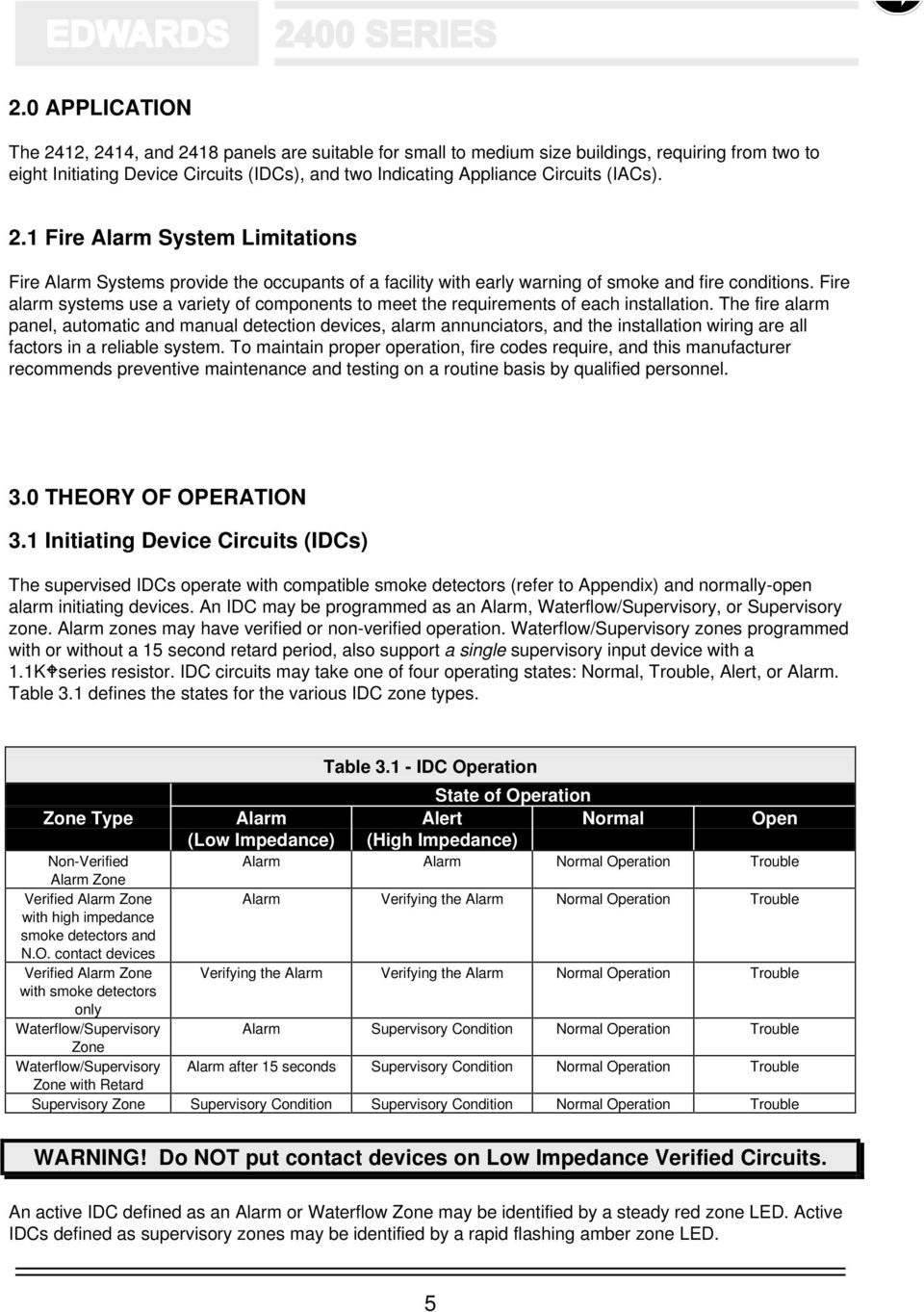
13 2.0 APPLICATION The 2412, 2414, and 2418 panels are suitable for small to medium size buildings, requiring from two to eight Initiating Device Circuits (IDCs), and two Indicating Appliance Circuits (IACs). 2.1 Fire Alarm System Limitations Fire Alarm Systems provide the occupants of a facility with early warning of smoke and fire conditions. Fire alarm systems use a variety of components to meet the requirements of each installation. The fire alarm panel, automatic and manual detection devices, alarm annunciators, and the installation wiring are all factors in a reliable system. To maintain proper operation, fire codes require, and this manufacturer recommends preventive maintenance and testing on a routine basis by qualified personnel. 3.0 THEORY OF OPERATION 3.1 Initiating Device Circuits (IDCs) The supervised IDCs operate with compatible smoke detectors (refer to Appendix) and normally-open alarm initiating devices. An IDC may be programmed as an Alarm, Waterflow/Supervisory, or Supervisory zone. Alarm zones may have verified or non-verified operation. Waterflow/Supervisory zones programmed with or without a 15 second retard period, also support a single supervisory input device with a 1.1KWseries resistor. IDC circuits may take one of four operating states: Normal, Trouble, Alert, or Alarm. Table 3.1 defines the states for the various IDC zone types. Table IDC Operation State of Operation Zone Type Alarm Alert Normal Open (Low Impedance) (High Impedance) Non-Verified Alarm Alarm Normal Operation Trouble Alarm Zone Verified Alarm Zone Alarm Verifying the Alarm Normal Operation Trouble with high impedance smoke detectors and N.O. contact devices Verified Alarm Zone Verifying the Alarm Verifying the Alarm Normal Operation Trouble with smoke detectors only Waterflow/Supervisory Alarm Supervisory Condition Normal Operation Trouble Zone Waterflow/Supervisory Alarm after 15 seconds Supervisory Condition Normal Operation Trouble Zone with Retard Supervisory Zone Supervisory Condition Supervisory Condition Normal Operation Trouble WARNING! Do NOT put contact devices on Low Impedance Verified Circuits. An active IDC defined as an Alarm or Waterflow Zone may be identified by a steady red zone LED. Active IDCs defined as supervisory zones may be identified by a rapid flashing amber zone LED. 5
14 When an IDC is programmed as a waterflow zone, the IACs DO NOT respond to the SILENCE switch or automatic alarm silence until the waterflow device is no longer active. Both an alarm initiating device and a supervisory contact may co-exist on the same circuit by putting a 1.1KΩ in series with the supervisory contact. When the waterflow with retard option is programmed, a special algorithm samples the circuit repeatedly. If 66% of the samples taken in any 15 second period indicate a waterflow (shorted) condition, the circuit activates a waterflow alarm. When an IDC is programmed as a verified zone and a smoke alarm is detected, the panel enters the Alarm Verification state. A twenty five second sequence in which the detector is reset, delayed, and restarted is initiated, as shown in Figure 3.1. If auxiliary power is programmed as resettable, it is deenergized for the reset period. Following the reset-delay-restart sequence, a 60 second verification window is opened. If the verifying zone should go into the Alert, Alarm, or Trouble conditions within the 60 second window as shown in Figure 3.2, the panel enters the alarm mode. If any other IDC on the panel goes into the alert or alarm state during the verification period, the panel immediately enters the alarm mode. Dry contact alarm initiating devices may be combined with High Impedance 2-wire smoke detectors on verified zones. The closing of a normally open dry contact alarm initiating device generates an Alarm state immediately, and the panel enters the alarm mode. Initiating Device Circuit, Class A (Style D) Operation To convert a Class B (Style B) IDC zone to a Class A (Style D) IDC zone, install a 2400-BPA Class A NOTE 2- Wire Relay Bases are NOT supported on Initiating Device Circuits (IDCs). (Style D/Z) Converter on the base panel, or a 2400-IDCA Class A (Style D) Converter on the Two Zone IDC Module. The converters provides an alternate path to the zone module for all Initiating Devices in the event of a single wire break in an IDC. 6

15 Figure Unsustained Alarm Operation Figure Verified Alarm Operation 7

16 3.2 Indicating Appliance Circuits (IACs) Two supervised Indicating Appliance Circuits (IACs) operate using compatible 24 VDC (nominal) polarized signaling appliances. Each circuit is rated at nominal Amps, with a total of 4.0 Amps available for both circuits. An IAC may be programmed as either silenceable or non-silenceable. Signal rate selection is independently programmable for each IAC as shown in Figure 3.3. Refer to the Appendix for compatible Indicating Appliances. Figure IAC Signal Rates IACs generate a trouble indication (slow flashing LED) when field wiring is open or shorted. In an open fault condition, the panel will attempt to energize the signal appliances (i.e., all appliances up to the circuit break will operate). An IAC with shorted field wiring will NOT operate in the event of an alarm. If an IAC develops a short during an alarm, the IAC will automatically shut off and continuously monitor the field wiring. When the fault is cleared, the IAC will re-energize. These actions protect the power supply and other panel components from damage caused by the short circuit. Indicating Appliance Circuit, Class A (Style Z) Operation To convert Class B IAC zones to Class A (Style Z) IAC zones, install a 2400-BPA Class A (Style D/Z) Converter Module on the base panel. The converter provides alternate paths to the base panel for both Indicating Appliance Circuits in the event of a single wire break in an IAC. 8

17 4.0 INSTALLATION 4.1 Codes and Standards Install this panel in accordance with all applicable codes and standards to the satisfaction of the Authority Having Jurisdiction (AHJ). A partial list of codes and standards appears in the Appendix. US Installations: For Class B (Style B/Y) circuits, the End-Of-Line resistor is installed on the last device. Canadian Installations: For Class B (Style B/Y) circuits, purchase End-Of-Line resistor plates separately from your Distributor. Use the specified resistors and install in a separate electrical box in an accessible location beyond the last device on a circuit. 4.2 Site Storage Remove backbox from top of carton. Place extra modules in panel carton and store safely in a dry location during rough-in, to avoid damage to electronic parts. 4.3 Drawing References Table 4.1 lists the drawings that are included at the end of this manual. Assembly Details Ribbon Connectors Battery Interconnect Base Panel Circuits IAC Wiring Diagram IAC Wire Chart Initiating Device Circuits IDC Wire Chart Subject 2IDC Two Zone Initiating Device Circuit Module Relay/City-Tie Module Applications. Connections and Jumper Settings Table Drawing References Drawing Title Control Panel Installation 1 Control Panel Installation 2 Control Panel Initiating Device Circuit Wiring INITIATING DEVICE CIRCUIT WIRING or see the Installation Sheet supplied with the Two Zone IDC Module Relay/City Tie Module Control Panel Applications 1 or see the Installation Sheet supplied with the Relay/City-Tie Module REMOTE ANNUNCIATORS Remote Annunciators & Annunciator Driver Modules 4-Wire Smoke Detectors Control Panel Applications 2 Class A Wiring Panel Programming Instructions Panel Operations CONTROL PANEL INITIATING DEVICE CIRCUIT WIRING or see the Installation Sheets supplied with the BPA Base Panel Class A Converter Module & IDCA, 2IDC Module Class A Converter Panel Programming Panel Operation 9

18 4.4 Installation Instructions Mounting the Backbox Install backbox per drawings Control Panel INSTALLATION 1 and Control Panel INSTALLATION 2. If a BATBOX Battery Cabinet is required, refer to the CONTROL PANEL APPLICATIONS 2 drawing for information. Utility or Primary Power Circuit NOTE Install primary power conduit on lower left side or left bottom of backbox. The panel requires a dedicated 120 VAC, 15A, 50/60 Hz branch circuit. Label the circuit breaker "Fire Alarm Control Panel." Within the fire alarm enclosure, route wire away from power limited circuit wiring. WARNING Do NOT apply power at this time. System Control Wiring 1. Refer to the drawings at the end of this manual for circuit wiring diagrams and wire charts showing maximum wire runs and loading. Install system wiring using the wire type and gauge per the Authority Having Jurisdiction. Locate field wiring conduit on the upper sides and top of the backbox. At the panel, leave approximately 5 (1.5 m) of wire available for dressing and termination. Pair and label wires according to zone and function. Do not mix power limited and non-power limited wiring in the same conduit. 2. Do not remove the factory installed test resistors from the panel at this time. The test resistors are used for panel testing in the next steps. Refer to the drawings provided with each initiating and signaling device for installation details. Install End-Of-Line resistors at the end of Class B circuits. 3. Use an ohm meter to check circuit continuity and verify that the wiring is free of shorts and ground faults, as follows: Class B (Style B) IDC meter readings should show 4.7KΩ (EOL Resistor) between circuit pairs. Each wire should show an open to ground. Class A (Style D) IDC meter readings should show a short between each set of outgoing and incoming wires, and an open between each side of the circuit. Class B (Style Y) IAC meter readings should show 4.7KΩ (EOL Resistor) between circuit pair in one direction and a short (polarized signals conducting) with the meter leads reversed. Each wire should show open to ground. Class A (Style Z) IAC meter readings should show a short between each set of outgoing and incoming wires. Readings should show an open in one direction and a short (polarized signals conducting) with the meter leads reversed between each side of the circuit. 10

19 Base Panel Assembly CAUTION The electronic components used in this system are sensitive to static electricity. Always discharge any static buildup on your body by touching the panel enclosure before handling any electronic components. WARNING The System Power Supply (the printed circuit board on the back of the Base Panel Assembly) handles 170 VDC when powered. DO NOT handle this board with power on. 1. Remove the Base Panel Assembly from its anti-static carton. 2. Remove and place the anti-static foam packing on a flat work area. 3. Place the Base Panel Assembly Display face down on the foam packing. Leave the factory end-of-line resistors in place on the base panel and expansion modules until making final connections. Option Module Installation If your system requires no optional expansion modules, skip to the section entitled Base Panel Assembly Installation. 1. Refer to the CONTROL PANEL INSTALLATION 1 and CONTROL PANEL INSTALLATION 2 drawings. 2. Remove the Power Supply from the Base Panel Assembly to allow for first module installation. 3. Install Expansion Modules on the Base Panel Assembly from left to right (front view) starting with IDC Modules, Remote Annunciator Driver Modules, then the Relay/City-Tie Modules. Before installing the ADM & ADS Annunciator Driver Modules, verify that all jumpers are installed. Before installing the RCT Relay/City-Tie Modules, verify that jumpers 1 & 2 are installed. Refer to RELAY/CITY-TIE & REMOTE ANNUNCIATOR drawings for additional jumper information. NOTE The Dialer Module MUST be installed in position number 3 or higher to prevent mechanical interference with other system components. Do NOT connect the Dialer Module s ribbon cable to the adjacent module until the rest of the system has been installed and tested. 4. Insert all ribbon connectors (except the Dialer Module) into the adjacent socket, and re-install the Power Supply on the back of the Base Panel Assembly. The Dialer Module will be connected later. 5. For Class A (Style D/Z) circuits, install the 2400-BPA Class A Converter modules on the back of the Base Panel Board and 2400-IDCA on the back of the IDC Expansion Modules. Refer to CONTROL PANEL INSTALLATION 1, CONTROL PANEL INSTALLATION 2, and INITIATING DEVICE CIRCUIT drawings. Base Panel Assembly Installation 11

20 1. Refer to the CONTROL PANEL INSTALLATION 1 or CONTROL PANEL INSTALLATION 2 drawings. If a 2400-BATBOX Battery Cabinet is required, refer to the CONTROL PANEL APPLICATIONS 2 drawing for information. 2. Lift wiring up and away from the backbox, and install the Base Panel Assembly using the four quick fasteners. Do not connect control circuit wiring at this time. 3. Install the panel door and make the ground connection (green wire) from the power supply to the middle door mounting stud. WARNING Batteries can deliver extremely high currents. To prevent serious burns caused by short circuiting the battery, remove all jewelry before handling. 4. Place the batteries in the lower right area of the backbox. If using the external battery cabinet, put the batteries in the battery cabinet. 5. Interconnect the cells per the CONTROL PANEL INSTALLATION 1 or CONTROL PANEL INSTALLATION 2 drawings. If a Battery Cabinet is being used, refer to the CONTROL PANEL APPLICATIONS 2 drawing for information. Connect panel battery leads at this time. Observe polarity: Red = positive (); Black = negative (-) CAUTION Observe polarity. Red is positive(), Black is negative(-). A non-replaceable fuse protects the system from damage caused by a reversed battery connection. Power Up 1. Verify that all factory installed end-of-line resistors are still in place, all -ADM & -ADS module jumpers are all installed, and -RCT module jumpers 1 & 2 are installed. 2. Connect primary power wires: Line, Neutral, and Ground to the input terminals of the power supply. 3. Energize AC power to the system. When you first apply power to the system it will follow an initialization procedure. This procedure programs all connected IDCs as non-verified alarm inputs and identifies the configuration of all output modules (it can take up to 15 seconds). You will see zone LEDs turning on and off in sequence and communication LEDs (lower edge of expansion module boards) flashing. Allow the system to complete this procedure before touching any controls. At the end of the process, all LEDs except the Power On LED should be off. If the system trouble LED is on and the trouble signal is sounding, refer to the trouble shooting procedures in this manual. If module LEDs remain on steady, refer to the Programming section for additional information. 4 Install the lower protective plastic barrier over the high voltage terminals. Make sure to install this cover strip. It protects you from the high voltage input terminals and traces on the power supply printed circuit board. Programming the Panel 1. Remove the Common Control insert card, reverse it, and then return it to its panel location. The Common Control switches are now labeled for programming functions. 2. Refer to Table 5.1 for panel default operations and the PANEL PROGRAMMING drawing for programming information. For Dialer Module programming, refer to the DIALER MODULE drawing 12

21 3. Fill-in the Panel Configuration & Programming Worksheets (located in the Appendix) and program the panel for the desired operation. Save the Panel Configuration Worksheets for future reference. 4. Remove, label, and re-insert the IDC, Relay/City-Tie, and Anunciator Driver Module insert cards. Use the Panel Configuration Worksheets in this manual to assist in labeling. Reverse the Base Panel insert card to display Fire Alarm Control functions. Panel Function Testing 1. Test panel operations by shorting (Alarm) or opening (Trouble) the factory installed End-Of-Line resistors. 2. To activate IDC circuits which combine high impedance smoke detectors and contact devices, or supervisory signal operation of a waterflow/supervisory circuit, use a 1.2KWresistor in parallel with the End-Of-Line resistor. 3. Remove the End-Of-Line resistor to verify proper trouble response. 4. Reset the panel, allowing 20 seconds for the panel to return to normal. IDC & IAC Field Wiring Connections 1. Refer to the CONTROL PANEL INSTALLATION, initiating device circuit wiring, control panel applications 1, & control panel applications 2 drawings for wiring details. 2. Dress all wires to allow "hinging" the Base Panel Assembly on the left by dressing your connections from right to left. This allows you to rotate the Base Panel Assembly out of the enclosure for access to system modules, facilitating additions or changes. 3. Leaving the system powered up, install the IDC & IAC circuits one at a time. The system will go into Trouble mode. Remember to remove the factory installed End-of-Line resistor from the panel or module terminals.) 4. Use the SILENCE switch to silence the Trouble signal. 5. Connect the appropriate field wiring, observing circuit polarity. If the wiring is correct, the trouble condition will clear (Trouble LED and amber Zone LED turn off) DL1 Dialer Panel and Field Wiring Connections To eliminate excessive calls to the Central Monitoring Station, the Dialer Module panel connection (ribbon cable) and programming should be performed after the balance of the panel has been tested and verified operational. 1. Verify the Central Monitoring Station (CMS) is properly programmed and ready for connection. 2. Refer to the DIALER drawing and DACR technical manual for wiring and programming details. 3a. Dress all wiring to allow "hinging" the Base Panel Assembly on the right by dressing your connections from right to left. This allows you to rotate the Base Panel Assembly out of the enclosure for access to system modules, facilitating additions or changes. 3b. Fasten the dialer module to the panel assembly with the screws and standoffs provided. 3c. Fasten the bus interface adapter to the rear of the dialer, using the screws provided. 3d. Connect the ribbon cable to the next module in line. The system and dialer module will indicate trouble conditions. 4a. Set the panel s program switch to program mode (UP), and push the RESET switch. 4b. Wait for the Power LED to flash, then return the program switch to normal mode (down). This process installs the Dialer Module in the panel s data base. The panel will remain in trouble until the dialer is properly wired and programmed. CAUTION 13
22 The telephone jacks must be installed by an authorized representative of the telephone company. Phone lines must be loop start on the public switched network. PBX, ground start, and party lines are not acceptable 5. Using the supplied 7Ft. (2.13 M) phone jack extension cables, connect J1 & J2 to the RJ31X, or RJ38X (CA31A or CA38A in Canada) telephone jacks. A protective grommet is supplied for the enclosure knockout. The telephone jacks must be installed by an authorized representative of the telephone company. The phone lines must be loop start on the public switched network. PBX, ground start, and party lines are not acceptable. 6. With system powered up, program the dialer as shown in the drawing. A new dialer module will remain in disabled until completely programmed. Use the SILENCE switch to silence the Trouble signal. 7. If the telephone lines are wired properly and the panel is programmed correctly, the trouble condition will clear (panel and module trouble LEDs turn off), when the dialer is enabled. 8. Activate and open all IDCs and IACs, verifying proper reception at the CMS. 9. Verify that failure of the primary signal path (phone line connected to J1) results in a trouble signal being transmitted via the secondary signal path (phone line connected to J2) within 4 minutes. 10. Verify that failure of the secondary signal path (phone line connected to J2) results in a trouble signal being transmitted via the primary signal path (phone line connected to J1) within 4 minutes. NOTE If a DL1 Dialer Module is installed, it will introduce a panel trouble until programmed. NOTE The Dialer Module will be disabled, with the LED double flashing amber until both phone numbers and both site ID numbers are set. Pressing the disconnect switch will have no effect. WARNING The DL1 Dialer Module requires separate programming in order to operate. Refer to the DIALER MODULE Drawing. 14
23 2400-ADM & 2400-ADS Field Wiring Connections 1. Refer to the REMOTE ANUNCIATOR drawing for wiring details. 2. Dress all wires to allow "hinging" the Base Panel Assembly on the left by dressing your connections from right to left. This allows you to rotate the Base Panel Assembly out of the enclosure for access to system modules, facilitating additions or changes. 3. Leaving the system powered up, connect the ()24 VDC wire from the annunciator to the () Auxiliary Power terminal. 4. Connect the NO (Normally Open) and NC (Normally Closed) wires from the annunciator to the NO and NC trouble relay contacts on the control panel. Install a jumper between the trouble relay common terminal and the (-) Auxiliary Power terminal. 5. Install all supervision jumpers 6. Connect the ADM & ADS LED circuits one at a time by removing the corresponding supervision jumper. 7. Use the SILENCE switch to silence the Trouble signal. 8. Connect the appropriate field LED wiring. If the wiring is correct, the trouble condition will clear (Trouble LED and amber Zone LED turn off) RCT Field Wiring Connections 1. Refer to the RELAY/ CITY-TIE drawing and receiving station technical manual for wiring details. 2. Dress all wires to allow "hinging" the Base Panel Assembly on the left by dressing your connections from right to left. This allows you to rotate the Base Panel Assembly out of the enclosure for access to system modules, facilitating additions or changes. 3. Use the SILENCE switch to silence the Trouble signal, if sounding. 4. Connect the appropriate field wiring, observing circuit polarity. If the supervised wiring is correct, the trouble condition will clear (Trouble LED and amber Zone LED turn off). Field Wiring Trouble (Also refer to Troubleshooting) 1. Clear any wiring faults as you install the field wiring. When a fault on a Class B circuit is cleared, the panel will automatically return to the Normal mode. When a fault on a Class A circuit is cleared, the panel must be manually reset to return it to the Normal mode. 2. If an IAC is shorted (or a signal appliance connection is reversed) or open, the circuit will continue to display trouble. If an IAC has a ground fault, the trouble signal will resound and the Ground Fault LED will turn on. If an IDC has a short, the zone LED will change to red and the system will go into Alarm mode (delayed 25 seconds if the circuit is programmed as a Low Impedance verified smoke detector circuit). If an IDC has a ground fault, the trouble signal will resound and the Ground Fault LED will turn on. 3. Continue to complete supervised circuit connections one at a time using the panel to verify proper wiring. 4. Connect ancillary circuits and remote monitoring and remote annunciator circuits per installation drawings in this manual. 5. Test each circuit for proper function by putting the system into Alarm, Supervisory, or Trouble modes. Refer to Operating the Panel for a description of testing procedures. 15
24 5.0 PROGRAMMING Panel Configuration Worksheets may be found at the end of this manual. These worksheets should be filled out prior to programming the panel, and saved with this manual should further programming be required at a later date. Refer to the PANEL PROGRAMMING drawing during the programming process. The reverse side of the base panel identification labels are programming templates. Remove, reverse, and re-insert the template labels as a programming aid. Dialer programming is covered in section 5.6. CAUTION The panel MUST be reprogrammed whenever permanently adding (or removing) option modules to (from) the system. Replacing a module with another module of the same type does NOT require reprogramming. DO NOT DISCONNECT AC POWER WHILE IN THE PROGRAMMING MODE! The panel is shipped from the factory with the default configuration denoted by in Table 5.1. The panel defaults may be re-programmed any time during the programming sequence by simultaneously pressing the SILENCE and RESET switches for one second, which also returns you to the start of the programming process. The programming step (of the panel being programmed) is indicated by the flash phase of the green Power LED. The program variable and flash phase is indicated in Table 5.2. Table Programmable Features = Default Initiating Device Circuit (IDC) 1 Non-Verified Alarm 2 Verified High Impedance Detector w/contact Device (See Note) 3 Verified Low Impedance Detector Only 4 Supervisory 5 Waterflow & Supervisory 6 Waterflow w/retard & Supervisory Indicating Appliance Circuit (IAC) 1 Affected by Alarm Silence Features 2 Not affected by Alarm Silence Features IAC Signal Rates 1 Continuous 2 March 120 SPM 3 Temporal Continuous ON for 10 Seconds., 5 Seconds. OFF 5 March Time ON for 10 Seconds., 5 Seconds. OFF Alarm Silence Inhibit Timer 1 No Timer 2 One Minute Inhibit 3 Two Minute Inhibit 4 Three Minute Inhibit Automatic Signal Silence Timer 1 No Timer 2 10 Minutes to Silence 3 20 Minutes to Silence 4 30 Minutes to Silence Auxiliary Power Reset 1 Auxiliary Power NOT Reset 2 Auxiliary Power Reset NOTE: Do Not use this option. High Impedance detectors are not presently available. 16
25 Table Programming Step Indications Program Step Power LED Flash Phase Module Placement & Verification 1 = YPAUSE Y PAUSE Y... Initiating Device Circuits (IDC) 2 = YY PAUSE YY PAUSE YY.. Indicating Appliance Circuits (IAC) 3 = YYY PAUSE YYY PAUSE YYY.. Timer Settings 4 = YYYY PAUSE YYYY PAUSE YYYY.. Auxiliary Power Setting 5 = YYYYY PAUSE YYYYY PAUSE YYYYY.. To modify the panel default settings shown in Table 5.1, enter the programming mode as follows: 1. Move the PROGRAMMING MODE switch to the ON (down) position. 2. Press the RESET switch. The green Power LED will display a single-phase flash after approximately 20 seconds. The trouble buzzer sounds at a four pulse/minute rate, indicating you are in the automatic module placement & verification step of the programming process. The panel automatically identifies all option modules installed in the panel by lighting each installed module's amber trouble LED. This process can take up to 30 seconds. Failure to light a module s trouble LED indicates a defective module or connection. NOTE If no front panel switches are activated for 15 minutes after entering the programming mode, the panel automatically exits the programming mode. The trouble buzzer will remain active as long as the PROGRAMMING MODE switch is in the ON (programming) position. 5.1 Programming Initiating Device Circuits (IDCs) 1. Press the RESET switch to enter the Initiating Device Circuit configuration step. The program IDC step is indicated by the 2-phase flashing green Power LED. IDC zones are programmed individually, starting with zone #1. The IDC zone actively being programmed is identified by an active zone LED. The IDC circuit type may be identified by the LED color and flash rate, using Table 5.3. Table IDC Zone Type Codes IDC Zone Type Zone LED Code Alarm, Non-Verified Detector Steady Red Alarm, Verified Detector & Dry Contact Alarm Initiating Y PAUSE Y PAUSE Y... RED Devices. (Do NOT select this option. High Impedance Detectors are not presently available.) Alarm, Verified Detector ONLY YY PAUSE YY PAUSE YYY.. RED For Low Impedance devices only. (ex series detectors) No contact devices permitted. Normally-Open Supervisory Steady Amber Waterflow Steady Green Waterflow with Retard Y PAUSE Y PAUSE Y... GREEN 17
26 2. Use the SILENCE switch to step through the various IDC zone types, until the desired IDC type code is displayed by the LEDs. 3. Select the IAC circuit to be operated by this zone by pressing the SILENCE switch until the desired configuration is reached. Signal circuits selected for activation by the IDC are indicated by the respective IAC s Trouble LED illuminating. 4. To program the next Initiating Device Circuit, press the RESET switch and repeat steps 2 and 3 above. 5. When the last installed IDC has been programmed, press the RESET switch; the panel is now ready for programming Indicating Appliance Circuits (IACs). 5.2 Programming Indicating Appliance Circuits (IACs) 1. The panel is automatically ready to program Indicating Appliance Circuits. The program IAC step is indicated by the 3-phase flashing green Power LED. Each IAC zone is programmed individually, starting with IAC #1. The IAC circuit actively being programmed is identified by its active Signal Circuit trouble LED. The IAC circuit type may be identified by the status of the alarm silenced LED and by the flash pattern of the respective IAC trouble LED as shown in tables 5.4 and 5.5. Table Panel Indicating Appliance Circuit Status IAC Mode Alarm Silenced LED Silenceable Y PAUSE Y PAUSE Y... Non-Silenceable OFF Table IAC Signal Output Rates IAC Circuit Type Signal Circuit Trouble LED Continuous Steady 120 Strokes per Minute (SPM) 120 Flashes per Minute Temporal (3-3-3) FLASH-FLASH-FLASH-PAUSE Continuous California Rate 10 Seconds ON, 5 Seconds OFF... March Time California Rate SPM, 5 Seconds OFF Use the SILENCE switch to set IAC #1 as Silenceable or Non-Silenceable, as shown in Table 5.4 and indicated by the Alarm Silenced LED. 3. Use the SILENCE switch to step through the various IAC output signal rates, until the desired flash pattern is displayed for IAC #1. 4. Press the RESET switch to program IAC #2. 5. Use the SILENCE switch to set IAC #2 as Silenceable or Non-Silenceable, as shown in Table 5.4 and indicated by the Alarm Silenced LED. 6. Use the SILENCE switch to step through the various IAC output signal rates, until the desired flash pattern is displayed for IAC #2. 7. When IAC #2 has been programmed, press the RESET switch; the panel is now ready for Configuring the System Timers. 18
27 5.3 Configuring System Timers 1. The configure System Timers step is indicated by the 4-phase flashing green Power LED. The status of the panel s Alarm Silence Inhibit Timer is indicated by the zone disabled LED as shown in Table 5.6. Table Alarm Silence Inhibit Timer Status Alarm Silence Inhibit Timer Setting Zone Disabled LED Disabled OFF 1 Minute Y PAUSE Y PAUSE YY.. 2 Minutes YY PAUSE YY PAUSE YY... 3 Minutes YYY PAUSE YYY PAUSE YYY Use the SILENCE switch to select between the four states. The status of the panel s automatic Alarm Silence Timer is indicated by the alarm silenced LED as shown in Table 5.7. Table Automatic Alarm Silence Timer Status Timer setting Alarm Silenced LED No timer OFF 10 Minutes Y PAUSE Y PAUSE Y Minutes YY PAUSE YY PAUSE YY Minutes YYY PAUSE YYY PAUSE YYY Use the SILENCE switch to toggle between the four states. 4. When the proper LED combination is displayed, press the RESET switch; the panel is now ready to program Auxiliary Power. 5.4 Programming Auxiliary Power 1. The program Auxiliary Power step is indicated by the 5-phase flashing green Power LED. Use the SILENCE switch to program the auxiliary power as shown in Table 5.8. Table Auxiliary Power on Reset Status Auxiliary Power Alarm Silenced LED Remains energized during reset OFF De-energize on reset Y PAUSE Y PAUSE Y... (alarm, verification, & test modes) 2. Use the SILENCE switch to toggle between the two states. 3. Press the RESET switch to return to the automatic module configuration step (1-phase flash), where the programming process started. You may modify any panel configuration by repeating the programming cycle. To exit the programming mode, return the PROGRAMMING MODE switch to the OFF (down) position. The panel should return to the Normal mode. You may exit the Programming mode at any time. This is useful when changing only one system parameter. 19
28 5.5 Returning to Panel Default Settings To restore the panel to system default settings, before exiting the programming mode, press the SILENCE and RESET switches simultaneously for one second. This will return all parameters to default settings (Table 5.1), and return the panel to the beginning of the programming sequence. 5.6 Dialer Module Programming Refer to the DIALER MODULE drawing You will need to know the following information in order to program the dialer module: The primary and secondary telephone numbers at the CMS used to receive the signals. The DL1 Password = 4727 (GSBS). Site primary and secondary ID numbers for the dialer. The site ID numbers are supplied by the CMS. Number of retry attempts to CMS. Valid entries are 5 to 10. The retry interval. This is the delay time between subsequent attempts to call the CMS. The AC power fail notification delay time, if any. Daily dialer supervision message delay period. This is the delay interval from power until the first dialer supervision message is transmitted to the CMS. Valid entries are 0 to 18 hours, with a 12 Hour default time. The panel must be powered down, then powered up for a change in the delay time to take effect. Status retransmission enable/disable setting. Enable this option if the CMS requires all off-normal status to be re-transmitted with the daily dialer supervision message. A B Put the dialer in the programming mode by plugging any tone dial telephone into J3 on the Dialer Module and lift the handset off-hook. The touch pad dial on this phone is used for all dialer module programming. If the Dialer Module is unresponsive, verify that steps 1 & 2 in the DL1 Dialer Panel and Field Wiring Connections section were performed. Enter the dialer password using the programming phone. A beep indicates that a program item has been entered. NOTE: The dialer will make one attempt to call the monitoring station and report that it is disabled before you can proceed with programming. C When the LED goes solid green, you may select any programming item by entering an asterisk * followed by the item number, e.g. *08 for AC fail delay. The suggested sequence is listed in the following steps: 1 Enter the primary site ID number supplied by the Central Monitoring Station (CMS). Always enter four (4) digits. If ID has less than four digits, enter leading zeros, i.e Enter the primary CMS phone number. This is the primary phone number of the DACR receiving equipment, not the administrative phone numbers. 3 Enter the secondary site ID number supplied by the Central Monitoring Station (CMS). Always enter four (4) digits. If ID has less than four digits, enter leading zeros, i.e Enter the secondary CMS phone number. This is the secondary phone number of the DACR receiving equipment, not the administrative phone numbers. 5 Select the number of phone lines to be used. NOTE: Two lines are required to comply with NFPA Enter the number of times the module attempts to call the CMS receiving equipment. 7 Enter the retry interval. This is the time between subsequent attempts to reach the CMS in the event of line trouble or busy signals. 8 Enter the AC failure delay time. This is the length of the delay between the time AC power fails and the CMS is notified of the failure. NFPA requires a delay of 25% to 50% of rated standby power period. Valid entries are 0 to 18 hours. This setting does NOT effect any other trouble signals. 20
29 9 Enter the daily supervisory message delay time. The module sends a supervisory message to the CMS once every 24 hours to verify the communications path and message receipt. The delay is used to set the time the daily message is transmitted based on a delay from the time the panel is powered up. EXAMPLE: If the CMS requires the daily supervisory message to be sent at 0300 (3 AM) and the current time is 1400 (2 PM), set the delay for 13 hours, power down, then power up. 10 Enable or disable the status message re-transmission option. The dialer can optionally re-transmit all status messages when the daily dialer supervision message is sent. Status retransmission is in addition to the message sent when the event occurred. 11 Select the order in which the zone number and status code are sent, zone first (default) or code first. D Hang up the handset and remove the programming telephone from Dialer Module jack J3 to end programming. NOTES: 1 If no activity occurs in programming mode for one hour, the DL1 will exit from programming mode. To re-enter programming mode, hang up the programming phone, then start at step B of the programming procedure. 2 Factory new dialers remain disabled until both phone numbers and both site ID s are programmed. Once programmed, the dialer will attempt to call the monitoring station on power up. Programming mode cannot be entered until the call is completed, or all call attempts have failed. 3 When dialer programming step 10 is enabled, it causes all off-normal status, including alarms, to be retransmitted along with the 24 hour test call. 21
30 6.0 OPERATION Table Panel Indicators Indicator Function Zone Disabled LED YY PAUSE YY PAUSE YY... - One or more zones disabled YYY PAUSE YYY PAUSE YYY... - Audible test mode YYYY PAUSE YYYY PAUSE YYYY... - Silent test mode Power LED ON - AC power normal OFF - AC power fail Zone Alarm (Red) LED STEADY - Zone in alarm Zone Trouble (Amber) LED STEADY - Supervisory condition restored RAPID FLASHING - Zone in supervisory alarm. SLOW FLASHING - Zone in trouble condition. YY PAUSE YY PAUSE YY... - Zone disabled Alarm Silenced LED ON - The audible alarm signals have been silenced Alarm LED ON - System in the alarm state System Trouble LED SLOW FLASHING - System in Trouble state RAPID FLASHING - System in Supervisory state STEADY - Trouble buzzer silenced Signal Trouble, Ckt #1 LED SLOW FLASHING - Open/short on IAC #1 wiring Signal Trouble, Ckt #2 LED SLOW FLASHING - Open/short on IAC #2 wiring Ground Fault LED SLOW FLASHING - A ground fault condition exists on the panel or field wiring Normal Mode In the Normal Mode, the panel is operating properly and has not detected any Alarm, Supervisory, or Trouble conditions. The green power LED is ON and all other LEDs are OFF in the normal mode. Alarm Mode When a fire alarm condition is detected, the common alarm LED is ON (RED), and the panel is in Alarm Mode. If the alarm occurs while in trouble or supervisory mode, the panel displays the system trouble LED steady ON, and silences the trouble buzzer. The trouble relay continues to indicate panel trouble. Zone Trouble and Supervisory LEDs not in conflict with the alarm LEDs remain ON. WARNING Do NOT silence fire signals until certain that a fire condition does not exist. In the alarm mode, the Indicating Appliance Circuits operate as programmed. The system alarm LED turns on, the alarm relay operates, and the Relay/City-Tie Module transmits a fire alarm condition, if so configured. The red IDC zone LED lights, indicating the area of the alarm. The appropriate alarm zone LED on the Remote Annunciator operates via the Annunciator Driver Module. The dialer will transmit a zone specific alarm signal to the Central Monitoring Station. To silence the Indicating Appliances, press the SILENCE switch. Indicating Appliance Circuits will not respond to the SILENCE switch until all waterflow zones are no longer in the active alarm condition. Reactivation of the waterflow zone will reactivate the IACs. 22
31 Reset Mode When the facility is safe to re-enter, the panel may be Reset. Manual stations and other manually restorable devices must be returned to their normal condition. Non-restorable devices which have been activated by the fire must be replaced. In the event replacement is not immediately feasible, disable the affected zone using its disable switch. Pressing the RESET switch automatically resets the smoke detectors and returns the panel to the normal (trouble mode if zones have been disabled) mode. If all alarm initiating devices have not been restored, the panel will re-enter the alarm mode. The entire reset process takes about 20 seconds to complete. The panel can NOT be reset while the alarm silence inhibit timer is active. Panel reset does not change a zone s enabled/disabled status. Reset the panel by pressing the RESET switch. Reset causes the system trouble LED to light, the trouble buzzer to sound, and the trouble relay to go into the trouble state. Operation of the RESET switch also causes all front panel LEDs to turn on, verifying their operation. After internal processing is completed, the panel returns to the normal mode. Trouble Mode When the panel is in the Trouble Mode, some portion of the panel or field wiring is in an abnormal condition and the proper operation of the fire alarm system may be affected. If an alarm is detected while in the trouble mode, the panel will enter the alarm mode and sound an alarm. If a supervisory condition is detected while in the trouble mode, the panel will enter the supervisory mode mode and the trouble contacts will remain activated. In the trouble mode: the system trouble LED flashes, the trouble buzzer sounds at a 20 pulse/minute rate, the trouble relay operates, and the Relay/City-Tie Module transmits a trouble signal if it is configured to transmit trouble. The dialer will transmit a trouble signal to the Central Monitoring Station. If the trouble occurs on an Initiating Device Circuit, the trouble message will be zone specific. The Relay/City-Tie Module (if configured to transmit trouble) delays its trouble output for 6 hours when activated by a loss of AC power. The base panel trouble relay activates 6 seconds after the loss of AC power. The relay s 6 second contact transfer delay minimizes nuisance troubles due to brownouts and power line failures. All other trouble conditions are transmitted off premise without delay. In addition to the system trouble LED, IDC zones, IAC zones, and option modules light a unique trouble LED, further identifying the cause of the problem. To silence the trouble buzzer, press the SILENCE switch. The system trouble LED will light steadily. New trouble conditions resound the trouble buzzer, and cause the system trouble LED to flash slowly. Correction of the problem causing a trouble condition automatically returns the panel to the normal mode, if no other faults exist. Certain critical internal faults and Class A trouble conditions latch the panel into the trouble mode, requiring the panel to be reset before exiting the trouble mode. Module placement trouble conditions remain active until the panel is reprogrammed. 23
32 Supervisory Mode When the panel is in the Supervisory Mode, a portion of the building fire protection system (not the panel) is in an abnormal condition and its proper operation is affected. If an alarm occurs while in the supervisory mode, the panel will enter the alarm mode and sound an alarm. If a supervisory condition is detected while in the trouble mode, the panel enters the supervisory mode. In the supervisory mode, the system trouble LED, amber supervisory zone LED, and trouble buzzer all operate at 120 pulses per minute. The trouble relay operates and the Relay/City-Tie Module (if configured to transmit supervisory alarm) transmits a supervisory and trouble signal. The respective zone LED on the remote annunciator will illuminate. The dialer will transmit a zone specific supervisory signal to the Central Monitoring Station. Restoration of the supervisory condition causes the amber supervisory zone LED to light steadily. The trouble buzzer continues to pulse rapidly, or will resound if previously silenced. The respective zone LED on the remote annunciator will remain illuminated during the supervisory restore mode. Press the RESET switch to exit the supervisory mode when all supervisory alarms have restored. The dialer will transmit a zone specific restore signal to the Central Monitoring Station. Drill Mode The drill mode operates both IACs. The panel will leave the drill mode, enter the alarm mode, and sound an alarm if an alarm is detected. The panel will leave the drill mode and enter the supervisory mode if a supervisory condition occurs. The drill mode is entered from the normal mode by simultaneously pressing the SILENCE and RESET switches for at least one second. Entering the drill mode places the panel in the trouble mode. The trouble LED will flash slowly. Pressing the SILENCE switch terminates the drill. The alarm relay and the Relay/City-Tie Module (when configured to transmit alarms) do not operate in the drill mode. To exit the drill mode, either press the SILENCE switch, or press the RESET switch. IDC Zone Disable Initiating Device Circuits (IDCs) may be individually Disabled by operating a zone s ZONE DISABLE switch. WARNING Disabling a zone removes the zone s ability to put the panel in an Alarm or Supervisory condition. Disabling a zone permits the panel to be reset and restore protection to all zones except the disabled ones. The ZONE DISABLE switch is also used to select a zone for testing, as detailed in the section entitled Test Mode. When a zone(s) is disabled, the Zone Disabled LED as well as the individual zone trouble LED exhibit a 2- phase flash, and the panel is put in the trouble mode. If the panel was in an Alarm, Supervisory, or Trouble state when the ZONE DISABLE switch was activated, the panel will not return to normal. When a disabled zone is re-enabled, its zone LED indicates its status. If a re-enabled zone indicates it is in alarm, the panel will wait 10 seconds before going into the alarm mode. Pressing the ZONE DISABLE switch within the 10 second period disables the zone again, without the panel going into the alarm mode. A disabled zone's status is retained in the panel's memory during power down, and will remain disabled upon power up. Panel reset does not change a zone's enabled/disabled status. 24
33 Test Mode The Test Mode is used to verify the operation of the panel, alarm initiating devices, and the integrity of field wiring. WARNING Fire detection capability on the zone(s) under test is NOT functional in the Test Mode. The panel will leave the test mode, enter the alarm mode, and sound an alarm if a zone not selected for testing detects an alarm. The panel will leave the test mode and enter the supervisory mode if a zone not selected for testing detects a supervisory condition. Putting the panel in the test mode also puts it in the trouble mode. Select an IDC zone(s) for testing by operating its respective zone disable switch(s). The "audible" test mode is entered from the normal or trouble modes by simultaneously pressing the SILENCE and RESET switches for at least one second. This causes the zone disabled LED to show a 3-phase flash and the trouble buzzer to pulse slowly. The trouble buzzer can be silenced in the test mode. The alarm relay, Relay/City-Tie Module (when configured to transmit alarms) will not operate in the test mode unless a valid alarm on any zone not being tested is received. Pressing the SILENCE and RESET switches a second time, for at least one second while in the audible test mode, puts the panel in the "silent" test mode. This causes the zone disabled LED to show a 4-phase flash and the trouble buzzer continues to sound. The silent test mode operates identically to the audible test mode with the exception that the IACs are not activated. The use of a Preventive Maintenance Tester (P/N ) is recommended when performing a silent walk test. Any alarm (verified or non-verified) on a zone under test will operate both IACs. The panel will sound one short pulse for zone 1, five short pulses for zone 5, etc., audibly identifying the number of the zone successfully tested. A trouble condition or ground fault on any zone under test, or an open or ground on either IAC, sounds a one second pulse on both IACs. If the auxiliary power is programmed as resettable, it will be deactivated while the zone under test is being reset. In the test mode, the time the disabled IDC zone(s) takes to reset is characteristic of the source initiating the test sequence, as shown in Table 6.2. This feature is primarily used when testing in the silent test mode. The IDC zone reset period may be determined by measuring the length of time that the nominal IDC voltage (24 VDC) equals 0 VDC. Table Test Mode Initiating Condition IAC Response (Audible Test Mode Only) IDC Zone Reset Period (Audible & Silent Test Modes) Alarm on disabled IDC under test Coded zone # 8 seconds Open on disabled IDC under test 1 second pulse 4 seconds Ground fault on any panel wiring 1 second pulse 2 seconds Open IAC circuit 1 second pulse Not Applicable 25
34 NOTE When verifying the operation of strobe lights using the Test Mode, the strobe lights may not receive enough energy to successfully charge. Use independent test methods such as Drill Mode to verify strobe lights and field wiring. NOTE Before exiting Test Mode, be sure to Enable the zone(s) that were Disabled for testing. CAUTION If there is no activity on the system for 30 minutes, the system will exit the Test Mode and the Disabled zone(s) will remain Disabled. To exit the test mode, press and hold the RESET switch for one second. Dialer Operations Refer to Dialer Operations drawing Table Dialer LED Indications Display Description Single Flash Green Call to Central Monitoring Station in progress. Steady RED Alarm Sent & Acknowledged Fast Flash AMBER Supervisory alarm sent & Acknowledged Steady AMBER Supervisory restore sent & acknowledged. Single Flash AMBER Module in trouble Double Flash AMBER Module disabled Remote Trouble Unit The green Power LED will be on whenever the RTU is receiving power from the control panel. The Amber Trouble LED will be on whenever the control panel is in trouble. The Trouble Buzzer will sound when the control panel is in trouble and the trouble silence switch is in the normal position, and will sound when the control panel is not in trouble and the trouble silence switch is in the silence position. 26
35 7.0 SHOOTING CAUTION Disconnect AC and battery power before installing or removing modules. WARNING Lethal voltages from other equipment may be present within the panel even with the alarm system AC power source disconnected. Table Trouble LEDs Condition Possible Cause 3 or 4-Phase flashing Amber ZONE DISABLED LED 1. System is in the Test mode (Disabled zones are under test) Slow flashing Amber LED & Signal Appliances 1. System is in the Drill mode operating Slow flashing Green POWER ON LED & Trouble Buzzer 1. System is in the Program mode pulsing 2. Program switch in "ON" position Slow flashing Amber Common LED 1. Circuit open, missing or wrong EOL resistor 2. Fuse F1 open NOTE: 3. Excessive load on auxiliary power terminals When ONLY the common trouble LED is lit, the problem 4. Battery lead not connected or open is related to possible causes 3 through 12. To determine 5. Defective batteries the cause: 6. Defective power supply (replace) 1. Silence the Trouble 7. Battery lead poorly connected 2. Duplicate fault conditions 3 to 11, one at a time to see 8. Battery low and currently charging if there is a subsequent trouble. When NO subsequent 9. New module installed on power/data bus (program module) trouble when the fault is duplicated, you have isolated 10. Unresponsive module on power/data bus (replace module) the cause of the trouble. 11. Programming Mode Switch in program mode 12. Battery fuse open Slow flashing Amber LED, & slow flashing Amber Signal Trouble LED Slow flashing Amber LED & Ground Fault LED. -RCT Trouble LED 1. Electronic circuit breakers open 2. Circuit open, missing, or incorrect EOL resistor 3. Circuit shorted, improperly installed device 1. Ground fault on field wiring 1. Open Circuit on field wiring 2. Master box not reset - ADM Trouble LED 1. Field wiring open Table Panel Trouble Condition Possible Cause 4-Wire detectors will not reset Auxiliary power not programmed as resettable 2-phase flashing Amber zone LED & zone disabled LED Zone disable switch activated 3-phase flashing Amber zone LED & zone disabled LED Zone in audible test mode 4-phase flashing Amber zone LED & zone disabled LED Zone in silent test mode Power LED flashing, panel will not work Programming Mode Switch in the ON position 27
36 Table Dialer Module LED Trouble Codes Condition Trouble ( PAUSE PAUSE...AMBER) Disabled ( PAUSE PAUSE... AMBER) Possible Cause 1. Retry count exceeded, unable to communicate. 2. Phone line open or shorted. 1. Disable switch activated. (dialer will automatically re-enable in 24 Hrs. and transmit current status) 2. Dialer not completely programmed. 3. In programming mode. 28
37 8.0 PREVENTIVE MAINTENANCE Before commencing testing, notify all areas where the alarm sounds and off premise locations that receive alarm and trouble transmissions that testing is in progress. m m m m m Records of all testing and maintenance shall be kept on the protected premises for a period of at least five (5) years. Required Tools: Slotted Screwdriver, Insulated Digital Multimeter. 1.1KΩ, 1 W resistor 12" (30.5 cm) jumper lead with alligator clips Panel Door Key A complete check of installed field wiring and devices should be made at regular intervals, in accordance with NFPA 72 and ULC 524 requirements. This includes testing all alarm and supervisory alarm initiating devices and circuits and any off premise connections. Panel operation should be verified in the alarm, supervisory, and trouble modes. To insure that the panel can be powered when primary power is lost, the batteries should be periodically inspected, tested, and replaced (as a minimum) every four (4) years. 8.1 Preventive Maintenance Schedule Table Preventive Maintenance Schedule Component Testing Test Procedure Interval Manual Stations Semi-annually 1. Visual inspection 2. Put zone in test mode 3. Activate mechanism 4. Verify proper IDC zone response Non-Restorable Heat Detectors Semi-annually 1. Visual inspection 2. Put zone in test mode 3. Test mechanically and/or electrically 4. Verify proper IDC zone response Restorable Heat Detectors Smoke Detectors Waterflow Switches Semi-annually 1. Visual Inspection 2. Put zone in test mode 3. Activate at least one detector on each IDC. Within five years all detectors on each IDC shall be tested Annually 1. Visual inspection 2. Put zone in test mode 3. Functional test to verify proper IDC zone response 4. Check sensitivity 5. Clean as required 2 Months 1. Put zone in test mode 2. Activate sprinkler test valve. Refer to Sprinkler system test procedure. Table 8.1 continued on next page. 29
38 Component Supervisory Signal Initiating Devices Remote Annunciators Alarm Indicating Appliances All Initiating Device Circuits Verified Non-Verified Waterflow Waterflow w/ Retard Supervisory Panel LEDs & Trouble Buzzer Panel Primary Power Panel Secondary Power Panel Trouble Signals Auxiliary System Off-Premise Fire Alarm Signal Transmission Remote System Off-Premise Waterflow Signal Transmission Table Preventive Maintenance Schedule (Continued) Testing Interval Semi-annually Annually Annually Annually Annually Acceptance and Re-acceptance tests Acceptance and Re-acceptance tests Annually Monthly Every 2 Months Test Procedure 1. Put zone in test mode 2. Operate valve 3. Test pressure, temperature, and water level sensors per the sprinkler system test procedure 1. Verify all indicators operating properly. 2. Verufy RTU Trouble Signal Operating properly. 1. Visual Inspection 2. Put panel in alarm, drill, or test mode. Verify all indicating appliances operating properly 1. Bypass zone and enter test mode 2. Short IDC zone (15 Sec. For waterflow). IACs should activate, sounding the zone number 3. Wait 15 seconds. Place 1.1KΩ across IDC. IACs should activate, sounding the zone number 4. Wait 15 seconds, then open the IDC field wiring. IACs should activate, sounding a 1 second pulse 5. Wait 15 seconds, then ground one side of the IDC field wiring. IACs should activate, sounding a 1 second pulse 6. Reset and lock panel at conclusion of all testing 1. Illuminate all LEDs by pressing the RESET switch 2. Reset and lock panel at conclusion of all testing 1. Remove Primary AC power 2. Verify panel operates from battery 3. Verify panel goes into trouble (6 second delay) 4. Restore AC power at end of test 5. Reset and lock panel at conclusion of all testing 1. Remove Primary AC power 2. Measure standby and alarm currents, and compare with battery calculations to verify adequate battery capacity. 3. Test under full load for five (5) minutes 4. Measure battery voltage under full load (20.4 to 27.3 VDC) 5. Restore AC power at end of test 6. Reset and lock panel at conclusion of all testing 1. Verify operation of System Trouble LED and trouble buzzer 2. Reset and lock panel at conclusion of all testing 1. Coordinate test with receiving location 2. Verify receipt of all transmitted signals 3. Reset and lock panel at conclusion of all testing 1. Coordinate test with receiving location 2. Verify receipt of all transmitted signals 3. Reset and lock panel at conclusion of all testing 30
39 8.2 Testing Procedures for the DL1 Dialer Module Every Six months (or as required by the Authority Having Jurisdiction): Verify that the dialer module is connected to two separate phone lines. Activate an alarm initiating device and verify the alarm is received at the Central Monitoring Station (CMS). Restore System to normal. Verify that failure of the primary signal path (phone line connected to J1) results in a trouble signal being transmitted via the secondary signal path (phone line connected to J2) within 4 minutes. Verify that failure of the secondary signal path (phone line connected to J2) results in a trouble signal being transmitted via the primary signal path (phone line connected to J1) within 4 minutes. 8.3 Testing Procedures for Compatible 2-Wire Smoke Detectors EDWARDS 2420 m Functional Test: Hold a magnet next to the alarm LED. The detector should alarm within 5 seconds. m Cleaning: To clean the ion chamber, disable the zone using the ENABLE/DISABLE switch to prevent accidental alarm. Remove the detector from its base. Remove the grill. Place the vacuum cleaner nozzle over the chamber and remove dust. Reinsert the grill by aligning tabs on the grill with slots on the housing. Press the grill into the housing and turn clockwise until grill locks into position. EDWARDS 2430 m Functional test: Insert the long end of the calibrated test probe (P/N A) into the oblong opening on top of detector grill. The detector should alarm within 10 seconds. Insert the short end of the calibrated test probe into the oblong opening on top of the detector grill. The detector should NOT alarm within 10 seconds. If an alarm occurs, clean or replace the detector. m Cleaning: To clean photo chamber, disable the zone using the ENABLE/DISABLE switch to prevent accidental alarm. Remove the detector from its base. Remove the grill. Vacuum dust and foreign material from the optic ramp area. Remove the bug screen from the grill. Wash the bug screen and grill in water and air dry. Reinsert the screen into the grill. Reinsert the grill by aligning the arrow on the rim of the grill with the LED on the housing and turn clockwise until the grill locks into position. CAUTION If the grill is removed while the detector is in its base, the detector will generate an alarm. NOTE Aerosol test sprays are NOT recommended due to possible interaction with composite detector housings. 31
40 At the conclusion of testing, notify all locations previously contacted that testing is complete. 8.4 Replacement Parts Table Related/Spare Parts Part ID Description 12V6A5 12 V, 6.5 AH Battery (2 required) 6V8A 6 V, 8.0 AH Battery (4 required) 12V10A 12V, 10 AH Battery (2 required) Preventive Maintenance Tester ULI Listed series supervisory resistor (1.1KΩ) and ULI Listed EOL resistor (3.6 KΩ) EOL-P1 ULC Listed End-Of-Line Resistor on 1-Gang Plate KΩ UL Listed End-Of-Line Resistor Battery Cabinet 8 Amp Fuse Replacement Door R Red Replacement Door Replacement Door R Red Replacement Door Replacement Door R Red Replacement Door Cat. # 45 Lock & 2 Keys (13 mm) Hex threaded Standoff EST1-2Z3 Terminal Cover (2 required per panel) EST1-2Z6 Terminal Cover (2 required per panel) 32
41 9.0 SPECIFICATIONS Dimensions (HWD) 2412 & 2414 Panels Back box Finished 2418 Panel Back box Finished Weight (less battery) 2412 Panel 2414 Panel 2418 Panel Input Power Output Power - Signals Auxiliary Power Maximum Capacitance Option Module Spaces Battery Type 2412 & 2414 Panels Table Specifications Base Panel Assemblies 12" x 14" x 2.75" [30.5 cm x 35.6 cm x 7.0 cm] 14" x 15.75" x 1.125" [35.6 cm x 40.0 cm x 2.9 cm] 13" x 20.19" x 2.75" [33.0 cm x 51.3 cm x 7.0 cm] 15" x 22" x 1.125" [38.1 cm x 55.9 cm x 2.9 cm] 12 lbs. (5.5 Kg) 12.5 lbs. (5.7 Kg) 16 lbs. (7.3 Kg) A, Hz 24 4A. Refer to Compatibility Section. 24 VDC 500 ma., filtered, reset programmable. Refer to Compatibility Section. 100 mf 2412 Panel: 3 Input/Output 2414 Panel: 2 Input/Output 2418 Panel: 3 Output 2 x 12 V, 6.5 AH, Lead-Acid 2418 Panel 2400-BATBOX(R) Battery Cabinet Ground Fault Detection IDC Zones Style Configurations Detector Capacity per IDC Circuit Supervisory Series & EOL Resistors (P/N for ULI) (2 each P/N EOL-P1 for ULC) IDC End-Of-Line Resistor Max. IDC Circuit Field Wiring Resistance 2 x 12 V, 6.5 AH, Lead-Acid 4 x 6 V, 8.0 AH, Lead-Acid 2 x 12V, 10 AH Lead-Acid 10KΩ to earth, all field wiring except AC input and common relay contacts Two Class B (Style B) or Class A (Style D) Verified or non-verified alarm Waterflow or waterflow with retard Supervisory 30 - photoelectric smoke 50 - ionization smoke Detector voltage to 26.4 VDC. Max. Ripple = 400 mvdc Max. Alarm Current = 33 madc. Refer to Compatibility Section. 2-Wire Relay Bases are NOT supported. 1.1KΩ, 1 Watt; 3.6KΩ, 1/2 Watt 4.7KΩ, 1/2 Watt 50Ω IAC Circuits Two Class B (Style Y), optional Class A (Style Z) IAC Output Power/Ckt Nominal A; 4.0 Amp total for both zones IAC EOL 4.7KΩ, 1/2 Watt System Alarm Relay Form C, 24 A. Refer to Compatibility Section for proper installation. System Trouble Relay Form C, 24 A. Refer to Compatibility Section for proper installation. Indicators Power, System Trouble, Zone Disabled, Alarm Silenced, Alarm, Signal circuit trouble (2), and Ground Fault LEDs Controls Trouble Silence, Alarm Silence, Reset, and Zone Enable/Disable Switches Max. Battery Charger Current 500 madc 33
42 Environment Relative Humidity Operating Temperature Table Specifications Base Panel Assemblies 86 F (30 C) 32 F to 120 F (0 C to 49 C) Table Specifications 2400-BPA Base Panel Class A (Style D/Z) Converter Module (P/N ) Expansion Space None IDC Wiring Converts two Style B Circuits into two Style D Circuits IAC Wiring Converts two Style Y Circuits into two Style Z Circuits Weight 0.4 lbs (0.18 Kg) Table Specifications IDC IDC Module (P/N ) Expansion Space 1 IDC Zones Two Style B, verification optional Detector Capacity per IDC Circuit 30 - Photoelectric Smoke 50 - Ionization Smoke Detector voltage to 26.4 VDC. Max. Ripple = 400 mvdc. Max. Alarm Current = 33 madc Refer to Compatibility Section. Relay Bases are NOT supported. IDC EOL 4.7KΩ, 1/2 Watt Max. Circuit Resistance 50Ω Indicators and Controls Trouble LED Enable/Disable Switch Weight 0.3 lbs (0.14 Kg) Table Specifications 2400-IDCA IDC Class A (Style D) Converter Module (P/N ) Expansion Space None IDC Wiring Two Class A (Style D) Circuits Weight 0.3 lbs (0.14 Kg) Table Specifications 2400-RCT Relay/City-Tie Module (P/N ) Expansion Space 1 Configurable Operation Reset, Alarm, Trouble, or Supervisory Master Box Operation Nominal 24 VDC Max. Wiring Resistance 25 Ω Trip Current 200 ma into 14.5 Ω coil Reverse Polarity Operation Loop and Receiver Resistance Current Range Dry Contact (Shunt) Indicators and Controls Weight Nominal 24 VDC 1.5 KΩ, Max. 2.5 to 9.9 ma Normally-Open OR Normally-Closed, 24 1 A See Application Section for proper installation. Trouble LED Enable/Disable Switch 0.4 lbs (0.18 Kg) 34
43 Table Specifications 2400-ADM Annunciator Driver Master Module (P/N ) Expansion Space 1 Circuit Rating ma Max. Weight 0.4 lbs (0.18 Kg) Table Specifications 2400-ADS Annunciator Driver Slave Module (P/N ) Expansion Space 0 Circuit Rating ma Max. Weight 0.3 lbs (0.14 Kg) Table Specifications Remote Annunciators Wiring 22 AWG, Min. Power 24 VDC, Nominal Model Supervisory Current AlarmCurrent 2400-RTU 10 ma 10 ma 2400-RTU4ZA 11 ma 11 ma 11 ma/ Active zone LED 2400-RTU8ZA 12 ma 12 ma 11 ma/ Active zone LED ZA 1 ma 1 ma 11 ma/ Active zone LED ZA 2 ma 2 ma 11 ma/ Active zone LED (C) = Bilingual version Wiring Battery Type Dimensions (HWD) Back box Finished Table Specifications 2400-BATBOX(R) Battery Cabinet 5 Ft (1.52 M) Max. 16 AWG Min. 2 x 12 V, 10 AH, Lead-Acid 13" x 20.19" x 2.75" [33.0 cm x 51.3 cm x 7.0 cm] 15" x 22" x 1.125" [38.1 cm x 55.9 cm x 2.9 cm] 35
44 Table Specifications DL1 Dialer Module Expansion Space 1 Phone Line: Two Loop Start lines on Public switched telephone network, Pulse or DTMF dialing. Wall Connector Standard RJ-31X jack Line Supervision Trouble when line voltage < 10 V & line current < 5 ma. Communications Protocol SIA pulse format P3, 20 PPS, 4/2, double round, 1400 Hz handshake, 1900 Hz carrier Telephone Numbers Two, 24 digit numbers FCC Registration Number 4Z2USA AL-E Dialing Retries 5 to 10 AC Power Failure Delay 0 to 18 hours Clock Accuracy Within one hour/year Compliance Communications Canada CS-03 FCC / CFR 47 Parts 15 & 68 NFPA 72; UL 864; ULC S527-M87; FM Programming Phone Any Tone dial (DTMF) Phone with RJ11 plug Weight 0.4 lbs (0.18 Kg) DL1 Dialer Codes Event Condition Event Code Event Condition Event Code Zone 1 Alarm 11 Zone 6 Alarm 61 Supervisory Alarm 12 Supervisory Alarm 62 Trouble 13 Trouble 63 Restore 14 Restore 64 Supervisory Restore 15 Supervisory Restore 65 Zone 2 Alarm 21 Zone 7 Alarm 71 Supervisory Alarm 22 Supervisory Alarm 72 Trouble 23 Trouble 73 Restore 24 Restore 74 Supervisory Restore 25 Supervisory Restore 75 Zone 3 Alarm 31 Zone 8 Alarm 81 Supervisory Alarm 32 Supervisory Alarm 82 Trouble 33 Trouble 83 Restore 34 Restore 84 Supervisory Restore 35 Supervisory Restore 85 Zone 4 Alarm 41 Panel Normal 24 Hr. 90 Check in Supervisory Alarm 42 Trouble 93 Trouble 43 Restore 94 Restore 44 AC Power Fail 96 Supervisory Restore 45 Abnormal 24 Hr. 97 Check in Zone 5 Alarm 51 Telephone Line trbl 98 Supervisory Alarm 52 Dialer Disabled 99 Trouble 53 Restore 54 Supervisory Restore 55 36
45 10.0 APPENDICES 10.1 Appendix 1 - Battery Calculations Battery Tables Maximum battery size is 8.0 AH. Maximum battery size with optional 2400-BATBOX(R) Battery Cabinet is 10 AH. Refer to Replacement Parts Section for part numbers. The battery tables allow quick battery selection. Three battery tables are provided for the three most common Supervisory and Alarm Time combinations. For instructions on using the battery tables, refer to the section entitled Using the Battery Tables. # Zones Table Hours Supervisory, 5 Minutes of Alarm Signal Circuit Current: 4 Amps for 5 Minutes Aux. Circuit Current: Amps for 5 Minutes # Option odules Panel Current Load Aux. Power Supervisory Current (A) Amp/Hour Battery Size * * * * * * 8.0* * * = Must Purchase Auxiliary Battery Box P/N 2400-BATBOX Separately. 37
46 Aux. Sup Current # Zones Table Hours Supervisory, 5 Minutes of Alarm Signal Circuit Alarm Current for 5 Minutes Aux. Circuit Current: Amps for 5 Minutes # Option Modules Panel Current Load Signal Circuit Alarm Current (A) ma Amp/Hour Battery Size * 8.0* 8.0* 8.0* 8.0* * 8.0* 8.0* 8.0* 8.0* 8.0* 8.0* 8.0* * 8.0* 8.0* 8.0* 8.0* * 8.0* 8.0* 8.0* 8.0* 8.0* 8.0* 8.0* ma Amp/Hour Battery Size * 8.0* 8.0* 8.0* 8.0* 8.0* 8.0* 8.0* * * 8.0* 8.0* 8.0* 8.0* 8.0* 8.0* 8.0* * ma Amp/Hour Battery Size * 8.0* 8.0* 8.0* 8.0* 8.0* 8.0* - * = Must Purchase Auxiliary Battery Box P/N 2400-BATBOX Separately. 38
47 Aux. Sup Current Table Hours Supervisory, 30 Minutes of Alarm Signal Circuit Current for 30 Minutes Aux. Circuit Current: Amps for 30 Minutes # Option Modules Panel Current Load Signal Circuit Alarm Current (A) ma Amp/Hour Battery Size ma Amp/Hour Battery Size ma Amp/Hour Battery Size ma Amp/Hour Battery Size ma Amp/Hour Battery Size
48 Using the Battery Tables Having selected the proper table, you must know the number of option modules installed in the panel, any auxiliary current required, and when using Tables 10.2 and 10.3, the signal current required. Option modules are IDC Two Zone Initiating Device Circuit Modules, 2400-RCT Relay/City-Tie Modules, and 2400-ADM Annunciator Driver Master Modules BPA Class A Converters, 2400-IDCA Class A IDC Converters, and 2400-ADS Annunciator Driver Slave Modules are NOT considered in the module count. Table Hours Supervisory, 5 Minutes of Alarm The intersection of the row representing the number of installed modules with the auxiliary supervisory current column equal to or greater than the required auxiliary current load indicates the minimum required battery size in Amp Hours (AH). Table Hours Supervisory, 5 Minutes of Alarm, & Table Hours Supervisory, 30 Minutes of Alarm Enter the table by selecting the auxiliary supervisory current equal to or greater than that required. Staying within the chosen supervisory current portion of the table, the intersection of the row representing the number of installed modules with the column representing the required alarm signal current indicates the minimum required battery size in Amp Hours (AH). 40
49 Battery Calculation Example #1 A panel with one (1) option module is to be installed in accordance with the Canadian National Building Code (NBC) requirement of 24 hours standby, 30 minutes alarm. The IAC requires 2.5 Amps, and there is no auxiliary power used. Calculate the minimum required battery capacity that will meet the requirements. Looking at Table 10.3, the intersection of the one (1) option module row and the 2.5 Amp IAC alarm current column within the 0 ma area of the table occurs at 6.5. This indicates that the required battery capacity is 6.5 AH. Two 12 V, 6.5 AH batteries (P/N 12V6A5) will adequately power this system. Aux. Sup Current EXAMPLE #1 Table Hours Supervisory, 30 Minutes of Alarm Signal Circuit Current for 30 Minutes Aux. Circuit Current: Amps for 30 Minutes Panel Current Load Signal Circuit Alarm Current (A) # Option Modules 0 ma Amp/Hour Battery Size
50 Battery Calculation Example #2 A two zone panel with two (2) option modules requires 24 hours of standby, 5 minutes of alarm. The IAC requires 2.5 Amps. The 4-wire smoke detectors require 25 ma of auxiliary power. Calculate the minimum battery capacity that will meet these requirements. Looking at Table 10.1, the intersection of the two (2) option module row and the 25 ma supervisory current occurs at 4.5. This indicates that the required battery capacity is 4.5 AH. Two 12 V, 6.5 AH batteries (P/N 12V6A5) will adequately power this system. NOTE: If 8 zones were installed in the panel, the battery capacity would remain at 6.5 AH. # Zones EXAMPLE #2 Table Hours Supervisory, 5 Minutes of Alarm Signal Circuit Current: 4 Amps for 5 Minutes Panel Current Load Aux. Power Supervisory Current (A) # Option odules Amp/Hour Battery Size * * * * * * 8.0* * * = Must Purchase Auxiliary Battery Box P/N BATBOX Separately. 42
51 Battery Calculation Worksheets If the panel parameters exceed the values in the battery calculation tables, or if detailed battery calculations are required, the battery calculation worksheets should be used. 1. Enter the quantity of each module installed in the "Quantity" column, next to the appropriate module description. 2. For each quantity entry, multiply the value in the "Quantity" column by the value in the "Supervisory" column, and enter the value in the "Total Supervisory" column. 3. For each quantity entry, multiply the value in the "Quantity" column by the value in the "Alarm" column, and enter the value in the "Total Alarm" column. 4. Add all values in the "Total Supervisory" column and put the answer in the Total Supervisory box "A". 5. Add all values in the "Total Alarm" column and put the answer in the Total Alarm box "B". 6. Enter the required supervisory time (hours) in box "C", and the total alarm time (minutes) in the alarm time box "D". 7. Substitute the values from boxes "A" through "D" in the battery calculation formula, and calculate the minimum battery capacity. Description Quantity Supervisory (ma) Total Supervisory (ma) Alarm Total Alarm Base Panel 1 x Zone input module x Relay Modules x Style D IDC Converter Dialer x Annunciator Master x Remote Trouble Unit x Auxiliary Power (ma) Number of Detectors Signal Load (ma) TOTAL (A) (B) Battery Calculation Supervisory Hours Alarm Minutes (C) (D) (. 111 A C)( B D) attery Capacity (A.H.) = 1000 NOTE: Battery capacity of panel can be extended to 10 AH using the 2400-BATBOX Battery Cabinet. 43
52 Battery Calculation Example #3 A panel with two (2) Two Zone Initiating Device Circuit Modules requires 24 hours standby, 5 minutes alarm. The Indicating Appliance Circuit requires 2.5 Amps. The remote trouble unit to be installed with the panel requires 15 ma in the Supervisory mode and 15 ma in the Alarm mode. Calculate the minimum required battery capacity that will meet these requirements. Description Quantity Supervisory (ma) Total Supervisory (ma) Alarm Total Alarm Base Panel 1 x Zone input module 2 x Relay Modules x Style D IDC Converter Dialer x Annunciator Master x Remote Trouble Unit 1 x Auxiliary Power (ma) Number of Detectors Signal Load (ma) 2,500 TOTAL 105 (A) 2,703 (B) Battery Calculation Supervisory Hours Alarm Minutes 24 (C) 5 (D) Enter the data in the formula and solve the equation. ( )( ,703 5) Battery Capacity (A.H.) = 1000 = 3.24 A. H. NOTE: Battery capacity of panel can be extended to 10 AH using the 2400-BATBOX Battery Cabinet. Two 12V, 6.5 AH batteries (P/N 12V6A5) will adequately power this system. Note that this is the same sample problem as Example #2. In this case, however, the answer provided by using the worksheets is only slightly lower than the answer provided by using the tables. 44
53 Battery Calculation Example #4 A panel with a Two Zone Initiating Device Circuit Module is to be installed in accordance with the Canadian National Building Code (NBC) requirement of 24 hours standby, 30 minutes alarm. The Indicating Appliance Circuit requires 2.5 Amps, and there is no auxiliary power used. Calculate the minimum required battery capacity that will meet these requirements. Description Quantity Supervisory (ma) Total Supervisory (ma) Alarm Total Alarm Base Panel 1 x Zone input module 1 x Relay Modules x Style D IDC Converter Dialer x Annunciator Master x Remote Trouble Unit x Auxiliary Power (ma) Number of Detectors Signal Load (ma) 2,500 TOTAL 72 (A) 2,646(B) Battery Calculation Supervisory Hours Alarm Minutes 24 (C) 30 (D) Enter the data in the formula and solve the equation. ( )( ,646 30) attery Capacity (A.H.) = 1000 = 4.5 A. H. NOTE: Battery capacity of panel can be extended to 10 AH using the 2400-BATBOX Battery Cabinet. Two 12 V, 6.5 AH batteries (P/N 12V6A5) will adequately power this system. Note that this is the same sample problem as Example #1. In this case, the answer provided by using the worksheets is the same as the answer provided by using the tables. 45
54 10.2 Appendix 2 - Compatible Devices ULI Compatibility Listings Compatible devices listed in this section are for use in the USA ONLY. Device zone-3 space panel zone-2 space panel zone-3 space panel IDC 2 Zone IDC Module (P/N ) 2400-BPA Base Panel Class A Converter (P/N ) 2400-IDCA IDC Converter (P/N ) Table ULI Control Unit Compatibility Specifications - Edwards UL Smoke Detector Compatibility ID Standby Detector Ripple Voltage Electrical Data Maximum Standby Detector Load Style B Style D VDC 400 mv VDC N/A 4.7KΩ P/N VDC 400 mv VDC N/A 4.7KΩ P/N VDC 400 mv VDC N/A 4.7KΩ P/N VDC 400 mv VDC N/A 4.7KΩ P/N VDC 400 mv N/A VDC VDC 400 mv N/A VDC EOL N/A N/A Table ULI Compatible Receivers for the DL1 Dialer Module Model Manufacturer Location 685 Alarm Device Manufacturing Co., Syosset, NY Div. of Pittway Corp. CP220 Fire Burglary Instruments, Syosset, NY Div. of Pittway Corp. Quick Alert II Osborne - Hoffman Inc. Point Pleasant Beach, NJ D6500 Radionics Inc. Salinas, CA Silent Knight Security Systems, Div. of Willknight Inc. Maple Grove, MN
55 Table ULI Device & Panel Compatibility - Initiating Devices Cat. # Description UL Identifier Max. # Devices Options per IDC Zone 2420 Ionization Smoke Detector c/w Base Photoelectric Smoke Detector c/w Base B Photoelectric Smoke Detector c/w Base P Duct Housing w/photoelectric Detector Beam Smoke Detector - 4 wire NA NA 1 AI Ionization Smoke Detector c/w Base AI Photoelectric Smoke Detector w/heat Detector c/w Base AI Photoelectric Smoke Detector c/w Base NOTES 1. The Cat.# 6424 Beam Smoke Detector is powered from auxiliary power. 2. Low impedance detectors. (Refer to Programming Section for proper operation.) 3. High Impedance detectors (Refer to Programming Section for proper operation.) Table ULI Compatible Signaling Appliances Cat.# Description Cat.# Description 2440S-15-R Strobe, Red 2452HS-15-R Strobe/Horn, Red 2441S-15-R Strobe, Red 2452HS-15-W Strobe/Horn, White 2440S-15-W Strobe, White 2452HS-30-R Strobe/Horn, Red 2441S-15-W Strobe, White 2452HS-30-W Strobe/Horn, White 2440S-30-R Strobe, Red 2452HS-15/75-R Strobe/Horn, Red 2441S-30-R Strobe, Red 2452HS-15/75-W Strobe/Horn, White 2440S-30-W Strobe, White 2452HS-110-R Strobe/Horn, Red 2441S-30-W Strobe, White 2452HS-110-W Strobe/Horn, White 2440S-60-R Strobe, Red 2453BSA-30-R Bell/Strobe Adapter 2441S-60-R Strobe, Red 2453BSA-15/75-R Bell/Strobe Adapter 2440S-60-W Strobe, White 2453BSA-110-R Bell/Strobe Adapter 2441S-60-W Strobe, White 2455C-W Chime, White 2440S-15/75-R Strobe, Red 2455C-R Chime, Red 2441S-15/75-R Strobe, Red 2457CS-15-R Chime/Strobe, Red 2440S-15/75-W Strobe, White 2457CS-15-W Chime/Strobe, White 2441S-15/75-W Strobe, White 2457CS-30-R Chime/Strobe, Red 2440S-110-R Strobe, Red 2457CS-30-W Chime/Strobe, White 2441S-110-R Strobe, Red 2457CS-15/75-R Chime/Strobe, Red 2440S-110-W Strobe, White 2457CS-15/75-W Chime/Strobe, White 2441S-110-W Strobe, White 2457CS-110R Chime/Strobe, Red 2445-B Horn, Beige 2457CS-110W Chime/Strobe, White 2445-R Horn, Red 439D-6AW-R 6 Vibrating Bell, Red 2447H-W Horn, White 439D-8AW-R 8 Vibrating Bell, Red 2447H-R Horn, White 439D-10AW-R 10 Vibrating Bell, Red 2450-H-B 110cd Strobe/Horn, Beige 439DEX-6AW 6 Explosionproof Bell 2450-H-R 110cd Strobe/Horn, Red 439DEX-8AW 8 Explosionproof Bell 2450-M-B 15 cd Strobe/Horn, Beige 439DEX-10AW 10 Explosionproof Bell 2450-M-R 15cd Strobe/Horn, Red 47
56 Table ULI Compatible Accessories Cat. Number Description *MR-101/C 1-SPDT Relay w/led *MR-101/T 1-SPDT Relay w/led *MR-104/C 4-SPDT Relay w/leds *MR-104/T 4-SPDT Relay w/leds *MR-201/C 1-DPDT Relay w/led *MR-201/T 1-DPDT Relay w/led *MR-204/C 4-DPDT Relay w/leds *MR-204/T 4-DPDT Relay w/leds PAM-1 1-SPDT w/led, Adhesive Mt RTU Remote Trouble Unit ZA Remote Annunciator, 4 Zone ZA Remote Annunciator, 8 Zone 2400-RTU4ZA Remote Annunciator, 4 Zone w/ Trouble Unit 2400-RTU8ZA Remote Annunciator, 8 Zone w/ Trouble Unit * = Manufactured by Air Products and Control, Ltd. 48
57 ULC Compatibility Listings Compatible devices listed in this section are for use in CANADA ONLY. Device zone-3 space panel zone-2 space panel zone-3 space panel IDC 2 Zone IDC Module (P/N ) 2400-BPA Base Panel Class A Converter (P/N ) 2400-IDCA IDC Converter (P/N ) Table ULC Control Unit Compatibility Specifications - Edwards ULC Smoke Detector Compatibility ID Standby Detector Ripple Voltage Electrical Data Maximum Standby Detector Load Style B Style D VDC 400 mv VDC N/A 4.7KΩ P/N EOL-P VDC 400 mv VDC N/A 4.7KΩ P/N EOL-P VDC 400 mv VDC N/A 4.7KΩ P/N EOL-P VDC 400 mv VDC N/A 4.7KΩ P/N EOL-P VDC 400 mv N/A VDC VDC 400 mv N/A VDC EOL N/A N/A Table ULC Compatible Receivers for the DL1 Dialer Module Model Manufacturer Location 685 Alarm Device Manufacturing Co., Syosset, NY Div. of Pittway Corp. CP220 Fire Burglary Instruments, Syosset, NY Div. of Pittway Corp. Quick Alert II Osborne - Hoffman Inc. Point Pleasant Beach, NJ D6500 Radionics Inc. Salinas, CA Silent Knight Security Systems, Div. of Willknight Inc. Maple Grove, MN
58 Table ULC Device & Panel Compatibility - Initiating Devices Cat. # Description UL Max. # Devices Options Identifier per IDC Zone 291C 135ºF (57ºC) Heat Detector C 197ºF (92ºC) Heat Detector C 135ºF (57ºC) Heat Detector C 197ºF (92ºC) Heat Detector A Fire Alarm Indicator - LED NA NA 6249C Ionization Smoke Detector c/w Base ,5 6250C Ionization Smoke Detector ,5 6260A-100 Duct Detector/Sensor Housing (housing only) NA NA 6260C-005 Duct Detector Assembly, Low Velocity NA NA 6262A-001 Fire Alarm Indicator/Test Station NA NA 6264C-001 Ionization Detector, Duct ,2,5 6264C-005 Ionization Detector, Duct, Low Velocity ,2,5 6266C-001 Photoelectric Detector, Duct ,2,5 6269C Photoelectric Smoke Detector c/w Base ,5 6269C-003 Photoelectric/Heat Detector c/w Base ,5 6270C Photoelectric Smoke Detector ,5 6270C-003 Photoelectric/Heat Detector ,5 6426A Beam Smoke Detector - 4-wire NA NA 4 NOTES 1. These detectors plug into the following base: Cat.# 6251B-001A. Compatibility ID for all bases is 001. The Cat.# 5956A remote LED may also be used with these bases. 2. These detectors are used with the following detector housings: Cat.# 6260A-100 and Cat.#6260C-005 duct detector assembly and fire alarm indicator/test station. 3. The Cat.# 5956A remote LED may also be used with these bases. 4. The Cat.# 6424A Beam Smoke Detector is powered from auxiliary power. 5. Low impedance detectors. (Refer to Programming Section for proper operation.) 6. High impedance detectors. (Refer to Programming Section for proper operation.) 50
59 Table ULC Compatible Signaling Appliances Cat.# Description Cat.# Description 2440S-15-R Strobe, Red 2452HS-15/75-R Strobe/Horn, Red 2441S-15-R Strobe, Red 2452HS-15/75-W Strobe/Horn, White 2440S-15-W Strobe, White 2452HS-110-R Strobe/Horn, Red 2441S-15-W Strobe, White 2452HS-110-W Strobe/Horn, White 2440S-30-R Strobe, Red 2453BSA-30-R Bell/Strobe Adapter 2441S-30-R Strobe, Red 2453BSA-15/75-R Bell/Strobe Adapter 2440S-30-W Strobe, White 2453BSA-110-R Bell/Strobe Adapter 2441S-30-W Strobe, White 2455C-W Chime, White 2440S-60-R Strobe, Red 2455C-R Chime, Red 2441S-60-R Strobe, Red 2457CS-15-R Chime/Strobe, Red 2440S-60-W Strobe, White 2457CS-15-W Chime/Strobe, White 2441S-60-W Strobe, White 2457CS-30-R Chime/Strobe, Red 2440S-15/75-R Strobe, Red 2457CS-30-W Chime/Strobe, White 2441S-15/75-R Strobe, Red 2457CS-15/75-R Chime/Strobe, Red 2440S-15/75-W Strobe, White 2457CS-15/75-W Chime/Strobe, White 2441S-15/75-W Strobe, White 2457CS-110-R Chime/Strobe, Red 2440S-110-R Strobe, Red 2457CS-110-W Chime/Strobe, White 2441S-110-R Strobe, Red 2440S-110-W Strobe, White 333D-4G1 Single Stroke Bell, S-110-W Strobe, White 333D-6G1 Single Stroke Bell, B Horn, Beige 333D-10G1 Single Stroke Bell, R Horn, Red 339D-G1 Single Stroke Chime 2447H-W Horn, White 2447H-R Horn, White 439D-6AWC-R 6 Vibrating Bell, Red 2450-H-B 110cd Strobe/Horn, Beige 439D-10AWC-R 10 Vibrating Bell, Red 2450-H-R 110cd Strobe/Horn, Red 439DEX-6AWC 6 Explosionproof Bell 2450-M-B 15 cd Strobe/Horn, Beige 439DEX-10AWC 10 Explosionproof Bell 2450-M-R 15cd Strobe/Horn, Red 2452HS-15-R Strobe/Horn, Red 5520D-G1 Horn/Siren 2452HS-15-W Strobe/Horn, White 5524D-G1 Explosionproof Horn 2452HS-30-R Strobe/Horn, Red 5525D-G1 Explosionproof Siren 2452HS-30-W Strobe/Horn, White 5530D-AWC Multi-Tone Signal Table ULC Compatible Accessories Cat. Number Description *MR-101/C 1-SPDT Relay w/led *MR-101/T 1-SPDT Relay w/led *MR-104/C 4-SPDT Relay w/leds *MR-104/T 4-SPDT Relay w/leds *MR-201/C 1-DPDT Relay w/led *MR-201/T 1-DPDT Relay w/led *MR-204/C 4-DPDT Relay w/leds *MR-204/T 4-DPDT Relay w/leds 2400-RTU(C) Remote Trouble Unit ZA(C) Remote Annunciator, 4 Zone ZA(C) Remote Annunciator, 8 Zone 2400-RTU4ZA(C) Remote Annunciator, 4 Zone w/ Trouble Unit 2400-RTU8ZA(C) Remote Annunciator, 8 Zone w/ Trouble Unit *PAM-1 1-SPDT w/led, Adhesive Mt. 6254A-003 Fire Alarm/Power Supervision Relay * = Manufactured by Air Products and Control, Ltd. (C) = French /English bilingual version 51
60 Table Mixed Ion/Photo Detector Maximum Devices per Circuit Refer to Compatibility Tables 10.4 & 10.8 ION Detectors PHOTO Detectors
61 10.3 Appendix 3 - Glossary Alarm Silence/Reset Inhibit Timer - A panel option which prevents silencing Indicating Appliance Circuits or resetting the panel for a programmed period after the last alarm. Alarm Silence Timer - A panel option which automatically silences the Indicating Appliance Circuits (IACs) after a programmed time limit after the last alarm. Alert - A condition or state of an Initiating Device Circuit (IDC) caused when the effective internal resistance of an initiating device is a relatively low impedance. Alarm - A condition or state of an Initiating Device Circuit (IDC) caused when the effective internal resistance of an initiating device is approaching 0Ω. Class A Supervision, IAC - Circuit monitoring technique which signals a trouble condition upon an open or short condition on an Indicating Appliance Circuit. All appliances can operate in spite of an open fault. Similar to Style Z supervision. Class A Supervision, IDC - Circuit monitoring technique which signals a trouble condition upon an open condition on an Initiating Device Circuit. All devices can initiate an alarm in the event of an open fault. Class B Supervision, IAC - Circuit monitoring technique which signals a trouble condition upon an open or short condition on an Indicating Appliance Circuit. Similar to Style Y supervision. Class B Supervision, IDC - Circuit monitoring technique which signals a trouble condition upon an open condition on an Initiating Device Circuit. All devices up to the location of an open fault can initiate an alarm. Dialer - See digital alarm communicator transmitter. Digital Alarm Communicator Receiver (DACR) - Central monitoring station equipment which receives and displays messages from a digital alarm communicator transmitter (DACT) which are sent via the public switched telephone network. Digital Alarm Communicator Transmitter (DACT) - Equipment installed in the fire alarm panel which transmits status changes to the central monitoring station by seizing a telephone line, dialing the preselected number of the digital alarm communicator and transmit fire alarm panel status changes. High Impedance Initiating Device - An alarm initiating device whose equivalent resistance will put an Initiating Device Circuit in the Alert Mode. Indicating Appliance Circuit (IAC) - A supervised output circuit connected directly to any audible or visual signal appliance used to indicate a fire. Initiating Device Circuit (IDC) - A supervised input circuit connected directly to any manual or automatic initiating device whose normal operation results in an alarm or supervisory signal indication at the control panel. Low Impedance Initiating Device - An alarm initiating device whose equivalent resistance will put an Initiating Device Circuit in the Alarm mode. March Time - A 50% duty cycle, 120 beats/minute signal pattern. 53
62 Non-Silenceable - An indicating appliance circuit (IAC) which remains active after initiation, independent of the alarm silence features. One-Man Test - Maintenance mode to test initiating and indicating circuits. Creating an alarm on the Initiating Device Circuit (IDC) under test causes both Indicating Appliance Circuit (IAC) to pulse out the zone number of the zone under test (i.e., three rings for zone 3). Creating a trouble or ground fault condition on the IDC under test causes both IACs to output a single long pulse. Password, Dialer (GSBS) Power Limited - Wiring and equipment which conforms with and is installed to the National Electrical Code, article 760, power limited provisions. Retard - The delay of waterflow signals to prevent false alarms due to fluctuations in water pressure. Silenceable - An Indicating Appliance Circuit (IAC) which follows the action of the alarm silence switch. SPM - Strokes Per Minute. Style B Supervision, IDC - Circuit monitoring technique which signals a trouble condition upon an open condition or ground fault on an Initiating Device Circuit. All devices up to the location of an open fault can initiate an alarm. Style D Supervision, IDC - Circuit monitoring technique which signals a trouble condition upon an open condition or ground fault on an Initiating Device Circuit. All devices can initiate an alarm in the event of an open fault. Similar to Class A IDC supervision. Style Y Supervision, IAC - Circuit monitoring technique which signals a trouble condition upon an open, short, or ground fault condition on an Indicating Appliance Circuit. Similar to Class B IAC supervision. Style Z Supervision, IAC - Circuit monitoring technique which signals a trouble condition upon an open, short, or ground fault condition on an Indicating Appliance Circuit. All appliances can operate in spite of an open fault. Similar to Class A IAC supervision. Supervisory Operation - An IDC used to monitor the status of critical fire protection equipment. Temporal Pattern - A 3 pulse signal meeting the requirements of NFPA Standard 72, section A (a), and ULC 527. Verification, Alarm - After receipt of an alarm by a smoke detector, verified zones attempt to automatically reset the detector. Receipt of a second alarm within the 60 second confirmation period after the automatic detector reset period transmits the alarm to the panel. Waterflow Zone - IDCs defined as waterflow zones do not permit alarm silence while the alarm is active. 54
63 10.4 Appendix 4 - Standards Relevant to the Installation of this Product National Fire Protection Association (NFPA) 1 Batterymarch Park PO Box 9101 Quincy, MA NFPA 70, National Electric Code NFPA 72, National Fire Alarm Code Underwriter Laboratories Inc. (ULI) 333 Pfingsten Road Northbrook, IL UL 38, Manually Actuated Signaling Boxes UL 217, Smoke Detectors, Single & Multiple Station UL 228 Door Closers/Holders for Fire Protective Signaling Systems UL 268 Smoke Detectors for Fire Protective Signaling Systems UL 268A Smoke Detectors for Duct Applications UL 346 Waterflow Indicators for Fire Protective Signaling Systems UL 464 Audible Signaling Appliances UL 521 Heat Detectors for Fire Protective Signaling Systems UL 864, Standard for Control Units for Fire Protective Signaling Systems UL 1481, Power Supplies for Fire Protective Signaling Systems UL 1638 Visual Signaling Appliances UL 1971 Visual Signaling Appliances Underwriter Laboratories of Canada (ULC) 7 Crouse Road Scarborough, Ontario M1R 3A9 ULC S527, Standard for Control Units For Fire Alarm Systems ULC S524, Standard for the Installation of Fire Alarm Systems ULC S536, Standard for the Inspection and Testing of Fire Alarm Systems ULC S537, Standard for the Verification of Fire Alarm Systems Requirements of state and local building codes. Requirements of the Authority Having Jurisdiction (AHJ). 55
64 10.5 Appendix 5 - Fire Alarm Trouble & Maintenance Log Date Time Event Initial 56
65 10.6 Appendix 6 - Panel Configuration & Programming Worksheet Page 1 of 3 Project Name: IDC Programming Worksheet Zone Panel Location Base Panel IDC 1 st -2IDC Module 2 nd -2IDC Module 3 rd -2IDC Module IDC Programming Zone Coverage Area Class B Class A, Non-verified Detector (Steady RED zone LED), Verified Detector & Dry Contact Devices (YPAUSEY PAUSEY... RED zone LED), Verified Detector ONLY (YY PAUSE YY PAUSE YY... RED zone LED) Normally-Open SUPERVISORY (Steady Amber zone LED) WATERFLOW (Steady Green zone LED ) WATERFLOW with Retard (YPAUSEYPAUSEY... GREEN zone LED) Activate IAC #1 (IAC #1 Trouble LED ACTIVE) Activate IAC #2 (IAC #2 Trouble LED ACTIVE) Activate Remote Anunciator 57
66 Panel Configuration and Programming Worksheet Page 2 of 3 Project Name: Class B IAC Programming Worksheet IAC Programming IAC #1 IAC #2 Class A Silenceable (Signal Trouble Circuit #2 LED ON AND Alarm Silenced LED = Y PAUSE Y PAUSE Y...) Non-Silenceable (Signal Trouble Circuit #2 LED ON AND Alarm Silenced LED OFF) Continuous (Signal Trouble Circuit #2 LED ON Steady) 120 SPM (Signal Trouble Circuit #2 LED 120 pulses/min) Temporal (Signal Trouble Circuit #2 LED Short-Short-Short-Long pulsing Continuous California Rate (Signal Trouble Circuit #2 LED ON for 10 seconds, off for 5 seconds...) March Time California Rate (Signal Trouble Circuit #2 LED ON for SPM, off for 5 seconds...) Timer Configuration q No Alarm Silence Inhibit Zone Disabled LED OFF q 1 Minute Alarm Silence Inhibit Zone Disabled LED = Y PAUSE YPAUSE Y... q 2 Minute Alarm Silence Inhibit Zone Disabled LED =YY PAUSEYY PAUSE YY... q 3 Minute Alarm Silence Inhibit Zone Disabled LED = YYYPAUSE YYYPAUSE YYY... q No Automatic Silence Alarm Silenced LED OFF q 10 Minute Automatic Silence Alarm Silenced LED = YPAUSE YPAUSE Y... q 20 Minute Automatic Silence Alarm Silenced LED = YYPAUSEYY PAUSEYY... q 30 Minute Automatic Silence Alarm Silenced LED = YYYPAUSEYYY PAUSEYYY... Auxiliary Power Reset Configuration q Remains energized during Reset Alarm Silenced LED OFF q De-energize on Reset (alarm, verification, & test modes) Alarm Silenced LED = Y PAUSE Y PAUSE Y... q IDC Two Zone IDC Module (P/N ) q 2400-RCT Relay/City-Tie Module (P/N ) q 2400-ADM Annunciator Driver Master Module (P/N ) q 2400-ADS Annunciator Driver Slave Module (P/N ) q 2400-DL1 Dialer Module (P/N ) Option Modules 58
67 Panel Configuration and Programming Worksheet Page 3 of 3 Project Name: Description Quantity Supervisory (ma) Total Supervisory (ma) Alarm Total Alarm Base Panel 1 x Zone input module x Relay Modules x Style D IDC Converter Dialer x Annunciator Master x Remote Trouble Unit x Auxiliary Power (ma) Number of Detectors Signal Load (ma) TOTAL (A) (B) Battery Calculation Supervisory Hours Alarm Minutes (C) (D) (. 111 A C)( B D) attery Capacity (A.H.) = 1000 NOTE: Battery Capacity of panel can be extended to 10 AH by using the 2400-BATBOX Battery Cabinet. DL1 Dialer Module Worksheet Primary Phone # Primary ID# Secondary Phone # Secondary ID# Number of Retries Retry Interval Seconds AC Power Failure Delay Hours 59
68 POWER ZONE DISABLED SILENCED SILENCE SILENCE RESET SYSTEM CIRCUIT 1 SIGNAL CIRCUIT 2 GROUND FAULT ENABLE DISABLE ENABLE DISABLE 1"(2.54 cm) CONTROL PANEL DIMENSIONS TOP VIEW COVER 15.75"(40.0 cm) FINISHED WALL (SURFACE MOUNT) FINISHED WALL (FLUSH MOUNT) BATTERY CONNECTION TOP VIEW BLACK RED TO CONTROL PANEL POWER SUPPLY CONTROL PANEL ASSEMBLY FRONT VIEW ALL KNOCKOUTS FOR 3/4" CONDUIT (1.9 cm) 12" (30.5 cm) SIDE VIEW 13.5" (34.3 cm) COVER 14" (35.6 cm) EXPANDER/ CONVERTER MODULE CARD INSERTS BATTERY BATTERY OPTION MODULE 15.5"(39.4 cm) SYSTEM ENABLE DISABLE 2.75" (7 cm) 14"(35.6 cm) BOTTOM VIEW TO MOUNTING STUD ON DOOR POWER ZONE DISABLED SILENCED SILENCE SILENCE CIRCUIT 1 SIGNAL CIRCUIT 2 RESET GROUND FAULT ENABLE DISABLE TOP KNOCKOUTS FOR POWER LIMITED WIRING NOTE MAINTAIN 1/4 IN (6 MM) SPACING BETWEEN POWER LIMITED AND NON-POWER LIMITED WIRING. TO DEDICATED 120 VAC, 15 AMP, 50/60 Hz BRANCH CIRCUIT MODULE AND WIRING PLACEMENT FRONT VIEW ANY COMBINATION OF OPTION MODULES BATTERY BATTERY IF RCT WIRED FOR MUNICIPAL BOX, MOUNT IT FURTHEST FROM BASE PANEL & WIRE THRU SEPARATE KNOCKOUT. MAINTAIN 1/4 IN (6 mm) SPACING FROM OTHER WIRING. RIBBON CONNECTORS BACK VIEW CONTROL PANEL ASSEMBLY DETAIL CONTROL PANEL MAIN BOARD CONTROL PANEL POWER SUPPLY EXPANDER OR CONVERTER MODULE (IF USED) LOCK WASHER STANDOFF CONTROL PANEL MAIN BOARD OR OPTION MODULE CONTROL PANEL FACEPLATE ROUTE 120 VAC THROUGH THESE KNOCKOUTS ONLY RED STRIPE ON RIBBON CONNECTOR FACES DOWN CONTROL PANEL POWER SUPPLY [EALZCPI.CDR] 05/23/95
69 POWER ZONE DISABLED SILENCE RESET SYSTEM CIRCUIT 1 SIGNAL CIRCUIT 2 GROUND FAULT ENABLE DISABLE ENABLE DISABLE CONTROL PANEL DIMENSIONS CONTROL PANEL ASSEMBLY TOP VIEW FINISHED WALL (SURFACE MOUNT) COVER 22"(55.9 cm) FINISHED WALL (FLUSH MOUNT) FRONT VIEW ALL KNOCKOUTS FOR 3/4" CONDUIT (1.9 cm) 13" (33 cm) SIDE VIEW 14.5" (36.8 cm) COVER 15" (38.1 cm) EXPANDER/ CONVERTER MODULE CARD INSERTS OPTION MODULE BATTERY BATTERY BATTERY BATTERY SYSTEM ENABLE DISABLE 2.75" (7 cm) 21.62"(54.9 cm) BOTTOM VIEW 1"(2.54 cm) TO MOUNTING STUD ON DOOR POWER ZONE DISABLED SILENCED SILENCE SILENCE RESET CIRCUIT 1 SIGNAL CIRCUIT 2 GROUND FAULT ENABLE DISABLE 20.18"(51.3 cm) MODULE AND WIRING PLACEMENT 1 TO 3 TWO ZONE INITIATING DEVICE CIRCUIT MODULES (2400-2IDC) AND ANY COMBINATION OF 3 OPTION MODULES: RELAY/CITY TIE (2400-RCT), ANNUNCIATOR DRIVER (2400-ADM), OR DIALER (2400-DL1) MODULES. IF RCT WIRED FOR MUNICIPAL BOX, MOUNT IT FURTHEST FROM BASE PANEL & WIRE THRU SEPARATE KNOCKOUT. MAINTAIN 1/4 IN (6mm) SPACING FROM OTHER WIRING. CONTROL PANEL ASSEMBLY DETAIL TOP KNOCKOUTS FOR POWER LIMITED WIRING NOTE MAINTAIN 1/4 IN (6 MM) SPACING BETWEEN POWER LIMITED AND NON-POWER LIMITED WIRING. SILENCE SILENCED BLACK BATTERY CONNECTION TOP VIEW TO CONTROL PANEL POWER SUPPLY RED EXPANDER OR CONVERTER MODULE (IF USED) STANDOFF CONTROL PANEL MAIN BOARD OR OPTION MODULE CONTROL PANEL FACEPLATE TO DEDICATED 120 VAC, 15 AMP, 50/60 Hz BRANCH CIRCUIT BATTERY BATTERY BATTERY BATTERY RIBBON CONNECTORS BACK VIEW CONTROL PANEL MAIN BOARD CONTROL PANEL POWER SUPPLY ROUTE 120 VAC THROUGH THESE KNOCKOUTS ONLY FRONT VIEW RED STRIPES ON ALL RIBBON CONNECTORS FACE DOWN CONTROL PANEL POWER SUPPLY [EALZCPI3.CDR] 05/23/95
70 NOTES POWER LIMITED SUPERVISED SHOWN IN NORMAL CONDITION. POWER LIMITED. (USE AUX. POWER OR LISTED FIRE PROTECTIVE SIGNAL TRANSFORMER.) REFER TO INDICATING APPLIANCE CIRCUIT WIRING DETAILS MAX.OUTPUT BOTH CIRCUITS = 4.0 A. REFER TO INITIATING DEVICE CIRCUIT WIRING DETAILS CIRCUIT #1 TYPICAL INDICATING APPLIANCE 4.7K EOL RESISTOR P/N R EOL-P1 1 SUPERVISED 2 FOR SHORT TO 2 INITIATING DEVICES 24VDC 24VDC A, MAX. 2.5A, MAX. 24VDC 1A, MAX. 24VDC 1A, MAX. CIRCUIT #2 AUX SIG1 SIG2 INP1 INP2 PGM MODE POWER ZONE DISABLED SILENCE SYSTEM CIRCUIT 1 SIGNAL ENABLE DISABLE SIG 1 SIG 2 INP 1 INP 2 CONTROL PANEL NOTES 1. ALL WIRING SUPERVISED AND POWER LIMITED. 2. POLARITY SHOWN IN CONDITION. 3. REFER TO APPENDIX FOR COMPATIBLE APPLIANCES. STYLE Y (CLASS B) INDICATING APPLIANCE CIRCUIT WIRING TYPICAL INDICATING APPLIANCE NO T-TAPS PERMITTED SILENCED SILENCE CIRCUIT 2 RESET GROUND FAULT ENABLE DISABLE CIRCUIT #1 NO T-TAPS PERMITTED N GND L P/N OR P/N CIRCUIT #2 TO 120VAC, 3.5A, 50/60HZ DEDICATED BRANCH CIRCUIT 15A. ROUTE POWER WIRING AWAY FROM ALL POWER LIMITED CIRCUITS SIG 1A SIG 2A INP 1A INP 2A CLASS A (STYLE D/Z) CONVERTER CAT. NO BPA INDICATING APPLIANCE CIRCUIT MAXIMUM WIRING RUNS MAXIMUM STYLE Y (CLASS B) RUN TO EOL RESISTOR. MAXIMUM STYLE Z (CLASS A) LOOP WIRING DISTANCE. LOAD CURRENT 0.10 #12 AWG FEET (METERS) (3239) #14 AWG FEET (METERS) 6538 (1993) #16 AWG FEET (METERS) 4250 (1296) #18 AWG FEET (METERS) 2615 (797) (1296) 2125 (648) 1417 (432) 1063 (324) 531 (162) 425 (130) 2615 (797) 1308 (399) 872 (266) 654 (199) 327 (100) 262 (80) 1700 (518) 850 (259) 567 (173) 425 (130) 213 (65) 170 (52) 1046 (319) 523 (159) 349 (106) 262 (80) 131 (40) 105 (32) SIG 1 SIG 2 INP 1 INP 2 CONTROL PANEL NOTES 1. ALL WIRING SUPERVISED AND POWER LIMITED. 2. POLARITY SHOWN IN CONDITION. 3. REFER TO APPENDIX FOR COMPATIBLE APPLIANCES. STYLE Z (CLASS A) INDICATING APPLIANCE CIRCUIT WIRING [EALZCP.CDR]
71 MANUAL PULL STATION COMPATIBLE SMOKE DETECTOR HEAT DETECTOR 4.7K EOL RESISTOR P/N R EOL-P1 MANUAL PULL STATION COMPATIBLE SMOKE DETECTOR HEAT DETECTOR IN OUT IN OUT ADDITIONAL CIRCUITS WIRED SAME AS INP1. STYLE D/Z CONVERTER CAT. NO BPA ADDITIONAL CIRCUITS WIRED SAME AS INP1. STYLE D IDC CONVERTER CAT. NO. IDCA SIG 1 SIG 2 INP 1 INP 2 INP 1 INP 2 CONTROL PANEL 2 ZONE IDC MODULE STYLE B (CLASS B) INITIATING DEVICE CIRCUIT WIRING SIG 1 SIG 2 INP 1 INP 2 INP 1 INP 2 CONTROL PANEL 2 ZONE IDC MODULE TYPICAL WATERFLOW SWITCHES 2 ADDITIONAL CIRCUITS WIRED SAME AS INP1. 1.1K INLINE NOTES 1. CONFIGURE ZONE AS OR HIGH IMPEDANCE VERIFIED ZONE. 2. DO NOT MIX 2-WIRE SMOKE DETECTORS OF DIFFERENT MANUFACTURERS ON ANY CIRCUIT. TYPICAL SUPERVISORY SWITCHES STYLE B (CLASS B) WATERFLOW/SUPERVISORY INITIATING DEVICE CIRCUIT WIRING 1.1K INLINE AND 3.6K EOL RESISTOR P/N R EOL-P1 3.6K EOL NOTES 1. ZONE CONFIGURED AS WATERFLOW/SUPERVISORY OR WATERFLOW/SUPERVISORY WITH RETARD. 2 INLINE SERIES RESISTOR AND SUPERVISORY SWITCH MUST BE LOCATED ELECTRICALLY BEYOND ANY WATERFLOW SWITCHES. 3 THE ULI LISTED SERIES RESISTOR (1.1K) AND ULI LISTED EOL RESISTOR (3.6K) ARE PACKAGED TOGETHER AS P/N IN CANADA, ORDER TWO EOL-P1 EOL PACKAGES. 3 NO T-TAPS PERMITTED NOTES 1. ALL WIRING SUPERVISED AND POWER LIMITED. 2. MAXIMUM WIRE RESISTANCE SHOULD NOT EXCEED 50 OHMS PER CIRCUIT. 3. NO T-TAPS PERMITTED ON ANY IDC CIRCUITS. 4. REFER TO APPENDIX FOR COMPATIBLE DEVICES WIRE RELAY BASES ARE NOT SUPPORTED. 6. SEE CONTROL PANEL APPLICATIONS 2 DRAWING FOR 4-WIRE RELAY BASE CONFIGURATION SIG 1 SIG 2 INP 1 INP 2 INP 1 INP 2 SIG 1 SIG 2 INP 1 INP 2 INP 1 INP 2 CONTROL PANEL 2 ZONE IDC MODULE STYLE D (CLASS A) INITIATING DEVICE CIRCUIT WIRING TYPICAL WATERFLOW SWITCHES STYLE D/Z CONVERTER CAT. NO BPA ADDITIONAL CIRCUITS WIRED SAME AS INP1. STYLE D IDC CONVERTER CAT. NO IDCA SIG 1 SIG 2 SIG 1 SIG 2 INP 1 INP 2 INP 1 INP 2 NOTES 1. CONFIGURE ZONE AS OR HIGH IMPEDANCE VERIFIED ZONE. 2. DO NOT MIX 2-WIRE SMOKE DETECTORS OF DIFFERENT MANUFACTURERS ON ANY CIRCUIT. 3. DO NOT MIX 2-WIRE DETECTORS OF DIFFERENT TYPES (I.E. ION, PHOTOELECTRIC) ON SAME CIRCUIT. NOTE INP 1 INP 2 INP 1 INP 2 1. ZONE CONFIGURED AS WATERFLOW/SUPERVISORY ZONE. CONTROL PANEL 2 ZONE IDC MODULE STYLE D (CLASS A) WATERFLOW INITIATING DEVICE CIRCUIT WIRING SIG 1 SIG 2 INP 1 INP 2 INP 1 INP 2 TYPICAL SUPERVISORY SWITCHES ADDITIONAL CIRCUITS WIRED SAME AS INP1. 4.7K EOL RESISTOR P/N R EOL-P1 NOTE 1. ZONE CONFIGURED AS SUPERVISORY ZONE. INITIATING DEVICE CIRCUIT MAXIMUM WIRING RUNS CIRCUIT WIRING WIRE GAUGE MAXIMUM WIRE RUN (TO EOL RESISTOR OR CLASS A LOOP LENGTH) FEET (METERS) (3049) (2927) (1905) (1159) STYLE D/Z CONVERTER CAT. NO BPA SIG 1 SIG 2 SIG 1 SIG 2 INP 1 INP 1 INP 2 TYPICAL SUPERVISORY SWITCHES ADDITIONAL CIRCUITS WIRED SAME AS INP1. STYLE D IDC CONVERTER CAT. NO IDCA INP 1 INP 2 INP 2 INP 1 INP 2 NOTE 1. ZONE CONFIGURED AS SUPERVISORY ZONE. CONTROL PANEL 2 ZONE IDC MODULE CONTROL PANEL 2 ZONE IDC MODULE STYLE B (CLASS B) SUPERVISORY INITIATING DEVICE CIRCUIT WIRING STYLE D (CLASS A) SUPERVISORY INITIATING DEVICE CIRCUIT WIRING [EALZIDC.CDR] 03/08/95
72 WIRE JUMPER SHUNT CONNECTION/ DRY CONTACT TB1 NC/O C JP1 SET JUMPERS A 1-5 AS SHOWN NOTES 2 3 A B 1. CONTACTS RATED 24 1 A. 2 THE SHUNT CONNECTION IS RECOGNIZED ONLY AS A SUPPLEMENTARY SIGNALING UNIT AS PART OF A LOCAL CONTROL UNIT AND IS NOT RECOGNIZED AS AN AUXILIARY CONTROL UNIT CONNECTION PER NFPA CIRCUIT IS NOT SUPERVISED OR POWER LIMITED. TB2 TB1 LOCAL ENERGY MASTER BOX NC/O C JP1 SET JUMPERS 1-5 AS SHOWN 1 NOTES () 3 A B MASTER BOX ma INTO A 14.5 OHM TRIP COIL. MAX. LOOP RESISTANCE= 25 OHMS. 2. CIRCUIT IS SUPERVISED FOR OPENS. 3 CIRCUIT NOT SUPERVISED FOR SHORTS AND IS NOT POWER LIMITED 4. MAY BE USED SIMULTANEOUSLY WITH DRY CONTACT. A TB2 MUNICIPAL CIRCUIT JUMPER JP2 1-3 CONFIGURES THE MODULE TO OPERATE IN EITHER,, SUPERVISORY, OR RESET MODES- WHEN MODULE NOT DISABLED. JP NOTE MODE JP2 JP2 JP2 MODE B 3 SUPERVISORY MODE RESET MODE LED TB1 NC/O C JP S1 TB2 ENABLE/ DISABLE SWITCH JP1 JP1 JUMPER JP1 7-8 DETERMINES CONTACT CONFIGURATION NOTE OR A NC/O NC/O C C INCORRECT JUMPER SETTINGS WILL RESULT IN IMPROPER OPERATION U10! CAUTION REMOVE ALL POWER BEFORE CHANGING JUMPERS JP CONTACT OPERATES SIMULTANEOUSLY WITH REMOTE OUTPUT CONTACT SHOWN IN NORMAL STATE- WHEN CONFIGURED FOR OPERATION, RELAY IS ENERGIZED AND CONTACT STATE REVERSED. [CLZ1RLY4.CDR) 10/28/96
73 A B BUS INTERFACE BOARD INSTALLATION STEP 2 CONNECT J1 AND J2 TO RJ31X OR RJ38X (CA31A OR CA38A IN CANADA) TELEPHONE JACKS INSTALLED BY AUTHORIZED TELEPHONE COMPANY REPRESENTATIVE. JACKS MUST BE INSTALLED WITHIN 5 FT. (1.5 M) OF PANEL. PROTECTIVE GROMMET SUPPLIED FOR ENCLOSURE KNOCKOUT. PREMISES PHONES 7 Ft. (2.13 M) Use J1 when using only one phone circuit LED A YELLOW BLACK STANDOFF DACT MODULE J1 A J2 J3 S1 INSTALLATION STEP 1 A INSTALL DIALER MODULE IN PANEL. SEE PANEL INSTALLATION DRAWING. B INSTALL BUS INTERFACE BOARD ON BACK OF DIALER MODULE. C CONNECT RIBBON CABLE FROM MAIN CONTROL PANEL OR ADJECENT MODULE D SET PROGRAM SWITCH TO PROGRAM MODE (UP), AND PUSH RESET SWITCH. WAIT FOR POWER LED TO FLASH, THEN RETURN SWITCH TO NORMAL MODE (DOWN). Note: This process installs the dialer module in the panel s database. The panel will remain in trouble until the dialer is properly wired and programmed. CONTROL PANEL FACEPLATE B DIALER MODULE SURGE PROTECTOR RING (RED) TIP (GREEN) RJ31X RJ31X 8 PIN MODULAR 8 PIN MODULAR CONNECTOR FOR CONNECTOR FOR PHONE LINE #1 PHONE LINE # C TO NEXT MODULE OR BASE PANEL DL1 DISCONNECT SWITCH DIALER WILL AUTOMATICALLY RECONNECT AFTER 24 HOURS. C DO NOT INSTALL DIALER HERE ON MULTI-ZONE PANELS PROGRAMMING PHONE 1 4 GHI 7 PRS * 2 ABC 5 JKL 8 TUV 0 3 DEF 6 MNO 9 WXY # THE PHONE KEY PAD IS ONLY FOR MODULE PROGRAMMING. (ROTARY DIAL PHONES WILL NOT WORK). PROGRAMMING NOTE DIALER DOES NOT PLACE CALLS OR MONITOR PANEL OR PHONE LINE WHILE PROGRAMMING! CAUTION STRIPE ON RIBBON CONNECTOR FACES DOWN BUS INTERFACE BOARD ON REAR OF DIALER MODULE. D MAIN CONTROL PANEL REAR VIEW TO PHONE LINE #2 (WIRED SAME AS PHONE LINE #1) RED LED LEGEND = LED OFF = ON STEADY = LED COLOR = SLOW FLASH RAPID FLASH 2-PHASE FLASH PROGRAMMING STEP A - ENTER PROGRAMMING MODE J1 J2 J3 CONNECT PHONE TO J3 * * * TAKE HANDSET OFF-HOOK. PROGRAMMING STEP B - ENTER PASSWORD DIALING 4 DIGIT PASSWORD CONFIRMATION BEEP = VALID PASSWORD GREEN NOTE: IF PHONE NUMBERS HAVE BEEN PREVIOUSLY ENTERED INTO DIALER, DIALER WILL NOTIFY MONITORING STATION BEFORE PROGRAMMING CAN PROCEED. PROGRAMMING ITEM 02 - PRIMARY CMS PHONE NUMBER AMBER ON RED GREEN PROGRAMMING ITEM 04 - SECONDARY CMS PHONE NUMBER * 0 4 PROGRAMMING ITEM 05-1 OR 2 PHONE LINE OPERATION * 0 5 AMBER ON GREEN UP TO 24 DIGIT PHONE NUMBER 1 OR 2 (DEFAULT= 2) PROGRAMMING ITEM 06 - NUMBER OF CMS RETRY CALLS * PROGRAMMING STEP C - ENTER DIALER DATA 2 DIGIT PROGRAMMING ITEM CODE GREEN PROGRAMMING ITEM 07 - RETRY INTERVAL 0 7 AMBER ON RED GREEN GREEN CONFIRMATION BEEP = VALID ITEM # ENTER REQUIRED INFORMATION FOR ALL 11 PROGRAMMING ITEMS. PROGRAMMING ITEM 01 - PRIMARY SITE ID NUMBER 4 DIGIT ID NUMBER 0 1 MUST BE 4 DIGITS * AMBER ON GREEN USE LEADING ZEROS AS REQUIRED UP T0 24 DIGIT PHONE NUMBER PROGRAMMING ITEM 03 - SECONDARY SITE ID NUMBER 4 DIGIT ID NUMBER 0 3 MUST BE 4 DIGITS * AMBER ON GREEN USE LEADING ZEROS AS REQUIRED 5, 6, 7, 8, 9, & 0 (10) ARE VALID ENTRIES (DEFAULT = 10) 0-99 SECONDS. ARE VALID ENTRIES (DEFAULT = 0) GREEN RED AMBER AMBER AMBER AMBER = = = = = = PROGRAMMING ITEM 08 - AC FAILURE DELAY * 0 8 PROGRAMMING STEP D - EXIT PROGRAMMING MODE J1 J2 J3 DIALING FIRE SENT & ACKNOWLEDGED SUPERVISORY SENT & ACKNOWLEDGED SUPERVISORY RESTORE SENT & ACKNOWLEDGED MODULE / PHONE MODULE DISABLED AMBER AMBER OR DIALER LED OPERATION 0-18 HOURS ARE VALID ENTRIES (DEFAULT = 0) PROGRAMMING ITEM 09 - FIRST SUPERVISION CALL DELAY * 0 9 NOTE: DELAY TIME STARTS AT THE NEXT POWER ON. 2 DIGIT DELAY IN HOURS. (0-18) (DEFAULT = 12) PROGRAMMING ITEM HR. RETRANSMISSION CHECK IN * 1 0 RED ENABLE OR DISABLE (DEFAULT) PROGRAMMING ITEM 11 - ZONE/CODE ORDER Zone/Code Code/Zone OR * RED (Default) DISCONNECT PHONE FROM J3 PUT HANDSET ON-HOOK. DEFAULT PROGRAM ITEM RESTORATION ENTERS DEFAULT VALUES & * 0 0 RETURNS TO PROGRAM STEP C. GREEN PROGRAMMING ITEM VERIFICATION PROGRAMMING SOUNDS CONTENTS OF ITEM MUMBER # * SELECTED ITEM THRU HANDSET 0 = GENERAL NOTES 1. CONFIRMATION BEEP INDICATES PROGRAM ITEM ENTERED. 2. PHONE LINES MUST BE LOOP START ON A PUBLIC SWITCHED NETWORK. PBX, GROUND START, AND PARTY LINES ARE NOT ACCEPTABLE. 3. PASSWORD = 4727 (GSBS). 4. AFTER INITIAL PROGRAMMING, DIALER NOTIFIES CENTRAL MONITORING STATION OF, BEFORE PROGRAMMING CAN PROCEED. 5. TWO PHONE LINES ARE REQUIRED TO COMPLY WITH NFPA DIALER WILL AUTOMATICALLY SWITCH TO PULSE DIALING AFTER THREE CONSECUTIVE FAILURES USING TONE MODE. DIALER WILL SWITCH BACK TO TONE DIALING AFTER FAILING TO CONNECT USING PULSE MODE, OR UPON POWER UP. 1 2 [DIALPRG1.CDR] 10/29/97
74 4ZA 4ZA NOTES 1. IF NOT USING 4-WIRE SMOKE DETECTOR, CONFIGURE AUXILIARY POWER AS NON-RESETTABLE. NC NO 2. REFER TO BATTERY CALCULATION SECTION FOR POWER REQUIREMENTS. TB1 TB NO CONNECTION RTU TB ALL WIRING POWER LIMITED. CONTACTS SHOWN IN NORMAL CONDITION. 5 POSITIVE ANNUNCIATOR POWER WIRING: 18 AWG MIN.=7,500 (2,300 M) MAX. 22 AWG MIN.=3,000 (900 M) MAX. LED ANNUNCIATOR WIRING: 22 AWG MIN.=7,500 (2,300 M) MAX. SUPERVISED FOR OPENS AND GROUND FAULTS WIRE JUMPER 6 8 AUX SIG1 SIG2 INP1 INP2 4 CONTROL PANEL PGM MODE REMOVE JUMPER TO ENABLE CORRESPONDING ZONE LED REMOTE ANNUNCIATOR MODULES- FRONT VIEW ANNUNCIATOR DRIVER MASTER ADM INSTALLED IN PANEL REMOVE JUMPER TO ENABLE CORRESPONDING ZONE LED ANNUNCIATOR DRIVER SLAVE ADS INSTALLED ON BACK OF ANNUNCIATOR DRIVER MASTER NOT SUPERVISED. 24VDC 15mA DC MAX. PER CIRCUIT. 24VDC 500mA DC MAX FIRE SYSTEM FIRE SYSTEM FIRE SYSTEM IDC TO ANNUNCIATOR DRIVER CORRELATION ACTIVATED ACTIVATED ACTIVE IDC ZONE ANNUNCIATOR DRIVER ANNUNCIATOR DRIVER MASTER (-ADM) SLAVE (-ADS) OUTPUT OUTPUT BASE PANEL IDC ZONE #1 1 N/A BASE PANEL IDC ZONE #2 2 N/A 1st IDC MODULE, ZONE #1 3 N/A 1st IDC MODULE, ZONE #2 2nd IDC MODULE, ZONE #1 2nd IDC MODULE, ZONE #2 3rd IDC MODULE, ZONE #1 3rd IDC MODULE, ZONE #2 4 N/A N/A N/A N/A N/A POWER ON SYSTEM NORMAL SILENCE RTU FIRE SYSTEM 4ZA POWER ON SYSTEM NORMAL SILENCE RTU4ZA FIRE SYSTEM 8ZA POWER ON SYSTEM NORMAL SILENCE RTU8ZA ANNUNCIATOR COMPONENT SELECTION GUIDE MODE ONLY & 4 ZONES & 8 ZONES 4 ZONES ONLY 8 ZONES ONLY PANEL OPTION MODULE(S) ANNUNCIATOR HARDWARE ANNUNCIATOR MOUNTING NONE RTU 1 GANG BOX ANNUNCIATOR DRIVER MASTER ANNUNCIATOR DRIVER MASTER & SLAVE ANNUNCIATOR DRIVER MASTER ANNUNCIATOR DRIVER MASTER & SLAVE RTU & 4ZA RTU4ZA RTU & 2 x 4ZA RTU8ZA 4ZA 2 x 4ZA 8ZA 2 x1 GANG BOX 2 GANG BOX 3 x1 GANG BOX 3 GANG BOX 1 GANG BOX 2 x1 GANG BOX 2 GANG BOX [EALZRTU.CDR]
75 7 MR-101 (MR-104) SPDT CONTACTS VAC 7 MR-201 (MR-204) DPDT CONTACTS VAC NC C NO NO C NC NO C NC ON ON DOOR HOLDERS EDWARDS ULI LISTED 1500 SERIES DOOR HOLDERS 24 AMPS (9 DEVICES MAX.) AUX PGM SIG1 SIG2 INP1 INP2 MODE AUX SIG1 SIG2 INP1 INP2 PGM MODE NC/O C TB2 TB1 LISTED FIRE PROTECTIVE SIGNALING TRANSFORMER 120/24V, 50/60 HZ., 40 VA 4 CONTROL PANEL OR CONTROL PANEL JP AUX 120 VAC UTILITY CONTROL PANEL NOTES 1. CONTACTS SHOWN IN NORMAL CONDITION. 2. WIRING RUNS ARE NOT SUPERVISED. NOTES 1. FAILSAFE WIRING SHOWN. ANCILLARY RELAYS ARE NORMALLY ENERGIZED AND WILL DE-ENERGIZE ON. 2. USE OF RELAY/CITY-TIE MODULE PROVIDES ENABLE/DISABLE CAPABILITY FOR ANCILLARY RELAYS. 3. STANDBY BATTERY CALCULATION REQUIRED. SEE APPENDIX FOR SPECIFIC INFORMATION. 4 CONTACT RATING 24 1 AMP. 5 AUXILIARY POWER ma. 6 POWER LIMITED WIRING. 7 NON-POWER LIMITED WIRING. 8. REFER TO APPENDIX FOR COMPATIBLE DEVICES. 9. USE ONLY DOCUMENTED APPLICATIONS. 10 WIRING IS SUPERVISED FOR SHORTS AND GROUND FAULTS. JUMPERS 1, 2, AND 8 INSTALLED ENABLE/DISABLE SWITCH REFER TO RELAY/CITY-TIE DRAWING SHEET FOR JUMPER CONFIGURATION JP U10 S1 CITY TIE/RELAY MODULE CAT.# 2400-RCT [ELOZRLY2.CDR] 03/08/95
76 1 BATTERY CABINET DIMENSIONS TOP VIEW COVER 22"(55.9 cm) FINISHED WALL (SURFACE MOUNT) FINISHED WALL (FLUSH MOUNT) 6251B-003 BASE (U.S.) or 6251C-003 BASE (CAN.) EOL RELAY P/N 6254A-003 MOUNTED IN A 4" SQ. BOX WITH 1 GANG PLASTER RING. TOP ALL KNOCKOUTS FOR 1/2 OR 3/4" CONDUIT (1.3 or 1.9 cm) FRONT VIEW 13" (33 cm) 14.5" (36.8 cm) COVER 15" (38.1 cm) IN 24 VDC 24 VDC OUT RELAY SHOWN IN ENERGIZED STATE BATTERY BATTERY SIDE VIEW 4.7K EOL RESISTOR P/N R EOL-P1 2.75" (7 cm) 21.62"(54.9 cm) BOTTOM VIEW 1"(2.54 cm) IN 24 VDC 24 VDC OUT 20.18"(51.3 cm) BATTERY CABINET LOCATION 3" (7.6 CM) MIN. FIRE CONTROL PANEL BC-2 BATTERY CABINET 3" (7.6 CM) MIN. CONDUIT BATTERY CABINET MUST BE LOCATED WITHIN 5 (152 CM) OF FIRE PANEL BATTERY LEADS BC-2 BATTERY CABINET SUGGESTED BATTERY CABINET LOCATIONS BATTERY CABINET WIRING CONTROL PANEL WIRING: 16 GAUGE Not to scale RED () BLACK (-) TYRAP STRAIN RELIEF CONDUIT BATTERY CABINET INSTALLATION BATTERY CABINET JUMPER 8A FUSE (P/N ) BATTERY BATTERY 5 7 AUX SIG1 SIG2 INP1 INP2 AUX. POWER 500mA CONTROL PANEL IN OUT 24 VDC STYLE B (CLASS B) 4-WIRE SMOKE DETECTOR WIRING 24 VDC ADDITIONAL CIRCUITS WIRED SAME AS INP1. PGM MODE INP 1 INP 2 2 ZONE IDC MODULE NO T-TAPS PERMITTED NOTES 1. ALL WIRING SUPERVISED AND POWER LIMITED. 2. CONFIGURE ZONE AS ZONE. 3. AUXILIARY POWER MUST BE CONFIGURED TO TURN OFF DURING RESET. 4. MAXIMUM WIRE RESISTANCE SHOULD NOT EXCEED 50 OHMS PER CIRCUIT. 5 REFER TO APPENDIX FOR COMPATIBLE DEVICES. 6. CURRENT CONSUMPTION OF 4 WIRE DETECTORS MUST BE INCLUDED IN THE AUXILIARY POWER CURRENT WHEN SELECTING A BATTERY. 7. MAXIMUM INPUT CAPACITANCE 100 m f. 8. CURRENT CONSUMPTION OF EOL RELAY MUST BE INCLUDED IN THE AUXILIARY POWER SUPERVISORY CURRENT WHEN SELECTING A BATTERY. [ALZCPA22.CDR] 03/01/95
77 POWER POWER C X 1 PROGRAMMING TEMPLATE ON REVERSE SIDE OF FRONT PANEL INSERT ZONE DISABLED SILENCED SILENCE SILENCE RESET SYSTEM CIRCUIT 1 SIGNAL CIRCUIT 2 GROUND FAULT B E ENABLE DISABLE ENABLE DISABLE PGM MODE ON OFF MODULE D A A STEP 1 SET PROGRAM MODE SWITCH TO ON. SIGNAL BEEPS. B PRESSRESET C POWER LED DISPLAYS 1-PHASE FLASH. D ALL ZONE (YELLOW) LEDs LIGHT WHEN MODULE IS RECOGNIZED BY PANEL PROCESSOR. E PRESSRESET TO ADVANCE TO NEXT STEP. PROGRAMMING NOTE AT ANY TIME, YOU MAY RESTORE THE FACTORY DEFAULT SETTINGS AND RETURN TO STEP 1 BY PRESSING SILENCE RESET. A X 4 POWER POWER SILENCE ZONE DISABLED SILENCE SILENCED RESET C B SYSTEM CIRCUIT 1 SIGNAL CIRCUIT 2 GROUND FAULT D ENABLE DISABLE ENABLE DISABLE SILENCE SILENCE STEP 4 A POWER LED DISPLAYS 4- PHASE FLASH (CONFIGURE TIMERS). B C SELECT SILENCE INHIBIT TIMER. ZONE DISABLED LED INDICATES TIMER SETTING. NONE 1 MINUTE 2 MINUTE 3 MINUTE SELECT AUTOMATIC SILENCE TIMER. SILENCED LED INDICATES TIMER SETTING. NONE 10 MINUTES 20 MINUTES 30 MINUTES OFF OFF D PRESSRESET TO ADVANCE TO NEXT STEP. B STEP 2 A POWER LED DISPLAYS 2 PHASE FLASH (CONFIGURE IDCs). B SELECT IDC TYPES- A SILENCE, NON-VERIFIED, VERIFIED DETECTOR & DRY CONTACT INITIATING DEVICE STEADY RED RED X 2 POWER POWER SILENCE ZONE DISABLED SILENCE SILENCED RESET C SYSTEM CIRCUIT 1 SIGNAL CIRCUIT 2 GROUND FAULT D E ENABLE DISABLE ENABLE DISABLE C, VERIFIED DETECTOR ONLY SUPERVISORY, N.O. DEVICES WATERFLOW/SUPERVISORY WATERFLOW/SUPERVISORY W/ RETARD SELECT SIGNAL CIRCUITS TO BE ACTIVATED BY ZONE. CIRCUIT LIGHTS WHEN SELECTED FOR ACTIVATION. SILENCE SIGNAL CIRCUIT 1 SIGNAL CIRCUIT 2 BOTH CIRCUITS RED STEADY AMBER STEADY AMBER BOTH ON STEADY D PRESSRESET TO PROGRAM THE NEXT IDC ZONE AND REPEAT STEPS B AND C FOR EACH ZONE. E PRESSRESET TO ADVANCE TO NEXT STEP. STEADY AMBER STEADY GREEN GREEN A X 5 POWER POWER SILENCE ZONE DISABLED SILENCE SILENCED RESET B SYSTEM CIRCUIT 1 SIGNAL CIRCUIT 2 GROUND FAULT C ENABLE DISABLE ENABLE DISABLE A B SILENCE STEP 5 POWER LED DISPLAYS 5- PHASE FLASH (CONFIGURE AUXILIARY POWER). SILENCED LED SHOWS AUXILIARY POWER RESET STATUS. CONTINUOUS POWER INTERRUPT ON RESET OFF C PRESSRESET TO ADVANCE TO FINAL STEP. A X 3 POWER C POWER SYSTEM CIRCUIT 1 SILENCE ZONE DISABLED SIGNAL SILENCE CIRCUIT 2 SILENCED RESET GROUND FAULT ENABLE DISABLE ENABLE DISABLE SILENCE SILENCE STEP 3 A POWER LED DISPLAYS 3 PHASE FLASH (CONFIGURE IACs). B C SELECT IAC TYPE. ACTIVE CIRCUIT LED SHOWS TARGET CIRCUIT. SILENCED LED SHOWS CIRCUIT TYPE. SILENCEABLE NON-SILENCEABLE SELECT OUTPUT RATE. IAC LED DISPLAYS ACTUAL OUTPUT PATTERN.. CONTINUOUS 120 PULSES PER MINUTE AMBER OFF TEMPORAL (3-3-3) CALIFORNIA CONTINUOUS (10 SECS. ON, 5 SECS. OFF) CALIFORNIA MARCH TIME (10 SECS.@120SPM 5 SECS. OFF) POWER A POWER SILENCE ZONE DISABLED SILENCE SILENCED SYSTEM CIRCUIT 1 SIGNAL CIRCUIT 2 ENABLE DISABLE PGM MODE ON OFF B A POWER LED IS ON STEADY. B STEP 6 SET PROGRAM SWITCH TO OFF. SIGNAL STOPS BEEPING. B D E D PRESSRESET TO PROGRAM NEXT IAC ZONE. REPEAT STEPS B AND C FOR SECOND IAC. RESET GROUND FAULT ENABLE DISABLE E PRESSRESET TO ADVANCE TO NEXT STEP. [ALZPRG3.CDR]
78 1 SILENCE 6 POWER SILENCED 4 5 SILENCE SILENCE ENABLE DISABLE SILENCE SILENCED SYSTEM RESET RESET SILENCE SILENCE BUZZER SILENCE SYSTEM SYSTEM ZONE DISCONNECT ZONE DISABLED ON OFF ZONE DISABLED ENABLE DISABLE POWER POWER SILENCE = = O O RESET AC VOLTS AC VOLTS OK OK ACTIVE ZONE DISCONNECT ZONE DISABLED ON OFF ZONE DISABLED ENABLE DISABLE RESET DRILL SILENCE LAMP TEST RESET SYSTEM GROUND FAULT = = = POWER ZONE DISABLED SILENCED SILENCE SILENCE RESET FIRE PANEL SYSTEM PULL SYSTEM CIRCUIT 1 SIGNAL CIRCUIT 2 GROUND FAULT GROUND FAULT FIRE PANEL O IDC MODULE ENABLE DISABLE ENABLE DISABLE AC VOLTS 4 OK OPTION MODULE ENABLE DISABLE = LED OFF = ON STEADY = = 2-PHASE FLASH SIGNAL = LED LEGEND SYSTEM AMBER FIRE PANEL SUPERVISORY CONDITION = AMBER = AMBER AMBER = RED SIGNAL CIRCUIT IDC ZONE LED = = = = OPTION MODULES SLOW FLASH RAPID FLASH OFF OFF [ALZPRG4.CDR]
79 MODULE LED ENABLE DISABLE DISCONNECT SWITCH DIALER INSTALLED IN PANEL GREEN RED = = 1 4 GHI 7 PRS * 2 ABC 5 JKL 8 TUV 0 3 DEF 6 9 # MNO WXY AUTOMATIC DIALING FIRE SENT OK ACK FIRE SENT & ACKNOWLEDGED CENTRAL MONITORING STATION AMBER = AMBER = AMBER = SUPV. SENT OK ACK CENTRAL MONITORING STATION SUPERVISORY SENT & ACKNOWLEDGED SUPV. RESTORE SENT OK ACK SUPERVISORY RESTORE SENT & ACKNOWLEDGED CENTRAL MONITORING STATION FAULTY CONNECTION TO CENTRAL MONITORING STATION AMBER = DIALER IN OFF DIALER DISABLED! CAUTION Dialer automatically contacts Central Monitoring Station (CMS) every 24 hours, verifying operation. Dialer will automatically re-enable itself after being disabled for a 24 hour period, and report panel status to the Central Monitoring Station. RED = LED OFF = ON STEADY == LED COLOR LED LEGEND SLOW FLASH RAPID FLASH 2-PHASE FLASH [DACTOPS1.CDR] 03/30/95
SFC-200 SERIES FIRE ALARM CONTROL PANELS. SFC-200 Series Fire Alarm Control Panels. Features. Description
 SFC-200 SERIES FIRE ALARM CONTROL PANELS SFC-200 Series Fire Alarm Control Panels Description Summit s SFC-200 Series fire alarm control panels consist of six and twelve zone models which are equipped
HONEYWELL COMMERCIAL FIRE/BURG PANEL UL LISTING REQUIREMENTS (Compiled from VistaFBPT Installation Instructions 800-09617V1 Rev A 11/12)
 HONEYWELL COMMERCIAL FIRE/BURG PANEL UL LISTING REQUIREMENTS (Compiled from VistaFBPT Installation Instructions 800-09617V1 Rev A 11/12) UL864 (Commercial Fire) Compliance General Requirements The VISTA-128FBPT/VISTA250FBPT
Using your LED Plus keypad
 Using your LED Plus keypad System 238 System 2316 System 238i System 2316i Part Number 5-051-372-00 Rev B Thank you for purchasing this C&K alarm system Your system is one of the most powerful and advanced
FireSeeker Fire Alarm Control Panel Model FS-250 Programming Manual
 FireSeeker Fire Alarm Control Panel Model FS-250 Programming Manual P/N 315-049403-1 Siemens Building Technologies Fire Safety Table Of Contents Introduction...1 The Access levels...1 User Level...1 Maintenance
HM-W536 Install Guide
 HM-W536 Install Guide 9/13/2013 IMPORTANT SAFETY INSTRUCTIONS Warning - When using electrical devices, basic safety precautions should be followed to reduce the risk of fire, electrical shock or injury.
SECTION 16721 FIRE ALARM AND SMOKE DETECTION SYSTEMS
 SECTION 16721 PART 1 - GENERAL 1.1 SECTION INCLUDES A. Fire Alarm Control Panels B. Manual Fire Alarm Stations C. Automatic Smoke D. Fire Alarm Notification Appliances E. Auxiliary Fire Alarm Equipment
Dialog Telephone Interface Module Installation Sheet
 Dialog Telephone Interface Module Installation Sheet Description The Dialog Telephone Module (DTIM), model number 60-879- 95R, is a battery operated communication link between the security system control
SILENT KNIGHT MODEL 5207
 SILENT KNIGHT MODEL 5207 Fire Control / Communicator Installation, Programming, and Operation Manual Part Number 150865 Rev. C, 04/03 Contents Section 1 Introduction.......................................................................1-1
Life Alarm Fire Alarm Controls
 FIRE SUPERVISORY SUPV SILENCED SILENCE AC POWER RESET UL, ULC Listed FM Approved MEA Approved* Life Alarm Fire Alarm Controls Fire Alarm Controls 4005 Series Fire Alarm Control Panels Eight through Thirty-Six
ADA COMPLIANT BOX STYLE TELEPHONE INSTALLATION, PROGRAMMING AND OPERATING INSTRUCTIONS FOR MODEL PBX
 ADA COMPLIANT BOX STYLE TELEPHONE INSTALLATION, PROGRAMMING AND OPERATING INSTRUCTIONS FOR MODEL PBX INSTALLATION INSTRUCTIONS Step 1. Determine the position for the Hands-free phone in the elevator phone
466-1936 Rev E October 2004 ZZZ*(6HFXULW\FRP. Part No: 60-883-95R. CareGard. User Guide
 ) *(6HFXULW\ 466-1936 Rev E October 2004 ZZZ*(6HFXULW\FRP Part No: 60-883-95R CareGard User Guide FCC Notices FCC Part 15 Information to the User Changes or modifications not expressly approved by GE Security
NC State University Design and Construction Guidelines Division 26 Fire Alarm Systems
 NC State University Design and Construction Guidelines Division 26 Fire Alarm Systems 1.0 Purpose A. The following guideline provides the minimum standards and requirements for fire alarm systems. 2.0
DORMA MODEL PS-406BB POWER SUPPLY INSTALLATION INSTRUCTIONS
 Features: INSTALLATION Install in accordance with NFPA 70. DORMA MODEL PS-406BB POWER SUPPLY INSTALLATION INSTRUCTIONS Up to 1.95 Amps Load Capacity Class 2 Rated Outputs Overload, Over Voltage, and Short
FLORIDA ATLANTIC UNIVERSITY FIRE ALARM SYSTEM INSTALLATION MANUAL
 FLORIDA ATLANTIC UNIVERSITY FIRE ALARM SYSTEM INSTALLATION MANUAL January, 2003 Environmental Health and Safety Florida Atlantic University 777 Glades Rd. Boca Raton, FL 33431 Phone: 561-297-3129 Fax:
NELSON VOLTAGE MONITOR INSTALLATION & PROGRAMMING MANUAL
 NELSON VOLTAGE MONITOR INSTALLATION & PROGRAMMING MANUAL CONTENTS GENERAL INFORMATION...3 INSTALLATION...3 FIELD WIRING...4 PROGRAMMING...4 Circuit Monitor Options...5 Power Frequency...5 Alarm Silence
DTW Works Master Specification Version 2006
 Issued 2006/08/01 Section 13852 Multiplex Fire Alarm System Page 1 of 10 PART 1 GENERAL 1.1 RELATED WORK.1 Section 01330 Submittal Procedures..2 Section 01780 Closeout Procedures..3 Section 01810 Commissioning..4
SECTION 16720 - FIRE AND SMOKE ALARM SYSTEM. City of San Diego, CWP Guidelines
 PART 1 -- GENERAL 1.1 WORK OF THIS SECTION SECTION 16720 - City of San Diego, CWP Guidelines A. The WORK of this Section includes providing manual and automatic fire alarm and smoke detection systems meeting
Fire Fighter Phone System Installation Instructions
 Fire Fighter Phone System Installation Instructions Introduction This publication describes the installation procedure for the Fire Fighter s Phone on a 4100U or a 4100ES Fire Alarm Control Panel (FACP).
INTELLIGENT FIRE ALARM CONTROL PANELS. MR-2100/MR-2200 Intelligent Fire Alarm Control Panels MEA. Features. Description
 INTELLIGENT FIRE ALARM CONTROL PANELS MR-2100/MR-2200 Intelligent Fire Alarm Control Panels Description MR-2100/MR-2200 Intelligent Fire Alarm Control Panel (shown with optional LED modules) Secutron's
DELAWARE STATE FIRE MARSHAL FIRE ALARM SYSTEM CERTIFICATE OF INSTALLATION
 Phone System Owner Phone System Engineered by: of Record Drawings: of System Manuals: of Test Reports: System Installer 1. GENERAL INFORMATION Phone Delaware License No: Certificate Holder No. System Supplier
SECTION 16721 FIRE DETECTION AND ALARM SYSTEM PART 1 - GENERAL 1.01 DESCRIPTION
 SECTION 16721 FIRE DETECTION AND ALARM SYSTEM PART 1 - GENERAL 1.01 DESCRIPTION A. This section of the specifications includes the furnishing, installation, and connection of the microprocessor-controlled
INTELLIGENT FIRE ALARM CONTROL UNITS. MMX-2017-12NDS Intelligent Network Fire Alarm Control Unit. Features. Description
 INTELLIGENT FIRE ALARM CONTROL UNITS MMX-2017-12NDS Intelligent Network Fire Alarm Control Unit Description Secutron s MMX-2017-12NDS Network Fire Alarm Control Unit offers modular components to meet a
MODEL 5010 DUAL CHANNEL SMOKE/FIRE DETECTION MODULE
 DESCRIPTION MODEL 5010 DUAL CHANNEL SMOKE/FIRE DETECTION MODULE DESCRIPTION The SST Model 5010 Two Channel Smoke/Fire Detection Module provides two independent detection input channels for the NOVA-5000
Personal Assistance System Owner's Guide
 Owner's Guide PSC07 READ THIS FIRST This equipment generates and uses radio frequency energy, and if not installed and used properly, that is, in strict accordance with the manufacturers instructions,
ADSL Modem Installation Guide. Model # 36R515 Part # 030-300108 Rev. D Revision Date 12/2000. ADSL Modem Installation Guide
 ADSL Modem Installation Guide Model # 36R515 Part # 030-300108 Rev. D Revision Date 12/2000 ADSL Modem Installation Guide Installation Instructions Westell ADSL Modem 1. Package Inspection and Contents...2
CAN/ULC-S561-03 Installation and Services for Fire Signal Receiving Centres and Systems- Ottawa 2013
 CAN/ULC-S561-03 Installation and Services for Fire Signal Receiving Centres and Systems- Ottawa 2013 Alan Cavers, Engineering Manager Underwriters Laboratories of Canada Dec. 2013 Copyright 1995-2007 Underwriters'
FIRE ALARM AND DETECTION SYSTEMS SECTION 16721
 PART 1 - GENERAL 1.01 WORK INCLUDED FIRE ALARM AND DETECTION SYSTEMS SECTION 16721 A. Provide a complete fully addressable, power limited, fire detection and evacuation system. The system shall be connected
EST io64 and io500 Technical Reference Manual
 GE Security EST Fire & Life Safety EST io64 and io500 Technical Reference Manual P/N 3101112 REV 2.0 ISS 30JUL08 Copyright Copyright 2008 GE Security, Inc. All rights reserved. This document may not be
SFC-200 SERIES LCD FIRE ALARM PANEL
 SFC-200 SERIES LCD FIRE ALARM PANEL User Guide LT-954SUM SFC-200 Series LCD Version User Guide Contents Introduction... 1 About this Manual... 1 Technical Support... 1 Main Display... 1 The Buzzer and
BARDIC. 4 & 8 Zone Fire Panels Zircon range. Data, installation, operation and maintenance. by Honeywell
 Data, installation, operation and maintenance 4 & 8 Zone Fire Panels Zircon range BARDIC by Honeywell LED flashing LED Continuous FAULT DISABLE/TEST Power General Fault Sounder Fault/ Disable System Fault
SECTION 13850 DETECTION AND ALARM
 SECTION 13850 DETECTION AND ALARM PART 1 GENERAL 1.01 SUMMARY A. Section Includes 1. Control Panel 2 Associated Equipment B. Products Installed But Not Supplied Under This Section 1. Section 16140 - Wiring
Fire Pump Controllers Remote Alarm Panels
 Fire Pump Controllers Remote Alarm Panels Remote Alarm Panels 1.8 Remote Alarm Panels FDAP-M Electric... DFDAP-M Diesel... Product Specifications... 2 6 9 Features 1-1 DFDAP-M / FDAP-M Remote Alarm Panel
FUTURE CALL PICTURE CARE PHONE MODEL: FC-1007 USER MANUAL
 FUTURE CALL PICTURE CARE PHONE MODEL: FC-1007 USER MANUAL Please follow instructions for repairing if any otherwise do not alter or repair any parts of device except specified. IMPORTANT SAFETY INSTRUCTIONS
TrueAlarm Fire Alarm Systems
 TrueAlarm Systems UL, ULC, CSFM Listed; FM Approved* Network Annunciators; es Features Provides a dedicated local area network (LAN) for connection of a TrueSite workstation server to remote clients: es
TABLE OF CONTENTS FEATURES
 TABLE OF CONTENTS FEATURES 2 Keypad Programmable... 2 EEPROM Memory... 2 Static/Lightning Protection... 2 Supervision... 2 Operation... 2 SPECIFICATIONS 2 PC1550 Control Panel... 2 PC1500RK Keypad... 2
Administrative Council for Terminal Attachments (ACTA) Customer Information
 Administrative Council for Terminal Attachments (ACTA) Customer Information Revision: July 2003 Background: The Administrative Council for Terminal Attachments ( ACTA ) has revised its Customer Information
CM705B - Universal Expander Module CM707B - Plug On Zone Expander Security Systems
 CM705B - Universal Expander Module CM707B - Plug On Zone Expander Security Systems EN Security System CM705B CM705B - Universal Expander Module The CM705B universal expander provides a cost effective way
B100. single-line business telephone
 users guide B100 single-line business telephone B100 TELEPHONE DIAGRAM TABLE OF CONTENTS 1) FEATURES......2 1.1 FLASH 1.2 LAST NUMBER REDIAL 1.3 MUTE 1.4 HANDSET VOLUME CONTROL 1.5 DATA PORT 1.6 HEARING
Fire Alarm Control Panel. Family. Operating Manual
 Fire Alarm Control Panel Family Operating Manual CONTENTS System Description AH-03312 System Characteristics... Fire Signal Receiving Board Description-4L... Fire Signal Receiving Board Description-8L...
SP4-LOC SAFEPATH4 REMOTE MICROPHONE AND LOCAL OPERATOR CONSOLE
 SP4LOC SAFEPATH4 REMOTE MICROPHONE AND LOCAL OPERATOR CONSOLE INSTALLATION AND OPERATION MANUAL MASS NOTIFICATION SYSTEM Part Number: P84767 Rev. A Copyright 2006 Cooper Wheelock, Inc. All rights reserved.
Small Building Life Safety Solutions. GE Security. Affordable FireShield Conventional Fire Alarm Control Panels. imagination at work
 GE Security Small Building Life Safety Solutions Affordable FireShield Conventional Fire Alarm Control Panels imagination at work cost Location: Environment: Solution: Flower shop Finely decorated, gentle
INSTALLATION GUIDE. Card Reader & Controller with KIM Swipe Reader for Solitaire 850 / 950 / 850L Learnlok PK2930
 INSTALLATION GUIDE Card Reader & Controller with KIM Swipe Reader for Solitaire 850 / 950 / 850L Learnlok PK2930 Card Reader and Controller Model 3.5 with KIM Swipe Reader Table of Contents 1. Features..................................
INSTRUCTIONS FOR BUILDINGS WITH FIRE PROTECTION EQUIPMENT
 INSTRUCTIONS FOR BUILDINGS WITH FIRE PROTECTION EQUIPMENT FIRE EXTINGUISHERS,SPRINKLER SYSTEMS AND FIRE ALARMS Attachment #1 Inspection of Fire Extinguishers Fire Extinguishers must be tested according
USER INSTRUCTIONS DESCRIPTION:
 ISA Information Security Associates, LLC. Information Security Associates, LLC TD 2 TapZap TM TELEPHONE SECURITY DEVICE OPERATOR S MANUAL Rev: January 8, 2008 ENTIRE CONTENTS COPYRIGHT 2007 INFORMATION
INSTALLATION MANUAL PC2525. Version 1.1
 INSTALLATION MANUAL PC2525 Version 1.1 TABLE OF CONTENTS FEATURES 1 SPECIFICATIONS 1 INSTALLATION 2 Mounting the Panel... 2 Mounting the Keypad... 2 Auxiliary Power Connection... 2 Bell/Siren Connection...
Advantium 2 Plus Alarm
 ADI 9510-B Advantium 2 Plus Alarm INSTALLATION AND OPERATING INSTRUCTIONS Carefully Read These Instructions Before Operating Carefully Read These Controls Corporation of America 1501 Harpers Road Virginia
BLACK BOX. T1/E1 Link Extenders OCTOBER 2007 MT195A-T1 MT196A-E1
 BLACK BOX NETWORK SERVICES OCTOBER 2007 MT195A-T1 MT196A-E1 T1/E1 Link Extenders Important This is a Class A device and is intended for use in a light industrial environment. It is not intended nor approved
4100U/4100ES to TFX Fire Fighter Phone System Installation Instructions
 4100U/4100ES to TFX Fire Fighter Phone System Installation Instructions Introduction This publication describes the installation procedure for the 4100U/4100ES to TFX Fire Fighter s Phone card used to
A.1. a Division of Pittway Corporation. Documento: M-010.1-MGAS-ENG. Edizione: 01/1997 Rev.:
 Documento: M-010.1-MGAS-ENG Edizione: 01/1997 Rev.: A.1 a Division of Pittway Corporation FRONT PANEL & VISUAL INDICATIONS GENERAL TROUBLE GENERAL PROGRAMMING IN PROGRESS ENABLE/ALARM/TROUBLE (ZONE 1 ALARM
Fire Alarm System Plans Review Checklist Property location Date of Review
 Fire Alarm System Plans Review Checklist Property location Date of Review 1. Is application completed in entirety? 2. Are the plans review fee submitted with the application? 3. Does floor plan include
D7050/D7050TH. Installation Instructions. Multiplex Photoelectric Smoke Detectors
 D7050/D7050TH EN Installation Instructions Multiplex Photoelectric Smoke Detectors D7050/D7050TH Installation Instructions.0 Description Notices These instructions cover the installation of the D7050/D7050TH
OBOA 2009 Huntsville, ON Overview of ULC Standards Affecting Building Occupancy Alan Cavers Area Manager Fire & Security Systems Group
 OBOA 2009 Huntsville, ON Overview of ULC Standards Affecting Building Occupancy Alan Cavers Area Manager Fire & Security Systems Group Course Title: Rev Date Agenda Introduction to Underwriters Laboratories
Operating Guide Manuel de l utilisateur
 Operating Guide Manuel de l utilisateur Model RF-110 Modèle RF-110 English Thank you for purchasing this Ringmaster; please read this operating guide carefully before use and keep it for future reference.
Control/Communicator Installation Manual
 DAS NETWORX NX-8 Control/Communicator Installation Manual Page General Description... 2 Ordering Information... 2 Option Definitions... 2 Programming the LED Code Pads... 4 Programming the NX-8... 8 Types
Control Panels D9412GV3/D7412GV3/D7212GV3. UL Installation Instructions
 Control Panels D9412GV3/D7412GV3/D7212GV3 en UL Installation Instructions Control Panels Table of Contents en 3 Table of Contents 1 Installation 4 1.1 Installation Preparation 4 1.2 Enclosure Options
Master Time Clock MTC-200 MTC-400 MTC-600. Users Manual
 Master Time Clock MTC-200 MTC-400 MTC-600 Users Manual Toll Free (888)713-0373 Phone (972)987-4408 FAX (877)720-9291 www.midwest-time.com [email protected] TABLE OF CONTENTS TOPIC PAGE GENERAL DESCRIPTION
TAMARAC FIRE RESCUE INSTRUCTIONS FOR FIRE ALARM PRE-SUBMITTAL CHECKLIST
 TAMARAC FIRE RESCUE INSTRUCTIONS FOR FIRE ALARM PRE-SUBMITTAL CHECKLIST In order to provide a comprehensive plan review in a timely manner, and to insure the design and installation of fire alarm systems
VPP T1250 Emergency Telephones Installation & Operation Manual
 VPP T1250 Emergency Telephones Installation & Operation Manual T1250B T1250S T1250E Janus is a brand of Avire Avire Inc 415 Oser Avenue, Suite Q, Hauppauge, New York 11788 Phone: 631 864 3699 Toll Free:
AC-115 Compact Networked Single Door Controller. Installation and User Manual
 AC-115 Compact Networked Single Controller Installation and User Manual December 2007 Table of Contents Table of Contents 1. Introduction...5 1.1 Key Features... 6 1.2 Technical Specifications... 7 2.
SECTION 16721 FIRE ALARM AND DETECTION SYSTEM
 1. GENERAL 1.1. Related Documents: 1.2. Scope: 1.1.1. The general provisions of the Contract, including General and Supplementary Conditions and General Requirements apply to the work specified in this
SAFEPATH 4 Telephone Zone Controller
 SAFEPATH 4 Telephone Zone Controller SP4-TZC P/N 109921 SP4-TZC-P P/N 105590 Installation, Testing, Operation and Maintenance Manual 273 Branchport Avenue, Long Branch, NJ 07740-6899 Ph: (800) 631-2148
Basic Alarm BD-5000. A. What You Will Need: 1. One 9-volt alkaline or lithium battery (not included). 2. Phillips screwdriver (not included) 2
 Basic Alarm BD-5000 1 Model BD-5000 Thank you for purchasing the Basic Alarm BD-5000. If you should ever have any questions or concerns about this product, feel free to contact us. Our phone number, web
NX-591NE-GSM NetworX GSM 3G HSPA+ Module Installation Sheet
 NX-591NE-GSM NetworX GSM 3G HSPA+ Module Installation Sheet The NX-591NE-GSM is a microprocessor-controlled GSM interface module used to connect the NetworX series of control panels to GSM cellular networks
Model 70A00-1. GSM Cellular Communications Center
 Home Automation, Inc. Model 70A00-1 GSM Cellular Communications Center Operation Manual Document Number 70I00-1 Rev A August, 2009 Contents Description... 1 Use with security systems...1 Everyday use...2
FA-300 Series. LCD Fire Alarm Control Panel. User Guide. LT-954 Rev. 0.1 February 2013. FA-300 SERIES Fire Alarm Control Panel
 ABC DEF GHI JKL MNO PQR STU YZ WXY FA-300 Series LCD Fire Alarm Control Panel Advanced Life Safety Solutions System Normal 10:36AM WED 2003-10-01 SYSTEM RESET A.C. ON ALARM SUPV TRBL CPU FAIL SIGNAL SILENCE
FC-72 SERIES FIRE ALARM SYSTEM
 FC-72 SERIES FIRE ALARM SYSTEM INSTRUCTION/OPERATING MANUAL Copyright 1988 Part Number: 9000-0007 Published in the U.S.A. Version 5.1 All rights reserved Serial Number 301 2nd Ave. Waltham, MA 02451-1133
EVC40 EMERGENCY VOICE COMMUNICATION SYSTEM
 EVC40 EMERGENCY VOICE COMMUNICATION SYSTEM INSTALLATION MANUAL Protec Fire Detection PLC, Protec House, Churchill Way, Nelson, Lancashire, BB9 6RT. Telephone: +44 (0) 1282 717171 Fax: +44 (0) 1282 717273
Security Systems Intrusion Alarm
 Dufferin-Peel Catholic District School Board STANDARD TEXT GUIDELINE FOR Security Systems for SECONDARY AND ELEMENTARY SCHOOLS Prepared by the Plant Department With Assistance from Vision Dynamics Formatted
CB200W Water Leak Detection Panel Application Guide
 Checked by: AJC Approved by: JBJ Contents CB200W Water Leak Detection Panel Application Guide 1. Cabinet Specifications... 2 2. Panel Hardware Specifications... 3 3. Panel Configuration... 4 4. Technical
Manual for Fire Suppression & Methane Detection System
 Manual for Fire Suppression & Methane Detection System Fogmaker North America Post address: 150 Gordon Dr Exton, PA 19341 Delivery address: 150 Gordon Dr Exton, PA 19341 Tel: 610-265-3610 Fax: 610-265-8327
HAM841K ALARM CONTROL PANEL FOR COMMERCIAL AND RESIDENTIAL SECURITY SYSTEMS
 ALARM CONTROL PANEL FOR COMMERCIAL AND RESIDENTIAL SECURITY SYSTEMS USER MANUAL USER MANUAL ALARM CONTROL PANEL FOR COMMERCIAL AND RESIDENTIAL SECURITY SYSTEMS INTRODUCTION The (HA-841K) is a complete
OPERATING INSTRUCTIONS Model ST-888 DTMF ANI/ENI Display Decoder
 P R O D U C T G R O U P OPERATING INSTRUCTIONS Model ST-888 DTMF ANI/ENI Display Decoder Manual # 600-0901 November 30, 1999 Rev. D - 99068 DESCRIPTION The ST-888 Mobilecall Display Decoder is a desktop
Fire Alarm System Monitoring - CAN/ULC-S561-03
 Fire Alarm System Monitoring - CAN/ULC-S561-03 Brian McBain ULC Regulatory Services May 4, 2011 Copyright 1995-2007 Underwriters' Laboratories of Canada. All rights reserved. No portion of this material
Mobile Data Power Model: MDP-25
 Mobile Data Power Model: MDP-25 Topic Section Features... 2 Operational Features Summary... 2 Back-up Battery Power Internal Charger Voltage Spike Protection RF Noise Filtering Warning of Imminent Loss
FIRE ALARM SYSTEM RECORD OF COMPLETION
 FUNDAMENTALS OF FIRE ALARM SYSTEMS 72 33 FIRE ALARM SYSTEM RECORD OF COMPLETION To be completed by the system installation contractor at the time of system acceptance and approval. 1. PROTECTED PROPERTY
Wash Select II to WashPay Integration Field Retrofit Installation Guide
 Wash Select II to WashPay Integration Field Retrofit Installation Guide Wash Select II Software Version 6.00 and above POS4000 Software Version 8.25 Unitec www.startwithunitec.com WASH SELECT II TO WASHPAY
INSTRUCTION MANUAL PC255O
 INSTRUCTION MANUAL PC255O Canadian Department of Communications Notice NOTICE: The Canadian Department of Communications label identifies certified equipment. This certification means that the equipment
FIREDEX 2200. Conventional Fire Panels
 68 Flexible, high specification system Choice of 1, 2, 4 or 8 zones Simple one-shot auto-reset user test facility Approved to EN54 Maintenance free poly switch circuit protection, with auto reset Class
CONTENTS. GST102A/104A/108A/116A Conventional Fire Alarm Control Panel Installation and Operation Manual
 CONTENTS Installation Precautions... 1 EN 54 Information... 2 Chapter 1 Product Overview... 3 1.1 Features... 3 1.2 Technical Specifications... 3 1.2.1 Operating Voltage... 3 1.2.2 Batteries... 4 1.2.3
FIRE ALARM SYSTEM RECORD OF COMPLETION
 FIRE ALARM SYSTEM RECORD OF COMPLETION To be completed by the system installation contractor at the time of system acceptance and approval. 1. Protected Property Information Name of property: Description
GST301. (Single Protection Zone) Operation Manual
 GST301 Gas Extinguishing Control Panel (Single Protection Zone) Operation Manual 2 of 19 CONTENTS 1 OVERVIEW... 4 2 TECHNICAL DATA... 4 3 STRUCTURES... 5 3.1 FRONT SURFACE DESCRIPTION... 5 3.1.1 Indicators...
D287/D288/D292/D293A/D293E
 D87/D88/D9/D9A/D9E EN Installation Guide Smoke Detector Bases D87/D88/D9/D9A/D9E Installation Guide.0 Overview.0 Overview The D87/D88/D9/D9A/D9E Smoke Detector Bases are designed for use with the D8 Ionization
Elite-RS Panel Installation Manual
 Elite-RS Panel Installation Manual Issue Date: 9/7/2010 Underwriters Laboratories (UL) File number (S 8485) Fire Alarm Equipment The VES Elite-RS Panel is suitable as follows: Local Signaling Unit Releasing
United Security Products Model AVD-45b Automatic Voice Dialer Installation and Instruction Manual
 United Security Products Model AVD-45b Automatic Voice Dialer Installation and Instruction Manual Patents Pending INTRODUCTION Thank you for purchasing United Security Products Model AVD-45b, the single
Fire Alarm FAQs. Q: How many zone/circuit fire alarm panel do I need? Q: What candela strobes do I need?
 5/2/2014 Fire Alarm FAQs Question Answer Q: How many zone/circuit fire alarm panel do I need? Q: What candela strobes do I need? A: The size of a fire alarm panel is determined by a number of factors,
CAPTAIN 6. USER GUIDE System ver. 6.0. 6 Zones Intruder Alarm System. PIMA Electronic Systems Ltd. www.pima-alarms.com
 CAPTAIN 6 6 Zones Intruder Alarm System USER GUIDE System ver. 6.0 PIMA Electronic Systems Ltd. www.pima-alarms.com P/N 4410049, G2 XX en, Jan. 2010 2 CAPTAIN 6 User Guide SAFETY INSTRUCTIONS Your CAPTAIN-i
PagePac PAGEPAL V-5335700
 PagePac Issue 3 by PAGEPAL V-5335700 INTRODUCTION The PagePal unit interfaces most telephone systems (PBX, KTS, Centrex) to virtually any public address audio system. In addition, PagePal furnishes inputs
Customer Service: 1-800-288-6794 (for U.S. and Canada) Customer Service E-mail: [email protected]
 Customer Service: 1-800-288-6794 (for U.S. and Canada) Customer Service E-mail: [email protected] 3 Before you begin This guide is designed to introduce you to the various installation and operational
Installation & Operation Manual for EC-8 Phone Line Consolidator
 Installation & Operation Manual for EC-8 Phone Line Consolidator For Use With Talk-A-Phone Hands-Free Emergency Phones Section Page Getting Started 2 Hardware Installation 3 Software Programming 5 Operation
PC4020CF v3.0 and higher Commercial Fire Installation Guide DLS-3 v1.3
 PC4020CF v3.0 and higher Commercial Fire Installation Guide DLS-3 v1.3 Table of Contents Section 1: Introduction 1 1.1 Introduction...1 1.2 Hardware Description and Specifications...1 Section 2: Fire Zone
8900 EMR (WITH DETECTOR)
 00 EMR (WITH ) GENERAL DESCRIPTION Each 00 EMR series unit contains a door closer, hold open electromagnet and smoke detector. The unit can be used as a single installation or as a series of singles powered
Fire Alarm System Plans Submittal Guidelines For New and Existing Systems
 Fire Alarm System Plans Submittal Guidelines For New and Existing Systems SCOPE The Temecula Fire Prevention Bureau (TFPB) has established the following requirements for the submittal of all fire alarms,
Reference & Installation Manual
 & Versions 4.4 (728ULT) & 4.1 (738ULT) 728ULT 738ULT Reference & Installation Manual Table of Contents Introduction... 1 About This Manual... 1 New Features... 1 Main Features... 1 Specifications... 1
ALARM ANNUNCIATOR ME - 3010 INSTRUCTION MANUAL
 ALARM ANNUNCIATOR ME - 3010 INSTRUCTION MANUAL INTRODUCTION... 2.. TECHNICAL DATA... 3 ACCESSORIES... 5. INSTALLATION... 7 OPERATION... 12. TECHNICAL INFORMATION... 13 MAINTENANCE... 14. CONFIGURATIONS...
QUICK INSTALLATION. 8-Port Telephony Gateway. Model: SPA8000
 QUICK INSTALLATION 8-Port Telephony Gateway Model: SPA8000 Table of Contents Connect................................................. 4 Regulatory Information....................................12 WEEE
CLARK COUNTY FIRE DEPARTMENT Fire Hazard & Prevention Services
 CLARK COUNTY FIRE DEPARTMENT Fire Hazard & Prevention Services 575 E. Flamingo Road, Las Vegas, NV 89119 (702) 455-7316 FAX (702) 455-7347 105.8a-6.1 TITLE: FIRE ALARM SYSTEM REQUIREMENTS SCOPE: This guideline
ScreenLogic Wireless Connection Kit. Installation Guide. pool/spa control system
 pool/spa control system ScreenLogic Wireless Connection Kit Installation Guide P/N 520663 - Rev B 8 Technical Support Contact Technical Support at: Sanford, North Carolina (8 A.M. to 5 P.M.) Phone: (800)
Bold items are particular to the City of Euless
 EULESS FIRE DEPARTMENT FIRE MARSHAL S OFFICE INFORMATION LINE: Revised 2/12 Fire Chief Wes Rhodes Fire Marshal Paul Smith EFD-FMO 3-2 2009 International Fire & Building Code as Amended NFPA Standards Adopted