
WALL MOUNTED TYPE ROOM AIR-CONDITIONER ( Split system, air to air heat pump type )
|
|
|
- Dorthy Norman
- 9 years ago
- Views:
Transcription
1 Manual No. 06. SRK-T. 050 updated September 29, 2009 WALL MOUNTED TYPE ROOM AIR-CDITIER ( Split system, air to air heat pump type ) SRK50HE-S1, SRK56HE-S1 SRK63HE-S1, SRK71HE-S1-3 -
2 2. WALL MOUNTED TYPE ROOM AIR-CDITIER Split system, air to air heat pump type ( ) 2.2 SRK50HE-S1 SRK56HE-S SRK63HE-S1 SRK71HE-S

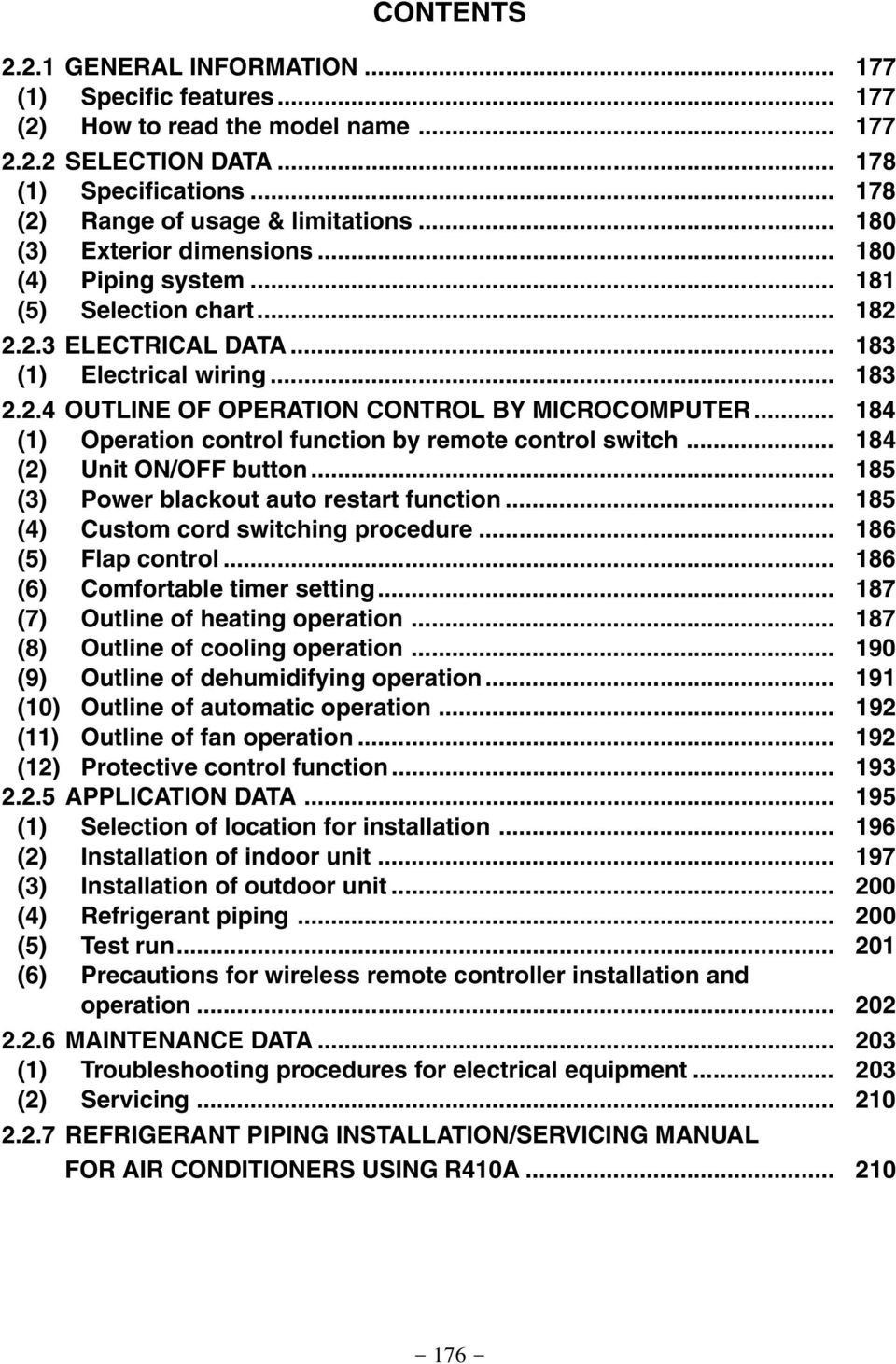
3 CTENTS GENERAL INFORMATI (1) Specific features (2) How to read the model name SELECTI DATA (1) Specifications (2) Range of usage & limitations (3) Exterior dimensions (4) Piping system (5) Selection chart ELECTRICAL DATA (1) Electrical wiring OUTLINE OF OPERATI CTROL BY MICROCOMPUTER (1) Operation control function by remote control switch (2) Unit / button (3) Power blackout auto restart function (4) Custom cord switching procedure (5) Flap control (6) Comfortable timer setting (7) Outline of heating operation (8) Outline of cooling operation (9) Outline of dehumidifying operation (10) Outline of automatic operation (11) Outline of fan operation (12) Protective control function APPLICATI DATA (1) Selection of location for installation (2) Installation of indoor unit (3) Installation of outdoor unit (4) Refrigerant piping (5) Test run (6) Precautions for wireless remote controller installation and operation MAINTENANCE DATA (1) Troubleshooting procedures for electrical equipment (2) Servicing REFRIGERANT PIPING INSTALLATI/SERVICING MANUAL FOR AIR CDITIERS USING R410A
4 2.2.1 GENERAL INFORMATI (1) Specific features The MITSUBISHI HEAVY INDUSTRIES, LTD. room air-conditioner: SRK series are of split and wall mounted type and the unit consists of indoor unit and outdoor unit with refrigerant precharged in factory. The indoor unit is composed of room air cooling or heating equipment with operation control switch and the outdoor unit is composed of condensing unit with compressor. (a) (b) (c) Remote control flap The flap can be automatically controlled by operating wireless remote controller. Air scroll: Flap operation is automatically control. Swing: This will swing the flap up and down. Memory flap: Once the flap position is set, the unit memorizes the position and continues to operate at the same position from the next time. Automatic operation When the remote control switch is set on auto( ), it will either automatically decide operation mode such as cooling, heating and thermal dry, or operate in the operation mode before it has been turned to automatic control. Self diagnosis function We are constantly trying to do better service to our customers by installing such judges that show abnormality of operation as follows. RUN light TIMER light Outdoor (LED) 1 time flash Heat exchanger sensor error 1 time flash Outdoor temperature sensor error TIMER light 2 time flash Room temperature sensor error RUN light keeps flashing 2 time flash Outdoor unit heat exchanger sensor error 6 time flash Indoor fan motor error 4 time flash Discharge pipe sensor error 5 time flash 5 time flash Over heat of compressor RUN light 6 time flash 6 time flash Error of signal transmission 2 time flash Abnormality of outdoor unit (2) How to read the model name Example : SR K 50 H E - S1 R410A models Series No. Heat pump type Product capacity Wall mounted type Split type room air-conditioner

5 2.2.2 SELECTI DATA (1) Specifications Item Model SRK50HE-S1 Cooling capacity (1) W 4700 Heating capacity (1) W 5300 Power source 1 Phase, V, 50Hz Cooling input kw 1.41 Running current (Cooling) A 6.5/6.3/6.0 Heating input kw 1.40 Running current (Heating) A 6.5/6.2/6.0 Inrush current A 39.6 Operation data (1) Model COP Cooling: 3.33 Heating: 3.79 SRC50HE-S1 Sound level Hi 43, Me 39, Lo Cooling Power level Noise level db Sound level Hi 44, Me 39, Lo Heating Power level Exterior dimensions Height Width Depth mm Color Cool white Stucco white Net weight kg Refrigerant equipment Compressor type & Q ty RM-B5118MNE5 (Rotary type) 1 Motor kw 1.4 Starting method Line starting Heat exchanger Louver fins & inner grooved tubing Straight fins & inner grooved tubing Refrigerant control Capillary tubes + Electronic expansion valve Refrigerant (3) kg R410A 1.4 (Pre-Charged up to the piping length of 15m) Refrigerant oil R 0.7 (MA68) Deice control Microcompter control Air handling equipment Fan type & Q ty Tangential fan 1 Propeller fan 1 Motor W Air flow (at High) (Cooling) CMM (Heating) Air filter, Q ty Polypropylene net (washable) 2 Shock & vibration absorber Cushion rubber (for compressor) Electric heater Operation control Operation switch Wireless-Remote controller Room temperature control Microcomputer thermostat Pilot lamp RUN (Green), TIMER (Yellow), HI POWER (Green), ECO (Orange) Safety equipment Compressor: Overheat protection, Serial signal error protection, Indoor fan motor error protection, Frost protection Refrigerant piping O.D mm (in) Liquid line: φ6.35 (1/4 ) Gas line: φ12.7 (1/2 ) Connecting method Flare Connection Attached length of piping Liquid line: 0.54 m Gas line : 0.47 m Insulation Necessary (Both sides) Connectable 2 m (3 cores with earth) Size Core number 1.5 mm 2 4 cores (Including earth cable) Connecting method Terminal block (Screw fixing type) Drain hose Power source cord Connection wiring SRK50HE-S1 (Indoor unit) SRC50HE-S1 (Outdoor unit) Accessories (included) Mounting kit, Clean filter (Natural enzyme filter 1, Photocatalytic washable deodorizing filter 1) Optional parts Notes (1) The data are measured at the following conditions. Item Indoor air temperature Outdoor air temperature Operation DB WB DB WB Standards Cooling 27ºC 19ºC 35ºC 24ºC ISO-T1, JIS C9612 Heating 20ºC 7ºC 6ºC ISO-T1, JIS C9612 The piping length is 7.5m. (2) The operation data are applied to the 220/230/240V districts respectively. (3) The refrigerant quantity to be charged includes the refrigerant in 15 m connecting piping. (Purging is not required even for the short piping.) If the piping length is longer, when it is 15 to 25 m, add 20 g refrigerant per meter. (220/230/240V)

6 Item Model SRK56HE-S1 Cooling capacity (1) W 5100 Heating capacity (1) W 5800 Power source 1 Phase, V, 50Hz Cooling input kw 1.59 Running current (Cooling) A 7.3/7.1/6.8 Heating input kw 1.58 Running current (Heating) A 7.4/7.1/6.8 Inrush current A 45.2 Operation data (1) Model COP Cooling: 3.21 Heating: 3.67 SRC56HE-S1 Sound level Hi 44, Me 40, Lo Cooling Power level Noise level db Sound level Hi 44, Me 39, Lo Heating Power level Exterior dimensions Height Width Depth mm Color Cool white Stucco white Net weight kg Refrigerant equipment Compressor type & Q ty RM-B5120MNE5 [Rotary type] 1 Motor kw 1.5 Starting method Line starting Heat exchanger Louver fins & inner grooved tubing Straight fins & inner grooved tubing Refrigerant control Capillary tubes + Electronic expansion valve Refrigerant (3) kg R410A 1.4 (Pre-Charged up to the piping length of 15m) Refrigerant oil R 0.7 (MA68) Deice control Microcomputer control Air handling equipment Fan type & Q ty Tangential fan 1 Propeller fan 1 Motor W Air flow (at High) (Cooling) CMM (Heating) Air filter, Q ty Polypropylene net (washable) 2 Shock & vibration absorber Cushion rubber (for compressor) Electric heater Operation control Operation switch Wireless-Remote controller Room temperature control Microcomputer thermostat Pilot lamp RUN (Green), TIMER (Yellow), HI POWER (Green), ECO (Orange) Safety equipment Compressor: Overheat protection, Serial signal error protection, Indoor fan motor error protection, Frost protection Refrigerant piping O.D mm (in) Liquid line: φ6.35 (1/4 ) Gas line: φ12.7 (1/2 ) Connecting method Flare connection Attached length of piping Liquid line: 0.54 m Gas line : 0.47 m Insulation Necessary (Both sides) Connectable 2 m (3 cores with earth) Size Core number 1.5 mm 2 4 cores (Including earth cable) Connecting method Terminal block (Screw fixing type) Drain hose Power source cord Connection wiring SRK56HE-S1 (Indoor unit) SRC56HE-S1 (Outdoor unit) Accessories (included) Mounting kit, Clean filter (Natural enzyme filter 1, Photocatalytic washable deodorizing filter 1) Optional parts Notes (1) The data are measured at the following conditions. Item Indoor air temperature Outdoor air temperature Operation DB WB DB WB Standards Cooling 27ºC 19ºC 35ºC 24ºC ISO-T1, JIS C9612 Heating 20ºC 7ºC 6ºC ISO-T1, JIS C9612 The piping length is 7.5m. (2) The operation data are applied to the 220/230/240V districts respectively. (3) The refrigerant quantity to be charged includes the refrigerant in 15 m connecting piping. (Purging is not required even for the short piping.) If the piping length is longer, when it is 15 to 25 m, add 20 g refrigerant per meter. (220/230/240V)

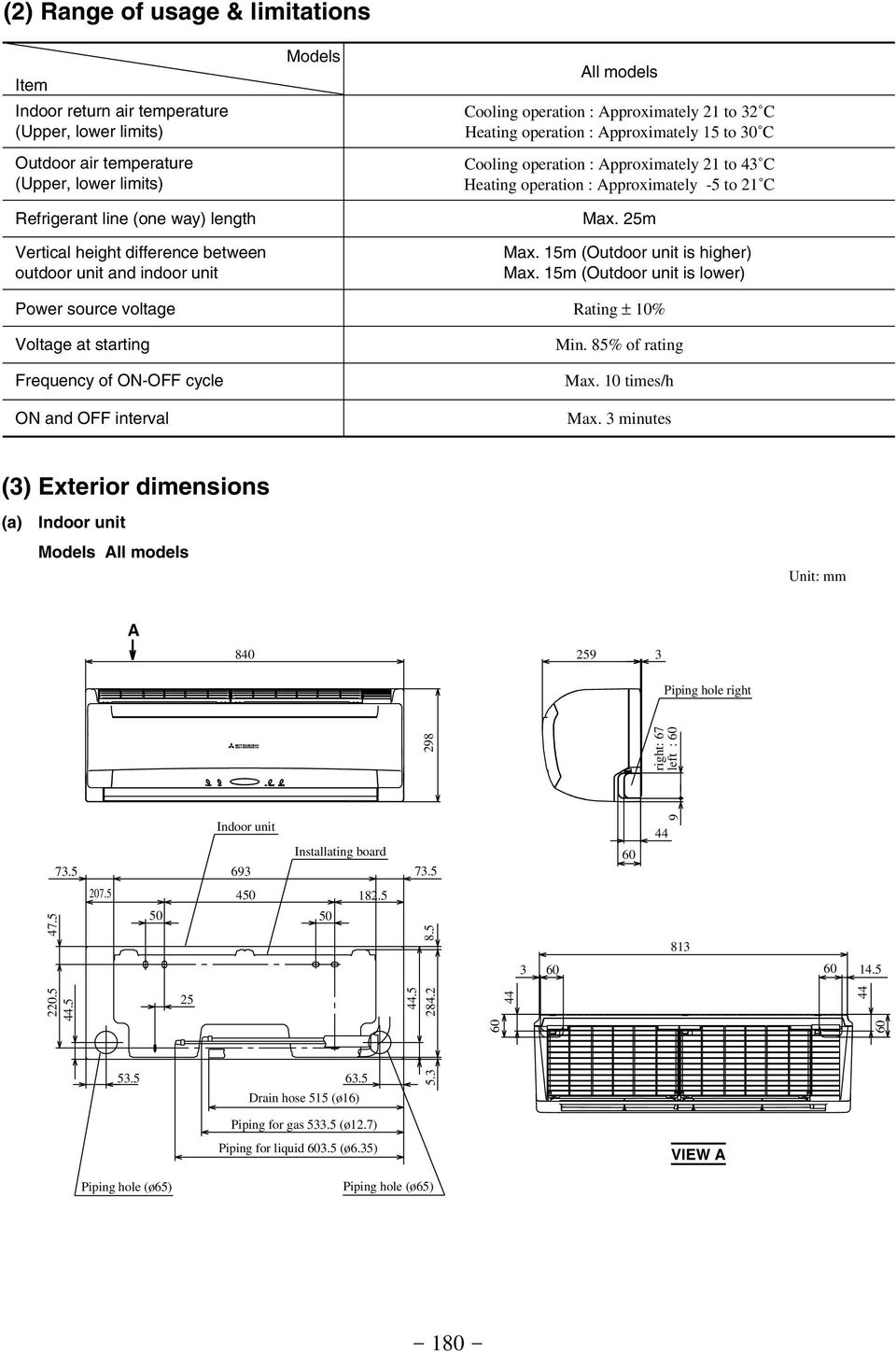
7 (2) Range of usage & limitations Item Indoor return air temperature (Upper, lower limits) Outdoor air temperature (Upper, lower limits) Refrigerant line (one way) length Vertical height difference between outdoor unit and indoor unit Models All models Cooling operation : Approximately 21 to 32 C Heating operation : Approximately 15 to 30 C Cooling operation : Approximately 21 to 43 C Heating operation : Approximately -5 to 21 C Max. 25m Max. 15m (Outdoor unit is higher) Max. 15m (Outdoor unit is lower) Power source voltage Rating ± 10% Voltage at starting Frequency of - cycle and interval Min. 85% of rating Max. 10 times/h Max. 3 minutes (3) Exterior dimensions (a) Indoor unit Models All models Unit: mm A Piping hole right 298 right: 67 left : Indoor unit 693 Installating board Drain hose 515 (ø16) Piping for gas (ø12.7) Piping for liquid (ø6.35) VIEW A Piping hole (ø65) Piping hole (ø65)
8 (b) Outdoor unit Models All models Drain holes Elogated hole (2-12 x16) Terminal block Ground terminal Service valve (Liquid) ø6.35 (1/4'') Service valve (Gas) ø12.7 (1/2'') 15 (4) Piping system Models SRK50HE-S1, 56HE-S1 Indoor unit Flare connection Outdoor unit Service valve (Gas) Cooling cycle Heating cycle Outdoor air temp. sensor Piping (Gas) ø12.7 Check joint 4 way valve Accumulator Room temp. sensor Heat exchanger Heat exchanger sensor Discharge pipe temp. sensor Compressor Heat exchanger Heat exchanger sensor Piping (Liquid) ø6.35 Service valve (Liquid) Capillary tube Capillary tube Flare connection Strainer Electronic expansion valve

9 (5) Selection chart Correct the cooling and heating capacity in accordance with the conditions as follows. The net cooling and heating capacity can be obtained in the following way. Net capacity = Capacity shown on specification Correction factors as follows. (a) Coefficient of cooling and heating capacity in relation to temperatures 1.3 Coefficient of cooling & Heating capacity in relation to temperature Cooling Heating Cooling operation Outdoor air D.B. temperature C D.B Applicable range Indoor air W.B. temperature C W.B. ISO-T1 Standard Condition Heating operation Indoor air D.B. temperature C D.B Outdoor air W.B. temperature C W.B. ISO-T1 Standard Condition (b) (c) Correction of cooling and heating capacity in relation to one way length of refrigerant piping It is necessary to correct the cooling and heating capacity in relation to the one way piping length between the indoor and outdoor units. Piping length [m] Cooling Heating Correction relative to frosting on outdoor heat exchanger during heating In additions to the foregoing corrections (a), (b) the heating capacity needs to be adjusted also with respect to the frosting on the outdoor heat exchanger. Air inlet temperature of outdoor unit in C WB Adjustment coefficient How to obtain the cooling and heating capacity Example : The net cooling capacity of the model SRK50HE-S1 with the piping length of 15m, indoor wet-bulb temperature at 19.0 C and outdoor dry-bulb temperature 35 C is Net cooling capacity = = 4583 W SRK50HE-S1 Length 15m Factor by air temperatures

10 2.2.3 ELECTRICAL DATA (1) Electrical wiring Models SRK50HE-S1, 56HE-S1 Power source 1 Phase V 50Hz BR LB Y/GN Indoor unit BK WH RD TB TB N 3 2 N 3 HEAT EXCHANGER 52C4 52C3 N J G 52C FMI RD BK WH Y BL 6 CNU F 250V 3.15A ( ) 52C Printed circuit board ZNR SM CNM CNE CNG Display Wireless R-Amp Th1 Th2 Outdoor unit Y/GN WH BK 52X1 52X2 52X3 Printed circuit board CNG WH F (250V 3.15A) Y/GN RD Color symbol BK BR RD LB OR WH Y Y/GN Black Brown Red Light Blue Orange White Yellow Yellow/Green Meaning of marks Symbol Parts name CM Compressor motor F Fuse FMI Fan motor (Indoor) FMo Fan motor (Outdoor) SM Flap motor RL Inspection lamp Th1 Room temp. sensor Symbol Parts name Th2 Heat exchanger sensor (Indoor unit) Th4 Heat exchanger sensor (Outdoor unit) Th5 Outdoor air temp. sensor Th6 Discharge pipe sensor ZNR Varistor 20S 4 way valve (coil) 52C Magnetic contactor Symbol Parts name DS Diode stack 52X1-3 Auxiliary relay EEV Electronic expansion valve 51C Motor Protector for CM TB Terminal block G1 J N L ZNR ~ - ~ + D.S RL CM2 52X1 CM1 52X X3 1 3 CNE RD CC U WH V CM BK 51C CFO WH WH OR CNU BK 20S CNB EEV Th4 Th5 Th6 WH W BK FMo

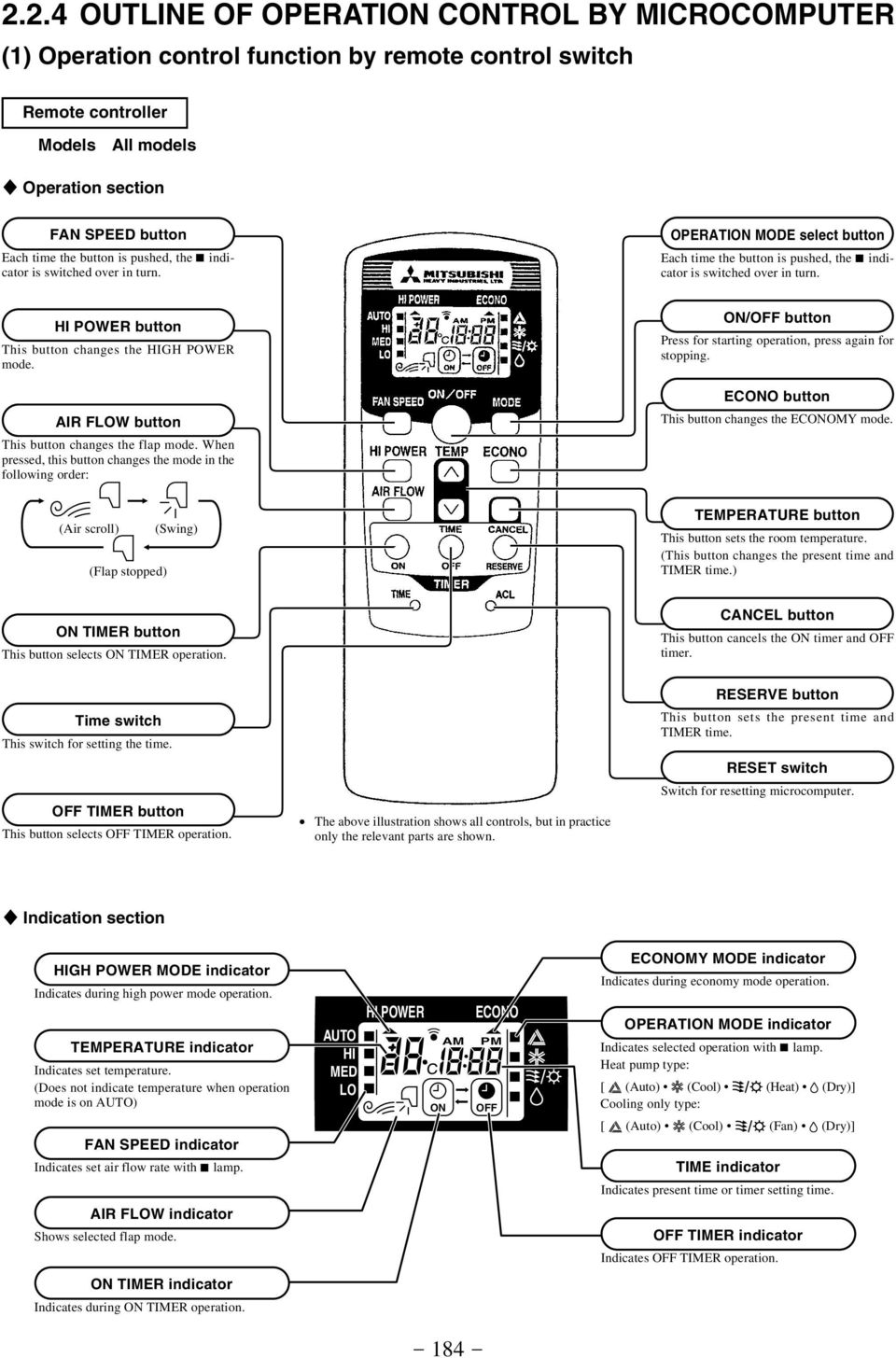
11 2.2.4 OUTLINE OF OPERATI CTROL BY MICROCOMPUTER (1) Operation control function by remote control switch Remote controller Models All models S Operation section FAN SPEED button Each time the button is pushed, the indicator is switched over in turn. OPERATI MODE select button Each time the button is pushed, the indicator is switched over in turn. HI POWER button This button changes the HIGH POWER mode. AIR FLOW button This button changes the flap mode. When pressed, this button changes the mode in the following order: / button Press for starting operation, press again for stopping. ECO button This button changes the ECOMY mode. (Air scroll) (Flap stopped) (Swing) TEMPERATURE button This button sets the room temperature. (This button changes the present time and TIMER time.) TIMER button This button selects TIMER operation. CANCEL button This button cancels the timer and timer. Time switch This switch for setting the time. TIMER button This button selects TIMER operation. The above illustration shows all controls, but in practice only the relevant parts are shown. RESERVE button This button sets the present time and TIMER time. RESET switch Switch for resetting microcomputer. S Indication section HIGH POWER MODE indicator Indicates during high power mode operation. TEMPERATURE indicator Indicates set temperature. (Does not indicate temperature when operation mode is on AUTO) FAN SPEED indicator Indicates set air flow rate with lamp. AUTO HI MED LO HI POWER AM ECO PM ECOMY MODE indicator Indicates during economy mode operation. OPERATI MODE indicator Indicates selected operation with lamp. Heat pump type: [ (Auto) (Cool) (Heat) (Dry)] Cooling only type: [ (Auto) (Cool) (Fan) (Dry)] TIME indicator Indicates present time or timer setting time. AIR FLOW indicator Shows selected flap mode. TIMER indicator Indicates TIMER operation. TIMER indicator Indicates during TIMER operation
12 Unit indication section Models All models RUN (HOT KEEP) light (green) Illuminates during operation. Brinks at air flow stop due to the HOT KEEP. TIMER light (yellow) Illuminates during TIMER operation. HI POWER light (green) Illuminates during HIGH POWER operation. ECOMY light (orange) Illuminates during ECOMY operation. (2) Unit / button When the remote controller batteries become weak, or if the remote controller is lost or malfunctioning, this button may be used to turn the unit on and off. (a) Operation Push the button once to place the unit in the automatic mode. Push it once more to turn the unit off. (b) Details of operation The unit will go into the automatic mode in which it automatically determines, from room temperature (as detected by sensor), whether to go into the cooling, thermal dry or heating modes. Function Room temperature Operation mode setting Fan speed Flap Timer switch Cooling About 25ºC Thermal dry About 25ºC Auto Auto Continuous Heating About 26ºC Unit / button (3) Power blackout auto restart function (a) (b) Power blackout auto restart function is a function that records the operational status of the air-conditioner immediately prior to it being switched off by a power cut, and then automatically resumes operations at that point after the power has been restored. The following settings will be cancelled: (i) Timer settings Jumper wire (J7) (ii) High-power operations Notes (1) The power blackout auto restart function is set at on when the air-conditioner is shipped from the factory. Consult with your dealer if this function needs to be switched off. (2) When power failure ocurrs, the timer setting is cancelled. Once power is resumed, reset the timer. (3) If the jumper wire (J7) REMOTE/AUTORESTART is cut, auto restart is disabled. (See the diagram at right)

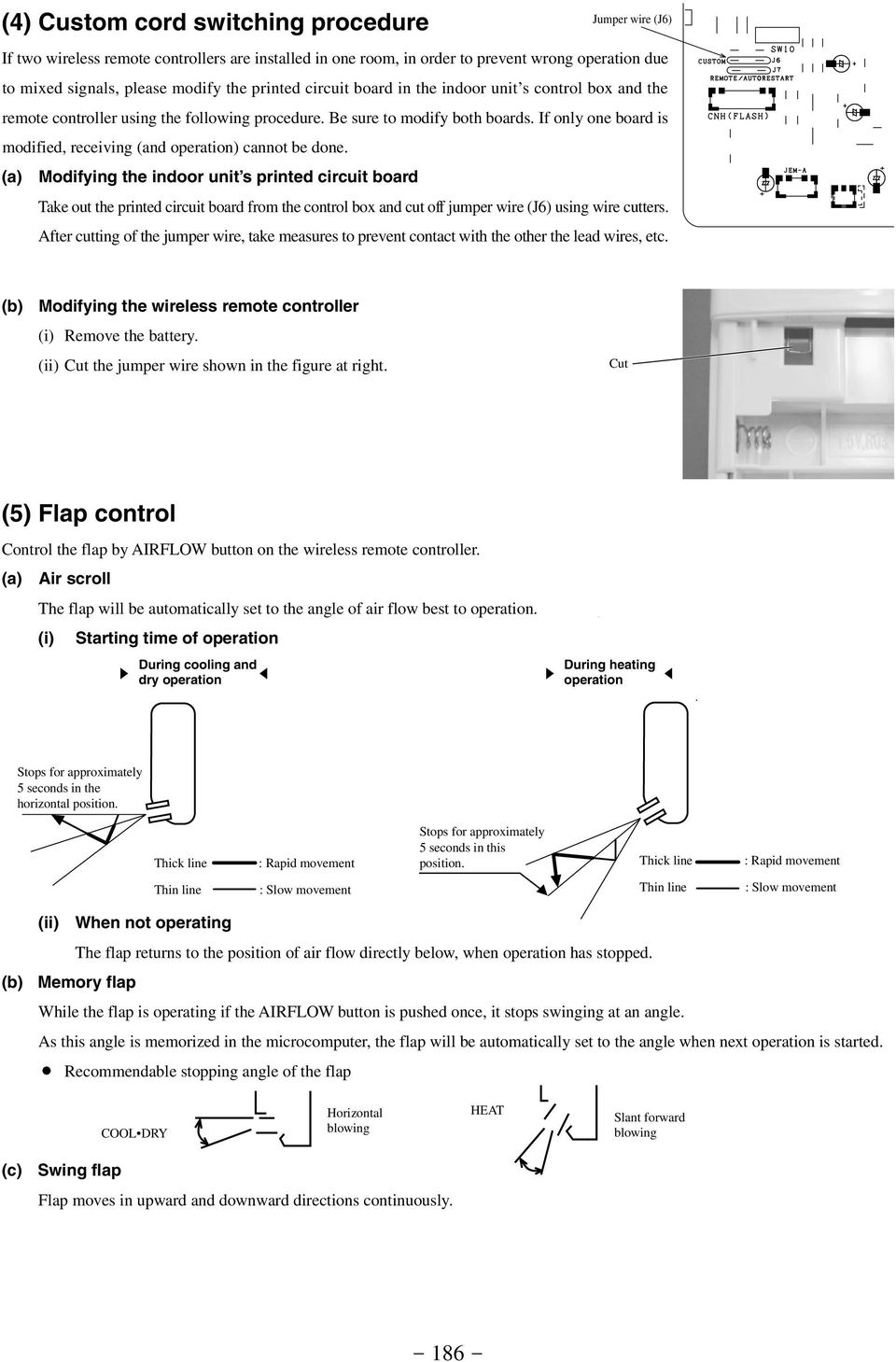
13 (4) Custom cord switching procedure Jumper wire (J6) If two wireless remote controllers are installed in one room, in order to prevent wrong operation due to mixed signals, please modify the printed circuit board in the indoor unit s control box and the remote controller using the following procedure. Be sure to modify both boards. If only one board is modified, receiving (and operation) cannot be done. (a) Modifying the indoor unit s printed circuit board Take out the printed circuit board from the control box and cut off jumper wire (J6) using wire cutters. After cutting of the jumper wire, take measures to prevent contact with the other the lead wires, etc. (b) Modifying the wireless remote controller (i) Remove the battery. (ii) Cut the jumper wire shown in the figure at right. Cut (5) Flap control Control the flap by AIRFLOW button on the wireless remote controller. (a) Air scroll The flap will be automatically set to the angle of air flow best to operation. (i) Starting time of operation s During cooling and t dry operation s During heating t operation Stops for approximately 5 seconds in the horizontal position. Thick line Thin line : Rapid movement : Slow movement Stops for approximately 5 seconds in this position. Thick line : Rapid movement Thin line : Slow movement (b) (ii) When not operating The flap returns to the position of air flow directly below, when operation has stopped. Memory flap While the flap is operating if the AIRFLOW button is pushed once, it stops swinging at an angle. As this angle is memorized in the microcomputer, the flap will be automatically set to the angle when next operation is started. Recommendable stopping angle of the flap COOL DRY Horizontal blowing HEAT Slant forward blowing (c) Swing flap Flap moves in upward and downward directions continuously
14 (6) Comfortable timer setting If the timer is set at when the operation select switch is set at the cooling or heating, or the cooling or heating in auto mode operation is selected, the comfortable timer starts and determines the starting time of next operation based on the initial value of 15 minutes and the relationship between the room temperature at the setting time (temperature of room temperature sensor) and the setting temperature. (Max. 60 minutes) Operation mode Operation start time correction value (Min.) At cooling At heating 3 < Room temp. Setting temp. 1 < Room temp. Setting temp. = < 3 Room temp. Setting temp. < = 1 +5 No change 5 3 < Setting temp. Room temp. 2 < Setting temp. Room temp. = < 3 Setting temp. Room temp. < = 2 +5 No change 5 Notes (1) At 5 minutes before the timer time, operation starts regardless of the temperature of the room temperature sensor (Th1). (2) This function does not actuate when the operation select switch is set at the dehumidifying as well as the dehumidifying in the auto mode. However, the operation of item (1) above is performed during the dehumidifying in the auto mode. (3) During the comfortable timer operation, both the run light and timer light illuminate and the timer light goes off after expiration of the timer, setting time. (Example) Heating Setting temperature Room temperature Operation starting time Corrects the starting time of next operation by calculating the temperature difference. If the difference (= Setting temperature Room temperature) is 4ºC, the correction value is found to be +5 minutes from the table shown above so that the starting time of next operation is determined as follows: 15 min. earlier + 5 min. = 20 min. earlier Current operation Correction value start time Time 15 min. 10 min. 5 min. earlier earlier earlier Setting time (7) Outline of heating operation (Heat pump type only) (a) (b) Operation of major functional components Item When the compressor Functional components command is Indoor fan motor Flaps or Display Lights up 52C Outdoor fan motor 4-way valve Electric expansion valve Depending on the stop mode Fan speed switching Flow control Fan speed switching Air scroll Swing flap Swing stop Auto fan control When the compressor command is or Lights up Depending on the EEV control AUTO HIGH MED Speed 8 Speed 8 Speed 8 Speed 6 Speed 6 Speed 6 When the compressor goes due to an anomalous stop. Stop position control Lights up or flashes after stop mode Depending on the stop mode LOW Speed 4 Speed 4 Speed 4 (i) Auto fan control The indoor fan is automatically controlled in accordance with the difference between the room temperature (detected by the room temperature sensor) and the thermostat setting as shown below. Speed 8 Speed 6 Speed Thermostat setting point
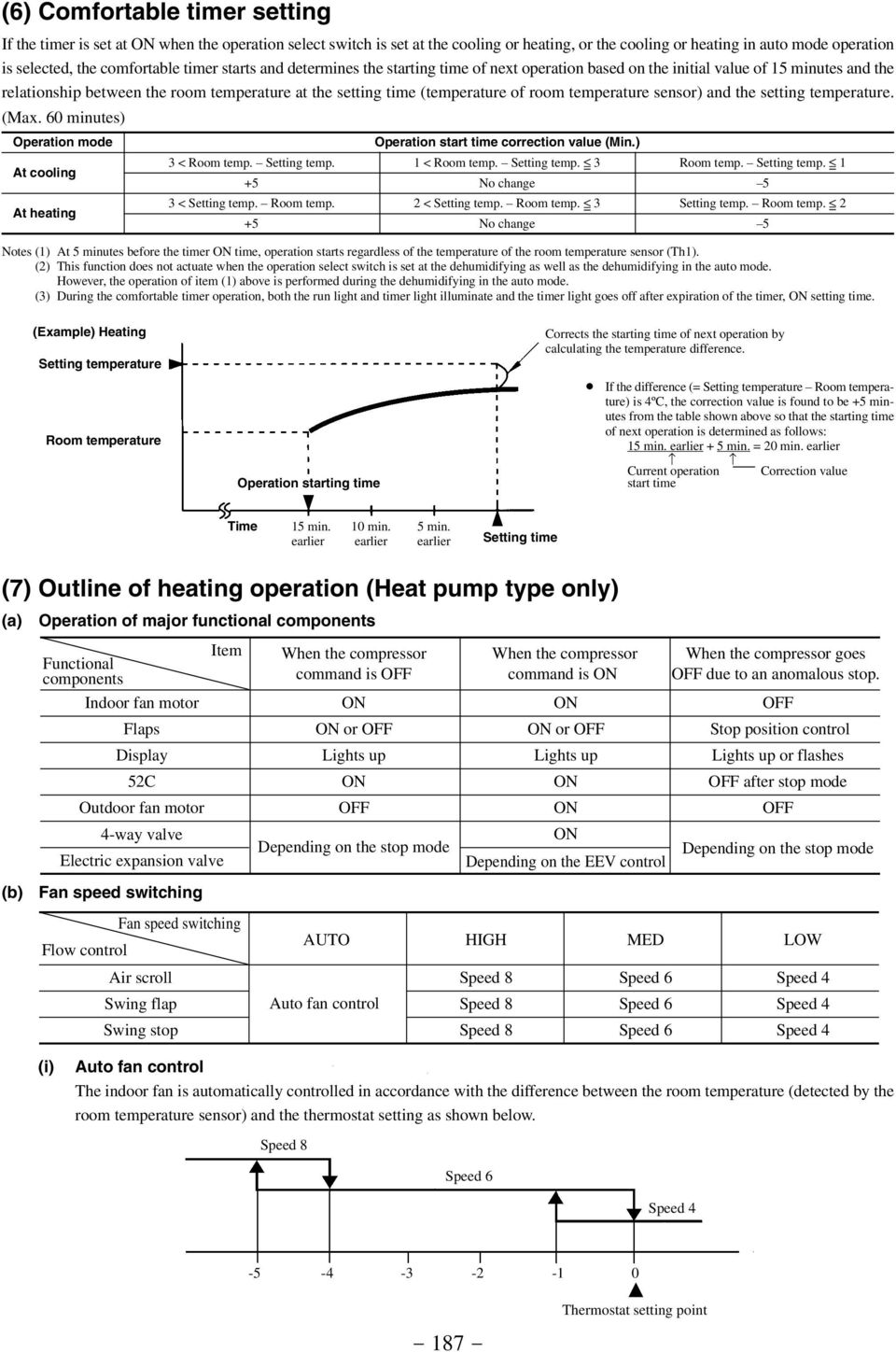
15 (c) Thermostat operation The compressor and outdoor fan and turned on and off as shown below according to the temperature setting. Compressor Outdoor fan Set temp. +1 Room temp. (d) (e) (f) Hot keep This function controls the indoor unit fan speed as shown below in accordance with the temperature sensed by the indoor heat exchanger sensor. 9th speed (i) Indoor unit fan control 8th speed Values of A, B 7th speed A B 6th speed When the compressor command is 4th speed When the compressor 3rd speed command is nd speed 1st speed A B Indoor heat exchanger temp. ( C) Note (1) Refer to the table shown above right for the values A and B. (ii) To accomplish rapid recovery from the thermostat off state, after the compressor and outdoor unit s fan go, the set temperature is raised by 1ºC until 1 minute passes after the hot keep end temperature has been reached following restarting. Hot spurt (i) For 40 minutes after a heating operation begins, the system runs with set temperature raised by 2ºC. (ii) In the following cases, this function is canceled and does not activate afterwards. 1) When the compressor and outdoor unit fan have been turned by the thermostat going off. 2) During high pressure control operation. HIGH POWER operation ( HI POWER button on the remote controller : ) The system runs under the following conditions for 15 minutes without relation to the set temperature or the fan speed setting. Indoor unit fan Outdoor unit fan Compressor Speed 9 fixed Notes (1) Room temperature is not adjusted during the HIGH POWER operation. (2) Protective function will actuate with priority even during the HIGH POWER operation. (g) Defrost operation (i) Starting conditions (Defrost operation begins when all the following conditions are satisfied.) 1 35 minutes have passed since the heating operation began. (Accumulated operation time) 2 35 minutes have passed since the previous defrosting operation ended. (Accumulated operation time) 3 The outdoor unit heat exchanger temperature sensor is 5ºC or lower continuously for 3 minutes. 4 The outdoor temperature = > -15 C The difference between the outdoor temperature sensor temperature and the outdoor heat exchanger temperature sensor temperature is = > 6.0ºC. The outdoor temperature < -15 C The difference between the outdoor temperature sensor temperature and the outdoor heat exchanger temperature sensor temperature is = > -5ºC. 5 The compressor is running. Also, the number of times the compressor goes is counted, and when it reaches 10 or more times, if the conditions in 1, 2 and 3 above (except that the outdoor heat exchanger temperature sensor is 1ºC), the defroster operation starts. (ii) End conditions (when either of the following conditions is satisfied) 1 Outdoor heat exchanger temperature sensor: 15ºC or higher 2 Defrosting operation has continued for 10 minutes

16 (iii) Operation of functional components during defrosting operation Compressor command Indoor unit fan Hot keep Hot keep Controlled by the indoor heat exchanger temperature Run light Lit Flashes The chart at left is for reference. Hot keep control governs operation during heating. Outdoor unit fan 4-way valve Defrost start operation 120 sec. Defrost operation 120 sec. Operation after defrost is ended. (h) Recovery temperature (15 C) Normal heating operation (defrost recovery) Forced Defrost (i) Forced defrost operation can be performed only once time within 20 second, after the power source is turned on, in accordance with the following operation. 1) Remote control operation 2) Functional components operation Operation Run Compressor Operation mode Heating 4-way valve Set temperature 19 C Indoor unit fan Fan speed select Low Flap Fully closed Air flow setting Swing Outdoor unit fan On timer Display Same as defrost Current time On timer time On after 180 min.condition (ii) If remote control operation is performed, for 1 minute after 3-minute timer operation, the operation is canceled if one of the following conditions is satisfied. 1 Outdoor heat exchanger temperature sensor: 14ºC or higher 2 10 minutes has passed (including the 1 minute of forced operation). (i) ECOMY operation ( ECO button on the remote controller : ) The set temperature changes as shown at right and the Running time indoor unit fan runs at speed 4. Running start ~ 1 hour 1~2 hours 2 hours ~ Set temperature compensation Set temperature -1.0 Set temperature -2.0 Set temperature

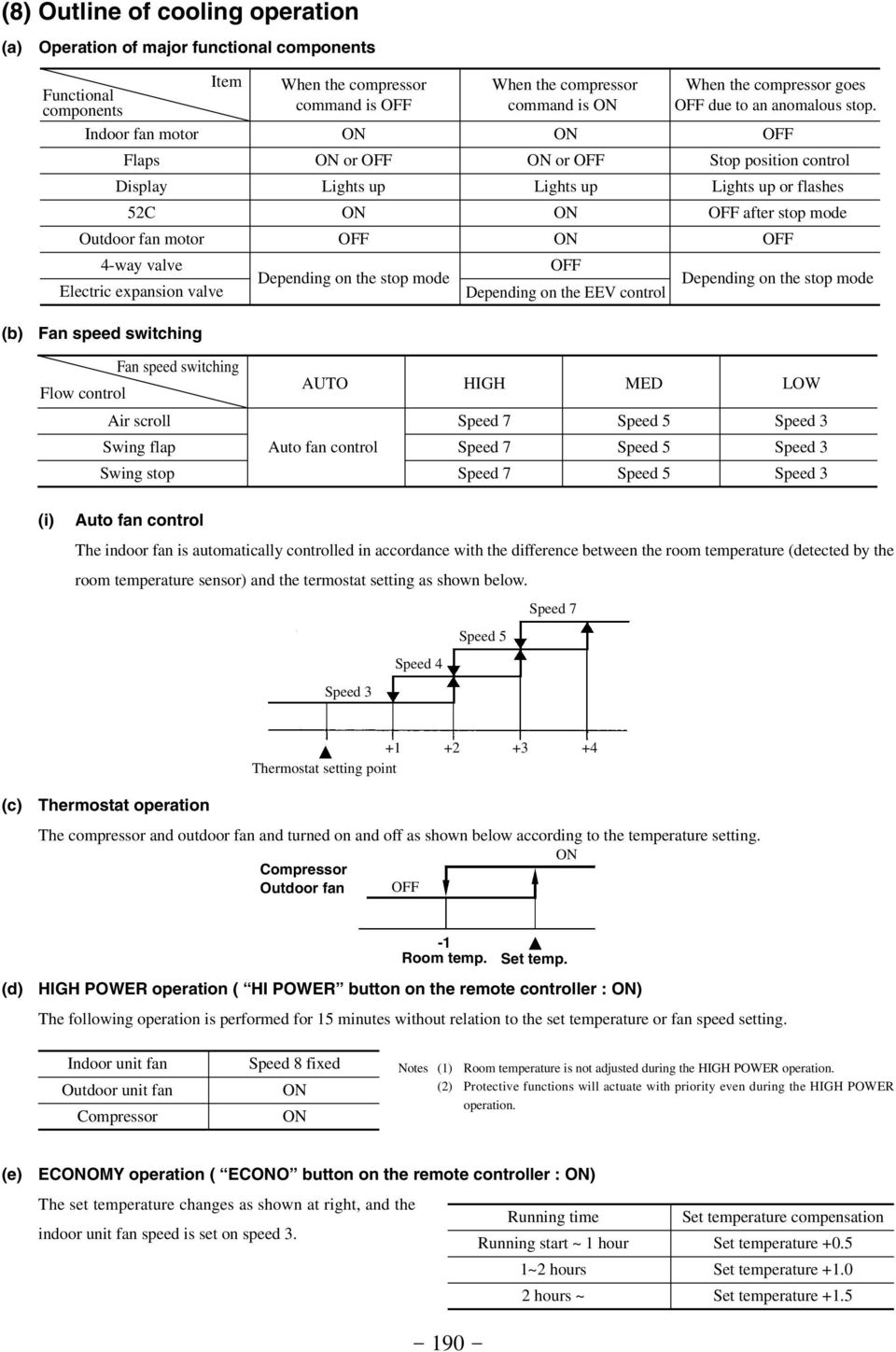
17 (8) Outline of cooling operation (a) Operation of major functional components Item Functional components Indoor fan motor Flaps Display 52C Outdoor fan motor 4-way valve Electric expansion valve When the compressor command is or Lights up Depending on the stop mode When the compressor command is or Lights up Depending on the EEV control When the compressor goes due to an anomalous stop. Stop position control Lights up or flashes after stop mode Depending on the stop mode (b) Fan speed switching Fan speed switching Flow control Air scroll Swing flap Swing stop AUTO HIGH MED Auto fan control Speed 7 Speed 7 Speed 7 Speed 5 Speed 5 Speed 5 LOW Speed 3 Speed 3 Speed 3 (i) Auto fan control The indoor fan is automatically controlled in accordance with the difference between the room temperature (detected by the room temperature sensor) and the termostat setting as shown below. Speed 7 Speed 5 Speed 4 Speed Thermostat setting point (c) Thermostat operation The compressor and outdoor fan and turned on and off as shown below according to the temperature setting. Compressor Outdoor fan (d) -1 Room temp. Set temp. HIGH POWER operation ( HI POWER button on the remote controller : ) The following operation is performed for 15 minutes without relation to the set temperature or fan speed setting. Indoor unit fan Outdoor unit fan Compressor Speed 8 fixed Notes (1) Room temperature is not adjusted during the HIGH POWER operation. (2) Protective functions will actuate with priority even during the HIGH POWER operation. (e) ECOMY operation ( ECO button on the remote controller : ) The set temperature changes as shown at right, and the Running time indoor unit fan speed is set on speed 3. Running start ~ 1 hour 1~2 hours 2 hours ~ Set temperature compensation Set temperature +0.5 Set temperature +1.0 Set temperature
18 (9) Outline of dehumidifying operation (a) Choose the appropriate operation block area by the difference between room temperature and thermostat setting temperature as shown below. Operation block area D Block C Block B Block A Block (b) Room temp. Setting temp.(deg) Start up operation C.D Block Compressor and outdoor fan Indoor fan Speed 3 Speed 1 Compressor and outdoor fan Indoor fan 20 seconds Set fan speed A.B Block minutes 0 12 minutes Start Temperature check Start Temperature check Operation block decision (c) Note (1) Thermostat operation is performed in A, B Block. When compressor and indoor fan stop by thermostat operation within 12 minutes from start, temperature check is performed by operating indoor fan at speed 1 for 20 seconds before finishing 12 minutes and allowing decision of next operation block. DRY operation After finishing start up operation described in (b) above, thermal dry operation is performed at 8 minutes intervals, according to the difference between room temperature and thermostat setting temperature as shown below. Beside, 1 cycle of this operating time consists of 8 minutes, 7 cycle operation is performed then. D Block C Block Compressor and outdoor fan Compressor and outdoor fan Indoor fan Speed 1 Indoor fan 20 seconds Speed 3 Speed 1 20 seconds minutes minutes Start Temperature check Start Temperature check Operation block decision B Block A Block Compressor and outdoor fan Indoor fan Speed 3 Speed 1 Compressor and outdoor fan Indoor fan 20 seconds Speed minutes 0 8 minutes Start Temperature check Start Temperature check Operation block decision (d) ECOMY operation ( ECO button on the remote controller : ) The set temperature changes as shown at right, and the Running time indoor unit fan speed is set on speed 3. Running start ~ 1 hour 1~2 hours 2 hours ~ Set temperature compensation Set temperature +0.5 Set temperature +1.0 Set temperature +1.5

19 (10) Outline of automatic operation (a) Determination of operation mode The unit checks the room temperature and the outdoor air temperature after operating the indoor and outdoor blowers for 20 seconds, determines the operation mode and the room temperature setting correction value, and then begins in the automatic operation. Heat pump type Cooling only type Room temperature ( C) Heating Cooling Dehumidifying Room temperature ( C) Dehumidifying Cooling Outdoor temperature ( C) Outdoor temperature ( C) (b) Within 30 minutes after either auto or manual operation stops, if auto operation is started, or if you switch to auto operation during manual operation, the system runs in the previous operation mode. (c) The temperature is checked 1 time in 30 minutes after the start of operation, and if the judgment differs from the previous operation mode, the operation mode changes. (d) Setting temperature can be adjusted within the following range. There is the relationship as shown below between the signals of the wireless remote controller and the setting temperature. Setting temperature Signals of wireless remote controller (Display) ± Cooling Dehumidifying Heating (11) Outline of fan operation (Cooling only type only) (a) Operation of major functional components Fan speed switching Functional components 52C Indoor fan motor Outdoor fan motor Flaps High power AUTO HIGH MED LOW ECO Speed 8 Speed 7 Speed 6 Speed 5 Speed 4 Speed 3 Depend on the flap control (b) HIGH POWER operation ( HI POWER button on the remote controller : ) The following operation is performed for 15 minutes without relation to the set temperature or fan speed setting. Indoor unit fan Outdoor unit fan Compressor Speed 8 fixed Note (1) Protective functions will actuate with priority even during the HIGH POWER operation

20 (12) Protective control function (a) Frost prevention for indoor heat exchanger (During cooling or dehumidifying) (i) Operating conditions (i) Indoor heat exchanger temperature sensor (detected with Th2) is lower than 2.5ºC. (ii) 10 minutes elapsed after the start of operation. (ii) Detail of frost prevention operation Compressor Indoor fan Protects the fan tap just before frost prevention control. Outdoor fan 4-way valve Stop mode (iii) Reset conditions: Indoor heat exchanger temperature sensor (Th2) is higher than 8ºC. (b) (c) (d) Indoor fan motor protection When the air-conditioner is operating and the indoor fan motor is turned, if the indoor fan motor has operated at 300 rpm or under for more than 30 seconds, the unit enters first in the stop mode and then stops the entire system. Timer light illuminates simultaneously and the run light flashing 6 times at each 8-second. Three-minute forced operation When the compressor begins operating the thermal operation is not effective for 3 minutes, so operation continues as is in the operation mode. (After 3 minutes has passed the thermal operation is effective.) However, stopping the compressor via a stop signal or protection control has priority. High-pressure control The indoor heat exchanger temperature sensor detection temperature controls the outdoor fan and compressor. When the indoor heat exchanger temperature is = > 58 C When the indoor heat exchanger temperature is = > 62 C Outdoor fan Compressor Indoor heat exchanger temp. ( C) Indoor heat exchanger temp. ( C) (e) (f) Heating overload protective control (i) Operating conditions: when the unit is heating with the compressor is on, and the outdoor air temperature rose beyond 17 C for 30 seconds continuously. (ii) Detail of operation: indoor fan speed is raised forcibly by 1 step. (iii) Reset conditions: when the outdoor air temperature drops below 16 C. Abnormality of outdoor unit (i) Cooling operation When the indoor heat exchanger temperature does not fall to 25 C or below for 40 minutes after 5 minutes have elapsed since the compressor operation start, the abnormality stop occurs. (The timer light flashes 2 times.) (ii) Heating operation 1 The indoor heat exchanger temperature < 5 C for 5 minutes and more The unit is stopped due to the outdoor unit abnormality excepting the defrost operation time. (The timer light flashes 2 times.) 2 5 C < = the indoor heat exchanger temperature < 30 C for 40 minutes and more When the indoor heat exchanger temperature does not rise to 30 C or over for more than 40 minutes after 5 minutes have elapsed since the compressor operation start, the abnormality stop occurs. However, when the indoor fan began operation once, this function is not activated until the unit is stopped or the mode is changed. (The timer light flashes 2 times when 20 minutes have elapsed.)

21 (g) Compressor overheat protection If the discharge pipe temperature (sensed by Th6) exceeds the set temperature value, the compressor stops. If the temperature is 95ºC or lower after a 3-minute delay, it starts again, but if this function is reactivated again within 60 minutes, it results in an abnormal stop. (Run light :, Timer light : 5 time flash, outdoor unit LED : 5 time flash) Operation possible Abnormal stop Discharge pipe temperature ( C) (h) (i) Serial signal transmission error protection (i) Purpose: Prevents malfunction resulting from error on the indoor outdoor signals. (ii) Detail of operation: When the indoor unit controller outdoor unit controller signals cannot be received, the compressor is stopped immediately. Simultaneously, the red LED on the printed circuit board of outdoor unit controller flashing 6 times for 0.5 second at intervals of 8 seconds. Once the operation stops, it does not start any more. (The run light illuminates simultaneously and timer light on the indoor unit flashing 6 times at the same time.) Sensor disconnection (room temperature, indoor heat exchanger, outdoor heat exchanger, outdoor temperature, discharge pipe) (i) Room temperature sensor If the temperature detected by the room temperature sensor is 20ºC or lower continuously for 15 seconds or longer while operation is stopped, an error indication is displayed. (Run light: 2 time flash, Time light: ) (ii) Indoor heat exchanger temperature sensor If the temperature detected by the indoor heat exchanger temperature sensor is 20ºC or lower continuously for 15 seconds or longer while operation is stopped, an error indication is displayed. Also, if the temperature detected by the indoor heat exchanger temperature sensor is 20ºC or lower continuously for 3 minutes after heating operation has started, the indoor unit s fan speed is forcibly raised to speed 5. After this, the airconditioner is stopped if the detected temperature remains at 20ºC continuously for 40 minutes. (Run light : 1 time flash, Timer light : ) (iii) Outdoor heat exchanger temperature sensor If the temperature detected by the outdoor heat exchanger temperature sensor is 64ºC or lower continuously for 15 seconds or longer while operation is stopped, an error indication is displayed. Also, the air-conditioner is stopped if the temperature detected by the outdoor heat exchanger temperature sensor remains at 50ºC or lower continuously for 40 minutes after heating operation has started. (Run light : keep flashing, Timer light : 2 time flash) (iv) Outdoor air temperature sensor If the temperature detected by the outdoor air temperature sensor is 64ºC or lower continuously for 15 seconds or longer while operation is stopped, an error indication is displayed. (Run light : keep flashing, Timer light : 1 time flash) (v) Discharge pipe temperature sensor After the compressor has operated for 9 minutes continuously, if there is a disconnected signal for the discharge pipe temperature sensor detected -64 C for 15 seconds, the compressor stops. After a 3-minute delay, it restarts, but if an abnormality is detected 4 times continuously, the air-conditioner is stopped fully and an error indication is displayed. (Run light : keep flashing, Timer light : 4 time flash)
22 2.2.5 APPLICATI DATA SAFETY PRECAUTIS Please read these Safety Precautions first then accurately execute the installation work. Though the precautionary points indicated herein are divided under two headings, WARNING and CAUTI, those points which are related to the strong possibility of an installation done in error resulting in death or serious injury are listed in the WARNING section. However, there is also a possibility of serious consequences in relationship to the points listed in the CAUTI section as well. In either case, important safety related information is indicated, so by all means, properly observe all that is mentioned. After completing the installation, along with confirming that no abnormalities were seen from the operation tests, please explain operating methods as well as maintenance methods to the user (customer) of this equipment, based on the owner s manual. Moreover, ask the customer to keep this sheet together with the owner s manual. WARNING To disconnect the appliance from the mains supply this appliance must be connected to the mains by means of a circuit breaker or a switch (use a recognized 16A) with a contact separation of at least 3mm. The appliance shall be installed in accordance with national wiring regulations. This system should be applied to places as households, residences and the like. Application to inferior environment such as engineering shop could cause equipment malfunction. Please entrust installation to either the company which sold you the equipment or to a professional contractor. Defects from improper installations can be the cause of water leakage, electric shocks and fires. Execute the installation accurately, based on following the installation manual. Again, improper installations can result in water leakage, electric shocks and fires. For installation, confirm that the installation site can sufficiently support heavy weight. When strength is insufficient, injury can result from a falling of the unit. For electrical work, please see that a licensed electrician executes the work while following the safety standards related to electrical equipment, and local regulations as well as the installation instructions, and that only exclusive use circuits are used. Insufficient power source circuit capacity and defective installment execution can be the cause of electric shocks and fires. Accurately connect wiring using the proper cable, and insure that the external force of the cable is not conducted to the terminal connection part, through properly securing it. Improper connection or securing can result in heat generation or fire. Take care that wiring does not rise upward, and accurately install the lid/service panel.it s improper installation can also result heat generation or fire. When setting up or moving the location of the air conditioner, do not mix air etc. or anything other than the designated refrigerant (R410A) within the refrigeration cycle. Rupture and injury caused by abnormal high pressure can result from such mixing. Always use accessory parts and authorized parts for installation construction. Using parts not authorized by this company can result in water leakage, electric shock, fire and refrigerant leakage. Ventilate the work area when refrigerant leaks during the operation. Coming in contact with fire, refrigerant could generate toxic gas. Confirm after the foundation construction work that refrigerant does not leak. If coming in contact with fire of a fan heater, a stove or movable cooking stove, etc., refrigerant leaking in the room could generate toxic gas. In joining pipes, do not use conventional (R22) pipng flare nuts, etc. The use of conventional pipng materials may lead to the rapture of piping due to higher pressure used for the refrigerant cycle and possible personal injury. (Use only piping material designed specifically for R410A) CAUTI Execute proper grounding. Do not connect the ground wire to a gas pipe, water pipe, lightning rod or a telephone ground wire. Improper placement of ground wires can result in electric shock. The installation of an earth leakage breaker is necessary depending on the established location of the unit. Not installing an earth leakage breaker may result in electric shock. Do not install the unit where there is a concern about leakage of combustible gas. The rare even of leaked gas collecting around the unit could result in an outbreak of fire. For the drain pipe, follow the installation manual to insure that it allows proper drainage and thermally insulate it to prevent condensation. Inadequate plumbing can result in water leakage and water damage to interior items. Do not place objects near the outdoor unit or allow leaves to gather around the unit. If there are objects or leaves around the outdoor unit, small animals may enter unit and contact electrical parts resulting in break down, emission of smoke or flame
23 (1) Selection of location for installation (a) Indoor unit (i) Where there is no obstructions to the air flow and where the cooled air can be evenly distributed. 4 cm (ii) A solid place where the unit or the wall will not vibrate. Right side (iii) A place where there will be enough space for servicing. (Where Left 10 cm side 5 cm space mentioned right can be secured) (iv) Where wiring and the piping work will be easy to conduct. 1.5 cm (v) The place where receiving part is not exposed to the direct rays of the sun or the strong rays of the street lighting. (b) Outdoor unit (i) A place where good air circulation can be obtained and where rain, snow or sunshine will not directly strike the unit. (ii) A place where discharged hot air or unit s operating sound will not be a nuisance to the neighborhood. (iii) A place where servicing space can be secured. (iv) A place where vibration will not be enlarged. (v) Do not install the unit near the seaside, or where there is possibility of chlorine gas generation. 100 Air inlet Air inlet Air Outlet No obstacles (Service space for electrical parts) Unit : mm Notes (1) Blowing out port and suction port on the back side of the unit can be installed at a distance of 10cm from walls. In case the barrier is 1.2m or above in height, or is overhead, the ( sufficient space between the unit and wall shall be secured. ) (2) When the unit is installed, the space of the following dimension and above shall be secured. (vi) In heating operation, snow deposit on the heat-exchanger of outdoor unit must be prevented for keeping the normal performance capacity. (Heat pump type only) 1) Snow-hood on outdoor unit as in drawing, will reduce the frequency of defrost operation. When installing the snow hood, take care so that the air outlet of the snow hood will not face directly into the most windy direction. 2) Design the base higher than possible snow deposit. Snow hood Height: Must be over the possible snow deposit height (c) Limitations for one way piping length and vertical height difference. Model Item One way piping length (R) Outdoor Vertical height unit is lower difference (h) Outdoor unit is higher All models 25 m 15 m 15 m h r
24 (2) Installation of indoor unit (a) Installation of installation board (i) Fixing of installation board Look for the inside wall structures (Intersediate support or pillar and firaly install the unit after level surface has been checked.) INSTALLATI SPACE (INDOOR UNIT) 50 Speace for service Indoor unit Installation board Speace for service (FRT VIEW) Unit : mm 40 Speace for service 8.5 Mating mark for level surface Adjustment of the installation board in the horizontal direction is to be conducted with four screws in a temporary tightened state. Standard hole Piping for Gas Piping for liquid Drain hose 515 (ø16) Piping hole (ø65) Piping hole (ø65) Speace for service Adjust so that board will be level by turning the board with the standard hole as the center. Fixing on concrete wall Use of nut anchor Use of bolt anchor Bolt (M6 12) Nut (M6) Mounting board Mounting board Max. 10 (b) Drilling of holes and fixture sleeve (Option parts) When drilling the wall that contains a metal lath, wire lath or metal plate, be sure to use pipe hole sleeve sold separately. (i) Drill a hole with ø65 whole core drill (ii) Adjusting sleeve length Cut off the sleeve collar in case of drawing piping out to rear. Indoor side Outdoor side Cut off the sleeve collar that can be seen from beneath the unit. Wall thickness cm Note (1) Drill a hole with incline of 5 degree from indoor side to outdoor side. (iii) Install the sleeve (Inserting sleeve) (*Sleeve + *Inclined + *Sealing plate) View of sleeve when installed Turn to tighten Sleeve Inclined flange Sealing plate Paste Indoor side Outdoor side Indoor side Outdoor side
25 (c) Preparation of indoor unit (i) Mounting of connecting wires 1) Remove the lid. 2) Remove the wiring clamp. 3) Connect the connecting wire securely to the terminal block. Use cables for interconnection wiring to avoid loosening of the wires. CENELEC code for cables. Required field cables. H05RNR3G1.5 (Example) or 245IEC57 H Harmonized cable type /500 volts R Natural-and/or synth, rubber wire insulation N Polychloroprene rubber conductors insulation R Standed core 4or5 Number of conductors G One conductor of the cable is the earth conductor (yellow/ green) 1.5 Section of copper wire (mm 2 ) Terminal block Clamp Lid (ii) 1 Connect the connection wire securely to the terminal block. If the wire is not affixed completely, contact will be poor, and it is dangerous as the terminal block may heat up and catch fire. 2 Take care not to confuse the terminal numbers for indoor and outdoor connections. 3 Affix the connection wire using the wiring clamp. 4) Fix the connecting wire by wiring clamp. 5) Attach the lid. 6) Close the air inlet panel. Installing the support of piping [Shaping the piping] [Taping of the exterior] Piping Drain hose Hold the bottom of the piping and fix direction before stretching it and shaping it. Tape only the portion that goes through the wall. Always tape the crossover wiring with the piping. [When the hose is extended to left and taken out from the rear center] [Top View] Left-hand-sided-piping Piping in the left rear direction Right-hand-sided-piping Piping in the right rear direction Piping is possible in the rear, left, left lear, left downward, right or downward direction. Piping in the left direction Piping in the right direction Right Rear Downward Left rear Left Left downward
26 [Drain hose changing procedures] 1. Remove the drain hose. 2. Remove the drain cap. 3. Insert the drain cap. 4. Connect the drain hose. Remove the drain hose, making it rotate. Remove it with hand or pliers. Insert the drain cap which was removed at proce-dure 2 securely using a hexagonal wrench, etc. Note: Be careful that if it is not inserted securely, water leakage may occur. Insert the drain hose securely, makingit rotate. Note: Be careful that if it is not inserted securely, water leakage may occur. Since this air conditioner has been designed to collect dew drops on the rear surface to the drain pan, do not attach the power cord above the gutter. Gutter Pipe accommodation section Drainage Arrange the drain hose in a downward angle. Avoid the following drain piping. Odor from the gurtter Higher than specified The drain hose tip is in water. Weavy The gap to the ground is 5 cm or less. The drain hose tip is in the gutter. Pour water to the drain pan located under the heat exchanger, and ensure that the water is discharged outdoor. When the extended drain hose is indoor, always use a shield pipe (to be arranged by the user) and ensure it is thermally insulated. Shield pipe Drain hose When it is exposed indoor. Extended drain hose (iii) Fixing of indoor unit Indoor unit Installation Steps Latch (2 locations) 1 Pass the pipe through the hole in the wall, and hook the upper part of the indoor unit to the installation board. Installation board Installation board 2 Gently push the lower part to secure the unit. Wall Indoor unit base lower latch How to remove the indoor unit from the installation board 1 Remove the right and left lids. 2 At the marked portion of the indoor unit base lower latch, pull downward with fingers. (both right and left hand sides) (The indoor unit base lower latch can be removed from the installation board) Lid (left) The marked portion of the indoor unit base lower latch Lid (right)
27 (3) Installation of outdoor unit (a) Installation of outdoor unit (i) Make sure that sufficient space for installation and service is secured. (ii) Fix the leg sections of the unit on a firm base which will not play. Attach cushion pads, etc. between the unit and the mounting fixtures not to transmit vibration to the building. (iii) Attach a drain elbow, etc. under the drain port of the bottom plate to guide drain water. (Drain elbow should not be used where days when temperature drops below 0 C continue for several days. Draining may be disturbed by frozen water.) (iv) When installing the unit at a higher place or where it could be toppled with strong winds, secure the unit firmly with foundation bolts, wire, etc. (b) Connection of indoor and outdoor connecting wiring (i) Connect the wiring according to the number of the indoor terminal block. (Mis-wiring may cause the burning damage, and make sure to connect correctly.) Terminal block 1 Brown For power supply, indoor outdoor 2 N Blue Connecting wiring 3 Black Indoor/outdoor signal wire (Low voltage) Yellow/Green Earth wiring terminal Interconneting wire Notes (1) To prevent the mis-operation by noise, when the connecting wire too long for indoor and outdoor. Please hide the fixed wire in the pipe or use vinyl tape to set. Do not put wire into the unit. (2) Please let the anchorized personal to decide by indoor wiring code whether connect the leakage breaker or not. (4) Refrigerant piping (a) Preparation Keep the openings of the pipes covered with tapes etc. to prevent dust, sand, etc. from entering them. Indoor unit side Outdoor unit side (Do not turn) Remove Remove Press Dimension A Liquid side (φ6.35): 9.1 dia Gas side (φ12.7): 16.6 dia Remove the flared nuts. (on both liquid and gas sides) Remove the flared nuts. (on both liquid and gas sides) Install the removed flared nuts to the pipes to be connected, then flare the pipes. (b) Connection of refrigerant piping Indoor unit side Connect firmly gas and liquid side pipings by Torque wrench. Outdoor unit side Connect firmly gas and liquid side pipings by Torque wrench. Spanner (for fixing the piping) Torque wrench Specified torquing value: Liquid side (ø6.35) : 14.0~18.0N m (1.4~1.8kgf m) Gas side (ø12.7) : 49.0~61.0N m (4.9~6.1kgf m) Always use a Torque wrench and back up spanner to tighten the flare nut. Specified torquing value: Liquid side (ø6.35) : 14.0~18.0N m (1.4~1.8kgf m) Gas side (ø12.7) : 49.0~61.0N m (4.9~6.1kgf m) Use one more spanner to fix the valve
28 (c) Air purge (i) Tighten all flare nuts in the pipings both indoor and outside will so as not to cause leak. (ii) Connect service valve, charge hose, manifold valve and vacuum pump as is illustrated below. (iii) Open manifold valve handle Lo to its full width, and perform vacuum or evacuation. Continue the vacuum or evacuation operation for 15 minutes or more and check to see that the vacuum gauge reads 0.1 MPa ( 76 cmhg). (iv) After completing vacuum operation, fully open service valve (Both gas and liquid sides) with hexagon headed wrench. (v) Detach the charge hoses. (vi) Check for possible leakage of gas in the connection parts of both indoor and outdoor. Service Valve (two-way valve) 0.1MPa ( 76cmHg) Compound pressure gauge Pressure gauge Gauge Manifold (Designed specifically for R410A) Service Valve (three-way valve) Service Port Handle Lo Handle Hi. Charge hose (Designed specifically for R410A) Charge hose (Designed specifically for R410A) Vacuum pump Vacuum pump adapter (Anti-reverse flow type) (Designed specifically for R410A) (d) Since the system uses service ports differing in diameter from those found on the conventional models, a charge hose (for R22) presently in use is not applicable. Please use one designed specifically for R410A Please use an anti-reverse flow type vacuum pump adapter so as to prevent vacuum pump oil from running back into the system. Oil running back into an air-conditioning system may cause the refrigerant cycle to break down. Additional refrigerant charge When refrigerant piping exceeds 15m conduct additional refrigerant charge by weight after refrigerant piping completion. Additional charge amount per meter = 20g/m [Example] How much amount of additional charge for 25m piping? (25 15)m 20g/m = 200g 200g for additional charge Insulation of connecting portion (i) Cover the connecting portion of the refrigerant piping with the pipe cover and seal them. If neglecting to do so, moisture occurs on the piping and water will drip out. Vinyl tape To cover the connecting portion with insulation materials, cut upper portion and then seal it with insulation materials. (ii) Finishing and fixing 1) Tie up the piping with wrapping tape, and shape it so that it conforms to which the pipe is attached. 2) Fix them with clamps as right figure. Insulation Refrigerant piping Electrical wiring Covering tape Drain hose Cover the exterior portion with covering tape and shape the piping so it will match the contours of the route that the piping to take. Also fix the wiring and pipings to the wall with clamps. Tapping screw (5) Test run (a) (b) (c) Conduct trial run after confirming that there is no gas leaks. When conducting trial run set the remote controller thermostat to continuous operation position. However when the power source is cut off or when the unit s operation switch is turned off or was turned to fan operation position, the unit will not go into operation in order to protect the compressor. Insert in electric plug into the electric outlet and make sure that it is not loose. 1) When there is something wrong with the electric outlet and if the insertion of the electric plug is insufficient, there may occur a burn out. 2) It is very important to be careful of above when plugging in the unit to an already furnished electrical outlet
29 (d) (e) (f) Item Explain to the customer on the correct usage of the air conditioner in simple layman s terms. Make sure that drain flows properly. Standard operation data High pressure (MPa) Low pressure (MPa) Temp. difference between return air and supply air ( C) Running current (A) Model SRK50HE-S1 SRK56HE-S1 Cooling Heating 2.6~ ~3.0 Cooling 0.8~ ~1.0 Heating Cooling 14~16 15~17 Heating 20~22 23~25 Cooling 6.5/6.3/ /7.1/6.8 Heating 6.5/6.2/ /7.1/6.8 (220/230/240V) Item Low pressure (MPa) Temp. difference between return air and supply air ( C) Running current (A) Model Note (1) The data are measured at following conditions Ambient air temperature Indoor side: Cooling C DB, 19 C WB, Heating C DB Outdoor side: Cooling C DB, 24 C WB, Heating... 7 C DB, 6 C WB SRK50CE-S1 SRK56CE-S1 Cooling 0.8~ ~1.0 Cooling 14~16 15~17 Cooling 6.5/6.3/ /7.1/6.8 (6) Precautions for wireless remote controller installation and operation (a) Wireless remote controller covers the following distances: (i) When operating facing the air conditioner: Wireless remote controller 5 m or less or less or less or less 5 m or less Notes (1) The remote controller is correctly facing the sensing element of the air conditioner when being manipulated. (2) The typical coverage is indicated (in the left illustration). It may be more or less depending on the installation. (3) The coverage may be less or even nil. If the sensing element is exposed to strong light, such as direct sunlight, illumination, etc., or dust is deposited on it or it is used behind a curtain, etc. (ii) When manipulating the remote controller mounted on a wall: Make sure that it works normally (i.e., transmission/reception signal is audible) before mounting. Receiver Remote controller available in this area
30 2.2.6 MAINTENANCE DATA (1) Troubleshooting procedures for electrical equipment (a) Cautions 1 If you are disassembling and checking an air conditioner, be sure to turn off the power before beginning. When working on indoor units, let the unit sit for about 1 minute after turning off the power before you begin work. When working on an outdoor unit, there may be an electrical charge applied to the main circuit (electrolytic condenser), so begin work only after discharging this electrical charge (to DC 10 V or lower). 2 When taking out printed circuit boards, be sure to do so without exerting force on the circuit boards or package components. 3 When disconnecting and connecting connectors, take hold of the connector housing and do not pull on the lead wires. (b) Items to check before troubleshooting 1 Have you thoroughly investigated the details of the trouble which the customer is complaining about? 2 Is the air conditioner running? Is it displaying any self-diagnosis information? 3 Is a power supply with the correct voltage connected? 4 Are the control lines connecting the indoor and outdoor units wired correctly and connected securely? 5 Is the outdoor unit s refrigerant service valve open? (c) Troubleshooting procedure (If the air conditioner does not run at all) If the air conditioner does not run at all, diagnose the trouble using the following troubleshooting procedure. If the air conditioner is running but breaks down, proceed to troubleshooting step (d). Important When all the following conditions are met, we say that the air conditioner will not run at all. 1 The Run light does not light up. 2 The flaps do not open. 3 The indoor unit fan motors do not run. 4 The self-diagnosis display does not function. Troubleshooting procedure (If the air conditioner does not run at all) Is the correct voltage connected for the power supply? Make sure the correct voltage is connected, then perform an operation check. * If the voltage is correct, it will be within the following voltage range. 198 ~ 264 V With the power off, do the flaps open manually, then close again when the power is turned on? Is there a reception sound emitted from the unit when it is operated by the remote controller? Is the current fuse on the indoor unit s board blown? Proceed to the indoor unit circuit board check. If the package components are not damaged, replace the fuse and perform an operation check again. Replace the indoor unit s circuit board and perform an operation check. Proceed to the wireless remote controller troubleshooting procedure
31 (d) Troubleshooting procedure (If the air conditioner runs) Confirm the contents of the customer complaint. The cause of the trouble can be specifically identified. Check the self-diagnosis display. See page 205. Eliminate the cause of the trouble and perform an operation check. Identify the faulty component by using the check procedure corresponding to the content of the trouble. Replace the faulty component, then perform an operation check. Note (1) Even in cases where only intermittent stop data are generated, the air conditioning system is normal. However, if the same protective operation recurs repeatedly (3 or more times), it will lead to customer complaints. Judge the conditions in comparison with the contents of the complaints
32 (e) Self-diagnosis table When this air conditioner performs an emergency stop, the reason why the emergency stop occurred is displayed by the flashing of display lights. If the air conditioner is operated using the remote controller 3 minutes or more after the emergency stop, the trouble display stops and the air conditioner resumes operation. (1) Indoor unit display panel Run Timer light light 6 time flash Outdoor unit LED 6 time flash Description of trouble Error of signal transmission Cause Defective power supply, Broken signal wire, defective in/outdoor unit boards Display (flashing) condition When there is no signal between the indoor unit s board and outdoor unit s board for 10 seconds or longer (when the power is turned on), or when there is no signal for 1 minute 50 seconds or longer (during operation)(the compressor is stopped). 1 time flash Heat exchanger sensor error Broken heat exchanger sensor wire, poor connector connection When a heat exchanger sensor wire disconnection is detected while operation is stopped. (If a temperature of 20ºC or lower is detected for 3 minutes, it is judged that the wire is disconnected.) (Not displayed during operation.) 2 time flash Room temperature sensor error Broken room temperature sensor wire, poor connector connection When a room temperature sensor wire disconnection is detected while operation is stopped. (If a temperature of 20ºC or lower is detected for 15 seconds, it is judged that the wire is disconnected.) (Not displayed during operation.) 6 time flash Indoor fan motor error Defective fan motor, poor connector connection When conditions for turning the indoor unit s fan motor on exist during air conditioner operation, an indoor unit fan motor speed of 300 rpm or lower is measured for 30 seconds or longer. (The air conditioner stops.) 5 time flash 5 time flash Over heat of compressor Gas shortage, defective discharge pipe sensor, closed service valve When the value of the discharge pipe sensor exceeds the set value. (The air conditioner stops.) Keeps flashing 2 time flash Outdoor heat exchanger sensor error Broken heat exchanger sensor wire, poor connector connection When a sensor wire disconnection is detected while operation is stopped. (If a temperature of 64ºC or lower is detected for 15 seconds, it is judged that the wire is disconnected.) (Not displayed during operation.) Keeps flashing 1 time flash Outdoor air temperature sensor error Broken outdoor air temp. sensor wire, poor connector connection When an outdoor air temperature sensor wire disconnection is detected while operation is stopped. (If a temperature of 64ºC or lower is detected for 15 seconds, it is judged that the wire is disconnected.) (Not displayed during operation.) Keeps flashing 4 time flash Discharge pipe sensor error Broken discharge pipe sensor wire, poor connector connection After the compressor has operated for 9 minutes continuously, if there is a disconnected signal for the discharge pipe temperature sensor detected -64 C for 15 seconds. 2 time flash Abnormality of outdoor unit Broken compressor wire Broken discharge pipe sensor wire, poor connector connection Compressor blockage Cooling operation When the indoor heat exchanger temperature does not fall to 25 C or below for 40 minutes after 5 minutes have elapsed since the compressor operation start. Heating operation 1 The indoor heat exchanger temperature < 5 C for 5 minutes and more 2 5 C < = the indoor heat exchanger temperature < 30 C for 40 minutes and more Notes (1) The air conditioner cannot be restarted using the remote controller for 3 minutes after operation stops. Notes (2) The outdoor unit's power supply is cut off 3 minutes after an abnormal stop, so the outdoor unit LED cannot be checked (52C )
33 (f) Inspection procedures corresponding to detail of trouble Sensor error [Broken sensor wire, connector poor connection] Is connector connection good? Is sensor resistance value good? Replace PCB. Correct connection. Replace sensor. Discharge pipe sensor temperature characteristics Temperature ( C) Resistance (kω) Temperature ( C) Resistance (kω) Sensor temperature characteristics (Room temp., indoor unit heat exchanger temp., outdoor unit heat exchanger temp., outdoor air temp.) 30 (Broken wire) 25 Resistance (kω) (Shortcircuit) Temperature ( C) Indoor fan motor error [Defective fan motor, connector poor connection, defective PCB] Is connector connection good? Correct connector connection * Disconnect the fan motor connector, then investigate the DC fan motor and indoor unit circuit board separately. Is DC fan motor resistance value good? Replace indoor fan motor Is the output of the indoor unit s printed circuit board normal? Replace indoor PCB Notes (1) See pages 208, 209 for the DC fan motor and indoor unit circuit board check procedure. (2) After making sure the DC fan motor and indoor unit circuit board are normal, connect the connectors and confirm that the fan motor is turning. (If power is turned on while one or the other is broken down, it could cause the other to break down also.) Normal
34 Over heat of compressor [Gas shortage, defective discharge pipe sensor] Is discharge pipe sensor resistance value good? (page 206) Connector connection check, resistance value check, replacement of discharge pipe sensor Is sufficient quantity of refrigerant circulated? Does trouble persist after charging gas? Check if there are any places where gas is leaking. Defective outdoor unit PCB Clogged capillary tube or strainer, defective EEV, etc. Error of signal transmission [Wiring error including power cable, defective indoor/ outdoor unit PCB] Does error persist after power reset? Trouble by transient cause, not unit trouble. Are the lines connecting the indoor and outdoor units connected normally? Correct improper wire connection on indoor/ outdoor unit. Is DC 0~Approx. 12V detected between 2~3 terminals on indoor unit terminal block? Defective indoor unit PCB Is DC 0~Approx. 12V detected between2~3 terminals on outdoor unit terminal block? Check crossover wires. Is AC 220/230/240V applied between 1~2 on the outdoor side terminal block? Defective indoor unit PCB. Check crossover wires. Defective outdoor unit PCB
35 Abnormality of outdoor unit [Compressor malfunction of insufficient gas (refrigerant)] Does compressor operation? Is capacitor for compressor normal? Replace capacitor for compressor. Is connector for compressor connection good? Correct connection Replace compressor. Is heat exchanger sensor volume for inside unit good? Replace heat exchanger sensor Is refrigerant amount normal? Does trouble persist after charging gas? Check if there are any places where gas is leaking Clogged capillary tube or strainer, defective EEV, etc. Insufficient gas (g) Phenomenon observed after shortcircuit, wire breakage on sensor. (i) Indoor unit Sensor Operation Phenomenon mode Shortcircuit Broken wire Room temperature Cooling Release of continuous compressor operation command Continuous compressor operation command is not released. sensor Heating Continuous compressor operation command is not released. Release of continuous compressor operation command Compressor stop. Continuous compressor operation command is not released. Heat exchanger Cooling (Abnormality of outdoor unit) (Anti-frosting) sensor Heating High pressure control mode Hot keep (Indoor fan stop) (ii) Sensor Heat exchanger sensor Outdoor unit Outdoor air temperature sensor Discharge pipe sensor Operation mode Cooling Heating Cooling Heating All modes Shortcircuit System can be operated normally. Defrosting is not performed. System can be operated normally. Defrosting is not operated. Compressor overload protection is disabled. (Can be operated.) Phenomenon Broken wire System can be operated normally. Defrosting is performed for 10 minutes at approx. 35 minutes. System can be operated normally. Defrosting is performed for 10 minutes at approx. 35 minutes. Compressor stop (h) Checking the indoor electrical equipment (i) Indoor unit circuit board check procedure 1) Turn off the power. 2) Disconnect the wires connected between the indoor and outdoor units at the terminal block. (They can be disconnected at either the indoor or outdoor unit s terminal block.) 3) Turn on the power. 4) The voltage between 1 and 2 on the terminal block should not be AC V. 5) Press the unit s / button for 5 seconds or longer (a beep which indicates receiving will be emitted). Then check the following items. 1 The indoor unit s fan motor runs. 2 The run light lights up. 6) There should be voltage (AC V) between terminals 1 and 2 on the terminal block. With the analog tester set in the DC 30 V range, if the voltage at 2 (+) and 3 (-) is measured, the needle oscillates at about 12V. 7) It is possible to run and stop the unit using the remote controller. (The hot keep function is activated.) If operation is as described above, the indoor unit s board is normal. Notes (1) Since the communication timing signal is transmitted only when the 52C is turned, check it under the operating condition. Notes (2) Check the voltage on the terminal block. Power supply : Between 1-2 (AC V) Signal : Between 2-3 (Changing between DC 0-Approx. 12V)
36 (ii) Indoor unit fan motor check procedure This is a diagnostic procedure for determining if the indoor unit s fan motor or the circuit board is broken down. 1) Indoor unit printed circuit board output check a) Turn off the power. b) Remove the front panel, then disconnect the fan motor lead wire connector. c) Turn on the power. If the unit operates when the / button is pressed, if trouble is detected after the voltages in the following figure are output for approximately 30 seconds, it means that the circuit board is normal and the fan motor is broken down. If the voltages in the following figure are not output at connector pins No. 1, 4 and 5, the indoor unit s circuit board has failed and the fan motor is normal. CNU DC several V (4~6 V) 6 5 DC15V 4 ( ) GND DC 308~336V Indoor unit circuit board Blue Yellow White Black Red FMI 2) DC Fan motor resistance check Measuring Point Resistance when Normal 1 3 (Red Black) 25 MΩ or higher 4 3 (White Black) 30 kω or higher Notes (1) Remove the fan motor and measure it without power connected to it. Notes (2) If the measured value is below the value when the motor is normal, it means that the fan motor is faulty. (i) How to make sure of remote controller Is remote controller normal? (1) Remote controller defects Replace the display. Again pushing operating switch Operating the unit? Abnormality is not found. Is the unit operable with remote controller? Normal Defective remote controller Does unit / button operates? Note (1) Check method of remote controller (a) Press the reset switch of the remote controller. (b) If all LCD are displayed after one (1) display, it is basically normal. Operating the unit. Control problem on main unit HI POWER AUTO HI MED LO AM ECO PM
37 (2) Servicing (a) Evacuation The evacuation is an procedure to purge impurities...noncondensable gas, air, moisture from the refrigerant equipment by using a vacuum pump. Since the refrigerant R410A is very insoluble in water, even a small amount of moisture left in the refrigerant equipment will freeze, causing what is called water clogging. Evacuation procedure (i) Check to ensure that there is no internal pressure in the unit. If there is an internal pressure, it should be relieved through the check joint. (ii) Connect the service hoses of the gauge manifold to the check joint of the gas & liquid piping. (iii) Connect a vacuum pump to the charge hose A. Repeat evacuation in the following sequence. Start the vacuum pump. Liquid side Compound pressure gauge indicates 0.1 MPa ( 76 cmhg) Gas side Operate the vacuum pump for more than 15 minutes after 0.1 MPa ( 76 cmhg) is indicated. Close low pressure valve 1 of gauge manifold. Check joint Service hose (b) Stop the vacuum pump. Notes (1) Do not use the refrigerant pressure to expel air. (2) Do not use the compressor for evacuation. (3) Do not operate the compressor in the vacuum condition. between return air and supply air REFRIGERANT PIPING INSTALLATI/SERVICING MANUAL FOR AIR CDITIERS USING R410A This is same as chapter Refer to page 55. Charge hose Gauge manifold Refrigerant cylinder Vacuum pump Refrigerant charge (i) Discharge refrigerant entirely from the unit and evacuate the unit. Note: Addition of refrigerant without evacuation is unreasonable, because it will result in low charge or overcharge. (ii) Keep the gauge manifold and connect a refrigerant cylinder to the unit. (iii) Record the weight of the refrigerant cylinder on the balance. This is necessary for making sure of the charged refrigerant amount. (iv) Purge air from the charge hose A Firstly loose the connecting portion of the charge hose A at the gauge manihold side and open the valve 3 for a few seconds, and then immediately retighten it after observing that gas is blow out from the loosened portion. (v) Open the valve 1 and 3 after discharging air from the charge hose A, then the liquid refrigerant begins flowing from the cylinder into the unit. Be sure to erect the refrigerant cylinder upright to let liquid refrigerant flow into the unit. (vi) When refrigerant has been charged into the system to some extent, refrigerant flow becomes stagnant, when that happens, start the compressor in cooling cycle until the unit is filled with refrigerant to the specified weight. (vii) Making sure of the refrigerant amount, close the valve 3 (viii) Disconnect the charge hose from the unit. Cover the valve ports of the refrigerant piping with caps and tighten them securely. (ix) Check for gas leakage applying a gas leak detector along the piping line. (x) Start the air conditioner and make sure of its operating condition...high side and low side pressures and temperature difference
38 CTENTS GENERAL INFORMATI (1) Specific features (2) How to read the model name SELECTI DATA (1) Specifications (2) Range of usage & limitations (3) Exterior dimensions (4) Piping system (5) Selection chart ELECTRICAL DATA (1) Electrical wiring OUTLINE OF OPERATI CTROL BY MICROCOMPUTER (1) Operation control function by remote control switch (2) Unit / button (3) Power blackout auto restart function (4) Custom cord switching procedure (5) Flap and louver control (6) Comfortable timer setting (7) Sleep timer operation (8) Outline of heating operation (Heat pump type only) (9) Outline of cooling operation (10) Outline of dehumidifying operation (11) Outline of automatic operation (12) Outline of fan operation (Cooling only type only) (13) Regulation of outdoor air flow (14) Stop mode (15) External control (remote display)/control of input signal (16) Operation permission/prohibition control (17) Protective control function APPLICATI DATA (1) Selection of location for installation (2) Installation of indoor unit (3) Installation of outdoor unit (4) Refrigerant piping (5) Test run (6) Precautions for wireless remote control installation and operation (7) Installation of wired remote control and super link adapter (SC-AD-E) (Optional parts) MAINTENANCE DATA (1) Troubleshooting procedures for electrical equipment (2) Servicing REFRIGERANT PIPING INSTALLATI/SERVICING MANUAL FOR AIR CDITIERS USING R410A
39 2.3.1 GENERAL INFORMATI (1) Specific features The MITSUBISHI HEAVY INDUSTRIES, LTD. room air-conditioner: SRK series are of split and wall mounted type and the unit consists of indoor unit and outdoor unit with refrigerant precharged in factory. The indoor unit is composed of room air cooling or heating equipment with operation control switch and the outdoor unit is composed of condensing unit with compressor. (a) (b) (c) Remote control flap & louver The flap & louver can be automatically controlled by operating wireless remote control. Flap swing : The flaps swing up and down successively. Louver swing : The louvers swing left and right successively. Multi-directional Air Flow : Activating both up/down air swing and left/right air swing at the same time results in a multidirectional air flow. (up/down air scroll and left/right air scroll) Memory flap : Once the flap & louver position is set, the unit memorizes the position and continues to operate at the same position from the next time. Automatic operation When the remote control switch is set on auto( ), it will either automatically decide operation mode such as cooling, heating and thermal dry, or operate in the operation mode before it has been turned to automatic control. Self diagnosis function We are constantly trying to do better service to our customers by installing such judges that show abnormality of operation as follows. RUN light TIMER light 1 time flash Heat exchanger sensor error 1 time flash Outdoor temperature sensor error TIMER light 2 time flash Room temperature sensor error RUN light keeps flashing 2 time flash Outdoor heat exchanger sensor error 6 time flash Indoor fan motor error 4 time flash Discharge pipe temp. sensor error 2 time flash Trouble of outdoor unit RUN light 5 time flash Over heat of compressor 6 time flash Error of signal transmission (2) How to read the model name Example : SR K 63 H E - S1 R410A models Series No. Heat pump type Product capacity Wall mounted type Split type room air-conditioner
40 2.3.2 SELECTI DATA (1) Specifications Item Model SRK63HE-S1 Cooling capacity (1) W 6300 Heating capacity (1) W 6700 Power source 1 Phase, V, 50Hz Cooling input kw 2.19 Running current (Cooling) A 10.9/10.5/10.0 Heating input kw 1.85 Running current (Heating) A 9.2/8.8/8.5 Inrush current A 53 (1) (2) Operation data Model COP Cooling: 2.88 Heating: 3.62 SRC63HE-S1 Sound level Hi 44, Me 40, Lo Cooling Power level Noise level db Sound level Hi 45, Me 41, Lo Heating Power level Exterior dimensions Height Width Depth mm Color Yellowish white Stucco white Net weight kg Refrigerant equipment Compressor type & Q ty RM-B5125MNE5 (Rotary type) 1 Motor kw 1.9 Starting method Line starting Heat exchanger Slit fins & inner grooved tubing Straight fin & inner grooved tubing Refrigerant control Capillary tubes + Electric expansion valve Refrigerant (3) kg R410A 1.5 (Pre-Charged up to the piping length of 15m) Refrigerant oil R 0.7 (MA68) Deice control Microcomputer control Air handling equipment Fan type & Q ty Tangential fan 1 Propeller fan 1 Motor W Air flow (at High) (Cooling) CMM (Heating) Air filter, Q ty Polypropylene net (washable) 2 Shock & vibration absorber Cushion rubber (for compressor) Electric heater Operation control Operation switch Wireless-Remote control Room temperature control Microcomputer thermostat Pilot lamp RUN (Green), TIMER (Yellow), HI POWER (Green), ECO (Orange) Safety equipment Compressor: overheat protection, Heating overload protection (High pressure control), Frost protection, Serial signal error protection, Indoor fan motor error protection Refrigerant piping O.D mm (in) Liquid line: φ6.35 (1/4 ) Gas line: φ12.7 (1/2 ) Connecting method Flare connecting Attached length of piping Liquid line: 0.70m Gas line: 0.63m Insulation Necessary (Both sides) Connectable Terminal block (Screw fixing type) Size Core number 1.5 mm 2 4 cores (Including earth cable) Connecting method Terminal block (Screw fixing type) Drain hose Power source supply Connection wiring SRK63HE-S1 (Indoor unit) SRC63HE-S1 (Outdoor unit) Accessories (included) Mounting kit, Clean filter (Natural enzyme filter 1, Photocatalytic washable deodorizing filter 1) Optional parts Wired-Remote control Notes (1) The data are measured at the following conditions. Item Indoor air temperature Outdoor air temperature Operation DB WB DB WB Standards Cooling 27ºC 19ºC 35ºC 24ºC ISO-T1, JIS C9612 Heating 20ºC 7ºC 6ºC ISO-T1, JIS C9612 The piping length is 7.5m. (2) The operation data are applied to the 220/230/240V districts respectively. (3) The refrigerant quantity to be charged includes the refrigerant in 15 m connecting piping. (Purging is not required even in the short piping.) If the piping length is longer, when it is 15 to 25m, add 20g refrigerant per meter. (220/230/240V)
41 Item Model SRK71HE-S1 Cooling capacity (1) W 7100 Heating capacity (1) W 7500 Power source 1 Phase, V, 50Hz Cooling input kw 2.21 Running current (Cooling) A 11.0/10.6/10.1 Heating input kw 2.07 Running current (Heating) A 10.3/9.9/9.5 Inrush current A 49 (1) (2) Operation data Model COP Cooling: 3.21 Heating: 3.62 SRC71HE-S1 Sound level Hi 45,Me 41,Lo Cooling Power level Noise level db Sound level Hi 46, Me 41, Lo Heating Power level Exterior dimensions Height Width Depth mm Color Yellowish white Stucco white Net weight kg Refrigerant equipment Compressor type & Q ty 5JS270DAA01 Motor kw 1.8 Starting method Line starting Heat exchanger Slit fins & inner grooved tubing Straight fin & inner grooved tubing Refrigerant control Capillary tubes + Electric expansion valve Refrigerant (3) kg R410A 2.0 (Pre-charged up to the piping length of 15m) Refrigerant oil R 1.13 (RB68A or Freol Alpha 68M) Deice control Microcomputer control Air handling equipment Fan type & Q ty Tangential fan 1 Propeller fan 1 Motor W Air flow (at High) (Cooling) CMM (Heating) Air filter, Q ty Polypropylene net (washable) 2 Shock & vibration absorber Cushion rubber (for compressor) Electric heater Operation control Operation switch Wireless-Remote control Room temperature control Microcomputer thermostat Pilot lamp RUN (Green), TIMER (Yellow), HI POWER (Green), ECO (Orange) Safety equipment Compressor: overheat protection, Heating overload protection (High pressure control), Frost protection, Serial signal error protection, Indoor fan motor error protection Refrigerant piping O.D mm (in) Liquid line: φ6.35 (1/4 ) Gas line: φ15.88 (5/8 ) Connecting method Flare connecting Attached length of piping Liquid line: 0.70m Gas line : 0.63m Insulation Necessary (Both sides) Connectable Terminal block (Screw fixing type) Size Core number 1.5 mm 2 4 cores (Including earth cable) Connecting method Terminal block (Screw fixing type) Drain hose Power source supply Connection wiring SRK71HE-S1 (Indoor unit) SRC71HE-S1 (Outdoor unit) Accessories (included) Mounting kit, Clean filter (Natural enzyme filter 1, Photocatalytic washable deodorizing filter 1) Optional parts Wired-Remote control Notes (1) The data are measured at the following conditions. Item Indoor air temperature Outdoor air temperature Operation DB WB DB WB Standards Cooling 27ºC 19ºC 35ºC 24ºC ISO-T1, JIS C9612 Heating 20ºC 7ºC 6ºC ISO-T1, JIS C9612 The piping length is 7.5m. (2) The operation data are applied to the 220/230/240V districts respectively. (3) The refrigerant quantity to be charged includes the refrigerant in 15 m connecting piping. (Purging is not required even in the short piping.) If the piping length is longer, when it is 15 to 25m, add 25g refrigerant per meter. (220/230/240V)
42 (2) Range of usage & limitations Item Indoor return air temperature (Upper, lower limits) Outdoor air temperature (Upper, lower limits) Refrigerant line (one way) length Vertical height difference between outdoor unit and indoor unit Models All models Cooling operation : Approximately 21 to 32 C Heating operation : Approximately 15 to 30 C Cooling operation : Approximately 21 to 43 C Heating operation : Approximately -5 to 21 C Max. 25m Max. 15m Power source voltage Rating ± 10% Voltage at starting Frequency of - cycle and interval Min. 85% of rating Max. 10 times/h Max. 3 minutes (3) Exterior dimensions (a) Indoor unit Models SRK63HE-S1, 71HE-S1 Unit: mm 1098 A Piping hole right (left) Indoor unit Installation board Terminal block Piping hole (ø65) 77 Piping for Gas 71: 63: ø15.88 ø Piping for Liquid (ø6.35) Drain hose 772 (ø16) Piping hole (ø65) VIEW A
43 (b) Outdoor unit Model SRC63HE-S Drain holes Elogated hole (2-12 x16) Terminal block Unit: mm Ground terminal Service valve (Liquid) ø6.35 (1/4'') Service valve (Gas) ø12.7 (1/2'') 15 Model SRC71HE-S1 Unit: mm Drain holes ø Terminal block Service valve (Liquid) Flare fitting ø6.35 (1/4") Service valve (Gas) Flare fitting ø15.88 (5/8")
44 (4) Piping system Model SRK63HE-S1 Indoor unit Flare connecting Outdoor unit Service valve (Gas) Cooling cycle Heating cycle Outdoor air temp. sensor Humidity sensor Piping (Gas) ø12.7 Check joint 4 way valve Sub accumulator Room temp. sensor Heat exchanger Heat exchanger sensor Muffler Discharge pipe temp. sensor Accumulator Compressor Heat exchanger Heat exchanger sensor Piping (Liquid) ø6.35 Service valve (Liquid) Capillary tube Flare connecting Strainer Electronic expansion valve Model SRK71HE-S1 Indoor unit Flare connecting Outdoor unit Service valve (Gas) Cooling cycle Heating cycle Outdoor air temp. sensor Humidity sensor Piping (Gas) ø15.88 Check joint 4 way valve Sub accumulator Room temp. sensor Heat exchanger Heat exchanger sensor Muffler Discharge pipe temp. sensor Accumulator Compressor Heat exchanger Heat exchanger sensor Piping (Liquid) ø6.35 Service valve (Liquid) Capillary tube Flare connecting Strainer Electronic expansion valve Strainer
45 (5) Selection chart Correct the cooling and heating capacity in accordance with the conditions as follows. The net cooling and heating capacity can be obtained in the following way. Net capacity = Capacity shown on specification Correction factors as follows. (a) Coefficient of cooling and heating capacity in relation to temperatures 1.3 Coefficient of cooling & Heating capacity in relation to temperature Cooling Heating Cooling operation Outdoor air D.B. temperature C D.B Applicable range Indoor air W.B. temperature C W.B. ISO-T1 Standard Condition Heating operation Indoor air D.B. temperature C D.B Outdoor air W.B. temperature C W.B. ISO-T1 Standard Condition (b) Correction of cooling and heating capacity in relation to one way length of refrigerant piping It is necessary to correct the cooling and heating capacity in relation to the one way piping length between the indoor and outdoor units. Piping length [m] Cooling Heating (c) Correction relative to frosting on outdoor heat exchanger during heating In additions to the foregoing corrections (a), (b) the heating capacity needs to be adjusted also with respect to the frosting on the outdoor heat exchanger. Air inlet temperature of outdoor unit in C WB Adjustment coefficient How to obtain the cooling and heating capacity Example : The net cooling capacity of the model SRK63HE-S1 with the piping length of 15m, indoor wet-bulb temperature at 19.0 C and outdoor dry-bulb temperature 35 C is Net cooling capacity = = 6143W SRK63HE-S1 Length 15m Factor by air temperatures
46 ELECTRICAL DATA (1) Electrical wiring Model SRK63HE-S1 Power Source 1 Phase V 50Hz CC WH U CM W BK 51C CFO FMo 20S EEV Th4 Th5 Th6 RD WH V BK Y Y OR Y RD BL WH CNU CNB N L CM2 CM1 52X1 52X X X2 3 1 CNE CNG Outdoor unit Y/GN RD WH BK J N L ZNR F 250V 3.15A ~ ~ + DS Printed circuit board 52X1 52X2 52X3 52X4 Indoor unit Y/GN JRD G Y/GN RD WH 3 BK 2/N 2/N WH BK CNU JEM-A S/N R/L ZNR F 250V 3.15A TB TB CNT Printed circuit board CNY CNX CNM CNE CNG CNF CNB RD WH BK X Z Y X Y Z SM Display Wireless R-AMP Th1 Th2 Th3 Terminal block To wired remote controller (Option) Parts name Parts name Symbol Symbol Th4 Th5 Th6 ZNR 20S EEV DS 52X1~4 CC Heat exch.sensor(outdoor unit) Outdoor air temp.sensor Discharge pipe temp.sensor Varistor 4 way valve(coil) Electronic expansion valve Diode stack Auxiliary relay Capacitor for CM CFO TB 51C XR1 XR2 XR3 XR4 XR5 Capacitor for FMO Terminal block Motor protector for CM Operation indication (DC12) Heating indication (DC12) indication for CM(DC12) Check indication (DC12) Distant operation BL Y WH BK RD Heat exchanger FMI HA XR1 XR2 XR3 XR4 Option LM2 XR5 LM1 Color symbol BK BL OR Black Blue Orange RD Red Y Yellow WH White Y/G Yellow/Green GR Green Meaning of marks Symbol Parts name CM F FMI FMO SM LM1,2 Th1 Th2 Th3 Compressor motor Fuse Fan motor(indoor) Fan motor(outdoor) Flap motor Louver motor Room temp.sensor Heat exch.sensor(indoor unit) Humidity sensor
47 - Model SRK71HE-S1 Power Source 1 Phase V 50Hz CC WH U CM W CFO FMo 20S EEV Th4 Th5 Th6 RD WH V BK Y Y OR Y RD BL BK WH CNU CNB N L CM2 CM1 52X1 52X X4 3 52X X2 3 1 CNE CNG Outdoor unit Y/GN RD WH BK J N L ZNR F 250V 3.15A ~ ~ + DS Printed circuit board 52X1 52X2 52X3 52X4 52X5 Indoor unit Y/GN JRD G Y/GN RD WH 3 BK 2/N 2/N WH BK CNU JEM-A S/N R/L ZNR F 250V 3.15A TB TB CNT Printed circuit board CNY CNX CNM CNE CNG CNF CNB RD WH BK X Z Y X Y Z SM Display Wireless R-AMP Th1 Th2 Th3 Terminal block To wired remote control (Option) Parts name Parts name Symbol Symbol Th4 Th5 Th6 ZNR 20S EEV DS 52X1~5 CC Heat exch.sensor(outdoor unit) Outdoor air temp.sensor Discharge pipe temp.sensor Varistor 4 way valve(coil) Electronic expansion valve Diode stack Auxiliary relay Capacitor for CM CFO TB XR1 XR2 XR3 XR4 XR5 Capacitor for FMO Terminal block Operation indication (DC12) Heating indication (DC12) indication for CM(DC12) Check indication (DC12) Distant operation BL Y WH BK RD Heat exchanger FMI HA XR1 XR2 XR3 XR4 Option LM2 XR5 LM1 Color symbol BK BL OR Black Blue Orange RD Red Y Yellow WH White Y/G Yellow/Green GR Green Meaning of marks Symbol Parts name CM F FMI FMO SM LM1,2 Th1 Th2 Th3 Compressor motor Fuse Fan motor(indoor) Fan motor(outdoor) Flap motor Louver motor Room temp.sensor Heat exch.sensor(indoor unit) Humidity sensor
48 2.3.4 OUTLINE OF OPERATI CTROL BY MICROCOMPUTER (1) Operation control function by remote control switch (a) Wireless remote control Models All models S Operation section FAN SPEED button Each time the button is pushed, the indicator is switched over in turn. OPERATI MODE select button Each time the button is pushed, the indicator is switched over in turn. HI POWER/ECO button This button changes the HIGH POWER/ ECOMY mode. TEMPERATURE button This button sets the room temperature. (This button changes the present time and TIMER time.) SLEEP button This button changes to SLEEP operation. CLEAN switch This switch changes the CLEAN mode. / (luminous) button Press for starting operation, press again for stopping. AIR FLOW (UP/DOWN) button This button changes the air flow (up/down) mode. AIR FLOW (LEFT/RIGHT) button This button changes the air flow (left/right) mode. CANCEL button This button cancels the timer, timer, and SLEEP operation. TIMER button This button selects TIMER operation. TIMER button This button selects TIMER operation. RESET switch Switch for resetting microcomputer. The above illustration shows all controls, but in practice only the relevant parts are shown. TIME SET UP switch This switch for setting the time. S Indication section SLEEP indicator Indicates during SLEEP operation. TEMPERATURE indicator Indicates set temperature. (Does not indicate temperature when operation mode is on AUTO) FAN SPEED indicator Indicates set air flow rate with lamp. CLEAN indicator Indicates during CLEAN operation. / TIMER indicator Indicates during / TIMER operation. OPERATI MODE indicator Indicates selected operation with lamp. Heat pump type (HE) [ (Auto) (Cool) (Heat) (Dry)] Cooling only type (CE) [ (Auto) (Cool) (Fan) (Dry)] TIME indicator Indicates present time or timer setting time. AIR FLOW indicator Shows selected flap and louver mode. HI POWER/ ECO MODE indicator Indicates during High power/economy mode operation
49 (b) Wired remote control (Optional parts) The figure below shows the remote control with the cover opened. Note that all the items that may be displayed in the liquid crystal display area are shown in the figure for the sake of explanation. Characters displayed with dots in the liquid crystal display area are abbreviated. Notes (1) The SRK models don't support the switches and functions displayed in [ ]. Pull the cover downward to open it. Central control display [Vent indicator] Displayed when the air conditioning system is controlled by the option controller. Indicates operation in the ventilation mode. Weekly timer display Displays the settings of the weekly timer. Timer operation display Displays the settings related to timer operation. Operation setting display area Temperature setting switches Operation/Check indicator light These switches are used to set the temperature of the room. During operation: Lit in green In case of error: Flashing in red TIMER switch Operation/Stop switch This switch is used to select a timer mode. (The comfortable timer or sleep operation cannot be selected.) This switch is used to operate and stop the air conditioning system. Press the switch once to operate the system and press it once again to stop the system. Displays setting temperature, airflow volume, operation mode and operation message. MODE switch This switch is used to switch between operation modes. (The clean operation cannot be selected.) FAN SPEED switch Timer setting switches This switch is used to set the airflow volume. (AUTO, HI POWER or ECO cannot be selected.) These switches are used to set the timer mode and time. [VENT switch] Switch that operates the connected ventilator. [GRILL switch] This switch has no function. When this switch is pressed, (Invalid Operation) is displayed, but it does not mean a failure. LOUVER switch This switch is used to operate/stop the swing louver. (UP/down swing only) AIR C No. (Air conditioning system No.) switch Displays the number of the connected air conditioning system. ("00" appears.) SET switch This switch is used at servicing. This switch is used to apply the timer operation setting. This switch is also used to make silent mode operation settings. [TEST switch] [RESET switch] This switch is used during test operation. Press this switch while making settings to go back to the previous operation. This switch is also used to reset the FILTER CLEANING message display. (Press this switch after cleaning the air filter.) [CHECK switch] * If you oress any of the switches above and But it does not mean a failure. INVALID OPER is display, the switch has no function
50 (c) Unit indication section Models All models RUN (HOT KEEP) light (green) Illuminates during operation. Blinks at air flow stop due to the HOT KEEP TIMER light (yellow) Illuminates during TIMER operation. HI POWER light (green) Illuminates during HIGH POWER operation. ECO light (orange) Illuminates during ECOMY operation. (2) Unit / button When the remote control batteries become weak, or if the remote control is lost or malfunctioning, this button may be used to turn the unit on and off. (a) Operation Push the button once to place the unit in the automatic mode. Push it once more to turn the unit off. (b) Details of operation The unit will go into the automatic mode in which it automatically determines, from room temperature (as detected by sensor), whether to go into the cooling, thermal dry or heating modes. Function Room temperature Operation mode setting Fan speed Flap Timer switch Cooling About 24ºC Thermal dry About 24ºC Auto Auto Continuous Heating About 26ºC Unit / button (3) Power blackout auto restart function (a) Power blackout auto restart function is a function that records the operational status of the air-conditioner immediately prior to it being switched off by a power cut, and then automatically resumes operations at that point after the power has been restored. (b) The following settings will be cancelled: (i) Timer settings Jumper wire (J7) (ii) High-power operations EXTERNAL INPUT Notes (1) The power blackout auto restart function is set at on when the air-conditioner is shipped from the factory. Consult with your dealer if this function needs to be switched off. (2) When power failure ocurrs, the timer setting is cancelled. Once power is resumed, reset the timer. (3) If the jumper wire (J7) AUTO RESTART is cut, auto restart is disabled. (See the diagram at right) WIRED REMOC OPE PERMISSI CUSTOM AUTO RESTART LO TEMP DIRT PREVENT COOL LY HI CEIL PANEL 50/
51 (4) Custom cord switching procedure If two wireless remote controls are installed in one room, in order to prevent wrong operation due to mixed signals, please modify the printed circuit board in the indoor unit s control box and the remote control using the following procedure. Be sure to modify both boards. If only one board is modified, receiving (and operation) cannot be done. (a) Modifying the indoor unit s printed circuit board Take out the printed circuit board from the control box and cut off jumper wire (J4) using wire cutters. After cutting of the jumper wire, take measures to prevent contact with the other the lead wires, etc. EXTERNAL INPUT WIRED REMOC OPE PERMISSI CUSTOM AUTO RESTART LO TEMP DIRT PREVENT COOL LY HI CEIL PANEL 50/60 Jumper wire (J4) (b) Modifying the wireless remote control 1) Remove the battery. 2) Cut the jumper wire shown in the figure at right. Cut (5) Flap and louver control Control the flap and louver by AIRFLOW (UP/DOWN) and (LEFT/RIGHT) button on the wireless remote control. (a) Swing flap Flap moves in upward and downward directions continuously. (b) Swing louver Louver moves in left and right directions continuously. (c) When not operating The flap returns to the position of air flow directly below, when operation has stopped. (d) Multi-directional Air Flow (up/down air scroll and left/right air scroll) Activating both up/down air swing and left/right air swing at the same time results in a multi-directional air flow. Up/down air scroll Left/right air scroll In COOL, DRY and FAN operation In HEAT operation In COOL, DRY and FAN operation In HEAT operation Stops at this position for 5 seconds. Stops at this position for 5 seconds. (e) Thick line : moves quickly Thin line : moves slowly Left louver Right louver Memory flap (Flap or Louver stopped) When you press the AIRFLOW (UP/DOWN or LEFT/RIGHT) button once while the flap or louver is operating, it stops swinging at an angle. Since this angle is memorized in the microcomputer, the flap or louver will automatically be set at this angle when the next operation is started. Recommendable stopping angle of the flap COOL DRY Horizontal blowing HEAT Slant forward blowing
52 (6) Comfortable timer setting If the timer is set at when the operation select switch is set at the cooling or heating, or the cooling or heating in auto mode operation is selected, the comfortable timer starts and determines the starting time of next operation based on the initial value of 15 minutes and the relationship between the room temperature at the setting time (temperature of room temperature sensor) and the setting temperature. (Max. 60 minutes) Operation mode Operation start time correction value (Min.) 3 < Room temp. Setting temp. 1 < Room temp. Setting temp. 3 Room temp. Setting temp. 1 At cooling = = +5 No change 5 At heating 3 < Setting temp. Room temp. 2 < Setting temp. Room temp. = 3 Setting temp. Room temp. = 2 +5 No change 5 Notes (1) At 5 minutes before the timer time, operation starts regardless of the temperature of the room temperature sensor (Th1). (2) This function does not actuate when the operation select switch is set at the dehumidifying as well as the dehumidifying in the auto mode. However, the operation of item (1) above is performed during the dehumidifying in the auto mode. (3) During the comfortable timer operation, both the run light and timer light illuminate and the timer light goes off after expiration of the timer, setting time. (Example) Heating Setting temperature Room temperature Operation starting time Corrects the starting time of next operation by calculating the temperature difference. If the difference (= Setting temperature Room temperature) is 4ºC, the correction value is found to be +5 minutes from the table shown above so that the starting time of next operation is determined as follows: 15 min. earlier + 5 min. = 20 min. earlier Current operation Correction value start time Time 15 min. 10 min. 5 min. earlier earlier earlier Setting time (7) Sleep timer operation Pressing the SLEEP button causes the temperature to be controlled as shown in the following chart with respect to the set temperature. Cooling, DRY Heating +1.0 Temperature setting ( C) Temperature setting ( C) Timer operation (time) Timer operation (time) Start Start
53 (8) Outline of heating operation (Heat pump type only) (a) (b) Operation of major functional components Item When the compressor Functional components command is Indoor fan motor Flap and louver or Display Lights up Outdoor fan motor 4-way valve Electric expansion valve Fan speed switching Depending on the stop mode When the compressor command is or Lights up Depending on the EEV control * However, the outdoor fan motor doesn t stop for one minute after the compressor stops. Flow control Fan speed switching Air scroll Swing flap or louver Swing stop AUTO HIGH MED Auto fan control Speed 9 Speed 9 Speed 9 Speed 7 Speed 7 Speed 7 When the compressor goes due to an anomalous stop. Stop position control Lights up or flashes Depending on the stop mode LOW Speed 5 Speed 5 Speed 5 (i) Auto fan control The indoor fan is automatically controlled in accordance with the difference between the room temperature (detected by the room temperature sensor) and the thermostat setting as shown below. Speed 9 Speed 7 Speed (c) Thermostat setting point Thermostat operation The compressor and outdoor fan and turned on and off as shown below according to the temperature setting. Compressor Outdoor fan (d) Set temp. Hot keep This function controls the indoor unit fan speed as shown below in accordance with the temperature sensed by the indoor heat exchanger sensor. (i) Indoor unit fan control Indoor fan Indoor heat exchanger temp. ( C) Note (1) Refer to the table shown above right for the values A and B. +1 Room temp. A B Values of A, B When the compressor command is When the compressor command is A B (ii) To accomplish rapid recovery from the thermostat off state, after the compressor and outdoor unit s fan go, the set temperature is raised by 1ºC until 1 minute passes after the hot keep end temperature has been reached following restarting
54 (e) (f) Hot spurt (i) For 40 minutes after a heating operation begins, the system runs with set temperature raised by 2ºC. (ii) In the following cases, this function is canceled and does not activate afterwards. 1) When the compressor and outdoor unit fan have been turned by the thermostat going off. 2) During high pressure control operation. HIGH POWER operation ( HI POWER button on the remote control : ) The system runs under the following conditions for 15 minutes without relation to the set temperature or the fan speed setting. Indoor unit fan Outdoor unit fan Compressor Speed 10 fixed Notes (1) Room temperature is not adjusted during the HIGH POWER operation. (2) Protective function will actuate with priority even during the HIGH POWER operation. (g) Defrost operation (i) Starting conditions (Defrost operation begins when all the following conditions are satisfied.) 1) 1 45 minutes have passed since the heating operation began. (Accumulated operation time) 2 45 minutes have passed since the previous defrosting operation ended. (Accumulated operation time) 3 The outdoor unit heat exchanger temperature sensor is 5ºC or lower continuously for 3 minutes. 4 The outdoor temperature = > -7 C The difference between the outdoor temperature sensor temperature and the outdoor heat exchanger temperat ure sensor temperature is = > 7ºC. The outdoor temperature < -7 C The difference between the outdoor temperature sensor temperature and the outdoor heat exchanger tempera ture sensor temperature is > = -5ºC. 5 The compressor is running.(defrost shall not be performed once the Compressor has been for 10 minutes.) 2) Also, the number of times the compressor goes is counted, and when it reaches 10 or more times, if the conditions in 1, 2, 3 above (except that the outdoor heat exchanger temperature sensor is 1ºC) and outdoor temperature is 3ºC or lower, the defroster operation starts. 3) 1 Less than 45 minutes since the heating operation began. (Accumulated operation time) 2 Less than 45 minutes since the previous defrosting operation ended. (Accumulated operation time) 3 The outdoor unit heat exchanger temperature sensor is 5ºC or lower continuously for 3 minutes. 4 The difference between the outdoor temperature sensor temperature and the outdoor heat exchanger temperature sensor temperature is = > 11ºC (15ºC). Note (1) Values in ( ) are for type 71. (ii) End conditions (when either of the following conditions is satisfied) 1 Outdoor heat exchanger temperature sensor: 15ºC or higher 2 Defrosting operation has continued for 10 minutes. (iii) Operation of functinal components during defrosting operation Compressor command Indoor unit fan Hot keep Hot keep Controlled by the indoor heat exchanger temperature RUN light Lit Flashes The chart at left is for reference. Hot keep control governs operation during heating. Outdoor unit fan 4-way valve 30sec. 30sec. Defrost start operation 90sec. Defrost operation 90sec. Operation after defrost is ended. Recovery temperature (15 C) Normal heating operation (defrost recovery)
55 (h) Forced defrost (i) Forced defrost operation can be performed only once time within 20 second, after the power source is turned on, in accordance with the following operation. 1) Remote control operation 2) Functional components operation Operation Operation mode Set temperature Fan speed select Air flow setting On timer Current time On timer time Run Heating 19 C Low Up/down swing On after 180 min.condition Compressor 4-way valve Indoor unit fan Flap and louver Outdoor unit fan Display Fully closed Same as defrost (ii) If remote control operation is performed, for 1 minute after 3-minute timer operation, the operation is canceled if one of the following conditions is satisfied. 1 Outdoor heat exchanger temperature sensor: 14ºC or higher 2 10 minutes has passed (including the 1 minute of forced operation). (i) ECOMY operation ( ECO button on the remote control : ) The set temperature changes as shown at right and the Running time indoor unit fan runs at speed 5. Running start ~ 1 hour 1~2 hours 2 hours ~ (9) Outline of cooling operation (a) Operation of major functional components Set temperature compensation Set temperature -1.0 Set temperature -2.0 Set temperature -2.5 Item Functional components Indoor fan motor Flap and louver Display Outdoor fan motor 4-way valve Electric expansion valve When the compressor command is or Lights up Depending on the stop mode When the compressor command is or Lights up Depending on the EEV control When the compressor goes due to an anomalous stop. Stop position control Lights up or flashes Depending on the stop mode (b) Fan speed switching Fan speed switching Flow control Air scroll Swing flap or louver Swing stop (i) AUTO HIGH MED Auto fan control Speed 8 Speed 8 Speed 8 Speed 6 Speed 6 Speed 6 Speed 4 Speed 4 Speed 4 Auto fan control The indoor fan is automatically controlled in accordance with the difference between the room temperature (detected by the room temperature sensor) and the termostat setting as shown below. Speed 8 LOW Speed 4 Speed Thermostat setting point
56 (c) Thermostat operation The compressor and outdoor fan and turned on and off as shown below according to the temperature setting. Compressor Outdoor fan (d) -1 Room temp. Set temp. HIGH POWER operation ( HI POWER button on the remote control : ) The following operation is performed for 15 minutes without relation to the set temperature or fan speed setting. Indoor unit fan Outdoor unit fan Compressor Speed 9 fixed Notes (1) Room temperature is not adjusted during the HIGH POWER operation. (2) Protective functions will actuate with priority even during the HIGH POWER operation. (e) ECOMY operation ( ECO button on the remote control : ) The set temperature changes as shown at right, and the Running time indoor unit fan speed is set on speed 4. Running start ~ 1 hour 1~2 hours 2 hours ~ Set temperature compensation Set temperature +0.5 Set temperature +1.0 Set temperature +1.5 (10) Outline of dehumidifying operation (a) Choose the appropriate operation block area by the difference between room temperature and thermostat setting temperature as shown below. Operation block area D Block C Block B Block A Block (b) Room temp. Setting temp.(deg) Start up operation C.D Block Compressor and outdoor fan Indoor fan Speed 4 Speed 1 Compressor and outdoor fan Indoor fan 20 seconds Speed 4 A.B Block minutes 0 12 minutes Start Temperature check Start Temperature check Operation block decision Note (1) Thermostat operation is performed in A, B Block. When compressor and indoor fan stop by thermostat operation within 12 minutes from start, temperature check is performed by operating indoor fan at speed 1 for 20 seconds before finishing 12 minutes and allowing decision of next operation block
57 (c) DRY operation After finishing start up operation described in (b) previous page, thermal dry operation is performed at 8 minutes intervals, according to the difference between room temperature and thermostat setting temperature as shown below. Beside, 1 cycle of this operating time consists of 8 minutes, 7 cycle operation is performed then. D Block C Block Compressor and outdoor fan Compressor and outdoor fan Indoor fan Speed 1 Indoor fan 20 seconds Speed 4 Speed 1 20 seconds minutes minutes Start Temperature check Start Temperature check Operation block decision B Block A Block Compressor and outdoor fan Indoor fan Speed 4 Speed 1 Compressor and outdoor fan Indoor fan 20 seconds Speed minutes 0 8 minutes Start Temperature check Start Temperature check Operation block decision (d) ECOMY operation ( ECO button on the remote control : ) The set temperature changes as shown at right, and the Running time indoor unit fan speed is set on speed 4. Running start ~ 1 hour 1~2 hours 2 hours ~ Set temperature compensation Set temperature +0.5 Set temperature +1.0 Set temperature +1.5 (11) Outline of automatic operation (a) Determination of operation mode The unit checks the room temperature and the outdoor air temperature after operating the indoor and outdoor blowers for 20 seconds, determines the operation mode and the room temperature setting correction value, and then begins in the automatic operation. Heat pump type Cooling only type Room temperature ( C) Heating Cooling Dehumidifying Room temperature ( C) Dehumidifying Cooling Outdoor temperature ( C) Outdoor temperature ( C)
58 (b) Within 30 minutes after either auto or manual operation stops, if auto operation is started, or if you switch to auto operation during manual operation, the system runs in the previous operation mode. (c) The temperature is checked 1 time in 30 minutes after the start of operation, and if the judgment differs from the previous operation mode, the operation mode changes. (d) Setting temperature can be adjusted within the following range. There is the relationship as shown below between the signals of the wireless remote control and the setting temperature. Setting temperature Signals of wireless remote control (Display) ± Cooling Dehumidifying Heating (12) Outline of fan operation (Cooling only type only) (a) Operation of major functional components Fan speed switching Functional components 52C Indoor fan motor Outdoor fan motor Flap and louver High power AUTO HIGH MED LOW ECO Speed 9 Speed 8 Speed 8 Speed 6 Speed 4 Speed 2 Depend on the flap and louver control (b) HIGH POWER operation ( HI POWER button on the remote control : ) The following operation is performed for 15 minutes without relation to the set temperature or fan speed setting. Indoor unit fan Outdoor unit fan Compressor Speed 9 fixed Note (1) Protective functions will actuate with priority even during the HIGH POWER operation. (13) Regulation of outdoor air flow The fan operates as follows according to the outdoor air temperature. (Except during defrost.) S SRK63 HE-S1, 63CE-S1 Cooling, thermaldry 2nd speed Heating 2nd speed 1st speed 1st speed Outdoor air temp. ( C) Outdoor air temp. ( C) S SRK71 HE-S1, 71CE-S1 Cooling, thermaldry Heating 3rd speed 3rd speed 2nd speed 2nd speed 1st speed 1st speed Outdoor air temp. ( C) Outdoor air temp. ( C)
59 (14) Stop mode Functional components Operation When the complete stop command given, when there is and abnormal stoppage command Cooling,cooling oriented dehumidifying Heating,heating oriented dehumidifying When stoppage occurs due to thermostat operation, switching operations and protective function operations Cooling,cooling oriented dehumidifying Heating,heating oriented dehumidifying Compressor 3 min. 3 min. 2 min.55 sec. 2 min.55 sec. 1 min. 1 min. 1 min. 1 min. Outdoor unit fun 4-way valve Hot keep Indoor unit fun 1st speed Fully closed Flap Set location 2 min.55 sec. 2 min.55 sec. 1 min. 20 sec. EEV 150 pulse 470 pulse 470 pulse 470 pulse 470 pulse EEV control Stop instructions All stop Stop instructions All stop Stop instructions Restart Stop instructions Restart
60 (15) External control (remote display)/control of input signal Make sure to connect the wired remote control unit. Control of input signal is not available without the wired remote control unit. (a) (b) External control (remote display) output Following output connectors (CNT) are provided on the printed circuit board of indoor unit. (i) Operation output: Power to engage DC 12V relay (provided by the customer) is outputted during operation. (ii) Heating output: Power to engage DC 12V relay (provided by the customer) is outputted during the heating operation. (iii) Compressor output: Power to engage DC 12V relay (provided by the customer) is outputted while the compressor is operating. (iv) Error output: When any error occurs, the power to engage DC 12V relay (provided by the customer) is outputted. Control of input signal Control of input signal (switch input, timer input) connectors (CNT) are provided on the control circuit board of the indoor unit. However, when the operation of air conditioner is under the Center Mode, the remote control by CnT is invalid. (i) If the factory settings (Jumper wire J1 EXTERNAL INPUT on the PCB) are set, or LEVEL INPUT is selected in the wired remote control s indoor unit settings. 1) Input signal to CnT Air conditioner 2) Input signal to CnT Air conditioner CnT Input * A Unit Note (1) The with the * mark indicates an operation using the remote control unit switch, etc. B Unit * (ii) When Jumper wire J1 on the PCB of indoor unit is cut at the field or PULSE INPUT is selected in the wired remote control s indoor unit settings. Input signal to CnT becomes valid at only and the motion of air conditioner [/] is inverted. CnT Input A Unit B Unit
61 (16) Operation permission/prohibition control The air conditioner operation is controlled by releasing the jumper wire (J3) on the indoor control board and inputting the external signal into the CnT. (a) The operation mode is switched over between Permission and Prohibition by releasing the jumper wire (J3) on the indoor control board. When the jumper wire (J3) is short circuited Normal operation is enable (when shipping) When CnT input is set to, the operation starts and if the input is set to, the operation stops. For the CnT and remote control inputs, the input which is activated later has priority and can start and stop the operation. When the jumper wire (J3) is released Permission / Prohibition mode When Cnt input is set to, the operation mode is changed to permission and if input is set to the operation is prohibited. (b) When the CnT input is set to (Operation permission) (i) The air conditioner can be operated or stopped by the signal from the remote control signal line. (When the "CENTER" mode is set, the operation can be controlled only by the center input.) (ii) When the CnT input is changed from to, the air conditioner operation mode is changed depending on the status of the jumper wire (J1) on the indoor control board. When the jumper wire (J1) is short circuited The signal (i) above starts the air conditioner. (Shipping status) When the jumper wire (J1) is released When the CnT input is set to, the air conditioner starts operation. After that, the operation of the air conditioner depends on (i) above. (Local status) (c) (d) When the CnT input is set to (Prohibition) (i) The air conditioner cannot be operated or stopped by the signal from the remote control signal line. (ii) The air conditioner operation is stopped when the CnT input is changed from to. When the operation permission / prohibition mode is set to effective by the indoor function setting selected by the remote control, the operation depends on (a) above. (17) Protective control function (a) Frost prevention for indoor heat exchanger (During cooling or dehumidifying) (i) Operating conditions 1) Indoor heat exchanger temperature sensor (detected with Th2) is lower than 2.5ºC. 2) 5 minutes elapsed after the start of operation. (ii) Detail of frost prevention operation Compressor Indoor fan Protects the fan tap just before frost prevention control. Outdoor fan Depending on the stop mode 4-way valve Stop mode (iii) Reset condition: Indoor heat exchanger temperature sensor (Th2) is higher than 8ºC
62 (b) Dew condensation prevention control [Cooling (including automatic), cooling oriented dehumidifying operation] (i) Operating condition: When the following conditions are met after 5 minutes or more of continuous operation after operation starts. Prevention control The humidity sensor value is 68% or higher (ii) Operation contents 1) Command of the electronic expansion valve. Reset 2) When such a command is continued for 30 minutes or more, air direction Humidity (%) controls will be as listed below: UP/ DOWN air scroll LEFT/ RIGHT air scroll Flap swing, UP/DOWN air scroll Executes the command to the left. Situations besides the ones described above Controls the level of the UP/DOWN flap. Louver swing, LEFT/RIGHT air scroll, Executes the command to the left. Multi-directional Air Flow Situations besides the ones described above Controls the front of the LEFT/RIGHT louver. (iii) Reset condition: When the following condition is satisfied. The humidity sensor value is less than 63%. (c) (d) (e) Indoor fan motor protection When the air-conditioner is operating and the indoor fan motor is turned, if the indoor fan motor has operated at 300 rpm or under for more than 30 seconds, the unit enters first in the stop mode and then stops the entire system. Timer light illuminates simultaneously and the run light flashing 6 times at each 8-second. Three-minute forced operation When the compressor begins operating the thermal operation is not effective for 3 minutes, so operation continues as is in the operation mode. (After 3 minutes has passed the thermal operation is effective.) However, stopping the compressor via a stop signal or protection control has priority. High-pressure control (During heating) The indoor heat exchanger temperature sensor detection temperature controls the compressor. When the indoor heat exchanger temperature is = > 58 C Compressor Indoor heat exchanger temp. ( C) (f) Abnormality of outdoor unit (i) Cooling operation When the indoor heat exchanger temperature does not fall to 25 C or below for 40 minutes after 5 minutes have elapsed since the compressor operation start, the abnormality stop occurs. (The timer light flashes 2 times.) (ii) Heating operation 1 The indoor heat exchanger temperature < 5 C for 5 minutes and more The unit is stopped due to the outdoor unit abnormality excepting the defrost operation time. (The timer light flashes 2 times.) 2 5 C < = the indoor heat exchanger temperature < 30 C for 40 minutes and more When the indoor heat exchanger temperature does not rise to 30 C or over for more than 40 minutes after 5 minutes have elapsed since the compressor operation start, the abnormality stop occurs. However, when the indoor fan began operation once, this function is not activated until the unit is stopped or the mode is changed. (The timer light flashes 2 times when 20 minutes have elapsed.)
63 (g) Compressor overheat protection If the discharge pipe temperature (sensed by Th6) exceeds the set temperature value, the compressor stops. If the temperature is 95ºC or lower after a 3-minute delay, it starts again, but if this function is reactivated again within 60 minutes, it results in an abnormal stop. (Run light :, Timer light : 5 time flash) Operation possible Abnormal stop 63 type: type: Discharge pipe temperature ( C) (h) (i) Serial signal transmission error protection (i) Purpose: Prevents malfunction resulting from error on the indoor outdoor signals. (ii) Detail of operation: If the compressor is operating and a serial signal cannot be received from the indoor control with outdoor control having serial signals continuously for 1 minute and 55 seconds, the compressor is stopped. After the compressor has been stopped, it will be restarted after the compressor start delay if a serial signal can be received again from the indoor control. (RUN light:, TIMER light: 6 time flash) Sensor disconnection (room temperature, indoor heat exchanger, outdoor heat exchanger, outdoor temperature, discharge pipe) (i) Room temperature sensor If the temperature detected by the room temperature sensor is 20ºC or lower continuously for 15 seconds or longer while operation is stopped, an error indication is displayed. (Run light: 2 time flash, Time light: ) (ii) Indoor heat exchanger temperature sensor If the temperature detected by the indoor heat exchanger temperature sensor is 20ºC or lower continuously for 15 seconds or longer while operation is stopped, an error indication is displayed. Also, if the temperature detected by the indoor heat exchanger temperature sensor is 20ºC or lower continuously for 3 minutes after heating operation has started, the indoor unit s fan speed is forcibly raised to speed 5. After this, the airconditioner is stopped if the detected temperature remains at 20ºC continuously for 40 minutes. (Run light : 1 time flash, Timer light : ) (iii) Outdoor heat exchanger temperature sensor If the temperature detected by the outdoor heat exchanger temperature sensor is 64ºC or lower continuously for 15 seconds or longer while operation is stopped, an error indication is displayed. Also, the air-conditioner is stopped if the temperature detected by the outdoor heat exchanger temperature sensor remains at 50ºC or lower continuously for 40 minutes after heating operation has started. (Run light : keep flashing, Timer light : 2 time flash) (iv) Outdoor air temperature sensor If the temperature detected by the outdoor air temperature sensor is 64ºC or lower continuously for 15 seconds or longer while operation is stopped, an error indication is displayed. (Run light : keep flashing, Timer light : 1 time flash) (v) Discharge pipe temperature sensor After the compressor has operated for 9 minutes continuously, if there is a disconnected signal for the discharge pipe temperature sensor detected -64 C for 15 seconds, the compressor stops. After a 3-minute delay, it restarts, but if an abnormality is detected 4 times continuously, the air-conditioner is stopped fully and an error indication is displayed. (Run light : keep flashing, Timer light : 4 time flash)
64 2.3.5 APPLICATI DATA SAFETY PRECAUTIS Please read these Safety Precautions first then accurately execute the installation work. Though the precautionary points indicated herein are divided under two headings, WARNING and CAUTI, those points which are related to the strong possibility of an installation done in error resulting in death or serious injury are listed in the WARNING section. However, there is also a possibility of serious consequences in relationship to the points listed in the CAU- TI section as well. In either case, important safety related information is indicated, so by all means, properly observe all that is mentioned. After completing the installation, along with confirming that no abnormalities were seen from the operation tests, please explain operating methods as well as maintenance methods to the user (customer) of this equipment, based on the owner s manual. Moreover, ask the customer to keep this sheet together with the owner s manual. WARNING To disconnect the appliance from the mains supply this appliance must be connected to the mains by means of a circuit breaker or a switch (use a recognized 20A) with a contact separation of at least 3mm. The appliance shall be installed in accordance with national wiring regulations. This system should be applied to places as households, residences and the like. Application to inferior environment such as engineering shop could cause equipment malfunction. Please entrust installation to either the company which sold you the equipment or to a professional contractor. Defects from improper installations can be the cause of water leakage, electric shocks and fires. Execute the installation accurately, based on following the installation manual. Again, improper installations can result in water leakage, electric shocks and fires. For installation, confirm that the installation site can sufficiently support heavy weight. When strength is insufficient, injury can result from a falling of the unit. For electrical work, please see that a licensed electrician executes the work while following the safety standards related to electrical equipment, and local regulations as well as the installation instructions, and that only exclusive use circuits are used. Insufficient power source circuit capacity and defective installment execution can be the cause of electric shocks and fires. Accurately connect wiring using the proper cable, and insure that the external force of the cable is not conducted to the terminal connection part, through properly securing it. Improper connection or securing can result in heat generation or fire. Take care that wiring does not rise upward, and accurately install the lid/service panel.it s improper installation can also result heat generation or fire. When setting up or moving the location of the air conditioner, do not mix air etc. or anything other than the designated refrigerant (R410A) within the refrigeration cycle. Rupture and injury caused by abnormal high pressure can result from such mixing. Always use accessory parts and authorized parts for installation construction. Using parts not authorized by this company can result in water leakage, electric shock, fire and refrigerant leakage. Ventilate the work area when refrigerant leaks during the operation. Coming in contact with fire, refrigerant could generate toxic gas. Confirm after the foundation construction work that refrigerant does not leak. If coming in contact with fire of a fan heater, a stove or movable cooking stove, etc., refrigerant leaking in the room could generate toxic gas. In joining pipes, do not use conventional (R22) pipng flare nuts, etc. The use of conventional piping materials may lead to the rapture of piping due to higher pressure used for the refrigerant cycle and possible personal injury. (Use only piping material designed specifically for R410A) CAUTI Execute proper grounding. Do not connect the ground wire to a gas pipe, water pipe, lightning rod or a telephone ground wire. Improper placement of ground wires can result in electric shock. The installation of an earth leakage breaker is necessary depending on the established location of the unit. Not installing an earth leakage breaker may result in electric shock. Do not install the unit where there is a concern about leakage of combustible gas. The rare event of leaked gas collecting around the unit could result in an outbreak of fire. For the drain pipe, follow the installation manual to insure that it allows proper drainage and thermally insulate it to prevent condensation. Inadequate plumbing can result in water leakage and water damage to interior items. Do not place objects near the outdoor unit or allow leaves to gather around the unit. If there are objects or leaves around the outdoor unit, small animals may enter unit and contact electrical parts resulting in break down, emission of smoke or flame
65 (1) Selection of location for installation (a) (b) Indoor unit (i) Where there is no obstructions to the air flow and where the cooled air can be evenly distributed. (ii) A solid place where the unit or the wall will not vibrate. 6.5 cm Right (iii) A place where there will be enough space for servicing. (Where side Left 10 cm space mentioned right can be secured) side (iv) Where wiring and the piping work will be easy to conduct. 5 cm (v) The place where receiving part is not exposed to the direct rays of the sun or the strong rays of the street lighting. 1.5 cm (vi) A place where it can be easily drained. (vii) A place separated at least 1m away from the television or the radio. (To prevent interfence to images and sound.) Outdoor unit (i) A place where good air circulation can be obtained and where rain, snow or sunshine will not directly strike the unit. A place where intake air temperature is over 46 C, it is desirable to install a roof avoiding the sunlight. (ii) A place where discharged hot air or unit s operating sound will not be a nuisance to the neighborhood. (iii) A place where servicing space can be secured. (iv) A place where vibration will not be enlarged. (v) Avoid installing in the following places. A place near the bedroom and the like, so that the operation noise will cause no trouble. A place where there is possibility of flammable gas leakage. A place exposed to strong wind. (vi) Do not install the unit near the seaside, or where there is possibility of chlorine gas generation. 100 Air inlet Air inlet Air Outlet No obstacles (Service space for electrical parts) Unit : mm Notes (1) Blowing out port and suction port on the back side of the unit can be installed at a distance of 10cm from walls. In case the barrier is 1.2m or above in height, or is overhead, the ( sufficient space between the unit and wall shall be secured. ) (2) When the unit is installed, the space of the following dimension and above shall be secured. (c) (vii) In heating operation, snow deposit on the heat-exchanger of outdoor unit must be prevented for keeping the normal performance capacity. (Heat pump type only) 1) Snow-hood on outdoor unit as in drawing, will reduce the frequency of defrost operation. When installing the snow hood, take care so that the air outlet of the snow hood will not face directly into the most windy direction. 2) Design the base higher than possible snow deposit. Limitations for one way piping length and vertical height difference. Snow hood Height: Must be over the possible snow deposit height Model Item One way piping length (R) Outdoor Vertical height unit is lower difference (h) Outdoor unit is higher All models 25 m 15 m 15 m h r
66 (2) Installation of indoor unit (a) Installation of installation board (i) Fixing of installation board Look for the inside wall structures (Intersediate support or pillar and firaly install the unit after level surface has been checked.) INSTALLATI SPACE (INDOOR UNIT) (FRT VIEW) Unit: mm Mating mark for level surface Adjustment of the installation board in the horizontal direction is to be conducted with four screws in a temporary tightened state. Standard hole Adjust so that board will be level by turning the board with the standard hole as the center. Fixing on concrete wall Use of nut anchor Use of bolt anchor Bolt (M6 12) Nut (M6) Mounting board Mounting board Max. 10 (b) Drilling of holes and fixture sleeve (Option parts) When drilling the wall that contains a metal lath, wire lath or metal plate, be sure to use pipe hole sleeve sold separately. (i) Drill a hole with ø65 whole core drill (ii) Adjusting sleeve length Cut off the sleeve collar in case of drawing piping out to rear. Indoor side Outdoor side Cut off the sleeve collar that can be seen from beneath the unit. Wall thickness cm Note (1) Drill a hole with incline of 5 degree from indoor side to outdoor side. (iii) Install the sleeve (Inserting sleeve) (*Sleeve + *Inclined + *Sealing plate) View of sleeve when installed Turn to tighten Sleeve Inclined flange Paste Sealing plate Indoor side Outdoor side Indoor side Outdoor side
67 (c) Preparation of indoor unit (i) Mounting of connecting wires 1) Open the air inlet panel. 2) Remove the lid. 3) Remove the wiring clamp. 4) Connect the connecting wire securely to the terminal block. Use cables for interconnection wiring to avoid loosening of the wires. CENELEC code for cables. Required field cables. H05RNR4G1.5 (Example) H Harmonized cable type /500 volts R Natural-and/or synth, rubber wire insulation N Polychloroprene rubber conductors insulation R Standed core 4 Number of conductors G One conductor of the cable is the earth conductor (yellow/ green) 1.5 Section of copper wire (mm 2 ) Terminal block Wiring Clamp Lid (ii) 1 Connect the connection wire securely to the terminal block. If the wire is not affixed completely, contact will be poor, and it is dangerous as the terminal block may heat up and catch fire. 2 Take care not to confuse the terminal numbers for indoor and outdoor connections. 3 Affix the connection wire using the wiring clamp. 5) Fix the connecting wire by wiring clamp. 6) Attach the lid. 7) Close the air inlet panel. Installing the support of piping [Shaping the piping] [Taping of the exterior] Piping Drain hose Hold the bottom of the piping and fix direction before stretching it and shaping it. Tape only the portion that goes through the wall. Always tape the crossover wiring with the piping. [When the hose is extended to left and taken out from the rear center] [Top View] Left-hand-sided-piping Piping in the left rear direction Right-hand-sided-piping Piping in the right rear direction Piping is possible in the rear, left, left lear, left downward, right or downward direction. Piping in the left direction Piping in the right direction Right Rear Downward Left rear Left Left downward
68 [Drain hose changing procedures] 1. Remove the drain hose. 2. Remove the drain cap. 3. Insert the drain cap. 4. Connect the drain hose. Remove the drain hose, making it rotate. Remove it with hand or pliers. Insert the drain cap which was removed at proce-dure 2 securely using a hexagonal wrench, etc. Note: Be careful that if it is not inserted securely, water leakage may occur. Insert the drain hose securely, makingit rotate. Note: Be careful that if it is not inserted securely, water leakage may occur. Since this air conditioner has been designed to collect dew drops on the rear surface to the drain pan, do not attach the power cord above the gutter. Gutter Pipe accommodation section Drainage Arrange the drain hose in a downward angle. Avoid the following drain piping. Odor from the gutter Higher than specified The drain hose tip is in water. Weavy The gap to the ground is 5 cm or less. The drain hose tip is in the gutter. Pour water to the drain pan located under the heat exchanger, and ensure that the water is discharged outdoor. When the extended drain hose is indoor, always use a shield pipe (to be arranged by the user) and ensure it is thermally insulated. Shield pipe Drain hose When it is exposed indoor. Extended drain hose (iii) Fixing of indoor unit Installation Steps 1 Pass the pipe through the hole in the wall, and hook the upper part of the indoor unit to the installation board. 2 Gently push the lower part to secure the unit. How to remove the indoor unit from the installation board 1 Push up at the marked portion of the indoor unit base lower latch, and slightly pull it toward you. (both right and left hand sides) (The indoor unit base lower latch can be removed from the installation board) 2 Push up the indoor unit upward. So the indoor unit will be removed from the installation board
69 (3) Installation of outdoor unit (a) Installation of outdoor unit (i) Make sure that the unit is stable in installation. Fix the unit to stable base. (ii) When installing the unit at a higher place or where it could be toppled by strong winds, secure the unit firmly with foundation bolts, wire, etc. (iii) Perform wiring, making wire terminal numbers conform to terminal numbers of indoor unit terminal block. (iv) Connect using ground screw located near mark. (v) In areas where the temperatures drop below 0ºC for several continuous days, do not install a drain elbow. (Water dischange could stop due to freezing.) (Heat pump type only) Power supply code CENELEC code for cables requiring field cables H05RNR3G2.5 (4) Refrigerant piping (a) Preparation Keep the openings of the pipes covered with tapes etc. to prevent dust, sand, etc. from entering them. Indoor unit side Outdoor unit side (Do not turn) Remove Press Remove Press Dimension A Liquid side (φ6.35): 9.1 mm Gas side (φ12.7): 16.6 mm (φ15.88): 19.7 mm Remove the flared nuts. (on both liquid and gas sides) Remove the flared nuts. (on both liquid and gas sides) Install the removed flared nuts to the pipes to be connected, then flare the pipes. (b) Connection of refrigerant piping Indoor unit side Connect firmly gas and liquid side pipings by Torque wrench. Outdoor unit side Connect firmly gas and liquid side pipings by Torque wrench. Spanner (for fixing the piping) Torque wrench Specified torquing value: Liquid side (ø6.35) : 14.0~18.0N m (1.4~1.8kgf m) Gas side (ø12.7) : 49.0~61.0N m (4.9~6.1kgf m) (ø15.88) : 68.0~82.0N m (6.8~8.2kgf m) Always use a Torque wrench and back up spanner to tighten the flare nut. Specified torquing value: Liquid side (ø6.35) : 14.0~18.0N m (1.4~1.8kgf m) Gas side (ø12.7) : 49.0~61.0N m (4.9~6.1kgf m) (ø15.88) : 68.0~82.0N m (6.8~8.2kgf m) Use one more spanner to fix the valve
70 (c) Air purge (i) Tighten all flare nuts in the pipings both indoor and outside will so as not to cause leak. (ii) Connect service valve, charge hose, manifold valve and vacuum pump as is illustrated below. (iii) Open manifold valve handle Lo to its full width, and perform vacuum or evacuation. Continue the vacuum or evacuation operation for 15 minutes or more and check to see that the vacuum gauge reads 0.1 MPa ( 76 cmhg). (iv) After completing vacuum operation, fully open service valve (Both gas and liquid sides) with hexagon headed wrench. (v) Detach the charge hoses. (vi) Check for possible leakage of gas in the connection parts of both indoor and outdoor. Service Valve (two-way valve) 0.1MPa ( 76cmHg) Compound pressure gauge Pressure gauge Gauge Manifold (Designed specifically for R410A) Service Valve (three-way valve) Service Port Handle Lo Handle Hi. Charge hose (Designed specifically for R410A) (d) Charge hose (Designed specifically for R410A) Vacuum pump Vacuum pump adapter (Anti-reverse flow type) (Designed specifically for R410A) Since the system uses service ports differing in diameter from those found on the conventional models, a charge hose (for R22) presently in use is not applicable. Please use one designed specifically for R410A Please use an anti-reverse flow type vacuum pump adapter so as to prevent vacuum pump oil from running back into the system. Oil running back into an air-conditioning system may cause the refrigerant cycle to break down. Additional refrigerant charge When refrigerant piping exceeds 15m conduct additional refrigerant charge by weight after refrigerant piping completion. Additional charge amount per meter = 25g/m (71 type), 20g/m (63 type) [Example] (71 type) How much amount of additional charge for 25m piping? (25 15)m 25g/m = 250g 250g for additional charge Insulation of connecting portion (i) Cover the connecting portion of the refrigerant piping with the pipe cover and seal them. If neglecting to do so, moisture occurs on the piping and water will drip out. Vinyl tape To cover the connecting portion with insulation materials, cut upper portion and then seal it with insulation materials. (ii) Finishing and fixing 1) Tie up the piping with wrapping tape, and shape it so that it conforms to which the pipe is attached. 2) Fix them with clamps as right figure. Insulation Refrigerant piping Electrical wiring Covering tape Drain hose Cover the exterior portion with covering tape and shape the piping so it will match the contours of the route that the piping to take. Also fix the wiring and pipings to the wall with clamps. Tapping screw (5) Test run (a) (b) (c) Conduct trial run after confirming that there is no gas leaks. When conducting trial run set the remote controller thermostat to continuous operation position. However when the power source is cut off or when the unit s operation switch is turned off or was turned to fan operation position, the unit will not go into operation in order to protect the compressor. Insert in electric plug into the electric outlet and make sure that it is not loose. (i) When there is something wrong with the electric outlet and if the insertion of the electric plug is insufficient, there may occur a burn out. (ii) It is very important to be careful of above when plugging in the unit to an already furnished electrical outlet
71 (d) Explain to the customer on the correct usage of the air conditioner in simple layman s terms. (e) Make sure that drain flows properly. (f) Standard operation data Model (220/230/240V) Item SRK63HE-S1 SRK71HE-S1 High pressure (MPa) Cooling Heating Low pressure (MPa) Cooling Heating Temp. difference between Cooling return air and supply air ( C) Heating Running current (A) Cooling 10.9/10.5/ /10.6/10.1 Heating 9.2/8.8/ /9.9/9.5 Item Model Note (1) The data are measured at following conditions Ambient air temperature Indoor side: Cooling C DB, 19 C WB, Heating C DB Outdoor side: Cooling C DB, 24 C WB, Heating... 7 C DB, 6 C WB SRK63CE-S1 SRK71CE-S1 Low pressure (MPa) Cooling Temp. difference between return air and supply air ( C) Cooling Running current (A) Cooling 10.9/10.5/ /10.6/10.1 (6) Precautions for wireless remote control installation and operation (a) Wireless remote control covers the following distances: (i) When operating facing the air conditioner: (ii) Wireless remote controller 5 m or less or less or less or less 5 m or less If the distances exceed the area indicated above, be sure to check the receiver status. When manipulating the remote control mounted on a wall: Make sure that it works normally (i.e., transmission/reception signal is audible) before mounting. Notes (1) The remote control is correctly facing the sensing element of the air conditioner when being manipulated. (2) The typical coverage is indicated (in the left illustration). It may be more or less depending on the installation. (3) The coverage may be less or even nil. If the sensing element is exposed to strong light, such as direct sunlight, illumination, etc., or dust is deposited on it or it is used behind a curtain, etc. Receiver Remote control available in this area
72 J1 J2 J3 J4 (7) Installation of wired remote control and super link adapter (SC-AD- E) (Optional parts) (a) Modifying the indoor unit s printed circuit board (i) Remove the air inlet panel (Refer to the installa tion directions). (ii) Remove the front panel (Refer to the installation directions). (iii) Remove the control box Remove the screw and the latch, and open the control lid. Latch (iv) Band Cut the jumper attached on the board. Remove the upper box. Remove the screw, the latch and the band. Screw Latch Control lid Latch Cut the jumper (printed WIRED REMOC ) attached on the board. It is impossible to control by the wireless remote control after cutting the jumper. Screw Jumper (WIRED REMOC) Remove the flap connector, the louver connector, the fan motor connector, the earth and the sensor. SW12 J1 J2 J3 J4 WIRED REMOC SW12 SW13 SW14 WIRED REMOC Sensor Install the upper box. Earth Fan motor connector (v) Connect the wire Connect the wired remote control and super link wire. (Please refer to the installation manual of attachment in wired remote control for details) Screw (Fixing the control box) Flap/Louver connector Remove the screw fixing the control box. Remove the control box from the base. It is possible to remove the control box from the base by leaning the control box slightly to right-hand side and pulling it toward you. 1 Band Each wire can be connected the left or right terminal block. 2 (vi) Install the control box. Be careful not to bite the wire. (vii) Install the front panel. (vii) Install the air inlet panel. Notes (1) One remote control cannot control two or more indoor units. (2) To connect the super link, the optional SC-AD-E (super link adapter) is required
73 (b) Installation of wired remote control (Optional parts) (i) Selection of installation location Avoid the following locations 1) Direct sunlight. 2) Close to heating device. 3) Highly humid or water splashing area. 4) Uneven surface. (ii) Installation procedure 1) Exposed fiting a) Open the remote control case. 2) Recessed fitting a) The Electrical box and remote control (shield wire must be use in case of extension) are first embedded. Remote control cord Electrical box Not included Upper Put a screw driver (flat-head) into the concavity made on the upper part of a remote control unit and twist it lightly to open the casing. b) The cord of a remote control unit can only be pulled out in the upward direction. Thin walled part Upper Upper Cable outlet Lower case Lower Cut off with a knife or the like thin walled parts intended for screw holes, and then fix it with screws. Lower case Lower Cut off with nippers or a knife a thin walled part made on the upper end of the rmote control unit s bottom casing, and then remove burrs with a file or the like. c) Fix the remote control unit s bottom casing onto a wall with two wood screws supplied as accessories. Upper Lower case Lower d) Connect the remote control to the terminal block. Connect the terminals of the remote control to the indoor unit with the same numbers. Because the terminal block has polarity, the device becomes inoperative if there are wrong connections. Terminals: xred wire, YWhite wire, ZBlack wire Upper Board Red White Black X Y Z Lower Wiring Upper case Use a cord of 0.3mm 2 (recommended) - 0.5mm 2 (maximum) for a remote control unit cord. Remove a sheathe of the remote control unit cord for the section laid within the remote control unit casing. The length of each wire that should be left after a sheath is removed is as follows: Length of the section where a sheath is removed Black: 195mm, White: 205mm, Red: 215mm e) Replace the top casing as before. f) Use a cord clamp to attach the remote control cord to the wall. g) Set the functions according to the types of in door unit. See Section Function Setting. Lower Cable outlet Two M4 screws (Head diameter must be 8mm) (not included) Precation in Extending the Remote control cord Maximum total extension 600m. The cord should be a shielded wire. For all types : 0.3mm 2 3 cores Note (1) Use cables up to 0.5mm 2 (maximum) for those laid inside the remote control unit casing and connect to a different size cable at a vicinity point outside the remote control unit, if necessary. Within m 0.5 mm 2 3 cores Within 300m 0.75 mm 2 3 cores Within 400m 1.25 mm 2 3 cores Within 600m 2.0 mm 2 3 cores The shielded wire should be grounded at one side only. b) Remove the upper case to the remote control. c) Attach the lower case to the Electricl box with two M4 screws. (Head diameter must be 8 mm). Choose either of the following two positions in fixing it with screws. d) Connect the remote cord to the remote control. Refer to [Exposed Fitting]. e) Installation work is completed by replacing the top casing onto the bottom casing as before. f) Set the function switch according to the type of the indoor unit. Refer to [Function setting]. Earth Indoor unit (This side is not grounded) Remote control cord (Shielded wire) Remote control switch
74 (c) Setting functions using the wired remote control (i) The default settings of this unit's functions are as follows: If you want to charge a setting, follow the procedure found in the installation manual and set to your desired setting. For the method of setting, please refer to the installation manual of a remote control unit. 1 Remote control unit functions ( FUNCTI ) 2 Indoor unit functions (I/U FUNCTI ) Function number A (01) (09) 10 (11) (18) Function description B GRILLE AUTO RUN SET TEMP S/W MODE S/W / / S/W FANSPEED S/W LOUVER S/W TIMER S/W Remote control SENSOR S/W sensor setting VENTI SET TEMP RANGE SET Indoor unit I/U FAN SPEED fan speed setting MODEL TYPE EXTERNAL CTROL SET ERROR DISP SET C/ F SET Grille lift SET ( panel setting) ( ) POWER FAILURE COMPENSATI SET ( ) ( ) Louver POSITI control setting Setting C INVALID 50Hz AREA LY 60Hz AREA LY AUTO RUN AUTO RUN VALID INVALID VALID INVALID VALID INVALID VALID INVALID VALID INVALID VALID INVALID SENSOR (Invalid) SENSOR (Valid) INVALID VALID VENTI VENTI LINK SET VENTI LINK DISP CHANGE DISP CHANGE 3 FAN SPEED 2 FAN SPEED 1 FAN SPEED HEAT PUMP COOLING LY INDIVIDUAL OPERATI SAME OPERATI FOR ALL UNITS ERROR DISP ERROR DISP FIX (1 OF 4) (4 position stop) IN MOTI (Free stop) C F Default setting * Function number A (01) (03) (07) (08) (09) (10) Function description B STANDARD (Mild mode) Hi CEILING SET Hi CEILING 1 (Powerful mode) DISPLAY AFTER 180H FILTER SIGN SET AFTER 600H AFTER 1000H 1000H STOP Louver control FIX (1 OF 4) (4 positiion stop) POSITI( setting ) IN MOTI (Free stop) LEVEL INPUT EXTERNAL INPUT SET PULSE INPUT OPERATI PERMISSI RMAL OPERATI PROHIBITED VALID ROOM TEMP SET RMAL OPERATI (Heating room temperature offset) TEMP SHIFT +3 C Heating LOW FAN FAN CTROL( fan control) STOP LOW FAN (Intermittent operation) FREEZE PREVENT TEMP FREEZE PREVENT CTROL Setting C TEMP Hi TEMP Lo FAN CTROL FAN CTROL Default setting Notes(1) Setting marked with [ ] are the default setting. (2) Setting marked with [ *] are those that are set automatically according to an indoor unit or an outdoor unit connected. Please check default settings with the indoor unit s installation manual. (3) The SRK model cannot set the items described in ( ) in the function number A. * * * Notes(1) Setting marked with [ ] are the default setting. (2) Setting marked with [ *] are those that are set automatically according to an indoor unit or an outdoor unit connected. Please check default settings with the indoor unit s installation manual. (3) When Item 17 : POSITI is changed, please also change Item 04 POSITI setting found in Indoor unit functions. (4) The SRK model cannot set the items described in ( ) in the function number A
75 (ii) Function setting method 1) Stop the air conditioner 2) Press the SET and MODE buttons simultaneously for 3 seconds or longer. The screen display will be switched as follows: SELECT ITEM AUTO RUN SET SET" FUNCTI SET FUNCTI SET 3) Press the SET button. The unit will enter the function setting mode. The screen display will charge to FUNCTI. 4) Check which category your desired setting belongs to, FUNCTI 5) Press either FUNCTI (Remote control unit function) or I/U " (Indoor unit function). or button. FUNCTI Select either or I/U FUNCTI FUNCTI. I/U FUNCTI 6) Press the SET button. When FUNCTI is selected. 1 DATA LOADING (blinking) 01 GRILLE FUNCTI SET (Function number: A, Function description: B) The screen display will be switched like this. 2 Press either or button. Function number: A, Function description: B from the list of remote control unit functions will be displayed one by one. Select a desired function. 3 Press the SET button. The screen display will be switched as follows: SETTING 4 Press either or Setting: C (ex. AUTO RUN ) button. A list of Settings: C will be displayed one by one. Select your desired setting. 5 Press the SET button. The selected setting is displayed for 2 seconds, then followed by * When Ò AUTO RUN SET Ó is selected. SET COMPLETE and the function setting process is completed. AUTO RUN SET Then the screen display will be swiched to Function number: A, Function description: B, so AUTO RUN if you want to continue to set another function, repeat the steps as explained above. AUTO RUN AUTO RUN To finish the function setting pro- SET COMPLETE cess, please proceed to Step (iii)
76 When I/U FUNCTI is selected. 1 The screen display will be switched as follows: I/U SELECT SET I/U No.00 (blinking) I/U No.00 2 Press either or button. Select the indoor unit number that you want to change settings. If only one indoor unit is connected, the indoor unit number will not charge, so please proceed to Step 3. If ALL I/U is selected while indoor group control is in effect, you can set all units to the same settings. 3 Press the SET button. Indoor unit number indication will change from blinking to lit continuously, The screen display will be switched as follows: "DATA LOADING" (blinking for about 2 to 23 seconds) FUNCTI 05 EXTERNAL INPUT SET (Function number: A, Function description: B) * When 05 EXTERNAL INPUT SET is selected. EXTERNAL INPUT SET 05 Function number: A Function description: B 4 Press either or button. Function number: A, Function description: B from the list of indoor unit functions will be displayed one by one. Select a desired function. 5 Press the SET button. The screen display will be switched as follows: SETTING Setting: C (ex. LEVEL INPUT ) LEVEL INPUT 05 Settings: C 6 Press either or button. A list Setting: C will be displayed one by one. Select your desired setting. 7 Press the SET button. The selected setting is displayed for 2 seconds, then followed by SET COMPLETE and the function setting process is completed. Then the screen display will be switched to Function number: A, Function description: B so if you want to continue to set another function, repeat the stepa as explained above. To finish the function setting process, please proceed to Step 8. 8 Press AIR C No. button. The screen display will go back to the indoor unit selection screen (ex. I/U No.00 ). (iii) Press the / button. This ends a function setting process. Even if a function setting process is not completed, this ends the process. Please note that any setting that is not completed will become void. Pressing the RESET button during a function setting process will allow you to go back the previous step. Please note that any setting that is not completed will become void. Method of checking the current setting While following the above mentioned step, the setting that appears when the SET button is pressed for each Function number: A, Function description: B is the current setting Stting: C. (When "ALL I/U " is selected, the setting of the indoor unit with the lowest number is displayed) Settings are stored in the controller and not lost even a power outage occurs
77 (iv) Changing the remote control s temperature setting range 1) The temperature setting range of the remote controller can be changed. Through remote controller button operations, the upper limit and lower limit set temperature values can be changed individually. During heating operation, the changed upper limit value becomes valid and at times other than during heating operation, (during cooling, dehumidification, auto and fan operation), the changed lower limit value becomes valid. Range of Possible Changes Upper Limit Value: 22~30ºC (valid during heating) Lower Limit Value: 18 ~ 26ºC (valid at times other than during heating) 2) Operation a) With the remote controller in the stopped state, press the SET and MODE buttons simultaneously for 3 seconds or longer. The display will changed from SELECT ITEM SET FUNCTI SET b) Press the button once. The display will change to TEMP RANGE. c) Press the SET button to enter the temperature range setting mode. d) Using the or button, select Hi LIMIT SET or Lo LIMIT SET, the press the SET button. e) If Hi LIMIT SET is selected, 1 The display changes from SET UP Hi LIMIT 22ºC (flashing). 2 Using the button, select the upper limit value. Display example: Hi LIMIT 22ºC (flashing) 3 Press the SET button to fix the setting. Display example: Hi LIMIT 22ºC (lighted up) f) If Lo LIMIT SET is selected, 1 The display changes from SET UP Lo LIMIT 26ºC (flashing). 2 Using the button, select the upper limit value. Display example: Lo LIMIT 26ºC (flashing) 3 Press the SET button to fix the setting. Display example: Lo LIMIT 26ºC (lighted up) g) Press the / button to end the setting procedure. (The procedure also ends if the / button is pressed during the setting operation. However, settings which have not been fixed become invalid, so exercise caution.) If the RESET button is pressed during a setting operation, the display returns to the previously displayed setting screen. However, settings which have not been fixed become invalid, so exercise caution. * If DISP CHANGE is selected in No. 12, TEMP RANGE SET of the remote control s functions, of the function setting modes, the remote control s display does not change even if the temperature range has been changed. (Example) If the upper limit is set at 28 C Function No. A Function Contents B Setting Contents C Control Contents 12 TEMP RANGE SET DISP CHANGE DISP CHANGE The remote control s display and sent data upper limit changes to 28 C. The remote control s display upper limit remains at 30ºC and only the upper limit of the sent data is changed to 28 C
78 (d) SUPER LINK ADAPTER (SC-AD-E) (i) Functions 1) Transmits the settings from the Super link option to the indoor units. 2) Returns the priority indoor unit data in response to a data request from the Super link option. 3) Inspects the error status of connected indoor units and transmits the inspection codes to the Super link option. 4) A maximum of 16 units can be controlled (if in the same operation mode). (ii) Wiring connection diagram Connection to super link (total length of wires: 1000 m maximum) 0.75 ~ 2.0 mm 2 2-core SC-AD-E A B X Y Z Blue Blue Red White Black X Y Z No. Name ot the recommended signal wire 1 Shielding wire 2 Vinylcabtire round cord 3 Vinyl cabtire round cable 4 Control vinyl insulated, vinyl sheath cable Connection to the terminal block for remote control (polar) (total length of wires: 600 m maximum) Master/Slave address Network address [00] ~ [47] Master/Slave Address SW 3-1 Master Slave Shielding wires: 100 ~ 200 m mm 2 3-core wires ~ 300 m mm 2 3-core wires ~ 400 m mm 2 3-core wires ~ 600 m mm 2 3-core wires Make sure to ground one side only of the shielding wire. 1) Set the super link network address with SW1 (10-position) and SW2 (1-position). 2) Without a remote control (no wired remote control and no wireless remote control), set SC-AD-E SW3-1 to (Master). Basic Connections Outdoor unit Internal/external Crossing Indoor unit X Y Z X Y Z SC-AD-E X Y Z A B Remote control X Y Z Network options A B
79 2.3.6 MAINTENANCE DATA (1) Troubleshooting procedures for electrical equipment (a) Cautions 1 If you are disassembling and checking an air conditioner, be sure to turn off the power before beginning. When working on indoor units, let the unit sit for about 1 minute after turning off the power before you begin work. When working on an outdoor unit, there may be an electrical charge applied to the main circuit (electrolytic condenser), so begin work only after discharging this electrical charge (to DC 10 V or lower). 2 When taking out printed circuit boards, be sure to do so without exerting force on the circuit boards or package components. 3 When disconnecting and connecting connectors, take hold of the connector housing and do not pull on the lead wires. (b) Items to check before troubleshooting 1 Have you thoroughly investigated the details of the trouble which the customer is complaining about? 2 Is the air conditioner running? Is it displaying any self-diagnosis information? 3 Is a power supply with the correct voltage connected? 4 Are the control lines connecting the indoor and outdoor units wired correctly and connected securely? 5 Is the outdoor unit s refrigerant service valve open? (c) Troubleshooting procedure (If the air conditioner does not run at all) If the air conditioner does not run at all, diagnose the trouble using the following troubleshooting procedure. If the air conditioner is running but breaks down, proceed to troubleshooting step (d). Important When all the following conditions are met, we say that the air conditioner will not run at all. 1 The Run light does not light up. 2 The flaps do not open. 3 The indoor unit fan motors do not run. 4 The self-diagnosis display does not function. Troubleshooting procedure (If the air conditioner does not run at all) Is the correct voltage connected for the power supply? Make sure the correct voltage is connected, then perform an operation check. * If the voltage is correct, it will be within the following voltage range. 198 ~ 264 V With the power off, do the flaps open manually, then close again when the power is turned on? Is there a reception sound emitted from the unit when it is operated by the remote control? Is the current fuse on the indoor unit s board blown? Proceed to the indoor unit circuit board check. If the package components are not damaged, replace the fuse and perform an operation check again. Replace the indoor unit s circuit board and perform an operation check. Proceed to the wireless remote control troubleshooting procedure
80 (d) Troubleshooting procedure (If the air conditioner runs) Confirm the contents of the customer complaint. The cause of the trouble can be specifically identified. Check the self-diagnosis display. See page 254. Eliminate the cause of the trouble and perform an operation check. Identify the faulty component by using the check procedure corresponding to the content of the trouble. Replace the faulty component, then perform an operation check. Note (1) Even in cases where only intermittent stop data are generated, the air conditioning system is normal. However, if the same protective operation recurs repeatedly (3 or more times), it will lead to customer complaints. Judge the conditions in comparison with the contents of the complaints
81 (e) Self-diagnosis table When this air conditioner performs an emergency stop, the reason why the emergency stop occurred is displayed by the flashing of display lights. If the air conditioner is operated using the remote control 3 minutes or more after the emergency stop, the trouble display stops and the air conditioner resumes operation. (1) Indoor unit display panel Run Timer light light 6 time flash Wired remote control display E 5 Description of trouble Error of signal transmission Cause Defective power supply, Broken signal wire, defective in/outdoor unit boards Display (flashing) condition When there is no signal between the indoor unit s board and outdoor unit s board for 10 seconds or longer (when the power is turned on), or when there is no signal for 1 minute 50 seconds or longer (during operation)(the compressor is stopped). 1 time flash E 6 Heat exchanger sensor error Broken heat exchanger sensor wire, poor connector connection When a heat exchanger sensor wire disconnection is detected while operation is stopped. (If a temperature of 20ºC or lower is detected for 3 minutes, it is judged that the wire is disconnected.) (Not displayed during operation.) 2 time flash E 7 Room temperature sensor error Broken room temperature sensor wire, poor connector connection When a room temperature sensor wire disconnection is detected while operation is stopped. (If a temperature of 20ºC or lower is detected for 15 seconds, it is judged that the wire is disconnected.) (Not displayed during operation.) 6 time flash E 16 Indoor fan motor error Defective fan motor, poor connector connection When conditions for turning the indoor unit s fan motor on exist during air conditioner operation, an indoor unit fan motor speed of 300 rpm or lower is measured for 30 seconds or longer. (The air conditioner stops.) 5 time flash E 36 Over heat of compressor Gas shortage, defective discharge pipe sensor, closed service valve When the value of the discharge pipe sensor exceeds the set value. (The air conditioner stops.) Keeps flashing 2 time flash E 37 Outdoor heat exchanger sensor error Broken heat exchanger sensor wire, poor connector connection When a sensor wire disconnection is detected while operation is stopped. (If a temperature of 64ºC or lower is detected for 15 seconds, it is judged that the wire is disconnected.) (Not displayed during operation.) Keeps flashing 1 time flash E 38 Outdoor air temperature sensor error Broken outdoor air temp. sensor wire, poor connector connection When an outdoor air temperature sensor wire disconnection is detected while operation is stopped. (If a temperature of 64ºC or lower is detected for 15 seconds, it is judged that the wire is disconnected.) (Not displayed during operation.) Keeps flashing 4 time flash E 39 Discharge pipe sensor error Broken discharge pipe sensor wire, poor connector connection After the compressor has operated for 9 minutes continuously, if there is a disconnected signal for the discharge pipe temperature sensor detected -64 C for 15 seconds. 2 time flash E 59 Abnormality of outdoor unit Broken compressor wire Broken discharge pipe sensor wire, poor connector connection Compressor blockage Cooling operation When the indoor heat exchanger temperature does not fall to 25 C or below for 40 minutes after 5 minutes have elapsed since the compressor operation start. Heating operation 1 The indoor heat exchanger temperature < 5 C for 5 minutes and more 2 5 C < = the indoor heat exchanger temperature < 30 C for 40 minutes and more E 1 Error of wired remote control wiring Broken wired remote control wire, defective in door unit boards The wired remote control wire Y is open. The wired remote control wires X and Y are reversely connected. Noise is penetrating the wired remote control lines. The wired remote control or indoor control PCB is faulty. (Thhe communications circuit is faulty.) Notes (1) The air conditioner cannot be restarted using the remote controller for 3 minutes after operation stops. (2) The wired remote control is optional parts
82 (f) Inspection procedures corresponding to detail of trouble Sensor error [Broken sensor wire, connector poor connection] Is connector connection good? Is sensor resistance value good? Replace PCB. Correct connection. Replace sensor. Discharge pipe sensor temperature characteristics Temperature ( C) Resistance (kω) Temperature ( C) Resistance (kω) Sensor temperature characteristics (Room temp., indoor unit heat exchanger temp., outdoor unit heat exchanger temp., outdoor air temp.) 30 (Broken wire) 25 Resistance (kω) (Shortcircuit) Temperature ( C) Indoor fan motor error [Defective fan motor, connector poor connection, defective PCB] Is connector connection good? Correct connector connection * Disconnect the fan motor connector, then investigate the DC fan motor and indoor unit circuit board separately. Is DC fan motor resistance value good? Replace indoor fan motor Is the output of the indoor unit s printed circuit board normal? Replace indoor PCB Notes (1) See pages 257, 258 for the DC fan motor and indoor unit circuit board check procedure. (2) After making sure the DC fan motor and indoor unit circuit board are normal, connect the connectors and confirm that the fan motor is turning. (If power is turned on while one or the other is broken down, it could cause the other to break down also.) Normal
83 Over heat of compressor [Gas shortage, defective discharge pipe sensor] Is discharge pipe sensor resistance value good? (page 255) Connector connection check, resistance value check, replacement of discharge pipe sensor Is sufficient quantity of refrigerant circulated? Does trouble persist after charging gas? Check if there are any places where gas is leaking. Defective outdoor unit PCB Clogged capillary tube or strainer, defective EEV, etc. Error of signal transmission [Wiring error including power cable, defective indoor/ outdoor unit PCB] Does error persist after power reset? Trouble by transient cause, not unit trouble. Are the lines connecting the indoor and outdoor units connected normally? Correct improper wire connection on indoor/ outdoor unit. Is DC 0~Approx. 12V detected between 2~3 terminals on indoor unit terminal block? Defective indoor unit PCB Is DC 0~Approx. 12V detected between2~3 terminals on outdoor unit terminal block? Check crossover wires. Is AC 220/230/240V applied between 1~2 on the outdoor side terminal block? Defective indoor unit PCB. Check crossover wires. Defective outdoor unit PCB
84 Abnormality of outdoor unit [Compressor malfunction of insufficient gas (refrigerant)] Does compressor operation? Is capacitor for compressor normal? Replace capacitor for compressor. Is connector for compressor connection good? Correct connection Replace compressor. Is heat exchanger sensor resistance value good? Replace heat exchanger sensor Is refrigerant amount normal? Does trouble persist after charging gas? Check if there are any places where gas is leaking Clogged capillary tube or strainer, defective EEV, etc. Insufficient gas (g) Phenomenon observed after shortcircuit, wire breakage on sensor. (i) Indoor unit Sensor Operation Phenomenon mode Shortcircuit Broken wire Room temperature Cooling Release of continuous compressor operation command Continuous compressor operation command is not released. sensor Heating Continuous compressor operation command is not released. Release of continuous compressor operation command Compressor stop. Continuous compressor operation command is not released. Heat exchanger Cooling (Abnormality of outdoor unit) (Anti-frosting) sensor Heating High pressure control mode Hot keep (Indoor fan stop) (ii) Sensor Heat exchanger sensor Outdoor unit Outdoor air temperature sensor Discharge pipe sensor Operation mode Cooling Heating Cooling Heating All modes Shortcircuit System can be operated normally. Defrosting is not performed. System can be operated normally. Defrosting is not operated. Compressor overload protection is disabled. (Can be operated.) Phenomenon Broken wire System can be operated normally. Defrosting is performed for 10 minutes at approx. 35 minutes. System can be operated normally. Defrosting is performed for 10 minutes at approx. 35 minutes. Compressor stop (h) Checking the indoor electrical equipment (i) Indoor unit circuit board check procedure 1) Press the unit s / button for 5 seconds or longer (a beep which indicates receiving will be emitted). Then check the following items. 1 The indoor unit s fan motor runs. 2 The run light lights up. 2) There should be voltage (AC V) between terminals 1 and 2 on the terminal block. With the analog tester set in the DC 30 V range, if the voltage at 2 (+) and 3 (-) is measured, the needle oscillates at about 12V. 3) It is possible to run and stop the unit using the remote controller. (The hot keep function is activated.) If operation is as described above, the indoor unit s board is normal. Note (1) Check the voltage on the terminal block. Power supply : Between 1-2 (AC V) Signal : Between 2-3 (Changing between DC 0-Approx. 12V)
85 (ii) Indoor unit fan motor check procedure This is a diagnostic procedure for determining if the indoor unit s fan motor or the circuit board is broken down. 1) Indoor unit printed circuit board output check a) Turn off the power. b) Remove the front panel, then disconnect the fan motor lead wire connector. c) Turn on the power. If the unit operates when the / button is pressed, if trouble is detected after the voltages in the following figure are output for approximately 30 seconds, it means that the circuit board is normal and the fan motor is broken down. If the voltages in the following figure are not output at connector pins No. 1, 4 and 5, the indoor unit s circuit board has failed and the fan motor is normal. CNU DC several V (4~6 V) 6 5 DC15V 4 ( ) GND DC 308~336V Indoor unit circuit board Blue Yellow White Black Red FMI (ii) DC Fan motor resistance check Measuring Point Resistance when Normal 1 3 (Red Black) 25 MΩ or higher 4 3 (White Black) 30 kω or higher Notes (1) Remove the fan motor and measure it without power connected to it. Notes (2) If the measured value is below the value when the motor is normal, it means that the fan motor is faulty. (i) How to make sure of remote control (1) Is remote control normal? Remote control defects Replace the display. Again pushing operating switch Operating the unit? Abnormality is not found. Is the unit operable with remote control? Normal Defective remote control Does unit / button operates? Note (1) Check method of remote control (a) Press the reset switch of the remote control. (b) If all LCD are displayed after one (1) display, it is basically normal. Operating the unit. Control problem on main unit
86 (2) Servicing (a) Evacuation The evacuation is an procedure to purge impurities...noncondensable gas, air, moisture from the refrigerant equipment by using a vacuum pump. Since the refrigerant R410A is very insoluble in water, even a small amount of moisture left in the refrigerant equipment will freeze, causing what is called water clogging. Evacuation procedure (i) Check to ensure that there is no internal pressure in the unit. If there is an internal pressure, it should be relieved through the check joint. (ii) Connect the service hoses of the gauge manifold to the check joint of the gas & liquid piping. (iii) Connect a vacuum pump to the charge hose A. Repeat evacuation in the following sequence. Start the vacuum pump. Liquid side Compound pressure gauge indicates 0.1 MPa ( 76 cmhg) Gas side Operate the vacuum pump for more than 15 minutes after 0.1 MPa ( 76 cmhg) is indicated. Close low pressure valve 1 of gauge manifold. Stop the vacuum pump. Notes (1) Do not use the refrigerant pressure to expel air. (2) Do not use the compressor for evacuation. (3) Do not operate the compressor in the vacuum condition. Check joint Service hose Charge hose Vacuum pump Gauge manifold Refrigerant cylinder (b) Refrigerant charge (i) Discharge refrigerant entirely from the unit and evacuate the unit. Note: Addition of refrigerant without evacuation is unreasonable, because it will result in low charge or overcharge. (ii) Keep the gauge manifold and connect a refrigerant cylinder to the unit. (iii) Record the weight of the refrigerant cylinder on the balance. This is necessary for making sure of the charged refrigerant amount. (iv) Purge air from the charge hose A Firstly loose the connecting portion of the charge hose A at the gauge manihold side and open the valve 3 for a few seconds, and then immediately retighten it after observing that gas is blow out from the loosened portion. (v) Open the valve 1 and 3 after discharging air from the charge hose A, then the liquid refrigerant begins flowing from the cylinder into the unit. Be sure to erect the refrigerant cylinder upright to let liquid refrigerant flow into the unit. (vi) When refrigerant has been charged into the system to some extent, refrigerant flow becomes stagnant, when that happens, start the compressor in cooling cycle until the unit is filled with refrigerant to the specified weight. (vii) Making sure of the refrigerant amount, close the valve 3 (viii) Disconnect the charge hose from the unit. Cover the valve ports of the refrigerant piping with caps and tighten them securely. (ix) Check for gas leakage applying a gas leak detector along the piping line. (x) Start the air conditioner and make sure of its operating condition...high side and low side pressures and temperature difference between return air and supply air REFRIGERANT PIPING INSTALLATI/SERVICING MANUAL FOR AIR CDITIERS USING R410A This is same as chapter Refer to page
87 MEMO
88 INVERTER WALL MOUNTED TYPE ROOM AIR-CDITIER Air-Conditioning & Refrigeration Systems Headquarters 16-5, 2-chome, Kounan, Minato-ku, Tokyo, , Japan Fax : (03)
How To Measure Temperature On A Thermostat
 Кондиционеры Mitsubishi Heavy Техническое руководство Кондиционеры настенного типа SRK20HD-S, SRK28HD-S, SRK40HD-S, SRK20CD-S, SRK28CD-S, SRK40CD-S CTENTS 1. GENERAL INFORMATI... 1 1.1 Specific features...
INVERTER WALL MOUNTED TYPE ROOM AIR-CONDITIONER ( Split system, air to air heat pump type )
 Manual No. 06. SRK-T. 050 updated September 29, 2009 INVERTER WALL MOUNTED TYPE ROOM AIR-CDITIER ( Split system, air to air heat pump type ) SRK20ZD-S1, SRK25ZD-S1, SRK35ZD-S1, SRK50ZD-S1 SRK63ZE-S1, SRK71ZE-S1
INVERTER WALL MOUNTED TYPE ROOM AIR-CONDITIONER ( Split system, air to air heat pump type )
 Manual No. 08. SRK-T. 079 INVERTER WALL MOUNTED TYPE ROOM AIR-CDITIER ( Split system, air to air heat pump type ) SRK50ZHX-S, SRK60ZHX-S - 3 - CTENTS 1 GENERAL INFORMATI... 1 1.1 Specific features... 1
SERVICE MANUAL SPLIT SYSTEM ROOM AIR CONDITIONER SHARP CORPORATION SHARP CORPORATION CONTENTS
 SERVICE MANUAL SPLIT SYSTEM ROOM AIR CONDITIONER INDOOR UNIT AH-129 AH-MP14 OUTDOOR UNIT AU-129 AU-MP14 CONTENTS SPECIFICATIONS...2 EXTERNAL DIMENSIONS...4 WIRING DIAGRAMS...5 ELECTRICAL PARTS...6 MICROCOMPUTER
TECHNICAL DATA & SERVICE MANUAL SPLIT SYSTEM AIR CONDITIONER INDOOR UNIT: AW52AL AW64AL AW52AL 387030095 AW64AL 0.8180.463.0 07/05
 TECHNICAL DATA & SERVICE MANUAL INDOOR UNIT: AW52AL AW64AL SPLIT SYSTEM AIR CONDITIONER Model No. Product Code No. AW52AL 387030095 AW64AL 387030096 0.8180.463.0 07/05 IMPORTANT! Please read before installation
USER INSTRUCTIONS FOR GET PORTABLE 12k BTU AIR CONDITIONER MODEL No. GPACU12HR
 USER INSTRUCTIONS FOR GET PORTABLE 12k BTU AIR CONDITIONER MODEL No. GPACU12HR CONTENTS Introduction Safety Notes Identification of parts Installation instructions Operation instructions Maintenance Troubleshooting
Split-type Air-Conditioner INSTALLATION MANUAL CONTENTS FOR INSTALLER MXZ-3A30NA MXZ-4A36NA ATTENTION. English. Français. Español
 Split-type Air-Conditioner MXZ-3A30NA MXZ-4A36NA INSTALLATION MANUAL Refer to the installation manual of each indoor unit for indoor unit installation. English Français Español ATTENTION This manual mentions
Service manual. Website: www.andico.com.au CAUTION - BEFORE SERVICING THE UNIT, READ THE SAFETY - PRECAUTIONS IN THIS MANUAL.
 Website: www.andico.com.au Service manual CAUTION - BEFORE SERVICING THE UNIT, READ THE SAFETY - PRECAUTIONS IN THIS MANUAL. - ONLY FOR AUTHORISED SERVICE PERSONNEL. MODELS: MPK1-09CR-QB8 MPK1-12ER-QB6
AIR-CONDITIONER SPLIT TYPE
 FILE NO. A08-016 SERVICE MANUAL AIR-CONDITIONER SPLIT TYPE RAS-M10PKVP-E, RAS-M13PKVP-E, RAS-M16PKVP-E, RAS-M18PKVP-E / RAS-M10PKVP-ND, RAS-M13PKVP-ND, RAS-M16PKVP-ND, RAS-M18PKVP-ND / RAS-3M26GAV-E1,
HP switch LP switch Discharge thermo Comp. Surface thermo
 1 Specifications Zubadan Model Name PUHZ-SHW80VHA PUHZ-SHW11VHA PUHZ-SHW11YHA Power supply (phase, cycle, voltage) 1φ, V, Hz 1φ, V, Hz 3φ, 0V, Hz Max. current A 9.5 35.0 13.0 Breaker size A 3 16 Outer
SERVICE INSTRUCTION R410A. WALL MOUNTEDtype INVERTER SPLIT TYPE ROOM AIR CONDITIONER. Models Indoor unit Outdoor unit
 SERVICE INSTRUCTION SPLIT TYPE ROOM AIR CONDITIONER WALL MOUNTEDtype INVERTER Models Indoor unit Outdoor unit ASYG07LECA ASYG09LECA ASYG12LECA ASYG14LECA AOYG07LEC AOYG09LEC AOYG12LEC AOYG14LEC R410A CONTENTS
SERVICE INSTRUCTION R410A. SPLIT TYPE ROOM AIR CONDITIONER Universal Floor / Ceiling Duct / Cassette Wall Mounted / Floor type INVERTER MULTI
 SERVICE INSTRUCTION SPLIT TYPE ROOM AIR CONDITIONER Universal Floor / Ceiling Duct / Cassette Wall Mounted / Floor type INVERTER MULTI R410A Models Indoor unit Outdoor unit AB*14LBAJ AB*18LBAJ AB*F14LAT
Si10-417_C. Pocket Manual. Service Diagnosis SPLIT & MULTI
 Pocket Manual Service Diagnosis SPLIT & MULTI Service Diagnosis SPLIT & MULTI 1. Troubleshooting with LED...5 1.1 Indoor Unit... 5 1.2 Outdoor Unit... 10 2. Troubleshooting by Symptoms...11 2.1 Air conditioner
SWIMMING POOL HEAT PUMP
 SWIMMING POOL HEAT PUMP Installation & User Manual Model HP40B HP50B HP65B Hayward Pool Products Canada, Inc. T: 1-888-238-7665 www.haywardpool.ca CONTENT I. Application 4 II. Features 4 III. Technical
Portable Air Conditioner
 Portable Air Conditioner Owner's Manual Model:3 in 1 12,000 Btu/h Series 3 Please read this owner s manual carefully before operation and retain it for future reference. CONTENTS 1. SUMMARY...1 2. PORTABLE
USER S MANUAL FH052EAV1 FH070EAV1. System Air Conditioner (Cooling and Heating) ENGLISH ESPAÑOL FRANÇAIS ITALIANO PORTUGUÊS DEUTSCH E HNIKA
 USER S MANUAL FH052EAV1 FH070EAV1 E HNIKA PORTUGUÊS ENGLISH ESPAÑOL ITALIANO DEUTSCH FRANÇAIS System Air Conditioner (Cooling and Heating) E S F I P D G DB98-29263A(1) Safety Precautions Register your
14. Troubleshooting Guide
 14. Guide 14.1 Refrigeration Cycle System In order to diagnose malfunctions, ensure the air conditioner is free from electrical problems before inspecting the refrigeration cycle. Such problems include
york air-conditioning products Residential & VRF News 2015
 york air-conditioning products Residential & VRF News 2015 york air-conditioning products Catalogue Content Split Systems Pag. High wall High Efficiency Inverter YWHJZH 09 to 24 K 6 High wall Inverter
CONTENTS 1. IMPORTANT NOTICE 2 2. TECHNICAL SPECIFICATION 3 3. OPERATION DETAILS 4 4. ELECTRICAL SCHEMATIC DIAGRAM 13 5. EXPLOSION VIEW 16 6
 TCL WALL MOUNTED SPLIT-TYPE AIR CONDITIONERS SERVICE MANUAL No.TE080528 Models KFTHP-12 KFTHP-18 KFTHP-24 CONTENTS 1. IMPORTANT NOTICE 2 2. TECHNICAL SPECIFICATION 3 3. OPERATION DETAILS 4 4. ELECTRICAL
SERVICE MANUAL MUZ-GE25VA - E1 MUZ-GE25VAH - E1 MUZ-GE35VA - E1 MUZ-GE35VAH - E1 MUZ-GE42VA - E1 MUZ-GE42VAH - E1 MUZ-GE50VA - E1 MUZ-GE50VAH - E1
 SPLIT-TYPE AIR CONDITIONERS Revision A: MUZ-GE42/50VA(H) - E1 has been added. Please void OBH516. OUTDOOR UNIT SERVICE MANUAL HFC utilized R410A. OBH516 REVISED EDITION-A Models MUZ-GE25VA - E1 MUZ-GE25VAH
SERVICE INSTRUCTION R410A. WALL MOUNTEDtype SPLIT TYPE ROOM AIR CONDITIONER INVERTER. Models Indoor unit Outdoor unit AOU 9RLFW AOU12RLFW AOU15RLS
 SERVICE INSTRUCTION SPLIT TYPE ROOM AIR CONDITIONER WALL MOUNTEDtype INVERTER Models Indoor unit Outdoor unit ASU 9RLF ASURLF ASU5RLS AOU 9RLFW AOURLFW AOU5RLS R40A CONTENTS. DESCRIPTION OF EACH CONTROL
AIR CONDITIONER INSTALLATION MANUAL
 INSTALLATION MANUAL AIR CONDITIONER Please read this installation manual completely before installing the product. Installation work must be performed in accordance with the national wiring standards by
SERVICE MANUAL. Room Air Conditioner Multi Split Wall-Mounted Type Indoor. FSAI-Pro-91AE2 FSAI-Pro-121AE2 FSAIF-Pro-181AE2
 SERVICE MANUAL Room Air Conditioner Multi Split Wall-Mounted Type Indoor FSAI-Pro-91AE2 FSAI-Pro-121AE2 FSAIF-Pro-181AE2 NOTE: Before servicing the unit, please read this at first. Always contact with
USER S MANUAL HSC-24A
 AIRREX AIR CONDITIONER USER S MANUAL HSC-24A Thank you for purchasing an AIRREX AIR CONDITIONER. BEFORE operation please read this user s manual carefully. Keep this manual readily available. It is ESSENTIAL
CS-XE9EKE CU-XE9EKE CS-XE12EKE CU-XE12EKE
 Order No. MAC0512111C8 Air Conditioner CS-XE9EKE CU-XE9EKE CS-XE12EKE CU-XE12EKE TABLE OF CONTENTS PAGE 1 Safety Precautions----------------------------------------------- 3 2 Specifications -----------------------------------------------------
SERVICE MANUAL OUTDOOR UNIT. No. OBH590 REVISED EDITION-B. Models HFC
 SPLIT-TYPE AIR CONDITIONERS Revision B: MUZ-EF25/35/42/50VE - E2 and MUZ-EF25/35VEH - E2 have been added. Please void OBH590 REVISED EDITION-A. OUTDOOR UNIT SERVICE MANUAL HFC utilized R410A. OBH590 REVISED
SERVICE MANUAL FOR 6535 SERIES TWO TON HIGH EFFICIENCY PACKAGED HEAT PUMPS
 SERVICE MANUAL FOR 6535 SERIES TWO TON HIGH EFFICIENCY PACKAGED HEAT PUMPS TABLE OF CONTENTS 1. Warnings...2 2. Accessibility Of Appliance...3 3. Unit Dimensions And Specifications...3 4. Unit Specifications
AIR CONDITIONER (SPLIT TYPE)
 OWNER S MANUAL AIR CONDITIONER (SPLIT TYPE) For general public use ENGLISH EN Indoor Unit RAS-07PKVP-E RAS-10PKVP-E RAS-13PKVP-E RAS-16PKVP-E RAS-18PKVP-E RAS-07PKVP-ND RAS-10PKVP-ND RAS-13PKVP-ND RAS-16PKVP-ND
TECHNICAL & SERVICE MANUAL WINDOW TYPE AIR CONDITIONER SA 79G SA 99G FILE NO. SA 79G SA 99G REFERENCE NO. SM700402
 TECHNICAL & SERVICE MANUAL SA 79G SA 99G FILE NO. WINDOW TYPE AIR CONDITIONER Model No. Product Code No. Destination SA-79G-A 1 851 005 18 General (50Hz) & Europe SA-99G-A 1 851 005 19 SA 79G SA 99G REFERENCE
TECHNICAL & SERVICE MANUAL SPLIT SYSTEM AIR CONDITIONER + SAP C181MA + SAP C181GA + SAP C181BA + SAP C241MA + SAP C241BA FILE NO.
 TECHNICAL & SERVICE MANUAL SAP K161GJA SAP K181GJA SAP K181MBA SAP K241GJA SAP K241MBA + SAP C161GA + SAP C161JA + SAP C181GA + SAP C181JA + SAP C181MA + SAP C181BA + SAP C241GA + SAP C241JA + SAP C241MA
REMOTE CONTROL MANUAL
 REMOTE CONTROL MANUAL ENGLISH CONTENT PRECAUTIONS...1-2 USING THE REMOTE CONTROL UNIT...3 OPERATION...4-9 Thank you for purchasing our Room Air Conditioner. Before using your air-conditioner, please read
Air Conditioner Water Heater - A Product of HotSpot Energy LLC
 Air Conditioner Water Heater - A Product of HotSpot Energy LLC PLEASE READ THIS BEFORE YOU INSTALL THE UNIT 1. This air conditioner must be installed and/or repaired by a qualified technician. If you perform
OPTIONAL SLENDER REMOTE CONTROL
 DAIKIN ROOM AIR CONDITIONER Operation Manual OPTIONAL SLENDER REMOTE CONTROL BRC944A2B READ BEFORE OPERATION Safety Precautions...2 Names of Functions of Parts...4 Preparation before Operation...5 OPERATION
OWNER'S MANUAL R-410A Duct Free Split System Air Conditioner and Heat Pump
 R-410A Duct Free Split System Air Conditioner and Heat Pump Product Family: DFS4(A/H)-System, DFC4(A/H)3-Outdoor, DFF4(A/H)H-Indoor Please read the operating instructions and safety precautions carefully
AIR CONDITIONING & HEAT PUMP SYSTEMS
 AIR CDITIING & HEAT PUMP SYSTEMS SERVICE GUIDE Including outdoor unit (FDC 6 Series and 8 Series) FDT 4-Way Cassette FDEN Ceiling Suspended FDKN Wall Mounted FDR Ducted Cassette FDU Ducted - gh Static
CONTENTS 1. IMPORTANT NOTICE 2 2. TECHNICAL SPECIFICATION 3 3. OPERATION DETAILS 4 4. WIRING DIAGRAM 11 5. EXPLOSION VIEW 12 6.
 TCL WALL MOUNTED SPLIT-TYPE AIR CONDITIONERS SERVICE MANUAL No.TE051220 Models TAC-09CHSA/GI TAC-12CHSA/GI CONTENTS 1. IMPORTANT NOTICE 2 2. TECHNICAL SPECIFICATION 3 3. OPERATION DETAILS 4 4. WIRING DIAGRAM
NewAir AC-10100E / AC-10100H Portable Air Conditioner Owner s Manual PLEASE READ AND SAVE THESE INSTRUCTIONS
 NewAir AC-10100E / AC-10100H Portable Air Conditioner Owner s Manual PLEASE READ AND SAVE THESE INSTRUCTIONS ELECTRICAL SAFETY This appliance is for indoor use only. Always turn off the unit and unplug
Operating Instructions Air Conditioner
 F566272 Operating Instructions Air Conditioner CS-C18FFH CS-C28FFH CU-C18FFH CU-C28FFH ENGLISH Before operating the unit, read these operating instructions thoroughly and keep them for future reference.
RAV-SM564UT-E RAV-SM804UT-E RAV-SM1104UT-E RAV-SM1404UT-E RAV-SM1604UT-E
 AIR CONDITIONER (SPLIT TYPE) Owner s Manual Indoor Unit Model name: For commercial use 4-way Cassette Type RAV-SM564UT-E RAV-SM804UT-E RAV-SM1104UT-E RAV-SM1404UT-E RAV-SM1604UT-E Owner s Manual English
INDOOR UNIT/OUTDOOR UNIT
 SPLIT TYPE AIR CONDITIONER INDOOR UNIT/OUTDOOR UNIT MODEL RAS-60YHA/RAC-60YHA OUTDOOR UNIT INDOOR UNIT RAC-60YHA RAS-60YHA Instruction manual Page 1~26 To obtain the best performance and ensure years of
ROOM AIR CONDITIONER INSTALLATION MANUAL
 ROOM AIR CONDITIONER INSTALLATION MANUAL ( Split Type) Please read this installation manual completely before installing the product When the power cord is damaged, replacement work shall be performed
UB1 AIR CONDITIONING UNIT INSTALLATION INSTRUCTIONS
 UB1 AIR CONDITIONING UNIT INSTALLATION INSTRUCTIONS INSTALLATION INSTRUCTIONS: Carefully read these instructions before installing your new air-conditioner. AUSTRALIAN AUTOMOTIVE AIR AL00500054E 1 Table
SWIMMING POOL HEAT PUMP Owners Manual
 SWIMMING POOL HEAT PUMP Owners Manual This manual refers to the 17.0kw and 21.0kw models only. The heat pump unit is sold with a 1 year warranty. In addition there is a 2 year parts warranty on the compressor
CS-CE9NKE CS-CE12NKE CU-CE9NKE CU-CE12NKE TABLE OF CONTENTS WARNING
 Order No: PAPAMY1207094CE Indoor Unit CS-CE9NKE CS-CE12NKE Outdoor Unit CU-CE9NKE CU-CE12NKE WARNING This service information is designed for experienced repair technicians only and is not designed for
To suit Daikin FDY "F" Series and FD "F" Series. (and other models incorporating BRC1B62/52 Remote Controller)
 OPERATION MANUAL Split System Ducted Air Conditioner To suit Daikin FDY "F" Series and FD "F" Series AIR CONDITIONER A hr o C (and other models incorporating BRC1B62/52 Remote Controller) Dear Owner, Thank
INSTALLATION INSTRUCTIONS Fan Coil Replacement Coil Kit EBX & EBXX
 Fan Coil Replacement Coil Kit EBX & EBXX These instructions must be read and understood completely before attempting installation. These instructions covers the installation of replacement coil kit into
ENGLISH INSTRUCTION & INSTALLATION MANUAL DUCTLESS MINI SPLIT AIR CONDITIONING SYSTEMS
 ENGLISH INSTRUCTION & INSTALLATION MANUAL DUCTLESS MINI SPLIT AIR CONDITIONING SYSTEMS Céliera Corporation. All rights reserved. Unauthorized duplication, reproduction prohibited. CONTENTS SAFETY PRECAUTIONS...
Split Type Room Air Conditioner. KSWM units
 OWNER S MANUAL Split Type Room Air Conditioner KSWM units Please read the operating instructions and safety precautions carefully and thoroughly before installing and operating your room air conditioner.
Operating Instructions Split System Air Conditioner
 Operating Instructions Split System Air Conditioner Model No. Indoor Unit Type Indoor Unit Type Nominal Capacity 26 36 F2 Low Silhouette Ducted S-26PF2U6 S-36PF2U6 Connectable outdoor unit lineup This
Heat Pump Water Heater IOM Manual
 Heat Pump Water Heater IOM Manual Installation Operation & Maintenance This manual is intended as an aid to qualified service personnel for proper installation, operation and maintenance of the heat pump
Wall Mounted Mini Split Heat Pump Air Conditioner
 Wall Mounted Mini Split Heat Pump Air Conditioner OPERATING AND INSTALLATION MANUAL Model: KFIHP-09-ID / KFHIP-09-OD KFHHP-12-ID / KFHHP-12-OD Indoor Unit. Outdoor Unit. Thank you for selecting Soleus
Model: AC-S13CG x 2. Model No: AC-S13CGx2.doc Version 1.0
 Air Conditioner Service Manual 2 3 Model: AC-S13CG x 2 3 Content Technical specification.. 4 Performance curve.5 Outline & dimension of indoor unit..10 Outline & dimension of outdoor unit 11 Exploded view
PORTABLE AIR CONDITIONER
 PORTABLE AIR CONDITIONER MAC 7500 Owner s Manual Air Conditioner Dehumidifier Oscillating Fan Please read this owner s manual carefully before operating the unit. POWERED BY 66126113.p65 17 INTRODUCTION
Owner s Manual AIR CONDITIONER (SPLIT TYPE) Indoor Unit RAV-SM564UT-E RAV-SM804UT-E RAV-SM1104UT-E RAV-SM1404UT-E. Model name:
 AIR CONDITIONER (SPLIT TYPE) Indoor Unit Not accessible to the general public Model name: 4-way Air Discharge Cassette Type RAV-SM564UT-E RAV-SM804UT-E RAV-SM1104UT-E RAV-SM1404UT-E Air conditioner (Split
SPLIT WALL MOUNTED TYPE AIR CONDITIONERS OWNER'S MANUAL
 SPLIT WALL MOUNTED TYPE AIR CONDITIONERS OWNER'S MANUAL Thank you for choosing our Air Conditioner. Please read this OWNER'S MANUAL carefully prior to use and keep it for further reference. CONTENTS Contents
technical data air conditioning systems RXS20-25-35E (single phase) FBQ-B8V1-B8V3B Split Heat Pump Condensing Units Split Sky Air
 technical data RXS20-25-35E FBQ-B8V-B8V3B (single phase) Split Heat Pump Condensing Units air conditioning systems Split Sky Air Outdoor Units R-40A RXS-E2VB Split Sky Air Outdoor Units Features O u t
Split Air Conditioner
 Split Air Conditioner Thank you for choosing our product. For proper operation, please read and keep this manual carefully. If you have lost the Owner s Manual, please contact the local agent or visit
ENGLISH INSTRUCTION & INSTALLATION MANUAL DUCTLESS MINI SPLIT AIR CONDITIONING SYSTEMS
 ENGLISH INSTRUCTION & INSTALLATION MANUAL DUCTLESS MINI SPLIT AIR CONDITIONING SYSTEMS Ramsond Corporation. All rights reserved. Unauthorized duplication, reproduction prohibited. CONTENTS SAFETY PRECAUTIONS...
Cooktop Low-Profile Ventilation Hoods
 INSTALLATION GUIDE Cooktop Low-Profile Ventilation Hoods Contents Wolf Cooktop Low-Profile Ventilation Hoods........ 3 Cooktop Low-Profile Hood Specifications.......... 4 Cooktop Low-Profile Hood Installation............
SERVICE MANUAL INDOOR UNIT
 SPLIT-TYPE AIR CONDITIONERS Revision E: MSZ-GE22VAD- A1 has been added. Please void OBH531 REVISED EDITION-D. INDOOR UNIT SERVICE MANUAL. OBH531 REVISED EDITION-E Models MSZ-GE22VA - A1 MSZ-GE50VA - A1
CU-2E15LBE CU-2E18LBE CU-3E18LBE CU-4E23LBE
 Order No. PHAAM1003090C3 Outdoor Unit CU-2E15LBE CU-2E18LBE CU-3E18LBE CU-4E23LBE Air Conditioner Please file and use this manual together with the service manual for Model No. CS-E7LKEW CU-E7LKE CS-E7LKEW
Instruction manual for Firstline FCS12000CH
 Instruction manual for Firstline FCS12000CH Contents Introduction... 2 Safety Awareness... 3 Safety Awareness... 4 Name of Parts... 5 Name of Parts... 6 Remote Controller Preparation... 7 Operation of
Split Type Inverter Room Air Conditioner OPERATION MANUAL
 Split Type Inverter Room Air Conditioner OPERATION MANUAL MODELS: AY-X09NCJ AE-X09NCJ AY-X12NCJ AE-X12NCJ AY-X18NCJ AE-X18NCJ AY-X24NCJ AE-X24NCJ AY-X28NCJ AE-X28NCJ Thank you for selecting SHARP Air-Conditioner.
Reverse Cycle Inverter Split System Air Conditioner
 Reverse Cycle Inverter Split System Air Conditioner Model Number TAC-09CHSA/JAI5 INSTALLATION MANUAL Contents 03 Warranty Details 04 Welcome 05 General Safety Instructions 06 Product Overview 07 Selecting
NewAir AC-10000E, AC-10000H Portable Air Conditioner Owner s Manual PLEASE READ AND SAVE THESE INSTRUCTIONS
 NewAir AC-10000E, AC-10000H Portable Air Conditioner Owner s Manual PLEASE READ AND SAVE THESE INSTRUCTIONS BEFORE USE GENERAL SAFETY INSTRUCTIONS: ALWAYS OPERATE THE UNIT IN AN UPRIGHT POSITION AND PLACE
Split Air Conditioner
 Split nditioner plit itsplit ir onditioner Split Split Split Split Split User s WNER'S 'S ER'S For s: AWI/AWO-21HPR1 Delta AWI/AWO-25HPR1 Delta AWI/AWO-32HPR1 Delta AWI/AWO-53HPR1 Delta AWI/AWO-65HPR1
WINDOW ROOM AIR CONDITIONER
 WINDOW ROOM AIR CONDITIONER Installation and Operation Manual Electromechanical Remote Control CAPACITIES 220V - 60 HZ. 12,000; 18,000; 24000 BTU/HR 220V-240V - 50 HZ. 12,000; 18,000; 24000 BTU/HR Please
Appendix - Controllers 179
 Version: 200703 Appendix - Controllers 179 -3- -4- -5- -6- -7- -8- 2. Specifications 2.1 Specifications for inverter units item Model AB182ACERA Function cooling heating Capacity kw 5.01.8--5.8 5.22.0---6.2
SERVICE MANUAL MUZ-GE09NA MUZ-GE12NA MUZ-GE15NA MUZ-GE18NA MUZ-GE24NA MUY-GE09NA MUY-GE12NA MUY-GE15NA MUY-GE18NA MUY-GE24NA OUTDOOR UNIT
 SPLIT-TYPE AIR CONDITIONERS Revision B: Descriptions regarding the outdoor fan motor have been corrected. Please void OBH549 REVISED EDITION-A. OUTDOOR UNIT SERVICE MANUAL HFC utilized R410A. OBH549 REVISED
Use and Care Manual. Model CPA12KH AIR CONDITIONER
 Use and Care Manual Model CPA12KH AIR CONDITIONER Introduction Thank you for choosing this air conditioner to provide you and your family with all of the "Home Comfort" requirements for your home, cottage
PANASONIC TROUBLE SHOOTING GUIDE
 A General Guide To Room Style Products Pipework Pipe sizes and lengths should be as the relevant Technical Guide Both lines should be insulated No line accessories or oil traps should be fitted In cooling
CU-S9KKQ CU-S12KKQ CU-S18KKQ CU-S24KKQ CS-S9KKQ CS-S12KKQ CS-S18KKQ CS-S24KKQ WARNING
 Order No: PHAAM1001037C3 Indoor Unit CS-S9KKQ CS-S12KKQ CS-S18KKQ CS-S24KKQ Outdoor Unit CU-S9KKQ CU-S12KKQ CU-S18KKQ CU-S24KKQ WARNING This service information is designed for experienced repair technicians
ALL IN ONE. Heat Pump Water Heater
 ALL IN ONE Heat Pump Water Heater INSTALLATION AND OPERATION INSTRUCTIONS Please read this user s manual carefully before operate the unit. www.airtradecentre.com CONTENTS A. IMPORTANT REMARKS ------------------------------------------------------------------------------------------------
IH 17025 E Sigma Island 90
 INSTRUCTIONS FOR USE Kitchen extractor hood Type: IH 17025 E Sigma Island 90 Dear Customer!! You are now a user of the newest generation kitchen extractor hood type IH 17025 E Sigma Island 90. This hood
Floor Type Air-Conditioner INSTALLATION MANUAL CONTENTS FOR INSTALLER MFZ-KA25VA MFZ-KA35VA MFZ-KA50VA. English
 Floor Type Air-Conditioner MFZ-KA25VA MFZ-KA35VA MFZ-KA50VA INSTALLATION MANUAL This manual only describes the installation of indoor unit. When installing the outdoor unit, refer to the installation manual
USER S MANUAL. Duct Type Series. Free Joint Multi Air Conditioner (Cooling and Heating) FUEA Series E S F I P D G DB98-29565A(1) ENGLISH ESPAÑOL
 USER S MANUAL Duct Type Series MH MH FEEA Series FUEA Series ENGLISH ESPAÑOL PORTUGUÊS E HNIKA DEUTSCH ITALIANO FRANÇAIS Free Joint Multi Air Conditioner (Cooling and Heating) E S F I P D G DB98-29565A(1)
Please read this owner s Manual carefully before operating the unit. - Cooling - Heating - Dehumidifying - Fan
 Please read this owner s Manual carefully before operating the unit. - Cooling - Heating - Dehumidifying - Fan TABLE OF CONTENTS INTRODUCTION 2 IMPORTANT SAFEGUARDS...2 PACKAGE CONTAINS..2 NAMES OF PARTS.3
TABLE OF CONTENTS. Air Conditioner. Indoor Unit Outdoor Unit CS-NE9MKE CU-NE9MKE CS-NE12MKE CU-NE12MKE CS-XE9MKE-5 CU-NE9MKE CS-XE12MKE-5 CU-NE12MKE
 Order No. PHAAM1107134C2 Air Conditioner Indoor Unit Outdoor Unit CS-NE9MKE CU-NE9MKE CS-NE12MKE CU-NE12MKE CS-XE9MKE-5 CU-NE9MKE CS-XE12MKE-5 CU-NE12MKE TABLE OF CONTENTS PAGE 1 Safety Precautions-----------------------------------------------
Gree Solar Hybrid Hi Wall Inverter Air Conditioner
 Gree Solar Hybrid Hi Wall Inverter Air Conditioner Utilize the natural power of the sun to heat or cool your home. Find out more at www.greeonline.com Why Choose a Solar Hybrid Inverter? The new Gree Solar
DUCT TYPE AIR CONDITIONER
 OPERATING MANUAL OPERATING MANUAL BEDIENUNGSANLEITUNG MODE D EMPLOI MANUAL DE FUNCIONAMIENTO MANUALE DI ISTRUZIONI ΕΓΧΕΙΡΙ ΙΟ ΛΕΙΤΟΥΡΓΙΑΣ MANUAL DE INSTRUÇÕES AIR CONDITIONER DUCT TYPE English Deutsch
Oil and Coolant Circulating Heating System. Model - OCSM
 Oil and Coolant Circulating Heating System Model - OCSM Installation & Operation Manual 216280-000 REV 2 Identifying Your System The HOTSTART heating system is designed to heat fluids for use in marine
Installation and Troubleshooting Instructions for Electric Tankless Residential Water Heaters.
 Model Number: Serial Number: Information Manual Installation and Troubleshooting Instructions for Electric Tankless Residential Water Heaters. ATTENTION: IF YOU ARE NOT A LICENSED PLUMBER OR A LICENSED
ECOCIAT. Domestic hot water heat recovery unit
 Heat recovery unit Domestic hot water High energy efficiency with R410A Compact and quiet Scroll compressors Brazed-plate heat exchangers Heating Heat recovery ENVIRONMENTALLY HFC R410A PROTECTION DE FRIENDLY
English DAIKIN ROOM AIR CONDITIONER INSTALLATION MANUAL. Français. R410A Split Series. Español MODELS FTXS15LVJU FTXS18LVJU FTXS24LVJU
 English DAIKIN ROOM AIR CONDITIONER INSTALLATION MANUAL R410A Split Series Español Français MODELS FTXS15LVJU FTXS18LVJU FTXS24LVJU Safety Precautions Read these Safety Precautions carefully to ensure
Portable Air Conditioner. OWNER S MANUAL Read these instructions before use. Model: MF08CESWW. Voltage rating: 115V~60Hz Power rating : 800W
 MODE ALARM Portable Air Conditioner OWNER S MANUAL Read these instructions before use 8 Model: MF08CESWW Voltage rating: 115V~60Hz Power rating : 800W Customer Support : 1-800-474-2147 For product inquiries
Dehumidifier Users manual. For Models: DH45S DH65S
 Dehumidifier Users manual For Models: DH45S DH65S 950-0062-revD Jan. 9 2007 FORWARD The appearance of the units that you purchase might be slightly different from the ones described in the Manual, but
OWNER S MANUAL SPLIT SYSTEM AIR CONDITIONER. G Series Cooling
 OWNER S MANUAL SPLIT SYSTEM AIR CONDITIONER G Series Cooling A O W N E R S MANUAL Thank you for selecting Carrier! You can be justifiably proud of your purchase because the same pride in craftsmanship
Portable Air Conditioner. OWNER S MANUAL Read these instructions before use. Model: MM14CHCSCS
 Portable Air Conditioner OWNER S MANUAL Read these instructions before use Model: MM14CHCSCS Voltage rating: 120V~60Hz Power rating : 1400W(Cooling) Power rating : 1350W(Heating) Customer Support : 1-800-474-21477
543-0032-00, 943-0032-00. User s Manual
 543-0032-00, 943-0032-00 User s Manual 1 Comfort Alert Diagnostics Faster Service And Improved Accuracy The Comfort Alert diagnostics module is a breakthrough innovation for troubleshooting heat pump and
WALL MOUNTED SPLIT TYPE AIR CONDITIONER
 WALL MOUNTED SPLIT TYPE AIR CONDITIONER MANUAL 8 OM-G12-ACSON CONTENTS - Operating Guide page 1 - G12 Remote Controller Indication page 2 - Indicator Lights page 4 - Installation of Aroma page 5 - Auto
FOXAIR 60/50 ALL MODELS
 FOXAIR 60/50 ALL MODELS OPERATION AND SERVICE MANUAL UNIT WEIGHT - ALL MODELS APPROX. 300 POUNDS FOXTRONICS, INC. 38 L x 28 W x 24 H Love Field-Dallas TX MADE IN THE USA 3448 West Mockingbird Lane Dallas,
OWNER S MANUAL VMH 09/12/18/27/36 InverterFlex
 OWNER S MANUAL VMH 09/12/18/27/36 InverterFlex Version C Single, Dual, Tri or Quad Zone Ductless Mini-Split System Heat Controller, Inc. 1900 Wellworth Ave. Jackson, MI 49203 (517)787-2100 www.heatcontroller.com
New Deluxe Wall Mounted Heat Pump Series EXTERIOS
 New Deluxe Wall Mounted Heat Pump Series EXTERIOS May 2013 New Deluxe Wall Mounted Heat Pump Series Panasonic Adding New Air Conditioner Lineup Setting Another Mile Stone in the US Ductless Split History
SPLIT -TYPE ROOM AIR CONDITIONER
 Before using your air conditioner, please read this manual carefully and keep it for future reference SPLIT -TYPE ROOM AIR CONDITIONER Please read this installation manual completely before installing
Heating, Ventilation, Air Conditioning and Refrigeration (HVACR)
 Heating, Ventilation, Air Conditioning and Refrigeration (HVACR) I. Demonstrate safety skills in typical HVACR work situations to NATE Core Installer Knowledge Areas for Technician Excellence for Safety
HEATER, AIR CONDITIONING AND VENTILATION
 55-1 GROUP 55 HEATER, AIR CONDITIONING AND VENTILATION CONTENTS GENERAL DESCRIPTION 55-2 HEATER AND AIR CONDITIONING SYSTEM 55-4 HEATER CONTROL 55-6 A/C-ECU 55-7 A/C COMPRESSOR 55-9 CONDENSER 55-9 DUCT
CLOSE CONTROL SYSTEM. PFD series provide you with highly reliable computer room cooling system. High Reliability
 PFD-P250VM-E PUHY-P250YJM-A(-BS) PUHY-P500YSJM-A(-BS) PQHY-P250YHM-A CLOSE CONTROL SYSTEM MITSUBISHI ELECTRIC s Close Control System (PFD series) is specifically designed for computer rooms, laboratories
BC & BCH SERIES INDOOR / OUTDOOR INSTALLATION
 Air Conditioning Central Heating & Cooling BC & BCH SERIES INDOOR / OUTDOOR INSTALLATION INSTALLATION AND SERVICE MANUAL 2 PROJECT: ADDRESS: MODEL: SERIAL NUMBER: INSTALLER: ADDRESS: PHONE NUMBER: INSTALLATION
BUILT-IN DISHWASHER INSTALLATION INSTRUCTIONS
 BUILT-IN DISHWASHER INSTALLATION INSTRUCTIONS PLEASE READ COMPLETE INSTRUCTIONS BEFORE YOU BEGIN LEAVE INSTALLATION INSTRUCTIONS AND USER'S GUIDE WITH OWNER ALL ELECTRIC WIRING AND PLUMBING MUST BE DONE
CS-HE9NKE CS-HE12NKE CS-AE9NKE CU-HE9NKE CU-HE12NKE CU-AE9NKE TABLE OF CONTENTS WARNING
 Order No: PAPAMY1207093CE Indoor Unit CS-HE9NKE CS-HE12NKE CS-AE9NKE Outdoor Unit CU-HE9NKE CU-HE12NKE CU-AE9NKE WARNING This service information is designed for experienced repair technicians only and