
IBM Tivoli Storage Manager Version 7.1. Client Messages and Application Programming Interface Return Codes
|
|
|
- Samantha Nichols
- 10 years ago
- Views:
Transcription
1 IBM Tivoli Storage Manager Version 7.1 Client Messages and Application Programming Interface Return Codes

2

3 IBM Tivoli Storage Manager Version 7.1 Client Messages and Application Programming Interface Return Codes
4 Note: Before using this information and the product it supports, read the information in Notices on page 349. First edition (December 2013) This edition applies to version 7, release 1, modification 0 of IBM Tivoli Storage Manager (product numbers 5608-E01, 5608-E02, 5608-E03, 5608-E07) and to all subsequent releases and modifications until otherwise indicated in new editions. Copyright IBM Corporation 1993, US Government Users Restricted Rights Use, duplication or disclosure restricted by GSA ADP Schedule Contract with IBM Corp.
5 Contents About this publication v Who should read this guide v Publications v Chapter 1. Introduction to messages.. 1 Tivoli Storage Manager server and client messages format Interpreting return code messages Example one for QUERY EVENT command... 3 Example two for DEFINE VOLUME command.. 3 Chapter 2. ANS messages.. 5 ANS messages list Chapter 3. API return codes API return code format API return codes Appendix A. Tivoli support information Communities and other learning resources Searching knowledge bases Searching the Internet Using IBM Support Assistant Finding product fixes Receiving notification of product fixes Contacting IBM Software Support Setting up and managing support contracts Determining the business impact Describing the problem and gathering background information Submitting the problem to IBM Software Support Appendix B. Accessibility features for the Tivoli Storage Manager product family Notices Trademarks Privacy policy considerations Glossary A B C D E F G H I J K L M N O P Q R S T U V W Copyright IBM Corp. 1993, 2013 iii

6 iv IBM Tivoli Storage Manager: Client Messages and Application Programming Interface Return Codes

7 About this publication Who should read this guide Publications IBM Tivoli Storage Manager is an enterprise-wide storage management application for the network. It provides automated storage management services to multi-vendor workstations, personal computers, and local area network (LAN) file servers. This publication contains explanations and suggested actions for messages issued by the Tivoli Storage Manager client components: v Administrative client v Backup-Archive client v v Space Management (Hierarchical storage management (HSM) client for UNIX and Linux) Application programming interface (API) The target audience for this publication is system administrators who service the IBM Tivoli Storage Manager components. In this publication, it is assumed that you have a working knowledge of the Tivoli Storage Manager backup-archive client. Publications for the Tivoli Storage Manager family of products are available online. The Tivoli Storage Manager product family includes IBM Tivoli Storage FlashCopy Manager, IBM Tivoli Storage Manager for Space Management, IBM Tivoli Storage Manager for Databases, and several other storage management products from IBM Tivoli. To search across all publications or to download PDF versions of individual publications, go to the Tivoli Storage Manager information center at You also can find the Tivoli Storage Manager product family information centers and other information centers that contain official product documentation for current and previous versions of Tivoli products at Tivoli Documentation Central. Tivoli Documentation Central is available at developerworks/community/wikis/home/wiki/tivoli Documentation Central. Copyright IBM Corp. 1993, 2013 v

8 vi IBM Tivoli Storage Manager: Client Messages and Application Programming Interface Return Codes

9 Chapter 1. Introduction to messages Messages, error codes, and return codes are issued by the IBM Tivoli Storage Manager server and clients. Messages and codes can appear on the server console, the administrative client, an operator terminal, the administrative graphical user interface, the backup-archive client, or the HSM (Hierarchical Storage Management) client. Tivoli Storage Manager provides an activity log to help the administrator track server activity and monitor the system. The activity log contains messages generated by the server, and is stored in the database. The server automatically deletes messages from the activity log after they have passed the specified retention period. Any messages sent to the server console are stored in the activity log. Examples of the types of messages stored in the activity log include: v When client sessions start or end v When migration starts or ends v When backed up files are expired from server storage v Any output generated from background processes See the IBM Tivoli Storage Manager Administrator's Guide for more information about activity logs. Some messages have no explanations and are not published. The client can send statistics to the server providing information about a backup or restore. These statistics are informational messages that can be enabled or disabled to the various event logging receivers. These messages are not published. Tivoli Storage Manager server and client messages format Tivoli Storage Manager server and client messages consist of the following elements: v A three-letter prefix. Messages have different prefixes to help you identify the Tivoli Storage Manager component that issues the message. Typically, all messages for a component have the same prefix. Sometimes a component issues messages with two or three different prefixes. For example, backup-archive clients issue messages with ANS prefix. Backup-archive client events that are logged to server have ANE prefix. Server common and server platform-specific messages have ANR prefix. v A numeric message identifier. v A one-letter severity code. The following codes indicate the severity of the action that generated the message. The severity codes and their meanings are as follows: Code Severity Meaning S Severe The product or a product function cannot continue. User response is required. E Error An error is encountered during processing. Processing might stop. User response might be required. W Warning Processing continues, but problems might occur later as a result of the warning. Copyright IBM Corp. 1993,

10 Code Severity Meaning I Information Processing continues. User response is not necessary. v v Message text that is displayed on screen and written to message logs. Explanation, System Action, and User Response texts. These texts elaborate on the message text, and are available in the product's messages publications and in the command line help. The following image presents a typical Tivoli Storage Manager server message. The callouts identify each element of the message. Message Prefix Message Number Message Type* ANR 0992 I Server installation complete. Message Text The server installation procedure has completed successfully. The server is now available for normal operation. Explanation System Action: Server completes installation processing. System Action User Response: User Response * I = Information E = Error S = Severe Error W = Warning K = Kernel message that originates from the hierarchical storage management (HSM) client Message variables in the message text appear in italics. Interpreting return code messages Many different commands can generate the same return code. The following examples are illustrations of two different commands issued that result in the same return code; therefore, you must read the descriptive message for the command. In these examples, two different commands yield the same return code, but they also return descriptive messages that are unique to each command. The two commands are q event standard dddd and def vol cstg05 primary. Both yield a generic message with return code: ANS5102I: Return Code 11. But the first command also yields a descriptive message: ANR2034I: QUERY EVENT: No match found for this query. And the second command also yields a unique, descriptive message: ANRxxxx: DEFINE VOLUME: Storage pool CSTG05 is not defined. 2 IBM Tivoli Storage Manager: Client Messages and Application Programming Interface Return Codes
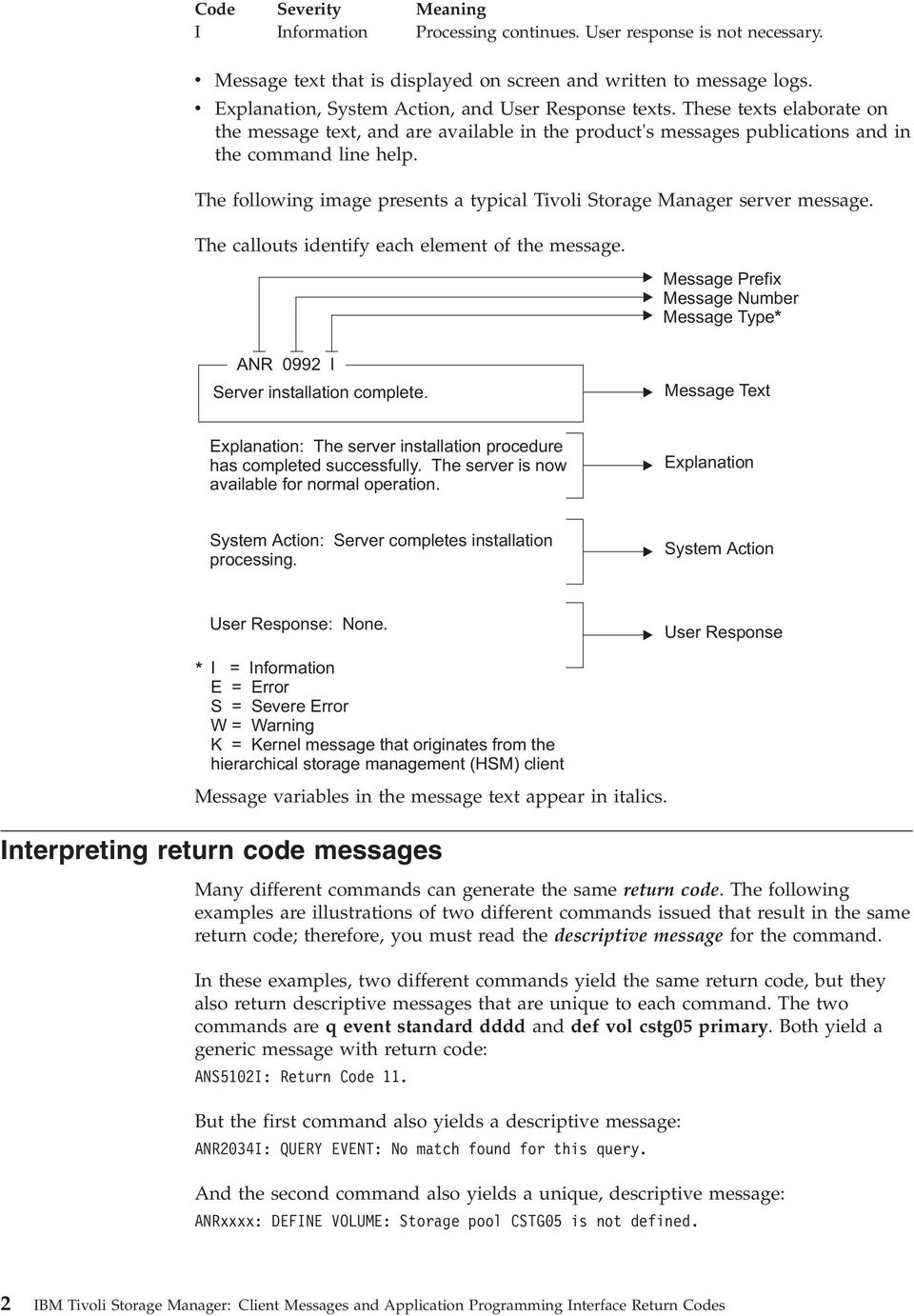
11 Example one for QUERY EVENT command Example two for DEFINE VOLUME command Chapter 1. Introduction to messages 3
12 4 IBM Tivoli Storage Manager: Client Messages and Application Programming Interface Return Codes

13 Chapter 2. ANS messages ANS messages list ANS0101E ANS messages with message numbers in the range are issued by the following IBM Tivoli Storage Manager clients: v Administrative clients v Application programming interface clients v Backup archive clients v Tivoli Storage Manager for Space management (HSM) clients IBM Tivoli Storage Manager V7.1 client messages are listed in ascending numeric order. The complete message is documented, including message ID, message text, explanation, system action, and user response. Unable to open English message repository file name. The default English message repository file cannot be opened. Either the file access permissions prevent reading the file or the file is not present in the expected location. TSM is unable to complete the requested operation. Processing is terminated. Make sure the file in your DSM_DIR is set up properly. If the problem continues, see your system administrator for further help. ANS0102W Unable to open the message repository file name. The American English repository will be used instead. The default message repository file for the current locale cannot be opened. Either the file access permissions prevent reading the file, the file is not present in the expected location, or the language specified in the option file is not supported on this workstation. TSM continues processing using the English language message repository. Make sure the file in your DSM_DIR is set up properly. If the problem continues, see your system administrator for further help. ANS0103E Error trying to read header record from message repository file name. The message repository file header record cannot be obtained. TSM is unable to complete the requested operation. Make sure the file has not been altered from the installation. If the problem continues, see your system administrator for further help. ANS0105E Error trying to read index for message number from repository file name. The message text for the specified message number cannot be read. TSM is unable to complete the requested operation. Make sure the file has not been altered from the installation. If the problem continues, see your system administrator for further help. ANS0106E Message index not found for message number. The message repository file does not contain the message text for the message number. TSM is unable to complete the requested operation. Make sure the DSM_DIR is set up properly and it does not point to an old copy. If the problem continues, see your system administrator for further help. ANS0107E Error trying to read header for message number from repository file name. The message header information cannot be obtained for the message number in the message file. TSM is unable to complete the requested operation. Make sure the file has not been altered from the installation. If the problem continues, see your Copyright IBM Corp. 1993,
14 ANS0108E ANS0201E system administrator for further help. ANS0108E Error trying to read text for message number from repository file name. The message text cannot be obtained for the message number in the message file. TSM is unable to complete the requested operation. Make sure the file has not been altered from the installation. If the problem continues, see your system administrator for further help. ANS0109E Insufficient memory for allocation of message structure. There is not enough memory in your system to allocate the storage needed for the message text. TSM is unable to complete the requested operation. Stop TSM and restart TSM. Then retry the operation. If unsuccessful, close all unneeded applications and retry the operation. ANS0110E output. Unable to open error log file file name for output. The error log cannot be opened for TSM is unable to complete the requested operation. File permissions may be set such that writing is not allowed. Stop and restart TSM. Then retry the operation. If unsuccessful, make sure the file is not being locked by another application and that file permissions allow write access. ANS0113E Message repository file name has an invalid control record. The message repository file contains an incorrect control information. TSM is unable to complete the requested operation. Make sure the message file was not altered from the installation. Check DSM_DIR to make sure it is set up properly. ANS0118E for output. Unable to open schedule log file 'file name' for output. The schedule log file cannot be opened TSM is unable to complete the requested operation. Stop TSM and restart TSM. Then retry the operation. If unsuccessful, make sure the file has not been locked by another application. ANS0119E Error trying to read response string for message number from repository file name. The response string information for the message number cannot be obtained from the message repository file. It is possible the message repository has been corrupted. TSM is unable to complete the requested operation. Make sure the message file was not altered from the installation. Check DSM_DIR to make sure it is set up properly. ANS0120E Message number number contains an invalid multibyte sequence for the current locale. An illegal multibyte sequence for the current locale was found in the message. Either the message repository has been corrupted or is coded in a language other than that of the current locale. TSM is unable to complete the requested operation. If the message repository is not corrupted, process the operation in the supported locale. ANS0121W Unable to open the iconv converter for the message repository file name. The American English repository will be used instead. The iconv converter for the default message repository for the current locale cannot be opened. The iconv converter used to convert from UTF-8 to the current locale is not installed on this work station. TSM continues processing using the English language message repository. Make sure the required iconv converter is installed properly. If the problem continues, see your system administrator for further help. ANS0201E Invalid parameter was found. The system encountered an internal program error due to an invalid parameter. 6 IBM Tivoli Storage Manager: Client Messages and Application Programming Interface Return Codes

15 ANS0202E ANS0212E Ask your service representative to check the error log. ANS0202E Not authorized to restore the other node's data. The client is not authorized to restore the other node's data. ANS0203E Get authorization from the other node. The objname field has no leading directory separator. The objname field does not have a leading directory separator. ANS0204E Correct the value for the objname. Wildcards are not allowed in the objname directory path. Wildcards are not allowed in the objname directory path. ANS0205E log file. Correct the value for the objname. Unable to open error log file. The system is unable to open the error Verify the DSMI_LOG value and access permission. On the AS/400 platform, verify the value specified for ERRORLOGNAME in the API options file. ANS0206E file. The log file cannot be written to. There was an error writing to the log Verify the DSMI_LOG value and access permission. on the AS/400 platform, verify the value specified for ERRORLOGNAME in the API options file. ANS0207E log file. The log file name was not specified. The system is unable to open the error Verify the DSMI_LOG value and access permission. On the AS/400 platform, verify the value specified for ERRORLOGNAME in the API options file. ANS0208E be found. ANS0209E The TCP/IP WINSOCK.DLL file cannot be found. The TCP/IP WINSOCK.DLL file cannot Verify your TCP/IP installation. An error occurred while loading a library. An error occurred while loading a library. The TCP/IP DLL load failed. ANS0210E Verify your TCP/IP installation. The TCP/IP load function failed. An error occurred while locating a function. The TCP/IP load function failed. ANS0211E Verify your TCP/IP installation. The object name pointer is NULL. There is no value provided for the object name pointer. Provide an address for the dsmobjname structure. ANS0212E The data block pointer is NULL. There is no value provided for the data block pointer. structure. Provide an address for the DataBlk Chapter 2. ANS messages 7
16 ANS0213E ANS0223E ANS0213E The object attribute pointer is NULL. There is no value provided for the object attribute pointer. structure. ANS0214E Provide an address for the ObjAttr There is no server session information. The server did not respond with the session information. ANS0215E Verify the server status. There is no server policy information. The server did not respond with the policy information. ANS0216E zero. bufferlen. ANS0217E Verify the server policy definitions. The datablk bufferlen value is zero. The value for the datablk bufferlen is Provide a non-zero value for the The datablk bufferptr is NULL. There is no value provided for the datablk bufferptr. ANS0218E Provide an address for the bufferptr. The objtype is invalid. The value for the objtype is invalid. The value for dsmobjname.objtype must be: v DSM_OBJ_FILE or DSM_OBJ_DIRECTORY for Backup, or v DSM_OBJ_FILE for Archive. ANS0219E The dsmendtxn vote is invalid. The dsmendtxn vote is invalid. The vote must be DSM_VOTE_COMMIT or DSM_VOTE_ABORT. ANS0220E An invalid option was found during option parsing. An invalid option was found. Verify the options in dsm.opt, dsm.sys, and the options string. Check the error log for more details about the error. on the AS/400 platform, verify the options in *LIB/QOPTTSM(APIOPT). ANS0221E There was an error in the TSM API internals. The system encountered an error in the API internals. Shut down the process and retry the operation. Verify that any previous dsminit calls were cleaned up and terminated by a dsmterminate call. If the problem continues, contact your system administrator or service representative. ANS0222E The repository type is invalid. The repository type is invalid. For dsmdeletefs the repository must be one of the following: v DSM_ARCHIVE_REP v DSM_BACKUP_REP v DSM_REPOS_ALL. ANS0223E Filespace name should start with the directory delimiter. The filespace name is invalid. Filespace name should start with the directory delimiter. 8 IBM Tivoli Storage Manager: Client Messages and Application Programming Interface Return Codes

17 ANS0224E ANS0233E ANS0224E The object name is either an empty string or has no leading delimiter. The object name is invalid because of an empty string or there is no leading delimiter. full path. ANS0225E Verify the format of the dsmobjname Low level qualifier of the object name should start with the directory delimiter. The low level qualifier for the object name is invalid. Start the low level qualifier of the object name with the directory delimiter. ANS0226E The object owner is invalid. The object owner must be either the root user, or the object owner must be the same as the session owner. owner. ANS0227E Verify the session owner and object The dsmbindmc sendtype is invalid. The dsmbindmc sendtype is invalid. The sendtype must be one of the following: v stbackup v starchive v stbackupmountwait v starchivemountwait ANS0228E The dsmsendobj sendtype is invalid. The dsmsendobj sendtype is invalid. The sendtype must be one of the following: v stbackup v starchive v stbackupmountwait v starchivemountwait ANS0229E dtarchive. ANS0230E The dsmdeleteobj deltype is invalid. The dsmdeleteobj deltype is invalid. The deltype must be dtbackup or The query Backup objstate is invalid. The query Backup objstate is invalid. The qrybackupdata.objstate must be one of the following: v DSM_ACTIVE v DSM_INACTIVE v DSM_ANY_MATCH ANS0231E The management class name was not found. A query or send operation is unable to find the management class name. ANS0232E Verify the management class name. The drive letter is not an alphabetic character. The drive letter is not an alphabetic character. This return code is valid on Microsoft Windows only. Verify that the drive designation is an alphabetic character. The referenced field is dsmdosfsattrib.driveletter. ANS0233E The Register Filespace name is NULL. There is no value provided for the Register Filespace name. Provide a filespace name on dsmregisterfs. Chapter 2. ANS messages 9

18 ANS0234E ANS0243E ANS0234E password. The new password value is NULL or blank. There is no value provided for new Provide a new password on dsmchangepw. ANS0235E password. The old password value is NULL or blank. There is no value provided for old Provide an old password on dsmchangepw. ANS0236E On dsminit, the owner is not allowed to establish a session when PASSWORDACCESS=generate. PASSWORDACCESS=GENERATE establishes a session with the current login user as the owner. The application should set clientownernamep to NULL when PASSWORDACCESS=GENERATE is in effect. Whether the application can continue processing depends on how the application handles the error. This message applies to applications that utilize the TSM API, and is intended primarily for the vendor of the application for which the message is issued. Depending on the application, this could be a configuration issue. Consult the documentation for the application and verify that the application is configured correctly. If the problem persists, contact the application vendor for further assistance. ANS0237E On dsminit, the node is not allowed when PASSWORDACCESS=generate. PASSWORDACCESS=generate establishes a session with the current hostname as the node. When using PASSWORDACCESS=generate, set clientnodenamep to NULL. ANS0238E ANS0239E The sequence of calls is invalid. The sequence of calls is invalid. Verify the transaction call sequence. On dsmsendobj, wildcards are not allowed for the objname. On dsmsendobj, wildcards are not allowed for the objname. dsmobjname. ANS0240E ANS0241E Provide a fs, hl, and ll on the The filespace to delete/set access cannot be found. The filespace to delete cannot be found. Verify the filespace name. On dsmsendobj, dsmdeleteobj, or dsmupdatefs the filespace is not registered. On dsmsendobj, dsmdeleteobj, or dsmupdatefs, the filespace is not registered. ANS0242W Verify the filespace name. On dsmregisterfs the filespace is already registered. On dsmregisterfs the filespace is already registered. ANS0243E NULL. Verify the filespace name. On dsmbegingetdata the objid is NULL. On dsmbegingetdata, the objid is Verify the following: v The dsmgetlist is not NULL. v Each objid is not NULL. 10 IBM Tivoli Storage Manager: Client Messages and Application Programming Interface Return Codes

19 ANS0244E ANS0254E v The dsmgetlist numobjid is not zero. ANS0244E On dsminit the caller's API version is different than the TSM library version. On dsminit the caller's API version has a higher value than the TSM library version. Install the latest TSM API library and trusted agent module. ANS0245E The caller's structure version is different than the TSM library version. The caller's structure version is different than the TSM library version. Ensure that the stversion field is set with the value in the header file. Recompile the application with the latest header files. ANS0246E Issue dsmendtxn and then begin a new transaction session. This transaction must be ended and a new one must be started due to one of the following reasons: v The destination changed. v The byte limit is exceeded v The maximum number of objects is exceeded. Issue dsmendtxn and start a new transaction session. ANS0247E The backup or archive object is excluded from processing. The backup or archive object is excluded from processing. ANS0248E group. Verify the objname and Exclude lists. The backup object does not have a copy group. The backup object does not have a copy Verify server policy definitions. ANS0249E group. ANS0250E corrupted. The archive object does not have a copy group. The archive object does not have a copy Verify server policy definitions. Memory used by the TSM API has been corrupted. Memory used by the TSM API has been Retry the operation. If the problem continues, contact your system administrator or service representative. ANS0251E long. The sendobj Archive description is too long. The sendobj Archive description is too The sndarchivedata.descr string must be less than or equal to DSM_MAX_DESCR_LENGTH. ANS0252E The sendobj ObjAttr.objInfo is too long. The sendobj ObjAttr.objInfo is too long. The objinfo field must be less than or equal to DSM_MAX_OBJINFO_LENGTH. ANS0253E The sendobj dsmobjname.hl is too long. The sendobj dsmobjname.hl is too long. The hl field must be less than or equal to DSM_MAX_HL_LENGTH. ANS0254E The password, or encryptionpassword string provided is too long. The value provided for password or encryptionpassword is too long. Chapter 2. ANS messages 11

20 ANS0255E ANS0264E The password or encrypionpassword field must be less than DSM_MAX_VERIFIER_LENGTH. ANS0255E The sendobj dsmobjname.fs is too long. The sendobj dsmobjname.fs is too long. The fs field must be less than or equal to DSM_MAX_FS_LENGTH. ANS0260E An invalid option keyword was found during option parsing. An invalid option keyword was found in the dsminit configuration file, the option string, dsm.sys, or dsm.opt. Correct the spelling of the option keywords. Verify that the dsminit configuration file only has a subset of the dsm.sys options. Check the error log for more details about the error. ANS0256E The sendobj dsmobjname.ll is too long. The sendobj dsmobjname.ll is too long. The ll field must be less than or equal to DSM_MAX_LL_LENGTH. ANS0261E The configuration file specified on dsminit cannot be opened. The configuration file specified on dsminit cannot be opened. Verify the file name. ANS0257E On RegisterFS or UpdateFS the fsattr's fsinfo is too long. On RegisterFS or UpdateFS the fsattr's fsinfo is too long. The fsinfo field must be less than or equal to DSM_MAX_FSINFO_LENGTH. ANS0262E not found. option. The Include/Exclude definition file was not found. The Include/Exclude definition file was Verify the file name on the Inclexcl ANS0258I On dsmgetnextqobj or dsmgetdata there is more available data. On dsmgetnextqobj or dsmgetdata there is more available data. ANS0259E Call the function again. The datablk buffer is too small for the query response. The datablk buffer is too small for the query response. On dsmgetnextqobj ensure that the datablk buffer is at least as big as the query response structure. ANS0263E Either the dsm.sys file was not found, or the Inclexcl file specified in dsm.sys was not found. Either the dsm.sys file was not found, or the Inclexcl file specified in dsm.sys was not found. The dsm.sys file must be in the directory referenced by the environment variable DSMI_DIR. Verify the file name on the Inclexcl option in the dsm.sys file. ANS0264E Only a UNIX root user can execute dsmchangepw or dsmdeletefs. Only a UNIX root user can execute dsmchangepw or dsmdeletefs. Run this program as a root user. 12 IBM Tivoli Storage Manager: Client Messages and Application Programming Interface Return Codes
21 ANS0265E ANS0276S ANS0265E You must issue dsmbindmc before dsmsendobj. You must issue dsmbindmc before dsmsendobj. ANS0266I Modify your program. The dsmendtxn vote is ABORT, so check the reason field. After a dsmendtxn call, the transaction is aborted by either the server or client with a DSM_VOTE_ABORT and the reason is returned. Check the reason field for the code which explains why the transaction has been aborted. Retry the operation. If the problem continues, contact your system administrator. ANS0271E No more files can be restored or retrieved since the destination directory is full. No more files can be restored or retrieved since the destination directory is full. Free up disk space, or restore or retrieve the file to another disk. ANS0272I The operation is finished. The operation is finished. Proceed with next function call. ANS0267E line. Invalid command line option/value: 'option' The option is not valid on this command Processing stops Verify that the option and value are not misspelled and are valid with the current command. ANS0273E The trusted agent execution/owner permissions are invalid. The trusted agent execution/owner permissions are invalid. Have your system administrator check the installation instructions for the client to ensure that the trusted agent permissions are set correctly. ANS0268E the error log. Server problem: Destination not defined. Server problem: Destination not defined. Have your service representative check ANS0274S Process killed. This is a programming failure and the client program ends. Retry the operation. If the problem continues, contact your system administrator. ANS0269S The structured file data type is unknown. An unknown and unexpected error code occurred within the client program. The structured file data type is unknown. This is a programming failure and the client program ends. Retry the operation. If the problem continues, contact your system administrator. ANS0270S The data buffer overflowed. The data buffer overflowed. This is a programming failure and the client program ends. ANS0275S Trusted agent would block the operation. The trusted agent blocks the operation. This is a programming failure and the client program ends. Retry the operation. If the problem continues, contact your system administrator. ANS0276S The area for the include/exclude pattern is too small. The area for the include/exclude pattern is too small. This is a programming failure and the client program ends. Chapter 2. ANS messages 13
22 ANS0277S ANS0287E Retry the operation. If the problem continues, contact your system administrator. ANS0277S There is no closing bracket in the pattern. There is no closing bracket in the pattern. This is a programming failure and the client program ends. Retry the operation. If the problem continues, contact your system administrator. ANS0278S The transaction will be aborted. The server encountered an error and will abort the transaction. The transaction will be aborted. The reason code is passed on the dsmendtxn call. Issue the dsmendtxn with a vote of DSM_VOTE_COMMIT and examine the reason code. ANS0279I A file was skipped during a restore operation because the file is off line and the application has chosen not to wait for a tape mount. A file was skipped during a restore operation because the file is off line and the application has chosen not to wait for a tape mount. File skipped. Verify the application sets the mountwait value correctly on dsmbegingetdata. ANS0280E Unable to find Trusted Agent module. TSM was unable to find the TSM Trusted Agent module in the specified directory. The name of the TSM Trusted Agent module is dsmtca. TSM ends. Make sure the Trusted Agent module is in the directory specified by DSMI_DIR. ANS0282E Password file is not available. The file containing the stored password for the specified server-name is unavailable. password. TSM ends. The root user must set and store a new ANS0283E High level qualifier of the object name should start with the directory delimiter. The high level qualifier for the object name is invalid. High level qualifier of the object name should start with the directory delimiter. ANS0284E The number of objects on dsmbegingetdata exceeds DSM_MAX_GET_OBJ DSM_MAX_PARTIAL_GET_OBJ. The number of objects (numobjid) specified on the dsmbegingetdata call exceeds DSM_MAX_GET_OBJ DSM_MAX_PARTIAL_GET_OBJ. Check the number of objects before calling dsmbegingetdata. If it is greater than DSM_MAX_GET_OBJ DSM_MAX_PARTIAL_GET_OBJ, then issue multiple Get call sequences. ANS0285E The update action is invalid. The dsmupdatefs or dsmupdateobj action is invalid. Correct the action value. Valid values are defined in dsmapitd.h and documented in our Using the API book. ANS0286E The key file is missing. The key file for Tivoli Data Protection application client for Oracle cannot be found. Ensure that you have ordered the Tivoli Data Protection application client which contains TDP for Oracle, and install the key file. ANS0287E The key file content is invalid. The key file content for Tivoli Data Protection application client for Oracle is invalid. Ensure that you have ordered the Tivoli Data Protection application client which contains 14 IBM Tivoli Storage Manager: Client Messages and Application Programming Interface Return Codes
23 ANS0296I ANS0309E the TDP for Oracle, and install the key file. ANS0296I Encryption key passwords are not the same. Please try again... TSM found that the encryption key passwords do not match. key password. password. ANS0297E opened. ANS0298E You are prompted for the encryption Enter the correct encryption key Error opening specified file. The specified file could not be located or Attempts to open file failed. Make sure the file exists. Session Rejected: The specified user id is currently locked The user id you specified is currently locked on the server. Session was not started. Check with your system administrator to find out why your user id is locked. ANS0299E Scheduler cannot be started manually because the value of MANAGEDSERVICES option is SCHEDULE. if MANAGEDSERVICES SCHEDULE is indicated in the option file, the TSM scheduler cannot be started in the traditional manner. Scheduler stopped. If you are not going to use dsmcad to manage the schedule anymore, stop dsmcad and remove MANAGEDSERVICES option from the option file. ANS0302I ANS0304E Successfully done. The operation successfully completed. The password is too short. The new password does not have enough characters. server. The password is not updated on the Choose a different password. Contact your TSM administrator to lean the password requirements. ANS0305E It is too soon after the previous update to change the password. The password cannot be changed since not enough time has elapsed since the last password update. server. later. ANS0306E The password is not updated on the Try to change your password again The password was previously used. The new password that you entered was previously used. server. ANS0307E The password is not updated on the Choose a different password. The password does not meet the requirements. The new password that you entered does not meet the requirements, such as the number of special characters or digits. server. The password is not updated on the Choose a different password. Contact your TSM administrator to learn the password requirements. ANS0308E Remote operation failed to start on obj-name. Status: status reason: reason The request to start a remote operation has failed for the indicated node and filespace. The status and the reason for the failure are shown. TSM ended the current operation. Contact your system administrator for more information. ANS0309E Remote operation failed to start on obj-name. Status: status The request to start a remote operation has failed for the indicated node and filespace. The status of the failure is shown. IBM Tivoli Storage Manager ended the current operation. Contact your system administrator for more information. Chapter 2. ANS messages 15
24 ANS0311E ANS0320E ANS0311E The tsmbuffhandle is invalid, or the value of dataptr is invalid. An invalid value for a handle or dataptr has been passed into the API. There is a problem with the calling application. Verify the values of the tsmbuffhandle and dataptr passed to the API. ANS0312E The number of bytes copied into the tsmbuffer is larger than the allowed value. An invalid number of bytes was copied to a tsmbuffer. There is a problem with the calling application. Verify the number of bytes copied into the tsmbuffer. ANS0313E dsmterminate cannot finish because the application is holding on to 1 or more tsmbuffers. An application is trying to terminate a session, but is still holding some tsmbuffers. The application must return all buffers for this session by calling tsmreleasebuffer, and then issue dsmterminate. ANS0314E occurred. An internal error occurred in the tsmbuffer array. An internal API buffer array error Try the operation again. If the problem continues, contact your system administrator or service representative. ANS0315E Unable to open message text file. The system is unable to open the message txt file (dscenu.txt or dsmclientv3.cat for AIX ). On the AS/400 platform this file is QANSAPI/QAANSENU(TXT). Verify that the dscenu.txt file is in the directory pointed to by DSMI_DIR. For AIX, verify that the dsmclientv3.cat file has a symbolic link to /usr/lib/nls/msg/<locale>/dsmclientv3.cat. ANS0316E Unable to use message text file. The system is unable to use the message text file (dscenu.txt or dsmclientv3.cat for AIX) because of an invalid header. On the AS/400 platform this file is QANSAPI/QAANSENU(TXT). ANS0317E Install the message text file again. Unable to use message text file. The system is unable to use the message txt file (dscenu.txt or dsmclientv3.cat for AIX) because of an invalid control record. On the AS/400 platform this file is QANSAPI/QAANSENU(TXT). ANS0318E Install the message text file again. Invalid value for DATEFORMAT specified. An invalid value is specified for DATEFORMAT. ANS0319E Specify a valid value. Invalid value for TIMEFORMAT specified. An invalid value is specified for TIMEFORMAT. ANS0320E Specify a valid value. Invalid value for NUMBERFORMAT specified. An invalid value is specified for NUMBERFORMAT. Specify a valid value. 16 IBM Tivoli Storage Manager: Client Messages and Application Programming Interface Return Codes
25 ANS0321E ANS0332E ANS0321E msg parameter for dsmrcmsg is a NULL pointer. The message parameter for dsmrcmsg is a NULL pointer. parameter. ANS0322E Allocate enough space for the message no text available for this return code. The dsmrc parameter for dsmrcmsg is an unsupported return code. Specify a valid value. points with the MAXNUMMP property of your node definition. The object is skipped If you are performing any other TSM operations that might be using mount points, wait until those operations are complete, then try the failed operation again. Otherwise contact your TSM administrator for further assistance ANS0327E A duplicate object was found, operation cannot complete. A duplicate object was found, operation cannot complete. specification. The requested operation failed. Try the operation with a different file ANS0323E partialobjoffset value for partial object retrieve is invalid. The partialobjoffset value for partial object retrieve is invalid. Specify a valid value. ANS0328E The specified objects failed the merge test. The specified objects failed the merge test, operation cannot complete. parameters. The requested operation failed. See documentation for the merge test ANS0324E partialobjlength value for partial object retrieve is invalid. partialobjlength value for partial object retrieve is invalid. ANS0325E Specify a valid value. Partial Object Retrieve is not supported on this server. The TSM server specified by the user does not support partial object retrieve. Specify a TSM server which supports the partial object retrieve function. ANS0326E This node has exceeded its maximum number of mount points. Either no tape or sequential disk mount points are permitted for this operation, or the maximum number of mount points allowed are already in use. The operation can not be completed. The TSM administrator defines the maximum number of mount ANS0330E following: v atbackup v atarchive ANS0331E The dsmsetaccess access Type is invalid. The dsmsetaccess accesstype is invalid. The accesstype must be one of the No files have been previously backed up for this filename/filespace. You tried to set access to files when no files for the specified filename, drive or file system were previously backed up. Ensure that the correct drive or file system was specified and that files are backed up for you to set access. ANS0332E No files have been previously archived for this filename/filespace. You tried to set access to files when no files for the specified filename, drive or file system were previously archived. Chapter 2. ANS messages 17
26 ANS0333E ANS0343E Ensure that the correct drive or file system was specified and that files are archived for you to set access. ANS0333E unknown. Unknown Remote Mover type The specified Remote Mover type is TSM ended the current operation. Contact your system administrator for more information. ANS0334E An Operation for the requested node and filespace is already in progress. A request has been made to use a data mover to perform an operation for the indicated node and filespace. Since an operation for this node and filespace is already in progress, the new operation cannot be performed. ANS0335E TSM ended the current operation. Retry the operation at a later time. System resource in use A required resource is in use by another command or process. ANS0336E TSM ended the current operation. Retry the operation at a later time. Server plugin communication error Communication between a server plugin module and a NAS filer failed. TSM ended the current operation. Contact your system administrator for more information. ANS0337E Server plugin detected unsupported NAS filer operating system. A plugin module detected that a NAS filer is running an unsupported operating system or operating system level. TSM ended the current operation. Contact your system administrator for more information. Contact your system administrator for more information. ANS0339E The specified target storage pool is not defined. The storage pool is not defined. TSM ended the current operation. Contact your system administrator for more information. ANS0340E A target storage pool does not have the correct data format for the given node type. none TSM ended the current operation. Contact your system administrator for more information. ANS0341E No associated data mover is defined for the given node. none TSM ended the current operation. Contact your system administrator for more information. ANS0342E The CRC received from the Server does not match the CRC calculated by the client. The server sent a CRC for a buffer. The client calculated a CRC for the same buffer. These did not match. The mismatch indicates a communication failure. In some cases, the client can indicate the failure to the server and retry the operation. Check the trace log for additional information and retry the operation. If the problem persists, contact your system administrator. ANS0343E An invalid operation was attempted on a group leader or group member. An invalid operation was attempted on a logical group. The current operation stops. Retry a valid operation. ANS0338E An invalid operation was attempted on a node The operation is not valid. TSM ended the current operation. 18 IBM Tivoli Storage Manager: Client Messages and Application Programming Interface Return Codes
27 ANS0344E ANS0354E ANS0344E Cannot Send data with a zero byte sizeestimate. You cannot send data for an object with size estimate = 0. dsmsendobj. ANS0345E Set size estimate greater than 0 in Remote disk not defined. An operation was attempted on a remote disk that is not defined. ANS0346E The current operation stops. Define the proper remote disk. Input destination does not match expected destination. Input destination does not match expected destination. destination. ANS0347E mover. ANS0348E The current operation stops. Retry operation with proper Data mover is not available. Data mover is not available. The current operation stops. Retry operation with a proper Data Operation failed because the copy continue option was set to NO. Operation failed because the copy continue option was set to NO. The current operation stops. This abort code indicates that a store operation, like backup or archive failed because the copy continue option was set to NO. The sysadmin will need to resolve the problem on the server end. ANS0349E Transaction failed because of a problem during a store operation. Transaction failed because of a problem during a store operation. This error is typical when the next storage pool has a different copy storage pool list and we switch to this pool in the middle of a transaction. Transaction is aborted. Resend objects in separate transactions. ANS0350E The current client configuration does not comply with the value of the DATAWRITEPATH or DATAREADPATH server option for this node. The values of the DATAWRITEPATH and DATAREADPATH server options specify where the client is allowed to send data, and where data is read from. The values for the specified node name should correspond with the client configuration. For example, you will get this error message if DATAWRITEPATH contains a LAN value and the client is configured to use LAN-free protocol, or vice versa. Check the client, server, and storage agent logs to determine why the client was not able to send data LAN-free. Make sure the client configuration and server options are compatible. ANS0351E The node or user does not have proper authority to perform this operation The node or user does not have proper authority to perform this operation. object. ANS0352E The transaction is ended. Check the authority for the specified The operation is not permitted due to server licenses values. The node or user is trying to perform an operation that either exceeds license values, or is not licensed. The session is rejected or the transaction is cancelled, ending the current operation. ANS0353E See your system administrator. When using usetsmbuffers, datablk must be NULL in calls to dsmsendobj and dsmgetobj. The value for datablk must be NULL when using usetsmbuffers. There is a problem with the calling application. Contact your application provider ANS0354E encryption. Encryption is not allowed when using usetsmbuffers. usetsmbuffers does not support Chapter 2. ANS messages 19
28 ANS0355E ANS0401E Try the operation again, without using usetsmbuffers, or disable encryption for this operation. ANS0355E compression. usetsmbuffers. ANS0356E encryption. usetsmbuffers. ANS0357E This object cannot be restored/retrieved using usetsmbuffers, because it is compressed. usetsmbuffers does not support Try the operation again, without using This object cannot be restored/retrieved using usetsmbuffers, because it is encrypted. usetsmbuffers does not support Try the operation again, without using When using usetsmbuffers, a restore/retrieve with partial object restore is not allowed. usetsmbuffers does not support partial object restore. Make sure the calling application is either using Partial object restore or usetsmbuffers. ANS0358E No encryption key was found. If you are using -encryptkey=prompt make sure there is a value in the encryptionpasswordp field and that bencryptkeyenabled is set to true. There was no encryption key found in the password file, or no key was provided by the application. If you are using -encryptkey=prompt, make sure there is a value in encryptionpasswordp and that bencryptkeyenabled is set to true. ANS0359E Conflicting encryption key options have been specified. When using the ENABLEENCRYPTKEY option, the parameter bencryptkeyenabled for the TSM API dsminitexin_t and tsminitexin_t structures cannot be set to btrue. Either remove the ENABLEENCRYPTKEY option from the options file, or set the parameter bencryptkeyenabled to bfalse in the program using the TSM API. ANS0360E The CAD cannot start because the value of the MANAGEDSERVICES option is NONE. The CAD will not start if MANAGEDSERVICES NONE is set in the option file. The CAD is designed to manage the web client or TSM schedules. By specifying NONE, the CAD will not manage any services. The CAD will stop processing. Specify either WEBCLIENT or SCHEDULER for the MANAGEDSERVICES option in the option file then restart the CAD. ANS0361I DIAG: The message text is provided for diagnostic purposes and is meant to provide information to IBM support in problem determination. ANS0400E License file could not be opened. The license file was not found, or could not be opened because of permissions or the file is corrupted. Check permissions on file. See if the license file is in the correct place. ANS0401E Read failure on the license file. The license file was not found, or could not be opened because of permissions, or the file is corrupted. Check permissions on file. See if the license file is in the correct place. 20 IBM Tivoli Storage Manager: Client Messages and Application Programming Interface Return Codes
29 ANS0402E ANS0419E ANS0402E Write failure on the license file. The license file was not found, or could not be opened because of permissions or the file is corrupted. Check permissions on file. See if license file is in the correct place. ANS0403E ANS0404E ANS0405E ANS0410E Data in the license file is not in a valid format. The license file is not valid. User needs to obtain a new license. The checksum in the license file does not match the licenseregistration string. The registration string is not valid. User needs to obtain a new license. This is an expired try and buy license. The registration string is not valid. User needs to obtain a new license. Oracle passed invalid mode Invalid mode passed by Oracle. Contact your system administrator. ANS0413E Object exists Backup or Restore Object already exists. If backing up an object, be sure to generate a unique object name. ANS0414E Not same Oracle handle The handle passed from Oracle is not the same handle that TSM passed back. ANS0415E ANS0416E ANS0417E API. Contact your system administrator. End of file reached End of file reached. None Wrong Read State The operation must be in READ state. Contact your service representative. Runtime API version is outdated Runtime API is lower than compile time Use the WHAT command to find out the compile time API level. Obtain the same or higher level of API library. ANS0411E Oracle passed null file name Null filename passed by Oracle. Contact your system administrator. ANS0418E Wrong write state The operation must be in WRITE state. Contact your service representative. ANS0412E Wrong data block size Wrong Block Size Contact your system administrator. ANS0419E Invalid flag passed Invalid flag passed from Oracle. Contact your system administrator. Chapter 2. ANS messages 21
30 ANS0420W ANS0992E ANS0420W Warning! Restoring inactive system state objects is not recommended. Do you wish to continue? Restoring inactive system state objects may cause system instability. Examples of possible problems include: v Applications that were installed after the time the system state was backed up cannot function properly after restoring the inactive system state v Critical operating system updates installed after the inactive system state backup was made can no longer be available, or may not function correctly. Restoring inactive system state objects is not recommended unless you are certain that this is what you need to do. If user responds with yes, the client will restore the object. If user responds with no, the client will cancel the operation. Reply to the prompt. If you are unsure, reply no, and consult your system administrator or operating system vendor before proceeding further. ANS0421W Unable to synchronize the node password with the user id password provided. The node password was not updated due to the reason described in the error message preceding this one. The node password is not updated on the server. Next time you run the client you will be prompted for the password again. ANS0422W See the preceding error message. The selected journal location is a network drive and might not be accessible from the journal service. Select a location on a local drive. It is not recommended to use a network device as the location where journal databases are stored. Placing journal databases on a network device can prevent the journal service from running. Processing continues. Choose a local drive where journal databases will be stored. ANS0423E Directory 'filespace namepath-namefile-name' cannot be created. Path does not exist. The operating system returned a "path not found" status when IBM Tivoli Storage Manager attempted to create the directory needed for Automated System Recovery (ASR). One possible reason is that a multi disk system is restored to a single disk system. Please verify that you are restoring to identical hardware and try again. ANS0990W Options file 'file-name' could not be found. Default option values will be used. Common reasons for this warning include: v The default options file does not exist, and v You did not specify the -OPTFILE option when starting the TSM client, and v the environment variable DSM_CONFIG was not set. TSM client assumes default values for all client options and continues processing, using the default server name and associated options found in the dsm.sys file. If the default system action is acceptable, you can eliminate this message by creating an empty dsm.opt file in the installation directory. If you have a client user options file (dsm.opt), either place it in the installation directory or set the DSM_CONFIG environment variable to the fully-qualified path and file name of your options file. Review the information on configuring TSM in the TSM client manual specific to your operating system. If the problem persists, ask your TSM administrator for further assistance. ANS0991I TSM scheduler is listening for server requests on port port number This message indicates the port number on which the clients is listens for server requests. If the port number in the message differs from the default value or what you specified with the TCPCLIENTPORT option, it is because the port was in use by a different process. Processing continues. Normally no further action is required. If you require TSM to use a specific port number, you need to configure your system or applications so the number is avaible. Restart the TSM client and confirm it uses the desired port. ANS0992E The destination filespace or drive letter is unavailable. For more details please see dsmerror.log. The system is trying to restore or retrieve to a destination that cannot be reached. The specified filespace name or drive letter is not valid, or does not exist, or you are specifying a local share name that cannot be resolved. 22 IBM Tivoli Storage Manager: Client Messages and Application Programming Interface Return Codes
31 ANS0993E ANS1006I Objects which are part of this filespace are not processed. Try the command again, and specify a different destination for the object that was not processed. ANS0993E The source specification "source" has invalid format. The file system must be enclosed in curly braces and wildcards cannot be used except at the lower level. terminated. The command processing is Correct the specification and try the command again. ANS0994E Invalid string 'string' for virtual file space name or group name specification. You entered a virtual file space name or a group name specification that contains wildcard characters. Enter a correct virtual file space name and a group name and try again. Use the pick option to display a list of groups from which you can select one group. ANS0995E failed. Volume 'volume-name' could not be locked. The system call to lock the volume Please verify that no other application is accessing the volume. During restore of an image TSM must have exclusive use of the volume. ANS1000E An unsupported communications method was specified. processing stops. Specify a communications interface that is supported by the TSM client on your operating system. See the TSM client manual for your operating system for further information on configuring TSM client communications. Volume was not backed up. Use All option or use image backup command to backup this volume. ANS1002I MOS image is being created. It may take a while. Mini Operating System image is being created. It may take a while to create it. information. TSM is gathering necessary ANS1003E Backup failed to start for node = node-name, file system = fs-name, errno = error-code, reason : error-reason node failed. An attempt to start backup for remote Backup fails. Retry the operation. If the problem persists, contact the server administrator. ANS1004W Node has exceeded max tape mounts allowed. Operation for 'filespace-name' will be tried again later. Node has exceeded max tape mounts allowed. The operation will be tried again later. The operation will be retried. Increase the number of allowed tape mounts for this node on the server to avoid this situation again. ANS1005I TCP/IP read error on socket = socket-id, errno = error-code, reason : 'error-reason'. An attempt to receive data using TCP/IP connection failed. If reason : 'Connection reset by peer', it is possible that the server control connection timed out. This can occur if the file transfer time is greater than the IDLETIMEOUT value set on the server. TCP/IP connection to server fails. If the timeout was due to a large file transfer time, you can ignore this message. The client will reconnect with the server automatically, finish transferring the data, and send statistics. You can also consider increasing the IDLETIMEOUT value in the server options file. ANS1001E Volume being backed up was not a system volume. Skipped. User specified to back up system volume only. This volume was not backed up since this volume is not a system volume. ANS1006I TCP/IP write error on socket = socket-id, errno = error-code, reason : error-reason An attempt to send data using TCP/IP connection failed. Chapter 2. ANS messages 23
32 ANS1007E ANS1016I Connection to server fails. Retry the operation. If the problem persists, contact your system administrator. ANS1007E Sending of object 'object-nameobjectnameobject-name' failed. There is no backup copy group. The management class for this file (object-name) does not have a backup copy group. Either the default management class does not have a backup copy group, or an INCLUDE statement is attempting to bind the file to a management class that does not have a backup copy group. TSM did not back up the file. Run DSMC QUERY MGMTCLASS -DETAIL to view information about available management classes. v If the file is being bound to the default management class, make sure the management class has a backup copy group. v If the file is being bound to a management class specified in an INCLUDE statement, make sure that the management class has a backup copy group. v If you have more than one TSM server, make sure you are connecting to the correct server. v If you are unable to find a suitable management class, contact your TSM administrator for further assistance. ANS1008E Sending of object 'object-nameobjectnameobject-name' failed: No Archive Copy Group The management class for this file (object-name) did not have an archive copy group specified. ANS1009W TSM did not back up the file. See your system administrator. An error occurred processing the operating system include/exclude statements. The error was detected while processing: subsystemname. The client encountered an error while obtaining the automatic include/exclude statements from the operating system. Possible reasons for this error include: v The specified registry key cannot be opened for reading v The entry under this key has incorrect data Processing continues without the full list of operating system include/exclude statements. Ensure that you have access to the specified registry key and that entries are a MULTISZ values that contain: v Individual files v Directories v Wild card entries v Environment variables v /s switch (the /s switch is used on directory and/or wild card entries and signifies that all subdirectories of this directory should be excluded) If the cause of this message can not be determined or resolved, contact IBM technical support for further assistance. ANS1010E Error processing 'filespace-name': Unsupported file system operation. The file system does not support an operation required to process the file or directory. The file or directory is skipped. Depending on the specific error encountered, processing on Solaris clients might stop. Verify that the file system is supported by the TSM client. If a restore or retrieve failed, retry the operation to another location. If the problem persists, look for other indications of system problems. It may be necessary to run the operating system utility that checks and repairs file system inconsistencies. If the problem still cannot be resolved, contact your TSM administrator for further assistance. ANS1015E The session is rejected. The server does not allow a signon of a client that is not archive-retention protection enabled. The client cannot establish a connection to the server because the server is enabled for archive-retention protection enabled and the client is not. ANS1016I The session is not started. See your system administrator. No eligible files matching 'pathname' were found. The backup or archive operation completed, but no files were processed. Possible reasons for this include: v The directory that was backed up or archived contains no files v The files are excluded from backup or archive None Check the path you entered. 24 IBM Tivoli Storage Manager: Client Messages and Application Programming Interface Return Codes
33 ANS1017E ANS1025E ANS1017E Session rejected: TCP/IP connection failure. An attempt to connect to the server using TCP/IP communications failed. This can be a result of incorrect TCP/IP option settings in your client options file. This error can also occur if the LAN connection went down or if your system administrator canceled a backup operation. Session rejected. Retry the operation, or wait until the server comes back up and retry the operation. If the problem continues, see your system administrator for further help. ANS1018E Port port number is already in use The port specified by the TCPCLIENTPORT option is in use by a different process. Contact the server administrator to set up a different port for server-initiated connections. Update the TCPCLIENTPORT with this new port number. ANS1019E The volume could not be opened. An error occurred when TSM tried to open the volume for a backup or restore operation. The requested operation does not run. Examine the client error log for additional messages related to this error. Verify that the volume is available, and is not locked by another process. Try the operation again. If the problem persists, contact IBM technical support for further assistance. ANS1020E System object backup failed. An error occurred while backing up Windows system object files. The backup did not complete. Ask your system administrator to check the error log. Restart the Windows service associated with the system object indicated in the error log, and retry the backup operation ANS1021E System object restore failed. An error occurred while restoring Windows system object files. The restore did not complete. Ask your system administrator to check the error log. Restart the machine, and then restore the system object indicated in the error log again. ANS1022E Cancel failed for node: node-name filesystem: fs-name operation: op-type error: error The request to cancel a remote operation has failed. The node, filespace, operation and reason for the failure are shown. TSM operation not cancelled. Contact your system administrator for more information. ANS1023E Session rejected: Node type mismatch Your node name is associated with a different type of operating system (such as OS/2 or AIX) and cannot be used on this system. TSM canceled the current operation. If you need a new node name, see your system administrator to assign a new one to you. Generally, you have a unique node name for each machine and operating system pair that requires access to the server. ANS1024E Failed to update backup attributes on server for 'backup type' backup for 'filespace namepath-namefile-name', object id 'object-id:object-id' return code 'return code'. TSM failed to update attributes for the named backup object on the server. The server may not reflect correct state of the backup. Processing continues. Check preceding error messages in error log for more information. Retry the operation. If problem continues, contact your TSM administrator. ANS1025E Session rejected: Authentication failure Authentication failure. You entered an incorrect password. TSM canceled the current operation. Enter your correct password. If you cannot remember the correct password, see your system administrator to have a new one assigned for your node name. Chapter 2. ANS messages 25
34 ANS1026E ANS1033E ANS1026E The session is rejected: There was a communications protocol error. An unexpected network message was received by the client. This could be caused by network problems or a programming error. TSM canceled the current operation. Verify that your communication path is functioning properly and try the operation again. If the problem persists, contact your TSM administrator for further assistance. ANS1028S An internal program error occurred. TSM encountered an unexpected condition and can not continue the operation. This might be a programming error. processing stops. Try the operation again. If the problem persists, contact your TSM administrator or IBM technical support for further assistance. ANS1029E Communication with the TSM server is lost. This message is issued after the session with the TSM server is unexpectedly lost. The client error log might contain additional information regarding this problem. processing stops. v Restart the TSM client and retry the operation. v If the problem persists, review the client error log for other messages that might be related to this problem. v Verify that network connectivity exists between the TSM client machine and the TSM server machine. v Contact your TSM administrator for further assistance. The TSM administrator can review the TSM server activity log for additional information about the problem. ANS1030E The operating system refused a TSM request for memory allocation. TSM requires access to memory in order to store information as processing proceeds. In this case, more memory was requested than the operating system would allocate. Possible reasons include: v The system is low on memory. v The process in which the program runs has exceeded the maximum memory that it is allowed to allocate. v Some other error condition occurred that caused the program to think it is out of memory. operation. TSM cannot complete the requested Close all unneeded applications and try the operation again. If the operation still fails, try dividing the task into several smaller units. For example, if a file specification contains several high level directories, run the TSM task serially for each directory. If the TSM task is an incremental backup, use the option "-memoryefficientbackup=yes". For UNIX systems that support resource limits, check to see b if the memory resource limit is too low by entering the following command: ulimit -a Based on the resulting data, you can ask the UNIX system root user to increase resource limits so that it will override the current default. The UNIX system root user has the authority to increase resource limits. ANS1031E The attempt to establish a TCP/IP connection timed out before the connection was made. The Object of the connection attempt failed to respond within the the allotted wait time. In the case of the B/A client, this message is preceded in dsmerror.log by message ANS5216E that gives details of the connection that failed. The condition may be temporary. processing stops. v Restart the TSM client and retry the operation. v Check the client options file and verify that TCPSERVERADDRESS and TCPPORT specify the correct TCP/IP address and port number for your TSM server. v Verify that network connectivity exists between the TSM client machine and the TSM server machine. v If the problem persists, see your TSM administrator for further assistance. ANS1032E An attempt to establish a TCP/IP connection was rejected by the host An attempt to establish a TCP/IP connection was rejected by the server. The server was not fully initialized, is not currently running, was not enabled for TCP/IP communications, or an incorrect TCP/IP port number was specified. If the problem continues, see your system administrator. ANS1033E An invalid TCP/IP address was specified. The TCP/IP address specified by the TSM client's TCPSERVERADDRESS setting could not be found on the network. Common reasons for this error include: 26 IBM Tivoli Storage Manager: Client Messages and Application Programming Interface Return Codes
35 ANS1034E ANS1039S v The TCPSERVERADDRESS client option specifies the wrong TCP/IP address for the TSM server". v v The machine that hosts the TSM server is not on the network. A network problem is preventing the TSM client from reaching the machine that hosts the TSM server. processing stops. Verify that the TCPSERVERADDRESS and TCPPORT settings have the correct values for your TSM server. Use your operating system's "ping" (or similar) utility to ensure that your machine can locate the machine that hosts the TSM server across the network. Try the operating again. If the problem persists, ask your TSM administrator for further assistance. ANS1034E The specified TCP/IP host name is unreachable The TCP/IP host name specified in the TCPSERVERADDRESS statement cannot be reached. Check your options file for the correct TCPSERVERADDRESS statement. See your administrator for the correct name of the server. ANS1035S Options file 'file-name' could not be found, or it cannot be read. Common reasons for this error include: v The default options file does not exist. v You specified the -OPTFILE option when starting the IBM Tivoli Storage Manager client, but the options file you provided does not exist. v The DSM_CONFIG (or DSMI_CONFIG if you are using the IBM Tivoli Storage Manager API) environment variable specifies an options file that does not exist. v You specified the -OPTFILE option when starting the IBM Tivoli Storage Manager client, but the options file that you provided is not in the standard file encoding of the system. For example, on Windows the expected file encoding is ANSI. v You specified the -OPTFILE option when starting the IBM Tivoli Storage Manager client, but the options file that you provided does not have appropriate read permissions for the user that is running the operation. IBM Tivoli Storage Manager client processing stops. Make sure that the options file you want to use exists, it has the read rights set for the user that is running the operation, and it is in the standard file encoding of the system. For example, on Windows the expected file encoding is ANSI. Review the configuration information in the IBM Tivoli Storage Manager client manual specific to your operating system. If the problem persists, ask your IBM Tivoli Storage Manager administrator for further assistance. ANS1036S The option 'option' or the value supplied for it is not valid. It was found in options file 'file-name' at line number: number The complete entry: 'entry' The specified option in the TSM options file (file-name) or the command line, is in error. Either the option itself or its value are invalid. For options that include a date or time specification, the format of the date or time might not match the formats specified by the DATEFORMAT or TIMEFORMAT options. Correct the option name or value. For options that specify dates or times, ensure that the specified date or time matches the DATEFORMAT and TIMEFORMAT settings. If -DATEFORMAT or -TIMEFORMAT are specified on the command line, they must precede the option that specifies the date or time. For example, use -DATEFORMAT=3 -FROMDATE=yyyy-mm-dd, instead of -FROMDATE=yyyy-mm-dd -DATEFORMAT=3. ANS1037S options file. entries. ANS1038S TSM. TSM. ANS1039S Invalid keyword specified TSM found an incorrect keyword in the Correct the options file with valid Invalid option specified. An incorrect option was specified to Correct the options used for running The include or exclude pattern cannot be parsed. The pattern is formatted incorrectly or is too complex for TSM to interpret. Verify that the include or exclude pattern is specified correctly. If the pattern is correct, then contact IBM technical support for further assistance. Chapter 2. ANS messages 27
36 ANS1040S ANS1050E ANS1040S Include/Exclude pattern is missing a closing bracket The include or exclude pattern is incorrectly constructed. The closing bracket is missing. ANS1041S Correct the syntax for the pattern. Include/Exclude pattern must start with a directory delimiter The include or exclude pattern must start with a directory delimiter. ANS1042S Correct the syntax for the pattern. A beginning or ending directory delimiter is missing from the Include/Exclude pattern. 1. The include/exclude pattern has a '...' without a beginning or ending directory delimiter. 2. For Windows, the drive seperator is not immediately followed by a directory delimiter. ANS1043S Correct the syntax for the pattern. Quotes are not matched The quotes specified in the pattern are not the same and do not make a set. Correct the pattern by using matching quotes in the syntax. ANS1044S Unresolved environment name 'environment-name'.this filespace is being ignored. Processing Continues. The specified environment-name in the options file is invalid. operation. TSM attempts to continue the current Check the environment variable in the options file and use a valid environment variable. Retry the operation. operation. TSM attempts to continue the current Check the syntax of environment variable in the options file. Correct it and retry the operation. ANS1046S Environment string for variable 'environment-name' too long. Anything beyond 1024 characters is being ignored Environment variable expanded to a string which is too long. Make sure that the string is no more than 1023 characters long. operation. TSM attempts to continue the current Check the length of environment string and break it up into smaller strings using multiple environment variables. ANS1047E The destination file system is unavailable. The following object was skipped: File space:'filespace-name' Pathname:'path-name' Filename:'file-name' The client is trying to restore or retrieve the specified object to a destination that is not valid, does not exist, or cannot be reached. The object is not restored or retrieved. Processing continues with the next object. Try the command again using a different destination. ANS1048E Device 'volname' is not local The selected path is not a local device and therefore is not a valid object for image operations. The requested logical volume operation is not performed. ANS1049E Choose another object. 'filename' is not a valid destination file for image restore The filename you specified is not a valid name for a file or it is a directory. restore. Restore processing stopped. Specify a correct filename for image ANS1045S Environment variable syntax error. Incorrect syntax is specified in the options file. Make sure that the variable is enclosed in curly braces. ANS1050E Before performing the VSS Instant Restore TSM cannot lock the volume 'volume-name'. The volume cannot be locked because another application is accessing the file systems on the volume. 28 IBM Tivoli Storage Manager: Client Messages and Application Programming Interface Return Codes
37 ANS1051I ANS1057I Stop or suspend the applications that have handles open on the volume. For a file system restore, close applications that are accessing the file systems that are used for the VSS Instant Restore. If you cannot close the applications that are accessing the file system, unmount the file system. After the unmount process is complete, mount the file system and perform the VSS Instant Restore. For more information, see the TSM error log file DSMERROR.LOG. ANS1051I Invalid password You entered an invalid password. TSM cannot connect to the server without the correct password. Enter the password, or ask your system administrator for the correct password. ANS1052E Direct connection to the Storage Agent is not allowed. You cannot connect directly to the Storage Agent. To perform Lanfree operations using the Storage Agent, specify the ENABLELANFREE option in your options file, and restart the process. ANS1053I Existing file space filespace-name has been renamed to filespace-name If the file space is for Windows system state, this message is issued when the TSM backup-archive client detects multiple system state file spaces where the names differ only in case. The existence of multiple system state file spaces can occur if, at some earlier time, your TSM administrator renamed the system state file space to the same name but with a different case or the computer's name was changed from all upper case characters to lower case or mixed case characters. If the file space name represents a drive volume label, then this file space was created by an older TSM backup-archive client. If the file space is for Windows system state, TSM will back up system state to the file space containing the most recent backup. The older file space is renamed as specified in this message. Subsequent system state backups will continue to back up system state to the same (most recently used) file space. If the file space name represents a drive volume label, TSM renames the file space to the corresponding UNC name and continues to back up the drive to this renamed file space. No further action is necessary. However, if the file space is for Windows system state, then at some future time when you have determined you no longer need the older renamed system state file space, you can ask your TSM administrator to delete the older file space from TSM storage. ANS1054E Existing filespace filespace-name cannot be renamed to new filespace filespace-name. TSM return code = retcode. The client was unable to migrate a file space name from the volume label naming convention to the UNC naming convention. Check the client error log and the TSM server activity log for any other messages that might help identify the problem. If the problem cannot be resolved, contact IBM technical support for additional assistance. ANS1055I Trying to rename existing filespace filespace-name to new filespace filespace-name, but drive letters do not match, old=drive-letter, new=drive-letter. Ignore the old filespace and backup to the new filespace. Trying to rename the existing filespace name using the volume label to the UNC format naming convention but the drive letters do not match. Leave the existing filespace alone and create a new filespace. ANS1056E Processing continues. Share/network path share cannot be resolved. Path does not exist. For backup: Trying to backup share/network, which either does not exist or does not have the correct privilege to access the share. For restore : Trying to restore to a share/network path that cannot be resolved. The directory path does not exist. Retry the command and specify a destination, or restore the directory tree first before trying to restore the share point. ANS1057I File space filespace-name cannot be renamed to new file space filespace-name, because the new file space already exists. The client was unable to migrate a file space name from the volume label naming convention to the UNC naming convention because the new file space already exists on the TSM server. Chapter 2. ANS messages 29
38 ANS1058E ANS1066E The operation proceeds using the new file space. The old file space is ignored. No action is necessary, but if the data in the old file space is no longer needed, it can be deleted from the TSM server. ANS1058E The restore destination cannot be reached. Either the destination file system is invalid or it cannot be reached. Try the command again using a different destination. ANS1059E Two inactive objects with the same image name were selected. Process terminates You selected more than one inactive version of the same image object (logical volume). The system has no way to decide which you want to restore. not performed. The requested logical volume restore is Retry the operation, selecting an active version or only one inactive version of the volume you wish to restore. ANS1060E The specified path is not a mounted filesystem You entered a file system name that does not correspond to a mounted file system for this system. It is possible the file system name is misspelled, or simply that the file system is not currently mounted. The requested logical volume operation is not performed. Retry the operation, using name of a mounted file system. ANS1061E The specified device corresponds to a mounted file system; you must specify the file system by name. You entered a logical device name that is mapped to a mounted file system. This volume must only be referenced by its file system name. The requested logical volume operation is not performed. Try the operation again, using the file system name instead of the device name. ANS1062E Only a single image may be selected when a destination is entered. You selected more than one image object (logical volume) to be restored. You also specified a destination. The system cannot place more than one image into a single destination volume. When more than one object is selected, each must be restored to its original location. not performed. The requested logical volume restore is Retry the operation, selecting one object to be restored to the given destination, or retry the operation without entering the destination. ANS1063E performed. path. ANS1064E The specified path is not a valid file system or logical volume name. The logical volume operation is not Try the operation again using a valid An unexpected error occurred while processing the image operation. The requested operation does not run. Examine the client error log for any additional messages that may have been issued before or after this message. Correct any problems, if possible. If the cause of this message can not be determined or resolved, contact IBM technical support for further assistance. ANS1065E components. Library version of the image utility does not match that of the TSM API The current system has a mix of installed The requested logical volume operation is not performed. ANS1066E Re-install all TSM components The restore operation completed successfully, but the file system could not be remounted. The file system is left unmounted. Use the mount command to mount the file system. On AIX, run fsck if requested by the operating system. 30 IBM Tivoli Storage Manager: Client Messages and Application Programming Interface Return Codes
39 ANS1067E ANS1075E ANS1067E A call to a system function returned an unexpected error. If you are performing a JFS2 snapshot based operation, it is possible that the snapshot was not large enough to contain all the changes made to the filesystem after the snapshot was created. This could cause the snapshot to become invalid thereby preventing TSM client from reading the snapshot. The requested operation does not run. Examine the client error log for additional messages related to this error. Try the operation again. If the problem persists, contact IBM technical support for further assistance. If you are performing a JFS2 snapshot based operation, please use the default snapshotcachesize of 100% and ensure that the volume group has sufficient disk space to allocate snapshots at least as large as the file system and retry the operation. ANS1068E Device is not local The selected path is not a local device and therefore is not a valid object for image operations The requested logical volume operation is not performed. ANS1069E Choose another object. An error occurred while reading data from the device An error occurred while reading data from the device. Windows Only: This could be due to bad sectors on the drive. The requested logical volume operation is not performed. Retry the operation, then check the error log for more information. Windows Only: Please run chkdsk /r and retry the operation. If the problem persists, a possible workaround is to back up the entire drive using a regular (non-image) backup. Please ensure that all your data is backed up. Then format the drive using a full format (without the /q quick format option). Then restore the data and retry the image backup operation. ANS1070E the device. Write error An error occurred while writing data to The requested logical volume operation is not performed. Re-try the operation, check error log for more information. ANS1071E Invalid domain name entered: 'domain-name' You entered an invalid domain domain-name. Check whether the domain name is a file system and the file system is mounted. A directory cannot be specified in the domain option, unless it is a virtual mount point. Processing continues if there are other file systems in the domain option to back up. (domain). ANS1072E Enter a valid drive or file system name Unable to continue operation; Drive 'drive-name' has no volume label. The specified drive-name in the domain list does not have a volume label. Use the system format utility to place a unique volume label on all drives on which you intend to run TSM. ANS1073E The file space for domain 'domain-name' could not be found on the TSM server. The specified file space was expected to be found on the server, but it no longer exists. It is possible that a command was issued to delete the file space from the server while the current operation was in progress. TSM processing stops. Try the operation again. If the problem recurs, check the error log for any other messages that might indicate a reason for the failure. Try to correct any indicated problems, then try the operation again. If the problem persists, contact IBM technical support for further assistance. ANS1074W The operation was stopped by the user. The operation was stopped at the request of the user. This usually occurs when the 'Q' key is pressed two times. ANS1075E file name(line number)the operating system refused a IBM Tivoli Storage Manager request for memory allocation. IBM Tivoli Storage Manager requires access to memory in order to store information as processing proceeds. In this case, more memory was requested than the operating system would allocate. Possible reasons include: Chapter 2. ANS messages 31
40 ANS1076E ANS1085E v The system is low on memory. v The process in which the program runs has exceeded the maximum allocated memory. v Some other error condition occurred. No memory is available. IBM Tivoli Storage Manager cannot complete the requested operation. Close all unneeded applications and try the operation again. If the operation still fails, try dividing the task into several smaller units. For example, if a file specification contains several high-level directories, run the IBM Tivoli Storage Manager task serially for each directory. If the IBM Tivoli Storage Manager task is an incremental backup, use the option "-memoryefficientbackup=yes". For UNIX systems that support resource limits, you can check if the memory resource limit is too low by entering the following command: ulimit -a Based on the resulting data, you can ask the UNIX system root user to increase the resource limit above the current default limit. The UNIX system root user has the authority to increase resource limits. ANS1076E The specified directory path 'pathname' could not be found. An invalid or unreachable directory path was specified. directory path. ANS1078S Try the operation again using a valid Unknown system error error-code occurred. An error unknown to TSM error-code occurred within the client program. The client stops. Check the error log for any other messages that might indicate a reason for the failure. Try to correct any indicated problems, then try the operation again. If the problem persists, contact IBM technical support for further assistance. ANS1079E prompted. No file specification entered You did not enter a file specification as TSM did not continue with the requested operation. Enter a file specification to continue. ANS1081E Invalid search file specification 'string' entered. You entered a file specification or search string that contains incorrect characters or contains wildcard characters in the drive specification or file system name. Enter a correct file specification as described in the appropriate Using the Backup-Archive Client book for the particular operating system. ANS1082E Invalid destination file specification 'file-name' entered You entered a destination file-name specification that contains incorrect characters or has wildcard characters in the specification. Enter a correct file specification as described in the appropriate Using the Backup-Archive Client book for the particular operating system. ANS1083E No files have previously been archived for 'filespace-name' You tried to retrieve files when no files for the specified drive or file system (filespace-name) were previously archived. Ensure that the correct drive or file system was specified and that files are archived for you to retrieve. ANS1084E No files have previously been backed up for 'filespace-name' or the specified file space is invalid for the current operating system. You cannot restore files. Either the file space or drive is invalid, or no backup copies exist. Specify a valid drive or file space. Verify that backup copies exist. ANS1085E No memory available to store Archive Management Class override name Not enough memory was available for the operation. Retry the operation or restart the system with fewer programs in memory. 32 IBM Tivoli Storage Manager: Client Messages and Application Programming Interface Return Codes
41 ANS1086E ANS1096S ANS1086E File not found during Backup, Archive or Migrate processing The file being processed for backup, archive or migrate no longer exists on the client. Another process deleted the file before it could be backed up, archived or migrated by TSM. ANS1087E File skipped. Access to the specified file or directory is denied Access to the specified file or directory is denied. You tried to read from or write to a file and you do not have access permission for either the file or the directory. Ensure that you specified the correct file or directory name, correct the permissions, or specify a new location. ANS1088E File space 'filespace-name' does not exist The specified file space (domain) is incorrect or does not exist on the machine. Retry the operation specifying an existing domain (drive letter or file system name). ANS1089E Destination directory path length exceeds system maximum The path name specified plus the path name in the restored file name combine to create a name whose length exceeds the system maximum. Specify a destination path that, when combined, is less than the system maximum. ANS1090E The LVM1 device is no longer supported by this client. The selected path refers to a volume device managed by LVM version 1. LVM 1 is no longer supported by this version of client and therefore is not a valid object for image operations. The requested logical volume operation is not performed. Use earlier versions of the client that support LVM1 to perform the logical volume operation. Alternatively, you can upgrade to LVM2 and migrate the volume to LVM2. LVM2 is supported by this client for logical volume operations. ANS1091E Communications error with server during object query An unexpected communications error occurred during an object query to the server. Verify that communications are active between the client and server machines. Server outages, processor outages, and communication controller outages can cause this error. ANS1092W No files matching search criteria were found You entered a search pattern or file name that cannot be found in the server database. Ensure that your search pattern is correct, or specify a new search string. ANS1093E Your TSM server does not support point-in-time processing. The client has requested a point-in-time query or restore operation, but the TSM server to which the client is connected does not support point-in-time operations. Make sure that you are connected to the correct TSM server. If you are connected to the correct server, then try the command again without specifying any point-in-time options. ANS1094E Server does not support Query Node command. The server to which you are connected does not support Query Node command. Use a TSM Server that supports Query Node command. ANS1096S Either the node does not exist on the server or there is no active policy set for the node. This error occurs when you try to access another node's data. Either the node is not registered with the TSM server, or there is no active policy set for the node. Verify that the node whose data you are trying to access is registered with the TSM server. If you have more than one TSM server, make sure you are connecting to the correct server, then try the Chapter 2. ANS messages 33
42 ANS1097E ANS1105E operation again. If the problem persists, contact your TSM administrator for further assistance. ANS1097E The client help text cannot be read from the help file. The help file was opened successfully and its table of contents are available, but there is a problem reading the text from the help file. If the DSM_DIR environment variable is set, verify that it points to the directory containing the current level of TSM program files, then try the operation again. If the problem recurs, re-install the TSM client software. If the problem persists, IBM technical support for further assistance. ANS1098E Process terminated; Program memory exhausted. The program used all available storage. Free any unnecessary programs (TSRs) that are running, and retry the operation. Reducing the scope of queries and the amount of data returned can also solve the problem. ANS1099E File 'filename' not previously archived You tried to give access to a file, which is not stored on the server. specified. ANS1100E Ensure that the correct filename is File 'filename' not previously backed up You tried to give access to a file, which is not stored on the server. specified. ANS1101E Ensure that the correct filename is User is not authorized to encrypt file-space namedirectory_pathfile_name. The user is not authorized to encrypt the file. Normally, only a IBM Tivoli Storage Manager authorized user or a root user can use IBM Tivoli Storage Manager encryption. However, a certain combination of PASSWORDACCESS and ENCRYPTKEY options may allow encryption operations by a non-authorized user. The file is not backed up or restored. Log in as a root or IBM Tivoli Storage Manager authorized user and try the operation again. See IBM Tivoli Storage Manager Backup-Archive Client Installation and User's Guide for the correct usage of the ENCRYPTKEY option. ANS1102E An excessive number of command line arguments are passed to the program. This command processing routine received more operands than it can use. The rules are: v Query can contain only one file specification. v Restore and Retrieve can contain two file specifications. v Archive, Incremental, and Selective can contain a maximum of 20 file specifications. To bypass the 20-operand limit, use the -REMOVEOPERANDLIMIT option on the failing archive, incremental, or selective command. Note: The TSM Client operates much more efficiently if it expands wild cards internally, rather than accepting the expanded list from the shell. Reduce the number of arguments and retry the operation. For UNIX-based systems, ensure that you have surrounded the specification containing pattern matching characters with quotes. As an alternative, use the -REMOVEOPERANDLIMIT option on the failing archive, incremental, or selective command. ANS1103E class. operation. Invalid management class entered You entered an invalid management TSM is unable to do the requested Retry the operation using a valid management class. ANS1104E The management class for this file does not have a valid archive copy group. This file will not be archived. The management class for this file does not have an archive copy group specified. This file will not be archived. Add a valid archive copy group to the management class, and then retry the operation. ANS1105E The management class for this file does not have a valid backup copy group. This file will not be backed up. The management class for this file does 34 IBM Tivoli Storage Manager: Client Messages and Application Programming Interface Return Codes
43 ANS1106E ANS1114I not have a backup copy group specified. This file will not be backed up. Add a valid backup copy group to the management class, and then retry the operation. ANS1106E ENCRYPTKEY SAVE not configured correctly. Encryption not used. This message is issued for TSM Authorized Users and root users when ENCRYPTKEY SAVE and PASSWORDACCESS PROMPT options are set. Please note that these are the default values. These values do not allow encryption. The file is not encrypted. To save encryption keys, you must change configuration values. Add PASSWORDACCESS GENERATE to your system option file. ANS1107E Invalid option/value: 'option' You specified an incorrect TSM option or option value. For the command line client: For the native GUI client: There is a small set of options critical to the initialization of the client. If an error is found in one of these, this message is presented and the client terminates without further processing. Specify a correct TSM option as defined in the appropriate Using the Backup-Archive Client book for the particular operating system. ANS1108E Invalid option (option) for the function command There are two possible reasons for this message: v The option option was specified for a command or subcommand (function) that cannot make use of that option. v The option appears on the initial command line and is not valid there. See the Backup-Archive Client Installation and User's Guide for correct use of the named option. ANS1109E User is not authorized to encrypt the file. The user is not authorized to encrypt the file. Normally, only a TSM authorized user or a root user can use TSM encryption. However, a certain combination of PASSWORDACCESS and ENCRYPTKEY options may allow encryption operations by a non-authorized user. The file is not backed up or restored. Log in as a root or TSM authorized user and retry the operation. Refer to Backup-Archive Client Installation and User's Guide for the correct usage of the ENCRYPTKEY option. ANS1110E The client help file file-name could not be opened. This usually occurs when the help file file-name cannot be found. If the DSM_DIR environment variable is set, verify that it points to the directory containing the current level of TSM program files, then try the operation again. If the problem recurs, re-install the TSM client software. If the problem persists, IBM technical support for further assistance. ANS1111E The table of contents cannot be read from the help file. The help file was opened successfully but there was a problem reading the table of contents. If the DSM_DIR environment variable is set, verify that it points to the directory containing the current level of TSM program files, then try the operation again. If the problem recurs, re-install the TSM client software. If the problem persists, IBM technical support for further assistance. ANS1113E The snapshot cache location is not valid. The snapshot cache location must point to a local volume that is formatted with NTFS. The default cache location is on the same volume where the snapshot is being performed. The operation will continue without snapshot support. The client does not execute the snapshot backup operation. Specify a different snapshot cache location using the SNAPSHOTCACHELOCATION option. ANS1114I Waiting for mount of offline media. The server is waiting for the requested media to become available before the operation can continue. TSM waits for requested data. Chapter 2. ANS messages 35
44 ANS1115W ANS1123E ANS1115W File 'file-namefile-namefile-name' excluded by Include/Exclude list You can not back up, archive, or migrate files that are excluded. TSM does not process the file. If the file is intentionally excluded, then this message can be ignored. Otherwise modify the include/exclude list, restart the client, and try the operation again. Contact your TSM administrator for further assistance. ANS1116E The process is running in a non-interactive mode, but requires user input. This process requires keyboard input, but non-interactive processes are unable to read input from keyboard. processing stops. Perform the following actions to resolve this error: v Run the product in interactive mode. v Ensure your password is set correctly. ANS1117E The PICK and LATEST options are not valid together During a restore, PICK and LATEST options cannot be used together. Try again using either the PICK or the LATEST option. ANS1118I Invalid file space number entered. Try again. The number that represents a file space was incorrect while you were using the PICK option. ANS1119I TSM waits for your specification. Enter a correct file space number. Initiating the removal of 'filespace-name' file space. Indicates that file space deletion has started on the specified filespace-name. ANS1120E Removal of file space 'filespace-name' failed An attempt was made to delete a filespace (either NAS or normal) and it was unsuccessful. v Your client registration may not be authorized to delete filspaces on the server. Look for message ANS1126E. v The named filespace does not exist on the server. Look for message ANS1122W. v Other causes which will be made known in messages following this one processing stops. Take action as recommended by other messages that accompanies this one. If so indicated, try to remove the file space again. If the problem continues, your TSM administrator has the authority to delete the file space for you. ANS1121I A request for removal of file space 'filespace-name' has been successfully sent to the server. TSM has requested deletion of the specified filespace-name. The deletion process may not have actually been completed when this message is displayed. To verify successful deletion, consult the server logs. It is possible for errors to occur on the server during the deletion process, or the file space might contain archive objects in deletion-hold status. In either case, the file space will not be deleted. ANS1122W File space 'filespace-name' does not exist on the server. The file space might have been deleted by another client using your client's node name or an administrator. The specified filespace-name does not exist on the server. Your system administrator deleted the file space or another client using your client s node name might have deleted it. ANS1123E The vertical screen dimension is too small to display the Help directory. Increase your window height. Execution of the HELP command requires space for both the user prompts and at least one line of the HELP directory. 36 IBM Tivoli Storage Manager: Client Messages and Application Programming Interface Return Codes
45 ANS1125E ANS1132E The help directory is not displayed, and the help command cannot complete. Increase the size of your display window to allow more rows of text to be displayed. ANS1125E Unmatched Quotes: 'string' The quotes specified in the pattern are not the same and do not make a set. Correct the pattern using matching quotes in the syntax. ANS1126E The file space cannot be deleted because this node does not have permission to delete archived or backed up data. You cannot delete the file space data unless your TSM administrator has authorized your node to do so. Authorization permits you to delete backup data, archive data, or both. Delete processing fails. Use the DSMC QUERY SESSION command to verify your authorization. Ask your TSM administrator to provide the necessary authorization or to delete the file space for you. ANS1127E Your node does not have permission to delete archived files. You cannot delete archived files unless your TSM administrator has authorized your node to do so. TSM does not delete the archived files. Use the DSMC QUERY SESSION command to verify your authorization. Ask your TSM administrator to provide the necessary authorization. ANS1128S The management class assigned to directories does not exist. The management class named on the DIRMC option does not exist in your assigned policy set on the server. The error log contains an entry showing the invalid management class name. processing stops. Remove the current DIRMC option from the client options file, then run DSMC QUERY MGMTCLASS -DETAIL to view information about available management classes. Make sure the management class you select has a backup copy group. If you have more than one TSM server, make sure you are connecting to the correct server. If you are unable to find a suitable management class, contact your TSM administrator for further assistance. ANS1129S There is no backup copy group in the management class used for directories. The DIRMC option names a management class that contains no backup copy group. processing stops. Remove the current DIRMC option from the client options file, then run DSMC QUERY MGMTCLASS -DETAIL to view information about available management classes. Make sure the management class you select has a backup copy group. If you have more than one TSM server, make sure you are connecting to the correct server. If you are unable to find a suitable management class, contact your TSM administrator for further assistance. ANS1130E The drive has no label. The operation cannot continue. Backup or archive of removable media requires that the media have a volume label. An attempt was made to back up or archive data on a removable volume that has no label. The requested operation does not run. Create a volume label on the removable media, then try the operation again. ANS1131E A duplicate volume label exists. The operation cannot continue. For removable media, TSM uses the volume label as the file space name. To prevent data from different volumes being stored in the same file space on the TSM server, backup or archive of removable media volumes having duplicate volume labels is not allowed. The requested operation does not run. Change the volume labels on the removable media volumes so that there are no duplicate labels. Then restart TSM and try the operation again. ANS1132E 'Access rule' Access Rule already defined for node 'node'. Old rule must be deleted before new one can be defined. You are trying to define authorization for the specified node, which already has authorization defined. TSM did not redefine authorization for the specified node. Update the authorization, or delete the old rule and define a new one, or use the current authorization. Chapter 2. ANS messages 37
46 ANS1133W ANS1143E ANS1133W An expression might contain a wildcard not enclosed in quotes. The command cannot be processed because a UNIX shell expands a wildcard expression, such as an asterisk (*) or a question mark (?), that has no quotes. If the expression contains no wildcard characters and you wish to place more than the stated limit of operands on the Archive, Selective, or Incremental command, add the -REMOVEOPERANDLIMIT option to the command, and try it again. Command dependent. Enclose the wildcard expression in quotes, or add the -REMOVEOPERANDLIMIT option and enter the command again. ANS1134E Drive drive-name is an invalid drive specification The specified drive-name was found to be invalid; the drive probably has not been defined. TSM skips the invalid drive and continues to the next drive. ANS1135E Check the invalid drive. Drive drive-name1 is a virtual drive of drive-name2. It cannot be backed up or archived. Drive drive-name1 was found to be a substitute (SUBST) of drive drive-name2. The SUBST drive cannot be backed up or archived. The SUBST drive is skipped. Processing continues with the next drive. Do not specify any file specifications for a drive that is a substitute of another drive. Remove any explicit substitute drives from the DOMAIN statement or use the -<drive:> notation to remove a substitute drive if ALL-LOCAL is specified. ANS1136E Not file owner The file cannot be backed up because the client is not the file owner. ANS1137W Index. operation. TSM skips the file. Invalid Index 'number' skipped. An incorrect number was entered for the Correct the Index entry and retry the ANS1138E The 'command-name' command must be followed by a subcommand You entered an incomplete command-name. Enter the correct syntax of the command and continue. ANS1139W 'object-nameobject-nameobject-name' was restored as 'temp-name'. A reboot is required to complete the restore. The file being restored was in use by another application, so it could not be immediately replaced. The file will be replaced during the next reboot of the operating system. It is important to note that until the reboot occurs, the system or its applications might be unstable. The degree of instability depends on the criticality of the file to the operating system or applications. TSM restored the file with a temporary name, and instructed the operating system to replace the original file with the restored file during the next boot of the operating system. Reboot the machine as soon as possible after the TSM restore operation ends. ANS1140E Invalid format for Set Access command. The SET ACCESS command must have at least three operands, the first of which must be either BACKUP or ARCHIVE. A validly formed file specification must follow. not executed. Processing stopped, the command is Use the HELP SET ACCESS command for complete details of usage, then enter the SET ACCESS command using the correct syntax. ANS1141W ANS1143E Unknown command - command-name You entered an incorrect command-name. Enter the correct command. The DIRSONLY and FILESONLY options are not valid together The DIRSONLY and FILESONLY options cannot be used together. Try again using either the DIRSONLY or the FILESONLY option. 38 IBM Tivoli Storage Manager: Client Messages and Application Programming Interface Return Codes
47 ANS1144W ANS1152W ANS1144W Password authentication not active on server Because password authentication is turned off on the server, you do not need to update the password. ANS1145E The maximum macro nesting level has been exceeded. Macros may be nested up to 10 levels. TSM allows macros to invoke other macros, for example, macro 'A' invokes macro 'B' which, in turn, invokes macro 'C'. This is nesting to 3 levels. The limit is 10 levels (the inital macro plus nine levels of calls within macros currently executng). There is no limit to the number of different macro calls that may be made within a macro as long as the calls are not nested. returned. ANS1146E The macro is ignored and an error is Reduce the level of macro nesting. Macro file 'file spec' cannot be opened. A macro command has been entered that specifies the macro file name shown. However, that file cannot be opened for reading. returned. macro name. ANS1147E The macro is ignored and an error is Enter the command with the proper File is temporarily unavailable. File is temporarily unavailable. File skipped. Check and see if file is locked by other process. If not, retry the command. ANS1148I 'Command-name' command successfully completed The specified command-name was successfully completed. TSM completed the command. Continue with normal operations. ANS1149E No domain is available for incremental backup. The domain may be empty or all file systems in the domain are excluded. An incremental backup was started, but no domain was selected. There are two possible reasons for this message: v The client is a diskless workstation for which no local file systems exist. v An attempt was made to back up a file system that is excluded with the EXCLUDE.FS option. processing stops. Choose a domain and restart the incremental backup. Make sure that the DOMAIN statement specifies the file systems you wish to back up. Prevent this message by not trying to back up the file system that is excluded with EXCLUDE.FS. If this file system should be backed up, then remove the EXCLUDE.FS option. ANS1150E Unable to restore current user profile because you are running as a local system account. The local system account does not have a profile. Therefore you cannot restore its profile. Log on to the user whose profile you want to restore. ANS1151E 'drive-name1' is not a cluster disk. The indicated file system is not a cluster disk. Because the CLUSTERNODE option is set to YES, the file system cannot be backed up or archived. If the CLUSTERNODE option is incorrectly set to YES, then change the option to NO and try the operation again. Otherwise see the client manual for further information about configuring the TSM client to run in a cluster environment. ANS1152W The kernel level is below the required level for LVM support. No LVM volumes will be available for image operations. The LVM support for image operations requires kernel level to be minimum at 2.6. LVM volumes will not be recognized by the TSM client. All subsequent logical volume operations on LVM volumes will fail. Use earlier versions of the client that support LVM1 to perform the logical volume operations. Alternatively, you can upgrade the kernel to Chapter 2. ANS messages 39
48 ANS1153E ANS1163E the required level to fully utilize logical volume operations on LVM2. ANS1153E 'drive-name1' is a cluster disk. The indicated file system is a cluster disk. Because the CLUSTERNODE option is set to NO, the file system cannot be backed up or archived. If the CLUSTERNODE option is incorrectly set to NO, then change the option to YES and try the operation again. Otherwise see the client manual for further information about configuring the TSM client to run in a cluster environment. ANS1154E Object name 'filespace namepath-namefile-name' contains an invalid multibyte sequence for the current locale. An illegal multibyte sequence for the current locale was found in the object name. Either the path or file name has been corrupted or is coded in a language other than that of the current locale. Object skipped. If the file name and path are not corrupted, process the file in the locale for which it is valid. ANS1155E No domain is available for image backup. An image backup was started, but no domain was specified. Choose a domain and restart the image backup. Set the image domain using the domain.image option in your dsm.opt file, either manually, or by using the GUI preferences editor. ANS1156E NODENAME cannot be the local machine name when CLUSTERNODE is set to YES When TSM is running as a cluster node, the node name cannot be the local machine name. Change the node name either to the cluster name or to any other name, and restart TSM. ANS1157E The registry cannot be backed up or restored when the client is running as a cluster node. When the CLUSTERNODE option is set to YES, the registry cannot be backed up or restored. restored. The registry is not backed up or If the CLUSTERNODE option is incorrectly set to YES, then change the option to NO and try the operation again. Otherwise see the client manual for further information about configuring the TSM client to run in a cluster environment. ANS1158E The event logs cannot be backed up or restored when the client is running as a cluster node. When the CLUSTERNODE option is set to YES, the event logs cannot be backed up or restored. restored. The event logs are not backed up or If the CLUSTERNODE option is incorrectly set to YES, then change the option to NO and try the operation again. Otherwise see the client manual for further information about configuring the TSM client to run in a cluster environment. ANS1159E The specified file is being used by another process The specified file is being used by another process. You tried to read from or write to a file that is currently being used by another process. Ensure that you specified the correct file or directory name, correct the permissions, or specify a new location. ANS1162E failed. Filesystem could not be mounted The system call to mount the file system The file system remains unmounted. Use the mount command to mount the file system. On AIX, run fsck if requested by the operating system. ANS1163E Filesystem could not be unmounted. The system call to unmount the file system failed. performed. The logical volume operation is not Make sure the device or file system is not being accessed, then retry the operation. 40 IBM Tivoli Storage Manager: Client Messages and Application Programming Interface Return Codes
49 ANS1164E ANS1185E ANS1164E Filesystem is not mounted The named file system is not currently mounted. It must be mounted for TSM to perform an image backup. performed. ANS1165E The logical volume operation is not Mount the file system. Destination is smaller than source The space allocation for the selected destination is smaller than the source. The restore operation is not performed. Choose a different, bigger destination or increase the size of the destination file space. ANS1166E Source and destination are not the same file system type. The source and destination file system types do not match. The requested logical volume operation is not performed. Choose a destination that has the same file system type as the source. ANS1168E ERROR: could not create image object. Creation of the image object failed for one of the following reasons: v The image command was executed by a non-root user v The image plugin library was not found. The requested logical volume function is not performed. Retry the operation after correcting the cause for failure. ANS1169W There is no table of contents for image-name. The image item for which a table of contents was requested is either a RAW logical volume or it was backed up without the -TOC option. display. ANS1170I No table of contents is displayed. Select another image object for TOC Invalid selection number entered. Try again. You entered a number not shown in the list of images. It is either less than one or greater than the highest item number displayed. selection. quit. ANS1177E TSM waits for you to enter a valid Enter a number from the list or 'Q' to Must specify a path for this operation. A path must be specified for this operation to execute successfully. Specify a valid path and execute the command again. ANS1181E There was a communication failure with the journal service. An error occurred using named pipe communication with the journal service. Restart the journal service, then try the operation again. If the problem persists, contact IBM technical support for further assistance. ANS1183E An unknown error occurred while processing system object 'sys-obj-name': MS API function 'func-name' failed with error error (error) An unknown error occurred while processing a system object. The error information captured indicates the reason for the failure. This information can be used to diagnose the problem. TSM ended the current operation. Contact your system administrator for more information. ANS1184W The command subcommand command is not supported on this client. The command subcommand command is not supported for the client running on this operating system on this computer. ANS1185E The command is not processed. The help search argument you supplied "string" is either too long or contains unmatched quotes. Valid arguments are the names of things like section numbers, command names, option names and message numbers. All of these search arguments are short and none requires quoting. The help request is not executed and you are given another chance to enter a valid Chapter 2. ANS messages 41
50 ANS1186I ANS1194E argument, display the table of contents, or exit help. directed. ANS1186I Respond to the subsequent prompt as The help file contains no message help section. Requests for message help will all result in topic not found. Enter a section number, option name, command name, or a command and subcommand. Otherwise press enter or 't' to display the table of contents or 'q' to exit help: The named file does not have the proper content to support the help command for messages. The initial scan of the help file found no messages section. The help command pauses and allows you to make another selection. During installation of TSM a proper help file was created. Your system administrator can assist you with retrieving the original help file to replace the named invalid file. ANS1187E The named helpfile "filename" has invalid content. The named file does not have the proper content to support the help command. One or more sections could not be identified. The help command is terminated. During installation of TSM a proper help file was created. Your system administrator can assist you with retrieving the original help file to replace the named invalid file. ANS1188E The selected filesystem is managed by HSM, and therefore is not a valid object for image operations Due to the nature of HSM, image backup is not allowed on managed filesystems. The requested logical volume operation is not performed. ANS1189E The DIRSONLY and V2ARCHIVE options are not valid together The DIRSONLY and V2ARCHIVE options cannot be used together. Try again using either the DIRSONLY or the V2ARCHIVE option. ANS1190E Symbolic link 'linkname' to'target' was successfully deleted. Log 'linkname' cannot be a symbolic link. The symbolic link 'linkname' is deleted, the log is recreated, and processing stops. Check the location of the new file. To specify the location of log files, refer to the user's manual for the 'errorlogname' option, the 'schedlogname' option, and the 'DSM_LOG' environmental variable. ANS1191E ANS1192E link. Unable to delete symbolic link 'link'. Log 'linkname' cannot be a symbolic link. Delete the symbolic link 'linkname'. Specifying the error log 'link' as a symbolic link is not allowed. Error log 'linkname' cannot be a symbolic The symbolic link 'linkname' is deleted, the error log is recreated, and processing stops. Check the location of the new error log. To specify the location of the error logs, refer to the user's manual for the 'errorlogname' option and 'DSM_LOG' environmental variable. ANS1193E Specifying the trace file 'link' as a symbolic link is not allowed. For reasons of security and system integrity, the trace file 'linkname' cannot be a symbolic link. The symbolic link 'linkname' is deleted, the trace file is recreated, and processing stops. Use the TRACEFILE option to specify the actual trace file location without the use of symbolic links. ANS1194E Specifying the schedule log 'link' as a symbolic link is not allowed. Schedule log 'linkname' cannot be a symbolic link. The symbolic link 'linkname' is deleted, the schedule log is recreated, and processing stops. Check the location of the new schedule log. To specify the location of the schedule log, refer to the user's manual for the 'schedlogname' option. 42 IBM Tivoli Storage Manager: Client Messages and Application Programming Interface Return Codes
51 ANS1197E ANS1204E ANS1197E The snapshot cache size was exceeded during the snapshot backup. The image snapshot backup was not able to complete because while creating the snapshot TSM exceeded the snapshot cache size allowed via the SNAPSHOTCACHESize option. Increase the SNAPSHOTCACHESize value for this volume and retry the operation. ANS1198E An invalid snapshot cache location was entered: path. The SNAPSHOTCACHELocation option value entered for this volume is not valid. The value for this option must be an existing, full directory path. Enter a valid SNAPSHOTCACHELocation value and try the operation again. ANS1199E The PRESNAPSHOTCMD command failed. The image snapshot backup will not be executed. The command specified by the PRESNAPSHOTCMD option must complete successfully in order to execute the image snapshot backup. If the command completed with a return code of 0 (zero), it is considered to have completed successfully. If the command completed with any other return code, it is considered to have failed. If the command failed then the image snapshot backup is not executed. The client does not execute the image snapshot backup operation. Identify and repair the problem that caused the command to fail. If a non-zero return code is normal for this command, then consider wrapping the command in a script that always exits with a return code of zero. ANS1200W The POSTSNAPSHOTCMD command completed with a non-zero return code. If the command specified by the POSTSNAPSHOTCMD option completed with a non-zero return code, then the image snapshot backup operation will continue, but with a warning-level result. Note that the result of the POSTSNAPSHOTCMD command will not supercede a higher result from the image snapshot backup command. For example, if the image snapshot backup command completed with a return code of 12, the image snapshot backup will be considered to have completed with a return code of 12, regardless of the outcome of the POSTSNAPSHOTCMD command. The image snapshot backup continues, but with a warning return code of at least 8. Identify and repair the problem that caused the command to fail. If a non-zero return code is normal for this command, then consider wrapping the command in a script that always exits with a return code of zero. ANS1201E TSM cannot build a directory path because a file exists with the same name as the directory. None Remove or rename the file that has the same name as the directory. Alternatively, you can restore the directory to a different location. ANS1202E TOC backup for the image failed. Check log files. An error occurred during backup of the table of contents. Check the error log for more information. The requested logical volume operation is not performed. ANS1203E Check error log. Table of Contents not available for selected backup set. Please contact server administrator. There is no TOC for selected backup set Expansion of selected backup set will not be possible. Will only be able to restore the whole backup set. Please contact server administrator to regenerate TOC for backup set before backup set can be expanded. ANS1204E This client is not supported by the TSM express server This client is not supported by the TSM express server. This can occur if: 1. the client is configured as an TSM express client using the CLIENTVIEW option 2. the client is trying to connect to an TSM express server. client. Log in using a supported TSM express Chapter 2. ANS messages 43
52 ANS1205E ANS1216E ANS1205E platform. client. ANS1206E This is not a supported TSM express platform This is not a supported TSM express Log in using a supported TSM express TOC backup of a raw device is not supported. But the raw device is backed up. TOC backup of a raw device is not supported. But the raw device is backed up. object. ANS1207E Raw device is backed up with no TOC NONE. No TOC has been previously backed up for this file system. The user is trying to query the TOC of a file system. TOC backup for that file system has not been previously done. -TOC option. ANS1209E Query stopped. Backup the file system again with The option_name option is not supported with the command_name command using the -FILELIST option. The specified option is not supported with the specified command when the -FILELIST option is also specified. The command is not processed. >Do not specify the offending option when the -FILELIST option is specified with this command. ANS1212I Invalid Process number entered. Try again. You entered a number not shown in the list of processes. It is either less than one or greater than the highest item number displayed. selection. quit. TSM waits for you to enter a valid Enter a number from the list or 'Q' to ANS1213W Snapshot image backup is not possible for device device-name. starting static image backup. On Linux platforms, snapshot image backup is only possible for logical volumes created by the Linux logical volume manager (LVM). Since the default image backup type is snapshot, backing up a partition which is not created using LVM automatically leads to a static image backup. Snapshot image backup will failover to static image backup To avoid this message, use the imagetype option to specify static or dynamic image backup. ANS1214E The logical volume group does not have enough free space to contain the volume snapshot. The snapshot is created in the volume group that contains the logical volume being backed up. There is insufficient free space in the volume group to contain the snapshot. The operation ends. Decrease the SNAPSHOTCACHESIZE value or make additional space available in the logical volume group. Then try the operation again. ANS1215E On volumes that are RAW or formatted FAT32 the snapshot cache location cannot be located on the same volume that is being backed up. When the snapshot cache location is located on the same volume that is being backed up the volume must be formatted with NTFS. The default cache location is on the same volume where the snapshot is being performed. The client does not execute the image snapshot backup operation. Specify a different snapshot cache location using the SNAPSHOTCACHELOCATION option. ANS1216E Not authorized to run TSM. See the administrator for your system. The system options file for the server that you are attempting to connect to contains a user entry, a group entry, or both a user and group entry. Your user ID, or group ID, was not found in any of the entries. You are currently not authorized to run TSM to this server. program ends. TSM initialization fails and the 44 IBM Tivoli Storage Manager: Client Messages and Application Programming Interface Return Codes
53 ANS1217E ANS1225E See the TSM administrator for your system, and ask to be added to the user or group list for this server. ANS1217E Server name not found in System Options File The system options file does not contain the SERVERNAME option. program ends. TSM initialization fails and the See the TSM administrator for your system, and make sure that the system options file contains the server name. ANS1218E TCPSERVERADDRESS not defined for this server in the System Options File The TCPSERVERADDRESS for this server is not defined in the server name stanza in the system options file. program ends. TSM initialization fails and the See the TSM administrator for your system, and make sure that the server to which you are trying to connect, has a valid TCPSERVERADDRESS defined in the system options file. ANS1219E A virtual node name must not equal either a node name or the system host name. A VIRTUALNODENAME option was entered with a name the same as either a NODENAME option or the system host name. ends. Initialization fails and the program If the virtual node name entered was the same as the host name, remove the virtual node name option. If it was the same as the node name option, you can remove either one, depending upon the intended usage. Node name is used to assign an alternate name to your system. Virtual node name is used to access another system's server data. ANS1220E The TSM server is out of resources. A lack of a storage resource or a maximum value condition does not allow any new activity. TSM canceled the current operation. Try the operation again at a later time. If the problem continues, contact your TSM administrator to isolate what resource is unavailable. The TSM administrator can check the TSM server activity log for messages that might explain the problem. ANS1221E Transaction aborted The current transaction between the server and the client stopped. A server, client, or communication failure cannot be recovered. TSM canceled the current operation. Retry the operation. If the problem continues, see your system administrator to isolate the problem. ANS1222E Disk space limit for this process reached The disk space allocated for the client owner is full. Free up disk space and retry the restore or retrieve operation. ANS1223E File is not compressed; System failure. A file that was flagged as compressed was not compressed, and the system failed. See your system administrator to report this problem. This error is a system failure. ANS1224E File compressed on a different client machine that has more memory You are trying to restore a file that was backed up and compressed on another client workstation that had more memory than your client workstation. You cannot restore this file. When the file is restored, it is expanded and your workstation does not have enough memory. TSM canceled the operation. Obtain a machine with more memory and retry the operation. ANS1225E Insufficient memory for file compression/expansion Not enough memory is available to do data compression or expansion. For a restore or retrieve, the file cannot be recalled from the server until more storage is made available. For a backup or archive, try running without compression if storage cannot be made available. Free up extra storage for the operation to continue, or run the backup or archive process without compression enabled. Chapter 2. ANS messages 45
54 ANS1226E ANS1234E ANS1226E Destination file or directory is write locked The file or directory being restored or retrieved from the server cannot be written to because the destination is write locked. Another operation might have the file open and will not allow it to be updated. File skipped. Either determine which operation has the file write locked, or restore the file to another name or location. ANS1227E Processing stopped; Disk full condition No more files can be restored or retrieved because the destination disk is full. Free up disk space, or restore or retrieve the file to another disk. ANS1228E Sending of object 'object-nameobjectnameobject-name' failed. The specified file (object-name) cannot be sent to the server. This message is accompanied by at least one other message that has more specific information about why the file could not be processed. File skipped. Check previous messages pertaining to this file that indicate the reason for the failure. Where applicable, correct the conditions that prevented the file from being sent to the server. The specific corrective actions will depend on the reason for the failure. ANS1229E MODE=INCREMENTAL is not valid on file-space. Image backup not processed. Because the file space has been the subject of at least one progressive incremental backup, the MODE=INCREMENTAL option (incremental by image date) cannot be used with the backup image command. File system skipped. If an image backup of the named file space is desired, retry the command without the MODE=INCREMENTAL option. To prevent this behavior in the future, delete the file space from the server and do only BACKUP IMAGE -mode=selective and BACKUP IMAGE -mode=incremental from that point on. ANS1230E ANS1231E Stale NFS File Handle An NFS file system becomes stale. File system skipped. Check the NFS mounted filesystem. No file handles available All file handles for your system are currently in use. No more are available. Either free some file handles by ending other processes, or modify your system setup to allow for more files to be open at the same time. ANS1232E The file exists and cannot be overwritten. The file being restored or retrieved exists and cannot be overwritten due to lack of authority or access permissions. The file is skipped. Verify that you have sufficient access permissions to overwrite the file, then try the operation again. If the problem persists, contact your system administrator or TSM administrator for further assistance. ANS1233E An invalid file handle was passed; system error. An internal system error occurred: A file operation failed because of an invalid file handle. processing stops. Try the operation again. If the failure persists, obtain a service trace that captures the problem and contact IBM technical support for additional assistance. Your TSM administrator can help you configure the trace. ANS1234E Protocol violation A communications protocol error occurred. The communication subsystem is not properly defined or is itself in error. TSM ended the current operation. Verify that the communication processes are operating properly, and then retry the operation. 46 IBM Tivoli Storage Manager: Client Messages and Application Programming Interface Return Codes
55 ANS1235E ANS1245E ANS1235E An unknown system error has occurred from which TSM cannot recover. An unknown error occurred. This might be a low-level system or communication error from which TSM cannot recover. Try the operation again. If the problem persists, review the TSM error log for any related messages. Obtain a service trace that captures the problem and contact IBM technical support for additional assistance. Your TSM administrator can help you configure the trace. ANS1236E An unexpected error occurred. This is usually caused by a low-level system error or communication error from which TSM cannot recover. Examine the client error log for any additional messages that might be related to this problem. Try the operation again. If the problem persists, contact TSM technical support for further assistance. ANS1237E A problem has occurred on the TSM server. The TSM client error log and the TSM server activity log might contain additional information about this error. Try the operation again. If the problem persists, examine the TSM client error log and TSM server activity log for additional information about this error. If the problem cannot be resolved, then obtain a SERVICE trace that captures the problem and contact IBM technical support for additional assistance. Your TSM administrator can help you configure the trace. ANS1238S A policy management problem has occurred on the TSM server. The TSM client error log and TSM server activity log may contain additional information about this error. Processing is stops. Try the operation again. If the problem persists, examine the TSM client error log and TSM server activity log for additional information about this error. If the problem cannot be resolved, then obtain a SERVICE trace that captures the problem and contact IBM technical support for additional assistance. Your TSM administrator can help you configure the trace. ANS1241E File is in use; Write permission denied. The current file cannot be opened to write to because it is currently being run by another operation. File skipped. Stop the operation that is running the file and retry the operation, or restore or retrieve the file to a different name or directory. ANS1242E Too many symbolic links were detected while resolving name While trying to resolve the file name, too many symbolic links were found. File skipped. Ensure that you do not have a looping symbolic link for the file. ANS1243E The file name is too long and can not be processed by TSM The size limit for file names may vary by operating system. The most common limit is 256 characters. The file name being processed exceeds the limit supported by TSM on this system. The file is skipped. Enter HELP FILE SPEC or see the client manual for the operating system on which you are receiving this error. The "File specification syntax" section of the manual explains file name lengths supported by TSM. ANS1244E File system is locked by system File system cannot be accessed because it is locked by the system. ANS1245E TSM cannot complete the operation. See your system administrator. The file has an unknown format. TSM tried to restore or retrieve a file, but it had an unknown format. The file is skipped. The file was either backed up by another application, or the data is invalid. If the file belongs to this system, try the operation again. If the problem persists, contact IBM technical support for further assistance. Chapter 2. ANS messages 47
56 ANS1246E ANS1257E ANS1246E A command-line argument exceeded the maximum length (maximum length) for a single token. Command-line arguments may not exceed maximum length characters. operation. ANS1247I The command is not processed. Correct the command and retry the Waiting for files from the server... Restore request has been sent to the server. The wait time depends on how many files you are restoring. server. ANS1248E TSM waits for files to restore from the An active restore for the same source file specification exists. Unable to continue with this request. Currently, there is an active restore for the same source file specification. Another restore of the same source file specification cannot be started. The requested restore fails. Start another restore with a different source file specification. ANS1249W Server cannot restart the last restore request. Do you want to restore without restart or abort the request? The restart restore token has expired. The server cannot restart the restore from where it last ended. intervention. Processing stopped; waiting for user Retry the request without restart or abort the request. ANS1251E access. File system/drive not ready The file system/drive was not ready for Ensure that the drive is available to TSM, and then retry the operation. ANS1252W The server that you are connected to does not support this function. You attempted to run a backup-archive client operation when connected to the virtual server. Backup-archive client operations are not supported when connected to the virtual server. The operation fails. Connect to a valid server before attempting this function. ANS1253E File input/output error An error was found while reading from or writing to the file. File or file system is skipped. Check your system to ensure that it is operating properly. For OS/2, run CHKDSK /F for the failing drive which can be found in dsmerror.log. ANS1254E file. File write error An error was found while writing to the File skipped. Check your system to ensure that it is operating properly. ANS1255E File exceeds system/user file limits A file being restored or retrieved exceeds system set limits for this user. properly. ANS1256E File skipped. Ensure that the system limits are set Cannot make file/directory The directory path for files being restored or retrieved cannot be created. File skipped. Ensure that you have the proper authorization to create the directory for file being restored or retrieved. Make sure that you have write access. ANS1257E An error occurred while preparing the system object for restore. This message is typically issued when the client is unable to delete the ADSM.SYS staging directory in preparation for restoring the system object. The system object is not restored. Check the error log for any other 48 IBM Tivoli Storage Manager: Client Messages and Application Programming Interface Return Codes
57 ANS1258E ANS1265E messages that might indicate a reason for the failure, correct any indicated problems, then try the operation again. If the problem occurs again, manually delete the ADSM.SYS directory, then try the operation again. If the problem cannot be resolved, contact IBM technical support for further assistance. ANS1258E The image snapshot operation failed. TSM was not able to take a snapshot of the specified volume. Check the error log for any other messages that might indicate a reason for the failure. Try to correct any indicated problems, then try the operation again. If the problem persists, contact IBM technical support for further assistance. ANS1259E The image snapshot operation failed. Diagnostic text: diag_text. An error was encountered during image backup snapshot processing. The diagnostic text can vary, depending on the error. The operation ends. Examine the client error log for additional messages that might indicate the reason for the problem. Take any corrective action suggested by the messages, then try the operation again. If the problem persists, contact IBM technical support for further assistance. ANS1260E File is being recalled or has been recalled. The file is being recalled by another process or has been recalled. ANS1261W File skipped. None The archive description you specified is the empty string. TSM will use the default description (Archive Date: current date). The description option on the archive command may not specify a null string. Processing continues, and the description option is ignored. the description Specify at least one character in ANS1262E The password is not updated. Either an invalid current password was supplied or the new password does not fulfill the server password requirements. The password is not updated because of one of the following reasons: v You entered an incorrect current password or v You entered a new password that does not fulfill the password length requirements. The length requirements are set on the server. server. ANS1263E The password is not updated on the Enter another password. The active policy set does not contain any backup copy groups. The backup operation can not continue. In order to back up files, the policy set must contain at last one backup copy group. TSM did not backup the file. The TSM administrator needs to update or define at least one management class in your policy set that contains a backup copy group, or else assign you to a different policy domain that contains at least one backup copy group. Contact your TSM administrator for further assistance. ANS1264E The active policy set does not contain any archive copy group. The archive operation cannot continue. In order to archive files, the policy set must contain at least one archive copy group. TSM did not archive the file. The TSM administrator needs to update or define at least one management class in your policy set that contains an archive copy group, or else assign you to a different policy domain that contains at least one archive copy group. Contact your TSM administrator for further assistance. ANS1265E Encountered bad mount or filesystem, processing stopped. The getmnt system call returned an error indication. Error was encountered trying to determine what the mounted file systems are. Cannot recover. There is a bad file system or mount point on your system. Look at file systems and mounts, and correct any errors. If unsuccessful, see your system administrator for more information. Chapter 2. ANS messages 49
58 ANS1266E ANS1273E ANS1266E Encountered bad mount or filesystem, processing stopped. An error was encountered trying to determine what the mounted file systems are. Cannot recover. Please, see your system administrator for more information. ANS1267E The management class for file file-name does not allow migration. This file will not be migrated. The management class for this file does not allow migration File is skipped. Either have the TSM administrator change the Space Management Technique within the management class to a value other than NONE or change the include/exclude list to specify a management class with the appropriate Space Management Technique value. ANS1268E This file has been migrated. The error can result from migrating a file with hard links. After a file with hard links is migrated, attempts to migrate the alias files yield an error. The file is skipped. If this error is not a result of a hard linked file migration, then this error might be due to the previous cancelled migration or recall operation. In this case, restart the dsmrecalld daemon and try the operation again. ANS1269I File is implicitly excluded. You tried to back up or migrate a file that is implicitly excluded. TSM will not back up or migrate an implicitly excluded file. ANS1270I Forcing compression off to enable future server-free restore. Because ENABLESERVERFREE had been specified, and an attempted server-free data movement fell back to non-server-free, the TSM client is forcing compression off. This is to enable future server-free restore of the object backed up, when the problems preventing a server-free backup from occurring have been resolved. compression. The operation continues without Either Remove the ENABLESERVERFREE option from the system option file, or set COMPRESSION off in the option file. ANS1271E The compressed file is corrupted and cannot be expanded correctly. The compressed file cannot be expanded correctly due to one of the following reasons: v There is a problem on the tape. v There is a communications problem. v The compressed file was corrupted on the TSM Server. File skipped. 1) The compressed file is corrupted because there is a problem on the tape. To know if this is the problem, please issue the following command on the TSM Server: audit volume <volume_name> fix=no If there is any problem reported, you could move the data from that volume to a new one (see command MOVE DATA) and try again the restore. 2) There are communications problems between the TSM Server and the TSM Client and the results is that the file is corrupted during the transmission. If you use a gigabit Ethernet adapter on the Server please upgrade the card driver (AIX platform) or add provided by SUN suggested changes to some system network options which have resolved this problem (SUN platform). 3) Please verify with your network support if during the restore there are no any problems between the TSM Client/Server that is originating the file corruption. ANS1272W the server. Adaptive subfile backup has been configured on the client but the server doesn't allow this type of backup. Adaptive subfile backup will not be used for this operation. Adaptive subfile backup forced off by Processing continues. Set up the server to allow clients to back up subfiles. ANS1273E The image plug-in was not able to acquire an exclusive lock on volume: volume_name To perform an offline image backup or an image restore, IBM Tivoli Storage Manager requires exclusive use of the volume. Verify that no other application is accessing the volume. If this volume is being accessed by applications that can not be shut down during backup then perform an online image backup (snapshot with LVSA) instead. During restore of an image, IBM 50 IBM Tivoli Storage Manager: Client Messages and Application Programming Interface Return Codes
59 ANS1274E ANS1288E Tivoli Storage Manager must have exclusive use of the volume. ANS1274E Error Loading WINSOCK.DLL Error loading the Windows socket support file into memory. This error only applies when using TCP/IP communications. Connection to server fails. Because this error is caused by insufficient memory, shut down running applications and retry. If the problem persists, see your system administrator. ANS1275E Error Loading Function(s) from WINSOCK.DLL Error loading one or more functions from the Windows socket support file. Connection to server fails. Since this might possibly be caused by insufficient memory, shut down running applications and retry. If the problem persists, see your system administrator. ANS1276I \"Log on as a service\" right granted to account You specified a Windows user account which did not have the security right to run as a service TSM granted the "log on as a service" right to the account you specified. ANS1277E No action required. Error occurred while granting \"log on as a service\" right to account You specified a Windows user account which did not have the security right to run as a service. TSM encountered a problem attempting to grant this right automatically. The "log on as a service" right is not granted to the account specified. Insure the account from which you are configuring the service has authority to grant rights and retry the request. Alternatively run the Windows policy editor from an administrative account to grant the "log on as a service" right to the account that is associated with the service you are configuring. ANS1278W Virtual mount point 'filespace-name' is a file system. It will be backed up as a file system. A virtual mount point that is a file system is invalid and should be deleted. ANS1279W The virtual mount point is ignored. Delete the virtual mount point. Virtual mount point 'filespace-name' cannot be used in a file system handled by automounter and is ignored. Virtual mount points cannot be used in a file system handled by automounter. If virtual mount points reside in a file system that is processed from an automounter, the backed up files underneath the virtual mount points will be expired when the file system is unmounted. ANS1286E The virtual mount point is ignored. Delete the virtual mount point. -nasnodename option required for this operation. User issued a NAS related command and NASNodename option is missing. Operation aborted. Use -nasnodename option with the command or place nasnodename option in the option file. ANS1287E failed. Volume could not be locked. The system call to lock the volume Please verify that no other application is accessing the volume. If this volume is being accessed by applications that can not be shutdown during backup then perform an online image backup (snapshot) instead. During restore of an image TSM must have exclusive use of the volume. ANS1288E The (-TYPE) option is required with the SET EVENT command. There is no default value for the -TYPE option. It must be explicitly entered with the command. The current command ends. Enter the SET EVENT command again with the TYPE option and a value of HOLD, RELEASE, or ACTIVATERETENTION. Chapter 2. ANS messages 51
60 ANS1289W ANS1305E ANS1289W Bad areas on 'volume' between sectors hi:lo and hi:lo Some bad sectors within the specified range were detected on the volume during image operation. Processing continues. Make sure the volume data is not corrupt by using system tools like chkdsk (Windows) or fsck (UNIX). ANS1300E File 'file_name' cannot be reconstructed because a necessary component was not restored. The subfile backup technique was used to back up this file. During the restore, a portion of the file was not be obtained from the server. The file indicated in the message is not restored. Restore for all other files continues. Try to restore the file again by selecting the file for restore from the user interface. You can also check the client error log and the server activity log for any messages related to the file indicated in the message. ANS1301E This operation cannot continue due to an error on the TSM server. See your TSM server administorator for assistance. The TSM server encountered an error condition that prevents the TSM client operation from continuing. Your TSM server administrator can review the TSM server activity log for more details about the error. Contact your TSM server administrator for assistance. The administrator can review the TSM server activity log for further information about the conditions that lead to this error. ANS1302E No objects on server match query No objects on the server match the query operation being performed. If this object is part of a backupset generated on a node, and the node name is changed on the server, any backup set objects that were generated prior to the name change will not match the new node name. Ensure the names are properly entered. If the object is part of a backupset generated prior to a node name change, ensure that the node name is the same as the node for which the backup set was generated. ANS1303E Client ended transaction The client system ended the operation with the server and ended the current transaction. ANS1304W Restart the session. An active backup version could not be found. An attempt was made to expire an object, but the TSM server was unable to find an active backup version of the object. This message is preceded by message ANS1228E which specifies the object name. For instance, this message could be issued if two separate client processes are backing up the same file system at the same time. If one of the processes expires a file, then the TSM server will make that file inactive. If the second process subsequently attempts to expire that same file, the TSM server will not find an active version of the file, so the second process will issue this message for that file. The object is not expired. Processing continues with the next object. v Review the console output, schedule log, or error log and locate the ANS1228E message that immediately precedes this message. ANS1228E will identify the object that could not be expired. v Examine the conditions under which the problem occurred and assess whether those conditions explain the occurrence of this message. For example, this message could appear if multiple instances of the client were attempting to back up the file system concurrently. v If the reason this message occurred can not be determined and the message occurs when the operation is tried again, then contact IBM support for further assistance. For other possible solutions, search this message number at the Tivoli Storage Manager Support site: support/entry/portal/overview/software/tivoli/ tivoli_storage_manager. ANS1305E The TSM server has no data for the object. TSM tried to do a restore or retrieve on an object that has no data associated with it. If a corrective action is possible, it is with the TSM server. TSM ends the current operation. Ask the TSM administrator to check the TSM activity log for any messages related to this error that might help identify the problem. 52 IBM Tivoli Storage Manager: Client Messages and Application Programming Interface Return Codes
61 ANS1306E ANS1314E ANS1306E You entered an incorrect password. You entered an incorrect current password or you entered a new password that does not fulfill the password length requirements set on the server. Retry the session with the correct password. If this fails or you have forgotten your password, ask the TSM administrator to assign a new password. ANS1307E Node in use The node you are running on is in use by another operation on the server. This might be from another client or from some activity on the server. Retry the operation, or see your system administrator to see what other operations are running for your node. ANS1308E Expiration date must be greater than today's date Archive expiration date is too low, the date must be greater than today s date. TSM canceled the current operation. Retry archiving the file with an expiration date that is higher than today s date. ANS1311E Server out of data storage space The server does not have any space available to store the object. TSM ended the current operation. You can take any of the following actions: v Request the system administrator to add space to the storage pool. v For TSM client, set COMPRESSALWAYS=NO and COMPRESSIon=YES in the options file (DSM.OPT), then the file will be resent uncompressed if it grows during compression. v For API Applications, consult the application's documentation for recommendations regarding compression. v Turn off disk caching in the disk storage pool, and issue MOVE DATA commands to each disk pool volume to clear out the cached bitfiles. ANS1312E Server media mount not possible Server media mount not possible. The server timed out waiting for a mount of an offline volume. File skipped. Retry later when server volumes can be mounted. Ensure that the MAXNUMMP (maximum number of mount points) defined on the server for this node is greater than 0. ANS1309I The requested data is offline. For the restore or retrieve operation, one or more of the requested files must be recalled from offline storage media (generally tape). The wait time depends on your site s offline storage management policies. TSM waits for offline storage media to become available and then continues. ANS1310E Object too large for server limits The object is too large. The configuration of the server does not have any data storage space that accepts the object. File skipped. See your system administrator to determine the maximum file (object) size for which your site s server is configured. ANS1313E Size estimate exceeded The total amount of data for a backup or archive operation exceeds the estimated size originally sent to the server for allocating data storage space. This happens when many files are growing by large amounts while the backup or archive operation is in session. Retry the operation. If the problem continues, check what other processes are running on the client machine that are generating large amounts of data. Disable those operations while the backup or archive operation is taking place. ANS1314E File data currently unavailable on server The file data is currently unavailable on the server. A retrieve or restore operation was attempted. Possible causes are: v Data was corrupted at the server v Server found a read error v File is temporarily involved in a reclaim operation at the server Chapter 2. ANS messages 53
62 ANS1315W ANS1326S v Server requested a tape volume that was marked unavailable. Retry the operation. If the problem continues, see your system administrator to determine the problem from the server console or the activity log. Check whether any requests were made for a tape volume that was unavailable. A tape volume may be marked unavailable if prior read errors were encountered or the volume is checked out of the tape library. ANS1315W ANS1316E Unexpected retry request. The server found an error while writing the data. The client retries the operation. The server does not have enough recovery log space to continue the current operation The server ran out of recovery log space. TSM ended the current operation. This error is a temporary problem. Retry later or see your system administrator. ANS1317E ANS1318E The server does not have enough database space to continue the current operation The server ran out of database space. TSM ended the current operation. See your system administrator. The server does not have enough memory to continue the current operation. The server ran out of memory. TSM ended the current operation. This is a temporary problem. Retry later or see your system administrator. ANS1319E An error occurred on the IBM Tivoli Storage Manager server while trying to rename file space file_space_name Because the file space cannot be renamed, the operation stops. Check the client error log and the IBM Tivoli Storage Manager server activity log for any other messages that might help identify the problem. If the problem cannot be resolved, contact IBM technical support for additional assistance. ANS1320E The specified file space does not exist on the server. The file space might have been deleted by another client or an administrator. The specified file space does not exist on the server. Your system administrator deleted the file space or another client using your client s node name deleted it. TSM canceled the current operation. Check the file space name to see if it is correct, and retry the operation. ANS1321S Open Registration failed because the specified node name is defined in the server Open registration failed because a node is defined in the server with the same name. ANS1322S TSM canceled the current operation. Retry with another node name. Open Registration failed because no default domain exists Open registration failed because a default policy domain does not exist for you to place your node. ANS1323S TSM canceled the current operation. See your system administrator. Open Registration failed because an invalid node name was specified Open registration failed because the specified node name contains invalid characters. TSM canceled the current operation. Retry with another node name that does not have any invalid characters. ANS1326S The TSM server does not currently have space in the storage pool for this file. This may be a temporary condition. This message is typically issued when the storage pool in which the data is being placed does not have sufficient space to store the data, but the space will be available soon. For example, a storage pool migration might free up sufficient space to store the data. TSM ends the current operation. 54 IBM Tivoli Storage Manager: Client Messages and Application Programming Interface Return Codes
63 ANS1327W ANS1333I Try the operation at a later time. If this fails, contact the TSM administrator and request more storage pool space. ANS1327W The snapshot operation for 'volname' failed with error code: retcode. A snapshot could not be taken of the specified volume. Snapshot processing stopped. Check the client error log for any other messages that might help identify the problem. If the problem cannot be resolved, contact IBM technical support for additional assistance. ANS1330S This node currently has a pending restartable restore session. The requested operation cannot complete until this session either completes or is canceled. This operation can not be completed because a restartable restore session is pending. The operation is not allowed because the restartable session and the current operation affect the same file space. TSM ended the current operation. Issue a query restore to see the conflict. Issue the cancel restore command to delete any unneeded restartable restore sessions. ANS1328W An error occurred generating delta file for 'file-name'. The return code is retcode. An error occurred that prevented the creation of the delta file. Possible reasons for this error include: v The base file cannot be opened for reading v The file being backed up cannot be opened for reading v The delta file cannot be opened for writing v The file being backed up has grown to a size larger than 2 GB v A memory file mapping of the file cannot be created A full backup of the file is made, and a new version of the reference file is stored in the subfile cache. If the message indicates return code 4504, check the delta subfile cache directory for any residual delta files. The delta subfile cache directory is specified by the client option SUBFILECACHEPATH. Search the directory for files named \".dxxxxxxxx\" where \"XXXXXXXX"\ is an eight-digit number. If there are no backup operations in progress, there should not be any files in the SUBFILECACHEPATH with this name. If there are no backup operations in progress and these files exist, they can safely be removed. If you continue to receive this message but there are no residual delta files in the subfile cache directory and the file has not grown to a size larger than 2 GB, then contact IBM technical support for further assistance. ANS1329S Server out of data storage space The server does not have space available to store the object. TSM ended the current operation. Report to your system administrator that a storage pool on the server is full. ANS1331E Only a TSM authorized user can perform this Action. User must be a TSM authorized user to perform this action. User is not password authorized and this action requires authorization. User must be root user, or user must be the owner of the executable and the set effective user id bit is set to 'on' ('s' bit). ANS1332E Run the '... for Administrators' version of the application. The user must be root or a system administrator and use the provided authorization tools to start IBM Tivoli Storage Manager terminates. IBM Tivoli Storage Manager The user must login as the root user or be a system administrator and use one of the following authorization tools to start IBM Tivoli Storage Manager: v "TSM Backup for Administrators" v "TSM Scheduler for Administrators" v "TSM Scheduler Daemon for Administrators" ANS1333I The used-block list used for the snapshot image backup of volume_name is different than list acquired before the start of snapshot. The snapshot image backup used-block list is taken before and after the start of the snapshot for informational purposes. Processing continues. Chapter 2. ANS messages 55
64 ANS1334W ANS1342E ANS1334W Volume mount point 'filespace namepath-namedir-name' was not restored because the target directory is not empty. Volume mount points can only be restored if the target directory does not already exist, or if the target directory exists but is empty. If the target directory exists and is not empty, or already is a junction point, then the volume mount point cannot be restored. On Windows Vista, it is normal to see these warnings during system drive restore as there are many junction points that point to the '%systemroot%\users' folder. The volume mount point is not restored. Processing continues with the next object. Correct the conflict with the non-empty directory, then try the operation again. This is especially important when this message is issued for a volume mount point that resides in the SYSVOL, since an incomplete SYSVOL restore can result in system stability problems. See the reference information for the RESTORE command in the client manual for additional information about restoring volume mount points. ANS1335E The RSM database files could not be restored. The RSM database is not restored. Otherwise, processing continues. Check the client error log for any other messages that might help identify the problem. Reboot the system, then try the RSM restore operation again. If the problem cannot be resolved, contact IBM technical support for further assistance. ANS1336I RSM service must be restarted for changes to become effective. RSM database files have been restored from the server and imported. The RSM service must be restarted for the updates to become effective. ANS1337I Processing continues. Restarting the RSM service... RSM database files have been restored from the server and imported. TSM is about to stop then restart the RSM service. Processing continues. ANS1338I Restart of the RSM service is completed. RSM database files have been restored from the server and imported. TSM has restarted the RSM service on the user's behalf. ANS1339E Processing continues. Restart of the RSM service failed. Restart the RSM service manually. RSM database files have been restored from the TSM server and imported. TSM has tried to restart the RSM service on the user's behalf but has run into a problem. ANS1340E Restart the RSM service manually. An error occurred while backing up the RSM database. An error occurred while backing up the RSM database files. The database will not be backed up. Check the client error log for any other messages that might help identify the problem. Try the operation again. If the problem persists, contact IBM technical support for further assistance. ANS1341E An invalid character appears in the operand: operand. The operand contains a character that is not valid in the current locale and code page. It cannot be translated to its internal wide-character format. Change the locale of the workstation to match the language in which the operand is recorded, and try the command again. ANS1342E Client cache is locked; unable to continue with operation. The client cache is currently locked by another process. Report the program error to your service representative. 56 IBM Tivoli Storage Manager: Client Messages and Application Programming Interface Return Codes
65 ANS1343E ANS1349E ANS1343E The option 'specified-option' can only be entered when 'other-option' has been entered. The command failed because the specified option (specified-option) option was entered, but the other option (other-option) was not. The command is terminated. Run the command without the specified option. Alternatively, run the command with the other option added. ANS1344E Job is running in the background. Cannot prompt for the Key. When jobs are run in the background, the client cannot prompt for the key. ANS1345E Run the Job in the foreground. No objects on server match 'object-nameobject-nameobject-name' The specified file (object-name) does not have a match on the server. File skipped. Backup the file and retry the operation. If the problem continues, see your system administrator to isolate the problem through use of the server console. ANS1346E The image snapshot operation failed. The SNAPSHOTCACHELocation does not contain enough space for this snapshot image backup. TSM was not able to take a snapshot of the specified volume. The SNAPSHOTCACHELocation points to a location which does not contain the space necessary to manage the snapshot. This could be due to an unexpected amount of disk activity which is generating more changes than can be contained in the available space at this particular point in time, or the SNAPSHOTCACHELocation needs to be changed because the specified location is not large enough to handle the usual amount of changes to the volume. Another reason for this failure can be that the specified SNAPSHOTCACHESize is not set to a large enough value to handle the usual amount of changes to the volume during snapshot image backup. If the problem persists please increase the SNAPSHOTCACHESize and/or change the value of the SNAPSHOTCACHELocation. ANS1347E The image snapshot operation failed. The percent of space to use, specified via the SNAPSHOTCACHESize, has been exceeded. TSM was not able to take a snapshot of the specified volume. The percent of space allotted via the SNAPSHOTCACHESize option was not enough to perform this snapshot image backup. This could be due to an unexpected amount of disk activity which is generating more changes than can be contained in the allotted space at this particular point in time. Another reason for this failure can be that the specified SNAPSHOTCACHESize is not set to a large enough value to handle the usual amount of changes to the volume during snapshot image backup. If the problem persists please increase the SNAPSHOTCACHESize or, for Windows, change the value of the SNAPSHOTCACHELocation. ANS1348E Unable to satisfy the SNAPSHOTFSIDLEWait and SNAPSHOTFSIDLERetries options due to volume write activity. TSM was not able to take a snapshot of the specified volume. The Logical Volume Snapshot Agent was not able to satisfy the SNAPSHOTFSIDLEWait and SNAPSHOTFSIDLERetries options before starting the snapshot of the specified volume. If the problem persists please modify the SNAPSHOTFSIDLEWait and SNAPSHOTFSIDLERetries options to better fit the normal disk write activity of the volume being backed up. ANS1349E An error occurred during Logical Volume Snapshot Agent snapshot processing. An unrecoverable error occurred during snapshot processing. This can be caused by a variety of errors, so the error and system event logs should be checked for additional messages. Check the client error log and the system event log for any other messages that might help identify the problem. Try the operation again. If the problem persists, contact IBM technical support for further assistance. Chapter 2. ANS messages 57
66 ANS1350E ANS1358S ANS1350E The logical volume snapshot agent (LVSA) is currently busy performing a snapshot on this same volume. Another IBM Tivoli Storage Manager process is already performing a snapshot of this volume. The operation is stopped. Please wait until the other IBM Tivoli Storage Manager process finishes with the volume and then retry the operation. ANS1351E Session rejected: All server sessions are currently in use TSM has all available sessions in use and cannot accept a new one at this time. TSM canceled the current operation. Retry the operation. If the problem continues, see your system administrator to increase the number of concurrently active sessions to the server. ANS1352E The session is rejected. Your password has expired. The password for TSM user ID has expired. It can be either TSM node name password or administrative user ID password or both. TSM canceled the current operation. You are not allowed to connect to the server until the password is updated. Update your password. It may require updating the node name password or the corespondent administrative ID password or both. You may use the SET PASSWORD command, or have the TSM administrator update your node and/or your administrative ID. matching admin ID with client owner authority for the node. If it does not, your TSM administrator needs to create it. If attempting to access a migrated file, your node name must be the same node which migrated the file. ANS1354E Session rejected: Duplicate ID entered Another process using this node name is active with the server. TSM cannot connect to the server. TSM canceled the current operation. If you are running a UNIX-based system, ensure that another process is not active with TSM under the same name. Also, ensure that your node name is unique to the server so that it cannot be used by another person. See your system administrator to identify the owner of that node name. ANS1355E Session rejected: Server disabled. The server is in a disabled state and cannot be accessed for normal activity. TSM canceled the current operation. Retry the operation after the server returns to an enabled state. If the problem continues, see your system administrator. ANS1356E The server is not configured to allow open registration No authorization. Registration is required by your system administrator. The server is not configured to allow open registration. Session not started. You must obtain a TSM node and password from your system administrator. ANS1353E Session rejected: Unknown or incorrect user ID entered The user ID, which is either TSM node name or administrative user ID, is not known by the server. Possible reasons for this include: v Your node name is not registered with the TSM server v The node name is correct but does not have a corresponding administrative ID with the same name and client owner authority v you are attempting to access a file that was migrated to a different node. TSM cancelled the current operation. Verify that the server is using closed registration and that your node name is registered with the server. Ensure that you entered your TSM user ID correctly. Check that your TSM node name has a ANS1357S Session rejected: Downlevel client code version The server version and your client version do not match. The client code is downlevel. TSM canceled the current operation. See your system administrator to see what version of TSM to run for your location. ANS1358S Session rejected: Downlevel server code version The server version and your client version do not match. The server code is downlevel. TSM canceled the current operation. See your system administrator to see what version of TSM to run for your location. 58 IBM Tivoli Storage Manager: Client Messages and Application Programming Interface Return Codes
67 ANS1359E ANS1369E ANS1359E Session Rejected: The specified node name is currently in use The node name you specified is in use on the server. Session was not started. The server is probably performing a task that prevents your node from establishing a session. Retry later or check with your system administrator. This error is a temporary problem. Retry later or see your system administrator. ANS1365E Session Rejected: The server does not have enough database space to allow a connection to be established. The server ran out of database space. Session was not started. See your system administrator. ANS1360I Compressed Data Grew The size of the file after compression is greater than the size of the file before compressed. Even though the size of the file increased, the file is compressed. ANS1361E Session Rejected: The specified node name is currently locked. The node name you specified is currently locked on the server. Session was not started. Check with your system administrator to find out why your node name is locked. ANS1362S SLM LICENSE EXCEEDED: The client licenses for TSM are exceeded. See your system administrator. Adding a new enrollment will exceed the product license count for TSM. Execution of the client enrollment or connection request ends. ANS1363E See your system administrator. Session Rejected: The server does not have enough memory to allow a connection to be established. The server does not have enough memory to allow your client to establish a connection with the server. administrator. ANS1364E Session was not started. Retry later or see your system Session Rejected: The server does not have enough recovery log space to allow a connection to be established. The server ran out of recovery log space. Session was not started. ANS1366E The session is rejected. The TSM server has an internal error. The client cannot establish a connection to the TSM server because of an internal server error. error. ANS1367E The session was not started. Notify your TSM administrator of this The client is unable to sign on to the TSM server because the server does not allow sign-on of Unicode clients. The client is not allowed to connect to the TSM server. The session does not start. Contact your TSM administrator for assistance in configuring a working TSM client for your environment. ANS1368S Session Rejected: The server is not licensed for this platform type. See your system administrator. The server is not licensed for the requesting client type. Execution of the client enrollment or connection request ends. ANS1369E See your system administrator. Session Rejected: The session was canceled by the server administrator. The server administrator canceled the current client session. request ends. Execution of the client connection See your system administrator. Chapter 2. ANS messages 59
68 ANS1370E ANS1377W ANS1370E TSM client. The user ID entered does not have the correct level of authority to access the client machine. The user ID entered cannot access this The TSM operation ends. Grant authority to this user ID on the TSM server so that it can access this TSM client. ANS1371E File '' cannot be reconstructed from subfile components. An error occurred while reconstructing this file from its subfile components. The file indicated in the message is not restored. Restore for all other files continues. Try to restore the file again by selecting the file for restore from the user interface. You can also check the client error log and the server activity log for any messages related to the file indicated in the message. ANS1372E An inconsistency was detected between the client node and the node that is registered to the TSM server. The user has probably coded the node option incorrectly. For instance, the node that is registered to the TSM server might be a type of NAS, but the node is actually a non-nas client. The TSM operation ends. Ensure that the node name is correct in the client options file. Make sure to use a node of type NAS only with the nasnodename option. ANS1373W The PRESNAPSHOTCMD command for volume filespace completed with a non-zero return code. The command specified by the PRESNAPSHOTCMD option must complete successfully in order to perform the snapshot backup/archive operation. If the command completed with a return code of 0 (zero), it has completed successfully. If the command completed with any other return code, it has failed. If the command failed, then the backup is still performed, but without the benefit of the snapshot technology. The client executes the backup/archive operation, but without using a snapshot. Identify and fix the problem that caused the command to fail. If a non-zero return code is normal for this command, then consider wrapping the command in a script that always exits with a return code of zero. ANS1374W The POSTSNAPSHOTCMD command for volume filespace completed with a non-zero return code. The command specified by the POSTSNAPSHOTCMD option completed with a non-zero return code. The snapshot-based backup operation yields a return code of at least 8. continues. The snapshot-based backup operation Identify and resolve the problem that caused the post-snapshot command to fail. If a non-zero return code is normal for this command, then consider wrapping the post-snapshot command in a script that always exits with a return code of zero. ANS1375W File FilesystemPathFileName skipped by user You requested that this file be skipped during the current operation. operation ANS1376E The file is skipped during the current Error processing 'filespace namepath-namefile-name'; end-to-end digest validation failed. Cryptographic digest of the restored or retrieved data did not match the digest generated during the backup or archive operation. Possible causes are a transmission error, data corruption, or a hash collision. Processing stops Try the restore operation again. If the problem persists, contact IBM technical support for additional assistance. ANS1377W The client was unable to obtain a snapshot of 'volname'. The operation will continue without snapshot support. TSM client was unable to create a snapshot of the volume due to some reason. Instead of failing the operation, TSM client will perform a non-snapshot based backup. Snapshot processing stops. Check the client error log for any other messages that might help identify the problem. Try the operation again. If the problem persists, contact IBM technical support for further assistance. 60 IBM Tivoli Storage Manager: Client Messages and Application Programming Interface Return Codes
69 ANS1378E ANS1383E ANS1378E The snapshot operation failed. The SNAPSHOTCACHELocation does not contain enough space for this snapshot operation. IBM Tivoli Storage Manager was not able to take a snapshot of the specified volume. The SNAPSHOTCACHELocation points to a location which does not contain the space necessary to manage the snapshot. Reasons for failure include: v An unexpected amount of disk activity which is generating more changes than can be contained in the available space at this particular point in time. v The SNAPSHOTCACHELocation is not large enough to handle the usual amount of changes to the volume. v The specified SNAPSHOTCACHESize is not set to a large enough value to handle the usual amount of changes to the volume during snapshot backup or archive operation. If the problem persists, increase the SNAPSHOTCACHESize or change the value of the SNAPSHOTCACHELocation. ANS1379E The snapshot operation failed. The percent of space to use for the SNAPSHOTCACHELocation, specified via the SNAPSHOTCACHESize, has been exceeded. IBM Tivoli Storage Manager was not able to take a snapshot of the specified volume. The percent of space allotted via the SNAPSHOTCACHESize option was not enough to perform this snapshot backup/archive operation. Reasons for failure include: v The SNAPSHOTCACHELocation is not large enough to handle the usual amount of changes to the volume. v The specified SNAPSHOTCACHESize is not set to a large enough value to handle the usual amount of changes to the volume during snapshot backup or archive operation. If the problem persists, increase the SNAPSHOTCACHESize or change the value of the SNAPSHOTCACHELocation. ANS1380W The snapshot operation failed. The filesystem write activity prevented the Logical Volume Snapshot Agent from satisfying the SNAPSHOTFSIDLEWait and SNAPSHOTFSIDLERetries options. IBM Tivoli Storage Manager was not able to take a snapshot of the specified volume. The Logical Volume Snapshot Agent was not able to satisfy the SNAPSHOTFSIDLEWait and SNAPSHOTFSIDLERetries options before starting the snapshot of the specified volume. Snapshot processing stops. If the problem persists, modify the SNAPSHOTFSIDLEWait and SNAPSHOTFSIDLERetries options to better fit the normal disk write activity of the volume being backed up. ANS1381W On volumes that are RAW or formatted FAT32 the snapshot cache location cannot be located on the same volume that is being backed up. When the snapshot cache location is located on the same volume that is being backed up the volume must be formatted with NTFS. The default cache location is on the same volume where the snapshot is being performed. The operation will continue without snapshot support. The client does not execute the snapshot operation. Specify a different snapshot cache location, using the SNAPSHOTCACHELOCATION option. ANS1382E Server does not allow client-initiated connections for this node. The node is not allowed to initiate connections due to the configuration parameters for this node on the server. Server is able to initiate connections to the client scheduler running in prompted mode. The IBM Tivoli Storage Manager operation ends. Contact your systems administrator to enable client-initiated sessions for your node or update the SESSIONINITIATION option and run the client scheduler. ANS1383E Wrong server port. You were trying to open a backup/archive client session on the server port set up for administrative sessions only. The IBM Tivoli Storage Manager operation ends. Contact your systems administrator and/or use the correct values for TCP port and TCP Admin Port. Chapter 2. ANS messages 61
70 ANS1384E ANS1392W ANS1384E An object in the transaction has been bound to an invalid management class. One of the objects in the transaction is bound to a management class that is not part of this node's policy, or the management class type is not supported for this client level. The current operation ends. Make sure all objects are bound to a valid management class, or upgrade the client to the proper level. ANS1385E This server does not support backup operations. This server only supports archive operations, backup is not allowed. server. ANS1386E Current operation ends. Use only archive operations with this Deleting this object: "fshlll" is not allowed. The object is either under a hold and cannot be deleted, or it is on a retention-protection enabled server and has not expired. continues. The object is skipped and processing Check the status of the object through a query to see if it is held, or when it expires. ANS1387E transaction. The number of objects in this transaction exceed TXNGROUPMAX values. There are too many objects in this Current operation ends. Try the operation again with fewer objects in the transaction, or increase the TXNGROUPMAX value on the server. ANS1388E fshlll is already under hold. The specified object is already under hold, and it cannot be placed under a new hold. continues. This object is skipped and processing Issue a query to see the status of the objects, and try the operation again, without the object that is already held. ANS1389W Invalid option (option) for the scheduled function command There are two possible reasons for this message: v The option option was specified for a scheduled command or subcommand (function) that cannot make use of that option. v The option appears on a scheduled command but is valid only on the client scheduler initial command line, not on commands in a schedule from the server. The option is ignored. See the Backup-Archive Client Installation and User's Guide for correct use of the named option. The system administrator should remove the invalid option from the schedule definition on the server. ANS1390I A TSM authorized user must configure the TSM client acceptor daemon and the TSM client scheduler. The installation of the TSM client acceptor daemon requires access to system locations, which require full access to the system. The TSM client acceptor daemon is installed as a startup item in /Library/StartupItems, and a link is added to /usr/bin for the dsmcad tool. The setup assistant cannot be used to configure the IBM Tivoli Storage Manager scheduler or the TSM client acceptor daemon. To acquire this access, system administrators must use the "TSM Backup for Administrators" application. ANS1391W The TCA file permissions are not correct. The TCA is a tool used by TSM to provide secure access to the password file for non-administrators. If the permissions are not set correctly, and PASSWORDACCESS GENERATE is set, TSM cannot be used. Processing continues. Contact your system administrator so the permissions can be corrected. A System Administrator should use the "TSM Backup for Administrators" application to update the permissions. ANS1392W The TCA file permissions are not correct. Would you like to update the permissions? The TCA is a tool used by TSM to provide secure access to the password file for non-administrators. If the permissions are not set correctly, TSM cannot be used. The dsmtca application 62 IBM Tivoli Storage Manager: Client Messages and Application Programming Interface Return Codes
71 ANS1393W ANS1399W needs to be owned by root and have 4755 permissions. If you select yes, TSM will set the owner of the TCA to root and the permissions to If you select no, the permissions will not be changed. In either case, processing continues. Select yes when you are prompted so TSM can repair the permissions of the file. If you select no, PASSWORDACCESS GENERATE will not work for non-tsm Authorized users. ANS1393W The command line tools are not installed. The command line tools include the TSM client acceptor daemon and the TSM client scheduler. The command line tools are required for the IBM Tivoli Storage Manager scheduler. The 'dsmcad' application or the 'put in /Library/ Startupitems' folder could not be located. The setup assistant cannot be used to configure the IBM Tivoli Storage Manager scheduler. A System Administrator must reinstall IBM Tivoli Storage Manager the command line tools. ANS1394E The node name contains periods. Would you like to remove them? Select "no" if this is an existing node name. A node name with periods complicates the management of the node. IBM Tivoli Storage Manager prompts to remove the periods. Respond to the prompt. If this is a new node, select "yes", so the node is created without the periods in the name. For existing nodes, select "no", so the node name is not changed. ANS1395E The destination filespace or drive letter is unavailable. The following object was not processed: Filespace:'filespace-name' The system is trying to restore or retrieve to a destination that cannot be reached. The specified filespace name or drive letter is not valid, or does not exist, or you are specifying a local share name that cannot be resolved. Objects which are part of this filespace are not processed. Try the command again, and specify a different destination for the object that was not processed. ANS1396E Access to the specified log or trace file (filename) is denied. Access to the specified file is denied. You specified a log or trace file name that cannot be written by the current user. Ensure that you specified the correct file or directory name, correct the permissions, or specify a new location. ANS1397W The snapshot cannot be taken because the SNAPSHOTCACHELocation does not have enough space for this snapshot operation. IBM Tivoli Storage Manager was not able to take a snapshot of the specified volume. The SNAPSHOTCACHELocation points to a location which does not contain the space necessary to create the snapshot; the disk is probably full. The operation continues without snapshot support. The client does not execute the snapshot operation. Change the value of the SNAPSHOTCACHELocation, or clean the disk to which the SNAPSHOTCACHELocation points. ANS1398E Initialization functions cannot open one of the Tivoli Storage Manager logs or a related file: log-name. errno = errno-value, reason The file "log-name" could not be opened during initialization. The system set the error code errno-value. Ifthereason given is "access denied," the current user does not have permission to write to the log in the directory specified. It is also possible that no space is available at the given log location. On Unix systems, the log must not be in the root directory. Attempts to do so will result in an "access denied" error. Processing terminates. Set the DSM_LOG (or DSMI_LOG) environment variable to a directory into which the current user can write. You may also use the ERRORLOGNAME option to specify a file to which the current user has write permission. ANS1399W The logical volume snapshot agent (LVSA) is currently busy performing a snapshot on this same volume. IBM Tivoli Storage Manager was not able to take a snapshot of the specified volume because another process is already performing a snapshot of Chapter 2. ANS messages 63
72 ANS1400W ANS1408W this volume. The operation continues without snapshot support. Snapshot processing stops. Wait until the other IBM Tivoli Storage Manager process finishes with the volume and then try the operation again. ANS1400W The snapshot cache location is not valid. The snapshot cache location must point to a local volume that is formatted with NTFS. The default cache location is on the same volume where the snapshot is being performed. The operation will continue without snapshot support. Snapshot processing stops. Specify a different snapshot cache location using the SNAPSHOTCACHELOCATION option. ANS1401W The snapshot virtual volume is not accessible. The logical volume snapshot agent (LVSA) cannot access the virtual volume during OFS-enabled backup/archive operation because IBM Tivoli Storage Manager was probably started via terminal services. The operation continues without snapshot support. Snapshot processing stops. Do not use terminal services for the snapshot. Try the operation again on the local machine. ANS1402W The snapshot is not supported on a remote, removable, or SAN drive. IBM Tivoli Storage Manager was not able to take a snapshot of the specified volume because open file support is only supported on local fixed volumes, including volume mountpoints. The operation continues without snapshot support. The client does not execute the snapshot operation. To take advantage of the open file support, you may try the operation again on the local machine. ANS1403E Error loading a required filename DLL An error occurred while loading a dynamic link library. The DLL load failed. Verify that your system software is up to date and that all DLLs required by the TSM client are present. ANS1404E Error loading one or more functions from a required filename DLL An error occurred while loading a function from a dynamic link library. The DLL load failed. to date. ANS1405I Verify that your system software is up 'service-name' service needs to be restarted. The service must be restarted for the restored changes to take effect. ANS1406I Changes are not effected. Restart the service. Performing operation using point-in-time copy of the filesystem: 'volname'. IBM Tivoli Storage Manager is taking a snapshot of the specified volume during the backup or archive operation. This allows the IBM Tivoli Storage Manager to access locked or in-use files. ANS1407I Operation proceeds. Performing operation using point-in-time copy of the filesystem. IBM Tivoli Storage Manager is taking a snapshot of the specified volume during the backup or archive operation. This allows the IBM Tivoli Storage Manager to access locked or in-use files. ANS1408W Operation proceeds. Previous changes have not been commited. The machine must be restarted before the snapshot can be taken IBM Tivoli Storage Manager was not able to take a snapshot of the specified volume because a previous operation required the machine to be restarted for the changes to take effect, but the machine has not been restarted. The operation will continue without snapshot support. The client does not execute the snapshot operation. Restart the machine and then try the operation again. 64 IBM Tivoli Storage Manager: Client Messages and Application Programming Interface Return Codes
73 ANS1409E ANS1418W ANS1409E The remote copy process process ID on server could not be canceled. A remote copy operation with process id process ID, which is in progress on server, could not be canceled. Check your error log to see cause of failure. ANS1410E Contact your TSM administrator. Unable to access the network path. The network path cannot be accessed due to a possible network problem. The client terminates. Ensure that the network is up and the path can be accessed using a system command, and retry the operation. ANS1411E A communication session was dropped. A communication session was dropped due to a possible network problem. The client terminates. Ensure that the network is up and retry the operation. ANS1412E Directory or file has bad EA data or inconsistent data. Directory or file has bad EA data or inconsistent data. The client terminates. Check failing directory or file for bad EA data. Copy the directory to a new location and retry the operation. ANS1413W File 'filespace namepath-namefile-name' is not recognized by the system as a disk file and cannot be processed. The file is skipped. The client is unable to process file types that are not 'disk', such as 'character' and 'pipe'. This message is typically, but not always, issued for file names that are normally reserved for the operating system. In the Windows environment, reserved names include AUX, CON, NUL, PRN, COMx or LPTx, where 'x' is any digit from 1 to 9 (for example, COM1, LPT3, etc.). The file is skipped. Either delete the file if you do not need it, or else use an EXCLUDE statement in the client options to prevent the client from trying to process the file. In the Windows environment, normal delete commands will most likely not work. You will need to prefix the file name with the characters '\\.\'. For example, "del c:\mydir\lpt4" will not work, but "del \\.\c:\mydir\lpt4" will work. ANS1414W Don't have sufficient authority to delete open group on server. An open image group exists on the TSM server and cannot be deleted due to missing backup delete rights for this node. Processing continues. Ask your TSM administrator to grant backup delete rights for your node. ANS1417W Protected system state file 'filename' is backed up to the drive file space, not system state file space. Files protected by Microsoft Windows File Protection (WFP) or Microsoft Windows Resource Protection (WRP) are part of the Microsoft Volume ShadowCopy Services (VSS) System Writer which is part of the system state. These files are normally backed up as part of the system state, not the file system on which the files reside. A problem in the operating system environment prevented the protected file named in the message text from being enumerated as a system state file and thus backed up as part of the system state. The conditions that lead to this message are not normal. In order to ensure that the file is protected, it is backed up as part of the file system on which it resides. The file is backed up as part of the file system on which it resides. It is possible to restore the system using the file system and system state backups. However the conditions that prevent the system state files from being correctly enumerated should be addressed. On Microsoft Windows 2008 and Microsoft Windows 2008 R2 you can use the DiskShadow utility sub-command LIST WRITERS DETAILED to enumerate the system state files. On other versions of Microsoft Windows you can use the vshadow utility with the -wm2 option to enumerate the system state files. Verify that the file indicated in this message is not listed. Note: vshadow is a utility that you can obtain from Microsoft. After confirming that the files are not enumerated, contact your operating system technical support for help to diagnose and resolve the issue that prevents the file from being correctly enumerated as part of the system state. ANS1418W A call to TSM API API-name failed. An unexpected error occurred while performing server-free data movement. The requested operation will be retried with out server-free data movement. Chapter 2. ANS messages 65
74 ANS1419W ANS1426E Contact your TSM administrator to correct problems with server-free data movement. ANS1419W Remote copy operation for volume filespace-name failed or could not be restarted, return code retcode. An error occurred on server when starting or during the remote copy operation for volume filespace-name. The requested operation will be retried with out server-free data movement. Contact your TSM administrator to correct problems with server-free data movement. ANS1420E Volume map document (tsmvolmap.txt) not found. An error occurred while performing VSS Automated System Recovery (ASR). Check dsmerror.log for more information. Ask your system administrator to check the error log. ANS1421E The image object 'object-type' was not found on server. The specified image object of type object-type could not be located on the server. The operation cannot complete without this object. The operation ends. Examine the client error log for additional messages that might indicate the reason for the problem. Take any corrective action suggested by the messages, then try the operation again. If the problem persists, contact IBM technical support for further assistance. ANS1422W The image data for volume filespace-name is either compressed or its compression information can not be determined. The image data was backed up either with compression or by an older client version. This data format cannot be restored on server-free path. The requested operation will be retried without server-free data movement. ANS1423W 'filesystem' is a virtual mount point. Migration is not supported on virtual mount points. Tivoli Storage Manager HSM does not support virtual mount points within managed file systems. Files in the virtual mount point folder can not be migrated. Tivoli Storage Manager attempts to continue the current operation. Do not use virtual mount points within file systems that are managed by HSM. Use include/exclude rules instead. ANS1424W Retrying failed image operation for volume filespace-name. The transaction for image operation for volume filespace-name failed due to reason described by earlier message(s). retried again. ANS1425E The requested image operation will be The image operation for volume filespace-name cannot be retried because of a severe error. The image operation fails for the indicated volume. Check the client error log for any other messages that might help identify the problem. Try the operation again. If the problem persists, contact IBM technical support for further assistance. ANS1426E An error occurred creating the Registry backup directory structure The TSM client uses an intermediate directory structure on the client machine as part of the Windows Registry backup process. The client was unable to create this intermediate directory structure, so the Windows Registry could not be backed up. This problem can occur if you do not have sufficient privileges to perform the backup operations, if the client is unable to allocate more memory from the system, or if a component within the directory structure already exists as a file. up. The Windows Registry is not backed Check the client error log for any other messages that might have been logged when this message was written, and take the corrective action (if any) suggested by those messages. Make sure that account under which the operation runs has sufficient privileges. Ensure that the system has sufficient memory to run TSM. Remove the ADSM.SYS directory from the root of your system drive, then try the operation again. If the problem persists, contact IBM support for further assistance. 66 IBM Tivoli Storage Manager: Client Messages and Application Programming Interface Return Codes
75 ANS1427I ANS1438E ANS1427I ANS1428E Registry Backup function completed successfully. Registry backup was successful. Continue with normal operations. Backup of the registry failed. The registry is not backed up. Check the client error log for any other messages that might help identify the problem. Try the operation again. If the problem persists, contact IBM technical support for further assistance. ANS1429I ANS1430W Registry Restore function completed successfully. Registry Restore was successful. Continue with normal operations. The machine must be rebooted for the changes to take effect. The TSM restore operation made changes that will not be in effect until the machine is rebooted. It is important to note that until the reboot occurs, the system or its applications might be unstable. None Reboot the machine as soon as possible after the TSM restore operation ends. ANS1431E Restore of the registry failed. The registry is not restored. Check the client error log for any other messages that might help identify the problem. Try the operation again. If the problem persists, contact IBM technical support for further assistance. ANS1432E entered. this command. Keyword Expected after keyword 'keyword'. A registry command was incorrectly Registry function is not invoked. Refer to the command reference for ANS1433E entered. this command. ANS1434E entered. this command. ANS1435E Extraneous argument 'input' after keyword 'keyword' A registry command was incorrectly Registry function not invoked. Refer to the command reference for Invalid argument 'input' after keyword 'keyword' A registry command was incorrectly Registry function not invoked. Refer to the command reference for An error occurred saving a registry key. The registry is not backed up. Check the client error log for any other messages that might help identify the problem. Try the operation again. If the problem persists, contact IBM technical support for further assistance. ANS1436E An error occurred replacing a registry key. The registry key is restored from the server, but cannot be activated in the registry. The current registry key remains active. Check the client error log for any other messages that might help identify the problem. Try the operation again. If the problem persists, contact IBM technical support for further assistance. ANS1437I ANS1438E Event Log Backup function completed successfully. Event Log backup was successful. Continue with normal operations. Backup of the event logs failed. The event logs are not backed up. Check the client error log for any other messages that might help identify the problem. Try the operation again. If the problem persists, contact IBM technical support for further assistance. Chapter 2. ANS messages 67
76 ANS1439I ANS1447I ANS1439I ANS1440E Event Log Restore function completed successfully. Event Log Restore was successful. Continue with normal operations. Restore of the event logs failed. The event logs are not restored. Check the client error log for any other messages that might help identify the problem. Try the operation again. If the problem persists, contact IBM technical support for further assistance. ANS1441E entered. this command. ANS1442E entered. this command. ANS1443E entered. this command. ANS1444E Keyword Expected after keyword 'keyword'. A event log command was incorrectly Event Log function is not invoked. Refer to the command reference for Extraneous argument 'input' after keyword 'keyword' A event log command was incorrectly Event Log function not invoked. Refer to the command reference for Invalid argument 'input' after keyword 'keyword' A event log command was incorrectly Event Log function not invoked. Refer to the command reference for An error occurred creating the Event Log backup directory structure The TSM client uses an intermediate directory structure on the client machine as part of the Windows Event Log backup process. The client was unable to create this intermediate directory structure, so the Windows Event Logs could not be backed up. This problem can occur if you do not have sufficient privileges to perform the backup operations, if the client is unable to allocate more memory from the system, or if a component within the directory structure already exists as a file. backed up. The Windows Event Logs are not Check the client error log for any other messages that might have been logged when this message was written, and take the corrective action (if any) suggested by those messages. Make sure that account under which the operation runs has sufficient privileges. Ensure that the system has sufficient memory to run TSM. Remove the ADSM.SYS directory from the root of your system drive, then try the operation again. If the problem persists, contact IBM support for further assistance. ANS1445E ERROR: could not create NAS image object. Creation of the NAS image object failed for one of following reasons: v An unauthorized user invoked the NAS command v NAS operations are not supported on the current platform v Cannot find the NAS plugin library. performed. The requested NAS operation is not Retry the operation after correcting the cause for failure. ANS1446E VSS ASR backup document (ASRBackupDoc.xml) not found. An error occurred while performing VSS Automated System Recovery (ASR). Check dsmerror.log for more information. Possible causes for the error are the following: v You are trying to recover a machine running a legacy operating system such as windows XP or windows VSS ASR Restore is not supported for legacy operating systems. v You are trying to run ASR recovery from a backup created by a client earlier than version Such backups do not have ASRBackupDoc.xml file. Ask your system administrator to check the error log. ANS1447I Current user does not need to back up the default profile. You are currently using the default profile, and there is no need to back it up. 68 IBM Tivoli Storage Manager: Client Messages and Application Programming Interface Return Codes
77 ANS1448E ANS1459E ANS1448E The command command is not supported by the current server. The server to which the client is connected does not support the command. 1. If the command is "set event," the server does not support event-based policy. This command requires that the server support event-based policy. That support is available only at TSM Server levels and above. 2. If the message displays any other command, the server is configured to support archive retention protection and cannot process operations not associated with that facility. The command is skipped and other processing continues. Log in to an appropriate server and retry the command. ANS1449W A non-critical, unexpected error was encountered. Deletion of a snapshot(set/volume) failed. Probable cause, snapshot does not exists anymore. Continuing Process... TSM snapshot ID : snapshot-id TSM function name : function-name TSM function : function-desc TSM return code : TSM-rc TSM file : file-name (line-number) Processing continues. Contact the TSM administrator with the information provided in this message. ANS1450W The -FILENAME option was specified without a file name. Output will be written to filename. The -FILENAME option was specified, but the file name was omitted. file. The output is written to the default Reissue the command and specify a valid file name, or use the information that was written to the default file. ANS1453W The IMAGEGAPSIZE option is not supported for non-ntfs file systems. The entire volume will be backed up. The entire volume is backed up. Refer to the client manual for additional information regarding the IMAGEGAPSIZE option. ANS1454W Used blocks information could not be obtained for name. The entire volume will be backed up. The entire volume is backed up. Check the client error log for any other messages that might help identify the problem. Try the operation again. If the problem persists, contact IBM technical support for further assistance. ANS1455I Resynching mirrors. Please wait. The destination volume for server-free restore has mirrored layout. The mirrors are being resynched after the data restored. ANS1456I Processing continues. Mirror synchronization completed. Synchronization of the volume's mirrors completed successfully. ANS1457E failed. Processing continues. Mirror synchronization failed. Synchronization of the volume's mirrors Check the error log for more errors. Contact your systems administrator. ANS1458I OBF file for volume name is too small for server-free data transfer. The OBF file for volume is very small to initiate a server-free data transfer. Hence this file will not be transferred via a server-free data path. ANS1459E Processing continues. VSS Automated System Recovery (ASR) failed. An error occurred while performing VSS Automated System Recovery (ASR). Check dsmerror.log for more information. Ask your system administrator to check the error log. Chapter 2. ANS messages 69
78 ANS1460W ANS1468E ANS1460W The file segment size entered is greater than the max size. Please increase the max size or decrease the file segment size. The user has enabled both trace wrapping and trace spanning but has entered a segment size greater than the max size. Allow the user to re-enter the max size or reduce the segment size. The user should either increase the max size or reduce the segment size. ANS1461E Error processing 'filespace namepath-namefile-name': unsupported encryption type. The files you are trying to restore or retrieve have been backed up or archived by a later version of the TSM client. The file encryption method is not supported by the current client. Object skipped. Restore or retrieve the file with the most recent version of the TSM client. ANS1462E Unsupported encryption type The files you are trying to restore or retrieve have been backed up or archived by a later version of the TSM client. The file encryption method is not supported by the current client. Object skipped. Restore or retrieve the file with the most recent version of the TSM client. Check the error log for ANS1467E to determine the cause of failure. Verify you TSM client is installed properly. If needed, reinstall client and/or API. If the problem still exists, contact TSM technical support. ANS1465E Conflicting options ERRORLOGMAX and ERRORLOGRETENTION were specified. Values were specified for both the ERRORLOGMAX and the ERRORLOGRETENTION options. These options are mutually exclusive. Specify a nonzero value for ERRORLOGMAX if you wish to have the TSM error log wrap when it reaches the specified maximum value. Use ERRORLOGRETENTION if you wish you have the error log limited in size on a time-based schedule. ANS1466E Conflicting options SCHEDLOGMAX and SCHEDLOGRETENTION were specified. Values were specified for both the SCHEDLOGMAX and the SCHEDLOGRETENTION options. These options are mutually exclusive. Specify a nonzero value for SCHEDLOGMAX if you wish to have the TSM scheduler log wrap when it reaches the specified maximum value. Use SCHEDLOGRETENTION if you wish you have the scheduler log limited in size on a time-based schedule. ANS1463E Unexpected error in cryptography library. There was an unexpected error in the cryptography library. See the error log for more information. processing stops. Check the error log for ANS1467E to determine the cause of failure. Verify you TSM client is installed properly. If needed, reinstall client and/or API. If the problem still exists, contact TSM technical support. ANS1467E ICC routine icc-routine returned: majrc = majrc, minrc = minrc, desc ='desc'. There was an error within an ICC cryptography library. This message reports return codes and problem description which can be used by TSM technical support personnel to determine the cause of the error. Client exits. Verify you TSM client is installed properly. If needed, reinstall client and/or API. If the problem still exists, contact TSM technical support. ANS1464S Cannot load ICC encryption library. TSM is using cryptography library which is installed automatically with the client and is being loaded at runtime. The client cannot proceed if the library is not loaded. Client exits. ANS1468E Backing up Automated System Recovery (ASR) files failed. No files will be backed up. An error occurred while backing up the files needed for Automated System Recovery (ASR). No files were backed up. 70 IBM Tivoli Storage Manager: Client Messages and Application Programming Interface Return Codes
79 ANS1469E ANS1476E Ask your system administrator to check the error log. Verify that the Windows account from which you are running this command has administrator authority and try the command again. ANS1469E Error processing 'filespace namepath-namefile-name'; invalid encryption key. The key you entered does not match the key that was used to encrypt the file during backup. The file can not be restored unless the matching key is entered. processing stops. Try the restore operation again and provide the correct key. ANS1470E Unable to load GPFS functions needed for ACL and extended attributes support: skip path_name The GPFS functions that handle the GPFS ACL and extended attributes were not loaded. The object is skipped. Processing continues with the next object. Ensure that the GPFS software is installed on the system and try the operation again. On Linux, iensure that there has been an appropriate symbolic link created in /usr/lib/ directory for the GPFS libgpfs.so shared library. check the error log. Verify that the Windows account from which you are running this command has administrator authority and try the command again. ANS1473E Session rejected: TCP/IP connection failure for Shared Memory An attempt to connect to the local server using the Shared Memory protocol has failed during initial TCP/IP communications. This error can occur if the server is not listening on the correct port, or if the server is down. Session rejected. Retry the operation, or wait until the server comes back up and retry the operation. If the problem continues, see your system administrator for further help. ANS1474E An error occurred using the Shared Memory protocol An error has occurred while reading or writing data through the Shared Memory communications protocol. operation. TSM cannot complete the requested Check the trace log for additional information and retry the operation. If the problem continues, see your system administrator for further help. ANS1471E ASR system information file creation failed. ASR backup is unsuccessful. An error occurred while creating the system information file (asr.sif) needed for Automated System Recovery (ASR). The ASR backup is unsuccessful. Ask your system administrator to check the error log. Verify that the Windows account from which you are running this command has administrator authority and that you have access to the system object staging directory <system drive> :\adsm.sys. Try the command again. ANS1472E Could not add entry to the ASR system information file. ASR backup is unsuccessful. An error occurred while adding an entry to the system information file (asr.sif) needed for Automated System Recovery (ASR). The ASR backup is unsuccessful. Ask your system administrator to ANS1475E Insufficient authority to connect to the shared memory region The user issuing the command does not have authority to connect to the shared memory segment. When the shared memory segment is created by the server, it will be owned by the effective uid of the server process (dsmserv). Only processes running under this uid or root will be allowed to connect to the segment (and thus to the server). stops. The session is rejected and processing Run the command under the uid of the processing running dsmserv, if possible. Otherwise contact your system administrator for further help. ANS1476E CLUSTERNODE is set to YES but the Cluster Information Daemon is notstarted. The HACMP Cluster Information Daemon must be started in order to specify the CLUSTERNODE option. Processing ends. Chapter 2. ANS messages 71
80 ANS1477E ANS1487E Dameon. Start the HACMP Cluster Information Disable the CLUSTERNODE option in the local options file. ANS1477E CLUSTERNODE is set to YES but the cluster load library is not valid. The load library that the operating system provides to obtain the cluster name is not valid. A possible cause is an out-of-date load library which does not contain the proper routines this product expects. Processing ends. Ensure that the latest cluster software is installed on the system. ANS1478E CLUSTERNODE is set to YES but the cluster software is not availableon this system. The load library that the operating systems provides to obtain the cluster name is not available on this system. Processing ends. Ensure that the cluster software is installed on the system. ANS1479E CLUSTERNODE is set to YES but this machine is not a member of acluster. This machine is not a member of a cluster node. Possible causes are that the cluster service has not been configured correctly, or that the cluster is in the process of initialization. Processing ends. Ensure that the cluster software is configured properly. If the cluster is in the process of initialization, retry the operation at a later time. ANS1480E CLUSTERNODE is set to YES but the cluster service is not enabledon this system. The cluster service has not been enabled on this system. system. ANS1481E system. Processing ends. Enable the cluster service on the The CLUSTERNODE option is not supported on this system. This option is not supported on this Processing ends. ANS1482E An unexpected error (retcode) occurred while the program was trying to obtain the cluster name from the system. An unknown error occurred while the program was trying to obtain the cluster name from the cluster service. The error code is the reason code provided directly from the cluster service being used in this operating system environment. Processing ends. Consult the documentation for your clustering software for an explanation of the reason code. Insure that your clustering service is operational, then try the TSM operation again. ANS1483I begun. ANS1484I Schedule log pruning started. The schedule log pruning function has The schedule log is pruned. Schedule log pruning finished successfully. The schedule log pruning function completed with no errors. ANS1486E An error occurred while restoring the WMI repository. The database will not be updated. The Windows event log and TSM error log might contain additional information related to this error. processing stops. Examine the Windows event log and TSM error log for messages related to Windows Management Instrumentation (WMI). Ensure that the WMI is started. ANS1487E An error occurred while backing up the WMI repository. The database will not be backed up. The Windows event log and TSM error log might contain additional information related to this error. processing stops. Examine the Windows event log and 72 IBM Tivoli Storage Manager: Client Messages and Application Programming Interface Return Codes
81 ANS1489E ANS1497W TSM error log for messages related to WMI. Ensure that the Windows Management Instrumentation service is started. ANS1489E The WMI service failed to stop. No files will be restored. An error occurred while stopping the Windows Management Instrumentation (WMI) service. The database will not be restored. processing stops. Examine the Windows event log and TSM error log for messages related to Windows Management Instrumentation (WMI). You might need to quiesce WMI activity or reboot the machine in order to free resources which are preventing the WMI service from stopping. ANS1490W File specification 'file-spec' ignored. A file list has already been specified. A non-option argument (file specification) was encountered after the -FILELIST has been processed. The argument is ignored. You may have either a -FILELIST or explicit file specifications on this command, but not both. ANS1491E Only one -FILELIST option allowed. The -FILELIST option may only be specified once per command the command. ANS1492S The command is not executed. Enter only one -FILELIST option on Invalid virtual mountpoint filespace-name: File not found. The specified VIRTUALMOUNTPOINT in the system options file is invalid because it could not be found in the file system. operation. TSM attempts to continue the current Check the virtual mountpoint in the system options file and make sure it exists in the file system. Retry the operation. ANS1493S Invalid virtual mountpoint filespace-name: Access denied. The specified VIRTUALMOUNTPOINT in the system options file is invalid because access to it is denied. operation. TSM attempts to continue the current Check the VIRTUALMOUNTPOINT in the system options file and make sure it is accessible. Retry the operation. ANS1494S Invalid virtual mountpoint filespace-name: Symbolic link. The specified VIRTUALMOUNTPOINT in the system options file is invalid because it is a symbolic link and FOLLOWSYMBOLIC is not set. operation. TSM attempts to continue the current Set the option FOLLOWSYMBOLIC to YES in the user options file. Retry the operation. ANS1495S Invalid virtual mountpoint filespace-name: Other error, rc = return-code. The specified VIRTUALMOUNTPOINT in the system options file is invalid. operation. TSM attempts to continue the current Make sure the virtual mountpoint is a directory and accessible from the shell, and retry the operation. ANS1496W Duplicate include/exclude option 'option file-name' found while processing the client options file. This might produce unexpected results. TSM found a duplicate statement while processing the client options file, which might produce unexpected results. Processing continues. Verify if you obtained the desired results. If not, you need to correct the client options file by removing the duplicate option statement. ANS1497W Duplicate include/exclude option 'option file-name' found while processing the client options passed by the server. This might produce unexpected results. TSM found a duplicate statement while processing the client options by the server, which might produce unexpected results. Processing continues. Verify if you obtained the desired results. If not, you need to correct either the client options file or the client options passed by the server. Chapter 2. ANS messages 73
82 ANS1498E ANS1506E ANS1498E The IIS services failed to stop. No files will be restored. An error occurred while stopping the Internet Information Services (IIS) services. The metabase will not be restored. processing stops. Examine the Windows event log and TSM error log for messages related to Internet Information Services (IIS). You might need to quiesce IIS activity or reboot the machine in order to free resources which are preventing the IIS service from stopping. ANS1499E Creation of table of contents failed. A failure occurred on the server during creation of the table of contents. The table of contents was not created. This abort code indicates there was a problem creating a table of contents on the server. The sysadmin will need to consult the activity log on the server to determine the cause. ANS1500E Module dsmtca not found in secure directory. TSM cannot find the Trusted Communication Agent module (dsmtca) in the appropriate directory. TSM ends. Log on as root user, then create a link to dsmtca module in /usr/bin with the command: ln -s /usr/tivoli/tsm/client/ba/bin/dsmtca /usr/bin/dsmtca ANS1501E Trusted agent execution/owner permissions are invalid The Trusted Communication Agent execution/owner permissions are invalid. TSM ends. Have your system administrator check the installation instructions for the client to ensure that the Trusted Communication Agent permissions are set correctly. This error can be caused by installing TSM as a non-root user. For the UNIX platforms that have the installation program (dsm.install), you must run dsm.install while logged in as the root user. ANS1502E Access to system function required to run has been denied The permissions of the Trusted Communication Agent do not allow it to be accessed by the user of the TSM client. ANS1503E TSM ends. See your system administrator. Valid password not available for server 'server-name'. The administrator for your system must run TSM and enter the password to store it locally. The file containing the stored password for the specified server server-name is unavailable. TSM ends. The administrator for your system must set and store a new password. ANS1504E Error starting the Trusted Communication Agent process. An error has occurred starting the Trusted Communication Agent process; specifically, the fork() function has failed. TSM ends. Probable system error. If the problem persists, restart the workstation. ANS1505W Performing image backup of the entire volume for volume name. The IMAGEGAPSIZE option value of image gap size is being ignored as this level of the operating system does not support used block image backup. Please upgrade to AIX 5.3 Maintenance Level 7 or later in order to perform used block image backup. AIX 5.3 Maintenance Level 7 or later has some necessary fixes that are required to support used block image backup. The entire volume is backed up. Please upgrade to AIX 5.3 Maintenance Level 7 or later in order to perform used block image backup. ANS1506E The TSM Trusted Communication Agent received an invalid request. The Trusted Communication Agent is invoked by the TSM client and has received an unknown request argument in the call. TSM ends. It is possible the Trusted Communication Agent was mistakenly invoked by a process other than the TSM client. If that is not the case, then this is an internal error. If the problem recurs, contact your IBM service representative. 74 IBM Tivoli Storage Manager: Client Messages and Application Programming Interface Return Codes
83 ANS1507E ANS1514W ANS1507E This action requires TSM administrative authority on this system. An activity has been attempted that must be performed by the TSM administrator (for example, open registration, filespace delete or password update). TSM ends. If the activity is required, the administrator for this system must perform it. ANS1508E Error allocating semaphores. An error has occurred because the semaphores you are attempting to allocate have become insufficient. Processing ends. Ask your system administrator for assistance, and possibly increase the number of semaphores in your system. ANS1509E Error setting semaphore value or waiting on semaphore. An error has occurred while attempting to set or wait on a semaphore. Processing ends. Probable system error. If the problem persists, restart the workstation. ANS1510W The specified backupset either does not exist, or does not contain file data. The specified backupset either does not exist, or does not contain file data for the node name specified. The restore backupset command is limited to backupsets that contain file data. To restore an image backup from a backupset, use the restore image command. If an incorrect backupset name was specified, try the command again with the correct backupset name. If you are trying to restore an image from a backupset, refer to the restore image command for the correct syntax. ANS1511I Invalid Restore session number entered. Try again. You entered a number not shown in the list of restartable restores. The number you entered is either less than one or greater than the highest item number displayed. selection. TSM waits for you to enter a valid quit. ANS1512E Enter a number from the list or 'Q' to Scheduled event 'event' failed. Return code = value. One or more error conditions were encountered that prevented the schedule from completing successfully. This message is preceded by other messages that indicate the specific problems encountered during the operation. Scheduled event failed. Check the schedule and error log files for the messages that specify what problems were encountered during the operation. Correct the conditions that caused those messages to be issued. The specific corrective actions will depend on the specific errors encountered. For more information about return codes, see the "Client return codes" topic in the TSM information center or in the TSM backup-archive client user's guides. ANS1513E The object 'object_name' is skipped from rename. Error_condition. IBM Tivoli Storage Manager skips the specified object from renaming because the object with the same long name but with different attributes exists on the server. The backup operation continues. The specified object will expire during the next incremental backup. The object is skipped if one of the following condition occurs: v The long name object(ln) has a more recent insert date than the short name object(sn). v The management classes for LN and SN do not match. v The copy groups for LN and SN do not match. v LN and SN have different owners. v The creation date for LN and SN do not match. v The short name attribute for LN does not match SN. If you are unable to determine what is wrong, report the problem to your service representative. ANS1514W Encryption key passwords are not the same. The key passwords are different. TSM allows you to try again. Enter the correct password. Chapter 2. ANS messages 75
84 ANS1515E ANS1530I ANS1515E Loading a table of contents failed. A failure occurred on the server during loading of the table of contents. The table of contents was not loaded. This abort code indicates there was a problem loading a table of contents on the server. The sysadmin will need to consult the activity log on the server to determine the cause. ANS1519E Your node does not have permission to delete backup files The server does not allow your node to delete backup files. ANS1520E TSM did not delete the backup files. See your system administrator. Failure writing to the Tivoli Storage Manager error log: errno = errno-value, A failure was encountered when writing to the dsmerror log or dsierror log. The system set the error code errno-value. It is possible that no space is available at the given log location. Processing terminates. Set the DSM_LOG (or DSMI_LOG) environment variable to a directory with adequate space to write the log data. ANS1521E Failure writing to a Tivoli Storage Manager log or log-related file: file-name, errno = errno-value, reason A failure was encountered when writing to one of the log files or a related file named file-name. The system set the error code errno-value. reason is the system explanation of that error code. Among other things, it is possible that no space is available at the given log location. Processing terminates. Set the DSM_LOG (or DSMI_LOG) environment variable to a directory with adequate space to write the log data. ANS1522E It is not possible to authenticate with the client node client-node! The Space Management Agent version agent-version running on client-node does not match with the Space Management Console version console-version you are running! The version of the Space Management Console does not match with the version of the Space Management Agent running on the client node machine. To avoid incompatibleness it is necessary to run the console and the agent with the same version. The Space Management Console exits. Use Space Management Console with the same version like the Space Management Agent running on the HSM node you want to manage. ANS1523E An error occurred while connecting to TSA/SMDR service. An error was encountered during a call to the TSA/SMDR service. This message usually follows previous messages that contain more specific information about the problem. Refer to previous messages in dsmerror.log for further information. If those messages are not helpful in identifying the cause of the problem, see your system administrator for further assistance. ANS1528I TSM is converting the log-file from continuous (pruning) mode to wrapping mode. This process may take several minutes. The log-file was previously in continuous mode where the only size control was through the use of ERRORLOGRETENTION or SCHEDLOGRETENTION option. This is the first occasion where ERRORLOGMAX or SCHEDLOGMAX is specified for this log, so its format must be changed and old data saved. ANS1529I Transition processing continues. TSM is converting the log-file from wrapping mode to continuous (pruning) mode. This process may take several minutes. The log-file was previously in wrapping mode where the size control was through the use of the ERRORLOGMAX or SCHEDLOGMAX option. This is the first occasion where ERRORLOGMAX or SCHEDLOGMAX is not specified for this log, so its format must be changed and old data saved. ANS1530I Transition processing continues. count log records processed. This is just a progress report to let you know the process is still ongoing. Transition processing continues. 76 IBM Tivoli Storage Manager: Client Messages and Application Programming Interface Return Codes
85 ANS1532E ANS1541E ANS1532E Proxy Rejected: Proxy authority has not been granted to this node. The node has not been granted proxy authority to access the node named by the ASNODENAME option. The TSM administrator must first grant proxy authority. The TSM operation ends. The TSM server administrator must grant proxy authority for this node. See the administrator command "Grant Proxynode". immediately. ANS1537E See your system administrator The ASNODENAME option is not valid with the FROMNODE option. Remove the ASNODENAME option from the options file or do not use the FROMNODE option. ANS1533E Proxy Rejected: The node name you specified in the ASNODENAME option is locked. The TSM administrator has locked the node you specified as the ASNODENAME option. The TSM operation ends. The TSM server administrator must unlock the node before you can access it. Try the operation later, or check with your TSM administrator. ANS1534E Proxy Rejected: The TSM server has run out of memory. There is not enough memory available to allow this operation to continue. TSM canceled the current operation. Try the operation again. If the problem continues, see your system administrator to increase the amount of memory of the server. ANS1535E Proxy Rejected: ASNODENAME and NODENAME are identical. TSM does not allow the ASNODENAME and NODENAME option values to be the same. TSM canceled the current operation. Use the ASNODENAME option only to access another node. It is not necessary to set ASNODENAME option to access your own node. Remove ASNODENAME from your option file unless you are actually trying to access a node that you have been granted authority to access with the administrative command "Grant Proxynode". ANS1536E Proxy Rejected: The server has an internal error. The client cannot proxy to the node named by the ASNODENAME option because of an internal server error. TSM canceled the current operation. ANS1538E The operation that is being attempted cannot be invoked using the ASNODENAME option. Remove the ASNODENAME option and retry the operation. ANS1539E The ASNODENAME option cannot be used with the CLUSTERNODE option. Remove the ASNODENAME option and retry the operation. ANS1540E Incremental backups using snapshot difference is not supported on this version of the NetApp file server. Incremental backup using Snapshot difference requires Data ONTAP V7.3 or later. To back up unicode file names, upgrade to Data ONTAP V7.3.3 or later or V8.1 or later. Upgrade the file server to a supported level of Data ONTAP, then retry the operation. ANS1541E Node entered has been federated into a Network Deployment, federated nodes cannot be backed up. Node entered has been federated into a Network Deployment, federated nodes cannot be backed up. None Run 'dsmc q was -wastype=local' to see the nodes that may be backed up. Chapter 2. ANS messages 77
86 ANS1542E ANS1552W ANS1542E Incorrect WAS backup type entered, no node of that name and type exists. There is no node with the WAS backup type that was entered. None Check the wastype that was entered. Run 'dsmc q was -wastype=local' to see the nodes that may be backed up. ANS1543E Incorrect WAS node entered, no node exists with that name. There is no node with the WAS backup type that was entered. None Check the node name that was entered. Run 'dsmc q was -wastype=local' to see the nodes that may be backed up. nodes that can be backed up, run: 'dsmc q was -wastype=local'. ANS1548E A supported version of WebSphere is not installed on this machine. A supported version of WebSphere is not installed on this machine. The only version of WebSphere that is supported is 5.0.x. ANS1549E None Install WebSphere 5.0 on the machine. No application server instances were found. Unable to perform backup. The application server is not installed on this machine. Backup is not performed. Install the application server. ANS1544E An error in WAS processing has occurred. None Run the following command to see the nodes that can be backed up: dsmc query was -wastype=local Make sure the results are correct for your environment, then try the operation again. If the problem persists, contact TSM technical support for further assistance. ANS1546W TSM failed to lock the WebSphere configuration repository. The lock of the WebSphere configuration repository fails. Ensure that the WebSphere server is running. If the server is already running, ensure that the repository is unlocked. Ensure that you are backing up the correct node. To see a list of available nodes that can be backed up, enter: 'dsmc q was -wastype=local'. ANS1547W TSM failed to unlock the WebSphere Configuration Repository. The unlock of the WebSphere Configuration Repository fails. Make sure that the WebSphere server is running. If the repository is locked, then unlock it and try the operation again. Ensure that the correct node is being backed up. To see a list of available ANS1550E No network deployment manager instances were found to back up. Deployment manager is not installed on this machine. manager. ANS1551E Back up is not performed. Install the network deployment A TSM authorized user must configure IBM Tivoli Storage Manager before individual users can use it. IBM Tivoli Storage Manager was not started by a TSM authorized user and the 'TSM System Preferences' file could not be located. IBM Tivoli Storage Manager exits. The initial setup and configuration of IBM Tivoli Storage Manager must be done by a TSM authorized user. To become a TSM authorized user, system administrators must use the "TSM Backup for Administrators" application. Refer to the Backup-Archive Client Installation and User's Guide for a complete discussion of the TSM authorized user. ANS1552W A user name and a password have not been provided to Data Protection for WebSphere. The dsmc set WASPassword command has not been run to provide the user name and the password for Data Protection for WebSphere. Data Protection for WebSphere needs the user name and password to be able to run when WebSphere security is turned on. 78 IBM Tivoli Storage Manager: Client Messages and Application Programming Interface Return Codes
87 ANS1553W ANS1562E Data Protection for WebSphere cannot run. Run the dsmc set WASPassword command to set the WebSphere security user name and password. ANS1553W run. The user name and password that have been provided to Data Protection for WebSphere are invalid. Data Protection for WebSphere cannot Run the dsmc set WASPassword command to set the WebSphere security user name and password. ANS1554W The WASOffline option has been ignored. When a WebSphere server is running, Data Protection for WebSphere contacts WebSphere and locks the Configuration Repository. The WASOffline option is only valid when a WebSphere server is not running. If a WebSphere server is running, then WASOffline is ignored. The WASOffline option is ignored. Remove the WASOffline option from the options file. ANS1555E The WebSphere Application Server (WAS) plug-in level must be at or greater to set the WebSphere user and password. You must have the backup-archive client and the WAS plug-in at a level of or higher to be able to connect to WebSphere when security is enabled. password. greater. ANS1556E WebSphere does not set the user and Upgrade the WAS plug-in to or Setting the WAS user and password failed. Password validation for the WAS user and password failed. WAS password validation fails. Rerun the set WASPassword command with the correct values for user and password. ANS1557W The WAS Server was not running, and the password file was saved without validation. If the WAS server is down, then it is not possible to connect to the server and validate the user-entered password. The password has still been saved, but no validation has been performed. The set WAS password command did not validate the password. The password has still been saved, but no validation has been performed. The password may be incorrect. There are two options: v Try a backup. If the backup performs a failover, and there is a incorrect password message in the error log, then the password that was entered is incorrect. v Start the WAS server and rerun the set password command. Since the server is now up, validation will be performed as normal and the user notified if a good/bad password was entered. ANS1558W The WebSphere backup is failing over to an offline backup. If there is an error locking the WebSphere configuration repository, then Data Protection for WAS will still get a backup and not lock the repository. offline backup. The WebSphere backup fails over to an Check the error log to see the nature of the lock error. The lock operation can fail because: v The WAS server is not running v The repository is already locked v Security is turned on and there is no WAS user/password file v Security is turned on and the information in the WAS user/password file is bad. Correct the lock error. ANS1560W The WebSphere server is not running. The WebSphere server is not running. The WAS server is running for backup operations. backup again. ANS1562E The WebSphere server is not running. Start the WAS server and run the WAS Restore failed during EAR Expansion. EAR Expansion is performed for a WebSphere Application server after the files have been restored. Chapter 2. ANS messages 79
88 ANS1563W ANS1570E WAS restore fails. Run the restore again. that is being restored is the same as the version of WAS that is installed on the machine. ANS1563W The itsm.was.properties file does not exist. The itsm.was.properties file is used to store the WebSphere security user name and password. Run the dsmc set waspassword command to create this file. ANS1565E No WebSphere EARExpander was found. Copy the EARExpander tool from the base WebSphere bin directory to the instance bin directory, then run the restore operation again. The EAR files are expanded for an instance of an Application server and the EARExpander tool does not exist in the instance bin directory. No WebSphere EARExpander found. Copy the WAS EARExpander tool from the base install's bin directory to the bin directory of the instance. Then run the WAS restore operation again, after the EARExpander tool has been copied. ANS1566E The version of WebSphere on the machine does not match the version of WebSphere that was backed up. These versions must match for a WAS restore operation. The version of WebSphere on the machine does not match the version of WebSphere that was backed up. These versions must match for a WAS restore operation. The WAS restore operation fails. Install the correct version of WebSphere on the machine before performing the restore operation. ANS1567I A or higher client is restoring data backed up from a client. No version check can be performed before the restore. WebSphere's version information was not stored as part of the backup for So, a client cannot ensure that the version of WAS that is being restored is the same version of WAS that is on the machine. A version of WAS that is restored may be incompatible with the version of WAS on the machine and can cause errors in WAS. No version check is performed. Make sure that the version of WAS ANS1568E The CAD attempted to register it's tcpport and tcpip address without using the TCPCADADDRESS option. The CAD sent the port and address information to the server, however, there was a problem registering the information with the server. The problem occurred because no default value for the tcpip address was provided. The server was unable to determine a default value for the tcpip address because the communication method was not tcpip. The server cannot register the information for the CAD. CAD processing will continue, but some functions of the CAD may not be working properly. Use TCPCADADDRESS in the client option file to indicate the proper TCP/IP address for this CAD. ANS1569E The CAD attempted to register it's tcpport and tcpip address but the TCP/IP address resolved to the loopback address and was rejected by the server. The CAD sent the port and address information to the server, however, there was a problem registering the information with the server. The problem occurred because the server detected that the address provided resolved to the loopback address. The server did not register the information for the CAD. CAD processing will continue, but some functions of the CAD may not be working properly. Use TCPCADADDRESS in the client option file to indicate the proper TCP/IP address for this CAD. Loopback address is not valid. ANS1570E Registering this instance of the Cad with the server failed. Cad process continues. The CAD failed to register address information to the server, due to an error. There should be a message immediately preceding this message that would indicate the problem more precisely. The server did not register the information for the CAD. CAD processing will continue, but some functions of the CAD may not be working properly. Look at messages immediately preceding this message to help determine what error occurred. 80 IBM Tivoli Storage Manager: Client Messages and Application Programming Interface Return Codes
89 ANS1571E ANS1578E ANS1571E The time-option option cannot be used without specifying the date-option option If the to/from/pit time options is specified then the corresponding to/from/pit date MUST also be specified. Either remove the to/from/pit time option or add the corresponding to/from/pit date option. ANS1572E An unexpected error was received from the server query, RC=re tcode. An unexpected error was received by the client. This could be caused by network problems or a programming error. TSM canceled the current operation. Verify that your communication path is functioning properly and try the operation again. If the problem persists, contact your TSM administrator for further assistance. ANS1573E FROMDATE and TODATE cannot be used with PITDATE. The PITDATE option specifies different and conflicting date selection criteria from the FROMDATE and TODATE options. Therefore these options cannot be combined. The restore operation is not performed. Determine whether you require the functionality of PITDATE or FROMDATE and TODATE, then try the operation again. If you want to restore files as of a certain date and time, use PITDATE and PITTIME. If you want to restore files from a given range of dates, use FROMDATE, TODATE, FROMTIME, and TOTIME. Refer to the TSM client manual for your operating system for additional information about these options. ANS1574E Journal Query Failed. The journal daemon was unable to process the requested journal query. interrupted. Journal backup processing is Retry the backup, check the journal daemon errorlog for the cause of the failure. Backup of other file systems in the domain will continue. ANS1575E Journal Daemon Communications Error. An error occurred communicating with the journal daemon. interrupted. Journal backup processing is Retry the backup, check the journal daemon and client errorlogs for the cause of the failure. ANS1576W Space Management Agent version mismatch. The Space Management Agent (hsmagent) version agent-version running on 'client-node' client node does not match with the Space Management Console (GUI) version console-version you are running! To avoid compatibility problems, please use the same version for the Space Management Console and the Space Management Agent. Do you want to proceed? The version of the Space Management Console does not match with the version of the Space Management Agent running on the client node machine. To avoid compatibility problems, please use the same version for the Space Management Console (GUI) and the Space Management Agent (hsmagent). Prompt the user to exit or continue. Use Space Management Console (GUI) with the same version like the Space Management Agent (hsmagent) running on the HSM node you want to manage. ANS1577I The Windows console event handler received a 'event' console event. A console event was received by one of the IBM Tivoli Storage Manager processes or programs. The following events can be received: v Ctrl-C - This indicates either the user entered the ctrl-c sequence or that one of the Windows services was stopped. ANS1578E The specified path 'path' is not valid for backup or archive. The specified path is a special file system or part of a special file system. Special file systems contain dynamic information generated by the operating system and should not be backed up or archived. Refer to the TSM client manual for a complete list of special file systems for your operating system. Processing continues if there are other file systems to back up. Chapter 2. ANS messages 81
90 ANS1579E ANS1588W Do not specify special file systems for backup or archive. ANS1579E GSKit function func-name failed with error-code: session A GSKit function has failed with the specified error code. Processing stopped Make sure you have configured the key database for SSL communication as described in the documentation. If the problem persists, contact TSM customer support. ANS1580W An Include.Fs statement with performance algorithm set already exists for the drive specified. Do you want to replace the statement? The user tried to create a duplicate Include.Fs entry on a drive that already has a performance algorithm associated with it. This is applicable to the Preference Editor on the MFC GUI The user can replace the statement with the new one or they can cancel out of this operation The user is prompted to replace the statement with the new one or they can say No to cancel out of this operation. ANS1581W 'object-name' was restored as 'temp-name'. A reboot is required to complete the restore. This is a system file restored and could not be immediately replaced. The file will be replaced during the next reboot of the operating system. It is important to note that until the reboot occurs, the changes will not be in effect. TSM restored the file with a temporary name, and instructed the operating system to replace the original file with the restored file during the next boot of the operating system. Reboot the machine as soon as possible after the TSM restore operation ends. ANS1583E The Hardware Utility plug-in module was not found or could not be loaded. Run "dsmc show plugins" at the TSM command-line client prompt to see the available plug-ins on the system and verify the path which is being used to load the plug-ins. If the plugin path is available and the Hardware Utility plug-in, libpihdw.a, is present, ensure that the LIBPATH variable is set to the Hardware product's library path, for example, LIBPTH=/usr/opt/db2_08_01/lib. ANS1584E Error loading system library 'libdevmapper.so' required for image operations for LVM2 volumes. The system library libdevmapper.so required for LVM2 image operations could not be loaded. This error can occur when the library does not exist on the system, or the library is an earlier level than is required. This error also occurs when the library can not be opened by the TSM clienti process. The image operations for LVM2 volumes are not available. Check the installed packages and the library versions on the system. If correct versions are installed, check for access related issues. If the system does not have these libraries installed, contact your Linux OS distributer. Also, refer to Technote : docview.wss?uid=swg ANS1587W Unable to read extended attributes for object object-full-name due to errno: errno-value, reason: errno-explanation The extended attributes of the object could not be read. The system set the error code errno-value and the reason errno-explanation. If the reason errno-explanation is either "access denied" or "permission denied", the current user does not have permission to read the extended attributes of the object. The object is skipped. Processing continues with the next object. The error is expected if the operation tries to read extended attributes of an object that you do not own or do not have access to. If the reason indicates an input/output error, perform the file system consistency check procedure and try the operation again. If the problem persists, contact IBM technical support for further assistance. ANS1588W I/O error reading file attribute: attr-name for: file-name. errno = errno-value, The attribute attr-name of the file file-name could not be retrieved. The system set the error code errno-value. If the reason given is "access denied," the current user does not have permission to read the file attributes. Processing continues without backing up the specified file attribute. physical error. Correct the condition causing the 82 IBM Tivoli Storage Manager: Client Messages and Application Programming Interface Return Codes
91 ANS1589W ANS1597E ANS1589W Unable to write extended attributes for object-full-name due to errno: errno-value, reason: errno-explanation The extended attributes of the object could not be written. The system set the error code errno-value and the reason errno-explanation. If the reason is either "access denied" or "permission denied", the current user does not have permission to write the extended attributes of the object. Processing continues without restoring the extended attributes. The error is expected if the operation tries to write extended attributes to an object that you do not own or do not have access to. If the reason indicates an input/output error, perform the file system consistency check procedure and retry the operation. If the problem persists, contact IBM technical support for further assistance. ANS1590W I/O error writing file attribute: attr-name for: file-name. errno = errno-value, The attribute attr-name of the file file-name could not be set. The system set the error code errno-value. If the reason given is "access denied," the current user does not have permission to set the file attributes. Processing continues without restoring the specified file attribute. physical error. ANS1592E protocol. Correct the condition causing the Failed to initialize SSL protocol. TSM was unable to initialize SSL Processing stopped Check for GSKit related messages in the error log. Make sure you have configured the key database for SSL communication as described in the documentation. If the problem persists, contact TSM customer support. ANS1593E Cannot open the key database. TSM was unable to open the keyfile that is expected to contain the server certificate for SSL communications. Processing stopped Make sure you have configured the key database for SSL communication as described in the documentation. If the problem persists, contact TSM customer support. ANS1594E The key database password is incorrect or unavailable. The client was unable to open the certificate key database using the stored password, or the stored password could not be read. Make sure that you configure the key database for SSL communication as described in the Client Installation and User's Guide. Also make sure that the stash file, dsmcert.sth, is readable by the current user. ANS1595E Bad server certificate. TSM was unable to open SSL connection to server because of a bad certificate. This error usually occurs when the server certificate cannot be verified by the client. Processing stopped Make sure you have configured the key database for SSL communication as described in the documentation. Make sure to import the correct certificate from the TSM server you are trying to connect to. ANS1596E platform. SSL protocol is not supported. SSL protocol is not supported on this Processing stopped Refer to TSM documentation for the list of supported platforms. ANS1597E The -pick and -deltype=all options are not valid together. -deltype=all is used to delete an entire directory tree. You cannot use -pick to select individual objects from the tree. -pick is valid only with -deltype=active or -deltype=inactive. Try the operation again with a valid combination of options. If you want to delete an entire tree, use -deltype=all, but do not use -pick. If you want to select which backup versions to delete, specify -deltype=active or -deltype=inactive, and use the -pick option. Also use -subdir=yes if you want the file selection to include files in subdirectories of the file specification. See the client manual or command line help for additional information. Chapter 2. ANS messages 83
92 ANS1598E ANS1606E ANS1598E -deltype=all is not valid for this file specification. -deltype=all is used to delete an entire directory tree. You must specify a fully wildcard directory when using -deltype=all. Try the operation again with a valid combination of options. If you want to delete all backup versions of an entire directory tree, use -deltype=all and a fully wildcarded file specification. If you want to delete backup versions of partially qualified file names, use -deltype=inactive or -deltype=active. Also use -subdir=yes if you want to delete backup versions in subdirectories of the file specification. See the client manual or command line help for additional information. ANS1599E Cannot load SSL runtime library. TSM failed to dynamically load SSL runtime library necessary for SSL protocol Processing stopped Make sure TSM client is properly installed. Try to reinstall the client software. If the problem persists, contact TSM customer support. ANS1600E Unable to load the Data Protection for Lotus Domino library. The Datt Protection for Lotus Domino library could not be loaded. Processing ends. Ensure that Domino plugin is properly configured and check the error log on the client machine for more information. ANS1601E occurred. The Domino plugin operation failed because of an internal error. A Domino plugin internal error has Processing ends. Check the error log on the client machine for more information. ANS1602E The Domino plugin operation failed because the preferences file was not found. The Data Protection for Lotus Domino preference file could not be found. Processing ends. The Data Protection for Lotus for Domino configuration file (default name domdsm.cfg) could not be found. Check the error log on the client machine for more information. ANS1603E The Domino plugin operation failed because of an internal TCP/IP error. A TCP/IP error has occurred. Processing ends. Check the error log on the client machine for more information. ANS1604E The Domino plugin operation failed trying to start the dsmdomp address space. The dsmdomp address space could not be started. This is probably an installation error. Processing ends. Ensure that the lotus/bin directory has a symbolic link to the tools directory for dsmdomp and the lotus/notes directory has a symbolic link to the dsmdomp executable. If the problem persists, contact your System Administrator for further assistance. ANS1605E The Domino plugin operation failed while initializing communications with the dsmdomp address space. The Domino plugin communication initialization failed. Processing ends. The dsmdomp address space failed during its initialization. This is likely to be an installation error. Ensure that the lotus/bin directory has a symbolic link to the tools directory for dsmdomp and the lotus/notes directory has a symbolic link to the dsmdomp executable. If the problem persists, contact your System Administrator for further assistance. ANS1606E be started. The Domino plugin operation failed while starting up the dsmdomp address space. The dsmdomp address space could not The TDP for Domino processing stops. The dsmdomp address space failed during its initialization. This is likely to be an installation error. Ensure that the lotus/bin directory has a symbolic link to the tools directory for dsmdomp and the lotus/notes directory has a symbolic link to the dsmdomp executable. Examine the file /tmp/dsmdomp* for more information. If the problem persists, contact your System Administrator for further assistance. 84 IBM Tivoli Storage Manager: Client Messages and Application Programming Interface Return Codes
93 ANS1607E ANS1617E ANS1607E continues. A plugin found in the plugins library is not supported by the current level of the TSM client. The plugin is not loaded, and processing The plugin is not loaded, and processing continues. This probably is an installation error. Ensure that the plugins directory contains valid plugin libraries, and that the correct level of the TSM client has been installed. If the problem persists, contact your System Administrator for further assistance. ANS1608E occurred. Domino plugin operation failed with the following message: messsage A Domino plugin operation error Processing ends. Correct the error that caused the operation to fail. ANS1609E occurred. Domino plugin process failed. The following messages are associated with the error. messsage. A Domino plugin operation error Processing ends. Correct the error that caused the operation to fail. ANS1610E The domnode option has not been properly specified for the node 'node_name'. The domnode option has not been properly specified in the dsm.sys file for the node shown. Processing for this request stops. This is likely to be an installation error. Ensure that the domnode option has been properly specified for the node in question. If the problem persists, contact your System Administrator for further assistance. ANS1611E A plugin operation failed because of an internal error. A plugin internal error has occurred. The plugin operation stops. If the error persists, run with tracing enabled and contact your System Administrator and IBM for further assistance. ANS1612E The Domino plugin operation failed because of a TSM API error. An TSM API error occurred. Processing ends. Check error log on the client machine for more information. ANS1613E >Could not load the TSM API. The TSM API could not be loaded. Processing ends. Check error log on the client machine for more information. ANS1614E The Domino plugin 'Try and Buy' license has expired. The 'Try and Buy' license that was detected has expired. Processing ends. This product is no longer valid for use. A valid license must be obtained before running the product. ANS1615E information. ANS1616E loaded. The Domino plugin operation failed due to a license error. Domino plugin license verification failed. Processing ends. Check the error log for further The Domino plugin operation failed because the Lotus Domino API could not be loaded. The Lotus Domino API could not be Processing ends. Ensure the Lotus Domino Server is installed correctly. ANS1617E The Domino plugin operation failed because of a Data Protection for Domino API error. A Data Protection for Domino API error occurred during a Domino plugin operation. Processing ends. For more details, view the following Tivoli Storage Manager error logs. The API error log (dsierror.log) and the log of Data Protection for Domino activity (domdsm.log). The Chapter 2. ANS messages 85
94 ANS1618E ANS1626E default location of these logs is the Data Protection for Domino installation directory. The backup-archive client error log (dsmerror.log), the web client error log (dsmwebcl.log), and the log of scheduler activite (dsmsched.log). The default location of these logs is the backup-archive installation directory. ANS1618E progress. A Domino plugin operation is already in progress. Please wait for operation to complete. A Domino plugin operation is in The Domino plugin operation stops. Please wait for the Domino plugin operation to complete before starting a new Domino plugin operation. ANS1619E The IBM Tivoli Storage Manager application client cannot work with the version of the Domino plugin you have installed. The version of the Domino plugin currently installed on the system is older than the version used to build the IBM Tivoli Storage Manager application client. Processing ends. Install a version of the Domino plugin at or later than the level of the IBM Tivoli Storage Manager application client. Processing continues. Check preceding error messages in error log for more information. Retry the operation. If problem continues, contact your TSM administrator. ANS1622I Number of backup objects cleaned up on server: 'number' number of local snapshot resources made available :'number'. While performing consistency check for server's database and the local repository maintained on the client system, reported inconsistencies were found. Inconsistent backups cannot be restored, therefore TSM deletes all inconsistent backup objects and frees the space occupied in the local repository. Processing continues. Check error log for further details on which objects on server were deleted. If numbers look unusually high check your configuration and if it continues, contact your TSM administrator. ANS1623W Backup of NSF DB2 database was skipped. NSF DB2 databases not supported. This version of DP for Domino plugin does not support NSF DB2 databases. skipped. backup. Backup of NSF DB2 databases is Exclude NSF DB2 databases from ANS1620I Backup version for 'filespace namepath-namefile-name', object id - 'object-id':'object-id' is not consistent with local repository. Its being deleted. The specified backup instance of the named object is not valid with local repository contents. This could happen if local repository is modified or got corrupted on the client system. This backup can not be restored, therefore it will be deleted on the server. The specified backup object will be deleted on the server. Processing will continue. ANS1621E Failed to update backup attributes on server for local backup for 'filespace namepath-namefile-name', object id - 'object-id':'object-id' return code 'return code'. TSM failed to update attributes for the named backup object on the server. The server may not reflect correct state of the backup. ANS1624E this context. 'value' is an invalid value for option 'option' for 'command' command The specified option value is not valid in The operation was stopped Specify a valid value for the option. Consult documentation for valid values. ANS1625I ANS1626E Number of volumes to be FlashCopied: v1 Number of volumes to be flashcopied. An unexpected error was encountered when processing a TSM operation using a hardware or snapshot function. TSM function name : function-name TSM function : function-desc TSM return code : TSM-rc TSM file : file-name (line-number) 86 IBM Tivoli Storage Manager: Client Messages and Application Programming Interface Return Codes
95 ANS1627E ANS1651I Contact the TSM administrator with the information provided in this message. ANS1627E SVC virtual disk v1 is not valid. The specified virtual disk is not found in the list of virtual disks provided by the connected SVC cluster. the SVC. ANS1628E Process stops. Ensure that this virtual disk exists in The source v1 and target v2 virtual disks are in different SVC clusters. The SVC source and target virtual disks have to be assigned to the same SVC cluster. Process stops. Ensure that the source and target virtual disks are in the same SVC. ANS1629E The source v1 and target v2 virtual disks are of different size. The SVC source and target virtual disks have to be of the same size. Process stops. Ensure that the source and target virtual disks are the same size. ANS1630E An error was returned calling an operation of the Common Interface Model(CIM). TSM function name : function-name TSM function : function-desc TSM CIM return code: 0xCIM-rc TSM file : file-name (line-number) An error occurred when calling a CIM operation of the disk subsystem. Please see the section about the CIM return codes and their descriptions in the product publication. ANS1631E A memory allocation error has occurred in file filename, line number linenumber. Enough memory was not available to continue processing. Processing ends. Ensure that your system has sufficient real and virtual memory. Close unnecessary applications. ANS1632I 'option name' not specified, defaults to 'deafult value' A value for the option is not spedified, default value wil be used. The operation continues using default value for the option To override the default, specify a valid value for the option. Consult documentation for valid values. ANS1647E is invalid. 'input spec': Invalid input specification format. The specified input for this commmand The operation stops. Verify that the syntax specified with the parameter is correct. ANS1649E The option 'specified-option' is inconsistent with the option 'other-option'. The command failed because the specified option (specified-option) can not be specified in combination with the option (other-option), which is also specified. The command is terminated. Run the command without the specified option. Alternatively, run the command without the other option. ANS1650I Command: command-string The command string listed in the messagewas issued by the TSM Backup-Archive client. only. only. ANS1651I successful. only. only. This message is for auditing purposes This message is for auditing purposes Backed Up: fshlll The backup operation for the object was This message is for auditing purposes This message is for auditing purposes Chapter 2. ANS messages 87
96 ANS1652I ANS1663W ANS1652I Archived: fshlll The archive operation for the object was successful. This message is for auditing purposes only. This message is for auditing purposes only. ANS1658I Deleted: fshlll The object was deleted from the TSM database. This message is for auditing purposes only. This message is for auditing purposes only. ANS1653I Updated: fshlll The update operation for the object was successful. This message is for auditing purposes only. This message is for auditing purposes only. ANS1659I Skipped: fshlll The object was skipped by the user during backup or archive processing. This message is for auditing purposes only. This message is for auditing purposes only. ANS1654E Failed: fshlll The backup, archive, restore or retrieve operation for the object failed. only. This message is for auditing purposes This message is for auditing purposes only. For information about the failure refer to the TSM Backup-Archive Client error log. ANS1655I successful. only. only. Restored: fshlll The restore operation for the object was This message is for auditing purposes This message is for auditing purposes ANS1660I Excluded: fshlll The object was excluded from backup or archive processing. only. only. ANS1661I This message is for auditing purposes This message is for auditing purposes Unchanged: fshlll The object has not changed since the last incremental backup was performed and does not need to be resent. only. only. This message is for auditing purposes This message is for auditing purposes ANS1656I Retrieved: fshlll The retrieve operation for the object was successful. This message is for auditing purposes only. This message is for auditing purposes only. ANS1657I Expired: fshlll The active version of the object was expired in the TSM database. This message is for auditing purposes only. This message is for auditing purposes only. ANS1662I ANS1663W Agent Node: 'agent_node' Target Node: 'target_node' Proxy nodes information. None None The option fractional reserve on volume vol_name was reduced to less than 100 percent. Network Appliance strongly recommends that when the fractional reserve is set to less than 100 percent you actively monitor space consumption and the rate of change of data in the volume to ensure you do not run out of space reserved for overwrites. In that case, if you run out of overwrite reserve space, writes to the active file system fail and 88 IBM Tivoli Storage Manager: Client Messages and Application Programming Interface Return Codes
97 ANS1664E ANS1672I the host application or operating system might crash. Process continues. Ensure that you monitor the space consumption. Consult Network Appliance for tools to monitor available space in your volumes. ANS1664E The snap restore for volume volname with snapshot name snapname would destroy later snapshots that are required for other applications or for volume clones. ONTAP will delete newer snapshots of a volume when a specific snapshot is used for snap restore. Process stops. Prior to a snap restore, ensure that newer snapshots are not used in other applications or in volume clones. ANS1665W TSM for ACS did not find any snapshots for volume volname on the N series filer. No snapshots were found for this volume on the N series filer. ANS1666W Process continues. TSM for ACS did not find any information about the N series volume volname. The query for information about this volume did not return any data. ANS1667E not exist. ANS1668E Process continues. The snapshot name snapname for volume volname was not found in the snapshot list on the N series filer. Snapshot identified by this name does Process stops. The 'drive-name1' is not a local disk. The specified file system is network disk or network share. Because the CLUSTERNODE option is set to YES, the file system cannot be backed up or archived. If the CLUSTERNODE option is incorrectly set to YES, then change the option to NO and try the operation again. Otherwise see the client manual for further information about configuring the TSM client to run in a cluster environment. ANS1669W The command subcommand command can only be run in Windows WinPE mode. The command subcommand command is not supported on a currently running operating system. You must reboot to Windows WinPE mode to run this command. ANS1670E The command is not processed. The file specification is not valid. Specify a valid Network Appliance or N-Series NFS (AIX, Linux) or CIFS (Windows) volume. The file specification is not valid. Incremental backup using snapshot difference using the -SNAPDIFF option can only be performed on Network Appliance or N-Series NFS volumes on AIX and Linux, and on CIFS volumes on Windows. Do not specify either Network Appliance or N-Series Qtrees or a path within the Network Appliance or N-Series volume. Only full volumes are supported. Retry the incremental backup operation using the -SNAPDIFF option. Specify a valid Network Appliance or N-Series NFS volume on AIX or Linux, or a CIFS volume on Windows. ANS1671I The cluster database has been restored. Restarting the cluster services on all nodes. This will take a few minutes. After the cluster database is restored, the cluster service on the restoring node is in a paused state. The cluster service on other nodes were shutdown. All services need to be restarted. If some of the services cannot be started automatically, restart them manually. ANS1672I Processing continues. No action. Could not take the cluster resource resource name offline. MS rc retcode. Error is ignored. Microsoft recommends taking the cluster resources offline during an authoritative cluster database restore. However, the restore can still be done if the resources cannot be taken offline. The error is ignored. Chapter 2. ANS messages 89
98 ANS1673W ANS1679W ANS1673W Processing continues. No action. Cluster service on node node name could not be started. You must manually start the service. The cluster database has been restored. During the restore, the cluster service was taken offline. Tivoli Storage Manager failed to restart the cluster service. this node. ANS1674I Processing continues. You can manually start the service for The cluster database has been restored but the cluster service on some nodes could not be started. Use the Failover Cluster Management tool to manually start the nodes. The cluster database has been restored. During the restore, the cluster services were taken offline except for the node being restored. Tivoli Storage Manager failed to automatically start these cluster services. You need to start them manually. The nodes whose services failed to start are logged in the client error log. services. ANS1675W Processing continues. You can manually start the cluster Unable to obtain a list of cluster nodes to restart after the cluster database is restored. The call 'cmd' returned with MS rc retcode. You must restart the cluster service on all the nodes after the restore is finished. Due to an error, Tivoli Storage Manager could not retrieve a list of nodes in the cluster to restart. The cluster services on these nodes need to be started manually. The client error log might contain additional information depending on where the failure occured. all nodes. Processing continues. Manually start the cluster services on ANS1676W You are doing an authoritative cluster database restore. The process may seem to be hang before and after the file is restored. This is because it may need to start the cluster service if it is not up and take all the resources offline. After the cluster database is restored, the cluster service will be restarted for changes to be in effect. The cluster service on all other nodes also have been shutdown. They will be restarted. This may take a few minutes. The restore will seem to be paused at time because before the restore, Tivoli Storage Manager ensures the cluster service is up on the restoring node and all the resources are taken offline. After the cluster database is restored, the cluster service on the restoring node is in a paused state. The cluster service on other nodes were shutdown. All services need to be retarted. If some of the services cannot be started automatically, you can try to restart them. ANS1677W Processing continues. No action. Tivoli Storage Manager failed to set the disks for quick formatting because of an error. See the error log for more details. The disks will be slow formatted which will cause a slower restore process. By default, Tivoli Storage Manager tries to set the QuickFormat value of the HKEY_LOCAL_MACHINE\SOFTWARE\Microsoft\ Windows NT\CurrentVersion\ASR\RestoreSession key to perform quick formatted on all the disks. Due to an error, a slow format will be performed on the re-creation of the disks. This process will cause a slower restore process. ANS1678E not exist. None None ASR path 'path': not found. You have specified a directory that does Recheck all spelling and punctuation, particularly the placement of directory delimiters (for example, "\"). Correct the syntax if it is incorrect, then retry the operation. ANS1679W Updating the registry to identify which volumes have been restored has failed. This does not affect the volumes that have already been restored. See the error log for more details. The error is 90 IBM Tivoli Storage Manager: Client Messages and Application Programming Interface Return Codes
99 ANS1680W ANS1687E being ignored and processing continues. After restoring the critical volumes, Tivoli Storage Manager tries to update the RestoredVolumes value of the HKEY_LOCAL_MACHINE\SOFTWARE\Microsoft\ Windows NT\CurrentVersion\ASR\RestoreSession key to indicate which volumes have been restored. Due to an error accessing the registry, the error is logged but processing continues. ANS1680W Processing continues. None Function refresh incremental FlashCopy cannot be accomplish because no consistency group found for these volumes. A refresh of the incremental FlashCopy can only be done when the consistency group and the correspondent FlashCopy relation were established previously. ANS1681E DSM_DIR was not set and the ASRFILESPATH option was not specified. The ASR files can be in put in the DSM_DIR path by default or overriden with the ASRFILESPATH option. Either one is being set. Set the DSM_DIR environment variable or specify the ASRFILESPATH option on the "RESTORE MACHINEASR" command. ANS1682W No FlashCopy relationships found in the storage system. The copy services server (mostly a CIM Object Manager) does not have any FlashCopy relation objects. Process may stop. This is not necessarily a message that implies the stop of the process. ANS1683E The state status of the consistency group is bad to achive a valid disk backup. TSM ACS function monitoring will expect that the FlashCopy are in one of the state Idle_Copied or Copying. Process will stop. Verify using the storage GUI the state of the FlashCopy. If this state was generated by an user action, try to start the copy process through the storage GUI, then re-start the TSM ACS moniotoring fuction. ANS1684W Disk Full Error Accessing Subfile Cache: exception-name A disk full error occurred attempting to access or write to the specified subfile cache file during a subfile incremental backup. See the client error log for more detailed information. ANS1685E Processing continues without subfile. Incremental backup operation using snapshot difference is only available for N series/netapp filer volumes, is not a NetApp volume. Cannot perform NAS NFS/CIFS incremental backup operation using snapshot difference on the mounted or mapped volume because the volume is not a N series/netapp filer volume. Retry the incremental backup operation by specifying an entire NAS NFS or CIFS volume. ANS1686I Single Instance Store link 'file-name' will be restored or retrieved as a normal file. TSM restores Single Instance Store (SIS) links as normal files. If the restored version is a duplicate of of the copy in the SIS Common Store, then the SIS Groveler will eventually recreate the SIS link. reparse point. ANS1687E TSM creates normal files instead of the None VSS Instant Restore operation failed. Please examine the TSM client error log file (DSMERROR.LOG), the Windows Application Event Log, the Windows System Event Log, and the VSS provider log file (if applicable) for more details. Consult the VSS provider documentation for the meaning of the error return code. VSS hardware provider failed while performing volume-level copy restore operation. Attempt to determine the source of the error by examining the Application Client log file, the TSM client error log file (DSMERROR.LOG), the Windows Application Event Log, the Windows System Event Log, and the VSS provider log file, if applicable. Chapter 2. ANS messages 91
100 ANS1688I ANS1694E Additional instructions for Windows VSS operations are located in the TSM Problem Determination Guide. Correct the problem and retry the operation. If this error persists, contact your service representative. ANS1688I Sparse attributes for 'file-name' cannot be backed up correctly because the volume from which the file is backed up does not support sparse files. If the volume from which a file is backed up does not support sparse files, then the allocated ranges for the sparse file cannot be backed up. This is true even if a file has its sparse attribute set. One example where this can occur is if a sparse file is created on a NAS volume, but the volume is backed up over CIFS, where CIFS does not support sparse files. The sparse attribute and allocated ranges for the file are not backed up. If the file is restored, the restored file will not be sparse. No action is required if you do not need the sparse attribute and allocated ranges backed up. If you require backup of the file's sparse attribute and allocated ranges, then the volume from which IBM Tivoli Storage Manager backs up the file must support sparse files. ANS1689E The registry was not updated after VSS ASR restore. An error occurred while updating the registry after VSS Automated System Recovery (ASR). Check dsmerror.log for more information. Ask your system administrator to check the error log. ANS1690E The list of volumes passed contain pairs which belong to different consistency groups in the scope of one single cluster. TSM ACS handles for each operation only one consistency group per cluster at the same time. If the set of volumes in a backup or restore operation contain pairs that belong to different consistency group inside one single cluster, then the process of the operation will be stopped. Process stopped. If you added volumes to the production database or to the target set, ensure that they are not in any FlashCopy relation. ANS1691I The option 'option' that was found in the options file 'file-name' at the line number: number is not supported and will be ignored by the client. The specified option is valid but not supported on the current platform and will be ignored by the client. Processing continues. You can ignore the message or remove the option from the option file. ANS1692E The certificate is not trusted. The client was unable to open SSL connection to the server because the server certificate was not trusted. Processing stopped Make sure that you have configured the key database for SSL communication as described in the documentation. If the TSM server is using a self-signed certificate, make sure that you import the correct certificate from the server you are trying to connect to. When the server is using a certificate signed by an authority, make sure that the root certificate of the authority is imported into the client key database. ANS1693E The certificate validity period is incorrect. The client was unable to open an SSL connection to the server because the certificate validity period is incorrect. Processing stopped Report this to the TSM server administrator. The server must have the correct certificate installed. ANS1694E The certificate identity could not be verified. TSM was unable to open an SSL connection to the server because the certificate identity could not be verified. This happens when the certificate ownership information does not match the TSM domain name or IP address. Processing stopped Make sure that the server domain name or the IP address (the value of the TCPSERVERADDRESS option) is correct. If the problem persists, report it to your TSM server administrator. 92 IBM Tivoli Storage Manager: Client Messages and Application Programming Interface Return Codes
101 ANS1695E ANS1708E ANS1695E The certificate is not valid. TSM was unable to open an SSL connection to the server because of an invalid certificate. The client was unable to determine the exact cause of the failure. Processing stopped Further analysis of the server certificate, the client key database, or both, is needed. Refer to TSM documentation for more information. ANS1696E again. ANS1700W Only root can perform this action. User must be root to perform this action. Log in as root and try the operation Database 'database' (save date=date) was successfully recovered. The specified database (which was saved on the specified date) was successfuly recovered. The specified database was recovered with the last saved version. ANS1704W none. Option 'option-name' can not be supplied by application and is ignored. An API application supplied option. The option cannot be specified by an application. The option can be specified only in the dsm.sys options file. The supplied option is ignored. Processing continues. ANS1705E Correct the application configuration. System Writers writersname do not exist. These writers are an essential part of the operating system. When they are not available the backup will complete successfully but the data for those writers will not get backed up to the IBM Tivoli Storage Manager server. This can result in the computer not booting after a restore of the system state. System state backup stopped. Verify that these writers exist using 'vssadmin list writers' command. Try the operation again. If the problem persists, contact your system administrator or IBM Tivoli Storage Manager administrator for further help. ANS1706E Error creating directory ' directory'. The system was unable to create the specified directory. Processing terminates. Verify that the system has the appropriate permissions to create this directory, and then restart the operation. ANS1707E Hard link 'new-file-name' could not be created for existing file 'exist-file-name'. Microsoft Windows return code: 'windows-return-code' 'windows-error-text' Some system state files are hard links that point to another file. During system state restore, IBM Tivoli Storage Manager recreates the hard links for restored system state files. If a file with the same name as the hard link already exists at the time of the restore, IBM Tivoli Storage Manager attempts to replace the file with the hard link. This message is issued when IBM Tivoli Storage Manager is unable to replace an existing file with a hard link. The message includes the hard link name, the system state file name to which the hard link points and the Microsoft Windows return code information. The return code information indicates why the file could not be replaced. It is possible for the operating system or applications to behave erratically if the hard link cannot be recreated. The hard link is skipped, system state restore continues. Use the Microsoft Windows return code information provided in the message to determine the underlying cause of the error. Based on the underlying cause of the error and the reason you are restoring the system state, you can choose to either correct the underlying cause and perform the restore again, or you can attempt to manually create the hard link. Because this error message represents an unusual and unexpected condition, you should give careful consideration to the potential consequences of either choice. The hard link can be created manually as follows: Rename the file that has the same name as the hard link. Then use the Microsoft Windows utility fsutil.exe as follows: FSUTIL HARDLINK CREATE hardlinkname originalfilename ANS1708E Backup operation failed. Only a root user can do this operation. Backups initiated by non-root users are disabled by IBM Tivoli Storage Manager administrator. The operation stops. Request the IBM Tivoli Storage Manager administrator to enable non-root backups. Chapter 2. ANS messages 93
102 ANS1709W ANS1718E ANS1709W An ISO backed CDrom devices will not be backup with the Virtual Machine. The Virtual Machine create on restore would fail if the ISO CDrom images was not available or on-line. The Virtual Machine backup will continue minus the CDrom device. Once the Virtual Machine is created you may add a CDrom device to it. ANS1710W Image backed floppy devices will not be backup with the Virtual Machine. The Virtual Machine create on restore would fail if the floppy images was not available. The Virtual Machine backup will continue minus the floppy device. Once the Virtual Machine is created you may add a Floppy device to it. ANS1711W Incremental backup selected for 'VM name', but a Full backup has not yet been performed. Performing a Full backup instead. An incremental backup of the specified virtual machine was selected, but no full backup of that virtual machine exists; A full backup must exist before an incremental backup can be performed. A full backup of the virtual machine is performed instead of an incremental backup. ANS1712I None Changed block tracking not supported for disk disk name; Performing FULL backup of disk. Changed block tracking is not enabled or supported for the specified disk, so a full backup of the disk will be performed. ANS1713W A full backup of the disk is performed. None There was a problem getting changed block tracking information for disk disk name; Performing FULL backup of disk. Changed block tracking is supported for the specified disk, but there was a problem getting the changed block tracking information, so a full backup of the disk will be performed. A full backup of the disk is performed. Review the error log for messages as to why the changed block tracking information could not be obtained. ANS1714I No changed extents found for disk disk name - skipping disk. No changed extents were found for the specified disk, so there is nothing to backup; The disk will be skipped. No data is backed up for the specified disk so no data has changed. ANS1715E A filespace already exists for VM (VM name), but with a different VM uuid (VM Uuid) than the current one (VM Uuid). No changed extents were found for the specified disk, so there is nothing to backup; The disk will be skipped. No data is backed up for the specified disk so no data has changed. ANS1716E A VMware vstorage web service task timed-out. The TSM client timed-out waiting for VMware vcenter or ESX host to complete a requested web service task. Resources could be low or the system could be busy. Processing stopped Please check the VMware vcenter or ESX host for errors. ANS1717E A VMware vstorage web service task failed. A VMware vcenter or ESX host web service task failed. Processing stopped Please check the VMware vcenter or ESX host for errors. ANS1718E VMware vstorage create snapshot failed. VMware vstorage failed to create the requested snapshot. Processing stopped Please check the TSM error logs and VMware vcenter or ESX host for errors. 94 IBM Tivoli Storage Manager: Client Messages and Application Programming Interface Return Codes
103 ANS1719E ANS1736I ANS1719E VMware vstorage remove snapshot failed. VMware vstorage failed to remove the requested snapshot. Processing stopped Please check the TSM error logs and VMware vcenter or ESX host for errors. ANS1729E The passed file list 'file-list' is not a valid input file list. Pass standard file list or collection file list to the dsmrecall command. User has passed a invalid file list type to the dsmrecall command Processing stopped pass standard file list or collection file list to dsmrecall command. ANS1730E The IBM Tivoli Storage Manager server query for ordering information failed. Tape optimized recall was not able to retrieve ordering information from the IBM Tivoli Storage Manager server. Processing stopped Check the connection to the IBM Tivoli Storage Manager server to see if the IBM Tivoli Storage Manager server is available and you have the correct access rights configured. ANS1731E Tape optimized recall for file list 'file-list' failed with rc = code. Tape optimized recall was not able to retrieve ordering information from the IBM Tivoli Storage Manager server. Check all error messages above this message to get details about the problem. ANS1732W File 'file' is from a different file system. writing file to list of unprocessed files: 'file-list'. The dsmrecall command specifies a file system to process. Files from other file systems are skipped and written into a unprocessed list. File is skipped and information is written to a list of unprocessed files Check that all files in the input file list are from the correct file system. ANS1733I A collection file was specified 'file-list' The ordering process is skipped. A collection file was passed as the input file list. Ordering is not necessary since it the file is already ordered. Only the recall is started. The ordering processed is not started, only recall started. ANS1734W No further action needed. The virtual machine 'VM-name' contains one or more independent disks. Backups are not supported in this configuration. Specify the '-vmprocessvmwithindependent=yes' option to exclude these disks from the backup. Independent disks are not affected by snapshots so the IBM Tivoli Storage Manager client does not support backing them up. The virtual machine is not backed up. Power off the virtual machine and change the disk independent mode or remove them from the virtual machine. Or specify the '-vmprocessvmwithindependent=yes' option to exclude these disks from the backup. ANS1735W The virtual machine 'VM-name' contains one or more physical Raw Device Mappings (RDMs). Backups are not supported in this configuration. Specify the '-vmprocessvmwithprdm=yes' option to exclude these disks from the backup. Physical RDMs are not included in snapshots so the TSM client does not support backing them up. The virtual machine is not backed up. Power off the virtual machine and change the RDMs to virtual mode or remove them from the virtual machine. Or specify the '-vmprocessvmwithprdm=yes' option to exclude these disks from the backup. ANS1736I Change block tracking is not supported for virtual machine VM. RDM disks in physical mode, virtual disks attached to shared virtual SCSI bus, and VMs with hardware version 6 or earlier are not supported. The full disk is not backed up. Chapter 2. ANS messages 95
104 ANS1737E ANS1745I ANS1737E The PRESNAPSHOTCMD command failed. The command specified by the PRESNAPSHOTCMD option must complete successfully in order to perform the VSS snapshot backup. If the command completed with a return code of 0 (zero), it is considered to have completed successfully. If the command completed with any other return code, it is considered to have failed. If the command failed then the VSS snapshot backup is not performed. The client does not perform the VSS snapshot backup operation. Identify and repair the problem that caused the command to fail. If a non-zero return code is normal for this command, consider wrapping the command in a script that always exits with a return code of zero. ANS1738W The POSTSNAPSHOTCMD command failed. If the command specified by the POSTSNAPSHOTCMD option completed with a non-zero return code, the VSS snapshot backup operation continues. The operation continues with a warning-level result. The result of the POSTSNAPSHOTCMD command does not supersede a higher result from the VSS snapshot backup command. For example, if the VSS snapshot backup command completed with code 12, a lower return code from the POSTSNAPSHOTCMD command does not alter the return code. The VSS snapshot backup continues, but with a warning return code of at least 8. Identify and repair the problem that caused the command to fail. Consider wrapping the command in a script that always exits with a return code of zero. ANS1739E Restore of a system drive is not permitted. The drive to which you are restoring contains the operating system. Try the operation again without specifying a system drive. ANS1740W Unable to read ACLs for object: file_system path name. Check dsmerror.log for more information. The ACLs of the object are not read. The object is skipped. Processing continues with the next object. Examine the client error log for additional messages that might indicate the reason for the problem. Try to follow the suggested corrective actions (if any) and try the operation again. ANS1741W not read. Unable to read extended attributes for file_system path name. Check dsmerror.log for more information. The extended attributes of the object are The object is skipped. Processing continues with the next object. Examine the client error log for additional messages that might indicate the reason for the problem. Follow the suggested corrective actions (if any) and try the operation again. ANS1742E details. ANS1743E details. ANS1744E Expose Snapshot failed for backup 'backup-name'. Expose snapshot failed. Processing stops See the dsmerror.log file for further Unexpose snapshot failed for backup 'backup-name'. Unexpose snapshot failed. Processing stops See the dsmerror.log file for further One or more of the snapshots(volumes) needed for the restore operation were not found. See dsmerror.log for further details. One or more of the snapshots needed for restore were not found on the system. details. ANS1745I Processing stops See the dsmerror.log file for further The virtual machine to restore has one or more distributed port groups. Further configuration might be necessary to select a port number after the restore is complete. The virtual machine was saved with one or more NIC cards backed by distributed port groups. Due to conflicts on restore the port number(s) were not saved. The restore continues. 96 IBM Tivoli Storage Manager: Client Messages and Application Programming Interface Return Codes
105 ANS1746E ANS1753E Edit the virtual machine settings and select a port if needed. correspondent filespace on TSM server and do the full incremental backup again. ANS1746E No available LUNs were found. Confirm that the storage adapters are configured correctly on the host and that the LUNs are not mapped to another virtual machine. The virtual machine was stored with a Raw Device Mappings disk backed by a LUN. The required LUN is missing or still mapped to another virtual machine. restored. The virtual machine cannot be Confirm that the Storage Adapters are configured correctly on the host and that the LUNs are not mapped to another virtual machine. ANS1747W The virtual machine contains one or more Version 2 Raw Device Mappings (RDMs). Backups are not supported in this configuration. Version 2 RDMs are not supported. The virtual machine is not backed up. Power off the virtual machine and remove the version 2 RDMs from the virtual machine. ANS1748E The virtual machine was stored with a Raw Device Mappings disk backed by a LUN. The required LUN is missing or still mapped to another virtual machine: LUN UUID lun. The virtual machine was stored with a Raw Device Mappings disk backed by a LUN. The required LUN is missing or still mapped to another virtual machine. restored. The virtual machine cannot be Find the required LUN and make it available to the virtual machine. ANS1749W Object 'filespace-namehl-namell-name' was backed up with invalid file system type attribute. File system type is used by the client to determine if an object name is case sensitive or not. Wrong file system type may result in incorrect sort order of the server tree for case sensitive file systems. Finally some unchanged files may expire and then re-backed up during full incremental backup. Processing continues. It is recommended to rename the ANS1750I Volume mount point 'volumemountpoint' is mounted to volume 'volume'. Using snapshot volume for 'volume' to backup. The volume mount point resolved to a volume that has been snapped. The same snapshot volume will be used. ANS1751E Processing continues. Error processing 'filespace name': The file system can not be accessed. The client is unable to access the file system. Two common reasons for this are the account under which the client is running does not have access to the root of the file system, or the file system does not exist. The inaccessible file system is skipped. Processing continues with the next file system. Check the error log for additional messages that might yield additional information about the problem that prevents access to the file system. Correct the problem, then retry the operation. If the account does not have access to the file system, then either the system administrator needs to grant access, or an account that has access to the file system must be used. If the file system does not exist, then remove or correct the file system specification. ANS1752E The file system can not be accessed. The client is unable to access the file system. Two common reasons for this are the account under which the client is running does not have access to the root of the file system, or the file system does not exist. The inaccessible file system is ignored. Check the error log for additional messages that might yield additional information about the problem that prevents access to the file system. Correct the problem, then retry the operation. If the account does not have access to the file system, then either the system administrator needs to grant access, or an account that has access to the file system must be used. If the file system does not exist, then remove or correct the file system specification. ANS1753E File space 'filespace name' was backed up by an older client version, and cannot be restored with this client version. The file space will be skipped. The backup set format in earlier client Chapter 2. ANS messages 97
106 ANS1754E ANS1760I versions for SYSTEM STATE and SYSTEM SERVICES is incompatible with the current client version. Those file spaces will be skipped. The restore might appear to pause while the client skips past the objects in those file spaces. Other remaining file space data will be restored. Objects in this file space are skipped. Other remaining file space data will be restored. Restore this specific file space in the backupset with a prior level client. ANS1754E File space 'filespace name' cannot be restored when ASNODENAME option is in affect. The file space will be skipped. System state data of another node should not be restored to a different node. Those file spaces will be skipped. The restore might appear to pause while the client skips past the objects in those file spaces. Other remaining file space data will be restored. Objects in this file space are skipped. Other remaining file space data will be restored. Remove ASNODENAME option before restoring this specific file space in the backupset or use the node name that was used to backup system state data to restore. ANS1755W An error communicating with Active Directory has occured. USEDIRECTORY option will be ignored and processing will continue. TSM attempted to query Active Directory for TSM Server parameters but an error has occured. This could be caused by Active Directory or the TSM Server's setup. TSM will ignore the USEDIRECTORY option and continue with client processing. Make sure your computer is properly set up to the domain with Active Directory. Also, make sure your TSM Administrator has properly configured the TSM Server for your node. ANS1756W The Journal for 'backup-specification' has been reset: The server filespace was deleted since the last backup completed. The client has reset the journal because the corresponding server filespace was deleted since the last backup completed. The journal is reset, the current backup won't use the journal, and the journal won't be available for backup until a full incremental backup successfully completes. ANS1757W The Journal for 'backup-specification' has been reset: The server filespace was deleted since the last backup completed. The client has reset the journal because the corresponding server filespace was deleted since the last backup completed. The journal is reset, the current backup won't use the journal, and the journal won't be available for backup until a full incremental backup successfully completes. ANS1758W The Journal for 'backup-specification' has been reset: The server filespace was deleted since the last backup completed. The client has reset the journal because the corresponding server filespace was deleted since the last backup completed. The journal is reset, the current backup won't use the journal, and the journal won't be available for backup until a full incremental backup successfully completes. ANS1759W The Journal for 'backup-specification' has been reset: The policy set was updated since the last backup completed. The client has reset the journal for the specified file system because the node policy set was updated since the last backup completed. The journal is reset, the current backup won't use the journal, and the journal won't be available for backup until a full incremental backup successfully completes. ANS1760I Journal for 'backup-specification' enabled for node 'nodename' and server 'servername' The journal for the specified file system is now valid and will be used by the next full incremental backup by the specified TSM node and server. The next full incremental backup of the file system will use the journal. 98 IBM Tivoli Storage Manager: Client Messages and Application Programming Interface Return Codes
107 ANS1761I ANS1765W ANS1761I Journal for 'backup-specification' will be enabled upon successful completion of the backup. An active but invalid journal is present for the file system being backed up. Once the backup successfully completes the journal will available for use by the next full incremental backup of the file system with the same TSM node and server. ANS1763W Unable to unmount snapshot mount point snapshot mountpoint during cleanup of snapshot 'snapshot' of volume 'volume'.error is 'error'.operation will continue. Please manually unmount, remove the snapshot mount point directory and delete the snapshot after backup is completed. During the termination phase of TSM client operation, it was not possible to unmount the snapshot for some reason. However, TSM operation was completed successfully. Processing continues, and the unmount error is ignored. Please manually cleanup the snapshots as follows: Query the snapshot: snapshot -q -c: <source FS>. Snapshot name will be of the format: tsmxxxxxxxxxx. Check if it is mounted: df -k grep tsmxxxxxxxxxx. Unmount the snapshot: umount -f tsmxxxxxxxxxx. Remove snapshot mount point: rmdir tsmxxxxxxxxxx. Delete the snapshot: snapshot -d /dev/tsmxxxxxxxxxx. If snapshot delete fails with "Device Busy" or some other error, unmount the snapshot source filesystem: umount -f <source FS>. Retry snapshot delete: snapshot -d /dev/tsmxxxxxxxxxx. Check if any logical volumes are remaining: ls -l /dev/tsm*. Remove any remaining logical volumes: rmlv -f tsmxxxxxxxxxx. Remount source file system, if previously unmounted: mount <source FS>. ANS1764W Unable to remove the snapshot mount point directory snapshot mountpoint during cleanup of snapshot 'snapshot' of volume 'volume'.error is 'error'.operation will continue. Please manually remove the snapshot mount directory and delete the snapshot after backup is completed. During the termination phase of TSM client operation, it was not possible to remove the mount point directory for the snapshot for some reason. However, TSM operation was completed successfully. Processing continues, and the rmdir error is ignored. Please manually cleanup the snapshots as follows: Query the snapshot: snapshot -q -c: <source FS>. Snapshot name will be of the format: tsmxxxxxxxxxx. Check if it is mounted: df -k grep tsmxxxxxxxxxx. Unmount the snapshot: umount -f tsmxxxxxxxxxx. Remove snapshot mount point: rmdir tsmxxxxxxxxxx. Delete the snapshot: snapshot -d /dev/tsmxxxxxxxxxx. If snapshot delete fails with "Device Busy" or some other error, unmount the snapshot source filesystem: umount -f <source FS>. Retry snapshot delete: snapshot -d /dev/tsmxxxxxxxxxx. Check if any logical volumes are remaining: ls -l /dev/tsm*. Remove any remaining logical volumes: rmlv -f tsmxxxxxxxxxx. Remount source file system, if previously unmounted: mount <source FS>. ANS1765W Unable to delete the snapshot during cleanup of snapshot 'snapshot' of volume 'volume'.error is 'error'.operation will continue. Please manually delete the snapshot after backup is completed. During TSM client operation, it was not possible to delete the snapshot for some reason. However, TSM operation was completed successfully. One of the reasons that the snapshot delete failed maybe due to the fact that AIX JFS2 expects the snapshot delete requests for a given filesystem to be issued in the order of oldest snapshot first, next oldest snapshot second and so on. If there are other processes using older snapshots for the same filesystem, it fails the delete request. Also, TSM only deletes snapshots that was created by one of its processes. It will not delete older snapshots created by other applications or users. In this case, the user will have to manually delete all the older snapshots so that the next TSM command can complete successfully. Processing continues, and the snapshot delete error is ignored. Please manually cleanup the snapshots as follows: Query the snapshot: snapshot -q -c: <source FS>. Snapshot name will be of the format: tsmxxxxxxxxxx. Check if it is mounted: df -k grep tsmxxxxxxxxxx. Unmount the snapshot: umount -f tsmxxxxxxxxxx. Remove snapshot mount point: rmdir tsmxxxxxxxxxx. Delete the snapshot: snapshot -d /dev/tsmxxxxxxxxxx. If snapshot delete fails with "Device Busy" or some other error, unmount the snapshot source filesystem: umount -f <source FS>. Retry snapshot delete: snapshot -d /dev/tsmxxxxxxxxxx. Check if any logical volumes are remaining: ls -l /dev/tsm*. Remove any remaining logical volumes: rmlv -f tsmxxxxxxxxxx. Remount source file system, if previously unmounted: mount <source FS>. Chapter 2. ANS messages 99
108 ANS1766W ANS1772E ANS1766W Unable to remove the snapshot logical volume during cleanup of snapshot 'snapshot' of volume 'volume'.error is 'error'.operation will continue. Please manually remove the snapshot logical volume after backup is completed. During the termination phase of TSM client operation, it was not possible to remove the snapshot logical volume for some reason. However, TSM operation was completed successfully. Processing continues, and the snapshot logical volume remove error is ignored. Please manually cleanup the snapshots as follows: Query the snapshot: snapshot -q -c: <source FS>. Snapshot name will be of the format: tsmxxxxxxxxxx. Check if it is mounted: df -k grep tsmxxxxxxxxxx. Unmount the snapshot: umount -f tsmxxxxxxxxxx. Remove snapshot mount point: rmdir tsmxxxxxxxxxx. Delete the snapshot: snapshot -d /dev/tsmxxxxxxxxxx. If snapshot delete fails with "Device Busy" or some other error, unmount the snapshot source filesystem: umount -f <source FS>. Retry snapshot delete: snapshot -d /dev/tsmxxxxxxxxxx. Check if any logical volumes are remaining: ls -l /dev/tsm*. Remove any remaining logical volumes: rmlv -f tsmxxxxxxxxxx. Remount source file system, if previously unmounted: mount <source FS>. ANS1767E Unable to create a snapshot logical volume using command: 'cmd'.error is 'error'.please ensure that the volume group has sufficient free partitions to fulfill the allocation request. During the initialization phase of TSM client operation, it was not possible to create a logical volume for the snapshot. Processing continues, and the create snapshot logical volume error is ignored. TSM operation will be performed without the snapshot. Please ensure that the volume group has sufficient free partitions to fulfill the mklv allocation reuest and retry the operation. ANS1768E TSM was unable to find space for a new snapshot. TSM function name : function-name TSM function : function-desc TSM return code : TSM-rc TSM file : file-name (line-number) Previous backups may still be pending. If problem persists contact the TSM administrator with the information provided in this message. ANS1769E NetApp file server 'server-name' at Data ONTAP version 'version.modification.submodification' isnot supported for performing incremental backups using snapshot difference. Incremental backup using Snapshot difference requires Data ONTAP V7.3 or later. However, if you are upgrading from Data ONTAP V7.3.3 or later to V8.0, you will lose snapshot difference support for unicode file names. Upgrade to Data ONTAP V8.1 or later. Upgrade the file server to a supported level of Data ONTAP, then retry the operation. ANS1770E Unable to resolve address 'tcpip address'. Error = error code, 'error message' The system was not able to get the TCP/IP v6 address. Processing stopped Verify the address shown is a TCP/IP v6 address and can be resolved with ping or ping6. ANS1771W The system state filespace 'filespace name' cannot be restored to a different location. The system state file space cannot be restored to a different location. This file space is skipped. Objects in the system state file space are skipped. Other remaining file spaces are restored. The restore might appear to pause while the client skips past the objects in this file space. location. ANS1772E Restore system state to its original Error loading the snapshot plugin. The plugin might not be installed. The snapshot plugin could not be loaded, possibly because the plugin is not installed. The snapshot backup is stopped. On Linux 86/86_64 platform, install the TIVsm-BAhdw package if it is not already installed. Try the operation again. On AIX platform, install the hdw and snphdw filesets if they are not already installed. Try the operation again. 100 IBM Tivoli Storage Manager: Client Messages and Application Programming Interface Return Codes
109 ANS1773W ANS1789I ANS1773W The virtual machine 'VM-name' contains one or more independent disks and these disks are excluded from the VM backup. You cannot perform a shapshot of independent disks. Specify the option '-vmprocessvmwithindependent=yes' to skip these disks. The virtual machine independent disks will not be backed up. ANS1774W The virtual machine 'VM-name' contains one or more physical Raw Device Mappings (RDM) disks and these disks are excluded from the VM backup. You cannot perform a shapshot of physical RDM disks. Specify the option '-vmprocessvmwithprdm=yes' to skip these disks. The virtual machine physical RDM disks are not backed up. ANS1780E writer-name failed to initialize and subscribe to VSS. IBM Tivoli Storage Manager encountered an error while creating writer-name under control of the Windows Volume Shadow Copy Service (VSS). Examine the IBM Tivoli Storage Manager error log and Applications Event Log for additional information about this error. Processing ends. Try the operation again. If the error persists, examine the IBM Tivoli Storage Manager error log and Windows event log for information related to this error. Restart the Windows Volume Shadow Copy Service (VSS), and try the operation again. In some cases, it is necessary to restart the machine to clear the VSS error state. ANS1782E writer-name failed to be stopped. IBM Tivoli Storage Manager encountered an error while stopping writer-name. Examine the IBM Tivoli Storage Manager error log and Applications Event Log for additional information about this error. Processing ends. Try the operation again. If the error persists, examine the IBM Tivoli Storage Manager error log and Windows event log for information related to this error. Restart the Windows Volume Shadow Copy Service (VSS), then try the operation again. In some cases, it is necessary to retart the machine to clear the VSS error state. ANS1784E Incremental by snapshot difference cannot be performed on 'volume-name' as it is a vfiler volume. Snapshot difference incremental backup is not supported on vfiler volumes. Perform snapshot difference incremental backup on normal NetApp/N-Series volumes only. ANS1787I The virtual machine NIC is backed by a distributed virtual port group but it is missing the portgroupkey attribute, The NIC cannot be restored. The virtual machine NIC is missing the required portgroupkey attribute. The virtual machine can be restored but the NIC cannot be restored. After the virtual machine has been restored a new NIC card can be added. ANS1788I The target ESX host is missing the required distributed virtual port group, the virtual machine NIC cannot be restored. The virtual machine NIC was backed by a distributed virtual port group but the target ESX host is missing this port group. The virtual machine can be restored but the NIC cannot be restored. After the virtual machine has been restored a new NIC card can be added. ANS1789I No Ddistributed virtual port group were found on the target ESX host. The virtual machine NIC cannot be restored. The virtual machine NIC was backed by a distributed virtual port group but the target ESX host has no port group available. The virtual machine can be restored but the NIC cannot be restored. After the virtual machine has been restored a new NIC card can be added. Chapter 2. ANS messages 101
110 ANS1790E ANS1799I ANS1790E Volume 'volname' cannot be backed up because 'nosnapdir=on' is set on the filer. This message is issued when option 'nosnapdir=on' is in set for the volume indicated in the message. When this option is set, the volume snapshots are hidden and thus cannot be backed up. The volume indicated in the message is not backed up. Processing continues with the next volume. To back up the volume, change the volume on the filer: Set option 'nosnapdir=off'. Then try the backup operation for this volume again. If the volume is not backed up, remove it from the backup-archive client DOMAIN setting. ANS1794I The option 'cifs.enable_share_browsing = off' is set on the filer 'filername'. This message is issued when the option 'cifs.enable_share_browsing = off' is set on the NAS filer indicated in the message. Processing continues. Set option 'cifs.enable_share_browsing = on'. Then try the snapshot difference backup operation again. ANS1795I Operation will continue without using snapshot provider, because file system 'volname' does not have write permissions. The source file system for a snapshot should be read-write as by definition a snapshot is a point-in-time snapshot of changing file system. Snapshot creation updates the file system superblock which requires the file system to be read-write Processing continues without using snapshot provider. If the volume needs to be backed up via snapshot provider, change its permissions to read-write. ANS1796I The short name for 'fullpath-name' could not be set to original short name 'file-name': Windows function 'func-name' failed with return code return-code, reason: 'error text' The client cannot set the short name for the specified object. This is usually because the short name is already in use by another object located in the same directory. Another possible reason is that the account under which the client is running does not have the SE_RESTORE_NAME privilege. The short name for the specified object is not set. The object will retain the default short name. Otherwise processing continues. This message is informational and can be safely ignored. If you require that the object be restored with its original short name, you will need to move or delete the conflicting object. From an operating system command prompt, change to the directory that contains the object you want to restore. Then use the \"dir /x\" command to identify the conflicting object. Also make sure that you have the SE_RESTORE_NAME privilege. If you need assistance, see your system administrator. After the conflict has been resolved, try to restore the file again. ANS1797E Function function-name received an unexpected error from the Microsoft API MS-function-name: rc=error while attempting to access the object 'object-name'. Error occurred in file file-name (line-number). An error occurred while processing the 'object-name'. The error code indicates the reason for the failure. This information can be used to diagnose the problem. The TSM client may or may not fail the operation, depending on the error code. Contact your system administrator for more information. ANS1798W An error occurred while accessing encrypted data of the object 'object-name', skipping object. Windows system error code error, reason 'error-reason' An error occurred while processing encrypted data of the object. The error information captured indicates the reason for the failure. This information can be used to diagnose the problem. Object skipped. Contact your system administrator for more information. ANS1799I The last access date for 'fullpath-name' could not be reset because the file is read-only. Option PRESERVELASTACCESSDATE YES is in effect, but the TSM client was unable to reset the last access date for the specified file because the file's "read only" attribute is enabled. The client cannot reset the last access date for "read only" files. The last access date for the specified file is not reset. Otherwise processing continues. This message is informational and can be safely ignored. You might want to turn off the "read only" attribute for the file so that subsequent backups 102 IBM Tivoli Storage Manager: Client Messages and Application Programming Interface Return Codes
111 ANS1800W ANS1807E can reset the last access date. Before turning off the attribute, you should verify that doing so will not impact the integrity of the file or the applications that use the file. You should also make sure that turning off the attribute will not conflict with the file management policies of your organization. ANS1800W The last access date for 'fullpath-name' could not be reset: function 'func-name' failed with return code return-code Option PRESERVELASTACCESSDATE YES is in effect, but the TSM client was unable to reset the last access date for the specified file. The message includes the name of the function that failed and the return code from that function. The last access date for the specified file is not reset. Otherwise processing continues. If the problem is reproducible, obtain a SERVICE trace that captures an instance of this problem. Run the QUERY SYSTEMINFO command and collect the dsminfo.txt file. Contact IBM support and report the exact text of this error message. Be sure to provide support with the dsminfo.txt and dsmerror.log files and (if available) the SERVICE trace. ANS1801E Unable to register the new ID with server. The reasons of this problem can be lack of client system memory or server protocol error. The TSM activity log might contain a corresponding error message with further information about the cause. server. The new ID is not registered with the Please check your network connection and try again after time. If the error appears again, please contact your client machine administrator. ANS1802E Incremental backup of 'file-name' finished with failcount failure(s) This message is issued after completion of an incremental backup operation for the named file specification when one or more objects in that file specification could not be backed up. Processing continues. Examine the client error log for additional messages that indicate the reasons that each failed object could not be backed up. Take any corrective action as suggested by the messages. ANS1803E Archive processing of 'file-space name' finished with failures. This message is issued after completion of an archive operation for the named file specification when one or more objects in that file specification could not be archived. Processing continues. Examine the client error log for additional messages that indicate the reasons that each failed object could not be archived. Take corrective action as suggested by the messages. ANS1804E Selective Backup processing of 'file-space name' finished with failures. This message is issued after completion of a selective backup operation for the named file specification when one or more objects in that file specification could not be backed up. Processing continues. Examine the client error log for additional messages that indicate the reasons that each failed object could not be backed up. Take any corrective action suggested by those messages. ANS1805E Unable to restore symbolic link 'file-name'. The client operating system is not able to create a symbolic link because the link points to a filename that is not given. system. ANS1806W Processing continues. Try the restore on a different operating Size exceeded the maximum file size limit on your system for 'filespace namepath-namefile-name' of'file-size'. You tried to restore or retrieve a file that has exceeded the maximum file size limitation on your system. TSM cannot restore or retrieve the file. Restore or retrieve this file on a system that supports the file size. See your system administrator. ANS1807E Unable to recall file from server due to error from recall daemon. Unable to recall file. The recall daemon reported an error while trying to recall a file. Look in the recall daemon s error log for more information. This can happen if the server is down, the connection is broken, or the file is missing on the server. It is also possible that the migration server in the system option file has been changed to a different server. The recall daemon does not check the system option file for changes once it has started. File skipped. Chapter 2. ANS messages 103
112 ANS1808E ANS1814E See if the server is up, and retry. If the problem still exists, look in the error log. Also have the workstation administrator run dsmreconcile against the file system and see if the file shows up in the.spaceman/orphan.stubs file. If system option file has been changed, stop all recall daemons and restart the master recall daemon to pick up the changes. ANS1808E The Logical Volume Snapshot Agent is not at the correct level. It is possible that the Client was upgraded to a newer level but the LVSA driver was not updated at the same time. Use the Setup Wizard to configure either Online Image or Open File support and choose Update the Logical Volume Snapshot Agent. The selected operation requires the current level of the Logical Volume Snapshot Agent. Use the Setup Wizard to update the LVSA. performed. The selected operation is not Retry the operation after updating the Logical Volume Snapshot Agent. ANS1809W A session with the TSM server has been disconnected. An attempt will be made to reestablish the connection. This message is issued after the session with the TSM server is unexpectedly lost. Some possible reasons that this message might be issued: - There is a problem with the network. - The TSM server was shut down. - The TSM server administrator cancelled the client session. The client will try to reestablish a connection with the server. If the TSM server administrator cancelled the session, then the attempt to reestablish the connection will fail and message ANS1369E will be issued. If the attempt to reestablish the connection is successful, then processing will continue. If the attempt to reestablish the connection fails, then the client will continue to try to reestablish a connection according to the COMMRESTARTDURATION and COMMRESTARTINTERVAL client option settings. If the session was cancelled by the TSM server administrator and you do not know why, or if the client is unable to reestablish a session with the TSM server, then contact your TSM server administrator for further information. Frequent occurrences of the ANS1809W message can indicate a problem with the network. If this message is repeatedly found in the dsmerror.log, investigate possible networking trouble, such as a failing network interface card or router problem. One common problem is the media speed of the network adaptors: If the network adaptors are set to "auto-negotiate", try changing them to "100%% full duplex". If the problem persists, then as a temporary measure ask your TSM server administrator increase the COMMTIMEOUT and IDLETIMEOUT option settings on the TSM server. This might reduce the frequency of this message. ANS1810I A session with the TSM server has been reestablished. The session with the server has been reestablished after a connection failure. This message is usually preceded by message ANS1809W. only. ANS1811S Processing will continue. This message is informational TSM session could not be reestablished. The session with the server has been lost. Attempts to reestablish the session were unsuccessful. Possible causes include, but are not limited to the following: v The server has been halted. v The network connection to the server is down. v The communication program that TSM is interacting with has encountered some problem. Processing is stopped. Check network connection to the server. Insure that the TSM server is running. Insure that the communication program underlying TSM is working properly. ANS1813E Image Backup processing of 'filespace-name' finished with failures. The image backup operation failed. This message is usually preceded by other messages indicating the nature of the failure. The failing file space is skipped and processing continues. Examine the messages preceding this message and the TSM Client error log for more specific indications about the problem. A common cause is that a tape could not be mounted on the TSM server, perhaps due to an insufficient number of mount points. If there is a problem with the server, contact your System Administrator for further assistance. ANS1814E Unable to start the scheduled event 'event-name' The scheduled event is no longer valid on the server. Either the window has elapsed or the schedule has been deleted. The client scheduler queries the server to obtain the next scheduled event. If the problem continues, contact your 104 IBM Tivoli Storage Manager: Client Messages and Application Programming Interface Return Codes
113 ANS1815E ANS1823E system administrator to correct the problem on the server. ANS1815E the server. Either the window has elapsed or the schedule has been deleted Scheduled event was no longer valid on The client scheduler queries the server to obtain the next scheduled event. If the problem continues, see your system administrator to correct the problem on the server. ANS1816E Invalid scheduling mode The mode entered for the scheduled event was not correct. Event does not occur. Enter the correct scheduling mode and retry the operation. ANS1817E Schedule function can only be run by a TSM authorized user. An attempt to use the schedule function failed because of improper authority. See the TSM authorized user for schedule function information. ANS1818E The SCHEDULE command is not allowed in LOOP (interactive) mode. The SCHEDULE command may only be given on the inital command line. Enter the HELP SCHED command for a complete description of the SCHEDULE command. The client does not execute any scheduled events. Start the scheduler from the OS prompt. For example: dsmc schedule Windows clients can also use the client scheduler service. Read the client manual for information on how to use the SCHEDULE command and how to use the TSM client scheduler features. ANS1819E The TSM server was unable to register the address for this node. This is a rare situation, and is usually an indication of a problem with the TSM server. Check the error log for any other messages that might indicate a reason for the failure. Ask your TSM server administrator to check the TSM server activity log for any messages that might indicate a problem on the server. Try to correct any indicated problems, then try the operation again. If the problem persists, contact IBM technical support for further assistance. ANS1820E delimiter. Command line options must be preceded by a '-' An option was specified without a ' ' Enter the command again with a dash preceding each option. ANS1821E Unable to start POSTSCHEDULECMD/ PRESCHEDULECMD 'command' The requested action required a new process to be created. Either an option or a schedule action that requested an operating system command to be executed was entered. Request is ignored. Remove the request from the options file or the schedule defined on the server. ANS1822E Too many objects were selected for restore. Please select less than max_objects objects The restore cannot be performed, because too many objects were selected. The restore is not performed. Retry the operation after reducing the number of objects selected. ANS1823E The TESTFLAGS or TRACEFLAGS option specifies unknown flag name 'keyword' or the value supplied is invalid for the named keyword. Either the testflag or traceflag name is incorrectly spelled, or the value supplied for that flag is not valid. If the TESTFLAGS or TRACEFLAGS option was specified in the client options file or on the command line during client initialization, the the client program does not start. If the option was specified from the command line client while running in LOOP (interactive) mode, then the operation does not run. Correct the TESTFLAGS or TRACEFLAGS flag name or correct the value specified for the TESTFLAG keyword shown in the message. These options are typically used at the direction of IBM technical support or as specified in the TSM Problem Chapter 2. ANS messages 105
114 ANS1824E ANS1835E Determination Guide. If you are not sure which flag names to use, review the TSM Problem Determination Guide for additional information or contact IBM technical support for further assistance. ANS1824E Invalid trace file name (name too long). A TRACEFILE option in the preferences files used a file name that is too long. Client program did not initialize. Change the file name used as the TRACEFILE so that it is equal to or less than 255 characters in length. ANS1826E Unable to open trace output file file-name. A TRACEFILE option in the user configuration file or on the command line used a directory path and file-name combination to which you do not have write access. Client program did not initialize. Change the TRACEFILE value so that it is a location to which you have write access. ANS1827W Directories cannot be selected with the table of contents currently loaded on the server. The table of contents that is currently loaded on the server for this volume does not contain objects corresponding to the one and only point-in-time backup. It contains an incomplete point in time or multiple points in time. restore. The directory is not selected for To be able to select an entire directory for restore, select "Use Latest" or "Use Point in Time" from the Point in Time dialog. ANS1828E Screen size is too small for using the PICK option. You cannot use the PICK option on a workstation that has a screen smaller than 20 characters across and 10 lines down. TSM did not complete the operation. Retry the operation using a workstation that has a screen with the minimum size, or do not use the PICK option. ANS1830E Unable to write to trace file tracefile. Tracing disabled. An error occurred when writing to the specified tracefile. continues. Tracing is disabled. Processing Ensure the device that the tracefile access is available and has sufficient space for the tracefile. Retry the command. ANS1831E Password expired. The administrator for this system must run TSM to update the password. The password expired. TSM ends. The administrator for this system must update the password. ANS1832W The option 'option' is no longer supported and will be ignored by TSM client in this release. The specified option is in the process of being made obsolete and will be ignored by the client in this release. This option will be removed in the next release and will no longer be valid. Processing continues. Remove the option from the option file. Also check the documentation to see if this option has been replaced by a newer option. ANS1834S file-name. Unable to write to 'file-name' for storing password TSM cannot write to the specified Processing continues. Check access permissions and disk space. If unsuccessful, see your system administrator. ANS1835E PASSWORDACCESS is GENERATE, but password needed for server 'server-name'. Either the password is not stored locally, or it was changed at the server. Either the password is not stored locally, or it was changed at the server. TSM prompts you for the password if TSM is running in the foreground. If TSM was running as a background process, issue any TSM command from the foreground. Enter the password in answer to the prompt. Then try 106 IBM Tivoli Storage Manager: Client Messages and Application Programming Interface Return Codes
115 ANS1836I ANS1867E your background TSM command again. ANS1836I readable. Unable to process Processor Value Unit hardware scan info file 'file name', errno, cause. The internal-use data file was not Processor Value Unit information is not sent to the IBM Tivoli Storage Manager server. Processing continues. No response is necessary. This does not affect regular processing. Correct any file access permission issues and try the command again. If the file exists, delete the file and try the command again. ANS1837S File space filespace-name is ignored. Processing continues. The specified filespace-name in the system options file is invalid. operation. TSM attempts to continue the current Check the file space in the system options file and use a valid file space. Retry the operation. ANS1838E Error opening user specified options file 'filespace-name'. The specified options file-name could not be located or opened. file. and is valid. ANS1839E TSM attempts to open default option Make sure specified option file exists Cannot read password. An error occurred in setting up the input file (for example, the terminal) to be read. ANS1852E Check the attributes of the terminal. Server could not load the table of contents. Status: status reason: reason A failure occurred when the server attempted to load a file-level Table of contents for an NDMP volume. No file-level queries can be performed against the volume until the problem is solved. The table of contents is not loaded. Check the server Activity Log to determine the cause of failure. Retry the operation after correcting the problem. ANS1853E Server could not load the Table of Contents. Status: status A failure occurred when the server attempted to load a file-level Table of contents for an NDMP volume. No file-level queries can be performed against the volume until the problem is solved. The table of contents is not loaded. Check the server Activity Log to determine the cause of failure. Retry the operation after correcting the problem. ANS1862W No table of contents information is available on the server for this volume. No objects for the selected volume exist on the server that were backed up with table of contents information. Consequently no file-level queries can be performed against the volume. none If file-level information is desired, use TOC option during backup. ANS1865E Session rejected: Named Pipes connection failure. An attempt to connect to the server using Named Pipes communications failed. This might have occurred if an incorrect NAMEDPIPENAME was specified in the options files or if your system administrator canceled a backup operation. Retry the operation, or wait until the server comes back up and retry the operation. Ensure that the value specified on the NAMEDPIPENAME option is the same as the one used by the server. If the problem continues, contact your system administrator for further help. ANS1867E The server generated a CRC for verb type CRC verb which does not match the received verb verb received. A cyclic redundancy check (CRC) failed between TSM client and server communication. The current object is skipped. Processing continues with the next object. This is an unusual condition, and could indicate a communications problem between the TSM client and server. Try the operation again. If the problem persists, contact IBM for further assistance. Chapter 2. ANS messages 107
116 ANS1869E ANS1876E ANS1869E The NDS object requires its parent, or container, to be present before this object can be restored. Try first restoring the parent of this object. SMS requires the parent of the object (container) to be present before the child or object can be created. Retry restoring, but at least one level up. For instance, restore 'dir\.o=ibm\*' instead of 'dir\ou=gpl.o=ibm\*'. ANS1870E NDS transport failure FFFDFEAF has occurred. Contact Novell technical support for further assistance. The failure is reported from the NDS ResolveName() function. It indicates a communication failure between TSANDS and the partition on which the object resides. Object skipped. Check the TSM client README file for information on required NetWare software levels, and verify that those levels are installed. Reducing the RESOURCEUTILIZATION client setting might also help avoid this error. If the problem persists, contact Novell technical support for further assistance regarding the FFFDFEAF return code. ANS1871W The server CRC version is server CRC version which does not match the client version client CRC version. This is a rare situation. The server and client are using different versions of cyclic redundancy check (CRC) algorithms. checking. Processing continues without CRC Clients can be no more than one version downlevel from the TSM server. Make sure the client and server are at compatible levels. The command line client displays both client and server versions when the client starts and connects to the server. The QUERY SESSION command will also display the server version. From the GUI, use the \"Help/About\" menu item to identify the client version, and the \"File/Connection Information\" menu item to identify the server version. If the client and server versions are incompatible, then the TSM server administrator can turn off CRC checking for your node. ANS1872E Unable to connect to NetWare target service 'server-name'. Make sure the TSA NLM is loaded on the specified machine. TSM interacts with the Target Service Agent (TSA) and the connection cannot be made to the Netware server-name. Ensure that the TSA is loaded and retry the TSM command. ANS1873E An unknown error occurred while processing system object 'sys-obj-name': utility function 'func-name' failed with error error An unknown error occurred while processing a system object. The error information captured indicates the reason for the failure. This information can be used to diagnose the problem. TSM ended the current operation. Contact your system administrator for more information. ANS1874E Login denied to NetWare Target Service Agent 'server-name'. The connection to the Target Service Agent (TSA) requires a NetWare user name and a password. The password you entered at the prompt may be incorrect. Retry the TSM command, supplying the correct LAN password. ANS1875E Unable to connect to target service. Out of memory. Not enough memory to connect to the Target Service Agent (TSA). Either add memory to the server or free memory by unloading some programs, or by restarting the server. ANS1876E unexpected. TSM is unable to connect to the NetWare target service. NetWare SMS return code = value. The NetWare SMS return code was Messages ANS1874E, ANS1876E and ANS2025E can all be issued due to related problems. 108 IBM Tivoli Storage Manager: Client Messages and Application Programming Interface Return Codes
117 ANS1877E ANS1881E These problems might include: 1) The NetWare server has an insufficient number of NetWare user licenses. 2) The NetWare license files are corrupt. The NetWare license files can be reinstalled. 3) A NetWare typeful name is not being provided at the NetWare User prompt. 4) The TSM password file is corrupt. In this situation, quit all TSM processes, delete or move the *.PWD files that are located in the TSM installation directory, then load dsmc and run the following commands: QUERY SESSION QUERY TSA QUERY TSA NDS. ANS1877E The parsed string is too long for TSM to process and has been truncated to prevent a buffer overflow. This is a rare condition. A very long string would have to be entered by the user in a command line, dsm.opt file, or filelist. This string exceeds the maximum input string size of 1024 bytes. TSM truncated the string to the maximum possible length of 1024, then continued with the operation. The operation may fail later due to this truncation. Check the client error log for other messages that might have been logged after this message was written, and take any corrective action suggested by those messages. If the problem persists, contact IBM support for further assistance. ANS1878E An unknown error occurred while processing system object 'sys-obj-name': Service 'service-name' and its dependent services could not be stopped. An unknown error occurred while processing a system object. The service listed in the message and all of its dependent services could not be stopped. Processing cannot complete until the service is stopped. the operation. ANS1879E TSM ended the current operation. Manually stop the service and retry A NetWare NDS error occurred during restore processing: object 'nds_objectnds_object' TSA error 'tsa_error', tsa_error_text TSM received an unexpected error from the Novell TSA interface. All TSA errors between 0xFFFDFE70 and 0xFFFDFEFF, inclusive, can generate this error message. continues. The object is skipped. Processing Check the Novell web site for any additional information about the error, as a fix might already be available. Contact Novell technical support for further assistance. ANS1880E TSA Connect error, NWSMConnectToTargetService 'TSA_Target_Service' password file 'password_file'. Userid = 'NetWare_userid' failed with cc = TSA_ccode TSM received an unexpected error from the Novell TSA interface while processing the userid and password from NWPWFILE. If the failure is a 'Login Denied' the user will be prompted for a Novell NetWare Userid and Password, and a password file will be created. The cc is returned from the TSA which belongs to Novell NetWare. If you get cc = FFFDFFD7 'Login Denied', please check the following: v The user-id has been disabled. v The user-id/password is invalid or expired. v The user-id has inadequate security access. v The user-id has insufficient rights to files and directories. v The user-id specified has a login restriction based on time-0f-day. v The user-id specified has a Network address restriction. v The user-id specified has a login restriction based on number of concurrent connections. v NetWare is not allowing logins (DISABLE LOGIN was issued at the console). If you are unable to determine what is wrong, report the problem to your service representative. ANS1881E TSM is unable to use NWPWFILE 'password_file' to connect TSA target service 'TSA_Target_Service', the file is corrupted. TSM could not use the NWPWFILE to connect to Novell TSA interface. The file was corrupted. User will be prompted for Novell NetWare Userid and Password, and password file will be created. The file can be corrupted via another application or hardware failures. If problem is persistent contact your service representative. A copy of the corrupted password file will be needed. This corrupted file must be preserved before you enter a new userid and password, because TSM will overwrite the corrupted file with correct information. Chapter 2. ANS messages 109
118 ANS1882E ANS1901I ANS1882E program. the operation. ANS1891W Unable to stop service 'service-name'; error error The service could not be stopped by the TSM ended the current operation. Manually stop the service and retry SUBDIR is not a valid option when using FILELIST, SUBDIR will be ignored. When Specifying FILELIST each entry is a single object and so SUBDIR will not apply. The option SUBDIR is ignored. You may have either a -FILELIST or SUBDIR on this command, but not both. ANS1892W Expire command is not allowed on the TSM journaled filespace 'filespace'. You cannot expire files from the server on a TSM journaled filespace. this filespec The expire command will not work on If you want to expire this filepec remove it from the local filesystem. ANS1895I Highest macro return code was return code value. This message is issued after all commands in a client macro have completed. The return code represents the highest return code that was issued during processing of the macro. In order of increasing severity, the return code meanings are: v 0 - The command completed successfully v 4 - One or more files were skipped v 8 - One or more warning messages were issued v 12 - One or more error messages (except for skipped files) were issued For return codes other than 0, the user may wish to verify the results of the client operation(s) and take diagnostic and repair actions, as necessary. ANS1896I ***** Restored number objects ***** Indicates the number of objects TSM has restored. During a restore session, the running total is periodically printed to the screen of a command line client. Continue with restore. ANS1897I ***** Retrieved number objects ***** Indicates the number of objects TSM has retrieved. During a retrieve session, the running total is periodically printed to the screen of a command line client. Continue with retrieve. ANS1898I ***** Processed count files ***** of files. TSM has processed the specified number Processing continues. ANS1899I ***** Examined count files ***** of files. ANS1900I TSM has examined the specified number Processing continues. Return code is return code value. The return code has been issued for the preceding client command. In order of increasing severity, the return code meanings are: v 0 - The command completed successfully v 4 - One or more files were skipped v 8 - One or more warning messages were issued v 12 - One or more error messages (except for skipped files) were issued The return code indicates the highest severity message that was issued during execution of the client command. For a scheduled event, the event will be considered successful if the return code is 0, 4, or 8. The event will be considered to have failed if the return code is 12. For return codes other than 0, the user may wish to verify the results of the client operation and take diagnostic and repair actions, as necessary. ANS1901I Highest return code was return code value. This message indicates the highest return code of all the client commands that were executed. In order of increasing severity, the return code meanings are: v 0 - The command completed successfully 110 IBM Tivoli Storage Manager: Client Messages and Application Programming Interface Return Codes
119 ANS1902E ANS1907E v 4 - One or more files were skipped v 8 - One or more warning messages were issued v 12 - One or more error messages (except for skipped files) were issued For return codes other than 0, the user may wish to verify the results of the client operation(s) and take diagnostic and repair actions, as necessary. ANS1902E The PRESCHEDULECMD command failed. The scheduled event will not be executed. The command specified by the PRESCHEDULECMD option must complete successfully in order to execute the scheduled event. If the command completed with a return code of 0 (zero), it is considered to have completed successfully. If the command completed with any other return code, it is considered to have failed. If the command failed then the scheduled event is not executed. The client does not execute the scheduled event, and the result code of the scheduled event will be 12. Identify and repair the problem that caused the command to fail. If it is not necessary for the command to complete before starting the scheduled event, then consider using the PRENSCHEDULECMD option, which does not require that the command complete successfully. If a non-zero return code is normal for this command, then consider wrapping the command in a script that always exits with a return code of zero. ANS1903W The POSTSCHEDULECMD command failed. If the command specified by the POSTSCHEDULECMD option completed with a non-zero return code, then the scheduled event is considered to have completed successfully, but with a warning-level result. Note that the result of the POSTSCHEDULECMD command will not supercede a higher result from the scheduled client command. For example, if the scheduled client command completed with a return code of 12, the scheduled event will be considered to have completed with a return code of 12, regardless of the outcome of the POSTSCHEDULECMD command. At a minimum, the result code of the scheduled event is 8. Identify and repair the problem that caused the command to fail. If it is not necessary for the command to complete before posting the result of the scheduled event, then consider using the POSTNSCHEDULECMD option. If a non-zero return code is normal for this command, then consider wrapping the command in a script that always exits with a return code of zero. ANS1904E The archive description may not contain any wildcard characters like '?' or '*'. Descriptions for archive files must not contain wildcard characters. Enter an archive description that does not contain wildcard characters. ANS1905E There was a NetWare SMS error processing 'filespace-name path-namefile-name': error-text TSM received an unexpected error from the Novell SMS interface. continues. The object is skipped. Processing Check the Novell web site for any additional information about the error, as a fix might already be available. Contact Novell technical support for further assistance. ANS1906I Destination must be specified for this operation when using FROMNODE. You must specify a destination with a Restore/Retrieve command when using FROMNODE processing. Retry the Restore/Retrieve command with a destination specified. For example, with the Windows backup-archive client: restore -fromnode=cougar \\cougar\d$\projx\* d:\projx\ Or, with the UNIX and Linux backup-archive clients: restore -fromn=node1 -fromo=ann "/home/proj/*" /home/gillis/ ANS1907E An error occurred while trying to perform an object merge operation on the server. For NetWare clients: The TSM server is unable to perform a NetWare long name conversion. For Unix or Windows image backup: The group used to store associated image components could not be closed. The operation ends. For NetWare: It is possible that a more current level of the TSM server can perform the conversion. Contact your TSM server administrator for Chapter 2. ANS messages 111
120 ANS1908I ANS1920E assistance. For Unix or Windows: This error indicates an authorization problem. Contact your TSM server administrator for assistance. If the problem still cannot be resolved, contact IBM technical support for further assistance. ANS1908I The scheduled command completed successfully. The scheduled command completed with return code of zero, which is interpreted as success. The scheduled event is successful. The result code for the event is 0. ANS1909E The scheduled command failed. The scheduled command completed with a non-zero return code, which is interpreted as failure. The scheduled event is failed. The result code for the event is 12. Identify and repair the problem that caused the command to fail. If a non-zero return code is normal for this command, then consider wrapping the command in a script that always exits with a return code of zero. ANS1912E operation. ANS1913E operation. ANS1914E An invalid registry hive was specified. The specified registry hive is invalid. Correct the command and retry the An invalid registry subkey was specified. The specified registry subkey is invalid. Correct the command and retry the The specified subkey isn't valid for the specified hive. The specified registry subkey is invalid for the specified registry hive. operation. Correct the command and retry the ANS1915E Too many arguments specified for the BACKUP REGISTRY command. Too many arguments were specified for the BACKUP REGISTRY command. operation. ANS1916E Correct the command and retry the Too many arguments specified for the RESTORE REGISTRY command. Too many arguments were specified for the RESTORE REGISTRY command. operation. ANS1917E Correct the command and retry the Too few arguments specified for the BACKUP REGISTRY command. Too few arguments were specified for the BACKUP REGISTRY command. operation. ANS1918E Correct the command and retry the Too few arguments specified for the RESTORE REGISTRY command. Too few arguments were specified for the RESTORE REGISTRY command. operation. ANS1919E operation. ANS1920E Correct the command and retry the The specified eventlog is not valid. The specified eventlog is not valid. Correct the command and retry the Too many arguments specified for the BACKUP EVENTLOG command. Too many arguments were specified for the BACKUP EVENTLOG command. operation. Correct the command and retry the 112 IBM Tivoli Storage Manager: Client Messages and Application Programming Interface Return Codes
121 ANS1921E ANS1932E ANS1921E Too many arguments specified for the RESTORE EVENTLOG command. Too many arguments were specified for the RESTORE EVENTLOG command. operation. ANS1922E Correct the command and retry the Too few arguments specified for the BACKUP EVENTLOG command. Too few arguments were specified for the BACKUP EVENTLOG command. operation. ANS1923E Correct the command and retry the Too few arguments specified for the RESTORE EVENTLOG command. Too few arguments were specified for the RESTORE EVENTLOG command. operation. ANS1924E operation. ANS1925E valid. operation. ANS1926E Correct the command and retry the The specified system object is not valid. The specified system object is not valid. Correct the command and retry the The specified system object type is not valid. The specified system object type is not Correct the command and retry the The specified system object type is only valid on Windows NT. The specified system object type is only valid on Windows NT. operation. Correct the command and retry the ANS1928E Server-initiated sessions are not available in the LAN-free mode. Conflicting options SESSIONINIT=serveronly and ENABLELANFREE=yes were specified. This combination is not allowed. LAN-free. ANS1929E Use client-initiated sessions or disable An error occurred saving the registry key. The active registry key cannot be copied to the ADSM.SYS staging directory. The registry backup operation stops. Check the space available on the Windows boot partition to ensure there is room to contain a copy of the Windows registry. This might require several megabytes of free space. Also check the Windows permissions on the ADSM.SYS staging directory and ensure that the Windows user which you are using to run TSM has full access to that directory and its contents. ANS1930W TSM Express client view not supported with a TSM Enterprise server. CLIENTVIEW option ignored. The TSM Express client view is only supported when going to a TSM Express server. When a TSM Express client connects to a TSM Enterprise server, the CLIENTVIEW option is ignored, and the TSM Standard client view is displayed instead. The CLIENTVIEW option is ignored and the TSM Enterprise client view is displayed. If you intend to use the TSM Enterprise server, then update your CLIENTVIEW option to a value of STANDARD. Otherwise, update your TCPSERVERADDRESS option to point to your TSM Express server. ANS1931E eventlogs. operation. ANS1932E An error saving one or more eventlogs. An error occurred saving one or more Correct the command and retry the An error occurred replacing one or more registry keys. The registry key or keys being replaced are exclusively held by another process. The registry Chapter 2. ANS messages 113
122 ANS1933E ANS1942E keys were previously restored but the system was not restarted. processing stops. This error occurs because the registry key or keys being replaced are exclusively held by another process. This can happen if the registry keys were previously restored but the system was not rebooted. Reboot the system and attempt the restore operation again. ANS1933E Error accessing file or device 'name'. An error has occurred while accessing the file or device. is accessible. ANS1934E the server. processed. correct. ANS1935E Backup set operation is not completed. Verify that the file or device exists and Backup set 'name' not found. The backup set name was not found on The backup set operation is not Verify that the backup set name is Too many arguments specified for the BACKUP NTDS command. Too many arguments were specified for the BACKUP NTDS command. operation. ANS1936E Correct the command and retry the Not enough arguments specified for the BACKUP NTDS command. Not enough arguments were specified for the BACKUP NTDS command. operation. ANS1937E Correct the command and retry the No NTDS server name specified for the BACKUP NTDS command. No NTDS server name was specified for the BACKUP NTDS command. Specify NTDS server name at the command and retry the operation. ANS1938E NT Active Directory is not supported in this OS level. NT Active Directory is not supported in this OS level. Install Active Directory before performing backup operation. ANS1939E File Replication Service backup failed. IBM Tivoli Storage Manager encountered an error while backing up files under control of the Windows 2000 File Replication Service Examine the Windows 2000 File Replication Service Event log to insure the File Replication Service is operating properly. Restart the service and retry the backup operation. ANS1940E File Replication Service restore failed. IBM Tivoli Storage Manager encountered an error while restoring files under control of the Windows 2000 File Replication Service Examine the Windows 2000 File Replication Service Event log to insure the File Replication Service is operating properly. Restart the service and retry the restore operation. ANS1941E System Volume backup failed. IBM Tivoli Storage Manager encountered an error while backing up files of the Windows 2000 System Volume Examine the Windows 2000 File Replication Service Event log to insure the system volume was successfully initialized. Restart the service and retry the backup operation ANS1942E System Volume restore failed. IBM Tivoli Storage Manager encountered an error while restoring files under control of the Windows 2000 File Replication Service Examine the Windows 2000 File Replication Service Event log to insure the system volume was successfully initialized. Restart the service and retry the restore operation. 114 IBM Tivoli Storage Manager: Client Messages and Application Programming Interface Return Codes
123 ANS1943E ANS1949E ANS1943E The operation is not supported: Downlevel server version. The operation cannot be performed because server version is downlevel. ANS1944E Use correct server version. Error accessing file or device. An error has occurred while accessing the file or device. is accessible. ANS1945E Backup set operation is not completed. Verify that the file or device exists and The long namespace has been removed from the local filespace. If you wish to proceed with the backup/archive operation, rename your filespace on the server. TSM has detected that the server namespace is NTW:LONG, but the local volume does not have long name support. If you would like to back up the volume using the short names, rename the filespace on the server. If you would like to back up using long names, add the long namespace support back to the volume in question. Add the long namespace support to the volume or rename(remove) the corresponding server filespace. ANS1946W File exists, skipping The client tried to restore or retrieve the specified file, but the file already existed in the target restore location and the user chose not to replace the existing file. The file is skipped, a message is logged in dsmerror.log, and restore or retrieve processing continues with the next object. The file was skipped because either REPLACE NO was in effect, causing all existing files and directories to be skipped, or REPLACE PROMPT was in effect, and when prompted, the user chose to skip this file or all existing directories and files. No additional action is necessary if the decision to skip the file was deliberate. Otherwise the operation can be retried using either REPLACE ALL (automatically replace existing directories and files) or REPLACE PROMPT (prompt the user whether to replace the file). ANS1947W The following directory exists and is skipped: file-space_name directory_path directory_name The client tried to restore or retrieve the specified directory. The directory exists in the target restore location and the user chose not to replace the existing directory. The directory can be skipped because the option REPLACE=NO is set, which causes all existing files and directories to be skipped. The directory can be skipped because option REPLACE=PROMPT is set, and the user chooses to skip this directory when prompted. The directory is skipped, a message is logged in the dsmerror.log log file, and restore or retrieve processing continues with the next object. No additional action is necessary. To replace the files, try the operation again and set option REPLACE=ALL. You can set REPLACE=PROMPT and when prompted, choose to replace the directory. ANS1948E The Microsoft volume shadow copy system components could not be queried. IBM Tivoli Storage Manager encountered an error while querying the system writers under control of the Windows volume shadow copy service. The TSM error log and Windows event log might contain additional information about this error. Try the operation again. If the error persists, review the TSM error log and Windows event log for information related to this error. You might need to restart the volume shadow copy service, then try the operation again. It might be necessary to reboot the machine to clear the volume shadow copy error state. ANS1949E Microsoft volume shadow copy snapshot initialization failed. IBM Tivoli Storage Manager encountered an error while initializing the Microsoft Volume Shadow Copy Service for backup or restore. The TSM error log and Windows event log can contain additional information about this error. processing stops. Try the operation again. If the error persists, review the TSM error log and Windows event log for information related to this error. Use the Windows command VSSADMIN LIST WRITERS to determine the status of the Volume Shadow Copy service. You can reboot the machine to clear the volume shadow copy error state. If the system is a Domain Controller and the Active Directory service is stopped, Chapter 2. ANS messages 115
124 ANS1950E ANS1960I restarting the Active Directory service will resolve the issue. ANS1950E Backup using Microsoft volume shadow copy failed. IBM Tivoli Storage Manager encountered an error while performing a backup operation using the Microsoft volume shadow copy service. The TSM error log and Windows event log might contain additional information about this error. processing stops. Review the TSM error log and Windows event log for information related to this error. Restart any failing system service indicated in the Windows event log. Restart the volume shadow copy Service. You can use the Windows command VSSADMIN LIST WRITERS to determine the status of the volume shadow copy service. It might be necessary to reboot the machine to clear the Volume Shadow Copy error state. ANS1951E Restore using Microsoft volume shadow copy failed. IBM Tivoli Storage Manager encountered an error while restoring with the Microsoft Volume Shadow Copy Service. processing stops. Review the TSM error log and Windows event log for information related to this error. Restart any failing system service indicated in the Windows event log. Restart the volume shadow copy Service. You can use the Windows command VSSADMIN LIST WRITERS to determine the status of the volume shadow copy service. It might be necessary to reboot the machine to clear the Volume Shadow Copy error state. ANS1952E Invalid symbolic link destination 'file-name' entered You entered a restore/retrieve destination file-name specification that is a symbolic link. To restore to symbolic link, make sure you set the followsymbolic option to yes. Also, check where this symbolic link points. You can restore/retrieve to a symbolic link that points to an existing object. ANS1954E Enter a correct file specification. Backup processing of 'file-space name' finished with failures. This message indicates that the file system backup has completed, but encountered errors during backup processing. Processing continues. Examine the client error log for additional messages related to errors in backing up the file system. Take any corrective action as suggested by the messages. ANS1956E Too few arguments specified for the BACKUP GROUP command. Too few arguments were specified for the BACKUP GROUP command. operation. ANS1957E Correct the command and retry the Showmembers and inactive are mutually exclusive parameters on a query. Showmembers and inactive are mutually exclusive parameters on a query. Processing terminates. Specify one of the mutually exclusive parameters on the query ANS1958W No base group found, attempting a full backup. A differential backup requires a previous full backup to have been performed. Processing continues, and a full backup is attempted. Perform a full backup before attempting a differential backup ANS1959I Removing previous incomplete group 'name' Id:hi-lo A previous group backup failed without cleaning up the temporary groups correctly. The previous incomplete groups are removed and processing continues. ANS1960I Contacting the WebSphere component-name. This step could take a few minutes... The application needs to contact the WebSphere component to obtain configuration information. Processing continues 116 IBM Tivoli Storage Manager: Client Messages and Application Programming Interface Return Codes
125 ANS1961E ANS1976E ANS1961E Could not detect any installation of the WebSphere Deployment Manager or Application Server. The application could not detect a supported WebSphere component installed. At this time, only the WebSphere Deployment Manager and Application Server are supported. Processing stops Verify that the intended WebSphere component is installed on this machine, and retry the operation. ANS1962E Operation Failed. The attempted operation on the WebSphere component failed. ANS1963E Processing stops Check the error log for more details. WAS Filesweep failed for filespec 'name' Could not obtain the list of files to be backed up for the indicated filespec Processing stops Verify that the process has access to the indicated filespec and retry the operation. ANS1964E A failure occurred while contacting the WebSphere component-name. The attempted operation on the WebSphere component failed. ANS1971E Processing stops Check the error log for more details. The remote client agent (dsmagent) could not be started. The remote client agent cannot be started. This error message is usually preceded or followed by other messages. Processing is stopped. Check the error log for any other messages that might indicate a reason for the failure. Verify that the web client is installed correctly. Try to correct any indicated problems, then try the operation again. If the problem persists, contact IBM technical support for further assistance. ANS1972E The connection to the remote client agent (dsmagent) failed. Either the port number could not be read, or the port number is invalid. An error occurred when trying to read the port number. A connection to the remote client agent cannot be made. Check the error log for any other messages that might indicate a reason for the failure. Verify that the web client is installed correctly. Try to correct any indicated problems, then try the operation again. If the problem persists, contact IBM technical support for further assistance. ANS1973I VSS writer for system object 'name' does not exist. Restore skipped. Microsoft Volume Shadow Copy Service does not detect a writer for this system component. Either the component is not installed or is not running.. Object skipped. Install or enable the affected system service and retry the operation. ANS1974W Error removing previous incomplete group Id:hi-lo A previous group backup failed without cleaning up the temporary groups correctly, and the error still can not be cleaned up. The previous incomplete groups remain and processing continues. ANS1975W TSM server error reason occurred closing and renaming the group An error was encountered closing and renaming the temporary group. The backup is unsuccessful. Ensure that the user has the proper authority to update the group and try the operation again. ANS1976E operation. The specified system service is not valid. The specified system service is not valid. Correct the command and retry the Chapter 2. ANS messages 117
126 ANS1977E ANS1989E ANS1977E Dsmcad schedule invocation was unsuccessful. This command will be tried again in 10 minutes. Dsmcad was unable to get the valid scheduler information from the dsmc schedule process. This could be due to some problems during the scheduler initialization, such as incorrect option usage. Dsmcad will try to invoke the scheduler again in 10 minutes in order to get the valid information. Check the console and error logs to determine what kind of error occurred during the dsmc process and correct the problem. ANS1978E The TSM server is downlevel and does not support the requested function. See error log for version information. The function being used requires a more current TSM Server. The operation fails. Upgrade your TSM Server to a level that supports this function. See error log for version information. ANS1979E The TSM Storage Agent is downlevel and does not support the requested function. See error log for version information. The function being used requires a more current TSM Storage Agent. The operation fails. Upgrade your TSM Storage Agent to a level that supports this function. See error log for version information. ANS1980E The TSM Server and TSM Storage agent are downlevel and do not support the requested function. See error log for version information. The function being used requires a more current TSM Server and TSM Storage agent The operation fails. Upgrade your TSM Server and TSM Storage agent to a level that supports this function. See error log for version information. ANS1981E Server :Version ver, Release rel, Level lev.subl Storage Agent:Version SAver, Release SArel, Level SAlev.SAsubl This message supplies extra detail to downlevel messages. The operation fails. This message supplies extra detail to downlevel messages. ANS1986E Initialization functions cannot open the trace file specified. The file "tracefile-name could not be opened during initialization. The specified path may be incorrect. It is also possible that the current user does not have permission to write to the tracefile in the directory specified. It is also possible that no space is available at the given tracefile location. Processing terminates. Make sure the tracefile option points to a valid path and that the user has proper permissions to write to the file specified. ANS1987E A destination file specification is not allowed with this command. Of all the system object restore commands only RESTORE ASR allows the entry of a destination file specification. Re-issue the command without a destination file specification. ANS1988W No filespaces are selected for preview. You requested a preview operation without selecting a client filespace. TSM cannot perform a preview without a filespace selected. Select the volumes you want to preview and retry the operation. ANS1989E Initialization functions cannot open the Error Log file specified. The Error Log file could not be opened during initialization. The specified path may be incorrect. It is also possible that the current user does not have permission to write to the logfile in the directory specified. It is also possible that no space is available at the given logfile location. Processing terminates. Make sure the logfile option points to a valid path and that the user has proper permissions to write to the file specified. 118 IBM Tivoli Storage Manager: Client Messages and Application Programming Interface Return Codes
127 ANS1990W ANS1999E ANS1990W The 'filesystem name' volume mount point can not be accessed. The TSM return code is 'rc'. The client is unable to access volume mount point. The common reasons for this are that the account under which the client is running does not have access to the volume mount point, or the volume is mounted onto a cluster volume which is currently not available. The inaccessible mount point is skipped and processing continues. with the next mount point or volume. Check the error log for additional messages that might yield additional information about the problem that prevents access to the volume mount point. Ensure that the TSM client is running under an account which as access to the volume mount point. Ensure that the mount point is not accessing a clustered volume. Please refer to Microsoft KB Article for more information about how to configure volume mount points on a clustered server. ANS1991E An error occurred processing registry key 'key-name', data value 'value-name'. See the client error log for additional information about this error. An unexpected error occurred when the client tried to read or update the Windows registry. Additional information regarding the error is usually placed in the error log. The operation might not execute correctly, depending on the error. Check the client error log for any other messages that might have been logged when this message was written, and take any corrective action suggested by those messages. If the problem persists, contact IBM support for further assistance. ANS1995W Objects of different types cannot be deleted at the same time. Deleting objects of different types is not allowed. For example, deleting Backup Sets and regular file objects at the same time is not possible. No processing takes place. Select objects of the same type to perform delete operation. ANS1996W The volume mount points enumeration on 'filesystem name' volume failed. Windows system error code: error; reason: 'error-reason'. The client was unable to scan the specified volume for volume mount points. The error information captured indicates the reason for the failure. A common reason is that the account under which the client is running does not have access to the volume. volume. The processing continues with the next Ensure that the client is running under an account which has access to the volume and volume mount points. Correct the condition causing the error and try the operation again. If the problem persists, contact your system administrator or TSM administrator for further help. ANS1997W No files have been previously backed up for the VSS component 'component-name'. You tried to restore the Microsoft Volume Shadow Copy (VSS) System State component which does not contain file data. This is not necessarily a problem. Processing continues. Check the error log for any other messages that occurred during backup. The logs can indicate a reason for the failure. ANS1998W Transaction byte limit 'name' is not supported by the server. Value reset to limit The TXNBYTELIMIT is larger than the server supports. The value will be reset to a supported limit. TXNBYTELIMIT is reset, and processing continues. the server. ANS1999E Set the option to a value supported by type of the operation processing of 'filespace-name' stopped. The client has encountered a condition where it can not continue processing the specified file space. The TSM client error log or schedule log should contain additional messages related to this error. Check the TSM client error log and schedule log for any additional messages related to this error. Take any corrective action that might be suggested by the related messages, then try the operation again. If the problem persists, contact your TSM administrator for further assistance. Chapter 2. ANS messages 119
128 ANS2000I ANS2037W ANS2000I Unable to convert file names because MEMORYEFficientbackup option is ON. TSM has detected that a local name space change has occurred on the volume that is currently being backed up. TSM would convert the file names to the new name space, but cannot because the option MEMORYEFficientbackup, is on. name space. TSM continues to backup using the old Edit the dsm.opt file, and set MEMORYEFficientbackup to OFF. ANS2025E Login failed to NetWare file server 'server-name'. TSM cannot establish an authorized connection to the Netware file server through NDS. Connection numbers might be exhausted. Messages ANS1874E, ANS1876E and ANS2025E can all be issued due to related problems. These problems might include: 1) The NetWare server has an insufficient number of NetWare user licenses. 2) The NetWare license files are corrupt. The NetWare license files can be reinstalled. 3) A NetWare typeful name is not being provided at the NetWare User prompt. 4) The TSM password file is corrupt. In this situation, quit all TSM processes, delete or move the *.PWD files that are located in the TSM installation directory, then load dsmc and run the following commands: QUERY SESSION QUERY TSA QUERY TSA NDS. ANS2026W Bad sectors were detected on the volume 'volname'. Bad sectors are skipped during image backup/restore operations. Processing continues. Make sure the volume data is not corrupt by using system tools like chkdsk (Windows) or fsck (Unix). ANS2032I The client VM restore is skipping the unsupported Independent disk : vmdk The VMware vstorage APIs do not support snapshoting Independent disks, no backups were created. Processing continues. ANS2033I The client VM restore is skipping the unsupported physical Raw Device Mapping (prdm) disk : vmdk The VMware vstorage APIs do not support snapshoting physical Raw Device Mapping (prdm) disks, no backups were created. ANS2034I Processing continues. The virtual machine backup is skipping the unsupported physical Raw Device Mapping (prdm) disk : vmdk The VMware vstorage APIs do not support snapshoting physical Raw Device Mapping (prdm) disks, backups are not possible. ANS2035I Processing continues. The virtual machine backup is skipping the unsupported Independent disk : vmdk The VMware vstorage APIs do not support snapshoting Independent disks, backups are not possible. ANS2036W Processing continues. Pruning functions cannot open one of the Tivoli Storage Manager prune files: log-name. errno = errno-value, The file "log-name could not be opened during pruning. The system set the error code errno-value. If the reason given is "access denied," the current user does not have permission to write to the file in the directory specified. It is also possible that no space is available at the given file location or another Tivoli Storage Manager process started by different user id is performing pruning at the same time. Pruning stops, processing continues. Set the DSM_LOG (or DSMI_LOG) environment variable to a directory into which the current user can write. ANS2037W Schedule log pruning failed. The schedule log pruning function completed with errors. failure. Processing continues. Check error log for possible reasons of 120 IBM Tivoli Storage Manager: Client Messages and Application Programming Interface Return Codes
129 ANS2038W ANS2045E ANS2038W Invalid option 'option-name' received from the TSM server client options set. The client received an invalid option from the TSM server's client option set. Although most syntax checking for client option set options is done by the server, there are still errors that can only be detected by the client. These errors include: v Option value is not correct. v Options that have been retired by newer versions of the TSM client. v Missing brackets or directory delimiters. v Include and exclude patterns that are too complex. client. The option is ignored by the TSM Contact the TSM server administrator to determine if the option can be removed from the client option set. ANS2039E Invalid destination file specification 'file-name' entered The destination file specification must end with directory delimiter when performing a file list restore, or when the restore specification is for more than one file, or when the option SUBDIR YES is in effect. Specify a destination that ends with directory delimiter. ANS2040E While attempting to communicate with the remote client, a version check reveals that the versions do not match. During initialization between the local client and the remote client, version checking reveals that the versions do not match. This is usually the result of an upgrade of one client module without upgrading other client modules that are part of product solution. The calling procedure returns and control is passed back the user. Check the versions of all TSM Client products that communicate with each other and ensure that they are all at the same version, release, and level. ANS2041E Snapshot Differencing support is not available on the specified NetApp filer. Incremental by snapshot difference backup cannot be performed because required support on the specified NetApp filer is not availble.. Processing terminates. ANS2042W 'symboliclink':is a symbolic link to a file or directory in another filesytem. ACLs or extended attributes might not be backed up. The backup or archive operand contains a symbolic link to a file or directory in another file system. Processing may lead to loss of ACLs or other extended attributes because they might not be processed. The file data is backed up. Processing continues with the next object. If you need to ensure that ACLs and other extended attributes are backed up successfully, do not use symbolic links to back up files on other file systems of different file system types. Instead use TSM to process the other file system directly. ANS2043I The virtual machine template 'name' has already been backed up. Virtual machine templates are skipped if no change has occurred since the last backup. template. Processing skips this virtual machine To back up this virtual machine template, run an incremental forever full backup operation. ANS2044E The template virtual machine 'name' cannot be restored when the Tivoli Storage Manager data mover node on the vstorage Backup Server is connected directly to an ESX/ESXi host. The VMware vstorage API do not support template virtaul machine operations when connected directly to an ESX/ESXi host. Processing stops for this template virtual machine Virtual machine template operations are supported when the IBM Tivoli Storage Manager data mover node connects directly to a ESX/ESXi host. Modify the VMCHOST to connect the TSM data mover to a vcenter Server. ANS2045E The VMENABLETEMPLATEBACKUPS option is not specified. The virtual machine template 'name' can not be backed up. The VMENABLETEMPLATEBACKUPS template option must specify YES in order for a virtual machine template to be included in a backup operation. The default value is NO. Processing stops for this template virtual machine Chapter 2. ANS messages 121
130 ANS2046S ANS2054E Use the option -vmenabletemplatebackups=yes and run the operation again. ANS2046S Error 'errtxt' (errno=errno) occurred trying to write to audit log 'file-name'. The audit log function is disabled. There was an error encountered writing to the audit log (for example, there is not enough space on the disk). Audit logging is disabled for the rest of the operation. The return code for the operation is set to 12 to indicate that the contents of the audit log are incomplete. If this is an out of space condition either free up space on the volume or try to write the audit log to a volume with more space. ANS2047E An unexpected error was encountered processing a system state/services request. TSM function name : function-name TSM function : function-desc TSM return code : TSM-rc TSM explanation : TSM-msg TSM file : file-name (line-number) Processing the system state stops. Contact the TSM administrator with the information provided in this message. ANS2048W are corrupt. Named stream of object 'object-namepath-name file-name' is corrupt. One or more of the file's named streams The named stream is not restored/retrieved. The backup copy of the named stream is damaged. The file is restored to as great an extent as possible, but the file should be examined to verify that it is usable. ANS2049W Named stream of object 'object-name' may be corrupt. One or more of the file's named streams may be corrupt. The named stream is restored/retrieved to as great an extent as possible. The backup copy of the named stream may be damaged. The file is restored to as great an extent as possible, but the file should be examined to verify that it is usable. ANS2050E TSM needs to prompt for the password but cannot prompt because the process is running in the background. If PASSWORDACCESS=PROMPT or if the password that is stored locally is incorrect, TSM attempts to prompt the user for the password. The attempt to prompt the user fails because TSM is running in the background. When a process is running in the background, prompting is not allowed. If RUNASSERVICE=YES, do not set PASSWORDACCESS=PROMPT. Use PASSWORDACCESS=GENERATE. ANS2051W The local snapshot repository was not found on location. The specified directory for the local snapshot location does not exist. Processing continues. A new local snapshot repository will be build in the specified directory. ANS2052E Information about the disk subsystem is missing. The local snapshot repository could not be initialized due to missing information about the disk subsystem. The application ensures that the disk subsystem is initialized properly. Check for preceding error messages. ANS2053E A memory allocation error has occurred in file filename, line number linenumber. Enough memory was not available to continue processing. Processing ends. Ensure that your system has sufficient real and virtual memory. Close unnecessary applications. ANS2054E Operating system error errno: messagetext. The application encountered an unexpected message error during the execution of a system function. The respective operating system error and message text will be displayed. Check the specific error message. 122 IBM Tivoli Storage Manager: Client Messages and Application Programming Interface Return Codes
131 ANS2055I ANS2063W ANS2055I The local snapshot manager could not be locked. The local repository is locked by another application. This process will proceed when the other application unlock the local repository. ANS2056I Processing continues. Waiting maximal timeout seconds until the lock is released by the other application. While the local repository is locked by another application, the program will wait a specific period of time to proceed. For example, in the mysap environment, the wait period is 1 hour. ANS2057E Processing continues. Local snapshot manager not initialized. The local snapshot repository was used without previous initialization. Processing ends. The system normally ensures that the local repository is initialized. Check for preceding error messages. system and the syntax is correct for the following setup file parameters: 1. shark_target_volume 2. shark_copy_service_code 3. java_home_directory 4. primary_copyservices_servername 5. shark_username 6. shark_password ANS2060W Cannot find a volume in the target data container dcid to match with the source srcvol. This warning message indicates that for the specific source not any target volume could be found in this target data container that matches for a FlashCopy operation. If multiple target data containers are being used, the processing will continue checking the volumes of the next target data container. ANS2061W Processing continues. The target data container with ID dcid was not found in the local repository. An inquire of the data container with the specified ID could not be satisfied because that target set does not exists in the local repository. Processing may continue. The application that is requesting the inquire will decide whether or not the error should end the program. Check for following messages. ANS2058E The data container with ID dcid could not be updated in the local repository. During a FlashCopy backup the target set record in the local repository is updated with the correspondent properties. A failure occurred during that process. Processing ends. Check for preceding error messages like memory allocation error or other system error. ANS2059E Cannot find a target data container that match with the source data container. During a snapshot type backup or hardware function, TSM tries to find a target data container that match to the source data container to satisfy the operation. A matching target data container could not be found. Processing ends. See the rules for select one of multiple target data containers. For example, this message will be displayed if the user is trying to start a FlashCopy backup of type 'INCR' and all the target sets are being used for the FlashCopy type 'COPY'. Make sure also that the target volumes are available to the backup ANS2062W Could not find a target data container in the state state to fulfill the requested criteria. A data container in the specified state was not found in the local repository to satisfy specific criteria requested by the application. Processing may continue. Which criteria have been passed is application specific. Check for following messages. The application will decide whether or not that warning should end the program. ANS2063W The local snapshot repository already exists on the directory location. An application tried to create the local repository in a directory that already exists. Processing may continue. The application will decide whether or not that warning should end the program. Check for following messages. Chapter 2. ANS messages 123
132 ANS2064I ANS2073E ANS2064I The local snapshot repository will be created on the directory location. The local snapshot repository containing information about the state of the data containers is being created. ANS2065I Processing continues. The local snapshot repository could not be created on the directory location. A failure occurred creating the local snapshot repository. message. ANS2066E Processing ends. Look for a operating system error Cannot read the.fct file filename. The.fct file containing the target data containers was not found or is not accessible. Processing ends. Check the name, the path and the right of the file. ANS2067E The exception CLsmException was thrown. Reason: txt. An unexpected error occurred processing a function of the local snapshot repository. ANS2068E Processing ends. Check the specific reason. No target LUNs were found for the data container dcid in the.fct file filename. The program will search in the.fct file for each specific data container a list of entries with the label <PREFIX>TARGET_VOLUME where the prefix depends on the hardware type. Either you have a wrong label for the target volumes of the specified data container or this data container in the.fct file does not have any target LUNs. Processing ends. This error can only occurred if the application does not have a GUI where the user provides the input of the target data containers and the format will automatically be checked. If so, please check the format of the.fct file. ANS2069E Cannot read the file filename of the local snapshot repository. The system keeps some information about the state of the data containers locally in a file. This file was not found or is not accessible. Processing ends. Check the name, the path and the right of the file. ANS2070E The repository state file filename is empty or has a wrong format. The system keeps some information about the state of the data containers locally in a file. This file was found but the expected format of the data in not correct. Processing ends. Normally the system ensures that the format of this file is correct. Check for preceding error. ANS2071E The data container dcid could not be inserted in the local snapshot repository. The system keeps some information about the state of the data containers locally in a file. Inserting an entry for a new data container occurred an error. Processing ends. This is an unexpected error. Check for preceding error. If not any other error can be seen, collect the logs and traces and contact the support. ANS2072E An unexpected error was encountered processing a TSM operation using a hardware or snapshot function. TSM function name : function-name TSM function : function-desc TSM return code : TSM-rc TSM file : file-name (line-number) Contact the TSM administrator with the information provided in this message. ANS2073E The file filename of the local snapshot repository could not be opened for writing. The system keeps some information about the state of the data containers in the local snapshot repository. Opening a file of this repository occurred an error. Processing ends. 124 IBM Tivoli Storage Manager: Client Messages and Application Programming Interface Return Codes
133 ANS2074E ANS2080W Check the rights permission of that file. ANS2074E Cannot open user input FlashCopy target file 'fct_file'. The FlashCopy target file that the user provided cannot be read. The operation fails. Run the client configuration utility and provide a valid FlashCopy target user input file. ANS2075E There is no VTOC data available for the volume. The volume cannot be backed up. The volume disk label type is not VTOC. It is possible that your disk is formatted with an EFI label. The TSM client on Solaris currently supports only VTOC disk labels. The volume is not backed up. Do not attempt to backup volumes formatted with a non-vtoc disk label. ANS2076E program-name: Space Managment can not be added for file system 'filesystem' The length of the file system name exceeds the maximum length of 'maxlength' which can be stored in a DMAPI attribute. The DMAPI has a limitation in the size of data that can be stored in a DMAPI attribute. If the lenght of the file system name exceeds this limit the TSM client can not add space management to the file system. file system. Space management cannot be added to Please make sure that the length of the file system name does not exceed the DMAPI limit. ANS2077E program-name: Reconcile for file system 'filesystem' can not be started for the selected mode in a non-scout environment. Please use Two Way Orphan Check Reconcile instead. The TSM client reconciliation program can not be started in orphan check or stub restore mode when the HSM system is configured to run without the scout daemon. environment. Reconcile can not run in a non scout If you have configured a non scout environment you need to use the Two Way Orphan Check Reconcile. ANS2078E System state backup is not allowed CLUSTERNODE is set to YES. When the CLUSTERNODE option is set to YES, the backup systemstate command is not valid. System state backup is stopped. If the CLUSTERNODE option is incorrectly set to YES, then change the option to NO and try the operation again. Otherwise see the backup-archive client manual for further information about configuring the client to run in a cluster environment. ANS2079E Error processing 'filespace namepath-namefile-name': error scanning snapshot This message is issued when the TSM client is unable to read data from a snapshot used for the backup. If you are performing the Microsoft Volume Shadowcopy Service (VSS) snapshot backup one possible cause is that the operating system deleted a VSS snapshot because the shadow copy storage could not grow. If you are performing the snapshot difference incremental backup on normal NetApp/N-Series volumes one possible cause is that the base snapshot was accidentally removed from the NetApp file server. stops. Backup processing for the file system If you were performing VSS snapshot-based backup, examine the client error log and the Microsoft Windows system event log for any other messages that might help identify the problem. If there are no obvious reasons for the failure, try the operation again,the problem might be caused by temporary I/O conflicts between VSS and other system disk I/O activities. If you were performing snapshot difference incremental backup, contact your Tivoli Storage Manager administrator to verify that base snapshot was not accidentally deleted. ANS2080W The value 'option' for the option 'option' is no longer supported and will be ignored by TSM client in this release. The specified option value is in the process of being made obsolete and will be ignored by the client in this release. This option value will be removed in the next release and will no longer be valid. Processing continues. Update the option value or remove the option from the option file. Also check the documentation to see if this option has been replaced by a newer option. Chapter 2. ANS messages 125
134 ANS2083W ANS2093E ANS2083W No vapps that match the input specification were found. A vapp that matches the specified input or the VAPP value in the DOMAIN.VCD option was not found. The operation is stopped Make sure the the VAPP value in the DOMAIN.VCD option is correct. ANS2084I Creating a new vapp The estore is attempting to create the destination vapp. purposes only. ANS2085E This message is for informational No action is required. The virtual machine is configured as a fault tolerant virtual machine. As a result, it cannot be backed up. vsphere does not allow for the snapshot or backup of fault tolerant virtual machines with vstorage API for Data Protection. The virtual machine is not backed up. To back up a fault tolerant virtual machine with vstorage API for Data Protection, first disable fault tolerant. Then, after the backup completes, enable fault tolerant. ANS2087I VMs. 'vapp name' does not contain VMs. The specified vapp does not contain any Back up of the specified vapp completes. Processing continues to the next vapp. ANS2088E No response is required. Session rejected: The client does not use unicode. The server cannot accept the client session because the client does not use unicode and the node already contains a unicode filespace. The server records whether or not the client's data is unicode, and does not let the node change this attribute. Logon to the server from a client with a platform that uses unicode data. For example, the original platform that was used to create the existing filespaces for this node. Alternatively, if the client node needs to change to the platform that is currently being attempted, contact the server administrator to remove the existing filespaces that contain unicode data and try the node connection again. ANS2089I VMs. The specified vapps do not contain VMs. None of the specified vapps contain any Backup processing is skipped. The operation is complete. ANS2090I No response is required. The virtual machine folder could not be found in this path: 'name'. The destination target does not have the original inventory path that was saved with the virtual machine. As a result, the virtual machine is restored to the top level of the ESX/ESXi inventory. ANS2091I Processing continues None The virtual machine resource could not be found in this path: 'name'. The destination target does not have the original resource path that was saved with the virtual machine. As a result, the virtual machine is restored to the top level of the ESX/ESXi inventory. ANS2092I Processing continues None The restore process will override the original inventory path that was saved with this virtual machine. Specifying the -datacenter or -host option will override the original inventory path that was saved with the virtual machine. As a result, the virtual machine is restored to the top level of the ESX/ESXi inventory. ANS2093E Processing continues None The remote file system agent is downlevel and does not support this operation. NODENAME : node MULTI-NODE NAME : multi-node hostname : host TCP/IP address : tcpaddr:tcpport version : version.release.level..mod The operation fails. 126 IBM Tivoli Storage Manager: Client Messages and Application Programming Interface Return Codes
135 ANS2097E ANS2107I Upgrade the remote file system agent to a supported level. ANS2097E Unable to establish a session with the TSM server as target node 'target' using agent node 'agent'. Processing ends. Ensure that the multi-node name exists on the server and that the agent node has the proper authority to target node listed. ANS2100E ANS2101E compression transaction. Neither source volume id nor target volume id is in the volume list. Processing ends. Compressed data grew. The size of data is growing after Processing continues. The application must abort the Please turn off compression and try to resend the object. ANS2102E File list processing not started An error occured before the file list processing was started. Examine the client error log for additional messages that might indicate the reason for the problem. Try to follow the suggested corrective actions (if any) and try the operation again. ANS2103E processing. File list processing was interupted An error occured suring file list Examine the client error log for additional messages that might indicate the reason for the problem. Try to follow the suggested corrective actions (if any) and try the operation again. The error log will list all entries that were not processed. If audit logging is enabled, the audit log will also list the entries that were not processed. ANS2104E An error occured after processing the file list. An error occured after the file list processing completed. Examine the client error log for additional messages that might indicate the reason for the problem. Try to follow the suggested corrective actions (if any) and try the operation again. ANS2105I File list entry not Processed: File List Entry A file list operation encounted an error. This entry from the file list was not processed. only. only. ANS2106I This message is for auditing purposes This message is for auditing purposes Connection to primary TSM server primary server; failed A communication error occured while attempting to connect to the primary server. The node is configured for replication and will attempt to connect to the secondary server. Processing continues. Contact the TSM server administrator to verify if the primary server is available. If the primary server is available, check the TSM error log for communications failures and correct any configuration issues. If the TSM server is not available, allow the node to fail over to the secondary server as configured by the primary TSM server administrator. ANS2107I Attempting to connect to secondary server secondary server; at secondary server; : TCP/IP Port; The node is configured for replication and will attempt to connect to the secondary server. The secondary server address and port are configured by the primary TSM server administrator and are saved in the options file. Processing continues. Contact the TSM server administrator to verify if the primary server is available. If the primary server is available, check the TSM error log for communications failures and correct any configuration issues. If the TSM server is not available, allow the node to fail over to the secondary server as configured by the primary TSM server administrator. Chapter 2. ANS messages 127
136 ANS2108I ANS2117E ANS2108I Connected to secondary server secondary server;. The node is configured for replication and has successfully connected to the secondary server. ANS2110I Processing continues. Connection to secondary server TSM secondary server; failed A communications error occured while attempting to connect to the secondary server. The node is configured for replication and an attempt to connect to the secondary server was made but failed. Processing continues. Contact the TSM server administrator to verify if the secondary server is available. If the secondary server is available, check the TSM error log for communications failures and correct any configuration issues. ANS2111E The REPLSERVERNAME entry for the specified MYREPLICATIONSERVER option was not found. The MYREPLICATIONSERVER option must have a matching REPLSERVERNAME entry in the options file. The REPLSERVERGUID, REPLTCPPORT, and REPLTCPSERVERADDRESS must also be specified. These options are normally set by the TSM server administrator and saved to the options file during logon to the primary server. Manually edit the options file to either correct or remove the options. ANS2113E The Command; command is not enabled when connected to the secondary server in failover mode. The TSM client has failed over and established a session with a secondary server. The TSM server is configured as a replication server and will not accept data from this node. Commands that store data on the server are disabled. Processing continues. You can use the TSM client for Restore, Retrieve, and Query operations. Backup and Archive operations will fail. ANS2114W IBM Tivoli Storage Manager application protection did not copy the VSS Manifest files from VM 'VM'. The VSS Manifest files are not found on the guest machine. The VSS Manifest files cannot be copied. Verify that the VSS and SQL Writer services are running on the guest VM ANS2115I None Replication server connection information saved: connection information; This node is configured for replication. The replication server connection information has been saved to the options file. The replication server options are set by the IBM Tivoli Storage Manager Administator, sent to the client during logon, and are saved to the options file. Processing continues. ANS2112I Secondary server is configured as 'read-only'. Backup and Archive operations are not supported when the secondary server is in 'read-only' mode The TSM client has established a session with a server that is configured as 'read-only'. The TSM server is configured as a replication server and will not accept data from this node. Processing continues. The TSM may be used for Restore, Retrieve and Query operations. Backup and Archive commands will fail. The TSM server administrator can enable Backup and Archive operations for the node with the 'Update Node' command. ANS2116W IBM Tivoli Storage Manager application protection did not back up the VSS Manifest files from VM 'VM'. A failure occurred while backing up the files that are necessary for application protection. The back up of this VM failed. Check the dsmerror.log for additional information. Then try the operation again. ANS2117E Source volume is of subtype dev-type and destination is of subtype dev-type. Destination must be larger than source. Logical volumes from scalable volume groups (subtype DS_LVZ) do not contain an LVCB. That is, the very first block contains user data. AIX LVM volumes from original volume groups (subtype LVM) contain a Logical Volume Control Block (LVCB) 128 IBM Tivoli Storage Manager: Client Messages and Application Programming Interface Return Codes
137 ANS2118I ANS2124W on the first block (512 bytes) of the volume. When restoring to a volume of subtype LVM, the first block must be skipped in order to preserve the existing LVCB of the destination volume. That is, the restore operation begins writing at the second block of the volume. This means that given two volumes of identical size, one of subtype DS_LVZ and the other is of subtype LVM, the latter has one less 512-byte block in which to store user data. Thus when you restore a volume of subtype DS_LVZ to a volume of subtype LVM, it is not sufficient for the destination volume to be the same size as the source volume. Instead, the destination volume must be at least one 512-block larger than the source volume. The restore operation is not performed. Make sure that both source and destination logical volumes are of the same type, or choose a larger destination volume, or increase the size of the destination volume. ANS2118I A write failure occurred while attempting to save node replication failover values to the options file. A write failure is often a result of insufficient access permissions to the options file, but could also be caused by the lack of available disk space. The replication server connection information can not be saved and failover will not be possible. The operation failed. Check the local disk for possible causes of the write error, and check to see that sufficient access to the options file is configured. ANS2119I An invalid replication server address return code rc value = rc-value was received from the server. An invalid replication server address return code indicates that the server was not able to aquire connection information. information. ANS2120W Possible server problem. Check the server log for more The last store operation date reported by the server replication server; of server commit date; UTC does not match the last store operation date of client commit date; UTC stored by the client. The last store operation date reported on the replication server does not match the date stored locally on the client. It is likely that the replication was done before the last store operation from the client to the primary server. Hence, the replication is out of date. Processing continues. Contact the TSM server administrator. Restoring from an out of date replica may lead to loss of date. If the primary server cannot be recovered, a full backup to the replica may be appropriate. ANS2121I successfully. ANS2122I The file space on replication server; started replication at server replication start date; The replication completed successfully at server replication complete date;. The last server replication completed Processing continues. The file space on replication server; started replication at server replication start date;. The replication did not complete successfully. The last successful replication completed at server replication last successful date;. The last server replication did not complete successfully. Processing continues. Contact the TSM server administrator. Restoring from an out of date replica may lead to loss of date. If the primary server cannot be recovered, a full backup to the replica may be appropriate. ANS2123W Issue the dsmc SET PASSWORD -type=vcd 'vcloud Director hostname' 'userid' 'password' command to save an encrypted password. The VCDPW option was found either in an options file or as a command- line entry. Although both methods of entry are allowed, they present a security risk because the password is in plain text and is not encrypted. The option is accepted and the VCD password is used in the current session. To save an encrypted password, issue the following command: dsmc SET PASSWORD -type=vcd 'VirtualCenter hostname' 'userid' 'password' ANS2124W Client node replication table is locked by another process. Another process is using the client node replication table. Only one process may use it at a time. This process does not use the client node replication table. You can serialize processes using the client node replication table. Or you can reconfigure the Chapter 2. ANS messages 129
138 ANS2125I ANS2138E current process to use a different table path to avoid contention. ANS2125I Total number of VMs to process: vms num to restore Displays the total of VMs to process during the vapp restore operation. purposes only. ANS2126E This message is for informational No action is required. The Organization VDC node that contains snapshots of Organization VDC 'org vdc name' of organization 'org name' was not found. The Organization VDC node contains the backup data to be restored. The specified organization and organization VDC are not mapped to this Organization VDC node. As a result, the restore operation cannot proceed. The operation stops. Verify that the specified organization, organization VDC, and vapp are correct. ANS2127E The snapshot data that is required to restore 'vapp name' cannot be retrieved from the TSM Server. The required snapshot data was unable to be retrieved from the TSM Server. The operation stopped. Check the dsmerror.log file for information about why the data was not retrieved. Then, try the operation again. If the problem persists, visit the IBM Support Portal for additional information at ANS2128E Failed in creating a restored version of vapp 'vapp name'. The operation to create a restored vapp on the vcloud failed. The data associated with the vapp snapshot might not be complete. The operation stops. Check the dsmerror.log file for information about why the operation failed. Then, try the operation again. If the problem persists, visit the IBM Support Portal for additional information at ANS2129E Failed to associate the vapp contents to the restored vapp: 'vapp name'. The vapp metadata or VM data was not added to the created vapp. This failure might be caused by a problem in the backed up vapp, its metadata, or in the backup data. The operation completes. However, it is possible that the restored object does not contain all of the expected content. Check the backed up vapps on the vcloud. In addition, check the dsmerror.log file for any additional messages that might be related to this problem. Try the operation again. If the problem persists, visit the IBM Support Portal for additional information at portal/. ANS2135E The node on the TSM server is in read only mode. The server has prevented a store operation on the TSM server. The most likely explaination for this is the node has failed over to the secondary server. Contact the TSM server administrator to verify if the primary server is available. If the primary server is available, check the TSM error log for communications failures and correct any configuration issues. ANS2136E Operation not permitted. The secondary server reports the primary server is available. Quit and restart the TSM client and retry the command. The server has prevented a store operation on the secondary TSM server. The secondary server reports that the primary server is available. However, the TSM client failed over to the secondary server. Restart the TSM client and verify the primary server connection is made. If the TSM client is unable to connect to the primary server, contact the TSM server administrator to verify if the primary server is available. If the primary server is available, check the TSM error log for communications failures and correct any configuration issues. ANS2138E Failed in restoring the vapp properties to vapp: 'vapp name'. The vapp properties were not restored to the created vapp. This failure might be caused by a problem in the backed up vapp or in its metadata. 130 IBM Tivoli Storage Manager: Client Messages and Application Programming Interface Return Codes
139 ANS2143E ANS2156E The operation completes. However, it is possible that the restored object does not contain all of the expected content. Check the backed up vapps on the vcloud. In addition, check the dsmerror.log file for any additional messages that might be related to this problem. Try the operation again. If the problem persists, visit the IBM Support Portal for additional information at portal/. ANS2143E vapp verification failed. Data inconsistency was found. During the verification of a vapp, an inconsistency was found in the backup data. The restore operation was stopped. Examine the client error log for any additional messages that might be related to this problem and contact TSM technical support for further assistance. ANS2145W Warning - updating an existing virtual machine named 'name'. The restore operation continues. The virtual machine exists and will be updated with the disks specified. The virtual machine will be updated by the restore operation. ANS2146E No user action is necessary. The target vcenter or ESX/ESXi host is no longer supported, for virtual machine backups, by this version of IBM Tivoli Storage Manager. The target vcenter or ESX/ESXi host is no longer supported, for virtual machine backups, by this version of IBM Tivoli Storage Manager. machine. Processing stops for this virtual Specify another target vcenter or ESX/ESXi host that is supported by this version of IBM Tivoli Storage Manager. ANS2147E The virtual machine named 'name' already exists on the target system. The virtual machine cannot be restored because the name already exists on the target system. machine Processing stops for this virtual Use the -vmname option to rename the virtual machine. ANS2148I Virtual machine templates cannot be backed up in incremental mode, switching to full mode. The backup of virtual machine templates are only supported as full backups. Processing continues in full mode for this template virtual machine. To back up this virtual machine template use full mode. ANS2149E The restore operation for this virtual machine to the target ESX/ESXi host is not supported because virtual machine hardware version is incompatible. The target ESX/ESXi host does not support the virtual hardware version of the virtual machine. As a result, a restore of the specified virtual machine to this host is not supported. machine. Processing stops for this virtual Specify another virtual machine to restore or specify another target ESX/ESXi host that supports virtual hardware version of the virtual machine. ANS2150E Set HSMDISABLEAUTOMIGDAEMONS YES in the dsm.opt file to use HSM multi-server functionality. Set HSMDISABLEAUTOMIGDAEMONS YES in the dsm.opt file to use HSM multi-server functionality. HSM multi-server processing stops. Set HSMDISABLEAUTOMIGDAEMONS YES in dsm.opt. ANS2155W file. ANS2156E Skipping file 'file-name'. File related to 'server-name'. File is already coupled to another server. HSM continues with normal operation. Use the correct server to process the The server 'server-name' was not added to the environment. The requested IBM Tivoli Storage Manager server was not added to the multi-server environment. There are several causes for this error: v The file system is not managed by HSM. v The HSM management is not active for the file system. Chapter 2. ANS messages 131
140 ANS2157E ANS2165I v The file system is out of space. v The default IBM Tivoli Storage Manager server for the file system was not yet added to the multi-server environment. v The IBM Tivoli Storage Manager server name is not valid. issue and retry. ANS2157E HSM multi-server processing stops. Eliminate the possible causes for this The server 'server-name' was not removed from the environment. The requested IBM Tivoli Storage Manager server was not added to the multi-server environment. There are several causes for this error: v The file system is not managed by HSM. v The HSM management is not active for the file system. v The IBM Tivoli Storage Manager server is the default server for the file system and must be removed last. v The IBM Tivoli Storage Manager server name is not valid. issue and retry. ANS2158E HSM multi-server processing stops. Eliminate the possible causes for this The server 'server-name' was not added to the environment. You must first add the default IBM Tivoli Storage Manager server ('default-server-name') for this file system. The requested IBM Tivoli Storage Manager server was not added to the multi-server environment. The requested IBM Tivoli Storage Manager server is not the default server for the file system. HSM multi-server processing stops. Add the default IBM Tivoli Storage Manager server first. ANS2159I The server 'server-name' was added to the environment. The requested IBM Tivoli Storage Manager server was added to the multi-server environment. continues. HSM multi-server processing ANS2160I The server 'server-name' was removed from the environment. The requested IBM Tivoli Storage Manager server was removed from the multi-server environment. continues. ANS2161E HSM multi-server processing The server 'server-name' is not a valid IBM Tivoli Storage Manager server for this environment. The requested IBM Tivoli Storage Manager server was not added to the multi-server environment. HSM multi-server processing stops. Check the dsm.sys file for the correct IBM Tivoli Storage Manager server name. ANS2162E HSM cannot be removed from the file system. The IBM Tivoli Storage Manager multi-server list is not empty. HSM management was not removed from the file system. HSM processing continues. Remove all IBM Tivoli Storage Manager servers from the multi-server list before removing HSM. ANS2163E The default IBM Tivoli Storage Manager server ('server-name') for the file system will be removed. The default IBM Tivoli Storage Manager server will be removed. The IBM Tivoli Storage Manager server list for multi-server will be empty after this step. HSM processing continues without multi-server support. ANS2165I nothing. The server 'server-name' is the default server and has been removed last. The requested IBM Tivoli Storage Manager server was removed from the multi-server environment. continues. HSM multi-server processing None 132 IBM Tivoli Storage Manager: Client Messages and Application Programming Interface Return Codes
141 ANS2166I ANS2175I ANS2166I The IBM Tivoli Storage Manager server 'server-name' is not included in the multi-server environment. The requested IBM Tivoli Storage Manager server is not part of the multi-server environment. continues. HSM multi-server processing supported DMAPI versions. Install a supported DMAPI and retry the HSM command or process. ANS2172E Command not supported in HSMBACKENDMODE TSMFREE. That command is not supported using an external HSM backend. Exit programm Do not use the command ANS2167W Can not read SERVERNAME attribute. IBM Tivoli Storage Manager cannot read the SERVERNAME attribute from file. HSM multi-server processing continues. ANS2168W Can not write SERVERNAME attribute. IBM Tivoli Storage Manager cannot write SERVERNAME attribute to file. HSM multi-server processing continues. ANS2173E Volume 'volume name' from vfiler 'vfiler name' is mounted using AIX NFS version 4. This configuration is not supported for snapshot difference incremental backups. Snapshot difference incremental backups are not supported for vfiler volumes mounted using AIX NFS version 4. backup fails. Snapshot difference incremental This problem is documented by NetApp BURT Apply the fix for this once it is available from NetApp. Specify "testflag snapdiffenablevfilernfs4" in dsm.opt file and retry the snapshot difference incremental backup. ANS2169E Skipping - Requested server is not included in multi-server environment for filesystem 'file-system'. The requested IBM Tivoli Storage Manager server is not part of the multi-server environment. continues. ANS2170W HSM multi-server processing Skipping - file linked to another server. The file is already coupled to another IBM Tivoli Storage Manager server. file. ANS2171E HSM continues with normal operation. Use the correct server to process the The DMAPI version 'dmapi-version' is not supported. The DMAPI version installed on this node is not supported from the given TSM client. process ends. Due to this issue the affected HSM Use the documentation to identify the ANS2174E Conflicting options HSMLOGMAX and HSMLOGRETENTION were specified. Values were specified for both the HSMLOGMAX and the HSMLOGRETENTION options. These options are mutually exclusive. Specify a nonzero value for HSMLOGMAX if you wish to have the TSM hsm log wrap when it reaches the specified maximum value. Use HSMLOGRETENTION if you wish you have the hsm log limited in size on a time-based schedule. ANS2175I Data from server 'server-name' should be recalled using the script 'dsmmultiserverremove.pl'. Migrated files must be recalled before a server can be removed from the multiserver configuration. The server will not be removed. Check the documentation for detailed information about the 'dsmmultiserverremove.pl' script. Chapter 2. ANS messages 133
142 ANS2176E ANS2187E ANS2176E The sample journal configuration file '' could not be copied to ''. The TSM Journal Engine setup wizard tried to create a new journal configuration file by copying the sample configuration file. However the sample configuration file could not be successfully copied. stops. The TSM Journal Engine setup wizard Manually copy the sample journal configuration file "config\tsmjbbd.ini.smp" to "baclient\tsmjbbd.ini", then try the TSM Journal Engine setup wizard. The "baclient" and "config" directories can be found in the directory where you installed the Tivoli Storage Manager Backup-Archive Client. For example, "C:\Program Files\Tivoli\TSM\baclient" and "C:\Program Files\Tivoli\TSM\config" ANS2177E The vcloud vapp named 'vapp name' already exists on the target system. The restore vapp command does not support restoring a vapp with an existing name. The restore was not performed. Execute the required restore command again, considering that the given name for the restored vapp is not used. ANS2181I Option primary server; saved. This node is configured for replication. The primary server name option is now saved to the options file. The replication server options are set by the IBM Tivoli Storage Manager Administator, sent to the client during logon, and are saved to the options file. ANS2182I Processing continues. Option secondary server; saved. This node is configured for replication. The replication server option is now saved to the options file. The replication server options are set by the IBM Tivoli Storage Manager Administator, sent to the client during logon, and are saved to the options file. Processing continues. ANS2183E Organization 'Org name' not found in the vcloud Director. The specified Organization is not recognized by the vcloud Director. The action requested for the organization is canceled. Verify that an organization by the specified name exists in the vcloud. Organization names are case-sensitive. ANS2184E Organization VDC 'Org vdc name' not found in organization 'Org name'. The specified organization VDC is not part of the specified organization. The action requested for the organization VDC is canceled. Verify that an organization VDC by the specified name exists in the specified organization. Organization and organization VDC names are case-sensitive. ANS2185E Failed to log on to the vcloud Director on 'vcd host name' with user name 'vcd user name': Authentication failed. The vcloud credentials specified in the VCDUser and VCDPass options were rejected by the vcloud director. performed. vcloud operations cannot be Update the VCDUser and VCDPass options with valid credentials for the vcloud Director. ANS2186E Failed to log on to the vcloud Director on 'vcd host name' with user name 'vcd user name': User not found. The vcloud user specified by the VCDUser option does not exist on the vcloud Director. performed. vcloud operations cannot be Update the the VCDUser option with a valid vcloud user name for the vcloud Director. ANS2187E Failed to establish connection to the vcloud Director on 'vcd host name'. A connection cannot be established to the vcloud Director on the host that is specified by the VCDHost and VCDPort options. performed. vcloud operations cannot be Verify that the values of the VCDHOst 134 IBM Tivoli Storage Manager: Client Messages and Application Programming Interface Return Codes
143 ANS2188E ANS2195E and VCDPort options are valid, network connectivity to the host exists, and that the vcloud Director service is running. ANS2188E The vcloud protection runtime library is not installed or failed to load. The vcloud runtime library is not installed or cannot be loaded. performed. vcloud operations cannot be Verify that the TSM for Virtual Environments vcloud runtime library is installed. If neccessary, reinstall TSM for Virtual Environments. ANS2189E The vcloud protection runtime library cannot be initialized. The vcloud protection runtime library failed to initialize. This issue might be caused by the Java runtime not being installed. performed. ANS2190E vcloud operations cannot be Verify that Java is installed. The vcloud protection runtime library encountered an internal error. An internal error had occured in the vcloud runtime library. performed. vcloud operations cannot be Check the dsmerror.log file for any additional messages that might be related to this problem. Try the operation again. If the problem persists, visit the IBM Support Portal for additional information at portal/. ANS2191E An error occurred creating the default VSS staging directory 'path'. The TSM client uses an VSS staging directory to store files related to to VSS snapshot operations. The TSM client was unable to create this directory structure. The TSM client stopped. If the problem persists, contact IBM technicalsupport for further assistance. ANS2192E Failed to read the node configuration information from node 'node name'. Node mapping information is required for this vcloud operation. However, the mapping information either does not exist or cannot be read from the specified node. The operation is canceled. Make sure that you are accessing the correct node. The node mapping information is stored in the Provider VDC node. If necessary, go to the Configuration page and click 'Run the Configuration Wizard' to make corrections to the node mapping. ANS2193E The required filespace for the vapp 'vapp name' backup does not exist. No filespace exists for the specified vapp backup. The restore was not performed. Make sure that the specified vapp is correct. Then, try the restore operation again. ANS2194E The snapshot data is incomplete for vapp 'vapp name'. Inconsistent data was found in the backed up vapp. It is not possible to restore the specified vapp. The restore was not performed. Check the dsmerror.log file for any additional messages that might be related to this problem. If the problem persists, visit the IBM Support Portal for additional information at ANS2195E The number of VMs that are available for restore is different from expected according to the vapp 'vapp name' metadata. Inconsistent data was found in the vapp metadata. It is not possible to restore the specified vapp. More VMs have been backed up than are now available for restore. This may happen due to incomplete node replication or if a file space was deleted. The restore was not performed. Check the dsmerror.log file for any messages that may indicate the problem. Run a detailed query for this vapp to verify that all VMs backups exist. If node replication is used, ensure it is working correctly. If the problem persists, visit the IBM Support Portal for additional information at Contact TSM administrator for more information. Chapter 2. ANS messages 135
144 ANS2196W ANS2204E ANS2196W An incompatible disk configuration is detected. Individual SQL Database Restore of database 'database name' is not supported. One or more SQL database files in this operation are located on Dynamic and/or Guid Partition Table (GPT) style disks. Individual SQL Database Restore is not supported from disks that are configured in this manner. Backup of the full VM continues. Issue a full VM restore to retrieve a previous state of the SQL Server environment. ANS2197E The verification test of vapp 'vapp name' indicates that VM data is incomplete in the vapp. The vapp cannot be restored. Inconsistent data was found in the VM for the specified vapp. It is not possible to restore the specified vapp. This may happen due to incomplete node replication or if a file space was deleted. Operation continues. Check the dsmerror.log file for any additional messages that might be related to this problem. Run a detailed query for this vapp to verify that all VMs backups exist. If node replication is used, ensure it is working correctly. If the problem persists, perform a FULL new backup of the vapp and visit the IBM Support Portal for additional information at Contact TSM administrator for more information. ANS2198I Backup of VMware vcloud Director vapp 'vapp name' in Organization VDC 'Org VDC name' of organization 'Org name' completed successfully. VMs: number of VM backed up out of number of VMs in vapp VMs backed up successfully. The backup operation completed. The number of VMs backed up and the total number of VMs in the vapp are displayed. purposes only. This message is for informational If the number of VMs backed up is less than the total in the vapp please check the error logs for more information. ANS2199W The virtual machine 'VM-name' contains one or more disks that are larger than the currently supported size so the individual disks will be excluded. The virtual machine contains disks larger than the currently supported size so the individual disks will be excluded from the backup. larger disks. The backup will continue without the ANS2200I ***** Filling Cache count files ***** TSM the specified number of files have been added to the disk cache. Processing continues. ANS2201I ***** Inspecting Cache count files ***** TSM the specified number of files have been examined in the disk cache. ANS2202E Processing continues. Disk Full Error Accessing Disk Cache. A disk full error occurred attempting to access or write to the specified disk cache file during a disk cache incremental backup. See the client error log for more detailed information. This error can be resolved by freeing up space in the file system containing the cache file, or specifying a different location for the cache file. Use the diskcachelocation option to specify the location of the cache file. ANS2203E Error Accessing Disk Cache. An error occurred attempting to access the specified disk cache file during a disk cache incremental backup. See the client error log for more detailed information. TSM. ANS2204E Disk cache restarted. The length of an object name exceeded the configured disk cache key length during a disk cache incremental backup. The backup must be restarted.. TSM. Backup is restarted with a larger key length to accommodate the object name. None required. The name of the object that caused the failure can be found in the dsmerror.log file. 136 IBM Tivoli Storage Manager: Client Messages and Application Programming Interface Return Codes
145 ANS2206W ANS2225W ANS2206W disk caching. ANS2213E The user must have root authority to use the memory efficient backup disk cache method. The operation will continue using memory efficient backup method without disk caching. The operation continues without using Error while querying volume properties of volume volserial. Please verify that the volume specified in the target volumes file exists. Contact the TSM administrator with the information provided in this message. ANS2218I The encryption key password for node node name and server server name has been migrated. The format of the TSM password file has recently changed. The option MIGRATEENCRYPTKEY is set and the stored encryption key password was automatically migrated to the new format. This message confirms that the migration was successful. migrated. ANS2219E The encryption key password has been No response. Cannot backup or archive files into filespace because it is owned by a TSM API application. TSM Client cannot archive or backup files into a file space that is used a TSM API application. Use separate node names for TSM Client and TSM API application(s). ANS2220E The cluster disk could not be put in maintenance mode. The system call to put the cluster disk in maintenance mode failed. Try the operation again. If the problem continues, check the client error log for any other messages that might have been logged when this message was written, and take the corrective action (if any) suggested by those messages. Examine the Windows event log which may contain additional information. See your system administrator or TSM administrator for further help. ANS2221W Java was not able to resolve the IP address of your local machine due to network misconfiguration problems! Please verify your network and DNS configuration are setup correctly. Note that on UNIX machines the hostname must be reported correctly (the same) for IPv4 and IPv6 communication methods in the /etc/hosts configuration file. TSM processing continues. Java was not able to get the local host address due to network misconfiguration problems. Processing continues. Please verify your network and DNS configuration are setup correctly. Note that on UNIX machines the hostname must be reported correctly (the same) for IPv4 and IPv6 communication methods in the /etc/hosts configuration file. See your system administrator or TSM administrator for further help. ANS2223W Rejected unauthenticated server-initiated session from peer name. For security, the client will not accept server-initiated sessions from servers that have authentication turned off. The client-server session is not opened, and the schedule is not executed. The scheduler continues to wait for contact by a server that has authentication turned on. If the client system is supposed to accept scheduled events from the prompting TSM server, either ask the TSM server administrator to turn authentication on, or do not use server-initiated sessions. If the client system is not supposed to accept scheduled events from the prompting server, ask the TSM server administrator to remove the client node name from the schedule on the prompting server. ANS2225W User has specified 'SNAPSHOTROOT' option. snapshot provider snapshot backup is not valid in conjunction with this option. "SNAPSHOTROOT option will take precedence and processing will continue without the use of a snapshot taken internally by TSM. The (-SNAPSHOTROOT) option is incompatible with TSM snapshot providers such as Logical Volume Snapshot Agent, VSS snapshot provider, JFS2 snapshot provider etc. which provide a comprehensive snapshot solution withot having to use the (-SNAPSHOTROOT) option. It is strongly Chapter 2. ANS messages 137
146 ANS2226I ANS2233E recommended that the snapshot capabilities provided by the TSM snapshot providers be used instead of using the (-SNAPSHOTROOT) option. Processing will continue without the use of the TSM snapshot providers. Processing continues without the use of the TSM snapshot providers. See the appropriate Using the Backup-Archive Client book for your operating system for correct use of the named option. ANS2226I Filespace filespace-name is renamed to old-filespace-name. unicode-filespace-name is recreated as a Unicode enabled filespace. The current operation will continue using the Unicode enabled filespace. TSM Unicode Client operates with Unicode enabled filespace. In order to save your data there needs to be a one time automatic rename of the existing MBCS filespace on the server. A new Unicode enabled filespace is created on the server and backup/archive continues. ANS2227W Processing continues. Server option 'option-name' 'option-value' has not been applied on the client due to the client option SRVOPTSETENCRYPTIONDISABLED. The client option SRVOPTSETENCRYPTIONDISABLED has been set to YES on the client thereby preventing the TSM administrator from setting one of the following client options - ENCRYPTKEY GENERATE, EXCLUDE.ENCRYPT, INCLUDE.ENCRYPT. ANS2228W The option will be ignored. None required. Backup of VMware vcloud Director vapp 'vapp name' in Organization VDC 'Org VDC name' of organization 'Org name' completed. Some VMs were not backed up. VMs: number of VM backed up out of number of VMs in vapp VMs backed up successfully. The vapp backup operation completed successfully. However, one or more VMs for the specified vapp were not backed up. These VMs will not be created during the restore operation. Processing continues to the next vapp. Check the log file for this vapp for more information about this message. Resolve the problem, then try the operation again. ANS2229E Failed to initialize the vcloud protection environment. See the local client error log for detailed error message information. The vcloud protection package could not be initialized. The operation is stopped Make sure all options that are related to the vcloud environment are specified correctly. Check the dsmerror.log file for detailed information. ANS2230E Failed to create vapp list according to spec 'vapp specification' The vapp list was unable to be retrieved from the vcloud Director. The operation is stopped Make sure the values specified in the VCDHost, VCDUser, VCDPW, and DOMAIN.VCD options are correct. Make sure the vcloud Director is alive. ANS2231E Failed to back up vapp properties for vapp 'vapp name' A backup was not created for the specified vapp. Back up of the specified vapp stops. Processing continues to the next vapp. Check the dsmerror.log file for additional information. ANS2232E Failed to retrieve the list of VMs for vapp 'vapp name' from the vcloud Director. The VM information for the specified vapp was not retrieved from the vcloud Director. This failure might be caused by the vcloud Director not being alive or accessible. The VMs that compose the specified vapp are not backed up. Processing continues to the next vapp. Make sure that the vcloud Director is alive and accessible. Check the dsmerror.log file for specific errors that are related to this issue. ANS2233E Failed to get information from the vsphere server for the VMs that compose vapp 'vapp name'. The VM information for the specified vapp was not retrieved from the vsphere server. This 138 IBM Tivoli Storage Manager: Client Messages and Application Programming Interface Return Codes
147 ANS2236I ANS2245E failure might be caused by incorrect option settings. VMs for the specified vapps are not backed up. Processing continues to the next vapp. Make sure the VMCHost option specifies a vsphere host that belongs to the protected vcloud Director. Verify that VMCUser and VMCPW settings are correct. Also check the dsmerror.log file for information that is related to this issue. ANS2236I The virtual machine 'VM-name' contains one or more disks that exceed the maximum size limit. These disks will be excluded from the backup. The IBM Tivoli Storage Manager client does not support backing up VMDKs that are greater than the supported limit. The virtual machine is backed up, however the disks exceeding the limit are skipped. Keep VMDKs below the maximum size limit to avoid having them skipped during VM backups. Alternatively, remove the '-VMSKIPMAXVMDKS=yes' option to have VM backups fail if they contain VMDKs exceeding the size limit. ANS2238E VCDHOST option must be set before running this operation. VCDHOST option is missing. Operation cannot continue without this option being set. Add the option to the client options file, either via the preferences editor or by manually editing the file, or specify the option on the command line. ANS2239W The annotations field contained too many characters and had to be truncated. vsphere limits the size of the annotations to 2000 characters. Some special characters, such as new lines, get encoded as multiple characters. This can lead to exceeding the limit even though the size may appear to be within the limit. The annotation field is truncated to less than 2000 characters so that the vsphere API will not reject it. Take care to avoid creating large annotations that may exceed the 2000 character limit after special characters are encoded. ANS2240T ANS2241T ANS2242E entered. nodes. ANS2243W The basic verification of vapp 'vapp name' succeeded. The extended verification of vapp 'vapp name' succeeded. No nodes were found that matched the input specification: node specification An invalid node specification was The operation was stopped. Check documentation how to specify An incompatible disk configuration is detected. Individual SQL Database Restore of some databases on this guest VM is not supported. One or more SQL database files in this operation are located on Dynamic and/or Guid Partition Table (GPT) style disks. Individual SQL Database Restore is not supported from disks that are configured in this manner. Backup of the full VM continues. Issue a full VM restore to retrieve a previous state of the SQL Server environment. ANS2244W The virtual machine contains one or more disks that exceed the maximum size limit. Specify the '-VMSKIPMAXVMDKS=yes' option to exclude these disks from the backup. The IBM Tivoli Storage Manager client does not support backing up VMDKs that are greater than the supported limit. The virtual machine is not backed up. Specify the '-VMSKIPMAXVMDKS=yes' option to exclude these disks from the backup. ANS2245E Virtual machine backups and restores are not supported on 32 bit data movers. Virtual machine operations such as backups and restores are not supported on 32 bit Data Movers. The operation is not performed. Update to a 64 bit Data Mover and retry the operation. Chapter 2. ANS messages 139
148 ANS2246W ANS2317E ANS2246W Failed to disable maintenance mode for vapp vapp name. The client has tried to disable the maintenance mode of this vapp. This operation failed. Operation continues. Check whether the vapp is still in maintenance mode. If yes, disable it manually. ANS2247E ASNODENAME option must be specified when running this command. When running vcloud-related commands, ASNODENAME option must specify the Provider vdc node. Operation cannot continue. Specify the Provider vdc node as ASNODENAME to the command. ANS2248E Failed to load or initialize the Java runtime library. The Java runtime library (libjvm), required by the vcloud Protection environment, cannot be loaded, or initialization of Java runtime environment failed Operation is stopped For Linux operating system, verify that a link named 'jre', referencing the 'jre' directory under your Java installation path, exists in the backup-archive client installation directory. If a link does not exist, create the link (e.g. ln -s /opt/ibm/java-x86_64-70/jre /opt/tivoli/tsm/client/ba/bin/jre). Alternatively, modify LD_LIBRARY_PATH to include the path to libjvm.so (e.g. export LD_LIBRARY_PATH=$LD_LIBRARY_PATH:/opt/ tivoli/tsm/client/ba/bin:/opt/ibm/java-x86_64-70/jre/ bin/classic). For Windows operating system, verify that the JRE directory exists under the client installation directory. Reinstall the backup-archive client if necessary. ANS2312E -DELTYPE=ALL is not allowed for DELETE BACKUP -OBJTYPE=VM. DELTYPE=ALL is not a valid option value when deleting VM backup objects. The command is not executed. If you wish to delete all backups for a VM node, use the DELETE FILESPACE command. ANS2313E -FILELIST is not allowed for DELETE BACKUP or EXPIRE when -OBJTYPE=VM. -filelist is not a valid option value when deleting or expiring VM backup objects. The command is not executed. If you wish to delete or expire all backups for a VM node, use the DELETE FILESPACE command. ANS2314E No VM backup exists for VM-Name. The TSM server has no record of a VM backup for the VM name provided. The backup might have been deleted, or the VM name spelled incorrectly. The command is not executed. If spelling is the problem, correct it and resubmit the command. ANS2315E -PICK is not allowed for EXPIRE when -OBJTYPE=VM. -pick is not a valid option value when expiring VM backup objects. The command is not executed. If you wish to expire all VM nodes, use the DELETE FILESPACE command. ANS2316E Wildcards are not allowed in the VM name argument. When expiring or deleting a VM backup, the VM name must be specified exactly. The EXPIRE -OBJTYPE=VM command processes only one backup on each invocation. When -INACTIVE is present the DELETE BACKUP -OBJTYPE=VM command displays all versions of a single VM backup in a list from which to choose. If -INACTIVE is not present, this command expires the current active VM backup. The command is not executed. Specify only one VM name without wild cards. It may be in upper or lower case. ANS2317E Deletion of VM object VMname failed. Reason: The transaction which deletes the named VM object failed at the server. The reason code...????? The deletion is skipped and processing continues with the next selection, if any. Consult the error log for specific reasons for this failure. 140 IBM Tivoli Storage Manager: Client Messages and Application Programming Interface Return Codes
149 ANS2318E ANS2327I ANS2318E Command with -OBJTYPE=VM requires exactly one non-option argument This command accepts only a single VM name as an argument. Either no arguments were entered or more than one appeared on the command line. The command is not executed. Specify only one VM name without wild cards. It may be in upper or lower case. ANS2319W DELETE BACKUP -OBJTYPE=VM finished with failures. One or more deletions failed. The VM backups which failed have been reported in previous messages. Processing continues with the next selection, if any. Consult the previous error messages for the cause of each failure. ANS2320I DELETE BACKUP -OBJTYPE=VM finished without failures. All VM backups selected for deletion were deleted. informational. ANS2321W Control returns to the command line. No action is required, this message is EXPIRE with -OBJTYPE=VM finished with failures. The command did not complete, no objects were expired. The VM expire which failed has been reported in previous messages. Consult the previous error messages for the cause of the failure. ANS2322I successfully. informational. ANS2323E EXPIRE with -OBJTYPE=VM finished without failures. The EXPIRE command executed Control returns to the command line. No action is required, this message is The user ID and password for VMware vcloud Director 'vcd host name' are not set. The user ID and password for VMware vcloud Director could not be read from encrypted password file. Issue the dsmc SET PASSWORD -type=vcd 'vcloud Director hostname' 'userid' 'password' command to save an encrypted password. ANS2324W WARNING: The VMware vcloud Director user ID <hostuserid> read from the password file is different from the VCDUser option value <vmcuserid>. Using stored value. All user IDs that are specified in the TSM.PWD file and in the VCDUSER option must be the same. Contact the TSM administrator with the information that is provided in this message. ANS2325E Error Accessing Snapshot Differential Change Log for filer '' volume '', see client error log for more information. The Snapshot Differential Change Log needed needed to backup the specified filer volume could not be accessed fails. The backup of the specified volume Ensure that the client staging directory where change logs are located is accessible. ANS2326W Corrupt Snapshot Differential Change Log detected, change log will be reset and a full progressive incremental will be performed. A corrupt snapshot differential change log for the filer volume being backed up was detected. The change log will be reset and a full progressive incremental with a new base snapshot will be performed. ANS2327I was created. purposes only. none. Creating Snapshot Differential Change Log. A new snapshot differential change log This message is for informational No action is required. Chapter 2. ANS messages 141
150 ANS2328I ANS2409E ANS2328I Using Snapshot Differential Change Log. A snapshot differential change log is being used for the backup. purposes only. ANS2329W ANS2330E This message is for informational No action is required. Down level Snapshot Differential Change Log detected, Change Log will be reset and a full progressive incremental will be performed. none. none. none. Failed to unfreeze the VSS writers because the snapshot time exceeded the 10 second timeout limitation. Microsoft VSS has a 10 second timeout limitation between freeze and thaw events for VSS writers on a VM. When the snapshot time exceeds the 10 second timeout limit, the VSS writers return to a 'failed' state. This failed state occurs because the VSS provider did not thaw the VSS writers within the allowed time. Check the event log. Ensure that the writers on the guest VM are in 'stable' state before trying an application protection VM backup operation again. A snapshot operation must be completed within 10 seconds. ANS2331W No match found on the server for the Hyper-V VM name or VMList 'string' entered No match found on the server for the Hyper-V VM name or VMList parameter entered. Specify another Hyper-V VM name or VMList parameter that exist on the server. ANS2332E Failed to log on to the vcloud Director. Authentication failed. The vcloud credentials were rejected by the vcloud Director. The operation is stopped Update username and password for the vcloud Director. ANS2333E Failed to establish connection to the vcloud Director. A connection cannot be established to the vcloud Director on the host that is specified by the VCDHost and VCDPort options. The operation is stopped Verify that the values of the VCDHOst and VCDPort options are valid, network connectivity to the host exists, and that the vcloud Director service is running. ANS2344E 'drive-name1' is a disk witness. The indicated volume is a disk witness. Because the CLUSTERNODE option is set to YES, the volume cannot be backed up or archived. If the CLUSTERNODE option is incorrectly set to YES, then change the option to NO and try the operation again. Otherwise see the client manual for further information about configuring the TSM client to run in a cluster environment. ANS2346E Expiration of VM object VMname failed. Reason: The transaction which expires the named VM object failed at the server. The reason code...????? The expiration is not completed. Consult the error log for specific reasons for this failure. ANS2408I The virtual machine named 'VMNAME' is ready for Instant Access The Instant Access operation for the specified virtual machine successfully completed. ANS2409E None The Instant Restore type was not identified. The client encountered a connection error when querying the Tivoli Storage Manager server for Instant Restore and Access information. Verify that the client is connected to the server. Then run the operation again. Check with the command QUERY SESSION what is the cause for the connection issue. Also check the dsmerror.log for additional information 142 IBM Tivoli Storage Manager: Client Messages and Application Programming Interface Return Codes
151 ANS2410E ANS2420E ANS2410E Instant Restore information for the specified virtual machines was not found. The Tivoli Storage Manager server does not contain Instant Restore information for the specified virtual machines. Or, the virtual machines were specified incorrectly. Issue the QUERY VM * -VMRESTORETYPE=ALLTYPE command. This command queries all active Instant Access, Restore, and Disk sessions available on the Tivoli Storage Manager server. ANS2411E Instant Restore/Access of virtual machine 'vmname' failed with rc = return-code An error happened during processing of an Instant Restore or Access. See previous output what happens exactly. Check the error log for information about how to resolve this error. ANS2412E The TDPVMware shell command is not set in the Windows register. Ensure that TDP for VMWare is correctly installed and configured. The TDPVMware shell command is not found in the Windows register. Ensure that TDP for VMWare is correctly installed and configured. ANS2413E Cannot find the TDPVMware shell command in the expected installation path. Ensure that TDP for VMWare is correctly installed and configured. The TDPVMware shell command was not found in the expected installation path. Ensure that TDP for VMWare is correctly installed and configured. ANS2414E An error occurred when the hostname for the local machine was called. The system call gethostname failed. Verify that the configuration of the network interface is correct. ANS2415E An error occurred when the machine address information was called. The system call getaddrinfo failed. Verify that the configuration of the network interface is correct. ANS2416E An error occurred when the machine name information was called. The system call getnameinfo failed. Verify that the configuration of the network interface is correct. ANS2417E Unexpected communication method. Only TCP and TCPv6 are accepted. An unexpected communication method was detected. Verify that the communication method for Tivoli Storage Manager is correct. Use either TCP or TCPv6. ANS2418E The client node must have BACKUP DELETE permission. For Instant Access and Restore, the node must have the permission for BACKUP DELETE set to YES. YES. ANS2419E Set BACKUP DELETE permission to The datastore does not have enough free space for the instant restore operation. The space on the selected datastore is not sufficient for the instant restore operation. Increase the datastore space or choose a different datastore. ANS2420E retrieved. Cannot detect storage device information. Storage device information cannot be Ensure that the communication with the ESX host is working. Also, review the log messages on the ESX host. Chapter 2. ANS messages 143
152 ANS2421E ANS2433E ANS2421E detected. Cannot detect the iscsi initiator. The iscsi initiator name cannot be Ensure that the communication with the ESX host is working. Also, review the log messages on the ESX host. ANS2422E Cannot detect the iscsi Host Bus Adapter. The iscsi adapter was not detected. Ensure that the communication with the ESX host is working. Also, review the log messages on the ESX host. ANS2424E Cannot find the ESX host 'ESXHOST' in the vcenter. The specified ESX host cannot be found in the vcenter. Ensure that the specified ESX host is in the vcenter. Ensure that the name of the ESX host is correct. Alternatively, specify another ESX host. ANS2425E Cannot connect to the ESX host 'ESXHOST' A connection to the specified ESX host cannot be made Ensure that the specified ESX host is connected to the vcenter and the network. Alternatively, specify another ESX host. ANS2426E on. The ESX host 'ESXHOST' is not powered on. The specified ESX host is not powered Turn on the power to the ESX host. Alternatively, specify another ESX host. ANS2427E The ESX host 'ESXHOST' is in maintenance mode. The specified ESX host is in maintenance mode. A connection cannot be made to this host. Change the ESX host back to normal mode and try again. Alternatively, specify another ESX host. ANS2428E The ESX host 'ESXHOST' is not connected. The specified ESX host is not connected in the vcenter. Connect the ESX host in the vcenter and try again. Alternatively, specify another ESX host. ANS2430E Cannot find the datacenter 'DATACENTER'. The specified Datacenter cannot be found in the vcenter. Ensure that the specified datacenter is in the vcenter. Alternatively, specify another datacenter. ANS2431E Cannot find the temporary datastore 'TEMPDATASTORE' on the ESX host 'ESXHOST'. The specified temporary datastore cannot be found on the specified ESX host. Ensure that the specified datastore is on the ESX host. Alternatively, specify another datastore. ANS2432E The temporary datastore 'TEMPDATASTORE' is the same as the target datastore 'DATASTORE'. The specified temporary datastore must be a different datastore than the one where the machine is restored to. You must specify two different datastores for Storage vmotion to work. Specify another datastore as a temporary datastore. ANS2433E The '-vmtempdatastore' option must be specified for an instant restore operation. You must specify two different datastores for Storage vmotion to work. Use the '-vmtempdatastore' option to specify a temporary datastore. Specify a temporary datastore. 144 IBM Tivoli Storage Manager: Client Messages and Application Programming Interface Return Codes
153 ANS2434E ANS2454E ANS2434E The datastore 'DATASTORE' was not found on the host 'ESXHOST'. The specified datastore cannot be found on the ESX host. Ensure that the specified datastore is on the ESX host. Alternatively, specify another datastore. ANS2447E Failed to delete VM 'VM' from the ESX host. You cannot delete the virtual machine form the ESX host. The operation was stopped. Ensure that you have the proper authority to delete virtual machines, then delete the VM. ANS2435E TDP for VMware Recovery Agent detected the following failure while trying to mount a snapshot of VM 'VM' from disc='disk-label': FBSxxxxE-error-message The attempt to mount a VM disk as a iscsi device failed. The operation was stopped. Check the FBSxxxxxE error message, resolve the problem, and try the operation again. ANS2448E successful. Mount command failed. Command was COMMAND Shell command returned:result The TDP mount command was not The operation was stopped. Determine the problem from the information that was returned for the TDP mount command. Resolve the problem, then run the command again. ANS2436E TPD for VMware Recovery Agent detected the following failure while trying to dismount a snapshot of VM 'VM' from target 'target': FBSxxxxxE-error-message The attempt to dismount the specified target as a iscsi device failed. The operation was stopped. Check the FBSxxxxE error message, resolve the problem, and try the operation again. ANS2444E Cannot find the datacenter for host 'ESXHOST'. Unable to determine the datacenter where the ESX host is located. The operation was stopped. Check that the vcenter of the ESX host is in a datacenter and that the user has the proper authority to access this information. ANS2445E is running. Virtual machine 'VM' is running. You cannot delete this VM. You cannot delete a virtual machine that The operation was stopped. Ensure that you have the proper authority to power off virtual machines, then power off and delete the VM. ANS2452E num_discovered iscsi devices were discovered on the ESX host, while num_mounted were expected. After the ESX host bus adapter was scanned, the number of devices that were discovered is different from the number of mounted devices. The Instant Restore or Instant Access process is stopped. Verify that the Tivoli Storage Manager mount is configured to use the correct ESX host IP. To clean the environment, you must run the cleanup process. ANS2453E An error occurred when the host bus adapter was scanned. An error occurred when the ESX host bus adapter was scanned. The Instant Restore, Instant Access, or cleanup process is stopped. Run the cleanup process after you fix any problems with the ESX host bus adapter. ANS2454E An error occurred when the iscsi target target_name was disconnected from the ESX host bus adapter. An error occurred when a specific iscsi target was disconnected from the ESX host bus adapter. The cleanup operation is stopped. Run the cleanup process after you fix any problems with the ESX host bus adapter. Chapter 2. ANS messages 145
154 ANS2455I ANS2467W ANS2455I The virtual machine has been started. You can use the machine after it has booted, or you can connect to it and manage its settings through the vcenter console. The virtual machine is being started. Processing continues. While the boot is in progress, you can connect to the virtual machine and view or manage BIOS settings, manage the bootloader options, or perform other tasks. After the boot process completes, you can use the virtual machine and its applications and resources. ANS2462E Unable to start the vmotion task for virtual machine 'vm_name'. An instant restore of the specified virtual machine was attempted but failed. The client could not start a vmotion task to migrate the virtual machine. The Instant Restore operation stops. Examine the client dsmerror.log file to see if a log entry indicates why the vmotion task failed. Additional information about the failure might also be available in the vcenter server, on the Task and Events tab for the ESXi host that you were migrating the VM from. If possible, use the log and event records to determine what caused the vmotion task to fail and fix it. Then, clean up the virtual machine (use the Restore VM command with the -VMRESToretype=VMCLeanup option) and restart the vmotion task. If you cannot restart the task, suspend the virtual machine and use the vsphere web client to start the virtual machine migration from one host to another. ANS2463W Instant Restore information cannot be saved on the server. An error occurred when Instant Restore information was being saved on the server. The Instant Restore process is still running. The operation continues. The client dsmerror.log file might contain information to help troubleshoot the reason for this error. Let the Instant Restore process complete on its own. You might need to run a clean up operation on the virtual machine. Use the Restore VM command, and specify the -VMRESToretype=VMCLeanup option. The most likely reason for this error is that an ANS2463W warning previously occurred, and there is no data to delete. If you have not previously seen an ANS2463W message, the client dsmerror.log file might contain information to help you troubleshoot this error. Clean up the virtual machine to remove old information from the server. Use the Restore VM command, and specify the -VMRESToretype=VMCLeanup option. ANS2465E An error occurred during a storage vmotion operation. A storage vmotion task failed while trying to migrate a running virtual machine. The Instant Restore operation stops. Examine the client dsmerror.log file to see if a log entry indicates why the vmotion task failed. Additional information about the failure might also be available in the vcenter server, on the Task and Events tab for the ESXi host that you were migrating the VM from. If possible, use the log and event records to determine what caused the vmotion task to fail and fix it. Then clean up the virtual machine (use the Restore VM command with the -VMRESToretype=VMCLeanup option) and restart the vmotion task. If you cannot restart the task, suspend the virtual machine and use the vsphere web client to start the VM migration from one host to another. ANS2466W If you continue you will lose all data created on this virtual machine. The virtual machine will also be removed from the ESXi host. Are you sure that you want to do this? Press Y the virtual machine data and remove it from the ESXi host. Press any other key to continue without deleting data or the VM. You are performing an operation that, if allowed to continue, will delete all data that was created after this virtual machine was created. If Y is pressed, the Instant Restore operation is stopped, and a cleanup operation is performed Respond to the prompt. Press Y to destroy all data and delete the virtual machine from the server. Press any other key to continue without deleting. ANS2464E Unable to delete Instant Restore information from the server. An error occurred while attempting to delete Instant Restore information from the server. continues. The Instant Restore operation ANS2467W Unable to delete the snapshot that was created for the virtual machine named 'vm_name' When a virtual machine is restored by an instant restore operation, a snapshot is created to store all data that were written to the virtual machine disks. When the restore is completed, the ESXi host deletes 146 IBM Tivoli Storage Manager: Client Messages and Application Programming Interface Return Codes
155 ANS2468E ANS2484I the snapshot. The snapshot for the specified virtual machine could not be deleted. Operation continues. Examine the vsphere log to determine why is it not possible to delete the snapshot and resolve the problems that prevent the deletion. Then, delete the snapshot by using the snapshot manager. ANS2468E The necessary iscsi targets could not be found on the ESX host. An instant restore operation was initiated and one or more of the required iscsi targets could not be found on the ESXi host. Verify that the IP address that was specified with the -VMISCSISERVERADDRESS parameter is correct. ANS2469E Unable to remove the iscsi target. An error occurred while trying to remove an iscsi target. Check vsphere client log file for the reason this operation failed and remove the iscsi target. To remove the failed iscsi static targets go to your ESXi host Configuration -> Storage Adapters -> Select the iscsi Adapter -> right click on it -> Click Properties -> Static Discovery and select the failed iscsi targets and remove them. ANS2471E stopped. stopped. Unable to stop the vmotion Task 'task'. The specified vmotion task could not be The instant restore operation is Examine the vsphere log to determine why the migration cannot be stopped. Resolve the problem and cancel the vmotion task. Then, use the -VMRESToretype=VMFULLCleanup option on the Restore VM command to remove any files or other resources that were created by the instant restore operation. ANS2472E Cannot detect the LUN for the attached RDM devices for virtual machine named vmname'. The restore operation for this virtual machine cannot be completed. The LUNs for the RDM devices use by the specified virtual machine are either missing, are mapped to an other machine, or the device name and the LUN do not match. The restore operation is stopped. For restore operations where vmrestoretype=instantrestore or vmrestoretype=instantaccess, verify that the iscsi server address and the VMkernel port binding match. Verify this information by checking the following things: 1. Check the Data Protection for VMware configuration file TDPVMwareMounter.conf and verify that the iscsi server address is bound to the correct network card and segment. 2. Use the vsphere client to connect to your ESXi host. In vsphere, select Configuration->Storage Adapters to display a list of the iscsi adapters. Right click the adapter that you are verifying. Then, select Properties ->Network Configuration. In the VMkernel Port Bindings Details output, verify that the VMkernel Adapter is on the same subnet that the datamover node is on. ANS2473E Unable to create a Snapshot of the virtual machine named 'vm_name'. An instant restore operation was attempted for the specified virtual machine. The snapshot that is used to restore the virtual machine could not be created. The instant restore operation stops. Examine the vcenter logs to determine why the snapshot could not be created and try the instant restore operation again. ANS2474E Unable to cleanup after an instant restore operation for the virtual machine named 'vm_name', because vmotion task is still running. An instant restore operation is still running for the specified virtual machine. The cleanuop operation stops. Use the query command to check on the status of the instant restore operation. Examine the vcenter to determine the status of the vmotion task. If you want to stop the instant restore, cancel the operation in the DP VMware GUI or stop the vmotion task from the vcenter interface. Then, start the cleanup operation again. ANS2484I restored. Virtual Machine 'vm_name' was successfully restored The Virtual Machine was successfully None Chapter 2. ANS messages 147
156 ANS2485E ANS2517E ANS2485E Cannot query the Tivoli Storage Manager server to get instant access information The server did not respond to the query for instant access information. is halted. The virtual machine cleanup operation Examine the dsmerror.log file and the Tivoli Storage Manager server activity logs to determine the cause of this error. ANS2488E Error mounting the iscsi device. An error occurred while trying to mount the iscsi device. Check the dsmerror.log file to determine the cause of this error. ANS2490E The operation was stopped. No action is required. Could not power off the VM that is named 'VM'. The specified virtual machine could not be powered off. This prevents attempts to clean up the resources that were created to restore the virtual machine. The restore operation was stopped. Power off the virtual machine and then delete it using the vsphere web client. ANS2513I The virtual machine has no disks attached The virtual machine exists, but it does not have any disks attached. The machine can be cleaned up. ANS2514I of this disk. None Disk status cannot be determined It is not possible to determine the status Examine the vsphere Client log to determine what is wrong with the machine. If the log entries do not reveal problems with this virtual machine, inspect the virtual machine in the vsphere Client to determine why the disk status cannot be determined. See the vsphere documentation for additional guidance, if necessary. ANS2515I No additional information is available for this virtual machine. The virtual machine was deleted or it has been renamed Information about the virtual machine cannot be found on the ESXi host. The virtual machine might have been previously deleted or renamed. Use the vsphere Client to determine what happened to this virtual machine. If the virtual machine was renamed, make sure that it is running without errors before you clean up the temporary resources, by using the Restore VM command with the -VMRESToretype=VMCLEANUP option. ANS2516E VMware storage vmotion operation failed. Restart the storage vmotion operation manually, by using the vsphere web client, to finish the restore operation. Refer to the documentation to get details about the manual recovery process. TSM Changes to the restored VM might not be permanently saved. TSM Automatic cleanup cannot be performed for the failed vmotion operation. Examine the event logs to determine the cause for the failure. Fix any problems and restart the storage vmotion operation manually, by using the vsphere web clien, to finish the restore operation. Refer to the vmotion documentation to get details about the manual recovery process. ANS2517E Cannot query the Tivoli Storage Manager server to get instant restore information The server did not respond to the query for instant restore information. The virtual machine clean up operation stops. Examine the dsmerror.log file and the Tivoli Storage Manager server activity logs to determine the cause of this error. 148 IBM Tivoli Storage Manager: Client Messages and Application Programming Interface Return Codes
157 ANS2519E ANS2602S ANS2519E The disk \"diskname\" is an iscsi device with an inactive path. Powering off the virtual machine will cause the ESXi server to hang. The clean up operation has been stopped to prevent this. Use the Query VM command with the -detail option to obtain detailed status information about the virtual machine. Correct the path so that the iscsi state is active and then try running the VMFULLCleanup operation again. A running virtual machine that has an inactive iscsi device cannot be cleaned up. The virtual machine full clean up (VMRESTORType=VMFULLCLeanup) operation stops. For information about troubleshooting inactive iscsi resources, search the VMware support pages by using a search string like "troubleshooting iscsi" or "inactive iscsi". ANS2520E The disk \"diskname\" is not a physical device. An instant restore clean up was stopped because vmotion could not restore all virtual machine data.. Use the Query VM command with the -detail option to obtain information about state of the specified disk. Use vmotion to manually migrate the virtual machine devices and then try the clean up operation again. An instant restore clean up operation (-VMRESToretype=VMCLeanup) cannot complete because vmotion could not restore all of the virtual machine resources. The virtual machine clean up operation stops. Use the VMware documentation to determine how to use vmotion to migrate the virtual machine. Then, try the clean up operation again by using the Restore VM command with the -VMRESToretype=VMCLeanup option. If you do not want to restore this virtual machine, use the Restore VM command with the -VMRESTORType=VMFULLCLeanup option to remove the virtual machine and all of its resources. ANS2521E Instant restore operations require valid licenses for both vmotion and storage vmothion. Instant restore works only when the ESXi host has a valid license for both vmotion and storage vmotion stopped. The instant restore operation is Obtain the necessary license from VMware and assign the license to the ESXi host. ANS2522W operation. ANS2600S A user canceled the 'operationtype' operation. A user canceled the restore/backup The operation is stopped No response is required. Browser trying to establish connection to client; received socket exception: exception-name The browser received the exception exception-name trying to connect to the TSM client computer. The TSM operation ends. Validate that the LAN is up and that you are trying to connect to the correct port number. Check error logs for any additional information: dsmerror.log, dsmwebcl.log, or dsmj.log. The default location of these logs is the installation directory of the backup-archive client. Ensure that the command line client runs without problems. Test the command line client with a command like "dsmc q sess". ANS2601S Browser trying to establish connection to client; received unknown host exception: exception-name The browser received the exception exception-name trying to connect to the TSM client machine. The TSM operation ends. Retry the operation. If it persists, determine what might be causing this kind of a problem. Determine if your LAN went down. Determine if you are trying to connect to the correct TSM client machine. ANS2602S Browser trying to establish connection to client; received IO exception: exception-name The browser received the exception exception-name trying to connect to the TSM client machine. The TSM operation ends. Determine what might be causing this kind of an exception. Retry the problem, and check if the LAN is down. Chapter 2. ANS messages 149
158 ANS2603S ANS2611S ANS2603S Browser trying to establish connection to client; received exception: exception-name The browser received the exception exception-name trying to connect to the TSM client machine. The TSM operation ends. Determine what might be causing this kind of an exception. Determine if the LAN may be down, or if the TSM Client Acceptor Daemon on the TSM machine is up and running. ANS2604S The Web client agent was unable to authenticate with the server. The TSM Web client agent was unable to authenticate with the TSM server. The TSM operation ends. One possible solution is to run the command line client so that the client password can be re-entered. Another approach is to check the error log on the TSM Web client agent for any relevant messages. ANS2605S Browser could not re-establish connection to client; received protocol error. The browser received a protocol error trying to re-connect to the TSM client machine. The TSM operation ends. Determine what might be causing this kind of an error. Determine if the TSM browser and the TSM client code might be out of sync. ANS2606S An invalid password was sent to the server. The TSM password that was sent to the TSM server was invalid. The TSM operation ends. Make sure that you have the correct password. Also make sure that it is valid, for example it is not too short. ANS2607S Browser could not establish connection to client. The TSM browser could not connect to the TSM client machine. The TSM operation ends. Determine what might be causing this kind of a problem. Determine if the LAN is down, or if the TSM Client Acceptor Daemon on the TSM machine is up and running. ANS2608S Nothing was selected so no operation was performed. No object was selected in the GUI for the operation to be performed upon. The TSM operation ends. Make sure you select one or more objects (volume, directory or file) in the GUI before clicking on the operation to be performed. ANS2609S TCP/IP communications failure between the browser and the client machine. This error can occur due to any of the following: v The LAN connection to the TSM client machine went down. v You are trying to connect to the TSM client machine using the wrong port number. v The Client Acceptor Daemon on the TSM client machine is not up and running and accepting connections. The TSM operation ends. Retry the operation and make sure the LAN is up. Also check that the port number is correct, and that the Client Acceptor Daemon is started and running on the TSM client machine, and that it is listening on the correct port number. ANS2610S TCP/IP communications failure between the client and the server machine. An attempt to connect to the server using TCP/IP communications failed. This can be a result of incorrect TCP/IP option settings in your client options file. This error can also occur if the LAN connection went down or if your system administrator canceled a backup operation. The TSM client ends. Retry the operation and make sure the LAN is up. Make sure that both the TSM server and the TSM client are up and running. ANS2611S An unknown error occurred in the browser. An unknown error occurred in the applet running in the browser. The TSM operation ends. Retry the operation. If the problem persists, turn on tracing and see if the trace to the browser console gives the reason for the error. 150 IBM Tivoli Storage Manager: Client Messages and Application Programming Interface Return Codes
159 ANS2612S ANS2621W ANS2612S client. An unknown error occurred in the client Please check the TSM Error Log for any additional information An unknown error occurred in the TSM The TSM client ends. Retry the operation. If the problem persists, check the TSM Error Log for any additional information. ANS2617S Reboot the machine The destination directory specified is invalid. The user specified a destination target directory for restore or retrieve which is invalid. The TSM operation ends. Retry the operation specifying a valid directory name. ANS2613S A communications protocol error occurred between the web browser and the client. The operation ends. Try the operation again. If the problem occurs again, verify that the TSM web client is installed and configured correctly, and make sure you are using a supported browser. Flush the browser cache. Then try the operation again. If the problem persists, enable SERVICE traces on the web client on the target machine and the TSM Java applet, then reproduce the problem. Collect the traces and contact IBM for further assistance. ANS2614S A protocol error occurred in communications between the client and the server. A protocol error happened between the TSM client and the TSM server. The TSM client ends. Retry the operation. If the problem persists, check the TSM Error Log for any additional information. Verify that you are running the correct applet with the appropriate level of the client. ANS2615S The user ID entered does not match the node name configured on the client machine. The user ID that was entered is not the same as the node name on this TSM client. The TSM operation ends. Verify that the node name entered is configured correctly on the TSM client. ANS2616I The machine must be rebooted for the changes to take effect The machine must be started for the restored registry changes to take effect. None ANS2618S Browser trying to retrieve resources; received resource exception: exception-name The browser received the exception exception-name trying to retrieve resources from the TSM client machine. The TSM operation ends. Verify that the resources are installed correctly on the TSM client machine. ANS2619S The Client Acceptor Daemon was unable to start the Remote Client Agent. The TSM Client Acceptor Daemon could not start the TSM Remote Client Agent. The TSM operation ends. Check the error log on the TSM Web client agent for any relevant messages. Then correct the problem and retry. ANS2620W The expand entire branch operation may take a long time, and cannot be canceled once it has started. Are you willing to wait for the operation to complete? The expand entire branch operation could take a long time and cannot be canceled once it is started. intervention. Processing stopped; waiting for user Answer 'Yes' to start the expand entire branch operation. If you answer 'No', the current operation will be canceled. ANS2621W This function is not available on the client platform The browser received a request that is not available on the TSM client machine. For example, registry backup and restore are available only on the Windows platform. The TSM operation ends. Request only those functions that are Chapter 2. ANS messages 151
160 ANS2622S ANS2629I valid for the platform of the TSM client machine. ANS2622S An invalid ID or password submitted. Either the ID is not registered on the TSM server, or the password for the ID is incorrect. The TSM operation ends. Verify that the ID you are using exists on the TSM server to which the remote client node connects. The ID must have sufficient privileges to access the remote client node's data. Also make sure that you have the correct password for the ID. If the ID does not exist or if the password is unknown, contact your TSM administrator. If the ID does not exist, then the TSM administrator can use the REGISTER ADMIN and GRANT AUTHORITY commands to register an ID that can access the remote client node's data. If the password is unknown, the TSM administrator can use the UPDATE ADMIN command to reset the password. ANS2623S Web Client applet level is out of sync with Web Client agent. The Web Client applet and Web Client agents are at incompatible levels. The TSM operation ends. Verify that you have the correct level of the applet installed with the client, and that an incorrect level of the applet was not placed in the install directory. ANS2624E This operation requires client owner authority. Your user ID has insufficient authority to perform this operation. Processing continues, but the user is not allowed to do this operation. Do not perform this operation, or get a higher authority level for your user ID in order to perform this operation. ANS2625E Node does not support this image operation. Node does not support or is not configured to perform this image operation. Processing continues, but the user is not allowed to do this operation. Verify whether this image related operation is supported or configured on the target platform. ANS2626E The Include-Exclude statement: iestatement contains invalid characters. The specified Include-Exclude statement has invalid characters. TSM will not add the specified Include-Exclude statement to the list. Retry the operation with another statement that has valid characters. ANS2627W The NTFS security attributes for object 'full-name' could not be set. Windows system error code: error; reason: 'error-reason'. Default NTFS security attributes have been set. TSM was unable to set the NTFS security attributes of the file. The error information captured indicates the reason for the failure. Default NTFS security attributes have been set. Processing continues. Check the reason field for the code which explains why the NTFS security attributes have not been set. Correct the condition causing the error and try the operation again. If the problem persists, contact your system administrator or TSM administrator for further help. ANS2628W Failed to create named stream of object 'filespace namepath-namefile-name'. TSM was unable to create named stream. The named stream is not restored/retrieved. The object is restored without named stream, the object should be examined to verify that it is usable. Check the client error log for ANS5250E error message that should have been logged when this message was written, take the corrective action and try the operation again. If the problem persists, contact your system administrator or TSM administrator for further help. ANS2629I Migration: The filespace will be migrated to the Incremental Forever model. The first time an Incremental Forever Incremental (IFIncr) backup is performed against a virtual machine that was previously backed up using the Periodic Full model, and the latest backup is an incremental backup, then backup chain will be migrated to the Incremental Forever model. purposes only. This message is for informational No action is required. 152 IBM Tivoli Storage Manager: Client Messages and Application Programming Interface Return Codes
161 ANS2666S ANS2675E ANS2666S Source and/or target volumes are duplicated. The same volume is mounted on more volume paths. This error can occur when a source volume is mapped on more volume paths, for example, a drive letter and one or more mount point directories. Because TSM uses the volume path to keep track of backup information in its internal backups database, it cannot back up the same volume with a duplicate volume path. See addition information in the error log. TSM cannot select the volume. Delete the last snapshots created as they are not managed by TSM. Unmount the duplicate volume path in order to have a single mount point to the same source volume. Restart TSM and retry the operation. ANS2667I successfully. Scan operation was successful. The virtual machine was scanned The scan process stops for the virtual machine. The next virtual machine in the data center will be processed. ANS2668E None Scan operation failed with an unexpected error. An unexpected error occurred during guest scan operations. The scan process stops for the virtual machine. The next virtual machine in the data center will be processed. Check the client error log for additional information. ANS2669I Guest operating system platform is not supported. The operating system of the virtual machine was not supported by the scan operation. The scan process stops for the virtual machine. The next virtual machine in the data center will be processed. ANS2670I None Remote directory in guest is being used by another application. The scan operation was unable to copy files to the remote directory because the directory is in use by another application. The scan process stops for the virtual machine. The next virtual machine in the data center will be processed. Ensure that the remote directory is unlocked. Then, reschedule the scan operation. ANS2671I Virtual machine name was not found on the VMware server. None The scan process stops for the virtual machine. The next virtual machine in the data center will be processed. ANS2672W None Hostname could not be found for the specified virtual machine name. This issue might be caused by the virtual machine not running and not having a static IP address. The scan process stops for the virtual machine. The next virtual machine in the data center will be processed. Make sure the guest is properly configured. Then, reschedule the scan operation. ANS2673I Duplicate virtual machine name was detected. None The scan process stops for the virtual machine. The next virtual machine in the data center will be processed. ANS2674I None The virtual machine is not connected to ESX server. None The scan process stops for the virtual machine. The next virtual machine in the data center will be processed. ANS2675E None Proxy Rejected: Proxy authority has not been granted to the specified data mover node. The scan of the virtual machine failed. The scan process stops for the virtual machine. The next virtual machine in the data center will be processed. The TSM server administrator must grant proxy authority for this node. See the administrator command "Grant Proxynode". Chapter 2. ANS messages 153
162 ANS2676W ANS2686E ANS2676W The guest operating system credential was not found. The guest scan operation requires a valid operating system credential. The scan process stops for the virtual machine. The next virtual machine in the data center will be processed. Ensure the guest operating system credential is set. Then, reschedule the scan operation. ANS2677W The guest operating system credential is invalid. The guest scan operation requires a valid operating system credential. The scan process stops for the virtual machine. The next virtual machine in the data center will be processed. Ensure a valid guest operating system credential is set. Then, reschedule the scan operation. ANS2678I Guest machine is powered off. None The scan process stops for the virtual machine. The next virtual machine in the data center will be processed. ANS2679I None VMware Tools on the guest machine is not running. None The scan process stops for the virtual machine. The next virtual machine in the data center will be processed. ANS2680I None VMware Tools version on the guest machine is not current. None The scan process stops for the virtual machine. The next virtual machine in the data center will be processed. ANS2681W version. None ESX host or vcenter version is not supported. The ESX host or vcenter is a down level The scan process stops for the virtual machine. The next virtual machine in the data center will be processed. Refer to the product documentation for supported ESX and vcenter versions. ANS2682I The guest credential has insufficient permissions. None The scan process stops for the virtual machine. The next virtual machine in the data center will be processed. ANS2683W None Cannot communicate with the remote host. This communication issue is caused by network errors or by the host not responding. The scan process stops for the virtual machine. The next virtual machine in the data center will be processed. Ensure that the network and host connection are configured correctly. Then, reschedule the scan operation. ANS2684I The guest operation agent could not be contacted. None The scan process stops for the virtual machine. The next virtual machine in the data center will be processed. ANS2685I None The VM is a template. VM templates are not supported by the scan operation. The scan process stops for the virtual machine. The next virtual machine in the data center will be processed. ANS2686E None VM scan initialization error. The vm scan operation encountered an error during initialization. The scan process stops for the virtual machine. The next virtual machine in the data center will be processed. Check the client error log and trace for additional information. 154 IBM Tivoli Storage Manager: Client Messages and Application Programming Interface Return Codes
163 ANS2687W ANS2711E ANS2687W The virtual machine 'VM-name' contains one or more disks that exceed the maximum size limit. Specify the '-VMSKIPMAXVMDKS=yes' option to exclude these disks from the backup. The IBM Tivoli Storage Manager client does not support backing up VMDKs that are greater than the supported limit. The virtual machine is not backed up. Specify the '-VMSKIPMAXVMDKS=yes' option to exclude these disks from the backup. ANS2700E Restoring VM 'vm name' of vapp 'vapp name' is not possible. There is no VM backup data. During the vapp restore, a VM that exists in the restored vapp version could not be restored, because it was not successfully backed up. The restore operation will proceed, attempting to restore any available vapp backup data. Examine the client error log for any messages that might be indicate on the reason for the specified VM's backup failure. Contact TSM technical support if further assistance is required. ANS2697E The virtual machine cannot be restored because the datastore named 'datastore' does not exist or is inactive. The datastore referenced by virtual machine when it was backed up does not exist or is inactive on the ESX/ESXi that you are restoring the virtual machine to. restored. The virtual machine cannot be Find the missing datastore or specify the -datastore option on the Restore VM command to specify an existing datastore to restore the virtual machine files to. ANS2698E Snapshot operation failed. If you are performing a VSS or LVSA snapshot based operation, it is possible that the snapshot was not large enough to contain all the changes made to the file system after the snapshot was created. This could cause the snapshot to become invalid thereby preventing the TSM client from reading the snapshot. The requested operation stopped. Examine the client error log for additional messages related to this error. Perform corrective actions indicated by the messages, then try the operation again. ANS2699W Importing VM 'vm name' failed for vapp 'vapp name'. The import VM from vsphere to a vcloud vapp operation failed. continues. Restore processing for the vapp Check the dsmerror.log file for information about why the VM was not imported. Then, try the operation again. If the problem persists, visit the IBM Support Portal for additional information at ANS2701E The attempted database operation was unsuccessful, check the TSM error log for any additional information. Reserved. Check the TSM error log for information regarding failure and take further action. ANS2705S No DB2 UDB partitions are available for restore. No DB2 UDB partitions are available on the TSM server for restore. This is most likely due to a previous backup that was aborted before the backup completed. The DB2 UDB database and selected partitions cannot be restored. Issue the TSM client command QUERY DB2UDB command with the -DETAIL parameter using the same database, file, and date criteria to see if any database partitions are available for restore. Alternatively restore the DB2 UDB database from a different backup. ANS2711E The snapshot of virtual machine 'VM-name' was removed during the backup. The virtual machine snapshot was removed by another application or process during the backup. This removal corrupts the backup and it becomes unusable. The virtual machine is not backed up. Ensure that another application or process does not remove or modify the virtual machine during the backup. Chapter 2. ANS messages 155
164 ANS2712W ANS2721E ANS2712W The virtual machine 'name' has a VMware Tools running, but VMware Tools is out of date. A supported version of VMware Tools must be installed, running and current to complete a virtual machine backup. The backup operation fails. Verify that a supported version of VMware Tools is installed, current and running. Then, try the backup operation again. ANS2713E The virtual machine 'VM-name' is in an invalid connection state 'state'. As a result, it cannot be backed up. To back up a virtual machine it must be in the 'connected' state to be accessed. The virtual machine is not backed up. Return the virtual machine to the 'connected' state and try the backup again. ANS2714W The management class 'mc' specified for the 'dest' backup destination is invalid. The default management class will be used. Processing continues. Contact the TSM administrator to run the configuration utility for DB2 UDB and specify a valid management class. ANS2715E The virtual machine 'VM-name' is configured as a fault tolerant virtual machine. As a result, it cannot be backed up. vsphere does not allow for the snapshot or backup of fault tolerant virtual machines with vstorage API for Data Protection. The virtual machine is not backed up. To back up a fault tolerant virtual machine with vstorage API for Data Protection, first disable fault tolerant. Then, after the backup completes, enable fault tolerant. process completes and retry the restore operation. ANS2717E The multi-node definition does not have permission to delete its own backup files from the server. All DB2 UDB commands require that the multi-node definition has permission to delete its own backup files from the server in order to properly reconcile the local backup repository with the server backup repository. Have the TSM administrator update the multi-node definition so that it has permission to delete its own backup files from the server. For example, on the TSM administrative command-line client:. dsmadmc update node <multi-node name> backdelete=yes ANS2718W The virtual machine 'VM-name' requires snapshot consolidation. Snapshot consolidation is required when a snapshot is deleted but its associated disk is not committed back to the base disk. If consolidation is not completed, snapshot disks might grow and eventually fill the data store. The virtual machine backup continues. Consolidate the virtual machine snapshots according to instructions provided in the appropriate VMware vsphere documentation. ANS2719E A previous backup started on 'datetime', is using the resources needed for new backup is still pending. A new backup can not be done until previous backup completes. Wait until previous backup completes before starting another local backup. Alternatively, use different copytype value to perform a local backup. TSM local backup policy only allows one incremental and one full background copy to be pending at any time, before local backup resources are reused for a new backup version. A new local backup would result in a backup with background copy in pending state. ANS2716E A background copy process is still pending on local hardware. A restore operation cannot be initiated until the background copy process is completed. Wait until the background copy ANS2721E The virtual machine is in an invalid connection state. As a result, it cannot be backed up. One or more virtual machine backups failed because of an invalid connection state. A virtual machine must be in the 'connected' state to be accessed for backup. 156 IBM Tivoli Storage Manager: Client Messages and Application Programming Interface Return Codes
165 ANS2722E ANS2732E Processing stops for this virtual machine Check the console output and error logs for information about why the connection state was invalid. Correct any issues and try backing up the failed virtual machines. ANS2722E There is not enough space in the local repository to complete this backup. This space available in the local repository is not enough to perform snapshot for this backup operation. It could happen if there is more number of local versions kept by the management class than there is space allocated in the local repository at configuration time or application configuration has changed such that previously allocated space is not enough. Please validate TSM configuration by running the configuration wizard. ANS2724E The version of IBM Enterprise Storage Server is not supported. This product only supports IBM ESS microcode level 2.3 and is installed. Process stops. Ensure that ESS microcode level 2.3 or ANS2726E The putenv command failed for path = v1. There was not enough memory in the environment to successfully set the environment. Process stops. Close all unneeded applications and try the operation again. For UNIX systems that support resource limits, check to see if the memory resource limit is too low by entering the following command: ulimit -a Based on the resulting data, you can ask the UNIX system root user to increase resource limits so that it will override the current default. The UNIX system root user has the authority to increase resource limits. ANS2727E ESS Lun ID v1 is not valid. Length of ESS LUN id must be 8 characters. 8. Process stops. Make sure the length of ESS Lun id is ANS2728E The ESS jar file v1 cannot be found. The Enterprise Storage Sub-system Copy Services JAR file could not be located. Process stops. In order to complete Enterprise Storage Sub-system Copy Services functions the Copy Services command line functions must be available. Check the Copy Services command line is installed and your Copy Services option setting is pointing to the installation directory of the command line. ANS2729E Operating system command 'command' failed; rc=rc. Process stops. Check the return code from the operating system for more information about the failure. Issue the failing command manually to see if the same failure occurs. ANS2730E The primary and secondary copy service servers are down. Process stops. Start at least one of the ESS copy service servers. If copy server is already running, check the value of java home specified during configuration to make sure it is a valid path name of the directory where JRE is installed on master backup node. Use configuration wizard to update java home value for the configuration. ANS2731E Cannot open the ESS command output file v1 for writing. Can't open this file for writing. Process stops. Make sure you have enough space on your system and write permission to the file. ANS2732E The ESS LUN 'Serial number string' are already in use. One or more LUNs specified in the message are in use by other flashcopy operation. Therefore this flashcopy operation can not continue. them. Process stops. Release ESS LUN in order to reuse Chapter 2. ANS messages 157
166 ANS2736E ANS2803E ANS2736E An unexpected response was received from a remote TSM file system agent. verb : verb remote host : host return code : rc reason code : rs msg. string : msg-string Contact the TSM administrator with the information provided in this message. ANS2740E The vapp restore operation failed. The vapp restore operation failed. Check the error log for details on why the operation failed. Processing stops Review the console output and error logs for the details on the problem. Fix any issues and restart the operation. ANS2744I ANS2753I ANS2785I ANS2798E TESTFLAG DB2 enabled with the value of 'value'. This message is informational. Establishing inter-client communication with node node(s). This message is informational. Gathering current DB2 configuration for 'type' restore. This message is informational. Unable to start a session from client node 'nodename' multi-node 'multi-node' to client at address 'ip-address:ip-port'. The TSM return code is rc. This message is informational. ANS2799E ANS2800W An error was encountered during a session with another client. check the TSM error log for any additional information This message is reserved for DB2 UDB. Reserved. This message is reserved for DB2 UDB. No TSM processes were found. The QUERY PIDS command was unable to identify any known TSM processes running on the system. If the -FILTER option was used, no processes matching the filter specification were found. If you need to use dsmtrace to enable or disable tracing for a running client process, make sure that the client is already running. If you used the -FILTER option, try the command again with a different filter specification. You can use -FILTER=* to display all processes running on the system. ANS2801E The dsmtrace utility was unable to connect to the specified process. This message typically occurs when the specified process ID is not active. If you need to use dsmtrace to enable or disable tracing for a running client process, make sure that the client is already running. Use the dsmtrace QUERY PIDS command to identify running client processes, then try the command again. ANS2802I ANS2803E Tracing has been disabled. Tracing could not be disabled. A problem occurred while trying to disable tracing for the specified process. This message is usually accompanied by other, more specific messages immediately preceding or following this message. No changes are made to the trace status of the specified process. Review the messages that immediately precede or follow this message for further information about this error. 158 IBM Tivoli Storage Manager: Client Messages and Application Programming Interface Return Codes
167 ANS2804W ANS2811E ANS2804W Tracing is already enabled. -TRACEFILE, -TRACEMAX, and -TRACESEGSIZE are ignored. When tracing is already enabled for a client process, only the -TRACEFLAGS option has any effect. The -TRACEFLAGS options are set on the client process. -TRACEFILE, -TRACEMAX, and -TRACESEGSIZE are ignored. If you need to modify the -TRACEFILE, -TRACEMAX, or -TRACESEGSIZE settings, you must first use the dsmtrace DISABLE command to disable tracing for the client process. Then run the dsmtrace ENABLE command to configure the desired trace settings. If it is not necessary to modify these settings, then this message may be ignored. ANS2805I ANS2806E Tracing has been enabled. Tracing could not be enabled. A problem occurred while trying to enable tracing for the specified process. This message is usually accompanied by other, more specific messages immediately preceding or following this message. No changes are made to the trace status of the specified process. Review the messages that immediately precede or follow this message for further information about this error. ANS2807E An incorrect number of parameters was specified for the command-name command. The specified command was invoked with too few or too many parameters. The command is not processed. Try the command again with the correct number of parameters. Run \"dsmtrace help\" for additional information on dsmtrace command syntax. ANS2808W Incremental by snapshot difference backup did not locate the registered base snapshot 'regbase-name' on NetApp/N-Series filer volume 'volume-name'. Snapshot 'olderbase-name' is used as the base snapshot. Incremental by snapshot difference backup did not locate the specified registered base snapshot on the specified NetApp/N-Series filer volume. The most recent existing snapshot which is older than the registered base snapshot is used as the current base snapshot. ANS2809E Processing continues. The backupid 'backupid:' in the input file does not match the vmname 'vmname:' being restored. There is a discrepency between the backupid and vmname specified in the input file restored. The virtual machine cannot be Confirm that the backupid specified matches the vmname you are attempting to restore by re-running the inquire_detail command and make any necessary corrections before attempting the restore again. ANS2810E The TSM for Virtual Environments Input File 'input file:' appears to be empty. While processing the Input File no items were found to operate on. empty list. The operation cannot continue with an Confirm that the input file is not empty and has valid input. If the file is not empty it may be that an error occurred while reading the file, please check the error log for any errors found during the reading of the file. If errors are found make the necessary corrections before attempting the operation again. ANS2811E The TSM for Virtual Environments could not find a suitable datamover agent for the DataCenter Node 'datacenter nodename'. While processing Proxy relationships with the DataCenter Node specified, no appropriate datamover matches detected The operation cannot continue without a valid datamover. Work with your TSM Administrator to ensure that your DataCenter Nodes have granted proxy authority to your DataMover Nodes. Chapter 2. ANS messages 159
168 ANS2812E ANS2820E ANS2812E The TSM for Virtual Environments could not find Datamover node named 'datamover nodename' on the TSM Server. While processing Proxy relationships with the DataCenter node and DataMover node specified, no appropriate Datamover node name matches detected. The operation cannot continue without a valid Datamover Node name. Make sure the Datamover node name specified is a valid TSM node name and that the node has the proper proxy relationships established. ANS2813E The TSM Server returned an empty network address or port number for 'datamover nodename'. While querying the TSM Server for the Datamover network address and port number, the Server returned zero for one of the values. The operation cannot continue without a valid Datamover network address and port number. This is usually the result of a Datamover Node not being started. Log on to the Datamover host and start or restart the DSMCAD service and retry the TSM for Virtual Environments command again. If the problem persists, work with your TSM Server Administrator to inspect the TSM Server activity log to identify the issue. ANS2814E occurred. TSM for Virtual Environments detected an error while parsing the Input File 'input file'. The 'specifier' appears to be empty or invalid. While parsing the Input File an error The operation cannot continue without valid virtual machine specifications. This is usually the result of an empty virtual machine name or other identifier. Please check that the syntax of the Input File is correct for all entries and that virtual machine names are not empty and retry the operation. ANS2815E occurred. TSM for Virtual Environments detected an error while parsing 'read in line' from the Input File 'input file'. While parsing the Input File an error The operation cannot continue without valid specifications in the Input File. This may be the result of an empty virtual machine name or other identifier. Please check that the syntax of the Input File is correct for all entries and that virtual machine names are not empty and retry the operation. ANS2816E TSM for Virtual Environments detected that the TSM Server IP address was not specified. While parsing the command line options, an empty Server address was detected. The operation cannot continue without a valid network address for the TSM Server. This may be a result of the VMCLI profile having an empty VE_TSM_SERVER_NAME entry. Please check that the VMCLI profile is configured correctly specifying the TSM Server address. ANS2817E TSM for Virtual Environments detected that the vcenter Command-Line interface node name was not specified. While parsing the command line options, an empty vcenter Command-Line interface node name was detected. The operation cannot continue without a valid vcenter Command-Line interface node name. This may be a result of the VMCLI profile having an empty VE TSMCLI_NODE_NAME entry. Please check that the VMCLI profile is configured correctly specifying the vcenter Command-line interface node name. ANS2818E TSM for Virtual Environments detected that the TSM Server port was not specified. While parsing the command line options, an empty TSM Server port was detected. The operation cannot continue without a valid TSM Server port. This may be a result of the VMCLI profile having an empty VE_TSM_SERVER_PORT entry. Please check that the VMCLI profile is configured correctly specifying the TSM Server port. ANS2820E An interrupt has occurred. The current operation will end and the client will shut down. This message is issued when the process is interrupted by a break signal such as CTRL-BREAK or CTRL-C. The TSM operation and process are ended immediately. Restart the operation if desired. 160 IBM Tivoli Storage Manager: Client Messages and Application Programming Interface Return Codes
169 ANS2821E ANS2831E ANS2821E The function is not supported on the platform. The specified function isn't supported on the specified platform. Please retry the specified function on a supported platform. ANS2824E TSM for Virtual Environments detected that the node name representing the vcenter is not specified. While parsing the command line options, an empty vcenter node name was detected. The operation cannot continue without a valid vcenter node name. This may be a result of the VMCLI profile having an empty VE_VCENTER_NODE_NAME entry. Please check that the VMCLI profile is configured correctly specifying the vcenter node name. ANS2825E TSM for Virtual Environments detected that the node name representing the Datacenter is not specified. While parsing the command line options, an empty datacenter node name was detected. The operation cannot continue without a valid datacenter node name. This is a result of the -d DataCenter Node Name not being passed in to the Command-line. Re-try the operation making sure to pass the -d Datacenter Node Name to the command-line call. ANS2826E TSM for Virtual Environments detected that the node name representing the vcenter Datamover is not specified. While parsing the command line options, an empty Datamover node name was detected. The operation cannot continue without a valid Datamover node name. This is a result of the -o Datamover Node Name not being passed in to the Command-line. Re-try the operation making sure to pass the -o Datamover Node Name to the command-line call. ANS2827E TSM for Virtual Environments detected that the input file is not specified. While parsing the command line options, an empty or non-existing input file name was detected. The operation cannot continue without a valid input file name. This is a result of the -I Inputfile name not being passed in to the Command-line. Re-try the operation making sure to pass the -I input file name to the command-line call. ANS2828E Image operations are not supported for the specified file system. Image backup and restore are not supported for the specified file system. performed. ANS2829E The requested image operation is not Choose another object. Image operations are not supported for GPFS. Image backup and restore are not supported for GPFS volumes. performed. ANS2830E The requested image operation is not Choose another object. An incorrect number of parameters was specified. The specified command was invoked with too few or too many parameters. Try the command again with the correct number of parameters. ANS2831E Incremental by snapshot difference cannot be performed on 'volume-name' as it is of type 'type' and is not a NetApp/N-Series 'fstype' volume. The volume specified cannot be used for performing NetApp/N-Series snapshot difference incremental operation. The volume does not correspond to the NFS mount point or the CIFS shared drive for a Network Appliance or N-Series NAS volume. One possible reason for this failure is that snapshot difference incremental backups can only be performed against NetApp/N-Series NFS volumes on AIX/Linux platforms, or CIFS volumes on Windows platforms. Another possible reason for this failure is that the qtree security style for the volume was incorrectly selected. If the CIFS volume is mapped on Windows, ensure that the security style is set to NTFS. If the volume is mounted as NFS, ensure that the security style is set to UNIX. Try the command again with a NetApp/N-Series NFS or CIFS volume with the correct security style. Chapter 2. ANS messages 161
170 ANS2832E ANS2839E ANS2832E Incremental by snapshot difference failed for filespace name. See the error log for details. Failed to perform NAS NFS/CIFS Incremental by snapshot difference operation. Take appropriate action based on the information in the error log. If the problem persists please contact your IBM Tivoli Storage Manager administrator. ANS2833E Incremental backup operation using snapshot difference failed because the base snapshot snapshot name is the same as the latest snapshot for the NAS volume NAS volume. User specified that the latest snapshot on the NAS Filer be used as the difference snapshot during an incremental backup operation using snapshot difference. However, the previously taken base snapshot and the latest snapshot on the filer are identical. Try the operation again using the default value of "create" for the difference snapshot. ANS2834E You have to be a root user in order to perform incremental backup using snapshot difference. Failed to perform NAS NFS/CIFS incremental backup operation using snapshot difference as the user was non root. ANS2835E Please retry the operation as root user. Incremental backup using snapshot difference is not supported on this platform. NetApp NFS/CIFS incremental backup operation using snapshot difference is only supported on AIX, Linux and Windows platforms. Retry the incremental operation without the snapdiff option. on the mounted or mapped volume due to one of the following reasons: 1) The volume is actually a qtree. 2) The volume is not a full volume, it is not mounted or mapped to the root of the volume. Retry the incremental backup operation by specifying an entire NAS NFS or CIFS volume. ANS2837E Failed to perform incremental backup operation using snapshot difference as the user id and password for NAS Filer '' have not been configured correctly. The user id and password for the specified NAS Filer have been either not configured or have been specified incorrectly. Use the 'set password -type=filer' command to define the user id and password for the specified NAS Filer and retry the incremental backup operation. ANS2838W The file path 'filename' exceeds HSM maximaum path length. A file that you tried to migrate has a path name that is too long. File skipped from migration. Place files into a shorter path to make them available for migration. ANS2839E Failed with ONTAPI error 'error_code' while connecting to NetApp Filer 'filer_name' using user id 'id_name'. You might have provided credentials incorrectly for this Filer. The user ID and password have been configured incorrectly for the specified Filer. If you are using the snapdiffhttps option, ensure that you are not specifying vfiler volumes as vfiler does not support the HTTPS transport type. Make sure that the credentials you have specified for the Filer are the correct ones. Use the dsmc set password command to specify the correct credentials for your Filer and try the command again. ANS2836E Incremental backup operation using snapshot difference is only available for full volumes. is a partial volume or qtree. Cannot perform NAS NFS/CIFS incremental backup operation using snapshot difference 162 IBM Tivoli Storage Manager: Client Messages and Application Programming Interface Return Codes
171 ANS2840E ANS2854E ANS2840E Incremental backup using snapshot difference is not supported for Data ONTAP file server version 'version.modification.submodification'. Upgrade the file server 'file-server-name' to Data ONTAP version '7.3' or later in order to perform incremental backup operations using snapshot difference. The file server specified is not at the Data ONTAP version that supports snapshot difference API. Upgrade the file server to Data ONTAP version 7.3 or later and retry the operation. ANS2841E Incremental by snapshot difference is only supported on AIX 64 bit and Linux 86 bit clients. Incremental backup using snapshot difference feature is only available on IBM Tivoli Storage Manager AIX 64 bit and Linux 86 clients. Try the command again with an IBM Tivoli Storage Manager AIX 64 bit or Linux 86 client. ANS2842E TSM for Virtual Environments detected an error with the createsnap: keyword. createsnap:yes is specified while also specifying vmsnapname:vmware Snapshot Name. While parsing the Input File for FlashCopy Manager for VMWare offload backup, an error condition was detected with VM Ware snapshot handling. Specifying a VMWare Snapshot name while specifying createsnap:yes is not allowed. The operation cannot continue without specifying the correct createsnap: and vmsnapname: combination. This is a result of the -I Inputfile containing conflicting input for createsnap: and vmsnapname: keywords. If you intend to have TSM for Virtual Environments use a VMWare Snapshot created by FlashCopy Manager then specify createsnap:no with a valid VMWare Snapshot for the vmsnapname: keyword. ANS2849E Incremental backup operation using snapshot difference failed because a snapshot matching 'snapshot name' could not be located on volume NAS volume. A snapshot name or pattern specified by the BASESNAPSHOTNAME or DIFFSNAPSHOTNAME option could not be located on the volume being backed up. Rety the operation and specify a snapshot with the BASESNAPSHOTNAME or DIFFSNAPSHOTNAME which exists on the specified volume. ANS2850E Error Creating Snapshot: Volume NAS volume is a snapmirror destination volume. An attempt was made to create a snapshot on a read only snapmirror destination volume. Rety the operation using the USEEXISTINGBASE and DIFFSNAPSHOT=latest options. ANS2851E Snapshot Processing Error:. An error occurred due to the reason specified in the message Ensure that the specified volume is online and allows write access. ANS2852W Registered Base Snapshot '' no longer exists on volume. The specified base snapshot registered by the previous backup no longer exists on the specified volume. Processing continues. The client will attempt to use an existing snapshot older than the missing registered snapshot as the base for the current backup. ANS2853E Unable to establish base snapshot on volume. A base snapshot could not be created or selected on the specified volume. See other error messages to determine why the base could be established. ANS2854E Unable to establish diff snapshot on volume. A diff snapshot could not be created or selected on the specified volume. See other error messages to determine why the diff could be established. Chapter 2. ANS messages 163
172 ANS2855W ANS2863E ANS2855W occurred. this parameter. TSM for Virtual Environments detected an error while parsing the Input File 'input file'. The 'specifier' should not be specified when using 'specifier'. Option will be ignored. While parsing the Input File an error The operation will continue ignoring This is usually the result of an identifier used with the wrong option. Please check that the options in the Input File matches the requested operation and retry the operation. ANS2856E TSM for Virtual Environments detected that the node name representing the vcloud is not specified. A node name that represents the vcloud is not specified in the VMCLI profile. The operation cannot continue without a valid vcloud node name. Specify the vcloud node name in the VE_VCENTER_NODE_NAME parameter in the VMCLI profile. Then, try the operation again. ANS2857E TSM for Virtual Environments detected while parsing 'read in line' from the input file 'input file' that option 'specifier' is required for 'operation' operation. A required option or identifier is missing from the input file. The operation stops. This may be the result of a missing option or identifier. Verify that the syntax of the command and the syntax of the values in the input file are correct. Then, try the operation again. ANS2858E Failed to get the list of available VMs for backup Failed to get the entire list of VMs in order to choose ones that needed to be backed up. The operation was stopped Verify that configuration parameters for connection to vcenter. ANS2859E Failed to locate the Organization VDC node that is used to store the backed up data. The Organization VDC node that stores the backed up vapp data was not located. This node must be mapped to the Provider VDC node. This issue might be caused by invalid mapping between the Provider VDC node and the Organization VDC node. The operation was stopped Go to the Configuration page and click 'Run the Configuration Wizard' to verify that mapping information for the Provider VDC node is valid. ANS2860E The PRESNAPSHOTCMD command failed. The snapshot differential backup will not be executed. The command specified by the PRESNAPSHOTCMD option must complete successfully in order to execute the snapshot differential backup. If the command completed with a return code of 0 (zero), it is considered to have completed successfully. If the command completed with any other return code, it is considered to have failed. If the command failed then the snapshot differential backup is not executed. The client does not execute the snapshot differential backup operation. Identify and repair the problem that caused the command to fail. If a non-zero return code is normal for this command, then consider wrapping the command in a script that always exits with a return code of zero. ANS2861W The POSTSNAPSHOTCMD command failed. If the command specified by the POSTSNAPSHOTCMD option completed with a non-zero return code, the snapshot differential backup operation continues. The operation continues with a warning-level result. The result of the POSTSNAPSHOTCMD command does not supersede a higher result from the snapshot differential backup command. For example, if the snapshot differential backup command completed with code 12, a lower return code from the POSTSNAPSHOTCMD command does not alter the return code. The snapshot differential backup continues, but with a warning return code of at least 8. Identify and repair the problem that caused the command to fail. Consider wrapping the command in a script that always exits with a return code of zero. ANS2863E The backup-archive client failed to load the vcloud protection runtime library. vcloud protection runtime library is not loaded by the backup-archive client. The operation is stopped Verify that the vcloud runtime library 164 IBM Tivoli Storage Manager: Client Messages and Application Programming Interface Return Codes
173 ANS2888E ANS2902E exist in the 'plugins' folder under the client installation folder. ANS2888E Backup VM Full VM Incremental is unable to run. A valid TSM for Virtual Environments license file (license-file) cannot be located. The license file was not found, or cannot be opened because of permissions, or the file is corrupted. Check permissions on file. See if the license file is in the correct place. ANS2892E Restoring VM 'vm name' of vapp 'vapp name' failed (Error error code occurred). The VM identified in the error message was not restored. The error code identified in the message indicates why the VM was not restored. However, the restore operation for the vapp that contains the VM continues to process. continues. Restore processing for the vapp Check the dsmerror.log file for information about why the VM was not restored. Then, try the operation again. If the problem persists, visit the IBM Support Portal for additional information at ANS2889I The vapp 'vapp name' was successfully restored under the name 'new vapp name' The restore operation was succesful in restoring the vapp into the specified name. purposes only. ANS2890E This message is for informational No action is required. Restore of vapp 'vapp name' failed. The restore operation on the vcloud for the specified vapp failed. The operation stops. Check the dsmerror.log file for information about why the restore operation failed. Then, try the operation again. If the problem persists, visit the IBM Support Portal for additional information at ANS2891W The vapp 'vapp name' was successfully restored. However, failed vms num out of existing vms num VMs were not restored. Although the vapp restore operation on the vcloud completed successfully, one or more VMs were not restored. The operation completed successfully. However, some VMs were not restored. Check the dsmerror.log file for information about why the VMs were not restored. Then, try the operation again. If the problem persists, visit the IBM Support Portal for additional information at ANS2900E TSM for Virtual Environments detected that the scan domain was not specified. While parsing the command line options, no scan domain was detected. This error occurred because the -domain option was not specified. The operation cannot continue without a valid scan domain. Run the operation again and specify the -domain option. ANS2901E TSM for Virtual Environments detected that the domain user was not specified. While parsing the command line options, no domain user was detected. This error occurred because the -user option was not specified. The operation cannot continue without a valid domain user. Run the operation again and specify the -user option. ANS2902E Save domain password failed in function func-name with return code return-code. An unexpected write access error occurred when the function tried to save the domain password. Write access does not exist to either the registry or to the TSM for Virtual Environments on Linux installation folder where the password file is saved. The operation ends. Grant write access to either the registry or to the TSM for Virtual Environments on Linux installation folder and try the operation again. Chapter 2. ANS messages 165
174 ANS2903E ANS3008E ANS2903E Read domain password failed in function func-name with return code return-code. An unexpected error occurred when the function tried to read the domain password. The operation ends. On Windows, verify that the password exists in the registry. On Linux, verify that the password exists in the password file. Try the operation again. ANS2998I The option 'option' that was found in the include/exclude file 'file-name' at the line number: number is not supported and will be ignored by the client. The specified option is valid but not supported on the current platform and will be ignored by the client. Processing continues. You can ignore the message or remove the option from the include/exclude file. ANS3000I communication-type communications available on port port-number. The specified communications are available on the specified port number. ANS3001E Error initializing HTTPS communications - Secure HTTP not available. An error occurred initializing HTTPS communications. Processing will continue, but secure HTTP communications will not be available. Processing continues, but secure HTTP communications will not be available. Check the console and error logs to determine why secure HTTP communications was unable to start, correct the problem, and restart the client. ANS3002I user. Session started for user userid (communication-method address). A session was started for the specified ANS3003I The new password is case sensitive. Your account has been updated to use case sensitive password. None Make sure to remember the new password as you enter it, including character casing. For more details, contact your TSM administrator. ANS3004E Session for user userid terminated - invalid password entered. A session was terminated for the specified user because an invalid password was entered. terminated. The session with the specified user is Re-start the remote client and enter the correct password for the specified user. ANS3005I Session for user userid terminated - idle for idle-minutes minutes. A session was terminated for the specified user because there was no activity on the session for the specified number of minutes. terminated. new session. ANS3006I processed. ANS3007I The session with the specified user is Re-start the remote client to begin a Processing request for the TSM Web Client (ip-address). A request for the Web Client is being TSM client-name terminating - idle for idle-minutes minutes. The specified client is terminating because it has been idle for the specified time. It will be automatically started when it is needed. ANS3008E The client program stops. Too many symbolic links were detected while resolving name 'file_name' While trying to resolve the file name, too many symbolic links were found. File skipped. 166 IBM Tivoli Storage Manager: Client Messages and Application Programming Interface Return Codes
175 ANS3009E ANS3403W Ensure that you do not have a looping symbolic link for the file. ANS3009E The Logical Volume Snapshot Agent plugin library was not found. The Logical Volume Snapshot Agent (LVSA) plugin library should have been installed when the client was installed, but it cannot be found. performed. The selected operation is not Try the operation again. If the problem recurs, re-install the TSM client software. If the problem persists, contact IBM technical support for further assistance. ANS3010E The snapshot wizard operation failed. The snapshot wizard operation failed with a non-zero return code. Check the error log for additional information. performed. The selected operation is not Review the error log for any error messages, and then retry the operation after correcting the cause for failure. ANS3011E Previous changes have not been commited. The machine must be rebooted before this operation can be performed A previous operation required the machine to be rebooted for the changes to take effect, but the machine has not been rebooted. The machine must be rebooted before this selected operation can be performed. performed. operation. ANS3012E The selected operation is not Reboot the machine and then retry the The Logical Volume Snapshot Agent is not installed. Use the Setup Wizard to configure either Online Image or Open File support and choose the Logical Volume Snapshot Agent as the snapshot provider. The selected operation requires the Logical Volume Snapshot Agent, but it is not installed. Use the Setup Wizard to install the LVSA. performed. The selected operation is not Retry the operation after installing the Logical Volume Snapshot Agent. ANS3013E The specified snapshot provider is not supported on this version of the operating system. The specified snapshot provider is not supported on the version of the operating system you are currently running. If another snapshot provider is available, select it and retry the operation. performed. The selected operation is not If another snapshot provider is available, select it and retry the operation. ANS3014E details. ANS3401W Expose snapshot failed for backup document 'xml-backup-doc-file'. Expose snapshot failed. Processing stops See the dsmerror.log file for further The entity name is invalid. A volume with this name could not be found or is not suitable for server-free operations. ANS3402W Specify the correct name. name: A system call func failed with code rc. An error occurred while obtaining information from the operating system. The volume information could not be obtained. Processing can continue if the information being obtained is not critical for the operation or if it is expected behaviour in the context of the operation being performed. Check the error log for any other messages that might indicate a reason for the failure. Try to correct any indicated problems, then try the operation again. If the problem persists, contact IBM technical support for further assistance. ANS3403W Volume name cannot be opened for reading. System error code is err. The named volume could not be opened. Examples of why this can occur include, but are not limited to: the device is not a valid system device, the device is locked by another application, or the user does not have correct or permissions. The operating system error code shown in the message indicates the specific reason for the failure. Chapter 2. ANS messages 167
176 ANS3404W ANS3410E Use your operating system's tools to obtain the description of the error code. Also check the error log for any other messages that might indicate a reason for the failure. Try to correct any indicated problems, then try the operation again. If the problem persists, contact IBM technical support for further assistance. ANS3404W An error occured reading volume name. The named volume could not be read. Examples of why this can occur include, but are not limited to: the data being read is outside the valid range of the volume, or the device is locked by another application. The operating system error code shown in the message indicates the specific reason for the failure. If server-free data movement is used, processing continues using non-server-free data movement. Otherwise processing stops. Use your operating system's tools to obtain the description of the error code. Also check the error log for any other messages that might indicate a reason for the failure. Try to correct any indicated problems, then try the operation again. If the problem persists, contact IBM technical support for further assistance. ANS3405W File system fs on volume name is unknown. The file system on the volume is not supported for the operation being performed. If server-free data movement is used, processing continues using non-server-free data movement. Otherwise processing stops. Check the error log for any other messages that might indicate a reason for the failure. Try to correct any indicated problems, then try the operation again. If the problem persists, contact IBM technical support for further assistance. ANS3406W Physical mapping of the volume name is not supported. The logical volume layout is not currently supported for physical mapping. Refer to the documentation for information on what volume layouts are supported for physical mapping. ANS3407W name is not local. The drive or filesystem is not local and is not suitable for image backup. ANS3408E Specify a volume that is local. System call 'umount' failed for volume 'volume' with errno='error'. Please take suitable action based on errno and retry the operation. Umount failed for the specified volume with the indicated errno. Please take suitable action based on errno and retry the operation. Check errno for umount failure and take corrective action before retrying the operation. ANS3409W An error occurred writing to volume name. TSM could not write to the named volume. Examples of why this can occur include, but are not limited to: the data being written is outside the valid range of the volume, or the device is locked by another application. The operating system error code shown in the message indicates the specific reason for the failure. Use your operating system's tools to obtain the description of the error code. Also check the error log for any other messages that might indicate a reason for the failure. Try to correct any indicated problems, then try the operation again. If the problem persists, contact IBM technical support for further assistance. ANS3410E The operating system refused a TSM request for memory allocation. TSM requires access to memory in order to store information as processing proceeds. In this case, more memory was requested than the operating system would allocate. Possible reasons include: v The system is low on memory. v The process in which the program runs has exceeded the maximum memory that it is allowed to allocate. v Some other error condition occurred that caused the program to think it is out of memory. operation. TSM cannot complete the requested Close all unneeded applications and try the operation again. If the operation still fails, try dividing the task into serveral smaller units. For example, if a file specification contains several high level directories, run the TSM task serially for each directory. If the TSM task is an incremental backup, use the option "-memoryefficientbackup=yes". For UNIX systems that support resource limits, check to see b if the memory resource limit is too low by 168 IBM Tivoli Storage Manager: Client Messages and Application Programming Interface Return Codes
177 ANS3411E ANS3418W entering the following command: ulimit -a Based on the resulting data, you can ask the UNIX system root user to increase resource limits so that it will override the current default. The UNIX system root user has the authority to increase resource limits. ANS3411E Invalid arguments were passed to function name. The named function did not receive correct arguments to proceed. Please check error log for additional errors following this one for further explanation. Retry the operation. If problem persists contant your TSM administrator. ANS3412I DiskMapper does not support name for entity name. The requested function is not implemented in DiskMapper at this time. Please report this error to your TSM administrator. ANS3413I Contact your TSM administrator. DiskMapper object 'name' type 'name' is not valid. The named object is not valid on the originating client system. Retry the operation. If the problem persists, review the client error log for other messages that might be related to this problem. Contact your TSM administrator for additional help. ANS3414I ANS3415W Disk 'name' is not part of any container defined on the system. This is informational message. At least one of the disk containing data for 'name' has bad blocks. One or more physical disks containing data blocks of the above object has bad blocks and the requested operation can not continue. The system may find a work-around to complete the requested operation, pleasecheck console log and error log for additional information on corrective actions taken or suggested user action. Depending on the operation TSM may suggest an alternate way to complete the operation. Check your error log, sched log, or console log for additional information. ANS3416E The volume 'name' is currently in use by other process. The operation requires exclusive access to the volume. The most likely cause of this failure is that other process on the system has the volume opened. Check applications running on your system to ensure that volume is not opened by any if the process and then retry the operation. ANS3417W name: A system call func failed with code rc - strerror An error occurred while obtaining information from the operating system. The volume information could not be obtained. Processing can continue if the information being obtained is not critical for the operation or if it is expected behaviour in the context of the operation being performed. Check the error log for any other messages that might indicate a reason for the failure. Try to correct any indicated problems, then try the operation again. If the problem persists, contact IBM technical support for further assistance. ANS3418W Memory allocation request for image backup operation was refused by the operating system. TSM requires access to memory in order to store information about used blocks of a file system. In this case, more memory was requested than the operating system would allocate. If imagegapsize is too small for a dedicated filesystem and TSM faces out-of-memory condition then TSM automatically switches to full volume backup. Operation continues with imagegapsize = 0. Some recommendations to avoid the out-of-memory condition: v check to see if the memory resource limit is too low by entering the following command: ulimit -a Then you can ask the UNIX system root user to increase memory limit. v increase the value of the imagegapsize option. The bigger imagegapsize is used, the less memory is needed for image backup, but more unused data is sent to server. And vice versa: the smaller imagegapsize is used, the more memory is needed Chapter 2. ANS messages 169
178 ANS4000E ANS4007E for backup, but less unused data is sent to server. The outcome also depends much on how data is spread on the volume. If the volume needs to be available to the system, exit TSM, and assign a volume label to the drive. Restart TSM and retry the operation. ANS4000E Error processing 'filespace-name': file space does not exist. The specified file space (domain) is incorrect or does not exist on the workstation. If the message results from the BACKUP IMAGE command with the -MODE=INCREMENTAL option, it means that you have entered the name of a raw logical volume. The MODE=INCREMENTAL option is not valid for raw logical volumes. Try the operation again, specifying an existing domain (drive letter or file system name). If the message resulted from improper use of the MODE=INCREMENTAL option, try the command again, omitting that option. ANS4001E The file space for domain 'filespace-name' could not be found on the TSM server. The specified file space was expected to be found on the server, but it no longer exists. It is possible that a command was issued to delete the file space from the server while the current operation was in progress. TSM processing stops. Try the operation again. If the problem recurs, check the error log for any other messages that might indicate a reason for the failure. Try to correct any indicated problems, then try the operation again. If the problem persists, contact IBM technical support for further assistance. ANS4002E Error processing 'filespace-name': volume label does not exist The selected drive does not have a label. TSM is unable to do the requested operation without a drive or label entered. If the drive is a floppy drive, place a disk with a volume label in it and retry the operation. If the disk is a hard drive, ensure the drive has a volume label, and retry the operation. ANS4003E Error processing 'filespace-name': duplicate volume label encountered The selected drive has a duplicate volume label. Because TSM uses the volume label to keep track of backup/archive information, it cannot back up or archive files from a drive with a duplicate volume label. TSM cannot select the drive. ANS4004E Error processing 'filespace namepath-namefile-name': destination file or directory is write locked The file or directory being restored or retrieved from the server cannot be written to because the destination is write locked. Another operation might have the file open and will not allow it to be updated. File skipped. Either determine which operation has the file write locked, or restore the file to another name or location. ANS4005E Error processing 'filespace namepath-namefile-name': file not found The file being processed for backup, archive or migrate no longer exists on the client. Another process deletes the file before it can be backed up, archived or migrated by TSM. ANS4006E File skipped. Error processing 'filespace namepath-namefile-name': directory path not found The operating system returned a "path not found" status when IBM Tivoli Storage Manager attempted to access the directory. You either have specified a directory that does not exist, as shown in the message (path-name), or the directory being processed no longer exists on the client because another process deleted it before it could be backed up or archived by IBM Tivoli Storage Manager. continues The directory is skipped, processing Recheck all spelling and punctuation, particularly the placement of directory delimiters (for example, "\"). Correct the syntax if it is incorrect, then retry the operation. Ensure that the path is specified correctly and that the directory actually exists. Retry the command with the corrected path and directory name. If you cannot correct the directory name, use the Exclude option to exclude the directory from the operation. ANS4007E Error processing 'filespace namepath-namefile-name': access to the object is denied Access to the specified file or directory is 170 IBM Tivoli Storage Manager: Client Messages and Application Programming Interface Return Codes
179 ANS4008E ANS4015E denied. You tried to read from or write to a file and you do not have access permission for either the file or the directory. Ensure that you specified the correct file or directory name, correct the permissions, or specify a new location. ANS4008E Error processing 'filespace namepath-namefile-name': file is temporarily unavailable File is temporarily unavailable. File skipped. Check and see if file is locked by other process. If not, retry the command. ANS4009E Error processing 'filespace namepath-namefile-name': disk full condition No more files can be restored or retrieved because the destination disk is full. The client prompts you for action: v Retry this object v Skip this object v Abort the action Select the appropriate action for this object. Create some free space on the destination disk before you retry the operation. Another option is to restore or retrieve the file to another disk. ANS4010E ANS4011E Error processing 'filespace namepath-namefile-name': stale NFS handle An NFS file system becomes stale. File system skipped. Check the NFS mounted filesystem. Error processing 'filespace namepath-namefile-name': no file handles available All file handles for your system are currently in use. No more are available. Either free some file handles by ending other processes, or modify your system setup to allow for more files to be open at the same time. ANS4012E 'filespace namepath-namefile-name' already exists. It will be skipped. The client tried to restore or retrieve the specified file, but the file already existed in the target restore location and the user chose not to replace the existing file. The file is skipped, a message is logged in dsmerror.log, and restore or retrieve processing continues with the next object. The file was skipped because either REPLACE NO was in effect, causing all existing files and directories to be skipped, or REPLACE PROMPT was in effect, and when prompted, the user chose to skip this file or all existing directories and files. No additional action is necessary if the decision to skip the file was deliberate. Otherwise the operation can be retried using either REPLACE ALL REPLACE PROMPT. ANS4013E Error processing 'filespace namepath-namefile-name': invalid file handle An internal system error occurred. A file operation failed because an invalid file handle was passed. Report the problem to your system administrator, and then retry the operation. ANS4014E Error processing 'filespace namepath-namefile-name': unknown system error (error-code) encountered. Program ending. An unrecognized and unexpected error-code occurred within the client program. This is a programming failure and the client program ends. processing stops. Try the operation again. If the problem continues, report the error to your TSM administrator. ANS4015E Error processing 'filespace namepath-namefile-name': unexpected TSM error (error-code) encountered An unexpected error occurred. This might be a low-level system or communication error that TSM cannot handle or recover from. processing stops. Try the operation again. If the problem continues, look for other indications of system problems to determine where the problem exists. Most systems have error or event logs which may contain additional information. See your system administrator Chapter 2. ANS messages 171
180 ANS4016E ANS4024E or TSM administrator for further help. ANS4016E Error processing 'filespace namepath-namefile-name': file is being executed; write permission denied The current file cannot be opened to write to because it is currently being run by another operation. File skipped. Stop the operation that is running the file and retry the operation, or restore or retrieve the file to a different name or directory. ANS4017E Error processing 'filespace namepath-namefile-name': too many symbolic links were detected while resolving name While trying to resolve the file name, too many symbolic links were found. File skipped. Ensure that you do not have a looping symbolic link for the file. information during a restore or retrieve operation. The most likely cause is that the file was backed up or archived with a newer version of IBM Tivoli Storage Manager. If the file was backed up from a case-preserving but not case-sensitive file system, the file name might be displayed with incorrect casing. The incorrect casing does not otherwise affect processing since the file is skipped. The file is not restored or retrieved. Processing continues with the next file. Try the restore or retrieve operation again with a current version of the IBM Tivoli Storage Manager client software. If the problem persists, contact IBM technical support for further assistance. ANS4021E access. Error processing 'filespace namepath-namefile-name': file system not ready The file system/drive was not ready for Ensure that the drive is available to TSM, and then retry the operation. ANS4018E Error processing 'filespace namepath-namefile-name': file name too long The file name specified is too long to be handled by TSM. File is skipped. See the appropriate Using the Backup-Archive Client book for the particular operating system, for the file names that are handled by TSM. ANS4019E Error processing 'filespace namepath-namefile-name': file system is locked by system File system cannot be accessed because it is locked by the system. ANS4020E TSM cannot complete the operation. See your system administrator. The data format for object 'filespace namepath-namefile-name' is unknown. The unknown format usually occurs when the file was backed up or archived by a later version of IBM Tivoli Storage Manager. When a file is backed up or archived, IBM Tivoli Storage Manager includes some additional information about the file. This message is issued if IBM Tivoli Storage Manager cannot recognize the ANS4022E Error processing 'filespace namepath-namefile-name': file system is invalid. The drive was not available for access. processing stops. Ensure that the drive is operational, and then try the operation again. If this is unsuccessful, check the error log. ANS4023E Error processing 'filespace namepath-namefile-name': file input/output error An error was found while reading from or writing to the file. File skipped. Check your system to ensure that it is operating properly. For OS/2, run CHKDSK /F for the failing drive which can be found in dsmerror.log. ANS4024E file. Error processing 'filespace namepath-namefile-name': file write error An error was found while writing to the File skipped. Check your system to ensure that it is operating properly. 172 IBM Tivoli Storage Manager: Client Messages and Application Programming Interface Return Codes
181 ANS4025E ANS4031E ANS4025E Error processing 'filespace namepath-namefile-name': file exceeds user or system file limit A file being backed up/restored or archived/retrieved exceeds system set limits for this user. Shown below are the filesize limits corresponding to various platforms. AIX HP-UX Linux 68,589,453,312 (64GB) 1,099,511,627,775 (1TB-1) 2,147,483,647 (2GB) Mac pre-os9 2,147,482,624 (2GB-1K) Mac OS9 18,446,744,073,709,551,616 (16EB) NetWare 4,294,963,200 (4GB -4KB) NUMA-Q DYNIX/ptx 4.5 1,095,216,660,480 (1TB-4GB) OS/390 4,294,967,295 (4GB) SGI 18,446,744,073,709,551,615 (16EB-1) Solaris 2.6 or higher 1,099,511,627,775 (1TB-1) Tru64 UNIX 1,099,511,627,776 (1TB) UnixWare 2,147,483,647 (2GB) Windows ME (FAT32) 4,294,967,295 (4GB) Windows NT/2000 (NTFS) 17,592,185,978,880 (16TB-64K) properly. ANS4026W File skipped. Ensure that the system limits are set Error processing 'filespace namepath-namefile-name': size of 'file-size' exceeded the maximum file size limit on your system You tried to restore or retrieve a file that has exceeded the maximum file size limitation on your system. TSM cannot restore or retrieve the file. Restore or retrieve this file on a system that supports the file size. See your system administrator. ANS4027S Error processing 'filespace namepath-namefile-name': internal program message 'value' encountered An unexpected catastrophic program failure occurred, indicated by value. Retry the operation. If the problem continues, see your system administrator or service representative. ANS4028E Error processing 'filespace namepath-namefile-name': cannot create file/directory entry The directory path for files being restored or retrieved cannot be created. File skipped. Ensure that you have the proper authorization to create the directory for file being restored or retrieved. ANS4029E Error processing 'filespace namepath-namefile-name': unable to build a directory path; a file exists with the same name as a directory TSM tried to create a directory path, but is unable to because a file exists that has the same name as a directory. Remove the file that has the same name as the directory. Refer to the last restore/retrieve operation and check all directories along the path. ANS4030E Error processing 'filespace namepath-namefile-name': disk space limit for this process reached The disk space allocated for the client owner is full. Free up disk space and retry the restore or retrieve operation. ANS4031E Error processing 'file_space_namepath_namefile_name'. Name exceeds an internal TSM limit. During a file operation, TSM encountered a filename where at least one component of the file name (file_space_name, path_name or directory_name or file_name) exceeded an internal TSM maximum. The internal TSM limits should not be confused with the operating system limits for Chapter 2. ANS messages 173
182 ANS4032E ANS4038E file_space_name, path_name or directory_name, file_name. Shown below are the TSM internal file name limits for various platforms. AIX HP-UX Solaris File_space_name 1024 Path_name or directory_name 1023 File_name 256 Linux File_space_name 1024 Path_name or directory_name 768 File_name 256 Windows XP/2000/2003 File_space_name 1024 Path_name or directory_name 248 File_name 248 The file is skipped. Reduce the size of the filename so that it is smaller that the TSM internal limits. ANS4032E Error processing 'filespace namepath-namefile-name': file is not compressed. A file that was flagged as compressed was not compressed, and the system failed. See your system administrator to report this problem. This error is a system failure. ANS4033E Error processing 'filespace namepath-namefile-name': file compressed on a different client machine that has more memory You are trying to restore a file that was backed up and compressed on another client workstation that had more memory than your client workstation. You cannot restore this file. When the file is restored, it is expanded and your workstation does not have enough memory. TSM canceled the operation. Obtain a machine with more memory and retry the operation. ANS4034E Error processing 'filespace namepath-namefile-name': unknown system error An unknown error occurred. This might be a low-level system or communication error that TSM cannot handle or recover from. Retry the operation. If the problem continues, determine where the problem exists. See your system administrator for further help. ANS4035W File 'filespace namepath-namefile-name' currently unavailable on server. You tried to restore or retrieve a file that is currently not available from the TSM server. TSM Cannot restore or retrieve the file. Try to restore or retrieve after the file was made available on the server. See your system administrator. ANS4036E An error occurred saving the registry key. The active registry key cannot be copied to the ADSM.SYS staging directory. Registry backup operation terminates. Check the space available on the Windows boot partition to ensure there enough space to contain a copy of the Windows registry. This might require several megabytes of free space. Also check the Windows permissions on the ADSM.SYS staging directory and ensure that the Windows user under which you are running TSM has full access to that directory and its contents. ANS4037E Object 'file-namefile-namefile-name' changed during processing. Object skipped. The specified file-name was skipped during backup, archive, or migrate because it was changing during the attempt to process it. TSM skipped the object. If you want the file backed up, archived, or migrated, retry the operation. If it fails, determine why the object is being changed. For more information on backing up, archiving, or migrating changing objects, see your system administrator. ANS4038E An error occurred processing file system 'filespace name'. File system 'filespace name' is corrupted or contains one or more corrupted directories and cannot be processed. File system is skipped. Check your system to ensure that it is operating properly. For the Windows environment, run CHKDSK utility for the failing drive. More information about corrupted directories can be found in dsmerror.log. 174 IBM Tivoli Storage Manager: Client Messages and Application Programming Interface Return Codes
183 ANS4039E ANS4046E ANS4039E Error processing 'filespace namepath-namefile-name': compressed file is corrupted and cannot be expanded. The compressed file cannot be expanded correctly due to one of the following reasons: v There is a problem on the tape. v There is a communications problem. v The compressed file was corrupted on the TSM Server. File skipped. 1) The compressed file is corrupted because there is a problem on the tape. To know if this is the problem, please issue the following command on the TSM Server: audit volume <volume_name> fix=no If there is any problem reported, you could move the data from that volume to a new one (see command MOVE DATA) and try again the restore. 2) There are communications problems between the TSM Server and the TSM Client and the results is that the file is corrupted during the transmission. If you use a gigabit ethernet adapter on the Server please upgrade the card driver (AIX platform) or add provided by SUN suggested changes to some system network options which have resolved this problem (SUN platform). 3) Please verify with your network support if during the restore there are no any problems between the TSM Client/Server that is originating the file corruption. ANS4040E Error processing 'filespace namepath-namefile-name': file system filespace name has exceeded its space management quota. TSM detects that the file system has exceeded its quota. No more data can be migrated out of this file system. file system. TSM will not migrate files from this Recall some files, or ask the system administrator to increase the quota for this file system. ANS4041W Error processing 'filespace namepath-namefile-name': Out of free space or inodes in file system to migrate or recall. The file system is full. No more free space or free inodes are available to be allocated for the transaction file that is needed when a file is being migrated or recalled. TSM terminates the current operation for this file system. Remove some files in the file system, and then run reconciliation. Retry the operation. ANS4042E Object name 'filespace namepath-namefile-name' contains one or more unrecognized characters and is not valid. The file name, directory name, or volume label syntax is incorrect. ANS4044E The file is skipped. Check the disk for errors. Error processing 'filespace-namepathnamefile-name': Case-sensitive name conflict exists. While processing the specified file on the workstation, another file name was encountered with a similar name which only differed in case. The Backup-Archive client does not allow names which differ only in case on this platform and cannot guarantee the integrity of the file, so the file is skipped. unique name. ANS4045E This object will be skipped. Rename the file in question to a Error processing 'filespace-namepathnamefile-name': Case-sensitive name conflict exists. The directory tree will be skipped. While processing the specified file on the workstation, another object name was encountered with a similar name which only differed in case. The Backup-Archive client does not allow names which differ only in case on this platform and cannot guarantee the integrity of the file, so the directory and all of the objects contained within it are skipped. unique name. ANS4046E This object will be skipped. Rename the file in question to a There is an error processing 'filespace-namepath-namefile-name': the object is corrupted and unreadable. You tried to read from or write to a file or directory that is corrupted. The corrupted file is skipped. If this is a directory, the objects contained in the directory and its subdirectories are skipped. This object will be skipped. Check your system to ensure that the filespace is not corrupted by using system tools like chkdsk (Windows) or fsck (UNIX). Chapter 2. ANS messages 175
184 ANS4047E ANS4052E ANS4047E There is a read error on 'file-namefile-namefile-name'. The file is skipped. The specified file-name was skipped during backup archive because the file could not be read. If you are performing a JFS2 snapshot based operation, it is possible that the snapshot was not large enough to contain all the changes made to the filesystem after the snapshot was created. This could cause the snapshot to become invalid thereby preventing TSM client from reading the snapshot. TSM skipped the file. Check your system to ensure that it is operating properly. If you are performing a JFS2 snapshot based operation, please use the default snapshotcachesize of 100% and ensure that the volume group has sufficient disk space to allocate snapshots at least as large as the file system and retry the operation. ANS4048W LAN-Free connection failed. ENABLELANFREE option is set to YES for this session, but an attempt to establish LAN-Free connection failed. The TSM client will failover to non LAN-Free support. Review the TSM error.log for LAN-Free failures. Check your LAN-Free setup and verify that all components are working properly. ANS4049I Established LAN-Free connection. ENABLELANFREE option is set to YES for this session and the TSM client successfully established LAN-Free connection with server, after the LAN-Free connection was broken. The TSM client will communicate with the server via LAN-Free. Review the TSM error.log for LAN-Free errors. Check your LAN-Free setup and verify that all components are working properly. ANS4050W Scheduled action 'schedule-action' did not execute for schedule 'schedule-name' as the TSM administrator has been disabled from executing the scheduled action on the client. One or more of the client options - schedcmddisabled, srvprepostscheddisabled, srvprepostsnapdisabled, restretrscheddisabled, have been set to YES on the client thereby preventing the TSM administrator from executing one of the following scheduled actions on the client - preschedule, postschedule, presnapshot, postsnapshot or scheduled operating system commands, restore or retrieve operations. The scheduled operation will not be executed and a message will be logged to TSM Server indicating this. ANS4051E None required. Error processing 'filespace namepath-namefile-name': The decryption option is in effect, but the user ID under which back-up or archive is being run is not authorized to decrypt this encrypted-file-system (EFS) file. The file being processed is encrypted by an encrypted file system (EFS). The option is specified to back-up or archive the file in decrypted form. The user ID under which the back-up or archive is being run does not have decryption rights for this file. The file is skipped. There are three possible ways to make decryption work: v Re-encrypt the file under the encryption key of a group to which both the owner and the back-up/archive user IDs belong v Add the back-up/archive user ID to the list of users authorized to decrypt this file v Run the back-up or archive under the owner's user ID, if possible ANS4052E Error processing 'filespace namepath-namefile-name': Encrypted-file-system (EFS) file cannot be restored, because file system does not support restore from the raw-efs back-up data, or possibly because the restore function does not have write access to the directory. The file being processed is encrypted by an encrypted file system (EFS). The file was backed up in the raw encrypted format. Either the target filesystem does not support the encrypted format, or restore does not have write access to the directory to which the file is to be restored. The restore is terminated. v The file cannot be restored to this location if the file system is not the AIX Enhanced Journaled File System (JFS2) v If the file is JFS2 but EFS is not enabled, then EFS must be enabled before the file can be restored v If the user ID under which restore is being run does not have write permission for the directory, the 176 IBM Tivoli Storage Manager: Client Messages and Application Programming Interface Return Codes
185 ANS4053E ANS4056E permissions must be changed or the restore must be run under a different user ID ANS4053E Error processing 'filespace path filename': The file cannot be restored because the file system or operating system does not support the Encrypting File System (EFS) data. The specified object was backed-up as raw Encrypting File System (EFS) data. The client is trying to restore or retrieve the object to a destination that does not support the EFS data. The location might not support the EFS data for one of the following reasons: v The operating system does not provide the support, or is a release that does not include the support v EFS support has not been activated on the operating system v The target file system does not support the EFS data The object is not restored or retrieved. Processing continues with the next object. If this file must be restored, restore it to an AIX operating system environment supporting EFS data. ANS4054E Error processing 'filespace namepath-namefile-name': The encryption key is not loaded. The file being processed is encrypted by an encrypted file system (EFS). The option is specified to backup or archive the file in decrypted form. The encryption key, required to decrypt the file, is not loaded in the kernel keyring. The file is skipped. There are three situations in which this problem can occur: v You just performed initial activation of EFS on the AIX system, and have not logged out. AIX does load the keys for the session running at the time of initial activation. Solution: Logout and login again. v The login password has been changed recently, and you normally run with the EFS password the same as the login password. AIX does not automatically change the EFS password when you change the login password. Solution: Issue 'efskeymgr -n' to set the EFS password to be the same as the login password. v You need to run the decrypting backup when the EFS password is different from the login password. Solution: Issue 'efskeymgr -o ksh' to launch a new shell with the keys loaded. AIX will prompt you for the EFS password as you launch the shell. Run the backup from the new shell. ANS4055E Cannot update file space 'filespace-name': the file space version on the TSM server is not compatible with this client The file space on the TSM server is not compatible with this client. This is caused by performing a backup or archive operation with a client and then using a down-level client and attempting a backup or archive operation targeting the same file space. This problem occurs specifically after a Windows or AIX client V6.1 or higher performs a backup or archive operation and then a subsequent backup or archive operation is attempted with a client V5.5 or lower. ANS4056E Use the correct level of the client. Object 'object-name' returned by the IBM Tivoli Storage Manager server has a high-level name that exceeds the maximum length of 6000 characters. The file or directory cannot be processed. The IBM Tivoli Storage Manager server returned information about a backup or archive version with a high level name that exceeds 6000 characters. The high-level name is the directory path that contains the object (file or directory). This message is displayed when all of the following conditions are true: v v v The object was backed up or archived by a version 6.1 or lower IBM Tivoli Storage Manager client. The object was backed up or archived to a version 5.5 or lower IBM Tivoli Storage Manager server. IBM Tivoli Storage Manager client version 6.2 or higher is attempting to perform an operation that causes the IBM Tivoli Storage Manager server to return information about this object to the client. Note: During incremental backup, the server returns information to the client about active backup versions which is used to determine which files have changed. Beginning with IBM Tivoli Storage Manager server version 6.1, the maximum high level name length was reduced from 8192 characters to 6000 characters. Objects with high level names that exceed 6000 characters are not supported for backup or archive. Beginning with IBM Tivoli Storage Manager backup-archive client version 6.2, the maximum high level name length was similarly reduced. The file or directory specified in the message is skipped. Processing will continue with the next object. Contact your IBM Tivoli Storage Manager server administrator for further assistance. Chapter 2. ANS messages 177
186 ANS4058I ANS4077E ANS4058I A write failure occurred while attempting to save node replication failover values to the options file. A write failure is often a result of insufficient access permissions to the options file, but could also be caused by the lack of available disk space. The replication server connection information can not be saved and failover will not be possible. The operation failed. Check the local disk for possible causes of the write error, and check to see that sufficient access to the options file is configured. ANS4059I The option USEREPLICATIONFailover is set. The node will not attempt a fail over to the secondary server This option will prevent the node from connecting to the replication server in the event of a failure of the primary server. The configuration set by the TSM administrator will be saved to the options file. The client will fail to connect to the primary server and processing stops. ANS4061I No response is required. Connected to secondary server secondary server; in fail over mode. Home server is: home server; The node is configured for replication and has successfully connected to the secondary server. This message is to notify the server administrator that a node has connected to the secondary server in fail over mode. ANS4063W Processing continues. IBM Tivoli Storage Manager application protection did not copy the SqlServerWriter.xml and/or SQLDBINFO.XML files from VM 'VM'. Individual SQL Database restore from this backup is not supported. The SqlServerWriter.xml and/or sqldbinfo.xml files were not found on the guest machine. The operation completes. However, the SqlServerWriter.xml or sqldbinfo.xml files were not copied. Make sure that the 'SQL Server VSS Writer' and the 'SQL Server' services are running on this guest machine. Then try the operation again. ANS4064I purposes only. ANS4065E Restoring vcloud Director vapp 'vapp name' from Organization VDC 'org vdc name' from organization 'org name' Target vapp name is 'restored vapp name' Restore VAPP command started. Total number of vapps to process: vapps num to restore The restore vapp operation completed. This message is for informational No action is required. Proxy rejected: data mover node 'dm node' has not been granted proxy authority for target node 'target_node', associated with Organization vdc 'OVDC name' of Organization 'Org Name'. The operation requires that a proxy access for the data center node is granted to the data mover node. vapp. Operation is canceled for the specified Run configuration wizard or configuration editor to configure proper nodes relashionship. ANS4077E File 'filespace namepath-namefile-name' is encrypted by Microsoft EFS and contains at least one sparse data stream. The operating system does not support restore for this file so it is not backed up or restored. An error in the Microsoft Windows API prevents successful restore of files that meet the following conditions: v The file is encrypted by Microsoft Encrypting File System (EFS) at the time it was backed up v The file includes at least one data stream (alternate "named" stream or unnamed stream) that is sparse v The operating system is any edition of Microsoft XP, Microsoft Windows Server 2003, or Microsoft Windows Server 2003 R2 Because the file cannot be restored, IBM Tivoli Storage Manager does not back it up. The problem is documented by Microsoft at support.microsoft.com/kb/ The file is not backed up or restored. Processing continues with the next object or ends if there are no further objects. If this message is issued during a backup operation, you can do the following: v Disable EFS encryption for the file so that it can be backed up. 178 IBM Tivoli Storage Manager: Client Messages and Application Programming Interface Return Codes
187 ANS4081E ANS4090I v If a backup copy of the file is not necessary, you can exclude it from backup. ANS4081E Error processing 'filespace-name': file space type is not supported. The specified file space type is not currently supported by TSM on this platform. The unsupported file system is skipped. Processing continues with the next file system. Refer to the documentation for information on what file space types are supported. ANS4086W Failed to assign unchanged objects from previous systemstate backup to the new systemstate backup. Objects will be backed up. Objects in the previous System State backup have not changed and should be assigned to the new systemstate backup. Due to error assign operation failed and objects will be backed up. Processing continues. Retry the operation. If the problem persists, contact TSM technical support. ANS4082I Node password has been reset to the administrative id password. The client logged in using administrative id rather than node name. The node password has been reset to be in sync with the administrative password. ANS4083I Processing continues. New node password has been generated. The client logged in using administrative id rather than node name. New random node password has been generated and recorded. ANS4084E Processing continues. Error processing 'filespace-namepathnamefile-name': cannot get file status. While processing the file, the lstat() call set EOVERFLOW error code. This file will be skipped. The file is skipped. Processing continues with the next file. ANS4085I Assigned 'number' objects from previous systemstate backup to the new systemstate backup. Objects in the previous System State backup have not changed and were assigned to the new System State backup. Processing continues. ANS4087E An attempt to load data for the wizard failed. For more information, please see the log file. An attempt to load data for the wizard failed as the remote agent is probably unavailable. failure. ANS4089W Check the log for reason for the File server file-server-name has been upgraded to Data ONTAP version 'version.modifcation.submodification'. Perform a full incremental backup by specifying option createnewbase=migrate as soon as possible. The file server has been upgraded to a version that supports unicode file names for incremental backup using snapshot difference. Perform a full incremental in order to backup any files with unicode names that may have been skipped by the previous version of the IBM Tivoli Storage Manager client. Processing continues. Perform a full incremental by specifying the command line option createnewbase=migrate with the snapdiff option as soon as possible. ANS4090I File server file-server-name has been upgraded to Data ONTAP version 'version.modifcation.submodification'. Perform a full incremental backup by specifying option createnewbase=migrate as soon as possible. The file server has been upgraded to a version that supports unicode file names for incremental backup using snapshot difference. Perform a full incremental in order to backup any files with unicode names that may have been skipped by the Chapter 2. ANS messages 179
188 ANS4092E ANS4153E previous version of the IBM Tivoli Storage Manager client. Processing continues. Perform a full incremental backup by specifying the command line option createnewbase=migrate with the snapdiff option as soon as possible. ANS4092E failed. Data mover platform is not supported for instant access/restore operations. The instant access/restore operation The instant access/restore operation failed. The reason for the failure is unsupported platform. The instant access/restore operation should be performed from a supported data mover platform. ANS4099E The system volume cannot be identified. Therefore the system state cannot be backed up. The system volume contains the hardware-specific system state files that are needed to start Windows, such as Ntldr, Boot.ini, Ntdetect.com or Bootmgr. If the system volume cannot be identified, then these files cannot be backed up. Therefore it is not possible to back up the system state. Systemstate backup stops. Try the operation again. If the problem persists, obtain a service trace that captures the problem and contact IBM technical support for additional assistance. Your TSM administrator can help you configure the trace. ANS4137E Error processing 'filespace namepath-namefile-name': exceeded maximum number of links allowed Link cannot be restored or retrieved because the destination file system has exceeded maximum number of links allowed. The client prompts you for action: v Skip this object v Abort the action Select the appropriate action for this object. Restore or retrieve the link to another file system. ANS4148E failed. Full VM backup of Virtual Machine 'vmname' failed with RC rc The Full VM backup of virtual machine The full backup of the virtual machine finished with failures. The next virtual machine in the vmlist will be processed. The reason for the failure is written to the local client error log. Check the local client error log for reason for the failure. ANS4150E Incremental backup of Virtual Machine 'vmname' failed with RC rc The incremental backup of virtual machine volumes failed. The backup of the virtual machine finished with failures. The next virtual machine in the vmlist will be processed. The reason for the failure is written to the local client error log. Check the local client error log for reason for the failure. ANS4151E Failure mounting Virtual Machine 'vmname'. RC=rc The VMware failed to mount virtual machine disk. The backup of the virtual machine can not continue. The next virtual machine in the vmlist will be processed. Refer to dsmerror.log for detailed error message for the reason for the failure. message. ANS4152E Refer to dsmerror.log for detailed error Failure initializing VMware virtual machine environment. RC=rc. Refer to IBM Tivoli Storage Manager error log for detailed error messages. Failure initializing VMware virtual machine environment. Refer to IBM Tivoli Storage Manager error log for detailed error messages. The backup can not continue. Refer to IBM Tivoli Storage Manager error log for detailed messages. ANS4153E Hostname could not be found for Virtual Machine 'vmname' The backup of virtual machine failed. The backup of the virtual machine finished with failures. The next virtual machine in the vmlist will be processed. The reason for the failure is written to the local client error log. 180 IBM Tivoli Storage Manager: Client Messages and Application Programming Interface Return Codes
189 ANS4154E ANS4164W Check the local client error log for reason for the failure. ANS4154E Possible cause Virtual Machine is not running and does not have a static IP address. The backup of virtual machine failed. The backup of the virtual machine finished with failures. The next virtual machine in the vmlist will be processed. The reason for the failure is written to the local client error log. Check the local client error log for reason for the failure. ANS4155E Virtual Machine 'vmname' could not be found on VMware server. The backup of virtual machine failed. The backup of the virtual machine finished with failures. The next virtual machine in the vmlist will be processed. The reason for the failure is written to the local client error log. Check the local client error log for reason for the failure. ANS4156E File level VM backup of virtual machine 'vmname' not supported. File level VM backup not support on non Windows platform guest OS. Platform type: 'platform'. The backup of virtual machine failed. The backup of the virtual machine finished with failures. The next virtual machine in the vmlist will be processed. The reason for the failure is written to the local client error log. ANS4159E Backup using Full VM support. Backup of Virtual Machine 'vmname' failed. rc=rc. The backup of virtual machine failed. The backup of the virtual machine finished with failures. The next virtual machine in the vmlist will be processed. The reason for the failure is written to the local client error log. Check the local client error log for reason for the failure. ANS4160E Proxy Rejected: Proxy authority has not been granted to Agent Node: 'agent_node' for Target Node: 'target_node'. The backup of virtual machine failed. The backup of the virtual machine finished with failures. The next virtual machine in the vmlist will be processed. The reason for the failure is the node has not been granted proxy authority to access the node named by the backup proxy node. The TSM administrator must first grant proxy authority. The TSM server administrator must grant proxy authority for this node. See the administrator command "Grant Proxynode". ANS4161E Duplicate virtual machine name 'vmname' was detected in the same backup operation. Backup of virtual machine 'vmfullname' can not continue without a unique object name. The backup of virtual machine failed. The backup of the virtual machine finished with failures. The next virtual machine in the vmlist will be processed. The reason for the failure is written to the local client error log. machine. ANS4162E Choose a unique name for the virtual The virtual machine 'virtual-machine-name' has not been previously backed up. The specified virtual machine has not been previously backed up, so can not be specified for restore. The specified virtual machine is skipped, and the next virtual machine in the restore list is processed. Verify the virtual machine name to be restored, and re-try the operation. ANS4163I Encryption is currently enabled, but the virtual machine backup for 'virtual-machine-name' will not be encrypted. Virtual Machine files are not encrypted when backed up to the TSM server. The virtual machine files are not encrypted during the backup processing. ANS4164W No user action is necessary. Compression is currently enabled, but the virtual machine backup for 'virtual-machine-name' is not compressed because client-side deduplication is not being used. Compression can only be used with virtual machine CTL and Data files when the files are stored in a storage pool that is enabled for client-side deduplication. This message is issued when the client is Chapter 2. ANS messages 181
190 ANS4165E ANS4170E configured for compression and virtual machine CTL or Data files are directed to a storage pool that is not enabled for client-side deduplication. compressed. Backup continues, and data is not If you intend to compress virtual machine CTL and Data files, then update your Tivoli Storage Manager configuration so that both types of files are directed to storage pools that are enabled for client-side deduplication. If you intend to compress virtual machine Data files but not CTL files, then update your Tivoli Storage Manager configuration so that the Data files are directed to a storage pool that is enabled for client-side deduplication. Set the VMSKIPCTLCOMPRESSION to YES in your client options file. If you do not intend to use compression, then set COMPRESSION NO in your client options file. ANS4168E VMware has reported an error via their SOAP interface. On the Detailed Status Report panel, view the last error message reported. Also check the error log for more information about the problem that occurred. The command to VMware failed to complete. The error returned is displayed on the Restore or Backup summary panel under the Last Error Message section. failed. An error occurred, and the operation Check the reported error and correct the problem. Usually the reason for the error is a user-supplied value which is not valid for the operation. ANS4165E Creating a Virtual Machine, but the hostname 'virtual-machine-name' was not found. The Virtual Machine being creating must have a valid hostname to be created. Check the virtual machine hostname specified for correctness. Correct the virtual machine hostname specified and retry the restore. ANS4166E Creating a Virtual Machine, but the datacenter 'virtual-machine-name' was not found. The name may be incorrect or may be located in a VMware folder and require the folder name such as vmfolder/dcname. The Virtual Machine being created must have a valid datacenter to be created. Check the virtual machine datacenter specified for correctness. If the datacenter is contained in a folder then the full datacenter name, complete with the folder path, must be specified, such as vmfolder/dcname. ANS4167E Creating a Virtual Machine, but the datastore 'virtual-machine-name' was not found. The Virtual Machine being creating must have a valid datastore to be created. Check the virtual machine datastore specified for correctness. Correct the virtual machine datastore specified and retry the restore. ANS4169E A write failure occurred on the local disk proxy used to temporarily store the virtual machine virtual disk information. The write failure can be caused by the lack of available disk space on the drive used to store this information. The VMBACKDIR option can be used to assign a different disk location for this purpose. Check the drive being used and ensure that there is enough space available for this operation. There was a write error from the local disk used to store the virtual machine virtual disk information. Usually the write error is due to lack of disk space, lack of write permissions, or some similar problem with the local disk. The VMBACKDIR option can be used to assign a different disk location if the local drive does not have enough free space for the operation. A disk write error occurred, and the operation failed. Check the local disk for possible causes of the write error, and use the VMBACKDIR option to assign another disk if needed. ANS4170E Can not create a Virtual Machine on VMware release 'release-version-target' which was backed up from VMware release 'release-version-source'. The Virtual Machine being created was backed up from a version of VMware which is not compatible with the target VMware release version being used for the restore. Restore the Virtual Machine to a VMware system which is compatible with the level from which the Virtual Machine was backed up. 182 IBM Tivoli Storage Manager: Client Messages and Application Programming Interface Return Codes
191 ANS4171E ANS4187W ANS4171E Backup of virtual machine 'vmname' failed. VM could not be contacted because of 'vmfullname' connection state. The backup of virtual machine failed. The backup of the virtual machine finished with failures. The next virtual machine in list will be processed. Correct the connection state from VMware vcenter and assign VM to an ESX Server. ANS4174E failed. Full VM backup of VMware Virtual Machine 'vmname' failed with RC=rc mode=full_or_incr, target node name='target_node_name', data mover node name='data_mover_node_name' The Full VM backup of virtual machine The full backup of the virtual machine finished with failures. The next virtual machine in the vmlist will be processed. The reason for the failure is written to the local client error log. Check the local client error log for reason for the failure. ANS4177E Full VM restore of VMware Virtual Machine 'vmname' failed with RC=rc target node name='target_node_name', data mover node name='data_mover_node_name' The Full VM restore of the virtual machine failed. The full restore of the the virtual machine finished with failures. The next virtual machine in the vmlist will be processed. The reason for the failure is written to the local client error log. Check the local client error log for reason for the failure. ANS4178W Compression is currently enabled, but the virtual machine control files for 'virtual-machine-name' will not be compressed because client-side deduplication is not being used for the management class default or specified by the -vmctlmc option for 'vm-ctl-mgmt-class-name'. Virtual machine control files are not compressed because data is stored in a storage pool that is not enabled for client-side data deduplication. The virtual machine control files are not compressed during the backup processing unless data is stored in a storage pool that is enabled for client-data deduplication. Backup continues, and control file data is not compressed. Ensure that the storage pool is enabled for client-side data deduplication: run "q stg <pool name> f=d" and verify that the value of "Deduplicate Data?" is "yes". Ensure that client-side data deduplication is enabled on the server. To enable client-side data deduplication, use the DEDUPLICATION parameter on the REGISTER NODE or UPDATE NODE server command. Set the value of the parameter to CLIENTORSERVER. The value of the DEDUPLICATION option on the client must be set to YES. You can set the DEDUPLICATION option in the client options file, in the preference editor of the Tivoli Storage Manager client GUI, or in the client option set on the Tivoli Storage Manager server. Use the DEFINE CLIENTOPT command to set the DEDUPLICATION option in a client option set. To prevent the client from overriding the value in the client option set, specify FORCE=YES. Ensure that the deduplication parameter for the node is "ClientOrServer": The value of the DEDUPLICATION option on the client must be set to YES. ANS4179I IBM Tivoli Storage Manager application protection did not truncate the Microsoft SQL Server logs on VM 'VM'. The SQL server logs were not truncated because the following option was specified for this virtual machine: INCLUDE.VMTSMVSS vname OPTIONS=KEEPSQLLOG The operation completes. Remove the OPTIONS=KEEPSQLLOG option to enable truncation of the SQL logs when a backup completes. ANS4187W CPU and Memory Resource Allocation configuration settings cannot be restored when the IBM Tivoli Storage Manager data mover node is connected directly to a Virtual Center managed ESX/ESXi host. These settings have been skipped. The VMware vstorage APIs do not support the restore of CPU and Memory Resource Allocation configuration settings when connected directly to an ESX/ESXi host that is managed by a Virtual Center. CPU and Memory Resource Allocation configuration settings are skipped. Processing continues. Virtual machine CPU and Memory Resource Allocation configuration settings will be restored when the IBM Tivoli Storage Manager data mover node connects directly to a vcenter Server. Modify the VMCHOST to connect the TSM data mover to a vcenter Server. Chapter 2. ANS messages 183
192 ANS4191E ANS4202E ANS4191E Restore VM operation failed using 'san' transport mode. In some cases switching from SAN to network-based VM restores can be successful. Restore VM operations that fail using SAN transport mode can often be successful over a LAN path. If a restore vm operation fails using the 'SAN' transport mode, set the client option VMVSTORTRANSPORT to "nbd:nbdssl" and try the restore vm operation again. Restore VM operation failed using 'san' transport mode. Restore may be successful using 'nbd:nbdssl' transport modes. Restore VM operation failed using 'san' transport mode. In some cases network-based VM restores can be successful when using 'nbd' or 'nbdssl' transport modes. The VMVSTORTRANSPORT option can used to restrict the TSM client to use only the specified transport modes. ANS4193E vapp 'vapp name' cannot be processed because data mover 'dm node' cannot connect to the target node 'target_node'. The operation requires that a proxy access for the data center node is granted to the data mover node. vapp. Operation is canceled for the specified Look for errors in error log and correct any problems. Run configuration wizard or configuration editor to ensure proper nodes configuration. ANS4195E The target node for Organization VDC 'OrgVDC name' in Organization 'Org name' was not found. As a result, vapp 'vapp name' cannot be backed up. Either the TSM node for the specified organization VDC was not found on the TSM server, or information about the Organization VDC node was not found in the Provider VDC node. Back up of the specified vapp stops. Processing continues to the next vapp. Go to the Configuration page and click 'Run the Configuration Wizard' to verify that all required TSM nodes are registered on the TSM server. If required, register a new data mover node. Make sure that the organization VDC belongs to the provider VDC that this data mover node protects. ANS4199W File 'file name' is not backed up as part of the system state because cluster disk 'volume name' is not accessible. The indicated file or directory was returned by VSS as part of the backup file list of the writer. However, the cluster disk where the file is located is not accessible. The reasons for this problem can be that the cluster disk is offline or belongs to another node. continues. The file is not backed up. Processing This problem is documented in Microsoft knowledge base topic US; The topic includes a hotfix. With the hotfix, you can specify a registry key that contains a list of one or more files to be excluded from VSS enumeration. IBM Tivoli Storage Manager does not back up files that are not enumerated by VSS. If the volume is brought online to the node performing the system state backup, then it cannot be backed up. You must remove the volume from the registry key and restart the system before you can back up the volume. If you do not want to implement the hotfix for this problem, IBM Tivoli Storage Manager continues to issue this message. ANS4200I architecture, schedule-name, domain-name: The Deployment Manager process was started successfully. Deployment Manager Version Information: version. The Deployment Manager process was started as a post schedule command. This is the first message from the Deployment Manager. The architecture of the client, schedule name, and domain name are identified at the beginning of the message text. process. ANS4202E Deployment Manager continues to None The Deployment Manager failed to install language pack: language pack name. The Microsoft Installer error code was error code. The previous language pack has been uninstalled, and the installation of the new language pack failed. Processing continues. For information about Microsoft Windows Installer error codes, search on "Windows Installer Error Messages" document at the Microsoft Developers Network site: msdn.microsoft.com. Check the install log on the client computer. 184 IBM Tivoli Storage Manager: Client Messages and Application Programming Interface Return Codes
193 ANS4204E ANS4217E ANS4204E The Operating System of the client computer: os name is not supported by the target version: target version. The operating system level of the client computer is no longer supported by the target level. Check the release documentation for information on supported operating system levels. ANS4206E The Deployment Manager received an error while extracting from installation image: image name. The installation image might be missing, corrupted, or there might be insufficient disk space on the client computer. Deployment Manager stops. Make sure that there is sufficient disk space on the client computer. Make sure that all of the Windows self extracting client images on the client computer are valid. ANS4208E ANS4210E The Deployment Manager could not shut down TSM service: service name. None Processing continues. None The Deployment Manager failed to install package: client package name. The Microsoft Installer error code was error code. The previous client package has been uninstalled, and the installation of the new client package failed. For information about Microsoft Installer error codes go to the Microsoft Developers Network ( and search for "Windows Installer Error Messages". Check the install log on the client computer. ANS4212E The Deployment Manager failed to restart service: service name. After the automatic client deployment, the TSM client services failed to start. Log on to the client machine and check the backup-archive client error log. ANS4213E Automatic restart of the client computer was required because reason The Deployment Manager determined that the deployment requires restarting the client. Automatic restart is not enabled. The Deployment Manager process cancels the deployment. The current client is not uninstalled or updated. Deployment Manager cancels the client deployment and stops ANS4214E Reschedule the client deployment. The operating system platform of the client package 'OS platform of package' is incompatible with the client computer 'OS platform of client computer'. None Reschedule the client deployment. Use a client package with the appropriate operating system platform. ANS4215E The automatic deployment path from the current client code version 'source version' to the client package version 'target version' is not supported. None Refer to the Tivoli Storage Manager Backup-Archive Client documentation in the information center. Reschedule the client deployment with an appropriate target level. ANS4216E The TSM API library version API version is at an earlier version than the version of the client package package version. The client package for automatic deployment is invalid. In the client package, the API version does not match the Deployment Manager version. Deployment Manager stops processing. Please make sure that the installation package is valid. ANS4217E The Deployment Manager received an error while setting up the client API. The standard API function being invoked is API setup function name. The Deployment Manager process failed when setting up the client API. Chapter 2. ANS messages 185
194 ANS4218E ANS4227E computer. Check the error log on the client computer. Check the error log on the client ANS4218E The Deployment Manager received an error while initializing the client API. The standard API function being invoked was API init function name. The Deployment Manager process failed when initializing the client API. computer. ANS4219E Check the error log on the client The Deployment Manager received an error while creating a pipe for the standard output of the child process. The Deployment Manager failed to create a pipe for the standard output of the child process. computer. ANS4220E Check the error log on the client The Deployment Manager is unable to determine if TSM processes are still running. The Deployment Manager could not determine whether all TSM processes were shut down successfully. If automatic restart (autoreboot) is enabled, the Deployment Manager continues. If automatic restart is not enabled, Deployment Manager stops. Reschedule with automatic restart (autoreboot) enabled. ANS4221E The architecture of the package: package architecture does not match the current client: system architecture. The setup script was unable to retrieve the matching package from the server. Ensure that the client packages for all architectures are available on the server. ANS4222E The Deployment Manager is unable to read information in file: file name. Deployment Manager failed to open a file containing required system information. ANS4223E The Deployment Manager is missing required information in file: file_name. The Deployment Manager relies on the information in this file to complete the client deployment. computer. ANS4225W Check the error log on the client The setup script is still waiting for the result of querying system information. Ensure that "PASSWORDACCESS GENERATE" is set in the client options file and that a connection to the server can be made without being prompted for a password. The results of querying the system information has taken longer than expected. This could be caused by either a slow system or becuase there is no password saved for the node. If the password is not generated, processing stops and client deployment will not begin. If the system is slow, processing continues. Ensure that "PASSWORDACCESS GENERATE" is set in the client options file and that a connection to the server has been made without being prompted for a password. Ignore the warning if the password has been generated. ANS4226E There is at least one error in the post schedule command of the client deployment schedule. The Deployment Manager encountered at least one error while parsing the post schedule command of the client deployment schedule. Processing stops, and client deployment will not begin. Check the release documentation for information on the format of the post schedule command of the client deployment schedule. ANS4227E The Deployment Manager failed to install package: client package name. The client computer is out of disk space. The Microsoft Installer error code was error code. The previous client package has been uninstalled, and the installation of the new client 186 IBM Tivoli Storage Manager: Client Messages and Application Programming Interface Return Codes
195 ANS4228E ANS4236E package failed because the client computer is out of disk space. For information about Microsoft Installer error codes go to the Microsoft Developers Network ( and search for "Windows Installer Error Messages". Check the install log on the client computer. ANS4228E The Deployment Manager failed to install language pack: language pack name. The client computer is out of disk space. The Microsoft Installer error code was error code. The previous language pack has been uninstalled, and the installation of the new language pack failed because the client computer is out of disk space. Processing continues. For information about Microsoft Installer error codes go to the Microsoft Developers Network ( and search for "Windows Installer Error Messages". Check the install log on the client computer. ANS4229I The client computer is required to restart to complete the new Backup-Archive client installation. The deployment of the new backup-archive client will not be complete until the client computer is restarted. The restart is scheduled to happen immediately after all language packs are deployed. The Deployment Manager process continues. The client computer will be shut down and restarted after all language packs are deployed, or immediately if there are no language pack to install. ANS4230I None The client computer will be shut down and restarted immediately. The Deployment Manager needs to restart the client computer to complete the client deployment. It is possible the other messages provide details of the deployment. The Deployment Manager process continues. The client computer will be shut down and restarted immediately after all language packs are deployed, or immediately if there are no language pack to install. None ANS4231E The deployment for language pack: image name was cancelled. The Deployment Manager does not uninstall or update the current language pack. It is possible the other messages provide details of the deployment. The client computer will be shut down and restarted immediately after all language packs are deployed, or immediately if there are no language pack to install. Check the error log on the client computer. Manually deploy the language pack. ANS4232E Self-extracting installation image: image name cannot be found. The Deployment Manager could not find the required installation image. Client deployment will be cancelled. Check the server's activity log or the scheduler log on the client computer. Reshcedule the client deployment. ANS4234E The deployment for language packs failed. The Deployment Manager failed to install one or more language packs. It is possible the other messages provide details of the installation. continues. The Deployment Manager process Check the error log and installation on the client computer. Identify the language packs that failed to install and manually deploy them. ANS4235I The deployment manager cannot log events to the server. The Deployment Manager is unable to log events to the server. It is possible the other messages provide details of the communications. The Deployment Manager process continues. Events will be logged locally on the client machine only. Check network connection and the error log on the client computer. ANS4236E The setup script was unable to query the registry for the Tivoli Storage Manager client installation directory. The setup script encountered an error while querying the Windows registry for Chapter 2. ANS messages 187
196 ANS4237W ANS4245I [HKLM\SOFTWARE\IBM\ADSM\CurrentVersion\ BackupClient]. Processing stops, and client deployment will not begin. Check the release documentation for information on supported Windows platforms and ensure the REG.EXE command is available on the client computer. ANS4237W Query system information was completed with warnings or errors. ErrorLevel was error level The setup script encountered warnings or errors while querying system information. Processing continues. The Deployment Manager will check to see if required system information is available. Client deployment could be cancelled if required information is missing. Check the error log of the backup-archive client for warning and error messages. ANS4238E Processor Architecture information is missing in the system information. It is possible the setup script encountered a warning or error while querying system information. will not start. Client deployment Check the error log of the backup-archive client for warning and error messages. ANS4241I Architecture of the package: package architecture does not match the current client: system architecture. The setup script is attempting to retrieve the matching package. The setup script is trying to retrieve the matching client package from the server. Processing continues. Ensure that the client packages for all architectures are available on the server. ANS4242E The setup script encountered a warning or error while retrieving the client package for architecture. The error level is error level. It is possible the client package is not available on the server. Ensure that client packages for all architectures are available on the server. Check the backup-archive client error log for more detailed error messages. ANS4243I The setup script successfully retrieved the client package for architecture. The client package that was downloaded matches the processor architecture of the current client. Processing continues. None ANS4239E Processor Architecture information is missing in the client package. It is possible the client deployment package is missing or corrupted. will not start. Client deployment Ensure that the client package is available and imported to the server correctly. ANS4244E The setup script failed to install the Microsoft Visual C++ redistributable package. Error Level is error level. The Microsoft Visual C++ redistributable package is required by the new client. Check the installation log file for names with "vcredist*.log" file in system temp directory. ANS4240E Client version information is missing in the client package. It is possible the client deployment package is missing or corrupted. will not start. Client deployment Ensure that the client package is available and imported to the server correctly. ANS4245I The setup script successfully installed the Microsoft Visual C++ redistributable package. The Microsoft Visual C++ redistributable package is required by the new client. Processing continues. none 188 IBM Tivoli Storage Manager: Client Messages and Application Programming Interface Return Codes
197 ANS4246E ANS4254E ANS4246E The setup script failed to start the Deployment Manager program. Error Level is error level. The setup script could not start the client deployment process. Check the log files on the client computer for more details. Ensure the client package is not corrupted. ANS4247I The setup script successfully started the Deployment Manager program. The setup script invokes the Deployment Manager to manage the deployment process. Processing continues. None per computer. Each client deployment instance can take a few minutes to complete. Ensure only one client deployment task is scheduled to run at a time. ANS4251W writername file 'filename': not found. The indicated VSS writer file or directory was returned by VSS as part of the backup file list of the writer. However, the object does not exist on the disk.. Processing stops if SKIPMISSINGSYSWFILES option is set to NO. Processing continues if SKIPMISSINGSYSWFILES option is set to YES. Verify that this file can be skipped during system state backup. ANS4248E The client is already at the target level: 'target version'. Processing stopped because the automatic client deployment feature does not support the installation of a client to a workstation that is already at its target level. not affected. Your current backup-archive client is Refer to the Tivoli Storage Manager Backup-Archive Client documentation in the information center. Reschedule the client deployment with an appropriate target level. ANS4249E The setup script was unable to query the registry for the client scheduler service name. The setup script encountered an error while querying the Windows registry for [HKLM\SOFTWARE\IBM\ADSM\CurrentVersion\ BackupClient\Scheduler Service]. Processing stops, and client deployment will not begin. Check the release documentation for information on supported Windows platforms and ensure the REG.EXE command is available on the client computer. ANS4250E There is already a deployment manager running on this computer. Only one instance of client deployment manager can be active at a time. This client computer might be configured with multiple node names, but the new client code only needs to be deployed to one node ANS4252E The deployment manager failed to start as a scheduled task. The setup script failed to start the deployment manager as a scheduled task with the Windows "at" command. Ensure that the Windows Task Scheduler service is running. It is possible that the system event log contains more details about the failure. Reschedule the client deployment. ANS4253E There was not enough disk space on the client computer. Required space: package space bytes; available space: system space bytes. The deployment manager determined there was insufficient free disk space for the client deployment. Free up required disk space and reschedule the client deployment. ANS4254E The deployment manager detected an HSM client on the workstation that it needs to deploy the Backup-Archive client to. An attempt was made to deploy the Backup-Archive client to a workstation that already has the HSM client installed. The Backup-Archive client cannot be deployed to a workstation that has the HSM client. Uninstall the HSM client and Chapter 2. ANS messages 189
198 ANS4255E ANS4263E reschedule the Backup-Archive client deployment. ANS4255E There is not enough memory for the deployment manager to create the system information object The system information object could not be created because there is not enough available RAM to temporarily write the data into. Close all unneeded applications on the client workstation and reschedule the deployment. ANS4256E The DSMI_DIR environment variable is not defined. The deployment manager cannot initiate a connection to the server because the DSMI_DIR environment variable is not set. This error can occur if the deployment manager is started without using the client scheduler. Read the available documentation to determine how to use the client scheduler to create a client deployment task. ANS4257E The deployment manager cannot parse information in file: file name. The deployment manager could not parse or extract the required information from the specified file. workstation. ANS4258E Check the error log file on the client The deployment manager received the Windows "OpenSCManager failed" error message. The deployment manager could not connect to the Windows service control manager to start the client scheduler. In general, this error occurs because the user who is initiating the task does not have sufficient authority. Ensure that the user who starts the client scheduler has administrative privileges. ANS4259E The client scheduler is not started as a root user. The client scheduler requires root user privileges to upgrade the client code. scheduler. ANS4260E Log in as root and start the client The installation file system is not writeable. The deployment manager cannot write to the installation file system. Check the installation file system permissions. It is possible that the current client node runs in a virtualized environment using the client code installed in a shared storage of the physical environment. Reschedule the client deployment with the client node in the physical environment. ANS4261E The deployment manager cannot upgrade the Backup-Archive Client. The Backup-Archive Client cannot be upgraded because either the current location is not the default installation location or the DSM_DIR, DSMI_DIR, DSM_CONFIG and DSMI_CONFIG environment variables are defined with a relative path and not an absolute path. Check the installation directory of the current Backup-Archive Client. If the Backup-Archive Client is not installed in the default location, manually upgrade the Backup-Archive Client. If the DSM_DIR, DSMI_DIR, DSM_CONFIG and DSMI_CONFIG environment variables are defined with a relative path, define them with an absolute path and try the client deployment again. ANS4262E The preview of the client installation failed. The deployment manager did not uninstall the current client. The client code is unchanged. Check the deployment manager log and trace files on the client workstation for specific issues identified during the preview. Reschedule a deployment after any issues are resolved. ANS4263E The deployment manager failed to uninstall the backup-archive client. The deployment manager received an error while uninstalling the current client. Check the deployment manager log and trace files on the client workstation for more 190 IBM Tivoli Storage Manager: Client Messages and Application Programming Interface Return Codes
199 ANS4264E ANS4272E details on the error. You might have to manually uninstall the client. ANS4264E The deployment manager failed to install the backup-archive client. The current client was uninstalled and the deployment manager received an error while installing the new client code. Check the deployment manager log and trace files on the client workstation for more details on the error. Manually install the new client after the issue is resolved. ANS4265I Client deployment options are not specified in the scheduler command or from client services. The default client options file will be used. The deployment manager might not report the correct server and node information when reporting status. Processing continues. Avoid initiating the client deployment directly from the command-line, instead, always start the client scheduler as a Windows service. ANS4266I The deployment manager failed to install non-english language pack(s). The previous packages were uninstalled, and the installation of one or more new language packs were not successful. Processing continues. Check the deployment trace file on the client workstation for specific language pack information. ANS4267I The deployment manager failed to install the hardware plugin package. The previous package was uninstalled. The installation of the new hardware plugin package failed. Check the deployment trace file on the client workstation. ANS4268I The deployment manager failed to install the journal-based backup package. The previous journal-based backup package was uninstalled. The new journal based backup package installation failed. Check the deployment trace file on the client workstation. ANS4269W The deployment manager is stopping the scheduler and/or CAD processes. Before deploying the new client, the deployment manager must stop the scheduler and CAD processes. After the deployment, the processes must be restarted. Processing continues. The client scheduler is interrupted during the deployment. ANS4270I The deployment manager and the new client installation packages were downloaded to directory: file name. The download directory contains everything required to complete the new client deployment. Deployment log and trace files can be found in the log/ sub-directory. Processing continues. Obtain log and trace files from the download directory for problem determination. The files are found within the log/ sub-directory. ANS4271E The deployment package is missing one or more required installation image files. The client deployment package might not have been imported correctly to the server. It is possible that the deployment package is not retrieved completely to the client computer, due to a lack of disk space. Ensure that client packages are available on the server and there is sufficient disk space on the client computer. Check the backup-archive client error log file for more detailed error messages. ANS4272E The processor type of the package: package processor type does not match the current client: system processor type.. The processor type supported by the client package that you want to deploy does not match the processor type of the workstation that you are trying to deploy the client to. It is not always possible for the deployment manager to connect to the server and report the error. Verify that you are using the correct client package for the processor architecture of the Chapter 2. ANS messages 191
200 ANS4273E ANS4282E computer that you want to upgrade. Then restart the deployment. ANS4273E The deployment manager detected a journal based backup (JBB) client on the workstation where it needs to deploy the Backup-Archive Client. An attempt was made to deploy the Backup-Archive Client to a workstation that already has the JBB client installed. On some platforms, the Backup-Archive Client cannot be deployed to a workstation that has the JBB client installed. Uninstall the JBB client and reschedule the Backup-Archive Client deployment. ANS4274E The deployment manager cannot stop the scheduler or the CAD processes. The deployment manager tried to shut down the Backup-Archive Client scheduler or CAD processes but the Backup-Archive Client might be busy with other tasks. deployment. ANS4275E Reschedule the Backup-Archive Client The deployment manager cannot restart the scheduler or the CAD processes. Before exiting, the deployment manager could not restart the Backup-Archive Client scheduler or CAD processes. The deployment manager stopped the processes prior to the client upgrade. Processing continues. Log on to the Backup-Archive Client workstation and check the error log file. If you have set environment variables make sure they are not defined using relative path. ANS4276E The deployment manager cannot obtain information about the scheduler or the CAD processes. The deployment manager needs process information in order to stop and restart the Backup-Archive Client scheduler or CAD processes. Log on to the Backup-Archive Client workstation and check the error log file and the deployment manager error log file. ANS4277E The target operating system version target operating system does not meet the minimum required version minimum required version The operating system version is earlier than the version required by the automatic deployment package. The deployment is canceled. Ensure that the TSM version being deployed is supported by the target operating system. ANS4278E The deployment manager cannot obtain information about the Logical Volume Snapshot Agent (LVSA). The deployment manager needs to determine whether an LVSA is installed on the client workstation. Log on to the Backup-Archive Client workstation and check the error log file and the deployment manager error log file. ANS4280E Automatic client deployment is not allowed on the client workstation. One or more of the running client services include AUTODEPLOY = NO in the option file. Change the AUTODEPLOY option on the client and reschedule the client deployment. ANS4281E The update manager cannot remove the TIVsmCapi package from non-global zone(s): zone name. APAR IC57433 prevents the removal of the TIVsmCapi package on Solaris on a sparse-root, non-global zone if uninstalling is done from the global zone. Manually uninstall the Tivoli Storage Manager client directly from the non-global zones and reschedule the deployment. ANS4282E Sparse-root non-global zone(s) were found with Tivoli Storage Manager Backup-Archive Client that was installed from the non-global zone: zone names. One or more non-global zones are sharing the /usr file system with the global zone. The Tivoli Storage Manager Backup-Archive Client is 192 IBM Tivoli Storage Manager: Client Messages and Application Programming Interface Return Codes
201 ANS4283E ANS4295W installed in the global zone with the -G parameter and also installed manually in the non-global zone(s). You cannot update the Tivoli Storage Manager Backup-Archive Client in the global zone because it will update the version of GSKit that is shared with the sparse-root non-global zones that are not part of the automatic deployment. Manually upgrade the Backup-Archive Client or install it from the global zone without using the -G parameter. This ensures that you have the same version between the global zone and the sparse-root non-global zones, and you can then deploy the client automatically on all such zones. ANS4283E There is not enough disk space on path to uncompress GSKit packages. Required space: req_space bytes; available space: avail_space bytes. The deployment manager determined that there is not enough free disk space to uncompress GSKit packages. Free up the required amount of disk space and reschedule the automatic client deployment. ANS4284E The deployment is cancelled because an automatic client deployment task was scheduled for a sparse-root, non-global zone that shares the /usr file system with the global zone. The automatic client deployment task that was attempted is not supported and will be cancelled. Install the Backup-Archive Client from the global zone or manually upgrade the Backup-Archive Client. ANS4285E The update restore operation to an existing virtual machine 'VmName' failed. The virtual machine is not in power off state. The update restore operation to an existing virtual machine is not supported for a running machine and will be aborted. Restore aborted. Turn off the virtual machine and re-run the update restore command. ANS4290E Only one virtual machine can be selected for restore. Restoring multiple virtual machines is not allowed. Only one virtual machine can be selected for restore. restore. ANS4291E No processing occurs. Select only one virtual machine for Virtual Machine could not be found on VMware server. The backup of virtual machine failed. The backup of the virtual machine finished with failures. The next virtual machine in the vmlist will be processed. The reason for the failure is written to the local client error log. Check the local client error log for reason for the failure. ANS4292E No virtual machine found. No virtual machine found with name or specified in domain option. option. ANS4293E Specify a correct VM name or domain Backup of VMware vapp 'vapp name' in Organization VDC 'Org VDC name' of organization 'Org name' failed. The vapp backup operation failed. This error message is a summary message and does not contain detailed information. The configuration information and VMs for the specified vapps are not backed up. Processing continues to the next vapp. Check the previous messages in the dsmerror.log file for more details about this vapp. ANS4295W architecture, schedule-name, domain-name: The client deployment was not completed pending the restart of the client computer. The deployment manager did not restart the client computer automatically because the AUTODEPLOY option was set to NOREBOOT. The previous client has been uninstalled, and the installation of the new client was not completed pending the restart of the client computer. The architecture of the client, schedule name, and Chapter 2. ANS messages 193
202 ANS4296I ANS4302W domain name are identified at the beginning of the message text. completes. The Deployment Manager process Manually restart the client computer as soon as possible. ANS4296I architecture, schedule-name, domain-name: The client deployment was completed successfully, and the client computer is being restarted. Restarting the computer is required to complete the client deployment. The architecture of the client, schedule name, and domain name are identified at the beginning of the message text. The Deployment Manager process completes. The client computer will be shut down and restarted. ANS4297W None architecture, schedule-name, domain-name: Client deployment was completed with warnings: warnings. This message is a generic warning message. It is possible that other messages provide details of the deployment. The architecture of the client, schedule name, and domain name are identified at the beginning of the message text. completes. The Deployment Manager process Check the warning messages from the server administration center, the server activity log, or error log on the client computer for more information. ANS4298E architecture, schedule-name, domain-name: The client deployment was canceled. The previous event causing the cancellation is: event. This message is a generic message that the client deployment was canceled. The Deployment Manager does not uninstall or update the current client. It is possible that the other messages provide details of the deployment. The architecture of the client, schedule name, and domain name are identified at the beginning of the message text. Check the warning messages from the server administration center, the server activity log, or error log on the client computer for more information. ANS4299E architecture, schedule-name, domain-name: The client deployment failed. The previous event causing the failure is: event. This message is a generic message that the client deployment failed. It is possible that other messages provide details of the failure. The architecture of the client, schedule name, and domain name are identified at the beginning of the message text. Check the warning messages from the server administration center, the server activity log, or error log on the client computer for more information. ANS4300I architecture, schedule-name, domain-name: Client deployment was completed successfully. This is a generic message that the client deployment was successful. It is possible that other messages provide details of the deployment. The architecture of the client, schedule name, and domain name are identified at the beginning of the message text. completes. ANS4301I The Deployment Manager process None IBM Tivoli Storage Manager detected Microsoft Active Directory Domain Controller on virtual machine 'VM'. The virtual machine contains Microsoft Active Directory Domain Controller. IBM Tivoli Storage Manager saved additional information about this virtual machine. ANS4302W None IBM Tivoli Storage Manager failed to detect if Microsoft Active Directory Domain Controller on virtual machine 'VM'. There was an error while checking if the virtual machine contains Microsoft Active Directory Domain Controller. IBM Tivoli Storage Manager continues backing up this virtual machine. Check IBM Tivoli Storage Manager error log for additional information. 194 IBM Tivoli Storage Manager: Client Messages and Application Programming Interface Return Codes
203 ANS4303E ANS4910E ANS4303E The vcloud Director vapp 'vapp-name' has not been previously backed up. The specified vcloud Director vapp has not been previously backed up, so can not be specified for restore. The specified vcloud Director vapp is skipped, and the next vapp in the restore list is processed. Verify the vcloud Director vapp name to be restored, and re-try the operation. ANS4304I IBM Tivoli Storage Manager could not detect the TSM for VE license. Active Directory Domain Controller will not be protected on VM 'VM'. The virtual machine contains Microsoft Active Directory Domain Controller, but a TSM for VE license is not detected. The Domain Controller will not be protected. Install TSM for VE 7.1 or later to protect Active Directory. ANS4305W None Backup of VMware vapp 'vapp name' in Organization VDC 'Org VDC name' of organization 'Org name' completed. Some VMs were not backed up. mode: 'Incremental Forever - full_or_incr' target node name: 'target_node_name' data mover node name: 'data_mover_node_name' VMs backup status: number of VM backed up out of number of VMs in vapp VMs backed up successfully. The vapp backup operation completed successfully. However, one or more VMs for the specified vapp were not backed up. These VMs will not be created during the restore operation. Processing continues to the next vapp. Check the dsmerror.log file for this vapp for more information about this message. Resolve the problem, then try the operation again. condition, you may want to check for network problems. ANS4901E The following object contains one or more unmatched quotation marks and cannot be processed: 'filespace path filename'. The file name in the file list contains unmatched quotes. If a line in the file list begins with a single or double quotation mark this quotation mark is considered to be an opening quotation mark. The corresponding closing quotation mark of the same type must be at the end of the line. If there is no closing quotation mark or the closing quotation mark has been encountered in the middle of the line, it is an invalid input. ANS4904E failed. The object is skipped. Correct the specification of the object. Instant access of VMware Virtual Machine 'vmname' failed. target node name='target_node_name', data mover node name='data_mover_node_name' The instant access of the virtual machine The instant access of the the virtual machine finished with failures. The reason for the failure is written to the local client error log. Check the local client error log for reason for the failure. ANS4907E failed. Instant restore of VMware Virtual Machine 'vmname' failed. target node name='target_node_name', data mover node name='data_mover_node_name' The instant restore of the virtual machine The instant restore of the the virtual machine finished with failures. The reason for the failure is written to the local client error log. Check the local client error log for reason for the failure. ANS4900W Schedule 'schedule-name' has opened a new session with the server. A scheduled event endsbecause of a connection failure. The scheduled event had to be restarted outside its normal startup window to continue the operation. The scheduled event is completed using more than one session. None required. If this is a recurrent ANS4910E failed. Cleanup of VMware Virtual Machine 'vmname' failed. target node name='target_node_name', data mover node name='data_mover_node_name' The cleanup of the virtual machine The cleanup of the the virtual machine finished with failures. The reason for the failure is written to the local client error log. Chapter 2. ANS messages 195
204 ANS4942E ANS4974E Check the local client error log for reason for the failure. ANS4942E The file specification 'string' is invalid. The operating system indicated that the file specification is invalid. One possible reason is that the file specification contains unrecognized characters. Another possible cause is incorrect use of quotation marks in the file specification. Enter a correct file specification as described in the Using the Backup-Archive Client book for the particular operating system. Ensure that the file specification contains valid characters. Verify correct use of quotation marks for specifications that contain blanks spaces. If multiple file specifications are used, make sure that any use of quotation marks does not cause the file specifications to be treated as a single file specification. ANS4946W Warning: virtual machine: 'vm-name' disk: 'disk-name' excluded by user, was not found. The specified virtual disk does not exist on the virtual machine. Processing continues. Use the "dsmc backup vm..." command with the -preview option to display a listing of the disk labels which exist on the virtual machine. Since the disk was specified to be excluded from the backup, the backup will continue. However it is possible that a disk will included in the backup which was not desired, check the spelling of the disk label, and correct the disk label if an undesired disk is now included in the backup operation. ANS4947E Error: virtual machine: 'vm-name' disk: 'disk-name' included by user, was not found. The specified virtual disk does not exist on the virtual machine. Use the "dsmc backup vm..." command with the -preview option to display a listing of the disk labels which exist on the virtual machine. Check the spelling of the disk label and correct the disk label and then retry the 'backup vm' operation. ANS4948E A specified virtual disk was not found on the virtual machine. You must specify a virtual disk label name which exists on the virtual machine. For a backup operation, use the "dsmc backup vm..." command with the -preview option to display a listing of the disk labels which exist on the virtual machine. For a restore operation, use the "dsmc query vm..." command with the -detail option to display a listing of the disk labels which exist on the virtual machine backup. Check the spelling of the disk label and correct the disk label and then retry the operation. ANS4972W File server file-server-name has been upgraded to Data ONTAP version 'version.modifcation.submodification'. This version does not support unicode file names for snapshot difference incremental backup. Upgrade to a version that supports unicode file names as soon as possible. The file server has been upgraded from a version that supports unicode file names for incremental backup using snapshot difference to a version that does not. If you have upgraded from Data ONTAP version (or later) to 8.0, you lose the ability to back up files with unicode file names when performing snapshot difference incremental backup. Processing continues. However, files with unicode names are not backed up. Upgrade to a version that supports unicode file names as soon as possible. If you have upgraded from Data ONTAP version (or later) to 8.0, upgrade to 8.1 (or later). If it is not possible to upgrade at this time, you can suppress this warning message by renaming the file space on the IBM Tivoli Storage Manager server and performing a snapshot difference incremental backup. ANS4973E An error occurred accessing NTFS security information for file 'filespace namepath-namefile-name' An access denied error occurred while attempting to access NTFS security info rmation. The object is skipped. See your system administrator or bypass the failing check by using SkipNTSecu rity option. ANS4974E Error processing 'filespace namepath-namefile-name': a required NT privilege is not held. The user account running TSM does not possess a required NT user right/pr ivilege for performing the current operation. The object is skipped. Your system administrator has the authority to grant the needed privilege. 196 IBM Tivoli Storage Manager: Client Messages and Application Programming Interface Return Codes
205 ANS4987E ANS4998E ANS4987E Error processing 'filespace namepath-namefile-name': the object is in use by another process The specified file is being used by another process. You tried to read from or write to a file that is currently being used by another process. File skipped. Ensure that the file is not locked by another process. If the file is not locked, retry the command. ANS4988W File 'filespace namepath-namefile-name' is currently unavailable on server and has been skipped. You tried to restore or retrieve a file that is currently not available from the TSM server. This is most likely a temporary condition. TSM cannot restore or retrieve the file. Try to restore or retrieve the file again after the file becomes available on the server. If the problem persists, see your TSM administrator for assistance. ANS4989E Error processing 'filespace namepath-namefile-name': the directory is in use by another process. All objects in the directory and any of its subdirectories are skipped. The specified directory is being used by another process. You tried to read from or write to a directory that is currently being used by another process. The objects contained in the directory and its subdirectories are not backed up. Processing stopped for that directory. If other files and directories were also specified in this backup, they are processed Ensure that you specified the correct directory name, correct the permissions, or specify a new location.if the directory name is correct, retry the backup when no process has exclusive use of the directory. ANS4991I Application Type Application Message Id Application Message This is a message sent by the application you are currently running with TSM. TSM logs the application message. Refer to the documentation for the application that you are using. ANS4992W Application Type Application Message Id Application Message This is a message sent by the application you are currently running with TSM. TSM logs the application message. Refer to the documentation for the application that you are using. ANS4993E Application Type Application Message Id Application Message This is a message sent by the application you are currently running with TSM. TSM logs the application message. Refer to the documentation for the application that you are using. ANS4994S Application Type Application Message Id Application Message This is a message sent by the application you are currently running with TSM. TSM logs the application message. Refer to the documentation for the application that you are using. ANS4997E Error processing 'filespace namepath-namefile-name': file system quota reached condition - no space left. No more files can be restored or retrieved because the quota of the destination file system has been reached. The client prompts you for action: v Retry this object v Skip this object v Abort the action Select the appropriate action for this object. Create some free space or increase the quota on the destination file system before you retry the operation. Another option is to restore or retrieve the file to another file system. ANS4998E Link information for file 'filename' could not be obtained: access to the object is denied. Access to the specified file link is denied. You tried to read information for file link and you do not have access permission for this object. Processing of System State stops. Try the operation again. If the problem Chapter 2. ANS messages 197
206 ANS4999I ANS5007W persists, contact IBM technical support for additional assistance. ANS4999I The following message was too long to log to the server: 'shortened message with message number' The message text and inserts are too large to send to the server in the available internal buffer. The message number message is written to the local client error log, then shortened and sent to the server as a part of this message. The message is reduced in length by substituting '...' in the middle of the original message. The message referred to has been shortened, but describes the error that occurred. See the documentation for that message for more information. ANS5000W registered. Unable to update password Intended new password cannot be The server did not replace the old password with the new password. Update the password again. If unsuccessful, see your system administrator. ANS5001E server. Open registration required. Root user must run TSM to register with server This client must be registered with this TSM ends. The root user must register the client with the server. ANS5002E Open registration failed During the change password, update password, or open register dialog, the open registration failed. TSM did not register this system. Reenter the password, or see your system administrator to register this system. ANS5003S The management class assigned to directories does not exist. The management class named on the DIRMC option does not exist in your assigned policy set on the server. The error log contains an entry showing the invalid management class name. processing stops. Remove the current DIRMC option from the client options file, then run DSMC QUERY MGMTCLASS -DETAIL to view information about available management classes. Make sure the management class you select has a backup copy group. If you have more than one TSM server, make sure you are connecting to the correct server. If you are unable to find a suitable management class, contact your TSM administrator for further assistance. ANS5004S There is no backup copy group in the management class used for directories. See the error log. The DIRMC option names a management class that contains no backup copy group. processing stops. Remove the current DIRMC option from the client options file, then run DSMC QUERY MGMTCLASS -DETAIL to view information about available management classes. Make sure the management class you select has a backup copy group. If you have more than one TSM server, make sure you are connecting to the correct server. If you are unable to find a suitable management class, contact your TSM administrator for further assistance. ANS5005E Table of contents information is not available for the selected images. An error occurred when the server tried to load a table of contents. Requested image or table of contents may have expired or been deleted on the server. Start a new restore window to get current information. ANS5006W The policy set does not contain any backup copy groups. TSM is unable to continue the backup. You tried to back up the files using a policy set that contained no backup management information. TSM did not back up the files. See your TSM administrator for assistance in associating your node with a policy set containing a management class that has a backup copy group. Then try the operation again. ANS5007W The policy set does not contain any archive copy groups. TSM is unable to continue the archive. You tried to archive the files using a policy set that contains no archive management information. 198 IBM Tivoli Storage Manager: Client Messages and Application Programming Interface Return Codes
207 ANS5008W ANS5019I TSM did not archive the files. See your TSM administrator for assistance in associating your node with a policy set containing a management class that has an archive copy group. Then try the operation again. ANS5008W incorrect. Incorrect password entered You entered a password that was TSM cannot connect to the server without the correct password. Reenter the password, or ask your system administrator for the current password. ANS5009W New password entries are not the same During the change password, update password, or open registration dialog, the two entries for the new password were not the same. server. The password was not changed on the Backspace over both of the new passwords and reenter them, ensuring that they match. ANS5011I operation. ANS5012E data storage. Backup stopped by user You requested to stop the backup Backup stopped. Continue with normal operations. Server out of backup data storage space The server ran out of space in its backup TSM cannot complete the requested backup operation. Any files displayed on the lower half of the backup activity panel were successfully backed up. ANS5013E See your system administrator. Not enough memory for backup operation TSM cannot allocate memory for the specified backup operation. operation. TSM cannot complete the requested Close all unneeded applications and retry the operation. Reducing the scope of queries and the amount of data returned might also help, or see your system administrator. ANS5014I ANS5015I operation. Backup completed The backup was completed. TSM backed up the files. Continue with normal operations. Restore stopped by user You requested to stop the restore Attention: If you were restoring files with overwrite option specified, the file you restored last can be damaged (partially overwritten). ANS5016E Restore stopped. Continue with normal operations. Not enough memory for restore operation TSM cannot allocate memory for the requested restore operation. TSM cannot complete the requested restore operation. Close all unneeded applications and retry the operation. Reducing the scope of queries and the amount of data returned can also help, or see your system administrator. ANS5017I ANS5018E Restore completed A restore was completed. TSM restored the files. Continue with normal operations. Not enough memory for archive operation TSM cannot allocate memory for the requested archive operation. operation. TSM cannot complete the archive Close all unneeded applications and retry the operation. Reducing the scope of queries and the amount of data returned might also help, or see your system administrator. ANS5019I operation. Archive stopped by user You requested to stop the archive Archive stopped. Continue with normal operations. Chapter 2. ANS messages 199
208 ANS5020E ANS5032W ANS5020E data storage. The TSM server is out of archive data storage space. The server ran out of space in its archive TSM cannot complete the requested archive operation. Report the problem to your TSM system administrator, who can allocate more resources to archive storage. ANS5021I ANS5022I operation. Archive completed An archive was completed. TSM archived the files. Continue with normal operations. Retrieve stopped by user You requested to stop the retrieve Attention: If you were retrieving files with overwrite option specified, the file you retrieved last can be damaged (partially overwritten). ANS5023E Retrieve stopped. Continue with normal operations. Not enough memory for retrieve operation TSM cannot allocate memory for the specified retrieve operation. TSM cannot complete the requested retrieve operation. Close all unneeded applications and retry the operation. Reducing the scope of queries and the amount of data returned might also help, or see your system administrator. ANS5024I ANS5025E characters. Retrieve completed A retrieve was completed. TSM retrieved the files. Continue with normal operations. The node name contains invalid characters. The specified node name has invalid TSM canceled the current operation. Retry with another node name that has valid characters. ANS5026W MatchAllChar and MatchOneChar options MUST precede Include/Exclude options The MatchAllChar and MatchOneChar options must precede any include-exclude options. application. The TSM client ends the current Move the MatchAllChar and MarchOneChar options before any include-exclude options. ANS5028I ANS5029E Successful completion The operation successfully completed. This operation cannot continue due to an error on the TSM server. See your TSM server administorator for assistance. The TSM server encountered an error condition that prevents the TSM client operation from continuing. Your TSM server administrator can review the TSM server activity log for more details about the error. The processing stopped. Contact your TSM server administrator for assistance. The administrator can review the TSM server activity log for further information about the conditions that lead to this error. ANS5030E No objects on server match query No objects on the server match the query operation being performed. entered. ANS5031E The processing stopped. Ensure the names are properly Client aborted transaction The client system ended the operation with the server and ended the current transaction. ANS5032W The processing stopped. Restart the session. Active object not found An attempt was made to expire an object, but the server was unable to find an active backup version of the object. This message is preceded by message ANS1228E which specifies the object name. 200 IBM Tivoli Storage Manager: Client Messages and Application Programming Interface Return Codes
209 ANS5033E ANS5040E For instance, this message could be issued if two separate client processes are backing up the same file system at the same time. If one of the processes expires a file, then the server will make that file inactive. If the second process subsequently attempts to expire that same file, the server will not find an active version of the file, so the second process will issue this message for that file. The object is not expired. Processing continues with the next object.. Review the console output, schedule log, or error log and locate the ANS1228E message that immediately precedes this message. ANS1228E will identify the object that could not be expired. Examine the conditions under which the problem occurred and assess whether those conditions explain the occurrence of this message. For example, this message could appear if multiple instances of the client were attempting to back up the file system concurrently. If the reason this message occurred can not be determined and the message occurs when the operation is tried again, then contact support for further assistance. Also try searching for this message number on for possible solutions. ANS5033E Server has no data for the object. Server tried to do a restore or retrieve on an object that has no data associated with it. If a corrective action is possible, it is with the server. Server ends the current operation. Ask the administrator to check the activity log for any messages related to this error that might help identify the problem. ANS5034E You entered an incorrect password. You entered an incorrect current password or you entered a new password that does not fulfill the password length requirements set on the server. The processing stops. Retry the session with the correct password. If this fails or you have forgotten your password, ask the administrator to assign a new password. ANS5035E Node is in use. The node you are running on is in use by another operation on the server. This might be from another client or from some activity on the server. The processing stopped. Retry the operation, or see your system administrator to see what other operations are running for your node. ANS5036E Expiration date must be greater than today's date Archive expiration date is too low, the date must be greater than today's date. The current operation is canceled. Retry archiving the file with an expiration date that is higher than today's date. ANS5037W The requested data is offline For the restore or retrieve operation, one or more of the requested files must be recalled from offline storage media (generally tape). The wait time depends on your site's offline storage management policies. CLient waits for offline storage media to become available and then continues. ANS5038E Object too large for server limits. The object is too large. The configuration of the server does not have any data storage space that accepts the object. File skipped. See your system administrator to determine the maximum file (object) size for which your site's server is configured. ANS5039E Server out of data storage space. The server does not have any space available to store the object. Ended the current operation. You can take any of the following actions: v For client, set COMPRESSALWAYS=NO and COMPRESSIon=YES in the options file (DSM.OPT), then the file will be resent uncompressed if it grows during compression. v Request the system administrator to add space to the storage pool. v The system administrator can also turn off disk caching in the disk storage pool, and issue MOVE DATA commands to each disk pool volume to clear out the cached bitfiles. ANS5040E Server media mount not possible. Server media mount not possible. The server timed out waiting for a mount of an offline volume. File skipped. Chapter 2. ANS messages 201
210 ANS5041E ANS5048E Retry later when server volumes can be mounted. Ensure that the MAXNUMMP (maximum number of mount points) defined on the server for this node is greater than 0. ANS5041E Size estimate exceeded. The total amount of data for a backup or archive operation exceeds the estimated size originally sent to the server for allocating data storage space. This happens when many files are growing by large amounts while the backup or archive operation is in session. Retry the operation. If the problem continues, check what other processes are running on the client machine that are generating large amounts of data. Disable those operations while the backup or archive operation is taking place. ANS5042E File data is currently unavailable on the TSM server The TSM client was trying to restore or retrieve data that is currently unavailable on the TSM server. Possible causes are: v Data is corrupted at the TSM server v The TSM server encountered a read error v File is temporarily involved in a reclaim operation at the server v The TSM requested a tape volume that is unavailable. Typical reasons for a volume to be unavailable: a disk volume is offline, the volume is marked unavailable due to an I/O error, or a tape volume is checked out of the tape library. Try the operation again at a later time. If the problem continues, contact your TSM server administrator for further assistance. The administrator can review the TSM server activity log for messages related to the problem. ANS5043W ANS5044E Unexpected retry request. The server found an error while writing the data. The client retries the operation. Session rejected: All server sessions are currently in use. Server has all available sessions in use and cannot accept a new one at this time. Server canceled the current operation. Retry the operation.if the problem continues, see your system administrator to increase the number of concurrently active sessions to the server. ANS5045E The session is rejected. Your password has expired. Your password has expired. Server canceled the current operation. You are not allowed to connect to the server until the password is updated. Update your password. You may use the SET PASSWORD command, or have the administrator update your node. ANS5046E Session rejected: Unknown or incorrect node ID entered The node name you entered is not known by the server, or you are attempting to access a file migrated to a different node. The current operation is canceled. You are not allowed to connect to the server until your node name is registered with the server. If attempting to access a migrated file, your node name must be the same node which migrated the file. Ensure that you entered your node name correctly. If yes, see your system administrator. Verify that the server is using closed registration and that your node name is registered with the server. ANS5047E Session rejected: Duplicate ID entered. Node already logged onto server Another process using this node name is active with the server. Cannot connect to the server. Canceled the current operation. Ensure that your node name is unique to the server so that it cannot be used by another person. See your system administrator to identify the owner of that node name. ANS5048E Please choose a filespace. The filespace to delete/set access cannot be found. The filespace to delete cannot be found. Verify the filespace name. 202 IBM Tivoli Storage Manager: Client Messages and Application Programming Interface Return Codes
211 ANS5049E ANS5058E ANS5049E Session rejected: The server is disabled The server is in a disabled state and cannot be accessed for normal activity. Canceled the current operation. Retry the operation after the server returns to an enabled state. If the problem continues, see your system administrator. ANS5050E The server is not configured to allow open registration. No authorization. Registration is required by your system administrator. The server is not configured to allow open registration. Session not started. You must obtain a node and password from your system administrator. ANS5051S Session rejected: the client code is down-level The server version and your client version do not match. The client code is downlevel. The current operation is canceled. See your system administrator to see what version to run for your location. ANS5052E Session rejected: Downlevel server code version. The server version and your client version do not match. The server code is downlevel. The current operation is canceled. See your system administrator to see what version to run for your location. ANS5053W The operation was stopped by the user. The operation was stopped at the request of the user. This usually occurs when the 'Q' key is pressed two times. v v The process in which the program runs has exceeded the maximum allocated memory. Some other error condition occurred. No memory is available. operation. Client cannot complete the requested Close all unneeded applications and try the operation again. If the operation still fails, try dividing the task into several smaller units. For example, if a file specification contains several high-level directories, run the task serially for each directory. If the task is an incremental backup, use the option "-memoryefficientbackup=yes". ANS5055E File not found during Backup, Archive or Migrate processing. No file specification entered. The file being processed for backup, archive or migrate no longer exists on the client. Another process deleted the file before it could be backed up, archived or migrated. ANS5056E File skipped. The specified directory path could not be found. An invalid or unreachable directory path was specified. directory path. ANS5057E Try the operation again using a valid Access to the specified file or directory is denied. Access to the specified file or directory is denied. You tried to read from or write to a file and you do not have access permission for either the file or the directory. Ensure that you specified the correct file or directory name, correct the permissions, or specify a new location. ANS5054E The operating system refused a request for memory allocation. The client requires access to memory in order to store information as processing proceeds. In this case, more memory was requested than the operating system would allocate. Possible reasons include: v The system is low on memory. ANS5058E No file handles available All file handles for your system are currently in use. No more are available. Either free some file handles by ending other processes, or modify your system setup to allow for more files to be open at the same time. Chapter 2. ANS messages 203
212 ANS5059E ANS5122E ANS5059E The file exists and cannot be overwritten. The file being restored or retrieved exists and cannot be overwritten due to lack of authority or access permissions. The file is skipped. Verify that you have sufficient access permissions to overwrite the file, then try the operation again. If the problem persists, contact your system administrator or administrator for further assistance. ANS5060E Invalid parameter passed. The system encountered an internal program error due to an invalid parameter. Ask your service representative to check the error log. ANS5061E An invalid file handle passed. Report how you got this system error. An internal system error occurred. A file operation failed because of an invalid file handle. Try the operation again. If the failure persists, obtain a service trace that captures the problem and contact technical support for additional assistance. Your administrator can help you configure the trace. ANS5062E Disk full Operation has stopped because the destination disk is full. operation ANS5083E character. ANS5091S Free up disk space and retry the Drive specification contains wildcard character. Drive name shouldn't contain wildcard Wildcarded objects skipped. Use valid drive specification. The TSM server does not currently have space in the storage pool for this file. This might be a temporary condition. This message is typically issued when the storage pool in which the data is being placed does not have sufficient to store the data, but that the space will be available soon. For example, a storage pool migration may free up sufficient space to store the data. TSM ends the current operation. This is possibly a temporary condition. Try the operation again at a later time. If the error persists, contact your TSM administrator, who can examine server console and error logs to locate the cause of the problem. ANS5092S Server out of data storage space. The server does not have any more space available to store the object. TSM ended the current operation. Report to your system administrator that a storage pool on the server is full. ANS5093S SLM_LICENSE_EXCEEDED: The client licenses for TSM are exceeded. See your TSM administrator. Adding a new enrollment will exceed the product license count for this TSM server. request ends. The client enrollment or connection See your TSM administrator to delete unused enrollments or negotiate an increase in the number of allowed licenses for your server. ANS5094E Session Rejected. Sufficient server memory is not available. The server does not have enough memory to allow your client to establish a connection with the server. administrator. ANS5122E Session was not started. Retry later or see your system The specified filespace does not exist on the server. The filespace might have been deleted by another client or an administrator. The specified filespace does not exist on the server. Your administrator might have already deleted the filespace or another client using your client's node name might have deleted it. TSM ends the current operation. The filespace you selected does not exist any more. See your TSM administrator for help in finding how the filespace was deleted. 204 IBM Tivoli Storage Manager: Client Messages and Application Programming Interface Return Codes
213 ANS5123S ANS5132I ANS5123S Open registration failed because the specified node name is already defined in the server. Open registration failed because a node is defined on the server with the same name. TSM canceled the current operation. Retry with another node name. To complete the configuration the configuration wizard will create dsm.sys and replace dsm.opt with minimal settings. TSM may stop If the current version of dsm.opt is needed, rename the file and restart TSM. If the current version is not needed, select yes and allow TSM to replace the file. ANS5124S Open registration failed because there is no default domain. Open registration failed because a default policy domain does not exist in which to place your node. A default policy domain is required to fully support open node registration. TSM cancels the current operation. See your TSM administrator for assistance in registering your node. ANS5125S Open registration failed because an invalid node name was specified. Open registration failed because the specified node name has invalid characters. TSM canceled the current operation. Retry with another node name that does not have any invalid characters. ANS5126S Filespaces with duplicate names are not supported. Please unmount the duplicate filespace. The selected filespace has a duplicate volume label. Because TSM uses the volume label to keep track of backup/archive information, it cannot back up or archive files from a filespace with a duplicate volume label. TSM cannot select the volume. If the filespace needs to be available to the system, exit TSM, and assign a volume label to the filespace. Restart TSM and retry the operation. Otherwise, unmount the duplicate filespace. ANS5127I TSM has detected an incomplete setup! The system options file 'dsm.sys' was not found, while the client options file 'file-path' exists! The wizard will guide you through the configuration process of the initial basic TSM client options files replacing your current option file. Would you like to continue? TSM has detected an incomplete setup. The system options file, dsm.sys, was not found. Additionally, a user options file, dsm.opt, was found. ANS5128E The management class for this file did not have a backup copy group. For backup operations, a file may only be bound to a management class that has a backup copy group. TSM did not back up the file. See your TSM system administrator for assistance in finding a management class with the required copy group. The administrator may also define such a management class for you. ANS5129E The management class for this file did not have an archive copy group specified. For archive operations, a file may only be bound to a management class that has an archive copy group. TSM did not archive the file. See your TSM system administrator for assistance in finding a management class with the required copy group. The administrator may also define such a management class for you. ANS5130W No filespaces selected for deletion You requested a deletion operation without selecting a client domain. TSM cannot perform a deletion without a domain selected. Select the volumes you want to delete and retry the operation. ANS5132I Filespace deletion canceled by user You requested to cancel the filespace deletion operation. stopped. The filespace deletion operation Continue with normal operations. Chapter 2. ANS messages 205
214 ANS5133I ANS5150E ANS5133I deleted. ANS5134E Filespace 'filespace' was deleted The specified filespace was successfully TSM deleted the filespace. Continue with normal operations. Unable to delete the filespace because this node does not have permission to delete archived data and/or backed up data. You tried to delete a filespace that you do not have permission to access. TSM canceled the operation. Ensure that you specify the correct filespace, or specify a filespace you have access to. ANS5135I operation. ANS5136E Archive delete stopped by user You requested to stop the archive delete Archive delete stopped. Continue with normal operations. Not enough memory for archive delete operation TSM cannot allocate memory for the specified archive delete operation. TSM cannot continue with the requested archive delete operation. Close all unneeded applications and retry the operation. Reducing the scope of queries and the amount of data returned might also help, or see your system administrator. ANS5138I ANS5139E Archive delete completed An archive delete was completed. TSM deleted the archived files. Continue with normal operations. Your node does not have permission to delete archived files. Your node is registered at the server with the ARCHDELETE option set to 'no'. Therefore your node is not allowed by the server to delete archived files. TSM did not delete the archived files. See your TSM system administrator. The administrator has authority to delete archived files, and can also grant that authority to your node. ANS5145W Server cannot restart the last restore request. Do you want to restore without restart? The restart restore token has expired. The server cannot restart the restore from where it last ended. intervention. Processing stopped; waiting for user Retry the request without restart or abort the request. ANS5146W You cannot perform this operation while accessing data for another node. Do you wish to switch back to accessing your own node? The user cannot perform the selected operation while accessing another users data. intervention. Processing stopped; waiting for user Answer "Yes" to switch back to accessing the server as the original node. ANS5148W The server needs to do a one-time conversion of your archive data before you can continue. This operation may take a long time, and cannot be canceled once it has started. Are you willing to wait for the conversion to complete? The server must do a conversion of the archive data before continuing. The conversion could take a long time, and cannot be canceled once it is started. intervention. Processing stopped; waiting for user Answer Yes to start the archive data conversion. If you answer No, the current operation will be canceled. ANS5150E An active restore for the same source file specification exists. Unable to continue with this request. Currently, there is an active restore for the same source file specification. Another restore of the same source file specification cannot be started. The requested restore fails. Start another restore with a different source file specification. 206 IBM Tivoli Storage Manager: Client Messages and Application Programming Interface Return Codes
215 ANS5151S ANS5166E ANS5151S This node currently has a pending restartable restore session. The requested operation cannot complete until this session either completes or is canceled. This operation can not be completed because a restartable restore session is pending. The operation is not allowed because the restartable session and the current operation affect the same file space. TSM ended the current operation. Issue the Query Restore command to view a list of your restartable restore sessions in the server database. Issue the Cancel Restore command to cancel any unneeded restartable restore sessions. ANS5152S Session Rejected: The server is not licensed for this platform type. See your TSM administrator. The server license governs the types of client that can connect to it. The license for this server does not include the requesting client type. request ends. The client enrollment or connection See your TSM administrator who must upgrade the server license to accept your client type. ANS5153E Session Rejected: The server does not allow a signon as a Unicode enabled client. The client cannot establish a connection to the server because of a unicode enabling mismatch between server and client. immediately. Session was not started. See your system administrator The TSM administrator for your system must set and store a new password. ANS5157E This action requires TSM administrative authority on this system. An activity has been attempted that must be performed by the TSM administrator (for example, open registration, filespace delete or password update). TSM canceled the operation. If the activity is required, the TSM administrator for this system must perform it. ANS5158S deleted. operation. Filespace deletion is in progress. Try again later. The filespace is in the process of being TSM cannot complete the requested Try the operation again later. If the filespace was being deleted, it could take awhile for it to complete. If the problem continues, report the problem to your system administrator. ANS5164E Backup or archive of drives with duplicate volume labels is not allowed. You tried to back up or archive a drive that has a duplicate volume label. Because TSM uses the volume label to keep track of backup or archive information, it cannot back up or archive files from a drive with a duplicate volume label. TSM cannot select the drive for backup or archive operations. If the volume needs to be available to the system, exit TSM and assign a unique volume label to the drive. Restart TSM and try the operation again. ANS5154I File is implicitly excluded You tried to back up or migrate a file that is implicitly excluded. TSM will not back up or migrate an implicitly excluded file. ANS5155E Valid password not available. The TSM administrator for your system must run TSM and enter the password to store it locally. The file containing the stored password for the specified server server-name is unavailable. TSM ends. ANS5165E Drive has no volume label. Backup/Archive not allowed. You tried to backup or archive a drive that has no volume label. TSM rejected the selected drive. If the drive is a floppy drive, place a disk with a volume label in it and retry the operation. If the disk is a hard drive, ensure the drive has a volume label, and retry the operation. ANS5166E An error occurred while removing include-exclude statement 'statement'. Please try again. There was a problem with removing the include-exclude statement. Make sure that your Chapter 2. ANS messages 207
216 ANS5169E ANS5183W include-exclude statement is valid. No include-exclude statement was removed. Waiting for user action. Retry your operation. If you see this error message again, contact your system administrator ANS5169E The destination path must contain a drive letter The entered path must begin with a drive letter, colon, and root slash. TSM did not continue with the requested operation. correct format. ANS5173E Enter the destination path in the An error occurred accessing NTFS security information. An error occurred while attempting to access NTFS security information. Object will not be processed. See your system administrator or bypass by using SkipNTSecurity option. ANS5174E A required NT privilege is not held. The user account running TSM does not possess a required NT user right/privilege for performing the current operation. ANS5176W Object will not be processed. See your system administrator. The requested virtual machine operation cannot be performed because a virtual machine backup or restore operation is already in progress. Please retry the operation after the first operation completes. A virtual machine operation is already in progress, so the requested virtual machine operation cannot be performed until the first operation complets. Processing stops Wait for the first virtual machine operation to complete, and then restart the current request. ANS5177E Client-side deduplication and server-initiated sessions are mutually exclusive. Conflicting options SESSIONINIT=serveronly and DEDUPLICATION=yes were specified. This combination is not allowed. Use client-initiated sessions or disable client-side deduplication ANS5178E Restart of the RSM service failed. Restart the RSM service manually. RSM database files have been restored from the TSM server and imported. TSM has tried to restart the RSM service on the user's behalf but has run into a problem. ANS5179E Restart the RSM service manually. TSM is unable to continue. Exiting program. TSM ran into a problem and is unable to continue. This error message is usually preceded by other error messages. Resolve those errors and try again. Program terminates. Fix the problem(s) that preceded this message and then restart TSM. ANS5181E Invalid selection; A specific backup set must be selected. A selection was made that might result in multiple backup sets being restored at the same time, but restoring multiple backup sets at the same time is not supported. performed. restored. ANS5182E The backup set restore was not Select a specific backup set to be Multiple backup sets can not be restored at the same time. Multiple backup sets were selected to be restored, but restoring multiple backup sets at the same time is not supported. performed. restored. ANS5183W The backup set restore was not Select a specific backup set to be Objects of different types cannot be restored at the same time. Restoring objects of different types is not allowed. For example, restoring Backup Sets and regular file objects at the same time is not possible. No processing takes place. 208 IBM Tivoli Storage Manager: Client Messages and Application Programming Interface Return Codes
217 ANS5184E ANS5194E Select objects of the same type to perform restore operation. ANS5184E Illegal Operation On Following Object: object Requested operation cannot be performed on this object. This object will be skipped. Try another operation on this object, or try the same operation on another object. ANS5186E Server is downlevel, System Services and System State backup disabled for this session. The operation cannot be performed because server version is downlevel. System Service and System State backup is disabled for this session. ANS5187E Must use level or higher server. Unable to set SHAREAS extended attribute for file: 'pathname' Return code: 'returncode' 'strerror' Reason code: 'reasoncode' You must be the file owner or have superuser authority. attribute. File processed without setting The attribute must be set manually. ANS5190E Unable to set PROGCTL extended attribute for file:'pathname'return code: 'returncode' 'strerror'reason code: 'reasoncode' You must have at least READ access to the BPX.FILEATTR.PROGCTL facility class profile andyou must be the file owner or have superuser authority. attribute. ANS5191E File processed without setting The attribute must be set manually. NT Active Directory is not online. Offline backup is not supported. NT Active Directory is not online when performing a backup operation. Offline backup is not supported. Reboot computer and turn on Active Directory, and try the operation again. ANS5192E NT Active Directory is online. Online restore is not supported. NT Active Directory is online when performing a restore operation. Online restore is not supported. Reboot computer and enter Active Directory repair mode, then try the operation again. ANS5188E Unable to clear SHAREAS extended attribute for file: 'pathname' Return code: 'returncode' 'strerror' Reason code: 'reasoncode' You must be the file owner or have superuser authority. attribute. ANS5189E File processed without setting The attribute must be set manually. Unable to set APF extended attribute for file:'pathname'return code: 'returncode' 'strerror'reason code: 'reasoncode' You must have at least READ access to the BPX.FILEATTR.APF facility class profile andyou must be the file owner or have superuser authority. attribute. File processed without setting The attribute must be set manually. ANS5193E Certificate Services is not online. Offline backup is not supported. Certificate Services is not online when performing a backup operation. Offline backup is not supported. Start Certificate Services and try the operation again. ANS5194E Certificate Services is online. Online restore is not supported. Certificate Services is online when performing a restore operation. Online restore is not supported. Stop Certificate Services and try the operation again. Chapter 2. ANS messages 209
218 ANS5196W ANS5206E ANS5196W Invalid encryption key password entered. The encryption key password supplied does not meet the TSM requirements. This key can be up to 63 bytes in length and include the following characters: A-Z Any letter, A through Z, uppercase or lowercase 0-9 Any number, 0 through 9 + Plus. Period _ Underscore - Hyphen & Ampersand password. ANS5197E TSM allows you to try again. Enter the correct encryption key File Replication Service backup failed. IBM Tivoli Storage Manager encountered an error while backing up files under control of the Windows 2000 File Replication Service Examine the Windows 2000 File Replication Service Event log to insure the File Replication Service is operating properly. Restart the service and retry the backup operation. ANS5198E File Replication Service restore failed. IBM Tivoli Storage Manager encountered an error while restoring files under control of the Windows 2000 File Replication Service Examine the Windows 2000 File Replication Service Event log to insure the File Replication Service is operating properly. Restart the service and retry the restore operation. ANS5199I The machine must be rebooted for the changes to take effect. Would you like to reboot the machine now? The machine must be rebooted for the changes to take effect. The user can select to have the program reboot the machine now or can perform this action manually at a later time. immediately. ANS5200I TSM Select 'YES' to reboot the machine 'service-name' service needs to be restarted. The service must be restarted for the restored changes to take effect. Changes are not effected. Restart the service. ANS5201E The specified function is not implemented The specified function is not implemented. operation. ANS5202I Correct the command and retry the One or more system objects were excluded from processing by entries in the include-exclude list. One or more system objects were excluded from processing by entries in the include-exclude list and the client did not process them. ANS5203E Excluded objects skipped. An error occurred saving one or more registry keys Check the client error log for any other messages that might help identify the problem. Try the operation again. If the problem persists, contact IBM technical support for further assistance. ANS5204W Only one backup set may be selected for restore. Restoring multiple backup sets is not allowed. Only one backup set may be selected and restored. for restore. ANS5205E eventlogs. operation. ANS5206E No processing takes place. Only one backup set may be selected An error saving one or more eventlogs An error occurred saving one or more Correct the command and retry the An error occurred replacing one or more registry keys. The registry key or keys being replaced are exclusively held by another process. This can happen if the registry keys were previously restored but the system was not restarted. 210 IBM Tivoli Storage Manager: Client Messages and Application Programming Interface Return Codes
219 ANS5207I ANS5216E Restart the system and try the restore operation again. operation. Start the cluster service and retry the ANS5207I The machine must be rebooted for the changes to take effect The machine must be started for the changes to take effect. ANS5208E TSM backed up the files. Reboot the machine An invalid date or time was entered. An invalid date or time value was entered. Either the syntax of the value was not correct, or an actual value (for example, 45 for month) was invalid. Identify and correct the invalid date or time value. Refer to the user s guide of the corresponding platform for the correct date syntax. ANS5209E System Volume backup failed. IBM Tivoli Storage Manager encountered an error while backing up files of the Windows 2000 System Volume Examine the Windows 2000 File Replication Service Event log to insure the system volume was successfully initialized. Restart the service and retry the backup operation ANS5210E System Volume restore failed. IBM Tivoli Storage Manager encountered an error while restoring files of the Windows 2000 System Volume Examine the Windows 2000 File Replication Service Event log to insure the system volume was successfully initialized. Restart the service and retry the restore operation. ANS5212E An error occurred while trying to rename file space. This operation can not be completed because the file space could not be renamed. information. ANS5213W TSM ended the current operation. Contact system administrator for more NAS objects cannot be selected with other objects for backup. Backing up NAS objects with other types of objects is not allowed. No processing takes place. Select NAS objects without other objects to perform backup NAS operation. ANS5214W NAS objects cannot be selected with other objects for restore. Restoring NAS objects with other types of objects is not allowed. No processing takes place. Select NAS objects without other objects to perform restore NAS operation. ANS5215E function-type is not allowed on object 'object'. Object is not sent to the server. The operation could not be performed on this object. For example, if this is an image operation, the selected path is a file or a directory and therefore is not a valid object for image operations. This object is skipped. Verify that the object named is of a type supported by the command. For example, if a filespace name is required but a directory name was given, change the name so it includes only the filespace name. ANS5211E The cluster service is offline. The cluster service must be online to perform an authoritative cluster database restore operation. The cluster service must be online to restore the cluster database. Tivoli Storage Manager tried to start the service and failed. It is possible that an authoritative restore cannot be done. ANS5216E Could not establish a TCP/IP connection with address 'tcp-addr:tcp-port'. The TCP/IP error is 'tcp-err-string' (errno = errno). A TCP/IP connection was attempted with a server or agent program and failed. Ensure that the target TCP/IP address and port number is correct. Check to ensure that a TSM server or agent has been started at the target TCP/IP Chapter 2. ANS messages 211
220 ANS5217E ANS5229E address and is configured to listen at the port listed in the message. ANS5217E Your node does not have permission to delete backed up files. You cannot delete backed up files unless your TSM administrator has authorized your node to do so. files. TSM does not delete the backed up Use the DSMC QUERY SESSION command to verify your authorization. Ask your TSM administrator to provide the necessary authorization. ANS5219W not allowed. Objects of different groups cannot be restored at the same time. Restoring objects of different groups is No processing takes place. Select objects of the same group to perform restore operation. ANS5222E The archive description exceeds 254 characters. TSM places a maximum length of 254 characters on the archive description. processing stops. Issue the command again and specify a shorter valid archive description. ANS5224W Error error code encountered while reverting to the restored snapshot. After the virtual machine disks are restored, the virtual machine is reverted to the restored state. The specified error was encountered while performing this revert operation. Processing continues Try powering on the restored virtual machine. If it fails to start, re-try the restore process. ANS5225W Error error code encountered while removing the restored snapshot. After the virtual machine disks are restored, the virtual machine is reverted to the restored state, and the snapshot is removed. The specified error was encountered while removing the snapshot. Processing continues Try powering on the restored virtual machine. If it fails to start, re-try the restore process. ANS5226E The virtual machine backup operation failed. The virtual machine backup operation failed. Check the error log for details on why the operation failed. Processing stops Review the console output and error logs for the details on the problem. Fix any issues and restart the operation. ANS5227E TSM detected an error where both a snapshot name was specified, and a request to create a snapshot were specified. Either a snapshot name should be specified, or a request for TSM to create the snapshot should be specified, but not both. This is an internal error and should be reported to your service representative. ANS5228E A backup VM operation failed because VMMAXPARALLEL was reduced to 1 and the client still cannot obtain a server mount point. During a parallel backup operation, concurrent backup sessions required additional server mount points to perform the backups in parallel. The client attempted to obtain the additional mount points, but the client requests exceeded the number of mount points (MAXNUMMP) defined for the node. In an effort to make the backup occur, the client reduced the VMMAXPARALLEL option to 1, but was still unable to obtain a mount point. The backup operation was stopped. The backup operation was stopped Check the console or schedule log for additional information. Retry the operation at a later time. Ensure VMMAXPARALLEL is set to a value less than or equal to MAXNUMMP. ANS5229E The Snapshot is already mounted for backup 'backup-name'. The Snapshot is currently mounted on the local machine or a remote machine. No mount operation on the snapshot will be allowed until it has been unmounted. details. Processing stops See the dsmerror.log file for further 212 IBM Tivoli Storage Manager: Client Messages and Application Programming Interface Return Codes
221 ANS5230E ANS5253W ANS5230E The Snapshot is already imported to the local system for backup 'backup-name'. The Snapshot is currently imported on the local machine. This maybe becasue the Snapshot is in use or it was not created with the Import VSS snapshots only when needed feature enabled. Processing stops Remote Mount operation not allowed on snapshots that are currenlty imported. ANS5249E The virtual machine restore operation failed. The virtual machine restore operation failed. Check the error log for details on why the operation failed. Processing stops Review the console output and error logs for the details on the problem. Fix any issues and restart the operation. ANS5231E VMDK size reported by VMware vsphere API is different than actual size of vmdk file. Reissue the restore command with the testflag -VMRESTORE_INCVMDKSIZE. VMDK size reported by VMware vsphere API for virtual machine configuration is different than actual size of vmdk file. This can be the result of running a storage alignment tool on vmdk files before backup. Restore processing stops. Reissue the restore command with the testflag -VMRESTORE_INCVMDKSIZE. ANS5245W TCPWINDOWSIZE optioncur is specified, but exceeds the maximum value allowed by TSM. TCPWINDOWSIZE optionnew will be used instead. Refer to product manual for more information about the TCPWINDOWSIZE option. The operation continues with the maximum value allowed by TSM. Set TCP window size to a value in the allowable range. ANS5246W TCPWINDOWSIZE optioncur is specified, but exceeds the maximum value allowed by the operating system. TCPWINDOWSIZE optionnew will be used instead. The specified value is within the range allowed by TSM, but the operating system restricts the value to something less. The operation continues with the maximum value allowed by the operating system. Set TCP window size to a value allowed by the operating system. ANS5250E An unexpected error was encountered. TSM function name : function-name TSM function : function-desc TSM return code : TSM-rc TSM file : file-name (line-number) Contact the TSM administrator with the information provided in this message. ANS5251E The snapshot provider is not available for this operation. TSM was not able to take a snapshot because the snapshot provider is not available. If you are attempting an operation using the Microsoft Volume Shadow Copy service make sure that Volume Shadow Copy service is installed on the system and also ensure that the TSM snapshot plugin "pivss.dll" is present. ANS5252E TSM attempted to execute a system command which failed. command : command rc : rc TSM needed to execute a system command in conjunction with a snapshot operation. ANS5253W See your system administrator. The system could not create Volume Shadow Copy Services staging directory 'dir'. The system was unable to create a user-specified location for the Volume Shadow Copy Services staging area. The default staging area on the system drive will be used instead. Processing continues. Check the option to specify the staging area for Volume Shadow Copy Services operations and specify a valid location. Chapter 2. ANS messages 213
222 ANS5254E ANS5261W ANS5254E The Volume Shadow Copy Services snapshot plugin 'pivss.dll' was not found. The system cannot find the VSS snapshot plugin 'pivss.dll' in any of the plugin locations. Check the TSM installation to ensure the plugin was installed correctly. ANS5255E Unable to copy local file 'local-file' to remote location 'remote-file'. An attempt to transfer a file to a remote system failed.. Ensure that the directory path on the remote system exists and that the TSM application has the proper authority to write to that location. ANS5256E Unable to copy remote file 'remote-file' to local location 'local-file'. An attempt to transfer a file from a remote system failed.. Ensure that the directory path on the remote system exists and that the TSM application has the proper authority to read from that location. ANS5257E The volume 'volume' does not support the requested VSS operation. The volume does not support the requested VSS operation. Some reasons for this error include: v For off-load backup requests, a hardware provider cannot be found v For off-load backup requests, the provider does not support transportable media v For local backup requests, the provider does not support persistent snapshots Retry the request using a supported backup destination. ANS5258E Microsoft volume shadow copy snapshot initialization failed. IBM Tivoli Storage Manager encountered an error while initializing the Microsoft Volume Shadow Copy Service for backup or restore. The IBM Tivoli Storage Manager error log and Windows event log can contain additional information about this error. operation. IBM Tivoli Storage Manager stops the Try the operation again. If the error persists, review the IBM Tivoli Storage Manager error log and Windows event log for information related to this error. Use the Windows command VSSADMIN LIST WRITERS to determine the status of the Volume Shadow Copy service. Reboot the machine to clear the volume shadow copy error state. If the system is a Domain Controller and the Active Directory service is stopped, restart the Active Directory service. ANS5259W Failed to update volume 'volume' for read-write access used for 'volume'. Changing the volume to read-write access requires exclusive access to the volume. If the volume is opened by any application, this operation will fail. Processing continues. Close all the applications using the volumes and use operating system's interface to mount failed volume for read-write access. ANS5260W Restore object 'volume' has volume either source 'volume' or target 'volume' volume that has already been selected for restore from a different snapshot volumes. It will be restore using file-level copy. This error can occur when multiple objects are selected for snapshot restore and have data overlapping on the volumes and were selected for restore from different backup versions. Snapshot restore can only be performed from one local backup. The restore object identified in the message will be restored using the file-level copy after snapshot restore is completed. Retry the restore of identified object separately for faster restore using snapshot. ANS5261W An attempt to create a snapshot has failed. Another attempt will be made to create the snapshot in number seconds. An attempt to create a snapshot has failed with a retryable error. The program will wait for a short time and retry the operation. Check the IBM Tivoli Storage Manager error logs for additional information. 214 IBM Tivoli Storage Manager: Client Messages and Application Programming Interface Return Codes
223 ANS5262I ANS5270E ANS5262I Snapshot restore will failover to file-level copy from snapshot volume. Snapshot restore is not possible due to an error at this time. TSMwill automatically fails over to other restore method to complete the restore operation. Processing continues. Check TSM error log for more information from messages preceding this one to identify the error condition. ANS5263E Snapshot module for 'snapshot provider' failed with error 'error msg'. The snapshot module for identified snapshot provider failed to perform the operation and returned with the identified error. Restore may automatically failover to alternate restore method 'file-level copy from snapshot volume' if possible. Otherwise, processing stops. Check TSM error log for more information from messages preceding this one. Use snapshot provider interface to identify and correct the problem. ANS5264W No snapshot plugin found for 'snapshot provider' snapshot provider. The snapshot restore requires a plugin for the specified snapshot provider type. The plugin must be installed under TSM directory. Restore will failover to alternate restore method of 'file-level copy from snapshot volume'. Contact your TSM administrator to obtain and install the required plugin module. ANS5265W Snapshot restore has already been initialized using 'snapshot provider' provider module. Another module for 'snapshot provider' provider can not be loaded at the same time for restore of 'object name'. This error occurs when restoring multiple LOCAL backup objects that were created using different snapshot providers. Snapshot restore can only be done using one snapshot interface. Restore will failover to file-level copy restore from snapshot volume. If snapshot restore is desired for the object identified in the message, restore it using a separate command. ANS5266E File-level copy restore of 'object name' failed. Data files could not be copied from the local backup to their destination, causing restore to fail. Processing continues to another object, if multiple objects are selected for restore. Check TSM error log for more information from messages preceding this one. ANS5267E Disk Mapper module failed for the operation. An underlying TSM operation has failed to perform the operation due to system error. Check TSM error log for more information from messages preceding this one to identify cause of the failure. Contact TSM administrator for more information. ANS5268W The Microsoft Volume Shadow Copy Services writer 'name' current state (state) is not valid for the current operation. The system will retry the operation automatically after thirty seconds up to three times to allow the writer to return to the proper state. If after three attempts the writer is still in the incorrect state, the operation will fail. Determine if there are other Volume Shadow Copy Services operations that are occurring concurrently with the current operation. ANS5269E The Microsoft Volume Shadow Copy Services writer 'name' current state (state) is not valid for the current operation or cannot be determined. The last error reported is 'error'. Check the Microsoft event log to determine if there are any problems with the writer. ANS5270E A VSS restore request with timestamp 'time1' conflicts with a restore request with timestamp 'time2' A VSS restore request was issued which requires restoring multiple components which reside in VSS backup documents with different backup timestamps. For example, a user backs up Exchange storage group STG1 on Monday and Exchange storage Chapter 2. ANS messages 215
224 ANS5271E ANS5279E group STG2 on Tuesday. On Wednesday, the user tries to restore STG1 and STG2. Resubmit the restore request as separate requests for each component. For example, if you receive this error trying to restore Exchange storage groups STG1 and STG2, resubmit a restore request for storage group STG1 and a separate restore request for storage group STG2. ANS5271E A Microsoft Volume Shadow Copy Services writer is in an invalid state before snapshot initialization. See the IBM Tivoli Storage Manager error logs for additional information. One of the VSS writers is in an invalid or unexpected state. Try the command "vssadmin list writers" and check the state of VSS writers. Writers must be in STABLE state before IBM Tivoli Storage Manager can continue with VSS operations. Some of the writers can recover automatically from minor errors. In most cases, restarting a writer solves the problem. The easiest way to restart writers is to restart the operating system. It is possible to restart the specific service that implements a VSS writer, but it is difficult to determine which service to restart. ANS5272E information. ANS5273E information. ANS5274E A Microsoft Volume Shadow Copy Services writer is in an invalid state after snapshot initialization. See the TSM error log for additional A Microsoft Volume Shadow Copy Services writer is in an invalid state after taking a snapshot. See the TSM error log for additional A Microsoft Volume Shadow Copy Services writer is in an invalid state after backup completion. information. ANS5275E information. ANS5276E information. ANS5277E information. ANS5278W See the TSM error log for additional A Microsoft Volume Shadow Copy Services writer is in an invalid state before restore initialization. See the TSM error log for additional A Microsoft Volume Shadow Copy Services writer is in an invalid state after preparing for a restore operation. See the TSM error log for additional A Microsoft Volume Shadow Copy Services writer is in an invalid state after restore termination. See the TSM error log for additional Error processing 'filename': file not found. The file being processed for backup, archive or migrate, no longer exists on the client. Another process deleted the file before it could be backed up, archived or migrated by TSM. ANS5279E File skipped. Error processing 'filename': file not found. The file being processed for backup, archive, or migrate, no longer exists on the client. Another process deleted the file before it was backed up, archived, or migrated by IBM Tivoli Storage Manager. 216 IBM Tivoli Storage Manager: Client Messages and Application Programming Interface Return Codes
225 ANS5280E ANS5286I ANS5280E Object enumeration from a file set or file list failed. For more information, see the IBM Tivoli Storage Manager client error log. This message is always accompanied by error log message ANS5279E if the object was not found or by ANS5250E for other causes, for example, access was denied. These messages identify the object in question. See the user response based on other messages in the client error log. ANS5281E A remote backup failure has occurred. remote node name : node remote address : address multi-node name : multi-node error message : msg return code : rc For more information, see the IBM Tivoli Storage Manager client error log on the remote system. See the user response based on other messages in the client error log. ANS5282E A remote backup failure has occurred. For more information, see the IBM Tivoli Storage Manager client error log. See the user response based on other messages in the client error log. ANS5283E The operation was unsuccessful. See the user response based on other messages in the client error log. ANS5284I TSM has detected an incomplete setup! The client options file 'dsm.opt' was not found, while the system options file 'file-path' exists! The wizard will guide you through the configuration process of the initial basic TSM client options files replacing your current option file. Would you like to continue? TSM has detected an incomplete setup. The user options file, dsm.opt, was not found. Additionally, a system options file, dsm.sys, was found. To complete the configuration the configuration wizard will create dsm.opt and replace dsm.sys with minimal settings. TSM may stop If the current version of dsm.sys is needed, rename the file and restart TSM. If the current version is not needed, select yes and allow TSM to replace the file. ANS5285E The Microsoft Volume Shadow Copy Services (VSS) backup XML document is not valid for restore. For more information, see the TSM client error log. Microsoft has released a Volume Shadow Copy Services (VSS) update in the following operating system versions: v Windows 2003 update rollup package KB v Windows Vista Service Pack 1 This new VSS fix packages causes VSS to generates.xml control files in a format which is not compatible with the earlier versions of VSS. This error can occur when a system state restore is being performed from a base operating system level which does not have the VSS fixes applied and the system state backup files were created by an operating system level that did have the VSS fixes applied. The restore procedure for Windows system state requires that the operating system version and service pack level used to initiate the restore be at the same operating system and service pack level used to create the system state backup. In addition note the following: v On Windows 2003 systems you must also apply the VSS rollup package KB prior to performing the Ssystem state restore. v On Windows Vista you must apply the same service pack that was installed at the time of backup prior to performing the system state restore. ANS5286I The VSS Instant Restore operation was successful but some existing VSS snapshots have been deleted by the VSS provider. A successful VSS Instant Restore operation was performed for snapshot volumes that were in a dependent relationship. In order for the restore process to succeed, it was necessary to remove the snapshot volumes causing the dependency. Those snapshot volumes typically represent newer snapshot backups. This forced TSM to remove the backups that included the deleted snapshots. This situation is typical when using SAN Volume Controller (SVC) space-efficient volumes that have multiple snapshots. Processing continues. Chapter 2. ANS messages 217
226 ANS5287W ANS5304E ANS5287W VSS restore operation will be performed using VSS Fast Restore because the XIV VSS Hardware Provider is at level XIV VSS Hardware Provider has issues with VSS Instant Restore. Please update the XIV VSS Hardware Provider to version 2.2.3, or later. Processing continues. Update XIV VSS Hardware Provider to version 2.2.3, or later. ANS5296I The virtual machine 'vm-name' contains one or more virtual disks that are of type Thick Eager Zero. Creating disks of this type can take a long time. This restore operation might time out before the disks are ready. Restoring a VM that has Thick Eager Zero virtual disks can take a long time to complete because the disks are zero-filled to obscure any previous content. The time that is required to provision a Thick Eager Zero disk depends on processing loads on the VMware resources (vcenter and datastores). None Reattempt the restore operation at a time when the processing load is light on the datacenter and vcenter resources ANS5300E Error detected in specified file list 'file list name' during processing of line line number: found an invalid external object ID / inode number / inode generation number / restore order number / alias entry: 'invalid entry'. Invalid line: 'invalid entry' File list parsing failed because of an invalid entry. file list error. The operation aborted because of an Correct the invalid file list entry and restart the operation. ANS5301E Error detected in specified file list 'file list name' during processing of line line number: found an invalid ordering of external object IDs. ext. object ID of previous file: previous external object ID ext. object ID of current file: current external object ID File list parsing failed because of an invalid ordering of the external object IDs. file list error. The operation aborted because of an Correct the invalid file list ordering and restart the operation. ANS5298E A Flashcopy background copy is in progress between source volume: and target volume:. A Flashcopy background copy from a previous operation is not complete for the given source and target volumes. Command will fail. Please wait until the background copy is complete and retry the command. ANS5302E stream error. File list stream error to file 'file list name' detected during processing of line line number. File list processing failed because of an The operation aborted because of an file list stream error. the operation. Check the specified file list and restart ANS5299E A Flashcopy association exists between source volume: and a different target volume:. A Flashcopy association exists between the source volume and a target other than the designated target volume. Restore command will fail. Please withdraw the Flashcopy association between the source volume and the target volume and retry the restore command. ANS5303I ***** date Processed count TSM server and count file list objects ***** TSM has processed the specified number of TSM server and file list objects. ANS5304E Processing continues. program-name: synchronous file deletion failed for external object ID: external object ID. The HSM client could not delete an object on the TSM Server. Current file is skipped for synchronous file deletion and the process will continue. 218 IBM Tivoli Storage Manager: Client Messages and Application Programming Interface Return Codes
227 ANS5307E ANS5829E ANS5307E Check the TSM server log file. The session is rejected. The server does not allow a signon of a client that is not enabled for space-management retention-protection. The client cannot establish a connection to the server because the server is enabled for space-management retention-protection and the client is not. ANS5821E The session is not started. See your system administrator. Cannot connect to Active Directory. TSM could not connect to Active Directory. The Active Directory is either not running or you don't have enough permissions to use it. Make sure your system is set up as Active Directory controller and the the service is active. Make sure you are logged in as a user with sufficient rights to administer the Active Directory. ANS5822E No Active Directory objects match query. A search has been performed in Active Directory; however, no objects matching the query were found. Make sure you specify a valid distinguished name of Active Directory object or a container, or a valid wildcarded name, and that you have sufficient rights to administer the Active Directory. ANS5823W Object exists, skipping The client tried to restore the specified object, but the object already existed in the target restore location and the user chose not to replace the existing object. The object is skipped, a message is logged in dsmerror.log, and restore processing continues with the next object. The object was skipped because either REPLACE NO was in effect, causing all existing objects to be skipped, or REPLACE PROMPT was in effect, and when prompted, the user chose to skip this object. No additional action is necessary if the decision to skip the object was deliberate. Otherwise the operation can be retried using either REPLACE ALL (automatically replace existing object) or REPLACE PROMPT (prompt the user whether to replace the object). ANS5824E Invalid Active Directory search specification. The search specification for Active Directory objects is not valid. Refer to the documentation for supported Active Directory syntax. ANS5825E Reanimate 'tombstone-name' to 'distinguished-name' failed. See the error log for more details. An attempt to reanimate Active Directory tombstone object has been performed, but an error occurred. Processing continues to process all other tombstone objects per user's request. ANS5826E Restoring to a read-only domain controller is not allowed. An attempt to restore to a read-only domain controller. ANS5827E A backup copy of the Active Directory database was not found. An attempt to restore Active Directory objects from a database that was not backed up. Verify the Active Directory was backed up with system state. ANS5828E A system state file space was not found on the server. Active Directory functions can not be executed. An attempt to restore the Active Directory database from a system state backup that does not exist. Verify that system state was backed up or back up the system state then retry the command. ANS5829E A system state backup on the specified date was not found. Active Directory functions can not be executed. An attempt to restore the Active Directory database from a system state backup that does not exist. Chapter 2. ANS messages 219
228 ANS5830E ANS5838E Verify that system state was backed up on the specified date or specify a new date. ANS5830E Restore of object 'tombstone-name' is not allowed by Active Directory. Object of certain types cannot be restored. This is a system limitation. Processing continues to process all other objects per user's request. ANS5831E Restore for this object is not allowed by Active Directory. Object of certain types cannot be restord. This is a system limitation. Processing continues to process all other objects per user's request. ANS5832E Reanimate tombstone object failed. See the error log for more details. An attempt to reanimate Active Directory tombstone object has been performed, but an error occurred. Processing continues to process all other tombstone objects per user's request. ANS5833E This system is a Domain Controller but the Active Directory service is stopped. You can not perform the operation unless the Active Directory service is running. The Active Directory service must be running when you back up or restore the system state or operate on Active Directory objects. When the Active Directory service is running, it can be in online state or in offline state. When you query or restore Active Directory objects, or back up the system state, the Active Directory service must be online. When you restore the system state, the Active Directory service must be offline (but not stopped). If you are querying or a restoring the Active Directory objects or backing up the system state, put the Active Directory service in online state by starting the Active Directory service. If you are restoring the system state, put the Active Directory service in offline state by rebooting to the Active Directory Restore Mode. When the Active Directory service is in the appropriate state, retry the operation. ANS5834E Unexpected LDAP error occurred. See the error log for more details. An unexpected error occurred during Active Directory tombstone reanimation. Processing continues to process all other tombstone objects per user's request. Check the error log for detailed information on the LDAP error. ANS5835E An LDAP operation returned return code: 'error string' An unexpected error occurred during Active Directory tombstone reanimation. Processing continues to process all other tombstone objects per user's request. ANS5836W One or more attributes were not restored. See the error log. During processing of an Active Directory object, one or more object attributes could not be restored. Processing continues to process all other Active Directory objects per user's request. Check the error log for detailed information on which attribute(s) could not be restored. ANS5837W 'object name': attribute 'attribute name' could not be restored. The listed attribute could not be restored during processing on the Active Directory object. Processing continues to process all other Active Directory objects per user's request. ANS5838E The utility dsamain.exe does not exist on the system. You cannot perform the operation unless Tivoli Storage Manager can launch this utility. You attempted to launch dsamain.exe, but the utility does not exist. Verify that the dsamain.exe utility exists in the Windows system32 directory. When you can run the utility independently of Tivoli Storage Manager, retry the operation. 220 IBM Tivoli Storage Manager: Client Messages and Application Programming Interface Return Codes
229 ANS5839E ANS5878I ANS5839E The Active Directory object specification is not allowed. You attempted to restore the domain object (starting with "DC="), or you attempted to restore all objects ("name=*"), or you did not specify anything. operation. Modify the specification then retry the Recreate the failing object manually or restore it from a backup. ANS5844E Unable to update password. An error occurred during the password update attempt. The password is not updated on the server. Try to update the password again. ANS5840E The current user is not a member of the Administrators group, and cannot perform this function. You must be a member of the Administrators group to perform the Active Directory objects function. Log on with a user who is a member of the Administrators group or add this user to the Administrators group then retry the operation. ANS5841E Active Directory database could not be opened. An error occurred while opening the restored Active Directory database. Make sure ntdsutil.exe utility is located in the same directory with TSM client executables. If it doesn't exist, reinstall the client. Verify that the dsamain.exe utility exists in the Windows system32 directory. When you can run the utility independently of Tivoli Storage Manager, retry the operation. If the problem persists, contact the support. ANS5842E 'tombstone-name': object class violation. Object class error violation occurred during tombstone reanimation. This can happen if the Active Directory schema was modified and is no longer compatible with the tombstone. Processing continues to process all other objects per user's request. Recreate the failing object manually or restore it from a backup. ANS5843E Object class violation. Object class error violation occurred during tombstone reanimation. This can happen if the Active Directory schema was modified and is no longer compatible with the tombstone. Processing continues to process all other objects per user's request. ANS5845E Unable to update password because the maximum number of update attempts has been exceeded. This message is issued after making 3 unsuccessful attempts to update the password. The original password for the node was entered incorrectly; the new password does not meet the length or valid character requirements for our passwords; or there was a mismatch between the first and second times the new password was entered. The password is not updated. v Make sure the original password is entered correctly. Contact your TSM administrator for further assistance if you do not know the original password. v Make sure the new password meets the password length and character requirements. v You will be prompted to enter the new password two times, so make sure it is entered correctly both times. ANS5876I SET EVENT Activate Retention completed The Data Retention ACTIVATE transaction has completed. selected. ANS5877I TSM activated the objects that were Continue with normal operations. SET EVENT Hold completed The Data Retention HOLD transaction has completed. selected. ANS5878I TSM held the objects that were Continue with normal operations. SET EVENT Release completed The Data Retention RELEASE transaction has completed. Chapter 2. ANS messages 221
230 ANS6001S ANS7502E TSM released the objects that were selected. ANS6001S Continue with normal operations. NULL character found in the name of folder/file filename. A NULL character was found in the name of a file or folder. Some products place a NULL character in a file name so that the file is sorted alphabetically to the top of a list. TSM cannot backup/restore such files. operation. TSM cannot complete the requested Remove the NULL character by renaming the file or folder. ANS7421W The archive attribute for file filename cannot be reset. The return code from Windows API function SetFileAttributes() is rc. The client was unable to reset the archive attribute for the file indicated in the message. This error is due to an error received from the Windows API function SetFileAttributes(). processing stops. Try the operation again. If the problem persists, it may be indicative of a problem with the file. Contact your system administrator or TSM administrator for further assistance. ANS7422E Unsupported action 'action' in schedule 'schedule name'. The scheduled action is unknown to the current version of the IBM Tivoli Storage Manager client and cannot be performed by means of a schedule. The most likely cause is that the scheduled action requires a later version of the backup-archive client. The unsupported action is displayed as a number because the text description is not available. Scheduled actions and their corresponding action number can be found by searching for this message on the IBM Tivoli Storage Manager support site. or queried. The scheduled action is not performed Search the IBM Tivoli Storage Manager support site for this message to find information about scheduled actions, their corresponding action numbers and the client version at which the action is supported. Then upgrade your IBM Tivoli Storage Manager client to a version that supports running this action as a scheduled event. Until the client is upgraded, you can run the action manually if your version of the client supports it. ANS7423E Use Set Access backup <vmname> -TYPE=VM for VMware backup file spaces. Use of the long form fs-name is not allowed. You have chosen to set access using the long-form VM file space name. This name format is not platform independent and requires special processing. Use the -TYPE=VM option and supply only the VM name. processed. The set access command is not Enter the set access command using the -TYPE=VM option and the short form of the VM file space name which is simply the VM name. ANS7500W Object 'object-name' could not be bound to management class 'mgmt-specified' specified in an 'option' statement. The management class specified in an include statement was not valid. If the include statement is an "INCLUDE.SIZE" statement the warning message will be issued if an appropriate copygroup is defined for the management class. For example, this warning will be issued on a backup operation if no backup copygroup is defined for the management class or this message will be issued on an archive operation if no archive copygroup is defined for the management class. The management class on the include statement is ignored and processing continues. Contact the TSM administrator to correct the appropriate copygroup definition on the TSM Server. ANS7501E An invalid host address was received. Host address is too long. An invalid host parameter was found in the HTTP Request. The parameter is too long. The maximum length for a host address is 64 characters. Request. TSM returns HTTP error code 400 Bad Use a host machine with a valid/shorter host address. ANS7502E An invalid filename was received. Filename is too long. A filename passed to the dsmcad service is too long and thus invalid. Request. TSM returns HTTP error code 400 Bad Retry connecting to dsmcad but use a valid/shorter filename. 222 IBM Tivoli Storage Manager: Client Messages and Application Programming Interface Return Codes
231 ANS7503W ANS7525E ANS7503W field. drive letter. Invalid drive entry An invalid entry is entered on the Drive TSM prompts you to enter a valid Enter a valid drive letter or see your system administrator for the correct syntax. ANS7504W Invalid directory entry An invalid entry is entered on the Directory field. directory. TSM prompts you to enter a valid Enter a valid directory or see your system administrator for the correct syntax. ANS7505W Invalid filename entry An invalid entry is entered on the Filename field. name. TSM prompts you to enter a valid file Enter a valid file name or see your system administrator for the correct syntax. ANS7506W field. volume label. Invalid label entry An invalid entry is entered on the Label TSM prompts you to enter a valid Enter a valid volume label or see your system administrator for correct syntax. ANS7507W Name field. node name. The node name entry is invalid. Please try again. An invalid entry is entered on the Node TSM prompts you to enter a valid Enter a valid node name or see your system administrator for the correct syntax. ANS7508W Duplicate authorization The authorization rule entered by the user is already defined. Duplicate rules are not allowed. rule. TSM allows you to enter a different Enter an authorization rule that has not been defined yet or cancel defining authorization rules. ANS7509W Drive and/or volume label do not exist Either the drive or the volume label or both do not match the existing ones. Rules must be defined on existing drives and volumes. TSM prompts you to reenter drives and/or volumes or cancel defining authorization rules. Enter an existing drive and volume to define the desire rule. ANS7510E A NAS node cannot be used for this operation. NAS nodes cannot be used for operations like Access Another Node. node name. name. ANS7522E TSM prompts you to enter a valid Enter a valid, non-nas, TSM node Environment variable name is not set. Required environment variable as indicated in the message is not set for TSM processes. Set the environment variable and restart TSM processes then retry the operation. ANS7523E The hardware type number is not known to TSM. Due to a configuration or internal error, underlying snapshot hardware type is not set correctly. Check your configuration and error log file for more information. If unresolved, contact your TSM administrator for help. ANS7524E SSL is required. SSL is required to protect the client password during authentication. Processing terminates. Enable SSL communication or set SSLREQUIRED to NO. ANS7525E SSL is required by server. SSL is required to protect the client password during authentication. Processing terminates. Chapter 2. ANS messages 223
232 ANS7526E ANS7532E Enable SSL communication or contact your TSM server administrator. ANS7526E The SNAPSHOTROOT option is not valid with either of the following options: -GROUPNAME and -VIRTUALFSNAME. The SNAPSHOTROOT option is incompatible with the -GROUPNAME and -VIRTUALFSNAME options and cannot be used with either one of those options. For information about backup-archive client processing options, see IBM Tivoli Storage Manager Backup-archive Clients Installation and User's Guide. ANS7527E The (-SNAPSHOTROOT) option is not valid in conjunction with num-specs file specifications. The (-SNAPSHOTROOT) option must be used in conjunction with only one file specification. It cannot be used with zero file specification (e.g., an INCREMENTAL command with no file specifications) or with more than one file specification. See the appropriate Using the Backup-Archive Client book for your operating system for correct use of the named option. ANS7528W The (-SNAPSHOTROOT) option is not valid in conjunction with the Logical Volume Snapshot Agent. Processing will continue without the use of the Logical Volume Snapshot Agent. The (-SNAPSHOTROOT) option is incompatible with the Logical Volume Snapshot Agent. The Logical Volume Snapshot Agent provides a comprehensive snapshot solution without having to use the (-SNAPSHOTROOT) option. It is strongly recommended that the snapshot capabilities provided by the Logical Volume Snapshot Agent be used instead of using the (-SNAPSHOTROOT) option. Processing continues without the use of the Logical Volume Snapshot Agent. Processing continues without the use of the Logical Volume Snapshot Agent. See the appropriate Using the Backup-Archive Client book for your operating system for correct use of the named option. ANS7529E The specified SNAPSHOTROOT 'obj-name' is not valid for the BACKUP IMAGE command. When you use the (-SNAPSHOTROOT) option with the BACKUP IMAGE command, SNAPSHOTROOT must specify the device name of the logical volume containing the snapshot for the backup. An example is /dev/fslv01 (on Unix) or \\?\GLOBALROOT\Device\ HarddiskVolumeShadowCopy1 (on Windows). With BACKUP IMAGE, SNAPSHOTROOT cannot be used unless SNAPSHOTPROVIDERIMAGE has one of the following values in effect: v VSS v JFS2 Processing is stopped. For the correct use of the (-SNAPSHOTROOT) option, see the appropriate Backup-Archive Client Installation and User's Guide book for your operating system. ANS7530E The snapshot_volume_name cannot end with a directory delimiter. The snapshot_volume_name cannot end with a directory delimiter. This name should specify the root of a logical volume, e.g., /snapshot, x:, \\machine\x$, SNAP_VOL:, etc. See the appropriate Using the Backup-Archive Client book for your operating system for correct use of the named option. ANS7531E The (-SNAPSHOTROOT) option is invalid when processing the NetWare NDS or Server Specific Information. The (-SNAPSHOTROOT) option is only intended with NetWare file server volumes and is not compatible with processing the NDS or Server Specific Information on NetWare. See the appropriate Using the Backup-Archive Client book for your operating system for correct use of the named option. ANS7532E The logical file system specified with the (-SNAPSHOTROOT) option cannot be a remote NetWare file system. The (-SNAPSHOTROOT) option is only intended with local NetWare file server volumes and is not compatible with remote NetWare volumes. 224 IBM Tivoli Storage Manager: Client Messages and Application Programming Interface Return Codes
233 ANS7533E ANS7547E See the appropriate Using the Backup-Archive Client book for your operating system for correct use of the named option. ANS7533E The specified file system 'obj-name' does not exist or is not local. When you use the (-SNAPSHOTROOT) option, the target and source file systems must be valid, local file systems. The file systems cannot be non-local, such as a remote NetWare drive, a remote Windows drive, or an NFS mount. The (-SNAPSHOTROOT) option is valid for local operations only. Processing is stopped. For the correct use of the (-SNAPSHOTROOT) option, see the appropriate Backup-Archive Client Installation and User's Guide book for your operating system. ANS7534W Initialization functions cannot open /dev/tty special file. errno = errno-value, error message Special file /dev/tty, required by command line internal editor could not be opened during initialization. The system set the error code errno-value. Processing continues as if EDITOR option was set to NO. ANS7535W Check your terminal settings. Command line internal editor can not be initialized. EDITOR option is set to YES in the options file, but command line internal editor can not be started. Processing continues as if EDITOR option was set to NO Check previous messages to determine the reason why the internal editor could not be started. ANS7543E Error: Scout is not available for object query. Either scout is not running or the initial file system scan has not finished. The scout daemon must be running for the reconcile process to do a query for all migrated files. If the scout daemon is not running or the initial file system scan has not finished you cannot run the reconcile tool in orphan check mode. Ensure that the scout daemon is running. If the scout daemon is not running, restart it and retry the command. If the scout daemon is running, wait until it finishes the initial file system scan. You can check the current status of the scout daemon by using the dsmscoutd scanplan command. ANS7544E ICC routine icc-routine failed with the following error: "error-string". There was an error within ICC cryptography library while processing the data. For example, this problem can occur when encrypted client data is corrupted, so the restore operation cannot correctly decrypt it. This message reports an error code and problem description which can be used by TSM technical support personnel to determine the cause of the failure. The processing stops. Ensure TSM software is installed correctly. If needed, reinstall the software. Make sure you use the correct encryption key password for the data. Make sure there are no TSM server or network problems that may affect the transfer of data. If the problem still exists, contact TSM technical support. ANS7545E Unexpected error while encrypting the data. There was an error while encrypting the data. See the error log for more information. The object is not backed up. Ensure TSM software is installed correctly. If needed, reinstall the software. Retry the operation. If the problem still exists, contact TSM technical support. ANS7546E Unexpected error while decrypting the data. There was an error while decrypting the data. See the error log for more information. This can happen if the encrypted data has been corrupted while in storage, during the network transfer, or both. The object is not restored. Ensure TSM software is installed correctly. If needed, reinstall the software. Make sure there are no TSM server or network problems that may affect the transfer of data. Retry the operation. If the problem still exists, contact TSM technical support. ANS7547E Unexpected error while digesting the data. There was an error while digesting the data. See the error log for more information. The object is not backed up. Ensure TSM software is installed correctly. If needed, reinstall the software. Retry the Chapter 2. ANS messages 225
234 ANS7550E ANS7559E operation. If the problem still exists, contact TSM technical support. ANS7550E The absolute option requires using the CreateNewBase=yes option when performing a snapshot differential backup. The absolute option specified does not have any effect when performing a snapshot differential backup. Try to use the CreateNewBase=yes option when performing a snapshot differential backup. ANS7551E letter. The source path cannot contain a drive letter The entered path cannot contain a drive TSM did not continue with the requested operation. format. ANS7552I Enter the source path in the correct timestamp ***** Processed count files ***** IBM Tivoli Storage Manager has processed the specified number of files. ANS7553W Processing continues. Disabled demand migration (ENOSPC) on file system file-system-name because of high threshold, low threshold, and pmpercentage settings. The settings of high threshold = 100, low threshold = 100, and pmpercentage = 0arereserved to disable demand migration and automigration. Used for GPFS driven migration. ANS7554E Processing continues. provider option is required if HSMBACKENDMODE is set to TSMFREE. You need to specify provider option for every operation with dsmmigrate. the operation. The operation stopped. Specify the provider option value for ANS7555E The destination path must contain a drive letter The entered path must begin with a drive letter, colon, and root slash. TSM did not continue with the requested operation. correct format. ANS7556E ID. format. ANS7557E Enter the destination path in the An invalid drive letter was entered You entered an invalid drive letter. TSM prompts you for the correct drive Reenter the drive ID in the correct invalid provider. You need to specify a valid provider for every operation with dsmmigrate. The operation stopped. Specify a valid provider option value for the operation. ANS7558E target option is required if HSMBACKENDMODE is set to TSMFREE. You need to specify target option for every operation with dsmmigrate. operation. ANS7559E The operation stopped. Specify the target option value for the The absolute option requires specifying the NoJournal option when performing a Journal Based Backup for backing up fs. The absolute option specified does not have any effect when performing journal based backups. Incremental backup is performed. Verify that the file spaces specified are not associated with journal based backup. If the -nojournal option is also specified, then this message will not appear. 226 IBM Tivoli Storage Manager: Client Messages and Application Programming Interface Return Codes
235 ANS7560E ANS7650E ANS7560E Drive drive-name has no volume label. Backup/Archive not allowed. The specified drive-name selected cannot be backed up. TSM rejected the selected drive. If the drive is a floppy drive, place a disk with a volume label in it and retry the operation. If the disk is a hard drive, ensure the drive has a volume label, and retry the operation. ANS7561E Drive drive-name is unavailable In an attempt to process a file, the specified drive-name was found unavailable. TSM did not process the file. Determine why the drive was not available, make it ready, and retry the operation. ANS7564E Backup or archive of drives with duplicate volume labels is not allowed. You tried to back up or archive a drive that has a duplicate volume label. Because TSM uses the volume label to keep track of backup or archive information, it cannot back up or archive files from a drive with a duplicate volume label. TSM cannot select the drive for backup or archive operations. If the volume needs to be available to the system, exit TSM and assign a unique volume label to the drive. Restart TSM and try the operation again. ANS7566E directory. Unable to load external library: reason There is no valid library in hsm/bin The operation stopped. Copy a valid external library to hsm/bin directory. ANS7567E directory. program-name:external recall failed! Reason: There is no valid library in hsm/bin The operation stopped. Copy a valid external library to hsm/bin directory. ANS7641I The user does not have administrative credentials to perform a full system state backup. The user account used to perform system state backup including ASR Writer data must be a member of the Administrators group. data. System state backup skips ASR Writer Log on with a user who is a member of the Administrators group or add this user to the Administrators group. Then try the system state backup again. ANS7642E An error occurred creating the registry directory structure. An error occurred while creating the directory structure to save or replace a registry key. Registry function fails. Ensure that the user account that is running the backup of the registry has the proper authority. If the user account has the proper authority, you might need to restart the machine. There might be operations that are pending which have a file or files in the registry directory structure locked. ANS7643E The deployment manager detected that the client is being upgraded to an incorrect architecture - from 32 bit to 64 bit or from 64 bit to 32 bit. When upgrading clients to releases lower than 6.3, deployment manager allows upgrades to like architecture only. Uninstall the client and install the Backup-Archive client at the correct bitness level. ANS7650E The user does not have sufficient privileges to execute IBM Tivoli Storage Manager. The user account used to execute IBM Tivoli Storage Manager must have the "Back up files and directories" and the "Restore files and directories" security settings assigned. Assign the "Back up files and directories" and the "Restore files and directories" security settings to the account using the Windows Local Security Settings tool or use a different user-id to execute IBM Tivoli Storage Manager. Chapter 2. ANS messages 227
236 ANS7660E ANS7905L ANS7660E An error occurred replacing one or more registry keys. The registry key or keys being replaced are exclusively held by another process. The registry keys were previously restored but the system was not restarted. processing stops. Restart the system and try the restore operation again. ANS7901W Client deduplication and option-name are mutually exclusive. The following features cannot be used with deduplication: lan-free, subfile, NAS, usetsmbuffers. Client deduplication is disabled. Review the configuration. Do not configure deduplication with the lan-free, subfile, NAS, or usetsmbuffers features. ANS7701E The specified directory cannot be created. The directory contains invalid characters, or you are not authorized to create the directory. The directory selection dialog remains open so that you can specify another directory name. Specify another directory name. Ensure that the directory contains valid characters and that you have proper authorization to create the directory. ANS7709E ANS7899E Restore operation failed. Not all files were restored. Restore operation failed due to an error. Operation completed. Check the error log for more details. The client referenced a deduplicated extent that does not exist on the TSM server The deduplicated extent has been deleted from the server during the backup or archive operation. If you are using deduplication cache, it might be out of synch with the TSM server. The processing stops. Retry the operation. If the problem persists, turn off deduplication and retry the operation. ANS7900W Deduplication cache has been reset because it is not synchronized with the TSM server The deduplication cache contains deduplicated extent entries that do not exist on the TSM server. This occurs when the extents are deleted from the TSM server after they were recorded in the deduplication cache. The deduplication cache is reset, and all cache entries are removed. The processing continues. None ANS7902I Client deduplication cache is full. Cache is reset. The number of entries cached in the client deduplication cache has exceeded the configured size for the cache. The deduplication feature is designed so that this happens periodically. The cache is reset to no entries. You can reconfigure the client deduplication cache size to a larger value to reduce the frequency of resets. ANS7903W Client deduplication cache is locked by another process. Another process is using the client deduplication cache. Only one process may use it at a time. This process does not use the client deduplication cache. The server deduplication is not changed. You can serialize processes using the client deduplication cache. Or you can reconfigure the current process to use a different cache path to avoid contention. ANS7904E Client deduplication and lan-free or subfile backup are mutually exclusive. Client deduplication and lan-free or subfile are mutually exclusive. Client deduplication is disabled. Review the configuration. Do not configure deduplication with the lan-free or subfile feature. ANS7905L Client deduplication statistics. Total Objects Deduplicated objectsdeduplicated Total Bytes Inspected bytesinspected Total Bytes Processed bytesprocessed Deduplicated Reduction Ratio dedupreduction Total Reduction Ratio totalreduction 228 IBM Tivoli Storage Manager: Client Messages and Application Programming Interface Return Codes
237 ANS7906W ANS7917E Deduplication statistics for diagnostic purposes. purposes only. ANS7906W This message is for informational No action is required. Current storage pool ran out of space, data will be stored into the next pool - deduplication is disabled. The current storage pool on the TSM server is out of space. Data will be stored in the next storage pool. Deduplication is disabled and the transaction is being resent. Deduplication is disabled to allow the backup to complete. Contact your system administrator to add volumes to current storage pool. ANS7907W Connection to repository repos-name failed. Retrying with repos2-name. Unable to connect to the Fastback DR Hub repository. Retry using Fastback server repository. ANS7908E ANS7912E Retry operation. Specify a vaild repository. Unable to mount FastBack snapshot policy 'Policy' client 'Client' volume 'Volume'. Reason: reason TSM Mount failed. TSM cannot continue processing. FastBackMount or FastBackShell is not installed. Failure initializing FastBack environment. FastBackShell or FastBackMount are not installed or are not located in the FastBack install directory. continue. The FastBack operation cannot Reinstall the software. The FastBackShell and FastBackMount must be installed on the dedicated proxy computer. ANS7913E The given branch was not found in the DR Hub repository. The parameter to the required fbbranch option is incorrect. The operation cannot continue. Correct the parameter given for the fbbranch option. ANS7914E Incremental backup of FastBack client 'vmname' failed with RC rc The archive or incremental backup of FastBack client volumes failed. The archive or backup of FastBack client finished with failures. The next FastBack client will be processed. The reason for the failure is written to the local client error log. Check the local client error log for reason for the failure. ANS7915E Failure mounting FastBack client 'vmname' with FastBack command. RC=rc The FastBackMount command failed to mount a FastBack volume. The archive or backup of the FastBack volume can not continue. The next Volume in in line will be processed. The output of the FastBackMount command will show the reason for the failure. Check the local client error log for the reason for the failure. Issue a FastBack command for the FastBack volume to determine the reason for the failure. Refer to the documentation for that message for more information. ANS7916E Failure initializing FastBack environment.rc=rc Failure initializing FastBack environment. Can not find FastBackShell.exe command. The FastBackShell or FastBackMount is not installed or FastBackShell.exe command is not located in the FastBack install directory. The backup can not continue. The output of the FastBack command will show the reason for the failure. Issue a FastBack command to determine the reason for the failure. Refer to the documentation for that message for more information. The FastBackShell and FastBackMount must be installed on the backup proxy computer. ANS7917E No FastBack snapshots found for input policy, client and volume combination. Failure processing fbclientname option. The backup cannot continue. Check for errors in the FBClientName option value. Refer to the documentation for the FBClientName option for more information. Chapter 2. ANS messages 229
238 ANS7918E ANS7943E ANS7918E Failure locating mounted volumes for FastBack client 'vmname' volumes. Failed with RC=rc FastBack client volumes can not be found. Volume mount points are not available on the backup proxy computer. The backup of the FastBack client can not continue. The next FastBack client in the list will be processed. The output of the FastBackMount command will show the reason for the failure. Issue a fastbackshell mount add command for the FastBack client volume to determine the reason for the failure. Refer to the documentation for that message for more information. ANS7919E Password for Host host could not be read from encrypted password file. Use dsmc SET PASSWORD -type=fastback 'FastBack hostname' 'userid' 'password' to save encrypted password The backup cannot continue. Use dsmc SET PASSWORD -type=fastback 'FastBack hostname' 'userid' 'password' to save encrypted password ANS7920E Invalid objname specification. TSM invalid option value specified. TSM cannot continue processing. Enter correct user credentials using the set password command with option: -type=fastback. Then try the failed command again. ANS7936E objtype objname not found in dump. TSM server could not find the object that is specified in the FastBack Dump command.. TSM skips the current object. Ensure that there is at least one snapshot for this FastBack volume, client, and policy. Ensure that a correct object is specified as input. ANS7937E No objtype found in dump for input objtype1 objtype2. TSM server found no clients for the specified policy. TSM server found no volumes for the specified FastBack client. TSM skips the current object. Ensure that there is at least one snapshot for this FastBack volume, client, and policy. Ensure that a correct object is specified as input. ANS7938E ANS7939E Unable to dismount FastBack volume 'volname'. RC = rc TSM Dismount failed. Invalid FastBack volume specification. You must enter at least one FastBack client with the "-fbclientname=" option before entering a FastBack volume name. When entering a FastBack volume name, enter at least one FastBack client name using the "-fbclientname=" option. ANS7940W SUBDIR NO is not valid in this context. SUBDIR will be forced to YES for FastBack commands. When using FastBack, SUBDIR is forced to YES to ensure that the whole volume is processed. SUBDIR is forced to YES. To avoid this message, do not use SUBDIR NO with the command. ANS7941E FastBack invalid repository name or domain not set in password file entry for hostname. TSM The FastBack repository name is invalid or the domain has not been set in the password file when specifying the REP form of the repository. TSM Issue the command dsmc set password server userid:domain password -type=fastback. ANS7942E Maximum number of FastBack objname objects exceeded. TSM The maximum number of FastBack objects shown in the message has been exceeded. TSM Re-run the command with no more than the maximum number of objects specified. ANS7943E The combination of objname and objname is invalid. TSM The combination of options specified is invalid. TSM 230 IBM Tivoli Storage Manager: Client Messages and Application Programming Interface Return Codes
239 ANS7944W ANS7954E Re-run the command with a compatible set of options. ANS7944W The number of FastBack clients specified client is greater than the number of FastBack clients found client. TSM One or more of the FastBack clients specified was not found. Look for message ANS7936E specifying the client name. specified. ANS7945W TSM Correct the names of the clients The number of FastBack policies specified policy is greater than the number of FastBack policies found policy. TSM One or more of the FastBack policies specified was not found. Look for message ANS7936E specifying the policy name. specified. ANS7946E TSM Correct the names of the policies FastBack shell command timeout.ssh Keys may not be configured for no password. TSM The FastBack shell command timeout. SSH may not be configured properly. ANS7947E TSM Correct SSH configuration. The root user.ssh directory was not found. SSH is not configured properly. TSM SSH is not configured properly for the root user. ANS7948E TSM Correct SSH configuration. The public key for the FastBack server was not found. SSH public keys are configured properly. TSM The SSH public keys are not configured properly for the root user. TSM Correct SSH configuration. ANS7949E failed. The connection to FastBack server failed. TSM The connection to FastBack server TSM Insure that the FastBack server on the target machine is runing properly. ANS7950E The FastBack server is not installed on the target machine. TSM The FastBack server is not installed on the target machine. TSM Install the FastBack server on the target machine or specify a different target machiner. ANS7951E The FastBackShell on the target machine returned with the message errormsg. TSM An error occurred with the command issued to the FastBackShell on the target machine. commandr. ANS7952E installed. package. ANS7953E TSM Correct the options specified on the The package package required for FastBack support is not installed. TSM The required package is not TSM Install and configure the required The FastBack shell scripts returned an unexpected error error. TSM The FastBack shell scripts returned an unexpected error. ANS7954E TSM Correct the error. The SSH connection failed. The SSH daemon may not be started or configured on the target machine TSM Ensure that the SSH daemon is configured correctly. TSM Correct the error. Chapter 2. ANS messages 231
240 ANS7955E ANS8007E ANS7955E The cygdrive-prefix is set incorrectly. TSM Ensure that cygdrive-prefix is set to / in the ssh cygwin environment. The command mount -s --change-cygdrive-prefix / can be use to set the drive prefix correctly. TSM Correct the error. ANS8003I Process number process ID started. As a result of the preceding server command, the process whose ID is shown starts to execute the command. The process can be monitored using the QUERY PROCESS command. ANS7956E Unable to execute cygwin shell commands. The cygwin environment may be incorrectly TSM Use ssh to connect to the cygwin shell and ensure that the cygwin environment and cygdrive are configured correctly. ANS7957E TSM Correct the error. Unable discover the FastBackShell location in the registry TSM Check that the FastBackShell was installed on the Windows FastBack server machine. ANS8000I TSM Correct the error. Server command: 'command'. The specified command is being sent to the server. This message is displayed when the command is generated from a macro or when the client is running in batch mode. processing. ANS8001I The command is sent to the server for Return code return code value. The error code shown has been returned from the preceding server command. This message is preceded by a server message explaining the reason for the error code. ANS8002I Highest return code was return code value. At exit from the client, the highest return code encountered during the session is displayed. code. This value is used as the program exit ANS8004W expire. Your password will expire within daysremaining day(s). The password for this id is about to Logging on to the TSM Server will not be prevented, however, the id will be locked out once it expires. Change the password or contact your TSM administrator to get the password updated. ANS8005E Java Applet failed to load. Please ensure that the Java Java version Plugin has been installed for this browser. Java Plugin is missing from browser. Since plugin is not present, applet is not able to load. displayed. Applet unable to load and message Install appropriate plugin for browser in order to use web client. ANS8006E Unable to generate an acceptable password. An error occurred during a password update attempt using a generated password. server. ANS8007E The password is not updated on the Contact your TSM administrator. The user is not authorized to perform LDAP authentication. Your node uses LDAP authentication. Your PASSWORDACCESS option is set to GENERATE but the current user cannot access the stored password to perform authentication. The operation is stopped. Run TSM client as root user or set PASSWORDACCESS to PROMPT. 232 IBM Tivoli Storage Manager: Client Messages and Application Programming Interface Return Codes
241 ANS8008W ANS8016E ANS8008W Redirection inside macro whose output is redirected is ignored. An output redirection symbol has been encountered inside a macro. However, the output of the macro itself (or a higher level macro) is already being redirected. ANS8009E The redirection request is ignored. Exiting due to command or option errors. Because of errors in command line or option file parameters displayed earlier, the administrative client session is ending. The client exits. Fix the option file parameter in error and restart the client, or restart the client with proper command line parameters. ANS8010E An attempt to backup or archive a file has exceed the maximum number of retries. After five unsuccessful attempts to backup or archive a file, the client will no longer attempt to send the file to the server. File skipped. Check the console or schedule log for additional information. Retry the operation at a later time. ANS8011W Rejected server-initiated session with LDAP authentication from peer name. For security, the client will not accept server-initiated sessions from servers that use LDAP authentication. The client-server session is not opened, and the schedule is not executed. The scheduler continues to wait for contact by a server that uses LOCAL authentication. If the client system is supposed to accept scheduled events from the prompting TSM server, either ask the TSM server administrator to configure your node to use LOCAL authentication, or do not use server-initiated sessions. If the client system is not supposed to accept scheduled events from the prompting server, ask the TSM server administrator to remove the client node name from the schedule on the prompting server. ANS8012E Option processing storage exhausted. During processing of the client options file, the client runs out of memory. The client session is ended. Make more memory available and restart the administrative client. ANS8013I Invalid encryption key password The key you entered does not match the key that was used to encrypt the file during backup. The file can not be restored unless the matching key is entered. password. password. ANS8014E User is prompted for encryption key Enter the correct encryption key Insufficient information to connect to host. The client options file or command line, or both, do not contain enough communications information to successfully connect to the server system. For example, with TCP/IP both the TCPPort number and TCPServer address are required to make a connection. ended. The administrative client session is Determine what information is needed to establish a connection for your communications method and then specify all that information in your client options file or on the administrative client command line. ANS8015E File 'file spec', error code error code from options processing. An unknown error code is returned from the routine that processes the client options file. ended. The administrative client session is Attempt to determine the error and correct it. If the problem persists, contact your service representative. ANS8016E Command line parameter parameter number: 'parameter' is too long. The specified command line parameter exceeds the maximum length for a command line parameter. ended. The administrative client session is Chapter 2. ANS messages 233
242 ANS8017E ANS8026E Reissue the command with a shorter parameter. ANS8017E Command line parameter parameter number: 'parameter' is not valid. The command line parameter shown is not a valid administrative client parameter. ended. parameters. ANS8018E The administrative client session is Reissue the command with valid Administrative command not valid in Console mode. The Console Mode option has been specified but the client encounters what appears to be a server command on the command line. ended. command. ANS8019E The administrative client session is Reissue the command with no server Id and password must be supplied in Batch mode. A server command has been encountered on the command line, but no administrator ID or password, or both, are specified. ended. The administrative client session is Reissue the command and include the -ID and -PASSWORD parameters on the command line. ANS8020E Unable to open file 'file spec' for output. The file name specified in the -OUTFILE option cannot be opened. The -OUTFILE parameter is ignored. Allow processing to continue or exit the session and correct the file name. ANS8021E Exiting Batch mode session due to output file error. The file specified in the -OUTFILE parameter cannot be opened for a session running in Batch mode. ended. The administrative client session is Reissue the command with a valid output file name or make space available for the output file. ANS8022E Output will be written only to stdout. The file specified in the -OUTFILE parameter cannot be opened, so output is written only to the standard output stream. Output that would have been written to the output file is written to the standard output stream. Allow processing to continue or exit the session and correct the file name. ANS8023E Unable to establish session with server. The administrative client cannot start a session with the requested server. This message is preceded by another message that explains the reason for the error. ended. The administrative client session is Attempt to correct the error. If the problem persists, contact your service representative. ANS8024E End of macro after continued command line. A macro containing a continuation line has been executed, but no more lines are found in the macro file. The continued command is ignored, and an error return code is set for the macro. ANS8025E Correct the macro in error. I/O Error reading command input. The client is unable to read an input command from the terminal. ended. The administrative client session is Correct the problem on the terminal and retry the administrative session. ANS8026E Input line longer than maximum of max length characters. Use continuation. An input command line is longer than the maximum input line length allowed. The input command is ignored. Reissue the command with several lines using continuation characters. 234 IBM Tivoli Storage Manager: Client Messages and Application Programming Interface Return Codes
243 ANS8027E ANS8037E ANS8027E Unterminated comment in command. An input command contains an opening comment mark but no closing comment mark. The input command is ignored. Reissue the command with matching comment marks. ANS8028E Command longer than maximum of max length characters. An input command longer than the maximum command length allowed has been entered. The input command is ignored. Reissue the command with fewer characters. This could mean replacing series of repeating blanks with a single blank. ANS8029E Macro processing terminated. An error occurs during processing of a macro because the -ITEMCOMMIT option is not specified on the command line. Processing of this macro and any higher level macro is terminated. All current macro processing ends. Specify the -ITEMCOMMIT option on the command line to ensure that the server commits each command in the macro individually. ANS8030E Substituted command longer than maximum of max length characters. After variable substitution, an input command is longer than the maximum command length allowed. The input command is ignored. Reissue the command with fewer characters. This may require replacing a series of repeating blanks with a single blank. ANS8031E Missing name of macro to execute. A macro command is encountered that does not contain a macro name. The command is ignored. Reissue the macro command with a macro file name. ANS8032E Could not allocate storage to process macro 'file spec'. The client cannot allocate enough memory to process the macro shown. returned. The macro is ignored and an error is Make more memory available to the client and retry the macro command. ANS8033E LDAP authentiction is not supported by Web client. The id you entered uses LDAP authentication. LDAP authentication is not supported by Web client. ANS8034E Login is unsuccessful. Use an id with LOCAL authentication. Your administrator ID is not recognized by this server. The administrator ID entered is not known to the requested server. The administrative session terminates. Ensure that you are using a registered administrative ID for the server to which you are connecting. ANS8035E Interrupted by user. During an administrative session, a keyboard interrupt or break sequence is entered. terminated. session. ANS8036E The administrative session is Restart the administrative client Administrative command not valid in Mount mode. The Mount Mode option has been specified but the client encounters what appears to be a server command on the command line. ended. command. ANS8037E The administrative client session is Reissue the command with no server Missing name for redirection file. A command is entered that contains an output redirection symbol but no output file name. is returned. file name. The command is ignored and an error Reissue the command with an output Chapter 2. ANS messages 235
244 ANS8038E ANS8050E ANS8038E Unable to open file 'file spec' for redirection. A command has been entered that specifies an output redirection file, but the file cannot be opened. is returned. The command is ignored and an error Reissue the command with a valid output file name or make space available for the output file. ANS8041E The server connection has been lost and cannot be re-established. During an administrative session, the client discovers that the connection with the server has been severed; an attempt to reestablish the connection fails. The client session is ended. Determine the cause of the failure; then try to restart the session at a later time. If the problem persists, contact your service representative. ANS8045E Communications error. An unexpected communications error occurs during an administrative session. The client session is ended. Verify that communications are active between the client and server machines. Server outages, processor outages, and communication controller outages can cause this error. ANS8046E The client connection with the server has ended due to an unexpected error. The TSM error log might contain other messages related to this error. The client session ends. Check the communication link between the client and server to ensure that it is operational. Examine the client error log for additional messages related to this error. ANS8047E The client connection with the server has ended due to a communications buffer overflow. The TSM error log might contain other messages related to this error. The client session ends. Try the operation again. Check the communication link between the client and server to ensure that it is operational. Examine the client error log for additional messages related to this error. ANS8048W Warning! Performing image restore of the Linux file system 'src' to an alternate destination 'dest' is not recommended as this may result in duplicate UUIDs leading to failed mounts after a successful restore. Performing an image restore of a Linux file system to an alternate destination may result in duplicate UUID leading to failed mounts after a successful restore. On Linux, some file systems use UUID to identify themselves. If you took an image backup of such volume and restored it to a different location, you will have two volumes with the same UUID. If you use UUID to define your file systems in /etc/fstab, be aware that TSM may be unable to mount the restored file system correctly. To avoid such situation, restore the image to its original location. Processing continues. If it is not possible or not desirable to avoid performing an image restore to an alternate destination, change the UUID of either the original or restored volume. Refer to your Linux documentation for instructions on how to do this. You may also need to edit your /etc/fstab manually to allow the original, the restored or both volumes to mount. ANS8049E A connection with the server cannot be established due to a communications time-out. The TSM error log might contain other messages related to this error. The client session ends. Check the communication link between the client and server to ensure that it is operational. Examine the client error log for additional messages related to this error. ANS8050E The TSM server is not accepting administrative sessions on the client port. You must use the port number designated for administrative sessions. The TSM server is configured to not allow administrative sessions on the client TCP/IP port. A different port number has been designated for use by administrative sessions. established. The administrative session is not Use the TCPADMINPORT client option to specify the TCP/IP port number that the TSM server uses for administrative sessions. See your TSM server administrator if you do not know the correct port number. 236 IBM Tivoli Storage Manager: Client Messages and Application Programming Interface Return Codes
245 ANS8051E ANS8061E ANS8051E User is not authorized to get prompted for encryption key The current passwordaccess option setting and user authority do not allow encryption. You are not prompted to set the encryption key password. Request the TSM authorized user to set passwordaccess=generate in dsm.sys and set the encryption key password. (The encryption key password is set the first time that the TSM authorized user backs up a file). ANS8052E ANS8053E Unable to decrypt file 'filespace namepath-namefile-name'...please try to restore this file individually File could not be decrypted and restored. File is not restored. Restore the file separately. The network cannot be accessed. The TSM error log might contain other messages related to this error. The client session ends. Check the communication link between the client and server to ensure it is operational. Examine the client error log for additional messages related to this error. Try the operation again. ANS8054E No memory available to service request. Sufficient server memory is not available. The client session is ended. Retry the administrative session. If the problem persists, contact your service representative. ANS8055E The server has insufficient resources to perform the operation. The server ran out of resources. A lack of storage or other problem condition does not allow any new activity. The server activity log might contain additional information about this problem. The client session ends. The TSM administrator should examine the TSM server activity log to determine the source of the resource constraints. Try the operation again when the server is under less load. ANS8056E Your administrator ID is locked. The administrative ID entered has been locked by a system administrator and cannot be used. The client session is ended. Contact your system administrator to unlock your ID. ANS8057E The requested language files are not available. The NLS repository for the language specified is not available. The client session is ended. Use a different language or obtain a copy of the NLS repository for the language desired. ANS8058E The specified path is a Linux Btrfs subvolume and is not valid for image backup. Linux Btrfs subvolumes are not supported for image backup. performed. The image backup operation is not Try the operation again using a valid Linux Btrfs file system. ANS8059E The TCP/IP functions have not been linked into this module. The ADSM TSO administrative client cannot find the TCP/IP functions required to support TCP/IP communications. The connection to the server fails. The TCP/IP functions must be included in the DSMADMC/ANSADM module. Refer to the Program Directory for this product for instructions on how to include the TCP/IP functions in the DSMADMC/ANSADM module. ANS8061E Session Rejected: The server does not allow a signon as a Unicode enabled administrative client The administrative client is unable to establish a connection to the server because of a unicode enabling mismatch between server and client. The client session is ended. Register a new administrator from a different administrative client or the server console, and signon with the new administrator ID. Chapter 2. ANS messages 237
246 ANS8062E ANS8501E ANS8062E Client-to-Client communication is not allowed to take place when TSM Server authentication is turned off. Client-to-Client communication requires TSM Authentication to be enabled. Turn TSM Server authentication on using the Set AUthentication ON command. ANS8063E The remote TSM Client Acceptor associated with Node 'name' could not authenticate with the TSM Server. Some TSM Client operations require the Backup/Archive Client to contact Clients on remote machines. The remote machine in question cannot authenticate with the TSM Server. On the remote machine, create a new TSM password for the Client Acceptor or verify that the current password is still valid before retrying the operation. ANS8064E Communication timeout. Reissue the command. The connection to the server is ended because of a communication timeout from the server. command. The server does not process the Reissue the command. If necessary, increase the values of IDLETIMEOUT and COMMTIMEOUT options in the server options file. ANS8103W that failed. A command was not successful. command : command TSM function name : function-name error output : error-output return code : return code TSM file : file-name (line-number) TSM client called an external program Depending on the circumstances, the failure may or may not prevent further processing. See addition information in the error log. Use the information provided in this message for troubleshooting or when talking with TSM support. ANS8104W Cannot determine EFS status of the file system 'file-system name', errno='errnor number', processing data normally. IBM Tivoli Storage Manager cannot determine EFS status on the specified filesystem. No EFS specific processing will take place for files on this filesystem. If EFS is indeed enabled on the filesystem, all accessaible files will be backedup in cleartext. The filesystem will be processed as a regular filesystem. Contact your system administrator to determine the cause of the error reported in the message. ANS8105W Unable to remove snapshot for volume 'filespace-name'. TSM client was unable to remove the snapshot used for image backup. Processing continues. See additional information in the error log. Use lvdisplay command to view the active snapshots and lvremove command to remove the snapshot manually. ANS8106E Support for multiple IBM Tivoli Storage Manager servers is enabled on this node. The server name must be specified for this command. When a node is enabled to support multiple IBM Tivoli Storage Manager servers, the command must specify a valid IBM Tivoli Storage Manager server name. command. ANS8500I Specify a valid server name for this User action cannot be completed due to the following error: An error has occurred while processing your requested action, user action. The message displaying with this message identifies the error. The system does not process your requested action. See Explanation for the message displaying with ANS8000I. ANS8501E Internal error in this graphical user interface. Try one of the following in the order listed: 1) close this window and reopen it 2) close this object and reopen it 3) shut down this graphical user interface and restart it 4) save dsmerror.log residing in the directory specified by DSMG_LOG and contact your service representative for assistance. Graphical User Interface - Internal error An internal processing error has 238 IBM Tivoli Storage Manager: Client Messages and Application Programming Interface Return Codes
247 ANS8502S ANS8508I occurred in the TSM Administrator s graphical user interface while processing your requested action. Message ANS8000I, which displays with this message, identifies your requested action. The system does not process your requested action. v Close the window in which your failed request was made and reopen it. v If this problem persists, close all windows associated with the object toward which your failed request was directed and reopen them. v If this problem persists, shut down the TSM Administrator s graphical user interface and restart it. v If this problem persists, save the dsmerror.log file residing in the directory specified by the environment variable DSMG_LOG or in the current directory if DSMG_LOG is not specified, and contact your service representative for assistance. ANS8502S Due to this error, processing cannot continue. This graphical user interface will shut down. A severe error has occurred. The message displaying with this message identifies the actual error. The TSM Administrator s graphical user interface closes. v Restart the TSM Administrator s graphical user interface. v If this problem persists, save the dsmerror.log file residing in the directory specified by the environment variable DSMG_LOG or in the current directory if DSMG_LOG is not specified, and contact your service representative for assistance. ANS8503I No matching option found for pattern: 'pattern'. You specified a pattern which does not match the name of any supported option. your query. This message is the only response to Specify a different pattern or omit the pattern to display all options. ANS8504E A message related to this window or your requested action cannot be displayed due to an internal error in this graphical user interface. Refresh this window or request the action again. An internal processing error has occurred in the TSM Administrator s graphical user interface while attempting to display an informational, warning, or error message related to the current window or your requested action. The system may or may not process your requested action. View the Activity Log window in the Server object to find out if your requested action has completed. If it has completed successfully, refresh the current window to show its results. If it has not completed successfully, make your request again. ANS8505I program: node hostname with id node-id was added to the Responsiveness Service. The remote node is running and has failover enabled. The node is now marked as offline until it has successfully joined the Service. node. ANS8506I The watch daemon will now check the program: node hostname with id node-id was removed from the Responsiveness Service. The remote node has shut down and was removed from the Responsiveness Service after some time. The watch daemon will not look for this node until it is up again. ANS8507I program: node hostname with id node-id is now online. The remote node has successfully joined our Responsiveness Service and it's availability is now checked. The watch daemon will now check the availability of the node. ANS8508I program: node hostname with id node-id is now offline. The node has successfully left the Responsiveness Service because it was shut down normally. node again. The watch daemon will not check the Chapter 2. ANS messages 239
248 ANS8509I ANS8518W ANS8509I program: node hostname with id node-id is now recovered. The node has recovered from a previous failure situation and a rollback can now be initiated. The watch daemon will now check the node for availability. ANS8510W program: node hostname with id node-id has failed, checking if failover is required. The node is not responding to the Responsiveness Service anymore, a failover will be initiated if the remote and current node have failover enabled and if the remote watch daemon's filesystem timestamp is too old. The watch daemon will check if a failover for any of the node's filesystems is required. ANS8511W program: failover for node hostname with id node-id aborted, failover thread could not be started. The internal service thread to perform the failover operation could not be started. The failover on this machine is aborted. Another machine with failover enabled will perform the failover. Please check if the machine has too much load to start new threads. ANS8512W program: signal signal received, HSM activities stopped on this node. The node is failing voluntarily because of a local problem. Other nodes are informed to take over the filesystems of the failing node. Examine the log files for possible reasons and do a file system rollback after the computer is back online. ANS8513I program: this node is leaving the Responsiveness Service voluntarily. The node is shut down regularly and will leave the Responsiveness Service without initiating a failure notice to other nodes. the node. The watch daemon will not check for ANS8514E program: the Responsiveness Service on this node could not be initialized. Failover will not be possible. It was not possible to initialize and start the internal thread for the Responsiveness Service. The watch daemon is exiting and will be restarted to retry the operation. Verify that virtual memory (swap space) has sufficient space. Verify that the system process thread limit is reasonable and has not been met or exceeded. If the thread limit is reasonable, but has been exceeded, or the problem otherwise persists, reboot the GPFS cluster ANS8515E program: it was not possible to join the Responsiveness Service. Failover will not work for this node. The watch daemon could not join the Responsiveness Service and will not be able to do failover. The watch daemon is exiting and will be restarted to retry the operation. ANS8516E The values entered for the New Password and Reenter New Password fields do not match. Type the same value into both fields. You have entered different values into the New Password and Reenter New Password fields. The system does not process your requested action. Enter the same value into the New Password and Reenter New Password fields. ANS8517W program: not trying to take over filesystems for node hostname with id node-id since it has failover disabled. The node was detected as failing but no failover will be initialized since the node is not configured for failover. be taken over. required. ANS8518W No filesystem of the failing node will Manually take over the filesystem if program: Could not resolve cluster node id by hostname hostname. The hostname provided by the Responsiveness Service could not be resolved to a cluster node id. 240 IBM Tivoli Storage Manager: Client Messages and Application Programming Interface Return Codes
249 ANS8563E ANS8780E The current operation aborts. Make sure the cluster is functional and the machine hostnames are propperly set and resolvable. ANS8563E Recall mode has an invalid value: invalidvalue. The recall mode you try to enable on the system is not existing. ANS8565W Check the value of the recall option. ProgramName: list of recall IDs not found in queue. These recalls are already finished: The program is not able to find the recall IDs and is not able to delete these processes. correct. ANS8566E Check that recall IDs exist and are You have not entered or selected a value for this required field. Enter or select a value for this field. You have not entered or selected a value for a required field. The system does not process your requested action. required field. ANS8776E Enter or select a valid value for this The IBM Tivoli Enterprise Space Management Console cannot be started. Java Runtime Environment version version by company has been detected on machine. A Java Runtime Environment version or higher is required to run this program. If you have already installed Java version on this machine, please ensure that the correct Java executable is on your PATH, otherwise you can download it from 'webaddress' and start the program again. IBM Tivoli Enterprise Space Management Console cannot be started because the Java runtime environment does not meet the requirements. A confirmation dialog is displayed for you to close the application, or to open a browser with a link to the Web site where you can download the correct version of Java. Verify that the correct java executable is on your PATH or install the required version of Java runtime environment and start the program again. ANS8777E The IBM Tivoli Enterprise Space Management Console cannot be started. An error occurred trying to load Tivoli look and feel. Verify that the product is correctly installed. IBM Tivoli Enterprise Space Management Console cannot be started because the library that defines the Tivoli look and feel cannot be found. The IBM Tivoli Enterprise Space Management Console shuts down. Verify that the product is correctly installed. If IBM Tivoli Enterprise Space Management Console still cannot be started, contact your system administrator for further assistance. ANS8778E A browser program cannot be found or cannot be started. An error occurred executing the command.command Verify that a browser is installed and works correctly on your local machine. A browser program cannot be found, so it is not possible to access the IBM Tivoli Web site and online documentation. requests. TSM continues to process user For the Windows platform, the default system browser is used. Verify that a browser is installed on your machine. ANS8779E A browser program cannot be found or cannot be started. One of the following browsers is required: browser-list Verify that one of these browsers is installed and works correctly on your local machine. A browser program cannot be found, so it is not possible to access the IBM Tivoli Web site and online documentation. requests. TSM continues to process user For UNIX platforms, a list of supported browsers is provided in the README. Install the required browser to access the IBM Tivoli Web sites and online documentation. ANS8780E A browser program cannot be found or cannot be started. Check the 'file-name' file on your local machine for more information. A browser program cannot be found, so Chapter 2. ANS messages 241
250 ANS8781E ANS8784E it is not possible to access the Web site or online documentation. requests. TSM continues to process user Install a browser to access the Web site or online documentation. ANS8781E The system could not log on to TSM client node node-name on machine-name. Make sure your data and password are correct and that caps lock key is not on. The Space Management Agent must be running at the specified port on the machine to which you are attempting to log on to. The system was not able to connect to the specified client node. requests. TSM continues to process user Verify that: v the information provided to connect is correct v the machine is reachable in the network v HSM is installed on the specified machine and a Space Management Agent is running at the specified port. ANS8782E An error occurred while loading file system information on 'fs-name'. Verify that the Space Management agent is running on the client node machine. Check also the local-log-file file in the installation directory of your local machine and the $DSM_DIR/error-file file on machine if present. If this does not identify the cause of the problem, contact your system administrator and/or TSM technical support for further assistance. An error occurred while loading file system information on the selected client node Disconnects the client node. Verify that the Space Management agent is running on the client node machine. Check also the dsmsm.log file in the installation directory of your local machine and the $DSM_DIR/dsmerror.log file on the client node machine if present. If this does not identify the cause of the problem, contact your system administrator and/or TSM technical support for further assistance. ANS8783E An error occurred loading file system properties of fsname required to show space usage graphical information. Verify that the Space Management agent is running on the client node machine. Check also the local-log-file file in the installation directory of your local machine and the $DSM_DIR/error-file file on machine if present. If this does not identify the cause of the problem, contact your system administrator and/or TSM technical support for further assistance. An error occurred while loading file system properties on the selected client node. properties. Continue to process other file system Verify that the Space Management agent is running on the client node machine. Check also the dsmsm.log file in the installation directory of your local machine and the $DSM_DIR/dsmerror.log file on the client node machine. If this does not identify the cause of the problem, then see your system administrator for further assistance. ANS8784E initialized. An error occurred initializing the client nodes table. Your local configuration file 'config-file' might be corrupted. Remove it from your installation directory and start the program again. Check also the log-file file on your local machine for more information. The client nodes table cannot be The IBM Tivoli Enterprise Space Management Console shuts down. It is possible that your local settings file 'dsmsm.cfg' is corrupted. Try to remove it from your installation directory and start the program again. Check the dsmsm.log file in the installation directory of your local machine and the $DSM_DIR/dsmerror.log file on the client node machine if present. If this does not identify the cause of the problem, contact your system administrator and/or TSM technical support for further assistance. 242 IBM Tivoli Storage Manager: Client Messages and Application Programming Interface Return Codes
251 ANS8785E ANS8788E ANS8785E An error occurred disconnecting the system from the client node 'node-name'. The Client node is being disconnected without deleting internal HsmSystem objects. Verify that the Space Management agent is running on the client node machine. Check also the local-log-file file in the installation directory of your local machine and the $DSM_DIR/error-file file on machine if present. If this does not identify the cause of the problem, contact your system administrator and/or TSM technical support for further assistance. An error occurred disconnecting the system from the client node. It was not possible to delete internal HsmSystem objects. The client node disconnected without deleting HsmSystem objects. Verify that the Space Management agent is running on the client node machine. Check the dsmsm.log file in the installation directory of your local machine and the $DSM_DIR/dsmerror.log file on the client node machine if present. If this does not identify the cause of the problem, contact your system administrator and/or TSM technical support for further assistance. ANS8786E An error occurred loading file system information from the selected client node. Verify that the Space Management agent is running on the client node machine. Check also the local-log-file file in the installation directory of your local machine and the $DSM_DIR/error-file file in the client node machine if present. If this does not identify the cause of the problem, contact your system administrator and/or TSM technical support for further assistance. An error occurred loading file system information from the selected client node. File System information is not loaded Verify that the Space Management agent is running on the client node machine. Check the dsmsm.log file in the installation directory of your local machine and the $DSM_DIR/dsmerror.log file on the client node machine if present. If this does not identify the cause of the problem, contact your system administrator and/or TSM technical support for further assistance. ANS8787E An error occurred loading file system information from nodename client node. The client node is being disconnected. Verify that the Space Management agent is running on the client node machine. Check also the local-log-file file in the installation directory of your local machine and the $DSM_DIR/error-file file on machine if present. If this does not identify the cause of the problem, contact your system administrator and/or TSM technical support for further assistance. An error occurred loading file system information from the selected client node. The client node is disconnected Verify that the Space Management agent is running on the client node machine. Check the dsmsm.log file in the installation directory of your local machine and the $DSM_DIR/dsmerror.log file on the client node machine if present. If this does not identify the cause of the problem, contact your system administrator and/or TSM technical support for further assistance. ANS8788E An error occurred starting manually threshold migration on file-system. Verify that the Space Management agent is running on the client node machine. Check also the local-log-file file in the installation directory of your local machine and the $DSM_DIR/error-file file on machine if present. If this does not identify the cause of the problem, contact your system administrator and/or TSM technical support for further assistance. An error occurred starting the manually threshold migration on the selected client node. manually. Threshold migration is not started Check the dsmsm.log file in the installation directory of your local machine and the $DSM_DIR/dsmerror.log file on the client node machine if present. If this does not identify the cause of the problem, contact your system administrator and/or TSM technical support for further assistance. Chapter 2. ANS messages 243
252 ANS8789E ANS8793E ANS8789E An error occurred trying to deactivate all managed file systems of client-node. Check also the local-log-file file in the installation directory of your local machine and the $DSM_DIR/error-file file on machine if present. If this does not identify the cause of the problem, contact your system administrator and/or TSM technical support for further assistance. An error occurred trying to deactivate all managed file systems of the selected client node. File systems are not deactivated. Check the dsmsm.log file in the installation directory of your local machine and the $DSM_DIR/dsmerror.log file on the client node machine if present. If this does not identify the cause of the problem, contact your system administrator and/or TSM technical support for further assistance. ANS8790E An error occurred trying to reactivate all managed file systems of client-node. Check also the local-log-file file in the installation directory of your local machine and the $DSM_DIR/error-file file on machine if present. If this does not identify the cause of the problem, contact your system administrator and/or TSM technical support for further assistance. An error occurred trying to reactivate all managed file systems of the selected client node. File systems are not reactivated. Check the dsmsm.log file in the installation directory of your local machine and the $DSM_DIR/dsmerror.log file on the client node machine if present. If this does not identify the cause of the problem, contact your system administrator and/or TSM technical support for further assistance. ANS8791E An error occurred trying to add space management to fs-name file system. Verify that the Space Management agent is running on the client node machine. Check also the local-log-file file in the installation directory of your local machine and the $DSM_DIR/error-file file on machine if present. If this does not identify the cause of the problem, contact your system administrator and/or TSM technical support for further assistance. An error occurred trying to add space management to the selected file system. Space management is not added to the selected file system. Check the dsmsm.log file in the installation directory of your local machine and the $DSM_DIR/dsmerror.log file on the client node machine if present. If this does not identify the cause of the problem, contact your system administrator and/or TSM technical support for further assistance. ANS8792E An error occurred trying to remove space management from file-system file system. Verify that the Space Management agent is running on the client node machine. Check also the local-log-file file in the installation directory of your local machine and the $DSM_DIR/error-file file on machine if present. If this does not identify the cause of the problem, contact your system administrator and/or TSM technical support for further assistance. An error occurred trying to remove space management from the selected file system. Space management is not removed from the selected file system. Check the dsmsm.log file in the installation directory of your local machine and the $DSM_DIR/dsmerror.log file on the client node machine if present. If this does not identify the cause of the problem, contact your system administrator and/or TSM technical support for further assistance. ANS8793E An error occurred trying to deactivate file-system file system. Verify that the Space Management agent is running on the client node machine. Check also the local-log-file file in the installation directory of your local machine and the $DSM_DIR/error-file file on machine if present. If this does not identify the cause of the problem, contact your system administrator and/or TSM technical support for further assistance. An error occurred trying to deactivate the selected file system. deactivated. The selected file system is not Check the dsmsm.log file in the installation directory of your local machine and the $DSM_DIR/dsmerror.log file on the client node machine if present. If this does not identify the cause of the problem, contact your system administrator and/or TSM technical support for further assistance. 244 IBM Tivoli Storage Manager: Client Messages and Application Programming Interface Return Codes
253 ANS8794E ANS8819E ANS8794E An error occurred trying to reactivate file-system file system. Verify that the Space Management agent is running on the client node machine. Check also the local-log-file file in the installation directory of your local machine and the $DSM_DIR/error-file file on machine if present. If this does not identify the cause of the problem, contact your system administrator and/or TSM technical support for further assistance. An error occurred trying to reactivate the selected file system. reactivated. The selected file system is not Check the dsmsm.log file in the installation directory of your local machine and the $DSM_DIR/dsmerror.log file on the client node machine if present. If this does not identify the cause of the problem, contact your system administrator and/or TSM technical support for further assistance. ANS8795E An error occurred trying to save your settings to config-file configuration file on your local machine. Check the log-file file in the installation directory of your local machine for more information. An error occurred trying to save your settings to dsmsm.cfg configuration file on your local machine. Customized GUI settings are not saved to the local machine Check the dsmsm.log file in the installation directory of your local machine and the $DSM_DIR/dsmerror.log file on the client node machine if present. If this does not identify the cause of the problem, contact your system administrator and/or TSM technical support for further assistance. ANS8809E The LD_LIBRARY_PATH is either not set or is set incorrectly. Ensure that the LD_LIBRARY_PATH environment variable contains the installation directory path name. The LD_LIBRARY_PATH must be set and it must contain the installation directory path. operation fails. The VMware backup or restore Set the LD_LIBRARY_PATH and ensure that it contains the Backup/Archive client installation directory. ANS8810E The LD_LIBRARY_PATH is either not set or is set incorrectly. Ensure that the LD_LIBRARY_PATH environment variable contains the installation directory. The LD_LIBRARY_PATH must be set and it must contain the installation directory path. operation fails. The VMware backup or restore Set the LD_LIBRARY_PATH and ensure that it contains the Backup/Archive client installation directory. ANS8811E VMware operations can not be run when the hardware plugin product TIVsm-BAhdw is installed and loaded. Please either uninstall the hardware product TIVsm-BAhdw, or set the option DONTLOAD PIHDW in the options file to prevent the hardware plugin from being loaded. VMware operations are incompatible with the hardware plugin product libraries. operation fails. The VMware backup or restore Uninstall the hardware product product TIVsm-BAhdw, or set the option DONTLOAD PIHDW to prevent the hardware plugin from being loaded. ANS8818E changes. ANS8819E valid. flags. An error occurred trying to apply your changes. Your changes have not been applied to the system. Contact your system administrator. An error occurred trying to apply your User changes are not applied. Contact your system administrator. The following trace flag(s) are not valid: trace-flag-list. Correct them before continuing. One or more of the trace flags are not Prompts the user to correct the trace Correct the wrong trace flags. Chapter 2. ANS messages 245
254 ANS8820E ANS8828E ANS8820E The HSM System Object was not found on the Space Management agent. The error occurred when calling function: function-name. The last operation was not processed correctly. The Space Management agent was unable to process a HSM System function, because the HSM System object was not found. The last operation is skipped. Reconnect to the Space Management agent. If this does not solve the problem restart the Space Management agent. ANS8821E Unable to create requested HSM object on Space Management agent. The last operation was not processed correctly. The problem is caused from a memory problem. Try to free memory on the system where the Space Management agent is running. Or restart the Space Management agent. Space Management agent was not able to create a requested HSM object because not enough free space was found on the system. Last operation is skipped. Try to free more memory on the system where the Space Management agent is running, or restart the Space Management agent. ANS8822E HSM File System Object was not found on Space Management agent. The error occurred when calling function: function-name The last operation was not processed correctly. Space Management agent was not able to process a HSM File System function, because no HSM File System object was found. Last operation is skipped. Reconnect to the Space Management agent. If this does not solve the problem restart the Space Management agent. ANS8823E A Protocol error occurred in communication with the Space Management agent This error occurs when a session with the Space Management agent was lost, or network error caused synchronization problem between the Space Management console and the agent. Space Management console and Space Management agent has different session and transaction key in the communication header. Last operation is skipped. Restart Space Management console and Space Management agent. ANS8824E A internal error occurred in the Space Management agent. The error occurred in function : function-name Not defined exception caused a internal error in the Space Management agent. Last operation is skipped. Restart Space Management agent. If this does not solve the problem contact TSM technical support. ANS8825E The Space Management API was unable to locate option object The error occurred in function : function-name Not defined exception caused this internal error in the Space Management API. ANS8826E Last operation is skipped. Contact TSM technical support. The Space Management API was unable to query a HSM device. This error occurs because the HSM kernel extension was not loaded correctly Because of a wrong configuration HSM was not able the load the kernel extension. This causes to fail the query for global activation of the HSM system. skipped. Query for global HSM activation is Check the configuration of the HSM system. If you can not find any problem in the configuration contact TSM technical support. ANS8827E The Space Management API was unable to locate global control block. The error occurred in function : function-name Not defined exception caused this internal error in the Space Management API. skipped. ANS8828E Load connection settings function is Contact TSM technical support. The Space Management API lost the session with the server. This problem is caused by a connection failure with the server. Check to see if your Space Management Client machine has a network connection to the TSM server. 246 IBM Tivoli Storage Manager: Client Messages and Application Programming Interface Return Codes
255 ANS8829E ANS8835E This error occurs when the Space Management API has connection problems with the TSM server. Session with server gets lost and server operation is skipped. Check the network connection with TSM server machine. See the error log file for additional information why the session gets lost. Restart the Space Management Agent if the connection re-established automatically. ANS8829E The Space Management API was unable to initialize the HSM system. The error is caused from a problem to initialize a DMAPI session. This error is caused from a problem to initialize a DMAPI session. The HSM system cannot be initialized and the Space Management Console is ended. Try to restart Space Management Agent. If this does not solve the problem, see the error log for additional information and contact TSM technical support. ANS8830W Different server name stanzas (HSM-stanza and BA-stanza) for file-system-name file system for space management and backup-archive. The server name stanzas you specified for the space management (HSM) client and the backup-archive (BA) client are different. The inline backup and stub restore features will be unavailable for the file system. Processing continues. If you want to allow inline backup and stub restore for the file system, the MIGRATESERVER and DEFAULTSERVER options must specify the same SERVERNAME stanza in dsm.sys. You may also choose to supply a server stanza name using the SERVERNAME option in dsm.opt or on the command line. In either case the stanza name must match the stanza specified in the MIGRATESERVER option. ANS8831E The Space Management API could not find file system : function-name An incorrect file system name was passed to the Space Management API. Ensure that the file system that was selected in the file system list is still valid. Refresh the file system view in the Space Management Console by pressing F5 on your keyboard or select 'Refresh` under the View menu. The Space Management API could not find the file system that was specified in the Space Management Console. A reason could be that the file system was unmounted and is not longer existing on the system. Getting file system information for the specified file system name is skipped. Update the file system list in the Space Management Console by pressing F5 on your keyboard or selecting 'Refresh' in the View menu. ANS8832E The Space Management API could not retrieve TSM policy settings from the server. The Space Management API tried to get TSM policy settings from the server and failed for a unknown reason. Getting TSM policy settings fails and policy information fields are not filled up in the Space Management Console. information. ANS8833E See the error log file for additional The Space Management API could not retrieve TSM policy settings from the already loaded list. The Space Management API tried to get TSM policy settings from the management list and failed for a unknown reason. Getting TSM policy settings fails and policy information fields are not filled up in the Space Management Console. information. ANS8834E See the error log file for additional The Space Management API was unable to get file system information for file system : filesystem-name. The Space Management API could not retrieve the file system information for a selected file system. Getting file system information fails and information are not displayed in the Space Management Console. information. ANS8835E See the error log file for additional The Space Management API was unable to get file system status for file system : filesystem-name. System call to get file system status returned with error. The Space Management API could not retrieve the file system status for a selected file system. Chapter 2. ANS messages 247
256 ANS8836E ANS8841E The error is caused from a failed system call on the file system. Getting file system status fails and information are not displayed in the Space Management Console. information. ANS8836E See the error log file for additional An object creation error occurred in the Space Management API The error occurred in function : function-name. The problem is caused from a memory problem. Try to free memory on the system where the Space Management agent is running. Or restart the Space Management agent. Caused from a out of memory problem the Space Management API could not create a requested object. The requested function fails and cannot retrieve information to the Space Management Console. Free more memory on the system where the Space Management agent is running, or restart the Space Management agent. the file system list in the Space Management console is not longer HSM managed and no configuration can bet set for it. A reason could be that the file system was unmanaged from a other user. Setting HSM managed file system configuration fails. Update the file system list in the Space Management Console by pressing F5 on your keyboard or selecting 'Refresh' in the View menu. ANS8839E A wrong stub file size was passed to the Space Management API for file system : filesystem-name. The stub file size that was entered in the file system properties dialog is not supported by this file system. Correct the stub file size value in the file system properties dialog of the Space Management Console. The Stub file size that you has specified is not supported by this file system. the file system. Wrong stub file size is not applied to Correct the stub file size in the file system properties dialog of the Space Management Console. ANS8837E The Space Management API was unable to get configuration data from managed file system : filesystem-name. The problem is caused from a error when reading dsmmigfs table entry. The Space Management API reads information from dsmmigfs table to get HSM managed files system configuration. This error occurs when the API is unable to read an entry from this table. Getting HSM managed file system configuration fails and information is not displayed in the Space Management Console. See the error log for additional information on errors occurring when reading entries from the dsmmigfs table. ANS8838E The Space Management API can not set HSM managed file system configuration for file system : filesystem-name. The configuration cannot be set because this file system is NOT HSM managed. Check to see if the managed file system that was selected in the file system list is still HSM managed. Refresh the file system view in the Space Management Console by pressing F5 on your keyboard or select 'Refresh` under the View menu. The file system that you selected from ANS8840E The maximum number of candidates that was specified for file system : filesystem-name is out of range. The maximum number of candidates value that was entered in the file system properties dialog is out of range. Correct the maximum number of candidates value in the file system properties dialog of the Space Management Console. The maximum number of candidates value that was specified is out of range for this file system. Wrong maximum number of candidates value is not applied to the file system. Correct the maximum number of candidates value in the file system properties dialog of the Space Management Console. ANS8841E not valid. The server name that was specified for the file system : optfile-name is not valid. Correct the server name value in the client node properties dialog of the Space Management Console. The server name that was specified is Wrong server name value is not applied to the system options file. 248 IBM Tivoli Storage Manager: Client Messages and Application Programming Interface Return Codes
257 ANS8842E ANS8849E Correct the server name value in the client node properties dialog of the Space Management Console. ANS8842E options file. options file. The Space Management API was not able to modify system options file : optfile-name because of insufficient privilege. Use root user to change HSM managed file system configuration. User has no rights to modify system Changes are not applied to the system Run as root user to change HSM managed file system configuration. ANS8843E No correct include/exclude settings are found in system options file : optfile-name. Correct the include/exclude list in the system options file. The include/exclude settings in the system options file are not correct. options file. Changes are not applied to the system Correct the include/exclude list in the system options file. ANS8844E A incorrect preferred node or server name was specified in the HSM configuration for filesystem-name. Correct the preferred node and server name value in the HSM configuration. The Space Management API could not change preferred node settings because a wrong value was specified options file. Changes are not applied to the system Correct the preferred node and server settings in Space Management Configuration. ANS8846E The Space Management API was not able to update the HSM managed file system : filesystem-name. The Space Management API could not apply configuration changes to the HSM managed file system. Changes are not applied to HSM managed file system. See error log file for additional information why the update of the file system fails. ANS8847E The Space Management API was not able to obtain a lock on SDR file for file system : filesystem-name. The Space Management API could not lock the SDR file for the file system. Changes are not applied to HSM managed file system. See the error log file for additional information on why the lock on the SDR file fails. ANS8848E The Space Management API could not open file system status file to retrieve managed file system statistics for : filesystem-name. Reason could be insufficient permissions or that the file does not exist. The managed file system statistics are not retrieved from the HSM system. The Space Management API could not retrieve managed file system information from file system status file. The error occurred when the API tries to open the file for reading. Managed file system statistics are not retrieved and information is not displayed in the Space Management Console. See the error log file for additional information on why opening the file system status file fails. ANS8845E A incorrect owner node or server name was specified in the HSM configuration for filesystem-name. Correct the owner node and server name value in the HSM configuration. The Space Management API could not change owner node settings because a wrong value was specified options file. Changes are not applied to the system Correct the owner node and server settings in Space Management Configuration. ANS8849E The Space Management API was not able to load HSM managed file system statistics for : filesystem-name. Check to see if the managed file system that was selected in the file system list is still HSM managed. Refresh the file system view in the Space Management Console by pressing F5 on your keyboard or select 'Refresh` under the View menu. The Space Management API could not load managed file system statistics from selected file system. The reason could be that the file system is not longer HSM managed. Chapter 2. ANS messages 249
258 ANS8850E ANS8857E Managed file system statistics are not retrieved and information is not displayed in the Space Management Console. Update the file system list in the Space Management Console by pressing F5 on your keyboard or selecting 'Refresh' in the View menu. ANS8850E The Space Management API was not able to add HSM to file system : filesystem-name. This error occurs because selected file system is not mounted. You must mount the file system before you can add HSM. The Space Management API could not add HSM to a file system, because it is not mounted. The add HSM operation fails and HSM is not added to the selected file system. adding HSM. ANS8851E Mount the selected file system before The Space Management API was not able to add HSM to file system : filesystem-name. This error occurs because selected file system is not supported to add HSM. The Space Management API could not add HSM to a unsupported file system. The add HSM operation fails and HSM is not added to the selected file system. HSM. ANS8852E Select a supported file system to add The Space Management API was not able to add HSM to file system : filesystem-name. This error occurs because selected file system is already HSM managed. The Space Management API attempt to manage a already HSM managed file system. The add HSM operation fails and the selected file system stays HSM managed. add HSM. ANS8853E Select a not managed file system to The Space Management API was not able to add HSM to file system : filesystem-name. The Space Management API attempt to manage file system and fails for a unknown reason. The add HSM operation fails and HSM is not added to the selected file system. Retry the add HSM operation. If this does not solve the problem, see the error log file for additional information and contact TSM technical support. ANS8854E The Space Management API was not able to remove HSM from file system : filesystem-name. The error occurs when the Space Management API tries to lock the SDR file and fails. The Space Management API attempt to unmanage (remove) file system and fails for a unknown reason. The remove HSM operation fails and HSM is not removed from the selected file system. Try the remove HSM operation again. If this does not solve the problem, see the error log file for additional information and contact TSM technical support. ANS8855E The Space Management API was not able to start automatic migration on the file system : filesystem-name. The Space Management API tries to start automatic migration on a file system and fails for a unknown reason. The automatic migration is not started for the file system. See the error log file for additional information and contact TSM technical support. ANS8856E The Space Management API was not able to start reconciliation process on the file system : filesystem-name. The Space Management API tries to start reconciliation process on a file system and fails for a unknown reason. The reconciliation process is not started for the file system. See the error log file for additional information, and contact TSM technical support. ANS8857E The Space Management API was not able to start scout process on the file system : filesystem-name. The Space Management API tries to start scout process on a file system and fails for a unknown reason. file system. The scout process is not started for the See the error log file for additional information, and contact TSM technical support. 250 IBM Tivoli Storage Manager: Client Messages and Application Programming Interface Return Codes
259 ANS8858E ANS9009E ANS8858E The Space Management API was not able to migrate the file : file-name. The error occurred in function : function-name. The Space Management API tries to migrate a file and fails in the displayed API function. server. information. ANS8859E The selected file is not migrated to the See the error log file for additional The Space Management API was not able to recall the file : file-name. The error occurred in function : function-name. The Space Management API tries to recall a file and fails in the displayed API function. the server. information. ANS8939E The selected file is not recalled from See the error log file for additional An unexpected error occurred trying to filter the directory tree. rc=return-code The filter was not applied to the directory tree. The directory tree is not filtered. Contact your system administrator for further assistance. ANS8945E An unexpected error occurred analyzing the directory tree. The list of files matching your search criteria is not completed. rc=return-code It was not possible to search all items matching the search criteria on the directory tree due to an unexpected error. The search results table shows only the items found until the error is occurred. Contact your system administrator for further assistance. ANS8946E daemon. RPC call failed. Unable to connect receiver recall System is not operating correctly or recall daemons are not started. ANS9005W program name: invalid 'parameter name' value: value (must be in [minimum value..maximum value]). The program found an invalid parameter in the space management configuration of a filesystem. The paramter value was rejected. In case you tried to set the specified value manually, choose a value from the specified range instead. If the value is read from a file system's space management configuration file (located at [fs]/.spaceman/hsmfsconfig.xml), edit the file accordingly. The name of the filesystem can be determined from a subsequent error message. ANS9007W program name: invalid 'parameter name' value: value (must be in [minimum value..maximum value]). The program found an invalid parameter in the space management configuration of a filesystem. The paramter value was rejected. In case you tried to set the specified value manually, choose a value from the specified range instead. If the value is read from a file system's space management configuration file (located at [fs]/.spaceman/hsmfsconfig.xml), edit the file accordingly. The name of the filesystem can be determined from a subsequent error message. ANS9008W Compression is enabled. Recall mode for file file-name cannot be set to partial. TSM can only set file attributes to a uncompressed migrated file. This file has been migrated with compression enabled. TSM does not set the file attributes. Recall the file to state resident disable compression and migrate the file again. Retry the operation. ANS9009E program name: found invalid space management configuration for 'filesystem'. The program found an invalid space management configuration for the given filesystem. The space management configuration was rejected for the given filesystem. When updating an existing configuration, invalid configurations to set are ignored. When a persistent configuration file is invalid, the filesystem will appear to not have space management enabled. In case you tried to update space management for this filesystem manually, enter a valid configuration instead. In case the persistent Chapter 2. ANS messages 251
260 ANS9010E ANS9020E configuration file is invalid, edit the file accordingly; alternatively, you can add space management explicitly (which will remove / overwrite the existing configuration). The reason for the configuration can be determined from a preceding error message. The filesystem's space management configuration file is located at 'filesystem'/.spaceman/hsmfsconfig.xml. ANS9010E program name: could not parse space management configuration file 'configuration file' for filesystem. The space management configuration file for the given filesystem is present but its content appears to have invalid format. The configuration was rejected. The filesystem will appear to not have space management enabled. Check the given space management configuration file; it is supposed to contain a well-formed XML document with a root element named 'HsmFsConfig'. To create a new configuration file, you can simply add space management to this filesystem. ANS9011E program name: could not write space management configuration file 'configuration file' for filesystem. IBM Tivoli Storage Manager could not write and save the space management configuration file for the given filesystem. IBM Tivoli Storage Manager did not save the space management configuration information. If you tried to add space management for this filesystem, it was not added. If you tried to update the space managment configuration, it was probably not updated. If an existing configuration file in old format was read successfully, but could not be converted to XML format, space management will be active for this filesystem with the configuration from the old file. Determine if there is any reason why the given file cannot be written. ANS9012E error-program: Command must be run by root user. TSM requires that a root user perform this operation. operation. TSM terminates the operation. Change to root user, and then retry the ANS9016E Cannot get space management migration status for path. An error occurred while trying to get the space management migration status. Either the permissions for the status file are not set correctly, or the status file is damaged. TSM terminates the operation. The root user should check the permissions of the status file, or contact the service representative. ANS9017W error-program: Minimum number of recall daemons min-dsmrecalld cannot be greater than maximum number of recall daemons max-dsmrecalld; defaulting to minimum min-dsmrecalld and maximum max-dsmrecalld. A minimum number of recall daemons has been entered that is greater than the maximum number of recall daemons. TSM uses defaults instead of the values specified in the client system options file (dsm.sys). Correct the MINRECALLDAEMONS and MAXRECALLDAEMONS options in the client system options file and retry the operation. ANS9018W program-name: option option value value invalid, range min-value to max-value. An invalid value has been entered. Value should be in the range specified by the message. TSM uses defaults instead of the value specified by the user. ANS9019W format. syntax. ANS9020E Correct the invalid input value. program-name: unable to parse option value 'argument' Input is incorrect or is not in correct TSM continues. Retry operation with correct usage Could not establish a session with a TSM server or client agent. The TSM return code is tsm-error;. A communication error occured. The return code is provided to help diagnose the problem. Check the TSM error log for 252 IBM Tivoli Storage Manager: Client Messages and Application Programming Interface Return Codes
261 ANS9021E ANS9032W communications failures such as TCP/IP, shared memory, or named pipe errors. Upgrade Data Protection for WebSphere to the proper release and version. ANS9021E error-program Unknown recall daemon (pid process-id) terminated abnormally, status: status. A recall daemon stops abnormally. TSM terminates the operation. Try the operation again. If the problem persists, send the core file to IBM technical support for analysis. ANS9022E error-program Recall daemon (pid process-id) ended abnormally, status: status. A recall daemon stopped abnormally. The operation does not complete. Try the operation again. If the problem persists, send the core file to IBM technical support for analysis. ANS9023I error-program: Subsidiary recall daemon process exiting. The process is interrupted and exiting. The user has terminated the process. TSM detected an interrupt. The recall daemon is terminated and exiting. ANS9024E Starting with this release all candidate processing is done internally by the TSM monitor daemon. Thus -c is no longer a valid option for dsmreconcile. The command line options -c and -Candidates are no longer valid for dsmreconcile as all candidates processing is now performed by dsmmonitord. TSM detected an invalid option. dsmreconcile is exiting. Don't use options -c and -Candidates with dsmreconcile anymore. ANS9025E The Data Protection for WebSphere plug-in version and the backup-archive client version do not match. Please upgrade your Data Protection for WebSphere plug-in. The release and version of the Data Protection for WebSphere plug-in is downlevel from the release and version of the Backup-Archive Client. None ANS9028E program name: could not acquire lock for filesystem. Prior to modifying a space management configuration file, it is required to lock the file in order to avoid concurrent access. If acquiring the lock fails, there was a concurrent access. The action was cancelled. Retry the same request or determine the process holding the lock. ANS9029E The WebSphere server is running, but the server must be shut down for a restore operation. Shut down the WebSphere server and try the restore operation again. The WebSphere server must be brought down to perform a restore. The restore operation fails. Shut down the WebSphere server and try the restore operation again. ANS9030W Cannot set conflicting attributes to file file-name. TSM cannot set the file attributes because the requested attributes are in conflict with one another. TSM does not set the file attributes. Retry this operation with attributes that do not conflict with each other. ANS9031W File file-name is not a migrated file. TSM can only set file attributes to a migrated file. This file has not been migrated. operation. ANS9032W TSM does not set the file attributes. Migrate this file, and then retry the File file-name is not in an HSM managed file system. TSM detects that the file is not in an HSM managed file system, and therefore, it cannot perform the operation requested. TSM does not set the file attributes. Add space management to the file system, migrate the file, and then retry the operation. Chapter 2. ANS messages 253
262 ANS9034E ANS9064E ANS9034E The restore operation did not complete, due to a change in the original WebSphere environment. The data must be restored to the same environment that it was backed up from. This includes items such as cell name, node name, and the location where WebSphere is installed. complete. The restore operation does not Perform the restore procedure in the DP for WebSphere book. ANS9036W the server. program-name: migrated file(s) are missing on server for number stub file(s). Look in 'file-spec' for file names. TSM cannot find the migrated file(s) on TSM continues. Look in the path mentioned in the message for the file name. Also ensure that you are working with the correct server for this file. ANS9054E The plug-in was not found. None Run "dsmc show plugins" at the command prompt to see the available plug-ins on the system. ANS9057W error-program: cannot get space information for file-system: error. TSM cannot get the space information for the file system. TSM continues. Verify that space management has been added to the file system. ANS9058E error-program: cannot close file-spec: error. TSM cannot close the file. This problem occurs while the dsmmonitor daemon examines available space on the file system. TSM terminates the current operation. Confirm that file system is still mounted and managed by HSM. If the problem persists, reboot the system. If that does not resolve the problem, contact IBM technical support for further assistance. Provide the operating system error code and the output of the df, dsmdf, and mount Unix shell commands. ANS9059E error-program: process cannot detach to become a daemon. TSM process cannot detach itself to become a daemon. TSM cannot start the daemon as requested. TSM stops. ANS9060W Retry the operation. error-program: cannot get and increase limit of open files. TSM either cannot get the limit of the number of open files, or cannot increase the limit of the number of open files. TSM cannot increase the number of open files, and was not able to complete the operation. Free some file space by ending some processes or removing some files, and retry the operation. ANS9062E File 'filename' has changed during the backup. A file changed during the backup. Check the dsmerror.log file for a list of files that have changed. ANS9063E The backup fails. Try the backup again. error-program: file system file-system is out of inodes. TSM cannot get space for the file system because the file system is out of inodes. TSM cannot get space via migration. Remove some files to make more inodes available and retry. ANS9064E error-program: Cannot fork a new process: error. TSM cannot fork a new process that is needed. If the operating system errno is EAGAIN, then the limit on the total number of processes running on the system or by a single user has been exceeded, or the system does not have the resources necessary to create another process. If the errno is ENOMEM, then there is not enough memory to create the process. operation. TSM cannot complete the requested Depending on the error code (errno), either allocate additional virtual memory (swap space) or increase the operating system process limit. Then restart the HSM daemons or reboot the system. 254 IBM Tivoli Storage Manager: Client Messages and Application Programming Interface Return Codes
263 ANS9065E ANS9076I ANS9065E backup. ANS9067W File 'filename' or file 'filename2' has been added or removed during the backup. A file was added or removed during the The backup fails. Try the backup again. error-program: error updating dsmmigfstab file for file-system. TSM found an error in updating the dsmmigfstab file for this file system. file. TSM does not update the dsmmigfstab See the preceding error message and correct the error if possible. Then, retry the operation. If problem persists, contact your system administrator. ANS9068I program-name: dsmmigfstab file updated for file system file-system. TSM successfully updated the dsmmigfstab file for the file system. ANS9069I TSM continues. Continue with normal operation. program-name: all file systems are reactivated to previous states. TSM has reactivated all file systems managed by HSM to their previous states before the global deactivation. ANS9070I TSM continues. Continue with normal operation. program-name: space management is now deactivated for all HSM file systems. TSM has deactivated space management for all file systems listed in the dsmmigfstab file. ANS9071W TSM continues. Continue with normal operation. program-name: error reactivating space management for all HSM file systems. TSM found an error in trying to reactivate space management. TSM does not reactivate space management for HSM file systems. Make sure space management is installed correctly and retry the operation. ANS9072W error-program: error deactivating space management for all FSM file systems. TSM found an error in trying to deactivate space management. TSM does not deactivate space management for FSM file systems. Make sure space management is installed correctly and retry the operation. ANS9073W program-name: error deactivating space management for file system file-system. TSM found an error in trying to deactivate the file system. TSM does not deactivate space management for the file system. Make sure space management is installed correctly and retry the operation. ANS9074I program-name: space management functions have been locally deactivated for file system file-system. TSM has locally deactivated space management functions like migration, recall and reconciliation for the file system. ANS9075W TSM continues. Continue with normal operation. program-name: error reactivating space management for file system file-system. TSM found an error in trying to reactivate space management for the file system. TSM does not reactivate space management for the file system. Verify that the specified file system is mounted and that HSM is enabled for this file system. Then try the operation again. If the problem persists, contact IBM technical support for additional assistance. Provide the /etc/filesystems (or equivalent file) and the output from the mount and dsmdf commands. ANS9076I program-name: space management functions have been locally reactivated for file system file-system. TSM has locally reactivated space management functions like migration, recall and reconciliation for the file system. Please, note however that the space management might still be globally deactivated. TSM continues. Continue with normal operation. Chapter 2. ANS messages 255
264 ANS9077I ANS9086E ANS9077I program-name: removed space management from file system file-system. TSM removed space management. The file system is now a native file system. ANS9078W TSM continues. Continue with normal operation. Space management is not removed from file system file-system. TSM was not able to remove space management from this file system. Possible causes: v Kernel extension is downlevel. v Program is downlevel. v Insufficient disk space. TSM is unable to complete the requested operation. Refer to the immediately preceding error message and retry the operation. ANS9079W program-name: no migrated files matching search criteria found. TSM did not find any migrated files matching the search criteria. operation. search criteria. ANS9080E TSM cannot complete the requested Retry the operation with a different program-name: not enough space in file system or storage pool to recall all migrated files. TSM detects there is not enough space in the file system to hold all the migrated files if all are recalled. If you are using GPFS storage pools, each pool needs to have enough space to recall it's files. migrated files. TSM does not attempt to recall all the Make room in the file system by increasing the file system size or removing some files. Retry the operation. ANS9081W program-name: orphaned stub file(s) detected in file system file-system. TSM detected one or more orphaned stub files. Either the migration server was changed in the client system options file after the file was migrated, or the migration server database is damaged. TSM does not attempt to remove space management from the file system. Determine the cause of orphaned stub files. Switch to the correct migration server and recall the migrated files. Retry the operation. ANS9082W program-name: error encountered while reconciling file system file-system. TSM encountered an error performing reconciliation on the file system. TSM continues. Refer to other messages displayed or messages in the log to correct the problem. Then retry the operation. ANS9083W program-name: cannot deactivate space management on file system file-system. TSM cannot deactivate space management on the file system. the operation. ANS9084E TSM continues. Correct the error if possible and retry program-name: file-system is not managed or not locally managed by space management. There is no entry for the file system in the dsmmigfstab file or the file system is managed by another node. TSM will not perform space management functions on this file system. Add space management to the file system, if appropriate, and then retry the operation. If the file system is not locally managed, retry the operation on the node managing the file system. ANS9085E program-name: file system file-system is not managed by space management. There is no entry for the file system in the dsmmigfstab file. TSM will not perform space management functions on this file system. Add space management to the file system, if appropriate, and then retry the operation. ANS9086E program-name: A DMAPI error occured adding space management to file system file-system, It is possible DMAPI is disabled on this file system. The system set the error code: errno = errno-value TSM encountered an error and cannot add space management to the file system. 256 IBM Tivoli Storage Manager: Client Messages and Application Programming Interface Return Codes
265 ANS9087I ANS9098E TSM Space management cannot be added to file system. Verify that DMAPI is enabled for this file system and retry the operation. ANS9087I Space management is successfully added to file system file-system. TSM has added space management to the file system, and will now monitor its space usage. You can also perform other space management operations on this file system. ANS9088W TSM continues. Continue with normal operation. program-name: space management is already active for file system filesystem. This message is issued when trying to add space management to a filesystem with space management already activated. It is not possible to add space management for a filesystem that already has space management activated. The action was cancelled. In case you wanted to update the filesystem's space management configuration instead, use the appropriate update command. ANS9089E The group backup validation failed. One or more files were added, removed, or changed during the backup. One or more files have been added, removed, or changed from the time WebSphere was queried to the time that all the data was sent to the TSM server. Check the dsmerror.log file for a list of files that were added, removed, or changed. ANS9090E The backup fails. Try the backup again. program-name: file-system is not a valid file system name. TSM received an invalid file system name. The file system is not mounted, or is not mounted correctly. the operation. ANS9091E TSM continues. Correct the file system name, and retry The WebSphere backup validation failed. One or more files were added, removed, or changed during the backup. One or more files have been added, removed, or changed from the time WebSphere was queried to the time that all the data was sent to the TSM server. Check the dsmerror.log file for a list of files that were added, removed, or changed. The backup fails. Try the backup again. Do not install new WebSphere applications or change the WebSphere configuration while in the backup window. ANS9092W AES 128-bit Encryption is not being used. AES 128-bit encryption is not being used. DES 56-bit encryption is being used instead. DES 56-bit Encryption is used instead of AES 128-bit encryption. If the user wants to use AES encryption, then the user must install the IBM JRE in order to enable AES encryption for the web client. ANS9093W program-name: cannot update migration candidates list file-name. TSM cannot update the migration candidates list because not enough memory is available to create a temporary file. Make some memory available by ending some processes, and then retry the operation. ANS9094W program-name: no candidates found in file system file-system. TSM found no files eligible for migration in the file system after running dsmreconcile. ANS9096E TSM continues. Continue with normal operation. User is not the owner of file filesystem-namedirectory-namefile-name so file is skipped. The user does not own this file and cannot perform this operation. TSM skips the file. None, or if you have root-user authority, switch to root user and retry the operation. ANS9098E program-name: space management does not support file system file-system. TSM space management does not support this type of file system. Space management supports only true local file systems (e.g. JFS on AIX). Space management does not support other types of file systems (AFS, NFS, etc). Chapter 2. ANS messages 257
266 ANS9099E ANS9131E ANS9099E Processing of the file system stopped. program-name: space management is not active for file system file-system. TSM found the file system did not have space management activated. file system. ANS9100E opened. Processing of that file system stopped. Reactivate space management for the Unable to open file 'filename' for output. The file name specified cannot be Make sure that user has access to write to specified file, or use different file name. Output will not be saved. Please specify different file or check permissions on chose file. ANS9101E Migrated files matching 'file-name' could not be found. File name for search pattern can not be found in the TSM server database as a migrated file. ANS9117E No query result. Verify that the search patter is correct. Virtual machine 'VM name' will not be backed up because it contains at least one of the following unsupported special characters special characters The specified virtual machine contains characters that are not supported for virtual machine backup and restore operations. machine fails. The backup for the specified virtual Rename the virtual machine so that it does not contain any of the specified special characters. ANS9121I Activate completed. A Domino activate databases operation was completed. ANS9126E TSM activated the databases. Continue with normal operations. program-name: cannot determine whether space management is active or inactive for file-system due to error: error. The program 'program-name' indicated in the message text was unable to obtain statistics for file system 'file-system'. Therefore the program cannot determine whether space management is activated, deactivated, or globally deactivated on that file system. The message text includes a description of the Unix errno error that occurred while trying to get the state of space management. TSM stops the operation. Verify that the file system is mounted and accessible. Using the appropriate tools for that file system, check whether there are any I/O or other integrity errors on that file system. Then try the operation again. If the operation fails, then a system reboot might clear the error condition. If, after taking these actions the problem persists, contact IBM technical support for assistance. ANS9128I completed. ANS9130W Inactivate logs completed. A Domino inactivate log operation was TSM inactivated the log. Continue with normal operations. program name: could not convert the space management configuration for filesystem from file old configuration file to XML configuration file. Starting from TSM version 6.1, space management configuration is stored in XML format. In case the systems finds a configuration file in former, proprietary format only, it is read and converted to XML format. This message indicates that the old format file was read successfully but could not be written to an XML configuration file. Space management configuration is taken from the old format file. Determine the reason why the XML file could not be written. ANS9131E program name: old space management configuration file does not match filesystem: file content. Starting from TSM version 6.1, space management configuration is stored in XML format. In case the systems finds a configuration file in former, proprietary format only, this file is processed. The content of the file starts with the filesystem; this message is issued when the filesystem name does not match. Space management configuration was rejected. The filesystem is considered to not have space management activated. Check the old configuration file and correct the filename manually in case the rest of the file 258 IBM Tivoli Storage Manager: Client Messages and Application Programming Interface Return Codes
267 ANS9132E ANS9148E content is valid. Alternatively, you can explicitely add space management for the filesystem to create a new space management configuration file. ANS9132E program name: old space management configuration file is corrupted for filesystem: file content. Starting from TSM version 6.1, space management configuration is stored in XML format. In case the systems finds a configuration file in former, proprietary format only, this file is processed. This message is issued when parsing its content failed. Space management configuration was rejected. The filesystem is considered to not have space management activated. Check the old configuration file and consider correct its content manually. Alternatively, you can explicitely add space management for the filesystem to create a new space management configuration file. ANS9133E program name: space management already active for filesystem. This message is issued when trying to add space management to a filesystem with space management already activated. The action was cancelled. Check the filesystem's space management configuration and consider updating it in case it does not match your needs. It is not possible to add space management for a filesystem that already has space management activated. ANS9134E program name: space management not active for filesystem. The program requested the space management configuration for a file system where space management is not active. The action was cancelled. In case you entered the filesystem specification, check for correct spelling. It is not possible to perform space management actions on a filesystem with space management not activated. ANS9135E program name: space management for filesystem not controlled by the local node. The program requested the space management configuration for a file system where space management is active, but not controlled by the local node. In cluster environments, some space management actions are allowed from the owner node only. The action was cancelled. Determine the controller node for this filesystem and retry. ANS9136E program name: could not remove configuration file for filesystem. During removal of space management for the given filesystem, this configuration file could not be removed. Space management could not be deactivated for this filesystem. Determine the reason why the file could not be removed and retry. ANS9137I File: file-name is not premigrated. File must be premigrated to migrate it. The file was skipped. The migration of premigrated files requires that the file is in premigration state. ANS9140E The migration options premigration and stub cannot be combined. The migration option premigration and stub are mutual exclusive. Both options end in different results for the same file. file. Command ends without changes to the Use the migration options premigration and stub in different instances of the command. ANS9147E program-name: cannot read file-spec: error. TSM cannot read this file. TSM cannot fully complete the requested operation. An error occurred reading an HSM managed file system status file. Verify that the file system is mounted and enabled for HSM and is actually managed by HSM and then try the operation again. If the problem persists, contact IBM technical support for further assistance. Provide the output from the mount, dsmdf and ls -l [file system name] commands. ANS9148E point. operation. program-name: cannot find mount point for file system file-system. TSM cannot find file system mount TSM cannot complete the requested Chapter 2. ANS messages 259
268 ANS9150I ANS9157W The specified file system is not currently mounted. Mount the file system and try the operation again. ANS9150I completed. ANS9151E Archive log completed. A Domino archive log operation was TSM archived the log. Continue with normal operations. An unexpected program error was encountered. TSM function name : function-name TSM function : function-desc TSM return code : TSM-rc TSM file : file-name (line-number) Check error log for more information. Contact the TSM administrator with the information provided in this message. ANS9152E program-name: cannot deactivate space management for whole system: error. Space management cannot be deactivated for the whole machine. TSM cannot deactivate space management support. The HSM global status is inaccessible, possibly due to concurrent access. Try the operation again. If the problem continues, examine the output of the shell command ps -aef as well as the contents of /etc/adsm/spaceman/config/dmifsglobalstate.pid. If a pid is stored in this file and it does correspond to a running process, remove the dmifsglobalstate.pid file and retry the operation. If the problem persists, reboot the system and repeat the appropriate analysis for your file system type. ANS9153E program-name: cannot reactivate space management for whole system: error. Space management cannot be reactivated for the whole machine. TSM cannot reactivate space management support. The HSM global status is inaccessible, possibly due to concurrent access. Try the operation again. If the problem continues, examine the output of the shell command ps -aef as well as the contents of /etc/adsm/spaceman/config/dmifsglobalstate.pid. If a pid is stored in this file and it does correspond to a running process, remove the dmifsglobalstate.pid file and retry the operation. If the problem persists, reboot the system and repeat the appropriate analysis for your file system type. ANS9154E program-name: cannot deactivate space management for file system file-system: error. Space management cannot be deactivated for the file system. TSM unable to deactivate space management support for the file system. The HSM file system status is inaccessible, possibly due to concurrent access. Try the operation again. If the problem continues verify that the file system is mounted and that HSM is enabled on the file system with the Unix shell commands mount and dsmdf. If the problem persists, reboot the system and try the operation again. ANS9155E program-name: cannot reactivate space management for file system file-system: error. Space management cannot be reactivated for the file system. TSM cannot reactivate space management support to the file system. The HSM file system status is inaccessible, possibly due to concurrent access. Try the operation again. If the problem continues, verify that the file system is mounted and that HSM is enabled on the file system with the Unix shell commands mount and dsmdf. If the problem persists, reboot the system and try the operation again. ANS9156I Rollforward completed. A Domino DB2 rollforward operation was completed. database log. ANS9157W TSM rollforward the Domino DB2 Continue with normal operations. Please enter a valid filespace location This message will be seen when you run the Pref editor from MFC GUI. This means that user has not entered a required field which is filespace location path. TSM Enter required field Operation will not proceed till user enters required field 260 IBM Tivoli Storage Manager: Client Messages and Application Programming Interface Return Codes
269 ANS9158W ANS9166I ANS9158W program-name: cannot turn on ENOSPC checking in kernel: error. TSM cannot turn on ENOSPC checking. TSM cannot turn on ENOSPC checking. Processing continues. Verify that the AIX JFS HSM fsm kernel extension is loaded, then try the operation again. If the problem persists, reboot the system and try the operation again. ANS9159E program-name: unable to create temporary file. TSM cannot create a temporary file. TSM cannot complete its operation. Check with the Unix mount shell command that /tmp and /etc exist as separate file systems on your system. Use the df command to check whether they are full. Create additional space by deleting files or increasing the file system size. ANS9160E program-name: cannot write to temporary file or status filefile-spec: error. TSM cannot complete writing to the temporary file. operation. TSM cannot complete the requested The Unix error code may provide guidance as to why the write failed. Use the Unix mount and df shell commands to verify that the associated file system is mounted and has space available. If this message resulted from a shell command, mount the file system and create additional space if necessary, then retry the operation. If the message did not result from a shell command, restart the daemons. If the problem persists, reboot the system. ANS9161E Invalid backupset file or device name entered. The backupset file or device name specified does not contain a valid backupset. Specify a file name or device that contains a valid backupset and retry the operation. ANS9162W Object: 'dir-name' is skipped for recall: It is a directory. The object is a directory. Space management does not recall directories. IBM Tivoli Storage Manager does not recall this object because it is a directory. ANS9163W program-name: Could not acquire the recall daemon session id. Could not set up the event disposition for the file system, because the recall daemon session could not be acquired. It seems the recall daemon is not running. Recall requests will not be handled, which means the TSM client for space management can't react to recall requests for this file system. TSM could not set up the recall event handling. The recall event handling is not enabled for this filesystem. ANS9164W Start or restart the recall daemon. program-name: Could not acquire the monitor daemon session id. Could not set up the event disposition for the file system, because the monitor daemon session could not be acquired. It seems the monitor daemon is not running. Thus the thresholds for file system usage will not be monitored and the NOSPACE event will not be handled, which means the file system may run out of space. TSM could not set up the NOSPACE event handling. The NOSPACE event handling is not enabled for this filesystem. ANS9165E Start or restart the monitor daemon. program-name cannot open directory directory-spec due to the following error: error. The directory indicated in the message text cannot be opened. The message text includes a description of the error that occurred. completed. The requested operation is not Try to correct the error condition that is indicated in the message text, then try the operation again. If the problem persists, contact IBM technical support for further assistance. ANS9166I A 'backup type' backup version backup date 'datetime' is not consistent with local repository and has been deleted from the server (object name='filespace namepath-namefile-name', ID = 'object-id:object-id'). The specified backup instance of the named object is not valid with local repository contents. This could happen if local repository is modified or got corrupted on the client system. This backup can not be restored, therefore it will be deleted on the server. Chapter 2. ANS messages 261
270 ANS9167W ANS9176I The specified backup object will be deleted on the server. Processing will continue. ANS9167W The client cache for adaptive subfile backup is corrupt and cannot be used. The adaptive subfile cache has become corrupt. While the backup client can detect the corruption, the reason for the corruption cannot be determined. The TSM client will proceed with standard selective or incremental backup. The cache will be rebuilt so that subsequent backups will use the adaptive subfile technique. If the problem persists, contact IBM technical support for assistance. Be prepared to provide the client error log, which will contain additional messages that might be useful for support to help identify the problem. ANS9168E program-name cannot open database file-spec due to the following error: error. The database specified in the message text could not be opened. The reason for the error is included in the message text. complete. The requested operation does not Make sure that the file system has sufficient available space, then try the operation again. If the problem persists, contact IBM technical support for further assistance. ANS9169E program-name: cannot create directory directory-spec, reason. TSM cannot create this directory. TSM does not create this directory. Verify that this directory does not already exist, and that its parent directory has proper permissions. ANS9170E program-name: file-system is not a mounted local file system. TSM did not find that this file system is properly mounted. TSM ignores the file system. Verify that this file system is local and mounted and activated properly. ANS9171E complete. An error internal to TSM has occurred. The following string is too long: error. The requested operation does not A system reboot might clear up the problem, after which the operation should be tried again. If the problem persists, contact IBM technical support for further assistance. ANS9172I Backup system component '' is excluded from processing. You tried to back up the system component that was specified to be excluded from backup. IBM Tivoli Storage Manager did not back up the system component. Verify the input keyword or the writer name via the command line client and the Exclude lists. ANS9173I Backup system component '' doesn't exist. You tried to back up the system component that is not installed or is not started. IBM Tivoli Storage Manager did not back up the system component. Verify the input keyword or the writer name by using the GUI interface to expand the "System State" or "System Services" node. ANS9174I ANS9175E A backup delete completed. A Backup delete was completed. TSM deleted backup files. There is not enough memory for the backup delete operation TSM cannot allocate memory for the specified backup delete operation. TSM cannot continue with the requested backup delete operation. Close all unneeded applications and try the operation again. Reducing the scope of queries and the amount of data returned might also help, or see your system administrator. ANS9176I Backup delete is stopped by the user. You requested the backup delete operation be stopped. Archive delete stopped. 262 IBM Tivoli Storage Manager: Client Messages and Application Programming Interface Return Codes
271 ANS9177W ANS9184E ANS9177W Continue with normal operations. All data events for remote recalls running on node: 'cluster node ID', hostname: 'cluster node hostname' are going to be aborted. The remote node is not responding, so all DMAPI data events which are currently being processed on this remote node should be aborted. This warning is likely caused by an RPC communication issue between the local node and the specified remote node. The dsmrecalld distributor process is going to abort all data events (if any) which are currently being processed on the specified remote node. Ensure that the network and host connection are configured correctly. Then, retry the recall operation. ANS9178E program-name cannot open file file-spec due to the following error: error. The program indicated in the message text was unable to open the specified file. The message text also includes a description of the error that occurred when it tried to open the file. complete. The requested operation does not Verify that the file system on which the file resides is mounted, then try the operation again. A system reboot might clear up the problem. If the problem persists, contact IBM technical support for further assistance. ANS9179W The operation completed successfully. However, some error occurred on creation of the required vapps list. One or more of the items included in the vapps specification were not found. This can be caused by a change in the vcd organizations configuration or a user mistake in the provided vapp spec. The operation completes successfully Check the local client error log for a reason for the failure and check the command specification. Correct any issues and execute the command again. ANS9180W validation. An entry in the password file could not be decrypted. The password failed decryption The password in the password file will be ignored. You will be prompted for the password, unless the process is running in the background, such as in scheduling mode. ANS9182W Enter the password when prompted. Your customized client nodes list already contains this node. Would you like to update it? The list of client nodes contains already the specified client node. You cannot have two client nodes with the same client node name in the same machine. Updates or does not update the client node, depending on the user response. Select "yes" to update the client node. Select "no" to cancel this operation. ANS9183W Removing Space Management from 'file-system' file system means that all migrated data will be recalled from TSM Server 'server-name' Make sure that enough free space is present on this file system for the recalled data. Do you want to remove Space Management from 'client-node' now? Removing Space Management from the selected file system means that all migrated data will be recalled from the server. Prompts the user to confirm when removing Space Management from the selected file system. Make sure that enough free space is present on this file system for the recalled data. ANS9184E program-name cannot allocate memory due to the following error: error. A memory allocation error occurred. The message text includes a description of the error that occurred. complete. The requested operation does not Try the operation again. If the problem occurs in an HSM daemon, restart the daemon, then try the operation again. If the problem continues to occur, use your operating system's administrative tools to check virtual memory (swap space) on your system, and increase it if necessary. Check whether an application is consuming available virtual memory. A system reboot might also clear up the problem. If the problem persists, contact IBM technical support for further assistance. Chapter 2. ANS messages 263
272 ANS9185W ANS9196W ANS9185W Master scout daemon is not running! A list of candidates files eligible for migration cannot be built because the master scout daemon is not running on the selected client node. Files are not automatically migrated to the TSM server. Restart the master scout daemon manually using the "dsmscoutd" command from a command shell on the machine where Space Management Agent is running. ANS9186E program-name: cannot open mounted file system file-system: error. TSM cannot open mounted file system. TSM ignores the file system. Verify that this file system is mounted and activated properly. ANS9187W Monitor daemon is not running! Files cannot be automatically migrated to the TSM server or recalled from TSM server because the monitor daemon is not running on the selected client node. Files are not automatically migrated or recalled from the TSM server. Restart the monitor daemon manually using the "dsmmonitord" command from a command shell on the machine where Space Management Agent is running. ANS9188E Not enough memory for recall operation TSM cannot allocate storage for the requested recall operation. operation. TSM cannot complete the requested Retry the recall operation. If the problem continues, check with your system administrator. ANS9189I operation. Recall stopped by user You requested that TSM stop the recall Recall stopped. Continue with normal operations. ANS9191E Error checking file system state The system cannot open /dev/dsm or cannot open the file system. Transaction stopped. Retry the operation. If the problem continues, check with your system administrator. ANS9192I Cannot disable file-system. TSM cannot disable the file system. This message is issued only from the Motif HSM GUI, which is no longer supported. ANS9193I TSM ignores the request. Use the dsm Unix shell commands. Cannot open file-system. TSM cannot open the file system. This message is issued only from the Motif HSM GUI, which is no longer supported. ANS9194W TSM ignores the request. Use the dsm Unix shell commands. A selective migration is in progress. Wait until it completes and retry the recall. You tried a recall operation while a selective migration is in progress. TSM ignores the request. Wait until the selective migration is complete and retry the recall operation. ANS9195W A selective recall is in progress. Wait until it completes and retry the migration. You initiated a migration operation while a selective recall is in progress. TSM ignores the request. Wait until the selective recall is complete and retry the migration operation. ANS9196W The PASSWORDACCESS option in your dsm.sys file is not set to GENERATE. Reset it to GENERATE and restart the HSM client. The PASSWORDACCESS option in your dsm.sys file is set to PROMPT. It must be set to GENERATE in order for automatic space management services to work. TSM terminates the client. 264 IBM Tivoli Storage Manager: Client Messages and Application Programming Interface Return Codes
273 ANS9197E ANS9230E The root user must set the PASSWORDACCESS option to GENERATE in the dsm.sys file. ANS9197E File: file-name has already been recalled. You tried to recall the a file that has already been recalled. ANS9198E ANS9199S TSM does not highlight the file. File: file-name is a resident file. You tried to recall a file that is resident. TSM will not highlight the file. Cannot open /dev/fsm TSM cannot open the space management device file, /dev/fsm. TSM cannot complete the operation. Check to see whether TSM is installed correctly and that the /dev/fsm file exists. Correct the problem and retry the operation. ANS9201W made. LAN-free path failed. A LAN-free connection could not be The system will connect to the server without using the LAN-free path. ANS9203E Verify your LAN-free setup. ENABLELANFREE can not be used when HSM is installed. The TSM Client has detected that HSM is installed on the system. LAN-free is not a valid option when HSM is installed. v This error occurs on AIX when this file is found: /usr/tivoli/tsm/client/hsm/bin/dsmrecalld v This error occurs on Solaris when this file is found: /opt/tivoli/tsm/client/hsm/bin/dsmrecalld An invalid option is detected and processing stops. Remove the ENABLELANFREE option from the system option file. ENABLELANFREE can only be used when HSM is not installed. ANS9206W User quota is reached! The maximum amount of data that can be migrated and premigrated from this file system to the TSM Server is reached. server. Files cannot be migrated to TSM Use the File System Properties dialog to specify a different quota value. ANS9220W Recall daemon is not running! Files cannot be recalled from TSM server because the recall daemon is not running on the selected client node. server. Files are not recalled from the TSM Restart the recall daemon manually using the "dsmrecalld" command by a command shell on the machine where Space Management Agent is running. ANS9227E Internal error loading the status: error-message An exception has been detected loading the status of space management activities. The status of the related activity is not loaded. The process continues to load the status at the next refresh interval. Check the dsmsm.log file in the installation directory of your local machine and the $DSM_DIR/dsmerror.log file on the client node machine if present. If this does not identify the cause of the problem, contact your system administrator and/or TSM technical support for further assistance. ANS9230E Communication error detected in the migration phase of this process! An unexpected error is occurred due to server communication error in migration phase. file system. TSM will not migrate files from this Check the dsmsm.log file in the installation directory of your local machine and the $DSM_DIR/dsmerror.log file on the client node machine if present. If this does not identify the cause of the problem, contact your system administrator and/or TSM technical support for further assistance. Chapter 2. ANS messages 265
274 ANS9231E ANS9255I ANS9231E Processing error detected in the migration phase of this process! An unexpected error is occurred due to some processing communication error. TSM will not migrate or premigrate files from this file system. Check the dsmsm.log file in the installation directory of your local machine and the $DSM_DIR/dsmerror.log file on the client node machine if present. If this does not identify the cause of the problem, contact your system administrator and/or TSM technical support for further assistance. ANS9233E Processing error detected in the premigration phase of this process! An unexpected error is occurred due to some processing communication error in the premigration phase. file system. TSM will not premigrate files from this Check the dsmsm.log file in the installation directory of your local machine and the $DSM_DIR/dsmerror.log file on the client node machine if present. If this does not identify the cause of the problem, contact your system administrator and/or TSM technical support for further assistance. ANS9236E Error detected performing reconciliation on this file system! An error is occurred performing reconciliation on the selected file system. TSM will not reconcile this file system with TSM server. Check the dsmsm.log file in the installation directory of your local machine and the $DSM_DIR/dsmerror.log file on the client node machine if present. If this does not identify the cause of the problem, contact your system administrator and/or TSM technical support for further assistance. ANS9240W Could not acquire the serial number of disk 'disk-name' at LUN LUN-id. TSM was not able to determine the serial number of the specified disk. The disk may not support SCSI inquiries of the Vital Product Data on page 0x80. Server-free data movement will not be possible for data residing on the specified disk. ANS9249E File 'file-namefile-namefile-name' accessed during migration. File skipped. The specified file-name was not migrated because the file was accessed by another process during the attempt to migrate it. TSM left the file resident. If you want the file migrated, stop the process which is accessing the file and retry the migration. ANS9250I system. ANS9251E File system 'file-system' reconciliation completed. TSM has finished reconciling the file TSM continues. Continue with normal operations. ProgramName: Cannot parse command-line options correctly. An internal program error occurred trying to parse the command-line arguments. request. The program is not able to process the Use the -h or -help option to see what options are allowed on the command-line, then retry the request. ANS9252I ANS9254E Value of environment variable: envvar. This message is informational. An error was encountered while adding implicit excludes to the include-exclude list. TSM cannot proceed. If HSM control file exclusion conflicted with other include/exclude directives, correct the explicit include/exclude directives to allow for exclusion of HSM control files and directories. Ensure that all HSM file systems are mounted. ANS9255I An empty status file will be generated. The HSM status file is missing or can not be opened. An empty status file will be created. File data migration will continue to work normally. 266 IBM Tivoli Storage Manager: Client Messages and Application Programming Interface Return Codes
275 ANS9256E ANS9279E Please run dsmreconcile to create a complete status file. ANS9256E File 'file-namefile-namefile-name' is currently opened by another process. The file is locked by a migration or recall operation. A file can be the object of only one recall process or one recall operation at a time. The file is skipped. If this error is not a result of a parallel file migration or recall operation, then this error might be due to the previous cancelled migration or recall operation. In this case, restart the dsmrecalld daemon and try the operation again. ANS9257E Server 'server-name' does not support space management. The specified server-name does not support space management. It is a downlevel server, or a platform that does not support space management. TSM failed the operation. If you want to use the space management function, make sure you connect to a server that supports space management. ANS9263W You cannot restore both active and inactive versions of System State. Restoring an active copy and inactive copy of System State is not allowed. No processing takes place. Select either the active copy or the inactive copy to perform restore operation. ANS9264E Incremental backup of Virtual Machine 'vmname' failed with RC rc The incremental backup of virtual machine volumes failed. The backup of the virtual machine finished with failures. The next virtual machine in the vmlist will be processed. The reason for the failure is written to the local client error log. Check the local client error log for reason for the failure. ANS9265E Failure mounting Virtual Machine 'vmname' with vcbmounter command. RC=rc The VMware vcbmount command failed to mount virtual machine disk. The backup of the virtual machine can not continue. The next virtual machine in the vmlist will be processed. The output of the vcbmounter command will show the reason for the failure. Issue a vcbmounter command for the virtual machine to determine the reason for the failure. Refer to the documentation for that message for more information. ANS9266E Failure initializing virtual machine environment. Can not find vcbmounter.exe command. RC=rc Failure initializing virtual machine environment. Can not find vcbmounter.exe command. The VMware Consolidated Backup Framework not installed or vcbmounter.exe command is not located in current PATH environment variable. The backup can not continue. The output of the vcbmounter command will show the reason for the failure. Issue a vcbmounter command for the virtual machine to determine the reason for the failure. Refer to the documentation for that message for more information. The VMware Consolidated Backup Framework must be installed on the Backup Proxy machine. The installed location and the vcbmounter.exe must be located in the PATH environment variable. The default location is C:\Program Files\VMware\VMware Consolidated Backup Framework. ANS9267E program-name: File system file-system has exceeded its quota. TSM detects that the file system has exceeded its quota. No more data can be migrated out of this file system. file system. TSM will not migrate files from this Recall some files, or ask the system administrator to increase the quota for this file system. ANS9278E Failure processing vmlist option. RC=rc Failure processing vmlist option. The backup can not continue. Check for errors in the vmlist option value. Refer to the documentation for the vmlist option for more information. ANS9279E Failure locating Virtual Machine 'vmname' volumes. Failed with RC=rc Virtual machine volumes can not found. Volume mount points are not available on Backup Proxy machine. The backup of the virtual machine can not continue. The next virtual machine in the vmlist Chapter 2. ANS messages 267
276 ANS9280E ANS9291E will be processed. The output of the vcbmounter command will show the reason for the failure. Issue a vcbmounter command for the virtual machine to determine the reason for the failure. Refer to the documentation for that message for more information. ANS9280E missing. 'vmname' option must be set when running this operation. A required option for the command is The operation can not continue. Set the missing option using the Preference Editor or the command line. ANS9283K Tivoli Space Manager is recalling a migrated file. The space management kernel extension is attempting to access a file that is not stored locally. If the file is migrated, TSM is attempting to access it from an TSM space management server. file. ANS9284K TSM waits for the kernel to access the File access waiting for migration to complete. The file being accessed is currently being migrated. Access to this file must wait until the migration process is finished. completed. ANS9285K TSM waits until the file migration is Cannot complete remote file access. The space management kernel extension cannot complete the remote file access. The file may be migrated to an TSM migration server. The file cannot be recalled to the local machine. The server could be temporarily disabled. TSM terminates the current operation. Check to see whether the server has been disabled by the system administrator, then retry the operation. ANS9286K File migration has been discontinued. Migration stops because the file is being migrated by another process. TSM terminates the current operation. ANS9287E Invalid or unsupported device. The logical volume device is either invalid or unsupported. Refer to the documentation for device type support for image backup. performed. The logical volume operation is not For image backup source or image restore destination, specify a device of one of the supported types. ANS9288W File: file-name of size file-size is too small to qualify for migration. The file is smaller than the minimum size required for migration. A file is considered for migration only if the file is greater than both of the following: The stub file size specified for the file system plus 1 byte The block size defined for the file system. IBM Tivoli Storage Manager does not migrate this file because migration does not free additional space. ANS9289W Object: 'dir-name' is skipped for migration: It is a directory. The object is a directory. Space management does not migrate directories. IBM Tivoli Storage Manager does not migrate this object because it is a directory. ANS9290W File: file-name is skipped for migration: The file type is either unknown or unsupported. The file either cannot be read, is not a regular file, or its type is unknown to the HSM client. The HSM client migrates only regular files and does not migrate directories, symbolic links, and special files. IBM Tivoli Storage Manager does not migrate this file. ANS9291E program-name: A conflicting space management program is already running in the file-system file system. Re-run this program later in this file system. TSM detected another program running in the file system that cannot run at the same time as the program your tried to initiate. The following programs cannot run at the same time for a file system: v dsmreconcile v dsmautomig 268 IBM Tivoli Storage Manager: Client Messages and Application Programming Interface Return Codes
277 ANS9292E ANS9300I v dsmmigfs remove. Also, dsmmigfs remove cannot run while a migration process is running in the file system. time. ANS9292E TSM will not run the program at this Try running the program later. program-name: Cannot access lock file lock-file/lock-filelock-file: error TSM cannot access a lock file due to an error. The lock file provides serialization of certain programs to prevent conflicting processes from running at the same time. time. TSM will not run the program at this Check the permissions on the directories leading up to the lock file and also the permissions on the program executable. ANS9293E TSM space management cannot access ERRORPROG error-program:error TSM encountered an error trying to access the program specified with the ERRORPROG option in your client system options file (dsm.sys). This message will appear only the first time this error occurs. TSM cannot send a severe error message to the specified error message program. Check to make sure the program exists and that it accepts standard input when run. It is usually best if ERRORPROG specifies the fully qualified file name of the program. ANS9294I No files matching 'file-name' were found. You entered a search pattern or file name that cannot be found in the local file system. Ensure that your search pattern is correct, or specify a new search string. ANS9296W Performing image backup of the entire volume for volume name. The IMAGEGAPSIZE option and used block image backup is not supported for non-jfs2 file systems on AIX. The entire volume is backed up. Refer to the client manual for additional information regarding the IMAGEGAPSIZE option and used block image backup. ANS9297W File file-name is skipped for migration: No backup copy found. A management class is assigned to the file with the attribute MIGREQUIRESBKUP set to YES. This option requires that there exists a current backup copy of the file before migration. However, there is no backup copy found on the migration server. This file is not migrated. Note: IBM Tivoli Storage Manager checks only the migration server for a backup copy. If the migration server and backup server are different servers, IBM Tivoli Storage Manager does not find a backup copy of the file. The file is skipped. Back up this file on the migration server, or assign a management class to this file that does not require a current backup copy. Try the operation again. ANS9298W File file-name is skipped for migration: Backup copy found is not current. A management class is assigned to the file with the attribute MIGREQUIRESBKUP set to YES. This option requires that there exists a current backup copy of the file before migration. However, the backup copy found on the migration server is an old version. This file is not migrated. Note: IBM Tivoli Storage Manager checks only the migration server for a backup copy. If the migration server and backup server are different servers, there must be a valid backup copy of the file on the migration server. The file is skipped. Back up the current file on the migration server, or assign a management class to this file that does not require a current backup copy. Retry the operation. ANS9299I Cannot get the number of migrated files for file system file-system. Failed to get the number of migrated files on the file system. The number is stored in the status file for the file system. If you are removing space management from the file system, processing stops. Space management is not removed. Run reconciliation to reconcile the file system. Retry operation. ANS9300I Migrated files found in file system file-system. Check for any error encountered during recall. Remove space management failed because there are migrated files in the file system. TSM was unable to recall any files, or some of the migrated files may have failed during a recall operation. Chapter 2. ANS messages 269
278 ANS9301E ANS9311E TSM remove processing stops. Check for error messages that occurred during the recall process, correct any problems, and retry the remove process. ANS9301E failed. Full VM backup of Virtual Machine 'vmname' failed with RC rc The Full VM backup of virtual machine The full backup of the virtual machine finished with failures. The next virtual machine in the vmlist will be processed. The reason for the failure is written to the local client error log. Check the local client error log for reason for the failure. ANS9302E The Restore VM command does not support VMBACKUPTYPE=FILE data. VM File level restore must be run from inside the virtual machine or with the 'asnodename' option. The Restore VM function not supported for file level data. The system does not process your requested action. Virtual machine File level restore must be run from inside the virtual machine or with the asnodename option. To process a full virtual machine restore, issue the command with VMBACKUPTYPE=FULLVM. ANS9303E failed. Full VM restore of Virtual Machine 'vmname' failed with RC rc The Full VM restore of virtual machine The full restore of the virtual machine finished with failures. The next virtual machine in the vmlist will be processed. The reason for the failure is written to the local client error log. Check the local client error log for reason for the failure. ANS9304E VMware Converter tool not installed on system. VMware Converter tool install could not be detected on system. The full virtual machine image files have been restored successfully at the specified location. No further action is necessary. The full virtual machine images files can be used by various tools. VMware Converter tool can be installed on system. ANS9305E Invalid Hyper-V VM name 'string' entered You entered a Hyper-V VM name string that contains incorrect characters or contains wildcard characters. ANS9306E Enter a correct Hyper-V VM name. Invalid Hyper-V VM list 'string' entered You entered a Hyper-V VM list string that contains incorrect characters or contains wildcard characters. ANS9307E Enter a correct Hyper-V VM list. No Hyper-V VM name or VMList entered No Hyper-V VM name or VMList parameter was specified. Specify a correct Hyper-V VM name or VMList parameter. ANS9308E No match found for the Hyper-V VM name or VMList 'string' entered No match found for the Hyper-V VM name or VMList parameter entered. Specify a correct Hyper-V VM name or VMList parameter. ANS9309E Pick option specified but also a value for the Hyper-V VM name or VMList 'string' entered You cannot specify the -pick option and also include a Hyper-V VM name or VMList parameter. Specify the -pick option without a Hyper-V VM name or VMList parameter. ANS9311E No Hyper-V VMs exist on the TSM server No filespaces representing a Hyper-V Virtual Machine currently exist on the TSM server. 270 IBM Tivoli Storage Manager: Client Messages and Application Programming Interface Return Codes
279 ANS9312S ANS9347W You must successfully backup a Hyper-V Virtual Machine before using this command. ANS9312S program-name: Cannot change owner/group on file: file-name: error TSM cannot change the ownership or group, or both for the specified file. This change is necessary for space management to run properly. TSM cannot continue processing. Ensure that directory permissions allow the file owner or group to be changed. Reissue the command. ANS9332E VMware vcenter or ESX Server userid and password not set. Use dsmc SET PASSWORD -type=vm 'vcenter hostname' 'userid' 'password' to save encrypted password. VMware vcenter or ESX Server userid and password could not be read from encrypted password file. Use dsmc SET PASSWORD -type=vm 'vcenter hostname' 'userid' 'password' to save encrypted password. ANS9313E program-name: The TMP directory is full. The TMP directory from the operating system is full. TSM stops. Delete some files in the TMP directory and retry the operation. ANS9316T system. ANS9318W File system 'file-system' undelete completed. TSM has finished undeleting the file TSM continues. Continue with normal operations. program-name: error encountered while undeleting file system file-system. TSM encountered an error performing undelete on the file system. ANS9331W TSM continues. Continue with normal operation. VMware vcenter or ESX Server userid and password for VMC Host <host> VMC Userid <userid> could not be read from encrypted pwd file. VMware vcenter or ESX Server userid and password could not be read from encrypted password file. Use dsmc SET PASSWORD -type=vm 'vcenter hostname' 'userid' 'password' to save encrypted password. ANS9333E Unable to re-create 'file-name' as a stub file due to Unix-system-call() failure; errno: error; reason: 'error-reason'. TSM was unable to re-create the specified file as a stub due to an error. file. The processing continues with the next Please, look into the dsmerror.log for further error details. If the affected file path doesn't exist, restore it from your backup (if any) or re-create it manually, then re-try the operation. Make sure that the specified file system is TSM space managed, writable and in consistent state. ANS9334E Wrong alias 'alias-name' received from the server. TSM could not build a valid pathname for a migrated file due to the invalid alias received from the server. file. The processing continues with the next If possible, perform either an orphan check reconcile or an inline incremental backup of the initial file, so that the alias is updated on the server. Then, retry the operation. Otherwise, contact TSM support for further investigation and problem resolution. ANS9347W Warning:'domain-keyword' specified on Domain will be ignored when connecting to VMware ESX/ESXi host. Connect to VMware vcenter to process this domain. Domain keyword is ignored. Connect to VMware vcenter to process this domain. Chapter 2. ANS messages 271
280 ANS9349I ANS9357E ANS9349I ANS9350E Selective Recall completed The selective recall was completed. TSM recalled the files. Continue with normal operations. Backup operation failed due to volume mixture. Please refer to explanation section for additional information. IBM Tivoli Storage Manager failed to create the backup because of the mixture of volumes was detected. Some volumes selected meet the requirements for importing snapshots only when needed and some do not. This situation occurs when a backup operation is requested and the "Import VSS snapshots Only When Needed" feature is enabled and not all the volumes involved in the backup operation are managed by a VSS Hardware Provider that supports transportable snapshots. Additionally the situation can also occur in a clustered environment during a backup operation, when not all the volumes involved in the backup operation are managed by a VSS Hardware Provider that supports transportable snapshots. processing stops. Try the operation again by splitting the backup operation. Ensure that all the volumes involved in the backup operation are either managed by a Hardware Provider that supports transportable snapshots or that all the volumes involved in the operation do not support transportable snapshots. Additionally you may also turn off the "Import VSS snapshots Only When Needed" feature to allow the backup to allow the mixure. ANS9351E Data was not available on server and was skipped. The data to be restored is not available on the server, so it will not be restored. The data is skipped, and the restore processing continues with the next object to be restored. ANS9352E Contact your TSM administrator. SAN or HOTADD was chosen as the transport for at least one of the disks in the operation, but the SAN policy is not OnlineAll for this datamover. SAN or HOTADD cannot be used unless the SAN policy is OnlineAll. SAN or HOTADD was chosen as the transport because either the default transport setting was used, or it was specified in the VMVSTORTRANSPORT option. In order to use SAN or HOTADD as the transport mode, the SAN policy must be set to OnlineAll. Restore processing stops. Set the SAN policy to OnlineAll, or set VMVSTORTRANSPORT to something other than SAN or HOTADD, such as NBD. Then try the restore operation again. ANS9353I operation. ANS9354E Selective Recall stopped by user. You requested to stop the selective recall Selective recall stopped. Continue with normal operations. The node or owner name 'node' specified in the SET ACCESS command exceeds the maximum allowed length (64). An invalid node or owner name has been entered in the SET ACCESS command. Enter the SET ACCESS command using the correct node or owner name. ANS9355E VMware vstorage VI Web Service API reported error message: vstor-api-msg The VMware vstorage VI Web Service API reported an error with the specified message text. Check the dsmerror log file for additional information, and contact the IBM Tivoli Storage Manager administrator with the information provided in this message. ANS9356E A VMware vstorage API error was reported. A VMware vstorage API was reported. See other messages displayed and logged for additional information about the problem. Check the dsmerror log file for additional information, and contact the IBM Tivoli Storage Manager administrator with the information provided in this message. ANS9357E The dsmscout executable cannot be used on the user level. The dsmscout process is exclusively started by the dsmmonitord. TSM aborts the operation. 272 IBM Tivoli Storage Manager: Client Messages and Application Programming Interface Return Codes
281 ANS9359W ANS9369W ANS9359W program-name: file-system: high threshold high-threshold exceeds recommended maximum max-threshold maximum percentage. System performance can be impacted. There can be delays from waiting for demand migration. Processing continues. Set the migration high threshold lower than the file system capacity. ANS9360W program-name: file-system: configured low-threshold low threshold is below the recommended minimum floor-percent low threshold. TSM low threshold is not recommended to be less than teh minimum space required by this file system and may result in endless attempts to find migration candidates. Usage of the file system may be higher than the recommended minimum of low threshold on GPFS and Veritas because these types of file system allocate some space for metadata. Processing continues. Set the migration low threshold higher than the recommended-minimum size of the file system. ANS9361W program-name: file-system: the configured pre-mig premigration is greater than the difference between the configured low-threshold low threshold and the recommended-minimum size of the file system Min_size. TSM premigration percentage below the low threshold may not leave sufficient space for the file system, and can result in endless attempts to find migration candidates. Usage of the file system may be higher than the recommended minimum of low threshold on GPFS and Veritas because these types of file system allocate some space for metadata. ANS9362W Processing continues. Lower the premigration setting. program-name: file-system: MAXFILES max-files is less than used inodes used inodes in the file system. MAXFILES will be set to the minimum possible value. TSM The specified maxfiles value is below the number of files already existing in the file system. The value will be ignored, and CFI will default to the minimum possible size according to the number of currently used inodes. ANS9363W Processing continues. Increase the value of maxfiles. program-name: file-system: MAXFILES max-files is more than files total available inodes in the file system. MAXFILES will be set to the maximum possible value. TSM The specified maxfiles value is above the number of available inodes in the file system. The value will be ignored, and CFI will default to the maximum size that corresponds to the number of available inodes. ANS9364E Processing continues. Decrease the value of maxfiles. Failure initializing virtual machine environment. Refer to dsmerror.log for detailed error messages. Failure initializing virtual machine environment. Refer to dsmerror.log for detailed error messages. message. ANS9365E The backup can not continue. Refer to dsmerror.log for detailed error VMware vstorage API error for virtual machine 'VM-name'. TSM function name : function-name TSM file : file-name (line-number) API return code : TSM-rc API error message : function-desc Contact the TSM administrator with the information provided in this message. ANS9368W WARNING: VMware Host Userid <hostuserid> read from pwd file different than VMCUSER option value <vmcuserid>. Using VMCUSER option value. Contact the TSM administrator with the information provided in this message. ANS9369W WARNING: VMware VirtualCenter or ESX Server User Password for VMC Host <host> VMC Userid <userid> set in options file. Chapter 2. ANS messages 273
282 ANS9370W ANS9379E Contact the TSM administrator with the information provided in this message. ANS9370W Use Preferences Editor or dsmc SET PASSWORD -type=vm 'VirtualCenter hostname' 'userid' 'password' to save encrypted password. The VMCPW option was found either in an option file or on the command line. While this method of entry is allowed, it presents a security risk because the password is in plain text and not encrypted. The option is accepted and the VMC password is used in the current session. To save the encrypted password, use the Preferences Editor VM Backup panel or the command: dsmc SET PASSWORD -type=vm 'VirtualCenter hostname' 'userid' 'password' ANS9371I program-name: file-system: The specified MAXFILES value is 0. The CFI size will be calculated automatically now. TSM The specified maxfiles value is 0, which means that the CFI size is managed automatically now. ANS9372E TSM continues. none. Unable to create the virtual machine to be restored due to an invalid host name, datacenter name, or datastore name. IBM Tivoli Storage Manager was unable to create the virtual machine to be restored because an invalid host name, datacenter name, or datastore name was specified. Check the dsmerror log file for information on the specific reason for the failure. Check the dsmerror log file for additional information, and contact the IBM Tivoli Storage Manager administrator with the information provided in this message. ANS9373E VMware vstorage API environment could not be found.install the VMware VDDK and copy VMware runtime libraries from the VDDK bin directory to TSM baclient directory. Failure initializing virtual machine environment. The backup can not continue. Make sure the VMware VDDK is installed and copy VMware runtime libraries from VDDK bin directory to TSM baclient directory. ANS9374E VMware vstorage virtual storage driver service is not running or could not be found. Make sure VMware 'vstor2-mntapi20-shared.sys' service is installed and running. Install the VMware vstorage API runtime files. Failure initializing VMware vstorage API environment. The backup can not continue. Make sure the VMware 'vstor2-mntapi20-shared.sys' service is installed and running. Install the VMware vstorage API runtime files. ANS9376W Warning: VM Backup domain keyword 'domain-keyword' specified which contains no virtual machines. Ensure that the correct domain keyword value was entered. ANS9377E No virtual machine is specified on the string command or the virtual machine domain list could not be processed. No virtual machine found with name or specified in domain option. option. ANS9378E Specify a correct VM name or domain Unexpected error while fingeprinting the data There was an error while fingerprinting the data. See the error log for more information. The object is not backed up. Retry the operation. Retry the operation without client-side deduplication. If the problem persists, contact TSM technical support. ANS9379E Unexpected error while deduplicating the data There was an error while deduplicating the data. See the error log for more information. The object is not backed up. Retry the operation. Retry the operation without client-side deduplication. If the 274 IBM Tivoli Storage Manager: Client Messages and Application Programming Interface Return Codes
283 ANS9380E ANS9387W problem persists, contact TSM technical support. ANS9380E No virtual machine found processing string command. No virtual machine found with name or specified in domain option. option. ANS9381I ANS9383E Specify a correct VM name or domain The value set for vmlist option will be migrated to the new domain option. New option has been set. Processing continues. Required files for VMware vstorage virtual machine backup could not be found. Run the TSM install selecting the vmwaretools feature or install the VMware VDDK. Failure initializing virtual machine environment. The backup can not continue. Run the TSM install selecting the vmwaretools feature. VMware. ANS9384W Unable to get VMware Changed Block Tracking(CBT) data for virtual machine 'virtual machine name'. Full VM backup continues, and includes both used and unused areas of the disk. IBM Tivoli Storage Manager was unable to obtain Changed Block Tracking(CBT) data for the specified virtual machine. The backup continues, but instead of backing up just the used blocks (in the full VM backup case), or just the changed blocks (in the incremental VM backup case), the entire virtual machine is backed up. This backup includes both the used and unused blocks of the disk. The backup continues. See the error log dsmerror.log for information about why the changed block data is not obtained. ANS9385W Error returned from VMware vstorage API for virtual machine 'VM-name' in vsphere API function ns2 QueryChangedDiskAreas. RC=API return code, Detail message: API message CBT processing stops. Contact the TSM administrator with the information provided in this message. ANS9386W Changed block tracking is not supported for virtual machine 'virtual machine name'. A FULL backup of the disk will be performed and will include both used and unused areas of the disk. IBM Tivoli Storage Manager was unable to obtain Changed Block Tracking(CBT) data for the specified virtual machine because changed block tracking is not supported. RDM disks in physical mode, virtual disks attached to shared virtual SCSI bus, and VMs with hardware version 6 or earlier are not supported. The backup continues, but instead of backing up just the used blocks (in the full VM backup case), or just the changed blocks (in the incremental VM backup case), the entire virtual machine is backed up. This backup includes both the used and unused blocks of the disk. The backup continues. See the error log dsmerror.log for information about why the changed block data is not obtained. ANS9387W An incremental backup for virtual machine 'virtual machine name' is not possible because changed block information cannot be obtained. A full VM backup is attempted instead. Changed block information is required to perform an incremental backup, but the information could not be obtained from the virtual machine. The information can be missing if two nodes back up the same virtual machine. One node runs a daily incremental backup, and the other node runs a weekly full backup. After the weekly full backup runs, the next daily backup cannot obtain changed block information, so a full backup is run instead of an incremental backup. Subsequent daily backups will be incremental until the next weekly full backup. The backup continues as a full backup instead of an incremental backup. Search the IBM Tivoli Storage Manager support site portal/overview/software/tivoli/ Tivoli_Storage_Manager for this message number, for other possible causes of this error. Chapter 2. ANS messages 275
284 ANS9388E ANS9396W ANS9388E The management class 'management class name' specified for the 'option name' option is invalid, or does not have a backup copy group. The management class name for the specified option does not exist, or it exists but does not have a valid backup copy group. Verify that the specified management class name is valid, and that it contains a valid backup copy group. and reattach the guest Linux boot disk, select Guest Boot Option to enter EFI setup configuration on next boot, power on the guest, enter EFI Boot Maintenance, add Boot Device, select unnamed volume, give it a label, save and commit changes, continue with boot. ANS9392W operation. No backupset name entered. You must provide a backupset for this Specify a valid backupset name. ANS9389W The DEDUP backup attempt was unsuccessful for virtual machine 'virtual machine name'. Retry #retry attempt number with DEDUP disabled. The attempt to backup the virtual machine with DEDUP enabled was unsuccessful. Instead of failing the backup right away, an attempt is being made to backup the virtual machine with DEDUP disabled. disabled. Processing continues with DEDUP Check the log files for messages as to why DEDUP failed. If future attempts to backup using DEDUP fail, contact your system administator. ANS9390W The DEDUP backup attempt was unsuccessful for virtual machine 'virtual machine name'. Retry #retry attempt number with DEDUP still enabled. The attempt to backup the virtual machine with DEDUP enabled was unsuccessful. Instead of failing the backup right away, an attempt is being made to retry the backup of the virtual machine with DEDUP still enabled. enabled. Processing continues with DEDUP still Check the log files for messages as to why DEDUP failed. If future attempts to backup using DEDUP fail, contact your system administator. ANS9391W Linux guest OS with EFI Boot enabled is not fully supported by TSM VMware backup. Manual steps may be required following restore to enable the virtual machine to power on correctly. A restored Linux guest OS with EFI boot enabled may not successfully start. Manual steps are required to successfully boot the guest OS. Restore processing continues. Following guest OS restore: remove ANS9393W Incorrect backupset name entered. The backupset name provided was invalid. Wildcards are not allowed. ANS9394W Specify a valid backupset name. No backupset file or device name entered. You must provide a backupset file or device name for this operation. name. ANS9395E Specify a valid backupset file or device The filespace has been migrated to the incremental forever model; MODE=FULL and MODE=INCR are not valid. You must run only incremental forever backup types (IFINCR or IFFULL) if the filespace has been migrated to the incremental forever type. Specify either MODE=IFFULL or MODE=IFINCR. ANS9396W Virtual machine 'VM' is not running. IBM Tivoli Storage Manager Application Protection will not be used while backing up this VM. IBM Tivoli Storage Manager Application Protection can only protect VMs that are running. IBM Tivoli Storage Manager Application Protection uses the VMWare tools to provide application consistency. Power on the virtual machine or exclude it from TSM application protection by removing the INCLUDE.VMTSMVSS option for this virtual machine. If you want logs to be truncated use 276 IBM Tivoli Storage Manager: Client Messages and Application Programming Interface Return Codes
285 ANS9397W ANS9405W INCLUDE.VMTSMVSS to protect this machine. ANS9397W TSM application protection cannot protect this machine. Virtual machine 'VM' does not have operating system or applications supported by TSM application protection. The application protection can be used only for virtual machines that have operating systems or applications that are supported by IBM Tivoli Storage Manager application protection. Refer to the product documentation for the list of supported operating systems and applications. IBM Tivoli Storage Manager will use the VMware Tools to provide application consistency. Exclude the virtual machine from application protection by removing the INCLUDE.VMTSMVSS option for this virtual machine. ANS9398E IBM Tivoli Storage Manager application protection failed to initialize on virtual machine 'VM'. See the error log for more details. TSM application protection encountered an error during initialization. See the TSM error log for more details. Correct the error(s) and try the operation again. Continue with normal operation unless further errors occur. ANS9402E program-name: Cannot notify process name to recover HSM operations on a failing node. In order to assume the functionality of a failing partner node, the dsmwatchd daemon must notify the local daemons. none. Communication cannot be established with the HSM daemon specified in this message. Check whether the target daemon is running. Start or restart the target daemon as appropriate. If the problem persists, restart the GPFS cluster. ANS9403E program-name: The local HSM functionality cannot be recovered. Trying to initiate failover to another node. TSM If the GPFS daemon crashes or the local HSM daemons cannot perform their function for whatever reason the dsmwatchd will try to migrate the functionality to another node. node. Migrate HSM functionality to another Check failure node. It may be necessary to recover the local GPFS daemon. ANS9399W program-name: lock file access error for operation value on path value value with errno text value. A lock file operation has failed. TSM logs the condition and continues processing, or exits if directory not found. ANS9400W Correct the configuration. program-name: Recovered program-name. The daemon was either not started or in corrupted state. TSM HSM daemon breakdown with automatic recovery by the dsmwatchd. ANS9401E Restarting the daemon. Continue with normal operation. program-name: Cannot kill recall daemon. TSM A request for killing the recall daemon failed. This may occur during node failover. none. ANS9404E Error creating the specified Virtual Machine. See log files for more information. An error was encountered creating the Virtual Machine. Look in the dsmerror.log for additional information on why the Virtual Machine could not be created. Check the dsmerror.log for more specific messages on why the virtual machine could not be created. ANS9405W program-name: The takeover of filesystem file system started. The local activation of the specified file system started successfully. TSM on the local node will try to activate the file system that is space managed on another node. Chapter 2. ANS messages 277
286 ANS9410W ANS9418W ANS9410W VMware Tools are either not runnning or out-of-date on virtual machine 'VM'. IBM Tivoli Storage Manager application protection cannot be used. IBM Tivoli Storage Manager application protection requires that VMware tools are installed and running with an up-to-date version on the virtual machine. TSM will not provide application consistency. Application logs are not truncated. Install and/or upgrade and/or start VMware Tools on the virtual machine or exclude it from the application protection by removing the INCLUDE.VMTSMVSS option for this virtual machine. ANS9411E VSS provider registration failed. Command 'command' failed with Windows RC=return code IBM Tivoli Storage Manager was unable to register the VSS provider on the virtual machine. Restart the virtual machine and try the operation again. ANS9412E program-name: Failover is disabled on the local machine. Aborting failover... TSM Failover operations were disabled either by the system or the user. ANS9413W Check failover policy if necessary. program-name: The remote node was able to recover from failure situation. Aborting takeover... The remote dsmwatchd was able to recover from the failure situation during the local takeover operation. ANS9414E Check failure node for consistency. program-name: Unable to create file-name in the SDR. Aborting... An update of an SDR object failed. Aborting operation. Check SDR consistency. ANS9415E Failed to copy 'source' to'destination' with VMware RC=rc on the virtual machine. IBM Tivoli Storage Manager was unable to copy a file to the virtual machine. Verify that the source file exists and the destination is accessible. Restart the virtual machine and try the operation again. ANS9416E Cannot create the directory 'source' on the virtual machine with Windows RC=rc IBM Tivoli Storage Manager client was unable to create the specified directory on the virtual machine. It is possible that the directory exists and is locked by a process. Verify the the specified directory does not exist on the virtual machine. Restart the virtual machine and try the operation again. ANS9417E IBM Tivoli Storage Manager application protection could not freeze the VSS writers on the virtual machine named 'VM'. See the TSM error log for more details. IBM Tivoli Storage Manager application protection encountered an error while freezing the VSS writers. Processing stops Use the 'vssadmin list writers' command to determine if any VSS writers detect errors on he virtual machine. Restart the VM. Retry the operation. If the retry fails, see the error log for details about the errors. ANS9418W program-name: Cannot access the GPFS SDR for writing. It might be locked, or the var filesystem might be full. The GPFS configuration is stored in the SDR. This file can be accessed as soon as it is possible to set a certain SDR lock. If a second process holds this lock, access to the file is denied until the lock is released. Use the GPFS command - mmcommon showlocks - to show which process holds the lock currently. Wait. If the situation does not get resolved within a reasonable amount of time (about 1 min.), examine the var file system. If it is full, free up some space. Otherwise use the command dsmmigfs SDRreset. This command resets all activated locks in 278 IBM Tivoli Storage Manager: Client Messages and Application Programming Interface Return Codes
287 ANS9419E ANS9431E the SDR for the local GFPS node set. ANS9419E once. program-name:the filesystem filesystem-name is either already managed locally or under the control of a remote HSM instance. A GPFS filesystem can be managed just Aborting operation. Execute dsmmigfs query -detail to have a look at the current HSM configuration within the local GFPS node set. ANS9420E program-name: An update of the configuration files in the SDR is not allowed as long as failover is disabled on the local machine. You cannot update configuration files in the SDR when failover is disabled on the local machine. TSM Aborting operation. Do nothing, or activate failover by using dsmmigfs enablefailover before running dsmmigfs SDRupdate. ANS9424E program-name: It was not possible to send a message to the SP Group Services. This is a severe error. The Failover environment requires proper access to the SP Group Services. The distribution of a message failed. Aborting operation. If the problem persists, verify SP Group Service is accessible and is not overwhelmed. If the problem persists, reboot the GPFS cluster. ANS9425E program-name: It was not possible to notify the dsmwatchd in order to distribute a message within the failover group. The data of the current operation may get lost. Some HSM commands need to inform the dsmwatchd about the current operation. This notification failed. Aborting operation. Restart the GPFS daemon and check that the DMApi support is active by executing /usr/lpp/mmfs/bin/mmlsfs devicename. ANS9421W program-name: Recovered from Lock on SDR File file-name This output relates to ANS9418W. A previously blocked SDR file got unlocked. ANS9422W TSM continues. program-name: The rollback of filesystem file system started. The local activation of the specified file system started successfully. TSM on the local node will try to activate the file system that is space managed on another node. ANS9423E program-name: Setting the default partition name failed! Aborting operation... The application needs to have access to the SP Group Services. In this context it tries to extract the default partition name for the local system as provided by spget_syspar. The data extraction failed. Aborting operation. Check node consistency. ANS9428E program-name: The takeover of filesystem file system failed to start. The local activation of the specified file system failed to start. Please, note that only file systems which are space managed on another node within the same cluster can be taken over. Additionally, the file system must be mounted locally. TSM will not take over the file system. Make sure the file system is mounted locally and managed with the TSM client for space management on another node within the same cluster and retry the operation. ANS9431E IBM Tivoli Storage Manager application protection failed to thaw VSS writers on virtual machine 'VM'. See the TSM error log for more details. IBM Tivoli Storage Manager application protection encountered an error while thawing VSS writers. Processing stops See the error log for more details. Verify that all VSS writers are not reporitng errors by running command 'vssadmin list writers'. Restart the virtual machine and try the operation again. If the retry fails, see the error log for details about the errors. Chapter 2. ANS messages 279
288 ANS9432W ANS9453E ANS9432W IBM Tivoli Storage Manager application protection failed to truncate application logs on virtual machine 'VM'. IBM Tivoli Storage Manager application protection encountered an error while completing VSS backup operation. The applications were successfully quiesced, but their logs were not truncated. Application logs are not truncated. See the TSM error log for more details. Verify that all VSS writers are not reporting errors by running command 'vssadmin list writers'. Restart the virtual machine and try the operation again. If the retry fails, see the error log for details about the errors. On the guest VM, verify that a mounted volume is not online. Use the Recovery Agent to dismount and remove any existing mount directories. Then, try the backup operation again. ANS9433E daemon. ANS9442E program-name: dm_send_msg failed with errno Errno. Unable to execute DMApi call. Aborting operation. Check consistency of the GPFS program-name: It appears that another dsmmigfs add/rem/update command is in process within the local GPFS nodeset. Please wait a few moments, then repeat the operation. If a previous dsmmigfs command was aborted, there could be a stale lock in the SDR. If so, run dsmmigfs SDRreset to fix the problem. There can only be one instance of dsmmigfs add/rem/update running within a GPFS nodeset at the same time. Aborting operation. Wait for a bit and try again. If no other instance of dsmmigfs is running within the local GPFS nodeset run dsmmigfs SDRreset. ANS9443E program-name: The operation cannot be executed in a deactivated failover environment. The operation relies on an active failover environment. Aborting operation. Run dsmmigfs enablefailover on the local node and repeat the operation. ANS9449W program-name: Forced deactivation of the local failover environment! TSM Failover was initiated or a problem with the group services occurred. operation. Continuing failover or aborting Check HSM and SP Group Services environments. Execute dsmmigfs enablefailover after resolving the problem. ANS9450W program-name: No eligible filesystem for takeover. None of the locally mounted GPFS filesystems matches with the remotely managed filesystems of the failure node. Aborting takeover operation. Check that the filesystems of the remote failure node get managed elsewhere within the node set. ANS9451E program-name: GPFS or the SP switch is down locally. Aborting takeover activities... TSM GPFS is not functional locally. Aborting takeover operation. Check switch and VSD status. The local system must be unfenced. ANS9452E program-name: The DMApi is not functional locally. Aborting takeover activities... The operation stopped because the DMApi interface is not accessible. ANS9453E Aborting takeover operation. Check GPFS status. program-name: Could not determine the GPFS storage pool id for file 'file-path'. Reason: reason The processed file does not exist or is located on a file system without storage pool support. The requested operation stops. Please check the input parameters and if DMAPI is enabled on the file system. 280 IBM Tivoli Storage Manager: Client Messages and Application Programming Interface Return Codes
289 ANS9454W ANS9475W ANS9454W program-name: Performing synchronization between the local and global file event handling. The local node received a request from a remote node to synchronize with the global file event handling (DMApi event disposition). ANS9455E Synchronization proceeds. program-name: Unable to join the local failover group with rc=return-code! SP Group services reported a problem accessing/creating an HSM group. node. ANS9457E Aborting operation. Check PSSP environment on the local program-name: Could not determine the storage pools of file system 'file-system'. Reason: reason The specified file system is not a GPFS file system or has an old GPFS version. of GPFS. ANS9458I The requested operation stops. Please update to a supported version program-name: Responsiveness Service successfully started. Starting and joining the Responsiveness Service to monitor other nodes for failover was successful. The node will now try to establish a connection to the service of other nodes. ANS9459E Processing continues. Using the specified MAXCANDIDATES parameter would produce an out-of-space condition in the parent filesystem of /etc/adsm/spaceman/ candidatespool. Based on the current free space situation the maximum value for the MAXCANDIDATES parameter is value. TSM The automigration candidate pools for the selected filesystem require MAXCANDIDATES/ 10 KB plus a safety buffer of 5 MB of memory under /etc/adsm/spaceman/candidatespool, which exceeds the available space. TSM Abort operation. Increase the filesystem size or choose a smaller value for the MAXCANDIDATES parameter. You may also create a dedicated filesystem with sufficient space for the migration pools under /etc/adsm/spaceman/candidatespool. Kill the dsmscout processes after performing this option. ANS9462E Failover functionality is not supported with this HSM release. The TSM user ran dsmmigfs with the failover flag on an unsupported platform. ANS9469E TSM ends the operation. Warning! Unable to write a complete migration candidate list due to low space in the parent filesystem of name. TSM Low space in filesystem which stores the migration candidates files. TSM The executable writes a partial migration candidates list. Increase the filesystem size or create a dedicated filesystem with sufficient size under the given path. ANS9472I program-name: Updating failover information for Node ID: node Failover status information for remote node was updated. purposes only. ANS9474E This message is for informational No action is required. program-name: Lost my session with errno: errno. Trying to recover. The DMAPI session is not valid. Trying to recover session. Check the failure node. You might have to recover the local GPFS daemon. ANS9475W IBM Tivoli Storage Manager application protection failed to cleanup after a VSS backup on virtual machine VM. IBM Tivoli Storage Manager application protection encountered an error while cleaning up after a VSS backup operation. None See the TSM error log for more details. Restart the virtual machine and try the operation again. If the problem persists, contact IBM technical support for further assistance. Chapter 2. ANS messages 281
290 ANS9476I ANS9494E ANS9476I purposes only. program-name: Recovered my DM session sid. DMAPI session is recovered. This message is for informational No action is required. ANS9490E Cannot find httpagent.jar in the TSM client installation directory. The required file was not found. Processing stops Re-install the product or install a required version of JRE and try again. ANS9480E program-name: The rollback of filesystem file system failed to start. The local activation of the specified file system failed to start. Please, note that a rollback can only be performed after the space management of the file system was moved from the local node to another node during failover. Additionally, the file system must be mounted locally. TSM will not roll back the file system. Make sure the file system is mounted locally and managed with the TSM client for space management on another node within the same cluster and retry the operation. ANS9487W program-name: cannot query the right on session session for file handle = filehandle token = token. Reason : error TSM space management cannot query the right on a file. ANS9488E Processing of the file is interrupted. Continue with normal operation. Java Runtime Environment (JRE) was not found. File VM does not exist. JRE was not found in the TSM installation directory. Processing stops Re-install the product or install a required version of JRE and try again. If JRE is already installed on your machine, then make sure the PATH environment variable contains path to javaw.exe. ANS9489E Java Runtime Environment (JRE) was not found. JRE was not found. Processing stops If you have already installed JRE, please verify that the \"java\" executable is set in the system PATH, otherwise install the required JRE version. ANS9491E The password credentials for virtual machine 'guest VM name' could not be found. Use dsmc SET PASSWORD -type=vmguest 'VM guest name' 'userid' 'password' to save encrypted password. The required password was not found. Processing stops Use dsmc SET PASSWORD -type=vmguest 'VM guest name' 'userid' 'password' to save encrypted password. And then retry the 'backup vm' operation. ANS9492E Destination size is not equal to source The space allocation for the selected destination is not the same as the source. The restore operation is not performed. Choose a different destination which is equal in size to the source. ANS9493E The credentials found for virtual machine 'guest VM name' are incorrect. Verify the credentials and use dsmc SET PASSWORD -type=vmguest 'VM guest name' 'userid' 'password' to update the username and password. The supplied credentials are incorrect. Failed to authenticate to guest VM using these credentials. Processing stops Use dsmc SET PASSWORD -type=vmguest 'VM guest name' 'userid' 'password' to update the username and password. And then retry the 'backup vm' operation. ANS9494E failed. Command 'command' completed with RC=return code on virtual machine 'guest VM name'. A remote command either timed out or Processing stops Increase the value of VMTIMEOUT option and try the operation again. 282 IBM Tivoli Storage Manager: Client Messages and Application Programming Interface Return Codes
291 ANS9495E ANS9502W ANS9495E Failed to login to virtual machine 'guest VM name' because the VMware Tools are not running in the guest machine. Verify that the VMware tools are running and that no other program has access or is making any changes to this VM. Failed to login to virtual machine because the VMware Tools are not running in the guest machine. Processing stops Make sure that the VMware tools are running and that no other program has access or is making changes to this VM. And then retry the 'backup vm' operation. ANS9496E Unable to lock virtual machine VM for application protection. The virtual machine is being backed up by another process. Only one process is allowed to use TSM application protection during a backup of a virtual machine at a time. Processing stops There is already another virtual machine backup in process via another datamover. Please wait for the other virtual machine backup to complete and re-try the operation. Or there was a crash or CTRL+C during the previous virutal machine backup. Please wait 10 minutes and re-try the operation. ANS9497W Virtual machine 'VM' resides on an ESX Server or vcenter that is not supported by TSM application protection. IBM Tivoli Storage Manager application protection will not be used. Refer to the product documentation for the list of supported ESX and vcenter versions. IBM Tivoli Storage Manager will use the VMware Tools to provide application consistency. Exclude the virtual machine from application protection by removing the INCLUDE.VMTSMVSS option for this virtual machine. ANS9498W A valid IBM Tivoli Storage Manager for Virtual Environments license file (license-file) cannot be located. IBM Tivoli Storage Manager application protection will not be used. The license file was not found, or cannot be opened because of permissions, or the file is corrupted. IBM Tivoli Storage Manager will use the VMware Tools to provide application consistency. Check permissions on file. See if the license file is in the correct place. ANS9499W VMware tools on virtual machine 'VM' need to be updated. IBM Tivoli Storage Manager application protection will not be used. IBM Tivoli Storage Manager application protection requires that VMware Tools are up to date. IBM Tivoli Storage Manager will use the VMware Tools to provide application consistency. machine ANS9500W Update VMware Tools on the virtual program-name: cannot disposition the mount event. Reason: error The system wide mount event could not be dispositioned. Mount events will not be received by this daemon. TSM continues. Try to resolve the problem and restart the recall daemon. If the problem cannot be resolved immediately, kill and restart the recall daemon after an TSM space management supported file system has been added using dsmmigfs or after a file system has been mounted using the mount command. ANS9501W program-name: cannot set event disposition on session session for file system mountdir token = token. Reason : error Events could not be dispositioned on the file system. No events will be received for this filesystem. HSM is not enabled for this file system. TSM continues. The file system must be one of the supported native file systems in order for the TSM space management to support it. Verify that the mount options the file system are correct. Correct the problem and remount the file system. ANS9502W program-name: cannot remove event disposition on session session for file system mountdir token = token. Reason : error Event dispositions could not be removed from the file system. TSM continues. Verify that the file system is mounted and that dmapi is enabled on that file system. If the problem persists, unmount and remount the file Chapter 2. ANS messages 283
292 ANS9503I ANS9512E system, then try the operation again. If the problem still persists, reboot the system. Continue with normal operation. ANS9503I program-name: events have been set and dispositioned on session session for file system filesystem-name Setting events and dispositioning these on a DM session enables the file system for TSM space management support. ANS9504W TSM continues. Continue with normal operation. program-name: The file system filesystem-name is not mounted or is mounted with wrong options. Either the file system is not mounted or it has been mounted with incorrect options. TSM continues. Mount the file system or remount it with corrected mount options. ANS9505E program-name: cannot initialize the DMAPI interface. Reason: error TSM client failed to perform implementation-defined initialization of the DMAPI interface. The dm_init_service() function failed. If you are running TSM as a non-root user and you have TSM space management client installed, please, make sure that the dsmrootd daemon is up and running, then retry the operation. If you don't have TSM space management client installed, retry the operation under the root user authority. ANS9506E program-name: The provided filespace argument 'argument' has an invalid format. Occurs if you are on a GPFS file system and the file system parameter was not in the correct format. The requested operation stops. See the dsmautomig documentation for the correct syntax. ANS9507E program-name: cannot request the right on session session for file handle filehandle token = token. Reason : error TSM space management cannot request the required right on a file. Processing of the file is interrupted. ANS9508W program-name: cannot release the right on session session for file handle = filehandle token = token. Reason : error TSM space management cannot release the right on a file. ANS9509W Processing of the file is interrupted. Continue with normal operation. program-name: received an unexpected event of type event-type on session session. TSM space management daemon received an unexpected event. This event has not been dispositioned. ANS9510E TSM ignores event and continues. Continue with normal operation. program-name: cannot get event messages from session session, expected max message-length = msglen, returned message-length = return-length. Reason : error TSM space management encountered an error while trying to receive a message on a DM session. ANS9511E TSM continues. Continue with normal operation. program-name: cannot read DM attributes on session session for file: name = name handle = handle token = token. Reason : error TSM space management cannot read the DM attributes of a DM object, usually a file. If the file name is not available, it will be displayed as an empty string or as <NA>. ANS9512E Processing of the file is interrupted. Continue with normal operation. program-name: cannot set DM attributes on session session for file handle = filehandle token = token. Reason : error TSM space management cannot set DM attributes for a DM object, usually a file. Processing of the file is interrupted. Continue with normal operation. 284 IBM Tivoli Storage Manager: Client Messages and Application Programming Interface Return Codes
293 ANS9513E ANS9522E ANS9513E program-name: cannot remove DM attributes on session session for file handle = filehandle token = token. Reason : error TSM space management cannot remove DM attributes for a DM object, usually a file. ANS9514E Processing of the file is interrupted. Continue with normal operation. program-name: cannot create a file handle from path. Reason: error TSM space management cannot create a file handle from the given file. ANS9515E Processing of the file is interrupted. Continue with normal operation. program-name: cannot set the migration information. Reason: error TSM space management cannot set the migration information of a file, because space management cannot create a file handle from the file and/or from the file system. ANS9516E Processing of the file is interrupted. Continue with normal operation. program-name: cannot create an user event message on session session. Reason: error TSM space management cannot create an user event message, needed to reference rights on a file to be processed. ANS9517I Processing of the file is interrupted. Continue with normal operation. program-name: cleared event messages from session session. Reason: error TSM space management is in the process of destroying a DM session. There are still unexpected event messages on this session that were responded to. TSM DM session is not destroyed. This message is informational. If the session could not be destroyed, try the operation again. If the problem persists, reboot the system. ANS9518E program-name: cannot respond to an event message on session session using token token Reason : error An event message could not be responded to (returned to the system). TSM space management continues. If a user process is unexpectedly blocked and cannot be killed, see your system administrator. ANS9519W program-name: cannot set eventlist for a file system on session session token = token fs-handle = fs-handle. Reason : error An eventlist could not be set on a file system. None of the events will be generated by the system on this file system. TSM space management continues. Try the operation again. If the problem persists, verify that the file system is mounted with dmapi enabled. If the problem still persists, reboot the system. ANS9520E program-name: cannot set a managed region on session session for file handle = filehandle token = token. Reason : error A managed region could not be set on a file. No events will be generated for this file. Processing of the file is interrupted. Try the operation again. If the problem persists, verify that the file system is mounted with dmapi enabled. If the problem still persists, reboot the system. ANS9521E program-name: cannot get the file attributes on session session for file handle = handle token = token. Reason : error TSM space management cannot read the attributes of a file. Processing of the file is interrupted. Try the operation again. If the problem persists, verify that the file system is mounted with dmapi enabled. If the problem still persists, reboot the system. ANS9522E program-name: can not create a file system handle from path. Reason: error TSM can not create a file system handle from the file system name. If Reason is Operation not permitted, the dmapi functionality may be disabled for the file system. interrupted. Processing of the file system is If Reason is Operation not permitted, enable dmapi functionality for the file system and retry. Chapter 2. ANS messages 285
294 ANS9523E ANS9531E ANS9523E program-name: is unable to verify the stub size for the file on session session file handle = filehandle token = token. Reason : error A correct stub size could not be determined by the system. TSM stops migration of the file. Try the operation again. If the problem persists, verify that the file system is mounted with dmapi enabled. If the problem still persists, restart the system. ANS9524W program-name: adjusted stubsize to an allowed value on session session file handle = filehandle token = token old stubsize = old-size new stubsize = new-size The predefined stubsize for the file should be corrected to accommodate to the boundary and rounding constraints imposed by the DMAPI implementation. TSM space management can also change the stubsize during migration if the predefined stubsize value is larger than the logical file size. ANS9525E file. ANS9526E TSM space management continues. Continue with normal operation. program-name: is unable to create a stub file on session session for file handle = handle token = token. Reason : error An error occurred while creating a stub Processing of the file is interrupted. Continue with normal operation. program-name: cannot open the state file filename for writing. Reason: error The global or file system state file could not be opened. TSM stops processing. Try the operation again. If the problem persists, verify that the file system is mounted with dmapi enabled. If the problem still persists, restart the system. ANS9527E program-name: cannot write to the state file filename. Reason: error TSM space management could not write to the state file. TSM stops processing. Try the operation again. If the problem persists, verify that the file system is mounted with dmapi enabled. If the problem still persists, restart the system. ANS9528W program-name: cannot read from the state file filename.. The file is corrupted and will be recreated. TSM space management could not read from the state file. TSM stops processing. Try the operation again. If the problem persists, verify that the file system is mounted with dmapi enabled. If the problem still persists, restart the system. ANS9529W program-name: cannot obtain the handle of a file system state file TSM space management could not find the handle of a file system state file that is stored in the global state file. This can occur if either space management is querying a file system that has no HSM support added, or the file system state file is corrupted, or the global state file is corrupted. TSM continues or stops processing, depending on the situation. Try the operation again. If the problem persists, verify that the file system is mounted with dmapi enabled. If the problem still persists, restart the system. ANS9530W program-name: cannot remove an entry for file-system from the global state file. The entry for the file system in the dmifsglobalstate file cannot be removed. Possible reasons: v There is not enough memory to create temporary file name for temporary file system table. v There is not enough free space or inodes to create temporary file system table v The real or temporary file system table files cannot be opened. TSM does not remove the entry from the global state file. Try the operation again. If the problem persists, verify that the file system is mounted with dmapi enabled. If the problem still persists, restart the system. ANS9531E program-name: cannot create a DM session: old session = oldsession session info = session-info. Reason : error TSM space management could not create a DM session. 286 IBM Tivoli Storage Manager: Client Messages and Application Programming Interface Return Codes
295 ANS9532W ANS9543W TSM stops processing. Try the operation again. If the problem persists restart the system. ANS9532W program-name: cannot destroy the session session. Reason: error TSM space management could not destroy a DM session. TSM continues. Try the operation again. If the problem persists, verify that the file system is mounted with dmapi enabled. If the problem still persists, restart the system. ANS9533W program-name: failed getting all sessions. Reason: error TSM space management could not get all DM sessions on the system. TSM stops processing. Try the operation again. If the problem persists, verify that the file system is mounted with dmapi enabled. If the problem still persists, restart the system. ANS9534W program-name: cannot query a session. Reason: error TSM space management could not query a DM session on the system. ANS9535E a file handle. TSM continues. Continue with normal operation. program-name: a file handle could not be created from the file descriptor file-descriptor. Reason: error TSM space management could not create Processing of the file is interrupted. Try the operation again. If the problem persists, verify that the file system is mounted with dmapi enabled. If the problem still persists, restart the system. ANS9536E program-name: cannot query an event message on session session. Reason: error TSM space management cannot query an event message, needed to determine whether nfs call. Processing of the file is interrupted. Continue with normal operation. ANS9537E program-name: Invalid storage pool 'storagepool' for file system 'filesystem'. No storage pool with that name exists on the specified file system. The requested operation stops. Please make sure the storage pool exists on the specified file system. ANS9538W program-name: request request for DM file attributes not recognized An unknown request type has been encountered that cannot be handled. ANS9539E TSM continues. Continue with normal operation. program-name: cannot create a file system handle from the file handle = filehandle. Reason : error A file system handle could not be created from a file handle. ANS9542E TSM continues. Continue with normal operation. program-name: the file attributes could not be set on session session for file handle = filehandle token = token flag = flag Reason : error TSM space management could not update file attributes. Processing of the file is interrupted. Try the operation again. If the problem persists, verify that the file system is mounted with dmapi enabled. If the problem still persists, restart the system. ANS9543W program-name: The TSM client needs blocks-num1 free file system blocks to be able to handle the nospace condition on file system filesystem-name, errno: error-num, reason: error-str. Currently blocks-num2 blocks with a block size of block-size bytes are available. Either the TSM client is not able to get status information for the file system or there is insufficient space in the file system. The message reports zero blocks if the file system status information is not available. TSM continues. If there is insufficient space in the file system, free the required space or increase the file Chapter 2. ANS messages 287
296 ANS9545E ANS9556E system capacity. If this is due to an input output error, perform an appropriate file system check (e.g. fsck). Then try the operation again. ANS9545E program-name: cannot get a lock for lockdirlockfile to continue processing. TSM space management could not obtain a lock for a file. processing stops. Try the operation again. If problem persists, restart HSM. If problem still persists, restart the system. ANS9546E IBM Tivoli Storage Manager cannot perform instant restore because Microsoft Active Directory Domain Controller was detected on virtual machine. The virtual machine contains Microsoft Active Directory Domain Controller. It cannot be recovered using instant restore. Use a regular restore to recover the virtaul machine. ANS9548W Cannot complete remote file access for inode:'inode number', alias:'file name'. TSM space management cannot complete the remote file access. The file may be migrated to an TSM migration server that could be temporarily unavailable. The file may be an orphan stub. TSM terminates the current operation. Check to see whether the server has been disabled by the system administrator, then retry the operation. To check whether the file is an orphan stub or not, run dsmreconcile for the affected file system. Note: the file alias may be displayed as 'unavailable' if the connection to server is unavailable or 'orphan' if the appropriate file copy cannot be located on a particular migration server. ANS9552E program-name: cannot add space management to file-system; path includes non-local file system. An attempt was made to add space management to a file system whose path contains non-local elements. ANS9553I File system must be entirely local. Wrote temporary candidates list to file-name. Due to out of space condition, the candidates list was written to the named temporary file. Temporary file created. Temporary file can be copied to the appropriate.spaceman directory when space is made available. ANS9554E program-name: command for file system mountdir Reason : error An attempt to enable or disable xdsm api functionality on the file system failed. If the attempt was to enable HSM, then HSM is not enabled for this file system. TSM continues. The file system must be of type JFS2 in order for the TSM Space Management to successfully set the managed attribute. Verify that the file system is of the correct type. ANS9555E Guest name VM does not match any virtual machines. TSM application protection requires the guest name to match a virtual machine. Processing stops Check the guest name and make sure it is spelled correctly. ANS9550W File recall has been discontinued. Recall stops because the file being recalled would cause the file system to run out of space. TSM terminates the current operation. Increase the file system space, or remove unneeded files, or wait until space management has migrated files off the file system by demand or threshold migration, or manually migrate files. Then retry the operation. ANS9556E Number of CTL files on disk (number of CTLs on disk) do not match the expected value (number of CTLs in cache). The number of CTLs files counted in VCM lib cache should be equal to that in the local disks. Processing is aborted. 288 IBM Tivoli Storage Manager: Client Messages and Application Programming Interface Return Codes
297 ANS9576E ANS9616E ANS9576E Not enough space in filesystem to create meta data file!at least space space required! A disk full error occurred attempting to create the metadata file. Please migrate some files in filesystem to free at least space kb. ANS9577E An exception "msg"!unable to use meta file! An internal error occurred. The dsmscout is unable to use the meta data file! ANS9578E An unknown error occurred! An internal error has occurred. The dsmscout is unable to use the meta data file! The file has been deleted. A new meta data file will be created. ANS9593E A SOAP HTTP communication error has happened! The SOAP communication system had an HTTP error. Please see errorlog file for more detailed information! ANS9594E TSM aborts the operation. An internal SOAP error has happend! The SOAP communication system had an internal error. Please see errorlog file for more detailed information! ANS9595E TSM aborts the operation. The SOAP communication system is out of memory! The SOAP communication system had an memory error. Please see errorlog file for more detailed information! TSM aborts the operation. ANS9590E The SOAP error information: message failed, reason: message The detailed SOAP error message is created from gsoap communication module and does not exist in the chosen language! operation. ANS9591E TSM continues. Verify your system and retry the A SOAP UDP connection error has happened! The SOAP communication system had an UDP error. Please see errorlog file for more detailed information! ANS9592E TSM aborts the operation. A SOAP TCP connection error has happened! The SOAP communication system had an TCP error. Please see errorlog file for more detailed information! TSM aborts the operation. ANS9596E The SOAP communication ended unexpected! The SOAP communication system had an EOF error. Please see errorlog file for more detailed information! ANS9613E TSM aborts the operation. program-name: Stub size of stubsize bytes is not supported on filesystem. The given stub size value not a multiple of the file system block size and cannot be supported. ANS9616E The program aborts the operation. Use a correct stub size. program-name: cannot get migration information for migrated-file-alias on file-system-name TSM space management cannot access the specified file system object using the system DMAPI functions. This condition might occur if DMAPI support is not enabled for the file system, or if there is an inconsistency in the file system. This message is typically preceded by other messages that have more specific information about the error. Processing of the file is interrupted. Chapter 2. ANS messages 289
298 ANS9641S ANS9737E Processing continues with the next file. Review dsmerror.log for preceding messages that might have more specific information about the error. Verify that the file system is consistent and mounted with DMAPI support enabled. Then retry the operation. If the problem persists, contact IBM technical support for further assistance. ANS9641S Invalid option 'option' found in options file 'file-name' at line number : number Invalid entry : 'entry' The specified option in the TSM options file (file-name) is in error. ANS9645W Correct the options file entry. The vapps backup operation completed. However, one or more vapp backups failed. There were successfull vapp backups but there were backup failures as well. The operation is considered successfull. successfully. The backup operation completed Check the console output and error logs for information about why the backups failed. Correct any issues and try backing up the failed vapps again. ANS9669W program-name: file-system CFI is out of range. TSM CFI is out of range on the specified file system. The scout daemon could not insert a new file entry into the CFI during the file system scan. As a result, it may not provide enough candidates for the next automigration. Processing continues. Please, reconsider the MAXFILES option setting for the file system. The CFI size should likely be increased via 'dsmmigfs update /fs -MAXFiles=n' command. ANS9674W One or more of the required vapps could not be retreived. Not all of the vapps that were required by the given specification could be retreived. This can be caused by a change in the vcd vapps definition or a user mistake in the provided vapp spec. The operation will proceed, as there are still existing items to operate on. Check the provided vapps specification to make sure the specification matches the existing configuration. Correct any issues and try the operation again. ANS9733E File: File-name excluded by the Include/Exclude list You tried to back up the named file-name that was specified to be excluded from backup. TSM did not back up the file. Specify the file using the Include option and retry the operation. ANS9734E There are number file(s) not selected. Click on file to find out reason. There are files that cannot be selected. These files will not be selected for migrate or recall. Click on the files to find out the reason these files are not selected, for example, inclexcl list. ANS9735E Error doing realtime initialization TSM ran out of resource (either processes or shared storage) that prevents it from starting a migrate or recall operation. Your file selections remain intact. This message is issued only from the Motif HSM GUI, which is no longer supported. operation. instead. ANS9736E TSM cannot start the migrate or recall Use the HSM Unix shell commands Not enough memory for authorization list table TSM cannot allocate enough storage for the authorization list. This message is issued only from the Motif HSM GUI, which is no longer supported. operation. instead. ANS9737E TSM cannot complete the requested Use the HSM Unix shell commands Authentication failed -- Exit TSM to retry You typed an incorrect password four times in a row. This message is issued only from the Motif HSM GUI, which is no longer supported. TSM cannot connect to the server without a correct password. instead. Use the HSM Unix shell commands 290 IBM Tivoli Storage Manager: Client Messages and Application Programming Interface Return Codes
299 ANS9738S ANS9779E ANS9738S Out of memory TSM found an error allocating storage at initialization. This message is issued only from the Motif HSM GUI, which is no longer supported. instead. ANS9739E resources. TSM cannot continue. Use the HSM Unix shell commands Cannot get shared memory The system ran out of shared storage TSM cannot continue without a shared storage segment. Check the output of the ipcs program to see if there are many new shared storage segments. Use ipcrm to remove them. If this problem continues, configure UNIX to allow more shared storage segments. ANS9742E Error reading directory structure TSM cannot load the requested directory structure. This error is due to a corrupted file system or a storage shortage. This can happen under selective migrate or selective recall. This message is issued only from the Motif HSM GUI, which is no longer supported. operation. instead. ANS9743W TSM cannot complete the requested Use the HSM Unix shell commands No files selected in directory tree You did not select any files to list for migrate or recall. operation. TSM cannot complete the requested Select files and retry the operation. ANS9740S This program is not installed correctly. Place the application defaults file (file-name) into the application default directory (usually directory-name), or set the XAPPLRESDIR environment variable to the directory containing the file-name defaults file. TSM cannot find its resource file (Sm) in the default directory (directory-name). A problem may have occurred during installation. This message is issued only from the Motif HSM GUI, which is no longer supported. instead. ANS9741E TSM cannot start. Use the HSM Unix shell commands Not enough memory to hold directory structure TSM cannot allocate storage for the requested directory structure. This error can happen under migrate or recall operations. This message is issued only from the Motif HSM GUI, which is no longer supported. operation. instead. TSM cannot complete the requested Use the HSM Unix shell commands ANS9744W Size exceeds limit You tried to recall a file that has exceeded the maximum file size limitation on your system. TSM cannot recall the file. Recall this file on a system that supports the file size. See your system administrator. ANS9778E Error(s) were detected in options file: '' Do you want TSM to comment out the line with errors and continue? Invalid options or option values were encountered while reading the options file. This message is displayed. Further action depends on your response. Click "Yes" to allow TSM to turn the invalid line into comments. If you click "No", you will exit immediately. ANS9779E Unable to open options file '' for writing. An error occurred while TSM tried to open options file for writing to update it. Program exits. Check file and directory access permissions or correct invalid entries in your options file manually. Chapter 2. ANS messages 291
300 ANS9780E ANS9797E ANS9780E Unable to update options file ''. TSM was unable to update your options file, possibly because of disk full condition. Program exits. Check if you have enough disk space or correct invalid entries in your options file manually. ANS9781E After completing repair TSM found an invalid option, keyword or parameter in your options file. A final check of your options file found that an invalid option, keyword, or parameter still remains. It is possible your options file was modified by another application. Program exits. Make sure no other application modified your options file and restart TSM. You may also use a text editor to correct invalid entries in your options file. ANS9782S The selected backupset was generated by a newer version of the backup server, and the new backupset version is not supported by this client; The backupset data cannot be restored by this version of the client. The backupset you are attempting to restore was generated by a newer server that has a different level of functionality. The client you are using does not recognize this newer format so it cannot restore the data from the backupset. Restore the backupset with a client that is at the same or higher level as the server that was used to generate the backupset. ANS9790I File is skipped for migration: No backup copy found. A management class is assigned to the file with the attribute MIGREQUIRESBKUP set to YES. This requires a current backup copy of the file before migration. However, there is no backup copy found on the migration server. This file will not be migrated. Note: TSM checks only the migration server for a backup copy. If the migration server and backup server are different servers, TSM does not find a backup copy of the file. TSM does not migrate this file. Back up this file on the migration server, or assign a management class to this file that does not require a current backup copy. Retry the operation. ANS9791I File is skipped for migration: Backup copy found is not current. A management class is assigned to the file with the attribute MIGREQUIRESBKUP set to YES. This requires a current backup copy of the file before migration. However, the backup copy found on the migration server is an old version. This file will not be migrated. Note: TSM checks only the migration server for a backup copy. If the migration server and backup server are different servers, there must be a valid backup copy of the file on the migration server. TSM does not migrate this file. Back up the current file on the migration server, or assign a management class to this file that does not require a current backup copy. Retry the operation. ANS9792W A tree view of a file system is being built. Please wait until it completes, and then retry the operation. You tried to choose Selective Migration or Selective Recall when a tree view of a file system is being built. TSM ignores the request. Wait until the tree view build completes, and then retry the operation. ANS9796E Cannot access lock file for file-system file system. TSM cannot access a lock file due to an error. The lock file provides serialization of certain programs to prevent conflicting processes from running at the same time. time. TSM will not run the program at this Check the permissions on the directories leading up to the lock file and also the permissions on the program executable. ANS9797E A conflicting space management process is already running in the file-system file system. Rerun this process at a later time. TSM detects that another process that conflicts with the process you are trying to run is running in the file system. The following processes cannot be run at the same time for a file system: v dsmreconcile v dsmautomig v dsmmigfs remove. Also dsmmigfs remove cannot run while a migration process is running in the file system. 292 IBM Tivoli Storage Manager: Client Messages and Application Programming Interface Return Codes
301 ANS9799W ANS9808W TSM will not run the process at this time. ANS9799W Try running the process again later. Cannot open temp file for mount command. TSM cannot open a temporary file to process the mount command for this file system. This message is issued only from the Motif HSM GUI, which is no longer supported. the file system. instead. ANS9800W TSM cannot add space management to Use the HSM Unix shell commands Cannot create temp file for mount command. TSM cannot create a temporary file to process the mount command for this file system. This message is issued only from the Motif HSM GUI, which is no longer supported. the file system. instead. ANS9801W TSM cannot add space management to Use the HSM Unix shell commands Cannot create transaction file. Cannot create transaction file for this file system. This message is issued only from the Motif HSM GUI, which is no longer supported. the file system. instead. ANS9802W TSM cannot add space management to Use the HSM Unix shell commands Cannot create status file. Cannot create status file for this file system. This message is issued only from the Motif HSM GUI, which is no longer supported. the file system. instead. ANS9803W TSM cannot add space management to Use the HSM Unix shell commands Cannot create premigration database. Cannot create a premigration database for this file system. This message is issued only from the Motif HSM GUI, which is no longer supported. the file system. TSM cannot add space management to instead. ANS9804W Use the HSM Unix shell commands Cannot create migration candidates list. Cannot create a migration candidates list for this file system. This message is issued only from the Motif HSM GUI, which is no longer supported. the file system. instead. ANS9805W TSM cannot add space management to Use the HSM Unix shell commands Cannot create.spaceman directory. Cannot create.spaceman directory for this file system. This message is issued only from the Motif HSM GUI, which is no longer supported. the file system. instead. ANS9806W TSM cannot add space management to Use the HSM Unix shell commands The file system type is not supported. The file system is not a type supported by space management. the file system. TSM cannot add space management to There is a mismatch between the HSM client and the file system type specified. If the file system type is consistent with the intent, install an HSM client that supports it, then try the operation again. Only one HSM client can be installed at a time. ANS9807W The specified backupset file does not contain a backupset of type "file" for the specified nodename. Local backupset support is limited to backupsets that contain file data; Image backupsets are not supported locally. The specified backupset does not contain a backupset with file data for the node name specified. Specify a different backupset file to restore file data from a backupset. To restore an image from a backupset, access the backupset from a TSM server. ANS9808W Invalid field in the dsmmigfstab file. There is an invalid field in the dsmmigfstab file entry for the file system. This message is issued only from the Motif HSM GUI, which is no longer supported. Chapter 2. ANS messages 293
302 ANS9809W ANS9819W TSM cannot add space management to the file system. instead. ANS9809W Use the HSM Unix shell commands Cannot open the dsmmigfstab file. TSM cannot open the dsmmigfstab file. This message is issued only from the Motif HSM GUI, which is no longer supported. the file system. instead. ANS9811W TSM cannot add space management to Use the HSM Unix shell commands Server did not respond. Check the server connection. Select OK to exit. Server did not respond. TSM stops processing. Exit dsmhsm. Check the server connection and try again later. ANS9812I system. results. file systems. ANS9813W Files not found in current directory. Refresh file systems. Some files are not found in the local file The transaction will show incorrect Refresh the file systems to reflect local Incorrect data shown. Run reconcile. Information in the space management status file is not synchronized with the file system. TSM continues processing. To correct the information, run reconcile, and then refresh the current window. ANS9814W Cannot create migration object ID. The file system is full. No more free space can be allocated for the migration object ID when a file is being migrated or recalled. TSM terminates the current operation for this file system. Remove some files in the file system, and then run reconciliation. Retry the operation. ANS9815W Out of free space or inodes in file system to migrate or recall. The file system is full. No more free space or free inodes are available to be allocated for the transaction file that is needed when a file is being migrated or recalled. TSM terminates the current operation for this file system. Remove some files in the file system, and then run reconciliation. Retry the operation. ANS9816W File system has exceeded its quota. TSM detects that the file system has exceeded its quota. No more files can be migrated to TSM storage for this file system. file system. TSM will not migrate files from this Either recall some files to the local file system, or ask the system administrator to increase the quota for this file system. ANS9817W state. file-system is globally deactivated. Please wait until the file system is globally reactivated. The file system is in a global inactive TSM cannot continue the process. Wait until the system administrator globally reactivates the file system. ANS9818W A selective recall is in progress. Stop the recall, and then close the window. You tried to close the Selective Recall Status window while a selective recall was in progress. TSM ignores the request. Stop the selective recall process, and then close the window. ANS9819W A selective migration is in progress. Stop the process, and then close the window. You tried to close the Selective Migration Status window while a selective migration was in progress. TSM ignores the request. Stop the selective migration process, and then close the window. 294 IBM Tivoli Storage Manager: Client Messages and Application Programming Interface Return Codes
303 ANS9820W ANS9840W ANS9820W A selective recall or a selective migration is in progress. Wait until it completes, and then retry the operation. You tried to perform one of the following while a selective recall or selective migration process was in progress: v Add space management v Deactivate or reactivate space management v Global deactivate or reactivate space management v Display policy information v Change password TSM ignores the request. Wait until the selective recall or selective migration process is complete, and then retry the operation. ANS9821W display again. ANS9822W display again. ANS9823W display again. ANS9824W New password is not re-entered. You did not re-enter the new password. The Change password dialog will Re-enter the new password. New password is not entered. You did not enter the new password. The Change password dialog will Enter the new password. Current password is not entered. You did not enter the current password. The Change password dialog will Enter the current password. Cannot update space management settings for file-system You tried to update space management settings for a file system, and the update failed. This message is issued only from the Motif HSM GUI, which is no longer supported. instead. TSM continues with normal operation. Use the HSM Unix shell commands ANS9825W quota. Total migrated space is greater than quota for file system. TSM total migrated space is greater than TSM continues. You can remove this warning message by increasing the quota for the file system. ANS9827W Error accessing the Recall daemon lock file: file name. There is a problem accessing the recall daemon lock file. TSM cannot determine whether the recall daemon is running. Because the recall daemon is needed to perform file recalls, the recall fails. Check with the system administrator. The recall process needs read access to the /etc/adsm/spaceman/dsmrecalld.pid file. ANS9828W Error processing the space monitor daemon: reason. There is a problem accessing the space monitor daemon. TSM cannot perform automatic space management functions. Check with the system administrator. The space monitor daemon is normally installed as /usr/lpp/adsm/bin/dsmmonitord. ANS9829W Recall daemon is not running. An TSM recall daemon is not running. TSM recall fails. Ask the system administrator to start a recall daemon by issuing the dsmrecalld command. ANS9830W running. Space monitor daemon is not running. The space monitor daemon is not TSM is unable to perform space management functions. Ask the system administrator to start the space monitor daemon by issuing the dsmmonitord command. ANS9840W This command is not currently supported for local backupsets. Local backupset support is limited to only a few commands and the command you specified is not one of the supported commands. Chapter 2. ANS messages 295
304 ANS9841E ANS9850E To perform this command on a backupset, access the backupset from a TSM server. operation. TSM is unable to complete the Look for previous messages. ANS9841E Cannot get user name for the user ID. TSM cannot get the user name for the user ID. This message is issued only from the Motif HSM GUI, which is no longer supported. TSM terminates the requested process and returns to normal operation. instead. Use the HSM Unix shell commands ANS9846W Cannot add space management to file system. TSM cannot add space management to the file system. This message is issued only from the Motif HSM GUI, which is no longer supported. instead. TSM continues with normal operation. Use the HSM Unix shell commands ANS9842E The watch daemon is not running properly. An TSM watch daemon is either not running, has no dmapi session, or is not connected to group services. The TSM action fails. Ask the system administrator to check GPFS and the group services and to restart a watch daemon by issuing the dsmwatchd command. ANS9843E Cannot connect to migration server. TSM cannot connect to the migration server specified in your client system options file. This message is issued only from the Motif HSM GUI, which is no longer supported. TSM terminates the requested process and returns to normal operation. instead. Use the HSM Unix shell commands ANS9848W Cannot activate file system file system. TSM cannot activate space management for the specified file system. This message is issued only from the Motif HSM GUI, which is no longer supported. instead. ANS9849W TSM file system state is not changed. Use the HSM Unix shell commands Local backupset cannot be expanded; Only full backupset restore is supported locally. Local backupsets cannot be expanded to show volumes, directories, and files. Only full backupset restore is supported from local backupsets. To restore specific volumes, directories, and files from a backupset, restore the backupset from the TSM server. ANS9844E Cannot close the premigrated files database. TSM cannot close the premigrated files database for the file system. The premigrated files database resides in the.spaceman subdirectory of the file system s root directory. This message is issued only from the Motif HSM GUI, which is no longer supported. TSM terminates the requested process, and returns to normal operation. instead. ANS9845E Use the HSM Unix shell commands Space management action ends. TSM The requested space management operation is ended because the watch daemon is not working properly. ANS9850E Tape read error; Max Blocksize is blocksize. Attempted to read blocksize blocksize. Run dsmmaxsg to update scsi driver max blocksize allowed and retry operation. An attempt to read from tape at the specified blocksize failed; Tha maximum blocksize allowed for the scsi driver is shown. If the maximum blocksize is less than the blocksize used by the operation, run the dsmmaxsg utility to update the maximum blocksize allowed for the scsi driver, and then retry the operation. If the maximum blocksize is greater than or equal to the blocksize used, then verify that the tape installed and operating correctly and retry the operation. 296 IBM Tivoli Storage Manager: Client Messages and Application Programming Interface Return Codes
305 ANS9852E ANS9871W ANS9852E Cannot query the level of client and kernel. The space management GUI client fails to query the level of kernel and client code. This message is issued only from the Motif HSM GUI, which is no longer supported. instead. ANS9853W TSM continues with normal operation. Use the HSM Unix shell commands The space management client program is downlevel. The space management client is downlevel compared to the kernel level. This message is issued only from the Motif HSM GUI, which is no longer supported. instead. ANS9854W TSM continues with normal operation. Use the HSM Unix shell commands The space management kernel is downlevel. The space management kernel is downlevel compared to the client level. This message is issued only from the Motif HSM GUI, which is no longer supported. instead. ANS9855W TSM continues with normal operation. Use the HSM Unix shell commands File is accessed during migration. File skipped. The specified file-name was not migrated because the file was accessed by another process during the attempt to migrate it. TSM left the file resident. If you want the file migrated, stop the process which is accessing the file and retry the migration operation. processes which currently have the file open, and retry the migration operation. ANS9857W The restored HSM for Windows stub file may be an orphan: stub file name The restored stub file may not be accessible in the HSM client archive and thus it possibly cannot be recalled. ANS9858E Stub file is restored. Check if the stub file can be accessed. Bit file for image on push button cannot be found. Please check to make sure the pixmap file exists in your TSM installed directory. TSM failed to find the pixmap file defined for the push button. TSM continues with normal operation. Check to see whether the pixmap file exists in the TSM installation directory. ANS9860W Some selected files are hidden. Change View option to see all. You have selected all files in a directory or in all subdirectories. Due to the current View option, only certain types of files are shown (either migrated, resident, or premigrated files). TSM proceeds normally. If you want to see all selected files, change the View option from the View menu bar option. ANS9862W Do you want to exit TSM space management? You have selected Exit from the File menu bar option. TSM waits for your response. If you want to exit the program, select OK. Otherwise, select Cancel. ANS9856E File is currently opened by another process. File skipped. File has already been migrated or is currently being migrated by another process. The specified file was not migrated because the file was opened by one or more other processes. TSM left the file resident. If you want the file migrated, stop the ANS9871W Specified column width is smaller than the largest attribute value. Data will be truncated. You have entered a column width that is too small to display all digits of the largest attribute. TSM accepts your request. To see all attributes in full length, increase the column width. Chapter 2. ANS messages 297
306 ANS9873W ANS9884W ANS9873W This function should not be used on large file systems. Continue anyway? You have decided to open selective recall or selective migration window, but these functions may take too long for large file systems. TSM waits for your response. If you want to continue, select OK. Otherwise, select Cancel. ANS9875W Refresh time must be numeric value and within minutes or hours (10 days). You have entered an invalid value for Refresh time. It must be a positive number between 0 and TSM continues with normal operation. Enter a positive number between 0 and ANS9876W Refresh time must be a positive number. You have entered an invalid value for Refresh time. It must be a positive number between 0 and TSM continues with normal operation. Enter a positive number between 0 and ANS9877W Size Factor must be a numeric value between You have entered an invalid value for Size Factor. It must be a positive number between 0 and TSM continues with normal operation. Enter a positive number between 0 and ANS9878W Size Factor must be a positive number. You have entered an invalid value for Size Factor. It must be a positive number between 0 and TSM continues with normal operation. Enter a positive number between 0 and ANS9879W Age Factor must be a numeric value between You have entered an invalid value for Age Factor. It must be a positive number between 0 and TSM continues with normal operation. Enter a positive number between 0 and ANS9880W Age Factor must be a positive number. You have entered an invalid value for Age Factor. It must be a positive number between 0 and TSM continues with normal operation. Enter a positive number between 0 and ANS9881W Premigration Percent must be a numeric value between You have entered an invalid value for Premigration Percentage. It must be a positive number between 0 and 100. TSM continues with normal operation. Enter a positive number between 0 and 100. ANS9882W Premigration Percent must be a positive number. You have entered an invalid value for Premigration Percentage. It must be a positive number between 0 and 100. TSM continues with normal operation. Enter a positive number between 0 and 100. ANS9883W Quota must be a numeric value between You have entered an invalid value for Quota. It must be a positive number between 0 and TSM continues with normal operation. Enter a positive number between 0 and ANS9884W Quota must be a positive number. You have entered an invalid value for Quota. It must be a positive number between 0 and TSM continues with normal operation. Enter a positive number between 0 and IBM Tivoli Storage Manager: Client Messages and Application Programming Interface Return Codes
307 ANS9885I ANS9904E ANS9885I The premigration percentage will not be updated until you select the Update push button on the Update window or the Add push button on the Add window. While you have just selected 'OK' in the Advanced Feature dialog, the premigration percentage is not activated until you select 'Add' or 'Update' in the 'Add space management', or the 'Update space management' dialog. TSM waits until you select 'Add' or 'Update' to apply your premigration percentage to the system. When you have changed the space management attribute, select 'Add' or 'Update', and then the system will apply your new premigration percentage. ANS9886W Enter a positive number for Column Width. You have entered an invalid value for Column Width. It must be a positive number between 0 and 18. TSM continues with normal operation. Enter a positive number between 0 and 18. ANS9887W Enter a positive number for Space Between Column. You have entered an invalid value for Space Between Column. It must be a positive number between 0 and 18. TSM continues with normal operation. Enter a positive number between 0 and 18. ANS9889W Space management has not been added to file-system file system. Do you want to build the directory tree anyway? You selected a file system that is not managed by HSM. TSM builds the directory tree if you select the OK button. Otherwise, it will not. You can add space management to the file system by selecting the Space Manager push button in the TSM main window, and then selecting Add under the Selected menu option. ANS9891W boxes. processing. ANS9892E Please mark either or both check boxes before proceeding. You have not marked either of the check TSM does not proceed with reconcile Mark either or both check boxes. Unable to find snapshot(s) in the local repository. The requested volume snapshot(s) were not found in the local repository. Ensure the operation is issued with the proper nodename and/or server address. In a non-cluster environment perform the operation from a different host with the expected hostname. Retry the operation. ANS9895W Space management in file system file system is not active. You tried to select a file in a file system for which space management is inactive. TSM continues with normal operation. Reactivate space management for the file system, and then proceed with selecting files. ANS9901E Cannot migrate TSM system internal file. You tried to select files that are used internally by the HSM client. You cannot migrate TSM internal files. ANS9903E TSM ignores your request. Space management is deactivated for this file system. You tried to migrate a file in a file system for which space management is inactive. TSM continues to migrate files only in active file systems. Reactivate space management for the file system, and retry the migration operation. ANS9904E Transaction failed, migration aborted. The specified file-name was not migrated because the file was accessed by another process during the attempt to migrate it. TSM migration is aborted. Chapter 2. ANS messages 299
308 ANS9908E ANS9935I If you want the file migrated, stop the process that is accessing the file, and then retry the migration. ANS9908E System Error. TSM detects an error in reading the state of the file system. This message is issued only from the Motif HSM GUI, which is no longer supported. instead. ANS9909I TSM proceeds with normal operation. Use the HSM Unix shell commands Error in accessing migration candidates list file. TSM detects an error in reading the migration candidates list file. This file resides in the.spaceman directory of the file system. This message is issued only from the Motif HSM GUI, which is no longer supported. instead. ANS9914I TSM proceeds with normal operation. Use the HSM Unix shell commands Space management settings have been modified successfully on file-system file system. Space management settings have been updated successfully. TSM updated space management settings for the file system. ANS9915I successfully. Continue with normal operation. Space management has been added successfully to file-system file system. Space management has been added TSM added and activated space management for the file system. Continue with normal operation. ANS9928I successfully. Space management has been deactivated successfully on file-system file system. Space management is deactivated TSM deactivated space management for the file system. ANS9929I successfully. the file system. ANS9933I Select OK to return. Space management has been reactivated successfully on file-system file system. Space management is reactivated TSM reactivated space management for Select OK to return. Migration candidates list only exists in an 'Active' file system. If you want to make file-system file system 'Active', select 'Add Space Management'. You tried to display the migration candidates list for a Native file system (a file system to which space management has not been added). Select OK to return. Select Add Space Management if you want to add space management to the file system. ANS9934I Reconcile only works on an 'Active' file system. If you want to make file-system file system 'Active', select 'Add Space Management'. You tried to start reconciliation on a Native file system (a file system to which space management has not been added). You must add space management to a file system before starting reconcile. Select OK to return. Select Add if you want to add space management to the file system. ANS9918E Cannot open migration candidates list for file-system. TSM cannot access the migration candidates list for the specified file system. TSM continues normal operation. Select OK to return. ANS9935I Start Threshold Migration only works on an 'Active' file system. If you want to make file-system file system 'Active', select 'Add Space Management'. You tried to start Threshold Migration on a Native file system (a file system to which space management has not been added). You must add space management to the file system first. Select OK to return. Select Add if 300 IBM Tivoli Storage Manager: Client Messages and Application Programming Interface Return Codes
309 ANS9936I ANS9948E you want to add space management to the file system. ANS9936I Start Threshold Migration only works on an 'Active' file system. If you want to make file-system file system 'Active', select 'Reactivate'. You tried to start Threshold Migration on an Inactive file system (a file system for which space management has been deactivated). You must reactivate space management for your file system first. Select OK to return. Select 'Reactivate' to reactivate space management for the file system. ANS9938I Space management has not been added to file-system file system. You do not need to deactivate space management. You tried to deactivate space management on a file system to which space management has not been added. ANS9941I Select OK to return. Space management has not been added to file-system. If you want to add space management, select 'Add space management' option. The file system will automatically be activated when you add space management. You tried to activate space management on a file system to which space management has not been added. You must first add space management. The file system will automatically be activated when the add process is complete. Select OK to return. Select Add if you want to add space management to the file system. ANS9942S Space management has not been added to file-system file system. Do you want to add space management now? You tried to update space management settings for a file system to which space management has not been added. Select OK to add space management to the file system. Select Cancel to return. ANS9943I Space management has already been added to file-system file system. You tried to add space management to a file system to which space management has already been added. ANS9944I Select OK to return. Space management has been deactivated on file-system file system. You must reactivate space management before you can remove it. You tried to remove space management from a file system for which space management has been deactivated. You must reactivate space management for the file system before you can remove it. Select OK to return. Select Reactivate, and then select Remove to remove space management. ANS9945I Space management has not been added to file-system file system. You do not need to remove space management. You tried to remove space management from a file system to which space management has not been added. ANS9947E Select OK to return. File: file-spec is in a file system to which space management has not been added. You tried to migrate a file that resides in a file system to which space management has not been added. file. TSM will not highlight/process the Switch over to the Space Manager window, and add space management to the file system. ANS9948E File: file-spec size is less than the minimum size required for migration. You tried to migrate a file that is smaller than the minimum size required for migration. To be eligible for migration, a file must be larger than both the stub file size specified for the file system plus one byte and the block size defined for the file system. TSM will not highlight the file. Chapter 2. ANS messages 301
310 ANS9949E ANS9965S ANS9949E File: file-spec is not a regular file and therefore not qualified for migration. You tried to migrate a file that is not a regular file. It might be a FIFO file, a special file, a directory or a symbolic link. ANS9951I TSM will not highlight the file. File: file-name has already been migrated. You tried to migrate a file that is already migrated. Note that you may get this message if the file is hard linked with another, already migrated file. ANS9953E The file is skipped. The management class assigned to this file does not allow migration. The management class assigned to this file does not allow migration. ANS9954E ANS9958E TSM does not migrate the file. This file has already been migrated. The file has been previously migrated. File is skipped. File 'file-namefile-namefile-name has not yet reached the age for migration. File skipped. This file cannot be migrated because it has not yet reached the age for migration. ANS9959W TSM will not highlight the file. IBM Tivoli Storage Manager acceptor received a non-critical network error errno, TSM return code : TSM-rc. The communication problem happened while listening for inbound connection but the IBM Tivoli Storage Manager acceptor continues running. safely ignored. Processing continues. No further action is required, it can be ANS9960W No files selected for migrate or recall. You requested a migrate or recall operation without selecting files from the presented directory tree. TSM cannot do the migration or recall without selected files. Select the files that you want to migrate or recall, and retry the operation. ANS9961E Server out of migrate data storage space. The server ran out of space in its migrate data storage. This message is issued only from the Motif HSM GUI, which is no longer supported. TSM cannot complete the migrate operation. Any files displayed in the Successful list of the Migrate Status window were successfully migrated. instead. ANS9962I operation. ANS9963I ANS9964I ANS9965S Use the HSM Unix shell commands Migration stopped by user. You requested that TSM stop the migrate Migration stopped. Continue with normal operations. Selective Recall completed. Check failure list for possible errors. The recall was completed. TSM recalled the files. Continue with normal operations. Selective Migration completed. Check failure list for possible errors. The migration was completed. TSM migrated the files. Continue with normal operations. Please select a file system first. You did not select any file system for the Migrate window. continues. TSM ignores this request and Select a file system, a directory, and all files you want to migrate, and then select the Migrate button to start the process. 302 IBM Tivoli Storage Manager: Client Messages and Application Programming Interface Return Codes
311 ANS9966S ANS9997W ANS9966S continues. the operation ANS9984W No file system has been selected. You did not select a file system. TSM ignores the request and Select at least one file system and retry PFR plugin library was not found. PFR plugin library should have been installed when the client was installed, but it cannot be found. performed. ANS9987W The selected operation is not Partial recall mode is not set for full-file-name Partial recall mode is not set for the specified file. The recall is not performed for the specified file. Set the partial recall mode on the file ("dsmattr -recallmode=partialrecall" command) and re-try the operation. ANS9988S As part of the remove process, all migrated files in file-system will be recalled from TSM server. Do you want to continue with the remove process now? When you remove space management from a file system, TSM recalls all migrated files. TSM waits for your response before proceeding with the remove process. Select Yes to remove space management from the selected file system, or select Cancel to skip the remove. ANS9989W Management class mcname specified on the INCLUDEstatement in file-name at line line-number does not exist. Management class named on the INCLUDE statement in the file-name file does not exist in your assigned policy set on the server. The object is bound to the default management class. v Update the INCLUDE statement so that it specifies a valid management class. v v v Define the management class named on the INCLUDE statement (if it is intended to have a management class with that name). Verify that the node is in the correct policy domain (perhaps the node was accidentally put in the wrong policy domain, and the correct domain has the management class). Remove the INCLUDE statement if it is no longer necessary to bind the files to the management class. ANS9990W Management class mcname specified on INCLUDE statementin client option set does not exist. Management class named on the INCLUDE statement in client option file does not exist in your assigned policy set on the server. The object is bound to the default management class. v Update the INCLUDE statement so that it specifies a valid management class. v Define the management class named on the INCLUDE statement (if it is intended to have a management class with that name). v Verify that the node is in the correct policy domain (perhaps the node was accidentally put in the wrong policy domain, and the correct domain has the management class). v Remove the INCLUDE statement if it is no longer necessary to bind the files to the management class. ANS9992E The following options must be set before running this operation: VMCHOST or VMCUSER. VMCHOST or VMCUSER is missing from the options file. Operation cannot continue without options being set. Manually edit the options file or use the preferences editor to set these options. ANS9997W The selective migration, selective recall, or policy information window is displayed. Stop any operations, close the window, and then retry the operation. When a node is contacting more than one server for space management services, the selective migration, selective recall, and policy information windows may not be displayed at the same time. TSM ignores the request. Close the selective migration, selective recall, or policy information window, and then retry the operation. Chapter 2. ANS messages 303
312 ANS9998E ANS9999E ANS9998E The migration server changed after the selective migration or selective recall window was displayed. Close the window, and then retry the operation. A migrate or recall operation will not be allowed to proceed if the user changed the migration server after the selective migration or selective recall window was displayed. No files will be migrated or recalled. Close the selective migration or selective recall window, and then retry the operation. ANS9999E (): This message carries diagnostic text relating to a client process or algorithm. This information is intended for reporting processing exceptions and other non-standard situations that occur on the TSM client. The (component), (code), and (text) will vary depending upon the cause of the message and the client process or algorithm that issues the message. Client processing may or may not continue depending upon the cause of this message. Examine error messages that may have been displayed before and/or after this message and correct any problems, if possible. If the cause of this message can not be determined or resolved, contact your support representative. If you contact your support representative, the entire text of this message should be reported. 304 IBM Tivoli Storage Manager: Client Messages and Application Programming Interface Return Codes
313 Chapter 3. API return codes API return code format IBM Tivoli Storage Manager V7.1 API return codes are listed. The format of the return codes is described. This section explains the API (Application Programming Interface) return code format. For each return code, the following information is provided: v v The return code number. This number corresponds to the number in the dsmrc.h header file. The severity code. This letter is an indication of the severity that generated the return code. The possible severity codes and their meanings include: S Severe error Processing cannot continue. E Error Processing cannot continue. W Warning Processing can continue, but problems might develop later. You should be cautious. I Information Processing continues. User response is not necessary. v v v v The symbolic name. This name corresponds to the definition in the header file, dsmrc.h. Always use the symbolic name for a return code in your application rather than the return code number. The explanation. This field explains the circumstances under which this return code might be generated. The system action. This field describes what action Tivoli Storage Manager is going to take in response to the return code. The user response. This field explains how you should respond to the system action. API return codes Many of the return codes describe errors that cause processing to stop. You can send a message to the end user that describes the problem and suggest a course of action. To identify different messages, use these return code values or develop your own numbering system. IBM Tivoli Storage Manager V7.1 API return codes are listed in ascending numeric order. The complete return code is documented E DSM_RC_SHM_NOTAUTH Insufficient authority to connect to the shared memory region The user issuing the command does not have authority to connect to the shared memory segment. When the shared memory segment is created by the server, it will be owned by the effective uid of the server process (dsmserv). Only processes running under this uid or root will be allowed to connect to the segment (and thus to the server). stops. The session is rejected and processing Run the command under the uid of the processing running dsmserv, if possible. Otherwise contact your system administrator for further help E DSM_RC_SHM_FAILURE An error occurred using the Shared Memory protocol An error has occurred while reading or Copyright IBM Corp. 1993,
314 -450 E -052 E writing data through the Shared Memory communications protocol. Verify your TCP/IP installation. operation. TSM cannot complete the requested Check the trace log for additional information and retry the operation. If the problem continues, see your system administrator for further help E DSM_RC_SHM_TCPIP_FAILURE Session rejected: TCP/IP connection failure for Shared Memory An attempt to connect to the local server using the Shared Memory protocol has failed during initial TCP/IP communications. This error can occur if the server is not listening on the correct port, or if the server is down. Session rejected. Retry the operation, or wait until the server comes back up and retry the operation. If the problem continues, see your system administrator for further help E DSM_RC_NP_ERROR Session rejected: Named Pipes connection failure. An attempt to connect to the server using Named Pipes communications failed. This might have occurred if an incorrect NAMEDPIPENAME was specified in the options files or if your system administrator canceled a backup operation. Retry the operation, or wait until the server comes back up and retry the operation. Ensure that the value specified on the NAMEDPIPENAME option is the same as the one used by the server. If the problem continues, contact your system administrator for further help E DSM_RC_TCPIP_LOADFAILURE The TCP/IP load function failed. An error occurred while locating a function. The TCP/IP load function failed. Verify your TCP/IP installation E DSM_RC_TCPIP_DLL_ LOADFAILURE An error occurred while loading a library. An error occurred while loading a library. The TCP/IP DLL load failed E DSM_RC_WINSOCK_MISSING The TCP/IP WINSOCK.DLL file cannot be found. be found. The TCP/IP WINSOCK.DLL file cannot Verify your TCP/IP installation E DSM_RC_NETWORK_UNREACHABLE The specified TCP/IP host name is unreachable The TCP/IP host name specified in the TCPSERVERADDRESS statement cannot be reached. Check your options file for the correct TCPSERVERADDRESS statement. See your administrator for the correct name of the server E DSM_RC_BAD_HOST_NAME An invalid TCP/IP address was specified. The TCP/IP address specified by the TSM client's TCPSERVERADDRESS setting could not be found on the network. Common reasons for this error include: v The TCPSERVERADDRESS client option specifies the wrong TCP/IP address for the TSM server". v The machine that hosts the TSM server is not on the network. v A network problem is preventing the TSM client from reaching the machine that hosts the TSM server. processing stops. Verify that the TCPSERVERADDRESS and TCPPORT settings have the correct values for your TSM server. Use your operating system's "ping" (or similar) utility to ensure that your machine can locate the machine that hosts the TSM server across the network. Try the operating again. If the problem persists, ask your TSM administrator for further assistance E DSM_RC_CONN_REFUSED An attempt to establish a TCP/IP connection was rejected by the host An attempt to establish a TCP/IP connection was rejected by the server. The server was not fully initialized, is not currently running, was not enabled for TCP/IP communications, or an incorrect TCP/IP port number 306 IBM Tivoli Storage Manager: Client Messages and Application Programming Interface Return Codes
315 -051 E 0004 W was specified. If the problem continues, see your system administrator E DSM_RC_CONN_TIMEDOUT The attempt to establish a TCP/IP connection timed out before the connection was made. The Object of the connection attempt failed to respond within the the allotted wait time. In the case of the B/A client, this message is preceded in dsmerror.log by message ANS5216E that gives details of the connection that failed. The condition may be temporary. processing stops. v Restart the TSM client and retry the operation. v Check the client options file and verify that TCPSERVERADDRESS and TCPPORT specify the correct TCP/IP address and port number for your TSM server. v Verify that network connectivity exists between the TSM client machine and the TSM server machine. v If the problem persists, see your TSM administrator for further assistance E DSM_RC_TCPIP_FAILURE Session rejected: TCP/IP connection failure. An attempt to connect to the server using TCP/IP communications failed. This can be a result of incorrect TCP/IP option settings in your client options file. This error can also occur if the LAN connection went down or if your system administrator canceled a backup operation. Session rejected. Retry the operation, or wait until the server comes back up and retry the operation. If the problem continues, see your system administrator for further help I DSM_RC_OK Successfully done. The operation successfully completed E DSM_RC_ABORT_SYSTEM_ERROR This operation cannot continue due to an error on the TSM server. See your TSM server administorator for assistance. The TSM server encountered an error condition that prevents the TSM client operation from continuing. Your TSM server administrator can review the TSM server activity log for more details about the error. Contact your TSM server administrator for assistance. The administrator can review the TSM server activity log for further information about the conditions that lead to this error E DSM_RC_ABORT_NO_MATCH No objects on server match query No objects on the server match the query operation being performed. If this object is part of a backupset generated on a node, and the node name is changed on the server, any backup set objects that were generated prior to the name change will not match the new node name. Ensure the names are properly entered. If the object is part of a backupset generated prior to a node name change, ensure that the node name is the same as the node for which the backup set was generated E DSM_RC_ABORT_BY_CLIENT Client ended transaction The client system ended the operation with the server and ended the current transaction. Restart the session W DSM_RC_ABORT_ACTIVE_NOT_ FOUND An active backup version could not be found. An attempt was made to expire an object, but the TSM server was unable to find an active backup version of the object. This message is preceded by message ANS1228E which specifies the object name. For instance, this message could be issued if two separate client processes are backing up the same file system at the same time. If one of the processes expires a file, then the TSM server will make that file inactive. If the second process subsequently attempts to expire that same file, the TSM server will not find an active version of the file, so the second process will issue this message for that file. The object is not expired. Processing continues with the next object. v Review the console output, schedule log, or error log and locate the ANS1228E message that immediately precedes this message. ANS1228E will identify the object that could not be expired. Chapter 3. API return codes 307
316 0005 E 0012 E v Examine the conditions under which the problem occurred and assess whether those conditions explain the occurrence of this message. For example, this message could appear if multiple instances of the client were attempting to back up the file system concurrently. v If the reason this message occurred can not be determined and the message occurs when the operation is tried again, then contact IBM support for further assistance. Also try searching for this message number on for possible solutions E DSM_RC_ABORT_NO_DATA The TSM server has no data for the object. TSM tried to do a restore or retrieve on an object that has no data associated with it. If a corrective action is possible, it is with the TSM server. TSM ends the current operation. Ask the TSM administrator to check the TSM activity log for any messages related to this error that might help identify the problem E DSM_RC_ABORT_BAD_VERIFIER You entered an incorrect password. You entered an incorrect current password or you entered a new password that does not fulfill the password length requirements set on the server. Retry the session with the correct password. If this fails or you have forgotten your password, ask the TSM administrator to assign a new password E DSM_RC_ABORT_NODE_IN_USE Node in use The node you are running on is in use by another operation on the server. This might be from another client or from some activity on the server. Retry the operation, or see your system administrator to see what other operations are running for your node E DSM_RC_ABORT_EXPDATE_TOO_ LOW Expiration date must be greater than today's date Archive expiration date is too low, the date must be greater than today s date. TSM canceled the current operation. Retry archiving the file with an expiration date that is higher than today s date W DSM_RC_ABORT_DATA_OFFLINE The requested data is offline. For the restore or retrieve operation, one or more of the requested files must be recalled from offline storage media (generally tape). The wait time depends on your site s offline storage management policies. TSM waits for offline storage media to become available and then continues E DSM_RC_ABORT_EXCLUDED_BY_ SIZE Object too large for server limits The object is too large. The configuration of the server does not have any data storage space that accepts the object. File skipped. See your system administrator to determine the maximum file (object) size for which your site s server is configured E DSM_RC_ABORT_NO_REPOSIT_ SPACE Server out of data storage space The server does not have any space available to store the object. TSM ended the current operation. You can take any of the following actions: v Request the system administrator to add space to the storage pool. v For TSM client, set COMPRESSALWAYS=NO and COMPRESSIon=YES in the options file (DSM.OPT), then the file will be resent uncompressed if it grows during compression. v For API Applications, consult the application's documentation for recommendations regarding compression. v Turn off disk caching in the disk storage pool, and issue MOVE DATA commands to each disk pool volume to clear out the cached bitfiles E DSM_RC_ABORT_MOUNT_NOT_ POSSIBLE Server media mount not possible Server media mount not possible. The server timed out waiting for a mount of an offline volume. File skipped. 308 IBM Tivoli Storage Manager: Client Messages and Application Programming Interface Return Codes
317 0013 E 0021 S Retry later when server volumes can be mounted. Ensure that the MAXNUMMP (maximum number of mount points) defined on the server for this node is greater than E DSM_RC_ABORT_SIZESTIMATE_ EXCEED Size estimate exceeded The total amount of data for a backup or archive operation exceeds the estimated size originally sent to the server for allocating data storage space. This happens when many files are growing by large amounts while the backup or archive operation is in session. Retry the operation. If the problem continues, check what other processes are running on the client machine that are generating large amounts of data. Disable those operations while the backup or archive operation is taking place E DSM_RC_ABORT_DATA_ UNAVAILABLE File data currently unavailable on server The file data is currently unavailable on the server. A retrieve or restore operation was attempted. Possible causes are: v Data was corrupted at the server v Server found a read error v File is temporarily involved in a reclaim operation at the server v Server requested a tape volume that was marked unavailable. Retry the operation. If the problem continues, see your system administrator to determine the problem from the server console or the activity log. Check whether any requests were made for a tape volume that was unavailable. A tape volume may be marked unavailable if prior read errors were encountered or the volume is checked out of the tape library E DSM_RC_ABORT_RETRY Unexpected retry request. The server found an error while writing the data. The client retries the operation E DSM_RC_ABORT_NO_LOG_SPACE The server does not have enough recovery log space to continue the current operation The server ran out of recovery log space. TSM ended the current operation. This error is a temporary problem. Retry later or see your system administrator E DSM_RC_ABORT_NO_DB_SPACE The server does not have enough database space to continue the current operation The server ran out of database space. TSM ended the current operation. See your system administrator E DSM_RC_ABORT_NO_MEMORY The server does not have enough memory to continue the current operation. The server ran out of memory. TSM ended the current operation. This is a temporary problem. Retry later or see your system administrator E DSM_RC_ABORT_FS_NOT_ DEFINED The specified file space does not exist on the server. The file space might have been deleted by another client or an administrator. The specified file space does not exist on the server. Your system administrator deleted the file space or another client using your client s node name deleted it. TSM canceled the current operation. Check the file space name to see if it is correct, and retry the operation S DSM_RC_ABORT_NODE_ALREADY_ DEFED Open Registration failed because the specified node name is defined in the server Open registration failed because a node is defined in the server with the same name. TSM canceled the current operation. Retry with another node name. Chapter 3. API return codes 309
318 0022 S 0028 E 0022 S DSM_RC_ABORT_NO_DEFAULT_ DOMAIN Open Registration failed because no default domain exists Open registration failed because a default policy domain does not exist for you to place your node. TSM canceled the current operation. See your system administrator S DSM_RC_ABORT_INVALID_ NODENAME Open Registration failed because an invalid node name was specified Open registration failed because the specified node name contains invalid characters. TSM canceled the current operation. Retry with another node name that does not have any invalid characters E DSM_RC_ABORT_NO_INVALID_ POL_BIND An object in the transaction has been bound to an invalid management class. One of the objects in the transaction is bound to a management class that is not part of this node's policy, or the management class type is not supported for this client level. The current operation ends. Make sure all objects are bound to a valid management class, or upgrade the client to the proper level S DSM_RC_ABORT_INVALID_POL_ BIND A policy management problem has occurred on the TSM server. The TSM client error log and TSM server activity log may contain additional information about this error. Processing is stops. Try the operation again. If the problem persists, examine the TSM client error log and TSM server activity log for additional information about this error. If the problem cannot be resolved, then obtain a SERVICE trace that captures the problem and contact IBM technical support for additional assistance. Your TSM administrator can help you configure the trace E DSM_RC_ABORT_DEST_NOT_ DEFINED Server problem: Destination not defined. the error log. Server problem: Destination not defined. Have your service representative check 0026 S DSM_RC_ABORT_WAIT_FOR_ SPACE The TSM server does not currently have space in the storage pool for this file. This may be a temporary condition. This message is typically issued when the storage pool in which the data is being placed does not have sufficient space to store the data, but the space will be available soon. For example, a storage pool migration might free up sufficient space to store the data. TSM ends the current operation. Try the operation at a later time. If this fails, contact the TSM administrator and request more storage pool space E DSM_RC_ABORT_NOT_ AUTHORIZED The file space cannot be deleted because this node does not have permission to delete archived or backed up data. You cannot delete the file space data unless your TSM administrator has authorized your node to do so. Authorization permits you to delete backup data, archive data, or both. Delete processing fails. Use the DSMC QUERY SESSION command to verify your authorization. Ask your TSM administrator to provide the necessary authorization or to delete the file space for you E DSM_RS_ABORT_RULE_ALREADY_ DEFED 'Access rule' Access Rule already defined for node 'node '. Old rule must be deleted before new one can be defined. You are trying to define authorization for the specified node, which already has authorization defined. TSM did not redefine authorization for the specified node. Update the authorization, or delete the old rule and define a new one, or use the current authorization. 310 IBM Tivoli Storage Manager: Client Messages and Application Programming Interface Return Codes
319 0029 S 0048 E 0029 S DSM_RC_ABORT_NO_STOR_ SPACE_STOP Server out of data storage space The server does not have space available to store the object. TSM ended the current operation. Report to your system administrator that a storage pool on the server is full E DSM_RC_ABORT_LICENSE_ VIOLATION The operation is not permitted due to server licenses values. The node or user is trying to perform an operation that either exceeds license values, or is not licensed. The session is rejected or the transaction is cancelled, ending the current operation. See your system administrator E DSM_RC_ABORT_DUPLICATE_ OBJECT A duplicate object was found, operation cannot complete. A duplicate object was found, operation cannot complete. specification. The requested operation failed. Try the operation with a different file 0033 E DSM_RC_ABORT_INVALID_ OFFSET partialobjoffset value for partial object retrieve is invalid. The partialobjoffset value for partial object retrieve is invalid. Specify a valid value E DSM_RC_ABORT_INVALID_ LENGTH partialobjlength value for partial object retrieve is invalid. partialobjlength value for partial object retrieve is invalid. Specify a valid value E DSM_RC_END_NODE_NOT_ AUTHORIZED The node or user does not have proper authority to perform this operation The node or user does not have proper authority to perform this operation. object. The transaction is ended. Check the authority for the specified 0041 E DSM_RC_ABORT_EXCEED_MAX_MP This node has exceeded its maximum number of mount points. Either no tape or sequential disk mount points are permitted for this operation, or the maximum number of mount points allowed are already in use. The operation can not be completed. The TSM administrator defines the maximum number of mount points with the MAXNUMMP property of your node definition. The object is skipped If you are performing any other TSM operations that might be using mount points, wait until those operations are complete, then try the failed operation again. Otherwise contact your TSM administrator for further assistance 0045 E DSM_RC_ABORT_MERGE_ERROR The specified objects failed the merge test. The specified objects failed the merge test, operation cannot complete. parameters. The requested operation failed. See documentation for the merge test 0047 E DSM_RC_ABORT_INVALID_ OPERATION An invalid operation was attempted on a node The operation is not valid. TSM ended the current operation. Contact your system administrator for more information E DSM_RC_ABORT_STGPOOL_ UNDEFINED The specified target storage pool is not defined. The storage pool is not defined. TSM ended the current operation. Chapter 3. API return codes 311
320 0049 E 0056 E Contact your system administrator for more information E DSM_RC_ABORT_INVALID_DATA_ FORMAT A target storage pool does not have the correct data format for the given node type. none TSM ended the current operation. Contact your system administrator for more information E DSM_RC_ABORT_DATAMOVER_ UNDEFINED No associated data mover is defined for the given node. none TSM ended the current operation. Contact your system administrator for more information E DSM_RC_REJECT_NO_RESOURCES Session rejected: All server sessions are currently in use TSM has all available sessions in use and cannot accept a new one at this time. TSM canceled the current operation. Retry the operation. If the problem continues, see your system administrator to increase the number of concurrently active sessions to the server E DSM_RC_REJECT_VERIFIER_ EXPIRED The session is rejected. Your password has expired. The password for TSM user ID has expired. It can be either TSM node name password or administrative user ID password or both. TSM canceled the current operation. You are not allowed to connect to the server until the password is updated. Update your password. It may require updating the node name password or the corespondent administrative ID password or both. You may use the SET PASSWORD command, or have the TSM administrator update your node and/or your administrative ID E DSM_RC_REJECT_ID_UNKNOWN Session rejected: Unknown or incorrect user ID entered The user ID, which is either TSM node name or administrative user ID, is not known by the server. Possible reasons for this include: v Your node name is not registered with the TSM server v The node name is correct but does not have a corresponding administrative ID with the same name and client owner authority v you are attempting to access a file that was migrated to a different node. TSM cancelled the current operation. Verify that the server is using closed registration and that your node name is registered with the server. Ensure that you entered your TSM user ID correctly. Check that your TSM node name has a matching admin ID with client owner authority for the node. If it does not, your TSM administrator needs to create it. If attempting to access a migrated file, your node name must be the same node which migrated the file E DSM_RC_REJECT_DUPLICATE_ID Session rejected: Duplicate ID entered Another process using this node name is active with the server. TSM cannot connect to the server. TSM canceled the current operation. If you are running a UNIX-based system, ensure that another process is not active with TSM under the same name. Also, ensure that your node name is unique to the server so that it cannot be used by another person. See your system administrator to identify the owner of that node name E DSM_RC_REJECT_SERVER_ DISABLED Session rejected: Server disabled. The server is in a disabled state and cannot be accessed for normal activity. TSM canceled the current operation. Retry the operation after the server returns to an enabled state. If the problem continues, see your system administrator E DSM_RC_REJECT_CLOSED_ REGISTER The server is not configured to allow open registration No authorization. Registration is required by your system administrator. The server is not configured to allow open registration. Session not started. You must obtain a TSM node and password from your system administrator. 312 IBM Tivoli Storage Manager: Client Messages and Application Programming Interface Return Codes
321 0057 S 0067 S 0057 S DSM_RC_REJECT_CLIENT_ DOWNLEVEL Session rejected: Downlevel client code version The server version and your client version do not match. The client code is downlevel. TSM canceled the current operation. See your system administrator to see what version of TSM to run for your location S DSM_RC_REJECT_SERVER_ DOWNLEVEL Session rejected: Downlevel server code version The server version and your client version do not match. The server code is downlevel. TSM canceled the current operation. See your system administrator to see what version of TSM to run for your location E DSM_RC_REJECT_ID_IN_USE Session Rejected: The specified node name is currently in use The node name you specified is in use on the server. Session was not started. The server is probably performing a task that prevents your node from establishing a session. Retry later or check with your system administrator E DSM_RC_REJECT_ID_LOCKED Session Rejected: The specified node name is currently locked. The node name you specified is currently locked on the server. Session was not started. Check with your system administrator to find out why your node name is locked S DSM_RC_SIGNONREJECT_ LICENSE_MAX SLM LICENSE EXCEEDED: The client licenses for TSM are exceeded. See your system administrator. Adding a new enrollment will exceed the product license count for TSM. Execution of the client enrollment or connection request ends. See your system administrator E DSM_RC_REJECT_NO_MEMORY Session Rejected: The server does not have enough memory to allow a connection to be established. The server does not have enough memory to allow your client to establish a connection with the server. administrator. Session was not started. Retry later or see your system 0064 E DSM_RC_REJECT_NO_DB_SPACE Session Rejected: The server does not have enough database space to allow a connection to be established. The server ran out of database space. Session was not started. See your system administrator E DSM_RC_REJECT_NO_LOG_SPACE Session Rejected: The server does not have enough recovery log space to allow a connection to be established. The server ran out of recovery log space. Session was not started. This error is a temporary problem. Retry later or see your system administrator E DSM_RC_REJECT_INTERNAL_ ERROR The session is rejected. The TSM server has an internal error. The client cannot establish a connection to the TSM server because of an internal server error. error. The session was not started. Notify your TSM administrator of this 0067 S DSM_RC_SIGNONREJECT_ INVALID_CLI Session Rejected: The server is not licensed for this platform type. See your system administrator. The server is not licensed for the requesting client type. Execution of the client enrollment or connection request ends. See your system administrator. Chapter 3. API return codes 313
322 0068 E 0102 E 0068 E DSM_RC_CLIENT_NOT_ ARCHRETPROT The session is rejected. The server does not allow a signon of a client that is not archive-retention protection enabled. The client cannot establish a connection to the server because the server is enabled for archive-retention protection enabled and the client is not. The session is not started. See your system administrator E DSM_RC_SESSION_CANCELED Session Rejected: The session was canceled by the server administrator. The server administrator canceled the current client session. request ends. Execution of the client connection See your system administrator E DSM_RC_REJECT_INVALID_ NODE_TYPE An inconsistency was detected between the client node and the node that is registered to the TSM server. The user has probably coded the node option incorrectly. For instance, the node that is registered to the TSM server might be a type of NAS, but the node is actually a non-nas client. The TSM operation ends. Ensure that the node name is correct in the client options file. Make sure to use a node of type NAS only with the nasnodename option E DSM_RC_REJECT_INVALID_ SESSIONINIT Server does not allow client-initiated connections for this node. The node is not allowed to initiate connections due to the configuration parameters for this node on the server. Server is able to initiate connections to the client scheduler running in prompted mode. The IBM Tivoli Storage Manager operation ends. Contact your systems administrator to enable client-initiated sessions for your node or update the SESSIONINITIATION option and run the client scheduler E DSM_RC_REJECT_WRONG_PORT Wrong server port. You were trying to open a backup/archive client session on the server port set up for administrative sessions only. The IBM Tivoli Storage Manager operation ends. Contact your systems administrator and/or use the correct values for TCP port and TCP Admin Port E DSM_RC_CLIENT_NOT_ SPMRETPROT The session is rejected. The server does not allow a signon of a client that is not enabled for space-management retention-protection. The client cannot establish a connection to the server because the server is enabled for space-management retention-protection and the client is not. The session is not started. See your system administrator W DSM_RC_USER_ABORT The operation was stopped by the user. The operation was stopped at the request of the user. This usually occurs when the 'Q' key is pressed two times E DSM_RC_NO_MEMORY file name (line number)the operating system refused a IBM Tivoli Storage Manager request for memory allocation. IBM Tivoli Storage Manager requires access to memory in order to store information as processing proceeds. In this case, more memory was requested than the operating system would allocate. Possible reasons include: v The system is low on memory. v The process in which the program runs has exceeded the maximum allocated memory. v Some other error condition occurred. No memory is available. IBM Tivoli Storage Manager cannot complete the requested operation. Close all unneeded applications and try the operation again. If the operation still fails, try dividing the task into several smaller units. For example, if a file specification contains several high-level directories, run the IBM Tivoli Storage 314 IBM Tivoli Storage Manager: Client Messages and Application Programming Interface Return Codes
323 0104 E 0111 E Manager task serially for each directory. If the IBM Tivoli Storage Manager task is an incremental backup, use the option "-memoryefficientbackup=yes". For UNIX systems that support resource limits, you can check if the memory resource limit is too low by entering the following command: ulimit -a Based on the resulting data, you can ask the UNIX system root user to increase the resource limit above the current default limit. The UNIX system root user has the authority to increase resource limits E DSM_RC_FILE_NOT_FOUND File not found during Backup, Archive or Migrate processing The file being processed for backup, archive or migrate no longer exists on the client. Another process deleted the file before it could be backed up, archived or migrated by TSM. File skipped E DSM_RC_PATH_NOT_FOUND The specified directory path 'pathname' could not be found. An invalid or unreachable directory path was specified. directory path. Try the operation again using a valid 0106 E DSM_RC_ACCESS_DENIED Access to the specified file or directory is denied Access to the specified file or directory is denied. You tried to read from or write to a file and you do not have access permission for either the file or the directory. Ensure that you specified the correct file or directory name, correct the permissions, or specify a new location. 106 E DSM_RC_ACCESS_DENIED The specified file is being used by another process The specified file is being used by another process. You tried to read from or write to a file that is currently being used by another process. Ensure that you specified the correct file or directory name, correct the permissions, or specify a new location E DSM_RC_NO_HANDLES No file handles available All file handles for your system are currently in use. No more are available. Either free some file handles by ending other processes, or modify your system setup to allow for more files to be open at the same time E DSM_RC_FILE_EXISTS The file exists and cannot be overwritten. The file being restored or retrieved exists and cannot be overwritten due to lack of authority or access permissions. The file is skipped. Verify that you have sufficient access permissions to overwrite the file, then try the operation again. If the problem persists, contact your system administrator or TSM administrator for further assistance E DSM_RC_INVALID_PARM Invalid parameter was found. The system encountered an internal program error due to an invalid parameter. Ask your service representative to check the error log E DSM_RC_INVALID_HANDLE An invalid file handle was passed; system error. An internal system error occurred: A file operation failed because of an invalid file handle. processing stops. Try the operation again. If the failure persists, obtain a service trace that captures the problem and contact IBM technical support for additional assistance. Your TSM administrator can help you configure the trace E DSM_RC_DISK_FULL Processing stopped; Disk full condition No more files can be restored or retrieved because the destination disk is full. Free up disk space, or restore or retrieve the file to another disk. Chapter 3. API return codes 315
324 0113 E 0122 E 0113 E DSM_RC_PROTOCOL_VIOLATION Protocol violation A communications protocol error occurred. The communication subsystem is not properly defined or is itself in error. TSM ended the current operation. Verify that the communication processes are operating properly, and then retry the operation E DSM_RC_UNKNOWN_ERROR An unknown system error has occurred from which TSM cannot recover. An unknown error occurred. This might be a low-level system or communication error from which TSM cannot recover. Try the operation again. If the problem persists, review the TSM error log for any related messages. Obtain a service trace that captures the problem and contact IBM technical support for additional assistance. Your TSM administrator can help you configure the trace E DSM_RC_UNEXPECTED_ERROR An unexpected error occurred. This is usually caused by a low-level system error or communication error from which TSM cannot recover. Examine the client error log for any additional messages that might be related to this problem. Try the operation again. If the problem persists, contact TSM technical support for further assistance E DSM_RC_FILE_BEING_EXECUTED File is in use; Write permission denied. The current file cannot be opened to write to because it is currently being run by another operation. File skipped. Stop the operation that is running the file and retry the operation, or restore or retrieve the file to a different name or directory E DSM_RC_DIR_NO_SPACE No more files can be restored or retrieved since the destination directory is full. No more files can be restored or retrieved since the destination directory is full. Free up disk space, or restore or retrieve the file to another disk E DSM_RC_LOOPED_SYM_LINK Too many symbolic links were detected while resolving name While trying to resolve the file name, too many symbolic links were found. File skipped. Ensure that you do not have a looping symbolic link for the file E DSM_RC_FILE_NAME_TOO_LONG The file name is too long and can not be processed by TSM The size limit for file names may vary by operating system. The most common limit is 256 characters. The file name being processed exceeds the limit supported by TSM on this system. The file is skipped. Enter HELP FILE SPEC or see the client manual for the operating system on which you are receiving this error. The "File specification syntax" section of the manual explains file name lengths supported by TSM E DSM_RC_FILE_SPACE_LOCKED File system is locked by system File system cannot be accessed because it is locked by the system. TSM cannot complete the operation. See your system administrator I DSM_RC_FINISHED The operation is finished. The operation is finished. Proceed with next function call E DSM_RC_UNKNOWN_FORMAT The file has an unknown format. TSM tried to restore or retrieve a file, but it had an unknown format. The file is skipped. The file was either backed up by another application, or the data is invalid. If the file belongs to this system, try the operation again. If the 316 IBM Tivoli Storage Manager: Client Messages and Application Programming Interface Return Codes
325 0123 E 0131 E problem persists, contact IBM technical support for further assistance E DSM_RC_NO_AUTHORIZATION Not authorized to restore the other node's data. The client is not authorized to restore the other node's data. Get authorization from the other node E DSM_RC_FILE_SPACE_NOT_ FOUND File space 'filespace-name' does not exist The specified file space (domain) is incorrect or does not exist on the machine. Retry the operation specifying an existing domain (drive letter or file system name) E DSM_RC_TXN_ABORTED Transaction aborted The current transaction between the server and the client stopped. A server, client, or communication failure cannot be recovered. TSM canceled the current operation. Retry the operation. If the problem continues, see your system administrator to isolate the problem E DSM_RC_SUBDIR_AS_FILE TSM cannot build a directory path because a file exists with the same name as the directory. None Remove or rename the file that has the same name as the directory. Alternatively, you can restore the directory to a different location E DSM_RC_PROCESS_NO_SPACE Disk space limit for this process reached The disk space allocated for the client owner is full. Free up disk space and retry the restore or retrieve operation E DSM_RC_PATH_TOO_LONG Destination directory path length exceeds system maximum The path name specified plus the path name in the restored file name combine to create a name whose length exceeds the system maximum. Specify a destination path that, when combined, is less than the system maximum E DSM_RC_NOT_COMPRESSED File is not compressed; System failure. A file that was flagged as compressed was not compressed, and the system failed. See your system administrator to report this problem. This error is a system failure E DSM_RC_TOO_MANY_BITS File compressed on a different client machine that has more memory You are trying to restore a file that was backed up and compressed on another client workstation that had more memory than your client workstation. You cannot restore this file. When the file is restored, it is expanded and your workstation does not have enough memory. TSM canceled the operation. Obtain a machine with more memory and retry the operation E DSM_RC_COMPRESSED_DATA_ CORRUPTED The compressed file is corrupted and cannot be expanded correctly. The compressed file cannot be expanded correctly due to one of the following reasons: v There is a problem on the tape. v There is a communications problem. v The compressed file was corrupted on the TSM Server. File skipped. 1) The compressed file is corrupted because there is a problem on the tape. To know if this is the problem, please issue the following command on the TSM Server: audit volume <volume_name> fix=no If there is any problem reported, you could move the data from that volume to a new one (see command MOVE DATA) and try again the restore. 2) There are communications problems between the TSM Server and the TSM Client and the results is that the file is corrupted during the transmission. If you use a gigabit Chapter 3. API return codes 317
326 0131 S 0139 S Ethernet adapter on the Server please upgrade the card driver (AIX platform) or add provided by SUN suggested changes to some system network options which have resolved this problem (SUN platform). 3) Please verify with your network support if during the restore there are no any problems between the TSM Client/Server that is originating the file corruption S DSM_RC_SYSTEM_ERROR An internal program error occurred. TSM encountered an unexpected condition and can not continue the operation. This might be a programming error. processing stops. Try the operation again. If the problem persists, contact your TSM administrator or IBM technical support for further assistance E DSM_RC_NO_SERVER_RESOURCES The TSM server is out of resources. A lack of a storage resource or a maximum value condition does not allow any new activity. TSM canceled the current operation. Try the operation again at a later time. If the problem continues, contact your TSM administrator to isolate what resource is unavailable. The TSM administrator can check the TSM server activity log for messages that might explain the problem E DSM_RC_FS_NOT_KNOWN The file space for domain 'domain-name' could not be found on the TSM server. The specified file space was expected to be found on the server, but it no longer exists. It is possible that a command was issued to delete the file space from the server while the current operation was in progress. TSM processing stops. Try the operation again. If the problem recurs, check the error log for any other messages that might indicate a reason for the failure. Try to correct any indicated problems, then try the operation again. If the problem persists, contact IBM technical support for further assistance E DSM_RC_NO_LEADING_DIRSEP The objname field has no leading directory separator. The objname field does not have a leading directory separator. Correct the value for the objname E DSM_RC_WILDCARD_DIR Wildcards are not allowed in the objname directory path. Wildcards are not allowed in the objname directory path. Correct the value for the objname E DSM_RC_COMM_PROTOCOL_ERROR The session is rejected: There was a communications protocol error. An unexpected network message was received by the client. This could be caused by network problems or a programming error. TSM canceled the current operation. Verify that your communication path is functioning properly and try the operation again. If the problem persists, contact your TSM administrator for further assistance E DSM_RC_AUTH_FAILURE Session rejected: Authentication failure Authentication failure. You entered an incorrect password. TSM canceled the current operation. Enter your correct password. If you cannot remember the correct password, see your system administrator to have a new one assigned for your node name E DSM_RC_TA_NOT_VALID The trusted agent execution/owner permissions are invalid. The trusted agent execution/owner permissions are invalid. Have your system administrator check the installation instructions for the client to ensure that the trusted agent permissions are set correctly S DSM_RC_KILLED Process killed. This is a programming failure and the client program ends. Retry the operation. If the problem 318 IBM Tivoli Storage Manager: Client Messages and Application Programming Interface Return Codes
327 0145 S 0156 E continues, contact your system administrator S DSM_RC_WOULD_BLOCK Trusted agent would block the operation. The trusted agent blocks the operation. This is a programming failure and the client program ends. Retry the operation. If the problem continues, contact your system administrator S DSM_RC_UNKNOWN_FILE_DATA_ TYPE The structured file data type is unknown. An unknown and unexpected error code occurred within the client program. The structured file data type is unknown. This is a programming failure and the client program ends. Retry the operation. If the problem continues, contact your system administrator S DSM_RC_TOO_SMALL The area for the include/exclude pattern is too small. The area for the include/exclude pattern is too small. This is a programming failure and the client program ends. Retry the operation. If the problem continues, contact your system administrator S DSM_RC_UNCLOSED There is no closing bracket in the pattern. There is no closing bracket in the pattern. This is a programming failure and the client program ends. Retry the operation. If the problem continues, contact your system administrator S DSM_RC_NO_STARTING_ DELIMITER Include/Exclude pattern must start with a directory delimiter The include or exclude pattern must start with a directory delimiter. Correct the syntax for the pattern S DSM_RC_NEEDED_DIR_ DELIMITER A beginning or ending directory delimiter is missing from the Include/Exclude pattern. 1. The include/exclude pattern has a '...' without a beginning or ending directory delimiter. 2. For Windows, the drive seperator is not immediately followed by a directory delimiter. Correct the syntax for the pattern S DSM_RC_BUFFER_OVERFLOW The data buffer overflowed. The data buffer overflowed. This is a programming failure and the client program ends. Retry the operation. If the problem continues, contact your system administrator E DSM_RC_NO_COMPRESS_MEMORY Insufficient memory for file compression/expansion Not enough memory is available to do data compression or expansion. For a restore or retrieve, the file cannot be recalled from the server until more storage is made available. For a backup or archive, try running without compression if storage cannot be made available. Free up extra storage for the operation to continue, or run the backup or archive process without compression enabled T DSM_RC_COMPRESS_GREW Compressed Data Grew The size of the file after compression is greater than the size of the file before compressed. Even though the size of the file increased, the file is compressed E DSM_RC_INV_COMM_METHOD An unsupported communications method was specified. processing stops. Specify a communications interface that is supported by the TSM client on your operating system. See the TSM client manual for your operating Chapter 3. API return codes 319
328 0157 S 0168 E system for further information on configuring TSM client communications. Ensure that the drive is available to TSM, and then retry the operation S DSM_RC_WILL_ABORT The transaction will be aborted. The server encountered an error and will abort the transaction. The transaction will be aborted. The reason code is passed on the dsmendtxn call. Issue the dsmendtxn with a vote of DSM_VOTE_COMMIT and examine the reason code E DSM_RC_FIO_ERROR File input/output error An error was found while reading from or writing to the file. File or file system is skipped. Check your system to ensure that it is operating properly. For OS/2, run CHKDSK /F for the failing drive which can be found in dsmerror.log E DSM_RC_FS_WRITE_LOCKED Destination file or directory is write locked The file or directory being restored or retrieved from the server cannot be written to because the destination is write locked. Another operation might have the file open and will not allow it to be updated. File skipped. Either determine which operation has the file write locked, or restore the file to another name or location I DSM_RC_SKIPPED_BY_USER A file was skipped during a restore operation because the file is off line and the application has chosen not to wait for a tape mount. A file was skipped during a restore operation because the file is off line and the application has chosen not to wait for a tape mount. File skipped. Verify the application sets the mountwait value correctly on dsmbegingetdata E DSM_RC_TA_NOT_FOUND Unable to find Trusted Agent module. TSM was unable to find the TSM Trusted Agent module in the specified directory. The name of the TSM Trusted Agent module is dsmtca. TSM ends. Make sure the Trusted Agent module is in the directory specified by DSMI_DIR E DSM_RC_FS_NOT_READY File system/drive not ready access. The file system/drive was not ready for 0165 E DSM_RC_WRITE_FAILURE File write error file. An error was found while writing to the File skipped. Check your system to ensure that it is operating properly E DSM_RC_OVER_FILE_SIZE_ LIMIT File exceeds system/user file limits A file being restored or retrieved exceeds system set limits for this user. properly. File skipped. Ensure that the system limits are set 0167 E DSM_RC_CANNOT_MAKE Cannot make file/directory The directory path for files being restored or retrieved cannot be created. File skipped. Ensure that you have the proper authorization to create the directory for file being restored or retrieved. Make sure that you have write access E DSM_RC_NO_PASS_FILE Password file is not available. The file containing the stored password for the specified server-name is unavailable. password. TSM ends. The root user must set and store a new 320 IBM Tivoli Storage Manager: Client Messages and Application Programming Interface Return Codes
329 0169 E 0187 E 0169 E DSM_RC_VERFILE_OLD PASSWORDACCESS is GENERATE, but password needed for server 'server-name'. Either the password is not stored locally, or it was changed at the server. Either the password is not stored locally, or it was changed at the server. TSM prompts you for the password if TSM is running in the foreground. If TSM was running as a background process, issue any TSM command from the foreground. Enter the password in answer to the prompt. Then try your background TSM command again E DSM_RC_INPUT_ERROR The process is running in a non-interactive mode, but requires user input. This process requires keyboard input, but non-interactive processes are unable to read input from keyboard. processing stops. Perform the following actions to resolve this error: v Run the product in interactive mode. v Ensure your password is set correctly E DSM_RC_REJECT_PLATFORM_ MISMATCH Session rejected: Node type mismatch Your node name is associated with a different type of operating system (such as OS/2 or AIX) and cannot be used on this system. TSM canceled the current operation. If you need a new node name, see your system administrator to assign a new one to you. Generally, you have a unique node name for each machine and operating system pair that requires access to the server E DSM_RC_TL_NOT_FILE_OWNER Not file owner The file cannot be backed up because the client is not the file owner. TSM skips the file S DSM_RC_UNMATCHED_QUOTE Quotes are not matched The quotes specified in the pattern are not the same and do not make a set. Correct the pattern by using matching quotes in the syntax E DSM_RC_TL_NOBCG The management class for this file does not have a valid backup copy group. This file will not be backed up. The management class for this file does not have a backup copy group specified. This file will not be backed up. Add a valid backup copy group to the management class, and then retry the operation W DSM_RC_TL_EXCLUDED File 'file-name file-namefile-name' excluded by Include/Exclude list You can not back up, archive, or migrate files that are excluded. TSM does not process the file. If the file is intentionally excluded, then this message can be ignored. Otherwise modify the include/exclude list, restart the client, and try the operation again. Contact your TSM administrator for further assistance E DSM_RC_TL_NOACG The management class for this file does not have a valid archive copy group. This file will not be archived. The management class for this file does not have an archive copy group specified. This file will not be archived. Add a valid archive copy group to the management class, and then retry the operation E DSM_RC_PS_INVALID_ARCHMC Invalid management class entered class. operation. You entered an invalid management TSM is unable to do the requested Retry the operation using a valid management class. Chapter 3. API return codes 321
330 0188 S 0235 E 0188 S DSM_RC_NO_PS_DATA Either the node does not exist on the server or there is no active policy set for the node. This error occurs when you try to access another node's data. Either the node is not registered with the TSM server, or there is no active policy set for the node. Verify that the node whose data you are trying to access is registered with the TSM server. If you have more than one TSM server, make sure you are connecting to the correct server, then try the operation again. If the problem persists, contact your TSM administrator for further assistance S DSM_RC_PS_INVALID_DIRMC The management class assigned to directories does not exist. The management class named on the DIRMC option does not exist in your assigned policy set on the server. The error log contains an entry showing the invalid management class name. processing stops. Remove the current DIRMC option from the client options file, then run DSMC QUERY MGMTCLASS -DETAIL to view information about available management classes. Make sure the management class you select has a backup copy group. If you have more than one TSM server, make sure you are connecting to the correct server. If you are unable to find a suitable management class, contact your TSM administrator for further assistance S DSM_RC_PS_NO_CG_IN_DIR_MC There is no backup copy group in the management class used for directories. The DIRMC option names a management class that contains no backup copy group. processing stops. Remove the current DIRMC option from the client options file, then run DSMC QUERY MGMTCLASS -DETAIL to view information about available management classes. Make sure the management class you select has a backup copy group. If you have more than one TSM server, make sure you are connecting to the correct server. If you are unable to find a suitable management class, contact your TSM administrator for further assistance E DSM_RC_ABORT_MOVER_TYPE Unknown Remote Mover type unknown. The specified Remote Mover type is TSM ended the current operation. Contact your system administrator for more information E DSM_RC_ABORT_ITEM_IN_USE An Operation for the requested node and filespace is already in progress. A request has been made to use a data mover to perform an operation for the indicated node and filespace. Since an operation for this node and filespace is already in progress, the new operation cannot be performed. TSM ended the current operation. Retry the operation at a later time E DSM_RC_ABORT_LOCK_CONFLICT System resource in use A required resource is in use by another command or process. TSM ended the current operation. Retry the operation at a later time E DSM_RC_ABORT_SRV_PLUGIN_ COMM_ERROR Server plugin communication error Communication between a server plugin module and a NAS filer failed. TSM ended the current operation. Contact your system administrator for more information E DSM_RC_ABORT_SRV_PLUGIN_ OS_ERROR Server plugin detected unsupported NAS filer operating system. A plugin module detected that a NAS filer is running an unsupported operating system or operating system level. TSM ended the current operation. Contact your system administrator for more information. 322 IBM Tivoli Storage Manager: Client Messages and Application Programming Interface Return Codes
331 0236E 0247 E 0236E DSM_RC_ABORT_CRC_FAILED The CRC received from the Server does not match the CRC calculated by the client. The server sent a CRC for a buffer. The client calculated a CRC for the same buffer. These did not match. The mismatch indicates a communication failure. In some cases, the client can indicate the failure to the server and retry the operation. Check the trace log for additional information and retry the operation. If the problem persists, contact your system administrator. 0237E DSM_RC_ABORT_INVALID_ GROUP_ACTION An invalid operation was attempted on a group leader or group member. An invalid operation was attempted on a logical group. The current operation stops. Retry a valid operation. 0241E DSM_RC_ABORT_STGPOOL_COPY_ CONT_NO Operation failed because the copy continue option was set to NO. Operation failed because the copy continue option was set to NO. The current operation stops. This abort code indicates that a store operation, like backup or archive failed because the copy continue option was set to NO. The sysadmin will need to resolve the problem on the server end. 0242E DSM_RC_ABORT_RETRY_SINGLE_ TXN Transaction failed because of a problem during a store operation. Transaction failed because of a problem during a store operation. This error is typical when the next storage pool has a different copy storage pool list and we switch to this pool in the middle of a transaction. Transaction is aborted. Resend objects in separate transactions. 0238E DSM_RC_ABORT_DISK_ UNDEFINED Remote disk not defined. An operation was attempted on a remote disk that is not defined. 0239E The current operation stops. Define the proper remote disk. DSM_RC_ABORT_BAD_ DESTINATION Input destination does not match expected destination. Input destination does not match expected destination. destination. 0240E mover. The current operation stops. Retry operation with proper DSM_RC_ABORT_DATAMOVER_ NOT_AVAILABLE Data mover is not available. Data mover is not available. The current operation stops. Retry operation with a proper Data 0245 E DSM_RC_ABORT_PATH_ RESTRICTED The current client configuration does not comply with the value of the DATAWRITEPATH or DATAREADPATH server option for this node. The values of the DATAWRITEPATH and DATAREADPATH server options specify where the client is allowed to send data, and where data is read from. The values for the specified node name should correspond with the client configuration. For example, you will get this error message if DATAWRITEPATH contains a LAN value and the client is configured to use LAN-free protocol, or vice versa. Check the client, server, and storage agent logs to determine why the client was not able to send data LAN-free. Make sure the client configuration and server options are compatible E DSM_RC_ABORT_INSERT_NOT_ ALLOWED This server does not support backup operations. This server only supports archive operations, backup is not allowed. server. Current operation ends. Use only archive operations with this Chapter 3. API return codes 323
332 0248 E 0405 E 0248 E DSM_RC_ABORT_DELETE_NOT_ ALLOWED Deleting this object: "fshlll" is not allowed. The object is either under a hold and cannot be deleted, or it is on a retention-protection enabled server and has not expired. continues. The object is skipped and processing Check the status of the object through a query to see if it is held, or when it expires E DSM_RC_ABORT_TXN_LIMIT_ EXCEEDED The number of objects in this transaction exceed TXNGROUPMAX values. transaction. There are too many objects in this Current operation ends. Try the operation again with fewer objects in the transaction, or increase the TXNGROUPMAX value on the server E DSM_RC_ABORT_OBJECT_ ALREADY_HELD fshlll is already under hold. One of the objects in the transaction The specified object is already under hold, and it cannot be placed under a new hold. Current operation ends. This object is skipped and processing continues. Issue a query to see the status of the objects, and try the operation again, without the object that is already held E DSM_RC_TCA_FORK_FAILED Error starting the Trusted Communication Agent process. An error has occurred starting the Trusted Communication Agent process; specifically, the fork() function has failed. TSM ends. Probable system error. If the problem persists, restart the workstation E DSM_RC_TCA_INVALID_REQUEST The TSM Trusted Communication Agent received an invalid request. The Trusted Communication Agent is invoked by the TSM client and has received an unknown request argument in the call. TSM ends. It is possible the Trusted Communication Agent was mistakenly invoked by a process other than the TSM client. If that is not the case, then this is an internal error. If the problem recurs, contact your IBM service representative E DSM_RC_TCA_NOT_ROOT This action requires TSM administrative authority on this system. An activity has been attempted that must be performed by the TSM administrator (for example, open registration, filespace delete or password update). TSM ends. If the activity is required, the administrator for this system must perform it E DSM_RC_TCA_SEMGET_ERROR Error allocating semaphores. An error has occurred because the semaphores you are attempting to allocate have become insufficient. Processing ends. Ask your system administrator for assistance, and possibly increase the number of semaphores in your system E DSM_RC_TCA_SEM_OP_ERROR Error setting semaphore value or waiting on semaphore. An error has occurred while attempting to set or wait on a semaphore. Processing ends. Probable system error. If the problem persists, restart the workstation E DSM_RC_INVALID_OPT An invalid option was found during option parsing. An invalid option was found. Verify the options in dsm.opt, dsm.sys, and the options string. Check the error log for more details about the error. on the AS/400 platform, verify the options in *LIB/QOPTTSM(APIOPT) E DSM_RC_NO_HOST_ADDR TCPSERVERADDRESS not defined for this server in the System Options File The TCPSERVERADDRESS for this 324 IBM Tivoli Storage Manager: Client Messages and Application Programming Interface Return Codes
333 0406 S 0412 S server is not defined in the server name stanza in the system options file. program ends. TSM initialization fails and the See the TSM administrator for your system, and make sure that the server to which you are trying to connect, has a valid TCPSERVERADDRESS defined in the system options file S DSM_RC_NO_OPT_FILE Options file 'file-name' could not be found, or it cannot be read. Common reasons for this error include: v The default options file does not exist. v You specified the -OPTFILE option when starting the IBM Tivoli Storage Manager client, but the options file you provided does not exist. v The DSM_CONFIG (or DSMI_CONFIG if you are using the IBM Tivoli Storage Manager API) environment variable specifies an options file that does not exist. v You specified the -OPTFILE option when starting the IBM Tivoli Storage Manager client, but the options file that you provided is not in the standard file encoding of the system. For example, on Windows the expected file encoding is ANSI. v You specified the -OPTFILE option when starting the IBM Tivoli Storage Manager client, but the options file that you provided does not have appropriate read permissions for the user that is running the operation. IBM Tivoli Storage Manager client processing stops. Make sure that the options file you want to use exists, it has the read rights set for the user that is running the operation, and it is in the standard file encoding of the system. For example, on Windows the expected file encoding is ANSI. Review the configuration information in the IBM Tivoli Storage Manager client manual specific to your operating system. If the problem persists, ask your IBM Tivoli Storage Manager administrator for further assistance E DSM_RC_MACHINE_SAME A virtual node name must not equal either a node name or the system host name. A VIRTUALNODENAME option was entered with a name the same as either a NODENAME option or the system host name. ends. Initialization fails and the program If the virtual node name entered was the same as the host name, remove the virtual node name option. If it was the same as the node name option, you can remove either one, depending upon the intended usage. Node name is used to assign an alternate name to your system. Virtual node name is used to access another system's server data E DSM_RC_INVALID_SERVER Server name not found in System Options File The system options file does not contain the SERVERNAME option. program ends. TSM initialization fails and the See the TSM administrator for your system, and make sure that the system options file contains the server name E DSM_RC_INVALID_KEYWORD An invalid option keyword was found during option parsing. An invalid option keyword was found in the dsminit configuration file, the option string, dsm.sys, or dsm.opt. Correct the spelling of the option keywords. Verify that the dsminit configuration file only has a subset of the dsm.sys options. Check the error log for more details about the error S DSM_RC_PATTERN_TOO_COMPLEX The include or exclude pattern cannot be parsed. The pattern is formatted incorrectly or is too complex for TSM to interpret. Verify that the include or exclude pattern is specified correctly. If the pattern is correct, then contact IBM technical support for further assistance S DSM_RC_NO_CLOSING_BRACKET Include/Exclude pattern is missing a closing bracket The include or exclude pattern is incorrectly constructed. The closing bracket is missing. Correct the syntax for the pattern. Chapter 3. API return codes 325
334 0426 E 0614 E 0426 E DSM_RC_CANNOT_OPEN_ TRACEFILE Initialization functions cannot open the trace file specified. The file "tracefile-name could not be opened during initialization. The specified path may be incorrect. It is also possible that the current user does not have permission to write to the tracefile in the directory specified. It is also possible that no space is available at the given tracefile location. Processing terminates. Make sure the tracefile option points to a valid path and that the user has proper permissions to write to the file specified E DSM_RC_CANNOT_OPEN_LOGFILE Initialization functions cannot open the Error Log file specified. The Error Log file could not be opened during initialization. The specified path may be incorrect. It is also possible that the current user does not have permission to write to the logfile in the directory specified. It is also possible that no space is available at the given logfile location. Processing terminates. Make sure the logfile option points to a valid path and that the user has proper permissions to write to the file specified E DSM_RC_DUP_LABEL A duplicate volume label exists. The operation cannot continue. For removable media, TSM uses the volume label as the file space name. To prevent data from different volumes being stored in the same file space on the TSM server, backup or archive of removable media volumes having duplicate volume labels is not allowed. The requested operation does not run. Change the volume labels on the removable media volumes so that there are no duplicate labels. Then restart TSM and try the operation again E DSM_RC_NO_LABEL The drive has no label. The operation cannot continue. Backup or archive of removable media requires that the media have a volume label. An attempt was made to back up or archive data on a removable volume that has no label. The requested operation does not run. Create a volume label on the removable media, then try the operation again E DSM_RC_NLS_CANT_OPEN_TXT Unable to open message text file. The system is unable to open the message txt file (dscenu.txt or dsmclientv3.cat for AIX). On the AS/400 platform this file is QANSAPI/QAANSENU(TXT). Verify that the dscenu.txt file is in the directory pointed to by DSMI_DIR. For AIX, verify that the dsmclientv3.cat file has a symbolic link to /usr/lib/nls/msg/<locale>/dsmclientv3.cat E DSM_RC_NLS_CANT_READ_HDR Unable to use message text file. The system is unable to use the message text file (dscenu.txt or dsmclientv3.cat for AIX) because of an invalid header. On the AS/400 platform this file is QANSAPI/QAANSENU(TXT). Install the message text file again E DSM_RC_NLS_INVALID_CNTL_ REC Unable to use message text file. The system is unable to use the message txt file (dscenu.txt or dsmclientv3.cat for AIX) because of an invalid control record. On the AS/400 platform this file is QANSAPI/QAANSENU(TXT). Install the message text file again E DSM_RC_NLS_INVALID_DATE_ FMT Invalid value for DATEFORMAT specified. An invalid value is specified for DATEFORMAT. Specify a valid value E DSM_RC_NLS_INVALID_TIME_ FMT Invalid value for TIMEFORMAT specified. An invalid value is specified for TIMEFORMAT. Specify a valid value. 326 IBM Tivoli Storage Manager: Client Messages and Application Programming Interface Return Codes
335 0615 E 0997 E 0615 E DSM_RC_NLS_INVALID_NUM_FMT Invalid value for NUMBERFORMAT specified. An invalid value is specified for NUMBERFORMAT. Specify a valid value E DSM_RC_LOG_CANT_BE_OPENED Unable to open error log file. log file. The system is unable to open the error Verify the DSMI_LOG value and access permission. On the AS/400 platform, verify the value specified for ERRORLOGNAME in the API options file E DSM_RC_LOG_ERROR_WRITING_ TO_LOG The log file cannot be written to. file. There was an error writing to the log Verify the DSMI_LOG value and access permission. on the AS/400 platform, verify the value specified for ERRORLOGNAME in the API options file E DSM_RC_LOG_NOT_SPECIFIED The log file name was not specified. log file. The system is unable to open the error Verify the DSMI_LOG value and access permission. On the AS/400 platform, verify the value specified for ERRORLOGNAME in the API options file. User must be root user, or user must be the owner of the executable and the set effective user id bit is set to 'on' ('s' bit). 961 E DSM_RC_DIRECT_STORAGE_ AGENT_UNSUPPORTED Direct connection to the Storage Agent is not allowed. You cannot connect directly to the Storage Agent. To perform Lanfree operations using the Storage Agent, specify the ENABLELANFREE option in your options file, and restart the process. 963 E DSM_RC_FS_NAMESPACE_ DOWNLEVEL The long namespace has been removed from the local filespace. If you wish to proceed with the backup/archive operation, rename your filespace on the server. TSM has detected that the server namespace is NTW:LONG, but the local volume does not have long name support. If you would like to back up the volume using the short names, rename the filespace on the server. If you would like to back up using long names, add the long namespace support back to the volume in question. Add the long namespace support to the volume or rename(remove) the corresponding server filespace E DSM_RC_SERVER_DOWNLEVEL_ FUNC The TSM server is downlevel and does not support the requested function. See error log for version information. The function being used requires a more current TSM Server. The operation fails. Upgrade your TSM Server to a level that supports this function. See error log for version information E DSM_RC_NOT_ADSM_AUTHORIZED Only a TSM authorized user can perform this Action. User must be a TSM authorized user to perform this action. User is not password authorized and this action requires authorization E DSM_RC_STORAGEAGENT_ DOWNLEVEL The TSM Storage Agent is downlevel and does not support the requested function. See error log for version information. The function being used requires a more current TSM Storage Agent. The operation fails. Chapter 3. API return codes 327
336 0998 E 2009 E Upgrade your TSM Storage Agent to a level that supports this function. See error log for version information E DSM_RC_SERVER_AND_SA_ DOWNLEVEL The TSM Server and TSM Storage agent are downlevel and do not support the requested function. See error log for version information. The function being used requires a more current TSM Server and TSM Storage agent The operation fails. Upgrade your TSM Server and TSM Storage agent to a level that supports this function. See error log for version information E DSM_RC_DIGEST_VALIDATION_ ERROR Error processing 'filespace name path-name file-name'; end-to-end digest validation failed. Cryptographic digest of the restored or retrieved data did not match the digest generated during the backup or archive operation. Possible causes are a transmission error, data corruption, or a hash collision. Processing stops Try the restore operation again. If the problem persists, contact IBM technical support for additional assistance E DSM_RC_NULL_OBJNAME The object name pointer is NULL. There is no value provided for the object name pointer. Provide an address for the dsmobjname structure E DSM_RC_NULL_DATABLKPTR The data block pointer is NULL. There is no value provided for the data block pointer. structure. Provide an address for the DataBlk 2002 E DSM_RC_NULL_MSG msg parameter for dsmrcmsg is a NULL pointer. The message parameter for dsmrcmsg is a NULL pointer. parameter. Allocate enough space for the message 2004 E DSM_RC_NULL_OBJATTRPTR The object attribute pointer is NULL. There is no value provided for the object attribute pointer. structure. Provide an address for the ObjAttr 2006 E DSM_RC_NO_SESS_BLK There is no server session information. The server did not respond with the session information. Verify the server status E DSM_RC_NO_POLICY_BLK There is no server policy information. The server did not respond with the policy information. Verify the server policy definitions E DSM_RC_ZERO_BUFLEN The datablk bufferlen value is zero. zero. bufferlen. The value for the datablk bufferlen is Provide a non-zero value for the 2009 E DSM_RC_NULL_BUFPTR The datablk bufferptr is NULL. There is no value provided for the datablk bufferptr. 328 IBM Tivoli Storage Manager: Client Messages and Application Programming Interface Return Codes
337 2010 E 2020 E Provide an address for the bufferptr E DSM_RC_INVALID_OBJTYPE The objtype is invalid. The value for the objtype is invalid. The value for dsmobjname.objtype must be: v DSM_OBJ_FILE or DSM_OBJ_DIRECTORY for Backup, or v DSM_OBJ_FILE for Archive E DSM_RC_INVALID_VOTE The dsmendtxn vote is invalid. The dsmendtxn vote is invalid. The vote must be DSM_VOTE_COMMIT or DSM_VOTE_ABORT E DSM_RC_INVALID_ACTION The update action is invalid. The dsmupdatefs or dsmupdateobj action is invalid. Correct the action value. Valid values are defined in dsmapitd.h and documented in our Using the API book E DSM_RC_INVALID_DS_HANDLE There was an error in the TSM API internals. The system encountered an error in the API internals. Shut down the process and retry the operation. Verify that any previous dsminit calls were cleaned up and terminated by a dsmterminate call. If the problem continues, contact your system administrator or service representative E DSM_RC_INVALID_REPOS The repository type is invalid. The repository type is invalid. For dsmdeletefs the repository must be one of the following: v DSM_ARCHIVE_REP v DSM_BACKUP_REP v DSM_REPOS_ALL E DSM_RC_INVALID_FSNAME Filespace name should start with the directory delimiter. The filespace name is invalid. Filespace name should start with the directory delimiter E DSM_RC_INVALID_OBJNAME The object name is either an empty string or has no leading delimiter. The object name is invalid because of an empty string or there is no leading delimiter. full path. Verify the format of the dsmobjname 2018 E DSM_RC_INVALID_LLNAME Low level qualifier of the object name should start with the directory delimiter. The low level qualifier for the object name is invalid. Start the low level qualifier of the object name with the directory delimiter E DSM_RC_INVALID_OBJOWNER The object owner is invalid. The object owner must be either the root user, or the object owner must be the same as the session owner. owner. Verify the session owner and object 2020 E DSM_RC_INVALID_ACTYPE The dsmbindmc sendtype is invalid. The dsmbindmc sendtype is invalid. Chapter 3. API return codes 329
338 2021 E 2029 E The sendtype must be one of the following: v stbackup v starchive v stbackupmountwait v starchivemountwait 2021 E DSM_RC_INVALID_RETCODE no text available for this return code. The dsmrc parameter for dsmrcmsg is an unsupported return code. Specify a valid value E DSM_RC_INVALID_SENDTYPE The dsmsendobj sendtype is invalid. The dsmsendobj sendtype is invalid. The sendtype must be one of the following: v stbackup v starchive v stbackupmountwait v starchivemountwait 2023 E DSM_RC_INVALID_PARAMETER The dsmdeleteobj deltype is invalid. dtarchive. The dsmdeleteobj deltype is invalid. The deltype must be dtbackup or 2024 E DSM_RC_INVALID_OBJSTATE The query Backup objstate is invalid. The query Backup objstate is invalid. The qrybackupdata.objstate must be one of the following: v DSM_ACTIVE v DSM_INACTIVE v DSM_ANY_MATCH 2025 E DSM_RC_INVALID_MCNAME The management class name was not found. A query or send operation is unable to find the management class name. Verify the management class name E DSM_RC_INVALID_DRIVE_CHAR The drive letter is not an alphabetic character. The drive letter is not an alphabetic character. This return code is valid on Microsoft Windows only. Verify that the drive designation is an alphabetic character. The referenced field is dsmdosfsattrib.driveletter E DSM_RC_NULL_FSNAME The Register Filespace name is NULL. There is no value provided for the Register Filespace name. Provide a filespace name on dsmregisterfs E DSM_RC_INVALID_HLNAME High level qualifier of the object name should start with the directory delimiter. The high level qualifier for the object name is invalid. High level qualifier of the object name should start with the directory delimiter E DSM_RC_NUMOBJ_EXCEED The number of objects on dsmbegingetdata exceeds DSM_MAX_GET_OBJ DSM_MAX_PARTIAL_GET_OBJ. The number of objects (numobjid) specified on the dsmbegingetdata call exceeds DSM_MAX_GET_OBJ DSM_MAX_PARTIAL_GET_OBJ. Check the number of objects before 330 IBM Tivoli Storage Manager: Client Messages and Application Programming Interface Return Codes
339 2030 E 2043 E calling dsmbegingetdata. If it is greater than DSM_MAX_GET_OBJ DSM_MAX_PARTIAL_GET_OBJ, then issue multiple Get call sequences E DSM_RC_NEWPW_REQD The new password value is NULL or blank. password. There is no value provided for new Provide a new password on dsmchangepw E DSM_RC_OLDPW_REQD The old password value is NULL or blank. password. There is no value provided for old Provide an old password on dsmchangepw E DSM_RC_NO_OWNER_REQD On dsminit, the owner is not allowed to establish a session when PASSWORDACCESS=generate. PASSWORDACCESS=GENERATE establishes a session with the current login user as the owner. The application should set clientownernamep to NULL when PASSWORDACCESS=GENERATE is in effect. Whether the application can continue processing depends on how the application handles the error. This message applies to applications that utilize the TSM API, and is intended primarily for the vendor of the application for which the message is issued. Depending on the application, this could be a configuration issue. Consult the documentation for the application and verify that the application is configured correctly. If the problem persists, contact the application vendor for further assistance. When using PASSWORDACCESS=generate, set clientnodenamep to NULL E DSM_RC_KEY_MISSING The key file is missing. The key file for Tivoli Data Protection application client for Oracle cannot be found. Ensure that you have ordered the Tivoli Data Protection application client which contains TDP for Oracle, and install the key file E DSM_RC_KEY_BAD The key file content is invalid. The key file content for Tivoli Data Protection application client for Oracle is invalid. Ensure that you have ordered the Tivoli Data Protection application client which contains the TDP for Oracle, and install the key file E DSM_RC_BAD_CALL_SEQUENCE The sequence of calls is invalid. The sequence of calls is invalid. Verify the transaction call sequence E DSM_RC_INVALID_TSMBUFFER The tsmbuffhandle is invalid, or the value of dataptr is invalid. An invalid value for a handle or dataptr has been passed into the API. There is a problem with the calling application. Verify the values of the tsmbuffhandle and dataptr passed to the API E DSM_RC_NO_NODE_REQD On dsminit, the node is not allowed when PASSWORDACCESS=generate. PASSWORDACCESS=generate establishes a session with the current hostname as the node E DSM_RC_TOO_MANY_BYTES The number of bytes copied into the tsmbuffer is larger than the allowed value. An invalid number of bytes was copied to a tsmbuffer. Chapter 3. API return codes 331
340 2044 E 2052 E There is a problem with the calling application. Verify the number of bytes copied into the tsmbuffer E DSM_RC_MUST_RELEASE_BUFFER dsmterminate cannot finish because the application is holding on to 1 or more tsmbuffers. An application is trying to terminate a session, but is still holding some tsmbuffers. The application must return all buffers for this session by calling tsmreleasebuffer, and then issue dsmterminate E DSM_RC_BUFF_ARRAY_ERROR An internal error occurred in the tsmbuffer array. occurred. An internal API buffer array error Try the operation again. If the problem continues, contact your system administrator or service representative E DSM_RC_INVALID_DATABLK When using usetsmbuffers, datablk must be NULL in calls to dsmsendobj and dsmgetobj. The value for datablk must be NULL when using usetsmbuffers. There is a problem with the calling application. Contact your application provider 2047 E DSM_RC_ENCR_NOT_ALLOWED Encryption is not allowed when using usetsmbuffers. encryption. usetsmbuffers does not support Try the operation again, without using usetsmbuffers, or disable encryption for this operation E DSM_RC_OBJ_COMPRESSED This object cannot be restored/retrieved using usetsmbuffers, because it is compressed. compression. usetsmbuffers. usetsmbuffers does not support Try the operation again, without using 2049 E DSM_RC_OBJ_ENCRYPTED This object cannot be restored/retrieved using usetsmbuffers, because it is encrypted. encryption. usetsmbuffers. usetsmbuffers does not support Try the operation again, without using 2050 E DSM_RC_WILDCHAR_NOTALLOWED On dsmsendobj, wildcards are not allowed for the objname. On dsmsendobj, wildcards are not allowed for the objname. dsmobjname. Provide a fs, hl, and ll on the 2051 E DSM_RC_POR_NOT_ALLOWED When using usetsmbuffers, a restore/retrieve with partial object restore is not allowed. usetsmbuffers does not support partial object restore. Make sure the calling application is either using Partial object restore or usetsmbuffers E DSM_RC_NO_ENCRYPTION_KEY No encryption key was found. If you are using -encryptkey=prompt make sure there is a value in the encryptionpasswordp field and that bencryptkeyenabled is set to true. There was no encryption key found in the password file, or no key was provided by the application. 332 IBM Tivoli Storage Manager: Client Messages and Application Programming Interface Return Codes
341 2053 E 2070 E If you are using -encryptkey=prompt, make sure there is a value in encryptionpasswordp and that bencryptkeyenabled is set to true E DSM_RC_ENCR_CONFLICT Conflicting encryption key options have been specified. When using the ENABLEENCRYPTKEY option, the parameter bencryptkeyenabled for the TSM API dsminitexin_t and tsminitexin_t structures cannot be set to btrue. Either remove the ENABLEENCRYPTKEY option from the options file, or set the parameter bencryptkeyenabled to bfalse in the program using the TSM API E DSM_RC_FSNAME_NOTFOUND The filespace to delete/set access cannot be found. The filespace to delete cannot be found. Verify the filespace name E DSM_RC_FS_NOT_REGISTERED On dsmsendobj, dsmdeleteobj, or dsmupdatefs the filespace is not registered. On dsmsendobj, dsmdeleteobj, or dsmupdatefs, the filespace is not registered. Verify the filespace name W DSM_RC_FS_ALREADY_REGED On dsmregisterfs the filespace is already registered. On dsmregisterfs the filespace is already registered. Verify the filespace name E DSM_RC_OBJID_NOTFOUND On dsmbegingetdata the objid is NULL. NULL. On dsmbegingetdata, the objid is Verify the following: v The dsmgetlist is not NULL. v Each objid is not NULL. v The dsmgetlist numobjid is not zero E DSM_RC_WRONG_VERSION On dsminit the caller's API version is different than the TSM library version. On dsminit the caller's API version has a higher value than the TSM library version. Install the latest TSM API library and trusted agent module E DSM_RC_WRONG_VERSION_PARM The caller's structure version is different than the TSM library version. The caller's structure version is different than the TSM library version. Ensure that the stversion field is set with the value in the header file. Recompile the application with the latest header files E DSM_RC_NEEDTO_ENDTXN Issue dsmendtxn and then begin a new transaction session. This transaction must be ended and a new one must be started due to one of the following reasons: v The destination changed. v The byte limit is exceeded v The maximum number of objects is exceeded. Issue dsmendtxn and start a new transaction session. Chapter 3. API return codes 333
342 2080 E 2106 E 2080 E DSM_RC_OBJ_EXCLUDED The backup or archive object is excluded from processing. The backup or archive object is excluded from processing. Verify the objname and Exclude lists E DSM_RC_OBJ_NOBCG The backup object does not have a copy group. group. The backup object does not have a copy Verify server policy definitions E DSM_RC_OBJ_NOACG The archive object does not have a copy group. group. The archive object does not have a copy Verify server policy definitions E DSM_RC_APISYSTEM_ERROR Memory used by the TSM API has been corrupted. corrupted. Memory used by the TSM API has been Retry the operation. If the problem continues, contact your system administrator or service representative E DSM_RC_OBJINFO_TOOLONG The sendobj ObjAttr.objInfo is too long. The sendobj ObjAttr.objInfo is too long. The objinfo field must be less than or equal to DSM_MAX_OBJINFO_LENGTH E DSM_RC_HL_TOOLONG The sendobj dsmobjname.hl is too long. The sendobj dsmobjname.hl is too long. The hl field must be less than or equal to DSM_MAX_HL_LENGTH E DSM_RC_PASSWD_TOOLONG The password, or encryptionpassword string provided is too long. The value provided for password or encryptionpassword is too long. The password or encrypionpassword field must be less than DSM_MAX_VERIFIER_LENGTH E DSM_RC_FILESPACE_TOOLONG The sendobj dsmobjname.fs is too long. The sendobj dsmobjname.fs is too long. The fs field must be less than or equal to DSM_MAX_FS_LENGTH E DSM_RC_DESC_TOOLONG The sendobj Archive description is too long. long. The sendobj Archive description is too The sndarchivedata.descr string must be less than or equal to DSM_MAX_DESCR_LENGTH E DSM_RC_LL_TOOLONG The sendobj dsmobjname.ll is too long. The sendobj dsmobjname.ll is too long. The ll field must be less than or equal to DSM_MAX_LL_LENGTH E DSM_RC_FSINFO_TOOLONG On RegisterFS or UpdateFS the fsattr's fsinfo is too long. On RegisterFS or UpdateFS the fsattr's fsinfo is too long. 334 IBM Tivoli Storage Manager: Client Messages and Application Programming Interface Return Codes
343 2107 E 2200 I The fsinfo field must be less than or equal to DSM_MAX_FSINFO_LENGTH E DSM_RC_SENDDATA_WITH_ZERO_ SIZE Cannot Send data with a zero byte sizeestimate. You cannot send data for an object with size estimate = 0. dsmsendobj. Set size estimate greater than 0 in 2110 E DSM_RC_INVALID_ACCESS_TYPE The dsmsetaccess access Type is invalid. following: v atbackup v atarchive The dsmsetaccess accesstype is invalid. The accesstype must be one of the 2111 E DSM_RC_QUERY_COMM_FAILURE Communications error with server during object query An unexpected communications error occurred during an object query to the server. Verify that communications are active between the client and server machines. Server outages, processor outages, and communication controller outages can cause this error E DSM_RC_NO_FILES_BACKUP No files have been previously backed up for this filename/filespace. You tried to set access to files when no files for the specified filename, drive or file system were previously backed up. Ensure that the correct drive or file system was specified and that files are backed up for you to set access E DSM_RC_NO_FILES_ARCHIVE No files have been previously archived for this filename/filespace. You tried to set access to files when no files for the specified filename, drive or file system were previously archived. Ensure that the correct drive or file system was specified and that files are archived for you to set access E DSM_RC_INVALID_SETACCESS Invalid format for Set Access command. The SET ACCESS command must have at least three operands, the first of which must be either BACKUP or ARCHIVE. A validly formed file specification must follow. not executed. Processing stopped, the command is Use the HELP SET ACCESS command for complete details of usage, then enter the SET ACCESS command using the correct syntax E DSM_RC_STRING_TOO_LONG The following message was too long to log to the server: 'shortened message with message number' The message text and inserts are too large to send to the server in the available internal buffer. The message number message is written to the local client error log, then shortened and sent to the server as a part of this message. The message is reduced in length by substituting '...' in the middle of the original message. The message referred to has been shortened, but describes the error that occurred. See the documentation for that message for more information I DSM_RC_MORE_DATA On dsmgetnextqobj or dsmgetdata there is more available data. On dsmgetnextqobj or dsmgetdata there is more available data. Call the function again. Chapter 3. API return codes 335
344 2210 E 2401 E 2210 E DSM_RC_BUFF_TOO_SMALL The datablk buffer is too small for the query response. The datablk buffer is too small for the query response. On dsmgetnextqobj ensure that the datablk buffer is at least as big as the query response structure E DSM_RC_NO_API_CONFIGFILE The configuration file specified on dsminit cannot be opened. The configuration file specified on dsminit cannot be opened. Verify the file name E DSM_RC_NO_INCLEXCL_FILE The Include/Exclude definition file was not found. not found. option. The Include/Exclude definition file was Verify the file name on the Inclexcl 2230 E DSM_RC_NO_SYS_OR_INCLEXCL Either the dsm.sys file was not found, or the Inclexcl file specified in dsm.sys was not found. Either the dsm.sys file was not found, or the Inclexcl file specified in dsm.sys was not found. The dsm.sys file must be in the directory referenced by the environment variable DSMI_DIR. Verify the file name on the Inclexcl option in the dsm.sys file E DSM_RC_REJECT_NO_POR_ SUPPORT Partial Object Retrieve is not supported on this server. The TSM server specified by the user does not support partial object retrieve. Specify a TSM server which supports the partial object retrieve function E DSM_RC_NEED_ROOT Only a UNIX root user can execute dsmchangepw or dsmdeletefs. Only a UNIX root user can execute dsmchangepw or dsmdeletefs. Run this program as a root user E DSM_RC_NEEDTO_CALL_BINDMC You must issue dsmbindmc before dsmsendobj. You must issue dsmbindmc before dsmsendobj. Modify your program I DSM_RC_CHECK_REASON_CODE The dsmendtxn vote is ABORT, so check the reason field. After a dsmendtxn call, the transaction is aborted by either the server or client with a DSM_VOTE_ABORT and the reason is returned. Check the reason field for the code which explains why the transaction has been aborted E DSM_RC_ALMGR_OPEN_FAIL License file could not be opened. The license file was not found, or could not be opened because of permissions or the file is corrupted. Check permissions on file. See if the license file is in the correct place E DSM_RC_ALMGR_READ_FAIL Read failure on the license file. The license file was not found, or could not be opened because of permissions, or the file is corrupted. Check permissions on file. See if the 336 IBM Tivoli Storage Manager: Client Messages and Application Programming Interface Return Codes
345 2402 E 2417 E license file is in the correct place E DSM_RC_ALMGR_WRITE_FAIL Write failure on the license file. The license file was not found, or could not be opened because of permissions or the file is corrupted. Check permissions on file. See if license file is in the correct place E DSM_RC ALMGR_DATA_FMT Data in the license file is not in a valid format. The license file is not valid. User needs to obtain a new license E DSM_RC_ALMGR_CKSUM_BAD The checksum in the license file does not match the licenseregistration string. The registration string is not valid. User needs to obtain a new license E DSM_RC_ALMGR_TRIAL_EXPRD This is an expired try and buy license. The registration string is not valid. User needs to obtain a new license E DSM_RC_ORC_INVALID_MODE Oracle passed invalid mode Invalid mode passed by Oracle. Contact your system administrator E DSM_RC_ORC_NULL_FILENAME Oracle passed null file name Null filename passed by Oracle. Contact your system administrator E DSM_RC_ORC_WRONG_BLKSIZE Wrong data block size Wrong Block Size Contact your system administrator E DSM_RC_ORC_OBJ_EXISTS Object exists Backup or Restore Object already exists. If backing up an object, be sure to generate a unique object name E DSM_RC_ORC_NOTSAME_HANDLE Not same Oracle handle The handle passed from Oracle is not the same handle that TSM passed back. Contact your system administrator E DSM_RC_ORC_END_OF_FILE End of file reached End of file reached. None 2416 E DSM_RC_ORC_WRONG_RDSTATE Wrong Read State The operation must be in READ state. Contact your service representative E DSM_RC_ORC_LOWER_APIVER Runtime API version is outdated API. Runtime API is lower than compile time Use the WHAT command to find out the compile time API level. Obtain the same or higher level of API library. Chapter 3. API return codes 337
346 2418 E 4603 E 2418 E DSM_RC_ORC_WRONG_WRTSTATE Wrong write state The operation must be in WRITE state. Contact your service representative E DSM_RC_ORC_INVALID_FLAG Invalid flag passed Invalid flag passed from Oracle. Contact your system administrator E DSM_RC_ENC_WRONG_KEY Error processing 'filespace namepath-name file-name'; invalid encryption key. The key you entered does not match the key that was used to encrypt the file during backup. The file can not be restored unless the matching key is entered. processing stops. Try the restore operation again and provide the correct key E DSM_RC_ENC_NOT_AUTHORIZED User is not authorized to encrypt file-space namedirectory_pathfile_name. The user is not authorized to encrypt the file. Normally, only a IBM Tivoli Storage Manager authorized user or a root user can use IBM Tivoli Storage Manager encryption. However, a certain combination of PASSWORDACCESS and ENCRYPTKEY options may allow encryption operations by a non-authorized user. The file is not backed up or restored. Log in as a root or IBM Tivoli Storage Manager authorized user and try the operation again. See IBM Tivoli Storage Manager Backup-Archive Client Installation and User's Guide for the correct usage of the ENCRYPTKEY option E DSM_RC_ENC_TYPE_UNKOWN Error processing 'filespace namepath-namefile-name': unsupported encryption type. The files you are trying to restore or retrieve have been backed up or archived by a later version of the TSM client. The file encryption method is not supported by the current client. Object skipped. Restore or retrieve the file with the most recent version of the TSM client E DSM_RC_CLUSTER_INFO_ LIBRARY_NOT_LOADED CLUSTERNODE is set to YES but the Cluster Information Daemon is notstarted. The HACMP Cluster Information Daemon must be started in order to specify the CLUSTERNODE option. Dameon. Processing ends. Start the HACMP Cluster Information 4601 E DSM_RC_CLUSTER_LIBRARY_ INVALID CLUSTERNODE is set to YES but the cluster load library is not valid. The load library that the operating system provides to obtain the cluster name is not valid. A possible cause is an out-of-date load library which does not contain the proper routines this product expects. Processing ends. Ensure that the latest cluster software is installed on the system E DSM_RC_CLUSTER_LIBRARY_ NOT_LOADED CLUSTERNODE is set to YES but the cluster software is not availableon this system. The load library that the operating systems provides to obtain the cluster name is not available on this system. Processing ends. Ensure that the cluster software is installed on the system E DSM_RC_CLUSTER_NOT_MEMBER_ OF_CLUSTER CLUSTERNODE is set to YES but this machine is not a member of acluster. This machine is not a member of a cluster node. Possible causes are that the cluster service has not been configured correctly, or that the cluster is in the process of initialization. Processing ends. Ensure that the cluster software is configured properly. If the cluster is in the process of initialization, retry the operation at a later time. 338 IBM Tivoli Storage Manager: Client Messages and Application Programming Interface Return Codes
347 4604 E 5746 E 4604 E DSM_RC_CLUSTER_NOT_ENABLED CLUSTERNODE is set to YES but the cluster service is not enabledon this system. The cluster service has not been enabled on this system. system. Processing ends. Enable the cluster service on the 4605 E DSM_RC_CLUSTER_NOT_ SUPPORTED The CLUSTERNODE option is not supported on this system. system. This option is not supported on this Processing ends. Disable the CLUSTERNODE option in the local options file E DSM_RC_CLUSTER_UNKNOWN_ ERROR An unexpected error (retcode) occurred while the program was trying to obtain the cluster name from the system. An unknown error occurred while the program was trying to obtain the cluster name from the cluster service. The error code is the reason code provided directly from the cluster service being used in this operating system environment. Processing ends. Consult the documentation for your clustering software for an explanation of the reason code. Insure that your clustering service is operational, then try the TSM operation again E DSM_RC_PROXY_REJECT_NO_ RESOURCES Proxy Rejected: The TSM server has run out of memory. There is not enough memory available to allow this operation to continue. TSM canceled the current operation. Try the operation again. If the problem continues, see your system administrator to increase the amount of memory of the server E DSM_RC_PROXY_REJECT_ DUPLICATE_ID Proxy Rejected: ASNODENAME and NODENAME are identical. TSM does not allow the ASNODENAME and NODENAME option values to be the same. TSM canceled the current operation. Use the ASNODENAME option only to access another node. It is not necessary to set ASNODENAME option to access your own node. Remove ASNODENAME from your option file unless you are actually trying to access a node that you have been granted authority to access with the administrative command "Grant Proxynode" E DSM_RC_PROXY_REJECT_ID_IN_ USE Proxy Rejected: The node name you specified in the ASNODENAME option is locked. The TSM administrator has locked the node you specified as the ASNODENAME option. The TSM operation ends. The TSM server administrator must unlock the node before you can access it. Try the operation later, or check with your TSM administrator E DSM_RC_PROXY_REJECT_ INTERNAL_ERROR Proxy Rejected: The server has an internal error. The client cannot proxy to the node named by the ASNODENAME option because of an internal server error. immediately. TSM canceled the current operation. See your system administrator 5722 E DSM_RC_PROXY_REJECT_NOT_ AUTHORIZED Proxy Rejected: Proxy authority has not been granted to this node. The node has not been granted proxy authority to access the node named by the ASNODENAME option. The TSM administrator must first grant proxy authority. The TSM operation ends. The TSM server administrator must grant proxy authority for this node. See the administrator command "Grant Proxynode" E DSM_RC_PROXY_INVALID_ FROMNODE The ASNODENAME option is not valid with the FROMNODE option. Remove the ASNODENAME option from the options file or do not use the FROMNODE option. Chapter 3. API return codes 339
348 5748 E 5801 E 5748 E DSM_RC_PROXY_INVALID_ CLUSTER The ASNODENAME option cannot be used with the CLUSTERNODE option. Remove the ASNODENAME option and retry the operation E DSM_RC_PROXY_INVALID_ FUNCTION The operation that is being attempted cannot be invoked using the ASNODENAME option. Remove the ASNODENAME option and retry the operation E DSM_RC_CRYPTO_ICC_ERROR Unexpected error in cryptography library. There was an unexpected error in the cryptography library. See the error log for more information. processing stops. Check the error log for ANS1467E to determine the cause of failure. Verify you TSM client is installed properly. If needed, reinstall client and/or API. If the problem still exists, contact TSM technical support. 340 IBM Tivoli Storage Manager: Client Messages and Application Programming Interface Return Codes
349 Appendix A. Tivoli support information You can find support information for Tivoli and other IBM products from various sources. From the IBM Support Portal at you can select the products that you are interested in and search for a wide variety of relevant information. Communities and other learning resources In addition to product documentation, many forms of assistance are available to help you get started as you deploy and use the Tivoli Storage Manager family of products. These resources can also help you to solve problems that you might have. You can use forums, wikis, and other social media tools to ask questions, talk to experts, and learn from others. User groups Tivoli Global Storage Virtual User Group Access this user group at This group makes it possible for individuals from many different industries and types of organizations to share information and work directly with the IBM product experts. Local chapters also exist where members meet in person to share experiences and hear from guest speakers. ADSM.ORG Access this mailing list at This independently managed Storage Management discussion forum started when Tivoli Storage Manager was known as ADSTAR Distributed Storage Manager (ADSM). The members of this forum have many years of experience with Tivoli Storage Manager in almost every type of IT environment. To subscribe to the forum, send an to [email protected]. The body of the message must contain the following text: SUBSCRIBE ADSM-L your_first_name your_family_name. Tivoli Storage Manager community on Service Management Connect Access Service Management Connect at servicemanagement. In the Storage Management community of Service Management Connect, you can connect with IBM in the following ways: v v v Become involved with transparent development, an ongoing, open engagement between users and IBM developers of Tivoli products. You can access early designs, sprint demonstrations, product roadmaps, and prerelease code. Connect one-on-one with the experts to collaborate and network about Tivoli and the Tivoli Storage Manager community. Read blogs to benefit from the expertise and experience of others. Copyright IBM Corp. 1993,
350 v Use wikis and forums to collaborate with the broader user community. Tivoli Storage Manager wiki on developerworks Access this wiki at sm/index.html. Find the latest best practices, white papers, and links to videos and other resources. When you log on, you can comment on content, or contribute your own content. Tivoli Support Technical Exchange Find information about upcoming Tivoli Support Technical Exchange webcasts at Replays of previous webcasts are also available. Learn from technical experts who share their knowledge and then answer your questions. The sessions are designed to address specific technical issues and provide in-depth but narrowly focused training. Other social media sites LinkedIn You can join groups on LinkedIn, a social media site for professionals. For example: v Tivoli Storage Manager Professionals: groups/tivoli-storage-manager-professionals v TSM: Twitter on Twitter to see the latest news about storage and storage software from IBM. Tivoli education resources Use these education resources to help you increase your Tivoli Storage Manager skills: Tivoli Education and Certification website View available education at education. Use the Search for Training link to find local and online offerings of instructor-led courses for Tivoli Storage Manager. Education Assistant Access resources at tivv1r0/index.jsp. Scroll to view the list of available training videos. Recorded product demonstrations are also available on a YouTube channel. 342 IBM Tivoli Storage Manager: Client Messages and Application Programming Interface Return Codes
351 Searching knowledge bases If a problem occurs while you are using one of the Tivoli Storage Manager family of products, you can search several knowledge bases. Begin by searching the Tivoli Storage Manager Information Center at Within the information center, you can enter words, phrases, or message numbers in the Search field to find relevant topics. Searching the Internet If you cannot find an answer to your question in the Tivoli Storage Manager information center, search the Internet for the information that might help you resolve the problem. To search multiple Internet resources, go to the IBM support website at You can search for information without signing in. Sign in using your IBM ID and password if you want to customize the site based on your product usage and information needs. If you do not already have an IBM ID and password, click Sign in at the top of the page and follow the instructions to register. From the support website, you can search various resources: v IBM technotes. v IBM downloads. v IBM Redbooks publications. v IBM Authorized Program Analysis Reports (APARs). Select the product and click Downloads to search the APAR list. Using IBM Support Assistant IBM Support Assistant is a complimentary software product that can help you with problem determination. It is available for some Tivoli Storage Manager and Tivoli Storage FlashCopy Manager products. IBM Support Assistant helps you gather support information when you must open a problem management record (PMR), which you can then use to track the problem. The product-specific plug-in modules provide you with the following resources: v Support links v Education links v Ability to submit problem management reports You can find more information and download the IBM Support Assistant web page at You can also install the stand-alone IBM Support Assistant application on any workstation. You can then enhance the application by installing product-specific plug-in modules for the IBM products that you use. Find add-ons for specific products at Appendix A. Tivoli support information 343
352 Finding product fixes A product fix to resolve a software problem might be available from the IBM software support website. Procedure Determine what fixes are available by checking the IBM software support website at If you previously customized the site based on your product usage: 1. Click the link for the product, or a component for which you want to find a fix. 2. Click Downloads, and then click Search for recommended fixes. If you have not previously customized the site: Click Downloads and search for the product. Receiving notification of product fixes You can receive notifications about fixes, flashes, upgrades, and other news about IBM products. Procedure 1. From the support page at click Sign in and sign in using your IBM ID and password. If you do not have an ID and password, click register now and complete the registration process. 2. Click Manage all my subscriptions in the Notifications pane. 3. Click the Subscribe tab, and then click Tivoli. 4. Select the products for which you want to receive notifications and click Continue. 5. Specify your notification preferences and click Submit. Contacting IBM Software Support You can contact IBM Software Support if you have an active IBM subscription and support contract, and if you are authorized to submit problems to IBM. Procedure 1. Ensure that you have completed the following prerequisites: a. Set up a subscription and support contract. b. Determine the business impact of the problem. c. Describe the problem and gather background information. 2. Follow the instructions in Submitting the problem to IBM Software Support on page IBM Tivoli Storage Manager: Client Messages and Application Programming Interface Return Codes
353 Setting up and managing support contracts You can set up and manage your Tivoli support contracts by enrolling in IBM Passport Advantage. The type of support contract that you need depends on the type of product you have. Procedure Enroll in IBM Passport Advantage in one of the following ways: v Online: Go to the Passport Advantage website at software/lotus/passportadvantage/, click How to enroll, and follow the instructions. v By telephone: For critical, system-down, or high-severity issues, you can call IBMSERV ( ) in the United States. For the telephone number to call in your country, go to the IBM Software Support Handbook web page at and click Contacts. Determining the business impact When you report a problem to IBM, you are asked to supply a severity level. Therefore, you must understand and assess the business impact of the problem you are reporting. Severity level Severity 1 Severity 2 Severity 3 Severity 4 Description Critical business impact: You are unable to use the program, resulting in a critical impact on operations. This condition requires an immediate solution. Significant business impact: The program is usable but is severely limited. Some business impact: The program is usable with less significant features (not critical to operations) unavailable. Minimal business impact: The problem causes little impact on operations, or a reasonable circumvention to the problem has been implemented. Describing the problem and gathering background information When explaining a problem to IBM, it is helpful to be as specific as possible. Include all relevant background information so that IBM Software Support specialists can help you solve the problem efficiently. To save time, know the answers to these questions: v What software versions were you running when the problem occurred? v Do you have logs, traces, and messages that are related to the problem symptoms? IBM Software Support is likely to ask for this information. v Can the problem be re-created? If so, what steps led to the failure? v Have any changes been made to the system? For example, hardware, operating system, networking software, and so on. v Are you using a workaround for this problem? If so, be prepared to explain it when you report the problem. Appendix A. Tivoli support information 345
354 Submitting the problem to IBM Software Support You can submit the problem to IBM Software Support online or by telephone. Online Go to the IBM Software Support website at support/entry/portal/open_service_request/software/ Software_support_(general). Sign in to access IBM Service Requests and enter your information into the problem submission tool. By telephone For critical, system-down, or severity 1 issues, you can call IBMSERV ( ) in the United States. For the telephone number to call in your country, go to the IBM Software Support Handbook web page at home.html and click Contacts. 346 IBM Tivoli Storage Manager: Client Messages and Application Programming Interface Return Codes
355 Appendix B. Accessibility features for the Tivoli Storage Manager product family Accessibility features help users who have a disability, such as restricted mobility or limited vision to use information technology products successfully. Accessibility features The IBM Tivoli Storage Manager family of products includes the following accessibility features: v Keyboard-only operation using standard operating-system conventions v Interfaces that support assistive technology such as screen readers The command-line interfaces of all products in the product family are accessible. Tivoli Storage Manager Operations Center provides the following additional accessibility features when you use it with a Mozilla Firefox browser on a Microsoft Windows system: v Screen magnifiers and content zooming v High contrast mode The Operations Center and the Tivoli Storage Manager Server can be installed in console mode, which is accessible. The Tivoli Storage Manager Information Center is enabled for accessibility. For information center accessibility information, see Accessibility features in the information center ( com.ibm.help.ic.doc/iehs36_accessibility.html). Vendor software The Tivoli Storage Manager product family includes certain vendor software that is not covered under the IBM license agreement. IBM makes no representation about the accessibility features of these products. Contact the vendor for the accessibility information about its products. IBM and accessibility See the IBM Human Ability and Accessibility Center ( for information about the commitment that IBM has to accessibility. Copyright IBM Corp. 1993,
356 348 IBM Tivoli Storage Manager: Client Messages and Application Programming Interface Return Codes
357 Notices This information was developed for products and services offered in the U.S.A. IBM may not offer the products, services, or features discussed in this document in other countries. Consult your local IBM representative for information on the products and services currently available in your area. Any reference to an IBM product, program, or service is not intended to state or imply that only that IBM product, program, or service may be used. Any functionally equivalent product, program, or service that does not infringe any IBM intellectual property right may be used instead. However, it is the user's responsibility to evaluate and verify the operation of any non-ibm product, program, or service. IBM may have patents or pending patent applications covering subject matter described in this document. The furnishing of this document does not grant you any license to these patents. You can send license inquiries, in writing, to: IBM Director of Licensing IBM Corporation North Castle Drive Armonk, NY U.S.A. For license inquiries regarding double-byte character set (DBCS) information, contact the IBM Intellectual Property Department in your country or send inquiries, in writing, to: Intellectual Property Licensing Legal and Intellectual Property Law IBM Japan, Ltd , Nihonbashi-Hakozakicho, Chuo-ku Tokyo , Japan The following paragraph does not apply to the United Kingdom or any other country where such provisions are inconsistent with local law: INTERNATIONAL BUSINESS MACHINES CORPORATION PROVIDES THIS PUBLICATION AS IS WITHOUT WARRANTY OF ANY KIND, EITHER EXPRESS OR IMPLIED, INCLUDING, BUT NOT LIMITED TO, THE IMPLIED WARRANTIES OF NON-INFRINGEMENT, MERCHANTABILITY OR FITNESS FOR A PARTICULAR PURPOSE. Some states do not allow disclaimer of express or implied warranties in certain transactions, therefore, this statement may not apply to you. This information could include technical inaccuracies or typographical errors. Changes are periodically made to the information herein; these changes will be incorporated in new editions of the publication. IBM may make improvements and/or changes in the product(s) and/or the program(s) described in this publication at any time without notice. Any references in this information to non-ibm websites are provided for convenience only and do not in any manner serve as an endorsement of those websites. The materials at those websites are not part of the materials for this IBM product and use of those websites is at your own risk. Copyright IBM Corp. 1993,
358 IBM may use or distribute any of the information you supply in any way it believes appropriate without incurring any obligation to you. Licensees of this program who want to have information about it for the purpose of enabling: (i) the exchange of information between independently created programs and other programs (including this one) and (ii) the mutual use of the information which has been exchanged, should contact: IBM Corporation 2Z4A/ Burnet Road Austin, TX U.S.A. Such information may be available, subject to appropriate terms and conditions, including in some cases, payment of a fee. The licensed program described in this information and all licensed material available for it are provided by IBM under terms of the IBM Customer Agreement, IBM International Program License Agreement, or any equivalent agreement between us. Any performance data contained herein was determined in a controlled environment. Therefore, the results obtained in other operating environments may vary significantly. Some measurements may have been made on development-level systems and there is no guarantee that these measurements will be the same on generally available systems. Furthermore, some measurements may have been estimated through extrapolation. Actual results may vary. Users of this document should verify the applicable data for their specific environment. Information concerning non-ibm products was obtained from the suppliers of those products, their published announcements or other publicly available sources. IBM has not tested those products and cannot confirm the accuracy of performance, compatibility or any other claims related to non-ibm products. Questions on the capabilities of non-ibm products should be addressed to the suppliers of those products. This information is for planning purposes only. The information herein is subject to change before the products described become available. This information contains examples of data and reports used in daily business operations. To illustrate them as completely as possible, the examples include the names of individuals, companies, brands, and products. All of these names are fictitious and any similarity to the names and addresses used by an actual business enterprise is entirely coincidental. COPYRIGHT LICENSE: This information contains sample application programs in source language, which illustrate programming techniques on various operating platforms. You may copy, modify, and distribute these sample programs in any form without payment to IBM, for the purposes of developing, using, marketing or distributing application programs conforming to the application programming interface for the operating platform for which the sample programs are written. These examples have not been thoroughly tested under all conditions. IBM, therefore, cannot guarantee or imply reliability, serviceability, or function of these programs. The sample 350 IBM Tivoli Storage Manager: Client Messages and Application Programming Interface Return Codes
359 programs are provided "AS IS", without warranty of any kind. IBM shall not be liable for any damages arising out of your use of the sample programs. Each copy or any portion of these sample programs or any derivative work, must include a copyright notice as follows: (your company name) (year). Portions of this code are derived from IBM Corp. Sample Programs. Copyright IBM Corp. _enter the year or years_. If you are viewing this information in softcopy, the photographs and color illustrations may not appear. Trademarks IBM, the IBM logo, and ibm.com are trademarks or registered trademarks of International Business Machines Corp., registered in many jurisdictions worldwide. Other product and service names might be trademarks of IBM or other companies. A current list of IBM trademarks is available on the Web at Copyright and trademark information at Linux is a registered trademark of Linus Torvalds in the United States, other countries, or both. Microsoft, Windows, Windows NT, and the Windows logo are trademarks of Microsoft Corporation in the United States, other countries, or both. UNIX is a registered trademark of The Open Group in the United States and other countries. Java TM and all Java-based trademarks and logos are trademarks or registered trademarks of Oracle and/or its affiliates. Privacy policy considerations Cell Broadband Engine is a trademark of Sony Computer Entertainment, Inc. in the United States, other countries, or both and is used under license therefrom. IBM Software products, including software as a service solutions, ( Software Offerings ) may use cookies or other technologies to collect product usage information, to help improve the end user experience, to tailor interactions with the end user or for other purposes. In many cases no personally identifiable information is collected by the Software Offerings. Some of our Software Offerings can help enable you to collect personally identifiable information. If this Software Offering uses cookies to collect personally identifiable information, specific information about this offering s use of cookies is set forth below. This Software Offering does not use cookies or other technologies to collect personally identifiable information. If the configurations deployed for this Software Offering provide you as customer the ability to collect personally identifiable information from end users via cookies Notices 351
360 and other technologies, you should seek your own legal advice about any laws applicable to such data collection, including any requirements for notice and consent. For more information about the use of various technologies, including cookies, for these purposes, see IBM s Privacy Policy at and IBM s Online Privacy Statement at the section entitled Cookies, Web Beacons and Other Technologies and the IBM Software Products and Software-as-a-Service Privacy Statement at IBM Tivoli Storage Manager: Client Messages and Application Programming Interface Return Codes
361 Glossary This glossary provides terms and definitions for Tivoli Storage Manager, Tivoli Storage FlashCopy Manager, and associated products. The following cross-references are used in this glossary: v See refers you from a nonpreferred term to the preferred term or from an abbreviation to the spelled-out form. v See also refers you to a related or contrasting term. For other terms and definitions, see the IBM Terminology website at globalization/terminology. A absolute mode In storage management, a backup copy-group mode that specifies that a file is considered for incremental backup even if the file has not changed since the last backup. See also mode, modified mode. access control list (ACL) In computer security, a list associated with an object that identifies all the subjects that can access the object and their access rights. access mode An attribute of a storage pool or a storage volume that specifies whether the server can write to or read from the storage pool or storage volume. ACK See acknowledgment. acknowledgment (ACK) The transmission of acknowledgment characters as a positive response to a data transmission. ACL See access control list. activate To validate the contents of a policy set and then make it the active policy set. active-data pool A named set of storage pool volumes that contain only active versions of client backup data. See also server storage, storage pool, storage pool volume. active file system A file system to which space management has been added. With space management, tasks for an active file system include automatic migration, reconciliation, selective migration, and recall. See also inactive file system. active policy set The activated policy set that contains the policy rules currently in use by all client nodes assigned to the policy domain. See also policy domain, policy set. active version The most recent backup copy of a file stored. The active version of a file cannot be deleted until a backup process detects that the user has either replaced the file with a newer version or has deleted the file from the file server or workstation. See also backup version, inactive version. activity log A log that records normal activity messages that are generated by the server. These messages include information about server and client operations, such as the start time of sessions or device I/O errors. adaptive subfile backup A type of backup that sends only changed portions of a file to the server, instead of sending the entire file. Adaptive subfile backup reduces network traffic and increases the speed of the backup. administrative client A program that runs on a file server, workstation, or mainframe that administrators use to control and monitor the server. See also backup-archive client. administrative command schedule A database record that describes the planned processing of an administrative command during a specific time period. See also central scheduler, client schedule, schedule. administrative privilege class See privilege class. Copyright IBM Corp. 1993,
362 administrative session A period of time during which an administrator user ID communicates with a server to perform administrative tasks. See also client node session, session. administrator A person responsible for administrative tasks such as access authorization and content management. Administrators can also grant levels of authority to users. agent node A client node that has been granted proxy authority to perform operations on behalf of another client node, which is the target node. aggregate An object, stored in one or more storage pools, consisting of a group of logical files that are packaged together. See also logical file, physical file. aggregate data transfer rate A performance statistic that indicates the average number of bytes that were transferred per second while processing a given operation. application client A program that is installed on a system to protect an application. The server provides backup services to an application client. archive To copy programs, data, or files to another storage media, usually for long-term storage or security. See also retrieve. archive copy A file or group of files that was archived to server storage archive copy group A policy object containing attributes that control the generation, destination, and expiration of archived files. See also copy group. archive-retention grace period The number of days that the storage manager retains an archived file when the server is unable to rebind the file to an appropriate management class. See also bind. association The defined relationship between a client node and a client schedule. An association identifies the name of a schedule, the name of the policy domain to which the schedule belongs, and the name of a client node that performs scheduled operations. audit To check for logical inconsistencies between information that the server has and the actual condition of the system. The storage manager can audit information about items such as volumes, libraries, and licenses. For example, when a storage manager audits a volume, the server checks for inconsistencies between information about backed-up or archived files that are stored in the database and the actual data that are associated with each backup version or archive copy in server storage. authentication rule A specification that another user can use to either restore or retrieve files from storage. authority The right to access objects, resources, or functions. See also privilege class. authorization rule A specification that permits another user to either restore or retrieve a user's files from storage. authorized user A user who has administrative authority for the client on a workstation. This user changes passwords, performs open registrations, and deletes file spaces. AutoFS See automounted file system. automatic detection A feature that detects, reports, and updates the serial number of a drive or library in the database when the path from the local server is defined. automatic migration The process that is used to automatically move files from a local file system to storage, based on options and settings that are chosen by a root user on a workstation. See also demand migration, threshold migration. automounted file system (AutoFS) A file system that is managed by an 354 IBM Tivoli Storage Manager: Client Messages and Application Programming Interface Return Codes
363 automounter daemon. The automounter daemon monitors a specified directory path, and automatically mounts the file system to access data. B backup-archive client A program that runs on a workstation or file server and provides a means for users to back up, archive, restore, and retrieve files. See also administrative client. backup copy group A policy object containing attributes that control the generation, destination, and expiration of backup versions of files. A backup copy group belongs to a management class. See also copy group. backup retention grace period The number of days the storage manager retains a backup version after the server is unable to rebind the file to an appropriate management class. backup set A portable, consolidated group of active versions of backup files that are generated for a backup-archive client. backup set collection A group of backup sets that are created at the same time and which have the same backup set name, volume names, description, and device classes. The server identifies each backup set in the collection by its node name, backup set name, and file type. backup version A file or directory that a client node backed up to storage. More than one backup version can exist in storage, but only one backup version is the active version. See also active version, copy group, inactive version. bind To associate a file with a management class name. See also archive-retention grace period, management class, rebind. Glossary 355
364 C cache To place a duplicate copy of a file on random access media when the server migrates a file to another storage pool in the hierarchy. cache file A snapshot of a logical volume created by Logical Volume Snapshot Agent. Blocks are saved immediately before they are modified during the image backup and their logical extents are saved in the cache files. CAD See client acceptor daemon. central scheduler A function that permits an administrator to schedule client operations and administrative commands. The operations can be scheduled to occur periodically or on a specific date. See also administrative command schedule, client schedule. client A software program or computer that requests services from a server. See also server. client acceptor A service that serves the Java applet for the web client to web browsers. On Windows systems, the client acceptor is installed and run as a service. On AIX, UNIX, and Linux systems, the client acceptor is run as a daemon. client acceptor daemon (CAD) See client acceptor. client domain The set of drives, file systems, or volumes that the user selects to back up or archive data, using the backup-archive client. client node A file server or workstation on which the backup-archive client program has been installed, and which has been registered to the server. client node session A session in which a client node communicates with a server to perform backup, restore, archive, retrieve, migrate, or recall requests. See also administrative session. client option set A group of options that are defined on the server and used on client nodes in conjunction with client options files. client options file An editable file that identifies the server and communication method, and provides the configuration for backup, archive, hierarchical storage management, and scheduling. client-polling scheduling mode A method of operation in which the client queries the server for work. See also server-prompted scheduling mode. client schedule A database record that describes the planned processing of a client operation during a specific time period. The client operation can be a backup, archive, restore, or retrieve operation, a client operating system command, or a macro. See also administrative command schedule, central scheduler, schedule. client/server Pertaining to the model of interaction in distributed data processing in which a program on one computer sends a request to a program on another computer and awaits a response. The requesting program is called a client; the answering program is called a server. client system-options file A file, used on AIX, UNIX, or Linux system clients, containing a set of processing options that identify the servers to be contacted for services. This file also specifies communication methods and options for backup, archive, hierarchical storage management, and scheduling. See also client user-options file, options file. client user-options file A file that contains the set of processing options that the clients on the system use. The set can include options that determine the server that the client contacts, and options that affect backup operations, archive operations, hierarchical storage management operations, and scheduled operations. This file is also called the dsm.opt file. For AIX, UNIX, or Linux systems, see also client system-options file. See also client system-options file, options file. 356 IBM Tivoli Storage Manager: Client Messages and Application Programming Interface Return Codes
365 closed registration A registration process in which only an administrator can register workstations as client nodes with the server. See also open registration. collocation The process of keeping all data belonging to a single-client file space, a single client node, or a group of client nodes on a minimal number of sequential-access volumes within a storage pool. Collocation can reduce the number of volumes that must be accessed when a large amount of data must be restored. collocation group A user-defined group of client nodes whose data is stored on a minimal number of volumes through the process of collocation. commit point A point in time when data is considered to be consistent. communication method The method by which a client and server exchange information. See also Transmission Control Protocol/Internet Protocol. communication protocol A set of defined interfaces that permit computers to communicate with each other. compression A function that removes repetitive characters, spaces, strings of characters, or binary data from the data being processed and replaces characters with control characters. Compression reduces the amount of storage space that is required for data. configuration manager A server that distributes configuration information, such as policies and schedules, to managed servers according to their profiles. Configuration information can include policy and schedules. See also enterprise configuration, managed server, profile. conversation A connection between two programs over a session that allows them to communicate with each other while processing a transaction. See also session. copy backup A full backup in which the transaction log files are not deleted so that backup procedures that use incremental or differential backups are not disrupted. copy group A policy object containing attributes that control how backup versions or archive copies are generated, where backup versions or archive copies are initially located, and when backup versions or archive copies expire. A copy group belongs to a management class. See also archive copy group, backup copy group, backup version,management class. copy storage pool A named set of volumes that contain copies of files that reside in primary storage pools. Copy storage pools are used only to back up the data that is stored in primary storage pools. A copy storage pool cannot be a destination for a backup copy group, an archive copy group, or a management class (for space-managed files). See also destination, primary storage pool, server storage, storage pool, storage pool volume. D daemon A program that runs unattended to perform continuous or periodic functions, such as network control. damaged file A physical file in which read errors have been detected. database backup series One full backup of the database, plus up to 32 incremental backups made since that full backup. Each full backup that is run starts a new database backup series. A number identifies each backup series. See also database snapshot, full backup. database snapshot A complete backup of the entire database to media that can be taken off-site. When a database snapshot is created, the current database backup series is not interrupted. A database snapshot cannot have incremental database backups associated with it. See also database backup series, full backup. Glossary 357
366 data center In a virtualized environment, a container that holds hosts, clusters, networks, and data stores. data deduplication A method of reducing storage needs by eliminating redundant data. Only one instance of the data is retained on storage media. Other instances of the same data are replaced with a pointer to the retained instance. data manager server A server that collects metadata information for client inventory and manages transactions for the storage agent over the local area network. The data manager server informs the storage agent with applicable library attributes and the target volume identifier. data mover A device that moves data on behalf of the server. A network-attached storage (NAS) file server is a data mover. data storage-management applicationprogramming interface (DSMAPI) A set of functions and semantics that can monitor events on files, and manage and maintain the data in a file. In an HSM environment, a DSMAPI uses events to notify data management applications about operations on files, stores arbitrary attribute information with a file, supports managed regions in a file, and uses DSMAPI access rights to control access to a file object. data store In a virtualized environment, the location where virtual machine data is stored. deduplication The process of creating representative records from a set of records that have been identified as representing the same entities. default management class A management class that is assigned to a policy set. This class is used to govern backed up or archived files when a file is not explicitly associated with a specific management class through the include-exclude list. demand migration The process that is used to respond to an out-of-space condition on a file system for which hierarchical storage management (HSM) is active. Files are migrated to server storage until space usage drops to the low threshold that was set for the file system. If the high threshold and low threshold are the same, one file is migrated. See also automatic migration, selective migration, threshold migration. desktop client The group of backup-archive clients that includes clients on Microsoft Windows, Apple, and Novell NetWare operating systems. destination A copy group or management class attribute that specifies the primary storage pool to which a client file will be backed up, archived, or migrated. See also copy storage pool. device class A named set of characteristics that are applied to a group of storage devices. Each device class has a unique name and represents a device type of disk, file, optical disk, or tape. device configuration file 1. For a storage agent, a file that contains the name and password of the storage agent, and information about the server that is managing the SAN-attached libraries and drives that the storage agent uses. 2. For a server, a file that contains information about defined device classes, and, on some servers, defined libraries and drives. The information is a copy of the device configuration information in the database. disaster recovery manager (DRM) A function that assists in preparing and using a disaster recovery plan file for the server. disaster recovery plan A file that is created by the disaster recover manager (DRM) that contains information about how to recover computer systems if a disaster occurs and scripts that can be run to perform some recovery tasks. The file includes information about the software and 358 IBM Tivoli Storage Manager: Client Messages and Application Programming Interface Return Codes
367 hardware that is used by the server, and the location of recovery media. domain A grouping of client nodes with one or more policy sets, which manage data or storage resources for the client nodes. See also policy domain. DRM See disaster recovery manager. DSMAPI See data storage-management application-programming interface. dynamic serialization Copy serialization in which a file or folder is backed up or archived on the first attempt regardless of whether it changes during a backup or archive. See also shared dynamic serialization, shared static serialization, static serialization. E EA See extended attribute. EB See exabyte. EFS See Encrypted File System. Encrypted File System (EFS) A file system that uses file system-level encryption. enterprise configuration A method of setting up servers so that the administrator can distribute the configuration of one of the servers to the other servers, using server-to-server communication. See also configuration manager, managed server, profile, subscription. enterprise logging The process of sending events from a server to a designated event server. The event server routes the events to designated receivers, such as to a user exit. See also event. error log A data set or file that is used to record error information about a product or system. estimated capacity The available space, in megabytes, of a storage pool. event An occurrence of significance to a task or system. Events can include completion or failure of an operation, a user action, or the change in state of a process. See also enterprise logging, receiver. event record A database record that describes actual status and results for events. event server A server to which other servers can send events for logging. The event server routes the events to any receivers that are enabled for the sending server's events. exabyte (EB) For processor, real and virtual storage capacities and channel volume, 2 to the power of 60 or bytes. For disk storage capacity and communications volume, bytes. exclude The process of identifying files in an include-exclude list. This process prevents the files from being backed up or migrated whenever a user or schedule enters an incremental or selective backup operation. A file can be excluded from backup, from space management, or from both backup and space management. exclude-include list See include-exclude list. expiration The process by which files, data sets, or objects are identified for deletion because their expiration date or retention period has passed. expiring file A migrated or premigrated file that has been marked for expiration and removal from storage. If a stub file or an original copy of a premigrated file is deleted from a local file system, or if the original copy of a premigrated file is updated, the corresponding migrated or premigrated file is marked for expiration the next time reconciliation is run. extend To increase the portion of available space that can be used to store database or recovery log information. extended attribute (EA) Names or value pairs that are associated with files or directories. There are three Glossary 359
368 classes of extended attributes: user attributes, system attributes, and trusted attributes. external library A collection of drives that is managed by the media-management system other than the storage management server. F file access time On AIX, UNIX, or Linux systems, the time when the file was last accessed. file age For migration prioritization purposes, the number of days since a file was last accessed. file device type A device type that specifies the use of sequential access files on disk storage as volumes. file server A dedicated computer and its peripheral storage devices that are connected to a local area network that stores programs and files that are shared by users on the network. file space A logical space in server storage that contains a group of files that have been backed up or archived by a client node, from a single logical partition, file system, or virtual mount point. Client nodes can restore, retrieve, or delete their file spaces from server storage. In server storage, files belonging to a single file space are not necessarily stored together. file space ID (FSID) A unique numeric identifier that the server assigns to a file space when it is stored in server storage. file state The space management mode of a file that resides in a file system to which space management has been added. A file can be in one of three states: resident, premigrated, or migrated. See also migrated file, premigrated file, resident file. file system migrator (FSM) A kernel extension that intercepts all file system operations and provides any space management support that is required. If no space management support is required, the operation is passed to the operating system, which performs its normal functions. The file system migrator is mounted over a file system when space management is added to the file system. file system state The storage management mode of a file system that resides on a workstation on which the hierarchical storage management (HSM) client is installed. A file system can be in one of these states: native, active, inactive, or global inactive. frequency A copy group attribute that specifies the minimum interval, in days, between incremental backups. FSID See file space ID. FSM See file system migrator. full backup The process of backing up the entire server database. A full backup begins a new database backup series. See also database backup series, database snapshot, incremental backup. fuzzy backup A backup version of a file that might not accurately reflect what is currently in the file because the file was backed up at the same time as it was being modified. fuzzy copy A backup version or archive copy of a file that might not accurately reflect the original contents of the file because it was backed up or archived the file while the file was being modified. G GB See gigabyte. General Parallel File System (GPFS) A high-performance shared-disk file system that can provide data access from nodes in a clustered system environment. See also information lifecycle management. gigabyte (GB) For processor storage, real and virtual storage, and channel volume, 10 to the 360 IBM Tivoli Storage Manager: Client Messages and Application Programming Interface Return Codes
369 power of nine or 1,073,741,824 bytes. For disk storage capacity and communications volume, 1,000,000,000 bytes. global inactive state The state of all file systems to which space management has been added when space management is globally deactivated for a client node. Globally Unique Identifier (GUID) An algorithmically determined number that uniquely identifies an entity within a system. See also Universally Unique Identifier. GPFS See General Parallel File System. GPFS node set A mounted, defined group of GPFS file systems. group backup The backup of a group containing a list of files from one or more file space origins. GUID See Globally Unique Identifier. H hierarchical storage management (HSM) A function that automatically distributes and manages data on disk, tape, or both by regarding devices of these types and potentially others as levels in a storage hierarchy that range from fast, expensive devices to slower, cheaper, and possibly removable devices. The objectives are to minimize access time to data and maximize available media capacity. See also hierarchical storage management client, recall, storage hierarchy. hierarchical storage management client (HSM client) A client program that works with the server to provide hierarchical storage management (HSM) for a system. See also hierarchical storage management, management class. HSM See hierarchical storage management. HSM client See hierarchical storage management client. Glossary 361
370 I ILM image See information lifecycle management. A file system or raw logical volume that is backed up as a single object. image backup A backup of a full file system or raw logical volume as a single object. inactive file system A file system for which space management has been deactivated. See also active file system. inactive version A backup version of a file that is either not the most recent backup version, or that is a backup version of a file that no longer exists on the client system. Inactive backup versions are eligible for expiration processing according to the management class assigned to the file. See also active version, backup version. include-exclude file A file containing statements to determine the files to back up and the associated management classes to use for backup or archive. See also include-exclude list. include-exclude list A list of options that include or exclude selected files for backup. An exclude option identifies files that should not be backed up. An include option identifies files that are exempt from the exclusion rules or assigns a management class to a file or a group of files for backup or archive services. See also include-exclude file. incremental backup The process of backing up files or directories, or copying pages in the database, that are new or changed since the last full or incremental backup. See also selective backup. individual mailbox restore See mailbox restore. information lifecycle management (ILM) A policy-based file-management system for storage pools and file sets. See also General Parallel File System. inode The internal structure that describes the individual files on AIX, UNIX, or Linux systems. An inode contains the node, type, owner, and location of a file. inode number A number specifying a particular inode file in the file system. IP address A unique address for a device or logical unit on a network that uses the Internet Protocol standard. J job file A generated file that contains configuration information for a migration job. The file is XML format and can be created and edited in the hierarchical storage management (HSM) client for Windows client graphical user interface. See also migration job. journal-based backup A method for backing up Windows clients and AIX clients that exploits the change notification mechanism in a file to improve incremental backup performance by reducing the need to fully scan the file system. journal daemon On AIX, UNIX, or Linux systems, a program that tracks change activity for files residing in file systems. journal service In Microsoft Windows, a program that tracks change activity for files residing in file systems. K KB See kilobyte. kilobyte (KB) For processor storage, real and virtual storage, and channel volume, 2 to the power of 10 or 1,024 bytes. For disk storage capacity and communications volume, 1,000 bytes. 362 IBM Tivoli Storage Manager: Client Messages and Application Programming Interface Return Codes
371 L LAN See local area network. LAN-free data movement The movement of client data between a client system and a storage device on a storage area network (SAN), bypassing the local area network. LAN-free data transfer See LAN-free data movement. leader data Bytes of data, from the beginning of a migrated file, that are stored in the file's corresponding stub file on the local file system. The amount of leader data that is stored in a stub file depends on the stub size that is specified. library 1. A repository for demountable recorded media, such as magnetic disks and magnetic tapes. 2. A collection of one or more drives, and possibly robotic devices (depending on the library type), which can be used to access storage volumes. library client A server that uses server-to-server communication to access a library that is managed by another storage management server. See also library manager. library manager A server that controls device operations when multiple storage management servers share a storage device. See also library client. local 1. Pertaining to a device, file, or system that is accessed directly from a user system, without the use of a communication line. See also remote. 2. For hierarchical storage management products, pertaining to the destination of migrated files that are being moved. See also remote. local area network (LAN) A network that connects several devices in a limited area (such as a single building or campus) and that can be connected to a larger network. local shadow volume Data that is stored on shadow volumes localized to a disk storage subsystem. LOFS See loopback virtual file system. logical file A file that is stored in one or more server storage pools, either by itself or as part of an aggregate. See also aggregate, physical file, physical occupancy. logical occupancy The space that is used by logical files in a storage pool. This space does not include the unused space created when logical files are deleted from aggregate files, so it might be less than the physical occupancy. See also physical occupancy. logical unit number (LUN) In the Small Computer System Interface (SCSI) standard, a unique identifier used to differentiate devices, each of which is a logical unit (LU). logical volume A portion of a physical volume that contains a file system. logical volume backup A back up of a file system or logical volume as a single object. Logical Volume Snapshot Agent (LVSA) Software that can act as the snapshot provider for creating a snapshot of a logical volume during an online image backup. loopback virtual file system (LOFS) A file system that is created by mounting a directory over another local directory, also known as mount-over-mount. A LOFS can also be generated using an automounter. LUN See logical unit number. LVSA See Logical Volume Snapshot Agent. Glossary 363
372 M macro file A file that contains one or more storage manager administrative commands, which can be run only from an administrative client using the MACRO command. See also Tivoli Storage Manager command script. mailbox restore A function that restores Microsoft Exchange Server data (from IBM Data Protection for Microsoft Exchange backups) at the mailbox level or mailbox-item level. managed object A definition in the database of a managed server that was distributed to the managed server by a configuration manager. When a managed server subscribes to a profile, all objects that are associated with that profile become managed objects in the database of the managed server. managed server A server that receives configuration information from a configuration manager using a subscription to one or more profiles. Configuration information can include definitions of objects such as policy and schedules. See also configuration manager, enterprise configuration, profile, subscription. management class A policy object that users can bind to each file to specify how the server manages the file. The management class can contain a backup copy group, an archive copy group, and space management attributes. See also bind, copy group, hierarchical storage management client, policy set, rebind. maximum transmission unit (MTU) The largest possible unit of data that can be sent on a given physical medium in a single frame. For example, the maximum transmission unit for Ethernet is 1500 bytes. MB See megabyte. media server In a z/os environment, a program that provides access to z/os disk and tape storage for Tivoli Storage Manager servers that run on operating systems other than z/os. megabyte (MB) For processor storage, real and virtual storage, and channel volume, 2 to the 20th power or 1,048,576 bytes. For disk storage capacity and communications volume, 1,000,000 bytes. metadata Data that describes the characteristics of data; descriptive data. migrate To move data to another location, or an application to another computer system. migrated file A file that has been copied from a local file system to storage. For HSM clients on UNIX or Linux systems, the file is replaced with a stub file on the local file system. On Windows systems, creation of the stub file is optional. See also file state, premigrated file, resident file, stub file. migration The process of moving data from one computer system to another, or an application to another computer system. migration job A specification of files to migrate, and actions to perform on the original files after migration. See also job file, threshold migration. migration threshold High and low capacities for storage pools or file systems, expressed as percentages, at which migration is set to start and stop. mirroring The process of writing the same data to multiple disks at the same time. The mirroring of data protects it against data loss within the database or within the recovery log. mode A copy group attribute that specifies whether to back up a file that has not been modified since the last time the file was backed up. See also absolute mode, modified mode. modified mode In storage management, a backup copy-group mode that specifies that a file 364 IBM Tivoli Storage Manager: Client Messages and Application Programming Interface Return Codes
373 is considered for incremental backup only if it has changed since the last backup. A file is considered a changed file if the date, size, owner, or permissions of the file have changed. See also absolute mode, mode. mount limit The maximum number of volumes that can be simultaneously accessed from the same device class. The mount limit determines the maximum number of mount points. See also mount point. mount point A logical drive through which volumes are accessed in a sequential access device class. For removable media device types, such as tape, a mount point is a logical drive associated with a physical drive. For the file device type, a mount point is a logical drive associated with an I/O stream. See also mount limit. mount retention period The maximum number of minutes that the server retains a mounted sequential-access media volume that is not being used before it dismounts the sequential-access media volume. mount wait period The maximum number of minutes that the server waits for a sequential-access volume mount request to be satisfied before canceling the request. MTU See maximum transmission unit. N Nagle algorithm An algorithm that reduces congestion of TCP/IP networks by combining smaller packets and sending them together. named pipe A type of interprocess communication that permits message data streams to pass between peer processes, such as between a client and a server. NAS file server See network-attached storage file server. NAS file server node See NAS node. NAS node A client node that is a network-attached storage (NAS) file server. Data for the NAS node is transferred by a NAS file server that is controlled by the network data management protocol (NDMP). A NAS node is also called a NAS file server node. native file system A file system that is locally added to the file server and is not added for space management. The hierarchical storage manager (HSM) client does not provide space management services to the file system. native format A format of data that is written to a storage pool directly by the server. See also non-native data format. NDMP See Network Data Management Protocol. NetBIOS (Network Basic Input/Output System) A standard interface to networks and personal computers that is used on local area networks to provide message, print-server, and file-server functions. Application programs that use NetBIOS do not have to handle the details of LAN data link control (DLC) protocols. network-attached storage file server (NAS file server) A dedicated storage device with an operating system that is optimized for file-serving functions. A NAS file server can have the characteristics of both a node and a data mover. Network Basic Input/Output System See NetBIOS. Network Data Management Protocol (NDMP) A protocol that allows a network storage-management application to control the backup and recovery of an NDMP-compliant file server, without installing vendor-acquired software on that file server. network data-transfer rate A rate that is calculated by dividing the total number of bytes that are transferred by the data transfer time. For example, this rate can be the time that is spent transferring data over a network. node A file server or workstation on which the Glossary 365
374 backup-archive client program has been installed, and which has been registered to the server. node name A unique name that is used to identify a workstation, file server, or PC to the server. node privilege class A privilege class that gives an administrator the authority to remotely access backup-archive clients for a specific client node or for all clients in a policy domain. See also privilege class. non-native data format A format of data that is written to a storage pool that differs from the format that the server uses for operations. See also native format. O offline volume backup A backup in which the volume is locked so that no other system applications can access it during the backup operation. online volume backup A backup in which the volume is available to other system applications during the backup operation. open registration A registration process in which users can register their workstations as client nodes with the server. See also closed registration. operator privilege class A privilege class that gives an administrator the authority to disable or halt the server, enable the server, cancel server processes, and manage removable media. See also privilege class. options file A file that contains processing options. See also client system-options file, client user-options file. originating file system The file system from which a file was migrated. When a file is recalled, it is returned to its originating file system. orphaned stub file A file for which no migrated file can be found on the server that the client node is P contacting for space management services. For example, a stub file can be orphaned when the client system-options file is modified to contact a server that is different than the one to which the file was migrated. packet In data communication, a sequence of binary digits, including data and control signals, that are transmitted and switched as a composite whole. page A defined unit of space on a storage medium or within a database volume. partial-file recall mode A recall mode that causes the hierarchical storage management (HSM) function to read just a portion of a migrated file from storage, as requested by the application accessing the file. password generation A process that creates and stores a new password in an encrypted password file when the old password expires. Automatic generation of a password prevents password prompting. path An object that defines a one-to-one relationship between a source and a destination. Using the path, the source accesses the destination. Data can flow from the source to the destination, and back. An example of a source is a data mover (such as a network-attached storage [NAS] file server), and an example of a destination is a tape drive. pattern-matching character See wildcard character. physical file A file that is stored in one or more storage pools, consisting of either a single logical file, or a group of logical files that are packaged together as an aggregate. See also aggregate, logical file, physical occupancy. physical occupancy The amount of space that is used by physical files in a storage pool. This space includes the unused space that is created when logical files are deleted from aggregates. See also logical file, logical occupancy, physical file. 366 IBM Tivoli Storage Manager: Client Messages and Application Programming Interface Return Codes
375 plug-in A separately installable software module that adds function to an existing program, application, or interface. policy domain A grouping of policy users with one or more policy sets, which manage data or storage resources for the users. The users are client nodes that are associated with the policy domain. See also active policy set, domain. policy privilege class A privilege class that gives an administrator the authority to manage policy objects, register client nodes, and schedule client operations for client nodes. Authority can be restricted to certain policy domains. See also privilege class. policy set A group of rules in a policy domain. The rules specify how data or storage resources are automatically managed for client nodes in the policy domain. Rules can be contained in management classes. See also active policy set, management class. premigrated file A file that has been copied to server storage, but has not been replaced with a stub file on the local file system. An identical copy of the file resides both on the local file system and in server storage. Premigrated files occur on UNIX and Linux file systems to which space management has been added. See also file state, migrated file, resident file. premigrated files database A database that contains information about each file that has been premigrated to server storage. premigration The process of copying files that are eligible for migration to server storage, but leaving the original file intact on the local file system. premigration percentage A space management setting that controls whether the next eligible candidates in a file system are premigrated following threshold or demand migration. primary storage pool A named set of volumes that the server uses to store backup versions of files, archive copies of files, and files migrated from client nodes. See also copy storage pool, server storage, storage pool, storage pool volume. privilege class A level of authority that is granted to an administrator. The privilege class determines which administrative tasks the administrator can perform. See also authority, node privilege class, operator privilege class, policy privilege class, storage privilege class, system privilege class. profile A named group of configuration information that can be distributed from a configuration manager when a managed server subscribes. Configuration information can include registered administrator IDs, policies, client schedules, client option sets, administrative schedules, storage manager command scripts, server definitions, and server group definitions. See also configuration manager, enterprise configuration, managed server. profile association On a configuration manager, the defined relationship between a profile and an object such as a policy domain. Profile associations define the configuration information that is distributed to a managed server when it subscribes to the profile. Q quota 1. For HSM on AIX, UNIX, or Linux systems, the limit (in megabytes) on the amount of data that can be migrated and premigrated from a file system to server storage. 2. For HSM on Windows systems, a user-defined limit to the space that is occupied by recalled files. Glossary 367
376 R randomization The process of distributing schedule start times for different clients within a specified percentage of the schedule's startup window. raw logical volume A portion of a physical volume that is comprised of unallocated blocks and has no journaled file system (JFS) definition. A logical volume is read/write accessible only through low-level I/O functions. rebind To associate all backed-up versions of a file with a new management class name. For example, a file that has an active backup version is rebound when a later version of the file is backed up with a different management class association. See also bind, management class. recall To copy a migrated file from server storage back to its originating file system using the hierarchical storage management client. See also selective recall. receiver A server repository that contains a log of server and client messages as events. For example, a receiver can be a file exit, a user exit, or the server console and activity log. See also event. reclamation The process of consolidating the remaining data from many sequential-access volumes onto fewer, new sequential-access volumes. reclamation threshold The percentage of space that a sequential-access media volume must have before the server can reclaim the volume. Space becomes reclaimable when files are expired or are deleted. reconciliation The process of ensuring consistency between the original data repository and the larger system where the data is stored for backup. Examples of larger systems where the data is stored for backup are storage servers or other storage systems. During the reconciliation process, data that is identified as no longer needed is removed. recovery log A log of updates that are about to be written to the database. The log can be used to recover from system and media failures. The recovery log consists of the active log (including the log mirror) and archive logs. register To define a client node or administrator ID that can access the server. registry A repository that contains access and configuration information for users, systems, and software. remote For hierarchical storage management products, pertaining to the origin of migrated files that are being moved. See also local. resident file On a Windows system, a complete file on a local file system that might also be a migrated file because a migrated copy can exist in server storage. On a UNIX or Linux system, a complete file on a local file system that has not been migrated or premigrated, or that has been recalled from server storage and modified. See also file state. restore To copy information from its backup location to the active storage location for use. For example, to copy information from server storage to a client workstation. retention The amount of time, in days, that inactive backed-up or archived files are kept in the storage pool before they are deleted. Copy group attributes and default retention grace periods for the domain define retention. retrieve To copy archived information from the storage pool to the workstation for use. The retrieve operation does not affect the archive version in the storage pool. See also archive. 368 IBM Tivoli Storage Manager: Client Messages and Application Programming Interface Return Codes
377 root user A system user who operates without restrictions. A root user has the special rights and privileges needed to perform administrative tasks. S SAN See storage area network. schedule A database record that describes client operations or administrative commands to be processed. See also administrative command schedule, client schedule. scheduling mode The type of scheduling operation for the server and client node that supports two scheduling modes: client-polling and server-prompted. scratch volume A labeled volume that is either blank or contains no valid data, that is not defined, and that is available for use. See also volume. script A series of commands, combined in a file, that carry out a particular function when the file is run. Scripts are interpreted as they are run. See also Tivoli Storage Manager command script. Secure Sockets Layer (SSL) A security protocol that provides communication privacy. With SSL, client/server applications can communicate in a way that is designed to prevent eavesdropping, tampering, and message forgery. selective backup The process of backing up certain files or directories from a client domain. The files that are backed up are those that are not excluded in the include-exclude list. The files must meet the requirement for serialization in the backup copy group of the management class that is assigned to each file. See also incremental backup. selective migration The process of copying user-selected files from a local file system to server storage and replacing the files with stub files on the local file system. See also demand migration, threshold migration. selective recall The process of copying user-selected files from server storage to a local file system. See also recall, transparent recall. serialization The process of handling files that are modified during backup or archive processing. See also shared dynamic serialization, shared static serialization, static serialization. server A software program or a computer that provides services to other software programs or other computers. See also client. server options file A file that contains settings that control various server operations. These settings affect such things as communications, devices, and performance. server-prompted scheduling mode A client/server communication technique where the server contacts the client node when tasks must be done. See also client-polling scheduling mode. server storage The primary, copy, and active-data storage pools that are used by the server to store user files such as backup versions, archive copies, and files migrated from hierarchical storage management client nodes (space-managed files). See also active-data pool, copy storage pool, primary storage pool, storage pool volume, volume. session A logical or virtual connection between two stations, software programs, or devices on a network that allows the two elements to communicate and exchange data for the duration of the session. See also administrative session. session resource usage The amount of wait time, processor time, and space that is used or retrieved during a client session. shadow copy A snapshot of a volume. The snapshot can be taken while applications on the system continue to write data to the volumes. Glossary 369
378 shadow volume The data stored from a snapshot of a volume. The snapshot can be taken while applications on the system continue to write data to the volumes. shared dynamic serialization A value for serialization that specifies that a file must not be backed up or archived if it is being modified during the operation. The backup-archive client retries the backup or archive operation a number of times; if the file is being modified during each attempt, the backup-archive client will back up or archive the file on its last try. See also dynamic serialization, serialization, shared static serialization, static serialization. shared library A library device that is used by multiple storage manager servers. See also library. shared static serialization A copy-group serialization value that specifies that a file must not be modified during a backup or archive operation. The client attempts to retry the operation a number of times. If the file is in use during each attempt, the file is not backed up or archived. See also dynamic serialization, serialization, shared dynamic serialization, static serialization. snapshot An image backup type that consists of a point-in-time view of a volume. space-managed file A file that is migrated from a client node by the hierarchical storage management (HSM) client. The HSM client recalls the file to the client node on demand. space management See hierarchical storage management. space monitor daemon A daemon that checks space usage on all file systems for which space management is active, and automatically starts threshold migration when space usage on a file system equals or exceeds its high threshold. sparse file A file that is created with a length greater than the data it contains, leaving empty spaces for the future addition of data. special file On AIX, UNIX, or Linux systems, a file that defines devices for the system, or temporary files that are created by processes. There are three basic types of special files: first-in, first-out (FIFO); block; and character. SSL See Secure Sockets Layer. stabilized file space A file space that exists on the server but not on the client. stanza A group of lines in a file that together have a common function or define a part of the system. Stanzas are usually separated by blank lines or colons, and each stanza has a name. startup window A time period during which a schedule must be initiated. static serialization A copy-group serialization value that specifies that a file must not be modified during a backup or archive operation. If the file is in use during the first attempt, the backup-archive client cannot back up or archive the file. See also dynamic serialization, serialization, shared dynamic serialization, shared static serialization. storage agent A program that enables the backup and restoration of client data directly to and from storage attached to a storage area network (SAN). storage area network (SAN) A dedicated storage network tailored to a specific environment, combining servers, systems, storage products, networking products, software, and services. storage hierarchy A logical order of primary storage pools, as defined by an administrator. The order is typically based on the speed and capacity of the devices that the storage pools use. The storage hierarchy is defined by identifying the next storage pool in a storage pool definition. See also storage pool. storage pool A named set of storage volumes that is the destination that is used to store client 370 IBM Tivoli Storage Manager: Client Messages and Application Programming Interface Return Codes
379 data. See also active-data pool, copy storage pool, primary storage pool, storage hierarchy. storage pool volume A volume that has been assigned to a storage pool. See also active-data pool, copy storage pool, primary storage pool, server storage, volume. storage privilege class A privilege class that gives an administrator the authority to control how storage resources for the server are allocated and used, such as monitoring the database, the recovery log, and server storage. See also privilege class. stub A shortcut on the Windows file system that is generated by the hierarchical storage management (HSM) client for a migrated file that allows transparent user access. A stub is the sparse file representation of a migrated file, with a reparse point attached. stub file A file that replaces the original file on a local file system when the file is migrated to storage. A stub file contains the information that is necessary to recall a migrated file from server storage. It also contains additional information that can be used to eliminate the need to recall a migrated file. See also migrated file, resident file. stub file size The size of a file that replaces the original file on a local file system when the file is migrated to server storage. The size that is specified for stub files determines how much leader data can be stored in the stub file. The default for stub file size is the block size defined for a file system minus 1 byte. subscription In a storage environment, the process of identifying the subscribers to which the profiles are distributed. See also enterprise configuration, managed server. system privilege class A privilege class that gives an administrator the authority to issue all server commands. See also privilege class. Glossary 371
380 T tape library A set of equipment and facilities that support an installation's tape environment. The tape library can include tape storage racks, mechanisms for automatic tape mounting, a set of tape drives, and a set of related tape volumes mounted on those drives. tape volume prefix The high-level-qualifier of the file name or the data set name in the standard tape label. target node A client node for which other client nodes (called agent nodes) have been granted proxy authority. The proxy authority allows the agent nodes to perform operations such as backup and restore on behalf of the target node, which owns the data. TCA See trusted communications agent. TCP/IP See Transmission Control Protocol/Internet Protocol. threshold migration The process of moving files from a local file system to server storage based on the high and low thresholds that are defined for the file system. See also automatic migration, demand migration, migration job, selective migration. throughput In storage management, the total bytes in the workload, excluding overhead, that are backed up or restored, divided by elapsed time. timeout A time interval that is allotted for an event to occur or complete before operation is interrupted. Tivoli Storage Manager command script A sequence of Tivoli Storage Manager administrative commands that are stored in the database of the Tivoli Storage Manager server. The script can run from any interface to the server. The script can include substitution for command parameters and conditional logic. See also macro file, script. tombstone object A small subset of attributes of a deleted object. The tombstone object is retained for a specified period, and at the end of the specified period, the tombstone object is permanently deleted. Transmission Control Protocol/Internet Protocol (TCP/IP) An industry-standard, nonproprietary set of communication protocols that provides reliable end-to-end connections between applications over interconnected networks of different types. See also communication method. transparent recall The process that is used to automatically recall a migrated file to a workstation or file server when the file is accessed. See also selective recall. trusted communications agent (TCA) A program that handles the sign-on password protocol when clients use password generation. U UCS-2 A 2-byte (16-bit) encoding scheme based on ISO/IEC specification UCS-2 defines three levels of implementation: Level 1-No combining of encoded elements allowed; Level 2-Combining of encoded elements is allowed only for Thai, Indic, Hebrew, and Arabic; Level 3-Any combination of encoded elements are allowed. UNC See Universal Naming Convention. Unicode A character encoding standard that supports the interchange, processing, and display of text that is written in the common languages around the world, plus many classical and historical texts. Unicode-enabled file space Unicode file space names provide support for multilingual workstations without regard for the current locale. Universally Unique Identifier (UUID) The 128-bit numeric identifier that is used to ensure that two components do not have the same identifier. See also Globally Unique Identifier. 372 IBM Tivoli Storage Manager: Client Messages and Application Programming Interface Return Codes
381 Universal Naming Convention (UNC) The server name and network name combined. These names together identify the resource on the domain. UTF-8 UUID V Unicode Transformation Format, 8-bit encoding form, which is designed for ease of use with existing ASCII-based systems. The CCSID value for data in UTF-8 format is See also UCS-2. See Universally Unique Identifier. validate To check a policy set for conditions that can cause problems if that policy set becomes the active policy set. For example, the validation process checks whether the policy set contains a default management class. version A backup copy of a file stored in server storage. The most recent backup copy of a file is the active version. Earlier copies of the same file are inactive versions. The number of versions retained by the server is determined by the copy group attributes in the management class. virtual file space A representation of a directory on a network-attached storage (NAS) file system as a path to that directory. virtual mount point A directory branch of a file system that is defined as a virtual file system. The virtual file system is backed up to its own file space on the server. The server processes the virtual mount point as a separate file system, but the client operating system does not. virtual volume An archive file on a target server that represents a sequential media volume to a source server. volume A discrete unit of storage on disk, tape or other data recording medium that supports some form of identifier and parameter list, such as a volume label or input/output control. See also scratch volume, server storage, storage pool, storage pool volume. volume history file A file that contains information about volumes that have been used by the server for database backups and for export of administrator, node, policy, or server data. The file also has information about sequential-access storage pool volumes that have been added, reused, or deleted. The information is a copy of volume information that is recorded in the server database. Volume Shadow Copy Service (VSS) A set of Microsoft applicationprogramming interfaces (APIs) that are used to create shadow copy backups of volumes, exact copies of files, including all open files, and so on. VSS See Volume Shadow Copy Service. VSS Backup A backup operation that uses Microsoft Volume Shadow Copy Service (VSS) technology. The backup operation produces an online snapshot (point-in-time consistent copy) of Microsoft Exchange data. This copy can be stored on local shadow volumes or on Tivoli Storage Manager server storage. VSS Fast Restore An operation that restores data from a local snapshot. The snapshot is the VSS backup that resides on a local shadow volume. The restore operation retrieves the data by using a file-level copy method. VSS Instant Restore An operation that restores data from a local snapshot. The snapshot is the VSS backup that resides on a local shadow volume. The restore operation retrieves the data by using a hardware assisted restore method (for example, a FlashCopy operation). VSS offloaded backup A backup operation that uses a Microsoft Volume Shadow Copy Service (VSS) hardware provider (installed on an alternate system) to move IBM Data Protection for Microsoft Exchange data to the Tivoli Storage Manager server. This type of backup operation shifts the backup load from the production system to another system. Glossary 373
382 VSS Restore A function that uses a Microsoft Volume Shadow Copy Service (VSS) software provider to restore VSS Backups (IBM Data Protection for Microsoft Exchange database files and log files) that reside on Tivoli Storage Manager server storage to their original location. 374 IBM Tivoli Storage Manager: Client Messages and Application Programming Interface Return Codes
383 W wildcard character A special character such as an asterisk (*) or a question mark (?) that can be used to represent one or more characters. Any character or set of characters can replace the wildcard character. workload partition (WPAR) A partition within a single operating system instance. workstation A terminal or personal computer at which a user can run applications and that is usually connected to a mainframe or a network. worldwide name (WWN) A 64-bit, unsigned name identifier that is unique. WPAR See workload partition. WWN See worldwide name. Glossary 375
384 376 IBM Tivoli Storage Manager: Client Messages and Application Programming Interface Return Codes
385
386 Product Number: 5608-E E E E E12 Printed in USA
Client Messages and Application Programming Interface Return Codes
 Tivoli Storage Manager Version 6.2 Client Messages and Application Programming Interface Return Codes SC27-2877-00 Tivoli Storage Manager Version 6.2 Client Messages and Application Programming Interface
IBM Tivoli Storage Manager for Databases Version 7.1.3. Data Protection for Microsoft SQL Server Messages IBM
 IBM Tivoli Storage Manager for Databases Version 7.1.3 Data Protection for Microsoft SQL Server Messages IBM IBM Tivoli Storage Manager for Databases Version 7.1.3 Data Protection for Microsoft SQL Server
ADSMConnect Agent for Oracle Backup on Sun Solaris Installation and User's Guide
 ADSTAR Distributed Storage Manager ADSMConnect Agent for Oracle Backup on Sun Solaris Installation and User's Guide IBM Version 2 SH26-4063-00 IBM ADSTAR Distributed Storage Manager ADSMConnect Agent
CA ARCserve Backup for Windows
 CA ARCserve Backup for Windows Agent for Sybase Guide r16 This Documentation, which includes embedded help systems and electronically distributed materials, (hereinafter referred to as the Documentation
IBM Tivoli Storage Manager for Virtual Environments Version 7.1.3. Data Protection for Microsoft Hyper-V Installation and User's Guide IBM
 IBM Tivoli Storage Manager for Virtual Environments Version 7.1.3 Data Protection for Microsoft Hyper-V Installation and User's Guide IBM IBM Tivoli Storage Manager for Virtual Environments Version 7.1.3
Adaptive Server Enterprise
 Using Backup Server with IBM Tivoli Storage Manager Adaptive Server Enterprise 15.7 DOCUMENT ID: DC01176-01-1570-01 LAST REVISED: September 2011 Copyright 2011 by Sybase, Inc. All rights reserved. This
EMC RepliStor for Microsoft Windows ERROR MESSAGE AND CODE GUIDE P/N 300-002-826 REV A02
 EMC RepliStor for Microsoft Windows ERROR MESSAGE AND CODE GUIDE P/N 300-002-826 REV A02 EMC Corporation Corporate Headquarters: Hopkinton, MA 01748-9103 1-508-435-1000 www.emc.com Copyright 2003-2005
CA ARCserve Backup for Windows
 CA ARCserve Backup for Windows Agent for Sybase Guide r16.5 This Documentation, which includes embedded help systems and electronically distributed materials, (hereinafter referred to as the Documentation
Best Practices for SAP MaxDB Backup and Recovery using IBM Tivoli Storage Manager
 Best Practices for SAP MaxDB Backup and Recovery using IBM Tivoli Storage Manager White Paper Tivoli for SAP Development Thomas Ritter [email protected] IBM Boeblingen Laboratory Schoenaicherstrasse
IBM Tivoli Storage Manager for Enterprise Resource Planning Version 6.4.1. Data Protection for SAP HANA Installation and User's Guide
 IBM Tivoli Storage Manager for Enterprise Resource Planning Version 6.4.1 Data Protection for SAP HANA Installation and User's Guide IBM Tivoli Storage Manager for Enterprise Resource Planning Version
Workflow Templates Library
 Workflow s Library Table of Contents Intro... 2 Active Directory... 3 Application... 5 Cisco... 7 Database... 8 Excel Automation... 9 Files and Folders... 10 FTP Tasks... 13 Incident Management... 14 Security
Tivoli Storage Manager for Databases
 Tivoli Storage Manager for Databases Version 5 Release 4 Data Protection for Oracle for UNIX and Linux Installation and User s Guide SC32-9064-03 Tivoli Storage Manager for Databases Version 5 Release
IBM Tivoli Storage Manager Version 7.1.4. Introduction to Data Protection Solutions IBM
 IBM Tivoli Storage Manager Version 7.1.4 Introduction to Data Protection Solutions IBM IBM Tivoli Storage Manager Version 7.1.4 Introduction to Data Protection Solutions IBM Note: Before you use this
IBM WebSphere Application Server Version 7.0
 IBM WebSphere Application Server Version 7.0 Centralized Installation Manager for IBM WebSphere Application Server Network Deployment Version 7.0 Note: Before using this information, be sure to read the
IBM Tivoli Storage Manager for Enterprise Resource Planning Version 7.1.3. Messages IBM
 IBM Tivoli Storage Manager for Enterprise Resource Planning Version 7.1.3 Messages IBM IBM Tivoli Storage Manager for Enterprise Resource Planning Version 7.1.3 Messages IBM Note: Before you use this
IBM SmartCloud Workload Automation - Software as a Service. Agent Installation and Uninstallation Messages
 IBM SmartCloud Workload Automation - Software as a Service Agent Installation and Uninstallation Messages IBM SmartCloud Workload Automation - Software as a Service Agent Installation and Uninstallation
Installation Cookbook December 13, 2013
 Tivoli Storage Manager for Virtual Environments Version 7.1 Installation Cookbook December 13, 2013 Art Roy IBM Tivoli Storage SW Advanced Technology/SWAT [email protected]. IBM Tivoli Software 2013 IBM
Tivoli Storage Manager
 Tivoli Storage Manager Version 5.5 Using the Application Programming Interface SC32-0147-01 Tivoli Storage Manager Version 5.5 Using the Application Programming Interface SC32-0147-01 Note! Before using
TSM for Windows Installation Instructions: Download the latest TSM Client Using the following link:
 TSM for Windows Installation Instructions: Download the latest TSM Client Using the following link: ftp://ftp.software.ibm.com/storage/tivoli-storagemanagement/maintenance/client/v6r2/windows/x32/v623/
Acronis Backup & Recovery: Events in Application Event Log of Windows http://kb.acronis.com/content/38327
 Acronis Backup & Recovery: Events in Application Event Log of Windows http://kb.acronis.com/content/38327 Mod ule_i D Error _Cod e Error Description 1 1 PROCESSOR_NULLREF_ERROR 1 100 ERROR_PARSE_PAIR Failed
Tivoli Access Manager Agent for Windows Installation Guide
 IBM Tivoli Identity Manager Tivoli Access Manager Agent for Windows Installation Guide Version 4.5.0 SC32-1165-03 IBM Tivoli Identity Manager Tivoli Access Manager Agent for Windows Installation Guide
New Features Guide. Adaptive Server Enterprise 15.7 SP50
 New Features Guide Adaptive Server Enterprise 15.7 SP50 DOCUMENT ID: DC00641-01-157050-01 LAST REVISED: July 2013 Copyright 2013 by Sybase, Inc. All rights reserved. This publication pertains to Sybase
Enhanced Connector Applications SupportPac VP01 for IBM WebSphere Business Events 3.0.0
 Enhanced Connector Applications SupportPac VP01 for IBM WebSphere Business Events 3.0.0 Third edition (May 2012). Copyright International Business Machines Corporation 2012. US Government Users Restricted
Migrating to vcloud Automation Center 6.1
 Migrating to vcloud Automation Center 6.1 vcloud Automation Center 6.1 This document supports the version of each product listed and supports all subsequent versions until the document is replaced by a
Virtual Machine Backup User's Guide Version 5.3
 Virtual Machine Backup User's Guide Version 5.3 Last Revised: January 04, 2016 STORServer, Incorporated 485-B Elkton Drive Colorado Springs, CO 80907 1-800-550-5121 January 2016 2016 STORServer, Incorporated
Symantec NetBackup OpenStorage Solutions Guide for Disk
 Symantec NetBackup OpenStorage Solutions Guide for Disk UNIX, Windows, Linux Release 7.6 Symantec NetBackup OpenStorage Solutions Guide for Disk The software described in this book is furnished under a
Release Notes P/N 300-003-623 REV A05
 EMC NetWorker Module For Microsoft Exchange Server Release 5.0 Release Notes P/N 300-003-623 REV A05 April 8, 2008 These release notes contain supplemental information about EMC NetWorker Module for Microsoft
IBM Tivoli Storage Manager for Virtual Environments Version 7.1.6. Data Protection for VMware User's Guide IBM
 IBM Tivoli Storage Manager for Virtual Environments Version 7.1.6 Data Protection for VMware User's Guide IBM IBM Tivoli Storage Manager for Virtual Environments Version 7.1.6 Data Protection for VMware
HP Quality Center. Upgrade Preparation Guide
 HP Quality Center Upgrade Preparation Guide Document Release Date: November 2008 Software Release Date: November 2008 Legal Notices Warranty The only warranties for HP products and services are set forth
DiskPulse DISK CHANGE MONITOR
 DiskPulse DISK CHANGE MONITOR User Manual Version 7.9 Oct 2015 www.diskpulse.com [email protected] 1 1 DiskPulse Overview...3 2 DiskPulse Product Versions...5 3 Using Desktop Product Version...6 3.1 Product
Dell InTrust 11.0. Preparing for Auditing Microsoft SQL Server
 2014 Dell Inc. ALL RIGHTS RESERVED. This guide contains proprietary information protected by copyright. The software described in this guide is furnished under a software license or nondisclosure agreement.
Sage 100 ERP. Installation and System Administrator s Guide
 Sage 100 ERP Installation and System Administrator s Guide This is a publication of Sage Software, Inc. Version 2014 Copyright 2013 Sage Software, Inc. All rights reserved. Sage, the Sage logos, and the
Document Management User Guide
 IBM TRIRIGA Version 10.3.2 Document Management User Guide Copyright IBM Corp. 2011 i Note Before using this information and the product it supports, read the information in Notices on page 37. This edition
IBM Tivoli Storage Manager for Databases Version 7.1.3. Data Protection for Microsoft SQL Server Installation and User's Guide IBM
 IBM Tivoli Storage Manager for Databases Version 7.1.3 Data Protection for Microsoft SQL Server Installation and User's Guide IBM IBM Tivoli Storage Manager for Databases Version 7.1.3 Data Protection
Scheduling in SAS 9.3
 Scheduling in SAS 9.3 SAS Documentation The correct bibliographic citation for this manual is as follows: SAS Institute Inc 2011. Scheduling in SAS 9.3. Cary, NC: SAS Institute Inc. Scheduling in SAS 9.3
TIBCO Managed File Transfer Platform Server for UNIX Release Notes
 TIBCO Managed File Transfer Platform Server for UNIX Release Notes Software Release 7.2.0 November 2015 Two-Second Advantage 2 Important Information SOME TIBCO SOFTWARE EMBEDS OR BUNDLES OTHER TIBCO SOFTWARE.
Together with SAP MaxDB database tools, you can use third-party backup tools to backup and restore data. You can use third-party backup tools for the
 Together with SAP MaxDB database tools, you can use third-party backup tools to backup and restore data. You can use third-party backup tools for the following actions: Backing up to data carriers Complete
Tivoli Storage Manager for Mail
 Tivoli Storage Manager for Mail Version 5 Release 5 Data Protection for Lotus Domino for Windows Installation and User s Guide SC32-9057-03 Tivoli Storage Manager for Mail Version 5 Release 5 Data Protection
VERITAS NetBackup 6.0 Encryption
 VERITAS NetBackup 6.0 Encryption System Administrator s Guide for UNIX, Windows, and Linux N15274C September 2005 Disclaimer The information contained in this publication is subject to change without notice.
Unicenter Workload Control Center r1 SP4. Server Status Troubleshooting Guide
 Unicenter Workload Control Center r1 SP4 Server Status Troubleshooting Guide Table of Contents 1 Introduction 3 2 Information Page 3 3 Server Status Portlet 3 3.1 Configuration User Usage... 3 3.2 Troubleshooting
How To Understand The Error Codes On A Crystal Reports Print Engine
 Overview Error Codes This document lists all the error codes and the descriptions that the Crystal Reports Print Engine generates. PE_ERR_NOTENOUGHMEMORY (500) There is not enough memory available to complete
Kofax Export Connector 8.3.0 for Microsoft SharePoint
 Kofax Export Connector 8.3.0 for Microsoft SharePoint Administrator's Guide 2013-02-27 2013 Kofax, Inc., 15211 Laguna Canyon Road, Irvine, California 92618, U.S.A. All rights reserved. Use is subject to
ODBC Driver User s Guide. Objectivity/SQL++ ODBC Driver User s Guide. Release 10.2
 ODBC Driver User s Guide Objectivity/SQL++ ODBC Driver User s Guide Release 10.2 Objectivity/SQL++ ODBC Driver User s Guide Part Number: 10.2-ODBC-0 Release 10.2, October 13, 2011 The information in this
TSM Studio Server User Guide 2.9.0.0
 TSM Studio Server User Guide 2.9.0.0 1 Table of Contents Disclaimer... 4 What is TSM Studio Server?... 5 System Requirements... 6 Database Requirements... 6 Installing TSM Studio Server... 7 TSM Studio
IBM Tivoli Storage Manager for Mail Version 7.1.4. Data Protection for Microsoft Exchange Server Installation and User's Guide IBM
 IBM Tivoli Storage Manager for Mail Version 7.1.4 Data Protection for Microsoft Exchange Server Installation and User's Guide IBM IBM Tivoli Storage Manager for Mail Version 7.1.4 Data Protection for
Tivoli Storage Manager for SAN
 Tivoli Storage Manager for SAN for Sun Solaris Version 5.3 Storage Agent User s Guide GC32-0781-03 Tivoli Storage Manager for SAN for Sun Solaris Version 5.3 Storage Agent User s Guide GC32-0781-03 Note!
Redpaper. IBM Tivoli Storage Manager: Bare Machine Recovery for. Front cover. ibm.com/redbooks
 Front cover IBM Tivoli Storage Manager: Bare Machine Recovery for Windows with Cristie BMR Use Cristie BMR with ITSM, to protect your Windows environment Learn how to configure your system for recovery
Tivoli Storage Manager Lunch and Learn Bare Metal Restore Dave Daun, IBM Advanced Technical Support
 IBM Software Group Tivoli Storage Manager Lunch and Learn Bare Metal Restore Dave Daun, IBM Advanced Technical Support July, 2003 Advanced Technical Support Agenda Bare Metal Restore Basics Windows Automated
Tivoli Storage Manager for Macintosh
 Tivoli Storage Manager for Macintosh Version 5.5 Backup-Archive Clients Installation and User s Guide SC32-0143-01 Tivoli Storage Manager for Macintosh Version 5.5 Backup-Archive Clients Installation
User's Guide - Beta 1 Draft
 IBM Tivoli Composite Application Manager for Microsoft Applications: Microsoft Hyper-V Server Agent vnext User's Guide - Beta 1 Draft SC27-2319-05 IBM Tivoli Composite Application Manager for Microsoft
IBM Campaign and IBM Silverpop Engage Version 1 Release 2 August 31, 2015. Integration Guide IBM
 IBM Campaign and IBM Silverpop Engage Version 1 Release 2 August 31, 2015 Integration Guide IBM Note Before using this information and the product it supports, read the information in Notices on page 93.
Oracle backup solutions using Tivoli Storage Management
 Draft Document for Review May 2, 2001 8:03 pm SG24-6249-00 Oracle backup solutions using Tivoli Storage Management protecting your oracle databases with TSM using hardware to backup oracle databases practical
www.cristie.com CBMR for Linux v6.2.2 User Guide
 www.cristie.com CBMR for Linux v6.2.2 User Guide Contents CBMR for Linux User Guide - Version: 6.2.2 Section No. Section Title Page 1.0 Using this Guide 3 1.1 Version 3 1.2 Limitations 3 2.0 About CBMR
Backing up DB2 with IBM Tivoli Storage Management
 Backing up DB2 with IBM Tivoli Storage Management Covers all aspects of protecting DB2 databases on multiple platforms Backup, restore, and disaster recovery Practical scenarios and how-tos Deirdre Hewgill
Metalogix SharePoint Backup. Advanced Installation Guide. Publication Date: August 24, 2015
 Metalogix SharePoint Backup Publication Date: August 24, 2015 All Rights Reserved. This software is protected by copyright law and international treaties. Unauthorized reproduction or distribution of this
IBM Tivoli Storage Manager for Databases Version 7.1.4. Data Protection for Microsoft SQL Server Installation and User's Guide IBM
 IBM Tivoli Storage Manager for Databases Version 7.1.4 Data Protection for Microsoft SQL Server Installation and User's Guide IBM IBM Tivoli Storage Manager for Databases Version 7.1.4 Data Protection
Tivoli Storage Manager Explained
 IBM Software Group Dave Cannon IBM Tivoli Storage Management Development Oxford University TSM Symposium 2003 Presentation Objectives Explain TSM behavior for selected operations Describe design goals
Change Management for Rational DOORS User s Guide
 Change Management for Rational DOORS User s Guide Before using this information, read the general information under Appendix: Notices on page 58. This edition applies to Change Management for Rational
CA Workload Automation Agent for Databases
 CA Workload Automation Agent for Databases Implementation Guide r11.3.4 This Documentation, which includes embedded help systems and electronically distributed materials, (hereinafter referred to as the
Backing Up Oracle Using Tivoli Storage Management
 Backing Up Oracle Using Tivoli Storage Management Protecting your Oracle databases with TSM Using hardware to back up Oracle databases Implementing practical recovery scenarios Deirdre Hewgill Art Balingit
Online Backup Client User Manual
 For Mac OS X Software version 4.1.7 Version 2.2 Disclaimer This document is compiled with the greatest possible care. However, errors might have been introduced caused by human mistakes or by other means.
Security Service tools user IDs and passwords
 System i Security Service tools user IDs and passwords Version 5 Release 4 System i Security Service tools user IDs and passwords Version 5 Release 4 Note Before using this information and the product
IBM SDK, Java Technology Edition Version 1. IBM JVM messages IBM
 IBM SDK, Java Technology Edition Version 1 IBM JVM messages IBM IBM SDK, Java Technology Edition Version 1 IBM JVM messages IBM Note Before you use this information and the product it supports, read the
EMC DiskXtender File System Manager for UNIX/Linux Release 3.5
 EMC DiskXtender File System Manager for UNIX/Linux Release 3.5 Administrator s Guide P/N 300-009-573 REV. A01 EMC Corporation Corporate Headquarters: Hopkinton, MA 01748-9103 1-508-435-1000 www.emc.com
IBM Tivoli Storage Manager for Linux Version 7.1.5. Installation Guide IBM
 IBM Tivoli Storage Manager for Linux Version 7.1.5 Installation Guide IBM IBM Tivoli Storage Manager for Linux Version 7.1.5 Installation Guide IBM Note: Before you use this information and the product
IBM TSM DISASTER RECOVERY BEST PRACTICES WITH EMC DATA DOMAIN DEDUPLICATION STORAGE
 White Paper IBM TSM DISASTER RECOVERY BEST PRACTICES WITH EMC DATA DOMAIN DEDUPLICATION STORAGE Abstract This white paper focuses on recovery of an IBM Tivoli Storage Manager (TSM) server and explores
Symantec Backup Exec 2010 R2. Quick Installation Guide
 Symantec Backup Exec 2010 R2 Quick Installation Guide 20047221 The software described in this book is furnished under a license agreement and may be used only in accordance with the terms of the agreement.
FTP Client Engine Library for Visual dbase. Programmer's Manual
 FTP Client Engine Library for Visual dbase Programmer's Manual (FCE4DB) Version 3.3 May 6, 2014 This software is provided as-is. There are no warranties, expressed or implied. MarshallSoft Computing, Inc.
Informatica Corporation Proactive Monitoring for PowerCenter Operations Version 3.0 Release Notes May 2014
 Contents Informatica Corporation Proactive Monitoring for PowerCenter Operations Version 3.0 Release Notes May 2014 Copyright (c) 2012-2014 Informatica Corporation. All rights reserved. Installation...
PREPARED BY: AUDIT PROGRAM Author: Lance M. Turcato. APPROVED BY: Logical Security Operating Systems - Generic. Audit Date:
 A SYSTEMS UNDERSTANDING A 1.0 Organization Objective: To ensure that the audit team has a clear understanding of the delineation of responsibilities for system administration and maintenance. A 1.1 Determine
IBM Tivoli Composite Application Manager for Microsoft Applications: Microsoft Hyper-V Server Agent Version 6.3.1 Fix Pack 2.
 IBM Tivoli Composite Application Manager for Microsoft Applications: Microsoft Hyper-V Server Agent Version 6.3.1 Fix Pack 2 Reference IBM Tivoli Composite Application Manager for Microsoft Applications:
System Monitoring and Diagnostics Guide for Siebel Business Applications. Version 7.8 April 2005
 System Monitoring and Diagnostics Guide for Siebel Business Applications April 2005 Siebel Systems, Inc., 2207 Bridgepointe Parkway, San Mateo, CA 94404 Copyright 2005 Siebel Systems, Inc. All rights reserved.
Import and Export User Guide. PowerSchool 7.x Student Information System
 PowerSchool 7.x Student Information System Released June 2012 Document Owner: Documentation Services This edition applies to Release 7.2.1 of the PowerSchool software and to all subsequent releases and
White Paper BMC Remedy Action Request System Security
 White Paper BMC Remedy Action Request System Security June 2008 www.bmc.com Contacting BMC Software You can access the BMC Software website at http://www.bmc.com. From this website, you can obtain information
Installing, Uninstalling, and Upgrading Service Monitor
 CHAPTER 2 Installing, Uninstalling, and Upgrading Service Monitor This section contains the following topics: Preparing to Install Service Monitor, page 2-1 Installing Cisco Unified Service Monitor, page
How To Use An Npm Npm Option 17.3.3 (Npm) On A Network With A Npm And Npm On A Npa Server
 CA ARCserve Backup for Windows NDMP NAS Option Guide r16.5 This Documentation, which includes embedded help systems and electronically distributed materials, (hereinafter referred to as the Documentation
Hitachi Data Ingestor
 Hitachi Data Ingestor Backup Restore Features Supplement for Hitachi Data Protection Suite Product Version Getting Help Contents MK-90HDI009-14 2010-2015 Hitachi, Ltd. All rights reserved. No part of this
User's Guide - Beta 1 Draft
 IBM Tivoli Composite Application Manager for Microsoft Applications: Microsoft Cluster Server Agent vnext User's Guide - Beta 1 Draft SC27-2316-05 IBM Tivoli Composite Application Manager for Microsoft
Symantec Backup Exec TM 11d for Windows Servers. Quick Installation Guide
 Symantec Backup Exec TM 11d for Windows Servers Quick Installation Guide September 2006 Symantec Legal Notice Copyright 2006 Symantec Corporation. All rights reserved. Symantec, Backup Exec, and the Symantec
Tivoli Monitoring for Databases: Microsoft SQL Server Agent
 Tivoli Monitoring for Databases: Microsoft SQL Server Agent Version 6.2.0 User s Guide SC32-9452-01 Tivoli Monitoring for Databases: Microsoft SQL Server Agent Version 6.2.0 User s Guide SC32-9452-01
IBM Security QRadar Vulnerability Manager Version 7.2.1. User Guide
 IBM Security QRadar Vulnerability Manager Version 7.2.1 User Guide Note Before using this information and the product that it supports, read the information in Notices on page 61. Copyright IBM Corporation
Rational Rational ClearQuest
 Rational Rational ClearQuest Version 7.0 Windows Using Project Tracker GI11-6377-00 Rational Rational ClearQuest Version 7.0 Windows Using Project Tracker GI11-6377-00 Before using this information, be
VERITAS Backup Exec TM 10.0 for Windows Servers
 VERITAS Backup Exec TM 10.0 for Windows Servers Quick Installation Guide N134418 July 2004 Disclaimer The information contained in this publication is subject to change without notice. VERITAS Software
Networking Best Practices Guide. Version 6.5
 Networking Best Practices Guide Version 6.5 Summer 2010 Copyright: 2010, CCH, a Wolters Kluwer business. All rights reserved. Material in this publication may not be reproduced or transmitted in any form
Appendix. Web Command Error Codes. Web Command Error Codes
 Appendix Web Command s Error codes marked with * are received in responses from the FTP server, and then returned as the result of FTP command execution. -501 Incorrect parameter type -502 Error getting
Zen Internet. Online Data Backup. Zen Vault Professional Plug-ins. Issue: 2.0.08
 Zen Internet Online Data Backup Zen Vault Professional Plug-ins Issue: 2.0.08 Contents 1 Plug-in Installer... 3 1.1 Installation and Configuration... 3 2 Plug-ins... 5 2.1 Email Notification... 5 2.1.1
Disaster Recovery Process with EMC Data Domain and IBM Tivoli Storage Manager
 White Paper Disaster Recovery Process with EMC Data Domain and IBM Tivoli Storage Manager Abstract This white paper explains the process to use for recovery of IBM Tivoli Storage Manager and its client
Symantec Backup Exec 12.5 for Windows Servers. Quick Installation Guide
 Symantec Backup Exec 12.5 for Windows Servers Quick Installation Guide 13897290 Installing Backup Exec This document includes the following topics: System requirements Before you install About the Backup
New Features... 1 Installation... 3 Upgrade Changes... 3 Fixed Limitations... 4 Known Limitations... 5 Informatica Global Customer Support...
 Informatica Corporation B2B Data Exchange Version 9.5.0 Release Notes June 2012 Copyright (c) 2006-2012 Informatica Corporation. All rights reserved. Contents New Features... 1 Installation... 3 Upgrade
Expedite for Windows Software Development Kit Programming Guide
 GXS EDI Services Expedite for Windows Software Development Kit Programming Guide Version 6 Release 2 GC34-3285-02 Fifth Edition (November 2005) This edition replaces the Version 6.1 edition. Copyright
Framework 8.1. External Authentication. Reference Manual
 Framework 8.1 External Authentication Reference Manual The information contained herein is proprietary and confidential and cannot be disclosed or duplicated without the prior written consent of Genesys
FileNet P8 Platform Directory Service Migration Guide
 FileNet P8 Platform Directory Service Migration Guide Release 3.5.1 November 2005 FileNet is a registered trademark of FileNet Corporation. All other product and brand names are trademarks or registered
Dell SupportAssist Version 2.0 for Dell OpenManage Essentials Quick Start Guide
 Dell SupportAssist Version 2.0 for Dell OpenManage Essentials Quick Start Guide Notes, Cautions, and Warnings NOTE: A NOTE indicates important information that helps you make better use of your computer.
Gentran Integration Suite. Archiving and Purging. Version 4.2
 Gentran Integration Suite Archiving and Purging Version 4.2 Copyright 2007 Sterling Commerce, Inc. All rights reserved. Additional copyright information is located on the Gentran Integration Suite Documentation
EMC NetWorker Module for Microsoft Exchange Server Release 5.1
 EMC NetWorker Module for Microsoft Exchange Server Release 5.1 Installation Guide P/N 300-004-750 REV A02 EMC Corporation Corporate Headquarters: Hopkinton, MA 01748-9103 1-508-435-1000 www.emc.com Copyright
Sage ERP MAS 90 Sage ERP MAS 200 Sage ERP MAS 200 SQL. Installation and System Administrator's Guide 4MASIN450-08
 Sage ERP MAS 90 Sage ERP MAS 200 Sage ERP MAS 200 SQL Installation and System Administrator's Guide 4MASIN450-08 2011 Sage Software, Inc. All rights reserved. Sage, the Sage logos and the Sage product
Contents CHAPTER 1 IMail Utilities
 Contents CHAPTER 1 IMail Utilities CHAPTER 2 Collaboration Duplicate Entry Remover... 2 CHAPTER 3 Disk Space Usage Reporter... 3 CHAPTER 4 Forward Finder... 4 CHAPTER 5 IMAP Copy Utility... 5 About IMAP
Error Code Quick Reference Guide Updated 01/28/2015
 Error Code Quick Reference Guide Updated 01/28/2015 Note: this list includes all error codes that may appear in TestNav across all states and some may not apply to Minnesota. 1/28/15 v.1.0 2 TestNav 7
RecoveryVault Express Client User Manual
 For Linux distributions Software version 4.1.7 Version 2.0 Disclaimer This document is compiled with the greatest possible care. However, errors might have been introduced caused by human mistakes or by