
Module 1.1: Point Loading of a 1D Cantilever Beam
|
|
|
- Curtis Robinson
- 9 years ago
- Views:
Transcription
1 Module 1.1: Point Loading of a 1D Cantilever Beam Table of Contents Introduction Problem Description Theory Geometry 4 Preprocessor 8 Element Type 8 Real Constants and Material Properties 9 Meshing 10 Loads 11 Solution 1 General Postprocessor 1 Results 15 Validation 17 Page Number UCONN ANSYS Module 1.1 Page 1
2 Introduction Welcome to the UCONN ANSYS Mechanical Training Suite! Modules are designed to be an introduction to the fundamental modeling considerations and features in ANSYS. Using classical beam loadings, we will model fundamental structures in one two and three dimensions in an environment where theoretical answers are known and can be compared against the created models. We will study the tradeoffs and benefits of modeling in one two or three dimensions. Also, we will investigate how different boundary conditions affect the number of mesh elements required to achieve a converged solution. Modules are also designed as an introduction to Linear Static Structural problems, a general category of Finite Element problems which can be solved in one load step and one iteration. These problems are generally quick to solve using the software and are easier to set up. Completion of this first series of modules will help the user gain proficiency in the layout of the APDL environment and draw attention to the modeling process, common modeling mistakes and other modeling considerations. While most tutorials in this suite use the ANSYS Mechanical APDL package, a small introduction to ANSYS Workbench is explored in modules 1.W, 1.5W and 1.7W. UCONN ANSYS Module 1.1 Page
3 Problem Description y x Nomenclature: L =110m Length of beam b =10m Cross Section Base h =1 m Cross Section Height P=1000N Point Load E=70GPa Young s Modulus of Aluminum at Room Temperature =0. Poisson s Ratio of Aluminum In this module, we will be modeling an Aluminum cantilever beam with a point load at the end with one dimensional elements in ANSYS Mechanical APDL. We will be using beam theory and mesh independence as our key validation requirements. The beam theory for this analysis is shown below: Theory Von Mises Stress Assuming plane stress, the Von Mises Equivalent Stress can be expressed as: (1.1.1) Since the nodes of choice are located at the top surface of the beam, the shear stress at this location is zero. (. (1.1.) Using these simplifications, the Von Mises Equivalent Stress from equation 1 reduces to: (1.1.) Bending Stress is given by: Where and. From statics, we can derive: With Maximum Stress at: (1.1.4) (1.1.5) (1.1.6) = 66 KPa (1.1.7) UCONN ANSYS Module 1.1 Page
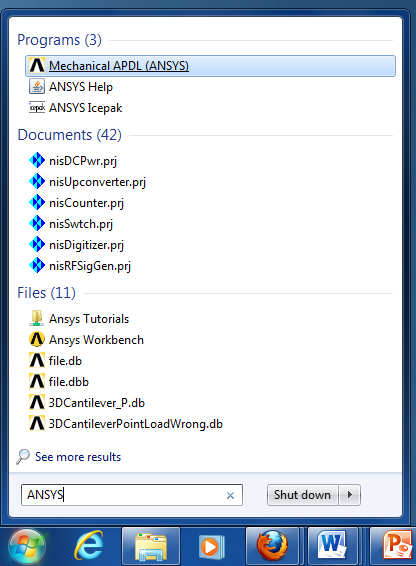
4 Beam Deflection The governing equation of a beam in bending is given by the Euler-Bernoulli relationship: Plugging in equation 1.7.5, we get: Integrating once to get an angular displacement, we get: (1.1.8) (1.1.9) (1.1.10) At the fixed end (x=0),, thus 0 (1.1.11) Integrating again to get deflection: (1.1.1) At the fixed end.y(0)= 0 thus, so deflection ( is: ( ) (1.1.1) The maximum displacement occurs at the point load( x=l) (1.1.14) Geometry Opening ANSYS Mechanical APDL 1. On your Windows 7 Desktop click the Start button. Under Search Programs and Files type ANSYS. Click on Mechanical APDL (ANSYS) to start ANSYS. This step may take time. 1 UCONN ANSYS Module 1.1 Page 4

5 Preferences 1. Go to Main Menu -> Preferences. Check the box that says Structural. Click OK 1 UCONN ANSYS Module 1.1 Page 5
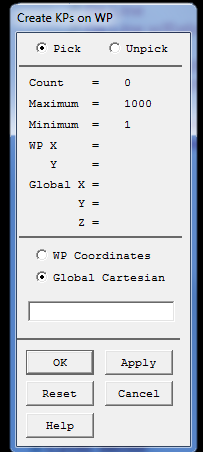

6 Keypoints Since we will be using 1D Elements, our goal is to model the length of the beam. Go to Main Menu -> Preprocessor -> Modeling -> Create ->Keypoints -> On Working Plane 1. Click Global Cartesian. In the box underneath, write 0,0,0 creating a keypoint at the origin.. Click Apply 4. Repeat Steps and 4 for the point 110,0,0 5. Click OK The Triad in the top left corner is blocking keypoint 1. To get rid of the triad, type /triad,off in Utility Menu -> Command Prompt Go to Utility Menu -> Plot -> Replot Your graphics window should look as shown: UCONN ANSYS Module 1.1 Page 6

7 Line 1. Go to Main Menu -> Preprocessor -> Modeling -> Create -> Lines -> Lines -> Straight Line. Select Pick. Enter 1, for keypoints 4. Click OK Go to Utility Menu -> Ansys Toolbar -> SAVE_DB The resulting graphic should be as shown: 4 SAVE_DB Since we have made considerable progress thus far, we will create a temporary save file for our model. This temporary save will allow us to return to this stage of the tutorial if an error is made. 1. Go to Utility Menu -> ANSYS Toolbar ->SAVE_DB This creates a save checkpoint. If you ever wish to return to this checkpoint in your model generation, go to Utility Menu -> RESUM_DB WARNING: It is VERY HARD to delete or modify inputs and commands to your model once they have been entered. Thus it is recommended you use the SAVE_DB and RESUM_DB functions frequently to create checkpoints in your work. If salvaging your project is hopeless, going to Utility Menu -> File -> Clear & Start New -> Do not read file ->OK is recommended. This will start your model from scratch. UCONN ANSYS Module 1.1 Page 7
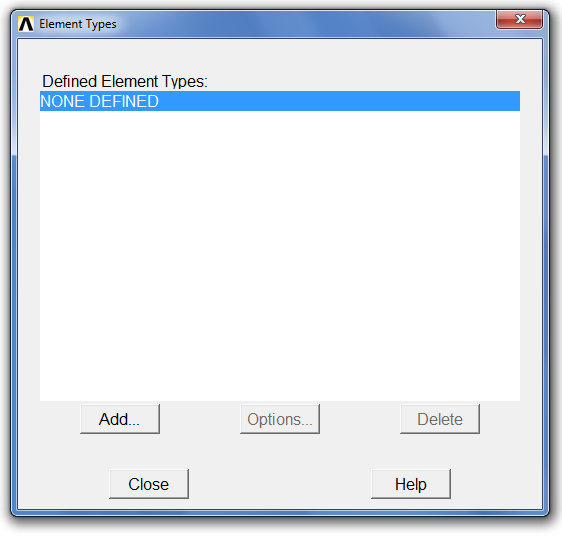
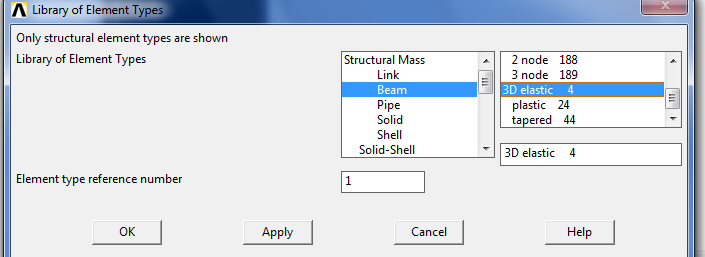
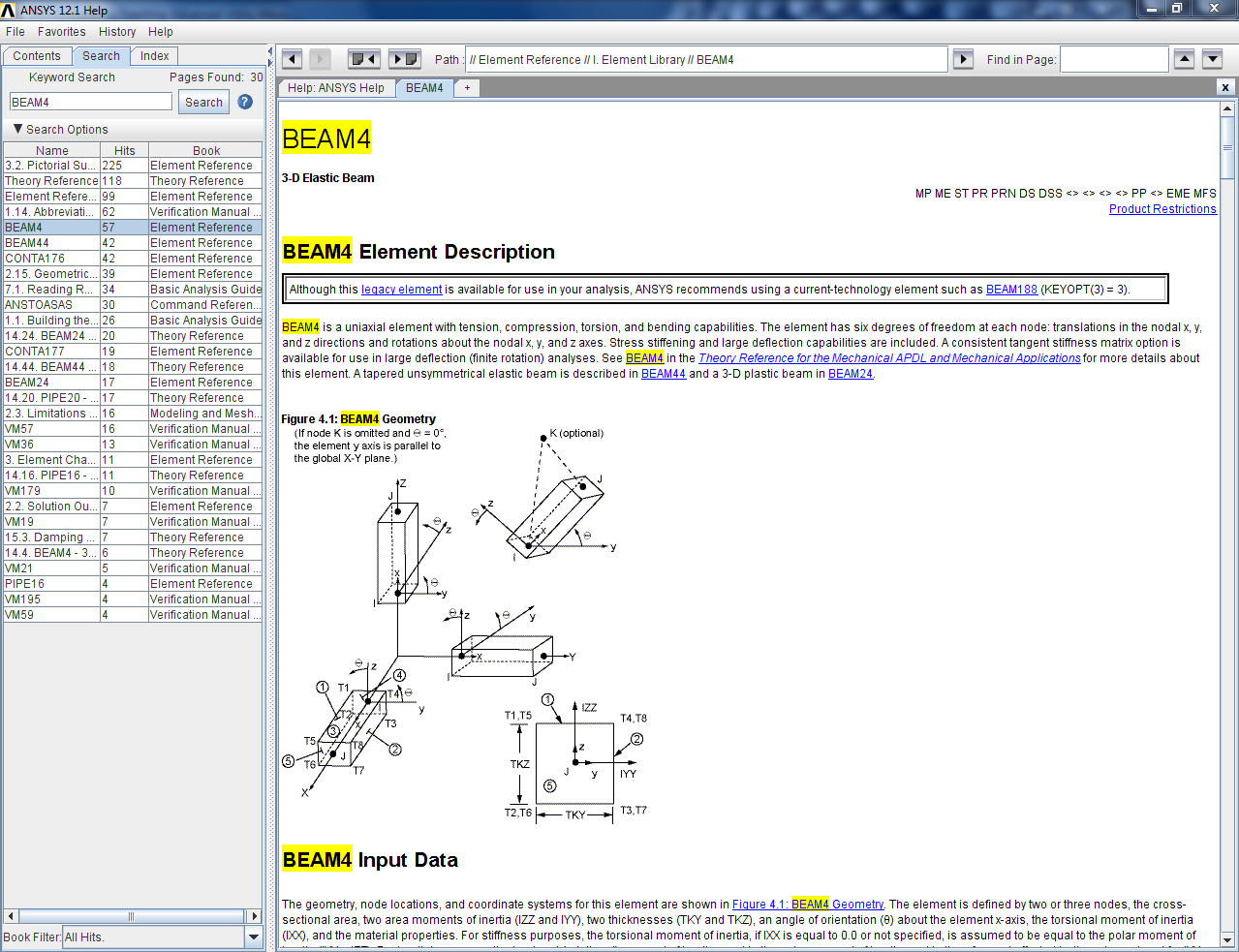
8 Preprocessor Element Type 1. Go to Main Menu -> Preprocessor -> Element Type -> Add/Edit/Delete. Click Add. Click beam -> D Elastic 4 4. Click OK 5. Click Close 6. Go to Utility Menu -> ANSYS Toolbar -> SAVE_DB 5 * BEAM4 is a one dimensional linear element with 6 degrees of freedom (UX,UY,UZ,ROTX,ROTY,ROTZ). It has tension, compression, bending, and torsional capabilities. For more information, consult the ANSYS HELP by clicking HELP ANSYS HELP ANSYS Mechanical APDL at its core is a command line driven FEA code. Similar to the Java APL or the Matlab HELP feature, ANSYS has its own library of internal functions known as Commands that are used in the backend from the GUI front end. The ANSYS HELP library also provides useful information on the theory behind ANSYS calculations and modeling best practices. We encourage you to explore the vast volumes of ANSYS HELP to increase your proficiency in ANSYS beyond the scope of these tutorials 4 * UCONN ANSYS Module 1.1 Page 8

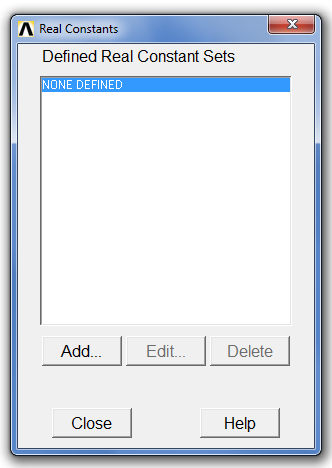

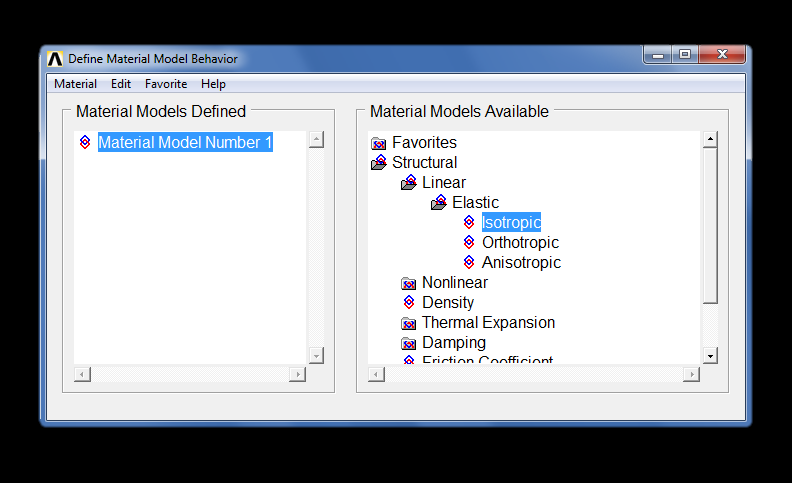
9 Real Constants and Material Properties 1. Go to Main Menu -> Material Props -> Material Models. Go to Material Model Number 1 -> Structural -> Linear -> Elastic -> Isotropic. Enter 7E10 for Young s Modulus (EX) and. for Poisson s Ratio (PRXY) 4. Click OK 5. out of Define Material Model Behavior 6. Go to Utility Menu -> SAVE_DB Now we will add the thickness to our beam. 1. Go to Main Menu -> Preprocessor -> Real Constants -> Add/Edit/Delete. Click Add. Click OK 4 6 UCONN ANSYS Module 1.1 Page 9

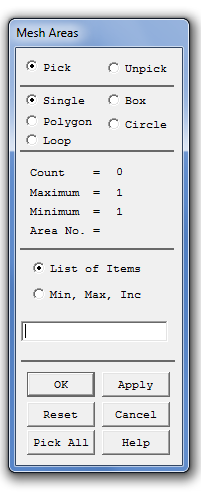

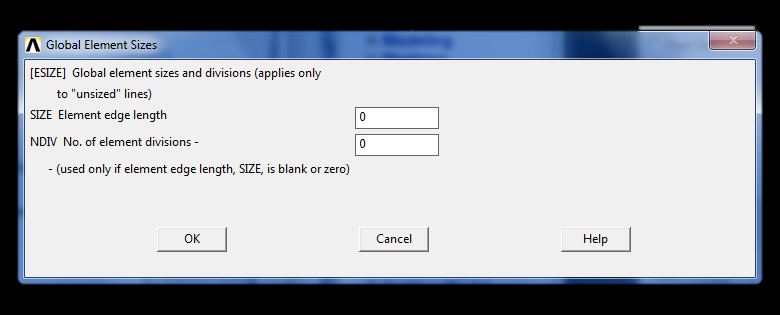
10 4. Under Real Constants for BEAM4 ->Shell thickness at node I TK(I) enter: 10 for cross sectional area 10/1 for moment of inertia IZZ 10 for thickness along Z axis 1 for thickness along Y axis 5. Click OK 6. Click Close 4 Meshing 5 1. Go to Main Menu -> Preprocessor -> Meshing -> Mesh Tool. Go to Size Controls: -> Global -> Set. Under SIZE Element edge length put Click OK 5. Click Mesh 6. Click Pick All 7. Click Close 8. Go to Utility Menu -> SAVE_DB Loads 4 UCONN ANSYS Module 1.1 Page 10

11 Saving Geometry We will be using the geometry we have just created for the next modules. Thus it would be convenient to save the geometry so that it does not have to be made again from scratch. 1. Go to File -> Save As. Under Save Database to pick a name for the Geometry. For this tutorial, we will name the file 1D Cantilever. Under Directories: pick the Folder you would like to save the.db file to. 4. Click OK 4 UCONN ANSYS Module 1.1 Page 11
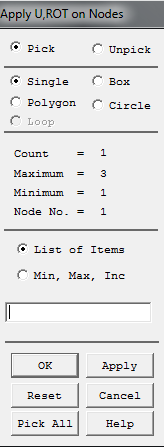
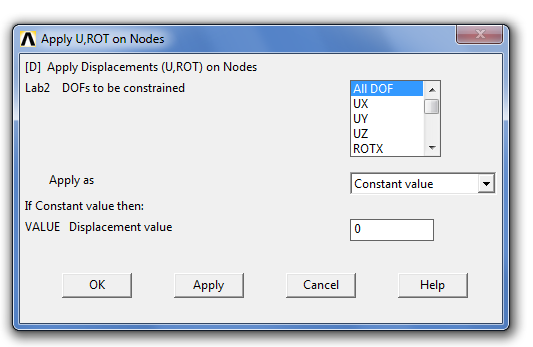
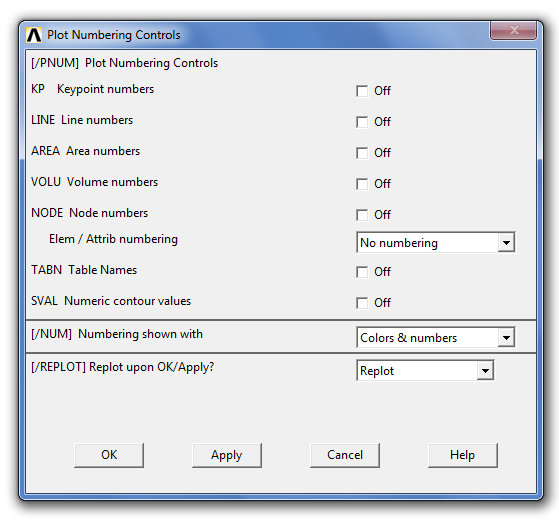
12 Displacements 1. Go to Utility Menu -> Plot -> Nodes. Go to Utility Menu -> Plot Controls -> Numbering. Check NODE, Node Numbers to ON 4. Click OK Your plot should look as shown: 4 5. Go to Main Menu -> Preprocessor -> Loads -> Define Loads -> Apply -> Structural -> Displacement -> On Nodes 6. Click Pick -> Single and with your cursor, click on first node 7. Click OK 8. Click All DOF to secure all degrees of freedom 9. Under Value Displacement value put Click OK 11. Go to Utility Menu -> SAVE_DB The fixed end will look as shown below: UCONN ANSYS Module 1.1 Page 1
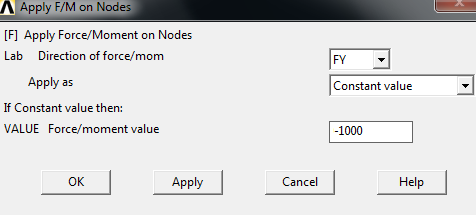
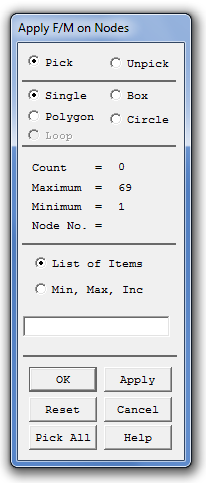
13 Point Load 1. Go to Main Menu -> Preprocessor -> Loads -> Define Loads -> Apply -> Structural ->Force/Moment -> On Nodes. Under List of Items enter for node and press OK 5 4. Under Lab Direction of Force/mom select FY 4. Under Value Force/moment value type Press OK 6. Go to Utility Menu -> SAVE_DB USEFUL TIP: If you wish to assign new force values, pick the nodes of interest and replace that component of force with 0 before assigning new values. This will delete the previous force assignment. The load at the end face should look as below: Solution 1. Go to Main Menu -> Solution ->Solve -> Current LS (solve). LS stands for Load Step. This step may take some time depending on mesh size and the speed of your computer (generally a minute or less). Ignore any warnings that may appear on your screen, as they are irrelevant to the problem at hand. UCONN ANSYS Module 1.1 Page 1

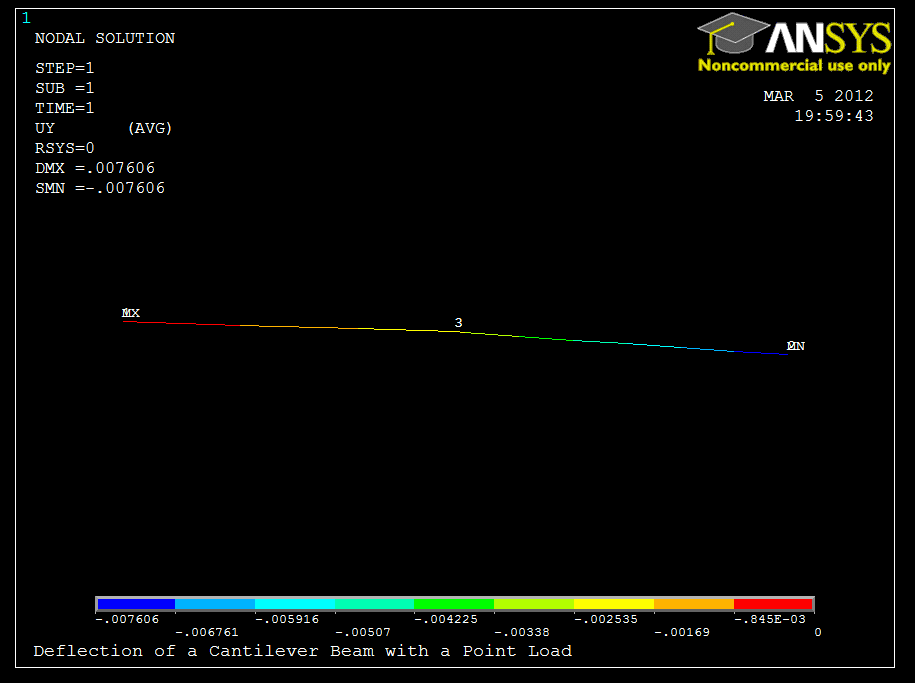
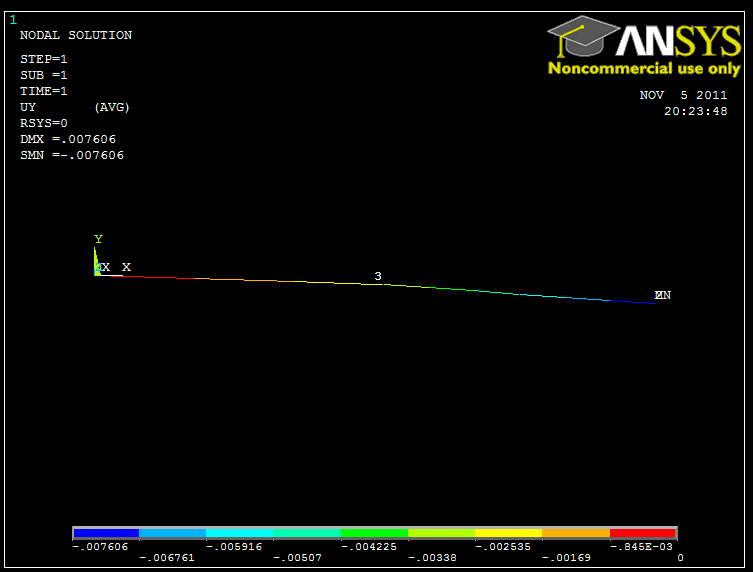
14 General Postprocessor We will now extract the Preliminary Displacement and Von-Mises Stress within our model. Displacement 1. Go to Main Menu -> General Postprocessor -> Plot Results -> Contour Plot -> Nodal Solution. Go to DOF Solution -> Y-Component of displacement. Click OK 4. To give the graph a title, go to Utility Menu -> Command Prompt and type /title, Deflection of a Cantilever Beam with a Point Load. 5. Press enter and write /replot to refresh the window. 6. Press enter The Resulting Plot should look as shown below: UCONN ANSYS Module 1.1 Page 14
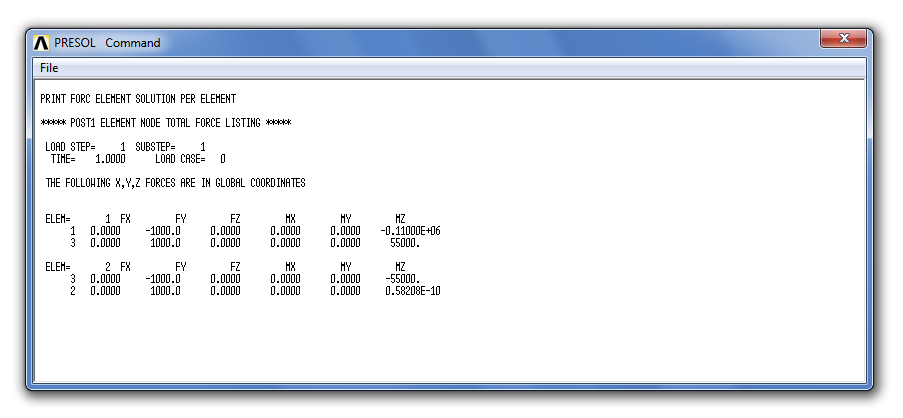
15 Equivalent (Von-Mises) Stress Unfortunately, we cannot create a contour plot of Von-Mises stress for 1D elements. We can, however, look up the moment reactions at each element. If we plug this value into equation 1.1.4, we can readily calculate the bending stress in our model and by extension, the equivalent stress. 1. Go to Utility Menu -> List -> Results -> Element Solution. Go to Element Solution -> All Available force items. Click OK This chart shows all reaction forces and moments at each node in the domain. Since we are interested in reaction moments in the z direction, we will look to the last column in the chart: According to the chart the maximum moment at the fixed end of the beam is.11e6 Nm. Plugging into equation 1.1.4, we get the expected stress of 66 kpa. UCONN ANSYS Module 1.1 Page 15
16 Results The percent error (%E) in our model max deflection can be defined as: ( ) = 0 % (1.1.15) Max Deflection Error Max Equivalent Stress Error Using equation (1.1.15) above, the percent error for Max Deflection and Equivalent Stress in our model is 0%. This is due to the fact that ANSYS uses Gaussian Quadrature to interpolate between the integration points. This changes with respect to the element used. Beam4 used twopoint Gaussian Quadrature, a numerical technique which is fourth degree accurate. Since the equations for deflection and stress are fourth order and second order respectively, the answer will have no error because the Quadrature is accurate to the correct degree polynomial. Thus the one dimensional method has zero percent error in deflection and stress. UCONN ANSYS Module 1.1 Page 16


17 Further Analysis In addition to this baseline data, we can export both the deflection and Von-Mises data to Excel. We will use the Y-deflection data as an example of how to do this. 1. Go to Utility Menu -> List -> Results -> Nodal Solution. Select Nodal Solution -> DOF Solution -> Y-component of displacement. Click OK 4. The list file should populate. Go to PRNSOL Command -> File -> Save As 5. Save the file as 1D_P_YDeflection.lis to the path of your choice Go to PRNSOL Command -> File -> Close 7. Open 1D_P_YDeflection.lis in Excel 8. Click Fixed Width 9. Click Next > Click a location on the ruler between the NODE and UY columns. This will cause Excel to separate these columns into separate columns in the spreadsheet 11. Click Next > 1. Click Finish UCONN ANSYS Module 1.1 Page 17
18 Validation UCONN ANSYS Module 1.1 Page 18
Piston Ring. Problem:
 Problem: A cast-iron piston ring has a mean diameter of 81 mm, a radial height of h 6 mm, and a thickness b 4 mm. The ring is assembled using an expansion tool which separates the split ends a distance
Tutorial for Assignment #2 Gantry Crane Analysis By ANSYS (Mechanical APDL) V.13.0
 Tutorial for Assignment #2 Gantry Crane Analysis By ANSYS (Mechanical APDL) V.13.0 1 Problem Description Design a gantry crane meeting the geometry presented in Figure 1 on page #325 of the course textbook
Begin creating the geometry by defining two Circles for the spherical endcap, and Subtract Areas to create the vessel wall.
 ME 477 Pressure Vessel Example 1 ANSYS Example: Axisymmetric Analysis of a Pressure Vessel The pressure vessel shown below is made of cast iron (E = 14.5 Msi, ν = 0.21) and contains an internal pressure
Tutorial for Assignment #3 Heat Transfer Analysis By ANSYS (Mechanical APDL) V.13.0
 Tutorial for Assignment #3 Heat Transfer Analysis By ANSYS (Mechanical APDL) V.13.0 1 Problem Description This exercise consists of an analysis of an electronics component cooling design using fins: All
AN INTRODUCTORY ANSYS TUTORIAL: SOLVING A STATIC TRUSS PROBLEM
 AN INTRODUCTORY ANSYS TUTORIAL: SOLVING A STATIC TRUSS PROBLEM Rajesh Bhaskaran Cornell University E-mail: [email protected] This is a quick-and-dirty introductory tutorial to the ANSYS software package
University of Alberta ANSYS Tutorials - www.mece.ualberta.ca/tutorials/ansys/bt/bike/bike.html. Space Frame Example
 Space Frame Example Introduction This tutorial was created using ANSYS 7.0 to solve a simple 3D space frame problem. Problem Description The problem to be solved in this example is the analysis of a bicycle
ANSYS TUTORIAL ANSYS 8.1 Analysis of a Spring System. John R. Baker; phone: 270-534-3114; email: [email protected]
 Copyright 2001-2005, John R. Baker ANSYS TUTORIAL ANSYS 8.1 Analysis of a Spring System John R. Baker; phone: 270-534-3114; email: [email protected] This exercise is intended only as an educational tool
Introduction to Solid Modeling Using SolidWorks 2012 SolidWorks Simulation Tutorial Page 1
 Introduction to Solid Modeling Using SolidWorks 2012 SolidWorks Simulation Tutorial Page 1 In this tutorial, we will use the SolidWorks Simulation finite element analysis (FEA) program to analyze the response
ANSYS Example: Transient Thermal Analysis of a Pipe Support Bracket
 ME 477 Transient Thermal Example 1 ANSYS Example: Transient Thermal Analysis of a Pipe Support Bracket The section of pipe shown below is a representative section of a longer pipe carrying a hot fluid
Linear Static Analysis of a Cantilever Beam Using Beam Library (SI Units)
 APPENDIX A Linear Static Analysis of a Cantilever Beam Using Beam Library (SI Units) Objectives: Create a geometric representation of a cantilever beam. Use the geometry model to define an MSC.Nastran
Finite Element Formulation for Beams - Handout 2 -
 Finite Element Formulation for Beams - Handout 2 - Dr Fehmi Cirak (fc286@) Completed Version Review of Euler-Bernoulli Beam Physical beam model midline Beam domain in three-dimensions Midline, also called
ABAQUS/CAE Tutorial: Analysis of an Aluminum Bracket
 H. Kim FEA Tutorial 1 ABAQUS/CAE Tutorial: Analysis of an Aluminum Bracket Hyonny Kim last updated: August 2004 In this tutorial, you ll learn how to: 1. Sketch 2D geometry & define part. 2. Define material
Lap Fillet Weld Calculations and FEA Techniques
 Lap Fillet Weld Calculations and FEA Techniques By: MS.ME Ahmad A. Abbas Sr. Analysis Engineer [email protected] www.advancedcae.com Sunday, July 11, 2010 Advanced CAE All contents Copyright
PRO-MECHANICA. Lesson One < Structural > Beam Cantilever Beam
 PRO-MECHANICA Pro-Mechanica is a product of PTC. It works with Creo Pro/E in integrated mode to allow users to perform structural and thermal analyses. This tutorial was originally written for UNIX platform,
The Basics of FEA Procedure
 CHAPTER 2 The Basics of FEA Procedure 2.1 Introduction This chapter discusses the spring element, especially for the purpose of introducing various concepts involved in use of the FEA technique. A spring
CATIA V5 FEA Tutorials Releases 12 & 13
 CATIA V5 FEA Tutorials Releases 12 & 13 Nader G. Zamani University of Windsor SDC PUBLICATIONS Schroff Development Corporation www.schroff.com www.schroff-europe.com Visit our website to learn more about
Finite Element Formulation for Plates - Handout 3 -
 Finite Element Formulation for Plates - Handout 3 - Dr Fehmi Cirak (fc286@) Completed Version Definitions A plate is a three dimensional solid body with one of the plate dimensions much smaller than the
An Overview of the Finite Element Analysis
 CHAPTER 1 An Overview of the Finite Element Analysis 1.1 Introduction Finite element analysis (FEA) involves solution of engineering problems using computers. Engineering structures that have complex geometry
Finite Elements for 2 D Problems
 Finite Elements for 2 D Problems General Formula for the Stiffness Matrix Displacements (u, v) in a plane element are interpolated from nodal displacements (ui, vi) using shape functions Ni as follows,
CosmosWorks Centrifugal Loads
 CosmosWorks Centrifugal Loads (Draft 4, May 28, 2006) Introduction This example will look at essentially planar objects subjected to centrifugal loads. That is, loads due to angular velocity and/or angular
Back to Elements - Tetrahedra vs. Hexahedra
 Back to Elements - Tetrahedra vs. Hexahedra Erke Wang, Thomas Nelson, Rainer Rauch CAD-FEM GmbH, Munich, Germany Abstract This paper presents some analytical results and some test results for different
The elements used in commercial codes can be classified in two basic categories:
 CHAPTER 3 Truss Element 3.1 Introduction The single most important concept in understanding FEA, is the basic understanding of various finite elements that we employ in an analysis. Elements are used for
Learning Module 6 Linear Dynamic Analysis
 Learning Module 6 Linear Dynamic Analysis What is a Learning Module? Title Page Guide A Learning Module (LM) is a structured, concise, and self-sufficient learning resource. An LM provides the learner
Objectives. Experimentally determine the yield strength, tensile strength, and modules of elasticity and ductility of given materials.
 Lab 3 Tension Test Objectives Concepts Background Experimental Procedure Report Requirements Discussion Objectives Experimentally determine the yield strength, tensile strength, and modules of elasticity
Getting Started with ANSYS ANSYS Workbench Environment
 Getting Started with ANSYS ANSYS Workbench Environment Overview The purpose of this tutorial is to get you started with the ANSYS Workbench environment. We will use a simple, static analysis of a single
Embankment Consolidation
 Embankment Consolidation 36-1 Embankment Consolidation In this tutorial, RS2 is used for a coupled analysis of a road embankment subject to loading from typical daily traffic. Model Start the RS2 9.0 Model
Creating a Poster in PowerPoint 2010. A. Set Up Your Poster
 View the Best Practices in Poster Design located at http://www.emich.edu/training/poster before you begin creating a poster. Then in PowerPoint: (A) set up the poster size and orientation, (B) add and
CAD-BASED DESIGN PROCESS FOR FATIGUE ANALYSIS, RELIABILITY- ANALYSIS, AND DESIGN OPTIMIZATION
 CAD-BASED DESIGN PROCESS FOR FATIGUE ANALYSIS, RELIABILITY- ANALYSIS, AND DESIGN OPTIMIZATION K.K. Choi, V. Ogarevic, J. Tang, and Y.H. Park Center for Computer-Aided Design College of Engineering The
MCE380: Measurements and Instrumentation Lab. Chapter 9: Force, Torque and Strain Measurements
 MCE380: Measurements and Instrumentation Lab Chapter 9: Force, Torque and Strain Measurements Topics: Elastic Elements for Force Measurement Dynamometers and Brakes Resistance Strain Gages Holman, Ch.
CATIA V5 Tutorials. Mechanism Design & Animation. Release 18. Nader G. Zamani. University of Windsor. Jonathan M. Weaver. University of Detroit Mercy
 CATIA V5 Tutorials Mechanism Design & Animation Release 18 Nader G. Zamani University of Windsor Jonathan M. Weaver University of Detroit Mercy SDC PUBLICATIONS Schroff Development Corporation www.schroff.com
List of Problems Solved Introduction p. 1 Concept p. 1 Nodes p. 3 Elements p. 4 Direct Approach p. 5 Linear Spring p. 5 Heat Flow p.
 Preface p. v List of Problems Solved p. xiii Introduction p. 1 Concept p. 1 Nodes p. 3 Elements p. 4 Direct Approach p. 5 Linear Spring p. 5 Heat Flow p. 6 Assembly of the Global System of Equations p.
Shell Elements in ABAQUS/Explicit
 ABAQUS/Explicit: Advanced Topics Appendix 2 Shell Elements in ABAQUS/Explicit ABAQUS/Explicit: Advanced Topics A2.2 Overview ABAQUS/Explicit: Advanced Topics ABAQUS/Explicit: Advanced Topics A2.4 Triangular
GAMBIT Demo Tutorial
 GAMBIT Demo Tutorial Wake of a Cylinder. 1.1 Problem Description The problem to be considered is schematically in fig. 1. We consider flow across a cylinder and look at the wake behind the cylinder. Air
TABLE OF CONTENTS. INTRODUCTION... 5 Advance Concrete... 5 Where to find information?... 6 INSTALLATION... 7 STARTING ADVANCE CONCRETE...
 Starting Guide TABLE OF CONTENTS INTRODUCTION... 5 Advance Concrete... 5 Where to find information?... 6 INSTALLATION... 7 STARTING ADVANCE CONCRETE... 7 ADVANCE CONCRETE USER INTERFACE... 7 Other important
Essay 5 Tutorial for a Three-Dimensional Heat Conduction Problem Using ANSYS Workbench
 Essay 5 Tutorial for a Three-Dimensional Heat Conduction Problem Using ANSYS Workbench 5.1 Introduction The problem selected to illustrate the use of ANSYS software for a three-dimensional steadystate
Applying a circular load. Immediate and consolidation settlement. Deformed contours. Query points and query lines. Graph query.
 Quick Start Tutorial 1-1 Quick Start Tutorial This quick start tutorial will cover some of the basic features of Settle3D. A circular load is applied to a single soil layer and settlements are examined.
Introduction to COMSOL. The Navier-Stokes Equations
 Flow Between Parallel Plates Modified from the COMSOL ChE Library module rev 10/13/08 Modified by Robert P. Hesketh, Chemical Engineering, Rowan University Fall 2008 Introduction to COMSOL The following
Tower Cross Arm Numerical Analysis
 Chapter 7 Tower Cross Arm Numerical Analysis In this section the structural analysis of the test tower cross arm is done in Prokon and compared to a full finite element analysis using Ansys. This is done
NATIONAL TECHNICAL UNIVERSITY OF ATHENS (N.T.U.A.)
 NATIONAL TECHNICAL UNIVERSITY OF ATHENS (N.T.U.A.) MECHANICAL ENGINEERING DEPARTMENT LABORATORY OF MACHINES ELEMENTS Ansys Multiphysics (v. 12) tutorial for electrostatic finite element analysis on spur
Learning Module 1 Static Structural Analysis
 LM-ST-1 Learning Module 1 Static Structural Analysis What is a Learning Module? Title Page Guide A Learning Module (LM) is a structured, concise, and self-sufficient learning resource. An LM provides the
Structural Axial, Shear and Bending Moments
 Structural Axial, Shear and Bending Moments Positive Internal Forces Acting Recall from mechanics of materials that the internal forces P (generic axial), V (shear) and M (moment) represent resultants
Add-on Module STEEL EC3. Ultimate Limit State, Serviceability, Fire Resistance, and Stability Analyses According. Program Description
 Version December 2014 Add-on Module STEEL EC3 Ultimate Limit State, Serviceability, Fire Resistance, and Stability Analyses According to Eurocode 3 Program Description All rights, including those of translations,
Technical Report Example (1) Chartered (CEng) Membership
 Technical Report Example (1) Chartered (CEng) Membership A TECHNICAL REPORT IN SUPPORT OF APPLICATION FOR CHARTERED MEMBERSHIP OF IGEM DESIGN OF 600 (103 BAR) 820MM SELF SEALING REPAIR CLAMP AND VERIFICATION
Instructors Manual Finite Element Method Laboratory Sessions
 Instructors Manual Finite Element Method Laboratory Sessions Dr. Waluyo Adi Siswanto 6 July 2010 Universiti Tun Hussein Onn Malaysia (UTHM) This document is written in LYX 1.6.7 a frontend of LATEX Contents
Learning Module 4 - Thermal Fluid Analysis Note: LM4 is still in progress. This version contains only 3 tutorials.
 Learning Module 4 - Thermal Fluid Analysis Note: LM4 is still in progress. This version contains only 3 tutorials. Attachment C1. SolidWorks-Specific FEM Tutorial 1... 2 Attachment C2. SolidWorks-Specific
ETABS. Integrated Building Design Software. Composite Floor Frame Design Manual. Computers and Structures, Inc. Berkeley, California, USA
 ETABS Integrated Building Design Software Composite Floor Frame Design Manual Computers and Structures, Inc. Berkeley, California, USA Version 8 January 2002 Copyright The computer program ETABS and all
Customer Training Material. ANSYS Mechanical Basics. Mechanical. ANSYS, Inc. Proprietary 2010 ANSYS, Inc. All rights reserved. WS2.
 Workshop 2.1 ANSYS Mechanical Basics Introduction to ANSYS Mechanical WS2.1-1 Notes on Workshop 2.1 The first workshop is extensively documented. As this course progresses, students will become more familiar
A Guide to Using Excel in Physics Lab
 A Guide to Using Excel in Physics Lab Excel has the potential to be a very useful program that will save you lots of time. Excel is especially useful for making repetitious calculations on large data sets.
Solved with COMSOL Multiphysics 4.3
 Vibrating String Introduction In the following example you compute the natural frequencies of a pre-tensioned string using the 2D Truss interface. This is an example of stress stiffening ; in fact the
Solved with COMSOL Multiphysics 4.0a. COPYRIGHT 2010 COMSOL AB.
 Permanent Magnet Introduction This example shows how to model the magnetic field surrounding a permanent magnet. It also computes the force with which it acts on a nearby iron rod. Thanks to the symmetry
Finite Element Method (ENGC 6321) Syllabus. Second Semester 2013-2014
 Finite Element Method Finite Element Method (ENGC 6321) Syllabus Second Semester 2013-2014 Objectives Understand the basic theory of the FEM Know the behaviour and usage of each type of elements covered
INJECTION MOLDING COOLING TIME REDUCTION AND THERMAL STRESS ANALYSIS
 INJECTION MOLDING COOLING TIME REDUCTION AND THERMAL STRESS ANALYSIS Tom Kimerling University of Massachusetts, Amherst MIE 605 Finite Element Analysis Spring 2002 ABSTRACT A FEA transient thermal structural
GeoGebra Statistics and Probability
 GeoGebra Statistics and Probability Project Maths Development Team 2013 www.projectmaths.ie Page 1 of 24 Index Activity Topic Page 1 Introduction GeoGebra Statistics 3 2 To calculate the Sum, Mean, Count,
3 Concepts of Stress Analysis
 3 Concepts of Stress Analysis 3.1 Introduction Here the concepts of stress analysis will be stated in a finite element context. That means that the primary unknown will be the (generalized) displacements.
CAE -Finite Element Method
 16.810 Engineering Design and Rapid Prototyping Lecture 3b CAE -Finite Element Method Instructor(s) Prof. Olivier de Weck January 16, 2007 Numerical Methods Finite Element Method Boundary Element Method
MECHANICS OF SOLIDS - BEAMS TUTORIAL TUTORIAL 4 - COMPLEMENTARY SHEAR STRESS
 MECHANICS OF SOLIDS - BEAMS TUTORIAL TUTORIAL 4 - COMPLEMENTARY SHEAR STRESS This the fourth and final tutorial on bending of beams. You should judge our progress b completing the self assessment exercises.
Learning Module 5 Buckling Analysis
 Learning Module 5 Buckling Analysis Title Page Guide What is a Learning Module? A Learning Module (LM) is a structured, concise, and self-sufficient learning resource. An LM provides the learner with the
GelAnalyzer 2010 User s manual. Contents
 GelAnalyzer 2010 User s manual Contents 1. Starting GelAnalyzer... 2 2. The main window... 2 3. Create a new analysis... 2 4. The image window... 3 5. Lanes... 3 5.1 Detect lanes automatically... 3 5.2
Tutorial for laboratory project #2 Using ANSYS Workbench. For Double Pipe Heat Exchanger
 Tutorial for laboratory project #2 Using ANSYS Workbench For Double Pipe Heat Exchanger 1. Preparing ANSYS Workbench Go to Start Menu/All Programs/Simulation/ANSYS 12.1/Workbench. In the toolbox menu in
Technology of EHIS (stamping) applied to the automotive parts production
 Laboratory of Applied Mathematics and Mechanics Technology of EHIS (stamping) applied to the automotive parts production Churilova Maria, Saint-Petersburg State Polytechnical University Department of Applied
Visual Tutorial Basic Edition 1. Visual. Basic Edition Tutorial. www.visuallightingsoftware.com
 Visual Tutorial Basic Edition 1 Visual Basic Edition Tutorial www.visuallightingsoftware.com Visual Tutorial Basic Edition 2 Basic Edition Tutorial Introduction In this tutorial, you will use the Visual
The following is an overview of lessons included in the tutorial.
 Chapter 2 Tutorial Tutorial Introduction This tutorial is designed to introduce you to some of Surfer's basic features. After you have completed the tutorial, you should be able to begin creating your
Modeling Beams on Elastic Foundations Using Plate Elements in Finite Element Method
 Modeling Beams on Elastic Foundations Using Plate Elements in Finite Element Method Yun-gang Zhan School of Naval Architecture and Ocean Engineering, Jiangsu University of Science and Technology, Zhenjiang,
Liquid Hydrogen Pressure Vessel Analysis
 OAK RIDGE NATIONAL LABORATORY Liquid Hydrogen Pressure Vessel Analysis Claire R. Luttrell 9/18/2007 1.0 INTRODUCTION An SNS experiment is being designed that includes a 20 liter liquid hydrogen (LH2) target.
Create a Poster Using Publisher
 Contents 1. Introduction 1. Starting Publisher 2. Create a Poster Template 5. Aligning your images and text 7. Apply a background 12. Add text to your poster 14. Add pictures to your poster 17. Add graphs
ANALYSIS OF GASKETED FLANGES WITH ORDINARY ELEMENTS USING APDL CONTROL
 ANALYSIS OF GASKETED FLANGES WITH ORDINARY ELEMENTS USING AP... Page 1 of 19 ANALYSIS OF GASKETED FLANGES WITH ORDINARY ELEMENTS USING APDL CONTROL Yasumasa Shoji, Satoshi Nagata, Toyo Engineering Corporation,
Using Microsoft Word. Working With Objects
 Using Microsoft Word Many Word documents will require elements that were created in programs other than Word, such as the picture to the right. Nontext elements in a document are referred to as Objects
Optimising plate girder design
 Optimising plate girder design NSCC29 R. Abspoel 1 1 Division of structural engineering, Delft University of Technology, Delft, The Netherlands ABSTRACT: In the design of steel plate girders a high degree
Course in. FEM ANSYS Classic
 Course in Introduction Introduction Presentation Anders Schmidt Kristensen M.Sc. in Mechanical Eng. from Aalborg University in 1993 Ph.D. in Mechanical Eng. from Aalborg University in 1997 Consultant for
STRUCTURAL ANALYSIS SKILLS
 STRUCTURAL ANALYSIS SKILLS ***This document is held up to a basic level to represent a sample for our both theoretical background & software capabilities/skills. (Click on each link to see the detailed
ETABS. Integrated Building Design Software. Concrete Shear Wall Design Manual. Computers and Structures, Inc. Berkeley, California, USA
 ETABS Integrated Building Design Software Concrete Shear Wall Design Manual Computers and Structures, Inc. Berkeley, California, USA Version 8 January 2002 Copyright The computer program ETABS and all
Element Property Definition for the Space Satellite
 LESSON 5 Element Property Definition for the Space Satellite Z Y X Objectives: Define shell, bar, and point mass element properties for the Space Satellite. Create and apply a Field to describe a spatially
Summary of important mathematical operations and formulas (from first tutorial):
 EXCEL Intermediate Tutorial Summary of important mathematical operations and formulas (from first tutorial): Operation Key Addition + Subtraction - Multiplication * Division / Exponential ^ To enter a
CHEG 3128 Heat, Mass, & Kinetics Laboratory Diffusion in Laminar Flow Regimes Modeling and COMSOL Tutorial Tutorial by Andrea Kadilak
 CHEG 3128 Heat, Mass, & Kinetics Laboratory Diffusion in Laminar Flow Regimes Modeling and COMSOL Tutorial Tutorial by Andrea Kadilak Introduction COMSOL is a computer modeling software package that will
Creating Drawings in Pro/ENGINEER
 6 Creating Drawings in Pro/ENGINEER This chapter shows you how to bring the cell phone models and the assembly you ve created into the Pro/ENGINEER Drawing mode to create a drawing. A mechanical drawing
. Address the following issues in your solution:
 CM 3110 COMSOL INSTRUCTIONS Faith Morrison and Maria Tafur Department of Chemical Engineering Michigan Technological University, Houghton, MI USA 22 November 2012 Zhichao Wang edits 21 November 2013 revised
FUNDAMENTAL FINITE ELEMENT ANALYSIS AND APPLICATIONS
 FUNDAMENTAL FINITE ELEMENT ANALYSIS AND APPLICATIONS With Mathematica and MATLAB Computations M. ASGHAR BHATTI WILEY JOHN WILEY & SONS, INC. CONTENTS OF THE BOOK WEB SITE PREFACE xi xiii 1 FINITE ELEMENT
Workshop. Tennis Racket Simulation using Abaqus
 Introduction Workshop Tennis Racket Simulation using Abaqus In this workshop you will become familiar with the process of creating a model interactively by using Abaqus/CAE. You will create the tennis
DESIGN OF SLABS. 3) Based on support or boundary condition: Simply supported, Cantilever slab,
 DESIGN OF SLABS Dr. G. P. Chandradhara Professor of Civil Engineering S. J. College of Engineering Mysore 1. GENERAL A slab is a flat two dimensional planar structural element having thickness small compared
FEA Analysis of a Caliper Abutment Bracket ME 404
 FEA Analysis of a Caliper Abutment Bracket ME 404 Jesse Doty March 17, 2008 Abstract As braking forces are applied at the wheel of an automobile, those forces must be transmitted to the suspension of the
Feature Commercial codes In-house codes
 A simple finite element solver for thermo-mechanical problems Keywords: Scilab, Open source software, thermo-elasticity Introduction In this paper we would like to show how it is possible to develop a
Behaviour of buildings due to tunnel induced subsidence
 Behaviour of buildings due to tunnel induced subsidence A thesis submitted to the University of London for the degree of Doctor of Philosophy and for the Diploma of the Imperial College of Science, Technology
JustClust User Manual
 JustClust User Manual Contents 1. Installing JustClust 2. Running JustClust 3. Basic Usage of JustClust 3.1. Creating a Network 3.2. Clustering a Network 3.3. Applying a Layout 3.4. Saving and Loading
A Case Study Comparing Two Approaches for Applying Area Loads: Tributary Area Loads vs Shell Pressure Loads
 1 A Case Study Comparing Two Approaches for Applying Area Loads: Tributary Area Loads vs Shell Pressure Loads By Dr. Siriwut Sasibut (Application Engineer) S-FRAME Software Inc. #1158 13351 Commerce Parkway
CHAPTER 3. INTRODUCTION TO MATRIX METHODS FOR STRUCTURAL ANALYSIS
 1 CHAPTER 3. INTRODUCTION TO MATRIX METHODS FOR STRUCTURAL ANALYSIS Written by: Sophia Hassiotis, January, 2003 Last revision: February, 2015 Modern methods of structural analysis overcome some of the
Computer Aided Design (CAD), ME 530.414, JHU Professor Dan Stoianovici, [email protected]
 Computer Aided Design (CAD), ME 530.414, JHU Professor Dan Stoianovici, [email protected] COURSE DESCRIPTION: The course outlines modern solid modeling design, analysis, simulation, and manufacturing of mechanical
Design Analysis and Review of Stresses at a Point
 Design Analysis and Review of Stresses at a Point Need for Design Analysis: To verify the design for safety of the structure and the users. To understand the results obtained in FEA, it is necessary to
Pro/ENGINEER Wildfire 4.0 Basic Design
 Introduction Datum features are non-solid features used during the construction of other features. The most common datum features include planes, axes, coordinate systems, and curves. Datum features do
Trace Layer Import for Printed Circuit Boards Under Icepak
 Tutorial 13. Trace Layer Import for Printed Circuit Boards Under Icepak Introduction: A printed circuit board (PCB) is generally a multi-layered board made of dielectric material and several layers of
2.3 Example: creating a model of an overhead hoist with ABAQUS/CAE
 The instructions for the examples discussed in this manual will focus on using the Model Tree to access the functionality of ABAQUS/CAE. Menu bar actions will be considered only when necessary (e.g., when
EFFECTS ON NUMBER OF CABLES FOR MODAL ANALYSIS OF CABLE-STAYED BRIDGES
 EFFECTS ON NUMBER OF CABLES FOR MODAL ANALYSIS OF CABLE-STAYED BRIDGES Yang-Cheng Wang Associate Professor & Chairman Department of Civil Engineering Chinese Military Academy Feng-Shan 83000,Taiwan Republic
Course in ANSYS. Import + meshing issues. ANSYS Part 2 Computational Mechanics, AAU, Esbjerg
 Course in ANSYS Import + meshing issues Course Outline Introduction Lesson 1. Modeling reviewed Boolean s Lesson 2. Boolean s + meshing issues Lesson 3. Operate + meshing issues Lesson 4. Import + meshing
0 Introduction to Data Analysis Using an Excel Spreadsheet
 Experiment 0 Introduction to Data Analysis Using an Excel Spreadsheet I. Purpose The purpose of this introductory lab is to teach you a few basic things about how to use an EXCEL 2010 spreadsheet to do
Generating ABI PRISM 7700 Standard Curve Plots in a Spreadsheet Program
 Generating ABI PRISM 7700 Standard Curve Plots in a Spreadsheet Program Overview The goal of this tutorial is to demonstrate the procedure through which analyzed data generated within an ABI PRISM 7700
Reliable FE-Modeling with ANSYS
 Reliable FE-Modeling with ANSYS Thomas Nelson, Erke Wang CADFEM GmbH, Munich, Germany Abstract ANSYS is one of the leading commercial finite element programs in the world and can be applied to a large
INPS Remote Vision MIQUEST Training Manual
 INPS Remote Vision MIQUEST Training Manual DEVELOPED BY: DHARMESH PATEL DATE: SEPTEMBER 2008 Page 1 of 24 MIQUEST Miquest stands for Morbidity Query Information Export Syntax. It is a tool recommended
Universal Simple Control, USC-1
 Universal Simple Control, USC-1 Data and Event Logging with the USB Flash Drive DATA-PAK The USC-1 universal simple voltage regulator control uses a flash drive to store data. Then a propriety Data and