
LMV5 Linkageless Burner Management System. Quick Start Guide
|
|
|
- Anabel Wood
- 10 years ago
- Views:
Transcription
1 LMV5 Linkageless Burner Management System Quick Start Guide Rev

2 Table of Contents Sec 1 Sec 2 Sec 3 Sec 4 Sec 5 Sec 6 Sec 7 Sec 8 Sec 9 OVERVIEW MOUNTING WIRING PARAMETERS TROUBLESHOOTING O2 TRIM VARIABLE SPEED DRIVE MODbus ASC450 SOFTWARE Sec 10 SPECIFICATIONS

3 Sec 1 Sec 2 Sec 3 Sec 4 Sec 5 Sec 6 Sec 7 Sec 8 Sec 9 Sec 10 Sec 1 OVERVIEW MOUNTING WIRING PARAMETERS TROUBLESHOOTING O2 TRIM VARIABLE SPEED DRIVE MODbus ASC450 SOFTWARE SPECIFICATIONS
4 Sec 1 Sec 2 Sec 3 Sec 4 Sec 5 Sec 6 Sec 7 Sec 8 Sec 9 Sec 10 OVERVIEW MOUNTING WIRING PARAMETERS TROUBLESHOOTING O2 TRIM VARIABLE SPEED DRIVE MODbus ASC450 SOFTWARE SPECIFICATIONS

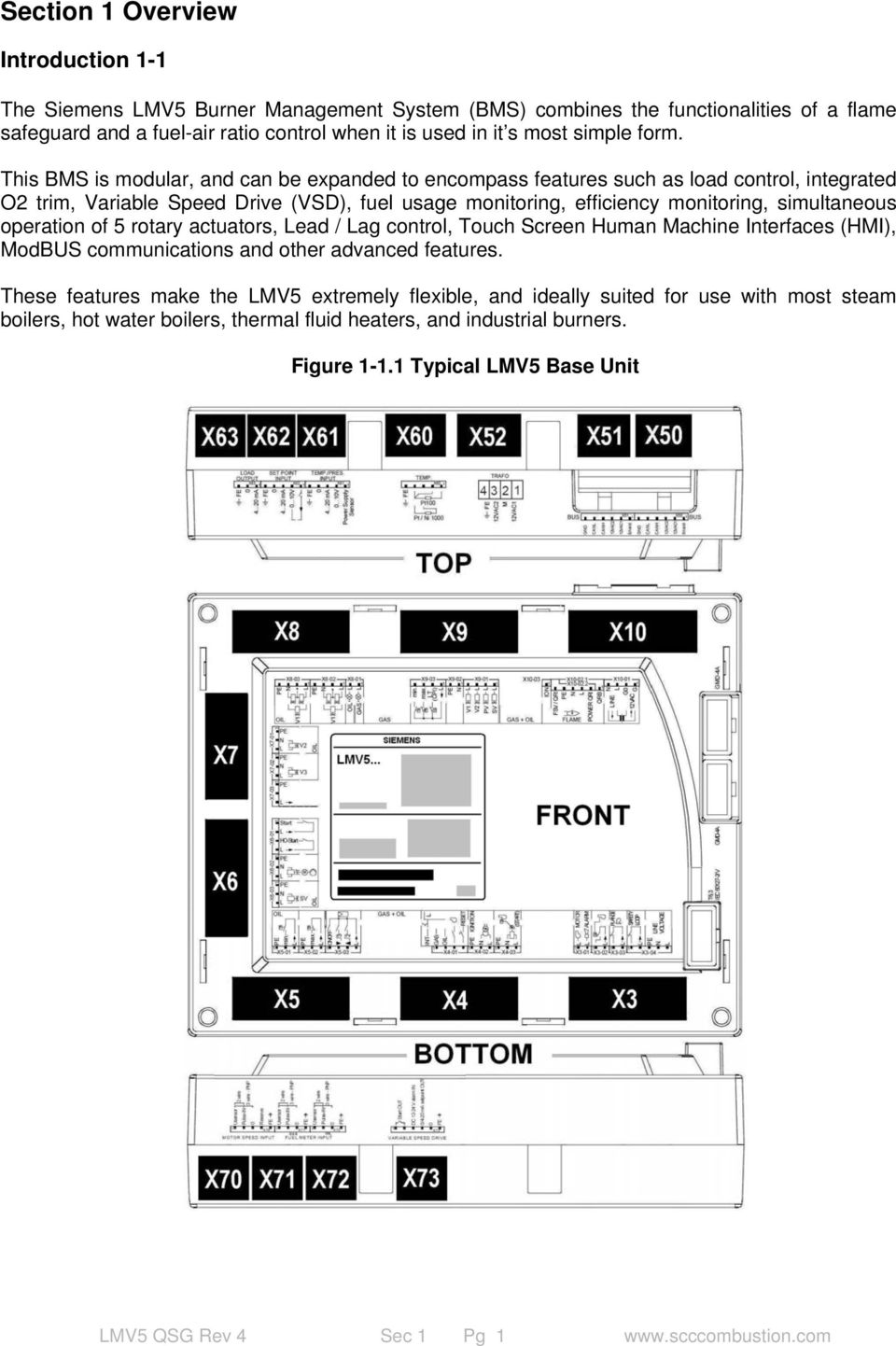
5 Section 1 Overview Introduction 1-1 The Siemens LMV5 Burner Management System (BMS) combines the functionalities of a flame safeguard and a fuel-air ratio control when it is used in it s most simple form. This BMS is modular, and can be expanded to encompass features such as load control, integrated O2 trim, Variable Speed Drive (VSD), fuel usage monitoring, efficiency monitoring, simultaneous operation of 5 rotary actuators, Lead / Lag control, Touch Screen Human Machine Interfaces (HMI), ModBUS communications and other advanced features. These features make the LMV5 extremely flexible, and ideally suited for use with most steam boilers, hot water boilers, thermal fluid heaters, and industrial burners. Figure Typical LMV5 Base Unit LMV5 QSG Rev 4 Sec 1 Pg 1
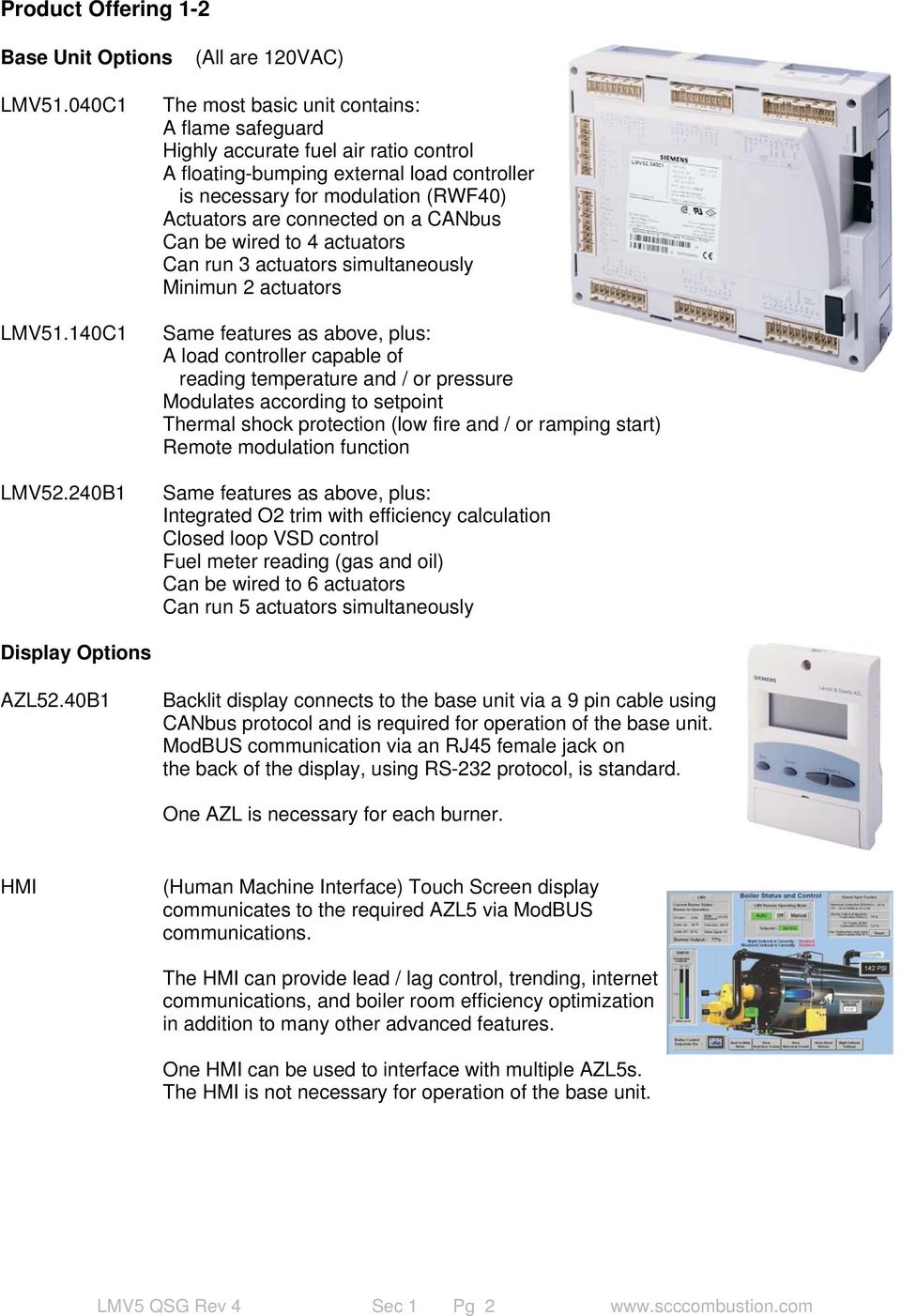
6 Product Offering 1-2 Base Unit Options (All are 120VAC) LMV51.040C1 LMV51.140C1 LMV52.240B1 The most basic unit contains: A flame safeguard Highly accurate fuel air ratio control A floating-bumping external load controller is necessary for modulation (RWF40) Actuators are connected on a CANbus Can be wired to 4 actuators Can run 3 actuators simultaneously Minimun 2 actuators Same features as above, plus: A load controller capable of reading temperature and / or pressure Modulates according to setpoint Thermal shock protection (low fire and / or ramping start) Remote modulation function Same features as above, plus: Integrated O2 trim with efficiency calculation Closed loop VSD control Fuel meter reading (gas and oil) Can be wired to 6 actuators Can run 5 actuators simultaneously Display Options AZL52.40B1 Backlit display connects to the base unit via a 9 pin cable using CANbus protocol and is required for operation of the base unit. ModBUS communication via an RJ45 female jack on the back of the display, using RS-232 protocol, is standard. One AZL is necessary for each burner. HMI (Human Machine Interface) Touch Screen display communicates to the required AZL5 via ModBUS communications. The HMI can provide lead / lag control, trending, internet communications, and boiler room efficiency optimization in addition to many other advanced features. One HMI can be used to interface with multiple AZL5s. The HMI is not necessary for operation of the base unit. LMV5 QSG Rev 4 Sec 1 Pg 2
7 Actuator Options SQM45.291A9 27 in / lb of torque seconds 10 mm round keyed shaft SQM45.295A9 27 in / lb of torque seconds 10 mm D shaped shaft SQM48.497A9 177 in / lb of torque seconds 14 mm round keyed shaft SQM48.697A9 310 in / lb of torque seconds 14 mm round keyed shaft Note: Inquire about application guide Note: All actuators offer: The same footprint Identical actuator mounting holes Have a 90 degree operating range Positioning accuracy of 0.1 degree Rotate either clockwise or counterclockwise SCC actuator brackets and zero lash flexible couplings are available and highly recommended to ensure trouble-free actuator operation. Couplings will accommodate up to 3 o angular and 0.06 parallel misalignment with no appreciable side load. SCC never recommends soild couplings. Flame Detector Options and Accessories (The LMV5 does not require a flame signal amplifier) QRI2A2.B180B Sensor is self checking, forward viewing (IR) detector (continuous use) AGG /4" threaded holder for QRI2A2. B180B forward viewing scanner, with a thermal barrier, and protective lens QRI2B2.B180B AGG2.120 Sensor is self checking, side viewing (IR) detector (continuous use) Conduit connection adapter for QRI 3/4" NPSM thread QRA75.A17 Self checking side viewing Ultra Violet (UV) flame detector (designed for continuous use) AGM23U 12 foot cable used with the QRA75 AGG16.U QRA75 Right Angle Adapter, allows the side viewing UV scanner to be used on forward viewing applications Female thread is 3/4-14 NPT THERMAL-1X75 Optional thermal barrier for use with the AGG16.U Male Thread 1"-11.5 NPSM, Female thread 3/4-14 NPT the LMV5 and utilize integral flame signal amplifiers. LMV5 QSG Rev 4 Sec 1 Pg 3

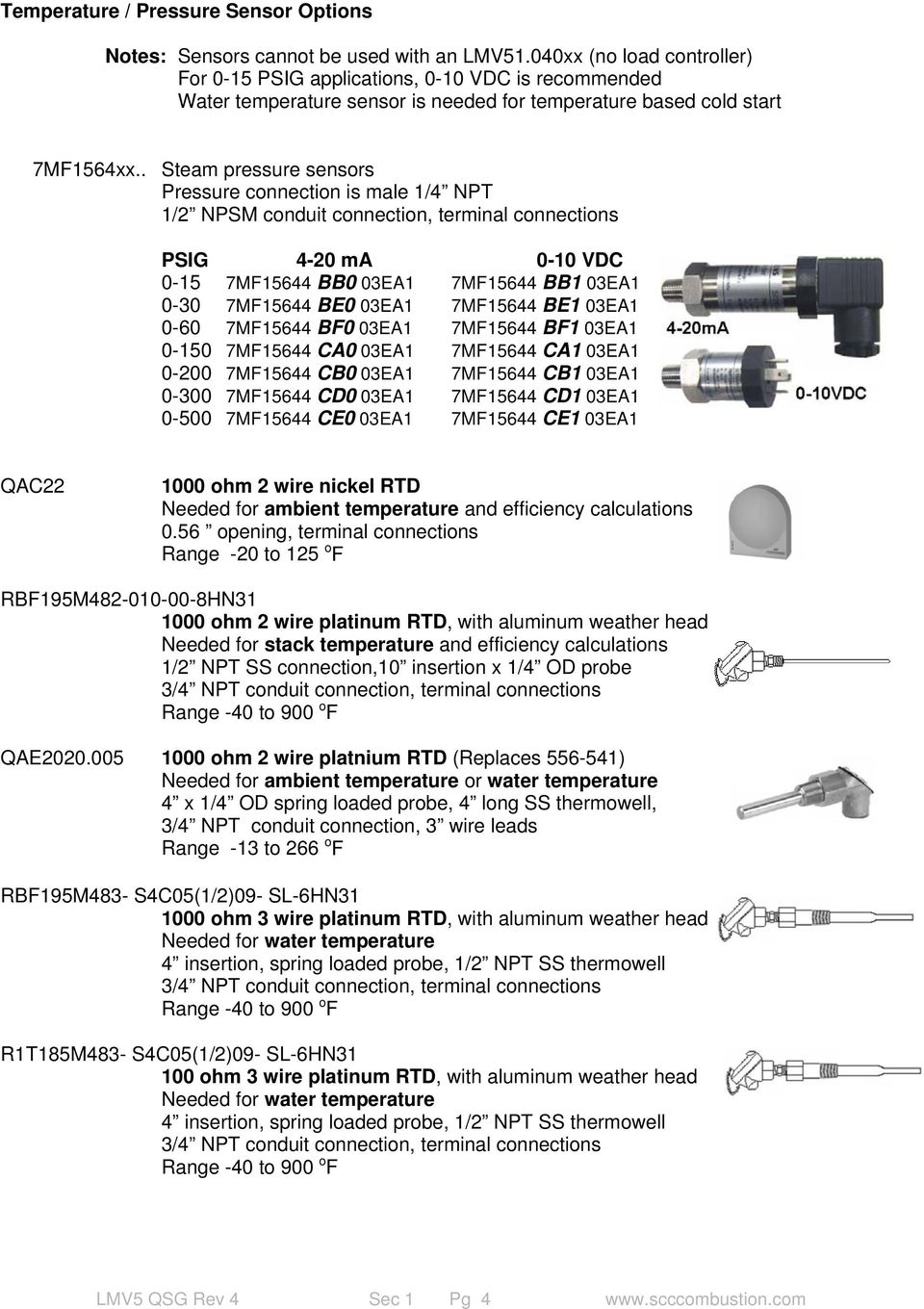
8 Temperature / Pressure Sensor Options Notes: Sensors cannot be used with an LMV51.040xx (no load controller) For 0-15 PSIG applications, 0-10 VDC is recommended Water temperature sensor is needed for temperature based cold start 7MF1564xx.. Steam pressure sensors Pressure connection is male 1/4 NPT 1/2 NPSM conduit connection, terminal connections PSIG 4-20 ma 0-10 VDC MF15644 BB0 03EA1 7MF15644 BB1 03EA MF15644 BE0 03EA1 7MF15644 BE1 03EA MF15644 BF0 03EA1 7MF15644 BF1 03EA MF15644 CA0 03EA1 7MF15644 CA1 03EA MF15644 CB0 03EA1 7MF15644 CB1 03EA MF15644 CD0 03EA1 7MF15644 CD1 03EA MF15644 CE0 03EA1 7MF15644 CE1 03EA1 QAC ohm 2 wire nickel RTD Needed for ambient temperature and efficiency calculations 0.56 opening, terminal connections Range -20 to 125 o F RBF195M HN ohm 2 wire platinum RTD, with aluminum weather head Needed for stack temperature and efficiency calculations 1/2 NPT SS connection,10 insertion x 1/4 OD probe 3/4 NPT conduit connection, terminal connections Range -40 to 900 o F QAE ohm 2 wire platnium RTD (Replaces ) Needed for ambient temperature or water temperature 4 x 1/4 OD spring loaded probe, 4 long SS thermowell, 3/4 NPT conduit connection, 3 wire leads Range -13 to 266 o F RBF195M483- S4C05(1/2)09- SL-6HN ohm 3 wire platinum RTD, with aluminum weather head Needed for water temperature 4 insertion, spring loaded probe, 1/2 NPT SS thermowell 3/4 NPT conduit connection, terminal connections Range -40 to 900 o F R1T185M483- S4C05(1/2)09- SL-6HN ohm 3 wire platinum RTD, with aluminum weather head Needed for water temperature 4 insertion, spring loaded probe, 1/2 NPT SS thermowell 3/4 NPT conduit connection, terminal connections Range -40 to 900 o F LMV5 QSG Rev 4 Sec 1 Pg 4
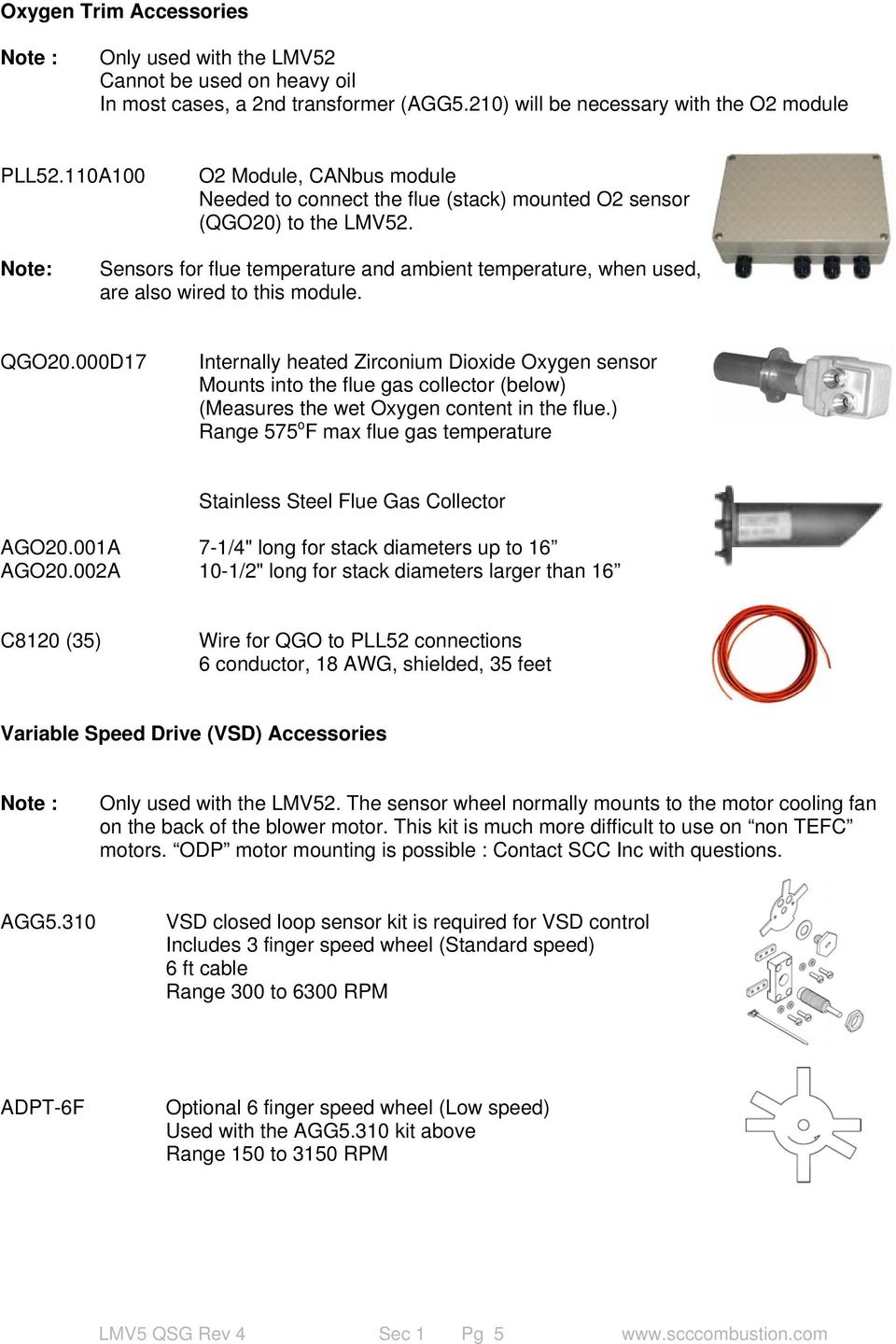
9 Oxygen Trim Accessories Note : Only used with the LMV52 Cannot be used on heavy oil In most cases, a 2nd transformer (AGG5.210) will be necessary with the O2 module PLL52.110A100 O2 Module, CANbus module Needed to connect the flue (stack) mounted O2 sensor (QGO20) to the LMV52. Note: Sensors for flue temperature and ambient temperature, when used, are also wired to this module. QGO20.000D17 Internally heated Zirconium Dioxide Oxygen sensor Mounts into the flue gas collector (below) (Measures the wet Oxygen content in the flue.) Range 575 o F max flue gas temperature Stainless Steel Flue Gas Collector AGO20.001A 7-1/4" long for stack diameters up to 16 AGO20.002A 10-1/2" long for stack diameters larger than 16 C8120 (35) Wire for QGO to PLL52 connections 6 conductor, 18 AWG, shielded, 35 feet Variable Speed Drive (VSD) Accessories Note : Only used with the LMV52. The sensor wheel normally mounts to the motor cooling fan on the back of the blower motor. This kit is much more difficult to use on non TEFC motors. ODP motor mounting is possible : Contact SCC Inc with questions. AGG5.310 VSD closed loop sensor kit is required for VSD control Includes 3 finger speed wheel (Standard speed) 6 ft cable Range 300 to 6300 RPM ADPT-6F Optional 6 finger speed wheel (Low speed) Used with the AGG5.310 kit above Range 150 to 3150 RPM LMV5 QSG Rev 4 Sec 1 Pg 5
10 General Accessories AGG5.210 FUSE6.3A-SLOW FUSE4.0A-SLOW AGG5.643 AGG5.643(100) 120 VAC to (3) 12VAC transformer At least one is required on each BMS Additional transformers may be necessary depending on the number of actuator / modules 6.3A 250V 5x20mm Slo-Blow Qty (10) LMV5 primary 4.0A 250V 5x20mm Slo-Blow Qty (10) LMV5 secondary Special cable for use with the CANbus connections between the LMV5, actuators, and PLL52 module Supplied in a 500 roll Supplied in a 100 roll AGG5.635 AGG5.110 A pre-made cable approximately 9 FT for connecting the AZL to the LMV5 (AGG5.110 CANbus strain relief included) CANbus strain relief If AZL cable AGG5.635 is used only one is required P ACS450 Software cable, PC to AZL, 9 pin D M-F, null Modem AGG5.720 Base plug kit AGG5.721 Extension Plug kit (5) Replacement green 4 pin connector Qty (5) Replacement green 5 pin connector Qty Cord grip, Adapter Nylon, M16 - CANbus cable Qty Conduit adapter, Nylon, M16-1/2 NPSM Qty 1 ADP-M16xE500(5) Conduit adapter, Metal, M16-1/2 NPSM Qty 5 Note : Typical requirements are (2) M16 per (SQM4) Actuator, (6) M16 per O2 (PLL52) LMV5 QSG Rev 4 Sec 1 Pg 6

11 Typical LMV51 BMS System Typical BMS system 1-3 A typical LMV51 BMS system will include the following components : LMV51.140xx AZL52.xxxx Basic unit with load controller Display SQM4x Actuator for Gas metering valve SQM4x Actuator for Oil metering valve SQM4x Actuator for Air damper SQM4x Actuator for FGR (if equipped) AGG5.210 Transformer (See CANbus Loading table, Section 3, Figure 3-1.4) QRI2A2.B180B Forward viewing IR flame scanner AGG2.110 Flame scanner adapter AGG2.120 Conduit connector Temperature Sensor and /or Pressure Sensor (both can be used for cold start) AGG5.643 CANbus cable AGG5.110 CANbus strain relief AGG5.720 RAST 5 plug kit AGG5.635 Pre-made CANbus cable for AZL Flexible zero lash actuator shaft couplings Actuator mounting brackets Cord grips or liquid tight conduit adapters Typical LMV52 BMS System A typical LMV52 BMS system will include all of the components of the LMV51 system with the exception of the LMV51.140xx base unit. The LMV52 unit can be used the same as a LMV51 BMS system is used, with the additional features disabled. If the additional features are utilized, additional components typically include: LMV52.240xx LMV52 required for O2 Trim or VSD (Replaces the LMV51.140xx) O2 Trim: PLL52.110A100 O2 trim module QGO20.000D17 O2 Sensor Depending on flue size: AGO20.001A Flue Gas Collector (up to 16 Dia) AGO20.002A Flue Gas Collector (over 16 Dia) RBF195M HN31 Flue Gas (Stack ) PT-1000 sensor QAC22 Ambient temperature sensor VSD: VSD unit (supplied separately) AGG5.310 Closed loop VSD control kit (speed wheel and sensor AGG5.210 Transformer (See CANbus Loading table, Section 3, Figure 3-1.4) SQM4x AGG5.721 Actuators for additional valves / dampers Extension Plug kit (VSD, additional actuators, transformer, etc.) LMV5 QSG Rev 4 Sec 1 Pg 7

12 Important Safety Notes 1-4 The LMV5 is a safety device. Under no circumstances should the unit be modified or opened. Siemens Building Technologies, Inc. will not assume responsibility for damage resulting from unauthorized modification of the unit. After commissioning, and after each service visit, the flue gas values should be checked across the firing range. All activities (mounting, installation, service work. etc.) must be performed by qualified staff. Before performing any work in the connection area of the LMV5, disconnect the unit from the main supply (all-polar disconnection). Protection against electrical shock hazard on the LMV5, and on all connected electrical components must be ensured through good wiring and grounding practices. Fall or shock can adversely affect the safety functions of an LMV5. Such units must not be put into operation, even if they do not exhibit any apparent damage. When the LMV5 is running in automatic mode, actuators are continuously monitored by the LMV5. During commissioning, when the ratio-control curves are being set, the actuator positions are NOT continuously monitored by the LMV5. The technician is solely responsible for verifying the correct position of each actuator during the ratio-control curve commissioning. The coupling that is used between the actuator and the driven valve / damper is safety related, and must be of a robust and flexible design. Should this coupling fail during operation, the LMV5 will no longer have control of the burner s combustion bringing about a hazardous condition. Condensation and the entry of water into the unit must be avoided. LMV5 QSG Rev 4 Sec 1 Pg 8

13 Approvals 1-5 Table Standards and certificates LMV5 QSG Rev 4 Sec 1 Pg 9

14 Intentionally Left Blank LMV5 QSG Rev 4 Sec 1 Pg 10

15 Sec 1 Sec 2 Sec 3 Sec 4 Sec 5 Sec 6 Sec 7 Sec 8 Sec 9 Sec 10 Sec 2 OVERVIEW MOUNTING WIRING PARAMETERS TROUBLESHOOTING O2 TRIM VARIABLE SPEED DRIVE MODbus ASC450 SOFTWARE SPECIFICATIONS

16 Sec 1 Sec 2 Sec 3 Sec 4 Sec 5 Sec 6 Sec 7 Sec 8 Sec 9 Sec 10 OVERVIEW MOUNTING WIRING PARAMETERS TROUBLESHOOTING O2 TRIM VARIABLE SPEED DRIVE MODbus ASC450 SOFTWARE SPECIFICATIONS

17 Section 2 Mounting LMV5 Base Unit 2-1 The base unit should be mounted inside an enclosure that will protect the LMV5 from dirt and moisture. The unit is mounted by four screws that are captive in each corner, and have an M5 thread. The mounting plate that the unit sits on should be drilled and tapped to accommodate these screws. It should be noted that the mounting screws do not have excessive play, so the spacing of the mounting holes must be accurate. This can be easily achieved by placing the LMV5 in the desired position and turning each of the mounting screws to mark the plate that the LMV5 will be mounted to. During the mounting process, consideration should also be given to the various plugs and wires that must be attached to the LMV5. Electrical connections are made via plugs that are located in the face, top and bottom of the unit. A space of at least two inches is recommended on the top of an LMV51, and the top and bottom of an LMV52. Please see Section 10 for specifications. Figure LMV5 Base Unit Dimensions (inches) LMV5 QSG Rev 4 Sec 2 Pg 1

18 AZL5 Display 2-2 The AZL5 is designed to be mounted through the face of an electrical enclosure. This is accomplished by an accurate cut-out, which is usually in the door of the enclosure. The AZL5 has one screw on the top and one on the bottom that engage small plastic tabs that will swing out and pull to the front when the screw is tightened, and will retract and push to the back when loosened. This facilitates easy removal and replacement of the AZL5 since it is designed to be taken out of the enclosure face and held in the hands for set up / commissioning. When properly installed, the AZL5 will hold the sheet metal of the enclosure between the plastic tabs and ridge which holds the AZL5 to the enclosure gasket. The connector shown in Figure is for the connection of a laptop computer. Note that the CANbus connector, (not shown) plugs into the bottom of the AZL5. The CANbus connector would not be seen from the front when the AZL5 is mounted, but does require approximately 2.5 below the bottom of the AZL5 to clear the connector and the CANbus cable. Please see Section 10-1 for specifications. Figure AZL5 Dimensions (inches) LMV5 QSG Rev 4 Sec 2 Pg 2

19 SQM4x Actuators 2-3 The SQM4x actuators that are driven by the LMV5 come in three basic torques and running times as described in the product offering. See Section 1-2. Actuators can rotate clockwise or counterclockwise depending upon programming in the LMV5. All actuators share the same mounting hole pattern. The SQM48.4 and SQM48.6 both have 14mm keyed shafts, the SQM45 s both have 10mm shafts, 291A9 is keyed, 295A9 is D shaped. The actuator body should be rigidly attached to the driven valve or damper utilizing the supplied mounting holes. The actuator shaft should be attached to the valve or damper via an SCC Inc. robust, zero lash flexible coupling. Shaft couplings are safety related, since a coupling failure could let the valve / damper spin freely of the actuator. Brackets and couplings specifically designed to attach these actuators to valves and dampers are available, and are highly recommended. Please speak to a SCC Inc. sales representative concerning these brackets and couplings. Please see Section 10-1 for specifications. Figure SQM4x Dimensions (inches) IMPORTANT: Coupling set screws should not be tightened on the valve / damper shaft until: 1) Actuators are addressed and rotations are set in the LMV5 2) Each actuator is verified to be at zero degrees (closed) This verification should be done under: Parameters & Display > Ratio Control > Gas/Oil Settings > Curve Parameters. 3) Each valve / damper is verified to be closed, thus matching the indicated actuator position. LMV5 QSG Rev 4 Sec 2 Pg 3

20 Accessories 2-4 AGG5.210 Transformer(s) The AGG5.210 transformer supplies 12 VAC power to the LMV5 base unit, AZL5, actuators, and PLL52 (if equipped). This transformer should also be mounted in an enclosure that shields the transformer from dirt and water. At least one transformer is necessary for each LMV5 base unit. Depending upon how many devices are connected to the CANbus, (actuators, PLL52 module, etc) two AGG5.210 transformers may be necessary. Note: If a second transformer is used, locate it as close as possible to the actuators / PLL52 that it powers. Section 3-1, Figure outlines when two transformers should be used. Figure gives the dimensions of a AGG5.210 transformer. The transformer may be mounted with the plugs facing downward or upward. Oval holes are provided for use with self tapping or machine screws. Please see Section 10-1 for specifications. Figure AGG5.210 Dimensions (inches) LMV5 QSG Rev 4 Sec 2 Pg 4

21 QRI Infrared Flame Scanners The QRI series of self checking Infrared (IR) flame scanners typically mount via an adapter kit (AGG2.110). The flame scanner itself clamps into the adapter, and the adapter mounts the entire assembly with a 3/4 14 NPSM female thread. This adapter also features a heat insulator and a high quality lens. Typically the adapter is threaded onto a 3/4 NPT male thread that is on the end of a flame scanner tube. The flame scanner tube should be mounted so both the pilot flame and the main flame can be easily viewed. The tube should also be sighted so that glowing refractory will not be viewed by the scanner. If viewing glowing refractory with the scanner tube is unavoidable, then it is recommended that the optional UV scanner is used instead of the IR scanner. Liquid tight conduit can be mounted to the back of the QRI scanner with adapter (AGG2.120). Please see Section 10-1 for specifications. Figure QRI Dimensions (inches) LMV5 QSG Rev 4 Sec 2 Pg 5
22 QRA75 UV Flame Scanner The QRA75 Ultraviolet (UV) flame scanner mounts with a 3/4 14 female thread. The scanner is threaded onto an NPT male thread that is on the end of a flame scanner tube. The flame scanner tube should be mounted so both the pilot flame and the main flame can be easily viewed. Glowing refractory is well tolerated by the UV scanner. A 12 ft pre-made cable must be used. Please see Section 10-1 for specifications. Figure QRA75 Dimensions (inches) LMV5 QSG Rev 4 Sec 2 Pg 6
23 7MF1564 Pressure Sensors The 7MF1564 series of pressure sensors mount by their 1/4 NPT threads located on the nose of this pencil type of pressure sensor. The sensor can be mounted in any orientation, however the sensor must be mounted on a cold drip leg so that the sensor will detect pressure but will be isolated from high temperature steam. These sensors are typically used on steam boilers. Note: Low range steam sensors (0-15psi and 0-30psi) 4-20mA sensors should not be used on boilers that are subjected to a vacuum condition after shutdown. For these applications, use a 0-10VDC sensor or a higher range 4-20mA sensor. An electrical plug is included on the back of the sensor that will accept liquid-tight conduit fittings. Please see Section 1, page 4 for part numbers. Please see Section 10-1 for specifications. Figure MF1564 Dimensions (inches) QAE Temperature Sensors The QAE Nickel 1000 temperature sensors mount by their 1/2 NPT threads which are located on the 1/2 diameter thermowell. The thermowell should be completely immersed in the medium that it measuring. These sensors are typically used on hot water boilers up to 266 o F, and can also be used for ambient temperature, if desired. A small LB is included on the back of the sensor for connecting conduit and for making electrical terminations. Note: The QAE is a replacement for the discontinued Please see Section 10-1 for specifications. Figure QAE Dimensions (inches) LMV5 QSG Rev 4 Sec 2 Pg 7
24 Other Temperature Sensors The ratings of these sensors are given in Section 1. Stack and ambient temperature sensors are necessary if the efficiency is monitored by the LMV52. A water jacket sensor is recommended if the LMV5 s low fire hold functionality is used on a steam boiler. Figure Stack Sensor Dimensions (inches) RBF195M HN31 Figure Water Jacket Sensor Dimensions (inches) RBF195M483- S4C05(1/2)09- SL-6HN31 R1T185M483- S4C05(1/2)09- SL-6HN31 QAC22 Ambient Temperature sensors The QAC22 Nickel 1000 temperature sensors are surface mount and are typically used to sense the ambient air temperature when the efficiency calculation function is used on the LMV52. Please see Section 10-1 for specifications. Figure Temperature Sensor QAC22 Dimensions (inches) LMV5 QSG Rev 4 Sec 2 Pg 8
25 O2 Trim 2-5 PLL52 O2 Module (LMV52 only) The PLL52 module serves as the CANbus interface for the QGO20 oxygen sensor, ambient temperature sensor, and flue gas temperature sensor. This module is necessary if O2 trim is used. The PLL52 module must be mounted so that the wire length from the O2 sensor to the PLL52 module does not exceed 25 feet. To mount, the lid of the module must first be removed. After the lid is removed, four holes will be available to use with self tapping or machine screws. Please see Section 10-1 for specifications. Figure PLL52 O2 Module Dimensions (inches) Approvals 1-5 Table Standards and certificates LMV5 QSG Rev 4 Sec 2 Pg 9
26 QGO20 O2 Sensor (LMV52 only) The QGO20 is a zirconium-oxide O2 sensor that resides in the flue of a burner / boiler. It measures the residual O2 in the flue on a wet basis enabling O2 control across the firing range. Please see Section 10-1 for specifications. Figure QGO20 O2 Sensor dimensions (inches) This sensor must be used with one of two available flue gas collectors detailed below. These stainless steel collectors are normally seal welded into the flue with their bevels pointed downward to collect flue gas. NOTES : Notches (2) on the sensor, (1) on the collector flange pointed upward (upstream). Do not weld the collector into the flue with the sensor bolted to the collector. The collector must be mounted perpendicular to the flue gas flow. (See figure 2-5.4) Both sets of holes (QGO20 and collector) must be inside the flue, at least 1/2 away from the inner surface of the flue. After welding, the QGO20 can be inserted and bolted to the flue gas collector flange. Please see Section 10-1 for specifications. Figure Flue Gas Collector dimensions (inches) LMV5 QSG Rev 4 Sec 2 Pg 10
27 Figure Allowable flue gas collector mountings LMV5 QSG Rev 4 Sec 2 Pg 11
28 VSD Mounting 2-6 AGG5.310 Shaft mounted speed sensor kit (LMV52 only) The AGG5.310 shaft mounted speed sensor kit consists of a three fingered speed wheel and a sensor along with mounting hardware. Please see Section 10-1 for specifications. Figure Speed wheel and sensor mounting First, ensure that a section of shaft extends outboard of the rear bearing of the motor (fan cooled motor). The installation will not be possible if the shaft does not extend outboard of the rear bearing. Next, remove the fan cover. The shaft must be drilled and tapped. It is possible to drill the shaft with a hand drill, but it is preferable to use a drill press before the motor is mounted. If a hand drill is used, a guide should be utilized to ensure that the drilled hole is perpendicular and concentric to the end of the shaft. The drilled hole must be a diameter of 6.8mm, and be 7/8 deep. This is done to accommodate the M8 x 1.25 nonbottoming tap. The thread engagement of the shoulder bolt is approximately ½, so the tap should run to the bottom of the drilled hole. The M8 x 1.25 tap is absolutely necessary, but the hole can be drilled with a 17/64 drill bit and satisfactory threads will result. Install the speed wheel with the shoulder bolt and the large spring washer. The speed wheel can be reversed (flipped over) so that the arrow on the speed wheel points in the correct direction of motor rotation. The shoulder bolt should be tightened with about 50 in*lb (6 Nm) of torque. LMV5 QSG Rev 4 Sec 2 Pg 12
29 Figure Speed sensor assembly mounting (continued) Draw a circle concentric with the motor shaft having a diameter of 3. This circle should also be concentric with the motor fan cover. Cut out a small window in the cover, about 3/4 x 3/4, or large enough for the speed sensor to go through. If all of this is correct, this arrangement would put the speed sensor about 1-1/2 from the center of the shaft, approximately in the center of the fingers of the speed wheel. Attach the speed sensor mounting bracket as shown. Only snug the screws. Align the bracket so that it is roughly centered on the hole that was cut. The center of the sensor mounting bracket hole should be approximately 1-1/2 from the center of the shaft (fan cover). Replace the fan cover. Thread the speed sensor into the speed sensor mounting bracket. The speed sensor should align so that it is approximately in the center of one of the speed wheel s fingers. If not, loosen the four screws on the bracket and move it to achieve the proper radial alignment of the speed wheel / speed sensor. Tighten the screws when the correct alignment is achieved. To set axial alignment, thread the sensor into the bracket until it touches one of the fingers. Next, back the sensor out two full revolutions. This will achieve an axial gap of approximately 1/16 which is the proper gap. Matchmark the sensor, install the lockwasher and locknut, and tighten the locknut without rotating the sensor. Zip tie the sensor wire to the motor, if desired. (For wiring, see Section 3) LMV5 QSG Rev 4 Sec 2 Pg 13
30 Intentionally Left Blank LMV5 QSG Rev 4 Sec 2 Pg 14
31 Sec 3 Sec 1 Sec 2 Sec 3 Sec 4 Sec 5 Sec 6 Sec 7 Sec 8 Sec 9 Sec 10 OVERVIEW MOUNTING WIRING PARAMETERS TROUBLESHOOTING O2 TRIM VARIABLE SPEED DRIVE MODbus ASC450 SOFTWARE SPECIFICATIONS
32 Sec 3 Sec 1 Sec 2 Sec 3 Sec 4 Sec 5 Sec 6 Sec 7 Sec 8 Sec 9 Sec 10 OVERVIEW MOUNTING WIRING PARAMETERS TROUBLESHOOTING O2 TRIM VARIABLE SPEED DRIVE MODbus ASC450 SOFTWARE SPECIFICATIONS
33 Section 3 Wiring Wiring Introduction 3-1 The LMV5 can be wired a number of different ways due to the flexibility of this Burner / Boiler Management System (BMS). The specific application dictates how the BMS is to be wired. This section details the most common applications. The Parameter settings outlined in Section 4 can enable, disable or change the functionality of many terminals on the LMV5. Thus, wiring and parameter settings work together to make the LMV5 an extremely versatile BMS. This section includes terminal descriptions (Section 3-2), and extensive wiring diagrams (Section 3-3), that detail applications of the LMV5 BMS. Terminals The connection terminals of the LMV5 are RAST 5 connectors (plugs). Line voltage plugs are made so that they will only fit into one socket of the LMV5 eliminating the possibility of inserting a plug into an incorrect socket. Each plug is designed to connect one external device or a small group of external devices, such as gas valves, to the LMV5. This being the case, each group of plugs on the front of the LMV5 provide line voltage and grounds so that an additional terminal strip is not necessary. Note: All protective earth grounds (PE), neutrals (N) and lines (L) are common inside the LMV5. Figure Numbering scheme on line voltage (RAST 5) terminals of the base unit X Plug Group Plug Number in Group Pin Number on Plug Dashes or dots can be used interchangeably between the numbers shown above. Figure Numbering scheme on low voltage (RAST 2.5) terminals of the base unit X62. 2 Plug Number Pin Number Terminal Descriptions (Section 3-2) provides a map outlining exactly where the line and low voltage plugs are located. For each plug, Pin 1 is marked on the casing of the LMV5 as well as the PLL52 module. LMV5 QSG Rev 4 Sec 3 Pg 1
34 Grounds The LMV5 has three different types of grounds. They are: Protective Earth (marked as PE on the LMV5) Functional Earth (marked as FE on the LMV5) Reference Ground (marked as 0, M or GND on the LMV5, hereafter referred to as 0) Protective Earth Protective Earth (PE) or chassis ground should always be connected to the control panel grounding lug. One wire from the secondary side of the control panel s main step-down transformer should also be connected to the control panel grounding lug. All of the PE terminals on the front of the LMV5 casing are common. Functional Earth Functional Earth (FE) connections are found on the CANBus terminals as well as other low voltage connections. The sole purpose of the FE is for termination of low voltage cable shields. The FE is bonded to the Reference Ground through capacitors on the LMV5 circuit board with the exception of the CANBus where it is bonded directly. Reference Ground The last type of ground is the Reference Ground. These are found on the low voltage connections. The purpose of the Reference Ground is to serve as a datum to measure other voltages. The Reference Ground is bonded to the FE on the CANBus circuit board through pins 2 and 3 on the AGG5 transformer. Note: Pin 3 on the AGG5 transformer is also connected to the control panel grounding lug (PE), so that all three grounds are eventually bonded together. Summary: 0 & PE are bonded together at the transformer (connect X52.4 & SEK2 pin 3 to panel ground) FE is bonded to 0 & PE, for the CANBus ONLY, directly on the circuit board FE is bonded to 0 & PE everywhere else through a capacitor on the circuit board LMV5 QSG Rev 4 Sec 3 Pg 2
35 CANBus The CANBus is a data bus not unlike a computer network. This data bus is used to connect actuators, the AZL5, and the PLL52 Module to the LMV5 base unit. Special shielded cable is used to connect all devices on the CANBus to the LMV5 base unit. This cable carries five wires, and a braided shield that is located underneath the plastic cable sheathing. The two heavier gauge wires (16 AWG) are used for power transmission to the connected devices. These power wires are labeled 12VAC1 and 12VAC2, and carry 12 VAC each. These wires are powered by Pin 1 and Pin 4 of the AGG5.210 transformer s 4-pin plug, and are fused using fuse FU2 and FU3. These fuses are located under black covers on the right hand side of the LMV5. If measured, 12VAC1 and 12VAC2 should have a potential of approximately 12 VAC to reference ground and 24 VAC between 12VAC1 and 12VAC2. The two lighter gauge (24 AWG) wires carry the digital data signal and are labeled CANL and CANH. The signal on these wires consists of 5 volt DC pulses. Note: These data wires should never contact the 12VAC wires when the system is powered. LMV5 damage can result. The termination resistor, which is located on each actuator and the PLL5 module is used to terminate CANH and CANL and should be moved to the bus termination position on the last CANBus device. The last wire in cable is the reference ground and is marked GND. This is also connected to each device on the CANBus so that the LMV5 can monitor for voltage drops that might affect actuator operation. Note: It is extremely important that the shield of the CANBus cable is properly terminated. The shield of the CANBus cable is terminated to the LMV5 by using a special strain relief, part number AGG This strain relief also has a wire that should be connected to the shield terminal on the LMV5. The installation of this clip as well as clip for the AZL5 cable is shown in Figure Figure Installation of CANBus Strain Relief s LMV5 QSG Rev 4 Sec 3 Pg 3
36 CANBus (Continued) The shield of the CANBus cable must be connected on each cable segment (between LMV5 and actuators, PLL52 Module) so that the entire shield has continuity with terminal X51.1 which is the shield connection on the LMV5. This is achieved by clamping the shield on both cable segments with the metal clamps provided on the cable entry of each actuator. Clamps for the CANBus shield are also provided on the PLL52 module. The current provided by one AGG5.210 transformer is usually sufficient to meet the demands of the LMV5 base unit, AZL5 and actuators on a typical burner/boiler without a PLL52 module. However, situations occur when one AGG5.210 is not sufficient, and a second transformer must be used. The figure below outlines the number of transformers that should be used for different situations. Figure CANBus Loading Number and type of actuators wired on the CANBus moving concurrently. Permissible Total CANBus Cable Length including AZL5 (Feet). Single Transformer Actuators at 100% rated torque. Actuators at 80% rated torque. 2 SQM SQM SQM48 4 SQM SQM45 2nd Transformer Req. 2nd Transformer Req. 1 SQM SQM SQM48 3 SQM nd Transformer Req. 4 SQM45 2nd Transformer Req. 1 SQM SQM45 2 SQM48 2nd Transformer Req. 3 SQM45 2nd Transformer Req. 1 SQM45 2 SQM45 3 SQM48 2nd Transformer Req. 2nd Transformer Req. 1 SQM45 4 SQM48 2nd & 3rd Transformer Req. 2nd Transformer Req. 2 SQM SQM45 3 SQM48 4 SQM48 2nd Transformer Req. 2nd Transformer Req. 5 SQM48 2nd & 3rd Transformer Req. 2nd & 3rd Transformer Req. Notes : When two transformers are used the loading should be divided between the two transformers as equally as possible. The 2nd transformer should be placed as close as possible to the actuators / PLL52 module that it powers due voltage drop considerations. When adding a PLL52 module subtract 20 ft from the total length read from the chart. Absolute maximum cable length is 300ft. (CANBus communication limitation) LMV5 QSG Rev 4 Sec 3 Pg 4
37 Load Controller The LMV and all LMV52 are equipped with a Load Controller (LC). The LC is very flexible and can read multiple sensors simultaneously. Typically, either a temperature sensor or pressure sensor is connected for burner modulation. Both a pressure and a temperature sensor can be used in conjunction for certain applications such as Cold Start Thermal Shock Protection. The LC also has six different operational modes that can be changed by opening or closing a set of dry contacts. These six different modes of operation are outlined in Section 4-1. By using a dry contact between terminals X62.1 and X62.2, the mode and / or setpoint of the internal load controller can be changed by closing or opening the contact. If the LC is in Mode 2, which is Internal Load Controller (Int LC), setpoint W1 will be used if the dry contact is open and setpoint W2 will be used if the dry contact is closed. If the LC is in mode 1A, 1B, 3, 4, 5, or 6, and the dry contact is closed, the LMV5 will revert back to mode 2 and will use setpoint W1. This feature is commonly used when switching the LMV5 from Mode 5 (direct modulation via a 4-20mA source wired into terminals X62.3 and X62.4) back to Mode 2 for local sensing and modulation of the burner. Note: Please see Section 4-1 for more information on LC modes. The LC also provides power for 4-20mA loop powered sensors or 0-10 VDC externally powered sensors. The wiring of these sensors is covered in Section 3-3. Description of the LC is provided in Section 4, page 15. Floating / Bumping and Multi-stage Oil Terminals X and X can be used for floating / bumping or multistage oil. This can be done on all models of LMV5 and is typically done on LMV models. Through the use of floating / bumping, the LMV5 can be driven to high fire by placing line voltage on terminal X and to low fire by removing line voltage from X and placing line voltage on X By alternating voltage on these terminals the firing rate of the LMV5 equipped burner can be increased or decreased. The floating / bumping type of modulation is typically what is used if the LMV5 is modulated with a RWF40. A relay can be placed in the line connected to X if a low fire hold is desired. If externally controlled multistage oil is selected terminal X can be energized with line voltage to put the burner in Stage 2, and terminal X can be energized with line voltage to put the burner in Stage 3. De-energizing these terminals takes the burner out of stage 2 or stage 3. In all cases (unless terminal X is deactivated) energizing terminal X turns the burner on, and de-energizing terminal X turns the burner off. LMV5 QSG Rev 4 Sec 3 Pg 5
38 Terminal Descriptions 3-2 Figure LMV Front Layout LMV5 QSG Rev 4 Sec 3 Pg 6
39 LMV5x Terminal X3-01 X3-02 X3-03 X3-04 X4-01 X4-02 X4-03 Pin1 Pin2 Pin 1 Figure X3 and X4 Description / Notes (related Parameter) Type Rating Blower Motor Starter Operation is not changed by the addition of a VSD Using a contactor is not recommended with a VSD (ContinuousPurge, PostpurgeLockout) Alarm Horn Can be de-energized with alarm silence on AZL (AlarmStartPrev, Alarm act/deact) Blower Air Pressure Switch Must close, after the blower is started until a programmable period after the air actuator reaches purge position Must open, after the blower shuts off (AirPressureTest, FanRunupTme) Programable Output Programable Input 1A, 120V 1.5mA, 120V Pin 2 Line Line 500 ma, 120V Burner Flange Limit Switch Pin 1 Input (Part of safety loop) If not used jumper to X3-03 Pin 2 5A, 120V Pin 2 Internally Jumpered to X3-04 Pin 1 Jumper Safety Loop Pin 1 Encompasses: Low-Low water control, high limit, excess Input temp, etc Internally Jumpered to X3-03 Pin 2 5A, 120V Pin 2 Line Line Protective Earth Ground (Chassis Ground) Pin 3 Note: Internally connected to all PE pins to simplify wiring PE Pin 4 Neutral Note: Internally connected to all Neutral pins to simplify wiring N N/A Main Power Line Voltage Programable Pin 5 Note: Internally fused (6.3A), supplies Line voltage to many Line LMV terminals, to simplify wiring (MainsFrequency) 6.3A, 120V Pin 1 Fuel Select Power X4-01 Pin 1 to externally select Gas Power X4-01 Pin 2 to externally select Oil Input Pin 2 If neither, X4-01 Pin 1 nor X4-01 Pin 2 is powered, fuel select is internal, via ModBus or AZL Pin 3 Pin 4 Blower Motor Starter Aux Contact Typical is FCC, or FGR Pressure Switch FCC = Fan Contactor Contact (FGR-PS/FCC) Remote Reset If in alarm, power will cause reset, if not in alarm, power will cause a manual lockout Programable Input Input 1.5mA, 120V Pin 1 Protective Earth Ground PE N/A Pin 2 Neutral N Pin 3 Ignition Transformer Output 1.6 A, 120V Pin 1 Protective Earth Ground PE N/A Pin 2 Neutral N Pin3 Start Signal Typical, to open outside air damper, or Air Pressure Switch Test, if direct start is used (Start/PS-Valve, ContinuousPurge, NormDirectStart) Programable Output Note: Total combined load of all of all 120VAC outputs cannot exceed 5 amps. 0.5A, 120V LMV5 QSG Rev 4 Sec 3 Pg 7
40 Figure X5, X6, and X7 LMV5x Terminal Description / Notes (related Parameter) Type Rating Pin 1 Protective Earth Ground PE N/A X5-01 Low Oil Pressure Switch Programable Pin 2 Opens on low oil pressure (OilPressureMin) Input 1.5 ma, 120V Pin 3 Line Line 500 ma, 120V Pin 1 Protective Earth Ground PE N/A X5-02 High Oil Pressure Switch Programable Pin 2 Opens on high oil pressure (OilPressureMax) Input 1.5 ma, 120V Pin 3 Line Output 500 ma, 120V Burner ON / OFF Switch Pin 1 If deactivated, ON / OFF via ModBus or AZL (InputController) Floating-Bumping Drive to Low Fire (LC_OptgMode) Pin 2 modulation with RWF40 in floating bumping mode, or Programable X5-03 power to achieve Stage 3 with staged oil (Operation Mode) Input 1.5 ma, 120V Floating-Bumping Drive to High Fire (LC_OptgMode) Pin 3 modulation with RWF40 in floating bumping mode, or power to achieve Stage 2 with staged oil (Operation Mode) Pin 4 Line Line 500 ma, 120V Start Release Oil (StartReleaseOil) Programable Pin 1 Typical: Atomizing Media Pressure Switch, closes on pressure Input 1.5 ma, 120V Pin 2 Line Output 500 ma, 120V X6-01 Start Release Heavy Oil Programable Pin ma, 120V Powered to release stages of Heavy Oil (StartRelease) Input Pin 4 Line Line 500 ma, 120V X6-02 Pin 1 Protective Earth Ground PE Pin 2 Neutral N N/A Oil Pump Motor Starter (also known as Magnetic Clutch) Programable Pin 3 (OilPumpCoupling, IgnOilPumpStart, IgnOnTmeOilPump) Output 1.6 A, 120V X6-03 Pin 1 Protective Earth Ground PE N/A Pin 2 Neutral N Oil Outdoor Safety Valve Energizes phase 21 Pin 3 Output 1.6 A, 120V Typical: Atomizing Air Compressor Motor Starter Pin 1 Protective Earth Ground PE X7-01 Pin 2 Neutral N N/A Pin 3 Main Oil Valve V2 Used for staged combustion on oil Output 1.6 A, 120V Pin 1 Protective Earth Ground PE X7-02 Pin 2 Neutral N N/A Pin 3 Main Oil Valve V3 Used for staged combustion on oil Output 1.6 A, 120V Pin 1 Protective Earth Ground PE N/A CPI Oil Typical, Configurable for: X7-03 deactivated, Start RelGas, CPI Oil, CPI Gas, or CPI Gas+OIL Programable LMV52 Pin 2 Note: CPI, Closed Position Indicator = POC, Proof Of Closure Input Only (StartReleaseGas) 1.6 ma, 120V Pin 3 Line Line 500mA, 120V LMV5 QSG Rev 4 Sec 3 Pg 8
41 Figure X8, X9, and X10 LMV5x Terminal Description / Notes (related Parameter) Type Rating X8-01 Pin 1 Gas Indicator Internally connected to X Output Pin 2 Oil Indicator Internally connected to X and X Output 1A, 120V Main Oil Valve V1 Internally connected to X Pin 1 Main oil valves can be connected to either, or both Output 1.6 A, 120V X8-02 Pin 2 Wiring point for main oil valves in series (typically not used) Tie point Pin 3 Neutral N N/A Pin 4 Protective Earth Ground PE Pin 1 Main Oil Valve V1 See X Output 1.6 A, 120V X8-03 Pin 2 Wiring point for main oil valves in series (typically not used) Tie point Pin 3 Neutral N N/A Pin 4 Protective Earth Ground PE Outdoor Gas Safety Valve Energizes in Phase 21 Pin 1 Typical use: Gas Booster Motor Starter Output Pin 2 Pilot Gas Valve Output 1.6 A, 120V X9-01 Pin 3 Main Gas Valve V2 Downstream main gas valve Output Main Gas Valve V1 Upstream main gas valve Note: If a See Note: non-siemens gas valve is used, that draws more than 1.6A, X9-01 Pin 4 Pin 4 Output a separate safety relay must be used to power the gas valve. If valve proving is used, V1 and V2 must be wired separately. X9-02 Pin 1 Neutral N Pin 2 Protective Earth Ground PE N/A Pin 1 Line Line 500mA, 120V X9-03 X10-01 CPI GAS Typical (PS-VP/CP) Configurable for: Pin 2 CPI Gas, CPI Oil, CPI Gas+Oil, PS-VP (PressSw-ValveProve) Note: CPI(Closed Position Indicator) = POC(Proof Of Closure) High Gas Pressure Switch Pin 3 Opens on high pressure (GasPressureMax) Low Gas Pressure Switch Pin 4 Opens on low gas pressure (GasPressureMin) Pin 1 12 VAC Connect to Xfmr SEK1 Pin 2 Programable Input Programable Input Programable Input 1.5 ma, 120V Pin 2 12 VAC Connect to Xfmr SEK1 Pin 1 Power 1.2 A, 12V Pin 3 Line Connect to Xmfr PRI Pin 2 Line 1 A, 120V Pin 4 Neutral Connect to Xmfr PRI Pin 1 N N/A Pin 1 Flame Detector QRB Signal Programable Input 8 VDC Pin 2 Flame Detector Power Supply Output 100mA, 21 VDC Pin 3 Line Line 500mA, 120V X10-02 Pin 4 Neutral N N/A Pin 5 Protective Earth Ground PE Flame Detector Pin 6 QRI Signal Programable 5 VDC Input X10-03 Pin 1 Flame Rod (Ionization Probe) or GN UV Scanner 0.5 ma LMV5 QSG Rev 4 Sec 3 Pg 9
42 Figure LMV5 Top Terminals X50 thru X52 Layout LMV5x Terminal Description / Notes Type Rating X50 X51 X52 Pin 1 CANbus Shield (clamp to shielding of the cable) FE N/A Pin 2 12VAC1 Power for the AZL Pin 3 12VAC2 Power for the AZL Power 12 VAC, 4A Pin 4 CANH Communication Signal Pin 5 CANL Communication Signal Bus 5VDC Pin 6 Reference Ground 0 * N/A Pin 1 CANbus Shield (clamp to shielding of the cable) FE N/A Pin 2 12VAC1 Power for the actuators and the O2 Module Pin 3 12VAC2 Power for the actuators and the O2 Module Power 12 VAC, 4A Pin 4 CANH Communication Signal Pin 5 CANL Communication Signal Bus 5VDC Pin 6 Reference Ground 0 * N/A Pin 1 LMV Input 12VAC1 Connect to Xfmr SEK 2 Pin 1 Power 12VAC Pin 2 LMV Input Ref Gnd Connect to Xfmr SEK 2 Pin 2 0 * N/A Pin 3 LMV Input 12VAC2 Connect to Xfmr SEK 2 Pin 4 Power 12VAC Pin 4 LMV Input Funct Gnd Connect to Xfmr SEK 2 Pin 3 FE N/A * Note: All 0 are internally connected to simplify wiring. LMV5 QSG Rev 4 Sec 3 Pg 10
43 Figure LMV5 Top Terminals X60 thru X63 Layout LMV5x Terminal Description / Notes (related Parameter) Type Rating Pin 1 Temp Sensor PT100 RTD (3 wire) Input 1 TEMP Programable Pin 2 Temp Sensor PT100 RTD (3 wire) Line compensation Input Pin 3 Temp Sensor PT / Ni 1000 RTD (2 wire) Input 4 TEMP N/A X60 Temp Sensor Reference Ground Pin 4 0 * PT / Ni 1000 (2 wire), or PT100 RTD (3 wire) Pin 5 Temp Sensor Functional Ground for shield FE Temp Sensor (Sensor Select, MeasureRangePtNi) Pin 1 Press/Temp Transducer Power supply Power 20 VDC 25mA Press/Temp Transducer 0 to 10 VDC Input 2 (0 Min 10.5 Max V) Pin 2 If sensor power is required, wire to: X61 Pin 1(+) and Pin 2(-) 0 to10 VDC If sensor power is not req, wire to: X61 Pin 2 (+) and Pin 4(-) X61 X62 X63 Pin 3 Press/Temp Transducer 0/4 to 20mA Input 2 (Min 3 Max 21 ma) If sensor power is required, wire to: X61 Pin 1(+) and Pin 3(-) If sensor power is not req, wire to: X61 Pin 3(+) and Pin 4(-) Programable Input 0/4 to 20 ma Pin 4 Press/Temp Transducer, Reference ground 0 * Pin 5 Press/Temp Transducer, Functional ground for shield FE N/A Press/Temp Transducer (Ext Inp X61 U/I, MRange TempSens, Mrange PressSens) Pin 1 Remote Setpoint / Direct Modulation Power supply Power 24 VDC, 2mA Remote Setpoint / Direct Modulation 0 to 10VDC Input 3 Pin 2 If sensor power is required, wire to: X62 Pin 1(+) and Pin 2(-) 0 to10 VDC If sensor power is not req, wire to: X62 Pin 2(+) and Pin 4(-) Pin 3 Remote Setpoint / Direct Modulation 4 to 20mA, Input 3 If sensor power is required, wire to: X62 Pin 1(+) and Pin 3(-) If sensor power is not req, wire to: X62 Pin 3(+) and Pin 4(-) Programable Input 0 to 20 ma Pin 4 Remote Setpoint / Direct Modulation Reference ground 0 * N/A Pin 5 Remote Setpoint / Direct Modulation Funct Gnd for shield FE Remote Setpoint / Direct Modulation (Ext Inp X62 U/I, Ext MinSetpoint, Ext MaxSetpoint ) Pin 1 Analog Output 0/4 to 20mA Wire X63 Pin 1(+) X63 Pin 2(-) Programable 0/4-20mA Pin 2 Analog Output Reference ground 0 * N/A Pin 3 Analog Load Output Functional ground for shield FE * Note: All 0 are internally connected to simplify wiring. LMV5 QSG Rev 4 Sec 3 Pg 11
44 Figure LMV5 Top Terminals X70 thru X73 Layout LMV5x Terminal Description / Notes Type Rating X70 LMV52 X71 LMV52 X72 LMV52 X73 LMV52 Pin 1 Speed Sensor Pulse Power supply Power 10 VDC, 45mA Pin 2 Speed Sensor Pulse Max low 1.5VDC Min high 3VDC Programable Input Pin 3 Speed Sensor Reference ground 0 * Pin 4 Speed Sensor Reserve extra terminal Pin 5 Speed Sensor Functional ground for shield connection FE 10 VDC Pin 1 Gas Meter Pulse Power supply Output 10 VDC, 45mA Pin 2 Gas Meter Pulse Max low 1.5VDC Min high 3VDC Programable Input Pin 3 Gas Meter Reference ground 0 * Pin 4 Gas Meter Functional ground for shield connection FE N/A 10 VDC Pin 1 Oil Meter Pulse Power supply Power 10 VDC, 45mA Pin 2 Oil Meter Pulse Max low 1.5VDC Min high 3VDC Programable Input Pin 3 Oil Meter Reference ground 0 * Pin 4 Oil Meter Functional ground for shield connection FE N/A 10 VDC Pin 1 VSD Dry Contact (Internal LMV) AC / DC 24 V When the LMV closes this contact the VSD is in RUN mode Output 2A Pin 2 When the LMV opens this contact the VSD is in STOP mode Pin 3 VSD Alarm Input When powered LMV will alarm Input 24 VDC VSD Analog Output 0 to 20mA or 4 to 20mA Maximum loop resistance to be less than 750 ohms Programable Pin 4 Connect Positive (on VSD drive) to Pin 4 Output 0-20mA Connect Negative (on VSD drive) to Pin 5 Pin 5 VSD Reference ground 0 * Pin 6 VSD Functional ground for shield connection FE N/A N/A * Note: All 0 are internally connected to simplify wiring. LMV5 QSG Rev 4 Sec 3 Pg 12
45 Figure Layout of QGO20 and PLL52 (O2 Module) LMV5 QSG Rev 4 Sec 3 Pg 13
46 Figure O2 Module Terminals X81 thru X89 PLL52 Terminal O2 Module Description / Notes Type Rating X81 X82 X83 X84 Pin1 O2 Sensor (Signal from O2 Sensor) Nernst Voltage Connect to O2 sensor terminal B1 Input 100mV DC Pin2 Ground Connect to O2 sensor terminal M 0 * N/A Pin3 Thermocouple Connect to O2 sensor terminal B2 Input 0 to 33mV DC Pin4 Ground Connect to O2 sensor terminal M 0 * N/A Pin5 Temp Connect to O2 sensor terminal G2 Output 20 VDC Pin6 Temp Compensation Connect to O2 sensor terminal U3 Input 4 VDC Spare (not used) Spare (not used) Pin 1 12VAC1 Power for the O2 module Pin 2 12VAC2 Power for the O2 module Power 12 VAC, 4A Pin 3 CANH Communication Signal Pin 4 CANL Communication Signal Bus 5VDC Pin 5 CANbus Reference Ground 0 * N/A Note: The PLL52 Module provides a ground clamp for connecting the shield on the CANbus cable Pin 1 12VAC1 Power for the O2 module Pin 2 12VAC2 Power for the O2 module Power 12 VAC, 4A X85 Pin 3 CANH Communication Signal Pin 4 CANL Communication Signal Bus 5VDC Pin 5 CANbus Reference Ground 0 * N/A X86 X87 X89.02 X89.01 Flue Gas Temp Sensor Pin 1 PT or Ni 1000 ohm RTD Input Wire to X86 Pin 1(+) and X86 Pin 2(-) Pin 2 Reference Ground 0 * Pin 3 For sensor cable shield FE Pin 1 Ambient Temp Sensor PT or Ni 1000 ohm RTD Input Wire to X87 Pin 1(+) and X87 Pin 2(-) Pin 2 Reference Ground 0 * Pin3 For sensor cable shield FE Pin 1 Connect to O2 sensor, terminal PE (Protective Earth Ground) Pin 2 Connect to O2 sensor, terminal Q5 (Neutral) Pin 3 Regulated, Power to O2 Sensor Heating Element Connect to O2 sensor, terminal Q4 (Power) Pin 4 Protective Earth Ground Pin 5 Neutral Pin VAC Power to PLL Module, for O2 Sensor Heating 4 A * Note: All 0 are internally connected to simplify wiring. PE N Power PE N Power 2 Wire RTD Temperature Sensor Inputs 120VAC 2.5A LMV5 QSG Rev 4 Sec 3 Pg 14
47 LMV5 QSG Rev 4 Sec 3 Pg 15
48 LMV5 QSG Rev 4 Sec 3 Pg 16
49 LMV5 QSG Rev 4 Sec 3 Pg 17
50 LMV5 QSG Rev 4 Sec 3 Pg 18
51 LMV5 QSG Rev 4 Sec 3 Pg 19
52 LMV5 QSG Rev 4 Sec 3 Pg 20
53 LMV5 QSG Rev 4 Sec 3 Pg 21
54 Intentionally Left Blank LMV5 QSG Rev 4 Sec 3 Pg 22
55 Sec 4 Sec 1 Sec 2 Sec 3 Sec 4 Sec 5 Sec 6 Sec 7 Sec 8 Sec 9 Sec 10 OVERVIEW MOUNTING WIRING PARAMETERS TROUBLESHOOTING O2 TRIM VARIABLE SPEED DRIVE MODbus ASC450 SOFTWARE SPECIFICATIONS
56 Sec 1 Sec 2 Sec 3 Sec 4 Sec 5 Sec 6 Sec 7 Sec 8 Sec 9 Sec 10 OVERVIEW MOUNTING WIRING PARAMETERS TROUBLESHOOTING O2 TRIM VARIABLE SPEED DRIVE MODbus ASC450 SOFTWARE SPECIFICATIONS
57 Section 4 Parameters Parameters Introduction 4-1 The Siemens LMV5 BMS has a number of parameters (settings) that can be adjusted to suit the wide variety of applications that exist in the burner / boiler and industrial heating market. These parameters are broken up into three main groups by password access. User Service OEM Level access does not require a password, and encompasses all of the parameters that an end user might have to look at and / or adjust during the life of the burner / boiler. Level access does require a password, and this level encompasses all of the user level, plus parameters that a service technician might need to access, to tune or maintain the burner / boiler. Level access requires a different password than the service level, and enables the OEM to access all parameters, including safety related parameters. The parameters are accessed through the AZL5 in an outline-type structure that will be thoroughly illustrated on the following pages. Notes: 1) Fault history and lockout history are ONLY stored in the AZL, and NOT in the LMV5. 2) These histories retain the last 9 lockouts and the last 21 faults, from whatever LMV5 they were on at the time, and cannot be purged. 3) These histories will remain in the AZL even when power is removed, or the AZL is moved to another LMV5. 4) Passwords are stored in the LMV5, and are part of a parameter set. 5) Any/all parameter changes made, are always done in the LMV5. 6) A Backup LMV5 > AZL makes a backup copy of a parameter set, from the LMV5 to the AZL. 7) A Backup AZL > LMV5 (technically a Restore) replaces a parameter set, from the AZL to the LMV5. 8) Backups and restore procedures are covered in more detail later in this section. LMV5 QSG Rev 4 Sec 4 Pg 1
58 Typical Settings Although the LMV5 has many parameters that can be adjusted, most burners / boilers only need a few parameters adjusted to operate properly. If the burner / boiler has been shop tested, the number of parameters that must be adjusted is reduced even further. The following table lists the parameters that must be set on an un-programmed LMV51 in order to operate most simple non-fgr burner / boiler safely. Table Necessary LMV51 Parameters DUAL FUEL Example Common to Both Fuels Gas Burner Light Oil Burner Auto/Manual/Off FuelTrainGas FuelTrainOil 1 AirActuator (address) 2 GasActuator (address) 3 OilActuator (address) 2 AirActuator (rotation direction) 2 GasActuator (rotation direction) 3 Oil Actuator (rotation direction) IgnitionPosAir IgnitionPosGas IgnitionPosOil PrepurgePosAir CurveParams Gas CurveParams Oil OperatRampMod MinT_PrepurgeGas MinT_PrepurgeOil SetLoad PrepurgeTmeGas PrepurgeTmeOil LC_OptgMode SafteyTme1Gas SafteyTme1Oil StandardParam SafteyTme2Gas SafteyTme2Oil SD_ModOn PS-VP/ CPI IgnOilPumpStart SD_ModOff OilPumpCoupling TimeNoFlame OilPressureMax ForcedIntermit SensorSelect MRangePressSens MRangeTempSens MeasureRangePtNi Ext Inp X61 U/I SetpointW1 Gas Burner Light Oil Burner StartPointOp StartPointOp Hot water (not applicable to Steam) TL_Thresh_Off and TL_SD_On Note: The index at the beginning of Section 4-2 shows the above parameters in bold type. LMV5 QSG Rev 4 Sec 4 Pg 2
59 Parameter Worksheet Legend The parameters listed in Figure outline the basic parameters that are necessary for a LMV51 on a simple burner / boiler. The LMV51 has many more capabilities than what is listed above, and the LMV52 has many more capabilities than the LMV51. In order to make its many features user friendly, an LMV5 Parameter worksheet was created. This worksheet is Section 4-2 and carries all pertinent information concerning the parameters of the LMV5. A sample of the worksheet is explained below: Figure LMV5 Parameter worksheet legend Menu Path States the menu path necessary to access the parameter. Bold type indicates the higest level menu. Params & Display> BurnerControl> Times> TimesStartup2 Parameter SafteyTme1Gas or SafetyTme1Oil (TSA1) Interval1Gas or Interval1Oil SafetyTme2Gas or SafetyTme2Oil (TSA2) Level O S O U = User S = Service O = OEM Descriptions / Notes When a fuel train is selected that has a pilot, this setting defines the overlap of the spark (OUTPUT X4-02.3) and the pilot valve (OUTPUT X ). After this. States which phase the parameter effects. When a fuel train is selected that has a pilot, this setting defines the pilot stabilization period. This time... States if the paramter is available on a LMV51 or a LMV52. Shaded = Available, Not Shaded = Not Available When GP2 gas train is selected, this setting defines.. States what password is necessary to access the parameter U = no password (User) S = Service, O = OEM Phase LMV51 LMV52 The parameter worksheet should be used the first few times an engineer / technician sets up a LMV5 since it provides the necessary information for each parameter in a concise manner. Note: Not all gas parameters are available to set when the currently selected fuel is oil, and not all oil parameters are available to set when the currently selected fuel is gas. LMV5 QSG Rev 4 Sec 4 Pg 3
60 BACKUP and RESTORE of entire Parameter Sets Entire parameter sets can be BACKUP-UP or RESTORED between a PC, the AZL5 and the LMV5. This is particularly useful and timesaving if identical (or similar) burners / boilers are being commissioned. This can be accomplished in two different ways, with an AZL5 or with a PC having the ACS450 software loaded. (Refer to section 9 for ACS450 instructions) Note: Do not connect an AZL51 to an LMV52 since incompatible memory exists between these two. If attempted, memory can be permanently damaged. An AZL52 can be used on any LMV5, (LMV51, LMV52 ) with no problems. The parameter set that the LMV5 uses for operation is stored in the LMV5 itself. When a parameter is changed (via the AZL5 or ACS450), the actual change in memory (parameter set) occurs in the LMV5 and not the AZL5. The AZL5 also stores a parameter set that may or may not be the same as the parameter set in the LMV5. If a parameter BACKUP (LMV5 >AZL), or a parameter RESTORE (AZL > LMV5) is performed, the parameter sets in the LMV5 and the AZL5 will be identical. Caution: If the LMV5 is reset during a BACKUP or RESTORE, a damaged parameter set will likely occur. Fault history and lockout history are ONLY stored in the AZL. The passwords are part of the parameter set. Procedure to use an AZL5 to transfer a parameter set from LMV5(Y) to LMV5(Z) Overview: I. BACKUP AZL5(Y) parameters to LMV5(Y) II. Match BurnerID s on LMV5(Y) and LMV5(Z) Attach AZL5(Y) to LMV5(Z) III. RESTORE LMV5(Y) parameters to LMV5(Z) IV. Return AZL5(Y) to LMV5(Y) and AZL5(Z) to LMV5(Z) V. Modify LMV5(Z) BurnerID I. Match parameters on AZL5(Y) to LMV5(Y) 1) After setting the parameters (by using the AZL5 or ACS450), be sure that the parameter set stored in the AZL5(Y) completely matches the parameter set stored in the LMV5(Y). This can be accomplished in two different ways: a. Whenever the ESC key is used to back out of the Params & Display menu, and there has been a change in a parameter, the AZL5 will prompt the user with: Make Parameter Backup? ENTER: yes ESC: no pressing ENTER synchronizes the AZL5 and LMV5 parameter sets. b. The parameter LMV5x -> AZL5, (found under Updating> ParamBackup) can also be done at anytime so that the parameter set in the LMV5 will be written to the AZL5. When this method is used, the following text will be shown: Parameters being updated Cancel with ESC Backup is made WAIT for the next line of text / step. It may take up to 5 minutes! Parameters have been stored Continue with ESC 2) A current parameter set now exists on AZL5(Y). LMV5 QSG Rev 4 Sec 4 Pg 4
61 II. Match BurnerID s on LMV5(Y) and LMV5(Z) 1) On AZL5(Y) go to Operation> press Enter, scroll down to BurnerID, press Enter again, and record LMV5(Y) s BurnerID. On AZL5(Z) go to Operation> press Enter, scroll down to BurnerID, press Enter again, and check LMV5(Z) s BurnerID. If it s XXXX, LMV5(Z) is blank. If LMV5(Z) has a BurnerID, it must be changed to exactly match LMV5(Y). Go to Updating>, enter the Service or OEM level password, scroll down to BurnerID, press Enter and modify as needed. III. Restore LMV5(Y) parameters to LMV5(Z) 1) Connect AZL5(Y) to the blank or BurnerID matched LMV5(Z). Input the Service or OEM password. Go to Updating> Parambackup >, select AZL ->LMV5x, and press Enter. The parameter set will be transferred from AZL5(Y) to LMV5(Z). The following text will be shown on the AZL5 during the transfer: Parameters being updated Cancel with ESC Backup Restore is carried out WAIT for the next line of text / step. Do not interrupt! It may take up to 5 minutes! Backup Restore finished Parameter BC : Complete Or Backup Restore finished Parameter BC : Partial Either of the above lines indicates that the parameter set transfer from the AZL5(Y) to the LMV5(Z) was successful and that the process is complete. Also, it is normal to get an alarm (!) during this process. Note: It is VERY IMPORTANT that no interruptions occur when the parameters are transferred between the AZL5 and the LMV5. If an interruption occurs, a damaged parameter set will result. If this happens, backup the AZL5 to the LMV5 again. IV. Return AZL5(Y) to LMV5(Y) and AZL(Z) to LMV5(Z) 1) After this is done, put the original AZL5(Y) back on the original LMV5(Y). Connect the AZL5(Z) to LMV(Z). Once again go to Updating> Parambackup, but this time select LMV5x -> AZL. Press Enter, and the parameter set will be written from LMV5(Z) to AZL5(Z). Note: The AZL5(Z) does not need to be blank. The BurnerID in the LMV5 will overwrite it. An LMV5 will always overwrite the BurnerID in the AZL5. An AZL5 will never overwrite a BurnerID in an LMV5 that has a different BurnerID. An AZL5 will write a BurnerID to a LMV5 that does not have a BurnerID. V. Modify LMV5(Z) BurnerID 1) Change the BurnerID of LMV5(Z) to something unique, different from LMV5(Y). The BurnerID is typically set to the burner or boiler serial number. The OEM password is needed to access this. Note: The BurnerID is a safety feature that identifies and matches a parameter set to a burner. It functions as a parameter set s name. Whenever a Restore is attempted, the BurnerID is verified in a programmed LMV5. This verification does not happen if the LMV5 is blank. LMV5 QSG Rev 4 Sec 4 Pg 5
62 Setting Fuel Trains A number of different fuel train options exist for the LMV5. There are several trains for gas and several trains for oil. The following schematics describe the various options available for parameters (FuelTrainGas and FuelTrainOil). For gas, Pilot GP2 is normally used. For Light Oil, LO w Gasp is normally used. Diagrams are also provided that outline fuel valve sequence during light off and operation. Gas Fuel Trains: Figure Direct spark Ignition Figure Pilot ignition (pilot from between main gas valves V1 and V2) Figure Pilot ignition (pilot before main gas valves V1 and V2) LMV5 QSG Rev 4 Sec 4 Pg 6
63 Gas Fuel Train Nomenclature: ACT = V1 = V2 = PV = SV = PS = VP = Actuator Upstream gas valve (main) Downstream gas valve (main) Pilot Valve Shutoff (Safety) valve Pressure switch Valve Proving Figure : Gas train sequences (shaded indicates energized) Drive to Ignition Pos. Preignition (SPARK) = ON Pilot Valve = ON IGN (SPARK)= OFF Interval 1 (Pilot Stabilization) Safety Time 2 Interval 2 (Main Stabilization) Drive to Low Fire Pos. Terminal Description SAFETY TIME DirectIgniG Pilot Gp1 Pilot Gp2 X X X X X X X X X X X X X Ignition Gas valve V1 (Main, up stream) Gas valve V2 (Main, dwn. stream) Ignition Gas valve SV (Usually Outdoor) Gas valve PV (Pilot Valve) Gas valve V1 (Main, up stream) Gas valve V2 (Main, dwn. stream) Ignition Gas valve SV (Usually Outdoor) Gas valve PV (Pilot Valve) Gas valve V1 (Main, up stream) Gas valve V2 (Main, dwn. stream) LMV5 QSG Rev 4 Sec 4 Pg 7
64 Oil Fuel Trains: Figure 4-1.7: Direct spark ignition for light oil, single stage or multi-stage (other trains possible) Figure : Gas pilot ignition for light oil, staged or modulating (other trains possible) Figure : Gas pilot ignition for Heavy oil, modulating (other trains possible) LMV5 QSG Rev 4 Sec 4 Pg 8
65 Oil Fuel Train Nomenclature: ACT = V1 = V2 = V3 = PV = SV = PS = TS = Actuator Oil Valves (main) Stage 2 oil valve Stage 3 oil valve Pilot Valve Shutoff (Safety) valve Pressure switch Temperature switch Figure : Oil train sequences (shaded indicates energized) ` Drive to Ignition Pos. Preignition (SPARK) = ON Terminal Description SAFETY TIME 1 Pilot Valve = ON IGN (SPARK)= OFF Interval 1 Safety Time 2 Interval 2 (Main Stabilization) Drive to Low Fire Pos LightOilLO X X X Ignition Oil valve V1 (Main) Oil valve V1 (Main) X Ignition LO w Gasp X X X Gas valve SV (Usually Outdoor) Gas valve PV (Pilot Valve) Oil valve V1 (Main) HO w Gasp X X X X X X Oil valve V1 (Main) Ignition Gas valve SV (Usually Outdoor) Gas valve PV (Pilot Valve) Oil valve V1 (Main) Oil valve V1 (Main) Safety Time 2 HO ONLY LMV5 QSG Rev 4 Sec 4 Pg 9
66 Addressing SQM4 Actuators Before actuators can be operated by the LMV5 they must be addressed and the direction or rotation must be set if it was not previously set. Depending on direction of rotation and home position set in the LMV5, the actuator may rotate as soon as it is addressed. For this reason it is highly recommended that the actuator shaft be uncoupled from the valve / damper when the actuator is addressed. Addressing is accomplished by going under Parameters & Display > Actuators > Addressing and selecting the actuator to be addressed. The AZL5 will then prompt the technician to press the red address button on a specific actuator (air, gas, aux1, etc...). The red address button is located under the plastic cover on the back of the actuator. After the red address button is pressed on a specific actuator, the AZL5 should indicate that the address assignment is successful. The actuator s green LED should also blink a certain number of times after the actuator has been addressed. One blink means air actuator, 2 = Gas or Gas/Oil, 3 = Oil, 4 = Aux1, and so on. This is also outlined in the parameter worksheet (Section 4-2). A solid (non-blinking) LED on the actuator means that the actuator has power, but is not addressed. Note: Actuator positions are stated in degrees (0 to 90 o ), and the VSD is stated in percent (0 to 100%) The addressing of any actuator can be erased (un-addressed) by holding down the red button on that actuator for approximately 8-10 seconds, until a solid, non-blinking green LED occurs. The actuator must be connected to power and CanBus to do this. If an actuator is not addressed, and has power (12VAC1 and / or 12VAC2 connected) the green LED will remain solid (non-blinking). Only 12 VAC (one wire) is necessary to light the green LED, but 24 VAC is necessary (both wires) to have the actuator operate properly. If an actuator has been addressed, and has correct power (12VAC1 and 12VAC2), but one of the CanBus wires is disconnected, the LED will not light. The LED my blink for a couple of seconds, but then will go blank if the CanBus wiring is not correct. LMV5 QSG Rev 4 Sec 4 Pg 10
67 Checking Actuator Operation After the actuators are addressed and the direction of rotation for each actuator is set, the actuator shaft can be coupled to the valve / damper that it will drive. The direction or rotation for each actuator can be viewed / adjusted under Parameters & Display > Actuators > DirectionRot. Standard rotation Clockwise (CW) when the actuator shaft is pointed away from you or Counterclockwise (CCW) rotation when the shaft it pointed directly at you. Reversed rotation CCW when the when the actuator shaft is pointed away from you or CW rotation when the shaft is pointed directly at you. IMPORTANT: Make absolutely certain that when the actuator is at 0 degrees the valve / damper that it is coupled to is in fact closed. The actuator position must be verified by reading the actuator position on the AZL5 display since this reading accounts for the programmed direction of rotation. Actuator positions can be viewed under: Params & Display > Ratio Control > Gas (Oil) Settings > CurveParams Also, on an LMV52 only, by pressing enter key, while in Normal Operation Actuators should be coupled to valve / dampers with robust, near zero lash flexible couplings to avoid binding due to minor shaft misalignment but still retain highly accurate valve / damper positioning. After the actuators are properly coupled to the valve / damper that they are driving, they should be stroked through their normal range of operation to check for smooth operation. Actuators with the coupled valve / damper can be stroked through their range of operation under: Params & Display > Ratio Control > Gas (Oil) Settings > CurveParams The actuators can be stroked with the burner off. This can be done by entering a point (typically point 1) and moving the actuators up and down individually. When finished verifying the stroke of the actuator, do not save the changes to the point. Note: Check rotation of ALL actuators BEFORE commissioning combustion curves. This includes the oil actuator BEFORE commissioning the combustion curves on gas. If the direction of rotation is changed for any actuator, ALL combustion curves (both fuels) MUST be deleted. LMV5 QSG Rev 4 Sec 4 Pg 11
68 Setting Special Positions and Burner Light off After actuators are addressed and coupled, the special positions can be set. These must be set before attempting to light the burner. The special positions are: 1) Home Position sets the actuator positions when the LMV5 is in standby, Phase 12. 2) Prepurge Position sets the actuator positions for prepurge, other than fuel actuators. 3) Ignition Position sets the ignition position for actuators, can be different than low fire. 4) Postpurge Position sets the postpurge position for all actuators, including fuel actuators. Angular positions of all activated actuators and % for VSD are adjustable for each special position, except for the fuel actuator at the pre-purge position. The angular position of the fuel actuator remains unchanged from the home position during pre-purge. Please consult the parameter worksheet (section 4-2) for specific information about setting each one of these special positions. The service level password will be necessary to access these special positions. After the special positions are set, the burner can be lit-off. Please see below for the recommended light off procedure. The LMV5 can hold the burner in the pilot phase (Interval 1, phase 44) as well as a number of other phases with the Program Stop function. See parameter worksheet under Params & Display > Ratio Control > ProgramStop IMPORTANT: Before lighting off a new burner for the first time it is recommended to shut the main gas (oil) manual shutoff valve. Next, set the program stop to Phase 44 so that the pilot can be adjusted and made to burn properly when the LMV5 stops its sequence in Phase 44. The air damper can also be adjusted when the LMV5 is stopped at ignition position in Phase 44. After the pilot is tuned with the manual gas (oil) valve still shut, it is recommended to change the program stop to Phase 52. The LMV5 will open the automatic main gas (oil) valves and remove the pilot according to the start-up timings that were set. A flame failure should result. This procedure will verify that the main valves open when they should, and that the flame failure is recognized by the LMV5. After the pilot is tuned and safety checks are done, the manual main gas (oil) valve can be opened and the program stop can be left at Phase 52. This program stop will hold the LMV5 at the ignition position and will enable the main fuel at the ignition position to be tuned the next time the LMV5 is started. Phase 52 program stop can also be used for boil-out if desired. Note: Once the program stop is deactivated, the LMV5 is released to modulate if a Fuel-Air Ratio Curve is defined. Typically, a fuel air ratio curve is not defined by the burner / boiler OEM, and the LMV5 will sit at ignition position until the fuel air ratio curve is set up. To remove the possibility that the LMV5 will modulate the burner on a fuel air ratio curve that was left in the LMV5, it is highly recommended that the LMV5 is put into manual load control. This is done by placing the LMV5 in Burner ON mode under: Manual Operation> Auto / Manual / Off and setting the load is set as low as possible under Manual Operation> SetLoad. This must be done before the program stop is deactivated in order to stop possible unwanted modulation. LMV5 QSG Rev 4 Sec 4 Pg 12
69 Fuel-Air Ratio Curves (Combustion Curves) On most new installations, the Fuel-Air ratio curves are not set by the burner OEM, and must be set at start-up. If this is the case, the LMV5 will automatically set Point 1 (low fire) to the ignition position that was previously set. Point 1 can be changed without changing the ignition position if a low fire different from ignition is desired. The Fuel-Air ratio curves are programmed by defining points for each actuator / VSD across the firing range of the burner. These points (a maximum of 15 from low to high fire) are connected in a connect the dots fashion to construct the Fuel-Air ratio curves. The following paragraphs outline a method to define these points. After selecting curve params on gas or curve params > curve settings on oil, select Point by pressing Enter. The cursor will move below the word point. Select which point is to be adjusted by pressing the arrow keys. If no points exist, XXXX will appear for the actuator positions. Press Enter on the point to be adjusted. The AZL5 will prompt to change or delete the point. Press Enter to change the point. The AZL5 will then prompt for followed or not-followed. If followed is selected the actuators will move real-time when the point is adjusted so that the results of the adjustment can be seen on a combustion analyzer. IMPORTANT: Using not-followed is possible but not recommended for most situations since the actuators are not moved in real time, so the results of changing the point cannot be seen real time on a combustion analyzer. When followed is selected, a carat > is shown when the actuator / VSD is moving to the displayed position. A colon : is shown when the indicated position is reached. If the arrow key is pressed over to a point that is not defined yet (XXXX shown for the positions and load), pressing enter will put in values for the positions and load from the last point. The load / positions can then be adjusted for the new point by scrolling up or down with the arrows and pressing enter on the load / position to be adjusted. The cursor will move to the number, and the number can then be adjusted with the arrows, thus changing the position of an actuator / VSD. Pressing Esc will bring the cursor back to the left, off of the numbers. Pressing escape again, while off the numbers, will bring up a prompt to ask if the point is to be stored (press enter) or the changes canceled (press escape). If store is selected, the LMV5 will take a few seconds to store the point. A bar will rotate on the left hand side of the AZL5 display while the point is being stored. IMPORTANT: While the combustion curves are being set, the technician is solely responsible for maintaining safe combustion conditions for the burner since he / she is in direct control of the individual actuators. If an AZL5 arrow key is held down when adjusting an actuator position, the position will be changed at a progressively faster rate. LMV5 QSG Rev 4 Sec 4 Pg 13
70 Fuel-Air Ratio Curves (Combustion Curves) continued.. The Load is the label used to designate the fuel input (firing rate) of the burner at any point. The Load number should be set based upon a fuel meter. If a fuel meter is unavailable, burner head pressures could be used to approximate fuel flow into the burner. A 10 to 1 turndown burner should have Point 1 set to 10% load, and Point (up to 15) set to 100% load. A spreadsheet is available to automatically calculate the numbers seen below for any given burner. Figure Example of Typical Combustion Curves 16 MM Btu/hr Gas Burner, 10 to 1 Turndown, FGR, Gas 1000 BTU /SCFH Point Gas SCFH Load % Gas Deg Air Deg Aux 1 Deg After a curve is set up, points can be added and subtracted to any location in the curve. The load that is selected for the additional point determines where it will be inserted. When the point is inserted, it will bump the other point numbers over 1 number. For example if Point 5 is defined as 43% load, and Point 6 is defined as 51% load, and an additional point is added at 48% load, Point 5 will remain 43% load and Point 6 will now be 48% load. Point 7 will be 51 % load. If points are deleted from an existing curve, the reverse of what was previously explained happens. Although not recommended, a curve could consist of two points. One point at low fire and one point at high fire. The LMV5 would simply draw a line between the two points and that would be the combustion curve. Typically at least 10 points are defined from low to high fire, and each point is set at optimum combustion. If O2 trim is being used, at least 10 points must be set for proper O2 trim functionality. LMV5 QSG Rev 4 Sec 4 Pg 14
71 Load Controller The LMV and LMV52 are equipped with an internal load controller. The load controller s primary purpose is to read a temperature or pressure sensor, compare the pressure or temperature value (known as the Process Variable PV) to the current setpoint, and control the burner load accordingly. Many different types and ranges of sensors can be wired (Section 3-3) and scaled (Section 4-2) to cover most temperature and pressure applications. The load controller also has a Cold Start function so that it can hold the burner at low fire, or slowly step the firing rate until a temperature or pressure is reached that completely releases the burner to modulate. The load controller can be operated in six different modes, mode 1 having two different variations. Figure details the different modes of the load controller, and what action is taken when a dry contact is closed between X62.1 and X62.2. Note: If desired, Terminal X can be deactivated, in effect deactivating the local on/off switch on the burner. This can be done under parameter InputController. See Section 4-2. Figure Operating modes (LC_OptgMode) of LMV and LMV52 Load controllers LC_OptgMode parameter is found under: Parameters & Display>Load Controller>Configuration Mode Label Description Typical Usage Setpoint Upon X X62.2 Closure 1A ExtLC X5-03 External Load Control, Floating / Bumping When using a RWF 40 as the external load controller, or toggle switch low fire hold. N/A Change to Mode 2, Setpoint W1 1B ExtLC X5-03 External Load Control, Staged Oil Externally controlled 2 or 3 stage oil. N/A Change to Mode 2, Setpoint W1 2* IntLC Internal Load Control, Temp. or Press, sensor connected to LMV5 Internal Load control with a Local setpoint. (Set through AZL) W1 / W2 Remains in Mode 2, Change to W2 setpoint. 3 Int LC bus Internal Load Control, Temp. or Press, sensor connected to LMV5 Internal Load control with a remote setpoint via ModBUS. W3 4 Int LC X62 5* ExtLC X62 Internal Load Control, Temp. or Press, sensor connected to LMV5 External Load Control, analog signal connected to X62 Internal Load control with a remote setpoint via analog input X62 Remote Modulation control via analog signal Remote Setpoint N/A Change to Mode 2, Setpoint W1 6 ExtLC Bus External Load Control via ModBUS Remote Modulation control via ModBUS N/A * Bumpless transfer (LMV5 will not cycle off) occurs, from Mode 5 > Mode 2, or Mode 2 > Mode 5. LMV5 QSG Rev 4 Sec 4 Pg 15
72 Cold Start (Thermal Shock Protection) All LMV5s with a load controller have a built in cold start function. See Parameter Worksheet, Params & Display>Load Controller>Cold Start for specific details. The cold start feature requires that the temperature or pressure of the boiler is measured by a sensor connected to the LMV5, and that load control is being operated in Mode 2, 3 or 4. For a hot water boiler (temperature based modulation) the same temperature sensor that is used for modulation must be used for the cold start feature. For a steam boiler (pressure based modulation) the pressure sensor used for modulation can also be used for cold start or an additional temperature sensor can be added. Temperature sensors are generally recommended since pressure does not always represent temperature in a steam boiler, especially when a steam boiler is warming up. The paragraphs below will only mention temperature based cold start, but the same ideas also apply to pressure based cold start. The cold start feature can be set-up to warm the boiler in 4 different ways: 1. Low - fire hold The LMV5 will be held at low fire until the threshold off temperature is reached, and then the LMV5 will be released to modulate. This hold will re-engage when the temperature falls below the threshold on value. ThresholdOn and ThresholdOff must be set to the desired temperatures. StageLoad must be set to Temperature based stepping start The LMV5 will be held at low fire until a certain temperature change is detected, and then a step up in burner output (load) will be taken. This will repeat until the threshold off temperature is reached. ThresholdOn and ThresholdOFF must be set and StageLoad must be set to a value greater than 0, since the step-up in load is determined by this parameter. StageSetp_Mod must also be set to determine how much temperature change triggers a step-up in load. MaxTmeMod should be set to a high number (30 min) so that it has no effect. 3. Time based stepping start The LMV5 will be held at low fire until a certain time elapses, and then a step-up in load will be taken. This continues until the ThresholdOFF value is reached. As the other two methods, ThresholdON, ThresholdOFF, and StageLoad must be set. However, now StageSetp_Mod is set to a high number (80%) so that it has no effect and, MaxTmeMod is set to determine how much time should elapse before the next load step is triggered. 4. Temperature / Time based stepping start This is similar to method 2, however, now MaxTmeMod is set to have an effect (10 minutes for example). When this is done, the maximum time that a step-up in load will take is 10 minutes, regardless of the temperature change. If the temperature change defined by StageSetp_Mod happens before the 10 minutes elapses, then the temperature change will trigger the step-up in load. When this mode is used, time usually triggers the load steps at the start of boiler warming and temperature change usually triggers the load steps closer to the ThresholdOff temperature. This is due to the more rapid rise in boiler temperature at higher firing rates. LMV5 QSG Rev 4 Sec 4 Pg 16
73 Note: Cold Start load step start 0% load, not low fire, Effect> 1 st load step takes longer. Figure Example of a Time Based Cold Start Set-up Parameter % Value Notes Boiler Setpoint or Setp Add Sensor n/a 300 o F Current setpoint ThresholdON (% of current setpoint) o F ThresholdOFF (% of current setpoint) o F StageSetp_Mod (% of current setpoint) o F StageLoad 5 n/a MaxTmeMod n/a 10 min Measured temperature must go below ThresholdON to engage Cold Start. Cold Start will not disengage until ThesholdOFF is met. Defines necessary temperature change required to trigger a load step. (not used in graph below) Determines the size of the load step. Determines max time per load step. 350 Time Based Stepping Start TEMP LOAD Setpoint = 300 F ThresholdOFF = 80% = 240F (Cold Start Disengages > 240F Temp (F) ThresholdON = 50% = 150 F (Cold Start Engages < 150 F) % Load StageLoad = 5% MaxTmeMod = 10 min Release to Modulate Time (min) LMV5 QSG Rev 4 Sec 4 Pg 17
74 Special Features In addition to the capabilities mentioned above, the LMV5 also has many special settings that are very useful in some situations. These special settings are detailed in the next section, section 4-2. This section details the special settings (parameters) that are used most frequently. These are: NumFuelActuators Permits the LMV5 to run dual fuel with a single actuator. MinTimeStartRel PressReacTime AfterburnTme NormDirectStart StartReleaseGas PS-VP/CPI Permits the LMV5 to hold in phase 21 for a specified period of time. Since the blower is energized in phase 22. This can be used as a delay to let stack and/or fresh air dampers open. Allows the LMV5 to disregard the high and low gas / oil pressure switches for a settable time period after the main gas / oil valves open. This is used with automatic reset pressure switches so that pressure spikes due to the main valves opening will be ignored. This also allows for a reduced delta between switch setpoints and normal operating pressures. This time can also be reduced to 0.2 seconds, deactivating the feature. Permits the LMV5 to ignore a flame signal for a settable period of time after the main fuel valves close. This setting is useful for oil nozzles that are purged with steam or air after the main fuel valves close. Permits the LMV5 to go from post-purge directly into prepurge without turning the blower off. The blower air pressure switch is checked by using a 3-way solenoid valve. On a LMV52, configures terminal X as a start release for gas, CPI gas (closed position indication) CPI oil, or CPI gas + CPI oil. On a LMV51/52, configures terminal X For a LMV51, options are PS- VP (Pressure Switch Valve Proving) or CPI gas. Options for a LMV52 are PS-VP, CPI gas, CPI oil, or CPI gas + CPI oil. ValveProvingType Enables gas valve proving on start-up or shutdown or both. This type of testing ensures that the gas valves are closed, and that the valve s seats are in good condition. ProgramStop FGR-Mode Stops the LMV5 at a particular phase in the start-up or shutdown sequence. This is particularly useful when set to phase 44 for tuning the pilot. On an LMV52, enables only the Aux 3 actuator to be held from modulating until a certain temperature or time after light off is met. This is usually used to delay the use of FGR until a time or until a stack temperature is met. LMV5 QSG Rev 4 Sec 4 Pg 18
75 Intentionally Left Blank LMV5 QSG Rev 4 Sec 4 Pg 19
76 Catagory Index Parameter Index Section 4-2 Actuators - A - - C - - F - - L - Activation, 37 A2, 40 ColdStartOn, 46 FanRunupTme, 24 Language, 50 Addressing, 51 Absolute Speed, 53 CombEfficiency, 23,41,54 FaultHistory, 22 LC Analog Output, 56 Direction of Rotation, 51 Access OEM, 58 Config_PM-VP/CPI, 33 FGR-Mode, 55 LC included?, 58 Information, 52 Access Serv, 58 ContinuousPurge, 28 FGR-PS/FCC, 29 LC_OptgMode, 47,56 Ramp Times, 37 Access w-out PW, 58 ContPilotGas/Oil, 28 FGR-Sensor, 55 LMV5x -> AZL, 58 Burner Timings ACT1\2\3\4\5\6 included?, 58 Curr Flow Rate, 23 FilterTimeLoad, 41 Load_SW_from_PC (ASC450), 58 Ignition Sequence, 25 acttempfgr-sensor, 55 Current O2 Value, 23 FlameSig QRI_B / ION, 31 LoadCtrlSuspend, 41 Post-purge, 26 Actual O2 Value, 54 CurrentFuel, 22 FlueGasTemp, 23,54 LoadMask Lo\Hi Limit, 37 Pre-purge, 24, 25 AdaptionLoad, 49 CurrMode 0/4mA, 48 FlueGasTempSens, 54 LockoutCounter, 23 Configuration AdditionalSens, 46 CurveParams/Setting, 36 ForcedIntermit, 28 LockoutHistory, 22 Flame Scanner 31,32 Address (ModBUS), 50 FuelSelect, 22 Lokal/Remote, 50 Fuel Trains, 28 AfterburnTme, 26 FuelTrainGas/Oil, 28 LossFlameTest, 58 Inputs / Outputs, 28, 29, 30 AirPressureTest, 29 FuelTrainReset, 28 LossOfFlame, 33 FGR Hold, 55 Air-related Load, 42 LowfireAdaptPtNo (Gas/Oil), 40 Load Controller Alarm act/deact, 22 Cold Start, 46 AlarmDelay, 27 - D - - G - - M - Cycle on / off, 44 AlarmStartPrev, 27 Date, 22,58 Gas/Oil StartCount, 23,57 MainsFrequency, 28 Modes, 47 allowed Pot.diff, 56 DateFormat, 50 GasFiring, 23,57 ManVar O2 Ctrl, 41 PID, 43 ANALOG OUTPUT, 48,49 DelayLackGas, 26 GasPressure Max / Min, 29 Max Dyn Dev, 53 Remote Set-point, 47,48 ASN, 34, typ* DelayStartPrev, 27 GatewayBAS on / off, 23 Max Stat Dev, 53 Press / Temp Sensor, 47 Auto/Manual/Off, 24,37 DelaytimeFGR Gas\Oil, 55 MaxTempFl Gas/Oil, 54 Modbus AZL -> LMV5x, 58 DeleteCurves, 51 MaxTmeLowFire, 26 Enable Gateway, 23 AZL included?, 58 Diag Reg State, 42 MaxTmeMod, 46 Set-up, 50 Display Contrast, 50 - H - MaxTmeStage, 46 Notes, 59 D-Part (PID), 43 HeavyOil, 33 MaxTmeStartRel, 27 O2 trim HeavyOilDirStart, 30 MeasureRangePtNi, 47 Activation, 24 HomePos (Act, VSD), 34 Max Load Gas/Oil, 36 Curves, 39 MODBUS, 50 Configuration, 40,41,54 Min Load Gas/Oil, 36 Operation - B - - E - - I - MinActuatorstep, 44 Auto / Manual / Off, 24 B / 1000, 40 Ext Inp X61 U/I, 47 I High-Fire, 39 MinOnTmeOilPump, 25 Set-point, 22 BACKUP, 58 Ext Inp X62 U/I, 48 I Low-Fire, 39 MinT_PrepurgeGas/Oil, 24 Ratio Control Baudrate, 50 ModBUS Ext MaxSetpoint, 48 IgnitionPos (Act, VSD), 35 MinTmeHomeRun, 26 Fuel Air Ratio Curves, 36,37 BU included?, 58 Ext MinSetpoint, 48 IgnOilPumpStart, 27 MinTmeStartRel, 24 Ignition Position, 35 Burner ID, 23(view),57(edit) ExtranLightTest, 30 InputController, 29 MRange PressSens, 47 Load Limits, 36 InterfacePC (ACS450), 23 MRange TempSens, 47 Sequence Stop, 35 Interval 1 Gas\Oil, 25 Valve Proving, 33 Interval 2 Gas\Oil, 26 VSD (VFD), 53 I-Part (PID), 43 LMV5 QSG Rev 4 Sec 4 Pg 20
77 Parameter Index (continued) Section N - - P - - S - - S - continued - U - NormalOperation, 22 P High-Fire, 39 SafetyLoop, 33 SW Version (LMV), 34 UserMaxLoadMod, 22 NormDirectStart, 27 P Low-Fire, 39 SafetyTme 1\ 2 Gas\Oil, 25 SW Version (Load Con), 50 UserMaxLoadStg, 22 Num Dev >0.3%, 53 ParamSet Code, 34, typ* Scale... (all), 49 Sw Version (AZL), 51 UPDATING, 57,58 Num Dev >0.5%, 53 ParamSet Vers, 34, typ* SD_ModOff \ ModOn, 44 SW Version (VSD), 54 Num Puls per R, 53 Parity, 50 SD_Stage1Off \ On, 44, 45 SW Version (PLL52), 55 NumFuelActuators, 38 PASSWORD, 57 SD_Stage 2 \ 3 Off, 45 SW_FilterTmeCon, 44 PasswordTime, 50 SendCycleBU, 50 SystemOnPower, 23, 57 - V - PhysicalUnits, 50 SensExtranl Gas/Oil, 32 V_afNmin, 40 - O - PostpurgeLockout, 27 SensOperPh Gas/Oil, 32 V_atrNmin, 40 O2 Content Air, 41 PostpurgePos (Act, VSD), 35 Sensor Select, 47 - T - V_Lnmin, 40 O2 Control, 39 PostpurgeT1 Gas/Oil, 26 SensPilotPh Gas/Oil, 32 Tau High \ Low-Fire, 39 ValveProvingType, 33 O2 CtrlThreshold (Gas/Oil), 40 PostpurgeT3 Gas/Oil, 26 SerialNumber, 34, typ* Tau Low-Fire OEM, 39 Var. RangePtNi, 47 O2 included?, 58 P-Part (PID), 43 ServicePassword, 57 Temp ColdStart, 46 Volume Gas \ Oil \ R, 23,57 O2 Monitor, 39 PreIgnitionTGas/Oil, 25 SetLoad, 24 ThresholdFGR Gas\Oil, 55 VP_EvacTme, 33 O2 Offset Gas \ Oil, 41 PrepurgePos(Act, VSD), 34 Setp AddSensor, 46 Threshold Off\ On, 46 VP_FillTme, 33 O2 Sensor, 54 PrepurgePt1 Gas/Oil, 25 Setpoint Output, 53 ThreshStage 2 \ 3 On, 45 VP_Tme_GasPress, 33 O2 Setpoint, 23, 54 PrepurgePt3 Gas/Oil, 25 Setpoint W1 / W2, 22, 44 Time EU/US, 50 VP_TmeAtmPress, 33 O2Ctrl activate, 24 PrepurgeSafe Gas/Oil, 24 Setteling Time, 53 TimeNoFlame, 37 VSD included?, 58 O2Ctrl/Limitr Gas/Oil, 56 PrepurgeTme Gas/Oil, 24 ShutdownBehav, 38 TimeOfDay, 22, 58 OEM Password, 57 PressReacTme, 26 ShutdwnStbyOnErr, 27 Timeout, 50 OilPressureMax, 30 ProductionDate, 34, typ* Skip Prepurge Gas/Oil, 28 TL_SD_On, 45 OilPressureMin, 30 ProgramStop, 35, 28 SLT Test \ Mod \ Stg, 58 TL_Thresh_Off, 45 - W - OilPumpCoupling, 27 PS-VP/CPI, 29 StageLoad, 46 TolQuickShutdown, 53 W3, 50 OilStage1/Mod, 23, 57 PulseValue Gas/Oil, 53 StageSetp_Mod \ Stage, 46 TotalHours, 23, 57 Weekday, 22 OilStage2, 23, 57 PW Logout, 58 StandardFactor, 31 TotalHoursReset, 23, 57 OilStage3, 23, 57 Standardization, 53 TotalStartCount, 23, 57 OilStartCount, 23, 57 - Q - Standardize, 31 TotalStartCountR, 23, 57 Operation Mode, 36 QGO HeatingLoad, 54 StandardizedSp, 53 Type of Fuel, 40 OperatRampMod, 37 QGO Resistance, 54 StandardParam, 43 Type of Gateway, 23 OperatRampStage, 37 QGO SensorTemp, 54 Start/PS-Valve, 30 Type ofairchange, 41 OptgMode, 38 StartAdaption, 49 OutValueSelection, 48 StartPoint Op, 37 - R - StartRelease, 33 ReacExtranLight, 30 StartRelease Gas/Oil, 28 Release Stages, 46 State O2 Ctrl, 42 ReleaseContctVSD, 53 Status/Reset, 22 Remote Mode, 50 Sum/WinTime, 50 Reset Date Gas/Oil, 23,57 SupAirTempSens, 54 ResetIgnitPos Gas/Oil, 36 SupplyAirTemp, 23, 54 Note: The Parameters shown in bold type must be set in an unprogrammed LMV5. See section 4, table typ* -(Typical) Parameter occurs on pages: 34,51,52,54,55 LMV5 QSG Rev 4 Sec 4 Pg 21
78 Menu Path Parameter Level U = User O = OEM S = Service Descriptions / Notes Phase LMV51 LMV52 NormalOperation In standby: Setpoint Act(ual) Value Fuel and status will be displayed. In run: pertinent information will be displayed. Faults and warnings will always appear on the AZL. Status/Reset Shows the current fault if there is one, or displays 'No Fault' if there is not. If a fault is present, it can be reset by pressing Esc, then Enter. Operational Stat FaultHistory LockoutHistory Alarm act/deact Shows the History of the last 21 Fault messages with: Class, Fuel, (fault) code, Phase, Diag(nostic), Lo(a)d and Start No. Shows the History of the last 9 Lockouts with: Date, Time of day, C:(class), D:(diagnostic code), P:(phase), Start No., Load, and fuel. Activates or deactivates OUTPUT X in the event of a fault or lockout. OUTPUT X automatically becomes re-activated if : a subsequent fault occurs, the system is reset or restarted. If the parameter AlarmStartPrev(ention) is activated, a start prevention will still occur even though the OUTPUT X is deactivated. Def / Typ = activated All Operation> Boiler Setpoint Operation> UserMaxload SetpointW1 SetpointW2 UserMaxLoadMod UserMaxLoadStg U The LMV has 2 internal setpoints. SetpointW1 is the normal internal setpoint. SetpointW2 is an alternate internal setpoint. Changeover can be done with an external potential-free contact between OUTPUT X62.1 and INPUT X62.2. Contact open enables W1, contact closed enables W2. For this function, the LMV must have its load controller set to IntLC X62. Temp max = TL Thresh Off, Press max = MRange PressSens Used to limit the maximum load (firing rate) without a password. For modulating burners. Range 0 to 100%, Def / Typ = 100% Used to limit the maximum load (firing rate) without a password. For staged burners. Range S1 - S3, Default S3 60 Operation> Fuel CurrentFuel FuelSelect Displays the current fuel selected. (Gas or Oil) If INPUT X and INPUT X are not powered, fuel selection is 'Internal' and can be set here or via ModBus. If INPUT terminal X is powered Gas is selected. If terminal INPUT terminal X is powered Oil is selected. If both terminals above are powered at the same time a fault occurs. Operation> Date/TimeOf Day> Display Clock Operation> Date/TimeOf Day> Set Clock Date TimeOfDay Weekday Date TimeOfDay Weekday Displays the Date. Display the current time Displays the day of the week. Set the Date, 2 formats are offered MM-DD-YY (optional) DD.MM.YY (default) Select format at: Params & Display>AZL>DateFormat Set the Time Of Day. 24 hour format : HH:MM Set the Weekday. All LMV5 QSG Rev 4 Sec 4 Pg 22
79 Menu Path Operation> Hours Run Operation> Start Counter Operation> Fuel Meter Parameter GasFiring OilStage1/Mod OilStage2 OilStage3 TotalHoursReset TotalHours SystemOnPower GasStartCount OilStartCount TotalStartCountR TotalStartCount Curr Flow Rate Volume Gas Volume Oil Volume Gas R Volume Oil R Reset DateGas Reset DateOil Level U U = User O = OEM S = Service Descriptions / Notes Hours run on gas. Reset / adjust: Params & Display > HoursRun > GasFiring Hours run on OilStage1/Mod. Reset / adjust: Params & Display > HoursRun > OilStag1/Mod Hours run on OilStage2. Reset / adjust at: Params & Display > HoursRun > OilStage2 Hours run on OilStage3. Reset/ adjust at: Params & Display > HoursRun > OilStage3 Hours run, all fuels. Reset / adjust: Params&Display > HoursRun > Reset >Total Hours Reset Displays the number of hours run on all fuels. Cannot be reset or adjusted. Hours the system has been powered. Cannot be reset or adjusted. Number of startups on gas. Reset / adjust: Params & Display > StartCounter > GasStartCount Number of startups on oil. Reset / adjust: Params & Display > StartCounter > OilStartCount Displays the number of Startups on all fuels. Reset / adjust at: Params & Display > StartCounter > TotalHourR Displays the number of Startups on all fuels. Cannot be reset. Displays the current flow rate of fuel, Gas or Oil. Displays the total Volume of Gas that has entered the burner as calculated by the VSD module. Reset / adjust: Params & Display > StartCounter > Volume Gas Total Volume of Oil that has entered the burner as calculated by the VSD module. Reset / adjust: Params & Display > StartCounter > Volume Oil Displays the Volume of Gas or Oil that has entered the burner since the last reset. Pressing ENTER will cause these values to be reset. Displays the Date when the Volume of Gas was last Reset. Cannot be changed. Displays the Date when the Volume of Oil was last Reset. Cannot be changed. Operation LockoutCounter Displays the total number of Lockouts that have occurred. Current O2 Value Current O2 Sensor Reading (Wet basis) Operation> O2 Module O2 Setpoint SupplyAirTemp FlueGasTemp O2 target value for the current load can be viewed here. Combustion air temperature if equipped with the proper sensors. PLL Module necessary. Flue gas temperature if equipped with the proper sensors. PLL Module necessary. CombEfficiency A calculated value of the Combustion Efficiency based on the wet O2 value. Supply air temperature a O2 sensor and a flue gas temperature sensor are required for this feature. Operation BurnerID Burner Identification. (Mandatory) Adjust at: Updating > BurnerID (requires OEM password) Operation> OptgMode Select InterfacePC GatewayBASon GatewayBASoff Type of Gateway This places the AZL into the Interface mode making it able to communicate with a PC. This enables or disables Com 2, the RJ45 jack on the back of the AZL, for ModBus or ebus communication. This port uses RS-232 communications. This parameter configures the protocol of Com 2. Options are ModBus or ebus Phase All LMV51 LMV52 LMV5 QSG Rev 4 Sec 4 Pg 23
80 Menu Path Operation Manual Operation Params & Display> BurnerControl> Times> Times Startup1 Parameter O2Ctrl activate SetLoad Autom/Manual/Off MinTmeStartRel FanRunupTme PrepurgeTmeGas or PrepurgeTmeOil MinT_PrepurgeGas or MinT_PrepurgeOil PrepurgeSafeGas or PrepurgeSafeOil Level U O S O U = User O = OEM S = Service Descriptions / Notes Activates the O2 Ctrl (Control). LMV52 & PLL52 (O2 trim module) required. If control automatically deactivates, reactivate here. Def = deactivated Typ = activated. During manual operation, firing rate can be set between the min and max allowed by: Params & Display > RatioControl > Gas/OilSettings > LoadLimits > Min/MaxLoadGas/Oil 1) Automatic - Enable the burner allowing it to respond to setpoints. 2) Burner off - Manually turn the burner off, setpoints are ignored. 3) Burner on - Manually turn the burner on all setpoints are ignored. For normal operation this should be placed in automatic. If terminal X is enabled (ON /OFF switch), this will override the (Burner on) setting. Version B and later. When the LMV gets a call for heat, (phase 12), this defines the minimum time the LMV will hold (in phase 21) Start releases could be made, but the LMV will still hold for this period of time. Typical start release devices: outside air damper, low gas press, stack damper limit switch, ect... Start releases with their associated line voltage INPUT teminals are: LMV5x terminal X can be used for start realease oil (atomizing media press. switch) LMV52 terminal X can be used for start release gas as well as other functions. LMV51 terminal X has no function. LMV52 terminal X is used for the low gas pressue switch only. LMV51 terminal X can be used for the low gas pressure switch and also Start Release Gas - switches must be wired in series. Range = sec, Def / Typ = 1sec Also see: Params & Display > Burner Control > Times > Times General MaxTmeStartRel Time allowed to let the fan get up to speed before the actuators start driving to prepurge. Only used for noncontinuous fan applications. Time depends on inertia of fan wheel. Range = 0.2 to 63 sec, Def /Typ = 2 sec. See Params & Display > Burner Control > Times > Config Genera > Continuous Purge Time begins when the air actuator has reached it's specified purge position. Setting cannot be set less than MinT_PrepurgeGas (Oil) below. Set for 5-10 air exchanges of combustion chamber volume. Range = longer than MinT_PrepurgeGas (Oil) to 63 min. Def = 20 sec Gas, 15 sec oil. Typ = 60 sec. Sets a minimum allowable time for PrepurgeTmeGas (Oil) above. This parameter should be set by the OEM for 5-10 air exchanges of combustion chamber volume. Range = 0.2 to 63min Def = 20 sec Typ = By OEM After a safety related shutdown of the LMV, instead of the normal PrepurgeTmeGas (Oil), this prepurge time is used for the next LMV start-up. Range = longer than MinT_PrepurgeGas (Oil) to 63min Def = 20 sec Typ = By OEM Phase LMV51 LMV LMV5 QSG Rev 4 Sec 4 Pg 24
81 Menu Path Parameter Level U = User O = OEM S = Service Descriptions / Notes Phase LMV51 LMV52 PrepurgePt1Gas or PrepurgePt1Oil If a Aux3 actuator is used, this defines the purge time that the air actuator or VSD is at purge position and the Aux3 actuator is at home (closed) position. If a Aux3 actuator is not used, this setting has no effect. Range = 0.2 to 630 sec Def = 0.2 sec Typ = 0.2 sec 30 Params & Display> BurnerControl> Times> Times Startup1 PrepurgePt3Gas or PrepurgePt3Oil PreIgnitionTGas or PreIgnitionTOil S If a Aux3 actuator is used, this defines the purge time that the air actuator or VSD is at purge position and the Aux3 actuator is at purge (open) position. If a Aux3 actuator is not used, this setting has no effect. Range = 0.2 to 630 sec Def / Typ = 0.2 sec This defines the time the ignition transformer (OUTPUT X ) is energized before the pilot valve (OUTPUT X ) or main valves (for direct spark fuel trains) become energized. Range = 0.2 to 63sec Def / Typ = 2sec MinOnTmeOilPump When LO w Gasp (Light Oil with Gas pilot) is selected, this is the minimum time the oil pump can run (OUTPUT terminal X6-02.3) before the LMV attempts to light the pilot, (OUTPUT terminal X9-01.2). Time starts when air actuator reaches the pre-ignition position, phase 22, and will hold in phase 36 until this parameter times out (if the time setting is sufficiently long). Range = 0 to 63 sec Def / Typ =1 sec SafteyTme1Gas or SafetyTme1Oil (TSA1) O When a fuel train is selected that has a pilot, this setting defines the overlap of the spark (OUTPUT X4-02.3) and the pilot valve (OUTPUT X ). 02) After this time expires, spark is de-energized d but the PV remains open if a flame is present. If a flame is not sensed, a lockout occurs. Can be thought of as the first half of PTFI. (Pilot Trial For Ignition) Shorter times are more safe. Range = 0.2 to 10 sec, 15 sec for oil Def = 3 sec Typ = 5 sec Params & Display> BurnerControl> Times> TimesStartup2 Interval1Gas or Interval1Oil SafetyTme2Gas or SafetyTme2Oil (TSA2) S O When a fuel train is selected that has a pilot, this setting defines the pilot stabilization period. This time begins after SafteyTme1Gas (Oil) expires. During this period, only the pilot valve is open. The spark is deenergized. Can be thought of as the second half of PTFI. Range = 0.2 to 63 sec. Def = 2 sec. Typ = 5 sec. When GP2 gas train is selected, this setting defines the overlap of the PV (pilot OUTPUT X ) and the main gas valves, V1 & V2, (OUTPUT X and X respectfully) After this time expires the PV is de-energized, if continuous pilot is not selected. Can be thought of as the first half of MTFI. When LO w Gasp oil train is selected, this setting defines the overlap of the PV energized (pilot) and the main oil valves, V1 & V1, (OUTPUT terminals X and X ) After this time expires, the PV is de-energized, if continuous pilot is not selected. Most critical safety time other than prepurge. Shorter times are more safe. Range = 0.2 to 10 sec, 15 sec for oil Def = 3 sec Typ = 5 sec LMV5 QSG Rev 4 Sec 4 Pg 25
82 Menu Path Parameter Level U = User O = OEM S = Service Descriptions / Notes Phase LMV51 LMV52 Params & Display> BurnerControl> Times> TimesStartup2 Interval2Gas or Interval2Oil PressReacTme S O Defines the main flame stabilization period before modulation. This time begins after SafteyTme2Gas(Oil) expires. During this period, only the main fuel valves are open. The PV (Pilot valve) is de-energized, (unless continuous pilot is selected). Can be thought of as the second half of MTFI. (Main flame Trial For Ignition) Range = 0.2 to 630 sec. Def = 2 sec. Typ = 5 sec. Reflects the time that the LMV will "ignore" the high and low gas pressure switches after the main gas valves open. This is done so that normal pressure peaks and valleys caused by the valve opening do not cause erroneous alarms on a properly adjusted high or low gas pressure switches. Does not work with manual reset switches. (switch stays tripped) Range = 0.2 to 10 sec Def / Typ =2 sec MaxTmeLowFire Outlines the allowable time to let the LMV modulate to low fire when there is no longer a call for heat. This is done so that the main gas valves will not close at mid to high fire, and create pressure spikes upstream in the gas piping. Does not effect fuel valve closing in the event of a safety related shutdown. Usually set for full modulation time of burner, (parameter OperatrampMod) Note: A setting of 0.2 seconds deactivates the feature. Range = 0.2 to 630 sec. Def / Typ = 35 sec 62 AfterburnTme S Defines the permissible time for a flame to be detected after the main fuel valves are closed without causing a startblock or alarm. This is especially useful for air postpurged oil nozzles. Range = 0.2 to 63 sec Def / Typ = 8 sec 70 Params & Display> BurnerControl> Times> Times Shutdown PostpurgeT1Gas or PostpurgeT1Oil PostpurgeT3Gas or PostpurgeT3Oil Defines the mandatory postpurge period. Even if the direct start option is selected and a call for heat exists, the LMV will only ygo into prepurge after this period times out. Range = 0.2 to 63 min Def = 0.2 sec Typ = 15 sec Defines an optional postpurge period. If the direct start option is selected and a call for heat exists, the LMV will go directly into prepurge after PostpurgeT1Gas (Oil). Range = 0.2 to 63 min. Def = 5 sec. Typ = 0.2 sec MinTmeHomeRun Defines the minimum amount of time that the actuators must remain at rest, in their specified home positions. (Phase 10) Range = 0.2 to 63 sec Def / Typ = 1 sec. 10 DelayLackGas O If there is a lack of gas pressure (low gas pressure switch open) then the LMV will wait this period of time before attempting to relight, provided that the repetition Counter (RepetitCounter) for gas is set for more than one (not done in the US). This time period will double after the first relight attempt. This doubling would occur if the RepetitCounter were set to 3 or greater. Range = MinTmeHomeRun to 63sec Def / Typ = 10 sec 21 LMV5 QSG Rev 4 Sec 4 Pg 26
83 Menu Path Parameter Level U = User O = OEM S = Service Descriptions / Notes Phase LMV51 LMV52 AlarmDelay If a condition exists that does not open the safety loop but does prevent the LMV from starting when there is a call for heat, this specifies the period of time that can elapse with this condition before the alarm is energized. If AlarmStartPrev (alarm in the case of start prevention) is disabled, setting this time has no effect. Range = 0.4 to 630 sec. Def / Typ = 1 sec. See Section 5 under "Other common errors" Params & Display> BurnerControl> Times> TimesGeneral DelayStartPrev PostpurgeLockout S S Delay Start Prevention: Period of time before a start prevention is displayed on the AZL. When there is a call for heat, and a start prevention occurs that does not open the safety loop but does prevent the LMV from starting, this specifies the period of time that can elapse before the condition is displayed on the AZL. Range = 0.4 to 630 sec. Def = 35 sec. Typ = 1 sec.see Section 5 under "Other common errors" If a lockout condition occurs, and the combustion air fan was running (OUTPUT terminal X ) it will continue running in the lockout phase (Phase 00) for this period of time. This time replaces the postpurge time in the event of a lockout. If the combustion air fan was not running the fan will remain off for the rest of the lockout phase. Range = 0.2 to 63min Def / Typ = 2 min MaxTmeStartRel O When the LMV gets a call for heat, this is the maximum time the LMV will hold (in phase 21) waiting for a start release to make. If this time expires and the start release is not made, the LMV will go into alarm. Range = 0.2 to 63 sec, Def = 120 sec, Typ = 30 sec. See: Params & Display > Burner Control > Times >Times Startup1 > MinTmeStartRel 21 AlarmStartPrev S Alarm Start Prevention - Determines if the alarm (Terminal X ) will be energized in the event of a start prevention. DelayStartPrev defines how long the LMV will wait before alarming. Def = deactivated, Typ = activated ShutdwnStbyOnErr O If this is set to activated, an alarm will occur if the safety loop is opened in Phase 12 (Standby) if deactivated, the safety loop can be open when the LMV is in Phase 12. Def / Typ = deactivated 12 Params & Display> BurnerControl> Configuration> ConfigGeneral NormDirectStart OilPumpCoupling S S Determines if the LMV can eliminate the optional postpurge (T3) time, and go directly into prepurge if there is a call for heat during postpurge. If set to DirectStart, a 3-way valve (on OUTPUT X ) must be used to check the fan air switch. Def / Typ = NormalStart Combined with IgnOilPumpStart determines the behavior of the oil pump motor starter (OUTPUT X ) during oil firing. Magnetcoupl - the output will energize, in either phase 22 or 38, depending on the setting of IgnOilPumpStart. De-energizes as soon as V1 & V1 are closed (in a cycle off situation). Directcoupl - the output will energize at the same time as the fan, and de-energizes 15 seconds after the fan is deenergized. Def / Typ = Magnetcoupl , 62 IgnOilPumpStart O When Magnetcoupl is selected, this setting determines when terminal X is energized. Def = on in Ph22, Typ = on in Ph38, Note: If a direct spark oil train is selected, spark will occur during prepurge if set to Ph LMV5 QSG Rev 4 Sec 4 Pg 27
84 Menu Path Parameter Level U = User O = OEM S = Service Descriptions / Notes Phase LMV51 LMV52 ForcedIntermit S When activated, this setting forces the LMV to shut the burner down, every 23 Hours 50 minutes. The burner will automatically restart. The purpose of this is to check and cycle safety devices. Also, if a QRB flame scanner is used, this setting must be activated. Def = activated, Typ = deactivated Params & Display> BurnerControl> Configuration> ConfigGeneral Skip Prepurge Gas Skip Prepurge Oil ContinuousPurge If activated, prepurge for gas will be skipped. Def / Typ = deactivated O If activated, prepurge for oil will be skipped. Def / Typ = deactivated S When activated, purges continuously (runs the fan) in all phases. Typically used to prevent return heat from coming back into the burner, in multiple burner applications. A 3-way valve OUTPUT terminal X must be used to check the fan air switch function. Def / Typ = deactivated FuelTrainGas or FuelTrainOil Selects the fuel train (s) Default is "invalid", which means not assigned or configured. For North America; Gas Trains are usually set to GP2, which is gas with gas pilot ignition. Oil Trains are usually set to LO w Gasp, (Light Oil with Gas pilot ignition). See Section 4-1 for schematics Params & Display> BurnerControl> Configuration> ConfigGeneral> FuelTrainReset FuelTrainGas or FuelTrainOil Resets the fuel train to a value of "invalid" (means not configured). This allows removal a fuel train previously configured, if it is not longer used, or to allow a different fuel train to be selected. All Params & Display> BurnerControl> Configuration> ConfigGeneral ContPilotGas or ContPilotOil O Activates or deactivates a continuous pilot. Each fuel can be configured separately. Def / Typ = deactivated MainsFrequency Set to the local power frequency. Def / Typ = 60 Hz (North America) All Params & Display> BurnerControl> Configuration> ConfigIn/Output StartReleaseGas StartReleaseOil INPUT X has multiple functions, depending upon how this parameter is set. It could be used as a start release for gas that is expected to be made in Phase This input can also be programmed as CPI (proof of closure) for gas, oil, gas plus oil, or the input can be deactivated. Usually configured for CPI (proof of closure) on oil valves. Def = StartRelGas, Typ = CPI Oil NOTE : This terminal has no function on a LMV51. When firing oil, this INPUT X is used to release the LMV5x to start. It is required to be energized in Phase 21, and if it de-energizes at any time after, it will cause a lockout. This is usually wired to a atomizing media pressure switch. A temperature switch may also be placed here for heavy oil. Can be deactivated. Def / Typ = Activated LMV5 QSG Rev 4 Sec 4 Pg 28
85 Menu Path Parameter Level U = User O = OEM S = Service Descriptions / Notes Phase LMV51 LMV52 AirPressureTest Enables or disables INPUT X , the air pressure switch (fan air switch), during any phase that the fan is running. Enable for forced or induced draft burners. Def / Typ = Activated PS-VP/CPI INPUT X has multiple functions, depending upon how this parameter is set. An LMV51 options are CPI (proof of closure for gas), or PS-VP, (Pressure Switch for gas Valve Proving). Default : PS-VP Oil proof of closure switches are not intended to be wired to this terminal on a LMV51. An LMV52 options are PS-VP, CPI oil, CPI gas, or CPI gas and oil. Typically configured for CPI gas (proof of closure on gas valves). Def = PS-VP Set at: Params & Display > BurnerControl > ValveProving > Config_PM-VP/ CPI Params & Display> BurnerControl> Configuration> ConfigIn/Output FGR-PS/FCC InputController O Enables or disables INPUT X , checking the status of fan motor starter, or a flue gas recirculation pressure switch. (checked on both gas and oil firing) Phase affected is any phase when the fan is running. Range: FGR-PS, FCC, deactivated Usually set to monitor auxiliary fan motor starter contacts (FCC) Def = FCC This can be used with the internal load controller as a overall enable / disable, even if the internal load controller is calling for heat. In other words, the ON /OFF switch. Activated, the LMV requires power on INPUT terminal X to begin its operating sequence. A traditional "string" of switches, including the on /off switch could be wired in between line voltage to X , and the LMV would begin when these switches are made. Activate if the burner has a hard wired on / off switch. Deactivated, the LMV does not need require power on INPUT terminal X to begin its sequence. This may be done if the burner is controlled via ModBus. Def / Typ = Activated GasPressureMin Determines the function of INPUT terminal X In Activated mode, a signal is expected on this terminal when firing gas, or when using any oil train that requires a pilot. Thus, when in Activated mode, with a piloted oil train, this terminal can be used for a general start release, like a fresh air damper. Deact x OGP mode, a signal is expected only when firing gas, so a start release specific to gas can be wired in series with the low gas pressure switch. Can also be deactivated. Def = Activated Deact x OGP is only offered on the LMV GasPressureMax Activates or deactivates (INPUT X ) for a high gas pressure switch. Most gas fired installations require high a gas pressure switch. Def = Activated LMV5 QSG Rev 4 Sec 4 Pg 29
86 Menu Path Parameter Level U = User O = OEM S = Service Descriptions / Notes Phase LMV51 LMV52 OilPressureMin Activates or deactivates (INPUT X ) for a low oil pressure switch. If this is set to (act from ts) the LMV will look for this switch to be made in phase 40. When set to (activated), the LMV will look for the switch to be made in phase 38. Def = Activated OilPressureMax O Activates or deactivates INPUT X as a input for the high oil pressure switch. Def = Activated, Typ = Deactivated Params & Display> BurnerControl> Configuration> ConfigIn/Output HeavyOilDirStart This activates or deactivates INPUT X for a Heavy Oil Stage release contact. If this terminal has power, it releases the LMV for stage 2 heavy oil. Not intended for running interlocks, such as oil temperature. Def = activated, however this setting has no effect unless HOgp (Heavy Oil with a gas pilot) fuel train is configured. Setting controls the behavior of OUTPUT terminal X Def / Typ = StartSignal 38 Start/PS-Valve S StartSignal mode, X energizes in phase 21 with the fan, as would be suited to open an outside air damper or stack damper. Note: If ContinuousPurge is activated, this terminal will be energized as long as the fan in running. PS Relief mode, this output energizes a 3-way valve, used to check the fan air press switch. The valve is energized, venting the air press switch to atmosphere during Phase 79. PS Relief_inv mode, this output energizes a 3-way valve, used to check the fan air press switch. The valve is energized, exposing the air press switch to fan pressure in every phase except Phase or 79 Setting determines what action the LMV should take in the event of a unexpected flame signal. The LMV does not expect to "see" a flame when the pilot valve, and the main fuel valves are closed. Params & Display> BurnerControl> Configuration> Config FlameDet ReacExtranLight O The LMV will also ignore a flame signal for the afterburn time. If a flame is seen other than at these times, provided that the extraneous light test is activated then either a startblock or a lockout will occur, depending upon this setting. Def / Typ= Startblock 70 ExtranLightTest Activates or deactivates the extraneous light check during the start sequence and during standby. NOTE : This setting is intended to be used with applications such as waste incinerators. DO NOT deactivate for boiler burners. Def = Activated All LMV5 QSG Rev 4 Sec 4 Pg 30
87 Menu Path Parameter Level U = User O = OEM S = Service Descriptions / Notes Phase LMV51 LMV52 Sets a datum for a "normal" flame, so that a "normal" flame can be displayed as 100% flame signal on the OperationalStat screen. If a 82.3% flame is present and the flame standarization is performed, what was displayed as 82.3% is now displayed as 100% Params & Display> BurnerControl> Configuration> Config FlameDet> FlameSignal Standardize StandardFactor FlameSig QRI_B It does not actually affect when, the LMV will lockout due to a poor flame signal. This re-datum operation should be performed when a stable, normal flame exists at the burner. O Normally this value does not need to be adjusted U Can be viewed to see what raw flame signal will result in 100% flame, being displayed on the 'OperationalStat' screen. If the flame signal is not stanandardized, XXXX % will be displayed indicating that the raw signal is the displayed signal. The LMV will lock out on low flame signal at about 16% raw flame signal. Standardization does not affect the lockout point. This can be viewed to see what raw flame signal (in %) is being sent to the LMV by the flame scanner. This parameter only exists on the LMV52. The LMV will alarm when this value is less than about 16%. This signal refers to INPUT terminals X or (X ) Not adjustable. FlameSigION This can be viewed to see what raw flame signal (in %) is being sent to the LMV by the ionization probe (flame rod) or UV sensor on terminal X This parameter only exists on the LMV52. The LMV will alarm when this value is less than about 16%. Not adjustable. All Flame signal range is 0-100% Flame failure is at 16% (raw) Extraneous light is at 4% (raw) LMV5 QSG Rev 4 Sec 4 Pg 31
88 Menu Path Parameter Level U = User O = OEM S = Service Descriptions / Notes Phase LMV51 LMV52 SensExtranlGas For the LMV52, this defines how the combustion chamber will be supervised during the period when the fuel valves are closed (gas firing). Def / Typ = 1 sensor. The choices for supervision during this phase are as follows: 1) 1 sensor Either a flame rod (ION) or scanner can be connected and used. Both cannot be connected. 2) QRI_B / ION Both sensors can be connected. A flame signal on either will cause a signal to be registered. 3) QRI_B & / ION Both sensors can be connected. Flame must be detected by QRI_B and not ION. 4) QRI_B Both sensors can be connected. Only QRI_B is used. 5) ION &/ QRI_B Both sensors can be connected. Flame must be detected by ION and not QRI_B. 6) ION Both sensors can be connected. Only ION is used , Params & Display> BurnerControl> Configuration> Config FlameDet SensPilotPhGas O For the LMV52, this defines how the pilot for gas firing is supervised. Options 1 thru 6 as described in parameter SenExtranlGas also apply to this parameter. Additionally, there is one additional option added for this parameter. This option is 7) QRI_B and ION Both sensors can be connected. Both sensors must detect a flame at the same time or a flame failure will occur. Def = 1 Sensor SensOperPhGas For the LMV52, this defines how the main flame for gas firing is supervised. Options 1 thru 7 as described in parameter SensExtranlGas and SensPilotPhGas also apply to this parameter. Def = 1 Sensor SensExtranlOil For the LMV52, this defines how the combustion chamber will be supervised during the period when the fuel valves are closed. (oil firing) Options 1 thru 6 as described in parameter SensExtranlGas apply to this parameter. Def =1 Sensor 10-38, SensPilotPhOil For the LMV52, this defines how the pilot for oil firing is supervised. Options 1 thru 6 as described in parameter SenExtranlGas also apply to this parameter. Additionally, there is one additional option added for this parameter. This option is 7) QRI_B and ION Both sensors can be connected. Both sensors must detect a flame at the same time or a flame failure will occur. Def = 1 Sensor SensOperPhOil For the LMV52, this defines how the main flame for oil firing is supervised. Options 1 thru 7 as described in parameter SensExtranlGas and SensPilotPhGas also apply to this parameter. Def = 1 Sensor LMV5 QSG Rev 4 Sec 4 Pg 32
89 Menu Path Parameter Level U = User O = OEM S = Service Descriptions / Notes Phase LMV51 LMV52 LossOfFlame O Sets the numer of recycles in the event of a flame failure. Range = 1 or 2. Def / Typ = Params & Display> BurnerControl> Configuration> RepititCounter Params & Display> BurnerControl> ValveProving HeavyOil Sets how many times the LMV will attempt to proceed past Phase 21 if a start release for heavy oil is not met. After this number if tries, a lockout will occur. Range = 1 to 16 Def / Typ = 1 S Sets how many times the LMV will attempt to proceed past Phase 21 if a general start release is not met, StartRelease such as a fresh air damper or low gas pressure on INPUT terminal < 21 X After this number if tries, a lockout will occur. Range = 1 to 16 Def / Typ = 1 SafetyLoop This parameter should always be set to 1. Def = 1 All ValveProvingType Config_PM-VP/CPI VP_EvacTme VP_TmeAtmPress VP_FillTme VP_Tme_GasPress This determines if gas valve proving (leak testing) will be performed. Gas valve proving can be performed on start-up, shutdown, or both. If "No VP" is selected, valve proving will not be performed. Range = VP shutdown, VP Startup, No VP, VP Stup/shd, Def / Typ = No VP INPUT X has multiple functions, depending upon how this parameter is set. On a LMV51 it can be set for either CPI (proof of closure) for gas or PS-VP, which is a pressure switch for gas valve proving. Oil proof of closure switches are not intended to be wired to this terminal on a LMV51. On a LMV52, options are PS-VP, CPI oil, CPI gas, or CPI gas and oil. Usually configured for CPI (proof of closure) on gas valves. Access to this same parameter is also available under : Params & Display> BurnerControl> Configuration> ConfigIn/Output> PS-VP/CPI. If valve proving is activated, this specifies the time that the downstream valve (V2) is energized, OUTPUT X This will evacuate any gas that might exist between the gas valves. Note: If gas valve proving is used, opening times of the gas valves must be less than the maximum value for this parameter. Range = O 0.2 to 10 sec Def / Typ = 3 sec If valve proving is enabled, this is the time that both the upstream and downstream valves are closed. If the pressure rises between the valves during this period (enough to open the N.C. pressure switch), then the upstream valve is leaking and the LMV will lockout. A longer time period will produce a more sensitive test. Range = 10 to 63 sec, Def / Typ = 10 sec If valve proving is activated, this specifies the time that the upstream valve (V1) is energized (OUTPUT X ). This will fill the volume between the main gas valves to line pressure. Note: If gas valve proving is to be used, opening times of the gas valves must be less than the maximum value for this parameter. Range = 0.2 to 10 sec, Def / Typ = 3 sec If valve proving is enabled, this is the time that both the upstream and downstream valves are closed. If the pressure falls between the valves during this period (enough to close the N.C. pressure switch), then the downstream valve is leaking and the LMV will lockout. A longer time period will produce a more sensitive test. Range = 10 to 63 sec, Def / Typ =10 sec < , LMV5 QSG Rev 4 Sec 4 Pg 33
90 Menu Path Parameter Level U = User O = OEM S = Service Descriptions / Notes Phase LMV51 LMV52 Params & Display> Burner Control> Product ID ASN ProductionDate SerialNumber ParamSet Code ParamSet Vers U Product version identification. Date LMV unit was produced. Serial number of unit. Parameter set code. Version (revision) of the tagged parameter set. All Params & Display> Burner Control SW Version LMV software version. HomePosGas or HomePosOil Sets the home position of the fuel actuator(s). The fuel actuator(s) will also stay in this position during prepurge. Each fuel can have its own setting. Range = 0º - 90º, Def = 0º. Typ = 2º from valve / damper mechanical stop Params & Display> RatioControl> Gas/Oil Settings> Special Positions> HomePos HomePosAir HomePosAux1 HomePosAux2 HomePosAux3 Sets the home position of the air actuator. Each fuel can have its own setting. Range = 0º - 90º, Def = 0º Typ = 2º from valve / damper mechanical stop. Sets the home position of the aux1 actuator. Each fuel can have its own setting. Range = 0º - 90º, Def = 0º Typ = 2º from valve / damper mechanical stop. Sets the home position of the aux2 actuator. Each fuel can have its own setting. Range = 0º - 90º, Def = 0º Typ = 2º from valve / damper mechanical stop. Sets the home position of the aux3 actuator. Each fuel can have its own setting. Range = 0º - 90º, Def = 0º Typ = 2º from valve / damper mechanical stop HomePosVSD S Sets the home position of the VSD. Each fuel can have its own setting. Range = 0 to 100 %, Def = 0 Typ = 0 PrepurgePosAir Sets the prepurge position of the air actuator. Range = 0º - 90º Def = 90º Typ = 60º to 85º. Params & Display> RatioControl> Gas/Oil Settings> Special Positions> PrepurgePos PrepurgePosAux1 PrepurgePosAux2 PrepurgePosAux3 Sets the prepurge position of the aux1 actuator. Range = 0º - 90º Def = 90º Typ = at least 2º from valve / damper mechanical stops. Sets the prepurge position of the aux2 actuator. Range = 0º - 90º Def = 90º Typ = at least 2º from valve / damper mechanical stops. Sets the prepurge position of the aux3 actuator. Range = 0º - 90º Def = 90º Typ = at least 2º from valve / damper mechanical stops. 24 PrepurgePosVSD Sets the prepurge position of the VSD. Range = 10 to 100% Def = 100% Typ = At least 60%. LMV5 QSG Rev 4 Sec 4 Pg 34
91 Menu Path Params & Display> RatioControl> Gas/Oil Settings> Special Positions> IgnitionPos Params & Display> RatioControl> Gas/Oil Settings> Special Positions> PostpurgePos Parameter IgnitionPosGas or IgnitionPosOil IgnitionPosAir IgnitionPosAux1 IgnitionPosAux2 IgnitionPosAux3 IgnitionPosVSD PostpurgePosGas or PostpurgePosOil PostpurgePosAir PostpurgePosAux1 PostpurgePosAux2 PostpurgePosAux3 PostpurgePosVSD Level S U = User O = OEM S = Service Descriptions / Notes Sets ignition position of the fuel actuator(s). If one fuel actuator is connected to both the gas and oil valve, it can still have independent ignition positions for gas and oil. Setting is independent low fire. Range = 0º - 90º Def = XXXX (not set) Typ = 3º. Sets ignition position of the air actuator. Setting is independent of the low fire position. Range = 0º - 90º Def = XXXX (not set) Typ = 5º. Sets ignition position of the aux1 actuator. Setting is independent of the low fire position. Range = 0º - 90º Def = XXXX (not set) Typ = 5º. Sets ignition position of the aux2 actuator. Setting is independent of the low fire position. Range = 0º - 90º Def = XXXX (not set) Typ = 5º. Sets ignition position of the aux3 actuator. Setting is independent of the low fire position. Range = 0º - 90º Def = XXXX (not set) Typ = 5º. Sets ignition position of the VSD. Setting is independent of the low fire position. Range = 0 to 100% Def = XXXX (not set) Typ = 50% Sets the postpurge position of the fuel actuator(s). Range = 0º - 90º Def = 15 deg Typ = 5º. Sets the postpurge position of the air actuator. Range = 0º - 90º Def = 15 deg Typ = 30º. Sets the postpurge position of the aux1 actuator. Range = 0º - 90º Def = 25 deg Typ = 25º. Sets the postpurge position of the aux2 actuator. Range = 0º - 90º Def = 25 deg Typ = 25º. Sets the postpurge position of the aux3 actuator. Range = 0º - 90º Def = 25 deg Typ = 25º. Sets the postpurge position of the VSD. Range = 0 to 100% Def = 50% Typ = 50% Phase LMV51 LMV Params & Display> RatioControl> Gas/Oil Settings> Special Positions ProgramStop For gas or oil firing, this parameter will stop the sequence in the selected phase. This is useful for service work, such as; adjusting pilots, measuring prepurge, etc. The LMV can be held (program stopped) in the following phases: 24 prepurge, 32 Prepurge FGR, 36 Ignition position, 44 Interval 1 (pilot stabilization), 52 Interval 2 (Main flame Stabilization), 72 Postpurge position, 76 Postpurge FGR Def = deactivated Typ = deactivated (for normal operation) Varies LMV5 QSG Rev 4 Sec 4 Pg 35
92 Menu Path Parameter Level U = User O = OEM S = Service Descriptions / Notes Phase LMV51 LMV52 IgnitionPosGas or IgnitionPosOil Resets the ignition position of the actuator to an invalid value. Params & Display> Ratio Control> Gas/Oil Settings> Special Positions> ResetlgnitPos IgnitionPosAir IgnitionPosAux1 IgnitionPosAux2 Resets the ignition position of the air actuator to a invalid value. Resets the ignition position of the aux1 actuator to a invalid value. Resets the ignition position of the aux2 actuator to a invalid value. 38 IgnitionPosAux3 Resets the ignition position of the aux3 actuator to a invalid value. Params & Display> Ratio Control> Gas/Oil Settings> IgnitionPosVSD CurveParams S Resets the ignition position of the VSD to a invalid value. This is where actuator curves (fuel air ratio) are set from low to high fire. For an LMV 52, five actuators and one VSD can be set at every point. Fifteen points can be set from low to high fire. Colons(:) indicate that the actuator is at the indicated position, and a (>) indicates the actuator is seeking a new position. If a O2 sensor is attached and activated, (LMV52) the O2 value will also be displayed on the screen. When a specific point is selected (Point 2 for example) the LMV5 will prompt if the point is to be changed or deleted. If change is selected, then the LMV5 will prompt the user to select followed or not followed. If followed is selcted, the LMV5 will drive the actuators / VSD to the point, and themthe point can be changed. If not followed is selected, the LMV5 will not drive to the point, but the point can still be changed. NOTE : When not followed is selected, the effect of actuator changes cannot seen on a combustion anaylizer. If not followed is selected, extreme caution must be used Params & Display> Ratio Control> Oil Settings> Operation Mode O Mode for firing oil. Range = Two-stage, Three-stage, Modulating Def = Modulating Params & Display> Ratio Control> Gas/Oil Settings> LoadLimits MinLoad MaxLoad S Sets the low fire load. During normal operation the burner will not modulate below this point. Should be set to reflect low fire fuel input. On a 10:1 turndown burner, set at 10%. Range = 0 to 100% Def = 0% Typ = 10-40% Sets the high fire load. During normal operation the burner will not modulate above this point. Range = 0 to 100% Def = 0% Typ = 100% LMV5 QSG Rev 4 Sec 4 Pg 36
93 Menu Path Parameter Level U = User O = OEM S = Service Descriptions / Notes Phase LMV51 LMV52 Params & Display> Ratio Control> Gas/Oil Settings> Load mask out Params & Display> Ratio Control> Gas/Oil Settings LoadMaskLowLimit LoadMaskHighLimit Air Actuator AuxActuator 1 AuxActuator 2 AuxActuator 3 VSD StartPoint Op ( GasSettings > ) GasActuator ( OilSettings > ) Oil Actuator S O These settings allow a masking of a particular load range. This is useful for combustion resonances that occur at a particular load (firing rate). For example: if LoadMaskLowLimit is set to 32% and LoadMaskHighLimit is set to 42%, the LMV5 will modulate from 32% to 42% without stopping. Def Low = 0%, High = 0% (No masking) The first six parameters appear under both fuels GasSettings, and OilSettings. Each fuel can have a different settings. One of the last two parameters will appear depending on which fuel is currently selected. 1. activated - This activates the specific actuator. 2. deactivated - This de-activates the specific actuator. 3. air influen(ced) - This means that the actuator (VSD) will respond, to achieve an oxygen level in the stack. This setting is only for O2 sensor equipped LMV52. O2 control must also be activated. Fuel actuators cannot be set to air influenced. Note : Any actuator (VSD) can be activated or deactivated on a LMV52. The only actuator that can be changed on LMV51 is the Aux Actuator. StartPoint Op - This parameter controls what curve point the LMV5 drives to in Phase 54. The LMV releases to this curve point, typically point 1 Range is 0-15 (or the highest point on the curve), Default is xx (or highest point) AZL software version 4.50 or higher is needed to view or change this parameter All Params & Display> RatioControl Autom/Manual/Off U 1) Automatic - Enable the burner allowing it to respond to setpoints. 2) Burner off - Manually turn the burner off setpoints are ignored. 3) Burner on - Manually turn the burner on setpoints are ignored. (See ManualOperation>SetLoad) For normal operation this should be placed in automatic. Def = Automatic This parameter is also available under Manual Operation> Autom/Manual/Off ` Params & Display> Ratio Control> Times OperatRampMod OperatRampStage TimeNoFlame S Controls the speed at which the Actuators / VSD will ramp during normal operation (fuel valves open). Do not set to less than the slowest actuator. Range = sec Def / Typ = 30s (SQM sec, SQM sec, SQM sec) Controls the speed at which the LMV will ramp in multistage operation. Range =10-60sec Def / Typ =10sec Controls the speed at which the actuators / VSD will ramp when the fuel valves are closed. Do not set less than the slowest actuator. Range = sec Def = 10 sec Typ = 30 sec Not LMV5 QSG Rev 4 Sec 4 Pg 37
94 Menu Path Parameter Level U = User O = OEM S = Service Descriptions / Notes Phase LMV51 LMV52 NumFuelActuators O It is possible, though not recommended, to configure the LMV for 1 fuel actuator, and link that single actuator to a gas valve AND an oil valve. Also useful if firing 2 gaseous fuels Range = 1, 2 Def / Typ = 2 All Params & Display> RatioControl ShutdownBehav ProgramStop S Controls the position of the Actuators when a lockout occurs. Range = HomePos, PostpurgeP, Unchanged Def / Typ = HomePos For gas or oil firing, this parameter will stop the sequence, in the selected phase. This is useful for service work, such as; adjusting pilots, measuring prepurge, etc. The LMV can be held (program stopped) in the following phases: 24 prepurge, 32 Prepurge FGR, 36 Ignition position, 44 Interval 1 (pilot stabilization), 52 Interval 2 (Main flame Stabilization), 72 Postpurge position, 76 Postpurge FGR Def = deactivated, Typ = deactivated (for normal operation) 0 Varies Params & Display> O2ContrGuard> Gas/Oil Settings OptgMode 4 choices for each fuel. The default is man deact. 1. man deact - O2 trim controller AND O2 monitor are de-activated. Burner runs on the Ratio Curve (fuel lean) 2. O2 Limiter - (also called O2 Guard) Only the O2 monitor is activated. Any O2 fault, including low O2 levels in the stack will cause a burner shutdown.(o2 guard curve or "rich" curve must be input for this function.) 3. O2 Control - O2 trim controller AND O2 monitor are activated. Any O2 fault will cause a burner shutdown.(o2 guard curve or "rich" curve, and O2 setpoint or curve must be input for this function.) 4. conautodeact configured to Automatically Deactivate the O2 trim controller AND O2 monitor if any O2 fault occurs. Burner runs on the Ratio Curve (fuel lean) when O2 guard/control deactivates. This is the best choice to keep the burner on-line and avoid any shutdowns due to any O2 system fault, including O2 sensor not being up to temperature. Note: auto deact - This status will appear when the O2 control deactivates itself, due to an operating fault or componenent malfunction. If the control goes into auto deact, it has to be reactivated under: Operation > O2Ctrl activte. LMV5 QSG Rev 4 Sec 4 Pg 38
95 Menu Path Parameter Level U = User O = OEM S = Service Descriptions / Notes Phase LMV51 LMV52 Params & Display> O2ContrGuard> Gas/Oil Settings O2 Control O2 Monitor S This is where the O2 setpoint curve or "trim" curve is input. NOTE : The ratio curve and O2 guard curve must be set before this curve is entered. The O2 setpoints are set at each point on the ratio curve that was set previously. It is highly recommended that at least 10 points be input on the ratio curve prior to setting the O2 setpint curve. When O2 trim is used, the ratio cuve should be set about 2% O2 leaner that it would be normally. The LMV52 will drive to the point on the ratio control curve when it is selected, and the technican will have to press enter when the O2 value stabilizes. This is done to measure the gas velocity from the burner to the sensor at that specific point. The technican will then have to back the air actuator down its curve (while the fuel actuator does not move) by increasing the StandVal number. When the technican achieves the desired O2 level, the point can be saved. This point must be 0.5% O2 above the O2 Monitor curve and 1.0% O2 below the O2 lean curve. This is where the O2 Monitor curve or "rich" curve is input. This can be thought of as a low O2 alarm point. NOTE : The ratio curve must be set before this curve is entered. The O2 Monitor points are set at each point on the ratio curve that was set previously. This is usually set as rich as the burner can safely operate. As a general guideline, the burner should not be smoking or having CO higher than 400ppm at any of the O2 Monitor points. The O2 Monitor points can be directly input as a %O2 (at O2-MinValue) or the burner can be "probed" by starting at a point on the ratio control curve and backing the air actuator down its curve while holding the fuel actuator constant. This is done by increasing P-air man. After a lower than normal but still safe O2 value is achieved, the point can be stored Params & Display> O2ContrGuard> Gas/Oil Settings> Control Param P Low-Fire I Low-Fire Tau Low-Fire OEM Tau Low-Fire P High-Fire I High-Fire Tau High-Fire OEM Tau Low-Fire S O U S O U These six O2 parameters make up the Low-Fire and the High-Fire PID control response parameters of the O2 trim (Tau is essentially D). These parameters are all automatically adjusted during the O2 setup procedure. While it is possible to manually adjust some of these parameters, it is not recommended to do so. P Low-Fire - Range = 3 to 500%, Def = invalid I Low-Fire - Range = 0 to 500 sec, Def = invalid Tau Low-Fire - Range = 1 to 27 sec, Def = invalid (must be set automatically) Tau Low-Fire OEM - Range = 1 to 27 sec, Def = invalid (can be set manually) P High-Fire - Range = 3 to 500%, Def = invalid I High-Fire - Range = 0 to 500 sec, Def = invalid Tau High-Fire - Range = 1 to 27 sec, Def = invalid (must be set automatically) Tau Low-Fire OEM - Range = 1 to 27 sec, Def = invalid (can be set manually) LMV5 QSG Rev 4 Sec 4 Pg 39
96 Menu Path Parameter Level U = User O = OEM S = Service Descriptions / Notes Phase LMV51 LMV52 O2 CtrlThreshold Params & Display> O2ContrGuard> Gas/Oil Settings Params & Display> O2ContrGuard> Gas/Oil Settings> Fuel User Def LowfireAdaptPtNo Type of Fuel V_Lnmin V_afNmin V_atrNmin A2 B / 1000 This is the minimum load for O2 Control. If the load drops below this value, the O2 trim control de-activates. 5% above this load setting O2 control will reactivate. Typically set to the same load value as Point 2. Range = 0 to 100 %, Def = 0%, Typ = 20% Sets the point that Tau low fire is automatically measured. In effect, this sets the "autotune" point for low fire. This value must be defined prior to completing the O2 Curves. Def = xx (undefined), Typ = 2. The "autotune" point for high fire is done at the last point, typically point 10. Gas Settings This enables the user to pick what type of fuel will be burnt with the O2 Control / Guard. Options : user defined, naturalgash (at or above 960 Btu/SCF), naturalgasl(below 960 Btu/SCF), propane, butane. These choices appear when gas is the current fuel selected. Oil Settings This enables the user to pick what type of fuel will be burnt with the O2 Control / Guard. Options : user defined, Oil EL, oil H. Default is Oil EL. Oil EL should be used for #2 fuel oil. These choices S appear when oil is the current fuel selected. For user-defined fuels, this represents the amount of air needed for stoichiometric combustion of the fuel. For gas, this is cubic meters of air per cubic meter of gas, and for oil this is cubic meters of air per kg of oil. Range = 0 to 90 Def / Typ = 9.90 For user defined fuels, this represents the quantity of flue gas generated (wet basis) when either one cubic meter (for gases) or one kg (for oil) of fuel is combusted at stoichiometric conditions. Range = 0 to 40 Def / Typ = For user defined fuels, this represents the quantity of flue gas generated (dry basis) when either one cubic meter (for gases) or one kg (for oil) of fuel is combusted at stoichiometric conditions. Range = 0 to 40 Def / Typ = 8.89 Adjustable constants for calculating the combustion efficiency when firing gas. A2 -- Range = 0.40 to 80 Def = 0.65 Typ = 0.65 B/ Range = 1 to 20 Def / Typ = LMV5 QSG Rev 4 Sec 4 Pg 40
97 Menu Path Parameter Level U = User O = OEM S = Service Descriptions / Notes Phase LMV51 LMV52 O2 Content Air O Defines the O2 content of the combustion air. The LMV52 must see this value during purge. This value can be adjusted if O2 enriched air is used. Range = 0 to 30%, Def = 20.9%. Type ofairchange When firing gas select like P air (change in airflow does affect gas flow) When firing oil select like theory (change in airflow does not affect oil flow) Def= like theory Params & Display> O2ContrGuard> Gas/Oil Settings O2 OffsetGas or O2 OffsetOil LoadCtrlSuspend S During a load change, this offset temporaily increases the O2 setpoint. When the change in load is completed, the O2 setpoint will revert to the O2 control curve. Range = 0-5% Def / Typ = 0%. However, if the burner tends to go below the O2 Monitor curve during load changes, then this setting can be increased (0.5% or more) to eliminate O2 readings below the O2 Monitor curve. During a load change, the O2 trim control will lock, meaning that it will "remember" where the air influenced actuators (usually just the air actuator) tracked the last time the burner went through a similar load change. When locked, the O2 trim will not be making real time adjustments. This locking during load changes is referred to as precontrol. This setting enables adjustment of what the LMV52 considers as a load change that will lock the O2 trim. Adjustment is generally not recommended, however reducing this setting can help deactivation in some circumstances. Range = 0-25% Default & Typ = 5% FilterTimeLoad After a load change that locks the O2 trim control, a time factor is applied that makes the LMV wait to unlock the trim control. This setting adjusts the unlocking time. Adjustment t is generally not recommended, d however increasing this setting can help deactivation in some circumstances. Range = 4-10 Def /Typ = 5 CombEfficiency Calculated Combustion Efficiency, based on wet O2 levels in the stack, combustion air temperature, and flue gas temperature. Params & Display> O2ContrGuard> Gas/Oil Settings> Process Data ManVar O2 Ctrl U This value represents how much the O2 control is trimming from the base O2 Ratio control curve. When this value is decreasing it means that the LMV is closing the air influenced actuators to compensate for a higher than setpoint O2 value in the stack. When this value is increasing, the LMV is opening the air damper approaching the O2 ratio control curve. When the LMV has compensated as much as possible for a lean condition, value will be about 15%, and as much as possible for a rich condition, value will be about 52%. LMV5 QSG Rev 4 Sec 4 Pg 41
98 Menu Path Parameter Level U = User O = OEM S = Service Descriptions / Notes Phase LMV51 LMV52 State O2 Ctrl This displays what mode the O2 trim control is in. The modes with the definitons are: 0 = Deactivated - the trim is manually or automatically deactivated. 1 = Locked - the starting sequence of the trim is stopped. See "Diag Reg State" for more information. 2 = LockTStart - this signifies that the trim is waiting to engage. The trim will engage 10 * tau LF (tau LF is a time delay that is typically auto set at low fire) after the burner sucessfully lights off. 3 = InitContr - after the trim engages, this is the large reducton in air rate (closing the air damper or slowing the VSD) that is done after the 10 * tau time expires. 4 = LockTLoad - signifies that the O2 trim is engaged but not actively trimming due to a load change. 5 = active - the O2 trim is active and adjusting the air rate in small steps to achieve the O2 setpoint. 6 = LockTCAct - a increase and then pause of the air rate due to the measured O2 being below the O2 setpoint. The length of the pause is 5* tau Params & Display> O2ContrGuard> Gas/Oil Settings> Process Data Air-related Load U This is the load-position that any of the air-influenced Actuators are at when the O2 trim on the LMV is trimming. The load position of the fuel Actuators always matches the load displayed on the normal operation screen. The air related load can be the same or less than the fuel related load (on the normal operation screen) but can never be greater. This is because the air influenced Actuators always move back down their respective curves Diag Reg State If "State O2 Ctrl" reads "locked", this diagnostic code reveals other information. These diagnostic codes are: 0 = load is below load limit set in parameter O2 CtrlThreshold. 1 = the load controller is in auto-tune 2 = the O2 sensor is being tested for response (the LMV5 does this periodically during operation) 3 = the fuel air ratio curves or the O2 trim curves are being programmed. 4 = the measured % O2 is below the %O2 set in the O2 Monitor curve (rich curve). 5 = Error in the PLL52 module 6 = Error in the Precontrol LMV5 QSG Rev 4 Sec 4 Pg 42
99 Menu Path Parameter Level U = User O = OEM S = Service Descriptions / Notes Phase LMV51 LMV52 StandardParam These are "canned" values for the PID loop in the internal load controller as well as and option to use values found during adaptation (autotune). Adaptation (autotune) is not performed with this parameter, but the PID results of an adaptation (autotune) can be used by selecting adaptation. Values are labeled: very slow, slow, normal, fast, and very fast. When any one is selected "canned" values will be assigned to P I and D that will determing how the load controler responds. Note that every time this parameter is viewed, current will be shown as "XXX" and new will show "very slow". This does not mean that the load controller is using very slow PID values. The "StandardPararm" screen just shows "very slow" since it the first option in line. When very slow is selected, the P value is small (small proportional band), and values for I and D are longer (greater number of seconds), meaning there is less intergral and derivitive action. If very fast is selected, the P value is large and the I and D are short, meaning that the propotional band is large and there is a large amount of intergral and derivitive action. Params & Display> Load Controller> Controller Param> ContrlParam List P-Part I-Part D-Part Recommendations: normal will work well for most situations very slow P = 3.4 % I = 273 seconds D = 48 seconds normal P = 6.4 % I = 136 seconds D = 24 seconds very fast P = 42.5 % I = 68 seconds D = 12 seconds U P part of the PID loop, is the proportional band around the setpoint, in % units. This % is based on the measured range or span of attached sensor. If normal response was selected above, then this will be 6.4%. If "canned" values are not used, 10% is usually a good starting point. Range = 2 to 500% Def = 15% Typ = 6.4% I part of the PID loop, is the integral function that is applied to the behavior of the process variable (boiler temp. or press). Basically it counteracts fast decreases in the process variable by increasing boiler load even faster than the P alone. If normal response was selected above, this will be 136 seconds. This can also be deactivated by setting this to 0 sec. If "canned" values are not used, 80 seconds is usually a good starting point. Range = 0 to 2000sec Def = 320sec Typ = 136 sec D part of the PID loop. D is the derivative function that is applied to the behavior of the process variable (boiler temp. or press). Basically it counteracts fast increases in the process variable by decreasing boiler load even faster than the P alone. If normal response was selected above this will be 24 seconds. This setting must always be at least 1/5 of the setting for I or the PID loop may be unstable. Setting this to 0 sec is also possible, deactivating this part of the loop and leaving a PI loop. If "canned" values are not used 15 seconds is usually a good starting point. Range = 0 to 1000sec Def = 40sec Typ = 24sec LMV5 QSG Rev 4 Sec 4 Pg 43
100 Menu Path Parameter Level U = User O = OEM S = Service Descriptions / Notes Phase LMV51 LMV52 MinActuatorstep This controls the resolution of the load controller. If the PID loop requires a load change and the load change is less than this value, the load will not actually change and the actuators will not move. In short, a deadband adjustment for actuator movement or a deadband for the output of the PID loop. Increasing this setting can reduce actuator "hunting" during normal operation. Range = 0.5 to 10% Def / Typ = 1% SW_FilterTmeCon S/W filter time constant in seconds. This is a filter which is applied to the pressure or temperature that the LMV is reading. Basically a filter for the input of the PID loop. Range = 1-10, Def = 3 SetpointW1 W1 is the normal setpoint of the boiler, in units of temperature or pressure depending on the sensor attached to the LMV. Also access at: Operation > Boiler setpoint. Range = 0 to range of Pressure or Temp sensor. Def / Typ = 0 Params & Display> LoadController> ControllerParam SetpointW2 SD_ModOn U W2 is an alternate setpoint of the boiler, in units of temperature or pressure depending on the sensor attached to the LMV. Also access at: Operation > Boiler setpoint. If the LMV is in Internal load controller mode 2 this setpoint can be switched to W2 (from W1) by closing a contact between X62.1 and X Usually used for a setpoint setback. Range = 0 to range of Pressure or Temp sensor. Def / Typ = 0 Determines what Temp / Press a modulating burner will cycle on. Can be set at a positive or negative %, either above or below the current setpoint respectively. The % is based from the current setpoint. Range = -50% to +50%. Def / Typ = 1% If current setpoint = 200, and this is set to -3%, then the burner will cycle back on at 194. SD_ModOff Determines what Temp. / Press. a modulating burner will cycle off. Set at a positive % so that the burner will turn off a set % above the current setpoint. The % is based from the current setpoint. Range = 0 to +50%. Def / Typ = 10% SD_Stage1On Determines what Temp. / Press staged oil combustion burner will engage stage1. Set at a negative %, so that the burner will turn on stage1 at a set % below the current setpoint. The % is based on the current setpoint. Range = -50 to +50%, Def / Typ = -2% LMV5 QSG Rev 4 Sec 4 Pg 44
101 Menu Path Parameter Level U = User O = OEM S = Service Descriptions / Notes Phase LMV51 LMV52 SD_Stage1Off Determines what Temp. / Press. a staged oil combustion burner, will disengage stage1. Set at a positive % so that the burner will turn off stage1 oil at a set % above the current setpoint. The % is based on the current setpoint. Range = 0 to +50%, Def / Typ =10% SD_Stage2Off Determines what Temp. / Press, a staged oil combustion burner, will disengage stage 2. Set at a positive % so that the boiler will turn off stage 2 oil at a set % above the current setpoint. The % is based on the current setpoint. Range = 0 to +50%. Def / Typ = 8% Params & Display> LoadController> ControllerParam SD_Stage3Off U Determines what Temp. / Press. a staged oil combustion burner, will disengage stage 3. Set at a positive % so that the boiler will turn off stage 3 oil at a set % above the current setpoint. The % is based from the current setpoint. Range = 0 to +50%. Def / Typ = 6% ThreshStage2On This value is the integral of a control deviation multiplied by time. This serves to not call on stage 2 unless the pressure / temperature deviates from the desired setpoint for a length of time and/or by a large margin. Range = 0 to Def / Typ = ThreshStage3On This value is the integral of a control deviation multiplied by time. This serves to not call on stage 3 unless the pressure / temperature deviates from the desired setpoint for a length of time and/or by a large margin. Range = 0 to Def / Typ = 600 Params & Display> LoadController> TempLimiter (Temperature ONLY) TL_Thresh_Off TL_SD_On S If a temperature sensor is used, (connected to input X60) this parameter controls at what temperature the burner goes into alarm, and shutdown, due to an over temperature situation. LMV5 faults, and does NOT lockout. LMV5 re-starts when temperature goes below TL_SD_On. This is normally used to prevent hot water boilers from exceeding their design temperatures. Setting does NOT APPLY to STEAM/PRESSURE, Range = 0 to 2000º F. Def / Typ = 203º F. Creates a negative dead band for the temperature limiter function. If the temperature reaches the threshold off value (previous parameter), the burner will shut off with a alarm. This setting controls what temperature under the threshold off value the burner can be restarted. Setting does NOT APPLY to STEAM/PRESSURE, Range = -50 to 0%. Def / Typ = -5% LMV5 QSG Rev 4 Sec 4 Pg 45
102 Menu Path Parameter Level U = User O = OEM S = Service Descriptions / Notes Phase LMV51 LMV52 ColdStartOn Activates or deactivates cold start thermal shock protection (low fire hold or ramping cold start), based on Temp. or Press. for a steam boiler, and Temp for a hot water boiler. ThresholdOn This is the temp / press below which cold start will engage. The value is a % of the current setpoint and it will float up or down with the setpoint. Range = 0 to 100%, Def / Typ = 20% Note: If the burner is turned on and the temp / press is above this setting, it will immediately modulate to achive setpoint. StageLoad This sets the % load of the "load step" for a stepping cold start. If the burner is to be held at low fire (low fire hold) until the ThresholdOff value is reached, set at 0%. Range = 0-100%, Def / Typ =10% StageSetp_Mod For modulating burners, this is how much the temp / press must go up before the next load step is triggered. This is a % of the current setpoint. Can be set "up, out-of-the-way" if a burner is to be stepped by time only. Range = 0 to 100%, Def / Typ = 5% StageSetp_Stage S For staged burners, this is how much the temp. / press must go up before the next burner stage is released. This is a % of the current setpoint. Range = 0-100%, Def / Typ = 5% Params & Display> LoadController> Cold Start MaxTmeMod MaxTmeStage For modulating burners, this is maximum allowable time for each load step. If the temp. / press. does not rise enough to trigger the next load before this times out, the next load step will be taken anyway. Can be set "up, out-of-the-way" if to be ramped on temp. / press. only. Range = 1 to 63min Def = 3min Typ = 5min For staged burners, this is how much time can be spent in each stage. As in modulation, this overrides the boiler temperature / pressure, setting StageSetp_mod. Range = 1 to 63min Def = 3min Typ = 5min ThresholdOff If ColdStartOn is activated, this is the temp. / press. when the LMV is released to moulate. The value is a % of the current setpoint and it will float up or down with the setpoint. Range = 0 to 100% Def / Typ = 80% AdditionalSens If the additional temp. sensor is used on a steam boiler for cold start (recommended) the type of sensor must be selected and attached to INPUT terminal X60. Range = Pt100, Pt1000, Ni1000 Temp ColdStart U Displays the temperature being read by the additional sensor. Typically, an additional temperature sensor is used on a steam boiler for cold start. Setp AddSensor S If a temperature sensor is used on a steam boiler for cold start, a temperature setpoint must be selected to take the place of the current setpoint (usually Setpoint W1) ThresholdOn, and ThresholdOff percentages will be based on this value (instead of W1). Range = 0 to 842 degrees F Def = 140 Typ = 300 Release Stages For staged burners, this enables or disables stages (other than the first stage) to be released during a cold start. LMV5 QSG Rev 4 Sec 4 Pg 46
103 Menu Path Parameter Level U = User O = OEM S = Service Descriptions / Notes Phase LMV51 LMV52 LC_OptgMode U Note -"Load Controller not active..." is displayed go to: SystemConfig > LC_OptgMode 1) External load controller X use with a floating bumping type of universal controller such as a RWF40. Internal load controller not required. 2) Internal load controller- use with a directly connected pressure or temperature sensor. Setpoint W1 is normally used with this mode. 3) Internal load controller BUS- same as 2 except setpoint W3 can be changed via BUS connection. 4) Internal load controller X62 - same as 2 except setpoint can be changed by using a external analog signal on terminal X62. 5) External load controller X62 - LMV can be modulated directly by an analog signal on terminal X62. 6) External load controller BUS - LMV can be modulated directly via a BUS connection. Note: Modes 3 thru 6 can be switched back to mode 2 by closing a contact between X62.1 and X62.2. When in mode 2 this contact closure can be used to switch between setpoint W1 and W Params & Display> Load Controller> Configuration Sensor Select Defines the type of sensor that will be used for the internal load controller. 1) Pt100, Pt1000, Ni Temperature sensors (RTD) wired into terminals X60. The internal temperature limiter is active when any of these three are selected. 2) TempSensor, PressureSensor - Temperature or Pressure sensor wired to terminals X61. Can be 0 to 10VDC or 4-20mA. 3) Pt100Pt1000, Pt100Ni Redundant Temperature Sensors wired to terminals X60. Pt100 used for load controller and temperature limiter, redundant sensor also used for temperature limiter. 4) No Sensor - Selected if LMV5x being remotely modulated, d no sensor for the load controller or the temperature limiter. All MeasureRangePtNi Var. RangePtNi S Sets the end of measurement range for standard platinum or nickel temperature sensors connected to terminals X60. Range = 302 F, 752 F, 1562 F Def / Typ = 302 F Sets the end of measurement range for non-standard platinum or nickel temperature sensors connected to terminals X60. Range = 0 to 1562 F Def / Typ = 1562 F Ext Inp X61 U/I MRange TempSens Configuration of terminals X61. This input can be configured for 4 to 20mA, 2 to 10VDC, or 0 to 10VDC. Set to the type of signal expected on X61. NOTE : The limits on this terminal are 3mA to 21mA, 10.5 VDC. Signals not in this range will cause a alarm. Sets the end of the scale for a temperature sensor connected to terminals X61. Also, this serves to scale input X62 if used for remote temperature setpoints. Range = 0 to 3632 F Def / Typ = range of X61 temp sensor All MRange PressSens Sets the end of the scale for a pressure sensor connected to terminals X61. This value would correspond to the pressure senor output (ma or V) at rated pressure. Also, this serves to scale input X62 if used for remote pressure setpoints. Range = 0 to 1449 psi Def = 29 psi, Typ = range of connected pressure sensor LMV5 QSG Rev 4 Sec 4 Pg 47
104 Menu Path Parameter Level U = User O = OEM S = Service Descriptions / Notes Phase LMV51 LMV52 Ext Inp X62 U/I Configuration of INPUT terminals X62. This input can be configured for 4 to 20mA, 0 to 20mA, 2 to 10VDC, or 0 to 10VDC. This terminal is usually used for remote setpoint or remote modulation. This input signal is scaled by parameter Mrange TempSense or Mrange PressSens. NOTE : The limits on this terminal are 3mA to 21mA, 10.5 VDC. Signals not in this range will cause a alarm. All Params & Display> Load Controller> Configuration Ext MinSetpoint Establishes the minimum external setpoint that can be input via terminals X62. Range = 0 to 100% Def = 0 Typ = 10 Ext MaxSetpoint Establishes the maximum external setpoint that can be input via terminals X62. Range = 0 to 100% Def = 60 Typ = Params & Display> Load Controller> Configuration> AnalogOutput OutValueSelection S This selects the process value associated with analog output X63. The selected process value will be transmitted from X63 with either a 0 to 20mA or a 4 to 20mA signal. The choices for this output are: 1) Load - The current load of the burner using 4-20mA. Parameters CurrMode 0/4mA,Scale 20mA and Scale 0/4mA have no effect on this choice. 2) Load 0 - The currnet load of the burner using 4-20mA or 0-20mA. 3) O2 - The percent O2 curenntly read by the stack O2 sensor. 4) Pos Air - The current position of the air actuator in angular degrees. 5) Pos Fuel - The current position of the fuel actuator in angular degrees. 6) Pos Aux 1 - The current position of the Aux 1 actuator in angular degrees. 7) Pos Aux 2 - The current position of the Aux 2 actuator in angular degrees. 8) Pos Aux 3 - The current position of the Aux 3 actuator in angular degrees. 9) Speed VSD - The current speed of the VSD motor in percent. 10) Flame - The current raw flame signal 11) TempPT The temperature read by the PT1000 sensor on terminal X60. 12) TempNi The temperature read by the Ni1000 sensor on terminal X60. 13) TempPt100 - The termperature read by the PT100 sensor on terminal X60. 14) Temp X61 - The tempearture read by the temperature transducer on terminal X61 15) Press X61 - The pressure read by the pressure transducer on terminal X61. All CurrMode 0/4mA Selects the output signal to be either a 0 to 20mA signal or a 4 to 20mA signal. Range = 0 to 20mA or 4 to 20mA Def = 0 to 20mA Typ = 4 to 20mA LMV5 QSG Rev 4 Sec 4 Pg 48
105 Menu Path Parameter Level U = User O = OEM S = Service Descriptions / Notes Phase LMV51 LMV52 Scale20mA perc Scales the analog output for the percent values (other than Load). Specifically, this parameter defines what percentage of Pos Air, Load 0, Speed VSD, Flame, etc.. will output 20mA. Range = 0 to 999%, Def / Typ = 100% Params & Display> Load Controller> Configuration> AnalogOutput Scale20mA temp Scale20mA press Scale20mA angle Scale 0/4mA S Scales the analog output for the temperature values. Specifically, this parameter defines what temperature (read by Temp Pt1000, Temp Ni1000, etc..) will output 20mA. Range = 0 to 3632 F, Def = 1562 F, Typ = 400 F Scales the analog output for the pressure value. Specifically, this parameter defines what pressure (read by Press X61) will output 20mA. Range = 0 to 1449 psi, Def = 2 psi, Typ = 150 psi Scales the analog output for the actuators. Specifically, this parameter defines what angular degrees will output 20mA. Range = 0 to 90 deg, Def = 90, Typ = 90 Sets the start of the scale for every process value other than Load. (The start of the scale Load 0 can be set here, but if Load is selected above this parameter has not effect.) For example : If Parameter "OutValueSelection" is set to Pos Air, "CurrMode 0/4mA" is set to 4mA, "Scale 20mA angle" is set to 90 o, and "Scale 0/4mA" is set to 0%, then 12 ma will be output when the air actuator is at 45 degrees, and 20mA will be output at 90 degrees. If all other values are unchanged and "Scale 0/4mA" is now set to 50%, then 4 ma will be output when the air actuator is 45 degrees, and 20mA will be output when the actuator is at 90 degrees. Range = 0 to 999% Def = 0 Typ = 0 All Params & Display> LoadController> Adaption StartAdaption U This starts the Adaption process. During the Adaption process the LMV will determine the thermal response of the system (burner / boiler and attached thermal users). Values for PID will be calculated based on this information. The LMV does this by modulating to minimum load letting the system "settle" to a particular pressure or temperature. After this "settling" period the LMV will modulate up to the Adaption Load and see how long it takes for the system temperature / pressure to respond. Based off of this response the LMV will choose values for P I and D. These calculated values are implemented by choosing Adaption under StandardParam. Note : Adaption has to be started when the burner is running and a representitve load exists on the system AdaptionLoad This load is used to determine the thermal response of the system during Adaption only. LMV will travel to this load during the heating phase of the Adaption. Range = 40 to 100% Def / Typ =100 LMV5 QSG Rev 4 Sec 4 Pg 49
106 Menu Path Parameter Level U = User O = OEM S = Service Descriptions / Notes Phase LMV51 LMV52 Params & Display> Load Controller Params & Display> AZL> Times Params & Display> AZL Params & Display> AZL SW Version PasswordTime Sum/WinterTime Time EU/US Language DateFormat PhysicalUnits U Software version of the load controller O Sets the length of time for the password to time out. Range =10 to 400 min. Def = 120 min. Automatic: Daylight savings automatically, Manual: Disables daylight savings time feature. Daylight savings time schedule. US setting START: 1st Sun in Apr END: last Sun in Oct. Select the language you want the AZL to display. Default is English. Date format has 2 Choices: MM-DD-YY (US) or DD.MM.YY (European) Default is US. Either C / bar or F / psi can be chosen. Def = F / psi. Params & Display> AZL> Ebus Params & Display> AZL> ModBus Address Sets the LMV address for Ebus (job specific ) Range = 1 to 8 Def = 1 SendCycleBU Sets the cycle time for the LMV to send data to the BAS (job specific ) Range = 10 to 60 sec Def = 30 sec Address U Sets the LMV address for Modbus (job specific ) Range = 1 to 247 Def = 1 Baudrate Parity Timeout Lokal / Remote Remote Mode W3 Sets the baud rate of the ModBus port, which is an RJ45 jack located on the underside of the AZL. NOTE: To use ModBus, it must be activated at: Operation > Optgmodeselect. Def = 9600 This sets the parity of the ModBus port. Range = Parity, No Parity Def = no parity. If no communication occurs for this period, the AZL considers the ModBus to be unavailable. If the AZL considers the Modbus to be unavailable, then it will make setpoint W1 the current setpoint. Other ModBus values will remain what they were previous to the unavailability, and or be overwritten by input though the AZL. Range = 0 to 7200s Def / Typ = 30 s This enables or disables the use of a ModBus conveyed setpoint, setpoint W3. Lokal: (local) W3 will not be observed. Remote: there is no timeout condition and the remote operating mode is automatic then setpoint W3 will be observed. View the ModBus "Remote Mode" status: Automatic, On, Off W3 is the ModBus conveyed setpoint. Range = 0 to 3632 degrees F or 1500 PSIG All Params & Display> AZL Display Contrast Change with < > keys store with Enter key, cancel with the Esc key. LMV5 QSG Rev 4 Sec 4 Pg 50
107 Menu Path Parameter Level U = User O = OEM S = Service Descriptions / Notes Phase LMV51 LMV52 Params & Display> AZL> ProductID ASN ProductionDate SerialNumber ParamSet Code ParamSet Vers U Information concerning the AZL. All Params & Display> AZL SW Version Software Version on the AZL Params & Display> Actuators> Addressing 1 AirActuator 2 GasActuat(Oil) 3 OilActuator 4 AuxActuator1 5 AuxActuator2 6 AuxActuator3 S Enables addressing of the actuators. Select one of the actuators and press enter. The AZL will then serve as a guide through the rest of the procedure. This procedure involves pressing a red button (hold about 1 sec.) on the selected actuator. The actuators can be wired and addressed in any order. The green LED will be on when the actuator is powered and not addressed, and it will blink then pause after it has been addressed. 1 blink = Air, 2 blinks = gas or gas(oil), 3 blinks = oil, 4 blinks = aux1, 5 blinks = aux2, 6 blinks = aux3 Holding the red button on the actuator down for approx 10 seconds will clear the addressing on that actuator. 0 DeleteCurves This deletes the ratio control (fuel / air) curves. Curves must be deleted if the direction of rotation on any actuator is changed. 12 Params & Display> Actuators> DirectionRot 1 AirActuator 2 GasActuat(Oil) 3 OilActuator 4 AuxActuator1 O Sets the direction of rotation for each actuator, regardless of which fuel is selected. If you are looking at the actuator with the shaft pointed directly at you, Standard Rotation would be counterclockwise, Reversed Rotation would be clockwise. These descriptions are opposite if viewed from the cover end of the actuator. (shaft pointing away from you) All 5 AuxActuator2 6 AuxActuator3 Range = Standard, Reversed Def = Standard LMV5 QSG Rev 4 Sec 4 Pg 51
108 Menu Path Parameter Level U = User O = OEM S = Service Descriptions / Notes Phase LMV51 LMV52 Params& Display> Actuators> ProductID> 1 Air Actuator Params& Display> Actuators> ProductID> 2 Gas Actuator(Oil) Params& Display> Actuators> ProductID> 3 Oil Actuator Params& Display> Actuators> ProductID> 4 Aux Actuators 1 Params& Display> Actuators> ProductID> 5 Aux Actuators 2 Params& Display> Actuators> ProductID> 6 Aux Actuator 3 Params& Display> Actuator> SW Version ASN ProductionDate SerialNumber ParamSet Code ParamSet Vers ASN ProductionDate SerialNumber ParamSet Code ParamSet Vers ASN ProductionDate SerialNumber ParamSet Code ParamSet Vers ASN ProductionDate SerialNumber ParamSet Code ParamSet Vers ASN ProductionDate SerialNumber ParamSet Code ParamSet Vers ASN ProductionDate SerialNumber ParamSet Code ParamSet Vers 1 Air Actuators 2 Gas Actuator(Oil) 3 Oil Actuators 4 Aux Actuators 1 5 Aux Actuators 2 6 Aux Actuators 3 U Information concerning the currently addressed air actuator. Information concerning the currently addressed gas(oil) actuator. Information concerning the currently addressed oil actuator. Information concerning the currently addressed aux1 actuator. Information concerning the currently addressed aux2 actuator. Information concerning the currently addressed aux3 actuator. Information concerning the software versions of the attached actuators. All LMV5 QSG Rev 4 Sec 4 Pg 52
109 Menu Path Parameter Level U = User O = OEM S = Service Descriptions / Notes Phase LMV51 LMV52 Params& Display> VSD Module > Configuration Params & Display> VSD Module> Configuration> Speed Params & Display> VSD Module> Configuration> Fuel Meter Params & Display> VSD Module> Process Data ReleaseContctVSD TolQuickShutdown S O This sets the behavior of the run / stop dry contact (terminals X73.1 and X73.2). If set to closed, then this dry contact will stay closed from posturge (phase 78) into phase 10 when the VSD is driving to home position, which is typically set at 0 % (0 RPM). If set to open, the blower will freewheel after phase 78. Typ = open This sets the percentage of speed deviation from the desired fan speed that will cause an immediate shut down the burner. Typically does not need to be adjusted. Range = 0 to 100% Def / Typ = 10% Num Puls per R This sets the expected number of pulses per motor revolution. This setting depends upon what type of speed wheel is used. Range = 3 or 6. Def = 3 This starts the standardization process for the motor driven by the VSD. When activated, it will ramp the Standardization VSD up and then down with the air damper open. During this time, the LMV52 will correlate a milliamp S signal to the peak motor RPM. Shows the motor speed corresponding to 19.5 ma input to the VSD / motor combination. This is StandardizedSp automatically set when the VSD / motor is standardized. It can be set manually, but this is not recommend in most cirumstances. Absolute Speed U This displays the real time speed of the blower motor in RPM (tachometer). Setpoint Output S This sets what the output signal will be to the VSD. It can be set to 4 to 20mA or 0 to 20mA. Typically this is set to 4-20mA. Def = 4-20mA. This sets a filter time or a delay time between when a speed is read from the speed wheel to when the Settling Time O LMV52 attempts to correct the speed by varying the 4-20mA signal to the VSD. Adjust if VSD isoscillating or "hunting" Time is multiplied by 25 milliseconds, so a setting of 16 yields 400ms or 0.4 seconds. Range = 200 to 5000ms. Def =16, or 400ms This sets the number of pulses per unit of gas flow (for use with gas meters having a pulsed output, such as PulseValueGas a modern turbine gas meter) Can be set for cubic meters or cubic feet. S Range = 0 to pulses / (cubic feet) Def / Typ = meter specific PulseValueOil This sets the number of pulses per unit of oil flow (for use with oil meters having a pulsed output) Can be set for liters or gallons. Range = 0 to pulses / (gal) Def / Typ = meter specific Max Stat Dev Maximum motor speed deviation from setpoint during steady state operation (steady load) during a run period. Range = 0 to 100% Max Dyn Dev Num Dev >0.3% Num Dev >0.5% Absolute Speed U Maximum motor speed deviation from setpoint during an acceleration or deceleration of the motor(changing load) during a run period. Range = 0 to 100% The number of speed deviations exceeding 0.3% of the speed setpoint during a VSD run period. The number of speed deviations exceeding 0.5% of the speed setpoint during a VSD run period. This displays the real time speed of the blower motor in RPM (tachometer) LMV5 QSG Rev 4 Sec 4 Pg 53
110 Menu Path Parameter Level U = User O = OEM S = Service Descriptions / Notes Phase LMV51 LMV52 ASN Params & Display> VSD Module> Product ID ProductionDate SerialNumber ParamSet Code U Information concerning the VSD board (pieces internal to the LMV) ParamSet Vers Params & Display> VSD Module SW Version Software version of the VSD. Params & Display> O2 Module> Configuration O2 Sensor SupAirTempSens FlueGasTempSens MaxTempFlGasGas or MaxTempFlGas/Oil S This defines what O2 sensor is used with the PLL52 module. QGO20 Max. flue gas temp 572 deg F Range = No sensor, QGO20, Def = No Sensor, Typ = QGO20 This sensor connects to the PLL module and is necessary for the boiler efficiency calculation. Range = No sensor, Ni1000, Pt1000, Def / Typ = Ni1000 This sensor connects to the PLL module and is necessary for the boiler efficiency calculation. Range = No sensor, Ni1000, Pt1000, Def / Typ = Pt1000 NOTE : If configured for Pt1000, any 1000 ohm Platinum RTD having a temperature coefficient of 385 will be accurate. Resistance of the correct RTD is F. Maximum flue temperature setpoint for each fuel. A warning will appear if temperatures exceed this setting. PLL52 module must have a flue gas sensor wired in for this function. Range = 32 deg F to 752 deg F Def = 32 def F, Typ = boiler specific All Actual O2 Value This displays the current wet O2 values in the flue. O2 Setpoint This displays the O2 setpoint at any operating point. This is the target for the O2 trim Params & Display> O2 Module> Displayed Values SupplyAirTemp This displays the current ambient air temperature. All CombEfficiency This displays the current combustion efficiency. If the O2 sensor is deactivates, this number will not be displayed. Also the flue and ambient temperatures are needed for this number to display FlueGasTemp This displays the current flue gas temperature. All U QGO SensorTemp This displays the current O2 Sensor temperature. Absolute minimum operating temperature = 1202 o F QGO HeatingLoad QGO Resistance This displays the current heating load for the O2 Sensor. The PLL regulates the heating voltage to the QGO20 sensor. Maximum heating load is 60%. This measures the resistance of the O2 sensor. As a sensor is used, the resistance increases. New sensors have a resistance of 0 ohms. When this value exceeds 100 ohms, sensor should be replaced the next time the burner is serviced. Absolute maximum is 150 ohms. All LMV5 QSG Rev 4 Sec 4 Pg 54
111 Menu Path Parameter Level U = User O = OEM S = Service Descriptions / Notes Phase LMV51 LMV52 Params & Display> O2 Module> ProductID ASN ProductionDate SerialNumber ParamSet Code ParamSet Vers U Information concerning the currently attached O2 sensor. All Params& Display> O2 Module SW Version Software version of the O2 module. FGR-Mode S Sets the mode of the FGR hold for the Aux 3 actuator. This can be time or temperature based. The Aux 3 actuator can be made to release to its normal fuel-air ratio curve position after a certain length of time, or after a certain temperature (typically stack temperature) is reached. This serves to let the boiler to warm before admitting FGR to the burner. This will not stop the other actuators (fuel, air, aux 1, etc...) from driving to whatever load is defined by the load controller. Range = deactivated, time, temperature Def = deactivated Params& Display> Flue Gas Recirc. Selection of the temperature sensor if the temperature based FGR hold is used. FGR-Sensor Options are a Pt1000 connected to the PLL module (O2 trim module) or a Pt1000, Ni 1000 connected directly to the load controller. Def = PLL_Pt1000 acttmpfgr-sensor U The actual temperature read by the selected sensor can be viewed at this parameter. All ThresholdFGR Gas DelaytimeFGR Gas ThresholdFGR Oil S For gas firing, this sets the temperature that must be achieved to release the Aux 3 actuator to modulate. Has no effect if parameter "FGR-Mode" is set to time. Range = 32 to 1562 F Def = 752F Typ = 320F For gas firing, this sets the time that must elapse before the Aux 3 actuator is released to modulate. Has no effect if parameter "FGR-Mode" is set to temperature. Range = 0 to 63 minutes. Def = 300 sec Typ = 30 min For oil firing, this sets the temperature that must be achieved to release the Aux 3 actuator to modulate. Has no effect if parameter "FGR-Mode" is set to time. Range = 32 to 1562 F Def = 752 F Typ =320 F DelaytimeFGR Oil For oil firing, this sets the time that must elapse before the Aux 3 actuator is released to modulate. Has no effect if parameter "FGR-Mode" is set to temperature. Range = 0 to 63 minutes. Def = 300 seconds. Typ = 30 minutes LMV5 QSG Rev 4 Sec 4 Pg 55
112 Menu Path Parameter Level U = User O = OEM S = Service Descriptions / Notes Phase LMV51 LMV52 Params & Display> System Config LC_OptgMode U Current operating mode of the LMV. Can also be changed at: Params&Display>Loadcontroller>Configuration>LC_OptgMode. Note - if "Load Controller not active..." message was seen under: Params & Display > Load Control > LC_OptgMode, adjust this parameter to some internal mode before returning to the Load Controller menu.) All Ext Inp X62 U/I See: Params & Display > LoadController > Configuration > Ext Inp X62 U/I TL_Thresh_Off See: Params & Display > LoadController > Controller Params > Temp Limiter > L_Thresh_Off Params & Display> System Config> Temp Limiter TL_SD_On Sensor Select See: Params & Display > LoadController > Controller Params > Temp Limiter > TL_SD_On See: Params & Display > LoadController > Configuration > Sensor Select MeasureRangePtNi S See: Params & Display > LoadController > Configuration > Inp1/2/4Sel O2Ctrl/LimitrGas or O2Ctrl/LimitrOil See: Params & Display > O2 Contr/Guard > GasSettings > OptgMode Params & Display> System Config LC Analog Output See: Params & Display > LoadController > Configuration > Analog Output > OutValueSelection All allowed Pot.Diff Sets the allowable differernce between channels A and B of the Actuator's Potentiometer. Range = 10 to 15. Def / Typ = 10 LMV5 QSG Rev 4 Sec 4 Pg 56
113 Menu Path Parameter Level U = User O = OEM S = Service Descriptions / Notes Phase LMV51 LMV52 Params & Display> Hours Run> Params & Display> Hours Run> Reset Params & Display> System Config> Start counter Params & Display> System Config> Start Counter> Reset GasFiring OilStage1/Mod OilStage2 OilStage3 TotalHoursReset TotalHours SystemOnPower GasFiring OilStage1/Mod OilStage2 OilStage3 TotalHoursReset GasStartCount OilStartCount TotalStartCountR TotalStartCount GasStartCount OilStartCount TotalStartCountR U These values can be adjusted at this point. Range = 0 to Reset at: Params & Display > Hours Run > Reset Also view at: Params & Display > Hours Run, and at: Operation > Hours Run These values CANNOT be adjusted or reset. Read Only These values can be RESET at this point. These settings set and reset various hours run. See Operation > Start Counter. These values CANNOT be adjusted or reset. Read Only These values can be RESET at this point. All Params & Display> Fuel Meter Updating> Passwords Updating Curr Flow Rate These settings set/ reset/ and record quantities of fuel used. Volume Gas See Operation > Fuel Meter. Volume Oil Volume Gas R These settings set/ reset/ and record quantities of fuel used. Volume Oil R See Operation > Fuel Meter. Reset DateGas This displays the DATE of the last RESET. Reset DateOil ServicePassword The service level password can be changed here. Range = 3 to 8 characters. Def = 9876 OEM Password The OEM level password can be changed here. Range = 4 to 8 characters. Def = START O Burner ID must be set here. The burner ID can only be changed if be changed with OEM Access. Generally, Burner ID the burner / boiler serial number is used. Range = 4-15 char,def = Invalid LMV5 QSG Rev 4 Sec 4 Pg 57
114 Menu Path Parameter Level U = User O = OEM S = Service Descriptions / Notes Date This displays the date of the last back-up. TimeOfDay This displays the time of day of the last back-up. BU included? This states if the Basic Unit (LMV) was included in the last back up. AZL included? This states if the AZL was included in the last back up. LC included? This states if the LC (Load controller) was included in the last back up. Updating> ACT1 included? This states if the Act 1 (Actuators 1) was included in the last back up. ParamsBackup> ACT2 included? U This states if the Act 2 (Actuators 2) was included in the last back up. BackupInfo ACT3 included? This states if the Act 3 (Actuators 3) was included in the last back up. ACT4 included? This states if the Act 4 (Actuators 4) was included in the last back up. ACT5 included? This states if the Act 5 (Actuators 5) was included in the last back up. ACT6 included? This states if the Act 6 (Actuators 6) was included in the last back up. VSD included? This states if the VSD (Variable Speed Drive) was included in the last back up. O2 included? This states if the O2 module was included in the last back up. LMV5x -> AZL Transfers a parameter set from the LMV5x to the AZL. Transfers a parameter set from the AZL to the LMV. Useful for transferring parameter sets to identical Updating> burners. NOTE : Each burner must have a UNIQUE burner ID for safety purposes. NOTE : When Param Backup transferring parameter sets from the AZL to the LMV5, do not stop the transfer until "Backup Restore AZL -> LMV5x S Finished Parameter BC : complete or BC : partial" is shown on the AZL screen. This could take up to 5 minutes. "backup restore is carried out" means that the back-up restore is in progress. Do not disturb the LMV5 while the back-up restore is in progress. Updating Load_SW_from_PC Enables software updates on the AZL5x with a PC tool Access w-out PW U Access w-out PW (with-out PassWord). Also called User level. PW Login Access Serv S Obtaining access rights requires the correct Service Level password Access OEM O Obtaining access rights requires the correct OEM Level password PW Logout PW Logout Selection reduces access to Access w-out PW, also called User level. S LossFlameTest Enables testing of the flame sensor input on the LMV by momentarily interrupting the flame signal. SafetyCheck Funct This enables the testing of the safety limits. Range = activated, deactivated. activated - The internal load SLT Test controller's setpoint AND switch-off threshold will be ignored, allowing a test of a separate high limit control or pressure relief valve. deactivated - normal operation. U SLT-Testload Mod Load for the SLT test in modulating operation. Range = 0 to 100% Def = 100% Typ = 50% SLT-Testload Stg This sets the load for the SLT test in staged operation. Range = S1, S2, S3 Def = S3, Typ = S2 Phase LMV51 LMV52 All LMV5 QSG Rev 4 Sec 4 Pg 58
115 Notes Contrast Adjust In: Operational Stat > Normal Operation, the AZL display contrast can be adjusted. To do this, keep the Enter button depressed, and at the same time press either Select button, < or >. Shutdown function Manual Lockout - A lockout can be initiated by pressing Enter and Esc simultaneously. This functions as a built-in E-stop (emergency-stop). Lockout will be stored in the AZL. Quick Access to Normal Operation To go back out of the menu and check burner operation, press the 2 Select buttons, < and > simultaneously. This will take the cursor to Normal Operation, so the normal operation screen can be viewed by pressing Enter. This can be done anywhere in the menu, as long as a single parameter is not currently displayed on the screen. Pressing Esc after pressing the two select buttons will take the cursor back "in" to where it was. Actuator positions (Only on LMV52) When the: Operational Stat > Normal Operation screen is displayed, the Enter key can be pressed, one additional time, so that the actuator positions of all devices (O2 module VSD etc..) will be displayed. LMV5 QSG Rev 4 Sec 4 Pg 59
116 Sequence Diagrams 4-3 The Siemens LMV5 BMS can perform a number of different burner sequences based upon how certain parameters are set. Although there are a number of parameters that affect small aspects of the burner sequence, the main parameters that affect the sequence are parameters FuelTrainGas or FuelTrainOil. These parameters set the framework of the sequence, and are based upon the fuel train diagrams in Section 4-1. The OEM has the option of selecting one of three different gas trains with their associated sequence diagrams, and one of three different oil trains with their associated sequence diagrams. The sequence diagrams and fuel train diagrams for Direct Spark ignition with Heavy oil have been omitted. The sequence diagrams in Section 4-3 illustrate when input and output terminals are expected to be energized or de-energized. A legend on the bottom of each page describes the various symbols used in the diagrams. The last diagram describes what positions the attached actuators are expected to achieve at the various phases. This diagram also outlines the method that is used to check the actuators position during each phase. Notes: 1) Only one fuel select terminal can be energized. If both terminals are energized, the LMV5 will go into Lockout. If no terminals are energized, fuel selection is internal, though the AZL5 (FuelSelect) or through the ModBUS. 2) The burner on / off switch can be disabled with parameter InputController. If activated, this terminal needs to be energized to have the LMV5.. start its sequence. 3) If a LMV51 is used, the only options are CPI (Closed Position Indication) Gas and PS-VP. CPI oil is possible through the use of a time delay relay. (See Section 3-3) With an LMV52.., PS-VP, CPI gas, CPI oil, or CPI gas + CPI oil are possible. 4) The alarm can be silenced through the AZL. This alarm silence resets when the LMV5 is reset or restarted. 5) When using an LMV52.., continuous pilot is possible (ContPilotGas/ContPilotOil). 6) If parameter GasPressureMin is set to activated, the low gas pressure switch is expected to remain closed during phase of LO w Gasp, ensuring adequate gas pressure for the pilot. If GasPressureMin is set to Deact x OGP mode, the low gas pressure switch is expected to remain closed only when firing gas. The Deact x OGP feature is only offered on the LMV52. 7) If parameter OilPumpCoupling is set to Magnetcoupl, the output for the oil pump can be energized in Phase 22 or in Phase 38, depending upon how parameter IgnOilPumpStart is set. If parameter OilPumpCoupling is set to DirectCoupl, the output will energize with the blower and de-energize 15 seconds after the blower de-energizes. LMV5 QSG Rev 4 Sec 4 Pg 60
117 8) If gas valve proving is performed on startup (immediately after phase 30) the actuators will be in prepurge position. If gas valve proving is performed on shutdown (immediately after phase 62), the actuators will be in the same position as they were in phase 62. The actuators will not move during valve proving. 9) Shortly after post purge is complete, the air pressure switch must open causing input (terminal X3-02.1) to de-energize. The LMV5 will wait about 30 seconds in phase 10 (driving to home position) for the switch to open before the LMV5 goes into alarm. This done to check for welded contacts in the air pressure switch. If air pressure switch alarms are encountered in phase 10, Increasing the setpoint of the air pressure switch typically cures this problem. 10) The LMV5 can be configured for different reactions to extraneous light (a flame signal when there should not be one). Depending on how parameters ReacExtranLight and ExtranLightTest are configured, the LMV5 can lockout, block the start, or ignore extraneous light altogether. 11) If direct start is enabled and there is a call for heat after phase 62, the LMV5 will omit phase 78 and will go to phase 79. In Phase 79, the LMV5 will check the blower air pressure switch with the blower still running by using a three-way solenoid valve (APS checking). If the switch checks out the LMV5 will then proceed directly to Phase 24, driving to prepurge. 12) Safety Time 1 is defined as the overlap of the ignition spark and pilot valve. Safety Time 2 is defined as the overlap of the pilot valve and the main fuel valves. Interval 1 and Interval 2 are stabilization times for the pilot and main flames, respectively. 13) Continuous purge can be used for multiple burner applications where return heat may be a problem. 14) Actuator position is checked by using one of three methods. The method depends upon the phase of the sequence. Position Required to Proceed means that the actuators must achieve and hold a certain position for the sequence to proceed. Dynamic Position Checking means that the actuator is evaluated by a time and distance from target algorithm. The further the actuator is away from its target, the less time the actuator is permitted to be in that position. Run -Time Position Checking means that the actuator is expected to be at a certain point in a certain amount of time (based off of the run-time of the actuator). 15) For direct spark oil fuel trains, spark (ignition) can occur during prepurge if IgnOilPumpStart is set to Phase 22. IMPORTANT: The Extraneous Light Test should ALWAYS be enabled for gas / oil fired boilers. The only time parameter ExtranLightTest should be set to deactivated are for applications such as waste incineration. LMV5 QSG Rev 4 Sec 4 Pg 61
118 Parameter ProgramStop PS PS PS PS PS PS PS INPUTS OUTPUTS Terminal Gas Train : DirectIgniG Description Lockout Phase Safety Phase Home Run Pos. Burner Standby Safety Relay = ON Release of startup, SV=ON Comb. Fan = ON Drive to Purge Pos. Prepurge Prepurge (Aux 3 drive to prep) Prepurge 2 (Aux 3 FGR) Drive to Ignition Pos. Preignition (SPARK) = ON IGN (SPARK)= OFF Phase PURGE X Fuel Select Gas Note 1 M X Safety Loop (Limits) X ON / OFF Switch Note 2 N/A Flame Signal Note 10 X X X X X X X X X X X M F X X X X X X X X X X Blower Air SW (APS) Note 9 F X X M X Blower Aux. Contact (FCC) X X X M FGR Press. SW (instead of FCC) X X X M POC SW Gas (CPI) Note 3 F X X X M Start -up Valve Proving, if used. See Sequence diagram Phases 80 to 83 START-UP X POC SW Oil (CPI) LMV52 POC SW Gas +Oil (CPI) LMV52 F X X X M Press. SW Valve Proving F X X Low Gas Press SW M POC SW Gas (CPI) F X X X M X LMV52 POC SW Oil (CPI) POC SW Gas +Oil (CPI) F X X X M Start release Gas M X High Gas Pressure SW X Fan Continuous Purge (if used) X Ignition X X X X X X X X X X X X X X X X X X X X X X X X X X X X X Start Signal X X X X X X Way Valve (APS checking) X X X X X X X X X X X X X X X X X X X X X X X X X X X X X X 3 Way Valve (APS checking) INV. X X X X X X Alarm Note 4 X X X X X X X X X X X X X X X X X X X X X X X X X X X X X X Gas valve SV (Usually Outdoor) X X X X X X X X X X X X Main fuel indicator (Gas) X X X X X X X X X X X X X X X X X X X X X X X Gas valve V1 (Main, up stream) X X X X X X X X X X X X X X X X X X X X X X X Gas valve V2 (Main, dwn. stream) X X X X X X X X X X X X X X X X X X X X X X SAFETY TIME 1 Interval 1 (Pilot Stabilization) Interval 2 (Main Stabilization) Drive to Low Fire Pos. Operation 1 (Norm. Operation) Operation 2 (Driving to L. Fire) OPER- ATION Shut -down Valve Proving, if used. See Sequence diagram Phases 80 to 83 Afterburn Time Driving to Postpurge Pos. Mandatory Postpurge 1 SHUTDOWN Optional Postpurge 3 Direct start Evacuate Atmospheric Test Fill GAS VALVE PROVING Pressure test Legend : Energized M Must be Energized by end of Phase See the first pages of Section 4-3 for notes. Energized or De-energized F Must be De-energized by end of Phase X De-energized LMV5 QSG Rev 4 Sec 4 Pg 62
119 Parameter ProgramStop PS PS PS PS PS PS PS INPUTS OUTPUTS Terminal Gas Train : Pilot Gp1 Description Lockout Phase Safety Phase Home Run Pos. Burner Standby Safety Relay = ON Release of startup, SV=ON Comb. Fan = ON Drive to Purge Pos. Prepurge Prepurge (Aux 3 drive to prep) Prepurge 2 (FGR) Drive to Ignition Pos. Preignition (SPARK) = ON Pilot Valve = ON IGN (SPARK)= OFF Phase PURGE X Fuel Select Gas Note 1 M X Safety Loop (Limits) X ON / OFF Switch Note 2 N/A Flame Signal Note 10 X X X X X X X X X X X M F X X X X X X X X X X Blower Air SW (APS) Note 9 F X X M X Blower Aux. Contact (FCC) X X X M FGR Press. SW (instead of FCC) X X X M POC SW Gas (CPI) Note 3 F X X X M X POC SW Oil (CPI) LMV52 ` POC SW Gas +Oil (CPI) LMV52 F X X X M Press. SW Valve Proving F X X Low Gas Press SW M POC SW Gas (CPI) F X X X M X LMV52 POC SW Oil (CPI) POC SW Gas +Oil (CPI) F X X X M Start release Gas M X High Gas Pressure SW X Fan Continuous Purge (if used) X Ignition X X X X X X X X X X X X X X X X X X X X X X X X X X X X X Start Signal X X X X X X Way Valve (APS checking) X X X X X X X X X X X X X X X X X X X X X X X X X X X X X X 3 Way Valve (APS checking) INV. X X X X X X Alarm Note 4 X X X X X X X X X X X X X X X X X X X X X X X X X X X X X X Gas valve SV (Usually Outdoor) X X X X X X X X X X X X Gas valve PV (Pilot Valve) Note 5 X X X X X X X X X X X X X X X X X X X X X X X X X X X X Main fuel indicator (Gas) X X X X X X X X X X X X X X X X X X X X X X X Gas valve V1 (Main) X X X X X X X X X X X X X X X X X X X X X X X Gas valve V2 (Main) X X X X X X X X X X X X X X X X X X X X X X X X X Start -up Valve Proving, if used. See Sequence diagram Phases 80 to 83 START-UP SAFETY TIME 1 Interval 1 (Pilot Stabilization) Safety Time 2 Interval 2 (Main Stabilization) Drive to Low Fire Pos. Operation 1 (Norm. Operation) Operation 2 (Driving to L. Fire) OPER- ATION Shut -down Valve Proving, if used. See Sequence diagram Phases 80 to 83 Afterburn Time Driving to Postpurge Pos. Mandatory Postpurge 1 SHUTDOWN Optional Postpurge 3 Direct start Evacuate Atmospheric Test Fill GAS VALVE PROVING Pressure test Legend : Energized M Must be Energized by end of Phase See the first pages of Section 4-3 for notes. Energized or De-energized F Must be De-energized by end of Phase X De-energized LMV5 QSG Rev 4 Sec 4 Pg 63
120 Parameter ProgramStop PS PS PS PS PS PS PS INPUTS OUTPUTS Terminal Gas Train : Pilot Gp2 Description Lockout Phase Safety Phase Home Run Pos. Burner Standby Safety Relay = ON Release of startup, SV=ON Comb. Fan = ON Drive to Purge Pos. Prepurge Prepurge (Aux 3 drive to prep) Prepurge 2 (FGR) Drive to Ignition Pos. Preignition (SPARK) = ON Pilot Valve = ON IGN (SPARK)= OFF Phase PURGE X Fuel Select Gas Note 1 M X Safety Loop (Limits) X ON / OFF Switch Note 2 N/A Flame Signal Note 10 X X X X X X X X X X X M F X X X X X X X X X X Blower Air SW (APS) Note 9 F X X M X Blower Aux. Contact (FCC) X X X M FGR Press. SW (instead of FCC) X X X M POC SW Gas (CPI) Note 3 F X X X M X POC SW Oil (CPI) LMV52 ` POC SW Gas +Oil (CPI) LMV52 F X X X M Press. SW Valve Proving F X X Low Gas Press SW M POC SW Gas (CPI) F X X X M X LMV52 POC SW Oil (CPI) POC SW Gas +Oil (CPI) F X X X M Start release Gas M X High Gas Pressure SW X Fan Continuous Purge (if used) X Ignition X X X X X X X X X X X X X X X X X X X X X X X X X X X X X Start Signal X X X X X X Way Valve (APS checking) X X X X X X X X X X X X X X X X X X X X X X X X X 3 Way Valve (APS checking) INV. X X X X X X Alarm Note 4 X X X X X X X X X X X X X X X X X X X X X X X X X X X X X X Gas valve SV (Usually Outdoor) X X X X X X X X X X X X Gas valve PV (Pilot Valve) Note 5 X X X X X X X X X X X X X X X X X X X X X X X X X X X X Main fuel indicator (Gas) X X X X X X X X X X X X X X X X X X X X X X X X X X Gas valve V1 (Main, up stream) X X X X X X X X X X X X X X X X X X X X X X X X X X Gas valve V2 (Main, dwn. stream) X X X X X X X X X X X X X X X X X X X X X X X X X Start -up Valve Proving, if used. See Sequence diagram Phases 80 to 83 START-UP SAFETY TIME 1 Interval 1 (Pilot Stabilization) Safety Time 2 Interval 2 (Main Stabilization) Drive to Low Fire Pos. Operation 1 (Norm. Operation) Operation 2 (Driving to L. Fire) OPER- ATION Shut -down Valve Proving, if used. See Sequence diagram Phases 80 to 83 Afterburn Time Driving to Postpurge Pos. Mandatory Postpurge 1 SHUTDOWN Optional Postpurge 3 Direct start Evacuate Atmospheric Test Fill GAS VALVE PROVING Pressure test Legend : Energized M Must be Energized by end of Phase See the first pages of Section 4-3 for notes. Energized or De-energized F Must be De-energized by end of Phase X De-energized LMV5 QSG Rev 4 Sec 4 Pg 64
121 Parameter ProgramStop PS PS PS PS PS PS PS INPUTS OUTPUTS Oil Train : LightOilLO Lockout Phase Safety Phase Home Run Pos. Burner Standby Safety Relay = ON Release of startup, SV=ON Comb. Fan = ON Drive to Purge Pos. Prepurge Prepurge (Aux 3 drive to prep) Phase OPER- START-UP ATION SHUTDOWN SAFETY Terminal Description PURGE TIME 1 X Fuel Select Oil Note 1 M X Safety Loop (Limits) X ON / OFF Switch Note 2 N/A Flame Signal Note 10 X X X X X X X X X X X M F X X X X X X Blower Air SW (APS) Note 9 F X X M X Blower Aux. Contact (FCC) X X X M FGR Press. SW (instead of FCC) X X X M POC SW Gas (CPI) Note 3 X POC SW Oil (CPI) LMV52 F X X X M POC SW Gas +Oil (CPI) LMV52 F X X X M POC SW Gas (CPI) X POC SW Oil (CPI) F X X X M LMV52 POC SW Gas +Oil (CPI) F X X X M X Start Rel. Oil (Atom. Media PS) M X High Oil Press SW M X Low Oil Press SW M X Fan Continuous Purge (if used) X Ignition X X X X X X See Note 15 X X X X X X X X X X X X X X Oil Pump Motor Starter X X X X X X See Note 7 X X X X X X Start Signal X X X X X X Way Valve (APS checking) X X X X X X X X X X X X X X X X X X X X X X X X X X 3 Way Valve (APS checking) INV. X X X X X X Alarm Note 4 X X X X X X X X X X X X X X X X X X X X X X X X X X Oil valve SV (or Atom. Media) X X X X X X X X X X X Main fuel indicator (Oil) X X X X X X X X X X X X X X X X X X X X Oil valve V1 (Main) X X X X X X X X X X X X X X X X X X X X Oil valve V1 (Main) X X X X X X X X X X X X X X X X X X X X Oil valve V2 (Staged, load depen.) X X X X X X X X X X X X X X X X X X X X X X X X X X X Oil valve V3 (Staged, load depen.) X X X X X X X X X X X X X X X X X X X X X X X X X X Prepurge 2 (FGR) Drive to Ignition Pos. Preignition (SPARK) = ON Pilot Valve = ON IGN (SPARK)= OFF Interval 1 (Pilot Stabilization) Safety Time 2 Interval 2 (Main Stabilization) Drive to Low Fire Pos. Operation 1 (Norm. Operation) Operation 2 (Driving to L. Fire) Afterburn Time Driving to Postpurge Pos. Mandatory Postpurge 1 Optional Postpurge 3 Direct start Legend : Energized M Must be Energized by end of Phase See the first pages of Energized or De-energized F Must be De-energized by end of Phase Section 4-3 for notes. X De-energized LMV5 QSG Rev 4 Sec 4 Pg 65
122 Parameter ProgramStop PS PS PS PS PS PS PS INPUTS OUTPUTS Terminal Oil Train : LO w Gasp Description Lockout Phase Safety Phase Home Run Pos. Burner Standby Safety Relay = ON Release of startup, SV=ON Comb. Fan = ON Drive to Purge Pos. Prepurge Prepurge (Aux 3 drive to prep) Prepurge 2 (FGR) Drive to Ignition Pos. Preignition (SPARK) = ON Phase X Fuel Select Oil Note 1 M X Safety Loop (Limits) X ON / OFF Switch Note 2 N/A Flame Signal Note 10 X X X X X X X X X X X M F X X X X X X Blower Air SW (APS) Note 9 F X X M X Blower Aux. Contact (FCC) X X X M FGR Press. SW (instead of FCC) X X X M POC SW Gas (CPI) Note 3 X POC SW Oil (CPI) LMV52 F X X X M POC SW Gas +Oil (CPI) LMV52 F X X X M X Low Gas Press SW Note 6 M X LMV52 POC SW Gas (CPI) POC SW Oil (CPI) F X X X M POC SW Gas +Oil (CPI) F X X X M PURGE X Start Rel. Oil (Atom. Media PS) M X High Oil Press SW M X Low Oil Press SW M X Fan Continuous Purge (if used) X Ignition X X X X X X X X X X X X X X X X X X X X X X X X X X Oil Pump Motor Starter X X X X X X See Note 7 X X X X X X Start Signal X X X X X X Way Valve (APS checking) X X X X X X X X X X X X X X X X X X X X X X X X X X 3 Way Valve (APS checking) INV. X X X X X X Alarm Note 4 X X X X X X X X X X X X X X X X X X X X X X X X X X Oil valve SV (or Atom. Media) X X X X X X X X X X X Gas valve SV (Usually Outdoor) X X X X X X X X X X X X X X X X Gas valve PV (Pilot Valve) Note 5 X X X X X X X X X X X X X X X X X X X X X X X X Main fuel indicator (Oil) X X X X X X X X X X X X X X X X X X X X X X X Oil valve V1 (Main) X X X X X X X X X X X X X X X X X X X X X X X Oil valve V1 (Main) X X X X X X X X X X X X X X X X X X X X X X X Oil valve V2 (Staged, load depen.) X X X X X X X X X X X X X X X X X X X X X X X X X X X Oil valve V3 (Staged, load depen.) X X X X X X X X X X X X X X X X X X X X X X X X X X START-UP Pilot Valve = ON IGN (SPARK)= OFF SAFETY TIME 1 Interval 1 (Pilot Stabilization) Safety Time 2 Interval 2 (Main Stabilization) Drive to Low Fire Pos. Operation 1 (Norm. Operation) Operation 2 (Driving to L. Fire) OPER- ATION Afterburn Time Driving to Postpurge Pos. Mandatory Postpurge 1 SHUTDOWN Optional Postpurge 3 Direct start Legend : Energized M Must be Energized by end of Phase See the first pages of Energized or De-energized F Must be De-energized by end of Phase Section 4-3 for notes. X De-energized LMV5 QSG Rev 4 Sec 4 Pg 66
123 Parameter ProgramStop PS PS PS PS PS PS PS INPUTS OUTPUTS Terminal Oil Train : HO w Gasp Description Lockout Phase Safety Phase Home Run Pos. Burner Standby Safety Relay = ON Release of startup, SV=ON Comb. Fan = ON Drive to Purge Pos. Prepurge Prepurge (Aux 3 drive to prep) Prepurge 2 (FGR) Drive to Ignition Pos. Preignition (SPARK) = ON Phase X Fuel Select Oil Note 1 M X Safety Loop (Limits) N/A Internal Temperature Limit X ON / OFF Switch Note 2 N/A Flame Signal Note 10 X X X X X X X X X X X M F X X X X X X Blower Air SW (APS) Note 9 F X X M X Blower Aux. Contact (FCC) X X X M FGR Press. SW (instead of FCC) X X X M POC SW Gas (CPI) Note 3 X POC SW Oil (CPI) LMV52 F X X X M POC SW Gas +Oil (CPI) LMV52 F X X X M X Low Gas Press SW Note 6 M X LMV52 POC SW Gas (CPI) POC SW Oil (CPI) F X X X M POC SW Gas +Oil (CPI) F X X X M PURGE X Start Rel. Oil (Atom. Media PS) M X High Oil Press SW M X Low Oil Press SW M X Fan Continuous Purge (if used) X Ignition X X X X X X X X X X X X X X X X X X X X X X X X X X Oil Pump Motor Starter X X X X X X See Note 7 X X X X X X Start Signal X X X X X X Way Valve (APS checking) X X X X X X X X X X X X X X X X X X X X X X X X X X 3 Way Valve (APS checking) INV. X X X X X X Alarm Note 4 X X X X X X X X X X X X X X X X X X X X X X X X X X Oil valve SV (or Atom. Media) X X X X X X X X X X X Gas valve SV (Usually Outdoor) X X X X X X X X X X X X X X X X X X X X X X X Gas valve PV (Pilot Valve) Note 5 X X X X X X X X X X X X X X X X X X X X X X X X Main fuel indicator (Oil) X X X X X X X X X X X X X X X X X X X X X X Oil valve V1 (Main) X X X X X X X X X X X X X X X X X X X X X X Oil valve V1 (Main) X X X X X X X X X X X X X X X X X X X X X X Oil valve V2 X X X X X X X X X X X X X X X X X X X X X X X X Oil valve V3 (Staged, load depen.) X X X X X X X X X X X X X X X X X X X X X X X X X X START-UP Pilot Valve = ON IGN (SPARK)= OFF SAFETY TIME 1 Interval 1 (Pilot Stabilization) Safety Time 2 Interval 2 (Main Stabilization) Drive to Low Fire Pos. Operation 1 (Norm. Operation) Operation 2 (Driving to L. Fire) OPER- ATION Afterburn Time Driving to Postpurge Pos. Mandatory Postpurge 1 SHUTDOWN Optional Postpurge 3 Direct start Legend : Energized M Must be Energized by end of Phase See the first pages of Energized or De-energized F Must be De-energized by end of Phase Section 4-3 for notes. X De-energized LMV5 QSG Rev 4 Sec 4 Pg 67
124 ParameterProgramStop PS PS PS PS PS PS PS Atmospheric Test Optional Postpurge 3 Driving to Postpurge Pos. Afterburn Time Operation 2 (Driving to L. Fire) Operation 1 (Norm. Operation) Drive to Low Fire Pos. Interval 2 (Main Stabilization) Safety Time 2 Interval 1 (Pilot Stabilization) IGN (SPARK)= OFF Pilot Valve = ON Preignition (SPARK) = ON Drive to Ignition Pos. Prepurge 2 (FGR) Drive to Purge Pos. Comb. Fan = ON Release of startup, SV=ON Safety Relay = ON Burner Standby Home Run Pos. Actuators Pressure test Fill Evacuate Direct start Mandatory Postpurge 1 Prepurge Safety Phase Lockout Phase Phase GAS VALVE PROVING OPER- ATION SHUTDOWN START-UP Actuator Description Expected Position U H T PrP T I T M T S T PsP Air, Aux 1 and 2, VSD Position Required to Proceed Dynamic Position Checking Run-Time Position Checking Expected Position U H T I T M T S T PsP Gas / Oil or Oil Position Required to Proceed Dynamic Position Checking Run-Time Position Checking Expected Position U H T PrP T I T M T S H T Position Required to Proceed Aux 3 Dynamic Position Checking Run-Time Position Checking POST- PURGE SAFETY TIME 1 PRE- PURGE Note 8 Note 8 Note 8 PsP Legend : Position Checked by stated method PrP Prepurge Position See the last pages of section 4-1 for notes. Position not checked I Ignition Position U Undefined Position M Actuators Modulating H Home Position S Actuators Stopped T Actuators Transitioning PsP Postpurge Position LMV5 QSG Rev 4 Sec 4 Pg 68
125 Sec 1 Sec 2 Sec 3 Sec 4 Sec 5 Sec 6 Sec 7 Sec 8 Sec 9 Sec 10 Sec 5 OVERVIEW MOUNTING WIRING PARAMETERS TROUBLESHOOTING O2 TRIM VARIABLE SPEED DRIVE MODbus ASC450 SOFTWARE SPECIFICATIONS
126 Sec 1 Sec 2 Sec 3 Sec 4 Sec 5 Sec 6 Sec 7 Sec 8 Sec 9 Sec 10 OVERVIEW MOUNTING WIRING PARAMETERS TROUBLESHOOTING O2 TRIM VARIABLE SPEED DRIVE MODbus ASC450 SOFTWARE SPECIFICATIONS
127 Section 5 Troubleshooting Common Problems 5-1 The most frequent source of problems concerning the LMV5 is wiring errors, followed closely by parameter setting errors. This section details the most commonly seen problems, along with the most common solutions to these problems. Section 5-2 includes a list of error codes that have associated corrective actions. CANBus Wiring The majority of all wiring errors are related to the CANBus. The CANBus system includes: the AGG5.210 transformer, the two 12VAC fuses in the LMV5, the AZL5, the special CANBus cable, the actuators, additional transformers (if required), and the O2 module (if equipped). If an error occurs with any CANBus connected device, the following 5 items should be checked: 1) The wiring on the AGG5.210 transformer, specifically how the four pin connector X52 is wired to the LMV5. Most problems occur on Pins 3 and 4 of the transformer. Pin 3 on the transformer and terminal X52.4 on the LMV5 should be wired to PE (Protective Earth or Panel Ground). Pin 4 on the transformer should be wired to X52.3. (See Wiring, Section 3) 2) The CANBus connection between the AZL and the LMV5 is factory pre-made, has different color wires, and is 9 foot long. The CANBus connection between the LMV5 and any actuator or PLL module is: 12VAC1 Red 16 AWG, 12VAC2 Black 16 AWG, CANH Blue 24 AWG, CANL White 24 AWG, GND Green 20 AWG, and shield. Ensure that no wire strands from adjacent pins on the CANBus plugs make contact. No conductors, only insulation should be visible when viewing a properly terminated CANBus green plug. 3) The shielding of the special CANBus cable. The shielding of this cable is immediately under the plastic sheathing of the cable and the shielding encircles all the conductors. All shielding, on all segments, of the CANBus cable must have continuity with terminals X51.1 (for the actuators, O2 module) or X50.1 (for the AZL). This can be checked with a multi-meter connecting one probe on the shielding clip attached to terminal X50.1, and one probe on the last device of the CANBus. Shielding clips (AGG5.110) are required (one for X51 and if not using a pre-made AZL cord, one for X50) to mount and terminate the shield of the CANBus cable on the LMV5 end. The continuity of the shield is maintained thru each of the actuators and / or O2 module by using the metal shielding clamps provided on each device. (See wiring, Section 3) 4) CANBus fuses, FU2 and FU3, located on the right hand side of the LMV5. Check that these fuses are not blown. If any are blown, check the wiring for incorrect terminations. Also check the area of the cable where the sheathing was stripped. It is possible that a knife was used to cut the sheathing, and that the knife penetrated through the cable sheath, the shielding, and the insulation on 12VAC1 or 12VAC2. If the shield makes contact with either 12VAC1 or 12VAC2 a short will result. This will blow fuses, and can damage actuators or O2 module. 5) Electrical loading of the CANBus. The 12VAC1 and 12VAC2 power is supplied by the AGG5.110 transformer connected to the LMV5. The output of one transformer is sufficient for many applications, but some may require two transformers. CANBus loading can be determined useing of the CANBus loading table, found in Section 3-1. Wiring of the second transformer can be found in Section 3-3. LMV5 QSG Rev 4 Sec 5 Pg 1
128 CANBus Wiring AZL not on Bus When the AZL5 displays AZL not on Bus, or is stuck in System Test, this is typically means that there is a voltage problem on the CANBus. This usually does not mean that the AZL5 needs to be replaced. Make sure that the neutral and chassis ground are bonded, meaning having no electrical potential (voltage) between them. The 5 points mentioned on the previous page should also be checked, especially points 1, 2 and 4. It is possible that one or more actuators are being overloaded and are consuming too much power from the CANBus. Voltage should be checked by probing the CANBus terminals. There should be 12 volts AC between 12VAC1 and GND. There should also be 12 volts AC between 12VAC2 and GND. Voltage between 12VAC1 and 12VAC2 should measure 24VAC. If the voltage is significantly less than these values, the CANBus is overloaded, a short exists, a fuse is blown, or some part of the CANBus is improperly wired. It is much easier to troubleshoot the CANBus in pieces rather than all devices at once. When a CANBus problem is discovered, all actuators and the O2 module can be disconnected, so that ONLY the AZL5 is connected to the LMV5. The actuators / O2 Module can then be connected one by one, to see when the CANBus fault appears. This method is easy to perform since the actuators / O2 Module have plugs that can be connected and disconnected with ease. Grounding The second largest category of wiring problems concerns the grounding and the shielding of LMV5 components. The LMV5 has three different types of ground, each with a different function. The three types are: 1) Protective earth or chassis ground (PE) 2) Functional Earth or Shield (FE) 3) Reference Ground (Labeled as 0, M, or GND, hereafter labeled as 0) All PE s that exist on the forward facing plugs (white plugs) of the LMV5 are bonded together. All 0 s that exist (green plugs) are internally bonded. FE s are bonded to one another on the individual internal circuit boards of the LMV5, and are then bonded to the 0 s with capacitors on each individual board. At the 12VAC transformer s 4 pin SEK2 plug, Pins 2 and 3 are tied together, thus connecting 0 and FE directly on the circuit board that has the CANBus connectors. It is highly recommended that SEK2 Pin 3 on the transformer, and X52.4 are connected to chassis ground (PE), effectively connecting 0 to chassis ground (PE). This also connects 0 and PE directly to FE, on the CANBus board only. FE on other boards is isolated from 0 with capacitors. In short, FE are exclusively for cable shields, 0 is the reference ground for all low voltage sensors, and PE should be connected to the main grounding lug (main chassis ground). Note: The main step down (480VAC to 120 VAC) transformer must have the neutral and chassis ground bonded together on the low voltage (120VAC) side. All other devices connected to the LMV5 (such as a VSD and blower motors) must also be grounded to chassis ground. LMV5 QSG Rev 4 Sec 5 Pg 2
129 Load Controller Modes & Sensors The LMV and LMV52 both have a load controller that can read press / temp directly. The LMV must be used with a floating/bumping external load controller, such as a RWF40. When the LMV5 load controller is configured, different inputs are expected on different terminals: If an analog press/temp sensor is used, Input 2, Term X61.2 or X61.3 is required. If remote setpoint / remote modulation is used, Input 3, Term X62.2 or X63.3 is required. If RTD temp sensor(s) are used, Input 1, Term X60.1, or Input 4 Term X60.3 is required. If an analog signal does not exist on the previously motioned terminals when the mode is selected (0 ma when 4-20mA is selected, for example) the LMV5 will fault. See section 3-3 for wiring. If the incorrect mode of load controller is selected for the connected instrumentation or analog signal, the LMV5 will fault. Figure details which terminals should have sensors wired for the given load controller mode. Figure Required sensors for Load Controller mode Mode Label Description Expected Input Terminals (See Section 3-3) 1 ExtLC X5-03 External Load Control Floating / Bumping X and X IntLC 3 Int LC bus 4 Int LC X62 5 ExtLC X62 Internal Load Control Temp. or Press. sensor connected to LMV5 Internal Load Control Temp. or Press sensor connected to LMV5 remote setpoint via Modbus Internal Load Control Temperature or Pressure sensor connected to LMV5 remote setpoint via analog input External Load Control analog signal connected to X62 Temperature X60.1, X60.2, X60.3, X60.4 OR Pressure X61.1, X61.2, X61.3, X61.4 Temperature X60.1, X60.2, X60.3, X60.4 OR Pressure X61.1, X61.2, X61.3, X61.4 ALSO Modbus Connection Temperature X60.1, X60.2, X60.3, X60.4 OR Pressure X61.1, X61.2, X61.3, X61.4 ALSO Analog input X62.2, X62.3, X62.4 Analog input X62.2, X62.3, X ExtLC Bus External Load Control via ModBus Modbus Connection On a steam boiler, a temperature sensor can be used in addition to the pressure sensor, for the cold start function. In this case, an input is expected for both, a pressure sensor and a temperature sensor in modes 2 thru 4. LMV5 QSG Rev 4 Sec 5 Pg 3
130 Load Controller General If faults occur with the load controller, first consult Figure to ensure that there are not mode sensor or signal conflicts. 1) Next, check to see that the wiring of the sensors is in accordance with Section ) If this fails to cure the problem, verify the analog signal to the LMV5. 3) Replace the sensors if necessary. Note: On older LMV5 s, in mode 5 or mode 6 (ExtLC modes), parameter path: Params&Display>Load Controller>Controller >Configuration>LC_OptgMode is not accessable. To change the load controller settings, use: Params&Display>System Config>LC_OptgMode. Flame Detector Figure Plug X as it would be seen plugged into an LMV5 The flame detector wiring is typically another frequent source of wiring errors. These errors are due a misunderstanding of the markings on plug X10-02, and the LMV5 terminals. The plug that is typically furnished with the LMV5 only covers terms X to X Terminal X and terminal X are not included in the X plug. There are 2 open terminals, X and X Never subject the QRI flame scanner to line voltage. If Pin 6 QRI SIG, is subjected to line voltage, it will destroy the QRI, and it will damage the LMV5, and must to be replaced. Also see Section 3-3. Safety loop 1) The safety loop wired between terminals X and X is meant for safety limits only, such as auxiliary low water cut out and the high limit. 2) On occasion, operating (cycling) switches are wired into this loop - this is incorrect. If a cycling switch is placed in this loop, and cycles off, the LMV5 will lockout. 3) If an external load controller (such as a RWF40) is used, or the LMV5 load controller is in any external load controller modes (ExtLC modes 1, 5, 6), then a cycling switch should be put in series with the burner on /off switch wired to X ) If any of the internal load controller modes are used (IntLC modes 2, 3, 4) then a cycling switch wired to X is not necessary, since this is done automatically in the LMV5. 5) The parameter InputController can activate or deactivate terminal X See section 4-2 6) If a burner flange (oil drawer) switch is not used, a jumper must be placed between terminals X and X If this is not done, a fault will occur stating that the safety loop is open. LMV5 QSG Rev 4 Sec 5 Pg 4
131 Other Common Errors LMV5 will not start (stays in phase 12). 1) Verify that ignition positions are defined for all activated actuators, including the VSD. 2) Verify the following: Parameter Note: Refer to section 4-2 Safety Loop Flange Alarm Burner switch Terminal > X X X X Parameter > Value > LC_ OptgMode (external) ExtLC X5-03 (W1 setpoint) (bus setpoint) (X62 setpoint) (external) (external) IntLC IntLC bus IntLC X62 ExtLC X62 ExtLC Bus 120 VAC 120 VAC 120 VAC 120 VAC 120 VAC 120 VAC 120 VAC 120 VAC 120 VAC 120 VAC 120 VAC 120 VAC 0 VAC 0 VAC 0 VAC 0 VAC 0 VAC 0 VAC Input Controller Auto/Manual/Off activated deactivated Automatic Burner on VAC VAC VAC VAC 120 VAC 120 VAC 120 VAC 120 VAC 120 VAC Don't care Don't care Don't care 120 VAC 120 VAC 120 VAC 120 VAC 120 VAC 120 VAC 120 VAC Don't care Don't care Don't care 120 VAC 120 VAC SD_ModOn vs Act Value SD_ ModOn Act Value Don't care Setpoint + SD_ModOn above Act Value Setpoint + SD_ModOn above Act Value Setpoint + SD_ModOn above Act Value Don't care Don't care 3) If a low or high gas pressure fault occurs every time the gas valves attempt to open, it is possible that the commons to the high and low gas pressure switches are wired through the proof of closure switches on the gas valves. Thus, power will be removed from the high and low gas pressure switch commons when the gas valves open. 4) If terminal X (alarm) is energized when a fault does not exist on the LMV5, this will cause a manual lockout of the LMV5. 5) If indication of the gas and / or oil valve is desired, terminals X (gas) and X (oil) must be used for this function. Indicator lamps and other devices must not be wired directly to the gas valve and / or oil valve terminals. 6) If a single lamp is used such as main burner on, a relay (or switch) must be used that changes state with the fuel selector switch, so that only X is connected to the indicator when firing gas and only X is connected to the indicator when firing oil. LMV5 will not modulate properly 1) Check the PID settings, as a too small for P (Proportional band) can cause this. 2) Check the load mask parameters (under each fuel). Default values are: LoadMaskLow = 0%, LoadMaskHigh = 0%. 3) If the LMV5 goes to high fire in phase 52, check parameter StartPointOp (under each fuel). Default value = xx, and should be typically set to = 1 (Low fire) Requires AZL ver LMV5 QSG Rev 4 Sec 5 Pg 5
132 Oxygen Monitor / Trim / Efficiency Calculation The LMV52 has the capability of integrated O2 trim and / or O2 monitoring. The O2 trim system includes the PLL52 module and the QGO20 O2 sensor as well as optional stack / ambient temperature sensors that can be used for an efficiency calculation. Common problems and the related solutions include: O2 sensor is not reading Displayed as XXXX on the AZL screen, or is reading incorrectly check the following: 1) Ensure that the QGO20 O2 sensor is activated. This can be done under: Params & Display > O2 Module > Configuration > O2 sensor. 2) If the QGO20 is activated, check the temperature of the QGO20 sensor. The sensor will not sense % O2 if the sensor is below 1202 o F (650 o C). The PLL52 module controls the QGO20 sensor s heater to achieve a sensor temperature of approximately 1292 o F. The temperature can be checked under: Params & Display > O2 Module > Displayed Values > QGO SensorTemp. The sensor heating load can also be viewed under the Displayed Values menu. QGO Maximum heating load is 60%. If the heating load is at 60% and the QGO20 is not at least above 1202 o F after initial heat up, stack velocity may be too high, thus cooling the sensor. Maximum stack velocity is 33 ft / second. (See Section 2 for mounting restrictions on the QGO20 Sensor) Note: The QGO20 sensor can take up to two hours to achieve operating temperature on the first start-up. Anytime the LMV5 system / PLL52 has power and parameter O2 sensor is set to activated, the PLL52 will try to maintain the QGO20 at approximately 1292 o F. O2 sensor reading grossly high or low Check the following: 1) The milli-volt signal from the QGO20 to the PLL52 could have interference. Ensure that the high and low voltages wires that run from the PLL52 to the QGO20 are in separate conduits. 2) The wires for the QGO20 heating element are high voltage (120 VAC), and the wires for the O2 signal and thermocouples are very low voltage (200 mv max). Interference is almost sure to result if the high and low voltages are run in the same conduit. Note: The QGO20 sensor reads %O2 wet. Most combustion analyzers read %O2 dry, so the O2 number that appears on the AZL5 is typically at least 1% O2 lower than the combustion analyzer. See table in Section 6 for approximate values. LMV5 QSG Rev 4 Sec 5 Pg 6
133 O2 sensor reads but responds very slowly Check the following: 1) Ensure that the QGO20 sensor is clean. This can be done by shutting off the power to the LMV52, and removing the QGO20 from the stack. 2) Be Careful!! The sensor is likely to be very hot. After the QGO20 is removed from the stack, let it cool for at least an hour (it will cool with power off to the LMV52). After this time, the sensor can be blown out using low pressure (less than 15 PSIG) compressed air. If this blowout is done when the QGO20 senor is hot, the ceramics inside the senor will most likely be cracked and the sensor will need to be replaced. 3) Check the orientation of the QGO20 sensor and the collector. The one notch on the collector s flange should be between the two notches on the sensor s flange. Also, ensure that the bevel of the collector is pointed into the flow. (See Section 2 for details on proper sensor / collector orientation) 4) Check the internal resistance of the QGO20 sensor. This can be read under: Params & Display > O2 Module > Displayed Values > QGO Resistance This value increases as the sensor ages. As the internal resistance increases, the response time of the sensor also increases. Absolute maximum resistance is 140 ohms. Temperature sensor(s) reading incorrectly or not at all If one or both of the temperature sensors wired into the PLL52 module for the ambient temperature and stack temperature are not reading, (displayed as XXXX on the AZL screen) or the sensor are reading incorrectly. Check the following: 1) Ensure that the sensors wired into the PLL52 module correctly, and are two wire 1000 ohm RTD. The Supply air temperature and the stack gas temperature sensor, are configurable for 1000 ohm platinum RTD and 1000 ohm Nickel RTD. Typically a platinum 1000 Ohm RTD is used in the stack, and a Nickel 1000 ohm RTD is used for the supply air. 2) Check to see that the sensors are activated and properly configured under: Params & Display > O2 Module > Configuration > SupAirTempSens or FlueGasTempSens Note: The supply air temperature sensor and the stack gas temperature sensor are not necessary for O2 trim. However, if one input or both inputs are configured for a sensor, (set to Ni1000 or PT1000) and that sensor is not wired in or is not reading, the O2 trim will not activate. LMV5 QSG Rev 4 Sec 5 Pg 7
134 O2 Module not active or not Available When attempting to go under: Params & Display > O2 Module, the following is displayed O2 Module not active or not Available. Check the CANBus wiring to the PLL52 Module. If this wiring is not correct the LMV5 will not auto detect the PLL52 Module. Point must lie 0.5 % O2 above O2 Monitor Curve When setting the O2 Control Curve, messages are received that say Point must lie 0.5 % O2 above O2 Monitor Curve or Point must lie 1.0% O2 below Ratio Control Curve. Check the following: 1) Ensure that there is an absolute minimum of 1.6 % O2 between the O2 monitor curve and the O2 ratio control curve. 2) Also ensure that the %O2 that is to be set is at least 0.5% O2 above the O2 Monitor Curve and 1.0% O2 below the O2 ratio control curve. 3) In practice, it is much easier to make the %O2 gap between the curves larger than the absolute minimum. Depending on the burner characteristic, doing this may also lead to more trouble free operation. 4) If possible: It is preferable to have a 1 to 1.5% gap, between the O2 Monitor curve and the O2 Control Curve. It is also preferable to have a 1.5% gap, between the O2 Ratio control curve and the O2 Control Curve. 5) Please see Section 6 for more information in these curves. Note: When setting up the three O2 curves, these curves must be set using the %O2 values displayed on the AZL5. These values are %O2 on a wet basis. A separate combustion analyzer (which typically measures dry %O2) is useful for reference and to monitor CO and NOx production, but should not be used to set the three O2 curves. LMV5 QSG Rev 4 Sec 5 Pg 8
135 Measurement of Delay time Unsuccessful When setting low fire point, or the high fire point, on the O2 control curve, messages are received that say words to the effect of: Measurement of Delay time Unsuccessful. Check the following: 1) Verify that OptgMode is set to man deact. Verify that LowfireAdaptPt is set to 2 (combustion curve point 2) or higher if desired. The high fire point cannot be changed from the highest point in your combustion curve. 2) This typically occurs at low fire when the velocity of the combustion gasses through the boiler is relatively slow. The Delay time is defined as the length of time it takes a change in the air damper position to be detected by the O2 sensor. This time is longer at low fire and shorter at high fire due to gas velocity. When the points on the O2 control curve are set, the LMV5 will prompt at every point with press enter after the O2 value has stabilized. Pressing enter then sets the %O2 for the O2 ratio control curve. This problem is typically cured by waiting at least 30 seconds after the LMV5 asks press enter after the O2 value has stabilized, since the problem is typically caused by a non-representative %O2 value for the O2 ratio control curve. Please see Section 6 for additional information. O2 trim automatically deactivated The LMV5 gives warnings that the O2 trim has been automatically deactivated. There are many different problems that can cause an auto deactivation of the O2 trim system. The most common are: 1) Go into the fault history. If the LMV5 faulted on error code B5 diagnostic code 01, this states that the sensed % O2 value has gone below the O2 Monitor curve for more than 3 seconds and the trim deactivated. The most common solutions to this problem are increasing the % O2 gap between the O2 control curve and the O2 monitor curve at and around the point (can be determined by the load-stamp on the fault) where the fault occurred. Also, Parameters O2 Offset Gas or O2 offset Oil can be increased in 0.5% increments. Parameter LoadCtrlSuspend can also be decreased in 1% increments. See Section 4-2 for more information on these parameters 2) If the LMV5 faulted on error code AB diagnostic code 15 or 16, check the configuration of the ambient (supply air) sensor and the stack (flue) gas sensor. If these sensors are activated and are not wired in or are not functioning correctly, the O2 trim will automatically deactivate immediately after it is reactivated. 3) If the LMV5 faulted on error code AB, diagnostic code 20, check the temperature of the QGO20 sensor. This can be found under: Params & Display > O2 Module > Displayed Values > QGO SensorTemp. The temperature should be at least 1202 o F. If the temperature falls below this value during prepurge or anytime during operation, the QGO20 sensor may be mounted improperly, or gas velocity may be too high or too low. See Section 2 for proper QGO20 mounting LMV5 QSG Rev 4 Sec 5 Pg 9
136 VSD Control The LMV52 has the ability to control different types of VSD (variable speed drive). The most common type of VSD used with the LMV52 is the VFD (variable frequency drive), and the most common type of motor used with the VFD is the so called synchronous AC induction motor. For a more in depth overview of this application, please see the fist few pages of Section 7-1. Common problems and the related solutions include: VFD will not operate If the VFD will not operate the blower (blower will not spin) when the LMV52 parameter standardize is activated. Consider the following: 1) Verify that the following: a. The 0 / 4-20mA signal from the LMV52 to the VFD is wired correctly (LMV52 terminals X73.4 and X73.2). b. The run / stop contact is wired to the VFD correctly (LMV52 terminals X73.1 and X73.2) c. The VFD parameters are set for the motor that it driving. d. The VFD is spanned so that 0 or 4mA equals 0Hz and 20mA = 63Hz (60 Hz grid frequency). The reason for this is explained in Section 7. e. VFD is in remote mode so that it looks for a 0 / 4-20mA signal, and run / stop contact. Closing the contact should cause the VFD to operate the motor. f. Verify that the three-phase wiring between the VFD and motor is correct. 2) Disconnect the analog signal and run / stop contact wires between the VFD and the LMV52. Use a handheld 0 / 4-20mA source and a toggle switch to verify that the VFD responds to a contact closure and a varying 0 / 4-20mA signal. If the VFD does not respond, check / correct the configuration of the VFD. If the VFD responds to the contact closure and the varying 0 / 4-20mA signal, then go to the next step. 3) With the wires between the LMV52 and VFD still disconnected, use a multi-meter to verify that the LMV52 outputs about 19.5mA during the standarization, (see note below) and that the run-stop contact (dry contact) in the LMV52 closes, and remains closed during the standardization. If there is no analog signal, and the contact does not close, verify that the VSD is set to activated under : Params & Display > Ratio control > Gas / Oil settings VSD. Also ensure that the safety loop (X3-04 Pin 1 and Pin 2), and the burner flange (X3-03 Pin 1 and 2) are closed. The LMV5 will not standardize if an alarm is present. Note: When standarization is activated in the LMV52, the air actuator should drive to prepurge position before the run / stop contact closes and the LMV52 puts out 19.5mA. This is done so that the blower motor has a representative load (blower moves air) during standardization. If this does not happen automatically, make sure that the air actuator is set to air influenced and the safety loop is closed. Depending upon what air actuator is used and what parameter TimeNoFlame is set to, the actuator could take up to 120 seconds to reach prepurge position. 4) If the VFD responds to a contact closure and a 0 / 4-20mA source, the VFD should be configured correctly. If the LMV52 closes the run / stop contact and produces 19.5mA when put into standardize mode, then the LMV52 should be configured correctly. Thus, the LMV52 / VFD / motor combination should operate properly, and standardize when wired back together. LMV5 QSG Rev 4 Sec 5 Pg 10
137 VSD Standardizing A successful standarization can be done under: Params & Display > VSD Module >Configuration > Standardized Sp If a number is recorded under this parameter that is close to the full speed of the motor (typically 3585 RPM, +/- 100 RPM), the standarization is successful. If the VFD operates the blower during standardization but does not standardize successfully, consider the following: 1) Verify the following: a. The speed wheel is installed on the blower motor correctly (see Section 2) and the gap between the inductive sensor and the speed wheel is correct. b. The inductive sensor is wired to the LMV52 correctly, on terminals (X70.1, X70.2 and X70.3) c. The yellow LED on the back of the inductive sensor should blink every time a speed wheel finger passes by the nose of the sensor. If it does not blink, the sensor is wired incorrectly or is defective. d. If everything is correct with the speed sensor, the real time RPM can be read under: Params & Display > VSD Module > Absolute Speed For troubleshooting purposes, the RPM can be read here during the standarization process. 2) Check to ensure that the air damper opens when the standardization is activated. If this does not happen automatically, make sure that the air actuator is set to air influenced, the safety loop is closed, and that the LMV52 is not in an alarm. 3) Check the ramp time on the LMV52 and the VFD. The ramp time on the VFD must be faster than the ramp rate on the LMV52. If the VFD ramp time is set at 30 seconds, the LMV52 ramp time should be set at least 40 seconds. The LMV52 ramp rates can be found under: Params & Display > Ratio Control > Times Both the TimeNoFlame parameter and the OperatRampMod parameter should be set to at least 40 seconds for a VFD ramp time of 30 seconds. In general, the VFD ramp time should be set about 25% faster than the LMV52 ramp time. 4) Monitor the RPM of the blower motor during the standarization process. After standardization is activated, the real time RPM can be read under: Params & Display > VSD Module > Absolute Speed During standarization, the indicated RPM should rise up to a peak value and hold steady at that value for a few seconds, and then drop back to zero or near zero. This peak value that is seen should be recorded automatically under: Params & Display > VSD Module >Configuration > Standardized Sp If this doesn t happen, it s likely that there s a problem with the VFD or the speed wheel. LMV5 QSG Rev 4 Sec 5 Pg 11
138 Fan speed not reached or Control range limitation VSD Module Typically, if the LMV52 / VFD / Motor standardize successfully this system will operate correctly. However, if the standarization is successful but problems are encountered during burner operation, consider the following: 1) Ramp times. Faster ramp times on both the VFD and the LMV52, create a more demanding application for the VFD. Simply put, a faster ramp time (20 seconds instead of 40 seconds) will cause the VFD to draw or absorb much more amperage for a given change in blower speed, since the change in speed occurs more quickly. Ramp times that are faster than the VFD can handle can lead to over current faults on the VFD as well as error messages on the LMV52 stating Fan speed not reached or Control range limitation VSD Module. Increasing ramp times typically helps these problems. Please see the next point for details on these two most common LMV52 error messages. 2) If Fan speed not reached or Control range limitation VSD Module frequently appear on the AZL5, this indicates that the LMV52 has shifted the 0 / 4-20mA as far as possible from the standardized signal and the RPM of the blower motor as read by the speed wheel is still to low or too high. Fan speed not reached indicates that the blower speed is still to low, even though the LMV52 has increased the 0 / 4-20mA signal as far as possible. This shows up as a warning on the AZL5 for the first 2 seconds, and if it the blower speed does not increase in this time a lockout will occur. Conversely, control range limitation VSD Module indicates that the blower speed is too high even though the LMV52 has decreased the 0 / 4-20mA signal as far as possible. This also shows up as a warning on the AZL5 for about 5 seconds, and if the blower speed does not decrease in this time a lockout will occur. If Fan speed not reached occurs when the blower is ramping up, and control range limitation VSD Module occurs when the blower is ramping down, there is a good chance that the VFD is not able to accelerate or decelerate the blower wheel quickly enough for the given ramp times. As was previously mentioned, extending the ramp times will help this situation. 3) Inertia of the rotating assembly (blower motor wheel and motor armature). As the mass and inertia of the blower wheel and motor armature increase, the power needed to accelerate (increase RPM) and decelerate (decrease RPM) increases. Large blower motors connected to large heavy blower wheels, typically require longer ramp times and / or VFD with high over current capability, so that Fan speed not reached or Control range limitation VSD Module lockouts do not occur. 4) The alarm input into the LMV52 from the VFD. The LMV52 has an alarm input terminal from the VFD, so that if the VFD is having a problem, the LMV52 can sense this and shut the burner down. If an Error code A9 Diagnostic code 0C is encountered, then this means that the VFD caused the LMV52 to alarm by energizing terminal X73.3 on the LMV52 with 24 VDC. Typically, this happens due to an over current in the VFD itself. LMV5 QSG Rev 4 Sec 5 Pg 12
139 VSD faults Phase 10 If VSD faults are occurring in Phase 10 (home position), check the setting of Parameter ReleaseContctVSD. If this is set to open, the LMV52 will simply open the run / stop contact after postpurge is complete. If this is set to closed, the LMV52 will keep the run / stop contact closed after postpurge is complete. 1) Depending on how the VFD is configured, opening the run / stop contact after postpurge could engage a DC brake in the VFD to slow down the blower rapidly. If the VFD does not have this capability, opening the run / stop contact will let the blower freewheel and coast down after postpurge is complete. If the run / stop contact is kept closed after postpurge is complete, the VFD should bring the bower RPM down to the home position in a controlled manor. 2) Whichever option is selected, the goal is to have the blower motor RPM correct at home position, which is phase 10. Typically, home position is set to 0% VSD. If this is the case, this means that the blower must be spinning at less than 8% of the standardized RPM by the end of Phase 10 (8% of 3585 RPM = 287 RPM). The LMV52 will wait approximately 20 seconds in Phase 10 for the proper speed (if set to a percent grater than 0 % VSD) or the less than 8% speed (if set to 0 % VSD) to be reached before locking out. 3) If this problem is occurring, verify that ReleaseContctVSD is set to closed. If this does not help, reducing the blower speed and / or opening the air damper further in postpurge will help slow the blower. If the problem is still encountered, setting ReleaseContctVSD to open and adding DC braking on the VFD typically cures the problem. Random error codes or AZL not on bus If random error codes occur or if AZL not on bus problems occur when operating the VFD, check the following: 1) Ensure that the LMV52, the VFD, and the three phase motor are grounded to chassis ground. Also ensure that Pin3 of the AGG5.210 transformer and Pin X52.4 of the LMV52 are grounded to chassis ground. 2) Ensure that the wires between the VFD and the blower motor are in some type of metal conduit (flex or hard conduit). This is important since these wires are a rich source of EMF (Electromagnetic Field) and can adversely affect the LMV52, causing many different error codes. Metal conduit will contain the vast majority of the EMF. LMV5 QSG Rev 4 Sec 5 Pg 13
140 Error code Diag. code LMV Any # Device Display Meaning for the LMV5x system Corrective action Internal Fault Basic Unit ROM error RAM error 01 RAM error in register bank 0 (LMV51...) 02 RAM error in IDATA area (LMV51...) 03 RAM error in XDATA area (LMV51...) 04 RAM error of variables used 05 RAM error variable consistency 06 RAM error reading back test pattern 07 Error RAM test code run Any # Error in connection with data comparison (internal 01 Internal Fault Fault with Base Unit (LMV5) communication) between µc1 and µc2 TimeOut during program run synchronization prior to data transmission LMV5 Basic Unit 02 TimeOut during data transmission 03 CRC error during data transmission 05 TimeOut during program run synchronization with initialization 10 Error counter "Flame intensity outside tolerance" has elapsed 11 Error counter "Target phase unequal" has elapsed 12 Error counter "Reset-lockout input unequal" has elapsed 40 Fuel train unequal 41 Relay control word unequal 42 ROM-CRC signature unequal 43 Phase unequal 44 (Key + main loop counter) unequal 04 Unsuccessful synchronization of the 2 µcs Electromagnetic compatibility (EMC) Improving EMC is avoiding electrical interference effects Typically this means: 1) Check grounding (most often the cause) 2) Check shielding 3) Check for loose connections 4) Check for wiring that is too close to high voltage If fault occurs sporadically improve EMC. If fault occurs continously, replace LMV5 Check flame detector signal. If ok, and fault re-occurs, replace LMV5 If fault occurs continously, replace LMV5 LMV5 QSG Rev 4 Sec 5 Pg 14
141 Error code 05 Diag. code Device Display Meaning for the LMV5x system Corrective action Fault with Flame scanner (QRI) or Base Unit ( LMV5) Any # Fault during test of the flame signal amplifier 01 LMV5 / Fault during test of the flame signal amplifier Fault Flame Crosstalk fault between test pin and flame signal amplifier 02 Flame Detector Test Dect. channel (with LMV52 FSVchannel QRI... / QRB...) Crosstalk fault between test pin and FSV channel ION (Only 03 LMV52) Fault with Base Unit (LMV5) Any # Fault internal hardware tests 01 Fault during test of the ignition relay Internal Fault LMV5 Fault during test of the safety relay Basic Unit 03 Fault during voltage supervision test 04 Relay voltage not switched off after reset 10 Fault with devices or wiring connected to the Base Unit (LMV5) Basic unit has detected an improper circuit at one of the Any # outputs, a faulty diode, or a short-circuit in the power supply of the contact feedback network. The diagnostic codes indicates the input affected 01 Load controller on / off 02 Fan contact 03 Selection of oil-firing 04 Selection of gas-firing 05 Reset 06 Pressure switch oil maximum Devices 07 Internal Fault Pressure switch oil minimum conn. To 08 Basic Unit Pressure switch valve proving LMV5 09 Safety valve oil feedback 0A Fuel valve 1 oil feedback 0B Fuel valve 2 oil feedback 0C Fuel valve 3 oil feedback 0D Safety valve gas feedback 0E Fuel valve 1 gas feedback 0F Fuel valve 2 gas feedback 10 Fuel valve 3 gas feedback 11 Safety chain burner flange 12 Safety relay feedback If fault occurs sporadically: Improve shielding / isolation of flame detector wires. High LMV5 temperatures can also cause this fault. If fault occurs constantly: Lower LMV5 temperature, replace flame detector or replace LMV5 If fault occurs sporadically improve EMC. If fault occurs continously, replace LMV5 1) Check connections of the neutrals to all of the connected switches, valves, etc... 2) Check for capacitive loads that cause voltage to be present on the terminal after the LMV deenergizes the terminal. If voltage exists on an output terminal, such as a fuel valve, after the LMV denergizes the terminal, this will cause a fault. Voltage must drop to zero on the terminal within about 10 ms after the terminal is deenergized. LMV5 QSG Rev 4 Sec 5 Pg 15
142 Error code 10 Diag. code Device Display Meaning for the LMV5x system Corrective action 13 Pressure switch gas minimum 14 Pressure switch gas maximum 15 Ignition transformer feedback 16 Fan pressure switch 17 Start release oil 18 Heavy oil direct start 19 Load controller open 1A 1B Devices conn. To LMV5 Fault with devices or wiring connected to the Base Unit (LMV5) Internal Fault Basic Unit Load controller closed Start release gas 1) Check connections of the neutrals to all of the connected switches, valves, etc... 2) Check for capacitive loads that cause voltage to be present on the terminal after the LMV deenergizes the terminal. If voltage exists on an output terminal, such as a fuel valve, after the LMV denergizes the terminal, this will cause a fault. Voltage must drop to zero on the terminal within about 10 ms after the terminal is deenergized Basic unit has detected a short-circuit in the contact feedback network 15 Any # 01-3F Act. / VSD Control Fault Positioning Actuator or Fan Speed not reached LMV5 has detected a positioning error on one or several actuators. Could also be the VSD module if equipped 01 Air Act. Fault Positioning Positioning fault air actuator Actuator 02 Fuel Act. Positioning fault fuel actuator The diagnostic value is made up of the following faults or their combinations (the individual diagnostic codes are added up in hexadecimal format) Indicated that more than one actuator / VSD has problems. 04 Aux1 Act. Positioning fault auxiliary actuator 1 08 Aux2 Act. Positioning fault auxiliary actuator 2 10 VSD module 20 Aux3 Act. Fan Speed Not Reached Fault Positioning Actuator Fault with Connected actuators or VSD The fan in combination with the VSD has not reached the required speed Positioning fault auxiliary actuator 3 If error occurs on one actuator only : 1) Ensure torque requirements of dampers / valves is less than Actuator output. 2) Verify that no damper / valve is bound. 3) If 1 and 2 do not solve the problem: Replace actuator. If error occurs on multiple actuators (01-3F) : 1) Verify that the CanBus wiring is correct. 2) Verify that shields (screens) on CanBus cable are connected properly. If error occurs on VSD : 1) Check speed sensor on motor for correct installation, especially gap between sensor and wheel. 2) Check for filters, damping and or delays on the input signal to the VSD. The VSD should respond to the input signal in a linear fashion. Extend VSD and LMV5 ramp times. LMV5 QSG Rev 4 Sec 5 Pg 16
143 Error code Diag. code Device Display Meaning for the LMV5x system Corrective action Any # Basic unit has detected a plausibility fault in the ratio control system.the diagnostic code describes the cause of the fault. 00 Ratio curve of the air actuator is not fully defined 01 Ratio curve of the fuel actuator is not fully defined 02 Ratio curve of auxiliary actuator 1 is not fully defined 03 Ratio curve of auxiliary actuator 2 is not fully defined 04 Ratio curve of auxiliary actuator 3 is not fullydefined 05 VSD curve is not fully defined 0A 0B 0C 0D 16 0E LMV5 0F Internal Fault Basic Unit Fault with Base Unit (LMV5) Ratio Control, O2 Trim, VSD Calculated P-part outside the permissible range Calculated I-part outside the permissible range Calculated system delay time outside the permissible range Calculated O2 setpoint outside the permissible range Calculated O2 min. value outside the permissible range Calculated O2 ratio value outside the permissible range The load / point number predefined by the AZL lies outside the permissible range Calculated standardized value lies outside the permissible range 20 With hysteresis compensation: Permissible target positioning range exceeded 21 The load / point number predefined by the AZL lies outside the permissible range 22 With a switch instruction, none of the defined cases was satisfied 23 With the switch instruction, no defined ratio control phase has been identified 40 Unplausible target positions Insure that actuators that are addressed and activated have their positions defined. Check curve points to see if correct values have been entered for the actuator or VSD. Readjust the ratio curve, if required Check parameters ( P Low-Fire, I Low-Fire, Tau Low Fire, P High-Fire, I High-Fire, Tau High-Fire) These values nomally self-set when the delay time is measured. Check the values of these parameters against the maximum and minimum ranges. Readjust O2 control curve if necessary. The O2 control curve must be 1% O2 lower than the % O2 measured at the ratio control curve, and 0.5% above the O2 guard curve. Readjust curves. If fault occurs sporadically improve EMC. If fault occurs continously, replace LMV5 Check if the correct values have been entered for the standardized values. Readjust O2 trim control, if required, or repeat the settings If fault occurs sporadically improve EMC. If fault occurs continously, replace LMV5 LMV5 QSG Rev 4 Sec 5 Pg 17
144 Error code 17 Diag. code 18 Any # 19 Any # 01..2F Device Display Meaning for the LMV5x system Corrective action Any # (Internal) communication error of ELV 3F Detection of different data when making the data comparison 01 Internal Fault If fault occurs sporadically improve EMC. If fault occurs Timeout with program synchronization prior to data transmission Basic Unit continously, replace LMV5 02 Timeout with data transmission 03 LMV5 CRC fault during data transmission 01 Air Act Act. Active Fuel Act. Aux 1 Act. Aux 2 Act. Aux 3 Act. Invalid Curve Data Internal Fault Actuator Fault with Base Unit (LMV5) Corruption in the combustion curve data Fault with Actuator or CANBus cabling Basic unit (ratio control system) has detected a fault when comparing potentiometer channels A and B. Diagnostic code shows on which actuator the fault occurred. See diagnostic code The diagnostic value is made up of the following faults or their combinations (the individual diagnostic codes are added up in hexadecimal format) Fault occurred on the indivudual actuator (see diagnostic code) when comparing potentiometer channels A and B Vaules on curve should be within 0.0 % % for load and VSD, for actuators. If possible, adjust curve values back into the valid range. If this fault occurs on a unit that was functioning correctly after commisioning, replace LMV5 1) If fault occurs constantly: Replace actuator according to diagnostic code. After actuator(s) are replaced, make sure that the actuators do not "hunt" during operation. This can be done by adjusting Paramter "MinActuatorStep" and the PID loop. LMV5 QSG Rev 4 Sec 5 Pg 18
145 Error code Diag. code Device Display Meaning for the LMV5x system Corrective action 1A 01 Slope too steep A section of actuator curve is too steep. 1B Any # LMV5 Fault with Actuator (VSD) Positioning, Actuator (VSD) Run Time Operation in Curve Parameters (actuator curves) programming mode is still Parameter active in Phase 62 (drive to low fire and shutdown) and the Setting Mode Quit target positions (normal operation) have not been reached. Check maximum slope sections of actuator curves. Maximum allowabe slopes are as follows: per 0.1 % Load (30 sec ramp) per 0.1 % Load (60 sec ramp) per 0.1 % Load (120 sec ramp) If these maximums are exceeded, adjust curve section below these maximum slopes. When setting the curve parameters, the plant should be operated in manual mode with Burner on. This prevents the internal load controller from triggering the change to shutdown. Response of the internal Temperature Limiter can trigger this same fault. However, the curve point currently being set can still be stored in standby or lockout. Any # Ignition positions for activated actuators (or VSD) have not been set. See diagnostic code to indicate the faulted actuator. 1C The diagnostic value is made up of the following faults or their 01..3F combinations (the individual diagnostic codes are added up in Ignition Pos not hexadecimal format) 01 defined Ignition position for air actuator not set. 02 Ignition position for active fuel actuator not set. 04 Ignition position for aux1 actuator not set. 08 Ignition position for aux2 actuator not set. 10 Ignition position for VSD not set. 20 Ignition position for aux3 actuator not set. Set the ignition position of the actuator(s). The ignition positions for each fuel are independent, and the positions are also independent of the low fire position. LMV5 QSG Rev 4 Sec 5 Pg 19
146 Error code 1D 1E Diag. code Device Display Meaning for the LMV5x system Corrective action Any # LMV5/ Act./ VSD 01..3F Fault with Actuator (VSD) Positioning, Actuator (VSD) Run Time Fault Running Time Running time fault of actuators or VSD. The diagnostic value is made up of the following faults or their combinations (the individual diagnostic codes are added up in hexadecimal format) 01 Fault Running Running time fault of air actuator Time Air Actuator 04 Act. / Fault Running Time Aux Running time fault of auxiliary actuator 1 LMV5 Actuator 08 Fault Running Time Aux Running time fault of auxiliary actuator 2 Actuator 10 VSD / Fault Running LMV5.. Time VSD Running time fault of VSD 20 Fault Running Act. / Time Aux LMV5 Actuator Running time fault of auxiliary actuator 3 Any # Act. / LMV5.. / VSD Basic unit has detected that 1 / several actuators (incl. VSD module) has / have not reached the special position pertaining to the Phase 01..3F The diagnostic value is made up of the following faults or their combinations (the individual diagnostic codes are added up in hexadecimal format) 01 Act. Special Pos not Positioning fault of air actuator 02 reached Positioning fault of fuel actuator 04 Positioning fault of auxiliary actuator 1 08 Positioning fault of auxiliary actuator 2 10 VSD Sys. VSD has not reached the speed 20 Act. Positioning fault of auxiliary actuator 3 1) Check parameters (TimeNoFlame) and (OperatRampMod). These should be set to values greater than the ramping timeof the attached actuators or VSD. 2) Check connected actuators to determine if their torque rating is being exceed (stuck damper or valve etc...) 3) Check the two 12V fuses located under black covers on the right side of the LMV5 4) Check the CANBus power supply (blue or black transformer) Pin 1 and Pin 4 should have 12VAC to reference ground which is pin 2. Voltage betwen Pin 1 and Pin 4 should be 24VAC. 1) Check connected actuators to determine if their torque rating is being exceed (stuck damper or valve etc...) 2) Check the two 12V fuses located under black covers on the right side of the LMV5 3) Check the CANBus power supply (blue or black transformer) Pin 1 and Pin 4 should have 12VAC to reference ground which is pin 2. Voltage betwen Pin 1 and Pin 4 should be 24VAC. 4) If a VSD is being used, check for filters, damping and or delays on the input signal to the VSD. The VSD should respond to the input signal in a linear fashion. See Error Code 15 LMV5 QSG Rev 4 Sec 5 Pg 20
147 Error code 1F Diag. code Any # VSD Sys Device Display Meaning for the LMV5x system Corrective action VSD Module Code for VSD Module Fault Speed Acquisition faulty Wrong Direction of Rotation Basic unit has detected a fault in connection with the VSD module Internal VSD module test was not successful Fan rotates in the wrong direction Fault with VSD Module Speed Acquisition Pulse sequence and length at the speed input were different faulty from those anticipated Standardization Fan was not able to keep the standardized speed at a constant canceled because level of VSD If fault occurs sporadically improve EMC. If fault occurs continously, replace LMV5 1) Check to see if the motor s direction of rotation is correct. Reverse if necessary 2) Check to see if the arrow on the speed wheel points in the correct direction of rotation. Reverse if necessary. 1) Check and or adjust the gap between the speed wheel and the sensor. The gap shold be about 1/16" of an inch (2mm) or about two turns out. 2) Check the wiring of the speed sensor. Ensure reference ground is connected. 05 VSD Sys. Standardization Air actuator (or air influenced actuator) has not reached the canceled because prepurge position. of Air Actuator For this reason, speed standardization is not possible 1) Check to see if all air-influencing actuators travel to the prepurge position and remain in that position for the VSD standardization. 2) Ensure torque requirements of air influencing dampers / valves is less than Actuator output. 3) Verify that no air influencing damper / valve is bound. 4) Check CanBus power suppy and CanBus fuses (FU 2 and FU3) 06 Speed Test was not successfully completed 21 Any # Safety Loop open 22 Any # Devices conn. To LMV5 Internal Temp Limiter has responded Internal VSD module speed test was not successful (Set parameter Settling Time to 16) Fault with devices or wiring connected to the Base Unit (LMV5) Limit switches wired into the saftey loop have opened (such as low water or High Limit) Internal TL has switched off because; Params&Display>Load Controller>TempLimiter>TL_Thresh_Off value has been exceeded. If fault occurs sporadically improve EMC. If fault occurs continously, replace LMV5. Check all switches wired into the saftey loop circuit. This also includes the burner flange circuit. Check the burner / boiler temperature, sensor located on Input 1 and / or Input 4, Terminal X60 LMV5 QSG Rev 4 Sec 5 Pg 21
148 Error code Diag. code Any # Any # Any # 00 Device Display Meaning for the LMV5x system Corrective action Extraneous Light on Startup Extraneous Light on Startup Extraneous Light on Startup Extraneous Light on Shutdown Extraneous Light on Shutdown Extraneous Light on Shutdown No Flame at End of Safety Time No Flame at End of Safety Time Basic unit has detected extraneous light during startup Basic unit has detected extraneous light during startup (LMV52 only) Basic unit has detected extraneous light during startup 0 = QRI, 1 = ION or UV, 2 = Both Basic unit has detected extraneous light during shutdown Basic unit has detected extraneous light during shutdown (LMV52 only) Basic unit has detected extraneous light during shutdown 0 = QRI, 1 = ION or UV, 2 = Both No flame detected at the end of safety time TSA1 No flame detected at the end of safety time TSA1 00 Loss of flame during normal operation (Phase 60-62) Loss of Flame LMV5 / Flame Dect. Fault with devices or wiring connected to the Base Unit (LMV5) Devices 01 conn. To No Flame at End (LMV52 only) No flame detected at the end of the safety time LMV5/ of Safety Time = QRI, 1 = ION or UV, 2 = Both Flame Any # Detect. Loss of flame during normal operation (Phase 60-62) (LMV52 only) Loss of flame during operation detected. 0 = QRI, 1 = ION or UV, 2 = Both 1) Ensure that the source of extraneous light is not a flame. If it is a flame, take corrective action immediately. 2) If the QRI scanner is used, ambient light can cause an extraneous light error. Ensure sensor is viewing a dark area such as the inside of a boiler. 3) If the QRI scanner is used, check for glowing refractory. If glowing refractor is the cause, the afterburn time may need to be lengthened or a UV scanner may have to be used. 1) With a piloted gas train, this means that the pliot did not light. Check wiring of ignition transformer and pilot valve. 2) Check manual shutoff valves for the pilot gas. 3) Check position of air damper. Close further if necessary. Pilot may be blowing out. 4) Check flame detector for signal in the presence of flame using a flame source. Replace if detector does not generate the anticipated signal. 1) Check flame detector for signal in the presence of flame using a flame source. Replace if detector does not generate the anticipated signal. 2) Check for flame signal "decay" as burner refractory heats up. If this happens a UV scanner may be needed. 27 Air Pressure on Air pressure = on, but should have been off 28 Devices Air Pressure off Air pressure = off, but should have been on conn. To Fan Contactor 29 Any # LMV5 / FCC signal = on, but should have been off Contact is on LMV5 Fan Contactor 2A FCC signal = off, but should have been on Contact is off 1) Make sure blower starts in Phase 22, Shuts off in Phase 78 or 83. (See sequence diagrams) 2) Check setpoint on air pressure switch. Raise setpoint if necessary. Swich should open after Postpurge. 3) If a FCC fault occurs in Phase 70, call a siemens representitive. A quecharc may be necessary. LMV5 QSG Rev 4 Sec 5 Pg 22
149 Error code 2B 2C 2D 2E Diag. code Any # Any # Any # Device Display Meaning for the LMV5x system Corrective action Devices conn. To LMV5 Fault with devices or wiring connected to the Base Unit (LMV5) Flue Gas Recirculation Pressure Switch on Flue Gas Recirculation Pressure Switch off Valve not open Valve or Closed Position Indicator (CPI) open FGR-PS = on, but should have been off FGR-PS = off, but should have been on Closed Position Indicator (CPI) = on, but should have been off (Only LMV52) CPI via terminal StartRelease_Gas Closed Position Indicator (CPI) = on, but should have been off Closed Position Indicator (CPI) = off, but should have been on (Only LMV52) CPI via terminal StartRelease_Gas Closed Position Indicator (CPI) = off, but should have been on 1) Check setpoint on FGR pressure switch. Adjust if necessary. 2) If a FGR-PS fault occurs in Phase 70, call a siemens representitve. 1) Check wiring to the fuel valves. With manual shutoff valves closed, ensure that the fuel valves are opening in the proper phase (see sequence diagrams) 2) Ensure CPI (POC) switches are opening when the valve opens. If this does not happen check wiring, adjust switch, or replace fuel valve actuator. 1) Check wiring to the fuel valves. Ensure fuel valves are wired to the correct terminal (see wiring diagram) With manual shutoff valves closed, ensure that the fuel valves are opening in the proper phase (see sequence diagrams). 2) Check wiring of the CPI (POC) switches. See wiring diagram. 2F 30 Any # Gas Pressure has dropped below minimum Limit Gas Pressure has exceeded maximum Limit Low Gas Pressure switch is open High Gas Pressure switch is open 1) Check gas supply and / or manual shutoff valves. 2) Check setpoint and or wiring of Low Gas Presure Switch. 1) Check pressure regulators for ruptured diaphrams. 2) Check setpoint and / or wiring of High Gas Presure Switch. LMV5 QSG Rev 4 Sec 5 Pg 23
150 Error code Diag. code Any # Device Display Meaning for the LMV5x system Corrective action Devices conn. To LMV5 Fault with devices or wiring connected to the Base Unit (LMV5) Gas Pressure w Valve proving: Valve on Gas Side leaking No Gas Pressure Valve Proving: Valve on Burner Side leaking Oil Pressure on although Oil Pump off Oil Pressure below Minimum Oil Pressure above Maximum PS(M)-VP (Pressure Switch Valve Proving) has detected pressure between the gas valves during the atmospheric test. Switch opened when should have been closed. PS(M)-VP (Pressure Switch Valve Proving) has detected the absence of pressure between the gas valves during the pressure test. Switch closed when should have been open. Low oil pressure switch is closed when oil pump is not running. Low oil pressure switch is open when oil pump is running. High Oil Pressure switch is open. 36 No Start Release Switches wired to the start release oil terminal (typically the for Oil atomizing media PS) are not closed when anticipated 37 No direct Heavy Switches wired to the direct start heavy oil terminal are not Oil Start closed when anticipated 38 Lack of Gas Program Shortage-of-gas program in progress Fault with Base Unit (LMV5) Any # Parameter of max. safety time faulty Internal Fault Fault with timer1 02 Basic Unit Fault with timer2 03 LMV5 Fault with timer3 3A Any # No Burner ID defined No burner identification defined 3B Any # No Service No service password defined Password defined 1) Bubble test gas valve to ensure that the upstream valve is not leaking. If leaking, replace. 2) Ensure that the setpoint of the PS(M)-VP is 50% of the pressure upstream of V1 (upstream valve) 1) Bubble test gas valve to ensure that the downstream valve is not leaking. If leaking replace. 2) Ensure that the setpoint of the PS(M)-VP is 50% of the pressure upstream of V1 (upstream valve) 1) Configure oil train so that low oil pressure switch is off when the oil pump is not running. 2) Check to ensure switch is wire Normally Open. 1) Ensure oil pressure exists at the switch when the oil pump is running. Adjust pressure reg. if needed. 2) Check to ensure switch is wired Normally Open. Check setpoint of switch. 1) Ensure excess oil pressure is not present at the switch. Adjust pressure reg. if needed. 2) Check to ensure switch is wired Normally Closed. Check setpoint of switch. 1) Check setpoint of switches. 2) Ensure switches are closing and opening at the correct times (see sequence diagram) 1) If repition counter enabled (outside north america) the LMV is wating for gas pressure to return. If fault occurs continously, replace LMV5 Enter a unique burner Identification. Typically the burner SN. Enter a valid service password LMV5 QSG Rev 4 Sec 5 Pg 24
151 Error code Diag. code Device Display Meaning for the LMV5x system Corrective action 40 Any # Wrong contact position of SR relay If fault occurs sporadically: Improve EMC 41 Any # Wrong contact position of ignition Check wiring on igniton transformer Any # Wrong contact position of BV relay The diagnostic value is made up of the following faults or their 01..FF combinations (the individual diagnostic codes are added up in hexadecimal format) Internal Fault Contact position fault SV-oil LMV5 02 Basic Unit Contact position fault V1-oil 04 Contact position fault V2-oil 08 Contact position fault V3-oil 10 Contact position fault SV-gas 20 Contact position fault V1-gas 40 Contact position fault V2-gas (also caused by loose neutral) 80 Contact position fault V3-gas Any # Fault in connection with plausibility check. For cause of fault, refer to diagnostic code 01 No fuel selection 02 No defined fuel train parameterized or undefined type of fuel 03 Variable "Train" not defined 04 Variable "Fuel" not defined 05 Operating mode with LC not defined 06 LMV5 Internal Fault Basic Unit Prepurge time gas too short 07 Prepurge time oil too short 08 Safety time 1 gas too long 09 Safety time 1 oil too long 0A 0B Ignition off time > TSA1 gas Ignition off time > TSA1 oil Fault with Base Unit (LMV5) 1) Check to see if any source is feeding back voltage onto the input. If so eliminate the voltage source. 2)Check for switches in the saftey loop that are opening and closing again very quickly. This could be a pressure switch or a low water cut-out that is on the edge of opening and is "chattering". All outputs are powered through the saftey loop, so the microprocessor that monitors the outputs can detect this, resulting in a fault. If fault occurs sporadically: Improve EMC Select a fuel externally (by energizing or de-energizing terminals) or selct a fuel through the AZL. Select the proper fuel trains for gas and or oil (see section 4) Select a fuel externally (by energizing or de-energizing terminals) or selct a fuel through the AZL. The time defined by PrepurgeTmeGas(Oil) is less than the time defined by parameter MinT_PrepurgeGas(Oil). Change so that PrepurgeTmeGas(Oil) is longer than MinT_PrepurgeGas(Oil). See section on settings. The time defined by Max SafteyTGas(Oil) is less than the time defined by parameter SafteyTmeGas(Oil). Parameter Max SafteyTGas(Oil) can only be changed by Siemens. Lengthen SafteyTmeGas(Oil). If fault occurs sporadically: Improve EMC LMV5 QSG Rev 4 Sec 5 Pg 25
152 Error code Diag. code 0C 0D Any # A Device Display Meaning for the LMV5x system Corrective action Fault with devices or wiring connected to the Base Unit (LMV5) / or Base Unit (LMV5) LMV5 Internal Fault Basic Unit Controller connected but deactivated Air Press Switch connected but deactivated FCC / FGR APS connected but deactivated Gas Pressure min connected but deactivated Gas Pressure max connected but deactivated Oil Pressure min connected but deactivated Oil Pressure max connected but deactivated Start Signal Oil connectedbut deactivated HO Start connected but deactivated Start Signal Gas connected but deactivated Safety time 2 gas too long Safety time 2 gas too long Fault at deactivated inputs Controller input (burner on / off switch) connected but deactivated, Terminal X APS connected but deactivated, Terminal X FCC / FGR PS connected but deactivated, Terminal X Low gas pressure switch connected but deactivated, Terminal X High gas pressure switch connected but deactivated, Terminal X Low oil pressure switch connected but deactivated, Terminal X High oil pressure switch connected but deactivated, Terminal X Start release oil connected but deactivated, Terminal X HO start connected but deactivated, Terminal X Start signal gas connected but deactivated, Terminal X Any # Locked by SLT Shutdown via SLT test The time defined by Max SafteyTGas(Oil) is less than the time defined by parameter SafteyTmeGas(Oil). Parameter Max SafteyTGas(Oil) can only be changed by Siemens. Lengthen SafteyTmeGas(Oil). Check inputs according to the diagnostic code. Disconnect wires or activate inputs for the specific application. Information concering the configuration of the terminals can be found in section 4. SLT was activated and safety shutdown was triggered (usually by the Saftey Loop Opening) LMV5 QSG Rev 4 Sec 5 Pg 26
153 Error code Diag. code Any # Device Display Meaning for the LMV5x system Corrective action Fault with Base Unit (LMV5) Program stop was activated. System has stopped at the parameterized position 01 Program stop in Phase 24 (driving to Prepurge position) active Program stop in Phase 32 (Prepurge) active Programstop 03 Program stop in Phase 36 (Ignition position) active active 04 Program stop in Phase 44 (Interval 1) active 05 Program stop in Phase 52 (Interval 2) active 06 Program stop in Phase 72 (driving to Postpurge position) active 07 Program stopin Phase 76 (Pospurge) active No Start Release for Gas 2 Flame Signals with 1 Detector Operation Start release gas = off System parameterized for 1-detector operation but 2 flame signals present 50 LMV5 Fault during key value check Number of time block in which the fault was detected Any # Time block overflow Internal Fault Number of time block in which the fault was detected Any # Basic Unit Stack error Stack overflow 02 Value dropped below preset minimum limit 03 Test values in stack range exceeded Faulty reset state has occurred 58 Internal communication (µc1 <> µc2) 59 Any # Any # Parameter Set damaged After initialization, EEPROM page is on ABORT (last parameterization was possibly interrupted due to a power failure) 59 Page number 5A CRC error of a parameter page Deactivate the program stop if no longer required. Check the configuration of Terminal X Deactivate terminal if not used. See section 4 as a guide for configuration of the terminal. Check flame detector wiring. If two detector operation is desired, configure the LMV52 for this type of operation. See section 4. If fault occurs sporadically improve EMC. If fault occurs continously, replace LMV5 1) Reset the LMV5 2) If fault occurred after changing a parameter, check the parameters that were last changed. 3) If fault cannot be rectified by the reset: Restore parameters form the AZL to the LMV5 4) Replace the LMV5 LMV5 QSG Rev 4 Sec 5 Pg 27
154 Error code 5A 5B 5B 5C 5D 5E 5F Diag. code Any # Device Display Meaning for the LMV5x system Corrective action LMV5 Parameter Set damaged Parameter Backup Restore Internal Fault Basic Unit Parameter Set damaged Page number Page is on ABORT Page number Page is on WR_RESTO. A backup restore was made Page number Page open too long Page number Page has an undefined status Page number Fault with Base Unit (LMV5) Last backup restore invalid (was interrupted) Fault when copying a parameter page Number of parameter page Fault in connection with EEPROM initialization 01 Fault during initialization of EEPROM 02 Number of write attempts exceeded 10 EEPROM was busy when accessed 11 Comparison of EEPROM and RAM area revealed dissimilarity 12 Page area of EEPROM exceeded during write process 13 Internal Fault Access conflict µc1 <> µc2 (aritation) 20 Basic Unit Fault when calling the "ParAccess()" function 21 Written EEPROM block unequal RAM block 22 CRC of page is faulty 23 Matching fault µc1, µc2 when saving the error page Any # Fault during restoring of lockout information 01 When reading from EEPROM (initialization) 02 When test writing in the initialization 03 No write access to error page in init. 04 Rep. counter "Internal fault" has elapsed 1) Reset the LMV5 2) If fault occurred after changing a parameter, check the parameters that were last changed. 3) If fault cannot be rectified by the reset: Restore parameters form the AZL to the LMV5 4) Replace the LMV5 1) Reset the LMV5 1) Reset the LMV5 2) If fault occurred after changing a parameter, check the parameters that were last changed. 3) If fault cannot be rectified by the reset: Restore parameters form the AZL to the LMV5 4) Replace the LMV5 Repeat parameter set download (from AZL to LMV5) 1) Reset the LMV5 2) If fault occurred after changing a parameter, check the parameters that were last changed. 3) If fault cannot be rectified by the reset: Restore parameters form the AZL to the LMV5 4) Replace the LMV5 If fault occurs sporadically improve EMC. If fault occurs continously, replace LMV5 LMV5 QSG Rev 4 Sec 5 Pg 28
155 Error code Diag. code Device Display Meaning for the LMV5x system Corrective action 71 Manual Lockout Lockout was made manually via contact Any # Fault with Base Unit (LMV5) LMV5 Plausibility fault in connection with fault entry 01 Fault in "seterr()" Internal Fault 02 Fault in "seterr()" Basic Unit 03 Fault in "error_manager()" 04 Fault in "storeerr()" Fault with Connected actuators Any # Basic unit has detected wrong state of the Aux 3 actuator 01 Aux 3 Fault Feedback CRC error 02 Act. Aux Actuator 3 Key error main loop counter 03 No feedback for max. number Any # Basic unit has detected wrong state of the air actuator 01 Fault Feedback CRC error Air Act. 02 Air Actuator Key error main loop counter 03 No feedback for max. number # Basic unit has detected wrong state of the gas actuator 01 Gas / Oil Fault Feedback CRC error 02 Act. Gas (Oil) Actuator Key error main loop counter 03 No feedback for max. number Any # Basic unit has detected wrong state of the oil actuator 01 Fault Feedback CRC error Oil Act. 02 Oil Actuator Key error main loop counter 03 No feedback for max. number Any # Basic unit has detected wrong state of the auxiliary actuator 01 Aux 1 Fault Feedback CRC error 02 Act. Aux Actuator 1 Key error main loop counter 03 No feedback for max. number Any # Basic unit has detected wrong state of the auxiliary actuator 01 Aux 2 Fault Feedback CRC error 02 Act. Aux Actuator 2 Key error main loop counter 03 No feedback for max. number This lockout occurs when escape and enter on the AZL are pressed simutanously. This lockout also occurs when the remote reset X is energized when a alarm condition does not exist. If fault occurs sporadically improve EMC. If fault occurs continously, replace LMV5 1) This fault occurs when a un-addressed actuator is connected to the CANBus. It is normal to see this fault when a un-addressed actuator is connected to the CANBus. Addressing the actuator should eliminate the fault. 2) Check CANBus cabling. Ensure that all cable shields (screens) which are located in the cable sheath are terminated correctly at each actuator, O2 module, and at the LMV5x... 3) Check each CANBus Connector to ensure proper termination (no conductors exposed on the back of the plug) 4) If fault occurs sporadically: Improve EMC. 5) If fault occurs constantly: Replace actuator according to diagnostic code. LMV5 QSG Rev 4 Sec 5 Pg 29
156 Error code Diag. code Device Display Meaning for the LMV5x system Corrective action Basic unit has detected wrong state of the internal load Any # controller Fault Feedback 01 LMV5 CRC error Load Controller 02 Key error main loop counter 03 No feedback for max. number Any # Basic unit has detected wrong state of the AZL 01 CRC error Fault Feedback AZL5 AZL 02 Key error main loop counter 03 No feedback for max. number Fault with Base Unit (LMV5) or AZL5 If fault occurs sporadically improve EMC. If fault occurs continously, replace LMV5 1) Check CANBus cabling. Ensure that all cable shields (screens) which are located in the cable sheath are terminated correctly at each actuator, O2 module, and at the LMV5 2) Check each CANBus Connector to ensure proper termination (no conductors exposed on the back of the plug) 3) If fault occurs sporadically: Improve EMC. 4) Replace AZL5... Any # All Plausibility fault NMT Air Act. 02 LMV5 03 AZL5 04 VSD module 05 O2 Mod. 90 Aux 3 Act. 91 Air Act. 92 Gas / Oil Act. 93 Oil Act. 94 Any # Aux 3 Act. Fault Feedback Actuator Fault Feedback Load Controller Fault Feedback AZL Fault Feedback VSD Module Fault Feedback O2 Module Fault Feedback Aux Actuator 3 Fault Feedback Air Actuator Undefined fault class of SA Undefined fault class of LC Undefined fault class of AZL Undefined fault class of VSD module Undefined fault class of O2 module Basic unit has detected a ROM-CRC error on the air actuator when checking its feedback signal Basic unit has detected a ROM-CRC error on the air actuator when checking its feedback signal Fault Feedback Basic unit has detected a ROM-CRC error Gas (Oil) Actuator on the gas actuator when checking its feedback signal Fault Feedback Oil Actuator Fault Feedback Aux Actuator 1 Fault with Connected actuators Basic unit has detected a ROM-CRC error on the oil actuator when checking its feedback signal Basic unit has detected a ROM-CRC error on the auxiliary actuator when checking its feedback signal If fault occurs constantly: Replace defective AZL5 (see diagnostic code) or basic unit 1) Check CANBus cabling. Ensure that all cable shields (screens) which are located in the cable sheath are terminated correctly at each actuator, O2 module, and at the LMV5x... 2) Check each CANBus Connector to ensure proper termination (no conductors exposed on the back of the plug) 3) If fault occurs sporadically: Improve EMC. 4) If fault occurs constantly: Replace actuator according to diagnostic code. LMV5 QSG Rev 4 Sec 5 Pg 30
157 Error code 95 Diag. code Device Display Meaning for the LMV5x system Corrective action Aux 3 Act. 96 LMV5 Any # 97 AZL5 Fault Feedback Aux Actuator 3 Fault Feedback Load Controller Fault Feedback AZL Fault with Connected actuators, Base Unit (LMV5), or AZL Basic unit has detected a ROM-CRC error on the auxiliary actuator when checking its feedback signal Basic unit has detected a ROM-CRC error on the load controller when checking its feedback signal Basic unit has detected a ROM-CRC error on the AZL when checking its feedback signal 1) Check CANBus cabling. Ensure that all cable shields (screens) which are located in the cable sheath are terminated correctly at each actuator, O2 module, and at the LMV5x... 2) Check each CANBus Connector to ensure proper termination (no conductors exposed on the back of the plug) 3) If fault occurs sporadically: Improve EMC. 4) If fault occurs constantly: Replace actuator or AZL5. according to diagnostic code. 98 Fault two equal Addresses There are several components with the same address on the CAN bus (CAN overflow) Check to see if two actuators are addressed identically. If so, erase the address on the incorrect actuator (hold red button down about 10 seconds) and re-address 99 CAN is in bus off 9A 9B A0 A1 Any # All Internal Fault Basic Unit CAN warning level. Fault probably occurred when connecting or disconnecting a CAN bus user CAN queue overrun 01 Overrun of RX queue 02 Overrun of TX queue See A1 Any # Air actuator has detected own fault and reported it to the basic unit. Type of fault: See diagnostic code 01 CRC fault during ROM test 02 CRC fault during RAM test Internal Fault Air 04 Air Act. Fault during key value check Actuator 05 Error code for time block overflow 07 Sync fault or CRC fault 08 Error code for main loop counter 09 Fault during stack test 1) Check CANBus cabling. Ensure that all cable shields (screens) which are located in the cable sheath are terminated correctly at each actuator, O2 module, and at the LMV5x... 2) Check each CANBus Connector to ensure proper termination (no conductors exposed on the back of the plug) 3) If fault occurs sporadically: Improve EMC. 4) If fault occurs constantly: Replace AZL5.., LMV5 1) Check CANBus cabling. Ensure that all cable shields (screens) which are located in the cable sheath are terminated correctly at each actuator, O2 module, and at the LMV5x... 2) Check each CANBus Connector to ensure proper termination (no conductors exposed on the back of the plug) 3) If fault occurs sporadically: Improve EMC. 4) If fault occurs constantly: Replace air actuator LMV5 QSG Rev 4 Sec 5 Pg 31
158 Error code A1 Diag. code 0C 0D 0E Device Display Meaning for the LMV5x system Corrective action Overtemperature Air Actuator Internal Fault Air Actuator Ramp time too short Air Actuator Temperature warning and shutdown Actuator turns in the wrong direction Actuator operates with too short a ramp time, or with an angular rotation that is too long for the ramp time 10 Timeout during A/D conversion Internal Fault Air 11 Fault during ADC test Actuator 12 Fault during A/D conversion 13 Position Fault Air Actuator 15 CAN fault Actuator is outside the valid angular rotation (0-90 ) or linearization data are faulty 16 CRC fault of a parameter page 17 Page too long open Internal Fault Air 18 Actuator Page disrupted 19 Invalid parameter access 1B 1E 1F Air Act. Fault with Connected actuators Fault during copying of parameter page External plausibility fault. This type of fault covers possible faults occurring due to invalid presettings in the drive commands. In response, the presettings will be ignored Internal plausibility fault. This type of fault covers possible faults that can occur due to strong EMC impact Check the housing temperature of the Air actuator. Max housing temperature 140 F Verify that the air damper is not bound. A bound air damper will cause the actuator to trip on overcurrent. During this short trip the actuator can be momentarily pushed backwards by torsional effects. 1) Match ramp time to the slowest connected actuator (SQM sec, SQM sec.) 2) Check the CanBus power supply. Verify fuses FU2 and FU3 are ok. Verify CanBus is not overloaded. (See Section 3) 1) If fault occurs sporadically: Improve EMC. 2) If fault occurs constantly: Replace Air Actuator. Check to see if actuator is within the valid positioning range (0-90 ) When the actuator is not powered, it could be moved out of the valid positioning range. Take power off the actuator and position shaft back within the valid positioning range. 1) Check CANBus cabling. Ensure that all cable shields (screens) which are located in the cable sheath are terminated correctly at each actuator, O2 module, and at the LMV5x... 2) Check each CANBus Connector to ensure proper termination (no conductors exposed on the back of the plug) 1) Reset the LMV5 2) If fault occurred after changing a parameter, check the parameters that were last changed. 3) If fault cannot be rectified by the reset: Restore parameters form the AZL to the LMV5 4) Replace the LMV5 1) Check the paramters related to special positions. The special positions of each activated actuator should be programmed between 0 to 90 degrees. 1) If fault occurs sporadically: Improve EMC. LMV5 QSG Rev 4 Sec 5 Pg 32
159 Error code A2 A3 A4 A5 A6 Diag. code Device Display Meaning for the LMV5x system Corrective action Internal load controller has detected a fault. Type of fault: See Any # diagnostic code No actual Value 10 Slope at End of Identification 12 Invalid XP identified 13 Invalid TN identified Adaption invalid 14 TU longer than identification time 15 Invalid TN identified LMV5 Load Cont. Mod. Fault with Connected actuators See diagnostic codes for A1 error codes. These dianostic codes are identical, except they apply to the Gas / Oil Actuator. See diagnostic codes for A1 error codes. These error codes are identical, except they apply to the Oil Actuator. See diagnostic codes for A1 error codes. These error codes are identical, except they apply to the Aux 1 Actuator. See diagnostic codes for A1 error codes. These error codes are identical, except they apply to the Aux 2 Actuator. Fault with Base Unit (LMV5) Internal Load Controler Timeout with Adaption Cold Start thermal Shock Protection active Timeout with Adaption Setpoint Temp Controller above maximum Limit Timeout during observation time A warning indicating that the Cold Start Thermal Shock Protection (CSTP) is activated Timeout during delivery of adaption rate and while process is being watched The current setpoint (W1, W2, W3) is above the value of the Internal temperature limiter. PV (Process Varible) is not changing in response to firing rate during the adaption time. Adaption times out due to lack of change in the measured PV. Check sensor and thermal system. This can be deactivated, if desired. See parameters concerning the load controller in section 4. PV (Process Varible) is not changing in response to firing rate during the adaption time. Adaption times out due to lack of change in the measured PV. Check sensor and thermal system. Raise the value of the internal temperaure limiter or decrease current setpoint. 30 EEPROM does not respond within the expected period of time If fault occurs sporadically improve EMC. If fault occurs 31 Max. number of EEPROM attempts exceeded continously, replace LMV5 32 Fault during opening of page 33 Invalid CRC when reading a page Reset the unit. Restore parameters from AZL. Internal Fault 34 Page cannot be set to FINISH Load Controller 35 No access to PID after identification 36 No access to PIDStandard after identification 37 No reading of EEPROM write access for PID possible 38 No EEPROM write access for PID possible If fault occurs sporadically improve EMC. If fault occurs continously, replace LMV5 If fault occurs sporadically improve EMC. If fault occurs continously, replace LMV5 LMV5 QSG Rev 4 Sec 5 Pg 33
160 Error code A6 A6 Diag. code Device Display Meaning for the LMV5x system Corrective action 39 No EEPROM write access for PIDStandard possible 3A No access if reception via COM 3B Invalid page access 40 Page too long open Invalid phase during parameterization of the safety-related page P_TW Invalid phase during parameterization of the safety-related page P_STATUS Invalid phase during parameterization of the safety-related page P_SYSTEM Parameter Set Page has been set to ABORT damaged Parameter Page has been set to RESTO Backup Restore 46 Page has an invalid status 4A 4B 4C 4D 4E LMV5 Load Cont. Mod. LMV5 Load Cont. Mod. Internal Fault Load Controller Internal Fault Load Controller Internal Fault Load Controller Short-circuit Pt100 Sensor Open-circuit Pt100 Sensor Open-circuit Pt 100 Sensor (Line Compens) Short-circuit Pt1000 Sensor Fault with Base Unit (LMV5) Internal Load Controler CAN error CAN error CAN error CAN error CAN error Short-circuit sensor PT100 Terminals X60.1, X60.4 Open-circuit sensor PT100 Terminals X60.1 X60.4 Open-circuit compensation line of sensor PT100 Terminals X60.2 X60.4 Short-circuit sensor PT1000 Terminals X60.3, X60.4 If fault occurs sporadically improve EMC. If fault occurs continously, replace LMV5 1) Reset the LMV5 2) If fault occurred after changing a parameter, check the parameters that were last changed. 3) If fault cannot be rectified by the reset: Restore parameters form the AZL to the LMV5 4) Replace the LMV5 If fault occurs sporadically improve EMC. If fault occurs continously, replace LMV5 1) Reset the LMV5 2) If fault occurred after changing a parameter, check the parameters that were last changed. 3) If fault cannot be rectified by the reset: Download parameters form the AZL to the LMV5 4) Replace the LMV5 If fault occurs sporadically improve EMC. If fault occurs continously, replace LMV5 Fault with Sensors Connected to Internal Load Controller, in Base Unit (LMV5) Check temperature sensors connected to X60 terminals.check wiring and sensor. Re-wire or replace sensors if necessary. LMV5 QSG Rev 4 Sec 5 Pg 34
161 Error code A6 A6 Diag. code A Device Display Meaning for the LMV5x system Corrective action LMV5 Load Cont. Mod. Fault with Sensors Connected to Internal Load Controller, in Base Unit (LMV5) Open-circuit PT1000 Sensor Short-circuit Ni1000 Sensor Open-circuit Ni1000 Sensor Overvoltage at Input 2 Open-circuit / Short-circuit at Input 2 Overvoltage at Input 3 Open-circuit / Short-circuit at Input 3 Open-circuit sensor PT1000 Terminals X60.3, X60.4 Short-circuit sensor Ni1000 Terminals X60.3, X60.4 Open-circuit sensor Ni1000 Terminals X60.3, X60.4 Overvoltage at input 2 Terminals X61 Open-circuit / short-circuit input 2 Terminals X61 Boiler sensor (7MF) could be seeing a vacuum Overvoltage at input 3 Terminals X62 Open-circuit / short-circuit input 3 Terminals X62 Fault with Base Unit (LMV5) Internal Load Controler 60 Timeout during calibrate_adc 61 Timeout during read_conversion 62 Timeout during calibrate_adc 63 Fault during RedInv reading from A/D converter 64 Fault internal A/D converter 65 Gain register has been changed 66 LMV5 Offset register has been changed 67 Load Internal Fault Too great / small gain for self-calibration of A/D converter 68 Cont. Load Controller Too great / small offset for self-calibration of A/D converter 69 Mod. Fault internal A/D converter 6A Fault during PWM test 6B Faulty reference voltage 6C Fault transmitter power supply 6D Fault analog output, voltage deviation too great 6E Fault during resistance test PT100 input (X60) 6F Fault during diode test PT100 input Check temperature sensors wired to X60, and pressure sensors wired to X61.Check wiring and sensor. Re-wire or replace sensors if necessary. If fault occurs sporadically improve EMC. If fault occurs continously, replace LMV5 LMV5 QSG Rev 4 Sec 5 Pg 35
162 Error code A6 Diag. code Device Display Meaning for the LMV5x system Corrective action 70 Measured value varies too much: PT100 sensor (Terminals X60) 71 Measured value varies too much: PT100 line (Terminals X60) 72 Measured value varies too much: PT1000 (Terminals X60) 73 Measured value varies too much: PWM 74 Measured value varies too much: Voltage measurement input 2 (Terminals X61) 75 Measured value varies too much: Voltage measurement input 2 (Terminals X61) 76 Measured value varies too much: Voltage measurement input 3 (Terminals X62) Measured value varies too much: Current measurement input 3 77 (Terminals X62) External Fault Excessive voltage value or wrong polarity PT100 sensor 78 Load Controller (Terminals X60) 79 7A 7B 7C 7D 7E 7F LMV5 Load Cont. Mod. Fault with Sensors Connected to Internal Load Controller, in Base Unit (LMV5) Excessive voltage value or wrong polarity PT100 line (Terminals X60) Excessive voltage value or wrong polarity PT1000 (Terminals X60) Excessive voltage value or wrong polarity PWM Excessive voltage value or wrong polarity voltage measurement input 2 (Terminals X61) Excessive voltage value or wrong polarity current measurement input 2 (Terminals X61) Excessive voltage value or wrong polarity voltage measurement input 3 (Terminals X62) Excessive voltage value or wrong polarity current measurement input 3 (Terminals X62) 80 Fault during internal muliplexer test PT100 sensor 81 Fault during internal multiplexer test PT100 line 82 Fault during internal multiplexer test PT Number of maximum sync failures exceeded Internal Fault 91 Wrong CRC during SYNC message Load Controller 92 Wrong CRC during PDO message 93 Main loop counter does not agree with basic unit 96 Fault during multiplexer test 97 Paraccess with FINISH unsuccessful 1) Check wiring and sensor. Re-wire or replace sensors if necessary. 2) Use shielded cable on sensor wiring. 3) Make sure that sensor wiring is not run next to high voltage AC wiring. 4) If the diagnostic code indicates excsssive voltage, check input with meter. Trace voltage source. If fault occurs sporadically improve EMC. If fault occurs continously, replace LMV5 LMV5 QSG Rev 4 Sec 5 Pg 36
163 Error code A6 Diag. code Device Display Meaning for the LMV5x system Corrective action Fault with Base Unit (LMV5) Internal Load Controler 9B Fault PageAccess, invalid access status 9C Fault voltage monitor test 9E Fault during readout of PDO message A0 XP smaller than min. value A1 Internal Fault XP larger than max. value A2 Load Controller TN smaller than min. value A3 TN larger than max. value A4 TV smaller than min. value A5 TV larger than max. value A6 Parameter outside the permissible range A7 Inadmissible Selection aux Sensor Cold Start Inadmissible selection of the auxiliary sensor B0 Red/Inv fault with float variables B1 Red/Inv fault of a Red/Inv variable B2 LMV5 Fault during key value check B4 Load Fault in fault routine B5 Cont. Step to invalid interrupt vector B6 Mod. Time block too long: Time block 0 B7 Time block too long: Time block 1 B8 Time block too long: Time block 2 B9 Time block too long: Time block 3 BA Time block too long: Time block 4 Internal Fault BB Time block too long: Time block 5 Load Controller BC Time block too long: Time block 6 BD Time block too long: Time block 7 C0 CRC fault in page E0 Identpower E1 Controller parameter KP E2 Scanning time EA Invalid branch in eeprom module() EB Invalid branch in eeprom module() EC Invalid branch in eeprom module() ED Invalid branch in eeprom module() If fault occurs sporadically improve EMC. If fault occurs continously, replace LMV5 When using the auxiliary temperature sensor for cold start, a temperature sensor must be selected at input 1 or 4 If fault occurs sporadically improve EMC. If fault occurs continously, replace LMV5 LMV5 QSG Rev 4 Sec 5 Pg 37
164 Error code A6 A7 Diag. code Device Display Meaning for the LMV5x system Corrective action EE Invalid branch in eeprom module() EF Invalid branch in eeprom module() F0 Fault during ROM test F1 Fault during RAM test LMV5 F2 Fault during RAM test, register bank 0 Load Internal Fault F3 Fault during RAM test, IDATA range Cont. Load Controller F4 Mod. Fault during RAM test, XDATA range F5 Stack pointer does not point at stack F6 Stack overflow FE Fault messages in fault management FF Fault messages in fault management Any # AZL5 has detected a fault. 01 CRC fault during ROM test 02 CRC fault during RAM test 04 Internal Fault AZL Fault during key value check 05 Time block overflow 07 Sync fault or CRC fault 08 Fault main loop counter 09 AZL Manual Lockout AZL Fault message for emergency off function via AZL 0A 0B 0C Internal Fault AZL Invalid AZL5 page >250,000 startups, service required Fault with Base Unit (LMV5) Internal Load Controller 250,000 Cycles have been exceeded. Internal parts in the LMV5.. Are close to the end of their life. Internal Fault AZL Save fault parameter Fault with AZL5 If fault occurs sporadically improve EMC. If fault occurs continously, replace LMV5 1) Check CANBus cabling. Ensure that all cable shields (screens) which are located in the cable sheath are terminated correctly at each actuator, O2 module, and at the LMV5x... 2) Check each CANBus Connector to ensure proper termination (no conductors exposed on the back of the plug) 3) If fault occurs sporadically: Improve EMC. 4) If fault occurs constantly: Replace AZL5... This message is dispayed if escape and enter on the AZL are pressed simulaneously, causing a manual lockout. Can be reset normally. 1) If fault occurs sporadically: Improve EMC. 2) If fault occurs constantly: Replace AZL5 Replace LMV5 1) If fault occurs sporadically: Improve EMC. 2) If fault occurs constantly: Replace AZL5 LMV5 QSG Rev 4 Sec 5 Pg 38
165 Error code A7 Diag. code 0D 0E Device Display Meaning for the LMV5x system Corrective action Menu for Oil. Current Fuel is Gas Fuel changeover from oil to gas when a "oil only" menu is being viewed. Menu for Gas. Fuel changeover from gas to oil when a "gas only" menu is Current Fuel is Oil being viewed. 15 CAN queue fault 16 CAN overflow fault 17 Internal Fault AZL CAN busoff AZL Fault with AZL5 18 CAN warning level 1A EEPROM fault 1B No valid Parameter Backup Fault during copying of a parameter page 1C Page in EEPROM was disrupted, has been restored 20 Display fault 22 Internal Fault AZL RTC is locked, permanently busy 24 Buffer for page copies too small 28 Time stamp could not be sent Fault 30 Communication Fault in connection with ebus communication ebus 38 Internal Fault AZL Interface mode could not be terminated Reset the unit. Escape out of currnet menu, or change the fuel that is selected. 1) If fault occurs sporadically: Improve EMC. 2) If fault occurs constantly: Replace AZL5 1) Check CANBus cabling. Ensure that all cable shields (screens) which are located in the cable sheath are terminated correctly at each actuator, O2 module, and at the LMV5x... 2) Check each CANBus Connector to ensure proper termination (no conductors exposed on the back of the plug) 3) Check the wiring of the CANBus power supply (12 VAC Transformer). Ensure that Fuses FU2 and FU3 are not blown. Ensure that the CANBus power supply is not overloaded (too many actuators on CanBus) 1) If fault occurs sporadically: Improve EMC. 2) If fault occurs constantly: Replace AZL5 1) Back up LMV5 pararmeters to AZL. A prompt for this comes up when exiting the parameters & display menu. 1) If fault occurs sporadically: Improve EMC. 2) If fault occurs constantly: Replace AZL5 Check wiring on RJ45 connector, located on the underside of the AZL5.. LMV5 QSG Rev 4 Sec 5 Pg 39
166 Error code Diag. code Device Display Meaning for the LMV5x system Corrective action Fault with AZL5 A7 A9 40 Communication AZL with PC tool Parameterization fault PC tool. Disclosed by key value check in AZL 88 RAM fault with redundant inverse variables 89 AZL Program run fault, execution of program code that will probably Internal Fault AZL never be executed 8A AZL Unintentional watchdog reset Any # 01 CRC fault during ROM test 02 CRC fault during RAM test 04 Fault during key value check 05 Error code for time block overflow 07 Internal Fault Sync fault or CRC fault 08 VSD Module Error code for main loop counter 09 Fault during stack test 0A LMV5 VSD module Max IRQ speed reached 0C Alarm from VSD Fault has been triggered by the VSD. Fault with Base Unit (LMV5) VSD Module Check cable between AZL and PC. A null modem adapter must be used on the 9 pin connector if the cable does not have this internally. A USB to serial adapter is OK to use when connecting the AZL to a laptop. 1) If fault occurs sporadically: Improve EMC. 2) If fault occurs constantly: Replace AZL5 1) If fault occurs sporadically: Improve EMC. 2) If fault occurs constantly: Replace LMV5 1) Possibly interference on the line to the speed sensor, check cable routing, use shielded cable. 2) If fault occurs sporadically: Improve EMC. 3) If fault occurs constantly: Replace VSD Module. 1) This indicates that a fault has been relayed to the LMV5 from the VSD via the VSD alarm input terminal. This indicates a fault in the VSD, not the LMV5. Thus, check the VSD error codes and take action based on those codes. 2) Check VSD settings (ramps, motor settings), increase ramp time on VSD and basic unit, if necessary. 3) Check Motor and VSD for proper sizing. LMV5 QSG Rev 4 Sec 5 Pg 40
167 Error code A9 AB Diag. code 0D 0E Device Display Meaning for the LMV5x system Corrective action LMV5 VSD module Control Range Limitation VSD Module VSD module could not offset speed differential within its control limits Fault during the speed calculation test 15 CAN bus fault, disturbed CAN bus transmissions Internal Fault VSD Module VSD 16 module CRC fault of a parameter page 17 Page too long open 18 Page disrupted 19 Invalid access to parameters 1B 1E 1F Internal Fault VSD Module Internal Fault VSD Module Fault when copying a parameter page External plausibility fault. This type of fault covers possible faults occurring due to invalid presettings in the drive commands. In response, the presettings will be ignored. Internal plausibility fault. This type of fault detects faults that cannot practically occur... Any # Fault O2 Module The PLL5 has detected a fault. 01 CRC fault during ROM test 02 PLL5.. Internal Fault O2 CRC fault during RAM test 04 Module Fault during key value check 05 Error code for time block overflow Fault with Base Unit (LMV5) VSD Module Fault with 02 Module (PLL5..) 1) This indicates that that the LMV5 has decreased its signal to the VSD as much as possible and the motor RPM is still to high. Increase VSD / LMV52 ramp times. Also increase VSD braking if possible. 2) Re-standardize the speed. Ensure that the air damper is at purge position for the standardization (should do this automatically if the air damper is set to airinfulencing) 3) Be sure to check combustinon after the restandardization 1) If fault occurs sporadically: Improve EMC. 2) If fault occurs constantly: Replace LMV5 1) Check CANBus cabling. Ensure that all cable shields (screens) which are located in the cable sheath are terminated correctly at each actuator, O2 module, and at the LMV5x... 2) Check each CANBus Connector to ensure proper termination (no conductors exposed on the back of the plug) 3) Check terminating resistors for correct position. 1) Reset the LMV5 2) If fault occurred after changing a parameter, check the parameters that were last changed. 3) If fault cannot be rectified by the reset: Restore parameters form the AZL to the LMV5 4) Replace the LMV5 Check the special positions for valid value range (0-100 %) 1) If fault occurs sporadically: Improve EMC. 2) If fault occurs constantly: Replace LMV5 1) If fault occurs sporadically: Improve EMC. 2) If fault occurs constantly: Replace PLL5.. LMV5 QSG Rev 4 Sec 5 Pg 41
168 Error code AB Diag. code Device Display Meaning for the LMV5x system Corrective action 07 Sync fault or CRC fault 08 Internal Fault O2 Error code for main loop counter 09 Module Fault during stack test 0A Feedback values invalid Unplaus Value Nernst Voltage O2 Module Nernst voltage outside the valid range Unplaus Value Thermocouple O2 Thermocouple voltage outside the valid range Module Unplaus Value Compensation Element Unplaus Value Flue Gas Temp O2 Module Unplaus Value Flue Gas Temp O2 Module Compensation element voltage outside the valid range Temperature of combustion air sensor outside the valid range ( C) Temperature of flue gas sensor outside the valid range ( C) 17 Fault during combustion air temperature sensor test 18 Fault during thermocouple test Internal Fault O2 19 Fault during compensation element test Module 1A Fault during channel comparison of O2 signal 1B Fault ADC test voltages PLL5.. O2 Sensor Temp too low O2 Sensor Temp too high Internal Fault O2 Module Fault with 02 Module (PLL5..) or Oxygen Sensor (QGO2..) Temperature of QGO measuring cell too low Temperature of QGO measuring cell too high Fault during calculation test 1) If fault occurs sporadically: Improve EMC. 2) If fault occurs constantly: Replace PLL5.. 1) Check the wiring between the O2 Module and the O2 sensor. Ensure high and low voltage are in seperate conduits. 2) Check the power supply to the O2 Module 3) Check fuse in the O2 Module 4) Check the heating control on the O2 Sensor 5) Check the temperature inside the O2 Sensor terminal box. Should be between -13 and 248 o F 5) If fault occurs constantly, Replace O2 Sensor and / or Module. 1) Check the wiring between the O2 Module and the O2 sensor. 2) Check the ambient / Flue gas temperature. Compare to valid range. 1) Check the wiring between the O2 Module and the O2 sensor. 2) If fault occurs constantly, Replace O2 Sensor and / or Module 1) Check the temperature of heated sensor (can be viewed on AZL) Minimum operating termperature is 1202 F, Maximum 1382 F. If the O2 sensor could take up to 20 minutes to reach temperature. 2) Ensure O2 sensor is installed properly (see section 2) and that stack gas velocity is correct. Min =3.2 ft / sec Max = 32 ft/ sec. 3) Check the power supply to the O2 Module 4) Check fuse in the O2 Module If fault occurs constantly, Replace O2 Sensor and / or Module LMV5 QSG Rev 4 Sec 5 Pg 42
169 Error code AB Diag. code Device Display Meaning for the LMV5x system Corrective action Unplaus Value Ri 02 Measuring Cell Response Time O2 Measuring Cell too long Fault with 02 Module (PLL5..) or Oxygen Sensor (QGO2..) Measured internal resistance of the QGO measuring cell is smaller than 5 Ohm or greater than 150 Ohm Measured response time of the QGO measuring cell exceeds 5 seconds (completely electronic) 25 PLL5.. O2 Sensor Test aborted by O2 Module Fault occurred during O2 sensor test 30 CAN fault 31 CRC fault of a parameter page 32 Page too long open 33 Page disrupted 34 Internal Fault O2 Invalid access to parameters 38 Module Fault during copying of a parameter page External plausibility fault. This type of fault covers possible 3E faults occurring due to invalid presettings in the drive commands. In response, the presettings will be ignored. 3F Internal plausibility fault. This type of fault detects faults that cannot practically occur... Fault with Base Unit (LMV5) Any # Fault during test of port outputs B0 01 Internal Fault Fault when resetting the set outputs LMV Basic Unit Fault during ZR test B1 01 Fault during short-circuit test between inputs and outputs 1) Check the wiring between the O2 Module and the O2 sensor. 2) O2 Sensor may have reached the end of its service life (Check Resistance through AZL) If greater than ohms, replace sensor. 1) Check mounting position / oirentation of O2 sensor. 2) Check to see if O2 sensor is dirty. Do Not blow out with compresed air when hot! Cool, then blow out with low pressure compressed air. 3) O2 Sensor may have reached the end of its service life (Check Resistance through AZL) If greater than ohms, replace sensor. Check (through the AZL) to see if the measured O2 value is fluctuating. 1) If fault occurs sporadically: Improve EMC. 2) If fault occurs constantly: Replace PLL5.. 1) Reset the LMV5 2) If fault occurred after changing a parameter, check the parameters that were last changed. 3) If fault cannot be rectified by the reset: Restore parameters form the AZL to the LMV5 4) Replace the LMV5 1) If fault occurs sporadically: Improve EMC. 2) If fault occurs constantly: Replace LMV5 LMV5 QSG Rev 4 Sec 5 Pg 43
170 Error code Diag. code Device Display Meaning for the LMV5x system Corrective action Fault with Base Unit (LMV5) or Oxygen Sensor (QGO2..) Any # O2 monitor B LMV5.. Below O2 Min Value O2 Min Values undefined O2 Setpoints undefined O2 Delay Time undefined Actual O2 Value invalid O2 Value Prepurging not reached O2 value has dropped below O2 min. value Invalid O2 min. value Invalid O2 setpoint Invalid O2 delay time No valid actual O2 value in operation for >= 3 s During prepurging, the parameterized air oxygen content of +-2 % was not reached 1) Check the %O2 between the O2 guard curve and the O2 setpoint curve. Increase the %O2 "gap" between these two curves at the load point where the the fault is occuring. 2) Check for mechanical lash (slop) between actuators and dampers / valves. Also check dampers for worn bearings. Change to zero lash flexible couplings if necessary. 3) If necessary, adjust parameters O2 OffsetGas(oil) and / or O2CtrlThreshold Set a point for the O2 min Value curve (or O2 Guard Curve) for each point set up on the ratio control curve (12 points on ratio control = 12 points on O2 min Value curve) Set a point for the O2 setpoints curve (or O2 Control Curve) for each point set up on the ratio control curve (12 points on ratio control = 12 points on O2 setpoints curve) The dealy time has not been measured sucessfully at Point 2 or the highest curve point. See Section 5-1 under O2 trim for possible causes. 1) Check the wiring between the O2 Module and the O2 sensor. 2) Check the power supply to the O2 Module 1) Check the parameter "O2 content air". This %O2 must be reached within +/- 2% during prepurge. 2) Check prepurge time. The time that is set may not be long enough to completely purge the boiler. 3) Sensor may be dirty. Do Not blow out with compresed air when hot! Cool, then blow out with low pressure compressed air. 4) O2 Sensor may have reached the end of its service life (Check Resistance through AZL) If greater than ohms, replace sensor. LMV5 QSG Rev 4 Sec 5 Pg 44
171 Error code Diag. code B5 07 BA 01 BF Any # C5 D1 D3 Any # # Device Display Meaning for the LMV5x system Corrective action LMV5.. O2 Value in Operation too high O2 Sensor Test aborted O2 Control and Limiter automatic deactivated Fault with Base Unit (LMV5) or Oxygen Sensor (QGO2..) O2 value of 15 % in operation was exceeded O2 sensor test was not successful. E.g. reset of O2 module during probe test Fault occurred in connection with O2 trim control or with the O2 monitor. It led to automatic deactivation of O2 trim control or the O2 monitor Fault with Base Unit (LMV5) or Connected Components When comparing the versions of the individual units, the AZL5... has detected old versions The diagnostic value is made up of the following faults or their 01..2F # Version Conflict combinations (the individual diagnostic codes are added up in hexadecimal format) 01 Software of the basic unit too old LMV Software of the load controller too old 04 AZL Software of the AZL5... too old 08 Actuator Software of 1 or several actuators too old 10 LMV5.. Software of VSD module too old 20 PLL5.. Software of O2 module too old Basic unit has detected a wrong state of the VSD module. Any # Corresponds to the "8x"-faults with the other CAN users Fault Feedback 01 LMV5.. CRC error VSD Module 02 Key error main loop counter 03 No feedback for max. number Any # Basic unit has detected a wrong stage of the O2 module 01 Fault Feedback CRC error PLL O2 Module Key error main loop counter 03 No feedback for max. number 1) Check mounting of O2 sensor. Ensure no air in entering the stack upstream of the sensor. 2) Verivy that the O2 level in the stack is not 15% during operation. If fault occurs constantly: Replace PLL5.. See B5 Error codes. The will detail the reason for the automatic deactivation. Before replacing any units, start the system and wait about 1 minute (until, after entering the parameter level, the display Parameters will be updated disappears). Then, reset. Replace the unit only if the fault message does not disappear. Replace the relevant units by new versions Replace the unit(s) called out in the diagnostic code. Be sure that the new unit has up to date software. 1) If fault occurs sporadically: Improve EMC. 2) If fault occurs constantly: Replace LMV5 3)Check CANBus cabling. Ensure that all cable shields (screens) which are located in the cable sheath are terminated correctly at each actuator, O2 module, and at the LMV5x... 4) Check each CANBus Connector to ensure proper termination (no conductors exposed on the back of the plug) LMV5 QSG Rev 4 Sec 5 Pg 45
172 Error code Diag. code Device Display Meaning for the LMV5x system Corrective action Basic unit has detected a ROM-CRC fault in the VSD module E1 Any # Fault Feedback when checking its feedback signal PLL5.. O2 Module Basic unit has detected a ROM-CRC fault E3 --- in the O2 module when checking its feedback signal F0 --- Plausibility fault during calculation of interpolation values Any # Internal fault during calculation of precontrol F Internal Fault Basic Unit 06 Internal fault calculation of precontrol. Undefined value in the 07 curves used for the calculation LMV5.. Code for faulty temperature values from Any # O2 module when calculating the air rate change F2 07 O2 module has delivered invalid value If fault occurs constantly: Replace LMV5 Flue Gas Temp 08 Flue gas temperature outside the permissible value range too high 0A QGO in Heatingup Phase Fault with Base Unit (LMV5) or Connected Components QGO probe not yet sufficiently heated up 1) If fault occurs sporadically: Improve EMC. 2) If fault occurs constantly: Replace LMV5 1) Check to make sure that all curves (Ratio control, O2 Guard and O2 control) are defined at every point in the firing range. If the ratio control curve has 12 points, the O2 guard and the O2 trim must also have 12 points. Check flue gas temperature to ensure that it is in the permissible range. Range is 32 to 752 F Check the termperature of the O2 Sensor (can be viewd through the AZL). The sensor needs to be a minumum of 1202 F to operate prooperly. Wait up to 20 minutes for sensor to reach operating termpeature. LMV5 QSG Rev 4 Sec 5 Pg 46
173 Sec 6 Sec 1 Sec 2 Sec 3 Sec 4 Sec 5 Sec 6 Sec 7 Sec 8 Sec 9 Sec 10 OVERVIEW MOUNTING WIRING PARAMETERS TROUBLESHOOTING O2 TRIM VARIABLE SPEED DRIVE MODbus ASC450 SOFTWARE SPECIFICATIONS
174 Sec 1 Sec 2 Sec 3 Sec 4 Sec 5 Sec 6 Sec 7 Sec 8 Sec 9 Sec 10 OVERVIEW MOUNTING WIRING PARAMETERS TROUBLESHOOTING O2 TRIM VARIABLE SPEED DRIVE MODbus ASC450 SOFTWARE SPECIFICATIONS
175 Section 6 O2 Trim Introduction and Principle of Operation 6-1 The LMV52 features an integrated O2 trim functionality that enables the LMV52 to monitor the percentage of O2 in the stack and adjust the positions of actuators when the burner is in operation (Phase 60). When the system is trimming, the LMV52 will move the actuators that are designated as air influencing independently of the fuel actuator(s) in an effort to achieve an optimal percentage of O2 in the stack. Typically, only the air actuator is set to be air influencing, but the VSD (if equipped) and other actuators (Aux 1,2,3) can also be set to air influencing if the dampers that the other actuators are connected to are also to be adjusted in accordance with the percentage of O2 in the stack. As the name implies, the O2 trim functions to regulate the amount of oxygen and therefore the amount of air entering the combustion process. Since this is the case, the LMV52 O2 trim system does not and cannot affect the position of the fuel actuator for a given load. In other words, if the LMV52 senses an O2 level in the stack that is above setpoint, it will react by slowly closing the actuators that are set to air influencing until the O2 in the stack is at the desired setpoint. The LMV52 will not close the fuel actuator to reduce the O2 level in the stack. Also, the LMV52 will not open any of the air influenced actuators further than they were open on the original Fuel-Air ratio curve to achieve an O2 setpoint. When setting up the O2 trim curves, a total of three curves are set having to do with the measured percentage of O2 in the stack. The three curves (in order lean to rich) are: 1) O2 Ratio Control (Fuel Lean Curve) This is the percentage of O2 read at the stack sensor when the actuators are at the positions that were defined on the original Fuel-Air Ratio Curves. In other words, this is the measured O2 corresponding to each point set in Section 4-1, Figure ) O2 Control (Trim to Curve) This is the O2 setpoint that the LMV52 will try to achieve by backing actuators designated as air influencing down their respective curves. This may also be referred to as the O2 setpoint curve. 3) O2 Monitor (Fuel Rich Curve) This curve serves as a lower limit or an alarm curve. If the measured O2 drops below this value at a certain point, the LMV52 will either deactivate the O2 trim and operate on the normal combustion curves, or it will lockout depending on what the LMV52 is set to do. This may also be referred to as the O2 Guard curve. Figure illustrates how these O2 curves might look after they have been set. Notice that for each of the three curves, a certain percentage of O2 is set and actuator positions (in degrees) or VSD % are not directly set during the O2 trim commissioning. The actuator positions in degrees or VSD% were directly set when the Fuel-Air ratio curves were commissioned. See section 4-1 for details on that procedure. Figure also shows that the O2 curves must be set at every point that was defined when the Fuel-Air Ratio Curves were set. For example : If 12 points were entered during the Fuel-Air Ratio Curve commissioning, then it will be necessary to enter 12 points for the O2 Monitor, 11 points for the O2 control and 11 points for the O2 Ratio Control. The LMV52 does not trim on Point 1, and this is the reason that the O2 Control and O2 Ratio Control curves cannot be set on Point1. LMV5 QSG Rev 4 Sec 6 Pg 1
176 Figure Fuel-Air Ratio Curve, O2 Ratio Control, O2 Control, and O2 Monitor Curves 16 MM Btu/hr Gas Burner, 10 to 1 Turndown, FGR, Gas 1000 BTU /SCFH Set During Fuel-Air Ratio Curve Commissioning Set During O2 Trim Commissioning Point Gas SCFH Load % Gas Deg Air Deg Aux1 Deg % O2 Ratio Control (wet) % O2 Control (wet) % O2 Monitor (wet) Cannot trim on Point Percent O2 (Wet) % 02 Min 0.5 % 02 Min Lean Trim Rich O2 Ratio Control O2 Control O2 Monitor Point LMV5 QSG Rev 4 Sec 6 Pg 2
177 Two additional requirements of the O2 trim are that there is at least a 0.5% O2 gap between the O2 Monitor curve and the O2 Control curve, and that there is at least a 1.0% O2 gap between the O2 Control Curve and the O2 Ratio Control curve. The LMV52 will not allow the O2 curve points to be entered if they do not meet these minimum gap requirements. These requirements should be kept in mind when commissioning the Fuel-Air Ratio Curve since the Fuel-Air Ratio Curve will usually have to be set at least 1.0 % O2 leaner than on a non-o2 trim system. As was briefly mentioned earlier, the O2 trim is only able to move the actuators that are designated as air influen(ced) back on their individual curves. Figure illustrates this action by detailing a small piece of the same Fuel-Air Ratio curves that were shown back in Figure For this example the air actuator is the only actuator designated as air influen(ced) and the Fuel and Aux1 actuators are at Point 5. In Figure the O2 trim is responding to a measured O2 value that is higher than the O2 Control curve at Point 5. Thus, the LMV52 is moving the air actuator back down its curve to lower the %O2 that is being sensed in the stack. Figure Actuator movement in response to high measured O2 values It should also be noted that the LMV52 cannot open any air influen(ced) actuator farther than the point the fuel actuator is at. For Example : If the LMV52 was held at Point 5 (or 43 percent load in this example, see 6-1.1) the air actuator could never open up beyond its Fuel-Air Ratio Curve position at Point 5 of 29 degrees, even if the %O2 measured in the stack was below the O2 Control curve at Point 5. If the %O2 in the stack went lower than the O2 Monitor curve, then the O2 trim would deactivate and / or cause a lockout, depending on how parameter OptgMode is set. If this parameter is set to conautodeact, the LMV52 will only deactivate the O2 trim, and will continue to function. If the O2 trim automatically deactivates, the actuators will operate on the Fuel-Air Ratio curves that were defined during the Fuel-Air Ratio Control commissioning. LMV5 QSG Rev 4 Sec 6 Pg 3
178 Step by Step Commissioning of the O2 Trim System 6-2 After verifying that the PLL52 Module, QGO20 Oxygen sensor, and ambient / stack temperature sensors (if used) are wired correctly, and that lean-tuned Fuel-Air Ratio Curves have been entered across the firing range, the O2 trim system can be commissioned and activated. The following steps will serve as a guide for the commissioning process: Note: A combustion analyzer is required to measure CO when setting the O2 Guard curve. Most combustion analyzers read dry %O2, whereas the QGO20 Sensor reads wet O2. The dry value will always be a higher % than the wet value. Always use the %O2 displayed on the AZL52 for setting up the O2 trim. 1) Verify that lean-tuned Fuel-Air Ratio Control curves have been set across the firing range for the fuel that will be trimmed. Both gas and oil can be O2 trimmed, or one and not the other. Typically, gas is trimmed and oil is monitored since oil is usually the back-up fuel. For either fuel, verify that the Fuel-Air Ratio curve has at least 10 points equally distributed across the firing range. 2) Verify that the load percentage on each Fuel-Air Ratio control point accurately represents the fuel flow into the burner. This is critical to the O2 trim function. A fuel flow meter or a manometer to measure burner pressure will be required to do this. With the LMV52 in standby (Phase 12): a. Set all relevant O2 trim parameters. Complete explanations for all O2 trim parameters the can be found in two different areas of Section 4-2: Parameters & Display> O2 Module, and Parameters & Display> O2 ContrGuard. b. Under Parameters & Display > O2 Module, set O2 sensor to QGO20. c. Under Parameters & Display > O2 Module, set the supply air temperature sensor and the flue gas temperature sensor to the type of sensor that is being used, if any. These sensors are not necessary for the O2 trim operation but are necessary for the efficiency calculation. If they are configured and not connected, the O2 trim will not activate. d. Under Parameters & Display > Ratio Control, set which actuators or VSD are to be air influenced. Typically, this is only the Air Actuator. These parameters have to be set for both fuels if O2 trim is to be used for both fuels. e. Under Parameters & Display > O2 Contr/Guard > Gas/Oil Settings, set OptgMode to man deact. f. If the O2 trim is being commissioned on gas, under Parameters & Display> O2 Contr/Guard> Gas/Oil Settings>Type ofairchange set to Like P air. For light oil, set Type ofairchange to like theory. g. If the O2 trim is being commissioned on gas, under Parameters & Display > O2 Contr/Guard > Gas/Oil Settings > Type of Fuel is set to naturalgash (above 960 Btu / Scfh) or naturalgasl below 960 Btu / Scfh). For light oil, Type of Fuel, Oil EL should be selected. h. Under Parameters & Display > O2 Contr/Guard > Gas/Oil Settings set O2 CtrlThreshold to the load value (%) of Point 2 or higher if desired. i. Under Parameters & Display > O2 Contr/Guard > Gas/Oil Settings set LowfireAdaptPtNo 2 (combustion curve point 2) or higher if desired. LMV5 QSG Rev 4 Sec 6 Pg 4
179 Step by Step Commissioning of the O2 Trim System 6-2 continued 3) Allow time for the QGO20 (O2 sensor) to heat up to temperature. The QGO20 will heat the entire time the LMV52 and PLL52 are powered. For the initial heat-up, allow O2 sensor to heat-soak for about 2 hours. This ensures the most accurate Actual O2 Value during commissioning. The QGO Sensor Temp as well as other PLL52 related values can be read under O2 Module > Displayed Values. The QGO Sensor Temp should heat up to a minimum of 1290 o F. The O2 sensor will no longer read O2 values if the QGO Sensor Temp drops below about 1202 o F (650 o C). Readings will return at around 1290 o F. 4) Turn the burner on. Verify that the Actual O2 Value is reading 20.9% O2 (+/- 0.6%) by the end of pre-purge. If not, extend the prepurge time. The burner should light off and proceed to Phase 60, which is normal operation. Note : There should be at least 10 points in the Fuel-Air Ratio Control curves from low to high fire, and these should be tuned at least 1.0% O2 leaner than normal. If this is not done, please redo the Fuel-Air Ratio control curves before attempting to set up the O2 curves. Verify that the load percentage on each Fuel-Air Ratio control point accurately represents the fuel flow into the burner. This is critical to the O2 trim function. A fuel flow meter or a manometer to measure burner pressure will be required to do this. Three O2 curves must be set: O2 Monitor, O2 Ratio Control, and O2 Control Set the O2 Monitor curve 1) This is found under: Parameters & Display > O2 Contr/Guard > Gas/Oil Settings > O2 Monitor. This value must be set at every point that was defined in the Fuel-Air Ratio control (combustion) curves from low to high fire. There are two methods for setting this curve. a. If the minimum safe O2 values are known across the firing rate, then values for this curve can be input directly as a %O2. When this is done, the LMV52 will not actually drive the actuators to the point in question. b. If the minimum safe O2 values are not known, the burner can be driven to the point in question by displaying the point, pressing enter, and then scrolling down to P air man. When the P air man value is increased, the air influenced actuators will be slowly driven back down their curves (closed) and the minimum safe %O2 value can be effectively probed. Increasing the P Air Man value will start closing the air influenced actuators and should decrease the O2 measured in the stack. At some point, smoke or a dramatic spike in the CO production will occur as the air influenced actuators are closed. When this is found, the value of P Air Man should be reduced slightly (opening the actuators, more air) until a somewhat rich but safe combustion is achieved. After this, enter can then be pressed moving the cursor to the left of P Air Man and saving the point. Next, press escape to exit the point. After this, arrow over to the next point, or press escape once more to exit O2 Monitor altogether. Note : Point 1 on the O2 Monitor curve must be entered using method a. A safe % O2 can be found (probed) at point 2, and then entered in for Point 1 using method a. 2) Repeat this process using Method a or b for every point that was defined in the Fuel-Air Ratio control curves. A curve resembling the O2 Monitor curve shown in Figure should result. The O2 Monitor curve is now complete. LMV5 QSG Rev 4 Sec 6 Pg 5
180 Set the O2 Ratio Control and the O2 Control Curves Note: Note: 3) These are both found under: Parameters & Display > O2 Contr/Guard > Gas/Oil Settings > O2 Control. First, the O2 Ratio Control needs to be set for point 2. Under parameter O2 control, Point 2 should appear, since it is not possible to trim on Point 1. 4) Press the enter key while Point 2 is displayed, and the LMV52 will drive the actuators / VSD to Point 2 on the Fuel-Air Ratio Curve. The AZL5 will then prompt the operator to press enter again when the displayed % O2 value has stabilized. This stabilization will be slower at low fire (average of seconds after the actuators / VSD have driven to the point) and faster at high fire. If the enter key is pressed prematurely, the recorded %O2 will NOT accurately represent the %O2 for the point on the O2 ratio control point. If this happens, delay time will NOT be measured accurately in a later step and this will cause faults during operation. 5) Once the enter key is pressed, the % O2 shown on the AZL5 is locked in to be the % O2 for the O2 ratio control point (actuators / VSD are at their Fuel-Air Ratio Control positions). The % O2 for the O2 Ratio Control is now set for Point 2. 6) Next, the O2 Control needs to be set for point 2. This is done by increasing the Standard Val value, which drives the air influenced actuators back down their curves (closed), and should decrease the %O2 read on the AZL5. Once the desired %O2 is achieved, Point 2 can be saved by pressing the enter key to the left of the Standard Val, pressing escape once, and then pressing the enter key to finally store the point. The O2 control point must be at least 1% O2 below the %O2 value entered for the ratio control curve, and at least 0.5% O2 above %O2 entered for the O2 Monitor curve. Thus, the lean to rich band must be at least 1.5 %O2. In practice, the O2 system is easier to commission and operate on most burners if the %O2 between the O2 Control and the O2 Monitor is 1.0% O2 or more. The % O2 for the O2 Control is now set for Point 2. 7) Once enter is pressed to save the point, delay time is automatically measured. Delay time is typically measured on point 2 or whatever the value is for LowfireAdaptPtNo is and at high fire (the highest point number). This is done so that the LMV52 can learn the response time of the boiler / burner at low and high fire. To achieve this, the LMV52 drives the actuators from their position at the O2 control curve point back to their position at the ratio control point. The LMV52 then measures how long it takes for the %O2 in the stack to climb back up to the approximate %O2 that was locked in for the ratio control curve. If the measured %O2 value in the stack approaches the %O2 that was locked in on for the O2 ratio control curve in less than 28 seconds, a successful delay time measurement should result. If the delay time measurement is unsuccessful, the probable cause is an unrepresentative %O2 value for the O2 Ratio control curve, or parameter OptgMode is not set to Man Deact. Also see the above note pertaining to delay time. 8) Repeat the process outlined above for every point that was defined in the Fuel-Air Ratio curve. Delay time will also be measured a second time at high fire, which is typically highest numbered point. 9) After this is completed, the O2 trim can put into operation. This is done under parameter OptgMode. Typically, this is set to Con Auto Deact, but other settings are possible. Section 4-2 explains the different choices for this parameter. Note: If necessary, see section 5 for additional troubleshooting information. LMV5 QSG Rev 4 Sec 6 Pg 6
181 The PLL52 and the QGO20 Oxygen Sensor 6-3 The PLL52 in combination with the QGO20 O2 sensor is the heart of the O2 trim system. The QGO20 produces millivolt signals that are read by the PLL52. On the low voltage side the PLL52 translates these millivolt signals and sends the information back to the LMV52 digitally over the CANbus. On the high voltage side, the PLL52 regulates the heating element amperage to the QGO20 in an effort to keep the QGO20 sensing element at approximately 1290 o F. Three millivolt signals originate in the QGO20: Nernst Voltage from the zirconium oxide O2 cell O2 cell thermocouple signal Temperature compensation element terminals B1 and M terminals B2 and M terminals G2 and U3 These three signals produce an accurate, Wet %O2 value. The thermocouple signal is also used to control the PLL52 s output to the QGO20. Amperage and therefore the heat output of the QGO20 s heating element are varied by changing the resistance on the high voltage side of the PLL52 module. The low voltage wires from the QGO20 to the PLL52 should always be run separate from the high voltage heating element wires that also run from the PLL52 to the QGO20. Separate shielded cables or separate conduits for the high and low voltage wires going to the sensor must be used. Also, the PLL52 must be installed within 25 feet of the QGO20. Figure shows a cut-away of the QGO20 sensor. Figure Cut-away view of the QGO20 sensor LMV5 QSG Rev 4 Sec 6 Pg 7
182 As previously mentioned, the QGO20 is only capable of measuring %O2 wet. This is true since it is an in-situ oxygen sensor, not needing any type of water trap, desiccant, or filter. Most hand-held combustion analyzers measure %O2 dry, and therefore will be considerably different from the %O2 wet measured by the QGO20 sensor. Figure shows these approximate differences along with the raw millivolt signal from the zirconium oxide O2 cell. As one would expect, the raw millivolt signal varies with sensor temperature, but this variance is compensated by the PLL52 module so the LMV52 is fed an accurate, compensated O2 value. Figure Conversion Table, %O2 Wet / Dry, Nernst Voltage (Approximate) %O2 Dry (Nat Gas) %O2 Dry (#2 Oil) %O2 Dry (100% Methane) Output Voltage (mv)@ 1292 F %O2 Wet (QGO20) Output Voltage (mv)@ 1320 F LMV5 QSG Rev 4 Sec 6 Pg 8
183 Sec 7 Sec 1 Sec 2 Sec 3 Sec 4 Sec 5 Sec 6 Sec 7 Sec 8 Sec 9 Sec 10 OVERVIEW MOUNTING WIRING PARAMETERS TROUBLESHOOTING O2 TRIM VARIABLE SPEED DRIVE MODbus ASC450 SOFTWARE SPECIFICATIONS
184 Sec 1 Sec 2 Sec 3 Sec 4 Sec 5 Sec 6 Sec 7 Sec 8 Sec 9 Sec 10 OVERVIEW MOUNTING WIRING PARAMETERS TROUBLESHOOTING O2 TRIM VARIABLE SPEED DRIVE MODbus ASC450 SOFTWARE SPECIFICATIONS
185 Section 7 VSD Control Overview of VSD / VFD / AC Induction motors 7-1 The LMV52 features an integrated, closed loop VSD (Variable Speed Drive) controller that is typically used to vary the speed of the combustion air blower. Since the LMV52 has a VSD control, it is capable of controlling many different types of drives and Motors. Both DC drives and motors as well as AC drives and motors can be controlled with the LMV52. By far the most common type of drive and motor that is used with the LMV52 VSD control is the VFD (Variable Frequency Drive) driving an AC induction motor. This section will focus on the unique characteristics of a VFD driving an AC induction motor and will also explain the effects of a centrifugal blower on this arrangement. Throughout this section the terminology VSD control is used since it is a more generic term, and is also the terminology used on the AZL52. A VFD is basically a specific type of VSD. Most modern VFD s operate in basically the same way. They take 3 phase AC power, rectify this power to DC, and then they output pulsed DC to an AC motor. Thus, pulsed square wave DC is used to approximate a sine wave on each of the motors three phases. This approximation of a sine wave is adequate to run the motor. As one might expect, the frequency and the amplitude of the square waves is controlled by the VFD microprocessor, and can be regulated to control the speed of a synchronous motor. The motors that are used on most burner blowers are AC induction motors. These motors are called induction motors since they do not have slip rings or brushes to power the electromagnets in the rotor. Instead, AC induction motors use principles of induction to power the electromagnets in the rotor. Induction is very attractive since this means that there are no slip rings or brushes to wear out, and the only part of the AC induction motor that really wears are the rotor (shaft) bearings. The slight disadvantage of using induction motors is a phenomenon called slip. In the absence of slip, an AC motor supplied with 60 Hz (Hertz) three phase power having: two poles per phase would turn at exactly 3600 RPM four poles per phase would turn at exactly 1800 RPM. These two hypothetical non slip motors are called synchronous motors since they exactly synchronize themselves with the frequency of power they are supplied with. In contrast to no-slip synchronous motors, AC induction motors have slip, so they are only semi-synchronous. Furthermore, the amount of slip depends upon how heavily the motor is loaded. Slip will increase as the motor s load increases. LMV5 QSG Rev 4 Sec 7 Pg 1
186 For example, a real life 2 pole three phase AC induction motor fed 60 Hz 3 phase power under no load will turn very close to 3600 RPM, most likely in the neighborhood of 3585 RPM. As load is applied to the motor shaft, the RPM will drop (slip will increase), and the amperage on all three phases will increase. The same 2 pole three phase AC induction motor that was turning Hz, when subjected to heavy loads, may drop down to 3510 RPM or lower, even though it is still being fed 60 Hz. For a fixed motor input frequency, slip can be thought of as a spring that compresses when loaded and the height of the spring can be thought of as the RPM of the motor. In summary, a VFD can control the amplitude and frequency of the simulated three phase power (pulsed, square wave DC) that they produce very accurately. Unfortunately, this accuracy does not translate into accurate control of the motor RPM due to induction motor slip. To further distort the situation, these AC induction motors typically drive centrifugal blowers which have highly un-linear characteristics. The horsepower requirement of centrifugal blowers increases by the cube (x 3 ) of the speed ratio, so the load on the motor and therefore the slip increase dramatically with increasing blower RPM. As one may conclude these factors can lead to inaccuracies in blower speed and therefore air delivery to the burner. For these reasons, as well as the element of safety that verifying the speed of the blower ensures, are why the LMV52 has a closed loop VSD control. Another point worth mentioning is the effect that accelerating and de-accelerating the blower wheel has on the VFD. Most blower wheels, especially on larger burners tend to be heavy and have a large moment of inertia. Since this is quite typically the case: faster VFD and LMV52 ramp rates require: more VFD power and more braking capability, just like heavier trucks require: more powerful engines and more braking capability to achieve the same acceleration and deceleration as lighter trucks. Setting ramp rates will be discussed later in this section. LMV5 QSG Rev 4 Sec 7 Pg 2
187 Introduction and Principle of Operation 7-2 The LMV52 VSD controller is typically used to vary the speed of the combustion air blower. In most cases, the blower RPM is decreased at low fire and increased to maximum or near maximum when the burner is at high fire. The primary advantages of this capability are less noise and reduced power consumption especially at low to mid fire. As previously mentioned the VSD control in the LMV52 is an active closed loop control. A speed wheel and sensor mounted to the motor / blower shaft provides a pulse feedback to the LMV52 so that the speed of the blower can be constantly monitored and corrected if necessary. Since the speed wheel is asymmetrical, the LMV52 can also determine the direction of blower rotation. The VSD control in the LMV52 regards the VSD / motor / speed wheel combination much the same way as the LMV5 regards an air or fuel actuator. With an air or fuel actuator, the LMV5 sends the actuator a command over the CANBus to move to a certain position. The actuator then rotates, and this change is verified and fine tuned with the feedback potentiometer that is mounted on the actuator s shaft. Similarly, the LMV52 VSD control sends out a command in the form of an analog signal (typically 4-20mA) to a VSD. The VSD / blower motor then increases or decreases speed in accordance with the 4-20mA signal and the change is verified and fine tuned using the speed wheel feedback that is mounted on the blower shaft. In ether case if the feedback from the potentiometer or speed wheel is out of range a lockout will result. The SQM4 actuators are calibrated (standardized) before they leave the factory. During this process, the output of the shaft mounted potentiometer is matched to the position of the actuator shaft. Thus a relationship of ohms per degree is established. Much like the SQM4 actuator, the VSD / motor combination must be calibrated to the LMV52 before they are put into operation. This procedure is called Standardization and involves the LMV52 ramping the VSD / motor combination up, automatically recording the peak RPM, and ramping the VSD back down. This establishes a linear milliamp to pulse relationship that is correct for the VSD motor combination that is being used with the LMV52 VSD control. For the standard three fingered speed wheel, three pulses per revolution are produced. For the special six fingered speed wheel, six pulses per revolution are produced. The standardization process for a three fingered speed wheel is illustrated in Figure The process for the six fingered speed wheel is the same, except that the pulses per minute would be divided by six instead of three to figure out the RPM. Typically, the six fingered speed wheel is only used where the blower RPM would be less than 300 RPM. Absolute minimum RPM for operation is 170 RPM with the six fingered speed wheel. LMV5 QSG Rev 4 Sec 7 Pg 3
188 Time (sec) LMV52 output to VSD (ma) Figure Typical Standardization Blower Shaft Speed (RPM) Feedback from speed wheel (pulses / min) VFD output Freq. (Hz) Peak : pulses / min (10632 / 3 = 3544 RPM) pulses / min ma signal pulses / min ma milliamps Time (sec) Note: The standardization time of 70 seconds was used as an example, but it may be longer or shorter depending upon VSD / LMV5 ramp rates. LMV5 QSG Rev 4 Sec 7 Pg 4
189 The goal of the standardization process is to find the pulses per minute, and therefore blower RPM that corresponds to a 95% (19.5 ma) signal to the VSD. Once the LMV52 detects the peak motor RPM associated with 19.5mA, it linearly scales the motor RPM to the ma signal. More specifically for the standardization in Figure 7-2.1, it associates 4 ma with 0 RPM and 19.5mA with 3544 RPM and performs a two-point linear interpolation. If the standardization shown if Figure were performed on a LMV52, and parameter Num Puls per R is set to 3 for a three fingered speed wheel, the LMV52 would automatically set parameter Standardized Sp to 3544 RPM. Manual setting of the Standardized SP parameter is possible,but not recommended. The useful result of standardization is a base line for LMV52 that is custom tailored to the VSD / motor that is being used with the LMV52. This base line has three main components: VSD Control %, Blower Shaft RPM, and Output ma signal to VSD. During normal operation, the LMV52 can increase or decrease the milliamp signal to the VSD to maintain a certain RPM. There are limits on how much correction the milliamp signal to the VSD can be altered, off of the base line, in response to a RPM that is too low or too high. Figure illustrates the results of the typical standardization performed in Figure Figure also shows the approximate corection limits of how much the VSD control s output signal can be altered in response to a measured RPM that is too low or too high. Figure Results of Standardization, VSD Control Output Signal Variation Results of Standardization Approximate Correction Limits Standardized VSD Control % Standardized Blower Shaft RPM Standardized Output ma Signal to VSD Maximum signal to correct for low RPM (ma) Minimum signal to correct for high RPM (ma) LMV5 QSG Rev 4 Sec 7 Pg 5
190 After viewing Figures and 7-2.2, the keen observer most likely notices some numbers that do not make immediate sense. Specifically, these numbers are the milliamp signal used for standardization, the 60 Hz VFD output frequency corresponding to 19.5 ma input, and a signal greater than 20 ma. The next couple of paragraphs will explain why these and other numbers associated with the VSD have the values that are shown. When standardized, the LMV52 VSD control only outputs 19.5 ma to the VFD and the resulting motor RPM (read by the speed wheel) is recorded for the standardization. The reason 19.5 ma is output for the standardization instead of 20mA is so that there is additional room to increase the signal to the VFD if the motor RPM drops due to increased motor load. For similar reasons, the VFD should be spanned so that: 4mA input signal = 0 Hz and a 20mA input signal = 62.5 or 63 Hz. This means that at a 19.5 ma signal to the VFD, the frequency output of the VFD should be about 60 Hz. This is all done in an effort to have some reserve built into the control system so that the blower can make rated speed under all environmental conditions. The VSD control appears as another actuator when commissioning the fuel air ratio curves. The only main difference is that the: SQM4 actuator are in degrees and have a range of 0 to 90 degrees, while the VSD control is in percent and has a range of 10 to 100 percent. When a particular percentage of VSD is saved for a point, the RPM corresponding to that percentage is maintained by varying the milliamp signal to the VFD. The limits of this control range are shown in Figure On the top end, the LMV52 VSD control will output up to almost 22 ma if the blower RPM is low at 100% load. However, this typically does not happen if the VFD is spanned as described above. If the upper control range limit is reached and the blower RPM is still low, a message will be displayed on the AZL that states Fan speed not reached. If the lower control range limit is reached and the blower RPM is still high, a message will be displayed on the AZL that states Control range limitation VSD Module. Fan speed not reached results in an immediate lockout, and Control range limitation VSD Module will result in a lockout if the blower RPM does not come into range in about 5 seconds after the warning is displayed. LMV5 QSG Rev 4 Sec 7 Pg 6
191 Step by Step Commissioning of the VSD Control 7-3 After verifying that the wiring from the LMV52 to both the speed wheel and the VFD are correct and all system components are grounded properly the VSD can be set-up, and commissioned. Note: Verify that the arrow on the speed wheel points in the desired direction of rotation. If not, the wheel can be turned over and re-mounted so that the speed wheel arrow is in the correct direction. 1. Set / Check the relevant parameters in the LMV52. All parameters related to the LMV52 VSD control are outlined in Section 4-2 of the Quick Start Guide. The following parameters should be checked for most applications: a. Under Ratio Control > Gas / Oil settings > VSD, activate the VSD. If the burner is dual fuel, the VSD must be activated for gas and oil. b. Also set the air actuator to air influen. (under gas and oil) c. Under Ratio Control > Times, set the ramp times. Both OperatRampMod and TimeNoFlame should be set to at least 10 seconds longer than the ramp rate programmed into the VFD. Typically the VFD is 30 seconds, so these should be set to 40 seconds. d. Under VSD Module > Configuration > Speed > Num Puls per R, change Num Puls per R to 6 if a six fingered speed wheel is used. (The default setting of Num Puls per R is 3.) e. Under VSD Module > Configuration > Speed > Setpoint Output, verify that Setpoint Output signal is set to 4-20mA instead of 0-20mA. 2. Set / Check the relevant VFD parameters. (on the VFD drive itself) Many parameters must be set in the VFD for the specific application such as motor HP, max / min motor speed, number of motor poles, service factor, etc.. Although the names of the actual VFD parameters may change by manufacturer, VFD settings specific to using a LMV52 VSD control with a VFD are: a. Span the VFD input signal so that 4mA = 0 Hz and 20mA = 62.5 or 63 Hz. b. Set the VFD so that it starts and runs on a contact closure. The dry contact that closes in the LMV52 is rated 24 VDC, on terminals X73.1 and X73.2. c. Set the VFD ramp rate so that it is able to ramp more quickly than the LMV52. A ten second differential (as explained in step 1) works well for most applications. Also note that faster VFD ramp rates will generate higher amperage for both the motor and the VFD. d. Set the VFD so that it sends an alarm signal to the LMV52 in the event of a VFD problem, such as over-current. The VDC alarm input is terminal X73.3 on the LMV52. e. Make sure that no PID loops or filtering exist on the VFD input signal, so that 19.5 ma input directly produces a 60 Hz VFD output, an 11.7 ma input directly produces a 30 Hz output etc The LMV52 VSD control already contains an application-tuned PID loop, and stacked PID loops do not provide accurate control. In short, the VFD needs to be programmed as a slave device. LMV5 QSG Rev 4 Sec 7 Pg 7
192 3. After both the LMV52 and the VFD are wired and configured properly, then the standardization can be performed. As was mentioned earlier, this is when the LMV52 learns the specific characteristics of VFD / motor that is connected to. This procedure is automatic, but does have some prerequisites. These are: a. If working on an un-configured LMV52, ensure that: the Burner ID is set, the fuel train is defined, the actuators are addressed, actuator DirectionRot (ation) are correct and that all the actuator special positions are set. The pre-purge position of the air actuator should be close to, (within +/- 15 degrees) to the expected high fire air actuator position. b. Make sure The LMV52 safety loop is energized (closed), including the burner flange section. The safety loop can be open in Phase 12 and not cause an alarm, but the LMV52 will not Standardize if the safety loop is open. Standardization is possible even while the LMV52 is in an alarm condition, as long as the alarm is not due to an open safety loop. c. Under VSD Module>Configuration>Speed>Standardization, select activate. The air actuator should open to the purge position and the VFD / blower motor should ramp up and then ramp back down. After the ramp down is complete, Standardization returns to deactivated. d. Parameter StandardizedSP should read close to full speed RPM of the blower motor. For most 3600 RPM blowers, it should be /- 100 RPM. e. If the LMV52 does not have O2 trim, set the air actuator back to activated instead of air influen. 4. The LMV52 VSD control set-up is now complete, and the blower speed can be set: at each special position, and at each fuel air ratio control point. (Combustion curve) LMV5 QSG Rev 4 Sec 7 Pg 8
193 Sec 8 Sec 1 Sec 2 Sec 3 Sec 4 Sec 5 Sec 6 Sec 7 Sec 8 Sec 9 Sec 10 OVERVIEW MOUNTING WIRING PARAMETERS TROUBLESHOOTING O2 TRIM VARIABLE SPEED DRIVE MODbus ASC450 SOFTWARE SPECIFICATIONS
194 Sec 1 Sec 2 Sec 3 Sec 4 Sec 5 Sec 6 Sec 7 Sec 8 Sec 9 Sec 10 OVERVIEW MOUNTING WIRING PARAMETERS TROUBLESHOOTING O2 TRIM VARIABLE SPEED DRIVE MODbus ASC450 SOFTWARE SPECIFICATIONS
195 Section 8 Modbus Master-slave principle Data transmission Communication between Modbus users takes place according to the master-slave principle. The AZL... always works as a slave. Transmission mode (RTU) The transmission mode used is RTU (Remote Terminal Unit) Data are transmitted in binary format (hexadecimal) with 8 bits The LSB (least significant bit) is transmitted first ASCII operating mode is not supported Structure of data blocks All data blocks use the same structure: Data structure Slave address Function code Data field Checksum CRC16 1 byte 1 byte x byte 2 bytes Every data block contains 4 fields: Slave address Function code Data field Checksum Device address of a certain slave Function selection (reading / writing words) Contains the following information: - Word address - Number of words - Word value Identification of transmission errors Checksum (CRC16) The checksum (CRC16) is used to detect transmission errors. If, during evaluation, an error is detected, the relevant device will not respond. Calculation scheme Example CRC = 0xFFFF CRC = CRC XOR ByteOfMessage For (1 through 8) CRC = SHR (CRC) if (flag shifted at right = 1) then else CRC = CRC XOR 0xA001 while (not all ByteOfMessage handled) The low-byte of the checksum is transmitted first. Data query: Reading 2 words from address 6 (CRC16 = 0x24A0) 0B A0 24 CRC16 Reply: (CRC16 = 0x0561) 0B C Word 1 Word 2 CRC16 LMV5 QSG Rev 4 Sec 8 Pg 1
196 Mapping words B0 B1 B2 B3 B4 B5 B6 B7 B8 B9 B10 B11 B12 B13 B14 B15 Byte High Byte Low Mapping long values Communication process Transmission mode: The LSB (least significant bit) is transmitted first. Byte High Byte Low Byte High Byte Low Word Low Word High Start and end of a data block are characterized by transmission pauses. The maximum permissible time between 2 successive characters is 3.5 times the time required for the transmission of once character. The character transmission time is dependent on the Baud rate and the data format used. Having a data format of 8 data bits, no parity bit and one stop, the character transmission time is calculated as follows: Character transmission time [ms] = 1000 * 9 bits / Baud rate And with other data formats: Character transmission time [ms] = 1000 * 10 bits / Baud rate Process Data query from the master Transmission time = n characters * 1000 * x bits / Baud rate Marking for end of data query 3.5 characters * 1000 * x bits / Baud rate Data query handling by the slave Reply of slave Transmission time = n characters * 1000 * x bits / Baud rate Marking for end of reply 3.5 characters * 1000 * x bits / Baud rate Example Marking for data query or end of reply with data format 10 / 9 bits Waiting time = 3.5 characters * 1000 * x bits / Baud rate Baud rate [Baud] Data format [bit] Waiting time [ms] LMV5 QSG Rev 4 Sec 8 Pg 2
197 Data query process Time diagram A data query is made according to the following time diagram: Master Data query Data query Slave Reply 7550z08e/0703 where: t0 t1 t0 t2 t0 Marking for end = 3.5 characters (time is dependent on the Baud rate) t1 This time is dependent on internal handling; the maximum handling time is dependent on the data type (internal and external data) and on the number of data; for more detailed information, see below! t2 t2 20 ms This time is required by the device to switch from transmitting back to receiving; this time must be observed by the master before a new data query is made; it must always be observed, even if a new data query to some other device is made Communication during the slave s internal handling time During the slave s internal handling time, the master is not allowed to make any data queries. The slave ignores data queries made during this period of time. Communication during the slave s reply time During the slave s reply time, the master is not allowed to make any data queries. Data queries made during this period of time cause all data on the bus at this instant to be deleted. Number of messages The number of addresses per message are limited: 20 addresses of the size of one word when reading 6 addresses of the size of one word when writing LMV5 QSG Rev 4 Sec 8 Pg 3
198 Reply time of AZL... to a message from the master 1. Reading data from the LMV5... system: addresses ms addresses ms addresses ms addresses ms Note These periods of time are defined from the complete writing of the message from the master to sending the first byte by the AZL Writing data to the LMV5... system: 1 address ms addresses ms addresses ms 6 addresses ms Modbus functions The following Modbus functions are supported: Function number Function 03 / 04 Reading n words 06 Writing 1 word 16 Writing n words For more information about the Modbus protocol, refer to LMV5 QSG Rev 4 Sec 8 Pg 4
199 Table of addresses Function Address Number Data designation Access Data Data type / Range Updating of format coding rate words 03/ Phase R U Fast 03/ Position of currently active fuel actuator R S16 PT_WINKEL Fast 03/ Position of gas actuator R S16 PT_WINKEL Fast 03/ Position of oil actuator R S16 PT_WINKEL Fast 03/ Position of air actuator R S16 PT_WINKEL Fast 03/ Position of auxiliary actuator 1 R S16 PT_WINKEL Fast 03/ Position of auxiliary actuator 2 R S16 PT_WINKEL Fast 03/ Position of auxiliary actuator 3 R S16 PT_WINKEL Fast 03/ Manipulated variable for variable speed R S16 PT_PROZENTFU % Fast drive 03/ Current type of fuel R U16 0= Gas Fast 1= Oil 03/ Current output R U16 PT_LEISTUNG % Fast 03/ Current setpoint / temperature / pressure R U16 PT_TEMP_ Medium DRUCK 03/ Actual value / temperature / pressure R U16 PT_TEMP_ C Medium Unit: See address 18 / 19 DRUCK bar 03/ Flame signal R U16 PT_PROZENT % Medium 03/ Current fuel throughput R U Fast 03/ Current O2 value (LMV52...) R U16 PT_PROZENT % Fast 03/ Volume unit of gas R U16 0= m³ 0 1 Slow 1= ft³ 03/ Volume unit of oil R U16 0= l 0 1 Slow 1= gal 03/ Unit of temperature R U16 0= C 0 1 Slow 1= F 03/ Unit of pressure R U16 0= bar 0 1 Slow 1= psi 03/ Sensor selection R U16 0=Pt Slow 1=Pt1000 2=Ni1000 3=temp. sensor 4=press. sensor 5=Pt100Pt1000 6=Pt100Ni1000 7=no sensor 03/ Startup counter total R S Slow 03/ Hours run counter R S Slow 03/ Current error: Error code R U x FF Fast 03/ Current error: Diagnostic code R U16 0 0x FF Fast 03/ Current error: Error class R U Fast 03/ Current error: Error phase R U Fast 03/ Temperature limiter OFF threshold, in degrees R U C Slow Celsius / Fahrenheit (in address 129: Temperature limiter switching differential ON) F 03/ Supply air temperature, in degrees Celsius / R U C Slow Fahrenheit (LMV52...) F 03/ Flue gas temperature, in degrees Celsius / R U C Slow Fahrenheit (LMV52...) F 03/ Combustion efficiency (LMV52...) R U16 PT_Prozent % Slow LMV5 QSG Rev 4 Sec 8 Pg 5
200 Function Address Number Data designation Acces Data type / Range Updating of s coding rate words 03/ Inputs R U16 - Medium Coding: 0 inactive 1 active B15 B14 B13 B12 B11 B10 B9 B8 B7 B6 B5 B4 B3 B2 B1 B0 B8 B9 B10 Safety loop Pressure switch-min-gas B0 B1 B2 Controller ON/OFF Fan contactor contact Fuel selection oil B11 Pressure switch-max-gas B3 Fuel selection gas B12 B4 B13 LP B5 Pressure switch-max-oil B14 Start release oil B6 Pressure switch-min-oil B15 Heavy oil immediate start B7 Pressure switch valve proving Function Address Number Data designation Acces Data type / Range Updating of s coding rate words 03/ Outputs R U16 - Medium Coding: 0 inactive 1 active B15 B14 B13 B12 B11 B10 B9 B8 B7 B6 B5 B4 B3 B2 B1 B0 B8 Fuel valve SV oil B0 Alarm B9 Fuel valve V1 oil B1 B10 Fuel valve V2 oil B2 B11 Fuel valve V3 oil B3 B12 Fuel valve SV gas B4 Ignition B13 Fuel valve V1 gas B5 Start signal / DW valve B14 Fuel valve V2 gas B6 Fan B15 Fuel valve PV gas B7 Oil pump / magnetic coupling Function Address Number Data designation Access Data Data type / Range Updating of format coding rate words R 03/ Program stop R/W* U16 0=deactivated Slow W 06/16 1=24 PrePurgP 2=32 PrePFGR 3=36 IgnitPos 4=44 Interv 1 5=52 Interv 2 6=72 PostPPos 7=76 PostPFGR R 03/ Operating mode with load controller R/W* U16 0=ExtLR X Slow W 06/16 1=IntLR 2=IntLR Bus 3=IntLR X62 4=ExtLR X62 5=ExtLR Bus R 03/ Selection of manual or automatic operation R U16 0=automatic 0 2 Fast 1=burner on 2=burner off R 03/04 W 06/ Modbus mode: Local / Remote R/W U16 0 = Local 1 = Remote 0 1 Slow LMV5 QSG Rev 4 Sec 8 Pg 6
201 Function Address Number of words Data designation Access Data format Data type / coding Range Updating rate R 03/04 W 06/16 R 03/04 W 06/16 R 03/04 W 06/16 R 03/04 W 06/16 R 03/04 W 06/16 R 03/04 W 06/16 R 03/04 W 06/16 R 03/04 W 06/16 R 03/04 W 16 R 03/04 W 16 R 03/04 W 16 R 03/04 W 16 R 03/04 W 16 R 03/04 W 16 R 03/04 W Modbus downtime: Max. time with no communication. When this time has elapsed, automatic changeover from Remote to Local takes place R/W* U s Slow 43 1 Operating mode in Remote mode. Auto, Remote ON, Remote OFF 44 1 External setpoint W3 Unit: See address 18 / 19 R/W U16 0 = Auto 1 = ON 2 = OFF R/W U16 PT_TEMP_ DRUCK 0 2 Fast See Data types on page Predefined output mod. / multistage R/W U16 PT_LEISTUNG See Data types on page Fuel selection AZL... R/W* U16 0 = Gas 1 = Oil 47 1 Setpoint W1 R/W U16 PT_TEMP_ DRUCK 48 1 Setpoint W2 R/W U16 PT_TEMP_ DRUCK 49 1 Weekday R/W U16 0 = Sunday 1 = Monday Date R/W U16[3] Data structure Date 53 3 Time of day R/W U16[3] Data structure Time of day Fast Fast 0 1 Slow See Data types on page 15 See Data types on page 15 Slow Slow 0 6 Slow 56 2 Hours run gas (adjustable) R/W* S h Slow 58 2 Hours run oil stage 1 or modulating (adjustable) 60 2 Hours run oil stage 2 or modulating (adjustable) 62 2 Hours run oil stage 3 or modulating (adjustable) Slow Slow R/W* S h Slow R/W* S h Slow R/W* S h Slow 64 2 Hours run total (can be reset) R/W* S h Slow 03/ Hours run total (read only) R S h Slow 03/ Hours run device connected to power (read only R 03/04 W 16 R 03/04 W 16 R 03/04 W 16 R S h Slow 70 2 Startup counter gas (adjustable) R/W* S Slow 72 2 Startup counter oil (adjustable) R/W* S Slow 74 2 Startup counter total (can be reset) R/W* S Slow 03/ Startup counter total (read only) R S Slow 03/ Fuel volume gas (read only) (resettable from AZL5... version V4.10) m³ ft³ R/W* S32 See Data types on page 15 Slow LMV5 QSG Rev 4 Sec 8 Pg 7
202 Function Address Number Data designation of words 03/ Fuel volume oil (read only) (resettable from AZL5... version V4.10) l gal Access Data format Data type / coding Range R/W* S32 See Data types on page 15 03/ Number of lockouts R U Slow 03/ Extra temperature sensor (from AZL5... version V4.10) R U16 C: *1 F: * C F Updating rate Slow Slow Parameters are available from AZL5... version V / AZL5... ASN R U8[16] String Constant 03/ AZL5... parameter set code R U16 Constant 03/ AZL5... parameter set version R U16 Constant 03/ AZL5... identification date R U16[3] Date Constant 03/ AZL5... identification number R U16 Constant 03/ Burner control ASN R U8[16] String Constant 03/ Burner control parameter set code R U16 Constant 03/ Burner control parameter set version R U16 Constant 03/ Burner control identification date R U16[3] Date Constant 03/ Burner control identification number R U16 Constant 03/ Software version AZL5... R U16 Hexadecimal Constant 03/ Software version burner control R U16 Hexadecimal Constant 03/ Software version load controller R U16 Hexadecimal Constant 03/ Burner identification R U8[16] String Upon reset 03/ Min-output gas R U16 PT_LEISTUNG % Slow 03/ Max-output gas R U16 PT_LEISTUNG % Slow 03/ Min-output oil R U16 PT_LEISTUNG % Slow 03/ Max-output oil R U16 PT_LEISTUNG % R 03/04 W 16 R 03/04 W Load limitation enduser (modulating) R/W* U16 PT_LEISTUNG % Slow Load limitation enduser (multistage) R/W* U16 0: S1 1: S2 2: S3 03/ Temperature limiter switching differential ON (in address 29: Temperature limiter OFF threshold, in degrees Celsius / Fahrenheit) Slow Slow R S16 PT_Prozent % Slow 03/ Measuring range temperature sensor R U16 0: 150 C / 302 F Slow 1: 400 C / 752 F 2: 850 C / 1562F 03/ Adaption active / inactive R U16 0: Inactive 1: Active Fast 03/ Adaption state R U16 PT_ADAPTION Slow R 03/04 W 16 R 03/04 W 16 R 03/04 W 16 R 03/04 W Start adaption R/W U16 0: Reset value 1: Start 2: Abort Adaption output Permissible values: 40 %, 50 %, 60 %, 70 %, 80 %, 90 %, 100 % Slow R/W* U16 PT_Prozent % Slow P-value R/W* U16 PT_Prozent % Slow I-value R/W* U16 Seconds s Slow LMV5 QSG Rev 4 Sec 8 Pg 8
203 Function Address Number Data designation Access Data Data type / Range Updating of format coding rate words R 03/04 W D-value R/W* U16 Seconds s Slow 03/ Lockout history (current lockout) R U16/U32 [] Fast 03/ Lockout history (current lockout -1) R U16/U32 [] Fast 03/ Lockout history (current lockout -2) R U16/U32 [] Fast : : : : : : 03/ Lockout history (current lockout -8) R U16/U32 [] Fast 03/ Error history (current error) R U16/U32 [] Fast 03/ Error history (current error -1) R U16/U32 [] Fast : : : : : : 03/ Error history (current error -20) R U16/U32 [] Fast Data structures * These parameters need not be continually written since they are stored in EEPROM, which only permits a limited number of write accesses over its lifecycle (< 100,000) Date U16 Year Month Day Time of day U16 Hour Minute Second Lockout history U16 Error code Error diagnostics Error class Error phase Fuel Output Date: Year Date: Month Date: Day Time of day: Hours Time of day: Minutes Time of day: Seconds U32 Startup counter total Hours run total Error history U16 Error code Error diagnostics Error class Error phase Fuel Dummy Output U32 Startup counter total LMV5 QSG Rev 4 Sec 8 Pg 9
204 Legend to address table Access R Value can only be read R / W Value can be read and written Data format U16 16 bit integer, not subject to sign S32 32 bit integer, subject to sign Note: In the AZL..., this data type is also used to mark an invalid or non-available value by using the value of «-1» [ ] Data array Data types ¹) Refer to section «Data structures» * These parameters need not be continually written since they are stored in EEPROM, which only permits a limited number of write accesses over its lifecycle (< 100,000) TYPE Phys. Int. range Resolution Conversion int. / phys. PT_PROZENT % % / 10 PT_PROZENTFU % % / 10 PT_WINKEL / 10 PT_TEMP_ DRUCK F bar psi C 1 F 0.1 bar 1 psi 1 1 / 10 1 PT_LEISTUNG Modulating operation: % Multistage operation: 1001 = stage Modulating operation: 0.1 % Multistage Modulating operation: / 10 Multistage operation: = stage = stage 3 operation: 1 PT_ADAPTION 0: Undefined 1: Identification completed, parameter determined 2: Undefined 3: Adaption aborted by user 4: Temperature differential too small, temperature will be lowered with low-fire 5: Monitoring time running 6: Delivery of identification load set 7: Error during identification (path) 8: Error during identification (internally) 9: Monitoring time running 10: Changeover from modulating to multistage during an identification 11: Timeout monitoring time 12: Timeout heating output on path with monitoring LMV5 QSG Rev 4 Sec 8 Pg 10
205 Starting adaption via Modbus The routine used for identifying the path in the integrated load controller (termed adaption here) of the LMV5... system can be controlled and monitored via Modbus. In principle, the general conditions are the same as those used when making adaptions with the AZL52... (refer to subsection Self-setting of control parameters (adaption)) in the Basic Documentation of the LMV5... system (P7550). The terms Start adaption, Adaption active / inactive and Adaption state indicate the respective Modbus addresses (refer to Table of addresses ). Start the adaption via Start adaption and change the value from 1 to = 1. Starting the adaption has no impact on adaption processes already under way (Adaption active / inactive = 1). If Adaption active / inactive = 1, the process can be monitored via Adaption state (refer to data type PT_ADAPTION). When Adaption active / inactive = 0, the adaption process is completed. On completion of the process, the result can be read out via Adaption state. To complete the adaption process prematurely, the value at Start adaption must be changed from 2 to = 2. Updating rate of AZL5 Fast Medium Slow Constant Upon reset System data that have already been updated automatically by the system process are available on request, at a typical repetition rate of 200 ms. These data are cyclically queried in the system by the AZL... The typical updating rate here is 5 seconds, depending on system load. These data are cyclically queried in the system by the AZL... The typical updating rate that can be expected here is 25 seconds, depending on system load. These data are updated in the system by the AZL5... upon each Power On or reset. When making a query, the updated data will be available after 25 seconds. Data that cannot be changed (e.g. the production date, etc.) neither with the AZL5... nor via the ACS450 can be identified by the value of 0 in the first Byte of the strings. Same as constant data, but these data can be changed in the system. Error handling Error codes When there are faulty telegrams (CRC errors, etc.), the AZL does not send any exception code. It does not respond to this kind of message. Reason: Usually, the commercially available Modbus drivers do not respond to exception codes. LMV5 QSG Rev 4 Sec 8 Pg 11
206 Selection menus in the AZL5 Activation of Modbus operation Activation takes place via menu «Operation» «OptgModeSelect» «GatewayDDCon». Having made the selection, the menu item can be quit via ESC. The setting is retained until «Operation» «OptgModeSelect» «GatewayDDCoff» is selected via the AZL menu. When «GatewayDDCon» is activated, plant operation and diagnostics via the AZL... are still possible. Deactivation takes place via menu «Operation» «OptgModeSelect» «GatewayDDCoff». Slave address Selection is made via menu «Params & Display» «AZL» «Modbus» «Address». According to Modicon specifications, addresses between can be selected. The slave address is filed in nonvolatile memory of the AZL... Transmission parameters Transmission rate Parity The setting is made via menu «Params & Display» «AZL» «Modbus» «Baud Rate» There is a choice of 9600 bit/s or bit/s. Using the AZL... menu «Params & Display» «AZL» «Modbus» «Parity», parity can be set to «none», «even» or «odd». Timeout communication failure When there is no Modbus communication, this timeout defines the period of time on completion of which the AZL changes automatically from Remote to Local. The setting is made via menu «Params & Display» «AZL» «Modbus» «Downtime». Local «-» Remote mode This setting defines whether the AZL shall work in Local or Remote mode. Remote mode Display of «Remote Auto», «Remote On», «Remote Off» mode. A change can only be made via Modbus. LMV5 QSG Rev 4 Sec 8 Pg 12
207 AZL5 interface General The AZL... serves the Modbus via its COM2 port (8-pole Western jack RJ45). The port is assigned to the functional low-voltage range. Assignment of RJ45 pins: PIN 1 TXD (RS-232 level or V28) 2 Not used 3 RXD (RS-232 level or V28) 4 GND 5 U1 (typically +8.2V) 6 GND 7 U2 (typically -8.2V) 8 Not used When preparing and fitting a connecting cable between the AZL... and a converter, it is to be noted that PIN 5 and PIN 7 can deliver a current of 5 ma each. Adequate insulation against other potentials must be ensured. The maximum permissible data line length between COM2 and a converter is 3 m. In exceptional cases, this data line length can be exceeded, depending on environmental conditions (electrical interference) and the type of cable used without Siemens assuming responsibility. To ensure protection against electric shock hazard, it must be made certain that AC 230 V / AC 120 V lines are strictly separated from the functional low-voltage area. CAN X70 PIN 2 CAN L 3 GND 4 VAC 2 7 CAN H 8 VAC 1 CAN COM X70 X72 COM2 X72 PIN 1 TXD 3 RXD 4, 6 GND 5 U 1 7 U 2 COM1 X71 COM 1 PIN 2 RXD 3 TXD 5 GND X z09/0703 Note COM1 (PC port) ad COM2 cannot be active at the same time! LMV5 QSG Rev 4 Sec 8 Pg 13
208 Converter RS-232 RS-485 This converter converts a V.24 / RS-232 port into an RS-485 port. Technical requirements Code transparency, that is, data must remain unchanged When using the RS-485 interface as a bus, control of the transmitting section on the RS- 485 side must be ensured by the transmitter power of the AZL... The interfaces must be galvanically separated to improve EMC Commercially available converters The technical specification provided by the suppliers of the converters must be observed when doing planning work. Some of them do not meet the specifications of the LMV5... system (e.g. operating temperatures). If required, technical measures must be taken (e.g. suitable location). The following types of converters have been tested by us with respect to function and immunity (voltage surges): Supplier: Hedin Tex Type reference: H-4 Contact address in Germany: Hedin Tex GmbH Am Herrkamp 14 D Heikendorf Supplier: IPC CON Type reference: I-7520 Contact address in Germany: Spectra Computersysteme GmbH, Humboldtstraße 36 D Leinfelden-Echterdingen * Connection example: Connecting cable for interface converter type Hedin Tex H4/M AZL COM2 8-pole Western TxD RxD GND U1 GND U2 Cable Hedin Tex interface converter X1 RS-232 H4 M4 7550t05e/0703 LMV5 QSG Rev 4 Sec 8 Pg (only for ebus adapter) (only for ebus adapter)
209 Overview of «Operating mode changeover of controller» 7550d37e/0504 AZL... For Remote mode, load controller operating mode: "IntLRBus" must be selected via the AZL... menu or Modbus parameter no. 39 Selection of manual or automatic operation Manually "off" (2) Manually "Auto" (0) Modbus parameter no. 40 (read only) (storage location: EEPROM AZL...) Manually "on" (1) Modbus parameter no. 45 (storage location: RAM AZL...) Preselected output Timeout behavior Timeout Modbus parameter no. 42 (storage location: EEPROM AZL...) Local (0) Remote (1) Modbus parameter no. 41 (storage location: RAM AZL...) Modbus parameter no. 47 (storage location: EEPROM LR) W1 Operating mode selection in Remote mode Remote "off" (2) Remote "Auto" (0) Modbus parameter no. 43 (storage location: RAM AZL...) Remote "on" (1) Modbus parameter no.45 (storage location: RAM AZL...) Preselected output W3 Modbus parameter no. 44 (storage location: RAM AZL...) LMV5 QSG Rev 4 Sec 8 Pg 15
210 Notes on operating modes Modbus downtime When there is no more communication between DDC and AZL..., the Modbus downtime is used to switch over from Remote mode to the preselected setpoint in Local mode. The timer will be activated when changing from Local to Remote. With every permissible Modbus communication to this slave (AZL...), the timer will be reloaded. Should the timer lapse, the DDC must again set the Remote mode, if required. The timer value will be retained in EEPROM and will also be retained after power off. Note: When deactivating the «Gateway DDC» mode (menu item «OptgModeSelect» «GatewayDDCoff»), automatic changeover to Local takes place, that is, preselected output «W1» will apply. Changeover of operating mode via parameter 43 Default parameter settings This changeover was introduced primarily because of the requirements of boiler sequence control. In that case, the individual boiler can be operated at low output via manually «On». When switching to «Auto» via sequence control, preselected output «W3» will be used. Parameter Address Storage location Preselection Choices for making changes Setpoint W1 47 EEPROM See Basic Documentation «Menu and parameter lists» On the AZL... (menu) Preselection via Modbus Setpoint W2 48 EEPROM See Basic Documentation «Menu and parameter lists» On the AZL... (menu) Preselection via Modbus External setpoint W3 44 RAM «0» will be reinitialized when resetting the AZL... On the AZL... (menu) Preselection via Modbus Set target load mod / multistage 45 RAM «0» will be reinitialized when resetting the AZL... On the AZL... (menu) Preselection via Modbus Local / Remote 41 RAM «Local» Via Modbus On the AZL... (menu) Via lapse of timer «Communication failure» from Remote to Local Selection of manual or automatic operation 40 EEPROM See Basic Documentation «Menu and parameter lists» On the AZL... (menu) Operating mode: Remote off / remote on / W3 43 RAM «Auto» will be reinitialized when resetting the AZL... Preselection via Modbus Operating mode with load controller 39 EEPROM See Basic Documentation «Menu and parameter lists» Note: An AZL5 reset will be triggered when switching power on, or in the event of severe system errors. LMV5 QSG Rev 4 Sec 8 Pg 16
211 Sec 9 Sec 1 Sec 2 Sec 3 Sec 4 Sec 5 Sec 6 Sec 7 Sec 8 Sec 9 Sec 10 OVERVIEW MOUNTING WIRING PARAMETERS TROUBLESHOOTING O2 TRIM VARIABLE SPEED DRIVE MODbus ASC450 SOFTWARE SPECIFICATIONS
212 Sec 1 Sec 2 Sec 3 Sec 4 Sec 5 Sec 6 Sec 7 Sec 8 Sec 9 Sec 10 OVERVIEW MOUNTING WIRING PARAMETERS TROUBLESHOOTING O2 TRIM VARIABLE SPEED DRIVE MODbus ASC450 SOFTWARE SPECIFICATIONS
213 Section 9 ACS 450 PC Tool Introduction 9-1 The LMV5 system can be completely set-up (parameters adjusted and combustion / O2 trim curves set) buy using the AZL5 or by using a PC with ACS450 software. Most people find that using the AZL5 is more convenient than the ACS450 for a manual set-up of the LMV5 parameters. However, the ACS450 has additional capabilities that are not available with the AZL5 / LMV5 alone. These additional, valuable capabilities are: 1) Saving and / or printing out all LMV5 settings, combustion curves, and information in a report format. This provides a convenient, comprehensive start-up report. 2) Saving and / or uploading entire LMV5 parameter sets to or from a PC. 3) Updating AZL5 software. 4) The ability to view and save trends (particularly useful for tuning PID loops) 5) A dashboard to view all of the LMV5 inputs and outputs as well as the operating state. The pages following the installation and set-up procedure will explain how to execute these additional functions that the ACS450 offers. Since most people prefer to use the AZL5 to set parameters and combustions curves, the procedure to do this with ACS450 will not be covered in detail. Document number CC1J7550en covers setting parameters and combustion curves with the ACS450 in greater detail. Before the ACS450 can be used, it must be installed on the PC and the correct cables obtained. The next few pages will describe the installation and set-up in detail. Note: ACS450 can be used with the following PC operating systems: ACS450 cannot be used with: ACS450 can be used with: 32 bit, Windows 7, Professional Version LMV5 QSG Rev 4 Sec 9 Pg 1
214 Installation and Set-up Procedure 9-2 The following steps outline the procedure for installing the ACS450 software on a PC. This procedure is valid for AZL5 software up to, and including version ) If installing from an attachment, or a series of attachments, ensure that the following files are in the same folder on your computer: (If using the CD, skip to step 2.) 2) Click on the setup.exe file. This should start the installation. Pick the desired options as the installation prompts. 3) After the installation is complete, most of the files necessary for the ACS450 should be on the computer under C:\Program Files\ACS450. Notice that there are files such as para_nr_0170.cod in this directory. On some software installs (older versions), these.cod files only go up to para_nr_0390.cod. If the latest version of software is installed, the.cod files will go up to para_nr_0450.cod. 4) If the files only go up to 0390.cod some additional.cod files are necessary so that the ACS450 is compatible with the latest AZL5 software. Copy and paste the additional, necessary.cod flies under C:\Program Files\ACS450. 5) At this point, the ACS450 is ready to run. The first time ACS450 is started it will prompt for a license code. When prompted, type the following license code: GH. 6) Next, the PC can be connected to the AZL5 through the RS232 (9 pin) port on the front of the AZL5 (under the small plastic door). If the computer has a serial port a male to female 9 pin (commonly referred to as RS232) null modem cable is needed to connect the computer to the AZL5. A plain male / female cable could also be used with a null modem adapter. If the computer only has USB ports available, a USB to serial adapter will be necessary with a null modem adapter on the 9 pin end of the USB to serial adapter. 7) In order to connect, the AZL5 must be put into InterfacePC mode. This selection is found under the AZL5 menu: Operation > Optgmodeselect > InterfacePC. 8) Once the AZL5 is in interface mode, attempt to connect with the ACS450 on the user level. If the connection is successful, then this means that the cord connections are correct and the com ports are assigned correctly. If the connection is not successful on the user level, check the connection cord and / or try to use a different com port. The com port for the ACS450 can be changed under the ACS450 drop down menu, System LMV5x > Options. 9) After the connection at the user level is successful, disconnect from the AZL5 and then reconnect at the service or OEM level, if desired. Remember that a password will be necessary to access the LMV5 on a service or OEM level, and that the password is case sensitive. Note: If a fault window appears, it is not necessary to close the fault window. It can be moved to the side and temporarily ignored. Most tasks, such as saving parameter sets, can be done with the fault window open. If the fault window is closed and the fault is not cleared, the fault window will reappear in a few seconds. LMV5 QSG Rev 4 Sec 9 Pg 2
215 Creating a LMV5 Start-Up Report 9-3 The following steps outline the procedure for saving, viewing and printing out a start-up report (.mdb file) to a PC. Saving the.mdb file 1) Ensure that the ACS 450 software is open, and the PC is connected to the AZL5 at the user, service, or OEM level. See installation and set-up 9-2 if necessary. A full report will be saved at any password level. The report can be filtered by password level when it is viewed. 2) Go to the ACS450 System LMV5x dropdown menu, and select Backup for offline mode. 3) The ACS450 will then read the parameters on the LMV5, and compose the report. The status of the backup (report) will be indicated on the backup window. The backup process may take up to 10 minutes. This report will be automatically saved in C:\Program files\ ASC450 \ daten. 4) After the backup process is complete, go to the ACS450 System LMV5x dropdown menu, and select Disconnect. A window will appear that asks Do you want to store parameters for offline mode?. Since this was just done is Step 3, it is not necessary to repeat. Click no. 5) The ACS450 is now disconnected from the LMV5, and the.mdb file is saved. Once disconnected, the.mdb file can be viewed or printed with the ACS450 software. Viewing and printing the.mdb file contents 6) Ensure that the ACS 450 software is open, and not connected to the LMV5. Go to the File dropdown menu, and select Show Parameters. When this is selected a window will appear. Select the.mdb file to be opened. The default location for the.mdb files is C:\Program files\ ASC450 \ daten. Once the file is selected, another window will appear for the access level. Any level can be chosen to view and print the parameter list without needing a password. The level chosen will affect what parameters appear, so selecting the OEM level will show all parameters available in the.mdb file. Once the access level is selected a list of the parameters and their settings should appear. 7) Once the parameter list is visible on the screen, it can be viewed and / or printed. The fault and lockout history can also be viewed and / or printed. To access the fault and lockout history, go to the Parameters dropdown menu and slide the cursor to Operating State. The options of Fault History and Lockout History should appear. Click on either to view. Note: Many people prefer to create the start-up report in a more universal document format, such as a.pdf file type. This can be done with various Adobe software that has a writer function. To create the.pdf files, simply print the desired pieces of the.mdb file to the.pdf writer instead of an actual paper and toner printer. Most people prefer to.pdf the parameter list, fault history, and lockout history. These pieces together provide a very inclusive LMV5 start-up report. LMV5 QSG Rev 4 Sec 9 Pg 3
216 Saving and Uploading Parameter Sets 9-4 The following steps outline the procedure for saving parameter sets from a LMV5 to a PC and also uploading parameter sets from a PC to a LMV5. Saving the.par file 1) Ensure that the ACS 450 software is open, and the PC is connected to the AZL5 at the service or at the OEM level. See installation and set-up 9-2 if necessary. 2) To save a LMV5 parameter set to a PC, go to the ACS450 System LMV5x dropdown menu, and select Back-up LMV > PC. 3) A window will appear titled Backup Info, and will have a message at the bottom stating the status. The Status will start as 1 and will proceed to saying Input file name. From the time the window appears to when the message states Input file name could take up to three minutes, but is usually less. 4) A comment can be typed in if desired. If not, click on Save in file and another window will come up. In this window, type the file name (a name containing the burner ID is recommended) and select an appropriate folder to save the file. Click on Save. 5) When being saved, the message on the backup info window should state Reading parameters. When saving is completed successfully, the message should say Success, press Close. The.par file is now stored on the PC in the specified location. Note: The default location for.par file storage is C:\Program files\ ASC450 \ daten. The.par file is stored in machine language, so it is not useful as a start-up report. The.mdb file (a window will appear to save this when disconnect is selected) contains text that is useful as a start-up report. Creation of the.mdb is covered in section 9-3. Uploading the.par file 6) Ensure that the ACS 450 software is open, and the PC is connected to the AZL5 at the service or at the OEM level. See installation and set-up 9-2 if necessary. 7) To upload a parameter set from the PC to the LMV5, go to the ACS450 System LMV5x dropdown menu, and select Restore PC > LMV. 8) A prompt will appear, asking for the desired.par file (parameter set). Select the desired.par file (parameter set) and click on Open. This.par (parameter set) will overwrite the parameter set on the LMV5 and will determine the behavior of the LMV5. Be sure that the correct.par file is selected. 9) A window will appear titled Restore PC > LMV. If the message on the bottom of the window states Burner ID ok, or New base unit the proceed to step 9. If the message states Burner ID is different proceed to the next step. 10) If the burner ID contained in the.par file (parameter set) is different than the burner ID on the LMV5, ACS450 will not permit the.par file to be uploaded to the LMV5. The exception to this is if the burner ID on the LMV5 is blank. If the burner ID is blank, then the upload is permitted. If the burner ID is different, two options are available. The next two steps (11 and 12) detail these options. LMV5 QSG Rev 4 Sec 9 Pg 4
217 11) Change the burner ID on the LMV5 to match the burner ID contained in the.par file. This can be done via the ACS450 or though the AZL5 directly. The OEM password is required to do this with either method. a. If using the ACS450 Once connected at the OEM level, go to the System LMV5x dropdown menu. The path is Operation > Burner ID. Change the Burner ID in the dropdown menu. b. If using the AZL5 - Disconnect the PC. Once disconnected, the path through the AZL5 is Updating > Burner ID. A prompt will appear for the password when Updating is selected on the AZL5. 12) Reset and then initialize the LMV5 using the ACS450. a. Connect to the LMV5 with the ACS450 at the Service or OEM level. After connecting successfully, go to the System LMV5x dropdown menu and select Reset BU. A reset window will appear that states the burner ID and fuel train will be deleted. b. Click Reset, and the LMV5 will be reset (burner ID and fuel train). An alarm window will immediately appear that states No Fuel Train Defined. This alarm window does not need to be closed. The alarm window can be moved out of the way. Click on Close to close the reset window. c. The burner ID and fuel train are now erased. Go under the System LMV5x dropdown menu and select Disconnect. A window will appear that asks Do you want to store parameters for offline mode?. Click No if a backup (.mdb file) file is not necessary. If Yes is clicked, the ACS450 will create an.mdb file. The.mdb file creation can take up to 10 minutes. Creating an.mdb file is discussed in section 9-3. d. Next, go to the System LMV5x dropdown menu and select Init BU. A window will appear and the ACS450 will begin reading the parameters. This will take a few minutes. After this is complete, a window will appear that asks for a.par file. Select the.par file that contains the parameters set to be uploaded. This parameter set (.par) will overwrite the parameter set on the LMV5 and will determine the behavior of the LMV5. Be sure that the correct.par file is selected. 13) A window titled Restore PC > LMV will appear. The message at the bottom of the window should state New base unit (if burner ID was previously erased by Reset BU) or Burner ID ok if the burner ID matches. Click on Store in LMV. This will start the upload process. 14) The messages should appear on the Restore PC > LMV window. These messages are (in order): Function Succeeded, Transferring Parameters, Status =1, Status = 2, Status = 3, Parameter Transfer Succeeded. The upload process my take up to five minutes to complete. Also, an alarm may occur during the upload. This alarm is normal, and is to alert the technician that the new parameter set has been uploaded to the LMV5. 15) Once the Parameter Transfer Succeeded message is shown on the Restore PC > LMV window, click on Close. The alarm resulting from the upload can also be reset at this time. The upload is now complete. LMV5 QSG Rev 4 Sec 9 Pg 5
218 Updating AZL5 Software 9-5 The AZL5 contains two sectors of flash memory. One is used to store parameter sets and the other contains the AZL5 s software. The software portion of the memory can be loaded with updated software if necessary. Updated AZL5 software is required if the AZL5 indicates Version Conflict when the AZL5 / LMV5 is connected and powered. The following steps outline the procedure for checking the software version on the AZL5 and re-flashing the AZL5 with new software if needed. Obviously, if the AZL52 displays Version Conflict immediately, the AZL52 software will need updated, and the current software version does not need to be checked. If Version Conflict appears on the AZL52 screen, skip down to Step 2. At the time of publication, the latest software version for the AZL52 is ) Go to the topmost menu on the AZL5, and scroll down to Parameters & Display. The path needed to check the software ver. is: Parameters & Display> Access w-out PW> AZL > SW Version. Select SW Version and press Enter on the AZL52. If the software version reads Curr : 0420 then no updating is needed. This indicates version 4.20 software. If this is not the case, proceed to Step 2. 2) Ensure that ACS450 is installed on the computer that will be used to re-flash the AZL52. If the latest version of ACS450 is not necessary to re-flash the AZL52, but is necessary for other functions, such as backing up parameters. See installation and set-up 9-2 if necessary. Note: Prior to attempting an AZL5 software update, deactivate the Modbus port (RJ45) on the back of the AZL5 if it is being used. Also, physically unplug the Modbus cable. The port can be deactivated under: Operation > OptgModeSelect > GatewayBASoff. 3) Locate the correct.bin file. The ACS450 will prompt for the file later in this procedure. The.bin file that is necessary for the update is shown below. Contact Siemens to obtain the.bin file if the correct file is not available on the PC. 4) Connect the 9 pin cable or USB to serial adapter from the computer to the AZL52. The requirements of this connection are outlined in Section ) On the topmost menu in the AZL52, scroll down to Updating. When enter is pressed, a password prompt will appear. Either the service or the OEM level password will be necessary. After access is gained, scroll down to Load_SW_from_PC and press enter. This screen will state Start Process with ENTER. Press Enter. Note: If the AZL52 displays Version Conflict, Esc can be pressed on the AZL52 in order to get to the main menu that contains the Updating menu. When the AZL52 is in a Version Conflict, only the service password will grant access to the Load_SW_from_PC option. 6) Open up the ACS450 on the computer, go to System LMV5x, and select Update AZL flash. The ACS450 will then ask for the.bin file. Locate and open the.bin file. 7) The AZL5 screen should say SW-Update on the top. If everything is working properly, the AZL5 should say clearing flash and then it should say programming. During the process. There should be a horizontal bar on the AZL5 screen and also on the computer screen that slowly fills in from the left to the right. The update procedure takes at least 5 minutes. When everything is finished, the ACS450 should say Transfer finished, press cancel and the AZL should say SW_Update OK FLASH :V04.20 Cancel : left key. 8) Press Escape on the AZL5. It will go into System Test and then come up normally. The AZL5 flash update is now complete. LMV5 QSG Rev 4 Sec 9 Pg 6
219 Saving and Viewing Trends 9-6 The ACS450 can also be used to view and save trends. Trending enables the technician to easily view and quantify system behavior over time. This feature is particularly useful for setting up PID loops since hunting can be easily recognized on a trend. The following steps outline the procedure for viewing and saving trends with the ACS450. 1) Connect to the AZL5 at any access level. See installation and set-up 9-2 if necessary. After the connection is established, go to the System LMV5x dropdown menu and select Record Trending. A window will appear, asking where the trending flies are to be saved. Type a appropriate name in front of the.tbd extension. Thus a valid name would look like : siemens.tdb Notice that the * is no longer in the name. 2) After the name is typed in, click on Open. Also click on Yes when the window appears asking if you would like to create the file. The trending screen should now appear. 3) The trending screen will trend all the variables that are checked on the right hand side of the screen. These can be turned off and on by clicking on the check. The variables can be identified and pen colors changed by clicking in the box to the right of each variable. 4) The title and measurement interval for the trend can be changed in the measurement box. Triggers can also be set to start the trending automatically. 5) After the trending screen is set-up, trends can be recorded. To start recording a trend manually, click on Start. The state window should indicate that the measurement has started. 6) Trends will be buffered until Stop is clicked. When Stop is clicked, the trends will be saved under the previously defined.tbd file. 7) Trends can be viewed when the ACS450 is disconnected from the AZL5. To view trends, go to the File dropdown menu and select Show Trending. A window will appear prompting for the correct.tbd file. Select the.tbd file that contains the trends to be viewed and / or exported. 8) Select the trend to be viewed or exported. If Ok is clicked then the trend can be seen in ACS450. If Export is clicked, a.csv file can be created that can be opened with MS Excel. LMV5 QSG Rev 4 Sec 9 Pg 7
220 Viewing the LMV5x Dashboard 9-7 When connected to the AZL5, the ACS450 can provide an overview screen or Dashboard. This provides an useful summary of the LMV5 inputs and outputs, as well as the operating state of the LMV5. The following steps outline the procedure for viewing the ACS450 Dashboard. 1) Connect to the AZL5 at any password level. This is covered in the installation and set-up section ) Once connected, go to the Parameters drop down menu, followed by the Operating State menu. Click on Normal Operation, and the Dashboard should appear detailing the operating state of the LMV5. LMV5 QSG Rev 4 Sec 9 Pg 8
221 Sec 10 Sec 1 Sec 2 Sec 3 Sec 4 Sec 5 Sec 6 Sec 7 Sec 8 Sec 9 Sec 10 OVERVIEW MOUNTING WIRING PARAMETERS TROUBLESHOOTING O2 TRIM VARIABLE SPEED DRIVE MODbus ASC450 SOFTWARE SPECIFICATIONS
222 Sec 1 Sec 2 Sec 3 Sec 4 Sec 5 Sec 6 Sec 7 Sec 8 Sec 9 Sec 10 OVERVIEW MOUNTING WIRING PARAMETERS TROUBLESHOOTING O2 TRIM VARIABLE SPEED DRIVE MODbus ASC450 SOFTWARE SPECIFICATIONS
223 Section 10-1 Component Specifications LMV5 Base Unit (120volt) Category Description Units Value Mains Voltage (max) Volts AC 132 Mains Voltage (min) Volts AC 102 Power Mains Frequency (min) Hz 47 Requirements Mains Frequency (max) Hz 63.6 Typ. Power Consumption Watts 30 Fuse FU1 Rating 5 x 20 mm 250 volt Slow-Blow Amps 6.3 Fuses Fuse FU2 Rating 5 x 20 mm 250 volt Slow-Blow Amps 4 Fuse FU3 Rating 5 x 20 mm 250 volt Slow-Blow Amps 4 Total Current to all outputs, thru safety loop (X / X3-04.2) and burner flange (X / X3-03.1) at any given 5 time Amps Maximum ratings for Mains Voltage Outputs Fan motor contactor (X3-01.1) Amps 1 Alarm (X3-01.2) Amps 1 Ignition transformer (X4-02.3) Amps 1.6 Pilot Valve (X9-01.2) Amps 1.6 Gas Valve 1 (X9-01.4) Amps 1.6 Gas Valve 2 (X9-01.3) Amps 1.6 Gas Valve SV (X9-01.1) Amps 1.6 Oil Valve1 (X8-02.1) Amps 1.6 Oil Valve1 (X8-03.1) Amps 1.6 Oil Valve 2 (X7-01.3) Amps 1.6 Oil Valve 3 (X7-02.3) Amps 1.6 Oil Valve SV (X6.03.3) Amps 1.6 Oil pump contactor (X6-02.3) Amps 1.6 Oil Indicator (X8-01.2) Amps 1 Gas Indicator (X8-01.1) Amps 1 Start Signal, (X4-03.3) Amps 0.5 Power signals for switches, flame detector Amps 0.5 Maximum 12VAC1 for CANbus power, 12 VAC (X50.2, X51.2) Amps 4 ratings for 12VAC2 for can bus power, 12 VAC (X50.3, X51.3) Amps 4 Low Voltage Power supply for pressure / temp transducers, 20 VDC ma 25 Outputs Power supply for QRI flame detector 14 / 21 VDC ma 100 Weight Chassis weight lb 3 Ambient Temperature (min) o F -4 Environmental Ambient Temperature (max) o F 140 Maximum humidity % R.H. 95 Enclosure IP rating (first number objects, second water) N/A IP20 Mounting All Orientations N/A N/A Notes : Ingress of water and ice are not permitted. Use wire suitable for maximum terminal ratings For CANBus wiring, use specified cable only. LMV5 QSG Rev 4 Sec 10 Pg 1 ww.scccombustion.com
224 AZL52 Display Category Description Units Value Voltage (max) Volts AC 26.4 Power Voltage (min) Volts AC 20.4 Requirements Typ. Power Consumption Watts 5 VARTA CR-2430 (LF-1 / 2 W) Replacement DURACELL DL 2430 Back -up batteries SAYNO ELECTRIC CR 2439 (LF-1 / 2 W) RENATA CR 2430 Weight Weight of AZL5 lb 0.5 Ambient Temperature (min) o F -4 Environmental Ambient Temperature (max) o F 140 Maximum humidity % R.H. 95 Enclosure IP rating front (first number objects, second water) N/A IP54 IP rating rear, mounted (first number objects, second water) N/A IP00 Mounting All Orientations N/A N/A SQM4 Rotary Actuators Category Description Units Value Voltage (max) Volts AC 26.4 Power Voltage (min) Volts AC 20.4 Requirements Typ. Power Consumption (SQM45) VA 15 Typ. Power Consumption (SQM48) VA 34 Torque Output Run Time (90 o Stroke) SQM45 in-lb 27 SQM48.4 in-lb 177 SQM48.6 in-lb SQM45 sec SQM48.4 sec SQM48.6 sec 120 Rotation Clockwise or Counterclockwise N/A N/A Duty Cycle Percentage of time nominal torque % 50 Maximum continuous run nominal torque min 3 Weight SQM45 lb 2.2 SQM48 lb 3.5 Ambient Temperature (min) o F -4 Environmental Ambient Temperature (max) o F 140 Maximum humidity % R.H. 95 Enclosure IP rating (first number objects, second water) N/A IP54 Mounting All Orientations N/A N/A Notes : Ingress of water and ice are not permitted. For CANBus wiring, use specified cable only. LMV5 QSG Rev 4 Sec 10 Pg 2 ww.scccombustion.com
225 QRI Infrared Flame Scanner Category Description Units Value Operating Voltage (max) Volts DC 14.7 Operating Voltage (min) Volts DC 13.3 Power Test Voltage (max) Volts DC Requirements Test Voltage (min) Volts DC Typ. Power Consumption Watts 0.5 Signal Analog output signal Volts DC 0 to 5 Weight Scanner weight lb 0.4 Cable Supplied cable length in 70 Ambient Temperature (min) o F -4 Environmental Ambient Temperature (max) o F 140 Maximum humidity % R.H. 95 Enclosure IP rating (first number objects, second water) N/A IP54 Mounting All Orientations N/A N/A Notes : Ingress of water and ice are not permitted. QRA75 UV Flame Scanner Category Description Units Value Operating Voltage (max) Volts AC 132 Operating Voltage (min) Volts AC 102 Power Test Voltage (max) Volts DC Requirements Test Voltage (min) Volts DC Typ. Power Consumption Watts 0.5 Signal Analog output signal Volts DC 0 to 5 Weight Scanner weight lb 1.5 Cable Supplied cable length (AGM23U) ft 12 Ambient Temperature (min) o F -4 Environmental Ambient Temperature (max) o F 140 Maximum humidity % R.H. 95 Enclosure IP rating (first number objects, second water) N/A IP65 Mounting All Orientations N/A N/A Notes : Ingress of water and ice are not permitted. LMV5 QSG Rev 4 Sec 10 Pg 3 ww.scccombustion.com
226 7MF1564 Pressure sensors Category Description Units Value 4 to Signal Analog Amperage ma 20 0 to Analog Voltage Volts DC 10 Measurement Maximum for highest range sensor PSIG 300 Range Minimum (vacuum prohibited for low range 4-20mA sensors) PSIG 0 Accuracy Percent of full 77 o F % 0.25 Fluid Temperature Ambient Temperature Maximum fluid process connection Minimum fluid process connection Maximum Ambient temperature Minimum fluid process connection o F 248 o F -22 o F 185 o F -13 Weight Sensor weight lb 0.55 Diaphragm Diaphragm material Aluminum Oxide Gasket Gasket material Viton Process Conn. Size of process connection 1/4" NPT Ambient Temperature (max) o F 185 Environmental Ambient Temperature (min) o F -13 Maximum humidity % R.H. 95 Enclosure IP rating (first number objects, second water) N/A IP65 LMV5 QSG Rev 4 Sec 10 Pg 4 ww.scccombustion.com
227 QAE ohm Nickel RTD temp sensor Category Description Units Value Signal 32 o F ohms 1000 Measurement Maximum o F 266 Range Minimum o F -13 Accuracy Accuracy over entire measurement range % 0.46 Max fluid Temperature Max fluid Pressure Maximum fluid process connection o F 266 Maximum fluid 266 o F PSIG 400 Weight Sensor weight lb 1.6 Process Conn. Size of process connection (Thermowell) 1/2" NPT Ambient Temperature (max) o F 180 Environmental Ambient Temperature (min) o F -40 Maximum humidity % R.H. 95 Enclosure IP rating (first number objects, second water) N/A IP65 Wire Gauge Copper Wire gauge for up to a 300 ft loop (150 ft segment) AWG 14 Copper Wire gauge for up to a 100 ft loop (50 ft segment) AWG 20 QAC22 Ambient Temperature sensor Category Description Units Value Signal 32 o F ohms 1000 Measurement Maximum o F 122 Range Minimum o F -31 Accuracy Accuracy over entire measurement range % 0.46 Weight Sensor weight lb 0.26 Ambient Temperature (max) o F 122 Environmental Ambient Temperature (min) o F -31 Maximum humidity % R.H. 100 Enclosure IP rating (first number objects, second water) N/A IP43 Wire Gauge Copper Wire gauge for up to a 300 ft loop (150 ft segment) AWG 14 Copper Wire gauge for up to a 100 ft loop (50 ft segment) AWG 20 LMV5 QSG Rev 4 Sec 10 Pg 5 ww.scccombustion.com
228 RBF195M HN31 Stack Temperature Category Description Units Value Signal 32 o F ohms 1000 Measurement Maximum o F 900 Range Minimum o F -40 Accuracy Accuracy over entire measurement range % 0.46 Weight Sensor weight lb 1.15 Process Conn. Size of process connection 1/2" NPT RBF195M483- S4C05(1/2)09- SL-6HN31 Water Temperature Category Description Units Value Signal 32 o F ohms 1000 Measurement Maximum o F 900 Range Minimum o F -40 Accuracy Accuracy over entire measurement range % 0.46 Max fluid Temperature Maximum fluid process connection o F 900 Max fluid Pressure Maximum fluid 900 o F PSIG 1000 Weight Sensor weight lb 1.6 Process Conn. Size of process connection (Thermowell) 1/2" NPT R1T185M483- S4C05(1/2)09- SL-6HN31 Water Temperature Category Description Units Value Signal 32 o F ohms 100 Measurement Maximum o F 900 Range Minimum o F -40 Accuracy Accuracy over entire measurement range % 0.46 Max fluid Temperature Maximum fluid process connection o F 900 Max fluid Pressure Maximum fluid 900 o F PSIG 1000 Weight Sensor weight lb 1.6 Process Conn. Size of process connection (Thermowell) 1/2" NPT Temperature Sensor General (on this page) Enclosure IP rating (first number objects, second water) N/A IP65 Wire Gauge Environmental Copper Wire gauge for up to a 300 ft loop (150 ft segment) AWG 14 Copper Wire gauge for up to a 100 ft loop (50 ft segment) AWG 20 Ambient Temperature (max) o F 180 Ambient Temperature (min) o F -40 Maximum humidity % R.H. 95 LMV5 QSG Rev 4 Sec 10 Pg 6 ww.scccombustion.com
229 PLL52 Oxygen Trim Module Category Description Units Value Voltage, CANBus (max) Volts AC 26.4 Voltage, CANBus (min) Volts AC 20.4 Typ. Power Consumption, CANBus Watts 4 Power Mains Voltage (max) Volts AC 132 Requirements Mains Voltage (min) Volts AC 102 Mains Frequency (min) Hz 57 Mains Frequency (max) Hz 63.6 Ambient Temperature (min) o F -4 Environmental Ambient Temperature (max) o F 140 Maximum humidity % R.H. 95 Enclosure IP rating (first number objects, second water) N/A IP54 Connections M16 thread conduit connections N/A N/A Mounting All Orientations N/A N/A Notes : QGO20 Oxygen Sensor Ingress of water and ice are not permitted. For CANBus wiring, use specified cable only. Category Description Units Value Mains Voltage, heating element (max) Volts AC 132 Mains Voltage, heating element (min) Volts AC 102 Power Mains Frequency (min) Hz 47 Requirements Mains Frequency (max) Hz 63.6 Max Power Consumption VA 90 Typ. Power Consumption VA 35 Maximum Flue Sensor Flange temperature o F 482 Temperatures Flue gas temperature F 572 (W/O high temp kit) Connection head (electronics) F 158 Measurement Range Minimum O2 reading % 0.2 Maximum O2 reading % 20.9 Cell Operation Minimum O2 cell temperature o F 1202 Temperature Maximum O2 cell temperature o F 1382 Weight Sensor weight lb 2.1 Type of Fuel Fuel oil or Natural Gas N/A N/A Ambient Temperature (min) o F -13 Environmental Maximum humidity % R.H. 95 Enclosure IP rating (first number objects, second water) N/A IP40 Notes : Ingress of water and ice are not permitted. LMV5 QSG Rev 4 Sec 10 Pg 7 ww.scccombustion.com
230 AGG5.210 Transformer Category Description Units Value Mains Voltage (max) Volts AC 132 Power Mains Voltage (min) Volts AC 102 Requirements Mains Frequency (min) Hz 47 (Primary) Mains Frequency (max) Hz 63.6 Typ. Power Consumption VA 110 Voltage (max) Volts AC 14.2 Voltage (min) Volts AC 11 Power Output VA 14.4 Voltage, Pin 1 to 4 (max) Volts AC 28.2 Voltage, Pin 1 to 4 (min) Volts AC Power Output VA 75.6 Weight Transformer Weight lb 4.8 Power Output (SEC1) Power Output (SEC2) Ambient Temperature (min) o F -4 Environmental Ambient Temperature (max) o F 140 Maximum humidity % R.H. 95 Enclosure IP rating (first number objects, second water) N/A IP20 Mounting All Orientations N/A N/A Notes : Ingress of water and ice are not permitted. For CANBus wiring, use specified cable only. LMV5 QSG Rev 4 Sec 10 Pg 8 ww.scccombustion.com
231 Intentionally Left Blank
232 SCC Inc Lunt Avenue Elk Grove IL LMV5 Quick Start Guide Rev
Fossil fuel heating equipment
 Fossil fuel heating equipment principles and troubleshooting techniques Application Note This application note was written to provide you with an understanding of the basic principles of fossil fuel heating
! WARNING. Before using product, read and understand instructions.
 McDonnell & Miller Installation & Maintenance Instructions MM-600G) Series FS8-W General Purpose Liquid Flow Switch OPERATION This control is an independently mounted water flow sensing device that makes
TS93 EMR T/PT/TDE. Surface applied door closer
 TS EMR T/PT/TDE Surface applied door closer Installation instructions: Pull side track mount door closer with smoke detector (EMR T) Push side track mount door closer with smoke detector (EMR PT) Double
RMM2 Heat-Tracing Remote Monitoring Module for the Raychem NGC Control System Installation Instructions
 Heat-Tracing Remote Monitoring Module for the NGC Control System Installation Instructions Tools Required 3 mm slotted screwdriver 3/8 hex key (for -4X only) Approvals Nonhazardous locations Type NM LISTED
with MERCURY FREE 1 HP Relays ! WARNING Before using this product read and understand instructions.
 B Installation & Maintenance Instructions MM-414 Series 150E and 157E Low Water Cut-Off/Pump Controllers For Steam Boilers and Other Level Control Applications A Typical Applications: Primary or secondary
MTI10 Insertion and MTL10 In-line Thermal Mass Flowmeter and Temperature Transmitter
 Thermal Mass meter and Temperature Transmitter Description The MTI10 insertion thermal mass flowmeter and the MTL10 in-line thermal mass flowmeter provide accurate mass flow measurement of clean, dry gases
INSTALLATION AND OPERATING INSTRUCTIONS For Model GL1 Gate Locks
 Securitron Magnalock Corp. www.securitron.com ASSA ABLOY, the global leader Tel 800.624.5625 [email protected] in door opening solutions INSTALLATION AND OPERATING INSTRUCTIONS For Model GL1 Gate
DORMA MODEL PS-406BB POWER SUPPLY INSTALLATION INSTRUCTIONS
 Features: INSTALLATION Install in accordance with NFPA 70. DORMA MODEL PS-406BB POWER SUPPLY INSTALLATION INSTRUCTIONS Up to 1.95 Amps Load Capacity Class 2 Rated Outputs Overload, Over Voltage, and Short
HMI display Installation Guide
 HMI display Installation Guide Product Description Specifications Important Information o Package Contents o Related Documents o Accessories Cautions and Warnings Mounting and Dimensions o BAC-DIS-ENC
MCR1900 Media Converter 19-Slot Chassis
 MCR1900 Media Converter 19-Slot Chassis Installation Guide Part #5500304-11 Copyright Statement This document must not be reproduced in any way whatsoever, either printed or electronically, without the
Oil and Coolant Circulating Heating System. Model - OCSM
 Oil and Coolant Circulating Heating System Model - OCSM Installation & Operation Manual 216280-000 REV 2 Identifying Your System The HOTSTART heating system is designed to heat fluids for use in marine
JNIOR. Overview. Get Connected. Get Results. JNIOR Model 310. JNIOR Model 312. JNIOR Model 314. JNIOR Model 410
 The INTEG is an Ethernet I/O (digital, analog) device that monitors and controls a small set of process signals. functions as both basic I/O for integration with another application or system AND as a
Outdoor 33.6W Dual Port Passive Power-over-Ethernet Midspan For External Security Cameras and Wireless Access Points
 Outdoor 33.6W Dual Port Passive Power-over-Ethernet Midspan For External Security Cameras and Wireless Access Points Features SELV Compliant No Detection Passive Injector Gigabit Compatible Full Protection
I nstallation. M100Q Series Proportional Actuator with R81Q Controller Board for Thermistor Sensor Applications. Tools Needed.
 FANs 268.1, 1628.3 Installation Bulletin M100Q Issue Date 1099 M100Q Series Proportional Actuator with R81Q Controller Board for Thermistor Sensor Applications I nstallation Parts Included M110QGA-1 and
POWER WAVE 455M/STT & (CE)
 Illustration of Sub Assemblies Illustration of Sub Assemblies Illustration of Sub Assemblies Illustration of Sub Assemblies P-450 P-450 PARTS LIST FOR POWER WAVE 455M/STT & (CE) P-450-A P-450-A ILLUSTRATION
Volkswagen B3 Passat Manual Transmission 02A 34 Manual Transmission - Controls, Assembly (Page GR-34) 02A 5-speed. Gearshift cable/lever installing
 34 Manual Transmission - Controls, Assembly (Page GR-34) 02A 5-speed Gearshift cable/lever installing Gearshift housing repairing Gearshift lever repairing lever/relay lever, installing Gearshift mechanism
Duct Humidity Transmitter
 SDC-H Duct Humidity Transmitter Features Replaceable sensor element Humidity measurement for air ducts Minimum and maximum value memory 0 0V, 0 0mA or 0V, 4 0mA measuring signals selectable with jumpers
BUILT-IN DISHWASHER INSTALLATION INSTRUCTIONS
 BUILT-IN DISHWASHER INSTALLATION INSTRUCTIONS PLEASE READ COMPLETE INSTRUCTIONS BEFORE YOU BEGIN LEAVE INSTALLATION INSTRUCTIONS AND USER'S GUIDE WITH OWNER ALL ELECTRIC WIRING AND PLUMBING MUST BE DONE
BUILDING INSTRUCTIONS
 etap2hw 38 mm I2C to LCD Interface BUILDING INSTRUCTIONS October 2013 P. Verbruggen Rev 1.01 15-Oct-13 Page 1 Table of Contents Chapter 1 General Information 1.1 ESD Precautions 1.2 Further Supplies 1.3
Toroidal Conductivity Sensor
 Instruction Sheet PN 51A-/rev.C June 2012 Toroidal Conductivity Sensor For additional information, please visit our website at www.emersonprocess.com/rosemountanalytical.com SPECIFICATIONS Wetted Materials:
OEM Manual MODEL 2350 ELECTRONIC DUAL CYLINDER SCALE
 OEM Manual MODEL 2350 ELECTRONIC DUAL CYLINDER SCALE Scaletron Industries, Ltd. Bedminster Industrial Park 53 Apple Tree Lane P.O. Box 365 Plumsteadville, PA 18949 USA Toll Free: 1-800-257-5911 (USA &
5800 Temperature Sensor Cable Assembly
 5800 Temperature Sensor Cable Assembly Removal and Replacement Instruction Sheet #60-4702-070 Revision D, January 14, 2013 Overview The 5800 has two refrigeration temperature sensors, one attached to the
Typical Aluminum GFM Mass Flow Meter
 MASS FLOW METERS Design Features n Rigid metallic construction. n Maximum pressure of 1000 psig (70 bars). n Leak integrity 1 x 10⁻⁹ of helium. n NIST traceable certification. n Built-in tiltable LCD readout.
Advantium 2 Plus Alarm
 ADI 9510-B Advantium 2 Plus Alarm INSTALLATION AND OPERATING INSTRUCTIONS Carefully Read These Instructions Before Operating Carefully Read These Controls Corporation of America 1501 Harpers Road Virginia
MODEL 2202IQ (1991-MSRP $549.00)
 F O R T H E L O V E O F M U S I C F O R T H E L O V E O F M U S I C MODEL 2202IQ (1991-MSRP $549.00) OWNER'S MANUAL AND INSTALLATION GUIDE INTRODUCTION Congratulations on your decision to purchase a LINEAR
Series 6000 Torque measured metal bellow coupling
 Properties Free of float metal bellow coupling with integrated torque measurement Non-contact measurement system, high robustness High torsional stiffness Limited torque of inertia Performance Measurement
Model SETR-50 and SETR-51 Trim Tab Control
 Model SETR-50 and SETR-51 Trim Tab Control Pictured above is the SETR-50 with black switches on a gray background. The SETR-51 is identical except for the color, wherein it has black switches on a black
Installation Instructions DTS-HAZ DTS-HAZ-DC. for Use with Self-Regulating & Constant Wattage Heating Cables
 Installation Instructions DTS-HAZ DTS-HAZ-DC for Use with Self-Regulating & Constant Wattage Heating Cables PJ944-9 5625-81049 May 2013 1 2 DTS-HAZ Self-Regulating & Constant Wattage Heating Cables Junction
Thermwire. Selection Guide. Freeze Protection Heating Cable. Thermwire -Wrap. Pre-Assembled. Thermwire-Comp. Thermwire-Melt.
 Thermwire Freeze Protection Heating Cable Selection Guide Pipe Freeze Protection Heating Cable Pre-Assembled Pipe Freeze Protection Heating Cable with Attached Cord & Plug Thermwire-Comp Refrigeration
Before installation it is important to know what parts you have and what the capabilities of these parts are.
 INSTALLATION GUIDE Before installation it is important to know what parts you have and what the capabilities of these parts are. The Recon XZT is the smallest and most powerful gauge of its kind. With
33.6W Power over Ethernet Waterproof Adapter PoE Plus Single Port Injector for Outdoor Application
 33.6W Power over Ethernet Waterproof Adapter PoE Plus Single Port Injector for Outdoor Application Features Compliant with the IEEE802.3at Standard -40 to +60 C Temperature Range Diagnostic LEDs Full Protection
Service Guide 12/27/03 TESTING, SERVICE & REPAIR GUIDE (For SH Space Heating Models & RA Water Heating Models)
 TESTING, SERVICE & REPAIR GUIDE (For SH Space Heating Models & RA Water Heating Models) WARNING - HIGH VOLTAGE AC electrical circuits are connected to this heater. Do not attempt any service work on the
ETC TWO STAGE ELECTRONIC TEMPERATURE CONTROL
 RANCO INSTALLATION INSTRUCTIONS ETC TWO STAGE ELECTRONIC TEMPERATURE CONTROL Relay Electrical Ratings PRODUCT DESCRIPTION The Ranco ETC is a microprocessor-based family of electronic temperature controls,
Arecont Vision H.264 Color or Day/Night SurroundVideo Series Installation Manual
 0 P a g e H.264 Color or Day/Night SurroundVideo Installation Manual Inside the box: A. Arecont Vision SurroundVideo camera B. Mounting template C. RJ45 female to female coupler D. Hex key E. Security
Service manual. Website: www.andico.com.au CAUTION - BEFORE SERVICING THE UNIT, READ THE SAFETY - PRECAUTIONS IN THIS MANUAL.
 Website: www.andico.com.au Service manual CAUTION - BEFORE SERVICING THE UNIT, READ THE SAFETY - PRECAUTIONS IN THIS MANUAL. - ONLY FOR AUTHORISED SERVICE PERSONNEL. MODELS: MPK1-09CR-QB8 MPK1-12ER-QB6
Digital inductive conductivity transmitter
 Digital inductive conductivity transmitter Optimal solution for conductivity measurements in difficult fluids (polluted, dirty,...) PEEK/PPA version for CIP applications Large range of process connections
OPL BASIC. Dosing System for Professional Laundry machines. Contents
 OPL BASIC Dosing System for Professional Laundry machines Contents 1 Getting Started. Page 2 2 Installation. Page 4 3 Set Up & Operation. Page 8 4 Maintenance & Accessories. Page 10 5 Troubleshooting Page
A99B Series Temperature Sensors
 FANs 125, 121, 930, 930.5 Product/Technical Bulletin A99 Issue Date 0615 A99B Series Temperature s The A99B Series Temperature s are passive PTC (Positive Temperature Coefficient) sensors. The A99B sensors
Install Guide CT100. Caution. Caution ENGLISH. disconnect the power supply before beginning work.
 Install Guide CT100 PG 1 Caution top cover Your thermostat is a precise instrument, handle it with care. Turn off electricity to the system before installing or servicing thermostat or any part of the
Whale 3. User Manual and Installation Guide. DC Servo drive. Contents. 1. Safety, policy and warranty. 1.1. Safety notes. 1.2. Policy. 1.3. Warranty.
 Whale 3 DC Servo drive User Manual and Installation Guide Contents 1. Safety, policy and warranty. 1.1. Safety notes. 1.2. Policy. 1.3. Warranty. 2. Electric specifications. 2.1.Operation ranges. 3. Connections
FAQ s on Siemens Magmeters
 FAQ s on Siemens Magmeters 1. The cables for the coils and electrodes for the magmeters look the same. Does it matter which cable is used for coils and which one is used for the electrodes? Both cables
SERVICE MANUAL 12VDC WALL THERMOSTAT AIR CONDITIONING SYSTEMS ROOFTOP UNITS ONLY
 SERVICE MANUAL 12VDC WALL THERMOSTAT AIR CONDITIONING SYSTEMS ROOFTOP UNITS ONLY! WARNING - SHOCK HAZARD! TO PREVENT THE POSSIBILITY OF SEVERE PERSONAL INJURY, DEATH, OR EQUIPMENT DAMAGE DUE TO ELECTRICAL
i ChatterBox! Motorcycle Security
 i Before you Start the Installation * Please read this manual to become familiar with the requirements necessary to complete the installation. * Use a high quality multi-meter to test all wires before
How To Use A Ds340 (Dsp)
 Ideal for monitoring dust levels in the exhaust gas of industrial combustion or air filtration processes. Innovative Dynamic Detection Principle (DDP) measurement technique Immune to gradual reductions
RI-215A Operator s Manual. Part Number: 71-0045RK Revision 0 Released: 10/3/05
 RI-215A Operator s Manual Part Number: 71-0045RK Revision 0 Released: 10/3/05 Warranty RKI Instruments, Inc., warrants gas alarm equipment sold by us to be free from defects in materials and workmanship,
430 Power/Electronics Replacement
 Replacing the main board WARNING Before proceeding, turn off the main power switch and unplug the power cord. Caution Make sure you are properly grounded with an ESD strap before continuing. The main printed
DIGITAL WARMING CABINETS
 DIGITAL WARMING CABINETS INSTALLATION-OPERATION-MAINTENANCE USER MANUAL Mac Medical 820 S Mulberry St. Millstadt, IL 62260 California OSHPD Pre-approved (618) 476-3550 phone (618) 476-3337 fax December
SERVICE MANUAL FOR 6535 SERIES TWO TON HIGH EFFICIENCY PACKAGED HEAT PUMPS
 SERVICE MANUAL FOR 6535 SERIES TWO TON HIGH EFFICIENCY PACKAGED HEAT PUMPS TABLE OF CONTENTS 1. Warnings...2 2. Accessibility Of Appliance...3 3. Unit Dimensions And Specifications...3 4. Unit Specifications
1/11 CO2 DOSAGE SYSTEMS. CO2 dosage system consists of following parts;
 1/11 CO2 DOSAGE SYSTEMS CO2 dosage system consists of following parts; 1 - O2 trim system with micro processing burner (automatic combustion monitoring), 2 - Other components of O2 trim system, 3 - CO2
MODEL 5010 DUAL CHANNEL SMOKE/FIRE DETECTION MODULE
 DESCRIPTION MODEL 5010 DUAL CHANNEL SMOKE/FIRE DETECTION MODULE DESCRIPTION The SST Model 5010 Two Channel Smoke/Fire Detection Module provides two independent detection input channels for the NOVA-5000
prestige Condensing Water Boiler SERVICE TECHNICIAN S TROUBLE SHOOTING GUIDE 2008-36 TSG-PRESTIGE Date revised: 12/6/10
 prestige Condensing Water Boiler SERVICE TECHNICIAN S TROUBLE SHOOTING GUIDE Date revised: 12/6/10 2008-36 TSG-PRESTIGE Table of Contents INTRODUCTION Page 1-2 SERVICING TIPS AND INSTRUCTIONS Page 3-4
Manual for Fire Suppression & Methane Detection System
 Manual for Fire Suppression & Methane Detection System Fogmaker North America Post address: 150 Gordon Dr Exton, PA 19341 Delivery address: 150 Gordon Dr Exton, PA 19341 Tel: 610-265-3610 Fax: 610-265-8327
Electrical Systems - IQAN Digital Control System. IQAN Control System Components... 5.1.3
 Section 5.1 Electrical Systems - IQAN Digital Control System IQAN Control System Components........................... 5.1.3 IQAN Operational Description: At Machine Startup.....................................
DMX-K-DRV. Integrated Step Motor Driver + (Basic Controller) Manual
 DMX-K-DRV Integrated Step Motor Driver + (Basic Controller) Manual DMX-K-DRV Manual page 1 rev 1.33 COPYRIGHT 2007 ARCUS, ALL RIGHTS RESERVED First edition, June 2007 ARCUS TECHNOLOGY copyrights this document.
Fleck 4650. Service Manual INSTALLATION AND START-UP PROCEDURE TABLE OF CONTENTS JOB SPECIFICATION SHEET
 Fleck 4650 Service Manual TABLE OF CONTENTS JOB SPECIFICATION SHEET...1 INSTALLATION AND START-UP PROCEDURE...1 CONTROL VALVE DRIVE ASSEMBLY...2 CONTROL DRIVE ASSEMBLY FOR CLOCK...3 BYPASS VALVE ASSEMBLY...4
ATL Fuel Level Sender Probes
 T E C H N I C A L S P E C I F I C A T I O N The ATL EL-AD-151 (Resistance Output) and EL-AD-152 (Voltage Output) Fuel Level Senders are highly advanced sensors for continuously measuring the contents of
Replacement parts. WM97+ gas-fired water boiler Boiler Manual. OBTAIN PARTS ONLY THROUGH WEIL-McLAIN THE BOILER CONTAINS CERAMIC FIBER MATERIALS
 Replacement parts DO NOT SERVICE THE BOILER WITHOUT A WM97+ MAINTENANCE KIT AVAILABLE Failure to adhere to these guidelines can result in severe personal injury, death or substantial property damage. The
SERVICE & OPERATING MANUAL ELECTRONIC LEAK DETECTOR 032-044-000 032-045-000 WARNING 12-32 VDC
 SERVICE & OPERATING MANUAL ELECTRONIC LEAK DETECTOR 032-044-000 032-045-000 } 12-32 VDC Specifications 032-044-000 and 032-045-000 WARNING Hazardous voltage. This Leak Detector is an electrical device.
Rheem Spare Parts Manual. Commercial gas model A631265 Exterior 265L
 Commercial gas model A631265 Exterior 265L Commercial gas model A631265 Exterior 265L Item Part No. Description 1 221735 Foam cover 2 221914 Anode x 3 (black) 1153mm 2 221924 Anode x 3 (blue) 1153mm 3
Installation Guide. WSD-100 Wind Speed and Direction Sensor For XR5 Data Loggers. February, 2011
 WSD-100 Wind Speed and Direction Sensor For XR5 Data Loggers Installation Guide February, 2011 Pace Scientific Inc www.pace-sci.com Tel: 704-799-0688 [email protected] 1 Disclaimer The following warranty
Solid Core and Split Core Adjustable Current Status Switches CSS-O, CSS-C; CSP-O, CSP-C
 Solid Core and Split Core Adjustable Current Status Switches CSS-O, CSS-C; CSP-O, CSP-C DESCRIPTION FEATURES PRODUCT DATA Very low operating trip points LED status indication Integral DIN rail mounting
G670 Intermittent Pilot Ignition Controls
 Installation Sheets Manual 121 Gas Combustion Combination Controls and Systems Section G Technical Bulletin Issue Date 0300 Intermittent Pilot Ignition Controls Figure 1: Intermittent Pilot Ignition Control
RAY-MAX Integrated Solar Power Strip
 RAY-MAX Integrated Solar Power Strip 600008, 600009, 600010, 600208, 600209, 600210 Owner s Manual NEXTRONEX, INC. Revision Date: 10/27/14 Contents 1. Safety Instructions... 3 2. General Equipment Warnings...
How To Wire Wireline Cable To A Cell Phone (New Zealand)
 Installation Guide EnerNOC Site Server - S2 Installation Guide - AUS, NZ v 1.7 EnerNOC New Zealand Limited 2 Collina Terrace PO Box 12-202 Thorndon Wellington NZ 6144 +64 4 909 7546 1 Table of Contents
HOW TO ORDER SAFETY PRODUCTS/SAFETY CONTROL SYSTEMS ELECTRICAL SAFETY CONTROLS
 HOW TO ORDER SAFETY PRODUCTS/SAFETY CONTROL SYSTEMS PNEUMATIC SAFETY CONTROLS BASIC CONTROLS SC3000 - SELF CONTAINED 2 HAND CONTROL - STAND ALONE MODEL SC3300 - SELF CONTAINED 2 HAND CONTROL - PRESS READY
Sanitary Type Electronic Flow Switches
 Industries Pharmaceutical Sanitary Type Electronic Flow Switches Food and Beverage Biotechnology Semiconductor Water Treatment S Series Ameritrol, Inc. Instruments and Controls Features No Moving Parts
Air Vantage 500 Kubota
 Illustration of Sub Assemblies Illustration of Sub Assemblies Illustration of Sub Assemblies Illustration of Sub Assemblies P-625 P-625 RETURN TO MAIN INDEX PARTS LIST FOR Air Vantage 500 Kubota P-625-A
Electronic Flow Switches
 Industries Electronic Flow Switches Petrochemical Refining Oil Production Water Treatment Pharmaceutical Food and Beverage Pulp and Paper Power Production Gas Processing Mining Biotechnology Semiconductor
OASIS SERVICE & TROUBLESHOOTING MANUAL (WITH DM10 OR DM12)
 OASIS SERVICE & TROUBLESHOOTING MANUAL (WITH DM10 OR DM12) Revision 1.0 Page 1 of 50 THE INFORMATION CONTAINED IN THIS DOCUMENT IS THE SOLE PROPERTY OF INTERNATIONAL THERMAL RESEARCH, LTD. ANY REPRODUCTION
How To Control A Power Supply With A Mini Transmitter And Switch (Power Supply)
 transmitter (2 wire) / switch for continuous or On/Off Control Indication, monitoring, transmitting and continuous or On/Off control in one device Output signal 4...20 ma, 2-wire for continuous control
tidesmarine Smart Seal Temperature Alarm System Generation II Installation Instructions Starboard side cable
 tidesmarine Smart Seal Temperature Alarm System Generation II Installation Instructions Starboard side cable Port side cable (with black cable tie attached) Power cable Preparing for Installation 1 Overall
GAERTNER SCIENTIFIC CORPORATION 3650 Jarvis Ave. Skokie, Illinois 60076 U.S.A. tel: 1 847 673-5006 fax: 1 847 673-5009 email@gaertnerscientific.
 7109-C-244E-R1 Field Installation of HeNe Laser in B, C, and D-Type Auto Gain Ellipsometers GAERTNER SCIENTIFIC CORPORATION 3650 Jarvis Ave. Skokie, Illinois 60076 U.S.A. tel: 1 847 673-5006 fax: 1 847
920 Series. Dual-point heat-tracing control system. Product overview. 920*E4FWL*SIS302*SS3102 shown
 Self-Regulating 920 Series Dual-point heat-tracing control system Power-Limiting Mineral Insulated 920*E4FWL*SIS302*SS3102 shown Product overview The DigiTrace 920 is a compact, full-featured, microprocessor-based,
Water Leak Detection System
 Water Leak Detection System Installation and Operating Manual 505-334-5865 ph 505-334-5867 fax www.rodisystems.com email:[email protected] 936 Highway 516 Aztec, NM 87410-2828 Manual Revisions and Copyright
Technical Support Information No. 113 Revision 2.0 March 2005
 Process Instrumentation and Analytics - A&D PI 2 - Karlsruhe Page 1 of 16 Neues PECM ersetzt alle PECM s in Maxum und Maxum Edition II - New PECM replaces all PECMs in Maxum and Maxum Edition II General
VLT Series 3500 Adjustable Frequency Drive Instruction Manual
 Adjustable Frequency Drive Instruction Manual VLT Series 3500 Instruction Manual 175R5237 - Document Version 5.00 This manual applies to all VLT Series 3502-3800 Adjustable Frequency Drives with software
A1000 Cheat Sheet (Open Loop Vector)
 A1000 Cheat Sheet (Open Loop Vector) The following procedure is a supplement to supplied with this equipment and will guide the user in properly wiring the A1000 and. It will also show the user how to
VOYAGER 570G. 744A Sprayer Control
 VOYAGER 570G 744A Sprayer Control U S E R M A N U A L U S E R M A N U A L Table of Contents CHAPTER 1 - INTRODUCTION...1 SYSTEM CONFIGURATIONS...1 KIT CONTENTS...3 CONTROL HOUSING ASSEMBLY...5 CHAPTER
QR12 (1.22 ) Diameter Optical Encoder
 Improving the Quality of Life through the Power in Light QPhase QR12 (1.22 ) Diameter Optical Encoder Design Features: Low profile assembled height of Bearing design simplifies encoder attachment Resolutions
543-0032-00, 943-0032-00. User s Manual
 543-0032-00, 943-0032-00 User s Manual 1 Comfort Alert Diagnostics Faster Service And Improved Accuracy The Comfort Alert diagnostics module is a breakthrough innovation for troubleshooting heat pump and
BB-18 Black Body High Vacuum System Technical Description
 BB-18 Black Body High Vacuum System Technical Description The BB-18 Black Body is versatile and is programmed for use as a fixed cold target at 80 K or variable target, at 80 K- 350 K no extra cost. The
Vision Engravers and Routers PRE-Installation Guide. 2015 Vision Engraving & Routing Systems
 Vision Engravers and Routers PRE-Installation Guide Revised: 8/19/2015 Vision Engravers and Routers PRE-Installation Guide All rights reserved. No parts of this work may be reproduced in any form or by
T7560A,B,C Digital Wall Module
 T7560A,B,C Digital Wall Module HONEYWELL EXCEL 5000 OPEN SYSTEM BEFORE INSTALLATION All wiring must comply with local electrical codes and ordinances or as specified on installation wiring diagrams. Digital
Installation Questions
 Installation Questions How do I determine what type of heat I have? There may be several ways to determine what type of heat you have. First, if you can access the unit that is responsible for creating
Cooling system components, removing and installing
 Page 1 of 34 19-1 Cooling system components, removing and installing WARNING! The cooling system is pressurized when the engine is warm. When opening the expansion tank, wear gloves and other appropriate
7.1. Part Lists. Hardware Insertion Machine. Instructions. Instructions
 Instructions Instructions The Parts in this section of the manual are listed by Item Number, Part Number, Description and Quantity. The Item Numbers are in a circle with an arrow pointing to the specific
SECTION 16720 - FIRE AND SMOKE ALARM SYSTEM. City of San Diego, CWP Guidelines
 PART 1 -- GENERAL 1.1 WORK OF THIS SECTION SECTION 16720 - City of San Diego, CWP Guidelines A. The WORK of this Section includes providing manual and automatic fire alarm and smoke detection systems meeting
Aerona Air Source Heat Pumps
 ADDENDUM to INSTALLATION INSTRUCTIONS for Aerona Air Source Heat Pumps DOC.87-05/05 Rev.04 March 2013 ATTENTION INSTALLERS - UPDATED INFORMATION! Your Grant Aerona Air Source Heat Pump has a number of
INSTALLATION INSTRUCTIONS
 INSTALLATION INSTRUCTIONS Application Outboards Faria 5 Gauge Set* Publication No. Description Part Number Honda Code PII53606A White faced, flat lens 06300-ZW5-010ZB 6315410 Issue Date Black faced, flat
SKP Series SKP15U.. Gas Valve Actuator with Safety Shutoff Function
 SKP Series SKP15U.. Gas Valve Actuator with Safety Shutoff Function Document No. 155-751 SKP15U.. Description Only when assembled to Series VGU Gas valves SKP15 electro-hydraulic actuators combine with
LIEBERT VNSA Installation Sheet
 LIEBERT VNSA Installation Sheet Description The Liebert vnsa network switch is designed for connecting multiple Ethernet-ready devices and comes in various models. The unit may have: A Liebert icom display
http://waterheatertimer.org/how-to-troubleshoot-gas-water-heater.html
 http://waterheatertimer.org/how-to-troubleshoot-gas-water-heater.html TECHNICAL SERVICE DEPARTMENT Effective October 2007, we transitioned to the White Rodgers (Intelli-Vent TM )Thermostat Control for
PRESSURE AND TEMPERATURE SENSORS for use with the BURNERLOGIX Burner Management System and PPC4000 Series Fuel/Air Ratio Controller
 BLZPTS-1 NOVEMBER 19, 2013 TS350 TS752 BLPS PRESSURE AND TEMPERATURE SENSORS for use with the BURNERLOGIX Burner Management System and PPC4000 Series Fuel/Air Ratio Controller DESCRIPTION The BLPS, TS350
MGB Chrome Bumper Conversion
 MGB Chrome Bumper Conversion Installation Instructions For 1974 1/2-1980 MGB This kit requires cutting, welding, and painting. Professional installation recommended. Note: Every MGB body is slightly different
INSTALLATION INSTRUCTIONS for INSIGHT FIBER OPTIC FLAME SCANNERS
 CU-101 DECEMBER 3, 2015 INSTALLATION INSTRUCTIONS for INSIGHT FIBER OPTIC FLAME SCANNERS APPLICATION The FIREYE fiber optic scanners have been designed for installation on burners where movable vanes,
3. SEISCO PARTS & SERVICE REMOVAL AND REPAIR GUIDE
 4 3. SEISCO PARTS & SERVICE REMOVAL AND REPAIR GUIDE A. Changing the Control Board B. Replacing a Heating Element C. Thermistor Replacement D. High Limit Switch Replacement E. Level Detector Replacement
AMFA-27 AMFA-29. Operator s Manual & Installation Instructions. Rev. 2.5
 AMFA-27 AMFA-29 Operator s Manual & Installation Instructions Rev. 2.5 Date: 17 July, 2010 Permanently-connected, utility Interactive, single-phase, inverters Model AMFA-27 WIND TURBINE INVERTER (240 VAC
Proportional relief valves type AGMZO-TERS, AERS two stage, with integral or remote pressure transducer, ISO 6264 size 10, 20 and 32
 www.atos.com Table F040-1/E Proportional relief valves type AGMZO-TERS, AERS two stage, with integral or remote pressure transducer, ISO 6264 size 10, 20 and 32 AGMZO are two stage poppet type proportional
DC Series Digital Conversion Alarm Operator s Manual
 DC Series Digital Conversion Alarm Operator s Manual Ver. 2012 - Rev. 1004 Class 1 Inc. design manufacture installation service world class innovation Call us for your next project. Area Alarm Conversion