
ARM Instruction Set. ARM7TDMI-S Data Sheet. Final - Open Access
|
|
|
- Luke Harrington
- 10 years ago
- Views:
Transcription
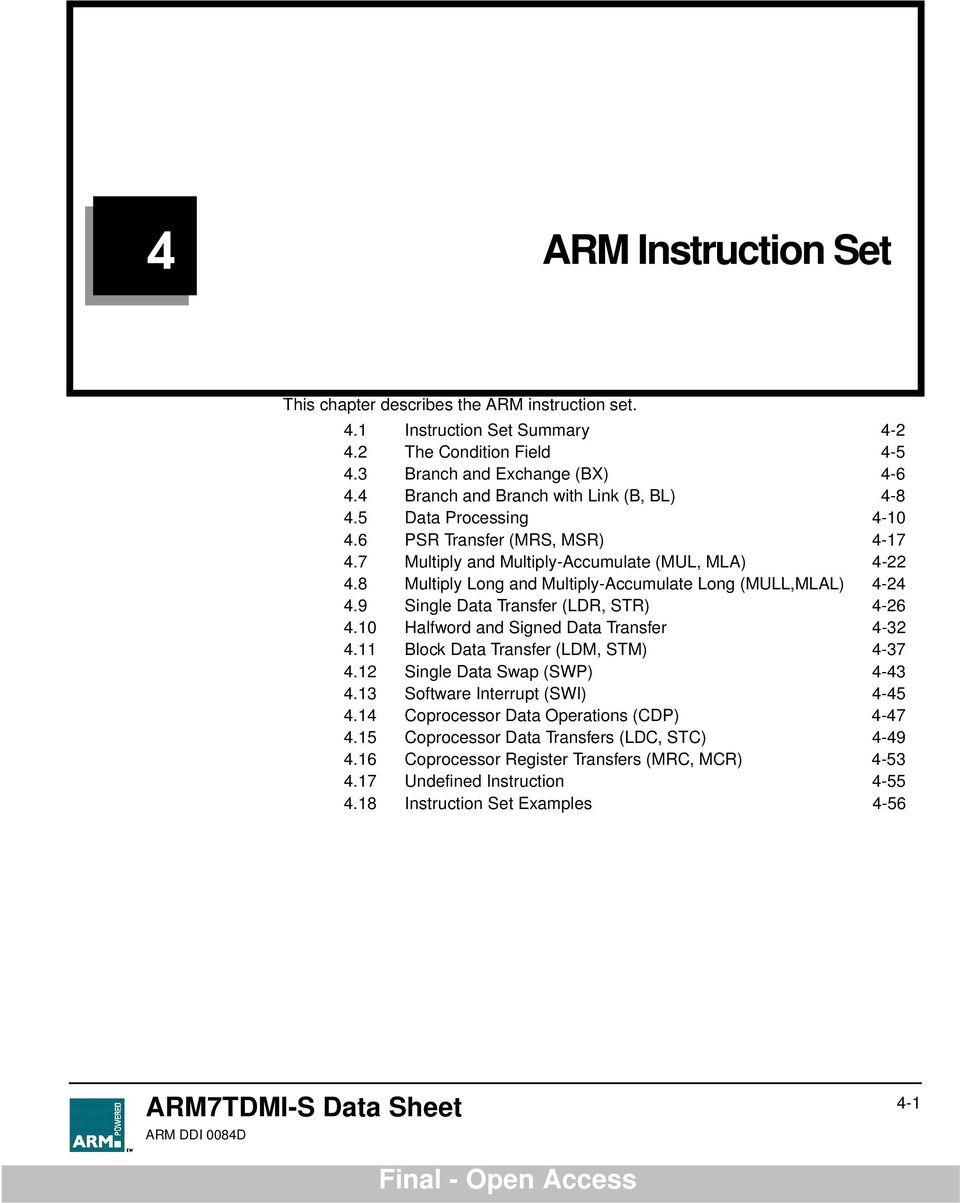
1 4 ARM Instruction Set This chapter describes the ARM instruction set. 4.1 Instruction Set Summary The Condition Field Branch and Exchange (BX) Branch and Branch with Link (B, BL) Data Processing PSR Transfer (MRS, MSR) Multiply and Multiply-Accumulate (MUL, MLA) Multiply Long and Multiply-Accumulate Long (MULL,MLAL) Single Data Transfer (LDR, STR) Halfword and Signed Data Transfer Block Data Transfer (LDM, STM) Single Data Swap (SWP) Software Interrupt (SWI) Coprocessor Data Operations (CDP) Coprocessor Data Transfers (LDC, STC) Coprocessor Register Transfers (MRC, MCR) Undefined Instruction Instruction Set Examples 4-56 ARM7TDMI-S Data Sheet 4-1
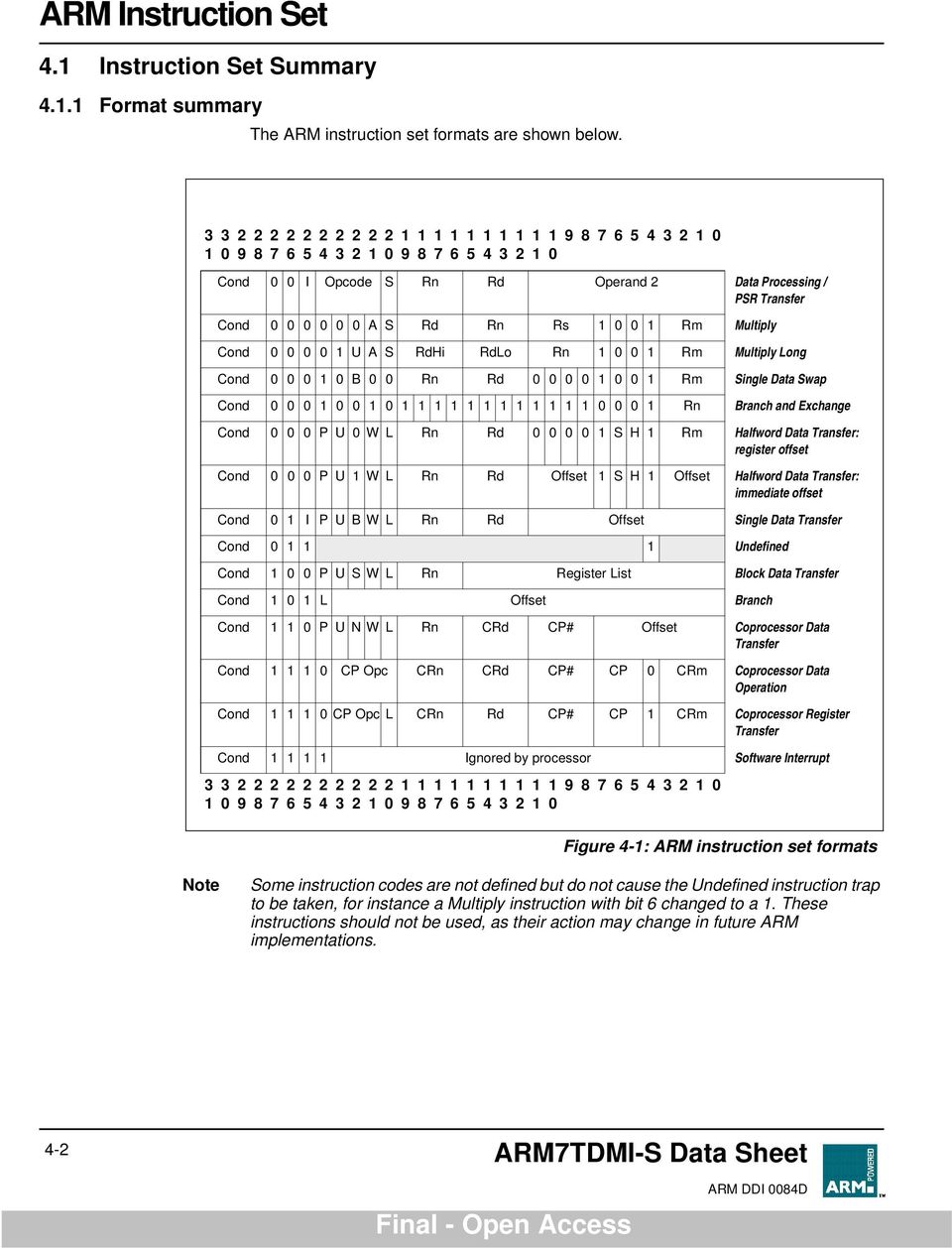
2 4.1 Instruction Set Summary Format summary The ARM instruction set formats are shown below Cond I Opcode S Rn Rd Operand 2 Data Processing / PSR Transfer Cond A S Rd Rn Rs 1 1 Rm Multiply Cond 1 U A S RdHi RdLo Rn 1 1 Rm Multiply Long Cond 1 B Rn Rd 1 1 Rm Single Data Swap Cond Rn Branch and Exchange Cond P U W L Rn Rd 1 S H 1 Rm Halfword Data Transfer: register offset Cond P U 1 W L Rn Rd Offset 1 S H 1 Offset Halfword Data Transfer: immediate offset Cond 1 I P U B W L Rn Rd Offset Single Data Transfer Cond Undefined Cond 1 P U S W L Rn Register List Block Data Transfer Cond 1 1 L Offset Branch Cond 1 1 P U N W L Rn CRd CP# Offset Coprocessor Data Transfer Cond CP Opc CRn CRd CP# CP CRm Coprocessor Data Operation Cond CP Opc L CRn Rd CP# CP 1 CRm Coprocessor Register Transfer Cond Ignored by processor Software Interrupt Figure 4-1: ARM instruction set formats Note Some instruction codes are not defined but do not cause the Undefined instruction trap to be taken, for instance a Multiply instruction with bit 6 changed to a 1. These instructions should not be used, as their action may change in future ARM implementations. 4-2 ARM7TDMI-S Data Sheet
3 4.1.2 Instruction summary Mnemonic Instruction Action See Section: ADC Add with carry Rd := Rn + Op2 + Carry 4.5 ADD Add Rd := Rn + Op2 4.5 AND AND Rd := Rn AND Op2 4.5 B Branch R15 := address 4.4 BIC Bit Clear Rd := Rn AND NOT Op2 4.5 BL Branch with Link R14 := R15, R15 := address 4.4 BX Branch and Exchange R15 := Rn, T bit := Rn[] 4.3 CDP Coprocesor Data Processing (Coprocessor-specific) 4.14 CMN Compare Negative CPSR flags := Rn + Op2 4.5 CMP Compare CPSR flags := Rn - Op2 4.5 EOR Exclusive OR Rd := (Rn AND NOT Op2) OR (op2 AND NOT Rn) 4.5 LDC Load coprocessor from memory Coprocessor load 4.15 LDM Load multiple registers Stack manipulation (Pop) 4.11 LDR Load register from memory Rd := (address) 4.9, 4.1 MCR Move CPU register to coprocessor register crn := rrn {<op>crm} 4.16 MLA Multiply Accumulate Rd := (Rm * Rs) + Rn 4.7, 4.8 MOV Move register or constant Rd : = Op2 4.5 MRC MRS MSR Move from coprocessor register to CPU register Move PSR status/flags to register Move register to PSR status/flags Rn := crn {<op>crm} 4.16 Rn := PSR 4.6 PSR := Rm 4.6 MUL Multiply Rd := Rm * Rs 4.7, 4.8 MVN Move negative register Rd := xffffffff EOR Op2 4.5 ORR OR Rd := Rn OR Op2 4.5 RSB Reverse Subtract Rd := Op2 - Rn 4.5 RSC Reverse Subtract with Carry Rd := Op2 - Rn Carry 4.5 Table 4-1: The ARM Instruction set ARM7TDMI-S Data Sheet 4-3

4 Mnemonic Instruction Action See Section: SBC Subtract with Carry Rd := Rn - Op2-1 + Carry 4.5 STC Store coprocessor register to memory address := CRn 4.15 STM Store Multiple Stack manipulation (Push) 4.11 STR Store register to memory <address> := Rd 4.9, 4.1 SUB Subtract Rd := Rn - Op2 4.5 SWI Software Interrupt OS call 4.13 SWP Swap register with memory Rd := [Rn], [Rn] := Rm 4.12 TEQ Test bitwise equality CPSR flags := Rn EOR Op2 4.5 TST Test bits CPSR flags := Rn AND Op2 4.5 Table 4-1: The ARM Instruction set (Continued) 4-4 ARM7TDMI-S Data Sheet

5 4.2 The Condition Field In ARM state, all instructions are conditionally executed according to the state of the CPSR condition codes and the instruction s condition field. This field (bits 31:28) determines the circumstances under which an instruction is to be executed. If the state of the C, N, Z and V flags fulfils the conditions encoded by the field, the instruction is executed, otherwise it is ignored. There are sixteen possible conditions, each represented by a two-character suffix that can be appended to the instruction s mnemonic. For example, a Branch (B in assembly language) becomes BEQ for "Branch if Equal", which means the Branch will only be taken if the Z flag is set. In practice, fifteen different conditions may be used: these are listed in Table 4-2: Condition code summary. The sixteenth (1111) is reserved, and must not be used. In the absence of a suffix, the condition field of most instructions is set to "Always" (sufix AL). This means the instruction will always be executed regardless of the CPSR condition codes. Code Suffix Flags Meaning EQ Z set equal 1 NE Z clear not equal 1 CS C set unsigned higher or same 11 CC C clear unsigned lower 1 MI N set negative 11 PL N clear positive or zero 11 VS V set overflow 111 VC V clear no overflow 1 HI C set and Z clear unsigned higher 11 LS C clear or Z set unsigned lower or same 11 GE N equals V greater or equal 111 LT N not equal to V less than 11 GT Z clear AND (N equals V) greater than 111 LE Z set OR (N not equal to V) less than or equal 111 AL (ignored) always Table 4-2: Condition code summary ARM7TDMI-S Data Sheet 4-5

6 4.3 Branch and Exchange (BX) This instruction is only executed if the condition is true. The various conditions are defined in Table 4-2: Condition code summary on page 4-5. This instruction performs a branch by copying the contents of a general register, Rn, into the program counter, PC. The branch causes a pipeline flush and refill from the address specified by Rn. This instruction also permits the instruction set to be exchanged. When the instruction is executed, the value of Rn[] determines whether the instruction stream will be decoded as ARM or THUMB instructions Cond Rn Operand register If bit of Rn = 1, subsequent instructions decoded as THUMB instructions If bit of Rn =, subsequent instructions decoded as ARM instructions Condition Field Figure 4-2: Branch and Exchange instructions Instruction cycle times The BX instruction takes 2S + 1N cycles to execute, where S and N are as defined in 6.2 Cycle Types on page Assembler syntax Using R15 as an operand BX - branch and exchange. BX{cond} Rn {cond} Two character condition mnemonic. See Table 4-2: Condition code summary on page 4-5. Rn is an expression evaluating to a valid register number. If R15 is used as an operand, the behaviour is undefined. 4-6 ARM7TDMI-S Data Sheet

7 4.3.4 Examples ADR R, Into_THUMB + 1; Generate branch target address ; and set bit high - hence ; arrive in THUMB state. BX R ; Branch and change to THUMB ; state. CODE16 ; Assemble subsequent code as Into_THUMB ; THUMB instructions.. ADR R5, Back_to_ARM: Generate branch target to word : aligned ; address - hence bit ; is low and so change back to ARM ; state. BX R5 ; Branch and change back to ARM ; state... ALIGN ; Word align CODE32 ; Assemble subsequent code as ARM Back_to_ARM ; instructions.. ARM7TDMI-S Data Sheet 4-7

8 4.4 Branch and Branch with Link (B, BL) The instruction is only executed if the condition is true. The various conditions are defined Table 4-2: Condition code summary on page 4-5. The instruction encoding is shown in Figure 4-3: Branch instructions, below Cond 11 L offset Link bit = Branch 1 = Branch with Link Condition field Figure 4-3: Branch instructions Branch instructions contain a signed 2 s complement 24 bit offset. This is shifted left two bits, sign extended to 32 bits, and added to the PC. The instruction can therefore specify a branch of +/- 32Mbytes. The branch offset must take account of the prefetch operation, which causes the PC to be 2 words (8 bytes) ahead of the current instruction. Branches beyond +/- 32Mbytes must use an offset or absolute destination which has been previously loaded into a register. In this case the PC should be manually saved in R14 if a Branch with Link type operation is required The link bit Branch with Link (BL) writes the old PC into the link register (R14) of the current bank. The PC value written into R14 is adjusted to allow for the prefetch, and contains the address of the instruction following the branch and link instruction. Note that the CPSR is not saved with the PC and R14[1:] are always cleared. To return from a routine called by Branch with Link use MOV PC,R14 if the link register is still valid or LDM Rn!,{..PC} if the link register has been saved onto a stack pointed to by Rn Instruction cycle times Branch and Branch with Link instructions take 2S + 1N incremental cycles, where S and N are as defined in 6.2 Cycle Types on page ARM7TDMI-S Data Sheet

9 4.4.3 Assembler syntax Items in {} are optional. Items in <> must be present. B{L}{cond} <expression> ARM Instruction Set {L} is used to request the Branch with Link form of the instruction. If absent, R14 will not be affected by the instruction. {cond} is a two-character mnemonic as shown in Table 4-2: Condition code summary on page 4-5. If absent then AL (ALways) will be used. <expression> is the destination. The assembler calculates the offset Examples here BAL here ; assembles to xeafffffe (note effect of ; PC offset). B there ; Always condition used as default. CMP R1,# ; Compare R1 with zero and branch to fred ; if R1 was zero, otherwise continue BEQ fred ; continue to next instruction. BL sub+rom ; Call subroutine at computed address. ADDS R1,#1 ; Add 1 to register 1, setting CPSR flags ; on the result then call subroutine if BLCC sub ; the C flag is clear, which will be the ; case unless R1 held xffffffff. ARM7TDMI-S Data Sheet 4-9

10 4.5 Data Processing The data processing instruction is only executed if the condition is true. The conditions are defined in Table 4-2: Condition code summary on page 4-5. The instruction encoding is shown in Figure 4-4: Data processing instructions below Cond I OpCode S Rn Rd Operand 2 Destination register 1st operand register Set condition codes = do not alter condition codes 1 = set condition codes Operation Code = AND - Rd:= Op1 AND Op2 1 = EOR - Rd:= Op1 EOR Op2 1 = SUB - Rd:= Op1 - Op2 11 = RSB - Rd:= Op2 - Op1 1 = ADD - Rd:= Op1 + Op2 11 = ADC - Rd:= Op1 + Op2 + C 11 = SBC - Rd:= Op1 - Op2 + C = RSC - Rd:= Op2 - Op1 + C = TST - set condition codes on Op1 AND Op2 11 = TEQ - set condition codes on Op1 EOR Op2 11 = CMP - set condition codes on Op1 - Op2 111 = CMN - set condition codes on Op1 + Op2 11 = ORR - Rd:= Op1 OR Op2 111 = MOV - Rd:= Op2 111 = BIC - Rd:= Op1 AND NOT Op = MVN - Rd:= NOT Op2 Immediate Operand = operand 2 is a register Shift Rm shift applied to Rm 2nd operand register 1 = operand 2 is an immediate value Rotate Imm shift applied to Imm Condition field Unsigned 8 bit immediate value Figure 4-4: Data processing instructions The instruction produces a result by performing a specified arithmetic or logical operation on one or two operands. The first operand is always a register (Rn). 4-1 ARM7TDMI-S Data Sheet

11 The second operand may be a shifted register (Rm) or a rotated 8 bit immediate value (Imm) according to the value of the I bit in the instruction. The condition codes in the CPSR may be preserved or updated as a result of this instruction, according to the value of the S bit in the instruction. Certain operations (TST, TEQ, CMP, CMN) do not write the result to Rd. They are used only to perform tests and to set the condition codes on the result and always have the S bit set. The instructions and their effects are listed in Table 4-3: ARM Data processing instructions CPSR flags The data processing operations may be classified as logical or arithmetic. The logical operations (AND, EOR, TST, TEQ, ORR, MOV, BIC, MVN) perform the logical action on all corresponding bits of the operand or operands to produce the result. If the S bit is set (and Rd is not R15, see below) the V flag in the CPSR will be unaffected, the C flag will be set to the carry out from the barrel shifter (or preserved when the shift operation is LSL #), the Z flag will be set if and only if the result is all zeros, and the N flag will be set to the logical value of bit 31 of the result. Assembler Mnemonic OpCode Action AND operand1 AND operand2 EOR 1 operand1 EOR operand2 SUB 1 operand1 - operand2 RSB 11 operand2 - operand1 ADD 1 operand1 + operand2 ADC 11 operand1 + operand2 + carry SBC 11 operand1 - operand2 + carry - 1 RSC 111 operand2 - operand1 + carry - 1 TST 1 as AND, but result is not written TEQ 11 as EOR, but result is not written CMP 11 as SUB, but result is not written CMN 111 as ADD, but result is not written ORR 11 operand1 OR operand2 MOV 111 operand2(operand1 is ignored) BIC 111 operand1 AND NOT operand2(bit clear) MVN 1111 NOT operand2(operand1 is ignored) Table 4-3: ARM Data processing instructions The arithmetic operations (SUB, RSB, ADD, ADC, SBC, RSC, CMP, CMN) treat each operand as a 32 bit integer (either unsigned or 2 s complement signed, the two are equivalent). If the S bit is set (and Rd is not R15) the V flag in the CPSR will be set if an overflow occurs into bit 31 of the result; this may be ignored if the operands were considered unsigned, but warns of a possible error if the operands were 2 s ARM7TDMI-S Data Sheet 4-11

12 complement signed. The C flag will be set to the carry out of bit 31 of the ALU, the Z flag will be set if and only if the result was zero, and the N flag will be set to the value of bit 31 of the result (indicating a negative result if the operands are considered to be 2 s complement signed) Shifts When the second operand is specified to be a shifted register, the operation of the barrel shifter is controlled by the Shift field in the instruction. This field indicates the type of shift to be performed (logical left or right, arithmetic right or rotate right). The amount by which the register should be shifted may be contained in an immediate field in the instruction, or in the bottom byte of another register (other than R15). The encoding for the different shift types is shown in Figure 4-5: ARM shift operations Rs 1 Shift type = logical left 1 = logical right 1 = arithmetic right 11 = rotate right Shift amount 5 bit unsigned integer Shift type = logical left 1 = logical right 1 = arithmetic right 11 = rotate right Shift register Shift amount specified in bottom byte of Rs Figure 4-5: ARM shift operations Instruction specified shift amount When the shift amount is specified in the instruction, it is contained in a 5 bit field which may take any value from 31. A logical shift left (LSL) takes the contents of Rm and moves each bit by the specified amount to a more significant position. The least significant bits of the result are filled with zeros, and the high bits of Rm which do not map into the result are discarded, except that the least significant discarded bit becomes the shifter carry output, which may be latched into the C bit of the CPSR when the ALU operation is in the logical class (see above). For example, the effect of f LSL #5 is shown in Figure 4-6: Logical shift left contents of Rm carry out value of operand 2 Figure 4-6: Logical shift left 4-12 ARM7TDMI-S Data Sheet

13 Note LSL # is a special case, where the shifter carry out is the old value of the CPSR C flag. The contents of Rm are used directly as the second operand. A logical shift right (LSR) is similar, but the contents of Rm are moved to less significant positions in the result. LSR #5 has the effect shown in Figure 4-7: Logical shift right contents of Rm carry out value of operand 2 Figure 4-7: Logical shift right The form of the shift field which might be expected to correspond to LSR # is used to encode LSR #32, which has a zero result with bit 31 of Rm as the carry output. Logical shift right zero is redundant as it is the same as logical shift left zero, so the assembler will convert LSR # (and ASR # and ROR #) into LSL #, and allow LSR #32 to be specified. An arithmetic shift right (ASR) is similar to logical shift right, except that the high bits are filled with bit 31 of Rm instead of zeros. This preserves the sign in 2 s complement notation. For example, ASR #5 is shown in Figure 4-8: Arithmetic shift right contents of Rm carry out value of operand 2 Figure 4-8: Arithmetic shift right The form of the shift field which might be expected to give ASR # is used to encode ASR #32. Bit 31 of Rm is again used as the carry output, and each bit of operand 2 is also equal to bit 31 of Rm. The result is therefore all ones or all zeros, according to the value of bit 31 of Rm. Rotate right (ROR) operations reuse the bits which overshoot in a logical shift right operation by reintroducing them at the high end of the result, in place of the zeros used to fill the high end in logical right operations. For example, ROR #5 is shown in Figure 4-9: Rotate right on page Figure 4-9: Rotate right ARM7TDMI-S Data Sheet 4-13

14 contents of Rm carry out value of operand 2 The form of the shift field which might be expected to give ROR # is used to encode a special function of the barrel shifter, rotate right extended (RRX). This is a rotate right by one bit position of the 33 bit quantity formed by appending the CPSR C flag to the most significant end of the contents of Rm as shown in Figure 4-1: Rotate right extended contents of Rm C in carry out value of operand 2 Figure 4-1: Rotate right extended Note Register specified shift amount Only the least significant byte of the contents of Rs is used to determine the shift amount. Rs can be any general register other than R15. If this byte is zero, the unchanged contents of Rm will be used as the second operand, and the old value of the CPSR C flag will be passed on as the shifter carry output. If the byte has a value between 1 and 31, the shifted result will exactly match that of an instruction specified shift with the same value and shift operation. If the value in the byte is 32 or more, the result will be a logical extension of the shift described above: 1 LSL by 32 has result zero, carry out equal to bit of Rm. 2 LSL by more than 32 has result zero, carry out zero. 3 LSR by 32 has result zero, carry out equal to bit 31 of Rm. 4 LSR by more than 32 has result zero, carry out zero. 5 ASR by 32 or more has result filled with and carry out equal to bit 31 of Rm. 6 ROR by 32 has result equal to Rm, carry out equal to bit 31 of Rm. 7 ROR by n where n is greater than 32 will give the same result and carry out as ROR by n-32; therefore repeatedly subtract 32 from n until the amount is in the range 1 to 32 and see above. The zero in bit 7 of an instruction with a register controlled shift is compulsory; a one in this bit will cause the instruction to be a multiply or undefined instruction ARM7TDMI-S Data Sheet

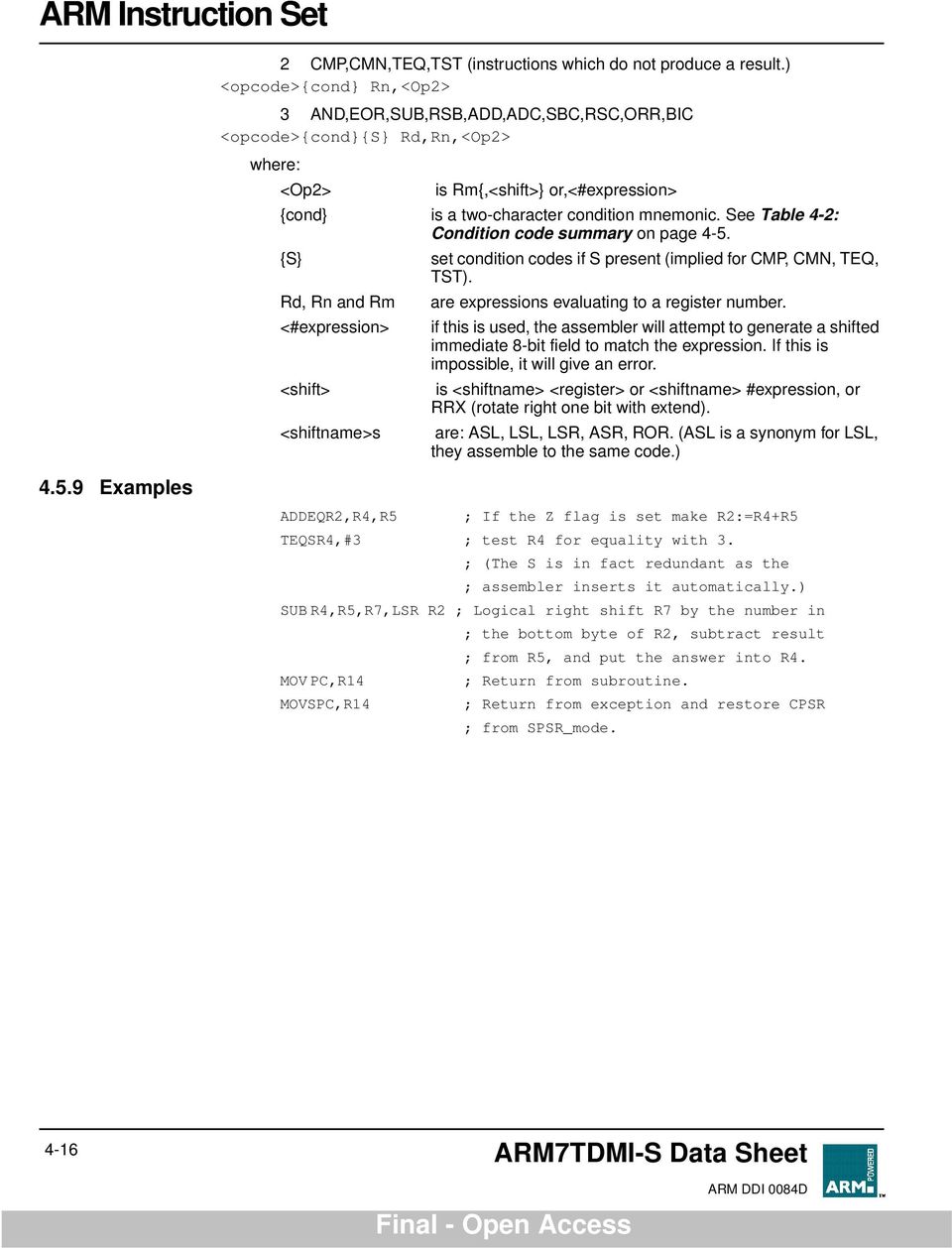
15 4.5.3 Immediate operand rotates ARM Instruction Set The immediate operand rotate field is a 4 bit unsigned integer which specifies a shift operation on the 8 bit immediate value. This value is zero extended to 32 bits, and then subject to a rotate right by twice the value in the rotate field. This enables many common constants to be generated, for example all powers of Writing to R15 When Rd is a register other than R15, the condition code flags in the CPSR may be updated from the ALU flags as described above. When Rd is R15 and the S flag in the instruction is not set the result of the operation is placed in R15 and the CPSR is unaffected. When Rd is R15 and the S flag is set the result of the operation is placed in R15 and the SPSR corresponding to the current mode is moved to the CPSR. This allows state changes which atomically restore both PC and CPSR. This form of instruction should not be used in User mode Using R15 as an operand If R15 (the PC) is used as an operand in a data processing instruction the register is used directly. The PC value will be the address of the instruction, plus 8 or 12 bytes due to instruction prefetching. If the shift amount is specified in the instruction, the PC will be 8 bytes ahead. If a register is used to specify the shift amount the PC will be 12 bytes ahead TEQ, TST, CMP and CMN opcodes Note TEQ, TST, CMP and CMN do not write the result of their operation but do set flags in the CPSR. An assembler should always set the S flag for these instructions even if this is not specified in the mnemonic Instruction cycle times The TEQP form of the TEQ instruction used in earlier ARM processors must not be used: the PSR transfer operations should be used instead. The action of TEQP in the ARM7TDMI-S is to move SPSR_<mode> to the CPSR if the processor is in a privileged mode and to do nothing if in User mode. Data Processing instructions vary in the number of incremental cycles taken as follows: Processing Type Normal Data Processing Data Processing with register specified shift Data Processing with PC written Data Processing with register specified shift and PC written Cycles 1S 1S + 1I 2S + 1N 2S + 1N + 1I Assembler syntax S, N and I are as defined in 6.2 Cycle Types on page MOV,MVN (single operand instructions.) <opcode>{cond}{s} Rd,<Op2> Table 4-4: Incremental cycle times ARM7TDMI-S Data Sheet 4-15
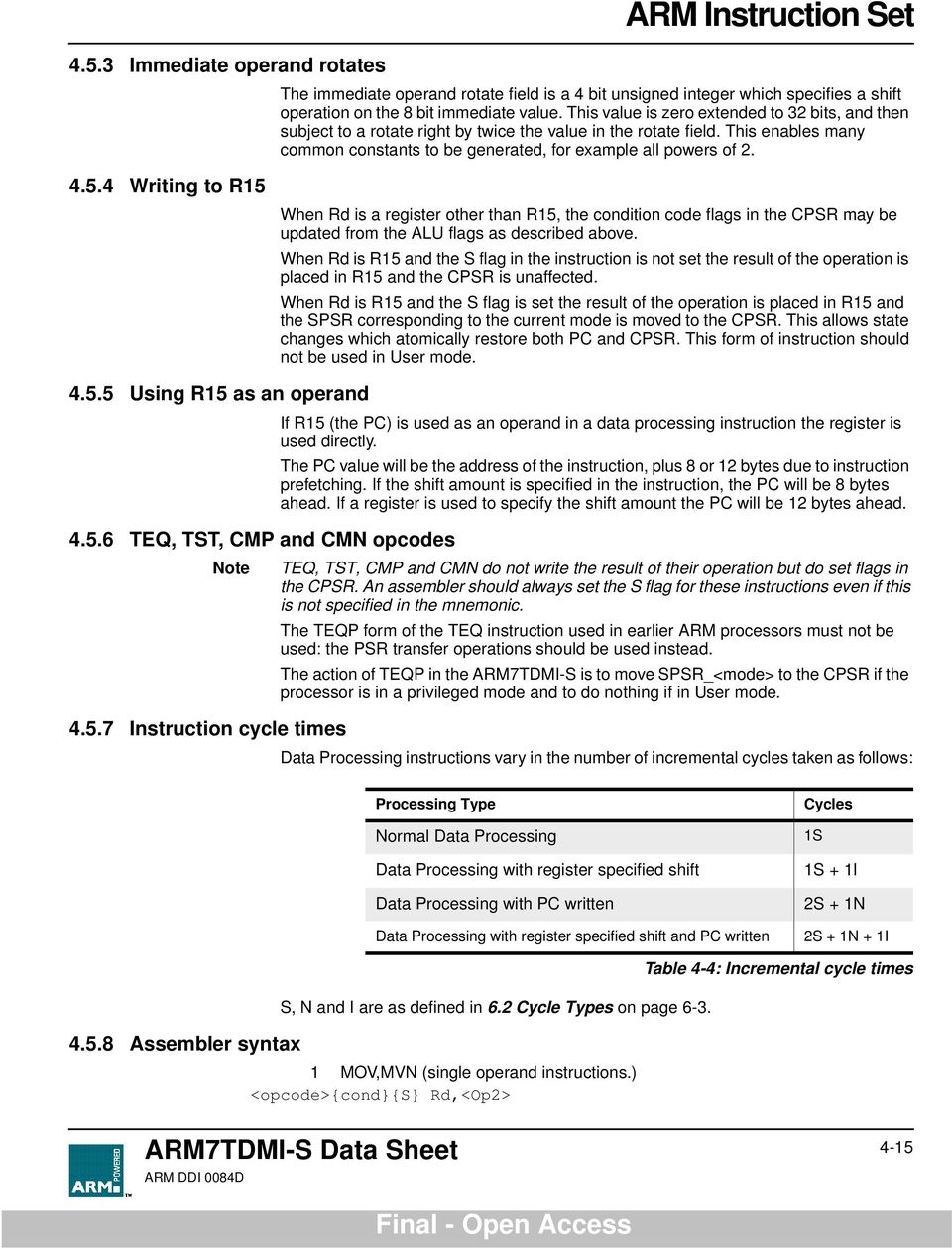
16 2 CMP,CMN,TEQ,TST (instructions which do not produce a result.) <opcode>{cond} Rn,<Op2> 3 AND,EOR,SUB,RSB,ADD,ADC,SBC,RSC,ORR,BIC <opcode>{cond}{s} Rd,Rn,<Op2> where: <Op2> is Rm{,<shift>} or,<#expression> {cond} is a two-character condition mnemonic. See Table 4-2: Condition code summary on page 4-5. {S} set condition codes if S present (implied for CMP, CMN, TEQ, TST). Rd, Rn and Rm are expressions evaluating to a register number. <#expression> if this is used, the assembler will attempt to generate a shifted immediate 8-bit field to match the expression. If this is impossible, it will give an error. <shift> is <shiftname> <register> or <shiftname> #expression, or RRX (rotate right one bit with extend). <shiftname>s are: ASL, LSL, LSR, ASR, ROR. (ASL is a synonym for LSL, they assemble to the same code.) Examples ADDEQR2,R4,R5 ; If the Z flag is set make R2:=R4+R5 TEQSR4,#3 ; test R4 for equality with 3. ; (The S is in fact redundant as the ; assembler inserts it automatically.) SUB R4,R5,R7,LSR R2 ; Logical right shift R7 by the number in ; the bottom byte of R2, subtract result ; from R5, and put the answer into R4. MOV PC,R14 ; Return from subroutine. MOVSPC,R14 ; Return from exception and restore CPSR ; from SPSR_mode ARM7TDMI-S Data Sheet
17 4.6 PSR Transfer (MRS, MSR) Operand restrictions The instruction is only executed if the condition is true. The various conditions are defined in Table 4-2: Condition code summary on page 4-5. The MRS and MSR instructions are formed from a subset of the Data Processing operations and are implemented using the TEQ, TST, CMN and CMP instructions without the S flag set. The encoding is shown in Figure 4-11: PSR transfer on page These instructions allow access to the CPSR and SPSR registers. The MRS instruction allows the contents of the CPSR or SPSR_<mode> to be moved to a general register. The MSR instruction allows the contents of a general register to be moved to the CPSR or SPSR_<mode> register. The MSR instruction also allows an immediate value or register contents to be transferred to the condition code flags (N,Z,C and V) of CPSR or SPSR_<mode> without affecting the control bits. In this case, the top four bits of the specified register contents or 32 bit immediate value are written to the top four bits of the relevant PSR. In User mode, the control bits of the CPSR are protected from change, so only the condition code flags of the CPSR can be changed. In other (privileged) modes the entire CPSR can be changed. Note that the software must never change the state of the T bit in the CPSR. If this happens, the processor will enter an unpredictable state. The SPSR register which is accessed depends on the mode at the time of execution. For example, only SPSR_fiq is accessible when the processor is in FIQ mode. You must not specify R15 as the source or destination register. Also, do not attempt to access an SPSR in User mode, since no such register exists. ARM7TDMI-S Data Sheet 4-17

18 MRS (transfer PSR contents to a register) Cond 1 Ps 1111 Rd MSR (transfer register contents to PSR) Destination register Source PSR =CPSR 1=SPSR_<current mode> Condition field 4 3 Cond 1 Pd Rm Source register Destination PSR =CPSR 1=SPSR_<current mode> Condition field MSR (transfer register contents or immdiate value to PSR flag bits only) Cond I 1 Pd Source operand Destination PSR =CPSR 1=SPSR_<current mode> Immediate Operand =source operand is a register Rm Source register 1=source operand is an immediate value Rotate Imm Unsigned 8 bit immediate value shift applied to Imm Condition field Figure 4-11: PSR transfer 4-18 ARM7TDMI-S Data Sheet

19 4.6.2 Reserved bits Only twelve bits of the PSR are defined in ARM7TDMI-S (N,Z,C,V,I,F, T & M[4:]); the remaining bits are reserved for use in future versions of the processor. Refer to Figure 3-6: Program status register format on page 3-12 for a full description of the PSR bits. To ensure the maximum compatibility between ARM7TDMI-S programs and future processors, the following rules should be observed: The reserved bits should be preserved when changing the value in a PSR. Programs should not rely on specific values from the reserved bits when checking the PSR status, since they may read as one or zero in future processors. A read-modify-write strategy should therefore be used when altering the control bits of any PSR register; this involves transferring the appropriate PSR register to a general register using the MRS instruction, changing only the relevant bits and then transferring the modified value back to the PSR register using the MSR instruction. Example The following sequence performs a mode change: MRS R,CPSR ; Take a copy of the CPSR. BIC R,R,#x1F ; Clear the mode bits. ORR R,R,#new_mode ; Select new mode MSR CPSR,R ; Write back the modified ; CPSR. When the aim is simply to change the condition code flags in a PSR, a value can be written directly to the flag bits without disturbing the control bits. The following instruction sets the N,Z,C and V flags: MSR CPSR_flg,#xF ; Set all the flags ; regardless of their ; previous state (does not ; affect any control bits). No attempt should be made to write an 8 bit immediate value into the whole PSR since such an operation cannot preserve the reserved bits Instruction cycle times PSR Transfers take 1S incremental cycles, where S is as defined in 6.2 Cycle Types on page 6-3. ARM7TDMI-S Data Sheet 4-19

20 4.6.4 Assembler syntax 1 MRS - transfer PSR contents to a register MRS{cond} Rd,<psr> 2 MSR - transfer register contents to PSR MSR{cond} <psr>,rm 3 MSR - transfer register contents to PSR flag bits only MSR{cond} <psrf>,rm The most significant four bits of the register contents are written to the N,Z,C & V flags respectively. 4 MSR - transfer immediate value to PSR flag bits only MSR{cond} <psrf>,<#expression> The expression should symbolise a 32 bit value of which the most significant four bits are written to the N,Z,C and V flags respectively. Key: {cond} two-character condition mnemonic. See Table 4-2: Condition code summary on page 4-5. Rd and Rm are expressions evaluating to a register number other than R15 <psr> is CPSR, CPSR_all, SPSR or SPSR_all. (CPSR and CPSR_all are synonyms as are SPSR and SPSR_all) <psrf> is CPSR_flg or SPSR_flg <#expression> where this is used, the assembler will attempt to generate a shifted immediate 8-bit field to match the expression. If this is impossible, it will give an error. 4-2 ARM7TDMI-S Data Sheet

21 4.6.5 Examples In User mode the instructions behave as follows: MSR CPSR_all,Rm ; CPSR[31:28] <- Rm[31:28] MSR CPSR_flg,Rm ; CPSR[31:28] <- Rm[31:28] MSR CPSR_flg,#xA; CPSR[31:28] <- xa ;(set N,C; clear Z,V) MRS Rd,CPSR ; Rd[31:] <- CPSR[31:] In privileged modes the instructions behave as follows: MSR CPSR_all,Rm ; CPSR[31:] <- Rm[31:] MSR CPSR_flg,Rm ; CPSR[31:28] <- Rm[31:28] MSR CPSR_flg,#x5; CPSR[31:28] <- x5 ;(set Z,V; clear N,C) MRS Rd,CPSR ; Rd[31:] <- CPSR[31:] MSR SPSR_all,Rm ;SPSR_<mode>[31:]<- Rm[31:] MSR SPSR_flg,Rm ; SPSR_<mode>[31:28] <- Rm[31:28] MSR SPSR_flg,#xC; SPSR_<mode>[31:28] <- xc ;(set N,Z; clear C,V) MRS Rd,SPSR ; Rd[31:] <- SPSR_<mode>[31:] ARM7TDMI-S Data Sheet 4-21
22 4.7 Multiply and Multiply-Accumulate (MUL, MLA) The instruction is only executed if the condition is true. The various conditions are defined in Table 4-2: Condition code summary on page 4-5. The instruction encoding is shown in Figure 4-12: Multiply instructions. The multiply and multiply-accumulate instructions use an 8 bit Booth s algorithm to perform integer multiplication Cond A S Rd Rn Rs 1 1 Rm Operand restrictions Operand registers Destination register Set condition code = do not alter condition codes 1 = set condition codes Accumulate = multiply only 1 = multiply and accumulate Condition Field Figure 4-12: Multiply instructions The multiply form of the instruction gives Rd:=Rm*Rs. Rn is ignored, and should be set to zero for compatibility with possible future upgrades to the instruction set. The multiply-accumulate form gives Rd:=Rm*Rs+Rn, which can save an explicit ADD instruction in some circumstances. Both forms of the instruction work on operands which may be considered as signed (2 s complement) or unsigned integers. The results of a signed multiply and of an unsigned multiply of 32 bit operands differ only in the upper 32 bits - the low 32 bits of the signed and unsigned results are identical. As these instructions only produce the low 32 bits of a multiply, they can be used for both signed and unsigned multiplies. For example consider the multiplication of the operands: Operand AOperand BResult xfffffff6 x1xffffff38 If the operands are interpreted as signed Operand A has the value -1, operand B has the value 2, and the result is -2 which is correctly represented as xffffff38 If the operands are interpreted as unsigned Operand A has the value , operand B has the value 2 and the result is , which is represented as x13ffffff38, so the least significant 32 bits are xffffff38. The destination register Rd must not be the same as the operand register Rm. R15 must not be used as an operand or as the destination register ARM7TDMI-S Data Sheet
23 All other register combinations will give correct results, and Rd, Rn and Rs may use the same register when required CPSR flags Setting the CPSR flags is optional, and is controlled by the S bit in the instruction. The N (Negative) and Z (Zero) flags are set correctly on the result (N is made equal to bit 31 of the result, and Z is set if and only if the result is zero). The C (Carry) flag is set to a meaningless value and the V (overflow) flag is unaffected Instruction cycle times MUL takes 1S + mi and MLA 1S + (m+1)i cycles to execute, where S and I are as defined in 6.2 Cycle Types on page Assembler syntax m is the number of 8 bit multiplier array cycles required to complete the multiply, which is controlled by the value of the multiplier operand specified by Rs. Its possible values are as follows 1 if bits [32:8] of the multiplier operand are all zero or all one. 2 if bits [32:16] of the multiplier operand are all zero or all one. 3 if bits [32:24] of the multiplier operand are all zero or all one. 4 in all other cases. MUL{cond}{S} Rd,Rm,Rs MLA{cond}{S} Rd,Rm,Rs,Rn {cond} two-character condition mnemonic. See Table 4-2: Condition code summary on page 4-5. {S} set condition codes if S present Rd, Rm, Rs and Rn are expressions evaluating to a register number other than R Examples MUL R1,R2,R3 ; R1:=R2*R3 MLAEQS R1,R2,R3,R4 ; Conditionally R1:=R2*R3+R4, ; setting condition codes. ARM7TDMI-S Data Sheet 4-23
24 4.8 Multiply Long and Multiply-Accumulate Long (MULL,MLAL) The instruction is only executed if the condition is true. The various conditions are defined in Table 4-2: Condition code summary on page 4-5. The instruction encoding is shown in Figure 4-13: Multiply long instructions. The multiply long instructions perform integer multiplication on two 32 bit operands and produce 64 bit results. Signed and unsigned multiplication each with optional accumulate give rise to four variations Cond 1 U A S RdHi RdLo Rs 1 1 Rm Operand restrictions Operand registers Source destination registers Set condition code = do not alter condition codes 1 = set condition codes Accumulate = multiply only 1 = multiply and accumulate Unsigned = unsigned 1 = signed Condition Field Figure 4-13: Multiply long instructions The multiply forms (UMULL and SMULL) take two 32 bit numbers and multiply them to produce a 64 bit result of the form RdHi,RdLo := Rm * Rs. The lower 32 bits of the 64 bit result are written to RdLo, the upper 32 bits of the result are written to RdHi. The multiply-accumulate forms (UMLAL and SMLAL) take two 32 bit numbers, multiply them and add a 64 bit number to produce a 64 bit result of the form RdHi,RdLo := Rm * Rs + RdHi,RdLo. The lower 32 bits of the 64 bit number to add is read from RdLo. The upper 32 bits of the 64 bit number to add is read from RdHi. The lower 32 bits of the 64 bit result are written to RdLo. The upper 32 bits of the 64 bit result are written to RdHi. The UMULL and UMLAL instructions treat all of their operands as unsigned binary numbers and write an unsigned 64 bit result. The SMULL and SMLAL instructions treat all of their operands as two s-complement signed numbers and write a two scomplement signed 64 bit result. R15 must not be used as an operand or as a destination register. RdHi, RdLo, and Rm must all specify different registers CPSR flags Setting the CPSR flags is optional, and is controlled by the S bit in the instruction. The N and Z flags are set correctly on the result (N is equal to bit 63 of the result, Z is set if and only if all 64 bits of the result are zero). Both the C and V flags are set to meaningless values ARM7TDMI-S Data Sheet
25 4.8.3 Instruction cycle times ARM Instruction Set MULL takes 1S + (m+1)i and MLAL 1S + (m+2)i cycles to execute, where m is the number of 8 bit multiplier array cycles required to complete the multiply, which is controlled by the value of the multiplier operand specified by Rs. Its possible values are as follows: For signed instructions SMULL, SMLAL: 1 if bits [31:8] of the multiplier operand are all zero or all one. 2 if bits [31:16] of the multiplier operand are all zero or all one. 3 if bits [31:24] of the multiplier operand are all zero or all one. 4 in all other cases. For unsigned instructions UMULL, UMLAL: 1 if bits [31:8] of the multiplier operand are all zero. 2 if bits [31:16] of the multiplier operand are all zero. 3 if bits [31:24] of the multiplier operand are all zero. 4 in all other cases. S and I are as defined in 6.2 Cycle Types on page Assembler syntax Mnemonic Description Purpose UMULL{cond}{S} RdLo,RdHi,Rm,Rs Unsigned Multiply Long 32 x 32 = 64 UMLAL{cond}{S} RdLo,RdHi,Rm,Rs Unsigned Multiply & Accumulate Long 32 x = 64 SMULL{cond}{S} RdLo,RdHi,Rm,Rs Signed Multiply Long 32 x 32 = 64 SMLAL{cond}{S} RdLo,RdHi,Rm,Rs Signed Multiply & Accumulate Long 32 x = 64 Table 4-5: Assembler syntax descriptions where: {cond} two-character condition mnemonic. See Table 4-2: Condition code summary on page 4-5. {S} set condition codes if S present RdLo, RdHi, Rm, Rs are expressions evaluating to a register number other than R Examples UMULL R1,R4,R2,R3 ; R4,R1:=R2*R3 UMLALS R1,R5,R2,R3 ; R5,R1:=R2*R3+R5,R1 also setting ; condition codes ARM7TDMI-S Data Sheet 4-25
26 4.9 Single Data Transfer (LDR, STR) The instruction is only executed if the condition is true. The various conditions are defined in Table 4-2: Condition code summary on page 4-5. The instruction encoding is shown in Figure 4-14: Single data transfer instructions. The single data transfer instructions are used to load or store single bytes or words of data. The memory address used in the transfer is calculated by adding an offset to or subtracting an offset from a base register. The result of this calculation may be written back into the base register if auto-indexing is required Cond 1 I P U B W L Rn Rd Offset Source/Destination register Base register Load/Store bit = Store to memory 1 = Load from memory Write-back bit = no write-back 1 = write address into base Byte/Word bit = transfer word quantity 1 = transfer byte quantity Up/Down bit = down; subtract offset from base 1 = up; add offset to base Pre/Post indexing bit = post; add offset after transfer 1 = pre; add offset before transfer Immediate offset = offset is an immediate value 11 Immediate offset Unsigned 12 bit immediate offset 1 = offset is a register Shift Rm shift applied to Rm Condition field Offset register Figure 4-14: Single data transfer instructions 4-26 ARM7TDMI-S Data Sheet
27 4.9.1 Offsets and auto-indexing ARM Instruction Set The offset from the base may be either a 12 bit unsigned binary immediate value in the instruction, or a second register (possibly shifted in some way). The offset may be added to (U=1) or subtracted from (U=) the base register Rn. The offset modification may be performed either before (pre-indexed, P=1) or after (post-indexed, P=) the base is used as the transfer address. The W bit gives optional auto increment and decrement addressing modes. The modified base value may be written back into the base (W=1), or the old base value may be kept (W=). In the case of post-indexed addressing, the write back bit is redundant and must be set to zero, since the old base value can be retained by setting the offset to zero. Therefore post-indexed data transfers always write back the modified base. The only use of the W bit in a post-indexed data transfer is in privileged mode code, where setting the W bit forces non-privileged mode for the transfer, allowing the operating system to generate a user address in a system where the memory management hardware makes suitable use of this hardware Shifted register offset The 8 shift control bits are described in the data processing instructions section. However, the register specified shift amounts are not available in this instruction class. See Shifts on page Bytes and words This instruction class may be used to transfer a byte (B=1) or a word (B=) between an ARM7TDMI-S register and memory. The action of LDR(B) and STR(B) instructions is influenced by the BIGEND control signal. The two possible configurations are described below. Little endian configuration A byte load (LDRB) expects the data on data bus inputs 7 through if the supplied address is on a word boundary, on data bus inputs 15 through 8 if it is a word address plus one byte, and so on. The selected byte is placed in the bottom 8 bits of the destination register, and the remaining bits of the register are filled with zeros. Please see Figure 3-2: Little-endian addresses of bytes within words on page 3-4. A byte store (STRB) repeats the bottom 8 bits of the source register four times across data bus outputs 31 through. The external memory system should activate the appropriate byte subsystem to store the data. A word load (LDR) will normally use a word aligned address. However, an address offset from a word boundary will cause the data to be rotated into the register so that the addressed byte occupies bits to 7. This means that half-words accessed at offsets and 2 from the word boundary will be correctly loaded into bits through 15 of the register. Two shift operations are then required to clear or to sign extend the upper 16 bits. This is illustrated in Figure 4-15: Little endian offset addressing on page ARM7TDMI-S Data Sheet 4-27
28 memory register A+3 A+2 A+1 A A B C D A B C D LDR from word aligned address A+3 A+2 A+1 A A B C D A B C D LDR from address offset by 2 Figure 4-15: Little endian offset addressing A word store (STR) should generate a word aligned address. The word presented to the data bus is not affected if the address is not word aligned. That is, bit 31 of the register being stored always appears on data bus output 31. Big endian configuration A byte load (LDRB) expects the data on data bus inputs 31 through 24 if the supplied address is on a word boundary, on data bus inputs 23 through 16 if it is a word address plus one byte, and so on. The selected byte is placed in the bottom 8 bits of the destination register and the remaining bits of the register are filled with zeros. Please see Figure 3-1: Big-endian addresses of bytes within words on page 3-4. A byte store (STRB) repeats the bottom 8 bits of the source register four times across data bus outputs 31 through. The external memory system should activate the appropriate byte subsystem to store the data. A word load (LDR) should generate a word aligned address. An address offset of or 2 from a word boundary will cause the data to be rotated into the register so that the addressed byte occupies bits 31 through 24. This means that half-words accessed at these offsets will be correctly loaded into bits 16 through 31 of the register. A shift operation is then required to move (and optionally sign extend) the data into the bottom 16 bits. An address offset of 1 or 3 from a word boundary will cause the data to be rotated into the register so that the addressed byte occupies bits 15 through 8. A word store (STR) should generate a word aligned address. The word presented to the data bus is not affected if the address is not word aligned. That is, bit 31 of the register being stored always appears on data bus output ARM7TDMI-S Data Sheet
29 4.9.4 Use of R15 Write-back must not be specified if R15 is specified as the base register (Rn). When using R15 as the base register you must remember it contains an address 8 bytes on from the address of the current instruction. R15 must not be specified as the register offset (Rm). When R15 is the source register (Rd) of a register store (STR) instruction, the stored value will be address of the instruction plus Restriction on the use of base register When configured for late aborts, the following example code is difficult to unwind as the base register, Rn, gets updated before the abort handler starts. Sometimes it may be impossible to calculate the initial value. After an abort, the following example code is difficult to unwind as the base register, Rn, gets updated before the abort handler starts. Sometimes it may be impossible to calculate the initial value. Example: LDR R,[R1],R1 Therefore a post-indexed LDR or STR where Rm is the same register as Rn should not be used Data aborts A transfer to or from a legal address may cause problems for a memory management system. For instance, in a system which uses virtual memory the required data may be absent from main memory. The memory manager can signal a problem by taking the processor ABORT input HIGH whereupon the Data Abort trap will be taken. It is up to the system software to resolve the cause of the problem, then the instruction can be restarted and the original program continued Instruction cycle times Normal LDR instructions take 1S + 1N + 1I and LDR PC take 2S + 2N +1I incremental cycles, where S,N and I are as defined in 6.2 Cycle Types on page 6-3. STR instructions take 2N incremental cycles to execute. ARM7TDMI-S Data Sheet 4-29
30 4.9.8 Assembler syntax <LDR STR>{cond}{B}{T} Rd,<Address> where: LDR load from memory into a register STR store from a register into memory {cond} two-character condition mnemonic. See Table 4-2: Condition code summary on page 4-5. {B} if B is present then byte transfer, otherwise word transfer {T} if T is present the W bit will be set in a post-indexed instruction, forcing non-privileged mode for the transfer cycle. T is not allowed when a preindexed addressing mode is specified or implied. Rd is an expression evaluating to a valid register number. Rn and Rm are expressions evaluating to a register number. If Rn is R15 then the assembler will subtract 8 from the offset value to allow for pipelining. In this case base write-back should not be specified. <Address> can be: 1 An expression which generates an address: <expression> The assembler will attempt to generate an instruction using the PC as a base and a corrected immediate offset to address the location given by evaluating the expression. This will be a PC relative, pre-indexed address. If the address is out of range, an error will be generated. 2 A pre-indexed addressing specification: [Rn] [Rn,<#expression>]{!} offset of zero offset of <expression> bytes [Rn,{+/-}Rm{,<shift>}]{!} offset of +/- contents of index register, shifted by <shift> 3 A post-indexed addressing specification: [Rn],<#expression> [Rn],{+/-}Rm{,<shift>} offset of <expression> bytes offset of +/- contents of index register, shifted as by <shift>. <shift> general shift operation (see data processing instructions) but you cannot specify the shift amount by a register. {!} writes back the base register (set the W bit) if! is present Examples STR R1,[R2,R4]! ; Store R1 at R2+R4 (both of which are ; registers) and write back address to ; R2. STR R1,[R2],R4 ; Store R1 at R2 and write back ; R2+R4 to R ARM7TDMI-S Data Sheet
31 LDR R1,[R2,#16] ; Load R1 from contents of R2+16, but ; don t write back. LDR R1,[R2,R3,LSL#2] ; Load R1 from contents of R2+R3*4. LDREQBR1,[R6,#5] ; Conditionally load byte at R6+5 into ; R1 bits to 7, filling bits 8 to 31 ; with zeros. STR R1,PLACE ; Generate PC relative offset to ; address PLACE. PLACE ARM7TDMI-S Data Sheet 4-31
32 4.1 Halfword and Signed Data Transfer (LDRH/STRH/LDRSB/LDRSH) The instruction is only executed if the condition is true. The various conditions are defined in Table 4-2: Condition code summary on page 4-5. The instruction encoding is shown in Figure 4-16: Halfword and signed data transfer with register offset, below, and Figure 4-17: Halfword and signed data transfer with immediate offset on page These instructions are used to load or store half-words of data and also load sign-extended bytes or half-words of data. The memory address used in the transfer is calculated by adding an offset to or subtracting an offset from a base register. The result of this calculation may be written back into the base register if auto-indexing is required Cond P U W L Rn Rd 1 S H 1 Rm Offset register S H = SWP instruction 1 = Unsigned halfwords 1 = Signed byte 11 = Signed halfwords Source/Destination register Base register Load/Store = store to memory 1 = load from memory Write-back = no write-back 1 = write address into base Up/Down = down: subtract offset from base 1 = up: add offset to base Pre/Post indexing = post: add/subtract offset after transfer 1 = pre: add/subtract offset before transfer Condition field Figure 4-16: Halfword and signed data transfer with register offset 4-32 ARM7TDMI-S Data Sheet
33 Cond P U 1 W L Rn Rd Offset 1 S H 1 Offset Offsets and auto-indexing Halfword load and stores Immediate Offset (Low nibble) Base register Figure 4-17: Halfword and signed data transfer with immediate offset The offset from the base may be either a 8-bit unsigned binary immediate value in the instruction, or a second register. The 8-bit offset is formed by concatenating bits 11 to 8 and bits 3 to of the instruction word, such that bit 11 becomes the MSB and bit becomes the LSB. The offset may be added to (U=1) or subtracted from (U=) the base register Rn. The offset modification may be performed either before (pre-indexed, P=1) or after (post-indexed, P=) the base register is used as the transfer address. The W bit gives optional auto-increment and decrement addressing modes. The modified base value may be written back into the base (W=1), or the old base may be kept (W=). In the case of post-indexed addressing, the write back bit is redundant and is always set to zero, since the old base value can be retained if necessary by setting the offset to zero. Therefore post-indexed data transfers always write back the modified base. The Write-back bit should not be set high (W=1) when post-indexed addressing is selected. Setting S= and H=1 may be used to transfer unsigned Half-words between an ARM7TDMI-S register and memory. S H = SWP instruction 1 = Unsigned halfwords 1 = Signed byte 11 = Signed halfwords Immediate Offset (High nibble) Source/Destination register Load/Store = store to memory 1 = load from memory Write-back = no write-back 1 = write address into base Up/Down = down: subtract offset from base 1 = up: add offset to base Pre/Post indexing = post: add/subtract offset after transfer 1 = pre: add/subtract offset before transfer Condition field ARM7TDMI-S Data Sheet 4-33
34 4.1.3 Signed byte and halfword loads The action of LDRH and STRH instructions is influenced by the BIGEND control signal. The two possible configurations are described in the section below. The S bit controls the loading of sign-extended data. When S=1 the H bit selects between Bytes (H=) and Half-words (H=1). The L bit should not be set low (Store) when Signed (S=1) operations have been selected. The LDRSB instruction loads the selected Byte into bits 7 to of the destination register and bits 31 to 8 of the destination register are set to the value of bit 7, the sign bit. The LDRSH instruction loads the selected Half-word into bits 15 to of the destination register and bits 31 to 16 of the destination register are set to the value of bit 15, the sign bit. The action of the LDRSB and LDRSH instructions is influenced by the BIGEND control signal. The two possible configurations are described in the following section Endianness and byte/halfword selection Little endian configuration A signed byte load (LDRSB) expects data on data bus inputs 7 through to if the supplied address is on a word boundary, on data bus inputs 15 through to 8 if it is a word address plus one byte, and so on. The selected byte is placed in the bottom 8 bit of the destination register, and the remaining bits of the register are filled with the sign bit, bit 7 of the byte. Please see Figure 3-2: Little-endian addresses of bytes within words on page 3-4. A halfword load (LDRSH or LDRH) expects data on data bus inputs 15 through to if the supplied address is on a word boundary and on data bus inputs 31 through to 16 if it is a halfword boundary, (A[1]=1).The supplied address should always be on a halfword boundary. If bit of the supplied address is HIGH, the ARM7TDMI-S will load an unpredictable value. The selected halfword is placed in the bottom 16 bits of the destination register. For unsigned half-words (LDRH), the top 16 bits of the register are filled with zeros and for signed half-words (LDRSH) the top 16 bits are filled with the sign bit, bit 15 of the halfword. A halfword store (STRH) repeats the bottom 16 bits of the source register twice across the data bus outputs 31 through to. The external memory system should activate the appropriate halfword subsystem to store the data. Note that the address must be halfword aligned, if bit of the address is HIGH this will cause unpredictable behaviour. Big endian configuration A signed byte load (LDRSB) expects data on data bus inputs 31 through to 24 if the supplied address is on a word boundary, on data bus inputs 23 through to 16 if it is a word address plus one byte, and so on. The selected byte is placed in the bottom 8 bit of the destination register, and the remaining bits of the register are filled with the sign bit, bit 7 of the byte. Please see Figure 3-1: Big-endian addresses of bytes within words on page 3-4. A halfword load (LDRSH or LDRH) expects data on data bus inputs 31 through to 16 if the supplied address is on a word boundary and on data bus inputs 15 through to if it is a halfword boundary, (A[1]=1). The supplied address should always be on a halfword boundary. If bit of the supplied address is HIGH, the ARM7TDMI-S will load an unpredictable value. The selected halfword is placed in the bottom 16 bits of the destination register. For unsigned half-words (LDRH), the top 16 bits of the register are filled with zeros and for signed half-words (LDRSH) the top 16 bits are filled with the sign bit, bit 15 of the halfword ARM7TDMI-S Data Sheet
35 A halfword store (STRH) repeats the bottom 16 bits of the source register twice across the data bus outputs 31 through to. The external memory system should activate the appropriate halfword subsystem to store the data. Note that the address must be halfword aligned, if bit of the address is HIGH this will cause unpredictable behaviour Use of R Data aborts Write-back should not be specified if R15 is specified as the base register (Rn). When using R15 as the base register you must remember it contains an address 8 bytes on from the address of the current instruction. R15 should not be specified as the register offset (Rm). When R15 is the source register (Rd) of a Half-word store (STRH) instruction, the stored address will be address of the instruction plus 12. A transfer to or from a legal address may cause problems for a memory management system. For instance, in a system which uses virtual memory the required data may be absent from the main memory. The memory manager can signal a problem by taking the processor ABORT input HIGH whereupon the Data Abort trap will be taken. It is up to the system software to resolve the cause of the problem, then the instruction can be restarted and the original program continued Instruction cycle times Assembler syntax Normal LDR(H,SH,SB) instructions take 1S + 1N + 1I LDR(H,SH,SB) PC take 2S + 2N + 1I incremental cycles. S,N and I are defined in 6.2 Cycle Types on page 6-3. STRH instructions take 2N incremental cycles to execute. <LDR STR>{cond}<H SH SB> Rd,<address> LDR load from memory into a register STR Store from a register into memory {cond} two-character condition mnemonic. See Table 4-2: Condition code summary on page 4-5. H Transfer halfword quantity SB Load sign extended byte (Only valid for LDR) SH Load sign extended halfword (Only valid for LDR) Rd is an expression evaluating to a valid register number. <address> can be: 1 An expression which generates an address: <expression> The assembler will attempt to generate an instruction using the PC as a base and a corrected immediate offset to address the location given by evaluating the expression. This will be a PC relative, pre-indexed address. If the address is out of range, an error will be generated. 2 A pre-indexed addressing specification: [Rn] offset of zero ARM7TDMI-S Data Sheet 4-35
36 [Rn,<#expression>]{!} [Rn,{+/-}Rm]{!} offset of <expression> bytes offset of +/- contents of index register 3 A post-indexed addressing specification: [Rn],<#expression> [Rn],{+/-}Rm offset of <expression> bytes offset of +/- contents of index register. Rn and Rm are expressions evaluating to a register number. If Rn is R15 then the assembler will subtract 8 from the offset value to allow for pipelining. In this case base write-back should not be specified. {!} writes back the base register (set the W bit) if! is present Examples LDRHR1,[R2,-R3]!; Load R1 from the contents of the ; halfword address contained in ; R2-R3 (both of which are registers) ; and write back address to R2 STRHR3,[R4,#14]; Store the halfword in R3 at R14+14 ; but don t write back. LDRSBR8,[R2],#-223; Load R8 with the sign extended ; contents of the byte address ; contained in R2 and write back ; R2-223 to R2. LDRNESHR11,[R]; conditionally load R11 with the sign ; extended contents of the halfword ; address contained in R. HERE ; Generate PC relative offset to ; address FRED. ; Store the halfword in R5 at address ; FRED. STRHR5, [PC, #(FRED-HERE-8)]. FRED 4-36 ARM7TDMI-S Data Sheet
37 4.11 Block Data Transfer (LDM, STM) The register list ARM Instruction Set The instruction is only executed if the condition is true. The various conditions are defined in Table 4-2: Condition code summary on page 4-5. The instruction encoding is shown in Figure 4-18: Block data transfer instructions. Block data transfer instructions are used to load (LDM) or store (STM) any subset of the currently visible registers. They support all possible stacking modes, maintaining full or empty stacks which can grow up or down memory, and are very efficient instructions for saving or restoring context, or for moving large blocks of data around main memory. The instruction can cause the transfer of any registers in the current bank (and non-user mode programs can also transfer to and from the user bank, see below). The register list is a 16 bit field in the instruction, with each bit corresponding to a register. A 1 in bit of the register field will cause R to be transferred, a will cause it not to be transferred; similarly bit 1 controls the transfer of R1, and so on. Any subset of the registers, or all the registers, may be specified. The only restriction is that the register list should not be empty. Whenever R15 is stored to memory the stored value is the address of the STM instruction plus Cond 1 P U S W L Rn Register list Base register Load/Store bit = Store to memory 1 = Load from memory Write-back bit = no write-back 1 = write address into base PSR & force user bit = do not load PSR or force user mode 1 = load PSR or force user mode Up/Down bit = down; subtract offset from base 1 = up; add offset to base Pre/Post indexing bit = post; add offset after transfer 1 = pre; add offset before transfer Condition field Figure 4-18: Block data transfer instructions Addressing modes The transfer addresses are determined by the contents of the base register (Rn), the pre/post bit (P) and the up/down bit (U). The registers are transferred in the order lowest to highest, so R15 (if in the list) will always be transferred last. The lowest register also gets transferred to/from the lowest memory address. By way of illustration, consider the transfer of R1, R5 and R7 in the case where Rn=x1 and write back of the modified base is required (W=1). Figure 4-19: Post-increment addressing on page 4-38, Figure 4-2: Pre-increment addressing on page 4-39, Figure 4-21: Post- ARM7TDMI-S Data Sheet 4-37
38 Address alignment decrement addressing on page 4-39 and Figure 4-22: Pre-decrement addressing on page 4-4 show the sequence of register transfers, the addresses used, and the value of Rn after the instruction has completed. In all cases, had write back of the modified base not been required (W=), Rn would have retained its initial value of x1 unless it was also in the transfer list of a load multiple register instruction, when it would have been overwritten with the loaded value. The address should normally be a word aligned quantity and non-word aligned addresses do not affect the instruction. However, the bottom 2 bits of the address will appear on A[1:] and might be interpreted by the memory system. x1c x1c Rn x1 R1 x1 xff4 xff4 1 2 x1c Rn x1c R7 R5 R1 x1 R5 R1 x1 xff4 xff4 3 4 Figure 4-19: Post-increment addressing 4-38 ARM7TDMI-S Data Sheet
39 x1c x1c R1 Rn x1 x1 xff4 xff4 1 2 x1c Rn R7 x1c R5 R1 R5 R1 x1 x1 xff4 xff4 3 4 Figure 4-2: Pre-increment addressing x1c x1c Rn x1 x1 R1 xff4 xff4 1 2 x1c x1c x1 R7 x1 R5 R5 R1 R1 xff4 Rn xff4 3 4 Figure 4-21: Post-decrement addressing ARM7TDMI-S Data Sheet 4-39
40 x1c x1c Rn x1 x1 xff4 R1 xff4 1 2 x1c x1c x1 x1 R7 R5 R5 R1 xff4 Rn R1 xff4 3 4 Figure 4-22: Pre-decrement addressing Use of the S bit Use of R15 as the base When the S bit is set in a LDM/STM instruction its meaning depends on whether or not R15 is in the transfer list and on the type of instruction. The S bit should only be set if the instruction is to execute in a privileged mode. LDM with R15 in transfer list and S bit set (Mode changes) If the instruction is a LDM then SPSR_<mode> is transferred to CPSR at the same time as R15 is loaded. STM with R15 in transfer list and S bit set (User bank transfer) The registers transferred are taken from the User bank rather than the bank corresponding to the current mode. This is useful for saving the user state on process switches. Base write-back should not be used when this mechanism is employed. R15 not in list and S bit set (User bank transfer) For both LDM and STM instructions, the User bank registers are transferred rather than the register bank corresponding to the current mode. This is useful for saving the user state on process switches. Base write-back should not be used when this mechanism is employed. When the instruction is LDM, care must be taken not to read from a banked register during the following cycle (inserting a dummy instruction such as MOV R, R after the LDM will ensure safety). R15 should not be used as the base register in any LDM or STM instruction. 4-4 ARM7TDMI-S Data Sheet
41 Inclusion of the base in the register list ARM Instruction Set When write-back is specified, the base is written back at the end of the second cycle of the instruction. During a STM, the first register is written out at the start of the second cycle. A STM which includes storing the base, with the base as the first register to be stored, will therefore store the unchanged value, whereas with the base second or later in the transfer order, will store the modified value. A LDM will always overwrite the updated base if the base is in the list Data aborts Some legal addresses may be unacceptable to a memory management system, and the memory manager can indicate a problem with an address by taking the ABORT signal HIGH. This can happen on any transfer during a multiple register load or store, and must be recoverable if ARM7TDMI-S is to be used in a virtual memory system. Aborts during STM instructions If the abort occurs during a store multiple instruction, ARM7TDMI-S takes little action until the instruction completes, whereupon it enters the data abort trap. The memory manager is responsible for preventing erroneous writes to the memory. The only change to the internal state of the processor will be the modification of the base register if write-back was specified, and this must be reversed by software (and the cause of the abort resolved) before the instruction may be retried. Aborts during LDM instructions When ARM7TDMI-S detects a data abort during a load multiple instruction, it modifies the operation of the instruction to ensure that recovery is possible. 1 Overwriting of registers stops when the abort happens. The aborting load will not take place but earlier ones may have overwritten registers. The PC is always the last register to be written and so will always be preserved. 2 The base register is restored, to its modified value if write-back was requested. This ensures recoverability in the case where the base register is also in the transfer list, and may have been overwritten before the abort occurred. The data abort trap is taken when the load multiple has completed, and the system software must undo any base modification (and resolve the cause of the abort) before restarting the instruction Instruction cycle times Normal LDM instructions take ns + 1N + 1I and LDM PC takes (n+1)s + 2N + 1I incremental cycles, where S,N and I are as defined in 6.2 Cycle Types on page 6-3. STM instructions take (n-1)s + 2N incremental cycles to execute, where n is the number of words transferred Assembler syntax <LDM STM>{cond}<FD ED FA EA IA IB DA DB> Rn{!},<Rlist>{^} where: {cond} two-character condition mnemonic. See Table 4-2: Condition code summary on page 4-5. Rn is an expression evaluating to a valid register number <Rlist> is a list of registers and register ranges enclosed in {} (For example, {R,R2-R7,R1}). {!} if present requests write-back (W=1), otherwise W= {^} if present set S bit to load the CPSR along with the PC, or force transfer of user bank when in privileged mode ARM7TDMI-S Data Sheet 4-41
42 Addressing mode names There are different assembler mnemonics for each of the addressing modes, depending on whether the instruction is being used to support stacks or for other purposes. The equivalence between the names and the values of the bits in the instruction are shown in Table 4-6: Addressing mode names: Name Stack Other L bit P bit U bit pre-increment load LDMED LDMIB post-increment load LDMFD LDMIA 1 1 pre-decrement load LDMEA LDMDB 1 1 post-decrement load LDMFA LDMDA 1 pre-increment store STMFA STMIB 1 1 post-increment store STMEA STMIA 1 pre-decrement store STMFD STMDB 1 post-decrement store STMED STMDA Table 4-6: Addressing mode names FD, ED, FA, EA define pre- or post-indexing and the up/down bit by reference to the form of stack required. The F and E refer to a full or empty stack, ie. whether a preindex has to be done (full) before storing to the stack. The A and D refer to whether the stack is ascending or descending. If ascending, a STM will go up and LDM down; if descending, vice-versa. IA, IB, DA, DB allow control when LDM/STM are not being used for stacks and simply mean Increment After, Increment Before, Decrement After, Decrement Before Examples LDMFD SP!,{R,R1,R2} STMIA R,{R-R15} LDMFD SP!,{R15} LDMFD SP!,{R15}^ STMFD R13,{R-R14}^ ; Unstack 3 registers. ; Save all registers. ; R15 <- (SP),CPSR unchanged. ; R15 <- (SP), CPSR <- SPSR_mode ; (allowed only in privileged modes). ; Save user mode regs on stack ; (allowed only in privileged modes). These instructions may be used to save state on subroutine entry, and restore it efficiently on return to the calling routine: STMED SP!,{R-R3,R14} ; Save R to R3 to use as workspace ; and R14 for returning. BL somewhere ; This nested call will overwrite R14 LDMED SP!,{R-R3,R15} ; restore workspace and return ARM7TDMI-S Data Sheet
43 4.12 Single Data Swap (SWP) Cond 1 B Rn Rd 11 Rm Bytes and words Destination register Source register Base register Byte/Word bit = swap word quantity 1 = swap byte quantity Condition field Figure 4-23: Swap instruction The instruction is only executed if the condition is true. The various conditions are defined in Table 4-2: Condition code summary on page 4-5. The instruction encoding is shown in Figure 4-23: Swap instruction. The data swap instruction is used to swap a byte or word quantity between a register and external memory. This instruction is implemented as a memory read followed by a memory write which are locked together (the processor cannot be interrupted until both operations have completed, and the memory manager is warned to treat them as inseparable). This class of instruction is particularly useful for implementing software semaphores. The swap address is determined by the contents of the base register (Rn). The processor first reads the contents of the swap address. Then it writes the contents of the source register (Rm) to the swap address, and stores the old memory contents in the destination register (Rd). The same register may be specified as both the source and destination. The LOCK output goes HIGH for the duration of the read and write operations to signal to the external memory manager that they are locked together, and should be allowed to complete without interruption. This is important in multi-processor systems where the swap instruction is the only indivisible instruction which may be used to implement semaphores; control of the memory must not be removed from a processor while it is performing a locked operation. This instruction class may be used to swap a byte (B=1) or a word (B=) between an ARM7TDMI-S register and memory. The SWP instruction is implemented as a LDR followed by a STR and the action of these is as described in the section on single data transfers. In particular, the description of Big and Little Endian configuration applies to the SWP instruction Use of R15 Do not use R15 as an operand (Rd, Rn or Rs) in a SWP instruction. ARM7TDMI-S Data Sheet 4-43
44 Data aborts If the address used for the swap is unacceptable to a memory management system, the memory manager can flag the problem by driving ABORT HIGH. This can happen on either the read or the write cycle (or both), and in either case, the Data Abort trap will be taken. It is up to the system software to resolve the cause of the problem, then the instruction can be restarted and the original program continued Instruction cycle times Swap instructions take 1S + 2N +1I incremental cycles to execute, where S,N and I are as defined in 6.2 Cycle Types on page Assembler syntax <SWP>{cond}{B} Rd,Rm,[Rn] {cond} two-character condition mnemonic. See Table 4-2: Condition code summary on page 4-5. {B} if B is present then byte transfer, otherwise word transfer Rd,Rm,Rn are expressions evaluating to valid register numbers Examples SWP R,R1,[R2] ; Load R with the word addressed by R2, and ; store R1 at R2. SWPB R2,R3,[R4] ; Load R2 with the byte addressed by R4, and ; store bits to 7 of R3 at R4. SWPEQ R,R,[R1] ; Conditionally swap the contents of the ; word addressed by R1 with R ARM7TDMI-S Data Sheet
45 4.13 Software Interrupt (SWI) ARM Instruction Set The instruction is only executed if the condition is true. The various conditions are defined in Table 4-2: Condition code summary on page 4-5. The instruction encoding is shown in Figure 4-24: Software interrupt instruction, below Cond 1111 Comment field (ignored by Processor) Condition field Figure 4-24: Software interrupt instruction Return from the supervisor The software interrupt instruction is used to enter Supervisor mode in a controlled manner. The instruction causes the software interrupt trap to be taken, which effects the mode change. The PC is then forced to a fixed value (x8) and the CPSR is saved in SPSR_svc. If the SWI vector address is suitably protected (by external memory management hardware) from modification by the user, a fully protected operating system may be constructed. The PC is saved in R14_svc upon entering the software interrupt trap, with the PC adjusted to point to the word after the SWI instruction. MOVS PC,R14_svc will return to the calling program and restore the CPSR. Note that the link mechanism is not re-entrant, so if the supervisor code wishes to use software interrupts within itself it must first save a copy of the return address and SPSR Comment field The bottom 24 bits of the instruction are ignored by the processor, and may be used to communicate information to the supervisor code. For instance, the supervisor may look at this field and use it to index into an array of entry points for routines which perform the various supervisor functions Instruction cycle times Software interrupt instructions take 2S + 1N incremental cycles to execute, where S and N are as defined in 6.2 Cycle Types on page Assembler syntax SWI{cond} <expression> {cond} two character condition mnemonic, Table 4-2: Condition code summary on page 4-5. <expression> is evaluated and placed in the comment field (which is ignored by ARM7TDMI-S) Examples SWI ReadC ; Get next character from read stream. SWI WriteI+ k ; Output a k to the write stream. SWINE ; Conditionally call supervisor ; with in comment field. ARM7TDMI-S Data Sheet 4-45
46 Supervisor code The previous examples assume that suitable supervisor code exists, for instance: x8 B Supervisor ; SWI entry point EntryTable ; addresses of supervisor routines DCD ZeroRtn DCD ReadCRtn DCD WriteIRtn... Zero EQU ReadC EQU 256 WriteI EQU 512 Supervisor ; SWI has routine required in bits 8-23 and data (if any) in ; bits -7. ; Assumes R13_svc points to a suitable stack STMFD R13,{R-R2,R14} ; Save work registers and return ; address. LDR R,[R14,#-4] ; Get SWI instruction. BIC R,R,#xFF ; Clear top 8 bits. MOV R1,R,LSR#8 ; Get routine offset. ADR R2,EntryTable ; Get start address of entry table. LDR R15,[R2,R1,LSL#2] ; Branch to appropriate routine. WriteIRtn ; Enter with character in R bits LDMFD R13,{R-R2,R15}^ ; Restore workspace and return, ; restoring processor mode and flags ARM7TDMI-S Data Sheet
47 4.14 Coprocessor Data Operations (CDP) The instruction is only executed if the condition is true. The various conditions are defined in Table 4-2: Condition code summary on page 4-5. The instruction encoding is shown in Figure 4-25: Coprocessor data operation instruction. This class of instruction is used to tell a coprocessor to perform some internal operation. No result is communicated back to ARM7TDMI-S, and it will not wait for the operation to complete. The coprocessor could contain a queue of such instructions awaiting execution, and their execution can overlap other activity, allowing the coprocessor and ARM7TDMI-S to perform independent tasks in parallel Cond 111 CP Opc CRn CRd CP# CP CRm Coprocessor operand register Coprocessor information Coprocessor number Coprocessor destination register Coprocessor operand register Coprocessor operation code Condition field Figure 4-25: Coprocessor data operation instruction The coprocessor fields Instruction cycle times Only bit 4 and bits 24 to 31 are significant to ARM7TDMI-S. The remaining bits are used by coprocessors. The above field names are used by convention, and particular coprocessors may redefine the use of all fields except CP# as appropriate. The CP# field is used to contain an identifying number (in the range to 15) for each coprocessor, and a coprocessor will ignore any instruction which does not contain its number in the CP# field. The conventional interpretation of the instruction is that the coprocessor should perform an operation specified in the CP Opc field (and possibly in the CP field) on the contents of CRn and CRm, and place the result in CRd. Coprocessor data operations take 1S + bi incremental cycles to execute, where b is the number of cycles spent in the coprocessor busy-wait loop. S and I are as defined in 6.2 Cycle Types on page 6-3. ARM7TDMI-S Data Sheet 4-47
48 Assembler syntax CDP{cond} p#,<expression1>,cd,cn,cm{,<expression2>} {cond} two character condition mnemonic. See Table 4-2: Condition code summary on page 4-5. p# the unique number of the required coprocessor <expression1> evaluated to a constant and placed in the CP Opc field cd, cn and cm evaluate to the valid coprocessor register numbers CRd, CRn and CRm respectively <expression2> where present is evaluated to a constant and placed in the CP field Examples CDP p1,1,c1,c2,c3 ; Request coproc 1 to do operation 1 ; on CR2 and CR3, and put the result ; in CR1. CDPEQ p2,5,c1,c2,c3,2 ; If Z flag is set request coproc 2 ; to do operation 5 (type 2) on CR2 ; and CR3,and put the result in CR ARM7TDMI-S Data Sheet
49 4.15 Coprocessor Data Transfers (LDC, STC) ARM Instruction Set The instruction is only executed if the condition is true. The various conditions are defined in Table 4-2: Condition code summary on page 4-5. The instruction encoding is shown in Figure 4-26: Coprocessor data transfer instructions. This class of instruction is used to load (LDC) or store (STC) a subset of a coprocessors s registers directly to memory. ARM7TDMI-S is responsible for supplying the memory address, and the coprocessor supplies or accepts the data and controls the number of words transferred Cond 11 P U N W L Rn CRd CP# Offset The coprocessor fields Addressing modes Unsigned 8 bit immediate offset Coprocessor number Coprocessor source/destination register Base register Load/Store bit = Store to memory 1 = Load from memory Write-back bit = no write-back 1 = write address into base Transfer length Up/Down bit = down; subtract offset from base 1 = up; add offset to base Pre/Post indexing bit = post; add offset after transfer 1 = pre; add offset before transfer Condition field Figure 4-26: Coprocessor data transfer instructions The CP# field is used to identify the coprocessor which is required to supply or accept the data, and a coprocessor will only respond if its number matches the contents of this field. The CRd field and the N bit contain information for the coprocessor which may be interpreted in different ways by different coprocessors, but by convention CRd is the register to be transferred (or the first register where more than one is to be transferred), and the N bit is used to choose one of two transfer length options. For instance N= could select the transfer of a single register, and N=1 could select the transfer of all the registers for context switching. ARM7TDMI-S is responsible for providing the address used by the memory system for the transfer, and the addressing modes available are a subset of those used in single data transfer instructions. Note, however, that the immediate offsets are 8 bits wide and specify word offsets for coprocessor data transfers, whereas they are 12 bits wide and specify byte offsets for single data transfers. ARM7TDMI-S Data Sheet 4-49
50 Address alignment The 8 bit unsigned immediate offset is shifted left 2 bits and either added to (U=1) or subtracted from (U=) the base register (Rn); this calculation may be performed either before (P=1) or after (P=) the base is used as the transfer address. The modified base value may be overwritten back into the base register (if W=1), or the old value of the base may be preserved (W=). Note that post-indexed addressing modes require explicit setting of the W bit, unlike LDR and STR which always write-back when postindexed. The value of the base register, modified by the offset in a pre-indexed instruction, is used as the address for the transfer of the first word. The second word (if more than one is transferred) will go to or come from an address one word (4 bytes) higher than the first transfer, and the address will be incremented by one word for each subsequent transfer. The base address should normally be a word aligned quantity. The bottom 2 bits of the address will appear on A[1:] and might be interpreted by the memory system Use of R Data aborts If Rn is R15, the value used will be the address of the instruction plus 8 bytes. Base write-back to R15 must not be specified. If the address is legal but the memory manager generates an abort, the data trap will be taken. The write-back of the modified base will take place, but all other processor state will be preserved. The coprocessor is partly responsible for ensuring that the data transfer can be restarted after the cause of the abort has been resolved, and must ensure that any subsequent actions it undertakes can be repeated when the instruction is retried Instruction cycle times Assembler syntax Coprocessor data transfer instructions take (n-1)s + 2N + bi incremental cycles to execute, where: n is the number of words transferred. b is the number of cycles spent in the coprocessor busy-wait loop. S, N and I are as defined in 6.2 Cycle Types on page 6-3. <LDC STC>{cond}{L} p#,cd,<address> LDC load from memory to coprocessor STC store from coprocessor to memory {L} when present perform long transfer (N=1), otherwise perform short transfer (N=) {cond} two character condition mnemonic. See Table 4-2: Condition code summary on page 4-5. p# the unique number of the required coprocessor cd is an expression evaluating to a valid coprocessor register number that is placed in the CRd field <Address> can be: 1 An expression which generates an address: 4-5 ARM7TDMI-S Data Sheet
51 <expression> The assembler will attempt to generate an instruction using the PC as a base and a corrected immediate offset to address the location given by evaluating the expression. This will be a PC relative, pre-indexed address. If the address is out of range, an error will be generated. 2 A pre-indexed addressing specification: [Rn] [Rn,<#expression>]{!} offset of zero offset of <expression> bytes 3 A post-indexed addressing specification: [Rn],<#expression> offset of <expression> bytes {!} write back the base register (set the W bit) if! is present Rn is an expression evaluating to a valid ARM7TDMI-S register number. Note If Rn is R15, the assembler will subtract 8 from the offset value to allow for pipelining. ARM7TDMI-S Data Sheet 4-51
52 Examples LDC p1,c2,table; Load c2 of coproc 1 from address ; table, using a PC relative address. STCEQLp2,c3,[R5,#24]!; Conditionally store c3 of coproc 2 ; into an address 24 bytes up from R5, ; write this address back to R5, and use ; long transfer option (probably to ; store multiple words). Note Although the address offset is expressed in bytes, the instruction offset field is in words. The assembler will adjust the offset appropriately ARM7TDMI-S Data Sheet
53 4.16 Coprocessor Register Transfers (MRC, MCR) ARM Instruction Set The instruction is only executed if the condition is true. The various conditions are defined in Table 4-2: Condition code summary on page 4-5. The instruction encoding is shown in Figure 4-27: Coprocessor register transfer instructions. This class of instruction is used to communicate information directly between ARM7TDMI-S and a coprocessor. An example of a coprocessor to ARM7TDMI-S register transfer (MRC) instruction would be a FIX of a floating point value held in a coprocessor, where the floating point number is converted into a 32 bit integer within the coprocessor, and the result is then transferred to the ARM7TDMI-S register. A FLOAT of a 32 bit value in ARM7TDMI-S register into a floating point value within the coprocessor illustrates the use of ARM7TDMI-S register to coprocessor transfer (MCR). An important use of this instruction is to communicate control information directly from the coprocessor into the ARM7TDMI-S CPSR flags. As an example, the result of a comparison of two floating point values within a coprocessor can be moved to the CPSR to control the subsequent flow of execution Cond 111 CP Opc L CRn Rd CP# CP 1 CRm The coprocessor fields Coprocessor operand register Coprocessor information Coprocessor number ARM source/destination register Coprocessor source/destination register Load/Store bit = Store to Co-Processor 1 = Load from Co-Processor Coprocessor operation mode Condition field Figure 4-27: Coprocessor register transfer instructions The CP# field is used, as for all coprocessor instructions, to specify which coprocessor is being called upon. The CP Opc, CRn, CP and CRm fields are used only by the coprocessor, and the interpretation presented here is derived from convention only. Other interpretations are allowed where the coprocessor functionality is incompatible with this one. The conventional interpretation is that the CP Opc and CP fields specify the operation the coprocessor is required to perform, CRn is the coprocessor register which is the source or destination of the transferred information, and CRm is a second coprocessor register which may be involved in some way which depends on the particular operation specified. ARM7TDMI-S Data Sheet 4-53
54 Transfers to R Transfers from R15 When a coprocessor register transfer to ARM7TDMI-S has R15 as the destination, bits 31, 3, 29 and 28 of the transferred word are copied into the N, Z, C and V flags respectively. The other bits of the transferred word are ignored, and the PC and other CPSR bits are unaffected by the transfer. A coprocessor register transfer from ARM7TDMI-S with R15 as the source register will store the PC Instruction cycle times MRC instructions take 1S + (b+1)i +1C incremental cycles to execute, where S, I and C are as defined in 6.2 Cycle Types on page Assembler syntax MCR instructions take 1S + bi +1C incremental cycles to execute, where b is the number of cycles spent in the coprocessor busy-wait loop. <MCR MRC>{cond} p#,<expression1>,rd,cn,cm{,<expression2>} MRC move from coprocessor to ARM7TDMI-S register (L=1) MCR move from ARM7TDMI-S register to coprocessor (L=) {cond} two character condition mnemonic. See Table 4-2: Condition code summary on page 4-5. p# the unique number of the required coprocessor <expression1> evaluated to a constant and placed in the CP Opc field Rd is an expression evaluating to a valid ARM7TDMI-S register number cn and cm are expressions evaluating to the valid coprocessor register numbers CRn and CRm respectively <expression2> where present is evaluated to a constant and placed in the CP field Examples MRC p2,5,r3,c5,c6 ; Request coproc 2 to perform operation 5 ; on c5 and c6, and transfer the (single ; 32 bit word) result back to R3. MCR p6,,r4,c5,c6 ; Request coproc 6 to perform operation ; on R4 and place the result in c6. MRCEQp3,9,R3,c5,c6,2; Conditionally request coproc 3 to ; perform operation 9 (type 2) on c5 and ; c6, and transfer the result back to R ARM7TDMI-S Data Sheet
55 4.17 Undefined Instruction The instruction is only executed if the condition is true. The various conditions are defined in Table 4-2: Condition code summary on page 4-5. The undefined instruction trap mechanism is provided to trap usage of currently unused instruction encodings.this mechanism can be used to provide backwards compatibility by allowing emulation of instructions included in future architectures. Operating systems can also make use of this mechanism to set instruction breakpoints, which will return control to the operating system through the undefined instruction trap mechanism. There are a number of areas of undefined instruction space, the largest of which is encoded as follows: Figure 4-28: Undefined instruction Cond 11 xxxxxxxxxxxxxxxxxxxx 1 xxxx Figure 4-28: Undefined instruction If the condition is true, the undefined instruction trap will be taken. If an undefined instruction is required, we would recommend the use of this instruction with all the bits marked x set to Instruction cycle times This instruction takes 2S + 1I + 1N cycles, where S, N and I are as defined in 6.2 Cycle Types on page Assembler syntax The assembler has no mnemonics for generating this instruction. If it is adopted in the future for some specified use, suitable mnemonics will be added to the assembler. ARM7TDMI-S Data Sheet 4-55
56 4.18 Instruction Set Examples Using the conditional instructions The following examples show ways in which the basic ARM instructions can combine to give efficient code. None of these methods saves a great deal of execution time (although they may save some), mostly they just save code. Using conditionals for logical OR CMP Rn,#p ; If Rn=p OR Rm=q THEN GOTO Label. BEQ Label CMP Rm,#q BEQ Label This can be replaced by CMP Rn,#p CMPNE Rm,#q ; If condition not satisfied try ; other test. BEQ Label Absolute value TEQ Rn,# ; Test sign RSBMI Rn,Rn,# ; and 2 s complement if necessary. Multiplication by 4, 5 or 6 (run time) MOV Rc,Ra,LSL#2 ; Multiply by 4, CMP Rb,#5 ; test value, ADDCS Rc,Rc,Ra ; complete multiply by 5, ADDHI Rc,Rc,Ra ; complete multiply by 6. Combining discrete and range tests TEQ Rc,#127 ; Discrete test, CMPNE Rc,# -1 ; range test MOVLS Rc,#. ; IF Rc<= OR Rc=ASCII(127) ; THEN Rc:=. Division and remainder A number of divide routines for specific applications are provided in source form as part of the ANSI C library provided with the ARM Cross Development Toolkit, available from your supplier. A short general purpose divide routine follows. ; Enter with numbers in Ra and Rb. ; MOV Rcnt,#1 ; Bit to control the division. Div1CMP Rb,#x8 ; Move Rb until greater than Ra. CMPCC Rb,Ra MOVCC Rb,Rb,ASL#1 MOVCC Rcnt,Rcnt,ASL#1 BCC Div ARM7TDMI-S Data Sheet
57 MOV Rc,# Div2CMP Ra,Rb ; Test for possible subtraction. SUBCS Ra,Ra,Rb ; Subtract if ok, ADDCS Rc,Rc,Rcnt ; put relevant bit into result MOVS Rcnt,Rcnt,LSR#1 ; shift control bit MOVNE Rb,Rb,LSR#1 ; halve unless finished. BNE Div2 ; ; Divide result in Rc, ; remainder in Ra. Overflow detection in the ARM7TDMI-S 1 Overflow in unsigned multiply with a 32 bit result UMULL Rd,Rt,Rm,Rn ;3 to 6 cycles TEQ Rt,# ;+1 cycle and a register BNE overflow 2 Overflow in signed multiply with a 32 bit result SMULL Rd,Rt,Rm,Rn ;3 to 6 cycles TEQ Rt,Rd ASR#31 ;+1 cycle and a register BNE overflow 3 Overflow in unsigned multiply accumulate with a 32 bit result UMLAL Rd,Rt,Rm,Rn ;4 to 7 cycles TEQ Rt,# ;+1 cycle and a register BNE overflow 4 Overflow in signed multiply accumulate with a 32 bit result SMLAL Rd,Rt,Rm,Rn ;4 to 7 cycles TEQ Rt,Rd, ASR#31 ;+1 cycle and a register BNE overflow 5 Overflow in unsigned multiply accumulate with a 64 bit result UMULL Rl,Rh,Rm,Rn ;3 to 6 cycles ADDS Rl,Rl,Ra1 ;lower accumulate ADC Rh,Rh,Ra2 ;upper accumulate BCS overflow ;1 cycle and 2 registers 6 Overflow in signed multiply accumulate with a 64 bit result SMULL Rl,Rh,Rm,Rn ;3 to 6 cycles ADDS Rl,Rl,Ra1 ;lower accumulate ADC Rh,Rh,Ra2 ;upper accumulate BVS overflow ;1 cycle and 2 registers Note Overflow checking is not applicable to unsigned and signed multiplies with a 64-bit result, since overflow does not occur in such calculations Pseudo-random binary sequence generator It is often necessary to generate (pseudo-) random numbers and the most efficient algorithms are based on shift generators with exclusive-or feedback rather like a cyclic redundancy check generator. Unfortunately the sequence of a 32 bit generator needs more than one feedback tap to be maximal length (ie. 2^32-1 cycles before repetition), so this example uses a 33 bit register with taps at bits 33 and 2. The basic algorithm ARM7TDMI-S Data Sheet 4-57
58 is newbit:=bit 33 eor bit 2, shift left the 33 bit number and put in newbit at the bottom; this operation is performed for all the newbits needed (ie. 32 bits). The entire operation can be done in 5 S cycles: ; Enter with seed in Ra (32 bits), Rb (1 bit in Rb lsb), uses Rc. ; TST Rb,Rb,LSR#1 ; Top bit into carry MOVS Rc,Ra,RRX ; 33 bit rotate right ADC Rb,Rb,Rb ; carry into lsb of Rb EOR Rc,Rc,Ra,LSL#12 ; (involved!) EOR Ra,Rc,Rc,LSR#2 ; (similarly involved!) ; new seed in Ra, Rb as before Multiplication by constant using the barrel shifter Multiplication by 2^n (1,2,4,8,16,32..) MOV Ra, Rb, LSL #n Multiplication by 2^n+1 (3,5,9,17..) ADD Ra,Ra,Ra,LSL #n Multiplication by 2^n-1 (3,7,15..) RSB Ra,Ra,Ra,LSL #n Multiplication by 6 ADD Ra,Ra,Ra,LSL #1 ; multiply by 3 MOV Ra,Ra,LSL#1 ; and then by 2 Multiply by 1 and add in extra number ADD Ra,Ra,Ra,LSL#2 ; multiply by 5 ADD Ra,Rc,Ra,LSL#1 ; multiply by 2 and add in next digit General recursive method for Rb := Ra*C, C a constant: 1 If C even, say C = 2^n*D, D odd: D=1: MOV Rb,Ra,LSL #n D<>1: {Rb := Ra*D} MOV Rb,Rb,LSL #n 2 If C MOD 4 = 1, say C = 2^n*D+1, D odd, n>1: D=1: ADD Rb,Ra,Ra,LSL #n D<>1: {Rb := Ra*D} ADD Rb,Ra,Rb,LSL #n 3 If C MOD 4 = 3, say C = 2^n*D-1, D odd, n>1: D=1: RSB Rb,Ra,Ra,LSL #n D<>1: {Rb := Ra*D} RSB Rb,Ra,Rb,LSL #n This is not quite optimal, but close. An example of its non-optimality is multiply by 45 which is done by: RSB Rb,Ra,Ra,LSL#2 ; multiply by 3 RSB Rb,Ra,Rb,LSL#2 ; multiply by 4*3-1 = 11 ADD Rb,Ra,Rb,LSL# 2; multiply by 4*11+1 = ARM7TDMI-S Data Sheet
59 rather than by: Loading a word from an unknown alignment ADD Rb,Ra,Ra,LSL#3 ; multiply by 9 ADD Rb,Rb,Rb,LSL#2 ; multiply by 5*9 = 45 ; enter with address in Ra (32 bits) ; uses Rb, Rc; result in Rd. ; Note d must be less than c e.g.,1 ; BIC Rb,Ra,#3 ; get word aligned address LDMIA Rb,{Rd,Rc} ; get 64 bits containing answer AND Rb,Ra,#3 ; correction factor in bytes MOVS Rb,Rb,LSL#3 ;...now in bits and test if aligned MOVNE Rd,Rd,LSR Rb ; produce bottom of result word ; (if not aligned) RSBNE Rb,Rb,#32 ; get other shift amount ORRNE Rd,Rd,Rc,LSL Rb ; combine two halves to get result ARM7TDMI-S Data Sheet 4-59
60 4-6 ARM7TDMI-S Data Sheet
THUMB Instruction Set
 5 THUMB Instruction Set This chapter describes the THUMB instruction set. Format Summary 5-2 Opcode Summary 5-3 5. Format : move shifted register 5-5 5.2 Format 2: add/subtract 5-7 5.3 Format 3: move/compare/add/subtract
ARM. The ARM Instruction Set. Advanced RISC Machines. The ARM Instruction Set - ARM University Program - V1.0 1
 ARM Advanced RISC Machines The ARM Instruction Set The ARM Instruction Set - ARM University Program - V1.0 1 Processor Modes * The ARM has six operating modes: User (unprivileged mode under which most
A Choices Hypervisor on the ARM architecture
 A Choices Hypervisor on the ARM architecture Rishi Bhardwaj, Phillip Reames, Russell Greenspan Vijay Srinivas Nori, Ercan Ucan ABSTRACT Choices is an object oriented operating system that runs on the x86
The ARM Architecture. With a focus on v7a and Cortex-A8
 The ARM Architecture With a focus on v7a and Cortex-A8 1 Agenda Introduction to ARM Ltd ARM Processors Overview ARM v7a Architecture/Programmers Model Cortex-A8 Memory Management Cortex-A8 Pipeline 2 ARM
ARM7TDMI-S. Technical Reference Manual. (Rev 3) Copyright ARM Limited 1998-2000. All rights reserved. ARM DDI 0084F
 ARM7TDMI-S (Rev 3) Technical Reference Manual Copyright ARM Limited 1998-2000. All rights reserved. ARM DDI 0084F ARM7TDMI-S Technical Reference Manual Copyright ARM Limited 1998-2000. All rights reserved.
ARM, the ARM Powered logo, BlackICE and ICEbreaker are trademarks of Advanced RISC Machines Ltd.
 ARM7 Data Sheet Document Number: ARM DDI 0020C Issued: Dec 1994 Copyright Advanced RISC Machines Ltd (ARM) 1994 All rights reserved Proprietary Notice ARM, the ARM Powered logo, BlackICE and ICEbreaker
StrongARM** SA-110 Microprocessor Instruction Timing
 StrongARM** SA-110 Microprocessor Instruction Timing Application Note September 1998 Order Number: 278194-001 Information in this document is provided in connection with Intel products. No license, express
ARM and Thumb -2 Instruction Set Quick Reference Card
 ARM and Thumb -2 Instruction Set Key to Tables Rm {, } See Table Register, optionally shifted by constant A comma-separated list of registers, enclosed in braces { and }. See
An Introduction to the ARM 7 Architecture
 An Introduction to the ARM 7 Architecture Trevor Martin CEng, MIEE Technical Director This article gives an overview of the ARM 7 architecture and a description of its major features for a developer new
Developer Suite ARM. Assembler Guide. Version 1.2. Copyright 2000, 2001 ARM Limited. All rights reserved. ARM DUI 0068B
 ARM Developer Suite Version 1.2 Assembler Guide Copyright 2000, 2001 ARM Limited. All rights reserved. ARM DUI 0068B ARM Developer Suite Assembler Guide Copyright 2000, 2001 ARM Limited. All rights reserved.
How It All Works. Other M68000 Updates. Basic Control Signals. Basic Control Signals
 CPU Architectures Motorola 68000 Several CPU architectures exist currently: Motorola Intel AMD (Advanced Micro Devices) PowerPC Pick one to study; others will be variations on this. Arbitrary pick: Motorola
Graded ARM assembly language Examples
 Graded ARM assembly language Examples These examples have been created to help students with the basics of Keil s ARM development system. I am providing a series of examples that demonstrate the ARM s
Application Note 195. ARM11 performance monitor unit. Document number: ARM DAI 195B Issued: 15th February, 2008 Copyright ARM Limited 2007
 Application Note 195 ARM11 performance monitor unit Document number: ARM DAI 195B Issued: 15th February, 2008 Copyright ARM Limited 2007 Copyright 2007 ARM Limited. All rights reserved. Application Note
ARM Cortex-M3 Assembly Language
 ARM Cortex-M3 Assembly Language When a high level language compiler processes source code, it generates the assembly language translation of all of the high level code into a processor s specific set of
PROBLEMS (Cap. 4 - Istruzioni macchina)
 98 CHAPTER 2 MACHINE INSTRUCTIONS AND PROGRAMS PROBLEMS (Cap. 4 - Istruzioni macchina) 2.1 Represent the decimal values 5, 2, 14, 10, 26, 19, 51, and 43, as signed, 7-bit numbers in the following binary
EECS 427 RISC PROCESSOR
 RISC PROCESSOR ISA FOR EECS 427 PROCESSOR ImmHi/ ImmLo/ OP Code Rdest OP Code Ext Rsrc Mnemonic Operands 15-12 11-8 7-4 3-0 Notes (* is Baseline) ADD Rsrc, Rdest 0000 Rdest 0101 Rsrc * ADDI Imm, Rdest
M A S S A C H U S E T T S I N S T I T U T E O F T E C H N O L O G Y DEPARTMENT OF ELECTRICAL ENGINEERING AND COMPUTER SCIENCE
 M A S S A C H U S E T T S I N S T I T U T E O F T E C H N O L O G Y DEPARTMENT OF ELECTRICAL ENGINEERING AND COMPUTER SCIENCE 1. Introduction 6.004 Computation Structures β Documentation This handout is
Instruction Set Architecture. or How to talk to computers if you aren t in Star Trek
 Instruction Set Architecture or How to talk to computers if you aren t in Star Trek The Instruction Set Architecture Application Compiler Instr. Set Proc. Operating System I/O system Instruction Set Architecture
MICROPROCESSOR. Exclusive for IACE Students www.iace.co.in iacehyd.blogspot.in Ph: 9700077455/422 Page 1
 MICROPROCESSOR A microprocessor incorporates the functions of a computer s central processing unit (CPU) on a single Integrated (IC), or at most a few integrated circuit. It is a multipurpose, programmable
An Introduction to Assembly Programming with the ARM 32-bit Processor Family
 An Introduction to Assembly Programming with the ARM 32-bit Processor Family G. Agosta Politecnico di Milano December 3, 2011 Contents 1 Introduction 1 1.1 Prerequisites............................. 2
Computer Organization and Architecture
 Computer Organization and Architecture Chapter 11 Instruction Sets: Addressing Modes and Formats Instruction Set Design One goal of instruction set design is to minimize instruction length Another goal
Interrupt handling. Andrew N. Sloss ([email protected])
 Interrupt handling Andrew N. Sloss ([email protected]) April 25th, 2001 CHAPTER 1 Interrupt handling Handling interrupts is at the heart of an embedded system. By managing the interaction with external systems
612 CHAPTER 11 PROCESSOR FAMILIES (Corrisponde al cap. 12 - Famiglie di processori) PROBLEMS
 612 CHAPTER 11 PROCESSOR FAMILIES (Corrisponde al cap. 12 - Famiglie di processori) PROBLEMS 11.1 How is conditional execution of ARM instructions (see Part I of Chapter 3) related to predicated execution
Instruction Set Architecture (ISA)
 Instruction Set Architecture (ISA) * Instruction set architecture of a machine fills the semantic gap between the user and the machine. * ISA serves as the starting point for the design of a new machine
Advanced Computer Architecture-CS501. Computer Systems Design and Architecture 2.1, 2.2, 3.2
 Lecture Handout Computer Architecture Lecture No. 2 Reading Material Vincent P. Heuring&Harry F. Jordan Chapter 2,Chapter3 Computer Systems Design and Architecture 2.1, 2.2, 3.2 Summary 1) A taxonomy of
ARM Microprocessor and ARM-Based Microcontrollers
 ARM Microprocessor and ARM-Based Microcontrollers Nguatem William 24th May 2006 A Microcontroller-Based Embedded System Roadmap 1 Introduction ARM ARM Basics 2 ARM Extensions Thumb Jazelle NEON & DSP Enhancement
MICROPROCESSOR AND MICROCOMPUTER BASICS
 Introduction MICROPROCESSOR AND MICROCOMPUTER BASICS At present there are many types and sizes of computers available. These computers are designed and constructed based on digital and Integrated Circuit
8085 INSTRUCTION SET
 DATA TRANSFER INSTRUCTIONS Opcode Operand Description 8085 INSTRUCTION SET INSTRUCTION DETAILS Copy from source to destination OV Rd, Rs This instruction copies the contents of the source, Rs register
Overview. CISC Developments. RISC Designs. CISC Designs. VAX: Addressing Modes. Digital VAX
 Overview CISC Developments Over Twenty Years Classic CISC design: Digital VAX VAXÕs RISC successor: PRISM/Alpha IntelÕs ubiquitous 80x86 architecture Ð 8086 through the Pentium Pro (P6) RJS 2/3/97 Philosophy
MACHINE ARCHITECTURE & LANGUAGE
 in the name of God the compassionate, the merciful notes on MACHINE ARCHITECTURE & LANGUAGE compiled by Jumong Chap. 9 Microprocessor Fundamentals A system designer should consider a microprocessor-based
CS201: Architecture and Assembly Language
 CS201: Architecture and Assembly Language Lecture Three Brendan Burns CS201: Lecture Three p.1/27 Arithmetic for computers Previously we saw how we could represent unsigned numbers in binary and how binary
Chapter 7D The Java Virtual Machine
 This sub chapter discusses another architecture, that of the JVM (Java Virtual Machine). In general, a VM (Virtual Machine) is a hypothetical machine (implemented in either hardware or software) that directly
Programming Techniques
 ARM Software Development Toolkit Version 2.0 Programming Techniques Document Number: Issued: June 1995 Copyright Advanced RISC Machines Ltd (ARM) 1995 Beta Draft EUROPE Advanced RISC Machines Limited Fulbourn
Chapter 4 Register Transfer and Microoperations. Section 4.1 Register Transfer Language
 Chapter 4 Register Transfer and Microoperations Section 4.1 Register Transfer Language Digital systems are composed of modules that are constructed from digital components, such as registers, decoders,
Exception and Interrupt Handling in ARM
 Exception and Interrupt Handling in ARM Architectures and Design Methods for Embedded Systems Summer Semester 2006 Author: Ahmed Fathy Mohammed Abdelrazek Advisor: Dominik Lücke Abstract We discuss exceptions
MACHINE INSTRUCTIONS AND PROGRAMS
 CHAPTER 2 MACHINE INSTRUCTIONS AND PROGRAMS CHAPTER OBJECTIVES In this chapter you will learn about: Machine instructions and program execution, including branching and subroutine call and return operations
ADVANCED PROCESSOR ARCHITECTURES AND MEMORY ORGANISATION Lesson-12: ARM
 ADVANCED PROCESSOR ARCHITECTURES AND MEMORY ORGANISATION Lesson-12: ARM 1 The ARM architecture processors popular in Mobile phone systems 2 ARM Features ARM has 32-bit architecture but supports 16 bit
Dongwoo Kim : Hyeon-jeong Lee s Husband
 2/ 32 Who we are Dongwoo Kim : Hyeon-jeong Lee s Husband Ph.D. Candidate at Chungnam National University in South Korea Majoring in Computer Communications & Security Interested in mobile hacking, digital
Exceptions in MIPS. know the exception mechanism in MIPS be able to write a simple exception handler for a MIPS machine
 7 Objectives After completing this lab you will: know the exception mechanism in MIPS be able to write a simple exception handler for a MIPS machine Introduction Branches and jumps provide ways to change
PART B QUESTIONS AND ANSWERS UNIT I
 PART B QUESTIONS AND ANSWERS UNIT I 1. Explain the architecture of 8085 microprocessor? Logic pin out of 8085 microprocessor Address bus: unidirectional bus, used as high order bus Data bus: bi-directional
ARM Architecture. ARM history. Why ARM? ARM Ltd. 1983 developed by Acorn computers. Computer Organization and Assembly Languages Yung-Yu Chuang
 ARM history ARM Architecture Computer Organization and Assembly Languages g Yung-Yu Chuang 1983 developed by Acorn computers To replace 6502 in BBC computers 4-man VLSI design team Its simplicity it comes
An Overview of Stack Architecture and the PSC 1000 Microprocessor
 An Overview of Stack Architecture and the PSC 1000 Microprocessor Introduction A stack is an important data handling structure used in computing. Specifically, a stack is a dynamic set of elements in which
Instruction Set Design
 Instruction Set Design Instruction Set Architecture: to what purpose? ISA provides the level of abstraction between the software and the hardware One of the most important abstraction in CS It s narrow,
ARM: Assembly Language Programming
 School of Design, Engineering & Computing BSc (Hons) Computing BSc (Hons) Software Engineering Management ARM: Assembly Language Programming Stephen Welsh Peter Knaggs December 22, 2003 Contents Contents
Lecture 3 Addressing Modes, Instruction Samples, Machine Code, Instruction Execution Cycle
 Lecture 3 Addressing Modes, Instruction Samples, Machine Code, Instruction Execution Cycle Contents 3.1. Register Transfer Notation... 2 3.2. HCS12 Addressing Modes... 2 1. Inherent Mode (INH)... 2 2.
ARM Virtualization: CPU & MMU Issues
 ARM Virtualization: CPU & MMU Issues Prashanth Bungale, Sr. Member of Technical Staff 2010 VMware Inc. All rights reserved Overview Virtualizability and Sensitive Instructions ARM CPU State Sensitive Instructions
Review: MIPS Addressing Modes/Instruction Formats
 Review: Addressing Modes Addressing mode Example Meaning Register Add R4,R3 R4 R4+R3 Immediate Add R4,#3 R4 R4+3 Displacement Add R4,1(R1) R4 R4+Mem[1+R1] Register indirect Add R4,(R1) R4 R4+Mem[R1] Indexed
BCD (ASCII) Arithmetic. Where and Why is BCD used? Packed BCD, ASCII, Unpacked BCD. BCD Adjustment Instructions AAA. Example
 BCD (ASCII) Arithmetic We will first look at unpacked BCD which means strings that look like '4567'. Bytes then look like 34h 35h 36h 37h OR: 04h 05h 06h 07h x86 processors also have instructions for packed
UNIVERSITY OF CALIFORNIA, DAVIS Department of Electrical and Computer Engineering. EEC180B Lab 7: MISP Processor Design Spring 1995
 UNIVERSITY OF CALIFORNIA, DAVIS Department of Electrical and Computer Engineering EEC180B Lab 7: MISP Processor Design Spring 1995 Objective: In this lab, you will complete the design of the MISP processor,
1 Classical Universal Computer 3
 Chapter 6: Machine Language and Assembler Christian Jacob 1 Classical Universal Computer 3 1.1 Von Neumann Architecture 3 1.2 CPU and RAM 5 1.3 Arithmetic Logical Unit (ALU) 6 1.4 Arithmetic Logical Unit
Section 44. CPU with Extended Data Space (EDS)
 Section 44. CPU with Extended Data Space (EDS) HIGHLIGHTS This section of the manual contains the following topics: 44.1 Introduction... 44-2 44.2 Programmer s Model... 44-5 44.3 Software Stack Pointer...
Introduction. What is an Operating System?
 Introduction What is an Operating System? 1 What is an Operating System? 2 Why is an Operating System Needed? 3 How Did They Develop? Historical Approach Affect of Architecture 4 Efficient Utilization
Efficient Low-Level Software Development for the i.mx Platform
 Freescale Semiconductor Application Note Document Number: AN3884 Rev. 0, 07/2009 Efficient Low-Level Software Development for the i.mx Platform by Multimedia Applications Division Freescale Semiconductor,
Reduced Instruction Set Computer (RISC)
 Reduced Instruction Set Computer (RISC) Focuses on reducing the number and complexity of instructions of the ISA. RISC Goals RISC: Simplify ISA Simplify CPU Design Better CPU Performance Motivated by simplifying
Divide: Paper & Pencil. Computer Architecture ALU Design : Division and Floating Point. Divide algorithm. DIVIDE HARDWARE Version 1
 Divide: Paper & Pencil Computer Architecture ALU Design : Division and Floating Point 1001 Quotient Divisor 1000 1001010 Dividend 1000 10 101 1010 1000 10 (or Modulo result) See how big a number can be
ARMv8 Instruction Set Overview Architecture Group
 ARMv8 Instruction Set Overview Architecture Group Document number: PRD03-GENC-010197 15.0 Date of Issue: 11 November 2011 Copyright ARM Limited 2009-2011. All rights reserved. Abstract This document provides
Computer Architecture Lecture 2: Instruction Set Principles (Appendix A) Chih Wei Liu 劉 志 尉 National Chiao Tung University [email protected].
 Computer Architecture Lecture 2: Instruction Set Principles (Appendix A) Chih Wei Liu 劉 志 尉 National Chiao Tung University [email protected] Review Computers in mid 50 s Hardware was expensive
Z80 Instruction Set. Z80 Assembly Language
 75 Z80 Assembly Language The assembly language allows the user to write a program without concern for memory addresses or machine instruction formats. It uses symbolic addresses to identify memory locations
Chapter 4 Lecture 5 The Microarchitecture Level Integer JAVA Virtual Machine
 Chapter 4 Lecture 5 The Microarchitecture Level Integer JAVA Virtual Machine This is a limited version of a hardware implementation to execute the JAVA programming language. 1 of 23 Structured Computer
Chapter 2 Topics. 2.1 Classification of Computers & Instructions 2.2 Classes of Instruction Sets 2.3 Informal Description of Simple RISC Computer, SRC
 Chapter 2 Topics 2.1 Classification of Computers & Instructions 2.2 Classes of Instruction Sets 2.3 Informal Description of Simple RISC Computer, SRC See Appendix C for Assembly language information. 2.4
CHAPTER 7: The CPU and Memory
 CHAPTER 7: The CPU and Memory The Architecture of Computer Hardware, Systems Software & Networking: An Information Technology Approach 4th Edition, Irv Englander John Wiley and Sons 2010 PowerPoint slides
Central Processing Unit Simulation Version v2.5 (July 2005) Charles André University Nice-Sophia Antipolis
 Central Processing Unit Simulation Version v2.5 (July 2005) Charles André University Nice-Sophia Antipolis 1 1 Table of Contents 1 Table of Contents... 3 2 Overview... 5 3 Installation... 7 4 The CPU
Instruction Set Architecture
 Instruction Set Architecture Consider x := y+z. (x, y, z are memory variables) 1-address instructions 2-address instructions LOAD y (r :=y) ADD y,z (y := y+z) ADD z (r:=r+z) MOVE x,y (x := y) STORE x (x:=r)
Compilation Tools. RealView. Developer Guide. Version 4.0. Copyright 2002-2010 ARM. All rights reserved. ARM DUI 0203J (ID101213)
 RealView Compilation Tools Version 4.0 Developer Guide Copyright 2002-2010 ARM. All rights reserved. ARM DUI 0203J () RealView Compilation Tools Developer Guide Copyright 2002-2010 ARM. All rights reserved.
Computer organization
 Computer organization Computer design an application of digital logic design procedures Computer = processing unit + memory system Processing unit = control + datapath Control = finite state machine inputs
IA-64 Application Developer s Architecture Guide
 IA-64 Application Developer s Architecture Guide The IA-64 architecture was designed to overcome the performance limitations of today s architectures and provide maximum headroom for the future. To achieve
Chapter 9 Computer Design Basics!
 Logic and Computer Design Fundamentals Chapter 9 Computer Design Basics! Part 2 A Simple Computer! Charles Kime & Thomas Kaminski 2008 Pearson Education, Inc. (Hyperlinks are active in View Show mode)
ARCompact Instruction Set Architecture. Programmer's Reference
 ARC 700 IP Library ARCompact Instruction Set Architecture Programmer's Reference 5115-029 ARCompact Programmer's Reference ARC International European Headquarters ARC International, Verulam Point, Station
plc numbers - 13.1 Encoded values; BCD and ASCII Error detection; parity, gray code and checksums
 plc numbers - 3. Topics: Number bases; binary, octal, decimal, hexadecimal Binary calculations; s compliments, addition, subtraction and Boolean operations Encoded values; BCD and ASCII Error detection;
Introduction to MIPS Assembly Programming
 1 / 26 Introduction to MIPS Assembly Programming January 23 25, 2013 2 / 26 Outline Overview of assembly programming MARS tutorial MIPS assembly syntax Role of pseudocode Some simple instructions Integer
Administrative Issues
 CSC 3210 Computer Organization and Programming Introduction and Overview Dr. Anu Bourgeois (modified by Yuan Long) Administrative Issues Required Prerequisites CSc 2010 Intro to CSc CSc 2310 Java Programming
CPU Organization and Assembly Language
 COS 140 Foundations of Computer Science School of Computing and Information Science University of Maine October 2, 2015 Outline 1 2 3 4 5 6 7 8 Homework and announcements Reading: Chapter 12 Homework:
PM0056 Programming manual
 Programming manual STM32F10xxx/20xxx/21xxx/L1xxxx Cortex-M3 programming manual This programming manual provides information for application and system-level software developers. It gives a full description
Call Subroutine (PC<15:0>) TOS, (W15)+2 W15 (PC<23:16>) TOS, Process data. Write to PC NOP NOP NOP NOP
 Section 3. Descriptions CALL Call Subroutine Syntax: {label:} CALL lit23 CALL.S Operands: lit23 [0... 8388606] (PC)+4 PC, (PC) TOS, (W15)+2 W15 (PC) TOS, (W15)+2 W15 lit23 PC, NOP Register.
1 The Java Virtual Machine
 1 The Java Virtual Machine About the Spec Format This document describes the Java virtual machine and the instruction set. In this introduction, each component of the machine is briefly described. This
(Refer Slide Time: 00:01:16 min)
 Digital Computer Organization Prof. P. K. Biswas Department of Electronic & Electrical Communication Engineering Indian Institute of Technology, Kharagpur Lecture No. # 04 CPU Design: Tirning & Control
Chapter 5 Instructor's Manual
 The Essentials of Computer Organization and Architecture Linda Null and Julia Lobur Jones and Bartlett Publishers, 2003 Chapter 5 Instructor's Manual Chapter Objectives Chapter 5, A Closer Look at Instruction
LSN 2 Computer Processors
 LSN 2 Computer Processors Department of Engineering Technology LSN 2 Computer Processors Microprocessors Design Instruction set Processor organization Processor performance Bandwidth Clock speed LSN 2
Traditional IBM Mainframe Operating Principles
 C H A P T E R 1 7 Traditional IBM Mainframe Operating Principles WHEN YOU FINISH READING THIS CHAPTER YOU SHOULD BE ABLE TO: Distinguish between an absolute address and a relative address. Briefly explain
PROBLEMS #20,R0,R1 #$3A,R2,R4
 506 CHAPTER 8 PIPELINING (Corrisponde al cap. 11 - Introduzione al pipelining) PROBLEMS 8.1 Consider the following sequence of instructions Mul And #20,R0,R1 #3,R2,R3 #$3A,R2,R4 R0,R2,R5 In all instructions,
The AVR Microcontroller and C Compiler Co-Design Dr. Gaute Myklebust ATMEL Corporation ATMEL Development Center, Trondheim, Norway
 The AVR Microcontroller and C Compiler Co-Design Dr. Gaute Myklebust ATMEL Corporation ATMEL Development Center, Trondheim, Norway Abstract High Level Languages (HLLs) are rapidly becoming the standard
A single register, called the accumulator, stores the. operand before the operation, and stores the result. Add y # add y from memory to the acc
 Other architectures Example. Accumulator-based machines A single register, called the accumulator, stores the operand before the operation, and stores the result after the operation. Load x # into acc
HC12 Assembly Language Programming
 HC12 Assembly Language Programming Programming Model Addressing Modes Assembler Directives HC12 Instructions Flow Charts 1 Assembler Directives In order to write an assembly language program it is necessary
M6800. Assembly Language Programming
 M6800 Assembly Language Programming 1 3. MC6802 MICROPROCESSOR MC6802 microprocessor runs in 1MHz clock cycle. It has 64 Kbyte memory address capacity using 16-bit addressing path (A0-A15). The 8-bit data
Faculty of Engineering Student Number:
 Philadelphia University Student Name: Faculty of Engineering Student Number: Dept. of Computer Engineering Final Exam, First Semester: 2012/2013 Course Title: Microprocessors Date: 17/01//2013 Course No:
Unpacked BCD Arithmetic. BCD (ASCII) Arithmetic. Where and Why is BCD used? From the SQL Server Manual. Packed BCD, ASCII, Unpacked BCD
 BCD (ASCII) Arithmetic The Intel Instruction set can handle both packed (two digits per byte) and unpacked BCD (one decimal digit per byte) We will first look at unpacked BCD Unpacked BCD can be either
Q. Consider a dynamic instruction execution (an execution trace, in other words) that consists of repeats of code in this pattern:
 Pipelining HW Q. Can a MIPS SW instruction executing in a simple 5-stage pipelined implementation have a data dependency hazard of any type resulting in a nop bubble? If so, show an example; if not, prove
Section 29. Instruction Set
 M Section 29. Instruction Set HIGHLIGHTS This section of the manual contains the following major topics: 29. Introduction...29-2 29.2 Instruction Formats...29-4 29.3 Special Function Registers as Source/Destination...29-6
A-level COMPUTER SCIENCE
 A-level COMPUTER SCIENCE Paper 2 TBC am/pm 2 hours 30 minutes Materials There are no additional materials required for this paper. Instructions Use black ink or black ball-point pen. Fill in the boxes
COMP 303 MIPS Processor Design Project 4: MIPS Processor Due Date: 11 December 2009 23:59
 COMP 303 MIPS Processor Design Project 4: MIPS Processor Due Date: 11 December 2009 23:59 Overview: In the first projects for COMP 303, you will design and implement a subset of the MIPS32 architecture
AVR32. Architecture Document. Feature Summary
 Feature Summary 32-bit load/store RISC architecture Up to 15 general-purpose 32-bit registers 32-bit Stack Pointer, Program Counter, and Link Register reside in register file Fully orthogonal instruction
İSTANBUL AYDIN UNIVERSITY
 İSTANBUL AYDIN UNIVERSITY FACULTY OF ENGİNEERİNG SOFTWARE ENGINEERING THE PROJECT OF THE INSTRUCTION SET COMPUTER ORGANIZATION GÖZDE ARAS B1205.090015 Instructor: Prof. Dr. HASAN HÜSEYİN BALIK DECEMBER
Cortex -M3. Technical Reference Manual. Revision: r1p1. Copyright 2005, 2006 ARM Limited. All rights reserved. ARM DDI 0337E
 Cortex -M3 Revision: r1p1 Technical Reference Manual Copyright 2005, 2006 ARM Limited. All rights reserved. ARM DDI 0337E Cortex-M3 Technical Reference Manual Copyright 2005, 2006 ARM Limited. All rights
CSC 2405: Computer Systems II
 CSC 2405: Computer Systems II Spring 2013 (TR 8:30-9:45 in G86) Mirela Damian http://www.csc.villanova.edu/~mdamian/csc2405/ Introductions Mirela Damian Room 167A in the Mendel Science Building [email protected]
Programmer s Model = model of µc useful to view hardware during execution of software instructions
 HC12/S12 Programmer s Model Programmer s Model = model of µc useful to view hardware during execution of software instructions Recall: General Microcontroller/Computer Architecture note: Control Unit &
Instruction Set. Instruction Set Nomenclature: Status Register (SREG) Registers and Operands
 Nomenclature: Status Register (SREG) SREG: Status register C: Carry flag in status register Z: Zero flag in status register N: Negative flag in status register V: Two s complement overflow indicator S:
Cortex-A9 MPCore Software Development
 Cortex-A9 MPCore Software Development Course Description Cortex-A9 MPCore software development is a 4 days ARM official course. The course goes into great depth and provides all necessary know-how to develop
DEPARTMENT OF COMPUTER SCIENCE & ENGINEERING Question Bank Subject Name: EC6504 - Microprocessor & Microcontroller Year/Sem : II/IV
 DEPARTMENT OF COMPUTER SCIENCE & ENGINEERING Question Bank Subject Name: EC6504 - Microprocessor & Microcontroller Year/Sem : II/IV UNIT I THE 8086 MICROPROCESSOR 1. What is the purpose of segment registers
Microcontroller Basics A microcontroller is a small, low-cost computer-on-a-chip which usually includes:
 Microcontroller Basics A microcontroller is a small, low-cost computer-on-a-chip which usually includes: An 8 or 16 bit microprocessor (CPU). A small amount of RAM. Programmable ROM and/or flash memory.