
3. VERILOG HARDWARE DESCRIPTION LANGUAGE
|
|
|
- Philip Simon
- 9 years ago
- Views:
Transcription
1 3. VERILOG HARDWARE DESCRIPTION LANGUAGE The previous chapter describes how a designer may manually use ASM charts (to describe behavior) and block diagrams (to describe structure) in top-down hardware design. The previous chapter also describes how a designer may think hierarchically, where one module s internal structure is defined in terms of the instantiation of other modules. This chapter explains how a designer can express all of these ideas in a special hardware description language known as Verilog. It also explains how Verilog can test whether the design meets certain specifications. 3.1 Simulation versus synthesis Although the techniques given in chapter 2 work wonderfully to design small machines by hand, for larger designs it is desirable to automate much of this process. To automate hardware design requires a Hardware Description Language (HDL), a different notation than what we used in chapter 2 which is suitable for processing on a generalpurpose computer. There are two major kinds of HDL processing that can occur: simulation and synthesis. Simulation is the interpretation of the HDL statements for the purpose of producing human readable output, such as a timing diagram, that predicts approximately how the hardware will behave before it is actually fabricated. As such, HDL simulation is quite similar to running a program in a conventional high-level language, such as Java Script, LISP or BASIC, that is interpreted. Simulation is useful to a designer because it allows detection of functional errors in a design without having to fabricate the actual hardware. When a designer catches an error with simulation, the error can be corrected with a few keystrokes. If the error is not caught until the hardware is fabricated, correcting the problem is much more costly and complicated. Synthesis is the compilation of high-level behavioral and structural HDL statements into a flattened gate-level netlist, which then can be used directly either to lay out a printed circuit board, to fabricate a custom integrated circuit or to program a programmable logic device (such as a ROM, PLA, PLD, FPGA, CPLD, etc.). As such, synthesis is quite similar to compiling a program in a conventional high-level language, such as C. The difference is that, instead of producing object code that runs on the same computer, synthesis produces a physical piece of hardware that implements the computation described by the HDL code. For the designer, producing the netlist is a simple 64 Verilog Digital Computer Design: Algorithms into Hardware
2 step (typically done with only a few keystrokes), but turning the netlist into physical hardware is often costly, especially when the goal is to obtain a custom integrated circuit from a commercial silicon foundry. Typically after synthesis, but before the physical fabrication, the designer simulates the synthesized netlist to see if its behavior matches the original HDL description. Such post-synthesis simulation can prevent costly errors. 3.2 Verilog versus VHDL HDLs are textual, rather than graphic, ways to describe the various stages in the topdown design process. In the same language, HDLs allow the designer to express both the behavioral and structural aspects of each stage in the design. The behavioral features of HDLs are quite similar to conventional high-level languages. The features that make an HDL unique are those structural constructs that allow description of the instantiation and interconnection of modules. There are many proprietary HDLs in use today, but there are only two standardized and widely used HDLs: Verilog and VHDL. Verilog began as a proprietary HDL promoted by a company called Cadence Data Systems, Inc., but Cadence transferred control of Verilog to a consortium of companies and universities known as Open Verilog International (OVI). Many companies now produce tools that work with standard Verilog. Verilog is easy to learn. It has a syntax reminiscent of C (with some Pascal syntax thrown in for flavor). About half of commercial HDL work in the U.S. is done in Verilog. If you want to work as a digital hardware designer, it is important to know Verilog. VHDL is a Department of Defense (DOD) mandated language that is used primarily by defense contractors. Although most of the concepts in VHDL are not different from those in Verilog, VHDL is much harder to learn. It has a rigid and unforgiving syntax strongly influenced by Ada (which is an unpopular conventional programming language that the DOD mandated defense software contractors to use for many years before VHDL was developed). Although more academic papers are published about VHDL than Verilog, less than one-half of commercial HDL work in the U.S. is done in VHDL. VHDL is more popular in Europe than it is in the U.S. 3.3 Role of test code The original purpose of Verilog (and VHDL) was to provide designers a unified language for simulating gate-level netlists. Therefore, Verilog combines a structural notation for describing netlists with a behavioral notation for saying how to test such netlists during simulation. The behavioral notation in Verilog looks very much like normal executable statements in a procedural programming language, such as Pascal or C. The original reason for using such statements in Verilog code was to provide stimulus to the Verilog Hardware Description Language 65
3 netlist, and to test the subsequent response of the netlist. The pairs of stimulus and response are known as test vectors. The Verilgo that creates the stimulus and observes the response is known as the test code or testbench. Snoopy's "woof" in the comic strip of section 2.2 is analougus to the role of the test codes warning us that the expected response was not observed. For example, one way to use simulation to test whether a small machine works is to do an exhaustive test, where the test code provides each possible combination of inputs to the netlist and then checks the response of the netlist to see if it is appropriate. For example, consider the division machine of the last chapter. Assume we have developed a flattened netlist that implements the complete machine. It would not be at all obvious whether this netlist is correct. Since the bus width specified in this problem is small (twelve bits), we can write Verilog test code using procedural Verilog (similar to statements in C) that does an exhaustive test. A reasonable approach would be to use two nested loops, one that varies x through all its 4096 possible values, and one that varies y through all its 4095 possible values. At appropriate times inside the inner loop, the test code would check (using an if statement) whether the output of the netlist matches x/y. Verilog provides most of the integer and logical operations found in C, including those, such as division, that are difficult to implement in hardware. The original intent was not to synthesize such code into hardware but to document how the netlist should automatically be tested during simulation. Verilog has all of the features you need to write conventional high-level language programs. Except for file Input/Output (I/O), any program that you could write in a conventional high- level language can also be written in Verilog. The original reason Verilog provides all this software power in a hardware language is because it is impossible to do an exhaustive test of a complex netlist. The 12-bit division machine can be tested exhaustively because there are only 16,773,120 combinations with the 24 bits of input to the netlist. A well-optimized version of Verilog might be able to conduct such a simulation in a few days or weeks. If the bus width were increased, say to 32-bits, the time to simulate all 2 64 combinations would be millions of years. Rather than give up on testing, designers write more clever test code. The test code will appear longer, but will execute in much less time. Of course, if a machine has a flaw that expresses itself for only a few of the 2 64 test patterns, the probability that our fast test code will find the flaw is usually low. 3.4 Behavioral features of Verilog Verilog is composed of modules (which play an important role in the structural aspects of the language, as will be described in section 3.10). All the definitions and declarations in Verilog occur inside a module. 66 Verilog Digital Computer Design: Algorithms into Hardware
4 3.4.1 Variable declaration At the start of a module, one may declare variables to be integer or to be real. Such variables act just like the software declarations int and float in C. Here is an example of the syntax: integer x,y; real Rain_fall; Underbars are permitted in Verilog identifiers. Verilog is case sensitive, and so Rain_fall and rain_fall are distinct variables. The declarations integer and real are inted only for use in test code. Verilog provides other data types, such as reg and wire, used in the actual description of hardware. The difference between these two hardware-oriented declarations primarily has to do with whether the variable is given its value by behavioral (reg) or structural (wire) Verilog code. Both of these declarations are treated like unsigned in C. By default, regs and wires are only one bit wide. To specify a wider reg or wire, the left and right bit positions are defined in square brackets, separated by a colon. For example: reg [3:0] nibble,four_bits; declares two variables, each of which can contain numbers between 0 and 15. The most significant bit of nibble is declared to be nibble[3], and the least significant bit is declared to be nibble[0]. This approach is known as little ian notation. Verilog also supports the opposite approach, known as big ian notation: reg [0:3] big nibble; where now big nibble[3] is the least significant bit. If you store a signed value 1 in a reg, the bits are treated as though they are unsigned. For example, the following: is the same as: four_bits = -5; four_bits = 11; 1 In order to simplify dealing with twos complement values, many implementations allow integers with an arbitrary width. Such declarations are like regs, except they are signed. Verilog Hardware Description Language 67
5 Verilog supports concatenation of bits to form a wider wire or reg, for example, {nibble[2], nibble[1]} is a two bit reg composed of the middle two bits of nibble. Verilog also provides a shorthand for obtaining a contiguous set of bits taken from a single reg or wire. For example, the middle two bits of nibble can also be specified as nibble[2:1]. It is legal to assign values using either of these notations. Verilog also allows arrays to be defined. For example, an array of reals could be defined as: real monthly_precip[11:0]; Each of the twelve elements of the array (from monthly_precip[0] to monthly_precip[11]) is a unique real number. Verilog also allows arrays of wires and regs to be defined. For example, reg [3:0] reg_arr[999:0]; wire[3:0] wir_arr[999:0]; Here, reg_arr[0] is a four-bit variable that can be assigned any number between 0 and 15 by behavioral code, but wir_arr[0] is a four-bit value that cannot be assigned its value from behavioral code. There are one thousand elements, each four bits wide, in each of these two arrays. Although the [] means bit select for scalar values, such as nibble[3], the [] means element select with arrays. It is illegal to combine these two uses of [] into one, as in if(reg_arr[0][3]). To accomplish this operation requires two statements: nibble = reg_arr[0]; if (nibble[3]) Statements legal in behavioral Verilog The behavioral statements of Verilog include 2 the following: var = expression; if (condition) statement 2 There are other, more advanced statements that are legal. Some of these are described in chapters 6 and Verilog Digital Computer Design: Algorithms into Hardware

6 Continued if (condition) statement else statement while (condition) statement for (var=expression;condition;var=var+expression) statement forever statement case (expression) constant: statement... default: statement case where the italic statement, var, expression, condition and constant are replaced with appropriate Verilog syntax for those parts of the language. A statement is one of the above statements or a series of the above statements terminated by semicolons inside and. A var is a variable declared as integer, real, reg or a concatenation of regs. A var cannot be declared as wire Expressions An expression involves constants and variables (including wires) with arithmetic (+,-,*,/,%), logical (&,&&,,,^,~,<<,>>), relational (<,==,===,<=,>=,!=,!==,>) and conditional (?:) operators. A condition is an expression. A condition might be an expression involving a single bit, (as would be produced by, &&,!, <, ==, ===, <=, >=,!=,!== or >) or an expression involving several bits that is checked by Verilog to see if it is equal to 1. Except for === and!==, these symbols have the same meaning as in C. Assuming the result is stored in a 16-bit reg, 3 the following table illustrates the result of these operators, for example where the left operand (if present) is ten and the right operand is three: 3 Some results are different if the destination is declared differently. Verilog Hardware Description Language 69
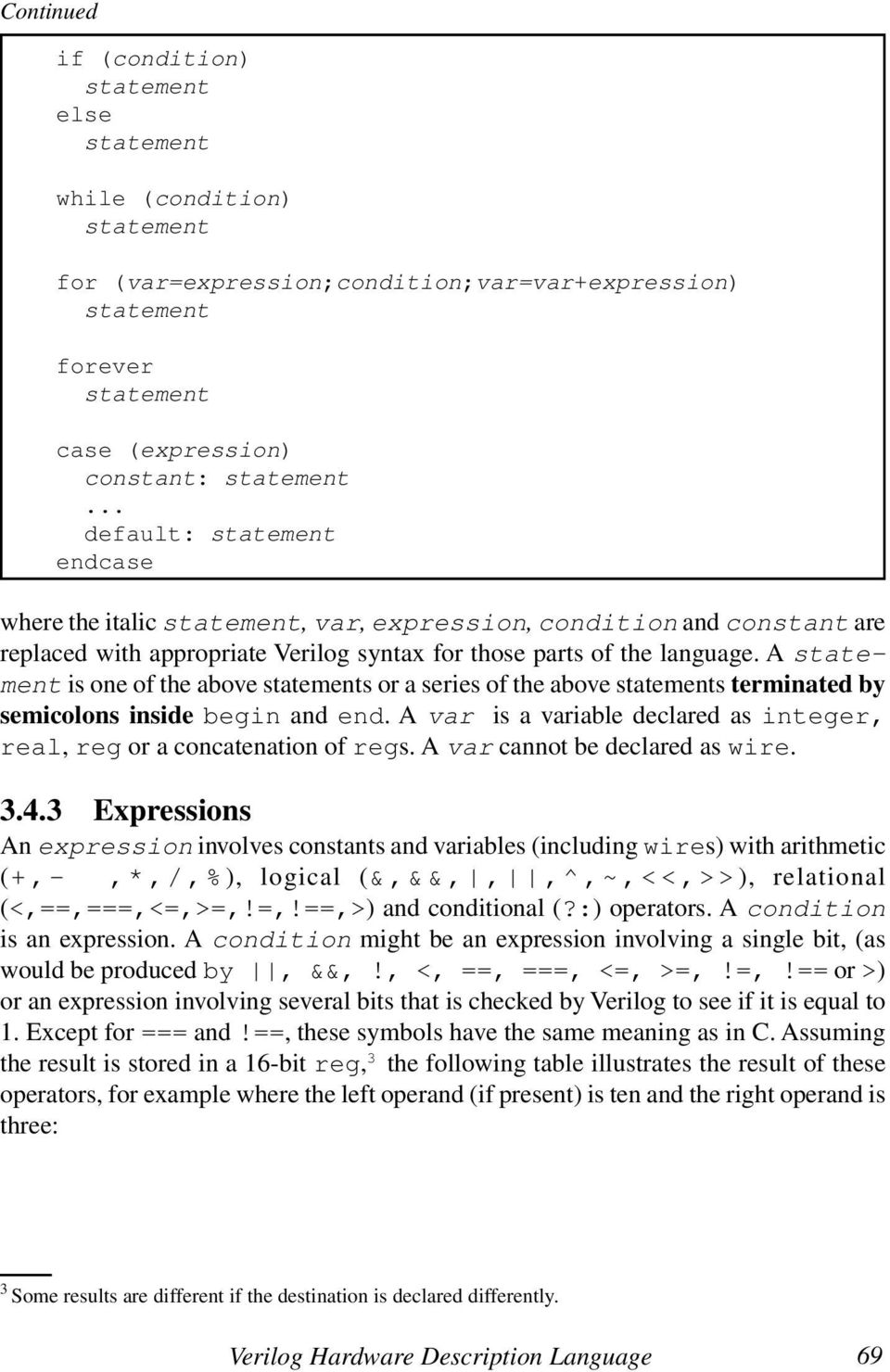
7 symbol name example 16-bit unsigned result + addition subtraction negation * multiplication 10*3 30 / division 10/3 3 % remainder 10%3 1 << shift left 10<<3 80 >> shift right 10>>3 1 & bitwise AND 10&3 2 bitwise OR ^ bitwise exclusive OR 10^3 9 ~ bitwise NOT ~ ?: conditional operator 0?10:3 3 1?10:3 10! logical NOT!10 0 && logical AND 10&&3 1 logical OR < less than 10<3 0 == equal to 10==30 <= less than or equal to 10<=3 0 >= greater than or equal 10>=3 1!= not equal 10!=3 1 > greater than 10> Blocks All procedural statements occur in what are called blocks that are defined inside modules, after the type declarations. There are two kinds of procedural blocks: the initial block and the always block. For the moment, let us consider only the initial block. An initial block is like conventional software. It starts execution and eventually (assuming there is not an infinite loop inside the initial block) it stops execution. The simplest form for a single Verilog initial block is: 70 Verilog Digital Computer Design: Algorithms into Hardware
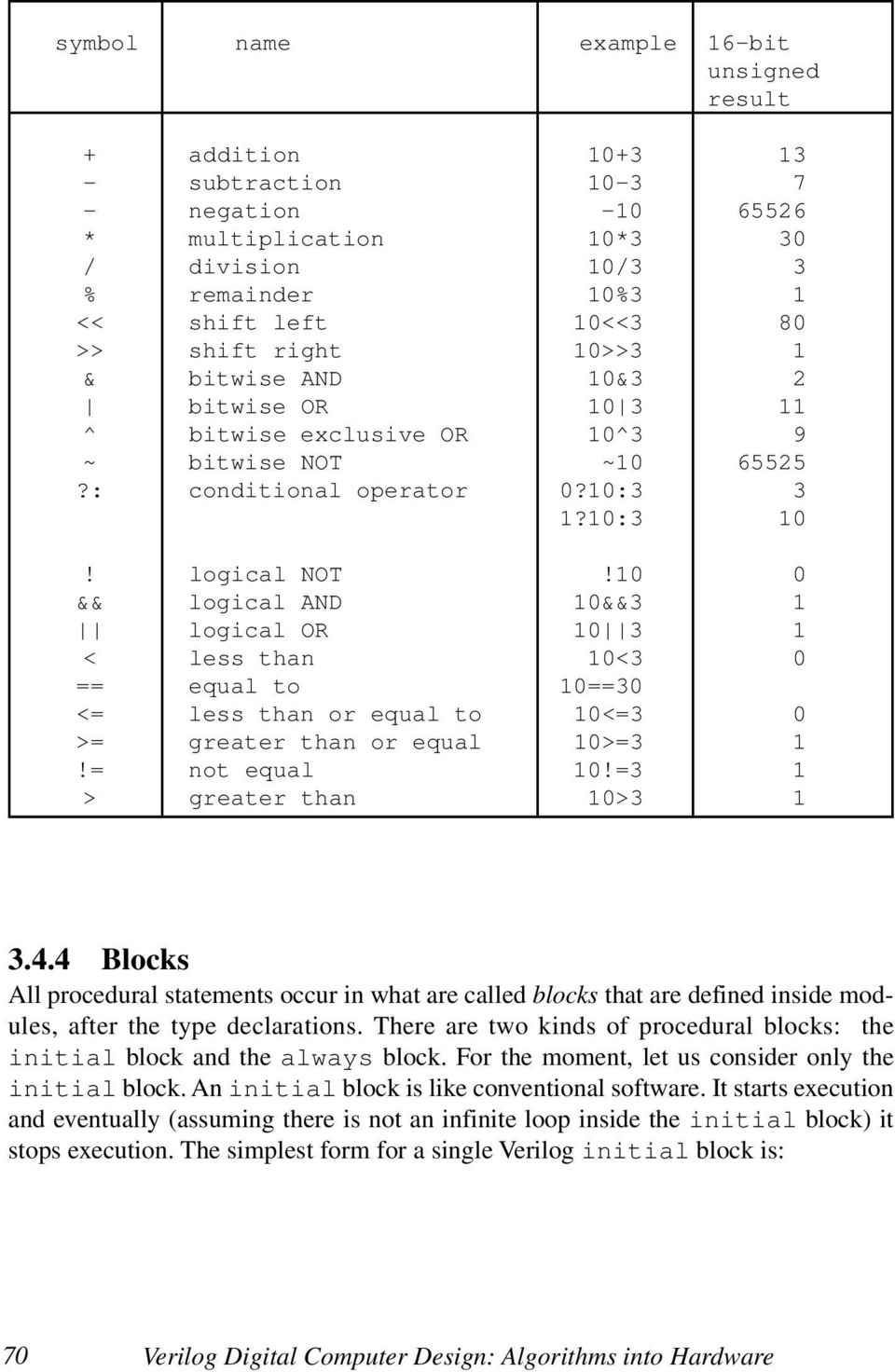
8 module top; declarations; initial statement;... statement; module The name of the module (top in this case) is arbitrary. The syntax of the declarations is as described above. All variables should be declared. Each statement is terminated with a semicolon. Verilog uses the Pascal-like and, rather than { and }. There is no semicolon after or. The and may be omitted in the rare case that only one procedural statement occurs in the initial block. Here is an example that prints out all 16,773,120 combinations of values described in section 3.3: module top; integer x,y; initial x = 0; while (x<=4095) for (y=1; y<=4095; y = y+1) $display("x=%d y=%d",x,y); x = x + 1; $write("all "); $display("done"); module The loop involving x could have been written as a for loop also but was shown above as a while for illustration. Note that Verilog does not have the ++ found in C, and so it is necessary to say something like y = y + 1. This assignment statement is just like Verilog Hardware Description Language 71

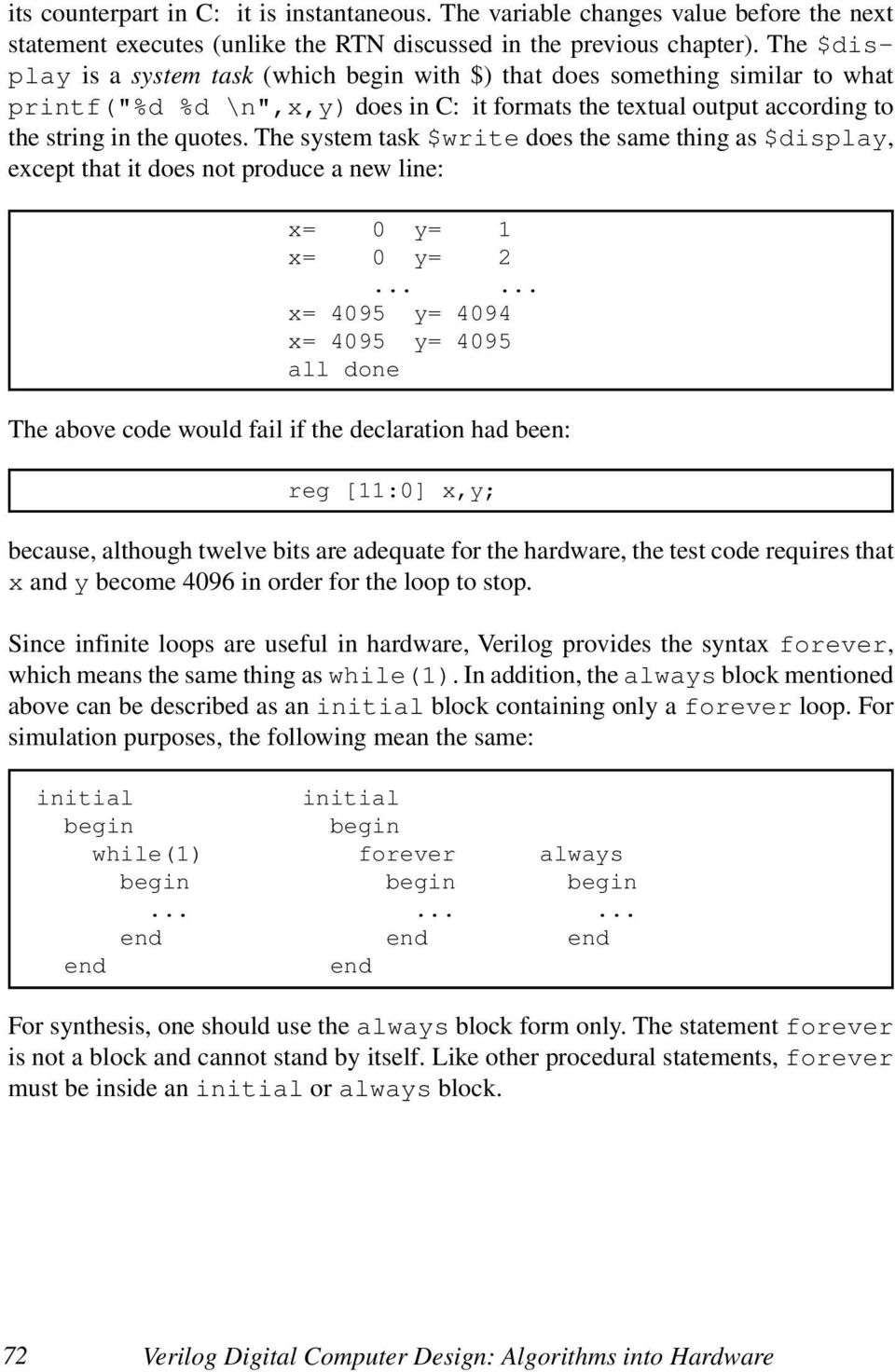
9 its counterpart in C: it is instantaneous. The variable changes value before the next statement executes (unlike the RTN discussed in the previous chapter). The $display is a system task (which with $) that does something similar to what printf("%d %d \n",x,y) does in C: it formats the textual output according to the string in the quotes. The system task $write does the same thing as $display, except that it does not produce a new line: x= 0 y= 1 x= 0 y= x= 4095 y= 4094 x= 4095 y= 4095 all done The above code would fail if the declaration had been: reg [11:0] x,y; because, although twelve bits are adequate for the hardware, the test code requires that x and y become 4096 in order for the loop to stop. Since infinite loops are useful in hardware, Verilog provides the syntax forever, which means the same thing as while(1). In addition, the always block mentioned above can be described as an initial block containing only a forever loop. For simulation purposes, the following mean the same: initial initial while(1) forever always For synthesis, one should use the always block form only. The statement forever is not a block and cannot stand by itself. Like other procedural statements, forever must be inside an initial or always block. 72 Verilog Digital Computer Design: Algorithms into Hardware
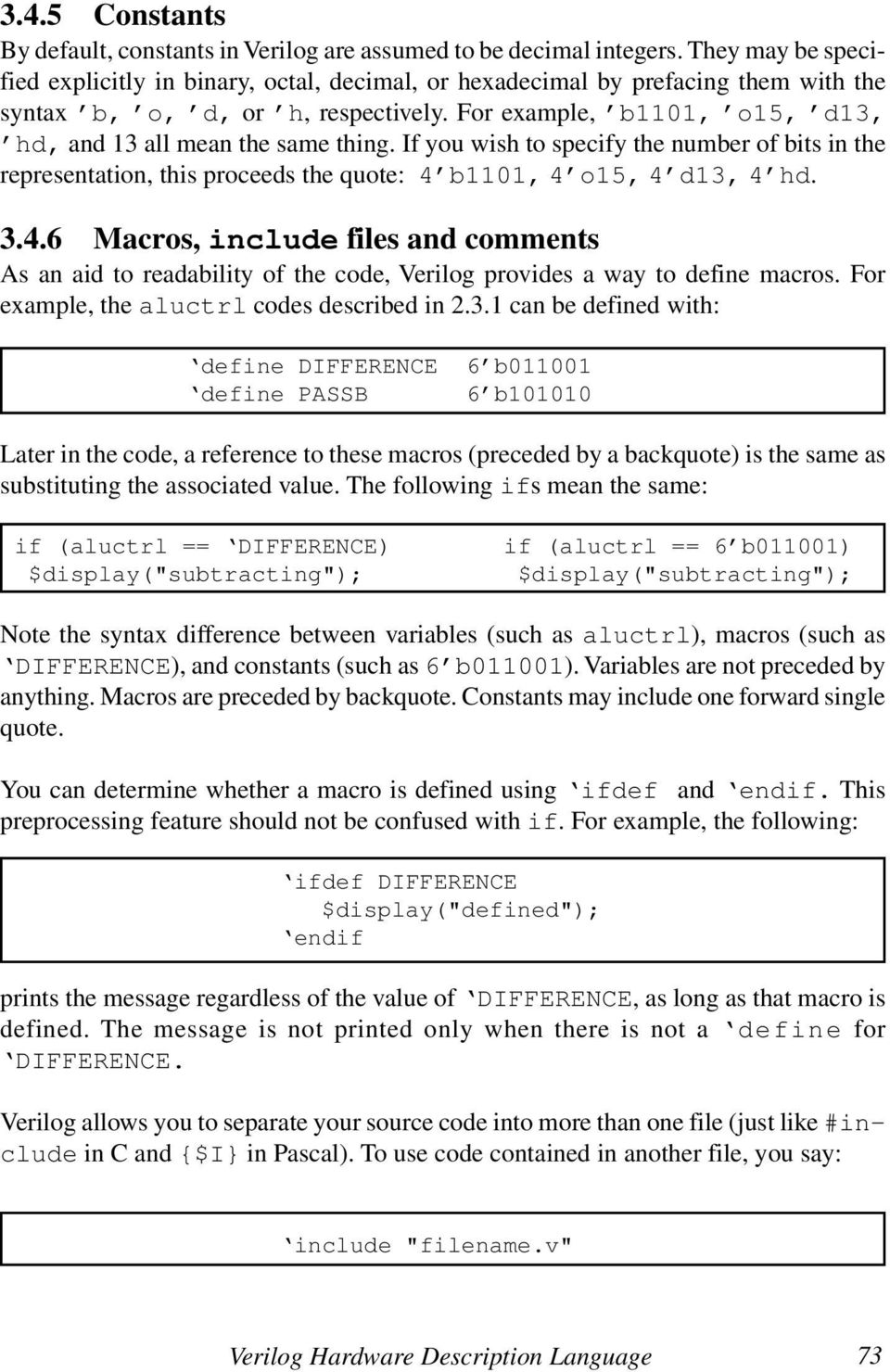
10 3.4.5 Constants By default, constants in Verilog are assumed to be decimal integers. They may be specified explicitly in binary, octal, decimal, or hexadecimal by prefacing them with the syntax b, o, d, or h, respectively. For example, b1101, o15, d13, hd, and 13 all mean the same thing. If you wish to specify the number of bits in the representation, this proceeds the quote: 4 b1101, 4 o15, 4 d13, 4 hd Macros, include files and comments As an aid to readability of the code, Verilog provides a way to define macros. For example, the aluctrl codes described in can be defined with: define DIFFERENCE 6 b define PASSB 6 b Later in the code, a reference to these macros (preceded by a backquote) is the same as substituting the associated value. The following ifs mean the same: if (aluctrl == DIFFERENCE) $display("subtracting"); if (aluctrl == 6 b011001) $display("subtracting"); Note the syntax difference between variables (such as aluctrl), macros (such as DIFFERENCE), and constants (such as 6 b011001). Variables are not preceded by anything. Macros are preceded by backquote. Constants may include one forward single quote. You can determine whether a macro is defined using ifdef and if. This preprocessing feature should not be confused with if. For example, the following: ifdef DIFFERENCE $display("defined"); if prints the message regardless of the value of DIFFERENCE, as long as that macro is defined. The message is not printed only when there is not a define for DIFFERENCE. Verilog allows you to separate your source code into more than one file (just like #include in C and {$I} in Pascal). To use code contained in another file, you say: include "filename.v" Verilog Hardware Description Language 73
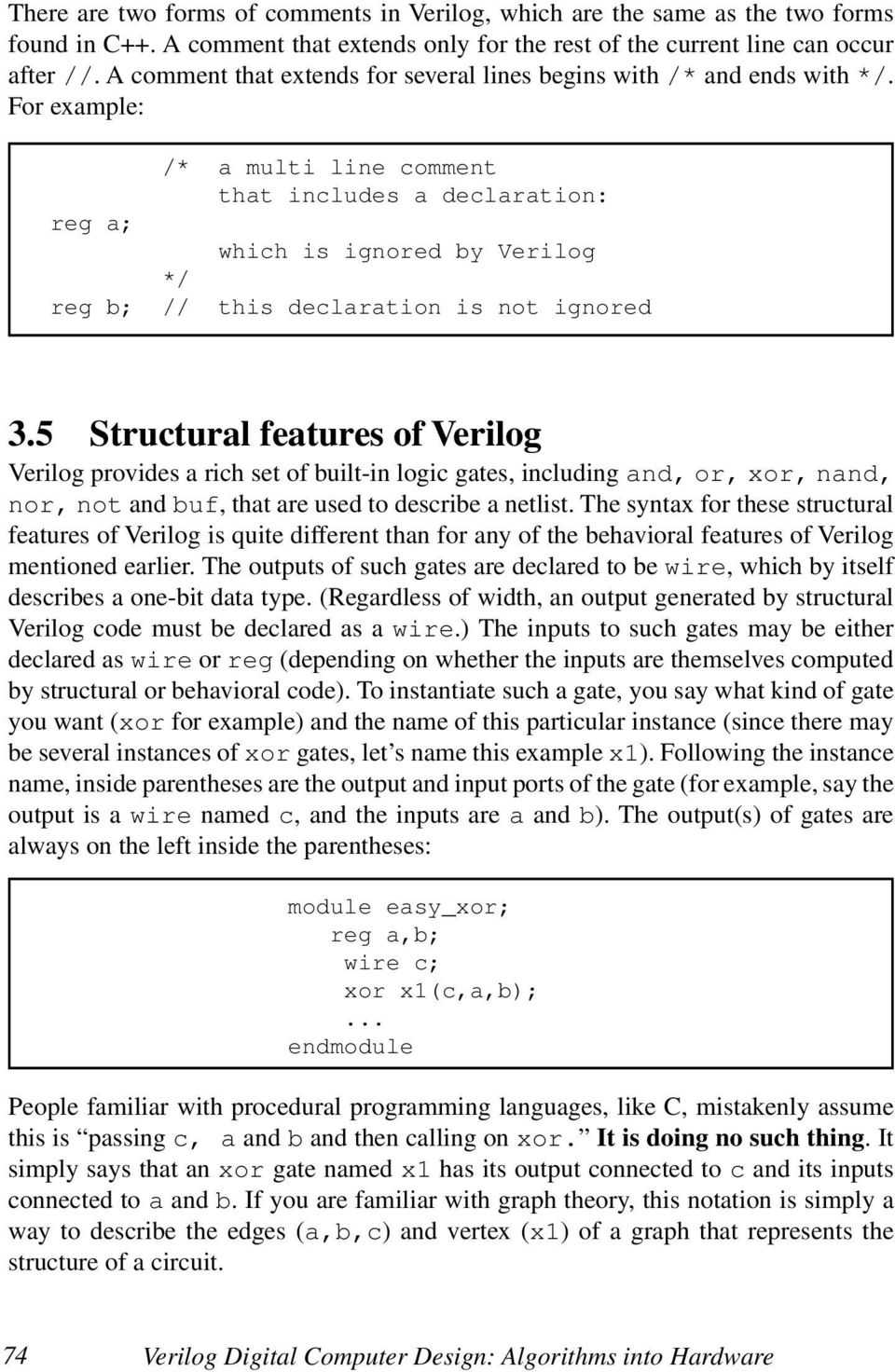
11 There are two forms of comments in Verilog, which are the same as the two forms found in C++. A comment that exts only for the rest of the current line can occur after //. A comment that exts for several lines s with /* and s with */. For example: /* a multi line comment that includes a declaration: reg a; which is ignored by Verilog */ reg b; // this declaration is not ignored 3.5 Structural features of Verilog Verilog provides a rich set of built-in logic gates, including and, or, xor, nand, nor, not and buf, that are used to describe a netlist. The syntax for these structural features of Verilog is quite different than for any of the behavioral features of Verilog mentioned earlier. The outputs of such gates are declared to be wire, which by itself describes a one-bit data type. (Regardless of width, an output generated by structural Verilog code must be declared as a wire.) The inputs to such gates may be either declared as wire or reg (deping on whether the inputs are themselves computed by structural or behavioral code). To instantiate such a gate, you say what kind of gate you want (xor for example) and the name of this particular instance (since there may be several instances of xor gates, let s name this example x1). Following the instance name, inside parentheses are the output and input ports of the gate (for example, say the output is a wire named c, and the inputs are a and b). The output(s) of gates are always on the left inside the parentheses: module easy_xor; reg a,b; wire c; xor x1(c,a,b);... module People familiar with procedural programming languages, like C, mistakenly assume this is passing c, a and b and then calling on xor. It is doing no such thing. It simply says that an xor gate named x1 has its output connected to c and its inputs connected to a and b. If you are familiar with graph theory, this notation is simply a way to describe the edges (a,b,c) and vertex (x1) of a graph that represents the structure of a circuit. 74 Verilog Digital Computer Design: Algorithms into Hardware
12 3.5.1 Instantiating multiple gates Of course, there is an equivalent structure of and/or gates that does the same thing as an xor gate (recall the identity a^b == a&(~b) (~a)&b): module hard_xor; reg a,b; wire c; wire t1,t2,not_a,not_b; not i1(not_a,a); not i2(not_b,b); and a1(t1,not_a,b); and a2(t2,a,not_b); or o1(c,t1,t2);... module The order in which gates are instantiated in structural Verilog code does not matter, and so the following: module scrambled_xor; reg a,b; wire c; wire t1,t2,not_a,not_b; or o1(c,t1,t2); and a1(t1,not_a,b); and a2(t2,a,not_b); not i1(not_a,a); not i2(not_b,b);... module means the same thing, because they both represent the interconnection in the following circuit diagram: a b i1 not_a a1 t1 o1 c i2 not_b a2 t2 Figure 3-1. Exclusive or built with ANDs, OR and inverters. Verilog Hardware Description Language 75

13 3.5.2 Comparison with behavioral code Structural Verilog code does not describe the order in which computations implemented by such a structure are carried out by the Verilog simulator. This is in sharp contrast to behavioral Verilog code, such as the following: module behavioral_xor; reg a,b; reg c; reg t1,t2,not_a,not_b; always... not_a = ~a; not_b = ~b; t1 = not_a&b; t2 = a¬_b; c = t1 t2; module which is a correct behavioral rition of the same idea. (The ellipses must be replaced by a Verilog feature described later.) Also, c, t1, t2, not_a and not_b must be declared as regs because this behavioral (rather than structural) code assigns values to them. To rearrange the order of behavioral assignment statements is incorrect: module bad_xor; reg a,b; reg c; reg t1,t2,not_a,not_b; always... c = t1 t2; t1 = not_a&b; t2 = a¬_b; not_a = ~a; not_b = ~b; module because not_a must be computed before t1 by the Verilog simulator. 76 Verilog Digital Computer Design: Algorithms into Hardware

14 3.5.3 Interconnection errors: four-valued logic In software, a bit is either a 0 or a 1. In properly functioning hardware, this is usually the case also, but it is possible for gates to be wired together incorrectly in ways that produce electronic signals that are neither 0 nor 1. To more accurately model such physical possibilities, 4 each bit in Verilog can be one of four things: 1 b0, 1 b1, 1 bz or 1 bx. Obviously, 1 b0 and 1 b1 correspond to the logical 0 and logical 1 that we would normally expect to find in a computer. For most technologies, these two possibilities are represented by a voltage on a wire. For example, active high TTL logic would represent 1 b0 as zero volts and 1 b1 as five volts. Active low TTL logic would represent 1 b0 as five volts and 1 b1 as zero volts. Other kinds of logic families, such as CMOS, use different voltages. ECL logic uses current, rather than voltage, to represent information, but the concept is the same High impedance In any technology, it is possible for gates to be miswired. One kind of problem is when a designer forgets to connect a wire or forgets to instantiate a necessary gate. This means that there is a wire in the system which is not connected to anything. We refer to this as high impedance, which in Verilog notation is 1 bz. The TTL logic family will normally view high impedance as being the same as five volts. If the input of a gate to which this wire is connected is active high, 1 bz will be treated as 1 b1, but if it is active low, it will be treated as 1 b0. Other logic families treat 1 bz differently. Furthermore, electrical noise may cause 1 bz to be treated spuriously in any logic family. For these reasons, it is important for a Verilog simulator to treat 1 bz as distinct from 1 b0 and 1 b1. For example, if the designer forgets the final or gate in the example from section 3.5.1: module forget_or_that_outputs_c; reg a,b; wire c; wire t1,t2,not_a,not_b; not i1(not_a,a); not i2(not_b,b); and a1(t1,not_a,b); and a2(t2,a,not_b);... module 4 Verilog also allows each bit to have a strength, which is an electronic concept (below gate level) beyond the scope of this book. Verilog Hardware Description Language 77

15 there is no gate that outputs the wire c, and therefore it remains 1 bz, regardless of what a and b are Unknown value Another way in which gates can be miswired is when the output of two gates are wired together. This raises the possibility of fighting outputs, where one of the gates wants to output a 1 b0, but the other wants to output a 1 b1. For example, if we tried to eliminate the or gate by tying the output of both and gates together: module tie_ands_together; reg a,b; wire c; wire t1,t2,not_a,not_b; not i1(not_a,a); not i2(not_b,b); and a1(c,not_a,b); and a2(c,a,not_b);... module the result is correct (1 b0) when a and b are the same because the two and gates both produce 1 b0 and there is no fight. The result is incorrect (1 bx) when a is 1 b0 and b is 1 b1 or vice versa, because the two and gates fight each other. Fighting gates can cause physical damage to certain families of logic (i.e., smoke comes out of the chip). Obviously, we want to be able to have the simulator catch such problems before we fabricate a chip that is doomed to blow up (literally)! Use in behavioral code Behavioral code may manipulate bits with the four-valued logic. Uninitialized regs in behavioral code start with a value of bx. (As mentioned above for structural code, disconnected wires start with a value of bz.) All the Boolean operators, such as &, and ~ are defined with the four-valued logic so that the usual rules of commutativity, associativity, etc. apply. The four-valued logic may be used with multi-bit wires and regs. When all the bits are either 1 b1 or 1 b0, such as 3 b110, the usual binary interpretation (powers of two) applies. When any of the bits is either 1 bz or 1 bx, such as 3 b1z0, the numeric value is unknown. 78 Verilog Digital Computer Design: Algorithms into Hardware

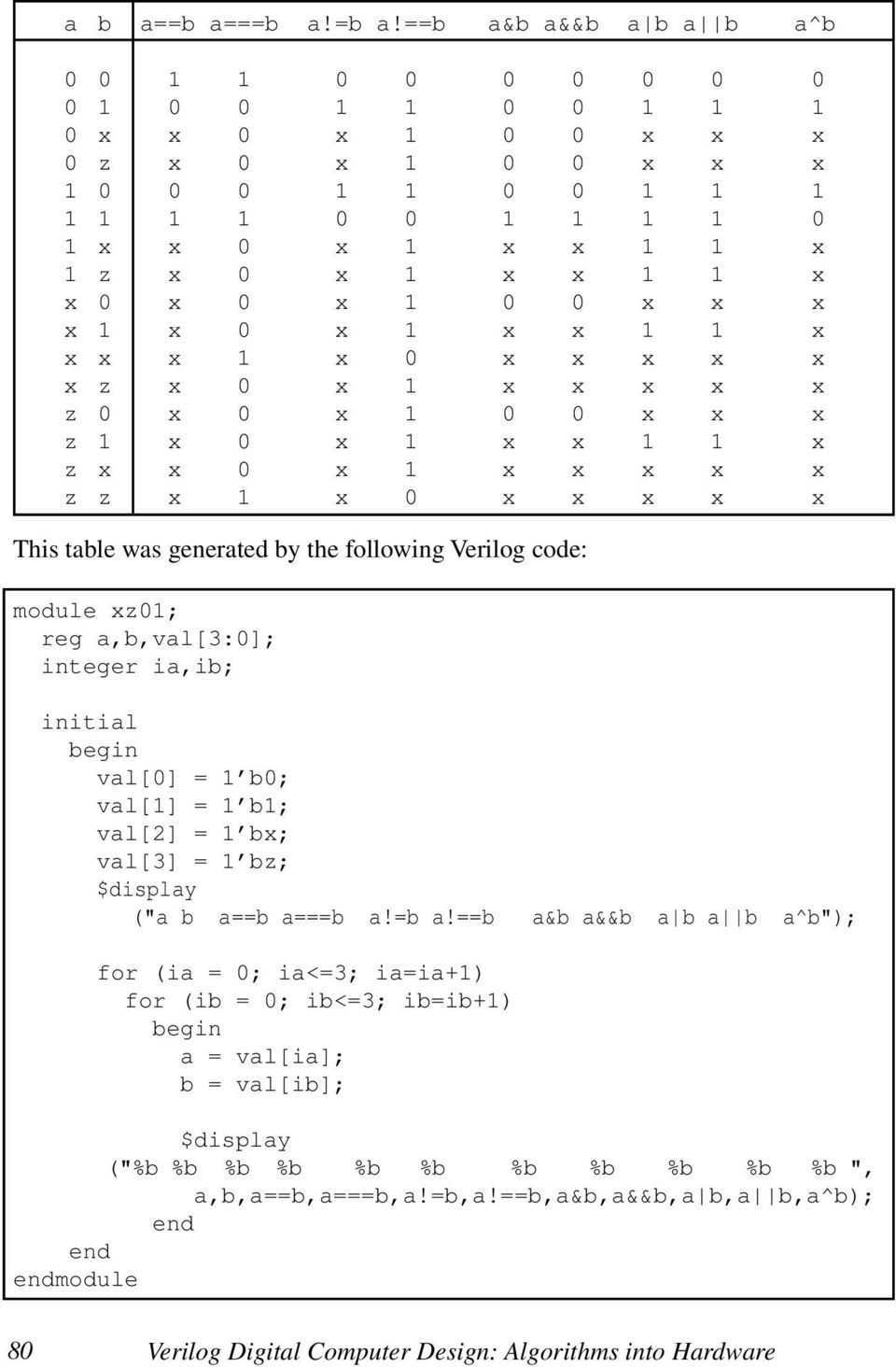
16 Arithmetic and relational operators (including == and!=) produce their usual results only when both operands are composed of 1 b0s and 1 b1s. In any other case, the result is bx. This relates to the fact the corresponding combinational logic required to implement such operations in hardware would not produce a reliable result under such circumstances. For example: if ( a == 1 bx) $display("a is unknown"); will never display the message, even when a is 1 bx, because the result of the == operation is always 1 bx. 1 bx is not the same as 1 b1, and so the $display never executes. There are two special comparison operators (=== and!==) that overcome this limitation. === and!== cannot be implemented in hardware, but they are useful in writing intelligent simulations. For example: if ( a === 1 bx) $display("a is unknown"); will display the message if and only if a is 1 bx. To help understand the last examples, you should realize that the following two if statements are equivalent: if(expression) statement; if((expression)===1 b1) statement; The following table summarizes how the four-valued logic works with common operators: Verilog Hardware Description Language 79

17 a b a==b a===b a!=b a!==b a&b a&&b a b a b a^b x x 0 x x x x 0 z x 0 x x x x x x 0 x 1 x x 1 1 x 1 z x 0 x 1 x x 1 1 x x 0 x 0 x x x x x 1 x 0 x 1 x x 1 1 x x x x 1 x 0 x x x x x x z x 0 x 1 x x x x x z 0 x 0 x x x x z 1 x 0 x 1 x x 1 1 x z x x 0 x 1 x x x x x z z x 1 x 0 x x x x x This table was generated by the following Verilog code: module xz01; reg a,b,val[3:0]; integer ia,ib; initial val[0] = 1 b0; val[1] = 1 b1; val[2] = 1 bx; val[3] = 1 bz; $display ("a b a==b a===b a!=b a!==b a&b a&&b a b a b a^b"); for (ia = 0; ia<=3; ia=ia+1) for (ib = 0; ib<=3; ib=ib+1) a = val[ia]; b = val[ib]; $display ("%b %b %b %b %b %b %b %b %b %b %b ", a,b,a==b,a===b,a!=b,a!==b,a&b,a&&b,a b,a b,a^b); module 80 Verilog Digital Computer Design: Algorithms into Hardware
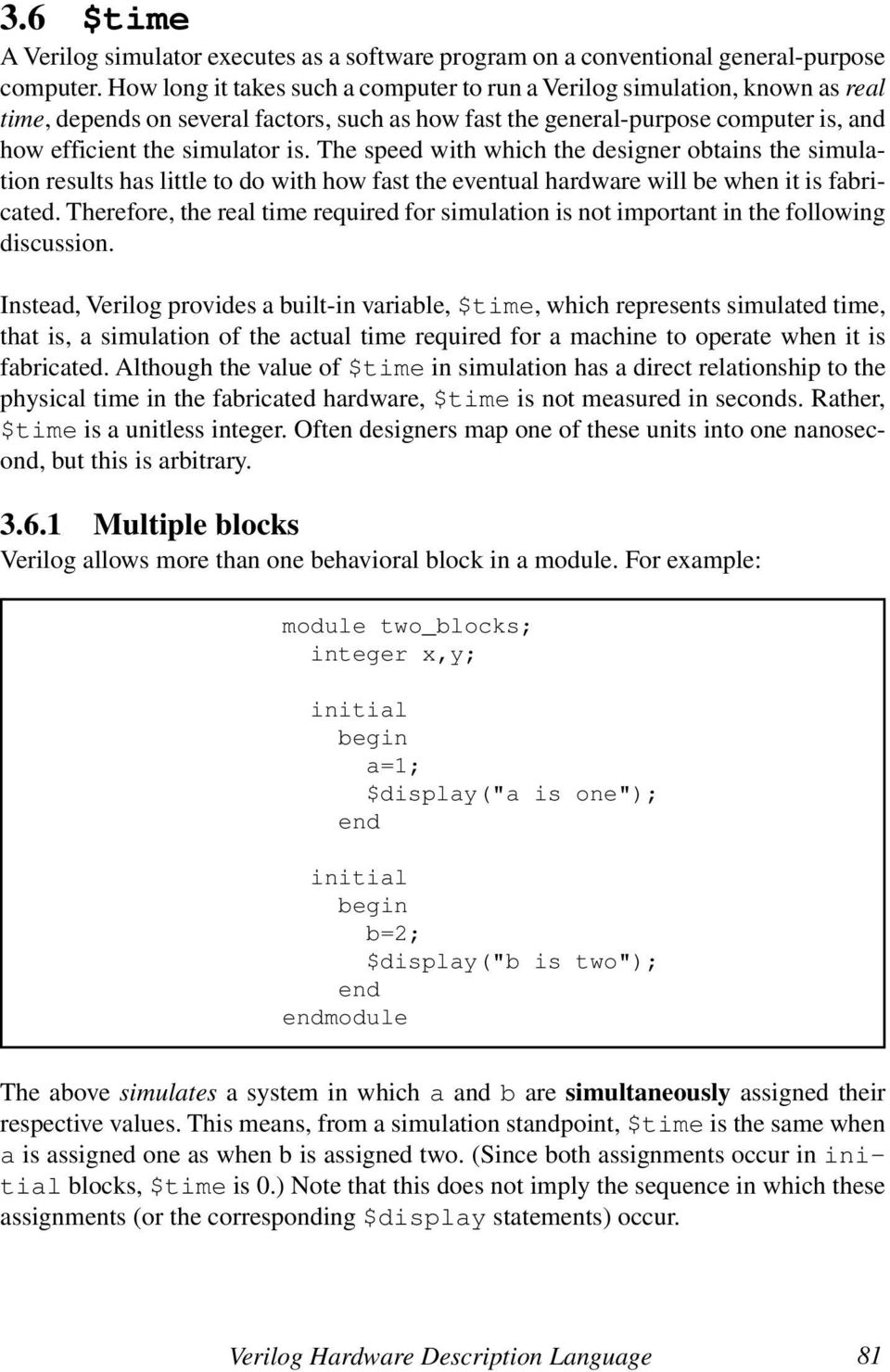
18 3.6 $time A Verilog simulator executes as a software program on a conventional general-purpose computer. How long it takes such a computer to run a Verilog simulation, known as real time, deps on several factors, such as how fast the general-purpose computer is, and how efficient the simulator is. The speed with which the designer obtains the simulation results has little to do with how fast the eventual hardware will be when it is fabricated. Therefore, the real time required for simulation is not important in the following discussion. Instead, Verilog provides a built-in variable, $time, which represents simulated time, that is, a simulation of the actual time required for a machine to operate when it is fabricated. Although the value of $time in simulation has a direct relationship to the physical time in the fabricated hardware, $time is not measured in seconds. Rather, $time is a unitless integer. Often designers map one of these units into one nanosecond, but this is arbitrary Multiple blocks Verilog allows more than one behavioral block in a module. For example: module two_blocks; integer x,y; initial a=1; $display("a is one"); initial b=2; $display("b is two"); module The above simulates a system in which a and b are simultaneously assigned their respective values. This means, from a simulation standpoint, $time is the same when a is assigned one as when b is assigned two. (Since both assignments occur in initial blocks, $time is 0.) Note that this does not imply the sequence in which these assignments (or the corresponding $display statements) occur. Verilog Hardware Description Language 81
19 3.6.2 Sequence versus $time In software, we often confuse the two separate concepts of time and sequence. In Verilog, it is possible for many statements to execute without $time advancing. The sequence in which statements within one block execute is determined by the usual rules found in other high-level languages. The sequence in which statements within different blocks execute is something the designer cannot predict, but that Verilog will do consistently. The advancing of $time is a different issue, discussed in section 3.7. If you change the wires to be regs, a structural Verilog netlist is equivalent to several always blocks, where each always block computes the result output by one gate. If the design is correct, the sequence in which such always blocks execute at a particular $time is irrelevant, which helps explain why the order in which you instantiate gates in structural Verilog is also irrelevant. With Verilog, you can simulate the parallel actions of each gate or module that you instantiate, as well as the parallel actions of each behavioral block you code Scheduling processes and deadlock Like a multiprocessing operating system, a Verilog simulator schedules several processes, one for each structural component or behavioral block. The $time variable does not advance until the simulator has given each process that so desires an opportunity to execute at that $time. If you are familiar with operating systems concepts, such as semaphores, you will recognize that this raises a question about how Verilog operates: what are the atomic units of computation, or in other words, when does a process get interrupted by the Verilog simulator? The behavioral statements described earlier are uninterruptible. Although it is nearly correct to model an exclusive OR with the following behavioral code: module deadlock_the_simulator; reg a,b,c; always c = a^b;... other blocks... module the Verilog simulator would never allow the other blocks to execute because the block computing c is not interruptible. Overcoming this problem requires an additional feature of Verilog, discussed in the next section. 82 Verilog Digital Computer Design: Algorithms into Hardware

20 3.7 Time control Behavioral Verilog may include time control statements, whose purpose is to release control back to the Verilog scheduler so that other processes may execute and also tell the Verilog simulator at what $time the current process would like to be restarted. There are three forms of time control that have different ways of telling the simulator when to restart the current process: and wait # time control When a statement is preceded by # followed by a number, the scheduler will not execute the statement until the specified number of $time units have passed. Any other process that desires to execute earlier than the $time specified by the # will execute before the current process resumes. If we modify the first example from section 3.6: module two_blocks_time_control; integer x,y; initial #4 a=1; $display("a is one at $time=%d",$time); initial #3 b=2; $display("b is two at $time=%d",$time); module the above will assign first to b (at $time=3) and then to a one unit of $time later. The order in which these statements execute is unambiguous because the # places them at a certain point in $time. There can be more than one # in a block. The following nonsense module illustrates how the # works: Verilog Hardware Description Language 83

21 module confusing; integer a; initial a = 10; #2 a = 20; #5 a = 30; initial #1 a = 40; #3 a = 50; #4 a = 60; module In the above code, a becomes 10 at $time 0, 40 at $time 1, 20 at $time 2, 50 at $time 4, 30 at $time 7 and 60 at $time 8. The interaction of parallel blocks creates a behavior much more complex than that of each individual block Using # in test code One of the most important uses of # is to generate sequences of patterns at specific $times in test code to act as inputs to a machine. The # releases control from the test code and gives the code that simulates the machine an opportunity to execute. Test code without some kind of time control would be pointless because the machine being tested would never execute. For example, suppose we would like to test the built-in xor gate by stimulating it with all four combinations on its inputs, and printing the observed truth table: 84 Verilog Digital Computer Design: Algorithms into Hardware
22 module top; integer ia,ib; reg a,b; wire c; xor x1(c,a,b); initial for (ia=0; ia<=1; ia = ia+1) a = ia; for (ib=0; ib<=1; ib = ib + 1) b = ib; #10 $display("a=%d b=%d c=%d",a,b,c); module The first time through, a and b are initialized to be 0 at $time 0. When #10 executes at $time 0, the initial block relinquishes control, and x1 is given the opportunity to compute a new value (0^0=0) on the wire c. Having completed everything scheduled at $time 0, the simulator advances $time. The next thing scheduled to execute is the $display statement at $time 10. (The simulator does not waste real time computing anything for $time 2 through 9 since nothing changes during this $time.) The simulator prints out that a=0 b=0 c=0 at $time 10 and then goes through the inner loop once again. While $time is still 10, b becomes 1. The #10 relinquishes control, x1 computes that c is now 1 and $time advances. The $display prints out that a=0 b=1 c=1 at $time 20. The last two lines of the truth table are printed out in a similar fashion at $times 30 and Modeling combinational logic with # Physical combinational logic devices, such as the exclusive OR gate, have propagation delay. This means that a change in the input does not instantaneously get reflected in the output as shown above, but instead it takes some amount of physical time for the change to propagate through the gate. Propagation delay is a low-level detail of hardware design that ultimately determines the speed of a system. Normally, we will want to ignore propagation delay, but for a moment, let s consider how it can be modeled in behavioral Verilog with the #. Verilog Hardware Description Language 85
23 The behavioral exclusive OR example in section deadlocks the simulator because it does not have any time control. If we put some time control in this always block (say a propagation delay of #1), the simulator will have an opportunity to schedule the test code instead of deadlocking inside the always block: module top; integer ia,ib; reg a,b; reg c; always #1 c = a^b; initial for (ia=0; ia<=1; ia = ia+1) a = ia; for (ib=0; ib<=1; ib = ib + 1) b = ib; #10 $display("a=%d b=%d c=%d",a,b,c); $finish; module As in the last example, a and b are initialized to be 0 at $time 0. When #10 executes at $time 0, the initial block relinquishes control, which gives the always loop an opportunity to execute. The first thing that the always block does is to execute #1, which relinquishes control until $time 1. Since no other block wants to execute at $time 1, execution of the always block resumes at $time 1, and it computes a new value (0^0=0) for the reg c. Because this is an always block, it loops back to the #1. Since no other block wants to execute at $time 2, execution of the always block resumes at $time 2, and it recomputes the same value for the reg c that it just computed at $time 1. The always block continues to waste real time by unnecessarily recomputing the same value all the way up to $time 9. Finally, the $display statement executes at $time 10. The test code prints out a=0 b=0 c=0 and goes through its inner loop once again. While $time is still 10, b becomes 1. The #10 relinquishes control, and the always block will have another ten chances to compute that c is now 1. The remaining lines of the truth table are printed out in a similar fashion. 86 Verilog Digital Computer Design: Algorithms into Hardware
24 There is an equivalent structural netlist notation for an always block with # time control. The following behavioral and structural code do similar things in $time: reg c; wire c; always #2 xor #2 x2(c,a,b); c = a^b; Both model an exclusive OR gate with a propagation delay of two units of $time. On many (but not all) implementations of Verilog simulators, the structural version is more efficient from a real-time standpoint. This is discussed in greater detail in chapter Generating the system clock with # for simulation Registers and controllers are driven by some kind of a clock signal. One way to generate such a signal is to have an initial block give the clock signal an initial value, and an always block that toggles the clock back and forth: reg sysclk; initial sysclk = 0; always #50 sysclk = ~sysclk; The above generates a system clock signal, sysclk, with a period of 100 units of $time Ordering processes without advancing $time It is permissible to use a delay of #0. This causes the current process to relinquish control to other processes that need to execute at the current $time. After the other processes have relinquished control, but before $time advances, the current process will resume. This kind of time control can be used to enforce an order on processes whose execution would otherwise be unpredictable. For example, the following is algorithmically the same as the first example in (b is assigned first, then a), but both assignments occur at $time 0: Verilog Hardware Description Language 87
25 module two_blocks_time_control; integer x,y; initial #0 a=1; $display("a is one at $time=%d",$time); initial b=2; $display("b is two at $time=%d",$time); module time control When precedes a statement, the scheduler will not execute the statement that follows until the event described by occurs. There are several different kinds of events that can be specified after as or expression event When there is a single expression in parenthesis, waits until one or more bit(s) in the result of the expression change. As long as the result of the expression stays the same, the block in which occurs will remain susped. When multiple expressions are separated by or, waits until one or more bit(s) in the result of any of the expressions change. The word or is not the same as the operator. In the above, onebit is single-bit wire or reg (declared without the square bracket). When posedge occurs in the parenthesis, waits until onebit changes from a 0 to a 1. When negedge occurs in the parenthesis, waits until onebit changes from a 1 to a 0. The following mean the same thing: reg a=b; reg c or negedge c) a=b; An event is a special kind of Verilog variable, which will be discussed later. 88 Verilog Digital Computer Design: Algorithms into Hardware
26 Efficient behavioral modeling of combinational logic Although you can model combinational logic behaviorally using just the #, this is not an efficient thing to do from a simulation real-time standpoint. (Using # for combinational logic is also inappropriate for synthesis.) As illustrated in section , the always block has to reexecute many times without computing anything new. Although physical hardware gates are continuously recomputing the same result in this fashion, it is wasteful to have a general-purpose computer sp real time simulating this. It would be better to compute the correct result once and wait until the next time the result changes. How do we know when the output changes? Recall that perfect combinational logic (i.e., with no propagation delay) by definition changes its output whenever any of its input(s) change. So, we need the Verilog notation that allows us to susp execution until any of the inputs of the logic change: module top; integer ia,ib; reg a,b; reg c; or b) c = a^b; initial for (ia=0; ia<=1; ia = ia+1) a = ia; for (ib=0; ib<=1; ib = ib + 1) b = ib; #10 $display("a=%d b=%d c=%d",a,b,c); $finish; module Verilog Hardware Description Language 89
27 At the ning, both the initial and the always block start execution. Since neither a nor b have changed yet, the always block susps. The first time through the loops in the initial block, a and b are initialized to be 0 at $time 0. When #10 executes at $time 0, the initial block relinquishes control, and the always block is given an opportunity to do something. Since a and b both changed at $time 0, does not susp, but instead allows the always block to compute a new value (0^0=0) for the reg c. The always block loops back to Since there is no way that a or b can change anymore at $time 0, the simulator advances $time. The next thing scheduled to execute is the $display statement at $time 10. (Like the example in section , but unlike the example in section , the simulator does not waste real time computing anything for $time 1 through 9 since nothing changes during that $time.) The simulator prints out that a=0 b=0 c=0 at $time 10, and then goes through the inner loop once again. While $time is still 10, b becomes 1. The #10 relinquishes control, and the always block has an opportunity to do something. Since b just changed (though a did not change), does not susp, and c is now 1. After $time advances, the $display prints out that a=0 b=1 c=1 at $time 20. The last two lines of the truth table are printed out in a similar fashion at $times 30 and 40. Since this is a model of combinational logic, it is very important that every input to the logic be listed after We refer to this list of inputs to the physical gate as the sensitivity list Modeling synchronous registers Most synchronous registers that we deal with use rising edge clocks. with posedge is the easiest way to model such devices. For example, consider an enabled register whose input (of any bus width) is din and whose output (of similar width as din) is dout. At the rising edge of the clock, when ld is 1, the value presented on din will be loaded. Otherwise dout remains the same. Assuming din, dout, ld and sysclk are taken care of properly elsewhere in the module, the behavioral code to model such an enabled register is: sysclk) if (ld) dout = din; Similar Verilog code can be written for a counter register that has clr, ld, and cnt signals: 90 Verilog Digital Computer Design: Algorithms into Hardware
28 sysclk) if (clr) dout = 0; else if (ld) dout = din; else if (cnt) dout = dout + 1; Note that the nesting of if statements indicates the priority of the commands. If a controller ss this counter a command to clr and cnt at the same time, the counter will ignore the cnt command. At any $time when this always block executes, only one action (clearing, loading, counting or holding) occurs. Of course, improper nesting of if statements could yield code whose behavior would be impossible with physical hardware Modeling synchronous logic controllers Most controllers are triggered by the rising edge of the system clock. It is convenient to use posedge to model such devices. For example, assuming that stop, speed and sysclk have been dealt with properly elsewhere in the module, the second ASM chart in section could be modeled as: sysclk) //this models state GREEN stop = 0; speed = sysclk) //this models state YELLOW stop = 1; speed = sysclk) //this models state RED stop = 1; speed = 0; There are several things to note about the above code. First, the indentation is used only to promote readability. Assuming the code for generating sysclk given in section Verilog Hardware Description Language 91
29 , the stop = 0 and speed = 3 statements execute at $time 50, 350, 650,... because there is no time control among them. The indentation simply highlights the fact that these two statements execute atomically, as a unit, without being interrupted by the simulator. The second thing to note is that the = in Verilog is just a software assignment statement. (The variable is modified at the $time the statement executes. The variable will retain the new value until modified again.) This is different than how we use = in ASM chart notation. (The command signal is a function of the present state. The command signal does not retain the new value after the rising edge of the system clock but instead returns to its default value.) Another way of saying this is that there are no default values in standard Verilog variables as there are for ASM chart commands. Despite the distinction between Verilog and ASM chart notation, we can model an ASM chart in Verilog by fully specifying every command output in every state. For those states where a command is not mentioned in an ASM chart, one simply codes a Verilog assignment statement that stores the default value into the Verilog variable corresponding to the missing ASM chart command. The stop=0 and speed=0 statements above were not shown in the original ASM chart but are required for the Verilog code to model what the hardware would actually do. The third thing is the names of the states are not yet included in the Verilog code. (The comments are of course ignored by Verilog.) Eventually, we will find a way of including meaningful state names in the actual code. The fourth thing is that this ASM chart does not have any RTN (i.e., it is at the mixed stage). We will need an additional Verilog notation to model ASM charts that use RTN. This notation is discussed in section 3.8. for debugging can also be used for causing the Verilog simulator to print debugging output that shows what happens as actions unfold in the simulation. For example, or b or c) $display("a=%b b=%b c=%b at $time=%d",a,b,c,$time); The above block would eliminate the need for the designer to worry about putting $display statements in the test code or in the code for the machine being tested. With clocked systems, it is often convenient to display information shortly after each rising edge of the clock: 92 Verilog Digital Computer Design: Algorithms into Hardware
30 sysclk) #20 $display("stop=%b speed=%b at $time=%d", stop,speed,$time); wait The wait statement is a form of time control that is quite different than # The wait statement stands by itself. It does not modify the statement which follows in the way and # do (i.e., there must be a semicolon after the wait statement). The wait statement is used primarily in test code. It is not normally used to model hardware devices in the and # are used. The syntax for the wait statement is: wait(condition); The wait statement susps the current process. The current process will resume when the condition becomes true. If the condition is already true, the current process will resume without $time advancing. For example, suppose we want to exhaustively test one of the slow division machines described in chapter 2. The amount of time the machine takes deps on how big the result is. Furthermore, different ASM charts described in chapter 2 take different amounts of $time. Therefore, the best approach is to use the ready signal produced by the machine: module top; reg pb; integer x,y; wire [11:0] quotient; wire sysclk;... initial pb= 0; x = 0; y = 0; sysclk); while (x<=4095) for (y=1; y<=4095; y = sysclk); pb = 1; Verilog Hardware Description Language 93
31 sysclk); pb = sysclk); sysclk); if (x/y === quotient) $display("ok"); else $display("error x=%d y=%d x/y=%d quotient=%d", x,y,x/y,quotient); x = x + 1; $stop; module This test code (based on the nested loops given in section 3.4) embodies the assumptions we made in section The first in the loop produce the pb pulse that lasts exactly one clock cycle. The makes sure that the machine has enough time to respond (and make ready 0). The wait(ready) keeps the test code synchronized to the division machine, so that the test code is not feeding numbers to the division machine too rapidly. The makes sure the machine will sp the required time in state IDLE, before testing the next number. The ellipsis shows where the code for the actual division machine was omitted in the above. The quotient is produced by this machine which is not shown here. The design of this code will be discussed in the next chapter. 3.8 Assignment with time control The # time control, discussed in sections and 3.7.2, precede a statement. These forms of time control delay execution of the following statement until the specified $time. There are two special kinds of assignment statements 5 that have time control inside the assignment statement. These two forms are known as blocking and non-blocking procedural assignment. 5 Assignment with time control is not accepted by some commercial synthesis tools but is accepted by all Verilog simulators. Since there are problems with intra-assignment delay (section ), some authors recomm against its use, but when used as recommed later in this chapter (section ), it becomes a powerful tool. Chapter 7 explains a preprocessor that allows all synthesis tools to accept the use proposed in this book. 94 Verilog Digital Computer Design: Algorithms into Hardware
32 3.8.1 Blocking procedural assignment The syntax for blocking procedural assignment has the # notation (whose syntax is described in sections and 3.7.2) after the = but before the expression. For example, three common forms of this are: var = # delay expression; var onebit) expression; var onebit) expression; Other variations are also legal. What distinguishes this from a normal instantaneous assignment is that the expression is evaluated at the $time the statement first executes, but the variable does not change until after the specified delay. For example, assuming temp is a reg that is not used elsewhere in the code and that temp is declared to be the same width as a and b, the following two fragments of code mean the same thing: initial initial temp = b; a sysclk) sysclk) a = temp; Blocking procedural assignment is almost what we need to model an ASM chart with RTN. The one problem with it, as its name implies, is that it blocks the current process from continuing to execute additional statements at the same $time. We will not use blocking procedural assignment for this reason Non-blocking procedural assignment The syntax for a non-blocking procedural assignment is identical to a blocking procedural assignment, except the assignment statement is indicated with <= instead of =. This should be easy to remember, because it reminds us of the notation in ASM charts. For example, the most common form of the non-blocking assignment used in later chapters is: var onebit) expression; Verilog Hardware Description Language 95
33 Typically, onebit is the sysclk signal mentioned in section Although other forms are legal, the onebit) form of the non-blocking assignment is the one we use in almost every case for in ASM charts. 6 The expression is evaluated at the $time the statement first executes and further statements execute at that same $time, but the variable does not change until after the specified delay. For example, assuming temp is a reg that is not used elsewhere in the left-hand code and that temp is declared to be the same width as a and b, the following two fragments of code mean nearly the same thing: initial sysclk) #0 a = temp; initial a sysclk) b; temp = b; Note that, all by itself, the effect of the non-blocking assignment is like having a parallel always block to store into a. An advantage of the <= notation is that you do not have to code a separate always block for each register. A subtle detail is that the right-hand always block is the last thing to execute (#0) at a given $time. Similarly, the <= causes the reg to change only after every other block (including the one with the <= ) has finished execution. This subtle detail causes a problem, which is discussed in the next section, and which is solved in section Problem with <= for RTN for simulation An obvious approach to translating RTN from an ASM chart into behavioral Verilog is just to put <= for each in the ASM chart. For example, assuming stop, speed, count and sysclk are taken care of properly elsewhere, one might think that the ASM chart from section could be translated into Verilog as: 6 The exceptions are when the left-hand side of the is a memory being changed every clock cycle, in which (negedge onebit) is appropriate, as explained in section 6.5.2, and for post-synthesis behavorial modeling of logic equations, in which case # is appropriate, as explained in section Verilog Digital Computer Design: Algorithms into Hardware
34 sysclk) stop = 0; speed = 3; //this models state sysclk) //this models state YELLOW stop = 1; speed = 1; count sysclk) count + sysclk) //this models state RED stop = 1; speed = 0; count sysclk) count + 2; However, when one runs this code on a Verilog simulator, the following incorrect result is produced (assuming the debugging always block shown in section ): stop=0 speed=11 count=000 at $time= 70 stop=1 speed=01 count=000 at $time= 170 stop=1 speed=00 count=001 at $time= 270 stop=0 speed=11 count=010 at $time= 370 stop=1 speed=01 count=010 at $time= 470 stop=1 speed=00 count=011 at $time= 570 Recall from section that at $time 370, count should be three instead of two. The underlying cause of this error is the subtle detail mentioned above: The <= causes the reg to change only after every other block (including the one with the <=) has finished execution. The above Verilog starts to execute the statements for state YELLOW at $time 150. The last of these statements evaluates count+1 at $time 150 and schedules the storage of the result. Since count is still 3 b000 at $time 150, the result scheduled to be stored at the of $time 250 is 3 b001. sysclk) that starts state RED causes the always block to susp until $time 250. The problem shown above occurs at $time 250 because the assignment initiated by the <= at $time 150 will be the last thing that occurs at $time 250. Prior to the assignment, the process will resume and execute the three statements, including count sysclk) count + 2. Since count is still 3 b000, this <= schedules 3 b010 to be assigned at $time 350, which is not what happens in an ASM chart. As soon as the assignment of 3 b010 has been scheduled at $time 250, 3 b001 will be stored into count (as a result of the first <=). Verilog Hardware Description Language 97
35 Proper use of <= for RTN in simulation To overcome the problem described in the last section, you need to use a non-zero delay after sysclk) that denotes a rectangle of the ASM chart. For example, here is the complete Verilog code to model (in a primitive way) the ASM chart from section : module top; reg stop; reg [1:0] speed; reg sysclk; reg [2:0] count; initial sysclk = 0; always #50 sysclk = ~sysclk; sysclk) #1 //this models state GREEN stop = 0; speed = sysclk) #1 //this models state YELLOW stop = 1; speed = 1; count sysclk) count + sysclk) #1 //this models state RED stop = 1; speed = 0; count sysclk) count + 2; sysclk) #20 $display("stop=%b speed=%b count=%b at $time=%d", stop,speed,count,$time); initial count = 0; #600 $finish; module Let s analyze the reason why each block is required in this module. The first initial block is required to give sysclk a value other than 1 bx at $time 0. The next block 98 Verilog Digital Computer Design: Algorithms into Hardware
36 toggles sysclk so that the clock period is 100. If sysclk were not initialized at $time 0, it would stay 1 bx forever (~1 bx is 1 bx). The only new thing in the always block that models the ASM chart is the addition of #1 after sysclk). The always block that follows it displays stop, speed and count during each state. The test code in the final initial block simply initializes count to be 3 b000. (In a real machine, this would occur in a state of the ASM, but instead here it is part of the test code for the purposes of illustration only.) The test code schedules a $finish system task to be called at $time 600. This is required because the always blocks would otherwise tell the simulator to go on forever. With the #1 after the Verilog simulator produces the following correct output: stop=0 speed=11 count=000 at $time= 70 stop=1 speed=01 count=000 at $time= 170 stop=1 speed=00 count=001 at $time= 270 stop=0 speed=11 count=011 at $time= 370 stop=1 speed=01 count=011 at $time= 470 stop=1 speed=00 count=100 at $time= Translating goto-less ASMs to behavioral Verilog This book concentrates on several design techniques that all by expressing an ASM with behavioral Verilog. Since Verilog is a goto-less language, only certain kinds of ASMs can be translated in this fashion. Chapters 5 and 7 explain how arbitrary ASMs can be translated into Verilog, but this section will concentrate only on ASMs that adhere to this highly desirable goto-less style Implicit versus explicit style The approach of expressing a state machine with high-level statements (like if and while) is known as implicit style because the next state of the machine is described implicitly through the use sysclk) within the statements of an always block. Implicit style is the opposite of the explicit style table (illustrated in section 2.4.1) that requires the designer to say what state the machine goes to under all possible circumstances. Experienced hardware designers who are new to Verilog may find the implicit style approach confusing because it requires thinking about a state machine in a different way. The implicit style is much more like software concepts, such as the distinction between if and while. On the other hand, experienced software designers may also find this approach difficult at first because the timing relationship between <= and Verilog Hardware Description Language 99
37 decisions in Verilog is different than in conventional software languages. The following sections go through a series of examples that illustrate some typical kinds of ASM constructs and how they translate into implicit style Verilog Identifying the infinite loop Unlike software, all ASMs have at least one infinite loop. Implicit style behavioral Verilog is defined by an always block. Many times this always block can also serve to implement the infinite loop of the ASM. In the following ASM, the transitions from states FIRST, SECOND, THIRD and FOURTH are implicit. The designer does not have to say anything about their next states. The transition from FIFTH to FIRST occurs because of the always: FIRST a 1 SECOND b a THIRD a b FOURTH FIFTH b 4 a 5 Figure 3.2 Every ASM has an infinite loop. Inside the always, there is a one to one mapping of rectangles sysclk) statements. In this example, the ASM has five states, so the always uses sysclk): module top; //Following are actual hardware registers of ASM reg [11:0] a,b; //Following is NOT a hardware register reg sysclk; //The following always block models actual hardware 100 Verilog Digital Computer Design: Algorithms into Hardware
38 Continued always a sysclk) 1; b sysclk) a; a sysclk) b; b sysclk) 4; a sysclk) 5; // state FIRST // state SECOND // state THIRD // state FOURTH // state FIFTH //Following initial and always blocks do not correspond to // hardware. Instead they are test code that shows what // happens when the above ASM executes always #50 sysclk = ~sysclk; sysclk) #20 $display( %d a=%d b=%d, $time, a, b); initial sysclk = 0; #1400 $stop; module The above is slightly more primitive than what will be used in later chapters, but the emphasis of this example is to show how an ASM translates into Verilog. In the above, there are three always blocks, but only the first one corresponds to hardware. The other two always blocks and the initial block are necessary for simulation (in later chapters these other blocks will be moved to other modules) Recognizing if else Most ASMs have decisions. Decisions in implicit Verilog are described either with the if statement (possibly followed by else) or with the while statement. For hardware designers without extensive software experience, determining whether the if or the while is appropriate for a particular decision can seem confusing at first. The following ASM is an example where the if else construct is appropriate: Verilog Hardware Description Language 101
39 FIRST a 1 SECOND b a FOURTH 0 b 4 a == 1 1 THIRD a b FIFTH a 5 Figure 3-3. ASM corresponding to if else. For brevity, only the always block that corresponds to the actual hardware is shown: always a sysclk) 1; b sysclk) a; if (a == 1) a sysclk) b; else b sysclk) 4; a sysclk) 5; // state FIRST // state SECOND // state THIRD // state FOURTH // state FIFTH The if else is appropriate here because only one of the states (THIRD or FOURTH) will execute. Because a is one in state SECOND, state THIRD will execute. In the following very similar Verilog, state FOURTH rather than state THIRD will execute: 102 Verilog Digital Computer Design: Algorithms into Hardware
40 always a sysclk) 1; b sysclk) a; if (a!= 1) a sysclk) b; else b sysclk) 4; a sysclk) 5; // state FIRST // state SECOND // state THIRD // state FOURTH // state FIFTH Recognizing a single alternative Often, it is appropriate to omit the else, as in the following ASM: FIRST a 1 SECOND b a 0 a == 1 1 THIRD a b FOURTH b 4 FIFTH a 5 Figure 3-4. ASM without else. Verilog Hardware Description Language 103
41 which translates to the following Verilog: always a sysclk) 1; b sysclk) a; if (a == 1) a sysclk) b; b sysclk) 4; a sysclk) 5; // state FIRST // state SECOND // state THIRD // state FOURTH // state FIFTH In the above, both state THIRD and state FOURTH will execute because a is one in state SECOND. The following very similar Verilog skips directly from state SECOND to state FIFTH: always a sysclk) 1; b sysclk) a; if (a!= 1) a sysclk) b; b sysclk) 4; a sysclk) 5; // state FIRST // state SECOND // state THIRD // state FOURTH // state FIFTH Recognizing while loops The following two ASMs describe the same hardware. The first of the following two ASMs is very similar to the one in section , except that state FOURTH does not necessarily go to state FIFTH. Instead, state FOURTH goes to a decision which 104 Verilog Digital Computer Design: Algorithms into Hardware
42 determines whether to go to state THIRD or state FIFTH. The second of the following two ASMs is a much less desirable way to describe the identical hardware. It is undesirable because the a==1 test is duplicated; however, its meaning is exactly the same as the first of the following two ASMs: FIRST a 1 SECOND b a 1 a == 1 0 THIRD a b FOURTH b 4 FIFTH a 5 Figure 3-5. ASM with while. FIRST a 1 SECOND b a a == THIRD a b FOURTH b 4 a == 1 1 FIFTH a 5 0 Figure 3-6. Equivalent to figure 3-5. Verilog Hardware Description Language 105
43 The reason the first of the ASMs is preferred is because it is more obvious that it translates into a while loop in Verilog: always a sysclk) 1; b sysclk) a; while (a == 1) a sysclk) b; b sysclk) 4; a sysclk) 5; // state FIRST // state SECOND // state THIRD // state FOURTH // state FIFTH In fact, the only syntactic difference between the above Verilog and the Verilog in section is that the word if has been changed to while. The advantage of looking at this particular ASM as a while loop is that the decision a==1 is shared by both state SECOND and state FOURTH. With the while loop, the designer does not have to worry that the decision is actually part of two states. Many practical algorithms that produce useful results (as illustrated in chapter 2) demand a loop of this style. The while in Verilog makes this easy Recognizing forever Sometimes machines need initialization states that execute only once. Since synthesis tools only accept behavioral Verilog defined with always blocks, such ASMs still with the keyword always. However, the looping action of the always is not pertinent. (If the designer only wanted to simulate the machine, initial would work just as well as always, but ultimately the synthesis tool will demand always.) In order to describe the infinite loop that exists beyond the initialization states, the designer must use forever. For example, consider the following ASM: 106 Verilog Digital Computer Design: Algorithms into Hardware
44 FIRST a 1 SECOND b a 0 a == 1 1 THIRD a b FOURTH b 4 FIFTH a 5 Figure 3-7. ASM needing forever. It is almost identical to the one in section , except that state FIFTH forms an infinite loop to state SECOND instead of going to state FIRST. The corresponding Verilog implements this using forever: always // state FIRST a sysclk) 1; forever // state SECOND b sysclk) a; if (a == 1) // state THIRD a sysclk) b; // state FOURTH b sysclk) 4; // state FIFTH a sysclk) 5; Verilog Hardware Description Language 107
45 Translating into an if at the bottom of forever The following two ASMs are equivalent. Many designers would think the one on the left is more natural because it describes a loop involving only state THIRD. As long as a==1, the machine stays in state THIRD. The noteworthy thing about this machine is that state THIRD also forms the ning of a separate infinite loop. (Such an infinite loop might be described with an always or in this case a forever.) Because of this, it is preferred to think of this ASM as an if at the bottom of a forever, as illustrated by the ASM on the right: FIRST a 1 FIRST a 1 FOURTH b 4 FOURTH b 4 THIRD a b THIRD a b a == a! = 1 1 FIFTH 0 a 5 FIFTH a 5 Figure 3-8. Two ways to draw if at the bottom of forever. The ASM on the right tests if a!= 1 to see whether to leave the loop involving only state THIRD and proceed to state FIFTH. The reason the ASM on the right is preferred is that its translation into Verilog is obvious: 108 Verilog Digital Computer Design: Algorithms into Hardware
46 always // state FIRST a sysclk) 1; // state FOURTH b sysclk) 4; forever // state THIRD a sysclk) b; if (a!= 1) // state FIFTH a sysclk) 5; In software, an if never implements a loop. This is also true in Verilog of an isolated if, but the combination of an if at the bottom of forever or always has the effect of nesting a non-infinite loop inside an infinite loop. It is the forever or always that forms the looping action, not the if. This example illustrates a kind of implicit behavioral Verilog that sometimes causes novice Verilog designers confusion. It is suggested that the reader should fully appreciate this example before proceeding to later chapters. Designers need to be careful not to confuse if with while. 3.9 Tasks and functions In conventional software programming languages, it is common for a programmer to use functions and procedures (known as void functions in C) to break an algorithm apart into manageable pieces. There are two main motivations for using functions and procedures: they make the top-down design of a complex algorithm easier, and they sometimes allow reuse of the same code. Verilog provides tasks (which are like procedures) and functions, which can be called from behavioral code Tasks The syntax for a task definition is: Verilog Hardware Description Language 109
47 task name; input arguments; output arguments; inout arguments;... declarations; statement;... task This task definition must occur inside a module. The task is usually inted to be called only by initial blocks, always blocks and other tasks within that module. Tasks may have any behavioral statements, including time control. Verilog lets the designer choose the order in which the input, output and inout definitions are given. (The order shown above is just one possibility.) The order in which input, output and inout definitions occur is based on the calling sequence desired by the designer. The sequence in which the formal arguments are listed in some combination of input, output and/or inout definitions determines how the actual arguments are bound to the formal definitions when the task is called. The purpose of an input argument is to s information from the calling code into the task by value. An input argument may include a width (which is equivalent to a wire of that width) or it may be given a type of integer or real in a separate declaration. An input argument may not be declared as a reg. The purpose of an output argument is to s a result from the task to the calling code by reference. An output argument must be declared as a reg, integer or real in a separate declaration. An inout definition combines the roles of input and output. An inout argument must be declared as a reg, integer or real in a separate declaration Example task Consider the following nonsense code: 110 Verilog Digital Computer Design: Algorithms into Hardware
48 integer count,sum,prod; initial sum = 0; count = 1; sum = sum + count; prod = sum * count; count = count + 2; $display(sum,prod); sum = sum + count; prod = sum * count; count = count + 3; $display(sum,prod); sum = sum + count; prod = sum * count; count = count + 5; $display(sum,prod); sum = sum + count; prod = sum * count; count = count + 7; $display(sum,prod); $display(sum,prod,count); After initializing sum and count, there is a great similarity in the following four groups (each composed of four statements). Using a task allows this initial block to be shortened: integer count,sum,prod; initial sum = 0; count = 1; example(sum,prod,count,2); example(sum,prod,count,3); example(sum,prod,count,5); example(sum,prod,count,7); $display(sum,prod,count); Verilog Hardware Description Language 111
49 The definition of the task example is: task example; inout sum_arg; //1st positional argument output prod_arg; //2nd positional argument inout count_arg; //3rd positional argument input numb_arg; //4th positional argument integer count_arg,numb_arg,sum_arg,prod_arg; sum_arg = sum_arg + count_arg; prod_arg = sum_arg * count_arg; count_arg = count_arg + numb_arg; $display(sum_arg,prod_arg); task Because the formal inout sum_arg is defined first, it corresponds to the actual sum in the initial block. Similarly, the formal output prod_arg corresponds to prod, and the formal inout count_arg corresponds to count. In order to pass different numbers each time to example, the formal numb_arg is defined to be input. The order in which the arguments are declared (in this case with the integer type) is irrelevant. The $display statements produce the following: enter_new_state task The translation of the ASM chart from section into Verilog given in section is correct but could be improved in two ways. First, this translation did not include state names as part of the Verilog code (they were only in the comments). Second, this translation did not automatically provide default values for states where command signals were not mentioned, as occurs in ASM chart notation. To overcome both of these limitations, we will define a task, which is arbitrarily given the name enter_new_state. The purpose of this task is to do things that occur whenever the machine enters any state. This includes storing into present_state a representation of a state (which is passed as an input argument, this_state), doing the #1 (which is legal in a task) to allow the <= to work properly and giving default 112 Verilog Digital Computer Design: Algorithms into Hardware
50 values to the command outputs. In order to use this task, the designer needs to define several arbitrary bit patterns for the state names, define the present_state as a reg and indicate the number of bits in the present_state: define NUM_STATE_BITS 2 define GREEN 2 b00 define YELLOW 2 b01 define RED 2 b10... reg [ NUM_STATE_BITS-1:0] present_state;... The always block that implements the ASM chart is similar to the one given in section : sysclk) enter_new_state( GREEN); speed = sysclk) enter_new_state( YELLOW); stop = 1; speed = 1; count sysclk) count + sysclk) enter_new_state( RED); stop = 1; count sysclk) count + 2; The only differences are that the state names are passed as arguments to enter_new_state, and default values do not have to be mentioned. For example, state GREEN uses the default value 0 for stop, and state RED uses the default value 0 for speed. The task that accomplishes these things for this particular ASM is: Verilog Hardware Description Language 113
51 task enter_new_state; input [ NUM_STATE_BITS-1:0] this_state; present_state = this_state; #1 stop = 0; speed = 0; task Even though default values are assigned for every state, since no time control occurs in this task after the assignment of default values, those states where non-default values are assigned work correctly. For example, assume the machine enters state GREEN at $time 50. At that $time, present_state will be assigned 2 b00. At $time 51, stop and speed will assigned their defaults of 0, but since there is no more time control, the always block which called on the task is not interruptable. At the same $time 51 speed changes to 3. Any other module concerned about speed at $time 51 would only observe a change to a value of 3. To understand this, we need to distinguish between sequence and $time. Because the task was called, two changes occurred to speed in sequence, but since they happened at the same $time, the outside world can only observe the last change. This creates exactly the effect we want. We are now ready to model ASM charts that do practical things with behavioral Verilog. Examples of translating ASM charts into Verilog using tasks like this are given in chapter Functions The syntax for a function is similar to a task: function type name; input arguments;... declarations; statement;... name = expression; function except only input arguments are allowed. In the function definition, type is either integer, real or a bit width defined in square brackets. The statement(s) in a function never include any time control. The name of the function must be assigned 114 Verilog Digital Computer Design: Algorithms into Hardware
52 the result to be returned (like the syntax of Pascal). These restrictions on functions exist so that every use of a function could, in theory, be synthesized as combinational logic Real function example Verilog does not provide built-in trigonometric functions, but it is possible to define a function that approximates such a function using a polynomial: function real sine; input x; real x; real y,y2,y3,y5,y7; y = x*2/ ; y2 = y*y; y3 = y*y2; y5 = y3*y2; y7 = y5*y2; sine = *y *y *y *y7; function Such a function might be useful if a designer needs to test the Verilog model of a machine, such as a math coprocessor, that implements an ASM to approximate transcental functions Using a function to model combinational logic A more common use of a function in Verilog is as a behavioral way to describe combinational logic. For example, rather than being described by the logic gates given in section 2.5, a half-adder can also be described by a truth table: inputs output a b c s Verilog Hardware Description Language 115
53 Such a table can be written in Verilog as a function defined with a case statement. Since the result of the function is composed of more than one bit, the function is better documented by using local variables (c and s in this example), which are concatenated to form the result: function [1:0] half_add; input a,b; reg c,s; //local for documentation case ({a,b}) 2 b00: c = 0; s = 0; 2 b01: c = 0; s = 1; 2 b10: c = 0; s = 1; 2 b11: c = 1; s = 0; default: c = 1 bx; s = 1 bx; case half_add = {c,s}; function So half_add(0,0) returns 2 b00 and half_add(1,1) returns 2 b10. Both half_add(1,0) and half_add(0,1) return 2 b01. All other possibilities, such as half_add(1 bx,0) return 2 bx. In order to use this function to model the combinational logic of a half-adder, the designer would define an always block time control as explained in section : 116 Verilog Digital Computer Design: Algorithms into Hardware
54 reg C,S;... or B) {C,S} = half_add(a,b); The actual argument A in the always block is bound to the formal a in half_add, and the actual argument B is bound to the formal b. The locals c and s are concatenated to form a two-bit result (hence the [1:0] declaration for the function.) This two bit result is stored in the two-bit concatenation {C,S} Structural Verilog, modules and ports The preceding sections have covered many behavioral and a few structural (built-in gate), features of Verilog. This section discusses the most central aspect of Verilog: how the designer can define and instantiate Verilog modules to achieve hierarchical design. Verilog code is composed of one or more modules. Each module is either a top-level module or an instantiated module. A top-level module is one (like all the earlier examples in this chapter) which is not instantiated elsewhere in the source code. There is only one copy of a top-level module. The definition of a top-level module is the same as the code that executes. The regs and wires in a top-level module are unique. An instantiated module, on the other hand, is a unique executable copy of the definition. There may be many such copies. The definition is a blueprint for each of these instances. For example, section 2.5 illustrates an adder that needs three instances of a half-adder. It is only necessary to define the half-adder once. It can be instantiated as many times as required. Each instance of an instantiated module has its own copy of the regs and wires specified by the designer. For example, the value stored in a particular reg in one instance of a module need not be the same as the value stored in the reg of the same name in another instance of that module. Instantiated modules should have ports that allow outside connections with each instance. It is this interconnection (i.e., structure) with the system external to the instance that gives each instance its unique role in the total system. Normally, each instance is internally identical to other instances derived from the same module definition, and how an instance is connected within the system gives that instance its characteristics. The syntax for a module definition with ports is: Verilog Hardware Description Language 117
55 module name (port1,port2,... ); input... ; output... ; inout... ; declarations; structural instance;... behavioral instance;... tasks... functions... module An example of a structural instance is given using built-in gates in section Examples of designer supplied (rather than built-in) structural instances will be given later in section A behavioral instance is either an always or initial block, as explained in section 3.4. (Tasks and functions are local to a module, and may be called by a behavioral instance, but are not by themselves behavioral instances.) The declarations include specifying either wire or reg of an appropriate width for each port listed in parentheses, as well as any local variables used internally within the module. The order in which ports appear in the parentheses on the first line of the module definition is the order which matters elsewhere when this module is instantiated. Every one of the ports listed in the parentheses must be defined as one of the following: input, output or inout. Unlike tasks, the order in which the ports of a module appears in the input, output or inout definitions themselves is irrelevant. Although there is some vague similarity, the meaning of the words input, output and inout for a module is quite different than for a task. The designer makes the choice among these three alternatives based on the direction of information flow relative to the module in question. When making this decision, the designer looks at the system from the viewpoint of this one module input ports An input port is one through which information comes into the module in question from the outside world. An input port must be declared within the module to have a size, or else Verilog will treat the input port as a one-bit wire, which is often incor- 118 Verilog Digital Computer Design: Algorithms into Hardware
56 rect. There are two ways to declare the size: either as a wire of some size (regardless of whether the module uses a behavioral instance or a structural instance) or with the input definition. 7 Failure to declare an input port as a wire will cause it to be treated as a single-bit wire output ports An output port is one through which information goes out of the module in question to the outside world. When the module in question uses a behavioral instance to produce the output port, the output port must be declared as a reg of some size. When the module in question uses a structural instance, the output port should be declared as a wire of some size. In other words, whether to declare an output port to be a wire or reg deps on whether it is generated by structural or behavioral code within the module in question inout ports An inout port is one that is used to s information both directions. The advantage of an inout port is that the same port can do two separate things (at different times). The Verilog code for using an inout port is more complex than for simple input and output ports. An inout port corresponds to a hardware device known as a tri-state buffer. The details of inout ports and tristate buffers are discussed in appix E Historical analogy: pins versus ports Consider the analogy that ports are like the doors of a building. For buildings like a store in a shopping center, some doors are labeled IN, meaning that customers who wish to enter the store in question should go through that door. Those who are finished shopping leave through a different door labeled OUT. It would be possible to look at the world from the viewpoint of the parking lot, but it is more convenient to look at things relative to the store in question (since there may be many stores in the shopping center to choose from). There is another analogy for ports: ports are like the pins on an integrated circuit. Some pins are inputs and some pins are outputs. This is a very good analogy, but it is a little dangerous because when a large design is fabricated by a modern silicon foundry, most of the ports in the design do not correspond to a physical pin on the final integrated circuit. To understand this pin analogy, let s digress for a moment and look at the history of hierarchical design and integrated circuit technology. Before the mid-1960s, all digital computers were built using discrete electronic devices (such as relays, vacuum tubes or 7 Some synthesis tools require that the input definition have the size. Verilog Hardware Description Language 119
57 transistors). It takes several such devices, wired together by hand in a certain structure, to make a gate, and of course, as we have seen in section 2.5, it takes many such gates to make anything remotely useful. In the early 1960 s, photographic technologies became practical to mass-produce entire circuits composed of several devices on a wafer of semiconductor material (typically silicon). The wafer is sliced into chips, which are mounted in epoxy (or similar material) with metal pins connecting the circuitry on the chip to the outside. There are several standard sizes for the number and placement of pins. For example, one of the oldest and smallest configurations is the 16-Pin Dual Inline Package (DIP). It is a rectangle with seven data pins on each side, and no pins on the top or bottom. (Two pins are reserved for power and ground.) A notch or dot at the top of the chip indicates where pin one is. Designers in the 1960s and 1970s were limited by the number of devices that fit onto the chip and also by the number of pins allowed in these standard sizes. Realizing the power of hierarchical design, these designers built chips that contain standard building blocks that fit within the number of pins available. An example is a four-bit counter in one chip, TTL part number 74xx163, which is still widely used. Whenever designers needed a four-bit counter, they could simply specify a 74xx163, without worrying about its internal details. This, of course, is hierarchical design and provides the same mental simplification as instantiating a module. Physically, the pins of the 74xx163 chip would be soldered into the final circuit. The relationship between these early integrated circuits and hierarchical design is not perfect, hence the danger of saying ports are like pins. If a design needs one 13-bit counter, a designer in the 1970s would have to specify that four 74xx163s be soldered into the final circuit to act as a single counter. There is an interconnection between these four chips so that they collectively count properly. From a hierarchical standpoint, we want to see only one black box, with a 13-bit bus, but this counter is fabricated as four 74xx163s wired together. Some of the physical pins (connected to another one of the 74xx163s) have nothing to do with the ports of a 13-bit counter. With modern silicon fabrication technologies, the limitations on the number of devices on a chip have been eased, but the limitations on physical pins have become even more severe. Although chips can contain millions of gates, the number of pins allowed is seldom more than a few hundred. Hierarchical design should be driven by the problem being solved (which is the fundamental principle of all top-down design) and not by the limitations (such as pins) of the technology used. Every physical pin on a chip is (part of) a Verilog port, but not every Verilog port necessarily gets fabricated as a physical pin(s). Even so, the analogy is a good one: ports are like pins. 120 Verilog Digital Computer Design: Algorithms into Hardware
58 Example of a module defined with a behavioral instance Section 2.5 defines an adder several ways. The simplest way to explain what an adder does is to describe it behaviorally. Since an adder is combinational logic, we can use time control technique discussed in section to model its behavior. However, since an adder is used in a larger structure, we should make the always block that models the adder s behavior part of a module definition. Those ports (a and b) that are physical inputs to the fabricated adder will be input ports to this module, and are exactly the variables listed in the sensitivity list. The port that is a physical output (sum) is, of course, defined to be an output port. Since this module computes sum with behavioral code, sum is declared to be a reg. (There are no registers in combinational logic, but a Verilog reg is used in a behavioral model of combinational logic. A reg is not a register as long as the sensitivity list has all the inputs listed.) As in the example of section 2.5, the widths of a and b are two bits each, and the width of sum is three bits: module adder(sum,a,b); input [1:0] a,b; output [2:0] sum; wire [1:0] a,b; reg [2:0] sum; or b) sum = a + b; module The widths shown on input and output definitions are optional for simulation purposes. 8 To exhaustively test this small adder, test code similar to section enumerates all possible combinations of a and b: 8 The width will not be shown on later examples in this chapter, although describing the width on input and output definitions would be legal in simulation. The width might be required to overcome the limitations of some commercial simulation tools. Verilog Hardware Description Language 121
59 module top; integer ia,ib; reg [1:0] a,b; wire [2:0] sum; adder adder1(sum,a,b); initial for (ia=0; ia<=3; ia = ia+1) a = ia; for (ib=0; ib<=3; ib = ib + 1) b = ib; #1 $display( a=%d b=%d sum=%d,a,b,sum); module The important thing in this top-level test module is that adder (the name of the module definition) is instantiated in top with the name adder1. In the top-level module, a and b are regs because, within this module (top), a and b are supplied by behavioral code. On the other hand, sum is supplied by adder1, and so top declares sum to be a wire. The syntax for instantiating a user defined module is similar to instantiating a built-in gate. In this example, the local sum of top corresponds to the output port (coincidentally named sum) of an instance of module adder. If the names (such as sum) in module adder were changed to other names (such as total), the module would work the same: module adder(total,alpha,beta); input alpha,beta; output total; wire [1:0] alpha,beta; reg [2:0] total; or beta) total = alpha + beta; module 122 Verilog Digital Computer Design: Algorithms into Hardware
60 It is the position within the parentheses, and not the names, that matter 9 when the module is instantiated in the test code Example of a module defined with a structural instance Of course, in hierarchical design, we need a structural definition of the module. As described in section 2.5, the module adder can be defined in terms of instantiation of an instance of a half_adder (which we will call ha1) and an instance of a full_adder (which we will call fa1): module adder(sum,a,b); input a,b; output sum; wire [1:0] a,b; wire [2:0] sum; wire c; half_adder ha1(c,sum[0],a[0],b[0]); full_adder fa1(sum[2],sum[1],a[1],b[1],c); module Since the adder is defined with two structural instances (named ha1 and fa1), all of the ports, including the output port, sum, are wires. The local wire c ss the carry from the half-adder to the full-adder. Of course, we need identical test code as in the last example, and we also need module definitions for full_adder and half_adder More examples of behavioral and structural instances Even though half_adder and full_adder are instantiated structurally in section , they can be defined either behaviorally or structurally. For example, a behavioral definition of these modules is: 9 Verilog provides an alternative syntax, described in chapter 11, that allows the name, rather than the position, to determine how the module is instantiated. Verilog Hardware Description Language 123
61 module half_adder(c,s,a,b); input a,b; wire a,b; output c,s; reg c,s; or b) {c,s} = a+b; module module full_adder(cout,s,a,b,cin); input a,b,cin; wire a,b,cin; output cout,s; reg cout,s; or b or cin) {cout,s} = a+b+cin; module Once again, notice that the outputs are regs. Concatenation is used on the left of the = to make the definition of the module simple. {cout,s} is a two-bit reg capable of dealing with the largest possible number (2 b11) produced by a+b+cin. An alternative would be to define the half_adder and full_adder modules with structural instances, which means all outputs are wires: module half_adder(c,s,a,b); input a,b; wire a,b; output c,s; wire c,s; xor x1(s,a,b); and a1(c,a,b); module module full_adder(cout,s,a,b,cin); input a,b,cin; wire a,b,cin; output cout,s; wire cout,s; wire cout1,cout2,stemp; half_adder ha2(cout1,stemp,a,b); half_adder ha3(cout2,s,cin,stemp); or o1(cout,cout1,cout2); module 124 Verilog Digital Computer Design: Algorithms into Hardware
62 There are two instances of half_adder (ha2 and ha3). The only difference between these two instances is how they are connected within full_adder. There are three local wires (cout1, cout2 and stemp) that allow internal interconnection within the module. At this point, we have reduced the problem down to Verilog primitive gates (and, or, xor) whose behavior is built into Verilog Hierarchical names Although ports are inted to be the way in which modules communicate with each other in a properly functioning system, Verilog provides a way for one module to access the internal parts of another module. Conventional high-level languages, like C and Pascal, have scope rules that absolutely prohibit certain kinds of access to local information. Verilog is completely different in this regard. The philosophy of Verilog for accessing variables is very similar the philosophy of the NT or UNIX operating systems for accessing files: if you know the path to a file (within subdirectories), you can access the file. Analogously in Verilog: if you know the path to a variable (within modules), you can access the variable. For example, using the definition of adder given in section , and the instance adder1 shown in the test code of section , adder1 has a local wire c that is not accessible to the outside world. The following statement in the test code would allow the designer to observe this wire, even though there is no port that outputs c: $display(adder1.c); A name, such as adder1.c is known as a hierarchical name, or path. The following statement allows the designer to observe cout2 from the test code: which happens to be the same as: $display(adder1.fa1.cout2); $display(adder1.fa1.ha3.c); The parts of a hierarchical name are separated by periods. Every part of a hierarchical name, except the last, is the name of an instance of a module. The names of the corresponding module definitions (adder, full_adder and half_adder in the above example) never appear in a hierarchical name. Verilog Hardware Description Language 125
63 Data structures The term structure has three distinct meanings in computer technology. Elsewhere in this book, structure takes on its hardware meaning: the interconnection of modules using wires. But you have probably heard of the other two uses of this word: structured programming, and data structures. The concept of structured programming is a purely behavioral software concept which is closely related to what we call gotoless programming (see section 2.1.4). Data structures are software objects that allow programmers to solve complex problems in a more natural way. The period notation used in Verilog for hierarchical names is reminiscent of the notation used in conventional high-level languages for accessing components of a data structure (record in Pascal, struct in C, and class in C++). In fact, you can create such software data structures in Verilog by defining a portless module that has only data, but that is inted to be instantiated. Such a portless but instantiated module is worthless for hardware description, but is identical to a conventional software data structure. Such a module has no behavioral instances or structural instances. For example, a data structure could be defined to contain payroll information about an employee: module payroll; reg [7:0] id; reg [5:0] hours; reg [3:0] rate; module Suppose we have two employees, joe and jane. Each employee has a unique instance of this module: payroll joe(); payroll jane(); initial joe.id=254; joe.hours=40; joe.rate=14; jane.id=255; jane.hours=63; jane.rate=15; The empty parentheses are a syntactic requirement of Verilog. In this example, the fields of jane contain the largest possible values. 126 Verilog Digital Computer Design: Algorithms into Hardware
64 Data structures usually have a limited set of operations that manipulate the fields of the data. For example, the hours and rate fields can be combined to display the corresponding total pay. This operation is defined as a local task of the module. However, since there are no behavioral instances in this module, this task sits idle until it is called from the outside (using a hierarchical name): module payroll; reg [7:0] id; reg [5:0] hours; reg [3:0] rate; task display_pay; integer pay; //local if (hours>40) pay = 40*rate + (hours-40)*rate*3/2; else pay = hours*rate; $display("employee %d earns %d",id,pay); task module module top; payroll joe(); payroll jane(); initial joe.id=254; joe.hours=40; joe.rate=14; joe.display_pay; jane.id=255; jane.hours=63; jane.rate=15; jane.display_pay; module This is very close to the software concept of object-oriented programming in languages like C++, except the current version of Verilog lacks the inheritance feature found in C++. Verilog Hardware Description Language 127
65 Data structures are a powerful use of hierarchical names, but they are somewhat afield from the central focus of this book: hardware structures. Application of hierarchical names are useful in test code, and so it is important to understand them. Also, the above example helps illustrate what instantiation really means in Verilog Parameters Verilog modules allow the definition of what are known as parameters. These are constants that can be different for each instance. For example, suppose you would like to define a module behaviorally that models an enabled register of arbitrary width: module enabled_register(dout, din, ld, sysclk); parameter WIDTH = 1; input din,ld,sysclk; output dout; wire [WIDTH-1:0] din; reg [WIDTH-1:0] dout; wire ld,sysclk; sysclk) if (ld) dout = din; module By convention, we use capital letters for parameters, but this is not a requirement. Note that parameters do not have a backquote preceding them. If you instantiate this module without specifying a constant, the default given in the parameter statement (in this example, 1) will be used as the WIDTH, and so the instance R1 will be one bit wide: wire ldr1,sysclk; wire R1dout,R1din; enabled_register R1(R1dout,R1din,ldR1,sysclk); To specify a non-default constant, the syntax is a # followed by a list of constants in parentheses. Since there is only one parameter in this example, there can be only one constant in the parentheses. For example, to instantiate a 12-bit register for R12: wire ldr2,sysclk; wire [11:0] R12dout,R12din; enabled_register #(12) R12(R12dout,R12din,ldR12,sysclk); 128 Verilog Digital Computer Design: Algorithms into Hardware
66 Verilog requires that the width of a wire that attaches to an output port match the reg declaration within the module. In this example, R12dout is a wire twelve bits wide, the parameter WIDTH in the instance R12 is twelve, and the corresponding output port, dout, is declared as reg[width-1:0], which is the same as reg [11:0]. Since there is only one constant in the parentheses above, it is legal to omit the parentheses: enabled_register #12 R12(R12dout,R12din,ldR12,sysclk); Sometimes, you need more than one constant in the definition of a module. For example, a combinational multiplier has two input buses, whose widths need not be the same: module multiplier(prod,a,b); parameter WIDTHA=1,WIDTHB=1; output prod; input a,b; reg [WIDTHA+WIDTHB-1:0] prod; wire [WIDTHA-1:0] a; wire [WIDTHB-1:0] b; or b) prod = a*b; module Here is an example of instantiating this: wire [5:0] hours; wire [3:0] rate; wire [9:0] pay; multiplier #(6,4) m1(pay,hours,rate); 3.11 Conclusion Modules are the basic feature of the Verilog hardware description language. Modules are either top-level or instantiated. Top-level modules are typically used for test code. Instantiated modules have ports, which can be defined to be either input, output or inout. Constants in modules may be defined with the parameter statement. A module is either defined with a behavioral instance (always or initial Verilog Hardware Description Language 129
67 block(s) or with a structural instance (built-in gates or instantiation of other designer-provided modules). Behavioral and structural instances may be mixed in the same module. Variables produced by behavioral code, including outputs from the module, are declared to be regs. Behavioral modules have the usual high-level statements, such as if and while, as well as time control and wait) that indicate when the process can be susped and resumed. The $time variable simulates the passage of time in the fabricated hardware. Verilog makes a distinction between algorithmic sequence and the passage of $time. The most important forms of time control are # followed by a constant, which is used for generating the clock and test sysclk), which is used to model controllers and registers; followed by a sensitivity list, which is used for combinational logic. Verilog provides the non-blocking assignment statement, which is ideal for translating ASM charts that use RTN into behavioral Verilog. Verilog also provides tasks and functions, which like similar features in conventional high-level languages, simplify coding. Structural modules have a simple syntax. They may instantiate other designer-provided modules to achieve hierarchical design. They may also instantiate built-in gates. The syntax for both kinds of instantiation is identical. All variables in a structural module, including outputs, are wires. Hierarchical names allow access to tasks and variables from other modules. Use of hierarchical names is usually limited to test code. The next chapter uses the features of Verilog described in this chapter to express the three stages (pure behavioral, mixed and pure structural) of the design process for the childish division machine designed manually in chapter 2. The advantage of using Verilog at each of these stages is that the designer can simulate each stage to be sure it is correct before going on to the next stage. Also, the final Verilog code can be synthesized into a working piece of hardware, without the designer having to toil manually to produce a flattened circuit diagram and netlist Further reading LEE, JAMES M., Verilog Quickstart, Kluwer, Norwell, MA, Gives several examples of implicit style. PALNITKAR, S., Verilog HDL: A Guide to Digital Design and Synthesis, Prentice Hall PTR, Upper Saddle River, NJ, An excellent reference for all aspects of Verilog. 130 Verilog Digital Computer Design: Algorithms into Hardware
68 SMITH, DOUGLAS J., HDL Chip Design: A Practical Guide for Designing, Synthesizing, and Simulating ASICs and FPGAs Using VHDL or Verilog, Doone Publications, Madison, AL, A Rosetta stone between Verilog and VHDL. STERNHEIM, ELIEZER, RAJVIR SINGH and YATIN TRIVEDI, Digital Design with Verilog HDL, Automata Publishing, San Jose, CA, Has several case studies of using Verilog. THOMAS, DONALD E. and PHILIP R. MOORBY, The Verilog Hardware Description Language, Third edition, Kluwer, Norwell, MA., Explains how a simulator works internally Exercises 3-1. Design behavioral Verilog for a two-input 3-bit wide mux using the technique described in section The port list for this module should be: module mux2(i0, i1, sel, out); 3-2. Design a structural Verilog module (mux2) equivalent to problem 3-1 using only instances of and, or, not and buf Modify the solution to problem 3-1 to use a parameter named SIZE that allows instantiation of an arbitrary width for i0, i1 and out as explained in section For example, the following instance of this device would be useful in the architecture drawn in section 2.3.1: wire muxctrl; wire [11:0] x,y,muxbus; mux2 #12 mx(x,y,muxctrl,muxbus); 3-4. Given the instance (mx) of the module (mux2) shown in problem 3-3, what hierarchical names are equivalent to x, y, muxctrl and muxbus? 3-5. Design behavioral Verilog for combinational incrementor and decrementor modules using the technique described in section Use a parameter named SIZE that allows instantiation of an arbitrary width for the ports as explained in section Verilog Hardware Description Language 131
69 3-6. Design behavioral Verilog for an up/down counter (section D.8) using the technique described in section The port list for this module should be: module updown_register(din,dout,ld,up,count,clk); 3-7. Modify the solutions to problem 3-6 to use a parameter named SIZE that allows instantiation of an arbitrary width for the ports as explained in section Design behavioral Verilog for a simple D-type register (section D.5) using the technique described in section Use a parameter named SIZE that allows instantiation of an arbitrary width for the ports as explained in section The port list for this module should be: module simpled_register(din,dout,clk); 3-9. Design a structural Verilog module (updown_register) equivalent to problem 3-7 using only instances of the modules defined in problems 3-3, 3-5 and For each of the ASM charts given in problem 2-10, translate to implicit style Verilog using non-blocking assignment for sysclk)#1 for each rectangle, as explained in section As in that example, there should be one always that models the hardware, one always for the $display and an always and initial for sysclk. Compare the result of simulation with the manually produced timing diagram of problem Without using a Verilog simulator, give a timing diagram for the machine described by the ASM chart of section Show the values of a and b in the first twelve clock cycles, and label each clock cycle to indicate which state the machine is in. Next, run the original implicit style Verilog code equivalent to the ASM and make a printout of the.log file. On this printout, write the name of the state that the machine is in during each clock cycle. The manually created timing diagram should agree with the Verilog.log file. Finally, modify the following: a sysclk) 1; // state FIRST 132 Verilog Digital Computer Design: Algorithms into Hardware
70 to become: a = 1; // state FIRST Run the modified Verilog code and make a printout of its.log file. On this printout, circle the differences, if any, that exist between the correct timing diagram and the.log file for the modified Verilog. In no more than three sentences, explain why there are or are not any differences between = and <= Without using a Verilog simulator, give a timing diagram for the machine described by the ASM of section Show the values of a and b in the first twelve clock cycles, and label each clock cycle to indicate which state the machine is in. Next, run the original implicit style Verilog code equivalent to the ASM and make a printout of the.log file. On this printout write the name of the state that the machine is in during each clock cycle. The manually created timing diagram should agree with the Verilog.log file. Finally, modify the code to change the if to a while. Run the modified Verilog code and make a printout of its.log file. On this printout, circle the differences, if any, that exist between the correct timing diagram and the.log file for the modified Verilog. In no more than three sentences, explain why there are or are not any differences between if and while Without using a Verilog simulator, give a timing diagram for the machine described by the ASM of section Show the values of a and b in the first twelve clock cycles, and label each clock cycle to indicate which state the machine is in. Next, run the original implicit style Verilog code equivalent to the ASM and make a printout of the.log file. On this printout write the name of the state that the machine is in during each clock cycle. The manually created timing diagram should agree with the Verilog.log file. Finally, modify the code to eliminate all #1s. Run the modified Verilog code and make a printout of its.log file. On this printout, circle the differences, if any, that exist between the correct timing diagram and the.log file for the modified Verilog. In no more than three sentences, explain why there are or are not any differences between using and omitting #1s. Verilog Hardware Description Language 133
A Verilog HDL Test Bench Primer Application Note
 A Verilog HDL Test Bench Primer Application Note Table of Contents Introduction...1 Overview...1 The Device Under Test (D.U.T.)...1 The Test Bench...1 Instantiations...2 Figure 1- DUT Instantiation...2
Life Cycle of a Memory Request. Ring Example: 2 requests for lock 17
 Life Cycle of a Memory Request (1) Use AQR or AQW to place address in AQ (2) If A[31]==0, check for hit in DCache Ring (3) Read Hit: place cache word in RQ; Write Hit: replace cache word with WQ RDDest/RDreturn
VHDL Test Bench Tutorial
 University of Pennsylvania Department of Electrical and Systems Engineering ESE171 - Digital Design Laboratory VHDL Test Bench Tutorial Purpose The goal of this tutorial is to demonstrate how to automate
Name: Class: Date: 9. The compiler ignores all comments they are there strictly for the convenience of anyone reading the program.
 Name: Class: Date: Exam #1 - Prep True/False Indicate whether the statement is true or false. 1. Programming is the process of writing a computer program in a language that the computer can respond to
Digital Systems. Role of the Digital Engineer
 Digital Systems Role of the Digital Engineer Digital Design Engineers attempt to clearly define the problem(s) Possibly, break the problem into many smaller problems Engineers then develop a strategy for
Verilog: always @ Blocks
 Verilog: always @ Blocks hris Fletcher U Berkeley Version 0.2008.9.4 September 5, 2008 Introduction Sections. to.6 discuss always@ blocks in Verilog, and when to use the two major flavors of always@ block,
Modeling Sequential Elements with Verilog. Prof. Chien-Nan Liu TEL: 03-4227151 ext:34534 Email: [email protected]. Sequential Circuit
 Modeling Sequential Elements with Verilog Prof. Chien-Nan Liu TEL: 03-4227151 ext:34534 Email: [email protected] 4-1 Sequential Circuit Outputs are functions of inputs and present states of storage elements
3.Basic Gate Combinations
 3.Basic Gate Combinations 3.1 TTL NAND Gate In logic circuits transistors play the role of switches. For those in the TTL gate the conducting state (on) occurs when the baseemmiter signal is high, and
Object Oriented Software Design
 Object Oriented Software Design Introduction to Java - II Giuseppe Lipari http://retis.sssup.it/~lipari Scuola Superiore Sant Anna Pisa September 14, 2011 G. Lipari (Scuola Superiore Sant Anna) Introduction
Informatica e Sistemi in Tempo Reale
 Informatica e Sistemi in Tempo Reale Introduction to C programming Giuseppe Lipari http://retis.sssup.it/~lipari Scuola Superiore Sant Anna Pisa October 25, 2010 G. Lipari (Scuola Superiore Sant Anna)
6 3 4 9 = 6 10 + 3 10 + 4 10 + 9 10
 Lesson The Binary Number System. Why Binary? The number system that you are familiar with, that you use every day, is the decimal number system, also commonly referred to as the base- system. When you
More Verilog. 8-bit Register with Synchronous Reset. Shift Register Example. N-bit Register with Asynchronous Reset.
 More Verilog 8-bit Register with Synchronous Reset module reg8 (reset, CLK, D, Q); input reset; input [7:0] D; output [7:0] Q; reg [7:0] Q; if (reset) Q = 0; else Q = D; module // reg8 Verilog - 1 Verilog
ECE232: Hardware Organization and Design. Part 3: Verilog Tutorial. http://www.ecs.umass.edu/ece/ece232/ Basic Verilog
 ECE232: Hardware Organization and Design Part 3: Verilog Tutorial http://www.ecs.umass.edu/ece/ece232/ Basic Verilog module ();
VHDL GUIDELINES FOR SYNTHESIS
 VHDL GUIDELINES FOR SYNTHESIS Claudio Talarico For internal use only 1/19 BASICS VHDL VHDL (Very high speed integrated circuit Hardware Description Language) is a hardware description language that allows
Digital Electronics Detailed Outline
 Digital Electronics Detailed Outline Unit 1: Fundamentals of Analog and Digital Electronics (32 Total Days) Lesson 1.1: Foundations and the Board Game Counter (9 days) 1. Safety is an important concept
PROGRAMMABLE LOGIC CONTROLLERS Unit code: A/601/1625 QCF level: 4 Credit value: 15 OUTCOME 3 PART 1
 UNIT 22: PROGRAMMABLE LOGIC CONTROLLERS Unit code: A/601/1625 QCF level: 4 Credit value: 15 OUTCOME 3 PART 1 This work covers part of outcome 3 of the Edexcel standard module: Outcome 3 is the most demanding
A New Paradigm for Synchronous State Machine Design in Verilog
 A New Paradigm for Synchronous State Machine Design in Verilog Randy Nuss Copyright 1999 Idea Consulting Introduction Synchronous State Machines are one of the most common building blocks in modern digital
Moving from CS 61A Scheme to CS 61B Java
 Moving from CS 61A Scheme to CS 61B Java Introduction Java is an object-oriented language. This document describes some of the differences between object-oriented programming in Scheme (which we hope you
CHAPTER 3 Boolean Algebra and Digital Logic
 CHAPTER 3 Boolean Algebra and Digital Logic 3.1 Introduction 121 3.2 Boolean Algebra 122 3.2.1 Boolean Expressions 123 3.2.2 Boolean Identities 124 3.2.3 Simplification of Boolean Expressions 126 3.2.4
Programming Languages & Tools
 4 Programming Languages & Tools Almost any programming language one is familiar with can be used for computational work (despite the fact that some people believe strongly that their own favorite programming
1. True or False? A voltage level in the range 0 to 2 volts is interpreted as a binary 1.
 File: chap04, Chapter 04 1. True or False? A voltage level in the range 0 to 2 volts is interpreted as a binary 1. 2. True or False? A gate is a device that accepts a single input signal and produces one
Computer Science 281 Binary and Hexadecimal Review
 Computer Science 281 Binary and Hexadecimal Review 1 The Binary Number System Computers store everything, both instructions and data, by using many, many transistors, each of which can be in one of two
Flip-Flops, Registers, Counters, and a Simple Processor
 June 8, 22 5:56 vra235_ch7 Sheet number Page number 349 black chapter 7 Flip-Flops, Registers, Counters, and a Simple Processor 7. Ng f3, h7 h6 349 June 8, 22 5:56 vra235_ch7 Sheet number 2 Page number
Lecture 8: Synchronous Digital Systems
 Lecture 8: Synchronous Digital Systems The distinguishing feature of a synchronous digital system is that the circuit only changes in response to a system clock. For example, consider the edge triggered
Chapter 4 Register Transfer and Microoperations. Section 4.1 Register Transfer Language
 Chapter 4 Register Transfer and Microoperations Section 4.1 Register Transfer Language Digital systems are composed of modules that are constructed from digital components, such as registers, decoders,
COLLEGE ALGEBRA. Paul Dawkins
 COLLEGE ALGEBRA Paul Dawkins Table of Contents Preface... iii Outline... iv Preliminaries... Introduction... Integer Exponents... Rational Exponents... 9 Real Exponents...5 Radicals...6 Polynomials...5
Chapter 13: Verification
 Chapter 13: Verification Prof. Ming-Bo Lin Department of Electronic Engineering National Taiwan University of Science and Technology Digital System Designs and Practices Using Verilog HDL and FPGAs @ 2008-2010,
Useful Number Systems
 Useful Number Systems Decimal Base = 10 Digit Set = {0, 1, 2, 3, 4, 5, 6, 7, 8, 9} Binary Base = 2 Digit Set = {0, 1} Octal Base = 8 = 2 3 Digit Set = {0, 1, 2, 3, 4, 5, 6, 7} Hexadecimal Base = 16 = 2
Bachelors of Computer Application Programming Principle & Algorithm (BCA-S102T)
 Unit- I Introduction to c Language: C is a general-purpose computer programming language developed between 1969 and 1973 by Dennis Ritchie at the Bell Telephone Laboratories for use with the Unix operating
INTRODUCTION TO DIGITAL SYSTEMS. IMPLEMENTATION: MODULES (ICs) AND NETWORKS IMPLEMENTATION OF ALGORITHMS IN HARDWARE
 INTRODUCTION TO DIGITAL SYSTEMS 1 DESCRIPTION AND DESIGN OF DIGITAL SYSTEMS FORMAL BASIS: SWITCHING ALGEBRA IMPLEMENTATION: MODULES (ICs) AND NETWORKS IMPLEMENTATION OF ALGORITHMS IN HARDWARE COURSE EMPHASIS:
CS 141: Introduction to (Java) Programming: Exam 1 Jenny Orr Willamette University Fall 2013
 Oct 4, 2013, p 1 Name: CS 141: Introduction to (Java) Programming: Exam 1 Jenny Orr Willamette University Fall 2013 1. (max 18) 4. (max 16) 2. (max 12) 5. (max 12) 3. (max 24) 6. (max 18) Total: (max 100)
CSI 333 Lecture 1 Number Systems
 CSI 333 Lecture 1 Number Systems 1 1 / 23 Basics of Number Systems Ref: Appendix C of Deitel & Deitel. Weighted Positional Notation: 192 = 2 10 0 + 9 10 1 + 1 10 2 General: Digit sequence : d n 1 d n 2...
150127-Microprocessor & Assembly Language
 Chapter 3 Z80 Microprocessor Architecture The Z 80 is one of the most talented 8 bit microprocessors, and many microprocessor-based systems are designed around the Z80. The Z80 microprocessor needs an
Object Oriented Software Design
 Object Oriented Software Design Introduction to Java - II Giuseppe Lipari http://retis.sssup.it/~lipari Scuola Superiore Sant Anna Pisa October 28, 2010 G. Lipari (Scuola Superiore Sant Anna) Introduction
Counters and Decoders
 Physics 3330 Experiment #10 Fall 1999 Purpose Counters and Decoders In this experiment, you will design and construct a 4-bit ripple-through decade counter with a decimal read-out display. Such a counter
The programming language C. sws1 1
 The programming language C sws1 1 The programming language C invented by Dennis Ritchie in early 1970s who used it to write the first Hello World program C was used to write UNIX Standardised as K&C (Kernighan
GETTING STARTED WITH PROGRAMMABLE LOGIC DEVICES, THE 16V8 AND 20V8
 GETTING STARTED WITH PROGRAMMABLE LOGIC DEVICES, THE 16V8 AND 20V8 Robert G. Brown All Rights Reserved August 25, 2000 Alta Engineering 58 Cedar Lane New Hartford, CT 06057-2905 (860) 489-8003 www.alta-engineering.com
Introduction to Python
 WEEK ONE Introduction to Python Python is such a simple language to learn that we can throw away the manual and start with an example. Traditionally, the first program to write in any programming language
How To Write A Hexadecimal Program
 The mathematics of RAID-6 H. Peter Anvin First version 20 January 2004 Last updated 20 December 2011 RAID-6 supports losing any two drives. syndromes, generally referred P and Q. The way
The string of digits 101101 in the binary number system represents the quantity
 Data Representation Section 3.1 Data Types Registers contain either data or control information Control information is a bit or group of bits used to specify the sequence of command signals needed for
The mathematics of RAID-6
 The mathematics of RAID-6 H. Peter Anvin 1 December 2004 RAID-6 supports losing any two drives. The way this is done is by computing two syndromes, generally referred P and Q. 1 A quick
Using SystemVerilog Assertions for Creating Property-Based Checkers
 Using SystemVerilog Assertions for Creating Property-Based Checkers Eduard Cerny Synopsys, Inc. Marlborough, USA [email protected] Dmitry Korchemny Intel Corp. Haifa, Israel [email protected]
Digital Systems. Syllabus 8/18/2010 1
 Digital Systems Syllabus 1 Course Description: This course covers the design and implementation of digital systems. Topics include: combinational and sequential digital circuits, minimization methods,
Introduction to Programmable Logic Devices. John Coughlan RAL Technology Department Detector & Electronics Division
 Introduction to Programmable Logic Devices John Coughlan RAL Technology Department Detector & Electronics Division PPD Lectures Programmable Logic is Key Underlying Technology. First-Level and High-Level
Memory Systems. Static Random Access Memory (SRAM) Cell
 Memory Systems This chapter begins the discussion of memory systems from the implementation of a single bit. The architecture of memory chips is then constructed using arrays of bit implementations coupled
VISUAL GUIDE to. RX Scripting. for Roulette Xtreme - System Designer 2.0
 VISUAL GUIDE to RX Scripting for Roulette Xtreme - System Designer 2.0 UX Software - 2009 TABLE OF CONTENTS INTRODUCTION... ii What is this book about?... iii How to use this book... iii Time to start...
Math Review. for the Quantitative Reasoning Measure of the GRE revised General Test
 Math Review for the Quantitative Reasoning Measure of the GRE revised General Test www.ets.org Overview This Math Review will familiarize you with the mathematical skills and concepts that are important
MICROPROCESSOR. Exclusive for IACE Students www.iace.co.in iacehyd.blogspot.in Ph: 9700077455/422 Page 1
 MICROPROCESSOR A microprocessor incorporates the functions of a computer s central processing unit (CPU) on a single Integrated (IC), or at most a few integrated circuit. It is a multipurpose, programmable
Chapter 1: Digital Systems and Binary Numbers
 Chapter 1: Digital Systems and Binary Numbers Digital age and information age Digital computers general purposes many scientific, industrial and commercial applications Digital systems telephone switching
Module 3: Floyd, Digital Fundamental
 Module 3: Lecturer : Yongsheng Gao Room : Tech - 3.25 Email : [email protected] Structure : 6 lectures 1 Tutorial Assessment: 1 Laboratory (5%) 1 Test (20%) Textbook : Floyd, Digital Fundamental
MULTIPLE CHOICE. Choose the one alternative that best completes the statement or answers the question.
 CHAPTER3 QUESTIONS MULTIPLE CHOICE. Choose the one alternative that best completes the statement or answers the question. ) If one input of an AND gate is LOW while the other is a clock signal, the output
Register File, Finite State Machines & Hardware Control Language
 Register File, Finite State Machines & Hardware Control Language Avin R. Lebeck Some slides based on those developed by Gershon Kedem, and by Randy Bryant and ave O Hallaron Compsci 04 Administrivia Homework
Visual Logic Instructions and Assignments
 Visual Logic Instructions and Assignments Visual Logic can be installed from the CD that accompanies our textbook. It is a nifty tool for creating program flowcharts, but that is only half of the story.
Digital circuits make up all computers and computer systems. The operation of digital circuits is based on
 Digital Logic Circuits Digital circuits make up all computers and computer systems. The operation of digital circuits is based on Boolean algebra, the mathematics of binary numbers. Boolean algebra is
ECE 451 Verilog Exercises. Sept 14, 2007. James Barnes ([email protected])
 ECE 451 Verilog Exercises Sept 14, 2007 James Barnes ([email protected]) Organization These slides give a series of self-paced exercises. Read the specification of each exercise and write your
JavaScript: Introduction to Scripting. 2008 Pearson Education, Inc. All rights reserved.
 1 6 JavaScript: Introduction to Scripting 2 Comment is free, but facts are sacred. C. P. Scott The creditor hath a better memory than the debtor. James Howell When faced with a decision, I always ask,
Digital Logic Design. Basics Combinational Circuits Sequential Circuits. Pu-Jen Cheng
 Digital Logic Design Basics Combinational Circuits Sequential Circuits Pu-Jen Cheng Adapted from the slides prepared by S. Dandamudi for the book, Fundamentals of Computer Organization and Design. Introduction
Lecture N -1- PHYS 3330. Microcontrollers
 Lecture N -1- PHYS 3330 Microcontrollers If you need more than a handful of logic gates to accomplish the task at hand, you likely should use a microcontroller instead of discrete logic gates 1. Microcontrollers
Embedded Systems. Review of ANSI C Topics. A Review of ANSI C and Considerations for Embedded C Programming. Basic features of C
 Embedded Systems A Review of ANSI C and Considerations for Embedded C Programming Dr. Jeff Jackson Lecture 2-1 Review of ANSI C Topics Basic features of C C fundamentals Basic data types Expressions Selection
E158 Intro to CMOS VLSI Design. Alarm Clock
 E158 Intro to CMOS VLSI Design Alarm Clock Sarah Yi & Samuel (Tae) Lee 4/19/2010 Introduction The Alarm Clock chip includes the basic functions of an alarm clock such as a running clock time and alarm
An Introduction to MPLAB Integrated Development Environment
 An Introduction to MPLAB Integrated Development Environment 2004 Microchip Technology Incorporated An introduction to MPLAB Integrated Development Environment Slide 1 This seminar is an introduction to
7. Latches and Flip-Flops
 Chapter 7 Latches and Flip-Flops Page 1 of 18 7. Latches and Flip-Flops Latches and flip-flops are the basic elements for storing information. One latch or flip-flop can store one bit of information. The
Lecture 12: More on Registers, Multiplexers, Decoders, Comparators and Wot- Nots
 Lecture 12: More on Registers, Multiplexers, Decoders, Comparators and Wot- Nots Registers As you probably know (if you don t then you should consider changing your course), data processing is usually
1 The Java Virtual Machine
 1 The Java Virtual Machine About the Spec Format This document describes the Java virtual machine and the instruction set. In this introduction, each component of the machine is briefly described. This
COMBINATIONAL and SEQUENTIAL LOGIC CIRCUITS Hardware implementation and software design
 PH-315 COMINATIONAL and SEUENTIAL LOGIC CIRCUITS Hardware implementation and software design A La Rosa I PURPOSE: To familiarize with combinational and sequential logic circuits Combinational circuits
Numeral Systems. The number twenty-five can be represented in many ways: Decimal system (base 10): 25 Roman numerals:
 Numeral Systems Which number is larger? 25 8 We need to distinguish between numbers and the symbols that represent them, called numerals. The number 25 is larger than 8, but the numeral 8 above is larger
Chapter 13: Program Development and Programming Languages
 Understanding Computers Today and Tomorrow 12 th Edition Chapter 13: Program Development and Programming Languages Learning Objectives Understand the differences between structured programming, object-oriented
Python Loops and String Manipulation
 WEEK TWO Python Loops and String Manipulation Last week, we showed you some basic Python programming and gave you some intriguing problems to solve. But it is hard to do anything really exciting until
Reading 13 : Finite State Automata and Regular Expressions
 CS/Math 24: Introduction to Discrete Mathematics Fall 25 Reading 3 : Finite State Automata and Regular Expressions Instructors: Beck Hasti, Gautam Prakriya In this reading we study a mathematical model
EE360: Digital Design I Course Syllabus
 : Course Syllabus Dr. Mohammad H. Awedh Fall 2008 Course Description This course introduces students to the basic concepts of digital systems, including analysis and design. Both combinational and sequential
CNC FOR EDM MACHINE TOOL HARDWARE STRUCTURE. Ioan Lemeni
 CNC FOR EDM MACHINE TOOL HARDWARE STRUCTURE Ioan Lemeni Computer and Communication Engineering Department Faculty of Automation, Computers and Electronics University of Craiova 13, A.I. Cuza, Craiova,
Introduction to Java Applications. 2005 Pearson Education, Inc. All rights reserved.
 1 2 Introduction to Java Applications 2.2 First Program in Java: Printing a Line of Text 2 Application Executes when you use the java command to launch the Java Virtual Machine (JVM) Sample program Displays
2.0 Chapter Overview. 2.1 Boolean Algebra
 Thi d t t d ith F M k 4 0 2 Boolean Algebra Chapter Two Logic circuits are the basis for modern digital computer systems. To appreciate how computer systems operate you will need to understand digital
MICROPROCESSOR AND MICROCOMPUTER BASICS
 Introduction MICROPROCESSOR AND MICROCOMPUTER BASICS At present there are many types and sizes of computers available. These computers are designed and constructed based on digital and Integrated Circuit
Technical Note. Micron NAND Flash Controller via Xilinx Spartan -3 FPGA. Overview. TN-29-06: NAND Flash Controller on Spartan-3 Overview
 Technical Note TN-29-06: NAND Flash Controller on Spartan-3 Overview Micron NAND Flash Controller via Xilinx Spartan -3 FPGA Overview As mobile product capabilities continue to expand, so does the demand
Discrete event modeling: VHDL
 12 Discrete event modeling: VHDL Peter Marwedel Informatik 12 Univ. Dortmund Germany Models of computation VHDL as a prominent example of discrete event modeling: Communication/ Computation FSM Data flow
1. Convert the following base 10 numbers into 8-bit 2 s complement notation 0, -1, -12
 C5 Solutions 1. Convert the following base 10 numbers into 8-bit 2 s complement notation 0, -1, -12 To Compute 0 0 = 00000000 To Compute 1 Step 1. Convert 1 to binary 00000001 Step 2. Flip the bits 11111110
The C Programming Language course syllabus associate level
 TECHNOLOGIES The C Programming Language course syllabus associate level Course description The course fully covers the basics of programming in the C programming language and demonstrates fundamental programming
Multiplexers Two Types + Verilog
 Multiplexers Two Types + Verilog ENEE 245: Digital Circuits and ystems Laboratory Lab 7 Objectives The objectives of this laboratory are the following: To become familiar with continuous ments and procedural
ELEG3924 Microprocessor Ch.7 Programming In C
 Department of Electrical Engineering University of Arkansas ELEG3924 Microprocessor Ch.7 Programming In C Dr. Jingxian Wu [email protected] OUTLINE 2 Data types and time delay I/O programming and Logic operations
[Refer Slide Time: 05:10]
![[Refer Slide Time: 05:10]](/thumbs/29/13447118.jpg "[Refer Slide Time: 05:10]") Principles of Programming Languages Prof: S. Arun Kumar Department of Computer Science and Engineering Indian Institute of Technology Delhi Lecture no 7 Lecture Title: Syntactic Classes Welcome to lecture
Principles of Programming Languages Prof: S. Arun Kumar Department of Computer Science and Engineering Indian Institute of Technology Delhi Lecture no 7 Lecture Title: Syntactic Classes Welcome to lecture
PIC Programming in Assembly. (http://www.mstracey.btinternet.co.uk/index.htm)
 PIC Programming in Assembly (http://www.mstracey.btinternet.co.uk/index.htm) Tutorial 1 Good Programming Techniques. Before we get to the nitty gritty of programming the PIC, I think now is a good time
Sistemas Digitais I LESI - 2º ano
 Sistemas Digitais I LESI - 2º ano Lesson 6 - Combinational Design Practices Prof. João Miguel Fernandes ([email protected]) Dept. Informática UNIVERSIDADE DO MINHO ESCOLA DE ENGENHARIA - PLDs (1) - The
Gates, Circuits, and Boolean Algebra
 Gates, Circuits, and Boolean Algebra Computers and Electricity A gate is a device that performs a basic operation on electrical signals Gates are combined into circuits to perform more complicated tasks
Ladder and Functional Block Programming
 CHPTER 11 Ladder and Functional lock Programming W. olton This (and the following) chapter comes from the book Programmable Logic Controllers by W. olton, ISN: 9780750681124. The first edition of the book
Chapter One Introduction to Programming
 Chapter One Introduction to Programming 1-1 Algorithm and Flowchart Algorithm is a step-by-step procedure for calculation. More precisely, algorithm is an effective method expressed as a finite list of
EE361: Digital Computer Organization Course Syllabus
 EE361: Digital Computer Organization Course Syllabus Dr. Mohammad H. Awedh Spring 2014 Course Objectives Simply, a computer is a set of components (Processor, Memory and Storage, Input/Output Devices)
Manchester Encoder-Decoder for Xilinx CPLDs
 Application Note: CoolRunner CPLDs R XAPP339 (v.3) October, 22 Manchester Encoder-Decoder for Xilinx CPLDs Summary This application note provides a functional description of VHDL and Verilog source code
IEC 61131-3. The Fast Guide to Open Control Software
 IEC 61131-3 The Fast Guide to Open Control Software 1 IEC 61131-3 The Fast Guide to Open Control Software Introduction IEC 61131-3 is the first vendor-independent standardized programming language for
plc numbers - 13.1 Encoded values; BCD and ASCII Error detection; parity, gray code and checksums
 plc numbers - 3. Topics: Number bases; binary, octal, decimal, hexadecimal Binary calculations; s compliments, addition, subtraction and Boolean operations Encoded values; BCD and ASCII Error detection;
Experiment # 9. Clock generator circuits & Counters. Eng. Waleed Y. Mousa
 Experiment # 9 Clock generator circuits & Counters Eng. Waleed Y. Mousa 1. Objectives: 1. Understanding the principles and construction of Clock generator. 2. To be familiar with clock pulse generation
16-bit ALU, Register File and Memory Write Interface
 CS M152B Fall 2002 Project 2 16-bit ALU, Register File and Memory Write Interface Suggested Due Date: Monday, October 21, 2002 Actual Due Date determined by your Lab TA This project will take much longer
Modeling Registers and Counters
 Lab Workbook Introduction When several flip-flops are grouped together, with a common clock, to hold related information the resulting circuit is called a register. Just like flip-flops, registers may
Test Driven Development of Embedded Systems Using Existing Software Test Infrastructure
 Test Driven Development of Embedded Systems Using Existing Software Test Infrastructure Micah Dowty University of Colorado at Boulder [email protected] March 26, 2004 Abstract Traditional software development
PowerPC Microprocessor Clock Modes
 nc. Freescale Semiconductor AN1269 (Freescale Order Number) 1/96 Application Note PowerPC Microprocessor Clock Modes The PowerPC microprocessors offer customers numerous clocking options. An internal phase-lock
ECE 3401 Lecture 7. Concurrent Statements & Sequential Statements (Process)
 ECE 3401 Lecture 7 Concurrent Statements & Sequential Statements (Process) Concurrent Statements VHDL provides four different types of concurrent statements namely: Signal Assignment Statement Simple Assignment
Levent EREN [email protected] A-306 Office Phone:488-9882 INTRODUCTION TO DIGITAL LOGIC
 Levent EREN [email protected] A-306 Office Phone:488-9882 1 Number Systems Representation Positive radix, positional number systems A number with radix r is represented by a string of digits: A n
EE 261 Introduction to Logic Circuits. Module #2 Number Systems
 EE 261 Introduction to Logic Circuits Module #2 Number Systems Topics A. Number System Formation B. Base Conversions C. Binary Arithmetic D. Signed Numbers E. Signed Arithmetic F. Binary Codes Textbook
Lumousoft Visual Programming Language and its IDE
 Lumousoft Visual Programming Language and its IDE Xianliang Lu Lumousoft Inc. Waterloo Ontario Canada Abstract - This paper presents a new high-level graphical programming language and its IDE (Integration
CS311 Lecture: Sequential Circuits
 CS311 Lecture: Sequential Circuits Last revised 8/15/2007 Objectives: 1. To introduce asynchronous and synchronous flip-flops (latches and pulsetriggered, plus asynchronous preset/clear) 2. To introduce