
IPV6 TECHNOLOGY AND DNS SETUP
|
|
|
- Ursula Bond
- 10 years ago
- Views:
Transcription
1 IPV6 TECHNOLOGY AND DNS SETUP Except where reference is made to the work of others, the work described in this report is my own or was done in collaboration with my advisory committee. Xiaozheng Lin W. Homer Carlisle, Chair Associate Professor Computer Science and Software Engineering Kai-Hsiung Chang Professor Computer Science and Software Engineering Chung-Wei Lee Assistant Professor Computer Science and Software Engineering John F. Pritchett Dean Graduate School I

2 IPV6 TECHNOLOGY AND DNS SETUP Xiaozheng Lin In Partial Fulfillment of the Requirements for the Degree of Master of Software Engineering Auburn University Auburn, Alabama February 2003 II
3 IPV6 TECHNOLOGY AND DNS SETUP Xiaozheng Lin Master of Software Engineering, February 2003 Directed by Dr. W. Homer Carlisle ABSTRACT Over the past few years, based on a concern that the Internet address space would soon be exhausted, a new version of Internet Protocol (IP), called IP Version 6 (IPv6) is in the process of standardization, and is expected to supersede the current IP version IPv4 in the near future. This report first introduces some Internet standards-based IPv6 concepts: the features of IPv6, IPv6 addressing, IPv6 address autoconfiguration. Then it describes proposed transition strategies from IPv4 to IPv6: Dual IP Layer Operation for communication between IPv6 and IPv4 nodes, some proposed tunneling mechanisms for communication of IPv6 islands over IPv4 routing infrastructure, and some other proposed mechanisms such as DSTM, NAT-PT, SOCKS, and BIS. Finally, this report gives a brief introduction to the IPv6 project in Auburn University. Because of the prevalent use of the names (rather than addresses) to refer to network resources in these days, DNS upgrading is an urgent and important task for the smoothing transition from IPv4 to IPv6, this report gives a brief introduction to the DNS, and detailed description for DNS server setting up and test to support IPv6. Key Word: IPv6, IPv4, Autoconfiguration, Tunneling, Dual IP, DNS, BIND, HTTP2, Linux III

4 ACKNOWLEDGMENTS I would like to express my deepest appreciation to Dr. Carlisle for his tremendous support and guidance on this project. I would also like to thank my committee members, Dr. Chang and Dr. Lee for their useful comments on the report, assistance in scheduling the defense date. Also, thanks to Mr. Kelly Price for his help with the project. Without their assistance, this valuable educational experience at Auburn University would not have been possible! IV

5 TABLE OF CONTENTS LIST OF FIGURES...VII LIST OF TABLES...VIII 1 INTRODUCTION Features of IPv Expanded Addressing Capabilities Scalable Routing and Addressing Infrastructure Automatic Configuration Header Format Simplification Flow Labeling Capability Security IPv6 Addressing IPv6 Address Allocation and Representation IPv6 Unicast Addresses Multicast IPv6 Addresses Anycast IPv6 Addresses A Node s IPv6 Addresses Address Autoconfiguration Stateless Address Autoconfiguration Stateful Address Autoconfiguration TRANSITION FROM IPV4 TO IPV Dual IP Layer Operation IPv6 over IPv4 Tunneling Mechanisms Configured Tunneling Automatic Tunneling to over IPv6 Tunnel Broker Summary of Transition Mechanisms DNS and IPv Introduction to DNS and DNS Server Resource Record in DNS Zone Files DNS to Support IPv6 Addresses Lookup IPV6 PROJECT IN AUBURN Introduction to IPv6 Project in Auburn...35 V

6 4 PROJECT REPORT IPV6 Ready Test DNS Setup To Support Both IPv4 and IPv Package Build DNS Setup Put Named into Chroot Jail Apache Web Server Setup and Configuration System Test DNS Server Test Script Apache Web Server and Virtual Host Test CONCLUSIONS AND FUTURE WORKS REFERENCE VI

7 LIST OF FIGURES Figure 1 IPv6 and IPv4 Header Format...4 Figure 2 IPv6 Aggregatable Global Unicast Address Structure...8 Figure 3 The Site-local Address Format...10 Figure 4 The IPv6 Multicast Address...11 Figure 5 The Subnet-Router Anycast Address...13 Figure 6 A Dual IP Layer Architecture...17 Figure 7 The Dual Stack Architecture for the Windows.NET Server 2003 Family...17 Figure 8 DSTM Architecture...18 Figure 9 NAT-PT Architecture...19 Figure 10 Using IPv4 Applications over an IPv6 network by BIS...20 Figure 11 6to4 Tunneling Mechanism...24 Figure 12 Tunnel Broker Model...25 Figure 13 Resource Record Components...29 Figure 14 Screen Capture for Figure 15 Screen Capture for ns.ipv6.auburn.edu...54 VII

8 LIST OF TABLES Table 1 Current Allocation of the IPv6 Address Space...6 Table 2 Special IPv6 Addresses...7 Table 3 Defined Values for the Scope Field...11 Table 4 Summary and Comparison of different transition mechanisms...26 Table 5 Resource Record Type List...29 Table 6 RDATA for Different Resource Records...30 VIII

9 1 INTRODUCTION In 1993, based on a concern that the Internet address space would soon be exhausted, the Internet Engineering Task Force (IETF) created the Internet Protocol Next Generation (IPNG) work group to study and recommend a next generation Internet protocol IPv6. IPv6 means IP version 6, it is selected to supersede the current IP version (IPv4). IPv6 is designed to address several problems: running out of IPv4 addresses; support streaming sources (flows), such as audio, video etc.; improve router efficiency and so on. IPv4 has not been substantially changed since RFC 791 was published in IPv4 is robust, easily implemented and interoperable, and has stood the test of scaling an Internet to a global utility the size of today s Internet. However, since the recent exponential growth of the Internet, IPv4 addresses have become relatively scarce. The IPv4 address space can theoretically support about 4 billion hosts, but because of the hierarchical structure imposed by the routing system, lots of addresses are being wasted. At the same time, another problem has been caused by not having enough structure. Since an IPv4 network (class A, B or C) can be located anywhere in the world, backbone routers must maintain a record for every active network. This leads to the huge size of routing tables in the "core gateways", and is on the way to exhausting the maximum table capacity of these routers. Obviously IPv4 was never intended for the Internet that we have today, either in terms of the numbers of hosts, types of applications, or security concerns [1][2]. Several enhancements have been developed for IPv4. Classless Inter-Domain Routing (CIDR) was deployed in 1992 to relieve pressure on the IPv4 address space as well as help alleviate problems associated with increasing size of the core routing tables. CIDR uses a technique that allows routers to group routes together to cut down on the quantity of routing information carried by core routers. Dynamic Host Configuration Protocol (DHCP) and Network Address Translation (NAT) also give effective ways to resolve address assignment limitations and portability. DHCP helped to solve the problem of assigning addresses to hosts. NAT only allocates addresses to active Internet users and allows an internal private network to use any available private addressing scheme. Since the private network is isolated from the Internet, it makes the internal network a truly autonomous system. All 1

10 these enhancements extended the useful lifetime of IPv4. Nevertheless, despite the enhancements to IPv4, it is estimated the IPv4 address space will be exhausted by year Nomadic personal computing devices, network entertainment, mobile devices, and device control may possibly drive the next phase of the Internet growth. These systems all have the characteristic that they are expected to be extremely large in number. Growth of these markets will drive the need and use of IPv6 [3][5][6]. 1.1 Features of IPv6 Growth is the basic issue that asked the need for IPv6. IPv6 is designed as an evolution from IPv4 rather than a radical change. IPv6 carries over useful features of IPv4 and drops its less useful features. The following are the primary features of the IPv6 protocol: [1][2][4][7] Expanded Addressing Capabilities The address size is increased 4 times from 32 bits to 128 bits in IPv6, allowing more nodes and more levels of addressing hierarchy. A 128-bit address space allows for (about ) possible addresses. It also means about addresses for every square meter of the Earth s surface, or about addresses per person on the planet. IPv6 allows multiple IP address for a single network interface, so it also makes it possible for simpler auto-configuration of addresses. Even though only a small number of the possible addresses are currently allocated for use by hosts, there are plenty of addresses available even for foreseeable future use. This address space is more enough to connect all of a company's equipment (e.g., computers, printers, pagers) to the Internet without address conflicts Scalable Routing and Addressing Infrastructure Unlike the current IPv4-based Internet, which is a mixture of both flat and hierarchical routing, the IPv6-based Internet has been designed from its foundation to support efficient, hierarchical addressing and routing. Because there is much more available address space in IPv6 than in IPv4, many levels of routing structure may be defined and routing tables can be far more effectively distributed. For example, IPv6 aggregatable global unicast addresses are designed to be aggregated or summarized to produce an efficient routing infrastructure. 2
![These systems all have the characteristic that they are expected to be extremely large in number. Growth of these markets will drive the need and use of IPv6 [3][5][6]. 1.](/docs-images/42/12927749/images/page_10.jpg "1 Features of IPv6 Growth is the basic issue that asked the need for IPv6. IPv6 is designed as an evolution from IPv4 rather than a radical change.")
11 The IPv6 routing option makes it possible for a mixture of "loose" and strict source routing in a single packet. In "loose" routing, only nodes that must be traversed are defined in a path, it allows other unmentioned node between these points to be traversed. In "strict" routing, an exact path is defined, a packet must follow the defined points step by step, and any unmentioned hops are illegal. In IPV6, multicast addresses are more flexible and powerful; we can define different scope to multicast addresses and make it more efficient and scalable in multicast group routing. Broadcast is no more supported and multicast in IPv6 replaces it Automatic Configuration Network addresses management is not an easy job for network administration of a large network. There are some solutions such as Dynamic Host Configuration Protocol (DHCP) for IPv4. In IPv6, however, things can be even simpler. IPv6 supports stateless address configuration, in which, an IPv6 node can obtain its IPv6 address (called site-local addresses) by combining a network prefix that it learns from a local router with its layer-2 MAC address in the absence of a DHCP server. Even in the absence of a router, hosts on the same link can automatically configure themselves with link-local addresses and communicate with each other without any manual configuration. This greatly simplifies the assignment of a complex address space and is touted as a major advantage or feature of IPv6. IPv6 also supports stateful automatic configuration, namely hosts can get their IPv6 addresses through DHCPv6 (IPv6 version of DHCP) server. Address configuration is more flexible in IPv6. Stateful and stateless automatic configuration can be applied to IPv6 host simultaneously, since different IPv6 addresses can be assigned to the same network interface. Autoconfiguration, together with multiple prefixes in IPv6 also make network renumbering much easier Header Format Simplification The IPv6 header has a new format that is designed to keep header overhead to a minimum. The IPv6 header is simpler and far more streamlined than that of IPv4, as shown in figure 1 [4]. All Variable-length headers are gone, some IPv4 header fields have been dropped, and extension headers now handle formerly optional features in IPv4. There are several extensions headers defined 3
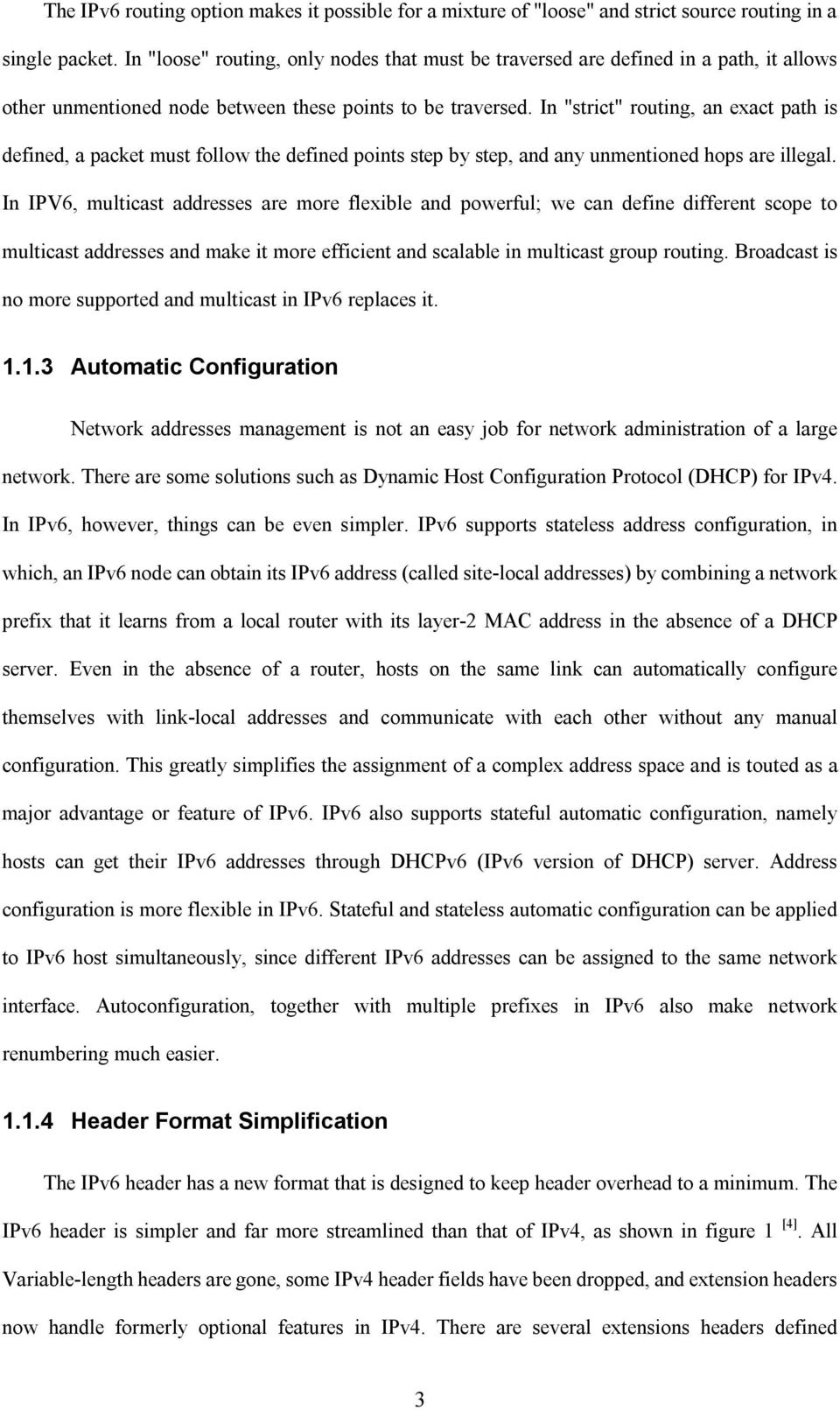
12 currently, including Fragment and Authentication Encapsulating Security Payload extension. Generally, routers do not examine extension headers as the packet is forwarded so they reduce packet processing time and bandwidth consumption. Figure 1 IPv6 and IPv4 Header Format IPv6 headers and IPv4 headers are not interoperable. A host or router must use an implementation of both IPv4 and IPv6 in order to process both header formats Flow Labeling Capability IPv6 defines the concept of a "flow" which identifies a packet as part of a ongoing stream data. Flow labeling allows routers to identify and provide special handling for packets belonging to a flow, it ensures better QOS control and provides better support for real-time traffic such as videoconference. Using a flow label, a router can know which end-to-end flow a packet belongs to, and then find out the packets that belong to real-time traffic. The flow label field is in the IPv6 header, so support for QOS can be achieved even when the packet payload is encrypted through IPSec Security The IPv4 specification does not explicitly include any security. The IPv6 basic specification 4
13 includes security, so support for IPSec is an IPv6 protocol suite requirement. Extensions to support security options, authentication, data integrity, and data confidentiality are built into IPv6. Those extension headers related to security include packet encryption (Encapsulated Security Payload), and source authentication (Authentication Header). 1.2 IPv6 Addressing As in IPv4, IPv6 addresses are assigned to interfaces, not computer hosts. In IPv6, one interface can have multiple addresses. Renumbering in IPv6 is designed to happen, so renumbering to IPv6 is much easier than to IPv4. IPv6 addresses can be divided into three types: unicast IPv6 addresses, multicast IPv6 addresses and anycast IPv6 addresses. A unicast address is for a single interface, and some special addresses are also assigned out of the unicast address space. A multicast address is for a set of interfaces that are on the same physical medium. When a packet is sent to a multicast address, the packet is sent to all of the interfaces associated with the multicast address. An anycast address is for a set of interfaces on different physical mediums. A packet sent to an anycast address is only received by one of the interfaces associated with this address (namely the nearest interface) [4]. IPv6 unicast and multicast addresses support scope. There are several types of scope for IPv6 unicast addresses: global scope addresses, link-local addresses and site-local addresses. IPv6 multicast addresses also support many different types of scope, including node scope, link scope, site scope, organization scope, and global scope. Currently, there are no broadcast addresses in IPv6. All types of IPv4 broadcast addressing are replaced in IPv6 by using multicast addresses IPv6 Address Allocation and Representation Similar to the way in which IPv4 address space is divided, the IPv6 address space is divided based on the value of high order bits. The specific type of an IPv6 address is also defined based on the value of high order bits. The variable-length high order bits and their fixed values are known as a Format Prefix (FP). Table 1 shows the current allocation of the IPv6 address space according to Format Prefix [9][10]. 5

14 Allocation FP & Size FP range in Hex Reserved (1/256) FF Unassigned (1/256) FF Reserved for NSAP allocation (1/128) FF Unassigned (1/128) FF Unassigned (1/128) FF Unassigned (1/32) FFF Unassigned 0001 (1/16) FFF Aggregatable global unicast addresses 001 (1/8) FFF Unassigned 010 (1/8) Unassigned 011 (1/8) Unassigned 100 (1/8) 4000-DFFF Unassigned 101 (1/8) Unassigned 110 (1/8) Unassigned 1110 (1/16) E000-EFFF Unassigned (1/32) F000-F7FF Unassigned (1/64) F800-FBFF Unassigned (1/128) FC00-FDFF Unassigned (1/512) FE00-FE7F Link-local unicast addresses (1/1024) FE80-FEBF Site-local unicast addresses (1/1024) FEC0-FEFF Multicast addresses (1/256) FF00-FFFF Table 1 Current Allocation of the IPv6 Address Space This allocation supports the direct allocation of different scope aggregation addresses, multicast addresses. More address space (85%) is unassigned. In the future, this space can be used for expansion of existing address types, or address types for new purposes. IPv4 addresses are divided along 8-bit boundaries and are represented in dotted-decimal format. While in IPv6, the 128-bit address is divided along 16-bit boundaries and each 16-bit block is converted to a 4-digit hexadecimal number and separated by colons. The leading zeros within each 16-bit block are optional and can be removed. The following IPv6 address in binary form can be represented as 21DA:D3:0:2F3B:2AA:FF:FE28:9C5A. In order to simplify the IPv6 addresses representation, a contiguous sequence of 16-bit blocks of 0s can be compressed and represented as double colon "::. However, zero compression can only be used once in order to avoid ambiguity. For example, IPv6 localhost address 0:0:0:0:0:0:0:1 can be compressed to ::1, and the multicast address FF02:0:0:0:0:0:0:2 can be compressed to FF02::2. An alternative form that is sometimes more convenient when dealing with a mixed environment of IPv4 and IPv6 nodes is x:x:x:x:x:x:d.d.d.d, 6

15 where the 'x's are the hexadecimal values of the six high-order 16-bit pieces of the address, and the 'd's are the decimal values of the four low-order 8-bit pieces of the address. This form is used in situations such as IPv4-mapped IPv6 address or IPv4-compatible IPv6 address and so on. In a URL, an IPv6 address is enclosed in brackets, for example Parsers have to be modified or upgraded to recognize IPv6 addresses [1][4] IPv6 Unicast Addresses IPv6 unicast addresses are aggregatable with contiguous bit-wise masks similar to IPv4 addresses under CIDR (classless Interdomain Routing). There are several forms of unicast address assignment in IPv6, and additional address types can be defined in the future. IPv6 Special Unicast Addresses There are some special Unicast Addresses assigned. Unspecified address 0:0:0:0:0:0:0:0 and Special address Representation Comments Localhost address ::1 To identify the interface itself, equivalent to loopback address in IPv4 Unspecified address IPv4-mapped IPv6 address IPv4-compatible address :: Equivalent to the IPv4 unspecified address It is used as a placeholder when no address is available. For example used as source address in initial DHCP request and Duplicate address detection. It can t be assigned to an interface or used as a destination address. ::ffff:a.b.c.d/96 ::a.b.c.d/96 a.b.c.d stands for the IPv4 address. It is used to represent an IPv4-only node to an IPv6 node. It is used only for internal representation. The IPv4-mapped address is never used as a source or destination address of an IPv6 packet. [1] a.b.c.d stands for the IPv4 address. It is used in automatic tunneling by IPv6/IPv4 nodes that want to transfer IPv6 packets over IPv4 routing infrastructure. 6to4 address 2002:a.b.c.d/48 a.b.c.d stands for the IPv4 address, it is used for tunneling between two nodes running both IPv4 and IPv6 over an IPv4 routing infrastructure Table 2 Special IPv6 Addresses loopback address ::1 are assigned out of the address space. Special IPv6 addresses also include some addresses defined to aid in the migration from IPv4 to IPv6, such as IPv4-compatible address, IPv4-mapped address, 6to4 address. Table 2 shows these special IPv6 addresses [1][10]. Aggregatable Global Unicast Addresses 7
![In a URL, an IPv6 address is enclosed in brackets, for example http://[2001:468:364:408b:210:4bff:fe9c:5c5]:80/index.html. Parsers have to be modified or upgraded to recognize IPv6 addresses [1][4].](/docs-images/42/12927749/images/page_15.jpg "1.2.2 IPv6 Unicast Addresses IPv6 unicast addresses are aggregatable with contiguous bit-wise masks similar to IPv4 addresses under CIDR (classless Interdomain Routing).")
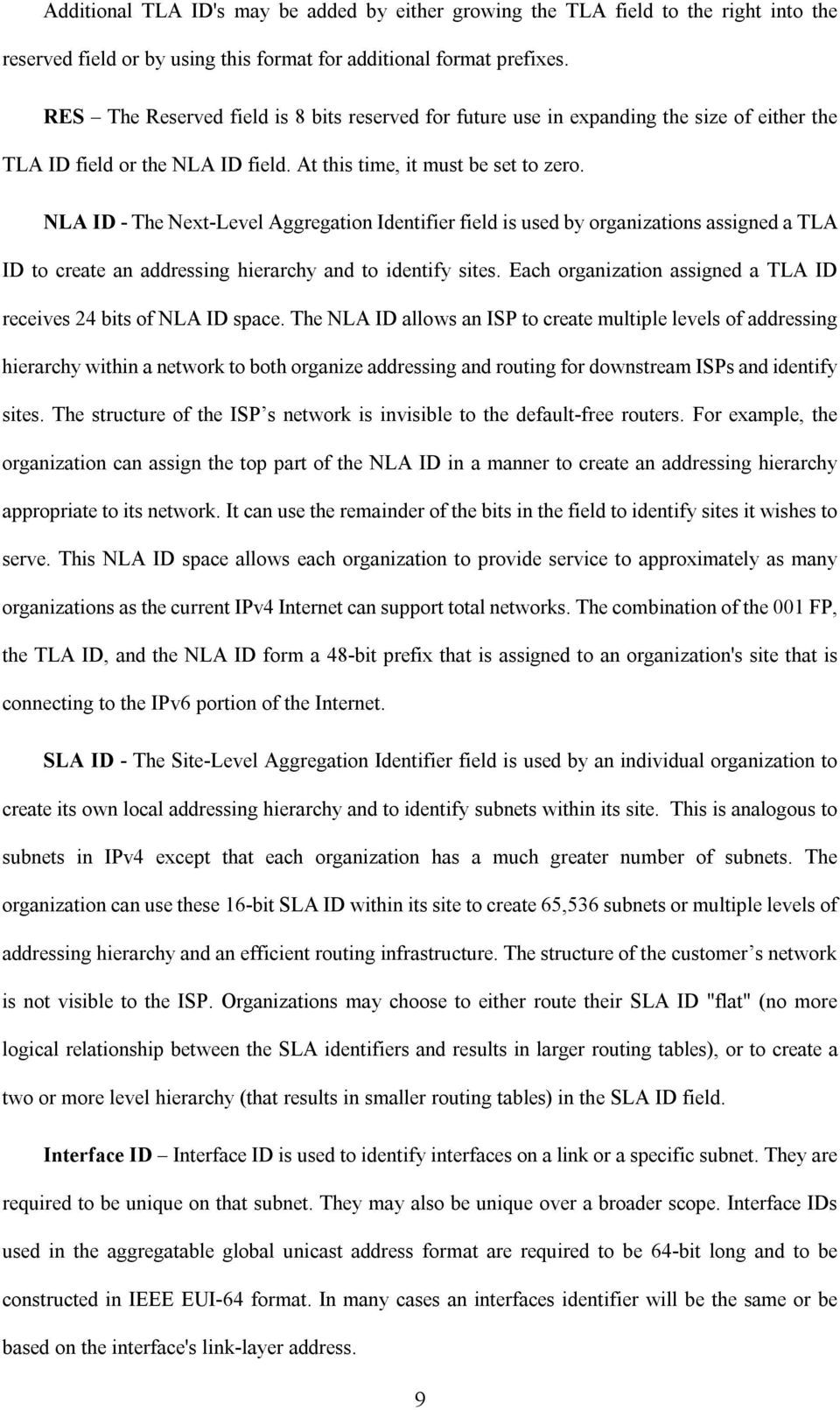
16 Aggregatable global unicast addresses, also known as global addresses are identified by the FP of 001 and are equivalent to public IPv4 addresses. They are globally routable and reachable on the IPv6 portion of the Internet. A unicast address is designed to support both the current provider-based aggregation and a new type of exchange-based aggregation. The combination will allow efficient routing aggregation for sites that connect directly to providers and for sites that connect to exchanges. Sites will have the choice to connect to either type of aggregation entity. The fields within the aggregatable global unicast address also create a three-level structure as shown in Figure 2: public topology, site topology, and interface identifier [1][4][11]. The aggregatable global unicast address structure is also shown in Figure 2. The fields in the aggregatable global unicast address are: 3 bits 13 bits 8 bits 24 bits 16 bits 64 bits FP TLA ID RES NLA ID SLA ID Interface ID Public Topology Site Interface Identifier Topology Figure 2 IPv6 Aggregatable Global Unicast Address Structure FP: Format Prefix (for aggregatable global unicast addresses is 001) TLA ID: Top-Level Aggregation Identifier, size of the field is 13 bits, RES: Reserved for future use, size of the field is 8 bits, NLA ID: Next-Level Aggregation Identifier, size of the field is 24 bits, SLA ID: Site-Level Aggregation Identifier, size of the field is 16 bits, Interface ID: Interface Identifier, size of the field is 64 bits. TLA ID The Top-Level Aggregation Identifier is the top level in the routing hierarchy. Default-free routers must have a routing table entry for every active TLA, and will probably have additional entries providing routing information for the TLA ID in which they are located. A 13-bit field TLA ID allows up to 8,192 different TLA IDs. The routing topology at all levels is designed to minimize the number of additional entries fed into the default free routing tables. 8

17 Additional TLA ID's may be added by either growing the TLA field to the right into the reserved field or by using this format for additional format prefixes. RES The Reserved field is 8 bits reserved for future use in expanding the size of either the TLA ID field or the NLA ID field. At this time, it must be set to zero. NLA ID - The Next-Level Aggregation Identifier field is used by organizations assigned a TLA ID to create an addressing hierarchy and to identify sites. Each organization assigned a TLA ID receives 24 bits of NLA ID space. The NLA ID allows an ISP to create multiple levels of addressing hierarchy within a network to both organize addressing and routing for downstream ISPs and identify sites. The structure of the ISP s network is invisible to the default-free routers. For example, the organization can assign the top part of the NLA ID in a manner to create an addressing hierarchy appropriate to its network. It can use the remainder of the bits in the field to identify sites it wishes to serve. This NLA ID space allows each organization to provide service to approximately as many organizations as the current IPv4 Internet can support total networks. The combination of the 001 FP, the TLA ID, and the NLA ID form a 48-bit prefix that is assigned to an organization's site that is connecting to the IPv6 portion of the Internet. SLA ID - The Site-Level Aggregation Identifier field is used by an individual organization to create its own local addressing hierarchy and to identify subnets within its site. This is analogous to subnets in IPv4 except that each organization has a much greater number of subnets. The organization can use these 16-bit SLA ID within its site to create 65,536 subnets or multiple levels of addressing hierarchy and an efficient routing infrastructure. The structure of the customer s network is not visible to the ISP. Organizations may choose to either route their SLA ID "flat" (no more logical relationship between the SLA identifiers and results in larger routing tables), or to create a two or more level hierarchy (that results in smaller routing tables) in the SLA ID field. Interface ID Interface ID is used to identify interfaces on a link or a specific subnet. They are required to be unique on that subnet. They may also be unique over a broader scope. Interface IDs used in the aggregatable global unicast address format are required to be 64-bit long and to be constructed in IEEE EUI-64 format. In many cases an interfaces identifier will be the same or be based on the interface's link-layer address. 9
18 Local-Use IPv6 Unicast Addresses There are two types of local-use unicast addresses defined. They are link-local addresses and site-local addresses. Link-local addresses are used for addressing on a single link for purposes such as auto-address configuration, neighbor discovery when no routers are present. They are identified by the FP of On a single link IPv6 network with no router, link-local addresses are used to communicate between hosts on the same link. The scope of a link-local address is the local link. A link-local address is required for neighbor discovery processes and is always automatically configured, even in the absence of all other unicast addresses. The prefix for link-local addresses is always FE80::/64. An IPv6 router must not forward any packets with link-local source or destination addresses beyond the link. Site-local addresses are used for addressing inside of a site without the need for a global prefix. They are identified by the FP of The scope of a site-local address is within the site. Site-local addresses are configured either through stateless or stateful address configuration processes. Site-local addresses have the format shown in figure 3: 10 bits 38 bits 16 bits 64 bits Subnet ID Interface ID Figure 3 The Site-local Address Format The first 48 bits are always fixed for site-local addresses, beginning with FEC0::/48. And they share the same structure with the aggregatable global unicast address beyond the first 48 bits of the address. So a subnetted routing infrastructure can be created and used for both site-local and aggregatable global unicast addresses Multicast IPv6 Addresses An IPv6 multicast address is an identifier for a group of nodes. A node may belong to any number of multicast groups. IPv6 multicast addresses have the FP of , so it always begins with FF. Multicast addresses cannot be used as source addresses or as intermediate destinations in 10

19 a Routing header. Multicast addresses have the format shown in Figure 4. The fields in the multicast address are FP (which is ), Flags, Scope, and Group ID. 8 bits 4 bits 4 bits 112 bits Flags Scope Group ID Figure 4 The IPv6 Multicast Address Flags the field of Flags indicates flags set on the multicast address. The size of this field is 4 bits. Currently, the only flag defined is the fourth bit: Transient (T) flag. The high-order 3 flags are reserved, and must be initialized to 0. When the T flag is set to 0, it indicates that the multicast address is a permanently assigned (well-known) multicast address allocated by the Internet Assigned Numbers Authority (IANA). When set to 1, it indicates that the multicast address is a transient (non-permanently-assigned) multicast address. Scope the field of scope is also 4 bits in size. The multicast scope value is used to limit the scope of the multicast group. In addition to information provided by multicast routing protocols, routers use the multicast scope to determine whether multicast traffic can be forwarded. Table 3 lists the values for the Scope field defined in [10]. Value Scope 0 Reserved 1 Node-local scope 2 Link-local scope 5 Site-local scope 8 Organization-local scope E Global scope F Reserved 3,4,6,7,9,A,B,C,D Unassigned Table 3 Defined Values for the Scope Field Multicast addresses from FF01:: through FF0F:: are reserved, well-known addresses. For example, traffic with the multicast address of FF02::2 has a link-local scope. An IPv6 router never forwards this traffic beyond the local link. Group ID - Identifies the multicast group, either permanent or transient. It is unique within the scope. The size of this field is 112 bits. The meaning of a permanently assigned group IDs is independent of the scope. For example: FF01:0:0:0:0:0:0:101 means all NTP servers on the same 11

20 node as the sender. FF02:0:0:0:0:0:0:101 means all the NTP servers on the same link as the sender. FF05:0:0:0:0:0:0:101 means all the NTP servers at the same site as the sender. Different from permanently assigned group IDs, transient group IDs are only relevant to a specific scope and are meaningful only within the given scope. For example, a group identified by the non-permanent, site-local multicast address FF15:0:0:0:0:0:0:101 at one site has no relationship to a group using the same address at a different site, nor to a non-permanent group using the same group ID with different scope, nor to a permanent group with the same group ID. Multicast addresses must not be used as source addresses in IPv6 packets or appear in any routing header. There are several useful multicast addresses. For example, To identify all nodes for the node-local and link-local scopes, the following multicast addresses are defined: FF01::1 (node-local scope all-nodes multicast address) and FF02::1 (link-local scope all-nodes multicast address). To identify all routers for the node-local, link-local, and site-local scopes, the following multicast addresses are defined: FF01::2 (node-local scope all-routers multicast address), FF02::2 (link-local scope all-routers multicast address), and FF05::2 (site-local scope all-routers multicast address) Anycast IPv6 Addresses An IPv6 anycast address is assigned to more than one interface (typically belonging to different nodes). Packets addressed to an anycast address are forwarded by the routing infrastructure to the nearest interface to which the anycast address is assigned. Anycast addresses are allocated from the unicast address space, using any of the defined unicast address formats.in order to facilitate delivery, the routing infrastructure must be aware of the interfaces assigned anycast addresses and their distance in terms of routing metrics. There is little experience with widespread, arbitrary use of Internet anycast addresses. At present, anycast addresses are only used as destination addresses and are only assigned to routers. The subnet-router anycast address is predefined and required. It is created from the subnet prefix for a given interface. To construct the subnet-router anycast address, the bits in the subnet prefix are fixed at their appropriate values and the remaining bits are set to 0. Figure 5 shows the 12

21 format of the subnet-router anycast address [1][10]. n bits 128-n bits Subnet Prefix Figure 5 The Subnet-Router Anycast Address All router interfaces attached to a subnet are assigned the subnet-router anycast address for that subnet. The subnet-router anycast address is used for communication with one of multiple routers attached to a remote subnet A Node s IPv6 Addresses An IPv4 host with a single network adapter typically has a single IPv4 address assigned to that adapter. An IPv6 host, however, usually has multiple IPv6 addresses - even with a single interface. A typical IPv6 host is required to recognize the following addresses as self-identification. [9][10] A link-local Address for each interface Assigned unicast addresses (which could be a site-local address and one or multiple aggregatable global unicast addresses) for each interface The loopback address (::1) for the loopback interface All-node multicast addresses Solicted-node multicast address for each unicast address on each interface Multicast addresses of all other groups to which the host belongs Typical IPv6 hosts are logically multihomed because they have at least two addresses with which they can receive packets-- a link-local address for local link traffic and a routable site-local or aggregatable address. As a router, it is required to recognize all addresses that a host is required to recognize. In addition, an IPv6 router also must be able to recognize the following addresses to identify itself. The subnet-router anycast addresses for the interfaces it is configured to act as a router on. All other anycast addresses with which the router has been configured. 13
22 All-routers multicast addresses Multicast addresses of all other groups to which the router belongs. 1.3 Address Autoconfiguration One of most useful features of IPv6 is its ability to configure itself even without the use of a stateful protocol such as DHCP server as in IPv4. In IPv6, equipment newly added to a network can automatically configuring its network addresses. Any IPv6 host can obtain its link-local, site-local and global addresses via stateless address with no manual configuration of hosts, minimal (if any) configuration of routers, and no need for additional servers. IPv6 allows a host to generate its own addresses using a combination of locally available information and information advertised by routers [1][12]. IPv6 also supports stateful address autoconfiguration mechanism. The above-mentioned stateless address autoconfiguration approach is used when a site is not particularly concerned with the exact addresses the hosts use, so long as they are unique and properly routable. The stateful approach is used when a site requires tighter control over exact address assignments. In IPv6, Both stateful and stateless address autoconfiguration may be used simultaneously Stateless Address Autoconfiguration In stateless address autoconfiguration, nodes (both hosts and routers) begin the process by generating a link-local address for the interface. A link-local address is formed by appending the interface's identifier (Interface ID) to the well-known link-local prefix (FE80::/64). However, before the link-local address can be assigned to an interface and used, a node must attempt to verify that this "tentative" address is not already in use by another node on the same link. Once a node knows that its tentative link-local address is unique, it assigns it to the interface, and now this node has IP-level connectivity with neighboring nodes with the newly assigned link-local address. Then for an Ipv6 host, the next phase of stateless address autoconfiguration involves obtaining a router advertisement or determining that no routers are present. If there are no routers available, the host has to use other mechanism such as stateful autoconfiguration to obtain other IPv6 addresses and configuration 14
23 parameters. If routers are present, routers will send Advertisements contains prefix Information options that contain information used by stateless address autoconfiguration to generate site-local and global IPv6 addresses, and other configure parameters. For safety, all addresses must be tested for uniqueness prior to their assignment to an interface [12] Stateful Address Autoconfiguration Stateful configuration is based on the use of a stateful address configuration protocol to obtain addresses and other configuration options. It offers the capability of automatic allocation of reusable network addresses and additional configuration flexibility. A host will use a stateful address configuration protocol when there are no routers present on the local link or when it receives Router Advertisement Messages without prefix options. A new protocol, Dynamic Host Configuration Protocol for IPv6 (DHCPv6) is one way to perform stateful autoconfiguration. In some documents, stateful autoconfiguration means the configuration that the IPv6 addresses and other configuration parameters are obtained through DHCPv6 server. DHCPv6 is the IPv6 equivalent of DHCP in IPv4. It is used to pass out addressing and service information in the same way that DHCP is used in IPv4. This is stateful because the DHCP server and the client must both maintain state information to keep addresses from conflicting, to handle leases, and to renew addresses over time. DHCPv6 is not yet standardized, although there are several drafts available, which are expected to move to proposed standard status shortly [13]. One of the advantages of DHCPv6 is that it does more than handle IP address allocation. For example, DHCPv6 can also be used to let end systems discover their DNS servers. Thus, large networks will likely use a combination of stateless autoconfiguration to discover their address, and DHCPv6 servers to pass out other network information, such as DNS servers, with a third mechanism for the system to register its name in the DNS. 15
24 2 TRANSITION FROM IPV4 TO IPV6 Because of the huge size and coverage of the Internet, it is expected that the transition from IPv4 to IPv6 will need a long time. It is impossible to expect a fast, centrally coordinated cutover. So it is very import to maintaining compatibility with IPv4 while deploying IPv6 and transitioning the Internet to IPv6. The key to a successful IPv6 transition is how to maintain compatibility of IPv6 equipment with the large installed base of IPv4 hosts and routers. The coexistence of both IPv4 and IPv6 must be arranged in a practical and simple way. For smooth, stepwise and independent transition, a set of techniques has been specified. They implement mechanisms for the true internetworking, coexistence, easy address mapping and name service migration. To allow seamless interoperation, all hosts running IPv6 must still be able to communicate with the IPv4 hosts. The IETF specifications for IPv6 contain a lot of information concerning the transition issues. [15][24][25] Lots of transition mechanisms are proposed, most of them are related with Communication between IPv4 and IPv6 nodes Connecting IPv6 islands isolated in the IPv4 world. The basic transition mechanisms for IPv6 hosts and routers including Dual IP Layer Operation and IPv6 over IPv4 Tunneling. Dual stack nodes will be able to interoperate directly with both IPv4 and IPv6 nodes. Tunnel mechanisms provide ways about how IPv6 islands can communicate with each other over the cloud of IPv4 infrastructure. 2.1 Dual IP Layer Operation In order that IPv6 and IPv4 nodes can communicate with each other, the most straightforward way for IPv6 nodes is to provide a complete IPv4 implementation. Dual IP layer operation provides complete support for both IPv4 and IPv6 in hosts and routers, as shown in figure 6 [20]. By providing a complete IPv4 implementation, IPv6 nodes can remain compatible with IPv4-only nodes. This is the dual IP layer technique, and nodes that implements both IPv4 and IPv6 are called dual nodes (IPv6/IPv4 nodes). The dual IP layer technique may or may not be used in conjunction with the 16
25 tunneling techniques. Figure 6 A Dual IP Layer Architecture There are some variations to the dual IP layer operation mechanism. The IPv6 protocol for the Windows.NET Server 2003 family is such an example. The IPv6 protocol driver, Tcpip6.sys, also contains a separate implementation of TCP and UDP and is sometimes referred to as a dual-stack implementation. Figure 7 shows the dual stack architecture of the IPv6 protocol for the Windows.NET Server 2003 family [20]. Figure 7 The Dual Stack Architecture for the Windows.NET Server 2003 Family In order to support bother protocols, IPv6/IPv4 nodes may be configured with both IPv4 and IPv6 addresses. Although the two addresses may be related to each other, this is not required. And 17
26 those IPv6/IPv4 nodes can acquire their IPv4 addresses by using IPv4 mechanisms such as DHCP, or acquire their IPv6 addresses by IPv6 protocol mechanisms such as stateless address autoconfiguration or DHCP v6. For Dual Nodes, the Domain Naming System (DNS) must provide a resolver library capable of dealing with the IPv4 A records as well as new records type for IPv6. So the Domain Name System will be an important component during the transition process to support both IPv4 and IPv6. Apparently, the Dual IP approach brings about some inconvenience. It has some drawbacks and may cause some problem. For example, Dual IP has the need to maintain a multi-protocols, it may introduces more instability and workload to an administrator. In addition, each Dual IP host needs an IPv4 address, so the use of this mechanism will not be possible if the address space of IPv4 is exhausted to the point that new addresses can no longer be assigned. Several solutions are proposed to relieve these problems, for example, DSTM [23] and some translation type transition mechanisms NAT-PT [21], SOCKS [18], and BIS [22] and so on. DSTM (the Dual Stack Transition Mechanism): DSTM proposes to use the dual stack IP approach. With DSTM, IPv4 addresses are assigned dynamically only when needed. So the use of IPv4 global addresses is reduced. DSTM is targeted to help the interoperation of IPv6 newly deployed networks with existing IPv4 networks. Figure 8 is the architecture shows how DSTM works [26]. Figure 8 DSTM Architecture As shown in figure 8, there are 3 different types of device, an IPv6-only host, a DSTM server and a DSTM gateway. DSTM server administrates the IPv4 address pool. Whenever a host in the IPv6 domain needs to communicate with an IPv4 host, it first asks the DSTM server for a temporary 18
27 IPv4 address, and the DSTM server then will reserve one for the IPv6 host. And also tell the IPv6 host information about the DSTM gateway. Following this message exchange, IPv6 host can configures its IPv4 stack with the allocated address, and from now on, all IPv4 packets from the host are tunneled to the DSTM gateway. NAT-PT (Network Address Translator Protocol Translator): As shown in figure 9 [44], a NAT-PT device resides at the borders between an IPv6 and IPv4 network. It makes address and protocol translation at the IP level. NAT-PT allows native IPv6 hosts to communicate with native IPv4 hosts and vice versa. Similar to DSTM, NAT-PT allocates an IPv4 pool addresses to identify the IPv6 hosts and handles the mapping of the IPv4 pool address to the IPv6 host. In addition, header translation is also performed by NAT-PT. Figure 9 NAT-PT Architecture In NAT-PT, the communication between IPv6 and IPv4 relays on a NAT box that translates between IPv4 and IPv6. So NAT-PT will cause performance degradation, and the NAT-PT device is a single point of failure. NAT-PTs are just a temporary solution. The NAT-PT box may be removed after the transition has been completed. SOCKS: SOCKS: provides a way for a gateway named SOCKS Server to act as a relay of TCP and UDP connections between two end hosts. A small or medium sized IPv4 network can provide access to an external IPv6 network using a SOCKS Server in a dual stack machine which can have access to both networks. An IPv4 host connects to an IPv6 host by sends a request to the 19
28 SOCKS Server using the Full Qualified Domain Name (FQDN) of the IPv6 host. The SOCKS Server resolves the FWDN to an IPv6 address and sends a fake IPv4 address back to IPv4 host. So two connections are established: one connection between the IPv4 host with SOCKS Server, and the other connection between the SOCKS Server and the IPv6 host. However, all these processes are invisible to applications, since they make socket calls with the usual socket API [18]. BIS (Bump in the Stack): BIS allows the hosts to communicate with other IPv6 hosts using existing IPv4 applications. It is highly desirable since the low availability of existing IPv6 applications. As shown in Figure 10 [44], BIS inserts modules into the hosts. The modules snoop the data flowing between a TCP/IPv4 module and network card driver modules and translate the IPv4 into IPv6 and vice versa, to act as translators, like NAT-PT implemented within the host. When they communicate with the other IPv6 hosts, pooled IPv4 addresses are assigned to the IPv6 hosts internally, but the IPv4 addresses never flow out from them. Moreover, since the assignment is automatically carried out using DNS protocol, users do not need to know whether target hosts are IPv6 ones or not. Through BIS, existing IPv4 applications can communicate with IPv6 hosts (looking like they were dual stack hosts for both IPv4 and IPv6). BIS expands the territory of dual stack hosts. BIS can co-exist with other translators because their roles are different. Figure 10 Using IPv4 Applications over an IPv6 network by BIS 2.2 IPv6 over IPv4 Tunneling Mechanisms The mechanisms described here are designed to enable IPv6 communication between IPv6 20
29 islands isolated in the IPv4 world. All of these rely on tunnels. A tunnel is a link between two IPv4 end-points that must be configured by specifying the IPv6 destinations for which the packets are to be encapsulated, and the remote IPv4 end-point to which they must be sent. The IPv6 routing infrastructure will be built up over time. While the IPv6 infrastructure is being deployed, the existing IPv4 routing infrastructure can be used to carry IPv6 traffic. IPv6 nodes (or networks) that are separated by IPv4 infrastructures can build a virtual link by configuring a tunnel. Tunneling provides a way to make use of IPv4 routing infrastructure to carry IPv6 traffic. IPv6/IPv4 dual nodes can tunnel datagrams over regions of IPv4 routing topology by encapsulating IPv6 packets within IPv4 packets. Tunneling can be used in a variety of ways: Router-to-Router, Host-to-Router, Host-to-Host, and Router-to-Host. The first two tunneling methods listed above are called "configured tunneling, the endpoint of this type of tunnel is an intermediary router. When tunneling to a router, the endpoint of the tunnel is different from the destination of the packet being tunneled. Since the addresses in the IPv6 packet being tunneled cannot provide the IPv4 address of the tunnel endpoint, the tunnel endpoint address is determined from configuration information on the node performing the tunneling. The last two tunneling methods are called "automatic tunneling". In automatic tunneling, the IPv6 packet is tunneled all the way to its final destination. In this case, the destination address of both the IPv6 packet and the encapsulating IPv4 header identify the same node. This fact can be exploited by encoding information in the IPv6 destination address that will allow the encapsulating node to determine the IPv4 address of the tunnel endpoint automatically [15]. Other tunneling mechanisms including 6over4, 6to4 and tunnel broker. They are described in more detail in the following paragraphs Configured Tunneling In configured tunneling, the tunnel endpoint address is determined from configuration information in the encapsulating node. For each tunnel, the encapsulating node must store the tunnel endpoint address. When an IPv6 packet is transmitted over a tunnel, the tunnel endpoint address configured for that tunnel is used as the destination address for the encapsulating IPv4 header. The 21
30 determination of which packets to tunnel is usually made by routing information on the encapsulating node. This is usually done via a routing table, which directs packets based on their destination address using the prefix mask and match technique. In the simplest case, the network administrator configures tunnels manually by agreement with the administrator of the network where the remote IPv4 end-point resides. Most of the interconnections between IPv6 networks used in the worldwide are initially set up through manually configured tunneling. However, having to deal with large numbers of tunnels is necessary for interconnections between IPv6 and IPv4. Configured tunneling will cause an enormous administrative workload for network managers and makes it necessary to deploy automatic tunneling configuration mechanisms. A number of other tunneling mechanisms also have been proposed, such as 6over4, 6to4, tunnel broker, and so on Automatic Tunneling IPv6/IPv4 nodes that perform automatic tunneling are assigned an IPv4-compatible address. IPv4-compatible addresses are assigned exclusively to nodes that support automatic tunneling. A node should be configured with an IPv4-compatible address only if it is prepared to accept IPv6 packets destined to that address encapsulated in IPv4 packets destined to the embedded IPv4 address. In automatic tunneling, the tunnel endpoint address is determined from the packet being tunneled. If the destination IPv6 address is IPv4-compatible, then the packet can be sent via automatic tunneling. If the destination is IPv6-native, the packet cannot be sent via automatic tunneling. A routing table entry can be used to direct automatic tunneling. An implementation can have a special static routing table entry for the prefix 0:0:0:0:0:0/96. (That is, a route to the all-zeros prefix with a 96-bit mask.) Packets that match this prefix are sent to a pseudo-interface driver that performs automatic tunneling. Since all IPv4-compatible IPv6 addresses will match this prefix, all packets to those destinations will be auto-tunneled. Once it is delivered to the automatic tunneling module, the IPv6 packet is encapsulated within an IPv4 header. The destination IPv4 address is put as low-order 32-bits of IPv6 destination address 22
31 and the source IPv4 address is the IPv4 address of interface the packet is sent via. The automatic tunneling module always sends packets in this encapsulated form, even if the destination is on an attached datalink. This mechanism is proposed in [15], it was not widely accepted, as the fact that it calls for importing IPv4 routing tables into the IPv6 routing infrastructure effectively precludes optimal hierarchical routing, and it can be used only between individual hosts to4 6to4 is an optional method of connecting IPv6 domains via IPv4 clouds. The objective of this method is to allow isolated IPv6 sites (or hosts), which are attached to an IPv4 network which has no native IPv6 support, to communicate with other IPv6 domains. As shown in Figure 11 [45], the router on the border of the IPv6 domain creates a tunnel to the other domain, and the IPv4 endpoints of the tunnel are identified in the prefix of the IPv6 domain. 6to4 provides a mechanism to construct IPv6 addresses automatically from IPv4 addresses. This technique makes it extremely easy to extract the embedded IPv4 address. The whole IPv6 packet can be delivered over an IPv4 network encapsulated in an IPv4 packet. Thus, no configured tunnels are needed to send packets between 6to4 capable IPv6 sites situated anywhere in IPv4 Internet. In this way IPv6 gains considerable independence of the underlying wide area network and can step over many hops of IPv4 subnets. Applying the rules defined in [25] a site may migrate from IPv4 to 6to4 and then to native IPv6, without having to cease any of the previous mechanisms/protocol. We may stop the use of IPv4 only when there is no more need for the addresses. 23
32 Figure 11 6to4 Tunneling Mechanism over4 The 6over4 mechanism [28] allows isolated IPv6 hosts, located on a physical link, with no directly connected IPv6 router, to become fully functional IPv6 hosts. 6over4 uses an IPv4 domain that supports IPv4 multicast as a virtual local link. 6over4 provides a solution to scenarios where a number of IPv6 hosts are scattered around in an IPv4 domain, and none of them have a direct IPv6 connectivity. The hosts themselves perform the tunneling. By providing a router with a native IPv6 connection, which also understands 6over4, the 6over4 hosts can also connect to native IPv6 hosts, whereby IPv6 packets can be automatically encapsulated over an IPv4 network. 6over4 relies on the existence of an underlying IPv4 domain that supports multicast, this solution poses scalability problems, and is hampered by the fact that the IP multicast service is not yet generally available on the Internet. For these reasons, it is an effective solution only for corporate or campus networks which support IP multicast IPv6 Tunnel Broker This approach involves using dedicated servers which automatically configure tunnels on behalf of users. It is a mechanism aims to allow people to try out IPv6 without any need of special or dedicated routing infrastructure [27]. Tunnel Broker is basically a mechanism to obtain configured tunnels in an automatic way, sometimes is called semi-automatic tunnel. As shown in Figure 12 [45], the main idea is that, on a 24
33 request, the tunnel broker assigns an IPv6 address to the isolated host from its address space, updates the DNS automatically, sends a configuration order to the tunnel server, and sends back a script to requestor. The tunnel server establish a tunnel from the IPv6-only network to the requesting host, and running the script on the requesting hosts establish the tunnel in the reverse way [18]. Figure 12 Tunnel Broker Model This technique is particularly suitable for connections between small users (i.e., the traditional users of dial-up Internet connectivity) and an IPv6 Service Provider Summary of Transition Mechanisms Lots of transition mechanisms are proposed, table 4 summarizes and compares the different available transition mechanisms [18]. 25
34 Mechanism type Implication on application IPv4 address requirements Hosts/Site mechanism Scalability Comments Dual stack None Permanent or Pool of addresses allocated by a DHCP server. Site/Host None Very simple to set up, available to every node supporting IPv6 stack. DSTM None Pool of addresses required for AIIH server. Site/Host Limitation of the number of DTI end point supported by the DSTM router. Allows hosts to run end-to-end IPv4 application within an IPv6 only network. Allows IPv4/IPv6 of IPv6-only host application to communicate with either IPv4 or IPv6 end point without need of specific ALG. 6to4 Applications need to be ported to interface with the Ipv6 stack. IPv4 address of border routers. Site/Host Limitation of the number of tunnels supported by the 6to4 router. Allows to automatically joining IPv6 network separated by an IPv4 only network. Each IPv6 network needs to have a 6to4 border router. Tunnel Broker Applications need to be ported to interface with the Ipv6 stack. One for the dual stack host. At least one for the tunnel broker implementation. Site/Host Limitation of the number tunnel supported by the tunnel server, limitation of the number of IPv6 addresses available to the broker server. Allows an isolated IPv4 host within an IPv4 only network, to reach an IPv6 wide network. 6over4 Applications need to be ported to interface with the Ipv6 stack. One per host Host Availability of IPv4 multicast. Limitation on the number of tunnels supported by the 6over4 router. Allows to automatically joining IPv6 network separated by an IPv4 only network. The IPv4 network needs to support multicast. Each IPv6 network needs to have a 6over4-border router. NAT-PT Applications including IP addresses in the packet payload need the availability of a dedicated ALG into the NAT-PT router. Pool of IPv4 addresses needed. Site Availability of ALGs for specific application. Limitation on the number of simultaneous translations. Needs specific ALG for DNS, FTP, IPSEC, Mechanism located in a single point. SIIT Not compatible with applications that includes IP addresses in the packet payload. Pool of addresses needed. SIIT does not define how these are allocated. Site None Allows IPv4/IPv6 applications on an IPv6-only host to communicate with an IPv4-only host. BIS None (A Pool of private IPv4 addresses are needed) Host Availability of ALGs for specific application. Allows IPv4 application to communicate with IPv6-only hosts. SOCKS64 The Socks Server must have an IPv4 address Site Limitation on the number of concurrent translations. Allows IPv4 applications to communicate with IPv6-only hosts and vice verse. Table 4 Summary and Comparison of different transition mechanisms 26
35 2.3 DNS and IPv6 A Domain Name System (DNS) infrastructure is needed for successful transition from IPv4 to IPv6 and successful coexistence of them, because of the prevalent use of names (rather than addresses) to refer to network resources. DNS upgrading should be done in the earlier phase during the transition from IPv4 to IPv6. Upgrading the DNS infrastructure consists of populating the DNS servers with records to support IPv6 name-to-address and address-to-name resolutions Introduction to DNS and DNS Server The DNS has three major components: the Domain Name Space and Resource Records, Name Servers, and Resolvers [33]. The Domain Name and Resource Records are the hierarchical, distributed tree structured database. It stores information for mapping Internet host names to IP addresses and vice versa. The data stored in the DNS is organized as tree and identified by domain names according to organizational or administrative boundaries. Conceptually, each node and leaf of the domain name space tree names a set of information. A DNS domain is a branch under the node. For administrative purposes, the name space is partitioned into areas called zones, each starting at a node and extending down to the leaf node or to nodes where other zones start. Zone and domain are important concept in DNS and they are different. A zone is a point of delegation in the DNS tree, and consists of contiguous portions of the DNS domain tree for which the DNS server has authoritative. A DNS domain is a branch of the namespace, a domain can be subdivided into several partitions and each partition can be a zone. A zone can also contain information of multiple domains. Resolvers are programs that extract information from name servers in response to client requests. Clients look up information in the DNS by calling a resolver library, which sends queries to one or more name servers and interprets the responses. Name Servers are server programs which hold information about the domain tree's structure and set information. When it receives DNS query, it attempts to locate the requested information by retrieving data from its local zones. If this fails, the server can check its cache, communicate with other DNS servers to resolve the request, or refer the client to another DNS server that might know 27
36 the answer. When queried, DNS servers can provide the requested information, or provide a pointer to another server that can help resolve the query, or reply with some error message. We have several types of DNS servers. If a DNS server contains the complete data for a zone, it is called an authoritative DNS server for this zone. Most zones have more than one authoritative servers to make the DNS tolerant of server and network failure. An authoritative server can further be divided into primary master server and slave servers. The primary master server maintained the master copy of the zone data, it loads the zone contents from some local file which is edited by humans or perhaps generated mechanically from some other local file which is edited by humans, and this file is called the master file. Slave servers load the zone contents from another server using a replication process known as a zone transfer. The data can be transferred directly from the primary master or another slave. A slave server may itself act as a master to a subordinate slave server [36]. Different from authoritative servers, caching DNS servers can t perform the name resolution by themselves. A caching-only server has no zone database, it relies on other name servers to obtain information. After a cache-only server receives information for a query it caches the information and can respond to subsequent queries (for the same name) without querying other name servers. This will shorten the waiting time for the next time significantly, especially if you re on a slow connection. A caching name server does not necessarily perform the complete name lookup itself. Instead, it can forward all or some of the queries to another caching name server, which is referred as a forwarder. You do not need to perform any special configuration on the computer designated as a forwarder. You must configure the DNS server that needs to forward queries by providing the IP address of the forwarders Resource Record in DNS Zone Files A domain name identifies a node. Each node has a set of resource information, which may be empty. The set of resource information associated with a particular name is composed of separate entries called Resource Records (RRs). The order of RRs in a set is insignificant, but sorting of multiple RRs is permitted for optimization purpose. 28
37 The components of a Resource Record are: owner name, TTL, type, class, RDATA. The owner name is the domain name where the RR is found. Type specifies the type of the resource record. TTL is the time to live of the RR, it describes how long a RR can be cached before it should be expired. Class identifies a protocol family or instance of a protocol. RDATA shows the type and sometimes class-dependent data that describes the RR. Figure 13 show the components of a Resource Record [36] IN A Owner name TTL Class Type RDATA Figure 13 Resource Record Components There are different types of valid RRs, the often seen ones are types A, CNAME, DNAME, MX, NS, PTR, SOA, TXT, A6, AAAA as shown in table 5. A CNAME A host address Identifies the canonical name of an alias DNAME For delegation of reverse addresses MX NS PTR SOA TXT AAAA A6 Identifies a mail exchange for the domain The authoritative name server for the domain A pointer to another part of the domain name space Identifies the start of a zone of authority Text records Format for IPv6 address, it is depreciated now. A new format for IPv6 address Table 5 Resource Record Type List Currently, there is only one valid RR class in the DNS, IN, which stands for the Internet system. RDATA is the type-dependent or class dependent data. Table 6 shows information about RDATA for different RR types and classes [36]. 29
38 A A6 CNAME DNAME MX NS PTR SOA For the IN class, a 32 bit IP address. Maps a domain name to an IPv6 address, with a provision for indirection for leading "prefix" bits. A domain name. Provides alternate naming to an entire subtree of the domain name space, rather than to a single node. It causes some suffix of a queried name to be substituted with a name from the DNAME record's RDATA. A 16 bits preference value (lower is better) followed by a host name willing to act as a mail exchange for the owner domain. A fully qualified domain name. A fully qualified domain name. Means start of authority. It including several fields. Table 6 RDATA for Different Resource Records DNS to Support IPv6 Addresses Lookup Resource Record types "AAAA" and "A6" were defined to support IPv6 addresses. For dual IP operation, DNS must provide resolver libraries capable of dealing with IPv4 "A" records as well as IPv6 "AAAA" and "A6" records. The "AAAA" record is a parallel to the IPv4 "A" record. While their use is deprecated; they are useful to support older IPv6 applications. The newer "A6" record is more flexible than the "AAAA" record, and is therefore more complicated. "AAAA" should not be added where they are not absolutely necessary. When a query locates an "A6" or "AAAA" record for IPv6 and "A" record for IPv4, Recognition of a destination host s version will be the responsibility of the Domain Name Server. DNS has three alternatives when filtering or ordering the query results: return only IPv6 address, Return only IPv4 address, or return both addresses. Depending upon the type or types of records, or in which order returned by resolution of a host name, the source host will create a packet using the appropriate protocol version [29][30]. As in the IPv4 address space, the IPv6 address space needs a reverse mapping of IPv6 addresses to DNS names. IPv4 address reverse mapping is provided by the IN-ADDR.ARPA domain. IP6.INT and IP6.ARPA domains provide reverse mapping of AAAA and A6 type address respectively. 30
39 IP6.INT is a special root domain defined to map an IPv6 address to a host name. An IPv6 address is represented as a name in the IP6.INT domain by a sequence of nibbles separated by dots with the suffix ".IP6.INT". The sequence of nibbles is encoded in reverse order. Each nibble is represented by a hexadecimal digit. For example, the inverse lookup domain name corresponding to the address 2001:765:4321:2:3:4:567:89ab would be [29] : b.a ip6.int. The use of nibble format is deprecated. The more difficult and now official way of handling IPv6 forward and reverse mapping uses two new record types, A6 and DNAME, and a new domain IP6.ARPA. Actually, the main reason the AAAA record and the IP6.INT reverse-mapping scheme were replaced was because they made network renumbering difficult. For example, if an organization were to change Next-Level Aggregators, it would have to change all the AAAA records in its zone data files since 24 of the bits of an IPv6 address are an identifier for the NLA. Imagine an NLA changing TLAs. This would wreak havoc with its customers' zone data. To make renumbering easier, A6 records can specify only a part of an IPv6 address, and then refer to the remainder of the address by a symbolic domain name. This allows zone administrators to specify only the part of the address under their control. To build an entire address, a resolver or name server must follow the chain of A6 records from a host's domain name to the TLA ID. And that chain may branch if a site network is connected to multiple NLAs or if an NLA is connected to multiple TLAs. For example, suppose two different ISP (here means different NLAs) provide service for lab1.subnet1.ipv6.auburn.edu. The A6 record: $ORIGIN subnet1.ipv6.auburn.edu. lab1 IN A6 64 ::0210:4bff:fe10:0d24 subnet1.ipv6.auburn.edu. specifies the final 64 bits of lab1.subnet1.ipv6.auburn.edu's IPv6 address (64 is the number of bits of the prefix not specified in this A6 record) and that the remaining 64 bits can be found by looking up an A6 record at subnet1.ipv6.auburn.edu. 31
40 subnet1.ipv6.auburn.edu, in turn, specifies the last 16 bits of the 64-bit prefix (the SLA ID) that we didn't specify in lab1.ipv6.auburn.edu's A6 address as well as the domain name of the next A6 record to look up: $ORIGIN ipv6.auburn.edu. subnet1 IN A6 48 0:0:0:1:: nla1.tla1.net. subnet1 IN A6 48 0:0:0:1:: nla2.tla1.net. The first 48 bits of the prefix in subnet1.auburn.ipv6.edu's record-specific data are set to zero, since they're not significant here. In fact, these records tell us to look up two A6 records next, one at nla1.tla1.net and one at nla2.tla1.net. That's because subnet1 has connections to two NLAs, NLA 1 and NLA 2. In NLA 1's zone, we'd find: $ORIGIN tla1.net. nla1 IN A :468:364:: nla1.tla-1.net. in NLA 2 s zone, we d find $ORIGIN tla1.net. nla2 IN A :468:555:: nla2.tla-1.net. When lab1.subnet1.ipv6.auburn.edu is looked up, the resolver will find partial A6 records and will use the additional name to find the remainder of the data. By following this chain of A6 records, a name server can assemble all 128 bits of lab1.subnet1.ipv6.auburn.edu's two IPv6 addresses. These turn out to be: 2001:468:364:1: 0210:4bff:fe10:0d :468:555:1: 0210:4bff:fe10:0d24 (We re connected to two NLAs for redundancy.) Note that if TLA 1 changes its NLA assignment for NLA 1, it only needs to change the A6 record for nla1.tla1.net in its zone data; the change "cascades" into all A6 chains that go through NLA 1. This makes the management of addressing on IPv6 networks very convenient, and makes changing NLAs easy, too. However, if a name server appears in an NS record and owns one or more A6 records, those A6 records should specify all 128 bits of the IPv6 address. This helps avoid deadlock problems, where a resolver or name server needs to talk to a remote name server to resolve part of that name server's IPv6 address. 32
41 Reverse mapping for A6 in IP6.ARPA domain isn t so simple as IP6.INT, reverse mapping IPv6 addresses involves DNAME records and bitstring labels. DNAME records are a little like wildcard CNAME records. Bitstring labels are the other half of the magic involved in IPv6 reverse mapping. They can be looked as simply as a compact way of representing a long sequence of binary (i.e., one-bit) labels in a domain name. If you wanted to permit delegation between any two bits of an IP address, that might compel you to represent each bit of the address as a label in a domain name. Bitstring labels represent IPv6 address as a shorter hexadecimal, octal, binary or dotted-octet string. The string is encapsulated between the tokens "\[" and "]" to distinguish it from a traditional label, and begins with one letter that determines the base of the string: b for binary, o for octal, and x for hexadecimal [30][31][32]. Notice that the most significant bit begins the string, as in the text representation of an IPv6 address, but in the opposite order of the labels in the IN-ADDR.ARPR domain. Bitstring labels can also represent parts of IPv6 addresses, in which case you need to specify the number of significant bits in the string, separated from the string by a slash. Together, DNAMEs and bitstring labels are used to match portions of a long domain name that encodes an IPv6 address and to iteratively change the domain name looked up to a domain name in a zone under the control of the organization that manages the host with that IPv6 address. To handle the reverse lookups of lab1.subnet1.ipv6.auburn.edu In NLA 1 s zone $ORIGIN \[x /48].ip6.arpa. \[x0001/16] IN DNAME ipv6.rev.auburn.edu. In NLA 2 s zone $ORIGIN \[x /48].ip6.arpa. \[x0001/16] IN DNAME ipv6.rev.auburn.edu. And in for Auburn only one zone file to handle both these reverse mappings $ORIGIN ipv6.rev.auburn.edu. \[x0210:4bff:fe10:0d24/64] IN PTR lab1.subnet1.ipv6.auburn.edu By using DNAME, we gain the convenience of using a single zone data file for the 33
42 reverse-mapping information, even though each of your hosts has multiple addresses, and of being able to switch NLAs without changing all of the zone data files. So the introduction of the new records type A6 and DNAME for IPv6 allows network renumbering, and help reduce the number of zone files used for reverse mapping. The zone administrator can extract the appropriate NLA ID or Site ID from addresses. Using a single zone data file for reverse mapping, even though each host has multiple addresses, one is able to switch NLAs without changing all of the zone files. 34
43 3 IPV6 PROJECT IN AUBURN 3.1 Introduction to IPv6 Project in Auburn Auburn University s Department of Computer Science and Software Engineering and the Auburn University Office of Information Technology are investigating campus deployment of the Internet Protocol Version 6 (IPV6) as an Internet 2 IPv6 initiative. AUNET6 is one of the projects to install, operate, and monitor a pilot IPv6 network on the Auburn University campus. Its goal is to Provides experience to understand the integration of IPv4 with IPv6 and immigration issues associated with the deployment of IPv6 technology Support wireless and mobile uses of IPv6 Supports multicast/anycast communications of IPv6 Provides services required for successful utilization of the IPv6 protocol, such as voice and video applications Provides a framework for IPSec-IPV6 security studies IPv6 addresses are provided to the Auburn campus as part of the University s Southern Crossroads(Sox) and Internet 2 memberships. Auburn University s IPv6 SoX connection uses a CISCO 4700 Router. And the initial testing is with a tunnel to SoX. Auburn has been allocated the IPv6 address prefix 2001:0468:0364::/48, the address 2001:0468:0364:65ff::1/64 is reserved for its IPv6 connection to SoX. As to stateless automatic address configuration, the lower 64 bits of Auburn s 128-bit address space are using a host s MAC addresses. This leaves 16 ( = 16) bits for campus addressing. The current plan for use of these 16 bits is as follows: New production Networks will be given the addresses 2001:0468:0364:0001::/64 to 2001:0468:0364:0fff::/64; New Research Networks will be given the addresses 2001:0468:0364:1000::/64 to 2001:0468:0364:1fff::/64, and existing IPv4 Subnet will be given addresses 2001:0468:0364:4001::/64 to 2001:0468:0364:4fff::/64, for those existing IPv4 subnets, their prefix 2001:0468:0364:4XXX:: will be assigned as: the three X s will be replaced with the hexadecimal representation of their 35
44 existing subnet number under the old Class C scheme used on AU Net. For examples, interfaces on subnet will be given prefix 2001:0468:0364:401B/64, will be 2001:0468:0364:408B::/64 (because 0x01B =27, 0x08B =139), etc. Alternative assignments are being considered for subnet addresses, with assignments made to support a variety of organizational semantics, such as hardware (routers, switches, tunnels, modems), people (faculty, students, administration), buildings, functions (research, education, or administrative needs, wildcards (for wireless or mobile IP, Audio/Video, Multicast), and so on. Currently the following tasks of the IPv6 project have been completed. An IPv6 Routing Plan for Aunet6 Aunet6 Campus Static IPv6 Testing Client/Server IPv6 Network Programming Tests Tunnel Testing to Abilene Internet2 IPv6 DNS Testing for Aunet6 This project has focused on Domain Name System (DNS) server and some other applications such as the Apache server setup and configuration to support IPv6. In the next chapter, we will describe the project and the work in detail. 36
45 4 PROJECT REPORT In order to transit to IPv6, DNS must support 128-bit IPv6 addresses. To setup a test DNS server, and some other application for IPv6, Http2 was installed and tested. All the work was done on Linux 7.3 (kernel version ) box. The DNS package used was BIND9.2.1; the apache server package used was http IPV6 Ready Test Before one can setup a DNS server for IPV6, one first has to configure the machine, to make it ready for IPv6. [35] Modern operating system distributions already contain IPv6-ready kernels. For Linux systems, the IPv6 capability is generally compiled as a module. For Linux 7.3 with kernel version , it supports IPv6, but sometimes you have to load the IPv6 module. In order to test whether the running kernel supports IPv6: #test f /proc/net/if_inet6 && echo IPv6 ready If it fails, you have to load the IPv6 module by #modprobe ipv6 If this is successful, this module should be listed. The following statement will show if everything is fine. #lsmod grep -w ipv6 && echo ipv6 loaded In order to automatically load the ipv6 module, add an entry to /etc/modules.conf alias net-pf-10 ipv6 Information about IPv4 and IPv6 address can be checked as follows: #ifconfig a In an example, for my Linux machine, the following addresses were shown: IPv4 address: global: 2001:468:364:408b:210:4bff:fe9c:5c5/64 link: fe80::210:4bff:fe9c:5c5/10 This is the first step to use IPv6 for network communications. In addition, some utility programs are also valuable. The programs including ping6, traceroute6, host, dig, and telnet. All 37
46 these tools are strongly recommended for debugging and troubleshooting issues. They can aid in providing a diagnosis of network problem very quickly. Currently, all these tools are shipped with the Linux distribution and BIND programs. 4.2 DNS Setup To Support Both IPv4 and IPv6 In order to set up DNS, first make sure you can telnet in and out of the server machine, and make all connections to the net, and especially be able to telnet to the localhost The telnet server was installed from rpm package shipped with the Linux disk, the command is # rpm -i telnet-server i386.rpm Then Create or edit a service file named telnet in the /etc/xinetd.d directory, it should be as follows: #File: /etc/xinetd.d/telnet # default: on # description: The telnet server serves telnet sessions; it uses # unencrypted username/password pairs for authentication. service telnet { flags = REUSE socket_type = stream wait = no user = root server = /usr/sbin/in.telnetd log_on_failure += USERID disable = no } To limit access to server programs and improve security, edit /etc/hosts.deny and /etc/host.allow: #file name: /etc/hosts.deny # hosts.deny This file describes the names of the hosts which are # *not* allowed to use the local INET services, as decided # by the '/usr/sbin/tcpd' server. ################### 18,Dec.,2002 ALL:ALL EXCEPT localhost:deny ################### end of hosts.deny ############################## 38
47 #file name: /etc/hosts.allow # hosts.allow This file describes the names of the hosts which are # allowed to use the local INET services, as decided by the '/usr/sbin/tcpd' server. ################## 18,Dec.,2002####################### #all the service program is allowed from #telnetd is allowed from auburn university, it is convenient for me to transfer files #all service to localhost ALL: //grant telnet to hosts in auburn university in.telnetd : ####################End of hosts.allow##################### Package Build Install OpenSSL first. In most cases, OpenSSL is already installed on the Linux system. However for a newer version, downloaded latest tarball openssl-0.9.6g.tar.gz from into the directory /usr/local/src/, and extract the tarball # cd /usr/local/src # tar -zxvf openssl-0.9.6g.tar.gz software: If it succeeds, a new directory will be created /usr/local/src/openssl-0.9.6g. Configure the # cd /usr/local/src/openssl-0.9.6g #./config -prefix=/usr/local/openssl Compile it: #make Remove all existing Openssl version # rpm -q -a grep openssl while read line # do # rpm -e -nodeps $line # done Install the new openssl # make install Update the library resolutions: #ldconfig v Now everything is ready. To install BIND, download the latest tarball from which was bind tar.gz in into the src directory /usr/local/src/ Extract the tarball like: 39
48 # cd /usr/local/src # tar -zxvf bind tar.gz If it succeeds, then we get a new directory /usr/local/src/bind Configure the bind # cd /usr/local/src/bind #./configure -prefix=/usr/local/bind \ # -enable-threads \ # -with-libtool \ # -with-openssl = /usr/local/openssl Compile it: # make Remove all existing BIND version # rpm -q -a grep ^bind while read line # do # rpm -e -nodeps $line Install the new bind # make install Update the library resolutions: #ldconfig v To install the apache server http2, download the latest tarball from which is htttpd tar.gz in the src directory /usr/local/src/ Extract the tarball like: # cd /usr/local/src # tar -zxvf httpd tar.gz If it succeeds, then we get a new directory /usr/local/src/httpd Configure the bind # cd /usr/local/src/httpd #./configure -prefix=/usr/local/http2 \ # -enable-threads \ # -with-libtool \ # -with-openssl = /usr/local/openssl Compile it: # make Remove all existing http version # rpm -q -a grep ^http while read line # do # rpm -e -nodeps $line Install the new bind # make install Update the library resolutions: #ldconfig v 40
49 4.2.2 DNS Setup In order to improve DNS server security, the DNS named daemon should run as a non-privileged user, here a new group and new user called named are created for DNS daemon program named. Create the Bind user and group named, home directory is /var/named. # groupadd named # useradd -d /var/named -g named -s /bin/false named Add the named to the daemon group using the command vigr, and change the permission bits on /var/run, it is used to store the pid-file, making it writable to named. Create a directory ipv6 under /var/named, it is used to store zone data files for the IPv6 domain. #vigr #chown root:daemon /var/run #chmod 775 /var/run #mkdir /var/named/ipv6 Get the root name servers in the world, from ftp://internic.net/domain/named.root, and save as named.root at directory /var/named, and copy it as another file root.hints. The root servers change over time, and should be kept up to date. #mv /var/named/root.hints /var/named/root.hints.old #cp /var/named/named.root root.hints Create the /etc/named.conf file, /etc/named.conf is the main configuration file for the DNS. In this file, IPv4 domain is also defined for the purpose of test IPv4. //File Name: /etc/named.conf //predefine access lists, allows fine control over who can access the name server,limiting access // the server by outside parties can help prevent spoofing and DOS attacks against the server. acl external_ip { /16; 2001:468:364::/48;}; options { // Directory where bind should create files if not explicitly stated directory "/var/named"; pid-file "/var/run/named.pid"; interface-interval 0; //there is no slave server set up, so the allow-transfer options is comment out //allow-transfer { /24;}; 41
50 //limits the query to the server within the defined access control lists allow-query { external_ip; localhost; }; listen-on { localhost;}; }; //the following is some options related with ipv6 allow-v6-synthesis { external_ip; localhost; }; listen-on-v6 port 53 { any; }; //current only support any and none options listen-on-v6 port 1234 { any; }; controls { // this allows rndc to be used from the localhost to talk to bind on the loopback interface // using the key defined as 'rndc-key' inet allow { localhost; } keys { rndc-key; }; inet ::1 allow { localhost; } keys { rndc-key; }; }; // the rest of the key configuration is in /etc/rndc.conf and the key itself is in /etc/rndc.key key "rndc-key" { // how was key encoded algorithm hmac-md5; // what is the pass-phrase for the key secret "abcdefghi" ; }; logging { channel named_info { // log to syslog instead of a file syslog; // include the category of the event in the log print-category yes; // include the severity of the event in the log print-severity yes; // include the time of the event in the log print-time yes; }; category lame-servers { null;}; category queries { named_info; }; category default {named_info; }; }; //root zone files zone "." { type hint; file "root.hints"; }; //zone file for A type localhost reverse lookup zone " in-addr.arpa" { type master; file "ipv6/localhost"; }; //zone file for A type reverse lookup 42
51 zone " in-addr.arpa" { type master; file "ipv6/reverse.ipv6.auburn.edu"; }; // zone files for both ipv4 (A type) and ipv6 (A6 & AAAA type) localhost zone "localhost" { type master; notify no; file "ipv6/localhost"; }; //zone files for ipv6 2001:468:364:408b/64 domain zone "ipv6.auburn.edu" { type master; file "ipv6/ipv6.auburn.edu"; }; //IPV6 AAAA RR reverse lookup zone files zone "b ip6.int" { type master; file "ipv6/reverse.ipv6.auburn.edu"; }; //IPV6 A6 reverse lookup zone files zone "\[x b/64].ip6.arpa" { type master; file "ipv6/reverse.ipv6.auburn.edu"; allow-update { none; }; Create /etc/rndc.conf file as follows: //File Name: /etc/rndc.conf options { //what host should rndc attempt to control by default default-server localhost; //and what key should it use to communicate with named default-key "rndc-key"; }; server localhost { // always use this key with this host key "rndc-key"; }; key "rndc-key" { // how was the key encoded algorithm hmac-md5; //what's the password secret "abcdefghi"; }; Create /etc/rndc.key as follows: 43
52 //File Name: /etc/rndc.key // there is a key assigned to the control channel key "rndc-key" { //how was the key encoded algorithm hmac-md5; //what's the password secret "abcdefghi"; }; Create a file localhost in directory /var/named/ipv6 as follows: this is a zone file for ipv6 localhost, both in A, A6 and AAAA type. ;File Name /var/named/ipv6/localhost $TTL 1D IN SOA ns.ipv6.auburn.edu. hostmaster.ipv6.auburn.edu. ( ; Serial (d. adams) 3H ; Refresh 15M ; Retry 1W ; Expiry 1D ) ; Minimum TTL NS ns.ipv6.auburn.edu. ;ipv4 A type localhost localhost IN A ;ipv6 A6 localhost localhost IN A6 0 ::1 ;ipv6 AAAA localhost localhost 3600 IN AAAA ::1 Create a file reverse.localhost in directory /var/named/ipv6 as follows: this is a zone file for ipv6 reverse lookup, can be A, AAAA and A6 type. ;File Name: /var/named/ipv6/reverse.localhost $TTL 1D IN SOA ns.ipv6.auburn.edu. hostmaster.ipv6.auburn.edu. ( ; Serial (d. adams) 3H ; Refresh 15M ; Retry 1W ; Expiry 1D ) ; Minimum TTL IN NS ns.ipv6.auburn.edu. ;A type localhost reverse lookup in IN-ADDR.ARPA domain $ORIGIN in-addr.arpa IN PTR localhost. ;ipv6 AAAA localhost reverse lookup in IP6.INT domain $ORIGIN ip6.int IN PTR localhost. ;ipv6 A6 localhost reverse lookup in IP6.ARPA domain 44
53 $ORIGIN \[x /64].ip6.arpa. [x /64] 60 IN PTR localhost. Create a file ipv6.auburn.edu in directory /var/named/ipv6 as follows, this is a zone file for ipv6.auburn.edu, both in A6 and AAAA type. It can include A type also, I tested and it works fine, here I only keep RRs just for IPv6 ;File Name: /var/named/ipv6/ipv6.auburn.edu $TTL 1D IN SOA ns.ipv6.auburn.edu. hostmaster.ipv6.auburn.edu. ( ; Serial 3H ; Refresh 15M ; Retry 1W ; Expiry 1D ) ; Minimum TTL NS ns.ipv6.auburn.edu. MX 10 mail.ipv6.auburn.edu. ;primary MailExchanger TXT "Test IPV6 DNS in Auburn University" $ORIGIN ipv6.auburn.edu. ;host in A type, here is commented ;ns IN A ;test for ipv4 virtual host ;www IN CNAME ns ;virtual_ IN CNAME ns ;virtual_ IN CNAME ns ;virtual_ IN CNAME ns ;mail IN A ;test IN A ;hosts in A6 type ns IN A :468:364:408b:210:4bff:fe9c:5c5 ;test for virtual host ;www IN CNAME ns ;virtual_ IN CNAME ns ;virtual_ IN CNAME ns ;virtual_ IN CNAME ns test IN A :468:364:408b:203:47ff:fe9c:a740 mail IN A :468:364:408b:202:3fff:fe38:6c8a ;hosts in AAAA type ns IN AAAA 2001:468:364:408b:210:4bff:fe9c:5c5 www IN CNAME ns ;test for virtual host virtual_ IN CNAME ns virtual_ IN CNAME ns virtual_ IN CNAME ns test IN AAAA 2001:468:364:408b:203:47ff:fe9c:a740 mail IN AAAA 2001:468:364:408b:202:3fff:fe38:6c8a Create a file reverse.ipv6.auburn.edu in directory /var/named/ipv6 as follows: this is a zone 45
54 file for ipv6.auburn.edu, for A6, AAAA, ipv6 address reverse lookup, it can contains reverse lookup for A type too. ;File Name: /var/named/ipv6/reverse.ipv6.auburn.edu $TTL 1D IN SOA ns.ipv6.auburn.edu. hostmaster.ipv6.auburn.edu. ( ; Serial 3H ; Refresh 15M ; Retry 1W ; Expiry 1D ) ; Minimum TTL IN NS ns.ipv6.auburn.edu. ;reverse lookup for A type hosts ;$ORIGIN in-addr.arpa. ; IN PTR ns.ipv6.auburn.edu. ; IN PTR ; IN PTR virtual_1.ipv6.auburn.edu. ; IN PTR virtual_2.ipv6.auburn.edu. ; IN PTR virtual_3.ipv6.auburn.edu. ; IN PTR mail.ipv6.auburn.edu. ; IN PTR test.ipv6.auburn.edu. ;reverse lookup for AAAA type IPv6 hosts $ORIGIN b ip6.int. 5.c.5.0.c.9.e.f.f.f.b IN PTR ns.ipv6.auburn.edu. 5.c.5.0.c.9.e.f.f.f.b IN PTR 5.c.5.0.c.9.e.f.f.f.b IN PTR virtual_1.ipv6.auburn.edu. 5.c.5.0.c.9.e.f.f.f.b IN PTR virtual_2.ipv6.auburn.edu. 5.c.5.0.c.9.e.f.f.f.b IN PTR virtual_3.ipv6.auburn.edu a.c.9.e.f.f.f IN PTR test.ipv6.auburn.edu. a.8.c e.f.f.f.f IN PTR mail.ipv6.auburn.edu. ;reverse lookup for A6 type IPv6 hosts $ORIGIN \[x b/64].ip6.arpa. \[x02104bfffe9c05c5/64] 60 IN PTR ns.ipv6.auburn.edu. \[x02104bfffe9c05c5/64] 60 IN PTR \[x02104bfffe9c05c5/64] 60 IN PTR virtual_1.ipv6.auburn.edu. \[x02104bfffe9c05c5/64] 60 IN PTR virtual_2.ipv6.auburn.edu. \[x02104bfffe9c05c5/64] 60 IN PTR virtual_3.ipv6.auburn.edu. \[x020347fffe9ca740/64] 60 IN PTR test.ipv6.auburn.edu. \[x02023ffffe386c8a/64] 60 IN PTR mail.ipv6.auburn.edu. Change the ownership and permissions mode of all files in /var/named/ directory and its sub-directory # chown -R named:named /var/named # chmod -R 700 /var/named Edit /etc/resolv.conf, add entries for the new name server into file /etc/resolv.conf by # echo nameserver > /etc/resolv.conf 46
55 Now, the DNS configuration is done and we can start named as a user named, and we can see the log message for information about the running of named. # cd /usr/local/bind/sbin #./named -u named # tail /var/log/messages Put Named into Chroot Jail In order to improve security to the server host, the BIND DNS is now moved to a chrooted environment /chroot/bind, in the BIND s point of view, /chroot/bind is the new root for all DNS files, chroot jail directory tree structure looks like [42][43] /chroot +--bind +-- var +-- named +-- dev +-- etc +-- ipv6 +-- run Make the directory and change permission bits #mkdir /chroot/bind #cd /chroot/bind #mkdir p /chroot/bind/var/named/ipv6 #mkdir p /chroot/bind/var/named/dev #mkdir p /chroot/bind/var/named/etc #mkdir p /var/named/var/run #chown root:daemon /chroot/bind/var/run #chmod 775 /chroot/bind/var/run #chown R 700 named:named /chroot/bind/var/named Once BIND is running in the chroot jail, it will not be able to access files outside the jail at all. However, it needs to access a few key files, such as /dev/null, /dev/zero, and /dev/random. When you create the devices, you can confirm the major/minor device numbers with command ls ll /dev/zero /dev/null /dev/random. In order that BIND logs things can have the right time on them, the /etc/local/time file is also needed, so #mknod /chroot/bind/var/named/dev/null c 1 3 #mknod /chroot/bind/var/named/dev/zero c 1 5 #mknod /chroot/bind/var/named/dev/ramdom c 1 8 #chmod 666 /chroot/bind/var/named/dev/{null,zero,random} #cp /etc/localtime /chroot/bind/var/named/etc/ 47
56 Another important thing about BIND chroot jail is about its logs. Normally, BIND logs through the system logging daemon, syslogd. But this type of logging is performed by sending log entries to the special socket /dev/log and is outside the jail, and BIND can t use it any more. So change the option line in /etc/sysconfig/daemons/syslog, make it looks like OPTIONS_SYSLOGD= m 0 a /chroot/bind/var/named/dev/log Copy all the related files into the chroot jail, so that the BIND can get at them when run at chroot jail. All the configuration files is put into the directory /chroot/bind/var/named/etc/ # cp /etc/named.conf /chroot/bind/var/named/etc/ # cp /var/named/root.hints /chroot/bind/var/named/root.hints # cp /etc/rndc.conf /chroot/bind/var/named/etc/ # cp /etc/rndc.key /chroot/bind/var/named/etc/ # cp R /var/named/ipv6/. /chroot/bind/var/named/ipv6/. # chown R named:named /chroot/bind/var/named # chmod R 700 /chroot/bind/var/named To test the named in the chroot jail, start named in chroot jail by # cd /usr/local/bind/sbin # named u named t /chroot/bind/ c var/named/etc/named.conf After everything works well, set up the init script, sometimes the named script is already shipped from Red Hat, make changes to it and make it looks like: #!/bin/sh #File Name /etc/rc.d/init.d/named #This shell script takes care of starting and stopping named # # chkconfig: # description: named (BIND) is a Domain Name Server (DNS) \ # that is used to resolve host names to IP addresses. # probe: true # Source function library.. /etc/rc.d/init.d/functions # Source networking configuration.. /etc/sysconfig/network # Check that networking is up. [ ${NETWORKING} = "no" ] && exit 0 [ -f /usr/local/sbin/named ] exit 0 [ -f /chroot/bind/var/named/etc/named.conf ] exit 0 48
57 # See how we were called. case "$1" in start) # Start daemons. echo -n "Starting named: " daemon /usr/local/bind/sbin/named -u named -t /chroot/bind c var/named/etc/named.conf echo touch /var/lock/subsys/named ;; stop) # Stop daemons. echo -n "Shutting down named: " killproc named rm -f /var/lock/subsys/named echo ;; status) status named exit $? ;; restart) $0 stop $0 start exit $? ;; reload) /usr/local/sbin/rndc reload exit $? ;; probe) # named knows how to reload intelligently; we don't want # linuxconf to offer to restart every time /usr/local/sbin/rndc reload >/dev/null 2>&1 echo start exit 0 ;; *) echo "Usage: named {start stop status restart reload}" exit 1 esac exit Apache Web Server Setup and Configuration Apache web server supports IPv6 native since In order to test the DNS server, the Apache Web Server was installed. Several virtual hosts were configured to see how the DNS works, the following is one section of the apache web server configuration file /etc/httpd.conf 49
58 #File name: /etc/httpd.conf ### Section 3: Virtual Hosts #VirtualHost: If you want to maintain multiple domains/hostnames on your machine you can #setup VirtualHost containers for them. Most configurations use only name-based virtual hosts #so the server doesn't need to worry about IP addresses. This is indicated by the asterisks in the #directives below. You may use the command line option '-S' to verify your virtual host #configuration. # Use name-based virtual hosting. #NameVirtualHost * # VirtualHost example: # Almost any Apache directive may go into a VirtualHost container. # The first VirtualHost section is used for requests without a known # server name. listen 80 ######################part for IPv4 virtual hosts######################### #Virtual host for both IPv4 and IPv6 #BindAddress * ServerName NameVirtualHost <VirtualHost > ServerName ServerAlias ns.ipv4.auburn.edu DocumentRoot /usr/local/http2/htdocs </VirtualHost> <VirtualHost > ServerName virtual_1.ipv4.auburn.edu ServerAlias virtual_1 DocumentRoot /usr/local/http2/htdocs/virtual_1 </VirtualHost> <VirtualHost > ServerName virtual_2.ipv4.auburn.edu ServerAlias virtual_2 DocumentRoot /usr/local/http2/htdocs/virtual_2 </VirtualHost> <VirtualHost > ServerName virtual_3.ipv4.auburn.edu ServerAlias virtual_3 DocumentRoot /usr/local/http2/htdocs/virtual_3 </VirtualHost> ###################part for IPv6 virtual hosts################### NameVirtualHost [2001:468:364:408b:203:47ff:fe9c:a740] <VirtualHost [2001:468:364:408b:203:47ff:fe9c:a740]> DocumentRoot /usr/local/http2/htdocs/ipv6 ServerAlias ipv6_main ServerName </VirtualHost> <VirtualHost [2001:468:364:408B:203:47ff:fe9c:a740]> DocumentRoot /usr/local/http2/htdocs/ipv6/ns 50
59 ServerAlias ipv6_ns ServerName ns.ipv6.auburn.edu </VirtualHost> <VirtualHost [2001:468:364:408b:203:47ff:fe9c:a740]> DocumentRoot /usr/local/http2/htdocs/ipv6/virtual_1 ServerAlias ipv6_virtual_1 ServerName virtua1_1.ipv6.auburn.edu </VirtualHost> <VirtualHost [2001:468:364:408b:203:47ff:fe9c:a740]> DocumentRoot /usr/local/http2/htdocs/ipv6/virtual_2 ServerAlias ipv6_virtual_2 ServerName virtua1_2.ipv6.auburn.edu </VirtualHost> 4.4 System Test DNS Server Test Script -t AAAA ; <<>> DiG <<>> -t AAAA ;; global options: printcmd ;; Got answer: ;; ->>HEADER<<- opcode: QUERY, status: NOERROR, id: ;; flags: qr aa rd ra; QUERY: 1, ANSWER: 2, AUTHORITY: 0, ADDITIONAL: 0 ;; QUESTION SECTION: ; IN AAAA ;; ANSWER SECTION: 0 IN CNAME ns.ipv6.auburn.edu. ns.ipv6.auburn.edu. 0 IN AAAA 2001:468:364:408b:203:47ff:fe9c:a740 ;; Query time: 2 msec ;; SERVER: #53( ) ;; WHEN: Tue Jan 7 10:43: ;; MSG SIZE rcvd: 82 -x ; <<>> DiG <<>> -x ;; global options: printcmd ;; Got answer: ;; ->>HEADER<<- opcode: QUERY, status: NXDOMAIN, id: ;; flags: qr aa rd ra; QUERY: 1, ANSWER: 0, AUTHORITY: 1, ADDITIONAL: 0 ;; QUESTION SECTION: ; in-addr.arpa. IN PTR ;; AUTHORITY SECTION: in-addr.arpa IN SOA ns.ipv6.auburn.edu. hostmaster.ipv6.auburn.edu ;; Query time: 2 msec ;; SERVER: #53( ) ;; WHEN: Tue Jan 7 10:43:
60 ;; MSG SIZE rcvd: 105 -t A6 ; <<>> DiG <<>> -t A6 ;; global options: printcmd ;; Got answer: ;; ->>HEADER<<- opcode: QUERY, status: NOERROR, id: ;; flags: qr aa rd ra; QUERY: 1, ANSWER: 2, AUTHORITY: 1, ADDITIONAL: 1 ;; QUESTION SECTION: ; IN A6 ;; ANSWER SECTION: IN CNAME ns.ipv6.auburn.edu. ns.ipv6.auburn.edu IN A :468:364:408b:203:47ff:fe9c:a740 ;; AUTHORITY SECTION: ipv6.auburn.edu IN NS ns.ipv6.auburn.edu. ;; ADDITIONAL SECTION: ns.ipv6.auburn.edu IN AAAA 2001:468:364:408b:203:47ff:fe9c:a740 ;; Query time: 2 msec ;; SERVER: #53( ) ;; WHEN: Tue Jan 7 10:43: ;; MSG SIZE rcvd: 125 -n -x 2001:468:364:408b:203:47ff:fe9c:a740 ; <<>> DiG <<>> -n -x 2001:468:364:408b:203:47ff:fe9c:a740 ;; global options: printcmd ;; Got answer: ;; ->>HEADER<<- opcode: QUERY, status: NOERROR, id: 4143 ;; flags: qr aa rd ra; QUERY: 1, ANSWER: 1, AUTHORITY: 0, ADDITIONAL: 0 ;; QUESTION SECTION: ;0.4.7.a.c.9.e.f.f.f b ip6.int. IN PTR ;; ANSWER SECTION: a.c.9.e.f.f.f b ip6.int. 0 IN PTR ns.ipv6.auburn.edu. ;; Query time: 200 msec ;; SERVER: #53( ) ;; WHEN: Tue Jan 7 10:45: ;; MSG SIZE rcvd: 121 -n 2001:468:364:408b:203:47ff:fe9c:a a.c.9.e.f.f.f b ip6.int domain name pointer ns.ipv6.auburn.edu. localhost ; <<>> DiG <<>> localhost ;; global options: printcmd ;; Got answer: ;; ->>HEADER<<- opcode: QUERY, status: NOERROR, id: 3595 ;; flags: qr aa rd ra; QUERY: 1, ANSWER: 1, AUTHORITY: 1, ADDITIONAL: 2 ;; QUESTION SECTION: ;localhost. IN A 52
61 ;; ANSWER SECTION: localhost IN A ;; AUTHORITY SECTION: localhost IN NS ns.ipv6.auburn.edu. ;; ADDITIONAL SECTION: ns.ipv6.auburn.edu IN A :468:364:408b:203:47ff:fe9c:a740 ns.ipv6.auburn.edu IN AAAA 2001:468:364:408b:203:47ff:fe9c:a740 ;; Query time: 2 msec ;; SERVER: #53( ) ;; WHEN: Tue Jan 7 10:50: ;; MSG SIZE rcvd: 132 t A6 localhost ; <<>> DiG <<>> -t A6 localhost ;; global options: printcmd ;; Got answer: ;; ->>HEADER<<- opcode: QUERY, status: NOERROR, id: 3972 ;; flags: qr aa rd ra; QUERY: 1, ANSWER: 1, AUTHORITY: 1, ADDITIONAL: 2 ;; QUESTION SECTION: ;localhost. IN A6 ;; ANSWER SECTION: localhost IN A6 0 ::1 ;; AUTHORITY SECTION: localhost IN NS ns.ipv6.auburn.edu. ;; ADDITIONAL SECTION: ns.ipv6.auburn.edu IN A :468:364:408b:203:47ff:fe9c:a740 ns.ipv6.auburn.edu IN AAAA 2001:468:364:408b:203:47ff:fe9c:a740 ;; Query time: 2 msec ;; SERVER: #53( ) ;; WHEN: Tue Jan 7 10:52: ;; MSG SIZE rcvd: Apache Web Server and Virtual Host Test In the above section, by dig and host tools, we know host name and ns.ipv6.auburn.edu, they are virtual hosts, since they are both pointed to the same IPv6 address 2001:468:364:408b:203:47ff:fe9c:a740. Now we can use browser to make sure that the DNS server works and we can see our IPv6 virtual host setup web page just as IPv4. Figures 14 and 15 show the screen capture for and ns.ipv6.auburn.edu. 53
62 Figure 14 Screen Capture for Figure 15 Screen Capture for ns.ipv6.auburn.edu 54
63 5 CONCLUSIONS AND FUTURE WORKS The Internet will eventually run out of network IPv4 addresses, and be required to deploy the new Internet protocol IPv6 in the near future, especially in countries like China and Japan that have large population but few available IPv4 addresses. This report describes the features of IPv6 technology, and also describes the proposed transition strategies from IPv4 to IPv6. As part of the IPv6 project in Auburn University, a prototype DNS server supporting IPv6 is set up and tested. The DNS server supports both IPv4 and IPv6 host names to IP addresses lookup and vice versa. Future works will focus on the improvement of the DNS server, making it more stable and more secure. For the purpose of stateful address autoconfiguration, a DHCPv6 server should be setup in the near future. 55
64 REFERENCE [1] Joseph Davies, Introduction to IP version 6, February 2002 [2] Michael Paddon, Understanding IPv6, February 1997 [3] Is IPv6 in trouble? An analysis of IPv4 solutions to IPv6 features, [4] Florent Parent, IPv6 Tutorial, October, 2001 [5] Christian Huitema, Routing in the Internet: the Second Edition [6] National Communications System, Internet Protocol Next Generation (Ipv6): A Tutorial for IT Managers, January 1997 [7] National Communications System, Internet Protocol Next Generation (Ipv6): Enhancements and Transition Issues, June 1997 [8] Mark Weiser,What Happened to the Next Generation Internet? [9] R.Hinden and S. Deering, IP Version 6 Addressing Architecture, <draft-ietf-ipngwg-addr-arch-v3-10.txt>, September, 2002 [10] R. Hinden and S. Deering, RFC2373 IP Version 6 Addressing Architecture July 1998 [11] R. Hinden et. al., RFC2374 An IPv6 Aggreatable Global Unicast Address Format, July 1998 [12] S. Thomson and T. Narten, RFC 2462 IPv6 Stateless Address Autoconfiguration, December 1998 [13] R. Droms et. al., Dynamic Host Configuration Protocol for IPv6 (DHCPv6), draft-ietf-dhc-dhcpv6-28.txt, November 2002 [14] W.Biemolt et al., An overview of the introduction of IPv6 in the Internet <draft-ietf-ngtrans-introduction-to-ipv6-transition-08.txt> [15] R. Gilligan and E. Nordmark, RFC2893 Transition Mechanisms for IPv6 Hosts and Routers, August 2000 [16] Eric Carmes, The transitions to IPv6, January 2002 [17] P. Fasano et. al., IPv6 Transition Mechanisms, [18] P. R. Nielsen et. al., Transition Strategies IPv4 to IPv6, March 2001 [19] J. Lehtovirta, Transition from IPv4 to IPv6, [20] Microsoft Corporation, IPv6/IPv4 Coexistence and Migration, windows.netserver/technologies/ipv6/ipv6coexist.mspx, August 2002 [21] G. Tsirtsis and P. Srisuresh, RFC2766 Network Address Translation Protocol Translation (NAT-PT), February 2000 [22] K. Tsuchiya et. al., RFC2767, Dual Stack Hosts using the "Bump-In-the-Stack" Technique (BIS), February 2000 [23] J. Bound et. al., Dual Stack Transition Mechanism (DSTM), July
65 [24] W. Biemolt et. al., An overview of the introduction of IPv6 in the Internet, <draft-ietf-ngtrans-introduction-to-ipv6-transition-08.txt>, t, February 2002 [25] B. Carpenter and K. Moore, RFC3056 Connection of IPv6 Domains via IPv4 Clouds, February 2001 [26] DSTM, October 2002 [27] A.Durand et. al, RFC3053 IPv6 Tunnel Broker, January 2001 [28] B.Carpenter et. al., RFC2529 Transmission of IPv6 over IPv4 Domains without Explicit Tunnels, March 1999 [29] S.Thomson et. al., RFC1886 DNS DNS Extensions to support IP version 6. December 1995 [30] M. Crawford and C. Huitema, RFC2874 DNS Extensions to Support IPv6 Address Aggregation and Renumbering, July 2000 [31] M. Crawford, RFC2673 Binary Labels in the Domain Name System, August 1999 [32] M. Crawford, RFC2672 Non-Terminal DNS Name Redirection, August 1999 [33] P. Mockapetris, RFC 1034 Domain Names Concepts and Facilities, November 1987 [34] Peter Bieringer, Linux IPv6 HOWTO, January 2003 [35] Nicolai Langfeldt et al., DNS HOWTO, December, 2001 [36] Internet Software Consortium, BIND 9 Administrator Reference Manual, [37] David Lechnyr, Running a DNS caching Name Server with Bind9, June, 2002 [38] Douglas Hunley, Bind9.x, December, 2002 [39] Red Hat Linux DNS Tips: Bind Domain Name Services, [40] Yuji Sekiya, IPv6 DNS Setup Information, January 2000 [41] David C. Lee, IPv6 DNS Examples, October 1997 [42] Scott Wunsch, Chroot-BIND HOWTO, Chroot-BIND-HOWTO.html, December 2001 [43] Steve Friedl, Building and Running BIND 9, [44] Ivano Guardini, Migrating from IPv4 to IPv6: planning an effective IPv6 transition, 2000 [45] M. Blanchet, et. al., IPv6 Transition Mechanisms, May
Types of IPv4 addresses in Internet
 Types of IPv4 addresses in Internet PA (Provider Aggregatable): Blocks of addresses that may be sub-assigned to other ISPs or to other companies that also may leased the addresses to their customers May
IPv6 Addressing. Awareness Objective. IPv6 Address Format & Basic Rules. Understanding the IPv6 Address Components
 IPv6 Addressing Awareness Objective IPv6 Address Format & Basic Rules Understanding the IPv6 Address Components Understanding & Identifying Various Types of IPv6 Addresses 1 IPv4 Address SYNTAX W. X.
Introduction to IP v6
 IP v 1-3: defined and replaced Introduction to IP v6 IP v4 - current version; 20 years old IP v5 - streams protocol IP v6 - replacement for IP v4 During developments it was called IPng - Next Generation
IPv6 Fundamentals: A Straightforward Approach
 IPv6 Fundamentals: A Straightforward Approach to Understanding IPv6 Rick Graziani Cisco Press 800 East 96th Street Indianapolis, IN 46240 IPv6 Fundamentals Contents Introduction xvi Part I: Background
Technology Brief IPv6 White Paper.
 Technology Brief White Paper. Page 1 of 37 Table of Contents 1 Overview... 3 1.1 Background... 3 1.2 Advantages of... 5 2 Packet... 9 2.1 Basic Header... 9 2.1.1 Extension Headers... 11 2.1.2 ICMP Packet...
Industry Automation White Paper Januar 2013 IPv6 in automation technology
 Table of contents: 1 Why another White Paper IPv6?... 3 2 IPv6 for automation technology... 3 3 Basics of IPv6... 3 3.1 Turning point/initial situation... 3 3.2 Standardization... 4 3.2.1 IPv6 address
Are You Ready to Teach IPv6?
 Are You Ready to Teach IPv6? William Saichek Orange Coast College Karl Dietrich Lansing Community College Giving Credit Where Credit is Due The slides, data and projects in this presentation were used,
- IPv6 Addressing - (References: http://cc.uoregon.edu/cnews/spring2001/whatsipv6.html; http://en.wikipedia.org/wiki/ipv6)
 1 IPv6 Basics - IPv6 Addressing - The most widespread implementation of IP currently is IPv4, which utilizes a 32-bit address. Mathematically, a 32-bit address can provide roughly 4 billion unique IP addresses
IPv6 Addressing. How is an IPv6 address represented. Classifications of IPv6 addresses Reserved Multicast addresses. represented in Hexadecimal
 How is an IPv6 address represented represented in Hexadecimal Classifications of IPv6 addresses Reserved Multicast addresses How do we count? Base 10 numbering system (10 symbols) 0 9 Known as the decimal
IP Addressing Introductory material.
 IP Addressing Introductory material. A module devoted to IP addresses. Addresses & Names Hardware (Layer 2) Lowest level Ethernet (MAC), Serial point-to-point,.. Network (Layer 3) IP IPX, SNA, others Transport
TCP/IP Basis. OSI Model
 TCP/IP Basis 高 雄 大 學 資 訊 工 程 學 系 嚴 力 行 Source OSI Model Destination Application Presentation Session Transport Network Data-Link Physical ENCAPSULATION DATA SEGMENT PACKET FRAME BITS 0101010101010101010
IPv6 Addressing and Subnetting
 APNIC elearning: IPv6 Addressing and Subnetting Contact: [email protected] eip602_v1.0 Overview IPv6 Address Text Representation IPv6 Addressing Structure IPv6 Address Management Hierarchy Local Addresses
Internet Protocol Version 6 (IPv6)
 Internet Protocol Version 6 (IPv6) Raj Jain Washington University Saint Louis, MO 63131 [email protected] These slides are available on-line at: http://www.cse.wustl.edu/~jain/cse473-05/ 14-1 Overview
IP Next Generation (IPv6)
 IP Next Generation (IPv6) Columbus, OH 43210 [email protected] http://www.cse.ohio-state.edu/~jain/ 18-1 Overview q Limitations of current Internet Protocol (IP) q How many addresses do we need?
IP Next Generation (IPv6)
 IP Next Generation (IPv6) Columbus, OH 43210 [email protected] http://www.cse.ohio-state.edu/~jain/cis677-98/ 1 Overview q Limitations of current Internet Protocol (IP) q How many addresses do we
IP Addressing. IP Addresses. Introductory material.
 IP Addressing Introductory material. An entire module devoted to IP addresses. IP Addresses Structure of an IP address Classful IP addresses Limitations and problems with classful IP addresses Subnetting
IPv4 and IPv6 Integration. Formation IPv6 Workshop Location, Date
 IPv4 and IPv6 Integration Formation IPv6 Workshop Location, Date Agenda Introduction Approaches to deploying IPv6 Standalone (IPv6-only) or alongside IPv4 Phased deployment plans Considerations for IPv4
Windows 7 Resource Kit
 Windows 7 Resource Kit Mitch Tulloch, Tony Northrup, and Jerry Honeycutt To learn more about this book, visit Microsoft Learning at http://www.microsoft.com/mspress/books/ 9780735627000 2009 Microsoft
19531 - Telematics. 9th Tutorial - IP Model, IPv6, Routing
 19531 - Telematics 9th Tutorial - IP Model, IPv6, Routing Bastian Blywis Department of Mathematics and Computer Science Institute of Computer Science 06. January, 2011 Institute of Computer Science Telematics
THE ADOPTION OF IPv6 *
 THE ADOPTION OF IPv6 * STUDENT PAPER Brian Childress Southwest Texas State University [email protected] Bryan Cathey Southwest Texas State University [email protected] Sara Dixon Southwest Texas State University
Chapter 19 Network Layer: Logical Addressing 19.1
 Chapter 19 Network Layer: Logical Addressing 19.1 Copyright The McGraw-Hill Companies, Inc. Permission required for reproduction or display. 19-1 IPv4 ADDRESSES An IPv4 address is a 32-bit address that
IPv6 Advantages. www.compaq.com. Yanick Pouffary. [email protected]
 IPv6 Advantages Yanick Pouffary [email protected] IPv6 FORUM A world-wide consortium of leading Internet vendors and Research and Education Networks The IPv6 FORUM mission To promote IPv6 in order
IPv6 Deployment Strategies
 Version History Version Number Date Notes 1 10/15/2001 This document was created. 2 11/13/2001 Update to the explanation of NAT along tunnel paths. 3 03/08/2002 Update to the Related Documents section.
IPv6 Fundamentals Ch t ap 1 er I : ntroducti ti t on I o P IPv6 Copyright Cisco Academy Yannis Xydas
 IPv6 Fundamentals Chapter 1: Introduction ti to IPv6 Copyright Cisco Academy Yannis Xydas The Network Today The Internet of today is much different that it was 30, 15 or 5 years ago. 2 Technology Tomorrow
Tomás P. de Miguel DIT-UPM. dit UPM
 Tomás P. de Miguel DIT- 15 12 Internet Mobile Market Phone.com 15 12 in Millions 9 6 3 9 6 3 0 1996 1997 1998 1999 2000 2001 0 Wireless Internet E-mail subscribers 2 (January 2001) Mobility The ability
WHITE PAPER. Understanding IP Addressing: Everything You Ever Wanted To Know
 WHITE PAPER Understanding IP Addressing: Everything You Ever Wanted To Know Understanding IP Addressing: Everything You Ever Wanted To Know CONTENTS Internet Scaling Problems 1 Classful IP Addressing 3
Updates to Understanding IPv6
 Updates to Understanding IPv6 Microsoft Corporation Published: September 2003 Updated: February 2006 Abstract This white paper contains updates for changes in Internet Protocol version 6 (IPv6) standards
ITL BULLETIN FOR JANUARY 2011
 ITL BULLETIN FOR JANUARY 2011 INTERNET PROTOCOL VERSION 6 (IPv6): NIST GUIDELINES HELP ORGANIZATIONS MANAGE THE SECURE DEPLOYMENT OF THE NEW NETWORK PROTOCOL Shirley Radack, Editor Computer Security Division
Learn About Differences in Addressing Between IPv4 and IPv6
 > Learn About Differences in Addressing Between IPv4 and IPv6 IPv6 is the most recent generation of the Internet Protocol (IP) defined by the Internet Engineering Task Force (IETF). Initially defined in
Implementation IPV6 in Mikrotik RouterOS. by Teddy Yuliswar
 Implementation IPV6 in Mikrotik RouterOS by Teddy Yuliswar YOGYAKARTA, OCTOBER 09 10, 2015 TEDDY YULISWAR Introduction q MTCNA, MTCRE, MTCTCE, MTCINE q Place of Hanging out : - Politeknik Negeri Padang
IP Addressing A Simplified Tutorial
 Application Note IP Addressing A Simplified Tutorial July 2002 COMPAS ID 92962 Avaya Labs 1 All information in this document is subject to change without notice. Although the information is believed to
Dedication Preface 1. The Age of IPv6 1.1 INTRODUCTION 1.2 PROTOCOL STACK 1.3 CONCLUSIONS 2. Protocol Architecture 2.1 INTRODUCTION 2.
 Dedication Preface 1. The Age of IPv6 1.1 INTRODUCTION 1.2 PROTOCOL STACK 1.3 CONCLUSIONS 2. Protocol Architecture 2.1 INTRODUCTION 2.2 COMPARISONS OF IP HEADER FORMATS 2.3 EXTENSION HEADERS 2.3.1 Options
3URMHFW1XPEHU /DERUDWRULHV2YHU1H[W *HQHUDWLRQ1HWZRUNV 3URMHFW7LWOH IST-1999-20393/ PTIN /WP2.1/DS/P/1/01 &(&'HOLYHUDEOH1XPEHU
 3URMHFW1XPEHU 3URMHFW7LWOH 'HOLYHUDEOH7\SH,67 /DERUDWRULHV2YHU1H[W *HQHUDWLRQ1HWZRUNV 3±SXEOLF &(&'HOLYHUDEOH1XPEHU IST-1999-20393/ PTIN /WP2.1/DS/P/1/01 &RQWUDFWXDO'DWHRI'HOLYHU\WRWKH &(& $FWXDO'DWHRI'HOLYHU\WRWKH&(&
IPv6 Trace Analysis using Wireshark Nalini Elkins, CEO Inside Products, Inc. [email protected]
 1 IPv6 Trace Analysis using Wireshark Nalini Elkins, CEO Inside Products, Inc. [email protected] Agenda What has not changed between IPv4 and IPv6 traces What has changed between IPv4 and
Guide to Network Defense and Countermeasures Third Edition. Chapter 2 TCP/IP
 Guide to Network Defense and Countermeasures Third Edition Chapter 2 TCP/IP Objectives Explain the fundamentals of TCP/IP networking Describe IPv4 packet structure and explain packet fragmentation Describe
Scaling the Network: Subnetting and Other Protocols. Networking CS 3470, Section 1
 Scaling the Network: Subnetting and Other Protocols Networking CS 3470, Section 1 Today CIDR Subnetting Private IP addresses ICMP, IMAP, and DHCP Protocols 2 Packet Encapsulation ** Creative Commons: http://en.wikipedia.org/wiki/file:udp_encapsulation.svg
Getting started with IPv6 on Linux
 Getting started with IPv6 on Linux Jake Edge LWN.net [email protected] LinuxCon North America 19 August 2011 History and Motivation IPng project July 1994 IPv6 - RFC 2460 December 1998 IPv5 - Internet Stream
Neighbour Discovery in IPv6
 Neighbour Discovery in IPv6 Andrew Hines Topic No: 17 Email: [email protected] Organiser: Christian Schindelhauer University of Paderborn Immatriculation No: 6225220 August 4, 2004 1 Abstract
CloudEngine Series Switches. IPv6 Technical White Paper. Issue 01 Date 2014-02-19 HUAWEI TECHNOLOGIES CO., LTD.
 Issue 01 Date 2014-02-19 HUAWEI TECHNOLOGIES CO., LTD. 2014. All rights reserved. No part of this document may be reproduced or transmitted in any form or by any means without prior written consent of
IPv6 Tunneling Over IPV4
 www.ijcsi.org 599 IPv6 Tunneling Over IPV4 A.Sankara Narayanan 1, M.Syed Khaja Mohideen 2, M.Chithik Raja 3 Department of Information Technology Salalah College of Technology Sultanate of Oman ABSTRACT
IP address format: Dotted decimal notation: 10000000 00001011 00000011 00011111 128.11.3.31
 IP address format: 7 24 Class A 0 Network ID Host ID 14 16 Class B 1 0 Network ID Host ID 21 8 Class C 1 1 0 Network ID Host ID 28 Class D 1 1 1 0 Multicast Address Dotted decimal notation: 10000000 00001011
Firewalls und IPv6 worauf Sie achten müssen!
 Firewalls und IPv6 worauf Sie achten müssen! Pascal Raemy CTO Asecus AG [email protected] Asecus AG Asecus AG Security (Firewall, Web-Gateway, Mail-Gateway) Application Delivery (F5 Neworks with BIGIP)
ProCurve Networking IPv6 The Next Generation of Networking
 ProCurve Networking The Next Generation of Networking Introduction... 2 Benefits from... 2 The Protocol... 3 Technology Features and Benefits... 4 Larger number of addresses... 4 End-to-end connectivity...
Joe Davies. Principal Writer Windows Server Information Experience. Presented at: Seattle Windows Networking User Group June 1, 2011
 Joe Davies Principal Writer Windows Server Information Experience Presented at: Seattle Windows Networking User Group June 1, 2011 2011 Microsoft Corporation IPv6 addressing and DNS review IPv6 subnetting
IPv6 SECURITY. May 2011. The Government of the Hong Kong Special Administrative Region
 IPv6 SECURITY May 2011 The Government of the Hong Kong Special Administrative Region The contents of this document remain the property of, and may not be reproduced in whole or in part without the express
Internet Peering, IPv6, and NATs. Mike Freedman V22.0480-005 Networks
 Internet Peering, IPv6, and NATs Mike Freedman V22.0480-005 Networks Internet Peering Review: Routing Internet has a loose hierarchy of domains Hosts now local router Local routers know site routers Site
We Are HERE! Subne\ng
 TELE 302 Network Design Lecture 21 Addressing Strategies Source: McCabe 12.1 ~ 12.4 Jeremiah Deng TELE Programme, University of Otago, 2013 We Are HERE! Requirements analysis Flow Analysis Logical Design
gianluca.verin verin@libero. @libero.itit Vicenza.linux.it\LinuxCafe 1
 gianluca.verin verin@libero. @libero.itit Vicenza.linux.it\LinuxCafe 1 Agenda IPv6 Basics Connecting to 6Bone Why do we need IPv6? IPv6 Introduction-Transition IPv6 and open source community Future applications
Chapter 3 Configuring Basic IPv6 Connectivity
 Chapter 3 Configuring Basic IPv6 Connectivity This chapter explains how to get a ProCurve Routing Switch that supports IPv6 up and running. To configure basic IPv6 connectivity, you must do the following:
8.2 The Internet Protocol
 TCP/IP Protocol Suite HTTP SMTP DNS RTP Distributed applications Reliable stream service TCP UDP User datagram service Best-effort connectionless packet transfer Network Interface 1 IP Network Interface
Internetworking and Internet-1. Global Addresses
 Internetworking and Internet Global Addresses IP servcie model has two parts Datagram (connectionless) packet delivery model Global addressing scheme awaytoidentifyall H in the internetwork Properties
Address Resolution Protocol (ARP), Reverse ARP, Internet Protocol (IP)
 Tik-110.350 Computer Networks (3 cr) Spring 2000 Address Resolution Protocol (ARP), Reverse ARP, Internet Protocol (IP) Professor Arto Karila Helsinki University of Technology E-mail: [email protected]
TCP/IP Fundamentals. Edmund Lam IT Audit Manager University of California [email protected] 7/25/99 1
 TCP/IP Fundamentals Edmund Lam IT Audit Manager University of California [email protected] 7/25/99 1 What we will discuss: TCP/IP related to OSI Layers History of TCP/IP and what is it? TCP/IP Structure
(Refer Slide Time: 02:17)
 Internet Technology Prof. Indranil Sengupta Department of Computer Science and Engineering Indian Institute of Technology, Kharagpur Lecture No #06 IP Subnetting and Addressing (Not audible: (00:46)) Now,
IPv6 in Axis Video Products
 TECHNICAL NOTE REFERENCE DOCUMENT IPv6 in Axis Video Products Created: 2006-01-31 Last updated: 2006-05-29 TABLE OF CONTENTS DOCUMENT HISTORY... 2 1 IPV6 IN GENERAL... 3 1.1 The IPv6 address... 3 1.1.1
Implementing DHCPv6 on an IPv6 network
 Implementing DHCPv6 on an IPv6 network Benjamin Long [email protected] 8-11-2009 Implementing DHCPv6 on an IPv6 network 2 Table of Contents DHCPv6 Overview...3 Terms used by DHCPv6...3 DHCPv6 Message
Chapter 12 Supporting Network Address Translation (NAT)
 [Previous] [Next] Chapter 12 Supporting Network Address Translation (NAT) About This Chapter Network address translation (NAT) is a protocol that allows a network with private addresses to access information
TCP/IP works on 3 types of services (cont.): TCP/IP protocols are divided into three categories:
 Due to the number of hardware possibilities for a network, there must be a set of rules for how data should be transmitted across the connection media. A protocol defines how the network devices and computers
This tutorial will help you in understanding IPv4 and its associated terminologies along with appropriate references and examples.
 About the Tutorial Internet Protocol version 4 (IPv4) is the fourth version in the development of the Internet Protocol (IP) and the first version of the protocol to be widely deployed. IPv4 is described
IETF IPv6 Request for Comments (RFCs) Updated 2008-12-01
 IETF IPv6 Request for Comments (RFCs) Updated 2008-12-01 RFC Title 5380 Hierarchical Mobile IPv6 (HMIPv6) Mobility Management 5350 IANA Considerations for the IPv4 and IPv6 Router Alert Options 5340 OSPF
CE363 Data Communications & Networking. Chapter 6 Network Layer: Logical Addressing
 CE363 Data Communications & Networking Chapter 6 Network Layer: Logical Addressing TCP/IP and OSI model APPLICATION APPLICATION PRESENTATION SESSION TRANSPORT NETWORK Host-Network TRANSPORT NETWORK DATA
Campus IPv6 connection Campus IPv6 deployment
 Campus IPv6 connection Campus IPv6 deployment Campus Address allocation, Topology Issues János Mohácsi NIIF/HUNGARNET Copy Rights This slide set is the ownership of the 6DISS project via its partners The
Internet Addresses (You should read Chapter 4 in Forouzan)
 Internet Addresses (You should read Chapter 4 in Forouzan) IP Address is 32 Bits Long Conceptually the address is the pair (NETID, HOSTID) Addresses are assigned by the internet company for assignment
TCP and UDP with Bigger Addresses (TUBA), A Simple Proposal for Internet Addressing and Routing
 Network Working Group Request for Comments: 1347 Ross Callon DEC June 1992 TCP and UDP with Bigger Addresses (TUBA), A Simple Proposal for Internet Addressing and Routing Status of the Memo This memo provides
Efficient Addressing. Outline. Addressing Subnetting Supernetting CS 640 1
 Efficient Addressing Outline Addressing Subnetting Supernetting CS 640 1 IPV4 Global Addresses Properties IPv4 uses 32 bit address space globally unique hierarchical: network + host 7 24 Dot Notation 10.3.2.4
IP and Mobility. Requirements to a Mobile IP. Terminology in Mobile IP
 IP and Mobility Chapter 2 Technical Basics: Layer Methods for Medium Access: Layer 2 Chapter Wireless Networks: Bluetooth, WLAN, WirelessMAN, WirelessWAN Mobile Telecommunication Networks: GSM, GPRS, UMTS
Computer Networks. Introduc)on to Naming, Addressing, and Rou)ng. Week 09. College of Information Science and Engineering Ritsumeikan University
 Computer Networks Introduc)on to Naming, Addressing, and Rou)ng Week 09 College of Information Science and Engineering Ritsumeikan University MAC Addresses l MAC address is intended to be a unique identifier
Document ID: 45741. Introduction
 Products & Services 6bone Connection Using 6to4 Tunnels for IPv6 Document ID: 45741 Contents Introduction Prerequisites Requirements Components Used Conventions How 6to4 Tunnels Work Limitations of 6to4
2. IP Networks, IP Hosts and IP Ports
 1. Introduction to IP... 1 2. IP Networks, IP Hosts and IP Ports... 1 3. IP Packet Structure... 2 4. IP Address Structure... 2 Network Portion... 2 Host Portion... 3 Global vs. Private IP Addresses...3
Course Overview: Learn the essential skills needed to set up, configure, support, and troubleshoot your TCP/IP-based network.
 Course Name: TCP/IP Networking Course Overview: Learn the essential skills needed to set up, configure, support, and troubleshoot your TCP/IP-based network. TCP/IP is the globally accepted group of protocols
IP Subnetting. Subnetting
 IP Subnetting Shailesh N. Sisat Prajkta S. Bhopale Vishwajit K. Barbudhe Abstract - Network management becomes more and more important as computer-networks grow steadily. A critical skill for any network
Interconnecting Cisco Networking Devices Part 2
 Interconnecting Cisco Networking Devices Part 2 Course Number: ICND2 Length: 5 Day(s) Certification Exam This course will help you prepare for the following exam: 640 816: ICND2 Course Overview This course
Interconnecting IPv6 Domains Using Tunnels
 Interconnecting Domains Using Tunnels Version History Version Number Date Notes 1 30 July 2002 This document was created. 2 19 May 2003 Updated the related documents section. This document describes how
Internet Protocol (IP) IP - Network Layer. IP Routing. Advantages of Connectionless. CSCE 515: Computer Network Programming ------ IP routing
 Process Process Process Layer CSCE 515: Computer Network Programming ------ IP routing Wenyuan Xu ICMP, AP & AP TCP IP UDP Transport Layer Network Layer Department of Computer Science and Engineering University
IPv6.marceln.org. [email protected]
 IPv6.marceln.org [email protected] RFC 1606 RFC 1606 A Historical Perspective On The Usage Of IP Version 9 1 April 1994, J. Onions Introduction The take-up of the network protocol TCP/IPv9 has been
"Charting the Course...
 Description "Charting the Course... Course Summary Interconnecting Cisco Networking Devices: Accelerated (CCNAX), is a course consisting of ICND1 and ICND2 content in its entirety, but with the content
100-101: Interconnecting Cisco Networking Devices Part 1 v2.0 (ICND1)
 100-101: Interconnecting Cisco Networking Devices Part 1 v2.0 (ICND1) Course Overview This course provides students with the knowledge and skills to implement and support a small switched and routed network.
SSVVP SIP School VVoIP Professional Certification
 SSVVP SIP School VVoIP Professional Certification Exam Objectives The SSVVP exam is designed to test your skills and knowledge on the basics of Networking, Voice over IP and Video over IP. Everything that
Transport and Network Layer
 Transport and Network Layer 1 Introduction Responsible for moving messages from end-to-end in a network Closely tied together TCP/IP: most commonly used protocol o Used in Internet o Compatible with a
ERserver. iseries. Networking TCP/IP setup
 ERserver iseries Networking TCP/IP setup ERserver iseries Networking TCP/IP setup Copyright International Business Machines Corporation 1998, 2002. All rights reserved. US Government Users Restricted
IP addressing. Interface: Connection between host, router and physical link. IP address: 32-bit identifier for host, router interface
 IP addressing IP address: 32-bit identifier for host, router interface Interface: Connection between host, router and physical link routers typically have multiple interfaces host may have multiple interfaces
Network and Host Addresses 1.3. 2003, Cisco Systems, Inc. All rights reserved. INTRO v1.0a 6-4
 IP Addressing To facilitate the routing of packets over a network, the TCP/IP protocol suite uses a 32-bit logical address known as an IP address. This topic introduces the components of an IP address.
640-816: Interconnecting Cisco Networking Devices Part 2 v1.1
 640-816: Interconnecting Cisco Networking Devices Part 2 v1.1 Course Introduction Course Introduction Chapter 01 - Small Network Implementation Introducing the Review Lab Cisco IOS User Interface Functions
Basic IPv6 WAN and LAN Configuration
 Basic IPv6 WAN and LAN Configuration This quick start guide provides basic IPv6 WAN and LAN configuration information for the ProSafe Wireless-N 8-Port Gigabit VPN Firewall FVS318N. For complete IPv6 configuration
Chapter 9. IP Secure
 Chapter 9 IP Secure 1 Network architecture is usually explained as a stack of different layers. Figure 1 explains the OSI (Open System Interconnect) model stack and IP (Internet Protocol) model stack.
CS 348: Computer Networks. - IP addressing; 21 st Aug 2012. Instructor: Sridhar Iyer IIT Bombay
 CS 348: Computer Networks - IP addressing; 21 st Aug 2012 Instructor: Sridhar Iyer IIT Bombay Think-Pair-Share: IP addressing What is the need for IP addresses? Why not have only MAC addresses? Given that
IP Addressing and Subnetting, Including IPv6
 Untitled Document Page 1 of 1 IP Addressing and Subnetting, Including IPv6 Author: J. D. Wegner, Robert Rockell ISBN: 1928994016 Published: 2000 Publisher: Syngress Media See Table of Contents IP Addressing
Savera Tanwir. Internet Protocol
 Savera Tanwir Internet Protocol The IP Protocol The IPv4 (Internet Protocol) header. IP Packet Details Header and payload Header itself has a fixed part and variable part Version IPv4, IPv5 or IPv6 IHL,
Internet Protocol: IP packet headers. vendredi 18 octobre 13
 Internet Protocol: IP packet headers 1 IPv4 header V L TOS Total Length Identification F Frag TTL Proto Checksum Options Source address Destination address Data (payload) Padding V: Version (IPv4 ; IPv6)
Internet Firewall CSIS 4222. Packet Filtering. Internet Firewall. Examples. Spring 2011 CSIS 4222. net15 1. Routers can implement packet filtering
 Internet Firewall CSIS 4222 A combination of hardware and software that isolates an organization s internal network from the Internet at large Ch 27: Internet Routing Ch 30: Packet filtering & firewalls
IPv6 Basics Share Anaheim Session 14497
 IPv6 Basics Share Anaheim Session 14497 Laura Knapp WW Business Consultant [email protected] [email protected] 03/07/2014 Applied Expert Systems, Inc. 2014 1 What is IPv6 Updated version of the
ICS 351: Today's plan
 ICS 351: Today's plan Quiz, on overall Internet function, linux and IOS commands, network monitoring, protocols IPv4 addresses: network part and host part address masks IP interface configuration IPv6
Addresses, Protocols, and Ports
 APPENDIXD This appendix provides a quick reference for IP addresses, protocols, and applications. This appendix includes the following sections: IPv4 Addresses and Subnet Masks, page D-1 IPv6 Addresses,
Interconnecting Cisco Network Devices 1 Course, Class Outline
 www.etidaho.com (208) 327-0768 Interconnecting Cisco Network Devices 1 Course, Class Outline 5 Days Interconnecting Cisco Networking Devices, Part 1 (ICND1) v2.0 is a five-day, instructorled training course
IP Address Classes (Some are Obsolete) 15-441 Computer Networking. Important Concepts. Subnetting 15-441 15-641. Lecture 8 IP Addressing & Packets
 Address Classes (Some are Obsolete) 15-441 15-441 Computer Networking 15-641 Class A 0 Network ID Network ID 8 16 Host ID Host ID 24 32 Lecture 8 Addressing & Packets Peter Steenkiste Fall 2013 www.cs.cmu.edu/~prs/15-441-f13
Technical Support Information Belkin internal use only
 The fundamentals of TCP/IP networking TCP/IP (Transmission Control Protocol / Internet Protocols) is a set of networking protocols that is used for communication on the Internet and on many other networks.