
AutoArchive settings explained
|
|
|
- Lynette McDonald
- 10 years ago
- Views:
Transcription
1 AutoArchive settings explained Your Microsoft Office Outlook mailbox grows as you create and receive items (item: An item is the basic element that holds information in Outlook (similar to a file in other programs). Items include messages, appointments, contacts, tasks, journal entries, notes, posted items, and documents.). To manage the space in your mailbox or on the mail server you are using, you might need another place to store archive old items that are important but rarely used. AutoArchive handles this storage process automatically, moving items to an archive location, an Outlook Personal Folders file (.pst) (Personal Folders file (.pst): Data file that stores your messages and other items on your computer. You can assign a.pst file to be the default delivery location for messages. You can use a.pst to organize and back up items for safekeeping.), but you can customize most of the default settings to fit your storage needs. AutoArchive helps manage the space in your mailbox or on the server you are using by automatically moving items to an archive location. AutoArchive performs one or both of the following actions for items in a folder, depending on the conditions set. Outlook moves items to an archive file, removing them from their original location, generally one of your working folders. Where does Outlook move my items? The archive file is a special type of data file, a Personal Folders file (.pst). The first time AutoArchive runs, Outlook creates the archive file automatically in the following locations: Windows Vista C:\Users\YourUserName\AppData\Local\Microsoft\Outlook\Archive.pst Microsoft Windows XP C:\Documents and Settings\YourUserName \Local Settings\Application Data\Microsoft\Outlook\Archive.pst After Outlook archives items for the first time, you can access the items in the file directly from Archive Folders in your Outlook Folder List (Folder List: Displays the folders available in your mailbox. To view subfolders, click the plus sign (+) next to the folder. If the Folder List is not visible, on the Go menu, click Folder List.), which is located in the Navigation Pane (Navigation Pane: The column on the left side of the Outlook window that

2 includes panes such as Shortcuts or Mail and the shortcuts or folders within each pane. Click a folder to show the items in the folder.). You can also create your own archive files for individual folders. If you don't see the Local Settings or Local folders, they might be hidden. How do I display hidden folders? Windows Vista 1. Click the Start button, and then click Control Panel. 2. Click Appearance and Personalization. If you are using Control Panel Classic View, double-click Folder Options, and then go to step Click Folder Options. 4. On the View tab, under Advanced settings, under Files and Folders, under Hidden files and folders, select Show hidden files and folders. Windows XP 1. Click the Start button, and then click Control Panel. 2. Click Folder Options.

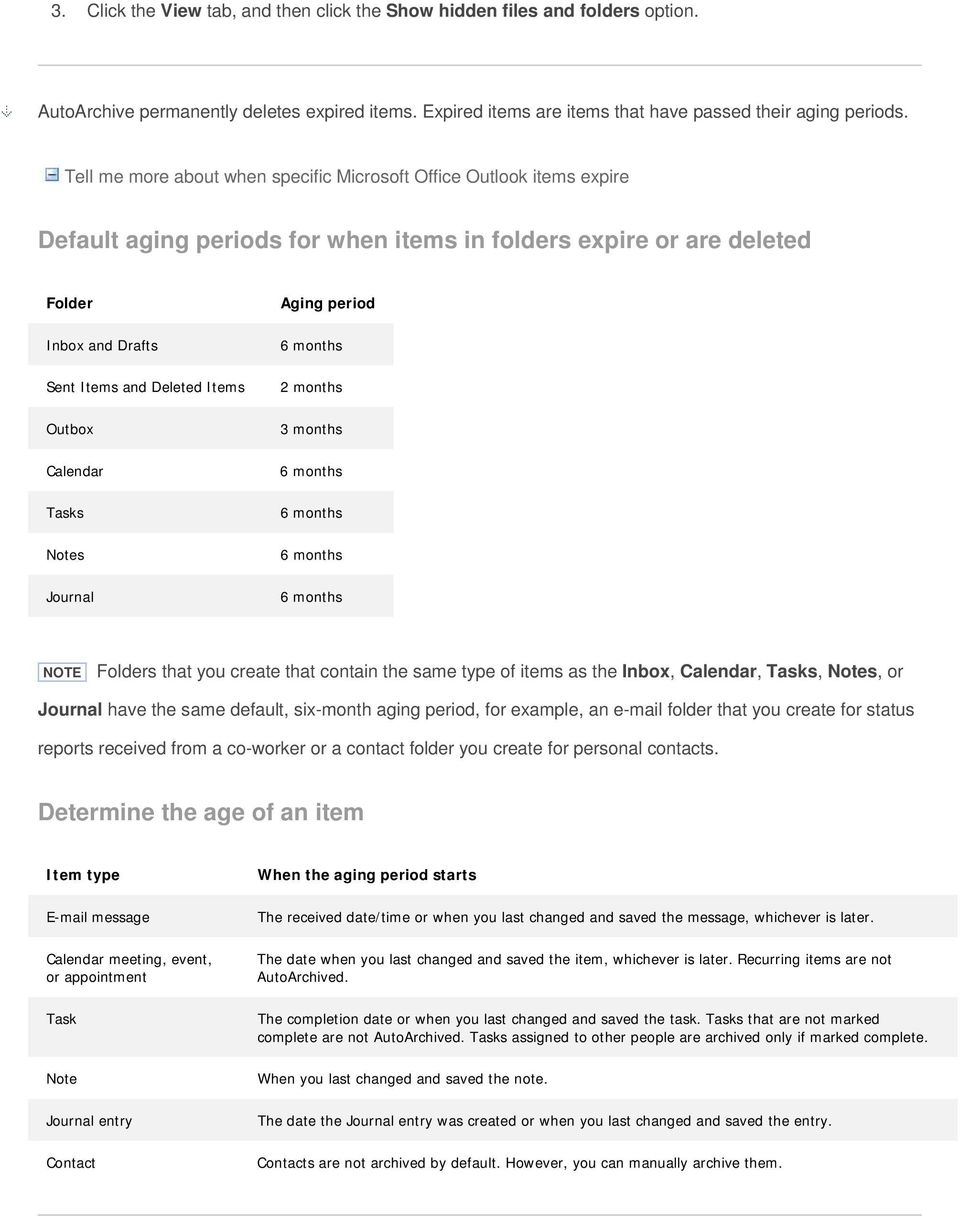
3 3. Click the View tab, and then click the Show hidden files and folders option. AutoArchive permanently deletes expired items. Expired items are items that have passed their aging periods. Tell me more about when specific Microsoft Office Outlook items expire Default aging periods for when items in folders expire or are deleted Folder Inbox and Drafts Sent Items and Deleted Items Outbox Calendar Tasks Notes Journal Aging period 2 months 3 months Folders that you create that contain the same type of items as the Inbox, Calendar, Tasks, Notes, or Journal have the same default, six-month aging period, for example, an folder that you create for status reports received from a co-worker or a contact folder you create for personal contacts. Determine the age of an item Item type message Calendar meeting, event, or appointment Task Note Journal entry Contact When the aging period starts The received date/time or when you last changed and saved the message, whichever is later. The date when you last changed and saved the item, whichever is later. Recurring items are not AutoArchived. The completion date or when you last changed and saved the task. Tasks that are not marked complete are not AutoArchived. Tasks assigned to other people are archived only if marked complete. When you last changed and saved the note. The date the Journal entry was created or when you last changed and saved the entry. Contacts are not archived by default. However, you can manually archive them.
4 You can customize the conditions for these settings to fit your storage needs. For more information, see the descriptions below or for a more in-depth look at AutoArchive, see Use AutoArchive to back up or delete items. Settings and options for AutoArchive See the following descriptions for the settings and options that you can apply when customizing AutoArchive. Run AutoArchive every Choose how often you want AutoArchive to run. Archiving many items at the same time might slow down your computer's performance. Therefore, it is better to choose a period of time that shortens the AutoArchive process. You should consider how many items you typically receive during a given time and adjust the timeframe accordingly. Prompt before AutoArchive runs Choose this option if you want Outlook to display a reminder message before AutoArchive processes your Outlook items. When you see the message, you can click No to cancel that AutoArchive session. Delete expired items ( folders only) This option is not selected by default. You can choose to have e- mail messages deleted when their aging period has expired. The default period for your Inbox and Draft items is six

5 months and three months for your Sent Items, but you can change these periods using the Clean out items older than option. Tell me more about when specific Microsoft Office Outlook items expire Default aging periods for when items in folders expire or are deleted Folder Inbox and Drafts Sent Items and Deleted Items Outbox Calendar Tasks Notes Journal Aging period 2 months 3 months Folders that you create that contain the same type of items as the Inbox, Calendar, Tasks, Notes, or Journal have the same default, six-month aging period. Determine the age of an item Item type message Calendar meeting, event, or appointment Task Note Journal entry Contact When the aging period starts The received date/time or when you last changed and saved the message, whichever is later. The date when you last changed and saved the item, whichever is later. Recurring items are not AutoArchived. The completion date or when you last changed and saved the task. Tasks that are not marked complete are not AutoArchived. Tasks assigned to other people are archived only if marked complete. When you last changed and saved the note. The date the Journal entry was created or when you last changed and saved the entry. Contacts are not archived by default. However, you can manually archive them. Archive or delete old items Choose this option if you want your Outlook items archived, and then deleted when they reach the end of the aging period. Choose additional settings to apply to both archiving and deletion.

6 Show archive folder in folder list Choose to have the Archive folder listed with your other working folders in the Navigation Pane. In the main Archive folder, you can open the subfolders and view your archived items. When viewing your archived items, you can verify that the correct items were archived, and you can also drag any items that you need back to a working folder. Clean out items older than Choose the default configure for when you want your items archived, in days, weeks, or months. You can configure a period of one day up to a period of 60 months. "Clean" means to archive store items. It does not mean "delete" unless you have selected that setting for the folders elsewhere. Move old items to The default setting for this location is different for computers running the Windows Vista and Microsoft Windows XP operating systems. If you want to set another destination for the archived items, you can browse to and set a different location. Items are moved to this location after their aging period. Windows Vista C:\Users\YourUserName\AppData\Local\Microsoft\Outlook\Archive.pst Microsoft Windows XP C:\Documents and Settings\YourUserName \Local Settings\Application Data\Microsoft\Outlook\Archive.pst Items archived in a custom location are not deleted unless you open the folders and delete them manually. Permanently delete items This option immediately deletes the expired items instead of moving them to the default location, such as another folder that you designated or the Deleted Items folder. Apply these settings to all folders now This option applies the AutoArchive settings, including your changes, to all of your folders. To specify different settings for one or more folders, do not choose this option. Instead, use the instructions shown below the button that explain how to specify settings for individual folders. Changes made to specific folders apply only to those folders. Retention Policy Information In your organization, a system administrator might set retention policies that determine when and how your mailbox items are AutoArchived. You can view the policies here, but you can't change them without the appropriate permissions. Top of Page

Using Outlook AutoArchive (2007, 2010, 2013)
 Using Outlook AutoArchive (2007, 2010, 2013) Your Microsoft Outlook mailbox grows as items are created in the same way that papers pile up on your desk. In the paper-based world, you can occasionally shuffle
Archiving Your Mail in Outlook 2007
 About Archiving Archiving Your Mail in Outlook 2007 All messages, contact information, calendars and other data you create in Microsoft Outlook 2007 are kept in your mailbox on the Exchange (FIUmail) server.
Archiving Your Mail in Outlook 2010
 About Archiving Archiving Your Mail in Outlook 2010 All messages, contact information, calendars and other data you create in Microsoft Outlook 2010 are kept in your mailbox on the Exchange server. But
MS Word 2007. Microsoft Outlook 2010 Mailbox Maintenance
 MS Word 2007 Microsoft Outlook 2010 Mailbox Maintenance INTRODUCTION... 1 Understanding the MS Outlook Mailbox... 1 BASIC MAILBOX MAINTENANCE... 1 Mailbox Cleanup... 1 Check Your Mailbox Size... 1 AutoDelete
Outlook: Storing Email
 Outlook: Storing Email Academic Computing Services www.ku.edu/acs Abstract: Use AutoArchive to move items to an archive file (.pst). Archiving copies items to the archive file and then removes them from
How to Use AutoArchive to Manage the Size of Your Outlook Mailbox
 How to Use AutoArchive to Manage the Size of Your Outlook Mailbox Your Microsoft Office Outlook Mailbox grows over time as you create, send and receive items (messages, appointments, contacts, tasks, notes,
The Archive Feature in Outlook 2003
 The Archive Feature in Outlook 2003 Table of Contents Clogged Mailboxes... 1 Empty Deleted Items folder upon exiting... 1 Mailbox Size Properties... 2 View Mailbox Size... 3 Archiving... 4 Folder structure...
Cleaning out Outlook E mail
 Cleaning out Outlook E mail The following are tips to keeping Outlook E mail folder sizes to a minimum. If users have any questions, please call the Helpdesk on 619 4357. Empty the Deleted Items folder
Auto-Archiving your Emails in Outlook
 Changing the AutoArchive Settings for all your Mailbox Folders Changing the AutoArchive Settings for all your Mailbox Folders (cont.) One way to minimize the amount of server space you are using for your
Outlook Managing Your Items
 Course Description Managing your items is essential if you want Outlook to run as efficiently and effectively as possible. As with any filing system the longer you put off doing anything the larger the
Archive E-mails Outlook 2010 & 2013 on Windows XP, Vista, 7, 8
 Archive E-mails Outlook 2010 & 2013 on Windows XP, Vista, 7, 8 Read First About Archives Archives are used to reduce the size of your Outlook Data File (.pst) or Exchange mailbox. OIT highly recommends
How to Archive Items Manually (Outlook) How to Manually Archive Mail in Outlook [2014]
![How to Archive Items Manually (Outlook) How to Manually Archive Mail in Outlook [2014]](/thumbs/39/18737903.jpg "How to Archive Items Manually (Outlook) How to Manually Archive Mail in Outlook [2014]") How to Archive Items Manually (Outlook) How to Manually Archive Mail in Outlook [2014] Your Microsoft Outlook mailbox grows as items are created in the same way that papers pile up on your desk. In the
How to Archive Items Manually (Outlook) How to Manually Archive Mail in Outlook [2014] Your Microsoft Outlook mailbox grows as items are created in the same way that papers pile up on your desk. In the
Outlook Archiving and Storage
 Outlook Archiving and Storage This document provides information related to storing and archiving e-mail in Outlook, including Outlook s auto archive feature, techniques for avoiding reaching your mailbox
Archiving Email - Outlook 2003
 Archiving Email - Outlook 2003 Archiving data automatically Configuring the Automatic Archiving of Items Archiving data manually Restoring Data Archiving data automatically Over time you will likely want
CommuniGate Mail Archiving and Cleanup with Outlook 2007
 CommuniGate Mail Archiving and Cleanup with Outlook 2007 Some users are hitting quota limits in CommuniGate e-mail accounts. In other words, there are too many e-mails in their account folders on the server.
Outlook 2007: Managing your mailbox
 Outlook 2007: Managing your mailbox Find its size and trim it down Use Mailbox Cleanup On the Tools menu, click Mailbox Cleanup. You can do any of the following from this one location: View the size of
Archiving your mail with Outlook 2003
 Archiving your mail with Outlook 2003 Introduction and Purpose According to the OIT policy and procedure manual, it is the responsibility of the client/user to maintain the size of their own mail file
REDUCING YOUR MICROSOFT OUTLOOK MAILBOX SIZE
 There are several ways to eliminate having too much email on the Exchange mail server. To reduce your mailbox size it is recommended that you practice the following tasks: Delete items from your Mailbox:
Creating an Email Archive in Outlook
 Creating an Email Archive in Outlook Setting up AutoArchive Auto Archiving is the suggested method for archiving mail in Outlook. Mailbox items are AutoArchived on last modification date, not the date
Managing Mailbox Space and Personal Folders
 Managing Mailbox space and Using Personal Folders Based on documentation developed at the University of Iowa Revised for Iowa State University Extension August, 2005 ISU 100 EIT Bldg Iowa State University
Personal Folders Backup
 Personal Folders Backup The Personal Folders Backup tool is designed for use in Outlook 2000 and later and the operating systems that support each respective Outlook version. The tool provides a quick
AUTO ARCHIVING. December, 6 th 2005
 AUTO ARCHIVING December, 6 th 2005 What is Auto Archiving? Archiving allows the user to keep their emails but not count them towards the set quota. By keeping emails archived, the quota will never be met
MANAGING OUTLOOK PERSONAL DATA FILES
 MANAGING OUTLOOK PERSONAL DATA FILES 21 March 2009, Version 1.1 CONTENTS This document covers the following topics: Background Automatically Associating Old Data Files with Current Outlook Profile Manually
Outlook 2010 Archiving Email CPAC Workshop Summer 2014
 Outlook 2010 Archiving Email CPAC Workshop Summer 2014 Presenters: Kaleo Kelikani and Linda Holdzkom, ITS Technical Services Contents Tips and Tools for the Desktop Version of Outlook Page 2-4 What is
How to Archive Email in Outlook 2010
 How to Archive Email in Outlook 2010 If you are using Outlook 2010 as your email client for a considerable period of time, you will notice that your PST file that stores your calendar entries, email messages,
Sample- for evaluation purposes only! Advanced Outlook. TeachUcomp, Inc. A Presentation of TeachUcomp Incorporated. Copyright TeachUcomp, Inc.
 A Presentation of TeachUcomp Incorporated. Copyright TeachUcomp, Inc. 2012 Advanced Outlook TeachUcomp, Inc. it s all about you Copyright: TeachUcomp, Inc. Phone: (877) 925-8080 Web: http://www.teachucomp.com
Archiving in Microsoft Outlook. This document looks at archiving and saving space in the Microsoft Outlook email program. INFORMATION SYSTEMS SERVICES
 INFORMATION SYSTEMS SERVICES Archiving in Microsoft Outlook This document looks at archiving and saving space in the Microsoft Outlook email program. AUTHOR: ISS DATE: December 2005 EDITION: 2.0 TUT 104
Your OUTLOOK configuration may not include all of the following files. Some files are created only when you customize Outlook features.
 Page 1 of 9 Outlook 2003 - Backing Up mail files The following is a list of data store and configuration files used by Microsoft Outlook 2003 Some of the folders might be hidden folders. To view hidden
Microsoft Outlook MAINTENANCE & USAGE GUIDE
 Microsoft Outlook MAINTENANCE & USAGE GUIDE Updated 1/31/2014 SUMMARY Microsoft Exchange is an email messaging and scheduling service used in our organization. This service is managed on a global level
Note: Make sure the.pst file is stored in your U: drive, this drive is protected by backups.
 Email Management Best Practices I. Introduction: The School Board Network Infrastructure that we use daily is a huge investment involving workstations, servers, storage, software and backup equipment.
Microsoft Office 365 online archive features and FAQs
 Microsoft Office 365 online archive features and FAQs 1 Contents Contents... 2 Purpose... 3 Document Support Boundaries... 3 Examples used in this document... 3 Office 365 Archive... 4 Office 365 Archive
Outlook E-Mail. Step 1: Open and Configure Outlook
 Outlook E-Mail Step 1: Open and Configure Outlook 1. Click the Microsoft Button in the lower left task bar 2. Select All Programs 3. Select Microsoft Office 4. Select Microsoft Outlook 5. Follow the Start
Microsoft Outlook 2010 Managing E-mail Disk Quotas
 CALIFORNIA STATE UNIVERSITY, LOS ANGELES INFORMATION TECHNOLOGY SERVICES Microsoft Outlook 2010 Managing E-mail Disk Quotas Spring 2013, Version 1.0 Table of Contents Introduction...2 Working With Outlook
Reducing the Size of Your Outlook 2003 Calendar
 UCSF School of Medicine Office of the Dean Information Services Unit Reducing the Size of Your Outlook 2003 Calendar UCSF School of Medicine, Office of the Dean, Information Services Unit. 2005 UC Regents.
Managing Online and Offline Archives in Outlook
 Managing Online and Offline Archives in Outlook Contents How to Enable the Online Archive Feature in Outlook... 1 For Outlook 2007:... 2 How to Set the AutoArchive Properties for a Folder in Outlook 2007:...
Step-by-Step Instructions
 Step-by-Step Instructions How-To Configure and Manage AutoArchive In Outlook 2010 & 2013 2014 Guy Designs Since the beginning of Outlook, Microsoft has always included the Archive and AutoArchive feature
OUTLOOK 2007 USER GUIDE
 Using Outlook 2007 The information below will guide you through some of the Outlook features that can help you to manage your email. Topics listed below are: Sorting Messages Saving Attachments Emptying
Auto Archiving Folders in Outlook XP
 Auto Archiving Folders in Outlook XP Your Outlook email account on the Exchange server is allotted 50 megabytes of storage space on the server. Items in the Inbox, Calendar, Sent Items, Deleted Items,
Archiving and Managing Your Mailbox
 Archiving and Managing Your Mailbox We Need You to Do Your Part We ask everyone to participate in routinely cleaning out their mailbox. Large mailboxes with thousands of messages impact backups and may
Microsoft Outlook: Beyond the Inbox
 Microsoft Outlook: Beyond the Inbox 1. There are 3 types of Calendar items: Appointments: An appointment is a scheduled block of time that only involves you. The hours are blocked out on your schedule,
Lesson 7: Maintenance
 Lesson 7: Maintenance This lesson introduces you to processes that will help you with the overall maintenance of Outlook 2007. The processes outlined in this section are: Mailbox Cleanup: Helps you focus
Microsoft Outlook 2003 Basic Guide
 Microsoft Outlook 2003 Basic Guide Table of Contents Introduction... 2 Getting Help... 2 Exploring Outlook... 3 Drop-Down Menus... 3 Navigation Pane... 4 Folder Pane... 7 Reading Pane... 7 Toolbars...
Microsoft Outlook 2010. Reference Guide for Lotus Notes Users
 Microsoft Outlook 2010 Reference Guide for Lotus Notes Users ContentsWelcome to Office Outlook 2010... 2 Mail... 3 Viewing Messages... 4 Working with Messages... 7 Responding to Messages... 11 Organizing
evault Changes to Outlook
 Table of Contents evault Changes to Outlook a. Introduction... 1 b. Definitions... 1 c. What are all these folders for?... 2 d. If I don t want the folders can I delete them?... 2 e. I accidently moved
Symantec Enterprise Vault
 Symantec Enterprise Vault Guide for Microsoft Outlook 2010/2013 Users 10.0 Full Outlook Add-In Symantec Enterprise Vault: Guide for Microsoft Outlook 2010/2013 Users The software described in this book
How to Setup and Manage LAUSD E-mail in Outlook
 LAUSD ITD Service Desk How to Setup and Manage LAUSD E-mail in Outlook (08/11/08) LAUSD ITD Service Desk 333 S. Beaudry Ave. Phone 213.241.5200 Fax 213.241.5224 Table of Contents Acceptable Use Policy...2
Microsoft Exchange 2010 Email Training. Microsoft Outlook 2007 Outlook Web App
 Microsoft Exchange 2010 Email Training Microsoft Outlook 2007 Outlook Web App Table of Contents INTRODUCTION 1.1 What Does Microsoft Exchange Do? 1.2 Advantage/Disadvantage 1.3 Outlook 2007 vs. Outlook
Introduction. Creating an Archive file TO CREATE AN ARCHIVE FOLDER ON YOUR H: SPACE: Guide to Outlook 2010: Archiving email http://www.lse.ac.
 Guide to Outlook 2010: Archiving email http://www.lse.ac.uk/imt Contents > Creating an Archive file, Working with archived mail, Archiving email using drag and drop, Delete Archived Mail Messages, Compact
Backing up Microsoft Outlook Email For the PC Using MS Outlook 2000 Keith Roberts
 WIN1020 November 2003 Backing up Microsoft Outlook Email For the PC Using MS Outlook 2000 Keith Roberts INTRODUCTION... 1 PREPARATION... 1 BACKING UP EMAIL... 2 RESTORING EMAIL FROM A PERSONAL FILE FOLDER...
Symantec Enterprise Vault
 Symantec Enterprise Vault Guide for Microsoft Outlook 2010/2013 Users 10.0 Full Outlook Add-In Symantec Enterprise Vault: Guide for Microsoft Outlook 2010/2013 Users The software described in this book
CONTENTS. Introduction... 3. Outlook at a glance... 3. Configure Outlook 2010 on-campus... 3. Creating Folders... 4. Sorting Emails...
 OFFICE OF INFORMATION TECHNOLOGY Academic Technology Unit Microsoft Outlook 2010 Basics Workbook CONTENTS Introduction... 3 Outlook at a glance... 3 Configure Outlook 2010 on-campus... 3 Creating Folders...
Symantec Enterprise Vault
 Symantec Enterprise Vault Guide for Microsoft Outlook 2010/2013 Users 10.0 Light Outlook Add-In Symantec Enterprise Vault: Guide for Microsoft Outlook 2010/2013 Users The software described in this book
You must have at least Editor access to your own mail database to run archiving.
 Archiving An archive is a copy of a database you can create to store information no longer in use. Like a replica, an archive contains all documents and design elements in the original database, but unlike
For example, you might want to create a folder to collect together all emails relating to a particular project or subject.
 Email folders Outlook uses a series of folders such as the inbox, outbox, drafts and sent items to sort your email into collections according to the status of the message. If the folders which are already
Outlook 2010 Desk Reference Guide
 Outlook 2010 Desk Reference Guide Version 1.0 Developed by OR/WA IRM Please remember to print back-to-back. July 12, 2011 Microsoft Outlook 2010 This document has been developed by OR/WA IRM staff to provide
Symantec Enterprise Vault
 Symantec Enterprise Vault Guide for Microsoft Outlook 2003/2007 Users 10.0 Full Outlook Add-In Symantec Enterprise Vault: Guide for Microsoft Outlook 2003/2007 Users The software described in this book
Outlook Hosted Exchange Account Configuration
 Outlook Hosted Exchange Account Configuration Thank you for choosing Erado for your Exchange hosting needs. This document is designed to assist you in exporting your existing exchange or email account
Microsoft Outlook 2013 Part 2: Intermediate Outlook
 CALIFORNIA STATE UNIVERSITY, LOS ANGELES INFORMATION TECHNOLOGY SERVICES Microsoft Outlook 2013 Part 2: Intermediate Outlook Spring 2015, Version 1.0 Table of Contents Introduction...2 Calendar...2 Scheduling
Quick Reference Guide Outlook 2013 for Windows Outlook Data Management
 Quick Reference Guide Outlook 2013 for Windows Outlook Data Management There are ramifications for having a Large Outlook mailbox and/or Large Outlook main folders. You may experience slow response time
Quick Reference Guide Outlook 2010 for Windows: Outside the Mailbox Outlook Data Management
 Quick Reference Guide Outlook 2010 for Windows: Outside the Mailbox Outlook Data Management There are ramifications for having a Large Outlook mailbox and/or Large Outlook main folders. You may experience
MS Visio Org Charts and Diagrams. The Essentials. Janet W. Lee Technology Training Coordinator Loyola Marymount University, Los Angeles
 MS Visio Org Charts and Diagrams 2 Outlook Desktop: The Essentials Janet W. Lee Technology Training Coordinator Loyola Marymount University, Los Angeles http://its.lmu.edu/training February 2014 Compiled
How To Use Exhange On Outlook 2007 2007 On A Pc Or Macintosh Outlook 2007 On Your Pc Or Ipad (For Windows Xp) On Your Ipad Or Ipa (For Your Windows Xp). (For A Macintosh) On A
 Configure Microsoft Outlook 2007 to use Exchange Email Setting Important 1. Before configure your Microsoft outlook 2007 to use exhange you MUST log into the Web Exchange page to login and change your
Symantec Enterprise Vault
 Symantec Enterprise Vault Guide for Microsoft Outlook 2003/2007 Users 10.0 Light Outlook Add-In Symantec Enterprise Vault: Guide for Microsoft Outlook 2003/2007 Users The software described in this book
Managing Your Outlook Mailbox
 Managing Your Outlook Mailbox How To Organize And Store E-Mail Messages and Attachments Written by Fern Ness Modified by Robin Sawh, Andy Yan and Wil Corpuz Revised Mar, 2009 Resource Planning Page 1 of
Microsoft Outlook Setup With Exchange Server. Outlook 2007 2010 2013
 Microsoft Outlook Setup With Exchange Server Outlook 2007 2010 2013 Revised 12/1/2014 CONTENTS SUMMARY... 3 I. OUTLOOK SETUP... 4 II. PERSONAL FOLDERS SETUP... 7 III. RULES SETUP... 9 Rule #1: Move Inbox
Recalling A Sent Message in Outlook 2010
 Recall or replace an email message that you sent The recall feature in Microsoft Outlook tries to stop delivery and, optionally, replace an email message that you have already sent to another Microsoft
Migrate from Outlook Express to Windows Live Mail
 Migrate from Outlook Express to Windows Live Mail Windows Live Mail is the successor to Microsoft's Outlook Express mail client. Windows Live Mail is not preinstalled with Windows 7. It can be downloaded
Contents. Changing Your Outlook View To Folder List. Adding Exchange Server Quota Info To The Status Bar. See Quota Info
 Managing Outlook Data By Christopher A. Leonti Information Technology Support Specialist College of Ag / Montana Ag Experiment Station Montana State University-Bozeman http://ag.montana.edu/infotech This
ADVANCED OUTLOOK 2003
 ADVANCED OUTLOOK 2003 Table of Contents Page LESSON 1: MANAGING YOUR MAILBOX LIMITS...1 Understanding Mailbox Limits...1 Setting AutoArchive...3 AutoArchiving Your Folders...5 Deleting Items Automatically...7
Using Microsoft Outlook 2010 with Zimbra
 Information Technology Services Kennesaw State University Using Microsoft Outlook 2010 with Zimbra 1 Copyright 2010 KSU Dept. of Information Technology Services This document may be downloaded, printed
Storage of E-mail Messages Using Microsoft Outlook
 2-07-2007 1 Storage of E-mail Messages Using Microsoft Outlook Electronic mail (e-mail), created or maintained by public agencies, meets the statutory definition of a public record in Kentucky (see KRS
Catholic Archdiocese of Atlanta Outlook 2003 Training
 Catholic Archdiocese of Atlanta Outlook 2003 Training Information Technology Department of the Archdiocese of Atlanta Table of Contents BARRACUDA SPAM FILTER... 3 WHAT IS THE SPAM FILTER MS OUTLOOK PLUG-IN?...
Symantec Enterprise Vault
 Symantec Enterprise Vault Guide for Microsoft Outlook 2010 Users 9.0 Symantec Enterprise Vault: Guide for Microsoft Outlook 2010 Users The software described in this book is furnished under a license agreement
Symantec Enterprise Vault
 Symantec Enterprise Vault Guide for Microsoft Outlook 2003/2007 Users 9.0 Symantec Enterprise Vault: Guide for Microsoft Outlook 2003/2007 Users The software described in this book is furnished under a
Using UGAMail Server... 4
 Using UGAMail Server... 4 Accessing Your Account:... 4 Outlook:... 4 Outlook Web App:... 5 Using Your Account with Outlook:... 6 Messaging:... 7 Creating/Sending E-mail:... 7 Re-sending a Message... 9
MS OUTLOOK 2007 E-MAIL
 MS OUTLOOK 2007 E-MAIL CREATE, SEND, READ, AND RESPOND TO E-MAIL MESSAGES An e-mail address consists of a user ID and a host name, separated by the @ symbol (userid@host name). You can SEND AND RECEIVE
Migrating From Bobcat Mail To Google Apps (Using Microsoft Outlook and Google Apps Sync)
 Migrating From Bobcat Mail To Google Apps (Using Microsoft Outlook and Google Apps Sync) This document is intended for those users moving from WVWC s Bobcat Mail system to the new Google Apps mail system
Outlook 2010 vs GroupWise
 Outlook 2010 GroupWise Quick Viewer available from a button or the View menu. Reading Pane automatically displayed (on the right but can be switched off or displayed at the bottom of the screen using View
- Training. Getting Started with Outlook 2003. Information Technology Services - Training The University of Texas at Austin
 - Training Getting Started with Outlook 2003 Information Technology Services - Training The University of Texas at Austin http://www.utexas.edu/its/training 2007 Information Technology Services The University
OUTLOOK ANYWHERE CONNECTION GUIDE FOR USERS OF OUTLOOK 2010
 OUTLOOK ANYWHERE CONNECTION GUIDE FOR USERS OF OUTLOOK 2010 CONTENTS What is Outlook Anywhere? Before you begin How do I configure Outlook Anywhere with Outlook 2010? How do I use Outlook Anywhere? I already
How To Manage Your Email Storage In Outlook On A Pc Or Macintosh Outlook On Pc Or Pc Or Ipa On A Macintosh Or Ipad On A Computer Or Ipo On A Laptop Or Ipod On A Desktop Or Ipoo On A
 ITS Computing Guide IT Services www.its.salford.ac.uk Outlook Email Management Use of the University s electronic storage areas is increasing at a greater rate than ever before. In order to keep systems
Prepared by Mythtech Limited OFFICE 365 EMAIL MIGRATION MANUAL GUIDELINE
 Prepared by Mythtech Limited OFFICE 365 EMAIL MIGRATION MANUAL GUIDELINE Table of Contents Change Password... 1 Send New Email... 2 Forward E-mail... 3 Reply E-mail... 4 Archive old emails... 5 Office
PolyU Staff Email Service. Outlook 2011 Client. For Mac. Setup Guide
 PolyU Staff Email Service Outlook 2011 Client For Mac Setup Guide Version 1.3 Last Update: 16 January 2013 PolyU Staff Email: www.polyu.edu.hk/email ITS HelpCenter Support: www.polyu.edu.hk/hots ITS Help
The LSUHSC N.O. Email Archive
 The LSUHSC N.O. Email Archive Introduction The LSUHSC N.O. email archive permanently retains a copy of all email items sent and received by LSUHSC N.O. Academic email users. Email items will be accessible
How to Configure Outlook 2003 to connect to Exchange 2010
 How to Configure Outlook 2003 to connect to Exchange 2010 Outlook 2003 will install and work correctly on any version of Windows XP, Vista, Windows 7 or Windows 8. These instructions describe how to setup
Email Archiving. Follow these steps to archive your email:
 Email Archiving Archiving is a process by which your email messages and attached files are moved from the database on our email server to a location on your computer. This document contains step-by-step
Mail tips. Set a reminder to reply to a message. Right-click the message you want to set the reminder for, point
 Mail tips Set a reminder to reply to a message Right-click the message you want to set the reminder for, point to Follow Up, and then click Add Reminder. In the Due By list, click the date when you have
Division of Student Affairs Email Quota Practices / Guidelines
 Division of Student Affairs Email Quota Practices / Guidelines Table of Contents Quota Rules:... 1 Mailbox Organization:... 2 Mailbox Folders... 2 Mailbox Rules... 2 Mailbox Size Monitoring:... 3 Using
Microsoft Outlook. KNOW HOW: Outlook. Using. Guide for using E-mail, Contacts, Personal Distribution Lists, Signatures and Archives
 Trust Library Services http://www.mtwlibrary.nhs.uk http://mtwweb/cgt/library/default.htm http://mtwlibrary.blogspot.com KNOW HOW: Outlook Using Microsoft Outlook Guide for using E-mail, Contacts, Personal
Outlook basics. Identify user interface elements that you can use to accomplish basic tasks.
 Outlook basics Outlook is a powerful tool for managing your e-mail, contacts, calendars, and tasks. To use it most effectively, you first have to understand the basics. This tutorial introduces some of