
Redpaper. IBM System x3950 M2 and x3850 M2 Technical Introduction. Table of Contents. David Watts Robert Moon
|
|
|
- Cora Nelson
- 10 years ago
- Views:
Transcription
1 Redpaper David Watts Robert Moon IBM System x3950 M2 and x3850 M2 Technical Introduction Table of Contents Summary of changes Overview Comparing the x3850 M2 with the x Comparing the x3950 M2 with the x IBM ScaleXpander Option Kit Multinode configurations Front and rear layouts Current models IBM XA-64e fourth-generation chipset Processors XceL4v Dynamic Server Cache System memory SAS disk subsystem PCI subsystem Broadcom dual Gigabit Ethernet controller Redundancy Light path diagnostics Baseboard Management service processor Remote Supervisor Adapter II Trusted Platform Module Active Energy Manager The team that wrote this IBM Redpaper Copyright IBM Corp. 2007, All rights reserved. ibm.com/redbooks 1

2 Summary of changes This edition of this paper reflects the changes that are summarized here. Revision bars throughout the paper indicate where the changes have been made. New information The new IBM System x3950 M2, page 3 Table comparing the x3950 M2 with the x3950, page 5 Support for 2-node configurations, with plans to support 3-node and 4-node complexes, page 7 New ScaleXpander Option Kit to upgrade an x3850 M2 to an x3950 M2, page 6 Models of the x3950 M2, page 12 Models of the x3950 M2 supporting Windows Server 2003, DataCenter Edition, page 12 Processor options for the x3950 M2 models, page 17 New 8 GB memory DIMMs to allow up to 256 GB of RAM per chassis, page 21 The stripe size of the LSI 1078 Integrated RAID controller is 64 KB and cannot be changed, page 29 Added the FRU number for the battery backup unit for the ServeRAID MR10M, page 31 Added links to the ServeRAID MR10 documentation, page 31 Changed information More information about the ServeRAID MR10k controller, page 29 Corrected the FRU for the replacement battery backup unit for the ServeRAID MR10k controller, page 29 Arrays created by the LSI 1078 Integrated RAID controller can be migrated for use with the ServeRAID MR10k, page 29 2 IBM System x3950 M2 and x3850 M2 Technical Introduction

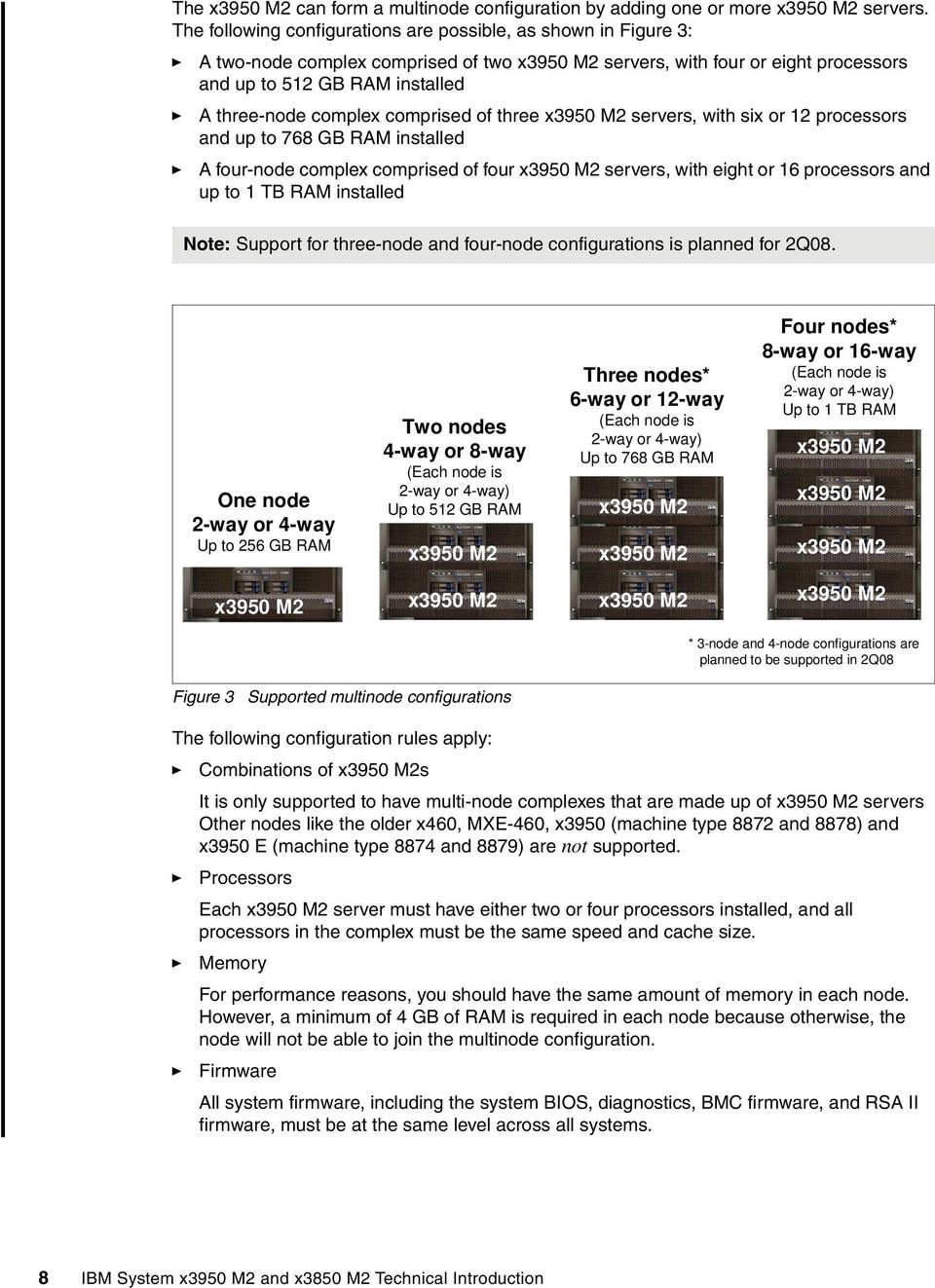
3 Overview This paper introduces the new IBM System x3950 M2 and the previously announced System x3850 M2, and provides you with detailed technical information about their major subsystems. Delivering an industry-leading, 64-bit framework for high-performance scalable computing, the IBM System x3850 M2 and x3950 M2 are built on the power of the latest ex4 Architecture, which is the fourth generation of the IBM Enterprise X-Architecture technology. ex4 Architecture drives the x3850 M2 and x3950 M2 to deliver the performance, availability, expandability, and manageability required for the next generation of industry-standard servers. Figure 1 The IBM System x3850 M2 and IBM System x3950 M2 Both the x3850 M2 and x3950 M2 combine unmatched four-socket 64-bit performance, the latest Intel Xeon dual-core or quad-core processors, more flexible XpandOnDemand modular scalability, and enhanced mission-critical availability to deliver an optimized (enterprise or on-demand) solution for scale-up virtualization, database, mid-tier application services or terminal services. With its extensive chipset development experience, industry-leading performance, and availability breakthroughs, IBM is uniquely positioned to propose a robust and powerful server, offering innovation that delivers real business and IT results. The x3850 M2 is a standalone server with four processor sockets up to 32 DIMM sockets. The x3950 M2 also has four processor sockets and up to 32 DIMM sockets, but the x3950 M2 can also be connected to other x3950 M2 systems to form a single-image multinode complex. With the addition of the ScaleXpander Option Kit, the x3850 M2 can be upgraded to the x3950 M2 and can be connected to up to three other x3950 M2 to form a four-node complex with 16 processor sockets. Installing the ScaleXpander Option Kit to an x3850 M2 makes it effectively an x3950 M2. Note: In this paper, when we refer to an x3950 M2, we mean either an x3950 M2 or an x3850 M2 that has the ScaleXpander Option Kit installed. The following configurations are possible: One server: A single x3850 M2 or x3950 M2 server with two or four processors and up to 256 GB RAM installed Two servers: A two-node complex comprised of two x3950 M2 servers, with four or eight processors and up to 512 GB RAM installed IBM System x3950 M2 and x3850 M2 Technical Introduction 3

4 Three servers: A three-node complex comprised of three x3950 M2 servers, with six or 12 processors and up to 768 GB RAM installed Four servers: A four-node complex comprised of four x3950 M2 servers, with eight or 16 processors and up to 1 TB RAM installed Note: Support for three-node and four-node configurations is planned for 2Q08. The following are the key features of the x3850 M2 and x3950 M2: Four-way 1 -capable server. ex4 Architecture featuring the XA-64e fourth-generation chipset. Two standard Intel Xeon MP dual-core or quad-core processors, upgradable to four-way. These processors support 64-bit addressing with the Intel 64 Technology architecture. Support for Intel Virtualization Technology (VT). Support for an internal removable flash drive installed in a dedicated USB connector on the system board. 4 GB or 8 GB memory standard expandable to 256 GB (using 8 GB DIMMs), using high-performance PC ECC DDR2 DIMMs. Active Memory with Memory ProteXion, memory mirroring, memory hot-swap and hot-add, and ChipKill. Seven half-length 64-bit PCI Express x8 slots, two of which are hot-swap. Integrated LSI 1078 serial-attached SCSI (SAS) controller. Supports the RAID-0 and the RAID-1 standards. To enable additional RAID features and a 256 MB battery-backed cache, an optional ServeRAID-MR10k RAID controller is available. Four internal hot-swap drive bays for up to 584 GB of internal storage (using 146 GB disks). Integrated Dual-port Broadcom 5709C PCI Express Gigabit Ethernet controller. Onboard Baseboard Management Controller and Remote Supervisor Adapter II adapter are both standard. Three-year warranty onsite, nine hours per day, five days per week, with a next business day response. The x3850 M2 and x3950 M2 are optimized for ERP, high-end database, and server consolidation applications. Comparing the x3850 M2 with the x3850 Table 1 on page 5 shows the major differences between the x3850 and the x3850 M way means 4 processor sockets. In this document, we use way to indicate a processor socket regardless of whether it is a dual-core processor or a quad-core processor. 4 IBM System x3950 M2 and x3850 M2 Technical Introduction

5 Table 1 Major differences between x3850 and x3850 M2 Feature System x3850 server System x3850 M2 server Processors Dual-core Intel Xeon 7100 series Dual-core Intel Xeon E7210 and quad-core Intel Xeon E7300 series processors Frontside bus Two 667 MHz (two processors on each bus) Four 1066 MHz (one processor on each bus) Memory controller Hurricane 3.0 Hurricane 4.0 Memory Maximum of 4 memory cards, each with 4 DDR2 DIMM slots running at 333 MHz supporting a total of 16 DDR2 DIMMs Maximum of 4 memory card, each with 8 DDR2 DIMM slots running at 533 MHz supporting a total of 32 DDR2 DIMMs Scalability Not supported Upgradeable to support multinode scaling with the ScaleXpander Option Kit, 44E4249 Disk subsystem Adaptec AIC9410 SAS LSI 1078 SAS External disk port No Yes (SAS x4) RAID support Standard not supported only via optional ServeRAID-8i Standard RAID-0 and RAID-1; additional RAID features via optional ServeRAID-MR10k PCI-X slots Two or six, depending on model None PCI Express slots Some models have four PCI Express x8 full-length slots Seven PCI Express x8 half-length slots Active PCI slots (hot-swap) Six Two Video controller ATI Radeon 7000M 16 MB onboard ATI ES MB memory on RSA II USB ports Three (front: one, rear: two) Six (front: two, rear: three, internal: one) Keyboard and mouse connectors Service processor PS/2 RSA II SlimLine adapter (optional on some models) USB RSA II PCI-X adapter Mechanical 3U height 4U height Trusted Platform Module Not implemented Trusted Platform Module (TPM) with TCG V1.2 compliance Power supplies One or two 1300 W power supplies, depending on model Two 1440 W power supplies Comparing the x3950 M2 with the x3950 Table 2 shows the major differences between the x3950 and the x3950 M2. Table 2 Major differences between x3950 and x3950 M2 Feature x3950 server x3950 M2 server Enterprise X-Architecture Third-generation XA-64e chipset Fourth generation XA-64e chipset IBM System x3950 M2 and x3850 M2 Technical Introduction 5
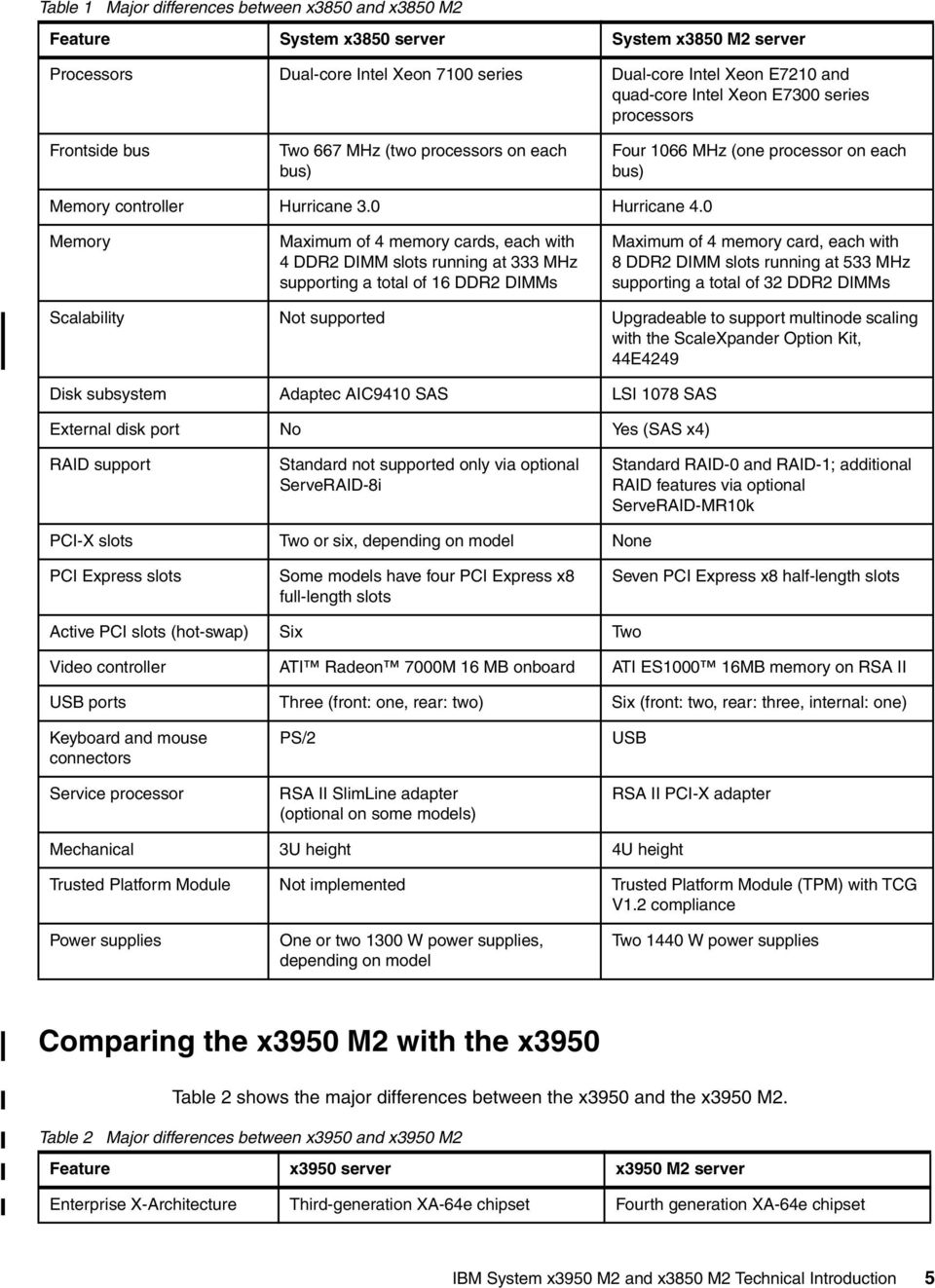
6 Feature x3950 server x3950 M2 server Processors Dual-core Intel Xeon 7100 series Dual-core Intel Xeon E7210 and quad-core Intel Xeon E7300 series processors Frontside bus Two 667 MHz (two processors on each bus) Four 1066 MHz (one processor on each bus) Memory controller Hurricane 3.0 Hurricane 4.0 Maximum SMP Memory 32 sockets using eight chassis. With dual-core processors, maximum of 64 cores. 16 DDR2 DIMM sockets per node. Maximum of 4 memory cards, each with 4 DDR2 DIMM slots running at 333 MHz. 64 GB maximum per node. 512 GB maximum with 8 nodes. 16 sockets using four chassis. With quad-core processors, maximum of 64 cores. 32 DDR2 DIMM sockets per node. Maximum of 4 memory card, each with 8 DDR2 DIMM slots running at 533 MHz. 256 GB maximum per node. 1 TB maximum with 4 nodes. Internal disks Six hot-swap bays Four hot-swap bays Disk subsystem Adaptec AIC9410, no external port LSI 1078, external SAS 4x port RAID support Standard not supported only via optional ServeRAID-8i Standard RAID-0 and RAID-1, additional RAID features via optional ServeRAID-MR10k PCI-X slots per node Two or six, depending on model None PCI Express slots per node Some models have four PCI Express x8 full-length slots Seven PCI Express x8 half-length slots Active PCI slots Six Two Ethernet controller Broadcom 5704 dual Gigabit Ethernet Broadcom 5709C dual Gigabit Ethernet Video controller ATI Radeon 7000M 16 MB onboard ATI ES MB memory on RSA II Keyboard and mouse connectors PS/2 USB Service processor RSA II SlimLine standard RSA II standard Trusted Platform Module Not implemented Trusted Platform Module (TPM) with TCG V1.2 compliance. Power supply Two 1300W supplies Two 1440W supplies Mechanical 3U height 4U height IBM ScaleXpander Option Kit Unlike the x3850, the x3850 M2 can be converted to an x3950 M2 through the use of the ScaleXpander Option Kit, part number 44E4249. After this kit is installed the x3850 M2 functionally becomes an x3950 M2, and is therefore able to form part of a multi-way configuration. The IBM XpandOnDemand Scalability Kit contains the following items: Scalability cable 3.08m 6 IBM System x3950 M2 and x3850 M2 Technical Introduction

7 Larger cable management arm (replaces the existing arm to allow the easy installation of the scalability cables) ScaleXpander chip (transforms the x3850 M2 into an x3950 M2) x3950 M2 bezel (replaces the existing bezel, and shows that the x3850 M2 has the kit installed and is now functionally equal to an x3950 M2) Important: The IBM ScaleXpander Option Kit is only required for an x3850 M2 that you want to convert to an x3950 M2 and enable it to scale. The x3950 M2 ships with the necessary components (including a scalability cable) to be able to form an N-way configuration, and therefore does not require this option. The ScaleXpander chip goes in a dedicated socket towards the front of the system board as shown in Figure 2. Figure 2 The ScaleXpander chip installed in the x3850 M2 enables the server to scale Multinode configurations The x3950 M2 is the base building block, or node, for a scalable system. At their most basic, these nodes are comprised of four-way SMP-capable systems with processors, memory, and I/O devices. The x3950 M2 is the building block that allows supported 8-way, 12-way and 16-way configurations by adding additional x3950 M2s as required. Unlike with the System x3950 and xseries 460, there is no special modular expansion enclosure for the x3950 M2. The multinode configuration is simply formed by using another x3950 M2 or an x3850 M2 that has the ScaleXpander Option Kit installed as described in IBM ScaleXpander Option Kit on page 6. Note: When we refer to an x3950 M2, we mean either an x3950 M2 or an x3850 M2 that has the ScaleXpander Option Kit installed. IBM System x3950 M2 and x3850 M2 Technical Introduction 7

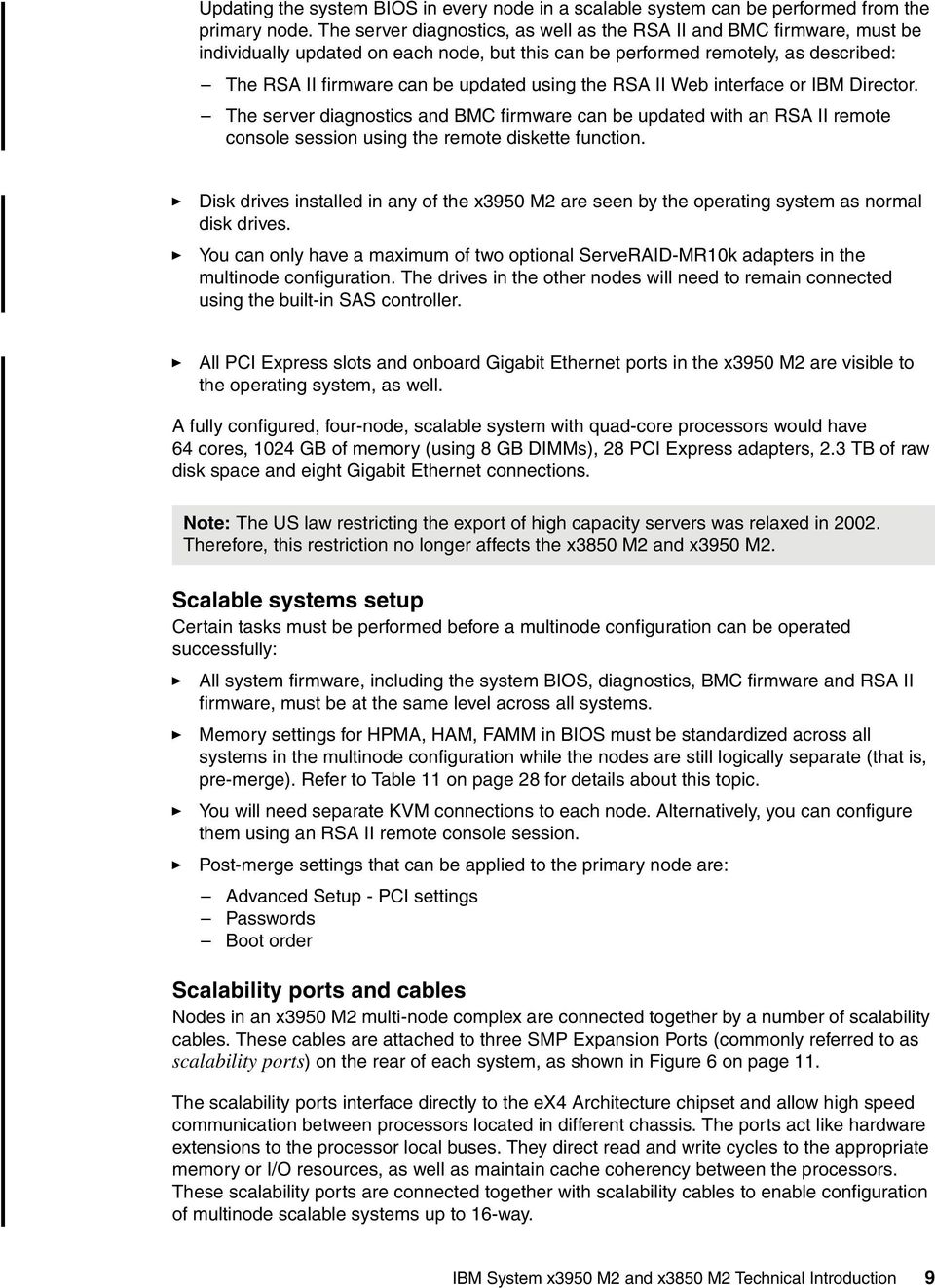
8 The x3950 M2 can form a multinode configuration by adding one or more x3950 M2 servers. The following configurations are possible, as shown in Figure 3: A two-node complex comprised of two x3950 M2 servers, with four or eight processors and up to 512 GB RAM installed A three-node complex comprised of three x3950 M2 servers, with six or 12 processors and up to 768 GB RAM installed A four-node complex comprised of four x3950 M2 servers, with eight or 16 processors and up to 1 TB RAM installed Note: Support for three-node and four-node configurations is planned for 2Q08. One node 2-way or 4-way Up to 256 GB RAM Two nodes 4-way or 8-way (Each node is 2-way or 4-way) Up to 512 GB RAM x3950 M2 Three nodes* 6-way or 12-way (Each node is 2-way or 4-way) Up to 768 GB RAM x3950 M2 x3950 M2 Four nodes* 8-way or 16-way (Each node is 2-way or 4-way) Up to 1 TB RAM x3950 M2 x3950 M2 x3950 M2 x3950 M2 x3950 M2 x3950 M2 x3950 M2 * 3-node and 4-node configurations are planned to be supported in 2Q08 Figure 3 Supported multinode configurations The following configuration rules apply: Combinations of x3950 M2s It is only supported to have multi-node complexes that are made up of x3950 M2 servers Other nodes like the older x460, MXE-460, x3950 (machine type 8872 and 8878) and x3950 E (machine type 8874 and 8879) are not supported. Processors Each x3950 M2 server must have either two or four processors installed, and all processors in the complex must be the same speed and cache size. Memory For performance reasons, you should have the same amount of memory in each node. However, a minimum of 4 GB of RAM is required in each node because otherwise, the node will not be able to join the multinode configuration. Firmware All system firmware, including the system BIOS, diagnostics, BMC firmware, and RSA II firmware, must be at the same level across all systems. 8 IBM System x3950 M2 and x3850 M2 Technical Introduction
9 Updating the system BIOS in every node in a scalable system can be performed from the primary node. The server diagnostics, as well as the RSA II and BMC firmware, must be individually updated on each node, but this can be performed remotely, as described: The RSA II firmware can be updated using the RSA II Web interface or IBM Director. The server diagnostics and BMC firmware can be updated with an RSA II remote console session using the remote diskette function. Disk drives installed in any of the x3950 M2 are seen by the operating system as normal disk drives. You can only have a maximum of two optional ServeRAID-MR10k adapters in the multinode configuration. The drives in the other nodes will need to remain connected using the built-in SAS controller. All PCI Express slots and onboard Gigabit Ethernet ports in the x3950 M2 are visible to the operating system, as well. A fully configured, four-node, scalable system with quad-core processors would have 64 cores, 1024 GB of memory (using 8 GB DIMMs), 28 PCI Express adapters, 2.3 TB of raw disk space and eight Gigabit Ethernet connections. Note: The US law restricting the export of high capacity servers was relaxed in Therefore, this restriction no longer affects the x3850 M2 and x3950 M2. Scalable systems setup Certain tasks must be performed before a multinode configuration can be operated successfully: All system firmware, including the system BIOS, diagnostics, BMC firmware and RSA II firmware, must be at the same level across all systems. Memory settings for HPMA, HAM, FAMM in BIOS must be standardized across all systems in the multinode configuration while the nodes are still logically separate (that is, pre-merge). Refer to Table 11 on page 28 for details about this topic. You will need separate KVM connections to each node. Alternatively, you can configure them using an RSA II remote console session. Post-merge settings that can be applied to the primary node are: Advanced Setup - PCI settings Passwords Boot order Scalability ports and cables Nodes in an x3950 M2 multi-node complex are connected together by a number of scalability cables. These cables are attached to three SMP Expansion Ports (commonly referred to as scalability ports) on the rear of each system, as shown in Figure 6 on page 11. The scalability ports interface directly to the ex4 Architecture chipset and allow high speed communication between processors located in different chassis. The ports act like hardware extensions to the processor local buses. They direct read and write cycles to the appropriate memory or I/O resources, as well as maintain cache coherency between the processors. These scalability ports are connected together with scalability cables to enable configuration of multinode scalable systems up to 16-way. IBM System x3950 M2 and x3850 M2 Technical Introduction 9
10 Currently, only one-node and two-node configurations are supported, although plans are in place to support three-node and four-node configurations in 2Q08. The scalability cabling needed to form a two-node complex is shown in Figure 4. Two-node configuration x3950 M2 Port 1 Port 2 Port 3 RSAII Ethernet network x3950 M2 (primary) Port 1 Port 2 Port 3 RSAII 3.08m cable Figure 4 Cabling for a two-node configuration Two 3.08m cables are required, as shown in Figure 4. The cables are supplied as follows: One cable is part of the ScaleXpander Option Kit, part number 44E4249, as described in IBM ScaleXpander Option Kit on page 6, for use with x3850 M2 servers. One cable is included with x3950 M2 servers (not with x3850 M2). Note: Connectivity for three-node and four-node configurations is not supported until 2Q08. When this support is announced, this document will be updated with cabling information. The following key points relate to scalability cabling: The x3950 M2 comes with a new cable management arm that makes installation and management of the cables easier. The ScaleXpander Option Kit for the x3850 M2 ships with this new arm to replace its standard cable management arm. The scalability ports cannot be used as high speed interconnects for clustering purposes. Use the integrated Gigabit Ethernet controller instead. The connections do offer redundancy. If a connection is lost (for example, if a cable is unplugged), there will be an indication on the light path diagnostic panel showing a link failure, and the server will disable the failing port and switch traffic to the remaining path. There will be a slight performance degradation in this mode. After the cable is reattached, the server will re-enable the path and clear the error from the light path diagnostic panel. In multinode configurations, the inbound communication between each node now is handled by the scalability cables, and not by the RSA II Ethernet ports (as it was with the x3950). Partitioning Partitioning is the concept of logically splitting up a multinode complex into separate systems. You can then install an operating system on a partition and have it run independently from all other partitions. The advantage of partitioning is that you can create and delete partitions without having to recable the complex. The only requirement is that partitions be formed on node boundaries. The interface where you set up and maintain partitions is an extension of the Remote Supervisor Adapter II Web interface. It is used to create, delete, control, and view scalable partitions. 10 IBM System x3950 M2 and x3850 M2 Technical Introduction

11 Front and rear layouts Figure 5 shows the major components at the front of the x3850 M2 and x3950 M2. USB connectors DVD-ROM drive Operator information panel Figure 5 Front panel of the x3850 M2 and x3950 M2 Four hot-swap disk drive bays Figure 6 shows the major components at the rear of the server. Gigabit Ethernet 1 Gigabit Ethernet 2 Remote Supervisor Adapter II Power supply 1 Power supply 2 System serial SMP Expansion Port 1 SMP Expansion Port 2 SMP Expansion Port 3 Figure 6 Rear panel of the x3850 M2 and x3950 M2 USB SAS Video connector IBM System x3950 M2 and x3850 M2 Technical Introduction 11

12 Current models Table 3 shows the x3850 M2 models that were announced in October Table 3 The x3850 M2 models announced in October 2007 Model Standard CPUs L2 cache Standard memory Memory cards RU 2x 2.40 GHz Xeon E7210 Dual core 4 MB 4x1 GB RU 2x 2.13 GHz Xeon E7320 Quad core 4 MB 4x1 GB RU 2x 2.40 GHz Xeon E7330 Quad core 6 MB 8x1 GB RU 2x 2.93 GHz Xeon X7350 Quad core 8 MB 8x1 GB 4 Table 4 shows the models of the x3950 M2 that were announced in January Table 4 x3950 M2 models announced as of January 2008 Model Standard CPUs L2 cache Standard memory Memory cards SU 2x 1.6 GHz Xeon E7310 Dual core 4 MB 4x 1 GB SU 2x 2.40 GHz Xeon E7330 Quad core 3 MB 8x 1 GB SU 2x 2.93 GHz Xeon X7350 Quad core 8 MB 8x 1 GB 4 Note: The U in the model numbers is for countries in North America and South America. For EMEA, substitute G (for example, 1RG). For Asia-Pacific countries, the letter varies from country to country. Consult the announcement letter or xseries Configuration and Option Guide. The amount of memory installed does not have to match the other nodes in a multinode complex; however, for performance reasons, having the same amount of memory is recommended. Windows Datacenter models IBM now offers two methods to run Microsoft Windows Server 2003 R2, Datacenter Edition on the x3950 M2, either the 32-bit version or the 64-bit version. Windows 2000 Datacenter Server is not supported. IBM Datacenter Unlimited Virtualization High Availability Program Offering This comprehensive offering is designed to provide a fully configured, certified solution for customers that want to maintain a tightly controlled environment for maximum availability. Unlimited virtualization means customers can run an unlimited number of virtualized instances of Windows Server without purchasing additional licenses. This applies to Windows Server 2003 R2 (or previous editions) Standard, Enterprise, and Datacenter editions as virtual instance. The Unlimited Virtualization High Availability Program delivers a complete system configuration that has been both IBM Server Proven and Microsoft Cluster Certified to ensure that every major hardware and software component has been tested together to provide maximum availability within the customer s environment. To maintain this high availability, the solution must continue to be comprised of components that are both IBM 12 IBM System x3950 M2 and x3850 M2 Technical Introduction

13 Server Proven and Microsoft Cluster Certified. This offering leverages the industry solution integration skills of IBM and Microsoft and is the ideal solution for a customer that wants a best practices type of solution environment and does not have the IT staffing to perform the work. Table 5 lists the x3950 M2 models available for this offering. For a configuration you will order one or more x3950 M2 to form the required number of processors. All x3950 M2 Datacenter models come with a 4-socket license of Windows Server 2003 R2, Datacenter Edition. Licenses are combined when combining x3950 M2s to form a multinode configuration. Table 5 Certified models for the IBM Datacenter Unlimited Virtualization High Availability Program Model Standard processors L2/L3 cache (total per CPU) Standard memory With 32-bit Windows Server 2003, Datacenter Edition (4-socket license for each system) AY 2x 2.40 GHz Xeon E7330 Quad core 6 MB 8x 1 GB AY 2x 2.93 GHz Xeon X7350 Quad core 8 MB 8x 1 GB With 64-bit Windows Server 2003, Datacenter Edition (4-socket license for each system) BY 2x 2.40 GHz Xeon E7330 Quad core 6 MB 8x 1 GB BY 2x 2.93 GHz Xeon X7350 Quad core 8 MB 8x 1 GB IBM Datacenter Unlimited Virtualization Offering Customers that already have a well-managed IT infrastructure and just want a Microsoft Windows operating system that scales greater than eight sockets can choose this new offering. With it, a customer has more freedom to leverage its existing IT infrastructure. Unlimited virtualization means customers can run an unlimited number of virtualized instances of Windows Server without purchasing additional licenses. This applies to Windows Server 2003 R2 (or previous editions) Standard, Enterprise, and Datacenter editions as virtual instance. The IBM Datacenter Unlimited Virtualization Offering delivers a server comprised of components that have been IBM Server Proven, but unlike High Availability Program solutions, there is no requirement for Microsoft Cluster Certification. This offering gives the customer more freedom in choosing I/O and other system components. The Unlimited Virtualization Offering provides a scalable Windows solution and gives the customer greater ability to implement a solution that leverages its own IT staff, processes, and procedures. Table 6 on page 14 lists the x3950 M2 models available for this offering. The model number also specifies which Datacenter operating system license is included with the hardware. All x3950 M2 Datacenter models come with a 4-socket license of Windows Server 2003 R2, Datacenter Edition. Licenses are combined when combining x3950 M2s to form a multinode configuration. IBM System x3950 M2 and x3850 M2 Technical Introduction 13
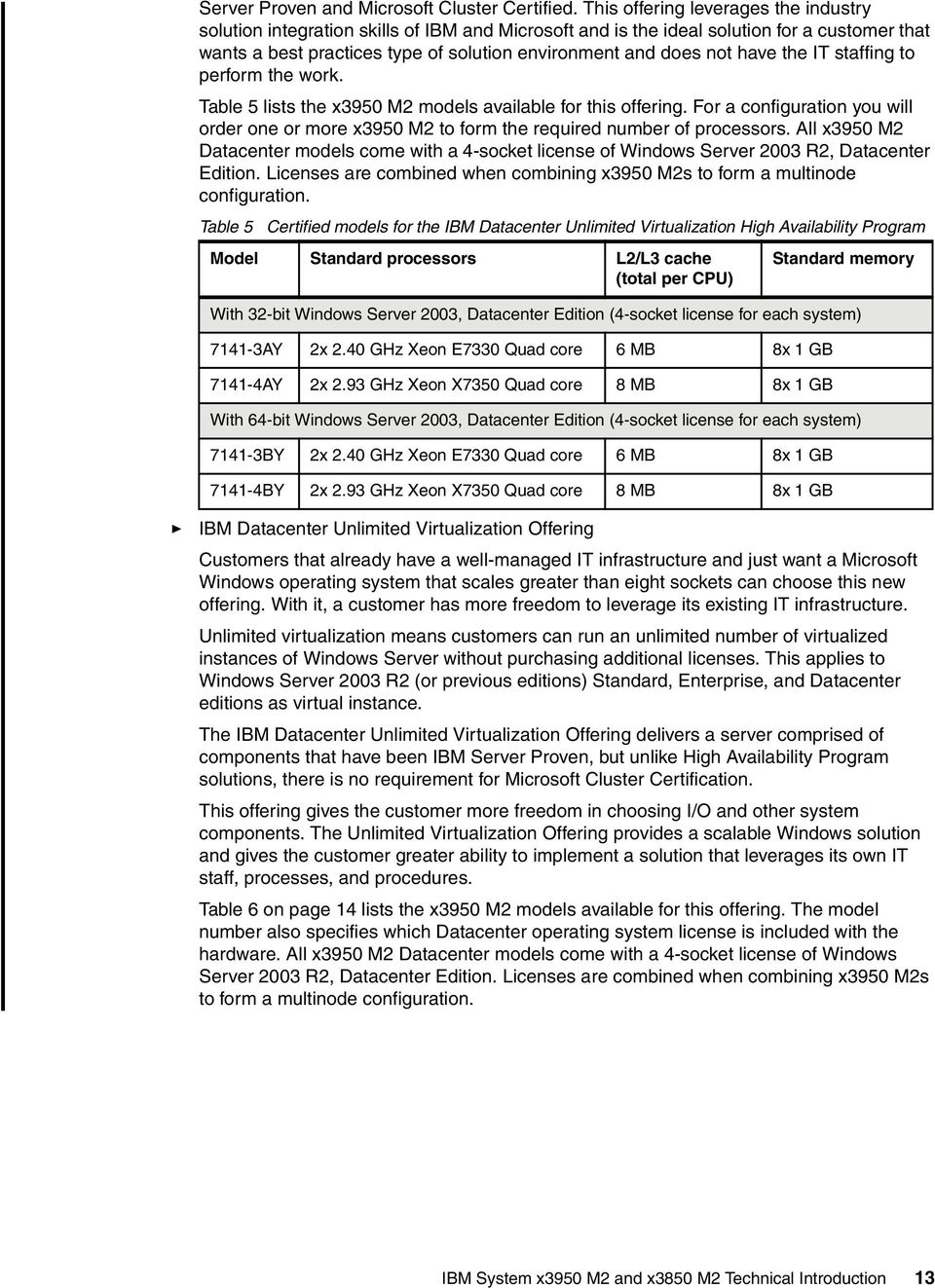
14 Table 6 Certified models for the IBM Datacenter Unlimited Virtualization Offering Model Standard processors L2/L3 cache (total per CPU) Standard memory With 32-bit Windows Server 2003, Datacenter Edition (4-socket license for each system) DY 2x 2.40 GHz Xeon E7330 Quad core 6 MB 8x 1 GB DY 2x 2.93 GHz Xeon X7350 Quad core 8 MB 8x 1 GB With 64-bit Windows Server 2003, Datacenter Edition (4-socket license for each system) EY 2x 2.40 GHz Xeon E7330 Quad core 6 MB 8x 1 GB EY 2x 2.93 GHz Xeon X7350 Quad core 8 MB 8x 1 GB IBM XA-64e fourth-generation chipset The x3850 M2 and x3950 M2 uses the fourth generation of the IBM XA-64e chipset. The architecture consists of the following components: One to four Xeon dual-core or quad-core processors Hurricane 4 Memory and I/O Controller (MIOC) Eight high speed memory buffers Two PCI Express bridges One South bridge Figure 7 on page 15 shows the block diagram of the x3850 M2 and x3950 M2. Note: The unit GB refers to gigabytes. The unit Gb refers to gigabits. 14 IBM System x3950 M2 and x3850 M2 Technical Introduction

15 DDR2 DDR2 DDR2 Buffer Buffer Buffer CPU 1 CPU 2 CPU 3 CPU 4 Each FSB: 1066 MHz 8.53 GBps IBM X4 Architecture core chipset DDR2 Buffer Memory controller ("Hurricane 4") Scalability ports GBps each DDR2 DDR2 Buffer Buffer 8 ports, each: R: 4.26 GBps W: 2.13 GBps HSS-IB 6 GBps HSS-IB 6 GBps DDR2 DDR2 Buffer Buffer 2 GBps PCI-E bridge 1 PCI-E bridge 2 B = bytes b = bits Serial IDE DVD 6x USB 2.0 South bridge PCI + USB RSA2 + Video PCI-E x4 Gb Ethernet BCM5709C Seven PCI Express x8 slots (slots 6 & 7 are hot-swap) MR10k External SAS port HDD backplane LSI 1078 SAS Figure 7 x3850 M2 and x3950 M2 system block diagram Each memory port out of the memory controller has a peak read throughput of 4.26 GBps and a peak write throughput of 2.13 GBps. DIMMs are installed in matched pairs, two-way interleaving, to ensure the memory port is fully utilized. Peak throughput for each PC DDR2 DIMM is 4.26 GBps. Because there are eight memory ports, spreading installed DIMMs across all four memory ports can improve performance. The eight independent memory ports provide simultaneous access to memory. With four memory cards installed, and eight DIMMs in each card, peak read memory bandwidth is 34.1 GBps and peak write bandwidth is 17.1 GBps. The memory controller routes all traffic from the eight memory ports, four microprocessor ports, and the three PCI bridge ports. The memory controller also has embedded DRAM which, in the x3850 M2 and x3950 M2, holds a snoop filter lookup table. This filter ensures that snoop requests for cache lines go to the appropriate microprocessor bus and not all four of them, thereby improving performance. As shown in Figure 7, PCI bridge 1 supplies four of the seven PCI Express x8 slots on four independent PCI Express buses. PCI bridge 2 supplies the other three PCI Express x8 slots plus the onboard SAS devices, including the optional ServeRAID-MR10k. A separate South bridge supplies all the other onboard PCI devices, such as the USB ports, onboard Ethernet and the standard RSA II. IBM System x3950 M2 and x3850 M2 Technical Introduction 15

16 Processors The x3850 M2 and x3950 M2 models use either the Intel Xeon Processor E7210 dual-core or the Intel Xeon Processor E7300 series dual or quad-core Tigerton processors. Refer to Current models on page 12 for more detail. All models of the x3850 M2 and x3950 M2 have two processors installed. Two or four processors are supported. Installed processors must be identical in model, speed, and cache size. Having three processors in one system is not supported. As described in Multinode configurations on page 7, you can connect multiple x3950 M2s to form larger configurations. The x3950 M2s must have either two or four identical processors installed. The processors are accessible from the top of the server after opening the media hood. The media hood is hinged at the middle of the system and contains the SAS drives, optical media, USB ports and light path diagnostic panel. Figure 8 shows the media hood half-way open. Note: Power off the server before raising the media hood. Figure 8 The x3850 M2 and x3950 M2 with the media hood partly open The processors and the order of installation are shown in Figure 9 on page IBM System x3950 M2 and x3850 M2 Technical Introduction

17 Figure 9 Layout and installation sequence of the four processors and four memory cards The VRMs for processors 1 and 2 come standard with the server; the VRMs for processors 3 and 4 come with the processor options. The x3850 M2 and x3950 M2 use different processors, depending on the model. The part numbers listed in Table 7, Table 8, and Table 9 on page 18 include the VRM and heat sink. Table 7 lists the processors used in the x3850 M2 models announced in October Table 7 Processors used in x3850 M2 models announced October 2007 Model Standard CPU (dual-core or quad-core) CPU power consumption Part number for CPU option RU 2 x 2.40 GHz Xeon E7210 Dual core 80 W 44E RU 2 x 2.13 GHz Xeon E7320 Quad core 80 W 44E RU 2 x 2.40 GHz Xeon E7330 Quad core 80 W 44E RU 2 x 2.93 GHz Xeon X7350 Quad core 130 W 44E4243 Table 8 lists the processors used in the x3950 M2 models announced in January Table 8 Processors used in x3950 M2 models announced January 2008 Model Standard CPU (dual-core or quad-core) CPU power consumption Part number for CPU option SU 2 x 1.6 GHz Xeon E7310 Dual core 80 W 44W SU 2 x 2.40 GHz Xeon E7330 Quad core 80 W 44E SU 2 x 2.93 GHz Xeon X7350 Quad core 130 W 44E4243 IBM System x3950 M2 and x3850 M2 Technical Introduction 17

18 Table 9 lists the processors used in the x3950 M2 Datacenter models announced in January Table 9 Processor used in the x3950 M2 Datacenter models announced January 2008 Model Standard CPU (dual-core or quad-core) CPU power consumption Part number for CPU option AY 2 x 2.40 GHz Xeon E7330 Quad core 80 W 44E AY 2x 2.93 GHz Xeon X7350 Quad Core 130W 44E BY 2 x 2.40 GHz Xeon E7330 Quad core 80 W 44E BY 2 x 2.93 GHz Xeon X7350 Quad core 130 W 44E DY 2 x 2.40 GHz Xeon E7330 Quad core 80 W 44E DY 2 x 2.93 GHz Xeon X7350 Quad core 130 W 44E EY 2 x 2.40 GHz Xeon E7330 Quad core 80 W 44E EY 2 x 2.93 GHz Xeon X7350 Quad core 130 W 44E4243 All processors used in an x3850 M2 or x3950 M2 must be of the same type, speed, and L2/L3 cache size. When adding an x3950 M2, all nodes must have either two or four microprocessors installed. Xeon E7210 and E7300 Tigerton processors have two levels of cache on the processor die: Each pair of cores in the processor has either 2 MB, 3 MB, or 4 MB of shared L2 cache, for a total of 4 MB, 6 MB, or 8 MB of L2 cache. The L2 cache implements the Advanced Transfer Cache technology. The L1 execution trace cache in each core is used to store micro-operations, decoded executable machine instructions. It serves those to the processor at rated speed. This additional level of cache saves decode time on cache hits. The Tigerton processors do not have L3 cache. 18 IBM System x3950 M2 and x3850 M2 Technical Introduction

19 Figure 10 compares the layout of the Tigerton dual-core and quad-core processors. Dual-core Xeon E7210 (Code name: Tigerton) Quad-core Xeon E7300 series (Code name: Tigerton) Processor Core L1 Instruct Cache L1 Data Cache L2 Cache Processor Core Processor Core L1 Instruct Cache L1 Data Cache L1 Instruct Cache L1 Data Cache L2 Cache Processor Core L1 Instruct Cache L1 Data Cache L2 Cache Processor Core Processor Core L1 Instruct Cache L1 Data Cache L1 Instruct Cache L1 Data Cache L2 Cache Figure 10 Comparing the dual-core and quad-core Tigerton Key features of the processors used in the x3850 M2 and x3950 M2 include: Models with dual-core or quad-core processors The Tigerton dual-core processors are a concept similar to a two-way SMP system except that the two processors, or cores, are integrated into one silicon die. This brings the benefits of two-way SMP with less power consumption and faster data throughput between the two cores. To keep power consumption down, the resulting core frequency is lower, but the additional processing capacity means an overall gain in performance. The Tigerton quad-core processors add two more cores onto the same die. Hyper-Threading Technology is not supported. Each core has separate L1 instruction and data caches, as well as separate execution units (integer, floating point, and so on), registers, issue ports, and pipelines for each core. A multi-core processor achieves more parallelism than Hyper-Threading Technology, because these resources are not shared between the two cores. With double and quadruple the number of cores for the same number of sockets, it is even more important that the memory subsystem is able to meet the demand for data throughput. The 34.1 GBps peak throughput of the x3850 M2 and x3950 M2 ex4 Architecture with four memory cards is well-suited to dual-core and quad-core processors MHz front-side bus The Tigerton Xeon MP uses two 266 MHz clocks, out of phase with each other by 90, and using both edges of each clock to transmit data. This is shown in Figure MHz clock A 266 MHz clock B Figure 11 Quad-pumped front-side bus IBM System x3950 M2 and x3850 M2 Technical Introduction 19

20 A quad-pumped 266 MHz bus therefore results in a 1066 MHz front-side bus. The bus is eight bytes wide, which means it has an effective burst throughput of 8.53 GBps. This can have a substantial impact, especially on TCP/IP-based LAN traffic. Intel 64 Technology (formerly known as EM64T) First introduced in the Xeon DP Nocona processor, Intel 64 Technology is a 64-bit extension to the industry standard IA32 32-bit architecture. Intel 64 Technology adds: A set of new 64-bit general purpose registers (GPR) 64-bit instruction pointers The ability to process data in 64-bit chunks Even though the names of these extensions suggest that the improvements are simply in memory addressability, Intel 64 Technology is, in fact, a fully functional 64-bit processor. The Tigerton processors limit memory addressability to 40 bits of addressing. There are three distinct operation modes available in Intel 64 Technology: 32-bit legacy mode The first and, in the near future, probably most widely used mode will be the 32-bit legacy mode. In this mode, processors with Intel 64 Technology will act just like any other IA32-compatible processor. You can install your 32-bit operating system on such a system and run 32-bit applications, but you will not be able to make use of the new features such as the flat memory addressing above 4 GB or the additional General Purpose Registers (GPRs). 32-bit applications will run just as fast as they would on any current 32-bit processor. Most of the time, IA32 applications will run even faster because there are numerous other improvements that boost performance regardless of the maximum address size. Compatibility mode The second mode supported by Intel 64 Technology is the compatibility mode, which is an intermediate mode of the full 64-bit mode described in the following list item. To run in compatibility mode, you will need to install a 64-bit operating system and 64-bit drivers. If a 64-bit OS and drivers are installed, the processor will be enabled to support both 32-bit applications and 64-bit applications. The compatibility mode gives you the ability to run a 64-bit operating system, while still being able to run unmodified 32-bit applications. Each 32-bit application will still be limited to a maximum of 4 GB of physical memory. However, the 4 GB limit is now imposed on a per-process level, not on a system-wide level. This means that every 32-bit process on this system gets its very own 4 GB of physical memory space, provided sufficient physical memory is installed. This is already a huge improvement compared to IA32, where the operating system kernel and the application had to share 4 GB of physical memory. Additionally, the compatibility mode does not support the virtual 8086 mode, so real-mode legacy applications are not supported. 16-bit protected mode applications, however, are supported. Full 64-bit mode The final mode is the full 64-bit mode. Intel refers to it as the IA-32e mode. (For AMD, it is the long mode). This mode is applied when a 64-bit OS and 64-bit application are used. In the full 64-bit operating mode, an application can have a virtual address space of up to 40 bits, equating to one terabyte (TB) of addressable memory. The amount of physical memory will be determined by how many DIMM slots the server has and the maximum DIMM capacity supported and available at the time. 20 IBM System x3950 M2 and x3850 M2 Technical Introduction

21 Applications that run in full 64-bit mode will have access to the full physical memory range, depending on the operating system, and will also have access to the new GPRs as well as to the expanded GPRs. However, it is important to understand that this mode of operation requires not only a 64-bit operating system (and, of course, 64-bit drivers) but also a 64-bit application that has been recompiled to take full advantage of the various enhancements of the 64-bit addressing architecture. For more information about the features of the Xeon quad-core processor, see: For more information about Intel 64, see: XceL4v Dynamic Server Cache The XceL4v Dynamic Server Cache is a technology developed as part of the IBM XA-64e fourth-generation chipset. It is used in two ways: As a single 4-way server, the XceL4v and its embedded DRAM (edram) is used as a snoop filter to reduce traffic on the front-side bus. It stores a directory of all processor cache lines to minimize snoop traffic on the four front-side buses and minimize cache misses. When the x3950 M2 is configured as a multinode server, this technology dynamically allocates 256 MB of main memory in each node for use as an L4 cache directory and scalability directory. In an 8-way configuration, this means there will be 512 MB of XceL4v cache. Used in conjunction with the XceL4v Dynamic Server Cache is an embedded DRAM (edram), which in single-node configurations contains the snoop filter lookup tables. However, in a multinode configuration, this edram contains the L4 cache directory and the scalability directory. Note: The amount of memory that BIOS reports is minus the portion used for XceL4v cache. System memory The x3850 M2 and x3950 M2 models have either 4 GB or 8 GB of RAM standard, implemented as four or eight 1 GB DIMMs. Memory is PC ECC DDR2. Memory is implemented in the x3850 M2 and x3950 M2 using memory cards. The server supports up to four memory cards. Each card has eight DIMM sockets, giving a total of up to 32 DIMM sockets. Some models have two memory cards and some have all four cards standard. Table 3 on page 12 provides more detail about this topic. Using 8 GB DIMMs in every socket, the server can hold 256 GB of RAM. With four nodes, the combined complex can hold up to 1 TB of RAM. With a multinode configuration, the memory in all nodes is combined to form a single, coherent physical address space. The resulting system has the property such that for any given region of physical memory, some processors are closer to it than other processors. IBM System x3950 M2 and x3850 M2 Technical Introduction 21
22 Conversely, for any processor, some memory is considered local and other memory is remote. The system s partition descriptor table is used to ensure that memory is used in the most optimal way. The memory is two-way interleaved, meaning that memory DIMMs are installed in pairs. As shown in Figure 7 on page 15, there are eight ports from the Hurricane 4 memory controller to memory, with each supporting up to 4.26 GBps read data transfers and 2.13 GBps write data transfers. The DIMMs operate at 533 MHz, to be in sync with the front-side bus. However, the DIMMs are 677 MHz PC spec parts because these have better timing parameters than the 533 MHz equivalent. The memory throughput is 4.26 GBps, or 533 MHz x 8 bytes per memory port, for a total of 34.1 GBps with four memory cards. Supported DIMM options are: 2 GB (part number 41Y2762) containing two 1 GB DIMMs 4 GB (part number 41Y2771) containing two 2 GB DIMMs 8 GB (part number 41Y2768) containing two 4 GB DIMMs 16 GB (part number 43V7356) containing two 8 GB DIMMs The x3850 M2 and x3950 M2 models have two or four memory cards installed, depending on the model (see Current models on page 12). Each memory card holds up to eight DIMMs. Additional memory cards are part number 44E4252. If you replace the standard pair of DIMMs and install 32x 8 GB DIMMs and four memory cards, both the x3850 M2 and x3950 M2 can be expanded to 256 GB. Each x3850 M2 and x3950 M2 must have at least 2 DIMMs and one memory card installed. By adding a single, fully populated x3950 M2 with 8 GB DIMMs, you can expand up to 512 GB and so on up to a maximum of 1024 GB in a four-node configuration. Note: At the time of writing only Windows 2003 Enterprise and Datacenter 64-bit editions, RHES 5 64-bit, and SLES10 64-bit support this amount of memory. Each node needs a minimum of 4 GB of memory installed to be able to merge into a single image. For performance reasons, all nodes should have the same amount of memory installed. As explained in XceL4v Dynamic Server Cache on page 21, in a multinode scalable system the XceL4v Dynamic Server Cache dynamically allocates 256 MB of main memory in each node for use as L4 cache, therefore giving a reduction in overall memory that is available to the operating system of 256 MB per node. Thus, in a four-node configuration there will be a 1 GB reduction of main system memory. This reduction in memory is reflected at power-on self-test (POST) with the insertion of a new line of text, telling the user the amount of available system memory after the L4 scalability cache for each node has been subtracted. To replace or add any DIMMs, you need to remove one or more of the installed memory cards. Refer to Memory mirroring on page 25 and Hot-add memory on page 27 for an explanation of how this can even be done while the system and the operating system are up and running. Tip: You do not need to lift the media hood to add or replace memory. 22 IBM System x3950 M2 and x3850 M2 Technical Introduction
23 The x3850 M2 and x3950 M2 support up to 4 memory cards, and each card holds up to 8 DIMMs. Release latch Each memory card has 8 DIMM sockets. DIMMs must be installed in matched pairs. Either 4 or 8 DIMMs are installed in pairs across either 2 or 4 memory cards as standard. Figure 12 x3850 M2 and x3950 M2 memory card and location Note the following key configuration rules: Because the x3850 M2 and x3950 M2 use two-way interleaving memory, DIMMs must be installed in matched pairs. Memory cards have part number 44E4252. Two or four are standard in the x3850 M2 and x3950 M2 (depending on the model; see Current models on page 12 or Table 3 on page 12 for more information), and up to a maximum of four can be installed. Each memory card has eight DIMM sockets. There are two ways to fill the DIMMs sockets, depending on whether cost or performance is the more important consideration: Cost-effective configuration To minimize cost, you can install the memory DIMMs by filling each memory card before adding DIMMs to the next memory card. Performance-optimized configuration As described in IBM XA-64e fourth-generation chipset on page 14, there are eight independent memory ports. Therefore, to optimize performance, you need to install four memory cards and then spread the DIMMs, still installed in matched pairs, across all four memory cards before filling each card with two more DIMMs. A more detailed description and the exact sequence for installation is provided in System x3850 M2 Installation Guide. If you want to install the full 256 GB, you will need to remove the existing DIMMs and fully populate the x3850 M2 and x3950 M2 with four memory cards, each with eight 8 GB DIMMs. IBM System x3950 M2 and x3850 M2 Technical Introduction 23
24 There are a number of advanced features implemented in the x3850 M2 and x3950 M2 memory subsystem, collectively known as Active Memory: Memory ProteXion The Memory ProteXion feature (also known as redundant bit steering) provides the equivalent of a hot-spare drive in a RAID array. It is based in the memory controller, and it enables the server to sense when a chip on a DIMM has failed and to route the data around the failed chip. Normally, 128 bits out of every 144 are used for data and the remaining 16 bits are used for ECC functions. However, the x3850 M2 and x3950 M2 needs only 12 bits to perform the same ECC functions, thus leaving four bits free. In the event that a chip failure on the DIMM is detected by memory scrubbing, the memory controller can reroute data around that failed chip through these spare bits. It can do this automatically without issuing a Predictive Failure Analysis (PFA) or light path diagnostics alert to the administrator, although an event is logged to the service processor log. After the second DIMM failure, PFA and light path diagnostics alerts would occur on that DIMM as normal. Memory scrubbing Memory scrubbing is an automatic daily test of all system memory, which detects and reports memory errors that might be developing before they cause a server outage. Memory scrubbing and Memory ProteXion work in conjunction with each other and do not require memory mirroring to be enabled in order to work properly. When a bit error is detected, memory scrubbing determines if the error is recoverable or not. If the error is recoverable, Memory ProteXion is enabled and the data that was stored in the damaged locations is rewritten to a new location. The error is then reported so that preventative maintenance can be performed. As long as there are enough good locations to allow the proper operation of the server, no further action is taken other than recording the error in the error logs. If the error is not recoverable, then memory scrubbing sends an error message to the light path diagnostics, which then turns on the proper lights and LEDs to guide you to the damaged DIMM. If memory mirroring is enabled, then the mirrored copy of the data from the damaged DIMM is used until the system is powered down and the DIMM is replaced. Because x3850 M2 and x3950 M2 are now capable of supporting large amounts of memory, IBM has added the Initialization Scrub Control setting to the BIOS, to let customers choose when this scrubbing is done and therefore potentially speed up the boot process. Refer to Table 10 on page 26 for further detail about these settings. Memory mirroring Memory mirroring is roughly equivalent to RAID-1 in disk arrays, in that usable memory is halved and a second copy of data is written to the other half. If 8 GB is installed, then the operating system sees 4 GB after memory mirroring is enabled. It is disabled in the BIOS by default. Because all mirroring activities are handled by the hardware, memory mirroring is operating system-independent. When memory mirroring is enabled, certain restrictions exist with respect to placement and size of memory DIMMs and the placement and removal of memory cards. Refer to System x3950m2 and x3850 M2 Installation Guide for details. 24 IBM System x3950 M2 and x3850 M2 Technical Introduction
25 Chipkill memory Chipkill is integrated into the XA-64e chipset, so it does not require special Chipkill DIMMs and is transparent to the operating system. When combining Chipkill with Memory ProteXion and Active Memory, the x3850 M2 and x3950 M2 provide very high reliability in the memory subsystem. When a memory chip failure occurs, Memory ProteXion transparently handles the rerouting of data around the failed component as previously described. However, if a further failure occurs, the Chipkill component in the memory controller reroutes data. The memory controller provides memory protection similar in concept to disk array striping with parity, writing the memory bits across multiple memory chips on the DIMM. The controller is able to reconstruct the missing bit from the failed chip and continue working as usual. One of these additional failures can be handled for each memory port, for a total of eight Chipkill recoveries. Hot-add and hot-swap memory The x3850 M2 and x3950 M2 support the replacing of failed DIMMs while the server is still running. This hot-swap support works in conjunction with memory mirroring. The server also supports adding additional memory while the server is running. Adding memory requires operating system support. Note: These two features are mutually exclusive, as explained here: Hot-add requires that memory mirroring be disabled. Hot-swap requires that memory mirroring be enabled. In addition, to maintain the highest levels of system availability, if a memory error is detected during POST or memory configuration, the server can automatically disable the failing memory bank and continue operating with reduced memory capacity. You can manually re-enable the memory bank after the problem is corrected by using the Setup menu in the BIOS. Memory mirroring, Chipkill, and Memory ProteXion provide multiple levels of redundancy to the memory subsystem. Combining Chipkill with Memory ProteXion allows up to two memory chip failures for each memory port on the x3850 M2 and x3950 M2, for a total of eight failures sustained. 1. The first failure detected by the Chipkill algorithm on each port does not generate a light path diagnostics error because Memory ProteXion recovers from the problem automatically. 2. Each memory port could then sustain a second chip failure without shutting down. 3. Provided that memory mirroring is enabled, the third chip failure on that port would send the alert and take the DIMM offline, but keep the system running out of the redundant memory bank. Memory mirroring Memory mirroring is available on the x3850 M2 and x3950 M2 for increased fault tolerance. Memory mirroring is operating system-independent, because all mirroring activities are handled by the hardware. The x3850 M2 and x3950 M2 have four separate memory power buses that each power one of the four memory cards. Figure 13 on page 26 shows the location of the memory cards (which are numbered 1 to 4, from left to right) and the DIMM sockets and LEDs on the memory cards. IBM System x3950 M2 and x3850 M2 Technical Introduction 25
26 Memory hot-swap enabled LED Memory-card/DIMM error LED Memory-card power LED Visible from top of memory card Memory card 2 Memory card 1 DIMM 1 DIMM 2 DIMM 3 DIMM 4 DIMM 5 DIMM 6 DIMM 7 DIMM 8 Light path diagnostics button Memory card socket 3 Memory card socket 4 Figure 13 Memory hardware on the x3850 M2 and x3950 M2 Mirroring takes place across two memory cards. The memory DIMMs in card 1 are mirrored to the memory DIMMs in card 2. The memory DIMMs in card 3 are mirrored to the memory DIMMs in card 4. Therefore, with memory mirroring enabled in the BIOS, you can hot-swap any memory card as long as the hot-swap enabled LED is lit. Refer to x3850 M2 and x3950 M2 User s Guide for complete instructions about how to hot-swap a memory card. After memory mirroring is enabled, the data that is written to memory will be stored in two locations. For read operations, data is read from the DIMMs with the least amount of reported memory errors through memory scrubbing. Table 10 shows the possible BIOS settings for the initialization scrub control. The setting is accessed by going to Advanced Setup Memory Settings Initialization Scrub Control. Table 10 Initialization Scrub Control Setting Scrub on Every Boot Scrub only after AC Cycle Disabled Function Performs full memory test on every boot Performs scrub only after AC has been removed or applied Relies on standard memory test and run time scrub engine to ensure memory is good 26 IBM System x3950 M2 and x3850 M2 Technical Introduction
27 Note: A standard test is still performed across all memory and a run time scrub engine will always be enabled regardless of these settings. If memory mirroring is enabled, then the mirrored copy of the data from the damaged DIMM is used until the DIMM replaced. After the damaged DIMM is replaced, memory mirroring will copy the mirrored data back onto the new DIMM. Key configuration rules of memory mirroring are as follows: Memory mirroring must be enabled in the BIOS (it is disabled by default). Both memory cards must have the same total amount of memory, and must have identical DIMMs. In other words, DIMMs must be installed in matched quads to support memory mirroring. Partial mirroring is not supported. Refer to x3850 M2 Installation Guide for information about the exact installation order required. Important: Because of memory mirroring, you will only have half of the total amount of memory available. If 8 GB is installed, for example, then the operating system sees 4 GB minus half the total XceL4v Dynamic Server Cache if this is a multinode system, after memory mirroring is enabled. It is disabled in the BIOS by default. Hot-swap memory The x3850 M2 and x3950 M2 support hot-swap memory. If a DIMM fails, it can be replaced with a new DIMM without powering down the server. This advanced feature allows for maximum system availability. Hot-swap memory requires that memory mirroring be enabled. To easily identify whether hot-swap is enabled and the status of power to the memory card, each memory card has a green memory hot-swap enabled LED, and a green memory card power LED on the top panel of the memory card, as shown in Figure 13 on page 26. The memory card has eject levers with sensors, so that the system can recognize when a memory card is being removed and power down that card s slot accordingly. The overall process to hot-swap a failed DIMM is as follows: 1. Verify that memory mirroring and hot-swap are enabled by checking the memory hot-swap enabled LED on the memory cards. 2. When a DIMM fails, you will be alerted with the memory LED on the light path diagnostics panel and by other means with the service processor, if this has been configured. 3. Locate the memory card with the failed DIMM by identifying the memory card that has the memory error LED lit. 4. Remove the memory card containing the failed DIMM. 5. Press the button on the memory card to identify which DIMM has failed. The LED next to the failed DIMMs lights up. 6. Replace the failed DIMM and reinsert the memory card. For a more detailed description of how to hot-swap memory correctly and which sequence to follow, refer to x3850 M2 and x3950 M2 User s Guide. Hot-add memory The hot-add memory feature enables you to add DIMMs without turning off the server. This section presents the requirements for enabling the hot-add memory feature on the server. IBM System x3950 M2 and x3850 M2 Technical Introduction 27
28 Note: As previously mentioned, hot-add and hot-swap are mutually exclusive. You can only enable one of these features. The requirements are as follows: Operating system support: Adding usable system memory to a running operating system requires operating system support. This is done with an ACPI sequence. Currently, the only operating system that has this capability and is supported on the x3850 M2 and x3950 M2 is Windows Server 2003, Enterprise Edition or Datacenter Edition. Memory hot-add must be specifically enabled in the BIOS setup. When this is done, the system allocates blank windows of memory space for future memory additions. By enabling hot-add, memory mirroring will automatically be disabled. Memory cards 2 and 4 must not be installed yet because these are the only ones that can be hot-added. If only one memory card, memory card 1, is installed prior to the hot-add operation, then only one additional memory card may be added in slot 2. If two memory cards are installed in slots 1 and 3, then two additional memory cards can be added in slots 2 and 4. The DIMMs must be add in matched pairs, that is, two at a time, and they must also match the equivalent pair of DIMMs on the matching memory card on the other power bus. A minimum of 4 GB of memory must be installed in the server for hot-add memory to be available. Additionally, for 32-bit operating systems, the Physical Address Extension (PAE) mode has to be enabled to take advantage of the additional memory. For information about how to perform a hot-add operation, and more information about the restrictions, refer to x3850 M2 and x3950 M2 User s Guide. Note: Observe the following concepts when hot-adding memory. If you plan to enable hot-add memory and you have a x3850 M2 and x3950 M2 system that comes standard with two memory cards, you need to move memory card 2 to slot 3 to be able to hot-add memory cards in slots 2 and 4. After you have added a memory card with two DIMMs, you cannot add more memory to that same memory card without powering off the server. Enabling hot-add reserves a portion of the memory map for the memory that can be hot-added in the future. If you do not plan to use hot-add, we recommend that you do not enable this feature in BIOS. Memory configuration in BIOS Configure the memory subsystem in the server s BIOS Setup menu by clicking Advanced Settings -> Memory Settings -> Memory Array Setting. The choices are listed in Table 11. Table 11 Memory configuration modes in BIOS Mode Memory ProteXion Memorymirroring Hot-swap memory Hot-add memory HPMA (high performance memory array) Yes Disabled Disabled Disabled FAMM (full array memory mirroring) Yes Yes Yes Disabled HAM (hot-add memory) Yes Disabled Disabled Yes 28 IBM System x3950 M2 and x3850 M2 Technical Introduction
29 The memory configuration mode you select depends on what memory features you want to use: Select HPMA if you are not using mirroring, hot-swap, or hot-add. This is now the default or standard setting. Select FAMM to enable memory mirroring and hot-swap. Select HAM to enable hot-add in the future. Important: The memory settings described must be standardized across a multinode configuration before merging the scalable partition. This requires a KVM connection to each standalone node before the scalable partition is created. Unlike with the x3850, the x3850 M2 and x3950 M2 now support Memory ProteXion with the HPMA setting, providing maximum performance while still providing the reliability of Redundant Bit Steering (RBS). SAS disk subsystem The x3850 M2 and x3950 M2 have a disk subsystem that is comprised of an LSI Logic 1078 Serial Attached SCSI (SAS) controller and four internal 2.5 SAS hot-swap drive bays. The x3850 M2 and x3950 M2 support internal RAID-0 and RAID-1. The optional ServeRAID-MR10k, part number 43W4280, provides additional RAID levels and a 256 MB battery-backed cache. SAS is the logical evolution of SCSI. SAS uses much smaller interconnects than SCSI, while offering SCSI compatibility, reliability, performance and manageability. In addition, SAS offers longer cabling distances, smaller form factors and greater addressability. The x3850 M2 and x3950 M2 have an external SAS x4 port which is used in conjunction with the optional ServeRAID-MR10k. This external port supports SAS non-raid disk enclosures such as the EXP3000. This port has an SFF-8088 connector. The chassis has four internal 2.5-inch hot-swap SAS disk drive bays. By using four 146 GB drives, up to 584 GB of disk can be installed internally. Table 12 shows the supported disks. Table 12 Supported internal disk options for the x3850 M2 and x3950 M2 Part number 40K X X0837 Description 2.5 SAS 73GB 10K SAS 2.5 SAS 146GB 10K SAS 2.5 SAS 73GB 15K SAS ServeRAID MR10k To enable additional RAID features and a 256 MB battery-backed cache, the ServeRAID-MR10k SAS RAID controller (part number 43W4280) is also available and is installed in a dedicated slot, as shown in Figure 14 on page 30 IBM System x3950 M2 and x3850 M2 Technical Introduction 29
30 Intelligent transportable battery backup unit (itbbu) installed in the PCI slot spacer DIMM with RAID hardware Figure 14 ServeRAID-MR10k installed The use of ServeRAID-MR10k SAS RAID controller enables the following RAID levels: RAID-0 RAID-1 RAID-5 RAID-6 RAID-10 RAID-50 RAID-60 Note: RAID-50 and RAID-60 are only supported externally because they require a minimum of six or eight drives, respectively. The ServeRAID-MR10k supports stripe sizes from 16 KB to 1024 KB. The default stripe size is 256 KB. The ServeRAID-MR10k attaches by a short cable to an external intelligent transportable battery backup unit (itbbu) which has the following characteristics: Intelligent: The itbbu has built-in functionality to charge the battery pack automatically and to communicate battery status information such as voltage, temperature, and current to the server. Transportable: The itbbu can be used to move a RAID DIMM's cached data to a replacement DIMM if that data has not been written to a disk. This could be necessary if, for example, the DIMM fails after an unexpected power failure. After you install the itbbu on the new RAID DIMM, it flushes the unwritten data preserved in the cache to the disk through the new DIMM. The battery is designed to up to 72 hours cache protection, depending on operating environment. IBM recommends that the battery be replaced annually. The FRU part number for the replacement battery is 43W4283. Observe the following when using RAID or installing the ServeRAID MR10k: No rewiring of the existing internal cabling is required when the ServeRAID-MR10k is installed in an x3850 M2 or x3950 M2. 30 IBM System x3950 M2 and x3850 M2 Technical Introduction
31 A RAID array created with the SAS LSI 1078 can be migrated for use with the ServeRAID-MR10k, but the reverse is not possible. This means that if you create RAID-0 and RAID-1 arrays using the onboard LSI 1078 Integrated RAID controller and later install a ServeRAID-MR10k, you will be given the option to convert those arrays to the format used by the MR10k. However, if you wish to later remove the MR10k, you must first save all your data because the data in those arrays will be inaccessible by the LSI 1078 Integrated RAID controller. For more detailed information, refer to Chapter 3 of ServeRAID-MR10k User s Guide, available on the ServeRAID MR10 Support CD which can be downloaded in ISO format from: Important: Prior to inserting the ServeRAID MR10k and converting your arrays, you must install the ServeRAID MR10 driver. Failure to do so prior to the conversion will render all data on those drives permanently inaccessible. The onboard LSI 1078 and the ServeRAID-MR10k are not supported with the ServeRAID manager. Use the MegaRAID Storage Manager (MSM) instead. One or more arrays can be formed using both the four internal disks and disks in an external disk enclosure such as the EXP3000 attached to the external SAS port. ServeRAID-MR10M The x3850 M2 and x3950 M2 also support the ServeRAID-MR10M, part number 43W4339, which has the following features: PCI Express x8 adapter card Supports SAS and SATA 2 Two external x4 ports using SFF-8088 connectors (no internal SAS connectors) 256 MB onboard cache using DDR2 memory Onboard battery backup unit (power for up to 72 hours; replace annually using FRU 43W4342) RAID levels 0, 1, 10, 5, 50, 6, 60 Supports the EXP3000 enclosure with cascading of enclosures of up to 9 per port Up to seven can be installed in the x3850 M2 and x3950 M2. More than three, however, will require custom testing using the IBM SPORE process. Refer to ServerProven at the following Web site for the latest list of supported adapters and hot-swap SAS drives: ix.html For a comparison of features of members of the ServeRAID family, see: The following publications are available for further reference: ServeRAID MR10k Quick Installation Guide ServeRAID MR10k User s Guide ServeRAID MR Software User s Guide ServeRAID-MR Device Driver Installation IBM System x3950 M2 and x3850 M2 Technical Introduction 31
32 The documents are available on the ServeRAID MR10 Support CD, which can be downloaded in ISO format from: PCI subsystem As shown in Figure 7 on page 15, there are five half-length, full-height PCI Express x8 slots and two half-length, full-height Active PCI Express x8 internal to the x3850 M2 and x3950 M2. All are vacant in the standard models. All seven slots have the following characteristics: Separate bus from the other slots and devices PCI Express x8 40 Gbps full duplex 64-bit, each supporting 32-bit adapters as well Slots 6 and 7 also support Active PCI hot-swap adapters. Note: You require Microsoft Windows Server 2003 to be able to use Active PCI on the x3850 M2 and x3950 M2. Support in Linux distributions is planned for The optional ServeRAID-MR10k adapter does not use a PCI slot because it has a dedicated slot on the motherboard. See Figure 15 on page 33. The PCI subsystem also supplies these I/O devices: LSI 1078 Serial-attached SCSI (SAS) controller. Broadcom dual port 5709C 10/100/1000 Ethernet. Six USB ports, two on the front panel, three on the rear, one onboard. Remote Supervisor Adapter II adapter in a dedicated socket on the I/O board. This adapter also provides the ATI ES MB video controller. EIDE interface for the DVD-ROM drive. Serial port. Trusted Platform Module (TPM). 32 IBM System x3950 M2 and x3850 M2 Technical Introduction
33 As shown in Figure 15, there are seven PCI Express x8 slots. Slots 6 and 7 support hot-plug PCI Express adapters. SAS backplane signal Remote Supervisor Adapter II System Management access Battery Front USB Remote Supervisor Adapter II Internal USB ServeRAID-MR10K Hot-plug switch card PCI Express x8 (x8 lanes) slot 1 PCI Express x8 (x8 lanes) slot 2 PCI Express x8 (x8 lanes) slot 3 PCI Express x8 (x8 lanes) slot 4 PCI Express x8 (x8 lanes) slot 5 PCI Express x8 (x8 lanes) slot 6 PCI Express x8 (x8 lanes) slot 7 SAS backplane power Front panel/light path diagnostics DVD Figure 15 PCI Express slots Note the following configuration information: Full-length cards are not supported. Half-length cards are supported, however. Video adapters are not supported. The PCI Express slots support x4 or x8 PCI Express adapters only. It is recommended that for performance reasons, you do not install more than two high speed (that is, 8 Gbps or faster) PCI Express cards per PCI bridge (bridge 1 is slots 1, 2, 3 and 4; bridge 2 is slots 5, 6, and 7) with a maximum of four per system. Examples of adapter cards that have bandwidth maximums of 8 Gbps or more include 10 Gbps Ethernet card and dual-port 4 Gbps Fibre Channel cards. IBM System x3950 M2 and x3850 M2 Technical Introduction 33
34 The system scans PCI Express slots to assign system resources. The system attempts to start the first device found, with the search order as follows: a. DVD-ROM. b. Optional USB diskette drive. c. Integrated SAS devices. d. Internal PCI slots (in the order 1, 2, 3, 4, 5, 6, 7). e. Integrated dual Gigabit Ethernet controller. f. For multinode complexes, the ordering continues as 8,9,10,11,12,13, 14 and so forth. During boot, you may get POST error 1801 if there are more than three different types of SAS controllers installed, due to limited PCI ROM address space errors are caused by an over-subscription of the 128 KB PCI ROM resource space. Consider the following when reviewing possible sources of 1801 errors: The onboard SAS controller counts as one, except if a ServeRAID MR10k is installed. The ServeRAID MR10k and ServeRAID MR10M are considered the same for this purpose and therefore, only count as one. Broadcom dual Gigabit Ethernet controller The x3850 M2 and x3950 M2 offer a dual Gigabit Ethernet controller integrated standard in the system. The x3850 M2 and x3950 M2 include one dual-port Broadcom BCM5709C 10/100/1000 BASE-T MAC (Media Access Controller) on the PCI Express x4 bus. The BCM5709C has the following features: Supports full and half-duplex performance at all speeds (10/100/1000 Mbps, auto-negotiated) Provides two IEEE Ethernet MAC addresses Includes integrated on-chip memory for buffering data transmissions to ensure the highest network performance Includes dual onboard DMA engines to maximize bus throughput and minimize CPU overhead Supports IPMI for system management The Broadcom controller also includes software support for failover, layer-3 load balancing, and comprehensive diagnostics. Category 5 or better Ethernet cabling is required with RJ-45 connectors. If you plan to implement a Gigabit Ethernet connection, ensure that your network infrastructure is capable of the necessary throughput to match the server s I/O capacity. Redundancy The x3850 M2 and x3950 M2 have the following redundancy features to maintain high availability: There are six hot-swap, multi-speed fans. These fans provide cooling redundancy and enable individual fan replacement without powering down the server. Each of the three groups of two fans is redundant. In the event of a fan failure, the other fans will speed up to continue to provide adequate cooling until the fan can be 34 IBM System x3950 M2 and x3850 M2 Technical Introduction
35 hot-swapped by the IT administrator. In general, failed fans should be replaced within 48 hours following failure. The two Gigabit Ethernet ports can be configured as a team to form a redundant pair. The memory subsystem has a number of redundancy features, including memory mirroring and Memory ProteXion, as described in System memory on page 21. Support is available for RAID disk arrays, both with the onboard LSI 1078 for RAID-0 and RAID-1. The optional ServeRAID-MR10k provides additional RAID features and a 256 MB battery-backed cache. Thex3850 M2 and x3950 M2 have four internal, hot-swap disk drive bays. The two, standard 1440 W hot-swap power supplies are redundant in all configurations at 220 V. Note that at 110 V, the second power supply is not redundant. The layout of the x3850 M2 and x3950 M2, showing the location of the memory cards, power supplies, and fans, is displayed in Figure 16. Six hot-swap fans (one in each pair is redundant) Two hot-swap redundant power supplies (one below the other) Memory redundancy features: memory mirroring, Memory ProteXion, and ChipKill Figure 16 Redundancy features of the x3850 M2 and x3950 M2 Light path diagnostics To limit the customer s need to slide the server out of the rack to diagnose problems, a light path diagnostics panel is located at the front of the x3850 M2 and x3950 M2. This panel slides out from the front of the server so the customer can view all light path diagnostics-monitored server subsystems. In the event that maintenance is required, the customer can slide the server out of the rack and, using the LEDs, find the failed or failing component. Light path diagnostics can monitor and report on the health of microprocessors, main memory, hard disk drives, PCI adapters, fans, power supplies, VRMs, and the internal system temperature. Figure 17 on page 36 shows the light path diagnostic panel. IBM System x3950 M2 and x3850 M2 Technical Introduction 35
36 Power-control button/power-on LED Ethernet icon LED Information LED System-error LED 1 2 NMI button (trained service technician only) Power-control button cover Ethernet port activity LEDs Locator button/ locator LED OVER SPEC CNFG LOG FAN CPU LINK PS TEMP MEM VRM DASD PCI NMI RAID SP BRD REMIND Light Path Diagnostics Figure 17 Light path diagnostic panel Baseboard Management service processor The Baseboard Management Controller (BMC) is a small, independent micro-controller used to perform low-level system monitoring and control functions, as well as remote IPMI interface functions. It uses multiple I2C bus connections to communicate out-of-band with other onboard devices. The BMC provides environmental monitoring for the server. If environmental conditions exceed thresholds or if system components fail, the BMC lights the light path diagnostic LEDs to help you diagnose the problem and also records the error in the BMC system event log. BMC functions are as follows: Initial system check at A/C on The BMC monitors critical I2C devices in standby power mode to determine if the system configuration is safe for power-on. BMC Event log maintenance The BMC maintains and updates an IPMI-specified event log in non-volatile storage. Critical system information is recorded and made available for external viewing. System power state tracking The BMC monitors the system power state and logs transitions into the system event log. System initialization The BMC has I2C access to certain system components that might require initialization before power-up. System software state tracking 36 IBM System x3950 M2 and x3850 M2 Technical Introduction
37 The BMC monitors the system and reports when the BIOS and POST phases are complete and the operating system has booted. System event monitoring During runtime, the BMC continually monitors critical system items such as fans, power supplies, temperatures and voltages. The system status is logged and reported to the service processor, if present. System fan speed control The BMC monitors system temperatures and adjusts fan speed accordingly. The BMC also provides the following remote server management capabilities through the OSA SMBridge management utility program: Command-line interface (IPMI Shell) Serial over LAN (SOL) For more information about how to enable and configure these management utilities, refer to x3850 M2 and x3950 M2 User s Guide. Remote Supervisor Adapter II The x3850 M2 and x3950 M2 have the Remote Supervisor Adapter II service processor as a standard component. This adapter, shown in Figure 18, is installed in a dedicated PCI-X slot, and provides similar functionality as the Remote Supervisor Adapter II PCI option available for other System x servers. However, only the Ethernet and video connectors are used on the x3850 M2 and x3950 M2. The other external ports (including remote power and the ASM interconnect) are not supported on these servers. Video connector System-management connector Ethernet connector Video adapter System management daughter card Figure 18 Remote Supervisor Adapter II Power LED Adapter activity LED Reset button (recessed) The most useful functions and features of the Remote Supervisor Adapter II include: IBM ASIC with integrated PowerPC 405 core executing at 200 MHz Automatic notification and alerts The RSA II automatically sends different types of alerts and notifications to another server like IBM Director, SNMP destination, or as directly to a user by using SMTP. IBM System x3950 M2 and x3850 M2 Technical Introduction 37
38 Continuous health monitoring and control The RSA II continuously monitors all important system parameters (such as temperature, voltage, and so on). So if, for example, a fan fails, the RSA II forces the remaining fans to increase speed to compensate for the failing fan. Event log You can get access to the event logs of the server and the power-on self-test (POST) log and export them while the server is up and running. Operating system failure screen capture When the operating system hangs, for example, with a blue screen, you can do a screen capture for support purposes. Additionally, the RSA II stores the last failure screen in memory so you can refer to it later. Remote media As a part of the remote control feature, the remote media capability lets you use diskette drives, diskette images, optical drives such as DVD or CD-ROM drives, or optical drive images of the system where the Web interface of RSA II is running on the remote PC, and make them appear to be local drives. Trusted Platform Module The x3850 M2 and x3950 M2 implement the Trusted Platform Module (TPM), which ensures that the process from power-on to hand-off to the operating system boot loader is secure. The Core Root of Trusted Measurements (CRTM) code is embedded in the BIOS for logging and signing of the BIOS. In addition, you can enable the ACPI setting in the BIOS (disabled by default) which will assist any operating system that has support written into its code to use the security features of this module. The TPM is TCG V1.2-compliant, and is ready for use with software purchased from the third party list of the TPM Ecosystem partners in compliance with the TPM v1.2 specification. Active Energy Manager IBM Systems Director Active Energy Manager (formerly known as IBM PowerExecutive ) is a combination of hardware and software that enables direct power monitoring through IBM Director. By utilizing an operating system that supports this feature, customers will be able to monitor the power consumption of the x3850 M2 and x3950 M2, and then modify or cap the consumption if so required. Active Energy Manager enables customers to monitor actual power draw and thermal loading information. This helps customers with: More efficient planning of new datacenter construction or modification Proper power input sizing based on physical systems Justification of incremental hardware purchases based on available input power capacity Better utilization of existing resources For more information see: 38 IBM System x3950 M2 and x3850 M2 Technical Introduction
39 The team that wrote this IBM Redpaper This paper was produced by a team of specialists from around the world working at the International Technical Support Organization, Raleigh Center. David Watts is a Consulting IT Specialist at the IBM ITSO Center in Raleigh. He manages residencies and produces IBM Redbooks publications on hardware and software topics related to IBM System x and BladeCenter servers and associated client platforms. He has authored more than 80 books, papers and technotes. He holds a Bachelor of Engineering degree from the University of Queensland (Australia), and has worked for IBM both in the US and Australia since David is an IBM Certified IT Specialist. Robert Moon is the team leader at IBM System x Techline in Greenock, Scotland. He is coauthor of IBM System x3755 Solution Assurance Product Review Guide. He has more than 10 years of experience with System x servers, including pre-sale and post-sale technical support. He has been involved with Solution Assurance since 1998, and is currently the EMEA coordinator for the ServerProven Opportunity Request for Evaluation (SPORE) program. Robert s areas of expertise include Novell NetWare and System x hardware. He is an IT Advisory Systems Specialist, chartered professional of the British Computer Society (MBCS CITP), Certified Novell NetWare Administrator (CNA), and an IBM System x Certified Specialist. He holds a degree in Business Administration and Engineering from the University of Eindhoven, and has worked for IBM since Figure 19 The team (l-r): Robert and David Thanks to the following people for their contributions to this project: International Technical Support Organization Tamikia Barrow Carolyn Briscoe Linda Robinson Allen Sofley IBM Development Alan Fontaine Richard French Sue Goodwin Jennifer Gubernath IBM System x3950 M2 and x3850 M2 Technical Introduction 39
40 Randy Kolvick Mark Kapoor Dan Kelaher Colin Mckerrell Vinod Menon Jim Rix Bill Schwartz Ketan Shah Karen Taylor Steve Zaharias IBM Marketing Craig Alexander Jay Bretzmann Mark Chapman Kyle Hampton Beth McElroy Brian Sanders Novell Adam Spiers 40 IBM System x3950 M2 and x3850 M2 Technical Introduction
41 Notices This information was developed for products and services offered in the U.S.A. IBM may not offer the products, services, or features discussed in this document in other countries. Consult your local IBM representative for information on the products and services currently available in your area. Any reference to an IBM product, program, or service is not intended to state or imply that only that IBM product, program, or service may be used. Any functionally equivalent product, program, or service that does not infringe any IBM intellectual property right may be used instead. However, it is the user's responsibility to evaluate and verify the operation of any non-ibm product, program, or service. IBM may have patents or pending patent applications covering subject matter described in this document. The furnishing of this document does not give you any license to these patents. You can send license inquiries, in writing, to: IBM Director of Licensing, IBM Corporation, North Castle Drive, Armonk, NY U.S.A. The following paragraph does not apply to the United Kingdom or any other country where such provisions are inconsistent with local law: INTERNATIONAL BUSINESS MACHINES CORPORATION PROVIDES THIS PUBLICATION "AS IS" WITHOUT WARRANTY OF ANY KIND, EITHER EXPRESS OR IMPLIED, INCLUDING, BUT NOT LIMITED TO, THE IMPLIED WARRANTIES OF NON-INFRINGEMENT, MERCHANTABILITY OR FITNESS FOR A PARTICULAR PURPOSE. Some states do not allow disclaimer of express or implied warranties in certain transactions, therefore, this statement may not apply to you. This information could include technical inaccuracies or typographical errors. Changes are periodically made to the information herein; these changes will be incorporated in new editions of the publication. IBM may make improvements and/or changes in the product(s) and/or the program(s) described in this publication at any time without notice. Any references in this information to non-ibm Web sites are provided for convenience only and do not in any manner serve as an endorsement of those Web sites. The materials at those Web sites are not part of the materials for this IBM product and use of those Web sites is at your own risk. IBM may use or distribute any of the information you supply in any way it believes appropriate without incurring any obligation to you. Information concerning non-ibm products was obtained from the suppliers of those products, their published announcements or other publicly available sources. IBM has not tested those products and cannot confirm the accuracy of performance, compatibility or any other claims related to non-ibm products. Questions on the capabilities of non-ibm products should be addressed to the suppliers of those products. This information contains examples of data and reports used in daily business operations. To illustrate them as completely as possible, the examples include the names of individuals, companies, brands, and products. All of these names are fictitious and any similarity to the names and addresses used by an actual business enterprise is entirely coincidental. COPYRIGHT LICENSE: This information contains sample application programs in source language, which illustrate programming techniques on various operating platforms. You may copy, modify, and distribute these sample programs in any form without payment to IBM, for the purposes of developing, using, marketing or distributing application programs conforming to the application programming interface for the operating platform for which the sample programs are written. These examples have not been thoroughly tested under all conditions. IBM, therefore, cannot guarantee or imply reliability, serviceability, or function of these programs. Copyright International Business Machines Corporation 2007, All rights reserved. Note to U.S. Government Users Restricted Rights -- Use, duplication or disclosure restricted by GSA ADP Schedule Contract with IBM Corp. 41
42 Send us your comments in one of the following ways: Use the online Contact us review Redbooks form found at: ibm.com/redbooks Send your comments in an to: Mail your comments to: IBM Corporation, International Technical Support Organization Dept. HYTD Mail Station P South Road Poughkeepsie, NY U.S.A. Redpaper Trademarks The following terms are trademarks of the International Business Machines Corporation in the United States, other countries, or both: Active Memory BladeCenter Chipkill IBM Systems Director Active Energy Manager IBM PowerExecutive PowerPC Predictive Failure Analysis Redbooks Redbooks (logo) ServerProven ServeRAID System x X-Architecture xseries The following terms are trademarks of other companies: AMD, ATI, ES1000, Radeon, the AMD Arrow logo, and combinations thereof, are trademarks of Advanced Micro Devices, Inc. Microsoft, Windows Server, Windows, and the Windows logo are trademarks of Microsoft Corporation in the United States, other countries, or both. Intel, Intel Xeon, Intel logo, Intel Inside logo, and Intel Centrino logo are trademarks or registered trademarks of Intel Corporation or its subsidiaries in the United States, other countries, or both. Linux is a trademark of Linus Torvalds in the United States, other countries, or both. Other company, product, or service names may be trademarks or service marks of others. 42 IBM System x3950 M2 and x3850 M2 Technical Introduction
IBM Europe Announcement ZG08-0232, dated March 11, 2008
 IBM Europe Announcement ZG08-0232, dated March 11, 2008 IBM System x3450 servers feature fast Intel Xeon 2.80 GHz/1600 MHz, 3.0 GHz/1600 MHz, both with 12 MB L2, and 3.4 GHz/1600 MHz, with 6 MB L2 processors,
Tipos de Máquinas. 1. Overview - 7946 x3550 M2. Features X550M2
 Tipos de Máquinas X550M2 1. Overview - 7946 x3550 M2 IBM System x3550 M2 Machine Type 7946 is a follow on to the IBM System x3550 M/T 7978. The x3550 M2 is a self-contained, high performance, rack-optimized,
Cisco MCS 7825-H3 Unified Communications Manager Appliance
 Cisco MCS 7825-H3 Unified Communications Manager Appliance Cisco Unified Communications is a comprehensive IP communications system of voice, video, data, and mobility products and applications. It enables
Highly Scalable Server for Many Possible Uses. MAXDATA PLATINUM Server 3200 I
 Highly Scalable Server for Many Possible Uses MAXDATA PLATINUM Server 3200 I MAXDATA PLATINUM Server 3200 I: Highly Scalable Server for Many Possible Uses Standard Features Now more than ever, profitable
Chapter 5 Cubix XP4 Blade Server
 Chapter 5 Cubix XP4 Blade Server Introduction Cubix designed the XP4 Blade Server to fit inside a BladeStation enclosure. The Blade Server features one or two Intel Pentium 4 Xeon processors, the Intel
System x3650 Type 7979
 System x3650 Type 7979 User s Guide Table 1. Features and specifications Microprocessor: v Intel Xeon FC-LGA 771 dual-core with 4 MB Level-2 cache or quad-core with 8 MB (2x4 MB) Level-2 cache v Support
Cisco MCS 7816-I3 Unified Communications Manager Appliance
 Cisco MCS 7816-I3 Unified Communications Manager Appliance Cisco Unified Communications is a comprehensive IP communications system of voice, video, data, and mobility products and applications. It enables
Communicating with devices
 Introduction to I/O Where does the data for our CPU and memory come from or go to? Computers communicate with the outside world via I/O devices. Input devices supply computers with data to operate on.
QUESTIONS & ANSWERS. ItB tender 72-09: IT Equipment. Elections Project
 QUESTIONS & ANSWERS ItB tender 72-09: IT Equipment. Elections Project In lot 1, position 1 - Server for Data Base 1. Q: You order Microsoft Windows Server 2008, 64 bit, Enterprise, License with 25 or more
System Configuration and Order-information Guide ECONEL 100 S2. March 2009
 System Configuration and Orderinformation Guide ECONEL 100 S2 March 2009 Front View DVDROM Drive 5 inch Bay Floppy Disk Drive Back View Mouse Keyboard Serial Port Display 10/100/1000BASET Connector Inside
Cisco MCS 7845-I2 Unified Communications Manager Appliance
 Cisco MCS 7845-I2 Unified Communications Manager Appliance Cisco Unified Communications is a comprehensive IP communications system of voice, video, data, and mobility products and applications. It enables
Sun Microsystems Special Promotions for Education and Research January 9, 2007
 Sun Microsystems Special Promotions for Education and Research Solve big problems on a small budget with Sun-Education s trusted partner for cutting-edge technology solutions. Sun solutions help your campus
IBM System x family brochure
 IBM Systems and Technology System x IBM System x family brochure IBM System x rack and tower servers 2 IBM System x family brochure IBM System x servers Highlights IBM System x and BladeCenter servers
TS500-E5. Configuration Guide
 TS500-E5 Configuration Guide E4631 Second Edition V2 March 2009 Copyright 2009 ASUSTeK COMPUTER INC. All Rights Reserved. No part of this manual, including the products and software described in it, may
SAN TECHNICAL - DETAILS/ SPECIFICATIONS
 SAN TECHNICAL - DETAILS/ SPECIFICATIONS Technical Details / Specifications for 25 -TB Usable capacity SAN Solution Item 1) SAN STORAGE HARDWARE : One No. S.N. Features Description Technical Compliance
The Motherboard Chapter #5
 The Motherboard Chapter #5 Amy Hissom Key Terms Advanced Transfer Cache (ATC) A type of L2 cache contained within the Pentium processor housing that is embedded on the same core processor die as the CPU
Cisco 7816-I5 Media Convergence Server
 Cisco 7816-I5 Media Convergence Server Cisco Unified Communications Solutions unify voice, video, data, and mobile applications on fixed and mobile networks, enabling easy collaboration every time from
Power Redundancy. I/O Connectivity Blade Compatibility KVM Support
 1.Blade server Blade Chasis Specification Blade Chassis Form Factor 6U-10U rack mountable Chasis to House at least 6 or more Blade Servers Chasis Should be configured with 6 blades Network Redundancy I/O
Cisco Unified Computing System Hardware
 Cisco Unified Computing System Hardware C22 M3 C24 M3 C220 M3 C220 M4 Form Factor 1RU 2RU 1RU 1RU Number of Sockets 2 2 2 2 Intel Xeon Processor Family E5-2400 and E5-2400 v2 E5-2600 E5-2600 v3 Processor
How To Configure Your Computer With A Microsoft X86 V3.2 (X86) And X86 (Xo) (Xos) (Powerbook) (For Microsoft) (Microsoft) And Zilog (X
 System Configuration and Order-information Guide RX00 S4 February 008 Front View CD-ROM Drive (Optional) Hard Disk Bay Back View PCI Slot 0/00/000BASE-T connector Serial Port Display Mouse Keyboard Inside
DD670, DD860, and DD890 Hardware Overview
 DD670, DD860, and DD890 Hardware Overview Data Domain, Inc. 2421 Mission College Boulevard, Santa Clara, CA 95054 866-WE-DDUPE; 408-980-4800 775-0186-0001 Revision A July 14, 2010 Copyright 2010 EMC Corporation.
IBM ^ xseries ServeRAID Technology
 IBM ^ xseries ServeRAID Technology Reliability through RAID technology Executive Summary: t long ago, business-critical computing on industry-standard platforms was unheard of. Proprietary systems were
Terminal Server Software and Hardware Requirements. Terminal Server. Software and Hardware Requirements. Datacolor Match Pigment Datacolor Tools
 Terminal Server Software and Hardware Requirements Datacolor Match Pigment Datacolor Tools January 21, 2011 Page 1 of 8 Introduction This document will provide preliminary information about the both the
2001 Acer Incorporation. All rights reserved. This paper is for informational purposes only. ACER MAKES NO WARRANTIES, EXPRESS OR IMPLIED, IN THIS
 Acer Altos Server Installation and Configuration Guide for Microsoft Server Clustering on Acer Altos Servers, Altos RS710, Altos S300, and LSI MegaRAID Elite/Enterprise 1600 Controllers This installation
A Smart Investment for Flexible, Modular and Scalable Blade Architecture Designed for High-Performance Computing.
 Appro HyperBlade A Smart Investment for Flexible, Modular and Scalable Blade Architecture Designed for High-Performance Computing. Appro HyperBlade clusters are flexible, modular scalable offering a high-density
Discovering Computers 2011. Living in a Digital World
 Discovering Computers 2011 Living in a Digital World Objectives Overview Differentiate among various styles of system units on desktop computers, notebook computers, and mobile devices Identify chips,
The Bus (PCI and PCI-Express)
 4 Jan, 2008 The Bus (PCI and PCI-Express) The CPU, memory, disks, and all the other devices in a computer have to be able to communicate and exchange data. The technology that connects them is called the
Cisco UCS B440 M2 High-Performance Blade Server
 Data Sheet Cisco UCS B440 M2 High-Performance Blade Server Product Overview The Cisco UCS B440 M2 High-Performance Blade Server delivers the performance, scalability and reliability to power computation-intensive,
QuickSpecs. HP Integrity cx2620 Server. Overview
 Overview At A Glance Product Numbers HP cx2620 Server with one 1.6GHz/3MB single-core CPU AB401A HP cx2620 Server with one 1.4GHz/12MB dual-core AB402A Standard System Features Multiple Operating Environment
VTrak 15200 SATA RAID Storage System
 Page 1 15-Drive Supports over 5 TB of reliable, low-cost, high performance storage 15200 Product Highlights First to deliver a full HW iscsi solution with SATA drives - Lower CPU utilization - Higher data
CONFIGURATION CONCEPTS SUN SPARC ENTERPRISE M-SERIES SERVERS. James Hsieh, Sun Systems Group. Sun BluePrints Online
 SUN SPARC ENTERPRISE M-SERIES SERVERS CONFIGURATION CONCEPTS James Hsieh, Sun Systems Group Sun BluePrints Online Part No 820-7132-10 Revision 1.0, 12/17/08 Sun Microsystems, Inc. Table of Contents Introduction........................................................1
Purpose... 3. Computer Hardware Configurations... 6 Single Computer Configuration... 6 Multiple Server Configurations... 7. Data Encryption...
 Contents Purpose... 3 Background on Keyscan Software... 3 Client... 4 Communication Service... 4 SQL Server 2012 Express... 4 Aurora Optional Software Modules... 5 Computer Hardware Configurations... 6
Terms of Reference Microsoft Exchange and Domain Controller/ AD implementation
 Terms of Reference Microsoft Exchange and Domain Controller/ AD implementation Overview Maldivian Red Crescent will implement it s first Microsoft Exchange server and replace it s current Domain Controller
Chapter 4 System Unit Components. Discovering Computers 2012. Your Interactive Guide to the Digital World
 Chapter 4 System Unit Components Discovering Computers 2012 Your Interactive Guide to the Digital World Objectives Overview Differentiate among various styles of system units on desktop computers, notebook
760 Veterans Circle, Warminster, PA 18974 215-956-1200. Technical Proposal. Submitted by: ACT/Technico 760 Veterans Circle Warminster, PA 18974.
 760 Veterans Circle, Warminster, PA 18974 215-956-1200 Technical Proposal Submitted by: ACT/Technico 760 Veterans Circle Warminster, PA 18974 for Conduction Cooled NAS Revision 4/3/07 CC/RAIDStor: Conduction
IBM System x family brochure
 IBM Systems and Technology System x IBM System x family brochure IBM System x rack, BladeCenter and tower servers 2 IBM System x family brochure Highlights IBM System x and BladeCenter servers help deliver
Servers, Clients. Displaying max. 60 cameras at the same time Recording max. 80 cameras Server-side VCA Desktop or rackmount form factor
 Servers, Clients Displaying max. 60 cameras at the same time Recording max. 80 cameras Desktop or rackmount form factor IVR-40/40-DSKT Intellio standard server PC 60 60 Recording 60 cameras Video gateway
Cisco MCS 7825-H2 Unified CallManager Appliance
 Cisco MCS 7825-H2 Unified CallManager Appliance This product is no longer being sold and might not be supported. Read the End-of-Life Notice to learn about potential replacement products and information
Data Sheet FUJITSU Server PRIMERGY CX272 S1 Dual socket server node for PRIMERGY CX420 cluster server
 Data Sheet FUJITSU Server PRIMERGY CX272 S1 Dual socket node for PRIMERGY CX420 cluster Data Sheet FUJITSU Server PRIMERGY CX272 S1 Dual socket node for PRIMERGY CX420 cluster Strong Performance and Cluster
Express5800 Scalable Enterprise Server Reference Architecture. For NEC PCIe SSD Appliance for Microsoft SQL Server
 Express5800 Scalable Enterprise Server Reference Architecture For NEC PCIe SSD Appliance for Microsoft SQL Server An appliance that significantly improves performance of enterprise systems and large-scale
QuickSpecs. HP Smart Array 5312 Controller. Overview
 Overview Models 238633-B21 238633-291 (Japan) Feature List: High Performance PCI-X Architecture High Capacity Two Ultra 3 SCSI channels support up to 28 drives Modular battery-backed cache design 128 MB
Data Sheet Fujitsu PRIMERGY BX920 S2 Dual Socket Server Blade
 Data Sheet Fujitsu PRIMERGY BX920 S2 Dual Socket Server Blade Universal dual socket server blade with high computing and I/O performance in a small form factor The PRIMERGY BX Blade Servers are the ideal
I/O Performance of Cisco UCS M-Series Modular Servers with Cisco UCS M142 Compute Cartridges
 White Paper I/O Performance of Cisco UCS M-Series Modular Servers with Cisco UCS M142 Compute Cartridges October 2015 2015 Cisco and/or its affiliates. All rights reserved. This document is Cisco Public.
Figure 1A: Dell server and accessories Figure 1B: HP server and accessories Figure 1C: IBM server and accessories
 TEST REPORT SEPTEMBER 2007 Out-of-box comparison between Dell, HP, and IBM servers Executive summary Dell Inc. (Dell) commissioned Principled Technologies (PT) to compare the out-of-box experience of a
H ARDWARE C ONSIDERATIONS
 H ARDWARE C ONSIDERATIONS for Sidewinder 5 firewall software Dell Precision 530 This document provides information on specific system hardware required for running Sidewinder firewall software on a Dell
ServeRAID Adapter Quick Reference
 ServeRAID Adapter Quick Reference Technote Abstract Have you ever picked up an adapter that you know is a ServeRAID adapter, but do not know which model? This tip is a quick reference guide to the different
HP recommended configuration for Microsoft Exchange Server 2010: HP LeftHand P4000 SAN
 HP recommended configuration for Microsoft Exchange Server 2010: HP LeftHand P4000 SAN Table of contents Executive summary... 2 Introduction... 2 Solution criteria... 3 Hyper-V guest machine configurations...
This chapter explains how to update device drivers and apply hotfix.
 MegaRAID SAS User's Guide Areas Covered Before Reading This Manual This section explains the notes for your safety and conventions used in this manual. Chapter 1 Overview This chapter explains an overview
Boost Database Performance with the Cisco UCS Storage Accelerator
 Boost Database Performance with the Cisco UCS Storage Accelerator Performance Brief February 213 Highlights Industry-leading Performance and Scalability Offloading full or partial database structures to
Models Smart Array 6402A/128 Controller 3X-KZPEC-BF Smart Array 6404A/256 two 2 channel Controllers
 Overview The SA6400A is a high-performance Ultra320, PCI-X array controller. It provides maximum performance, flexibility, and reliable data protection for HP OpenVMS AlphaServers through its unique modular
Phone and Fax: (717) 762-7444 or Send Email to- [email protected] On the Internet at http://www.rose-computers.com
 Rose Computers Custom configured complete systems, upgrades, individual components, and on-site service available. 14789 Wingerton Road Waynesboro, PA 17268 Phone and Fax: (717) 762-7444 or Send Email
FUJITSU Enterprise Product & Solution Facts
 FUJITSU Enterprise Product & Solution Facts shaping tomorrow with you Business-Centric Data Center The way ICT delivers value is fundamentally changing. Mobile, Big Data, cloud and social media are driving
Logical Operations. Control Unit. Contents. Arithmetic Operations. Objectives. The Central Processing Unit: Arithmetic / Logic Unit.
 Objectives The Central Processing Unit: What Goes on Inside the Computer Chapter 4 Identify the components of the central processing unit and how they work together and interact with memory Describe how
Chapter 6. Inside the System Unit. What You Will Learn... Computers Are Your Future. What You Will Learn... Describing Hardware Performance
 What You Will Learn... Computers Are Your Future Chapter 6 Understand how computers represent data Understand the measurements used to describe data transfer rates and data storage capacity List the components
HP reference configuration for entry-level SAS Grid Manager solutions
 HP reference configuration for entry-level SAS Grid Manager solutions Up to 864 simultaneous SAS jobs and more than 3 GB/s I/O throughput Technical white paper Table of contents Executive summary... 2
Enabling Technologies for Distributed and Cloud Computing
 Enabling Technologies for Distributed and Cloud Computing Dr. Sanjay P. Ahuja, Ph.D. 2010-14 FIS Distinguished Professor of Computer Science School of Computing, UNF Multi-core CPUs and Multithreading
Fujitsu PRIMERGY BX920 S2 Dual-Socket Server
 Datasheet Fujitsu PRIMERGY BX920 S2 Dual-Socket Server Blade Datasheet for Red Hat certification Universal Dual-Sockel Server Blade with high computing and I/O performance in a small form factor The PRIMERGY
ROSA Server MKVI. A Complete, Powerful Solution
 Cisco ROSA Server MKVI Description Working in harmony with the Cisco ROSA management software, the ROSA Server provides the user with outstanding reliability and flexibility. Together, ROSA Server MKVI
Configuring Memory on the HP Business Desktop dx5150
 Configuring Memory on the HP Business Desktop dx5150 Abstract... 2 Glossary of Terms... 2 Introduction... 2 Main Memory Configuration... 3 Single-channel vs. Dual-channel... 3 Memory Type and Speed...
A+ Guide to Managing and Maintaining Your PC, 7e. Chapter 1 Introducing Hardware
 A+ Guide to Managing and Maintaining Your PC, 7e Chapter 1 Introducing Hardware Objectives Learn that a computer requires both hardware and software to work Learn about the many different hardware components
Cisco Unified Computing System and EMC VNXe3300 Unified Storage System
 Cisco Unified Computing System and EMC VNXe3300 Unified Storage System An Ideal Solution for SMB Server Consolidation White Paper January 2011, Revision 1.0 Contents Cisco UCS C250 M2 Extended-Memory Rack-Mount
Acer AT110 F2 Specifications
 Product overview The AT110 F2 delivers true server-class features and expandability along with best price-performance technology to assure the success of your small-sized business. This single-socket tower
Cisco NAC Appliance Hardware Platforms
 1 CHAPTER This chapter provides general information on the Cisco NAC Appliance network access control system, as well as hardware specifications for all Clean Access Manager (CAM) and Clean Access Server
IBM TotalStorage Network Attached Storage 100
 1U low-profile IBM NAS solution for central management of remote and distributed locations IBM TotalStorage Network Attached Storage 100 Model R12 Ease of use and ease of management Web-browser interface
Personal Systems Reference Lenovo ThinkServer Servers
 Personal Systems Reference Lenovo ThinkServer Servers March 2011 - Version 396 New Lenovo ThinkServer 200 Series Family TS200v/TD230/RD240 Visit www.lenovo.com/psref for the latest version Lenovo ThinkServer
White Paper. Recording Server Virtualization
 White Paper Recording Server Virtualization Prepared by: Mike Sherwood, Senior Solutions Engineer Milestone Systems 23 March 2011 Table of Contents Introduction... 3 Target audience and white paper purpose...
How To Build A Cisco Ukcsob420 M3 Blade Server
 Data Sheet Cisco UCS B420 M3 Blade Server Product Overview The Cisco Unified Computing System (Cisco UCS ) combines Cisco UCS B-Series Blade Servers and C-Series Rack Servers with networking and storage
High Performance 2U Storage Server. Mass Storage Capacity in a 2U Chassis
 High Performance 2U Storage Server Based on the Intel Socket R E5-2600 processor platform, the ASUS RS720-E7/RS12 server offers customers an extensive feature set: mass storage. high memory capacity, outstanding
Intel RAID SSD Cache Controller RCS25ZB040
 SOLUTION Brief Intel RAID SSD Cache Controller RCS25ZB040 When Faster Matters Cost-Effective Intelligent RAID with Embedded High Performance Flash Intel RAID SSD Cache Controller RCS25ZB040 When Faster
Application Server Platform Architecture. IEI Application Server Platform for Communication Appliance
 IEI Architecture IEI Benefits Architecture Traditional Architecture Direct in-and-out air flow - direction air flow prevents raiser cards or expansion cards from blocking the air circulation High-bandwidth
Out-of-box comparison between Dell and HP blade servers
 Out-of-box comparison between and blade servers TEST REPORT JUNE 2007 Executive summary Inc. () commissioned Principled Technologies (PT) to compare the out-of-box experience of a PowerEdge 1955 Blade
The team that wrote this redbook Comments welcome Introduction p. 1 Three phases p. 1 Netfinity Performance Lab p. 2 IBM Center for Microsoft
 Foreword p. xv Preface p. xvii The team that wrote this redbook p. xviii Comments welcome p. xx Introduction p. 1 Three phases p. 1 Netfinity Performance Lab p. 2 IBM Center for Microsoft Technologies
Minimum Hardware Specifications Upgrades
 Minimum Hardware Specifications Upgrades http://www.varian.com/hardwarespecs ARIA for Medical Oncology, & ARIA for Radiation Oncology Version 13.0 1 ARIA Version 13.0 Minimum Hardware Specifications Minimum:
Personal Systems Reference
 Personal Systems Reference Lenovo Secure Managed Client Storage Array Appliance - withdrawn - the centralized data repository for the Secure Managed Client (SMC) alternative client computing solution January
The MAX5 Advantage: Clients Benefit running Microsoft SQL Server Data Warehouse (Workloads) on IBM BladeCenter HX5 with IBM MAX5.
 Performance benefit of MAX5 for databases The MAX5 Advantage: Clients Benefit running Microsoft SQL Server Data Warehouse (Workloads) on IBM BladeCenter HX5 with IBM MAX5 Vinay Kulkarni Kent Swalin IBM
DELL RAID PRIMER DELL PERC RAID CONTROLLERS. Joe H. Trickey III. Dell Storage RAID Product Marketing. John Seward. Dell Storage RAID Engineering
 DELL RAID PRIMER DELL PERC RAID CONTROLLERS Joe H. Trickey III Dell Storage RAID Product Marketing John Seward Dell Storage RAID Engineering http://www.dell.com/content/topics/topic.aspx/global/products/pvaul/top
Distribution One Server Requirements
 Distribution One Server Requirements Introduction Welcome to the Hardware Configuration Guide. The goal of this guide is to provide a practical approach to sizing your Distribution One application and
Tender #: CHI-2009-014
 Tenderr fforr IIBM Servers and Soffttware CLOSIING DATE:: Marrch 6,, 2009 CLOSIING TIIME:: 4::00 p..m.. ((Newffoundlland Tiime)) Tender #: CHI-2009-014 Reel leeaassee Daattee:: Feebrruaarryy 2277,, 22000099
PCIe Over Cable Provides Greater Performance for Less Cost for High Performance Computing (HPC) Clusters. from One Stop Systems (OSS)
 PCIe Over Cable Provides Greater Performance for Less Cost for High Performance Computing (HPC) Clusters from One Stop Systems (OSS) PCIe Over Cable PCIe provides greater performance 8 7 6 5 GBytes/s 4
High Performance 1U Server. High Performance 1U Storage Server. Front Parallel CPU Design features better cooling
 High Performance 1U Server The ASUS RS700-E7/RS8 1U server is based on dual Intel Socket R series processors (135W), designed with 24 DIMM slots to support up to 512GB memory. It features an optimized
Education. Servicing the IBM ServeRAID-8k Serial- Attached SCSI Controller. Study guide. XW5078 Release 1.00
 Education Servicing the IBM ServeRAID-8k Serial- Attached SCSI Controller Study guide XW5078 Release 1.00 May 2006 Servicing the IBM ServeRAID-8k Serial- Attached SCSI (SAS) Controller Overview The ServeRAID
Oracle Database Scalability in VMware ESX VMware ESX 3.5
 Performance Study Oracle Database Scalability in VMware ESX VMware ESX 3.5 Database applications running on individual physical servers represent a large consolidation opportunity. However enterprises
v1 System Requirements 7/11/07
 v1 System Requirements 7/11/07 Core System Core-001: Windows Home Server must not exceed specified sound pressure level Overall Sound Pressure level (noise emissions) must not exceed 33 db (A) SPL at ambient
Arrow ECS sp. z o.o. Oracle Partner Academy training environment with Oracle Virtualization. Oracle Partner HUB
 Oracle Partner Academy training environment with Oracle Virtualization Technology Oracle Partner HUB Overview Description of technology The idea of creating new training centre was to attain light and
SUN HARDWARE FROM ORACLE: PRICING FOR EDUCATION
 SUN HARDWARE FROM ORACLE: PRICING FOR EDUCATION AFFORDABLE, RELIABLE, AND GREAT PRICES FOR EDUCATION Optimized Sun systems run Oracle and other leading operating and virtualization platforms with greater
Windows Server 2008 R2 for Itanium-Based Systems offers the following high-end features and capabilities:
 Overview NOTE: HP no longer sells Microsoft Windows Server 2008/2008 R2 on Integrity servers. HP will continue to support Microsoft Windows Server 2008/2008 R2 until Microsoft's end of mainstream support
The Advantages of Multi-Port Network Adapters in an SWsoft Virtual Environment
 The Advantages of Multi-Port Network Adapters in an SWsoft Virtual Environment Introduction... 2 Virtualization addresses key challenges facing IT today... 2 Introducing Virtuozzo... 2 A virtualized environment
Out-of-box comparison between Dell, HP, and IBM blade servers
 Out-of-box comparison between Dell, HP, and IBM blade servers TEST REPORT DECEMBER 2007 Executive summary Dell Inc. (Dell) commissioned Principled Technologies (PT) to compare the out-of-box experience
1. Specifiers may alternately wish to include this specification in the following sections:
 GUIDE SPECIFICATION Seneca is a leading US designer and manufacturer of xvault security and surveillance solutions. The xvault product line combines our IP expertise and solution partnerships with certified
NEC EXPRESS5800/R320c-E4 Configuration Guide
 NEC EXPRESS5800/R320c-E4 Configuration Guide VMware model Introduction This document contains product and configuration information that will enable you to configure your system. The guide will ensure
Power Efficiency Comparison: Cisco UCS 5108 Blade Server Chassis and IBM FlexSystem Enterprise Chassis
 White Paper Power Efficiency Comparison: Cisco UCS 5108 Blade Server Chassis and IBM FlexSystem Enterprise Chassis White Paper March 2014 2014 Cisco and/or its affiliates. All rights reserved. This document
Installation and Configuration Guide for Cluster Services running on Microsoft Windows 2000 Advanced Server using Acer Altos Servers
 Acer Altos Server Installation and Configuration Guide for Cluster Services running on Microsoft Windows 2000 Advanced Server using Acer Altos Servers This installation guide provides instructions for
OpenVMS Support for c-class Blades
 OpenVMS Support for c-class Blades John Shortt HP OpenVMS Engineering 27-Sep-2007 2005 Hewlett-Packard Development Company, L.P. The information contained herein is subject to change without notice Topics
How To Write An Article On An Hp Appsystem For Spera Hana
 Technical white paper HP AppSystem for SAP HANA Distributed architecture with 3PAR StoreServ 7400 storage Table of contents Executive summary... 2 Introduction... 2 Appliance components... 3 3PAR StoreServ
Introduction to PCI Express Positioning Information
 Introduction to PCI Express Positioning Information Main PCI Express is the latest development in PCI to support adapters and devices. The technology is aimed at multiple market segments, meaning that
10.2 Requirements for ShoreTel Enterprise Systems
 10.2 Requirements for ShoreTel Enterprise Systems The ShoreTel Enterprise Edition system is scalable. For economy, ShoreTel Enterprise customers provide their own server hardware, allowing them to build
Summary. Key results at a glance:
 An evaluation of blade server power efficiency for the, Dell PowerEdge M600, and IBM BladeCenter HS21 using the SPECjbb2005 Benchmark The HP Difference The ProLiant BL260c G5 is a new class of server blade
QuickSpecs. Models HP Smart Array E200 Controller. Upgrade Options Cache Upgrade. Overview
 Overview The HP Smart Array E200 is HP's first entry level PCI Express (PCIe) Serial Attached SCSI (SAS) RAID controller. The full size card has 8 ports and utilizes DDR1-266 memory. The E200 is ideal