
CONFIGURATION CONCEPTS SUN SPARC ENTERPRISE M-SERIES SERVERS. James Hsieh, Sun Systems Group. Sun BluePrints Online
|
|
|
- Scarlett May
- 10 years ago
- Views:
Transcription
1 SUN SPARC ENTERPRISE M-SERIES SERVERS CONFIGURATION CONCEPTS James Hsieh, Sun Systems Group Sun BluePrints Online Part No Revision 1.0, 12/17/08
2 Sun Microsystems, Inc. Table of Contents Introduction Basic Configuration Concepts Types of Systems Overview of Configurable Components CPUs and System Boards Memory and Memory Modules I/O Units Important Concepts Physical System Boards (PSBs) The extended System Board (XSB) Understanding Connectivity Between Components Basic Configuration Examples Adding Components to the Sun SPARC Enterprise M4000 and M5000 Servers Adding Components to the Sun SPARC Enterprise M8000 and M9000 Servers Advanced Configuration Concepts Quad-XSB Configurations Quad-XSB Mode and IOUs Dynamic System Domain Configuration Examples Domain Configurations and RAS Concerns Advanced Memory Configuration Memory Configuration Rules Adding DIMMs with Different Capacities Memory Mirroring Configurations I/O Performance Considerations PCIe Slot Utilization PCIe Relaxed Ordering Software Notes XSCF Units XSCFU Functionality Alerts XCP Software Versions Solaris OS Compatibility Required Solaris Packages Summary About the Author Acknowledgements References Related Resources

3 1 Introduction Sun Microsystems, Inc. Chapter 1 Introduction The Sun SPARC Enterprise M-series server line is the newest addition to Sun Microsystem s mid-range and high-end server families. Designed for the enterpriseclass datacenter, all members of the server line offer a great deal of configuration flexibility in addition to high performance and reliability. The configuration flexibility offered by these platforms provides multiple deployment options that require careful consideration. This Sun Blueprints article covers basic and advanced configuration concepts and goes through several sample configurations for the Sun SPARC Enterprise M4000, M5000, M8000, and M9000 servers. This article should help readers avoid common configuration mistakes. Please note, the entry-level Sun SPARC Enterprise M3000 server is not covered in this article. This document is not intended to serve as a complete reference for configuring and operating the Sun SPARC Enterprise M-series servers and should not be considered as a replacement for the official product documentation located at docs.sun.com. This Sun Blueprints article should be used as a supplement to explain the key concepts and help navigate through the official product documentation. The intended audiences for this document are end-users and system resellers that need to understand how to best configure the highly flexible Sun SPARC Enterprise server line. The reader should be familiar with basic computing principles and computer hardware at the component level such as CPUs, memory, and I/O busses.
4 2 Basic Configuration Concepts Sun Microsystems, Inc. Chapter 2 Basic Configuration Concepts This chapter presents the fundamental concepts for properly configuring the Sun SPARC Enterprise M-series servers. The base configurations of the systems are defined along with several examples describing the installation of additional components such as CPU and memory. An overview of the major configurable components is presented as well. Types of Systems While all of the systems in the Sun SPARC Enterprise M-series server line share a common architecture, they can be grouped into two sets, the rackmount systems and the systems that occupy one or more full-sized cabinets. The Sun SPARC Enterprise M4000 server is 6 rack units (RU) high. It can have a maximum of four CPUs. The Sun SPARC Enterprise M5000 server is 10 RU high, and can have a maximum of eight CPUs. These servers are very similar and share many common components. Table 1 provides a summary of the rackmount systems. Table 1. Rackmount systems summary. Description Sun SPARC Enterprise M4000 Server Sun SPARC Enterprise M5000 Server Size 6 RU 10 RU Total CPU sockets 4 8 Maximum CPU cores (dual-core/quad-core) 8/16 16/32 Maximum CPUM (CPU modules, 2 CPUs each) Total Dual In-line Memory Modules (DIMMs) sockets Maximum memory (1/2/4 GB DIMMs) 32/64/128 GB 64/128/256 GB Maximum MEMBs (memory boards, 8 DIMM sockets each) 4 8 Total DIMM sockets Maximum I/O Units (IOUs) 1 2 Maximum PCI Express (PCIe) slots 4 per IOU (without external expansion) Maximum PCI Extended (PCI-X) slots 1 per IOU (without external expansion) Maximum internal 2.5-inch serial attached SCSI (SAS) disks (2 per IOU) Physical System Boards (PSBs) equivalents 1 2

5 3 Basic Configuration Concepts Sun Microsystems, Inc. Description Maximum Dynamic System Domains 2 4 extended Service Control Facility Units (XSCFU) The Sun SPARC Enterprise M8000 and M9000 servers are housed in one or more full rack-sized cabinets. These systems share many common components with each other, but not with the rackmount systems. Table 2 lists the details for the full cabinet-sized systems. Table 2. Full cabinet-sized systems. 1 1 Power Supply Units (PSUs) 2 4 Description Sun SPARC Enterprise M8000 Server Sun SPARC Enterprise M4000 Server Sun SPARC Enterprise M Server Sun SPARC Enterprise M5000 Server Sun SPARC Enterprise M Server Number of cabinets Maximum CPU sockets Maximum CPU cores (dual/quad) 32/64 64/ /256 Maximum DIMMs Maximum memory (4 GB DIMMs) 512 GB 1 TB 2 TB Maximum CMUs Maximum IOUs Maximum PCIe slots Maximum 2.5-inch SAS internal disks (2 x 2 per IOU) Maximum physical system boards Maximum Dynamic System Domains extended Service Control Facility U- units Given the differences between the system types, the discussions in this article are grouped into separate sections for the rackmount or cabinet-sized systems. More details on the Sun SPARC Enterprise servers can be found on the Sun Web site at: sun.com/sparcenterprise.

6 4 Basic Configuration Concepts Sun Microsystems, Inc. Overview of Configurable Components The primary components that are typically considered when configuring a system are CPUs, memory, and I/O. While the underlying technology and many of the configuration rules are the same across all of the servers in this line, there are differences in the physical packaging of the components between the rackmount Sun SPARC Enterprise M4000 and M5000 servers and the larger full cabinet-sized Sun SPARC Enterprise M8000 and M9000 servers. CPUs and System Boards The Sun SPARC Enterprise M-series servers utilize SPARC64 processors. Two processors are available, the SPARC64 VI dual-core CPU, which provides two processing cores in a single physical CPU chip, and the SPARC64 VII, which provides four cores. Throughout this blueprint article the term CPU refers to the physical chip, regardless of how many processing cores it contains. CPUs for the Sun SPARC Enterprise M4000 and M5000 servers are built into a module called a CPUM, that contains two physical CPUs as illustrated in Figure 1. The CPUMs plug into slots on the motherboard. Figure 1. CPUM for the Sun SPARC Enterprise M4000 or M5000 server. The Sun SPARC Enterprise M4000 server s motherboard accepts up to two CPUMs, which allows either two or four CPUs. See Figure 2 for a picture of the Sun SPARC Enterprise M4000 server s motherboard. Figure 3 shows a block diagram of a fully populated system.

7 5 Basic Configuration Concepts Sun Microsystems, Inc. Figure 2. Sun SPARC Enterprise M4000 server motherboard. CPU 0 MEMB 0 (8 DIMMS) DVD Opt. DAT SAS Disk 0 SAS Disk 1 PCI-X Slot 0 PCle Slot 1 PCle Slot 2 CPUM 0 CPU 1 MEMB 1 (8 DIMMS) Uni-XSB 00-0 (PSB 0 and IOU 0) PCle Slot 3 PCle Slot 4 CPU 2 MEMB 2 (8 DIMMS) CPUM 1 CPU 3 MEMB 3 (8 DIMMS) M5000 MBU M5000 IOU 0 Figure 3. Block diagram of a fully populated Sun SPARC Enterprise M4000 server. The Sun SPARC Enterprise M5000 server includes sockets for up to four CPUMs, for a maximum configuration of eight CPUs, providing up to 16 processor cores when utilizing dual-core SPARC64 VI CPUs or 32 cores when using SPARC64 VII CPUs. While the system has a single motherboard, it is the logical equivalent of two Sun SPARC

8 6 Basic Configuration Concepts Sun Microsystems, Inc. Enterprise M4000 system boards with up to two CPUMs each. The distinction is important for understanding configuration rules that are covered in the next section. See Figure 4 for a block diagram of a fully populated Sun SPARC Enterprise M5000 server. CPU 0 MEMB 0 (8 DIMMS) DVD Opt. DAT SAS Disk 0 SAS Disk 1 PCI-X Slot 0 PCle Slot 1 PCle Slot 2 CPUM 0 CPU 1 MEMB 1 (8 DIMMS) Uni-XSB 00-0 (PSB 0 and IOU 0) PCle Slot 3 PCle Slot 4 CPU 2 MEMB 2 (8 DIMMS) CPUM 1 CPU 3 MEMB 3 (8 DIMMS) M5000 IOU 0 CPU 4 MEMB 4 (8 DIMMS) SAS Disk 2 SAS Disk 3 PCI-X Slot 0 PCle Slot 1 PCle Slot 2 CPUM 3 CPU 5 MEMB 5 (8 DIMMS) Uni-XSB 01-0 (PSB 1 and IOU 1) PCle Slot 3 PCle Slot 4 CPU 6 MEMB 6 (8 DIMMS) CPUM 4 CPU 7 MEMB 7 (8 DIMMS) M5000 MBU M5000 IOU 1 Figure 4. Block diagram of a fully populated Sun SPARC Enterprise M5000 server. CPUs for the full cabinet-sized systems are installed on a board that contains both CPUs and memory, which is referred to as a CPU and Memory Unit (CMU). Either two or four CPUs can be installed on a CMU board. The Sun SPARC Enterprise M8000 server allows up to 4 CMU boards to be installed for a maximum configuration of 16 physical CPUs. The single-cabinet Sun SPARC Enterprise M server can hold up to 8 CMU boards, while the dual-cabinet Sun SPARC Enterprise M server doubles that number to 16 CMUs for a maximum of 64 CPUs. The CMU boards are hot-swappable, which is important for reliability, availability, and serviceability (RAS). Figure 5 shows a picture of a CMU board.

9 7 Basic Configuration Concepts Sun Microsystems, Inc. Figure 5. CMU for Sun SPARC Enterprise M8000 or M9000 servers. Memory and Memory Modules Similar to the way the Sun SPARC Enterprise M4000 and M5000 servers use easily installed modules for CPUs, an assembly referred to as an MEMB (memory board), shown below in Figure 6, is used to house the memory. The Sun SPARC Enterprise M4000 system board, shown above in Figure 2, has slots for up to four MEMBs. The Sun SPARC Enterprise M5000 server has slots for up to eight MEMBs. Each MEMB slot has a relationship to a particular CPU. There are a number of rules for MEMB placement that are explained later in this article. Figure 6. Picture of a Sun SPARC Enterprise M4000 or M5000 server MEMB.

10 8 Basic Configuration Concepts Sun Microsystems, Inc. Each MEMB has sockets for up to eight Dual In-line Memory Modules (DIMMs) that are arranged in two groups of four. All four sockets in a group must be populated using identical DIMMs. Therefore, there are only two valid DIMM configurations, half populated with four DIMMs in the first group (Group A) and fully populated with all eight DIMMs completing both groups (Groups A and B). The DIMMs for the Sun SPARC Enterprise M8000 and M9000 servers are installed directly on the CPU and memory boards (CMUs). Each CMU has 32 DIMM sockets arranged in two groups of 16 DIMMs each. Each group must be completely populated with identical DIMMs. Therefore, there are only two valid configurations, 16 DIMMs in the first group (Group A) or 32 DIMMs completing both groups (Group A and B). One GB, 2 GB, or 4 GB DIMMs can be utilized. Generally, the same capacity DIMMs need to be used. There are a few specific cases where different sized DIMMs can be installed. Additional information on memory configuration is covered in Advanced Memory Configuration on page 32. I/O Units I/O is added to the SPARC Enterprise M-series servers through assemblies called I/O Units (IOUs) that contain a number of slots for PCI Express (PCIe) cards. The Sun SPARC Enterprise M4000 server has one IOU that provides four PCIe slots and one PCI Extended (PCI-X) slot. The IOU also has several on-board devices that don t take up any slots: two 1 gigabit Ethernet ports, a controller for two Serial Attached SCSI (SAS) 2.5-inch disk drives, and a serial ATA (SATA) controller for the DVD and optional DAT drive. The drives are installed in the system chassis, but the IOU is needed to provide connectivity to the rest of the system. The Sun SPARC Enterprise M5000 server can house up to two IOUs. The second IOU is required for connectivity to the third and fourth built-in disk drives. There is a fixed relationship between the IOU and specific CPU/memory modules. The first IOU is associated with CPUM 0 and 1, and MEMB 0 through MEMB 3. The second IOU is associated with CPUM 2 and 3, and MEMB 4 through MEMB 7. The configuration rules are covered in detail later in this article. The Sun SPARC Enterprise M8000 and M9000 server IOUs (see Figure 7) have eight PCIe slots and can hold up to four 2.5-inch SAS disks in a 2 x 2 configuration. Unlike the IOUs in the Sun SPARC Enterprise M4000 and M5000 servers, there are no on-board controllers. The IOU Adapter card (IOUA) provides two 1 gigabit Ethernet ports and a SAS controller for up to two drives. IOUA card can be placed in any of the even numbered PCIe slots. However, an IOUA is required in slot 0 in order to utilize disks 0 and 1, and slot 4 for disks 2 and 3. The system chassis contains a DVD drive and optional DAT drive. An IOU with an IOUA is required to access these peripherals.
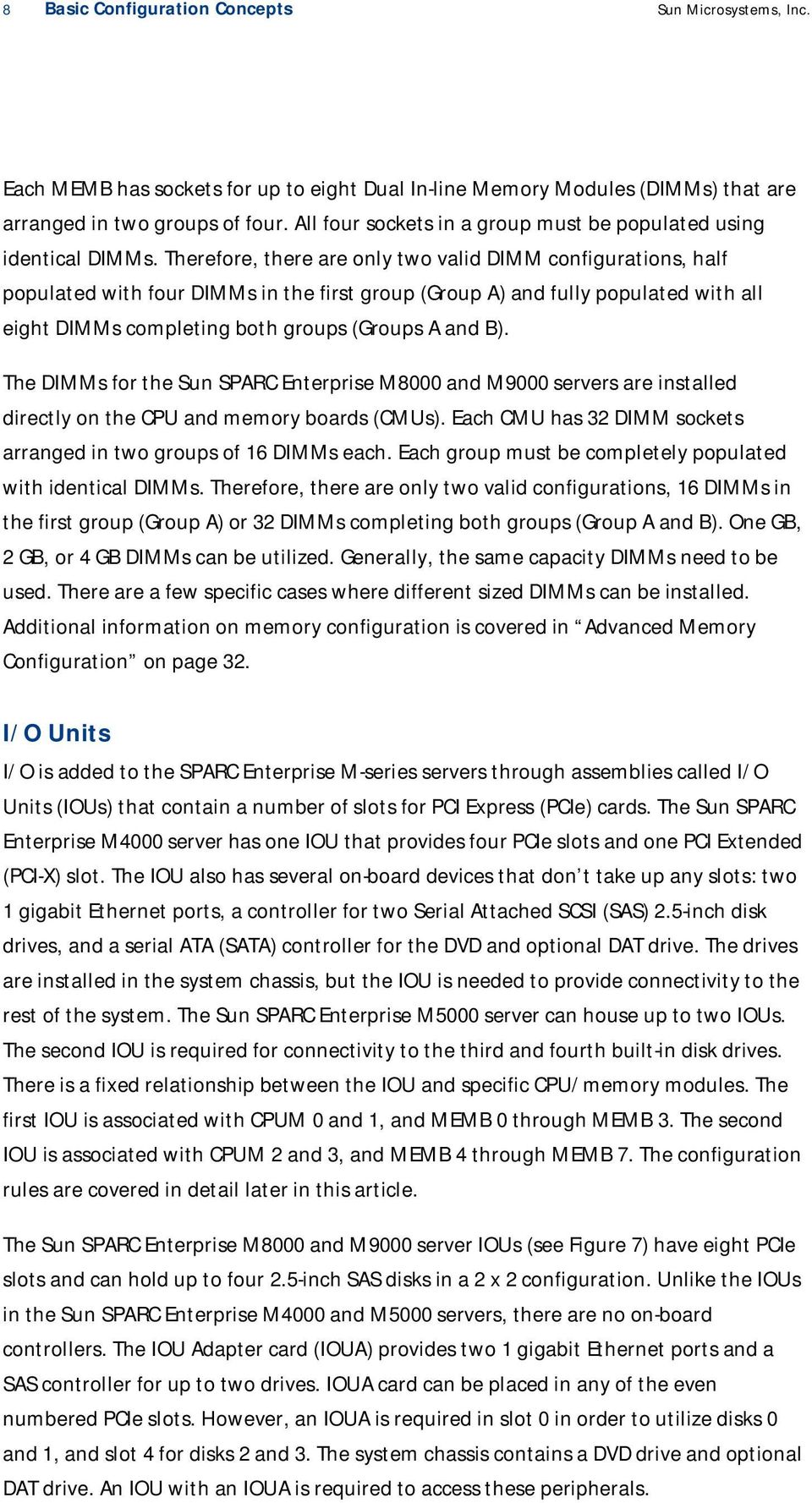
11 9 Basic Configuration Concepts Sun Microsystems, Inc. Figure 7. IOU for a Sun SPARC Enterprise M8000 or M9000 server. The number of slots available for IOUs in the Sun SPARC Enterprise M8000, M , and M servers are the same as the number of slots for CMUs: 4, 8, or 16. There is a fixed relationship between the CMU slot and the IOU slot. An IOU cannot be utilized by the system unless there is CPU and memory installed on the CMU in the corresponding slot. However, the IOU is not required for CPU and memory to operate. An external I/O expansion box is available for use with all of the Sun SPARC Enterprise M-series servers that can provide additional PCIe or PCI-X slots. The external I/O expansion box requires that a PCIe link card be installed in the appropriate IOU for connectivity. Details on the external I/O expansion box are beyond the scope of this Sun BluePrint. More information can be found at: sun.com/servers/midrange/external_io. Important Concepts Configuring servers is most often done by thinking in terms of individual numbers of CPUs, amounts of memory, and I/O slots. The flexibility, performance, and reliability aspects of the Sun SPARC Enterprise M-series servers require a more holistic view in thinking about CPU, memory, and I/O together as a system. In these servers, resources are grouped into physical system boards. There are fixed relationships between CPUs and DIMMs on the physical system board. Additionally, there are fixed relationships
12 10 Basic Configuration Concepts Sun Microsystems, Inc. between IOUs and system boards. The extended System Board (XSB) comprised of CPU, memory, and optionally I/O, is the fundamental configuration unit for the Sun SPARC Enterprise M-series systems. Many configuration mistakes can be avoided by thinking in terms of XSBs. Physical System Boards (PSBs) The Sun SPARC Enterprise M-series servers use a concept of a Physical System Board (PSB) that consists of up to four CPUs and 32 DIMMs. The Sun SPARC Enterprise M8000 and M9000 server CMU board is perhaps the clearest example of a PSB. The Sun SPARC Enterprise M4000 server s motherboard represents one physical system board. The Sun SPARC Enterprise M5000 server has the equivalent of two PSBs even though it only has one motherboard. While the packaging of the PSB is different across these systems, the capacity for components, and therefore, the configuration rules, are very similar. The PSB also contains two or four System Controller (SC) Application Specific Integrated Circuits (ASICs) that are the communication hubs of the system. The SCs connect CPUs, memory controllers, and I/O systems. On the Sun SPARC Enterprise M8000 and M9000 servers, the four System Controllers also provide connectivity to other system boards by connecting to the cross-bar switch that provides a high bandwidth and low latency data backbone. Figure 8 shows a block diagram of a Sun SPARC Enterprise M4000 server PSB. Memory Board 8 DIMM MAC1 s Memory Board 8 DIMM s CPU Module MAC0 CPU0 CPU1 CPU Module CPU2 CPU3 MAC2 Memory Board 8 DIMMs Memory Board 8 MAC3 DIMM s SC0 SC1 Figure 8. Block diagram of a Sun SPARC Enterprise M4000 system PSB. The extended System Board (XSB) The extended System Board (XSB) is the combination of a CPU, memory, and I/O when available. For example, on a Sun SPARC Enterprise M8000 server, the combination of CMU 0 and IOU 0 make up an XSB. The XSB is the primary unit used in configuration and other system operations. Multiple XSBs can be combined to build domains that have more than four CPUs. The XSB is a very important concept for understanding how to configure the Sun SPARC Enterprise M-series servers. It is best to think of XSBs and not individual components. A fundamental rule is that every XSB must have both CPU and memory. An XSB that only has CPU or only has memory cannot be used by the system. An IOU cannot be used unless both its associated CPU and memory are

13 11 Basic Configuration Concepts Sun Microsystems, Inc. present, thus forming a complete XSB. See Figure 9 for an example of a complete XSB for a Sun SPARC Enterprise M8000 or M9000 server. An example showing a Sun SPARC Enterprise M5000 server with two complete XSBs can be found in Figure 4 on page 6. The XSB can be set to one of two logical configurations, Uni-XSB or Quad-XSB mode. Uni-XSB mode uses all of the resources of the entire PSB and IOU as a single unit. Uni-XSB mode is illustrated in Figure 9. CPU 0 8 DIMMS SAS Disk 0 SAS Disk 1 PCIe Slot 0 IOUA Card PCIe Slot 1 CPU 1 8 DIMMS PCIe Slot 2 PCIe Slot 3 CPU 2 8 DIMMS Uni-XSB 00 SAS Disk 2 SAS Disk 3 PCIe Slot 4 IOUA Card PCIe Slot 5 CPU 3 8 DIMMS PCIe Slot 6 PCIe Slot 7 CMU IOU Figure 9. A Sun SPARC Enterprise M8000 or M9000 server CMU and IOU in Uni-XSB mode. Quad-XSB mode divides the available resources into quarters to make four XSBs with one CPU and four or eight DIMMs each. This allows finer-grained configuration choices. If an IOU is present, it is part of the same XSB and operates in the same mode, Uni- or Quad-XSB. For example, a Sun SPARC Enterprise M8000 or M9000 server IOU provides each quad in Quad-XSB mode with two PCIe slots, as shown in Figure 10.

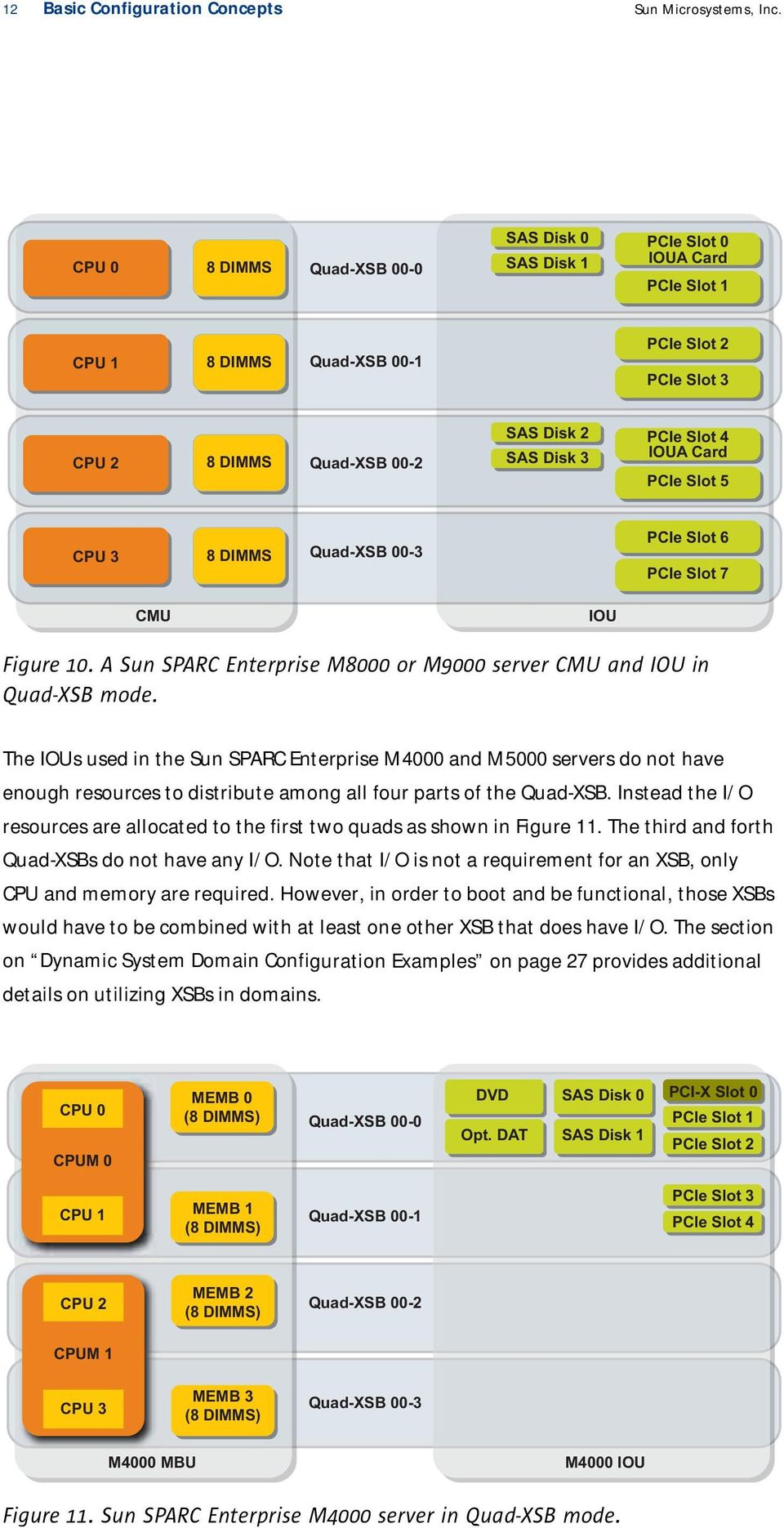
14 12 Basic Configuration Concepts Sun Microsystems, Inc. CPU 0 8 DIMMS Quad-XSB 00-0 SAS Disk 0 SAS Disk 1 PCIe Slot 0 IOUA Card PCIe Slot 1 CPU 1 8 DIMMS Quad-XSB 00-1 PCIe Slot 2 PCIe Slot 3 CPU 2 8 DIMMS Quad-XSB 00-2 SAS Disk 2 SAS Disk 3 PCIe Slot 4 IOUA Card PCIe Slot 5 CPU 3 8 DIMMS Quad-XSB 00-3 PCIe Slot 6 PCIe Slot 7 CMU IOU Figure 10. A Sun SPARC Enterprise M8000 or M9000 server CMU and IOU in Quad-XSB mode. The IOUs used in the Sun SPARC Enterprise M4000 and M5000 servers do not have enough resources to distribute among all four parts of the Quad-XSB. Instead the I/O resources are allocated to the first two quads as shown in Figure 11. The third and forth Quad-XSBs do not have any I/O. Note that I/O is not a requirement for an XSB, only CPU and memory are required. However, in order to boot and be functional, those XSBs would have to be combined with at least one other XSB that does have I/O. The section on Dynamic System Domain Configuration Examples on page 27 provides additional details on utilizing XSBs in domains. CPU 0 CPUM 0 MEMB 0 (8 DIMMS) Quad-XSB 00-0 DVD Opt. DAT SAS Disk 0 SAS Disk 1 PCI-X Slot 0 PCle Slot 1 PCle Slot 2 CPU 1 MEMB 1 (8 DIMMS) Quad-XSB 00-1 PCle Slot 3 PCle Slot 4 CPU 2 MEMB 2 (8 DIMMS) Quad-XSB 00-2 CPUM 1 CPU 3 MEMB 3 (8 DIMMS) Quad-XSB 00-3 M4000 MBU M4000 IOU Figure 11. Sun SPARC Enterprise M4000 server in Quad-XSB mode.
15 13 Basic Configuration Concepts Sun Microsystems, Inc. The flexibility of using Quad-XSBs for fine-grained allocation of resources comes with the price of additional configuration rules that increase installation complexity. For example, there are configurations that are valid in Uni-XSB mode, but are not valid for Quad-XSB mode because they lack CPU or memory. This chapter only provides guidance on Uni-XSB configurations. Quad-XSBs are discussed in more detail in the section Quad-XSB Configurations on page 24. Understanding Connectivity Between Components Many of the configuration rules for the Sun SPARC Enterprise M-series systems are determined by the way components are dependent on each other. Invalid configurations occur when components are isolated with no directly usable path. Therefore, it is particularly important to understand the connections within an XSB. CPU and Memory CPUs and memory are connected by the SC on their PSBs as illustrated in Figure 8 on page 10. A CPU can only operate with memory that is on the same XSB. A CPU on an XSB with no memory cannot be used. Similarly, memory on an XSB without a CPU cannot be used. In Uni-XSB mode, a CPU can utilize all of the memory on the same board. In Quad-XSB mode the resources are partitioned into quarters. The SC is responsible for the partitioning. This mode creates an even tighter relationship between CPUs and memory. For example, on a Sun SPARC Enterprise M4000 server, the first CPU on CPUM 0 only has access to the memory on MEMB 0. Similarly, the second CPU on CPUM 0 only has access to MEMB 1. If MEMB 1 isn t present the second CPU doesn t have memory, and is therefore not a valid configuration for Quad-XSB mode (Figure 12). This topic is discussed in further detail in Adding Components to the Sun SPARC Enterprise M4000 and M5000 Servers on page 15 and Quad-XSB Configurations on page 24.

16 14 Basic Configuration Concepts Sun Microsystems, Inc. CPU 0 MEMB 0 (8 DIMMS) Quad-XSB 00-0 DVD Opt. DAT SAS DISK 0 SAS DISK 1 PCI-X Slot 0 PCle Slot 1 PCle Slot 2 CPUM 0 CPU 1 MEMB Slot 1 Quad-XSB 00-1 PCle Slot 3 PCle Slot 4 MEMB Slot 2 Quad-XSB 00-2 CPUM Slot 1 MEMB Slot 3 Quad-XSB 00-3 M4000 MBU M4000 IOU Figure 12. Invalid Quad-XSB configuration for a Sun SPARC Enterprise M4000 server: CPU 1 cannot be used. I/O Units and Physical System Boards Each IOU is tied to a specific PSB by its position in the system. The System Controllers provide the connections between the CPU, memory, and the IOU. An IOU can only be utilized by the system if there is CPU and memory in the associated slots. On the Sun SPARC Enterprise M8000 and M9000 servers, there is a direct relationship between CMU slot numbers and IOU slot numbers. For example, IOU 3 is connected to CMU 3. The Sun SPARC Enterprise M5000 server can have two IOUs. This system has the equivalent of two PSBs, even though they are packaged into a single motherboard. PSB 0 is connected to the first IOU. The second IOU is connected to PSB 1. As a result, there must be CPUs and memory on PSB 1 in order to utilize the I/O provided by the second IOU. At a minimum, CPUM slot 2 and MEMB slot 4 must be populated in order to utilize IOU1. See Figure 4 on page 6 for a block diagram. Internal 2.5-inch SAS Disk Drives The Sun SPARC Enterprise M-series servers have bays for 2.5-inch SAS disk drives that are typically utilized as boot disks. The drives are used as mirrored pairs for higher availability. The IOUs on the Sun SPARC Enterprise M4000 and M5000 servers provide the SAS controller for these drives. The Sun SPARC Enterprise M4000 server has room for two drives, while the Sun SPARC Enterprise M5000 server has room for an additional pair of drives. The first two drives are connected to the first IOU. In order to use the second pair of drives on the Sun SPARC Enterprise M5000 server, the second IOU must be present to provide the controller. This also means that CPU and memory must be

17 15 Basic Configuration Concepts Sun Microsystems, Inc. present on the second PSB as detailed in the section above. If the system board is used in Quad-XSB mode, the drives are attached to the first XSB (Figure 11). Additional details can be found in Quad-XSB Configurations on page 24. The IOUs for the Sun SPARC Enterprise M8000 and M9000 servers have four drive bays that provide for up to two pairs of boot disks. The IOUs for these systems do not have on-board controllers. An IOUA PCIe card needs to be installed for each pair of drives that are used, in PCIe slot 0 for disk 0 and 1, and PCIe slot 4 for disk 2 and 3. In Quad-XSB mode, the first pair of disks are part of the first XSB (XSB 0) and the second pair are part of the third (XSB 2), as illustrated in Figure 10 on page 12. On-Board DVD and Optional DAT Drives The on-board DVD and optional DAT drives are connected in a similar manner to the SAS disk drives described in the previous section. On the Sun SPARC Enterprise M4000 and M5000 servers, the DVD and DAT drives have a fixed association with the first XSB on the first PSB. The second IOU on the Sun SPARC Enterprise M5000 server does not have the options for DVD or DAT drives. If the drives are needed by another domain, XSB 00-0 must be temporarily assigned to that domain. More information is available in Dynamic System Domain Configuration Examples on page 27. The DVD and DAT drives on the Sun SPARC Enterprise M8000 and M9000 servers can be dynamically assigned to the XSB that requires it by using the XSCF as long as the XSB has an IOUA card available in an even numbered PCIe slot. See Table 4 on page 26 Basic Configuration Examples This section covers some basic configuration examples for each of the systems. The base configurations as they appear on the current Sun price list are used as a starting point. CPU, memory, and I/O are then added to demonstrate some of the key configuration rules and highlight some common configuration mistakes. In the basic examples, only Uni-XSB configurations are used to keep things straightforward. In Uni-XSB mode, many of the configuration rules are somewhat relaxed. However, there are valid Uni-XSB configurations that are not valid for Quad- XSB mode. If the requirements call for XSBs that can operate in either Uni- or Quad-XSB mode, then all of the Quad-XSB configuration rules need to be adhered to as well. See Advanced Configuration Concepts on page 24 for more information. Adding Components to the Sun SPARC Enterprise M4000 and M5000 Servers This section provides guidelines on adding and configuring components to the rackmount systems.

18 16 Basic Configuration Concepts Sun Microsystems, Inc. Sun SPARC Enterprise M4000 and M5000 Server Base Configurations The Sun SPARC Enterprise M4000 server base configuration includes one CPUM (which includes two dual-core CPUs) and 8 GB of memory in two MEMBs. Each MEMB has four 1 GB DIMMs installed in the first group, Group A. The modules are all installed in the lowest numbered slots, the CPUM in slot 0, the MEMBs in slots 0 and 1 (Figure 13). The base configuration for the Sun SPARC Enterprise M5000 server is the same, but there is a second PSB that has no CPU or memory installed. CPU 0 MEMB 0 (4 x 1 GB) DVD Opt. DAT SAS DISK 0 SAS DISK 1 PCI-X Slot 0 PCle Slot 1 PCle Slot 2 CPUM 0 CPU 1 MEMB 1 (4 x 1 GB) Uni-XSB 00 PCle Slot 3 PCle Slot 4 CPUM Slot 1 MEMB Slot 2 MEMB Slot 3 M4000 MBU M4000 IOU Figure 13. Sun SPARC Enterprise M4000 server base configuration. Adding CPU Modules to the Sun SPARC Enterprise M4000 and M5000 Servers Adding CPUs to the base configuration of the Sun SPARC Enterprise M4000 server is straightforward, since there is only one available slot for another CPUM. Adding a CPUM increases the number of CPUs from two to the maximum of four as shown in Figure 14.

19 17 Basic Configuration Concepts Sun Microsystems, Inc. CPU 0 MEMB 0 (4 x 1 GB) DVD Opt. DAT SAS DISK 0 SAS DISK 1 PCI-X Slot 0 PCle Slot 1 PCle Slot 2 CPUM 0 CPU 1 MEMB 1 (4 x 1 GB) Uni-XSB 00 PCle Slot 3 PCle Slot 4 CPU 2 MEMB Slot 2 CPUM 1 CPU 3 MEMB Slot 3 M4000 MBU M4000 IOU Figure 14. Sun SPARC Enterprise M4000 server base configuration with an additional CPUM. The Sun SPARC Enterprise M5000 server has room to add from one to three CPUMs. There is a choice for where to place the second CPUM that depends on how the system is to be used. If the CPUM is plugged into the second slot on the first system board, no additional memory is required as long as the system is used in Uni-XSB mode. This is a good choice if more processing power is needed without additional I/O. Note that this is the essentially same configuration as the system shown in Figure 14 above. Remember, the Sun SPARC Enterprise M4000 server can be thought of as a Sun SPARC Enterprise M5000 server with only one PSB and one IOU. Alternatively, the first additional module could be plugged into the third CPUM slot, which makes it the first two CPUs for the second PSB. A CPUM is required in slot 2 if an additional IOU is needed to provide enough I/O resources. However, at least one MEMB needs to be added to the second PSB in MEMB slot 4 to make it a valid XSB with CPU and memory. Figure 15 shows an invalid configuration. Without the memory, the system is not able to utilize either the CPUs or the IOU.
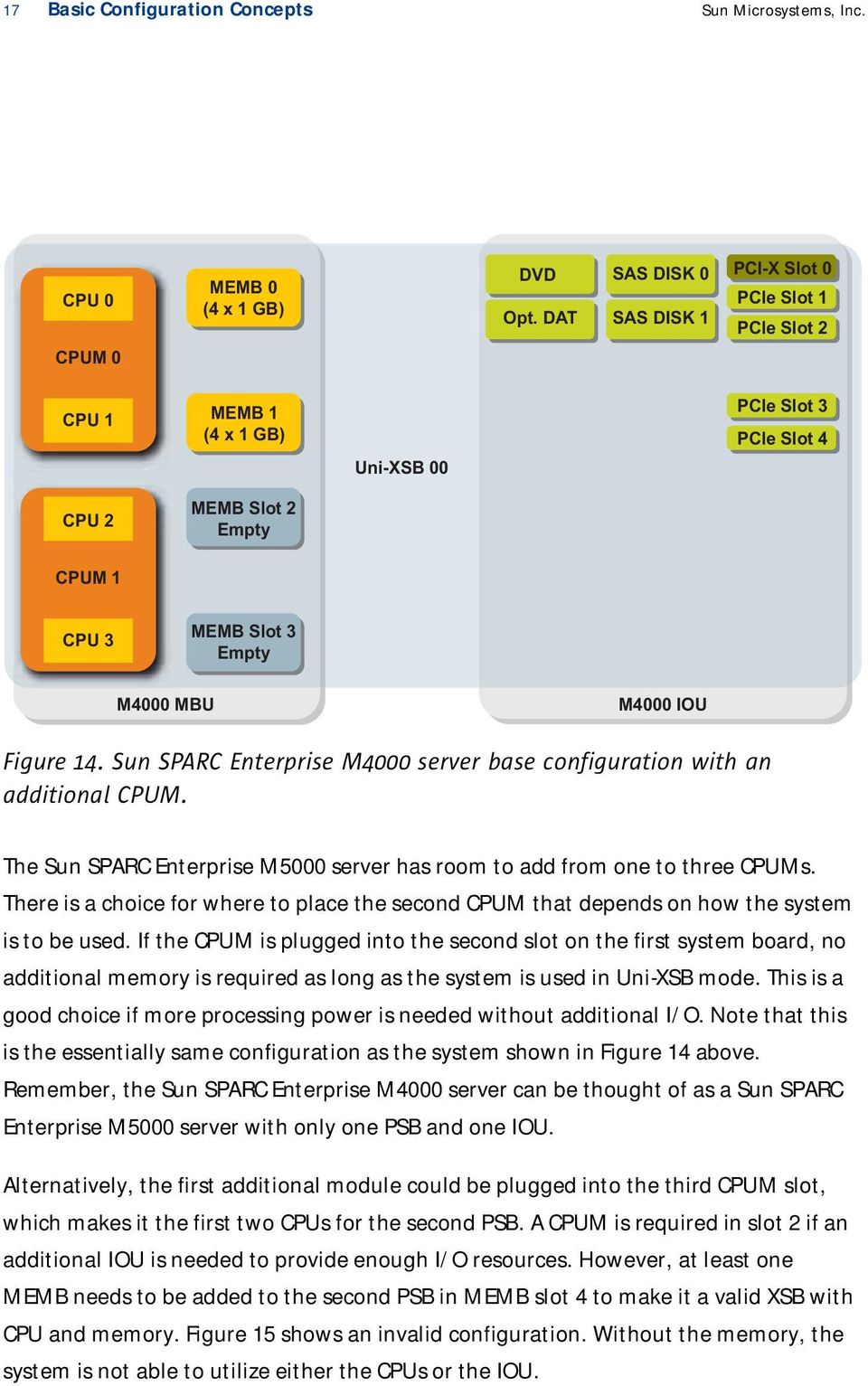
20 18 Basic Configuration Concepts Sun Microsystems, Inc. CPU 0 MEMB 0 DVD Opt. DAT SAS Disk 0 SAS Disk 1 PCI-X Slot 0 PCle Slot 1 PCle Slot 2 CPUM 0 CPU 1 MEMB Slot 1 Uni-XSB 00-0 (PSB 0 and IOU 0) PCle Slot 3 PCle Slot 4 MEMB Slot 2 CPUM Slot 1 MEMB Slot 3 M5000 IOU 0 CPU 4 MEMB Slot 4 DVD Opt. DAT SAS Disk 0 SAS Disk 1 PCI-X Slot 0 PCle Slot 1 PCle Slot 2 CPUM 2 CPU 5 MEMB Slot 5 Uni-XSB 01-0 (PSB 1 and IOU 1) PCle Slot 3 PCle Slot 4 CPUM Slot 3 Empy MEMB Slot 6 MEMB Slot 7 M5000 MBU M5000 IOU 1 Figure 15. Invalid Sun SPARC Enterprise M5000 server configuration, no memory on PSB 1. Once memory is added to PSB 1, the result is a system with two valid Uni-XSBs. This is the configuration that is required to support the second IOU since it is tied to PSB 1. This configuration can be accomplished by moving the MEMB from slot 1 to slot 4 as shown in Figure 16.
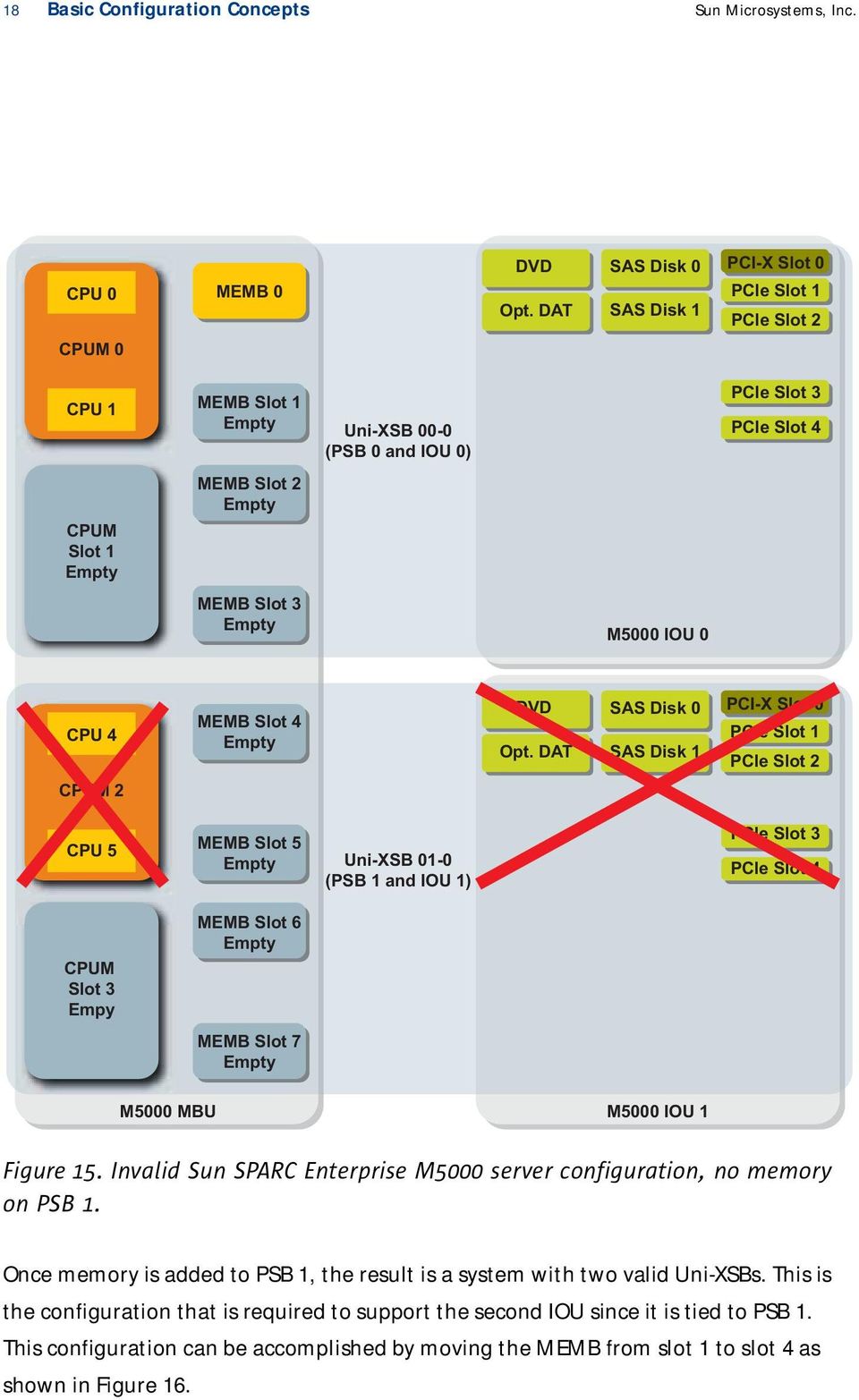
21 19 Basic Configuration Concepts Sun Microsystems, Inc. CPU 0 MEMB 0 DVD Opt. DAT SAS Disk 0 SAS Disk 1 PCI-X Slot 0 PCle Slot 1 PCle Slot 2 CPUM 0 CPU 1 CPUM Slot 1 MEMB Slot 1 PCle Slot 3 Uni-XSB 00-0 PCle Slot 4 (PSB 0 and IOU 0) MEMB Slot 2 MEMB Slot 3 M5000 IOU 0 CPU 4 MEMB 4 SAS Disk 2 SAS Disk 3 PCI-X Slot 0 PCle Slot 1 PCle Slot 2 CPUM 2 CPU 5 CPUM Slot 3 Empy MEMB Slot 5 PCle Slot 3 Uni-XSB 01-0 (PSB 1 and IOU 1) PCle Slot 4 MEMB Slot 6 MEMB Slot 7 M5000 MBU M5000 IOU 1 Figure 16. Valid Sun SPARC Enterprise M5000 server configuration with two Uni-XSBs. Adding Memory to the Sun SPARC Enterprise M4000 and M5000 Servers There are two common ways of adding memory to the base configuration of the Sun SPARC Enterprise M4000 and M5000 servers. The first is to add four 1 GB DIMMs (eight DIMMs total) to each of the existing MEMBs that are half populated. The second is to add an additional two MEMBs, each with four 1 GB DIMMs. The choice of methods depends on how the system is to be used. There are a number of rules for memory configuration that must be obeyed. While there are other options, especially if a large increase in memory is needed, these two alternatives highlight the key rules. The Sun SPARC Enterprise M4000 server can have a total of 32 DIMMs by using four MEMBs that have eight DIMM sockets each. The Sun SPARC Enterprise M5000 server has two PSBs that take four MEMBs each for a maximum of 64 DIMMs using eight MEMBs. The base configuration comes with two half-populated MEMBs with four 1 GB DIMMs in the first group, Group A.
22 20 Basic Configuration Concepts Sun Microsystems, Inc. Some of the rules that must be followed when adding memory include: 1. A system board can have one, two, or four MEMBs. Three MEMBs on a system board is an invalid configuration 2. All MEMBs in the same XSB must be configured identically. MEMBs can either be half-populated with four DIMMs in Group A, or fully populated with eight DIMMS filling both groups. MEMBs with different numbers of DIMMS cannot be mixed. All MEMBS must be either half-populated or fully populated. The DIMMs must also be the same capacity and Sun part number. (Note: there are a limited number of cases where DIMMs with different sizes can be used. Information can be found in Advanced Memory Configurations on page 15.) The two MEMBs in the base configuration each come half-populated with four 1 GB DIMMs in Group A. If only additional memory is needed, another set of eight 1 GB DIMMs can be added to Group B on each MEMB to fully populate them with eight DIMMs each. The rule is that all MEMBs within an XSB must be configured the same way. Only adding DIMMs to one of the two MEMBs violates the rule for identical MEMBs within an XSB. The DIMMs that are added to Group B must be the same capacity as those already in Group A. Information on using DIMMs with different densities can be found in Advanced Memory Configuration on page 32. Another approach to adding memory is to add additional MEMBs. To add memory to the first XSB, two additional MEMBs that have identical DIMMs as the existing set are required. A configuration with three MEMBs on a system board is not valid, as there must be one, two, or four MEMBS per system board. If an additional CPUM is installed on the first system board, adding the two MEMBs provides a configuration that would also allow this XSB to be configured in Quad-XSB mode as each CPU has access to memory. Figure 17 summaries the valid memory board configurations for a system board in Uni-XSB mode. (Note: several of these configurations are not be valid for Quad-XSB mode.)
23 21 Basic Configuration Concepts Sun Microsystems, Inc. CPU 0 MEMB 0 CPU 0 MEMB 0 CPU 0 MEMB 0 CPUM 0 CPUM 0 CPUM 0 CPU 1 CPU 1 MEMB 1 CPU 1 MEMB 1 MEMB 2 MEMB 3 CPU 0 MEMB 0 CPU 0 MEMB 0 CPU 0 MEMB 0 CPUM 0 CPUM 0 CPUM 0 CPU 1 CPU 1 MEMB 1 CPU 1 MEMB 1 CPU 2 CPU 2 CPU 2 MEMB 2 CPUM 1 CPUM 1 CPUM 1 CPU 3 CPU 3 CPU 3 MEMB 3 Figure 17. Valid Uni-XSB MEMB configurations per system board. Additional MEMBs cannot be added to the second system board to increase total memory without first installing at least one CPUM on that board. Remember, XSBs need both CPU and memory to operate. Adding I/O The Sun SPARC Enterprise M4000 and M5000 servers come with one IOU that is tied to the first PSB. An additional IOU can be added to the Sun SPARC Enterprise M5000 server that is connected to the second PSB. Therefore, in order to use the second IOU, CPU and memory must be installed in CPUM slot 2 and MEMB slot 4 to make a valid Uni-XSB. The recommended minimum configuration for using both IOUs on the Sun SPARC Enterprise M5000 servers is two CPUM and at least two MEMB. Figure 16 shows a correctly configured Sun SPARC Enterprise M5000 server with two Uni-XSBs that both have IOUs. Note: the IOU for a Sun SPARC Enterprise M5000 server with a single IOU must be in slot 0. Additional PCIe or PCI-X slots can be added by using the Sun External I/O Expansion Unit. See sun.com/servers/midrange/external_io for details.
24 22 Basic Configuration Concepts Sun Microsystems, Inc. Adding Components to the Sun SPARC Enterprise M8000 and M9000 Servers The minimum configuration for a Sun SPARC Enterprise M8000 or M9000 server is one CMU with two CPUs installed, sixteen 1 GB DIMMs, and one IOU. This configuration is similar to the base configuration of the rackmount Sun SPARC Enterprise M4000 and M5000 servers. Typically, the larger systems are configured with more CMUs and IOUs given their size. This section covers some of the rules for adding CPU and memory to a single Uni-XSB. There are no differences between any of the CMU and IOUs in the Sun SPARC Enterprise M8000 and M9000 servers. The same rules apply to both servers. Adding CPUs There are four sockets for CPUs on the CMU board. CMU boards can be ordered with either two or four CPUs installed. Additional CPUs can be ordered in groups of two to fully populate a CMU with CPUs. If an additional CMU is needed to add more CPUs to the system, that CMU must have memory as well. Remember that an XSB needs both CPU and memory to function. The maximum number of CMU boards is 4, 8, or 16 for the Sun SPARC Enterprise M8000, M , and M servers respectively. Each CMU board in the system provides an additional Uni-XSB to the system. While Quad-XSB configurations are discussed starting on page 24, it s worth pointing out that only a CMU board with all four CPUs installed can be used in Quad-XSB mode. Adding Memory The CMU board has 32 slots for DIMMs in two groups, Groups A and B. The base CMU comes with 16 DIMMs installed in Group A. An additional 16 DIMMs can be installed to fully populate Group B. These are the only two valid configurations for memory on the CMU boards, 16 DIMMs in Group A, or 32 DIMMs filling both groups. The DIMMs within a group must be identical, which means they should all have the same Sun part number.the CMU accepts 1, 2, or 4 GB DIMMs for a maximum of 128 GB. The capacity of the DIMMs must be consistent within a CMU. There is only one case where two different sized sets of DIMMs can be used on the same board, which is covered in Advanced Memory Configuration on page 32. If enough additional memory is required that another CMU is needed, that CMU also needs at least two CPUs. Otherwise, the system is not able to utilize the additional memory. Remember, XSBs are the building blocks of the system. Each XSB must have both CPU and memory. Adding I/O The minimum configuration for a Sun SPARC Enterprise M8000 or M900 server is one IOU in slot 0. More IOUs can be added as long as there is a CMU with CPUs and memory in the associated slot. In order to use an IOU in slot 2, there must be a CMU board in slot 2. The IOU can also hold up to four 2.5-inch SAS disk drives. The drives are
25 23 Basic Configuration Concepts Sun Microsystems, Inc. paired so there are two sets. In order to use the first two disks, an IOUA card needs to be installed in PCIe slot 0 to provide the controller. The second pair of disks requires an IOUA card in PCIe slot 4. The IOUA card also provides two 1 gigabit Ethernet ports. An IOUA card is not required if external drives and the appropriate PCIe controllers are used. The DVD drive and optional DAT drive are mounted in the system chassis and can be assigned to one of the XSBs, as long as the XSB has an IOU and an IOUA card to provide a SATA controller. When operating in Quad-XSB mode, the IOU is partitioned to provide two PCIe slots to each of the four XSBs. The first of the Quad-XSBs has access to the IOUA card in PCIe slot 0 and the pair of internal disk, if present. The third XSB has access to the IOUA in PCIe slot 4 and the second pair of internal disks. More information on Quad-XSB configurations can be found in the next section. Additional PCIe or PCI-X slots can be also be installed by using the Sun External I/O Expansion Unit. See sun.com/servers/midrange/external_io for details.
26 24 Advanced Configuration Concepts Sun Microsystems, Inc. Chapter 3 Advanced Configuration Concepts The previous chapter focused on the basic configuration concepts and examples for adding components. The emphasis thus far has been on the most common configurations that should address most installations. This chapter builds upon the previous one and adds a number of advanced configuration concepts such as using system boards in Quad-XSB mode, advanced memory configuration, and Dynamic System Domain configuration. Quad-XSB Configurations Until now, this article primarily discussed Uni-XSB configurations where the whole PSB with up to four CPUs and 32 DIMMs is used as a single unit. There are times when it is desirable to allocate resources in smaller units than a full system board. In order to provide finer grained configuration choices, the Sun SPARC Enterprise M-series servers allow a properly configured PSB and any associated IOU to be partitioned into four smaller XSBs. This partitioning is called Quad-XSB mode. Each of the smaller XSBs gets one CPU socket and eight DIMM sockets. Using the Dynamic System Domain capability of the Sun SPARC Enterprise servers, it is now possible to build a domain as small as one (dual-core or quad-core) CPU. The flexibility of Quad-XSBs comes with the trade off of additional configuration rules. When the system board is divided up into four pieces, it is critical to understand how the components are mapped into each part of the Quad-XSB. Each of the new XSBs must have both CPU and memory to be functional. It is possible to have a valid Uni-XSB configuration that does not have resources in the right locations once the board is partitioned. On the Sun SPARC Enterprise M4000 and M5000 servers, each CPU is associated with a specific MEMB slot. If CPUM 1 is installed but there are no MEMBs in slots 2 and 3, then both CPUs are disabled in Quad-XSB mode as illustrated in Figure 18.
27 25 Advanced Configuration Concepts Sun Microsystems, Inc. CPU 0 CPUM 0 MEMB 0 Quad-XSB 00-0 DVD Opt. DAT SAS DISK 0 SAS DISK 1 PCI-X Slot 0 PCle Slot 1 PCle Slot 2 CPU 1 MEMB 1 Quad-XSB 00-1 PCle Slot 3 PCle Slot 4 CPU 2 MEMB Slot 2 Quad-XSB 00-2 CPUM 1 CPU 3 MEMB Slot 3 Quad-XSB 00-3 M4000 MBU M4000 IOU Figure 18. Invalid Quad-XSB configuration, due to two missing MEMBs. Like CPUs, a MEMB that is located in a Quad-XSB that lacks a CPU is isolated and cannot be utilized as seen in Figure 19. This configuration is valid in Uni-XSB mode where each CPU has access to all of the memory on the PSB. CPU 0 MEMB 0 Quad-XSB 00-0 DVD Opt. DAT SAS DISK 0 SAS DISK 1 PCI-X Slot 0 PCle Slot 1 PCle Slot 2 CPUM 0 CPU 1 MEMB 1 Quad-XSB 00-1 PCle Slot 3 PCle Slot 4 CPUM Slot 1 MEMB 2 Quad-XSB 00-2 MEMB 3 Quad-XSB 00-3 M4000 MBU M4000 IOU Figure 19. Invalid Quad-XSB configuration, due to isolated MEMBs. Table 3 summarizes the relationship between slots for both the Sun SPARC Enterprise M4000 and M5000 servers. The Sun SPARC Enterprise M4000 server only has one PSB, so only the first four lines of the table are relevant to that system. Recall that each CPUM has two CPUs, so one CPUM provides a CPU to two different XSBs.
28 26 Advanced Configuration Concepts Sun Microsystems, Inc. Table 3. Sun SPARC Enterprise M4000 and M5000 server relationship between components. XSB Number PSB Number CPUM Slot Number Quad-XSB Quad-XSB Quad-XSB Quad-XSB Sun SPARC Enterprise M5000 server only CPU Number MEMB Slot Number Quad-XSB Quad-XSB Quad-XSB Quad-XSB The CMU board for a Sun SPARC Enterprise M8000 or M9000 server can only be placed into Quad-XSB mode if all four CPUs are present. A two CPU configuration can only be used as a Uni-XSB. For memory, the CMU must either be half-populated with 16 DIMMS installed or fully populated with 32 DIMMs. Either of these configurations provides all four XSBs in Quad-XSB mode with memory. Quad-XSB Mode and IOUs If an IOU is present when a PSB is configured in either Uni-XSB or Quad-XSB mode, it is automatically placed into the same mode. In Quad-XSB mode the resources of the IOU are allocated in a fixed manner to the four XSBs. The Sun SPARC Enterprise M8000 and M9000 server IOU has eight PCIe slots. Two PCIe slots are allocated to each Quad-XSB. The bays for the first two disk drives are connected to PCIe slot 0. The third and fourth drive bays are connected to PCIe slot 4. If the drives and the IOUA adapter cards are present they are allocated to the first XSB and the third XSB. The DVD and optional DAT drive can be connected to any XSB that has an IOUA in its even numbered PCIe slot. Table 4 summarizes which resources are connected to each XSB. Also see Figure 10 on page 12 for a block diagram of the associations. Table 4. Quad-XSB resource mapping for Sun SPARC Enterprise M8000 and M9000 servers. Quad-XSB Number CPU Number PCIe Slots Disk Drive Bays Ethernet Ports XSB NN-0 0 0, 1 0, 1 a 2 a XSB NN-1 1 2, 3 none 2 XSB NN-2 2 4, 5 2, 3 b 2 b 4 XSB NN-3 3 6, 7 none 6 a.requires an IOUA card in PCIe slot 0 to provide the SAS controller and Ethernet ports. b.requires an IOUA card in PCIe slot 4 to provide the SAS controller and Ethernet ports. DVD/DAT IOUA PCIe Slot 0
29 27 Advanced Configuration Concepts Sun Microsystems, Inc. The Sun SPARC Enterprise M4000 and M5000 server IOUs have four PCIe slots, one PCI-X slot, a SAS controller for two disks, and two 1 gigabit Ethernet ports. The Sun SPARC Enterprise M4000 server has a single PSB and IOU. The Sun SPARC Enterprise M5000 server has the equivalent of two PSBs and can support a second IOU. When a PSB is configured in Quad-XSB mode, if there is a corresponding IOU present, it is also placed in Quad-XSB mode and its resources are allocated to the first two XSBs. The resources available to each XSB are summarized in Table 5. Note: Figure 11 on page 12 also depicts the resource assignment in a block diagram. The allocation is the same for the second system board and optional second IOU on an Sun SPARC Enterprise M5000 server with the exception of the DVD/DAT drives. Table 5. Sun SPARC Enterprise M4000 and M5000 server Quad-XSB resource mapping. Quad-XSB Number PSB/IOU Number PCIe Slot Numbers PCI-X Slot Numbers Disk Drive Numbers XSB /0 1, and 1 Yes 0 and 1 XSB /0 3, XSB / XSB / Sun SPARC Enterprise M5000 server only DVD and Optional DAT Ethernet Ports XSB /1 1, and 3-2 and 3 XSB /1 3, XSB / XSB / The third and fourth XSBs are not allocated any I/O capabilities. These XSBs must be combined with other XSBs that do have I/O in order to boot. When the DVD is needed, for example to install the operating system on XSB 01-0, the two XSBs need to be combined into a Dynamic System Domain in order to use those resources. Dynamic System Domain Configuration Examples One of the key features of the Sun SPARC Enterprise M-series servers is the ability to partition the available hardware resources into smaller logical systems called Dynamic System Domains. Dynamic System Domains run their own copies of the operating system and offer a very high level of isolation from other domains in the system because the partitioning occurs at the hardware level. The amount of hardware resources in a domain can be changed when needed through Dynamic Reconfiguration. Dynamic System Domains were first introduced in the Sun Enterprise 10K server.
30 28 Advanced Configuration Concepts Sun Microsystems, Inc. On those systems, whole system boards were allocated to domains. The Sun SPARC Enterprise M-series servers improve on that scheme by using the Quad-XSB design to allow much finer-grained resource allocations. The requirements for building a domain are CPU, memory, and I/O in order to boot. A domain can be as small as one XSB from a Quad-XSB consisting of one CPU, four or eight DIMMs, and two PCIe slots. Multiple XSBs can be added to a domain in order to provide the resources necessary for a given application. The same domain can be comprised of a mixture of Uni-XSBs and Quad-XSBs. An XSB that does not have any I/O, such as Quad-XSB 00-2 on a Sun SPARC Enterprise M4000 server, needs to be combined with another XSB that has I/O in order to be fully functional. The maximum number of domains that a system can be partitioned into depends on the size of the system and the available resources. A Sun SPARC Enterprise M4000 server can have a maximum of 2 domains, while the Sun SPARC Enterprise M5000 server can support up to 4 domains. The Sun SPARC Enterprise M8000 and M9000 servers support up to 16 or 24 domains respectively. A domain can have a maximum of 16 XSBs. Figure 20 shows a Sun SPARC Enterprise M4000 server with two equal-sized domains. The system board is in Quad-XSB mode. Domain 1 consists of XSB 00-0 and XSB 00-2 and also has the two internal disks to boot from as well as access to the DVD and optional DAT drive. Domain 2 has two PCIe slots from XSB In order to boot Domain 2, a controller must be added to PCIe slot 2 or 3 and external disks must be attached to it. D00 CPU 0 CPUM 0 Memory Board Quad-XSB 00-0 DVD Opt. DAT SAS DISK 0 SAS DISK 1 PCI-X Slot 0 PCle Slot 1 PCle Slot 2 D01 CPU 1 Memory Board Quad-XSB 00-1 PCle Slot 3 PCle Slot 4 D00 CPU 2 Memory Board Quad-XSB 00-2 CPUM 1 D01 CPU 3 Memory Board Quad-XSB 00-3 M4000 MBU M4000 IOU Figure 20. Sun SPARC Enterprise M4000 server configured with two equal-sized domains.
31 29 Advanced Configuration Concepts Sun Microsystems, Inc. In this configuration, XSB 00-2 and 00-3 can be allocated to either domain, providing one of the domains with up to three CPUs and the other with only one CPU as shown in Figure 21. D00 CPU 0 CPUM 0 MEMB Quad-XSB 00-0 DVD Opt. DAT SAS Disk 0 SAS Disk 1 PCI-X Slot 0 PCle Slot 1 PCle Slot 2 D01 CPU 1 MEMB Quad-XSB 00-1 PCle Slot 3 PCle Slot 4 D00 CPU 2 MEMB Quad-XSB 00-2 CPUM 1 D00 CPU 3 MEMB Quad-XSB 00-3 M4000 MBU M4000 IOU D00 CPU 0 CPUM 0 MEMB Quad-XSB 00-0 DVD Opt. DAT SAS Disk 0 SAS Disk 1 PCI-X Slot 0 PCle Slot 1 PCle Slot 2 D01 CPU 1 MEMB Quad-XSB 00-1 PCle Slot 3 PCle Slot 4 D01 CPU 2 MEMB Quad-XSB 00-2 CPUM 1 D01 CPU 3 MEMB Quad-XSB 00-3 M4000 MBU M4000 IOU Figure 21. Sun SPARC Enterprise M4000 server domain examples with one domain larger than the other. Figure 22 shows a second example of a two-domain configuration using an Sun SPARC Enterprise M8000 or M9000 server CMU and IOU in Quad-XSB mode. The IOU has four disks with two IOUA cards in PCIe slots 0 and 4 respectively. This configuration provides Quad-XSB 00-0 and Quad-XSB 00-2 with disks allowing both domains to boot. The other two XSBs (1 and 3) each have two PCIe slots available, but do not have any internal disks. If either of these XSBs become a standalone domain, then external disks and a PCIe controller are required to boot the domain.
32 30 Advanced Configuration Concepts Sun Microsystems, Inc. D00 CPU 0 8 DIMMS Quad-XSB 00-0 SAS Disk 0 SAS Disk 1 PCIe Slot 0 IOUA Card PCIe Slot 1 D00 CPU 1 8 DIMMS Quad-XSB 00-1 PCIe Slot 2 PCIe Slot 3 D01 CPU 2 8 DIMMS Quad-XSB 00-2 SAS Disk 2 SAS Disk 3 PCIe Slot 4 IOUA Card PCIe Slot 5 D01 CPU 3 8 DIMMS Quad-XSB 00-3 PCIe Slot 6 PCIe Slot 7 CMU IOU Figure 22. Quad-XSB in a two domain configuration, for a Sun SPARC Enterprise M8000 or M9000 server. Using Dynamic Reconfiguration, XSBs can be reallocated without shutting down either domain. For example, if all of the resources are needed by domain 00 to handle a peak load, then domain 01 can be shut down and its XSBs allocated to domain 00 without rebooting domain 00. After the peak load is finished, XSB 00-1 can be removed from domain 0 and allocated back to domain 01, allowing domain 01 to start up again. A challenge that arises when moving XSBs between domains is that Solaris device paths can change as a result. In order to alleviate this, the Sun SPARC Enterprise M-series servers have a concept of a Logical System Board (LSB) number that allows an administrator to assign a logical number to each physical system board. Solaris device path names incorporate the logical board number. Initially, the LSB is set to the same number as the XSB, so XSB 00 is LSB 00, XSB 01 is LSB 01, and so on.with some planning, an administrator can assign LSB numbers that reduce or eliminate changes at the operating system and application level due to Dynamic Reconfiguration. To illustrate how this works, consider an example of a domain on a Sun SPARC Enterprise M8000 server consisting of XSB 00 and 01. The domain requires a larger amount of memory than it currently has to meet increased demand. XSB 02 is made available with more memory and the identical I/O connections as XSB 01. Without LSB numbering, replacing XSB 01 in the domain with XSB 02 would cause Solaris device paths to change. Using Dynamic Reconfiguration and LSBs, XSB 01 can be removed from the domain, and XSB 02 can be added with an LSB of 01, greatly simplifying the administration of the system.
33 31 Advanced Configuration Concepts Sun Microsystems, Inc. Domain Configurations and RAS Concerns When building Dynamic System Domains, it is important to consider the application s requirements for reliability, availability, and serviceability (RAS). Properly allocating enough resources to a domain can enable the domain to survive a greater number and type of hardware related failures. For applications that demand a higher level of availability, this allocation might include enough system boards and redundant I/O paths to help ensure that a failure of a single components does not bring down the domain. The examples in the previous section focused on Quad-XSBs in order to point out some of the important configuration rules. While Quad-XSBs are the most flexible, Uni-XSB configurations have advantages when it comes to RAS. A domain using a Uni-XSB configuration can withstand a greater number and variety of hardware failures than one based on Quad-XSBs because it can use the full resources of a PSB. If the CPU in an XSB in quad-mode fails, the whole XSB, including its memory and I/O, become unavailable. The most extreme example is Quad-XSB 00-0 in a Sun SPARC Enterprise M4000 or M5000 server. the failure of CPU 0 would remove access to the on-board disks, the PCI-X slot, PCIe slots 1 and 2, and the first two Ethernet ports. In Uni-XSB mode, the memory and I/O capabilities would remain available since there are three other CPUs that have access to the peripherals. While the Sun SPARC Enterprise M4000 and M5000 servers provide the flexibility for two and four domains respectively using Quad-XSB mode, the limited hardware available for the second domain on the Sun SPARC Enterprise M4000 server and the third and forth domain on the Sun SPARC Enterprise M5000 server makes these configurations less appropriate if higher availability is an important requirement. On the Sun SPARC Enterprise M8000 and M9000 servers, the CMU boards are hot swappable. The number of domains that would be affected from a CMU outage could be as small as one in Uni-XSB mode or as many as four in Quad-XSB mode. If resources permit, a domain that has more than one CMU board can use Dynamic Reconfiguration to migrate the data in memory from the board that needs to be swapped, allowing the domain to continue operating while the affected board is removed for repair or replacement. Access to I/O resources needs to be carefully considered when building domains with higher RAS requirements. Typically, these systems are installed with redundant paths to I/O. Ideally, the controllers for redundant I/O paths are placed into slots on different IOUs to avoid making the IOU or XSB a single point of failure. On the Sun SPARC Enterprise M8000 and M9000 servers, the CMU board can be hot-swapped if needed. If the only I/O path is on the associated IOU, the domain needs to be taken down.
34 32 Advanced Configuration Concepts Sun Microsystems, Inc. Advanced Memory Configuration The earlier chapter on basic configuration covered the big rules that help avoid configuration mistakes and provide functional configurations. This section covers additional features such as memory mirroring and adding DIMMs of different densities. Memory Configuration Rules It is helpful to review the memory rules already covered: 1. On the Sun SPARC Enterprise M4000 or M5000 servers, three MEMBs is not a valid configuration, there must be 1, 2, or 4 per PSB. 2. The Sun SPARC Enterprise M8000 or M9000 server CMU board can either be half populated with 16 DIMMs or fully populated with 32 DIMMs. 3. The Sun SPARC Enterprise M4000 or M5000 server MEMB can either be half populated with 4 DIMMs in Group A or fully populated with 8 DIMMs filling both Group A and B. 4. Memory on the Sun SPARC Enterprise M8000 or M9000 server CMU boards is organized into two groups of 16 DIMMs, Group A and Group B. Group A must be always populated. 5. Memory groups must be filled with identical DIMMs. All DIMM should have the same Sun part number. 6. MEMBs must be populated identically within an XSB. 7. Every XSB must have both CPU and memory. The memory requirements for Uni-XSBs and Quad-XSBs differ. It is possible to have a valid Uni-XSB configuration that is invalid for Quad-XSB mode and vice-versa. An example of this would be not having enough MEMBs to provide all installed CPUs with memory once in quad mode. Adding DIMMs with Different Capacities The Sun SPARC Enterprise M-series servers can accept 1, 2, or 4 GB DIMMs. There are a number of requirements that dictate that the DIMM sizes to be consistent. Several of the base configurations start with 1 GB DIMMs. Utilizing only 1 GB DIMMs limits the maximum memory size of the server to a quarter of the total capacity. In order to use higher capacity DIMMs without having to discard the existing DIMMs, the M-series servers allow different sized DIMMs to be used if some additional rules are carefully followed. Larger capacity DIMMs must be placed in group A. Since Group A must be populated first, this means that the smaller DIMMs in group A need to be moved to group B, which would allow the new, larger DIMMs to be installed into the group A slots. Sun recommends that these tasks are only performed by Sun Service professionals.
35 33 Advanced Configuration Concepts Sun Microsystems, Inc. Recall that the DIMMs within a group need to be identical, (they should all have the same Sun part number), and that the memory configuration across a PSB must be consistent. For a Sun SPARC Enterprise M8000 or M9000 server CMU, these rules require changing 16 DIMMs at a time. The number of DIMMs affected for a Sun SPARC Enterprise M4000 or M5000 server depends on the number of MEMBs installed. If four MEMBs are installed on PSB 0, then all four need to be upgraded identically, requiring 16 DIMMs, 4 for each MEMB. If only two MEMB are installed, then only 8 new DIMMs are needed to upgrade the 4 DIMMs on each MEMB. To illustrate the rules above, here are several examples of adding higher capacity DIMMs to a Sun SPARC Enterprise M4000 or M5000 server. The base configuration includes one CPUM (which includes two CPUs) and 8 GB of memory in two MEMBs. Each MEMB has four 1 GB DIMMs installed in the first group, Group A. The DIMM slots for Group B are empty. The base configuration for the Sun SPARC Enterprise M5000 server is the same, however there is a second PSB that has no CPU or memory installed. Using only 1 GB DIMMs, the system could only go to 16 GB before additional MEMBs are needed. To add 16 GB to the base configuration using eight 2 GB DIMMs for a total memory size of 24 GB, the steps are: 1. Remove the four 1 GB DIMMs from Group A on each MEMB, re-install in Group B slots. Consult the [Sun Hardware Maintenance Manual] for the location of the DIMM slots and the proper procedures. 2. Install the four 2 GB DIMMs from Group A on each MEMB. The resulting configuration is shown in Figure 23. CPUM 0 CPU 0 CPU 1 CPUM Slot 1 A A MEMB 0 MEMB 1 MEMB Slot 2 MEMB Slot 3 B B Group A 4x2 GB DIMMs Group B 4x1 GB DIMMs Figure 23. Sun SPARC Enterprise M4000 server PSB0 24 GB configuration with mixed DIMMs.
36 34 Advanced Configuration Concepts Sun Microsystems, Inc. To add memory without discarding any DIMMs, additional MEMBs are needed. Given the memory configuration rules, the next step is to add another two MEMBs configured identically to the first two MEMBs, with four 2 GB DIMMs in Group A, and four 1 GB DIMMs in Group B. Three MEMBs is not a valid configuration so two must be added. All MEMBs on a PSB must be identical, not only in total memory but identical DIMMs, so the two additional MEMBs must match. The resulting configuration is shown in Figure 24. CPUM 0 CPU 0 CPU 1 CPUM Slot 1 A A A A MEMB 0 MEMB 1 MEMB 2 MEMB 3 B B B B Group A 4x2 GB DIMMs Group B 4x1 GB DIMMs Figure 24. Sun SPARC Enterprise M4000 server, PSB 0 48 GB configuration with mixed DIMMs. The maximum memory per system board on the Sun SPARC Enterprise M4000 or M5000 servers using 4 GB DIMMs is 128 GB. The rule requiring that MEMBs be identical applies to the XSB. On the Sun SPARC Enterprise M5000 server, there are two Uni-XSBs packaged into a single motherboard, as illustrated in Figure 4 on page 6. The MEMBs in slots 0-3 must be identical, and the MEMBs in slots 4-7 must be identical. However, the two groups do not have to be identical. Figure 25 below shows a valid Sun SPARC Enterprise M5000 configuration with different MEMB sizes on each XSB.
37 35 Advanced Configuration Concepts Sun Microsystems, Inc. CPUM 0 CPU 0 CPU 1 CPUM Slot 1 PSB GB A A A A MEMB 0 MEMB 1 MEMB 2 MEMB 3 4 MEMB 8 x 4GB B B B B Group A 4x4 GB DIMMs Group B 4x4 GB DIMMs CPUM 2 CPU 4 CPU 5 CPUM Slot 3 PSB 1 24 GB A A MEMB 4 MEMB 5 MEMB Slot 6 MEMB Slot 7 2 MEMB B B Group A 4x2 GB DIMMs Group B 4x1 GB DIMMs Figure 25. Sun SPARC Enterprise M5000 server, different MEMB configurations on PSB 0 and 1. Memory Mirroring Configurations The Sun SPARC Enterprise M-series servers use Extended-Error Correcting Code (ECC) memory that can correct memory errors up to one bit and detect errors up to two bits. For even higher reliability, data can be written to two different sets of memory. On reads, both sets of memory are read and compared. If an uncorrectable error occurs while reading from one set of memory, the data from the other set is then used. This level of protection uses twice the amount of memory for the same volume of data. Memory mirroring is completely transparent to the operating system and applications since the mirroring occurs in hardware. The performance impact of enabling memory mirroring is negligible. In order to properly configure memory mirroring it is important to understand where the mirroring occurs on each system. On the Sun SPARC Enterprise M4000 and M5000 servers, the memory is mirrored within the MEMB module itself. Data is mirrored between the DIMMs of each group, as shown in Figure 26. The requirement for memory
38 36 Advanced Configuration Concepts Sun Microsystems, Inc. mirroring is that both groups A and B are populated with identical DIMMs. There is a Memory Access Controller (MAC) ASIC on each MEMB that performs the mirroring. Memory mirroring can be used in either Uni-XSB or Quad-XSB mode. 4 DIMMs Mirror MAC 4 DIMMs Group A Group B Figure 26. Sun SPARC Enterprise M4000 or M5000 server MEMB memory mirroring. On the Sun SPARC Enterprise M8000 and M9000 servers, memory is also mirrored across banks. Therefore, all 32 DIMMs on the CMU must be populated identically. Memory mirroring can only be used in Uni-XSB mode due to the way memory is striped on these systems. I/O Performance Considerations This section contains several I/O performance-related configuration tips. System performance is a far broader topic than can be covered in this article. The following recommendations help I/O throughput. PCIe Slot Utilization On the Sun SPARC Enterprise M4000 and M5000 servers, for performance reasons, it is best to use the highest numbered PCIe first and then work downward (e.g., 3,2,1.). The last slot that should be utilized when all other slots are full is slot 1, since it shares resources with PCI-X slot 0, as well as the on-board controllers for Ethernet and internal SAS disks. Note that using Quad-XSB mode restricts the available slots for each XSB. However, the rule to use the highest number slots first still applies. The rule for deciding which PCIe cards should go in the highest numbered slots is based on which card has the highest throughput requirements. On systems that have requirements for high disk I/O operations (e.g., database servers), the disk controller cards should go in the highest numbered slots. Ten gigabit Ethernet cards are another example of a high-throughput card that should be given preference for higher numbered slots. On the Sun SPARC Enterprise M8000 and M9000 servers, the even numbered PCIe slots should be filled first. The odd numbered slots should not be filled until the even numbered slots are filled. This is due to the shared resources between each pair of PCIe
39 37 Advanced Configuration Concepts Sun Microsystems, Inc. slots, 0 and 1, 2 and 3, and so on. If the odd slots need to be utilized then the lowest throughput cards should be put in the odd numbered slots that are shared with the highest throughput cards. PCIe Relaxed Ordering PCIe relaxed ordering allows the system to obtain the best performance from PCIe I/O. Relaxed ordering comes into play when there are multiple PCIe bus transactions occurring simultaneously. With strict ordering, PCIe bus transactions must complete in the same order as they are originally requested. Slower transactions can block other transactions that could run in parallel until the earlier, slower transaction completes. The degree of impact relaxed ordering has on throughput depends on the size of the system. Larger systems benefit the most. An example of a slower transaction is a PCIe card on one XSB that needs to store incoming data in memory on a different XSB, which requires the data to go across the system s backplane. Enabling relaxed ordering requires certain minimum levels of firmware and system software. In addition, device drivers need to correctly handle relaxed ordering. High throughput devices such as disk controllers and network interfaces are the most critical. Therefore, in order to take advantage of PCIe relaxed ordering, it is recommended that all system software is up-to-date, including any recommended patches. Additionally, the availability of patches should be checked for all PCIe cards installed in the system.
40 38 Software Notes Sun Microsystems, Inc. Chapter 4 Software Notes Up-to-date system software is vital for proper operation of the Sun SPARC Enterprise M-series servers. The software components consist of the Sun Solaris Operating System (Solaris OS), as well as firmware including the Open Boot PROM (OBP), Power- On Self-Test (POST), and the extended System Control Facility (XSCF), which runs on the systems service processor(s). The firmware is supplied in a package called the XCP (XSCF Control Package). Sun recommends that the system software and firmware be kept up-to-date with the latest released versions, which often contain the latest fixes that are critical for proper operation. Installing or upgrading new system components might also require that the latest system software be installed in order to support any new versions of the hardware components. Refer to the product notes that accompany each release for any late breaking software and hardware notes. XSCF Units The Sun SPARC Enterprise M-series servers include one or two service processors that function as dedicated hardware for managing and configuring the server. The service processor units are referred to as the XSCFU (extended System Control Facility Units). The XSCFU operate independently of the server and can be used to perform functions such as controlling power-on and power-off of components. The full cabinet-sized servers includes two XSCFU for redundancy. The system software for the service processor is the XSCF. The XSCF is kept up-to-date by installing the latest release of the XCP. The XSCFU provides both a serial console port and an Ethernet port, allowing for both a direct console connection and remote management over the network. Some XSCF functionality, such as alerts, only work over a network connection. Therefore, Sun recommends that the XSCFU is always connected to a network. The XSCFU network connection is completely independent from any of the networks connected to the XSBs. As such, a network connection to an XSB does not provide any connectivity to the XSCFU. XSCFU Functionality The XSCFU provides a command-line interface as well as a browser-based user interface. Through these interfaces the hardware resources can be controlled, configured, and monitored locally or remotely. Much of the system configuration discussed in this article is performed through the XSCFU. Detailed reports are available to show the current system configuration. These reports also indicate if there are components that cannot be utilized due to misconfiguration.
41 39 Software Notes Sun Microsystems, Inc. Dynamic System Domains are managed through the XSCFU. Hardware resources can be grouped into domains. Domains can be started and stopped. The XSCFU also provides the Dynamic Reconfiguration function that allows domains to be changed during operation. This provides the capability to dynamically configure system resources as needed. The XSCFU constantly monitors the system for any hardware failures. Errors are recorded in the hardware logs and analyzed to determine the location of the fault. The XSCFU comes with a number of features to improve security. In order to access the XSCFU a user account with a password is required. The software enables individual user accounts with different privilege levels to be created. The privileges can be assigned to limit access to only the specific functionality required by a given user. An audit facility can be enabled to provide to logs of XSCFU activity. In order to allow secure remote access to the XSCFU, command-line access can be encrypted over the network by using the Secure Shell (SSH). Using the telnet protocol for remote access is strongly discouraged since it lacks encryption capabilities. Secure browser access is provided by using HTTPS connections that utilize the Secure Sockets Layer (SSL) to encrypt network traffic. Unencrypted HTTP is available, however its use is also strongly discouraged. Given that the XSCFU network connection is completely independent from any of the XSBs, the XSCFU can be connected to a separate administrative network for improved security. Alerts The Sun SPARC Enterprise M-series servers XSCFU can be configured to send alerts when critical events such as a hardware failure occur. It is strongly recommended that alerts be enabled on all systems to help ensure that the appropriate people are notified as quickly as possible. The XSCF must be connected to a network in order to transmit alerts. The XSCF network connection also allows remote administration, log archiving, and firmware updates. Log archiving should be enabled to save system log files as they grow in size. XCP Software Versions The XCP contains the necessary firmware required to properly operate the XSCFU and the server components at a very low level. Sun recommends that the latest version of the XCP be used at system installation time. This is particularly important since the latest XCP release might contain updates to support the most recent revisions of the hardware components used to build the system. At no point should the XCP software be downgraded to a previous version. Installing or upgrading components might require upgrading the XCP. For example, the use of SPARC VII quad-core CPUs requires a
42 40 Software Notes Sun Microsystems, Inc. minimum of XCP 1070 in order to operate. A best practice is to regularly check for newer versions of the XCP software, as new versions are periodically released and can contain important fixes. Solaris OS Compatibility Solaris 10 05/08, or later, is strongly recommended for Sun SPARC Enterprise M-series servers. If this version cannot be utilized, the minimum release of the Solaris OS depends on the CPUs that are installed in the system. SPARC64 VII quad-core CPUs requires a minimum of Solaris 10 8/07 with the addition of mandatory patches. If only SPARC64 VI CPUs are used then the minimum version is Solaris 10 11/06, also with the application of mandatory patches. This is summarized in Table 6. Table 6. Minimum versions of the Solaris Operating System. CPUs SPARC64 VI only SPARC64 VII Solaris Release Solaris 10 11/06 (with mandatory patches) Solaris 10 8/07 (with mandatory patches) Required Solaris Packages Table 7 lists the Solaris packages that are required for proper operation of the Sun SPARC Enterprise M-series servers. These packages are for system management facilities such as communications between the domain and the XSCF. Additionally, the services related to these packages must be enabled within the operating system to take affect. Table 7. Required Solaris packages. Package SUNWdscpr, SUNWdscpu SUNWppp, SUNWpppd, SUNWpppdr, SUNWpppdu, SUNWpppdt SUNWsckm, SUNWsckmr, SUNWsckmu Description Domain-to-service processor communications protocol. Point to Point Protocol (PPP), device drivers, configuration files, tunnelling extensions, daemons, and utilities. Implements IP networking between domain and XSCF using PPP. Key management facilities for exchanging encryption keys with the service processor.
43 41 Summary Sun Microsystems, Inc. Chapter 5 Summary The Sun SPARC Enterprise M-series server line offers a great deal of configuration flexibility in addition to high performance and reliability. The configuration flexibility presents a number of options that must be carefully considered. Configuration mistakes can be avoided by understanding the configuration rules and how components are connected within the system. This article described the major components including the extended system board, which is the key building block of the system. Basic configuration examples are presented to illustrate most typical installations. This article also covers advanced configuration topics such as Quad-XSBs, Dynamic System Domains, and memory mirroring. About the Author James Hsieh is a Staff Engineer with Sun's Systems Group responsible for the Sun SPARC Enterprise server line. Prior to his current role, James was a member of Sun's Technology Service Center (TSC) providing advanced support for Sun's mid-range server line and a member of Sun Services supporting mission critical customers. Prior to Sun, James worked for over 13 years with UNIX and Sun systems as a software engineer and as a systems administrator for large groups of UNIX systems. Acknowledgements The author would like to acknowledge Robert Terzi for his contributions to this article. His insights and perspectives were especially valuable in organizing and presenting the content. References Sun Microsystems, Sun SPARC Enterprise M4000 Server Hardware Documentation, Sun Microsystems, Sun SPARC Enterprise M5000 Server Hardware Documentation, Sun Microsystems, Sun SPARC Enterprise M8000 Server Hardware Documentation, Sun Microsystems, Sun SPARC Enterprise M8000 Server Hardware Documentation,
44 42 Summary Sun Microsystems, Inc. The hardware documentation for the Sun SPARC Enterprise M-series servers listed above includes the following server specific documents that are referenced in this Sun Blueprints article: Sun SPARC Enterprise Mx000 Server Overview Guide Sun SPARC Enterprise Mx000 Server Site Planning Guide Sun SPARC Enterprise Mx000 Server Installation Guide Sun SPARC Enterprise Mx000 Server Product Notes Sun SPARC Enterprise M4000 and M5000 Servers Rackmount Guide Related Resources Sun Microsystems, Sun SPARC Enterprise M4000, M5000, M8000, and M9000 Server Architecture, Final.pdf Kloski, Nick. Introduction to Dynamic Reconfiguration and Capacity on Demand for Sun SPARC Enterprise Servers, Sun BluePrints Online, April 2007, To access this article online, go to: amic+reconfiguration+and+capacity+on+demand+for+sun+sparc+e nterprise+servers Ordering Sun Documents The SunDocs SM program provides more than 250 manuals from Sun Microsystems, Inc. If you live in the United States, Canada, Europe, or Japan, you can purchase documentation sets or individual manuals through this program. Accessing Sun Documentation Online The docs.sun.com Web site enables you to access Sun technical documentation online. You can browse the docs.sun.com archive or search for a specific book title or subject. The URL is To reference Sun BluePrints Online articles, visit the Sun BluePrints Online Web site at:
45 Sun SPARC Enterprise M-Series Configuration Concepts On the Web sun.com Sun Microsystems, Inc Network Circle, Santa Clara, CA USA Phone or SUN (9786) Web sun.com 2008 Sun Microsystems, Inc. All rights reserved. Sun, Sun Microsystems, the Sun logo, Sun Blueprints, Solaris, and Sun Fire are trademarks or registered trademarks of Sun Microsystems, Inc. or its subsidiaries in the United States and other countries. All SPARC trademarks are used under license and are trademarks or registered trademarks of SPARC International, Inc. in the U.S. and other countries. Products bearing SPARC trademarks are based upon architecture developed by Sun Microsystems, Inc. UNIX is a registered trademark in the United States and other countries, exclusively licensed through X/Open Company, Ltd. Information subject to change without notice. Printed in USA 12/08
HIGH AVAILABILITY IN THE DATACENTER
 HIGH AVAILABILITY IN THE DATACENTER SUN SPARC ENTERPRISE M4000, M5000, M8000, AND M9000 SERVERS White Paper July 2008 Sun Microsystems, Inc. Table of Contents Higher Availability for Lower Total Cost of
Copyright 2013, Oracle and/or its affiliates. All rights reserved.
 1 Oracle SPARC Server for Enterprise Computing Dr. Heiner Bauch Senior Account Architect 19. April 2013 2 The following is intended to outline our general product direction. It is intended for information
DD670, DD860, and DD890 Hardware Overview
 DD670, DD860, and DD890 Hardware Overview Data Domain, Inc. 2421 Mission College Boulevard, Santa Clara, CA 95054 866-WE-DDUPE; 408-980-4800 775-0186-0001 Revision A July 14, 2010 Copyright 2010 EMC Corporation.
Terms of Reference Microsoft Exchange and Domain Controller/ AD implementation
 Terms of Reference Microsoft Exchange and Domain Controller/ AD implementation Overview Maldivian Red Crescent will implement it s first Microsoft Exchange server and replace it s current Domain Controller
Cisco Unified Computing System Hardware
 Cisco Unified Computing System Hardware C22 M3 C24 M3 C220 M3 C220 M4 Form Factor 1RU 2RU 1RU 1RU Number of Sockets 2 2 2 2 Intel Xeon Processor Family E5-2400 and E5-2400 v2 E5-2600 E5-2600 v3 Processor
Sun Microsystems Special Promotions for Education and Research January 9, 2007
 Sun Microsystems Special Promotions for Education and Research Solve big problems on a small budget with Sun-Education s trusted partner for cutting-edge technology solutions. Sun solutions help your campus
DD160 and DD620 Hardware Overview
 DD160 and DD620 Hardware Overview Data Domain, Inc. 2421 Mission College Boulevard, Santa Clara, CA 95054 866-WE-DDUPE; 408-980-4800 775-0206-0001 Revision A March 21, 2011 Copyright 2011 EMC Corporation.
See BeYonD the LiMitS
 SuN S full LINE of INTEGRATED SERVERS, SToRAGE, AND NETWoRKING SYSTEMS See BeYonD the LiMitS Highlights Sun offers a complete portfolio of products that converge servers, storage, software, and networking
TS500-E5. Configuration Guide
 TS500-E5 Configuration Guide E4631 Second Edition V2 March 2009 Copyright 2009 ASUSTeK COMPUTER INC. All Rights Reserved. No part of this manual, including the products and software described in it, may
HPC Update: Engagement Model
 HPC Update: Engagement Model MIKE VILDIBILL Director, Strategic Engagements Sun Microsystems [email protected] Our Strategy Building a Comprehensive HPC Portfolio that Delivers Differentiated Customer Value
SUN FIRE X4170, X4270, AND X4275 SERVER ARCHITECTURE Optimizing Performance, Density, and Expandability to Maximize Datacenter Value
 SUN FIRE X4170, X4270, AND X4275 SERVER ARCHITECTURE Optimizing Performance, Density, and Expandability to Maximize Datacenter Value White Paper April 2009 Abstract In compact 1U and 2U form factors, the
IBM System x family brochure
 IBM Systems and Technology System x IBM System x family brochure IBM System x rack and tower servers 2 IBM System x family brochure IBM System x servers Highlights IBM System x and BladeCenter servers
UCS M-Series Modular Servers
 UCS M-Series Modular Servers The Next Wave of UCS Innovation Marian Klas Cisco Systems June 2015 Cisco UCS - Powering Applications at Every Scale Edge-Scale Computing Cloud-Scale Computing Seamlessly Extend
How To Build A Cisco Ukcsob420 M3 Blade Server
 Data Sheet Cisco UCS B420 M3 Blade Server Product Overview The Cisco Unified Computing System (Cisco UCS ) combines Cisco UCS B-Series Blade Servers and C-Series Rack Servers with networking and storage
SUN/Oracle WSCA Price List. Please call (877) SUN-LATG (877) 786-5284 (504) 304-2505 Or Fax (504) 617 6670 Or e-mail [email protected]
 SUN/Oracle WSCA Price List Please call (877) SUNLATG (877) 7865284 (504) 3042505 Or Fax (504) 617 6670 Or email [email protected] WSCA Price List Updated January Item Item Description Named Product List Price
Chapter 5 Cubix XP4 Blade Server
 Chapter 5 Cubix XP4 Blade Server Introduction Cubix designed the XP4 Blade Server to fit inside a BladeStation enclosure. The Blade Server features one or two Intel Pentium 4 Xeon processors, the Intel
Windows Server 2008 R2 for Itanium-Based Systems offers the following high-end features and capabilities:
 Overview NOTE: HP no longer sells Microsoft Windows Server 2008/2008 R2 on Integrity servers. HP will continue to support Microsoft Windows Server 2008/2008 R2 until Microsoft's end of mainstream support
Performance Comparison of Fujitsu PRIMERGY and PRIMEPOWER Servers
 WHITE PAPER FUJITSU PRIMERGY AND PRIMEPOWER SERVERS Performance Comparison of Fujitsu PRIMERGY and PRIMEPOWER Servers CHALLENGE Replace a Fujitsu PRIMEPOWER 2500 partition with a lower cost solution that
Cisco MCS 7825-H3 Unified Communications Manager Appliance
 Cisco MCS 7825-H3 Unified Communications Manager Appliance Cisco Unified Communications is a comprehensive IP communications system of voice, video, data, and mobility products and applications. It enables
Network Attached Storage Common Configuration for Entry-Level
 Common Configuration for Entry-Level ATTACHMENT VI Product Attribute Entry Level -- Description RFI Response Main Memory (Base): 4 Internal Storage Controller: Fiber Channel RAID Controller: Dual redundant
EDUCATION. PCI Express, InfiniBand and Storage Ron Emerick, Sun Microsystems Paul Millard, Xyratex Corporation
 PCI Express, InfiniBand and Storage Ron Emerick, Sun Microsystems Paul Millard, Xyratex Corporation SNIA Legal Notice The material contained in this tutorial is copyrighted by the SNIA. Member companies
SUN FIRE X4150, X4250, AND X4450 SERVER ARCHITECTURE. Breakthrough Density Using Sun and Intel Technology
 SUN FIRE X4150, X4250, AND X4450 SERVER ARCHITECTURE Breakthrough Density Using Sun and Intel Technology White Paper September 2008 Table of Contents Executive Summary................................................
PCI Express Impact on Storage Architectures and Future Data Centers. Ron Emerick, Oracle Corporation
 PCI Express Impact on Storage Architectures and Future Data Centers Ron Emerick, Oracle Corporation SNIA Legal Notice The material contained in this tutorial is copyrighted by the SNIA. Member companies
New Cluster-Ready FAS3200 Models
 New Cluster-Ready FAS3200 Models Steven Miller Senior Technical Director and Platform Architect NetApp recently introduced two new models in the FAS3200 series: the FAS3220 and the FAS3250. Our design
Support a New Class of Applications with Cisco UCS M-Series Modular Servers
 Solution Brief December 2014 Highlights Support a New Class of Applications Cisco UCS M-Series Modular Servers are designed to support cloud-scale workloads In which a distributed application must run
SUN SPARC ENTERPRISE M4000 SERVER
 SUN SPARC ENTERPRISE M4000 SERVER KEY FEATURES MAINFRAME-CLASS RAS AND UNMATCHED INVESTMENT PROTECTION Optimized for 24x7 mission critical computing and large shared memory applications Mainframe class
Small Industries Development Bank of India Request for Proposal (RfP) For Purchase of Intel Servers for Various Locations
 Small Industries Development Bank of India Request for Proposal (RfP) For Purchase of Intel Servers for Various Locations Tender : 400/2011/702/BYO/ISD dated February 25, 2011 PRE-BID CLARIFICATIONS Placed
Sun SPARC Enterprise M5000 Server Specifications Processor
 SUN SPARC ENTERPRISE M5000 SERVER KEY FEATURES MAINFRAME-CLASS RAS AND UNMATCHED INVESTMENT PROTECTION Optimized for 24x7 mission critical computing and large shared memory applications Mainframe class
Oracle Optimized Solution for PeopleSoft Human Capital Management Consolidation using M-Series servers, Flash and Enterprise Storage
 An Oracle Technical White Paper March 2011 Oracle Optimized Solution for PeopleSoft Human Capital Management Consolidation using M-Series servers, Flash and Enterprise Storage Oracle Technical White Paper
Storage Architectures. Ron Emerick, Oracle Corporation
 PCI Express PRESENTATION and Its TITLE Interfaces GOES HERE to Flash Storage Architectures Ron Emerick, Oracle Corporation SNIA Legal Notice The material contained in this tutorial is copyrighted by the
PCI Express Impact on Storage Architectures and Future Data Centers. Ron Emerick, Oracle Corporation
 PCI Express Impact on Storage Architectures and Future Data Centers Ron Emerick, Oracle Corporation SNIA Legal Notice The material contained in this tutorial is copyrighted by the SNIA. Member companies
I/O Performance of Cisco UCS M-Series Modular Servers with Cisco UCS M142 Compute Cartridges
 White Paper I/O Performance of Cisco UCS M-Series Modular Servers with Cisco UCS M142 Compute Cartridges October 2015 2015 Cisco and/or its affiliates. All rights reserved. This document is Cisco Public.
Tipos de Máquinas. 1. Overview - 7946 x3550 M2. Features X550M2
 Tipos de Máquinas X550M2 1. Overview - 7946 x3550 M2 IBM System x3550 M2 Machine Type 7946 is a follow on to the IBM System x3550 M/T 7978. The x3550 M2 is a self-contained, high performance, rack-optimized,
ARCHITECTING COST-EFFECTIVE, SCALABLE ORACLE DATA WAREHOUSES
 ARCHITECTING COST-EFFECTIVE, SCALABLE ORACLE DATA WAREHOUSES White Paper May 2009 Abstract This paper describes reference configuration and sizing information for Oracle data warehouses on Sun servers
Cisco MCS 7825-H2 Unified CallManager Appliance
 Cisco MCS 7825-H2 Unified CallManager Appliance This product is no longer being sold and might not be supported. Read the End-of-Life Notice to learn about potential replacement products and information
PCI Express and Storage. Ron Emerick, Sun Microsystems
 Ron Emerick, Sun Microsystems SNIA Legal Notice The material contained in this tutorial is copyrighted by the SNIA. Member companies and individuals may use this material in presentations and literature
PCIe Over Cable Provides Greater Performance for Less Cost for High Performance Computing (HPC) Clusters. from One Stop Systems (OSS)
 PCIe Over Cable Provides Greater Performance for Less Cost for High Performance Computing (HPC) Clusters from One Stop Systems (OSS) PCIe Over Cable PCIe provides greater performance 8 7 6 5 GBytes/s 4
Motherboard- based Servers versus ATCA- based Servers
 Motherboard- based Servers versus ATCA- based Servers Summary: A comparison of costs, features and applicability for telecom application hosting After many years of struggling for market acceptance, it
Datasheet Fujitsu SPARC Enterprise M4000 server
 Datasheet Fujitsu SPARC Enterprise M4000 server Combines mainframe benefits in a cost effective UNIX format. Providing virtualization, integration and automation. Only the best with Fujitsu SPARC Enterprise
Accelerating Data Compression with Intel Multi-Core Processors
 Case Study Predictive Enterprise Intel Xeon processors Intel Server Board Embedded technology Accelerating Data Compression with Intel Multi-Core Processors Data Domain incorporates Multi-Core Intel Xeon
SUN HARDWARE FROM ORACLE: PRICING FOR EDUCATION
 SUN HARDWARE FROM ORACLE: PRICING FOR EDUCATION AFFORDABLE, RELIABLE, AND GREAT PRICES FOR EDUCATION Optimized Sun systems run Oracle and other leading operating and virtualization platforms with greater
SAN TECHNICAL - DETAILS/ SPECIFICATIONS
 SAN TECHNICAL - DETAILS/ SPECIFICATIONS Technical Details / Specifications for 25 -TB Usable capacity SAN Solution Item 1) SAN STORAGE HARDWARE : One No. S.N. Features Description Technical Compliance
IBM System x family brochure
 IBM Systems and Technology System x IBM System x family brochure IBM System x rack, BladeCenter and tower servers 2 IBM System x family brochure Highlights IBM System x and BladeCenter servers help deliver
SUN HARDWARE FROM ORACLE: PRICING FOR EDUCATION
 SUN HARDWARE FROM ORACLE: PRICING FOR EDUCATION AFFORDABLE, RELIABLE, AND GREAT PRICES FOR EDUCATION Optimized Sun systems run Oracle and other leading operating and virtualization platforms with greater
OpenSPARC T1 Processor
 OpenSPARC T1 Processor The OpenSPARC T1 processor is the first chip multiprocessor that fully implements the Sun Throughput Computing Initiative. Each of the eight SPARC processor cores has full hardware
HP recommended configuration for Microsoft Exchange Server 2010: ProLiant DL370 G6 supporting 1000-2GB mailboxes
 HP recommended configuration for Microsoft Exchange Server 2010: ProLiant DL370 G6 supporting 1000-2GB mailboxes Table of contents Executive summary... 2 Introduction... 3 Tiered solution matrix... 3 Recommended
How To Write An Article On An Hp Appsystem For Spera Hana
 Technical white paper HP AppSystem for SAP HANA Distributed architecture with 3PAR StoreServ 7400 storage Table of contents Executive summary... 2 Introduction... 2 Appliance components... 3 3PAR StoreServ
LaCie 12big Rack Network
 LaCie The Ultimate Corporate File-Sharing Solution. Network-Attached and Block Storage up to 96TB Customizable. Robust. Enterprise Class. Network-Attached Storage Just Got 12 Times Better. A Complete Network
Memory Configuration Guide
 Super Micro Computer, Inc. Memory Configuration Guide X10 Series DP Motherboards (Socket R3) 9/8/2014 Introduction This document is designed to provide the reader with an easy-to-use guide for proper memory
Cisco 7816-I5 Media Convergence Server
 Cisco 7816-I5 Media Convergence Server Cisco Unified Communications Solutions unify voice, video, data, and mobile applications on fixed and mobile networks, enabling easy collaboration every time from
An Oracle White Paper. Oracle s Sun Server X4-2 and Sun Server X4-2L System Architecture
 An Oracle White Paper Oracle s Sun Server X4-2 and Sun Server X4-2L System Architecture Introduction...3 Sun Server X4-2...4 Sun Server X4-2L...5 Comparing the Sun Server X4-2 and Sun Server X4-2L...6
QUESTIONS & ANSWERS. ItB tender 72-09: IT Equipment. Elections Project
 QUESTIONS & ANSWERS ItB tender 72-09: IT Equipment. Elections Project In lot 1, position 1 - Server for Data Base 1. Q: You order Microsoft Windows Server 2008, 64 bit, Enterprise, License with 25 or more
How To Configure Your Computer With A Microsoft X86 V3.2 (X86) And X86 (Xo) (Xos) (Powerbook) (For Microsoft) (Microsoft) And Zilog (X
 System Configuration and Order-information Guide RX00 S4 February 008 Front View CD-ROM Drive (Optional) Hard Disk Bay Back View PCI Slot 0/00/000BASE-T connector Serial Port Display Mouse Keyboard Inside
Data Sheet FUJITSU Server PRIMERGY CX272 S1 Dual socket server node for PRIMERGY CX420 cluster server
 Data Sheet FUJITSU Server PRIMERGY CX272 S1 Dual socket node for PRIMERGY CX420 cluster Data Sheet FUJITSU Server PRIMERGY CX272 S1 Dual socket node for PRIMERGY CX420 cluster Strong Performance and Cluster
Cisco Unified Communications on the Cisco Unified Computing System
 Cisco Unified Communications on the Cisco Unified Computing System Cisco is introducing software application versions from the Cisco Unified Communications portfolio (Versions 8.0(2) and later) that are
OAISYS and ShoreTel: Call Recording Solution Configuration. An OAISYS White Paper
 OAISYS and ShoreTel: Call Recording Solution Configuration An OAISYS White Paper Table of Contents Introduction... 3 ShoreTel Networks... 4 Trunk Side Recording... 4 Station Side Recording... 6 Active
IBM Power Systems Facts and Features POWER7 Blades and Servers October 2010
 IBM Power Systems Facts and Features POWER7 Blades and Servers October 2010 IBM Power Systems servers and IBM BladeCenter blade servers using IBM POWER6 and POWER6+ processors are described in a separate
An Oracle Technical White Paper September 2013. SPARC M6-32 Server Architecture
 An Oracle Technical White Paper September 2013 SPARC M6-32 Server Architecture Introduction... 2 Overview of SPARC M6-32 Server Capabilities... 3 SPARC M6-32 Server Components... 4 System Architecture...
Deploying a 48,000-user Exchange Server 2010 Environment with Hitachi Compute Blade 2000 and Hitachi Adaptable Modular Storage 2500
 1 Deploying a 48,000-user Exchange Server 2010 Environment with Hitachi Compute Blade 2000 and Hitachi Adaptable Modular Storage 2500 Reference Architecture Guide Leo Nguyen April 2011 Month Year Feedback
The Bus (PCI and PCI-Express)
 4 Jan, 2008 The Bus (PCI and PCI-Express) The CPU, memory, disks, and all the other devices in a computer have to be able to communicate and exchange data. The technology that connects them is called the
Configuration Guide February 2015
 Configuration Guide February 2015 1 For the latest version of this document, please go to: http://www.overlandstorage.com//pdfs/snapserver_xsr_config_guide.pdf 2015 Overland Storage. All trademarks and
HP Serviceguard Cluster Configuration for Partitioned Systems
 HP Serviceguard Cluster Configuration for Partitioned Systems July 2005 Abstract...2 Partition configurations...3 Serviceguard design assumptions...4 Hardware redundancy...4 Cluster membership protocol...4
Dell Virtual Remote Desktop Reference Architecture. Technical White Paper Version 1.0
 Dell Virtual Remote Desktop Reference Architecture Technical White Paper Version 1.0 July 2010 THIS WHITE PAPER IS FOR INFORMATIONAL PURPOSES ONLY, AND MAY CONTAIN TYPOGRAPHICAL ERRORS AND TECHNICAL INACCURACIES.
Improved LS-DYNA Performance on Sun Servers
 8 th International LS-DYNA Users Conference Computing / Code Tech (2) Improved LS-DYNA Performance on Sun Servers Youn-Seo Roh, Ph.D. And Henry H. Fong Sun Microsystems, Inc. Abstract Current Sun platforms
Cisco MCS 7816-I3 Unified Communications Manager Appliance
 Cisco MCS 7816-I3 Unified Communications Manager Appliance Cisco Unified Communications is a comprehensive IP communications system of voice, video, data, and mobility products and applications. It enables
Discovering Computers 2011. Living in a Digital World
 Discovering Computers 2011 Living in a Digital World Objectives Overview Differentiate among various styles of system units on desktop computers, notebook computers, and mobile devices Identify chips,
Cisco Unified Computing System and EMC VNXe3300 Unified Storage System
 Cisco Unified Computing System and EMC VNXe3300 Unified Storage System An Ideal Solution for SMB Server Consolidation White Paper January 2011, Revision 1.0 Contents Cisco UCS C250 M2 Extended-Memory Rack-Mount
How To Build A Cisco Uniden Computing System
 Data Sheet Cisco UCS 5100 Series Blade Server Chassis Cisco Unified Computing System Overview The Cisco Unified Computing System (Cisco UCS ) is a next-generation data center platform that unites computing,
SPARC T5-1B SERVER MODULE
 SPARC T5-1B SERVER MODULE KEY FEATURES 16 cores per processor deliver a remarkable 2.3x the system throughput over the previous generation 1.2x single-thread performance increase and double the L3 cache
PRIMEPOWER 650 and 850
 PRIMEPOWER 650 and 850 Technical White Paper December 2001 PRIMEPOWER650 PRIMEPOWER850 01/12/31 1 PRIMEPOWER 650 and 850 Contents Preface PRIMEPOWER 650 and 850 Outline PRIMEPOWER 650 Features PRIMEPOWER
A Smart Investment for Flexible, Modular and Scalable Blade Architecture Designed for High-Performance Computing.
 Appro HyperBlade A Smart Investment for Flexible, Modular and Scalable Blade Architecture Designed for High-Performance Computing. Appro HyperBlade clusters are flexible, modular scalable offering a high-density
Cisco UCS B200 M3 Blade Server
 Data Sheet Cisco UCS B200 M3 Blade Server Product Overview The Cisco Unified Computing System (Cisco UCS ) combines Cisco UCS B-Series Blade Servers and C-Series Rack Servers with networking and storage
Power Redundancy. I/O Connectivity Blade Compatibility KVM Support
 1.Blade server Blade Chasis Specification Blade Chassis Form Factor 6U-10U rack mountable Chasis to House at least 6 or more Blade Servers Chasis Should be configured with 6 blades Network Redundancy I/O
High Performance 2U Storage Server. Mass Storage Capacity in a 2U Chassis
 High Performance 2U Storage Server Based on the Intel Socket R E5-2600 processor platform, the ASUS RS720-E7/RS12 server offers customers an extensive feature set: mass storage. high memory capacity, outstanding
PCI, PCI-X, PCI-X DDR,
 Redbooks Paper PCI, PCI-X, PCI-X DDR, and PCIe Placement Rules for IBM System i Models This IBM Redpaper publication describes the configuration and card placement rules for servers and adapters that you
Optimized dual-use server and high-end workstation performance
 Optimized dual-use server and high-end workstation performance The ATX-sized(EEB mounting hole locations) Z9PA-U8 supports the latest Intel Xeon processor E5-2600 and E5-1600 product family, featuring
The Future of Computing Cisco Unified Computing System. Markus Kunstmann Channels Systems Engineer
 The Future of Computing Cisco Unified Computing System Markus Kunstmann Channels Systems Engineer 2009 Cisco Systems, Inc. All rights reserved. Data Centers Are under Increasing Pressure Collaboration
A+ Guide to Managing and Maintaining Your PC, 7e. Chapter 1 Introducing Hardware
 A+ Guide to Managing and Maintaining Your PC, 7e Chapter 1 Introducing Hardware Objectives Learn that a computer requires both hardware and software to work Learn about the many different hardware components
IBM Europe Announcement ZG08-0232, dated March 11, 2008
 IBM Europe Announcement ZG08-0232, dated March 11, 2008 IBM System x3450 servers feature fast Intel Xeon 2.80 GHz/1600 MHz, 3.0 GHz/1600 MHz, both with 12 MB L2, and 3.4 GHz/1600 MHz, with 6 MB L2 processors,
Cisco MCS 7845-I2 Unified Communications Manager Appliance
 Cisco MCS 7845-I2 Unified Communications Manager Appliance Cisco Unified Communications is a comprehensive IP communications system of voice, video, data, and mobility products and applications. It enables
Private cloud computing advances
 Building robust private cloud services infrastructures By Brian Gautreau and Gong Wang Private clouds optimize utilization and management of IT resources to heighten availability. Microsoft Private Cloud
præsentation oktober 2011
 Johnny Olesen System X presale præsentation oktober 2011 2010 IBM Corporation 2 Hvem er jeg Dagens agenda Server overview System Director 3 4 Portfolio-wide Innovation with IBM System x and BladeCenter
white paper A CASE FOR VIRTUAL RAID ADAPTERS Beyond Software RAID
 white paper A CASE FOR VIRTUAL RAID ADAPTERS Beyond Software RAID Table of Contents 1. Abstract...3 2. Storage Configurations...4 3. RAID Implementation...4 4. Software RAID.4-5 5. Hardware RAID Adapters...6
Cisco UCS C220 M3 Server
 Data Sheet Cisco UCS C220 M3 Rack Server Product Overview The Cisco Unified Computing System (Cisco UCS) combines Cisco UCS C-Series Rack Servers and B-Series Blade Servers with networking and storage
EVGA Z97 Classified Specs and Initial Installation (Part 1)
 User Guide EVGA Z97 Classified Specs and Initial Installation (Part 1) - 1 - Table of Contents Before you Begin 3 Parts Not in the kit.4 Intentions of the kit 4 Motherboard Specifications 5 Unpacking and
PCI Express Impact on Storage Architectures. Ron Emerick, Sun Microsystems
 PCI Express Impact on Storage Architectures Ron Emerick, Sun Microsystems SNIA Legal Notice The material contained in this tutorial is copyrighted by the SNIA. Member companies and individual members may
HP PCIe IO Accelerator For Proliant Rackmount Servers And BladeSystems
 WHITE PAPER HP PCIe IO Accelerator For Proliant Rackmount Servers And BladeSystems 951 SanDisk Drive, Milpitas, CA 95035 www.sandisk.com Table of Contents Overview & Features... 3 QuickSpecs...3 HP Supported
RocketRAID esata 3G HBA Series Bootable RAID. Installation Guide.
 RocketRAID esata 3G HBA Series Bootable RAID Installation Guide. Overview: This installation guide provides step and step instructions on how to configure the RocketRAID esata 3G storage to support booting
Cisco UCS C220 M3 Server
 Data Sheet Cisco UCS C220 M3 Rack Server Product Overview The Cisco Unified Computing System (Cisco UCS) combines Cisco UCS C-Series Rack Servers and B-Series Blade Servers with networking and storage
Cisco Unified Computing System: Meet the Challenges of Microsoft SharePoint Server Workloads
 White Paper Cisco Unified Computing System: Meet the Challenges of Microsoft SharePoint Server Workloads What You Will Learn Occam s razor (according to Wikipedia) is a principle that generally recommends,
Optimizing Large Arrays with StoneFly Storage Concentrators
 Optimizing Large Arrays with StoneFly Storage Concentrators All trademark names are the property of their respective companies. This publication contains opinions of which are subject to change from time
Cisco UCS C24 M3 Server
 Data Sheet Cisco UCS C24 M3 Rack Server Product Overview The form-factor-agnostic Cisco Unified Computing System (Cisco UCS ) combines Cisco UCS C-Series Rack Servers and B-Series Blade Servers with networking
HP Direct-Connect External SAS Storage for HP BladeSystem Solutions Deployment Guide
 HP Direct-Connect External SAS Storage for HP BladeSystem Solutions Deployment Guide This document provides device overview information, installation best practices and procedural overview, and illustrated