
ProductDiscontinued. Rosemount 3095 MultiVariable Mass Flow Transmitter with HART or FOUNDATION Fieldbus Protocol
|
|
|
- Ira Jacobs
- 10 years ago
- Views:
Transcription
1 Rosemount 3095 MultiVariable Mass Flow Transmitter with HART or FOUNDATION Fieldbus Protocol ProductDiscontinued

2

3 Table of Contents Rosemount 3095 MultiVariable SECTION 1 Introduction SECTION 2 Installation Using This Manual Service Support Safety Messages Installation Flowchart Receiving and Inspecting Set the Switches Write Protect and Failure Mode Alarm Jumpers (HART) Security and Simulate Jumpers (FOUNDATION Fieldbus) Considerations General Mechanical Taps Impulse Piping Environmental Access Requirements Process Mounting Bolt Installation Guidelines Hazardous Locations Electrical (HART) Electrical (FOUNDATION Fieldbus) Grounding the Transmitter Housing Surges/Transients Optional Transient Protection Terminal Block Installation Equipment Mount Transmitter and Install Bolts Process Connections Install RTD Assembly (optional) Check for Leaks Power and Signal Wiring Grounding

4 Rosemount 3095 MultiVariable Reference Manual SECTION 3 HART Commissioning SECTION 4 Foundation Fieldbus Configuration Safety Messages Engineering Assistant Software Installation and Initial Setup Basic Navigation Procedures Set up Tri-loop Configuration Flow Configuration Off-line Configuration Overview Safety Messages Engineering Assistant Software Installation and Setup General Information Device Description Node Address Modes Capabilities Function Block Overview Resource Block FEATURES and FEATURES_SEL PlantWeb Alerts Recommended Actions for PlantWeb Alerts Sensor Transducer Block Zero Trim Damping Mass Flow Transducer Block LCD Transducer Block Custom Display Configuration Analog Input (AI) Block Configure the AI block Filtering Low Cut Process Alarms Alarm Priority Status Options Operation Master Reset Method Sensor Transducer Block Sensor Calibration, Zero Trim Method: Factory Trim Recall Method: Mass Flow Transducer Block Analog Input (AI) Function Block TOC-2

5 Rosemount 3095 MultiVariable SECTION 5 Troubleshooting APPENDIX A Specifications and Reference Data Safety Messages EA Communication Troubleshooting Alarm Abbreviations Corrective Action Overrange Conditions Sensor Limits Unexpected Process Variable (PV) Readings Disassembly Procedures Removing the Process Sensor Body Removing the Electrical Housing Removing the Electronics Board Removing the Sensor Module Reassembly Procedures Attaching the Sensor Module to the Electronics Housing Attaching the Electronics Board Reassembling the Process Sensor Body EA Error Message Summary Warning Messages Error messages Installing a Device Driver (DD) for the 3095 Engineering Assistant for Fieldbus Foundation fieldbus Troubleshooting Guides Resource Block Sensor Transducer Block Analog Input (AI) Function Block LCD Transducer Block Specifications A-1 Functional A-1 Performance A-5 Differential Pressure (DP) A-5 Absolute/Gage Pressure A-7 Process Temperature (PT) A-7 Physical A-7 Dimensional Drawings A-9 Ordering Information A-11 Spare Parts A-14 Spare Parts List A-14 Options A-16 Accessories A-18 Product Compatibility A-20 Revision Level Indicators A-20 Sensor Limits A-21 Electronics Compatibility A-22 Hardware Compatibility A-23 Communication Compatibility A-23 TOC-3

6 Rosemount 3095 MultiVariable Reference Manual APPENDIX B Product Certifications APPENDIX C Critical Alarms for Previous Software Revisions APPENDIX D Block Information APPENDIX E HART Communicator Approved Manufacturing Locations B-1 European Directive Information B-1 ATEX Type N B-2 ATEX Intrinsic Safety B HART Hazardous Locations Certifications B-4 North American Certifications B-4 European Certifications B FIELDBUS Hazardous Locations Certifications B-6 North American Certifications B-6 European Certifications B-7 IECEx Certifications B-9 Approval Drawings B-10 Alarm Abbreviations C-1 Alarms and Error Conditions for Revision 12 and C-1 LCD Display C-2 Critical Alarms C-2 Alarms and Error Conditions for Revisions 8, 9, and C-2 Alarms and Error Conditions for Revisions 4 and C-5 Overview D-1 Analog Input (AI) Function Block D-1 AI Parameter Table D-2 LCD Transducer Block D-5 National Instrument (NI) Set up for LCD D-5 LCD Parameter Table D-6 Resource Block D-8 Definition D-8 Parameters and Descriptions D-8 Sensor Transducer Block D-12 Sensor Transducer Block Reference Tables D-14 EA Software/ Hart Communicator Comparison E-1 Calibration E-5 Static Pressure Sensor Absolute/Gage Pressure Calibration.... E-5 Differential Pressure Calibration E-6 Temperature Sensor Calibration E-7 Analog Output Trim E-7 Flow Calculation Verification E-8 Diagnostic Messages E-9 LCD Display E-11 Transient Protection Terminal Block E-14 TOC-4

7 Rosemount 3095 MultiVariable Rosemount 3095 MultiVariable Mass Flow Transmitter NOTICE Read this manual before working with the product. For personal and system safety, and for optimum product performance, make sure you thoroughly understand the contents before installing, using, or maintaining this product. Rosemount Inc. has two toll-free assistance numbers: Customer Central Technical support, quoting, and order-related questions. United States (7:00 am to 7:00 pm CST) Asia Pacific Europe/ Middle East/ Africa - 49 (8153) 9390 North American Response Center Equipment service needs (24 hours includes Canada) Outside of these areas, contact your local Rosemount representative. The products described in this document are NOT designed for nuclear-qualified applications. Using non-nuclear qualified products in applications that require nuclear-qualified hardware or products may cause inaccurate readings. For information on Rosemount nuclear-qualified products, contact your local Rosemount Sales Representative.

8

9 Section 1 Introduction Rosemount 3095 MultiVariable Using This Manual page 1-1 Service Support page 1-2 USING THIS MANUAL This manual provides installation, configuration, calibration, troubleshooting, and maintenance instructions for the Rosemount 3095 MultiVariable Mass Flow Transmitter and for its operation with the 3095 MultiVariable Engineering Assistant Software. This manual was developed with the assumption that the user will have a basic understanding of FOUNDATION Fieldbus concepts and wiring practices if needed. Information is available at or check with your system integrator about resources for your specific host system. The manual consists of the following sections: Section 2: Installation Explains how to install the It includes an installation flowchart, installation considerations, and field installation procedure. Section 3: HART Commissioning Explains how to use the configuration software. This includes installing the software onto a personal computer, establishing communications with the 3095, configuring the transmitter, creating a configuration file, and calibrating the flow transmitter. This section also explains the configuration software menus. Section 4: Foundation Fieldbus Configuration Section 5: Troubleshooting If a malfunction is suspected, this section describes how to verify that the transmitter hardware and process connections are in good working order. Appendix A: Specifications and Reference Data Contains specifications, dimensional drawings, and ordering information. Appendix B: Product Certifications Contains Hazardous Certificates, Factory Mutual (FM) and Canada Standards Association (CSA) certified drawings. Appendix C: Critical Alarms for Previous Software Revisions Appendix D: Block Information

10 Rosemount 3095 MultiVariable Reference Manual SERVICE SUPPORT To expedite the return process outside the United States, contact the nearest Rosemount representative. Within the United States, call the Rosemount National Response Center using the RSMT (7768) toll-free number. This center, available 24 hours a day, will assist you with any needed information or materials. The center will ask for product model and serial numbers, and will provide a Return Material Authorization (RMA) number. The center will also ask for the name of the process material to which the product was last exposed. NOTE People who handle products exposed to a hazardous substance can avoid injury if they are informed and understand the hazard. If the product being returned was exposed to a hazardous substance as defined by OSHA, a copy of the required Material Safety Data Sheet (MSDS) for each hazardous substance identified must be included with the returned goods. The Rosemount National Response Center will detail the additional information and procedures necessary to return goods exposed to hazardous substances. 1-2

11 Section 2 Installation Rosemount 3095 MultiVariable Safety Messages page 2-1 Installation Flowchart page 2-2 Receiving and Inspecting page 2-2 Set the Switches page 2-3 Considerations page 2-4 Installation page 2-15 SAFETY MESSAGES Instructions and procedures in this section may require special precautions to ensure the safety of the personnel performing the operations. Information that potentially raises safety issues is indicated by a warning symbol ( ). Please refer to the following safety messages before performing an operation preceded by this symbol. Explosions could result in death or serious injury: Do not remove the transmitter cover in explosive atmospheres when the circuit is live. Before connecting a 375 Field Communicator in an explosive atmosphere, make sure the instruments in the loop are installed in accordance with intrinsically safe or non-incendive field wiring practices. Verify that the operating atmosphere of the transmitter is consistent with the appropriate hazardous locations certifications. Both transmitter covers must be fully engaged to meet explosion-proof requirements. Failure to follow these installation guidelines could result in death or serious injury: Make sure only qualified personnel perform the installation. Electrical shock could cause death or serious injury. If the sensor is installed in a high-voltage environment and a fault or installation error occurs, high voltage may be present on the transmitter leads and terminals: Use extreme caution when making contact with the leads and terminals. Process leaks can cause death or serious injury

12 Rosemount 3095 MultiVariable Reference Manual INSTALLATION FLOWCHART B START FIELD INSTALLATION A Unpack the 3095 BENCH CONFIGURE Review Installation Considerations Review the 3095 Manual Connect Bench Power Supply Mount Transmitter Hazardous Location? Yes Review Rosemount drawing or (see Appendix B: Approval Drawings) Connect a Personal Computer or a HART Communicator Make Process Connections No Non- Incendive Location? No Yes Review Rosemount drawings or (see Appendix B: Approval Drawings) Perform Bench Configuration Tasks (Optl.) Perform Bench Calibration Tasks (Optional) Install RTD Assembly Check for Leaks Bench Configure? Yes A B Configuration Performed? No Perform Configuration Tasks No Yes B (Optl.) Perform Field Calibration Tasks DONE RECEIVING AND INSPECTING Depending on the system ordered, the 3095 arrives in as many as three different shipping containers: 3095 MultiVariable Transmitter This box contains the 3095 transmitter. If ordered, this package also contains an RTD cable and optional mounting hardware Engineering Assistant Software Package (Accessory) The complete Engineering Assistant Software Package includes two installation CD-ROMs and optional HART modem and cables. Engineering Assistant components may also be ordered separately. RTD Assembly (Optional) This box contains the optional Series 68 or Series 78 RTD Assembly and the Sensor Wiring Instruction Sheet. 2-2

13 Rosemount 3095 MultiVariable Place the shipping containers on a secure bench and open them, taking care not to damage the contents. Review the packing list to verify that all equipment was received. Inspect the equipment and report any shipping damage to the carrier. See Exploded View of the Rosemount 3095 on page A-9 to verify parts SET THE SWITCHES Write Protect and Failure Mode Alarm Jumpers (HART) After the transmitter has been configured, the configuration data can be protected by moving the write protect jumper. When this jumper is installed, the transmitter does not allow any changes to its configuration memory. As part of its normal operation, the 3095 continuously monitors its own operation. The automatic diagnostic routine is a timed series of checks repeated continuously. If the diagnostic routine detects a failure in a transmitter, the transmitter drives its output either below 3.75 ma or above ma depending on the position of the failure mode jumper. Both of these jumpers are located on the electronics board just inside the electronics housing cover (see Figure 2-1). To avoid exposing the transmitter electronics to the plant environment after installation, set these jumpers during the commissioning stage on the bench. When shipped from the factory, the write protect jumper is set to OFF, and the alarm jumper is set to High unless specified differently by ordering the C2 (Custom Configuration) Option Code. Failure Mode Alarm vs. Saturation Output Values The failure mode alarm output levels differ from the output values that occur when applied pressure is outside the range points. When pressure is outside the range points, the analog output continues to track the input pressure until reaching the saturation value listed below; the output does not exceed the listed saturation value regardless of the applied pressure. For example, for pressures outside the 4 20mA range points, the output saturates at 3.9 ma or 20.8 ma. When the transmitter diagnostics detect a failure, the analog output is set to a specific alarm value that differs from the saturation value to allow for proper troubleshooting. Level 4 20 ma Saturation Value 4 20 ma Alarm Value Low 3.9 ma 3.75 ma High 20.8 ma ma NOTE The preceding output values can be altered by an analog output trim procedure. Use the following steps to change the jumper settings: 2-3

14 Rosemount 3095 MultiVariable Reference Manual 1. If the transmitter is installed, secure the loop and remove power. 2. Remove the housing cover opposite the field terminal side. 3. Locate the jumper on the electronics board (see Figure 2-1), then move the jumper to the desired setting. 4. Reattach the transmitter cover. To avoid condensation, metal to metal contact is preferred. 5. If the transmitter is installed, reapply power. Figure 2-1. Write Protect and Alarm Jumpers (HART) and Security and Simulate Jumpers (FOUNDATION Fieldbus). Security Jumper Simulate Jumper HART Electronics Board FOUNDATION fieldbus Electronics Board Security and Simulate Jumpers (FOUNDATION Fieldbus) Security After configuring the transmitter, you may want to protect the configuration data from unwarranted changes. Each transmitter is equipped with a security jumper that can be positioned ON to prevent the accidental or deliberate change of configuration data. The jumper is located on the front side of the electronics module and is labeled SECURITY (see Figure 2-1). Simulate The simulate jumper is used in conjunction with the Analog Input (AI) function block. This switch is used to simulate the measurement and is used as a lock-out feature for the AI function block. To enable the simulate feature, insert the jumper across ENABLE (see Figure 2-1) while the transmitter is powered. NOTE When power is cycled to the transmitter, simulate is automatically disabled regardless of the position of the jumper. This prevents the transmitter from being accidentally left in simulate mode. Therefore, to enable the simulate feature, the jumper must be inserted after power is applied to the transmitter. CONSIDERATIONS General The accuracy of a flow or pressure measurement depends on proper installation of the transmitter and impulse piping. The piping between the process and the transmitter must accurately transfer the pressure in order to obtain accurate measurements. Mount the transmitter close to the process and use minimum impulse piping to achieve best accuracy. Keep in mind the need for easy access, safety of personnel, practical field calibration, and a suitable transmitter environment. In general, install the transmitter to minimize vibration, shock, and temperature fluctuations. The following paragraphs discuss the factors necessary for a successful transmitter installation. 2-4

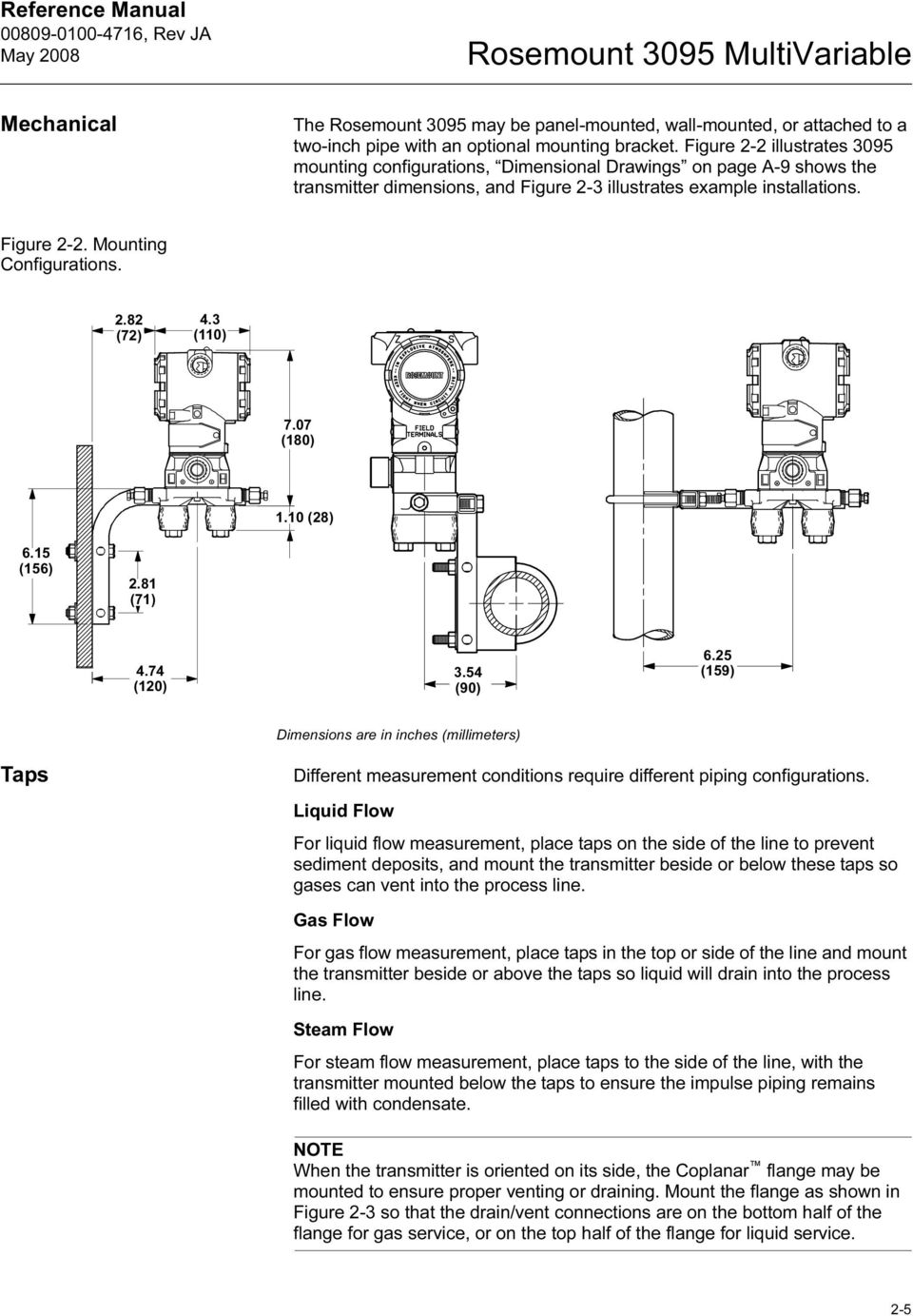
15 Rosemount 3095 MultiVariable Mechanical The Rosemount 3095 may be panel-mounted, wall-mounted, or attached to a two-inch pipe with an optional mounting bracket. Figure 2-2 illustrates 3095 mounting configurations, Dimensional Drawings on page A-9 shows the transmitter dimensions, and Figure 2-3 illustrates example installations. Figure 2-2. Mounting Configurations (72) 4.3 (110) 7.07 (180) 1.10 (28) 6.15 (156) 2.81 (71) 4.74 (120) 3.54 (90) 6.25 (159) Dimensions are in inches (millimeters) Taps Different measurement conditions require different piping configurations. Liquid Flow For liquid flow measurement, place taps on the side of the line to prevent sediment deposits, and mount the transmitter beside or below these taps so gases can vent into the process line. Gas Flow For gas flow measurement, place taps in the top or side of the line and mount the transmitter beside or above the taps so liquid will drain into the process line. Steam Flow For steam flow measurement, place taps to the side of the line, with the transmitter mounted below the taps to ensure the impulse piping remains filled with condensate. NOTE When the transmitter is oriented on its side, the Coplanar flange may be mounted to ensure proper venting or draining. Mount the flange as shown in Figure 2-3 so that the drain/vent connections are on the bottom half of the flange for gas service, or on the top half of the flange for liquid service. 2-5
16 Rosemount 3095 MultiVariable Reference Manual In steam or other elevated temperature services, it is important that temperatures at the coplanar process flanges not exceed 185 F (85 C). Figure 2-3. Example Installations. Flow STEAM SERVICE Flow Flow GAS SERVICE LIQUID SERVICE Flow NOTE In steam service, lines should be filled with water to prevent contact of the live steam with the transmitter. Impulse Piping Impulse piping, which is the piping between the process and the transmitter, must accurately transfer the pressure in order to obtain accurate measurements. In this pressure transfer, there are five possible sources of error: leaks, friction loss (particularly if purging is used), trapped gas in a liquid line, liquid in a gas line, and temperature-induced or other density variation between the impulse piping. 2-6

17 Rosemount 3095 MultiVariable The best location for the transmitter in relation to the process pipe depends on the process. Consider the following guidelines in determining transmitter location and placement of impulse piping: Keep impulse piping as short as possible. Slope the impulse piping at least one inch per foot (8 centimeters per meter) upward from the transmitter toward the process connection for liquid. Slope the impulse piping at least one inch per foot (8 centimeters per meter) downward from the transmitter toward the process connection for gas. Avoid high points in liquid lines and low points in gas lines. Make sure both impulse legs are the same temperature. Use impulse piping large enough to avoid friction effects and prevent blockage. Vent all gas from liquid piping legs. When using a sealing fluid, fill both piping legs to the same level. When purging is necessary, make the purge connection close to the process taps and purge through equal lengths of the same size pipe. Avoid purging through the transmitter. Keep corrosive or hot (above 250 F [121 C]) process material out of direct contact with the sensor module and flanges. Prevent sediment deposits in the impulse piping. Keep the liquid head balanced on both legs of the impulse piping. Avoid conditions that might allow process fluid to freeze within the process flange. NOTE For steam service, do not blow down impulse piping through the transmitter. Flush the lines with the blocking valves closed and refill the lines with water before resuming measurement. Environmental Access Requirements Mount the transmitter to minimize ambient temperature changes. Specifications on page A-1 lists the transmitter temperature operating limits. Mount the transmitter to avoid vibration and mechanical shock, and to avoid external contact with corrosive materials. When choosing an installation location and position, take into account the need for access to the transmitter. Process Flange Orientation The process flanges must be oriented so that process connections can be made. In addition, consider the possible need for a testing or calibration input. Drain/vent valves must be oriented so that process fluid is directed away from technicians when the valves are used. 2-7

18 Rosemount 3095 MultiVariable Reference Manual Housing Rotation The electronics housing may be rotated to improve field access to the two compartments. To rotate the housing less than 90 degrees, release the housing rotation set screw and turn the housing not more than 90 degrees from the orientation shown in Figure 2-3 on page 2-6. To rotate the housing greater than 180 degrees, follow the disassembly procedure on page 6-8. Rotating the housing greater than 180 degrees without performing the disassembly procedure may damage the 3095 sensor module. Terminal Side of Electronics Housing Wiring connections are made through the conduit openings on the top side of the housing. The field terminal side is marked on the electronics housing. Mount the transmitter so that the terminal side is accessible. A 0.75-inch (19-mm) clearance is required for cover removal. Install a conduit plug in the unused conduit opening. Circuit Side of Electronics Housing The circuit compartment should not routinely need to be opened when the unit is in service; however, provide 0.75 inches (19 mm) clearance if possible to allow access. Process The 3095 process connections on the transmitter flange are 1 / 4 18 NPT. Flange adapter unions with 1 / 2 14 NPT connections are available as options. These are Class 2 threads; use your plant-approved lubricant or sealant when making the process connections. The process connections on the transmitter flange are on 2 1 / 8 -inch (54-mm) centers to allow direct mounting to a three- or five-valve manifold. By rotating one or both of the flange adapters, connection centers of 2, 2 1 / 8, or 2 1 / 4 inches (51, 54, or 57 mm) may be obtained. When compressed, Teflon O-rings tend to cold flow, which aids in their sealing capabilities. Whenever flanges or adapters are removed, visually inspect the Teflon O-rings. Replace them if there are any signs of damage, such as nicks or cuts. If they are undamaged, they can be reused. If the O-rings are replaced, the flange bolts may need to be retorqued after installation to compensate for cold flow. 2-8

19 Rosemount 3095 MultiVariable Failure to install proper flange adapter O-rings can cause process leaks, which can result in death or serious injury. There are two styles of Rosemount flange adapters, each requiring a unique O-ring, as shown below. Each flange adapter is distinguished by its unique groove. 3051/2024/3001/3095 Flange Adapter O-ring Unique O-ring Grooves Flange Adapter O-ring 1151 Use only the O-ring designed to seal with the corresponding flange adapter. Refer to the Spare Parts on page A-14 for the correct part numbers of the flange adapters and O-rings designed for the 3095 Multivariable Transmitter. 2-9

20 Rosemount 3095 MultiVariable Reference Manual Mounting Figure 2-4 illustrates a typical 3095 installation site. Major components of the 3095 System and the 3095 Multivariable Transmitter are identified in these figures. Figure 2-4. Typical 3095 Installation Site 3095 RTD Connector RTD Assembly Process Connections RTD Cable Flow The 3095 Multivariable Transmitter total weight varies depending on the components ordered (see Ordering Information on page A-11). The weight must be securely supported. Table 2-1. Transmitter Weight Component Weight lb (kg) 3095 Transmitter 6.0 (2.7) SST Mounting Bracket 1.0 (0.4) 12 ft (3.66 m) RTD Shielded Cable 0.5 (0.2) 12 ft (3.66 m) RTD Armored Cable 1.1 (0.5) 24 ft (7.32 m) RTD Shielded Cable 1.0 (0.4) 24 ft (7.32 m) RTD Armored Cable 2.2 (1.0) 75 ft (22.86 m) RTD Shielded Cable 1.9 (0.9) 75 ft (22.86 m) RTD Armored Cable 7.2 (3.2) 21 in (53 cm) RTD Armored Cable 0.5 (0.2) 12 ft (3.66 m) RTD CENELEC Cable 2.1 (0.9) 24 ft (7.32 m) RTD CENELEC Cable 3.0 (1.4) 75 ft (22.86 m) RTD CENELEC Cable 7.1 (3.2) 21 in (53 cm) RTD CENELEC Cable 1.2 (0.5) 2-10

21 Rosemount 3095 MultiVariable Mounting Brackets Optional mounting brackets available with the 3095 facilitate mounting to a panel, wall, or 2-in. (51-mm) pipe. The bracket option for use with the Coplanar flange is 316 SST with 316 SST bolts. When installing the transmitter to one of the mounting brackets, torque the bolts to 125 in-lb (14 n-m). Mounting Pressure Effect To correct for mounting position effects, the 3095 should be zero trimmed, using the zero trim procedure described on page Bolt Installation Guidelines The following guidelines have been established to ensure a tight flange, adapter, or manifold seal. Use only bolts supplied with the transmitter or sold by Rosemount Inc. as a spare part to the 3095 transmitter. The 3095 is shipped with the Coplanar flange installed with four 1.75-inch (44-mm) flange bolts. The following bolts also are supplied to facilitate other mounting configurations: Four 2.25-inch (57-mm) manifold/flange bolts for mounting the Coplanar flange on a three-valve manifold. In this configuration, the 1.75-inch (44-mm) bolts may be used to mount the flange adapters to the process connection side of the manifold. (Optional) If flange adapters are ordered, four 2.88-inch (73-mm) flange/adapter bolts for mounting the flange adapters to the Coplanar flange. Stainless steel bolts supplied by Rosemount Inc. are coated with a lubricant to ease installation. Carbon steel bolts do not require lubrication. Do not apply additional lubricant when installing either type of bolt. Bolts supplied by Rosemount Inc. are identified by the following head markings: Carbon Steel Head Markings (CS) B7M Stainless Steel Head Markings (SST) R B8M STM SW 316 Hazardous Locations The Rosemount 3095 has an explosion-proof housing and circuitry suitable for intrinsically safe and non-incendive operation. Individual transmitters are clearly marked with a tag indicating the certifications they carry. See Appendix A: Specifications and Reference Data for specific approval categories. See Appendix B: Product Certifications for installation drawings. 2-11
22 Rosemount 3095 MultiVariable Reference Manual Electrical (HART) The signal terminals are located in a compartment of the electronics housing separate from the transmitter electronics. Power Supply The dc power supply should provide power with less than 2% ripple. The total resistance load is the sum of the resistance of the signal leads and the load resistance of the controller, indicator, and related pieces. Note that the resistance of intrinsic safety barriers, if used, must be included. NOTE A loop resistance between ohms inclusive is required to communicate with a personal computer. With 250 ohms of loop resistance, a power supply voltage of at least 16.5 V dc is required. (1) If a single power supply is used to power more than one 3095 transmitter, the power supply used, and circuitry common to the transmitters, should not have more than 20 ohms of impedance at 1200 Hz. Figure 2-5. Power Supply Load Limitations. Max. Loop Resistance = Power Supply Voltage Load (Ohms) Operating Region (1) (2) Power Supply (1) For CSA approval, power supply must not exceed 42.4 V dc. (2) HART protocol communication requires a loop resistance value between ohms, inclusive. Electrical (FOUNDATION Fieldbus) Proper electrical installation is necessary to prevent errors due to improper grounding and electrical noise. Shielded, twisted pair cable should be used for best results in electrically noisy environments. Cable Type A is recommended by FOUNDATION fieldbus. NOTE After a device labeled with multiple approval types is installed, it should not be reinstalled using any of the other labeled approval types. To ensure this, the approval label should be permanently marked to distinguish the used from the unused approval type(s). Field Wiring All power to the transmitter is supplied over the signal wiring. For best installation practices, use a fieldbus type A cable. Do not run unshielded signal wiring in conduit or open trays with power wiring or near heavy electrical equipment. Do not remove the transmitter cover in explosive atmospheres when the circuit is alive. (1) Quick troubleshooting check: There must be at least 11.0 V dc across the transmitter terminals. 2-12
23 Rosemount 3095 MultiVariable NOTE Do not apply high voltage (e.g. ac line voltage) to the transmitter terminals. Abnormally high voltage can damage the unit. Grounding Signal wiring of the fieldbus segment cannot be grounded. Grounding out one of the signal wires will shut down the entire fieldbus segment. Shield Wire Ground To protect the fieldbus segment from noise, grounding techniques for shield wire usually require a single grounding point for shield wire to avoid creating a ground loop. The ground point is typically at the power supply. Figure 2-6. FOUNDATION Fieldbus Wiring Connections Integrated Power Conditioner and Filter Power Supply 6234 ft (1900 m) max (depending upon cable characteristics) (Trunk) Terminators Fieldbus Segment (The power supply filter, first terminator, and configuration tool are typically located in the control room.) FOUNDATION fieldbus Configuration Tool Spur (Spur) Signal Wiring fieldbus devices on segment *Intrinsically safe installations may allow fewer devices per I.S. barrier due to current limitations. Power Connections Use ordinary copper wire of sufficient size to ensure that the voltage across the transmitter power terminals does not go below 9 V dc. To power the transmitter, connect the power leads to the terminals marked FIELDBUS WIRING as shown in Figure 2-7. The power terminals are polarity insensitive, which means the electrical polarity of the power leads does not matter when connecting to the power terminals. When wiring to screw terminals, the use of crimped lugs is recommended. Tighten the terminal screws to ensure adequate contact. 2-13
24 Rosemount 3095 MultiVariable Reference Manual Figure 2-7. FOUNDATION Fieldbus Transmitter Terminal Block Power Terminals NOTE Do not ground out the live signal wiring to the housing when working on a segment. Grounding the communication wires may result in temporary loss of communication with all devices on the segment. Grounding the Transmitter Housing Always ground the transmitter case in accordance with national and local electrical codes. The most effective transmitter case grounding method is a direct connection to earth ground with minimal impedance. Methods for grounding the transmitter case include: Internal Ground Connection: The Internal Ground Connection screw is inside the FIELD TERMINALS side of the electronics housing. The screw is identified by a ground symbol ( ), and is standard on all 3095 transmitters. External Ground Assembly: This assembly is included with the optional transient protection terminal block (Option Code T1), and it is included with CESI/CENELEC Flameproof Certification (Option Code E8), BASEEFA/CENELEC Intrinsic Safety Certification (Option Code I1), and BASEEFA/CENELEC Type N Certification (Option Code N1). The External Ground Assembly can also be ordered with the transmitter (Option Code V5), or as a spare part ( ). NOTE Grounding the transmitter case using the threaded conduit connection may not provide a sufficient ground. The transient protection terminal block (Option Code T1) does not provide transient protection unless the transmitter case is properly grounded. Use the above guidelines to ground the transmitter case. Do not run transient protection ground wire with signal wiring; the ground wire may carry excessive current if a lightning strike occurs. Surges/Transients The transmitter will withstand electrical transients of the energy level usually encountered in static discharges or induced switching transients. However, high-energy transients, such as those induced in wiring from nearby lightning strikes, can cause damage to the transmitter. 2-14
25 Rosemount 3095 MultiVariable Optional Transient Protection Terminal Block The transient terminal block can be ordered as an installed option (Option Code T1 in the transmitter model number) or as a spare part to retrofit existing 3095 transmitters in the field. See Spare Parts List on page A-14. Installation When the transient protection terminal block is ordered as a spare part, it must be installed in place of the standard terminal block inside the transmitter housing. See Removing the Electrical Housing on page 5-8. NOTE The transient protection terminal block provides transient protection only if the transmitter housing is properly grounded. See Grounding the Transmitter Housing on page Performance The transient protection terminal block increases the ability of the 3095 transmitter to withstand electrical transients induced by lightning, welding, or heavy electrical equipment. With the transient protection block installed, the 3095 transmitter meets the standard performance specifications as outlined in this product manual. In addition, the transient protection circuitry meets IEEE Standard 587, Category B and IEEE Standard 472, Surge Withstand Capability. INSTALLATION Equipment The following equipment and tools are not provided with the 3095 transmitter. Be sure to review the list prior to field installing the transmitter. Installation tools Field wire between the power supply and the 3095 transmitter Barriers or seals required for hazardous locations Conduit 2-in. (50.8 mm) mounting pipe or saddles Power supply 3- or 5-valve manifolds, unless otherwise specified Impulse piping Tie wraps Use the following steps to successfully install the 3095 transmitter. 1. Review the installation considerations described on Considerations on page 2-4 to determine the location for the 3095 transmitter. Mount Transmitter and Install Bolts 2. Mount the 3095 in the desired location, and install flange or flange/adaptor bolts. a. Finger-tighten the bolts. b. Torque the bolts to the initial torque value using a cross-pattern (see Table 2-2). c. Torque the bolts to the final torque value using the same cross-pattern. 2-15
26 Rosemount 3095 MultiVariable Reference Manual Table 2-2. Bolt Installation Torque Values. Bolt Material Initial Torque Value Final Torque Value Carbon Steel (CS) 300 in-lb (34 n-m) 650 in-lb (73 n-m) Stainless Steel (SST) 150 in-lb (17 n-m) 300 in-lb (34 n-m) NOTE Only use bolts supplied with the 3095 or sold by Rosemount Inc. as a spare part to the Unauthorized parts can affect product performance and may render the instrument dangerous. When installing the transmitter to one of the mounting brackets, torque the mounting bracket bolts to 125 in-lb (14 n-m). NOTE All four flange bolts must be installed and tight before applying pressure, or process leakage will result. When properly installed, the flange bolts will protrude through the top of the module housing. Attempting to remove the flange bolts while the transmitter is in service will result in leakage of the process fluid. Process Connections 3. Connect the transmitter to the process. 2-16
27 Rosemount 3095 MultiVariable Install RTD Assembly (optional) 4. (Optional) Install the Series 68 or Series 78 RTD Assembly. NOTE To meet ISSep/CENELEC Flameproof certification, only European Flameproof Cable Assemblies (Process Temperature Input Codes A, B, or C) may be used for RTD cable installation. a. Mount the RTD Assembly in the desired location. Refer to the appropriate primary element standard concerning recommended RTD installation location. b. Connect the RTD cable (optional) to the 3095 RTD connector. All RTD 3095 Cable assemblies use the 3095 RTD cable connector. Identify the cable type being installed and follow the steps below. Figure 2-8. Armored Shielded RTD Cable Assembly Compression Fitting Conductive Bushing (slide stop to edge of armored cable) RTD Cap Cap Black Cable Connector (connect to 3095 RTD Pins) Cable Adapter Cable Wires (2) Red wires (2) White wires Washer 3 /4 to 1 /2-14 NPT Adapter (screws into RTD Connection Head) Bushing Compression Fitting First, fully engage the black cable connector to the 3095 RTD connector pins. Second, screw in and tighten the cable adapter until metal to metal contact occurs. Install compression fitting. Third, use pliers to screw in and tighten the strain relief cap onto the compression fitting. 2-17
28 Rosemount 3095 MultiVariable Reference Manual Installing a Shielded 3095 RTD Cable (intended for use in a conduit) a. Fully engage the black cable connector to the 3095 RTD Connector (see Figure 2-9). b. Tighten the cable adapter until metal contacts metal (see Figure 2-9). Figure 2-9. Shielded RTD Cable Cable Adapter 1 /2 14 NPT Black Cable Connector Installing a CENELEC Flameproof 3095 RTD Cable a. Fully engage the black cable connector to the 3095 RTD Connector (see Figure 2-10). b. Tighten the cable adapter and cable gland until metal contacts metal (see Figure 2-10). Figure CENELEC Flameproof RTD Cable RTD Cable Gland CM20 Cable Adapter Cable Gland Black Cable Connector c. Make all necessary wiring connections inside the RTD Flat Connection Head as explained in the Sensor Wiring Instructions included with the RTD. Figure 2-11 illustrates typical wiring configuration of the Rosemount RTC Cable Assembly to a 4-wire RTD. Figure RTD Sensor Wiring Diagram RTD Cable Assembly Wires Red Red White White A A B B 3095_23A.EPS 2-18
29 Rosemount 3095 MultiVariable Check for Leaks 5. Check all process penetrations for leaks. Power and Signal Wiring 6. Make field wiring connections (see Figure 2-6 or Figure 2-12). These connections provide both power and signal wiring. For explosion-proof installations, wiring connections must be made in accordance with Rosemount drawing or For instrinsically safe installations, wiring connections must be made in accordance with ANSI/ISA-RP12.6, and Rosemount drawings or For ALL installations, wiring connections must be made in accordance with local or national installation codes such as the NEC NFPA 70. NOTES Do not run field wiring in conduit or open trays with other power wiring, or near heavy electrical equipment. Field wiring need not be shielded, but use twisted pairs for best results. To ensure communication, wiring should be 24 AWG or larger and not exceed 5,000 feet (1,500 meters). For connections in ambient temperatures above 140 F (60 C), use wiring rated for at least 194 F (90 C). a. Remove the cover on the side marked FIELD TERMINALS on the electronics housing. b. Connect the lead that originates at the positive side of the power supply to the terminal marked + SIG or + PWR. Be sure to include loop resistance. NOTE Incorrect field wiring connections may damage the Do not connect field wiring to the TEST + terminals. c. Connect the lead that originates at the negative side of the power supply to the terminal marked. d. Plug and seal unused conduit connections on the transmitter housing to avoid moisture accumulation in the terminal side of the housing. NOTE If the conduit connections are not sealed, mount the transmitter with the electrical housing positioned downward for drainage. Conduit should be installed with a drip loop, and the bottom of the drip loop should be lower than the conduit connections or the transmitter housing. Grounding 7. Install field wiring ground (optional), and ground the transmitter case (required). 2-19
30 Rosemount 3095 MultiVariable Reference Manual Figure HART Wiring Connections > R L > 250 User-Provided Power Supply (see step 7.b) Signal loop may be grounded at any point or left ungrounded (see step 7.a). Field Wiring Ground a. Field wiring may be grounded at any one point on the signal loop, or it may be left ungrounded. The negative terminal of the power supply is a recommended grounding point. Ground the Transmitter Case b. The transmitter case should always be grounded in accordance with national and local electrical codes. The most effective transmitter case grounding method is direct connection to earth ground with minimal impedance. Methods for grounding the transmitter case include: External Ground Assembly: This assembly is included with the transient protection terminal block. The External Ground Assembly can also be ordered as a spare part (see Spare Parts List on page A-14). Internal Ground Connection: Inside the FIELD TERMINALS side of the electronics housing is the Internal Ground Connection screw. This screw is identified by a ground symbol: NOTE The transient protection terminal block does not provide transient protection unless the transmitter case is properly grounded. Use the above guidelines to ground the transmitter case. Do not run the transient protection ground wire with field wiring as the ground wire may carry excessive current if a lighting strike occurs. Grounding the transmitter case using threaded conduit connection may not provide sufficient ground. 8. Replace the cover. 2-20
31 Section 3 Rosemount 3095 MultiVariable HART Commissioning Safety Messages page 3-1 Engineering Assistant Software page 3-2 HART SAFETY MESSAGES Instructions and procedures in this section may require special precautions to ensure the safety of the personnel performing the operations. Information that potentially raises safety issues is indicated by a warning symbol ( ). Please refer to the following safety messages before performing an operation preceded by this symbol. Explosions could result in death or serious injury: Do not remove the transmitter cover in explosive atmospheres when the circuit is live. Before connecting a 375 Field Communicator in an explosive atmosphere, make sure the instruments in the loop are installed in accordance with intrinsically safe or non-incendive field wiring practices. Verify that the operating atmosphere of the transmitter is consistent with the appropriate hazardous locations certifications. Both transmitter covers must be fully engaged to meet explosion-proof requirements. Failure to follow these installation guidelines could result in death or serious injury: Make sure only qualified personnel perform the installation. Electrical shock could cause death or serious injury. If the sensor is installed in a high-voltage environment and a fault or installation error occurs, high voltage may be present on the transmitter leads and terminals: Use extreme caution when making contact with the leads and terminals. Process leaks can cause death or serious injury
32 Rosemount 3095 MultiVariable Reference Manual HART ENGINEERING ASSISTANT SOFTWARE The 3095 Engineering Assistant (EA) Software is a PC-based software package. The EA Software lets you configure the 3095 Multivariable Mass Flow Transmitter and 3095 Multivariable Mass Flowmeters. The EA Software is available as a Snap-On application to AMS 6.0 and newer, or as Stand-Alone Software powered by AMS. The EA Software performs configuration, maintenance, and diagnostics functions, and serves as the primary communications interface to the 3095 transmitter and 3095 Mass Flowmeters. Installation and Initial Setup The following are the minimum system requirements to install the 3095 Engineering Assistant Software: IBM-compatible PC Pentium 800 MHz personal computer or above Operating System: Microsoft Windows NT, 2000 or XP 512 MB RAM 350MB of available hard disk space CD-ROM 800 x color display NOTE The available hard disk space specified above is the amount needed for software installation, not the amount needed for operation (disk space needed will vary from network to network depending on configuration, number of devices, etc.). Installing the 3095 MultiVariable Engineering Assistance Software The EA Software package is available with or without the HART modem and connecting cables. The complete EA package contains the EA software CD-ROM, and one HART modem with cables for connecting the computer to the Optional USB HART Modem and cables include separate software to install USB HART modem drivers. Install USB HART Modem drivers following the instructions provided with the modem. Install USB HART Modem drivers prior to beginning the EA software installation. 1. For Stand-Alone users, install the 3095 Engineering Assistant software by clicking on the setup.exe file located on the CD-ROM. 2. For Snap-On users, AMS is a two CD-ROM series with the 3095 Engineering Assistant on the second disk. After installing AMS, install the 3095 Engineering Assistant software by clicking on the setup.exe file located on the second CD-ROM. 3. A series of screens (called the Installation Wizard ) will appear and assist in the installation process. Follow the on-screen instructions. It is recommended that the default settings on the PC are used. 4. The system will reboot. Installation will continue until the Finished prompt appears. NOTE For AMS users, AMS must be installed and activated by submitting the proper license codes before EA can be launched as a Snap-On option. 3-2
33 Rosemount 3095 MultiVariable Installing the HART Modem After the EA Software has been installed, the HART modem device driver must be installed and configured. The HART modem Installation Wizard automatically appears when the 3095 EA Software is launched. If the wizard does not automatically launch, you can configure the modem by accessing the AMS Network Configuration screen. If using a HART USB Modem, the modem drivers must be installed prior to configuring the HART Modem. The USB Modem drivers can be installed by following the instructions for the software provided with the HART USB Modem. HART For AMS Snap-On users: 1. Click on the Windows Start button. 2. Click on All Programs. 3. Click on the AMS folder. 4. Click on the AMS Configuration icon. For EA Stand-Alone users: 1. Click on the Windows Start button. 2. Click on All Programs. 3. Click on the Engineering Assistant Folder. 4. Click on the AMS Network icon. Once the Install Wizard is open, the HART modem can be installed. 1. Click on the Add button. 2. Select HART Modem and click the Install button. Figure 3-1. HART Modem Installation 3-3
34 Rosemount 3095 MultiVariable Reference Manual HART 3. Specify a name for the HART Modem. The default is HART Modem 1. Click Next. 4. Specify whether AMS will act as a primary or secondary HART master for configuration (See Figure 3-2). If performing a bench configuration, it is recommended to choose Hand held device as a secondary HART master (AMS will be Primary HART master). For field configurations where the instrument is powered by a HART protocol control system, selecting the second choice is recommended in order to prevent HART communication conflicts between AMS and the HART control system. Click Next. Figure 3-2. HART Modem Installation 5. Select the PC COM Port for the HART Modem. Click Next. 6. If more than one device will be connected to the HART modem at the same time (such as a Rosemount 333 Tri-Loop), select the Multi Drop check box and then select a scan address range. (Limiting the address range to 0-2 will improve response time.) Click Finish to complete the HART modem configuration. 7. After configuring the HART modem in the AMS network window, access the HART modem properties screen again and select the Connection tab. Set the Retry Count to a value of
35 Rosemount 3095 MultiVariable Connecting to a Personal Computer Figure 3-3 shows how to connect a computer to a Figure 3-3. Connecting a PC to the > R > 250 User-Provided Power Supply HART Modem 1. Power the device as outlined in Section Connect the 9-pin HART modem cable to the 9-pin serial communications port on the PC. NOTE If your PC does not have a 9-pin serial port, you will need a USB-HART modem, PN On the side marked Field Terminals, connect the modem mini-grabbers to the two terminals marked Comm. 4. Launch the 3095 Engineering Assistance Software. NOTE It may be necessary to access the COM port properties on your PC. In the advanced port settings, adjust the receive buffer to its lowest setting (1) and re-boot the computer to apply the change. 3-5
36 Rosemount 3095 MultiVariable Reference Manual HART a. For AMS Snap-On users: 1. Click on the Windows Start button. 2. Click on All Programs. 3. Click on the AMS folder. 4. Click on the AMS System icon. b. For EA Stand-Alone users: 1. Click on the Windows Start button. 2. Click on All Programs. 3. Click on the MV Engineering Assistant folder. 4. Click on the MV Engineering Assistant icon. 5. Enter username and password and click OK to log on to the software (see Figure 3-4). Once you are logged on, you will be taken to the default Device Connection View, which shows all devices which are currently online (see Figure 3-5). NOTE The default username is admin (lowercase) with a blank password. Figure 3-4. Software Login. admin 3-6
37 Rosemount 3095 MultiVariable Figure 3-5. Device Connection View HART Basic Navigation The 3095 Engineering Assistant lets you navigate through the software in a variety of ways. When first logging onto the system, the default screen is the Device Connection View (Figure 3-5). You will be able to see all devices which are connected to the network. NOTE If Device Connection View does not appear, go to File_Properties. In the Properties window, select Device Connection View as the default browser. Then, click on the Device/AMS Sync tab and de-select the Automatic Sync Function. Click Apply. Menu Categories File:The File menu contains screens to configure the overall host system, including AMS settings and user login. Edit: The Edit menu contains standard Cut and Paste commands. View: The View menu is used to change the type of graphical interface you are currently working with. Tools: The Tools menu does not contain any applications for the 3095 Engineering Assistant software Window: The Window menu can be used to manage all of the various windows and applications currently open. Help: The Help menu accesses the online assistance guide for the AMS Interface/3095 EA software. 3-7
38 Rosemount 3095 MultiVariable Reference Manual HART Figure 3-6. Toolbar Icons Tool Bar Another fast way to navigate through the 3095 Engineering Assistance Software is by using the toolbar (see Figure 3-6). Procedures In both Snap-On and Stand-Alone versions of the 3095 Engineering Assistant Software, most of the device parameters can be accessed by right-clicking on the transmitter icon (See Figure 3-7 below). To access flow configuration, right-click on the transmitter icon and select 3095 Engineering Assistant or SNAP-ON Linked Apps/3095 Engineering Assistant. More information on completing a flow configuration using the 3095 Engineering Assistant begins on page NOTE Some of the links found when right-clicking on the transmitter icon (see Figure 3-7) may have different titles or may be absent, depending on which version (SNAP-ON or Stand-Alone) of the 3095 Engineering Assistant is running, and depending on the revision level version of the device and the device driver file. 3-8
39 Rosemount 3095 MultiVariable Figure 3-7. Transmitter Links HART 3-9
40 Rosemount 3095 MultiVariable Reference Manual Process Variables HART The Process Variables link displays the current reading of the process variables measured by the In the Process Variables window, variables are automatically updated every 2-3 seconds. All values on the screen are read-only. 1. Right-click on the transmitter icon. 2. Select Process Variables from the pop-up menu. The following process variables are viewable on the Process Variables window (see Figure 3-8): Absolute/Gage Pressure Differential Pressure Temperature Flow Rate Flow Total Analog Output (4-20mA) Figure 3-8. Process Variables Window (with 3095 Device Driver File DD2 Rev 3) 3-10
41 Rosemount 3095 MultiVariable Status The Status link displays a list of the transmitter errors, alarms, and failures. If a status flag is triggered, it is highlighted in red. 1. Right-click on the transmitter icon. 2. Select Status from the pop-up menu. HART Figure 3-9. Transmitter Status screen Scan Device The Scan Device function synchronizes the transmitter with the host system, updating all parameters, readings, etc. 1. Right-click on the transmitter icon. 2. Select Scan Device from the menu. Diagnostics and Tests The Loop Test application, found under the Diagnostics and Tests link, verifies the 4-20mA output of the The user can manually set the transmitter output current and then verify the actual loop current using an Amp meter. 3-11
42 Rosemount 3095 MultiVariable Reference Manual HART 1. Right-click on the transmitter icon. 2. Highlight Diagnostics and Tests from the pop-up menu. 3. Select Loop Test from the submenu. 4. Read the warning message and click Next. 5. Select the analog output level for the transmitter and click Next. If Other is chosen, another screen appears allowing you to specify the output current (see Figure 3-10). 6. Measure the output current with an Amp meter and compare with the expected output current. If a correction trim is needed, it will be done as a D/A trim in the calibration functions (see page 3-17). 7. When finished, select End and click Next. 8. Read the warning message, and click Next. 9. Select Finish. The analog output returns to its normal reading. Figure Loop test analog output selection. Calibrate Menu The Calibrate menu contains links to three different applications: Sensor Trim, D/A Trim, and Scaled D/A Trim. From the Sensor Trim link, you can access the calibration options for the Differential Pressure, Static Pressure, and Temperature process variables. Additionally, you can change the Atmospheric Pressure value and restore the D/A converter to its factory default setting. 3-12
43 Rosemount 3095 MultiVariable Figure Sensor Trim Menu HART In addition to the 3095 EA software, the following equipment is required for a sensor trim procedure: 3095 transmitter Dead-weight tester Power supply and load resistor Vacuum pump or a barometer that is at least 3 times as accurate as the 3095 AP sensor. A barometer is preferred. 3-13
44 Rosemount 3095 MultiVariable Reference Manual Sensor Trim Procedure HART 1. Right-click on the transmitter icon. Select Process Variables to view measured variables and determine if a sensor trim is needed (see Figure 3-8). 2. Right-click on the transmitter icon. Select Calibrate/Sensor Trim functions. 3. Click on the process variable requiring modification (DP Sens Trim, AP Sens Trim, GP Sens Trim, or Temp Sens Trim). 4. From the calibration screen (see Figure 3-12), select the type of calibration procedure: a. To view the last calibration trim points for the selected process variable, select Display Trim, and click Next. The offset and slope trim points are displayed. b. To fully calibrate the selected process variable, select Trim Sensor, and click Next. 1. Read the warning message and click Next. 2. Select the units of measure from the drop-down menu for the variable being calibrated, and click Next. 3. Select whether you want to calibrate the offset or slope (span) point, and click Next. The offset trim should be done first; then determine if a slope trim is necessary. a. If setting the offset point for the Absolute Pressure sensor, pull vacuum to both the low and high sides of the transmitter, or offset trim the AP sensor using an accurate barometer or reference sensor. b. If setting the offset point for the DP Sensor, equalize the high and low ports. c. If setting the offset point for the Temperature sensor, insert the RTD probe into an ice bath or use a verified RTD simulator. d. If setting the slope trim (span) for the DP sensor, apply the desired pressure to the high side of the transmitter. e. If setting the slope trim for the AP or GP sensor, apply the reference pressure to the high and low side ports simultaneously. f. If setting the slope trim for the Temperature sensor, insert the RTD probe into a hot oil bath or use a verified RTD simulator. 4. Enter the new value for the offset or slope point, and click Next. 5. Select Yes to implement the new calibration point, and click Next. 6. Read the warning message, and click Next. 7. Click Finish. 3-14
45 Rosemount 3095 MultiVariable c. To restore the selected process variable to its factory default calibration, select Factory Trim Recall and click Next. 1. Read the warning message and click Next. 2. Select Yes to implement the default calibration, and click Next. 3. Read the warning message, and click Next. 4. Click Finish. d. To zero the sensor reading for the selected process variable (not available for Temperature Sensor Calibration), select Zero Sensor, and click Next. * 1. Read the warning message and click Next. 2. Select Yes to zero the current sensor reading, and click Next. 3. Read the warning message, and click Next. 4. Click Finish. HART Figure Sensor Trim Options Screen * NOTE: Do not zero an AP sensor unless an absolute 0 pressure (vacuum) source is available. 3-15
46 Rosemount 3095 MultiVariable Reference Manual Changing the Atmospheric Pressure Value: HART The Gauge Sensor on the 3095 takes measurements with respect to the atmospheric pressure. To change the assumed atmospheric pressure value: 1. Right-click on the transmitter icon. 2. Highlight Calibrate from the pop-up menu. 3. Highlight Sensor Trim from the submenu. 4. Click on Atmospheric Press. 5. A window appears, displaying the current atmospheric pressure value used by the Select Yes to change the value, and click Next (see Figure 3-13). 6. Enter the new value for the atmospheric pressure, and click Next. 7. Select the unit of measure from the drop-down menu, and click Next. 8. Select Yes to implement the new assumed Atmospheric Pressure value, and click Next. 9. Read the warning message, and click Next. 10. Click Finish. Figure Atmospheric Pressure Configuration 3-16
47 Rosemount 3095 MultiVariable D/A Trim The D/A Trim allows the user to adjust the digital-to-analog converter at the end points of the transmitter output scale to compensate for a discrepancy with a reference milliamp meter. 1. Right-click on the transmitter icon. 2. Highlight Calibrate from the pop-up menu. 3. Click D/A Trim. 4. Read the warning and click Next. 5. Connect the Ammeter, and click Next. The 3095M output will go to 4mA. 6. Enter the value (in ma) that is shown on the reference meter, and click Next. 7. Compare the meter value to the 4mA reference point, and select yes if the two values agree. If no is selected, repeat steps 6 and 7. Click Next. The 3095M output will go to 20mA. 8. Enter the value shown on the reference meter, and click Next. 9. Compare the meter value to the 20mA reference point, and select yes if the two values agree. If no is selected, repeat steps 8 and 9. Click Next. 10. Click Finish to end the D/A loop trim. HART 3-17
48 Rosemount 3095 MultiVariable Reference Manual Scaled D/A Trim HART For the Scaled D/A Trim, the user can adjust the transmitter digital-to-analog converter on an alternate unit of measure, such as voltage (example: using a voltmeter across a 500 ohm resistor produces a low point of 2 volts a high point of 10V). 1. Right-click on the transmitter icon. 2. Highlight Calibrate from the pop-up menu. 3. Click Scaled D/A Trim. 4. If you expect your measurement to be from 4 20 (ma, V, etc.), click Proceed. Otherwise, click Change. 5. Enter the expected low set point, and click Next. 6. Enter the expected high set point, and click Next. 7. Follow steps 5-7 on the above D/A Trim procedure, using the low and high values you entered as reference points instead of the normal 4mA and 20mA. To restore the D/A Conversion to the factory default settings: 1. Right-click on the transmitter icon. 2. Highlight Calibrate from the pop-up menu. 3. Highlight Sensor Trim from the submenu. 4. Click Factory Trim. 5. Select Yes, and click Next when asked if you want to set the DAC (Digital-to-Analog Converter) Trim to factory defaults. 6. Click Finish. Reset The reset command reinitializes the transmitter microprocessor. This is the equivalent of cycling power to the NOTE This procedure does not return the transmitter to factory trim settings. 1. Right-click on the transmitter icon. 2. Click Reset from the pop-up menu. 3. Read the warning message and click Next. 4. The transmitter will reset automatically. Click Finish to close the window. 3-18
49 Rosemount 3095 MultiVariable Process Variable Assignments The Assignments (or Process Variable Assignments) link lets you assign specific variables to individual 4-20mA loops for use with the Rosemount 333 HART Tri-Loop. Table 3-1 illustrates the default variables assigned to each control loop. If a 333 Tri-Loop is used, the Tri-Loop channels can each be configured to any of the PV, SV, TV, or QV variables (see page 3-33). HART Table mA Control Loop Defaults Assignments Loop EA Label Label on Tri-Loop Default Variable Default Units Primary PV N/A Flow Std. Cu.ft / hr Secondary SV Output 1 Diff. Pressure in. H20 Tertiary TV Output 2 Static Pressure psi Fourth QV Output 3 Temperature deg. F To change the process variable assigned to a particular output variable: 1. Right-click on the transmitter icon. 2. Highlight Assignments from the pop-up menu. 3. Click on the control loop you wish to change the variable assignment for. Refer to Table 3-1 for default variable assignments. 4. When the configuration screen appears, select the variable from the pull-down menu to be assigned to the selected 4-20 loop, and click Next (see Figure 3-14). 5. Read the warning message, and click Next. 6. Click Finish to implement the loop assignment change. NOTE When used with a 333 Tri-Loop, each channel of the Tri-Loop can be configured to any of the variables (PV, SV, TV, or QV). Therefore, it is suggested to leave the 3095M set to its default order of variable assignments. Figure Changing the Primary Loop Variable 3-19
50 Rosemount 3095 MultiVariable Reference Manual RTD Configuration HART The RTD Config link specifies the process temperature (PT) mode. It allows you to enable or disable PT input or to specify automatic backup mode. When in Normal Mode, the transmitter uses the external RTD for PT measurement. In the event of an RTD failure, the transmitter goes into alarm condition. When in Fixed Mode the transmitter will stay on a fixed value that is entered by the user. When in Backup Mode, a value is specified that the transmitter will go to in the event the RTD fails or is disconnected. Upon failure, the transmitter will use the backup value and set a HART status bit for PT alarm, but will not go into alarm condition. The transmitter returns to automatic temperature sensor readings when the RTD failure condition no longer exists. NOTE The fixed and backup process temperature ranges are wider than the actual process temperature range: Process Temperature Range: -300 to 1500 F (-185 to 815 C) Fixed/Backup Temperature Range: -459 to 3500 F (-273 to 1927 C) To change the RTD configuration: 1. Right-click on the transmitter icon. 2. Click on RTD Config from the pop-up menu. 3. Select Yes to change the configuration, and click Next. 4. From the drop-down menu, select the mode you wish to place the process temperature input in, and click Next (see Figure 3-15). 5. Enter a temperature value to be used if the transmitter is in Fixed or Backup Mode, and click Next. 6. Select the unit of measure for the temperature input from the drop-down menu, and click Next. 7. Click Finish. Figure RTD Configuration. 3-20
51 Rosemount 3095 MultiVariable DP Low Flow Cutoff The DP Low Flow Cutoff screen allows the minimum differential pressure (DP) limit for the 3095 to calculate flow to be set. At a DP value less than the low flow cutoff, the flow value will equal zero. The default value for the DP Low Flow Cutoff is 0.02 inh20 (5 Pa). To change the DP Low Flow Cutoff point: 1. Right-click on the transmitter icon. 2. Click DP Low Flow Cutoff from the pop-up menu. 3. Select Yes to change the Low Flow Cutoff point, and click Next. 4. Enter the cutoff value, and click Next (see Figure 3-16). 5. Select differential pressure for the unit of measure, and click Next. 6. Select Yes to implement the change in the DP Low Flow Cutoff point, and click Next. 7. Click Finish. HART Figure DP Low Flow Cutoff. 3-21
52 Rosemount 3095 MultiVariable Reference Manual Rename HART To change the name that appears next to the transmitter icon on the 3095 Engineering Assistant software: 1. Right-click on the transmitter icon. 2. Click Rename from the pop-up menu. 3. Type a new name for the transmitter, and press Enter on the keyboard. Clear Offline Configuration or Delete To remove the offline configuration that is currently saved for the selected (For more information on Offline Configurations, see page 3-47): 1. Right-click on the transmitter icon. 2. Click Clear Offline Configuration or Delete from the pop-up menu. 3. Click Yes to delete the offline configuration. Compare Configurations Compare Configurations lets you compare current, historic, and offline configurations for the selected Right-click on the transmitter icon. 2.Click Compare Configurations from the pop-up menu. Compare current, offline, and previous configurations for the selected device. From the tabs at the top of the window, you can select the set of parameters to view. A green tab denotes a difference on one or more parameters found on that tab between the two selected configurations. Compare two different configurations by moving the slide bar to the time setting you want for each of the configurations (see Figure 3-17). NOTE Compare Configurations function compares those configuration settings in the Configurations Properties functions only (see Figure 3-18). The flow configuration file is not included in this comparison. Figure Time Selector If you are comparing the current configuration for the 3095, you can also change the configuration by modifying the appropriate field and clicking Apply. 3-22
53 Rosemount 3095 MultiVariable Figure Compare Configurations HART 3-23
54 Rosemount 3095 MultiVariable Reference Manual HART Configuration Properties The Configuration Properties screen contains device parameters that are grouped into tabs located at the top of the window. To access the Configuration Properties window: 1. Right-click on the transmitter icon. 2. Click Configuration Properties from the pop-up menu. When navigating throughout the Configuration Properties screens, the time bar at the bottom of the screen lets you switch your view between previous configurations, the current online configuration, and the saved offline configuration. The history configuration is read-only. When making changes to the configuration, click Apply or OK to implement and save the configuration to the device. Basic Setup The basic setup tab provides access to the essential parameters that should be defined upon initial configuration (see Figure 3-19). These include: Tag: unique name entered by the user (8 characters) to identify the transmitter DP, AP, GP, Temp, Flow, and Flow Total: units of measure; all selectable URV Upper Range Value (20mA output): entered by user to range the output LRV Lower Range Value (4mA output): entered by user to range the output Date, Descriptor, and Message: used to further help identify the transmitter for the user Figure Basic Setup tab STEAM FLOW MAIN STEAM LINE 3-24
55 Rosemount 3095 MultiVariable Device Tab The device tab provides more in-depth information about the 3095 transmitter. Only the Date, Descriptor, and Message fields can be edited. All other fields on the Device tab are read only: Date, Descriptor, and Message: same parameters as found on the Basic Setup tab (See Figure 3-20). HART NOTE All other fields on the Device Tab are read only. Model, Manufacturer, and Distributor: Give the transmitters background information Hardware Rev: Refers to the hardware revision of the transmitter Software Rev: Refers to the electronics output board revision of the transmitter Write Protect: Indicates the position of the security write protect jumper pins on the transmitter output board. This is not selectable from the software (see page 2-3). Final Assembly Number: assigned by Rosemount at the time of final assembly manufacture Figure Device Tab 3-25
56 Rosemount 3095 MultiVariable Reference Manual HART Tab HART The HART tab is used to set some of the communications parameters that are used by HART protocol. Tag: same parameter as found on the Basic Setup tab. Poll Address: users can assign a unique HART address to the 3095 to differentiate it from other devices if set up on a multidrop network. Number of Response Preambles: changes the number of response preambles for the transmitter to EA communication. Typically, this value is set at five. Increase the value only if the transmitter is installed in an electrically noisy environment. Burst Mode: must be enabled for operation with a Rosemount 333 Tri-Loop. With burst mode ON, the 3095 continuously outputs HART parameters, eliminating the time required for the control system to request information from the transmitter. Burst mode is compatible with use of the analog signal. Because HART protocol features simultaneous digital and analog data transmission, the analog value can drive other equipment in the loop while the control system or Tri-Loop receives the digital information. Access to information other than burst data is obtained through the normal poll/response method of HART communication. The EA or the control system may request any of the information that is normally available while the transmitter is in burst mode. However, the response time to these requests will be longer. Between each burst message sent by the transmitter, a short pause allows the EA or control system to initiate a request. The transmitter receives the request, processes the response message, and then continues bursting the data approximately three times per second. When sending a new flow configuration file from the EA, the burst mode must be OFF. Burst mode is not compatible with Multi Dropping more than one transmitter because there is no method to discriminate the data communications from multiple field devices. Burst Option: From the pull down menu select what type of data will be sent when the transmitter is in Burst Mode. For use with the 333 Tri-Loop, the Burst Option must be set to process vars/crnt (HART CMD3). 3-26
57 Rosemount 3095 MultiVariable Figure HART Tab HART DP Sensor Tab The DP Sensor screen provides read only information about the DP sensor module (see Figure 3-22). Flange Type: From the drop-down menu, select the flange type used in the primary assembly Flange Material: From the drop-down menu, select the flange material used in the primary assembly O ring Material: From the drop-down menu, select the O ring material used in the transmitter Drain/Vent Material: From the drop-down menu, select the drain and vent material used in the transmitter. Figure DP Sensor Tab 3-27
58 Rosemount 3095 MultiVariable Reference Manual Flow Tab HART The Flow Tab allows for the configuration of flow damping and units of measure (see Figure 3-23). Flow USL and Flow LSL: This is a value calculated by the transmitter. The calculation is dependent on the DP sensor limit and the flow configuration file. Flow Units: From the drop-down menu, select the units of measure for the flow rate. This parameter is also on the Basic Setup tab. Flow Damping: Not a selectable parameter in the 3095 transmitter. To dampen the flow measurement, go to the Process Input tab and set the DP damping. Figure Flow Tab GP, PT, and SP Snsr Tabs The configuration tabs for the SP, GP, and PT sensors display the high and low sensor limits. There are no writable parameters for these tabs. Remote Seal Tab All parameters found under the Remote Seal tab should show None, as the 3095 is not generally used with the Rosemount Diaphragm Seals System. These fields are selectable by the user in cases where remote diaphragm seals have been assembled to the transmitter. 3-28
59 Rosemount 3095 MultiVariable LCD Configuration Tab The following parameters can be displayed on the LCD (if LCD is ordered and installed on transmitter). See Figure Differential Pressure Static Pressure (Absolute Pressure) Gage Pressure Process Temperature Flow Flow Total Current Output % Range Display Period sets the display time of each parameter selected. Display time is selectable in one-second increments, from two to ten seconds. HART Figure LCD Configuration Tab Flow Total Tab The Flow Total tab shows the running flow total. Mode: From the drop-down menu, select Start to begin (or continue) flow accumulation. Select Stop to stop flow accumulation. Select Reset to set to zero. Click OK or Apply to implement any changes. Flow Total: Displays the current flow total (updated automatically). The parameter is read-only. 3-29
60 Rosemount 3095 MultiVariable Reference Manual Figure Flow Total HART Process Input Tab On the Process Input tab, the units of measure and damping can be configured for each of the measured variables (DP, AP/GP, and Temp). Units: From the drop-down menu, select the units of measure for the chosen process variable. The unit parameters are also selectable on the Basic Setup tab. Damping: Enter in the desired damping value (in seconds). NOTE The transmitter sets the damping value to the nearest acceptable value. An information message is provided to the operator indicating the new damping values. Figure Process Inputs Tab
61 Rosemount 3095 MultiVariable Analog Output Tab Upper Range Value (URV) and Lower Range Value (LRV): Sets the range represented by the 4 to 20mA output. These functions are also selectable on the Basic Setup tab. NOTE All other fields on the Analog Output Tab are read only. HART Min span: A value calculated by the transmitter. The calculation is dependent on the DP sensor minimum range and the flow configuration file. AO Alm Typ: Indicates the position of the alarm jumper pins on the transmitter output board. Xfer Fnctn: The value is linear for the PV is: Indicates which variable is set as the primary variable. This is selectable on the Basic Setup tab. Figure Analog Output Tab 3-31
62 Rosemount 3095 MultiVariable Reference Manual HART Spec Units Tab The Special Units tab configures flow measurement and flow total to be displayed in units considered nonstandard in the 3095M transmitter. NOTE After completing a special unit configuration, reset the 4-20mA range (LRV and URV). The range values must be re-entered and applied to the device using either Engineering Assistant or a HART hand-held communicator. Base Unit: From the drop-down menu, select the desired base unit of measure for flow. Scaling Factor: Enter a scaling factor. The scaling factor multiplied by the Base Unit will equal the Flow Special Unit. Unit String: Enter the desired display units. Up to 5 characters can be entered for display of the special units, including all alphanumeric characters and the forward slash ( / ) key. (The field contains 6 spaces but the first space is the space bar.) The following are examples of unit string entries: M M C F D G P M After entering each parameter (Base Unit, Scaling Factor, Unit String), click Apply to send the parameter to the transmitter. Click Yes to the warning messages. The transmitter will accept one field at a time. Click Apply again, until all the entered fields (highlighted in yellow) have been sent to the transmitter. Figure Special Units Tab NOTE After configuring Special Units, remember to set the Flow Units (on the Basic Setup tab to SPCL and re-range the LRV-URV for the desired flow range in terms of special units 3-32
63 Rosemount 3095 MultiVariable Set up Tri-loop Configuration 1. Start AMS. 2. Right-click the on-line 3095 and select Configuration Properties. 3. Select the HART tab. 4. Select Burst Mode Off. 5. Select Burst option to processvars/crnt. This is HART command 3. Select Apply and OK. 6. Exit Configuration Properties. 7. Right-click on the Tri-Loop icon and select Configuration Properties. 8. In Basic Setup, enter the desired tag name. View device information and channel enable. 9. Select Channel 1 tab. Select desired Process variable. Input units, upper range value, low Range and Enabled to Yes. Select Apply. 10. Select Channel 2 tab. Select desired Process variable. Input units, upper range value, low Range and Enabled to Yes. Select Apply. 11. Select Channel 3 tab. Select desired Process variable. Input units, upper range value, low Range and Enabled to Yes. Select Apply. 12. If necessary, perform an analog output trim on each of the 4-20 loops on the 333 HART Tri-Loop. 13. After all configuration steps have been completed for the 333 Tri-Loop and the 3095 transmitter, AND the flow configuration file has been sent to the 3095 transmitter, return to the Configuration Properties functions of the 3095M and go to the HART tab to set the Burst Mode to On. HART Flow Configuration Flow configuration for the 3095 is achieved by launching the 3095 Snap-On application from the Device Configuration screen. The following steps highlight how to access the flow configuration program for the 3095: 1. Right-click on the transmitter icon. 2. Highlight SNAP-ON from the pop-up menu. 3. Click MultiVariable Engineering Assistant from the submenu. 3-33
64 Rosemount 3095 MultiVariable Reference Manual Figure Engineering Assistant Menu Structure. HART Basic Navigation File Menu New starts with a fresh configuration file. This should be selected before import and opening a file. Open lets you open a previously saved configuration file. Save and Save as lets you save the current configuration file. You can save a created configuration while in off-line that can be imported to a 3095 when in on-line mode. Reports will print or save the transmitter, primary element, fluid, and natural gas reports. The transmitter report is only available when a 3095 is on-line. View Menu Select Toolbar to show or hide the toolbar. Select Status Bar to show or hide the status bar. Configure Menu Configure Flow launches the Flow Configuration Wizard. Options enables or disables password usage. The security must be enabled before the password screen can be accessed. The Import link imports previous versions of 3095 Flow Configuration files. Only EA Mass Flow (*.mfl) files can be imported. The flow configuration wizard automatically opens, and the file is imported to the current file format. The Preferences link is used to switch between US or SI/Metric Units for flow configuration. Default units are applied to all new configurations, not the current configuration. To start a new configuration, Click File from the menubar and select New. 3-34
65 Rosemount 3095 MultiVariable Transmitter Menu Use Send Configuration to fully implement the flow configuration to the transmitter. When finished with the flow configuration wizard, the transmitter does not use the new configuration until the Send Configuration link is used. The function is also accessible within the flow configuration wizard. To receive the current configuration from the transmitter, select Receive Configuration. This will load the currently used configuration from the transmitter s memory and open the flow configuration wizard. Test Calculation lets you verify the accuracy of the 3095 s flow configuration. 1. Enter values for DP, AP, and Temp. 2. Select the units of measure for each process input. 3. Click Calculate. The 3095 computes flow based on the values entered. 4. In the Test Calculation window, the Insert button inserts the test calculation results into a report. The report can be saved to the PC, or printed. Privileges let you change or set up security and password. HART Toolbar The toolbar provides another way to access some of the links found under the various headers menubar. New Document Save Config Options Receive Config Help Open Document Configure Flow Send Config Test Calculation 3-35
66 Rosemount 3095 MultiVariable Reference Manual HART Flow Configuration Wizard The flow configuration wizard screens are used to define compensated flow parameters and to create flow configuration files for sending to a transmitter. The flow configuration wizard can be launched by clicking on the Configure Flow icon from the toolbar or from the menubar. 1. Click on Configure from the menubar. 2. Click Configure Flow from the drop-down menu. The following flow chart illustrates the screens that will take you through the flow configuration process. If Natural Gas is selected as the process fluid type, there is an extra screen for the configuration of the gas compressibility factor. Figure Flow Configuration Wizard Flowchart Process Fluid Selection Screen Detail Characterization (ISO Molar Composition) Gross Characterization 1 (ISO Physical Property Gross Characterization 2 Steam Database Gas Database Liquid Custom Gas Custom Liquid Primary Element Selection Process Operating Conditions, Flow Units, and Reference Conditions to Define the Standard Volumetric Unit Calculated Compressibility and Viscosity Parameters Save Flow Configuration 3-36
67 Rosemount 3095 MultiVariable Process Fluid Selection The first screen of the flow configuration wizard lets you select the process fluid used in your application. Available fluids include: Natural Gas (AGA & ISO) Steam Gas Liquid Custom Gas & Liquid HART Figure Process Fluid Selection Natural Gas Flow 1. Select Natural Gas or Natural Gas (ISO) from the column with the Fluid Designation Category header. 2. Select the characterization method for gas compressibility the 3095 Engineering Assistant will use to calculate the natural gas compressibility factor. Gross characterization is a simplified method that is acceptable for a narrow range of pressure, temperature, and gas composition. Detail characterization covers all pressure, temperature, and gas composition ranges for which AGA8 computes compressibility factors. Table 3-2 identifies the acceptable ranges for both of these characterization methods. For ISO Natural Gas, Molar Composition Method is similar to the Detail Characterization Method, and the Physical Property Method is similar to Gross Characterization 1 Method. 3. Click Next. 3-37
68 Rosemount 3095 MultiVariable Reference Manual HART Table 3-2. Gross vs. Detail Characterization Method Engineering Assistant Variable Gross Method Detail Method Pressure psia (1) 0 20,000 psia (1) Temperature 32 to 130 F (1) 200 to 400 F (1) Specific Gravity Heating Value BTU/SCF BTU/SCF Mole % Nitrogen Mole % Carbon Dioxide Mole % Hydrogen Sulfide Mole % Water Dew Point Mole % Helium Mole % Methane Mole % Ethane Mole % Propane Mole % i-butane (2) Mole % n-butane (2) Mole % i-pentane (3) Mole % n-pentane (3) Mole % n-hexane Dew Point Mole % n-heptane Dew Point Mole % n-octane Dew Point Mole % n-nonane Dew Point Mole % n-decane Dew Point Mole % Oxygen Mole % Carbon Monoxide Mole % Hydrogen Mole % Argon NOTE: Reference conditions are psia and 60 F for Gross Method. (1) The 3095 MultiVariable sensor operating limits may limit the pressure and temperature range. (2) The summation of i-butane and n-butane cannot exceed 6 percent. (3) The summation of i-pentane and n-pentane cannot exceed 4 percent. Steam Flow 1. Select Steam from the Fluid Designation Category header. 2. From the Fluid Type header, select either Superheated & Saturated Steam or Saturated Steam. 3. Click Next. NOTE Saturated Steam should be selected ONLY if the steam being measured is always saturated. With this option, the density of the saturated steam is based on the actual static pressure measurement. The Saturated Steam option also requires that the 3095 is set to fixed temperature mode. The fixed temperature value set must be a value within the saturated steam range relative to the operating pressure range entered in the flow configuration wizard. 3-38
69 Rosemount 3095 MultiVariable Gas & Liquid Flow 1. Select either Database Gas, Database Fluid, Custom Gas, or Custom Fluid from the Fluid Designation Category Header. 2. If using a database gas or fluid, select the fluid used from the Fluid Type header. Refer to Table 3-3 for a list of database fluids. 3. If using a custom gas or fluid, enter the name of the fluid under the Fluid Name parameter. 4. Click Next. HART Table Liquids and Gases Database Acetic Acid Acetone Acetonitrile Acetylene Acrylonitrile Air Allyl Alcohol Ammonia Argon Benzene Benzaldehyde Benzyl Alcohol Biphenyl Carbon Dioxide Carbon Monoxide Carbon Tetrachloride Chlorine Chlorotrifluoroethylene Chloroprene Cycloheptane Cyclohexane Cyclopentane Cyclopentene Cyclopropane Divinyl Ether Ethane Ethanol Ethylamine Ethylbenzene Ethylene Ethylene Glycol Ethylene Oxide Fluorene Furan Helium 4 Hydrazine Hydrogen Hydrogen Chloride Hydrogen Cyanide Hydrogen Peroxide Hydrogen Sulfide Isobutane Isobutene Isobutylbenzene Isopentane Isoprene Isopropanol Methane Methanol Methyl Acrylate Methyl Ethyl Ketone Methyl Vinyl Ether m Chloronitrobenzene m Dichlorobenzene Neon Neopentane Nitric Acid Nitric Oxide Nitrobenzene Nitroethane Nitrogen Nitromethane Nitrous Oxide n Butane n Butanol n Butyraldehyde n Butyronitrile n Decane n Dodecane n Heptadecane n-heptane n Hexane n Octane n Pentane Oxygen Pentafluorothane Phenol Propane Propadiene Pyrene Propylene Styrene Sulfer Dioxide Toluene Trichloroethylene Vinyl Acetate Vinyl Chloride Vinyl Cyclohexane Water 1 Butene 1 Decene 1 Decanal 1 Decanol 1 Dodecene 1 Dodecanol 1 Heptanol 1 Heptene 1 Hexene 1 Hexadecanol 1 Octanol 1 Octene 1 Nonanal 1 Nonanol 1 Pentadecanol 1 Pentanol 1 Pentene 1 Undecanol 1,2,4 Trichlorobenzene 1,1,2 Trichloroethane 1,1,2,2 Tetrafluoroethane 1,2 Butadiene 1,3 Butadiene 1,3,5 Trichlorobenzene 1,4 Dioxane 1,4 Hexadiene 2 Methyl 1 Pentene 2,2 Dimethylbutane 3-39
70 Rosemount 3095 MultiVariable Reference Manual Composition Mole % (Natural Gas Only) HART The next screen will take you to either the gas composition table or the gross characterization screens, depending on what you selected in the previous screen. Detail Characterization (AGA) & Molar Composition Method (ISO) If either Detail Characterization or Molar Composition Method was selected on the previous screen, the gas composition table will appear. 1. Enter the Mole % for each component in the gas mixture. Refer to Table 3-2 on page 3-38 for valid entries when entering values into the gas composition. The total mole % must add up to 100%. To zero all 21 fields, click Clear. The normalize button provides a method to automatically modify all non-zero values to total 100%. 2. Click Next. Figure Gas Composition 3-40
71 Rosemount 3095 MultiVariable Gross Characterization Method 1 (AGA) & Physical Property: SGRG-88 (ISO) Gross Method 1 uses the density of natural gas, its heating value, and the quantity of non-hydrocarbon components to calculate the gas compressibility factor per AGA8. SGRG-88 is the equivalent gas compressibility factor for ISO applications. 1. Enter values for the following parameters: Real gas relative density (Specific gravity relative to air) HART Mole % of CO 2 Volumetric gross heating value Mole % of H 2 (optional) 2. Click Next. Figure Gross Method I & SGRG-88 Configuration Gross Characterization Method 2 (AGA) Gross Method 2 uses the density of natural gas and the quantity of non-hydrocarbon components to calculate the gas compressibility factor per AGA8. 1. Enter values for the following parameters: Real gas relative density (Specific gravity relative to air) Mole % of CO 2 Mole % of N 2 Mole % of H 2 (optional) Mole % of CO (optional) 2. Click Next. 3-41
72 Rosemount 3095 MultiVariable Reference Manual HART Primary Element Selection The Primary Element Selection Screen lets you configure the primary element used with the The following steps apply to all fluid types (gas, fluid, natural gas, steam). 1. Select the general type of primary used under the Category header. 2. Select the specific type of primary used under the Specific Primary Element header. NOTE If complying with AGA3 Natural Gas, the primary element should be an orifice plate with AGA flange taps. If a calibrated primary is selected, you will be prompted to enter values to a table of Flow Coefficients vs. Reynolds Numbers at the next screen. If a primary is selected with Constant Cd, you will be prompted to enter a single value for the Discharge Coefficient at the next screen. 3. Enter the orifice diameter, sensor size, or beta ratio. This parameter will be different depending on the type of primary selected during the previous two steps. NOTE To be in compliance with appropriate national or international standards, beta ratios and differential producer diameters should be within the limits as listed in the standards. The EA software will alert the operator if a primary element value exceeds these limits. However, the EA software will not stop the operator from proceeding with a flow configuration because of this type of exception. 4. Enter the primary element material (see Table 3-4 and Figure 3-34 on page 3-43). 5. Enter the meter tube diameter (pipe ID) and units at reference temperature for the measured dimension. 6. Enter the meter tube material. 7. Click Next. 3-42
73 Rosemount 3095 MultiVariable Table 3-4. Primary Element Options (1) Annubar Orifice Plate Annubar Diamond II (Discontinued 1999) 1195 Integral Orifice Annubar Diamond II+ / Mass ProBar 1195 Mass ProPlate Calibrated Annubar Diamond II (Discontinued 1999) 1195 Mass ProPlate, Calibrated Cd Calibrated Annubar Diamond II + / Mass ProBar 1195 Mass ProPlate, Cd with Bias 485 Annubar / 3095MFA Mass ProBar 2½ D & 8D Taps, ASME 485 Annubar / 3095MFA Mass ProBar, Constant K Calibrated Cd: 2½ D & 8D Taps Calibrated 485 Annubar / 3095MFA Mass ProBar Calibrated Cd: Flange, Corner, D & D/2 Taps Constant Cd: 2.5D & 8D Taps Nozzle Constant Cd: Flange, Corner, D & D/2 Taps Long Radius Wall Taps, ASME Corner Taps, ASME Long Radius Wall Taps, ISO Corner Taps, ISO ISA 1932, ISO Corner Taps, ISO 99 Amendment 1 Calibrated Cd D & D/2 Taps, ASME Constant Cd D & D/2 Taps, ISO D & D/2 Taps, ISO 99 Amendment 1 Venturi Flange Taps, AGA Nozzle, ISO Flange Taps, ASME Rough Cast/Fabricated Inlet, ASME Flange Taps, ISO Rough Cast Inlet, ASME Flange Taps, ISO 99 Amendment 1 Machined Inlet, ASME Small Bore Orifice, Corner Taps, ASME Machined Inlet, ISO Small Bore Orifice, Flange Taps, ASME Welded Inlet, ISO 405P Compact Orifice Calibrated Cd 405C Compact Conditioning Orifice Constant Cd 1595 Conditioning Orifice Plate, Corner Taps 1595 Conditioning Orifice Plate, D & D/2 Taps Other 1595 Conditioning Orifice Plate, Flange Taps Area Averaging Meter Calibrated Cd: Flange, Corner, D & D/2 Taps: ISO-5167 (2002) Standard V-Cone Constant Cd: Flange, Corner, D & D/2 Taps: ISO-5167 (2002) Wafer-Cone Corner Taps, ISO-5167 (2002) Calibrated Standard V-Cone D & D/2 Taps, ISO-5167 (2002) Calibrated Wafer-Cone Flange Taps, ISO-5167 (2002) Wedge Meter HART Figure Primary Element Selection (1) List of available primaries is subject to change. 3-43
74 Rosemount 3095 MultiVariable Reference Manual Operating & Reference Conditions HART After supplying information about the primary element, the next screen prompts you to enter values for environmental and operating conditions. This screen applies to all process fluids. 1. Enter the operating pressure range and units. 2. Enter the operating temperature range and units. 3. If desired, modify the atmospheric pressure, flow units, or reference conditions. 4. Click Next. Figure Operating and Reference Conditions 3-44
75 Rosemount 3095 MultiVariable Density, Viscosity, and Compressibility Configuration The next screen displays the calculated density and viscosity values based on entries made in previous screens in the flow configuration wizard. If a change is made to either a density or viscosity value, the 3095 EA software considers the fluid to be Custom Fluid. Click Finish to exit the screen. HART Figure Density, Viscosity, and Compressibility 3-45
76 Rosemount 3095 MultiVariable Reference Manual HART Saving the Flow Configuration Once the flow configuration wizard is complete, you will be prompted to save the new flow configuration. You can save it on the computer s hard disk, the 3095 s flash memory, or both. Select the box next to the option you wish to perform, and click OK. NOTE It is recommended to save the flow configuration to the computer for later use or installation. Figure Saving Options CAUTION If you selected a custom fluid, or made density or viscosity changes to a database fluid, be sure to save the information to a configuration file so that you can modify the flow configuration information at a later date. Although you can read a flow configuration from a transmitter, it is NOT possible to retrieve custom density, custom viscosity, or custom primary element information. Therefore, be sure to save custom fluid configurations to a unique file. 3-46
77 Rosemount 3095 MultiVariable Off-line Configuration In off-line mode, the 3095 Engineering Assistant does not communicate directly with the transmitter. Instead, the configuration file is saved to the computer and loaded onto the transmitter at a later time when in on-line mode. To launch the 3095 MultiVariable Engineering Assistant in off-line mode: 1. When at the default Device Connection view, double click on the Plant Database icon. 2. Expand the Area folder by clicking on the + box. 3. Expand the Unit folder. 4. Expand the Equipment Module folder. 5. Right-click on the Control Module folder. 6. Select Add Future Device from the pop-up menu. 7. Select 3095 template from the list of devices and click OK. 8. Right-click on the transmitter icon. 9. Launch the MultiVariable Engineering Assistant application (located under the SNAP-ON menu for AMS Snap-on users). From here you can open up the flow configuration wizard and save a flow configuration file (.mv file). Follow the same procedure for creating a flow configuration as found on page 3-33 or page HART 3-47
78 Rosemount 3095 MultiVariable Reference Manual Figure Off-Line Configuration HART 3-48
79 Section 4 Rosemount 3095 MultiVariable FOUNDATION Fieldbus Configuration Overview page 4-1 Safety Messages page 4-1 Engineering Assistant Software page 4-2 General Information page 4-10 Function Block Overview page 4-12 Resource Block page 4-14 Sensor Transducer Block page 4-19 Mass Flow Transducer Block page 4-20 LCD Transducer Block page 4-20 Analog Input (AI) Block page 4-22 Operation page 4-26 FIELDBUS OVERVIEW SAFETY MESSAGES This section covers basic operation, software functionality, and basic configuration procedures for the 3095 Multivariable Transmitter with FOUNDATION Fieldbus. This section is organized by block information. For detailed information about the function blocks used in the 3095, refer to Block Information on page D-1 and the FOUNDATION Fieldbus Block manual Instructions and procedures in this section may require special precautions to ensure the safety of the personnel performing the operations. Information that potentially raises safety issues is indicated by a warning symbol ( ). Please refer to the following safety messages before performing an operation preceded by this symbol.
80 Rosemount 3095 MultiVariable Reference Manual FIELDBUS Failure to follow these installation guidelines could result in death or serious injury. Make sure only qualified personnel perform the installation. Explosions could result in death or serious injury. Do not remove the connection head cover in explosive atmospheres when the circuit is live. Before powering a FOUNDATION fieldbus segment in an explosive atmosphere, make sure the instruments in the loop are installed in accordance with instrinsically safe or non-incendive field wiring practices. Verify that the operating atmosphere of the transmitter is consistent with the appropriate hazardous locations certifications. All connection head covers must be fully engaged to meet explosion-proof requirements. Process leaks could result in death or serious injury. Do not remove the thermowell while in operation. Install and tighten thermowells and sensors before applying pressure Electrical shock could cause death or serious injury. Use extreme caution when making contact with the leads and terminals. ENGINEERING ASSISTANT SOFTWARE Installation and Setup Installing the 3095 Engineering Assistant for FOUNDATION Fieldbus Operation of the software requires the installation of both the 3095 Engineering Assistant (EA) for FOUNDATION Fieldbus and FOUNDATION Fieldbus communications card drivers. (The 3095 EA for Ff and the 3095 EA for HART can be loaded onto the same computer.) The following instructions detail the installation of both the National Instruments (NI) PCMCIA interface card and software as well as the 3095 EA for Ff. NOTE It is necessary to follow the instructions in order. This will simplify the installation process of the National Instruments software and EA. Deviating from these steps may significantly complicate the installation process. 4-2
81 Rosemount 3095 MultiVariable 1. Install the NI-FBUS Communications Manager Driver Software from the National Instruments CD. a. Insert the NI-FBUS Communications Manager Driver CD. b. Windows should detect the presence of a CD and start the installation program. Follow the onscreen prompts to finish the installation. If Windows does not detect the presence of a CD, use Windows Explorer or My Computer to view the contents of the CD-ROM, and then double click the SETUP.EXE program. c. Click the Install NI-FBUS Software button. d. Follow the Installation wizard to complete the installation process. e. The second installation screen asks for a serial number. The serial number is not needed, click Next. A pop-up comes up and says that you have entered an invalid serial number, and asks if you would like to enter a valid serial number, click No. f. Continue to follow the installation wizard. g. A licensing and activation pop-up will appear. No serial number or activation code is needed. h. This wizard will prompt the user to restart the computer once the installation is completed. i. When computer reboots, the Add Interface Wizard will appear, continue with the instructions in step 2 before using this screen. 2. Insert the PCMCIA card and install the New Hardware. a. Insert the PCMCIA Card into the PCMCIA slot. b. The Windows New Hardware Installation wizard will appear. Choose Yes this time only, and continue with the installation wizard. 3. Install the Driver for the National Instruments (NI) PCMCIA-FBus interface card. a. Return to the Add Interface Window. Follow the wizard to complete the installation of the PCMCIA card. If the software does not run automatically navigate to Start > All Programs > National Instruments > NI-FBUS > Utilities > Interface Configuration Utility. Click the Add Interface button and choose the PCMCIA Interface type. FIELDBUS 4-3
82 Rosemount 3095 MultiVariable Reference Manual FIELDBUS 4. Download the Rosemount 3095MV Device Descriptor (DD) files from the Fieldbus.org web site. a. Go to Fieldbus.org. b. Click the End User Resources button. c. Click Registered Products. d. Choose Emerson Process Management from the Manufacturer drop-down menu. e. Choose Flow from the Category drop-down menu. f. Click Search. g. Click on Rosemount 3095 MultiVariable Transmitter. h. Click Download DD / CFF File. i. Click I Accept to the terms to complete the download. j. A dialog box will appear when the DD is ready to download. Click Open. k. The files are located in a Zip file, extract all three files into a location on the PC of your choosing. To do this select all of the files and click Extract. Then choose the location that you would like to save them to using your browser. 5. Import the DD into NI-FBUS a. Start the NI-FBus Interface Config. Utility. Go to Start > All Programs > National Instruments > NI-FBUS > Utilities > Interface Configuration Utility. b. Right click on the Board icon to click Enable. (If no board appears in this window, the Interface card was not added correctly, please go back to step 3 and follow the instructions.) c. Click the Import DD/CFF button. d. Click the Browse button, e. Navigate to the directory that the DD files were extracted (in step 4K). f. Select the correct file in the directory, the click Open to select the directory. g. Click OK to install the files. h. When the import succeeds, click OK. i. Click OK on the Interface Configuration Utility screen to close the Utility. 6. Install the Rosemount Engineering Assistant for Ff software a. Insert disc 2 of the EA CD set. The latest version of EA can also be found online at Rosemount.com. b. Windows should automatically open the CD to windows explorer view. Open the EAFF Folder. c. Double-click SETUPEAFF.exe. d. Follow the instructions in the Installation Wizard to complete the installation. e. Instructions will appear to reboot the computer once the installation has finished. 4-4
83 Rosemount 3095 MultiVariable Establish Communications with the 3095 FOUNDATION Fieldbus Transmitter using 3095 EA for FOUNDATION Fieldbus 1. Connect the 9-pin communications cable into the PCMCIA card port located in the computer. 2. Connect communication wiring to the cable connectors labeled D + and D Open the transmitter cover on the side marked Field Terminals. Connect the communication wires to the 3095 transmitter terminals labeled Fieldbus Wiring. 4. Verify device is properly powered to establish communications. 5. Open the 3095 Engineering Assistant for FOUNDATION Fieldbus program. Select the 3095 Engineering Assistant for FOUNDATION Fieldbus from the program menu or use the 3095 EA for FF shortcut icon. 6. Select Scan to scan the FOUNDATION Fieldbus segment. Scanning will locate and present live 3095 FOUNDATION Fieldbus transmitters on the segment. The transmitter device tag name will appear on the screen in the Device view. The Device Status view will publish the status of the transmitter. FIELDBUS NOTE The EA for FOUNDATION fieldbus will not communicate with devices set with a non-commissioned address within the address range It may be necessary to change the address of the device before EA will be able to communicate with the 3095 FOUNDATION fieldbus transmitter. 7. FOUNDATION Fieldbus communication status is represented in the lower right corner of the screen. If status is ONLINE, communication has been established. If status is OFFLINE, communication has not been established and/or communication has been disconnected. Figure 4-1. Device View Scan fieldbus Segment 3095 Device Tag Name(s) on Segment Selected Device Status Communication Status ONLINE or OFFLINE 4-5
84 Rosemount 3095 MultiVariable Reference Manual Create and Send a Mass Flow Configuration using 3095 EA for FOUNDATION Fieldbus FIELDBUS Figure 4-2. Open EA Wizard A mass flow configuration file can be created in either OFFLINE or ONLINE mode. 1. Select the device tag name requiring a new or updated mass flow configuration file. The selected device tag will become highlighted. Information about the selected device will appear on the Device Status portion of the screen. 2. Select the EA Wizard. A window stating, Welcome to Rosemount Engineering Assistant for Foundation Fieldbus will appear. Mass Flow Configuration File Name Open EA Wizard Select Device Tag Name Start EA Wizard Scan FOUNDATION fieldbus segment for 3095 devices Browse and Open Existing FIle 3. Select either Start new file in Flow Wizard or Open existing configuration files in Flow Wizard. Select either create a new file or open a current (saved) file and edit. Follow the EA Wizard and step through completing a mass flow configuration (see page 3-33 for details). 4-6
85 Rosemount 3095 MultiVariable Figure 4-3. EA Wizard View EA Wizard FIELDBUS 4. Upon completing a mass flow configuration using the EA Wizard, the file can be saved to disk. The file must be saved for review or to edit the mass flow configuration file in the future. FOUNDATION Fieldbus mass flow configuration files cannot be uploaded from the Mass Flow Transducer Block. If the file is not saved, it cannot be retrieved. 5. Select the Send button to download the mass flow configuration file to the Mass Flow Transducer Block. Sending the mass flow configuration file will overwrite the existing file in the Mass Flow Transducer Block. The transmitter must be out of service to send a mass flow configuration file. 6. A message box will appear confirming the action to send the mass flow configuration file to the Mass Flow Transducer Block. Select OK to send the mass flow configuration file. 7. Completing the download of the file to the Mass Flow Transducer Block, a screen that says Installation Completed Successfully will appear. Select OK. 8. The installation is now complete and will appear in the Device Status portion of the screen. 9. Bring the transmitter back into service using the host system, for example DeltaV. 4-7
86 Rosemount 3095 MultiVariable Reference Manual Figure 4-4. Download Mass Flow Configuration File FIELDBUS Selected Device (Highlighted) Send Mass Flow Configuration File to Selected Device Status Confirms Mass Flow Configuration File Installations 4-8
87 Rosemount 3095 MultiVariable Verify the Flow Configuration To view the flow configuration parameters: 1. Open the Mass Flow Block. 2. The following parameters, shown in Table 4-1, contain the flow configuration information that can be viewed in the Mass Flow Block. Table 4-1. Flow Configuration Parameters Parameter Index Number Parameter Name 21 FLUID_DENSITY 22 FLUID_VISCOSITY 23 GAS_EXPANSION_FACTOR 24 DISCHARGE_COEFFICIENT 25 REYNOLDS_NUMBER 32 FLUID_PHASE 33 FLUID_NAME 34 PRIMARY_ELEMENT_CATEGORY 35 PRIMARY_ELEMENT_TYPE 36 ORIFICE_BORE_MATERIAL 37 ORIFICE_BORE_DIAMETER 39 METER_TUBE_MATERIAL 40 METER_TUBE_DIAMETER 42 TEMPERATURE_UPPER_RANGE_VALUE 43 TEMPERATURE_LOWER_RANGE_VALUE 44 PRESSURE_UPPER_RANGE_VALUE 45 PRESSURE_LOWER_RANGE_VALUE An important step to verify the correct flow configuration was sent to the transmitter is by running a Test Calculation. This will simulate the differential pressure, static pressure, and process temperature and return the mass flow output from the transmitter. To run a Test Calculation: 1. Open the Mass Flow Transducer Block. 2. Set the Mass Flow Transducer Block into Out Of Service mode. 3. Enter the parameters from the DP Flow Calculation Data Sheet in the parameter indices shown in Table 4-2. These values must be entered in the following units: inh 2 O, PSIA, and F, respectively. (The status for these values should be set to Good_Noncascade_Nonspecific_Not Limited). FIELDBUS Table 4-2. Test Calculation Input Parameters Parameter Index Number Parameter Name 14 DIFFERENTIAL_PRESSURE 16 PRESSURE 18 TEMPERATURE 4. Write/Apply changes (As applicable for the Fieldbus host). 5. Set the block into Manual mode. 6. The Mass Flow Block will calculate the mass flow value (Index Number 13) based on the differential pressure, static pressure, and process temperature values that were entered. This value will be displayed in lb/s and should agree with the calculated mass flow value on the DP Flow Calculation Data Sheet. 7. When complete, set the block into Auto mode. 4-9
88 Rosemount 3095 MultiVariable Reference Manual GENERAL INFORMATION Device Description Before configuring the device, ensure the host has the appropriate Device Description file revision for this device. The device descriptor can be found on The initial release of the 3095 with FOUNDATION Fieldbus protocol is device revision 1. FIELDBUS Node Address Modes The transmitter is shipped at a temporary (248) address. This will enable FOUNDATION Fieldbus host systems to automatically recognize the device and move it to a permanent address. The Resource, Transducer, and all function blocks in the device have modes of operation. These modes govern the operation of the block. Every block supports both automatic (AUTO) and out of service (OOS) modes. Other modes may also be supported. Changing Modes To change the operating mode, set the MODE_BLK.TARGET to the desired mode. After a short delay, the parameter MODE_BLOCK.ACTUAL should reflect the mode change if the block is operating properly. Permitted Modes It is possible to prevent unauthorized changes to the operating mode of a block. To do this, configure MODE_BLOCK.PERMITTED to allow only the desired operating modes. It is recommended to always select OOS as one of the permitted modes. 4-10
89 Rosemount 3095 MultiVariable Types of Modes For the procedures described in this manual, it will be helpful to understand the following modes: AUTO The functions performed by the block will execute. If the block has any outputs, these will continue to update. This is typically the normal operating mode. Out of Service (OOS) The functions performed by the block will not execute. If the block has any outputs, these will typically not update and the status of any values passed to downstream blocks will be BAD. To make some changes to the configuration of the block, change the mode of the block to OOS. When the changes are complete, change the mode back to AUTO. MAN In this mode, variables that are passed out of the block can be manually set for testing or override purposes. Other Types of Modes Other types of modes are Cas, RCas, ROut, IMan and LOW. Some of these may be supported by different function blocks. For more information, see the Function Block manual (document number ). FIELDBUS NOTE When an upstream block is set to OOS, this will impact the output status of all downstream blocks. The figure below depicts the hierarchy of blocks: Resource Block Transducer Block Analog Input (AI Block) Other function blocks 4-11
90 Rosemount 3095 MultiVariable Reference Manual Capabilities Virtual Communication Relationship (VCRs) There are a total of 20 VCRs. One is permanent and 18 are fully configurable by the host system. Twenty five link objects are available. FIELDBUS Table 4-3. Parameters Virtual Communication Relationship (VCRs) Value VCRs 20 Links 25 Host timer recommendations Value T T T Network Parameter Value Slot Time 8 Maximum Response Delay 2 Maximum Inactivity to Claim LAS Delay 32 Minimum Inter DLPDU Delay 8 Time Sync class 4 (1 ms) Maximum Scheduling Overhead 21 Per CLPDU PhL Overhead 4 Maximum Inter-channel Signal Skew 0 Required Number of Post-transmission-gab-ext Units 0 Required Number of Preamble-extension Units 1 Block Execution Times Value Analog Input 90ms PID 120 ms Arithmetic 90 ms Input Selection 90 ms Signal Characterizer 90 ms Integrator 90 ms Output Splitter 90 ms Control Selector 90 ms Analog Output 90 ms FUNCTION BLOCK OVERVIEW For reference information on the Resource, Mass Flow Transducer, Sensor Transducer, AI, LCD Transducer blocks refer to Appendix D: Block Information. Reference information on the ISEL, INT, ARTH, SGCR, and PID blocks can be found in the Foundation Fieldbus Blocks manual (document number ). Resource Block (1000) The Resource block contains diagnostic, hardware and electronics information. There are no linkable inputs or outputs to the Resource block. Sensor Transducer Block (1100) The Sensor Transducer Block contains sensor information including the sensor diagnostics and the ability to trim the pressure, temperature and differential pressure sensors or recall factory calibration. (Contains PT, P, DP, T sensor variables) 4-12
91 Rosemount 3095 MultiVariable Mass Flow Transducer Block (1200) Contains configuration and diagnostic information to perform fully compensated mass flow calculations. Contains the mass flow process variable (PV). Mass flow is calculated using process differential pressure and pressure. Temperature can be based on either process temperature or a fixed temperature value. LCD Transducer Block (1300) The LCD Transducer Block is used to configure the LCD display. Analog Input Block (1400 to 1800) Takes the analog input data from the analog input signal and it makes available to other function blocks. It has scaling conversion, filtering, square root, low cut and alarm processing. Analog Output Block (1900) The AO block provides an analog value to generate an analog output signal. It provides value and rate limiting, scaling conversion, fault state mechanism and other features. FIELDBUS Input Selector Block (2200) Has four analog inputs that may be selected by an input parameter or according to a criterion as first good, maximum, middle and average. Integrator Block (2100) Integrates a variable in function of the time. There is a second flow input that may be used for the following applications: net flow totalization, volume/mass variation in vessels and precise flow ratio control. Arithmetic Block (2300) This calculation block provides some pre-defined equations ready for use in applications as flow compensation, HTG, ratio control and others. Signal Characterizer Block (2400) Has capability for two signal characterization based on the same curve. The second input has an option for swapping x to y, providing an easy way to use the inverse function, which may be used in signal characterization of read-back variables. PID Block (2000) Allows the selection of either the standard ISA algorithm or a series algorithm. Additionally the Proportional, Integral and Derivative actions can be based either on the PV or on the error. An additional enhancement provides beta and gamma factors for proportional and derivative multipliers providing a two degrees of freedom system. 4-13
92 Rosemount 3095 MultiVariable Reference Manual Control Selector Block (2500) The control selector is used to select the most appropriate control output based on a preconfigured criteria. The outputs of up to three PID blocks are accepted as inputs to the control selector. The control selector selects which control output to pass on to downstream blocks based on user configured criteria such as maximum, minimum, middle, or first good. FIELDBUS RESOURCE BLOCK Output Splitter Block (2600) The output splitter is used to pass the output of a single PID block to one of two analog output blocks depending on process conditions. Applications such as temperature control may require either heating or cooling depending on process conditions. The output splitter allows the output of the control PID to be sent through two different AO blocks to two different final control elements. FEATURES and FEATURES_SEL The parameters FEATURES and FEATURE_SEL determine optional behavior of the FEATURES The FEATURES parameter is read only and defines which features are supported by the Below is a list of the FEATURES the 3095 supports. UNICODE All configurable string variables in the 3095, except tag names, are octet strings. Either ASCII or Unicode may be used. If the configuration device is generating Unicode octet strings, you must set the Unicode option bit. REPORTS The 3095 supports alert reports. The Reports option bit must be set in the features bit string to use this feature. If it is not set, the host must poll for alerts. FAULT STATE The fault state condition is set by loss of communication to an output block, when the fault state is promoted to an output block or a physical contact. When fault state is set, then output function bocks will perform their FSTATE actions. The Rosemount 3095 supports fault state action. The fault state option bit must be set in the features bit to use this feature. SOFT W LOCK and HARD W LOCK Inputs to the security and write lock functions include the hardware security switch, the hardware and software write lock bits of the FEATURE_SEL parameter, the WRITE_LOCK parameter, and the DEFINE_WRITE_LOCK parameter. The WRITE_LOCK parameter prevents modification of parameters within the device except to clear the WRITE_LOCK parameter. During this time, the block will function normally updating inputs and outputs and executing algorithms. When the WRITE_LOCK condition is cleared, a WRITE_ALM alert is generated with a priority that corresponds to the WRITE_PRI parameter. 4-14
93 Rosemount 3095 MultiVariable The FEATURE_SEL parameter enables the user to select a hardware or software write lock or no write lock capability. To enable the hardware security function, enable the HW_SEL bit in the FEATURE_SEL parameter. When this bit has been enabled the WRITE_LOCK parameter becomes read only and will reflect the state of the hardware switch. In order to enable the software write lock, the SW_SEL bit must be set in the FEATURE_SEL parameter. Once this bit is set, the WRITE_LOCK parameter may be set to Locked or Not Locked. Once the WRITE_LOCK parameter is set to Locked by either the software or the hardware lock, all user requested writes as determined by the DEFINE_WRITE_LOCK parameter shall be rejected. The DEFINE_WRITE_LOCK parameter allows the user to configure whether the write lock functions (both software and hardware) will control writing to all blocks, or only to the resource and transducer blocks. Internally updated data such as process variables and diagnostics will not be restricted by the security switch. The following table displays all possible configurations of the WRITE_LOCK parameter. FIELDBUS FEATURE_SEL HW_SEL bit FEATURE_SEL SW_SEL bit SECURITY SWITCH WRITE_LOCK WRITE_LOCK Read/Write DEFINE_WRITE_LOCK Write access to blocks 0 (off) 0 (off) NA 1 (unlocked) Read only NA All 0 (off) 1 (on) NA 1 (unlocked) Read/Write NA All 0 (off) 1 (on) NA 2 (locked) Read/Write Physical Function Blocks only 0 (off) 1 (on) NA 2 (locked) Read/Write Everything None 1 (on) 0 (off) (1) 0 (unlocked) 1 (unlocked) Read only NA All 1 (on) 0 (off) 1 (locked) 2 (locked) Read only Physical Function Blocks only 1 (on) 0 (off) 1 (locked) 2 (locked) Read only Everything None (1) The hardware and software write lock select bits are mutually exclusive and the hardware select has the highest priority. When the HW_SEL bit if set to 1 (on), the SW_SEL bit is automatically set to 0 (off) and is read only. FEATURES_SEL FEATURES_SEL is used to turn on any of the supported features. The default setting of the 3095 does not select any of these features. Choose one of the supported features if any. MAX_NOTIFY The MAX_NOTIFY parameter value is the maximum number of alert reports that the resource can have sent without getting a confirmation, corresponding to the amount of buffer space available for alert messages. The number can be set lower, to control alert flooding, by adjusting the LIM_NOTIFY parameter value. If LIM_NOTIFY is set to zero, then no alerts are reported. 4-15
94 Rosemount 3095 MultiVariable Reference Manual PlantWeb Alerts The Resource Block will act as a coordinator for PlantWeb alerts. There will be three alarm parameters (FAILED_ALARM, MAINT_ALARM, and ADVISE_ALARM) which will contain information regarding some of the device errors which are detected by the transmitter software. There will be a RECOMMENDED_ACTION parameter which will be used to display the recommended action text for the highest priority alarm and a HEALTH_INDEX parameters (0-100) indicating the overall health of the transmitter. FAILED_ALARM will have the highest priority followed by MAINT_ALARM and ADVISE_ALARM will be the lowest priority. FIELDBUS FAILED_ALARMS A failure alarm indicates a failure within a device that will make the device or some part of the device non-operational. This implies that the device is in need of repair and must be fixed immediately. There are five parameters associated with FAILED_ALARMS specifically, they are described below. FAILED_ENABLED This parameter contains a list of failures in the device which makes the device non-operational that will cause an alert to be sent. Below is a list of the failures with the highest priority first. 1. Electronics 2. NV Memory 3. HW / SW Incompatible 4. Primary Value 5. Secondary Value FAILED_MASK This parameter will mask any of the failed conditions listed in FAILED_ENABLED. A bit on means that the condition is masked out from alarming and will not be reported. FAILED_PRI Designates the alerting priority of the FAILED_ALM, see Alarm Priority on page The default is 0 and the recommended value are between 8 and 15. FAILED_ACTIVE This parameter displays which of the alarms is active. Only the alarm with the highest priority will be displayed. This priority is not the same as the FAILED_PRI parameter described above. This priority is hard coded within the device and is not user configurable. FAILED_ALM Alarm indicating a failure within a device which makes the device non-operational. 4-16
95 Rosemount 3095 MultiVariable MAINT_ALARMS A maintenance alarm indicates the device or some part of the device needs maintenance soon. If the condition is ignored, the device will eventually fail. There are five parameters associated with MAINT_ALARMS, they are described below. MAINT_ENABLED The MAINT_ENABLED parameter contains a list of conditions indicating the device or some part of the device needs maintenance soon. Below is a list of the conditions with the highest priority first. 1. Primary Value Degraded 2. Secondary Value Degraded 3. Configuration Error 4. Calibration Error MAINT_MASK The MAINT_MASK parameter will mask any of the failed conditions listed in MAINT_ENABLED. A bit on means that the condition is masked out from alarming and will not be reported. FIELDBUS MAINT_PRI MAINT_PRI designates the alarming priority of the MAINT_ALM, Process Alarms on page The default is 0 and the recommended values is 3 to 7. MAINT_ACTIVE The MAINT_ACTIVE parameter displays which of the alarms is active. Only the condition with the highest priority will be displayed. This priority is not the same as the MAINT_PRI parameter described above. This priority is hard coded within the device and is not user configurable. MAINT_ALM An alarm indicating the device needs maintenance soon. If the condition is ignored, the device will eventually fail. 4-17
96 Rosemount 3095 MultiVariable Reference Manual Advisory Alarms An advisory alarm indicates informative conditions that do not have a direct impact on the device's primary functions There are five parameters associated with ADVISE_ALARMS, they are described below. FIELDBUS ADVISE_ENABLED The ADVISE_ENABLED parameter contains a list of informative conditions that do not have a direct impact on the device's primary functions. Below is a list of the advisories with the highest priority first. 1. NV Writes Deferred 2. SPM Process Anomaly detected ADVISE_MASK The ADVISE_MASK parameter will mask any of the failed conditions listed in ADVISE_ENABLED. A bit on means the condition is masked out from alarming and will not be reported. ADVISE_PRI ADVISE_PRI designates the alarming priority of the ADVISE_ALM, see Process Alarms on page The default is 0 and the recommended values are 1 or 2. ADVISE_ACTIVE The ADVISE_ACTIVE parameter displays which of the advisories is active. Only the advisory with the highest priority will be displayed. This priority is not the same as the ADVISE_PRI parameter described above. This priority is hard coded within the device and is not user configurable. ADVISE_ALM ADVISE_ALM is an alarm indicating advisory alarms. These conditions do not have a direct impact on the process or device integrity. 4-18
97 Rosemount 3095 MultiVariable Recommended Actions for PlantWeb Alerts Table 4-4. RECOMMENDED_ACTION RECOMMENDED_ACTION The RECOMMENDED_ACTION parameter displays a text string that will give a recommended course of action to take based on which type and which specific event of the PlantWeb alerts are active. PlantWeb Alerts Alarm Type Failed/Maint/Advise Active Event Recommended Action Text String None None No action required Simulation Active Disable Simulate Switch before returning device to service. NV Write Deferred Limit the number of periodic writes to all static or non-volatile parameters. Mass Flow Transducer Check DP sensor configuration and trim as Advisory Block Reverse Flow needed. Mass Flow Transducer Check DP sensor configuration and trim as Block Sensor Out of needed. Range Maintenance Failed Mass Flow Transducer Block SP or PT Clipped Primary Value Degraded Secondary Value Failure Primary Value Failure Output Board Electronics Failure Output Board NV Memory Failure Sensor Board NV Memory Failure HW/SW Incompatible Check that Engineering Assistant (EA) has generated configuration for the proper range of DP values. Confirm the operating range of the applied sensor and/or verify the sensor connection and device environment. Verify the ambient temperature is within operating limits. Verify the Instrument process is within the Senor range and/or confirm sensor configuration and wiring. Replace the Fieldbus Electronic Module Assembly. Reset the Device then download the device configuration. Replace Sensor Module. Verify the Hardware Revision is compatible with the Software Revision. FIELDBUS SENSOR TRANSDUCER BLOCK Zero Trim Before operating the transmitter, perform a Zero Trim and set the Damping. NOTE When the engineering units of the XD_SCALE in the associated AI Block are selected, the engineering units in the Transducer Block change to the same units. THIS IS THE ONLY WAY TO CHANGE THE ENGINEERING UNITS IN THE SENSOR TRANSDUCER BLOCK. Once the final installation of the transmitter has been completed, perform a Zero Trim before operating the transmitter. The Zero Trim procedure can be found in Section 5: Troubleshooting. 4-19
98 Rosemount 3095 MultiVariable Reference Manual Damping The damping parameter in the Transducer Block may be used to filter measurement noise. By increasing the damping time, the transmitter will have a slower response time, but will decrease the amount of process noise that is translated to the Transducer Block Primary Value. Because both the LCD and AI Block get input from the Transducer Block, adjusting the damping parameter will effect the values passed to both blocks. FIELDBUS MASS FLOW TRANSDUCER BLOCK NOTE The AI Block has it's own filtering parameter called PV_FTIME. For simplicity, it is better to do filtering in the Transducer Block as damping will be applied to primary value on every sensor update. If filtering is done in AI block, damping will be applied to output every macrocycle. The LCD will display value from Transducer block. The Mass Flow Transducer Block is an optional licensed transducer block. The Block is configured using the Rosemount Engineering Assistant for FOUNDATION fieldbus software program. The block may be configured to utilize the process variables measured by the 3095 multivariable transmitter to include: differential pressure, pressure (gage or absolute) and temperature. Process variable measurements may also be used from independent measurement devices on the FOUNDATION fieldbus segment. The Mass Flow Transducer Block can also use a fixed temperature input to calculate mass flow. LCD TRANSDUCER BLOCK Custom Display Configuration The LCD display connects directly to the Rosemount 3095 electronics FOUNDATION fieldbus output board. The display indicates output and abbreviated diagnostic messages. The display features a two-line display and a 0-100% scaled bar graph. The first line of five characters displays the output description, the second line of seven digits displays the actual value, the third line of six characters displays engineering units and the fourth line displays Error when the transmitter is in alarm. The LCD display can also display diagnostic messages. Each parameter configured for display will appear on the LCD for a brief period before the next parameter is displayed. If the status of the parameter goes bad, the LCD will also cycle diagnostics following the displayed variable: Shipped from the factory, Parameter #1 is configured to display the Primary Variable (pressure) from the LCD Transducer Block. Parameters 2 4 are not configured. To change the configuration of Parameter #1 or to configure additional parameters 2 4, use the configuration parameters below. The LCD Transducer Block can be configured to sequence four different process variables as long as the parameters are sourced from a function block that is scheduled to execute within the 3095 MultiVariable transmitter. If a function block is scheduled in the 3095 that links a process variable from another device on the segment, that process variable can be displayed on the LCD. DISPLAY_PARAM_SEL The DISPLAY_PARAM_SEL parameter specifies how many process variables will be displayed. Select up to four display parameters. 4-20
99 Rosemount 3095 MultiVariable BLK_TAG_# (1) Enter the Block Tag of the function block that contains the parameter to be displayed. The default function block tags from the factory are: TRANSDUCER CHAR 2400 AI 1400 AO 1900 PID 2000 CSEL 2500 INTEG 2100 OSPL 2600 ISEL 2200 MASS FLOW 1200 ARITH 2300 BLK_TYPE_# (1) Enter the Block Type of the function block that contains the parameter to be displayed. This parameter is generally selected via a drop-down menu with a list of possible function block types. (e.g. Transducer, PID, AI, etc.) PARAM_INDEX_# (1) The PARAM_INDEX_# parameter is generally selected via a drop-down menu with a list of possible parameter names based upon what is available in the function block type selected. Choose the parameter to be displayed. CUSTOM_TAG_# (1) The CUSTOM_TAG_# is an optional user-specified tag identifier that can be configured to be displayed with the parameter in place of the block tag. Enter a tag of up to five characters. UNITS_TYPE_# (1) The UNITS_TYPE_# parameter is generally selected via a drop-down menu with three options: AUTO, CUSTOM, or NONE. Select AUTO only when the parameter to be displayed is pressure, temperature, or percent. For other parameters, select CUSTOM and be sure to configure the CUSTOM_UNITS_# parameter. Select NONE if the parameter is to be displayed without associated units. CUSTOM_UNITS_# (1) Specify custom units to be displayed with the parameter. Enter up to six characters. To display Custom Units the UNITS_TYPE_# must be set to CUSTOM. FIELDBUS (1) _# represents the specified parameter number. 4-21
100 Rosemount 3095 MultiVariable Reference Manual ANALOG INPUT (AI) BLOCK Configure the AI block The Analog Input (AI) function block provides the link communicating the process variables in the transducer block to the FOUNDATION fieldbus segment. The Rosemount 3095 provides process variable measurement for static pressure (absolute or gage), differential pressure, process temperature and sensor temperature. Fully compensated Mass Flow is available as a calculated process variable. A minimum of four parameters are required to configure the AI Block. The parameters can be changed in the field using any FOUNDATION fieldbus host or configuration tool which supports DD methods. FIELDBUS CHANNEL Channel defines which transducer block measurement is used by the AI Block. Select the channel that corresponds to the desired measurement. Channel Measurement 1 Differential Pressure 2 Static Pressure 3 Process Temperature 4 Sensor Temperature 5 Mass Flow L_TYPE The L_TYPE parameter defines the relationship of the sensor measurement (pressure or sensor temperature) to the desired output temperature of the AI Block (e.g. pressure, level, flow, etc.). The relationship can be direct, indirect, or indirect square root. Direct Select direct when the desired output will be the same as the sensor measurement (pressure or sensor temperature). Indirect Select indirect when the desired output is a calculated measurement based on the sensor measurement (e.g. a pressure measurement is made to determine level in a tank). The relationship between the sensor measurement and the calculated measurement will be linear. Indirect Square Root Select indirect square root when the desired output is an inferred measurement based on the sensor measurement and the relationship between the sensor measurement and the inferred measurement is square root (e.g. flow). 4-22
101 Rosemount 3095 MultiVariable XD_SCALE and OUT_SCALE The XD_SCALE and OUT_SCALE each include four parameters: 0%, 100%, engineering units, and precision (decimal point). Set these based on the L_TYPE: L_TYPE is Direct When the desired output is the measured variable, set the XD_SCALE to represent the operating range of the process. Set OUT_SCALE to match XD_SCALE. L_TYPE is Indirect When an inferred measurement is made based on the sensor measurement, set the XD_SCALE to represent the operating range that the sensor will see in the process. Determine the inferred measurement values that correspond to the XD_SCALE 0 and 100% points and set these for the OUT_SCALE. FIELDBUS L_TYPE is Indirect Square Root When an inferred measurement is made based on the sensor measurement and the relationship between the inferred measurement and sensor measurement is square root, set the XD_SCALE to represent the operating range that the sensor will see in the process. Determine the inferred measurement values that correspond to the XD_SCALE 0 and 100% points and set these for the OUT_SCALE. NOTE To avoid configuration errors, only select Engineering Units for XD_SCALE and OUT_SCALE that are supported by the device. The supported units are: Pressure (Channels 1 and 2) Temperature (Channels 3 and 4) Mass Flow (Channel 5) Pa C lb m /sec kpa F lb m /min bar K lb m /hour mpa lb m /day mbar kg/sec torr kg/min atm kg/hour psi grams/sec g/cm 2 grams/min kg/cm 2 grams/hour inh 2 O at 68 F StdCuFt/sec mmh 2 O at 68 F StdCuFt/min in.h 2 O at 4 F StdCuFt/hour mmh 2 O at 4 F StdCuFt/day fth 2 O at 68 F StdCuM/hour inhg at 0 C StdCuM/day mmhg at 0 C NmlCuM/hour NmlCuM/day When the engineering units of the XD_SCALE are selected, this causes the engineering units of the PRIMARY_VALUE_RANGE in the Transducer Block to change to the same units. THIS IS THE ONLY WAY TO CHANGE THE ENGINEERING UNITS IN THE SENSOR TRANSDUCER BLOCK, PRIMARY_VALUE_RANGE parameter. 4-23
102 Rosemount 3095 MultiVariable Reference Manual Filtering The filtering feature changes the response time of the device to smooth variations in output readings caused by rapid changes in input. Adjust the filter time constant (in seconds) using the PV_FTIME parameter. Set the filter time constant to zero to disable the filter feature. Figure 4-5. Analog Input PV_FTIME filtering Diagram. OUT (mode in man) OUT (mode in auto) FIELDBUS 63% of Change PV FIELD_VAL Time (seconds) PV_FTIME Low Cut When the converted input value is below the limit specified by the LOW_CUT parameter, and the Low Cutoff I/O option (IO_OPTS) is enabled (True), a value of zero is used for the converted value (PV). This option is useful to eliminate false readings when the differential pressure measurement is close to zero, and it may also be useful with zero-based measurement devices such as flowmeters. NOTE Low Cutoff is the only I/O option supported by the AI block. Set the I/O option in Manual or Out of Service mode only. 4-24
103 Rosemount 3095 MultiVariable Process Alarms Process Alarm detection is based on the OUT value. Configure the alarm limits of the following standard alarms: High (HI_LIM) High high (HI_HI_LIM) Low (LO_LIM) Low low (LO_LO_LIM) In order to avoid alarm chattering when the variable is oscillating around the alarm limit, an alarm hysteresis in percent of the PV span can be set using the ALARM_HYS parameter. The priority of each alarm is set in the following parameters: HI_PRI HI_HI_PRI LO_PRI LO_LO_PRI FIELDBUS Alarm Priority Status Options Alarms are grouped into five levels of priority: Priority Number Priority Description 0 The alarm condition is not used. 1 An alarm condition with a priority of 1 is recognized by the system, but is not reported to the operator. 2 An alarm condition with a priority of 2 is reported to the operator. 3-7 Alarm conditions of priority 3 to 7 are advisory alarms of increasing priority Alarm conditions of priority 8 to 15 are critical alarms of increasing priority. Status Options (STATUS_OPTS) supported by the AI block are shown below: Propagate Fault Forward If the status from the sensor is Bad, Device failure or Bad, Sensor failure, propagate it to OUT without generating an alarm. The use of these sub-status in OUT is determined by this option. Through this option, the user may determine whether alarming (sending of an alert) will be done by the block or propagated downstream for alarming. Uncertain if Limited Set the output status of the Analog Input block to uncertain if the measured or calculated value is limited. BAD if Limited Set the output status to Bad if the sensor is violating a high or low limit. Uncertain if Man Mode Set the output status of the Analog Input block to uncertain if the actual mode of the block is Man. NOTES The instrument must be in Out of Service mode to set the status option. 4-25
104 Rosemount 3095 MultiVariable Reference Manual OPERATION Each FOUNDATION fieldbus host or configuration tool has different ways of displaying and performing operations. Some hosts will use Device Descriptions (DD) and DD Methods to complete device configuration and will display data consistently across platforms. The DD can found on There is no requirement that a host or configuration tool support these features. FIELDBUS Master Reset Method The information in this section will describe how to use methods in a general fashion. In addition, if your host or configuration tool does not support methods this section will cover manually configuring the parameters involved with each method operation. For more detailed information on the use of methods, see your host or configuration tool manual. To perform a master reset, run the Master Reset Method. If your system does not support methods, manually configure the Resource Block parameters listed below: Sensor Transducer Block 1. Set the RESTART to one of the options below: a. Set Run to nominal state when not restarting (default) b. Resource is not used by device c. Defaults set all device parameters to FOUNDATION Fieldbus default values d. The Processor does a software reset of the CPU Sensor Calibration, Upper and Lower Trim methods. In order to calibrate the transmitter, run the Upper and Lower Trim Methods. If your system does not support methods, manually configure the Transducer Block parameters listed below. 1. Set MODE_BLK.TARGET to OOS. 2. Set CAL_UNIT to supported engineering units in the Transducer Block. 3. Apply physical pressure that corresponds to the lower calibration point and allow the pressure to stabilize. The pressure must be between the range limits defined in PRIMARY_VALUE_RANGE. 4. Set values of CAL_POINT _LO to correspond to the pressure applied to the sensor. 5. Apply pressure, upper cal point. 6. Set CAL_POINT_HI. NOTE CAL_POINT_HI must be within PRIMARY_VALUE_RANGE and greater than CAL_POINT_LO + CAL_MIN_SPAN 7. Set SENSOR_CAL_DATE to the current date 8. Set SENSOR_CAL_WHO to the person responsible for the calibration 9. Set SENSOR_CAL_LOC to the calibration location 10. Set SENSOR_CAL_METHOD to User Trim 11. Set MODE_BLK.TARGET to AUTO 4-26
105 Rosemount 3095 MultiVariable Sensor Calibration, Zero Trim Method: Factory Trim Recall Method: In order to zero the transmitter, run the Zero Trim Method. If your system does not support methods, manually configure the Transducer Block parameters listed below. 1. Set MODE_BLK.TARGET to OOS 2. Apply zero pressure to the sensor and allow the reading to stabilize 3. Set values CAL_POINT_LO to 0 4. Set SENSOR_CAL_DATE to the current date 5. Set SENSOR_CAL_WHO to the person responsible for the calibration 6. Set SENSOR_CAL_LOC to the calibration location 7. Set SENSOR_CAL_METHOD to User Trim 8. Set MODE_BLK.TARGET to AUTO To perform a factory trim on the transmitter, run the Factory Trim Method. If your system does not support methods, manually configure the Transducer Block parameters listed below. 1. Set MODE_BLK.TARGET to OOS 2. Set FACTORY_CAL_RECALL to Recall 3. Set SENSOR_CAL_DATE to the current date 4. Set SENSOR_CAL_WHO to the person responsible for the calibration 5. Set SENSOR_CAL_LOC to the calibration location 6. Set SENSOR_CAL_METHOD to Factory Trim 7. Set MODE_BLK.TARGET to AUTO FIELDBUS Mass Flow Transducer Block Analog Input (AI) Function Block Use the Rosemount Engineering Assistant (EA) for FOUNDATION Fieldbus application to create and download the mass flow configuration. Status Along with the measured or calculated PV value, every FOUNDATION Fieldbus block passes an additional parameter called STATUS. The PV and STATUS are passed from the Transducer Block to the Analog Input Block. The STATUS can be one of the following: GOOD, BAD, or UNCERTAIN. When there are no problems detected by the self-diagnosis of the block, the STATUS will be GOOD. If a problem occurs with the hardware in the device, or, the quality of the process variable is compromised for some reason, the STATUS will become either BAD or UNCERTAIN depending upon the nature of the problem. It is important that the Control Strategy that makes use of the Analog Input Block is configured to monitor the STATUS and take action where appropriate when the STATUS is no longer GOOD. Simulation Simulate replaces the channel value coming from the Sensor Transducer Block. For testing purposes, it is possible to manually drive the output of the Analog Input Block to a desired value. There are two ways to do this: Manual Mode: To change only the OUT_VALUE and not the OUT_STATUS of the AI Block, place the TARGET MODE of the block to MANUAL. Then, change the OUT_VALUE to the desired value. 4-27
106 Rosemount 3095 MultiVariable Reference Manual Simulate 1. If the SIMULATE switch is in the OFF position, move it to the ON position. If the SIMULATE jumper is already in the ON position, you must move it to off and place it back in the ON position. NOTE As a safety measure, the switch must be reset every time power is interrupted to the device in order to enable SIMULATE. This prevents a device that is tested on the bench from getting installed in the process with SIMULATE still active. FIELDBUS 2. To change both the OUT_VALUE and OUT_STATUS of the AI Block, set the TARGET MODE to AUTO. 3. Set SIMULATE_ENABLE_DISABLE to Active. 4. Enter the desired SIMULATE_VALUE to change the OUT_VALUE and SIMULATE_STATUS_QUALITY to change the OUT_STATUS. If errors occur when performing the above steps, be sure that the SIMULATE jumper has been reset after powering up the device. 4-28
107 Section 5 Troubleshooting Rosemount 3095 MultiVariable Safety Messages page 5-1 EA Communication Troubleshooting page 5-2 Disassembly Procedures page 5-8 Reassembly Procedures page 5-10 EA Error Message Summary page 5-12 Foundation fieldbus Troubleshooting Guides page 5-16 Resource Block page 5-19 Sensor Transducer Block page 5-20 Analog Input (AI) Function Block page 5-22 LCD Transducer Block page 5-23 SAFETY MESSAGES Instructions and procedures in this section may require special precautions to ensure the safety of the personnel performing the operations. Information that potentially raises safety issues is indicated by a warning symbol ( ). Please refer to the following safety messages before performing an operation preceded by this symbol. Use only the procedures and new parts specifically referenced in this manual. Unauthorized procedures or parts can affect product performance and the output signal used to control a process, and may render the instrument dangerous. Direct any questions concerning these procedures or parts to Rosemount Inc.Do not remove the transmitter cover in explosive atmospheres when the circuit is live. To prevent damage which may lead to inaccurate measurements, do not scratch, puncture, or depress the isolating diaphragms. Verify that the operating atmosphere of the transmitter is consistent with the appropriate hazardous locations certifications. To prevent damage which may lead to inaccurate measurements, do not use any chlorine or acid solutions to clean the diaphragms. Process leaks can cause death or serious injury
108 Rosemount 3095 MultiVariable Reference Manual EA COMMUNICATION TROUBLESHOOTING Alarm Abbreviations Table 5-1 shows standard alarm abbreviations used in Appendix C: Critical Alarms for Previous Software Revisions. Table 5-1. Alarm Abbreviations Corrective Action Abbreviation Definition LOL Lower Operating Limits (customer specified using the EA) UOL Upper Operating Limits (customer specified using the EA) LRL Lower Range Limits URL Upper Range Limits LRV Lower Range Value URV Upper Range Value URL+ URL + (10%URL) (For example, URL+ = ( ) = 275 LRL LRL (10%LRL) (For example, LRL = 250 [0.10 (250)] = 275 Table 5-2 identifies the most likely causes for communication problems between the Engineering Assistant (EA) software and the Rosemount Table 5-2. Corrective Action for EA Communication Problems Symptom No Communication between the EA Software and the Rosemount 3095 Corrective Action Loop Wiring (HART) HART protocol communication requires a loop resistance value between ohms, inclusive. Check for adequate voltage to the transmitter. (If the computer is connected and 250 ohms resistance is properly in the loop, a power supply voltage of at least 16.5 V dc is required.) Check for intermittent shorts, open circuits, and multiple grounds. Check for capacitance across the load resistor. Capacitance should be less than 0.1 microfarad. EA for HART Installation Verify that the install program modified the CONFIG.SYS file. Verify computer reboot followed EA-HART installation. Verify correct COMM port selected. Verify laptop computer is not in low energy mode (certain laptops disable all COMM ports in low energy mode). Check if HART driver is loaded and installed. If using a HART USB port modem, install drivers from CD-ROM provided with USB modem. EA for HART cannot be open simultaneously with EA for FOUNDATION fieldbus. Proper communications require closing the EA for FOUNDATION fieldbus program. Verify the receive buffer computer setting is set to the lowest setting (1) in the advanced COM port settings and re-boot the computer. Loop Wiring (FOUNDATION Fieldbus) Fieldbus protocol communications requires a conditioned supply with two terminators on the bus. Check for adequate voltage to the tranmsitter. It must have at least 9 volts across the terminals. Check for intermittent shorts and open circuits. Verify neither terminal is grounded. Fieldbus protocol does not allow either side of the bus segment to be grounded EA for FOUNDATION Fieldbus Installation Verify computer reboot followed by the EA-Fieldbus installation. Verify PCMCIA card drivers are properly installed. EA for HART connot be open simultaneously with EA for FOUNDATION fieldbus. Proper communications require closing the EA for HART program. 5-2
109 Rosemount 3095 MultiVariable Overrange Conditions Overrange conditions typically indicate an error that the sensor or flow measurements have reached an overrange condition where substitute values are being used. Table 5-3. Overrange Conditions. EA Display (Diagnostics, Error Info) DP above URL+ DP below LRL Table 5-3 identifies actions to the analog output and digital output during these conditions. Blank table cells indicate no action for that condition. Table 5-4 shows recommended corrective action, and also identifies effects on the flow calculation during these conditions. Analog Output Digital Output Flow DP AP/GP PT Flow Total Flow DP AP/GP PT Saturate in direction of alarm jumper Saturate Low (2) Saturate High (1) Saturate Low (2) Flow Total Saturate in direction of URL+ alarm jumper Saturate Low (2) zero URL zero AP/GP above URL+ AP/GP below LRL PT above URL+ PT below LRL Saturate in direction of alarm jumper Saturate in direction of alarm jumper Saturate in direction of alarm jumper Saturate in direction of alarm jumper Saturate in direction of alarm jumper Saturate in direction of alarm jumper Saturate High (1) Saturate Low (2) Saturate High (1) Saturate Low (2) Saturate in direction of alarm jumper Saturate in direction of alarm jumper Saturate in direction of alarm jumper Saturate in direction of alarm jumper URL+ URL URL+ URL URL+ URL ST above URL+ Saturate in direction of alarm jumper NAN (3) NAN (3) NAN (3) NAN (3) NAN (3) ST below LRL Saturate in direction of alarm jumper NAN (3)) NAN (3) NAN (3) NAN (3) NAN (3) (1) Saturate high if direct acting (URV>LRV), Saturate low if reverse acting (URV<LRV). (2) Saturate low if direct acting (URV>LRV), Saturate high if reverse acting (URV<LRV). (3) NAN indicates Not a Number. Distributed Control Systems and HART masters will read 7F A h. Table 5-4. Corrective Action: Overrange Conditions EA Display (Diagnostics, Error Info) LCD Display Flow Calculation Affects (1) C ( ) 0.5 DP above URL+ DP_OL URL+ URL+ DP below LRL AP/GP above URL+ AP/GP below LRL DP_OL Unreliable flow output Unreliable flow output SP_OL UOL URL+ SP_OL LOL LRL PT above URL+ PT_OL UOL URL+ PT below LRL PT_OL LOL LRL ST above URL+ no display Unreliable flow output Unreliable flow output Unreliable flow output Unreliable flow output Corrective Action These displays indicate that the transmitter differential pressure reading exceeds its sensor limits by more than 10%. There are two possible causes. Either the transmitter is overpressured (underpressured), or it has a sensor malfunction. Check the pressure input to the transmitter. If an overpressure (underpressure) condition exists, correct it. If not, replace the sensor module as described on page 5-9. These displays indicate that the transmitter absolute pressure reading exceeds its sensor limits by more than 10%. There are two possible causes. Either the transmitter is overpressured (underpressured), or it has a sensor malfunction. Check the pressure input to the transmitter. If an overpressure (underpressure) condition exists, correct it. If not, replace the sensor module as described on page 5-10page 5-9 Check the transmitter RTD connector and RTD screw terminals to ensure the RTD cable is properly connected. Verify that the process temperature is between -300F and 1500 F. Check output board revision level to verify this is correct process temperature range. These displays indicate that the ambient temperature limit of the transmitter is being exceeded. Verify that the transmitter ambient temperature is between -40F and 185F. If transmitter temperature exceeds these limits, correct the temperature. If transmitter temperature is within these limits, replace the sensor module as described on page 5-9. ST below LRL no display (1) Only the parameter causing the exception is clipped at the operating or sensor limits. The other calculation inputs are not affected. 5-3
110 Rosemount 3095 MultiVariable Reference Manual Table 5-5. Rosemount 3095 Flow Exceptions. LCD Display EA Display (Diagnostics, Error Info) Flow Calculation Affects (1) C ( ) 0.5 Flow Analog Output no display (2) AP/GP is above UOL UOL no display (2) AP/GP is below LOL LOL no display (2) PT is above UOL UOL no display (2) PT is below LOL LOL no display (2) Flow math error Math Error Math Error Saturate in direction of alarm jumper no display (2) 2 inh 2 0 < DP < low-flow cutoff (4) Unreliable flow output no display (2) DP < 2 inh 2 0 Unreliable flow output Flow Digital Output NAN (3) Unreliable flow output 0 Unreliable flow Saturate Low (5) zero output (1) Only the parameter causing the exception is clipped at the operating or sensor limits. The other calculation inputs are not affected. (2) The LCD has no display for this error. It continues with normal unit display during this error condition. (3) NAN indicates Not a Number. Distributed Control Systems and HART masters will read 7F A h. (4) Default and minimum low-flow cutoff value = 0.02 inh 2 O. (5) Saturate low if direct acting (URV>LRV), Saturate high if reverse acting (URV<LRV). Sensor Limits Table A-3 on page A-21 identifies sensor limits for Rosemount 3095 transmitters with serial numbers less than 40,
111 Rosemount 3095 MultiVariable Unexpected Process Variable (PV) Readings The EA software provides a means to display the current process variables and flow calculations. WARNING The following performance limitations may inhibit efficient or safe operation. Critical applications should have appropriate diagnostic and backup systems in place. Pressure transmitters contain an internal fill fluid. It is used to transmit the process pressure through the isolating diaphragms to the pressure sensing element. In rare cases, oil loss paths in oil-filled pressure transmitters can be created. Possible causes include: physical damage to the isolator diaphragms, process fluid freezing, isolator corrosion due to an incompatible process fluid, etc. A transmitter with oil fill fluid loss may continue to perform normally for a period of time. Sustained oil loss will eventually cause one or more of the operating parameters to exceed published specifications while a small drift in operating point output continues. Symptoms of advanced oil loss and other unrelated problems include: Sustained drift rate in true zero and span or operating point output or both Sluggish response to increasing or decreasing pressure or both Limited output rate or very nonlinear output or both Change in output process noise Noticeable drift in operating point output Abrupt increase in drift rate of true zero or span or both Unstable output Output saturated high or low. 5-5
112 Rosemount 3095 MultiVariable Reference Manual Table 5-6. Unexpected Process Variable (PV) Readings Symptom High PV Reading Corrective Action DIFFERENTIAL PRODUCER Check for restrictions at the differential producer. Check the installation and condition of the differential producer. Note any changes in process fluid properties that may affect output. IMPULSE PIPING Check to ensure that the pressure connection is correct. Check for leaks or blockage. Check to ensure that blocking valves are fully open. Check for entrapped gas in liquid lines and for liquid in gas lines. Check to ensure that the density of fluid in impulse lines is unchanged. Check for sediment in the transmitter process flange. Make sure that process fluid has not frozen within the process flange. POWER SUPPLY Check the output voltage of the power supply at the transmitter. It should be 11 to 55 V dc for HART (9 to 32 V dc for fieldbus) with no load at the transmitter terminals. Note: do not use higher than the specified voltage to check the loop, or damage to the transmitter may result. TRANSMITTER ELECTRONICS Connect a personal computer and use the EA Software to check the sensor limits to ensure calibration adjustments are within the sensor range and that calibration is correct for the pressure being applied. Connect a personal computer and using the EA Software, select Diagnostics, Error Info to detect any electronic failures. Make sure the post connectors are clean. Confirm that the electronics housing is properly sealed against moisture. If the electronics are still suspect, substitute new electronics. SENSING ELEMENT The sensing element is not field repairable and must be replaced if found to be defective. Check for obvious defects, such as a punctured isolating diaphragm or fill fluid loss, and contact your nearest Rosemount Service Center. 5-6
113 Rosemount 3095 MultiVariable Table 5-6. Unexpected Process Variable (PV) Readings Erratic PV Reading Low PV Reading or No PV Reading DIFFERENTIAL PRODUCER Check the installation and condition of the differential producer. LOOP WIRING Check for adequate voltage to the transmitter. It should be 11 to 55 V dc for HART (9 to 32 V dc for fieldbus) with no load at the transmitter terminals. Check for intermittent shorts, open circuits, and multiple grounds. Note: Do not use higher than the specified voltage to check the loop, or damage to the transmitter electronics may result. PROCESS PULSATION Adjust the electronic damping (see page 4-17). TRANSMITTER ELECTRONICS Connect a personal computer and use the EA Software to check the sensor limits to ensure calibration adjustments are within the sensor range and that calibration is correct for the pressure being applied. Connect a personal computer and using the EA Software, select Diagnostics, Error Info to detect any electronic failures. Make sure the post connectors are clean. Confirm that the electronics housing is properly sealed against moisture. If the electronics are still suspect, substitute new electronics. IMPULSE PIPING Check for entrapped gas in liquid lines and for liquid in gas lines. Make sure that process fluid has not frozen within the process flange. SENSING ELEMENT The sensing element is not field repairable and must be replaced if found to be defective. Check for obvious defects, such as a punctured isolating diaphragm or fill fluid loss, and contact your nearest Rosemount Service Center. DIFFERENTIAL PRODUCER Check the installation and condition of the differential producer. Note any changes in process fluid properties that may affect output. LOOP WIRING Check for adequate voltage to the transmitter. It should be 11 to 55 V dc for HART (9 to 32 V dc for fieldbus) with no load at the transmitter terminals. Check the milliamp rating of the power supply against the total current being drawn for all transmitters being powered. Check for shorts and multiple grounds. Check for proper polarity at the signal terminal. Check loop impedance. Check the wire insulation to detect possible shorts to ground. Note: Do not use higher than the specified voltage to check the loop, or damage to the transmitter electronics may result. IMPULSE PIPING Check to ensure that the pressure connection is correct. Check for leaks or blockage. Check to ensure that blocking valves are fully open and that bypass valves are tightly closed. Check for entrapped gas in liquid lines and for liquid in gas lines. Check for sediment in the transmitter process flange. Make sure that process fluid has not frozen within the process flange. TRANSMITTER ELECTRONICS Connect a personal computer and use the EA Software to check the sensor limits to ensure calibration adjustments are within the sensor range and that calibration is correct for the pressure being applied. Connect a personal computer and using the EA Software, select Diagnostics, Error Info to detect any electronic failures. Make sure the post connectors are clean. Confirm that the electronics housing is properly sealed against moisture. If the electronics are still suspect, substitute new electronics. SENSING ELEMENT The sensing element is not field repairable and must be replaced if found to be defective. Check for obvious defects, such as a punctured isolating diaphragm or fill fluid loss, and contact your nearest Rosemount Service Center. 5-7
114 Rosemount 3095 MultiVariable Reference Manual Table 5-6. Unexpected Process Variable (PV) Readings Sluggish Output Response/Drift DIFFERENTIAL PRODUCER Check for restrictions at the differential producer. IMPULSE PIPING Check for leaks or blockage. Ensure that blocking valves are fully open Check for sediment in the transmitter process flange. Check for entrapped gas in liquid lines and for liquid in gas lines. Ensure that the density of fluid in impulse lines is unchanged. Make sure that process fluid has not frozen within the process flange. TRANSMITTER ELECTRONICS Connect a personal computer and using the EA Software, select Diagnostics, Error Info to detect any electronic failures. Confirm that damping is correctly set. Confirm that the electronics housing is properly sealed against moisture. SENSING ELEMENT The sensing element is not field repairable and must be replaced if found to be defective. Check for obvious defects, such as a punctured isolating diaphragm or fill fluid loss, and contact your nearest Rosemount Service Center. Confirm that the electronics housing is properly sealed against moisture. DISASSEMBLY PROCEDURES Removing the Process Sensor Body Read the following information carefully before disassembling a transmitter. General information concerning the process sensor body and electrical housing follow. Figure 2-3 on page 2-6 shows an exploded view of the transmitter. NOTE Do not leave inoperable transmitters in service. Be aware of the following: The process flange can be detached by removing the four flange bolts and the two alignment screws that secure it. Isolating diaphragms can be cleaned with a soft rag, mild cleaning solution, and clear water rinse. The flange adapters and process flange can be rotated or reversed for mounting convenience. When removing the process flange or flange adapters, visually inspect the Teflon O-rings. Replace the O-rings if they show any signs of damage, such as nicks or cuts. If they are undamaged, they can be reused. If the teflon sensor module O-rings have been replaced, re-torque the flange bolts after installation to compensate for cold flow. Removing the Electrical Housing Electrical connections are located in a compartment identified as FIELD TERMINALS on the electronics housing. Unscrew the cover on the Field Terminal side to access the signal terminal block. Remove the signal terminal block by loosening the two small screws located at the 9 o'clock and 4 o'clock positions, then pulling the terminal block straight out to disconnect the block from the post connectors. 5-8
115 Rosemount 3095 MultiVariable Removing the Electronics Board The transmitter electronics are located behind the cover opposite the terminal side. NOTE To prevent damage to the circuit board, remove power from the transmitter before removing the electronics cover. To remove the electronics board: 1. Remove the housing cover opposite the field terminal side. 2. Loosen the two captive screws that anchor the board. NOTE The circuit board is electrostatically sensitive. To prevent damage to the circuit board, be sure to observe handling precautions for static-sensitive components. 3. Slowly pull the electronics board out of the housing. With the two captive screws free of the transmitter housing, only the sensor module ribbon cable holds the module to the housing. 4. Disconnect the sensor module ribbon cable to release the electronics board from the transmitter. 5. Carefully tuck the cable connector completely inside the internal shroud. The shroud protects the cable from damage that might occur when the housing is rotated. Removing the Sensor Module NOTE Do not remove the housing until after you tuck the cable connector completely inside of the internal shroud. The shroud protects the cable from damage that can occur when you rotate the housing. 6. Loosen the housing rotation set screw with a 5/64-inch hex wrench and back off one full turn. NOTE Before removing the sensor module from the electrical housing, disconnect the electronics board power cable from the sensor module. This will prevent damage to the sensor module ribbon cable. 7. Unscrew the housing from the module, making sure the shroud and sensor cable do not catch on the housing. Damage can occur to the cable if the internal shroud and sensor cable rotate with the housing. Carefully pull the shroud and sensor ribbon cable assembly through the housing opening. NOTE If the Coplanar flange has been removed, take care not to damage the isolating diaphragm after disassembly. Damage to the isolating diaphragm may lead to inaccurate measurements. 5-9
116 Rosemount 3095 MultiVariable Reference Manual The sensing module is a complete assembly and cannot be further disassembled. REASSEMBLY PROCEDURES Attaching the Sensor Module to the Electronics Housing Follow these procedures carefully to ensure proper reassembly: 1. Inspect all cover and housing (non-process-wetted) O-rings and replace if necessary. Lightly lubricate with silicone to ensure a good seal. 2. Carefully tuck the cable connector completely inside the internal shroud. To do this, turn the shroud and cable counterclockwise one rotation to tighten the cable. 3. Lower the electronics housing onto the module, and guide the internal shroud and cable through the housing and into the external shroud. 4. Fasten the housing to the module by turning clockwise. NOTE To prevent damage to the cable connector, watch the cable and shroud as you attach the housing to the module. Make sure the cable connector does not slip out of the internal shroud and begin to rotate with the housing. Reinsert the cable connector into the shroud if it escapes before the housing is fully fastened. 5. Inspect the threaded connections. NOTE The bottom of the electronic housing must be within 1 /16-in. of the sensor module to maintain explosion-proof requirements. 6. Tighten the housing rotation set screw. Attaching the Electronics Board 1. Remove the cable connector from its position inside the internal shroud, and attach the cable to the electronics board. 2. Align the post-receptacle connectors with the posts inside the electronics housing. NOTE If the post-receptacle connectors have a black rubber sleeve over them, the sleeve must be removed before installing a new electronics board. Gently grasp the sleeve between thumb and forefinger and slide it off the connector. Discard sleeve. 3. Insert the electronics board into the housing and tighten the captive mounting screws. 4. Replace the electronics housing cover. Metal to metal contact is preferred. 5-10
117 Rosemount 3095 MultiVariable Reassembling the Process Sensor Body 1. Inspect the Teflon sensor module O-rings. If the O-rings are undamaged, they can be re-used. If the O-rings show signs of damage, such as nicks or cuts, or if there is any doubt about their sealing ability, replace them with new O-rings. Use the following steps: a. Remove the damaged O-rings by carefully prying them from the O-ring grooves. Take care not to damage the surface of the isolating diaphragm during this process. b. Replace the damaged O-rings by fitting new O-rings into the O-ring grooves. 2. Install the process flange on the sensor module. To hold the process flange in place, install the two hex head alignment screws. These screws are not pressure retaining and need only be finger tight. Do not overtighten; this will affect the module/flange alignment. 3. Install the appropriate flange bolts using Figure 2-9 on page 2-18 as a reference: For installations requiring a 1 / 4 18 NPT mounting, install the four 1.75-inch process flange bolts. First finger-tighten the bolts. Then tighten the bolts incrementally in a cross pattern until they are securely tightened to 650 in-lb (300 in-lb for stainless steel bolts). After tightening, the bolts should protrude through the top of the module housing. For installations requiring a 1 / 2 14 NPT mounting, hold the optional flange adapters and flange adapter O-rings in place while finger-tightening the four 2.88-inch process flange/adapter bolts. Tighten the bolts in a cross pattern following the procedure outlined above. (Use two inch bolts and two 1.75-inch bolts for gage pressure configurations.) After tightening, the bolts should protrude through the top of the module housing. If the bolts do not extend all the way through the module housing, you have used a bolt of incorrect length. Replace the bolt with one of the correct length, and repeat the procedure. For installations with a three-valve manifold, align the process flange with the three-valve manifold. Install the four 2.25-inch manifold flange bolts following the procedure outlined above. After tightening, the bolts should protrude through the top of the module housing. If the bolts do not extend all the way through the module housing, you have used a bolt of incorrect length. Replace the bolt with one of the correct length, and repeat the procedure. Optional flange adapters can be installed on the process end of the three-valve manifold using the 1.75-inch flange bolts supplied with the transmitter. 4. If the Teflon sensor module O-rings have been replaced, the flange bolts should be re-torqued after installation to compensate for cold flow. 5-11
118 Rosemount 3095 MultiVariable Reference Manual 5. Follow these steps to install the drain/vent valve: a. Apply sealing tape to the threads on the seat. Starting at the base of the valve with the threaded end pointing toward the installer, apply two clockwise turns of the sealing tape. b. Take care to orient the opening on the valve so that process fluid will drain toward the ground and away from personnel when the valve is opened. c. Tighten the drain/vent valve to 250 in-lb. EA ERROR MESSAGE SUMMARY Warning Messages The EA warns the operator whenever an action could change the analog output: The EA also warns the operator at the conclusion of an action that may have changed the analog output: 5-12
119 Rosemount 3095 MultiVariable Error messages Table 5-7. EA Error Message Summary. Alarm text as displayed in Diagnostics, Error Info The transmitter and Engineering Assistant are not in communication. Communications Error: Device is in write protect mode Communications Error: Entered analog current value is too low Communications Error: Number of preambles requested is too high Communications Error: Number of preambles requested is too low Communications Error: Requested burst command is invalid Communications Error: Requested burst mode is invalid Communications Error: Requested local keys control code is invalid Communications Error: Sensor slope trim point value is too high Communications Error: Sensor slope trim point value is too low Communications Error: Sensor offset trim point value too high Communications Error: Sensor offset trim point value too low Communications Error: Excess trim correction was attempted Communications Error: Trim span from offset to slope values too small DP (Differential Press) is below Lower Internal Limit DP (Differential Press) is above Upper Internal Limit SP (Static Press) is below Lower Internal Limit SP (Static Press) is above Upper Internal Limit PT (Process Temp) is below Lower Internal Limit PT (Process Temp) is above Upper Internal Limit ST (Sensor Temp) is below Lower Internal Limit ST (Sensor Temp) is above Upper Internal Limit Static Pressure Sensor is Open Static Pressure Sensor is Shorted Process Temp Sensor is Disconnected Sensor Module is Not Updating Sensor Module Microprocessor is Not Responding Sensor Hardware is Incompatible Sensor Board EEPROM Not Initialized Sensor Board EEPROM Burn Failure RAM Failure Transmitter Self Test Failed Output Board EEPROM Not Initialized Output Board EEPROM Burn Failure Flow Application - AP is above Upper Operating Limit Flow Application - AP is below Lower Operating Limit Flow Application - PT is above the Upper Operating Limit Flow Application - PT is below Lower Operating Limit Additional Corrective Action (If Needed) 1. Verify that all cables correctly attached. 2. See Table 5-3. Move the write protect (security) jumper on the output board (see Figure 2-4). These messages occur when entering invalid values. Enter a different value, and retry the operation. See Table 5-4 See Table 5-3. See Table
120 Rosemount 3095 MultiVariable Reference Manual Installing a Device Driver (DD) for the3095 Engineering Assistant for Fieldbus If, after you scan the Fieldbus segment, an Unable to read the device tag message appears on the screen, make sure the necessary device driver (DD) is installed. To install a Fieldbus DD for National Instruments: 1. Save DD (.ffo,.sym files) to local computer, if necessary. 2. Close the Engineering Assistant application and NI-FBUS. 3. Start the NI Interface Configuration Utility. 5-14
121 Rosemount 3095 MultiVariable 4. Click on Import DD/CFF. 5. Browse to the location of the DD files and select the.ffo file. Click Open. 6. Click OK. (A pop-up message appears to indicate the import was successful.) 7. Run the Engineering Assistant application for Fieldbus. 5-15
122 Rosemount 3095 MultiVariable Reference Manual FOUNDATION FIELDBUS TROUBLESHOOTING GUIDES Figure 5-1. Troubleshooting Flowchart PROBLEMS WITH COMMUNICATIONS Device does not appear on segment. Device does not stay on segment. 1. Check wiring to device. 2. Recycle power to device. 3. Electronic failure. Refer to Device does not show up on segment in Table 5-8 for more information. Problem Identified? Yes No Check Segment, see Device does not stay on segment in Table 5-8 for more information. Perform Recommended Action, see Table 5-8. Problem Identified? Yes No Perform Recommended Action, see page 2-6. If the problem persists contact your local Rosemount representative. 5-16
123 Rosemount 3095 MultiVariable Figure 5-2. Problems with communications flowchart COMMUNICATIONS ESTABLISHED BUT HAVE BLOCK_ERR OR AN ALARM CONDITION. See PlantWeb Alerts on page 4-12 Problem Identified? Perform Recommended Action, see Table 2-1. Yes No Read the following parameters in the Resource Block to determine the recommended action. BLOCK_ERR (see Table 5-9) SUMMARY_STATUS (see Table 5-10) DETAILED_STATUS (see Table 5-11) Problem Identified? Yes No If error condition does not exist in the Resource Block then it is a configuration problem, see AI BLOCK_ERR Conditions. in Table 5-14 Perform Recommended Action, see Table For more detailed information Problem Identified? Perform the following steps in the Sensor Transducer Block to determine the recommended action. BLOCK_ERR (see Table 5-12) XD_ERR (see Table 5-12) DETAILED_STATUS (see Table 5-13) RECOMMENDED_ACTION (see Table 5-13) Yes Perform Recommended Action, see Table No Problem Identified? Yes No If the problem persists contact your local Rosemount representative. Perform Recommended Action, see Table
124 Rosemount 3095 MultiVariable Reference Manual Table 5-8. Troubleshooting guide. Symptom (1) Cause Recommended Actions Unknown Recycle power to device No power to device 1. Ensure the device is connected to the segment. 2. Check voltage at terminals. There should be 9 32Vdc. 3. Check to ensure the device is drawing current. There should Device does not show up on segment be approximately 17 ma. Segment problems Electronics failing 1. Electronics board loose in housing. 2. Replace electronics. Incompatible network settings Change host network parameters. Refer to host documentation for procedure. Device does not stay on segment (2) Incorrect signal levels. Refer to host documentation for procedure. Excess noise on segment. Refer to host documentation for procedure. Electronics failing Other 1. Check for two terminators. 2. Excess cable length. 3. Bad Power supply or conditioner 1. Check for incorrect grounding. 2. Check for correct shielded wire. 3. Tighten wire connections. 4. Check for corrosion or moisture on terminals. 5. Check for Bad power supply. 1. Tighten electronics board. 2. Replace electronics. 1. Check for water in the terminal housing. (1) The corrective actions should be done with consultation of your system integrator. (2) Wiring and installation kbit/s, voltage mode, wire medium application guide AG-140 available from the fieldbus Foundation. 5-18
125 Rosemount 3095 MultiVariable RESOURCE BLOCK This section describes error conditions found in the Resource block. Read Table 5-9 through Table 5-11 to determine the appropriate corrective action. Table 5-9. Resource Block BLOCK_ERR messages Block Errors Table 5-9 lists conditions reported in the BLOCK_ERR parameter. Condition Name and Description Other Simulate Active: This indicates that the simulation switch is in place. This is not an indication that the I/O blocks are using simulated data. Device Fault State Set Device Needs Maintenance Soon Memory Failure: A memory failure has occurred in FLASH, RAM, or EEPROM memory Lost Static Data: Static data that is stored in non-volatile memory has been lost. Lost NV Data: Non-volatile data that is stored in non-volatile memory has been lost. Device Needs Maintenance Now Out of Service: The actual mode is out of service. Table Resource Block SUMMARY_STATUS messages Condition Name Uninitilized No repair needed Repairable Call Service Center Table Resource Block DETAILED_STATUS with recommended action messages Condition Name LOI Transducer block error Sensor Transducer block error. Mfg. Block integrity error Non-Volatile memory integrity error ROM integrity error ADB transducer block error Recommended Action 1. Restart processor 2. Check display connection 3. Call service center 1. Restart processor 2. Check SuperModule cable 3. Call service center 1. Restart processor 2. Call service center 1. Restart processor 2.Call service center 1. Restart processor 2. Call service center 1. Check impulse lines 2. Check anomaly detected (SPM) 3. Call service center 5-19
126 Rosemount 3095 MultiVariable Reference Manual SENSOR TRANSDUCER BLOCK The following conditions are reported in the BLOCK_ERR and XD_ERROR parameters. Conditions in bold type are available. Conditions in italic are inactive for the Transducer block and are given here only for reference. Table BLOCK_ERR and XD_ERR Conditions Condition Number Condition Name and Description 0 Other 1 Block Configuration Error 2 Link Configuration Error 3 Simulate Active 4 Local Override 5 Device Fault State Set 6 Device Needs Maintenance Soon 7 Input failure/process variable has bad status 8 Output Failure 9 Memory Failure 10 Lost Static Data 11 Lost NV Data 12 Readback Check Failed 13 Device Needs Maintenance Now 14 Power Up: The device was just powered-up. 15 Out of Service: The actual mode is out of service. 17 General Error: A general error that cannot be specified below occurred 20 Electronics Failure: An electrical component failed. 22 I/O Failure: An I/O failure occurred. 23 Data Integrity Error: Data stored in the device is no longer valid due to a non-volatile memory checksum failure, a data verify after write failure, etc. 25 Algorithm Error: The algorithm used in the transducer block produced an error due to overflow, data reasonableness failure, etc. 5-20
127 Rosemount 3095 MultiVariable Diagnostics In addition to the BLOCK_ERR and XD_ERROR parameters, more detailed information on the measurement status can be obtained via TB_DETAILED_STATUS. Table 5-13 lists the potential errors and the possible corrective actions for the given values. The corrective actions are in order of increasing system level compromises. The first step should always be to reset the transmitter and then if the error persists, try the steps in Table Start with the first corrective action and then try the second. Table TB_DETAILED_ STATUS Descriptions and Corrective Actions Value Description Corrective Actions 0x ST Sensor Failure 1. Check module connections. 2. Restart Processor. 3. Send to Service Center. 0x PT Sensor Failure 1. Check module connections. 2. Restart Processor. 3. Send to Service Center. 0x SP Sensor Failure 1. Check module connections. 2. Restart Processor. 3. Send to Service Center. 0x DP Sensor Failure 1. Check module connections. 2. Restart Processor. 3. Send to Service Center. 0x ST Out of Range 1. Check Ambient Temperature. 2. Restart Processor. 0x PT Out of Range 1. Check Process Temperature. 2. Restart Processor. 0x SP Out of Range 1. Check Process Pressure. 2. Restart Processor. 0x DP Out of Range 1. Check Process Pressure. 2. Restart Processor. 0x Sensor HW Failure 1. Check module connections. 2. Restart Processor. 3. Send to Service Center. 0x Sensor Module not Responding 1. Check module connections. 2. Restart Processor. 3. Send to Service Center. 0x Sensor Module not Updating 1. Check module connections. 2. Restart Processor. 3. Send to Service Center. 0x HW/SW Incompatible 1. Restart Processor. 2. Send to Service Center. 0x Sensor Factory EEPROM Corrupt 1. Restart Processor. 2. Send to Service Center. 0x Sensor User EEPROM Corrupt 1. Restart Processor. 2. Send to Service Center. 5-21
128 Rosemount 3095 MultiVariable Reference Manual ANALOG INPUT (AI) FUNCTION BLOCK This section describes error conditions that are supported by the AI Block. Read Table 5-15 to determine the appropriate corrective action. Table AI BLOCK_ERR Conditions. Condition Number Condition Name and Description 0 Other 1 Block Configuration Error: the selected channel carries a measurement that is incompatible with the engineering units selected in XD_SCALE, the L_TYPE parameter is not configured, or CHANNEL = zero. 3 Simulate Active: Simulation is enabled and the block is using a simulated value in its execution. 7 Input Failure/Process Variable has Bad Status: The hardware is bad, or a bad status is being simulated. 14 Power Up 15 Out of Service: The actual mode is out of service. Table Troubleshooting the AI block Symptom Possible Causes Recommended Actions Bad or no pressure readings (Read the AI BLOCK_ERR parameter) OUT parameter status reads UNCERTAIN and substatus reads EngUnitRangViolation. BLOCK_ERR reads OUT OF SERVICE (OOS) BLOCK_ERR reads CONFIGURATION ERROR BLOCK_ERR reads POWERUP BLOCK_ERR reads BAD INPUT No BLOCK_ERR but readings are not correct. If using Indirect mode, scaling could be wrong. No BLOCK_ERR. Sensor needs to be calibrated or Zero trimmed. Out_ScaleEU_0 and EU_100 settings are incorrect. 1. AI Block target mode target mode set to OOS. 2. Resource Block OUT OF SERVICE. 1. Check CHANEL parameter (see CHANNEL on page 4-18) 2. Check L_TYPE parameter (see L_TYPE on page 4-18) 3. Check XD_SCALE engineering units. (see XD_SCALE and OUT_SCALE on page 4-19) Download Schedule into block. Refer to host for downloading procedure. 1. Sensor Transducer Block Out Of Service (OOS) 2. Resource Block Out of Service (OOS) 1. Check XD_SCALE parameter. 2. Check OUT_SCALE parameter. (see XD_SCALE and OUT_SCALE on page 4-19) See Section 3: Operation and Maintenance to determine the appropriate trimming or calibration procedure. See XD_SCALE and OUT_SCALE on page
129 Rosemount 3095 MultiVariable LCD TRANSDUCER BLOCK This section describes error conditions found in the LCD Transducer Block. Read Table 5-16 and to determine the appropriate corrective action. Self Test Procedure for the LCD The SELF_TEST parameter in the Resource block will test LCD segments. When running, the segments of the display should light up for about five seconds. If your host system supports methods refer to your host documentation on how to run the Self Test method. If your host system does not support methods than you can run this test manually be following the steps below. 1. Put Resource block into OOS (Out of Service). 2. Go to the parameter called SELF_TEST and write the value Self test (0x2). 3. Observe the LCD screen when you are doing this. All of the segments should light up. 4. Put the Resource block back into AUTO. Table LCD Transducer Block BLOCK_ERR messages Condition Name and Description Other Out of Service: The actual mode is out of service. Symptom Possible Causes Recommended Action The LCD displays DSPLY#INVLID. Read the BLOCK_ERR and if it says BLOCK CONFIGURATION perform the Recommended Action 3095 is being displayed or not all of the values are being displayed. The display reads OOS The display is hard to read. One or more of the display parameters are not configured properly. The LCD block parameter DISPLAY_PARAMETER_SELECT is not properly configured. The resource and or the LCD Transducer block are OOS. Some of the LCD segments may have gone bad. Device is out o the temperature limit for the LCD. (-20 to 80 C) See LCD Transducer Block on page See LCD Transducer Block on page Verify that both blocks are in AUTO, See XXXX (Self Test). If some of the segment is bad, replace the LCD. Check ambient temperature of the device. 5-23
130 Rosemount 3095 MultiVariable Reference Manual 5-24
131 Appendix A Specifications and Reference Data Rosemount 3095 MultiVariable Specifications page A-1 Dimensional Drawings page A-9 Ordering Information page A-11 Spare Parts page A-14 Options page A-16 Accessories page A-18 Product Compatibility page A-20 SPECIFICATIONS Functional Service Gas, liquid, or steam Differential Sensor Limits Code 1: 25 to 25 inh2o ( 0,062 to 0,062 bar) Code 2: 250 to 250 inh2o ( 0,622 to 0,622 bar) Code 3: 1000 to 1000 inh2o ( 2,49 to 2,49 bar) Absolute Sensor Limits Code 3: 0.5 to 800 psia (0,0344 to 55,2 bar) Code 4: 0.5 to 3,626 psia (0,0344 to 250 bar) Gage Sensor Limits Code C: psig (0 55,2 bar) Code D: 0 3,626 psig (0 250 bar) Temperature Sensor Process Temperature Range 300 to 1500 F ( 184 to 816 C) Fixed Temperature Range 459 to 3500 F ( 273 to 1927 C) Overpressure Limit 0 psia to two times the pressure sensor range with a maximum of 3,626 psia (250 bar).
132 Rosemount 3095 MultiVariable Reference Manual Static Pressure Limit Operates within specifications between static line pressures of 0.5 psia and the URL of the absolute pressure sensor ma (output option code A) Zero and Span Adjustment Zero and span values can be set anywhere within the range. Span must be greater than or equal to the minimum span. Output Two-wire 4 20 ma, user-selectable for DP, AP, GP, PT, mass flow, or totalized flow. Digital HART protocol superimposed on 4 20 ma signal, available to any host that conforms to the HART protocol. Power Supply External power supply required. Transmitter operates on terminal voltage of V dc. Load Limitations Maximum loop resistance is determined by the voltage level of the external power supply, as described by: Max. Loop Resistance = Power Supply Load Operating Region (2) 42.4 (1) 55 Power Supply (1) For CSA approval, power supply must not exceed 42.4 V dc. (2) HART protocol communication requires a loop resistance value between ohms, inclusive. FOUNDATION fieldbus (output option code V) Power Supply External power supply required; transmitters operate on 9.0 to 32.0 V dc transmitter terminal voltage. Current Draw 17.5 ma for all configurations (including LCD display option) Humidity Limits 0 100% relative humidity Turn-on Time Digital and analog measured variables will be within specifications 7 10 seconds after power is applied to transmitter. Digital and analog flow output will be within specifications seconds after power is applied to transmitter. A-2
133 Rosemount 3095 MultiVariable Failure Mode Alarm Output Code A If self-diagnostics detect a non-recoverable transmitter failure, the analog signal will be driven either below 3.75 ma or above ma to alert the user. High or low alarm signal is user-selectable by internal jumper pins. Output Code V If self-diagnostics detect a gross transmitter failure, that information gets passed as a status along with the process variable(s). Configuration HART Hand-held Communicator (Model 275 or 375) Performs traditional transmitter maintenance functions 3095 Multivariable Engineering Assistant (EA) software package Contains built-in physical property database Enables mass flow configuration, maintenance, and diagnostic functions via HART modem (output option code A) Enables mass flow configuration via PCMIA Interface for FOUNDATION fieldbus (output option code V) Primary Elements Supports over 25 different primary elements including: Annubar Averaging Pitot Tube Rosemount 1195 Integral Orifice Plate Rosemount 405 Compact and Conditioning Orifice ISO/ASME Orifice Flange Taps Calibrated and Custom Primary Elements ISO/ASME Corner Taps AGA Flange Taps ISO/ASME Venturi ISO/ASME Venturi Nozzle Area Averaging Meter V-Cone Physical Properties Database Maintained in Engineering Assistant Software Configurator Physical properties for over 110 fluids Natural gas per AGA Steam and water per ASME Other database fluids per American Institute of Chemical Engineers (AIChE) Optional custom entry A-3
134 Rosemount 3095 MultiVariable Reference Manual FOUNDATION fieldbus Function Blocks (Output Option Code V) Supports the following function blocks: Analog Input Analog Output PID Input Selector Signal Characterizer Arithmetic Integrator Control Selector Output Splitter Temperature Limits Process (at transmitter isolator flange for atmospheric pressures and above) Silicone fill: 40 to 250 F ( 40 to 121 C) Inert fill: 0 to 185 F ( 18 to 85 C) (Process temperature above 185 F (85 C) require derating the ambient limits by a 1.5:1 ratio.) Ambient: -40 to 185 F (-40 to 85 C) with integral meter: -4 to 175 F (-20 to 80 C) Storage: -50 to 230 F (-46 to 110 C) with integral meter: -40 to 185 F (-40 to 85 C) Damping Analog output response to step input change can be user-selectable from 0 to 29 seconds for one time constant. Steam Flow Calculations: Steam densities calculated per ASME steam tables. Saturated steam configurable using static pressure based density calculations. Natural Gas Flow Calculations Flow calculations per 1992 AGA (American Gas Association) Report No 3 or ISO-5167 (2003). Compressibility Calculations per AGA Report No 8 or ISO A-4
135 Rosemount 3095 MultiVariable Performance (Zero-based spans, reference conditions, silicone oil fill, 316 SST isolating diaphragms, 4 20 ma analog output.) Specification Conformance The Rosemount 3095 maintains a specification conformance of measured variables to at least 3. Mass Flow Fully compensated for pressure, temperature, density, viscosity gas expansion, discharge coefficient, and thermal correction variances over operating range. Qm=NC d EY 1 d 2 {DP(p)} 1 /2. Ultra for Flow: Mass Flow Reference Accuracy (option U3) (1) ±1.0% of Mass Flow Rate over a 10:1 flow range (100:1 DP range for liquids and gases) Mass Flow Reference Accuracy ±1.0% of Mass Flow Rate over 8:1 flow range (64:1 DP range for liquids and gases) Totalized Mass Flow ±1.0% of Total Mass Flow (Uncalibrated differential producer (Orifice) installed per ASME MFC3M or ISO Uncertainties for discharge coefficient, producer bore, tube diameter, and gas expansion factor defined in ASME MFC3M or ISO Density uncertainty of 0.1%. Differential pressure calibrated at up to 1/10th full scale for optimum flow accuracy/rangeability.) Differential Pressure (DP) Range to 0 25 inh2o (0 0,0344 to 0 0,0623 bar) (50:1 rangeability is allowed) Range to inh2o (0 6,22 to 0 622,7 mbar) (100:1 rangeability is allowed) Range to inh2o (0 24,9 to ,9 mbar) (100:1 rangeability is allowed) (1) Ultra for Flow (option U3) applicable for HART protocol, DP ranges 2 and 3 with SST isolator material and silicone fill fluid only. A-5
136 Rosemount 3095 MultiVariable Reference Manual Reference Accuracy (including Linearity, Hysteresis, Repeatability) (1) Range 2-3 Ultra for Flow (Option U3) (2) ±0.05% DP reading for rangedown from 1:1 to 3:1 of URL For rangedown greater than 3:1 of URL, ± URL Reading % Reading Accuracy = Range 2-3 ±0.075% of span for spans from 1:1 to 10:1 of URL For rangedowns greater than 10:1 of URL, Accuracy =± URL Span % of Span Range 1 ±0.10% of span for spans from 1:1 to 15:1 of URL For rangedowns greater than 15:1 of URL, Accuracy =± URL Span % of Span Ambient Temperature Effect per 50 F (28 C) (2) Range 2-3 Ultra for Flow (Option U3) (2) ±0.130% reading for rangedown from 1:1 to 3:1 of URL ±[ (URL/Reading)]% Reading > 3:1 to 100:1 of URL Range 2-3 ±(0.025% of URL % of span) for spans from 1:1 to 30:1 ±(0.035% of URL 0.175% of span) for spans from 30:1 to 100:1 Range 1 ±(0.20% of URL % of span) for spans from 1:1 to 30:1 ±(0.24% of URL +0.15% of span) for spans from 30:1 to 50:1 Static Pressure Effects Range 2-3 Zero error = ±0.05% of URL per 1,000 psi (68,9 bar) Span error = ±0.20% of reading per 1,000 psi (68,9 bar) Range 1 Zero error = ±0.05% of URL per 800 psi (55,1 bar) Span error = ±0.40% of reading per 800 psi (55,1 bar) DP Stability Range 2-3 Ultra for Flow (Option U3) (2) ±0.25% of URL for 10 years for ±50 F (28 C) temperature changes, up to 1000 psi (68,9 bar) line pressure Ranges 2-3 ±0.125% URL for 5 years for ±50 F (28 C) ambient temperature changes, and up to 1000 psi (68,9 bar) line pressure. Range 1 ±0.2% of URL for 1 year (1) For FOUNDATION fieldbus transmitters, use calibrated range in place of span. (2) Ultra for Flow (option U3) applicable for DP ranges 2 and 3 with SST isolator material and silicone fill fluid only. A-6
137 Rosemount 3095 MultiVariable Absolute/Gage Pressure Range 3 (absolute)/range C (gage) 0 8 to psia (0 0,55 to 0 55,1 bar) (100:1 rangeability is allowed) Range 4 (absolute) /Range D (gage) to 0 3,626 psia (0 2,5 to bar) (100:1 rangeability is allowed) Reference Accuracy (including Linearity, Hysteresis, Repeatability) ±0.075% of span for spans from 1:1 to 10 of URL For rangedowns greater than 6:1 of URL, Accuracy =± URL Span % of Span Ambient Temperature Effect per 50 F (28 C) ±(0.050% of URL % of span) spans from 1:1 to 30:1 ±(0.060% of URL 0.175% of span) spans from 30:1 to 100:1 Stability ±0.125% URL for 5 years for ±50 F (28 C) ambient temperature changes, and up to 1000 psi (6,9MPa) line pressure. Process Temperature (PT) Specification for process temperature is for the transmitter portion only. Sensor errors caused by the RTD are not included. The transmitter is compatible with any PT100 RTD conforming to IEC 751 Class B, which has a nominal resistance of 100 ohms at 0 C and = Examples of compatible RTDs include the Rosemount Series 68 and 78 RTD Temperature Sensors. RTD Range 300 to 1500 F ( 184 to 816 C) PT Accuracy (including Linearity, Hysteresis, Repeatability) For 12 and 24 ft. Cables ±1.0 F (0.56 C) for process temperatures from 150 to 1200 F ( 101to 649 C) For process temperatures above 1200 F (649 C), add ±1.0 F (0.56 C) per 100 F (38 C) For 75 ft. cables: ±2.0 F (1.12 C) for process temperatures from 150 to 1200 F ( 101 to 649 C) For process temperatures above 1200 F (649 C), add ±1.0 F (0.56 C) per 100 F (38 C) PT Stability ±1.0 F (0.56 C) for 12 months Physical Security Transmitter security jumper mounted on electronics board, when enabled prevents changes to transmitter configuration. User Engineering Assistant provides two levels of optional password security A-7
138 Rosemount 3095 MultiVariable Reference Manual Electrical Connections ½ 14 NPT, M (CM20), PG HART interface connections fixed to terminal block for output code A. RTD Process Temperature Input 100-ohm platinum RTD per IEC-751 Class B Process Connections Transmitter: ¼ 18 NPT on 2 1 /8-in. centers 1 /2 14 NPT on 2-, 2 1 /8-, or 2 1 /4-in. centers with optional flange adapters RTD: RTD dependent. Process Wetted Parts Isolating Diaphragms 316L SST or Hastelloy C-276. CF-8M (last version of 316 SST, material per ASTM-A743) Drain/Vent Valves 316 SST or Hastelloy C Flanges Plated carbon steel, 316 SST, or Hastelloy C Wetted O-rings Glass-Filled TFE Non-Wetted Parts Electronics Housing Low copper aluminum. NEMA 4X, CSA, Enclosure Type 4X, IP 65, IP 66, IP 68 Bolts Plated carbon steel per ASTM A449, Grade 5 or austenitic 316 SST Fill Fluid Silicone or halocarbon inert oil (Inert oil only available for gage sensor modules.) Paint (Aluminum Housing only) Polyurethane O-rings Buna-N Weight Component Weight in lb (kg) Rosemount 3095 Transmitter 6.0 (2.7) SST Mounting Bracket 1.0 (0.4) 12 ft (3.66 m) RTD Shielded Cable 0.5 (0.2) 12 ft (3.66 m) RTD Armored Cable 1.1 (0.5) 24 ft (7.32 m) RTD Shielded Cable 1.0 ( ft (7.32 m) RTD Armored Cable 2.2 (1.0) 75 ft (22.86 m) RTD Shielded Cable 1.9 (0.9) 75 ft (22.86 m) RTD Armored Cable 7.2 (3.2) 21 in (53 cm) RTD Armored Cable 0.5 (0.2) 12 ft (3.66 m) RTD CENELEC Cable 2.1 (0.9) 24 ft (7.32 m) RTD CENELEC Cable 3.0 (1.4) 75 ft (22.86 m) RTD CENELEC Cable 7.1 (3.2) 21 in (53 cm) RTD CENELEC Cable 1.2 (0.5) A-8
139 Rosemount 3095 MultiVariable DIMENSIONAL DRAWINGS Exploded View of the Rosemount 3095 Certification Label Terminal Block (HART) Housing O-ring Cover Electronics Board Nameplate Module O-ring Housing Locking Screw Sensor Module RTD Connector Process Adapter O-ring Drain/Vent Valve Coplanar Flange Flange Adapter O-ring Optional Flange Adapters LCD Display Assembly Display Cover Bolts Terminal Block (Fieldbus) A-9
140 Rosemount 3095 MultiVariable Reference Manual Rosemount 3095 Display Cover (Optional) 0.75 (19) Clearance for Cover Removal 4.3 (110) 5.0 (127) 2.15 (55) 1 /2-14 NPT Conduit Connection (Two Places) 0.75 (19) Clearance for Cover Removal 4.20 (107) 4.09 (104) Certification Label Transmitter Circuitry This Side Nameplate Drain/Vent Valve Transmitter Connection s This Side Housing Rotation Set Screw 7.07 (180) 8.17 (208) 6.4 (163) 1 /2-14 NPT on optional mounting adapters. Adapters can be rotated to give connection centers of 2.00 (51), or 2.25 (57). 1 /4-18 NPT on Coplanar flange for pressure connection without the use of mounting adapters (72) 4.3 (110) Mounting Configurations 7.07 (180) 1.10 (28) 6.15 (156) 2.81 (120) 4.73 (12) NOTE: Dimensions are in inches (millimeters) 3.54 (90) 6.25 (159) NOTE: Dimensions are in inches (millimeters). A-10
141 Rosemount 3095 MultiVariable ORDERING INFORMATION Model Product Description 3095 MultiVariable Mass Flow Transmitter Code Output A 4 20 ma with digital signal based on HART protocol V FOUNDATION fieldbus protocol: Code Differential Pressure Range 1 (1) to 0 25 inh 2 O (0 1,25 to 0 62,3 mbar) to inh 2 O (0 6,22 to 0 622,7 mbar) to inh 2 O (0 0,0249 to 0 2,49 bar) Code Static Pressure Ranges to psia (0 0,55 to 0 55,2 bar) to 0 3,626 psia (0 2,5 to bar) C 0 8 to psig (0 0,55 to 0 55,2 bar) D to 0 3,626 psig (0 2,5 to bar) Code Isolator Material Fill Fluid A 316L SST silicone B (2) Hastelloy C-276 silicone J (3) 316L SST inert K (2)(3) Hastelloy C-276 inert Code Flange Style Material A Coplanar CS B Coplanar SST C Coplanar Hastelloy C F (4) Coplanar SST, non-vented J DIN compliant traditional flange, SST 10 mm adapter/manifold bolting SST, 7 /16 20 Bolting 0 None (required for option code S3 or S5) Code Drain/Vent Material A SST C (2) Hastelloy C 0 None (required for option code S3 or S5) Code O-ring 1 Glass-filled TFE Code Process Temperature Input (RTD ordered separately) 0 Fixed process temperature (no cable) 1 RTD Input with 12 ft. (3,66 m) of Shielded cable (intended for use with conduit) 2 RTD Input with 24 ft. (7,32 m) of Shielded cable (intended for use with conduit) 7 RTD Input with 75 ft. (22,86 m) of Shielded cable (intended for use with conduit) 3 RTD Input with 12 ft. (3,66 m) of Armored, Shielded cable 4 RTD Input with 24 ft. (7,32 m) of Armored, Shielded cable 5 (5) RTD Input with 21 in. (53 cm) of Armored, Shielded cable 8 RTD Input with 75 ft. (22,86 m) of Armored, Shielded cable A RTD Input with 12 ft. (3,66 m) of ATEX Flameproof cable B RTD Input with 24 ft. (7,32 m) of ATEX Flameproof cable C RTD Input with 75 ft. (22,86 m) of ATEX Flameproof cable D (5) RTD Input with 21 in. (53 cm) of ATEX Flameproof cable (typically ordered with Approval Code H) Code Transmitter Housing Material Conduit Entry Size A Polyurethane-covered aluminum ½ 14 NPT B Polyurethane-covered aluminum M (CM20) C Polyurethane-covered aluminum PG 13.5 J SST ½ 14 NPT K SST M (CM20) L SST PG 13.5 Code Terminal Block A Standard B With integral transient protection A-11
142 Rosemount 3095 MultiVariable Reference Manual Code Display 0 None 1 LCD display Code Bracket 0 None 1 Coplanar SST flange bracket for 2-in. pipe or panel mount, SST bolts 2 Traditional Flange Bracket for 2 Pipe Mounting, CS Bolts 3 Traditional Flange Bracket for panel Mounting, CS Bolts 4 Traditional Flange Flat Bracket for 2 Pipe Mounting, CS Bolts 5 Traditional Flange Bracket for 2 Pipe Mounting, 300-Series, SST Bolts 6 Traditional Flange Bracket for panel Mounting, 300-Series, SST Bolts 7 Traditional Flange Flat Bracket for 2 Pipe Mounting, 300-Series, SST Bolts 8 SST Traditional Flange Bracket for 2 Pipe Mounting, 300-Series, SST Bolts 9 SST Traditional Flange Flat Bracket for 2 Pipe Mounting, 300-Series, SST Bolts Code Bolts 0 CS bolts 1 Austenitic 316 SST bolts N None (Required for Option Code S3 or S5) Code Product Certifications 0 None A FM Approvals Explosion-Proof B FM Approvals Explosion-Proof, Intrinsic Safety, and Non-Incendive (combination of A and J) C CSA Explosion-Proof D CSA Explosion-Proof, Intrinsic Safety, and Non-Incendive (combination of C and K) F ATEX Intrinsic Safety G ATEX Type N H ATEX Flame-Proof J FM Approvals Intrinsic Safety K CSA Intrinsic Safety L ATEX Flame-Proof, Intrinsic Safety, Type N, and Dust (combination of F, G, H, and P) P ATEX Dust T ATEX FISCO Intrinsically Safe; for FOUNDATION fieldbus protocol only V FM FISCO Intrinsically Safe; for FOUNDATION fieldbus protocol only W CSA FISCO Intrinsically Safe; for FOUNDATION fieldbus protocol only Y IECEx FISCO Intrinsically Safe; for FOUNDATION fieldbus protocol only. 4 IECEx Intrinsic Safety; for FOUNDATION fieldbus protocol only. 5 IECEx Type n; for FOUNDATION fieldbus protocol only. Code Engineered Measurement Solution (EMS) B V Mass Flow and Measured Variables (DP, P, and T) with HART or FOUNDATION fieldbus. Process Variable Measurement with FOUNDATION fieldbus protocol only A-12
143 Rosemount 3095 MultiVariable Code Options Performance Class U3 (6) Ultra for Flow: ±0.05% DP reading accuracy, up to 100:1 rangedown, 10 year stability, limited 12 year warranty PlantWeb Control Functionality A01 Regulatory control suite: PID, arith, signal char, integ, etc.; requires Foundation fieldbus Custom Configuration C2 (7) Custom Flow Configuration (Requires completed Configuration Data Sheet ) Flange Adapter DF (8) Flange Adapters Adapter Type Determined by Selected Flange Material: Plated CS, SST, Hastelloy C Integral Manifold S5 Assembly with Rosemount 305 Integral Manifold (Requires integral manifold model number see ) S6 Assembly with Rosemount 309 Hookups (Required traditional Flange Style Options J, K, or L) Cleaning P2 Cleaning for Special Services Material Traceability Certification Q8 (9) Material Inspection Certificate per EN B Calibration Data Sheet Q4 Inspection Certificate for Calibration Data Hydrostatic Testing P1 Hydrostatic Testing Primary Elements S3 Assembly with Rosemount 405 Compact Orifice (requires compact orifice model number, see ) S4 (10) Assembly with Rosemount Annubar Averaging Pitot Tubes or Rosemount 1195 Integral Orifice Plates (requires corresponding model number, see , , or ) Surface Finish Certification Q16 Surface Finish Certification Typical Model Number 3095 A 2 3 A A A 1 3 A B B (1) Available only with 3 or C sensor modules and A 316L SST/silicone, Isolator/Fill Fluid option. (2) Materials of Construction comply with recommendations per NACE MR0175/ISO for sour oil field production environments. Environmental limits apply to certain materials. Consult latest standard for details. Selected materials also conform to NACE MR0103 for sour refining environments. (3) Only available with C or D Gage Sensor Modules. (4) Requires that Drain/Vent Material Code 0 (none). (5) For use with Annubars with integral RTDs. (6) Ultra for Flow applicable for HART protocol, DP ranges 2 and 3 with SST isolator material and silicone fill fluid only. (7) Not available with Output code V. (8) Not available with assembly to Rosemount 1195 Integral Orifice Option Code S4. (9) This option is available for the sensor module housing, Coplanar and Coplanar flange adapters. (10) With a primary element installed, the maximum operating pressure will be the lesser of either the transmitter or the primary element. A-13
144 Rosemount 3095 MultiVariable Reference Manual SPARE PARTS Spare Parts List Spares Category (1) Part Description Part Number B A A A Silicone Fill Sensor Module Differential: 0 0.5/25 inh 2 O, Range 1/Absolute: 0 8/800 psia, Range 3 Differential: 0 0.5/25 inh 2 O, Range 1/Gage: 0 8/800 psia, Range C Differential: 0 2.5/250 inh 2 O, Range 2/Absolute: 0 8/800 psia, Range 3 Differential: 0 2.5/250 inh 2 O, Range 2/Absolute: /3,626 psia, Range 4 Differential: 0 10/1,000 inh 2 O, Range 3/Absolute: 0 8/800 psia, Range 3 Differential: 0 10/1,000 inh 2 O, Range 3/Absolute: /3,626 psia, Range 4 Differential: 0 2.5/250 inh 2 O, Range 2/Gage: 0 8/800 psig, Range C Differential: 0 2.5/250 inh 2 O, Range 2/Gage: /3,626 psig, Range D Differential: 0 10/1,000 inh 2 O, Range 3/Gage: 0 8/800 psig, Range C Differential: 0 10/1,000 inh 2 O, Range 3/Gage: /3,626 psig, Range D Halocarbon Inert Fill Sensor Module Differential: 0 2.5/250 inh 2 O, Range 2/Gage: 0 8/800 psig, Range C Differential: 0 2.5/250 inh 2 O, Range 2/Gage: /3,626 psig, Range D Differential: 0 10/1,000 inh 2 O, Range 3/Gage: 0 8/800 psig, Range C Differential: 0 10/1,000 inh 2 O, Range 3/Gage: /3,626 psig, Range D Electronics Board Assembly Hardware HART Output Electronics Board, Mass Flow FOUNDATION fieldbus Electronics Board, Mass Flow LCD Display - HART LCD Display Kit for Standard Aluminum Housing (2) LCD Display Kit for 316 SST Housing (2) LCD Display (includes display and mounting hardware) LCD Display Cover Kit for Aluminum Housing LCD Display Cover Kit for 316 SST Housing LCD Display - FOUNDATION Fieldbus LCD Display Cover Kit for Standard Aluminum Housing LCD Display Cover Kit for 316 SST Housing 316L SST 316L SST 316L SST Hastelloy C L SST Hastelloy C L SST Hastelloy C L SST Hastelloy C L SST Hastelloy C L SST Hastelloy C L SST Hastelloy C L SST Hastelloy C L SST Hastelloy C L SST Hastelloy C L SST Hastelloy C L SST Hastelloy C A-14
145 Rosemount 3095 MultiVariable Spares Category (1) Part Description Part Number B A B A B A B A B B B B B A B Standard Aluminum Housing (HART) Electronics Housing without Terminal Block ( 1 /2-14 NPT conduit with RFI filters) Electronics Cover Standard Terminal Block Assembly Transient Protection Terminal Block Assembly External Ground Assembly 316 SST Housing Electronics Housing without Terminal Block ( 1 /2-14 NPT conduit with RFI filters) Cover Assembly Kit Process Flanges Differential Coplanar Flange Nickel-plated Carbon Steel 316 SST Hastelloy C Coplanar Flange Alignment Screw (package of 12 screws) Differential Traditional Flange DIN Compliant Traditional Flange, SST, 7 /16 in. Adaptor/Manifold Bolting Flange Adaptor Union Nickel-plated Carbon Steel 316 SST Hastelloy C Vent Valve Kits 316 SST Valve Stem and Seat Kit Hastelloy C Valve Stem and Seat Kit (Each kit contains Part for one transmitter.) O-Ring Packages Electronic Housing, Cover (Standard and Display) Electronics Housing, Module Process Flange, Glass-filled Teflon Flange Adapter, Glass-filled Teflon (Each package contains 12 O-rings.) Mounting Brackets Kits Coplanar Flange Bracket Kit (Figure 2) SST Bracket, 2-in. Pipe or Panel Mount, SST Bolts Traditional Flange Bracket Kit for 2-in. Pipe Mounting, CS Bolts Terminal Block Assembly (FOUNDATION Fieldbus) Standard Terminal Block Assembly Transient Protection Terminal Block Assembly A-15
146 Rosemount 3095 MultiVariable Reference Manual Spares Category (1) Part Description Part Number Bolt Kits B Coplanar Flange Flange Bolt Kit Carbon Steel (set of 4) 316 SST (Set of 4) Flange/Adapter Bolt Kit Carbon Steel (set of 4) 316 SST (Set of 4) Manifold/Flange Kit Carbon Steel (set of 4) 316 SST (Set of 4) (Each kit contains bolts for one transmitter) Manifold Carbon Steel 316 SST RTD Cables, Adapters and Plugs B RTD Input with 12 ft (3.66 m) of Shielded Cable (Intended for use with conduit.) RTD Input with 24 ft (7.32 m) of Shielded Cable (Intended for use with conduit.) RTD Input with 12 ft (3.66 m) of Armored, Shielded Cable RTD Input with 24 ft (7.32 m) of Armored, Shielded Cable RTD Input with 21 in. (53 cm) of Armored, Shielded Cable RTD Input with 75 ft (22.86 m) of Shielded Cable (Intended for use with conduit.) RTD Input with 75 ft (22.86 m) of Armored, Shielded Cable RTD Input with 12 ft (3.66 m) of CENELEC Flameproof Cable RTD Input with 24 ft (7.32 m) of CENELEC Flameproof Cable RTD Input with 75 ft (22.86 m) of CENELEC Flameproof Cable RTD Input with 21 in. (53 cm) of CENELEC Flameproof Cable 3 /4-14 to 1 /2-14 NPT Adapter (conduit adapter for Rosemount RTD Connection Head) Armored Cable Compression Seal 1 /2 in. male to CM20 female Brass Cable Adapter NOTE: The following connect to the Model 3095MV RTD Connector: RTD Connector Plug (for transmitters without an RTD) 1 /2-14 NPT RTD Cable Adapter 3095 Engineering Assistant Software Serial Port HART Modem and Cables USB Port HART Modem and Cables FOUNDATION fieldbus PCMCIA Card and Cables Cable Only (1) Spares Category: A=One spare for every 25 transmitters. B=One spare for every 50 transmitters. (2) Includes LCD display, mounting hardware, and cover kit Use Bolts Supplied with Manifold OPTIONS Standard Configuration Unless otherwise specified, transmitter is shipped as follows: Engineering units: Differential inh 2 O (Range 2) Absolute/gage psi (all ranges) Output: Specified model code option Flange type: Specified model code option Flange material: Specified model code option O-ring material: Specified model code option Drain/vent: Specified model code option Flow Configuration Parameters: Factory default Software tag: (Blank) A-16
147 Rosemount 3095 MultiVariable In addition, transmitter is shipped as follows: The three process variables are digitally trimmed to the specified upper and lower range values. For Mass Flow and Measured Variables (EMS Code B), process variable output order is set to Flow, DP, AP/GP, PT. Flow is configured to measure air via ASME Orifice: Flange Tap, with a primary element minimum diameter of 0.5 in. (SST material), meter tube diameter of 2 in. (carbon steel material), flow range configured from 0 8,262 SCFH, psia operating pressure range, and F operating temperature range. Custom Configuration (Option Code C2) If Option Code C2 is ordered, the custom flow configuration parameters are specified in addition to the standard configuration parameters. Fixed Process Temperature (Option Code 0) If Process Temperature Input (option code 0) is ordered, the fixed process temperature is set to 68 F unless specified during order entry (HART protocol only). Tagging Three customer tagging options are available: Standard SST tag is wired to the transmitter. Tag character height is in. (3.18 mm), 85 characters maximum. Tag may be permanently stamped on transmitter nameplate upon request. Tag character height is in. (1.59 mm), 65 characters maximum. Tag may be stored in transmitter memory. Software tag (8 characters maximum HART protocol; 32 characters maximum FOUNDATION fieldbus protocol) is left blank unless specified. Additional Information Rosemount transmitters are available as fully assembled and factory calibrated flowmeters. Flowmeter Product Data Sheets are listed below: Annubar Flowmeter Series: Rosemount 3051SFA ProBar Rosemount 3095MFA Mass ProBar Rosemount 485 Annubar Primary Element Proplate Flowmeter Series: Rosemount 3051SFP Proplate Rosemount 3095MFP Mass Proplate Rosemount 1195 Integral Orifice Primary Element Compact Orifice Flowmeter Series: Rosemount 3051SFC Flowmeter Rosemount 3095MFC Mass Flowmeter Rosemount 405 Compact Orifice Primary Orifice Plate Primary Element Systems: Rosemount 1495 Orifice Plate Rosemount 1496 Flange Union Rosemount 1497 Meter Section A-17
148 Rosemount 3095 MultiVariable Reference Manual Optional Rosemount 305 Integral Manifolds Rosemount 3095 Transmitter and 305AC (305BC) Integral Manifold are fully assembled, calibrated, and seal tested by the factory. Refer to PDS for additional information. Temperature Sensors and Assemblies Rosemount offers many types of temperature sensors and assemblies. ACCESSORIES Rosemount 333 HART Tri-Loop HART-to-Analog Signal Converter The Rosemount 333 HART Tri-Loop can be installed with the 3095 without disrupting existing device wiring. The 333 HART Tri-Loop provides up to three additional analog outputs for process monitoring or control without additional pipe penetrations. The HART Tri-Loop accepts the 3095 digital signal and converts it to three independent isolated 4 20 ma analog signals. Any of the 3095 process variables (DP, AP, GP, PT, or flow) can be provided via the 333 HART Tri-Loop. Rosemount 333 HART Tri-Loop Model Product Description 333 HART Tri-Loop (standard configuration) Code Alarm Option U High Alarm D Low Alarm Code Configuration Option (no code) Standard Configuration C2 Custom Configuration. Requires a completed Configuration Data Sheet ( ) Typical Model Number: 333 U HAZARDOUS AREA DIN Rail Mounted HART Tri-Loop Ch. 3 Ch. 2 Ch. 1 Burst Input RL > 250 Ω HART Burst Command Intrinsically Safe Barrier Each Tri-Loop Channel receives power from Control Device receives power Control Room Rosemount 3095 NON-HAZARDOUS AREA Accessories Item Description Part Number Serial Port HART Modem and Cables Only USB Port HART Modem and Cables Only FOUNDATION fieldbus PCMCIA Interface Card and Cables Only A-18
149 Rosemount 3095 MultiVariable Rosemount 3095 Engineering Assistant Software Packages The Rosemount 3095 Engineering Assistant software supports mass flow configuration for both HART and FOUNDATION fieldbus protocols. The package is available with or without protocol-specific modem and connecting cables. All configurations are packaged separately. For best performance of the EA Software, the following computer hardware and software is recommended: Pentium, 800MHz personal computer or above 512 MB RAM 350 MB of available hard disk space Mouse or other pointing device Color computer display Microsoft Windows NT, 2000 or XP Engineering Assistant Software Packages Code EA Code 2 (1) Code E Code O H B C Code Product Description Engineering Assistant Software program Diskette Type EA Software Rev. 5, CD-ROM (includes HART Tri-Loop Configurator Software) Language English Modem and Connecting Cables None Serial Port HART Modem and Cables USB Port HART Modem and Cables FOUNDATION fieldbus PMCIA Interface Card and Cables Operating Software N EA Rev. 5 Code License 1 Single PC license 2 Site license Typical Model Number: EA 2 E O N 1 (1) EA-HART: Revision 5.3, 5.4, and 5.5 supports Windows NT, 2000, or XP and upgrades only on Windows 98. EA-FOUNDATION fieldbus supports windows 2000 and XP. A-19
150 Rosemount 3095 MultiVariable Reference Manual PRODUCT COMPATIBILITY Revision Level Indicators It is important to understand the following compatibility issues involved when retrofitting parts to the Rosemount 3095: Electronics (output) board revisions Sensor module software revisions LCD Display Hardware compatibility issues Please read this section carefully if you plan to retrofit existing Rosemount 3095 transmitters with new components. Determine the revision level of the Rosemount 3095 transmitter electronics board and sensor module using the Engineering Assistant (EA) software or the HART Communicator. EA Software From the AMS context menu, select Configuration Properties < Device Tab < Software Rev. HART Communicator Select 1 Device Setup, 3 Basic Setup, 4 Device Info, and 9 Revisions. A-20
151 Rosemount 3095 MultiVariable Electronics Board Use Table A-1 to assist in determining the electronics board revision level of the Rosemount 3095 transmitter. Table A-1. Electronics Software Board Revisions Table A-2. Sensor Module Software Revisions Sensor Limits Electronics Board (1) Transmitter Serial Number Shipment Start Date Revision 13 32,400 and above 3/99 Revision 15 55,660 and above 12/00 Revision 12 28,600 and above 11/98 Revision 10 20,000 and above 12/97 Revision 9 15,600 and above 5/97 Revision 8 10,000 and above 8/96 Revision 5 3,675 and above 1/96 Revision 4 2,822 and above 10/95 (1) Fieldbus MultiVariable electronics are compatible with model serial number and above. The module serial number is located on the sensor module label and electronically stored in the device retrievable via fieldbus communications. Sensor Module Table A-2 lists the sensor module revision, the transmitter serial number, the shipment start date, and the process temperature range. Sensor Module Revision (1) Transmitter Serial Number Shipment Start Date Process Temperature Range 149 >28,600 11/ to 1500 F ( 101 to 815 C) (2) 142(b) 10,000 40,000 8/96 40 to 1200 F ( 40 to 649 C) 142(a) 0 9,999 10/95 40 to 400 F ( 40 to 204 C) (1) Fieldbus MultiVariable electronics are compatible with model serial number and above. The module serial number is located on the sensor module label and electronically stored in the device retrievable via fieldbus communications. (2) Electronic Board Revision 12 and 13 supported Process Temperature Range 300 to 1500 F ( 184 to 815 C) Tables A-3, A-4, and A-5 identify the Rosemount 3095 sensor limits. Table A-3. Sensor Limits for Sensor Module Revision 149. Sensor Range LRL (1) LRL URL URL+ (2) Flow No limit 0 op-limits calc (3) no limit DP Range F F F F DP Range inh 2 0 at 68 F 250 inh 2 0 at 68 F 250 inh 2 0 at 68 F 275 inh 2 0 at 68 F DP Range inh 2 0 at 68 F 1000 inh 2 0 at 68 F 1000 inh 2 0 at 68 F 1100 inh 2 0 at 68 F AP Range 3 0 psia (4) 0.5 psia 800 psia 880 psia AP Range 4 0 psia (4) 0.5 psia 3,626 psia 3,988 psia GP Range C 15 psig 0 psig 800 psig 880 psig GP Range D 15 psig 0 psig 3,626 psig 3,988 psig PT (5) 165 F ( 109 C) (6) 150 F ( 101 C) (7) 1500 F (815 C) 1550 F (843 C) Sensor Temperature 47 F ( 44 C) 40 F ( 40 C) 185 F (85 C) 200 F (93.5 C) (1) LRL is equal to LRV and lower sensor trim limits. (2) URL+ is equal to URV and upper sensor trim limits. (3) The flow rate when DP=URL+, AP=UOL, and PT=LOL. This value is calculated by the EA. (4) For output board versions below 10, LRL is 0.45 psia. (5) In the fixed temperature mode, PT range is 459 to 3500 F ( 273 to 1927 C). (6) Electronic Board Revision 12 and 13 supported 330 F ( 201 C). (7) Electronic Board Revision 12 and 13 supported 300 F ( 185 C). A-21
152 Rosemount 3095 MultiVariable Reference Manual Table A-4. Sensor Limits for Sensor Module Revision 142B Sensor Range LRL (1) LRL URL URL+ (2) Flow No limit 0 op-limits calc (3) no limit DP Range inh 2 0 at 68 F 250 inh 2 0 at 68 F 250 inh 2 0 at 68 F 275 inh 2 0 at 68 F DP Range inh 2 0 at 68 F 830 inh 2 0 at 68 F 830 inh 2 0 at 68 F 913 inh 2 0 at 68 F AP Range 3 0 psia (4) 0.5 psia 800 psia 880 psia AP Range 4 0 psia (4) 0.5 psia 3,626 psia 3,988 psia GP Range C 15 psig 0 psig 800 psig 880 psig GP Range D 15 psig 0 psig 3,626 psig 3,988 psig PT (5) 44 F ( 42 C) 40 F ( 40 C) 1200 F (649 C) 1220 F (660 C) Sensor Temperature 47 F ( 44 C) 40 F ( 40 C) 185 F (85 C) 200 F (93.5 C) (1) LRL is equal to LRV and lower sensor trim limits. (2) URL+ is equal to URV and upper sensor trim limits. (3) The flow rate when DP=URL+, AP=UOL, and PT=LOL. This value is calculated by the EA. (4) For output board versions below 10, LRL is 0.45 psia. (5) In the fixed temperature mode, PT range is 459 to 3500 F ( 273 to 1927 C). Table A-5. Sensor Limits for Sensor Module Revision 142A TABLE 1-5. (continued).l Sensor Range RL (1) LRL URL URL+ (2) Flow No limit 0 op-limits calc (3) no limit DP Range inh 2 0 at 68 F 250 inh 2 0 at 68 F 250 inh 2 0 at 68 F 275 inh 2 0 at 68 F DP Range inh 2 0 at 68 F 830 inh 2 0 at 68 F 830 inh 2 0 at 68 F 913 inh 2 0 at 68 F AP Range psia (4) 0.5 psia 800 psia 880 psia AP Range psia (4) 0.5 psia 3,626 psia 3,988 psia PT (5) 44 F ( 42 C) 40 F ( 40 C) 400 F (205 C) 440 F (224.4 C) Sensor Temperature 47 F ( 44 C) 40 F ( 40 C) 185 F (85 C) 200 F (93.5 C) (1) LRL is equal to LRV and lower sensor trim limits. (2) URL+ is equal to URV and upper sensor trim limits. (3) The flow rate when DP=URL+, AP=UOL, and PT=LOL. This value is calculated by the EA. (4) For output board versions below 10, LRL is 0.45 psia. (5) In the fixed temperature mode, PT range is 459 to 3500 F ( 273 to 1927 C). Electronics Compatibility Table A-6. Electronics Compatibility Table Table A-6 lists electronics compatibility issues between the electronics board, the sensor module, and the LCD Display. Electronics Software Board (1) Sensor Software Module LCD Display Revision 142(a) Revision 142(b) Revision 149 LCD Display Revision 4 and 5 Compatible Compatible Not Compatible Not Compatible Revision 8, 9, and 10 Compatible Compatible Not Compatible Not Compatible Revision 12, 13, and 15 Compatible Compatible Compatible Compatible (1) Fieldbus MultiVariable electronics are compatible with model serial number and above. The module serial number is located on the sensor module label and electronically stored in the device retrievable via fieldbus communications. A-22
153 Rosemount 3095 MultiVariable Hardware Compatibility Table A-7 lists hardware compatibility issues between new and old housings and the internal components. Table A-7. Hardware Compatibility Issues Housing Terminal Block Electronics Board Sensor Module LCD Display New Old New (1) Old (2) New Old LCD Display New Compatible Not Compatible Compatible Compatible Compatible Compatible Compatible Old Compatible Compatible Compatible Compatible Compatible Compatible Compatible (1) Revision 12 and 13, and 15. (2) Revision 10 and below. Communication Compatibility Electronic Software 8 and older Electronic Software 9 and newer EA 4.0 and older Compatible Compatible Compatible EA 5.0 and newer Not Compatible Compatible Compatible Sensor Module Software Revision 149 and 142 EA Software Revisions EA Revision Date Effective / / /00 6/ / / / /05 Features Lowest recommended revision of EA software. Contact a Rosemount Sales Representative to upgrade older revisions of the EA software. Verifies Range Values so range values are not overwritten if new flow configuration is sent to the transmitter. Required for LCD display and Totalizer setup. Special Units setup for Flow and Flow Total Supports configurable DP Low Flow Cutoff Supports Extended Process Temperature and Range 1 DP Supports Annubar Diamond II+ / Mass ProBar Includes On-Line manual 32 bit OS platform for Microsoft Windows 95, 98, and NT 4.0, uses a limited version of AMS to interface with the 3095 and Rosemount 333. Supports ISO5167 Amd. 1, Flange, Corner, and D&D/2 Tap Orifice Supports OS platforms for Microsoft Windows 98, NT, and 2000 Supports ISO Natural Gas Supports Rosemount 405P Compact Orifice ( 1 /2-4-in.) Supports Rosemount 485 Annubar / Mass ProBar Includes Print Functionality Supports OS platforms for Microsoft Windows NT, 2000, and XP Available as an upgrade only. May be used to upgrade from EA-5.0 and later. Supports OS platforms for Microsoft Windows NT, 2000, and XP. Supports Rosemount 405C and 1595 Conditioning Orifice Plates. Supported for installation to Microsoft Windows 2000 and XP. Supports Rosemount 405P (6-8-in.). A-23
154 Rosemount 3095 MultiVariable Reference Manual HART Communicator Revisions Field Device Revision Date Effective Features 1, DD Rev. 5 10/95 Initial Rosemount 3095 DD release 1, DD Rev. 7 9/97 Recognizes Gauge Pressure as a Field Device Variable Compatible with Back-up Process Temperature Mode Will not communicate with new Rev. 12 electronics board (11/98) if Flow Total is selected as a process variable 2, DD Rev. 1 12/98 Required for LCD display and Totalizer setup Special Units setup for Flow and Flow Total Supports configurable DP Low Flow Cutoff Supports Extended Process Temperature and Range 1 DP Supports Annubar Diamond II+/ Mass Probar 2, DD Rev 2 3/00 Remove PV damping Add loop warning message 2, DD Rev 3 6/04 Add flow rate units for metric ton per minute, hour, and day. Add message if flow rate upper limit exceeds EA calculated flow range. A-24
155 Appendix B Rosemount 3095 MultiVariable Product Certifications Approved Manufacturing Locations page B-1 European Directive Information page B-1 ATEX Type N page B-2 ATEX Intrinsic Safety page B HART Hazardous Locations Certifications page B FIELDBUS Hazardous Locations Certifications... page B-6 IECEx Certifications page B-9 Approval Drawings page B-10 APPROVED MANUFACTURING LOCATIONS EUROPEAN DIRECTIVE INFORMATION Rosemount Inc. Chanhassen, Minnesota USA Emerson Process Management GmbH & Co. Wessling, Germany Emerson Process Management Asia Pacific Private Limited Singapore Beijing Rosemount Far East Instrument Co., Limited Beijing, China The EC declaration of conformity for all applicable European directives for this product can be found on the Rosemount website at A hard copy may be obtained by contacting our local sales office. ATEX Directive (94/9/EC) Emerson Process Management complies with the ATEX Directive. European Pressure Equipment Directive (PED) (97/23/EC) 3095F_2/3,4/D and 3095M_2/3,4/D Flow Transmitters QS Certificate of Assessment - EC No. PED-H-20 Module H Conformity Assessment All other 3095_ Transmitters/Level Controller Sound Engineering Practice Transmitter Attachments: Process Flange - Manifold Sound Engineering Practice Electro Magnetic Compatibility (EMC) (89/336/EEC) 3095 Flow Transmitters EN : 1992; EN :1995; EN :1997 Industrial
156 Rosemount 3095 MultiVariable Reference Manual Ordinary Location Certification for Factory Mutual As standard, the transmitter has been examined and tested to determine that the design meets basic electrical, mechanical, and fire protection requirements by FM, a nationally recognized testing laboratory (NRTL) as accredited by the Federal Occupational Safety and Health Administration (OSHA). ATEX TYPE N Rosemount 3095 Multivariable Mass Flow Transmitters that have the following labels attached, have been certified to comply with Directive 94/9/EC of the European Parliament and the Council as published in the Official Journal of the European Communities No. L 100/1 on 19 April The following information is provided as part of the labeling of the transmitter: Name and address of the manufacturer (may be any of the following): Rosemount USA Rosemount Germany Rosemount Singapore Complete model number (see Appendix A: Specifications and Reference Data). The serial number of the device Year of construction Marking for explosion protection: II 3 G EEx nl IIC T5 ( 45 C T amb 40 C) EEx nl IIC T4 ( 45 C T amb 70 C) Ui = 55 Vdc Max BASEEFA ATEX certificate number: BAS 98 ATEX 3360X EEx na nl IIC T5 (-45 C Tamb 40 C) (FIELDBUS) EEx na nl IIC T4 (-45 C Tamb 70 C) (FIELDBUS) BASEEFA ATEX certificate number: Baseefa05ATEX0022X (FIELDBUS) B-2
157 Rosemount 3095 MultiVariable Special conditions for safe use (X): Rosemount 3095 transmitters fitted with the transient protection terminal block are not capable of withstanding the 500 V insulation test required by Clause 9.1 of EN (1998), and this must be taken into account when installing the apparatus. ATEX INTRINSIC SAFETY Rosemount 3095 Multivariable Mass Flow Transmitters that have the following labels attached, have been certified to comply with Directive 94/9/EC of the European Parliament and the Council as published in the Official Journal of the European Communities No. L 100/1 on 19 April The following information is provided as part of the labeling of the transmitters: Name and address of the manufacturer (may be any of the following): Rosemount USA Rosemount Germany Rosemount Singapore 1180 Complete model number (see Appendix A Specifications and Reference Data) The serial number of the device Year of construction Marking for explosion protection: II 1 G EEx ia IIC T5 ( 45 C T amb 40 C) EEx ia IIC T4 ( 45 C T amb 70 C) U i = 30 Vdc I i = 200 ma P i = 1.0 W C i = F BASEEFA ATEX certificate number: BAS 98 ATEX 1359X Ui = 30 Vdc Ii = 300 ma Pi = 1.3 W Ci = 3.3 nf Li = 0 uh (FIELDBUS) BASEEFA ATEX certificate number: Baseefa05ATEX0022X (FIELDBUS) Special conditions for safe use (X): B-3
158 Rosemount 3095 MultiVariable Reference Manual Rosemount 3095 transmitters fitted with the transient protection terminal block are not capable of withstanding the 500 V insulation test required by Clause of EN (1994), and this must be taken into account when installing the apparatus HART HAZARDOUS LOCATIONS CERTIFICATIONS North American Certifications FM Approvals A Explosion Proof for Class I, Division 1, Groups B, C, and D. Dust-Ignition Proof for Class II/Class III, Division 1, Groups E, F, and G. Enclosure type NEMA 4X. Factory Sealed. Provides nonincendive RTD connections for Class I, Division 2, Groups A, B, C, and D. J Intrinsically Safe for use in Class I, II and III, Division 1, Groups A, B, C, D, E, F, and G hazardous outdoor locations. Non-incendive for Class I, Division 2, Groups A, B, C, and D. Temperature Code T4. Factory Sealed. For input parameters and installation see control drawing Canadian Standards Association (CSA) C Explosion Proof for Class I, Division 1, Groups B, C, and D. Dust-Ignition Proof for Class II/Class III, Division 1, Groups E, F, and G. CSA enclosure Type 4X suitable for indoor and outdoor hazardous locations. Provides nonincendive RTD connection for Class I, Division 2, Groups A, B, C, and D.Factory Sealed. Install in accordance with Rosemount Drawing Approved for Class I, Division 2, Groups A, B, C, and D. K Intrinsically Safe for Class I, Division 1, Groups A, B, C, and D. when installed in accordance with Rosemount drawing Temperature Code T3C. For input parameters and installation see control drawing European Certifications F ATEX Intrinsic Safety Certificate Number: BAS98ATEX1359X EEx ia IIC T5 (T amb = 45 C to 40 C) EEx ia IIC T4 (T amb = 45 C to 70 C) 1180 II 1 G Table B-1. Connection Parameters (Power/Signal Terminals) U i = 30V I i = 200 ma P i = 1.0 W C i = µf L i = 0 Table B-2. Temperature Sensor Connection Parameters U o = 30V I o = 19 ma B-4
159 Rosemount 3095 MultiVariable Table B-2. Temperature Sensor Connection Parameters P o = 140 mw C i = µf L i = 0 Table B-3. Connection Parameters for Temperature Sensor Terminals C o = F C o = F C o = 1.82 F L o = 96 mh L o = 365 mh L o = 696 mh L o /R o = 247 H/ohm L o /R o = 633 H/ohm L o /R o = 633 H/ohm Gas Group IIC Gas Group IIB Gas Group IIA Gas Group IIC Gas Group IIB Gas Group IIA Gas Group IIC Gas Group IIB Gas Group IIA Special Conditions for Safe Use The 3095, when fitted with the transient terminal block (order code B), are not capable of withstanding the 500 volts insulation test required by EN50 020, Clause (1994). This condition must be accounted for during installation. G ATEX Type N Certificate Number: BAS98ATEX3360X EEx nl IIC T5 (T amb = 45 C to 40 C) EEx nl IIC T4 (T amb = 45 C to 70 C) U i = 55V II 3 G The apparatus is designed for connection to a remote temperature sensor such as a resistance temperature detection (RTD) Special Conditions for Safe Use The 3095, when fitted with the transient terminal block (order code B), are not capable of withstanding the 500 volts insulation test required by EN50 021, Clause 9.1 (1995). This condition must be accounted for during installation. H ATEX Flameproof Certificate Number: KEMA02ATEX2320X II 1/2 G EEx d IIC T5 (-50 C T amb 80 C) T6 (-50 C T amb 65 C) 1180 Special Conditions for Safe Use (x): The device contains a thin wall diaphragm. Installation, maintenance, and use shall take into account the environmental conditions to which the diaphragm will be subjected. the manufacturer s instructions for installation and maintenance shall be followed in detail to assure safety during its expected lifetime. B-5
160 Rosemount 3095 MultiVariable Reference Manual P ATEX Dust Certificate Number: KEMA02ATEX2321 V = 55 Vdc MAX I = 23 ma MAX IP II 1 D Combinations of Certifications Stainless steel certification tag is provided when optional approval is specified. Once a device labeled with multiple approval types is installed, it should not be reinstalled using any other approval types. Permanently mark the approval label to distinguish it from unused approval types. B A and J combination D C and K combination L F, G, H, and P combination 3095 FIELDBUS HAZARDOUS LOCATIONS CERTIFICATIONS North American Certifications FM Approvals A Explosion Proof for Class I, Division 1, Groups B, C, and D. Dust-Ignition Proof for Class II/Class III, Division 1, Groups E, F, and G. Enclosure type NEMA 4X. Factory Sealed. Provides nonincendive RTD connections for Class I, Division 2, Groups A, B, C, and D. J Intrinsically Safe for use in Class I, II and III, Division 1, Groups A, B, C, D, E, F, and G hazardous outdoor locations. Non-incendive for Class I, Division 2, Groups A, B, C, and D. Temperature Code T4. Factory Sealed. For input parameters and installation see control drawing V FISCO for use in Class I, II and III, Division 1, Groups A, B, C, D, E, F, and G hazardous outdoor locations. Temperature Code T4. Factory Sealed. For input parameters and installation see control drawing Canadian Standards Association (CSA) C Explosion Proof for Class I, Division 1, Groups B, C, and D. Dust-Ignition Proof for Class II/Class III, Division 1, Groups E, F, and G. CSA enclosure Type 4X suitable for indoor and outdoor hazardous locations. Provides nonincendive RTD connection for Class I, Division 2, Groups A,B, C, and D.Factory Sealed. Install in accordance with Rosemount Drawing Approved for Class I, Division 2, Groups A, B, C, and D. K Intrinsically Safe for Class I, Division 1, Groups A, B, C, and D. when installed in accordance with Rosemount drawing Temperature Code T3C. For input parameters and installation see control drawing B-6
161 Rosemount 3095 MultiVariable W FISCO for use in Class I, II and III, Division 1, Groups A, B, C, D, E, F, and G hazardous outdoor locations. Temperature Code T4. For input parameters and installation see control drawing European Certifications F ATEX Intrinsic Safety Certificate Number: Baseefa05ATEX0022X EEx ia IIC T5 (Tamb = -45 C to 40 C) EEx ia IIC T4 (Tamb = -45 C to 70 C) 1180 II 1 G Table B-4. Connection Parameters (Power/Signal Terminals) U i = 30V I i = 300 ma P i = 1.3 W C i = 3.3 nf L i = 0 Table B-5. Temperature Sensor Connection Parameters U o = 30V I o = 19 ma P o = 140 mw C i = µf Table B-6. Connection Parameters for Temperature Sensor Terminals C o = F C o = F C o = 1.82 F L o = 96 mh L o = 365 mh L o = 696 mh L o /R o = 247 H/ohm L o /R o = 633 H/ohm L o /R o = 633 H/ohm Gas Group IIC Gas Group IIB Gas Group IIA Gas Group IIC Gas Group IIB Gas Group IIA Gas Group IIC Gas Group IIB Gas Group IIA G Special Conditions for Safe Use (x): Versions of the apparatus fitted with the transient protected terminals are not capable of withstanding the 500V insulation test required by Clause of EN 50020:2002. This must be taken into account when installing the apparatus. ATEX Type N Certificate Number: Baseefa05ATEX0023X II 3 G EEx na nl IIC T5 (Tamb = -45 C to 40 C) EEx na nl IIC T4 (Tamb = -45 C to 70 C) U i = 55V The apparatus is designed for connection to a remote temperature sensor such as a resistance temperature detection (RTD) B-7
162 Rosemount 3095 MultiVariable Reference Manual Special Conditions for Safe Use (x): Versions of the apparatus fitted with the transient protected terminals are not capable of withstanding the 500V insulation test required by Clause 8.1 of EN :2003. This must be taken into account when installing the appratus. H ATEX Flameproof Certificate Number: KEMA02ATEX2320X II 1/2 G EEx d IIC T5 (-50 C = Tamb = 80 C) T6 (-50 C = Tamb = 65 C) 1180 Special Conditions for Safe Use (x): The device contains a thin wall diaphragm. Installation, maintenance, and use shall take into account the environmental conditions to which the diaphragm will be subjected. the manufacturer s instructions for installation and maintenance shall be followed in detail to assure safety during its expected lifetime. P ATEX Dust Certificate Number: KEMA02ATEX2321 ( ) II 1 D V = 55 Vdc MAX I = 23 ma MAX IP Y ATEX FISCO Intrinsically Safety Certificate Number: Baseefa05ATEX0022X ( ) II 1 G EEx ia IIC T4 (Tamb = -45 C to 70 C) 1180 Table B-7. Connection Parameters (Power/Signal Terminals) U i = 17.5V I i = 380 ma P i = 5.32 W C i = 3.3 nf L i = 0 Table B-8. Temperature Sensor Connection Parameters U o = 30V I o = 19 ma P o = 140 mw C i = µf B-8
163 Rosemount 3095 MultiVariable Table B-9. Connection Parameters for Temperature Sensor Terminals C o = F C o = F C o = 1.82 F L o = 96 mh L o = 365 mh L o = 696 mh L o /R o = 247 H/ohm L o /R o = 633 H/ohm L o /R o = 633 H/ohm Gas Group IIC Gas Group IIB Gas Group IIA Gas Group IIC Gas Group IIB Gas Group IIA Gas Group IIC Gas Group IIB Gas Group IIA Special Conditions for Safe Use (x): Versions of the apparatus fitted with the transient protected terminals are not capable of withstanding the 500V insulation test required by Clause of EN 50020:2002. This must be taken into account when installing the apparatus. IECEX CERTIFICATIONS Y IECEx FISCO Intrinsically Safety Certificate Number: IECEx BAS X Ex ia IIC T4 (Tamb = -45 C to 70 C) Table B-10. Connection Parameters (Power/Signal Terminals) U i = 17.5V I i = 380 ma P i = 5.32 W C i = 3.3 nf L i = 0 4 IECEx Intrinsic Safety Certificate Number: IECEx BAS X Ex ia IIC T5 (Tamb = -45 C to 40 C) Ex ia IIC T4 (Tamb = -45 C to 70 C) Table B-11. Connection Parameters (Power/Signal Terminals) U i = 30V I i = 300 ma P i = 1.3 W C i = 3.3 nf L i = 0 5 IECEx Type N Certificate Number: IECEx BAS X Ex nc IIC T5 (Tamb = -45 C to 40 C) Ex nc IIC T4 (Tamb = -45 C to 70 C) Ui = 55V B-9
164 Rosemount 3095 MultiVariable Reference Manual Combinations of Certifications Stainless steel certification tag is provided when optional approval is specified. Once a device labeled with multiple approval types is installed, it should not be reinstalled using any other approval types. Permanently mark the approval label to distinguish it from unused approval types. B A and J combination D C and K combination L F, G, H, and P combination APPROVAL DRAWINGS Index of I.S. F.M. for 3095 (Drawing Numbers , Rev AD) Rosemount 3095 Explosion-Proof Installation Drawing, Canadian Standards Association (Drawing Number , Rev AA) Index of I.S. CSA for 3095 (Drawing Number , Rev AC) Rosemount 3095 Explosion-Proof Installation Drawing, Factory Mutual (Drawing Number , Rev AA) B-10
165 Rosemount 3095 MultiVariable Electronic Master - PRINTED COPIES ARE UNCONTROLLED - Rosemount Proprietary B-11
166 Rosemount 3095 MultiVariable Reference Manual Electronic Master - PRINTED COPIES ARE UNCONTROLLED - Rosemount Proprietary B-12
167 Rosemount 3095 MultiVariable Electronic Master - PRINTED COPIES ARE UNCONTROLLED - Rosemount Proprietary B-13
168 Rosemount 3095 MultiVariable Reference Manual Electronic Master - PRINTED COPIES ARE UNCONTROLLED - Rosemount Proprietary B-14
169 Rosemount 3095 MultiVariable Electronic Master - PRINTED COPIES ARE UNCONTROLLED - Rosemount Proprietary B-15
170 Rosemount 3095 MultiVariable Reference Manual Electronic Master - PRINTED COPIES ARE UNCONTROLLED - Rosemount Proprietary B-16
171 Rosemount 3095 MultiVariable Electronic Master - PRINTED COPIES ARE UNCONTROLLED - Rosemount Proprietary B-17
172 Rosemount 3095 MultiVariable Reference Manual Electronic Master - PRINTED COPIES ARE UNCONTROLLED - Rosemount Proprietary B-18
173 Rosemount 3095 MultiVariable Electronic Master - PRINTED COPIES ARE UNCONTROLLED - Rosemount Proprietary B-19
174 Rosemount 3095 MultiVariable Reference Manual Electronic Master - PRINTED COPIES ARE UNCONTROLLED - Rosemount Proprietary B-20
175 Rosemount 3095 MultiVariable Electronic Master - PRINTED COPIES ARE UNCONTROLLED - Rosemount Proprietary B-21
176 Rosemount 3095 MultiVariable Reference Manual Electronic Master - PRINTED COPIES ARE UNCONTROLLED - Rosemount Proprietary B-22
177 Rosemount 3095 MultiVariable Electronic Master - PRINTED COPIES ARE UNCONTROLLED - Rosemount Proprietary B-23
178 Rosemount 3095 MultiVariable Reference Manual Electronic Master - PRINTED COPIES ARE UNCONTROLLED - Rosemount Proprietary B-24
179 Rosemount 3095 MultiVariable Electronic Master - PRINTED COPIES ARE UNCONTROLLED - Rosemount Proprietary B-25
180 Rosemount 3095 MultiVariable Reference Manual Electronic Master - PRINTED COPIES ARE UNCONTROLLED - Rosemount Proprietary B-26
181 Rosemount 3095 MultiVariable Electronic Master - PRINTED COPIES ARE UNCONTROLLED - Rosemount Proprietary B-27
182 Rosemount 3095 MultiVariable Reference Manual B-28
183 Rosemount 3095 MultiVariable B-29
184 Rosemount 3095 MultiVariable Reference Manual B-30
185 Rosemount 3095 MultiVariable Electronic Master - PRINTED COPIES ARE UNCONTROLLED - Rosemount Proprietary B-31
186 Rosemount 3095 MultiVariable Reference Manual Electronic Master - PRINTED COPIES ARE UNCONTROLLED - Rosemount Proprietary B-32
187 Rosemount 3095 MultiVariable Electronic Master - PRINTED COPIES ARE UNCONTROLLED - Rosemount Proprietary B-33
188 Rosemount 3095 MultiVariable Reference Manual B-34
189 Appendix C Rosemount 3095 MultiVariable Critical Alarms for Previous Software Revisions Alarm Abbreviations page C-1 Alarms and Error Conditions for Revision 12 and page C-1 Alarms and Error Conditions for Revisions 8, 9, and 10 page C-2 Alarms and Error Conditions for Revisions 4 and page C-5 ALARM ABBREVIATIONS ALARMS AND ERROR CONDITIONS FOR REVISION 12 AND 13 Standard alarm abbreviations used in this appendix are: LOL: Lower Operating Limits (customer specified using the EA) UOL: Upper Operating Limits (customer specified using the EA) LRL: Lower Range Limits URL: Upper Range Limits LRV: Lower Range Value URV: Upper Range Value URL+ (10%URL) (For example, URL+ = ( ) = 275 LRL (10%LRL) (For example, LRL = 250 [0.10 (250)] = 275 The Rosemount 3095 has both analog and digital alarms. If an alarm or error condition exists, it will be displayed during communication with the EA, the HART Communicator, or on the LCD meter display. Some non-flow error conditions may take up to 2 seconds to display, while some flow error conditions may take up to 10 seconds to display. View specific alarm conditions using the EA software. NOTE Alarms are not logged or archived. The alarms and error conditions displayed on the Diagnostics, Error Info screen indicate the current error status for the Rosemount 3095 transmitter. NOTE For a discussion of critical alarms for previous electronics board and sensor module revisions, see Appendix D. For previous version compatibility issues, see Appendix A: Specifications and Reference Data.
190 Rosemount 3095 MultiVariable Reference Manual LCD Display Critical alarms and overrange conditions are displayed as one of the selected variables on the LCD display. During a critical alarm or overrange condition, the display scrolls through all selected variables and the error message, displaying each for a fixed amount of time, as set by the user. See Table C-1 on page C-2 for more information. Critical Alarms Table C-1. Critical Alarms LCD Display Error OB_FT Error SM_FT EA Display (Diagnostics, Error Info) Output Board EEPROM Not Initialized Output Board EEPROM Burn Failure SB EEProm Burn Failure SB EEProm Not Initialized Critical alarms are the highest priority Rosemount 3095 alarms, and indicate an error that prevents accurate sensor or flow measurements. Table C-1 shows the LCD Display, the EA display, analog output, digital output, and the recommended corrective for critical alarms. Analog Output Digital Output Corrective Action The output electronics have not been properly initialized at the factory. Replace the output electronics board as described on page 5-8. Contact your Field Service Center. The sensor module has not been properly initialized at the factory. Replace the sensor module as described on page 5-8. Contact your Field Service Center. Error Sensor Hardware is incompatible The transmitter electronics has undergone a component or (no display) (2) software failure. Replace the sensor module as described on page 5-8. Contact your Field Service Center. Error SM_FT Sensor Module is Not Updating The 10-pin ribbon cable may be disconnected, or the transmitter electronics may have undergone a component or software failure. Contact your Field Service Center. Alarm in the Error RAM Failure direction of NAN (1) Issue a master reset to the transmitter. (no display) (2) the alarm jumper Error OB_FT Transmitter Self Test Failed The electronics sensor has undergone a component or software failure. If connected to a transmitter with EA software, institute a self-test recovery in EA Error Info. If connected to a transmitter with a HART Communicator, institute a self-test recovery as follows: 4 Detailed Setup 1 Output Conditioning 2 HART Output. After a self-test recovery, transmitter trim values need to be verified. Error (no display) (2) Static Pressure Sensor is Open This display means that the transmitter absolute pressure reading exceeds its sensor limits. There are two possible causes. Either the transmitter is overpressured, or it has a sensor malfunction. Check the pressure input to the transmitter. If an overpressure condition exists, correct it. If not, replace the sensor module as described on page 5-8. Error (no display) (2) Process Temp Sensor is Disconnected Check the transmitter RTD connector and RTD screw terminals to ensure the RTD cable is properly connected. This alarm can not occur if a transmitter is set to fixed PT mode in EA Error Info. If the transmitter is set to backup PT mode, the transmitter will not go into alarm condition, but PT is disconnected is displayed in EA Error Info. (1) NAN indicates Not a Number. Distributed Control Systems and HART masters will read 7F A h. (2) The LCD has no display for this error. It continues with normal unit display during this error condition. ALARMS AND ERROR CONDITIONS FOR REVISIONS 8, 9, AND 10 The Rosemount 3095 provides both analog and digital alarms. If an alarm or error condition exists in the 3095, it will be displayed during the EA communication with the transmitter and on the LCD display. Some non-flow error conditions may take up to 2 seconds to display, while some flow error conditions may take up to 10 seconds to display. View specific alarm conditions using the EA software. NOTE Alarms are not logged or archived. The alarms and error conditions displayed on the Diagnostics, Error Info screen indicate the alarms present at the time of command invocation. C-2
191 Rosemount 3095 MultiVariable Critical Alarms Critical alarms are the highest priority 3095 alarms, and indicate an error that prevents accurate sensor or flow measurements. The analog output and the digital output respond as indicated in Table C-2. Overrange Conditions Overrange conditions typically indicate an error which indicates that the sensor or flow measurements have reached an overrange condition where substitute values are being used. Table C-3 identifies actions to the analog output and digital output during these conditions. Blank table cells indicate no action for that condition. Table C-4 identifies recommended corrective action, and also identifies affects on the flow calculation during these conditions. Table C-2. Critical Alarms Alarm text as displayed in Diagnostics, Error Info Output Board EEPROM Not Initialized (1) Output Board EEPROM Burn Failure (2) Sensor Hardware is incompatible (4) Sensor Module is Not Updating (4) Static Pressure Sensor is Shorted RAM Failure Transmitter Self Test Failed Static Pressure Sensor is Open Process Temp Sensor is Disconnected (5) Configuration incomplete (1) Analog Output Alarm in the direction of the alarm jumper Digital Output NAN (3) Corrective Action The output electronics has not been properly initialized at the factory. Replace the output electronics board as described on page 5-8. Contact your Field Service Center. The transmitter electronics has undergone a component or software failure. Replace the sensor module as described on page 5-9. Contact your Field Service Center. The 10-pin ribbon cable may be disconnected, or the transmitter electronics may have undergone a component or software failure. Contact your Field Service Center. The sensor module has undergone a component or software failure. Replace the sensor module as described on page 5-9. Contact your Field Service Center. Issue a master reset to the transmitter. The transmitter electronics have undergone a component or software failure. Sensor hardware is incompatible. Replace the sensor module board as described on page 5-9. This display means that the transmitter absolute pressure reading exceeds its sensor limits. There are two possible causes. Either the transmitter is overpressured, or it has a sensor malfunction. Check the pressure input to the transmitter. If an overpressure condition exists, correct it. If not, replace the sensor module as described on page 5-9. Check the transmitter RTD connector and RTD screw terminals to ensure the RTD cable is properly connected. Connect a computer containing the EA software, and resend the configuration to the transmitter. (1) For Version 8 software, the analog output does not alarm and the digital output is not set to NAN. Error info does report this error. (2) For Version 8 software, the analog output does not alarm, but the digital output is set to NAN. (3) NAN indicates Not a Number. Distributed Control Systems and HART masters will read 7F A h. (4) For Version 8 software, this message is followed by 5 additional non-related errors. The analog output and digital output alarm as designed. (5) This alarm cannot occur if a transmitter is set to fixed PT mode. If the transmitter is set to backup PT mode, an additional status bit is set indicating PT disconnect, but the transmitter will not go into alarm condition. C-3
192 Rosemount 3095 MultiVariable Reference Manual Table C-3. Overrange Conditions EA Display DP above URL+ DP below LRL AP/GP above URL+ AP/GP below LRL PT above URL+ PT below LRL Analog Output Digital Output Flow DP AP/GP PT Flow DP AP/GP PT Saturate in direction of alarm jumper Saturate Low (2) Saturate in direction of alarm jumper Saturate in direction of alarm jumper Saturate in direction of alarm jumper Saturate in direction of alarm jumper Saturate High (1) (1) Saturate high if direct acting (URV>LRV), Saturate low if reverse acting (URV<LRV). (2) Saturate low if direct acting (URV>LRV), Saturate high if reverse acting (URV<LRV). (3) NAN indicates Not a Number. Distributed Control Systems and HART masters will read 7F A h. URL+ Saturate Low (2) zero URL Saturate in direction of alarm jumper Saturate in direction of alarm jumper Saturate High (1) URL+ URL+ Saturate Low (2) URL URL Saturate High (1) Saturate Low (2) ST above URL+ Saturate in direction of alarm jumper NAN (3) NAN (3) NAN (3) NAN (3) ST below LRL Saturate in direction of alarm jumper NAN (3) NAN (3) NAN (3) NAN (3) URL+ URL Table C-4. Corrective Action: Overrange Conditions EA Display DP above URL+ DP below LRL AP/GP above URL+ AP/GP below LRL PT above URL+ PT below LRL ST above URL+ ST below LRL Flow Calculation Affects (1) C ( ) 0.5 Corrective Action URL+ URL+ These displays indicate that the transmitter differential pressure reading exceeds its sensor limits by more than 10%. There are two possible causes. Either the Unreliable Unreliable transmitter is overpressured (underpressured), or it has a sensor malfunction. flow flow Check the pressure input to the transmitter. If an overpressure (underpressure) output output condition exists, correct it. If not, replace the sensor module as described on page 5-9. UOL URL+ These displays indicate that the transmitter absolute pressure reading exceeds its sensor limits by more than 10%. There are two possible causes. Either the LOL LRL transmitter is overpressured (underpressured), or it has a sensor malfunction. Check the pressure input to the transmitter. If an overpressure (underpressure) condition exists, correct it. If not, replace the sensor module as described on page 5-9. UOL URL+ Check the transmitter RTD connector and RTD screw terminals to ensure the RTD cable is properly connected. Verify that the process temperature is between LOL LRL sensor limits. See the Sensor Limits Tables on page A-21 for more information. Unreliable flow output Unreliable flow output Unreliable flow output Unreliable flow output These displays indicate that the ambient temperature limit of the transmitter is being exceeded. Verify that the transmitter ambient temperature is between -40F and 185F. If transmitter temperature exceeds these limits, correct the temperature. If transmitter temperature is within these limits, replace the sensor module as described on page 5-9. (1) Only the parameter causing the exception is clipped at the operating or sensor limits. The other calculation inputs are not affected. C-4
193 Rosemount 3095 MultiVariable Table C Flow Exceptions Flow Calculation Affects (1) EA Display C ( ) 0.5 Flow Analog Output Flow Digital Output UOL AP/GP is above UOL LOL AP/GP is below LOL UOL PT is above UOL LOL PT is below LOL Math Error Math Error Saturate in direction of NAN (2) Flow math error - all errors alarm jumper Unreliable Unreliable 2 inh 2 0 < DP < low-flow cutoff (3) flow output flow output 0 Unreliable Unreliable Saturate Low (4) zero DP < 2 inh 2 0 flow output flow output (1) Only the parameter causing the exception is clipped at the operating or sensor limits. The other calculation inputs are not affected. (2) NAN indicates Not a Number. Distributed Control Systems and HART masters will read 7F A h. (3) Low-flow cutoff is adjustable, from minimum DP limit of 0.02 inh 2 0, to a maximum DP limit which is user selectable. (4) Saturate low if direct acting (URV>LRV), Saturate high if reverse acting (URV<LRV). ALARMS AND ERROR CONDITIONS FOR REVISIONS 4 AND 5 The following are for Versions 4 and 5 of the 3095 electronics board. Critical alarms are the highest priority 3095 alarms, and typically indicate an error that prevents accurate sensor or flow measurements. Regardless of which of these alarms occur, the analog output and the digital output respond as indicated in Table C-6. Table C-6. Critical Alarms Alarm text as displayed in Diagnostics, Error Info Output Board EEPROM Not Initialized (1) Output Board EEPROM Burn Failure (2) Sensor Hardware is incompatible (4) Sensor Module is Not Updating (4) Static Pressure Sensor is Shorted Static Pressure Sensor is Open Process Temp Sensor is Disconnected Configuration incomplete (1) Analog Output Alarm in the direction of the alarm jumper Digital Output NAN (3) Corrective Action The output electronics has not been properly initialized at the factory. Replace the output electronics board as described on page Contact your Field Service Center. The transmitter electronics has undergone a component or software failure. Replace the sensor module as described on page Contact your Field Service Center. The 10-pin ribbon cable may be disconnected, or the transmitter electronics may have undergone a component or software failure. Contact your Field Service Center. The sensor module has undergone a component or software failure. Replace the sensor module as described on page Contact your Field Service Center. This display means that the transmitter absolute pressure reading exceeds its sensor limits. There are two possible causes. Either the transmitter is overpressured, or it has a sensor malfunction. Check the pressure input to the transmitter. If an overpressure condition exists, correct it. If not, replace the sensor module as described on page Check the transmitter RTD connector and RTD screw terminals to ensure the RTD cable is properly connected. This alarm cannot occur if a transmitter is set to fixed RTD mode. Connect a computer containing the EA software, and resend the configuration to the transmitter. (1) For Version 4 software, the analog output does not alarm and the digital output is not set to NAN. Error info does report this error. (2) For Version 4 software, the analog output does not alarm, but the digital output is set to NAN. (3) NAN indicates Not a Number. Distributed Control Systems and HART masters will read 7F A h. (4) For Version 4 software, this message is followed by 5 additional non-related errors. The analog output and digital output alarm as designed. C-5
194 Rosemount 3095 MultiVariable Reference Manual Overrange Conditions Overrange conditions typically indicate an error which indicates that the sensor or flow measurements have reached an overrange condition where substitute values are being used. Table C-7 identifies actions to the analog output and digital output during these conditions. Blank table cells indicate no action for that condition. Table C-8 identifies recommended corrective action, and also identifies affects on the flow calculation during these conditions. Table C-7. Overrange Conditions Alarm text as displayed in Diagnostics, Error Info DP above URL+ DP below LRL Analog Output Digital Output Flow DP AP PT Flow DP AP PT Saturate in direction of alarm jumper Saturate Low (2) Saturate High (1) URL+ Saturate Low (2) NAN (3) URL AP above URL+ Saturate in direction of alarm jumper Saturate in direction of alarm jumper Saturate High (1) URL+ URL+ AP below LRL Saturate in direction of alarm jumper Saturate in direction of alarm jumper Saturate Low (2) URL URL PT above URL+ Saturate in direction of alarm jumper Saturate High (1) URL+ PT below LRL Saturate in direction of alarm jumper Saturate Low (2) URL ST above URL+ Saturate in direction of alarm jumper NAN (3) NAN (3) NAN (3) NAN (3) ST below LRL Saturate in direction of alarm jumper NAN (3) NAN (3) NAN (3) NAN (3) (1) Saturate high if direct acting (URV>LRV), Saturate low if reverse acting (URV<LRV). (2) Saturate low if direct acting (URV>LRV), Saturate high if reverse acting (URV<LRV). (3) NAN indicates Not a Number. Distributed Control Systems and HART masters will read 7F A h. C-6
195 Rosemount 3095 MultiVariable Table C-8. Corrective Action: Overrange Conditions Alarm text as displayed in Diagnostics, Error Info DP above URL+ DP below LRL AP above URL+ AP below LRL PT above URL+ PT below LRL ST above URL+ ST below LRL Flow Calculation Affects (1) C ( ) 0.5 Corrective Action URL+ URL+ These displays indicate that the transmitter differential pressure reading exceeds its sensor limits by more than 10%. There are two possible causes. Either the Unreliable Unreliable transmitter is overpressured (underpressured), or it has a sensor malfunction. flow flow Check the pressure input to the transmitter. If an overpressure (underpressure) output output condition exists, correct it. If not, replace the sensor module as described on page 5-9. UOL URL+ These displays indicate that the transmitter absolute pressure reading exceeds its sensor limits by more than 10%. There are two possible causes. Either the LOL LRL transmitter is overpressured (underpressured), or it has a sensor malfunction. Check the pressure input to the transmitter. If an overpressure (underpressure) condition exists, correct it. If not, replace the sensor module as described on page 5-9. UOL URL+ Check the transmitter RTD connector and RTD screw terminals to ensure the LOL LRL RTD cable is properly connected. Verify that the process temperature is between -40F and 400F. Unreliable flow output Unreliable flow output Unreliable flow output Unreliable flow output These displays indicate that the ambient temperature limit of the transmitter is being exceeded. Verify that the transmitter ambient temperature is between -40F and 185F. If transmitter temperature exceeds these limits, correct the temperature. If transmitter temperature is within these limits, replace the sensor module as described on page 5-9. (1) Only the parameter causing the exception is clipped at the operating or sensor limits. The other calculation inputs are not affected. Table C-9. Flow Exceptions Alarm text as displayed in Diagnostics, Error Info Flow Analog Output Flow Digital Output C ( ) 0.5 Flow Calculation Affects (1) UOL AP is above UOL LOL AP is below LOL UOL PT is above UOL LOL PT is below LOL Math Error Math Error Saturate in direction of NAN (2) Flow math error - all errors alarm jumper Unreliable flow output Unreliable flow output 2 inh 2 0 < DP < 1 inh Unreliable flow output Unreliable flow output Saturate Low (3) NAN (2) DP < 2 inh 2 0 (1) Only the parameter causing the exception is clipped at the operating or sensor limits. The other calculation inputs are not affected. (2) NAN indicates Not a Number. Distributed Control Systems and HART masters will read 7F A h. (3) Saturate low if direct acting (URV>LRV), Saturate high if reverse acting (URV<LRV). C-7
196 Rosemount 3095 MultiVariable Reference Manual C-8
197 Appendix D Block Information Rosemount 3095 MultiVariable Overview page D-1 Analog Input (AI) Function Block page D-1 LCD Transducer Block page D-5 Resource Block page D-8 Sensor Transducer Block page D-12 OVERVIEW This section contains information about the function blocks used in the 3095 Multivariable Transmitter with FOUNDATION Fieldbus. Included are descriptions of transducer block parameters and descriptions, errors, and diagnostics. ANALOG INPUT (AI) FUNCTION BLOCK The Analog Input (AI) function block processes field device measurements and makes them available to other function blocks. The output value from the AI block is in engineering units and contains a status indicating the quality of the measurement. The measuring device may have several measurements or derived values available in different channels. Use the channel number to define the variable that the AI block processes. The AI block supports alarming, signal scaling, signal filtering, signal status calculation, mode control, and simulation. In Automatic mode, the block s output parameter (OUT) reflects the process variable (PV) value and status. In Manual mode, OUT may be set manually. The Manual mode is reflected on the output status. A discrete output (OUT_D) is provided to indicate whether a selected alarm condition is active. Alarm detection is based on the OUT value and user specified alarm limits. Figure D-1 illustrates the internal components of the AI function block, and Table D-1 lists the AI block parameters and their units of measure, descriptions, and index numbers.
198 Rosemount 3095 MultiVariable Reference Manual Figure D-1. AI Function Block Internal Components Analog Measurement Access Analog Meas. CHANNEL HI_HI_LIM HI_LIM LO_LO_LIM LO_LIM ALARM_HYS Alarm Detection ALARM_TYPE OUT_D LOW_CUT Convert Cutoff Filter PV Status Calc. OUT SIMULATE L_TYPE PV_FTIME MODE OUT_SCALE XD_SCALE FIELD_VAL IO_OPTS STATUS_OPTS NOTES: OUT = block output value and status. OUT_D = discrete output that signals a selected alarm condition. AI Parameter Table Table D-1. Definitions of Analog Input Function Block System Parameters. Parameter Index No. Available Values Units Default Read/Write Description ACK_OPTION 23 0 = Auto Ack Disabled None 0 all Disabled Read and Write Used to set auto acknowledgment of alarms. 1 = Auto Ack Enabled ALARM_HYS Percent 0.5 Read and Write The amount the alarm value must return within the alarm limit before the associated active alarm condition clears. ALARM_SEL 38 HI_HI, HI, LO, LO_LO None Non selected Read and Write Used to select the process alarm conditions that will cause the OUT_D parameter to be set. ALARM_SUM 22 Enable/Disable None Enable Read and Write The summary alarm is used for all process alarms in the block. The cause of the alert is entered in the subcode field. The first alert to become active will set the Active status in the Status parameter. As soon as the Unreported status is cleared by the alert reporting task, another block alert may be reported without clearing the Active status, if the subcode has changed. ALERT_KEY None 0 Read and Write The identification number of the plant unit. This information may be used in the host for sorting alarms, etc. D-2
199 Rosemount 3095 MultiVariable Index Parameter No. Available Values Units Default Read/Write Description BLOCK_ALM 21 Not applicable None Not applicable Read only The block alarm is used for all configuration, hardware, connection failure or system problems in the block. The cause of the alert is entered in the subcode field. The first alert to become active will set the Active status in the Status parameter. As soon as the Unreported status is cleared by the alert reporting task, another block alert may be reported without clearing the Active status, if the subcode has changed. BLOCK_ERR 06 Not applicable None Not applicable Read only This parameter reflects the error status associated with the hardware or software components associated with a block. It is a bit string, so that multiple errors may be shown. CAP_STDDEV 40 > = 0 Seconds 0 Read and Write The time over which the VAR_INDEX is evaluated. CHANNEL 15 1 = Pressure 2 = Housing temperature None AI (1) : Channel = 1 AI2: Channel = 2 Read and Write The CHANNEL value is used to select the measurement value. Refer to the appropriate device manual for information about the specific channels available in each device. You must configure the CHANNEL parameter before you can configure the XD_SCALE parameter. FIELD_VAL Percent Not applicable Read only The value and status from the transducer block or from the simulated input when simulation is enabled. GRANT_DENY 12 Program Tune Alarm Local None Not applicable Read and Write Normally the operator has permission to write to parameter values, but Program or Local remove that permission and give it to the host controller or a local control panel. HI_ALM 34 Not applicable None Not applicable Read only The HI alarm data, which includes a value of the alarm, a timestamp of occurrence and the state of the alarm. HI_HI_ALM 33 Not applicable None Not applicable Read only The HI HI alarm data, which includes a value of the alarm, a timestamp of occurrence and the state of the alarm. HI_HI_LIM 26 Out_Scale (2) Out_Scale (2) Not applicable Read and Write The setting for the alarm limit used to detect the HI HI alarm condition. HI_HI_PRI None 1 Read and Write The priority of the HI HI alarm. HI_LIM 28 Out_Scale (2) Out_Scale (2) Not applicable Read and Write The setting for the alarm limit used to detect the HI alarm condition. HI_PRI None 1 Read and Write The priority of the HI alarm. IO_OPTS 13 Low Cutoff Enable/Disable L_TYPE 16 Direct Indirect Indirect Square Root None Disable Read and Write Allows the selection of input/output options used to alter the PV. Low cutoff enabled is the only selectable option. None Direct Read and Write Linearization type. Determines whether the field value is used directly (Direct), is converted linearly (Indirect), or is converted with the square root (Indirect Square Root). LO_ALM 35 Not applicable None Not applicable Read only The LO alarm data, which includes a value of the alarm, a timestamp of occurrence and the state of the alarm. LO_LIM 30 Out_Scale (2) Out_Scale (2) Not applicable Read and Write The setting for the alarm limit used to detect the LO alarm condition. LO_LO_ALM 36 Not applicable None Not applicable Read only The LO LO alarm data, which includes a value of the alarm, a timestamp of occurrence and the state of the alarm. LO_LO_LIM 32 Out_Scale (2) Out_Scale (2) Not applicable Read and Write The setting for the alarm limit used to detect the LO LO alarm condition. LO_LO_PRI None 1 Read and Write The priority of the LO LO alarm. LO_PRI None 1 Read and Write The priority of the LO alarm. LOW_CUT 17 > = 0 Out_Scale (2) 0 Read and Write If percentage value of transducer input fails below this, PV = 0. MODE_BLK 05 Auto Manual Out of Service None Not applicable Read and Write The actual, target, permitted, and normal modes of the block. Target: The mode to go to Actual: The mode the block is currently in Permitted: Allowed modes that target may take on Normal: Most common mode for target OUT 08 Out_Scale (2) ± 10% Out_Scale (2) Not applicable Read and Write The block output value and status. D-3
200 Rosemount 3095 MultiVariable Reference Manual Parameter Index No. Available Values Units Default Read/Write Description OUT_D 37 Discrete_State 1 16 None Disabled Read and Write Discrete output to indicate a selected alarm condition. OUT_SCALE 11 Any output range All available none Read and Write The high and low scale values, engineering units code, and number of digits to the right of the decimal point associated with OUT. PV 07 Not applicable Out_Scale (2) Not applicable Read only The process variable used in block execution. PV_FTIME 18 > = 0 Seconds 0 Read and Write The time constant of the first-order PV filter. It is the time required for a 63% change in the IN value. SIMULATE 09 Not applicable None Disable Read and Write A group of data that contains the current transducer value and status, the simulated transducer value and status, and the enable/disable bit. ST_REV 01 Not applicable None 0 Read only The revision level of the static data associated with the function block. The revision value will be incremented each time a static parameter value in the block is changed. STATUS_OPTS 14 Propagate fault forward 0 Read and Write Uncertain if Limited Bad if Limited Uncertain if Man Mode STDDEV Percent 0 Read and Write The average absolute error between the PV and its previous mean value over that evaluation time defined by VAR_SCAN. STRATEGY None 0 Read and Write The strategy field can be used to identify grouping of blocks. This data is not checked or processed by the block. TAG_DESC text characters None none Read and Write The user description of the intended application of the block. UPDATE_EVT 20 Not applicable None Not applicable Read only This alert is generated by any change to the static data. XD_SCALE 10 Any sensor range inh 2 O (68 F) inhg (0 C) fth 2 O (68 F) mmh 2 O (68 F) mmhg (0 C) psi bar mbar g/cm 2 kg/cm 2 Pa kpa torr atm deg C deg F AI1 (1) : Customer specification or inh 2 O (68 F) for DP/GP rng 1, 2, 3) or psi for DP/GP rng 4, 5 AP/3051T all rng AI2 deg C (1) The host system may write over default values pre-configured by Rosemount Inc. (2) Assume that when L_Type = Direct, the user configures Out_Scale which is equal to XD_Scale In all Rosemount devices the units of the transducer block is forced to match the unit code. D-4
201 Rosemount 3095 MultiVariable LCD TRANSDUCER BLOCK National Instrument (NI) Set up for LCD The LCD can display up to four different parameters. If a parameter from a function block is displayed, then the function block must be scheduled (downloaded) in order for it to be displayed on the LCD. If a parameter from a different device is displayed, it must be linked to a block in the Rosemount 3095 transmitter with the LCD display and it must be downloaded. It can display any input or output parameter of any block in the Rosemount The first display is pre-configured to show the value of the transducer block of the Rosemount This value can be left or changed. 1. Open the LCD block by double clicking on the LCD transducer block in Deltav Explorer. For each parameter n(n =1-4) displayed on the LCD there are several fields in the Local Display tab that must be set up. 1. The first parameter is called BLOCK TAG_n, here you must enter the exact name of the block to be displayed. This must be the same name as the one that is stored in the device. 2. Then select BLOCK TYPE_n. This is a drop down menu showing the selections available in the device. Select the desired block to be displayed, in the BLK_TYPE_n field. 3. Select UNITS_TYPE_n. Select Custom in this parameter if bringing a value from outside the Rosemount 3095 device. Auto has only pressure units, which might or might not match the desired selection. 4. The next parameter is called CUSTOM_TAG_n. This is an optional selection in identifying which parameter, block or device to be viewed on the LCD. This can be any name up to five characters long. 5. Then select PARAM_INDEX_n. This is a drop down menu and the selections available in the device will appear. Select which parameter is to be displayed, in the PARAM_INDEX_n field. 6. Select CUSTOM_UNITS_n if Custom was selected previously in the UNITS_TYPE_n field above. This is limited to five characters and is where the desired units you wish to be displayed are entered. 7. To display more than one parameter be sure and check the appropriate number of boxes in the Display Parameter Select field. This is a short procedure for displaying multiple devices on the Rosemount 3095 transmitters LCD. If a value is brought in from a different device it must be linked to a block in the Rosemount 3095 transmitter with the LCD display and it must be downloaded. The LCD can display up to four different values. It can display any input or output of any block in the Rosemount The first display is pre-configured to show the value of the transducer block of the Rosemount The first display may be changed. D-5
202 Rosemount 3095 MultiVariable Reference Manual 1. Open the LCD block. Select the Others tab. Next, scroll down the list of parameters and select DISPLAY_PARAM_SEL. A drop down menu will appear. Select how the amount of values to be displayed on the LCD. Next, select the Write Changes button. 2. The first parameter is called BLK_TYPE_n. This is a drop down menu and the selections available in the device will appear. Select the block to be displayed, in the BLK_TYPE_n field. 3. Next, select BLK_TAG_n, enter the exact name of the block to be to displayed. This must be the same name as the one that is stored in the device or shown in the NI-Configurator screen. 4. Then select PARAM_INDEX_n. Use NI_Dialog for this step. The index number of the parameter that will be displayed on the LCD is needed for this step. Using NI-Dialog, open the GetParamList of the block in which the parameter resides. Count down the list until the desired parameter is reached. This is the number used next. Open the GetParamList list for the LCD block and write to parameter PARAM_INDEX_n the value obtained in the above parameter list, this must be in hex. 5. The next parameter is called CUSTOM_TAG_n. This is an optional selection that identifies which parameter, block or device you are viewing on the LCD. This can be any name up to five characters long. 6. Select UNITS_TYPE_n. Select Custom in this parameter if bringing a value from outside the Rosemount 3095 device. Auto has only pressure units, which might or might not match the desired selection. 7. Select CUSTOM_UNITS_n. This parameter is limited to five characters and is where the desired units are displayed if Custom was selected above. LCD Parameter Table Figure D-2. LCD Transducer Block Parameters and Descriptions Parameter Index Description ST_REV 1 The revision level of the static data associated with the function block. TAG_DESC 2 The user description of the intended application of the block. STRATEGY 3 The strategy field can be used to identify grouping of blocks. ALERT_KEY 4 The identification number of the plant unit. MODE_BLK 5 The actual, target, permitted, and normal modes of the block. BLOCK_ERR 6 This parameter reflects the error status associated with the hardware or software components associated with a block. it is a bit string, so that multiple errors may be shown. UPDATE_EVT 7 This alert is generated by any change to the staic data. BLOCK_ALM 8 The BLOCK_ALM is used for all configuration, hardware, connection failure or system problems in the block. The cause of the alert is entered in the subcode field. The first alert to become active will set the Active status in the Status attribute. As soon as the Unreported status is cleared by the alert reporting task, another block alert may be reported without clearing the Active status, if the subcode has changed. TRANSDUCER_DIRCTORY 9 A directory that specifies the number and starting indicies of the transducers in the transducer block. TRANSDUCER_TYPE 10 Identifies the transducer that follows. XD_ERROR 11 Provides additional error codes related to transducer blocks. D-6
203 Rosemount 3095 MultiVariable Parameter Index Description COLLECTION_DIRECTORY 12 A directory that specifies the number, starting indicies, and DD Item ID's of the data collections in each transducer block. DISPLAY_PARAM_SEL 13 This will determine which Display Parameters are active. Bit 0 = DP1 Bit 1 = DP2 Bit 2 = DP3 Bit 3 = DP4 Bit 4 = Bar Graph enable BLK_TYPE_1 14 The enumerated block type for DP1's block. BLK_TAG_1 15 The tag of the block containing DP1. PARAM_INDEX_1 16 The relative index of DP1 within its block. CUSTOM_TAG_1 17 The block description that is displayed for DP1. UNITS_TYPE_1 18 This parameter determines where the units for the display parameter come from. CUSTOM_UNITS_1 19 This is the user entered units that are displayed when UNITS_TYPE_1=Custom. BLK_TYPE_2 20 The enumerated block type for DP2's block. BLK_TAG_2 21 The tag of the block containing DP2. PARAM_INDEX_2 22 The relative index of DP2 within its block. CUSTOM_TAG _2 23 The block description that is displayed for DP2. UNITS_TYPE_2 24 This parameter determines where the units for the display parameter come from. CUSTOM_UNITS _2 25 This is the user entered units that are displayed when UNITS_TYPE_2=Custom. BLK_TYPE_3 26 The enumerated block type for DP3's block. BLK_TAG_3 27 The tag of the block containing DP3. PARAM_INDEX_3 28 The relative index of DP3 within its block. CUSTOM_TAG _3 29 The block description that is displayed for DP3. UNITS_TYPE_3 30 This parameter determines where the units for the display parameter come from. CUSTOM_UNITS _3 31 This is the user entered units that are displayed when UNITS_TYPE_3=Custom. BLK_TYPE_4 32 The enumerated block type for DP4's block. BLK_TAG_4 33 The tag of the block containing DP4. PARAM_INDEX_4 34 The relative index of DP4 within its block. CUSTOM_TAG _4 35 The block description that is displayed for DP4. UNITS_TYPE_4 36 This parameter determines where the units for the display parameter come from. CUSTOM_UNITS _4 37 This is the user entered units that are displayed when UNITS_TYPE_4=Custom. Note: DP = Display parameters D-7
204 Rosemount 3095 MultiVariable Reference Manual RESOURCE BLOCK Definition Parameters and Descriptions This section contains information on the Rosemount 3095MV Resource Block. Descriptions of all Resource Block Parameters, errors, and diagnostics are included. Also, the modes, alarm detection, status handling and troubleshooting are discussed. The resource block defines the physical resources of the device. The resource block also handles functionality that is common across multiple blocks. The block has no linkable inputs or outputs. The table lists all of the configurable parameters of the Resource Block, including the descriptions and index numbers for each. Parameter Index Number Description ACK_OPTION 38 Selection of whether alarms associated with the function block will be automatically acknowledged. ADVISE_ACTIVE 82 Enumerated list of advisory conditions within a device. ADVISE_ALM 83 Alarm indicating advisory alarms. These conditions do not have a direct impact on the process or device integrity. ADVISE_ENABLE 80 Enabled ADVISE_ALM alarm conditions. Corresponds bit for bit to the ADVISE_ACTIVE. A bit on means that the corresponding alarm condition is enabled and will be detected. A bit off means the corresponding alarm condition is disabled and will not be detected. ADVISE_MASK 81 Mask of ADVISE_ALM. Corresponds bit of bit to ADVISE_ACTIVE. A bit on means that the condition is masked out from alarming. ADVISE_PRI 79 Designates the alarming priority of the ADVISE_ALM ALARM_SUM 37 The current alert status, unacknowledged states, unreported states, and disabled states of the alarms associated with the function block. ALERT_KEY 04 The identification number of the plant unit. BLOCK_ALM 36 The block alarm is used for all configuration, hardware, connection failure or system problems in the block. The cause of the alert is entered in the subcode field. The first alert to become active will set the Active status in the Status parameter. As soon as the Unreported status is cleared by the alert reporting task, another block alert may be reported without clearing the Active status, if the subcode has changed. BLOCK_ERR 06 This parameter reflects the error status associated with the hardware or software components associated with a block. It is a bit string, so that multiple errors may be shown. CLR_FSAFE 30 Writing a Clear to this parameter will clear the device FAIL_SAFE if the field condition has cleared. CONFIRM_TIME 33 The time the resource will wait for confirmation of receipt of a report before trying again. Retry will not happen when CONFIRM_TIME=0. CYCLE_SEL 20 Used to select the block execution method for the resource. The 3095 supports the following: Scheduled: Blocks are only executed based on the function block schedule. Block Execution: A block may be executed by linking to another blocks completion. CYCLE_TYPE 19 Identifies the block execution methods available for this resource. DD_RESOURCE 09 String identifying the tag of the resource which contains the Device Description for this resource. DD_REV 13 Revision of the DD associated with the resource - used by an interface device to locate the DD file for the resource. DEFINE_WRITE_LOCK 60 Allows the operator to select how WRITE_LOCK behaves. The initial value is lock everything. If the value is set to lock only physical device then the resource and transducer blocks of the device will be locked but changes to function blocks will be allowed. DETAILED_STATUS 55 Indicateds the state of the transmitter. See Resource Block detailed status codes. DEV_REV 12 Manufacturer revision number associated with the resource - used by an interface device to locate the DD file for the resource. DEV_STRING 43 This is used to load new licensing into the device. The value can be written but will always read back with a value of 0. D-8
205 Rosemount 3095 MultiVariable Parameter Index Number Description DEV_TYPE 11 Manufacturer s model number associated with the resource - used by interface devices to locate the DD file for the resource. DIAG_OPTION 46 Indicates which diagnostics licensing options are enabled. DISTRIBUTOR 42 Reserved for use as distributor ID. No Foundation enumerations defined at this time. DOWNLOAD_MODE 67 Gives access to the boot block code for over-the-wire downloads. 0 = Uninitialized 1 = Run mode 2 = Download mode FAIL_SAFE 28 Condition set by loss of communication to an output block, fault promoted to an output block or physical contact. When FAIL_SAFE condition is set, then output function blocks will perform their FAIL_SAFE actions. FAILED_ACTIVE 72 Enumerated list of failure conditions within a device. FAILED_ALM 73 Alarm indicating a failure within a device which makes the device non-operational. FAILED_ENABLE 70 Enabled FAILED_ALM alarm conditions. Corresponds bit for bit to the FAILED_ACTIVE. A bit on means that the corresponding alarm condition is enabled and will be detected. A bit off means the corresponding alarm condition is disabled and will not be detected. FAILED_MASK 71 Mask of FAILED_ALM. Corresponds bit of bit to FAILED_ACTIVE. A bit on means that the condition is masked out from alarming. FAILED_PRI 69 Designates the alarming priority of the FAILED_ALM. FB_OPTION 45 Indicates which function block licensing options are enabled. FEATURES 17 Used to show supported resource block options. See Error! Reference source not found. The supported features are: SOFT_WRITE_LOCK_SUPPORT, HARD_WRITE_LOCK_SUPPORT, REPORTS, and UNICODE FEATURES_SEL 18 Used to select resource block options. FINAL_ASSY_NUM 54 The same final assembly number placed on the neck label. FREE_SPACE 24 Percent of memory available for further configuration. Zero in a preconfigured device. FREE_TIME 25 Percent of the block processing time that is free to process additional blocks. GRANT_DENY 14 Options for controlling access of host computers and local control panels to operating, tuning, and alarm parameters of the block. Not used by device. HARD_TYPES 15 The types of hardware available as channel numbers. HARDWARE_REV 52 Hardware revision of the hardware that has the resource block in it. ITK_VER 41 Major revision number of the inter operability test case used in certifying this device as interoperable. The format and range are controlled by the Fieldbus Foundation. LIM_NOTIFY 32 Maximum number of unconfirmed alert notify messages allowed. MAINT_ACTIVE 77 Enumerated list of maintenance conditions within a device. MAINT_ALM 78 Alarm indicating the device needs maintenance soon. If the condition is ignored, the device will eventually fail. MAINT_ENABLE 75 Enabled MAINT_ALM alarm conditions. Corresponds bit for bit to the MAINT_ACTIVE. A bit on means that the corresponding alarm condition is enabled and will be detected. A bit off means the corresponding alarm condition is disabled and will not be detected. MAINT_MASK 76 Mask of MAINT_ALM. Corresponds bit of bit to MAINT_ACTIVE. A bit on means that the condition is masked out from alarming. MAINT_PRI 74 Designates the alarming priority of the MAINT_ALM MANUFAC_ID 10 Manufacturer identification number used by an interface device to locate the DD file for the resource. MAX_NOTIFY 31 Maximum number of unconfirmed notify messages possible. MEMORY_SIZE 22 Available configuration memory in the empty resource. To be checked before attempting a download. MESSAGE_DATE 57 Date associated with the MESSAGE_TEXT parameter. MESSAGE_TEXT 58 Used to indicate changes made by the user to the device's installation, configuration, or calibration. MIN_CYCLE_T 21 Time duration of the shortest cycle interval of which the resource is capable. MISC_OPTION 47 Indicates which miscellaneous licensing options are enabled. D-9
206 Rosemount 3095 MultiVariable Reference Manual Parameter Index Number Description MODE_BLK 05 The actual, target, permitted, and normal modes of the block: Target: The mode to go to Actual: The mode the block is currently in Permitted: Allowed modes that target may take on Normal: Most common mode for actual NV_CYCLE_T 23 Minimum time interval specified by the manufacturer for writing copies of NV parameters to non-volatile memory. Zero means it will never be automatically copied. At the end of NV_CYCLE_T, only those parameters which have changed need to be updated in NVRAM. OUTPUT_BOARD_SN 53 Output board serial number. RB_SFTWR_REV_ALL 51 The string will contains the following fields: Major rev: 1-3 characters, decimal number Minor rev: 1-3 characters, decimal number Build rev: 1-5 characters, decimal number Time of build: 8 characters, xx:xx:xx, military time Day of week of build: 3 characters, Sun, Mon,... Month of build: 3 characters, Jan, Feb. Day of month of build: 1-2 characters, decimal number 1-31 Year of build: 4 characters, decimal Builder: 7 characters, login name of builder RB_SFTWR_REV_BUILD 50 Build of software that the resource block was created with. RB_SFTWR_REV_MAJOR 48 Major revision of software that the resource block was created with. RB_SFTWR_REV_MINOR 49 Minor revision of software that the resource block was created with. RECOMMENDED_ACTION 68 Enumerated list of recommended actions displayed with a device alert. RESTART 16 Allows a manual restart to be initiated. Several degrees of restart are possible. They are the following: 1 Run nominal state when not restarting 2 Restart resource not used 3 Restart with defaults set parameters to default values. See START_WITH_DEFAULTS below for which parameters are set. 4 Restart processor does a warm start of CPU. RS_STATE 07 State of the function block application state machine. SAVE_CONFIG_BLOCKS 62 Number of EEPROM blocks that have been modified since last burn. This value will count down to zero when the configuration is saved. SAVE_CONFIG_NOW 61 Allows the user to optionally save all non-volatile information immediately. SECURITY_IO 65 Status of security switch. SELF_TEST 59 Instructs resource block to perform self-test. Tests are device specific. SET_FSAFE 29 Allows the FAIL_SAFE condition to be manually initiated by selecting Set. SHED_RCAS 26 Time duration at which to give up on computer writes to function block RCas locations. Shed from RCas shall never happen when SHED_ROUT = 0 SHED_ROUT 27 Time duration at which to give up on computer writes to function block ROut locations. Shed from ROut shall never happen when SHED_ROUT = 0 SIMULATE_IO 64 Status of simulate switch. SIMULATE_STATE 66 The state of the simulate switch: 0 = Uninitialized 1 = Switch off, simulation not allowed 2 = Switch on, simulation not allowed (need to cycle jumper/switch) 3 = Switch on, simulation allowed ST_REV 01 The revision level of the static data associated with the function block. START_WITH_DEFAULTS 63 0 = Uninitialized 1 = do not power-up with NV defaults 2 = power-up with default node address 3 = power-up with default pd_tag and node address 4 = power-up with default data for the entire communications stack (no application data) STRATEGY 03 The strategy field can be used to identify grouping of blocks. SUMMARY_STATUS 56 An enumerated value of repair analysis. TAG_DESC 02 The user description of the intended application of the block. D-10
207 Rosemount 3095 MultiVariable Parameter Index Number Description TEST_RW 08 Read/write test parameter - used only for conformance testing. UPDATE_EVT 35 This alert is generated by any change to the static data. WRITE_ALM 40 This alert is generated if the write lock parameter is cleared. WRITE_LOCK 34 If set, no writes from anywhere are allowed, except to clear WRITE_LOCK. Block inputs will continue to be updated. WRITE_PRI 39 Priority of the alarm generated by clearing the write lock. XD_OPTION 44 Indicates which transducer block licensing options are enabled. D-11
208 Rosemount 3095 MultiVariable Reference Manual SENSOR TRANSDUCER BLOCK The Sensor Transducer Block contains the actual measurement data including a pressure and temperature reading. The Transducer Block includes information about sensor type, engineering units, reranging, temperature compensation, and diagnostics. Index Parameter Description 1 ST_REV The revision level of the static data associated with the function block. 2 TAG_DESC The user description of the intended application of the block. 3 STRATEGY The strategy field can be used to identify groupings of blocks. 4 ALERT_KEY The identification number of the plant unit. 5 MODE_BLK The actual, target, permitted, and normal modes of the block. 6 BLOCK_ERR This parameter reflects the error status associated with the hardware or software components associated with a block. It is a bit string, so that multiple errors may be shown. 7 UPDATE_EVT 8 BLOCK_ALM 9 TRANSDUCER_DIRECTORY A directory that specifies the number and starting indicies of the transducers in the transducer block. TRANSDUCER_DIRECTORY[0] is the number of transducers TRANSDUCER_DIRECTORY[1] is the block/index offset of transducer 1. TRANSDUCER_DIRECTORY[2] is the block/index offset of transducer 2. TRANSDUCER_DIRECTORY[3] is the block/index offset of transducer TRANSDUCER_TYPE_1 Identifies the transducer that follows. 11 XD_ERROR_1 Provides additional error codes related to transducer blocks. 12 COLLECTION_DIRECTORY_1 A directory that specifies the number, starting indicies, and DD Item ID's of the data collections in each transducer block. 13 PRIMARY_VALUE_TYPE_1 The type of measurement represented by the primary value. 14 PRIMARY_VALUE_1 The measured value and status available to the function block. 15 PRIMARY_VALUE_RANGE_1 The high and low range limit values, the engineering units code and the number of digits to the right of the decimal point to be used to display the final value. 16 CAL_POINT_HI_1 The highest calibrated value. 17 CAL_POINT_LO_1 The lowest calibrated value. 18 CAL_MIN_SPAN_1 The minimum calibration span value allowed. This minimum span information is necessary to ensure that when calibration is done, the two calibrated points are not too close together. 19 CAL_UNIT_1 The Device Description engineering units code index for the calibration values. 20 SENSOR_TYPE_1 The type of sensor connected with the transducer block. 21 SENSOR_RANGE_1 The high and low range limit values, the engineering units code and the number of digits to the right of the decimal point for the sensor. 22 SENSOR_SN_1 The sensor serial number. 23 SENSOR_CAL_METHOD_1 The method of last sensor calibration. 24 SENSOR_CAL_LOC_1 The location of the last sensor calibration. This describes the physical location at which the calibration was performed. 25 SENSOR_CAL_DATE_1 The date of the last sensor calibration. This is intended to reflect the calibration of that part of the sensor that is usually wetted by the process. 26 SENSOR_CAL_WHO_1 The name of the person responsible for the last sensor calibration. 27 SENSOR_ISOLATOR_MTL_1 Defines the construction material for the isolating diaphragms. 28 SENSOR_FILL_FLUID_1 Defines the type of fill fluid used in the sensor. 29 SECONDARY_VALUE The secondary value, related to the sensor. 30 SECONDARY_VALUE_UNIT The engineering units to be used with the SECONDARY_VALUE. 31 PRIMARY_FILTER_1 Primary Value damping time in seconds. 32 SECONDARY_FILTER Secondary Value damping time in seconds. 33 TRANSDUCER_TYPE_2 Identifies the transducer that follows. 34 XD_ERROR_2 Provides additional error codes related to transducer blocks. Shared between all Transducers. D-12
209 Rosemount 3095 MultiVariable Index Parameter Description 35 COLLECTION_DIRECTORY_2 A directory that specifies the number, starting indicies, and DD Item ID's of the data collections in each transducer block. 36 PRIMARY_VALUE_TYPE_2 The type of measurement represented by the primary value. See Table D-3 for details. 37 PRIMARY_VALUE_2 The measured value and status available to the function block. 38 PRIMARY_VALUE_RANGE_2 The high and low range limit values, the engineering units code and the number of digits to the right of the decimal point to be used to display the final value. 39 CAL_POINT_HI_2 The highest calibrated value. 40 CAL_POINT_LO_2 The lowest calibrated value. 41 CAL_MIN_SPAN_2 The minimum calibration span value allowed. This minimum span information is necessary to ensure that when calibration is done, the two calibrated points are not too close together. 42 CAL_UNIT_2 The Device Description engineering units code index for the calibration values. See Table D-2 for description details. 43 SENSOR_TYPE_2 The type of sensor connected with the transducer block. See Table D-5 for details. 44 SENSOR_RANGE_2 The high and low range limit values, the engineering units code and the number of digits to the right of the decimal point for the sensor. 45 SENSOR_SN_2 The sensor serial number. 46 SENSOR_CAL_METHOD_2 The method of last sensor calibration. See Table D-6 for details. 47 SENSOR_CAL_LOC_2 The location of the last sensor calibration. This describes the physical location at which the calibration was performed. 48 SENSOR_CAL_DATE_2 The date of the last sensor calibration. This is intended to reflect the calibration of that part of the sensor that is usually wetted by the process. 49 SENSOR_CAL_WHO_2 The name of the person responsible for the last sensor calibration. 50 SENSOR_ISOLATOR_MTL_2 Defines the construction material for the isolating diaphragms. See Table D-8 for details. 51 SENSOR_FILL_FLUID_2 Defines the type of fill fluid used in the sensor. See Table D-9 for details. 52 PRIMARY_FILTER_2 Primary Value damping time in seconds. 53 TRANSDUCER_TYPE_3 Identifies the transducer that follows. 54 XD_ERROR_3 Provides additional error codes related to transducer blocks. Shared between all Transducers. 55 COLLECTION_DIRECTORY_3 A directory that specifies the number, starting indicies, and DD Item ID's of the data collections in each transducer block. 56 PRIMARY_VALUE_TYPE_3 The type of measurement represented by the primary value. See Table D-3 for details. 57 PRIMARY_VALUE_3 The measured value and status available to the function block. 58 PRIMARY_VALUE_RANGE_3 The high and low range limit values, the engineering units code and the number of digits to the right of the decimal point to be used to display the final value. 59 CAL_POINT_HI_3 The highest calibrated value. 60 CAL_POINT_LO_3 The lowest calibrated value. 61 CAL_MIN_SPAN_3 The minimum calibration span value allowed. This minimum span information is necessary to ensure that when calibration is done, the two calibrated points are not too close together. 62 CAL_UNIT_3 The Device Description engineering units code index for the calibration values. See Table D-2 for details. 63 SENSOR_TYPE_3 The type of sensor connected with the transducer block. See Table D-5 for details. 64 SENSOR_RANGE_3 The high and low range limit values, the engineering units code and the number of digits to the right of the decimal point for the sensor. 65 SENSOR_SN_3 The sensor serial number. 66 SENSOR_CAL_METHOD_3 The method of last sensor calibration. See Table D-4 for details. 67 SENSOR_CAL_LOC_3 The location of the last sensor calibration. This describes the physical location at which the calibration was performed. 68 SENSOR_CAL_DATE_3 The date of the last sensor calibration. This is intended to reflect the calibration of that part of the sensor that is usually wetted by the process. 69 SENSOR_CAL_WHO_3 The name of the person responsible for the last sensor calibration. 70 SENSOR_CONNECTION_3 The external temperature sensor connection type. See Table D-10 for details. 71 PRIMARY_FILTER_3 Primary Value damping time in seconds. D-13
210 Rosemount 3095 MultiVariable Reference Manual Index Parameter Description 72 FACT_CAL_RECALL 1: Recalls the sensor calibration set at the factory for DP. 2: Recalls the sensor calibration set at the factory for SP. 3: Recalls the sensor calibration set at the factory for PT. 4: Saves all current sensor calibration values to a factory area for later recall. 73 TB_DETAILED_STATUS Indicates the state of the transmitter. The parameter contains specific codes relating to the transducer block and the pressure sensor specifically. See Table D-7 for details. 74 MODULE_SW_REV 205 Sensor Module Software Revision Number 75 MODULE_UPDATE_RATE 205 Sensor Module Update Rate 76 FLANGE_TYPE Indicates the type of flange that is attached to the device. See Flange Type Codes. See Table D-12 for details. 77 FLANGE_MTL Indicates the type of material that the flange is made of. See Flange Material Codes. See Table D-11 for details. 78 REM_SEAL_NUM Indicates the number of remote seals that are attached to the device. See Remote Seal Number Codes. See Table D-13 for details. 79 REM_SEAL_TYPE Indicates the type of remote seals that are attached to the device. See Remote Seal Type Codes. See Table D-16 for details. 80 REM_SEAL_ISO_MTL See Table D-15 for details. 81 REM_SEAL_FILL See Table D-14 for details. 82 O_RING_MTL See Table D-18 for details. 83 DRAIN_VENT_MTL Indicates the type of material that the drain vents on the flange are made of. See Drain Vent Material Codes. See Table D-17 for details. 84 RTD_INSTALLED Indicates if RTD is installed. Sensor Transducer Block Reference Tables Table D-2. Pressure / Temperature Units Codes (Approved) Value Pressure 1130 Pascals 1132 Megapascals 1133 Kilopascals 1137 Bar 1138 Mbar C 1140 Atm 1141 Pso 1142 PsiA 1143 PsiG 1144 g/cm^ kg/cm^ in 4C 1148 in 68F 1150 mm 4C 1151 mm 68F 1154 ft 68F 1156 in 0C 1158 mm 0C Temperature 1001 Degree Celsius 1002 Degree Fahrenheit 1000 Degree Kelvin Description D-14
211 Rosemount 3095 MultiVariable Value Mass Flow 1330 lb m /sec 1331 lb m /min 1332 lb m /hour 1333 lb m /day 1322 kg/sec 1323 kg/min 1324 kg/hour 1318 grams/sec 1319 grams/min 1320 grams/hour ** StdCuFt/sec 1360 StdCuFt/min 1361 StdCuFt/hour ** STdCuFt/day 1529 STdCuM/hour 1530 StdCuM/day 1524 NmlCuM/hour 1525 NmlCuM/day Description ** No units codes are defined for Fieldbus. Supporting these units will require the operator to use an arithmetic block (and a custom LCD unit tag) Table D-3. Primary Value Type Codes (Approved) Value 104 process temperature 107 differential pressure 108 gauge pressure 109 absolute pressure other Description Table D-4. Transducer Type Codes (Approved) Value Description 100 Standard pressure with calibration 101 Standard temperature with calibration other Table D-5. Sensor Type Codes (Approved) Value Description 117 Capacitance 121 Pressure sensor unknown 124 Strain gauge 128 PT100_A_385 (IEC 751) Not used Non-standard Table D-6. Sensor Calibration Method Codes (Approved) Value 100 Volumetric 101 Static Weigh 102 Dynamic Weigh Description D-15
212 Rosemount 3095 MultiVariable Reference Manual Value Description 103 Factory Trim Standard Calibration 104 User Trim Standard Calibration 105 Factory Trim Special Calibration 106 User Trim Special Calibration 255 Other Table D-7. Sensor Transducer Block Detailed Status Codes (Approved) Bit Enumeration Value Description 0 Sensor user EEPROM corrupt 1 Sensor factory EEPROM corrupt 2 HW/SW incompatible 3 Sensor module not updating 4 Sensor module not responding 5 Sensor HW failure 6 DP out of range 7 SP out of range 8 PT out of range 9 ST out of range 10 DP sensor failure 11 SP sensor failure 12 PT sensor failure 13 ST sensor failure 14 Undefined 15 Undefined 16 Undefined 17 Undefined 18 Undefined 19 Undefined 20 Undefined 21 Undefined 22 Undefined 23 Undefined 24 Undefined 25 Undefined 26 Undefined 27 Undefined 28 Undefined 29 Undefined 30 Undefined 31 Undefined Table D-8. Sensor Isolator Material Codes (Approved) Value Stainless Steel 3 Hastelloy C 4 Monel 5 Tantalum 15 Gold/Monel 251 None 252 Unknown 252 Special Description D-16
213 Rosemount 3095 MultiVariable Table D-9. Sensor Fill Fluid Codes (Approved) Value 0 Undefined 1 Silicone 2 Inert 3 Undefined 7 Neobee 251 None 252 Unknown 253 Special Description Table D-10. Sensor Connection Codes (Approved) Value 4 4-wire Description Table D-11. Flange Material Codes (Approved) Value 0 Carbon Steel Stainless Steel 3 Hastelloy C 4 Monel 24 Kynar 252 Unknown 253 Special Description Table D-12. Flange Type Codes (Approved) Value Description 12 Conventional (Traditional) 13 Coplaner 14 Remote Seal 15 Level; 3 in., 150 lb. 16 Level; 4 in., 150 lb. 17 Level; 3 in., 300 lb. 18 Level; 4 in., 300 lb. 19 Level; DN 80, PN Level; DN 100, PN Level; DN 100, PN 10/16 22 Level; 2 in., 150 lb. 23 Level; 2 in., 300 lb. 24 Level; DN 50, PN 6 25 Level; DN 50, PN in NPTF 45 DIN 16288G 1/2 A Male in NPT 252 Unknown 253 Special Table D-13. Number of Remote Seals Codes (Approved) Value 1 One Seal 2 Two Seals Description D-17
214 Rosemount 3095 MultiVariable Reference Manual Value 251 None 252 Unknown 253 Special Description Table D-14. Remote Seal Fill Fluid Codes (Approved) Value Description 2 Silicone 3 Syltherm Inert (Holocarbon) 5 Glycerin and Water 7 Neobee M-20 6 Propylene Glycol and Water 251 None 252 Unknown 253 Special Table D-15. Remote Seal Isolator Material Codes (Approved) Value 2 316L Stainless Steel 3 Hastelloy C Tantalum 9 Co-Cr-Ni 251 None 252 Unknown 253 Special Description Table D-16. Remote Seal Type Codes (Approved) Value Description 0 Undefined 1 Reserved 2 CTW 3 EFW (Expanded Flange Seal) 4 PFW (Pancake) 5 RFW (Flanged Remote) 6 RTW (Threaded Remote) 7 SCW 8 SSW 9 High Temperature 10 FFW Flanged Flush Surface 11 UCW 12 TSW 251 None 252 Unknown 253 Special Table D-17. Drain Vent Valve Material Type Codes (Approved) Value Stainless Steel 3 Hastelloy C 4 Monel Description D-18
215 Rosemount 3095 MultiVariable Value 251 None 252 Unknown 253 Special Description Table D-18. O-Ring Material Type Codes (Approved) Value 10 PTFE (Teflon-TM) 11 Viton 12 Buna-N 13 Ethyl-Prop --- Glass-Filled TFE --- Graphite-Filled TFE 252 Unknown 253 Special Description D-19
216 Rosemount 3095 MultiVariable Reference Manual D-20
217 Appendix E Rosemount 3095 MultiVariable HART Communicator EA Software/ Hart Communicator Comparison page E-1 Calibration page E-4 LCD Display page E-10 Transient Protection Terminal Block page E-13 EA SOFTWARE/ HART COMMUNICATOR COMPARISON Table E-1 identifies the functionality of the 3095 MultiVariable Engineering Assistant and the HART Communicator. Table E-1. EA vs. HART Communicator. Function EA HART Compensated Flow Setup Liquid, Gas, Steam, or Natural Gas YES NO Differential Producer Type YES NO Primary Element Diameter YES NO Pipe internal Diameter YES NO Operating Static Pressure Range YES NO Operating Temperature Range YES NO Pressure Standard Reference Condition YES NO Temperature Standard Reference Condition YES NO 12 or 63 Point Density Data YES NO 4 Point Viscosity Data YES NO Density at Standard Condition YES NO Molecular Weight YES NO Isentropic Exponent YES NO RTD Fixed Mode YES YES Transmitter Setup Range Values (Flow, DP, AP, GP, T) YES YES Units (Flow, DP, AP, GP, T) YES YES Damping (DP, AP, GP, T) YES YES Primary Variable YES YES Device Information (tag, date, desc., etc.) YES YES LCD Settings YES YES Totalizer Settings YES YES Special Units YES YES DP Low Flow Cutoff YES YES Burst Mode YES YES Address YES YES Maintenance Change Password YES NO Read Output YES YES Module Info (range limits, matl, flange, etc.) YES YES Identification Info (serial no., revisions) YES YES Sensor Trim (DP, AP, GP, T) YES YES Process Temperature Mode YES YES Output Trim YES YES Loop Test YES YES Test Flow Calculation YES NO Diagnostic Messages YES YES
218 Rosemount 3095 MultiVariable Reference Manual Figure E-1. HART Communicator Menu Tree for the PROCESS VARIABLES 1 Absolute AP 2 AP % Range 3 A01 4 VIEW FIELD DEV VARS 1 Differential Pressure 2 Absolute Pressure (AP) 3 Process Temperature 4 Gage Pressure (GP) 5 Flow Rate 6 Flow Total 5 VIEW OUTPUT VARS 1 VIEW PRI. VAR - ANALOG 1 2 VIEW SECOND VAR. 3 VIEW TERT. VAR. 4 VIEW 4TH VAR. 1 Identify Primary Var. 2 Pri. Value 3 Pri. Range 4 A01 5 Change Pri. Var. Assignment 1 Identify Secondary Var. 2 Sec. Value 3 Change Sec. Var. Assignment 1 Identify Tertiary Var. 2 Tertiary Value 3 Change Ter. Var. Assignment 1 Identify Fourth Var. 2 Fourth Value 3 Change Fourth Var. Assignment Online Menu 1 DEVICE SETUP 2 PV 3 PV AO 4 PV LRV 5 PV URV E-2 2 DIAGNOSTICS/ SERVICE 3 BASIC SETUP 4 DETAILED SETUP 5 REVIEW 1 TEST/STATUS 2 CALIBRATION 1 Tag 2 XMTR Var Eng Units 3 Range Values 4 DEVICE INFO 5 CONSTRUCTION MATERIALS 1 OUTPUT CONDITIONING 2 SIGNAL CONDITIONING 3 LCD 4 TOTALIZER 5 SPECIAL UNITS 6 DP LOW FLOW CUTOFF 5 OUTPUT VAR UNITS 1 Loop Test 2 View Status 3 Reset 1 SENSOR TRIM 2 ANALOG TRIM 1 DP Unit 2 AP Unit 3 Process Temp Unit 4 GP Unit 5 Flow Unit 6 Flow Total Unit 1 Tag 2 Descriptor 3 Message 4 Date 5 Final Assembly No. 6 Manufacturer 7 Model 8 Write Protect 9 REVISIONS 1 ANALOG OUPUT 2 HART OUTPUT 1 CALIBRATION 2 RTD Config 3 Atm Press Cnfg 4 DP Damping 5 XMTR VAR DAMPING 6 XMTR VAR ENG UNITS 1 Display Period 2 Local Display 1 Mode 2 Total 1 Flow 2 Total 1 Primary Var. Units 2 Secondary Var. Units 3 Tertiary Var Units 4 Fourth Var. Units 1 DP Sens Trim 2 AP Sens Trim 3 GP Sens Trim 4 Temp Sens Trim 1 D/A Trim 2 Scaled D/A Trim 3 Factory Trim 1 Universal Rev 2 Fld Dev Rev 3 Software Rev 4 Hardware Rev 5 Snsr Module sw Rev 6 Snsr Module hw Rev 1 AO Alarm Type 2 Loop Test 3 ANALOG TRIM 1 Poll Address 2 No. Request Pream 3 No. Response PreaM 4 BURST MODE OPER 1 SENSOR TRIM 2 ANALOG TRIM 1 DP Units 2 AP Units 3 Temp Units 4 GP Units 5 Flow Units 6 Flow Total Unit 1 D/A Trim 2 Scaled D/A Trim 3 Factory Trim 1 DP Sensor Range 2 SP Sensor Range 3 SP Type 4 Isolator Material 5 Fill Fluid 6 Flange Material 7 Flange Type 8 Drain Vent Material 9 O-Ring Material 10 RS Type 11 RS Fill Fluid 12 RS Isolator Material 13 Number of Rmt Seals 1 D/A Trim 2 Scaled D/A Trim 3 Factory Trim 61 Burst Option 72 Burst Mode 83 Xmtr Var Slot Assn 1 DP Damping 2 AP Damping 3 Temp Damping 4 GP Damping 1 Base Unit 2 Scaling Factor 3 Unit String 1 Base Unit 2 Scaling Factor 3 Unit String 1 DP Sens Trim 2 AP Sens Trim 3 GP Sens Trim 4 Temp Sens Trim
219 Rosemount 3095 MultiVariable Table E-2. HART Fast Key Sequences for the Function HART Communicator Fast Key Sequences Function HART Communicator Fast Key Sequences % rnge 1, 1, 2 GP Units 1, 3, 2, 4 % rnge 1, 1, 5, 1, 3 Gage (GP) 1, 1, 4, 4 4V is 1, 1, 5, 4, 1 Hardware rev 1, 3, 4, 9, 4 AO Alrm typ 1, 4, 1, 1, 1 Isoltr matl 1, 3, 5, 4 AO1 1, 1, 3 LCD Settings 1, 4, 3 AO1 3 Loop test 1, 2, 1, 1 AP Damping 1, 4, 2, 5, 2 Manufacturer 1, 3, 4, 6 AP Sens Trim 1, 2, 2, 1, 2 Message 1, 3, 4, 3 AP Units 1, 3, 2, 2 Model 1, 3, 4, 7 Absolute (AP) 1, 1, 4, 2 Num remote seal 1, 3, 5, 13 Atm Press Cnfg 1, 4, 2, 3 Num req preams 1, 4, 1, 2, 2 Burst mode 1, 4, 1, 2, 4, 2 Num resp preams 1, 4, 1, 2, 3 Burst option 1, 4, 1, 2, 4, 1 O ring matl 1, 3, 5, 9 Change PV Assgn 1, 1, 5, 1, 5 PV is 1, 1, 5, 1, 1 Change SV Assgn 1, 1, 5, 2, 3 Poll addr 1, 4, 1, 2, 1 Change TV Assgn 1, 1, 5, 3, 3 Process temp unit 1, 3, 2, 3 Change 4V Assgn 1, 1, 5, 4, 3 Process temp 1, 1, 4, 3 D/A trim 1, 2, 2, 2, 1 RS fill fluid 1, 3, 5, 11 DP Low Flow Cutoff 1, 4, 6 RS isoltr matl 1, 3, 5, 12 DP LRV 4 RS type 1, 3, 5, 10 DP Sens Trim 1, 2, 2, 1, 1 RTD Config 1, 4, 2, 2 DP Snsr Range 1, 3, 5, 1 Range values 1, 3, 3 DP URV 5 Reset 1, 2, 1, 3 DP unit 1, 3, 2, 1 SP Snsr Range 1, 3, 5, 2 Date 1, 3, 4, 4 SP Type 1, 3, 5, 3 Descriptor 1, 3, 4, 2 SV is 1, 1, 5, 2, 1 Diff pres damp 1, 4, 2, 4 Scaled D/A trim 1, 2, 2, 2, 2 Diff pres 1, 1, 1 Snsr module hw rev 1, 3, 4, 9, 6 Diff pres 2 Snsr module sw rev 1, 3, 4, 9, 5 Drain vent matl 1, 3, 5, 8 Software rev 1, 3, 4, 9, 3 Factory Trim 1, 2, 2, 2, 3 Status group 1 1, 6 Fill fluid 1, 3, 5, 5 Totalizer 1, 4, 4 Final asmbly num 1, 3, 4, 5 Totalizer Special Units 1, 4, 5, 2 Flange type 1, 3, 5, 7 TV is 1, 1, 5, 3, 1 Fld dev rev 1, 3, 4, 9, 2 Tag 1, 3, 1 Flnge matl 1, 3, 5, 6 Temp Sens Trim 1, 2, 2, 1, 4 Flo rate 1, 1, 4, 5 Temp damp 1, 4, 2, 5, 3 Flow Rate Special Units 1, 4, 5, 1 Universal rev 1, 3, 4, 9, 1 Flow Units 1, 3, 2, 5 View status 1, 2, 1, 2 GP Damping 1, 4, 2, 5, 4 Write protect 1, 3, 4, 8 GP Sens Trim 1, 2, 2, 1, 3 Xmtr Var Slot Assn 1, 4, 1, 2, 4, 3 E-3
220 Rosemount 3095 MultiVariable Reference Manual CALIBRATION Static Pressure Sensor Absolute/Gage Pressure Calibration The procedures outlined below refer to the use of Rosemount s Engineering Assistant software, EA-5.0 or newer. With the exception of the Flow Computer Verification, all other functions in this procedure can also be performed using a HART Communicator. 1. Set up pressure calibrator to apply pressure to the high and low sides of the With ports vented to atmosphere, right-click on the 3095 device icon in the device connection view and click on Process Variables to view measurement values. If the 3095 has a gauge pressure sensor, it should display 0 (zero) PSI gauge pressure. If not, use calibration function to zero the GP sensor by right-clicking on the device icon and scroll to Calibrate, Sensor Trim, GP Sensor Trim and choose Zero Sensor function. Complete the Zero Trim function to send the value to the If the 3095 has an absolute pressure sensor it should display atmospheric pressure as its absolute pressure measurement. If it does not, use calibration functions but DO NOT zero the sensor; instead, go to offset value. Complete the Offset Trim function to send the value to the Apply a reference pressure test point value at which the device normally operates. Record the as found condition. 4. If the 3095 is using a gauge pressure sensor and the gauge pressure measurement agrees with the test point value within specs, no further calibration is necessary. Record as left condition. -or- If the 3095 is using an absolute pressure sensor and the absolute pressure measurement agrees with the sum of the pressure reference gauge pressure test point, plus an accurate atmospheric pressure value, no further calibration is required. Record as left condition. -or- If the Process Variables digital pressure measurement does NOT agree within specs, calibrate the 3095 pressure sensor. Right-click on the device icon and scroll down to Calibrate, Sensor Trim, and GP or AP Sensor Trim, as applicable, and click on the Trim Sensor functions. 5. If you have previously performed the Zero Sensor function or the Offset Sensor function per step 2 above, and now you have a reference pressure applied, choose the Slope Trim function. If the 3095 is using a gauge pressure sensor, enter the reference gauge pressure test point value as the Slope Trim value. If the 3095 is using an absolute pressure sensor, add the reference gauge pressure test point value and an accurate atmospheric pressure value, and enter the sum as the Slope Trim value. Complete the calibration function to send the value to the E-4
221 Rosemount 3095 MultiVariable 6. If the Process Variables digital value for pressure from the 3095 still does not agree with the test point value within specs, repeat step 5. Record as left condition. 7. If the 3095 is using a gauge pressure sensor, review the Atmospheric PRessure value. Right-click on the 3095 device icon, and scroll to Calibrate, Sensor Trim, Atmospheric Press. The Atmospheric Press value entered should be representative of the average atmospheric pressure at the installation site. Differential Pressure Calibration 1. Set up pressure calibrator to apply pressure to only the high side port of the With equalize valve open, or high and low side ports both vented, go to the Process Variables screen to view measurement. The 3095 should read 0 (zero) DP. If not, use calibration function to zero the DP sensor. Right-click on the device icon and scroll to Calibrate, Sensor Trim, DP Sensor Trim, and choose the Zero Trim function. Complete the Zero Trim function to send the value to the Apply a reference pressure test point value as a DP that the device normally operates at. Record the as found condition. 4. If the 3095 Process Variables digital value for DP pressure agrees with the test point value within specs, no further calibration is necessary. Record as left condition. If NOT, calibrate DP pressure of Right-click on device icon and scroll down to Calibrate, Sensor Trim, DP Sensor Trim and click on the Trim Sensor function. 5. If you have previously performed the Zero Trim function per step 2 above, and now you have a reference pressure applied, choose the Slope Trim function. Enter the reference pressure test point value as the Slope Trim value. Complete the calibration function to send the value to the If the Process Variables digital value for DP from the 3095 still does not agree with the test point value within specs, repeat step 5 above. Record as left condition. E-5
222 Rosemount 3095 MultiVariable Reference Manual Temperature Sensor Calibration 1. Set up the calibrator to simulate a 100-ohm platinum, alpha 385 RTD. Wire the two red wires from the 3095 RTD cable to one connection, and the two white wires to the other connection. 2. Apply a test point temperature value that represents normal process temperature. View the temperature reading in the Process Variables screen. Record the as found condition. 3. If the 3095 Process Variables temperature value agrees with the test point value within 2 degrees, no further calibration is necessary. Record as left condition. If NOT, calibrate the temp sensor of the Adjust calibrator/rtd simulator to a test point temperature value that represents a minimum process temperature (for example, 32 F). Right-click on the 3095 device icon. Scroll to Calibrate, Sensor Trim, Temp Sensor Trim, and choose the Trim Sensor function. Then choose the Offset Trim function, and enter the low temp test point value as the Offset Trim value. Complete the calibration function to send the value to the Adjust calibrator/rtd simulator to a test point temperature value that represents the maximum process temperature (for example, 140 F). Right-click on the 3095 device icon and return to the Temp. Trim Sensor function. Choose the Slope Trim function and enter the high temp. test point value as the Slope Trim value. Complete the calibration function to send the value to the Repeat steps 2 and 3. If the Process Variables temperature value from the 3095 still does not agree with the test point value within 2 degrees, repeat steps 4 and 5. If the process reading agrees with test point value, record as left condition. Analog Output Trim 1. Set up VOM reference meter to measure 4-20 ma. 2. Right-click on the 3095 device icon. Scroll down to Diagnostics and Tests, and click on Loop test. Choose the 4 ma output and compare to the value measured on reference meter. Record as found condition. Choose the 20 ma output and compare to reference meter. Record as found condition. If ma measurements agree to within 0.04 ma, no further trim is necessary. If NOT, perform analog output trim (D/A trim). 3. Right-click on device icon. Scroll down to Calibrate and click on D/A Trim. When the 3095 output is set to 4 ma, read the value on the reference meter and, when prompted, enter that value on the D/A trim screen. Do the same when the 3095 output is set to 20 ma. 4. Repeat step 2. Record as left condition. E-6
223 Rosemount 3095 MultiVariable Flow Calculation Verification 1. Verify the LRV to URV range (4-20 ma). Right-click on the 3095 device icon and scroll to Configuration Properties. On the Basic Setup page, note the LRV to URV range values and unit of measure for flow rate. Edit as required per measurement requirements. Click on the OK button to apply any changes and close the window. 2. Right-click on the 3095 device icon. Scroll to SNAP-ON/Link Apps. and click on MultiVariable Engineering Assistant. After a connecting to device progress bar appears, a blank EA software screen appears. Click on the word, transmitter, and scroll to Test Calculation. 3. When the Test Calculation window appears, enter a DP value, a pressure value (in terms of absolute pressure), and a temperature value. These values should be from a calculation sheet that represents the primary element (for example, orifice plate) and be representative of NORMAL flowing conditions. If the Calculation sheet shows pressure as a gauge pressure value, add the assumed atmospheric pressure value to arrive at the absolute pressure value to use in the Test Calculation function. 4. In the Test Calculation window, click the calculate button. When the results appear, if the 3095 calculated flow rate agrees with the primary element calculation sheet to within 0.5%, no further flow computer configuration is necessary. If it does not agree, it will be necessary to use the EA software to receive configuration from the Then, click on Configure and Configure Flow to view the Flow Configuration Wizard file and compare to determine the reason for the discrepancy. 5. When the Test Calculation function is active, observe the 3095 ma output to verify that it agrees with the flow rate calculated, relative to the LRV to URV range values. Record the digital value of the flow rate displayed in the Test Calculation screen, and record the ma output value as the as left condition. You can also use the Alt and Print Screen buttons on the keyboard to take a copy of the Test Calculation screen; then, in a Word document, right-click and paste. Print or save as a record. NOTE If the DP, AP-GP, or Temp sensor measurement is out of spec, the Factory Trim Recall function can be used to set the device back to sensor trim values that were calibrated at Rosemount. E-7
224 Rosemount 3095 MultiVariable Reference Manual Diagnostic Messages The following pages contain a list of messages used by the HART Communicator (HC) and their corresponding descriptions. Variable parameters within the text of a message are indicated with <variable>. Reference to the name of another message is identified by <message>. Message Add item for ALL device types or only for this ONE device type. Command Not Implemented Communication Error Configuration memory not compatible with connected device Device Busy Device Disconnected Device write protected Device write protected. Do you still want to shut off? Display value of variable on hotkey menu? Download data from configuration memory to device Exceed field width Exceed precision Ignore next 50 occurrences of status? Description Asks the user whether the hot key item being added should be added for all device types or only for the type of device that is connected. The connected device does not support this function. Either a device sends back a response indicating that the message it received was unintelligible, or the HC cannot understand the response from the device. The configuration stored in memory is incompatible with the device to which a transfer has been requested. The connected device is busy performing another task. Device fails to respond to a command. Device is in write-protect mode. Data can not be written. Device is in write-protect mode. Press YES to turn the HC off and lose the unsent data. Asks whether the value of the variable should be displayed adjacent to its label on the hotkey menu if the item being added to the hotkey menu is a variable. Prompts user to press SEND softkey to initiate a memory to device transfer. Indicates that the field width for the current arithmetic variable exceeds the device- specified description edit format. Indicates that the precision for the current arithmetic variable exceeds the device- specified description edit format. Asked after displaying device status. Softkey answer determines whether next 50 occurrences of device status will be ignored or displayed. An invalid character for the variable type was entered. The day portion of the date is invalid. The month portion of the date is invalid. The year portion of the date is invalid. The exponent of a scientific notation floating point variable is incomplete. The value entered is not complete for the variable type. Illegal character Illegal date Illegal month Illegal year Incomplete exponent Incomplete field Looking for a device Polling for multidropped devices at addresses Mark as read only variable on hotkey menu? No device configuration in configuration memory No Device Found No hotkey menu available for this device. No offline devices available. No simulation devices available. No UPLOAD_VARIABLES in ddl for this device No Valid Items OFF KEY DISABLED Online device disconnected with unsent data. RETRY or OK to lose data. Out of memory for hotkey configuration. Delete unnecessary items. Asks whether the user should be allowed to edit the variable from the hotkey menu if the item being added to the hotkey menu is a variable. There is no configuration saved in memory available to re-configure off-line or transfer to a device. Poll of address zero fails to find a device, or poll of all addresses fails to find a device if auto-poll is enabled. There is no menu named hotkey defined in the device description for this device. There are no device descriptions available to be used to configure a device offline. There are no device descriptions available to simulate a device. There is no menu named upload_variables defined in the device description for this device. This menu is required for offline configuration. The selected menu or edit display contains no valid items. Appears when the user attempts to turn the HC off before sending modified data or before completing a method. There is unsent data for a previously connected device. Press RETRY to send data, or press OK to disconnect and lose unsent data. There is no more memory available to store additional hotkey items. Unnecessary items should be deleted to make space available. E-8
225 Rosemount 3095 MultiVariable Overwrite existing configuration memory Press OK... Restore device value? Save data from device to configuration memory Saving data to configuration memory. Sending data to device. There are write only variables which have not been edited. Please edit them. There is unsent data. Send it before shutting off? Too few data bytes received Transmitter Fault Units for <variable> has changed. Unit must be sent before editing, or invalid data will be sent. Unsent data to online device. SEND or LOSE data Use up/down arrows to change contrast. Press DONE when done. Value out of range <message> occurred reading/writing <variable> <variable> has an unknown value. Unit must be sent before editing, or invalid data will be sent. Requests permission to overwrite existing configuration either by a device-to-memory transfer or by an offline configuration. User answers using the softkeys. Press the OK softkey. This message usually appears after an error message from the application or as a result of HART communications. The edited value that was sent to a device was not properly implemented. Restoring the device value returns the variable to its original value. Prompts user to press SAVE softkey to initiate a device-to-memory transfer. Data is being transferred from a device to configuration memory. Data is being transferred from configuration memory to a device. There are write-only variables which have not been set by the user. These variables should be set or invalid values may be sent to the device. Press YES to send unsent data and turn the HC off. Press NO to turn the HC off and lose the unsent data. Command returns fewer data bytes than expected as determined by the device description. Device returns a command response indicating a fault with the connected device. The engineering units for this variable have been edited. Send engineering units to the device before editing this variable. There is unsent data for a previously connected device which must be sent or thrown away before connecting to another device. Gives direction to change the contrast of the HC display. The user-entered value is either not within the range for the given type and size of variable or not within the min/max specified by the device. Either a read/write command indicates too few data bytes received, transmitter fault, invalid response code, invalid response command, invalid reply data field, or failed pre- or post-read method; or a response code of any class other than SUCCESS is returned reading a particular variable. A variable related to this variable has been edited. Send related variable to the device before editing this variable. E-9
226 Rosemount 3095 MultiVariable Reference Manual LCD DISPLAY The LCD Display provides local display of the Rosemount 3095 process variables, calculations, and transmitter diagnostic messages. The display is located on the electronics board of the transmitter, leaving direct access to the signal terminals. An extended cover is required to accommodate the display. Figure E-2 shows the transmitter fitted with the LCD Display and extended cover. NOTE A 3-in. (76 mm) clearance is required for cover removal if a display is installed. Figure E-2. Rosemount 3095 with Optional LCD Display Electronics Board Display Assembly Display Cover The LCD Display can be ordered factory-installed, or displays can be ordered as spare parts to retrofit existing Rosemount 3095 transmitters already in the field (see Spare Parts List on page A-14). NOTE For compatibility issues when retrofitting spare parts, see Appendix A: Specifications and Reference Data. The LCD Display features a liquid crystal display that provides readouts of the Rosemount 3095 process variables and flow calculations. Use either the Rosemount 3095 Engineering Assistant Software or HART hand-held communicator to change the parameters displayed by the LCD Display (see Figure E-3 on page E-11). Any of the following parameters and calculations are available for display: Parameter Name LCD Parameter Name Engineering Unit / Example Flow Rate FLOW SCF / H Differential Pressure DIFF PRES INH2O Totalized Flow FLOW TOTAL SCF Gage Pressure GAGE PRES PSI Static Pressure STAT PRES PSI Temperature TEMP F Analog Output CURR OUT MA Percent Of Range % RANGE % E-10
227 Rosemount 3095 MultiVariable The default display time is three seconds to display user-selected parameters. The LCD Display display time is selectable in one second increments from two to ten seconds. The LCD scrolls through the entire list of selected parameters before repeating the displays. The LCD Display uses a two-line display to indicate the engineering unit and parameter name; a third value is displayed to indicate the parameter value. Figure E-3. LCD Display During Critical Alarm States or Overrange Conditions, the LCD display alternates between the selected parameters and the critical alarms or overrange conditions. For more information concerning Fatal Alarm Messages and Critical Alarm Messages, see Section 5: Troubleshooting. Totalizer Display The LCD Display can display flow total as a selected variable. Depending on the Flow Total Unit selected, the display will show the measurement value to a varying decimal point. Table E-3 shows the available flow total units and maximum displayable flow total. The non-volatile totalizer saves flow total information to the permanent memory of the transmitter. Time between saves to permanent memory is less than five minutes. In the event of power loss, no more than five minutes of flow totalization information is unretrievable. Table E-3. Rosemount 3095 Flow Total Display Maximum Displayable Flow Total Unit Description LCD Display Flow Total on LCD Display Standard Cubic Feet SCF 1.100E 12 SCF or (1) 4.29 billion pounds Normal Cubic Meters NCM 1.100E 12 NCM or (1) 4.29 billion pounds Standard Cubic Meters SCM 1.100E 12 SCM or (1) 4.29 billion pounds Normal Liters NLT 1.100E 12 NLT or (1) 4.29 billion pounds Maximum Displayable Flow Total on the Field Communicator or EA Software Flow total equivalent to 4.29 billion pounds Flow total equivalent to 4.29 billion pounds Flow total equivalent to 4.29 billion pounds Flow total equivalent to 4.29 billion pounds Ounces OZ 6.800E 10 OZ 6.800E 10 OZ Pounds LB 4.290E 09 LB 4.290E 09 LB Metric Tons MTON 1.900E 06 MTON 1.900E 06 MTON Short Tons STON 2.100E 06 STON 2.100E 06 STON Long Tons LTON 1.900E 06 LTON 1.900E 06 LTON Grams GM 1.100E 12 GM 1.950E 12 GM Kilograms KGM 1.900E 09 KGM 1.900E 09 KGM Special Quantity Unit User Defined 1.100E 12 SCF or (1) Flow total equivalent to 4.29 billion pounds 4.29 billion pounds (1) Totalizer display will autoscale flow total reading. Standard display shows flow total to two decimal places. As flow total increases greater than 1,000,000; the decimal place moves to the right. At flow totals greater than 100,000,000; the flow total is displayed in exponential notation. For example, 100,000,000 lb will be displayed as E 08 E-11
228 Rosemount 3095 MultiVariable Reference Manual The LCD Display will totalize flow up to a maximum value of 4.29 billion pounds or the equivalent flow total in other units of measure, after which it will scroll over to 0 Total Flow. Maximum total flow for standard volume measurements can be calculated by dividing 4.29 billion pounds or 190 billion kilograms by the standard density. For example, given a standard density for natural gas of 0.04 lbs/ft 3 or 0.68 kg/m 3 ; the maximum total flow value is: 4.29 billion lbs 0.04 lbs/ft 3 = billion SCF 190 billion kg 0.68 kg/m 3 = 2.86 billion SCM The maximum displayable value on the LCD Display of the 3095 transmitter is the lesser of the following two numbers: Base Volumetric Units expressed as 1.1E 12 or the flow total in Base Volumetric Units that is equivalent to 4.29 billion pounds. Installation Flow Total 1.100E 12 SCF or Flow Total 4.29 billion pounds Installing the display on a 3095 transmitter requires a small instrument screwdriver and the display kit (PN for Aluminum Housing, PN for SST Housing). The display kit includes: one LCD Display assembly one extended cover with cover O-ring installed two captive screws one display connector (10-pin male-to-male) Table E-4. Electronics Compatibility Table Electronics Board Revision Electronics Board Rev. 4 and 5 Electronic Board Rev. 8, 9, and 10 Electronics Board Rev. 12 and 13 Electronic Board Rev. 15 Sensor Module LCD display Rev. 142(a) Rev. 142(b) Rev. 149 Compatible Compatible Not Compatible Not Compatible Compatible Compatible Not Compatible Not Compatible Compatible Compatible Compatible Compatible Compatible Compatible Compatible Compatible NOTE The LCD Display requires a Revision 12 or higher electronics board. See Table E-4 for compatibility information. E-12
229 Rosemount 3095 MultiVariable Use the following steps to install the display. See Figure E-2 on page E-10 for an illustration. 1. If the transmitter is installed in a loop, secure the loop and disconnect power. 2. Remove the transmitter cover opposite the field terminal side. 3. Note location of security/alarm jumpers. Remove the jumpers and discard. Insert the display connector into the ten-pin socket on the electronics circuit board (see Figure E-2). 4. Remove the two circuit board captive screws. To do this, loosen the screws to release the board, then pull out the screws until they are stopped by the captive thread inside the circuit board standoffs. Continue unscrewing and remove the two screws; the circuit board remains. 5. The electronics housing may be rotated to improve field access to the two compartments. To rotate the housing less than 180 degrees, release the housing rotation set screw and turn the housing not more than 180 degrees. To rotate the housing greater than 180 degrees, see Housing Rotation on page 2-8. NOTE The display may be installed in 90-degree increments for easy viewing. One of the four connectors on the back of the display assembly must be positioned to accept the display connector. Rotating the housing greater than 180 degrees without performing the disassembly procedure may damage the 3095 sensor module. 6. Decide which direction the display should be oriented. Insert the long display screws into the two holes on the display assembly that coincide with the holes on the circuit board. 7. Attach the display assembly to the circuit board by threading the screws into captive threads and attaching the display assembly to the display connector. Tighten the display screws in the standoffs to secure the display assembly and electronic circuit board in place. The display screws are designed to be captive screws, so they must first be tightened past the captive thread within the standoffs and then tightened again to hold the display/circuit board assembly to the housing. 8. Check security and alarm jumpers for desired operation. Adjust if necessary. 9. Attach the extended cover metal to metal. TRANSIENT PROTECTION TERMINAL BLOCK The transient protection terminal block option increases the 3095 ability to withstand electrical transients induced by lightning, welding, or heavy electrical equipment. The 3095, with integral transient protection installed, meets the standard performance specifications as outlined in this product manual. In addition, the transient protection circuitry meets IEEE Standard 587, Category B and IEEE Standard 472, Surge Withstand Capability. E-13
230 Rosemount 3095 MultiVariable Reference Manual Installation Transient protection terminal blocks can be ordered factory-installed, or they can be ordered as a spare part to retrofit existing Rosemount 3095 transmitters already in the field. See Spare Parts List on page A-14. The transient protection terminal block is shipped installed when ordered at the same time as the Rosemount Use the following procedure to install the terminal block when the option is ordered as a spare part or retrofit. 1. Remove the cover above the side marked FIELD TERMINALS on the Rosemount 3095 electronics housing. 2. Loosen the two terminal block mounting screws and pull the standard terminal block out. 3. If present, transfer the signal wires from the old terminal block to the transient protection terminal block. Be sure that the + signal wire is reconnected to the SIG + or PWR + terminal, and the signal wire is reconnected to the SIG or PWR terminal. 4. Install the terminal block by positioning the terminal block above the post connector pins, and press into place. 5. Use the captive mounting screws on the terminal block to secure it to the electronics housing. 6. Ground the terminal block using one of the options described on Replace the 3095 cover. 8. If desired, re-trim the transmitter (see Sensor Trim Procedure on page 3-13). NOTE Installation of the Transient Protection Terminal Block does not provide transient protection unless the 3095 is properly grounded. See 2-13 for grounding information. Figure E-4. Transient Protection Terminal Block with External Ground Assembly. External Ground Assembly E-14
231 , Rev HA Index Rosemount 3095 MultiVariable Symbols , 4-13 A Access Requirements Alarm Jumpers Alarm Output Values Alarm Priority Alarms Failure Mode Alarm vs. Saturation Output Values Priority Process Analog Input Configure channel L_type out_scale xd_scale Analog Input (AI) Function Block 5-22 BLOCK_ERR IO_OPTS LOW_CUT PV_FTIME Status Troubleshooting B BAD if Limited BLK_TAG_# BLK_TYPE_# Block Errors Block Information Block Instantiation Capabilities Link Active Scheduler Modes BLOCK_ERR AI Block Resource Block transducer block Bolt Installation Guidelines C Configuration Custom Meter Critical Alarms C-2, C-3 CUSTOM_TAG_# CUSTOM_UNITS_# E ELECTRONICS_STATUS transducer block Engineering Assistant Field Calibration Outline. 2-3 F Failure Mode Alarm Jumpers. 2-3 Failure Mode Alarm vs. Saturation Output Values Field Calibration Outline Fieldbus See Foundation Fieldbus. 4-1 Filtering AI block Flange Adapter O-Rings Foundation Fieldbus Block Information Block Instantiation Capabilities Link Active Scheduler 4-10 Modes Function Block Analog Input Resource Block Sensor Transducer Block 4-17 Function Block Analog Input Resource Block Sensor Transducer Block 4-17 G Grounding the Transmitter Case 2-20 H HI_HI_LIM HI_HI_PRI HI_LIM HI_PRI Housing Rotation I Impulse Piping Installation Access Requirements Bolt Installation Guidelines 2-11 Bolt Installation Torque Values 2-16 Environmental Considerations 2-12 Example Installations Failure Mode Alarm Jumpers 2-3 Impulse Piping Installation Flowchart Loop Resistance Mechanical Considerations 2-5 Mounting Brackets Mounting Configurations Mounting Considerations 2-12 Mounting Pressure Effect 2-11 Power Supply Process Considerations.2-12 Transient Protection Terminal Block E-15 Installation Flowchart IO_OPTS AI block L LCD DISPLAY E-11 LCD Transducer block Block Error Self Test Limited Bad Uncertain LO_LIM LO_LO_LIM LO_LO_PRI LO_PRI Loop Resistance Low Cut Low Power Alarm Values Saturation Values LOW_CUT AI block D DISPLAY_PARAM_SEL Index-1
232 , Rev HA Rosemount 3095 MultiVariable M Maintenance Disassembly Procedure Mounting Brackets Mounting Configurations Mounting Considerations Mounting Pressure Effect O Options CUSTOM CONFIGURATION. E-15 LCD DISPLAY E-11 MODEL 3095 ENGINEERING ASSISTANT SOFTWARE.. E-14 TRANSIENT PROTECTION TERMINAL BLOCK. E-14 P PARAM_INDEX_# Parameter BLK_TAG_# BLK_TYPE_# BLOCK_ERR , 5-22 CUSTOM_TAG_# CUSTOM_UNITS_# DISPLAY_PARAM_SEL HI_HI_LIM HI_HI_PRI HI_LIM HI_PRI IO_OPTS LO_LIM LO_LO_LIM LO_LO_PRI LO_PRI LOW_CUT PARAM_INDEX_# PV_FTIME STATUS_OPTIONS UNITS_TYPE_# Power Supply Process Alarms Process Considerations Process Flange Orientation Propagate Fault Forward PV_FTIME AI block R Resource Block , 5-19 Block Errors Detailed Status Features Features features_sel hard w lock max_notify reports soft w lock Unicode Features_sel Parameters BLOCK_ERR PlantWeb Alerts Recommended Actions 4-17 PlantWeb Alerts advisory alarms failed_alarms maint_alarms Summary Status Return of Materials Review Flow Configuration RMA Number S Saturation Output Values Self Test Sensor Transducer Block 4-17, 5-20 Block Errors Damping Diagnostics Troubleshooting Status AI block STATUS_OPTIONS T Test Calculation Transducer block parameters BLOCK_ERR ELECTRONICS_STATUS 5-21 XD_ERROR Troubleshooting Alarm Values Analog Input (AI) Function Block 5-22 Communication problems.5-2 Critical Alarms.... C-2, C-3 Erratic PV Reading Flow Exceptions High PV Reading LCD Transducer block Low PV Reading or No PV Reading Reference table Resource Block Saturation Values Sensor Transducer Block 5-20 Sluggish Output Response/Drift 5-8 Unexpected Process Variable (PV) Readings Typical Installation Site U Uncertain Limited Man Mode UNITS_TYPE_# V Verify the Flow Configuration X XD Errors XD_ERROR transducer block Index-2
233
234 Rosemount and the Rosemount logotype are registered trademarks of Rosemount Inc. PlantWeb is a registered trademark of one of the Emerson Process Management group of companies. All other marks are the property of their respective owners. Emerson Process Management Rosemount Inc Market Boulevard Chanhassen, MN USA T (U.S.) T (International) (952) F (952) ; Emerson Process Management Argelsrieder Feld Wessling Germany T 49 (8153) 9390 F 49 (8153) Emerson Process Management Asia Pacific Private Limited 1 Pandan Crescent Singapore T (65) F (65) [email protected] 2008 Rosemount Inc. All rights reserved.
Rosemount 3051 Pressure Transmitter
 Rosemount 3051 Pressure Transmitter with HART Protocol Reference Manual www.emersonprocess.com/rosemount Reference Manual Title Page Rosemount 3051 Pressure Transmitter Read this manual before working
Reference Manual 00809-0100-4804, Rev AB January 2015. Rosemount 3051S Electronic Remote Sensors
 Rosemount 3051S Electronic Remote Sensors Title Page Rosemount 3051S Electronic Remote Sensors NOTICE Read this manual before working with the product. For personal and system safety, and for optimum
Model 3051 Pressure Transmitter with HART Protocol
 Model 3051 Pressure Transmitter with HART Protocol Start Step 1: Mount the Transmitter Step 2: Consider Housing Rotation Step 3: Set the Jumpers Step 4: Connect the Wiring and Power Up Step 5: Configure
Rosemount 5300 and 5400 Series Terminal Compartment Spare Part Instruction
 Manual Supplement Rosemount 5300 and 5400 Series Rosemount 5300 and 5400 Series Terminal Compartment Spare Part Instruction Introduction..................................... page S-1 Safety Messages.................................
Rosemount 333 HART Tri-Loop
 Product Data Sheet September 2014 00813-0100-4754, Rev GA Rosemount 333 HART Tri-Loop HART-to-Analog Signal Converter Convert a digital HART signal into three additional analog signals Easy to configure
Rosemount 333 HART Tri-Loop
 Product Data Sheet Rosemount 333 Rosemount 333 HART Tri-Loop HART-TO-ANALOG SIGNAL CONVERTER Convert a digital HART signal into three additional analog signals Easy to configure and install Accessory product
RAY-MAX Integrated Solar Power Strip
 RAY-MAX Integrated Solar Power Strip 600008, 600009, 600010, 600208, 600209, 600210 Owner s Manual NEXTRONEX, INC. Revision Date: 10/27/14 Contents 1. Safety Instructions... 3 2. General Equipment Warnings...
How To Control A Power Supply With A Mini Transmitter And Switch (Power Supply)
 transmitter (2 wire) / switch for continuous or On/Off Control Indication, monitoring, transmitting and continuous or On/Off control in one device Output signal 4...20 ma, 2-wire for continuous control
Quick Start Guide 00825-0100-4764, Rev DA March 2014. Rosemount 8714D (Calibration Standard) Magnetic Flowtube Simulator
 Quick Start Guide 00825-0100-4764, Rev DA Rosemount 8714D (Calibration Standard) Magnetic Flowtube Simulator Quick Start Guide NOTICE This document provides basic guidelines for the Rosemount 8714D. It
Toroidal Conductivity Sensor
 Instruction Sheet PN 51A-/rev.C June 2012 Toroidal Conductivity Sensor For additional information, please visit our website at www.emersonprocess.com/rosemountanalytical.com SPECIFICATIONS Wetted Materials:
RMM2 Heat-Tracing Remote Monitoring Module for the Raychem NGC Control System Installation Instructions
 Heat-Tracing Remote Monitoring Module for the NGC Control System Installation Instructions Tools Required 3 mm slotted screwdriver 3/8 hex key (for -4X only) Approvals Nonhazardous locations Type NM LISTED
3. SEISCO PARTS & SERVICE REMOVAL AND REPAIR GUIDE
 4 3. SEISCO PARTS & SERVICE REMOVAL AND REPAIR GUIDE A. Changing the Control Board B. Replacing a Heating Element C. Thermistor Replacement D. High Limit Switch Replacement E. Level Detector Replacement
ETC TWO STAGE ELECTRONIC TEMPERATURE CONTROL
 RANCO INSTALLATION INSTRUCTIONS ETC TWO STAGE ELECTRONIC TEMPERATURE CONTROL Relay Electrical Ratings PRODUCT DESCRIPTION The Ranco ETC is a microprocessor-based family of electronic temperature controls,
Series 510 Submersible Level Transmitters
 Series 510 Submersible Level Transmitters The Series 510 Submersible Level Transmitters are solid state instruments designed for direct submergence into many types of liquid for quick, accurate and reliable
Advantium 2 Plus Alarm
 ADI 9510-B Advantium 2 Plus Alarm INSTALLATION AND OPERATING INSTRUCTIONS Carefully Read These Instructions Before Operating Carefully Read These Controls Corporation of America 1501 Harpers Road Virginia
RI-215A Operator s Manual. Part Number: 71-0045RK Revision 0 Released: 10/3/05
 RI-215A Operator s Manual Part Number: 71-0045RK Revision 0 Released: 10/3/05 Warranty RKI Instruments, Inc., warrants gas alarm equipment sold by us to be free from defects in materials and workmanship,
MTI10 Insertion and MTL10 In-line Thermal Mass Flowmeter and Temperature Transmitter
 Thermal Mass meter and Temperature Transmitter Description The MTI10 insertion thermal mass flowmeter and the MTL10 in-line thermal mass flowmeter provide accurate mass flow measurement of clean, dry gases
PBX Series Quick Fit Connector Bimetallic Steam Traps
 6262100/6 IM-P626-01 ST Issue 6 PBX Series Quick Fit Connector Bimetallic Steam Traps Installation and Maintenance Instructions 1. Safety information 2. General product information 3. Installation 4. Commissioning
DIGITAL ALARM II FOR HOSPITALS AND LABORATORIES INSTALLATION AND OPERATING INSTRUCTIONS 52 635.0
 Form No. 74-00-4001 S168-195-001 Revision E DIGITAL ALARM II FOR HOSPITALS AND LABORATORIES INSTALLATION AND OPERATING INSTRUCTIONS 52 635.0 INTRODUCTION Allied Healthcare Products, Inc. s Digital Alarm
MCR1900 Media Converter 19-Slot Chassis
 MCR1900 Media Converter 19-Slot Chassis Installation Guide Part #5500304-11 Copyright Statement This document must not be reproduced in any way whatsoever, either printed or electronically, without the
OEM Manual MODEL 2350 ELECTRONIC DUAL CYLINDER SCALE
 OEM Manual MODEL 2350 ELECTRONIC DUAL CYLINDER SCALE Scaletron Industries, Ltd. Bedminster Industrial Park 53 Apple Tree Lane P.O. Box 365 Plumsteadville, PA 18949 USA Toll Free: 1-800-257-5911 (USA &
Submersion/Insertion Toroidal Sensor
 Instruction Sheet PN 51A-228/rev.P December 2010 Model 228 Submersion/Insertion Toroidal Sensor For additional information, please visit our website at www.emersonprocess.com/raihome/liquid/. CAUTION SENSOR/PROCESS
Digital inductive conductivity transmitter
 Digital inductive conductivity transmitter Optimal solution for conductivity measurements in difficult fluids (polluted, dirty,...) PEEK/PPA version for CIP applications Large range of process connections
Mobile Data Power Model: MDP-25
 Mobile Data Power Model: MDP-25 Topic Section Features... 2 Operational Features Summary... 2 Back-up Battery Power Internal Charger Voltage Spike Protection RF Noise Filtering Warning of Imminent Loss
Outdoor 33.6W Dual Port Passive Power-over-Ethernet Midspan For External Security Cameras and Wireless Access Points
 Outdoor 33.6W Dual Port Passive Power-over-Ethernet Midspan For External Security Cameras and Wireless Access Points Features SELV Compliant No Detection Passive Injector Gigabit Compatible Full Protection
Micro Motion Series 3000 MVD Transmitters and Controllers
 Instruction Manual P/N 20001266, Rev. CB October 2010 Micro Motion Series 3000 MVD Transmitters and Controllers Configuration and Use Manual 2010 Micro Motion, Inc. All rights reserved. The Micro Motion
Rosemount 8700 Series
 Reference Manual Rosemount 8700 Series Magnetic Flowmeter Sensors www.rosemount.com Reference Manual Rosemount 8700 Series Magnetic Flowmeter Sensors NOTICE Read this manual before working with the product.
IMPORTANT SAFETY NOTICE
 IMPORTANT SAFETY NOTICE To: Our Valued Customers User safety is a major focus in the design of our products. Following the precautions outlined in this manual will minimize your risk of injury. ITT Goulds
OPL BASIC. Dosing System for Professional Laundry machines. Contents
 OPL BASIC Dosing System for Professional Laundry machines Contents 1 Getting Started. Page 2 2 Installation. Page 4 3 Set Up & Operation. Page 8 4 Maintenance & Accessories. Page 10 5 Troubleshooting Page
CEILING CASSETTE FAN COIL UNIT
 CEILING CASSETTE FAN COIL UNIT Operation and Installation Manual MHCFC4W-04, 08, 12, 16 Four way ceiling cassette fan coil unit Please read this manual before using the fan coil unit. Installation and
BLUE RIBBON CORP. BC001 Birdcage Installation Manual
 Product Overview: This manual is applicable for the BC001 Birdcage Submersible Level Transmitters. If the product you have has a different prefix part number than listed above please contact the factory
330505 Low Frequency Velocity Sensor
 330505 Low Frequency Velocity Sensor Bently Nevada* Asset Condition Monitoring Description The Bently Nevada Low Frequency Velocity Sensor is designed to measure absolute (relative to free space) bearing
CAUTION OPC-LM1-IL. Option Card for Encoder of Line Driver Output. Instruction Manual
 Instruction Manual OPC-LM1-IL Option Card for Encoder of Line Driver Output CAUTION Deliver this instruction manual without fail to those who actually operate the equipment. Read this operation manual
PART 1 - INTRODUCTION...
 Table of Contents PART 1 - INTRODUCTION... 3 1.1 General... 3 1.2 Sensor Features... 3 1.3 Sensor Specifications (CDE-45P)... 4 Figure 1-1 CDE-45P Sensor Dimensions (standard, convertible style)... 4 PART
33.6W Power over Ethernet Waterproof Adapter PoE Plus Single Port Injector for Outdoor Application
 33.6W Power over Ethernet Waterproof Adapter PoE Plus Single Port Injector for Outdoor Application Features Compliant with the IEEE802.3at Standard -40 to +60 C Temperature Range Diagnostic LEDs Full Protection
Oil and Coolant Circulating Heating System. Model - OCSM
 Oil and Coolant Circulating Heating System Model - OCSM Installation & Operation Manual 216280-000 REV 2 Identifying Your System The HOTSTART heating system is designed to heat fluids for use in marine
SDX Submersible Depth Transmitter User Manual
 SDX Submersible Depth Transmitter User Manual January 2011 USER INFORMATION Stevens makes no warranty as to the information furnished in these instructions and the reader assumes all risk in the use thereof.
Sanitary Type Electronic Flow Switches
 Industries Pharmaceutical Sanitary Type Electronic Flow Switches Food and Beverage Biotechnology Semiconductor Water Treatment S Series Ameritrol, Inc. Instruments and Controls Features No Moving Parts
Ceiling Mount Air Handler Manual
 www.surna.com 303.993.5271 Ceiling Mount Air Handler Manual Models: CMAH12, CMAH18, CMAH24, CMAH30, CMAH36, CMAH48, CMAH60 Revised: September 2014 Table of Contents Warranty Information 4 Limited Warranty
OWNER S MANUAL FORCE 10 MARINE COMPANY 23080 HAMILTON ROAD RICHMOND, BC CANADA V6V 1C9 TEL: (604) 522-0233 FAX: (604) 522-9608
 Electric Water Heater OWNER S MANUAL FORCE 10 MARINE COMPANY 23080 HAMILTON ROAD RICHMOND, BC CANADA V6V 1C9 TEL: (604) 522-0233 FAX: (604) 522-9608 If your water Heater is Damaged or you have questions
HG600/HG800. Hydro-Power Unit. Installation and Operation Guide
 HG600/HG800 Hydro-Power Unit Installation and Operation Guide Copyright 04 HydroSpin, All rights reserved. The data contained in this document is proprietary to HydroSpin. It is disclosed to the receiving
StackFlowMaster FPD580 TORBAR probe Stack gas metering systems. Measurement made easy. Introduction. For more information
 Commissioning instructions CI/FPD580/A EN StackFlowMaster FPD580 TORBAR probe Stack gas metering systems Measurement made easy Introduction This publication provides commissioning instructions for the
Float and Thermostatic Traps Series H, C and X
 Hoffman Specialty Installation & Maintenance Instructions HS-(E) and Thermostatic Traps Series H, C and X Series C & NPT Series C NPT Series X NPT Series C NPT Series H Ratings Maximum Max. Operating NPT
STATFlow. Direct-to-Drain System. For use with STATIM 2000 and STATIM 5000 Autoclaves. Installation Guide and Operator s Manual
 STATFlow Direct-to-Drain System For use with STATIM 2000 and STATIM 5000 Autoclaves Installation Guide and Operator s Manual STATFlow Installation Guide and Operator s Manual 95-113193 Rev 2.0. Copyright
Industrial Process Pump Safety Manual IMPORTANT SAFETY NOTICE
 Industrial Process Pump Safety Manual IMPORTANT SAFETY NOTICE To: Our Valued Customers User safety is a major focus in the design of our products. Following the precautions outlined in this manual will
BUILT-IN DISHWASHER INSTALLATION INSTRUCTIONS
 BUILT-IN DISHWASHER INSTALLATION INSTRUCTIONS PLEASE READ COMPLETE INSTRUCTIONS BEFORE YOU BEGIN LEAVE INSTALLATION INSTRUCTIONS AND USER'S GUIDE WITH OWNER ALL ELECTRIC WIRING AND PLUMBING MUST BE DONE
PRESSURE AND TEMPERATURE SENSORS for use with the BURNERLOGIX Burner Management System and PPC4000 Series Fuel/Air Ratio Controller
 BLZPTS-1 NOVEMBER 19, 2013 TS350 TS752 BLPS PRESSURE AND TEMPERATURE SENSORS for use with the BURNERLOGIX Burner Management System and PPC4000 Series Fuel/Air Ratio Controller DESCRIPTION The BLPS, TS350
ATS Overhead Table Shelf System INSTRUCTION MANUAL
 ATS Overhead Table Shelf System INSTRUCTION MANUAL ATS Overhead Table Shelf System Instruction Manual Warranty Newport Corporation warrants this product to be free of defects in material and workmanship
INSTALLATION AND OPERATING INSTRUCTIONS For Model GL1 Gate Locks
 Securitron Magnalock Corp. www.securitron.com ASSA ABLOY, the global leader Tel 800.624.5625 [email protected] in door opening solutions INSTALLATION AND OPERATING INSTRUCTIONS For Model GL1 Gate
Application Note - Connecting an Electricity Meter to SolarEdge Devices (Europe and APAC)
 February 2015 February 2015 Application Note - Connecting an Electricity Meter to SolarEdge Devices (Europe and APAC) This document describes how to connect an electricity meter to a SolarEdge device (inverters,
Electronic Flow Switches
 Industries Electronic Flow Switches Petrochemical Refining Oil Production Water Treatment Pharmaceutical Food and Beverage Pulp and Paper Power Production Gas Processing Mining Biotechnology Semiconductor
Rosemount 752 FOUNDATION fieldbus Remote Indicator
 Product Data Sheet September 2014 00813-0100-4377, Rev DA Rosemount 752 FOUNDATION fieldbus Remote Indicator Two-wire segment powered device Displays up to eight values Link Master Capability Optional
Technical Update TAA.TU.11093 Rev. 1
 http://www.gambro.com/en/usa_tech/ 800-525-2623 303-222-6500 Technical Update TAA.TU.11093 Rev. 1 Effective: 05 APR 2013 CO# 13084 Product: Subject: From: Phoenix Dialysis System Required Electrical Safety
Solar Power Systems Models: PVS220W-24 and PVS220W-48 Installation Manual
 Solar Power Systems Models: PVS220W-24 and PVS220W-48 Installation Manual 255379 Rev. D0 1015 Printed in U.S.A. Copyright 2015 Federal Signal Corporation Limited Warranty The Alerting and Notification
RHE12. Hazardous Area Coriolis Mass Flow Transmitter. Features. Applications. Benefits
 RHE12 Hazardous Area Coriolis Mass Flow Transmitter Features Field mounting Compact, pressure safe housing ATEX and CSA approvals for installation in hazardous areas 24 VDC power supply Configurable analog
Your safety and the safety of others are very important.
 NATURAL GAS TO PROPANE CONVERSION KIT 090 INSTALLATION INSTRUCTIONS FOR ALTITUDES 0 -,00 FT. ONLY PROPANE CONVERSION KIT SAFETY... INSTALLATION REQUIREMENTS... Tools and Parts... LP Gas Requirements...
Safety instructions VEGADIS DIS81.CEIA/V****
 Safety instructions VEGADIS DIS81.CEIA/V**** CSA 14.2662675 Ex d IIC T6 T1 Gb 0044 Document ID: 48926 Contents 1 Area of applicability... 3 2 General information... 3 3 Technical data... 3 4 Application
IMPORTANT SAFETY RULES TO FOLLOW
 WARNING FLOOR & CARPET CLEANER Any piece of equipment can be dangerous if not operated properly. YOU are responsible for the safe operation of this equipment. The operator must carefully read and follow
HMI display Installation Guide
 HMI display Installation Guide Product Description Specifications Important Information o Package Contents o Related Documents o Accessories Cautions and Warnings Mounting and Dimensions o BAC-DIS-ENC
Express5800/120Ed. Rack Mount Kit Installation Procedures PN: 455-01607-001
 Express5800/120Ed Rack Mount Kit Installation Procedures PN: 455-01607-001 Proprietary Notice and Liability Disclaimer The information disclosed in this document, including all designs and related materials,
! WARNING. Before using product, read and understand instructions.
 McDonnell & Miller Installation & Maintenance Instructions MM-600G) Series FS8-W General Purpose Liquid Flow Switch OPERATION This control is an independently mounted water flow sensing device that makes
CARING FOR YOUR WATER HEATER
 http://waterheatertimer.org/troubleshoot-rheem-tankless-water-heater.html Water Heater Inspections CARING FOR YOUR WATER HEATER Venting System (Direct Vent Only) The venting system should be inspected
Cooktop Low-Profile Ventilation Hoods
 INSTALLATION GUIDE Cooktop Low-Profile Ventilation Hoods Contents Wolf Cooktop Low-Profile Ventilation Hoods........ 3 Cooktop Low-Profile Hood Specifications.......... 4 Cooktop Low-Profile Hood Installation............
R4D0-FB-IA* FieldBarrier. Features. Assembly. Function. Connection IN + - S OUT ... ... Spur 2. Spur 1. Zone 1. Zone 0
 FieldBarrier Features Assembly 8... 12 outputs Ex ia IIC, FISCO and Entity Advanced fault isolation and diagnostics at the spur FieldBarrier in Zone 1/Div. 2 Instruments in Zone 0...1/Div. 1 For FOUNDATION
MACBlower Model Number: MAC40R MAC60R MAC80R MAC100R. MAC120R MAC150R MAC 200R Serial # www.macblowers.com
 MACBlower Model Number: MAC40R MAC60R MAC80R MAC100R MAC120R MAC150R MAC 200R Serial # Fuji Clean USA 41-2 Greenwood Road Brunswick, Maine 04011 207-406-2729 www.macblowers.com MACBlowers The Intelligent
HP UPS R1500 Generation 3
 HP UPS R1500 Generation 3 Installation Instructions Part Number 650952-001 NOTE: The rating label on the device provides the class (A or B) of the equipment. Class B devices have a Federal Communications
I nstallation. M100Q Series Proportional Actuator with R81Q Controller Board for Thermistor Sensor Applications. Tools Needed.
 FANs 268.1, 1628.3 Installation Bulletin M100Q Issue Date 1099 M100Q Series Proportional Actuator with R81Q Controller Board for Thermistor Sensor Applications I nstallation Parts Included M110QGA-1 and
SEWER CHEWER Wastewater / Sludge Grinder Submersible Gearmotor
 INSTALLATION, OPERATION AND MAINTENANCE MANUAL For SEWER CHEWER Wastewater / Sludge Grinder Submersible Gearmotor Yeomans Chicago Corporation 3905 Enterprise Court P.O. Box 6620 Aurora, IL 60598-0620 Phone:
No. : EX##-OMF0004 OPERATION MANUAL. SI unit EX12#-SMB1
 No. : EX##-OMF0004 OPERATION MANUAL EX12#-SMB1 Contents 1. Safety instructions ------------------------------------------------------ P3 2. Notes ------------------------------------------------------
In-Line Electronic Flow Switches
 In-Line Electronic Flow Switches Industries Petrochemical Refining Oil Production Water Treatment Pharmaceutical Food and Beverage Pulp and Paper Power Production Gas Processing Mining Biotechnology Semiconductor
Water Leak Detection System
 Water Leak Detection System Installation and Operating Manual 505-334-5865 ph 505-334-5867 fax www.rodisystems.com email:[email protected] 936 Highway 516 Aztec, NM 87410-2828 Manual Revisions and Copyright
Self Purging Liquid Trap (SPLT ) User s Manual
 Self Purging Liquid Trap (SPLT ) User s Manual High pressure liquids and gases are potentially hazardous. Energy stored in these liquids and gases can be released unexpectedly and with extreme force. High
WaterMAG. Electromagnetic Flowmeter for Water Applications. Model MCB10A OVERVIEW APPLICATIONS FEATURES. No. SS2-MCB100-0100
 WaterMAG Electromagnetic Flowmeter for Water Applications OVERVIEW The WaterMAG is an electromagnetic flowmeter for water measurement applications based on field proven Azbil Corporation's technologies.
BPW32 DN15, DN20 and DN25 Balanced Pressure Wafer Steam Trap
 1263050/6 IM-P126-07 ST Issue 6 BPW32 DN15, DN20 and DN25 Balanced Pressure Wafer Steam Trap Installation and Maintenance Instructions 1. Safety information 2. General product information 3. Installation
USER S MANUAL. MaxPower 400-600 UPS. Uninterruptible Power System 28-2MAXPO0018
 USER S MANUAL MaxPower 400-600 UPS Uninterruptible Power System 28-2MAXPO0018 IMPORTANT SAFETY INSTRUCTIONS SAVE THESE INSTRUCTIONS This manual contains important instructions for models MaxPower 400 and
Operating Instructions
 Important information: These instructions contain safety information, read and follow them carefully. Dialight will not accept any responsibility for injury, damage or loss which may occur due to incorrect
Packaged Terminal Air Conditioner Wall Sleeve Installation
 Installation & Maintenance Data IM 1196 Group: PTAC Part Number: 910141799 Date: October 2013 Packaged Terminal Air Conditioner Installation x 42" PGAN with Top-Mounted Hydronic Heat Note: Installation
Modular I/O System Analog and Digital Interface Modules
 OPERATING INSTRUCTIONS Modular I/O System Analog and Digital Interface Modules Installation Operation Maintenance Document Information Document ID Title: Operating Instructions Modular I/O System Part
Doc.No. NDP 192U-02. Electric Pump Controller CE-124P. Instruction Manual
 Doc.No. NDP 192U-02 Electric Pump Controller CE-124P Instruction Manual 1. Parts Name and Function 1) POWER LED Indicate that CE-124P is powered up. 2) START/STOP KEY (SELECTOR KEY) Used to start and stop
PTU Series Ultrahigh-Purity Pressure Transducers
 PTU Series UltrahighPurity Pressure Transducers User s Manual The Swagelok PTU series pressure transducer provides electronic monitoring of system pressure for ultrahighpurity applications. The PTU series
Model F822 thru F834 Mulsifyre Directional Spray Nozzles, Open, High Velocity General Description
 Worldwide Contacts www.tyco-fire.com Model F thru F3 Mulsifyre Directional Spray Nozzles, Open, High Velocity General Description The Mulsifyre Nozzles are open (nonautomatic) nozzles and they are designed
INSTALLATION & OPERATING INSTRUCTIONS
 INSTALLATION & OPERATING INSTRUCTIONS WARNING RISK OF ELECTRIC SHOCK. CONNECT ONLY TO A CIRCUIT PROTECTED BY A GROUND-FAULT CIRCUIT-INTERRUPTER. THE UNIT SHOULD BE INSTALLED BY A QUALIFIED SERVICE REPRESENTATIVE.
DE1600 DSA E-Series iscsi Disk Arrays. Installation Manual
 DE1600 DSA E-Series iscsi Disk Arrays en Installation Manual DE1600 DSA E-Series iscsi Disk Arrays Table of Contents en 3 Table of Contents 1 Safety Precautions 4 1.1 Warning Notices 4 1.2 Caution Notices
The Unique Accelabar Flow Meter
 The Unique Accelabar Flow Meter The Accelabar is a new and unique flow meter that combines two differential pressure technologies to produce operating ranges never before attainable in a single flow meter.
DC Series Digital Conversion Alarm Operator s Manual
 DC Series Digital Conversion Alarm Operator s Manual Ver. 2012 - Rev. 1004 Class 1 Inc. design manufacture installation service world class innovation Call us for your next project. Area Alarm Conversion
INSTALLATION GUIDE. Card Reader & Controller with KIM Swipe Reader for Solitaire 850 / 950 / 850L Learnlok PK2930
 INSTALLATION GUIDE Card Reader & Controller with KIM Swipe Reader for Solitaire 850 / 950 / 850L Learnlok PK2930 Card Reader and Controller Model 3.5 with KIM Swipe Reader Table of Contents 1. Features..................................
Arecont Vision H.264 Color or Day/Night SurroundVideo Series Installation Manual
 0 P a g e H.264 Color or Day/Night SurroundVideo Installation Manual Inside the box: A. Arecont Vision SurroundVideo camera B. Mounting template C. RJ45 female to female coupler D. Hex key E. Security
Velomitor Piezo-velocity Sensor
 Specifications and Ordering Information Velomitor Piezo-velocity Sensor BENTLY NEVADA MADE IN U.S.A. VELOMITO PN 330500 100 mv/in/s (4 mv/mm/s) Description Velomitor Piezo-velocity Sensors measure absolute
How To Use A Flowmeter
 INLINE flowmeter for continuous flow measurement Economic integration in pipe systems without any additional piping 3-wire frequency pulse version to directly interface with PLC s (both PNP and NPN) Connection
SunMaxx Solar Filling Station Operating Instructions
 SunMaxx Solar Filling Operating Instructions Content 1. Declaration of conformity... 2 2. Introduction... 2 3. Transportation and unpacking... 4 4. Mounting and commissioning... 5 5. End of operation...
T7560A,B,C Digital Wall Module
 T7560A,B,C Digital Wall Module HONEYWELL EXCEL 5000 OPEN SYSTEM BEFORE INSTALLATION All wiring must comply with local electrical codes and ordinances or as specified on installation wiring diagrams. Digital
DC400 Dispensing Cutoff System
 DC400 Dispensing Cutoff System DC404 and DC406 Installation Instructions Franklin Fueling Systems 3760 Marsh Rd. Madison, WI 53718 USA Tel: +1 608 838 8786 800 225 9787 Fax: +1 608 838 6433 www.franklinfueling.com
Explosion proof enclosures
 1 of 7 Explosion proof enclosures DE8 C 2 of 7 The Ex d enclosures are rugged and designed for harsh environment like: Oil and gas industry Chemical industry Pharmaceutical industry Agribusiness Without
MTII4200 level Transmitter Installation, Operation & Maintenance Instructions
 Specialists in Liquid Level Indication MTII4200 level Transmitter Installation, Operation & Maintenance Instructions Section: M500 Bulletin: M500.31 Date: 01-26-12 Supersedes: 04-22-08 1. INTRODUCTION
Duct Humidity Transmitter
 SDC-H Duct Humidity Transmitter Features Replaceable sensor element Humidity measurement for air ducts Minimum and maximum value memory 0 0V, 0 0mA or 0V, 4 0mA measuring signals selectable with jumpers
Checking the Package Contents. Installing the Printer Software. Connecting. Unpacking the. the Printer. Printer. Attaching
 Installing the Printer Software Checking the Package Contents Connecting the Printer Unpacking the Printer Installing the Ink Cartridges Plugging in the Printer Attaching the Printer Parts 4032216-00 EUL
Installation Instructions for FT-10 Network PowerCommand ATS Communication Module (NCM) Kits 541 0812 and 541 0868
 Instruction Sheet 10-2004 Installation Instructions for FT-10 Network PowerCommand ATS Communication Module (NCM) Kits 541 0812 and 541 0868 PowerCommand is a registered trademark of Cummins Inc. InPower
Technical Information RIA14
 TI00143R/09/EN/04.14 71256618 Products Solutions Services Technical Information RIA14 Loop powered field indicator With explosion proof enclosure (according to Ex d) Application Oil & gas Petrochemical
Select Radiators Installation Guide
 Select Radiators Installation Guide Table of Contents Informational Symbols...3 Before You Begin...4 Select Rough-In... 5 Connection Installation...6 Optional Piping Arrangements...7 Conventional Wall
TECHNICAL DATASHEET #TD1404AX PWM CONTROLLED SOLENOID DRIVER
 TECHNICAL DATASHEET #TD1404AX PWM CONTROLLED SOLENOID DRIVER (PWM Input, 1.2A or 2A Output, Metal Box or PCB) PCB Board - P/N: PWMC-PCB-2A, PWMC-PCB-1.2A Packaged Driver (metal box with 1.5 m (5 ft.) cable)