
Server Installation Guide ZENworks Patch Management 6.4 SP2
|
|
|
- Estella Scott
- 10 years ago
- Views:
Transcription
1 Server Installation Guide ZENworks Patch Management 6.4 SP2 02_016N 6.4SP2 Server Installation Guide
2 - 2 -

3 Notices Version Information ZENworks Patch Management Server Installation Guide - ZENworks Patch Management Version 6.4SP2 - Released: September 2009 Document Number: 02_016N_6.4SP2_ Legal Notices Novell, Inc. makes no representations or warranties with respect to the contents or use of this documentation, and specifically disclaims any express or implied warranties of merchantability or fitness for any particular purpose. Further, Novell, Inc. reserves the right to revise this publication and to make changes to its content, at any time, without obligation to notify any person or entity of such revisions or changes. Further, Novell, Inc. makes no representations or warranties with respect to any software, and specifically disclaims any express or implied warranties of merchantability or fitness for any particular purpose. Further, Novell, Inc. reserves the right to make changes to any and all parts of Novell software, at any time, without any obligation to notify any person or entity of such changes. Any products or technical information provided under this Agreement may be subject to U.S. export controls and the trade laws of other countries. You agree to comply with all export control regulations and to obtain any required licenses or classification to export, re-export or import deliverables. You agree not to export or re-export to entities on the current U.S. export exclusion lists or to any embargoed or terrorist countries as specified in the U.S. export laws. You agree to not use deliverables for prohibited nuclear, missile, or chemical biological weaponry end uses. See the Novell International Trade Services Web page ( for more information on exporting Novell software. Novell assumes no responsibility for your failure to obtain any necessary export approvals. Copyright 2008 Novell, Inc. All rights reserved. No part of this publication may be reproduced, photocopied, stored on a retrieval system, or transmitted without the express written consent of the publisher. Novell, Inc. has intellectual property rights relating to technology embodied in the product that is described in this document. In particular, and without limitation, these intellectual property rights may include one or more of the U.S. patents listed on the Novell Legal Patents Web page ( legal/patents/) and one or more additional patents or pending patent applications in the U.S. and in other countries. Novell, Inc. 404 Wyman Street, Suite 500 Waltham, MA U.S.A. Online Documentation: To access the latest online documentation for this and other Novell products, see the Novell Documentation Web page (

4 ZENworks Patch Management Novell Trademarks For Novell trademarks, see the Novell Trademark and Service Mark list ( legal/ trademarks/tmlist.html). Third-Party Materials All third-party trademarks are the property of their respective owners

5 Table of Contents Preface: About This Document... 7 Typographical Conventions...7 Contacting Novell... 7 Chapter 1: Planning Your Installation...9 System Requirements... 9 Minimum Hardware Requirements...9 Supported Operating Systems...10 Other Software Requirements Supported Database Servers...10 Recommended Configuration...10 Server Installation Checklist...11 Chapter 2: Installing Your Patch Management Server Installing Patch Management Server...14 Starting Your Patch Management Server...24 Logging on to ZENworks Patch Management...24 Configuring Your Patch Management Server to use SSL...25 Appendix A: Server Installation Checklist...29 Server Installation Checklist

6 Table of Contents - 6 -

7 Preface About This Document This User Guide is a resource written for all users of Novell ZENworks Patch Management 6.4 SP2. This document defines the concepts and procedures for installing, configuring, implementing, and using Novell ZENworks Patch Management 6.4 SP2. Tip: Novell documentation is updated on a regular basis. To acquire the latest version of this or any other published document, please refer to the Novell Documentation Web page ( Typographical Conventions The following conventions are used throughout this documentation to help you identify various information types. Convention bold bold italics italics UPPERCASE monospace Usage Buttons, menu items, window and screen objects. Wizard names, window names, and page names. New terms, options, and variables. SQL Commands and keyboard keys. File names, path names, programs, executables, command syntax, and property names. Contacting Novell The following table lists the available technical support options. Call Novell Support Phone: Web Support

8 Preface - 8 -

9 Chapter 1 Planning Your Installation In this chapter: System Requirements Recommended Configuration Server Installation Checklist To assist in gathering the information required for a smooth installation, it is recommended that you use the Server Installation Checklist on page 11. System Requirements Minimum Hardware Requirements The hardware requirements for ZENworks Patch Management 6.4 SP2 vary depending upon the number of devices you manage. As the device count increases, so do the requirements. The following, minimum hardware requirements, will support up to 250 devices: A single 1.4 GHz Pentium or equivalent processor 1024 MB RAM 36 GB of available disk space A single 100 Mbps network connection (with access to the Internet) For optimal performance please refer to the settings defined under Recommended Configuration on page

10 ZENworks Patch Management Supported Operating Systems ZENworks Patch Management 6.4 SP2 is supported on the following Operating Systems: Microsoft Windows Server 2003, Web Edition with SP1 or later Windows Server 2003, Standard Edition with SP1 or later Windows Server 2003, Enterprise Edition with SP1 or later Windows Server 2003 R2, Standard Edition (SP2 optional but recommended) Windows Server 2003 R2, Enterprise Edition (SP2 optional but recommended) Note: ZENworks Patch Management must be installed on an Operating System that uses any English locale (en-us, en-uk, en-ca, etc.) in its default configuration and is not a domain controller. Note: Prior to installing ZENworks Patch Management 6.4 SP2, you must also install the Update for Windows Server 2003 (KB925336) available from Microsoft Knowledge Base Article # Other Software Requirements ZENworks Patch Management 6.4 SP2 requires the following software: Microsoft Internet Information Services (IIS) 6.0 Microsoft ASP.NET Microsoft.NET Framework version 1.1 SP1 and 2.0 (both versions are required) Microsoft Internet Explorer 6.x or higher Microsoft SQL Server (any version) must not be installed unless installed by a previous version of ZENworks Patch Management Supported Database Servers ZENworks Patch Management 6.4 SP2 is supported on the following database servers: Microsoft SQL Server 2005 Express Edition with SP2 or later. Microsoft SQL Server 2005 Standard Edition with SP2 or later. Microsoft SQL Server 2005 Enterprise Edition with SP2 or later. Note: ZENworks Patch Management installs SQL Server 2005 Express Edition with SP2 during installation. Therefore, you must not have any database server installed prior to the installation of ZENworks Patch Management. Recommended Configuration Novell recommends the following hardware and software configurations for ZENworks Patch Management 6.4 SP2:
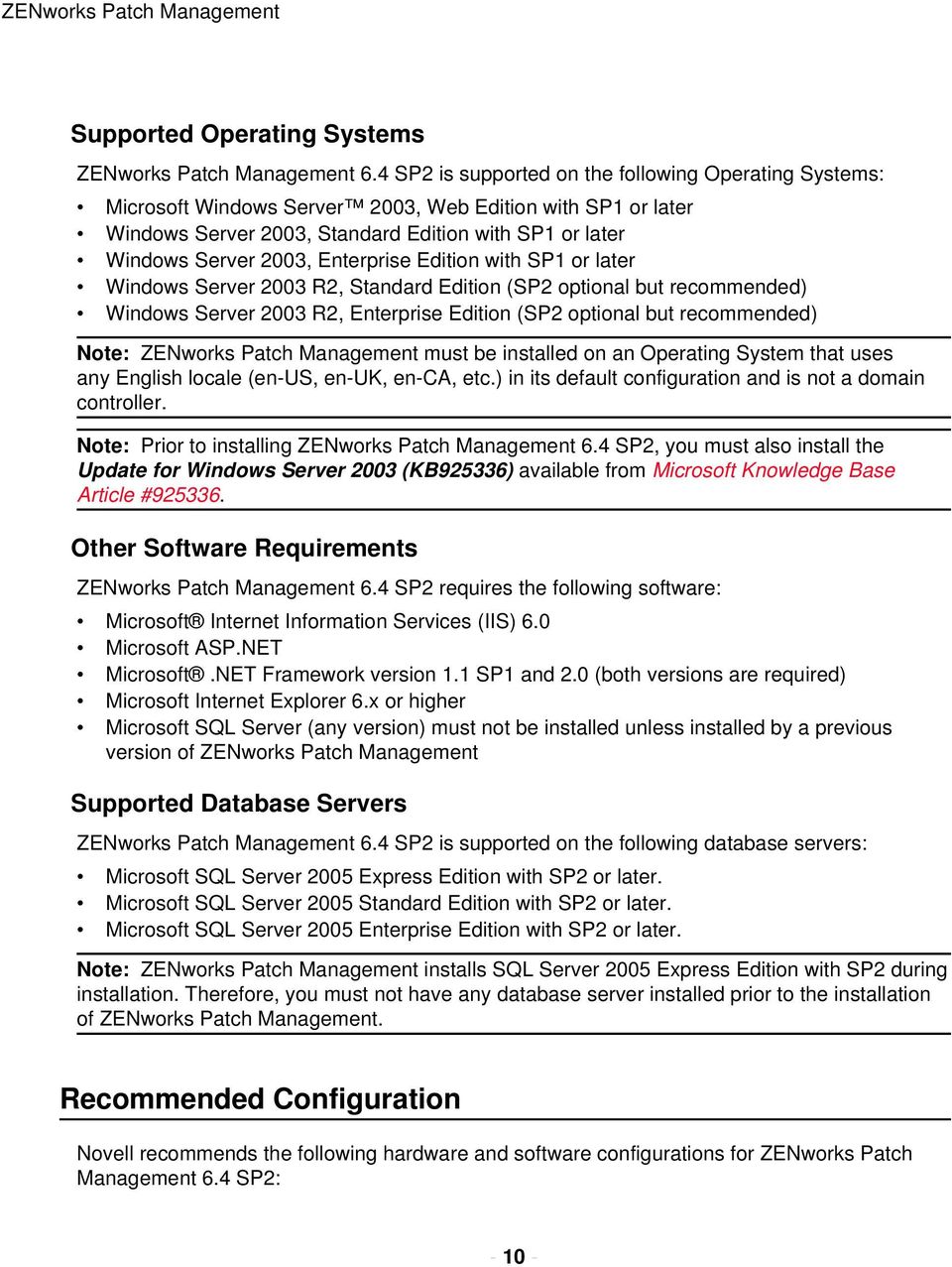
11 Planning Your Installation Table 1: ZENworks Patch Management 6.4 SP2 Recommended Configuration Number of Nodes < 1,000 < 2,500 < 5,000 < 10,000 > 10,000 Operating System Database Server Windows Server 2003, Web Edition with SP2 SQL 2005 Express Windows Server 2003, Web Edition with SP2 SQL 2005 Express Windows Server 2003, Web Edition with SP2 SQL 2005 Express Processor GHz 1 - Pentium Dual Core, Non- Xeon Windows Server 2003, Standard Edition with SP2 SQL 2005 Standard RAM 1 GB 2 GB 2 GB 4 GB Storage 1-36 GB Hard Drive 1-72 GB Hard Drive GB Hard Drives 2 - Dual Core Xeon GB Hard Drives Contact Novell Consulting. Note: Refer to the Novell Knowledge Base ( for additional configuration recommendations. Server Installation Checklist Prior to installing ZENworks Patch Management, your must gather and confirm the following information: Your target computer meets or exceeds the requirements defined in System Requirements on page 9. Your server has a clean operating system installation. Your server is not a Domain Controller. You have installed the Update for Windows Server 2003 (KB925336) available from Microsoft Knowledge Base Article # Internet Information Server (IIS) is installed and running (if necessary refer to support.microsoft.com/kb/ for details about IIS information.) All required service packs have been installed, as defined in Supported Operating Systems on page
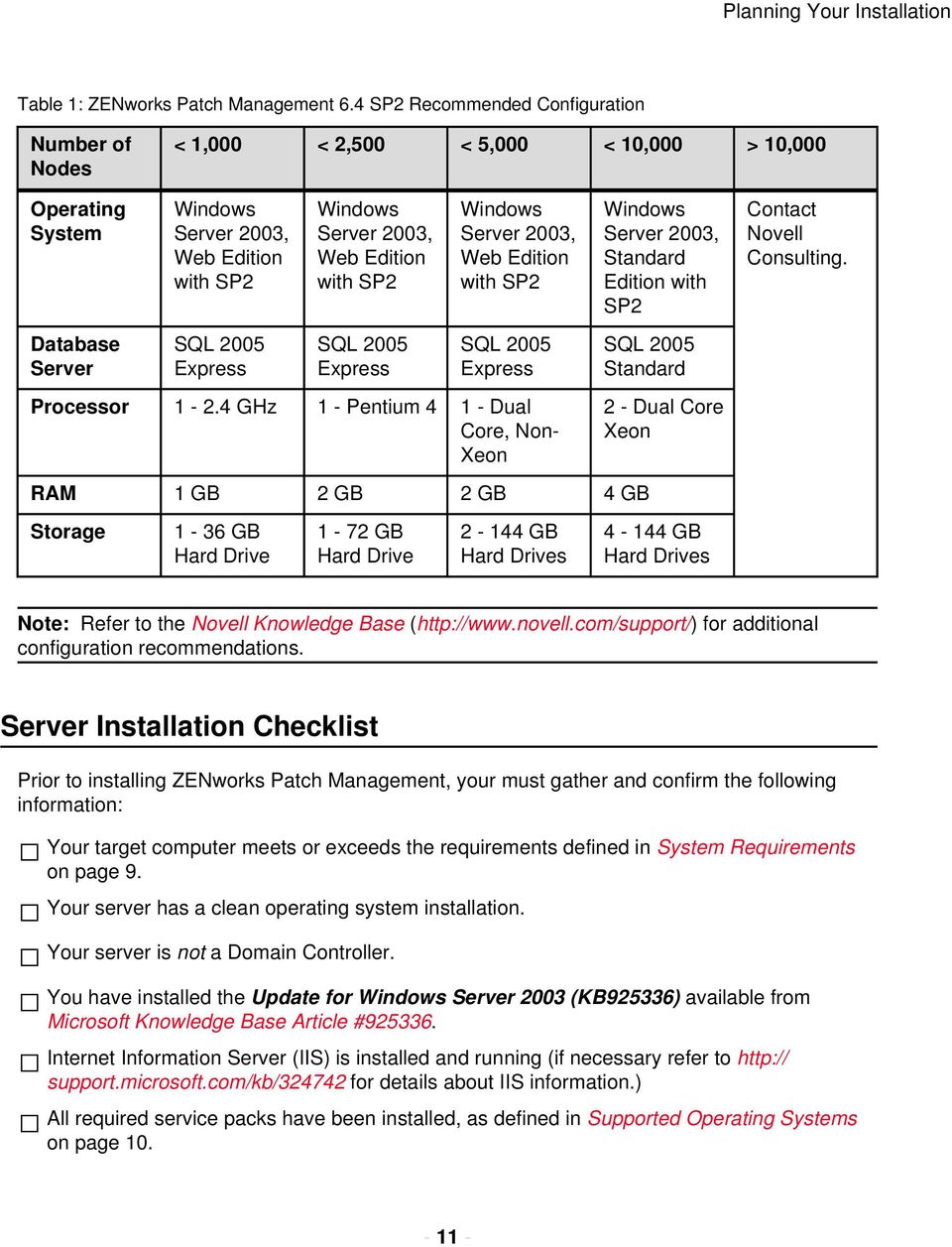
12 ZENworks Patch Management If your server is a member of a domain, only the default security policies are in effect. Your server DNS host name is: The local SMTP mail host name is: Your ZENworks Patch Management serial number is: - Your target system is connected to the internet. If you are using SSL, a valid SSL web certificate has been obtained. Note: If you are using SSL, you need to obtain a valid web certificate, from a trust provider such as Verisign Inc. ( or Entrust ( prior to installing ZENworks Patch Management. If a proxy server will be used, you know the proxy server s name, IP address, port, user name, and password. Name: IP address: Port: User name: Password:
13 Chapter 2 Installing Your Patch Management Server In this chapter: Installing Patch Management Server Starting Your Patch Management Server Configuring Your Patch Management Server to use SSL Complete the following steps to install and configure ZENworks Patch Management Server
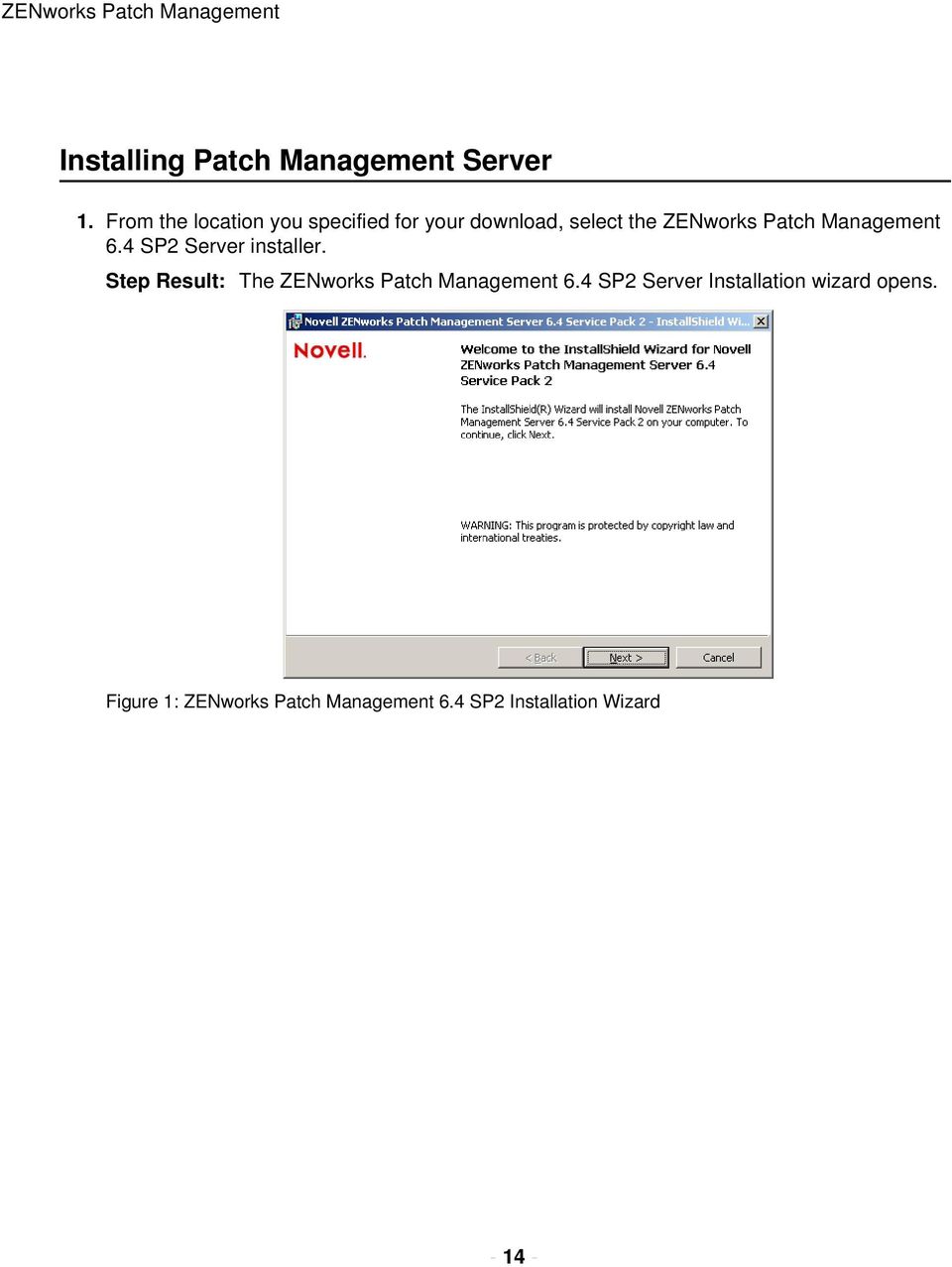
14 ZENworks Patch Management Installing Patch Management Server 1. From the location you specified for your download, select the ZENworks Patch Management 6.4 SP2 Server installer. Step Result: The ZENworks Patch Management 6.4 SP2 Server Installation wizard opens. Figure 1: ZENworks Patch Management 6.4 SP2 Installation Wizard
15 Installing Your Patch Management Server 2. Click Next. Step Result: The installation wizard checks to ensure that your server meets the minimum requirements and the System Requirements page opens. Figure 2: Installation Wizard - System Requirements Page Note: If you received any warnings or failures, click View all Failures / Warnings... to view details about each. 3. Click Next. Step Result: The Ready to Install page opens

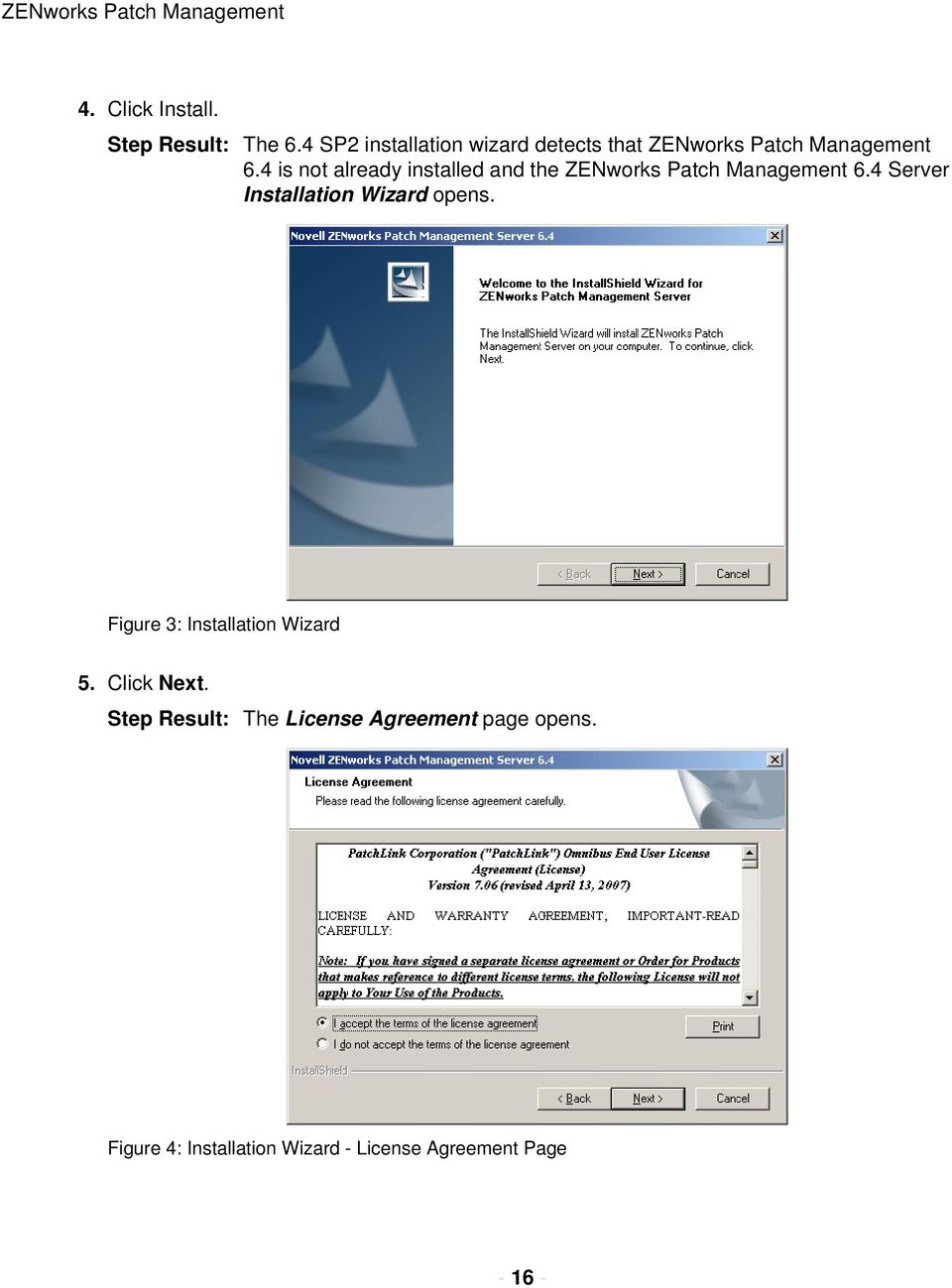
16 ZENworks Patch Management 4. Click Install. Step Result: The 6.4 SP2 installation wizard detects that ZENworks Patch Management 6.4 is not already installed and the ZENworks Patch Management 6.4 Server Installation Wizard opens. Figure 3: Installation Wizard 5. Click Next. Step Result: The License Agreement page opens. Figure 4: Installation Wizard - License Agreement Page
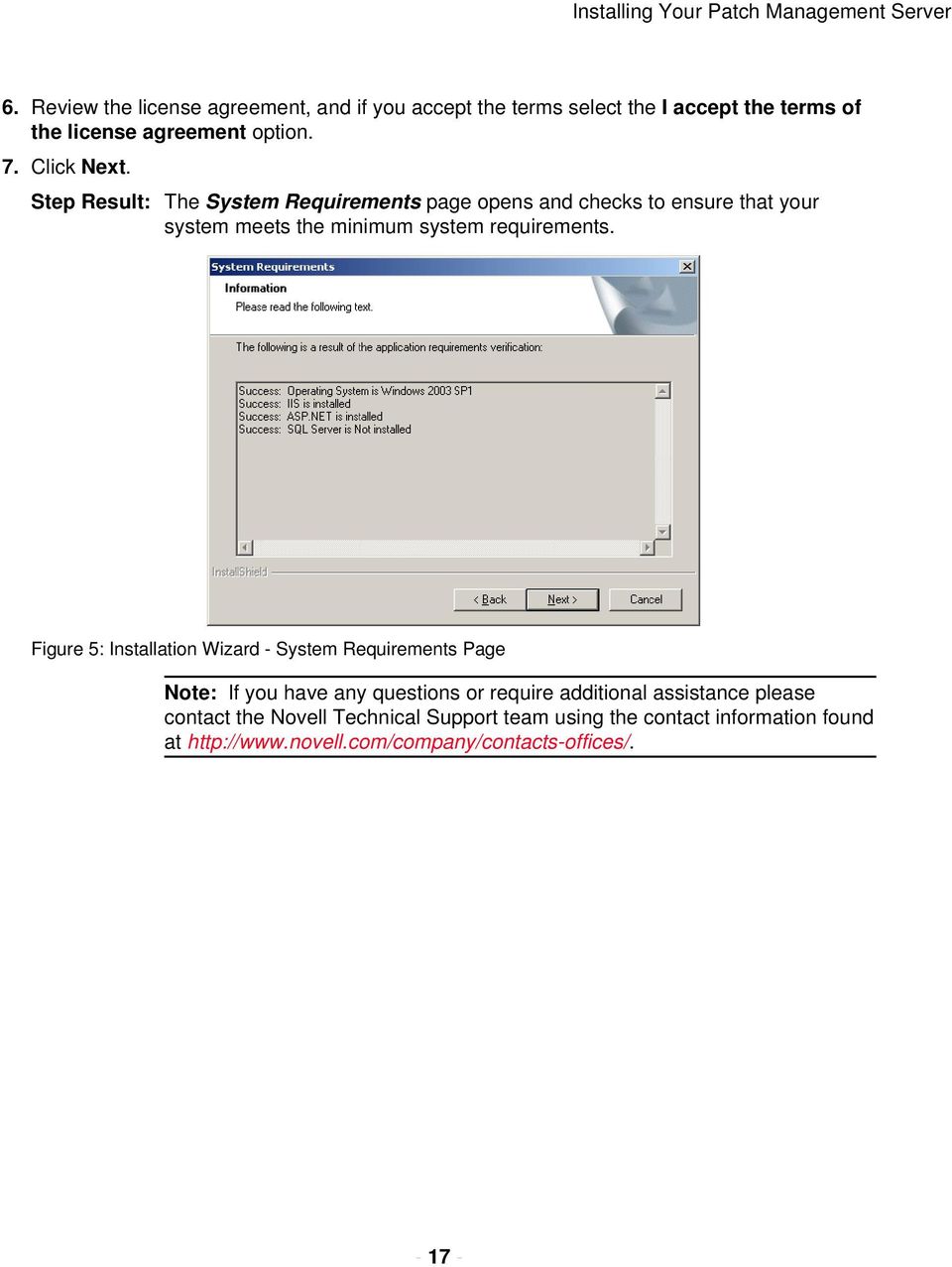
17 Installing Your Patch Management Server 6. Review the license agreement, and if you accept the terms select the I accept the terms of the license agreement option. 7. Click Next. Step Result: The System Requirements page opens and checks to ensure that your system meets the minimum system requirements. Figure 5: Installation Wizard - System Requirements Page Note: If you have any questions or require additional assistance please contact the Novell Technical Support team using the contact information found at
18 ZENworks Patch Management 8. Click Next. Step Result: The Choose Destination Location page opens. Figure 6: Installation Wizard - Choose Destination Location Page 9. To change the location of the server: a) Click Browse... Step Result: The Choose Folder window opens. Figure 7: Installation Wizard - Choose Folder Window

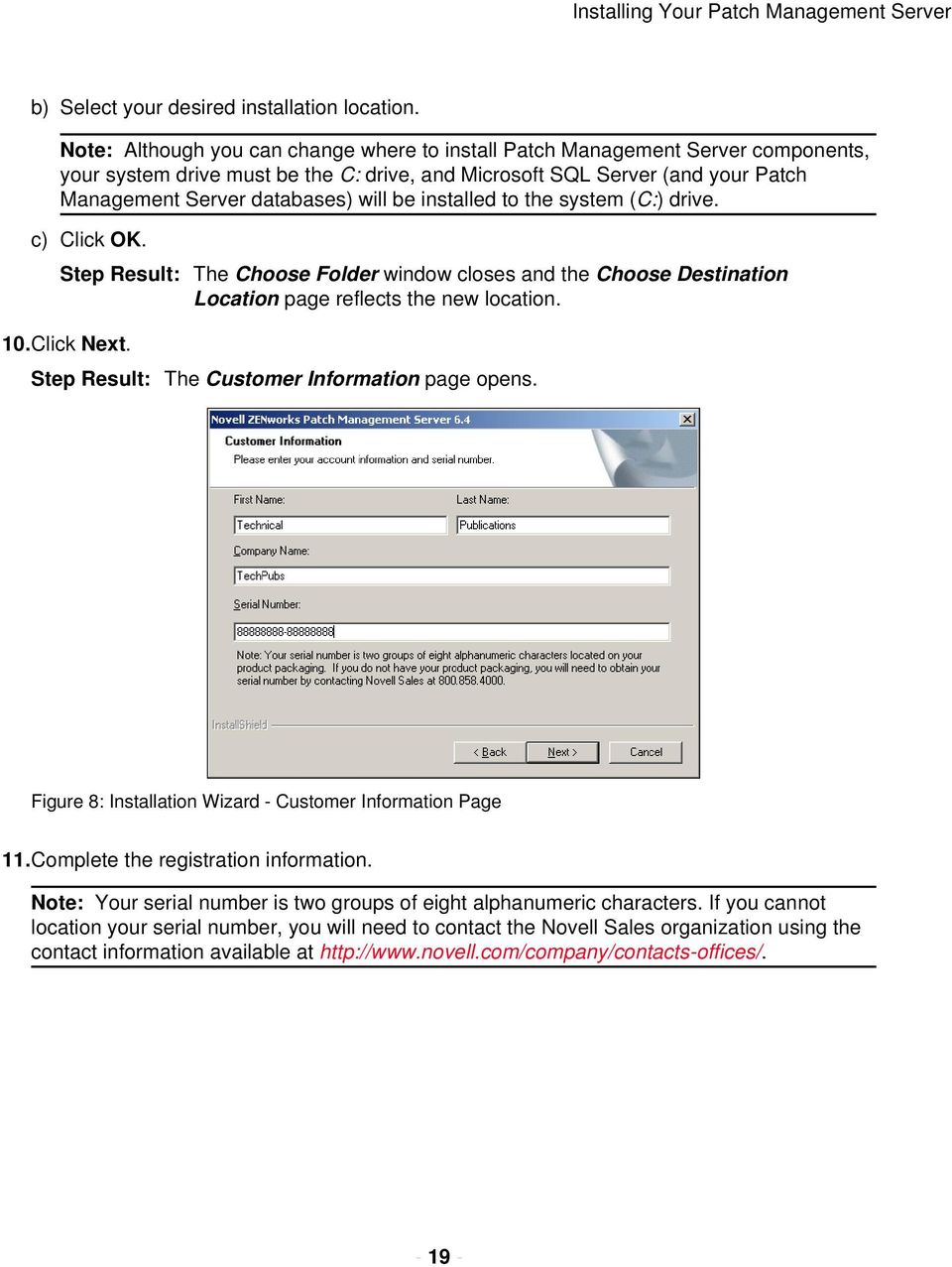
19 Installing Your Patch Management Server b) Select your desired installation location. Note: Although you can change where to install Patch Management Server components, your system drive must be the C: drive, and Microsoft SQL Server (and your Patch Management Server databases) will be installed to the system (C:) drive. c) Click OK. Step Result: The Choose Folder window closes and the Choose Destination Location page reflects the new location. 10.Click Next. Step Result: The Customer Information page opens. Figure 8: Installation Wizard - Customer Information Page 11.Complete the registration information. Note: Your serial number is two groups of eight alphanumeric characters. If you cannot location your serial number, you will need to contact the Novell Sales organization using the contact information available at
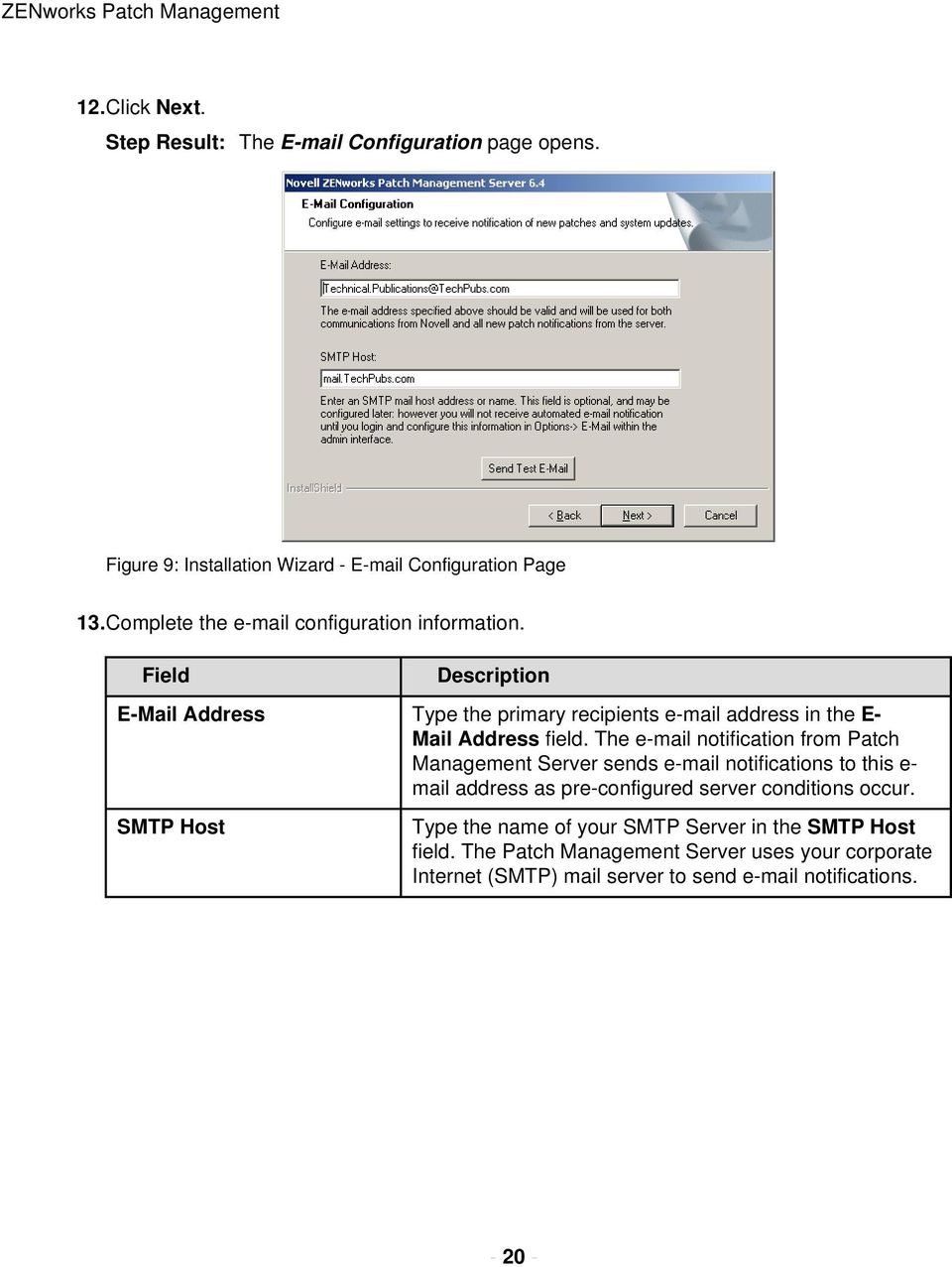
20 ZENworks Patch Management 12.Click Next. Step Result: The Configuration page opens. Figure 9: Installation Wizard - Configuration Page 13.Complete the configuration information. Field Description Address Type the primary recipients address in the E- Mail Address field. The notification from Patch Management Server sends notifications to this e- mail address as pre-configured server conditions occur. SMTP Host Type the name of your SMTP Server in the SMTP Host field. The Patch Management Server uses your corporate Internet (SMTP) mail server to send notifications
21 Installing Your Patch Management Server 14.Click Next. Step Result: The Administrative User page opens. Figure 10: Installation Wizard - Administrative User Page 15.Create and type a password in the Password field. Retyping the password in the Confirm Password field. Step Result: The installation creates a default administrator user PatchLink. This user should not be deleted or modified within Windows. If needed, more users with administrator rights can be created in the User section of Patch Management Server. Caution: If you have password policy restrictions, failure to meet those restrictions here will cause the creation of the PatchLink user to fail. Be sure to make a note of the password as it is required to log in following installation
22 ZENworks Patch Management 16.Click Next. Step Result: The Proxy Configuration page opens. Figure 11: Installation Wizard - Proxy Configuration Page 17.Configure the Proxy Server information as needed. a) Select the Proxy Server Required option. b) In the Server Address (including the prefix) and Port Number fields, enter the appropriate proxy server address and port number. c) Select Authenticated if your proxy server is an authenticated proxy. d) In the User Name, Password, and Confirm Password fields, enter the appropriate user name and password values. Caution: If an incorrect proxy, port, user name, or password is entered, your Patch Management Server will be unable to connect to the Global Subscription Server. 18.Click Next. Step Result: The SSL Security page opens. The SSL Security page allows you to define whether to use a secure connection (SSL) between your Patch Management Server and Patch Management Agents. Note: If you intend to use SSL, it is recommended that you select to do so here, and enter your certificate prior to rebooting your computer. Otherwise,
23 Installing Your Patch Management Server you must manually configure the Patch Management Server and each Patch Management Agent to use SSL. Figure 12: Installation Wizard - SSL Configuration Page Caution: Not using SSL encryption will result in the Patch Management Agent login and password information to be unencrypted. 19.Click Next. Step Result: The Installation Summary page opens. The Installation Summary page allows you to verify all of the selected settings prior to installation. If any of the
24 ZENworks Patch Management settings are incorrect, you must select the Back button at this time and correct them. Figure 13: Installation Wizard - Installation Summary Page 20.Click Next to perform the installation. Step Result: The system installs ZENworks Patch Management Server as well as the files and dependencies required for the Patch Management Server to communication with the Global Subscription Server. Note: Following the installation of ZENworks Patch Management 6.4 the wizard will then continue with the installation of ZENworks Patch Management 6.4 SP2. 21.Click Finish to complete the installation and exit the Installation Wizard. Starting Your Patch Management Server Having successfully installed your Patch Management Server, you can now log in and begin configuring ZENworks Patch Management to meet your organizational needs. Logging on to ZENworks Patch Management ZENworks Patch Management is an internet application that conforms to standard web conventions. You can access the application from an internet browser. From the main screen, you navigate through the system with menu bars, scroll bars, icons, checkboxes, and hyperlinks. 1. Launch your web browser
25 Installing Your Patch Management Server 2. Type the Server URL in your web browser s Location field. 3. Press Enter. Step Result: The system displays the Connect to Update Server dialog box. Figure 14: Log on dialog box 4. Type your user name in the Username field. 5. Type your password in the Password field. 6. Click OK. Step Result: The Home page opens. Configuring Your Patch Management Server to use SSL If you selected the Use SSL security for all agent communication option during installation, you now must add the SSL Web Certificate to IIS, prior to rebooting. 1. Open the Internet Information Services manager. 2. Expand the tree view and select the PLUS Web site
26 ZENworks Patch Management 3. Right-click the PLUS Web site and select Properties. Step Result: The Properties dialog box opens. Figure 15: Directory Security Tab 4. Select the Directory Security tab
27 Installing Your Patch Management Server 5. Click Server Certificate... Step Result: The Web Server Certificate Wizard opens. Figure 16: Web Server Certificate Wizard 6. Click Next. Step Result: The Server Certificate page opens. Figure 17: Web Server Certificate Wizard - Server Certificate Page
28 ZENworks Patch Management 7. Select the Assign an existing certificate option. Note: Be sure to select Assign an existing certificate, since requesting a new certificate can take several days. 8. Click Next and continue following the Server Certificate Wizard which will guide you through the remaining steps. 9. Reboot your computer when the wizard completes. 10.Log on to your computer immediately after it restarts. Note: You must log on to your computer to start the registration process. This action starts the web server, installs the Patch Management Agent, and initiates your patch subscription
29 Appendix A Server Installation Checklist In this appendix: Server Installation Checklist This Server Installation Checklist will assist during the installation of the ZENworks Patch Management Server. Server Installation Checklist Prior to installing ZENworks Patch Management, your must gather and confirm the following information: Your target computer meets or exceeds the requirements defined in System Requirements on page 9. Your server has a clean operating system installation. Your server is not a Domain Controller. You have installed the Update for Windows Server 2003 (KB925336) available from Microsoft Knowledge Base Article # Internet Information Server (IIS) is installed and running (if necessary refer to support.microsoft.com/kb/ for details about IIS information.) All required service packs have been installed, as defined in Supported Operating Systems on page 10. If your server is a member of a domain, only the default security policies are in effect. Your server DNS host name is: The local SMTP mail host name is: Your ZENworks Patch Management serial number is:
30 ZENworks Patch Management Your target system is connected to the internet. If you are using SSL, a valid SSL web certificate has been obtained. Note: If you are using SSL, you need to obtain a valid web certificate, from a trust provider such as Verisign Inc. ( or Entrust ( prior to installing ZENworks Patch Management. If a proxy server will be used, you know the proxy server s name, IP address, port, user name, and password. Name: IP address: Port: User name: Password:
www.novell.com/documentation Server Installation ZENworks Mobile Management 2.7.x August 2013
 www.novell.com/documentation Server Installation ZENworks Mobile Management 2.7.x August 2013 Legal Notices Novell, Inc., makes no representations or warranties with respect to the contents or use of this
For Active Directory Installation Guide
 For Active Directory Installation Guide Version 2.5.2 April 2010 Copyright 2010 Legal Notices makes no representations or warranties with respect to the contents or use of this documentation, and specifically
Quick Install Guide. Lumension Endpoint Management and Security Suite 7.1
 Quick Install Guide Lumension Endpoint Management and Security Suite 7.1 Lumension Endpoint Management and Security Suite - 2 - Notices Version Information Lumension Endpoint Management and Security Suite
Audit Management Reference
 www.novell.com/documentation Audit Management Reference ZENworks 11 Support Pack 3 February 2014 Legal Notices Novell, Inc., makes no representations or warranties with respect to the contents or use of
Administration Quick Start
 www.novell.com/documentation Administration Quick Start ZENworks 11 Support Pack 3 February 2014 Legal Notices Novell, Inc., makes no representations or warranties with respect to the contents or use of
High Availability Configuration
 www.novell.com/documentation High Availability Configuration ZENworks Mobile Management 3.2.x September 2015 Legal Notices Novell, Inc., makes no representations or warranties with respect to the contents
SSL Management Reference
 www.novell.com/documentation SSL Management Reference ZENworks 11 Support Pack 4 July 2015 Legal Notices Novell, Inc., makes no representations or warranties with respect to the contents or use of this
How To Manage Storage With Novell Storage Manager 3.X For Active Directory
 www.novell.com/documentation Installation Guide Novell Storage Manager 4.1 for Active Directory September 10, 2015 Legal Notices Condrey Corporation makes no representations or warranties with respect
NetIQ Sentinel 7.0.1 Quick Start Guide
 NetIQ Sentinel 7.0.1 Quick Start Guide April 2012 Getting Started Use the following information to get Sentinel installed and running quickly. Meeting System Requirements on page 1 Installing Sentinel
Installation Guide. Novell Storage Manager 3.1.1 for Active Directory. Novell Storage Manager 3.1.1 for Active Directory Installation Guide
 Novell Storage Manager 3.1.1 for Active Directory Installation Guide www.novell.com/documentation Installation Guide Novell Storage Manager 3.1.1 for Active Directory October 17, 2013 Legal Notices Condrey
Novell ZENworks 10 Configuration Management SP3
 AUTHORIZED DOCUMENTATION Software Distribution Reference Novell ZENworks 10 Configuration Management SP3 10.3 November 17, 2011 www.novell.com Legal Notices Novell, Inc., makes no representations or warranties
Novell Identity Manager
 Password Management Guide AUTHORIZED DOCUMENTATION Novell Identity Manager 3.6.1 June 05, 2009 www.novell.com Identity Manager 3.6.1 Password Management Guide Legal Notices Novell, Inc. makes no representations
Installation and Configuration Guide
 www.novell.com/documentation Installation and Configuration Guide GroupWise Coexistence Solution for Exchange November 2015 Legal Notices Novell, Inc., makes no representations or warranties with respect
www.novell.com/documentation Database Maintenance ZENworks Mobile Management 2.7.x August 2013
 www.novell.com/documentation Database Maintenance ZENworks Mobile Management 2.7.x August 2013 Legal Notices Novell, Inc., makes no representations or warranties with respect to the contents or use of
Generating an Apple Push Notification Service Certificate
 www.novell.com/documentation Generating an Apple Push Notification Service Certificate ZENworks Mobile Management 2.6.x January 2013 Legal Notices Novell, Inc., makes no representations or warranties with
Configuring File Servers and Active Directory with Domain Services for Windows-Lab
 Configuring File Servers and Active Directory with Domain Services for Windows-Lab OES11 Novell Training Services ATT LIVE 2012 LAS VEGAS www.novell.com Legal Notices Novell, Inc., makes no representations
Asset Inventory Reference
 www.novell.com/documentation Asset Inventory Reference ZENworks 11 Support Pack 3 July 2014 Legal Notices Novell, Inc., makes no representations or warranties with respect to the contents or use of this
www.novell.com/documentation Jobs Guide Identity Manager 4.0.1 February 10, 2012
 www.novell.com/documentation Jobs Guide Identity Manager 4.0.1 February 10, 2012 Legal Notices Novell, Inc. makes no representations or warranties with respect to the contents or use of this documentation,
Novell SUSE Linux Enterprise Virtual Machine Driver Pack
 SLES 10 Virtual Machine Drivers for Windows on Xen Novell SUSE Linux Enterprise Virtual Machine Driver Pack 10 September 10, 2007 SUSE DRIVERS FOR WINDOWS* ON XEN* www.novell.com Legal Notices Novell,
ATT8367-Novell GroupWise 2014 and the Directory Labs
 ATT8367-Novell GroupWise 2014 and the Directory Labs ATT8367 Novell Training Services AUTHORIZED COURSEWARE www.novell.com Legal Notices Novell, Inc., makes no representations or warranties with respect
Password Management Guide
 www.novell.com/documentation Management Guide Identity Manager 4.0.2 June 2012 Legal Notices Novell, Inc. makes no representations or warranties with respect to the contents or use of this documentation,
Android App User Guide
 www.novell.com/documentation Android App User Guide ZENworks Mobile Management 2.7.x August 2013 Legal Notices Novell, Inc., makes no representations or warranties with respect to the contents or use of
Novell Identity Manager Resource Kit
 AUTHORIZED DOCUMENTATION Installation Guide for SUSE Linux Enterprise Server 10 SP2 Novell Identity Manager Resource Kit 1.2 August 17, 2009 www.novell.com Identity Manager Resource Kit 1.2 Installation
Software Distribution Reference
 www.novell.com/documentation Software Distribution Reference ZENworks 11 Support Pack 3 July 2014 Legal Notices Novell, Inc., makes no representations or warranties with respect to the contents or use
www.novell.com/documentation Administration Guide Messenger 3.0 February 2015
 www.novell.com/documentation Administration Guide Messenger 3.0 February 2015 Legal Notices Novell, Inc. makes no representations or warranties with respect to the contents or use of this documentation,
NTP Software File Auditor for Windows Edition
 NTP Software File Auditor for Windows Edition An NTP Software Installation Guide Abstract This guide provides a short introduction to installation and initial configuration of NTP Software File Auditor
Mobile App Quick Start
 www.novell.com/documentation Mobile App Quick Start Service Desk Mobile App 1.0 November 2013 Legal Notices Novell, Inc., makes no representations or warranties with respect to the contents or use of this
Novell Open Workgroup Suite Small Business Edition Helpdesk
 Administration Guide AUTHORIZED DOCUMENTATION Novell Open Workgroup Suite Small Business Edition Helpdesk 2.5 June 1, 2009 www.novell.com Helpdesk Administration Guide Legal Notices Novell, Inc. makes
Novell PlateSpin Portability Suite
 Installation Guide AUTHORIZED DOCUMENTATION Novell PlateSpin Portability Suite 8.1 August 3, 2009 www.novell.com PlateSpin Portability Suite 8.1 Installation Guide Legal Notices Novell, Inc., makes no
NetIQ Operations Center 5: The Best IT Management Tool in the World Lab
 NetIQ Operations Center 5: The Best IT Management Tool in the World Lab NIQ08 Novell Training Services ATT LIVE 2012 LAS VEGAS www.novell.com Legal Notices Novell, Inc., makes no representations or warranties
www.novell.com/documentation User Guide Novell iprint 1.1 March 2015
 www.novell.com/documentation User Guide Novell iprint 1.1 March 2015 Legal Notices Novell, Inc., makes no representations or warranties with respect to the contents or use of this documentation, and specifically
www.novell.com/documentation Administration Guide Messenger 2.2 July 30, 2013
 www.novell.com/documentation Administration Guide Messenger 2.2 July 30, 2013 Legal Notices Novell, Inc. makes no representations or warranties with respect to the contents or use of this documentation,
NSi Mobile Installation Guide. Version 6.2
 NSi Mobile Installation Guide Version 6.2 Revision History Version Date 1.0 October 2, 2012 2.0 September 18, 2013 2 CONTENTS TABLE OF CONTENTS PREFACE... 5 Purpose of this Document... 5 Version Compatibility...
MGC WebCommander Web Server Manager
 MGC WebCommander Web Server Manager Installation and Configuration Guide Version 8.0 Copyright 2006 Polycom, Inc. All Rights Reserved Catalog No. DOC2138B Version 8.0 Proprietary and Confidential The information
http://docs.trendmicro.com
 Trend Micro Incorporated reserves the right to make changes to this document and to the products described herein without notice. Before installing and using the product, please review the readme files,
Bitrix Site Manager ASP.NET. Installation Guide
 Bitrix Site Manager ASP.NET Installation Guide Contents Introduction... 4 Chapter 1. Checking for IIS Installation... 5 Chapter 2. Using An Archive File to Install Bitrix Site Manager ASP.NET... 7 Preliminary
http://docs.trendmicro.com
 Trend Micro Incorporated reserves the right to make changes to this document and to the products described herein without notice. Before installing and using the product, please review the readme files,
Full Disk Encryption Agent Reference
 www.novell.com/documentation Full Disk Encryption Agent Reference ZENworks 11 Support Pack 3 May 2014 Legal Notices Novell, Inc., makes no representations or warranties with respect to the contents or
Administration Guide. Novell Storage Manager 3.1.1 for Active Directory. Novell Storage Manager 3.1.1 for Active Directory Administration Guide
 Novell Storage Manager 3.1.1 for Active Directory Administration Guide www.novell.com/documentation Administration Guide Novell Storage Manager 3.1.1 for Active Directory October 17, 2013 Legal Notices
Novell Access Manager
 J2EE Agent Guide AUTHORIZED DOCUMENTATION Novell Access Manager 3.1 SP3 February 02, 2011 www.novell.com Novell Access Manager 3.1 SP3 J2EE Agent Guide Legal Notices Novell, Inc., makes no representations
File Auditor for NAS, Net App Edition
 File Auditor for NAS, Net App Edition Installation Guide Revision 1.2 - July 2015 This guide provides a short introduction to the installation and initial configuration of NTP Software File Auditor for
Release Notes ZENworks Patch Management 6.4 SP2
 Release Notes ZENworks Patch Management 6.4 SP2 02_014N 6.4SP2 Release Notes - 2 - Notices Version Information ZENworks Patch Management Release Notes - ZENworks Patch Management Version 6.4SP2 - Released:
Remote Management Reference
 www.novell.com/documentation Remote Management Reference ZENworks 11 Support Pack 2 October 2013 Legal Notices Novell, Inc., makes no representations or warranties with respect to the contents or use of
Patch Management Reference
 Patch Management Reference ZENworks 11 www.novell.com/documentation Legal Notices Novell, Inc. makes no representations or warranties with respect to the contents or use of this documentation, and specifically
Novell Identity Manager
 AUTHORIZED DOCUMENTATION Manual Task Service Driver Implementation Guide Novell Identity Manager 4.0.1 April 15, 2011 www.novell.com Legal Notices Novell, Inc. makes no representations or warranties with
Interworks. Interworks Cloud Platform Installation Guide
 Interworks Interworks Cloud Platform Installation Guide Published: March, 2014 This document contains information proprietary to Interworks and its receipt or possession does not convey any rights to reproduce,
Remote Management Reference
 www.novell.com/documentation Remote Management Reference ZENworks 11 Support Pack 3 2014 Legal Notices Novell, Inc., makes no representations or warranties with respect to the contents or use of this documentation,
www.novell.com/documentation Administration Guide Novell Filr 1.0.1 May 2014
 www.novell.com/documentation Administration Guide Novell Filr 1.0.1 May 2014 Legal Notices Novell, Inc., makes no representations or warranties with respect to the contents or use of this documentation,
ZENworks Mobile Management 3.0.x Deployment Quick Start
 ZENworks Mobile Management 3.0.x Deployment Quick Start September 2014 This Quick Start helps you deploy ZENworks Mobile Management in your environment. It includes the following sections: Install Your
Certificate Management
 www.novell.com/documentation Certificate Management ZENworks Mobile Management 3.1.x August 2015 Legal Notices Novell, Inc., makes no representations or warranties with respect to the contents or use of
System Administration Guide
 www.novell.com/documentation System Administration Guide Data Synchronizer 1.2 August 22, 2012 Legal Notices Novell, Inc. makes no representations or warranties with respect to the contents or use of this
Patch Management Reference
 www.novell.com/documentation Patch Management Reference ZENworks 11 SP4 November 2015 Legal Notices Novell, Inc. makes no representations or warranties with respect to the contents or use of this documentation,
ZENworks Adaptive Agent Reference
 www.novell.com/documentation ZENworks Adaptive Agent Reference ZENworks 11 Support Pack 2 March 2013 Legal Notices Novell, Inc., makes no representations or warranties with respect to the contents or use
Migration Tool Administration Guide
 www.novell.com/documentation Migration Tool Administration Guide Open Enterprise Server 11 SP2 January 2014 Legal Notices Novell, Inc., makes no representations or warranties with respect to the contents
NOVELL ZENWORKS ENDPOINT SECURITY MANAGEMENT
 You can read the recommendations in the user, the technical or the installation for NOVELL ZENWORKS ENDPOINT SECURITY MANAGEMENT 4.0. You'll find the answers to all your questions on the NOVELL ZENWORKS
Patch Management Reference
 www.novell.com/documentation Patch Management Reference ZENworks 11 SP3 February 2014 Legal Notices Novell, Inc. makes no representations or warranties with respect to the contents or use of this documentation,
www.novell.com/documentation Administration Guide GroupWise Mobility Service 2.1 February 2015
 www.novell.com/documentation Administration Guide GroupWise Mobility Service 2.1 February 2015 Legal Notices Novell, Inc. makes no representations or warranties with respect to the contents or use of this
MobileStatus Server Installation and Configuration Guide
 MobileStatus Server Installation and Configuration Guide Guide to installing and configuring the MobileStatus Server for Ventelo Mobilstatus Version 1.2 June 2010 www.blueposition.com All company names,
Out-of-Band Management Reference
 www.novell.com/documentation Out-of-Band Management Reference ZENworks 11 Support Pack 3 Beta February 2014 Legal Notices Novell, Inc., makes no representations or warranties with respect to the contents
Secret Server Installation Windows 8 / 8.1 and Windows Server 2012 / R2
 Secret Server Installation Windows 8 / 8.1 and Windows Server 2012 / R2 Table of Contents Table of Contents... 1 I. Introduction... 3 A. ASP.NET Website... 3 B. SQL Server Database... 3 C. Administrative
Full Disk Encryption Pre-Boot Authentication Reference
 www.novell.com/documentation Full Disk Encryption Pre-Boot Authentication Reference ZENworks 11 Support Pack 4 Beta April 2015 Legal Notices Novell, Inc., makes no representations or warranties with respect
Novell PlateSpin Recon
 Getting Started Guide AUTHORIZED DOCUMENTATION Novell PlateSpin Recon 3.6.1 March 15, 2010 www.novell.com PlateSpin Recon 3.6 Getting Started Guide Legal Notices Novell, Inc., makes no representations
http://docs.trendmicro.com/en-us/smb/hosted-email-security.aspx
 Trend Micro Incorporated reserves the right to make changes to this document and to the product described herein without notice. Before installing and using the product, review the readme files, release
System Planning, Deployment, and Best Practices Guide
 www.novell.com/documentation System Planning, Deployment, and Best Practices Guide ZENworks Application Virtualization 9.0 February 22, 2012 Legal Notices Novell, Inc., makes no representations or warranties
Installation and Configuration Guide
 www.novell.com/documentation Installation and Configuration Guide GroupWise Coexistence Solution for Exchange August 2014 Legal Notices Novell, Inc., makes no representations or warranties with respect
NTP Software File Auditor for NAS, EMC Edition
 NTP Software File Auditor for NAS, EMC Edition Installation Guide June 2012 This guide provides a short introduction to the installation and initial configuration of NTP Software File Auditor for NAS,
Remote Management System
 RMS Copyright and Distribution Notice November 2009 Copyright 2009 ARTROMICK International, Inc. ALL RIGHTS RESERVED. Published 2009. Printed in the United States of America WARNING: ANY UNAUTHORIZED
Sage HRMS 2014 Sage Employee Self Service Tech Installation Guide for Windows 2003, 2008, and 2012. October 2013
 Sage HRMS 2014 Sage Employee Self Service Tech Installation Guide for Windows 2003, 2008, and 2012 October 2013 This is a publication of Sage Software, Inc. Document version: October 17, 2013 Copyright
NetBak Replicator 4.0 User Manual Version 1.0
 NetBak Replicator 4.0 User Manual Version 1.0 Copyright 2012. QNAP Systems, Inc. All Rights Reserved. 1 NetBak Replicator 1. Notice... 3 2. Install NetBak Replicator Software... 4 2.1 System Requirements...
Keynote DeviceAnywhere/HP Application Lifecycle Management (HP ALM/QC) Integration Guide. TCE Automation 5.2
 Keynote DeviceAnywhere/HP Application Lifecycle Management (HP ALM/QC) Integration Guide TCE Automation 5.2 Copyright Copyright 2012 Keynote DeviceAnywhere. All Rights Reserved. August 2012. Notice 2012
Trend Micro Incorporated reserves the right to make changes to this document and to the products described herein without notice.
 Trend Micro Incorporated reserves the right to make changes to this document and to the products described herein without notice. Before installing and using the software, please review the readme files,
Installation Guide. SafeNet Authentication Service
 SafeNet Authentication Service Installation Guide Technical Manual Template Release 1.0, PN: 000-000000-000, Rev. A, March 2013, Copyright 2013 SafeNet, Inc. All rights reserved. 1 Document Information
Core Protection for Virtual Machines 1
 Core Protection for Virtual Machines 1 Comprehensive Threat Protection for Virtual Environments. Installation Guide e Endpoint Security Trend Micro Incorporated reserves the right to make changes to this
Dell Statistica 13.0. Statistica Enterprise Installation Instructions
 Dell Statistica 13.0 2015 Dell Inc. ALL RIGHTS RESERVED. This guide contains proprietary information protected by copyright. The software described in this guide is furnished under a software license or
Migration Tool Administration Guide
 www.novell.com/documentation Migration Tool Administration Guide Open Enterprise Server 2015 August 2015 Legal Notices Novell, Inc., makes no representations or warranties with respect to the contents
Database Management Reference
 www.novell.com/documentation Database Management Reference ZENworks 11 October 2013 Legal Notices Novell, Inc., makes no representations or warranties with respect to the contents or use of this documentation,
CONFIGURING MICROSOFT SQL SERVER REPORTING SERVICES
 CONFIGURING MICROSOFT SQL SERVER REPORTING SERVICES TECHNICAL ARTICLE November/2011. Legal Notice The information in this publication is furnished for information use only, and does not constitute a commitment
Installation Guide for Pulse on Windows Server 2012
 MadCap Software Installation Guide for Pulse on Windows Server 2012 Pulse Copyright 2014 MadCap Software. All rights reserved. Information in this document is subject to change without notice. The software
[The BSD License] Copyright (c) 2004-2011 Jaroslaw Kowalski [email protected]
![[The BSD License] Copyright (c) 2004-2011 Jaroslaw Kowalski jaak@jkowalski.net](/thumbs/20/970627.jpg "[The BSD License] Copyright (c) 2004-2011 Jaroslaw Kowalski jaak@jkowalski.net") Software used by portions of this application require the following license statement: [The BSD License] Copyright (c) 2004-2011 Jaroslaw Kowalski [email protected] All rights reserved. Redistribution
Software used by portions of this application require the following license statement: [The BSD License] Copyright (c) 2004-2011 Jaroslaw Kowalski [email protected] All rights reserved. Redistribution
SMART Vantage. Installation guide
 SMART Vantage Installation guide Product registration If you register your SMART product, we ll notify you of new features and software upgrades. Register online at smarttech.com/registration. Keep the
User Self-Administration
 www.novell.com/documentation User Self-Administration ZENworks Mobile Management 2.6.x January 2013 Legal Notices Novell, Inc., makes no representations or warranties with respect to the contents or use
Installing Management Applications on VNX for File
 EMC VNX Series Release 8.1 Installing Management Applications on VNX for File P/N 300-015-111 Rev 01 EMC Corporation Corporate Headquarters: Hopkinton, MA 01748-9103 1-508-435-1000 www.emc.com Copyright
Technical Brief for Windows Home Server Remote Access
 Technical Brief for Windows Home Server Remote Access Microsoft Corporation Published: October, 2008 Version: 1.1 Abstract This Technical Brief provides an in-depth look at the features and functionality
Quick Start Guide for Parallels Virtuozzo
 PROPALMS VDI Version 2.1 Quick Start Guide for Parallels Virtuozzo Rev. 1.1 Published: JULY-2011 1999-2011 Propalms Ltd. All rights reserved. The information contained in this document represents the current
User Manual. Onsight Management Suite Version 5.1. Another Innovation by Librestream
 User Manual Onsight Management Suite Version 5.1 Another Innovation by Librestream Doc #: 400075-06 May 2012 Information in this document is subject to change without notice. Reproduction in any manner
Web Filter. SurfControl Web Filter 5.0 Installation Guide. www.surfcontrol.com. The World s #1 Web & E-mail Filtering Company
 Web Filter SurfControl Web Filter 5.0 Installation Guide www.surfcontrol.com The World s #1 Web & E-mail Filtering Company NOTICES NOTICES Copyright 2005 SurfControl plc. All rights reserved. No part
INSTALLING MICROSOFT SQL SERVER AND CONFIGURING REPORTING SERVICES
 INSTALLING MICROSOFT SQL SERVER AND CONFIGURING REPORTING SERVICES TECHNICAL ARTICLE November 2012. Legal Notice The information in this publication is furnished for information use only, and does not
Backup Exec 15. Quick Installation Guide
 Backup Exec 15 Quick Installation Guide 21344987 Documentation version: 15 PN: 21344987 Legal Notice Copyright 2015 Symantec Corporation. All rights reserved. Symantec, the Symantec Logo, the Checkmark
Web Application User Guide
 www.novell.com/documentation Web Application User Guide Filr 1.2 November 2015 Legal Notices Novell, Inc., makes no representations or warranties with respect to the contents or use of this documentation,
Dell SupportAssist Version 2.0 for Dell OpenManage Essentials Quick Start Guide
 Dell SupportAssist Version 2.0 for Dell OpenManage Essentials Quick Start Guide Notes, Cautions, and Warnings NOTE: A NOTE indicates important information that helps you make better use of your computer.
GFI Product Manual. ReportPack Manual
 GFI Product Manual ReportPack Manual http://www.gfi.com [email protected] The information and content in this document is provided for informational purposes only and is provided "as is" with no warranty of
2 Configuring GroupWise Mobility Service to Support Microsoft Outlook Clients
 GroupWise Mobility Service 2.1 for Microsoft Outlook 2013 First Look - February 2015 GroupWise Mobility Service 2.1 allows the Microsoft Outlook 2013 client for Windows and the Microsoft Outlook app to
Installation Guide. Version 1.5. May 2015 Edition 2002-2015 ICS Learning Group
 Installation Guide Version 1.5 May 2015 Edition 2002-2015 ICS Learning Group 1 Disclaimer ICS Learning Group makes no representations or warranties with respect to the contents or use of this manual, and
LifeSize Control Installation Guide
 LifeSize Control Installation Guide April 2005 Part Number 132-00001-001, Version 1.0 Copyright Notice Copyright 2005 LifeSize Communications. All rights reserved. LifeSize Communications has made every
Installation Guide for Pulse on Windows Server 2008R2
 MadCap Software Installation Guide for Pulse on Windows Server 2008R2 Pulse Copyright 2014 MadCap Software. All rights reserved. Information in this document is subject to change without notice. The software
2 Downloading Access Manager 3.1 SP4 IR1
 Novell Access Manager 3.1 SP4 IR1 Readme May 2012 Novell This Readme describes the Novell Access Manager 3.1 SP4 IR1 release. Section 1, Documentation, on page 1 Section 2, Downloading Access Manager 3.1
DESLock+ Basic Setup Guide Version 1.20, rev: June 9th 2014
 DESLock+ Basic Setup Guide Version 1.20, rev: June 9th 2014 Contents Overview... 2 System requirements:... 2 Before installing... 3 Download and installation... 3 Configure DESLock+ Enterprise Server...