
Environment (including Climate Change) Deliverable No: D2. FIRESENSE Web Site. 28 February March 2010
|
|
|
- Paula Snow
- 10 years ago
- Views:
Transcription
1 Project Title: Contract No: Instrument: Thematic Priority: FIRESENSE: Fire Detection and Management through a Multi-Sensor Network for the Protection of Cultural Heritage Areas from the Risk of Fire and Extreme Weather Conditions FP7-ENV STREP Start of project: 1 December 2009 Duration: Environment (including Climate Change) 36 months Deliverable No: D2 FIRESENSE Web Site Due date of deliverable: Actual submission date: Version: Main Authors: 28 February March 2010 v5 (final) Nikos Grammalidis (CERTH), Kosmas Dimitropoulos (CERTH) Project funded by the European Community under the 7th Framework Programme for Research and Technological Development.
2 Project ref. number Project title ENV FIRESENSE - Fire Detection and Management through a Multi-Sensor Network for the Protection of Cultural Heritage Areas from the Risk of Fire and Extreme Weather Deliverable title Deliverable number Deliverable version FIRESENSE Web Site D2 Version 5 (final) Previous version(s) Versions 1-4 Contractual date of delivery 28 February 2010 Actual date of delivery 17 March 2010 Deliverable filename Nature of deliverable Dissemination level D2-Web site_v5_final.doc O PU / RE Number of pages 16 Workpackage 8 Partner responsible Author(s) Editor EC Project Officer CERTH Nikos Grammalidis (CERTH), Kosmas Dimitropoulos (CERTH) Nikos Grammalidis (CERTH) Michel Chapuis Abstract Keywords This report describes the structure and current content of the FIRESENSE Web site hosted by ITI-CERTH. Web site, Joomla, public & private part, file repository Filename: D2-Web site_v5_final.doc Page 2 of 16

3 Table of Contents 1. Executive summary Public part Home Page Main menu Project Results menu Private part File Repository Add-ons and additional features References Filename: D2-Web site_v5_final.doc Page 3 of 16
4 1. Executive summary This report describes the structure and current content of the FIRESENSE Web site hosted by ITI-CERTH. The domain was reserved by ITI-CERTH for one year but this subscription is planned to last for at least 3 years after the end of the FIRESENSE project, as stated in the FIRESENSE technical annex. The site was created using the award-winning Joomla Content Management System (CMS), which allows building Web sites and powerful online applications. Joomla is an open source solution that is freely available to everyone [1]. The last version currently available by Joomla is used, namely version for the construction of the Web site. Other updates and enhancements of the site are planned in the future. The site contains a public and a private part that are briefly outlined in the following pages. Many Joomla modules and plug-ins have been installed. In addition, a custom page was developed, using PHP, to allow the real-time display of the persons subscribed to the FIRESENSE mailing lists (currently manually configured through another ITI-CERTH server). All the pages contain the same banner with the FIRESENSE logo and menus, so that visitors can easily navigate in the site. Filename: D2-Web site_v5_final.doc Page 4 of 16

5 2. Public part The various sections included in the Public part are discussed below. 2.1 Home Page The first page presented when visiting the website is the Home Page, where some general information about the FIRESENSE Project is presented. Furthermore, recent announcements about the activities of the project will be published at this page. Consortium, News & events and Contact Information are easily accessible both from the Top menu (above the logo) and Main menu (left column). Guests have also full access to a specific section of the Forum that is open for guests as well as the Calendar feature providing a calendar of past and future FIRESENSE-related events. Figure 2-1 Home page: Upper part (public part) Menus that allow the user to access Project Results (discussed below), to Login (to the private part) and to see the Upcoming Events and Calendar Overview (right column) are also available. Filename: D2-Web site_v5_final.doc Page 5 of 16

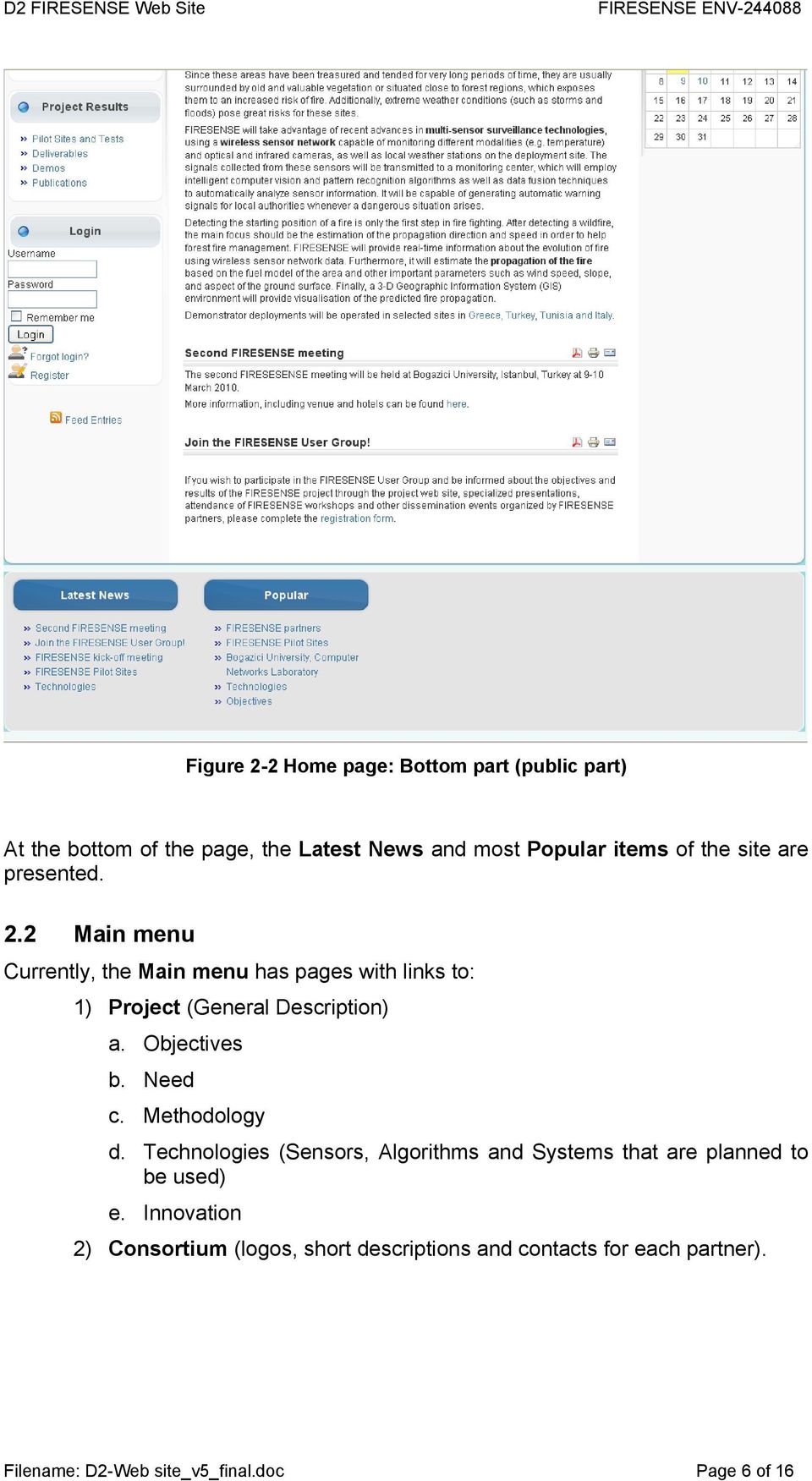
6 Figure 2-2 Home page: Bottom part (public part) At the bottom of the page, the Latest News and most Popular items of the site are presented. 2.2 Main menu Currently, the Main menu has pages with links to: 1) Project (General Description) a. Objectives b. Need c. Methodology d. Technologies (Sensors, Algorithms and Systems that are planned to be used) e. Innovation 2) Consortium (logos, short descriptions and contacts for each partner). Filename: D2-Web site_v5_final.doc Page 6 of 16
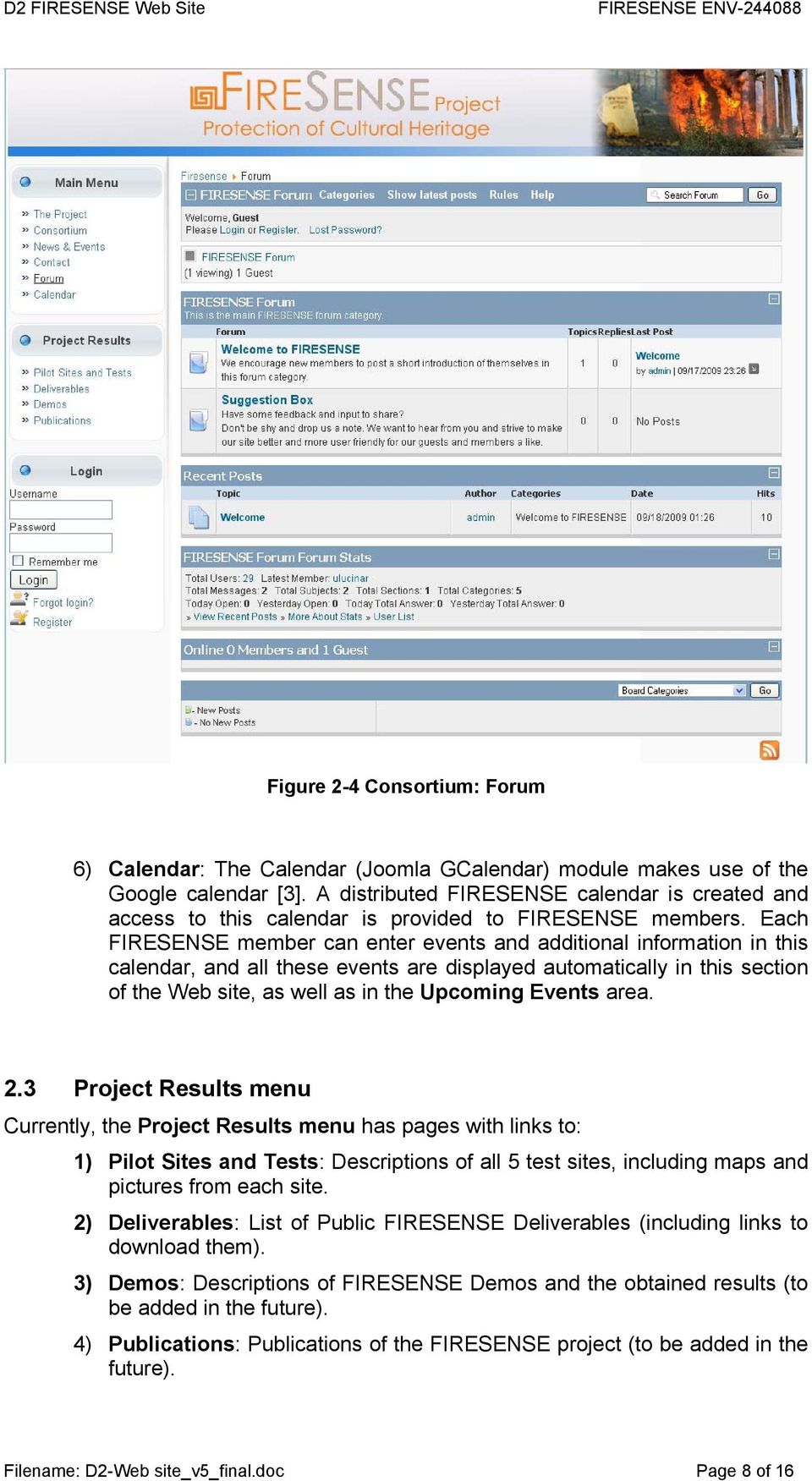
7 Figure 2-3 Consortium: Linkable logos and partner descriptions (public part) 3) News & Events 4) Contact information 5) Forum: The Kunena (previous Firebird) Forum module is used [2]. Guests have currently access to only two Forum Categories, namely: Welcome to FIRESENSE and Suggestion Box. Filename: D2-Web site_v5_final.doc Page 7 of 16
![module is used [2].](/docs-images/56/7326024/images/page_7.jpg "Guests have currently access to only two Forum Categories, namely: Welcome to")
8 Figure 2-4 Consortium: Forum 6) Calendar: The Calendar (Joomla GCalendar) module makes use of the Google calendar [3]. A distributed FIRESENSE calendar is created and access to this calendar is provided to FIRESENSE members. Each FIRESENSE member can enter events and additional information in this calendar, and all these events are displayed automatically in this section of the Web site, as well as in the Upcoming Events area. 2.3 Project Results menu Currently, the Project Results menu has pages with links to: 1) Pilot Sites and Tests: Descriptions of all 5 test sites, including maps and pictures from each site. 2) Deliverables: List of Public FIRESENSE Deliverables (including links to download them). 3) Demos: Descriptions of FIRESENSE Demos and the obtained results (to be added in the future). 4) Publications: Publications of the FIRESENSE project (to be added in the future). Filename: D2-Web site_v5_final.doc Page 8 of 16
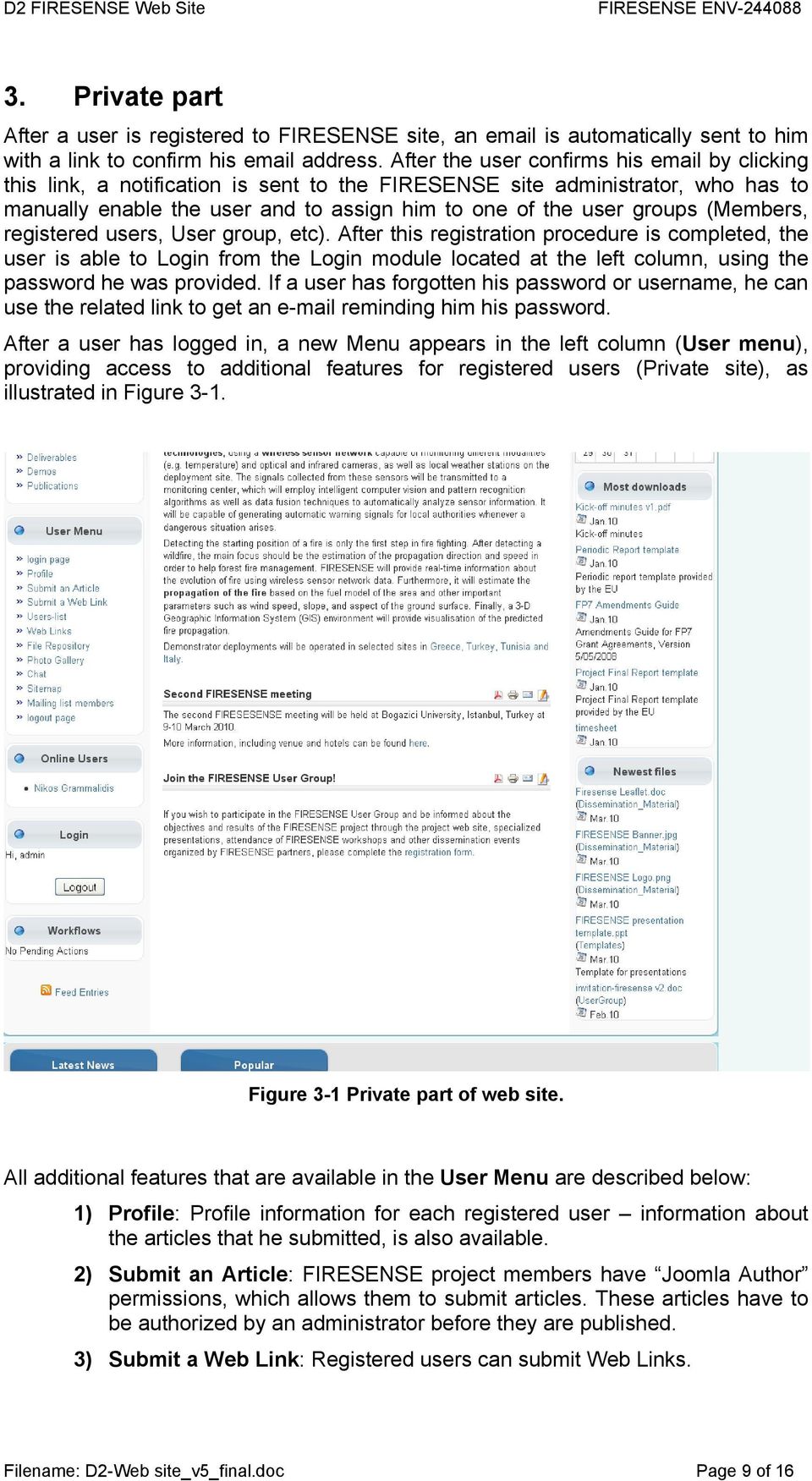
9 3. Private part After a user is registered to FIRESENSE site, an is automatically sent to him with a link to confirm his address. After the user confirms his by clicking this link, a notification is sent to the FIRESENSE site administrator, who has to manually enable the user and to assign him to one of the user groups (Members, registered users, User group, etc). After this registration procedure is completed, the user is able to Login from the Login module located at the left column, using the password he was provided. If a user has forgotten his password or username, he can use the related link to get an reminding him his password. After a user has logged in, a new Menu appears in the left column (User menu), providing access to additional features for registered users (Private site), as illustrated in Figure 3-1. Figure 3-1 Private part of web site. All additional features that are available in the User Menu are described below: 1) Profile: Profile information for each registered user information about the articles that he submitted, is also available. 2) Submit an Article: FIRESENSE project members have Joomla Author permissions, which allows them to submit articles. These articles have to be authorized by an administrator before they are published. 3) Submit a Web Link: Registered users can submit Web Links. Filename: D2-Web site_v5_final.doc Page 9 of 16
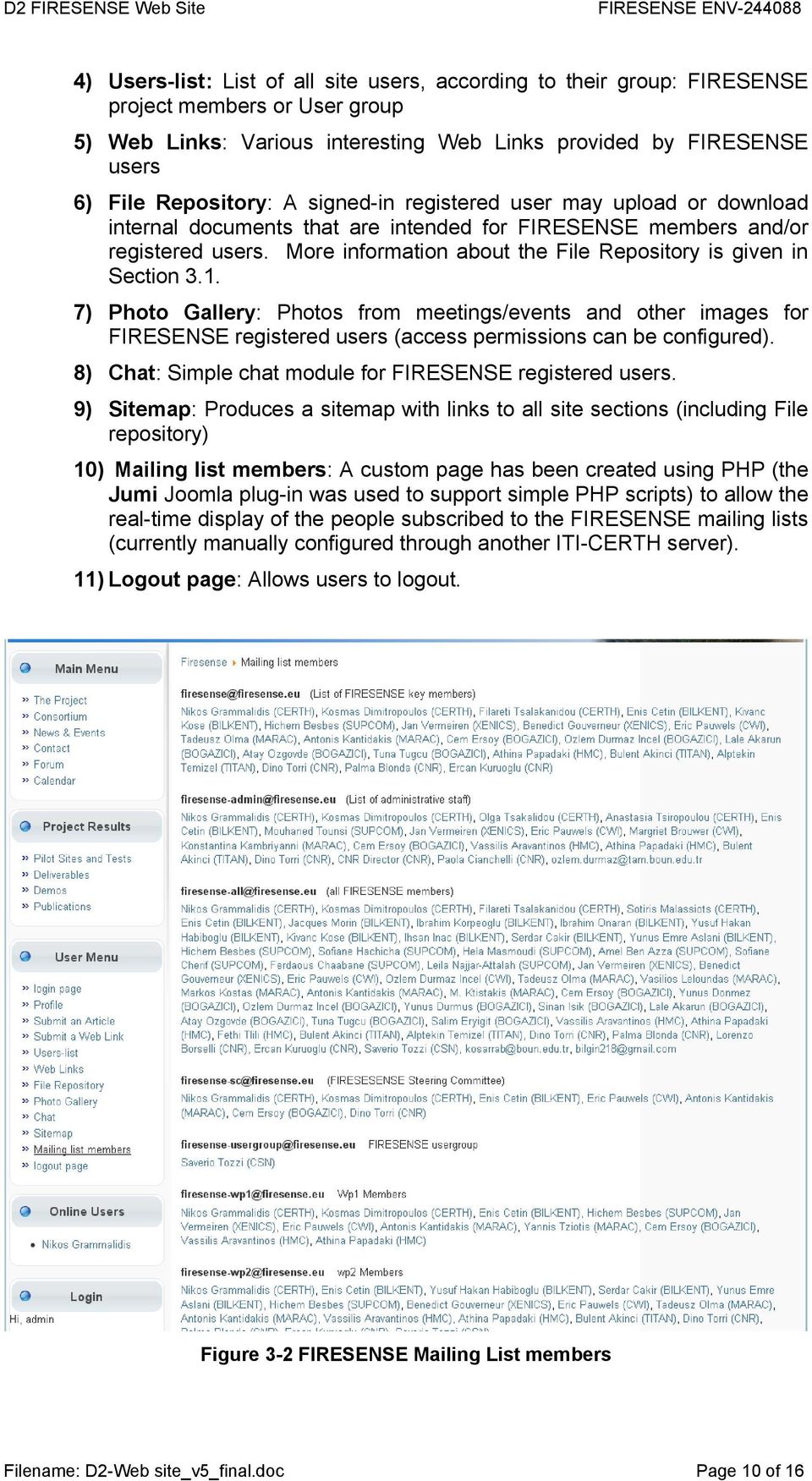
10 4) Users-list: List of all site users, according to their group: FIRESENSE project members or User group 5) Web Links: Various interesting Web Links provided by FIRESENSE users 6) File Repository: A signed-in registered user may upload or download internal documents that are intended for FIRESENSE members and/or registered users. More information about the File Repository is given in Section ) Photo Gallery: Photos from meetings/events and other images for FIRESENSE registered users (access permissions can be configured). 8) Chat: Simple chat module for FIRESENSE registered users. 9) Sitemap: Produces a sitemap with links to all site sections (including File repository) 10) Mailing list members: A custom page has been created using PHP (the Jumi Joomla plug-in was used to support simple PHP scripts) to allow the real-time display of the people subscribed to the FIRESENSE mailing lists (currently manually configured through another ITI-CERTH server). 11) Logout page: Allows users to logout. Figure 3-2 FIRESENSE Mailing List members Filename: D2-Web site_v5_final.doc Page 10 of 16
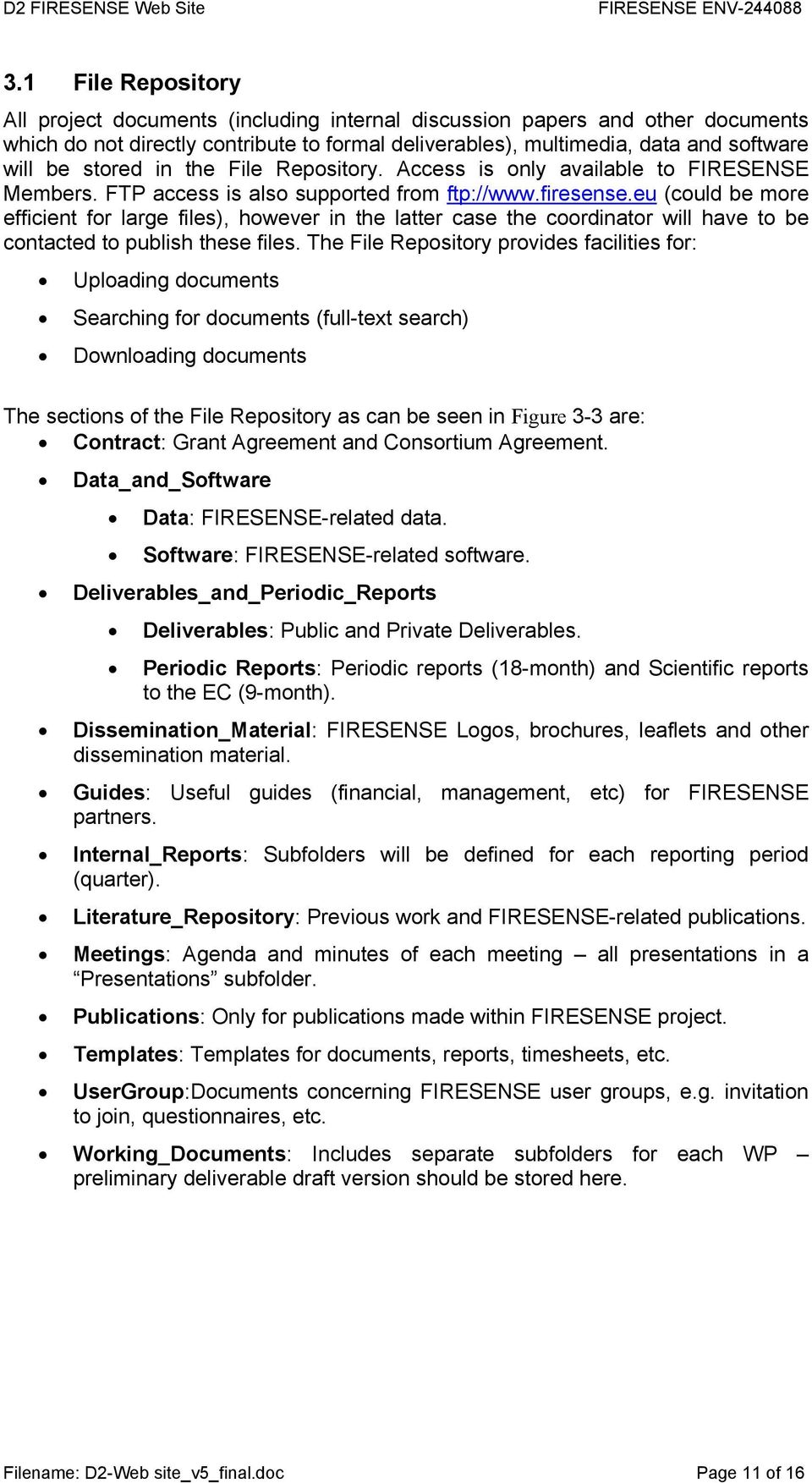
11 3.1 File Repository All project documents (including internal discussion papers and other documents which do not directly contribute to formal deliverables), multimedia, data and software will be stored in the File Repository. Access is only available to FIRESENSE Members. FTP access is also supported from ftp:// (could be more efficient for large files), however in the latter case the coordinator will have to be contacted to publish these files. The File Repository provides facilities for: Uploading documents Searching for documents (full-text search) Downloading documents The sections of the File Repository as can be seen in Figure 3-3 are: Contract: Grant Agreement and Consortium Agreement. Data_and_Software Data: FIRESENSE-related data. Software: FIRESENSE-related software. Deliverables_and_Periodic_Reports Deliverables: Public and Private Deliverables. Periodic Reports: Periodic reports (18-month) and Scientific reports to the EC (9-month). Dissemination_Material: FIRESENSE Logos, brochures, leaflets and other dissemination material. Guides: Useful guides (financial, management, etc) for FIRESENSE partners. Internal_Reports: Subfolders will be defined for each reporting period (quarter). Literature_Repository: Previous work and FIRESENSE-related publications. Meetings: Agenda and minutes of each meeting all presentations in a Presentations subfolder. Publications: Only for publications made within FIRESENSE project. Templates: Templates for documents, reports, timesheets, etc. UserGroup:Documents concerning FIRESENSE user groups, e.g. invitation to join, questionnaires, etc. Working_Documents: Includes separate subfolders for each WP preliminary deliverable draft version should be stored here. Filename: D2-Web site_v5_final.doc Page 11 of 16
12 Figure 3-3 FIRESENSE File Repository structure Filename: D2-Web site_v5_final.doc Page 12 of 16

13 Figure 3-4 FIRESENSE File Repository: Working_Documents folder Filename: D2-Web site_v5_final.doc Page 13 of 16

14 4. Add-ons and additional features Various add-ons have been added to provide additional functionalities and to enhance Web-site security. Additional modules/plug-ins may be installed in the future, if needed. Some examples are: 1) Registration validator: Protection from bots and spammer logins. BotScout ( ) is also used by this module to prevent such users from registering. 2) Jumi allows the easy integration of PHP scripts. This has already been used to produce real-time lists of mailing list members. 3) mavikthumbnails allows to automatically create thumbnails for large images, such as the ones for the Greek test side. 4) Full Site Search is supported using a Search box located in the top-right corner of each Web page in the site. 5) An RSS feed has also been created [5]. 6) Google Analytics support: From 21 Dec 2009, we use Google analytics [4] to monitor the traffic of FIRESENSE web page. Some preliminary results for these first two months of the site are presented in Figure 4-1 and Figure 4-2. Figure 4-1 Google Analytics Statistics Filename: D2-Web site_v5_final.doc Page 14 of 16

15 Figure 4-2 Geographical Distribution of FIRESENSE web page visitors As seen, within its first 2 months FIRESENSE web site of operation, FIRESENSE Web site was visited 987 times from 37 countries. It already ranks 1 st in Google searches for firesense project and firesense, which is a remarkable achievement within such a short time. Filename: D2-Web site_v5_final.doc Page 15 of 16

16 5. References [1] [2] [3] [4] [5] Filename: D2-Web site_v5_final.doc Page 16 of 16
![google.com/analytics/ [5] http://www.firesense.eu/index.php?](/docs-images/56/7326024/images/page_16.jpg "format=feed&type=rss Filename: D2-Web site_v5_final.")
Content Management System for internal communication. Deliverable D1.2
 Content Management System for internal communication Deliverable D1.2 28 April 2015 Author(s) Iliyana kuzmova, Pavel Stoev, Banjamin Burkhard, Margarita Grudova, Teodor Georgiev, Lyubomir Penev ESMERALDA
EBOX Digital Content Management System (CMS) User Guide For Site Owners & Administrators
 EBOX Digital Content Management System (CMS) User Guide For Site Owners & Administrators Version 1.0 Last Updated on 15 th October 2011 Table of Contents Introduction... 3 File Manager... 5 Site Log...
User manual for the visitors of Interreg Danube Programme website
 User manual for the visitors of Interreg Danube Programme website Table of contents National contact points... 2 Newsletter subscription... 2 Subscribe... 2 Unsubscribe... 2 Forum... 2 Approved projects...
NOTE: New directions for accessing the Parent Portal using Single Sign On
 NOTE: New directions for accessing the Parent Portal using Single Sign On PROCESS STEPS SCREEN SHOTS Launch a web browser (Internet Explorer, Safari, or FireFox) and go to PowerSchool Parent Portal URL:
Login/ Logout RMS Employer Login Go to Employer and enter your username and password in the Employer Login section. Click on the LOGIN NOW button.
 Recruitment Management System Version 8 User Guide What is Recruitment Management System (RMS)? Recruitment Management System (RMS) is an online recruitment system which can be accessed by corporate recruiters
Open Source Content Management System JOOMLA
 Open Source Content Management System JOOMLA Swapnil S. Chafale MCA Department, GHRIIT Nagpur, (M.S.),India [email protected] Dr.V.M. Thakare S.G.B. Amravati University, Amravati (M.S.),India [email protected]
HabEat - FP7-245012. HabEat
 HabEat Determining factors and critical periods in food habit formation and breaking in early childhood: a multidisciplinary approach Grant agreement number: FP7-245012 Medium-scale Collaborative Project
Recruitment Management System (RMS) User Manual
 Recruitment Management System (RMS) User Manual Contents Chapter 1 What is Recruitment Management System (RMS)? 2 Chapter 2 Login/ Logout RMS Chapter 3 Post Jobs Chapter 4 Manage Jobs Chapter 5 Manage
WebLink 3 rd Party Integration Guide
 1. Introduction WebLink provides the world s leading online Chamber and Association Management Software: WebLink Connect. While WebLink does provide custom website design and hosting services, WebLink
Index. Page 1. Index 1 2 2 3 4-5 6 6 7 7-8 8-9 9 10 10 11 12 12 13 14 14 15 16 16 16 17-18 18 19 20 20 21 21 21 21
 Index Index School Jotter Manual Logging in Getting the site looking how you want Managing your site, the menu and its pages Editing a page Managing Drafts Managing Media and Files User Accounts and Setting
Portal Technical Requirements
 Portal Technical Requirements The CLINT project is going to build an infrastructure to support the conduct of international prospective clinical trials in autologous and allogeneic stem cell transplantation.
Online Certification Portfolio
 Online Certification Portfolio Welcome to the Online Certification Portfolio system. This document will provide you with an overview of how to navigate the site, submit your Continuing Professional Education
Swiss TPH Project Collaboration Platform
 Informatics Unit Swiss TPH Project Collaboration Platform Alfresco Document Management System User s Manual September 2011 Version 1.0 Swiss TPH, Socinstrasse 57, P.O. Box, 4002 Basel, Switzerland, T +41
HowTo. Planning table online
 HowTo Project: Description: Planning table online Installation Version: 1.0 Date: 04.09.2008 Short description: With this document you will get information how to install the online planning table on your
AT&T Website Solutions SM Online Presence Portal your control panel
 .0 AT&T Website Solutions SM Online Presence Portal your control panel Welcome to AT&T Website Solutions SM. We are focused on providing you the very best web products and services including all the tools
mba international eduportal
 June 2015 mba international eduportal Student Manual Author: Tagalaki Vasiliki, Special Technical Laboratorial Staff Department of Management Science and Technology Athens University of Economics and Business
shweclassifieds v 3.3 Php Classifieds Script (Joomla Extension) User Manual (Revision 2.0)
 shweclassifieds v 3.3 Php Classifieds Script (Joomla Extension) User Manual (Revision 2.0) Contents Installation Procedure... 4 What is in the zip file?... 4 Installing from Extension Manager... 6 Updating
webmail Outlook web application webmail
 outlook web application webmail Outlook web application webmail outlook web application webmail contents Access your webmail 1 Send emails 2 Schedule a meeting 3 Add a function-related mailbox 4 Show week
NCEPTION REPORT. Short Introduction to use of MESA Training Distance Education LMS
 NCEPTION REPORT Short Introduction to use of MESA Training Distance Education LMS Implementation of the training strategy of the Monitoring for Environment and Security in Africa (MESA) programme EuropeAid/134534/D/SER/MULTI
Zoho CRM and Google Apps Synchronization
 Zoho CRM and Google Apps Synchronization Table of Contents End User Integration Points 1. Contacts 2. Calendar 3. Email 4. Tasks 5. Docs 3 6 8 11 12 Domain-Wide Points of Integration 1. Authentication
Deliverable D 6.1 Website
 Biogas2PEM-FC Biogas Reforming and Valorisation through PEM Fuel Cells FP7-SME-2012, Grant Agreement No. 314940 Deliverable D 6.1 Website Deliverable details Deliverable version: v1.0 Date of delivery:
Moodle: Suitability as a repository for learning objects
 Moodle: Suitability as a repository for learning objects D. H. Wood (Streamline) - DRAFT This report looks at the suitability of the Moodle virtual learning environment (VLE) in the context of supporting
News and Information. Advertising and Marketing. Web. Design, Hosting, Promotion, Advertising, SEO
 SEARCH ENGINE ADVERTISING PROMOTION News and Information. Advertising and Marketing. WEB HOSTING Web WEB DESIGN REVISED: MAY, 2008 Design, Hosting, Promotion, Advertising, SEO McLeod County Road 1 and
Joomla User Manual, Version 1.5
 Joomla User Manual, Version 1.5 Joomla is a content management system that enables you to make and update Web pages easily. Many aspects, including its ease of use and the ability to add to its capabilities,
webtree designs Gayle Pyfrom web site design and development Lakewood, CO 80226 [email protected]
 webtree designs Gayle Pyfrom web site design and development Lakewood, CO 80226 [email protected] INTRODUCTION The goal of this presentation is to provide an overview of using Joomla! to create your
Editing your Website User Guide
 User Guide Adding content to your Website To add or replace content on your website you will need to log in to your Content Management System (Joomla) using your username and password. If you do not already
MA TESOL (by distance) Lancaster University. Moodle User Guide
 MA TESOL (by distance) Lancaster University Moodle User Guide Contents 1. LOGIN... 3 2. ENTER YOUR COURSE... 4 3. MOVING AROUND MOODLE... 4 3.1 BREADCRUMBS... 4 3.2 SIDEBAR... 5 3.3 THE MAIN CONTENT...
Blackboard Version 9.1 - Interactive Tools
 Blackboard Version 9.1 - Interactive Tools Contents Edit mode... 2 Selecting the Interactive Tools... 2 Posting an Announcement... 3 Discussion Boards, Blogs, Journals, and Wikis What s the Difference?...
SEO. Module 1: Basic of SEO:
 SEO Module 1: Basic of SEO: Internet and Search engine Basics Internet Marketing Importance of Internet Marketing Types of internet Marketing Method Importance of Search Engines SEO is an art of Science
The easy way to a nice looking website design. By a total non-designer (Me!)
 The easy way to a nice looking website design By a total non-designer (Me!) Website Refresher Three types of Website 1.Hand rolled HTML. Lightweight static pages. 2.Scripted Website. (PHP, ASP.NET etc.)
Welcome to Empower. 2014 Software AG. All rights reserved.
 Welcome to Empower 2014 Software AG. All rights reserved. Objectives Introduction to Software AG s support tools Empower Empower is our customer self-service portal for obtaining product information, searching
Virtual Communities Operations Manual
 Virtual Communities Operations Manual The Chapter Virtual Communities (VC) have been developed to improve communication among chapter leaders and members, to facilitate networking and communication among
BONE Network of Excellence
 SEVENTH FRAMEWORK PROGRAMME D03.1 Electronic Communication Tools Specification FP7-ICT-216863/UNIBO-UPC/R/PU/D03.1 Project Number: FP7-ICT-2007-1 216863 Project Title: Building the Future Optical Network
Using Internet or Windows Explorer to Upload Your Site
 Using Internet or Windows Explorer to Upload Your Site This article briefly describes what an FTP client is and how to use Internet Explorer or Windows Explorer to upload your Web site to your hosting
2013 EDITION. V-Camp Student. Guide. INTERACTIVE GUIDE Use the buttons shown below to navigate throughout this interactive PDF BACK
 V-Camp Student Guide INTERACTIVE GUIDE Use the buttons shown below to navigate throughout this interactive PDF BACK 03 EDITION V-Camp Student Guide Table of Contents Unit : Table of Contents...iii How
Blackboard Version 9.1 - Interactive Tools Contents
 Blackboard Version 9.1 - Interactive Tools Contents Edit mode... 2 Selecting the Interactive Tools... 2 Posting an Announcement... 3 Creating a Blog... 4 Creating Blog Posts... 4 How to Comment on a Blog
ClicktoFax Service Usage Manual
 ClicktoFax Service Usage Manual 1. Log in to Fax Service 2. Configure your account 3. Send a fax 4. Receive a fax/search for Faxes/View Faxes 5. Logout 6. Additional Support 1. Log into fax service: a.
Project specification for suncoastreoholdings.com. Version 1.0
 Project specification for suncoastreoholdings.com Version 1.0 This document lists the list of major functionality that this website will offer on its first version. 10/2/2012 Table of Contents Introduction...
JTouch Mobile Extension for Joomla! User Guide
 JTouch Mobile Extension for Joomla! User Guide A Mobilization Plugin & Touch Friendly Template for Joomla! 2.5 Author: Huy Nguyen Co- Author: John Nguyen ABSTRACT The JTouch Mobile extension was developed
Startup Guide. Version 2.3.9
 Startup Guide Version 2.3.9 Installation and initial setup Your welcome email included a link to download the ORBTR plugin. Save the software to your hard drive and log into the admin panel of your WordPress
Lesson One Creating the Website and the WordPress Process
 Techedutainment Services Creating a Dynamic Website with WordPress Page 1 In the beginning and start up Welcome! I welcome to your WordPress class. This document provides a guideline to the lectures, exercises,
BT Website Centre Control Panel. User Guide Version 1.0
 BT Website Centre Control Panel User Guide Version 1.0 Summary Contents 1 INTRODUCTION... 3 1.1 NAVIGATION... 3 1.1.1 Task Bar... 3 1.1.2 Main Menu Bar... 3 1.1.3 Information Panels... 3 1.1.4 Sections...
1. Manage your Group. 1. Log on to the CampusGroups platform.
 1 1. Manage your Group 1. Log on to the CampusGroups platform. 2. Upon logging in, select your club from the Groups drop-down (next to the Home icon) and click on the Manage button next to the group of
Tenable Network Security Support Portal. January 12, 2015 (Revision 14)
 Tenable Network Security Support Portal January 12, 2015 (Revision 14) Table of Contents Introduction... 3 Activate Tenable Support Portal... 3 Locate Your Customer ID... 6 Manage Your Activation Codes...
Getting Started Guide
 Getting Started Guide Welcome The SimpleUpdates website Content Management System (CMS) was developed so that you can maintain your own website. The same knowledge that enables you to use word processor
version2.1 NetXtreme Technology
 version2.1 NetXtreme Technology Introduction Site Map Private Groups Course Subscription Unsubscribing Courses Course Contents Course homepage, course progress, course videos and exercises, course forums,
DOCUMENT MANAGEMENT SYSTEM
 DOCUMENT MANAGEMENT SYSTEM USER S MANUAL By: MIS Department Software Division Page 1 of 14 1. Overview Document Management System is a powerful web based file manager and storage utility. It was developed
ADMINISTRATOR GUIDE VERSION
 ADMINISTRATOR GUIDE VERSION 4.0 2014 Copyright 2008 2014. All rights reserved. No part of this document may be reproduced or transmitted in any form or by any means electronic or mechanical, for any purpose
MODERN. Collaborative Project. Topic NMP.2012.1.3-2: Modeling toxicity behavior of engineered nanoparticles. D4.1 MODERN website
 Project No. 309314 MODERN MODELING THE ENVIRONMENTAL AND HUMAN HEALTH EFFECTS OF NANOMATERIALS Collaborative Project Topic NMP.2012.1.3-2: Modeling toxicity behavior of engineered nanoparticles D4.1 MODERN
Lions Clubs International e-district House Content Management System (CMS) Training Guide
 Lions Clubs International e-district House Content Management System (CMS) Training Guide All of the material contained in this guide is the exclusive property of Alkon Consulting Group, Inc. (Alkon).
TERMS OF REFERENCE. Revamping of GSS Website. GSS Information Technology Directorate Application and Database Section
 TERMS OF REFERENCE Revamping of GSS Website GSS Information Technology Directorate Application and Database Section Tel: Accra 0302 682656 Cables: GHANASTATS In case of reply the number and date of this
Alfresco Online Collaboration Tool
 Alfresco Online Collaboration Tool USER MANUAL BECOMING FAMILIAR WITH THE USER INTERFACE... 4 MY DASHBOARD... 4 MY PROFILE... 6 VIEWING YOUR FULL PROFILE... 6 EDITING YOUR PROFILE... 7 CHANGING YOUR PASSWORD...
TribeHR: Employee Training Last updated: 1 October 2013
 TribeHR: Employee Training Last updated: 1 October 2013 TribeHR Overview! 2 Home Page! 3 Navigation! 6 Employee Profiles! 8 Leave Management! 11 Requesting leave for self! 11 Pending requests! 12 Approving
UCB erequest IIS Requestor - Quick Reference Guide
 UCB erequest - CONTENTS 1 INTRODUCTION... 3 2 HOW TO REGISTER AND LOG-IN... 3 2.1 REGISTER TO RECEIVE AN EXTERNAL REQUESTOR USER ID AND PASSWORD... 3 2.2 LOGIN WITH USER ID AND PASSWORD... 5 3 HOW TO SUBMIT
External Account Creation and Upload Instructions for the Local Government (LG) Audit Report Collection System
 External Account Creation and Upload Instructions for the Local Government (LG) Audit Report Collection System In order to submit data for any Department of Audits and Accounts (DOAA) web application,
Deliverable D7.2: The project website
 Project acronym: TRACE Project title: Trafficking as A Criminal Enterprise Grant number: 607669 Programme: Seventh Framework Programme Security Research Objective: SEC-2013.6.1-3 Contract type: Coordination
Kentico Content Management System (CMS
 Kentico Content Management System (CMS Table of Contents I. Introduction... 1 II. Log into a Kentico CMS Desk to Edit GC Website... 1 A. Select a Browser (Internet Explorer or Firefox only)... 1 B. Login
Welcome to Collage (Draft v0.1)
 Welcome to Collage (Draft v0.1) Table of Contents Welcome to Collage (Draft v0.1)... 1 Table of Contents... 1 Overview... 2 What is Collage?... 3 Getting started... 4 Searching for Images in Collage...
Criminal Justice Social Work Community of Practice Subscription, registration and login manual
 Criminal Justice Social Work Community of Practice Subscription, registration and login manual Version: concept 08102014 Introduction Before you can access the Criminal Justice Social Work - Community
Baidu: Webmaster Tools Overview and Guidelines
 Baidu: Webmaster Tools Overview and Guidelines Agenda Introduction Register Data Submission Domain Transfer Monitor Web Analytics Mobile 2 Introduction What is Baidu Baidu is the leading search engine
Kentico CMS for.net User Groups
 FLEXIBLE CONTENT MANAGEMENT SYSTEM FOR ALL YOUR NEEDS Kentico CMS for.net User Groups We have developed a website template for.net User Groups, Windows User Groups and similar groups focused on Microsoft
Quick Start Guide. Installation and Setup
 Quick Start Guide Installation and Setup Introduction Velaro s live help and survey management system provides an exciting new way to engage your customers and website visitors. While adding any new technology
And be taken to the Update My Information page (See Updating your My Information on page 2)
 AUTHOR LOGIN AND UPDATING MY INFORMATION Please do not print this document as it is subject to continuous revision. The latest version will always be available here: Please submit any feedback to [email protected]
INVITATION TO TENDER E-COMERCE PROMOTION WEB SITE
 Belgrade, 18 August 2015 INVITATION TO TENDER E-COMERCE PROMOTION WEB SITE CONTRACT OBJECTIVES & EXPECTED RESULTS Background to the Project Project Title: e-business Development Project No.: EuropeAid/133836/C/SER/RS
Description: The courses will have course details, enroll now link.(refer section: 1)
 Website Theme: Visitors will be able to visit the online profile of the institute. Visitors will be able to view the available courses. Check Fee and apply online by paying the specified fee. Admin will
EDGETECH FTP SITE CUSTOMER & VENDOR ACCESS
 EDGETECH FTP SITE CUSTOMER & VENDOR ACCESS 1. The EdgeTech FTP site is a web hosted site, not a true FTP site, remember to use http:// not ftp:// in the web address. IMPORTANT: Do Not use FileZilla or
Blackboard 1: Course Sites
 Blackboard 1: Course Sites This handout outlines the material covered in the first of four workshops on teaching with Blackboard. It will help you begin building your Blackboard course site. You will learn
Support Documentation
 Support Documentation WP-Live-Chat-Support 2/5/2014 This document is here to help WordPress Users and Developers Install and Troubleshoot WP-Live- Chat-Support Contents General Info Before you begin...
Manage Website Template That Using Content Management System Joomla
 Manage Website Template That Using Content Management System Joomla Ahmad Shaker Abdalrada Alkunany Thaer Farag Ali الخالصة : سىف نتطشق في هزا البحث ال هفاهين اساسيت كيفيت ادساة قىالب الوىاقع التي تستخذم
TECHNICAL SPECIFICATION for renewing the Content Management System, CMS for the web page web www.cec.md
 TECHNICAL SPECIFICATION for renewing the Content Management System, CMS for the web page web www.cec.md 1 Content 1. Introduction... 3 2. Task... 3 3. General considerations... 3 4. Business model... 5
WIRELESS TRAINING SOLUTIONS. by vlogic, Inc. L a b 0.2 Access to Content Management System
 WIRELESS TRAINING SOLUTIONS by vlogic, Inc L a b 0.2 Access to Content Management System WIRELESS TRAINING SOLUTIONS Hands-on Workshop and Lab Guide Table of Contents Accessing the Wireless Training Solutions
Document Freedom Workshop 2012. DFW 2012: CMS, Moodle and Web Publishing
 Document Freedom Workshop 2012 CMS, Moodle and Web Publishing Indian Statistical Institute, Kolkata www.jitrc.com (also using CMS: Drupal) Table of contents What is CMS 1 What is CMS About Drupal About
EUROPEAN COMMISSION. CASSANDRA Common assessment and analysis of risk in global supply chains
 EUROPEAN COMMISSION SEVENTH FRAMEWORK PROGRAMME THEME Monitoring and tracking of shipping containers SECURITY FP7-SEC-2010-3.2-1 GA No. 261795 CASSANDRA Common assessment and analysis of risk in global
Your complete guide to installing the info@hand Self-Service Portal and estore.
 Your complete guide to installing the info@hand Self-Service Portal and estore. Install the Portal & estore as shrink-wrapped software, or as add-ons to an existing Joomla! installation. Then configure
Google Trusted Stores Setup in Magento
 Google Trusted Stores Setup in Magento Google Trusted Stores is a free badging program that can improve your conversion rate and average order size by reassuring potential customers you offer a great shopping
Deliverable D 6.1 Website
 MFC4Sludge : Microbial fuel cell technologies for combined wastewater sludge treatment and energy production FP7-SME-2013, Grant Agreement No. 605893 Deliverable D 6.1 Website Project details Start date:
Student User Guide for BioPortal Biochemistry, Seventh Edition
 Student User Guide for BioPortal Biochemistry, Seventh Edition Berg, Tymoczko, & Stryer Getting Started with BioPortal for Berg, Tymoczko, & Stryer Biochemistry, 7e Table of Contents Overview... 1 Getting
What is FTH 2.0? replacement for
 Free Toast Host 2.0 What is FTH 2.0? FreeToastHost 2.0 is the replacement for FreeToastHost 1.0. It is not a competitor of FTH, or a alternative for FTH. It is a complete rebuild using the latest web
Joomla/Mambo Community Builder
 Joomla/Mambo Community Builder Version 1.1 Installation Guide document version 1.1 03.Aug.2007 Copyright No portions of this manual may be reproduced or redistributed without the written consent of the
Information Technology Web Solution Services
 Information Technology Web Solution Services Icetech 940 West North Avenue Baltimore, Maryland 21217 Tel: 410.225.3117 Fax: 410.225.3120 www. Icetech. net Hubzone Copyright @ 2012 Icetech, Inc. All rights
Create your own teacher or class website using Google Sites
 Create your own teacher or class website using Google Sites To create a site in Google Sites, you must first login to your school Google Apps account. 1. In the top-right corner of any apps, you can click
Deliverable 7.1 Web Site and Promotional Materials
 Support Action Big Data Europe Empowering Communities with Data Technologies Project Number: 644564 Start Date of Project: 01/01/2015 Duration: 36 months Deliverable 7.1 Web Site and Promotional Materials
IT Academy Lesson Plan
 10 IT Academy Lesson Plan Microsoft Sharepoint Turn potential into success Microsoft Office SharePoint 2010: Lesson Plans Introduction Preparing to teach courses on Microsoft SharePoint 2010 for the first
Step by Step. Use the Cloud Login Website
 Step by Step HOW TO Use the Cloud Login Website This How To article will show you how to use the Cloud Login Website to upload and download your files from the cloud. For a complete list of available How
D2L STUDENT MANUAL. Prepared by KAMEL SMIDA. Head of E-Learning Unit at the. Applied Medical Sciences College. Majmaah University 5/10/2014
 2014 D2L STUDENT MANUAL Prepared by KAMEL SMIDA Head of E-Learning Unit at the Applied Medical Sciences College Majmaah University 5/10/2014 M U u n i v e r s i t y D e a n s h i p O f E - L e a r n i